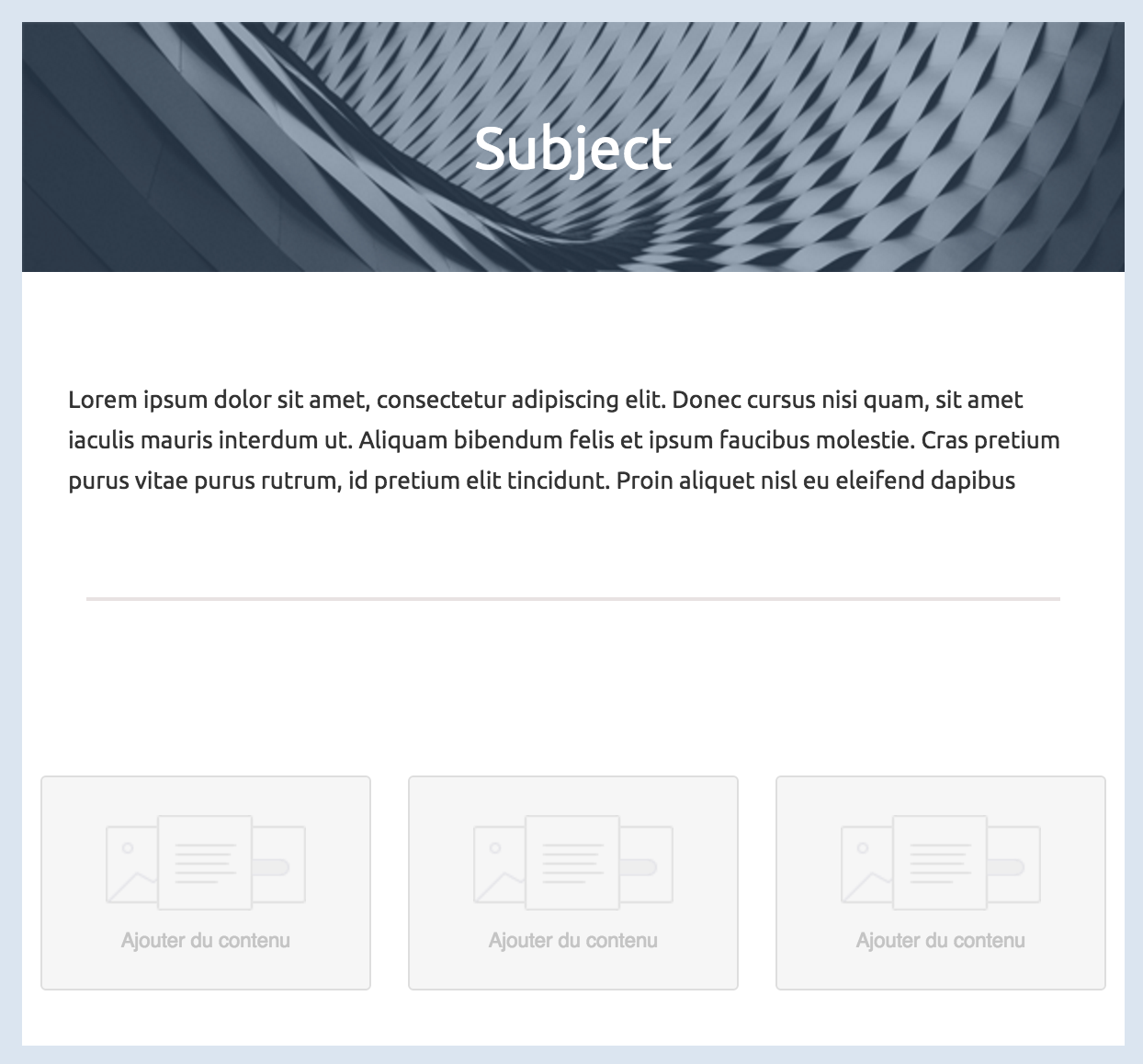
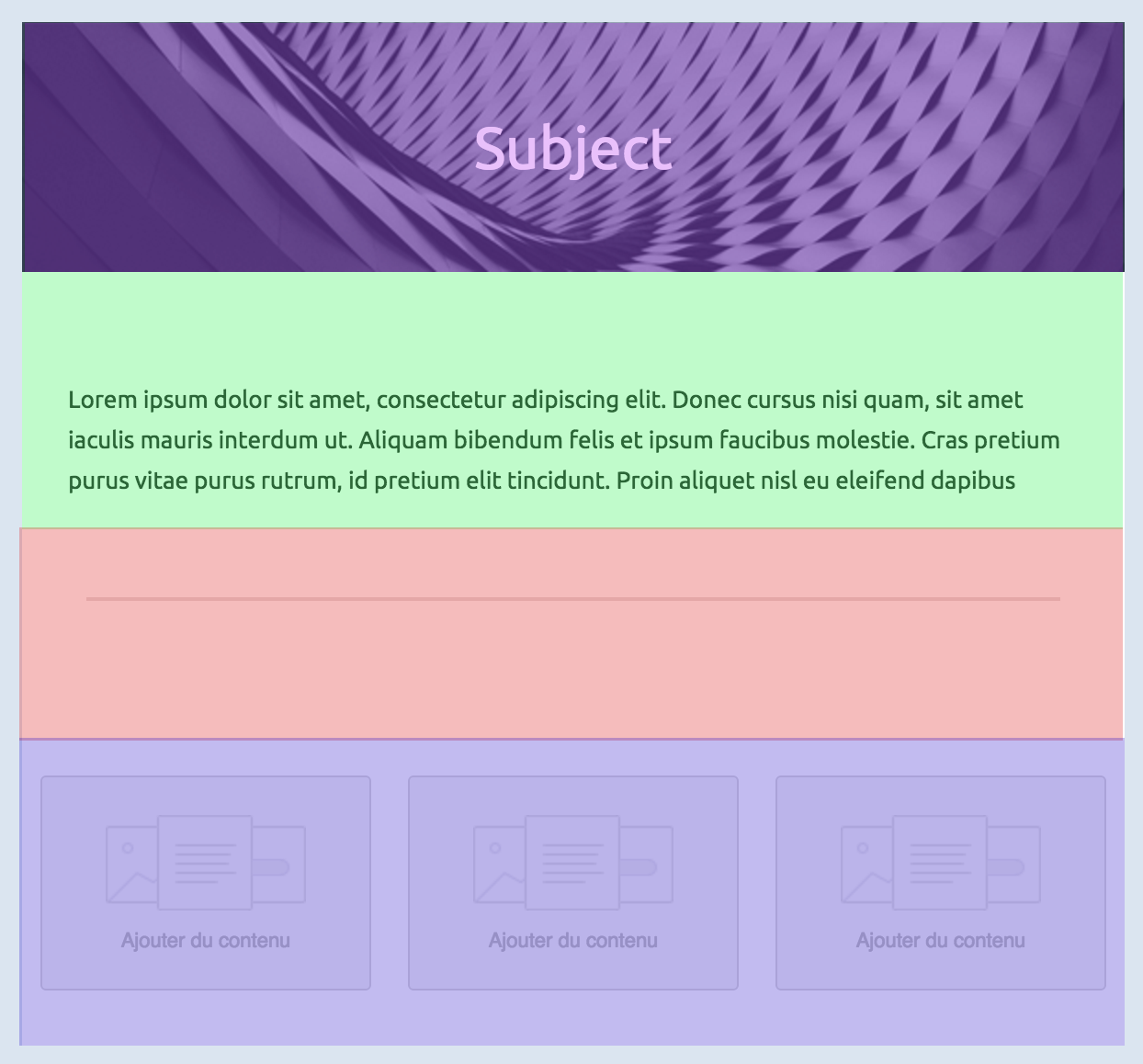
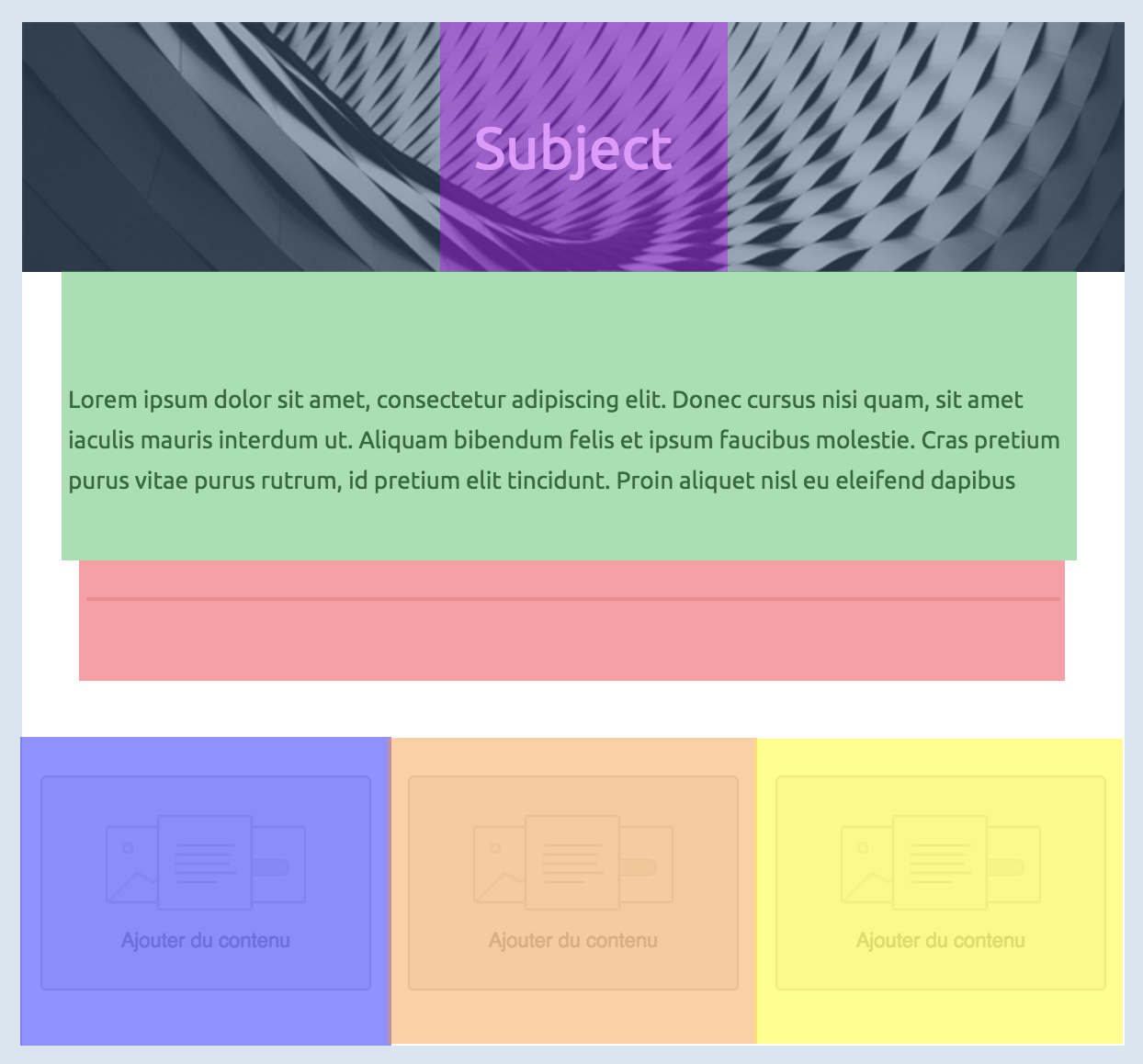
---
# Translated documentation
| Language | Link for documentation |
| :-: | :-: |
| 日本語 | [日本語ドキュメント](https://github.com/mjmlio/mjml/blob/master/readme-ja.md) |
# Introduction
`MJML` is a markup language created by [Mailjet](https://www.mailjet.com/) and designed to reduce the pain of coding a responsive email. Its semantic syntax makes the language easy and straightforward while its rich standard components library shortens your development time and lightens your email codebase. MJML’s open-source engine takes care of translating the `MJML` you wrote into responsive HTML.
# Installation
You can install `MJML` with `NPM` to use it with NodeJS or the Command Line Interface. If you're not sure what those are, head over to Usage for other ways to use MJML.
```bash
npm install mjml
```
# Development
To work on MJML, make changes and create merge requests, download and install [yarn](https://yarnpkg.com/lang/en/docs/install/) for easy development.
```bash
git clone https://github.com/mjmlio/mjml.git && cd mjml
yarn
yarn build
```
You can also run `yarn build:watch` to rebuild the package as you code.
# Usage
## Online
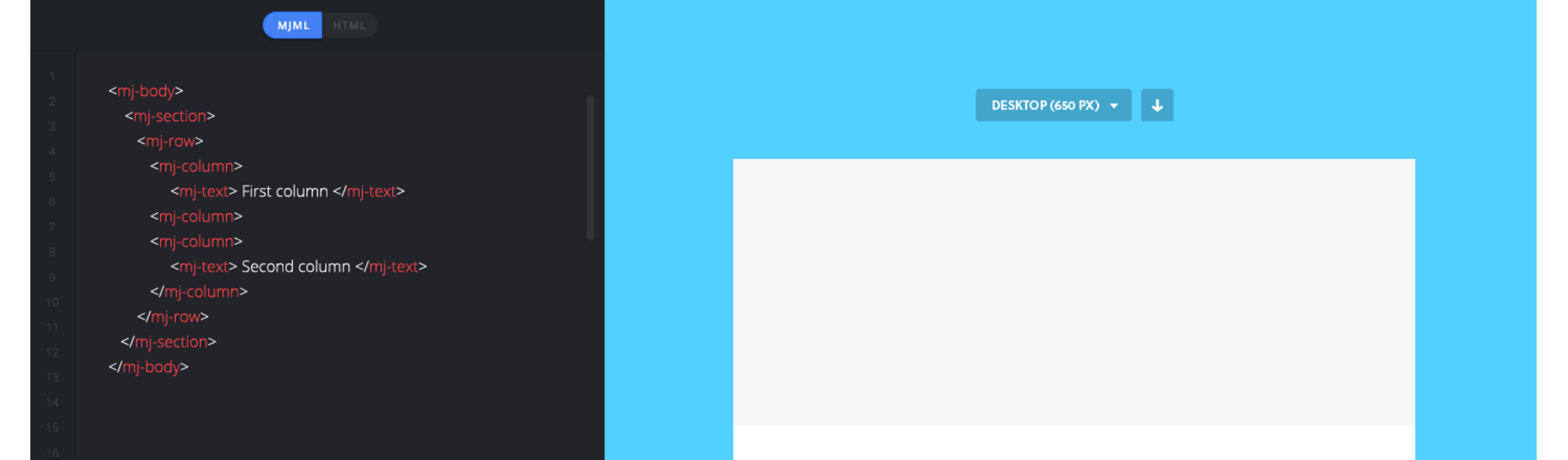
Don't want to install anything? Use the free online editor!
## Applications and plugins
MJML comes with an ecosystem of tools and plugins, check out:
- The [MJML App](https://mjmlio.github.io/mjml-app/) (MJML is included)
- [Visual Studio Code plugin](https://github.com/mjmlio/vscode-mjml) (MJML is included)
- [Sublime Text plugin](https://packagecontrol.io/packages/MJML-syntax) (MJML needs to be installed separately)
For more tools, check the [Community](https://mjml.io/community) page.
## Command line interface
> Compiles the file and outputs the HTML generated in `output.html`
```bash
mjml input.mjml -o output.html
```
You can pass optional `arguments` to the CLI and combine them.
argument | description | default value
---------|--------|--------------
`mjml -m [input]` | Migrates a v3 MJML file to the v4 syntax | NA
`mjml [input] -o [output]` | Writes the output to [output] | NA
`mjml [input] -s` | Writes the output to `stdout` | NA
`mjml -w [input]` | Watches the changes made to `[input]` (file or folder) | NA
`mjml [input] --config.beautify` | Beautifies the output (`true` or `false`) | true
`mjml [input] --config.minify` | Minifies the output (`true` or `false`) | false
See [mjml-cli documentation](https://github.com/mjmlio/mjml/blob/master/packages/mjml-cli/README.md) for more information about config options.
## Inside Node.js
```javascript
import mjml2html from 'mjml'
/*
Compile an mjml string
*/
const htmlOutput = mjml2html(`
Hello World!
`, options)
/*
Print the responsive HTML generated and MJML errors if any
*/
console.log(htmlOutput)
```
You can pass optional `options` as an object to the `mjml2html` function:
option | unit | description | default value
-------------|--------|--------------|---------------
fonts | object | Default fonts imported in the HTML rendered by MJML | See in [index.js](https://github.com/mjmlio/mjml/blob/master/packages/mjml-core/src/index.js#L100-L108)
keepComments | boolean | Option to keep comments in the HTML output | true
ignoreIncludes | boolean | Option to ignore mj-includes | false
beautify | boolean | Option to beautify the HTML output | false
minify | boolean | Option to minify the HTML output | false
validationLevel | string | Available values for the [validator](https://github.com/mjmlio/mjml/tree/master/packages/mjml-validator#validating-mjml): 'strict', 'soft', 'skip' | 'soft'
filePath | string | Path of file, used for relative paths in mj-includes | '.'
preprocessors | array of functions | Preprocessors applied to the xml before parsing. Input must be xml, not json. Functions must be (xml: string) => string | []
juicePreserveTags | Preserve some tags when inlining css, see [mjml-cli documentation](https://github.com/mjmlio/mjml/blob/master/packages/mjml-cli/README.md) for more info | NA
minifyOptions | Options for html minifier, see [mjml-cli documentation](https://github.com/mjmlio/mjml/blob/master/packages/mjml-cli/README.md) for more info | NA
mjmlConfigPath | string | The path or directory of the `.mjmlconfig` file (for custom components use) | `process.cwd()`
useMjmlConfigOptions | Allows to use the `options` attribute from `.mjmlconfig` file | false
## Client-side (in browser)
```javascript
var mjml2html = require('mjml-browser')
/*
Compile a mjml string
*/
var htmlOutput = mjml2html(`
Hello World!
`, options)
/*
Print the responsive HTML generated and MJML errors if any
*/
console.log(htmlOutput)
```
## API
A free-to-use MJML API is available to make it easy to integrate MJML in your application. Head over [here](https://mjml.io/api) to learn more about the API.
# MJML Slack
MJML wouldn't be as cool without its amazing community. Head over the [Community Slack](https://join.slack.com/t/mjml/shared_invite/zt-gqmwfwmr-kPBnfuuB7wof5httaTcXxg) to meet fellow MJML'ers.
# Contributors
- [Maxime](https://github.com/iRyusa)
- [Nicolas](https://github.com/ngarnier)
- [Cedric](https://github.com/kmcb777)
- [Loeck](https://github.com/lohek)
- [Robin](https://github.com/robink)
- [Guillaume](https://github.com/GuillaumeBadi)
- [Meriadec](https://github.com/meriadec)
- [Arnaud](https://github.com/arnaudbreton)
- [HTeuMeuLeu](https://github.com/hteumeuleu)
- [Emmanuel Payet](https://github.com/epayet)
- [Matthieu](https://github.com/swibge)
- [Rogier](https://github.com/rogierslag)
================================================
FILE: babel.config.js
================================================
module.exports = {
presets: [['@babel/env', {
targets: { node: '10' },
include: ['transform-classes'],
}]],
plugins: [
'@babel/proposal-class-properties',
[
'@babel/transform-runtime',
{
// by default the plugin assumes we have 7.0.0-beta.0 version of runtime
// and inline all missing helpers instead of requiring them
version: require('@babel/plugin-transform-runtime/package.json')
.version,
},
],
'add-module-exports',
'lodash',
],
}
================================================
FILE: doc/basic.md
================================================
## Basic layout example
In this section, you're going to learn how to code a basic email template using MJML.
Here‘s what we’re building:
### Sections
```html
```
First, we’ll create the basic structure, dividing the email into six sections.
#### Company Header
```html
My Company
```
The first section of the email consists in a centered banner, containing only the company name. The following markup is the MJML representation of the layout we want to obtain.
Important
Remember everything has to be contained within the column.
#### Image Header
```html
Slogan here
Promotion
```
Next comes a section with a background image and a block of text (representing the company slogan) and a button pointing to a page listing all the company promotions.
To add the image header, you will have to replace the section's `background-color` with a `background-url`.
Similarly to the first company header, you will have to center the text.
The button `href` sets where the button links to.
In order to have the background rendered full-width in the column, set the column width to 600px with `width="600px"`.
#### Introduction Text
```html
My Awesome Text
Lorem ipsum dolor sit amet, consectetur adipiscing elit. Proin rutrum enim
eget magna efficitur, eu semper augue semper. Aliquam erat volutpat. Cras
id dui lectus. Vestibulum sed finibus lectus, sit amet suscipit nibh.
Proin nec commodo purus. Sed eget nulla elit. Nulla aliquet mollis
faucibus.
Learn more
```
The introduction text will consist of a heading, the main text and a button.
The title is a regular `mj-text` tag that can be styled as a heading.
#### 2 Columns Section
```html
Find amazing places
Lorem ipsum dolor sit amet, consectetur adipiscing elit. Proin rutrum enim
eget magna efficitur, eu semper augue semper. Aliquam erat volutpat. Cras
id dui lectus. Vestibulum sed finibus lectus.
```
This section is made up of two columns. One containing an image, the other containing text.
For the image, note that when a tag does not have any children, you can use the XML self-closing tag syntax: ``
For the text, you are going to use two `mj-text` tags like, as previously; one with a heading style, and the other one styled as regular text.
#### Icons
```html
```
This section uses a 3-column layout to display the 3 icons horizontally across the email.
#### Social Icons
```html
Share
```
MJML has an `mj-social` component as standard. Here, we're going to use `facebook` only, but there are several default social media sites to choose from, or you can add your own bespoke.
================================================
FILE: doc/body_components.md
================================================
## Standard Body components
Body components ease your development process by providing ready made responsive layouts that you can use to create your email template.
================================================
FILE: doc/community-components.md
================================================
## Community components
In addition to the standard components available in MJML, our awesome community is contributing by creating their own components.
To use a community component, proceed as follows:
- Install MJML locally with `npm install mjml` in a folder
- Install the community component with `npm install {component-name}` in the same folder
- Create a `.mjmlconfig` file in the same folder with this code:
```json
{
"packages": ["component-name/path-to-js-file"]
}
```
You can now use the component in an MJML file, for example `index.mjml`, and run MJML locally in your terminal. Ensure that you’re in the folder where you installed MJML and the community component, e.g.: `./node_modules/.bin/mjml index.mjml`.
================================================
FILE: doc/community-contributions.md
================================================
## Community Contributions
The MJML ecosystem has a dedicated community that we count to help make it grow and provide it with even more awesome tools, always aiming to make development with MJML an efficient and fun process!
Getting involved is really easy. If you want to contribute, feel free to [open an issue](https://github.com/mjmlio/mjml/issues) or [submit a pull-request](https://github.com/mjmlio/mjml/pulls)!
Here are some tools that utilise MJML:
### Mailjet
[Mailjet](https://www.mailjet.com/demo/) offers an integrated MJML workspace designed for creating, previewing, and managing email templates. Its MJML editor supports syntax highlighting, live preview, and validation, helping you move quickly while keeping your markup in good shape.
The drag-and-drop editor in Mailjet is also built on MJML, so visually created templates share the same responsive structure as those coded by hand.
When your template is ready, you can export it in MJML or HTML, or send emails directly through Mailjet.
### Parcel
[Parcel](https://parcel.io) is the code editor built for email. This feature packed tool includes syntax highlighting, Emmet, inline documentation, autocomplete, live preview, screenshots, and full MJML, CSS, and HTML validation.
Use Focus Mode to keep the preview aligned with the code you're working on, or Inspect Element to easily find the code that produces specific elements in the preview.
Export MJML to HTML with a click.
### IntelliJ IDEA Plugin - MJML Support
[IntelliJ IDEA](https://www.jetbrains.com/idea/) is an IDE developed by JetBrains. The plugin provides you with a (near) realtime preview, auto complete, inline documentation and code analysis.
It is available on the [JetBrains Marketplace](https://plugins.jetbrains.com/plugin/16418-mjml-support).
### Gradle Plugin - MJML Compilation
[Gradle](https://gradle.org/) is a build tool for a various set of languages and environments. The plugin provides an easy way to embed your MJML templates to your Java/Kotlin application in its resources in precompiled form (HTML).
It is available through the gradle plugin system [io.freefair.mjml.java](https://plugins.gradle.org/plugin/io.freefair.mjml.java) and documentation is available here [FreeFair User Guide](https://docs.freefair.io/gradle-plugins/current/reference/).
### Neos CMS
[Neos CMS](https://www.neos.io/) is a content management system that combines structured content with application. This package adds the helper for compiling MJML markup as well as some prototypes which allow you to use TailwindCSS like classes in your MJML markup.
It is available on [packagist](https://packagist.org/packages/garagist/mjml).
### Easy-email
[Easy-email](https://github.com/zalify/easy-email) drag-and-drop email editor based on MJML. Transform structured JSON data into HTML that’s compatible with major email clients.
### Email Love
The [Email Love Figma plugin](https://www.figma.com/community/plugin/1387891288648822744/email-love-html-email-builder) takes the headache out of the email development process by enabling you to export responsive, production-ready email HTML or MJML directly from Figma.
================================================
FILE: doc/components_1.md
================================================
## Components
Components are the core of MJML. A component is an abstraction of a more complex responsive HTML layout. It exposes attributes, enabling you to create bespoke styling.
MJML comes out of the box with a set of standard components to help you easily build your first templates without having to reinvent the wheel.
For instance, the `mj-button` component is, on the inside, a complex HTML layout:
```html
Hello There!
```
### Which email clients/versions are supported?
For full details of component support, [please visit our support matrix](https://mjml.io/compatibility).
### mjml
An MJML document starts with an `mjml` tag. It can contain only `mj-head` and `mj-body` tags. Both have the same purpose of `head` and `body` in a HTML document.
#### Attributes
| attribute | accepts | description | default value |
| --------- | ------- | -------------------------------------------------------------------------------------------------------------------------------------------------------------------------------------------------------- | ------------- |
| owa | string | if set to `desktop`, this will force the desktop version for older (self-hosted) versions of Outlook.com that don't support media queries (cf. [this issue](https://github.com/mjmlio/mjml/issues/2241)) | `none` |
| lang | string | adds a `lang` attribute in the `html` and `body > div` tags | `und` |
| dir | string | adds a `dir` attribute in the `html` and `body > div` tags | `auto` |
### mj-head
Contains components related to the document head such as style and meta elements (see [head components](#standard-head-components)).
================================================
FILE: doc/components_2.md
================================================
### mj-include
The `mjml-core` package allows you to include external `.mjml` files
to build your email template.
```xml
This is a header
```
You can wrap your external `.mjml` files inside the default `mjml > mj-body`
tags to make it easier to preview outside the main template.
```xml
```
The MJML engine will then replace your included files before starting the rendering process.
#### Other file types
You can include external `.css` files which will be inserted in the same way as using an `mj-style` tag. You need to specify that you're including a CSS file using the attribute `type="css"` attribute.
If you want the CSS to be inlined, you can use the `css-inline="inline"` attribute.
```xml
```
You can also include external `html` files. They will be inserted the same way as when using an `mj-raw` tag. You need to specify that you're including an HTML file using the attribute `type="html"`.
```xml
```
================================================
FILE: doc/config.json
================================================
[
"mjml/doc/guide.md",
"mjml/doc/install.md",
"mjml/doc/getting_started.md",
"mjml/doc/basic.md",
"mjml/doc/components_1.md",
"mjml/packages/mjml-body/README.md",
"mjml/doc/components_2.md",
"mjml/doc/head_components.md",
"mjml/packages/mjml-head-attributes/README.md",
"mjml/packages/mjml-head-breakpoint/README.md",
"mjml/packages/mjml-head-font/README.md",
"mjml/packages/mjml-head-html-attributes/README.md",
"mjml/packages/mjml-head-preview/README.md",
"mjml/packages/mjml-head-style/README.md",
"mjml/packages/mjml-head-title/README.md",
"mjml/doc/body_components.md",
"mjml/packages/mjml-accordion/README.md",
"mjml/packages/mjml-button/README.md",
"mjml/packages/mjml-carousel/README.md",
"mjml/packages/mjml-column/README.md",
"mjml/packages/mjml-divider/README.md",
"mjml/packages/mjml-group/README.md",
"mjml/packages/mjml-hero/README.md",
"mjml/packages/mjml-image/README.md",
"mjml/packages/mjml-navbar/README.md",
"mjml/packages/mjml-raw/README.md",
"mjml/packages/mjml-section/README.md",
"mjml/packages/mjml-social/README.md",
"mjml/packages/mjml-spacer/README.md",
"mjml/packages/mjml-table/README.md",
"mjml/packages/mjml-text/README.md",
"mjml/packages/mjml-wrapper/README.md",
"mjml/doc/ending-tags.md",
"mjml/doc/community-components.md",
"mjml/doc/ports.md",
"mjml/doc/mjml-bar-chart.md",
"mjml/doc/mjml-chart.md",
"mjml/doc/mjml-chartjs.md",
"mjml/doc/mjml-qr-code.md",
"mjml/doc/mjml-mso-button.md",
"mjml/packages/mjml-validator/README.md",
"mjml/doc/create.md",
"mjml/doc/using_mjml_in_json.md",
"mjml/doc/tooling.md",
"mjml/doc/community-contributions.md"
]
================================================
FILE: doc/create.md
================================================
## Creating a Component
One of the great advantages of MJML is that it's component-based. Components abstract complex patterns and can easily be reused. In addition to the standard library of components, it is also possible to create your own components!
We have published [a step-by-step guide](https://medium.com/mjml-making-responsive-email-easy/tutorial-creating-your-own-component-with-mjml-4-1c0e84e97b36) that explains how to create a custom components with MJML. It will introduce you to the [boilerplate repo](https://github.com/mjmlio/mjml-component-boilerplate) hosted on Github, which provides a fast way of getting started with developing your own components.
================================================
FILE: doc/ending-tags.md
================================================
### Ending tags
Some MJML components are "ending tags". These are mostly the components that will contain text content, like `mj-text` or `mj-button`.
These components can contain both text and HTML content, which will remain unprocessed by the MJML engine. You cannot use other MJML components.
Since the content is not processed, this means that any text won't be escaped, so if you use characters that are used to define html tags in your text, like `<` or `>`, you should use the encoded characters `<` and `<`.
There can also be issues if you use the `minify` option, `mj-html-attributes` or an inline `mj-style`, because these require the HTML to be re-parsed internally.
If you're just using the `minify` option, and need to use the `< >` characters, e.g for a templating language, you can also avoid this problem by wrapping the troublesome content between two `` tags.
Here is the list of all ending tags :
- `mj-accordion-text`
- `mj-accordion-title`
- `mj-button`
- `mj-navbar-link`
- `mj-raw`
- `mj-social-element`
- `mj-text`
- `mj-table`
================================================
FILE: doc/getting_started.md
================================================
## Getting Started
This is a responsive email:
Like a regular HTML template, we can split this one into different parts to fit in a grid.
The body of your email, represented by the `mj-body` tag contains the entire content of your document:
From here, you can first define your sections:
Inside any section, there should be columns (even if you need only one column). Columns are what makes MJML responsive.
Below, you'll find some basic rules of MJML to keep in mind for later. We'll remind them when useful but better start learning them early on.
### Column sizing
#### Auto sizing
The default behavior of the MJML translation engine is to divide the section space (600px by default, but it can be changed with the `width` attribute on `mj-body`) in as many columns as you declare.
Note
Any MJML component included in a column will have a width equivalent to 100% of this column's width.
Let's take the following layout to illustrate this:
```html
```
Since the first section defines only 2 columns, the engine will translate that in a layout where each column takes 50% of the total space (300px each). If we add a third one, it goes down to 33%, and with a fourth one to 25%.
#### Manual sizing
You can also manually set the size of your columns, in pixels or percentage, by using the `width` attribute on `mj-column`.
Let's take the following layout to illustrate this:
```html
```
================================================
FILE: doc/guide.md
================================================
---
title: API Reference
language_tabs:
- html: MJML
toc_footers:
- Fork me on Github
- Submit an Issue
search: true
---
# MJML Guide
MJML (Mailjet Markup Language) is a markup language designed to reduce the pain of coding a responsive email.
Its semantic syntax makes it easy and straightforward whilst its rich standard components library speeds up your development time and lightens your email codebase.
MJML’s open-source engine generates high quality responsive HTML compliant with best practices.
## Overview
MJML rolls up all of what Mailjet has learned about HTML email design and abstracts the whole layer of complexity related to responsive email design.
Get your speed and productivity boosted with MJML’s semantic syntax. Say goodbye to endless HTML table nesting or email client specific CSS. Building a responsive email is super easy with tags such as `` and ``.
MJML has been designed with responsiveness in mind. The abstraction it offers guarantee that you will always be up-to-date with the industry practices.
Email clients update their specs and requirements regularly, but we geek about that stuff - we’ll stay on top of it so you can spend less time reading up on latest email client updates and more time designing beautiful emails.
```html
Hello World
```
================================================
FILE: doc/head_components.md
================================================
## Standard Head components
Head components ease your development process, for example, enabling you to import fonts, define default styles or create classes for MJML components.
================================================
FILE: doc/install.md
================================================
## Installation
You can [install MJML](https://www.npmjs.com/package/mjml) with NPM to use it with NodeJS or the Command Line Interface. If you're not sure what those are,
[head over to Usage](#usage) for other ways to use MJML.
```bash
npm install mjml
```
## Development
To work on MJML, make changes and create merge requests, [download and
install yarn](https://yarnpkg.com/lang/en/docs/install/) for easy development.
```bash
git clone https://github.com/mjmlio/mjml.git && cd mjml
yarn
yarn build
```
You can also run `yarn build:watch` to rebuild the package as you code.
## Usage
### Online
Don't want to install anything? [Use the free online editor](https://mjml.io/try-it-live)!
### Applications and plugins
MJML comes with an ecosystem of tools and plugins, check out:
- The [MJML App](https://mjmlio.github.io/mjml-app/) (MJML is included)
- [Visual Studio Code plugin](https://github.com/mjmlio/vscode-mjml) (MJML is included)
- [Sublime Text plugin](https://packagecontrol.io/packages/MJML-syntax) (MJML needs to be installed separately)
For more information, [check the Tooling section](#tooling).
For more tools, [check the Community page](https://mjml.io/community).
### Command line interface
> Compiles the file and outputs the HTML generated in `output.html`
```bash
mjml input.mjml -o output.html
```
You can pass optional `arguments` to the CLI and combine them.
| argument | description | default value |
| ------------------------------------------------------- | -------------------------------------------------------------------------------------------------------------------------------------------------------- | ---------------------------------------------------------------------------------- |
| `mjml -m [input]` | Migrates a v3 MJML file to the v4 syntax | |
| `mjml [input] -o [output]` | Writes the output to [output] | |
| `mjml [input] -s` | Writes the output to `stdout` | |
| `mjml [input] -s --noStdoutFileComment` | Writes the output to `stdout` without an comment containing the source file in the first line | the outputs first line contains the file in the format `` |
| `mjml -w [input]` | Watches the changes made to `[input]` (file or folder) | |
| `mjml [input] --config.beautify` | Beautifies the output (`true` or `false`) | `true` |
| `mjml [input] --config.minify` | Minifies the output (`true` or `false`) | `false` |
| `mjml [input] --config.juicePreserveTags` | Preserve some tags when inlining css, see [mjml-cli documentation](https://github.com/mjmlio/mjml/blob/master/packages/mjml-cli/README.md) for more info | |
| `mjml [input] --config.minifyOptions` | Options for html minifier, see [mjml-cli documentation](https://github.com/mjmlio/mjml/blob/master/packages/mjml-cli/README.md) for more info | |
| `mjml [input] --config.mjmlConfigPath [mjmlconfigPath]` | Uses the `.mjmlconfig` file in the specified path or directory to include custom components | _The `.mjmlconfig` file in the current working directory, if any_ |
| `mjml [input] --config.useMjmlConfigOptions` | Allows to use the `options` attribute from `.mjmlconfig` file | `false` |
| `mjml [input] --config.validationLevel` | [Validation level](https://github.com/mjmlio/mjml/tree/master/packages/mjml-validator#validating-mjml): `strict`, `soft` or `skip` | `soft` |
### Inside Node.js
```javascript
import mjml2html from 'mjml'
/*
Compile an mjml string
*/
const htmlOutput = mjml2html(
`
Hello World!
`,
options,
)
/*
Print the responsive HTML generated and MJML errors if any
*/
console.log(htmlOutput)
```
You can pass optional `options` as an object to the `mjml2html` function:
| option | accepts | description | default value |
| -------------------- | ------- | ------------------------------------------------------------------------------------------------------------------------------------------------------ | --------------------------------------------------------------------------------------------------------------------------------------------------------------------------------------------------------------------------------------------------------------------------------------------------------------------------------------------------------------------------------- |
| fonts | object | Default fonts imported in the HTML rendered by MJML | See in [index.js](https://github.com/mjmlio/mjml/blob/master/packages/mjml-core/src/index.js#L100-L108) |
| keepComments | boolean | Option to keep comments in the HTML output | `true` |
| beautify | boolean | Option to beautify the HTML output | `false` |
| minify | boolean | Option to minify the HTML output | `false` |
| validationLevel | string | Available values for the [validator](https://github.com/mjmlio/mjml/tree/master/packages/mjml-validator#validating-mjml): `strict` `soft` `skip` | `soft` |
| filePath | string | Full path of the specified file to use when resolving paths from [`mj-include` components](#mj-include) | `.` |
| mjmlConfigPath | string | The path or directory of the [`.mjmlconfig` file](#community-components) | `process.cwd()` |
| useMjmlConfigOptions | boolean | Allows to use the `options` attribute from `.mjmlconfig` file | `false` |
| minifyOptions | object | Options for HTML minifier, see [mjml-cli documentation](https://github.com/mjmlio/mjml/blob/master/packages/mjml-cli/README.md) for more info | `{"collapseWhitespace": true, "minifyCss": false, "removeEmptyAttributes": true}`
`minifyCss` can take a value of `false` or one of the two preset options `lite` or `default`. Within either preset, you can specify specific options from cssnano, for example `minifyCss: { options: { preset: [ 'default', { minifyFontValues: { removeQuotes: false }, }, ], }, },` |
| juicePreserveTags | boolean | Optional setting when inlining CSS, see [mjml-cli documentation](https://github.com/mjmlio/mjml/blob/master/packages/mjml-cli/README.md) for more info | |
### API
A free-to-use MJML API is available to make it easy to integrate MJML in your application. Head
over here to [learn more about the API](https://mjml.io/api).
================================================
FILE: doc/mjml-bar-chart.md
================================================
### mj-bar-chart
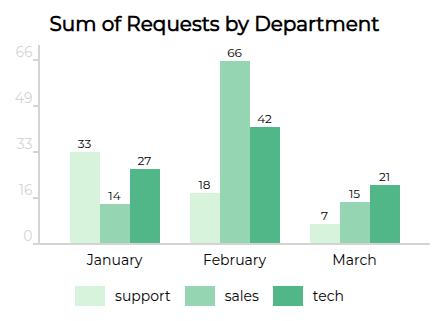
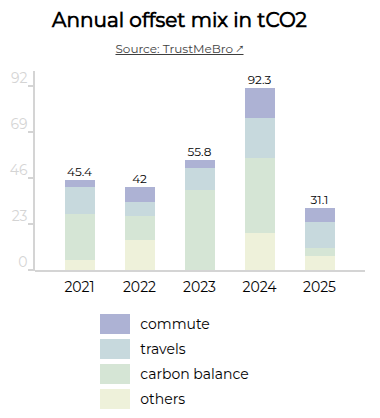
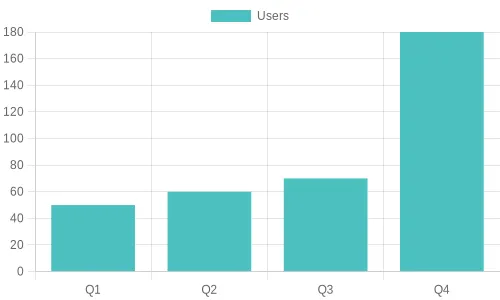
An open-source component that allows you to create fully embedded static bar charts in your MJML templates.
These bar charts are easily customizable, 100% built with HTML tables, and do not require any external dependencies.
The package is available on [GitHub](https://github.com/Freezystem/mjml-bar-chart) and [NPM](https://www.npmjs.com/package/@freezystem/mjml-bar-chart).
You can also render as stacked bars, add a link to your sources, vertically align labels, and much more:
This component is lightweight, written with TypeScript, and is thoroughly tested.
It is available as UMD (CJS + AMD), ESM and TS module format.
================================================
FILE: doc/mjml-chart.md
================================================
### mj-chart
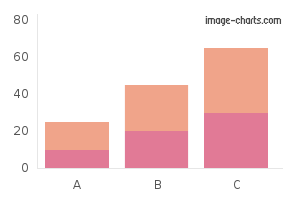
Displays charts as images in your email.
Thanks to [image-charts](https://image-charts.com/) for their contribution with this component. It's available on [Github](https://github.com/image-charts/mjml-charts) and [NPM](https://www.npmjs.com/package/mjml-chart).
================================================
FILE: doc/mjml-chartjs.md
================================================
### mj-chartjs
Displays [Chart.js](https://www.chartjs.org/) charts as images in your email. Chart.js is an open-source Javascript charting library.
It’s available on [Github](https://github.com/typpo/mjml-chartjs) and [NPM](https://www.npmjs.com/package/mjml-chartjs). By default, it uses the open-source [QuickChart](https://quickchart.io/) API for chart rendering.
================================================
FILE: doc/mjml-mso-button.md
================================================
### mjml-msobutton
A button that uses the [VML](https://docs.microsoft.com/en-us/windows/win32/vml/shape-element--vml) solution for radius, which is supported in Outlook desktop
It uses the same attributes as the standard `mj-button` but includes three additional ones:
| attribute | accepts | description | default value |
| ---------- | ------- | ------------------------------ | ------------- |
| mso-proof | boolean | Active the bulletproof mode | `false` |
| mso-width | `px` | The width of the VML solution | `200px` |
| mso-height | `px` | The height of the VML solution | `40px` |
These new attributes allow MJML to generate a “bulletproof button“ which incorporates radius, stroke and alignment, [using this method](https://buttons.cm/),
It's available on [Github](https://github.com/adrien-zinger/mjml-mso-button) and [NPM](https://www.npmjs.com/package/mjml-msobutton).
**Usage**
Use it like a standard `mj-button`:
```html
Click !
```
**Problems that you should know**
1. This cannot be used with an image in background
2. It creates a duplication of code in the HTML
3. The width and the height cannot be used with the auto value.
> Sample project on github [here](https://github.com/adrien-zinger/mjml-msobutton-sample)
================================================
FILE: doc/mjml-qr-code.md
================================================
### mj-qr-code
Displays QR codes in your email. It's available on [Github](https://github.com/typpo/mjml-qr-code) and [NPM](https://www.npmjs.com/package/mjml-qr-code).
By default, it uses the open-source QuickChart [QR code API](https://quickchart.io/).
================================================
FILE: doc/ports.md
================================================
## Ports and Language Bindings
MJML is also available for other platforms to use. The community has created ports to these and wrappers for the official Node implementation.
Note: These contributions are not directly supported by the MJML team.
### Rust: MRML
This project is a reimplementation of the nice MJML markup language in Rust.
[https://github.com/jdrouet/mrml](https://github.com/jdrouet/mrml)
#### Missing implementations / components:
- `mj-style set to inline`: not yet implemented. It requires parsing the generated HTML to apply the inline styles afterward (that's how it's done in MJML) which would kill the performance. Applying it at render time would improve the performance but it would still require it to parse the CSS.
### .NET: MJML.NET
A blazingly-fast unofficial port of MJML 4 to .NET 6.
[https://github.com/SebastianStehle/mjml-net](https://github.com/SebastianStehle/mjml-net)
### Elixir: MJML (Rust NIFs for Elixir)
Native Implemented Function (NIF) bindings for the MJML Rust implementation (mrml).
[https://github.com/adoptoposs/mjml_nif](https://github.com/adoptoposs/mjml_nif)
### Ruby: MRML Ruby
Ruby wrapper for MRML, the MJML markup language implementation in Rust.
[https://github.com/hardpixel/mrml-ruby](https://github.com/hardpixel/mrml-ruby)
### React: mjml-react
React components for MJML components.
[https://github.com/faire/mjml-react#readme](https://github.com/faire/mjml-react#readme)
### Python: mjml-python
Python wrapper for MRML, the MJML markup language implementation in Rust.
[https://github.com/mgd020/mjml-python](https://github.com/mgd020/mjml-python)
### Python: mjml-python
Python implementation for MJML.
[https://github.com/FelixSchwarz/mjml-python](https://github.com/FelixSchwarz/mjml-python)
### Python / Django: django-mjml
The simplest way to use MJML in Django templates.
[https://github.com/liminspace/django-mjml](https://github.com/liminspace/django-mjml)
### PHP / Laravel: Laravel MJML
Build responsive e-mails easily using MJML and Laravel Mailables.
- [https://github.com/EvanSchleret/lara-mjml](https://github.com/EvanSchleret/lara-mjml)
- [https://github.com/asahasrabuddhe/laravel-mjml](https://github.com/asahasrabuddhe/laravel-mjml) (not maintained)
================================================
FILE: doc/tooling.md
================================================
## Tooling
In order to provide you with the best and most efficient experience using MJML, we've developed some tools to integrate it seamlessly into your development workflow:
### Visual Studio Code
[Visual Studio Code](https://code.visualstudio.com/) is a free code editor made by [Microsoft](https://www.microsoft.com/). We recommend this package as it is among the most feature-rich MJML plugins for code editors; with live previews, syntax highlighting and linting, as well as export features including HTML and screenshots.
It is available [on Github](https://github.com/mjmlio/vscode-mjml) and through the [Visual Studio Marketplace](https://marketplace.visualstudio.com/items?itemName=mjmlio.vscode-mjml).
### Sublime Text
[Sublime Text](https://www.sublimetext.com/) is a powerful text editor. We’ve provided you with a package to color MJML tags.
It is available [on Github](https://github.com/mjmlio/mjml-syntax) and through the [Sublime Package Control](https://packagecontrol.io/packages/MJML-syntax).
### Gulp
[Gulp](https://gulpjs.com/) is a tool designed to help you automate and enhance your workflow. Our plugin enables you to plug the MJML translation engine into your workflow, helping you to streamline your development workflow.
It is available here on [Github](https://github.com/mjmlio/gulp-mjml).
================================================
FILE: doc/using_mjml_in_json.md
================================================
## Using MJML in JSON
MJML can not only be used as a markup, but also as a JSON object, very useful for
programmatic manipulation or with the MJML API.
With the JSON format, a MJML component is defined as an `object` with the following properties:
- a `tagName` as a `string`
- a list of attributes as an `object`
- either a `content` as a `string` or a list of `children` tags as an `array`.
Exactly like using MJML as a markup, the JSON definition can be passed as an object to the `mjml2html` function.
Here is working example:
```javascript
var mjml2html = require('mjml')
console.log(
mjml2html({
tagName: 'mjml',
attributes: {},
children: [
{
tagName: 'mj-body',
attributes: {},
children: [
{
tagName: 'mj-section',
attributes: {},
children: [
{
tagName: 'mj-column',
attributes: {},
children: [
{
tagName: 'mj-image',
attributes: {
width: '100px',
src: '/assets/img/logo-small.png',
},
},
{
tagName: 'mj-divider',
attributes: {
'border-color': '#F46E43',
},
},
{
tagName: 'mj-text',
attributes: {
'font-size': '20px',
color: '#F45E43',
'font-family': 'Helvetica',
},
content: 'Hello World',
},
],
},
],
},
],
},
],
}),
)
```
================================================
FILE: lerna.json
================================================
{
"packages": [
"packages/*"
],
"command": {
"publish": {
"exact": true
}
},
"npmClient": "yarn",
"useWorkspaces": true,
"version": "4.18.0"
}
================================================
FILE: package.json
================================================
{
"name": "mjml-master",
"private": true,
"scripts": {
"build:watch": "lerna run build --parallel -- -- -w",
"build": "lerna run build --parallel --ignore mjml-browser",
"build-browser": "cd packages/mjml-browser && yarn build",
"lint": "eslint .",
"lint:fix": "eslint . --fix",
"postinstall": "lerna bootstrap",
"prettier": "prettier --write \"packages/**/{src,bin}/**/*.?(js|json)\"",
"test": "lerna run test"
},
"workspaces": [
"packages/*"
],
"devDependencies": {
"@babel/core": "^7.28.4",
"@babel/plugin-proposal-class-properties": "^7.18.6",
"@babel/plugin-transform-runtime": "^7.28.3",
"@babel/preset-env": "^7.28.3",
"@babel/register": "^7.28.3",
"babel-eslint": "^10.1.0",
"babel-plugin-add-module-exports": "^1.0.2",
"babel-plugin-lodash": "^3.3.4",
"eslint": "^6.8.0",
"eslint-config-airbnb-base": "^14.1.0",
"eslint-config-prettier": "^9.1.0",
"eslint-plugin-import": "^2.21.1",
"lerna": "^3.22.1",
"mocha": "10",
"open": "^7.3.0",
"prettier": "^3.2.4",
"rimraf": "^3.0.2"
},
"resolutions": {
"@babel/runtime": "7.28.4"
}
}
================================================
FILE: packages/mjml/README.md
================================================
# MJML 4
---
# Introduction
`MJML` is a markup language created by [Mailjet](https://www.mailjet.com/) and designed to reduce the pain of coding a responsive email. Its semantic syntax makes it easy and straightforward while its rich standard components library fastens your development time and lightens your email codebase. MJML’s open-source engine takes care of translating the `MJML` you wrote into responsive HTML.
# Installation
You can install `MJML` with `NPM` to use it with NodeJS or the Command Line Interface. If you're not sure what those are, head over to Usage for other ways to use MJML.
```bash
npm install mjml
```
# Usage
## Online
Don't want to install anything? Use the free online editor!
## Applications and plugins
MJML comes with an ecosystem of tools and plugins, check out:
- The [MJML App](https://mjmlio.github.io/mjml-app/) (MJML is included)
- [Visual Studio Code plugin](https://github.com/mjmlio/vscode-mjml) (MJML is included)
- [Atom plugin](https://atom.io/users/mjmlio) (MJML needs to be installed separately)
- [Sublime Text plugin](https://packagecontrol.io/packages/MJML-syntax) (MJML needs to be installed separately)
For more tools, check the [Community](https://mjml.io/community) page.
## Command line interface
> Compiles the file and outputs the HTML generated in `output.html`
```bash
mjml input.mjml -o output.html
```
You can pass optional `arguments` to the CLI and combine them.
argument | description | default value
---------|--------|--------------
`mjml -m [input]` | Migrates a v3 MJML file to the v4 syntax | NA
`mjml [input] -o [output]` | Writes the output to [output] | NA
`mjml [input] -s` | Writes the output to `stdout` | NA
`mjml -w [input]` | Watches the changes made to `[input]` (file or folder) | NA
`mjml [input] --config.beautify` | Beautifies the output (`true` or `false`) | true
`mjml [input] --config.minify` | Minifies the output (`true` or `false`) | false
See [mjml-cli documentation](https://github.com/mjmlio/mjml/blob/master/packages/mjml-cli/README.md) for more information about config options.
## Inside Node.js
```javascript
import mjml2html from 'mjml'
/*
Compile an mjml string
*/
const htmlOutput = mjml2html(`
Hello World!
`, options)
/*
Print the responsive HTML generated and MJML errors if any
*/
console.log(htmlOutput)
```
You can pass optional `options` as an object to the `mjml2html` function:
option | unit | description | default value
-------------|--------|--------------|---------------
fonts | object | Default fonts imported in the HTML rendered by MJML | See in [index.js](https://github.com/mjmlio/mjml/blob/master/packages/mjml-core/src/index.js#L100-L108)
keepComments | boolean | Option to keep comments in the HTML output | true
ignoreIncludes | boolean | Option to ignore mj-includes | false
beautify | boolean | Option to beautify the HTML output | false
minify | boolean | Option to minify the HTML output | false
validationLevel | string | Available values for the [validator](https://github.com/mjmlio/mjml/tree/master/packages/mjml-validator#validating-mjml): 'strict', 'soft', 'skip' | 'soft'
filePath | string | Path of file, used for relative paths in mj-includes | '.'
preprocessors | array of functions | Preprocessors applied to the xml before parsing. Input must be xml, not json. Functions must be (xml: string) => string | []
juicePreserveTags | Preserve some tags when inlining css, see [mjml-cli documentation](https://github.com/mjmlio/mjml/blob/master/packages/mjml-cli/README.md) for more info | NA
minifyOptions | Options for html minifier, see [mjml-cli documentation](https://github.com/mjmlio/mjml/blob/master/packages/mjml-cli/README.md) for more info | NA
mjmlConfigPath | string | The path or directory of the `.mjmlconfig` file (for custom components use) | `process.cwd()`
useMjmlConfigOptions | Allows to use the `options` attribute from `.mjmlconfig` file | false
Note that it's also possible to define preprocessors in your mjmlconfig file. For this, you need to use a `.mjmlconfig.js` file. This js file needs to export an Object with the same structure as a standard JSON .mjmlconfig file.
## API
A free-to-use MJML API is available to make it easy to integrate MJML in your application. Head over [here](https://mjml.io/api) to learn more about the API.
# MJML Slack
MJML wouldn't be as cool without its amazing community. Head over the [Community Slack](https://join.slack.com/t/mjml/shared_invite/zt-gqmwfwmr-kPBnfuuB7wof5httaTcXxg) to meet fellow MJML'ers.
================================================
FILE: packages/mjml/bin/mjml
================================================
#!/usr/bin/env node
require('../lib/index')
require('mjml-cli')
================================================
FILE: packages/mjml/package.json
================================================
{
"name": "mjml",
"description": "MJML: the only framework that makes responsive-email easy",
"version": "4.18.0",
"main": "lib/index.js",
"bin": {
"mjml": "bin/mjml"
},
"files": [
"bin",
"lib"
],
"repository": {
"type": "git",
"url": "git+https://github.com/mjmlio/mjml.git",
"directory": "packages/mjml"
},
"license": "MIT",
"bugs": {
"url": "https://github.com/mjmlio/mjml/issues"
},
"homepage": "https://mjml.io",
"scripts": {
"clean": "rimraf lib",
"build": "babel src --out-dir lib --root-mode upward",
"test": "mocha ./test/*.test.js"
},
"dependencies": {
"@babel/runtime": "^7.28.4",
"mjml-cli": "4.18.0",
"mjml-core": "4.18.0",
"mjml-migrate": "4.18.0",
"mjml-preset-core": "4.18.0",
"mjml-validator": "4.18.0"
},
"devDependencies": {
"@babel/cli": "^7.8.4",
"chai": "^4.1.1",
"chai-spies": "^1.0.0",
"cheerio": "1.0.0-rc.12",
"lodash": "^4.17.21",
"rimraf": "^3.0.2"
}
}
================================================
FILE: packages/mjml/src/index.js
================================================
import mjml2html, { components, assignComponents } from 'mjml-core'
import { dependencies, assignDependencies } from 'mjml-validator'
import presetCore from 'mjml-preset-core'
assignComponents(components, presetCore.components)
assignDependencies(dependencies, presetCore.dependencies)
export default mjml2html
================================================
FILE: packages/mjml/test/accordion-fontFamily.test.js
================================================
const chai = require('chai')
const { load } = require('cheerio')
const mjml = require('../lib')
describe('mj-accordion font-family inheritance', function () {
it('should render correct font-family in CSS style values on accordion-title and accordion-text', function () {
const input = `
Why use an accordion?
Because emails with a lot of content are most of the time a very bad experience on mobile, mj-accordion comes handy when you want to deliver a lot of information in a concise way.
Why use an accordion?
Because emails with a lot of content are most of the time a very bad experience on mobile, mj-accordion comes handy when you want to deliver a lot of information in a concise way.
`
const { html } = mjml(input)
const $ = load(html)
// style values should be correct
chai
.expect(
$(
'.my-accordion-1 .mj-accordion-title td:first-child, .my-accordion-1 .mj-accordion-content td:first-child',
'.my-accordion-2 .mj-accordion-title td:first-child, .my-accordion-2 .mj-accordion-content td:first-child, ',
)
.map(function getAttr() {
const start = $(this).attr('style').indexOf('font-family:') + 12
const end = $(this).attr('style').indexOf(';', start)
const result = $(this).attr('style').substring(start, end)
return result
})
.get(),
'Font-family in CSS style values on accordion-title',
)
.to.eql(['serif', 'serif', 'monospace', 'monospace'])
})
})
================================================
FILE: packages/mjml/test/accordion-padding.test.js
================================================
const chai = require('chai')
const { load } = require('cheerio')
const mjml = require('../lib')
describe('mj-accordion padding-X', function () {
it('should render correct padding in CSS style values on accordion-title and accordion-text', function () {
const input = `
Why use an accordion?
Because emails with a lot of content are most of the time a very bad experience on mobile, mj-accordion comes handy when you want to deliver a lot of information in a concise way.
`
const { html } = mjml(input)
const $ = load(html)
function extractPadding(style, prop) {
const start = style.indexOf(`${prop}:`) + prop.length + 1
const end = style.indexOf(';', start)
return style.substring(start, end).trim()
}
const paddings = [
'padding-left',
'padding-right',
'padding-top',
'padding-bottom',
]
const results = paddings.map((padding) =>
$(
'.mj-accordion-title td:first-child, .mj-accordion-content td:first-child',
)
.map(function () {
const style = $(this).attr('style')
return extractPadding(style, padding)
})
.get(),
)
// Each padding should be ['40px', '40px']
paddings.forEach((padding, idx) => {
chai
.expect(
results[idx],
`${padding} in CSS style values on accordion-title and accordion-text`,
)
.to.eql(['40px', '40px'])
})
})
})
================================================
FILE: packages/mjml/test/accordionTitle-fontWeight.test.js
================================================
const chai = require('chai')
const { load } = require('cheerio')
const mjml = require('../lib')
describe('mj-accordion-title font-weight', function () {
it('should render correct font-weight in CSS style values on accordion-title', function () {
const input = `
Why use an accordion?
Because emails with a lot of content are most of the time a very bad experience on mobile, mj-accordion comes handy when you want to deliver a lot of information in a concise way.
How it works
Content is stacked into tabs and users can expand them at will. If responsive styles are not supported (mostly on desktop clients), tabs are then expanded and your content is readable at once.
`
const { html } = mjml(input)
const $ = load(html)
// style values should be correct
chai
.expect(
$('.accordion-title')
.map(function getAttr() {
const start = $(this).attr('style').indexOf('font-weight:') + 12
const end = $(this).attr('style').indexOf(';', start)
return $(this).attr('style').substring(start, end)
})
.get(),
'Font-weight in CSS style values on accordion-title',
)
.to.eql(['bold', '700'])
})
})
================================================
FILE: packages/mjml/test/carousel-hoverSupported.test.js
================================================
const chai = require('chai')
const { load } = require('cheerio')
const mjml = require('../lib')
describe('mj-carousel-thumbnail thumbnails supported', function () {
it('should render correct display in CSS style values on mj-carousel-thumbnail', function () {
const input = `
`
const { html } = mjml(input)
const $ = load(html)
// style values should be correct
chai
.expect(
$('.mj-carousel-thumbnail')
.map(function getAttr() {
const start = $(this).attr('style').indexOf('display:') + 8
const end = $(this).attr('style').indexOf(';', start)
const result = $(this).attr('style').substring(start, end)
return result
})
.get(),
'Display CSS style values on mj-carousel-thumbnail',
)
.to.eql(['none', 'none', 'none'])
})
})
================================================
FILE: packages/mjml/test/column-border-radius.test.js
================================================
const chai = require('chai')
const { load } = require('cheerio')
const mjml = require('../lib')
describe('mj-column border-radius', function () {
it('should render correct border-radius / inner-border-radius (and border-collapse) in CSS style values on mj-column', function () {
const input = `
Hello World
`
const { html } = mjml(input)
const $ = load(html)
// border radius values should be correct
chai
.expect(
$(
'.mj-column-per-100 > table > tbody > tr > td, .mj-column-per-100 > table > tbody > tr > td > table',
)
.map(function getAttr() {
const start = $(this).attr('style').indexOf('border-radius:') + 14
const end = $(this).attr('style').indexOf(';', start)
return $(this).attr('style').substring(start, end)
})
.get(),
'Border-radius / inner-border-radius in CSS style values on mj-column',
)
.to.eql(['50px', '40px'])
// border collapse values should be correct
chai
.expect(
$(
'.mj-column-per-100 > table > tbody > tr > td, .mj-column-per-100 > table > tbody > tr > td > table',
)
.map(function getAttr() {
const start = $(this).attr('style').indexOf('border-collapse:') + 16
const end = $(this).attr('style').indexOf(';', start)
return $(this).attr('style').substring(start, end)
})
.get(),
'Border-collapse in CSS style values on mj-column',
)
.to.eql(['separate', 'separate'])
})
})
================================================
FILE: packages/mjml/test/html-attributes.test.js
================================================
const chai = require('chai')
const { load } = require('cheerio')
const { sortBy } = require('lodash')
const mjml = require('../lib')
describe('html-attributes', function () {
it('should put the attributes at the right place', function () {
const input = `
4243{ if item < 5 }{ if item > 10 }
Hello World! { item }
{ end if }
Hello World! { item + 1 }
{ end if }
`
const { html } = mjml(input)
const $ = load(html)
// should put the attributes at the right place
chai
.expect(
$('.text div')
.map(function getAttr() {
return $(this).attr('data-id')
})
.get(),
'Custom attributes added on texts',
)
.to.eql(['42', '42'])
chai
.expect(
$('.image td')
.map(function getAttr() {
return $(this).attr('data-name')
})
.get(),
'Custom attributes added on image',
)
.to.eql(['43'])
// should not alter templating syntax, or move the content that is outside any tag (mj-raws)
const expected = [
'{ if item < 5 }',
'class="section"',
'{ if item > 10 }',
'class="text"',
'{ item }',
'{ end if }',
'{ item + 1 }',
]
const indexes = expected.map((str) => html.indexOf(str))
chai.expect(indexes, 'Templating syntax unaltered').to.not.include(-1)
chai
.expect(sortBy(indexes), 'Mj-raws kept same positions')
.to.deep.eql(indexes)
})
})
================================================
FILE: packages/mjml/test/html-comments.test.js
================================================
const chai = require('chai')
const mjml = require('../lib')
describe('HTML comments', function () {
it('should not alter the whitespace between the opening/closing comment tags and the comment content', function () {
const input = `
View source to see comments below
`
const { html } = mjml(input)
// should not alter templating syntax, or move the content that is outside any tag (mj-raws)
const expected = [
'',
'',
'',
]
const indexes = expected.map((str) => html.indexOf(str))
chai.expect(indexes, 'Cmment syntax unaltered').to.not.include(-1)
})
})
================================================
FILE: packages/mjml/test/lazy-head-style.test.js
================================================
const chai = require('chai')
const spies = require('chai-spies')
const mjml = require('../lib')
const {
HeadComponent,
registerComponent,
} = require('../../mjml-core/lib/index')
chai.use(spies)
describe('lazy-head-style', function () {
it('should call style with correct breakpoint', function () {
const addStyle = chai.spy(
(breakpoint) => `
@media only screen and (max-width:${breakpoint}) {
h1 {
font-size: 20px;
}
}
`,
)
class HeadComponentWithFunctionStyle extends HeadComponent {
handler() {
const { add } = this.context
add('style', addStyle)
}
}
HeadComponentWithFunctionStyle.componentName =
'mj-head-component-with-function-style'
HeadComponentWithFunctionStyle.endingTag = true
HeadComponentWithFunctionStyle.allowedAttributes = {}
registerComponent(HeadComponentWithFunctionStyle)
mjml(`
`)
chai.expect(addStyle).to.have.been.called.with('300px')
})
})
================================================
FILE: packages/mjml/test/navbar-ico-padding.test.js
================================================
const chai = require('chai')
const { load } = require('cheerio')
const mjml = require('../lib')
describe('mj-navbar ico-padding-X', function () {
it('should render correct padding in CSS style values on navbar hamburger icon', function () {
const input = `
Getting startedTry it live
`
const { html } = mjml(input)
const $ = load(html)
function extractPadding(style, prop) {
const start = style.indexOf(`${prop}:`) + prop.length + 1
const end = style.indexOf(';', start)
return style.substring(start, end).trim()
}
const paddings = [
'padding-bottom',
'padding-left',
'padding-right',
'padding-top',
]
const results = paddings.map((padding) =>
$('.mj-menu-label')
.map(function () {
const style = $(this).attr('style')
return extractPadding(style, padding)
})
.get(),
)
// Padding should be ['20px', '30px', '40px', '50px']
const expected = {
'padding-bottom': ['20px'],
'padding-left': ['30px'],
'padding-right': ['40px'],
'padding-top': ['50px'],
}
paddings.forEach((padding, idx) => {
chai
.expect(results[idx], `${padding} in CSS style values on navbar icon`)
.to.eql(expected[padding])
})
})
})
================================================
FILE: packages/mjml/test/social-align.test.js
================================================
const chai = require('chai')
const { load } = require('cheerio')
const mjml = require('../lib')
describe('mj-social-element align', function () {
it('should render correct align in CSS style values on mj-social-element', function () {
const input = `
Facebook
`
const { html } = mjml(input)
const $ = load(html)
// align values should be correct
chai
.expect(
$('.my-social-element > td:first-child')
.map(function getAttr() {
const start = $(this).attr('style').indexOf('text-align:') + 11
const end = $(this).attr('style').indexOf(';', start)
return $(this).attr('style').substring(start, end)
})
.get(),
'align values on social elements',
)
.to.eql(['right'])
})
})
================================================
FILE: packages/mjml/test/social-icon-height.test.js
================================================
const chai = require('chai')
const { load } = require('cheerio')
const mjml = require('../lib')
describe('mj-social icon-height', function () {
it('should render correct icon-height align in CSS style values on mj-social', function () {
const input = `
Facebook
`
const { html } = mjml(input)
const $ = load(html)
// height values should be correct
chai
.expect(
$('.my-social-element > td > table > tbody > tr > td')
.map(function getAttr() {
const start = $(this).attr('style').indexOf('height:') + 7
const end = $(this).attr('style').indexOf(';', start)
return $(this).attr('style').substring(start, end)
})
.get(),
'icon-height values on social elements',
)
.to.eql(['40px'])
chai
.expect(
$('.my-social-element > td > table > tbody > tr > td img')
.map(function getAttr() {
return $(this).attr('height')
})
.get(),
)
.to.satisfy((arr) => arr.every((val) => !val))
})
})
================================================
FILE: packages/mjml/test/table-cellspacing.test.js
================================================
const chai = require('chai')
const { load } = require('cheerio')
const mjml = require('../lib')
describe('mj-table cellspacing', function () {
it('should render correct cellspacing (and border-collapse) in HTML tag / CSS style values on mj-table', function () {
const input = `
Year
Language
Inspired from
1995
PHP
C, Shell Unix
`
const { html } = mjml(input)
const $ = load(html)
// border radius values should be correct
chai
.expect(
$('.my-table > table')
.map(function getAttr() {
return $(this).attr('cellspacing')
})
.get(),
'cellspacing values on table elements',
)
.to.eql(['10'])
// border collapse values should be correct
chai
.expect(
$('.my-table > table')
.map(function getAttr() {
const start = $(this).attr('style').indexOf('border-collapse:') + 16
const end = $(this).attr('style').indexOf(';', start)
return $(this).attr('style').substring(start, end)
})
.get(),
'Border-collapse in CSS style values on mj-table',
)
.to.eql(['separate'])
})
})
================================================
FILE: packages/mjml/test/tableWidth.test.js
================================================
const chai = require('chai')
const { load } = require('cheerio')
const mjml = require('../lib')
describe('mj-table width', function () {
it('should render correct width in CSS style values on mj-table', function () {
const input = `
Default Width
100%
Pixel Width
500px
Percentage Width
80%
Auto Width
Auto
`
const { html } = mjml(input)
const $ = load(html)
// width values should be correct
chai
.expect(
$('.table table')
.map(function getAttr() {
return $(this).attr('width')
})
.get(),
'Width values on tables',
)
.to.eql(['100%', '500', '80%', 'auto'])
// style values should be correct
chai
.expect(
$('.table table')
.map(function getAttr() {
const start = $(this).attr('style').indexOf('width:') + 6
const end = $(this).attr('style').indexOf(';', start)
return $(this).attr('style').substring(start, end)
})
.get(),
'Width in CSS style values on tables',
)
.to.eql(['100%', '500px', '80%', 'auto'])
})
})
================================================
FILE: packages/mjml/test/wrapper-border-radius.test.js
================================================
const chai = require('chai')
const { load } = require('cheerio')
const mjml = require('../lib')
describe('mj-wrapper and mj-section border-radius', function () {
it('should render correct border-radius (and border-collapse) in CSS style values on mj-wrapper and mj-section', function () {
const input = `
Hello World
`
const { html } = mjml(input)
const $ = load(html)
// border radius values should be correct
chai
.expect(
$(
'body > div > div > table:first-child > tbody > tr > td, body > div > div',
)
.map(function getAttr() {
const start = $(this).attr('style').indexOf('border-radius:') + 14
const end = $(this).attr('style').indexOf(';', start)
return $(this).attr('style').substring(start, end)
})
.get(),
'Border-radius in CSS style values on mj-wrapper',
)
.to.eql(['10px', '10px'])
// overflow value should be correct
chai
.expect(
$('body > div > div')
.map(function getAttr() {
const start = $(this).attr('style').indexOf('overflow:') + 9
const end = $(this).attr('style').indexOf(';', start)
return $(this).attr('style').substring(start, end)
})
.get(),
'Overflow in CSS style values on mj-wrapper',
)
.to.eql(['hidden'])
// border collapse values should be correct
chai
.expect(
$('body > div > div > table:first-child')
.map(function getAttr() {
const start = $(this).attr('style').indexOf('border-collapse:') + 16
const end = $(this).attr('style').indexOf(';', start)
return $(this).attr('style').substring(start, end)
})
.get(),
'Border-collapse in CSS style values on mj-wrapper',
)
.to.eql(['separate'])
})
})
================================================
FILE: packages/mjml/test/wrapper-gap.test.js
================================================
const chai = require('chai')
const { load } = require('cheerio')
const mjml = require('../lib')
describe('mj-wrapper gap', function () {
it('should render correct gap values in CSS style values on children mj-section', function () {
const input = `
Section 1Section 2Section 3
`
const { html } = mjml(input)
const $ = load(html)
// gap values should be correct
chai
.expect(
$('.my-section')
.map(function getAttr() {
const str = $(this).attr('style')
const substr = 'margin-top:'
if (str.includes(substr)) {
const start = $(this).attr('style').indexOf(substr) + 11
const end = $(this).attr('style').indexOf(';', start)
return $(this).attr('style').substring(start, end)
}
return undefined
})
.get(),
'Gap in CSS style values on mj-wrapper',
)
.to.eql(['20px', '20px'])
})
})
================================================
FILE: packages/mjml-accordion/README.md
================================================
### mj-accordion
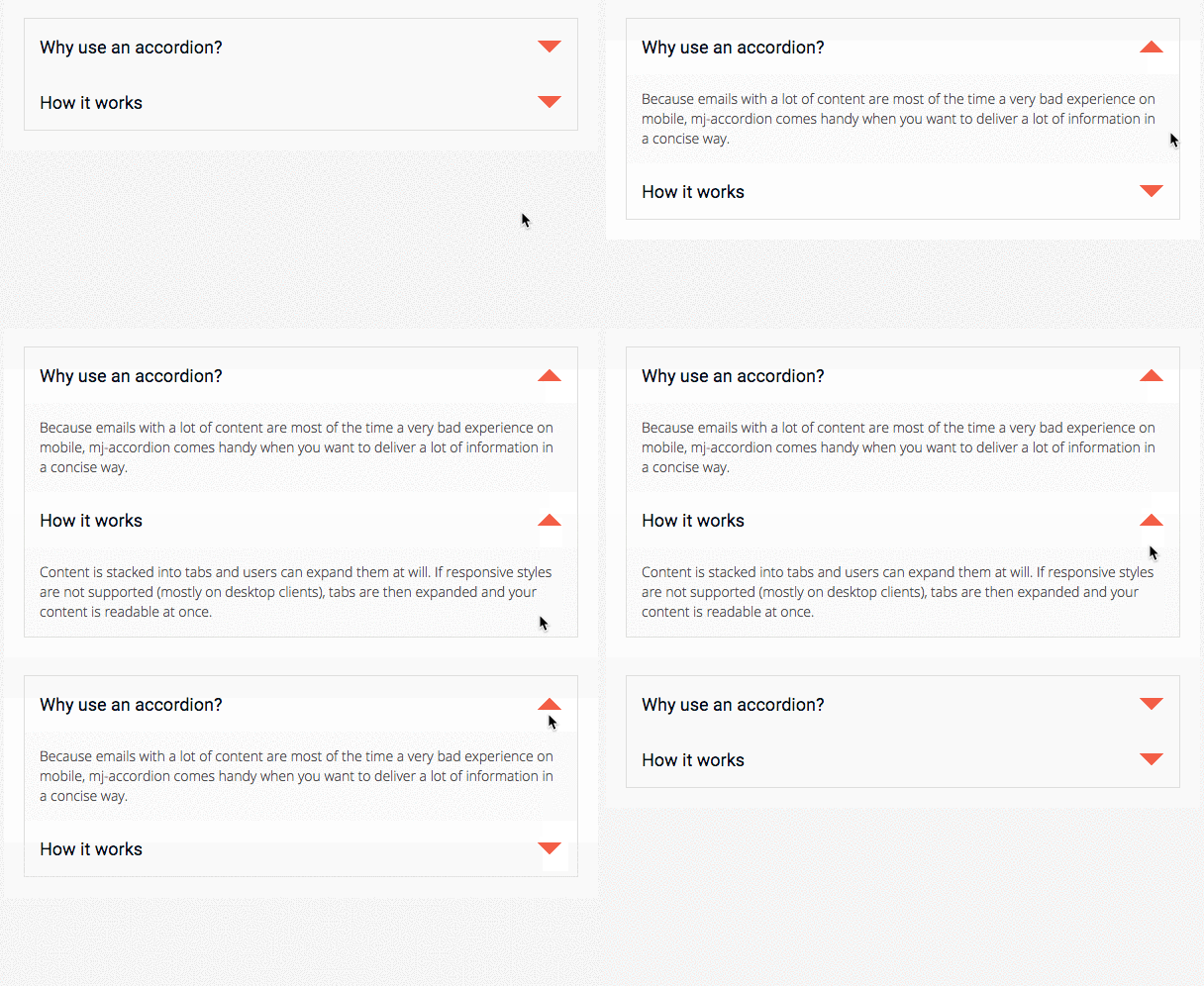
An interactive MJML component that stacks content in tabs, so the information is collapsed and only the titles are visible.
Readers can interact by clicking on the tabs to reveal the content, providing a better experience for mobile users by reducing the amount of scrolling.
Note
mj-accordion-text and mj-accordion-title are "ending tags", which means that they can contain HTML code but they cannot contain other MJML components.
```xml
Why use an accordion?
Because emails with a lot of content are most of the time a very bad experience on mobile, mj-accordion comes handy when you want to deliver a lot of information in a concise way.
How it works
Content is stacked into tabs and users can expand them at will. If responsive styles are not supported (mostly on desktop clients), tabs are then expanded and your content is readable at once.
```
#### Attributes
| attribute | accepts | description | default value |
| -------------------------- | ----------------------- | -------------------------------------------------- | -------------------------------------- |
| border | string | CSS border format | `2px solid black` |
| container-background-color | CSS color formats | background-color of the cell | |
| css-class | string | class name, added to the root HTML element created | |
| font-family | string | font | `Ubuntu, Helvetica, Arial, sans-serif` |
| icon-align | `top` `middle` `bottom` | icon alignment | `middle` |
| icon-height | `px` `%` | icon height | `32px` |
| icon-position | left, right | display icon left or right | `right` |
| icon-unwrapped-alt | string | alt text when accordion is unwrapped | `-` |
| icon-unwrapped-url | string | icon when accordion is unwrapped | `https://i.imgur.com/w4uTygT.png` |
| icon-width | `px` `%` | icon width | `32px` |
| icon-wrapped-alt | string | alt text when accordion is wrapped | `+` |
| icon-wrapped-url | string | icon when accordion is wrapped | `https://i.imgur.com/bIXv1bk.png` |
| padding | `px` `%` | accordion padding, supports up to 4 parameters | `10px 25px` |
| padding-bottom | `px` `%` | accordion bottom padding | |
| padding-left | `px` `%` | accordion left padding | |
| padding-right | `px` `%` | accordion right padding | |
| padding-top | `px` `%` | accordion top padding | |
`
}
}
================================================
FILE: packages/mjml-accordion/src/index.js
================================================
export { default as Accordion } from './Accordion'
export { default as AccordionElement } from './AccordionElement'
export { default as AccordionText } from './AccordionText'
export { default as AccordionTitle } from './AccordionTitle'
================================================
FILE: packages/mjml-body/README.md
================================================
### mj-body
This is the starting point of your email. To aid accessibility, MJML automatically adds a `div` tag as the child of the body, with the following ARIA attributes `role="article"`, `aria-roledescription="email"` and `aria-label="EMAIL NAME"`, where 'EMAIL NAME' is taken from the content of the `mj-title` tag. The `lang` and `dir` attributes are also added here, with values taken from the `mjml` tag.
```xml
```
#### Attributes
| attribute | accepts | description | default value |
| ------------------- | ----------------- | -------------------------------------------------- | ------------- |
| background-color | CSS color formats | the general background color | |
| css-class | string | class name, added to the root HTML element created | |
| width | `px` | email width | `600px` |
`
}
}
================================================
FILE: packages/mjml-carousel/src/index.js
================================================
export { default as Carousel } from './Carousel'
export { default as CarouselImage } from './CarouselImage'
================================================
FILE: packages/mjml-cli/README.md
================================================
## mjml-cli
# Installation
We recommend installing and using MJML locally, in a project folder where you'll use MJML:
```bash
npm install mjml
```
In the folder where you installed MJML you can now run:
```bash
./node_modules/.bin/mjml input.mjml
```
To avoid typing `./node_modules/.bin/`, add it to your PATH:
```bash
export PATH="$PATH:./node_modules/.bin"
```
You can now run MJML directly, in that folder:
```bash
mjml input.mjml
```
MJML is written with [NodeJS](https://nodejs.org/en/)
You can download and install the MJML engine from [NPM](https://www.npmjs.com).
# Command Line Interface
In addition to the translation engine, which converts MJML to email HTML, we've bundled a Command Line Interface (CLI) helping you to achieve the basic features it offers and integrate it seamlessly in your development flow.
### Render MJML to HTML
```bash
mjml input.mjml
```
It will output a HTML file called `input.html`.
Input can also be a directory.
### Migrate MJML3 to MJML4
```bash
$> mjml -m input.mjml -o result.mjml
```
It will output a MJML file called `result.mjml`.
### Validate MJML
```bash
$> mjml -v input.mjml
```
It will log validation errors. If there are errors, exits with code 1. Otherwise, exits with code 0.
### Render and redirect the result to stdout
```bash
mjml -s input.mjml
# or
mjml --stdout input.mjml
```
### Render and redirect the result to a file
```bash
mjml input.mjml -o my-email.html
# or
mjml input.mjml --output my-email.html
```
You can output the resulting email responsive HTML in a file.
If the output file does not exist it will be created, but output directories must already exist.
If output is a directory, output file(s) will be `output/input-file-name.html`
### Set the validation mode
```bash
mjml -l skip -r input.mjml
```
Accepted values are
- 'normal' : *(default)* will display validation messages but compile anyway
- 'skip' : the file is rendered without being validated
- 'strict' : will throw an error if validation fails
### Watch changes on a file
```bash
mjml -w input.mjml
# or
mjml --watch input.mjml
```
If you like live-coding, you might want to use the `-w` option that enables you to re-render your file every time you save it.
It can be time-saving when you can just split you screen and see the HTML output modified when you modify your MJML.
Of course, the `-w` option can be used with an `--output` option too.
### Available options
```bash
mjml input.mjml --config.optionName value
# or
mjml input.mjml -c.optionName value
```
All the options that can be passed to mjml2html (see general documentation) can be provided. The most common ones are detailed below.
### Minify and beautify the output HTML
```bash
$> mjml input.mjml --config.beautify true --config.minify false
```
These are the default options.
### Change minify options
```bash
$> mjml input.mjml --config.minifyOptions='{"minifyCSS": true, "removeEmptyAttributes": false}'
```
The defaults are "collapseWhitespace": true, "minifyCSS": false, "removeEmptyAttributes": true
See html-minifier documentation for more available options
### Change juice options (library used for inlining mj-style css)
```bash
$> mjml input.mjml --config.juiceOptions='{"preserveImportant": true}'
```
The defaults are "applyStyleTags": false, "insertPreservedExtraCss": false, "removeStyleTags": false
See juice documentation for more available options
### Preserve specific tags when using inline mj-style
```bash
$> mjml input.mjml --config.juicePreserveTags='{"myTag": { "start": "<#", "end": "` the css will be inlined using the juice library. As a side effect, juice will convert all tags' attributes into lower case. If you need to preserve some cases (i.e. for a templating lib) you can specify the tags to preserve. With the example above, all tags of the form `<# myVar="" >` or `` will be left untouched. By default juice already ignores `<% EJS %>` and `{{ HBS }}` tags.
### Override base path for mj-include relative paths
```bash
$> mjml ./my-project/input.mjml --config.filePath ./my-partials/
```
If you like to keep your partials together and you want to be able to mj-include them without having to change the relative path of the includes depending on the compiled file path, you can use this option. In this exemple, `` will include `./my-partials/header.mjml`, ignoring the actual path of `input.mjml`.
### Log error stack
```bash
$> mjml input.mjml --config.stack true
```
================================================
FILE: packages/mjml-cli/bin/mjml
================================================
#!/usr/bin/env node
require('../lib/client.js')()
================================================
FILE: packages/mjml-cli/package.json
================================================
{
"name": "mjml-cli",
"description": "MJML: the only framework that makes responsive-email easy",
"version": "4.18.0",
"main": "bin/mjml",
"bin": {
"mjml-cli": "bin/mjml"
},
"files": [
"bin",
"lib"
],
"repository": {
"type": "git",
"url": "git+https://github.com/mjmlio/mjml.git",
"directory": "packages/mjml-cli"
},
"license": "MIT",
"bugs": {
"url": "https://github.com/mjmlio/mjml/issues"
},
"homepage": "https://mjml.io",
"scripts": {
"clean": "rimraf lib",
"build": "babel src --out-dir lib --root-mode upward"
},
"dependencies": {
"@babel/runtime": "^7.28.4",
"chokidar": "^3.0.0",
"glob": "^10.3.10",
"html-minifier": "^4.0.0",
"js-beautify": "^1.6.14",
"lodash": "^4.17.21",
"minimatch": "^9.0.3",
"mjml-core": "4.18.0",
"mjml-migrate": "4.18.0",
"mjml-parser-xml": "4.18.0",
"mjml-validator": "4.18.0",
"yargs": "^17.7.2"
},
"devDependencies": {
"@babel/cli": "^7.8.4",
"rimraf": "^3.0.2"
}
}
================================================
FILE: packages/mjml-cli/src/client.js
================================================
import path from 'path'
import yargs from 'yargs'
import { flow, pick, isNil, negate, pickBy } from 'lodash/fp'
import { isArray, isEmpty, map, get, omit } from 'lodash'
import { html as htmlBeautify } from 'js-beautify'
import { minify as htmlMinify } from 'html-minifier'
import mjml2html, { components, initializeType } from 'mjml-core'
import migrate from 'mjml-migrate'
import validate, { dependencies } from 'mjml-validator'
import MJMLParser from 'mjml-parser-xml'
import { version as coreVersion } from 'mjml-core/package.json'
import readFile, { flatMapPaths } from './commands/readFile'
import watchFiles from './commands/watchFiles'
import readStream from './commands/readStream'
import outputToFile, { isDirectory } from './commands/outputToFile'
import outputToConsole from './commands/outputToConsole'
import { version as cliVersion } from '../package.json'
import DEFAULT_OPTIONS from './helpers/defaultOptions'
const beautifyConfig = {
indent_size: 2,
wrap_attributes_indent_size: 2,
max_preserve_newline: 0,
preserve_newlines: false,
end_with_newline: true,
}
const minifyConfig = {
collapseWhitespace: true,
minifyCSS: false,
caseSensitive: true,
removeEmptyAttributes: true,
}
export default async () => {
let EXIT_CODE = 0
let KEEP_OPEN = false
const error = (msg) => {
console.error('\nCommand line error:') // eslint-disable-line no-console
console.error(msg) // eslint-disable-line no-console
process.exit(1)
}
const pickArgs = (args) =>
flow(
pick(args),
pickBy((e) => negate(isNil)(e) && !(isArray(e) && isEmpty(e))),
)
const { argv } = yargs
.version(false) // cf. https://github.com/yargs/yargs/issues/961
.options({
r: {
alias: 'read',
describe: 'Compile MJML File(s)',
type: 'array',
},
m: {
alias: 'migrate',
describe: 'Migrate MJML3 File(s) (deprecated)',
type: 'array',
},
v: {
alias: 'validate',
describe: 'Run validator on File(s)',
type: 'array',
},
w: {
alias: 'watch',
type: 'array',
describe: 'Watch and compile MJML File(s) when modified',
},
i: {
alias: 'stdin',
describe: 'Compiles MJML from input stream',
},
s: {
alias: 'stdout',
describe: 'Output HTML to stdout',
},
o: {
alias: 'output',
type: 'string',
describe: 'Filename/Directory to output compiled files',
},
c: {
alias: 'config',
type: 'object',
describe: 'Option to pass to mjml-core',
},
version: {
alias: 'V',
},
noStdoutFileComment: {
type: 'boolean',
describe: 'Add no file comment to stdout',
},
})
.help()
.version(`mjml-core: ${coreVersion}\nmjml-cli: ${cliVersion}`)
let juiceOptions
let minifyOptions
let juicePreserveTags
let fonts
try {
juiceOptions =
argv.c && argv.c.juiceOptions && JSON.parse(argv.c.juiceOptions)
} catch (e) {
error(`Failed to decode JSON for config.juiceOptions argument`)
}
try {
minifyOptions =
argv.c && argv.c.minifyOptions && JSON.parse(argv.c.minifyOptions)
} catch (e) {
error(`Failed to decode JSON for config.minifyOptions argument`)
}
try {
juicePreserveTags =
argv.c && argv.c.juicePreserveTags && JSON.parse(argv.c.juicePreserveTags)
} catch (e) {
error(`Failed to decode JSON for config.juicePreserveTags argument`)
}
try {
fonts = argv.c && argv.c.fonts && JSON.parse(argv.c.fonts)
} catch (e) {
error(`Failed to decode JSON for config.fonts argument`)
}
const filePath = argv.c && argv.c.filePath
const config = Object.assign(
DEFAULT_OPTIONS,
argv.c,
fonts && { fonts },
minifyOptions && { minifyOptions },
juiceOptions && { juiceOptions },
juicePreserveTags && { juicePreserveTags },
argv.c && argv.c.keepComments === 'false' && { keepComments: false },
)
const inputArgs = pickArgs(['r', 'w', 'i', '_', 'm', 'v'])(argv)
const outputArgs = pickArgs(['o', 's'])(argv)
// implies (until yargs pr is accepted)
;[
[Object.keys(inputArgs).length === 0, 'No input argument received'],
[Object.keys(inputArgs).length > 1, 'Too many input arguments received'],
[Object.keys(outputArgs).length > 1, 'Too many output arguments received'],
[
argv.w && argv.w.length > 1 && !argv.o,
'Need an output option when watching files',
],
[
argv.w &&
argv.w.length > 1 &&
argv.o &&
!isDirectory(argv.o) &&
argv.o !== '',
'Need an output option when watching files',
],
].forEach((v) => (v[0] ? error(v[1]) : null))
const inputOpt = Object.keys(inputArgs)[0]
const outputOpt = Object.keys(outputArgs)[0] || 's'
const inputFiles = isArray(inputArgs[inputOpt])
? inputArgs[inputOpt]
: [inputArgs[inputOpt]]
const inputs = []
switch (inputOpt) {
case 'r':
case 'v':
case 'm':
case '_': {
flatMapPaths(inputFiles).forEach((file) => {
inputs.push(readFile(file))
})
if (!inputs.length) {
error('No input files found')
return
}
break
}
case 'w':
watchFiles(inputFiles, {
...argv,
config,
minifyConfig,
beautifyConfig,
})
KEEP_OPEN = true
break
case 'i':
inputs.push(await readStream())
break
default:
error('Command line error: Incorrect input options')
}
const convertedStream = []
const failedStream = []
inputs.forEach((i) => {
try {
let compiled
switch (inputOpt) {
case 'm':
compiled = { html: migrate(i.mjml, { beautify: true }) }
break
case 'v': // eslint-disable-next-line no-case-declarations
const mjmlJson = MJMLParser(i.mjml, {
components,
filePath: filePath || i.file,
actualPath: i.file,
})
compiled = {
errors: validate(mjmlJson, {
dependencies,
components,
initializeType,
}),
}
break
default: {
const beautify = config.beautify && config.beautify !== 'false'
const minify = config.minify && config.minify !== 'false'
compiled = mjml2html(i.mjml, {
...omit(config, ['minify', 'beautify']),
filePath: filePath || i.file,
actualPath: i.file,
})
if (beautify) {
compiled.html = htmlBeautify(compiled.html, beautifyConfig)
}
if (minify) {
compiled.html = htmlMinify(compiled.html, {
...minifyConfig,
...config.minifyOptions,
})
}
}
}
convertedStream.push({ ...i, compiled })
} catch (e) {
EXIT_CODE = 2
failedStream.push({ file: i.file, error: e })
}
})
convertedStream.forEach((s) => {
if (get(s, 'compiled.errors.length')) {
console.error(map(s.compiled.errors, 'formattedMessage').join('\n')) // eslint-disable-line no-console
}
})
failedStream.forEach(({ error, file }) => {
console.error(`${file ? `File: ${file}\n` : null}${error}`) // eslint-disable-line no-console
if (config.stack) {
console.error(error.stack) // eslint-disable-line no-console
}
})
if (inputOpt === 'v') {
const isInvalid =
failedStream.length ||
convertedStream.some((s) => !!get(s, 'compiled.errors.length'))
if (isInvalid) {
error('Validation failed')
return
}
process.exitCode = 0
return
}
if (!KEEP_OPEN && convertedStream.length === 0) {
error('Input file(s) failed to render')
}
switch (outputOpt) {
case 'o': {
if (inputs.length > 1 && !isDirectory(argv.o) && argv.o !== '') {
error(
`Multiple input files, but output option should be either an existing directory or an empty string: ${argv.o} given`,
)
}
const fullOutputPath = path.parse(path.resolve(process.cwd(), argv.o))
if (inputs.length === 1 && !isDirectory(fullOutputPath.dir)) {
error(`Output directory doesn’t exist for path : ${argv.o}`)
}
Promise.all(convertedStream.map(outputToFile(argv.o)))
.then(() => {
if (!KEEP_OPEN) {
process.exitCode = EXIT_CODE
}
})
.catch(({ outputName, err }) => {
if (!KEEP_OPEN) {
error(`Error writing file - ${outputName} : ${err}`)
}
})
break
}
case 's': {
const addFileHeaderComment = !argv.noStdoutFileComment
Promise.all(
convertedStream.map((converted) =>
outputToConsole(converted, addFileHeaderComment),
),
)
.then(() => (process.exitCode = EXIT_CODE)) // eslint-disable-line no-return-assign
.catch(() => (process.exitCode = 1)) // eslint-disable-line no-return-assign
break
}
default:
error('Command line error: No output option available')
}
}
================================================
FILE: packages/mjml-cli/src/commands/outputToConsole.js
================================================
export default ({ compiled: { html }, file }, addFileHeaderComment) =>
new Promise((resolve) => {
let output = ''
if (addFileHeaderComment) {
output = `\n`
}
output += `${html}\n`
process.stdout.write(output, resolve)
})
================================================
FILE: packages/mjml-cli/src/commands/outputToFile.js
================================================
import fs from 'fs'
import path from 'path'
export const isDirectory = (file) => {
try {
const outputPath = path.resolve(process.cwd(), file)
return fs.statSync(outputPath).isDirectory()
} catch (e) {
return false
}
}
const replaceExtension = (input) =>
input.replace(
'.mjml',
input.replace('.mjml', '').match(/(.)*\.(.)+$/g) ? '' : '.html',
)
const stripPath = (input) => input.match(/[^/\\]+$/g)[0]
const makeGuessOutputName = (outputPath) => {
if (isDirectory(outputPath)) {
return (input) => path.join(outputPath, replaceExtension(stripPath(input)))
}
return (input) => {
if (!outputPath) {
return replaceExtension(stripPath(input))
}
return outputPath
}
}
export default (outputPath) => {
const guessOutputName = makeGuessOutputName(outputPath)
return ({ file, compiled: { html } }) =>
new Promise((resolve, reject) => {
const outputName = guessOutputName(file)
fs.writeFile(outputName, html, (err) => {
if (err) {
// eslint-disable-next-line prefer-promise-reject-errors
return reject({ outputName, err })
}
return resolve(outputName)
})
})
}
================================================
FILE: packages/mjml-cli/src/commands/readFile.js
================================================
import fs from 'fs'
import { sync } from 'glob'
import { flatMap } from 'lodash'
export const flatMapPaths = (paths) =>
flatMap(paths, (p) => sync(p, { nodir: true }))
export default (path) => {
try {
return { file: path, mjml: fs.readFileSync(path).toString() }
} catch (e) {
// eslint-disable-next-line
console.warn(`Cannot read file: ${path} doesn't exist or no access`, e)
return {}
}
}
================================================
FILE: packages/mjml-cli/src/commands/readStream.js
================================================
const stdinSync = () =>
new Promise((res) => {
let buffer = ''
const stream = process.stdin
stream.on('data', (chunck) => {
buffer += chunck
})
stream.on('end', () => res(buffer))
})
export default async () => {
const mjml = await stdinSync()
return { mjml }
}
================================================
FILE: packages/mjml-cli/src/commands/watchFiles.js
================================================
/* eslint-disable no-console */
import chokidar from 'chokidar'
import { sync } from 'glob'
import { match } from 'minimatch'
import path from 'path'
import mjml2html from 'mjml-core'
import { flow, pickBy, flatMap, uniq, difference, remove } from 'lodash/fp'
import { omit } from 'lodash'
import { html as htmlBeautify } from 'js-beautify'
import { minify as htmlMinify } from 'html-minifier'
import readFile from './readFile'
import makeOutputToFile from './outputToFile'
import fileContext from '../helpers/fileContext'
let dirty = []
const _flatMap = flatMap.convert({ cap: false }) // eslint-disable-line no-underscore-dangle
const flatMapAndJoin = _flatMap((v, k) => v.map((p) => path.join(k, p)))
const flatMapKeyAndValues = flow(
_flatMap((v, k) => [k, ...v]),
uniq,
)
export default (input, options) => {
const dependencies = {}
const outputToFile = makeOutputToFile(options.o)
const getRelatedFiles = (file) =>
flow(
pickBy((v, k) => k === file || v.indexOf(file) !== -1),
Object.keys,
)(dependencies)
const synchronyzeWatcher = (filePath) => {
getRelatedFiles(filePath).forEach((f) => {
dependencies[f] = fileContext(f, options.config.filePath)
if (dirty.indexOf(f) === -1) {
dirty.push(f)
}
})
/* eslint-disable no-use-before-define */
const files = {
toWatch: flatMapKeyAndValues(dependencies),
watched: flatMapAndJoin(watcher.getWatched()),
}
watcher.add(difference(files.toWatch, files.watched))
watcher.unwatch(difference(files.watched, files.toWatch))
/* eslint-enable no-use-before-define */
}
const readAndCompile = flow(
(file) => ({ file, content: readFile(file).mjml }),
(args) => {
const { config, beautifyConfig, minifyConfig } = options
const beautify = config.beautify && config.beautify !== 'false'
const minify = config.minify && config.minify !== 'false'
const compiled = mjml2html(args.content, {
filePath: args.file,
actualPath: args.file,
...omit(config, ['minify', 'beautify']),
})
if (beautify) {
compiled.html = htmlBeautify(compiled.html, beautifyConfig)
}
if (minify) {
compiled.html = htmlMinify(compiled.html, {
...minifyConfig,
...config.minifyOptions,
})
}
return {
...args,
compiled,
}
},
(args) => {
const {
compiled: { errors },
} = args
errors.forEach((e) => console.warn(e.formattedMessage))
return args
},
(args) =>
outputToFile(args)
.then(() => console.log(`${args.file} - Successfully compiled`))
.catch(() => console.log(`${args.file} - Error while compiling file`)),
)
const watcher = chokidar
.watch(input.map((i) => i.replace(/\\/g, '/')))
.on('change', (file) => synchronyzeWatcher(path.resolve(file)))
.on('add', (file) => {
const filePath = path.resolve(file)
console.log(`Now watching file: ${filePath}`)
const matchInputOption = input.reduce(
(found, file) =>
found || match(sync(path.resolve(file)), filePath)?.length > 0,
false,
)
if (matchInputOption) {
dependencies[filePath] = getRelatedFiles(filePath)
}
synchronyzeWatcher(filePath)
})
.on('unlink', (file) => {
const filePath = path.resolve(file)
delete dependencies[path.resolve(filePath)]
remove(dirty, (f) => f === filePath)
synchronyzeWatcher(filePath)
})
setInterval(() => {
dirty.forEach((f) => {
console.log(`${f} - Change detected`)
try {
readAndCompile(f)
} catch (e) {
console.log(`${f} - Error while rendering the file : `, e)
}
})
dirty = []
}, 500)
return []
}
/* eslint-enable no-console */
================================================
FILE: packages/mjml-cli/src/helpers/defaultOptions.js
================================================
export default {
beautify: true,
minify: false,
}
================================================
FILE: packages/mjml-cli/src/helpers/fileContext.js
================================================
import fs from 'fs'
import path from 'path'
const includeRegexp =
/]+path=['"](.*(?:\.mjml|\.css|\.html))['"]\s*[^<>]*(\/>|>\s*<\/mj-include>)/gi
const ensureIncludeIsSupportedFile = (file) =>
path.extname(file).match(/\.mjml|\.css|\.html/) ? file : `${file}.mjml`
const error = (e) => console.error(e.stack || e) // eslint-disable-line no-console
export default (baseFile, filePath) => {
const filesIncluded = []
let filePathDirectory = ''
if (filePath) {
try {
const isFilePathDir = fs.lstatSync(filePath).isDirectory()
filePathDirectory = isFilePathDir ? filePath : path.dirname(filePath)
} catch (e) {
if (e.code === 'ENOENT') {
throw new Error('Specified filePath does not exist')
} else {
throw e
}
}
}
const readIncludes = (dir, file, base) => {
const currentFile = path.resolve(
dir
? path.join(dir, ensureIncludeIsSupportedFile(file))
: ensureIncludeIsSupportedFile(file),
)
const currentDirectory = path.dirname(currentFile)
const includes = new RegExp(includeRegexp)
let content
try {
content = fs.readFileSync(currentFile, 'utf8')
} catch (e) {
error(`File not found ${currentFile} from ${base}`)
return
}
let matchgroup = includes.exec(content)
while (matchgroup != null) {
const includedFile = ensureIncludeIsSupportedFile(matchgroup[1])
// when reading first level of includes we must join the path specified in filePath
// when reading further nested includes, just take parent dir as base
const targetDir =
filePath && file === baseFile ? filePathDirectory : currentDirectory
const includedFilePath = path.resolve(path.join(targetDir, includedFile))
filesIncluded.push(includedFilePath)
readIncludes(targetDir, includedFile, currentFile)
matchgroup = includes.exec(content)
}
}
readIncludes(null, baseFile, baseFile)
return filesIncluded
}
================================================
FILE: packages/mjml-column/README.md
================================================
### mj-column
Columns enable you to organize the content of your sections into distinct columns which stack when viewed on a mobile device.
They must be located within `mj-section` tags in order to be considered by the engine.
Caution
The sum of columns in a section cannot be greater than
the width of the parent mj-section (or 100%).
Every single column has to contain something because they are responsive containers, and will be vertically stacked on a mobile view. Any standard component, or component that you have defined and registered, can be placed within a column – except `mj-column` or `mj-section` elements.
```xml
```
Caution
Columns are used as a container for your content and should not be used to offset. Any MJML component included in a column will have a width equivalent to 100% of this column's width.
Caution
Neither the mj-column or mj-section tags can be nested in an mj-column tag
#### Attributes
| attribute | accepts | description | default attributes |
| ---------------------- | ----------------------- | ---------------------------------------------------------------------------------------- | ---------------------------------------------- |
| background-color | CSS color formats | background color for a column | |
| border | string | CSS border format | |
| border-bottom | string | CSS border format | |
| border-left | string | CSS border format | |
| border-radius | `px` `%` | border radius | |
| border-right | string | CSS border format | |
| border-top | string | CSS border format | |
| css-class | string | class name, added to the root HTML element created | |
| direction | `ltr` `rtl` | set the display order of direct children | `ltr` |
| inner-background-color | CSS color formats | inner background color for column; requires a padding | |
| inner-border | string | CSS border; requires a padding format | |
| inner-border-bottom | string | CSS border format; requires a padding | |
| inner-border-left | string | CSS border format; requires a padding | |
| inner-border-radius | `px` `%` | border radius ; requires a padding | |
| inner-border-right | string | CSS border format; requires a padding | |
| inner-border-top | string | CSS border format; requires a padding | |
| padding | `px` `%` | column padding, supports up to 4 parameters | |
| padding-bottom | `px` `%` | column bottom padding | |
| padding-left | `px` `%` | column left padding | |
| padding-right | `px` `%` | column right padding | |
| padding-top | `px` `%` | column top padding | |
| width | `px` `%` | column width | (100 / number of non-raw elements in section)% |
| vertical-align | `top` `middle` `bottom` | vertical alignment. Note: `middle` only applies when all `mj-column` instances use it | `top` |
${this.renderAfter()}
`
}
}
================================================
FILE: packages/mjml-group/README.md
================================================
### mj-group
Prevent adjacent `mj-column` instances from stacking on mobile by wrapping them inside an `mj-group` tag, keeping them side by side on mobile.
DesktopMobile
```xml
Easy and quick
Write less code, save time and code more efficiently with MJML’s semantic syntax.
Responsive
MJML is responsive by design on most-popular email clients, even Outlook.
```
Important
Column inside a group must have a width in percentage, not in pixel.
Note
You can nest both mj-column and mj-group inside a mj-section.
#### Attributes
| attribute | accepts | description | default attributes |
| ---------------- | ----------------- | -------------------------------------------------- | ---------------------------------------------- |
| background-color | CSS color formats | background color for a group | |
| css-class | string | class name, added to the root HTML element created | |
| direction | `ltr` `rtl` | set the display order of direct children | `ltr` |
| vertical-align | string | CSS values, e.g. `middle` `top` `bottom` | |
| width | `px` `%` | group width | (100 / number of non-raw elements in section)% |
================================================
FILE: packages/mjml-head-font/package.json
================================================
{
"name": "mjml-head-font",
"description": "mjml-head-font",
"version": "4.18.0",
"main": "lib/index.js",
"files": [
"lib"
],
"repository": {
"type": "git",
"url": "git+https://github.com/mjmlio/mjml.git",
"directory": "packages/mjml-head-font"
},
"license": "MIT",
"bugs": {
"url": "https://github.com/mjmlio/mjml/issues"
},
"homepage": "https://mjml.io",
"scripts": {
"clean": "rimraf lib",
"build": "babel src --out-dir lib --root-mode upward"
},
"dependencies": {
"@babel/runtime": "^7.28.4",
"lodash": "^4.17.21",
"mjml-core": "4.18.0"
},
"devDependencies": {
"@babel/cli": "^7.8.4",
"rimraf": "^3.0.2"
}
}
================================================
FILE: packages/mjml-head-font/src/index.js
================================================
import { HeadComponent } from 'mjml-core'
export default class MjFont extends HeadComponent {
static componentName = 'mj-font'
static allowedAttributes = {
name: 'string',
href: 'string',
}
handler() {
const { add } = this.context
add('fonts', this.getAttribute('name'), this.getAttribute('href'))
}
}
================================================
FILE: packages/mjml-head-html-attributes/README.md
================================================
### mj-html-attributes
Allows you to add custom attributes on any HTML tag within the generated HTML, using CSS selectors.
It's not needed for most email creations, but can be useful in some cases, e.g. editable templates.
```xml
42
Hello World!
```
In the generated HTML, an `mj-text` tag becomes a `td` tag with a child `div` tag.
In this example, the `td` tag will have the `class="custom"` attribute. Using the css selector `path=".custom div"`, the `div` inside the `td` will get the attribute `data-id="42"`.
To use this component, you will likely have to look at the generated HTML to see exactly where the `css-class` is applied, to know which CSS selector you need to add your custom attribute to.
You can use multiple `mj-selector` tags inside a `mj-html-attributes` tag, and multiple `mj-html-attribute` tags inside a `mj-selector` tag.
================================================
FILE: packages/mjml-head-preview/package.json
================================================
{
"name": "mjml-head-preview",
"description": "mjml-head-preview",
"version": "4.18.0",
"main": "lib/index.js",
"files": [
"lib"
],
"repository": {
"type": "git",
"url": "git+https://github.com/mjmlio/mjml.git",
"directory": "packages/mjml-head-preview"
},
"license": "MIT",
"bugs": {
"url": "https://github.com/mjmlio/mjml/issues"
},
"homepage": "https://mjml.io",
"scripts": {
"clean": "rimraf lib",
"build": "babel src --out-dir lib --root-mode upward"
},
"dependencies": {
"@babel/runtime": "^7.28.4",
"lodash": "^4.17.21",
"mjml-core": "4.18.0"
},
"devDependencies": {
"@babel/cli": "^7.8.4",
"rimraf": "^3.0.2"
}
}
================================================
FILE: packages/mjml-head-preview/src/index.js
================================================
import { HeadComponent } from 'mjml-core'
export default class MjPreview extends HeadComponent {
static componentName = 'mj-preview'
static endingTag = true
handler() {
const { add } = this.context
add('preview', this.getContent())
}
}
================================================
FILE: packages/mjml-head-style/README.md
================================================
### mj-style
Allows you to set CSS styles that will be applied to your MJML document as well as the outputted HTML.
The CSS styles will be added to the `head` tag of the rendered HTML by default, but can also be inlined by using the `inline="inline"` attribute.
Here is an example showing its use in combination with the `css-class` attribute, which is supported by all body components.
```xml
.blue-text div {
color: blue !important;
}
.red-text div {
color: red !important;
text-decoration: underline !important;
}
I'm red and underlinedI'm blue because of inlineI'm green
```
Tip
MJML generates multiple HTML tags from a single MJML tag. For optimal flexibility, the css-class will be applied to the most outer HTML tag, therefore if you want to target a specific child tag with a CSS selector, you may need to look at the generated HTML to determine the exact selector you need.
#### Attributes
| attribute | accepts | description | default value |
| --------- | ------- | -------------------------------- | ------------- |
| inline | string | set to `inline` to inline styles | |
================================================
FILE: packages/mjml-head-title/package.json
================================================
{
"name": "mjml-head-title",
"description": "mjml-head-title",
"version": "4.18.0",
"main": "lib/index.js",
"files": [
"lib"
],
"repository": {
"type": "git",
"url": "git+https://github.com/mjmlio/mjml.git",
"directory": "packages/mjml-head-title"
},
"license": "MIT",
"bugs": {
"url": "https://github.com/mjmlio/mjml/issues"
},
"homepage": "https://mjml.io",
"scripts": {
"clean": "rimraf lib",
"build": "babel src --out-dir lib --root-mode upward"
},
"dependencies": {
"@babel/runtime": "^7.28.4",
"lodash": "^4.17.21",
"mjml-core": "4.18.0"
},
"devDependencies": {
"@babel/cli": "^7.8.4",
"rimraf": "^3.0.2"
}
}
================================================
FILE: packages/mjml-head-title/src/index.js
================================================
import { HeadComponent } from 'mjml-core'
export default class MjTitle extends HeadComponent {
static componentName = 'mj-title'
static endingTag = true
handler() {
const { add } = this.context
add('title', this.getContent())
}
}
================================================
FILE: packages/mjml-hero/README.md
================================================
### mj-hero
Displays a hero image and behaves like an `mj-section` tag with a single `mj-column` tag.
The `background-height` and `background-width` attributes are mandatory and it's best to use an image with width the same as the `mj-body` (`width="600px"` by default) and height the same or larger than the `height` of `mj-hero`.
Use `background-color` to provide a fallback color in case an email client doesn't support `background-url`.
Note
The height attribute is only required for mode="fixed-height".
Fixed height
```xml
GO TO SPACE
ORDER YOUR TICKET NOW
```
Fluid height
```xml
GO TO SPACE
ORDER YOUR TICKET NOW
```
#### Attributes
| attribute | accepts | description | default value |
| ---------------------- | ----------------------- | ------------------------------------------------------------------ | ----------------------------- |
| background-color | CSS color formats | hero background color | #ffffff |
| background-height | `px` `%` | height of the image used, mandatory | |
| background-position | string | CSS values, i.e. `left` `center` `right` + `top` `center` `bottom` | `center center` |
| background-url | string | absolute background in URL format | `null` |
| background-width | `px` `%` | width of the image used, mandatory | inherits parent element width |
| border-radius | string | border radius | |
| css-class | string | class name, added to the root HTML element created | |
| height | `px` `%` | hero section height, (required for `fixed-height` mode) | `0px` |
| inner-background-color | CSS color formats | content background color | |
| mode | string | `fluid-height` or `fixed-height` | `fluid-height` |
| padding | `px` `%` | hero padding, supports up to 4 parameters | `0px` |
| padding-bottom | `px` `%` | hero bottom padding | `null` |
| padding-left | `px` `%` | hero left padding | `null` |
| padding-right | `px` `%` | hero right padding | `null` |
| padding-top | `px` `%` | hero top padding | `null` |
| vertical-align | `top` `middle` `bottom` | content vertical alignment | `top` |
`
}
}
================================================
FILE: packages/mjml-image/README.md
================================================
### mj-image
Displays a responsive image in your email. It is similar to the HTML `` tag.
Note that if no width is provided, the image will use the parent column width.
```xml
```
#### Attributes
| attribute | accepts | description | default value |
| -------------------------- | ----------------------- | ------------------------------------------------------------------------------- | --------------------- |
| align | `left` `center` `right` | image alignment | `center` |
| alt | string | image description | `''` |
| border | string | CSS border format | `0` |
| border-bottom | string | CSS border format | |
| border-left | string | CSS border format | |
| border-radius | `px` `%` | border radius | |
| border-right | string | CSS border format | |
| border-top | string | CSS border format | |
| container-background-color | CSS color formats | inner element background color | |
| css-class | string | class name, added to the root HTML element created | |
| fluid-on-mobile | boolean | if `true`, will be full width on mobile even if `width` is set | |
| font-size | `px` | size of the alt text when image is not rendered | `13px` |
| height | `px` | image height | `auto` |
| href | string | link to redirect to on click, in URL format | |
| max-height | `px` `%` | specify the maximum height of an image | |
| name | string | specify the link name attribute | |
| padding | `px` `%` | hero padding, supports up to 4 parameters | `10px 25px` |
| padding-bottom | `px` `%` | hero bottom padding | |
| padding-left | `px` `%` | hero left padding | |
| padding-right | `px` `%` | hero right padding | |
| padding-top | `px` `%` | hero top padding | |
| rel | string | specify the rel attribute | |
| sizes | string | set width based on query | |
| src | string | image source in URL format | |
| srcset | string | enables to set a different image source based on the viewport, using CSS syntax | |
| target | string | link target on click | `_blank` |
| title | string | tooltip & accessibility | |
| usemap | string | reference to image map, be careful, it isn't supported everywhere | |
| width | `px` | image width | inherits parent width |
`
}
}
================================================
FILE: packages/mjml-migrate/LICENSE
================================================
MIT License
Copyright (c) 2017 Nicolas Garnier
Permission is hereby granted, free of charge, to any person obtaining a copy
of this software and associated documentation files (the "Software"), to deal
in the Software without restriction, including without limitation the rights
to use, copy, modify, merge, publish, distribute, sublicense, and/or sell
copies of the Software, and to permit persons to whom the Software is
furnished to do so, subject to the following conditions:
The above copyright notice and this permission notice shall be included in all
copies or substantial portions of the Software.
THE SOFTWARE IS PROVIDED "AS IS", WITHOUT WARRANTY OF ANY KIND, EXPRESS OR
IMPLIED, INCLUDING BUT NOT LIMITED TO THE WARRANTIES OF MERCHANTABILITY,
FITNESS FOR A PARTICULAR PURPOSE AND NONINFRINGEMENT. IN NO EVENT SHALL THE
AUTHORS OR COPYRIGHT HOLDERS BE LIABLE FOR ANY CLAIM, DAMAGES OR OTHER
LIABILITY, WHETHER IN AN ACTION OF CONTRACT, TORT OR OTHERWISE, ARISING FROM,
OUT OF OR IN CONNECTION WITH THE SOFTWARE OR THE USE OR OTHER DEALINGS IN THE
SOFTWARE.
================================================
FILE: packages/mjml-migrate/README.md
================================================
# mjml-migrate
## Purpose
Makes a template following the MJML 3 syntax compatible with MJML 4.
## Installation
Clone the repo & `npm install` or install via NPM: `npm install mjml-migrate`
## Usage
`migrate