Repository: mkitt/tabline.vim
Branch: master
Commit: 69c9698a3240
Files: 3
Total size: 2.9 KB
Directory structure:
gitextract_pfv3oxfw/
├── .gitignore
├── README.md
└── plugin/
└── tabline.vim
================================================
FILE CONTENTS
================================================
================================================
FILE: .gitignore
================================================
/doc/tags
================================================
FILE: README.md
================================================
 # tabline.vim
Configure tab labels within Terminal Vim with a very succinct output.
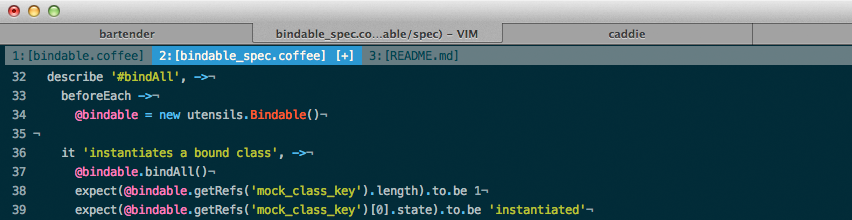
- Tab number
- Filename (basename only)
- [+] if the current buffer has been modified
Tabs in this case, refer to Vim Tabs and not the Terminal.app tabs.
Based on settings found from [offensive
thinking](http://www.offensivethinking.org/data/dotfiles/vimrc).
## Installation
If you don't have a preferred installation method, I recommend
installing [pathogen.vim](https://github.com/tpope/vim-pathogen), and
then simply copy and paste:
```
cd ~/.vim/bundle
git clone git://github.com/mkitt/tabline.vim.git
```
## Configuration
Currently there are no configuration variables to define, you either
rock it or you don't. This may change at some point in the future.
Make sure to set the following settings within your color theme:
```
hi TabLine ctermfg=Black ctermbg=Green cterm=NONE
hi TabLineFill ctermfg=Black ctermbg=Green cterm=NONE
hi TabLineSel ctermfg=White ctermbg=DarkBlue cterm=NONE
```
To enable the close button in the upper right corner, add the following to your `~/.vimrc`
```
let g:tablineclosebutton=1
```
[mkitt.net][mkitt.net] | [github/mkitt][github]
[github]: https://github.com/mkitt "@mkitt"
[mkitt.net]: https://mkitt.net "🏔"
================================================
FILE: plugin/tabline.vim
================================================
" File: tabline.vim
" Maintainer: Matthew Kitt
" Description: Configure tabs within Terminal Vim.
" Last Change: 2012-10-21
" License: This program is free software. It comes without any warranty,
" to the extent permitted by applicable law. You can redistribute
" it and/or modify it under the terms of the Do What The Fuck You
" Want To Public License, Version 2, as published by Sam Hocevar.
" See http://sam.zoy.org/wtfpl/COPYING for more details.
" Based On: http://www.offensivethinking.org/data/dotfiles/vimrc
" Bail quickly if the plugin was loaded, disabled or compatible is set
if (exists("g:loaded_tabline_vim") && g:loaded_tabline_vim) || &cp
finish
endif
let g:loaded_tabline_vim = 1
function! Tabline()
let s = ''
for i in range(tabpagenr('$'))
let tab = i + 1
let winnr = tabpagewinnr(tab)
let buflist = tabpagebuflist(tab)
let bufnr = buflist[winnr - 1]
let bufname = bufname(bufnr)
let bufmodified = getbufvar(bufnr, "&mod")
let s .= '%' . tab . 'T'
let s .= (tab == tabpagenr() ? '%#TabLineSel#' : '%#TabLine#')
let s .= ' ' . tab .':'
let s .= (bufname != '' ? '['. fnamemodify(bufname, ':t') . '] ' : '[No Name] ')
if bufmodified
let s .= '[+] '
endif
endfor
let s .= '%#TabLineFill#'
if (exists("g:tablineclosebutton"))
let s .= '%=%999XX'
endif
return s
endfunction
set tabline=%!Tabline()
# tabline.vim
Configure tab labels within Terminal Vim with a very succinct output.

- Tab number
- Filename (basename only)
- [+] if the current buffer has been modified
Tabs in this case, refer to Vim Tabs and not the Terminal.app tabs.
Based on settings found from [offensive
thinking](http://www.offensivethinking.org/data/dotfiles/vimrc).
## Installation
If you don't have a preferred installation method, I recommend
installing [pathogen.vim](https://github.com/tpope/vim-pathogen), and
then simply copy and paste:
```
cd ~/.vim/bundle
git clone git://github.com/mkitt/tabline.vim.git
```
## Configuration
Currently there are no configuration variables to define, you either
rock it or you don't. This may change at some point in the future.
Make sure to set the following settings within your color theme:
```
hi TabLine ctermfg=Black ctermbg=Green cterm=NONE
hi TabLineFill ctermfg=Black ctermbg=Green cterm=NONE
hi TabLineSel ctermfg=White ctermbg=DarkBlue cterm=NONE
```
To enable the close button in the upper right corner, add the following to your `~/.vimrc`
```
let g:tablineclosebutton=1
```
[mkitt.net][mkitt.net] | [github/mkitt][github]
[github]: https://github.com/mkitt "@mkitt"
[mkitt.net]: https://mkitt.net "🏔"
================================================
FILE: plugin/tabline.vim
================================================
" File: tabline.vim
" Maintainer: Matthew Kitt
" Description: Configure tabs within Terminal Vim.
" Last Change: 2012-10-21
" License: This program is free software. It comes without any warranty,
" to the extent permitted by applicable law. You can redistribute
" it and/or modify it under the terms of the Do What The Fuck You
" Want To Public License, Version 2, as published by Sam Hocevar.
" See http://sam.zoy.org/wtfpl/COPYING for more details.
" Based On: http://www.offensivethinking.org/data/dotfiles/vimrc
" Bail quickly if the plugin was loaded, disabled or compatible is set
if (exists("g:loaded_tabline_vim") && g:loaded_tabline_vim) || &cp
finish
endif
let g:loaded_tabline_vim = 1
function! Tabline()
let s = ''
for i in range(tabpagenr('$'))
let tab = i + 1
let winnr = tabpagewinnr(tab)
let buflist = tabpagebuflist(tab)
let bufnr = buflist[winnr - 1]
let bufname = bufname(bufnr)
let bufmodified = getbufvar(bufnr, "&mod")
let s .= '%' . tab . 'T'
let s .= (tab == tabpagenr() ? '%#TabLineSel#' : '%#TabLine#')
let s .= ' ' . tab .':'
let s .= (bufname != '' ? '['. fnamemodify(bufname, ':t') . '] ' : '[No Name] ')
if bufmodified
let s .= '[+] '
endif
endfor
let s .= '%#TabLineFill#'
if (exists("g:tablineclosebutton"))
let s .= '%=%999XX'
endif
return s
endfunction
set tabline=%!Tabline()