Repository: mtjsoft/GridPager
Branch: androidx
Commit: bc607ffc5024
Files: 57
Total size: 146.9 KB
Directory structure:
gitextract_xcpdq6qb/
├── .gitignore
├── .idea/
│ ├── codeStyles/
│ │ └── Project.xml
│ ├── gradle.xml
│ ├── misc.xml
│ ├── runConfigurations.xml
│ └── vcs.xml
├── LICENSE
├── README.md
├── README_1.x.md
├── app/
│ ├── .gitignore
│ ├── build.gradle
│ ├── proguard-rules.pro
│ └── src/
│ ├── androidTest/
│ │ └── java/
│ │ └── cn/
│ │ └── mtjsoft/
│ │ └── www/
│ │ └── gridviewpager/
│ │ └── ExampleInstrumentedTest.java
│ ├── main/
│ │ ├── AndroidManifest.xml
│ │ ├── java/
│ │ │ └── cn/
│ │ │ └── mtjsoft/
│ │ │ └── www/
│ │ │ └── gridviewpager/
│ │ │ ├── CoordinatorActivity.java
│ │ │ ├── ListActivity.java
│ │ │ ├── ListAdapter.java
│ │ │ └── MainActivity.java
│ │ └── res/
│ │ ├── drawable/
│ │ │ ├── ic_arrow_white_24dp.xml
│ │ │ ├── ic_launcher_background.xml
│ │ │ └── ic_launcher_background_red.xml
│ │ ├── drawable-v24/
│ │ │ └── ic_launcher_foreground.xml
│ │ ├── layout/
│ │ │ ├── activity_coordinatorlayout.xml
│ │ │ ├── activity_list.xml
│ │ │ ├── activity_main.xml
│ │ │ └── item_text.xml
│ │ ├── mipmap-anydpi-v26/
│ │ │ ├── ic_launcher.xml
│ │ │ └── ic_launcher_round.xml
│ │ └── values/
│ │ ├── colors.xml
│ │ ├── strings.xml
│ │ └── styles.xml
│ └── test/
│ └── java/
│ └── cn/
│ └── mtjsoft/
│ └── www/
│ └── gridviewpager/
│ └── ExampleUnitTest.java
├── build.gradle
├── gradle/
│ └── wrapper/
│ ├── gradle-wrapper.jar
│ └── gradle-wrapper.properties
├── gradle.properties
├── gradlew
├── gradlew.bat
├── gridviewpager_recycleview/
│ ├── .gitignore
│ ├── build.gradle
│ ├── proguard-rules.pro
│ └── src/
│ ├── androidTest/
│ │ └── java/
│ │ └── cn/
│ │ └── mtjsoft/
│ │ └── www/
│ │ └── gridviewpager_recycleview/
│ │ └── ExampleInstrumentedTest.java
│ ├── main/
│ │ ├── AndroidManifest.xml
│ │ ├── java/
│ │ │ └── cn/
│ │ │ └── mtjsoft/
│ │ │ └── www/
│ │ │ └── gridviewpager_recycleview/
│ │ │ ├── GridViewPager.java
│ │ │ ├── transformer/
│ │ │ │ ├── CoverPageTransformer.java
│ │ │ │ ├── GalleryPageTransformer.java
│ │ │ │ └── TopOrDownPageTransformer.java
│ │ │ └── view/
│ │ │ ├── AndDensityUtils.java
│ │ │ └── AndSelectCircleView.java
│ │ └── res/
│ │ ├── layout/
│ │ │ ├── gridpager_item.xml
│ │ │ ├── gridpager_item_layout.xml
│ │ │ ├── gridpager_item_text.xml
│ │ │ └── gridpager_layout.xml
│ │ └── values/
│ │ ├── attrs.xml
│ │ └── strings.xml
│ └── test/
│ └── java/
│ └── cn/
│ └── mtjsoft/
│ └── www/
│ └── gridviewpager_recycleview/
│ └── ExampleUnitTest.java
└── settings.gradle
================================================
FILE CONTENTS
================================================
================================================
FILE: .gitignore
================================================
*.iml
.gradle
/local.properties
/.idea/caches/build_file_checksums.ser
/.idea/libraries
/.idea/modules.xml
/.idea/workspace.xml
.DS_Store
/build
/captures
.externalNativeBuild
================================================
FILE: .idea/codeStyles/Project.xml
================================================
.*:id
http://schemas.android.com/apk/res/android
.*:name
http://schemas.android.com/apk/res/android
.*
http://schemas.android.com/apk/res/android
ANDROID_ATTRIBUTE_ORDER
================================================
FILE: .idea/gradle.xml
================================================
================================================
FILE: .idea/misc.xml
================================================
================================================
FILE: .idea/runConfigurations.xml
================================================
================================================
FILE: .idea/vcs.xml
================================================
================================================
FILE: LICENSE
================================================
Apache License
Version 2.0, January 2004
http://www.apache.org/licenses/
TERMS AND CONDITIONS FOR USE, REPRODUCTION, AND DISTRIBUTION
1. Definitions.
"License" shall mean the terms and conditions for use, reproduction,
and distribution as defined by Sections 1 through 9 of this document.
"Licensor" shall mean the copyright owner or entity authorized by
the copyright owner that is granting the License.
"Legal Entity" shall mean the union of the acting entity and all
other entities that control, are controlled by, or are under common
control with that entity. For the purposes of this definition,
"control" means (i) the power, direct or indirect, to cause the
direction or management of such entity, whether by contract or
otherwise, or (ii) ownership of fifty percent (50%) or more of the
outstanding shares, or (iii) beneficial ownership of such entity.
"You" (or "Your") shall mean an individual or Legal Entity
exercising permissions granted by this License.
"Source" form shall mean the preferred form for making modifications,
including but not limited to software source code, documentation
source, and configuration files.
"Object" form shall mean any form resulting from mechanical
transformation or translation of a Source form, including but
not limited to compiled object code, generated documentation,
and conversions to other media types.
"Work" shall mean the work of authorship, whether in Source or
Object form, made available under the License, as indicated by a
copyright notice that is included in or attached to the work
(an example is provided in the Appendix below).
"Derivative Works" shall mean any work, whether in Source or Object
form, that is based on (or derived from) the Work and for which the
editorial revisions, annotations, elaborations, or other modifications
represent, as a whole, an original work of authorship. For the purposes
of this License, Derivative Works shall not include works that remain
separable from, or merely link (or bind by name) to the interfaces of,
the Work and Derivative Works thereof.
"Contribution" shall mean any work of authorship, including
the original version of the Work and any modifications or additions
to that Work or Derivative Works thereof, that is intentionally
submitted to Licensor for inclusion in the Work by the copyright owner
or by an individual or Legal Entity authorized to submit on behalf of
the copyright owner. For the purposes of this definition, "submitted"
means any form of electronic, verbal, or written communication sent
to the Licensor or its representatives, including but not limited to
communication on electronic mailing lists, source code control systems,
and issue tracking systems that are managed by, or on behalf of, the
Licensor for the purpose of discussing and improving the Work, but
excluding communication that is conspicuously marked or otherwise
designated in writing by the copyright owner as "Not a Contribution."
"Contributor" shall mean Licensor and any individual or Legal Entity
on behalf of whom a Contribution has been received by Licensor and
subsequently incorporated within the Work.
2. Grant of Copyright License. Subject to the terms and conditions of
this License, each Contributor hereby grants to You a perpetual,
worldwide, non-exclusive, no-charge, royalty-free, irrevocable
copyright license to reproduce, prepare Derivative Works of,
publicly display, publicly perform, sublicense, and distribute the
Work and such Derivative Works in Source or Object form.
3. Grant of Patent License. Subject to the terms and conditions of
this License, each Contributor hereby grants to You a perpetual,
worldwide, non-exclusive, no-charge, royalty-free, irrevocable
(except as stated in this section) patent license to make, have made,
use, offer to sell, sell, import, and otherwise transfer the Work,
where such license applies only to those patent claims licensable
by such Contributor that are necessarily infringed by their
Contribution(s) alone or by combination of their Contribution(s)
with the Work to which such Contribution(s) was submitted. If You
institute patent litigation against any entity (including a
cross-claim or counterclaim in a lawsuit) alleging that the Work
or a Contribution incorporated within the Work constitutes direct
or contributory patent infringement, then any patent licenses
granted to You under this License for that Work shall terminate
as of the date such litigation is filed.
4. Redistribution. You may reproduce and distribute copies of the
Work or Derivative Works thereof in any medium, with or without
modifications, and in Source or Object form, provided that You
meet the following conditions:
(a) You must give any other recipients of the Work or
Derivative Works a copy of this License; and
(b) You must cause any modified files to carry prominent notices
stating that You changed the files; and
(c) You must retain, in the Source form of any Derivative Works
that You distribute, all copyright, patent, trademark, and
attribution notices from the Source form of the Work,
excluding those notices that do not pertain to any part of
the Derivative Works; and
(d) If the Work includes a "NOTICE" text file as part of its
distribution, then any Derivative Works that You distribute must
include a readable copy of the attribution notices contained
within such NOTICE file, excluding those notices that do not
pertain to any part of the Derivative Works, in at least one
of the following places: within a NOTICE text file distributed
as part of the Derivative Works; within the Source form or
documentation, if provided along with the Derivative Works; or,
within a display generated by the Derivative Works, if and
wherever such third-party notices normally appear. The contents
of the NOTICE file are for informational purposes only and
do not modify the License. You may add Your own attribution
notices within Derivative Works that You distribute, alongside
or as an addendum to the NOTICE text from the Work, provided
that such additional attribution notices cannot be construed
as modifying the License.
You may add Your own copyright statement to Your modifications and
may provide additional or different license terms and conditions
for use, reproduction, or distribution of Your modifications, or
for any such Derivative Works as a whole, provided Your use,
reproduction, and distribution of the Work otherwise complies with
the conditions stated in this License.
5. Submission of Contributions. Unless You explicitly state otherwise,
any Contribution intentionally submitted for inclusion in the Work
by You to the Licensor shall be under the terms and conditions of
this License, without any additional terms or conditions.
Notwithstanding the above, nothing herein shall supersede or modify
the terms of any separate license agreement you may have executed
with Licensor regarding such Contributions.
6. Trademarks. This License does not grant permission to use the trade
names, trademarks, service marks, or product names of the Licensor,
except as required for reasonable and customary use in describing the
origin of the Work and reproducing the content of the NOTICE file.
7. Disclaimer of Warranty. Unless required by applicable law or
agreed to in writing, Licensor provides the Work (and each
Contributor provides its Contributions) on an "AS IS" BASIS,
WITHOUT WARRANTIES OR CONDITIONS OF ANY KIND, either express or
implied, including, without limitation, any warranties or conditions
of TITLE, NON-INFRINGEMENT, MERCHANTABILITY, or FITNESS FOR A
PARTICULAR PURPOSE. You are solely responsible for determining the
appropriateness of using or redistributing the Work and assume any
risks associated with Your exercise of permissions under this License.
8. Limitation of Liability. In no event and under no legal theory,
whether in tort (including negligence), contract, or otherwise,
unless required by applicable law (such as deliberate and grossly
negligent acts) or agreed to in writing, shall any Contributor be
liable to You for damages, including any direct, indirect, special,
incidental, or consequential damages of any character arising as a
result of this License or out of the use or inability to use the
Work (including but not limited to damages for loss of goodwill,
work stoppage, computer failure or malfunction, or any and all
other commercial damages or losses), even if such Contributor
has been advised of the possibility of such damages.
9. Accepting Warranty or Additional Liability. While redistributing
the Work or Derivative Works thereof, You may choose to offer,
and charge a fee for, acceptance of support, warranty, indemnity,
or other liability obligations and/or rights consistent with this
License. However, in accepting such obligations, You may act only
on Your own behalf and on Your sole responsibility, not on behalf
of any other Contributor, and only if You agree to indemnify,
defend, and hold each Contributor harmless for any liability
incurred by, or claims asserted against, such Contributor by reason
of your accepting any such warranty or additional liability.
END OF TERMS AND CONDITIONS
APPENDIX: How to apply the Apache License to your work.
To apply the Apache License to your work, attach the following
boilerplate notice, with the fields enclosed by brackets "[]"
replaced with your own identifying information. (Don't include
the brackets!) The text should be enclosed in the appropriate
comment syntax for the file format. We also recommend that a
file or class name and description of purpose be included on the
same "printed page" as the copyright notice for easier
identification within third-party archives.
Copyright 2019-2021 mtjsoft
Licensed under the Apache License, Version 2.0 (the "License");
you may not use this file except in compliance with the License.
You may obtain a copy of the License at
http://www.apache.org/licenses/LICENSE-2.0
Unless required by applicable law or agreed to in writing, software
distributed under the License is distributed on an "AS IS" BASIS,
WITHOUT WARRANTIES OR CONDITIONS OF ANY KIND, either express or implied.
See the License for the specific language governing permissions and
limitations under the License.
================================================
FILE: README.md
================================================
# GridViewPager3.x
GridViewPager3.0组件:采用RecycleView + FlexBoxLayout + PagerSnapHelper实现方式,轻松实现类似美团首页分类多页展示。也可用于表情面板的展示。
链式调用,属性配置,几行代码轻松搞定。
v3.3.0 开始采用 viewpager2 + FlexBoxLayout 实现
① 应用的首页经常需要用到这样的分类**多页展示**的效果,还有些消息输入框需要这样的**表情面板**。
② 既然是常用的,作为懒惰的我,肯定不会每次都去写一遍。网上也找了很多类似的例子,但始终不是我想要的**简洁接入**使用的方式。要么就是加载图片有限制,要么就是样式限制的太死,还得改源码,我不喜欢,我得造一个轮子。。。必须封装一个简单好用的组件,做到几行代码就可实现效果才行。于是乎,**GridViewPager组件**就诞生了。
# GridViewPager组件效果
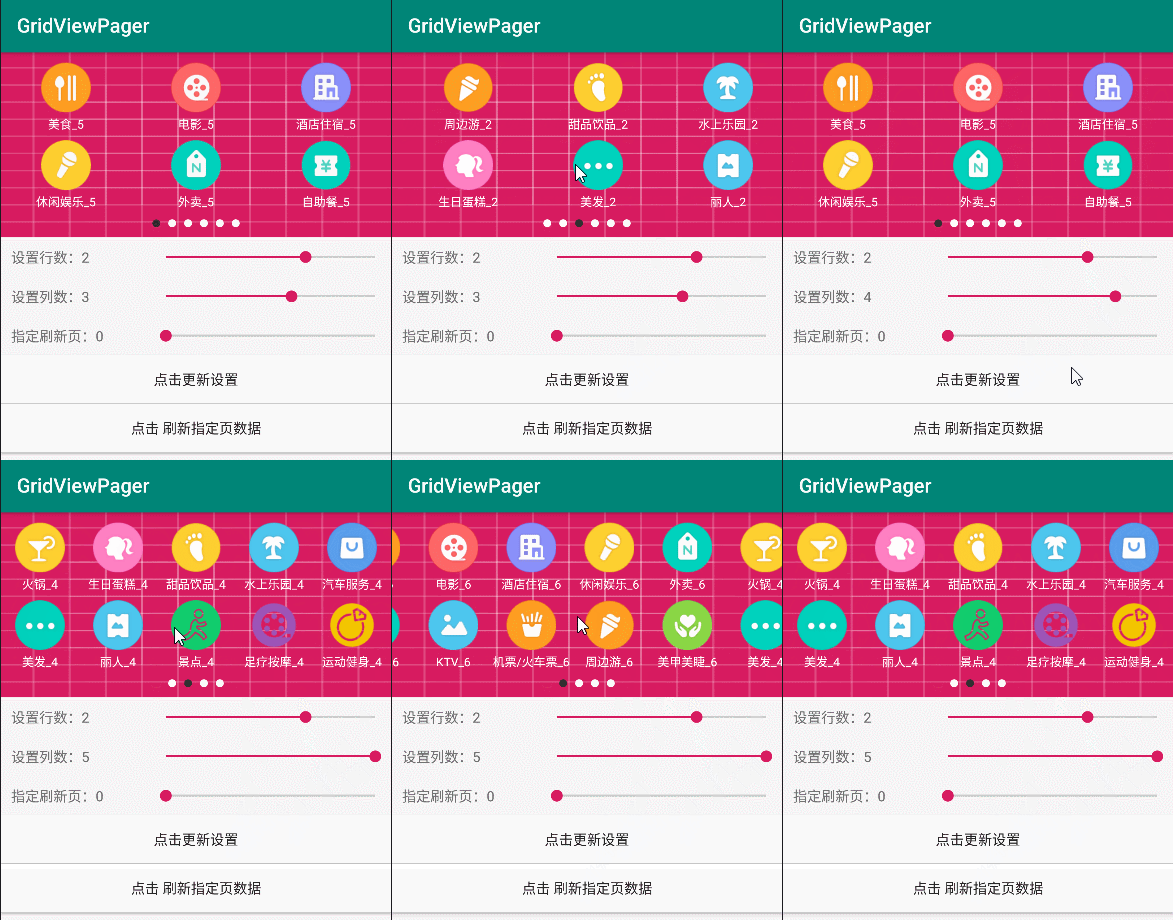
# 内置了3个覆盖翻页的效果(这是其中一)
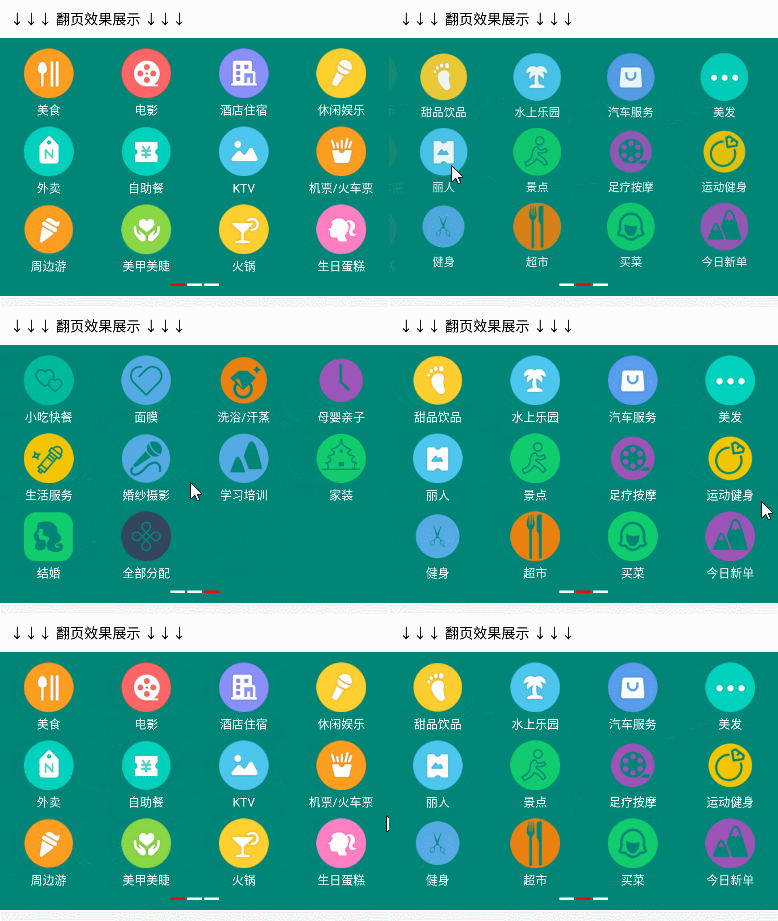
# 如何使用GridViewPager组件
# 1、在根目录 build.gradle 添加:
```
allprojects {
repositories {
...
maven { url 'https://jitpack.io' }
}
}
```
# 2、在app项目下的build.gradle中添加:
[](https://jitpack.io/#mtjsoft/GridPager)
```
dependencies {
implementation 'com.github.mtjsoft:GridPager:v3.7.0'
}
```
# 3、在需要使用的布局xml中添加GridViewPager组件,根据需要设置相关属性
```
```
# 4、GridViewPager组件的版本及属性说明
V3.7.0
--------------------------
新增方法 setAlignContent() 设置Item行的对齐方式。等同FLEX布局的AlignContent,可设置以下6个值:
```
AlignContent.FLEX_START //(默认值)
AlignContent.FLEX_END
AlignContent.CENTER
AlignContent.SPACE_BETWEEN
AlignContent.SPACE_AROUND
AlignContent.STRETCH
```
新增属性 | 属性说明
------------- | -------------
text_is_show | 是否需要显示文本,默认true显示(一般作为表情面板时,可以直接设置false不显示)。也可通过方法setIsShowText()设置
V3.6.0
--------------------------
新增方法 setGridItemLongClickListener() 设置Item长按监听
3.6.0 新增属性 | 属性说明
------------- | -------------
pager_loop | 是否开启无限循环滑动 默认 false 不开启
V3.5.0
--------------------------
修复已知问题
新增 setTopOrDownPageTransformer(TopOrDownPageTransformer.ModeType.MODE_DOWN)方法,设置内置的上下进入翻页效果
新增 setGalleryPageTransformer()方法,设置内置的画廊翻页效果
V3.4.0
--------------------------
修复已知问题
新增 setCoverPageTransformer()方法,设置内置的覆盖渐变翻页效果
新增 setCustomPageTransformer()方法,用于设置自定义的翻页效果
V3.3.0
--------------------------
更换 viewpager2 + FlexBoxLayout 实现
V3.2.0
--------------------------
修复已知问题
V3.1.0
--------------------------
修复布局设置margin显示不全的问题
V3.0.0
--------------------------
3.0.0 属性 | 属性说明
------------- | -------------
pager_MarginTop | 设置每页的上边距 默认10dp 单位dp
pager_MarginBottom | 设置每页的下边距 默认10dp 单位dp
verticalSpacing | 设置item的纵向间距 默认10dp 单位dp
img_width | 设置图片宽度 默认50dp 单位dp
img_height | 设置图片高度 默认50dp 单位dp
text_color | 设置文字颜色 默认黑色
imgtext_margin | 设置文字与图片的间距 默认5dp 单位dp
text_size | 设置文字大小 默认10sp 单位sp
row_count | 设置每页行数 默认2
column_count | 设置每页列数 默认4
point_is_show | 是否展示指示器,默认true展示
point_width | 设置指示器的item宽度 默认8dp 单位dp
point_height | 设置指示器的item高度 默认8dp 单位dp
point_margin | 设置指示器的item的间距 默认8dp 单位dp
point_normal_color | 指示器item未选中的颜色 默认灰色
point_select_color | 指示器item选中的颜色 默认红色
point_is_circle | 指示器的item是否为圆形,默认圆形直径取宽高的最小值
point_margin_page | 设置指示器与page的间距,默认是verticalSpacing的值
point_margin_bottom | 设置指示器与底部的间距,默认是verticalSpacing的值
background_color | 设置组件背景颜色,默认白色
notifyItemChanged(int position) | 刷新指定页数据
# 5、代码实现。链式调用,只需要设置总数量即可。数据绑定完全自定义,不受任何图片加载框架限制,更加自由。
```
GridViewPager gridViewPager = findViewById(R.id.gridviewpager);
gridViewPager
// 设置数据总数量
.setDataAllCount(titles.length)
// 设置背景图片(此时设置的背景色无效,以背景图片为主)
.setBackgroundImageLoader(new GridViewPager.BackgroundImageLoaderInterface() {
@Override
public void setBackgroundImg(ImageView bgImageView) {
bgImageView.setImageResource(R.drawable.ic_launcher_background);
}
})
// 数据绑定
.setImageTextLoaderInterface(new GridViewPager.ImageTextLoaderInterface() {
@Override
public void displayImageText(ImageView imageView, TextView textView, int position) {
// 自己进行数据的绑定,灵活度更高,不受任何限制
imageView.setImageResource(iconS[position]);
textView.setText(titles[position]);
}
})
// Item点击
.setGridItemClickListener(new GridViewPager.GridItemClickListener() {
@Override
public void click(int position) {
Toast.makeText(getBaseContext(), "点击了" + titles[position] + position, Toast.LENGTH_SHORT).show();
}
})
.show();
```
# 6、代码中也可直接设置属性(如果xml与代码都设置了, 最终以代码设置为准)
```
GridViewPager gridViewPager2 = findViewById(R.id.gridviewpager2);
gridViewPager2
// 设置数据总数量
.setDataAllCount(titles.length)
// 设置背景色,默认白色
.setGridViewPagerBackgroundColor(ContextCompat.getColor(getBaseContext(), R.color.white))
// 设置item的纵向间距
.setVerticalSpacing(10)
// 设置上边距
.setPagerMarginTop(10)
// 设置下边距
.setPagerMarginBottom(10)
// 设置图片宽度
.setImageWidth(50)
// 设置图片高度
.setImageHeight(50)
// 设置文字与图片的间距
.setTextImgMargin(5)
// 设置文字颜色
.setTextColor(ContextCompat.getColor(getBaseContext(), R.color.white))
// 设置文字大小
.setTextSize(12)
// 设置每页行数
.setRowCount(2)
// 设置每页列数
.setColumnCount(5)
// 设置无限循环
.setPageLoop(true)
// 设置是否显示指示器
.setPointIsShow(true)
// 设置指示器与page的间距
.setPointMarginPage(10)
// 设置指示器与底部的间距
.setPointMarginBottom(10)
// 设置指示器的item宽度
.setPointChildWidth(8)
// 设置指示器的item高度
.setPointChildHeight(8)
// 设置指示器的item的间距
.setPointChildMargin(8)
// 指示器的item是否为圆形,默认圆形直径取宽高的最小值
.setPointIsCircle(true)
// 指示器item未选中的颜色
.setPointNormalColor(ContextCompat.getColor(getBaseContext(), R.color.white))
// 指示器item选中的颜色
.setPointSelectColor(ContextCompat.getColor(getBaseContext(), R.color.black_text))
// 设置背景图片(此时设置的背景色无效,以背景图片为主)
.setBackgroundImageLoader(new GridViewPager.BackgroundImageLoaderInterface() {
@Override
public void setBackgroundImg(ImageView bgImageView) {
bgImageView.setImageResource(R.drawable.ic_launcher_background_red);
}
})
// 数据绑定
.setImageTextLoaderInterface(new GridViewPager.ImageTextLoaderInterface() {
@Override
public void displayImageText(ImageView imageView, TextView textView, int position) {
// 自己进行数据的绑定,灵活度更高,不受任何限制
imageView.setImageResource(iconS[position]);
textView.setText(titles[position]);
}
})
// Item点击
.setGridItemClickListener(new GridViewPager.GridItemClickListener() {
@Override
public void click(int position) {
Toast.makeText(getBaseContext(), "点击了" + titles[position] + position, Toast.LENGTH_SHORT).show();
}
})
// 设置Item长按
.setGridItemLongClickListener(new GridViewPager.GridItemLongClickListener() {
@Override
public void longClick(int position) {
Toast.makeText(getBaseContext(), "长按了" + titles[position].split("_")[0], Toast.LENGTH_SHORT).show();
}
})
.show();
```
# 7、刷新数据
**设置新属性,刷新**
```
gridViewPager
// 数据大小有变化时,得设置
.setDataAllCount(titles.length)
// 动态改变其他属性
.setRowCount(3)
.setColumnCount(3)
// 再次show(),gridViewPager不为空时,走notifyDataSetChanged()刷新数据
.show();
```
**刷新指定页码数据(每页行列数、数据总数不变,只有某个数据的值改变时使用)**
```
// 页码从0开始,例如下面是只刷新第二页数据
gridViewPager.notifyItemChanged(1)
```
## 实现就是如此简单
**添加我个人微信号交流,记得添加时备注一下哦**

**本人公众号,也可关注一波,共同交流吧。**

================================================
FILE: README_1.x.md
================================================
# GridPager
GridPager组件:ViewPager结合GridView,轻松实现类似美团首页分类多页展示。也可用于表情面板的展示。
链式调用,属性配置,几行代码轻松搞定。
① 应用的首页经常需要用到这样的分类**多页展示**的效果,还有些消息输入框需要这样的**表情面板**。
② 既然是常用的,作为懒惰的我,肯定不会每次都去写一遍。网上也找了很多类似的例子,但始终不是我想要的**简洁接入**使用的方式。要么就是加载图片有限制,要么就是样式限制的太死,还得改源码,我不喜欢,我得造一个轮子。。。必须封装一个简单好用的组件,做到几行代码就可实现效果才行。于是乎,**GridPager组件**就诞生了。
# GridPager组件效果

# 如何使用GridPager组件
# 1、在根目录 build.gradle 添加:
```
allprojects {
repositories {
...
maven { url 'https://jitpack.io' }
}
}
```
# 2、在app项目下的build.gradle中添加:
```
dependencies {
implementation 'com.github.mtjsoft:GridPager:v1.3.2'
}
```
# 3、在需要使用的布局xml中添加GridPager组件,根据需要设置相关属性
```
```
# 4、GridPager组件的版本及属性说明
V1.3.2
--------------------------
新增方法 | 属性说明 | 备注
------------- | ------------- | -------------
setGridPagersetBackgroundImage() | 支持设置背景图片,不再是单一的背景颜色了 | 2019-11-8 17:52:08
V1.3.1
--------------------------
说明 | 备注
------------- | -------------
优化自动计算高度方法。不手动设置setViewPageHeight()固定高度时,默认自动计算,自适应高度。 | 2019-9-28 20:48:57
V1.2.2
--------------------------
新增方法 | 属性说明 | 备注
------------- | ------------- | -------------
setViewPageHeight(152) | 手动设置ViewPager为固定的高度,单位dp。 | 2019-9-27 17:47:31
V1.2.1
--------------------------
新增属性 | 属性说明 | 备注
------------- | ------------- | -------------
background_color | 设置组件背景颜色,默认白色 | 2019-9-23 22:20:05
V1.2.0
--------------------------
新增属性 | 属性说明 | 备注
------------- | ------------- | -------------
point_margin_page | 设置指示器与page的间距,默认是verticalSpacing的值 | 2019-9-11 13:20:45
point_margin_bottom | 设置指示器与底部的间距,默认是verticalSpacing的值
point_is_show | 是否展示指示器,默认true展示
V1.1.0
--------------------------
1.1.0 属性 | 属性说明 | 备注
------------- | ------------- | -------------
verticalSpacing | 设置item的纵向间距 默认10dp 单位dp | 2019-8-22 16:09:55
img_width | 设置图片宽度 默认50dp 单位dp
img_height | 设置图片高度 默认50dp 单位dp
text_color | 设置文字颜色 默认黑色
imgtext_margin | 设置文字与图片的间距 默认5dp 单位dp
text_size | 设置文字大小 默认10sp 单位sp
row_count | 设置每页行数 默认2
column_count | 设置每页列数 默认4
point_width | 设置指示器的item宽度 默认8dp 单位dp
point_height | 设置指示器的item高度 默认8dp 单位dp
point_margin | 设置指示器的item的间距 默认8dp 单位dp
point_normal_color | 指示器item未选中的颜色 默认灰色
point_select_color | 指示器item选中的颜色 默认红色
point_is_circle | 指示器的item是否为圆形,默认圆形直径取宽高的最小值
# 5、代码实现。链式调用,只需要设置总数量即可。数据绑定完全自定义,不受任何图片加载框架限制,更加自由。
```
GridPager gridPager = findViewById(R.id.gridpager);
gridPager
// 设置数量总条数
.setDataAllCount(titles.length)
// 数据绑定
.setItemBindDataListener(new GridPager.ItemBindDataListener() {
@Override
public void BindData(ImageView imageView, TextView textView, int position) {
// 自己进行数据的绑定,灵活度更高,不受任何限制
imageView.setImageResource(iconS[position]);
textView.setText(titles[position]);
}
})
// Item点击
.setGridItemClickListener(new GridPager.GridItemClickListener() {
@Override
public void click(int position) {
Toast.makeText(getBaseContext(), "点击了" + titles[position], Toast.LENGTH_SHORT).show();
}
})
.show();
```
# 6、代码中也可直接设置属性(如果xml与代码都设置了, 最终以代码设置为准)
```
gridPager
// 设置数量总条数
.setDataAllCount(titles.length)
// 设置背景图片(有背景图片时,设置背景颜色无效,采用的Glide加载)
.setGridPagersetBackgroundImage("https://huilife.api.luoyangzixun.cn/XiaoFile/index-miandan-bg.png")
// 手动设置ViewPager为固定的高度,单位dp。(可以不设置,默认是自动计算高度)
//.setViewPageHeight(152)
// 设置背景色,默认白色
.setGridPagerBackgroundColor(ContextCompat.getColor(getBaseContext(),R.color.colorBg))
// 设置item的纵向间距
.setVerticalSpacing(20)
// 设置图片宽度
.setImageWidth(80)
// 设置图片高度
.setImageHeight(80)
// 设置文字与图片的间距
.setTextImgMargin(10)
// 设置文字颜色
.setTextColor(ContextCompat.getColor(getBaseContext(),R.color.colorPrimaryDark))
// 设置文字大小
.setTextSize(12)
// 设置每页行数
.setRowCount(2)
// 设置每页列数
.setColumnCount(4)
// 设置是否显示指示器
.setPointIsShow(true)
// 设置指示器与page的间距
.setPointMarginPage(10)
// 设置指示器与底部的间距
.setPointMarginBottom(10)
// 设置指示器的item宽度
.setPointChildWidth(15)
// 设置指示器的item高度
.setPointChildHeight(3)
// 设置指示器的item的间距
.setPointChildMargin(5)
// 指示器的item是否为圆形,默认圆形直径取宽高的最小值
.setPointIsCircle(false)
// 指示器item未选中的颜色
.setPointNormalColor(ContextCompat.getColor(getBaseContext(),R.color.colorPrimary))
// 指示器item选中的颜色
.setPointSelectColor(ContextCompat.getColor(getBaseContext(),R.color.colorAccent))
// 数据绑定
.setItemBindDataListener(new GridPager.ItemBindDataListener() {
@Override
public void BindData(ImageView imageView, TextView textView, int position) {
// 自己进行数据的绑定,灵活度更高,不受任何限制
imageView.setImageResource(iconS[position]);
textView.setText(titles[position]);
}
})
// Item点击
.setGridItemClickListener(new GridPager.GridItemClickListener() {
@Override
public void click(int position) {
Toast.makeText(getBaseContext(), "点击了" + titles[position], Toast.LENGTH_SHORT).show();
}
})
.show();
```
## 实现就是如此简单
**添加我个人微信号交流,记得添加时备注一下哦**
 **本人公众号,也可关注一波,共同交流吧。**

================================================
FILE: app/.gitignore
================================================
/build
================================================
FILE: app/build.gradle
================================================
apply plugin: 'com.android.application'
android {
compileSdkVersion 28
buildToolsVersion "28.0.2"
defaultConfig {
applicationId "cn.mtjsoft.www.gridviewpager"
minSdkVersion 19
targetSdkVersion 28
versionCode 1
versionName "1.0"
testInstrumentationRunner "androidx.test.runner.AndroidJUnitRunner"
}
buildTypes {
release {
minifyEnabled false
proguardFiles getDefaultProguardFile('proguard-android.txt'), 'proguard-rules.pro'
}
}
}
dependencies {
implementation fileTree(include: ['*.jar'], dir: 'libs')
implementation 'androidx.appcompat:appcompat:1.1.0'
implementation 'androidx.constraintlayout:constraintlayout:1.1.3'
implementation 'com.google.android.material:material:1.1.0'
implementation 'androidx.legacy:legacy-support-v4:1.0.0'
testImplementation 'junit:junit:4.12'
androidTestImplementation 'androidx.test.ext:junit:1.1.1'
androidTestImplementation 'androidx.test.espresso:espresso-core:3.2.0'
implementation 'com.github.CymChad:BaseRecyclerViewAdapterHelper:3.0.4'
implementation project(':gridviewpager_recycleview')
// implementation 'com.github.mtjsoft:GridPager:v3.4.0'
}
================================================
FILE: app/proguard-rules.pro
================================================
# Add project specific ProGuard rules here.
# You can control the set of applied configuration files using the
# proguardFiles setting in build.gradle.
#
# For more details, see
# http://developer.android.com/guide/developing/tools/proguard.html
# If your project uses WebView with JS, uncomment the following
# and specify the fully qualified class name to the JavaScript interface
# class:
#-keepclassmembers class fqcn.of.javascript.interface.for.webview {
# public *;
#}
# Uncomment this to preserve the line number information for
# debugging stack traces.
#-keepattributes SourceFile,LineNumberTable
# If you keep the line number information, uncomment this to
# hide the original source file name.
#-renamesourcefileattribute SourceFile
================================================
FILE: app/src/androidTest/java/cn/mtjsoft/www/gridviewpager/ExampleInstrumentedTest.java
================================================
package cn.mtjsoft.www.gridviewpager;
import android.content.Context;
import org.junit.Test;
import org.junit.runner.RunWith;
import androidx.test.InstrumentationRegistry;
import androidx.test.runner.AndroidJUnit4;
import static org.junit.Assert.*;
/**
* Instrumented test, which will execute on an Android device.
*
* @see Testing documentation
*/
@RunWith(AndroidJUnit4.class)
public class ExampleInstrumentedTest {
@Test
public void useAppContext() {
// Context of the app under test.
Context appContext = InstrumentationRegistry.getTargetContext();
assertEquals("cn.mtjsoft.www.gridviewpager", appContext.getPackageName());
}
}
================================================
FILE: app/src/main/AndroidManifest.xml
================================================
================================================
FILE: app/src/main/java/cn/mtjsoft/www/gridviewpager/CoordinatorActivity.java
================================================
package cn.mtjsoft.www.gridviewpager;
import android.content.Context;
import android.os.Bundle;
import android.view.LayoutInflater;
import android.view.View;
import android.view.ViewGroup;
import android.widget.ImageView;
import android.widget.TextView;
import android.widget.Toast;
import androidx.annotation.NonNull;
import androidx.annotation.Nullable;
import androidx.appcompat.app.AppCompatActivity;
import androidx.recyclerview.widget.RecyclerView;
import androidx.viewpager2.widget.ViewPager2;
import cn.mtjsoft.www.gridviewpager_recycleview.GridViewPager;
public class CoordinatorActivity extends AppCompatActivity {
private String[] titles = {"美食", "电影", "酒店住宿", "休闲娱乐", "外卖", "自助餐", "KTV", "机票/火车票", "周边游", "美甲美睫",
"火锅", "生日蛋糕", "甜品饮品", "水上乐园", "汽车服务", "美发", "丽人", "景点", "足疗按摩", "运动健身", "健身", "超市", "买菜",
"今日新单", "小吃快餐", "面膜", "洗浴/汗蒸", "母婴亲子", "生活服务", "婚纱摄影", "学习培训", "家装", "结婚", "全部分配"};
private int[] iconS = new int[titles.length];
@Override
protected void onCreate(@Nullable Bundle savedInstanceState) {
super.onCreate(savedInstanceState);
setContentView(R.layout.activity_coordinatorlayout);
initData();
GridViewPager gridViewPager2 = findViewById(R.id.gridviewpager2);
gridViewPager2
// 设置数据总数量
.setDataAllCount(titles.length)
// 设置内置的覆盖翻页效果
.setCoverPageTransformer()
// 数据绑定
.setImageTextLoaderInterface(new GridViewPager.ImageTextLoaderInterface() {
@Override
public void displayImageText(ImageView imageView, TextView textView, int position) {
// 自己进行数据的绑定,灵活度更高,不受任何限制
imageView.setImageResource(iconS[position]);
textView.setText(titles[position]);
}
})
// Item点击
.setGridItemClickListener(new GridViewPager.GridItemClickListener() {
@Override
public void click(int position) {
Toast.makeText(getBaseContext(), "点击了" + titles[position] + position, Toast.LENGTH_SHORT).show();
}
})
.show();
ViewPager2 viewPager2 = findViewById(R.id.viewPager);
viewPager2.setAdapter(new PagerAdapter(getBaseContext()));
}
private class PagerAdapter extends RecyclerView.Adapter {
private Context context;
public PagerAdapter(Context context) {
this.context = context;
}
@NonNull
@Override
public PagerAdapter.Holder onCreateViewHolder(@NonNull ViewGroup parent, int viewType) {
View view = LayoutInflater.from(context).inflate(R.layout.item_text, parent, false);
ViewGroup.LayoutParams lp = new ViewGroup.LayoutParams(ViewGroup.LayoutParams.MATCH_PARENT, ViewGroup.LayoutParams.MATCH_PARENT);
view.setLayoutParams(lp);
return new PagerAdapter.Holder(view);
}
@Override
public void onBindViewHolder(@NonNull PagerAdapter.Holder holder, int position) {
holder.textView.setText("ViewPager_" + (position + 1));
}
@Override
public int getItemCount() {
return 10;
}
public class Holder extends RecyclerView.ViewHolder {
private TextView textView;
public Holder(@NonNull View itemView) {
super(itemView);
textView = itemView.findViewById(R.id.tv_name);
}
}
}
/**
* 初始化数据源,这里使用本地图标作为示例
*/
private void initData() {
for (int i = 0; i < titles.length; i++) {
//动态获取资源ID,第一个参数是资源名,第二个参数是资源类型例如drawable,string等,第三个参数包名
int imageId = getResources().getIdentifier("ic_category_" + i, "mipmap", getPackageName());
iconS[i] = imageId;
}
}
}
================================================
FILE: app/src/main/java/cn/mtjsoft/www/gridviewpager/ListActivity.java
================================================
package cn.mtjsoft.www.gridviewpager;
import android.os.Bundle;
import android.widget.ImageView;
import android.widget.TextView;
import android.widget.Toast;
import java.util.Arrays;
import androidx.annotation.Nullable;
import androidx.appcompat.app.AppCompatActivity;
import androidx.core.content.ContextCompat;
import androidx.recyclerview.widget.LinearLayoutManager;
import androidx.recyclerview.widget.RecyclerView;
import cn.mtjsoft.www.gridviewpager_recycleview.GridViewPager;
public class ListActivity extends AppCompatActivity {
private String[] datas = {"美食", "电影", "酒店住宿", "休闲娱乐", "外卖", "自助餐", "KTV", "机票/火车票", "周边游", "美甲美睫",
"火锅", "生日蛋糕", "甜品饮品", "水上乐园", "汽车服务", "美发", "丽人", "景点", "足疗按摩", "运动健身", "健身", "超市", "买菜",
"今日新单", "小吃快餐", "面膜", "洗浴/汗蒸", "母婴亲子", "生活服务", "婚纱摄影", "学习培训", "家装", "结婚", "全部分配"};
private int[] iconS = new int[datas.length];
@Override
protected void onCreate(@Nullable Bundle savedInstanceState) {
super.onCreate(savedInstanceState);
setContentView(R.layout.activity_list);
RecyclerView recyclerView = findViewById(R.id.rlv);
recyclerView.setLayoutManager(new LinearLayoutManager(getBaseContext()));
for (int i = 0; i < datas.length; i++) {
//动态获取资源ID,第一个参数是资源名,第二个参数是资源类型例如drawable,string等,第三个参数包名
int imageId = getResources().getIdentifier("ic_category_" + i, "mipmap", getPackageName());
iconS[i] = imageId;
}
ListAdapter adapter = new ListAdapter(Arrays.asList(datas));
adapter.addHeaderView(getGridViewPager());
recyclerView.setAdapter(adapter);
}
private GridViewPager getGridViewPager(){
GridViewPager gridViewPager = new GridViewPager(getBaseContext());
gridViewPager
// 设置数据总数量
.setDataAllCount(datas.length)
// 设置背景色,默认白色
.setGridViewPagerBackgroundColor(ContextCompat.getColor(getBaseContext(), R.color.white))
// 设置item的纵向间距
.setVerticalSpacing(10)
// 设置上边距
.setPagerMarginTop(10)
// 设置下边距
.setPagerMarginBottom(10)
// 设置图片宽度
.setImageWidth(50)
// 设置图片高度
.setImageHeight(50)
// 设置文字与图片的间距
.setTextImgMargin(5)
// 设置文字颜色
.setTextColor(ContextCompat.getColor(getBaseContext(), R.color.white))
// 设置文字大小
.setTextSize(12)
// 设置每页行数
.setRowCount(3)
// 设置每页列数
.setColumnCount(3)
// 设置是否显示指示器
.setPointIsShow(true)
// 设置指示器与page的间距
.setPointMarginPage(10)
// 设置指示器与底部的间距
.setPointMarginBottom(10)
// 设置指示器的item宽度
.setPointChildWidth(8)
// 设置指示器的item高度
.setPointChildHeight(8)
// 设置指示器的item的间距
.setPointChildMargin(8)
// 指示器的item是否为圆形,默认圆形直径取宽高的最小值
.setPointIsCircle(true)
// 指示器item未选中的颜色
.setPointNormalColor(ContextCompat.getColor(getBaseContext(), R.color.white))
// 指示器item选中的颜色
.setPointSelectColor(ContextCompat.getColor(getBaseContext(), R.color.black_text))
// 设置背景图片(此时设置的背景色无效,以背景图片为主)
.setBackgroundImageLoader(new GridViewPager.BackgroundImageLoaderInterface() {
@Override
public void setBackgroundImg(ImageView bgImageView) {
bgImageView.setImageResource(R.drawable.ic_launcher_background_red);
}
})
// 数据绑定
.setImageTextLoaderInterface(new GridViewPager.ImageTextLoaderInterface() {
@Override
public void displayImageText(ImageView imageView, TextView textView, int position) {
// 自己进行数据的绑定,灵活度更高,不受任何限制
imageView.setImageResource(iconS[position]);
textView.setText(datas[position]);
}
})
// Item点击
.setGridItemClickListener(new GridViewPager.GridItemClickListener() {
@Override
public void click(int position) {
Toast.makeText(getBaseContext(), "点击了" + datas[position] + position, Toast.LENGTH_SHORT).show();
}
})
.show();
return gridViewPager;
}
}
================================================
FILE: app/src/main/java/cn/mtjsoft/www/gridviewpager/ListAdapter.java
================================================
package cn.mtjsoft.www.gridviewpager;
import com.chad.library.adapter.base.BaseQuickAdapter;
import com.chad.library.adapter.base.viewholder.BaseViewHolder;
import org.jetbrains.annotations.NotNull;
import org.jetbrains.annotations.Nullable;
import java.util.List;
public class ListAdapter extends BaseQuickAdapter {
public ListAdapter(@Nullable List data) {
super(R.layout.item_text, data);
}
@Override
protected void convert(@NotNull BaseViewHolder baseViewHolder, String s) {
baseViewHolder.setText(R.id.tv_name, s);
}
}
================================================
FILE: app/src/main/java/cn/mtjsoft/www/gridviewpager/MainActivity.java
================================================
package cn.mtjsoft.www.gridviewpager;
import android.content.Intent;
import android.os.Bundle;
import android.view.View;
import android.widget.Button;
import android.widget.ImageView;
import android.widget.RadioGroup;
import android.widget.SeekBar;
import android.widget.TextView;
import android.widget.Toast;
import com.google.android.flexbox.AlignContent;
import androidx.appcompat.app.AppCompatActivity;
import androidx.core.content.ContextCompat;
import java.util.Random;
import cn.mtjsoft.www.gridviewpager_recycleview.GridViewPager;
import cn.mtjsoft.www.gridviewpager_recycleview.transformer.TopOrDownPageTransformer;
public class MainActivity extends AppCompatActivity implements SeekBar.OnSeekBarChangeListener {
private String[] titles = {"美食", "电影", "酒店住宿", "休闲娱乐", "外卖", "自助餐", "KTV", "机票/火车票", "周边游", "美甲美睫",
"火锅", "生日蛋糕", "甜品饮品", "水上乐园", "汽车服务", "美发", "丽人", "景点", "足疗按摩", "运动健身", "健身", "超市", "买菜",
"今日新单", "小吃快餐", "面膜", "洗浴/汗蒸", "母婴亲子", "生活服务", "婚纱摄影", "学习培训", "家装", "结婚", "全部分配"};
private int[] iconS = new int[titles.length];
private int rowCount = 3;
private int columnCount = 4;
// 指定刷新某一页数据
private int page = 0;
//
private GridViewPager gridViewPager;
private TextView tv_row;
private TextView tv_column;
private TextView tv_page;
private Random random = new Random();
@Override
protected void onCreate(Bundle savedInstanceState) {
super.onCreate(savedInstanceState);
setContentView(R.layout.activity_main);
initData();
gridViewPager = findViewById(R.id.gridviewpager);
gridViewPager
// 设置数据总数量
.setDataAllCount(18)
// 设置背景色,默认白色
.setGridViewPagerBackgroundColor(ContextCompat.getColor(getBaseContext(), R.color.white))
// 设置item的纵向间距
.setVerticalSpacing(10)
// 设置上边距
.setPagerMarginTop(10)
// 设置下边距
.setPagerMarginBottom(10)
// 设置图片宽度
.setImageWidth(50)
// 设置图片高度
.setImageHeight(50)
// 设置是否显示文本
.setIsShowText(true)
// 设置子VIEW对齐方式
.setAlignContent(AlignContent.FLEX_START)
// 设置文字与图片的间距
.setTextImgMargin(5)
// 设置文字颜色
.setTextColor(ContextCompat.getColor(getBaseContext(), R.color.white))
// 设置文字大小
.setTextSize(12)
// 设置每页行数
.setRowCount(rowCount)
// 设置每页列数
.setColumnCount(columnCount)
// 设置无限循环
.setPageLoop(true)
// 设置是否显示指示器
.setPointIsShow(true)
// 设置指示器与page的间距
.setPointMarginPage(0)
// 设置指示器与底部的间距
.setPointMarginBottom(10)
// 设置指示器的item宽度
.setPointChildWidth(8)
// 设置指示器的item高度
.setPointChildHeight(8)
// 设置指示器的item的间距
.setPointChildMargin(8)
// 指示器的item是否为圆形,默认圆形直径取宽高的最小值
.setPointIsCircle(true)
// 指示器item未选中的颜色
.setPointNormalColor(ContextCompat.getColor(getBaseContext(), R.color.white))
// 指示器item选中的颜色
.setPointSelectColor(ContextCompat.getColor(getBaseContext(), R.color.black_text))
// 设置背景图片(此时设置的背景色无效,以背景图片为主)
.setBackgroundImageLoader(new GridViewPager.BackgroundImageLoaderInterface() {
@Override
public void setBackgroundImg(ImageView bgImageView) {
bgImageView.setImageResource(R.drawable.ic_launcher_background_red);
}
})
// 数据绑定
.setImageTextLoaderInterface(new GridViewPager.ImageTextLoaderInterface() {
@Override
public void displayImageText(ImageView imageView, TextView textView, int position) {
// 自己进行数据的绑定,灵活度更高,不受任何限制
imageView.setImageResource(iconS[position]);
if (textView != null) {
textView.setText(titles[position]);
}
}
})
// Item点击
.setGridItemClickListener(new GridViewPager.GridItemClickListener() {
@Override
public void click(int position) {
Toast.makeText(getBaseContext(), "点击了" + titles[position].split("_")[0], Toast.LENGTH_SHORT).show();
}
})
// 设置Item长按
.setGridItemLongClickListener(new GridViewPager.GridItemLongClickListener() {
@Override
public void longClick(int position) {
Toast.makeText(getBaseContext(), "长按了" + titles[position].split("_")[0], Toast.LENGTH_SHORT).show();
}
})
.show();
//
tv_row = findViewById(R.id.tv_row);
tv_column = findViewById(R.id.tv_column);
tv_page = findViewById(R.id.tv_page);
SeekBar sb_row = findViewById(R.id.sb_row);
SeekBar sb_column = findViewById(R.id.sb_column);
SeekBar sb_page = findViewById(R.id.sb_page);
sb_row.setOnSeekBarChangeListener(this);
sb_column.setOnSeekBarChangeListener(this);
sb_page.setOnSeekBarChangeListener(this);
// 刷新
Button button = findViewById(R.id.btu_page);
button.setOnClickListener(new View.OnClickListener() {
@Override
public void onClick(View v) {
// 改变数据
int x = random.nextInt(5);
for (int i = 0; i < titles.length; i++) {
titles[i] = titles[i].split("_")[0] + "_" + x;
}
// 刷新
gridViewPager.setDataAllCount(titles.length).setRowCount(rowCount).setColumnCount(columnCount).show();
}
});
// 刷新指定的第page页
Button button2 = findViewById(R.id.btu_page2);
button2.setOnClickListener(new View.OnClickListener() {
@Override
public void onClick(View v) {
int pageSize = gridViewPager.getOnePageSize();
int x = random.nextInt(5) + 5;
// 改变第page页的数据
for (int i = 0; i < titles.length; i++) {
if (i >= pageSize * page && i < pageSize * (page + 1)) {
titles[i] = titles[i].split("_")[0] + "_" + x;
}
}
// 刷新第page页的数据
gridViewPager.notifyItemChanged(page);
}
});
// 测试翻页效果
final GridViewPager gridViewPager2 = findViewById(R.id.gridviewpager2);
gridViewPager2
// 设置数据总数量
.setDataAllCount(titles.length)
// 设置内置的覆盖翻页效果
.setCoverPageTransformer()
// 设置内置的上下进入效果
// .setTopOrDownPageTransformer(TopOrDownPageTransformer.ModeType.MODE_DOWN)
// 设置内置的画廊效果
// .setGalleryPageTransformer()
// 数据绑定
.setImageTextLoaderInterface(new GridViewPager.ImageTextLoaderInterface() {
@Override
public void displayImageText(ImageView imageView, TextView textView, int position) {
// 自己进行数据的绑定,灵活度更高,不受任何限制
imageView.setImageResource(iconS[position]);
textView.setText(titles[position].split("_")[0]);
}
})
// Item点击
.setGridItemClickListener(new GridViewPager.GridItemClickListener() {
@Override
public void click(int position) {
Toast.makeText(getBaseContext(), "点击了" + titles[position].split("_")[0], Toast.LENGTH_SHORT).show();
}
})
// 设置Item长按
.setGridItemLongClickListener(new GridViewPager.GridItemLongClickListener() {
@Override
public void longClick(int position) {
Toast.makeText(getBaseContext(), "长按了" + titles[position].split("_")[0], Toast.LENGTH_SHORT).show();
}
})
.show();
// 测试列表
Button button3 = findViewById(R.id.btu_list);
button3.setOnClickListener(new View.OnClickListener() {
@Override
public void onClick(View v) {
startActivity(new Intent(getBaseContext(), ListActivity.class));
}
});
// 测试嵌套滑动
findViewById(R.id.btu_list2).setOnClickListener(new View.OnClickListener() {
@Override
public void onClick(View v) {
startActivity(new Intent(getBaseContext(), CoordinatorActivity.class));
}
});
}
/**
* 初始化数据源,这里使用本地图标作为示例
*/
private void initData() {
for (int i = 0; i < titles.length; i++) {
//动态获取资源ID,第一个参数是资源名,第二个参数是资源类型例如drawable,string等,第三个参数包名
int imageId = getResources().getIdentifier("ic_category_" + i, "mipmap", getPackageName());
iconS[i] = imageId;
}
}
@Override
public void onProgressChanged(SeekBar seekBar, int i, boolean b) {
switch (seekBar.getId()) {
case R.id.sb_row:
if (i < 1) {
Toast.makeText(getBaseContext(), "最少设置一行", Toast.LENGTH_SHORT).show();
} else {
tv_row.setText("设置行数:" + i);
rowCount = i;
}
break;
case R.id.sb_column:
if (i < 1) {
Toast.makeText(getBaseContext(), "最少设置一列", Toast.LENGTH_SHORT).show();
} else {
tv_column.setText("设置列数:" + i);
columnCount = i;
}
break;
case R.id.sb_page:
if (i > gridViewPager.getPageSize() - 1) {
Toast.makeText(getBaseContext(), "超出页码", Toast.LENGTH_SHORT).show();
} else {
tv_page.setText("指定刷新页:" + i);
page = i;
}
break;
}
}
@Override
public void onStartTrackingTouch(SeekBar seekBar) {
}
@Override
public void onStopTrackingTouch(SeekBar seekBar) {
}
}
================================================
FILE: app/src/main/res/drawable/ic_arrow_white_24dp.xml
================================================
================================================
FILE: app/src/main/res/drawable/ic_launcher_background.xml
================================================
================================================
FILE: app/src/main/res/drawable/ic_launcher_background_red.xml
================================================
================================================
FILE: app/src/main/res/drawable-v24/ic_launcher_foreground.xml
================================================
**本人公众号,也可关注一波,共同交流吧。**

================================================
FILE: app/.gitignore
================================================
/build
================================================
FILE: app/build.gradle
================================================
apply plugin: 'com.android.application'
android {
compileSdkVersion 28
buildToolsVersion "28.0.2"
defaultConfig {
applicationId "cn.mtjsoft.www.gridviewpager"
minSdkVersion 19
targetSdkVersion 28
versionCode 1
versionName "1.0"
testInstrumentationRunner "androidx.test.runner.AndroidJUnitRunner"
}
buildTypes {
release {
minifyEnabled false
proguardFiles getDefaultProguardFile('proguard-android.txt'), 'proguard-rules.pro'
}
}
}
dependencies {
implementation fileTree(include: ['*.jar'], dir: 'libs')
implementation 'androidx.appcompat:appcompat:1.1.0'
implementation 'androidx.constraintlayout:constraintlayout:1.1.3'
implementation 'com.google.android.material:material:1.1.0'
implementation 'androidx.legacy:legacy-support-v4:1.0.0'
testImplementation 'junit:junit:4.12'
androidTestImplementation 'androidx.test.ext:junit:1.1.1'
androidTestImplementation 'androidx.test.espresso:espresso-core:3.2.0'
implementation 'com.github.CymChad:BaseRecyclerViewAdapterHelper:3.0.4'
implementation project(':gridviewpager_recycleview')
// implementation 'com.github.mtjsoft:GridPager:v3.4.0'
}
================================================
FILE: app/proguard-rules.pro
================================================
# Add project specific ProGuard rules here.
# You can control the set of applied configuration files using the
# proguardFiles setting in build.gradle.
#
# For more details, see
# http://developer.android.com/guide/developing/tools/proguard.html
# If your project uses WebView with JS, uncomment the following
# and specify the fully qualified class name to the JavaScript interface
# class:
#-keepclassmembers class fqcn.of.javascript.interface.for.webview {
# public *;
#}
# Uncomment this to preserve the line number information for
# debugging stack traces.
#-keepattributes SourceFile,LineNumberTable
# If you keep the line number information, uncomment this to
# hide the original source file name.
#-renamesourcefileattribute SourceFile
================================================
FILE: app/src/androidTest/java/cn/mtjsoft/www/gridviewpager/ExampleInstrumentedTest.java
================================================
package cn.mtjsoft.www.gridviewpager;
import android.content.Context;
import org.junit.Test;
import org.junit.runner.RunWith;
import androidx.test.InstrumentationRegistry;
import androidx.test.runner.AndroidJUnit4;
import static org.junit.Assert.*;
/**
* Instrumented test, which will execute on an Android device.
*
* @see Testing documentation
*/
@RunWith(AndroidJUnit4.class)
public class ExampleInstrumentedTest {
@Test
public void useAppContext() {
// Context of the app under test.
Context appContext = InstrumentationRegistry.getTargetContext();
assertEquals("cn.mtjsoft.www.gridviewpager", appContext.getPackageName());
}
}
================================================
FILE: app/src/main/AndroidManifest.xml
================================================
================================================
FILE: app/src/main/java/cn/mtjsoft/www/gridviewpager/CoordinatorActivity.java
================================================
package cn.mtjsoft.www.gridviewpager;
import android.content.Context;
import android.os.Bundle;
import android.view.LayoutInflater;
import android.view.View;
import android.view.ViewGroup;
import android.widget.ImageView;
import android.widget.TextView;
import android.widget.Toast;
import androidx.annotation.NonNull;
import androidx.annotation.Nullable;
import androidx.appcompat.app.AppCompatActivity;
import androidx.recyclerview.widget.RecyclerView;
import androidx.viewpager2.widget.ViewPager2;
import cn.mtjsoft.www.gridviewpager_recycleview.GridViewPager;
public class CoordinatorActivity extends AppCompatActivity {
private String[] titles = {"美食", "电影", "酒店住宿", "休闲娱乐", "外卖", "自助餐", "KTV", "机票/火车票", "周边游", "美甲美睫",
"火锅", "生日蛋糕", "甜品饮品", "水上乐园", "汽车服务", "美发", "丽人", "景点", "足疗按摩", "运动健身", "健身", "超市", "买菜",
"今日新单", "小吃快餐", "面膜", "洗浴/汗蒸", "母婴亲子", "生活服务", "婚纱摄影", "学习培训", "家装", "结婚", "全部分配"};
private int[] iconS = new int[titles.length];
@Override
protected void onCreate(@Nullable Bundle savedInstanceState) {
super.onCreate(savedInstanceState);
setContentView(R.layout.activity_coordinatorlayout);
initData();
GridViewPager gridViewPager2 = findViewById(R.id.gridviewpager2);
gridViewPager2
// 设置数据总数量
.setDataAllCount(titles.length)
// 设置内置的覆盖翻页效果
.setCoverPageTransformer()
// 数据绑定
.setImageTextLoaderInterface(new GridViewPager.ImageTextLoaderInterface() {
@Override
public void displayImageText(ImageView imageView, TextView textView, int position) {
// 自己进行数据的绑定,灵活度更高,不受任何限制
imageView.setImageResource(iconS[position]);
textView.setText(titles[position]);
}
})
// Item点击
.setGridItemClickListener(new GridViewPager.GridItemClickListener() {
@Override
public void click(int position) {
Toast.makeText(getBaseContext(), "点击了" + titles[position] + position, Toast.LENGTH_SHORT).show();
}
})
.show();
ViewPager2 viewPager2 = findViewById(R.id.viewPager);
viewPager2.setAdapter(new PagerAdapter(getBaseContext()));
}
private class PagerAdapter extends RecyclerView.Adapter {
private Context context;
public PagerAdapter(Context context) {
this.context = context;
}
@NonNull
@Override
public PagerAdapter.Holder onCreateViewHolder(@NonNull ViewGroup parent, int viewType) {
View view = LayoutInflater.from(context).inflate(R.layout.item_text, parent, false);
ViewGroup.LayoutParams lp = new ViewGroup.LayoutParams(ViewGroup.LayoutParams.MATCH_PARENT, ViewGroup.LayoutParams.MATCH_PARENT);
view.setLayoutParams(lp);
return new PagerAdapter.Holder(view);
}
@Override
public void onBindViewHolder(@NonNull PagerAdapter.Holder holder, int position) {
holder.textView.setText("ViewPager_" + (position + 1));
}
@Override
public int getItemCount() {
return 10;
}
public class Holder extends RecyclerView.ViewHolder {
private TextView textView;
public Holder(@NonNull View itemView) {
super(itemView);
textView = itemView.findViewById(R.id.tv_name);
}
}
}
/**
* 初始化数据源,这里使用本地图标作为示例
*/
private void initData() {
for (int i = 0; i < titles.length; i++) {
//动态获取资源ID,第一个参数是资源名,第二个参数是资源类型例如drawable,string等,第三个参数包名
int imageId = getResources().getIdentifier("ic_category_" + i, "mipmap", getPackageName());
iconS[i] = imageId;
}
}
}
================================================
FILE: app/src/main/java/cn/mtjsoft/www/gridviewpager/ListActivity.java
================================================
package cn.mtjsoft.www.gridviewpager;
import android.os.Bundle;
import android.widget.ImageView;
import android.widget.TextView;
import android.widget.Toast;
import java.util.Arrays;
import androidx.annotation.Nullable;
import androidx.appcompat.app.AppCompatActivity;
import androidx.core.content.ContextCompat;
import androidx.recyclerview.widget.LinearLayoutManager;
import androidx.recyclerview.widget.RecyclerView;
import cn.mtjsoft.www.gridviewpager_recycleview.GridViewPager;
public class ListActivity extends AppCompatActivity {
private String[] datas = {"美食", "电影", "酒店住宿", "休闲娱乐", "外卖", "自助餐", "KTV", "机票/火车票", "周边游", "美甲美睫",
"火锅", "生日蛋糕", "甜品饮品", "水上乐园", "汽车服务", "美发", "丽人", "景点", "足疗按摩", "运动健身", "健身", "超市", "买菜",
"今日新单", "小吃快餐", "面膜", "洗浴/汗蒸", "母婴亲子", "生活服务", "婚纱摄影", "学习培训", "家装", "结婚", "全部分配"};
private int[] iconS = new int[datas.length];
@Override
protected void onCreate(@Nullable Bundle savedInstanceState) {
super.onCreate(savedInstanceState);
setContentView(R.layout.activity_list);
RecyclerView recyclerView = findViewById(R.id.rlv);
recyclerView.setLayoutManager(new LinearLayoutManager(getBaseContext()));
for (int i = 0; i < datas.length; i++) {
//动态获取资源ID,第一个参数是资源名,第二个参数是资源类型例如drawable,string等,第三个参数包名
int imageId = getResources().getIdentifier("ic_category_" + i, "mipmap", getPackageName());
iconS[i] = imageId;
}
ListAdapter adapter = new ListAdapter(Arrays.asList(datas));
adapter.addHeaderView(getGridViewPager());
recyclerView.setAdapter(adapter);
}
private GridViewPager getGridViewPager(){
GridViewPager gridViewPager = new GridViewPager(getBaseContext());
gridViewPager
// 设置数据总数量
.setDataAllCount(datas.length)
// 设置背景色,默认白色
.setGridViewPagerBackgroundColor(ContextCompat.getColor(getBaseContext(), R.color.white))
// 设置item的纵向间距
.setVerticalSpacing(10)
// 设置上边距
.setPagerMarginTop(10)
// 设置下边距
.setPagerMarginBottom(10)
// 设置图片宽度
.setImageWidth(50)
// 设置图片高度
.setImageHeight(50)
// 设置文字与图片的间距
.setTextImgMargin(5)
// 设置文字颜色
.setTextColor(ContextCompat.getColor(getBaseContext(), R.color.white))
// 设置文字大小
.setTextSize(12)
// 设置每页行数
.setRowCount(3)
// 设置每页列数
.setColumnCount(3)
// 设置是否显示指示器
.setPointIsShow(true)
// 设置指示器与page的间距
.setPointMarginPage(10)
// 设置指示器与底部的间距
.setPointMarginBottom(10)
// 设置指示器的item宽度
.setPointChildWidth(8)
// 设置指示器的item高度
.setPointChildHeight(8)
// 设置指示器的item的间距
.setPointChildMargin(8)
// 指示器的item是否为圆形,默认圆形直径取宽高的最小值
.setPointIsCircle(true)
// 指示器item未选中的颜色
.setPointNormalColor(ContextCompat.getColor(getBaseContext(), R.color.white))
// 指示器item选中的颜色
.setPointSelectColor(ContextCompat.getColor(getBaseContext(), R.color.black_text))
// 设置背景图片(此时设置的背景色无效,以背景图片为主)
.setBackgroundImageLoader(new GridViewPager.BackgroundImageLoaderInterface() {
@Override
public void setBackgroundImg(ImageView bgImageView) {
bgImageView.setImageResource(R.drawable.ic_launcher_background_red);
}
})
// 数据绑定
.setImageTextLoaderInterface(new GridViewPager.ImageTextLoaderInterface() {
@Override
public void displayImageText(ImageView imageView, TextView textView, int position) {
// 自己进行数据的绑定,灵活度更高,不受任何限制
imageView.setImageResource(iconS[position]);
textView.setText(datas[position]);
}
})
// Item点击
.setGridItemClickListener(new GridViewPager.GridItemClickListener() {
@Override
public void click(int position) {
Toast.makeText(getBaseContext(), "点击了" + datas[position] + position, Toast.LENGTH_SHORT).show();
}
})
.show();
return gridViewPager;
}
}
================================================
FILE: app/src/main/java/cn/mtjsoft/www/gridviewpager/ListAdapter.java
================================================
package cn.mtjsoft.www.gridviewpager;
import com.chad.library.adapter.base.BaseQuickAdapter;
import com.chad.library.adapter.base.viewholder.BaseViewHolder;
import org.jetbrains.annotations.NotNull;
import org.jetbrains.annotations.Nullable;
import java.util.List;
public class ListAdapter extends BaseQuickAdapter {
public ListAdapter(@Nullable List data) {
super(R.layout.item_text, data);
}
@Override
protected void convert(@NotNull BaseViewHolder baseViewHolder, String s) {
baseViewHolder.setText(R.id.tv_name, s);
}
}
================================================
FILE: app/src/main/java/cn/mtjsoft/www/gridviewpager/MainActivity.java
================================================
package cn.mtjsoft.www.gridviewpager;
import android.content.Intent;
import android.os.Bundle;
import android.view.View;
import android.widget.Button;
import android.widget.ImageView;
import android.widget.RadioGroup;
import android.widget.SeekBar;
import android.widget.TextView;
import android.widget.Toast;
import com.google.android.flexbox.AlignContent;
import androidx.appcompat.app.AppCompatActivity;
import androidx.core.content.ContextCompat;
import java.util.Random;
import cn.mtjsoft.www.gridviewpager_recycleview.GridViewPager;
import cn.mtjsoft.www.gridviewpager_recycleview.transformer.TopOrDownPageTransformer;
public class MainActivity extends AppCompatActivity implements SeekBar.OnSeekBarChangeListener {
private String[] titles = {"美食", "电影", "酒店住宿", "休闲娱乐", "外卖", "自助餐", "KTV", "机票/火车票", "周边游", "美甲美睫",
"火锅", "生日蛋糕", "甜品饮品", "水上乐园", "汽车服务", "美发", "丽人", "景点", "足疗按摩", "运动健身", "健身", "超市", "买菜",
"今日新单", "小吃快餐", "面膜", "洗浴/汗蒸", "母婴亲子", "生活服务", "婚纱摄影", "学习培训", "家装", "结婚", "全部分配"};
private int[] iconS = new int[titles.length];
private int rowCount = 3;
private int columnCount = 4;
// 指定刷新某一页数据
private int page = 0;
//
private GridViewPager gridViewPager;
private TextView tv_row;
private TextView tv_column;
private TextView tv_page;
private Random random = new Random();
@Override
protected void onCreate(Bundle savedInstanceState) {
super.onCreate(savedInstanceState);
setContentView(R.layout.activity_main);
initData();
gridViewPager = findViewById(R.id.gridviewpager);
gridViewPager
// 设置数据总数量
.setDataAllCount(18)
// 设置背景色,默认白色
.setGridViewPagerBackgroundColor(ContextCompat.getColor(getBaseContext(), R.color.white))
// 设置item的纵向间距
.setVerticalSpacing(10)
// 设置上边距
.setPagerMarginTop(10)
// 设置下边距
.setPagerMarginBottom(10)
// 设置图片宽度
.setImageWidth(50)
// 设置图片高度
.setImageHeight(50)
// 设置是否显示文本
.setIsShowText(true)
// 设置子VIEW对齐方式
.setAlignContent(AlignContent.FLEX_START)
// 设置文字与图片的间距
.setTextImgMargin(5)
// 设置文字颜色
.setTextColor(ContextCompat.getColor(getBaseContext(), R.color.white))
// 设置文字大小
.setTextSize(12)
// 设置每页行数
.setRowCount(rowCount)
// 设置每页列数
.setColumnCount(columnCount)
// 设置无限循环
.setPageLoop(true)
// 设置是否显示指示器
.setPointIsShow(true)
// 设置指示器与page的间距
.setPointMarginPage(0)
// 设置指示器与底部的间距
.setPointMarginBottom(10)
// 设置指示器的item宽度
.setPointChildWidth(8)
// 设置指示器的item高度
.setPointChildHeight(8)
// 设置指示器的item的间距
.setPointChildMargin(8)
// 指示器的item是否为圆形,默认圆形直径取宽高的最小值
.setPointIsCircle(true)
// 指示器item未选中的颜色
.setPointNormalColor(ContextCompat.getColor(getBaseContext(), R.color.white))
// 指示器item选中的颜色
.setPointSelectColor(ContextCompat.getColor(getBaseContext(), R.color.black_text))
// 设置背景图片(此时设置的背景色无效,以背景图片为主)
.setBackgroundImageLoader(new GridViewPager.BackgroundImageLoaderInterface() {
@Override
public void setBackgroundImg(ImageView bgImageView) {
bgImageView.setImageResource(R.drawable.ic_launcher_background_red);
}
})
// 数据绑定
.setImageTextLoaderInterface(new GridViewPager.ImageTextLoaderInterface() {
@Override
public void displayImageText(ImageView imageView, TextView textView, int position) {
// 自己进行数据的绑定,灵活度更高,不受任何限制
imageView.setImageResource(iconS[position]);
if (textView != null) {
textView.setText(titles[position]);
}
}
})
// Item点击
.setGridItemClickListener(new GridViewPager.GridItemClickListener() {
@Override
public void click(int position) {
Toast.makeText(getBaseContext(), "点击了" + titles[position].split("_")[0], Toast.LENGTH_SHORT).show();
}
})
// 设置Item长按
.setGridItemLongClickListener(new GridViewPager.GridItemLongClickListener() {
@Override
public void longClick(int position) {
Toast.makeText(getBaseContext(), "长按了" + titles[position].split("_")[0], Toast.LENGTH_SHORT).show();
}
})
.show();
//
tv_row = findViewById(R.id.tv_row);
tv_column = findViewById(R.id.tv_column);
tv_page = findViewById(R.id.tv_page);
SeekBar sb_row = findViewById(R.id.sb_row);
SeekBar sb_column = findViewById(R.id.sb_column);
SeekBar sb_page = findViewById(R.id.sb_page);
sb_row.setOnSeekBarChangeListener(this);
sb_column.setOnSeekBarChangeListener(this);
sb_page.setOnSeekBarChangeListener(this);
// 刷新
Button button = findViewById(R.id.btu_page);
button.setOnClickListener(new View.OnClickListener() {
@Override
public void onClick(View v) {
// 改变数据
int x = random.nextInt(5);
for (int i = 0; i < titles.length; i++) {
titles[i] = titles[i].split("_")[0] + "_" + x;
}
// 刷新
gridViewPager.setDataAllCount(titles.length).setRowCount(rowCount).setColumnCount(columnCount).show();
}
});
// 刷新指定的第page页
Button button2 = findViewById(R.id.btu_page2);
button2.setOnClickListener(new View.OnClickListener() {
@Override
public void onClick(View v) {
int pageSize = gridViewPager.getOnePageSize();
int x = random.nextInt(5) + 5;
// 改变第page页的数据
for (int i = 0; i < titles.length; i++) {
if (i >= pageSize * page && i < pageSize * (page + 1)) {
titles[i] = titles[i].split("_")[0] + "_" + x;
}
}
// 刷新第page页的数据
gridViewPager.notifyItemChanged(page);
}
});
// 测试翻页效果
final GridViewPager gridViewPager2 = findViewById(R.id.gridviewpager2);
gridViewPager2
// 设置数据总数量
.setDataAllCount(titles.length)
// 设置内置的覆盖翻页效果
.setCoverPageTransformer()
// 设置内置的上下进入效果
// .setTopOrDownPageTransformer(TopOrDownPageTransformer.ModeType.MODE_DOWN)
// 设置内置的画廊效果
// .setGalleryPageTransformer()
// 数据绑定
.setImageTextLoaderInterface(new GridViewPager.ImageTextLoaderInterface() {
@Override
public void displayImageText(ImageView imageView, TextView textView, int position) {
// 自己进行数据的绑定,灵活度更高,不受任何限制
imageView.setImageResource(iconS[position]);
textView.setText(titles[position].split("_")[0]);
}
})
// Item点击
.setGridItemClickListener(new GridViewPager.GridItemClickListener() {
@Override
public void click(int position) {
Toast.makeText(getBaseContext(), "点击了" + titles[position].split("_")[0], Toast.LENGTH_SHORT).show();
}
})
// 设置Item长按
.setGridItemLongClickListener(new GridViewPager.GridItemLongClickListener() {
@Override
public void longClick(int position) {
Toast.makeText(getBaseContext(), "长按了" + titles[position].split("_")[0], Toast.LENGTH_SHORT).show();
}
})
.show();
// 测试列表
Button button3 = findViewById(R.id.btu_list);
button3.setOnClickListener(new View.OnClickListener() {
@Override
public void onClick(View v) {
startActivity(new Intent(getBaseContext(), ListActivity.class));
}
});
// 测试嵌套滑动
findViewById(R.id.btu_list2).setOnClickListener(new View.OnClickListener() {
@Override
public void onClick(View v) {
startActivity(new Intent(getBaseContext(), CoordinatorActivity.class));
}
});
}
/**
* 初始化数据源,这里使用本地图标作为示例
*/
private void initData() {
for (int i = 0; i < titles.length; i++) {
//动态获取资源ID,第一个参数是资源名,第二个参数是资源类型例如drawable,string等,第三个参数包名
int imageId = getResources().getIdentifier("ic_category_" + i, "mipmap", getPackageName());
iconS[i] = imageId;
}
}
@Override
public void onProgressChanged(SeekBar seekBar, int i, boolean b) {
switch (seekBar.getId()) {
case R.id.sb_row:
if (i < 1) {
Toast.makeText(getBaseContext(), "最少设置一行", Toast.LENGTH_SHORT).show();
} else {
tv_row.setText("设置行数:" + i);
rowCount = i;
}
break;
case R.id.sb_column:
if (i < 1) {
Toast.makeText(getBaseContext(), "最少设置一列", Toast.LENGTH_SHORT).show();
} else {
tv_column.setText("设置列数:" + i);
columnCount = i;
}
break;
case R.id.sb_page:
if (i > gridViewPager.getPageSize() - 1) {
Toast.makeText(getBaseContext(), "超出页码", Toast.LENGTH_SHORT).show();
} else {
tv_page.setText("指定刷新页:" + i);
page = i;
}
break;
}
}
@Override
public void onStartTrackingTouch(SeekBar seekBar) {
}
@Override
public void onStopTrackingTouch(SeekBar seekBar) {
}
}
================================================
FILE: app/src/main/res/drawable/ic_arrow_white_24dp.xml
================================================
================================================
FILE: app/src/main/res/drawable/ic_launcher_background.xml
================================================
================================================
FILE: app/src/main/res/drawable/ic_launcher_background_red.xml
================================================
================================================
FILE: app/src/main/res/drawable-v24/ic_launcher_foreground.xml
================================================