Repository: mtn/cocoa-eh-hugo-theme
Branch: master
Commit: 038d6623a0c6
Files: 40
Total size: 131.8 KB
Directory structure:
gitextract__pchlr8i/

├── .gitignore
├── CHANGELOG.md
├── CONTRIBUTING.md
├── LICENSE
├── README.md
├── archetypes/
│   └── default.md
├── exampleSite/
│   ├── config.toml
│   └── content/
│       ├── about.md
│       ├── blog/
│       │   ├── creating-a-new-theme.md
│       │   ├── example-of-an-article.md
│       │   ├── goisforlovers.md
│       │   └── hugoisforlovers.md
│       ├── home.md
│       ├── license.md
│       └── projects/
│           ├── projects.md
│           └── small-project.md
├── layouts/
│   ├── 404.html
│   ├── _default/
│   │   ├── section.html
│   │   ├── single.html
│   │   └── taxonomy.html
│   ├── index.html
│   └── partials/
│       ├── base_single.html
│       ├── blog_single.html
│       ├── content.html
│       ├── css/
│       │   ├── 404.css
│       │   ├── colors.css
│       │   ├── main.css
│       │   ├── min600px.css
│       │   ├── min769px.css
│       │   └── social-share-kit.css
│       ├── footer.html
│       ├── footer_scripts.html
│       ├── head.html
│       ├── head_includes.html
│       ├── header.html
│       ├── li.html
│       ├── meta.html
│       └── page-heading.html
├── static/
│   └── fonts/
│       └── Nexa Bold.otf
└── theme.toml
================================================
FILE CONTENTS
================================================
================================================
FILE: .gitignore
================================================
# Mac
.DS_Store
*/**/.DS_Store
*.swp
# exampleSite
exampleSite/public
================================================
FILE: CHANGELOG.md
================================================
# Changelog
> v1.4.0
- Add PR #48 : Fix the default archetype
- Add PR #49 : Add an `align_left` option for left text alignment
- Add a `small_banner_logo` option to have a small logo on every page
> v1.3.0
- Add PR #47 : Redesign the 404 page
> v1.2.0
- Add PR #39 : Add a URL for licence
- Add PR #40 : Add a github repo for the blog
- Add PR #38 : Add a HackerNews and lobste.rs link in metadatas
- Add PR #41 : Add FB account in social links
- Add PR #42 : Add the support for the comment framework Isso
> v1.1.0
- Add more speed and asynchronous loading, of fonts especially
- Add more languages to `highlightjs` that are nowadays really used, like Rust, Go, Docker, Clojure, etc. ...
- Some fixes with some Pull Requests (thx to @davidskeck, @mtn and @maiki)
> v1.0.0
- Change the set of fonts to **Nexa Bold, Raleway and Merriweather**.
- Add an optional navigation at the bottom of posts.
- Add the tags in the metadatas and add a template for tags pages.
- Add Google Analytics (thx @mtn)
- Add author informations on posts (thx @seemethere)
- Replace ionicons with svgs
> v0.9.0
- **Change the folder of high res images, now it's the root of the image folder.**
- Add a version to CSS to prevent bad caching
- Fix the images so absoluts paths are working even if the blog is in a subfolder
> v0.8.0
- Add a licensing page and a copyright in the footer if wanted (thx to [Hjdskes](https://github.com/Hjdskes))
- Fix footnotes
- Other small fixes
> v0.7.0
- Speed up a bit the theme
- Add twitter cards support
- Simplify the README
- Change the homepage to display latest and bests posts
> v0.6.0
- Add progressive loading of images
- Redesign image display
- Clean up a bit the example website
> v0.5.0
- Add an automatic way to add sections
- Add the possibility to add a header to a section list page
- Add an automatic way to add single pages
- Group blog articles by month and year
- Add a homepage with the possibility of adding a small text and few articles
- Update hightlightjs to v9.9.0
- Few deletions of obsolete lines
> v0.4.0
- Add logo and a title in header instead of only the author name
- Change pages from the navigation
- Delete useless icons from the bottom
- Change fonts and style the text (font size, justify ...)
- Improve mobile design by adding dates, removing grey background and adapt font
And more.
> v0.3.0
- Change color from orange to blue; improve colors elsewhere
- Change `div.section` to `section`
- Rename `posts` directory to `blog`
- Add ability to specify extra CSS files in `config.toml`
- Removed `WebFontsFile` feature from `config.toml`
- Remove the initials displayed on top right of single post pages
- Update example site
> v0.2.0
* Added Disqus support. To enable Disqus, add `disqusshortname = "XYZ"` to `config.toml`. More details: <http://gohugo.io/extras/comments/>.
* In the posts list, replaced date with bullets at smaller screen widths.
> v0.1.0
* Initial release
================================================
FILE: CONTRIBUTING.md
================================================
## Contributing
Pull requests, bug fixes, and new features suggestions, are all welcome! If you have a question or suggestion, you can open a new [issue](https://github.com/mtn/cocoa-eh-hugo-theme/issues/new). Try to be as specific as possible.
For code changes:
1. Fork the repository
2. Create a feature branch (`git checkout -b my-new-feature`)
3. Commit a changes (`git commit -am 'Add some feature'`)
4. Push to the remote (`git push origin my-new-feature`)
5. Create new Pull Request on GitHub
Please keep each pull request to a single feature -- it's okay to submit multiple pull requests at a time! This makes new features easier to review and merge. For large changes, consider making an issue beforehand to discuss. This maximizes the likelihood that your change can be merged quickly and efficiently.
================================================
FILE: LICENSE
================================================
The MIT License (MIT)
Copyright (c) 2015 Nishanth Shanmugham<nishanth.gerrard@gmail.com>
Permission is hereby granted, free of charge, to any person obtaining a copy
of this software and associated documentation files (the "Software"), to deal
in the Software without restriction, including without limitation the rights
to use, copy, modify, merge, publish, distribute, sublicense, and/or sell
copies of the Software, and to permit persons to whom the Software is
furnished to do so, subject to the following conditions:
The above copyright notice and this permission notice shall be included in
all copies or substantial portions of the Software.
THE SOFTWARE IS PROVIDED "AS IS", WITHOUT WARRANTY OF ANY KIND, EXPRESS OR
IMPLIED, INCLUDING BUT NOT LIMITED TO THE WARRANTIES OF MERCHANTABILITY,
FITNESS FOR A PARTICULAR PURPOSE AND NONINFRINGEMENT. IN NO EVENT SHALL THE
AUTHORS OR COPYRIGHT HOLDERS BE LIABLE FOR ANY CLAIM, DAMAGES OR OTHER
LIABILITY, WHETHER IN AN ACTION OF CONTRACT, TORT OR OTHERWISE, ARISING FROM,
OUT OF OR IN CONNECTION WITH THE SOFTWARE OR THE USE OR OTHER DEALINGS IN
THE SOFTWARE.
================================================
FILE: README.md
================================================
# Cocoa Enhanced
[](https://github.com/mtn/cocoa-eh-hugo-theme/blob/master/LICENSE)
**Cocoa Enhanced** is a clean, fast, and responsive [Hugo](http://gohugo.io) [theme](https://github.com/spf13/hugoThemes/) with cool typography. The main goal of this theme is to be simple and fast but also highly customizable.
A demo is available [here](https://themes.gohugo.io/theme/cocoa-eh-hugo-theme/).
> This is a fork from the original [Cocoa](https://www.github.com/nishanths/cocoa-hugo-theme) theme, with some improvements.
[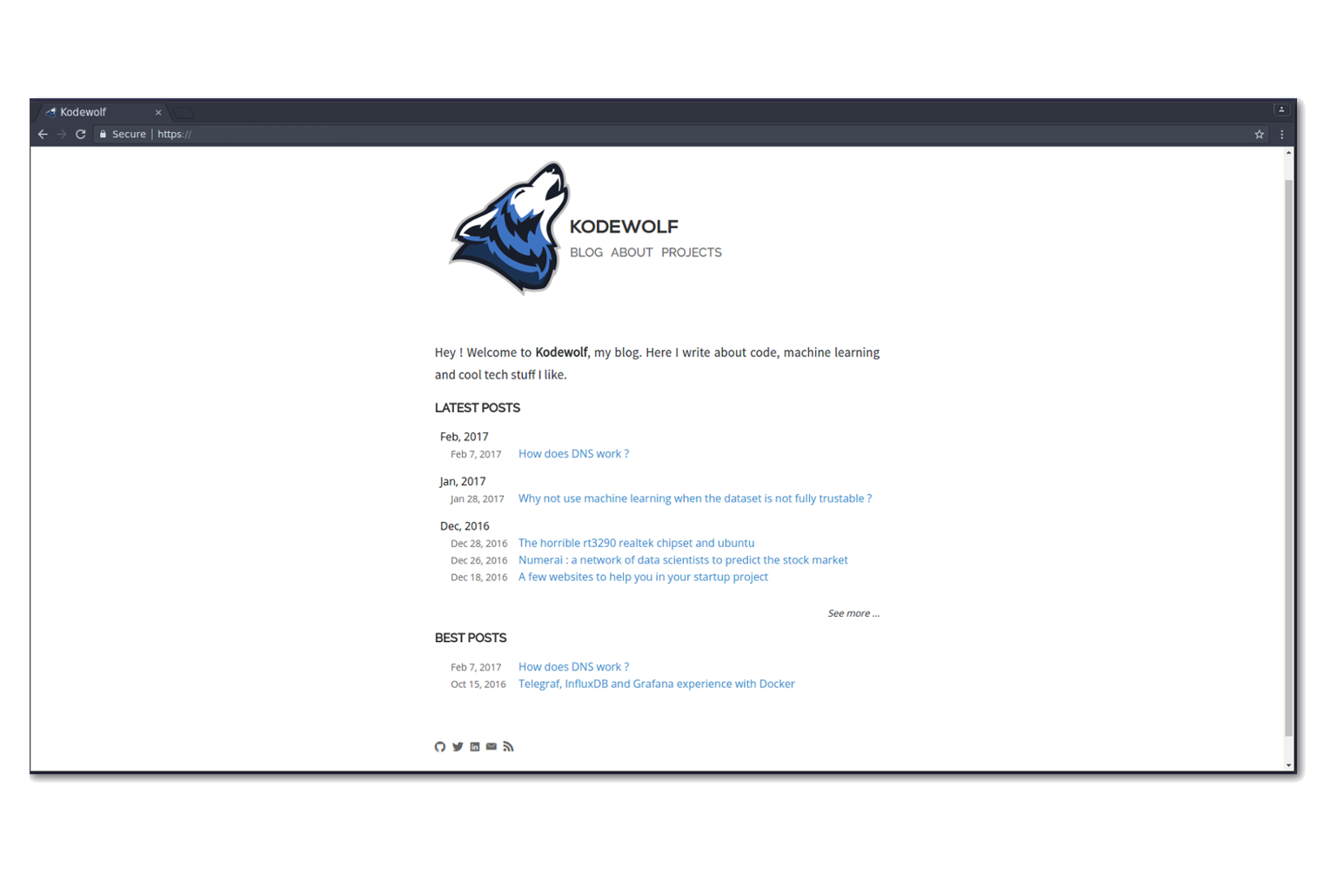](https://raw.githubusercontent.com/mtn/cocoa-eh-hugo-theme/master/images/screenshot.png)
## Table of Contents
* [Features](#features)
* [Getting Started](#getting-started)
* [Contributing](#contributing)
* [License](#license)
## Features
* Possibility to have sections with a header and a list of articles.
* Possibility to have single pages.
* Homepage with latest and best posts.
* Syntax highlighting with `hightlightjs`.
* Progressive images.
* Twitter cards support.
* Disqus and Isso support.
* LaTeX support with MathJax ([use `.mmark`](https://github.com/mtn/cocoa-eh-hugo-theme/issues/92)).
#### Typography
The **typography** is what makes Cocoa-EH look cool. The fonts used are:
* *Nexa Bold* for the blog name, a strong and opinionated font
* *Raleway* for the titles, light but clearly visible
* *Merriweather* for the text, an awesome sans serif font to read without difficulties
* *Ubuntu Mono* for the code
#### Blazing fast
Everything is made here to make the theme **really fast** to load: inline CSS, deferred Javascript, fonts loaded in an asynchronous way with replacement fonts when they're not loaded, etc. ... Even with a GPRS connection, your blog is readable.
> With gzip enabled, this theme takes less than **400**ms to load entirely, and the content is readable at only **50**ms. Also scores 99/100 on Pagespeed.
### Differences from the original Cocoa
This theme is less minimalist than the original Cocoa, with some new features :
* Displays a logo on the side of the header, and there is a title different from the author name.
* Very modular with sections and single pages.
* Group articles by month and year.
* Progressive images.
* Fonts are different : stronger and sharper, with a clear identity.
* The font size in articles is higher, the text justified and lines are more spaced.
* and more...
## Getting Started
From the root of your Hugo site, clone the theme into `themes/cocoa-eh` by running:
````
git clone https://github.com/mtn/cocoa-eh-hugo-theme.git themes/cocoa-eh
````
Then, generate your site's files by running:
````
hugo -t cocoa-eh
````
If you want a simple blog you can just use the `exampleSite`. The [wiki](https://github.com/mtn/cocoa-eh-hugo-theme/wiki) includes helpful details should you need more.
## License
Licensed under the MIT License. See the [LICENSE](https://github.com/mtn/cocoa-eh-hugo-theme/blob/master/LICENSE) file for more details.
================================================
FILE: archetypes/default.md
================================================
+++
title = '{{ replace .TranslationBaseName "-" " " | title }}'
date = {{ .Date }}
draft = true
tags = ["tags"]
description = "Desc"
# For twitter cards, see https://github.com/mtn/cocoa-eh-hugo-theme/wiki/Twitter-cards
meta_img = "/images/image.jpg"
# For hacker news and lobsters builtin links, see github.com/mtn/cocoa-eh-hugo-theme/wiki/Social-Links
hacker_news_id = ""
lobsters_id = ""
+++
================================================
FILE: exampleSite/config.toml
================================================
baseurl = "https://example.com/"
theme = "../.."
builddrafts = true
canonifyurls = true
contentdir = "content"
languageCode = "en-US"
layoutdir = "layouts"
publishdir = "public"
author = "Alexis Tacnet"
title = "Cocoa Enhanced"
disqusshortname = ""
pluralizelisttitles = false
disableKinds = ["taxonomy", "taxonomyTerm"]
[permalinks]
blog = "blog/:slug/"
[params]
dateform = "Jan 2, 2006"
dateformfull = "Mon Jan 2 2006 15:04:05 MST"
description = "Example blog"
copyright = "Copyright © 2015-{year} Nishanth Shanmugham"
# copyrightUrl = "https://creativecommons.org/licenses/by-sa/4.0/"
logofile = "img/logo.png"
faviconfile = "img/logo.png"
highlightjs = true
progressively = true
share = true
# Share to googleplus, twitter, fb, linkedin by default
# disable by setting share_on_<social network> = false
# example: share_on_googleplus = false
latestpostcount = 5
github = "example"
email = "you@example.com"
linkedin = "john-example-aa80ue8è"
twitter = "example"
facebook = "facebook_id"
instagram = "instagram_id"
untappd = "untappd_id"
itch_io = "itch_io_id"
social_banner = "img/banner.png"
usesmallsummarycard = true
posts_navigation = true
# issoHost = "comments.domain.tld:1234"
# githubRepo = "githubUsername/repositoryName/tree/master"
small_banner_logo = false
[params.utteranc]
enable = true
repo = "mtn/cocoa-eh-hugo-theme"
issueTerm = "title"
[params.colors]
identifier = "#527fc1f"
identifier_dark = "#1a3152"
trivial = "#6a7a8b"
foreground = "#181d2a"
background = "#f9f9f9"
background_dark = "#282a36"
code = "#87a5d2"
type = "#97d28b"
special = "#ffcb8d"
value = "#96c2d7"
statement = "#ff8e91"
================================================
FILE: exampleSite/content/about.md
================================================
+++
date = "2015-08-22"
title = "About"
+++
_With this theme, it is possible to add small sections that only contains one page like this. It will automatically appears in the header, at the end._
Along with [Ford Prefect](https://en.wikipedia.org/wiki/Ford_Prefect_\(character\)), Dent barely escapes the Earth's destruction as it is demolished to make way for a *hyperspace bypass*. Arthur spends the next several years, still wearing his dressing gown, helplessly launched from crisis to crisis while trying to straighten out his lifestyle.
> He rather enjoys tea, but seems to have trouble obtaining it in the far reaches of the galaxy.
In time, he learns how to fly and carves a niche for himself as a sandwich-maker.
================================================
FILE: exampleSite/content/blog/creating-a-new-theme.md
================================================
---
author: "Michael Henderson"
date: 2014-09-28
title: Creating a New Theme
---
## Introduction
This tutorial will show you how to create a simple theme in Hugo. I assume that you are familiar with HTML, the bash command line, and that you are comfortable using Markdown to format content. I'll explain how Hugo uses templates and how you can organize your templates to create a theme. I won't cover using CSS to style your theme.
We'll start with creating a new site with a very basic template. Then we'll add in a few pages and posts. With small variations on that, you will be able to create many different types of web sites.
In this tutorial, commands that you enter will start with the "$" prompt. The output will follow. Lines that start with "#" are comments that I've added to explain a point. When I show updates to a file, the ":wq" on the last line means to save the file.
Here's an example:
```
## this is a comment
$ echo this is a command
this is a command
## edit the file
$vi foo.md
+++
date = "2014-09-28"
title = "creating a new theme"
+++
bah and humbug
:wq
## show it
$ cat foo.md
+++
date = "2014-09-28"
title = "creating a new theme"
+++
bah and humbug
$
```
## Some Definitions
There are a few concepts that you need to understand before creating a theme.
### Skins
Skins are the files responsible for the look and feel of your site. It’s the CSS that controls colors and fonts, it’s the Javascript that determines actions and reactions. It’s also the rules that Hugo uses to transform your content into the HTML that the site will serve to visitors.
You have two ways to create a skin. The simplest way is to create it in the ```layouts/``` directory. If you do, then you don’t have to worry about configuring Hugo to recognize it. The first place that Hugo will look for rules and files is in the ```layouts/``` directory so it will always find the skin.
Your second choice is to create it in a sub-directory of the ```themes/``` directory. If you do, then you must always tell Hugo where to search for the skin. It’s extra work, though, so why bother with it?
The difference between creating a skin in ```layouts/``` and creating it in ```themes/``` is very subtle. A skin in ```layouts/``` can’t be customized without updating the templates and static files that it is built from. A skin created in ```themes/```, on the other hand, can be and that makes it easier for other people to use it.
The rest of this tutorial will call a skin created in the ```themes/``` directory a theme.
Note that you can use this tutorial to create a skin in the ```layouts/``` directory if you wish to. The main difference will be that you won’t need to update the site’s configuration file to use a theme.
### The Home Page
The home page, or landing page, is the first page that many visitors to a site see. It is the index.html file in the root directory of the web site. Since Hugo writes files to the public/ directory, our home page is public/index.html.
### Site Configuration File
When Hugo runs, it looks for a configuration file that contains settings that override default values for the entire site. The file can use TOML, YAML, or JSON. I prefer to use TOML for my configuration files. If you prefer to use JSON or YAML, you’ll need to translate my examples. You’ll also need to change the name of the file since Hugo uses the extension to determine how to process it.
Hugo translates Markdown files into HTML. By default, Hugo expects to find Markdown files in your ```content/``` directory and template files in your ```themes/``` directory. It will create HTML files in your ```public/``` directory. You can change this by specifying alternate locations in the configuration file.
### Content
Content is stored in text files that contain two sections. The first section is the “front matter,” which is the meta-information on the content. The second section contains Markdown that will be converted to HTML.
#### Front Matter
The front matter is information about the content. Like the configuration file, it can be written in TOML, YAML, or JSON. Unlike the configuration file, Hugo doesn’t use the file’s extension to know the format. It looks for markers to signal the type. TOML is surrounded by “`+++`”, YAML by “`---`”, and JSON is enclosed in curly braces. I prefer to use TOML, so you’ll need to translate my examples if you prefer YAML or JSON.
The information in the front matter is passed into the template before the content is rendered into HTML.
#### Markdown
Content is written in Markdown which makes it easier to create the content. Hugo runs the content through a Markdown engine to create the HTML which will be written to the output file.
### Template Files
Hugo uses template files to render content into HTML. Template files are a bridge between the content and presentation. Rules in the template define what content is published, where it's published to, and how it will rendered to the HTML file. The template guides the presentation by specifying the style to use.
There are three types of templates: single, list, and partial. Each type takes a bit of content as input and transforms it based on the commands in the template.
Hugo uses its knowledge of the content to find the template file used to render the content. If it can’t find a template that is an exact match for the content, it will shift up a level and search from there. It will continue to do so until it finds a matching template or runs out of templates to try. If it can’t find a template, it will use the default template for the site.
Please note that you can use the front matter to influence Hugo’s choice of templates.
#### Single Template
A single template is used to render a single piece of content. For example, an article or post would be a single piece of content and use a single template.
#### List Template
A list template renders a group of related content. That could be a summary of recent postings or all articles in a category. List templates can contain multiple groups.
The homepage template is a special type of list template. Hugo assumes that the home page of your site will act as the portal for the rest of the content in the site.
#### Partial Template
A partial template is a template that can be included in other templates. Partial templates must be called using the “partial” template command. They are very handy for rolling up common behavior. For example, your site may have a banner that all pages use. Instead of copying the text of the banner into every single and list template, you could create a partial with the banner in it. That way if you decide to change the banner, you only have to change the partial template.
## Create a New Site
Let's use Hugo to create a new web site. I'm a Mac user, so I'll create mine in my home directory, in the Sites folder. If you're using Linux, you might have to create the folder first.
The "new site" command will create a skeleton of a site. It will give you the basic directory structure and a useable configuration file.
```
$ hugo new site ~/Sites/zafta
$ cd ~/Sites/zafta
$ ls -l
total 8
drwxr-xr-x 7 quoha staff 238 Sep 29 16:49 .
drwxr-xr-x 3 quoha staff 102 Sep 29 16:49 ..
drwxr-xr-x 2 quoha staff 68 Sep 29 16:49 archetypes
-rw-r--r-- 1 quoha staff 82 Sep 29 16:49 config.toml
drwxr-xr-x 2 quoha staff 68 Sep 29 16:49 content
drwxr-xr-x 2 quoha staff 68 Sep 29 16:49 layouts
drwxr-xr-x 2 quoha staff 68 Sep 29 16:49 static
$
```
Take a look in the content/ directory to confirm that it is empty.
The other directories (archetypes/, layouts/, and static/) are used when customizing a theme. That's a topic for a different tutorial, so please ignore them for now.
### Generate the HTML For the New Site
Running the `hugo` command with no options will read all the available content and generate the HTML files. It will also copy all static files (that's everything that's not content). Since we have an empty site, it won't do much, but it will do it very quickly.
```
$ hugo --verbose
INFO: 2014/09/29 Using config file: config.toml
INFO: 2014/09/29 syncing from /Users/quoha/Sites/zafta/static/ to /Users/quoha/Sites/zafta/public/
WARN: 2014/09/29 Unable to locate layout: [index.html _default/list.html _default/single.html]
WARN: 2014/09/29 Unable to locate layout: [404.html]
0 draft content
0 future content
0 pages created
0 tags created
0 categories created
in 2 ms
$
```
The "`--verbose`" flag gives extra information that will be helpful when we build the template. Every line of the output that starts with "INFO:" or "WARN:" is present because we used that flag. The lines that start with "WARN:" are warning messages. We'll go over them later.
We can verify that the command worked by looking at the directory again.
```
$ ls -l
total 8
drwxr-xr-x 2 quoha staff 68 Sep 29 16:49 archetypes
-rw-r--r-- 1 quoha staff 82 Sep 29 16:49 config.toml
drwxr-xr-x 2 quoha staff 68 Sep 29 16:49 content
drwxr-xr-x 2 quoha staff 68 Sep 29 16:49 layouts
drwxr-xr-x 4 quoha staff 136 Sep 29 17:02 public
drwxr-xr-x 2 quoha staff 68 Sep 29 16:49 static
$
```
See that new public/ directory? Hugo placed all generated content there. When you're ready to publish your web site, that's the place to start. For now, though, let's just confirm that we have what we'd expect from a site with no content.
```
$ ls -l public
total 16
-rw-r--r-- 1 quoha staff 416 Sep 29 17:02 index.xml
-rw-r--r-- 1 quoha staff 262 Sep 29 17:02 sitemap.xml
$
```
Hugo created two XML files, which is standard, but there are no HTML files.
### Test the New Site
Verify that you can run the built-in web server. It will dramatically shorten your development cycle if you do. Start it by running the "server" command. If it is successful, you will see output similar to the following:
```
$ hugo server --verbose
INFO: 2014/09/29 Using config file: /Users/quoha/Sites/zafta/config.toml
INFO: 2014/09/29 syncing from /Users/quoha/Sites/zafta/static/ to /Users/quoha/Sites/zafta/public/
WARN: 2014/09/29 Unable to locate layout: [index.html _default/list.html _default/single.html]
WARN: 2014/09/29 Unable to locate layout: [404.html]
0 draft content
0 future content
0 pages created
0 tags created
0 categories created
in 2 ms
Serving pages from /Users/quoha/Sites/zafta/public
Web Server is available at http://localhost:1313
Press Ctrl+C to stop
```
Connect to the listed URL (it's on the line that starts with "Web Server"). If everything is working correctly, you should get a page that shows the following:
```
index.xml
sitemap.xml
```
That's a listing of your public/ directory. Hugo didn't create a home page because our site has no content. When there's no index.html file in a directory, the server lists the files in the directory, which is what you should see in your browser.
Let’s go back and look at those warnings again.
```
WARN: 2014/09/29 Unable to locate layout: [index.html _default/list.html _default/single.html]
WARN: 2014/09/29 Unable to locate layout: [404.html]
```
That second warning is easier to explain. We haven’t created a template to be used to generate “page not found errors.” The 404 message is a topic for a separate tutorial.
Now for the first warning. It is for the home page. You can tell because the first layout that it looked for was “index.html.” That’s only used by the home page.
I like that the verbose flag causes Hugo to list the files that it's searching for. For the home page, they are index.html, _default/list.html, and _default/single.html. There are some rules that we'll cover later that explain the names and paths. For now, just remember that Hugo couldn't find a template for the home page and it told you so.
At this point, you've got a working installation and site that we can build upon. All that’s left is to add some content and a theme to display it.
## Create a New Theme
Hugo doesn't ship with a default theme. There are a few available (I counted a dozen when I first installed Hugo) and Hugo comes with a command to create new themes.
We're going to create a new theme called "zafta." Since the goal of this tutorial is to show you how to fill out the files to pull in your content, the theme will not contain any CSS. In other words, ugly but functional.
All themes have opinions on content and layout. For example, Zafta uses "post" over "blog". Strong opinions make for simpler templates but differing opinions make it tougher to use themes. When you build a theme, consider using the terms that other themes do.
### Create a Skeleton
Use the hugo "new" command to create the skeleton of a theme. This creates the directory structure and places empty files for you to fill out.
```
$ hugo new theme zafta
$ ls -l
total 8
drwxr-xr-x 2 quoha staff 68 Sep 29 16:49 archetypes
-rw-r--r-- 1 quoha staff 82 Sep 29 16:49 config.toml
drwxr-xr-x 2 quoha staff 68 Sep 29 16:49 content
drwxr-xr-x 2 quoha staff 68 Sep 29 16:49 layouts
drwxr-xr-x 4 quoha staff 136 Sep 29 17:02 public
drwxr-xr-x 2 quoha staff 68 Sep 29 16:49 static
drwxr-xr-x 3 quoha staff 102 Sep 29 17:31 themes
$ find themes -type f | xargs ls -l
-rw-r--r-- 1 quoha staff 1081 Sep 29 17:31 themes/zafta/LICENSE.md
-rw-r--r-- 1 quoha staff 0 Sep 29 17:31 themes/zafta/archetypes/default.md
-rw-r--r-- 1 quoha staff 0 Sep 29 17:31 themes/zafta/layouts/_default/list.html
-rw-r--r-- 1 quoha staff 0 Sep 29 17:31 themes/zafta/layouts/_default/single.html
-rw-r--r-- 1 quoha staff 0 Sep 29 17:31 themes/zafta/layouts/index.html
-rw-r--r-- 1 quoha staff 0 Sep 29 17:31 themes/zafta/layouts/partials/footer.html
-rw-r--r-- 1 quoha staff 0 Sep 29 17:31 themes/zafta/layouts/partials/header.html
-rw-r--r-- 1 quoha staff 93 Sep 29 17:31 themes/zafta/theme.toml
$
```
The skeleton includes templates (the files ending in .html), license file, a description of your theme (the theme.toml file), and an empty archetype.
Please take a minute to fill out the theme.toml and LICENSE.md files. They're optional, but if you're going to be distributing your theme, it tells the world who to praise (or blame). It's also nice to declare the license so that people will know how they can use the theme.
```
$ vi themes/zafta/theme.toml
author = "michael d henderson"
description = "a minimal working template"
license = "MIT"
name = "zafta"
source_repo = ""
tags = ["tags", "categories"]
:wq
## also edit themes/zafta/LICENSE.md and change
## the bit that says "YOUR_NAME_HERE"
```
Note that the the skeleton's template files are empty. Don't worry, we'll be changing that shortly.
```
$ find themes/zafta -name '*.html' | xargs ls -l
-rw-r--r-- 1 quoha staff 0 Sep 29 17:31 themes/zafta/layouts/_default/list.html
-rw-r--r-- 1 quoha staff 0 Sep 29 17:31 themes/zafta/layouts/_default/single.html
-rw-r--r-- 1 quoha staff 0 Sep 29 17:31 themes/zafta/layouts/index.html
-rw-r--r-- 1 quoha staff 0 Sep 29 17:31 themes/zafta/layouts/partials/footer.html
-rw-r--r-- 1 quoha staff 0 Sep 29 17:31 themes/zafta/layouts/partials/header.html
$
```
### Update the Configuration File to Use the Theme
Now that we've got a theme to work with, it's a good idea to add the theme name to the configuration file. This is optional, because you can always add "-t zafta" on all your commands. I like to put it the configuration file because I like shorter command lines. If you don't put it in the configuration file or specify it on the command line, you won't use the template that you're expecting to.
Edit the file to add the theme, add a title for the site, and specify that all of our content will use the TOML format.
```
$ vi config.toml
theme = "zafta"
baseurl = ""
languageCode = "en-us"
title = "zafta - totally refreshing"
MetaDataFormat = "toml"
:wq
$
```
### Generate the Site
Now that we have an empty theme, let's generate the site again.
```
$ hugo --verbose
INFO: 2014/09/29 Using config file: /Users/quoha/Sites/zafta/config.toml
INFO: 2014/09/29 syncing from /Users/quoha/Sites/zafta/themes/zafta/static/ to /Users/quoha/Sites/zafta/public/
INFO: 2014/09/29 syncing from /Users/quoha/Sites/zafta/static/ to /Users/quoha/Sites/zafta/public/
WARN: 2014/09/29 Unable to locate layout: [404.html theme/404.html]
0 draft content
0 future content
0 pages created
0 tags created
0 categories created
in 2 ms
$
```
Did you notice that the output is different? The warning message for the home page has disappeared and we have an additional information line saying that Hugo is syncing from the theme's directory.
Let's check the public/ directory to see what Hugo's created.
```
$ ls -l public
total 16
drwxr-xr-x 2 quoha staff 68 Sep 29 17:56 css
-rw-r--r-- 1 quoha staff 0 Sep 29 17:56 index.html
-rw-r--r-- 1 quoha staff 407 Sep 29 17:56 index.xml
drwxr-xr-x 2 quoha staff 68 Sep 29 17:56 js
-rw-r--r-- 1 quoha staff 243 Sep 29 17:56 sitemap.xml
$
```
Notice four things:
1. Hugo created a home page. This is the file public/index.html.
2. Hugo created a css/ directory.
3. Hugo created a js/ directory.
4. Hugo claimed that it created 0 pages. It created a file and copied over static files, but didn't create any pages. That's because it considers a "page" to be a file created directly from a content file. It doesn't count things like the index.html files that it creates automatically.
#### The Home Page
Hugo supports many different types of templates. The home page is special because it gets its own type of template and its own template file. The file, layouts/index.html, is used to generate the HTML for the home page. The Hugo documentation says that this is the only required template, but that depends. Hugo's warning message shows that it looks for three different templates:
```
WARN: 2014/09/29 Unable to locate layout: [index.html _default/list.html _default/single.html]
```
If it can't find any of these, it completely skips creating the home page. We noticed that when we built the site without having a theme installed.
When Hugo created our theme, it created an empty home page template. Now, when we build the site, Hugo finds the template and uses it to generate the HTML for the home page. Since the template file is empty, the HTML file is empty, too. If the template had any rules in it, then Hugo would have used them to generate the home page.
```
$ find . -name index.html | xargs ls -l
-rw-r--r-- 1 quoha staff 0 Sep 29 20:21 ./public/index.html
-rw-r--r-- 1 quoha staff 0 Sep 29 17:31 ./themes/zafta/layouts/index.html
$
```
#### The Magic of Static
Hugo does two things when generating the site. It uses templates to transform content into HTML and it copies static files into the site. Unlike content, static files are not transformed. They are copied exactly as they are.
Hugo assumes that your site will use both CSS and JavaScript, so it creates directories in your theme to hold them. Remember opinions? Well, Hugo's opinion is that you'll store your CSS in a directory named css/ and your JavaScript in a directory named js/. If you don't like that, you can change the directory names in your theme directory or even delete them completely. Hugo's nice enough to offer its opinion, then behave nicely if you disagree.
```
$ find themes/zafta -type d | xargs ls -ld
drwxr-xr-x 7 quoha staff 238 Sep 29 17:38 themes/zafta
drwxr-xr-x 3 quoha staff 102 Sep 29 17:31 themes/zafta/archetypes
drwxr-xr-x 5 quoha staff 170 Sep 29 17:31 themes/zafta/layouts
drwxr-xr-x 4 quoha staff 136 Sep 29 17:31 themes/zafta/layouts/_default
drwxr-xr-x 4 quoha staff 136 Sep 29 17:31 themes/zafta/layouts/partials
drwxr-xr-x 4 quoha staff 136 Sep 29 17:31 themes/zafta/static
drwxr-xr-x 2 quoha staff 68 Sep 29 17:31 themes/zafta/static/css
drwxr-xr-x 2 quoha staff 68 Sep 29 17:31 themes/zafta/static/js
$
```
## The Theme Development Cycle
When you're working on a theme, you will make changes in the theme's directory, rebuild the site, and check your changes in the browser. Hugo makes this very easy:
1. Purge the public/ directory.
2. Run the built in web server in watch mode.
3. Open your site in a browser.
4. Update the theme.
5. Glance at your browser window to see changes.
6. Return to step 4.
I’ll throw in one more opinion: never work on a theme on a live site. Always work on a copy of your site. Make changes to your theme, test them, then copy them up to your site. For added safety, use a tool like Git to keep a revision history of your content and your theme. Believe me when I say that it is too easy to lose both your mind and your changes.
Check the main Hugo site for information on using Git with Hugo.
### Purge the public/ Directory
When generating the site, Hugo will create new files and update existing ones in the ```public/``` directory. It will not delete files that are no longer used. For example, files that were created in the wrong directory or with the wrong title will remain. If you leave them, you might get confused by them later. I recommend cleaning out your site prior to generating it.
Note: If you're building on an SSD, you should ignore this. Churning on a SSD can be costly.
### Hugo's Watch Option
Hugo's "`--watch`" option will monitor the content/ and your theme directories for changes and rebuild the site automatically.
### Live Reload
Hugo's built in web server supports live reload. As pages are saved on the server, the browser is told to refresh the page. Usually, this happens faster than you can say, "Wow, that's totally amazing."
### Development Commands
Use the following commands as the basis for your workflow.
```
## purge old files. hugo will recreate the public directory.
##
$ rm -rf public
##
## run hugo in watch mode
##
$ hugo server --watch --verbose
```
Here's sample output showing Hugo detecting a change to the template for the home page. Once generated, the web browser automatically reloaded the page. I've said this before, it's amazing.
```
$ rm -rf public
$ hugo server --watch --verbose
INFO: 2014/09/29 Using config file: /Users/quoha/Sites/zafta/config.toml
INFO: 2014/09/29 syncing from /Users/quoha/Sites/zafta/themes/zafta/static/ to /Users/quoha/Sites/zafta/public/
INFO: 2014/09/29 syncing from /Users/quoha/Sites/zafta/static/ to /Users/quoha/Sites/zafta/public/
WARN: 2014/09/29 Unable to locate layout: [404.html theme/404.html]
0 draft content
0 future content
0 pages created
0 tags created
0 categories created
in 2 ms
Watching for changes in /Users/quoha/Sites/zafta/content
Serving pages from /Users/quoha/Sites/zafta/public
Web Server is available at http://localhost:1313
Press Ctrl+C to stop
INFO: 2014/09/29 File System Event: ["/Users/quoha/Sites/zafta/themes/zafta/layouts/index.html": MODIFY|ATTRIB]
Change detected, rebuilding site
WARN: 2014/09/29 Unable to locate layout: [404.html theme/404.html]
0 draft content
0 future content
0 pages created
0 tags created
0 categories created
in 1 ms
```
## Update the Home Page Template
The home page is one of a few special pages that Hugo creates automatically. As mentioned earlier, it looks for one of three files in the theme's layout/ directory:
1. index.html
2. _default/list.html
3. _default/single.html
We could update one of the default templates, but a good design decision is to update the most specific template available. That's not a hard and fast rule (in fact, we'll break it a few times in this tutorial), but it is a good generalization.
### Make a Static Home Page
Right now, that page is empty because we don't have any content and we don't have any logic in the template. Let's change that by adding some text to the template.
```
$ vi themes/zafta/layouts/index.html
<!DOCTYPE html>
<html>
<body>
<p>hugo says hello!</p>
</body>
</html>
:wq
$
```
Build the web site and then verify the results.
```
$ hugo --verbose
INFO: 2014/09/29 Using config file: /Users/quoha/Sites/zafta/config.toml
INFO: 2014/09/29 syncing from /Users/quoha/Sites/zafta/themes/zafta/static/ to /Users/quoha/Sites/zafta/public/
INFO: 2014/09/29 syncing from /Users/quoha/Sites/zafta/static/ to /Users/quoha/Sites/zafta/public/
WARN: 2014/09/29 Unable to locate layout: [404.html theme/404.html]
0 draft content
0 future content
0 pages created
0 tags created
0 categories created
in 2 ms
$ find public -type f -name '*.html' | xargs ls -l
-rw-r--r-- 1 quoha staff 78 Sep 29 21:26 public/index.html
$ cat public/index.html
<!DOCTYPE html>
<html>
<body>
<p>hugo says hello!</p>
</html>
```
#### Live Reload
Note: If you're running the server with the `--watch` option, you'll see different content in the file:
```
$ cat public/index.html
<!DOCTYPE html>
<html>
<body>
<p>hugo says hello!</p>
<script>document.write('<script src="http://'
+ (location.host || 'localhost').split(':')[0]
+ ':1313/livereload.js?mindelay=10"></'
+ 'script>')</script></body>
</html>
```
When you use `--watch`, the Live Reload script is added by Hugo. Look for live reload in the documentation to see what it does and how to disable it.
### Build a "Dynamic" Home Page
"Dynamic home page?" Hugo's a static web site generator, so this seems an odd thing to say. I mean let's have the home page automatically reflect the content in the site every time Hugo builds it. We'll use iteration in the template to do that.
#### Create New Posts
Now that we have the home page generating static content, let's add some content to the site. We'll display these posts as a list on the home page and on their own page, too.
Hugo has a command to generate a skeleton post, just like it does for sites and themes.
```
$ hugo --verbose new post/first.md
INFO: 2014/09/29 Using config file: /Users/quoha/Sites/zafta/config.toml
INFO: 2014/09/29 attempting to create post/first.md of post
INFO: 2014/09/29 curpath: /Users/quoha/Sites/zafta/themes/zafta/archetypes/default.md
ERROR: 2014/09/29 Unable to Cast <nil> to map[string]interface{}
$
```
That wasn't very nice, was it?
The "new" command uses an archetype to create the post file. Hugo created an empty default archetype file, but that causes an error when there's a theme. For me, the workaround was to create an archetypes file specifically for the post type.
```
$ vi themes/zafta/archetypes/post.md
+++
Description = ""
Tags = []
Categories = []
+++
:wq
$ find themes/zafta/archetypes -type f | xargs ls -l
-rw-r--r-- 1 quoha staff 0 Sep 29 21:53 themes/zafta/archetypes/default.md
-rw-r--r-- 1 quoha staff 51 Sep 29 21:54 themes/zafta/archetypes/post.md
$ hugo --verbose new post/first.md
INFO: 2014/09/29 Using config file: /Users/quoha/Sites/zafta/config.toml
INFO: 2014/09/29 attempting to create post/first.md of post
INFO: 2014/09/29 curpath: /Users/quoha/Sites/zafta/themes/zafta/archetypes/post.md
INFO: 2014/09/29 creating /Users/quoha/Sites/zafta/content/post/first.md
/Users/quoha/Sites/zafta/content/post/first.md created
$ hugo --verbose new post/second.md
INFO: 2014/09/29 Using config file: /Users/quoha/Sites/zafta/config.toml
INFO: 2014/09/29 attempting to create post/second.md of post
INFO: 2014/09/29 curpath: /Users/quoha/Sites/zafta/themes/zafta/archetypes/post.md
INFO: 2014/09/29 creating /Users/quoha/Sites/zafta/content/post/second.md
/Users/quoha/Sites/zafta/content/post/second.md created
$ ls -l content/post
total 16
-rw-r--r-- 1 quoha staff 104 Sep 29 21:54 first.md
-rw-r--r-- 1 quoha staff 105 Sep 29 21:57 second.md
$ cat content/post/first.md
+++
Categories = []
Description = ""
Tags = []
date = "2014-09-29T21:54:53-05:00"
title = "first"
+++
my first post
$ cat content/post/second.md
+++
Categories = []
Description = ""
Tags = []
date = "2014-09-29T21:57:09-05:00"
title = "second"
+++
my second post
$
```
Build the web site and then verify the results.
```
$ rm -rf public
$ hugo --verbose
INFO: 2014/09/29 Using config file: /Users/quoha/Sites/zafta/config.toml
INFO: 2014/09/29 syncing from /Users/quoha/Sites/zafta/themes/zafta/static/ to /Users/quoha/Sites/zafta/public/
INFO: 2014/09/29 syncing from /Users/quoha/Sites/zafta/static/ to /Users/quoha/Sites/zafta/public/
INFO: 2014/09/29 found taxonomies: map[string]string{"category":"categories", "tag":"tags"}
WARN: 2014/09/29 Unable to locate layout: [404.html theme/404.html]
0 draft content
0 future content
2 pages created
0 tags created
0 categories created
in 4 ms
$
```
The output says that it created 2 pages. Those are our new posts:
```
$ find public -type f -name '*.html' | xargs ls -l
-rw-r--r-- 1 quoha staff 78 Sep 29 22:13 public/index.html
-rw-r--r-- 1 quoha staff 0 Sep 29 22:13 public/post/first/index.html
-rw-r--r-- 1 quoha staff 0 Sep 29 22:13 public/post/index.html
-rw-r--r-- 1 quoha staff 0 Sep 29 22:13 public/post/second/index.html
$
```
The new files are empty because because the templates used to generate the content are empty. The homepage doesn't show the new content, either. We have to update the templates to add the posts.
### List and Single Templates
In Hugo, we have three major kinds of templates. There's the home page template that we updated previously. It is used only by the home page. We also have "single" templates which are used to generate output for a single content file. We also have "list" templates that are used to group multiple pieces of content before generating output.
Generally speaking, list templates are named "list.html" and single templates are named "single.html."
There are three other types of templates: partials, content views, and terms. We will not go into much detail on these.
### Add Content to the Homepage
The home page will contain a list of posts. Let's update its template to add the posts that we just created. The logic in the template will run every time we build the site.
```
$ vi themes/zafta/layouts/index.html
<!DOCTYPE html>
<html>
<body>
{{ range first 10 .Data.Pages }}
<h1>{{ .Title }}</h1>
{{ end }}
</body>
</html>
:wq
$
```
Hugo uses the Go template engine. That engine scans the template files for commands which are enclosed between "{{" and "}}". In our template, the commands are:
1. range
2. .Title
3. end
The "range" command is an iterator. We're going to use it to go through the first ten pages. Every HTML file that Hugo creates is treated as a page, so looping through the list of pages will look at every file that will be created.
The ".Title" command prints the value of the "title" variable. Hugo pulls it from the front matter in the Markdown file.
The "end" command signals the end of the range iterator. The engine loops back to the top of the iteration when it finds "end." Everything between the "range" and "end" is evaluated every time the engine goes through the iteration. In this file, that would cause the title from the first ten pages to be output as heading level one.
It's helpful to remember that some variables, like .Data, are created before any output files. Hugo loads every content file into the variable and then gives the template a chance to process before creating the HTML files.
Build the web site and then verify the results.
```
$ rm -rf public
$ hugo --verbose
INFO: 2014/09/29 Using config file: /Users/quoha/Sites/zafta/config.toml
INFO: 2014/09/29 syncing from /Users/quoha/Sites/zafta/themes/zafta/static/ to /Users/quoha/Sites/zafta/public/
INFO: 2014/09/29 syncing from /Users/quoha/Sites/zafta/static/ to /Users/quoha/Sites/zafta/public/
INFO: 2014/09/29 found taxonomies: map[string]string{"tag":"tags", "category":"categories"}
WARN: 2014/09/29 Unable to locate layout: [404.html theme/404.html]
0 draft content
0 future content
2 pages created
0 tags created
0 categories created
in 4 ms
$ find public -type f -name '*.html' | xargs ls -l
-rw-r--r-- 1 quoha staff 94 Sep 29 22:23 public/index.html
-rw-r--r-- 1 quoha staff 0 Sep 29 22:23 public/post/first/index.html
-rw-r--r-- 1 quoha staff 0 Sep 29 22:23 public/post/index.html
-rw-r--r-- 1 quoha staff 0 Sep 29 22:23 public/post/second/index.html
$ cat public/index.html
<!DOCTYPE html>
<html>
<body>
<h1>second</h1>
<h1>first</h1>
</body>
</html>
$
```
Congratulations, the home page shows the title of the two posts. The posts themselves are still empty, but let's take a moment to appreciate what we've done. Your template now generates output dynamically. Believe it or not, by inserting the range command inside of those curly braces, you've learned everything you need to know to build a theme. All that's really left is understanding which template will be used to generate each content file and becoming familiar with the commands for the template engine.
And, if that were entirely true, this tutorial would be much shorter. There are a few things to know that will make creating a new template much easier. Don't worry, though, that's all to come.
### Add Content to the Posts
We're working with posts, which are in the content/post/ directory. That means that their section is "post" (and if we don't do something weird, their type is also "post").
Hugo uses the section and type to find the template file for every piece of content. Hugo will first look for a template file that matches the section or type name. If it can't find one, then it will look in the _default/ directory. There are some twists that we'll cover when we get to categories and tags, but for now we can assume that Hugo will try post/single.html, then _default/single.html.
Now that we know the search rule, let's see what we actually have available:
```
$ find themes/zafta -name single.html | xargs ls -l
-rw-r--r-- 1 quoha staff 132 Sep 29 17:31 themes/zafta/layouts/_default/single.html
```
We could create a new template, post/single.html, or change the default. Since we don't know of any other content types, let's start with updating the default.
Remember, any content that we haven't created a template for will end up using this template. That can be good or bad. Bad because I know that we're going to be adding different types of content and we're going to end up undoing some of the changes we've made. It's good because we'll be able to see immediate results. It's also good to start here because we can start to build the basic layout for the site. As we add more content types, we'll refactor this file and move logic around. Hugo makes that fairly painless, so we'll accept the cost and proceed.
Please see the Hugo documentation on template rendering for all the details on determining which template to use. And, as the docs mention, if you're building a single page application (SPA) web site, you can delete all of the other templates and work with just the default single page. That's a refreshing amount of joy right there.
#### Update the Template File
```
$ vi themes/zafta/layouts/_default/single.html
<!DOCTYPE html>
<html>
<head>
<title>{{ .Title }}</title>
</head>
<body>
<h1>{{ .Title }}</h1>
{{ .Content }}
</body>
</html>
:wq
$
```
Build the web site and verify the results.
```
$ rm -rf public
$ hugo --verbose
INFO: 2014/09/29 Using config file: /Users/quoha/Sites/zafta/config.toml
INFO: 2014/09/29 syncing from /Users/quoha/Sites/zafta/themes/zafta/static/ to /Users/quoha/Sites/zafta/public/
INFO: 2014/09/29 syncing from /Users/quoha/Sites/zafta/static/ to /Users/quoha/Sites/zafta/public/
INFO: 2014/09/29 found taxonomies: map[string]string{"tag":"tags", "category":"categories"}
WARN: 2014/09/29 Unable to locate layout: [404.html theme/404.html]
0 draft content
0 future content
2 pages created
0 tags created
0 categories created
in 4 ms
$ find public -type f -name '*.html' | xargs ls -l
-rw-r--r-- 1 quoha staff 94 Sep 29 22:40 public/index.html
-rw-r--r-- 1 quoha staff 125 Sep 29 22:40 public/post/first/index.html
-rw-r--r-- 1 quoha staff 0 Sep 29 22:40 public/post/index.html
-rw-r--r-- 1 quoha staff 128 Sep 29 22:40 public/post/second/index.html
$ cat public/post/first/index.html
<!DOCTYPE html>
<html>
<head>
<title>first</title>
</head>
<body>
<h1>first</h1>
<p>my first post</p>
</body>
</html>
$ cat public/post/second/index.html
<!DOCTYPE html>
<html>
<head>
<title>second</title>
</head>
<body>
<h1>second</h1>
<p>my second post</p>
</body>
</html>
$
```
Notice that the posts now have content. You can go to localhost:1313/post/first to verify.
### Linking to Content
The posts are on the home page. Let's add a link from there to the post. Since this is the home page, we'll update its template.
```
$ vi themes/zafta/layouts/index.html
<!DOCTYPE html>
<html>
<body>
{{ range first 10 .Data.Pages }}
<h1><a href="{{ .Permalink }}">{{ .Title }}</a></h1>
{{ end }}
</body>
</html>
```
Build the web site and verify the results.
```
$ rm -rf public
$ hugo --verbose
INFO: 2014/09/29 Using config file: /Users/quoha/Sites/zafta/config.toml
INFO: 2014/09/29 syncing from /Users/quoha/Sites/zafta/themes/zafta/static/ to /Users/quoha/Sites/zafta/public/
INFO: 2014/09/29 syncing from /Users/quoha/Sites/zafta/static/ to /Users/quoha/Sites/zafta/public/
INFO: 2014/09/29 found taxonomies: map[string]string{"tag":"tags", "category":"categories"}
WARN: 2014/09/29 Unable to locate layout: [404.html theme/404.html]
0 draft content
0 future content
2 pages created
0 tags created
0 categories created
in 4 ms
$ find public -type f -name '*.html' | xargs ls -l
-rw-r--r-- 1 quoha staff 149 Sep 29 22:44 public/index.html
-rw-r--r-- 1 quoha staff 125 Sep 29 22:44 public/post/first/index.html
-rw-r--r-- 1 quoha staff 0 Sep 29 22:44 public/post/index.html
-rw-r--r-- 1 quoha staff 128 Sep 29 22:44 public/post/second/index.html
$ cat public/index.html
<!DOCTYPE html>
<html>
<body>
<h1><a href="/post/second/">second</a></h1>
<h1><a href="/post/first/">first</a></h1>
</body>
</html>
$
```
### Create a Post Listing
We have the posts displaying on the home page and on their own page. We also have a file public/post/index.html that is empty. Let's make it show a list of all posts (not just the first ten).
We need to decide which template to update. This will be a listing, so it should be a list template. Let's take a quick look and see which list templates are available.
```
$ find themes/zafta -name list.html | xargs ls -l
-rw-r--r-- 1 quoha staff 0 Sep 29 17:31 themes/zafta/layouts/_default/list.html
```
As with the single post, we have to decide to update _default/list.html or create post/list.html. We still don't have multiple content types, so let's stay consistent and update the default list template.
## Creating Top Level Pages
Let's add an "about" page and display it at the top level (as opposed to a sub-level like we did with posts).
The default in Hugo is to use the directory structure of the content/ directory to guide the location of the generated html in the public/ directory. Let's verify that by creating an "about" page at the top level:
```
$ vi content/about.md
+++
title = "about"
description = "about this site"
date = "2014-09-27"
slug = "about time"
+++
## about us
i'm speechless
:wq
```
Generate the web site and verify the results.
```
$ find public -name '*.html' | xargs ls -l
-rw-rw-r-- 1 mdhender staff 334 Sep 27 15:08 public/about-time/index.html
-rw-rw-r-- 1 mdhender staff 527 Sep 27 15:08 public/index.html
-rw-rw-r-- 1 mdhender staff 358 Sep 27 15:08 public/post/first-post/index.html
-rw-rw-r-- 1 mdhender staff 0 Sep 27 15:08 public/post/index.html
-rw-rw-r-- 1 mdhender staff 342 Sep 27 15:08 public/post/second-post/index.html
```
Notice that the page wasn't created at the top level. It was created in a sub-directory named 'about-time/'. That name came from our slug. Hugo will use the slug to name the generated content. It's a reasonable default, by the way, but we can learn a few things by fighting it for this file.
One other thing. Take a look at the home page.
```
$ cat public/index.html
<!DOCTYPE html>
<html>
<body>
<h1><a href="http://localhost:1313/post/theme/">creating a new theme</a></h1>
<h1><a href="http://localhost:1313/about-time/">about</a></h1>
<h1><a href="http://localhost:1313/post/second-post/">second</a></h1>
<h1><a href="http://localhost:1313/post/first-post/">first</a></h1>
<script>document.write('<script src="http://'
+ (location.host || 'localhost').split(':')[0]
+ ':1313/livereload.js?mindelay=10"></'
+ 'script>')</script></body>
</html>
```
Notice that the "about" link is listed with the posts? That's not desirable, so let's change that first.
```
$ vi themes/zafta/layouts/index.html
<!DOCTYPE html>
<html>
<body>
<h1>posts</h1>
{{ range first 10 .Data.Pages }}
{{ if eq .Type "post"}}
<h2><a href="{{ .Permalink }}">{{ .Title }}</a></h2>
{{ end }}
{{ end }}
<h1>pages</h1>
{{ range .Data.Pages }}
{{ if eq .Type "page" }}
<h2><a href="{{ .Permalink }}">{{ .Title }}</a></h2>
{{ end }}
{{ end }}
</body>
</html>
:wq
```
Generate the web site and verify the results. The home page has two sections, posts and pages, and each section has the right set of headings and links in it.
But, that about page still renders to about-time/index.html.
```
$ find public -name '*.html' | xargs ls -l
-rw-rw-r-- 1 mdhender staff 334 Sep 27 15:33 public/about-time/index.html
-rw-rw-r-- 1 mdhender staff 645 Sep 27 15:33 public/index.html
-rw-rw-r-- 1 mdhender staff 358 Sep 27 15:33 public/post/first-post/index.html
-rw-rw-r-- 1 mdhender staff 0 Sep 27 15:33 public/post/index.html
-rw-rw-r-- 1 mdhender staff 342 Sep 27 15:33 public/post/second-post/index.html
```
Knowing that hugo is using the slug to generate the file name, the simplest solution is to change the slug. Let's do it the hard way and change the permalink in the configuration file.
```
$ vi config.toml
[permalinks]
page = "/:title/"
about = "/:filename/"
```
Generate the web site and verify that this didn't work. Hugo lets "slug" or "URL" override the permalinks setting in the configuration file. Go ahead and comment out the slug in content/about.md, then generate the web site to get it to be created in the right place.
## Sharing Templates
If you've been following along, you probably noticed that posts have titles in the browser and the home page doesn't. That's because we didn't put the title in the home page's template (layouts/index.html). That's an easy thing to do, but let's look at a different option.
We can put the common bits into a shared template that's stored in the themes/zafta/layouts/partials/ directory.
### Create the Header and Footer Partials
In Hugo, a partial is a sugar-coated template. Normally a template reference has a path specified. Partials are different. Hugo searches for them along a TODO defined search path. This makes it easier for end-users to override the theme's presentation.
```
$ vi themes/zafta/layouts/partials/header.html
<!DOCTYPE html>
<html>
<head>
<title>{{ .Title }}</title>
</head>
<body>
:wq
$ vi themes/zafta/layouts/partials/footer.html
</body>
</html>
:wq
```
### Update the Home Page Template to Use the Partials
The most noticeable difference between a template call and a partials call is the lack of path:
```
{{ template "theme/partials/header.html" . }}
```
versus
```
{{ partial "header.html" . }}
```
Both pass in the context.
Let's change the home page template to use these new partials.
```
$ vi themes/zafta/layouts/index.html
{{ partial "header.html" . }}
<h1>posts</h1>
{{ range first 10 .Data.Pages }}
{{ if eq .Type "post"}}
<h2><a href="{{ .Permalink }}">{{ .Title }}</a></h2>
{{ end }}
{{ end }}
<h1>pages</h1>
{{ range .Data.Pages }}
{{ if or (eq .Type "page") (eq .Type "about") }}
<h2><a href="{{ .Permalink }}">{{ .Type }} - {{ .Title }} - {{ .RelPermalink }}</a></h2>
{{ end }}
{{ end }}
{{ partial "footer.html" . }}
:wq
```
Generate the web site and verify the results. The title on the home page is now "your title here", which comes from the "title" variable in the config.toml file.
### Update the Default Single Template to Use the Partials
```
$ vi themes/zafta/layouts/_default/single.html
{{ partial "header.html" . }}
<h1>{{ .Title }}</h1>
{{ .Content }}
{{ partial "footer.html" . }}
:wq
```
Generate the web site and verify the results. The title on the posts and the about page should both reflect the value in the markdown file.
## Add “Date Published” to Posts
It's common to have posts display the date that they were written or published, so let's add that. The front matter of our posts has a variable named "date." It's usually the date the content was created, but let's pretend that's the value we want to display.
### Add “Date Published” to the Template
We'll start by updating the template used to render the posts. The template code will look like:
```
{{ .Date.Format "Mon, Jan 2, 2006" }}
```
Posts use the default single template, so we'll change that file.
```
$ vi themes/zafta/layouts/_default/single.html
{{ partial "header.html" . }}
<h1>{{ .Title }}</h1>
<h2>{{ .Date.Format "Mon, Jan 2, 2006" }}</h2>
{{ .Content }}
{{ partial "footer.html" . }}
:wq
```
Generate the web site and verify the results. The posts now have the date displayed in them. There's a problem, though. The "about" page also has the date displayed.
As usual, there are a couple of ways to make the date display only on posts. We could do an "if" statement like we did on the home page. Another way would be to create a separate template for posts.
The "if" solution works for sites that have just a couple of content types. It aligns with the principle of "code for today," too.
Let's assume, though, that we've made our site so complex that we feel we have to create a new template type. In Hugo-speak, we're going to create a section template.
Let's restore the default single template before we forget.
```
$ mkdir themes/zafta/layouts/post
$ vi themes/zafta/layouts/_default/single.html
{{ partial "header.html" . }}
<h1>{{ .Title }}</h1>
{{ .Content }}
{{ partial "footer.html" . }}
:wq
```
Now we'll update the post's version of the single template. If you remember Hugo's rules, the template engine will use this version over the default.
```
$ vi themes/zafta/layouts/post/single.html
{{ partial "header.html" . }}
<h1>{{ .Title }}</h1>
<h2>{{ .Date.Format "Mon, Jan 2, 2006" }}</h2>
{{ .Content }}
{{ partial "footer.html" . }}
:wq
```
Note that we removed the date logic from the default template and put it in the post template. Generate the web site and verify the results. Posts have dates and the about page doesn't.
### Don't Repeat Yourself
DRY is a good design goal and Hugo does a great job supporting it. Part of the art of a good template is knowing when to add a new template and when to update an existing one. While you're figuring that out, accept that you'll be doing some refactoring. Hugo makes that easy and fast, so it's okay to delay splitting up a template.
================================================
FILE: exampleSite/content/blog/example-of-an-article.md
================================================
---
author: "Alexis Tacnet"
date: 2015-09-28
title: Example article
best: true
---
## Text
**This is some text.** Lorem ipsum dolor sit amet, consectetur adipiscing elit. Ut pretium at ipsum eu pharetra. Proin ac ante et leo ultrices bibendum. Vivamus id ipsum fermentum, aliquam nunc mollis, tempus sapien. Praesent scelerisque cursus eros vitae pretium. Etiam sit amet ligula in leo euismod malesuada. Proin eleifend pulvinar ipsum, eu lobortis ante pharetra eu. Vivamus sem elit, venenatis eget ornare nec, ullamcorper non tellus. Duis quis massa finibus, euismod erat quis, fermentum nunc. Maecenas euismod felis sit amet convallis placerat.
## Images
**This theme includes a tranparent way to defer images. This can be enabled/disabled in the `config.toml`.**

**You will just have to do two images : the normal, and a low resolution one.**
## Code
**This is some code, this theme includes language highlight, optionnal as well.**
```
.dark {
color: #333333 !important;
}
.light {
color: #666666 !important;
}
.accent {
color: #428bca !important;
}
```
================================================
FILE: exampleSite/content/blog/goisforlovers.md
================================================
+++
title = "(Hu)go Template Primer"
description = ""
tags = [
"go",
"golang",
"templates",
"themes",
"development",
]
date = "2014-04-02"
categories = [
"Development",
"golang",
]
+++
Hugo uses the excellent [go][] [html/template][gohtmltemplate] library for
its template engine. It is an extremely lightweight engine that provides a very
small amount of logic. In our experience that it is just the right amount of
logic to be able to create a good static website. If you have used other
template systems from different languages or frameworks you will find a lot of
similarities in go templates.
This document is a brief primer on using go templates. The [go docs][gohtmltemplate]
provide more details.
## Introduction to Go Templates
Go templates provide an extremely simple template language. It adheres to the
belief that only the most basic of logic belongs in the template or view layer.
One consequence of this simplicity is that go templates parse very quickly.
A unique characteristic of go templates is they are content aware. Variables and
content will be sanitized depending on the context of where they are used. More
details can be found in the [go docs][gohtmltemplate].
## Basic Syntax
Go lang templates are html files with the addition of variables and
functions.
**Go variables and functions are accessible within {{ }}**
Accessing a predefined variable "foo":
{{ foo }}
**Parameters are separated using spaces**
Calling the add function with input of 1, 2:
{{ add 1 2 }}
**Methods and fields are accessed via dot notation**
Accessing the Page Parameter "bar"
{{ .Params.bar }}
**Parentheses can be used to group items together**
{{ if or (isset .Params "alt") (isset .Params "caption") }} Caption {{ end }}
## Variables
Each go template has a struct (object) made available to it. In hugo each
template is passed either a page or a node struct depending on which type of
page you are rendering. More details are available on the
[variables](/layout/variables) page.
A variable is accessed by referencing the variable name.
<title>{{ .Title }}</title>
Variables can also be defined and referenced.
{{ $address := "123 Main St."}}
{{ $address }}
## Functions
Go template ship with a few functions which provide basic functionality. The go
template system also provides a mechanism for applications to extend the
available functions with their own. [Hugo template
functions](/layout/functions) provide some additional functionality we believe
are useful for building websites. Functions are called by using their name
followed by the required parameters separated by spaces. Template
functions cannot be added without recompiling hugo.
**Example:**
{{ add 1 2 }}
## Includes
When including another template you will pass to it the data it will be
able to access. To pass along the current context please remember to
include a trailing dot. The templates location will always be starting at
the /layout/ directory within Hugo.
**Example:**
{{ template "chrome/header.html" . }}
## Logic
Go templates provide the most basic iteration and conditional logic.
### Iteration
Just like in go, the go templates make heavy use of range to iterate over
a map, array or slice. The following are different examples of how to use
range.
**Example 1: Using Context**
{{ range array }}
{{ . }}
{{ end }}
**Example 2: Declaring value variable name**
{{range $element := array}}
{{ $element }}
{{ end }}
**Example 2: Declaring key and value variable name**
{{range $index, $element := array}}
{{ $index }}
{{ $element }}
{{ end }}
### Conditionals
If, else, with, or, & and provide the framework for handling conditional
logic in Go Templates. Like range, each statement is closed with `end`.
Go Templates treat the following values as false:
* false
* 0
* any array, slice, map, or string of length zero
**Example 1: If**
{{ if isset .Params "title" }}<h4>{{ index .Params "title" }}</h4>{{ end }}
**Example 2: If -> Else**
{{ if isset .Params "alt" }}
{{ index .Params "alt" }}
{{else}}
{{ index .Params "caption" }}
{{ end }}
**Example 3: And & Or**
{{ if and (or (isset .Params "title") (isset .Params "caption")) (isset .Params "attr")}}
**Example 4: With**
An alternative way of writing "if" and then referencing the same value
is to use "with" instead. With rebinds the context `.` within its scope,
and skips the block if the variable is absent.
The first example above could be simplified as:
{{ with .Params.title }}<h4>{{ . }}</h4>{{ end }}
**Example 5: If -> Else If**
{{ if isset .Params "alt" }}
{{ index .Params "alt" }}
{{ else if isset .Params "caption" }}
{{ index .Params "caption" }}
{{ end }}
## Pipes
One of the most powerful components of go templates is the ability to
stack actions one after another. This is done by using pipes. Borrowed
from unix pipes, the concept is simple, each pipeline's output becomes the
input of the following pipe.
Because of the very simple syntax of go templates, the pipe is essential
to being able to chain together function calls. One limitation of the
pipes is that they only can work with a single value and that value
becomes the last parameter of the next pipeline.
A few simple examples should help convey how to use the pipe.
**Example 1 :**
{{ if eq 1 1 }} Same {{ end }}
is the same as
{{ eq 1 1 | if }} Same {{ end }}
It does look odd to place the if at the end, but it does provide a good
illustration of how to use the pipes.
**Example 2 :**
{{ index .Params "disqus_url" | html }}
Access the page parameter called "disqus_url" and escape the HTML.
**Example 3 :**
{{ if or (or (isset .Params "title") (isset .Params "caption")) (isset .Params "attr")}}
Stuff Here
{{ end }}
Could be rewritten as
{{ isset .Params "caption" | or isset .Params "title" | or isset .Params "attr" | if }}
Stuff Here
{{ end }}
## Context (aka. the dot)
The most easily overlooked concept to understand about go templates is that {{ . }}
always refers to the current context. In the top level of your template this
will be the data set made available to it. Inside of a iteration it will have
the value of the current item. When inside of a loop the context has changed. .
will no longer refer to the data available to the entire page. If you need to
access this from within the loop you will likely want to set it to a variable
instead of depending on the context.
**Example:**
{{ $title := .Site.Title }}
{{ range .Params.tags }}
<li> <a href="{{ $baseurl }}/tags/{{ . | urlize }}">{{ . }}</a> - {{ $title }} </li>
{{ end }}
Notice how once we have entered the loop the value of {{ . }} has changed. We
have defined a variable outside of the loop so we have access to it from within
the loop.
# Hugo Parameters
Hugo provides the option of passing values to the template language
through the site configuration (for sitewide values), or through the meta
data of each specific piece of content. You can define any values of any
type (supported by your front matter/config format) and use them however
you want to inside of your templates.
## Using Content (page) Parameters
In each piece of content you can provide variables to be used by the
templates. This happens in the [front matter](/content/front-matter).
An example of this is used in this documentation site. Most of the pages
benefit from having the table of contents provided. Sometimes the TOC just
doesn't make a lot of sense. We've defined a variable in our front matter
of some pages to turn off the TOC from being displayed.
Here is the example front matter:
```
---
title: "Permalinks"
date: "2013-11-18"
aliases:
- "/doc/permalinks/"
groups: ["extras"]
groups_weight: 30
notoc: true
---
```
Here is the corresponding code inside of the template:
{{ if not .Params.notoc }}
<div id="toc" class="well col-md-4 col-sm-6">
{{ .TableOfContents }}
</div>
{{ end }}
## Using Site (config) Parameters
In your top-level configuration file (eg, `config.yaml`) you can define site
parameters, which are values which will be available to you in chrome.
For instance, you might declare:
```yaml
params:
CopyrightHTML: "Copyright © 2013 John Doe. All Rights Reserved."
TwitterUser: "spf13"
SidebarRecentLimit: 5
```
Within a footer layout, you might then declare a `<footer>` which is only
provided if the `CopyrightHTML` parameter is provided, and if it is given,
you would declare it to be HTML-safe, so that the HTML entity is not escaped
again. This would let you easily update just your top-level config file each
January 1st, instead of hunting through your templates.
```
{{if .Site.Params.CopyrightHTML}}<footer>
<div class="text-center">{{.Site.Params.CopyrightHTML | safeHtml}}</div>
</footer>{{end}}
```
An alternative way of writing the "if" and then referencing the same value
is to use "with" instead. With rebinds the context `.` within its scope,
and skips the block if the variable is absent:
```
{{with .Site.Params.TwitterUser}}<span class="twitter">
<a href="https://twitter.com/{{.}}" rel="author">
<img src="/images/twitter.png" width="48" height="48" title="Twitter: {{.}}"
alt="Twitter"></a>
</span>{{end}}
```
Finally, if you want to pull "magic constants" out of your layouts, you can do
so, such as in this example:
```
<nav class="recent">
<h1>Recent Posts</h1>
<ul>{{range first .Site.Params.SidebarRecentLimit .Site.Recent}}
<li><a href="{{.RelPermalink}}">{{.Title}}</a></li>
{{end}}</ul>
</nav>
```
[go]: <http://golang.org/>
[gohtmltemplate]: <http://golang.org/pkg/html/template/>
================================================
FILE: exampleSite/content/blog/hugoisforlovers.md
================================================
+++
title = "Getting Started with Hugo"
description = ""
tags = [
"go",
"golang",
"hugo",
"development",
]
date = "2014-04-02"
categories = [
"Development",
"golang",
]
+++
## Step 1. Install Hugo
Goto [hugo releases](https://github.com/spf13/hugo/releases) and download the
appropriate version for your os and architecture.
Save it somewhere specific as we will be using it in the next step.
More complete instructions are available at [installing hugo](/overview/installing/)
## Step 2. Build the Docs
Hugo has its own example site which happens to also be the documentation site
you are reading right now.
Follow the following steps:
1. Clone the [hugo repository](http://github.com/spf13/hugo)
2. Go into the repo
3. Run hugo in server mode and build the docs
4. Open your browser to http://localhost:1313
Corresponding pseudo commands:
git clone https://github.com/spf13/hugo
cd hugo
/path/to/where/you/installed/hugo server --source=./docs
> 29 pages created
> 0 tags index created
> in 27 ms
> Web Server is available at http://localhost:1313
> Press ctrl+c to stop
Once you've gotten here, follow along the rest of this page on your local build.
## Step 3. Change the docs site
Stop the Hugo process by hitting ctrl+c.
Now we are going to run hugo again, but this time with hugo in watch mode.
/path/to/hugo/from/step/1/hugo server --source=./docs --watch
> 29 pages created
> 0 tags index created
> in 27 ms
> Web Server is available at http://localhost:1313
> Watching for changes in /Users/spf13/Code/hugo/docs/content
> Press ctrl+c to stop
Open your [favorite editor](http://vim.spf13.com) and change one of the source
content pages. How about changing this very file to *fix the typo*. How about changing this very file to *fix the typo*.
Content files are found in `docs/content/`. Unless otherwise specified, files
are located at the same relative location as the url, in our case
`docs/content/overview/quickstart.md`.
Change and save this file.. Notice what happened in your terminal.
> Change detected, rebuilding site
> 29 pages created
> 0 tags index created
> in 26 ms
Refresh the browser and observe that the typo is now fixed.
Notice how quick that was. Try to refresh the site before it's finished building.. I double dare you.
Having nearly instant feedback enables you to have your creativity flow without waiting for long builds.
## Step 4. Have fun
The best way to learn something is to play with it.
================================================
FILE: exampleSite/content/home.md
================================================
+++
title = "Home"
+++
_This is the home page. It will display the blog section if there is one, and a text before._
Hey ! Welcome to the **Cocoa Enhanced theme**. Here are some articles :
================================================
FILE: exampleSite/content/license.md
================================================
+++
title= "License"
+++
You can use this page to put a license on the contents of your blog, like so:
> The MIT License (MIT)
>
> Copyright (c) 2015 Nishanth Shanmugham<nishanth.gerrard@gmail.com>
>
> Permission is hereby granted, free of charge, to any person obtaining a copy
> of this software and associated documentation files (the "Software"), to deal
> in the Software without restriction, including without limitation the rights
> to use, copy, modify, merge, publish, distribute, sublicense, and/or sell
> copies of the Software, and to permit persons to whom the Software is
> furnished to do so, subject to the following conditions:
>
> The above copyright notice and this permission notice shall be included in
> all copies or substantial portions of the Software.
>
> THE SOFTWARE IS PROVIDED "AS IS", WITHOUT WARRANTY OF ANY KIND, EXPRESS OR
> IMPLIED, INCLUDING BUT NOT LIMITED TO THE WARRANTIES OF MERCHANTABILITY,
> FITNESS FOR A PARTICULAR PURPOSE AND NONINFRINGEMENT. IN NO EVENT SHALL THE
> AUTHORS OR COPYRIGHT HOLDERS BE LIABLE FOR ANY CLAIM, DAMAGES OR OTHER
> LIABILITY, WHETHER IN AN ACTION OF CONTRACT, TORT OR OTHERWISE, ARISING FROM,
> OUT OF OR IN CONNECTION WITH THE SOFTWARE OR THE USE OR OTHER DEALINGS IN
> THE SOFTWARE.
================================================
FILE: exampleSite/content/projects/projects.md
================================================
+++
date = "2015-08-19T20:29:37-07:00"
title = "Projects"
+++
_In this theme, it is possible to add sections like a Projects one for example. You can add plenty of articles about your projects and a presentation page that will be displayed before the list. All is modulable, if you don't want something._
A Hollywood-funded film version, produced and filmed in the UK, was released in April 2005, and radio adaptations of the third, fourth, and fifth novels were broadcast from 2004 to 2005. Adams did many of these adaptations, including the novels, the TV series, the computer game, and the earliest drafts of the Hollywood film’s screenplay, and some of the stage shows introduced new material written by Adams.
================================================
FILE: exampleSite/content/projects/small-project.md
================================================
+++
title = "A small project example : add yours !"
description = "Blah blah blah"
date = "2017-01-01"
tags = ["projects"]
+++
Along with [Ford Prefect](https://en.wikipedia.org/wiki/Ford_Prefect_\(character\)), Dent barely escapes the Earth's destruction as it is demolished to make way for a *hyperspace bypass*. Arthur spends the next several years, still wearing his dressing gown, helplessly launched from crisis to crisis while trying to straighten out his lifestyle.
> He rather enjoys tea, but seems to have trouble obtaining it in the far reaches of the galaxy.
In time, he learns how to fly and carves a niche for himself as a sandwich-maker.
================================================
FILE: layouts/404.html
================================================
<!DOCTYPE html>
<html>
<head>
<meta charset="utf-8">
<title>404 - Page not found</title>
{{ partial "head_includes.html" . }}
<style>
{{ partial "css/404.css" . | safeCSS }}
</style>
</head>
<body>
{{ if (not (isset .Site.Params "logofile")) }}
<a href="https://github.com/mtn/cocoa-eh-hugo-theme/wiki/Configuration#logo">Logo HOWTO</a>
{{ else if ne .Site.Params.logofile "" }}
<img class="logo" src="{{ .Site.Params.logofile | relURL }}" alt="logo">
{{ end }}
<div class="container f04">
<div class="content">
<div class="header column">
<div class="name">404</div>
</div>
<div class="detail">The page you were looking for does not exist.</div>
<div class="suggestion"><a href="/">Visit the home page</a></div>
</div>
</div>
</body>
</html>
================================================
FILE: layouts/_default/section.html
================================================
{{ partial "header.html" . }}
<div class="main column">
<div class="container">
<div class="content">
<div class="posts">
<div class="page-heading">{{ .Title }}</div>
{{ range where .Data.Pages "Title" .Title }}
<div class="markdown">
<p>{{ .Content }}</p>
</div>
{{ end }}
{{ $sectionTitle := .Title }}
<ul>
{{ range .Data.Pages.GroupByDate "Jan, 2006" "desc"}}
{{ if not (and (eq (len .Pages) 1) (eq (index .Pages 0).Title $sectionTitle)) }}
<li class="groupby">{{ .Key }}</li>
{{ range sort .Pages "Date" "desc" }}
{{ if (not (eq $sectionTitle .Title)) }}
{{ partial "li.html" . }}
{{ end }}
{{ end }}
{{ end }}
{{ end }}
</ul>
</div>
</div>
</div>
</div>
{{ partial "footer.html" . }}
================================================
FILE: layouts/_default/single.html
================================================
{{ partial "header.html" . }}
{{ if (or (in .Site.Params.blogs .Section) (and (eq "blog" .Section) (not (isset .Site.Params "blogs")))) }}
{{ partial "blog_single.html" . }}
{{ else }}
{{ partial "base_single.html" . }}
{{ end }}
{{ partial "footer.html" . }}
================================================
FILE: layouts/_default/taxonomy.html
================================================
{{ partial "header.html" . }}
<div class="main column">
<div class="container">
<div class="content">
<div class="posts">
<div class="page-heading">Posts about {{ .Title }}</div>
<ul>
{{ range .Data.Pages.ByPublishDate }}
{{ partial "li.html" . }}
{{ end }}
</ul>
</div>
</div>
</div>
</div>
{{ partial "footer.html" . }}
================================================
FILE: layouts/index.html
================================================
{{ partial "header.html" . }}
<div class="main column">
<div class="container">
<div class="content">
{{ range where .Data.Pages "Title" "Home" }}
<div class="markdown">
{{ .Content }}
</div>
{{ end }}
{{ if isset .Site.Params "latestpostcount" }}
<div class="posts">
{{ $blogPosts := (where .Site.RegularPages "Section" "blog") }}
{{ $nbPosts := len $blogPosts }}
{{ if gt $nbPosts 0 }}
<div class="page-heading">Latest posts</div>
<ul>
{{ range (first .Site.Params.latestpostcount $blogPosts).GroupByDate "Jan, 2006" "desc" }}
<li class="groupby">{{ .Key }}</li>
{{ range sort .Pages "Date" "desc" }}
{{ partial "li.html" . }}
{{ end }}
{{ end }}
</ul>
{{ if gt $nbPosts .Site.Params.latestpostcount }}
<a href="./blog/" class="see-more">See more ...</a>
{{ end }}
{{ end }}
</div>
{{ end }}
<div class="best-posts">
{{ $nbPosts := len (where .Data.Pages "Params.best" true) }}
{{ if gt $nbPosts 0 }}
<div class="page-heading">Best posts</div>
<ul>
{{ range sort .Data.Pages "Date" "desc" }}
{{ if eq .Params.best true }}
{{ partial "li.html" . }}
{{ end }}
{{ end }}
</ul>
{{ end }}
</div>
</div>
</div>
</div>
{{ partial "footer.html" . }}
================================================
FILE: layouts/partials/base_single.html
================================================
<div class="main column">
<div class="container">
<div class="content">
{{ partial "page-heading.html" . }}
<div class="markdown">
{{ partial "content" . }}
</div>
</div>
</div>
</div>
================================================
FILE: layouts/partials/blog_single.html
================================================
{{ if .Site.Params.issoHost }}
<style type="text/css" media="screen">
.isso section {
margin: 0px;
}
</style>
{{ end }}
<div class="main post non-narrow zero-top-spacing column">
<div class="container">
<div class="content">
<div class="front-matter">
<div class="title-container">
{{ partial "page-heading" . }}
</div>
<div class="meta">
<div class="date" title="{{ .Date.Format .Site.Params.dateformfull }}">{{ .Date.Format .Site.Params.dateform }}</div>
{{ if not .Params.noauthor }}
{{ if .Params.author }}
<div class="author middot" title="{{ .Params.Author }}">{{ .Params.author }}</div>
{{ end }}
{{ end }}
{{ if not .Site.Params.noreadingtime }}
<div class="reading-time middot">{{ .ReadingTime }} minute read</div>
{{ end }}
{{ if .Site.Params.tagicons }}
<div class="tags tag-icons">
{{ else }}
<div class="tags">
{{ end }}
<ul>
{{ range .Params.tags }}
<li class="middot"><a href="{{ "/tags/" | relLangURL }}{{ . | urlize }}">{{ . }}</a> </li>
{{ end }}
</ul>
</div>
<div class="tags">
<ul>
{{ if isset .Params "hacker_news_id" }}
{{ if ne .Params.hacker_news_id "" }}
<li class="middot"><a href="https://news.ycombinator.com/item?id={{ .Params.hacker_news_id }}">Hacker News</a> </li>
{{ end }}
{{ end }}
{{ if isset .Params "lobsters_id" }}
{{ if ne .Params.lobsters_id "" }}
<li class="middot"><a href="https://lobste.rs/s/{{ .Params.lobsters_id }}">Lobsters</a> </li>
{{ end }}
{{ end }}
</ul>
</div>
</div>
</div>
<div class="markdown">
{{ partial "content" . }}
</div>
{{ if .Site.Params.share }}
<br>
<div class="share">
{{ if .Site.Params.share_on_fb | default true }}
<a href="" class="ssk ssk-facebook"></a>
{{ end }}
{{ if .Site.Params.share_on_twitter | default true }}
<a href="" class="ssk ssk-twitter"></a>
{{ end }}
{{ if .Site.Params.share_on_googleplus | default true }}
<a href="" class="ssk ssk-google-plus"></a>
{{ end }}
{{ if .Site.Params.share_on_linkedin | default true }}
<a href="" class="ssk ssk-linkedin"></a>
{{ end }}
</div>
{{ end }}
{{ if .Site.Params.posts_navigation }}
<br>
<div class="navigation">
{{ if .PrevInSection }}
<div>
<img class="icon" src="/img/back.svg" alt="back" />
<a href="{{ .PrevInSection.Permalink }}">{{ .PrevInSection.Title }}</a>
</div>
{{ end }}
<div style="width: 100%;"></div>
{{ if .NextInSection }}
<div>
<a href="{{ .NextInSection.Permalink }}">{{ .NextInSection.Title }}</a>
<img class="icon" src="/img/next.svg" alt="next" />
</div>
{{ end }}
</div>
{{ end }}
{{ if .Site.DisqusShortname }}
<br>
<div class="disqus">
{{ template "_internal/disqus.html" . }}
</div>
{{ end }}
<!-- utteranc -->
{{ if .Site.Params.utteranc.enable }}
<div class="post bg-white">
<script src="https://utteranc.es/client.js"
repo= "{{ .Site.Params.utteranc.repo }}"
issue-term="{{ .Site.Params.utteranc.issueTerm }}"
theme="{{ default "github-light" .Site.Params.utteranc.theme }}"
crossorigin="anonymous"
async>
</script>
</div>
{{ end }}
{{ if .Site.Params.issoHost }}
<br>
<div class="isso" id="isso-thread"></div>
<script
data-isso="//{{ .Site.Params.issoHost }}/"
data-isso-css="true"
data-isso-lang="{{ .Site.LanguageCode }}"
src="//{{ .Site.Params.issoHost }}/js/embed.min.js"
></script>
{{ end }}
{{ if .Site.Params.commentoHost }}
<br>
<div id="commento"></div>
<script src="//{{ .Site.Params.commentoHost }}/js/commento.js"></script>
{{ end }}
</div>
</div>
</div>
================================================
FILE: layouts/partials/content.html
================================================
{{ if .Site.Params.progressively }}
{{ $newImage := (print "<figure class=\"progressive\"><img class=\"progressive__img progressive--not-loaded\" data-progressive=\"" .Site.BaseURL "$1/$2\" src=\"" .Site.BaseURL "$1/low/$2\" alt=$3 $4></figure>") }}
{{ .Content | replaceRE "<img src=\"/(.*)\\/(.*)\" alt=(.*) (.*)>" $newImage | safeHTML }}
{{ else }}
{{ .Content }}
{{ end }}
================================================
FILE: layouts/partials/css/404.css
================================================
.logo {
vertical-align: middle;
max-width: 300px;
}
.content {
margin: 3em auto;
text-align: center;
}
.header {
margin-left: initial;
margin-right: intial;
padding: 0 !important;
}
================================================
FILE: layouts/partials/css/colors.css
================================================
a {
color: {{ .Param "colors.identifier" }};
}
a:hover {
color: {{ .Param "colors.identifier_dark" }};
}
div.main .content .markdown, div.header .name, div.header nav ul a:hover {
color: {{ .Param "colors.foreground" }};
}
div.header nav ul a {
color: {{ .Param "colors.trivial" }};
}
div.main .content .markdown code {
background-color: {{ .Param "colors.background" }};
color: {{ .Param "colors.identifier" }};
}
div.main .content .markdown pre, div.main .content .markdown pre code {
background-color: {{ .Param "colors.background_dark" }};
color: {{ .Param "colors.code" }};
}
.hljs, .hljs-subst, .hljs-variable {
color: {{ .Param "colors.code" }};
}
.hljs-type {
color: {{ .Param "colors.type" }};
}
.hljs-quote {
color: {{ .Param "colors.special" }};
}
.hljs-string, .hljs-number, .hljs-selector-id, .hljs-selector-class, .hljs-template-tag, .hljs-deletion {
color: {{ .Param "colors.value" }};
}
.hljs-comment {
color: {{ .Param "colors.trivial" }};
}
.hljs-regexp, .hljs-symbol, .hljs-template-variable {
color: {{ .Param "colors.special" }};
}
.hljs-keyword, .hljs-attribute, .hljs-meta-keyword, .hljs-doctag, .hljs-name {
color: {{ .Param "colors.type" }};
}
.hljs-link, .hljs-selector-attr, .hljs-selector-pseudo, .hljs-title, .hljs-section {
color: {{ .Param "colors.statement" }};
}
.hljs-built_in, .hljs-bullet, .hljs-code, .hljs-addition {
color: {{ .Param "colors.type" }};
}
.ssk {
background-color: {{ .Param "colors.trivial" }};
}
================================================
FILE: layouts/partials/css/main.css
================================================
@font-face {
font-family: 'Nexa Bold';
src: url('{{ .Site.BaseURL }}fonts/Nexa Bold.otf');
}
html, body, div, span, applet, object, iframe,
h1, h2, h3, h4, h5, h6, p, blockquote, pre,
a, abbr, acronym, address, big, cite, code,
del, dfn, em, img, ins, kbd, q, s, samp,
small, strike, strong, sub, tt, var,
b, u, i, center,
dl, dt, dd, ol, ul, li,
fieldset, form, label, legend,
table, caption, tbody, tfoot, thead, tr, th, td,
article, aside, canvas, details, embed,
figure, figcaption, footer, header, hgroup,
menu, nav, output, ruby, section, summary,
time, mark, audio, video {
margin: 0;
padding: 0;
border: 0;
font-size: 100%;
font: inherit;
vertical-align: baseline;
}
/* HTML5 display-role reset for older browsers */
article, aside, details, figcaption, figure,
footer, header, hgroup, menu, nav, section, div.column {
display: block;
}
body {
line-height: 1;
}
ol, ul {
list-style: none;
}
blockquote, q {
quotes: none;
}
blockquote:before, blockquote:after,
q:before, q:after {
content: '';
content: none;
}
table {
border-collapse: collapse;
border-spacing: 0;
}
*,
*:before,
*:after {
box-sizing: border-box;
}
a,
a:visited,
a:focus,
a:active {
text-decoration: none;
}
html {
height: 100%;
font-size: 16px;
}
body {
display: -webkit-flex;
display: -moz-flex;
display: -ms-flexbox;
display: -ms-flex;
display: flex;
-webkit-flex-direction: column;
-moz-flex-direction: column;
-ms-flex-direction: column;
flex-direction: column;
-webkit-align-items: center;
-moz-align-items: center;
-ms-align-items: center;
align-items: center;
-webkit-justify-content: flex-start;
-moz-justify-content: flex-start;
-ms-justify-content: flex-start;
justify-content: flex-start;
width: 100%;
min-height: 100%;
font-weight: 400;
font-family: 'Helvetica Neue', 'Arial', sans-serif;
color: #111111;
line-height: 1.6;
text-rendering: optimizeLegibility !important;
}
.icon {
text-rendering: geometricPrecision !important;
}
section {
display: -webkit-flex;
display: -moz-flex;
display: -ms-flexbox;
display: -ms-flex;
display: flex;
-webkit-justify-content: center;
-moz-justify-content: center;
-ms-justify-content: center;
justify-content: center;
-webkit-align-items: center;
-moz-align-items: center;
-ms-align-items: center;
align-items: center;
width: 100%;
}
div.column {
display: -webkit-flex;
display: -moz-flex;
display: -ms-flexbox;
display: -ms-flex;
display: flex;
-webkit-justify-content: center;
-moz-justify-content: center;
-ms-justify-content: center;
justify-content: center;
-webkit-align-items: center;
-moz-align-items: center;
-ms-align-items: center;
align-items: center;
width: 100%;
}
.container {
display: -webkit-flex;
display: -moz-flex;
display: -ms-flexbox;
display: -ms-flex;
display: flex;
width: 100%;
}
div.header .container {
-webkit-align-items: center;
-moz-align-items: center;
-ms-align-items: center;
align-items: center;
-webkit-justify-content: center;
-moz-justify-content: center;
-ms-justify-content: center;
justify-content: center;
}
div.header .content {
display: -webkit-flex;
display: -moz-flex;
display: -ms-flexbox;
display: -ms-flex;
display: flex;
-webkit-flex-direction: column;
-moz-flex-direction: column;
-ms-flex-direction: column;
flex-direction: column;
-webkit-align-items: center;
-moz-align-items: center;
-ms-align-items: center;
align-items: center;
}
div.header .container .logo {
{{ if .Site.Params.enlarged }}
max-width: 200px;
{{ else }}
max-width: 100px;
{{ end }}
margin-left: -2em;
}
div.header .name {
padding-top: 20px;
font-size: 28px;
font-family: 'Nexa Bold', 'Helvetica Neue', 'Arial', sans-serif;
letter-spacing: -0.005rem;
{{ if isset .Site.Params "titlestyle" }}
{{ if in "capitalize uppercase lowercase none full-width" .Site.Params.titlestyle }}
text-transform: {{ .Site.Params.titlestyle }};
{{ else }}
{{ errorf "This titlestyle is not a valid text-transform css parameter: %s" .Site.Params.titlestyle }}
{{ end }}
{{ else }}
text-transform: uppercase;
{{ end }}
-moz-osx-font-smoothing: grayscale;
-webkit-font-smoothing: antialiased;
font-smoothing: antialiased;
color: #333333;
}
div.header nav {
margin-bottom: 16px;
}
div.header nav ul {
list-style: none;
text-align: center;
display: -webkit-inline-flex;
display: -moz-inline-flex;
display: -ms-inline-flexbox;
display: -ms-inline-flex;
display: inline-flex;
}
div.header nav ul li {
margin-left: 6px;
margin-right: 6px;
}
div.header nav ul li:first-child {
margin-left: 0;
}
div.header nav ul li:last-child {
margin-right: 0;
}
div.header nav ul a {
color: #555555;
font-weight: 400;
font-size: 14px;
text-transform: uppercase;
font-family: 'Helvetica Neue', 'Arial', sans-serif;
-webkit-transition: color 0.1s cubic-bezier(0.47, 0, 0.75, 0.72);
-moz-transition: color 0.1s cubic-bezier(0.47, 0, 0.75, 0.72);
-ms-transition: color 0.1s cubic-bezier(0.47, 0, 0.75, 0.72);
-o-transition: color 0.1s cubic-bezier(0.47, 0, 0.75, 0.72);
}
div.header nav ul a:hover {
color: #111111;
}
div.footer .container {
-webkit-align-items: center;
-moz-align-items: center;
-ms-align-items: center;
align-items: center;
-webkit-justify-content: center;
-moz-justify-content: center;
-ms-justify-content: center;
justify-content: center;
flex-direction: column-reverse;
width: 100%;
text-align: center;
}
div.footer .container a {
font-size: 14px;
margin-left: 6px;
margin-right: 6px;
opacity: 0.6;
-webkit-transition: opacity 0.1s cubic-bezier(0.47, 0, 0.75, 0.72);
-moz-transition: opacity 0.1s cubic-bezier(0.47, 0, 0.75, 0.72);
-ms-transition: opacity 0.1s cubic-bezier(0.47, 0, 0.75, 0.72);
-o-transition: opacity 0.1s cubic-bezier(0.47, 0, 0.75, 0.72);
}
div.footer .container a:first-child {
margin-left: 0;
}
div.footer .container a:last-child {
margin-right: 0;
}
div.footer .container a:hover {
opacity: 0.8;
}
div.footer .container a .icon {
width: 16px;
height: 16px;
}
div.footer .container .copyright {
flex-grow: 0.5;
text-align: start;
}
div.footer .container .icons {
flex-grow: 0.5;
text-align: end;
}
div.main .container {
-webkit-align-items: center;
-moz-align-items: center;
-ms-align-items: center;
align-items: center;
-webkit-justify-content: flex-start;
-moz-justify-content: flex-start;
-ms-justify-content: flex-start;
justify-content: flex-start;
}
div.main .content {
color: #111111;
font-size: 16px;
}
div.main .content .title-container {
display: -webkit-flex;
display: -moz-flex;
display: -ms-flexbox;
display: -ms-flex;
display: flex;
-webkit-justify-content: space-between;
-moz-justify-content: space-between;
-ms-justify-content: space-between;
justify-content: space-between;
}
div.main .content .posts {
{{ $nbPosts := len (where .Data.Pages "Params.best" true) }}
{{ if gt $nbPosts 0 }}
margin-bottom: 4em;
{{ end }}
}
div.main .content .page-heading {
font-size: 20px;
font-weight: 700;
font-family: 'Helvetica Neue', 'Arial', sans-serif;
letter-spacing: -0.005rem;
text-transform: uppercase;
-moz-osx-font-smoothing: grayscale;
-webkit-font-smoothing: antialiased;
font-smoothing: antialiased;
color: #333333;
margin-bottom: 16px;
}
div.main .content .front-matter .page-heading {
margin-bottom: 0;
}
div.main .content .front-matter .meta {
font-size: 14px;
color: #666666;
display: -webkit-flex;
display: -moz-flex;
display: -ms-flexbox;
display: -ms-flex;
display: flex;
margin-bottom: 32px;
}
div.main .content .front-matter .date,
div.main .content .front-matter .author,
div.main .content .front-matter .tags,
div.main .content .front-matter .word-count,
div.main .content .front-matter .middot:before {
display: none;
}
div.main .content .front-matter .middot:before {
font-size: 6px;
margin: 0 6px;
vertical-align: middle;
content: "•";
}
div.main .content .front-matter .tags ul {
display: -webkit-flex;
display: -moz-flex;
display: -ms-flexbox;
display: -ms-flex;
display: flex;
-webkit-flex-direction: row;
-moz-flex-direction: row;
-ms-flex-direction: row;
flex-direction: row;
-webkit-align-items: center;
-moz-align-items: center;
-ms-align-items: center;
align-items: center;
}
div.main .content .front-matter .tags ul li {
-webkit-transition: opacity 0.1s cubic-bezier(0.47, 0, 0.75, 0.72);
-moz-transition: opacity 0.1s cubic-bezier(0.47, 0, 0.75, 0.72);
-ms-transition: opacity 0.1s cubic-bezier(0.47, 0, 0.75, 0.72);
-o-transition: opacity 0.1s cubic-bezier(0.47, 0, 0.75, 0.72);
}
div.main .content .front-matter .tags ul li:hover {
opacity: 0.7;
}
div.main .content .front-matter .tags ul li a {
color: #666666;
}
{{ if .Site.Params.tagicons }}
div.main .content .front-matter .tags.tag-icons .middot {
margin-left: 8px;
}
div.main .content .front-matter .tags.tag-icons .middot a {
display: inline-block;
padding: 0 5px;
background: #eee;
border-radius: 0 5px 5px 0;
position: relative;
}
div.main .content .front-matter .tags.tag-icons .middot a:after {
content: " ";
position: absolute;
right: 100%;
border-top: 11.2px solid transparent;
border-right: 11.2px solid #eee;
border-bottom: 11.2px solid transparent;
}
{{ end }}
div.main .container.f04 {
-webkit-justify-content: center;
-moz-justify-content: center;
-ms-justify-content: center;
justify-content: center;
}
div.main .container.f04 .content {
display: -webkit-flex;
display: -moz-flex;
display: -ms-flexbox;
display: -ms-flex;
display: flex;
-webkit-flex-direction: column;
-moz-flex-direction: column;
-ms-flex-direction: column;
flex-direction: column;
-webkit-align-items: center;
-moz-align-items: center;
-ms-align-items: center;
align-items: center;
}
div.main .container.f04 .content .num {
margin: 30px 0px 30px 0;
font-weight: 400;
font-family: 'Helvetica Neue', 'Arial', sans-serif;
font-size: 50px;
}
div.main .container.f04 .content .detail {
margin-bottom: 40px;
}
div.main .container .content .groupby {
margin-top: 1em;
padding-left: 0.5em;
}
div.main .container .content .post-item {
display: -webkit-flex;
display: -moz-flex;
display: -ms-flexbox;
display: -ms-flex;
display: flex;
-webkit-align-items: center;
-moz-align-items: center;
-ms-align-items: center;
align-items: center;
display: list-item;
list-style: disc inside;
}
div.main .container .content .post-item .meta {
font-size: 14px;
color: #666666;
display: none;
min-width: 100px;
}
div.main .container .content .see-more {
font-style: italic;
float: right;
font-size: 0.9em;
margin-top: 2em;
color: #313537;
}
div.main .container .content .see-more:hover {
color: #666;
}
section {
padding: 0 16px;
}
div.column {
padding: 0 16px;
}
div.header {
padding-top: 10px;
}
div.header-home {
padding-top: 36px;
}
div.main {
padding-top: 32px;
}
div.main .container .content .post-item .meta {
display: block;
}
div.main .container .content .post-item {
display: flex;
list-style: none;
}
a {
color: #428bca;
-webkit-transition: color 0.1s cubic-bezier(0.47, 0, 0.75, 0.72);
-moz-transition: color 0.1s cubic-bezier(0.47, 0, 0.75, 0.72);
-ms-transition: color 0.1s cubic-bezier(0.47, 0, 0.75, 0.72);
-o-transition: color 0.1s cubic-bezier(0.47, 0, 0.75, 0.72);
}
a:hover {
color: #2a6496;
}
img {
max-width: 100%;
}
div.main .content {
width: 100%;
}
div.main .content .markdown {
font-size: 1.1em;
line-height: 1.75em;
color: #313537;
font-family: serif;
font-weight: 300;
}
div.main .content .markdown h1,
div.main .content .markdown h2,
div.main .content .markdown h3,
div.main .content .markdown h4,
div.main .content .markdown h5,
div.main .content .markdown h6 {
font-size: 22px;
font-family: 'Helvetica Neue', 'Arial', sans-serif;
letter-spacing: -0.005rem;
font-weight: 700;
-moz-osx-font-smoothing: grayscale;
-webkit-font-smoothing: antialiased;
font-smoothing: antialiased;
color: #333333;
text-transform: none;
margin-top: 1.75rem;
}
div.main .content .markdown h1 {
font-size: 1.75rem;
margin-bottom: 2rem;
}
div.main .content .markdown h2 {
font-size: 1.5rem;
margin-bottom: 1.5rem;
}
div.main .content .markdown h3 {
font-size: 1em;
margin-bottom: 1rem;
}
div.main .content .markdown h4,
div.main .content .markdown h5,
div.main .content .markdown h6 {
font-size: 1rem;
margin-bottom: 1rem;
letter-spacing: none;
}
div.main .content .markdown code,
div.main .content .markdown pre {
font-family: 'Menlo', monospace;
font-size: 0.98rem;
background-color: #f7f7f7;
}
div.main .content .markdown code {
/* enclosed by single backtick (`) */
padding: .15em .5em;
border-radius: 2px;
}
div.main .content .markdown pre {
/* Hugo specific: consider using the 'highlight' shortcode */
display: block;
margin-top: 1rem;
margin-bottom: 2rem;
padding: 1rem;
line-height: 1.5em;
white-space: pre;
word-break: break-all;
word-wrap: break-word;
}
div.main .content .markdown pre code {
/* enclosed by 4 backticks (````) */
padding: 0;
font-size: 0.9rem;
}
div.main .content .markdown a code {
color: #428bca !important;
}
div.main .content .markdown a code:hover {
text-decoration: underline;
}
div.main .content .markdown p {
{{if .Site.Params.align_left}}
text-align: left;
{{else}}
text-align: justify;
{{end}}
margin-top: 0;
margin-bottom: 1em;
}
div.main .content .markdown ul,
div.main .content .markdown ol,
div.main .content .markdown dl {
margin-top: 1rem;
margin-bottom: 2rem;
}
div.main .content .markdown dt {
font-weight: bold;
}
div.main .content .markdown dd {
margin-bottom: .5rem;
}
div.main .content .markdown ul {
list-style-type: disc;
list-style-position: outside;
margin-bottom: 1.25rem;
}
div.main .content .markdown ol {
list-style-type: decimal;
margin-bottom: 1.25rem;
}
div.main .content .markdown li {
margin-left: 2em;
}
div.main .content .markdown em {
font-style: italic;
}
div.main .content .markdown strong {
font-weight: 700;
}
div.main .content .markdown hr {
position: relative;
margin: 1.75rem 0;
border: 0;
border-top: 1px solid #808080;
border-top: 1px solid #999999;
}
div.main .content .markdown abbr {
font-size: 0.85rem;
font-weight: bold;
color: #666666;
text-transform: uppercase;
}
div.main .content .markdown abbr[title] {
cursor: help;
border-bottom: 1px dotted #808080;
}
div.main .content .markdown blockquote {
padding: .5rem 1rem;
margin: .8rem 0;
color: #7a7a7a;
border-left: .25rem solid #e5e5e5;
}
div.main .content .markdown blockquote p:last-child {
margin-bottom: 0;
}
div.main .content .markdown figure {
width: 100%;
background: #fff;
margin-bottom: 1em;
}
div.main .content .markdown figure img {
width: 100%;
height: auto;
max-width: 100%;
display: block;
position: static;
margin: auto;
}
div.main .content .markdown table {
margin-bottom: 1rem;
width: 100%;
border: 1px solid #e5e5e5;
border-collapse: collapse;
}
div.main .content .markdown td,
div.main .content .markdown th {
padding: .25rem .5rem;
border: 1px solid #e5e5e5;
}
div.main .content .markdown tbody tr:nth-child(odd) td,
div.main .content .markdown tbody tr:nth-child(odd) th {
background-color: #f7f7f7;
}
div.main .content .markdown .footnotes ol {
list-style-type: decimal;
margin-left: 16px;
}
div.main .content .markdown .footnotes li {
list-style-type: unset;
}
div.main .content .markdown .footnote-ref {
font-size: 0.7em;
}
div.main .content .navigation {
display: -webkit-flex;
display: -moz-flex;
display: -ms-flexbox;
display: -ms-flex;
display: flex;
-webkit-flex-direction: column;
-moz-flex-direction: column;
-ms-flex-direction: column;
flex-direction: column;
-webkit-align-items: center;
-moz-align-items: center;
-ms-align-items: center;
align-items: center;
padding: 2em;
}
div.main .content .navigation div {
display: -webkit-flex;
display: -moz-flex;
display: -ms-flexbox;
display: -ms-flex;
display: flex;
-webkit-flex-direction: row;
-moz-flex-direction: row;
-ms-flex-direction: row;
flex-direction: row;
-webkit-align-items: center;
-moz-align-items: center;
-ms-align-items: center;
align-items: center;
margin-top: 1em;
}
div.main .content .navigation .icon {
width: 16px;
height: 16px;
}
div.main .content .navigation a {
width: 250px;
margin: 0 1em;
text-align: center;
font-style: italic;
color: #313537;
}
div.main .content .share, div.main .content .share div {
display: -webkit-flex;
display: -moz-flex;
display: -ms-flexbox;
display: -ms-flex;
display: flex;
-webkit-flex-direction: row;
-moz-flex-direction: row;
-ms-flex-direction: row;
flex-direction: row;
-webkit-align-items: center;
-moz-align-items: center;
-ms-align-items: center;
align-items: center;
justify-content: center;
}
div.main .content .share {
background-color: rgba(152, 152, 152, 0.07);
padding: 1em 0;
}
div.main .content .share a {
margin: 0 6px;
}
kbd {
padding: 0.1em 0.6em;
border: 1px solid #ccc;
font-size: 11px;
font-family: Arial,Helvetica,sans-serif;
background-color: #f7f7f7;
color: #333;
-moz-box-shadow: 0 1px 0px rgba(0, 0, 0, 0.2),0 0 0 2px #ffffff inset;
-webkit-box-shadow: 0 1px 0px rgba(0, 0, 0, 0.2),0 0 0 2px #ffffff inset;
box-shadow: 0 1px 0px rgba(0, 0, 0, 0.2),0 0 0 2px #ffffff inset;
-moz-border-radius: 3px;
-webkit-border-radius: 3px;
border-radius: 3px;
display: inline-block;
margin: 0 0.1em;
text-shadow: 0 1px 0 #fff;
line-height: 1.4;
white-space: nowrap;
}
/* Fonts */
{{ if not .Site.Params.disablefancyfonts }}
.wf-raleway-n4-active body,
.wf-raleway-n4-active div.header nav ul a,
.wf-raleway-n7-active div.main .content .page-heading,
.wf-raleway-n2-active div.main .container.f04 .content .num,
.wf-raleway-n7-active div.main .content .markdown h1,
.wf-raleway-n7-active div.main .content .markdown h2,
.wf-raleway-n7-active div.main .content .markdown h3,
.wf-raleway-n7-active div.main .content .markdown h4,
.wf-raleway-n7-active div.main .content .markdown h5,
.wf-raleway-n7-active div.main .content .markdown h6 {
font-family: 'Raleway';
}
.wf-merriweather-n3-active div.main .content .markdown {
font-family: 'Merriweather';
}
.wf-ubuntu-mono-n4-active div.main .content .markdown code,
.wf-ubuntu-mono-n4-active div.main .content .markdown pre {
font-family: 'Ubuntu Mono';
}
{{ end }}
================================================
FILE: layouts/partials/css/min600px.css
================================================
body {
-webkit-justify-content: center;
-moz-justify-content: center;
-ms-justify-content: center;
justify-content: center;
}
.non-narrow.zero-top-spacing {
padding-top: 0 !important;
}
section {
padding: 0 16px;
margin-left: 100px;
margin-right: 100px;
{{ if .Site.Params.enlarged }}
max-width: 825px;
{{ else }}
max-width: 750px;
{{ end }}
}
div.column {
padding: 0 16px;
{{ if .Site.Params.enlarged }}
max-width: 825px;
{{ else }}
max-width: 750px;
{{ end }}
}
div.header {
background-color: transparent;
}
div.header .container {
-webkit-justify-content: flex-start;
-moz-justify-content: flex-start;
-ms-justify-content: flex-start;
justify-content: flex-start;
}
div.header .container .logo {
margin: 0;
}
div.header-home .container .logo {
max-width: 216px;
margin-left: 24px;
}
div.header-home .name-home {
padding-top: 30px;
font-size: 40px;
}
div.header-home nav ul a {
font-size: 18px;
}
div.header .content {
-webkit-align-items: flex-start;
-moz-align-items: flex-start;
-ms-align-items: flex-start;
align-items: flex-start;
}
div.header .name {
color: #333333;
}
div.header nav {
font-size: 14px;
margin-bottom: 0;
}
div.header nav ul {
text-align: left;
}
div.header nav ul a {
color: #666666;
}
div.header nav ul a:hover {
color: #333333;
}
div.footer {
background-color: transparent;
}
div.footer .container {
flex-direction: row;
}
div.footer .container a {
margin-left: 3px;
margin-right: 3px;
color: #666666;
}
div.footer .container a:hover {
color: #333333;
}
div.footer .container a .icon {
font-size: 18px;
}
div.footer .container a .icon.larger {
font-size: 20px;
}
div.main .content .front-matter .date,
div.main .content .front-matter .author,
div.main .content .front-matter .tags,
div.main .content .front-matter .word-count,
div.main .content .front-matter .middot:before {
display: initial;
}
div.main .container.f04 {
-webkit-justify-content: flex-start;
-moz-justify-content: flex-start;
-ms-justify-content: flex-start;
justify-content: flex-start;
}
div.main .container.f04 .content {
-webkit-align-items: flex-start;
-moz-align-items: flex-start;
-ms-align-items: flex-start;
align-items: flex-start;
}
div.main .container.f04 .content .num {
margin: 0 0 10px 0;
font-size: 32px;
}
div.main .container.f04 .content .detail {
margin-bottom: 30px;
}
.container {
padding: 0 30px;
}
div.header {
padding-top: 60px;
padding-bottom: 60px;
}
div.footer {
padding-top: 60px;
padding-bottom: 60px;
}
div.main {
padding-top: 0;
}
div.main .content {
{{ if .Site.Params.enlarged }}
font-size: 17px;
{{ else }}
font-size: 16px;
{{ end }}
}
div.main .container .content .post-item {
display: flex;
list-style: none;
padding-left: 1.5em;
}
div.main .container .content .post-item .meta {
display: block;
}
div.main .content .markdown blockquote {
padding-right: 5rem;
padding-left: 1.25rem;
}
div.main .content .navigation {
-webkit-flex-direction: row;
-moz-flex-direction: row;
-ms-flex-direction: row;
flex-direction: row;
}
div.main .content .navigation div {
margin-top: 0em;
}
================================================
FILE: layouts/partials/css/min769px.css
================================================
div.main .content .markdown figure {
width: 110%;
margin-left: -4%;
}
div.main .content .markdown img {
max-width: 110%;
width: 110%;
margin-left: -4%;
}
div.main .content .markdown pre {
width: 110%;
margin-left: -4%;
}
================================================
FILE: layouts/partials/css/social-share-kit.css
================================================
/*!
* Social Share Kit v1.0.7 (http://socialsharekit.com)
* Copyright 2015 Social Share Kit / Kaspars Sprogis.
* Licensed under Creative Commons Attribution-NonCommercial 3.0 license:
* https://github.com/darklow/social-share-kit/blob/master/LICENSE
* ---
*/@font-face{font-family:'social-share-kit';src:url('{{ .Site.BaseURL }}fonts/social-share-kit.eot');src:url('{{ .Site.BaseURL }}fonts/social-share-kit.eot?#iefix') format('embedded-opentype'),url('{{ .Site.BaseURL }}fonts/social-share-kit.woff') format('woff'),url('{{ .Site.BaseURL }}fonts/social-share-kit.ttf') format('truetype'),url('{{ .Site.BaseURL }}fonts/social-share-kit.svg#social-share-kit') format('svg');font-weight:normal;font-style:normal}.ssk:before{display:inline-block;font-family:"social-share-kit" !important;font-style:normal !important;font-weight:normal !important;font-variant:normal !important;text-transform:none !important;speak:none;line-height:1;-webkit-font-smoothing:antialiased;-moz-osx-font-smoothing:grayscale}.ssk-facebook:before{content:"a";text-indent:4px;margin-right:-4px}.ssk-twitter:before{content:"b"}.ssk-google-plus:before{content:"v"}.ssk-google-plus-old:before{content:"c"}.ssk-email:before{content:"d";top:-1px;position:relative}.ssk-pinterest:before{content:"e"}.ssk-tumblr:before{content:"f"}.ssk-linkedin:before{content:"g"}.ssk-github:before{content:"h"}.ssk-vk:before{content:"i"}.ssk-instagram:before{content:"j"}.ssk-amazon:before{content:"k"}.ssk-skype:before{content:"s"}.ssk-youtube:before{content:"x"}.ssk-vimeo:before{content:"u"}.ssk-ebay:before{content:"p"}.ssk-apple:before{content:"l"}.ssk-behance:before{content:"q"}.ssk-dribble:before{content:"n"}.ssk-android:before{content:"o"}.ssk-whatsapp:before{content:"m"}.ssk-reddit:before{content:"r"}.ssk-reddit2:before{content:"t"}.ssk-link:before{content:"w"}.ssk{background-color:#757575;color:white;display:inline-block;font-size:22px;line-height:1px;margin-right:2px;margin-bottom:2px;padding:7px;text-align:center;text-decoration:none;transition:background-color .1s;-webkit-transition:background-color .1s;-moz-transition:background-color .1s;-ms-transition:background-color .1s;-o-transition:background-color .1s}.ssk:before,.ssk .glyphicon,.ssk .fa{position:relative;font-size:22px;top:0;vertical-align:middle}.ssk.ssk-xs,.ssk-xs>.ssk{padding:4px}.ssk.ssk-xs:before,.ssk-xs>.ssk:before,.ssk.ssk-xs .glyphicon,.ssk-xs>.ssk .glyphicon,.ssk.ssk-xs .fa,.ssk-xs>.ssk .fa{font-size:15px}.ssk.ssk-sm,.ssk-sm>.ssk{padding:5px}.ssk.ssk-sm:before,.ssk-sm>.ssk:before,.ssk.ssk-sm .glyphicon,.ssk-sm>.ssk .glyphicon,.ssk.ssk-sm .fa,.ssk-sm>.ssk .fa{font-size:20px}.ssk.ssk-lg,.ssk-lg>.ssk{padding:9px}.ssk.ssk-lg:before,.ssk-lg>.ssk:before,.ssk.ssk-lg .glyphicon,.ssk-lg>.ssk .glyphicon,.ssk.ssk-lg .fa,.ssk-lg>.ssk .fa{font-size:28px}.ssk:last-child{margin-right:0}.ssk:hover{background-color:#424242}.ssk:hover,.ssk:focus{color:#fff;text-decoration:none}.ssk.ssk-round,.ssk-round .ssk{border-radius:50%}.ssk.ssk-round:before,.ssk-round .ssk:before{text-indent:0;margin-right:0}.ssk.ssk-rounded,.ssk-rounded .ssk{border-radius:15%}.ssk.ssk-icon{color:#757575;padding:2px;font-size:24px}.ssk.ssk-icon,.ssk.ssk-icon:hover{background-color:transparent}.ssk.ssk-icon:hover{color:#424242}.ssk.ssk-icon.ssk-xs,.ssk-xs>.ssk.ssk-icon{font-size:16px}.ssk.ssk-icon.ssk-sm,.ssk-sm>.ssk.ssk-icon{font-size:20px}.ssk.ssk-icon.ssk-lg,.ssk-lg>.ssk.ssk-icon{font-size:28px}.ssk.ssk-text{overflow:hidden;font-size:17px;line-height:normal;padding-right:10px}.ssk.ssk-text:before,.ssk.ssk-text .glyphicon,.ssk.ssk-text .fa{margin:-7px 10px -7px -7px;padding:7px;background-color:rgba(0,0,0,0.15);vertical-align:bottom;text-indent:0}.ssk-block .ssk.ssk-text{display:block;margin-right:0;text-align:left}.ssk.ssk-text.ssk-xs,.ssk-xs>.ssk.ssk-text{font-size:12px;padding-right:6px}.ssk.ssk-text.ssk-xs:before,.ssk-xs>.ssk.ssk-text:before,.ssk.ssk-text.ssk-xs .glyphicon,.ssk-xs>.ssk.ssk-text .glyphicon,.ssk.ssk-text.ssk-xs .fa,.ssk-xs>.ssk.ssk-text .fa{margin:-4px 6px -4px -4px;padding:4px}.ssk.ssk-text.ssk-sm,.ssk-sm>.ssk.ssk-text{font-size:16px;padding-right:7px}.ssk.ssk-text.ssk-sm:before,.ssk-sm>.ssk.ssk-text:before,.ssk.ssk-text.ssk-sm .glyphicon,.ssk-sm>.ssk.ssk-text .glyphicon,.ssk.ssk-text.ssk-sm .fa,.ssk-sm>.ssk.ssk-text .fa{margin:-5px 7px -5px -5px;padding:5px}.ssk.ssk-text.ssk-lg,.ssk-lg>.ssk.ssk-text{font-size:22px;padding-right:13px}.ssk.ssk-text.ssk-lg:before,.ssk-lg>.ssk.ssk-text:before,.ssk.ssk-text.ssk-lg .glyphicon,.ssk-lg>.ssk.ssk-text .glyphicon,.ssk.ssk-text.ssk-lg .fa,.ssk-lg>.ssk.ssk-text .fa{margin:-9px 13px -9px -9px;padding:9px}.ssk-group,.ssk-sticky{font-size:0}.ssk-sticky{top:0;position:fixed;z-index:2000}.ssk-sticky .ssk{transition:padding .1s ease-out;-webkit-transition:padding .1s ease-out;-moz-transition:padding .1s ease-out;-ms-transition:padding .1s ease-out;-o-transition:padding .1s ease-out;margin:0}@media (min-width:768px){.ssk-sticky.ssk-left .ssk,.ssk-sticky.ssk-right .ssk{display:block;clear:both}.ssk-sticky.ssk-left.ssk-center,.ssk-sticky.ssk-right.ssk-center{top:50%;transform:translateY(-50%);-webkit-transform:translateY(-50%);-moz-transform:translateY(-50%);-ms-transform:translateY(-50%);-o-transform:translateY(-50%)}.ssk-sticky.ssk-left{left:0}.ssk-sticky.ssk-left .ssk{float:left}.ssk-sticky.ssk-left .ssk:hover{padding-left:15px}.ssk-sticky.ssk-right{right:0}.ssk-sticky.ssk-right .ssk{float:right}.ssk-sticky.ssk-right .ssk:hover{padding-right:15px}}.ssk-sticky.ssk-bottom{font-size:0;top:auto;bottom:0}.ssk-sticky.ssk-bottom.ssk-center{left:50%;right:auto;transform:translateX(-50%);-webkit-transform:translateX(-50%);-moz-transform:translateX(-50%);-ms-transform:translateX(-50%);-o-transform:translateX(-50%)}.ssk-sticky.ssk-bottom .ssk{vertical-align:bottom}.ssk-sticky.ssk-bottom .ssk:hover{padding-bottom:15px}.ssk-sticky.ssk-round.ssk-xs .ssk:hover{padding:8px}.ssk-sticky.ssk-round.ssk-sm .ssk:hover{padding:9px}.ssk-sticky.ssk-round .ssk:hover{padding:11px}.ssk-sticky.ssk-round.ssk-lg .ssk:hover{padding:13px}@media (max-width:767px){.ssk-sticky{left:0;right:0;bottom:0;top:auto;width:100%;display:flex !important;flex-direction:row;flex-wrap:nowrap}.ssk-sticky.ssk-sticky-hide-xs{display:none !important}.ssk-sticky .ssk{flex:1;width:auto}.ssk-sticky .ssk .ssk-num{display:none}}.ssk-count{padding-top:20px}.ssk-count .ssk{position:relative}.ssk-count .ssk-num{border-radius:4px;color:#8f8f8f;background-color:rgba(50,50,50,0.03);display:block;font-size:12px;left:0;line-height:20px;position:absolute;right:0;text-align:center;top:-20px}@media (min-width:768px){.ssk-count.ssk-sticky{padding-top:0}.ssk-count.ssk-sticky.ssk-left .ssk-num,.ssk-count.ssk-sticky.ssk-right .ssk-num{top:20%;background-color:transparent}.ssk-count.ssk-sticky.ssk-left .ssk-num{left:100%;margin-left:5px}.ssk-count.ssk-sticky.ssk-right .ssk-num{right:115%;margin-left:-100%;text-align:right}}.ssk-facebook{background-color:#3B5998}.ssk-grayscale>.ssk-facebook{background-color:#757575}.ssk-facebook:hover{background-color:#2d4373}.ssk-facebook:hover{background-color:#2d4373}.ssk-grayscale>.ssk-facebook:hover{background-color:#3B5998}.ssk-facebook.ssk-icon{color:#3B5998}.ssk-facebook.ssk-icon:hover{color:#2d4373}.ssk-facebook.ssk-icon:before{text-indent:0;margin-right:0}.ssk-twitter{background-color:#1DA1F2}.ssk-grayscale>.ssk-twitter{background-color:#757575}.ssk-twitter:hover{background-color:#0c85d0}.ssk-twitter:hover{background-color:#0c85d0}.ssk-grayscale>.ssk-twitter:hover{background-color:#1DA1F2}.ssk-twitter.ssk-icon{color:#1DA1F2}.ssk-twitter.ssk-icon:hover{color:#0c85d0}.ssk-google-plus{background-color:#EA4335}.ssk-grayscale>.ssk-google-plus{background-color:#757575}.ssk-google-plus:hover{background-color:#d62516}.ssk-google-plus:hover{background-color:#d62516}.ssk-grayscale>.ssk-google-plus:hover{background-color:#EA4335}.ssk-google-plus.ssk-icon{color:#EA4335}.ssk-google-plus.ssk-icon:hover{color:#d62516}.ssk-pinterest{background-color:#BD081C}.ssk-grayscale>.ssk-pinterest{background-color:#757575}.ssk-pinterest:hover{background-color:#8c0615}.ssk-pinterest:hover{background-color:#8c0615}.ssk-grayscale>.ssk-pinterest:hover{background-color:#BD081C}.ssk-pinterest.ssk-icon{color:#BD081C}.ssk-pinterest.ssk-icon:hover{color:#8c0615}.ssk-tumblr{background-color:#395773}.ssk-grayscale>.ssk-tumblr{background-color:#757575}.ssk-tumblr:hover{background-color:#283d51}.ssk-tumblr:hover{background-color:#283d51}.ssk-grayscale>.ssk-tumblr:hover{background-color:#395773}.ssk-tumblr.ssk-icon{color:#395773}.ssk-tumblr.ssk-icon:hover{color:#283d51}.ssk-email{background-color:#757575}.ssk-grayscale>.ssk-email{background-color:#757575}.ssk-email:hover{background-color:#5b5b5b}.ssk-email:hover{background-color:#5b5b5b}.ssk-grayscale>.ssk-email:hover{background-color:#757575}.ssk-grayscale>.ssk-email:hover{background-color:#5b5b5b}.ssk-email.ssk-icon{color:#757575}.ssk-email.ssk-icon:hover{color:#5b5b5b}.ssk-vk{background-color:#54769a}.ssk-grayscale>.ssk-vk{background-color:#757575}.ssk-vk:hover{background-color:#425d79}.ssk-vk:hover{background-color:#425d79}.ssk-grayscale>.ssk-vk:hover{background-color:#54769a}.ssk-vk.ssk-icon{color:#54769a}.ssk-vk.ssk-icon:hover{color:#425d79}.ssk-linkedin{background-color:#1c87bd}.ssk-grayscale>.ssk-linkedin{background-color:#757575}.ssk-linkedin:hover{background-color:#156791}.ssk-linkedin:hover{background-color:#156791}.ssk-grayscale>.ssk-linkedin:hover{background-color:#1c87bd}.ssk-linkedin.ssk-icon{color:#1c87bd}.ssk-linkedin.ssk-icon:hover{color:#156791}.ssk-whatsapp{background-color:#34AF23}.ssk-grayscale>.ssk-whatsapp{background-color:#757575}.ssk-whatsapp:hover{background-color:#27851a}.ssk-whatsapp:hover{background-color:#27851a}.ssk-grayscale>.ssk-whatsapp:hover{background-color:#34AF23}.ssk-whatsapp.ssk-icon{color:#34AF23}.ssk-whatsapp.ssk-icon:hover{color:#27851a}.ssk-reddit{background-color:#5f99cf}.ssk-grayscale>.ssk-reddit{background-color:#757575}.ssk-reddit:hover{background-color:#3a80c1}.ssk-reddit:hover{background-color:#3a80c1}.ssk-grayscale>.ssk-reddit:hover{background-color:#5f99cf}.ssk-reddit.ssk-icon{color:#5f99cf}.ssk-reddit.ssk-icon:hover{color:#3a80c1}.ssk-reddit2{background-color:#5f99cf}.ssk-grayscale>.ssk-reddit2{background-color:#757575}.ssk-reddit2:hover{background-color:#3a80c1}.ssk-reddit2:hover{background-color:#3a80c1}.ssk-grayscale>.ssk-reddit2:hover{background-color:#5f99cf}.ssk-reddit2.ssk-icon{color:#5f99cf}.ssk-reddit2.ssk-icon:hover{color:#3a80c1}.ssk-turquoise{background-color:#1abc9c}.ssk-turquoise:hover{background-color:#148f77}.ssk-emerald{background-color:#2ecc71}.ssk-emerald:hover{background-color:#25a25a}.ssk-peter-river{background-color:#3498db}.ssk-peter-river:hover{background-color:#217dbb}.ssk-belize-hole{background-color:#2980b9}.ssk-belize-hole:hover{background-color:#20638f}.ssk-amethyst{background-color:#9b59b6}.ssk-amethyst:hover{background-color:#804399}.ssk-wisteria{background-color:#8e44ad}.ssk-wisteria:hover{background-color:#703688}.ssk-wet-asphalt{background-color:#34495e}.ssk-wet-asphalt:hover{background-color:#222f3d}.ssk-midnight-blue{background-color:#2c3e50}.ssk-midnight-blue:hover{background-color:#1a242f}.ssk-green-sea{background-color:#16a085}.ssk-green-sea:hover{background-color:#107360}.ssk-nephritis{background-color:#27ae60}.ssk-nephritis:hover{background-color:#1e8449}.ssk-sunflower{background-color:#f1c40f}.ssk-sunflower:hover{background-color:#c29d0b}.ssk-orange{background-color:#f39c12}.ssk-orange:hover{background-color:#c87f0a}.ssk-carrot{background-color:#e67e22}.ssk-carrot:hover{background-color:#bf6516}.ssk-pumpkin{background-color:#d35400}.ssk-pumpkin:hover{background-color:#a04000}.ssk-alizarin{background-color:#e74c3c}.ssk-alizarin:hover{background-color:#d62c1a}.ssk-pomegranate{background-color:#c0392b}.ssk-pomegranate:hover{background-color:#962d22}.ssk-clouds{background-color:#cfd9db}.ssk-clouds:hover{background-color:#b1c2c6}.ssk-concrete{background-color:#95a5a6}.ssk-concrete:hover{background-color:#798d8f}.ssk-silver{background-color:#bdc3c7}.ssk-silver:hover{background-color:#a1aab0}.ssk-asbestos{background-color:#7f8c8d}.ssk-asbestos:hover{background-color:#667273}.ssk-dark-gray{background-color:#555}.ssk-dark-gray:hover{background-color:#3b3b3b}.ssk-black{background-color:#333}.ssk-black:hover{background-color:#1a1a1a}
================================================
FILE: layouts/partials/footer.html
================================================
<div class="footer column">
<div class="container">
{{ if .Site.Params.githubRepo }}
<div class="copyright">
{{ $length := len ( split .Site.Params.githubRepo "/" ) }}
{{ if eq $length 2 }}
<a href="https://github.com/{{ .Site.Params.githubRepo }}/tree/master/content/{{ replace .File.Path "\\" "/" }}" target="_blank">View this post on GitHub</a>
{{ else }}
<a href="https://github.com/{{ .Site.Params.githubRepo }}/content/{{ replace .File.Path "\\" "/" }}" target="_blank">View this post on GitHub</a>
{{ end }}
</div>
{{ end }}
{{ if .Site.Params.gitlabRepo }}
<div class="copyright">
{{ $length := len ( split .Site.Params.gitlabRepo "/" ) }}
{{ if eq $length 2 }}
<a href="https://gitlab.com/{{ .Site.Params.gitlabRepo }}/tree/master/content/{{ replace .File.Path "\\" "/" }}" target="_blank">View this post on gitlab</a>
{{ else }}
<a href="https://gitlab.com/{{ .Site.Params.gitlabRepo }}/content/{{ replace .File.Path "\\" "/" }}" target="_blank">View this post on gitlab</a>
{{ end }}
</div>
{{ end }}
<div class="copyright">
{{ if .Site.Params.copyright }}
{{ if .Site.Params.copyrightUrl }}
<a href="{{ .Site.Params.copyrightUrl }}">{{ replace .Site.Params.copyright "{year}" now.Year }}</a>
{{ else }}
<a href="{{ .Site.BaseURL }}license">{{ replace .Site.Params.copyright "{year}" now.Year }}</a>
{{ end }}
{{ end }}
</div>
<div class="icons">
{{ if .Site.Params._500px }}
<a href="https://500px.com/{{ .Site.Params._500px }}" rel=me target="_blank">
<img class="icon" src="{{ .Site.BaseURL }}img/500px.svg" alt="500px" />
</a>
{{ end }}
{{ if .Site.Params.itch_io }}
<a href="https://{{ .Site.Params.itch_io }}.itch.io" rel=me target="_blank">
<img class="icon" src="{{ .Site.BaseURL }}img/itch.io.svg" alt="itch.io" />
</a>
{{ end }}
{{ if .Site.Params.gitlab }}
<a href="https://gitlab.com/{{ .Site.Params.gitlab }}" rel=me target="_blank">
<img class="icon" src="{{ .Site.BaseURL }}img/gitlab.svg" alt="gitlab" />
</a>
{{ end }}
{{ if .Site.Params.instagram }}
<a href="https://www.instagram.com/{{ .Site.Params.instagram }}" rel=me target="_blank">
<img class="icon" src="{{ .Site.BaseURL }}img/instagram.svg" alt="instagram" />
</a>
{{ end }}
{{ if .Site.Params.twitch }}
<a href="https://www.twitch.tv/{{ .Site.Params.twitch }}" rel=me target="_blank">
<img class="icon" src="{{ .Site.BaseURL }}img/twitch.png" alt="twitch" />
</a>
{{ end }}
{{ if .Site.Params.facebook }}
<a href="https://facebook.com/{{ .Site.Params.facebook }}" rel=me target="_blank">
<img class="icon" src="{{ .Site.BaseURL }}img/facebook.svg" alt="facebook" />
</a>
{{ end }}
{{ if .Site.Params.github }}
<a href="https://github.com/{{ .Site.Params.github }}" rel=me target="_blank">
<img class="icon" src="{{ .Site.BaseURL }}img/github.svg" alt="github" />
</a>
{{ end }}
{{ if .Site.Params.twitter }}
<a href="https://twitter.com/{{ .Site.Params.twitter }}" rel=me target="_blank">
<img class="icon" src="{{ .Site.BaseURL }}img/twitter.svg" alt="twitter" />
</a>
{{ end }}
{{ if .Site.Params.linkedin }}
<a href="https://www.linkedin.com/in/{{ .Site.Params.linkedin }}" rel=me target="_blank">
<img class="icon" src="{{ .Site.BaseURL }}img/linkedin.svg" alt="linkedin" />
</a>
{{ end }}
{{ if .Site.Params.keybase }}
<a href="https://keybase.io/{{ .Site.Params.keybase}}" rel=me target="_blank">
<img class="icon" src="{{ .Site.BaseURL }}img/keybase.svg" alt="keybase" />
</a>
{{ end }}
{{ if .Site.Params.untappd }}
<a href="https://untappd.com/user/{{ .Site.Params.untappd}}" rel=me target="_blank">
<img class="icon" src="{{ .Site.BaseURL }}img/untappd.svg" alt="untappd" />
</a>
{{ end }}
{{ if .Site.Params.email }}
<a href="mailto:{{ .Site.Params.email }}">
<img class="icon" src="{{ .Site.BaseURL }}img/email.svg" alt="email" />
</a>
{{ end }}
{{ if .Site.RSSLink }}
<a href="{{ .Site.RSSLink }}">
<img class="icon" src="{{ .Site.BaseURL }}img/rss.svg" alt="rss" />
</a>
{{ end }}
</div>
</div>
</div>
{{ partial "footer_scripts" . }}
</body>
</html>
================================================
FILE: layouts/partials/footer_scripts.html
================================================
{{ if not .Site.Params.disablefancyfonts }}
<script src="https://ajax.googleapis.com/ajax/libs/webfont/1.6.26/webfont.js"></script>
<script>
WebFont.load({
google: {
families: ['Raleway:400,600,700', 'Merriweather:300,300i,700,700i', 'Ubuntu+Mono:400,700']
}
});
</script>
{{ end }}
{{ if .Site.Params.highlightjs }}
<script src="{{ .Site.BaseURL }}js/highlight.min.js" defer></script>
{{ range .Site.Params.highlightjslanguages }}
<script src="//cdnjs.cloudflare.com/ajax/libs/highlight.js/9.9.0/languages/{{.}}.min.js" defer></script>
{{ end }}
{{ end }}
{{ if .Site.Params.progressively }}
<script src="{{ .Site.BaseURL }}js/progressively.min.js" defer></script>
{{ end }}
{{ if .Site.Params.share }}
<script src="{{ .Site.BaseURL }}js/social-share-kit.min.js" defer></script>
{{ end }}
{{ if .Site.Params.fathomurl }}
<!-- Fathom - simple website analytics - https://github.com/usefathom/fathom -->
<script>
(function(f, a, t, h, o, m){
a[h]=a[h]||function(){
(a[h].q=a[h].q||[]).push(arguments)
};
o=f.createElement('script'),
m=f.getElementsByTagName('script')[0];
o.async=1; o.src=t; o.id='fathom-script';
m.parentNode.insertBefore(o,m)
})(document, window, '//{{ .Site.Params.fathomurl }}/tracker.js', 'fathom');
fathom('trackPageview');
</script>
<!-- / Fathom -->
{{ end }}
{{ if .Site.Params.googleAnalyticsEnabled }}
{{ template "_internal/google_analytics_async.html" . }}
{{ end }}
<script>
window.onload = function() {
{{ if .Site.Params.highlightjs }}
hljs.initHighlighting();
{{ end }}
{{ if .Site.Params.progressively }}
progressively.init({delay: 30, throttle: 50});
{{ end }}
{{ if .Site.Params.share }}
SocialShareKit.init({
twitter: {
text: '',
{{ if .Site.Params.twitter }}via: '{{ .Site.Params.twitter }}'{{ end }}
}
});
{{ end }}
};
</script>
{{ if .Site.Params.uselatex }}
<script type="text/x-mathjax-config">
MathJax.Hub.Config({ tex2jax: { inlineMath: [['$','$'], ['\\(','\\)']] } });
</script>
<script async type="text/javascript" src="https://cdnjs.cloudflare.com/ajax/libs/mathjax/2.7.1/MathJax.js?config=TeX-AMS_CHTML"></script>
{{ end }}
================================================
FILE: layouts/partials/head.html
================================================
<head>
{{ partial "meta.html" . }}
<title>
{{ $url := replace .Permalink ( printf "%s" .Site.BaseURL) "" }}
{{ if eq $url "" }}
{{ .Site.Title }}
{{ else }}
{{ if .Params.heading }} {{ .Params.heading }} {{ else }} {{ .Site.Title }} - {{ .Title }} {{ end }}
{{ end }}
</title>
<link rel="canonical" href="{{ .Permalink }}">
{{ partial "head_includes.html" . }}
</head>
================================================
FILE: layouts/partials/head_includes.html
================================================
<!-- CSS -->
<style media="screen">
{{ partial "css/main.css" . | safeCSS }}
</style>
<style media="(min-width: 600px)">
{{ partial "css/min600px.css" . | safeCSS }}
</style>
<style media="(min-width: 769px)">
{{ partial "css/min769px.css" . | safeCSS }}
</style>
<noscript>
<link href="https://fonts.googleapis.com/css?family=Raleway:400,600,700" rel="stylesheet">
<link href="https://fonts.googleapis.com/css?family=Merriweather:300,300i,700,700i" rel="stylesheet">
<link href="https://fonts.googleapis.com/css?family=Ubuntu+Mono:400,700" rel="stylesheet">
</noscript>
{{ if .Site.Params.highlightjs }}
<style type="text/css" media="screen">
{{ partial "css/highlight.min.css" . | safeCSS }}
</style>
{{ end }}
{{ if .Site.Params.progressively }}
<style type="text/css" media="screen">
{{ partial "css/progressively.min.css" . | safeCSS }}
</style>
{{ end }}
{{ if .Site.Params.share }}
<style type="text/css" media="screen">
{{ partial "css/social-share-kit.css" . | safeCSS }}
</style>
{{ end }}
{{ if .Site.Params.colors }}
<style type="text/css" media="screen">
{{ partial "css/colors.css" . | safeCSS }}
</style>
{{ end }}
{{ range .Site.Params.extracssfiles }}
<link rel="stylesheet" href="{{ . | relURL }}">
{{ end }}
<!-- Icon -->
<link rel="shortcut icon"
{{ if .Site.Params.faviconfile }}
href="{{ .Site.Params.faviconfile | relURL }}"
{{ else }}
href="{{ .Site.BaseURL }}img/favicon.ico"
{{ end }}
>
<!-- RSS -->
{{ if .RSSLink }}
<link href="{{ .RSSLink }}" rel="alternate" type="application/rss+xml" title="{{ .Site.Title }}" />
{{ end }}
================================================
FILE: layouts/partials/header.html
================================================
<!DOCTYPE html>
<html lang="{{ .Site.LanguageCode }}">
{{ partial "head.html" . }}
<body>
{{ if (or (.Site.Params.small_banner_logo) (and (.IsPage) (not (.Site.Params.large_banner_logo)))) }}
<div class="header column">
{{ else }}
<div class="header header-home column">
{{ end }}
<div class="container">
{{ if (not (isset .Site.Params "logofile")) }}
<a href="https://github.com/mtn/cocoa-eh-hugo-theme/wiki/Configuration#logo">Logo HOWTO</a>
{{ else if ne .Site.Params.logofile "" }}
<a href="{{ .Site.BaseURL }}"><img class="logo" src="{{ .Site.Params.logofile | relURL }}" alt="logo"></a>
{{ end }}
<div class="content">
<a href="/"><div class="name"><h1>{{ .Site.Title }}</h1></div></a>
<nav>
<ul>
{{ if (and (ne (len (where .Site.RegularPages "Section" "blog")) 0) (not (in .Site.Params.exclude_headings "blog"))) }}
<li><a href="/blog/">Blog</a></li>
{{ end }}
{{ range $.Site.Home.Sections }}
{{ range first 1 (where .Pages "Section" "ne" "")}}
{{ if (and (ne .Section "blog") (not (in .Site.Params.exclude_headings (lower .Section))))}}
<li><a href="{{ .Section | urlize | relURL }}">{{ .Section }}</a></li>
{{ end }}
{{ end }}
{{ end }}
{{ range where .Site.RegularPages "Section" ""}}
{{ if (and (and (ne .Title "License") (ne .Title "Home")) (not (in .Site.Params.exclude_headings (lower .Title))))}}
<li><a href="{{ .RelPermalink }}">{{ .Title }}</a></li>
{{ end }}
{{ end }}
</ul>
</nav>
</div>
</div>
</div>
================================================
FILE: layouts/partials/li.html
================================================
<li class="post-item">
<span class="meta">{{ .Date.Format .Site.Params.dateform }}</span>
{{ if .Params.draft }}
<a href="{{ .RelPermalink }}"><span>Draft::{{ .Title }}</span></a>
{{ else }}
<a href="{{ .RelPermalink }}"><span>{{ .Title }}</span></a>
{{ end }}
</li>
================================================
FILE: layouts/partials/meta.html
================================================
<meta charset="utf-8">
<meta name="HandheldFriendly" content="True">
<meta name="MobileOptimized" content="320">
<meta name="viewport" content="width=device-width, initial-scale=1.0">
{{ if .Site.Params.description }}<meta name="description" content="{{ .Site.Params.description }}">{{ end }}
{{ if .Site.Params.twitter }}
<meta property="twitter:site" content="@{{.Site.Params.twitter}}">
{{ end }}
<meta property="og:site_name" content="{{ .Site.Title }}" />
<meta property="og:locale" content="{{ .Site.LanguageCode }}" />
<meta property="og:type" content="article" />
<meta property="og:url" content="{{ .Permalink }}" />
<meta property="og:title" content="{{ .Title }}" />
<meta property="twitter:title" content="{{ if .Title }}{{ .Title }}{{ else }}{{ .Site.Title }}{{ end }}">
{{ if .Site.Params.social_banner }}
<meta property="og:image" content="{{ if .Params.meta_img }}{{ .Site.BaseURL }}{{ .Params.meta_img }}{{ else }}{{ .Site.BaseURL }}{{.Site.Params.social_banner}}{{ end }}">
<meta property="twitter:card" content="{{ if .Site.Params.usesmallsummarycard }}summary{{ else }}summary_large_image{{ end }}">
<meta property="twitter:image" content="{{ if .Params.meta_img }}{{ .Site.BaseURL }}{{ .Params.meta_img }}{{ else }}{{ .Site.BaseURL }}{{.Site.Params.social_banner}}{{ end }}">
{{ else }}
<meta property="twitter:card" content="summary">
{{ end }}
<meta property="og:description" content="{{ if .IsHome }}{{ .Site.Params.description }}{{ else if .IsPage }}{{ .Description }}{{ end }}">
<meta property="twitter:description" content="{{ if .IsHome }}{{ .Site.Params.description }}{{ else if .IsPage }}{{ .Description }}{{ end }}">
================================================
FILE: layouts/partials/page-heading.html
================================================
<div class="page-heading">
{{ if .Params.heading }}
{{ .Params.heading }}
{{ else }}
{{ if .Params.draft }}
Draft::{{ .Title }}
{{ else }}
{{ .Title }}
{{ end }}
{{ end }}
</div>
================================================
FILE: theme.toml
================================================
name = "Cocoa-EH"
license = "MIT"
licenselink = "https://github.com/fuegowolf/cocoa-eh-hugo-theme/blob/master/LICENSE.md"
description = "Cocoa Enhanced is a clean, fast and responsive theme with cool typography."
homepage = "https://github.com/fuegowolf/cocoa-eh-hugo-theme"
tags = ["clean", "fast", "responsive", "typography"]
features = ["flexible", "fast", "highlights", "progressive images", "disqus"]
min_version = "0.20.2"
[author]
name = "Alexis Tacnet"
homepage = "https://github.com/fuegowolf"
[original]
name = "Nishanth Shanmugham"
homepage = "https://github.com/nishanths"
repo = "https://www.github.com/nishanths/cocoa-hugo-theme"
gitextract__pchlr8i/ ├── .gitignore ├── CHANGELOG.md ├── CONTRIBUTING.md ├── LICENSE ├── README.md ├── archetypes/ │ └── default.md ├── exampleSite/ │ ├── config.toml │ └── content/ │ ├── about.md │ ├── blog/ │ │ ├── creating-a-new-theme.md │ │ ├── example-of-an-article.md │ │ ├── goisforlovers.md │ │ └── hugoisforlovers.md │ ├── home.md │ ├── license.md │ └── projects/ │ ├── projects.md │ └── small-project.md ├── layouts/ │ ├── 404.html │ ├── _default/ │ │ ├── section.html │ │ ├── single.html │ │ └── taxonomy.html │ ├── index.html │ └── partials/ │ ├── base_single.html │ ├── blog_single.html │ ├── content.html │ ├── css/ │ │ ├── 404.css │ │ ├── colors.css │ │ ├── main.css │ │ ├── min600px.css │ │ ├── min769px.css │ │ └── social-share-kit.css │ ├── footer.html │ ├── footer_scripts.html │ ├── head.html │ ├── head_includes.html │ ├── header.html │ ├── li.html │ ├── meta.html │ └── page-heading.html ├── static/ │ └── fonts/ │ └── Nexa Bold.otf └── theme.toml
Condensed preview — 40 files, each showing path, character count, and a content snippet. Download the .json file or copy for the full structured content (142K chars).
[
{
"path": ".gitignore",
"chars": 72,
"preview": "# Mac\n.DS_Store\n*/**/.DS_Store\n\n*.swp\n\n# exampleSite\nexampleSite/public\n"
},
{
"path": "CHANGELOG.md",
"chars": 2960,
"preview": "# Changelog\n\n> v1.4.0\n\n- Add PR #48 : Fix the default archetype\n- Add PR #49 : Add an `align_left` option for left text "
},
{
"path": "CONTRIBUTING.md",
"chars": 816,
"preview": "## Contributing\n\nPull requests, bug fixes, and new features suggestions, are all welcome! If you have a question or sugg"
},
{
"path": "LICENSE",
"chars": 1114,
"preview": "The MIT License (MIT)\n\nCopyright (c) 2015 Nishanth Shanmugham<nishanth.gerrard@gmail.com>\n\nPermission is hereby granted,"
},
{
"path": "README.md",
"chars": 3125,
"preview": "# Cocoa Enhanced\n\n[](https://github.com/mtn/cocoa"
},
{
"path": "archetypes/default.md",
"chars": 398,
"preview": "+++\ntitle = '{{ replace .TranslationBaseName \"-\" \" \" | title }}'\ndate = {{ .Date }}\ndraft = true\ntags = [\"tags\"]\ndescrip"
},
{
"path": "exampleSite/config.toml",
"chars": 1618,
"preview": "baseurl = \"https://example.com/\"\ntheme = \"../..\"\nbuilddrafts = true\ncanonifyurls = true\ncontentdir = \"content\"\nlanguageC"
},
{
"path": "exampleSite/content/about.md",
"chars": 731,
"preview": "+++\ndate = \"2015-08-22\"\ntitle = \"About\"\n+++\n\n_With this theme, it is possible to add small sections that only contains o"
},
{
"path": "exampleSite/content/blog/creating-a-new-theme.md",
"chars": 47166,
"preview": "---\nauthor: \"Michael Henderson\"\ndate: 2014-09-28\ntitle: Creating a New Theme\n---\n\n\n## Introduction\n\nThis tutorial will s"
},
{
"path": "exampleSite/content/blog/example-of-an-article.md",
"chars": 1098,
"preview": "---\nauthor: \"Alexis Tacnet\"\ndate: 2015-09-28\ntitle: Example article\nbest: true\n---\n\n## Text\n\n**This is some text.** Lore"
},
{
"path": "exampleSite/content/blog/goisforlovers.md",
"chars": 9860,
"preview": "+++\ntitle = \"(Hu)go Template Primer\"\ndescription = \"\"\ntags = [\n \"go\",\n \"golang\",\n \"templates\",\n \"themes\",\n "
},
{
"path": "exampleSite/content/blog/hugoisforlovers.md",
"chars": 2559,
"preview": "+++\ntitle = \"Getting Started with Hugo\"\ndescription = \"\"\ntags = [\n \"go\",\n \"golang\",\n \"hugo\",\n \"development\","
},
{
"path": "exampleSite/content/home.md",
"chars": 190,
"preview": "+++\ntitle = \"Home\"\n+++\n\n_This is the home page. It will display the blog section if there is one, and a text before._\n\nH"
},
{
"path": "exampleSite/content/license.md",
"chars": 1258,
"preview": "+++\ntitle= \"License\"\n+++\n\nYou can use this page to put a license on the contents of your blog, like so:\n\n> The MIT Licen"
},
{
"path": "exampleSite/content/projects/projects.md",
"chars": 717,
"preview": "+++\ndate = \"2015-08-19T20:29:37-07:00\"\ntitle = \"Projects\"\n+++\n\n_In this theme, it is possible to add sections like a Pro"
},
{
"path": "exampleSite/content/projects/small-project.md",
"chars": 661,
"preview": "+++\ntitle = \"A small project example : add yours !\"\ndescription = \"Blah blah blah\"\ndate = \"2017-01-01\"\ntags = [\"projects"
},
{
"path": "layouts/404.html",
"chars": 855,
"preview": "<!DOCTYPE html>\n<html>\n<head>\n<meta charset=\"utf-8\">\n<title>404 - Page not found</title>\n{{ partial \"head_includes.html\""
},
{
"path": "layouts/_default/section.html",
"chars": 1121,
"preview": "{{ partial \"header.html\" . }}\n<div class=\"main column\">\n <div class=\"container\">\n <div class=\"content\">\n "
},
{
"path": "layouts/_default/single.html",
"chars": 262,
"preview": "{{ partial \"header.html\" . }}\n\n{{ if (or (in .Site.Params.blogs .Section) (and (eq \"blog\" .Section) (not (isset .Site.Pa"
},
{
"path": "layouts/_default/taxonomy.html",
"chars": 482,
"preview": "{{ partial \"header.html\" . }}\n<div class=\"main column\">\n <div class=\"container\">\n <div class=\"content\">\n "
},
{
"path": "layouts/index.html",
"chars": 1852,
"preview": "{{ partial \"header.html\" . }}\n<div class=\"main column\">\n <div class=\"container\">\n <div class=\"content\">\n "
},
{
"path": "layouts/partials/base_single.html",
"chars": 261,
"preview": "<div class=\"main column\">\n <div class=\"container\">\n <div class=\"content\">\n {{ partial \"page-heading"
},
{
"path": "layouts/partials/blog_single.html",
"chars": 5357,
"preview": "{{ if .Site.Params.issoHost }}\n <style type=\"text/css\" media=\"screen\">\n .isso section {\n margin: 0px;\n }\n <"
},
{
"path": "layouts/partials/content.html",
"chars": 388,
"preview": "{{ if .Site.Params.progressively }}\n {{ $newImage := (print \"<figure class=\\\"progressive\\\"><img class=\\\"progressive__"
},
{
"path": "layouts/partials/css/404.css",
"chars": 211,
"preview": ".logo {\n vertical-align: middle;\n max-width: 300px;\n}\n.content {\n margin: 3em auto;\n text-align: center;\n}\n."
},
{
"path": "layouts/partials/css/colors.css",
"chars": 1537,
"preview": "a {\n color: {{ .Param \"colors.identifier\" }};\n}\n\na:hover {\n color: {{ .Param \"colors.identifier_dark\" }};\n}\n\ndiv.m"
},
{
"path": "layouts/partials/css/main.css",
"chars": 18704,
"preview": "@font-face {\n font-family: 'Nexa Bold';\n src: url('{{ .Site.BaseURL }}fonts/Nexa Bold.otf');\n}\n\nhtml, body, div, span,"
},
{
"path": "layouts/partials/css/min600px.css",
"chars": 3015,
"preview": "body {\n-webkit-justify-content: center;\n-moz-justify-content: center;\n-ms-justify-content: center;\njustify-content: cent"
},
{
"path": "layouts/partials/css/min769px.css",
"chars": 221,
"preview": "div.main .content .markdown figure {\nwidth: 110%;\nmargin-left: -4%;\n}\ndiv.main .content .markdown img {\nmax-width: 110%;"
},
{
"path": "layouts/partials/css/social-share-kit.css",
"chars": 12353,
"preview": "/*!\n * Social Share Kit v1.0.7 (http://socialsharekit.com)\n * Copyright 2015 Social Share Kit / Kaspars Sprogis.\n * Lice"
},
{
"path": "layouts/partials/footer.html",
"chars": 5055,
"preview": "<div class=\"footer column\">\n <div class=\"container\">\n\n {{ if .Site.Params.githubRepo }}\n <div class"
},
{
"path": "layouts/partials/footer_scripts.html",
"chars": 2215,
"preview": "{{ if not .Site.Params.disablefancyfonts }}\n<script src=\"https://ajax.googleapis.com/ajax/libs/webfont/1.6.26/webfont.js"
},
{
"path": "layouts/partials/head.html",
"chars": 377,
"preview": "<head>\n{{ partial \"meta.html\" . }}\n<title>\n{{ $url := replace .Permalink ( printf \"%s\" .Site.BaseURL) \"\" }}\n{{ if eq $ur"
},
{
"path": "layouts/partials/head_includes.html",
"chars": 1619,
"preview": "<!-- CSS -->\n\n<style media=\"screen\">\n {{ partial \"css/main.css\" . | safeCSS }}\n</style>\n<style media=\"(min-width: 600px"
},
{
"path": "layouts/partials/header.html",
"chars": 1914,
"preview": "<!DOCTYPE html>\n<html lang=\"{{ .Site.LanguageCode }}\">\n\n{{ partial \"head.html\" . }}\n\n<body>\n\n{{ if (or (.Site.Params.sma"
},
{
"path": "layouts/partials/li.html",
"chars": 291,
"preview": "<li class=\"post-item\">\n <span class=\"meta\">{{ .Date.Format .Site.Params.dateform }}</span>\n {{ if .Params.draft }}"
},
{
"path": "layouts/partials/meta.html",
"chars": 1670,
"preview": "<meta charset=\"utf-8\">\n<meta name=\"HandheldFriendly\" content=\"True\">\n<meta name=\"MobileOptimized\" content=\"320\">\n<meta n"
},
{
"path": "layouts/partials/page-heading.html",
"chars": 203,
"preview": "<div class=\"page-heading\">\n{{ if .Params.heading }}\n {{ .Params.heading }}\n{{ else }}\n {{ if .Params.draft }}\n "
},
{
"path": "theme.toml",
"chars": 666,
"preview": "name = \"Cocoa-EH\"\nlicense = \"MIT\"\nlicenselink = \"https://github.com/fuegowolf/cocoa-eh-hugo-theme/blob/master/LICENSE.md"
}
]
// ... and 1 more files (download for full content)
About this extraction
This page contains the full source code of the mtn/cocoa-eh-hugo-theme GitHub repository, extracted and formatted as plain text for AI agents and large language models (LLMs). The extraction includes 40 files (131.8 KB), approximately 37.8k tokens. Use this with OpenClaw, Claude, ChatGPT, Cursor, Windsurf, or any other AI tool that accepts text input. You can copy the full output to your clipboard or download it as a .txt file.
Extracted by GitExtract — free GitHub repo to text converter for AI. Built by Nikandr Surkov.