Repository: mufeedvh/code2prompt Branch: main Commit: e73c34d17ee6 Files: 255 Total size: 943.9 KB Directory structure: gitextract_2efzl1fk/ ├── .assets/ │ └── flow_diagram.md ├── .c2pconfig ├── .github/ │ ├── dependabot.yml │ └── workflows/ │ ├── ci.yml │ ├── release.yml │ └── website.yml ├── .gitignore ├── Cargo.toml ├── LICENSE ├── README.md ├── README_ES.md ├── crates/ │ ├── code2prompt/ │ │ ├── Cargo.toml │ │ ├── src/ │ │ │ ├── args.rs │ │ │ ├── clipboard.rs │ │ │ ├── config.rs │ │ │ ├── config_loader.rs │ │ │ ├── main.rs │ │ │ ├── model/ │ │ │ │ ├── commands.rs │ │ │ │ ├── mod.rs │ │ │ │ ├── prompt_output.rs │ │ │ │ ├── settings.rs │ │ │ │ ├── statistics/ │ │ │ │ │ ├── mod.rs │ │ │ │ │ └── types.rs │ │ │ │ └── template/ │ │ │ │ ├── editor.rs │ │ │ │ ├── mod.rs │ │ │ │ ├── picker.rs │ │ │ │ └── variable.rs │ │ │ ├── token_map.rs │ │ │ ├── tui.rs │ │ │ ├── utils.rs │ │ │ ├── view/ │ │ │ │ ├── formatters.rs │ │ │ │ └── mod.rs │ │ │ └── widgets/ │ │ │ ├── file_selection.rs │ │ │ ├── mod.rs │ │ │ ├── output.rs │ │ │ ├── settings.rs │ │ │ ├── statistics_by_extension.rs │ │ │ ├── statistics_overview.rs │ │ │ ├── statistics_token_map.rs │ │ │ └── template/ │ │ │ ├── editor.rs │ │ │ ├── mod.rs │ │ │ ├── picker.rs │ │ │ └── variable.rs │ │ └── tests/ │ │ ├── common/ │ │ │ ├── fixtures.rs │ │ │ ├── mod.rs │ │ │ └── test_env.rs │ │ ├── config_test.rs │ │ ├── git_integration_test.rs │ │ ├── integration_test.rs │ │ ├── std_output_test.rs │ │ └── template_integration_test.rs │ ├── code2prompt-core/ │ │ ├── Cargo.toml │ │ ├── src/ │ │ │ ├── builtin_templates.rs │ │ │ ├── configuration.rs │ │ │ ├── default_template_md.hbs │ │ │ ├── default_template_xml.hbs │ │ │ ├── file_processor/ │ │ │ │ ├── csv.rs │ │ │ │ ├── default.rs │ │ │ │ ├── ipynb.rs │ │ │ │ ├── jsonl.rs │ │ │ │ ├── mod.rs │ │ │ │ └── tsv.rs │ │ │ ├── filter.rs │ │ │ ├── git.rs │ │ │ ├── lib.rs │ │ │ ├── path.rs │ │ │ ├── selection.rs │ │ │ ├── session.rs │ │ │ ├── sort.rs │ │ │ ├── template.rs │ │ │ ├── tokenizer.rs │ │ │ └── util.rs │ │ ├── templates/ │ │ │ ├── binary-exploitation-ctf-solver.hbs │ │ │ ├── clean-up-code.hbs │ │ │ ├── cryptography-ctf-solver.hbs │ │ │ ├── document-the-code.hbs │ │ │ ├── find-security-vulnerabilities.hbs │ │ │ ├── fix-bugs.hbs │ │ │ ├── improve-performance.hbs │ │ │ ├── refactor.hbs │ │ │ ├── reverse-engineering-ctf-solver.hbs │ │ │ ├── web-ctf-solver.hbs │ │ │ ├── write-git-commit.hbs │ │ │ ├── write-github-pull-request.hbs │ │ │ └── write-github-readme.hbs │ │ └── tests/ │ │ ├── binary_detection_test.rs │ │ ├── file_processor_test.rs │ │ ├── filter_test.rs │ │ ├── git_test.rs │ │ ├── path_test.rs │ │ ├── session_integration_test.rs │ │ ├── sort_test.rs │ │ ├── template_test.rs │ │ └── util_test.rs │ └── code2prompt-python/ │ ├── .python-version │ ├── Cargo.toml │ ├── pyproject.toml │ ├── python-sdk/ │ │ ├── .gitignore │ │ ├── README.md │ │ ├── __init__.py │ │ ├── code2prompt_rs/ │ │ │ ├── __init__.py │ │ │ └── code2prompt.py │ │ └── examples/ │ │ └── basic_usage.py │ ├── src/ │ │ ├── lib.rs │ │ ├── python.rs │ │ └── python.rs.bak │ └── tests/ │ ├── __init__.py │ ├── conftest.py │ ├── test_config.py │ ├── test_generation.py │ └── test_special_feature.py ├── llms-install.md └── website/ ├── .gitignore ├── .vscode/ │ ├── extensions.json │ └── launch.json ├── README.md ├── astro.config.mjs ├── package.json ├── pnpm-workspace.yaml ├── public/ │ ├── CNAME │ ├── assets/ │ │ ├── css/ │ │ │ └── marquee.css │ │ └── js/ │ │ └── main.js │ └── prism-theme.css ├── src/ │ ├── assets/ │ │ └── examples/ │ │ ├── history_notes/ │ │ │ ├── history_notes/ │ │ │ │ ├── history/ │ │ │ │ │ ├── medieval.txt │ │ │ │ │ ├── renaissance.txt │ │ │ │ │ └── ww2.txt │ │ │ │ └── meta/ │ │ │ │ └── my_revision_goals.txt │ │ │ ├── prompt.md │ │ │ └── question.txt │ │ ├── my_recipes/ │ │ │ ├── my_recipes/ │ │ │ │ ├── pantry/ │ │ │ │ │ └── my_ingredients.txt │ │ │ │ └── recipes/ │ │ │ │ ├── pasta.txt │ │ │ │ ├── pizza.txt │ │ │ │ ├── salad.txt │ │ │ │ └── soup.txt │ │ │ ├── prompt.md │ │ │ └── question.txt │ │ └── node_app/ │ │ ├── node_app/ │ │ │ ├── README.md │ │ │ ├── data/ │ │ │ │ └── sample.json │ │ │ └── src/ │ │ │ ├── index.js │ │ │ └── utils.js │ │ ├── prompt.md │ │ └── question.txt │ ├── components/ │ │ ├── Footer.astro │ │ ├── Header.astro │ │ ├── Section0.astro │ │ ├── Section1.astro │ │ ├── Section2.astro │ │ ├── Section3.astro │ │ └── Section4.astro │ ├── content/ │ │ └── docs/ │ │ ├── blog/ │ │ │ └── 2025.04.11_why_I_wrote_code2prompt.mdx │ │ ├── de/ │ │ │ ├── blog/ │ │ │ │ └── 2025.04.11_why_I_wrote_code2prompt.mdx │ │ │ └── docs/ │ │ │ ├── explanations/ │ │ │ │ ├── glob_pattern_filter.mdx │ │ │ │ ├── glob_patterns.md │ │ │ │ └── tokenizers.md │ │ │ ├── how_to/ │ │ │ │ ├── filter_files.md │ │ │ │ ├── install.mdx │ │ │ │ └── ssh.md │ │ │ ├── references/ │ │ │ │ ├── command_line_options.md │ │ │ │ └── default_template.md │ │ │ ├── tutorials/ │ │ │ │ ├── getting_started.mdx │ │ │ │ ├── learn_filters.mdx │ │ │ │ └── learn_templates.mdx │ │ │ ├── vision.mdx │ │ │ └── welcome.mdx │ │ ├── docs/ │ │ │ ├── explanations/ │ │ │ │ ├── glob_pattern_filter.mdx │ │ │ │ ├── glob_patterns.md │ │ │ │ └── tokenizers.md │ │ │ ├── how_to/ │ │ │ │ ├── filter_files.md │ │ │ │ ├── install.mdx │ │ │ │ └── ssh.md │ │ │ ├── references/ │ │ │ │ ├── command_line_options.md │ │ │ │ └── default_template.md │ │ │ ├── tutorials/ │ │ │ │ ├── configuration.mdx │ │ │ │ ├── getting_started.mdx │ │ │ │ ├── learn_filters.mdx │ │ │ │ └── learn_templates.mdx │ │ │ ├── vision.mdx │ │ │ └── welcome.mdx │ │ ├── es/ │ │ │ ├── blog/ │ │ │ │ └── 2025.04.11_why_I_wrote_code2prompt.mdx │ │ │ └── docs/ │ │ │ ├── explanations/ │ │ │ │ ├── glob_pattern_filter.mdx │ │ │ │ ├── glob_patterns.md │ │ │ │ └── tokenizers.md │ │ │ ├── how_to/ │ │ │ │ ├── filter_files.md │ │ │ │ ├── install.mdx │ │ │ │ └── ssh.md │ │ │ ├── references/ │ │ │ │ ├── command_line_options.md │ │ │ │ └── default_template.md │ │ │ ├── tutorials/ │ │ │ │ ├── getting_started.mdx │ │ │ │ ├── learn_filters.mdx │ │ │ │ └── learn_templates.mdx │ │ │ ├── vision.mdx │ │ │ └── welcome.mdx │ │ ├── fr/ │ │ │ ├── blog/ │ │ │ │ └── 2025.04.11_why_I_wrote_code2prompt.mdx │ │ │ └── docs/ │ │ │ ├── explanations/ │ │ │ │ ├── glob_pattern_filter.mdx │ │ │ │ ├── glob_patterns.md │ │ │ │ └── tokenizers.md │ │ │ ├── how_to/ │ │ │ │ ├── filter_files.md │ │ │ │ ├── install.mdx │ │ │ │ └── ssh.md │ │ │ ├── references/ │ │ │ │ ├── command_line_options.md │ │ │ │ └── default_template.md │ │ │ ├── tutorials/ │ │ │ │ ├── getting_started.mdx │ │ │ │ ├── learn_filters.mdx │ │ │ │ └── learn_templates.mdx │ │ │ ├── vision.mdx │ │ │ └── welcome.mdx │ │ ├── ja/ │ │ │ ├── blog/ │ │ │ │ └── 2025.04.11_why_I_wrote_code2prompt.mdx │ │ │ └── docs/ │ │ │ ├── explanations/ │ │ │ │ ├── glob_pattern_filter.mdx │ │ │ │ ├── glob_patterns.md │ │ │ │ └── tokenizers.md │ │ │ ├── how_to/ │ │ │ │ ├── filter_files.md │ │ │ │ ├── install.mdx │ │ │ │ └── ssh.md │ │ │ ├── references/ │ │ │ │ ├── command_line_options.md │ │ │ │ └── default_template.md │ │ │ ├── tutorials/ │ │ │ │ ├── getting_started.mdx │ │ │ │ ├── learn_filters.mdx │ │ │ │ └── learn_templates.mdx │ │ │ ├── vision.mdx │ │ │ └── welcome.mdx │ │ ├── ru/ │ │ │ ├── blog/ │ │ │ │ └── 2025.04.11_why_I_wrote_code2prompt.mdx │ │ │ └── docs/ │ │ │ ├── explanations/ │ │ │ │ ├── glob_pattern_filter.mdx │ │ │ │ ├── glob_patterns.md │ │ │ │ └── tokenizers.md │ │ │ ├── how_to/ │ │ │ │ ├── filter_files.md │ │ │ │ ├── install.mdx │ │ │ │ └── ssh.md │ │ │ ├── references/ │ │ │ │ ├── command_line_options.md │ │ │ │ └── default_template.md │ │ │ ├── tutorials/ │ │ │ │ ├── getting_started.mdx │ │ │ │ ├── learn_filters.mdx │ │ │ │ └── learn_templates.mdx │ │ │ ├── vision.mdx │ │ │ └── welcome.mdx │ │ └── zh/ │ │ ├── blog/ │ │ │ └── 2025.04.11_why_I_wrote_code2prompt.mdx │ │ └── docs/ │ │ ├── explanations/ │ │ │ ├── glob_pattern_filter.mdx │ │ │ ├── glob_patterns.md │ │ │ └── tokenizers.md │ │ ├── how_to/ │ │ │ ├── filter_files.md │ │ │ ├── install.mdx │ │ │ └── ssh.md │ │ ├── references/ │ │ │ ├── command_line_options.md │ │ │ └── default_template.md │ │ ├── tutorials/ │ │ │ ├── getting_started.mdx │ │ │ ├── learn_filters.mdx │ │ │ └── learn_templates.mdx │ │ ├── vision.mdx │ │ └── welcome.mdx │ ├── content.config.ts │ ├── layouts/ │ │ ├── BaseLayout.astro │ │ └── BlogPostLayout.astro │ ├── pages/ │ │ ├── index.astro │ │ └── robots.txt.ts │ └── styles/ │ └── global.css └── tsconfig.json ================================================ FILE CONTENTS ================================================ ================================================ FILE: .assets/flow_diagram.md ================================================ --- config: flowchart: nodeSpacing: 15 rankSpacing: 50 curve: monotoneX layout: fixed --- flowchart LR subgraph S1["1. Input Source"] A[("📂 Codebase & Git")] end subgraph S2["2. Code2Prompt Core"] direction LR B{"🔍 Filtrage & Config"} C["🧠 Smart Processing (Parse CSV, Notebooks, JSONL)"] D["🎨 Templating Layer (Handlebars + Token Count)"] end subgraph S3["3. Delivery Interfaces"] direction TB E["💻 CLI / TUI"] F["🐍 Python SDK"] G["🔌 MCP Server"] end A --> B B --> C C --> D D --> E & F & G E --> H("🤖 LLM / AI Model") F --> H G --> H H -. 📝 Generate &
Integrate Code .-> A A:::input B:::core C:::core D:::core E:::delivery F:::delivery G:::delivery H:::ai classDef input fill:#e1f5fe,stroke:#01579b,stroke-width:2px classDef core fill:#e8f5e9,stroke:#2e7d32,stroke-width:2px classDef delivery fill:#fff3e0,stroke:#ef6c00,stroke-width:2px classDef ai fill:#f3e5f5,stroke:#7b1fa2,stroke-width:2px classDef loop fill:#ffffff,stroke:#333,stroke-width:1px,stroke-dasharray: 5 5 ================================================ FILE: .c2pconfig ================================================ default_output = "clipboard" include_patterns = ["*.rs"] exclude_patterns = ["**/test*"] line_numbers = false absolute_path = true [user_variables] project = "code2prompt" ================================================ FILE: .github/dependabot.yml ================================================ # https://docs.github.com/en/code-security/dependabot/working-with-dependabot/dependabot-options-reference#package-ecosystem- version: 2 updates: - package-ecosystem: "github-actions" # .github/workflows/*.yml target-branch: "main" directory: "/" schedule: interval: "weekly" - package-ecosystem: "cargo" # Cargo.lock target-branch: "main" directory: "/" schedule: interval: "weekly" - package-ecosystem: "cargo" # Cargo.lock target-branch: "main" directory: "/crates/code2prompt-core" schedule: interval: "weekly" - package-ecosystem: "pip" # pyproject.toml target-branch: "main" directory: "/crates/code2prompt-python" schedule: interval: "weekly" - package-ecosystem: "uv" # requirements.lock target-branch: "main" directory: "/crates/code2prompt-python" schedule: interval: "weekly" - package-ecosystem: "npm" # package.json and yarn.lock target-branch: "main" directory: "/website" schedule: interval: "weekly" ================================================ FILE: .github/workflows/ci.yml ================================================ # Run tests for code2prompt name: Code2prompt Continuous Integration on: push: branches: [ "main" ] pull_request: branches: [ "main" ] env: CARGO_TERM_COLOR: always jobs: build: runs-on: ubuntu-latest steps: - uses: actions/checkout@v6 - name: Run tests run: cargo test --verbose ================================================ FILE: .github/workflows/release.yml ================================================ # Build and publish release on tags push name: Code2prompt Release on: push: tags: - 'v[0-9]*.[0-9]*.[0-9]*' jobs: build: strategy: matrix: include: - os: ubuntu-latest target: x86_64-unknown-linux-gnu - os: macos-latest target: x86_64-apple-darwin - os: macos-latest target: aarch64-apple-darwin - os: windows-latest target: x86_64-pc-windows-msvc runs-on: ${{ matrix.os }} outputs: asset-path: ${{ steps.set_asset.outputs.asset-path }} steps: - name: Checkout code uses: actions/checkout@v6 - name: Set up Rust toolchain uses: actions-rs/toolchain@v1 with: toolchain: stable target: ${{ matrix.target }} override: true - name: Cache Rust dependencies uses: actions/cache@v5 with: path: | ~/.cargo/bin/ ~/.cargo/registry/index/ ~/.cargo/registry/cache/ ~/.cargo/git/db/ target/ key: ${{ runner.os }}-${{ matrix.target }}-cargo-${{ hashFiles('**/Cargo.lock') }} restore-keys: | ${{ runner.os }}-${{ matrix.target }}-cargo- - name: Install extra dependencies on Ubuntu if: runner.os == 'Linux' run: | if [ "${{ matrix.target }}" = "aarch64-unknown-linux-gnu" ]; then sudo apt-get update && sudo apt-get install -y gcc-aarch64-linux-gnu fi - name: Cache LLVM on Windows if: runner.os == 'Windows' id: cache-llvm uses: actions/cache@v5 with: path: C:\Program Files\LLVM key: windows-llvm-latest - name: Install LLVM on Windows if: runner.os == 'Windows' && steps.cache-llvm.outputs.cache-hit != 'true' run: | choco install llvm - name: Build run: cargo build --release --target ${{ matrix.target }} # Packaging for Windows (PowerShell) - name: Package Binary (Windows) if: runner.os == 'Windows' id: package_windows shell: pwsh run: | $BIN_DIR = "target/${{ matrix.target }}/release" $BIN_NAME = "code2prompt" New-Item -ItemType Directory -Force -Path release | Out-Null Copy-Item "$BIN_DIR\$BIN_NAME.exe" "release/${BIN_NAME}-${{ matrix.target }}.exe" # Enregistrer le chemin de l'artefact dans un fichier Set-Content -Path asset_windows.txt -Value "release/${BIN_NAME}-${{ matrix.target }}.exe" # Packaging for Linux/macOS (bash) - name: Package Binary (Unix) if: runner.os != 'Windows' id: package_unix shell: bash run: | BIN_DIR=target/${{ matrix.target }}/release BIN_NAME=code2prompt mkdir -p release cp "$BIN_DIR/$BIN_NAME" "release/${BIN_NAME}-${{ matrix.target }}" echo "release/${BIN_NAME}-${{ matrix.target }}" > asset_unix.txt # Get Artifact's path according to OS and defines it as output - name: Set asset output id: set_asset shell: bash run: | if [ -f asset_windows.txt ]; then ASSET_PATH=$(cat asset_windows.txt) else ASSET_PATH=$(cat asset_unix.txt) fi echo "Asset path: $ASSET_PATH" echo "::set-output name=asset-path::$ASSET_PATH" - name: Upload Artifact uses: actions/upload-artifact@v6 with: name: asset-${{ matrix.target }} path: ${{ steps.set_asset.outputs.asset-path }} release: needs: build runs-on: ubuntu-latest steps: - name: Download artifacts uses: actions/download-artifact@v7 with: path: artifacts - name: Create GitHub Release and upload assets if: startsWith(github.ref, 'refs/tags/') uses: softprops/action-gh-release@v2 with: tag_name: ${{ github.ref }} name: Release ${{ github.ref }} body: "Automatically generated release for ${{ github.ref }}" files: | artifacts/** env: GITHUB_TOKEN: ${{ secrets.C2P_RELEASE_TOKEN }} ================================================ FILE: .github/workflows/website.yml ================================================ name: Code2prompt Website on: # Trigger the workflow every time you push to the `main` branch # Using a different branch name? Replace `main` with your branch’s name push: branches: [main] # Allows you to run this workflow manually from the Actions tab on GitHub. workflow_dispatch: # Allow this job to clone the repo and create a page deployment permissions: contents: read pages: write id-token: write jobs: build: runs-on: ubuntu-latest steps: - name: Checkout your repository using git uses: actions/checkout@v6 - name: Install, build, and upload your site uses: withastro/action@v5 with: path: website # The root location of your Astro project inside the repository. (optional) # node-version: 20 # The specific version of Node that should be used to build your site. Defaults to 20. (optional) package-manager: pnpm # The Node package manager that should be used to install dependencies and build your site. Automatically detected based on your lockfile. (optional) deploy: needs: build runs-on: ubuntu-latest environment: name: github-pages url: ${{ steps.deployment.outputs.page_url }} steps: - name: Deploy to GitHub Pages id: deployment uses: actions/deploy-pages@v4 ================================================ FILE: .gitignore ================================================ # Generated by Cargo # will have compiled files and executables debug/ target/ # Remove Cargo.lock from gitignore if creating an executable, leave it for libraries # More information here https://doc.rust-lang.org/cargo/guide/cargo-toml-vs-cargo-lock.html # Cargo.lock # These are backup files generated by rustfmt **/*.rs.bk # MSVC Windows builds of rustc generate these, which store debugging information *.pdb ### Linux ### *~ # temporary files which can be created if a process still has a handle open of a deleted file .fuse_hidden* # KDE directory preferences .directory # Linux trash folder which might appear on any partition or disk .Trash-* # .nfs files are created when an open file is removed but is still being accessed .nfs* ### macOS ### # General .DS_Store .AppleDouble .LSOverride # Icon must end with two \r Icon # Thumbnails ._* # Files that might appear in the root of a volume .DocumentRevisions-V100 .fseventsd .Spotlight-V100 .TemporaryItems .Trashes .VolumeIcon.icns .com.apple.timemachine.donotpresent # Directories potentially created on remote AFP share .AppleDB .AppleDesktop Network Trash Folder Temporary Items .apdisk ### macOS Patch ### # iCloud generated files *.icloud ### Windows ### # Windows thumbnail cache files Thumbs.db Thumbs.db:encryptable ehthumbs.db ehthumbs_vista.db # Dump file *.stackdump # Folder config file [Dd]esktop.ini # Recycle Bin used on file shares $RECYCLE.BIN/ # Windows Installer files *.cab *.msi *.msix *.msm *.msp # Windows shortcuts *.lnk # Byte-compiled / optimized / DLL files __pycache__/ *.py[cod] *$py.class # C extensions *.so # Distribution / packaging .Python build/ develop-eggs/ dist/ downloads/ eggs/ .eggs/ lib/ lib64/ parts/ sdist/ var/ wheels/ share/python-wheels/ *.egg-info/ .installed.cfg *.egg MANIFEST # PyInstaller # Usually these files are written by a python script from a template # before PyInstaller builds the exe, so as to inject date/other infos into it. *.manifest *.spec # Installer logs pip-log.txt pip-delete-this-directory.txt # Unit test / coverage reports htmlcov/ .tox/ .nox/ .coverage .coverage.* .cache nosetests.xml coverage.xml *.cover *.py,cover .hypothesis/ .pytest_cache/ cover/ # Translations *.mo *.pot # Django stuff: *.log local_settings.py db.sqlite3 db.sqlite3-journal # Flask stuff: instance/ .webassets-cache # Scrapy stuff: .scrapy # Sphinx documentation docs/_build/ # PyBuilder .pybuilder/ target/ # Jupyter Notebook .ipynb_checkpoints # IPython profile_default/ ipython_config.py # pyenv # For a library or package, you might want to ignore these files since the code is # intended to run in multiple environments; otherwise, check them in: # .python-version # pipenv # According to pypa/pipenv#598, it is recommended to include Pipfile.lock in version control. # However, in case of collaboration, if having platform-specific dependencies or dependencies # having no cross-platform support, pipenv may install dependencies that don't work, or not # install all needed dependencies. #Pipfile.lock # UV # Similar to Pipfile.lock, it is generally recommended to include uv.lock in version control. # This is especially recommended for binary packages to ensure reproducibility, and is more # commonly ignored for libraries. #uv.lock # poetry # Similar to Pipfile.lock, it is generally recommended to include poetry.lock in version control. # This is especially recommended for binary packages to ensure reproducibility, and is more # commonly ignored for libraries. # https://python-poetry.org/docs/basic-usage/#commit-your-poetrylock-file-to-version-control #poetry.lock # pdm # Similar to Pipfile.lock, it is generally recommended to include pdm.lock in version control. #pdm.lock # pdm stores project-wide configurations in .pdm.toml, but it is recommended to not include it # in version control. # https://pdm.fming.dev/latest/usage/project/#working-with-version-control .pdm.toml .pdm-python .pdm-build/ # PEP 582; used by e.g. github.com/David-OConnor/pyflow and github.com/pdm-project/pdm __pypackages__/ # Celery stuff celerybeat-schedule celerybeat.pid # SageMath parsed files *.sage.py # Environments .env .venv env/ venv/ ENV/ env.bak/ venv.bak/ # Spyder project settings .spyderproject .spyproject # Rope project settings .ropeproject # mkdocs documentation /site # mypy .mypy_cache/ .dmypy.json dmypy.json # Pyre type checker .pyre/ # pytype static type analyzer .pytype/ # Cython debug symbols cython_debug/ # PyCharm # JetBrains specific template is maintained in a separate JetBrains.gitignore that can # be found at https://github.com/github/gitignore/blob/main/Global/JetBrains.gitignore # and can be added to the global gitignore or merged into this file. For a more nuclear # option (not recommended) you can uncomment the following to ignore the entire idea folder. #.idea/ # PyPI configuration file .pypirc .claude CLAUDE ================================================ FILE: Cargo.toml ================================================ [workspace] resolver = "2" members = [ "crates/code2prompt-core", "crates/code2prompt", "crates/code2prompt-python", ] default-members = ["crates/code2prompt-core", "crates/code2prompt"] [profile.release] lto = "thin" panic = 'abort' codegen-units = 1 [workspace.dependencies] anyhow = "1.0.98" ansi_term = "0.12.1" arboard = { version = "3.6.0" } bracoxide = "0.1.8" colored = "3.0.0" csv = "1.4.0" chrono = { version = "0.4", features = ["serde"] } chardetng = { version = "0.1.17" } clap = { version = "4.5", features = ["derive"] } content_inspector = "0.2.4" crossterm = "0.29.0" dirs = "6.0.0" derive_builder = { version = "0.20.2" } env_logger = { version = "0.11.3" } encoding_rs = { version = "0.8.35" } indicatif = "0.18.0" inquire = "0.9.1" log = "0.4" lscolors = { version = "0.21.0", features = ["ansi_term"] } ignore = "0.4.25" git2 = { version = "0.20.2", default-features = false, features = [ "https", "vendored-libgit2", "vendored-openssl", ] } globset = "0.4.15" handlebars = "6.4.0" once_cell = "1.19.0" pyo3 = { version = "0.27", features = ["extension-module", "abi3-py312"] } ratatui = "0.29.0" regex = "1.10.3" rayon = "1.11.0" serde = { version = "1.0", features = ["derive"] } serde_json = "1.0.148" termtree = "0.5" tiktoken-rs = "0.9.1" terminal_size = "0.4.3" tokio = { version = "1.49.0", features = ["full"] } toml = "0.9.10" tui-tree-widget = "0.23.0" tui-textarea = "0.7" unicode-width = "0.2.0" walkdir = "2.4.0" winapi = { version = "0.3.9", features = ["errhandlingapi"] } ================================================ FILE: LICENSE ================================================ MIT License Copyright (c) 2024 Mufeed VH Permission is hereby granted, free of charge, to any person obtaining a copy of this software and associated documentation files (the "Software"), to deal in the Software without restriction, including without limitation the rights to use, copy, modify, merge, publish, distribute, sublicense, and/or sell copies of the Software, and to permit persons to whom the Software is furnished to do so, subject to the following conditions: The above copyright notice and this permission notice shall be included in all copies or substantial portions of the Software. THE SOFTWARE IS PROVIDED "AS IS", WITHOUT WARRANTY OF ANY KIND, EXPRESS OR IMPLIED, INCLUDING BUT NOT LIMITED TO THE WARRANTIES OF MERCHANTABILITY, FITNESS FOR A PARTICULAR PURPOSE AND NONINFRINGEMENT. IN NO EVENT SHALL THE AUTHORS OR COPYRIGHT HOLDERS BE LIABLE FOR ANY CLAIM, DAMAGES OR OTHER LIABILITY, WHETHER IN AN ACTION OF CONTRACT, TORT OR OTHERWISE, ARISING FROM, OUT OF OR IN CONNECTION WITH THE SOFTWARE OR THE USE OR OTHER DEALINGS IN THE SOFTWARE. ================================================ FILE: README.md ================================================
Code2prompt

Convert your codebase into a single LLM prompt.

WebsiteDocumentationDiscord

[![License](https://img.shields.io/github/license/mufeedvh/code2prompt.svg?style=flat-square)](https://github.com/mufeedvh/code2prompt/blob/master/LICENSE) [![Crates.io](https://img.shields.io/crates/v/code2prompt.svg?style=flat-square)](https://crates.io/crates/code2prompt) [![PyPI](https://img.shields.io/pypi/v/code2prompt-rs?style=flat-square&logo=pypi&logoColor=white)](https://pypi.org/project/code2prompt-rs/) [![CI](https://github.com/mufeedvh/code2prompt/actions/workflows/ci.yml/badge.svg?style=flat-square)](https://github.com/mufeedvh/code2prompt/actions) [![Discord](https://img.shields.io/discord/1342336677905039451?style=flat-square&logo=discord&logoColor=white)](https://discord.com/invite/ZZyBbsHTwH) [![Docs.rs](https://docs.rs/code2prompt-core/badge.svg?style=flat-square)](https://docs.rs/code2prompt-core) [![Crates.io Downloads](https://img.shields.io/crates/d/code2prompt.svg?style=flat-square)](https://crates.io/crates/code2prompt) [![GitHub Stars](https://img.shields.io/github/stars/mufeedvh/code2prompt?style=social)](https://github.com/mufeedvh/code2prompt)


---

code2prompt demo

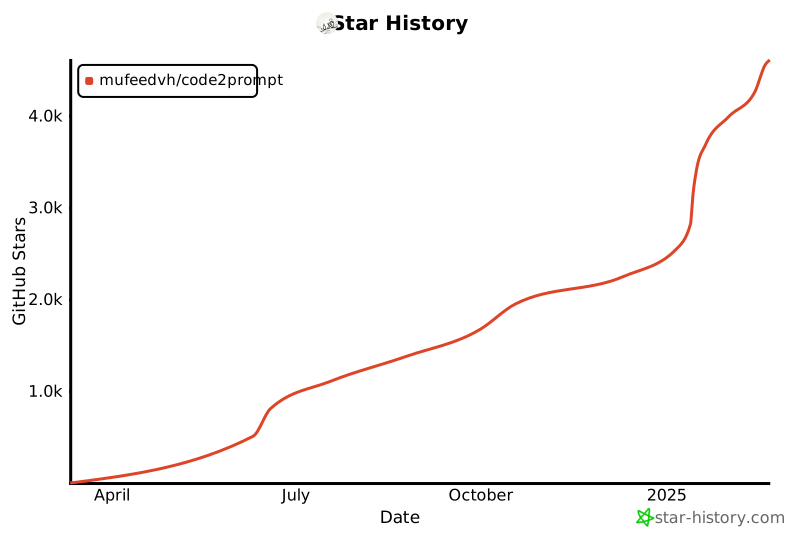
![Flow Diagram](https://github.com/mufeedvh/code2prompt/blob/main/.assets/flow_diagram.png?raw=true) **Code2Prompt** is a powerful context engineering tool designed to ingest codebases and format them for Large Language Models. Whether you are manually copying context for ChatGPT, building AI agents via Python, or running a MCP server, Code2Prompt streamlines the context preparation process. ## ⚡ Quick Install ### Cargo ```bash cargo install code2prompt ``` To enable optional Wayland support (e.g., for clipboard integration on Wayland-based systems), use the `wayland` feature flag: ```bash cargo install --features wayland code2prompt ``` ### Homebrew ```bash brew install code2prompt ``` ### SDK with pip 🐍 ```bash pip install code2prompt-rs ``` ## 🚀 Quick Start Once installed, generating a prompt from your codebase is as simple as pointing the tool to your directory. **Basic Usage**: Generate a prompt from the current directory and copy it to the clipboard. ```sh code2prompt . ``` **Save to file**: ```sh code2prompt path/to/project --output-file prompt.txt ``` ## 🌐 Ecosystem Code2Prompt is more than just a CLI tool. It is a complete ecosystem for codebase context. | 🧱 Core Library
Rust Core Badge| 💻 CLI Tool
CLI Badge | 🐍 Python SDK
Python SDK Badge | 🤖 MCP Server MCP Server Badge | | :---: | :---: | :---: | :---: | | The internal, high-speed library responsible for secure file traversal, respecting `.gitignore` rules, and structuring Git metadata. | Designed for humans, featuring both a minimal CLI and an interactive TUI. Generate formatted prompts, track token usage, and outputs the result to your clipboard or stdout. | Provides fast Python bindings to the Rust Core. Ideal for AI Agents, automation scripts, or deep integration into RAG pipelines. Available on PyPI. | Run Code2Prompt as a local service, enabling agentic applications to read your local codebase efficiently without bloating your context window. | ## 📚 Documentation Check our online [documentation](https://code2prompt.dev/docs/welcome/) for detailed instructions ## ✨ Features Code2Prompt transforms your entire codebase into a well-structured prompt for large language models. Key features include: - **Terminal User Interface (TUI)**: Interactive terminal interface for configuring and generating prompts - **Smart Filtering**: Include/exclude files using glob patterns and respect `.gitignore` rules - **Flexible Templating**: Customize prompts with Handlebars templates for different use cases - **Automatic Code Processing**: Convert codebases of any size into readable, formatted prompts - **Token Tracking**: Track token usage to stay within LLM context limits - **Smart File Reading**: Simplify reading various file formats for LLMs (CSV, Notebooks, JSONL, etc.) - **Git Integration**: Include diffs, logs, and branch comparisons in your prompts - **Blazing Fast**: Built in Rust for high performance and low resource usage Stop manually copying files and formatting code for LLMs. Code2Prompt handles the tedious work so you can focus on getting insights and solutions from AI models. ## Alternative Installation Refer to the [documentation](https://code2prompt.dev/docs/how_to/install/) for detailed installation instructions. ### Binary releases Download the latest binary for your OS from [Releases](https://github.com/mufeedvh/code2prompt/releases). ### Source build Requires: - [Git](https://git-scm.org/downloads), [Rust](https://rust-lang.org/tools/install) and `Cargo`. ```sh git clone https://github.com/mufeedvh/code2prompt.git cd code2prompt/ cargo install --path crates/code2prompt ``` ## ⭐ Star Gazing [![Star History Chart](https://api.star-history.com/svg?repos=mufeedvh/code2prompt&type=Date)](https://star-history.com/#mufeedvh/code2prompt&Date) ## 📜 License Licensed under the MIT License, see LICENSE for more information. ## Liked the project? If you liked the project and found it useful, please give it a :star: ! ## 👥 Contribution Ways to contribute: - Suggest a feature - Report a bug - Fix something and open a pull request - Help me document the code - Spread the word ================================================ FILE: README_ES.md ================================================ # code2prompt [![crates.io](https://img.shields.io/crates/v/code2prompt.svg)](https://crates.io/crates/code2prompt) [![LICENSE](https://img.shields.io/github/license/mufeedvh/code2prompt.svg#cache1)](https://github.com/mufeedvh/code2prompt/blob/master/LICENSE)

code2prompt

`code2prompt` es una herramienta de línea de comandos (CLI) que convierte tu base de código en un único prompt para LLM, incluyendo un árbol de archivos fuente, plantillas de prompts y conteo de tokens. ## Tabla de Contenidos - [Características](#features) - [Instalación](#installation) - [Uso](#usage) - [Plantillas](#templates) - [Variables Definidas por el Usuario](#user-defined-variables) - [Tokenizadores](#tokenizers) - [Contribución](#contribution) - [Licencia](#license) - [Apoya al Autor](#support-the-author) ## Características Puedes ejecutar esta herramienta en un directorio completo, y generará un prompt bien formateado en Markdown que detalla la estructura del árbol de archivos fuente y todo el código. Luego puedes cargar este documento en modelos como GPT o Claude con ventanas de contexto amplias y pedirles que: - Generen prompts para LLM rápidamente a partir de bases de código de cualquier tamaño. - Personalicen la generación de prompts usando plantillas de Handlebars (ver la [plantilla predeterminada](src/default_template.hbs)) - Respete los archivos `.gitignore`. - Filtren y excluyan archivos utilizando patrones glob. - Muestren el conteo de tokens del prompt generado (Ver [Tokenizadores](#tokenizers) para más detalles). - Incluyan opcionalmente salidas de `git diff` (archivos en estado staged) en el prompt generado. - Copien automáticamente el prompt generado al portapapeles. - Guarden el prompt generado en un archivo de salida. - Excluyan archivos y carpetas por nombre o ruta. - Añadan números de línea a los bloques de código fuente. Puedes personalizar las plantillas de prompts para lograr cualquier caso de uso deseado. Básicamente, recorre una base de código y crea un prompt con todos los archivos fuente combinados. En resumen, automatiza la tarea de copiar y formatear múltiples archivos fuente en un único prompt y te informa cuántos tokens consume. ## Instalación ### Lanzamiento de binarios Descarga el binario más reciente para tu sistema operativo desde [Releases](https://github.com/mufeedvh/code2prompt/releases). ### Construcción desde código fuente Requisitos: - [Git](https://git-scm.org/downloads), [Rust](https://rust-lang.org/tools/install) y Cargo. ```sh git clone https://github.com/mufeedvh/code2prompt.git cd code2prompt/ cargo build --release ``` ## cargo ```bash # Cargo $ cargo install code2prompt # Homebrew $ brew install code2prompt ``` Para versiones no publicadas: ```sh cargo install --git https://github.com/mufeedvh/code2prompt ``` ### AUR `code2prompt` está disponible en [`AUR`](https://aur.archlinux.org/packages?O=0&K=code2prompt). Instálalo usando cualquier gestor AUR. ```sh paru/yay -S code2prompt ``` ### Nix Si utilizas Nix, puedes instalarlo con `nix-env` o `profile`: ```sh # Sin flakes: nix-env -iA nixpkgs.code2prompt # Con flakes: nix profile install nixpkgs#code2prompt ``` ## Uso Genera un prompt desde un directorio de código: ```sh code2prompt path/to/codebase ``` Usa un archivo de plantilla Handlebars personalizado: ```sh code2prompt path/to/codebase -t path/to/template.hbs ``` Filtrar archivos usando patrones glob: ```sh code2prompt path/to/codebase --include="*.rs,*.toml" ``` Excluir archivos usando patrones glob: ```sh code2prompt path/to/codebase --exclude="*.txt,*.md" ``` Excluir archivos/carpetas del árbol de origen basándose en patrones de exclusión: ```sh code2prompt path/to/codebase --exclude="*.npy,*.wav" --exclude-from-tree ``` Mostrar el conteo de tokens del prompt generado: ```sh code2prompt path/to/codebase --tokens ``` Especificar un tokenizador para el conteo de tokens: ```sh code2prompt path/to/codebase --tokens --encoding=p50k ``` Tokenizadores soportados: `cl100k`, `p50k`, `p50k_edit`, `r50k_bas`. > [!NOTE] > Ver [Tokenizadores](#tokenizers) para más detalles. Guardar el prompt generado en un archivo de salida: ```sh code2prompt path/to/codebase --output=output.txt ``` Imprimir salida como JSON: ```sh code2prompt path/to/codebase --json ``` La salida JSON tendrá la siguiente estructura: ```json { "prompt": "", "directory_name": "codebase", "token_count": 1234, "model_info": "Modelos de ChatGPT, text-embedding-ada-002", "files": [] } ``` Generar un mensaje de commit de Git (para archivos en estado staged): ```sh code2prompt path/to/codebase --diff -t templates/write-git-commit.hbs ``` Generar una Pull Request comparando ramas (para archivos en estado staged): ```sh code2prompt path/to/codebase --git-diff-branch 'main, development' --git-log-branch 'main, development' -t templates/write-github-pull-request.hbs ``` Añadir números de línea a los bloques de código fuente: ```sh code2prompt path/to/codebase --line-number ``` Desactivar el envoltorio de código dentro de bloques de código markdown: ```sh code2prompt path/to/codebase --no-codeblock ``` - Reescribir el código a otro idioma. - Encontrar errores/vulnerabilidades de seguridad. - Documentar el código. - Implementar nuevas características. > Inicialmente escribí esto para uso personal para utilizar la ventana de contexto de 200K de Claude 3.0 y ha resultado ser bastante útil, ¡así que decidí hacerlo de código abierto! ## Plantillas `code2prompt` viene con un conjunto de plantillas integradas para casos de uso comunes. Puedes encontrarlas en el directorio [`templates`](templates). ### [`document-the-code.hbs`](templates/document-the-code.hbs) Usa esta plantilla para generar prompts para documentar el código. Añadirá comentarios de documentación a todas las funciones, métodos, clases y módulos públicos en la base de código. ### [`find-security-vulnerabilities.hbs`](templates/find-security-vulnerabilities.hbs) Usa esta plantilla para generar prompts para encontrar posibles vulnerabilidades de seguridad en la base de código. Buscará problemas de seguridad comunes y proporcionará recomendaciones sobre cómo solucionarlos o mitigarlos. ### [`clean-up-code.hbs`](templates/clean-up-code.hbs) Usa esta plantilla para generar prompts para limpiar y mejorar la calidad del código. Buscará oportunidades para mejorar la legibilidad, adherencia a las mejores prácticas, eficiencia, manejo de errores, y más. ### [`fix-bugs.hbs`](templates/fix-bugs.hbs) Usa esta plantilla para generar prompts para corregir errores en la base de código. Ayudará a diagnosticar problemas, proporcionar sugerencias de corrección y actualizar el código con las correcciones propuestas. ### [`write-github-pull-request.hbs`](templates/write-github-pull-request.hbs) Usa esta plantilla para crear una descripción de Pull Request de GitHub en markdown comparando el git diff y el git log de dos ramas. ### [`write-github-readme.hbs`](templates/write-github-readme.hbs) Usa esta plantilla para generar un archivo README de alta calidad para el proyecto, adecuado para alojar en GitHub. Analizará la base de código para entender su propósito y funcionalidad, y generará el contenido del README en formato Markdown. ### [`write-git-commit.hbs`](templates/write-git-commit.hbs) Usa esta plantilla para generar commits de git a partir de los archivos en estado staged en tu directorio git. Analizará la base de código para entender su propósito y funcionalidad, y generará el contenido del mensaje de commit de git en formato Markdown. ### [`improve-performance.hbs`](templates/improve-performance.hbs) Usa esta plantilla para generar prompts para mejorar el rendimiento de la base de código. Buscará oportunidades de optimización, proporcionará sugerencias específicas y actualizará el código con los cambios. Puedes usar estas plantillas pasando el flag `-t` seguido de la ruta al archivo de plantilla. Por ejemplo: ```sh code2prompt path/to/codebase -t templates/document-the-code.hbs ``` ## Variables Definidas por el Usuario `code2prompt` soporta el uso de variables definidas por el usuario en las plantillas de Handlebars. Cualquier variable en la plantilla que no sea parte del contexto predeterminado (`absolute_code_path`, `source_tree`, `files`) será tratada como una variable definida por el usuario. Durante la generación del prompt, `code2prompt` solicitará al usuario que ingrese valores para estas variables definidas por el usuario. Esto permite una mayor personalización de los prompts generados basados en la entrada del usuario. Por ejemplo, si tu plantilla incluye `{{challenge_name}}` y `{{challenge_description}}`, se te pedirá que ingreses valores para estas variables al ejecutar `code2prompt`. Esta característica permite crear plantillas reutilizables que pueden adaptarse a diferentes escenarios basados en la información proporcionada por el usuario. ## Tokenizadores La tokenización se implementa usando [`tiktoken-rs`](https://github.com/zurawiki/tiktoken-rs). `tiktoken` soporta estas codificaciones utilizadas por los modelos de OpenAI: | Nombre de codificación | Modelos de OpenAI | | ----------------------- | ------------------------------------------------------------------------- | | `cl100k_base` | Modelos de ChatGPT, `text-embedding-ada-002` | | `p50k_base` | Modelos de código, `text-davinci-002`, `text-davinci-003` | | `p50k_edit` | Usar para modelos de edición como `text-davinci-edit-001`, `code-davinci-edit-001` | | `r50k_base` (o `gpt2`) | Modelos GPT-3 como `davinci` | | `o200k_base` | Modelos GPT-4o | Para más contexto sobre los diferentes tokenizadores, ver el [OpenAI Cookbook](https://github.com/openai/openai-cookbook/blob/66b988407d8d13cad5060a881dc8c892141f2d5c/examples/How_to_count_tokens_with_tiktoken.ipynb) ## ¿Cómo es útil? `code2prompt` facilita la generación de prompts para LLMs desde tu base de código. Recorre el directorio, construye una estructura de árbol y recopila información sobre cada archivo. Puedes personalizar la generación de prompts usando plantillas de Handlebars. El prompt generado se copia automáticamente en tu portapapeles y también se puede guardar en un archivo de salida. `code2prompt` ayuda a agilizar el proceso de creación de prompts para análisis de código, generación y otras tareas. ## Contribución Formas de contribuir: - Sugerir una característica - Reportar un error - Arreglar algo y abrir un pull request - Ayudarme a documentar el código - Difundir la palabra ## Licencia Licenciado bajo la Licencia MIT, ver LICENSE para más información. ## ¿Te gustó el proyecto? Si te gustó el proyecto y lo encontraste útil, por favor dale una :star: y considera apoyar a los autores! ================================================ FILE: crates/code2prompt/Cargo.toml ================================================ [package] name = "code2prompt" version = "4.2.0" edition = "2024" description = "Command-line interface for code2prompt" license = "MIT" repository = "https://github.com/mufeedvh/code2prompt" readme = "../../README.md" [features] wayland = ["arboard/wayland-data-control"] [dependencies] code2prompt_core = { path = "../code2prompt-core", version = "4.2.0" } clap = { workspace = true } env_logger = { workspace = true } arboard = { workspace = true } anyhow = { workspace = true } colored = { workspace = true } indicatif = { workspace = true } log = { workspace = true } serde = { workspace = true } serde_json = { workspace = true } toml = { workspace = true } inquire = { workspace = true } terminal_size = { workspace = true } lscolors = { workspace = true } ansi_term = { workspace = true } ratatui = { workspace = true } crossterm = { workspace = true } tokio = { workspace = true } tui-tree-widget = { workspace = true } tui-textarea = { workspace = true } walkdir = { workspace = true } unicode-width = { workspace = true } bracoxide = { workspace = true } git2 = { workspace = true } chrono = { workspace = true } dirs = { workspace = true } regex = { workspace = true } handlebars = { workspace = true } ignore = { workspace = true } tiktoken-rs = { workspace = true } [target.'cfg(windows)'.dependencies] winapi = { workspace = true } [[bin]] name = "code2prompt" path = "src/main.rs" [dev-dependencies] tempfile = "3.24" assert_cmd = "2.1.1" predicates = "3.1" env_logger = "0.11.3" rstest = "0.26" ================================================ FILE: crates/code2prompt/src/args.rs ================================================ //! Command-line argument parsing and validation. //! //! This module defines the CLI structure using clap for parsing command-line arguments //! and options for the code2prompt tool. It supports both TUI and CLI modes with //! comprehensive configuration options for file selection, output formatting, //! tokenization, and git integration. use anyhow::{Result, anyhow}; use clap::{Parser, builder::ValueParser}; use code2prompt_core::{ sort::FileSortMethod, template::OutputFormat, tokenizer::TokenFormat, tokenizer::TokenizerType, }; use serde::de::DeserializeOwned; use std::path::PathBuf; // ~~~ CLI Arguments ~~~ #[derive(Parser, Debug)] #[clap( name = env!("CARGO_PKG_NAME"), version = env!("CARGO_PKG_VERSION"), author = env!("CARGO_PKG_AUTHORS") )] #[command(arg_required_else_help = true)] pub struct Cli { /// Path to the codebase directory #[arg(value_name = "PATH_TO_ANALYZE", default_value = ".")] pub path: PathBuf, /// Optional output file (use "-" for stdout) #[arg(short = 'O', long = "output-file", value_name = "FILE")] pub output_file: Option, /// Launch the Terminal User Interface #[clap(long)] pub tui: bool, /// Patterns to include #[clap(short = 'i', long = "include")] pub include: Vec, /// Patterns to exclude #[clap(short = 'e', long = "exclude")] pub exclude: Vec, /// Output format #[clap( short = 'F', long = "output-format", value_name = "markdown, json, xml", value_parser = ValueParser::new(parse_serde::) )] pub output_format: Option, /// Optional Path to a custom Handlebars template #[clap(short, long, value_name = "TEMPLATE")] pub template: Option, /// List the full directory tree #[clap(long)] pub full_directory_tree: bool, /// Token encoding to use for token count #[clap( long, value_name = "cl100k, p50k, p50k_edit, r50k", value_parser = ValueParser::new(parse_serde::), )] pub encoding: Option, /// Display the token count of the generated prompt. Accepts a format: "raw" (machine parsable) or "format" (human readable) #[clap( long, value_name = "raw,format", value_parser = ValueParser::new(parse_serde::), )] pub token_format: Option, /// Include git diff #[clap(short, long)] pub diff: bool, /// Generate git diff between two branches #[clap(long, value_name = "BRANCHES", num_args = 2, value_delimiter = ',')] pub git_diff_branch: Option>, /// Retrieve git log between two branches #[clap(long, value_name = "BRANCHES", num_args = 2, value_delimiter = ',')] pub git_log_branch: Option>, /// Add line numbers to the source code #[clap(short, long)] pub line_numbers: bool, /// If true, paths in the output will be absolute instead of relative. #[clap(long)] pub absolute_paths: bool, /// Follow symlinks #[clap(short = 'L', long)] pub follow_symlinks: bool, /// Include hidden directories and files #[clap(long)] pub hidden: bool, /// Disable wrapping code inside markdown code blocks #[clap(long)] pub no_codeblock: bool, /// Copy output to clipboard #[clap(short = 'c', long)] pub clipboard: bool, /// Optional Disable copying to clipboard (deprecated, use default behavior) #[clap(long, hide = true)] pub no_clipboard: bool, /// Skip .gitignore rules #[clap(long)] pub no_ignore: bool, /// Sort order for files #[clap( long, value_name = "name_asc, name_desc, date_asc, date_desc", value_parser = ValueParser::new(parse_serde::), )] pub sort: Option, /// Suppress progress and success messages #[clap(short = 'q', long)] pub quiet: bool, /// Display a visual token map of files (similar to disk usage tools) #[clap(long)] pub token_map: bool, /// Maximum number of lines to display in token map (default: terminal height - 10) #[clap(long, value_name = "NUMBER")] pub token_map_lines: Option, /// Minimum percentage of tokens to display in token map (default: 0.1%) #[clap(long, value_name = "PERCENT")] pub token_map_min_percent: Option, /// Start with all files deselected #[clap(long)] pub deselected: bool, #[arg(long, hide = true)] pub clipboard_daemon: bool, } /// Helper function to parse serde deserializable enum from string inputs. fn parse_serde(s: &str) -> Result { serde_json::from_value(serde_json::Value::String(s.to_string())) .map_err(|e| anyhow!("Failed to parse value: {}", e)) } ================================================ FILE: crates/code2prompt/src/clipboard.rs ================================================ use anyhow::{Context, Result}; #[cfg(not(target_os = "linux"))] /// Copies the provided text to the system clipboard. /// /// This is a simple, one-shot copy operation suitable for non-Linux platforms /// or scenarios where maintaining the clipboard content is not required. /// /// # Arguments /// /// * `text` - The text content to be copied. /// /// # Returns /// /// * `Result<()>` - Returns Ok on success, or an error if the clipboard could not be accessed. pub fn copy_text_to_clipboard(text: &str) -> Result<()> { use arboard::Clipboard; match Clipboard::new() { Ok(mut clipboard) => { clipboard .set_text(text.to_string()) .context("Failed to copy to clipboard")?; Ok(()) } Err(e) => Err(anyhow::anyhow!("Failed to initialize clipboard: {}", e)), } } #[cfg(target_os = "linux")] /// Entry point for the clipboard daemon process on Linux. /// /// This function reads clipboard content from its standard input, sets it as the system clipboard, /// and then waits to serve clipboard requests. This ensures that the clipboard content remains available /// even after the main application exits. The daemon will exit automatically once the clipboard is overwritten. /// /// # Returns /// /// * `Result<()>` - Returns Ok on success or an error if clipboard operations fail. pub fn serve_clipboard_daemon() -> Result<()> { use arboard::{Clipboard, LinuxClipboardKind, SetExtLinux}; use std::io::Read; // Read content from stdin let mut content_from_stdin = String::new(); std::io::stdin() .read_to_string(&mut content_from_stdin) .context("Failed to read from stdin")?; // Initialize the clipboard let mut clipboard = Clipboard::new().context("Failed to initialize clipboard")?; // Explicitly set the clipboard selection to Clipboard (not Primary) clipboard .set() .clipboard(LinuxClipboardKind::Clipboard) .wait() .text(content_from_stdin) .context("Failed to set clipboard content")?; Ok(()) } #[cfg(target_os = "linux")] /// Spawns a daemon process to maintain clipboard content on Linux. /// /// On Linux (Wayland/X11), the clipboard content is owned by the process that defined it. /// If the main application exits, the clipboard would be cleared. /// To avoid this, this function spawns a new process that will run in the background /// (daemon) and maintain the clipboard content until it is overwritten by a new copy. /// /// # Arguments /// /// * `text` - The text to be served by the daemon process. /// /// # Returns /// /// * `Result<()>` - Returns Ok if the daemon process was spawned and the content was sent successfully, /// or an error if the process could not be launched or written to. pub fn spawn_clipboard_daemon(content: &str) -> Result<()> { use std::process::{Command, Stdio}; use log::info; // ~~~ Setting up the command to run the daemon ~~~ let current_exe: std::path::PathBuf = std::env::current_exe().context("Failed to get current executable path")?; let mut args: Vec = std::env::args().collect(); args.push("--clipboard-daemon".to_string()); // ~~~ Spawn the clipboard daemon process ~~~ let mut child = Command::new(current_exe) .args(&args[1..]) .stdin(Stdio::piped()) .stdout(Stdio::null()) .stderr(Stdio::null()) .spawn() .context("Failed to launch clipboard daemon process")?; // ~~~ Write the content to the daemon's standard input ~~~ use std::io::Write; let mut stdin = child .stdin .take() .context("Failed to acquire stdin pipe for clipboard daemon process")?; stdin .write_all(content.as_bytes()) .context("Failed to write content to clipboard daemon process")?; info!("Clipboard daemon launched successfully"); Ok(()) } /// Copy text to clipboard pub fn copy_to_clipboard(text: &str) -> Result<()> { #[cfg(target_os = "linux")] { spawn_clipboard_daemon(text) } #[cfg(not(target_os = "linux"))] { copy_text_to_clipboard(text) } } ================================================ FILE: crates/code2prompt/src/config.rs ================================================ //! Configuration parsing and session creation utilities. //! //! This module handles the conversion of command-line arguments into //! Code2PromptSession instances, consolidating all configuration parsing //! logic in one place for better maintainability and separation of concerns. use anyhow::{Context, Result}; use code2prompt_core::{ configuration::Code2PromptConfig, session::Code2PromptSession, sort::FileSortMethod, template::{OutputFormat, extract_undefined_variables}, tokenizer::TokenizerType, }; use inquire::Text; use log::error; use std::path::PathBuf; use crate::{args::Cli, config_loader::ConfigSource}; /// Unified session builder that merges configuration layering in one place /// - base: Some(&ConfigSource) to use loaded config as defaults; None to use CLI defaults /// - args: CLI arguments /// - tui_mode: whether running in TUI mode (enables token map by default) pub fn build_session( base: Option<&ConfigSource>, args: &Cli, tui_mode: bool, ) -> Result { let mut configuration = Code2PromptConfig::builder(); let cfg = base.map(|b| &b.config); // Path: config path takes precedence if provided, otherwise CLI path if let Some(c) = cfg { if let Some(path) = &c.path { configuration.path(PathBuf::from(path)); } else { configuration.path(args.path.clone()); } } else { configuration.path(args.path.clone()); } // Include/Exclude patterns: // If CLI provides any patterns, they override config patterns completely (to avoid conflicts) let use_cli_patterns = !args.include.is_empty() || !args.exclude.is_empty(); let (include_patterns, exclude_patterns) = if use_cli_patterns { ( expand_comma_separated_patterns(&args.include), expand_comma_separated_patterns(&args.exclude), ) } else if let Some(c) = cfg { (c.include_patterns.clone(), c.exclude_patterns.clone()) } else { ( expand_comma_separated_patterns(&args.include), expand_comma_separated_patterns(&args.exclude), ) }; configuration .include_patterns(include_patterns) .exclude_patterns(exclude_patterns); // Display options: CLI overrides config (logical-or semantics for booleans) let cfg_line_numbers = cfg.map(|c| c.line_numbers).unwrap_or(false); let cfg_absolute = cfg.map(|c| c.absolute_path).unwrap_or(false); let cfg_full_tree = cfg.map(|c| c.full_directory_tree).unwrap_or(false); configuration .line_numbers(args.line_numbers || cfg_line_numbers) .absolute_path(args.absolute_paths || cfg_absolute) .full_directory_tree(args.full_directory_tree || cfg_full_tree); // Output format: CLI overrides config let output_format = if let Some(output_format_str) = args.output_format { output_format_str } else if let Some(c) = cfg { c.output_format.unwrap_or(OutputFormat::Markdown) } else { OutputFormat::Markdown }; configuration.output_format(output_format); // Sort method: CLI overrides config let sort_method = if let Some(sort_str) = args.sort { sort_str } else if let Some(c) = cfg { c.sort_method.unwrap_or(FileSortMethod::NameAsc) } else { FileSortMethod::NameAsc }; configuration.sort_method(sort_method); // Tokenizer settings: CLI overrides config let tokenizer_type = if let Some(encoding) = args.encoding { encoding } else if let Some(c) = cfg { c.encoding.unwrap_or(TokenizerType::Cl100kBase) } else { TokenizerType::Cl100kBase }; // Token format: CLI overrides config let token_format = if let Some(format) = args.token_format { format } else if let Some(c) = cfg { c.token_format .unwrap_or(code2prompt_core::tokenizer::TokenFormat::Format) } else { code2prompt_core::tokenizer::TokenFormat::Format }; configuration .encoding(tokenizer_type) .token_format(token_format); // Template: CLI overrides config let (template_str, template_name) = if args.template.is_some() { parse_template(&args.template).map_err(|e| { error!("Failed to parse template: {}", e); e })? } else if let Some(c) = cfg { ( c.template_str.clone().unwrap_or_default(), c.template_name .clone() .unwrap_or_else(|| "default".to_string()), ) } else { ("".to_string(), "default".to_string()) }; configuration .template_str(template_str) .template_name(template_name); // Git options: CLI overrides config let diff_branches = parse_branch_argument(&args.git_diff_branch).or_else(|| { cfg.and_then(|c| { c.diff_branches.as_ref().and_then(|branches| { if branches.len() == 2 { Some((branches[0].clone(), branches[1].clone())) } else { None } }) }) }); let log_branches = parse_branch_argument(&args.git_log_branch).or_else(|| { cfg.and_then(|c| { c.log_branches.as_ref().and_then(|branches| { if branches.len() == 2 { Some((branches[0].clone(), branches[1].clone())) } else { None } }) }) }); let cfg_diff_enabled = cfg.map(|c| c.diff_enabled).unwrap_or(false); let cfg_token_map_enabled = cfg.map(|c| c.token_map_enabled).unwrap_or(false); let cfg_deselected = cfg.map(|c| c.deselected).unwrap_or(false); configuration .diff_enabled(args.diff || cfg_diff_enabled) .diff_branches(diff_branches) .log_branches(log_branches) .no_ignore(args.no_ignore) .hidden(args.hidden) .no_codeblock(args.no_codeblock) .follow_symlinks(args.follow_symlinks) .token_map_enabled(args.token_map || cfg_token_map_enabled || tui_mode) .deselected(args.deselected || cfg_deselected); // User variables from config (if available) if let Some(c) = cfg { configuration.user_variables(c.user_variables.clone()); } let session = Code2PromptSession::new(configuration.build()?); Ok(session) } /// Parses the branch argument from command line options. /// /// Takes an optional vector of strings and converts it to a tuple of two branch names /// if exactly two branches are provided. /// /// # Arguments /// /// * `branch_arg` - An optional vector containing branch names /// /// # Returns /// /// * `Option<(String, String)>` - A tuple of (from_branch, to_branch) if two branches were provided, None otherwise pub fn parse_branch_argument(branch_arg: &Option>) -> Option<(String, String)> { match branch_arg { Some(branches) if branches.len() == 2 => Some((branches[0].clone(), branches[1].clone())), _ => None, } } /// Loads a template from a file path or returns default values. /// /// # Arguments /// /// * `template_arg` - An optional path to a template file /// /// # Returns /// /// * `Result<(String, String)>` - A tuple containing (template_content, template_name) /// where template_name is "custom" for user-provided templates or "default" otherwise pub fn parse_template(template_arg: &Option) -> Result<(String, String)> { match template_arg { Some(path) => { let template_str = std::fs::read_to_string(path).context("Failed to load custom template file")?; Ok((template_str, "custom".to_string())) } None => Ok(("".to_string(), "default".to_string())), } } /// Handles user-defined variables in the template and adds them to the session. /// /// This function extracts undefined variables from the template and prompts /// the user to provide values for them through interactive input. /// /// # Arguments /// /// * `session` - The Code2PromptSession to modify /// * `template_content` - The template content string to analyze /// /// # Returns /// /// * `Result<()>` - An empty result indicating success or an error pub fn handle_undefined_variables( session: &mut Code2PromptSession, template_content: &str, ) -> Result<()> { let undefined_variables = extract_undefined_variables(template_content); for var in undefined_variables.iter() { // Check if variable is already defined in user_variables if !session.config.user_variables.contains_key(var) { let prompt = format!("Enter value for '{}': ", var); let answer = Text::new(&prompt) .with_help_message("Fill user defined variable in template") .prompt() .unwrap_or_default(); session.config.user_variables.insert(var.clone(), answer); } } Ok(()) } /// Expands comma-separated patterns while preserving brace expansion patterns /// /// This function handles the expansion of comma-separated include/exclude patterns /// while being careful not to split patterns that contain brace expansion syntax. /// /// # Arguments /// /// * `patterns` - A vector of pattern strings that may contain comma-separated values /// /// # Returns /// /// * `Vec` - A vector of individual patterns fn expand_comma_separated_patterns(patterns: &[String]) -> Vec { let mut expanded = Vec::new(); for pattern in patterns { // If the pattern contains braces, don't split on commas (preserve brace expansion) if pattern.contains('{') && pattern.contains('}') { expanded.push(pattern.clone()); } else { // Split on commas for regular patterns for part in pattern.split(',') { let trimmed = part.trim(); if !trimmed.is_empty() { expanded.push(trimmed.to_string()); } } } } expanded } ================================================ FILE: crates/code2prompt/src/config_loader.rs ================================================ //! Configuration file loading and management. //! //! This module handles loading TOML configuration files from multiple locations //! with proper priority handling and informational messages. use anyhow::{Context, Result}; use code2prompt_core::configuration::{OutputDestination, TomlConfig}; use colored::*; use log::{debug, info}; use std::path::Path; /// Configuration source information #[derive(Debug, Clone)] pub struct ConfigSource { pub config: TomlConfig, } /// Load configuration with proper priority handling pub fn load_config(quiet: bool) -> Result { // Check for local config first (.c2pconfig in current directory) let local_config_path = std::env::current_dir()?.join(".c2pconfig"); if local_config_path.exists() { match load_config_from_file(&local_config_path) { Ok(config) => { if !quiet { eprintln!( "{}{}{} Using config from: {}", "[".bold().white(), "i".bold().blue(), "]".bold().white(), local_config_path.display() ); } info!("Loaded local config from: {}", local_config_path.display()); return Ok(ConfigSource { config }); } Err(e) => { debug!("Failed to load local config: {}", e); } } } // Check for global config (~/.config/code2prompt/.c2pconfig) if let Some(config_dir) = dirs::config_dir() { let global_config_path = config_dir.join("code2prompt").join(".c2pconfig"); if global_config_path.exists() { match load_config_from_file(&global_config_path) { Ok(config) => { if !quiet { eprintln!( "{}{}{} Using config from: {}", "[".bold().white(), "i".bold().blue(), "]".bold().white(), global_config_path.display() ); } info!( "Loaded global config from: {}", global_config_path.display() ); return Ok(ConfigSource { config }); } Err(e) => { debug!("Failed to load global config: {}", e); } } } } // Use default configuration if !quiet { eprintln!( "{}{}{} Using default configuration", "[".bold().white(), "i".bold().blue(), "]".bold().white(), ); } info!("Using default configuration"); Ok(ConfigSource { config: TomlConfig::default(), }) } /// Load TOML configuration from a file fn load_config_from_file(path: &Path) -> Result { let content = std::fs::read_to_string(path) .with_context(|| format!("Failed to read config file: {}", path.display()))?; TomlConfig::from_toml_str(&content) .with_context(|| format!("Failed to parse TOML config file: {}", path.display())) } /// Get the default output destination from config pub fn get_default_output_destination(config_source: &ConfigSource) -> OutputDestination { config_source.config.default_output.clone() } ================================================ FILE: crates/code2prompt/src/main.rs ================================================ //! code2prompt is a command-line tool to generate an LLM prompt from a codebase directory. //! //! Authors: Olivier D'Ancona (@ODAncona), Mufeed VH (@mufeedvh) mod args; mod clipboard; mod config; mod config_loader; mod model; mod token_map; mod tui; mod utils; mod view; mod widgets; use crate::utils::format_number; use anyhow::{Context, Result}; use args::Cli; use clap::Parser; use code2prompt_core::template::write_to_file; use colored::*; use indicatif::{ProgressBar, ProgressStyle}; use log::{debug, error, info}; use std::io::Write; use tui::run_tui; #[tokio::main] async fn main() -> Result<()> { env_logger::init(); info! {"Args: {:?}", std::env::args().collect::>()}; let args: Cli = Cli::parse(); // ~~~ Clipboard Daemon ~~~ #[cfg(target_os = "linux")] { use clipboard::serve_clipboard_daemon; if args.clipboard_daemon { info! {"Serving clipboard daemon..."}; serve_clipboard_daemon()?; info! {"Shutting down gracefully..."}; return Ok(()); } } // ~~~ TUI or CLI Mode ~~~ if args.tui { // ~~~ Build Session for TUI ~~~ let session = config::build_session(None, &args, args.tui).unwrap_or_else(|e| { error!("Failed to create session: {}", e); std::process::exit(1); }); run_tui(session).await } else { run_cli_mode_with_args(args).await } } /// Run the CLI mode with parsed arguments async fn run_cli_mode_with_args(args: Cli) -> Result<()> { use code2prompt_core::configuration::OutputDestination; use config_loader::{get_default_output_destination, load_config}; let quiet_mode = args.quiet; // ~~~ Load Configuration ~~~ let config_source = load_config(quiet_mode)?; // load config files first (local > global), then apply CLI args on top // ~~~ Build Session with config + CLI args ~~~ let mut session = config::build_session(Some(&config_source), &args, false)?; // ~~~ Determine Output Behavior ~~~ let default_output = get_default_output_destination(&config_source); // Determine final output destinations (Solution B: Unix-style behavior) let output_to_clipboard = if args.clipboard { // Explicit clipboard flag - ONLY clipboard, no stdout true } else if args.output_file.is_some() { // Output file specified, don't use clipboard unless explicitly requested false } else { // Use config default matches!(default_output, OutputDestination::Clipboard) }; let output_to_stdout = if args.clipboard { false } else if let Some(ref output_file) = args.output_file { output_file == "-" } else { match default_output { OutputDestination::Stdout => true, OutputDestination::Clipboard => false, OutputDestination::File => false, } }; // ~~~ Create Session ~~~ let spinner = if !quiet_mode { Some(setup_spinner("Traversing directory and building tree...")) } else { None }; // ~~~ Gather Repository Data ~~~ session.load_codebase().map_err(|e| { if let Some(s) = spinner.as_ref() { s.finish_with_message("Failed!".red().to_string()) } error!("Failed to build directory tree: \n{}", e); anyhow::anyhow!("Failed to build directory tree: {}", e) })?; if let Some(s) = spinner.as_ref() { s.set_message("Proceeding…") } // ~~~ Git Related ~~~ // Git Diff if session.config.diff_enabled { if let Some(s) = spinner.as_ref() { s.set_message("Generating git diff...") } session.load_git_diff().unwrap_or_else(|e| { if let Some(s) = spinner.as_ref() { s.finish_with_message("Failed!".red().to_string()) } error!("Failed to generate git diff: {}", e); std::process::exit(1); }); } // Load Git diff between branches if provided if session.config.diff_branches.is_some() { if let Some(s) = spinner.as_ref() { s.set_message("Generating git diff between two branches...") } session .load_git_diff_between_branches() .unwrap_or_else(|e| { if let Some(s) = spinner.as_ref() { s.finish_with_message("Failed!".red().to_string()) } error!("Failed to generate git diff: {}", e); std::process::exit(1); }); } // Load Git log between branches if provided if session.config.log_branches.is_some() { if let Some(ref s) = spinner { s.set_message("Generating git log between two branches..."); } session.load_git_log_between_branches().unwrap_or_else(|e| { if let Some(ref s) = spinner { s.finish_with_message("Failed!".red().to_string()); } error!("Failed to generate git log: {}", e); std::process::exit(1); }); } // ~~~ Template ~~~ // Handle undefined variables (modifies session.config.user_variables) let template_str_clone = session.config.template_str.clone(); config::handle_undefined_variables(&mut session, &template_str_clone)?; // Data - now build after handling undefined variables let data = session.build_template_data(); debug!( "Template Context: absolute_code_path={}, files_count={}, has_user_vars={}", data.absolute_code_path, data.files.map(|f| f.len()).unwrap_or(0), !session.config.user_variables.is_empty() ); // Render let rendered = session.render_prompt(&data).unwrap_or_else(|e| { error!("Failed to render prompt: {}", e); std::process::exit(1); }); if let Some(ref s) = spinner { s.finish_with_message("Codebase Traversal Done!".green().to_string()); } // ~~~ Token Count ~~~ let token_count = rendered.token_count; let formatted_token_count = format_number(token_count, &session.config.token_format); let model_info = rendered.model_info; if !quiet_mode { eprintln!( "{}{}{} Token count: {}, Model info: {}", "[".bold().white(), "i".bold().blue(), "]".bold().white(), formatted_token_count, model_info ); } // ~~~ Token Map Display ~~~ if args.token_map { use crate::token_map::{display_token_map, generate_token_map_with_limit}; if let Some(files) = session.data.files.as_ref() { // Calculate total tokens from individual file counts let total_from_files: usize = files.iter().map(|f| f.token_count).sum(); // Get max lines from command line or calculate from terminal height let max_lines = args.token_map_lines.unwrap_or_else(|| { terminal_size::terminal_size() .map(|(_, terminal_size::Height(h))| { let height = h as usize; // Ensure minimum of 10 lines, subtract 10 for other output if height > 20 { height - 10 } else { 10 } }) .unwrap_or(20) // Default to 20 lines if terminal size detection fails }); // Use the sum of individual file tokens for the map with line limit let entries = generate_token_map_with_limit( files, total_from_files, Some(max_lines), args.token_map_min_percent, ); display_token_map(&entries, total_from_files); } } // ~~~ Output to Stdout ~~~ if output_to_stdout { print!("{}", &rendered.prompt); std::io::stdout() .flush() .context("Failed to flush stdout")?; } // ~~~ Copy to Clipboard ~~~ if output_to_clipboard { use crate::clipboard::copy_to_clipboard; match copy_to_clipboard(&rendered.prompt) { Ok(_) => { if !quiet_mode { eprintln!( "{}{}{} {}", "[".bold().white(), "✓".bold().green(), "]".bold().white(), "Copied to clipboard successfully.".green() ); } } Err(e) => { if !quiet_mode { eprintln!( "{}{}{} {}", "[".bold().white(), "!".bold().red(), "]".bold().white(), format!("Failed to copy to clipboard: {}", e).red() ); } } } } // ~~~ Output File ~~~ if let Some(ref output_file) = args.output_file && output_file != "-" { output_prompt( Some(std::path::Path::new(output_file)), &rendered.prompt, quiet_mode, )?; } Ok(()) } /// Sets up a progress spinner with a given message /// /// # Arguments /// /// * `message` - A message to display with the spinner /// /// # Returns /// /// * `ProgressBar` - The configured progress spinner fn setup_spinner(message: &str) -> ProgressBar { let spinner = ProgressBar::new_spinner(); spinner.enable_steady_tick(std::time::Duration::from_millis(220)); let done_symbol = format!( "{}{}{}", "[".bold().white(), "✓".bold().green(), "]".bold().white() ); spinner.set_style( ProgressStyle::default_spinner() .tick_strings(&[ "▹▹▹▹▹", "▸▹▹▹▹", "▹▸▹▹▹", "▹▹▸▹▹", "▹▹▹▸▹", "▹▹▹▹▸", &done_symbol, ]) .template("{spinner:.blue} {msg}") .unwrap(), ); spinner.set_message(message.to_string()); spinner } // ~~~ Output to file or stdout ~~~ fn output_prompt( effective_output: Option<&std::path::Path>, rendered: &str, quiet: bool, ) -> Result<()> { let output_path = match effective_output { Some(path) => path, None => return Ok(()), // nothing to do }; let path_str = output_path.to_string_lossy(); if path_str == "-" { // stdout print!("{}", rendered); std::io::stdout() .flush() .context("Failed to flush stdout")?; } else { // file write_to_file(&path_str, rendered) .context(format!("Failed to write to file: {}", path_str))?; if !quiet { eprintln!( "{}{}{} {}", "[".bold().white(), "✓".bold().green(), "]".bold().white(), format!("Prompt written to file: {}", path_str).green() ); } } Ok(()) } ================================================ FILE: crates/code2prompt/src/model/commands.rs ================================================ //! Command system for handling side effects in the Model-View-Update architecture. //! //! This module implements the Cmd pattern from Elm/Redux, allowing the Model::update() //! function to remain pure while still triggering side effects like async operations, //! file I/O, and clipboard operations. use std::collections::HashMap; /// Commands represent side effects that should be executed after model updates. /// This allows Model::update() to remain pure while still triggering necessary /// side effects like async operations, file I/O, etc. #[derive(Debug, Clone)] pub enum Cmd { /// No command - pure state update only None, /// Run analysis in background RunAnalysis { template_content: String, user_variables: HashMap, }, /// Copy text to clipboard CopyToClipboard(String), /// Save text to file SaveToFile { filename: String, content: String }, /// Save template to custom directory SaveTemplate { filename: String, content: String }, /// Refresh file tree from session RefreshFileTree, } ================================================ FILE: crates/code2prompt/src/model/mod.rs ================================================ //! Data structures and application state management for the TUI. //! //! This module contains the core data structures that represent the application state, //! including the main Model struct, tab definitions, message types for event handling, //! and all state management submodules. It serves as the central state container //! for the terminal user interface. pub mod commands; pub mod prompt_output; pub mod settings; pub mod statistics; pub mod template; pub use commands::*; pub use prompt_output::*; pub use settings::*; pub use statistics::*; pub use template::*; use crate::utils::directory_contains_selected_files; use code2prompt_core::session::Code2PromptSession; /// The five main tabs of the TUI #[derive(Debug, Clone, Copy, PartialEq, Eq)] pub enum Tab { FileTree, Settings, Statistics, Template, PromptOutput, } /// Input mode for the FileTree tab #[derive(Debug, Clone, Copy, PartialEq, Eq)] pub enum FileTreeInputMode { Normal, Search, } /// Hierarchical file node for TUI display with proper parent-child relationships #[derive(Debug, Clone)] pub struct DisplayFileNode { pub path: std::path::PathBuf, pub name: String, pub is_directory: bool, pub is_expanded: bool, pub level: usize, pub children_loaded: bool, pub children: Vec, } impl DisplayFileNode { pub fn new(path: std::path::PathBuf, level: usize) -> Self { let name = path .file_name() .map(|n| n.to_string_lossy().to_string()) .unwrap_or_else(|| path.to_string_lossy().to_string()); let is_directory = path.is_dir(); Self { path, name, is_directory, is_expanded: false, level, children_loaded: false, children: Vec::new(), } } /// Find a node by path in the tree (recursive) pub fn find_node_mut(&mut self, target_path: &std::path::Path) -> Option<&mut DisplayFileNode> { if self.path == target_path { return Some(self); } for child in &mut self.children { if let Some(found) = child.find_node_mut(target_path) { return Some(found); } } None } /// Load children for this directory node pub fn load_children( &mut self, session: &mut code2prompt_core::session::Code2PromptSession, ) -> Result<(), Box> { if !self.is_directory || self.children_loaded { return Ok(()); } self.children.clear(); // Use ignore crate to respect gitignore use ignore::WalkBuilder; let walker = WalkBuilder::new(&self.path).max_depth(Some(1)).build(); for entry in walker { let entry = entry?; let path = entry.path(); if path == self.path { continue; // Skip self } let mut child = DisplayFileNode::new(path.to_path_buf(), self.level + 1); // Auto-expand if contains selected files if child.is_directory && directory_contains_selected_files(&child.path, session) { child.is_expanded = true; } self.children.push(child); } // Sort children: directories first, then alphabetically self.children .sort_by(|a, b| match (a.is_directory, b.is_directory) { (true, false) => std::cmp::Ordering::Less, (false, true) => std::cmp::Ordering::Greater, _ => a.name.cmp(&b.name), }); self.children_loaded = true; Ok(()) } } /// Messages for updating the model #[derive(Debug, Clone)] pub enum Message { SwitchTab(Tab), Quit, UpdateSearchQuery(String), ToggleFileSelection(usize), ExpandDirectory(usize), CollapseDirectory(usize), MoveTreeCursor(i32), RefreshFileTree, EnterSearchMode, ExitSearchMode, MoveSettingsCursor(i32), ToggleSetting(usize), CycleSetting(usize), RunAnalysis, AnalysisComplete(AnalysisResults), AnalysisError(String), CopyToClipboard, SaveToFile(String), ScrollOutput(i16), CycleStatisticsView(i8), ScrollStatistics(i16), SaveTemplate(String), ReloadTemplate, LoadTemplate, RefreshTemplates, SetTemplateFocus(TemplateFocus, FocusMode), SetTemplateFocusMode(FocusMode), TemplateEditorInput(ratatui::crossterm::event::KeyEvent), TemplatePickerMove(i32), VariableStartEditing(String), VariableInputChar(char), VariableInputBackspace, VariableInputEnter, VariableInputCancel, VariableNavigateUp, VariableNavigateDown, } /// Represents the overall state of the TUI application. #[derive(Debug, Clone)] pub struct Model { pub session: Code2PromptSession, pub current_tab: Tab, pub should_quit: bool, pub file_tree_input_mode: FileTreeInputMode, pub file_tree_nodes: Vec, pub search_query: String, pub tree_cursor: usize, pub file_tree_scroll: u16, pub settings: SettingsState, pub statistics: StatisticsState, pub template: TemplateState, pub prompt_output: PromptOutputState, pub status_message: String, } impl Default for Model { fn default() -> Self { let config = code2prompt_core::configuration::Code2PromptConfig::default(); let session = Code2PromptSession::new(config); Model { session, current_tab: Tab::FileTree, should_quit: false, file_tree_input_mode: FileTreeInputMode::Normal, file_tree_nodes: Vec::new(), search_query: String::new(), tree_cursor: 0, file_tree_scroll: 0, settings: SettingsState::default(), statistics: StatisticsState::default(), template: TemplateState::default(), prompt_output: PromptOutputState::default(), status_message: String::new(), } } } impl Model { pub fn new(session: Code2PromptSession) -> Self { Model { session, current_tab: Tab::FileTree, should_quit: false, file_tree_input_mode: FileTreeInputMode::Normal, file_tree_nodes: Vec::new(), search_query: String::new(), tree_cursor: 0, file_tree_scroll: 0, settings: SettingsState::default(), statistics: StatisticsState::default(), template: TemplateState::default(), prompt_output: PromptOutputState::default(), status_message: String::new(), } } /// Get grouped settings for display pub fn get_settings_groups(&self) -> Vec { crate::view::format_settings_groups(&self.session) } pub fn update(&self, message: Message) -> (Self, Cmd) { let mut new_model = self.clone(); match message { Message::Quit => { new_model.should_quit = true; new_model.status_message = "Goodbye!".to_string(); (new_model, Cmd::None) } Message::SwitchTab(tab) => { new_model.current_tab = tab; new_model.status_message = format!("Switched to {:?} tab", tab); (new_model, Cmd::None) } Message::RefreshFileTree => { new_model.status_message = "Refreshing file tree...".to_string(); (new_model, Cmd::RefreshFileTree) } Message::UpdateSearchQuery(query) => { new_model.search_query = query; new_model.tree_cursor = 0; // Reset cursor when search changes new_model.file_tree_scroll = 0; // Reset scroll when search changes (new_model, Cmd::None) } Message::EnterSearchMode => { new_model.file_tree_input_mode = FileTreeInputMode::Search; new_model.status_message = "Search mode - Type to search, Esc to exit".to_string(); (new_model, Cmd::None) } Message::ExitSearchMode => { new_model.file_tree_input_mode = FileTreeInputMode::Normal; new_model.status_message = "Exited search mode".to_string(); (new_model, Cmd::None) } Message::MoveTreeCursor(delta) => { let visible_nodes = crate::utils::get_visible_nodes( &new_model.file_tree_nodes, &new_model.search_query, &mut new_model.session, ); let visible_count = visible_nodes.len(); if visible_count > 0 { let new_cursor = if delta > 0 { (new_model.tree_cursor + delta as usize).min(visible_count - 1) } else { new_model.tree_cursor.saturating_sub((-delta) as usize) }; new_model.tree_cursor = new_cursor; } (new_model, Cmd::None) } Message::MoveSettingsCursor(delta) => { let settings_count = new_model .settings .get_settings_items(&new_model.session) .len(); if settings_count > 0 { let new_cursor = if delta > 0 { (new_model.settings.settings_cursor + delta as usize) .min(settings_count - 1) } else { new_model .settings .settings_cursor .saturating_sub((-delta) as usize) }; new_model.settings.settings_cursor = new_cursor; } (new_model, Cmd::None) } Message::ToggleFileSelection(index) => { let visible_nodes = crate::utils::get_visible_nodes( &new_model.file_tree_nodes, &new_model.search_query, &mut new_model.session, ); if let Some(display_node) = visible_nodes.get(index) { let node_path = display_node.node.path.clone(); let name = display_node.node.name.clone(); let is_directory = display_node.node.is_directory; let current = display_node.is_selected; // Convert to relative path for session let relative_path = if let Ok(rel) = node_path.strip_prefix(&new_model.session.config.path) { rel.to_path_buf() } else { node_path.clone() }; // Update session selection state (single source of truth) new_model.session.toggle_file_selection(relative_path); let action = if current { "Deselected" } else { "Selected" }; let extra = if is_directory { " (and contents)" } else { "" }; new_model.status_message = format!("{} {}{}", action, name, extra); } (new_model, Cmd::None) } Message::ExpandDirectory(index) => { let visible_nodes = crate::utils::get_visible_nodes( &new_model.file_tree_nodes, &new_model.search_query, &mut new_model.session, ); if let Some(display_node) = visible_nodes.get(index) && display_node.node.is_directory { let node_path = display_node.node.path.clone(); let name = display_node.node.name.clone(); // Ensure the path exists in the tree first if let Err(e) = crate::utils::ensure_path_exists_in_tree( &mut new_model.file_tree_nodes, &node_path, &mut new_model.session, ) { new_model.status_message = format!("Failed to ensure path exists for {}: {}", name, e); return (new_model, Cmd::None); } // Find and expand the node in the tree let mut found = false; for root_node in &mut new_model.file_tree_nodes { if let Some(node) = root_node.find_node_mut(&node_path) { if !node.is_expanded { node.is_expanded = true; // Load children if not already loaded if !node.children_loaded && let Err(e) = node.load_children(&mut new_model.session) { new_model.status_message = format!("Failed to load children for {}: {}", name, e); return (new_model, Cmd::None); } new_model.status_message = format!("Expanded {}", name); } else { new_model.status_message = format!("{} is already expanded", name); } found = true; break; } } if !found { new_model.status_message = format!("Could not find directory {}", name); } } (new_model, Cmd::None) } Message::CollapseDirectory(index) => { let visible_nodes = crate::utils::get_visible_nodes( &new_model.file_tree_nodes, &new_model.search_query, &mut new_model.session, ); if let Some(display_node) = visible_nodes.get(index) && display_node.node.is_directory { let node_path = display_node.node.path.clone(); let name = display_node.node.name.clone(); // Find and collapse the node in the tree let mut found = false; for root_node in &mut new_model.file_tree_nodes { if let Some(node) = root_node.find_node_mut(&node_path) && node.is_expanded { node.is_expanded = false; new_model.status_message = format!("Collapsed {}", name); found = true; break; } } if !found { new_model.status_message = format!("Could not find directory {}", name); } } (new_model, Cmd::None) } Message::ToggleSetting(index) => { let items = new_model.settings.get_settings_items(&new_model.session); if let Some(item) = items.get(index) { let setting_name = new_model.settings.update_setting_by_key( &mut new_model.session, item.key, SettingAction::Toggle, ); new_model.status_message = format!("Toggled {}", setting_name); } else { new_model.status_message = format!("Invalid setting index: {}", index); } (new_model, Cmd::None) } Message::CycleSetting(index) => { let items = new_model.settings.get_settings_items(&new_model.session); if let Some(item) = items.get(index) { let setting_name = new_model.settings.update_setting_by_key( &mut new_model.session, item.key, SettingAction::Cycle, ); new_model.status_message = format!("Cycled {}", setting_name); } else { new_model.status_message = format!("Invalid setting index: {}", index); } (new_model, Cmd::None) } Message::RunAnalysis => { if !new_model.prompt_output.analysis_in_progress { new_model.prompt_output.analysis_in_progress = true; new_model.prompt_output.analysis_error = None; new_model.status_message = "Running analysis...".to_string(); new_model.current_tab = Tab::PromptOutput; // Switch to output tab let cmd = Cmd::RunAnalysis { template_content: new_model.template.get_template_content().to_string(), user_variables: new_model.template.variables.user_variables.clone(), }; (new_model, cmd) } else { new_model.status_message = "Analysis already in progress...".to_string(); (new_model, Cmd::None) } } Message::AnalysisComplete(results) => { new_model.prompt_output.analysis_in_progress = false; new_model.prompt_output.generated_prompt = Some(results.generated_prompt); new_model.prompt_output.token_count = results.token_count; new_model.prompt_output.file_count = results.file_count; // Reset output scroll so the new content starts at the top. new_model.prompt_output.output_scroll = 0; new_model.statistics.token_map_entries = results.token_map_entries; let tokens = results.token_count.unwrap_or(0); new_model.status_message = format!( "Analysis complete! {} tokens, {} files", tokens, results.file_count ); (new_model, Cmd::None) } Message::AnalysisError(error) => { new_model.prompt_output.analysis_in_progress = false; new_model.prompt_output.analysis_error = Some(error.clone()); new_model.status_message = format!("Analysis failed: {}", error); (new_model, Cmd::None) } Message::CopyToClipboard => { if let Some(prompt) = &new_model.prompt_output.generated_prompt { let cmd = Cmd::CopyToClipboard(prompt.clone()); (new_model, cmd) } else { new_model.status_message = "No prompt to copy".to_string(); (new_model, Cmd::None) } } Message::SaveToFile(filename) => { if let Some(prompt) = &new_model.prompt_output.generated_prompt { let cmd = Cmd::SaveToFile { filename, content: prompt.clone(), }; (new_model, cmd) } else { new_model.status_message = "No prompt to save".to_string(); (new_model, Cmd::None) } } Message::ScrollOutput(delta) => { // Apply delta only; widgets will clamp based on actual viewport. let new_scroll = if delta < 0 { new_model .prompt_output .output_scroll .saturating_sub((-delta) as u16) } else { new_model .prompt_output .output_scroll .saturating_add(delta as u16) }; new_model.prompt_output.output_scroll = new_scroll; (new_model, Cmd::None) } Message::CycleStatisticsView(direction) => { new_model.statistics.view = if direction > 0 { new_model.statistics.view.next() } else { new_model.statistics.view.prev() }; new_model.statistics.scroll = 0; new_model.status_message = format!("Switched to {} view", new_model.statistics.view.as_str()); (new_model, Cmd::None) } Message::ScrollStatistics(delta) => { let new_scroll = if delta < 0 { new_model.statistics.scroll.saturating_sub((-delta) as u16) } else { new_model.statistics.scroll.saturating_add(delta as u16) }; new_model.statistics.scroll = new_scroll; (new_model, Cmd::None) } Message::SaveTemplate(filename) => { let content = new_model.template.get_template_content().to_string(); let cmd = Cmd::SaveTemplate { filename: filename.clone(), content, }; new_model.status_message = "Saving template...".to_string(); (new_model, cmd) } Message::ReloadTemplate => { new_model.template.editor = crate::model::template::EditorState::default(); new_model.template.sync_variables_with_template(); new_model.status_message = "Reloaded template".to_string(); (new_model, Cmd::None) } Message::LoadTemplate => { let result = new_model.template.load_selected_template(); match result { Ok(template_name) => { new_model.template.sync_variables_with_template(); new_model.status_message = format!("Loaded template: {}", template_name); } Err(e) => { new_model.status_message = format!("Failed to load template: {}", e); } } (new_model, Cmd::None) } Message::RefreshTemplates => { new_model.template.picker.refresh(); new_model.status_message = "Templates refreshed".to_string(); (new_model, Cmd::None) } Message::SetTemplateFocus(focus, mode) => { new_model.template.set_focus(focus); new_model.template.set_focus_mode(mode); if mode == crate::model::template::FocusMode::EditingVariable { new_model .template .variables .move_to_first_missing_variable(); } new_model.status_message = format!("Template focus: {:?} ({:?})", focus, mode); (new_model, Cmd::None) } Message::SetTemplateFocusMode(mode) => { new_model.template.set_focus_mode(mode); new_model.status_message = format!("Template mode: {:?}", mode); (new_model, Cmd::None) } Message::TemplateEditorInput(key) => { new_model.template.editor.editor.input(key); new_model.template.editor.sync_content_from_textarea(); new_model.template.editor.validate_template(); new_model.template.sync_variables_with_template(); (new_model, Cmd::None) } Message::TemplatePickerMove(delta) => { if delta > 0 { new_model.template.picker.move_cursor_down(); } else { new_model.template.picker.move_cursor_up(); } (new_model, Cmd::None) } Message::VariableStartEditing(var_name) => { new_model.template.variables.editing_variable = Some(var_name.clone()); new_model.template.variables.show_variable_input = true; new_model.template.variables.variable_input_content.clear(); new_model.status_message = format!("Editing variable: {}", var_name); (new_model, Cmd::None) } Message::VariableInputChar(c) => { new_model.template.variables.add_char_to_input(c); (new_model, Cmd::None) } Message::VariableInputBackspace => { new_model.template.variables.remove_char_from_input(); (new_model, Cmd::None) } Message::VariableInputEnter => { if let Some((var_name, value)) = new_model.template.variables.finish_editing() { new_model.status_message = format!("Set {} = {}", var_name, value); new_model.template.sync_variables_with_template(); } (new_model, Cmd::None) } Message::VariableInputCancel => { new_model.template.variables.cancel_editing(); new_model.status_message = "Cancelled variable editing".to_string(); (new_model, Cmd::None) } Message::VariableNavigateUp => { if new_model.template.variables.cursor > 0 { new_model.template.variables.cursor -= 1; } (new_model, Cmd::None) } Message::VariableNavigateDown => { let variables = new_model.template.get_organized_variables(); if new_model.template.variables.cursor < variables.len().saturating_sub(1) { new_model.template.variables.cursor += 1; } (new_model, Cmd::None) } } } } ================================================ FILE: crates/code2prompt/src/model/prompt_output.rs ================================================ //! Prompt output state management for the TUI application. //! //! This module contains the prompt output state and related functionality //! for managing generated prompts and analysis results in the TUI. /// Prompt output state containing all prompt output related data #[derive(Debug, Default, Clone)] pub struct PromptOutputState { pub generated_prompt: Option, pub token_count: Option, pub file_count: usize, pub analysis_in_progress: bool, pub analysis_error: Option, pub output_scroll: u16, } /// Results from code2prompt analysis #[derive(Debug, Clone)] pub struct AnalysisResults { pub file_count: usize, pub token_count: Option, pub generated_prompt: String, pub token_map_entries: Vec, } ================================================ FILE: crates/code2prompt/src/model/settings.rs ================================================ //! Settings state management for the TUI application. //! //! This module contains the settings state, settings groups, and related //! functionality for managing configuration options in the TUI. use code2prompt_core::session::Code2PromptSession; use code2prompt_core::template::OutputFormat; use code2prompt_core::tokenizer::TokenFormat; /// Settings state containing cursor position and related data #[derive(Default, Debug, Clone)] pub struct SettingsState { pub settings_cursor: usize, } /// Settings group for organizing settings #[derive(Debug, Clone)] pub struct SettingsGroup { pub name: String, pub items: Vec, } /// Settings item for display and interaction #[derive(Debug, Clone)] pub struct SettingsItem { pub key: SettingKey, pub name: String, pub description: String, pub setting_type: SettingType, } #[derive(Debug, Clone)] pub enum SettingType { Boolean(bool), Choice { options: Vec, selected: usize, }, } #[derive(Debug, Clone)] pub enum SettingAction { Toggle, Cycle, } /// Unique identifier for each setting #[derive(Debug, Clone, Copy, PartialEq, Eq, Hash)] pub enum SettingKey { LineNumbers, AbsolutePaths, NoCodeblock, OutputFormat, TokenFormat, FullDirectoryTree, SortMethod, TokenizerType, GitDiff, FollowSymlinks, HiddenFiles, NoIgnore, Deselected, } impl SettingsState { /// Get flattened list of settings for display (uses format_settings_groups) pub fn get_settings_items(&self, session: &Code2PromptSession) -> Vec { crate::view::format_settings_groups(session) .into_iter() .flat_map(|group| group.items) .collect() } /// Update setting based on SettingKey and action pub fn update_setting_by_key( &self, session: &mut Code2PromptSession, key: SettingKey, action: SettingAction, ) -> &'static str { match (key, action) { (SettingKey::LineNumbers, SettingAction::Toggle | SettingAction::Cycle) => { session.config.line_numbers = !session.config.line_numbers; "Line Numbers" } (SettingKey::AbsolutePaths, SettingAction::Toggle | SettingAction::Cycle) => { session.config.absolute_path = !session.config.absolute_path; "Absolute Paths" } (SettingKey::NoCodeblock, SettingAction::Toggle | SettingAction::Cycle) => { session.config.no_codeblock = !session.config.no_codeblock; "No Codeblock" } (SettingKey::OutputFormat, SettingAction::Cycle) => { session.config.output_format = match session.config.output_format { OutputFormat::Markdown => OutputFormat::Json, OutputFormat::Json => OutputFormat::Xml, OutputFormat::Xml => OutputFormat::Markdown, }; "Output Format" } (SettingKey::TokenFormat, SettingAction::Cycle) => { session.config.token_format = match session.config.token_format { TokenFormat::Raw => TokenFormat::Format, TokenFormat::Format => TokenFormat::Raw, }; "Token Format" } (SettingKey::FullDirectoryTree, SettingAction::Toggle | SettingAction::Cycle) => { session.config.full_directory_tree = !session.config.full_directory_tree; "Full Directory Tree" } (SettingKey::SortMethod, SettingAction::Cycle) => { session.config.sort_method = Some(match session.config.sort_method { Some(code2prompt_core::sort::FileSortMethod::NameAsc) => { code2prompt_core::sort::FileSortMethod::NameDesc } Some(code2prompt_core::sort::FileSortMethod::NameDesc) => { code2prompt_core::sort::FileSortMethod::DateAsc } Some(code2prompt_core::sort::FileSortMethod::DateAsc) => { code2prompt_core::sort::FileSortMethod::DateDesc } Some(code2prompt_core::sort::FileSortMethod::DateDesc) | None => { code2prompt_core::sort::FileSortMethod::NameAsc } }); "Sort Method" } (SettingKey::TokenizerType, SettingAction::Cycle) => { session.config.encoding = match session.config.encoding { code2prompt_core::tokenizer::TokenizerType::Cl100kBase => { code2prompt_core::tokenizer::TokenizerType::O200kBase } code2prompt_core::tokenizer::TokenizerType::O200kBase => { code2prompt_core::tokenizer::TokenizerType::P50kBase } code2prompt_core::tokenizer::TokenizerType::P50kBase => { code2prompt_core::tokenizer::TokenizerType::P50kEdit } code2prompt_core::tokenizer::TokenizerType::P50kEdit => { code2prompt_core::tokenizer::TokenizerType::R50kBase } code2prompt_core::tokenizer::TokenizerType::R50kBase => { code2prompt_core::tokenizer::TokenizerType::Cl100kBase } }; "Tokenizer Type" } (SettingKey::GitDiff, SettingAction::Toggle | SettingAction::Cycle) => { session.config.diff_enabled = !session.config.diff_enabled; "Git Diff" } (SettingKey::FollowSymlinks, SettingAction::Toggle | SettingAction::Cycle) => { session.config.follow_symlinks = !session.config.follow_symlinks; "Follow Symlinks" } (SettingKey::HiddenFiles, SettingAction::Toggle | SettingAction::Cycle) => { session.config.hidden = !session.config.hidden; "Hidden Files" } (SettingKey::NoIgnore, SettingAction::Toggle | SettingAction::Cycle) => { session.config.no_ignore = !session.config.no_ignore; "No Ignore" } (SettingKey::Deselected, SettingAction::Toggle | SettingAction::Cycle) => { session.set_deselected(!session.config.deselected); "Deselected by Default" } _ => "Unknown Setting", } } } ================================================ FILE: crates/code2prompt/src/model/statistics/mod.rs ================================================ //! Statistics state management for the TUI application. //! //! This module contains the statistics state and related functionality, //! including different statistics views and their management. pub mod types; use crate::model::DisplayFileNode; use crate::utils::format_number; pub use types::*; /// Statistics state containing all statistics-related data #[derive(Debug, Clone)] pub struct StatisticsState { pub view: StatisticsView, pub scroll: u16, pub token_map_entries: Vec, } impl Default for StatisticsState { fn default() -> Self { StatisticsState { view: StatisticsView::Overview, scroll: 0, token_map_entries: Vec::new(), } } } impl StatisticsState { /// Count selected files using session-based approach pub fn count_selected_files( session: &mut code2prompt_core::session::Code2PromptSession, ) -> usize { session.get_selected_files().unwrap_or_default().len() } /// Count total files in the tree nodes pub fn count_total_files(nodes: &[DisplayFileNode]) -> usize { fn rec(n: &DisplayFileNode) -> usize { if !n.is_directory { 1 } else { n.children.iter().map(rec).sum() } } nodes.iter().map(rec).sum() } /// Format number according to token format setting (moved from widget) pub fn format_number( num: usize, token_format: &code2prompt_core::tokenizer::TokenFormat, ) -> String { format_number(num, token_format) } /// Aggregate tokens by file extension (moved from widget - business logic belongs in Model) pub fn aggregate_by_extension(&self) -> Vec<(String, usize, usize)> { let mut extension_stats: std::collections::HashMap = std::collections::HashMap::new(); for entry in &self.token_map_entries { if !entry.metadata.is_dir { let extension = entry .name .split('.') .next_back() .map(|ext| format!(".{}", ext)) .unwrap_or_else(|| "(no extension)".to_string()); let (tokens, count) = extension_stats.entry(extension).or_insert((0, 0)); *tokens += entry.tokens; *count += 1; } } // Convert to sorted vec (by tokens desc) let mut ext_vec: Vec<(String, usize, usize)> = extension_stats .into_iter() .map(|(ext, (tokens, count))| (ext, tokens, count)) .collect(); ext_vec.sort_by(|a, b| b.1.cmp(&a.1)); ext_vec } } ================================================ FILE: crates/code2prompt/src/model/statistics/types.rs ================================================ //! Statistics view types and enums. //! //! This module contains the StatisticsView enum and related types //! for managing different statistics views in the TUI. /// Different views available in the Statistics tab #[derive(Debug, Clone, Copy, PartialEq, Eq)] pub enum StatisticsView { Overview, // General statistics and summary TokenMap, // Token distribution by directory/file Extensions, // Token distribution by file extension } impl StatisticsView { pub fn next(&self) -> Self { match self { StatisticsView::Overview => StatisticsView::TokenMap, StatisticsView::TokenMap => StatisticsView::Extensions, StatisticsView::Extensions => StatisticsView::Overview, } } pub fn prev(&self) -> Self { match self { StatisticsView::Overview => StatisticsView::Extensions, StatisticsView::TokenMap => StatisticsView::Overview, StatisticsView::Extensions => StatisticsView::TokenMap, } } pub fn as_str(&self) -> &'static str { match self { StatisticsView::Overview => "Overview", StatisticsView::TokenMap => "Token Map", StatisticsView::Extensions => "Extensions", } } } ================================================ FILE: crates/code2prompt/src/model/template/editor.rs ================================================ //! Template editor state management. //! //! This module contains the state and logic for the template editor component, //! including TextArea management, validation, and content synchronization. use regex::Regex; use std::collections::HashSet; use tui_textarea::TextArea; /// State for the template editor component #[derive(Debug)] pub struct EditorState { pub content: String, pub editor: TextArea<'static>, pub current_template_name: String, pub is_valid: bool, pub validation_message: String, pub template_variables: Vec, // Variables found in template } impl Clone for EditorState { fn clone(&self) -> Self { let mut new_editor = TextArea::from(self.editor.lines().iter().map(|s| s.as_str())); new_editor.move_cursor(tui_textarea::CursorMove::Jump( self.editor.cursor().0.try_into().unwrap_or(0), self.editor.cursor().1.try_into().unwrap_or(0), )); Self { content: self.content.clone(), editor: new_editor, current_template_name: self.current_template_name.clone(), is_valid: self.is_valid, validation_message: self.validation_message.clone(), template_variables: self.template_variables.clone(), } } } impl Default for EditorState { fn default() -> Self { // Load default markdown template from API let content = if let Some(builtin_template) = code2prompt_core::builtin_templates::BuiltinTemplates::get_template("default-markdown") { builtin_template.content } else { "# {{project_name}}\n\n{{#if files}}\n{{#each files}}\n## {{path}}\n\n```{{extension}}\n{{content}}\n```\n\n{{/each}}\n{{/if}}" }; let editor = TextArea::from(content.lines()); let mut state = Self { content: content.to_string(), editor, current_template_name: "Default (Markdown)".to_string(), is_valid: true, validation_message: String::new(), template_variables: Vec::new(), }; state.analyze_template_variables(); state } } impl EditorState { /// Update content from TextArea and re-analyze variables pub fn sync_content_from_textarea(&mut self) { self.content = self.editor.lines().join("\n"); self.analyze_template_variables(); } /// Parse template content to extract all {{variable}} references pub fn analyze_template_variables(&mut self) { let re = Regex::new(r"\{\{\s*([a-zA-Z_][a-zA-Z0-9_]*)\s*\}\}").unwrap(); let mut found_vars = HashSet::new(); for cap in re.captures_iter(&self.content) { if let Some(var_name) = cap.get(1) { found_vars.insert(var_name.as_str().to_string()); } } self.template_variables = found_vars.into_iter().collect(); self.template_variables.sort(); } /// Get all variables found in the template pub fn get_template_variables(&self) -> &[String] { &self.template_variables } /// Validate template syntax with enhanced Handlebars checking pub fn validate_template(&mut self) { // First check for balanced braces let open_count = self.content.matches("{{").count(); let close_count = self.content.matches("}}").count(); if open_count != close_count { self.is_valid = false; self.validation_message = format!( "Unbalanced braces: {} opening, {} closing", open_count, close_count ); return; } // Try to compile the template with Handlebars match self.compile_template() { Ok(_) => { self.is_valid = true; self.validation_message = String::new(); } Err(e) => { self.is_valid = false; self.validation_message = format!("Template syntax error: {}", e); } } } /// Attempt to compile the template to check for syntax errors fn compile_template(&self) -> Result<(), String> { let mut handlebars = handlebars::Handlebars::new(); // Set strict mode to catch undefined variables handlebars.set_strict_mode(false); // Allow undefined variables for now match handlebars.register_template_string("test", &self.content) { Ok(_) => Ok(()), Err(e) => Err(format!("{}", e)), } } /// Get current template content pub fn get_content(&self) -> &str { &self.content } } ================================================ FILE: crates/code2prompt/src/model/template/mod.rs ================================================ //! Template state management module. //! //! This module coordinates the three template sub-components: //! - Editor: Template content editing and validation //! - Variable: Variable management and validation //! - Picker: Template selection and loading pub mod editor; pub mod picker; pub mod variable; pub use editor::EditorState; pub use picker::{ActiveList, PickerState}; pub use variable::{VariableCategory, VariableInfo, VariableState}; /// Which component is currently focused #[derive(Debug, Clone, Copy, PartialEq)] pub enum TemplateFocus { Editor, Variables, Picker, } /// Focus mode determines interaction behavior #[derive(Debug, Clone, Copy, PartialEq)] pub enum FocusMode { Normal, // Can switch between panels with e/v/p EditingTemplate, // Locked to editor, ESC to exit EditingVariable, // Locked to variables, ESC to exit } /// Coordinated template state containing all sub-components #[derive(Debug, Clone)] pub struct TemplateState { pub editor: EditorState, pub variables: VariableState, pub picker: PickerState, pub focus: TemplateFocus, pub focus_mode: FocusMode, pub status_message: String, } impl Default for TemplateState { fn default() -> Self { let mut state = Self { editor: EditorState::default(), variables: VariableState::default(), picker: PickerState::default(), focus: TemplateFocus::Editor, focus_mode: FocusMode::Normal, status_message: String::new(), }; // Initialize variable state with template variables state.sync_variables_with_template(); state } } impl TemplateState { /// Create template state from model (for TUI integration) pub fn from_model(model: &crate::model::Model) -> Self { // Create a new state based on the model's template state model.template.clone() } /// Synchronize variables with current template content pub fn sync_variables_with_template(&mut self) { let template_vars = self.editor.get_template_variables(); self.variables.update_missing_variables(template_vars); } /// Set focus to a specific component pub fn set_focus(&mut self, focus: TemplateFocus) { self.focus = focus; } /// Get current focus pub fn get_focus(&self) -> TemplateFocus { self.focus } /// Set focus mode pub fn set_focus_mode(&mut self, mode: FocusMode) { self.focus_mode = mode; } /// Get current focus mode pub fn get_focus_mode(&self) -> FocusMode { self.focus_mode } /// Check if currently in an editing mode pub fn is_in_editing_mode(&self) -> bool { matches!( self.focus_mode, FocusMode::EditingTemplate | FocusMode::EditingVariable ) } /// Get organized variables for display pub fn get_organized_variables(&self) -> Vec { self.variables .get_organized_variables(self.editor.get_template_variables()) } /// Get current template content for analysis pub fn get_template_content(&self) -> &str { self.editor.get_content() } /// Get status message pub fn get_status(&self) -> &str { &self.status_message } /// Load the currently selected template from the picker pub fn load_selected_template(&mut self) -> Result { let selected_template = self.get_selected_template()?; // Load template content based on type let (content, template_name) = if selected_template .path .to_string_lossy() .starts_with("builtin://") { // Load built-in template from embedded resources let path_str = selected_template.path.to_string_lossy(); let template_key = path_str.strip_prefix("builtin://").unwrap_or(""); if let Some(builtin_template) = code2prompt_core::builtin_templates::BuiltinTemplates::get_template(template_key) { ( builtin_template.content.to_string(), builtin_template.name.to_string(), ) } else { return Err(format!("Built-in template '{}' not found", template_key)); } } else { // Load template from file let content = std::fs::read_to_string(&selected_template.path) .map_err(|e| format!("Failed to read template file: {}", e))?; (content, selected_template.name.clone()) }; // Update editor with new content self.editor.content = content.clone(); self.editor.current_template_name = template_name.clone(); // Create new TextArea with the content self.editor.editor = tui_textarea::TextArea::from(content.lines()); // Sync and validate self.editor.sync_content_from_textarea(); self.editor.validate_template(); Ok(template_name) } /// Get the currently selected template from the picker fn get_selected_template(&self) -> Result<&picker::TemplateFile, String> { match self.picker.active_list { ActiveList::Default => self .picker .default_templates .get(self.picker.default_cursor) .ok_or_else(|| "No default template selected".to_string()), ActiveList::Custom => self .picker .custom_templates .get(self.picker.custom_cursor) .ok_or_else(|| "No custom template selected".to_string()), } } } ================================================ FILE: crates/code2prompt/src/model/template/picker.rs ================================================ //! Template picker state management. //! //! This module contains the state and logic for the template picker component, //! including loading templates from default and custom directories. use std::path::PathBuf; /// Represents a template file #[derive(Debug, Clone)] pub struct TemplateFile { pub name: String, pub path: PathBuf, } /// Which list is currently active in the picker #[derive(Debug, Clone, Copy, PartialEq)] pub enum ActiveList { Default, Custom, } /// State for the template picker component #[derive(Debug, Clone)] pub struct PickerState { pub default_templates: Vec, pub custom_templates: Vec, pub active_list: ActiveList, pub default_cursor: usize, pub custom_cursor: usize, } impl Default for PickerState { fn default() -> Self { let mut state = Self { default_templates: Vec::new(), custom_templates: Vec::new(), active_list: ActiveList::Default, default_cursor: 0, custom_cursor: 0, }; state.load_all_templates(); state } } impl PickerState { /// Load all templates from default and custom directories pub fn load_all_templates(&mut self) { self.load_default_templates(); self.load_custom_templates(); } /// Load built-in default templates fn load_default_templates(&mut self) { self.default_templates.clear(); // Load all built-in templates from the core let builtin_templates = code2prompt_core::builtin_templates::BuiltinTemplates::get_all(); // Sort templates by name for consistent ordering let mut template_entries: Vec<_> = builtin_templates.iter().collect(); template_entries.sort_by(|a, b| a.1.name.cmp(b.1.name)); for (key, template) in template_entries { self.default_templates.push(TemplateFile { name: template.name.to_string(), path: PathBuf::from(format!("builtin://{}", key)), }); } } /// Load custom templates from user directory fn load_custom_templates(&mut self) { self.custom_templates.clear(); // Load templates from custom directory using utility function if let Ok(all_templates) = crate::utils::load_all_templates() { for (name, path) in all_templates { // All templates from load_all_templates are custom self.custom_templates.push(TemplateFile { name, path: PathBuf::from(path), }); } } } /// Move cursor up in unified list pub fn move_cursor_up(&mut self) { let total_items = self.get_total_selectable_items(); if total_items == 0 { return; } let current_global = self.get_global_template_index(); let new_global = if current_global == 0 { total_items - 1 // Wrap to bottom } else { current_global - 1 }; self.set_cursor_from_global_position(new_global); } /// Move cursor down in unified list pub fn move_cursor_down(&mut self) { let total_items = self.get_total_selectable_items(); if total_items == 0 { return; } let current_global = self.get_global_template_index(); let new_global = (current_global + 1) % total_items; self.set_cursor_from_global_position(new_global); } /// Refresh templates by reloading from directories pub fn refresh(&mut self) { self.load_all_templates(); // Reset cursors if they're out of bounds if self.default_cursor >= self.default_templates.len() { self.default_cursor = self.default_templates.len().saturating_sub(1); } if self.custom_cursor >= self.custom_templates.len() { self.custom_cursor = self.custom_templates.len().saturating_sub(1); } } /// Get global cursor position for unified list display (for rendering) pub fn get_global_cursor_position(&self) -> usize { let mut position = 0; // Count default templates section if !self.default_templates.is_empty() { position += 1; // Section header if self.active_list == ActiveList::Default { position += self.default_cursor; return position; } position += self.default_templates.len(); } // Count custom templates section if !self.custom_templates.is_empty() { if !self.default_templates.is_empty() { position += 1; // Separator } position += 1; // Section header if self.active_list == ActiveList::Custom { position += self.custom_cursor; return position; } } position } /// Get global template index (for navigation logic) fn get_global_template_index(&self) -> usize { match self.active_list { ActiveList::Default => self.default_cursor, ActiveList::Custom => self.default_templates.len() + self.custom_cursor, } } /// Get total number of selectable items (templates only, not headers) fn get_total_selectable_items(&self) -> usize { self.default_templates.len() + self.custom_templates.len() } /// Set cursor position from global position in unified list fn set_cursor_from_global_position(&mut self, global_pos: usize) { let mut template_index = 0; // Check if position is in default templates if global_pos < self.default_templates.len() { self.active_list = ActiveList::Default; self.default_cursor = global_pos; return; } template_index += self.default_templates.len(); // Check if position is in custom templates if global_pos < template_index + self.custom_templates.len() { self.active_list = ActiveList::Custom; self.custom_cursor = global_pos - template_index; } } } ================================================ FILE: crates/code2prompt/src/model/template/variable.rs ================================================ //! Template variable state management. //! //! This module contains the state and logic for managing template variables, //! including system variables, user-defined variables, and missing variables. use std::collections::HashMap; /// Variable categories for display and management #[derive(Debug, Clone, PartialEq)] pub enum VariableCategory { System, // From build_template_data User, // User-defined Missing, // In template but not defined } /// Information about a template variable #[derive(Debug, Clone)] pub struct VariableInfo { pub name: String, pub value: Option, pub category: VariableCategory, pub description: Option, } /// State for the template variable component #[derive(Debug, Clone)] pub struct VariableState { pub system_variables: HashMap, // System variables with descriptions pub user_variables: HashMap, // User-defined variables pub missing_variables: Vec, // Variables in template but not defined pub cursor: usize, // Current cursor position in variable list pub editing_variable: Option, // Currently editing variable name pub variable_input_content: String, // Content being typed for variable pub show_variable_input: bool, // Show variable input dialog } impl Default for VariableState { fn default() -> Self { Self { system_variables: Self::get_default_system_variables(), user_variables: HashMap::new(), missing_variables: Vec::new(), cursor: 0, editing_variable: None, variable_input_content: String::new(), show_variable_input: false, } } } impl VariableState { /// Get default system variables that are available from build_template_data fn get_default_system_variables() -> HashMap { let mut vars = HashMap::new(); // Main template variables from build_template_data() vars.insert( "absolute_code_path".to_string(), "Path to the codebase directory".to_string(), ); vars.insert( "source_tree".to_string(), "Directory tree structure".to_string(), ); vars.insert( "files".to_string(), "Array of file objects with content".to_string(), ); vars.insert( "git_diff".to_string(), "Git diff output (if enabled)".to_string(), ); vars.insert( "git_diff_branch".to_string(), "Git diff between branches".to_string(), ); vars.insert( "git_log_branch".to_string(), "Git log between branches".to_string(), ); // File object properties (used within {{#each files}} loops) vars.insert( "path".to_string(), "File path (available in {{#each files}} context)".to_string(), ); vars.insert( "code".to_string(), "File content (available in {{#each files}} context)".to_string(), ); vars.insert( "extension".to_string(), "File extension (available in {{#each files}} context)".to_string(), ); vars.insert( "token_count".to_string(), "Token count for file (available in {{#each files}} context)".to_string(), ); vars.insert( "metadata".to_string(), "File metadata (available in {{#each files}} context)".to_string(), ); vars.insert( "mod_time".to_string(), "File modification time (available in {{#each files}} context)".to_string(), ); vars } /// Update missing variables based on template variables pub fn update_missing_variables(&mut self, template_variables: &[String]) { self.missing_variables.clear(); for var in template_variables { if !self.system_variables.contains_key(var) && !self.user_variables.contains_key(var) { self.missing_variables.push(var.clone()); } } self.missing_variables.sort(); } /// Get all variables organized by category for display pub fn get_organized_variables(&self, template_variables: &[String]) -> Vec { let mut variables = Vec::new(); // System variables (only those used in template) for var in template_variables { if let Some(desc) = self.system_variables.get(var) { variables.push(VariableInfo { name: var.clone(), value: Some("(system)".to_string()), category: VariableCategory::System, description: Some(desc.clone()), }); } } // User variables (only those used in template) for var in template_variables { if let Some(value) = self.user_variables.get(var) { variables.push(VariableInfo { name: var.clone(), value: Some(value.clone()), category: VariableCategory::User, description: None, }); } } // Missing variables for var in &self.missing_variables { variables.push(VariableInfo { name: var.clone(), value: None, category: VariableCategory::Missing, description: Some("⚠️ Not defined".to_string()), }); } variables } /// Set a user variable pub fn set_user_variable(&mut self, key: String, value: String) { self.user_variables.insert(key, value); } /// Check if there are missing variables pub fn has_missing_variables(&self) -> bool { !self.missing_variables.is_empty() } /// Cancel variable editing pub fn cancel_editing(&mut self) { self.editing_variable = None; self.variable_input_content.clear(); self.show_variable_input = false; } /// Finish editing variable and save pub fn finish_editing(&mut self) -> Option<(String, String)> { if let Some(var_name) = self.editing_variable.take() { let value = self.variable_input_content.clone(); self.set_user_variable(var_name.clone(), value.clone()); self.variable_input_content.clear(); self.show_variable_input = false; Some((var_name, value)) } else { None } } /// Add character to variable input pub fn add_char_to_input(&mut self, c: char) { self.variable_input_content.push(c); } /// Remove character from variable input pub fn remove_char_from_input(&mut self) { self.variable_input_content.pop(); } /// Get current variable input content pub fn get_input_content(&self) -> &str { &self.variable_input_content } /// Check if currently editing a variable pub fn is_editing(&self) -> bool { self.show_variable_input } /// Get currently editing variable name pub fn get_editing_variable(&self) -> Option<&String> { self.editing_variable.as_ref() } /// Move cursor to first missing/user-defined variable pub fn move_to_first_missing_variable(&mut self) { // This will be called when entering variable editing mode // For now, just reset cursor to 0, but we could enhance this // to find the first missing variable in the organized list self.cursor = 0; } } ================================================ FILE: crates/code2prompt/src/token_map.rs ================================================ //! Token map visualization and analysis. //! //! This module provides functionality for generating and displaying visual token maps //! that show how tokens are distributed across files in a codebase. It creates //! hierarchical tree structures with visual bars and colors, similar to disk usage //! analyzers but for token consumption. use code2prompt_core::path::FileEntry; use lscolors::{Indicator, LsColors}; use serde::Deserialize; use std::cmp::Ordering; use std::collections::{BTreeMap, BinaryHeap, HashMap}; use std::path::Path; use unicode_width::UnicodeWidthStr; /// Color information for TUI rendering #[derive(Debug, Clone)] pub enum TuiColor { White, Gray, Red, Green, Blue, Yellow, Cyan, Magenta, LightRed, LightGreen, LightBlue, LightYellow, LightCyan, LightMagenta, } /// Formatted line for TUI token map display with separate components #[derive(Debug, Clone)] pub struct TuiTokenMapLine { pub tokens_part: String, pub prefix_part: String, pub name_part: String, pub name_color: TuiColor, pub bar_part: String, pub percentage_part: String, } #[derive(Debug, Clone, Copy, Deserialize)] pub struct EntryMetadata { pub is_dir: bool, } #[derive(Debug, Clone)] struct TreeNode { tokens: usize, children: BTreeMap, path: String, metadata: Option, } impl TreeNode { fn with_path(path: String) -> Self { TreeNode { tokens: 0, children: BTreeMap::new(), path, metadata: None, } } } // For priority queue ordering #[derive(Debug, Clone, Eq, PartialEq)] struct NodePriority { tokens: usize, path: String, depth: usize, } impl Ord for NodePriority { fn cmp(&self, other: &Self) -> Ordering { // Order by tokens (descending), then by depth (ascending), then by path self.tokens .cmp(&other.tokens) .then_with(|| other.depth.cmp(&self.depth)) .then_with(|| self.path.cmp(&other.path)) } } impl PartialOrd for NodePriority { fn partial_cmp(&self, other: &Self) -> Option { Some(self.cmp(other)) } } /// Generate a hierarchical token map with optional display limits. /// /// Creates a tree structure showing token distribution across files and directories, /// with optional limits on the number of entries and minimum percentage thresholds /// for inclusion in the output. /// /// # Arguments /// /// * `files` - Array of file metadata from the code2prompt session /// * `total_tokens` - Total token count for percentage calculations /// * `max_lines` - Maximum number of entries to return (None for unlimited) /// * `min_percent` - Minimum percentage threshold for inclusion (None for no limit) /// /// # Returns /// /// * `Vec` - Hierarchical list of token map entries ready for display pub fn generate_token_map_with_limit( files: &[FileEntry], total_tokens: usize, max_lines: Option, min_percent: Option, ) -> Vec { let max_lines = max_lines.unwrap_or(20); let min_percent = min_percent.unwrap_or(0.1); let mut root = TreeNode::with_path(String::new()); root.tokens = total_tokens; // Insert all files into the tree for file in files { let path_str = &file.path; let tokens = file.token_count; let metadata = EntryMetadata { is_dir: file.metadata.is_dir, }; let path = Path::new(path_str); // Skip the root component if it exists let components: Vec<_> = path .components() .filter_map(|c| c.as_os_str().to_str()) .collect(); insert_path(&mut root, &components, tokens, String::new(), metadata); } // Use priority queue to select most significant entries let allowed_nodes = select_nodes_to_display(&root, total_tokens, max_lines, min_percent); // Convert tree to sorted entries for display let mut entries = Vec::new(); rebuild_filtered_tree( &root, String::new(), &allowed_nodes, &mut entries, 0, total_tokens, true, ); // Add summary for hidden files if needed let displayed_tokens: usize = entries .iter() .map(|e| { if !e.metadata.is_dir { e.tokens } else { // For directories, only count their direct file children to avoid double counting 0 } }) .sum(); let hidden_tokens = calculate_file_tokens(&root) - displayed_tokens; if hidden_tokens > 0 { entries.push(TokenMapEntry { path: "(other files)".to_string(), name: "(other files)".to_string(), tokens: hidden_tokens, percentage: (hidden_tokens as f64 / total_tokens as f64) * 100.0, depth: 0, is_last: true, metadata: EntryMetadata { is_dir: false }, }); } entries } fn calculate_file_tokens(node: &TreeNode) -> usize { if node.metadata.is_some_and(|m| !m.is_dir) { node.tokens } else { node.children.values().map(calculate_file_tokens).sum() } } fn insert_path( node: &mut TreeNode, components: &[&str], tokens: usize, parent_path: String, file_metadata: EntryMetadata, ) { if components.is_empty() { return; } if components.len() == 1 { // This is a file let file_name = components[0].to_string(); let file_path = if parent_path.is_empty() { file_name.clone() } else { format!("{}/{}", parent_path, file_name) }; let child = node .children .entry(file_name) .or_insert_with(|| TreeNode::with_path(file_path)); child.tokens = tokens; child.metadata = Some(file_metadata); } else { // This is a directory let dir_name = components[0].to_string(); let dir_path = if parent_path.is_empty() { dir_name.clone() } else { format!("{}/{}", parent_path, dir_name) }; let child = node .children .entry(dir_name) .or_insert_with(|| TreeNode::with_path(dir_path.clone())); child.tokens += tokens; child.metadata = Some(EntryMetadata { is_dir: true }); insert_path(child, &components[1..], tokens, dir_path, file_metadata); } } #[derive(Debug, Clone)] pub struct TokenMapEntry { pub path: String, pub name: String, pub tokens: usize, pub percentage: f64, pub depth: usize, pub is_last: bool, pub metadata: EntryMetadata, } /// Select nodes to display using priority queue fn select_nodes_to_display( root: &TreeNode, total_tokens: usize, max_lines: usize, min_percent: f64, ) -> HashMap { let mut heap = BinaryHeap::new(); let mut allowed_nodes = HashMap::new(); let min_tokens = (total_tokens as f64 * min_percent / 100.0) as usize; // Start with root children for child in root.children.values() { if child.tokens >= min_tokens { heap.push(NodePriority { tokens: child.tokens, path: child.path.clone(), depth: 0, }); } } // Process nodes by priority while allowed_nodes.len() < max_lines.saturating_sub(1) && !heap.is_empty() { if let Some(node_priority) = heap.pop() { allowed_nodes.insert(node_priority.path.clone(), node_priority.depth); // Find the node in the tree and add its children if let Some(node) = find_node_by_path(root, &node_priority.path) { for child in node.children.values() { if child.tokens >= min_tokens && !allowed_nodes.contains_key(&child.path) { heap.push(NodePriority { tokens: child.tokens, path: child.path.clone(), depth: node_priority.depth + 1, }); } } } } } allowed_nodes } /// Find a node by its path fn find_node_by_path<'a>(root: &'a TreeNode, path: &str) -> Option<&'a TreeNode> { if path.is_empty() { return Some(root); } let components: Vec<&str> = path.split('/').collect(); let mut current = root; for component in components { match current.children.get(component) { Some(child) => current = child, None => return None, } } Some(current) } /// Rebuild tree with only allowed nodes fn rebuild_filtered_tree( node: &TreeNode, path: String, allowed_nodes: &HashMap, entries: &mut Vec, depth: usize, total_tokens: usize, is_last: bool, ) { // Check if this node should be included if !path.is_empty() && allowed_nodes.contains_key(&path) { let percentage = (node.tokens as f64 / total_tokens as f64) * 100.0; let name = path.split('/').next_back().unwrap_or(&path).to_string(); let metadata = node.metadata.unwrap_or(EntryMetadata { is_dir: true }); entries.push(TokenMapEntry { path: path.clone(), name, tokens: node.tokens, percentage, depth, is_last, metadata, }); } // Process children that are in allowed_nodes let mut filtered_children: Vec<_> = node .children .iter() .filter(|(_, child)| allowed_nodes.contains_key(&child.path)) .collect(); // Sort by tokens descending filtered_children.sort_by(|a, b| b.1.tokens.cmp(&a.1.tokens)); let child_count = filtered_children.len(); for (i, (name, child)) in filtered_children.into_iter().enumerate() { let child_path = if path.is_empty() { name.clone() } else { format!("{}/{}", path, name) }; let is_last_child = i == child_count - 1; rebuild_filtered_tree( child, child_path, allowed_nodes, entries, depth + 1, total_tokens, is_last_child, ); } } fn should_enable_colors() -> bool { // Check NO_COLOR environment variable (https://no-color.org/) if std::env::var_os("NO_COLOR").is_some() { return false; } // Check if we're in a terminal if terminal_size::terminal_size().is_none() { return false; } // On Windows, enable ANSI support #[cfg(windows)] { use log::error; match ansi_term::enable_ansi_support() { Ok(_) => true, Err(_) => { error!("This version of Windows does not support ANSI colors"); false } } } #[cfg(not(windows))] { true } } /// Display a visual token map with colors and hierarchical tree structure. /// /// Renders the token map entries as a formatted tree with visual progress bars, /// colors based on file types, and proper Unicode tree drawing characters. /// Automatically adapts to terminal width and applies appropriate colors. /// /// # Arguments /// /// * `entries` - The token map entries to display /// * `total_tokens` - Total token count for percentage calculations pub fn display_token_map(entries: &[TokenMapEntry], total_tokens: usize) { if entries.is_empty() { return; } // Initialize LsColors from environment let ls_colors = LsColors::from_env().unwrap_or_default(); let colors_enabled = should_enable_colors(); // Terminal width detection let terminal_width = terminal_size::terminal_size() .map(|(terminal_size::Width(w), _)| w as usize) .unwrap_or(80); // Calculate max token width for alignment let max_token_width = entries .iter() .map(|e| format_tokens(e.tokens).len()) .max() .unwrap_or(3) .max(format_tokens(total_tokens).len()) .max(4); // Calculate max name length including tree prefix let max_name_length = entries .iter() .map(|e| { let prefix_width = if e.depth == 0 { 3 } else { (e.depth * 2) + 3 }; prefix_width + UnicodeWidthStr::width(e.name.as_str()) }) .max() .unwrap_or(20) .min(terminal_width / 2); // Calculate bar width let bar_width = terminal_width .saturating_sub(max_token_width + 3 + max_name_length + 2 + 2 + 5) .max(20); // Initialize parent bars array let mut parent_bars: Vec = vec![String::new(); 10]; parent_bars[0] = "█".repeat(bar_width); for (i, entry) in entries.iter().enumerate() { // Build tree prefix using shared logic let prefix = build_tree_prefix(entry, entries, i); // Format tokens let tokens_str = format_tokens(entry.tokens); // Generate hierarchical bar let parent_bar = if entry.depth > 0 { &parent_bars[entry.depth - 1] } else { &parent_bars[0] }; let bar = generate_hierarchical_bar(bar_width, parent_bar, entry.percentage, entry.depth); // Update parent bars if entry.depth < parent_bars.len() { parent_bars[entry.depth] = bar.clone(); } // Format percentage let percentage_str = format!("{:>4.0}%", entry.percentage); // Calculate padding for name let prefix_display_width = prefix.chars().count(); let name_padding = max_name_length .saturating_sub(prefix_display_width + UnicodeWidthStr::width(entry.name.as_str())); // Create name with padding FIRST let name_with_padding = format!("{}{}", entry.name, " ".repeat(name_padding)); // THEN apply colors to the name+padding combination let colored_name_with_padding = if colors_enabled && entry.name != "(other files)" { // Use our cached metadata to choose the coloring strategy let ansi_style = if entry.metadata.is_dir { // For directories, we know the type. No need to hit the filesystem. ls_colors .style_for_indicator(Indicator::Directory) .map(|s| s.to_ansi_term_style()) .unwrap_or_default() } else { // For files, rely on extension-based styling (no filesystem stat). ls_colors .style_for_path(std::path::Path::new(&entry.path)) .map(lscolors::Style::to_ansi_term_style) .unwrap_or_default() }; // Apply style to name WITH padding format!("{}", ansi_style.paint(name_with_padding)) } else { name_with_padding }; eprintln!( "{:>width$} {}{} │{}│ {}", tokens_str, prefix, colored_name_with_padding, bar, percentage_str, width = max_token_width ); } } /// Build tree prefix for an entry (shared logic for CLI and TUI) fn build_tree_prefix(entry: &TokenMapEntry, entries: &[TokenMapEntry], index: usize) -> String { let mut prefix = String::new(); // Add vertical lines for parent levels for d in 0..entry.depth { if d < entry.depth - 1 { // Check if we need a vertical line at this depth let needs_line = entries .iter() .skip(index + 1) .take_while(|entry| entry.depth > d) .any(|entry| entry.depth == d + 1); if needs_line { prefix.push_str("│ "); } else { prefix.push_str(" "); } } else if entry.is_last { prefix.push_str("└─"); } else { prefix.push_str("├─"); } } // Special handling for root if entry.depth == 0 && index == 0 && entry.name != "(other files)" { prefix = "┌─".to_string(); } // Check if has children let has_children = entries .get(index + 1) .map(|next| next.depth > entry.depth) .unwrap_or(false); // Add the connecting character if entry.depth > 0 || entry.name == "(other files)" { if has_children { prefix.push('┬'); } else { prefix.push('─'); } } else if index == 0 { prefix.push('┴'); } prefix.push(' '); prefix } /// Determine TUI color for an entry based on file type and extension fn determine_tui_color(entry: &TokenMapEntry) -> TuiColor { if entry.metadata.is_dir { TuiColor::Cyan } else { match entry.name.split('.').next_back().unwrap_or("") { // Systems / compiled langs "rs" => TuiColor::Yellow, "c" | "h" | "cpp" | "cxx" | "hpp" => TuiColor::Blue, "go" => TuiColor::LightBlue, "java" | "kt" | "kts" => TuiColor::Red, "swift" => TuiColor::LightRed, "zig" => TuiColor::LightYellow, // Web "js" | "mjs" | "cjs" => TuiColor::LightGreen, "ts" | "tsx" | "jsx" => TuiColor::LightCyan, "html" | "htm" => TuiColor::Magenta, "css" | "scss" | "less" => TuiColor::LightMagenta, // Scripting / automation "py" => TuiColor::LightYellow, "sh" | "bash" | "zsh" => TuiColor::Gray, "rb" => TuiColor::LightRed, "pl" => TuiColor::LightCyan, "php" => TuiColor::LightMagenta, "lua" => TuiColor::LightBlue, // Data / config / markup "json" | "toml" | "yaml" | "yml" => TuiColor::Magenta, "xml" => TuiColor::LightGreen, "csv" => TuiColor::Green, "ini" => TuiColor::Gray, // Docs "md" | "txt" | "rst" | "adoc" => TuiColor::Green, "pdf" => TuiColor::Red, // Default _ => TuiColor::White, } } } /// Format token map entries for TUI display with adaptive layout. /// /// Creates formatted lines with tree structure and color information suitable /// for rendering in a TUI interface using ratatui. This function uses the same /// adaptive layout logic as the CLI version but returns structured data components /// instead of printing directly. /// /// # Arguments /// /// * `entries` - The token map entries to format /// * `total_tokens` - Total token count for percentage calculations /// * `terminal_width` - Width of the terminal/TUI area for adaptive layout /// /// # Returns /// /// * `Vec` - Formatted lines ready for TUI rendering pub fn format_token_map_for_tui( entries: &[TokenMapEntry], total_tokens: usize, terminal_width: usize, ) -> Vec { if entries.is_empty() { return Vec::new(); } // Use the same adaptive layout logic as CLI let terminal_width = terminal_width.max(80); // Minimum width // Calculate max token width for alignment (same as CLI) let max_token_width = entries .iter() .map(|e| format_tokens(e.tokens).len()) .max() .unwrap_or(3) .max(format_tokens(total_tokens).len()) .max(4); // Calculate max name length including tree prefix (same as CLI) let max_name_length = entries .iter() .map(|e| { let prefix_width = if e.depth == 0 { 3 } else { (e.depth * 2) + 3 }; prefix_width + UnicodeWidthStr::width(e.name.as_str()) }) .max() .unwrap_or(20) .min(terminal_width / 2); // Calculate bar width (adjusted for TUI to prevent overflow) // TUI needs a bit more space than CLI to prevent the percentage column from overflowing let bar_width = terminal_width .saturating_sub(max_token_width + 3 + max_name_length + 2 + 2 + 7) // +2 more chars for TUI .max(15); // Minimum bar width reduced slightly for TUI // Initialize parent bars array (same as CLI) let mut parent_bars: Vec = vec![String::new(); 10]; parent_bars[0] = "█".repeat(bar_width); let mut lines = Vec::new(); for (i, entry) in entries.iter().enumerate() { // Build tree prefix using shared logic let prefix = build_tree_prefix(entry, entries, i); // Format tokens let tokens_str = format_tokens(entry.tokens); // Generate hierarchical bar (same as CLI) let parent_bar = if entry.depth > 0 { &parent_bars[entry.depth - 1] } else { &parent_bars[0] }; let bar = generate_hierarchical_bar(bar_width, parent_bar, entry.percentage, entry.depth); // Update parent bars (same as CLI) if entry.depth < parent_bars.len() { parent_bars[entry.depth] = bar.clone(); } // Format percentage let percentage_str = format!("{:>4.0}%", entry.percentage); // Calculate padding for name (same as CLI) let prefix_display_width = prefix.chars().count(); let name_padding = max_name_length .saturating_sub(prefix_display_width + UnicodeWidthStr::width(entry.name.as_str())); // Create name with padding let name_with_padding = format!("{}{}", entry.name, " ".repeat(name_padding)); // Determine color based on entry type and extension let name_color = determine_tui_color(entry); // Create structured components for TUI rendering lines.push(TuiTokenMapLine { tokens_part: format!("{:>width$}", tokens_str, width = max_token_width), prefix_part: prefix, name_part: name_with_padding, name_color, bar_part: format!("│{}│", bar), percentage_part: percentage_str, }); } lines } // Format token counts with K/M suffixes (dust-style) fn format_tokens(tokens: usize) -> String { if tokens >= 1_000_000 { let millions = (tokens + 500_000) / 1_000_000; format!("{}M", millions) } else if tokens >= 1_000 { let thousands = (tokens + 500) / 1_000; format!("{}K", thousands) } else { format!("{}", tokens) } } // Generate bar with dust-style depth shading fn generate_hierarchical_bar( bar_width: usize, parent_bar: &str, percentage: f64, depth: usize, ) -> String { // Calculate how many characters should be filled for this entry let filled_chars = ((percentage / 100.0) * bar_width as f64).round() as usize; let mut result = String::new(); // Depth determines which shade to use for parent's solid blocks let shade_char = match depth.max(1) { 1 => ' ', // Level 1: parent blocks become spaces 2 => '░', // Level 2: light shade 3 => '▒', // Level 3: medium shade _ => '▓', // Level 4+: dark shade }; // Process each character position let parent_chars: Vec = parent_bar.chars().collect(); for i in 0..bar_width { if i < filled_chars { // This is our filled portion - always solid result.push('█'); } else if i < parent_chars.len() { // This is parent's portion let parent_char = parent_chars[i]; if parent_char == '█' { // Replace parent's solid blocks with our shade result.push(shade_char); } else { // Keep parent's existing shading result.push(parent_char); } } else { // Beyond parent's bar - empty result.push(' '); } } result } ================================================ FILE: crates/code2prompt/src/tui.rs ================================================ //! Terminal User Interface implementation. //! //! This module implements the complete TUI for code2prompt using ratatui and crossterm. //! It provides a tabbed interface with file selection, settings configuration, //! statistics viewing, and prompt output. The interface supports keyboard navigation, //! file tree browsing, real-time analysis, and clipboard integration. use anyhow::Result; use code2prompt_core::session::Code2PromptSession; use crossterm::{ execute, terminal::{EnterAlternateScreen, LeaveAlternateScreen, disable_raw_mode, enable_raw_mode}, }; use ratatui::{ crossterm::event::{KeyCode, KeyEvent, KeyModifiers}, prelude::*, widgets::*, }; use std::io::{Stdout, stdout}; use tokio::sync::mpsc; use crate::clipboard::copy_to_clipboard; use crate::model::{ AnalysisResults, Cmd, FileTreeInputMode, Message, Model, StatisticsView, Tab, TemplateState, template::{FocusMode, TemplateFocus, VariableCategory}, }; use crate::token_map::generate_token_map_with_limit; use crate::utils::{save_template_to_custom_dir, save_to_file}; use crate::widgets::{ FileSelectionWidget, OutputWidget, SettingsWidget, StatisticsByExtensionWidget, StatisticsOverviewWidget, StatisticsTokenMapWidget, TemplateWidget, }; use crate::utils::build_file_tree_from_session; pub struct TuiApp { model: Model, terminal: Terminal>, message_tx: mpsc::UnboundedSender, message_rx: mpsc::UnboundedReceiver, } impl TuiApp { /// Create a new TUI application. /// /// Initializes the terminal and sets up the application state from the provided session. /// The initial file tree is requested via a `RefreshFileTree` message in `run()`. /// /// Returns an error if the terminal cannot be initialized. pub fn new(session: Code2PromptSession) -> Result { let terminal = init_terminal()?; let (message_tx, message_rx) = mpsc::unbounded_channel(); let model = Model::new(session); Ok(Self { model, terminal, message_tx, message_rx, }) } // ~~~ Optimized Main Loop ~~~ pub async fn run(&mut self) -> Result<()> { // Initialize file tree self.handle_message(Message::RefreshFileTree)?; loop { // Process all available events with coalescing let mut messages = Vec::new(); // Drain all available keyboard events while crossterm::event::poll(std::time::Duration::from_millis(0))? { if let crossterm::event::Event::Key(key) = crossterm::event::read()? && key.kind == crossterm::event::KeyEventKind::Press { // Convert to ratatui KeyEvent let ratatui_key = self.convert_crossterm_key(key); // Handle the key event if let Some(message) = self.handle_key_event(ratatui_key) { if let Some(last_message) = messages.last_mut() && self.try_coalesce_messages(last_message, &message) { continue; // Message was coalesced } messages.push(message); } } } // Handle all messages for message in messages { self.handle_message(message)?; } // Handle internal messages (non-blocking) while let Ok(message) = self.message_rx.try_recv() { self.handle_message(message)?; } // Render the UI let model = self.model.clone(); self.terminal.draw(|frame| { TuiApp::render_with_model(&model, frame); })?; if self.model.should_quit { break; } // Small sleep to prevent busy waiting tokio::time::sleep(tokio::time::Duration::from_millis(1)).await; } Ok(()) } /// Render the TUI using the provided model and frame. /// /// This function handles the layout and rendering of all components based on the current state. /// It divides the terminal into sections for the tab bar, content area, and status bar, /// and renders the appropriate widgets for the active tab. /// /// # Arguments /// /// * `model` - The current application state model /// * `frame` - The frame to render the UI components onto /// fn render_with_model(model: &Model, frame: &mut Frame) { let area = frame.area(); // ~~~ Main layout ~~~ let main_layout = Layout::default() .direction(Direction::Vertical) .constraints([ Constraint::Length(3), // Tab bar Constraint::Min(0), // Content Constraint::Length(3), // Status bar ]) .split(area); // Tab bar Self::render_tab_bar_static(model, frame, main_layout[0]); // Current tab content match model.current_tab { Tab::FileTree => { let widget = FileSelectionWidget::new(model); let mut state = (); frame.render_stateful_widget(widget, main_layout[1], &mut state); } Tab::Settings => { let widget = SettingsWidget::new(model); let mut state = (); frame.render_stateful_widget(widget, main_layout[1], &mut state); } Tab::Statistics => match model.statistics.view { StatisticsView::Overview => { let widget = StatisticsOverviewWidget::new(model); frame.render_widget(widget, main_layout[1]); } StatisticsView::TokenMap => { let widget = StatisticsTokenMapWidget::new(model); let mut state = (); frame.render_stateful_widget(widget, main_layout[1], &mut state); } StatisticsView::Extensions => { let widget = StatisticsByExtensionWidget::new(model); let mut state = (); frame.render_stateful_widget(widget, main_layout[1], &mut state); } }, Tab::Template => { let widget = TemplateWidget::new(model); let mut state = TemplateState::from_model(model); frame.render_stateful_widget(widget, main_layout[1], &mut state); } Tab::PromptOutput => { let widget = OutputWidget::new(model); let mut state = (); frame.render_stateful_widget(widget, main_layout[1], &mut state); } } // Status bar Self::render_status_bar_static(model, frame, main_layout[2]); } /// Handle a key event and return an optional message. /// /// This function processes keyboard input, prioritizing search mode /// when active. It handles global shortcuts for tab switching and quitting, /// as well as delegating tab-specific key events to the appropriate handlers. /// # Arguments /// /// * `key` - The key event to handle. /// /// # Returns /// /// * `Option` - An optional message to be processed by the main loop. /// fn handle_key_event(&self, key: KeyEvent) -> Option { // Check if we're in search mode first - this takes priority over global shortcuts if self.model.file_tree_input_mode == FileTreeInputMode::Search && self.model.current_tab == Tab::FileTree { return self.handle_file_tree_keys(key); } // Check if we're in template editing mode - ESC should exit editing mode, not quit app if self.model.current_tab == Tab::Template && self.model.template.is_in_editing_mode() { if key.code == KeyCode::Esc { return Some(Message::SetTemplateFocusMode(FocusMode::Normal)); } // In editing modes, delegate to template handler return self.handle_template_keys(key); } // Global shortcuts (only when not in search mode or template editing mode) match key.code { KeyCode::Char('q') if key.modifiers.contains(KeyModifiers::CONTROL) => { return Some(Message::Quit); } KeyCode::Esc => return Some(Message::Quit), KeyCode::Char('1') => return Some(Message::SwitchTab(Tab::FileTree)), KeyCode::Char('2') => return Some(Message::SwitchTab(Tab::Settings)), KeyCode::Char('3') => return Some(Message::SwitchTab(Tab::Statistics)), KeyCode::Char('4') => return Some(Message::SwitchTab(Tab::Template)), KeyCode::Char('5') => return Some(Message::SwitchTab(Tab::PromptOutput)), KeyCode::Tab if !key.modifiers.contains(KeyModifiers::SHIFT) => { // Cycle through tabs: Selection -> Settings -> Statistics -> Template -> Output -> Selection let next_tab = match self.model.current_tab { Tab::FileTree => Tab::Settings, Tab::Settings => Tab::Statistics, Tab::Statistics => Tab::Template, Tab::Template => Tab::PromptOutput, Tab::PromptOutput => Tab::FileTree, }; return Some(Message::SwitchTab(next_tab)); } KeyCode::BackTab | KeyCode::Tab if key.modifiers.contains(KeyModifiers::SHIFT) => { // Cycle through tabs in reverse: Selection <- Settings <- Statistics <- Template <- Output <- Selection let prev_tab = match self.model.current_tab { Tab::FileTree => Tab::PromptOutput, Tab::Settings => Tab::FileTree, Tab::Statistics => Tab::Settings, Tab::Template => Tab::Statistics, Tab::PromptOutput => Tab::Template, }; return Some(Message::SwitchTab(prev_tab)); } _ => {} } // Tab-specific shortcuts match self.model.current_tab { Tab::FileTree => self.handle_file_tree_keys(key), Tab::Settings => self.handle_settings_keys(key), Tab::Statistics => self.handle_statistics_keys(key), Tab::Template => self.handle_template_keys(key), Tab::PromptOutput => self.handle_prompt_output_keys(key), } } fn handle_file_tree_keys(&self, key: KeyEvent) -> Option { // Pure logic in TUI - no direct widget calls (Elm/Redux pattern) if self.model.file_tree_input_mode == FileTreeInputMode::Search { match key.code { KeyCode::Esc => Some(Message::ExitSearchMode), KeyCode::Enter => { // Apply search and exit search mode Some(Message::ExitSearchMode) } KeyCode::Backspace => { let mut query = self.model.search_query.clone(); query.pop(); Some(Message::UpdateSearchQuery(query)) } KeyCode::Char(c) => { let mut query = self.model.search_query.clone(); query.push(c); Some(Message::UpdateSearchQuery(query)) } _ => None, } } else { // Normal navigation mode match key.code { KeyCode::Up => Some(Message::MoveTreeCursor(-1)), KeyCode::Down => Some(Message::MoveTreeCursor(1)), KeyCode::PageUp => Some(Message::MoveTreeCursor(-10)), KeyCode::PageDown => Some(Message::MoveTreeCursor(10)), KeyCode::Home => Some(Message::MoveTreeCursor(-9999)), KeyCode::End => Some(Message::MoveTreeCursor(9999)), KeyCode::Char(' ') => Some(Message::ToggleFileSelection(self.model.tree_cursor)), KeyCode::Enter => Some(Message::RunAnalysis), KeyCode::Right => Some(Message::ExpandDirectory(self.model.tree_cursor)), KeyCode::Left => Some(Message::CollapseDirectory(self.model.tree_cursor)), KeyCode::Char('/') => Some(Message::EnterSearchMode), KeyCode::Char('s') | KeyCode::Char('S') => Some(Message::EnterSearchMode), KeyCode::Char('r') | KeyCode::Char('R') => Some(Message::RefreshFileTree), _ => None, } } } fn handle_settings_keys(&self, key: KeyEvent) -> Option { match key.code { KeyCode::Up => Some(Message::MoveSettingsCursor(-1)), KeyCode::Down => Some(Message::MoveSettingsCursor(1)), KeyCode::Char(' ') => Some(Message::ToggleSetting(self.model.settings.settings_cursor)), KeyCode::Left | KeyCode::Right => { Some(Message::CycleSetting(self.model.settings.settings_cursor)) } KeyCode::Enter => Some(Message::RunAnalysis), _ => None, } } fn handle_statistics_keys(&self, key: KeyEvent) -> Option { match key.code { KeyCode::Enter => Some(Message::RunAnalysis), KeyCode::Left => Some(Message::CycleStatisticsView(-1)), // Previous view KeyCode::Right => Some(Message::CycleStatisticsView(1)), // Next view KeyCode::Up => Some(Message::ScrollStatistics(-1)), KeyCode::Down => Some(Message::ScrollStatistics(1)), KeyCode::PageUp => Some(Message::ScrollStatistics(-5)), KeyCode::PageDown => Some(Message::ScrollStatistics(5)), KeyCode::Home => Some(Message::ScrollStatistics(-9999)), KeyCode::End => Some(Message::ScrollStatistics(9999)), _ => None, } } fn handle_template_keys(&self, key: KeyEvent) -> Option { let is_in_editing_mode = self.model.template.is_in_editing_mode(); let current_focus = self.model.template.get_focus(); // Handle ESC key to exit editing modes if key.code == KeyCode::Esc && is_in_editing_mode { return Some(Message::SetTemplateFocusMode(FocusMode::Normal)); } if is_in_editing_mode { match current_focus { TemplateFocus::Editor => { return Some(Message::TemplateEditorInput(key)); } TemplateFocus::Variables => { if self.model.template.variables.is_editing() { // Currently editing a variable value match key.code { KeyCode::Char(c) => return Some(Message::VariableInputChar(c)), KeyCode::Backspace => return Some(Message::VariableInputBackspace), KeyCode::Enter => return Some(Message::VariableInputEnter), KeyCode::Esc => return Some(Message::VariableInputCancel), _ => return None, } } else { // Navigating variables list match key.code { KeyCode::Up => return Some(Message::VariableNavigateUp), KeyCode::Down => return Some(Message::VariableNavigateDown), KeyCode::Enter | KeyCode::Char(' ') => { // Start editing the current variable let variables = self.model.template.get_organized_variables(); if let Some(var) = variables.get(self.model.template.variables.cursor) && var.category == VariableCategory::Missing { return Some(Message::VariableStartEditing(var.name.clone())); } return None; } _ => return None, } } } _ => {} } } // Normal mode: Handle global shortcuts and focus switching match key.code { KeyCode::Char('e') | KeyCode::Char('E') => { return Some(Message::SetTemplateFocus( TemplateFocus::Editor, FocusMode::EditingTemplate, )); } KeyCode::Char('v') | KeyCode::Char('V') => { return Some(Message::SetTemplateFocus( TemplateFocus::Variables, FocusMode::EditingVariable, )); } KeyCode::Char('p') | KeyCode::Char('P') => { return Some(Message::SetTemplateFocus( TemplateFocus::Picker, FocusMode::Normal, )); } KeyCode::Char('s') | KeyCode::Char('S') => { // Save template with timestamp let timestamp = chrono::Utc::now().format("%Y%m%d_%H%M%S"); let filename = format!("custom_template_{}", timestamp); return Some(Message::SaveTemplate(filename)); } KeyCode::Char('r') | KeyCode::Char('R') => { // Reload default template return Some(Message::ReloadTemplate); } KeyCode::Enter => { // Run analysis return Some(Message::RunAnalysis); } _ => {} } // Handle input for focused component in normal mode if current_focus == TemplateFocus::Picker { match key.code { KeyCode::Up => return Some(Message::TemplatePickerMove(-1)), KeyCode::Down => return Some(Message::TemplatePickerMove(1)), KeyCode::Enter | KeyCode::Char('l') | KeyCode::Char('L') | KeyCode::Char(' ') => { return Some(Message::LoadTemplate); } KeyCode::Char('r') | KeyCode::Char('R') => { return Some(Message::RefreshTemplates); } _ => {} } } None } fn handle_prompt_output_keys(&self, key: KeyEvent) -> Option { match key.code { KeyCode::Up => Some(Message::ScrollOutput(-1)), KeyCode::Down => Some(Message::ScrollOutput(1)), KeyCode::PageUp => Some(Message::ScrollOutput(-10)), KeyCode::PageDown => Some(Message::ScrollOutput(10)), KeyCode::Home => Some(Message::ScrollOutput(-9999)), KeyCode::End => Some(Message::ScrollOutput(9999)), KeyCode::Char('c') | KeyCode::Char('C') => Some(Message::CopyToClipboard), KeyCode::Char('s') | KeyCode::Char('S') => { let timestamp = chrono::Utc::now().format("%Y%m%d_%H%M%S"); let filename = format!("prompt_{}.md", timestamp); Some(Message::SaveToFile(filename)) } KeyCode::Enter => Some(Message::RunAnalysis), _ => None, } } /// Handle a message using the Elm/Redux pattern. /// This uses the pure Model::update() function and executes any side effects. fn handle_message(&mut self, message: Message) -> Result<()> { let (new_model, cmd) = self.model.update(message); self.model = new_model; // Execute any side effects self.execute_cmd(cmd)?; Ok(()) } /// Execute a command (side effect) from the Model::update() function. /// This is where all the impure operations happen. fn execute_cmd(&mut self, cmd: Cmd) -> Result<()> { match cmd { Cmd::None => { // No side effect } Cmd::RefreshFileTree => { // Always use session-based tree building for proper pattern initialization match build_file_tree_from_session(&mut self.model.session) { Ok(tree) => { self.model.file_tree_nodes = tree; self.model.status_message = "File tree loaded with patterns applied and files auto-expanded" .to_string(); } Err(e) => { self.model.status_message = format!("Error loading files: {}", e); } } } Cmd::RunAnalysis { template_content, user_variables, } => { // Use the current session state (with all user selections) let mut session = self.model.session.clone(); let tx = self.message_tx.clone(); tokio::spawn(async move { // Set custom template content session.config.template_str = template_content; session.config.template_name = "Custom Template".to_string(); // Transfer user variables from TUI to session config session.config.user_variables = user_variables; match session.generate_prompt() { Ok(rendered) => { // Convert to AnalysisResults format expected by TUI let token_map_entries = if rendered.token_count > 0 { if let Some(files) = session.data.files.as_ref() { generate_token_map_with_limit( files, rendered.token_count, Some(50), Some(0.5), ) } else { Vec::new() } } else { Vec::new() }; let result = AnalysisResults { file_count: rendered.files.len(), token_count: Some(rendered.token_count), generated_prompt: rendered.prompt, token_map_entries, }; let _ = tx.send(Message::AnalysisComplete(result)); } Err(e) => { let _ = tx.send(Message::AnalysisError(e.to_string())); } } }); } Cmd::CopyToClipboard(content) => match copy_to_clipboard(&content) { Ok(_) => { self.model.status_message = "Copied to clipboard!".to_string(); } Err(e) => { self.model.status_message = format!("Copy failed: {}", e); } }, Cmd::SaveToFile { filename, content } => { match save_to_file(std::path::Path::new(&filename), &content) { Ok(_) => { self.model.status_message = format!("Saved to {}", filename); } Err(e) => { self.model.status_message = format!("Save failed: {}", e); } } } Cmd::SaveTemplate { filename, content } => { match save_template_to_custom_dir(std::path::Path::new(&filename), &content) { Ok(_) => { self.model.status_message = format!("Template saved as {}", filename); // Refresh templates to show the new one self.model.template.picker.refresh(); } Err(e) => { self.model.status_message = format!("Template save failed: {}", e); } } } } Ok(()) } fn render_tab_bar_static(model: &Model, frame: &mut Frame, area: Rect) { let tabs = vec![ "1. Selection", "2. Settings", "3. Statistics", "4. Template", "5. Output", ]; let selected = match model.current_tab { Tab::FileTree => 0, Tab::Settings => 1, Tab::Statistics => 2, Tab::Template => 3, Tab::PromptOutput => 4, }; let tabs_widget = Tabs::new(tabs) .block( Block::default() .borders(Borders::ALL) .title("Code2Prompt TUI"), ) .select(selected) .style(Style::default().fg(Color::White)) .highlight_style( Style::default() .fg(Color::Yellow) .add_modifier(Modifier::BOLD), ); frame.render_widget(tabs_widget, area); } fn render_status_bar_static(model: &Model, frame: &mut Frame, area: Rect) { let status_text = if !model.status_message.is_empty() { model.status_message.clone() } else { "Tab/Shift+Tab: Switch tabs | 1/2/3/4: Direct tab | Enter: Run Analysis | Esc/Ctrl+Q: Quit".to_string() }; let status_widget = Paragraph::new(status_text) .block(Block::default().borders(Borders::ALL)) .style(Style::default().fg(Color::Cyan)); frame.render_widget(status_widget, area); } /// Convert crossterm KeyEvent to ratatui KeyEvent fn convert_crossterm_key(&self, key: crossterm::event::KeyEvent) -> KeyEvent { use ratatui::crossterm::event::{KeyCode, KeyEventKind, KeyEventState, KeyModifiers}; KeyEvent { code: match key.code { crossterm::event::KeyCode::Backspace => KeyCode::Backspace, crossterm::event::KeyCode::Enter => KeyCode::Enter, crossterm::event::KeyCode::Left => KeyCode::Left, crossterm::event::KeyCode::Right => KeyCode::Right, crossterm::event::KeyCode::Up => KeyCode::Up, crossterm::event::KeyCode::Down => KeyCode::Down, crossterm::event::KeyCode::Home => KeyCode::Home, crossterm::event::KeyCode::End => KeyCode::End, crossterm::event::KeyCode::PageUp => KeyCode::PageUp, crossterm::event::KeyCode::PageDown => KeyCode::PageDown, crossterm::event::KeyCode::Tab => KeyCode::Tab, crossterm::event::KeyCode::BackTab => KeyCode::BackTab, crossterm::event::KeyCode::Delete => KeyCode::Delete, crossterm::event::KeyCode::Insert => KeyCode::Insert, crossterm::event::KeyCode::F(n) => KeyCode::F(n), crossterm::event::KeyCode::Char(c) => KeyCode::Char(c), crossterm::event::KeyCode::Null => KeyCode::Null, crossterm::event::KeyCode::Esc => KeyCode::Esc, _ => KeyCode::Null, // Simplified for other key codes }, modifiers: KeyModifiers::from_bits_truncate(key.modifiers.bits()), kind: match key.kind { crossterm::event::KeyEventKind::Press => KeyEventKind::Press, crossterm::event::KeyEventKind::Repeat => KeyEventKind::Repeat, crossterm::event::KeyEventKind::Release => KeyEventKind::Release, }, state: KeyEventState::from_bits_truncate(key.state.bits()), } } /// Try to coalesce two messages if they are similar (e.g., scroll events) fn try_coalesce_messages(&self, last_message: &mut Message, new_message: &Message) -> bool { match (last_message, new_message) { (Message::MoveTreeCursor(delta1), Message::MoveTreeCursor(delta2)) => { *delta1 += delta2; true } (Message::MoveSettingsCursor(delta1), Message::MoveSettingsCursor(delta2)) => { *delta1 += delta2; true } (Message::ScrollStatistics(delta1), Message::ScrollStatistics(delta2)) => { *delta1 += delta2; true } (Message::ScrollOutput(delta1), Message::ScrollOutput(delta2)) => { *delta1 += delta2; true } (Message::TemplatePickerMove(delta1), Message::TemplatePickerMove(delta2)) => { *delta1 += delta2; true } _ => false, // Cannot coalesce these messages } } } /// Run the Terminal User Interface. /// /// This is the main entry point for the TUI mode. It parses command-line arguments, /// initializes the TUI application, and runs the main event loop until the user exits. /// /// # Returns /// /// * `Result<()>` - Ok on successful exit, Err if initialization or runtime errors occur /// /// # Errors /// /// Returns an error if the TUI cannot be initialized or if runtime errors occur during execution. pub async fn run_tui(session: Code2PromptSession) -> Result<()> { let mut app = TuiApp::new(session)?; let result = app.run().await; // Clean up terminal restore_terminal()?; result } fn init_terminal() -> Result>> { enable_raw_mode()?; let mut stdout = stdout(); execute!(stdout, EnterAlternateScreen)?; let backend = CrosstermBackend::new(stdout); Terminal::new(backend).map_err(Into::into) } fn restore_terminal() -> Result<()> { disable_raw_mode()?; execute!(stdout(), LeaveAlternateScreen)?; Ok(()) } ================================================ FILE: crates/code2prompt/src/utils.rs ================================================ //! Utility functions for the TUI application. //! //! This module contains helper functions for building file trees, //! managing file operations, and other utility functions used throughout the TUI. use crate::model::DisplayFileNode; use anyhow::Result; use code2prompt_core::session::Code2PromptSession; use regex::Regex; use std::path::Path; /// Build hierarchical file tree from session using traverse_directory with SelectionEngine pub fn build_file_tree_from_session( session: &mut Code2PromptSession, ) -> Result> { let mut root_nodes = Vec::new(); // Build root level nodes using ignore crate to respect gitignore use ignore::WalkBuilder; let walker = WalkBuilder::new(&session.config.path) .max_depth(Some(1)) .git_ignore(!session.config.no_ignore) // Respect the no_ignore flag .hidden(!session.config.hidden) // Also respect the hidden flag for consistency .build(); for entry in walker { let entry = entry?; let path = entry.path(); if path == session.config.path { continue; // Skip root directory itself } let mut node = DisplayFileNode::new(path.to_path_buf(), 0); // Auto-expand recursively if directory contains selected files if node.is_directory { auto_expand_recursively(&mut node, session); } root_nodes.push(node); } // Sort root nodes: directories first, then alphabetically root_nodes.sort_by(|a, b| match (a.is_directory, b.is_directory) { (true, false) => std::cmp::Ordering::Less, (false, true) => std::cmp::Ordering::Greater, _ => a.name.cmp(&b.name), }); Ok(root_nodes) } /// Recursively auto-expand directories that contain selected files fn auto_expand_recursively(node: &mut DisplayFileNode, session: &mut Code2PromptSession) { if !node.is_directory { return; } if directory_contains_selected_files(&node.path, session) { node.is_expanded = true; // Load children if let Err(e) = node.load_children(session) { eprintln!("Warning: Failed to load children for {}: {}", node.name, e); return; } // Recursively auto-expand children for child in &mut node.children { if child.is_directory { auto_expand_recursively(child, session); } } } } /// Check if a directory contains any selected files (helper function) pub(crate) fn directory_contains_selected_files( dir_path: &Path, session: &mut Code2PromptSession, ) -> bool { if let Ok(entries) = std::fs::read_dir(dir_path) { for entry in entries.flatten() { let path = entry.path(); let relative_path = if let Ok(rel) = path.strip_prefix(&session.config.path) { rel } else { continue; }; if session.is_file_selected(relative_path) { return true; } // Recursively check subdirectories if path.is_dir() && directory_contains_selected_files(&path, session) { return true; } } } false } /// Get visible nodes for display (flattened tree with search filtering) pub fn get_visible_nodes( nodes: &[DisplayFileNode], search_query: &str, session: &mut Code2PromptSession, ) -> Vec { let mut visible = Vec::new(); let search_active = !search_query.is_empty(); let matcher = build_query_matcher(search_query); collect_visible_nodes_recursive(nodes, &matcher, session, &mut visible, search_active); visible } /// Simple matcher that supports case-insensitive substring and '*'/'?' wildcards. enum QueryMatcher { Substr(String), Regex(Regex), } fn build_query_matcher(raw: &str) -> QueryMatcher { // Trim incidental whitespace for more predictable matches. let raw = raw.trim(); let has_wildcards = raw.contains('*') || raw.contains('?'); if has_wildcards { // Escape regex meta, then re-introduce wildcards let mut pat = regex::escape(raw); pat = pat.replace(r"\*", ".*").replace(r"\?", "."); let anchored = format!("(?i)^{}$", pat); // (?i) = case-insensitive QueryMatcher::Regex(Regex::new(&anchored).unwrap_or_else(|_| Regex::new(".*").unwrap())) } else { QueryMatcher::Substr(raw.to_lowercase()) } } fn matches(m: &QueryMatcher, text: &str) -> bool { match m { QueryMatcher::Substr(needle) => text.to_lowercase().contains(needle), QueryMatcher::Regex(re) => re.is_match(text), } } /// Node with selection state for display #[derive(Debug, Clone)] pub struct DisplayNodeWithSelection { pub node: DisplayFileNode, pub is_selected: bool, } /// Recursively collect visible nodes fn collect_visible_nodes_recursive( nodes: &[DisplayFileNode], matcher: &QueryMatcher, session: &mut Code2PromptSession, visible: &mut Vec, search_active: bool, ) { for node in nodes { // Case-insensitive match on name or full path (with optional wildcards) let matches_current = if matches!(matcher, QueryMatcher::Substr(s) if s.is_empty()) { true } else { matches(matcher, &node.name) || matches(matcher, &node.path.to_string_lossy()) }; if search_active { // In search mode, traverse into directories regardless of expansion let mut child_results: Vec = Vec::new(); if node.is_directory { let children = get_children_for_search(node, session); collect_visible_nodes_recursive( &children, matcher, session, &mut child_results, true, ); } let include_self = matches_current || !child_results.is_empty(); if include_self { let relative_path = if let Ok(rel) = node.path.strip_prefix(&session.config.path) { rel } else { &node.path }; let is_selected = session.is_file_selected(relative_path); // Show directories as expanded in search results for better context let mut node_clone = node.clone(); if node_clone.is_directory { node_clone.is_expanded = true; } visible.push(DisplayNodeWithSelection { node: node_clone, is_selected, }); visible.extend(child_results); } } else { // Normal mode: only include node if it matches (empty query matches all) if matches_current { let relative_path = if let Ok(rel) = node.path.strip_prefix(&session.config.path) { rel } else { &node.path }; let is_selected = session.is_file_selected(relative_path); visible.push(DisplayNodeWithSelection { node: node.clone(), is_selected, }); // Only descend if the directory is expanded if node.is_directory && node.is_expanded { collect_visible_nodes_recursive( &node.children, matcher, session, visible, false, ); } } } } } /// Save content to a file pub fn save_to_file(path: &Path, content: &str) -> Result<()> { std::fs::write(path, content)?; Ok(()) } /// Format a number with thousand separators according to TokenFormat /// /// - TokenFormat::Raw: returns the number as-is (e.g., "1234567") /// - TokenFormat::Format: adds separators every 3 digits (e.g., "1,234,567") /// /// # Arguments /// * `num` - The number to format /// * `format` - The token format setting /// /// # Returns /// Formatted string representation of the number pub fn format_number(num: usize, format: &code2prompt_core::tokenizer::TokenFormat) -> String { use code2prompt_core::tokenizer::TokenFormat; match format { TokenFormat::Raw => num.to_string(), TokenFormat::Format => { let s = num.to_string(); let chars: Vec = s.chars().collect(); let mut result = String::new(); for (i, c) in chars.iter().enumerate() { if i > 0 && (chars.len() - i).is_multiple_of(3) { result.push(','); } result.push(*c); } result } } } /// Load children for search mode without mutating the original tree fn get_children_for_search( node: &DisplayFileNode, session: &mut Code2PromptSession, ) -> Vec { if !node.is_directory { return Vec::new(); } if node.children_loaded { return node.children.clone(); } // Load children on the fly without mutating the original tree let mut children: Vec = Vec::new(); // Use ignore crate to respect gitignore use ignore::WalkBuilder; let walker = WalkBuilder::new(&node.path) .max_depth(Some(1)) .git_ignore(!session.config.no_ignore) // Respect the no_ignore flag .hidden(!session.config.hidden) // Also respect the hidden flag for consistency .build(); for entry in walker.flatten() { let path = entry.path(); if path == node.path { continue; } let mut child = DisplayFileNode::new(path.to_path_buf(), node.level + 1); // Auto-expand if contains selected files if child.is_directory && directory_contains_selected_files(&child.path, session) { child.is_expanded = true; } children.push(child); } // Sort children: directories first, then alphabetically children.sort_by(|a, b| match (a.is_directory, b.is_directory) { (true, false) => std::cmp::Ordering::Less, (false, true) => std::cmp::Ordering::Greater, _ => a.name.cmp(&b.name), }); children } /// Save template to custom directory pub fn save_template_to_custom_dir(filename: &Path, content: &str) -> Result<()> { let templates_dir = if let Some(cfg) = dirs::config_dir() { cfg.join("code2prompt").join("templates") } else { // Fallback to current directory if config_dir not available std::env::current_dir()?.join("templates") }; std::fs::create_dir_all(&templates_dir)?; let full_path = templates_dir.join(filename); std::fs::write(full_path, content)?; Ok(()) } /// Find custom templates and return (display_name, absolute_path). pub fn load_all_templates() -> Result> { let mut out = Vec::new(); // Candidate roots let mut roots = Vec::new(); roots.push(std::env::current_dir()?.join("templates")); if let Some(cfg) = dirs::config_dir() { roots.push(cfg.join("code2prompt").join("templates")); } // Accept common template extensions let is_template = |p: &Path| { matches!( p.extension().and_then(|e| e.to_str()), Some("hbs") | Some("handlebars") | Some("md") | Some("tmpl") ) }; for root in roots { if !root.exists() { continue; } for entry in walkdir::WalkDir::new(&root).min_depth(1).max_depth(2) { let entry = entry?; let p = entry.path(); if p.is_file() && is_template(p) { let name = p .file_stem() .and_then(|s| s.to_str()) .unwrap_or("template") .to_string(); out.push(( name, p.canonicalize() .unwrap_or_else(|_| p.to_path_buf()) .to_string_lossy() .into(), )); } } } // De-duplicate (same path could appear twice) // Let the compiler infer tuple types for the sort closure. out.sort_by(|a: &(String, String), b: &(String, String)| a.0.cmp(&b.0).then(a.1.cmp(&b.1))); out.dedup_by(|a, b| a.1 == b.1); Ok(out) } /// Ensure a path exists in the file tree by creating missing intermediate nodes pub fn ensure_path_exists_in_tree( root_nodes: &mut Vec, target_path: &Path, session: &mut Code2PromptSession, ) -> Result<()> { let root_path = &session.config.path; // Get relative path components let relative_path = if let Ok(rel) = target_path.strip_prefix(root_path) { rel } else { return Ok(()); // Path is not under root, nothing to do }; let components: Vec<_> = relative_path.components().collect(); if components.is_empty() { return Ok(()); } // Build path incrementally let mut current_path = root_path.to_path_buf(); let mut current_nodes = root_nodes; for (level, component) in components.into_iter().enumerate() { current_path.push(component); // Find or create node at this level let node_name = component.as_os_str().to_string_lossy().to_string(); // Look for existing node let existing_index = current_nodes.iter().position(|n| n.name == node_name); if let Some(index) = existing_index { // Node exists, ensure it's loaded if it's a directory let node = &mut current_nodes[index]; if node.is_directory && !node.children_loaded { let _ = node.load_children(session); } current_nodes = &mut current_nodes[index].children; } else { // Node doesn't exist, create it let mut new_node = DisplayFileNode::new(current_path.clone(), level); if new_node.is_directory { let _ = new_node.load_children(session); } current_nodes.push(new_node); // Sort to maintain order current_nodes.sort_by(|a, b| match (a.is_directory, b.is_directory) { (true, false) => std::cmp::Ordering::Less, (false, true) => std::cmp::Ordering::Greater, _ => a.name.cmp(&b.name), }); // Find the newly inserted node let new_index = current_nodes .iter() .position(|n| n.name == node_name) .unwrap(); current_nodes = &mut current_nodes[new_index].children; } } Ok(()) } ================================================ FILE: crates/code2prompt/src/view/formatters.rs ================================================ //! Formatting functions for display purposes. //! //! This module contains pure functions that format data for display in the TUI. //! These functions were previously scattered in Model and widgets. use code2prompt_core::sort::FileSortMethod; use code2prompt_core::template::OutputFormat; use code2prompt_core::tokenizer::TokenFormat; use code2prompt_core::{session::Code2PromptSession, tokenizer::TokenizerType}; use crate::model::{SettingKey, SettingType, SettingsGroup, SettingsItem}; /// Format settings groups for display pub fn format_settings_groups(session: &Code2PromptSession) -> Vec { vec![ SettingsGroup { name: "Output Format".to_string(), items: vec![ SettingsItem { key: SettingKey::LineNumbers, name: "Line Numbers".to_string(), description: "Show line numbers in output".to_string(), setting_type: SettingType::Boolean(session.config.line_numbers), }, SettingsItem { key: SettingKey::AbsolutePaths, name: "Absolute Paths".to_string(), description: "Use absolute instead of relative paths".to_string(), setting_type: SettingType::Boolean(session.config.absolute_path), }, SettingsItem { key: SettingKey::NoCodeblock, name: "No Codeblock".to_string(), description: "Don't wrap code in markdown blocks".to_string(), setting_type: SettingType::Boolean(session.config.no_codeblock), }, SettingsItem { key: SettingKey::OutputFormat, name: "Output Format".to_string(), description: "Format for generated output".to_string(), setting_type: SettingType::Choice { options: vec![ "Markdown".to_string(), "JSON".to_string(), "XML".to_string(), ], selected: match session.config.output_format { OutputFormat::Markdown => 0, OutputFormat::Json => 1, OutputFormat::Xml => 2, }, }, }, SettingsItem { key: SettingKey::TokenFormat, name: "Token Format".to_string(), description: "How to display token counts".to_string(), setting_type: SettingType::Choice { options: vec![ TokenFormat::Raw.to_string(), TokenFormat::Format.to_string(), ], selected: match session.config.token_format { TokenFormat::Raw => 0, TokenFormat::Format => 1, }, }, }, SettingsItem { key: SettingKey::FullDirectoryTree, name: "Full Directory Tree".to_string(), description: "Show complete directory structure".to_string(), setting_type: SettingType::Boolean(session.config.full_directory_tree), }, ], }, SettingsGroup { name: "Sorting & Organization".to_string(), items: vec![SettingsItem { key: SettingKey::SortMethod, name: "Sort Method".to_string(), description: "How to sort files in output".to_string(), setting_type: SettingType::Choice { options: vec![ FileSortMethod::NameAsc.to_string(), FileSortMethod::NameDesc.to_string(), FileSortMethod::DateAsc.to_string(), FileSortMethod::DateDesc.to_string(), ], selected: match session.config.sort_method { Some(FileSortMethod::NameAsc) => 0, Some(FileSortMethod::NameDesc) => 1, Some(FileSortMethod::DateAsc) => 2, Some(FileSortMethod::DateDesc) => 3, None => 0, }, }, }], }, SettingsGroup { name: "Tokenizer & Encoding".to_string(), items: vec![SettingsItem { key: SettingKey::TokenizerType, name: "Tokenizer Type".to_string(), description: "Encoding method for token counting".to_string(), setting_type: SettingType::Choice { options: vec![ TokenizerType::Cl100kBase.to_string(), TokenizerType::O200kBase.to_string(), TokenizerType::P50kBase.to_string(), TokenizerType::P50kEdit.to_string(), TokenizerType::R50kBase.to_string(), ], selected: match session.config.encoding { TokenizerType::Cl100kBase => 0, TokenizerType::O200kBase => 1, TokenizerType::P50kBase => 2, TokenizerType::P50kEdit => 3, TokenizerType::R50kBase => 4, }, }, }], }, SettingsGroup { name: "Git Integration".to_string(), items: vec![SettingsItem { key: SettingKey::GitDiff, name: "Git Diff".to_string(), description: "Include git diff in output".to_string(), setting_type: SettingType::Boolean(session.config.diff_enabled), }], }, SettingsGroup { name: "File Selection".to_string(), items: vec![ SettingsItem { key: SettingKey::FollowSymlinks, name: "Follow Symlinks".to_string(), description: "Follow symbolic links".to_string(), setting_type: SettingType::Boolean(session.config.follow_symlinks), }, SettingsItem { key: SettingKey::HiddenFiles, name: "Hidden Files".to_string(), description: "Include hidden files and directories".to_string(), setting_type: SettingType::Boolean(session.config.hidden), }, SettingsItem { key: SettingKey::NoIgnore, name: "No Ignore".to_string(), description: "Ignore .gitignore rules".to_string(), setting_type: SettingType::Boolean(session.config.no_ignore), }, SettingsItem { key: SettingKey::Deselected, name: "Deselected by Default".to_string(), description: "Start with all files deselected".to_string(), setting_type: SettingType::Boolean(session.config.deselected), }, ], }, ] } ================================================ FILE: crates/code2prompt/src/view/mod.rs ================================================ //! View layer for the TUI application. //! //! This module contains all the formatting and display logic that was previously //! mixed into the Model and widgets. It provides pure functions that take data //! and return formatted strings or display structures. pub mod formatters; pub use formatters::*; ================================================ FILE: crates/code2prompt/src/widgets/file_selection.rs ================================================ //! File selection widget for directory tree navigation and file selection. use crate::model::Model; use ratatui::{ prelude::*, widgets::{Block, Borders, List, ListItem, Paragraph}, }; /// State for the file selection widget - no longer needed, read directly from Model pub type FileSelectionState = (); /// Widget for file selection with directory tree, search, and filter patterns pub struct FileSelectionWidget<'a> { pub model: &'a Model, } impl<'a> FileSelectionWidget<'a> { pub fn new(model: &'a Model) -> Self { Self { model } } } impl<'a> StatefulWidget for FileSelectionWidget<'a> { type State = FileSelectionState; fn render(self, area: Rect, buf: &mut Buffer, _state: &mut Self::State) { let layout = Layout::default() .direction(Direction::Vertical) .constraints([ Constraint::Min(0), // File tree Constraint::Length(3), // Search bar Constraint::Length(3), // Pattern info Constraint::Length(3), // Instructions ]) .split(area); // File tree with scroll support - use new session-based approach let mut session_clone = self.model.session.clone(); let visible_nodes = crate::utils::get_visible_nodes( &self.model.file_tree_nodes, &self.model.search_query, &mut session_clone, ); let total_nodes = visible_nodes.len(); // Calculate viewport dimensions let tree_area = layout[0]; let content_height = tree_area.height.saturating_sub(2).max(1) as usize; // Account for borders, keep >= 1 // Derive a local, clamped scroll that keeps the cursor visible let cursor = self.model.tree_cursor.min(total_nodes.saturating_sub(1)); let mut scroll_start = self.model.file_tree_scroll as usize; if cursor < scroll_start { scroll_start = cursor; } else if cursor >= scroll_start.saturating_add(content_height) { scroll_start = cursor.saturating_add(1).saturating_sub(content_height); } let max_scroll = total_nodes.saturating_sub(content_height); scroll_start = scroll_start.min(max_scroll); let scroll_end = (scroll_start + content_height).min(total_nodes); // Create items only for visible viewport let items: Vec = visible_nodes .iter() .enumerate() .skip(scroll_start) .take(content_height) .map(|(i, display_node)| { let node = &display_node.node; let is_selected = display_node.is_selected; let indent = " ".repeat(node.level); let icon = if node.is_directory { if node.is_expanded { "📂" } else { "📁" } } else { "📄" }; let checkbox = if is_selected { "☑" } else { "☐" }; let content = format!("{}{} {} {}", indent, icon, checkbox, node.name); let mut style = Style::default(); // Adjust cursor position for viewport if i == cursor { style = style.bg(Color::Blue).fg(Color::White); } if is_selected { style = style.fg(Color::Green); } ListItem::new(content).style(style) }) .collect(); // Create title with scroll indicator let scroll_indicator = if total_nodes > content_height { let current_start = scroll_start + 1; let current_end = scroll_end; format!( "Files ({}) | Showing {}-{} of {}", total_nodes, current_start, current_end, total_nodes ) } else { format!("Files ({})", total_nodes) }; let tree_widget = List::new(items) .block( Block::default() .borders(Borders::ALL) .title(scroll_indicator), ) .highlight_style(Style::default().bg(Color::Blue).fg(Color::White)); Widget::render(tree_widget, layout[0], buf); // Search bar - read directly from Model let title_spans = vec![ Span::styled( "s", Style::default().fg(Color::Red).add_modifier(Modifier::BOLD), ), Span::styled("earch", Style::default().fg(Color::White)), Span::styled(" (text or * ? wildcards)", Style::default().fg(Color::Gray)), ]; let search_widget = Paragraph::new(self.model.search_query.as_str()) .block( Block::default() .borders(Borders::ALL) .title(Line::from(title_spans)), ) .style( Style::default().fg(if self.model.search_query.contains('*') { Color::Yellow } else { Color::Green }), ); Widget::render(search_widget, layout[1], buf); // Pattern info let include_text = if self.model.session.config.include_patterns.is_empty() { "All files".to_string() } else { format!( "Include: {}", self.model.session.config.include_patterns.join(", ") ) }; let exclude_text = if self.model.session.config.exclude_patterns.is_empty() { "".to_string() } else { format!( " | Exclude: {}", self.model.session.config.exclude_patterns.join(", ") ) }; let pattern_info = format!("{}{}", include_text, exclude_text); let pattern_widget = Paragraph::new(pattern_info) .block( Block::default() .borders(Borders::ALL) .title("Filter Patterns"), ) .style(Style::default().fg(Color::Cyan)); Widget::render(pattern_widget, layout[2], buf); // Instructions let instructions = Paragraph::new( "Enter: Run Analysis | ↑↓: Navigate | Space: Select/Deselect | ←→: Expand/Collapse | PgUp/PgDn: Scroll | S: Search Mode | Esc: Exit" ) .block(Block::default().borders(Borders::ALL).title("Controls")) .style(Style::default().fg(Color::Gray)); Widget::render(instructions, layout[3], buf); } } ================================================ FILE: crates/code2prompt/src/widgets/mod.rs ================================================ //! Widget components for the TUI interface. //! //! This module contains all the widget implementations using Ratatui's native widget system. //! Each widget is responsible for rendering a specific part of the UI and managing its own state. pub mod file_selection; pub mod output; pub mod settings; pub mod statistics_by_extension; pub mod statistics_overview; pub mod statistics_token_map; pub mod template; pub use file_selection::FileSelectionWidget; pub use output::OutputWidget; pub use settings::SettingsWidget; pub use statistics_by_extension::StatisticsByExtensionWidget; pub use statistics_overview::StatisticsOverviewWidget; pub use statistics_token_map::StatisticsTokenMapWidget; pub use template::TemplateWidget; ================================================ FILE: crates/code2prompt/src/widgets/output.rs ================================================ //! Output widget for displaying generated prompt with scrolling capability. use crate::model::Model; use ratatui::{ prelude::*, widgets::{Block, Borders, Paragraph, Wrap}, }; /// State for the output widget - no longer needed, read directly from Model pub type OutputState = (); /// Widget for output display with scrolling pub struct OutputWidget<'a> { pub model: &'a Model, } impl<'a> OutputWidget<'a> { pub fn new(model: &'a Model) -> Self { Self { model } } } impl<'a> StatefulWidget for OutputWidget<'a> { type State = OutputState; fn render(self, area: Rect, buf: &mut Buffer, _state: &mut Self::State) { let layout = Layout::default() .direction(Direction::Vertical) .constraints([ Constraint::Length(3), // Info bar Constraint::Min(0), // Prompt content Constraint::Length(3), // Controls ]) .split(area); // Simplified status bar - focus only on prompt availability let info_text = if self.model.prompt_output.analysis_in_progress { "Generating prompt...".to_string() } else if let Some(error) = &self.model.prompt_output.analysis_error { format!("Generation failed: {}", error) } else if self.model.prompt_output.generated_prompt.is_some() { "✓ Prompt ready! Copy (C) or Save (S)".to_string() } else { "Press Enter to generate prompt from selected files".to_string() }; let info_widget = Paragraph::new(info_text) .block( Block::default() .borders(Borders::ALL) .title("Generated Prompt"), ) .style(if self.model.prompt_output.analysis_error.is_some() { Style::default().fg(Color::Red) } else if self.model.prompt_output.analysis_in_progress { Style::default().fg(Color::Yellow) } else { Style::default().fg(Color::Green) }); Widget::render(info_widget, layout[0], buf); // Prompt content let content = if self.model.prompt_output.analysis_in_progress { "Generating prompt...".to_string() } else if let Some(prompt) = &self.model.prompt_output.generated_prompt { prompt.clone() } else { "Press to run analysis and generate prompt.\n\nSelected files will be processed according to your settings.".to_string() }; // Compute viewport-aware scroll let content_height = layout[1].height.saturating_sub(2).max(1) as usize; // borders let (display_scroll, scroll_info) = if let Some(prompt) = &self.model.prompt_output.generated_prompt { let total_lines = prompt.lines().count(); let max_scroll = total_lines.saturating_sub(content_height); let ds = self .model .prompt_output .output_scroll .min(max_scroll as u16); let current_line = ds as usize + 1; ( ds, format!("Generated Prompt (Line {}/{})", current_line, total_lines), ) } else { ( self.model.prompt_output.output_scroll, "Generated Prompt".to_string(), ) }; let prompt_widget = Paragraph::new(content) .block(Block::default().borders(Borders::ALL).title(scroll_info)) .wrap(Wrap { trim: false }) .scroll((display_scroll, 0)); Widget::render(prompt_widget, layout[1], buf); // Controls let controls_text = if self.model.prompt_output.generated_prompt.is_some() { "↑↓/PgUp/PgDn: Scroll | C: Copy | S: Save | Enter: Re-run" } else { "Enter: Run Analysis" }; let controls_widget = Paragraph::new(controls_text) .block(Block::default().borders(Borders::ALL).title("Controls")) .style(Style::default().fg(Color::Gray)); Widget::render(controls_widget, layout[2], buf); } } ================================================ FILE: crates/code2prompt/src/widgets/settings.rs ================================================ //! Settings widget for configuration management. use crate::model::Model; use ratatui::{ prelude::*, widgets::{Block, Borders, List, ListItem, Paragraph}, }; /// State for the settings widget - no longer needed, read directly from Model pub type SettingsState = (); /// Widget for settings configuration pub struct SettingsWidget<'a> { pub model: &'a Model, } impl<'a> SettingsWidget<'a> { pub fn new(model: &'a Model) -> Self { Self { model } } } impl<'a> StatefulWidget for SettingsWidget<'a> { type State = SettingsState; fn render(self, area: Rect, buf: &mut Buffer, _state: &mut Self::State) { let settings_groups = self.model.get_settings_groups(); let layout = Layout::default() .direction(Direction::Vertical) .constraints([ Constraint::Min(0), // Settings list Constraint::Length(3), // Instructions ]) .split(area); // Build grouped settings display let mut items: Vec = Vec::new(); let mut item_index = 0; for group in &settings_groups { // Group header items.push( ListItem::new(format!("── {} ──", group.name)).style( Style::default() .fg(Color::Yellow) .add_modifier(Modifier::BOLD), ), ); // Group items for item in &group.items { let value_display = match &item.setting_type { crate::model::SettingType::Boolean(val) => { if *val { "[●] ON".to_string() } else { "[○] OFF".to_string() } } crate::model::SettingType::Choice { options, selected } => { let current = options.get(*selected).cloned().unwrap_or_default(); let total = options.len(); format!("[▼ {} ({}/{})]", current, selected + 1, total) } }; // Better aligned layout: Name (20 chars) | Value (15 chars) | Description let content = format!( " {:<20} {:<15} {}", item.name, value_display, item.description ); let mut style = Style::default(); // Read cursor directly from Model if item_index == self.model.settings.settings_cursor { style = style .bg(Color::Blue) .fg(Color::White) .add_modifier(Modifier::BOLD); } // Color based on setting type match &item.setting_type { crate::model::SettingType::Boolean(true) => { style = style.fg(Color::Green); } crate::model::SettingType::Boolean(false) => { style = style.fg(Color::Red); } crate::model::SettingType::Choice { .. } => { style = style.fg(Color::Cyan); } } items.push(ListItem::new(content).style(style)); item_index += 1; } // Add spacing between groups items.push(ListItem::new("")); } let settings_widget = List::new(items) .block(Block::default().borders(Borders::ALL).title("Settings")) .highlight_style(Style::default().bg(Color::Blue).fg(Color::White)); Widget::render(settings_widget, layout[0], buf); // Instructions let instructions = Paragraph::new( "Enter: Run Analysis | ↑↓: Navigate | Space: Toggle | ←→: Cycle Options", ) .block(Block::default().borders(Borders::ALL).title("Controls")) .style(Style::default().fg(Color::Gray)); Widget::render(instructions, layout[1], buf); } } ================================================ FILE: crates/code2prompt/src/widgets/statistics_by_extension.rs ================================================ //! Statistics by extension widget for displaying extension-based histogram. use crate::model::{Model, StatisticsState}; use ratatui::{ prelude::*, widgets::{Block, Borders, List, ListItem, Paragraph, Wrap}, }; /// State for the extension statistics widget - eliminated redundant state pub type ExtensionState = (); /// Widget for extension-based statistics display pub struct StatisticsByExtensionWidget<'a> { pub model: &'a Model, } impl<'a> StatisticsByExtensionWidget<'a> { pub fn new(model: &'a Model) -> Self { Self { model } } } impl<'a> StatefulWidget for StatisticsByExtensionWidget<'a> { type State = ExtensionState; fn render(self, area: Rect, buf: &mut Buffer, _state: &mut Self::State) { let layout = Layout::default() .direction(Direction::Vertical) .constraints([ Constraint::Min(0), // Extension statistics content Constraint::Length(3), // Instructions ]) .split(area); let title = "📁 By Extension"; if self.model.statistics.token_map_entries.is_empty() { let placeholder_text = if self.model.prompt_output.generated_prompt.is_some() { "\nNo token map data available.\n\nPress Enter to re-run analysis." } else { "\nRun analysis first to see token breakdown by file extension.\n\nPress Enter to run analysis." }; let placeholder_widget = Paragraph::new(placeholder_text) .block(Block::default().borders(Borders::ALL).title(title)) .wrap(Wrap { trim: true }) .style(Style::default().fg(Color::Gray)) .alignment(Alignment::Center); Widget::render(placeholder_widget, layout[0], buf); // Instructions let instructions = Paragraph::new("Enter: Run Analysis | ←→: Switch View | Tab/Shift+Tab: Switch Tab") .block(Block::default().borders(Borders::ALL).title("Controls")) .style(Style::default().fg(Color::Gray)); Widget::render(instructions, layout[1], buf); return; } // Use business logic from Model - pure Elm/Redux pattern let ext_vec = self.model.statistics.aggregate_by_extension(); let total_tokens = self.model.prompt_output.token_count.unwrap_or(0); // Calculate viewport for scrolling - read directly from Model let content_height = layout[0].height.saturating_sub(2).max(1) as usize; let total = ext_vec.len(); let max_scroll = total.saturating_sub(content_height); let scroll_start = (self.model.statistics.scroll as usize).min(max_scroll); let scroll_end = (scroll_start + content_height).min(total); // Calculate dynamic column widths based on available space and content let available_width = layout[0].width.saturating_sub(4) as usize; // Account for borders and padding // Calculate maximum widths needed for each column let max_ext_width = ext_vec .iter() .map(|(ext, _, _)| ext.len()) .max() .unwrap_or(12) .max(12); // Minimum 12 chars for "Extension" let max_tokens_width = ext_vec .iter() .map(|(_, tokens, _)| { StatisticsState::format_number(*tokens, &self.model.session.config.token_format) .len() }) .max() .unwrap_or(6) .max(6); // Minimum 6 chars for tokens let max_count_width = ext_vec .iter() .map(|(_, _, count)| count.to_string().len()) .max() .unwrap_or(3) .max(3); // Minimum 3 chars for count // Fixed widths for percentage and separators let percentage_width = 7; // "(100.0%)" let separators_width = 8; // " │ │ " + " | " + " files" // Calculate remaining space for the progress bar let fixed_content_width = max_ext_width + max_tokens_width + percentage_width + max_count_width + separators_width + 5; // +5 for "files" let bar_width = if available_width > fixed_content_width { (available_width - fixed_content_width).clamp(10, 40) // Between 10 and 40 chars } else { 15 // Fallback minimum bar width }; // Create list items with dynamic formatting let items: Vec = ext_vec .iter() .skip(scroll_start) .take(content_height) .map(|(extension, tokens, count)| { let percentage = if total_tokens > 0 { (*tokens as f64 / total_tokens as f64) * 100.0 } else { 0.0 }; // Create visual bar with calculated width let filled_chars = ((percentage / 100.0) * bar_width as f64) as usize; let bar = format!( "{}{}", "█".repeat(filled_chars), "░".repeat(bar_width.saturating_sub(filled_chars)) ); // Choose color based on extension let color = match extension.as_str() { ".rs" => Color::LightRed, ".md" | ".txt" | ".rst" => Color::Green, ".toml" | ".json" | ".yaml" | ".yml" => Color::Magenta, ".js" | ".ts" | ".jsx" | ".tsx" => Color::Cyan, ".py" => Color::LightYellow, ".go" => Color::LightBlue, ".java" | ".kt" => Color::Red, ".cpp" | ".c" | ".h" => Color::Blue, _ => Color::White, }; // Format with dynamic column widths let formatted_tokens = StatisticsState::format_number( *tokens, &self.model.session.config.token_format, ); let content = format!( "{:width_tokens$} ({:>4.1}%) | {:>width_count$} files", extension, bar, formatted_tokens, percentage, count, width_ext = max_ext_width, width_tokens = max_tokens_width, width_count = max_count_width ); ListItem::new(content).style(Style::default().fg(color)) }) .collect(); // Create title with scroll indicator let scroll_title = if ext_vec.len() > content_height { format!( "{} | Showing {}-{} of {}", title, scroll_start + 1, scroll_end, ext_vec.len() ) } else { title.to_string() }; // Add header row for better column alignment let header = format!( "{:width_tokens$} {:>7} | {:>width_count$} Files", "Extension", "Usage", "Tokens", "Percent", "Count", width_ext = max_ext_width, width_bar = bar_width, width_tokens = max_tokens_width, width_count = max_count_width ); let mut all_items = vec![ ListItem::new(header).style( Style::default() .fg(Color::Yellow) .add_modifier(Modifier::BOLD), ), ListItem::new("─".repeat(available_width.min(120))) .style(Style::default().fg(Color::DarkGray)), ]; all_items.extend(items); let extensions_widget = List::new(all_items) .block(Block::default().borders(Borders::ALL).title(scroll_title)) .style(Style::default().fg(Color::White)); Widget::render(extensions_widget, layout[0], buf); // Instructions let instructions = Paragraph::new("Enter: Run Analysis | ←→: Switch View | ↑↓/PgUp/PgDn: Scroll | Tab/Shift+Tab: Switch Tab") .block(Block::default().borders(Borders::ALL).title("Controls")) .style(Style::default().fg(Color::Gray)); Widget::render(instructions, layout[1], buf); } } ================================================ FILE: crates/code2prompt/src/widgets/statistics_overview.rs ================================================ //! Statistics overview widget for displaying analysis summary. use crate::model::{Model, StatisticsState}; use ratatui::{ prelude::*, widgets::{Block, Borders, List, ListItem, Paragraph, Wrap}, }; /// Widget for statistics overview (stateless) pub struct StatisticsOverviewWidget<'a> { pub model: &'a Model, } impl<'a> StatisticsOverviewWidget<'a> { pub fn new(model: &'a Model) -> Self { Self { model } } } impl<'a> Widget for StatisticsOverviewWidget<'a> { fn render(self, area: Rect, buf: &mut Buffer) { let layout = Layout::default() .direction(Direction::Vertical) .constraints([ Constraint::Min(0), // Statistics content Constraint::Length(3), // Instructions ]) .split(area); // Check if analysis has been run if self.model.prompt_output.generated_prompt.is_none() && !self.model.prompt_output.analysis_in_progress { // Show placeholder when no analysis has been run let placeholder_text = "\nNo analysis data available yet.\n\nPress Enter to run analysis."; let placeholder_widget = Paragraph::new(placeholder_text) .block(Block::default().borders(Borders::ALL).title("📊 Overview")) .wrap(Wrap { trim: true }) .style(Style::default().fg(Color::Gray)) .alignment(Alignment::Center); Widget::render(placeholder_widget, layout[0], buf); // Instructions for when no analysis is available let instructions = Paragraph::new("Enter: Go to Selection | Tab/Shift+Tab: Switch Tab") .block(Block::default().borders(Borders::ALL).title("Controls")) .style(Style::default().fg(Color::Gray)); Widget::render(instructions, layout[1], buf); return; } let mut stats_items: Vec = Vec::new(); // Analysis Status (most important first) let (status_text, status_color) = if self.model.prompt_output.analysis_in_progress { ("Generating prompt...".to_string(), Color::Yellow) } else if self.model.prompt_output.analysis_error.is_some() { ("Analysis failed".to_string(), Color::Red) } else if self.model.prompt_output.generated_prompt.is_some() { ("Analysis complete".to_string(), Color::Green) } else { ("Ready to analyze".to_string(), Color::Gray) }; stats_items.push( ListItem::new(format!("Status: {}", status_text)).style( Style::default() .fg(status_color) .add_modifier(Modifier::BOLD), ), ); if let Some(error) = &self.model.prompt_output.analysis_error { stats_items.push( ListItem::new(format!(" Error: {}", error)).style(Style::default().fg(Color::Red)), ); } stats_items.push(ListItem::new("")); // File Summary stats_items.push( ListItem::new("📁 File Summary").style( Style::default() .fg(Color::Cyan) .add_modifier(Modifier::BOLD), ), ); let mut session_clone = self.model.session.clone(); let selected_count = StatisticsState::count_selected_files(&mut session_clone); let eligible_count = StatisticsState::count_total_files(&self.model.file_tree_nodes); let total_files = self.model.prompt_output.file_count; stats_items.push(ListItem::new(format!( " • Selected (current): {} files", selected_count ))); stats_items.push(ListItem::new(format!( " • Eligible (current filters): {} files", eligible_count ))); stats_items.push(ListItem::new(format!( " • Included (last run): {} files", total_files ))); if selected_count > 0 && eligible_count > 0 { let percentage = (selected_count as f64 / eligible_count as f64 * 100.0) as usize; stats_items.push(ListItem::new(format!( " • Selection Rate (current): {}%", percentage ))); } stats_items.push(ListItem::new("")); // Token Summary stats_items.push( ListItem::new("🎯 Token Summary").style( Style::default() .fg(Color::Magenta) .add_modifier(Modifier::BOLD), ), ); if let Some(token_count) = self.model.prompt_output.token_count { stats_items.push(ListItem::new(format!( " • Total Tokens: {}", StatisticsState::format_number( token_count, &self.model.session.config.token_format ) ))); if selected_count > 0 { let avg_tokens = token_count / selected_count; stats_items.push(ListItem::new(format!( " • Avg per File: {}", StatisticsState::format_number( avg_tokens, &self.model.session.config.token_format ) ))); } } else { stats_items.push(ListItem::new(" • Total Tokens: Not calculated")); } stats_items.push(ListItem::new("")); // Configuration Summary stats_items.push( ListItem::new("⚙️ Configuration").style( Style::default() .fg(Color::Yellow) .add_modifier(Modifier::BOLD), ), ); let output_format = match self.model.session.config.output_format { code2prompt_core::template::OutputFormat::Markdown => "Markdown", code2prompt_core::template::OutputFormat::Json => "JSON", code2prompt_core::template::OutputFormat::Xml => "XML", }; stats_items.push(ListItem::new(format!(" • Output: {}", output_format))); stats_items.push(ListItem::new(format!( " • Line Numbers: {}", if self.model.session.config.line_numbers { "On" } else { "Off" } ))); stats_items.push(ListItem::new(format!( " • Git Diff: {}", if self.model.session.config.diff_enabled { "On" } else { "Off" } ))); let pattern_summary = format!( " • Patterns: {} include, {} exclude", self.model.session.config.include_patterns.len(), self.model.session.config.exclude_patterns.len() ); stats_items.push(ListItem::new(pattern_summary)); let stats_widget = List::new(stats_items) .block(Block::default().borders(Borders::ALL).title("📊 Overview")) .style(Style::default().fg(Color::White)); Widget::render(stats_widget, layout[0], buf); // Instructions let instructions = Paragraph::new("Enter: Run Analysis | ←→: Switch View | Tab/Shift+Tab: Switch Tab") .block(Block::default().borders(Borders::ALL).title("Controls")) .style(Style::default().fg(Color::Gray)); Widget::render(instructions, layout[1], buf); } } ================================================ FILE: crates/code2prompt/src/widgets/statistics_token_map.rs ================================================ //! Statistics token map widget for displaying token distribution. use crate::model::Model; use crate::token_map::{TuiColor, format_token_map_for_tui}; use ratatui::{ prelude::*, widgets::{Block, Borders, List, ListItem, Paragraph, Wrap}, }; /// State for the token map widget - no longer needed, read directly from Model pub type TokenMapState = (); /// Widget for token map display pub struct StatisticsTokenMapWidget<'a> { pub model: &'a Model, } impl<'a> StatisticsTokenMapWidget<'a> { pub fn new(model: &'a Model) -> Self { Self { model } } } impl<'a> StatefulWidget for StatisticsTokenMapWidget<'a> { type State = TokenMapState; fn render(self, area: Rect, buf: &mut Buffer, _state: &mut Self::State) { let layout = Layout::default() .direction(Direction::Vertical) .constraints([ Constraint::Min(0), // Token map content Constraint::Length(3), // Instructions ]) .split(area); let title = "🗂️ Token Map"; if self.model.statistics.token_map_entries.is_empty() { let placeholder_text = if self.model.prompt_output.generated_prompt.is_some() { "\nNo token map data available.\n\nPress Enter to re-run analysis." } else { "\nRun analysis first to see token distribution.\n\nPress Enter to run analysis." }; let placeholder_widget = Paragraph::new(placeholder_text) .block(Block::default().borders(Borders::ALL).title(title)) .wrap(Wrap { trim: true }) .style(Style::default().fg(Color::Gray)) .alignment(Alignment::Center); Widget::render(placeholder_widget, layout[0], buf); // Instructions let instructions = Paragraph::new("Enter: Run Analysis | ←→: Switch View | Tab/Shift+Tab: Switch Tab") .block(Block::default().borders(Borders::ALL).title("Controls")) .style(Style::default().fg(Color::Gray)); Widget::render(instructions, layout[1], buf); return; } // Use the shared token map formatting logic from token_map.rs with adaptive layout let total_tokens = self.model.prompt_output.token_count.unwrap_or(0); let terminal_width = area.width as usize; let formatted_lines = format_token_map_for_tui( &self.model.statistics.token_map_entries, total_tokens, terminal_width, ); // Calculate viewport for scrolling - read directly from Model let content_height = layout[0].height.saturating_sub(2).max(1) as usize; // Account for borders let total = formatted_lines.len(); let max_scroll = total.saturating_sub(content_height); let scroll_start = (self.model.statistics.scroll as usize).min(max_scroll); let scroll_end = (scroll_start + content_height).min(formatted_lines.len()); // Convert formatted lines to ListItems with proper column layout and filename coloring let items: Vec = formatted_lines .iter() .skip(scroll_start) .take(content_height) .map(|line| { // Convert TuiColor to ratatui Color for filename only let name_color = match line.name_color { TuiColor::White => Color::White, TuiColor::Gray => Color::Gray, TuiColor::Red => Color::Red, TuiColor::Green => Color::Green, TuiColor::Blue => Color::Blue, TuiColor::Yellow => Color::Yellow, TuiColor::Cyan => Color::Cyan, TuiColor::Magenta => Color::Magenta, TuiColor::LightRed => Color::LightRed, TuiColor::LightGreen => Color::LightGreen, TuiColor::LightBlue => Color::LightBlue, TuiColor::LightYellow => Color::LightYellow, TuiColor::LightCyan => Color::LightCyan, TuiColor::LightMagenta => Color::LightMagenta, }; // Create spans with proper coloring - only filename gets color, rest is white let spans = vec![ Span::styled(&line.tokens_part, Style::default().fg(Color::White)), Span::styled(" ", Style::default().fg(Color::White)), // spacing Span::styled(&line.prefix_part, Style::default().fg(Color::White)), Span::styled(&line.name_part, Style::default().fg(name_color)), // Only filename colored Span::styled(" ", Style::default().fg(Color::White)), // spacing Span::styled(&line.bar_part, Style::default().fg(Color::White)), Span::styled(" ", Style::default().fg(Color::White)), // spacing Span::styled(&line.percentage_part, Style::default().fg(Color::White)), ]; ListItem::new(Line::from(spans)) }) .collect(); // Create title with scroll indicator let scroll_title = if formatted_lines.len() > content_height { format!( "{} | Showing {}-{} of {}", title, scroll_start + 1, scroll_end, formatted_lines.len() ) } else { title.to_string() }; let token_map_widget = List::new(items).block(Block::default().borders(Borders::ALL).title(scroll_title)); Widget::render(token_map_widget, layout[0], buf); // Instructions let instructions = Paragraph::new("Enter: Run Analysis | ←→: Switch View | ↑↓/PgUp/PgDn: Scroll | Tab/Shift+Tab: Switch Tab") .block(Block::default().borders(Borders::ALL).title("Controls")) .style(Style::default().fg(Color::Gray)); Widget::render(instructions, layout[1], buf); } } ================================================ FILE: crates/code2prompt/src/widgets/template/editor.rs ================================================ //! Template Editor sub-widget. //! //! This widget provides an editable text area for template content with validation. use crate::model::template::EditorState; use ratatui::{ prelude::*, widgets::{Block, Borders}, }; /// Template Editor sub-widget pub struct TemplateEditorWidget; impl TemplateEditorWidget { pub fn new() -> Self { Self } /// Render the template editor pub fn render( &self, area: Rect, buf: &mut Buffer, state: &mut EditorState, is_focused: bool, has_missing_vars: bool, ) { // Determine border style based on validation and focus let border_style = if is_focused { Style::default().fg(Color::Yellow) // Focused } else { Style::default().fg(Color::Rgb(139, 69, 19)) // Brown for normal }; // Create title with validation status let title_spans = if !state.is_valid { vec![ Span::styled("Template ", Style::default().fg(Color::White)), Span::styled( "e", Style::default().fg(Color::Red).add_modifier(Modifier::BOLD), ), Span::styled("ditor ", Style::default().fg(Color::White)), Span::styled( format!("(SYNTAX ERROR: {})", state.validation_message), Style::default().fg(Color::Red), ), ] } else if has_missing_vars { vec![ Span::styled("Template ", Style::default().fg(Color::White)), Span::styled( "e", Style::default().fg(Color::Red).add_modifier(Modifier::BOLD), ), Span::styled("ditor ", Style::default().fg(Color::White)), Span::styled(" (MISSING VARIABLES)", Style::default().fg(Color::Red)), ] } else { vec![ Span::styled("Template ", Style::default().fg(Color::White)), Span::styled( "e", Style::default().fg(Color::Red).add_modifier(Modifier::BOLD), ), Span::styled("ditor ", Style::default().fg(Color::White)), Span::styled(" (VALID)", Style::default().fg(Color::Green)), ] }; // Configure TextArea let mut textarea = state.editor.clone(); textarea.set_block( Block::default() .borders(Borders::ALL) .title(Line::from(title_spans)) .border_style(border_style), ); // Set cursor and text styles based on focus and validation if is_focused { textarea.set_cursor_line_style(Style::default().add_modifier(Modifier::UNDERLINED)); textarea.set_cursor_style(Style::default().fg(Color::Yellow)); } // Set text color - always use brown highlight for invalid, white for valid if !state.is_valid || has_missing_vars { textarea.set_style(Style::default().fg(Color::Rgb(139, 69, 19))); // Brown highlight } else { textarea.set_style(Style::default().fg(Color::White)); } // Render the TextArea Widget::render(&textarea, area, buf); } } impl Default for TemplateEditorWidget { fn default() -> Self { Self::new() } } ================================================ FILE: crates/code2prompt/src/widgets/template/mod.rs ================================================ //! Template widget module. //! //! This module coordinates the three template sub-widgets: //! - Editor: Template content editing and validation //! - Variable: Variable management and validation //! - Picker: Template selection and loading pub mod editor; pub mod picker; pub mod variable; pub use editor::TemplateEditorWidget; pub use picker::TemplatePickerWidget; pub use variable::TemplateVariableWidget; use crate::model::Model; use crate::model::template::{TemplateFocus, TemplateState}; use ratatui::{ prelude::*, widgets::{Block, Borders, Paragraph}, }; /// Main Template widget that coordinates the 3 sub-widgets pub struct TemplateWidget { editor: TemplateEditorWidget, variables: TemplateVariableWidget, picker: TemplatePickerWidget, } impl TemplateWidget { pub fn new(_model: &Model) -> Self { Self { editor: TemplateEditorWidget::new(), variables: TemplateVariableWidget::new(), picker: TemplatePickerWidget::new(), } } /// Render the template widget with 3 columns pub fn render(&self, area: Rect, buf: &mut Buffer, state: &mut TemplateState) { // Main layout - content and footer let chunks = Layout::default() .direction(Direction::Vertical) .constraints([ Constraint::Min(0), // Content (3 columns) Constraint::Length(3), // Footer ]) .split(area); // 3-column layout for content self.render_content(chunks[0], buf, state); // Footer self.render_footer(chunks[1], buf, state); } /// Render the 3-column content area fn render_content(&self, area: Rect, buf: &mut Buffer, state: &mut TemplateState) { // Flexible 3-column layout let min_width = 30; let available_width = area.width.saturating_sub(6); // Account for borders let constraints = if available_width >= min_width * 3 { // Full 3-column layout vec![ Constraint::Percentage(40), // Editor Constraint::Percentage(35), // Variables Constraint::Percentage(25), // Picker ] } else if available_width >= min_width * 2 { // 2-column layout, hide picker or make it smaller vec![ Constraint::Percentage(60), // Editor Constraint::Percentage(40), // Variables Constraint::Length(0), // Picker hidden ] } else { // Single column, show only focused column match state.get_focus() { TemplateFocus::Editor => vec![ Constraint::Percentage(100), Constraint::Length(0), Constraint::Length(0), ], TemplateFocus::Variables => vec![ Constraint::Length(0), Constraint::Percentage(100), Constraint::Length(0), ], TemplateFocus::Picker => vec![ Constraint::Length(0), Constraint::Length(0), Constraint::Percentage(100), ], } }; let columns = Layout::default() .direction(Direction::Horizontal) .constraints(constraints) .split(area); // Render each column if it has space if columns[0].width > 0 { let is_editor_focused = state.get_focus() == TemplateFocus::Editor; let is_editing_template = state.get_focus_mode() == crate::model::template::FocusMode::EditingTemplate; let has_missing_vars = state.variables.has_missing_variables(); self.editor.render( columns[0], buf, &mut state.editor, is_editor_focused || is_editing_template, has_missing_vars, ); } if columns[1].width > 0 { let variables = state.get_organized_variables(); let is_variables_focused = state.get_focus() == TemplateFocus::Variables; let is_editing_variable = state.get_focus_mode() == crate::model::template::FocusMode::EditingVariable; self.variables.render( columns[1], buf, &state.variables, &variables, is_variables_focused || is_editing_variable, ); } if columns[2].width > 0 { self.picker.render( columns[2], buf, &state.picker, state.get_focus() == TemplateFocus::Picker, ); } } /// Render the footer with controls and status fn render_footer(&self, area: Rect, buf: &mut Buffer, state: &TemplateState) { let footer_content = if !state.get_status().is_empty() { // Simple text for status messages vec![Span::styled( state.get_status(), Style::default().fg(Color::Gray), )] } else { // Show different controls based on focus mode match state.get_focus_mode() { crate::model::template::FocusMode::Normal => { // Normal mode: can switch focus with colored letters let mut spans = vec![ Span::styled( "Enter: Run Analysis | Focus: ", Style::default().fg(Color::Gray), ), Span::styled( "e", Style::default().fg(Color::Red).add_modifier(Modifier::BOLD), ), Span::styled("(dit) ", Style::default().fg(Color::Gray)), Span::styled( "v", Style::default().fg(Color::Red).add_modifier(Modifier::BOLD), ), Span::styled("(ariables) ", Style::default().fg(Color::Gray)), Span::styled( "p", Style::default().fg(Color::Red).add_modifier(Modifier::BOLD), ), Span::styled("(icker) | ", Style::default().fg(Color::Gray)), Span::styled( "s", Style::default().fg(Color::Red).add_modifier(Modifier::BOLD), ), Span::styled("(ave Template) ", Style::default().fg(Color::Gray)), ]; let specific_controls = match state.get_focus() { TemplateFocus::Editor => "", TemplateFocus::Variables => "", TemplateFocus::Picker => { TemplatePickerWidget::get_help_text(true, state.picker.active_list) } }; spans.push(Span::styled( specific_controls, Style::default().fg(Color::Gray), )); spans } crate::model::template::FocusMode::EditingTemplate => { vec![Span::styled( "EDIT MODE: Type to edit template | ESC: Exit edit mode", Style::default().fg(Color::Gray), )] } crate::model::template::FocusMode::EditingVariable => { let text = if state.variables.is_editing() { "VARIABLE INPUT: Type value | Enter: Save | ESC: Cancel" } else { "VARIABLE MODE: ↑↓: Navigate | Space: Edit variable | Tab: Next | ESC: Exit" }; vec![Span::styled(text, Style::default().fg(Color::Gray))] } } }; let footer = Paragraph::new(Line::from(footer_content)) .block(Block::default().borders(Borders::ALL).title("Controls")); footer.render(area, buf); } } impl StatefulWidget for TemplateWidget { type State = TemplateState; fn render(self, area: Rect, buf: &mut Buffer, state: &mut Self::State) { TemplateWidget::render(&self, area, buf, state); } } ================================================ FILE: crates/code2prompt/src/widgets/template/picker.rs ================================================ //! Template Picker sub-widget. //! //! This widget provides template selection with separate default and custom lists. use crate::model::template::{ActiveList, PickerState}; use ratatui::{ prelude::*, widgets::{Block, Borders, List, ListItem}, }; /// Template Picker sub-widget pub struct TemplatePickerWidget; impl TemplatePickerWidget { pub fn new() -> Self { Self } /// Render the template picker as a single unified list with groups pub fn render(&self, area: Rect, buf: &mut Buffer, state: &PickerState, is_focused: bool) { let border_style = if is_focused { Style::default().fg(Color::Yellow) } else { Style::default().fg(Color::Gray) }; // Create unified list with section headers let mut items = Vec::new(); let mut item_index = 0; let global_cursor = state.get_global_cursor_position(); // Default Templates Section if !state.default_templates.is_empty() { // Section header items.push(ListItem::new(Line::from(vec![ Span::styled("📄 ", Style::default().fg(Color::White)), Span::styled( "Default Templates", Style::default() .fg(Color::Cyan) .add_modifier(Modifier::BOLD), ), ]))); item_index += 1; // Default template items for template in state.default_templates.iter() { let is_selected = global_cursor == item_index; let style = if is_selected && is_focused { Style::default() .fg(Color::Yellow) .add_modifier(Modifier::BOLD) } else if is_selected { Style::default() .fg(Color::Cyan) .add_modifier(Modifier::BOLD) } else { Style::default().fg(Color::White) }; let prefix = if is_selected { "► " } else { " " }; items.push(ListItem::new(format!("{}📄 {}", prefix, template.name)).style(style)); item_index += 1; } } // Custom Templates Section if !state.custom_templates.is_empty() { // Add separator if we have default templates if !state.default_templates.is_empty() { items.push(ListItem::new("")); item_index += 1; } // Section header items.push(ListItem::new(Line::from(vec![ Span::styled("📝 ", Style::default().fg(Color::White)), Span::styled( "Custom Templates", Style::default() .fg(Color::Green) .add_modifier(Modifier::BOLD), ), ]))); item_index += 1; // Custom template items for template in state.custom_templates.iter() { let is_selected = global_cursor == item_index; let style = if is_selected && is_focused { Style::default() .fg(Color::Yellow) .add_modifier(Modifier::BOLD) } else if is_selected { Style::default() .fg(Color::Green) .add_modifier(Modifier::BOLD) } else { Style::default().fg(Color::White) }; let prefix = if is_selected { "► " } else { " " }; items.push(ListItem::new(format!("{}📝 {}", prefix, template.name)).style(style)); item_index += 1; } } // Create title with focus indicators let title_spans = vec![ Span::styled("Template ", Style::default().fg(Color::White)), Span::styled( "p", Style::default().fg(Color::Red).add_modifier(Modifier::BOLD), ), Span::styled("icker", Style::default().fg(Color::White)), ]; let list = List::new(items).block( Block::default() .borders(Borders::ALL) .title(Line::from(title_spans)) .border_style(border_style), ); Widget::render(list, area, buf); } /// Get help text for the picker pub fn get_help_text(is_focused: bool, _active_list: ActiveList) -> &'static str { if is_focused { "↑↓: Navigate | l/Space: Load | r: Refresh" } else { "Press 'p' to focus picker" } } } impl Default for TemplatePickerWidget { fn default() -> Self { Self::new() } } ================================================ FILE: crates/code2prompt/src/widgets/template/variable.rs ================================================ //! Template Variable sub-widget. //! //! This widget provides a 2-column display for template variables with direct editing. use crate::model::template::{VariableCategory, VariableInfo, VariableState}; use ratatui::{ prelude::*, widgets::{Block, Borders, Clear, Paragraph}, }; /// Template Variable sub-widget pub struct TemplateVariableWidget; impl TemplateVariableWidget { pub fn new() -> Self { Self } /// Render the variable widget pub fn render( &self, area: Rect, buf: &mut Buffer, state: &VariableState, variables: &[VariableInfo], is_focused: bool, ) { let border_style = if is_focused { Style::default().fg(Color::Yellow) } else { Style::default().fg(Color::Gray) }; // Create table-like display with 2 columns let mut lines = Vec::new(); // Header lines.push(Line::from(vec![ Span::styled( "Name", Style::default() .fg(Color::White) .add_modifier(Modifier::BOLD), ), Span::raw(" "), // Spacing Span::styled( "Description/Value", Style::default() .fg(Color::White) .add_modifier(Modifier::BOLD), ), ])); lines.push(Line::from(vec![Span::raw( "────────────────────────────────────────────────────────────────────────────────", )])); // Variable rows for (i, var_info) in variables.iter().enumerate() { let is_selected = i == state.cursor && is_focused; let name_style = if is_selected { Style::default() .fg(Color::Yellow) .add_modifier(Modifier::BOLD) } else { match var_info.category { VariableCategory::System => Style::default().fg(Color::Green), VariableCategory::User => Style::default().fg(Color::Cyan), VariableCategory::Missing => Style::default().fg(Color::Red), } }; let value_style = if is_selected { Style::default() .fg(Color::Yellow) .add_modifier(Modifier::BOLD) } else { Style::default().fg(Color::White) }; let prefix = match var_info.category { VariableCategory::System => "🔧 ", VariableCategory::User => "👤 ", VariableCategory::Missing => "❌ ", }; let name_part = format!("{}{{{{{}}}}}", prefix, var_info.name); let name_padded = format!("{:<24}", name_part); let value_part = match var_info.category { VariableCategory::System => var_info .description .as_ref() .unwrap_or(&"System variable".to_string()) .clone(), VariableCategory::User => var_info .value .as_ref() .unwrap_or(&"(empty)".to_string()) .clone(), VariableCategory::Missing => "⚠️ Not defined".to_string(), // NO "Press Enter to set" }; let line = if is_selected { // Highlight entire row for selected item Line::from(vec![Span::styled( format!("► {}{}", name_padded, value_part), name_style, )]) } else { Line::from(vec![ Span::styled(format!(" {}", name_padded), name_style), Span::styled(value_part, value_style), ]) }; lines.push(line); } let title_spans = vec![ Span::styled( "v", Style::default().fg(Color::Red).add_modifier(Modifier::BOLD), ), Span::styled("ariables", Style::default().fg(Color::White)), ]; let paragraph = Paragraph::new(lines) .block( Block::default() .borders(Borders::ALL) .title(Line::from(title_spans)) .border_style(border_style), ) .wrap(ratatui::widgets::Wrap { trim: false }); Widget::render(paragraph, area, buf); // Render variable input popup if active if state.is_editing() { self.render_variable_input(area, buf, state); } } /// Render variable input popup fn render_variable_input(&self, area: Rect, buf: &mut Buffer, state: &VariableState) { let popup_area = Self::centered_rect(60, 20, area); Clear.render(popup_area, buf); let var_name = state .get_editing_variable() .map(|s| s.as_str()) .unwrap_or("Unknown"); let title = format!("Set Variable: {}", var_name); let paragraph = Paragraph::new(state.get_input_content()).block( Block::default() .borders(Borders::ALL) .title(title) .border_style(Style::default().fg(Color::Yellow)), ); Widget::render(paragraph, popup_area, buf); } /// Create centered rectangle for popup fn centered_rect(percent_x: u16, percent_y: u16, r: Rect) -> Rect { let popup_layout = Layout::default() .direction(Direction::Vertical) .constraints([ Constraint::Percentage((100 - percent_y) / 2), Constraint::Percentage(percent_y), Constraint::Percentage((100 - percent_y) / 2), ]) .split(r); Layout::default() .direction(Direction::Horizontal) .constraints([ Constraint::Percentage((100 - percent_x) / 2), Constraint::Percentage(percent_x), Constraint::Percentage((100 - percent_x) / 2), ]) .split(popup_layout[1])[1] } } impl Default for TemplateVariableWidget { fn default() -> Self { Self::new() } } ================================================ FILE: crates/code2prompt/tests/common/fixtures.rs ================================================ //! rstest fixtures for code2prompt integration tests use super::test_env::*; use colored::*; use log::info; use rstest::*; use std::fs; /// Fixture for basic test environment with standard file hierarchy #[fixture] pub fn basic_test_env() -> BasicTestEnv { let env = BasicTestEnv::new(); create_standard_hierarchy(env.dir.path()); env } /// Fixture for git test environment with gitignore setup #[fixture] pub fn git_test_env() -> GitTestEnv { let env = GitTestEnv::new(); create_git_hierarchy(env.dir.path()); env } /// Fixture for stdout test environment with simple files #[fixture] pub fn stdout_test_env() -> StdoutTestEnv { let env = StdoutTestEnv::new(); create_simple_test_files(env.dir.path()); env } /// Fixture for template test environment with code structure #[fixture] pub fn template_test_env() -> TemplateTestEnv { let env = TemplateTestEnv::new(); create_test_codebase(env.dir.path()); env } /// Create standard test hierarchy (lowercase/uppercase directories with various files) pub fn create_standard_hierarchy(base_path: &std::path::Path) { let lowercase_dir = base_path.join("lowercase"); let uppercase_dir = base_path.join("uppercase"); fs::create_dir_all(&lowercase_dir).unwrap(); fs::create_dir_all(&uppercase_dir).unwrap(); let files = vec![ ("lowercase/foo.py", "content foo.py"), ("lowercase/bar.py", "content bar.py"), ("lowercase/baz.py", "content baz.py"), ("lowercase/qux.txt", "content qux.txt"), ("lowercase/corge.txt", "content corge.txt"), ("lowercase/grault.txt", "content grault.txt"), ("uppercase/FOO.py", "CONTENT FOO.PY"), ("uppercase/BAR.py", "CONTENT BAR.PY"), ("uppercase/BAZ.py", "CONTENT BAZ.PY"), ("uppercase/QUX.txt", "CONTENT QUX.TXT"), ("uppercase/CORGE.txt", "CONTENT CORGE.TXT"), ("uppercase/GRAULT.txt", "CONTENT GRAULT.TXT"), ]; for (file_path, content) in files { create_temp_file(base_path, file_path, content); } info!( "{}{}{} {}", "[".bold().white(), "✓".bold().green(), "]".bold().white(), "Standard test hierarchy created".green() ); } /// Create git test hierarchy with gitignore pub fn create_git_hierarchy(base_path: &std::path::Path) { let test_dir = base_path.join("test_dir"); fs::create_dir_all(&test_dir).unwrap(); let files = vec![ ("test_dir/included.txt", "Included file"), ("test_dir/ignored.txt", "Ignored file"), ]; for (file_path, content) in files { create_temp_file(base_path, file_path, content); } // Create a .gitignore file let gitignore_path = base_path.join(".gitignore"); let mut gitignore_file = std::fs::File::create(&gitignore_path).expect("Failed to create .gitignore file"); use std::io::Write; writeln!(gitignore_file, "test_dir/ignored.txt").expect("Failed to write to .gitignore file"); info!( "{}{}{} {}", "[".bold().white(), "✓".bold().green(), "]".bold().white(), "Git test hierarchy created".green() ); } /// Create simple test files for stdout tests pub fn create_simple_test_files(base_path: &std::path::Path) { let files = vec![ ("test.py", "print('Hello, World!')"), ("README.md", "# Test Project\nThis is a test."), ("config.json", r#"{"name": "test", "version": "1.0.0"}"#), ]; for (file_path, content) in files { create_temp_file(base_path, file_path, content); } info!( "{}{}{} {}", "[".bold().white(), "✓".bold().green(), "]".bold().white(), "Simple test files created".green() ); } /// Create test codebase for template tests pub fn create_test_codebase(base_path: &std::path::Path) { let files = vec![ ( "src/main.rs", "fn main() {\n println!(\"Hello, world!\");\n}", ), ( "src/lib.rs", "pub fn add(a: i32, b: i32) -> i32 {\n a + b\n}", ), ( "tests/test.rs", "#[test]\nfn test_add() {\n assert_eq!(3, add(1, 2));\n}", ), ]; for (file_path, content) in files { create_temp_file(base_path, file_path, content); } info!( "{}{}{} {}", "[".bold().white(), "✓".bold().green(), "]".bold().white(), "Test codebase created".green() ); } ================================================ FILE: crates/code2prompt/tests/common/mod.rs ================================================ //! Common test utilities and fixtures for code2prompt integration tests //! //! This module provides reusable fixtures and utilities to reduce code duplication //! across integration tests using rstest. pub mod fixtures; pub mod test_env; pub use test_env::*; use std::sync::Once; static INIT: Once = Once::new(); /// Initialize logger for tests (called once) pub fn init_logger() { INIT.call_once(|| { env_logger::builder() .is_test(true) .filter_level(log::LevelFilter::Debug) .try_init() .expect("Failed to initialize logger"); }); } ================================================ FILE: crates/code2prompt/tests/common/test_env.rs ================================================ //! Test environment types and utilities #![allow(dead_code)] use assert_cmd::Command; use std::fs::{self, File}; use std::io::Write; use std::path::Path; use tempfile::TempDir; /// Basic test environment with temporary directory and output file pub struct BasicTestEnv { pub dir: TempDir, output_file: String, } impl BasicTestEnv { pub fn new() -> Self { super::init_logger(); let dir = tempfile::tempdir().unwrap(); let output_file = dir.path().join("output.txt").to_str().unwrap().to_string(); BasicTestEnv { dir, output_file } } pub fn command(&self) -> Command { let mut cmd = assert_cmd::cargo::cargo_bin_cmd!("code2prompt"); cmd.arg(self.dir.path().to_str().unwrap()) .arg("--output-file") .arg(&self.output_file) .arg("--no-clipboard"); cmd } pub fn read_output(&self) -> String { let file_path = self.dir.path().join("output.txt"); std::fs::read_to_string(&file_path) .unwrap_or_else(|_| panic!("Failed to read output file: {:?}", file_path)) } } /// Git-enabled test environment pub struct GitTestEnv { pub dir: TempDir, output_file: String, } impl GitTestEnv { pub fn new() -> Self { super::init_logger(); let dir = tempfile::tempdir().unwrap(); let _repo = git2::Repository::init(dir.path()).expect("Failed to initialize repository"); let output_file = dir.path().join("output.txt").to_str().unwrap().to_string(); GitTestEnv { dir, output_file } } pub fn command(&self) -> Command { let mut cmd = assert_cmd::cargo::cargo_bin_cmd!("code2prompt"); cmd.arg(self.dir.path().to_str().unwrap()) .arg("--output-file") .arg(&self.output_file) .arg("--no-clipboard"); cmd } pub fn read_output(&self) -> String { let file_path = self.dir.path().join("output.txt"); std::fs::read_to_string(&file_path) .unwrap_or_else(|_| panic!("Failed to read output file: {:?}", file_path)) } } /// Simple test environment for stdout tests pub struct StdoutTestEnv { pub dir: TempDir, } impl StdoutTestEnv { pub fn new() -> Self { super::init_logger(); let dir = tempfile::tempdir().unwrap(); StdoutTestEnv { dir } } pub fn path(&self) -> &str { self.dir.path().to_str().unwrap() } } /// Template test environment pub struct TemplateTestEnv { pub dir: TempDir, output_file: std::path::PathBuf, } impl TemplateTestEnv { pub fn new() -> Self { super::init_logger(); let dir = tempfile::tempdir().unwrap(); let output_file = dir.path().join("output.txt"); TemplateTestEnv { dir, output_file } } pub fn command(&self) -> Command { let mut cmd = assert_cmd::cargo::cargo_bin_cmd!("code2prompt"); cmd.arg(self.dir.path().to_str().unwrap()) .arg("--output-file") .arg(self.output_file.to_str().unwrap()) .arg("--no-clipboard"); cmd } pub fn read_output(&self) -> String { std::fs::read_to_string(&self.output_file) .unwrap_or_else(|_| panic!("Failed to read output file: {:?}", self.output_file)) } pub fn output_file_exists(&self) -> bool { self.output_file.exists() } } /// Utility functions pub fn create_temp_file(dir: &Path, name: &str, content: &str) -> std::path::PathBuf { let file_path = dir.join(name); let parent_dir = file_path.parent().unwrap(); fs::create_dir_all(parent_dir) .unwrap_or_else(|_| panic!("Failed to create directory: {:?}", parent_dir)); let mut file = File::create(&file_path) .unwrap_or_else(|_| panic!("Failed to create temp file: {:?}", file_path)); writeln!(file, "{}", content) .unwrap_or_else(|_| panic!("Failed to write to temp file: {:?}", file_path)); file_path } ================================================ FILE: crates/code2prompt/tests/config_test.rs ================================================ //! Tests for TOML configuration functionality //! //! This module tests the TOML configuration loading, parsing, and integration //! with the new Unix-style behavior. mod common; use code2prompt_core::sort::FileSortMethod; use code2prompt_core::template::OutputFormat; use common::*; use predicates::prelude::*; use predicates::str::contains; use std::fs; use tempfile::TempDir; /// Test TOML configuration parsing #[test] fn test_toml_config_parsing() { let toml_content = r#" default_output = "clipboard" path = "./src" include_patterns = ["*.rs", "*.toml"] exclude_patterns = ["target", "node_modules"] line_numbers = true absolute_path = false full_directory_tree = false output_format = "markdown" sort_method = "name_asc" encoding = "cl100k" token_format = "format" diff_enabled = true diff_branches = ["main", "feature-x"] log_branches = ["v1.0.0", "v1.1.0"] template_name = "default" template_str = "" token_map_enabled = true [user_variables] project = "code2prompt" author = "ODAncona" "#; use code2prompt_core::configuration::TomlConfig; let config = TomlConfig::from_toml_str(toml_content).expect("Should parse TOML config"); assert_eq!( config.default_output, code2prompt_core::configuration::OutputDestination::Clipboard ); assert_eq!(config.path, Some("./src".to_string())); assert_eq!(config.include_patterns, vec!["*.rs", "*.toml"]); assert_eq!(config.exclude_patterns, vec!["target", "node_modules"]); assert!(config.line_numbers); assert!(!config.absolute_path); assert!(!config.full_directory_tree); assert_eq!(config.output_format, Some(OutputFormat::Markdown)); assert_eq!(config.sort_method, Some(FileSortMethod::NameAsc)); assert_eq!( config.encoding, Some(code2prompt_core::tokenizer::TokenizerType::Cl100kBase) ); assert_eq!( config.token_format, Some(code2prompt_core::tokenizer::TokenFormat::Format) ); assert!(config.diff_enabled); assert_eq!( config.diff_branches, Some(vec!["main".to_string(), "feature-x".to_string()]) ); assert_eq!( config.log_branches, Some(vec!["v1.0.0".to_string(), "v1.1.0".to_string()]) ); assert_eq!(config.template_name, Some("default".to_string())); assert!(config.token_map_enabled); assert_eq!( config.user_variables.get("project"), Some(&"code2prompt".to_string()) ); assert_eq!( config.user_variables.get("author"), Some(&"ODAncona".to_string()) ); } /// Test TOML config export functionality #[test] fn test_toml_config_export() { use code2prompt_core::configuration::{Code2PromptConfig, export_config_to_toml}; let config = Code2PromptConfig::builder() .path("./test") .include_patterns(vec!["*.rs".to_string()]) .exclude_patterns(vec!["target".to_string()]) .line_numbers(true) .build() .unwrap(); let toml_str = export_config_to_toml(&config).expect("Should export to TOML"); // Verify the exported TOML contains expected values assert!(toml_str.contains("default_output = \"stdout\"")); assert!(toml_str.contains("path = \"./test\"")); assert!(toml_str.contains("include_patterns = [\"*.rs\"]")); assert!(toml_str.contains("exclude_patterns = [\"target\"]")); assert!(toml_str.contains("line_numbers = true")); } /// Test local config file loading #[test] fn test_local_config_file_loading() { let temp_dir = TempDir::new().expect("Should create temp dir"); let config_path = temp_dir.path().join(".c2pconfig"); let toml_content = r#" default_output = "stdout" include_patterns = ["*.rs"] line_numbers = true "#; fs::write(&config_path, toml_content).expect("Should write config file"); // Change to the temp directory let original_dir = std::env::current_dir().expect("Should get current dir"); std::env::set_current_dir(temp_dir.path()).expect("Should change dir"); // Test that the config is loaded (we can't easily test the actual loading here // without more complex setup, but we can test the file exists) assert!(config_path.exists()); // Restore original directory std::env::set_current_dir(original_dir).expect("Should restore dir"); } /// Test new Unix-style default behavior (stdout) #[test] fn test_unix_style_default_stdout() { let temp_dir = TempDir::new().expect("Should create temp dir"); // Create a test.py file with expected content fs::write(temp_dir.path().join("test.py"), "print('Hello, World!')") .expect("Should write test file"); let mut cmd = assert_cmd::cargo::cargo_bin_cmd!("code2prompt"); let temp_path = temp_dir.path().to_path_buf(); cmd.arg(&temp_path) .assert() .success() .stdout(contains("test.py")) .stdout(contains("print('Hello, World!')")); // Keep temp_dir alive until the end drop(temp_dir); } /// Test new clipboard flag #[test] fn test_clipboard_flag() { let test_env = StdoutTestEnv::new(); let mut cmd = assert_cmd::cargo::cargo_bin_cmd!("code2prompt"); cmd.arg(test_env.path()) .arg("-c") // New clipboard flag .assert() .success() // Should not output to stdout when using clipboard .stdout(contains("test.py").not()); } /// Test that CLI args override config files #[test] fn test_cli_args_override_config() { let temp_dir = TempDir::new().expect("Should create temp dir"); let config_path = temp_dir.path().join(".c2pconfig"); // Create a config that would normally exclude .py files let toml_content = r#" default_output = "clipboard" exclude_patterns = ["*.py"] "#; fs::write(&config_path, toml_content).expect("Should write config file"); fs::write(temp_dir.path().join("test.py"), "print('Hello')").expect("Should write test file"); // CLI args should override config - include .py files despite config let mut cmd = assert_cmd::cargo::cargo_bin_cmd!("code2prompt"); cmd.current_dir(temp_dir.path()) .arg(".") .arg("-i") .arg("*.py") // CLI override .arg("-O") .arg("-") // Force output to stdout to see the result .assert() .success() .stdout(contains("test.py")) .stdout(contains("print('Hello')")); } /// Test configuration info messages #[test] fn test_config_info_messages() { let temp_dir = TempDir::new().expect("Should create temp dir"); let config_path = temp_dir.path().join(".c2pconfig"); let toml_content = r#" default_output = "stdout" "#; fs::write(&config_path, toml_content).expect("Should write config file"); fs::write(temp_dir.path().join("test.txt"), "content").expect("Should write test file"); // Run with the temp directory as argument and set current directory for the command let mut cmd = assert_cmd::cargo::cargo_bin_cmd!("code2prompt"); cmd.current_dir(temp_dir.path()) .arg(".") .assert() .success() .stderr(contains("[i] Using config from:")); } /// Test default configuration message #[test] fn test_default_config_message() { let temp_dir = TempDir::new().expect("Should create temp dir"); fs::write(temp_dir.path().join("test.txt"), "content").expect("Should write test file"); // Run with the temp directory as argument and set current directory for the command // No config file exists, so it should use default configuration let mut cmd = assert_cmd::cargo::cargo_bin_cmd!("code2prompt"); cmd.current_dir(temp_dir.path()) .arg(".") .assert() .success() .stderr(contains("[i] Using default configuration")); } /// Test CLI args message - now CLI args are applied on top of config #[test] fn test_cli_args_message() { let test_env = StdoutTestEnv::new(); let mut cmd = assert_cmd::cargo::cargo_bin_cmd!("code2prompt"); cmd.arg(test_env.path()) .arg("-i") .arg("*.py") .assert() .success() .stderr(contains("[i] Using default configuration")); // Now always loads config first } ================================================ FILE: crates/code2prompt/tests/git_integration_test.rs ================================================ //! Git integration tests for code2prompt //! //! This module tests git-related functionality including gitignore handling //! and git repository integration using rstest fixtures. mod common; use common::fixtures::*; use common::*; use log::debug; use predicates::prelude::*; use predicates::str::contains; use rstest::*; /// Test gitignore functionality - files should be ignored by default #[rstest] fn test_gitignore(git_test_env: GitTestEnv) { let mut cmd = git_test_env.command(); cmd.assert().success(); let output = git_test_env.read_output(); debug!("Test gitignore output:\n{}", output); // Should include files not in gitignore assert!(contains("included.txt").eval(&output)); assert!(contains("Included file").eval(&output)); // Should exclude files in gitignore assert!(contains("ignored.txt").not().eval(&output)); assert!(contains("Ignored file").not().eval(&output)); } /// Test --no-ignore flag - should include gitignored files #[rstest] fn test_gitignore_no_ignore(git_test_env: GitTestEnv) { let mut cmd = git_test_env.command(); cmd.arg("--no-ignore").assert().success(); let output = git_test_env.read_output(); debug!("Test --no-ignore flag output:\n{}", output); // Should include all files when ignoring gitignore assert!(contains("included.txt").eval(&output)); assert!(contains("Included file").eval(&output)); assert!(contains("ignored.txt").eval(&output)); assert!(contains("Ignored file").eval(&output)); } /// Test that git repository is properly initialized in fixture #[rstest] fn test_git_repo_initialization(git_test_env: GitTestEnv) { // Verify that the git repository exists let git_dir = git_test_env.dir.path().join(".git"); assert!(git_dir.exists(), "Git repository should be initialized"); assert!(git_dir.is_dir(), "Git directory should be a directory"); } /// Test gitignore with different patterns #[rstest] #[case("*.log", "test.log", "Log file content")] #[case("build/", "build/output.txt", "Build output")] #[case("*.tmp", "temp.tmp", "Temporary content")] fn test_gitignore_patterns( #[case] pattern: &str, #[case] file_path: &str, #[case] file_content: &str, ) { let env = GitTestEnv::new(); // Create the test file create_temp_file(env.dir.path(), file_path, file_content); // Create gitignore with the pattern let gitignore_path = env.dir.path().join(".gitignore"); std::fs::write(&gitignore_path, pattern).expect("Failed to write gitignore"); let mut cmd = env.command(); cmd.assert().success(); let output = env.read_output(); debug!("Test gitignore pattern '{}' output:\n{}", pattern, output); // File should be ignored assert!( contains(file_content).not().eval(&output), "File with pattern '{}' should be ignored", pattern ); // Test with --no-ignore let mut cmd_no_ignore = env.command(); cmd_no_ignore.arg("--no-ignore").assert().success(); let output_no_ignore = env.read_output(); assert!( contains(file_content).eval(&output_no_ignore), "File with pattern '{}' should be included with --no-ignore", pattern ); } ================================================ FILE: crates/code2prompt/tests/integration_test.rs ================================================ //! Integration tests for code2prompt file filtering functionality //! //! This module tests the include/exclude patterns, file filtering, //! and directory tree generation features using rstest fixtures. mod common; use common::fixtures::*; use common::*; use log::debug; use predicates::prelude::*; use predicates::str::contains; use rstest::*; /// Test file filtering with various include/exclude patterns #[rstest] fn test_file_filtering( basic_test_env: BasicTestEnv, #[values( ("include_extensions", vec!["--include=*.py"], vec!["foo.py", "content foo.py", "FOO.py", "CONTENT FOO.PY"], vec!["content qux.txt"]), ("exclude_extensions", vec!["--exclude=*.txt"], vec!["foo.py", "content foo.py", "FOO.py", "CONTENT FOO.PY"], vec!["lowercase/qux.txt", "content qux.txt"]), ("include_files", vec!["--include=**/foo.py,**/bar.py"], vec!["foo.py", "content foo.py", "bar.py", "content bar.py"], vec!["lowercase/baz.py", "content baz.py"]), ("include_folders", vec!["--include=**/lowercase/**"], vec!["foo.py", "content foo.py", "baz.py", "content baz.py"], vec!["uppercase/FOO"]), ("exclude_files", vec!["--exclude=**/foo.py,**/bar.py"], vec!["baz.py", "content baz.py"], vec!["lowercase/foo.py", "content foo.py", "lowercase/bar.py", "content bar.py"]), ("exclude_folders", vec!["--exclude=**/uppercase/**"], vec!["foo.py", "content foo.py", "baz.py", "content baz.py"], vec!["CONTENT FOO.py"]) )] test_case: (&str, Vec<&str>, Vec<&str>, Vec<&str>), ) { let (name, args, should_include, should_exclude) = test_case; let mut cmd = basic_test_env.command(); for arg in args { cmd.arg(arg); } cmd.assert().success(); let output = basic_test_env.read_output(); debug!("Test {} output:\n{}", name, output); // Check that expected content is included for expected in should_include { assert!( contains(expected).eval(&output), "Test {}: Expected '{}' to be included in output", name, expected ); } // Check that expected content is excluded for expected in should_exclude { assert!( contains(expected).not().eval(&output), "Test {}: Expected '{}' to be excluded from output", name, expected ); } } /// Test include/exclude combination with exclude priority #[rstest] fn test_include_exclude_with_exclude_priority(basic_test_env: BasicTestEnv) { let mut cmd = basic_test_env.command(); cmd.arg("--include=*.py,**/lowercase/**") .arg("--exclude=**/foo.py,**/uppercase/**") .assert() .success(); let output = basic_test_env.read_output(); debug!("Test include and exclude combinations output:\n{}", output); // Should include assert!(contains("lowercase/baz.py").eval(&output)); assert!(contains("content baz.py").eval(&output)); // Should exclude (exclude takes priority) assert!(contains("lowercase/foo.py").not().eval(&output)); assert!(contains("content foo.py").not().eval(&output)); assert!(contains("uppercase/FOO.py").not().eval(&output)); assert!(contains("CONTENT FOO.PY").not().eval(&output)); } /// Test with no filters (should include everything) #[rstest] fn test_no_filters(basic_test_env: BasicTestEnv) { let mut cmd = basic_test_env.command(); cmd.assert().success(); let output = basic_test_env.read_output(); debug!("Test no filters output:\n{}", output); // Should include all files let expected_files = vec![ "foo.py", "content foo.py", "baz.py", "content baz.py", "FOO.py", "CONTENT FOO.PY", "BAZ.py", "CONTENT BAZ.PY", ]; for expected in expected_files { assert!( contains(expected).eval(&output), "Expected '{}' to be included when no filters are applied", expected ); } } /// Test full directory tree generation #[rstest] fn test_full_directory_tree(basic_test_env: BasicTestEnv) { let mut cmd = basic_test_env.command(); cmd.arg("--full-directory-tree") .arg("--exclude") .arg("**/uppercase/**") .assert() .success(); let output = basic_test_env.read_output(); debug!("Test full directory tree output:\n{}", output); // Should show directory structure assert!(contains("├── lowercase").eval(&output)); assert!(contains("└── uppercase").eval(&output)); // Should show files in tree format assert!(contains("├── foo.py").eval(&output)); assert!(contains("├── bar.py").eval(&output)); assert!(contains("├── baz.py").eval(&output)); // Should show excluded directory structure but not content assert!(contains("├── FOO.py").eval(&output)); assert!(contains("├── BAR.py").eval(&output)); assert!(contains("├── BAZ.py").eval(&output)); assert!(!contains("CONTENT BAR.PY").eval(&output)); } /// Test brace expansion patterns #[rstest] fn test_brace_expansion(basic_test_env: BasicTestEnv) { let mut cmd = basic_test_env.command(); cmd.arg("--include") .arg("lowercase/{foo.py,bar.py,baz.py}") .arg("--exclude") .arg("lowercase/{qux.txt,corge.txt,grault.txt}") .assert() .success(); let output = basic_test_env.read_output(); debug!("Test brace expansion output:\n{}", output); // Should include specified Python files assert!(contains("foo.py").eval(&output)); assert!(contains("content foo.py").eval(&output)); assert!(contains("bar.py").eval(&output)); assert!(contains("content bar.py").eval(&output)); assert!(contains("baz.py").eval(&output)); assert!(contains("content baz.py").eval(&output)); // Should exclude specified text files assert!(contains("qux.txt").not().eval(&output)); assert!(contains("corge.txt").not().eval(&output)); assert!(contains("grault.txt").not().eval(&output)); } /// Test command creation helper #[rstest] fn test_command_helper(basic_test_env: BasicTestEnv) { // Test that our fixture creates working commands let mut cmd = basic_test_env.command(); cmd.assert().success(); // Verify output file was created and is readable let output = basic_test_env.read_output(); assert!(!output.is_empty(), "Output should not be empty"); } ================================================ FILE: crates/code2prompt/tests/std_output_test.rs ================================================ //! Standard output tests for code2prompt //! //! This module tests stdout functionality, output redirection, //! and various output modes using rstest fixtures. mod common; use common::fixtures::*; use common::*; use log::debug; use predicates::prelude::*; use predicates::str::contains; use rstest::*; /// ~~~ Default Output Behavior ~~~ #[rstest] fn test_output_default(stdout_test_env: StdoutTestEnv) { // Default behavior: output to stdout with status messages in stderr let mut cmd = assert_cmd::cargo::cargo_bin_cmd!("code2prompt"); cmd.arg(stdout_test_env.path()) .assert() .success() // Content should be in stdout .stdout(contains("test.py")) .stdout(contains("print('Hello, World!')")) // Status messages should be in stderr .stderr(contains("Token count:")) // Status messages should NOT be in stdout .stdout(contains("Token count:").not()); debug!("✓ Default stdout output test passed"); } /// ~~~ Stdout Configurations ~~~ #[rstest] #[case("explicit_dash", vec!["-O", "-", "--no-clipboard"], vec!["test.py", "print('Hello, World!')", "README.md", "# Test Project"], vec!["✓","▹▹▹▹▸ Done!","Token count:","Copied to clipboard successfully"], true)] #[case("long_form", vec!["--output-file", "-", "--no-clipboard"], vec!["test.py", "print('Hello, World!')", "README.md", "# Test Project"], vec!["✓","▹▹▹▹▸ Done!","Token count:","Copied to clipboard successfully"], true)] #[case("quiet_mode", vec!["--quiet", "-O", "-", "--no-clipboard"], vec!["test.py", "print('Hello, World!')"], vec!["✓","▹▹▹▹▸ Done!","Token count:","Copied to clipboard successfully"], true)] fn test_stdout_configurations( stdout_test_env: StdoutTestEnv, #[case] test_name: &str, #[case] args: Vec<&str>, #[case] should_contain: Vec<&str>, #[case] should_not_contain: Vec<&str>, #[case] should_succeed: bool, ) { let mut cmd = assert_cmd::cargo::cargo_bin_cmd!("code2prompt"); cmd.arg(stdout_test_env.path()); for arg in args { cmd.arg(arg); } let assertion = cmd.assert(); if should_succeed { let assertion = assertion.success(); // Check content that should be present let mut assertion = assertion; for content in should_contain { assertion = assertion.stdout(contains(content)); } // Check content that should not be present for content in should_not_contain { assertion = assertion.stdout(contains(content).not()); } debug!("✓ {} test passed", test_name); } else { assertion.failure(); debug!("✓ {} test passed (correctly failed)", test_name); } } /// ~~~ File Output Configurations ~~~ #[rstest] #[case("file_output", vec!["--output-file", "output.txt", "--no-clipboard"], vec!["test.py", "print('Hello, World!')", "README.md"], vec![], true)] #[case("file_output_quiet", vec!["--output-file", "output.txt", "--quiet", "--no-clipboard"], vec!["test.py", "print('Hello, World!')"], vec!["✓"], true)] #[case("file_output_json", vec!["--output-file", "output.txt", "--output-format", "json", "--no-clipboard"], vec!["{", "\"files\"", "test.py"], vec![], true)] #[case("file_output_xml", vec!["--output-file", "output.txt", "--output-format", "xml", "--no-clipboard"], vec!["", "", "test.py"], vec![], true)] #[case("file_output_markdown", vec!["--output-file", "output.txt", "--output-format", "markdown", "--no-clipboard"], vec!["Source Tree:", "```", "test.py"], vec![], true)] fn test_file_output_configurations( stdout_test_env: StdoutTestEnv, #[case] test_name: &str, #[case] args: Vec<&str>, #[case] should_contain: Vec<&str>, #[case] should_not_contain: Vec<&str>, #[case] should_succeed: bool, ) { let output_file = stdout_test_env.dir.path().join("output.txt"); let mut cmd = assert_cmd::cargo::cargo_bin_cmd!("code2prompt"); cmd.arg(stdout_test_env.path()); // Replace "output.txt" in args with the actual path for arg in args { if arg == "output.txt" { cmd.arg(output_file.to_str().unwrap()); } else { cmd.arg(arg); } } let assertion = cmd.assert(); if should_succeed { assertion.success(); // Read the output file and check its contents let file_content = std::fs::read_to_string(&output_file).expect("Should be able to read output file"); // Check content that should be present for content in should_contain { assert!( file_content.contains(content), "Test {}: Expected '{}' in file output", test_name, content ); } // Check content that should not be present for content in should_not_contain { assert!( !file_content.contains(content), "Test {}: Expected '{}' NOT to be in file output", test_name, content ); } debug!("✓ {} test passed", test_name); } else { assertion.failure(); debug!("✓ {} test passed (correctly failed)", test_name); } } /// Test conflicting output options (should fail) #[rstest] fn test_conflicting_output_options_should_fail(stdout_test_env: StdoutTestEnv) { // Test: Using both default stdout and explicit -O - should fail // This is a logical conflict - you can't output to stdout in two different ways let mut cmd = assert_cmd::cargo::cargo_bin_cmd!("code2prompt"); cmd.arg(stdout_test_env.path()) .arg("-") .arg("-O") .arg("-") .arg("--no-clipboard") .assert() .failure(); debug!("✓ Conflicting output options test passed (correctly failed)"); } // Using both output file and stdout should fail #[rstest] fn test_output_file_vs_stdout_conflict(stdout_test_env: StdoutTestEnv) { let output_file = stdout_test_env.dir.path().join("output.txt"); let mut cmd = assert_cmd::cargo::cargo_bin_cmd!("code2prompt"); cmd.arg(stdout_test_env.path()) .arg("--output-file") .arg(output_file.to_str().unwrap()) .arg("-O") .arg("-") .arg("--no-clipboard") .assert() .failure() .stderr( contains("cannot be used multiple times") .or(contains("conflict")) .or(contains("mutually exclusive")), ); debug!("✓ Output file vs stdout conflict test passed (correctly failed)"); } /// Test stdout with different output formats #[rstest] #[case("json", "{", "\"files\"")] #[case("xml", "<", ">")] #[case("markdown", "Source Tree:", "```")] fn test_stdout_with_different_formats( stdout_test_env: StdoutTestEnv, #[case] format: &str, #[case] expected_start: &str, #[case] expected_content: &str, ) { // Test: Stdout should work with different output formats let mut cmd = assert_cmd::cargo::cargo_bin_cmd!("code2prompt"); cmd.arg(stdout_test_env.path()) .arg("--output-format") .arg(format) .arg("-O") .arg("-") .arg("--no-clipboard") .assert() .success() .stdout(contains(expected_start)) .stdout(contains(expected_content)) .stdout(contains("test.py")); debug!("✓ Stdout with {} format test passed", format); } /// Test stderr messages in normal mode (should show status messages) #[rstest] fn test_stderr_messages_normal_mode(stdout_test_env: StdoutTestEnv) { let output_file = stdout_test_env.dir.path().join("output.txt"); // Test with file output in normal mode - should show success message in stderr // Note: In test environment, auto-quiet is enabled, so Token count might not appear let mut cmd = assert_cmd::cargo::cargo_bin_cmd!("code2prompt"); cmd.arg(stdout_test_env.path()) .arg("--output-file") .arg(output_file.to_str().unwrap()) .arg("--no-clipboard") .assert() .success() .stderr(contains("Prompt written to file:")); debug!("✓ Normal mode stderr messages test passed"); } /// Test stderr messages in quiet mode #[rstest] fn test_stderr_messages_quiet_mode(stdout_test_env: StdoutTestEnv) { let output_file = stdout_test_env.dir.path().join("output.txt"); // Test with file output in quiet mode - should still show file write confirmation // but suppress other messages let mut cmd = assert_cmd::cargo::cargo_bin_cmd!("code2prompt"); cmd.arg(stdout_test_env.path()) .arg("--output-file") .arg(output_file.to_str().unwrap()) .arg("--quiet") .arg("--no-clipboard") .assert() .success() .stderr(contains("Done!").not()); // Note: Even in quiet mode, file write confirmation might still appear // This is expected behavior for important operations debug!("✓ Quiet mode stderr messages test passed"); } /// Test stderr messages with clipboard operations #[rstest] fn test_stderr_messages_with_clipboard(stdout_test_env: StdoutTestEnv) { // Test without --no-clipboard flag - should attempt clipboard operation // Note: In test environment (non-terminal), auto-quiet is enabled let mut cmd = assert_cmd::cargo::cargo_bin_cmd!("code2prompt"); cmd.arg(stdout_test_env.path()).assert().success(); // In test environment, clipboard operations might be silent due to auto-quiet // This is expected behavior debug!("✓ Clipboard stderr messages test passed"); } /// Test stderr behavior with different output formats #[rstest] #[case("json")] #[case("xml")] #[case("markdown")] fn test_stderr_with_output_formats(stdout_test_env: StdoutTestEnv, #[case] format: &str) { let output_file = stdout_test_env.dir.path().join("output.txt"); // Test that stderr messages appear regardless of output format let mut cmd = assert_cmd::cargo::cargo_bin_cmd!("code2prompt"); cmd.arg(stdout_test_env.path()) .arg("--output-file") .arg(output_file.to_str().unwrap()) .arg("--output-format") .arg(format) .arg("--no-clipboard") .assert() .success() .stderr(contains("Prompt written to file:")); debug!("✓ Stderr with {} format test passed", format); } /// Test that stdout and stderr are properly separated #[rstest] fn test_stdout_stderr_separation(stdout_test_env: StdoutTestEnv) { // Test that when outputting to stdout, status messages go to stderr, not stdout let mut cmd = assert_cmd::cargo::cargo_bin_cmd!("code2prompt"); cmd.arg(stdout_test_env.path()) .arg("-O") .arg("-") .arg("--no-clipboard") .assert() .success() // Content should be in stdout .stdout(contains("test.py")) .stdout(contains("print('Hello, World!')")) // Status messages should NOT be in stdout (they go to stderr in non-quiet mode) .stdout(contains("Token count:").not()) .stdout(contains("✓").not()); debug!("✓ Stdout/stderr separation test passed"); } /// Test that fixture creates proper test environment #[rstest] fn test_stdout_fixture_setup(stdout_test_env: StdoutTestEnv) { // Verify that the fixture created the expected files let test_files = vec!["test.py", "README.md", "config.json"]; for file in test_files { let file_path = stdout_test_env.dir.path().join(file); assert!(file_path.exists(), "Test file {} should exist", file); } debug!("✓ Stdout fixture setup test passed"); } ================================================ FILE: crates/code2prompt/tests/template_integration_test.rs ================================================ //! Template integration tests for code2prompt //! //! This module tests template functionality, output formats, //! and template rendering using rstest fixtures. mod common; use common::fixtures::*; use common::*; use log::debug; use predicates::prelude::*; use predicates::str::{contains, ends_with, starts_with}; use rstest::*; /// Test different output format templates #[rstest] #[case("markdown", vec!["Source Tree:", "```rs", "fn main()", "Hello, world!"])] #[case("xml", vec!["", "", ".rs\"", "fn main()", "Hello, world!"])] fn test_output_format_templates( template_test_env: TemplateTestEnv, #[case] format: &str, #[case] expected_content: Vec<&str>, ) { let mut cmd = template_test_env.command(); cmd.arg(format!("--output-format={}", format)) .assert() .success(); let output = template_test_env.read_output(); debug!("{} template output:\n{}", format, output); // Check format-specific content for expected in expected_content { assert!( contains(expected).eval(&output), "Expected '{}' in {} format output", expected, format ); } } /// Test JSON output format (special case with structured output) #[rstest] fn test_json_output_format(template_test_env: TemplateTestEnv) { let mut cmd = template_test_env.command(); cmd.arg("--output-format=json").assert().success(); let output = template_test_env.read_output(); debug!("JSON output format:\n{}", output); // JSON output should be structured assert!(starts_with("{").eval(&output)); assert!(contains("\"directory_name\":").eval(&output)); assert!(contains("\"prompt\": \"").eval(&output)); assert!(ends_with("}").eval(&output)); } /// Test that template fixture creates proper codebase structure #[rstest] fn test_template_fixture_setup(template_test_env: TemplateTestEnv) { // Verify that the fixture created the expected code structure let expected_files = vec![ ("src/main.rs", "fn main()"), ("src/lib.rs", "pub fn add"), ("tests/test.rs", "#[test]"), ]; for (file_path, expected_content) in expected_files { let file_path = template_test_env.dir.path().join(file_path); assert!( file_path.exists(), "Test file {} should exist", file_path.display() ); let content = std::fs::read_to_string(&file_path).expect("Should be able to read test file"); assert!( content.contains(expected_content), "File {} should contain '{}'", file_path.display(), expected_content ); } debug!("✓ Template fixture setup test passed"); } /// Test basic template rendering with default format #[rstest] fn test_basic_template_rendering(template_test_env: TemplateTestEnv) { let mut cmd = template_test_env.command(); cmd.assert().success(); let output = template_test_env.read_output(); debug!("Basic template rendering output:\n{}", output); // Should contain code from all test files assert!(contains("fn main()").eval(&output)); assert!(contains("Hello, world!").eval(&output)); assert!(contains("pub fn add").eval(&output)); assert!(contains("#[test]").eval(&output)); assert!(contains("assert_eq!").eval(&output)); } /// Test template with different file extensions #[rstest] fn test_template_with_file_extensions(template_test_env: TemplateTestEnv) { let mut cmd = template_test_env.command(); cmd.assert().success(); let output = template_test_env.read_output(); debug!("Template with file extensions output:\n{}", output); // Should properly identify and format Rust files assert!(contains("src/main.rs").eval(&output)); assert!(contains("src/lib.rs").eval(&output)); assert!(contains("tests/test.rs").eval(&output)); } /// Test template output contains proper structure #[rstest] fn test_template_output_structure(template_test_env: TemplateTestEnv) { let mut cmd = template_test_env.command(); cmd.assert().success(); let output = template_test_env.read_output(); debug!("Template output structure:\n{}", output); // Should contain directory structure information assert!(contains("src").eval(&output)); assert!(contains("tests").eval(&output)); // Should contain file content assert!(!output.trim().is_empty(), "Output should not be empty"); // Should be properly formatted (not just raw concatenation) let line_count = output.lines().count(); assert!( line_count > 10, "Output should have substantial content with multiple lines" ); } /// Test template with include/exclude filters #[rstest] #[case("--include=*.rs", vec!["src/main.rs", "src/lib.rs", "tests/test.rs"])] #[case("--exclude=**/test.rs", vec!["src/main.rs", "src/lib.rs"])] #[case("--include=src/**", vec!["src/main.rs", "src/lib.rs"])] fn test_template_with_filters( template_test_env: TemplateTestEnv, #[case] filter_arg: &str, #[case] expected_files: Vec<&str>, ) { let mut cmd = template_test_env.command(); cmd.arg(filter_arg).assert().success(); let output = template_test_env.read_output(); debug!("Template with filter '{}' output:\n{}", filter_arg, output); // Should contain expected files for expected_file in expected_files { assert!( contains(expected_file).eval(&output), "Expected file '{}' with filter '{}'", expected_file, filter_arg ); } } /// Test template command creation #[rstest] fn test_template_command_creation(template_test_env: TemplateTestEnv) { // Test that our fixture creates working commands let mut cmd = template_test_env.command(); cmd.assert().success(); // Verify output file was created and is readable let output = template_test_env.read_output(); assert!(!output.is_empty(), "Template output should not be empty"); // Verify the output file exists assert!( template_test_env.output_file_exists(), "Output file should exist after command execution" ); } ================================================ FILE: crates/code2prompt-core/Cargo.toml ================================================ [package] name = "code2prompt_core" version = "4.2.0" authors = [ "Mufeed VH ", "Olivier D'Ancona ", ] description = "A command-line (CLI) tool to generate an LLM prompt from codebases of any size, fast." keywords = ["code", "ingestion", "prompt", "llm", "agent"] categories = ["command-line-utilities", "development-tools"] homepage = "https://code2prompt.dev" documentation = "https://code2prompt.dev/docs/welcome" repository = "https://github.com/mufeedvh/code2prompt" license = "MIT" exclude = [".github/*", ".assets/*"] edition = "2024" readme = "../../README.md" [features] default = [] [dependencies] anyhow = { workspace = true } bracoxide = { workspace = true } colored = { workspace = true } content_inspector = { workspace = true } csv = { workspace = true } derive_builder = { workspace = true } encoding_rs = { workspace = true } ignore = { workspace = true } indicatif = { workspace = true } git2 = { workspace = true } globset = { workspace = true } handlebars = { workspace = true } log = { workspace = true } once_cell = { workspace = true } regex = { workspace = true } serde = { workspace = true } serde_json = { workspace = true } termtree = { workspace = true } tiktoken-rs = { workspace = true } toml = { workspace = true } rayon = { workspace = true } chardetng = { workspace = true } [lib] name = "code2prompt_core" path = "src/lib.rs" crate-type = ["rlib"] [package.metadata.deb] section = "utility" assets = [["target/release/code2prompt_core", "/usr/bin/", "755"]] [dev-dependencies] tempfile = "3.24" assert_cmd = "2.1.1" predicates = "3.1" env_logger = "0.11.3" rstest = "0.26.1" ================================================ FILE: crates/code2prompt-core/src/builtin_templates.rs ================================================ //! Built-in templates embedded as static resources. //! //! This module provides access to all built-in templates that are embedded //! directly into the binary, making them available even when the crate is //! installed from crates.io without access to the source file structure. use std::{collections::HashMap, sync::OnceLock}; /// Information about a built-in template #[derive(Debug, Clone, Copy)] pub struct BuiltinTemplate { pub name: &'static str, pub content: &'static str, pub description: &'static str, } /// All built-in templates embedded as static strings pub struct BuiltinTemplates; static TEMPLATES: OnceLock> = OnceLock::new(); impl BuiltinTemplates { /// Get all available built-in templates pub fn get_all() -> &'static HashMap<&'static str, BuiltinTemplate> { TEMPLATES.get_or_init(|| { HashMap::from([ ( "default-markdown", BuiltinTemplate { name: "Default (Markdown)", content: include_str!("default_template_md.hbs"), description: "Default markdown template for code analysis", }, ), ( "default-xml", BuiltinTemplate { name: "Default (XML)", content: include_str!("default_template_xml.hbs"), description: "Default XML template for code analysis", }, ), ( "binary-exploitation-ctf-solver", BuiltinTemplate { name: "Binary Exploitation CTF Solver", content: include_str!("../templates/binary-exploitation-ctf-solver.hbs"), description: "Template for solving binary exploitation CTF challenges", }, ), ( "clean-up-code", BuiltinTemplate { name: "Clean Up Code", content: include_str!("../templates/clean-up-code.hbs"), description: "Template for code cleanup and refactoring", }, ), ( "cryptography-ctf-solver", BuiltinTemplate { name: "Cryptography CTF Solver", content: include_str!("../templates/cryptography-ctf-solver.hbs"), description: "Template for solving cryptography CTF challenges", }, ), ( "document-the-code", BuiltinTemplate { name: "Document the Code", content: include_str!("../templates/document-the-code.hbs"), description: "Template for generating code documentation", }, ), ( "find-security-vulnerabilities", BuiltinTemplate { name: "Find Security Vulnerabilities", content: include_str!("../templates/find-security-vulnerabilities.hbs"), description: "Template for security vulnerability analysis", }, ), ( "fix-bugs", BuiltinTemplate { name: "Fix Bugs", content: include_str!("../templates/fix-bugs.hbs"), description: "Template for bug fixing and debugging", }, ), ( "improve-performance", BuiltinTemplate { name: "Improve Performance", content: include_str!("../templates/improve-performance.hbs"), description: "Template for performance optimization", }, ), ( "refactor", BuiltinTemplate { name: "Refactor", content: include_str!("../templates/refactor.hbs"), description: "Template for code refactoring", }, ), ( "reverse-engineering-ctf-solver", BuiltinTemplate { name: "Reverse Engineering CTF Solver", content: include_str!("../templates/reverse-engineering-ctf-solver.hbs"), description: "Template for solving reverse engineering CTF challenges", }, ), ( "web-ctf-solver", BuiltinTemplate { name: "Web CTF Solver", content: include_str!("../templates/web-ctf-solver.hbs"), description: "Template for solving web CTF challenges", }, ), ( "write-git-commit", BuiltinTemplate { name: "Write Git Commit", content: include_str!("../templates/write-git-commit.hbs"), description: "Template for generating git commit messages", }, ), ( "write-github-pull-request", BuiltinTemplate { name: "Write GitHub Pull Request", content: include_str!("../templates/write-github-pull-request.hbs"), description: "Template for generating GitHub pull request descriptions", }, ), ( "write-github-readme", BuiltinTemplate { name: "Write GitHub README", content: include_str!("../templates/write-github-readme.hbs"), description: "Template for generating GitHub README files", }, ), ]) }) } /// Get a specific template by its key pub fn get_template(key: &str) -> Option { Self::get_all().get(key).cloned() } /// Get all template keys pub fn get_template_keys() -> Vec<&'static str> { Self::get_all().keys().copied().collect() } /// Check if a template exists pub fn has_template(key: &str) -> bool { Self::get_all().contains_key(key) } } ================================================ FILE: crates/code2prompt-core/src/configuration.rs ================================================ //! This module defines the `Code2PromptConfig` struct and its Builder for configuring the behavior //! of code2prompt in a stateless manner. It includes all parameters needed for file traversal, //! code filtering, token counting, and more. use crate::template::OutputFormat; use crate::tokenizer::TokenizerType; use crate::{sort::FileSortMethod, tokenizer::TokenFormat}; use derive_builder::Builder; use serde::{Deserialize, Serialize}; use std::collections::HashMap; use std::path::PathBuf; /// A stateless configuration object describing all the preferences and filters /// applied when generating a code prompt. It does not store any mutable data, /// so it can be cloned freely or shared across multiple sessions. #[derive(Debug, Clone, Default, Builder)] #[builder(setter(into), default)] pub struct Code2PromptConfig { /// Path to the root directory of the codebase. pub path: PathBuf, /// List of glob-like patterns to include. pub include_patterns: Vec, /// List of glob-like patterns to exclude. pub exclude_patterns: Vec, /// If true, code lines will be numbered in the output. pub line_numbers: bool, /// If true, paths in the output will be absolute instead of relative. pub absolute_path: bool, /// If true, code2prompt will generate a full directory tree, ignoring include/exclude rules. pub full_directory_tree: bool, /// If true, code blocks will not be wrapped in Markdown fences (```). pub no_codeblock: bool, /// If true, symbolic links will be followed during traversal. pub follow_symlinks: bool, /// If true, hidden files and directories will be included. pub hidden: bool, /// If true, .gitignore rules will be ignored. pub no_ignore: bool, /// Defines the sorting method for files. pub sort_method: Option, /// Determines the output format of the final prompt. pub output_format: OutputFormat, /// An optional custom Handlebars template string. pub custom_template: Option, /// The tokenizer encoding to use for counting tokens. pub encoding: TokenizerType, /// The counting format to use for token counting. pub token_format: TokenFormat, /// If true, the git diff between HEAD and index will be included. pub diff_enabled: bool, /// If set, contains two branch names for which code2prompt will generate a git diff. pub diff_branches: Option<(String, String)>, /// If set, contains two branch names for which code2prompt will retrieve the git log. pub log_branches: Option<(String, String)>, /// The name of the template used. pub template_name: String, /// The template string itself. pub template_str: String, /// Extra template data pub user_variables: HashMap, /// If true, detailed token map breakdown will be displayed in output. /// /// Note: Token counting always happens internally for performance optimization /// (parallelized during file I/O). This flag only controls whether the breakdown /// is shown to users in the final output. pub token_map_enabled: bool, /// If true, starts with all files deselected. pub deselected: bool, } impl Code2PromptConfig { pub fn builder() -> Code2PromptConfigBuilder { Code2PromptConfigBuilder::default() } } /// Output destination for code2prompt #[derive(Debug, Clone, Serialize, Deserialize, PartialEq, Default)] #[serde(rename_all = "lowercase")] pub enum OutputDestination { #[default] Stdout, Clipboard, File, } /// TOML configuration structure that can be serialized/deserialized #[derive(Debug, Clone, Serialize, Deserialize, Default)] #[serde(default)] pub struct TomlConfig { /// Default output behavior: "stdout", "clipboard", or "file" pub default_output: OutputDestination, /// Path to the codebase directory pub path: Option, /// Patterns to include pub include_patterns: Vec, /// Patterns to exclude pub exclude_patterns: Vec, /// Display options pub line_numbers: bool, pub absolute_path: bool, pub full_directory_tree: bool, /// Output format pub output_format: Option, /// Sort method pub sort_method: Option, /// Tokenizer settings pub encoding: Option, pub token_format: Option, /// Git settings pub diff_enabled: bool, pub diff_branches: Option>, pub log_branches: Option>, /// Template settings pub template_name: Option, pub template_str: Option, /// User variables pub user_variables: HashMap, /// Token map pub token_map_enabled: bool, /// Initial selection state pub deselected: bool, } impl TomlConfig { /// Load TOML configuration from a string pub fn from_toml_str(content: &str) -> Result { toml::from_str(content) } /// Convert TOML configuration to string pub fn to_string(&self) -> Result { toml::to_string_pretty(self) } /// Convert TomlConfig to Code2PromptConfig pub fn to_code2prompt_config(&self) -> Code2PromptConfig { let mut builder = Code2PromptConfig::builder(); if let Some(path) = &self.path { builder.path(PathBuf::from(path)); } builder .include_patterns(self.include_patterns.clone()) .exclude_patterns(self.exclude_patterns.clone()) .line_numbers(self.line_numbers) .absolute_path(self.absolute_path) .full_directory_tree(self.full_directory_tree); builder.output_format(self.output_format.unwrap_or_default()); builder.sort_method(self.sort_method); builder.encoding(self.encoding.unwrap_or_default()); builder.token_format(self.token_format.unwrap_or_default()); builder.diff_enabled(self.diff_enabled); if let Some(diff_branches) = &self.diff_branches && diff_branches.len() == 2 { builder.diff_branches(Some((diff_branches[0].clone(), diff_branches[1].clone()))); } if let Some(log_branches) = &self.log_branches && log_branches.len() == 2 { builder.log_branches(Some((log_branches[0].clone(), log_branches[1].clone()))); } if let Some(template_name) = &self.template_name { builder.template_name(template_name.clone()); } if let Some(template_str) = &self.template_str { builder.template_str(template_str.clone()); } builder .user_variables(self.user_variables.clone()) .token_map_enabled(self.token_map_enabled) .deselected(self.deselected); builder.build().unwrap_or_default() } } /// Export a Code2PromptConfig to TOML format pub fn export_config_to_toml(config: &Code2PromptConfig) -> Result { let toml_config = TomlConfig { default_output: OutputDestination::Stdout, // Default for new behavior path: Some(config.path.to_string_lossy().to_string()), include_patterns: config.include_patterns.clone(), exclude_patterns: config.exclude_patterns.clone(), line_numbers: config.line_numbers, absolute_path: config.absolute_path, full_directory_tree: config.full_directory_tree, output_format: Some(config.output_format), sort_method: config.sort_method, encoding: Some(config.encoding), token_format: Some(config.token_format), diff_enabled: config.diff_enabled, diff_branches: config .diff_branches .as_ref() .map(|(a, b)| vec![a.clone(), b.clone()]), log_branches: config .log_branches .as_ref() .map(|(a, b)| vec![a.clone(), b.clone()]), template_name: if config.template_name.is_empty() { None } else { Some(config.template_name.clone()) }, template_str: if config.template_str.is_empty() { None } else { Some(config.template_str.clone()) }, user_variables: config.user_variables.clone(), token_map_enabled: config.token_map_enabled, deselected: config.deselected, }; toml_config.to_string() } ================================================ FILE: crates/code2prompt-core/src/default_template_md.hbs ================================================ Project Path: {{ absolute_code_path }} Source Tree: ```txt {{ source_tree }} ``` {{#each files}} {{#if code}} `{{path}}`: {{code}} {{/if}} {{/each}} {{#if git_diff}} Git Diff: {{ git_diff }} {{/if}} ================================================ FILE: crates/code2prompt-core/src/default_template_xml.hbs ================================================ {{absolute_code_path}} {{source_tree}} {{#each files}} {{#if code}} {{code}} {{/if}} {{/each}} {{#if git_diff}} {{git_diff}} {{/if}} ================================================ FILE: crates/code2prompt-core/src/file_processor/csv.rs ================================================ //! CSV file processor with schema extraction. //! //! This processor uses the `csv` crate to robustly parse CSV files and extract: //! - Column headers //! - One sample data row //! //! This provides sufficient context for LLMs to understand the data structure //! without wasting tokens on thousands of rows. use super::{DefaultTextProcessor, FileProcessor}; use anyhow::{Context, Result}; use std::path::Path; /// CSV processor that extracts headers and one sample row. /// /// Uses streaming to avoid loading large files into memory. /// Falls back to raw text if parsing fails. pub struct CsvProcessor; impl CsvProcessor { /// Internal processing with specific delimiter. /// /// # Arguments /// /// * `content` - Raw CSV bytes /// * `delimiter` - Field delimiter (b',' for CSV, b'\t' for TSV) /// * `path` - File path for error messages pub(crate) fn process_with_delimiter( &self, content: &[u8], delimiter: u8, _path: &Path, ) -> Result { let mut reader = csv::ReaderBuilder::new() .delimiter(delimiter) .flexible(true) // Allow variable number of fields .from_reader(content); // Extract headers let headers = reader .headers() .context("Failed to read CSV headers")? .iter() .map(|s| s.to_string()) .collect::>(); if headers.is_empty() { anyhow::bail!("CSV file has no headers"); } // Read first data row let mut records = reader.records(); let first_row = records .next() .transpose() .context("Failed to read first data row")?; let mut output = String::new(); output.push_str("CSV Schema (1 sample row):\n"); output.push_str(&format!("Headers: {}\n", headers.join(", "))); if let Some(row) = first_row { let values: Vec = row.iter().map(|field| format!("\"{}\"", field)).collect(); output.push_str(&format!("Sample: {}\n", values.join(", "))); // Count remaining rows for truncation message let remaining_rows = records.count(); if remaining_rows > 0 { output.push_str(&format!("... [{} more rows omitted]\n", remaining_rows)); } } else { output.push_str("(No data rows found)\n"); } Ok(output) } } impl FileProcessor for CsvProcessor { fn process(&self, content: &[u8], path: &Path) -> Result { match self.process_with_delimiter(content, b',', path) { Ok(result) => Ok(result), Err(e) => { log::warn!( "CSV parsing failed for {:?}: {}. Using raw text fallback.", path, e ); // Fallback to raw text let fallback = DefaultTextProcessor; fallback.process(content, path) } } } } ================================================ FILE: crates/code2prompt-core/src/file_processor/default.rs ================================================ //! Default text processor for standard file types. //! //! This processor handles all file types that don't require special processing. //! It converts raw bytes to UTF-8 strings using lossy conversion to handle //! invalid UTF-8 sequences gracefully. use super::FileProcessor; use anyhow::Result; use chardetng::EncodingDetector; use std::path::Path; /// Default processor that converts bytes to UTF-8 string. /// /// This processor uses the `chardetng` crate to detect the encoding of the input bytes /// and converts them to a UTF-8 string. If the encoding cannot be determined, it /// defaults to UTF-8. Invalid sequences are replaced with the Unicode replacement character. pub struct DefaultTextProcessor; impl FileProcessor for DefaultTextProcessor { fn process(&self, content: &[u8], _path: &Path) -> Result { let mut detector = EncodingDetector::new(); detector.feed(content, true); // Guess the encoding; if none is found, default to UTF-8 let encoding = detector.guess(None, true); let (cow, _encoding_used, _had_errors) = encoding.decode(content); match cow { std::borrow::Cow::Owned(s) => Ok(s), std::borrow::Cow::Borrowed(s) => Ok(s.to_string()), } } } ================================================ FILE: crates/code2prompt-core/src/file_processor/ipynb.rs ================================================ //! Jupyter Notebook (.ipynb) file processor. //! //! This processor parses Jupyter notebook JSON and extracts: //! - Total number of cells and their types //! - Code cells only (ignoring markdown and raw cells) //! - First 2-3 code cells as samples //! //! This provides LLMs with notebook structure context without overwhelming them with all cells. use super::{DefaultTextProcessor, FileProcessor}; use anyhow::{Context, Result}; use serde_json::Value; use std::path::Path; /// Jupyter Notebook processor that extracts code cells and metadata. pub struct JupyterNotebookProcessor; impl FileProcessor for JupyterNotebookProcessor { fn process(&self, content: &[u8], _path: &Path) -> Result { // Parse notebook JSON let notebook: Value = serde_json::from_slice(content).context("Failed to parse .ipynb file as JSON")?; // Extract cells array let cells = notebook .get("cells") .and_then(|v| v.as_array()) .context("Notebook has no 'cells' array")?; // Count cell types let mut code_cells = Vec::new(); let mut markdown_count = 0; let mut raw_count = 0; for cell in cells { let cell_type = cell .get("cell_type") .and_then(|v| v.as_str()) .unwrap_or("unknown"); match cell_type { "code" => code_cells.push(cell), "markdown" => markdown_count += 1, "raw" => raw_count += 1, _ => {} } } let total_cells = cells.len(); // Format output let mut output = String::new(); output.push_str("Jupyter Notebook Summary:\n"); output.push_str(&format!( "Total cells: {} ({} code, {} markdown, {} raw)\n\n", total_cells, code_cells.len(), markdown_count, raw_count )); if code_cells.is_empty() { output.push_str("(No code cells found)\n"); return Ok(output); } // Show first 2-3 code cells let max_cells_to_show = 3.min(code_cells.len()); for (idx, cell) in code_cells.iter().take(max_cells_to_show).enumerate() { output.push_str(&format!("Code Cell #{}:\n", idx + 1)); // Extract source code if let Some(source) = cell.get("source") { let code = match source { Value::String(s) => s.clone(), Value::Array(arr) => { // Join array of strings arr.iter() .filter_map(|v| v.as_str()) .collect::>() .join("") } _ => String::from("(Unable to extract source)"), }; output.push_str("```python\n"); output.push_str(&code); if !code.ends_with('\n') { output.push('\n'); } output.push_str("```\n\n"); } } if code_cells.len() > max_cells_to_show { output.push_str(&format!( "... [{} more code cells omitted]\n", code_cells.len() - max_cells_to_show )); } Ok(output) } } impl JupyterNotebookProcessor { /// Process with fallback to raw text on error. pub fn process_with_fallback(&self, content: &[u8], path: &Path) -> Result { match self.process(content, path) { Ok(result) => Ok(result), Err(e) => { log::warn!( "Jupyter notebook parsing failed for {:?}: {}. Using raw text fallback.", path, e ); let fallback = DefaultTextProcessor; fallback.process(content, path) } } } } ================================================ FILE: crates/code2prompt-core/src/file_processor/jsonl.rs ================================================ //! JSON Lines (JSONL) file processor with schema extraction. //! //! This processor parses JSONL/NDJSON files and extracts: //! - Field names from the first JSON object //! - One sample JSON object //! //! This provides sufficient context for LLMs without including thousands of lines. use super::{DefaultTextProcessor, FileProcessor}; use anyhow::{Context, Result}; use serde_json::Value; use std::path::Path; /// JSONL processor that extracts schema and one sample line. pub struct JsonLinesProcessor; impl FileProcessor for JsonLinesProcessor { fn process(&self, content: &[u8], _path: &Path) -> Result { let text = String::from_utf8_lossy(content); let mut lines = text.lines(); // Get first line let first_line = match lines.next() { Some(line) if !line.trim().is_empty() => line, _ => { anyhow::bail!("JSONL file is empty or has no valid lines"); } }; // Parse first line as JSON let json_obj: Value = serde_json::from_str(first_line) .with_context(|| format!("Failed to parse first line as JSON: {}", first_line))?; // Extract field names let fields = if let Value::Object(map) = &json_obj { map.keys().cloned().collect::>() } else { anyhow::bail!("First line is not a JSON object"); }; if fields.is_empty() { anyhow::bail!("JSON object has no fields"); } // Count remaining lines let remaining_lines = lines.filter(|line| !line.trim().is_empty()).count(); // Format output let mut output = String::new(); output.push_str("JSONL Schema (1 sample line):\n"); output.push_str(&format!("Fields: {}\n", fields.join(", "))); output.push_str(&format!("Sample: {}\n", first_line)); if remaining_lines > 0 { output.push_str(&format!("... [{} more lines omitted]\n", remaining_lines)); } Ok(output) } } impl JsonLinesProcessor { /// Process with fallback to raw text on error. pub fn process_with_fallback(&self, content: &[u8], path: &Path) -> Result { match self.process(content, path) { Ok(result) => Ok(result), Err(e) => { log::warn!( "JSONL parsing failed for {:?}: {}. Using raw text fallback.", path, e ); let fallback = DefaultTextProcessor; fallback.process(content, path) } } } } ================================================ FILE: crates/code2prompt-core/src/file_processor/mod.rs ================================================ //! File processor module for handling different file types intelligently. //! //! This module provides a strategy pattern for processing file contents based on their extension //! in order to optimize for LLM token usage. The main idea is to extract the schema rather than //! raw data where applicable. (e.g., schema + sample for CSV, code cells for Jupyter notebooks). use anyhow::Result; use std::path::Path; mod csv; mod default; mod ipynb; mod jsonl; mod tsv; pub use csv::CsvProcessor; pub use default::DefaultTextProcessor; pub use ipynb::JupyterNotebookProcessor; pub use jsonl::JsonLinesProcessor; pub use tsv::TsvProcessor; /// Trait for processing file contents into LLM-optimized string representations. /// /// Each processor takes raw bytes and produces a formatted string suitable for /// inclusion in an LLM prompt. Processors may extract schemas, truncate content, /// or apply other transformations to reduce token usage while preserving semantic value. pub trait FileProcessor: Send + Sync { /// Process file content and return a formatted string. /// /// # Arguments /// /// * `content` - Raw file bytes /// * `path` - File path for context and error messages /// /// # Returns /// /// * `Result` - Processed content or error fn process(&self, content: &[u8], path: &Path) -> Result; } /// Factory function to get the appropriate processor for a file extension. /// /// # Arguments /// /// * `extension` - File extension (without dot) /// /// # Returns /// /// * `Box` - Processor instance for the given extension /// /// # Examples /// /// ```ignore /// let processor = get_processor_for_extension("csv"); /// let result = processor.process(&bytes, path)?; /// ``` pub fn get_processor_for_extension(extension: &str) -> Box { match extension.to_lowercase().as_str() { "csv" => Box::new(CsvProcessor), "tsv" => Box::new(TsvProcessor), "jsonl" | "ndjson" => Box::new(JsonLinesProcessor), "ipynb" => Box::new(JupyterNotebookProcessor), // Future processors can be added here: // "parquet" => Box::new(ParquetProcessor), // "xml" => Box::new(XmlProcessor), _ => Box::new(DefaultTextProcessor), } } ================================================ FILE: crates/code2prompt-core/src/file_processor/tsv.rs ================================================ //! TSV (Tab-Separated Values) file processor. //! //! This processor is a thin wrapper around the CSV processor with tab delimiter. //! It extracts headers and one sample row from TSV files. use super::{CsvProcessor, FileProcessor}; use anyhow::Result; use std::path::Path; /// TSV processor that reuses CSV logic with tab delimiter. pub struct TsvProcessor; impl FileProcessor for TsvProcessor { fn process(&self, content: &[u8], path: &Path) -> Result { let csv_processor = CsvProcessor; match csv_processor.process_with_delimiter(content, b'\t', path) { Ok(mut result) => { // Replace "CSV" with "TSV" in the output result = result.replace("CSV Schema", "TSV Schema"); Ok(result) } Err(e) => { log::warn!( "TSV parsing failed for {:?}: {}. Using raw text fallback.", path, e ); // Fallback to raw text let fallback = super::DefaultTextProcessor; fallback.process(content, path) } } } } ================================================ FILE: crates/code2prompt-core/src/filter.rs ================================================ //! This module contains pure filtering logic for files based on glob patterns. //! //! This module provides reusable, stateless functions for pattern matching and file filtering. use bracoxide::explode; use colored::*; use globset::{Glob, GlobSet, GlobSetBuilder}; use log::{debug, warn}; use std::path::Path; /// FilterEngine encapsulates pattern-based file filtering logic. /// This handles the base patterns (A, B in the A,A',B,B' system). #[derive(Debug, Clone)] pub struct FilterEngine { include_globset: GlobSet, exclude_globset: GlobSet, } impl FilterEngine { /// Create a new FilterEngine with the given patterns pub fn new(include_patterns: &[String], exclude_patterns: &[String]) -> Self { Self { include_globset: build_globset(include_patterns), exclude_globset: build_globset(exclude_patterns), } } /// Check if a file matches the base patterns (A, B logic) pub fn matches_patterns(&self, path: &Path) -> bool { should_include_file(path, &self.include_globset, &self.exclude_globset) } /// Get access to the include globset (for advanced usage) pub fn include_globset(&self) -> &GlobSet { &self.include_globset } /// Get access to the exclude globset (for advanced usage) pub fn exclude_globset(&self) -> &GlobSet { &self.exclude_globset } /// Check if there are any include patterns pub fn has_include_patterns(&self) -> bool { !self.include_globset.is_empty() } /// Check if a file is excluded by exclude patterns pub fn is_excluded(&self, path: &Path) -> bool { self.exclude_globset.is_match(path) } } /// Constructs a `GlobSet` from a list of glob patterns. /// /// This function takes a slice of `String` patterns, attempts to convert each /// pattern into a `Glob`, and adds it to a `GlobSetBuilder`. If any pattern is /// invalid, it is ignored. The function then builds and returns a `GlobSet`. /// /// # Arguments /// /// * `patterns` - A slice of `String` containing glob patterns. /// /// # Returns /// /// * A `globset::GlobSet` containing all valid glob patterns from the input. pub fn build_globset(patterns: &[String]) -> GlobSet { let mut builder = GlobSetBuilder::new(); let mut expanded_patterns = Vec::new(); for pattern in patterns { if pattern.contains('{') { match explode(pattern) { Ok(exp) => expanded_patterns.extend(exp), Err(e) => warn!("⚠️ Invalid brace pattern '{}': {:?}", pattern, e), } } else { expanded_patterns.push(pattern.clone()); } } for pattern in expanded_patterns { // If the pattern does not contain a '/' or the platform's separator, prepend "**/" let normalized_pattern = if pattern.contains('/') { pattern.trim_start_matches("./").to_string() } else { format!("**/{}", pattern.trim_start_matches("./")) }; match Glob::new(&normalized_pattern) { Ok(glob) => { builder.add(glob); debug!("✅ Glob pattern added: '{}'", normalized_pattern); } Err(_) => { warn!("⚠️ Invalid pattern: '{}'", normalized_pattern); } } } match builder.build() { Ok(set) => set, Err(e) => { warn!("❌ Failed to build GlobSet: {e}"); GlobSetBuilder::new() .build() .expect("empty GlobSet never fails") } } } /// Determines whether a file should be included based on the provided glob patterns. /// /// Note: The `path` argument must be a relative path (i.e. relative to the base directory) /// for the patterns to match as expected. Absolute paths will not yield correct matching. /// /// # Arguments /// /// * `path` - A relative path to the file that will be checked against the patterns. /// * `include_globset` - A GlobSet specifying which files to include. /// If empty, all files are considered included unless excluded. /// * `exclude_globset` - A GlobSet specifying which files to exclude. /// /// # Returns /// /// * `bool` - Returns `true` if the file should be included; otherwise, returns `false`. /// /// # Behavior /// /// When both include and exclude patterns match, exclude patterns take precedence. pub fn should_include_file( path: &Path, include_globset: &GlobSet, exclude_globset: &GlobSet, ) -> bool { // ~~~ Matching ~~~ let included = include_globset.is_match(path); let excluded = exclude_globset.is_match(path); // ~~~ Decision ~~~ let result = match (included, excluded) { (true, true) => false, // If both match, exclude takes precedence (true, false) => true, // If only included, include it (false, true) => false, // If only excluded, exclude it (false, false) => include_globset.is_empty(), // If no include patterns, include everything }; debug!( "Result: {}, {}: {}, {}: {}, Path: {:?}", result, "included".bold().green(), included, "excluded".bold().red(), excluded, path.display() ); result } ================================================ FILE: crates/code2prompt-core/src/git.rs ================================================ //! This module handles git operations. use anyhow::{Context, Result}; use git2::{DiffOptions, Repository}; use log::info; use std::path::Path; /// Generates a git diff for the repository at the provided path. /// /// This function compares the repository's HEAD tree with the index to produce a diff of staged changes. /// It also checks for unstaged changes (differences between the index and the working directory) and, /// if found, appends a notification to the output. /// /// If there are no staged changes, the function returns a message in the format: /// `"no diff between HEAD and index"`. /// /// # Arguments /// /// * `repo_path` - A reference to the path of the git repository. /// /// # Returns /// /// * `Result` - On success, returns either the diff (with an appended note if unstaged changes exist) /// or a message indicating that there is no diff between the compared git objects. /// In case of error, returns an appropriate error. pub fn get_git_diff(repo_path: &Path) -> Result { info!("Opening repository at path: {:?}", repo_path); let repo = Repository::open(repo_path).context("Failed to open repository")?; let head = repo.head().context("Failed to get repository head")?; let head_tree = head.peel_to_tree().context("Failed to peel to tree")?; // Generate diff for staged changes (HEAD vs. index) let staged_diff = repo .diff_tree_to_index( Some(&head_tree), None, Some(DiffOptions::new().ignore_whitespace(true)), ) .context("Failed to generate diff for staged changes")?; let mut staged_diff_text = Vec::new(); staged_diff .print(git2::DiffFormat::Patch, |_delta, _hunk, line| { staged_diff_text.extend_from_slice(line.content()); true }) .context("Failed to print staged diff")?; let staged_diff_output = String::from_utf8_lossy(&staged_diff_text).into_owned(); // If there is no staged diff, return a message indicating so. if staged_diff_output.trim().is_empty() { return Ok("no diff between HEAD and index".to_string()); } // Generate diff for unstaged changes (index vs. working directory) let unstaged_diff = repo .diff_index_to_workdir(None, Some(DiffOptions::new().ignore_whitespace(true))) .context("Failed to generate diff for unstaged changes")?; let mut unstaged_diff_text = Vec::new(); unstaged_diff .print(git2::DiffFormat::Patch, |_delta, _hunk, line| { unstaged_diff_text.extend_from_slice(line.content()); true }) .context("Failed to print unstaged diff")?; let unstaged_diff_output = String::from_utf8_lossy(&unstaged_diff_text).into_owned(); let mut output = staged_diff_output; if !unstaged_diff_output.trim().is_empty() { output.push_str("\nNote: Some changes are not staged."); } info!("Generated git diff successfully"); Ok(output) } /// Generates a git diff between two branches for the repository at the provided path /// /// # Arguments /// /// * `repo_path` - A reference to the path of the git repository /// * `branch1` - The name of the first branch /// * `branch2` - The name of the second branch /// /// # Returns /// /// * `Result` - The generated git diff as a string or an error pub fn get_git_diff_between_branches( repo_path: &Path, branch1: &str, branch2: &str, ) -> Result { info!("Opening repository at path: {:?}", repo_path); let repo = Repository::open(repo_path).context("Failed to open repository")?; for branch in [branch1, branch2].iter() { if !branch_exists(&repo, branch) { return Err(anyhow::anyhow!("Branch {} doesn't exist!", branch)); } } let branch1_commit = repo.revparse_single(branch1)?.peel_to_commit()?; let branch2_commit = repo.revparse_single(branch2)?.peel_to_commit()?; let branch1_tree = branch1_commit.tree()?; let branch2_tree = branch2_commit.tree()?; let diff = repo .diff_tree_to_tree( Some(&branch1_tree), Some(&branch2_tree), Some(DiffOptions::new().ignore_whitespace(true)), ) .context("Failed to generate diff between branches")?; let mut diff_text = Vec::new(); diff.print(git2::DiffFormat::Patch, |_delta, _hunk, line| { diff_text.extend_from_slice(line.content()); true }) .context("Failed to print diff")?; info!("Generated git diff between branches successfully"); Ok(String::from_utf8_lossy(&diff_text).into_owned()) } /// Retrieves the git log between two branches for the repository at the provided path /// /// # Arguments /// /// * `repo_path` - A reference to the path of the git repository /// * `branch1` - The name of the first branch (e.g., "master") /// * `branch2` - The name of the second branch (e.g., "migrate-manifest-v3") /// /// # Returns /// /// * `Result` - The git log as a string or an error pub fn get_git_log(repo_path: &Path, branch1: &str, branch2: &str) -> Result { info!("Opening repository at path: {:?}", repo_path); let repo = Repository::open(repo_path).context("Failed to open repository")?; for branch in [branch1, branch2].iter() { if !branch_exists(&repo, branch) { return Err(anyhow::anyhow!("Branch {} doesn't exist!", branch)); } } let branch1_commit = repo.revparse_single(branch1)?.peel_to_commit()?; let branch2_commit = repo.revparse_single(branch2)?.peel_to_commit()?; let mut revwalk = repo.revwalk().context("Failed to create revwalk")?; revwalk .push(branch2_commit.id()) .context("Failed to push branch2 commit to revwalk")?; revwalk .hide(branch1_commit.id()) .context("Failed to hide branch1 commit from revwalk")?; revwalk.set_sorting(git2::Sort::REVERSE)?; let mut log_text = String::new(); for oid in revwalk { let oid = oid.context("Failed to get OID from revwalk")?; let commit = repo.find_commit(oid).context("Failed to find commit")?; log_text.push_str(&format!( "{} - {}\n", &commit.id().to_string()[..7], commit.summary().unwrap_or("No commit message") )); } info!("Retrieved git log successfully"); Ok(log_text) } /// Checks if a git reference exists in the given repository /// /// This function can validate any git reference including: /// - Local and remote branch names /// - Commit hashes (full or abbreviated) /// - Tags /// - Any reference that git rev-parse can resolve /// /// # Arguments /// /// * `repo` - A reference to the `Repository` where the reference should be checked /// * `branch_name` - A string slice that holds the name of the reference to check /// /// # Returns /// /// * `bool` - `true` if the reference exists, `false` otherwise fn branch_exists(repo: &Repository, branch_name: &str) -> bool { repo.revparse_single(branch_name).is_ok() } ================================================ FILE: crates/code2prompt-core/src/lib.rs ================================================ //! Core library for code2prompt. pub mod builtin_templates; pub mod configuration; pub mod file_processor; pub mod filter; pub mod git; pub mod path; pub mod selection; pub mod session; pub mod sort; pub mod template; pub mod tokenizer; pub mod util; ================================================ FILE: crates/code2prompt-core/src/path.rs ================================================ //! This module contains the functions for traversing the directory and processing the files. use crate::configuration::Code2PromptConfig; use crate::file_processor; use crate::filter::{build_globset, should_include_file}; use crate::sort::{FileSortMethod, sort_files, sort_tree}; use crate::tokenizer::count_tokens; use crate::util::strip_utf8_bom; use anyhow::Result; use content_inspector::{ContentType, inspect}; use ignore::WalkBuilder; use log::debug; use rayon::prelude::*; use serde::{Deserialize, Serialize}; use std::fs; use std::io::Read; use std::path::{Path, PathBuf}; use termtree::Tree; #[derive(Debug, Clone, Copy, Serialize, Deserialize)] pub struct EntryMetadata { pub is_dir: bool, pub is_symlink: bool, } impl From<&std::fs::Metadata> for EntryMetadata { fn from(meta: &std::fs::Metadata) -> Self { Self { is_dir: meta.is_dir(), is_symlink: meta.is_symlink(), } } } /// Represents a file entry with all its metadata and content #[derive(Debug, Clone, Serialize, Deserialize)] pub struct FileEntry { pub path: String, pub extension: String, pub code: String, pub token_count: usize, pub metadata: EntryMetadata, #[serde(skip_serializing_if = "Option::is_none")] pub mod_time: Option, } /// Represents a file that needs to be processed #[derive(Debug, Clone)] struct FileToProcess { /// Absolute path to the file absolute_path: PathBuf, /// Relative path from the root relative_path: PathBuf, /// File metadata metadata: std::fs::Metadata, } /// Traverses the directory and returns the string representation of the tree and the vector of file entries. /// /// This function uses the provided configuration to determine which files to include, how to format them, /// and how to structure the directory tree. /// /// # Arguments /// /// * `config` - Configuration object containing path, include/exclude patterns, and other settings /// * `selection_engine` - Optional SelectionEngine for advanced file selection with user actions /// /// # Returns /// /// * `Result<(String, Vec)>` - A tuple containing the string representation of the directory /// tree and a vector of file entries pub fn traverse_directory( config: &Code2PromptConfig, selection_engine: Option<&mut crate::selection::SelectionEngine>, ) -> Result<(String, Vec)> { // Phase 1: Discovery - Build tree and collect files to process let (tree, files_to_process) = discover_files(config, selection_engine)?; // Phase 2: Processing - Process files in parallel let mut files = process_files_parallel(files_to_process, config)?; // Phase 3: Assembly - Sort and return results assemble_results(tree, &mut files, config) } /// Phase 1: Discovery - Walk directories, build tree, and collect files that need processing /// /// This phase is sequential because: /// - Directory walking is already optimized /// - Tree building needs sequential structure /// - Selection engine has caching that would need synchronization fn discover_files( config: &Code2PromptConfig, mut selection_engine: Option<&mut crate::selection::SelectionEngine>, ) -> Result<(Tree, Vec)> { let canonical_root_path = config.path.canonicalize()?; let parent_directory = display_name(&canonical_root_path); let include_globset = build_globset(&config.include_patterns); let exclude_globset = build_globset(&config.exclude_patterns); // Build the Walker let walker = WalkBuilder::new(&canonical_root_path) .hidden(!config.hidden) .git_ignore(!config.no_ignore) .follow_links(config.follow_symlinks) .build() .filter_map(|entry| entry.ok()); // Build the Tree let mut tree = Tree::new(parent_directory.to_owned()); let mut files_to_process = Vec::new(); for entry in walker { let path = entry.path(); if let Ok(relative_path) = path.strip_prefix(&canonical_root_path) { // Use SelectionEngine if available, otherwise fall back to pattern matching let entry_match = if let Some(engine) = selection_engine.as_mut() { engine.is_selected(relative_path) } else { should_include_file(relative_path, &include_globset, &exclude_globset) }; // Directory Tree let include_in_tree = config.full_directory_tree || entry_match; if include_in_tree { let mut current_tree = &mut tree; for component in relative_path.components() { let component_str = component.as_os_str().to_string_lossy().to_string(); current_tree = if let Some(pos) = current_tree .leaves .iter_mut() .position(|child| child.root == component_str) { &mut current_tree.leaves[pos] } else { let new_tree = Tree::new(component_str.clone()); current_tree.leaves.push(new_tree); current_tree.leaves.last_mut().unwrap() }; } } // Collect files for processing if path.is_file() && entry_match && let Ok(metadata) = entry.metadata() { files_to_process.push(FileToProcess { absolute_path: path.to_path_buf(), relative_path: relative_path.to_path_buf(), metadata, }); } } } Ok((tree, files_to_process)) } /// Phase 2: Processing - Process files in parallel using rayon /// /// This phase processes files in parallel: /// - Read file contents (I/O bound) /// - Process file content (CPU/I/O bound) /// - Tokenize if enabled (CPU bound) /// - Build FileEntry structures fn process_files_parallel( files_to_process: Vec, config: &Code2PromptConfig, ) -> Result> { // Process files in parallel with rayon let files: Vec> = files_to_process .par_iter() .map(|file_info| process_single_file(file_info, config)) .collect(); // Filter out None values (files that failed to process or were empty) Ok(files.into_iter().flatten().collect()) } /// Read file with single-pass binary detection /// /// Reads file incrementally: first 8KB for binary detection, then remainder if text. fn read_file_with_binary_check(path: &Path, file_size: u64) -> std::io::Result>> { const SAMPLE_SIZE: usize = 8192; let mut file = fs::File::open(path)?; let mut buffer = Vec::with_capacity(file_size.min(1024 * 1024 * 10) as usize); // Cap at 10MB initial allocation // Read first chunk for binary detection let bytes_to_read = SAMPLE_SIZE.min(file_size as usize); let mut sample_buffer = vec![0u8; bytes_to_read]; file.read_exact(&mut sample_buffer)?; // Check if binary if inspect(&sample_buffer) == ContentType::BINARY { return Ok(None); // Return None for binary files } // It's text! Add sample to buffer and read the rest buffer.extend_from_slice(&sample_buffer); // Read remaining bytes if file is larger than sample if file_size > SAMPLE_SIZE as u64 { file.read_to_end(&mut buffer)?; } Ok(Some(buffer)) } /// Process a single file and return its FileEntry representation fn process_single_file(file_info: &FileToProcess, config: &Code2PromptConfig) -> Option { let path = &file_info.absolute_path; let relative_path = &file_info.relative_path; let metadata = &file_info.metadata; let code_bytes = match read_file_with_binary_check(path, metadata.len()) { Ok(Some(bytes)) => bytes, Ok(None) => { debug!("Skipped binary file: {}", path.display()); return None; } Err(e) => { debug!("Failed to read file {}: {}", path.display(), e); return None; } }; let clean_bytes = strip_utf8_bom(&code_bytes); // Get appropriate processor for file extension let extension = path.extension().and_then(|ext| ext.to_str()).unwrap_or(""); let processor = file_processor::get_processor_for_extension(extension); // Process file content let code = match processor.process(clean_bytes, path) { Ok(processed) => processed, Err(e) => { log::warn!( "File processing failed for {}: {}. Using raw text fallback.", path.display(), e ); String::from_utf8_lossy(clean_bytes).into_owned() } }; // Wrap code block let code_block = wrap_code_block(&code, extension, config.line_numbers, config.no_codeblock); // Filter empty or invalid files if code.trim().is_empty() || code.contains(char::REPLACEMENT_CHARACTER) { debug!("Excluded file (empty or invalid UTF-8): {}", path.display()); return None; } // Build filepath let file_path = if config.absolute_path { path.to_string_lossy().to_string() } else { relative_path.to_string_lossy().to_string() }; // Always calculate token count in parallel (amortized by I/O wait time) // This enables zero-overhead token counting regardless of display preferences let token_count = count_tokens(&code, &config.encoding); // Get modification time if date sorting is requested let mod_time = if let Some(method) = config.sort_method { if method == FileSortMethod::DateAsc || method == FileSortMethod::DateDesc { metadata .modified() .ok() .and_then(|mtime| mtime.duration_since(std::time::SystemTime::UNIX_EPOCH).ok()) .map(|d| d.as_secs()) } else { None } } else { None }; debug!(target: "included_files", "Included file: {}", file_path); Some(FileEntry { path: file_path, extension: extension.to_string(), code: code_block, token_count, metadata: EntryMetadata::from(metadata), mod_time, }) } /// Phase 3: Assembly - Sort results and return fn assemble_results( mut tree: Tree, files: &mut [FileEntry], config: &Code2PromptConfig, ) -> Result<(String, Vec)> { // Sort tree and files sort_tree(&mut tree, config.sort_method); sort_files(files, config.sort_method); Ok((tree.to_string(), files.to_owned())) } /// Returns the file name or the string representation of the path. /// /// # Arguments /// /// * `p` - The path to label. /// /// # Returns /// /// * `String` - The file name or string representation of the path. pub fn display_name>(p: P) -> String { let path = p.as_ref(); // File name if available if let Some(name) = path.file_name() { return name.to_string_lossy().into_owned(); } // Current directory name if let Ok(cwd) = std::env::current_dir() && let Some(name) = cwd.file_name() { return name.to_string_lossy().into_owned(); } // Fallback ".".to_string() } /// Wraps the code block with a delimiter and adds line numbers if required. /// /// # Arguments /// /// * `code` - The code block to wrap. /// * `extension` - The file extension of the code block. /// * `line_numbers` - Whether to add line numbers to the code. /// * `no_codeblock` - Whether to not wrap the code block with a delimiter. /// /// # Returns /// /// * `String` - The wrapped code block. pub fn wrap_code_block( code: &str, extension: &str, line_numbers: bool, no_codeblock: bool, ) -> String { let delimiter = "`".repeat(3); let mut code_with_line_numbers = String::new(); if line_numbers { for (line_number, line) in code.lines().enumerate() { code_with_line_numbers.push_str(&format!("{:4} | {}\n", line_number + 1, line)); } } else { code_with_line_numbers = code.to_string(); } if no_codeblock { code_with_line_numbers } else { format!( "{}{}\n{}\n{}", delimiter, extension, code_with_line_numbers, delimiter ) } } ================================================ FILE: crates/code2prompt-core/src/selection.rs ================================================ //! This module contains the SelectionEngine that handles user file selection with precedence rules. //! //! The SelectionEngine implements the A,A',B,B' system where: //! - A, B: Base patterns (handled by FilterEngine) //! - A', B': User actions with precedence rules (specific > generic, recent > old) use crate::filter::FilterEngine; use std::collections::HashMap; use std::path::{Path, PathBuf}; use std::time::SystemTime; /// Represents a user action on a file or directory #[derive(Debug, Clone)] pub struct SelectionAction { pub path: PathBuf, pub action: ActionType, pub timestamp: SystemTime, pub specificity: u32, // Higher = more specific (more path components) } /// Type of selection action #[derive(Debug, Clone, PartialEq)] pub enum ActionType { Include, Exclude, } /// SelectionEngine handles both pattern-based filtering and user actions /// with clear precedence rules: specific > generic, recent > old #[derive(Clone)] pub struct SelectionEngine { /// Base pattern filtering (A, B in A,A',B,B' system) filter_engine: FilterEngine, /// User actions (A', B' in A,A',B,B' system) user_actions: Vec, /// Cache for performance cache: HashMap, /// Default behavior when no patterns or user actions match deselected_by_default: bool, } impl SelectionEngine { /// Create a new SelectionEngine with base patterns pub fn new( include_patterns: Vec, exclude_patterns: Vec, deselected_by_default: bool, ) -> Self { Self { filter_engine: FilterEngine::new(&include_patterns, &exclude_patterns), user_actions: Vec::new(), cache: HashMap::new(), deselected_by_default, } } /// The core decision method: determines if a file should be selected /// Uses precedence rules: specific > generic, recent > old pub fn is_selected(&mut self, path: &Path) -> bool { // Check cache first for performance if let Some(&cached) = self.cache.get(path) { return cached; } let result = self.compute_selection(path); self.cache.insert(path.to_path_buf(), result); result } /// Compute selection without caching fn compute_selection(&self, path: &Path) -> bool { // Rule 1: Find the most specific and recent user action if let Some(action) = self.find_applicable_user_action(path) { return action.action == ActionType::Include; } // Rule 2: Fall back to existing FilterEngine logic (A, B) if self.filter_engine.has_include_patterns() { // If there are include patterns, use them self.filter_engine.matches_patterns(path) } else { // No include patterns: default behavior depends on deselected_by_default if self.deselected_by_default { false } else { !self.filter_engine.is_excluded(path) } } } /// Find the most applicable user action using precedence rules fn find_applicable_user_action(&self, path: &Path) -> Option<&SelectionAction> { let applicable_actions: Vec<&SelectionAction> = self .user_actions .iter() .filter(|action| self.action_applies_to_path(action, path)) .collect(); if applicable_actions.is_empty() { return None; } // Apply precedence rules: specific > generic, recent > old applicable_actions.into_iter().max_by(|a, b| { // First compare specificity (higher is better) match a.specificity.cmp(&b.specificity) { std::cmp::Ordering::Equal => { // If same specificity, compare timestamp (more recent is better) a.timestamp.cmp(&b.timestamp) } other => other, } }) } /// Check if a user action applies to a given path fn action_applies_to_path(&self, action: &SelectionAction, path: &Path) -> bool { // Exact match if action.path == path { return true; } // Directory action applies to all children if path.starts_with(&action.path) { return true; } false } /// Calculate specificity score for a path (more components = more specific) fn calculate_specificity(&self, path: &Path) -> u32 { path.components().count() as u32 } /// User interaction: include a file or directory pub fn include_file(&mut self, path: PathBuf) { self.add_user_action(path, ActionType::Include); } /// User interaction: exclude a file or directory pub fn exclude_file(&mut self, path: PathBuf) { self.add_user_action(path, ActionType::Exclude); } /// User interaction: toggle selection state pub fn toggle_file(&mut self, path: PathBuf) { let current_state = self.is_selected(&path); let new_action = if current_state { ActionType::Exclude } else { ActionType::Include }; self.add_user_action(path, new_action); } /// Add a user action with timestamp and specificity fn add_user_action(&mut self, path: PathBuf, action: ActionType) { let specificity = self.calculate_specificity(&path); let user_action = SelectionAction { path, action, timestamp: SystemTime::now(), specificity, }; self.user_actions.push(user_action); self.cache.clear(); // Invalidate cache when actions change } /// Get all currently selected files by scanning the filesystem pub fn get_selected_files(&mut self, root_path: &Path) -> Result, std::io::Error> { // If we have user actions, return files based on those actions if !self.user_actions.is_empty() { let mut selected = Vec::new(); // Clone the actions to avoid borrow checker issues let actions = self.user_actions.clone(); // Collect files from user actions that are includes for action in &actions { if action.action == ActionType::Include { // Check if this action is still the winning action for this path if self.is_selected(&action.path) { selected.push(action.path.clone()); } } } // Remove duplicates and sort selected.sort(); selected.dedup(); return Ok(selected); } // Otherwise, scan filesystem for pattern matches let mut selected = Vec::new(); self.collect_selected_files_recursive(root_path, root_path, &mut selected)?; Ok(selected) } /// Recursively collect selected files fn collect_selected_files_recursive( &mut self, root_path: &Path, current_dir: &Path, selected: &mut Vec, ) -> Result<(), std::io::Error> { for entry in std::fs::read_dir(current_dir)? { let entry = entry?; let path = entry.path(); // Convert to relative path for selection checking let relative_path = if let Ok(rel) = path.strip_prefix(root_path) { rel } else { continue; }; if self.is_selected(relative_path) { if path.is_file() { selected.push(relative_path.to_path_buf()); } else if path.is_dir() { // Recursively check subdirectories self.collect_selected_files_recursive(root_path, &path, selected)?; } } } Ok(()) } /// Clear all user actions (reset to pattern-only behavior) pub fn clear_user_actions(&mut self) { self.user_actions.clear(); self.cache.clear(); } /// Get the number of user actions pub fn user_action_count(&self) -> usize { self.user_actions.len() } /// Check if there are any user actions pub fn has_user_actions(&self) -> bool { !self.user_actions.is_empty() } /// Get access to the underlying filter engine pub fn filter_engine(&self) -> &FilterEngine { &self.filter_engine } /// Set whether the engine should default to deselected pub fn set_deselected_by_default(&mut self, value: bool) { self.deselected_by_default = value; self.cache.clear(); } } impl std::fmt::Debug for SelectionEngine { fn fmt(&self, f: &mut std::fmt::Formatter<'_>) -> std::fmt::Result { f.debug_struct("SelectionEngine") .field("filter_engine", &self.filter_engine) .field("user_actions", &self.user_actions) .field("cache_size", &self.cache.len()) .field("deselected_by_default", &self.deselected_by_default) .finish() } } #[cfg(test)] mod tests { use super::*; #[test] fn test_specificity_calculation() { let engine = SelectionEngine::new(vec![], vec![], false); assert_eq!(engine.calculate_specificity(Path::new("file.rs")), 1); assert_eq!(engine.calculate_specificity(Path::new("src/main.rs")), 2); assert_eq!( engine.calculate_specificity(Path::new("src/utils/helper.rs")), 3 ); } #[test] fn test_precedence_rules() { let mut engine = SelectionEngine::new(vec![], vec![], false); // Add less specific action first engine.exclude_file(PathBuf::from("src")); // Add more specific action later engine.include_file(PathBuf::from("src/main.rs")); // More specific should win assert!(!engine.is_selected(Path::new("src/lib.rs"))); // Excluded by src/ assert!(engine.is_selected(Path::new("src/main.rs"))); // Included specifically } #[test] fn test_recent_wins_over_old() { let mut engine = SelectionEngine::new(vec![], vec![], false); // First action engine.exclude_file(PathBuf::from("main.rs")); assert!(!engine.is_selected(Path::new("main.rs"))); // More recent action with same specificity engine.include_file(PathBuf::from("main.rs")); assert!(engine.is_selected(Path::new("main.rs"))); } #[test] fn test_deselected_by_default() { let mut engine = SelectionEngine::new(vec![], vec![], true); // By default everything is deselected assert!(!engine.is_selected(Path::new("main.rs"))); assert!(!engine.is_selected(Path::new("src/lib.rs"))); // User action should still work engine.include_file(PathBuf::from("main.rs")); assert!(engine.is_selected(Path::new("main.rs"))); assert!(!engine.is_selected(Path::new("src/lib.rs"))); } } ================================================ FILE: crates/code2prompt-core/src/session.rs ================================================ //! This module defines a Code2promptSession struct that provide a stateful interface to code2prompt-core. //! It allows you to load codebase data, Git info, and render prompts using a template. use anyhow::{Context, Result}; use serde::Serialize; use std::collections::HashMap; use std::path::PathBuf; use crate::configuration::Code2PromptConfig; use crate::git::{get_git_diff, get_git_diff_between_branches, get_git_log}; use crate::path::{FileEntry, display_name, traverse_directory, wrap_code_block}; use crate::selection::SelectionEngine; use crate::template::{OutputFormat, handlebars_setup, render_template}; use crate::tokenizer::{TokenizerType, count_tokens}; /// Represents a live session that holds stateful data about the user's codebase, /// including which files have been added or removed, or other data that evolves over time. #[derive(Debug, Clone)] pub struct Code2PromptSession { pub config: Code2PromptConfig, pub selection_engine: SelectionEngine, pub data: SessionData, } /// Represents the collected data about the code (tree + files) and optional Git info. /// The session loads these pieces separately, so you can manage them step by step. #[derive(Debug, Default, Clone)] pub struct SessionData { pub absolute_code_path: Option, pub source_tree: Option, pub files: Option>, pub stats: Option, pub git_diff: Option, pub git_diff_branch: Option, pub git_log_branch: Option, } /// Zero-copy template context for rendering /// Uses references to avoid deep copying of heavy data #[derive(Serialize)] pub struct TemplateContext<'a> { pub absolute_code_path: &'a str, #[serde(skip_serializing_if = "Option::is_none")] pub source_tree: &'a Option, #[serde(skip_serializing_if = "Option::is_none")] pub files: Option<&'a [FileEntry]>, #[serde(skip_serializing_if = "Option::is_none")] pub git_diff: &'a Option, #[serde(skip_serializing_if = "Option::is_none")] pub git_diff_branch: &'a Option, #[serde(skip_serializing_if = "Option::is_none")] pub git_log_branch: &'a Option, #[serde(flatten)] pub user_variables: &'a HashMap, } /// Encapsulates the final rendered prompt and some metadata #[derive(Debug)] pub struct RenderedPrompt { pub prompt: String, pub directory_name: String, pub token_count: usize, pub model_info: &'static str, pub files: Vec, } impl Code2PromptSession { /// Creates a new session with SelectionEngine for pattern-based and user-driven file selection pub fn new(config: Code2PromptConfig) -> Self { let selection_engine = SelectionEngine::new( config.include_patterns.clone(), config.exclude_patterns.clone(), config.deselected, ); Self { selection_engine, config, data: SessionData::default(), } } /// Add pattern and recreate SelectionEngine pub fn add_include_pattern(&mut self, pattern: String) -> &mut Self { self.config.include_patterns.push(pattern); // Recreate SelectionEngine with new patterns self.selection_engine = SelectionEngine::new( self.config.include_patterns.clone(), self.config.exclude_patterns.clone(), self.config.deselected, ); self } pub fn add_exclude_pattern(&mut self, pattern: String) -> &mut Self { self.config.exclude_patterns.push(pattern); // Recreate SelectionEngine with new patterns self.selection_engine = SelectionEngine::new( self.config.include_patterns.clone(), self.config.exclude_patterns.clone(), self.config.deselected, ); self } /// User interaction: include a file (delegates to SelectionEngine) pub fn select_file(&mut self, path: PathBuf) -> &mut Self { let relative_path = if path.is_absolute() { path.strip_prefix(&self.config.path) .unwrap_or(&path) .to_path_buf() } else { path }; self.selection_engine.include_file(relative_path); self } /// User interaction: exclude a file (delegates to SelectionEngine) pub fn deselect_file(&mut self, path: PathBuf) -> &mut Self { let relative_path = if path.is_absolute() { path.strip_prefix(&self.config.path) .unwrap_or(&path) .to_path_buf() } else { path }; self.selection_engine.exclude_file(relative_path); self } /// User interaction: toggle file selection (delegates to SelectionEngine) pub fn toggle_file_selection(&mut self, path: PathBuf) -> &mut Self { let relative_path = if path.is_absolute() { path.strip_prefix(&self.config.path) .unwrap_or(&path) .to_path_buf() } else { path }; self.selection_engine.toggle_file(relative_path); self } /// Check if a file is selected (delegates to SelectionEngine) pub fn is_file_selected(&mut self, path: &std::path::Path) -> bool { let relative_path = if path.is_absolute() { path.strip_prefix(&self.config.path).unwrap_or(path) } else { path }; self.selection_engine.is_selected(relative_path) } /// Get all currently selected files (delegates to SelectionEngine) pub fn get_selected_files(&mut self) -> Result> { Ok(self .selection_engine .get_selected_files(&self.config.path)?) } /// Clear all user actions (reset to pattern-only behavior) pub fn clear_user_actions(&mut self) -> &mut Self { self.selection_engine.clear_user_actions(); self } /// Check if there are any user actions beyond base patterns pub fn has_user_actions(&self) -> bool { self.selection_engine.has_user_actions() } /// Set deselected by default and update selection engine pub fn set_deselected(&mut self, value: bool) -> &mut Self { self.config.deselected = value; self.selection_engine.set_deselected_by_default(value); self } /// Loads the codebase data (source tree and file list) into the session. pub fn load_codebase(&mut self) -> Result<()> { let (tree, files) = traverse_directory(&self.config, Some(&mut self.selection_engine)) .with_context(|| "Failed to traverse directory")?; // Store absolute_code_path as Single Source of Truth self.data.absolute_code_path = Some(display_name(&self.config.path)); self.data.source_tree = Some(tree); self.data.files = Some(files); Ok(()) } /// Loads the Git diff into the session data. pub fn load_git_diff(&mut self) -> Result<()> { let diff = get_git_diff(&self.config.path)?; self.data.git_diff = Some(diff); Ok(()) } /// Loads the Git diff between two branches into the session data. pub fn load_git_diff_between_branches(&mut self) -> Result<()> { if let Some((b1, b2)) = &self.config.diff_branches { let diff = get_git_diff_between_branches(&self.config.path, b1, b2)?; self.data.git_diff_branch = Some(diff); } Ok(()) } /// Loads the Git log between two branches into the session data. pub fn load_git_log_between_branches(&mut self) -> Result<()> { if let Some((b1, b2)) = &self.config.log_branches { let log_output = get_git_log(&self.config.path, b1, b2)?; self.data.git_log_branch = Some(log_output); } Ok(()) } /// Constructs a zero-copy template context for rendering. pub fn build_template_data(&self) -> TemplateContext<'_> { TemplateContext { absolute_code_path: self.data.absolute_code_path.as_deref().unwrap_or("unknown"), source_tree: &self.data.source_tree, files: self.data.files.as_deref(), git_diff: &self.data.git_diff, git_diff_branch: &self.data.git_diff_branch, git_log_branch: &self.data.git_log_branch, user_variables: &self.config.user_variables, } } /// Renders the final prompt given a template context. Returns both /// the rendered prompt and the token count information. pub fn render_prompt(&self, template_context: &TemplateContext) -> Result { // ~~~ Template selection ~~~ let mut template_str = self.config.template_str.clone(); let mut template_name = self.config.template_name.clone(); if self.config.template_str.is_empty() { template_str = match self.config.output_format { OutputFormat::Markdown => include_str!("./default_template_md.hbs").to_string(), OutputFormat::Xml | OutputFormat::Json => { include_str!("./default_template_xml.hbs").to_string() } }; template_name = match self.config.output_format { OutputFormat::Markdown => "markdown".to_string(), OutputFormat::Xml | OutputFormat::Json => "xml".to_string(), }; } // ~~~ Rendering ~~~ let handlebars = handlebars_setup(&template_str, &template_name)?; let template_content = render_template(&handlebars, &template_name, template_context)?; // ~~~ Informations ~~~ let tokenizer_type: TokenizerType = self.config.encoding; // Always use the cached calculation: Σ(FileTokens) + TemplateOverhead // This avoids re-tokenizing the entire rendered output (sequential bottleneck) let token_count = self.calculate_token_count_from_cache(&tokenizer_type); let model_info = tokenizer_type.description(); let directory_name = template_context.absolute_code_path.to_string(); let files: Vec = self .data .files .as_ref() .map(|files| files.iter().map(|file| file.path.clone()).collect()) .unwrap_or_default(); // ~~~ Final output format ~~~ let final_output = match self.config.output_format { OutputFormat::Json => { let json_data = serde_json::json!({ "prompt": template_content, "directory_name": directory_name.clone(), "token_count": token_count, "model_info": model_info, "files": files.clone(), }); serde_json::to_string_pretty(&json_data)? } _ => template_content, }; Ok(RenderedPrompt { prompt: final_output, directory_name, token_count, model_info, files, }) } /// Calculate exact token count using cached per-file token counts + skeleton rendering /// /// This method provides precise token counting by: /// 1. Summing the cached per-file token counts (from actual content tokenized in parallel) /// 2. Rendering a "skeleton" template with empty file contents to get structural tokens /// 3. Adding them together for an exact count /// /// This approach avoids re-tokenizing the entire rendered output (sequential bottleneck). /// /// # Arguments /// /// * `tokenizer_type` - The tokenizer to use for tokenization /// /// # Returns /// /// * `usize` - The exact total token count fn calculate_token_count_from_cache(&self, tokenizer_type: &TokenizerType) -> usize { // Sum up cached per-file token counts (tokens from actual file content) let files_token_count: usize = self .data .files .as_ref() .map(|files| files.iter().map(|file| file.token_count).sum()) .unwrap_or(0); // Calculate exact structural/template overhead using skeleton rendering let structural_tokens = self.calculate_structural_tokens(tokenizer_type); files_token_count + structural_tokens } /// Calculate structural tokens by rendering a skeleton template /// /// Creates FileEntry "skeletons" with empty code blocks but same structure, /// renders the template, and counts tokens. This gives us the exact token count /// for everything except the actual file content (tree, headers, wrappers, git info). /// /// # Arguments /// /// * `tokenizer_type` - The tokenizer to use for counting /// /// # Returns /// /// * `usize` - The number of structural tokens fn calculate_structural_tokens(&self, tokenizer_type: &TokenizerType) -> usize { // Create skeleton file entries (empty code, but same structure/metadata) let skeleton_files: Option> = self.data.files.as_ref().map(|files| { files .iter() .map(|file| { // Create empty code block with same wrapping structure let empty_code_block = wrap_code_block( "", &file.extension, self.config.line_numbers, self.config.no_codeblock, ); FileEntry { path: file.path.clone(), extension: file.extension.clone(), code: empty_code_block, token_count: 0, // Not used in skeleton metadata: file.metadata, mod_time: file.mod_time, } }) .collect() }); // Build skeleton template context (same structure, but with empty file contents) let skeleton_context = TemplateContext { absolute_code_path: self.data.absolute_code_path.as_deref().unwrap_or("unknown"), source_tree: &self.data.source_tree, files: skeleton_files.as_deref(), git_diff: &self.data.git_diff, git_diff_branch: &self.data.git_diff_branch, git_log_branch: &self.data.git_log_branch, user_variables: &self.config.user_variables, }; // Render skeleton template let template_str = if self.config.template_str.is_empty() { match self.config.output_format { OutputFormat::Markdown => include_str!("./default_template_md.hbs").to_string(), OutputFormat::Xml | OutputFormat::Json => { include_str!("./default_template_xml.hbs").to_string() } } } else { self.config.template_str.clone() }; let template_name = if self.config.template_name.is_empty() { match self.config.output_format { OutputFormat::Markdown => "markdown".to_string(), OutputFormat::Xml | OutputFormat::Json => "xml".to_string(), } } else { self.config.template_name.clone() }; // Render and count tokens match handlebars_setup(&template_str, &template_name) { Ok(handlebars) => { match render_template(&handlebars, &template_name, &skeleton_context) { Ok(skeleton_rendered) => count_tokens(&skeleton_rendered, tokenizer_type), Err(_) => { // Fallback to simple estimation if rendering fails self.fallback_structural_estimate(tokenizer_type) } } } Err(_) => { // Fallback to simple estimation if handlebars setup fails self.fallback_structural_estimate(tokenizer_type) } } } /// Fallback estimation when skeleton rendering fails /// /// Uses a simple heuristic based on tree/git sizes as a safety net. /// /// # Arguments /// /// * `tokenizer_type` - The tokenizer to use /// /// # Returns /// /// * `usize` - Estimated structural tokens fn fallback_structural_estimate(&self, tokenizer_type: &TokenizerType) -> usize { let mut total_chars = 0; if let Some(tree) = &self.data.source_tree { total_chars += tree.len(); } if let Some(diff) = &self.data.git_diff { total_chars += diff.len(); } if let Some(diff_branch) = &self.data.git_diff_branch { total_chars += diff_branch.len(); } if let Some(log_branch) = &self.data.git_log_branch { total_chars += log_branch.len(); } // Simple approximation: ~4 chars per token + buffer for headers let estimated = (total_chars / 4) + 100; // For better accuracy on smaller sizes, actually tokenize if total_chars < 10000 { let combined = format!( "{}{}{}{}", self.data.source_tree.as_deref().unwrap_or(""), self.data.git_diff.as_deref().unwrap_or(""), self.data.git_diff_branch.as_deref().unwrap_or(""), self.data.git_log_branch.as_deref().unwrap_or("") ); count_tokens(&combined, tokenizer_type) } else { estimated } } pub fn generate_prompt(&mut self) -> Result { self.load_codebase()?; // ~~~~ Load Git info ~~~ if self.config.diff_enabled { match self.load_git_diff() { Ok(_) => {} Err(e) => log::warn!("Git diff could not be loaded: {}", e), } } // ~~~ Load Git info between branches ~~~ if self.config.diff_branches.is_some() { match self.load_git_diff_between_branches() { Ok(_) => {} Err(e) => log::warn!("Git branch diff could not be loaded: {}", e), } } // ~~~ Load Git log between branches ~~~ if self.config.log_branches.is_some() { match self.load_git_log_between_branches() { Ok(_) => {} Err(e) => log::warn!("Git branch log could not be loaded: {}", e), } } let template_data = self.build_template_data(); let rendered = self.render_prompt(&template_data)?; Ok(rendered) } } ================================================ FILE: crates/code2prompt-core/src/sort.rs ================================================ //! This module provides sorting methods for files and directory trees. use crate::path::FileEntry; use serde::{self, Deserialize, Serialize}; use std::fmt; use termtree::Tree; // Define the available sort methods. #[derive(Debug, Clone, Copy, PartialEq, Eq, Serialize, Deserialize)] #[serde(rename_all = "snake_case")] pub enum FileSortMethod { /// Sort files by name (A → Z) NameAsc, /// Sort files by name (Z → A) NameDesc, /// Sort files by modification date (oldest first) DateAsc, /// Sort files by modification date (newest first) DateDesc, } impl fmt::Display for FileSortMethod { fn fmt(&self, f: &mut fmt::Formatter<'_>) -> fmt::Result { match self { FileSortMethod::NameAsc => write!(f, "Name (A → Z)"), FileSortMethod::NameDesc => write!(f, "Name (Z → A)"), FileSortMethod::DateAsc => write!(f, "Date (Old → New)"), FileSortMethod::DateDesc => write!(f, "Date (New → Old)"), } } } /// Sorts the provided `files` in place using the specified `sort_method`. /// /// If `sort_method` is `None`, no sorting will be performed. /// /// # Arguments /// /// * `files` - A mutable slice of FileEntry representing files. /// * `sort_method` - An optional `FileSortMethod` indicating how to sort the files. pub fn sort_files(files: &mut [FileEntry], sort_method: Option) { if let Some(method) = sort_method { match method { FileSortMethod::NameAsc => { files.sort_by(|a, b| a.path.cmp(&b.path)); } FileSortMethod::NameDesc => { files.sort_by(|a, b| b.path.cmp(&a.path)); } FileSortMethod::DateAsc => { files.sort_by_key(|f| f.mod_time.unwrap_or(0)); } FileSortMethod::DateDesc => { files.sort_by_key(|f| std::cmp::Reverse(f.mod_time.unwrap_or(0))); } } } } /// Recursively sorts a directory tree (represented by `termtree::Tree`) in place using the specified /// `FileSortMethod`. For directory nodes, since modification time is typically unavailable, this function /// falls back to sorting by name. In effect, DateAsc is treated as NameAsc and DateDesc as NameDesc for directories. /// /// If `sort_method` is `None`, no sorting is performed. /// /// # Arguments /// /// * `tree` - A mutable reference to the directory tree. /// * `sort_method` - An optional `FileSortMethod` that determines the sorting order. pub fn sort_tree( tree: &mut Tree, sort_method: Option, ) { if let Some(method) = sort_method { // For directories we only have the name (the root), so date-based sorts fall back to name sorting. let ascending = match method { FileSortMethod::NameAsc | FileSortMethod::DateAsc => true, FileSortMethod::NameDesc | FileSortMethod::DateDesc => false, }; sort_tree_impl(tree, ascending); } } /// Internal helper: recursively sorts the leaves of a directory tree in the specified order. fn sort_tree_impl(tree: &mut Tree, ascending: bool) { tree.leaves.sort_by(|a, b| { if ascending { a.root.cmp(&b.root) } else { b.root.cmp(&a.root) } }); for leaf in &mut tree.leaves { sort_tree_impl(leaf, ascending); } } ================================================ FILE: crates/code2prompt-core/src/template.rs ================================================ //! This module contains the functions to set up the Handlebars template engine and render the template with the provided data. //! It also includes functions for handling user-defined variables, copying the rendered output to the clipboard, and writing it to a file. use anyhow::{Result, anyhow}; use handlebars::{Handlebars, no_escape}; use regex::Regex; use serde::{Deserialize, Serialize}; use std::io::Write; /// Set up the Handlebars template engine with a template string and a template name. /// /// # Arguments /// /// * `template_str` - The Handlebars template string. /// * `template_name` - The name of the template. /// /// # Returns /// /// * `Result>` - The configured Handlebars instance. pub fn handlebars_setup(template_str: &str, template_name: &str) -> Result> { let mut handlebars = Handlebars::new(); handlebars.register_escape_fn(no_escape); handlebars .register_template_string(template_name, template_str) .map_err(|e| anyhow!("Failed to register template: {}", e))?; Ok(handlebars) } /// Extracts the undefined variables from the template string. /// /// # Arguments /// /// * `template` - The Handlebars template string. /// /// # Returns /// /// * `Vec` - A vector of undefined variable names. pub fn extract_undefined_variables(template: &str) -> Vec { let registered_identifiers = [ "absolute_code_path", "source_tree", "files", "path", "code", "git_diff", "git_diff_branch", "git_log_branch" ]; let re = Regex::new(r"\{\{\s*(?P[a-zA-Z_][a-zA-Z_0-9]*)\s*\}\}").unwrap(); re.captures_iter(template) .map(|cap| cap["var"].to_string()) .filter(|var| !registered_identifiers.contains(&var.as_str())) .collect() } /// Renders the template with the provided data. /// /// # Arguments /// /// * `handlebars` - The configured Handlebars instance. /// * `template_name` - The name of the template. /// * `data` - Any serializable data object. /// /// # Returns /// /// * `Result` - The rendered template as a string. pub fn render_template( handlebars: &Handlebars, template_name: &str, data: &T, ) -> Result { let rendered = handlebars .render(template_name, data) .map_err(|e| anyhow!("Failed to render template: {}", e))?; Ok(rendered.trim().to_string()) } /// Writes the rendered template to a specified output file /// /// # Arguments /// /// * `output_path` - The path to the output file. /// * `rendered` - The rendered template string. /// /// # Returns /// /// * `Result<()>` - An empty result indicating success or an error. pub fn write_to_file(output_path: &str, rendered: &str) -> Result<()> { let file = std::fs::File::create(output_path)?; let mut writer = std::io::BufWriter::new(file); write!(writer, "{}", rendered)?; Ok(()) } /// Enum to represent the output format. #[derive(Default, Debug, Copy, Clone, PartialEq, Eq, Serialize, Deserialize)] #[serde(rename_all = "lowercase")] pub enum OutputFormat { #[default] Markdown, Json, Xml, } impl std::fmt::Display for OutputFormat { fn fmt(&self, f: &mut std::fmt::Formatter<'_>) -> std::fmt::Result { match self { OutputFormat::Markdown => write!(f, "markdown"), OutputFormat::Json => write!(f, "json"), OutputFormat::Xml => write!(f, "xml"), } } } ================================================ FILE: crates/code2prompt-core/src/tokenizer.rs ================================================ //! This module encapsulates the logic for counting the tokens in the rendered text. use log::debug; use serde::{Deserialize, Serialize}; use std::fmt; use std::sync::OnceLock; use tiktoken_rs::{CoreBPE, cl100k_base, o200k_base, p50k_base, p50k_edit, r50k_base}; #[derive(Default, Debug, Clone, Copy, PartialEq, Deserialize, Serialize)] #[serde(rename_all = "lowercase")] pub enum TokenFormat { #[default] Raw, Format, } impl fmt::Display for TokenFormat { fn fmt(&self, f: &mut fmt::Formatter<'_>) -> fmt::Result { match self { TokenFormat::Raw => write!(f, "Raw"), TokenFormat::Format => write!(f, "Formatted"), } } } /// Tokenizer types supported by tiktoken. #[derive(Debug, Clone, Copy, PartialEq, Eq, Default, Serialize, Deserialize)] pub enum TokenizerType { #[serde(alias = "o200k")] O200kBase, #[default] #[serde(alias = "cl100k")] Cl100kBase, #[serde(alias = "p50k")] P50kBase, #[serde(alias = "p50k_edit")] P50kEdit, #[serde(alias = "r50k")] R50kBase, } impl fmt::Display for TokenizerType { fn fmt(&self, f: &mut fmt::Formatter<'_>) -> fmt::Result { match self { TokenizerType::O200kBase => write!(f, "o200k (GPT-4o)"), TokenizerType::Cl100kBase => write!(f, "cl100k (ChatGPT)"), TokenizerType::P50kBase => write!(f, "p50k (Code models)"), TokenizerType::P50kEdit => write!(f, "p50k_edit (Edit models)"), TokenizerType::R50kBase => write!(f, "r50k (GPT-3)"), } } } /// Returns a description of the tokenizer type. impl TokenizerType { pub fn description(&self) -> &'static str { match self { TokenizerType::O200kBase => "OpenAI models, ChatGPT-4o", TokenizerType::Cl100kBase => "ChatGPT models, text-embedding-ada-002", TokenizerType::P50kBase => "Code models, text-davinci-002, text-davinci-003", TokenizerType::P50kEdit => { "Edit models like text-davinci-edit-001, code-davinci-edit-001" } TokenizerType::R50kBase => "GPT-3 models like davinci", } } } // Cache tokenizers to avoid expensive re-initialization static O200K_BASE: OnceLock = OnceLock::new(); static CL100K_BASE: OnceLock = OnceLock::new(); static P50K_BASE: OnceLock = OnceLock::new(); static P50K_EDIT: OnceLock = OnceLock::new(); static R50K_BASE: OnceLock = OnceLock::new(); /// Counts the tokens in the provided text using the specified tokenizer type. /// /// # Arguments /// /// * `rendered` - The text to count tokens in /// * `tokenizer_type` - The tokenizer encoding to use /// /// # Returns /// /// * `usize` - The number of tokens in the text pub fn count_tokens(rendered: &str, tokenizer_type: &TokenizerType) -> usize { use std::time::Instant; let start = Instant::now(); let bpe = match tokenizer_type { TokenizerType::O200kBase => O200K_BASE.get_or_init(|| o200k_base().unwrap()), TokenizerType::Cl100kBase => CL100K_BASE.get_or_init(|| cl100k_base().unwrap()), TokenizerType::P50kBase => P50K_BASE.get_or_init(|| p50k_base().unwrap()), TokenizerType::P50kEdit => P50K_EDIT.get_or_init(|| p50k_edit().unwrap()), TokenizerType::R50kBase => R50K_BASE.get_or_init(|| r50k_base().unwrap()), }; let token_count = bpe.encode_with_special_tokens(rendered).len(); if std::env::var("DEBUG_TOKENIZER").is_ok() { debug!( "Tokenized {} chars in {:?}", rendered.len(), start.elapsed() ); } token_count } ================================================ FILE: crates/code2prompt-core/src/util.rs ================================================ //! This module contains util functions /// Removes a UTF‑8 Byte Order Mark (BOM) from the beginning of a byte slice if present. /// /// The UTF‑8 BOM is the byte sequence `[0xEF, 0xBB, 0xBF]`. This function checks whether /// the provided slice starts with these bytes and, if so, returns a subslice without them. /// Otherwise, it returns the original slice. pub fn strip_utf8_bom(data: &[u8]) -> &[u8] { const BOM: &[u8] = &[0xEF, 0xBB, 0xBF]; if data.starts_with(BOM) { &data[BOM.len()..] } else { data } } ================================================ FILE: crates/code2prompt-core/templates/binary-exploitation-ctf-solver.hbs ================================================ Challenge Name: {{challenge_name}} Category: Binary Exploitation Description: {{challenge_description}} Provided Files: {{#each files}} {{#if code}} `{{path}}`: {{code}} {{/if}} {{/each}} To solve this binary exploitation challenge: 1. Examine the provided source code (if any): - Identify vulnerabilities (buffer overflow, use-after-free, integer issues, etc.) - Understand intended behavior and user input - Note compiled binary type (ELF 32/64-bit, Windows PE, etc.) 2. Perform static analysis on the binary: - Enumerate input vectors (local files, network port, stdin, etc.) - Reverse engineer relevant code paths - Locate vulnerable functions (unsafe C functions, syscalls, etc.) - Check for stack canaries, NX, PIE, ASLR, RELRO 3. Proceed to dynamic analysis: - Attach debugger and send input - Determine segfault type (IP overwrite, invalid read/write, etc.) - Inspect registers, stack, heap contents - Dump process memory - Set breakpoints and watchpoints as needed 4. Develop your exploit strategy: - Goal (EIP control, arbitrary read/write, information leak, etc.) - Payload (spawning a shell, leaking a flag, ret2libc, ROP, etc.) - Method to reach vulnerable code - Bypassing any exploit mitigations 5. Construct your exploit payload: - Determine bad characters and encoding - Find ROP gadgets, function addresses, etc. as needed - Use pwntools, Ropper, one_gadget, etc. - Build payload in debugger, then script it 6. If remote, ensure your exploit is stable and reliable: - Adapt to remote environment - Handle network quirks, latency - Encode payload for transmission 7. Launch the exploit, catch the shell or leaked flag. Include your process, not just the final payload. Stay within scope (no attacking unintended targets). ================================================ FILE: crates/code2prompt-core/templates/clean-up-code.hbs ================================================ Project Path: {{ absolute_code_path }} I'd like your help cleaning up and improving the code quality in this project. Please review all the code files carefully: Source Tree: ``` {{ source_tree }} ``` {{#each files}} {{#if code}} `{{path}}`: {{code}} {{/if}} {{/each}} When reviewing the code, look for opportunities to improve: - Readability and clarity - Adherence to language idioms and best practices - Modularity and code organization - Efficiency and performance (within reason) - Consistency in style and conventions - Error handling and reliability - Simplicity (remove unused code, simplify complex logic) - Naming of variables, functions, classes, etc. - Formatting and whitespace - Comments and documentation Make sure your changes don't alter existing behavior (except perhaps for improved error handling). Try to infer the original intent as much as possible, and refactor towards that intent. For each change you make, include a brief code comment explaining your rationale, something like: // Refactored to improve readability and efficiency. // Combined error handling logic into a reusable function. Be thoughtful and judicious with your changes. I trust your programming expertise! Let me know if any part of the original code is unclear. ================================================ FILE: crates/code2prompt-core/templates/cryptography-ctf-solver.hbs ================================================ Challenge Name: {{challenge_name}} Category: Cryptography Description: {{challenge_description}} Provided Files: {{#each files}} {{#if code}} `{{path}}`: {{code}} {{/if}} {{/each}} I need your help to solve this cryptography challenge. Here are some steps to follow: 1. Identify the type of encryption or encoding used based on the challenge description and any provided files. Common types include: - Classical ciphers (Caesar, Vigenère, substitution, etc.) - Modern symmetric ciphers (AES, DES, etc.) - Asymmetric cryptography (RSA, ECC, etc.) - Hashes and password cracking - Encoding schemes (Base64, hex, etc.) 2. If there are any encrypted messages or ciphertexts, paste them here. Also include any keys, IVs, or other relevant parameters. 3. Analyze the encryption for weaknesses. Look for: - Weak keys or poor randomness - Use of insecure modes like ECB - Oracles that leak information - Flaws in custom encryption schemes - Reused one-time pads or nonces - Hash length extension attacks 4. Attempt to decrypt the message: - Brute-force attack if key space is small - Frequency analysis and cribs for classical ciphers - Exploit mathematical weaknesses of RSA - Crack hashes with wordlists/rules/masks - Abuse padding oracle vulnerabilities 5. If you successfully decrypt, the flag format is usually `flag{...}`. Submit that to the scoring system. Let me know if you need any other information to solve the challenge! Cryptography can be tricky. ================================================ FILE: crates/code2prompt-core/templates/document-the-code.hbs ================================================ Project Path: {{ absolute_code_path }} Source Tree: ``` {{ source_tree }} ``` {{#each files}} {{#if code}} `{{path}}`: {{code}} {{/if}} {{/each}} I'd like you to add documentation comments to all public functions, methods, classes and modules in this codebase. For each one, the comment should include: 1. A brief description of what it does 2. Explanations of all parameters including types/constraints 3. Description of the return value (if applicable) 4. Any notable error or edge cases handled 5. Links to any related code entities Try to keep comments concise but informative. Use the function/parameter names as clues to infer their purpose. Analyze the implementation carefully to determine behavior. Comments should use the idiomatic style for the language, e.g. /// for Rust, """ for Python, /** */ for TypeScript, etc. Place them directly above the function/class/module definition. Let me know if you have any questions! And be sure to review your work for accuracy before submitting. ================================================ FILE: crates/code2prompt-core/templates/find-security-vulnerabilities.hbs ================================================ Project Path: {{ absolute_code_path }} I want you to carefully review the code in this project and identify any potential security vulnerabilities or weaknesses. Take your time, think step-by-step, and consider all the code paths and interactions between different parts of the codebase. Source Tree: ``` {{ source_tree }} ``` {{#each files}} {{#if code}} `{{path}}`: {{code}} {{/if}} {{/each}} When analyzing the code, look for common security issues like: - Input validation vulnerabilities - Weak authentication or authorization - Insecure handling of sensitive data - Injection flaws (SQL injection, XXE, command injection, etc) - Cross-site scripting (XSS) - Insecure configuration settings - Outdated or vulnerable dependencies - Privilege escalation - Unrestricted resource consumption (via DoS, etc) - Insecure cryptography (like weak keys, etc) - Unrestricted file uploads - Insecure deserialization - Insecure randomness - Insecure logging and monitoring - Deserialization attacks (like Pickle, etc) - Business logic vulnerabilities (example scenario: user can withdraw 3 times in a row but the code allows for 4) For each vulnerability you find, provide: 1. The file path and line number(s) 2. A description of the issue and why it's a vulnerability 3. The potential impact if the vulnerability was exploited 4. The code snippets responsible for the vulnerability, from source to sink and which user input or value is passed 5. Exploit PoC (Proof of Concept) 6. Recommendations on how to fix or mitigate the vulnerability After you have finished analyzing the codebase, provide a Markdown table with the following headers: Vulnerability Name, Vulnerability Description, File Path, CVSS Vector, Confidence Score, Exploitation Steps. Be as thorough and detailed as possible in your analysis. The security of this codebase is critical. ================================================ FILE: crates/code2prompt-core/templates/fix-bugs.hbs ================================================ Project Path: {{ absolute_code_path }} I need your help tracking down and fixing some bugs that have been reported in this codebase. Here are the files involved: Source Tree: ``` {{ source_tree }} ``` {{#each files}} {{#if code}} `{{path}}`: {{code}} {{/if}} {{/each}} I suspect the bugs are related to: - Incorrect handling of edge cases - Off-by-one errors in loops or array indexing - Unexpected data types - Uncaught exceptions - Concurrency issues - Improper configuration settings To diagnose: 1. Review the code carefully and systematically 2. Trace the relevant code paths 3. Consider boundary conditions and potential error states 4. Look for antipatterns that tend to cause bugs 5. Run the code mentally with example inputs 6. Think about interactions between components When you find potential bugs, for each one provide: 1. File path and line number(s) 2. Description of the issue and why it's a bug 3. Example input that would trigger the bug 4. Suggestions for how to fix it After analysis, please update the code with your proposed fixes. Try to match the existing code style. Add regression tests if possible to prevent the bugs from recurring. I appreciate your diligence and attention to detail! Let me know if you need any clarification on the intended behavior of the code. ================================================ FILE: crates/code2prompt-core/templates/improve-performance.hbs ================================================ Project Path: {{ absolute_code_path }} I'd like your help improving the performance of this codebase. It works correctly, but we need it to be faster and more efficient. Analyze the code thoroughly with this goal in mind: Source Tree: ``` {{ source_tree }} ``` {{#each files}} {{#if code}} `{{path}}`: {{code}} {{/if}} {{/each}} When looking for optimization opportunities, consider: - Algorithm complexity and big O analysis - Expensive operations like disk/network I/O - Unnecessary iterations or computations - Repeated calculations of the same value - Inefficient data structures or data types - Opportunities to cache or memoize results - Parallelization with threads/async - More efficient built-in functions or libraries - Query or code paths that can be short-circuited - Reducing memory allocations and copying - Compiler or interpreter optimizations to leverage For each potential improvement, provide: 1. File path and line number(s) 2. Description of the issue/inefficiency 3. Estimated impact on performance 4. Specific suggestions for optimization Then update the code with your changes. Be sure to maintain readability and organization. Minor optimizations that significantly reduce clarity are not worth it. Add benchmarks if possible to quantify the performance improvements. Document any new usage constraints (e.g. increased memory requirements). Try to prioritize the changes that will have the largest impact on typical usage scenarios based on your understanding of the codebase. Let me know if you have any questions! ================================================ FILE: crates/code2prompt-core/templates/refactor.hbs ================================================ Project Path: {{ absolute_code_path }} I need your help refactoring this codebase to improve its design, maintainability, and performance. Here are the files involved: Source Tree: ``` {{ source_tree }} ``` {{#each files}} {{#if code}} `{{path}}`: {{code}} {{/if}} {{/each}} Some areas to focus on during the refactoring: - Adherence to SOLID principles (Single Responsibility, Open-Closed, Liskov Substitution, Interface Segregation, Dependency Inversion) - Separation of concerns - Reducing duplication (DRY - Don't Repeat Yourself) - Improving naming and code readability - Enhancing modularity and reusability - Optimizing performance - Removing dead or redundant code - Updating to modern language features or idioms where appropriate - Ensuring consistent code style and formatting To refactor effectively: - Understand the current design and architecture - Identify pain points, code smells, and areas for improvement - Break down the refactoring into manageable steps - Ensure the existing tests pass after each refactoring step - Look for opportunities to extract reusable functions, classes or modules - Consider performance implications of design changes - Keep the code readable and maintainable - Preserve the original functionality and API contracts For each major refactoring you propose, please provide: - File path(s) and line number(s) - Description of the current code and why it needs refactoring - Explanation of your proposed changes and their benefits - Updated code snippets with your refactoring applied After refactoring, please share the updated codebase. Update any relevant documentation to reflect the changes. Add new unit tests for the refactored code if applicable. ================================================ FILE: crates/code2prompt-core/templates/reverse-engineering-ctf-solver.hbs ================================================ Challenge Name: {{challenge_name}} Category: Reverse Engineering Description: {{challenge_description}} Provided Files: {{#each files}} {{#if code}} `{{path}}`: {{code}} {{/if}} {{/each}} Here's a plan to tackle this reverse engineering challenge: 1. Identify the target file type(s): - Compiled binary (ELF, PE, Mach-O) - Bytecode (Java, .NET, Python, etc.) - Obfuscated script (JavaScript, Lua, etc.) - Document (maldoc, PDF) with macros 2. Set up your analysis environment: - Disassembler/decompiler (Ghidra, IDA Pro, radare2) - Debugger (gdb, x64dbg, WinDbg) - VM or container to isolate malware - Automated unpacking/deobfuscation tools 3. Perform static analysis: - Scan strings for clues, crypto/encoding, flag format - Examine imported functions for interesting behavior - Decompile and review logic, control flow - Locate comparison with user input or flag 4. Proceed to dynamic analysis if needed: - Run binary in debugger - Set breakpoints on key functions - Inspect variables, memory, and registers - Modify execution flow or patch binary 5. Identify and bypass anti-reversing: - Packed or obfuscated code - Anti-debug checks (IsDebuggerPresent, timing, etc.) - Junk code, opaque predicates - Virtualization/emulation 6. Solve any necessary steps: - Satisfy input checks (password, serial, etc.) - Defuse anti-tampering protections - Decrypt embedded resources - Forge crypto/hash to match expected value 7. Locate the flag in memory, output, or decrypted resource. Provide the key reversing insights you discover. Focus on reaching the minimum goal, not full understanding. ================================================ FILE: crates/code2prompt-core/templates/web-ctf-solver.hbs ================================================ Challenge Name: {{challenge_name}} Category: Web Exploitation Description: {{challenge_description}} Target URL: {{target_url}} Provided Files: {{#each files}} {{#if code}} `{{path}}`: {{code}} {{/if}} {{/each}} To solve this web exploitation challenge, follow these steps: 1. Explore the target web app in a browser. Note down: - Visible URLs and endpoints - Login/auth mechanisms - Key functionality and pages - User-supplied input fields - Technologies used (framework, frontend, backend, DB) 2. View page source and inspect HTTP traffic. Look for: - HTML comments with clues/TODOs - JavaScript source code - API endpoints and request/response formats - Cookies, auth tokens, headers 3. Test for common web vulns: - SQL injection in search/login/URLs - Cross-site scripting (XSS) in input fields - Server-side template injection - Command injection - Directory traversal - Insecure file uploads - Broken access control for admin/hidden pages 4. If you find an exploitable vuln, craft a malicious payload: - SQL injection to bypass login, dump DB, UNION query - XSS to steal admin cookies/creds or call APIs - Template injection to leak source or run OS commands - Directory traversal to view sensitive files 5. The flag is often in an admin page, DBdump, or source code file. Access it via the vulnerability. Provide the vulnerable URL and your exploit payload. Stay within scope and rules - no scanning/attacking other targets. ================================================ FILE: crates/code2prompt-core/templates/write-git-commit.hbs ================================================ Project Path: {{ absolute_code_path }} I'd like you to generate a high-quality git commit message for the provided `git diff`. Analyze the diff to understand the purpose and functionality. Source Tree: ``` {{ source_tree }} ``` {{#if git_diff}} Diff: ``` {{git_diff}} ``` {{/if}} The git commit should adhere to these points: 1. Concise Subject: Short and informative subject line, less than 50 characters. 2. Descriptive Body: Optional summary of 1 to 2 sentences, wrapping at 72 characters. 3. Use Imperative Mood: For example, "Fix bug" instead of "Fixed bug" or "Fixes bug." 4. Capitalize the Subject: First letter of the subject should be capitalized. 5. No Period at the End: Subject line does not end with a period. 7. Separate Subject From Body With a Blank Line: If using a body, leave one blank line after the subject. Write the content in Markdown format. Use your analysis of the diff to generate a short, naccurate and helpful commit message. Feel free to infer reasonable details if needed, but try to stick to what can be determined from the diff itself. Let me know if you have any other questions as you're writing! ================================================ FILE: crates/code2prompt-core/templates/write-github-pull-request.hbs ================================================ Project Path: {{ absolute_code_path }} I want you to generate a high-quality well-crafted Github pull request description for this project. I will provide you with the source tree, git diff, git log, and pull request template. Source Tree: ``` {{ source_tree }} ``` {{#if git_diff_branch}} Git diff: ``` {{git_diff_branch}} ``` {{/if}} {{#if git_log_branch}} Git log: ``` {{git_log_branch}} ``` {{/if}} The Pull Request description should include the following template and adhere best practice: ``` Title: provide with concise and informative title. # What is this? - Explain the motivation why this is needed and the expected outcome of implementing this. - Write it in a humanized manner. # Changes - Provide list of key changes with good structure. - Mention the class name, function name, and file name. - Explain the code changes. For example: # Changes ## Added Features: 1. **New Functions in `file_name.`**: - `function_name.`: code description. ## Code Changes: 1. **In `file_name.`**: ## Documentation Updates: 1. **In `file_name.`**: # Demo - N/A # Context - N/A ``` Please, analyze the git diff and git log to understand the changes. Do not output git log and git diff to the content. Use your analysis of the code to generate accurate and helpful content, but also explain things clearly for users who may not be familiar with the implementation details. Write the content in Markdown format and follow the provided pull request template. ================================================ FILE: crates/code2prompt-core/templates/write-github-readme.hbs ================================================ Project Path: {{ absolute_code_path }} I'd like you to generate a high-quality README file for this project, suitable for hosting on GitHub. Analyze the codebase to understand the purpose, functionality, and structure of the project. Source Tree: ``` {{ source_tree }} ``` {{#each files}} {{#if code}} `{{path}}`: {{code}} {{/if}} {{/each}} The README should include the following sections: 1. Project Title 2. Brief description (1-2 sentences) 3. Features 4. Installation instructions 5. Usage examples 6. Configuration options (if applicable) 7. Contribution guidelines 8. Testing instructions 9. License 10. Acknowledgements/Credits Write the content in Markdown format. Use your analysis of the code to generate accurate and helpful content, but also explain things clearly for users who may not be familiar with the implementation details. Feel free to infer reasonable details if needed, but try to stick to what can be determined from the codebase itself. Let me know if you have any other questions as you're writing! ================================================ FILE: crates/code2prompt-core/tests/binary_detection_test.rs ================================================ //! Tests for binary file detection using content_inspector use code2prompt_core::configuration::Code2PromptConfig; use code2prompt_core::path::traverse_directory; use std::fs; use tempfile::TempDir; /// Helper to create a test directory with mixed binary and text files fn create_test_directory_with_binary() -> TempDir { let temp_dir = TempDir::new().unwrap(); let base_path = temp_dir.path(); // Create text files fs::write(base_path.join("text.txt"), "This is a text file").unwrap(); fs::write( base_path.join("code.rs"), "fn main() { println!(\"Hello\"); }", ) .unwrap(); fs::write(base_path.join("data.json"), r#"{"key": "value"}"#).unwrap(); // Create text file with non-UTF8 encoding (GB2312) let mut gb2312_data = b"GB2312 test: ".to_vec(); // Append "你好" encoded in GB2312 // '你' is 0xC4 0xE3 // '好' is 0xBA 0xC3 gb2312_data.extend_from_slice(&[0xC4, 0xE3, 0xBA, 0xC3]); fs::write(base_path.join("chinese_gb2312.txt"), gb2312_data).unwrap(); // Create binary files (simulated) // PNG header signature let mut png_data = vec![0x89, 0x50, 0x4E, 0x47, 0x0D, 0x0A, 0x1A, 0x0A]; // Append some zeros and random high bytes to ensure it hits the binary heuristic png_data.extend_from_slice(&[0x00, 0x00, 0x00, 0xFF, 0xFE]); fs::write(base_path.join("image.png"), png_data).unwrap(); // Random binary data let binary_data: Vec = (0..100).map(|i| (i * 7) as u8).collect(); fs::write(base_path.join("binary.bin"), binary_data).unwrap(); // JPEG header let mut jpeg_data = vec![0xFF, 0xD8, 0xFF, 0xE0]; jpeg_data.extend_from_slice(&[0x00, 0x10, 0x4A, 0x46, 0x49, 0x46, 0x00]); fs::write(base_path.join("photo.jpg"), jpeg_data).unwrap(); // Compiled object file simulation (ELF header with more data) let mut elf_data = vec![0x7F, b'E', b'L', b'F']; // ELF magic // Add more binary data to make it clearly binary elf_data.extend_from_slice(&[0x02, 0x01, 0x01, 0x00]); // 64-bit, little endian, etc elf_data.extend((0..50).map(|i| (i * 13) as u8)); // More binary content fs::write(base_path.join("compiled.o"), elf_data).unwrap(); temp_dir } #[test] fn test_binary_files_are_skipped() { let temp_dir = create_test_directory_with_binary(); let config = Code2PromptConfig::builder() .path(temp_dir.path().to_path_buf()) .build() .unwrap(); let (_, files) = traverse_directory(&config, None).unwrap(); // Should only include text files, not binary files let file_paths: Vec = files.iter().map(|f| f.path.clone()).collect(); // Text files should be included assert!(file_paths.iter().any(|p| p.contains("text.txt"))); assert!(file_paths.iter().any(|p| p.contains("code.rs"))); assert!(file_paths.iter().any(|p| p.contains("data.json"))); assert!(file_paths.iter().any(|p| p.contains("chinese_gb2312.txt"))); // Binary files should be excluded assert!(!file_paths.iter().any(|p| p.contains("image.png"))); assert!(!file_paths.iter().any(|p| p.contains("binary.bin"))); assert!(!file_paths.iter().any(|p| p.contains("photo.jpg"))); assert!(!file_paths.iter().any(|p| p.contains("compiled.o"))); // Should have exactly 3 text files assert_eq!(files.len(), 4); } #[test] fn test_empty_file_handling() { let temp_dir = TempDir::new().unwrap(); let base_path = temp_dir.path(); // Create an empty file fs::write(base_path.join("empty.txt"), "").unwrap(); let config = Code2PromptConfig::builder() .path(base_path.to_path_buf()) .build() .unwrap(); let (_, files) = traverse_directory(&config, None).unwrap(); // Empty files should be excluded (existing behavior) assert_eq!(files.len(), 0); } #[test] fn test_small_binary_file() { let temp_dir = TempDir::new().unwrap(); let base_path = temp_dir.path(); // Create a very small binary file (less than 8KB) let small_binary: Vec = vec![0x00, 0xFF, 0x00, 0xFF, 0xFE, 0xED]; fs::write(base_path.join("small.bin"), small_binary).unwrap(); let config = Code2PromptConfig::builder() .path(base_path.to_path_buf()) .build() .unwrap(); let (_, files) = traverse_directory(&config, None).unwrap(); // Small binary file should still be detected and excluded assert_eq!(files.len(), 0); } #[test] fn test_text_file_with_unicode() { let temp_dir = TempDir::new().unwrap(); let base_path = temp_dir.path(); // Create text file with Unicode characters fs::write( base_path.join("unicode.txt"), "Hello 世界 🌍 Здравствуй мир", ) .unwrap(); let config = Code2PromptConfig::builder() .path(base_path.to_path_buf()) .build() .unwrap(); let (_, files) = traverse_directory(&config, None).unwrap(); // Unicode text should be detected as text and included assert_eq!(files.len(), 1); let file_path = &files[0].path; assert!(file_path.contains("unicode.txt")); } #[test] fn test_mixed_directory_structure() { let temp_dir = TempDir::new().unwrap(); let base_path = temp_dir.path(); // Create nested structure with mixed files fs::create_dir(base_path.join("src")).unwrap(); fs::create_dir(base_path.join("assets")).unwrap(); // Text files in src/ fs::write(base_path.join("src/main.rs"), "fn main() {}").unwrap(); fs::write(base_path.join("src/lib.rs"), "pub mod test {}").unwrap(); // Binary files in assets/ let png_data = vec![0x89, 0x50, 0x4E, 0x47, 0x0D, 0x0A, 0x1A, 0x0A]; fs::write(base_path.join("assets/logo.png"), png_data).unwrap(); let config = Code2PromptConfig::builder() .path(base_path.to_path_buf()) .build() .unwrap(); let (_, files) = traverse_directory(&config, None).unwrap(); // Should only have 2 text files from src/ assert_eq!(files.len(), 2); let file_paths: Vec = files.iter().map(|f| f.path.clone()).collect(); assert!(file_paths.iter().any(|p| p.contains("main.rs"))); assert!(file_paths.iter().any(|p| p.contains("lib.rs"))); assert!(!file_paths.iter().any(|p| p.contains("logo.png"))); } #[test] fn test_large_text_file() { let temp_dir = TempDir::new().unwrap(); let base_path = temp_dir.path(); // Create a large text file (> 8KB) to test that full file is read after sample let large_text = "Lorem ipsum dolor sit amet. ".repeat(1000); // ~28KB fs::write(base_path.join("large.txt"), &large_text).unwrap(); let config = Code2PromptConfig::builder() .path(base_path.to_path_buf()) .build() .unwrap(); let (_, files) = traverse_directory(&config, None).unwrap(); // Large text file should be detected and included assert_eq!(files.len(), 1); // Verify the entire content was read (not just the sample) let code = &files[0].code; assert!(code.contains(&large_text)); } #[test] fn test_pdf_detection() { let temp_dir = TempDir::new().unwrap(); let base_path = temp_dir.path(); // PDF file header let pdf_header = b"%PDF-1.4\n"; fs::write(base_path.join("document.pdf"), pdf_header).unwrap(); let config = Code2PromptConfig::builder() .path(base_path.to_path_buf()) .build() .unwrap(); let (_, files) = traverse_directory(&config, None).unwrap(); // PDF should be detected as binary and excluded assert_eq!(files.len(), 0); } #[test] fn test_various_text_formats() { let temp_dir = TempDir::new().unwrap(); let base_path = temp_dir.path(); // Various text file formats fs::write(base_path.join("config.yaml"), "key: value\n").unwrap(); fs::write(base_path.join("data.xml"), "").unwrap(); fs::write(base_path.join("script.sh"), "#!/bin/bash\necho 'test'").unwrap(); fs::write(base_path.join("style.css"), "body { margin: 0; }").unwrap(); fs::write(base_path.join("page.html"), "").unwrap(); let config = Code2PromptConfig::builder() .path(base_path.to_path_buf()) .build() .unwrap(); let (_, files) = traverse_directory(&config, None).unwrap(); // All text formats should be included assert_eq!(files.len(), 5); } ================================================ FILE: crates/code2prompt-core/tests/file_processor_test.rs ================================================ //! Tests for file processor module //! //! This file contains all tests for the file processor implementations, //! organized by processor type. use code2prompt_core::file_processor::*; use std::path::PathBuf; // ============================================================================ // CSV Processor Tests // ============================================================================ mod csv_tests { use super::*; #[test] fn test_csv_with_headers_and_data() { let processor = CsvProcessor; let content = b"name,age,city\nAlice,30,NYC\nBob,25,LA\nCharlie,35,SF"; let result = processor .process(content, &PathBuf::from("test.csv")) .unwrap(); assert!(result.contains("Headers: name, age, city")); assert!(result.contains("Sample: \"Alice\", \"30\", \"NYC\"")); assert!(result.contains("[2 more rows omitted]")); } #[test] fn test_csv_with_quoted_fields() { let processor = CsvProcessor; let content = b"name,description\n\"John Doe\",\"Software Engineer, Senior\"\n\"Jane\",\"Manager\""; let result = processor .process(content, &PathBuf::from("test.csv")) .unwrap(); assert!(result.contains("Headers: name, description")); assert!(result.contains("Sample: \"John Doe\", \"Software Engineer, Senior\"")); } #[test] fn test_csv_empty() { let processor = CsvProcessor; let content = b"name,age\n"; let result = processor .process(content, &PathBuf::from("test.csv")) .unwrap(); assert!(result.contains("Headers: name, age")); assert!(result.contains("(No data rows found)")); } #[test] fn test_csv_malformed_fallback() { let processor = CsvProcessor; let content = b"not a valid csv file\nwith random\ncontent"; let result = processor .process(content, &PathBuf::from("test.csv")) .unwrap(); // Should fallback to raw text assert!(result.contains("not a valid csv file")); } } // ============================================================================ // TSV Processor Tests // ============================================================================ mod tsv_tests { use super::*; #[test] fn test_tsv_with_headers_and_data() { let processor = TsvProcessor; let content = b"name\tage\tcity\nAlice\t30\tNYC\nBob\t25\tLA\nCharlie\t35\tSF"; let result = processor .process(content, &PathBuf::from("test.tsv")) .unwrap(); assert!(result.contains("TSV Schema")); assert!(result.contains("Headers: name, age, city")); assert!(result.contains("Sample: \"Alice\", \"30\", \"NYC\"")); assert!(result.contains("[2 more rows omitted]")); } #[test] fn test_tsv_with_spaces() { let processor = TsvProcessor; let content = b"name\tdescription\nJohn Doe\tSoftware Engineer\nJane\tManager"; let result = processor .process(content, &PathBuf::from("test.tsv")) .unwrap(); assert!(result.contains("TSV Schema")); assert!(result.contains("Headers: name, description")); assert!(result.contains("Sample: \"John Doe\", \"Software Engineer\"")); } #[test] fn test_tsv_empty() { let processor = TsvProcessor; let content = b"name\tage\n"; let result = processor .process(content, &PathBuf::from("test.tsv")) .unwrap(); assert!(result.contains("Headers: name, age")); assert!(result.contains("(No data rows found)")); } } // ============================================================================ // JSONL Processor Tests // ============================================================================ mod jsonl_tests { use super::*; #[test] fn test_jsonl_with_multiple_lines() { let processor = JsonLinesProcessor; let content = b"{\"id\":1,\"name\":\"Alice\",\"age\":30}\n{\"id\":2,\"name\":\"Bob\",\"age\":25}\n{\"id\":3,\"name\":\"Charlie\",\"age\":35}"; let result = processor .process(content, &PathBuf::from("test.jsonl")) .unwrap(); assert!(result.contains("JSONL Schema")); assert!( result.contains("Fields: id, name, age") || result.contains("Fields: name, id, age") || result.contains("Fields: age, id, name") ); assert!(result.contains("Sample: {\"id\":1,\"name\":\"Alice\",\"age\":30}")); assert!(result.contains("[2 more lines omitted]")); } #[test] fn test_jsonl_single_line() { let processor = JsonLinesProcessor; let content = b"{\"user\":\"john\",\"action\":\"login\"}"; let result = processor .process(content, &PathBuf::from("test.jsonl")) .unwrap(); assert!(result.contains("JSONL Schema")); assert!(result.contains("user") && result.contains("action")); assert!(result.contains("Sample: {\"user\":\"john\",\"action\":\"login\"}")); assert!(!result.contains("more lines omitted")); } #[test] fn test_jsonl_with_nested_objects() { let processor = JsonLinesProcessor; let content = b"{\"id\":1,\"user\":{\"name\":\"Alice\",\"email\":\"alice@example.com\"}}\n{\"id\":2,\"user\":{\"name\":\"Bob\",\"email\":\"bob@example.com\"}}"; let result = processor .process(content, &PathBuf::from("test.jsonl")) .unwrap(); assert!(result.contains("JSONL Schema")); assert!(result.contains("id") && result.contains("user")); } #[test] fn test_jsonl_empty_file() { let processor = JsonLinesProcessor; let content = b""; let result = processor.process(content, &PathBuf::from("test.jsonl")); assert!(result.is_err()); } #[test] fn test_jsonl_invalid_json() { let processor = JsonLinesProcessor; let content = b"not a valid json\nanother line"; let result = processor.process(content, &PathBuf::from("test.jsonl")); assert!(result.is_err()); } #[test] fn test_jsonl_with_fallback() { let processor = JsonLinesProcessor; let content = b"invalid json content"; let result = processor .process_with_fallback(content, &PathBuf::from("test.jsonl")) .unwrap(); // Should fallback to raw text assert!(result.contains("invalid json content")); } } // ============================================================================ // Jupyter Notebook Processor Tests // ============================================================================ mod ipynb_tests { use super::*; #[test] fn test_ipynb_with_code_cells() { let processor = JupyterNotebookProcessor; let content = r##"{ "cells": [ { "cell_type": "code", "source": ["import pandas as pd\n", "df = pd.read_csv(\"data.csv\")"] }, { "cell_type": "markdown", "source": ["# This is a title"] }, { "cell_type": "code", "source": "df.head()" } ] }"##; let result = processor .process(content.as_bytes(), &PathBuf::from("test.ipynb")) .unwrap(); assert!(result.contains("Jupyter Notebook Summary")); assert!(result.contains("Total cells: 3 (2 code, 1 markdown, 0 raw)")); assert!(result.contains("Code Cell #1:")); assert!(result.contains("import pandas as pd")); assert!(result.contains("Code Cell #2:")); assert!(result.contains("df.head()")); } #[test] fn test_ipynb_with_many_code_cells() { let processor = JupyterNotebookProcessor; let content = r#"{ "cells": [ {"cell_type": "code", "source": "cell1"}, {"cell_type": "code", "source": "cell2"}, {"cell_type": "code", "source": "cell3"}, {"cell_type": "code", "source": "cell4"}, {"cell_type": "code", "source": "cell5"} ] }"#; let result = processor .process(content.as_bytes(), &PathBuf::from("test.ipynb")) .unwrap(); assert!(result.contains("Total cells: 5 (5 code, 0 markdown, 0 raw)")); assert!(result.contains("Code Cell #1:")); assert!(result.contains("Code Cell #2:")); assert!(result.contains("Code Cell #3:")); assert!(result.contains("[2 more code cells omitted]")); assert!(!result.contains("Code Cell #4:")); } #[test] fn test_ipynb_no_code_cells() { let processor = JupyterNotebookProcessor; let content = r##"{ "cells": [ {"cell_type": "markdown", "source": "# Title"}, {"cell_type": "markdown", "source": "Some text"} ] }"##; let result = processor .process(content.as_bytes(), &PathBuf::from("test.ipynb")) .unwrap(); assert!(result.contains("Total cells: 2 (0 code, 2 markdown, 0 raw)")); assert!(result.contains("(No code cells found)")); } #[test] fn test_ipynb_invalid_json() { let processor = JupyterNotebookProcessor; let content = b"not a valid json"; let result = processor.process(content, &PathBuf::from("test.ipynb")); assert!(result.is_err()); } #[test] fn test_ipynb_with_fallback() { let processor = JupyterNotebookProcessor; let content = b"invalid notebook content"; let result = processor .process_with_fallback(content, &PathBuf::from("test.ipynb")) .unwrap(); // Should fallback to raw text assert!(result.contains("invalid notebook content")); } } // ============================================================================ // Default Text Processor Tests // ============================================================================ mod default_tests { use super::*; #[test] fn test_valid_utf8() { let processor = DefaultTextProcessor; let content = b"Hello, world!"; let result = processor .process(content, &PathBuf::from("test.txt")) .unwrap(); assert_eq!(result, "Hello, world!"); } #[test] fn test_invalid_utf8() { let processor = DefaultTextProcessor; let content = b"Hello\xFF\xFEworld"; let result = processor .process(content, &PathBuf::from("test.txt")) .unwrap(); assert!(result.contains("Hello")); assert!(result.contains("world")); } #[test] fn test_gb2312_encoding_detection() { let processor = DefaultTextProcessor; // 1. Create the byte sequence for "GB2312 test: " let mut content = b"GB2312 test: ".to_vec(); // 2. Append "你好" encoded in GB2312 MANY TIMES. // Heuristic detectors need enough data (usually 100+ bytes) to be accurate. // '你' = 0xC4 0xE3 // '好' = 0xBA 0xC3 let chinese_word = [0xC4, 0xE3, 0xBA, 0xC3]; // Repeat it 25 times to ensure the detector picks it up for _ in 0..25 { content.extend_from_slice(&chinese_word); } // 3. Process let result = processor .process(&content, &PathBuf::from("chinese.txt")) .unwrap(); // 4. Assert that it was decoded back to UTF-8 correctly // If the processor works, it should turn those hex bytes back into "你好" assert!(result.contains("你好")); } } ================================================ FILE: crates/code2prompt-core/tests/filter_test.rs ================================================ /// This file tests the filter logic /// Code2prompt uses the file globbing and globpattern to match files use code2prompt_core::filter::{build_globset, should_include_file}; use rstest::*; use std::path::Path; use tempfile::{TempDir, tempdir}; // ~~~ Fixtures ~~~ #[fixture] fn test_dir() -> TempDir { let dir = tempdir().expect("Failed to create temp dir"); let lowercase_dir = dir.path().join("lowercase"); let uppercase_dir = dir.path().join("uppercase"); let secret_dir = dir.path().join(".secret"); std::fs::create_dir_all(&lowercase_dir).expect("Failed to create lowercase directory"); std::fs::create_dir_all(&uppercase_dir).expect("Failed to create uppercase directory"); std::fs::create_dir_all(&secret_dir).expect("Failed to create secret directory"); let files = vec![ ("lowercase/foo.py", "content foo.py"), ("lowercase/bar.py", "content bar.py"), ("lowercase/baz.py", "content baz.py"), ("lowercase/qux.txt", "content qux.txt"), ("lowercase/corge.txt", "content corge.txt"), ("lowercase/grault.txt", "content grault.txt"), ("uppercase/FOO.py", "CONTENT FOO.PY"), ("uppercase/BAR.py", "CONTENT BAR.PY"), ("uppercase/BAZ.py", "CONTENT BAZ.PY"), ("uppercase/QUX.txt", "CONTENT QUX.TXT"), ("uppercase/CORGE.txt", "CONTENT CORGE.TXT"), ("uppercase/GRAULT.txt", "CONTENT GRAULT.TXT"), (".secret/secret.txt", "SECRET"), ]; for (file_path, content) in files { let path = dir.path().join(file_path); std::fs::create_dir_all(path.parent().unwrap()).unwrap(); std::fs::write(path, content).unwrap(); } dir } fn base_path(test_dir: &TempDir) -> &Path { test_dir.path() } // ~~~ Filter Tests ~~~ #[cfg(test)] mod tests { use super::*; // Helper fn test_files_inclusion( base_path: &Path, include_patterns: &[String], exclude_patterns: &[String], expected_included: &[&str], expected_excluded: &[&str], ) { let include_globset = build_globset(include_patterns); let exclude_globset = build_globset(exclude_patterns); for file in expected_included { let path = base_path.join(file); let relative_path = path.strip_prefix(base_path).unwrap(); assert!( should_include_file(relative_path, &include_globset, &exclude_globset), "File {} should be included", file ); } for file in expected_excluded { let path = base_path.join(file); let relative_path = path.strip_prefix(base_path).unwrap(); assert!( !should_include_file(relative_path, &include_globset, &exclude_globset), "File {} should be excluded", file ); } } // ~~~ No Pattern ~~~ #[rstest] fn test_no_include_no_exclude_path() { let path = Path::new("src/main.rs"); let include_patterns = build_globset(&[]); let exclude_patterns = build_globset(&[]); assert!(should_include_file( path, &include_patterns, &exclude_patterns )); } #[rstest] fn test_no_include_no_exclude_empty(test_dir: TempDir) { let base_path = base_path(&test_dir); let include_patterns = vec![]; let exclude_patterns = vec![]; let expected_included = &[ "lowercase/foo.py", "lowercase/bar.py", "lowercase/baz.py", "uppercase/FOO.py", "uppercase/BAR.py", "uppercase/BAZ.py", "lowercase/qux.txt", "lowercase/corge.txt", "lowercase/grault.txt", "uppercase/QUX.txt", "uppercase/CORGE.txt", "uppercase/GRAULT.txt", ".secret/secret.txt", ]; test_files_inclusion( base_path, &include_patterns, &exclude_patterns, expected_included, &[], ); } // ~~~ Exclusion Only ~~~ #[rstest] fn test_no_include_exclude_path() { let path = Path::new("src/main.rs"); let include_patterns = build_globset(&[]); let exclude_patterns = build_globset(&["*.rs".to_string()]); assert!(!should_include_file( path, &include_patterns, &exclude_patterns )); } #[rstest] fn test_no_include_exclude_by_filename(test_dir: TempDir) { let base_path = base_path(&test_dir); let include_patterns = vec![]; let exclude_patterns = vec!["default_template.hbs".to_string()]; test_files_inclusion( base_path, &include_patterns, &exclude_patterns, &[], &["src/default_template.hbs"], ); } #[rstest] fn test_no_include_exclude_path_patterns(test_dir: TempDir) { let base_path = base_path(&test_dir); let include_patterns = vec![]; let exclude_patterns = vec!["lowercase/{*.txt,*.py}".to_string()]; let expected_included = &[ "uppercase/QUX.txt", "uppercase/CORGE.txt", "uppercase/GRAULT.txt", ".secret/secret.txt", "uppercase/FOO.py", "uppercase/BAR.py", "uppercase/BAZ.py", ]; let expected_excluded = &[ "lowercase/qux.txt", "lowercase/corge.txt", "lowercase/grault.txt", "lowercase/foo.py", "lowercase/bar.py", "lowercase/baz.py", ]; test_files_inclusion( base_path, &include_patterns, &exclude_patterns, expected_included, expected_excluded, ); } #[rstest] fn test_no_include_exclude_folders(test_dir: TempDir) { let base_path = test_dir.path(); let include_patterns: Vec = vec![]; // include everything by default let exclude_patterns = vec!["**/lowercase/**".to_string()]; let expected_included = &[ "uppercase/FOO.py", "uppercase/BAR.py", "uppercase/BAZ.py", "uppercase/QUX.txt", "uppercase/CORGE.txt", "uppercase/GRAULT.txt", ".secret/secret.txt", ]; let expected_excluded = &[ "lowercase/foo.py", "lowercase/bar.py", "lowercase/baz.py", "lowercase/qux.txt", "lowercase/corge.txt", "lowercase/grault.txt", ]; test_files_inclusion( base_path, &include_patterns, &exclude_patterns, expected_included, expected_excluded, ); } #[rstest] fn test_no_include_exclude_files(test_dir: TempDir) { let base_path = test_dir.path(); let include_patterns: Vec = vec![]; // include everything by default let exclude_patterns = vec!["**/foo.py".to_string(), "**/bar.py".to_string()]; let expected_included = &[ "lowercase/baz.py", "lowercase/qux.txt", "lowercase/corge.txt", "lowercase/grault.txt", "uppercase/FOO.py", "uppercase/BAR.py", "uppercase/BAZ.py", "uppercase/QUX.txt", "uppercase/CORGE.txt", "uppercase/GRAULT.txt", ".secret/secret.txt", ]; let expected_excluded = &["lowercase/foo.py", "lowercase/bar.py"]; test_files_inclusion( base_path, &include_patterns, &exclude_patterns, expected_included, expected_excluded, ); } #[rstest] fn test_no_include_exclude_patterns(test_dir: TempDir) { let base_path = test_dir.path(); let include_patterns: Vec = vec![]; // include everything by default let exclude_patterns = vec!["*.txt".to_string()]; let expected_included = &[ "lowercase/foo.py", "lowercase/bar.py", "lowercase/baz.py", "uppercase/FOO.py", "uppercase/BAR.py", "uppercase/BAZ.py", ]; let expected_excluded = &[ "lowercase/qux.txt", "lowercase/corge.txt", "lowercase/grault.txt", "uppercase/QUX.txt", "uppercase/CORGE.txt", "uppercase/GRAULT.txt", ".secret/secret.txt", ]; test_files_inclusion( base_path, &include_patterns, &exclude_patterns, expected_included, expected_excluded, ); } // ~~~ Inclusion Only ~~~ #[rstest] fn test_include_no_exclude_patterns(test_dir: TempDir) { let base_path = base_path(&test_dir); let include_patterns = vec!["*.py".to_string()]; let exclude_patterns = vec![]; let expected_included = &[ "lowercase/foo.py", "lowercase/bar.py", "lowercase/baz.py", "uppercase/FOO.py", "uppercase/BAR.py", "uppercase/BAZ.py", ]; let expected_excluded = &[ "lowercase/qux.txt", "lowercase/corge.txt", "lowercase/grault.txt", "uppercase/QUX.txt", "uppercase/CORGE.txt", "uppercase/GRAULT.txt", ".secret/secret.txt", ]; test_files_inclusion( base_path, &include_patterns, &exclude_patterns, expected_included, expected_excluded, ); } #[rstest] fn test_include_no_exclude_files(test_dir: TempDir) { let base_path = test_dir.path(); let include_patterns = vec!["**/foo.py".to_string(), "**/bar.py".to_string()]; let exclude_patterns = vec![]; let expected_included = &["lowercase/foo.py", "lowercase/bar.py"]; let expected_excluded = &[ "lowercase/baz.py", "lowercase/qux.txt", "lowercase/corge.txt", "lowercase/grault.txt", "uppercase/FOO.py", "uppercase/BAR.py", "uppercase/BAZ.py", "uppercase/QUX.txt", "uppercase/CORGE.txt", "uppercase/GRAULT.txt", ".secret/secret.txt", ]; test_files_inclusion( base_path, &include_patterns, &exclude_patterns, expected_included, expected_excluded, ); } #[rstest] fn test_include_no_exclude_folders(test_dir: TempDir) { let base_path = test_dir.path(); let include_patterns = vec!["**/lowercase/**".to_string()]; let exclude_patterns = vec![]; let expected_included = &[ "lowercase/foo.py", "lowercase/bar.py", "lowercase/baz.py", "lowercase/qux.txt", "lowercase/corge.txt", "lowercase/grault.txt", ]; let expected_excluded = &[ "uppercase/FOO.py", "uppercase/BAR.py", "uppercase/BAZ.py", "uppercase/QUX.txt", "uppercase/CORGE.txt", "uppercase/GRAULT.txt", ".secret/secret.txt", ]; test_files_inclusion( base_path, &include_patterns, &exclude_patterns, expected_included, expected_excluded, ); } #[rstest] fn test_include_no_exclude_by_path_pattern(test_dir: TempDir) { let base_path = test_dir.path(); let include_patterns = vec!["lowercase/{*.txt,*.py}".to_string()]; let exclude_patterns = vec![]; let expected_included = &[ "lowercase/qux.txt", "lowercase/corge.txt", "lowercase/grault.txt", "lowercase/foo.py", "lowercase/bar.py", "lowercase/baz.py", ]; let expected_excluded = &[ "uppercase/QUX.txt", "uppercase/CORGE.txt", "uppercase/GRAULT.txt", "uppercase/FOO.py", "uppercase/BAR.py", "uppercase/BAZ.py", ".secret/secret.txt", ]; test_files_inclusion( base_path, &include_patterns, &exclude_patterns, expected_included, expected_excluded, ); } #[rstest] fn test_include_no_exclude_by_filename(test_dir: TempDir) { let base_path = test_dir.path(); let include_patterns = vec!["default_template.hbs".to_string()]; let exclude_patterns = vec![]; let expected_included = &["src/default_template.hbs"]; let expected_excluded = &["src/filter.rs", "src/git.rs", "src/lib.rs", "src/token.rs"]; test_files_inclusion( base_path, &include_patterns, &exclude_patterns, expected_included, expected_excluded, ); } // ~~~ Inclusion & Exclusion ~~~ #[rstest] fn test_include_exclude_conflict_file(test_dir: TempDir) { let base_path = base_path(&test_dir); let include_patterns = vec!["**/foo.py".to_string()]; let exclude_patterns = vec!["**/foo.py".to_string()]; // Tous les fichiers devraient être exclus (conflit, exclude l'emporte) let expected_excluded = &[ "lowercase/foo.py", "lowercase/bar.py", "lowercase/baz.py", "lowercase/qux.txt", "lowercase/corge.txt", "lowercase/grault.txt", "uppercase/FOO.py", "uppercase/BAR.py", "uppercase/BAZ.py", "uppercase/QUX.txt", "uppercase/CORGE.txt", "uppercase/GRAULT.txt", ".secret/secret.txt", ]; test_files_inclusion( base_path, &include_patterns, &exclude_patterns, &[], expected_excluded, ); } #[rstest] fn test_include_exclude_exclude_takes_precedence(test_dir: TempDir) { let base_path = test_dir.path(); let include_patterns = vec!["**/*.py".to_string()]; let exclude_patterns = vec!["**/uppercase/*".to_string()]; let expected_included = &["lowercase/foo.py", "lowercase/bar.py", "lowercase/baz.py"]; let expected_excluded = &[ "uppercase/FOO.py", // excluded explicitly "lowercase/qux.txt", // doesn’t match include "uppercase/QUX.txt", // excluded explicitly ".secret/secret.txt", // doesn’t match include ]; test_files_inclusion( base_path, &include_patterns, &exclude_patterns, expected_included, expected_excluded, ); } #[rstest] fn test_include_exclude_conflict_folder(test_dir: TempDir) { let base_path = test_dir.path(); let include_patterns = vec!["**/lowercase/**".to_string()]; let exclude_patterns = vec!["**/lowercase/**".to_string()]; let expected_included: &[&str] = &[]; // nothing should be included let expected_excluded = &[ "lowercase/foo.py", "lowercase/bar.py", "lowercase/qux.txt", "lowercase/baz.py", "lowercase/corge.txt", "lowercase/grault.txt", "uppercase/FOO.py", "uppercase/BAR.py", "uppercase/BAZ.py", "uppercase/QUX.txt", "uppercase/CORGE.txt", "uppercase/GRAULT.txt", ".secret/secret.txt", ]; test_files_inclusion( base_path, &include_patterns, &exclude_patterns, expected_included, expected_excluded, ); } #[rstest] fn test_include_exclude_conflict_extension(test_dir: TempDir) { let base_path = test_dir.path(); let include_patterns = vec!["*.py".to_string()]; let exclude_patterns = vec!["*.py".to_string()]; let expected_included: &[&str] = &[]; // nothing included let expected_excluded = &[ "lowercase/foo.py", "lowercase/bar.py", "lowercase/baz.py", "uppercase/FOO.py", "uppercase/BAR.py", "uppercase/BAZ.py", "lowercase/qux.txt", "lowercase/corge.txt", "lowercase/grault.txt", "uppercase/QUX.txt", "uppercase/CORGE.txt", "uppercase/GRAULT.txt", ".secret/secret.txt", ]; test_files_inclusion( base_path, &include_patterns, &exclude_patterns, expected_included, expected_excluded, ); } // ~~~ Brace expansion ~~~ #[rstest] fn test_brace_expansion_first_item(test_dir: TempDir) { let base_path: &Path = base_path(&test_dir); let include_patterns = vec!["lowercase/{foo.py,bar.py,baz.py}".to_string()]; let exclude_patterns = vec!["lowercase/{qux.py,corge.py,grault.py}".to_string()]; let expected_included = &["foo.py", "bar.py", "baz.py"] .iter() .map(|f| format!("lowercase/{}", f)) .collect::>(); let expected_excluded = &["qux.txt", "corge.txt", "grault.txt"] .iter() .map(|f| format!("lowercase/{}", f)) .collect::>(); // Conversion pour utiliser avec test_files_inclusion let expected_included: Vec<&str> = expected_included.iter().map(|s| s.as_str()).collect(); let expected_excluded: Vec<&str> = expected_excluded.iter().map(|s| s.as_str()).collect(); test_files_inclusion( base_path, &include_patterns, &exclude_patterns, &expected_included, &expected_excluded, ); } #[rstest] fn test_brace_expansion_multiple_patterns(test_dir: TempDir) { let base_path: &Path = base_path(&test_dir); let include_patterns = vec![ "lowercase/{foo,bar,baz}.py".to_string(), "uppercase/{FOO,BAR,BAZ}.py".to_string(), ]; let exclude_patterns = vec![]; // Explicitly list what should be included let expected_included = &[ "lowercase/foo.py", "lowercase/bar.py", "lowercase/baz.py", "uppercase/FOO.py", "uppercase/BAR.py", "uppercase/BAZ.py", ]; // Explicitly list what should be excluded let expected_excluded = &[ "lowercase/qux.txt", "lowercase/corge.txt", "lowercase/grault.txt", "uppercase/QUX.txt", "uppercase/CORGE.txt", "uppercase/GRAULT.txt", ".secret/secret.txt", ]; test_files_inclusion( base_path, &include_patterns, &exclude_patterns, expected_included, expected_excluded, ); } } ================================================ FILE: crates/code2prompt-core/tests/git_test.rs ================================================ use code2prompt_core::git::{get_git_diff, get_git_diff_between_branches, get_git_log}; #[cfg(test)] mod tests { use super::*; use git2::{Repository, RepositoryInitOptions, Signature}; use std::fs; use tempfile::TempDir; #[test] fn test_get_git_diff() { // Create a temporary directory let temp_dir = TempDir::new().expect("Failed to create temp dir"); let repo_path = temp_dir.path(); // Initialize a new Git repository let repo = Repository::init(repo_path).expect("Failed to initialize repository"); // Create a new file in the repository let file_path = repo_path.join("test_file.txt"); fs::write(&file_path, "Initial content").expect("Failed to write to test file"); // Stage and commit the new file let mut index = repo.index().expect("Failed to get repository index"); index .add_path(file_path.strip_prefix(repo_path).unwrap()) .expect("Failed to add file to index"); index.write().expect("Failed to write index"); let tree_id = index.write_tree().expect("Failed to write tree"); let tree = repo.find_tree(tree_id).expect("Failed to find tree"); let signature = Signature::now("Test", "test@example.com").expect("Failed to create signature"); repo.commit( Some("HEAD"), &signature, &signature, "Initial commit", &tree, &[], ) .expect("Failed to commit"); // Modify the file fs::write(&file_path, "Modified content").expect("Failed to modify test file"); // Add the modified file to the index again let mut index = repo.index().expect("Failed to get repository index"); index .add_path(file_path.strip_prefix(repo_path).unwrap()) .expect("Failed to add file to index"); index.write().expect("Failed to write index"); // Get the git diff using the function from the module let diff = get_git_diff(repo_path).expect("Failed to get git diff"); // Print the diff for debugging println!("Generated diff:\n{}", diff); // Assert that the diff contains the expected content assert!(diff.contains("Modified content")); } #[test] fn test_get_git_diff_between_branches() { // Create a temporary directory let temp_dir = TempDir::new().expect("Failed to create temp dir"); let repo_path = temp_dir.path(); // Initialize a new Git repository let mut binding = RepositoryInitOptions::new(); let init_options = binding.initial_head("master"); let repo = Repository::init_opts(repo_path, init_options) .expect("Failed to initialize repository"); // Create a new file in the repository let file_path = repo_path.join("test_file.txt"); fs::write(&file_path, "Initial content").expect("Failed to write to test file"); // Stage and commit the new file let mut index = repo.index().expect("Failed to get repository index"); index .add_path(file_path.strip_prefix(repo_path).unwrap()) .expect("Failed to add file to index"); index.write().expect("Failed to write index"); let tree_id = index.write_tree().expect("Failed to write tree"); let tree = repo.find_tree(tree_id).expect("Failed to find tree"); let signature = Signature::now("Test", "test@example.com").expect("Failed to create signature"); let master_commit = repo .commit( Some("HEAD"), &signature, &signature, "Initial commit in master branch", &tree, &[], ) .expect("Failed to commit"); // Create a new branch and make a commit on the master branch repo.branch( "development", &repo .find_commit(master_commit) .expect("Failed to find commit"), false, ) .expect("Failed to create new branch"); // Modify the file in the new branch repo.set_head("refs/heads/development") .expect("Failed to set HEAD"); repo.checkout_head(None).expect("Failed to checkout HEAD"); fs::write(&file_path, "Content in new branch") .expect("Failed to modify test file in new branch"); let mut index = repo.index().expect("Failed to get repository index"); index .add_path(file_path.strip_prefix(repo_path).unwrap()) .expect("Failed to add file to index"); index.write().expect("Failed to write index"); let tree_id = index.write_tree().expect("Failed to write tree"); let tree = repo.find_tree(tree_id).expect("Failed to find tree"); repo.commit( Some("HEAD"), &signature, &signature, "New commit in branch development", &tree, &[&repo .find_commit(master_commit) .expect("Failed to find commit")], ) .expect("Failed to commit in new branch"); // Get the git diff between branches let diff = get_git_diff_between_branches(repo_path, "master", "development") .expect("Failed to get git diff between branches"); // Print the diff for debugging println!("Generated diff between branches:\n{}", diff); // Assert that the diff contains the expected content assert!(diff.contains("Initial content")); assert!(diff.contains("Content in new branch")); } #[test] fn test_get_git_log() { // Create a temporary directory let temp_dir = TempDir::new().expect("Failed to create temp dir"); let repo_path = temp_dir.path(); // Initialize a new Git repository let mut binding = RepositoryInitOptions::new(); let init_options = binding.initial_head("master"); let repo = Repository::init_opts(repo_path, init_options) .expect("Failed to initialize repository"); // Create a new file in the repository let file_path = repo_path.join("test_file.txt"); fs::write(&file_path, "Initial content").expect("Failed to write to test file"); // Stage and commit the new file let mut index = repo.index().expect("Failed to get repository index"); index .add_path(file_path.strip_prefix(repo_path).unwrap()) .expect("Failed to add file to index"); index.write().expect("Failed to write index"); let tree_id = index.write_tree().expect("Failed to write tree"); let tree = repo.find_tree(tree_id).expect("Failed to find tree"); let signature = Signature::now("Test", "test@example.com").expect("Failed to create signature"); let master_commit = repo .commit( Some("HEAD"), &signature, &signature, "Initial commit in branch master", &tree, &[], ) .expect("Failed to commit"); // Create a new branch and make a commit on the master branch repo.branch( "development", &repo .find_commit(master_commit) .expect("Failed to find commit"), false, ) .expect("Failed to create new branch"); // Modify the file in the new branch repo.set_head("refs/heads/development") .expect("Failed to set HEAD"); repo.checkout_head(None).expect("Failed to checkout HEAD"); fs::write(&file_path, "Content in development") .expect("Failed to modify test file in new branch"); let mut index = repo.index().expect("Failed to get repository index"); index .add_path(file_path.strip_prefix(repo_path).unwrap()) .expect("Failed to add file to index"); index.write().expect("Failed to write index"); let tree_id = index.write_tree().expect("Failed to write tree"); let tree = repo.find_tree(tree_id).expect("Failed to find tree"); repo.commit( Some("HEAD"), &signature, &signature, "First commit in development", &tree, &[&repo .find_commit(master_commit) .expect("Failed to find commit")], ) .expect("Failed to commit in new branch"); // Make a second commit in the development branch fs::write(&file_path, "Second content in development") .expect("Failed to modify test file in new branch"); let mut index = repo.index().expect("Failed to get repository index"); index .add_path(file_path.strip_prefix(repo_path).unwrap()) .expect("Failed to add file to index"); index.write().expect("Failed to write index"); let tree_id = index.write_tree().expect("Failed to write tree"); let tree = repo.find_tree(tree_id).expect("Failed to find tree"); repo.commit( Some("HEAD"), &signature, &signature, "Second commit in development", &tree, &[&repo .find_commit(repo.head().unwrap().target().unwrap()) .expect("Failed to find commit")], ) .expect("Failed to commit second change in new branch"); // Get the git log between branches let log = get_git_log(repo_path, "master", "development") .expect("Failed to get git log between branches"); // Print the log for debugging println!("Generated git log:\n{}", log); // Assert that the log contains the expected content assert!(log.contains("First commit in development")); assert!(log.contains("Second commit in development")); } #[test] fn test_git_diff_with_commit_hashes_and_tags() { // Create a temporary directory let temp_dir = TempDir::new().expect("Failed to create temp dir"); let repo_path = temp_dir.path(); // Initialize a new Git repository let mut binding = RepositoryInitOptions::new(); let init_options = binding.initial_head("master"); let repo = Repository::init_opts(repo_path, init_options) .expect("Failed to initialize repository"); // Create a new file in the repository let file_path = repo_path.join("test_file.txt"); fs::write(&file_path, "Initial content").expect("Failed to write to test file"); // Stage and commit the new file let mut index = repo.index().expect("Failed to get repository index"); index .add_path(file_path.strip_prefix(repo_path).unwrap()) .expect("Failed to add file to index"); index.write().expect("Failed to write index"); let tree_id = index.write_tree().expect("Failed to write tree"); let tree = repo.find_tree(tree_id).expect("Failed to find tree"); let signature = Signature::now("Test", "test@example.com").expect("Failed to create signature"); let first_commit_id = repo .commit( Some("HEAD"), &signature, &signature, "First commit", &tree, &[], ) .expect("Failed to commit"); // Create a tag for the first commit let first_commit = repo .find_commit(first_commit_id) .expect("Failed to find first commit"); repo.tag( "v1.0.0", first_commit.as_object(), &signature, "Version 1.0.0", false, ) .expect("Failed to create tag"); // Make a second commit fs::write(&file_path, "Modified content").expect("Failed to modify test file"); let mut index = repo.index().expect("Failed to get repository index"); index .add_path(file_path.strip_prefix(repo_path).unwrap()) .expect("Failed to add file to index"); index.write().expect("Failed to write index"); let tree_id = index.write_tree().expect("Failed to write tree"); let tree = repo.find_tree(tree_id).expect("Failed to find tree"); let second_commit_id = repo .commit( Some("HEAD"), &signature, &signature, "Second commit", &tree, &[&first_commit], ) .expect("Failed to commit second change"); // Test 1: Diff between commit hashes (full hash) let first_commit_hash = first_commit_id.to_string(); let second_commit_hash = second_commit_id.to_string(); let diff_full_hash = get_git_diff_between_branches(repo_path, &first_commit_hash, &second_commit_hash) .expect("Failed to get git diff between full commit hashes"); assert!(diff_full_hash.contains("Initial content")); assert!(diff_full_hash.contains("Modified content")); // Test 2: Diff between abbreviated commit hashes let first_commit_short = &first_commit_hash[..7]; let second_commit_short = &second_commit_hash[..7]; let diff_short_hash = get_git_diff_between_branches(repo_path, first_commit_short, second_commit_short) .expect("Failed to get git diff between abbreviated commit hashes"); assert!(diff_short_hash.contains("Initial content")); assert!(diff_short_hash.contains("Modified content")); // Test 3: Diff between tag and commit hash let diff_tag_to_hash = get_git_diff_between_branches(repo_path, "v1.0.0", &second_commit_hash) .expect("Failed to get git diff between tag and commit hash"); assert!(diff_tag_to_hash.contains("Initial content")); assert!(diff_tag_to_hash.contains("Modified content")); // Test 4: Diff between tag and HEAD let diff_tag_to_head = get_git_diff_between_branches(repo_path, "v1.0.0", "HEAD") .expect("Failed to get git diff between tag and HEAD"); assert!(diff_tag_to_head.contains("Initial content")); assert!(diff_tag_to_head.contains("Modified content")); // Test 5: Error case - invalid reference should still fail let result = get_git_diff_between_branches(repo_path, "nonexistent_reference", "HEAD"); assert!(result.is_err()); assert!(result .unwrap_err() .to_string() .contains("Branch nonexistent_reference doesn't exist!")); } } ================================================ FILE: crates/code2prompt-core/tests/path_test.rs ================================================ //! # Path Module Tests //! //! Tests for path traversal, directory structure handling, and file processing. //! Uses rstest for parameterized testing and fixtures for test environment setup. use code2prompt_core::{ configuration::Code2PromptConfig, path::{EntryMetadata, FileEntry, traverse_directory}, }; use git2::Repository; use rstest::*; use std::{ fs::{self}, path::Path, }; use tempfile::{TempDir, tempdir}; // ~~~ Fixtures ~~~ /// Creates a temporary directory with a git repository and test files #[fixture] fn git_repo_with_files() -> TempDir { let dir = tempdir().expect("Failed to create temp dir"); let _repo = Repository::init(dir.path()).expect("Failed to init git repo"); // Create test files, including one in target/ let files = vec![ ("src/main.rs", "// Main file"), ("target/debug/app", "// Binary in target/"), (".gitignore", "target/\n*.log"), ("README.md", "# Project Code2prompt"), ]; for (path, content) in files { let full_path = dir.path().join(path); if let Some(parent) = full_path.parent() { fs::create_dir_all(parent).expect("Failed to create dir"); } fs::write(full_path, content).expect("Failed to write file"); } dir } /// Creates a simple directory structure without git #[fixture] fn simple_dir_structure() -> TempDir { let dir = tempdir().expect("Failed to create temp dir"); let files = vec![ ("file1.txt", "Content 1"), ("subdir/file2.txt", "Content 2"), ("subdir/nested/file3.txt", "Content 3"), ]; for (path, content) in files { let full_path = dir.path().join(path); if let Some(parent) = full_path.parent() { fs::create_dir_all(parent).expect("Failed to create dir"); } fs::write(full_path, content).expect("Failed to write file"); } dir } /// Helper to create a basic config for testing fn base_config(path: &Path) -> Code2PromptConfig { Code2PromptConfig::builder() .path(path.to_path_buf()) .build() .expect("Failed to build config") } // ~~~ Test Helpers ~~~ /// Checks if a file exists in the output fn file_exists(files: &[FileEntry], path: &str) -> bool { files.iter().any(|file| file.path.contains(path)) } /// Gets metadata for a specific file fn get_metadata(files: &[FileEntry], path: &str) -> Option { files .iter() .find(|file| file.path.contains(path)) .map(|file| file.metadata) } // ~~~ Tests ~~~ #[cfg(test)] mod tests { use super::*; // ~~~ Basic Traversal Tests ~~~ #[rstest] fn test_basic_traversal(simple_dir_structure: TempDir) { let config = base_config(simple_dir_structure.path()); let (tree_str, files) = traverse_directory(&config, None).unwrap(); // Check tree contains all files assert!(tree_str.contains("file1.txt")); assert!(tree_str.contains("subdir")); assert!(tree_str.contains("file2.txt")); // Check files are processed assert_eq!(files.len(), 3); assert!(file_exists(&files, "file1.txt")); assert!(file_exists(&files, "file2.txt")); assert!(file_exists(&files, "file3.txt")); } // ~~~ Git Ignore Tests ~~~ #[rstest] fn test_respects_gitignore(git_repo_with_files: TempDir) { let config = Code2PromptConfig::builder() .path(git_repo_with_files.path().to_path_buf()) .no_ignore(false) // Respect .gitignore .build() .unwrap(); let (_, files) = traverse_directory(&config, None).unwrap(); // Verify target/ files are excluded assert!(!file_exists(&files, "target/debug/app")); // Verify non-ignored files are included assert!(file_exists(&files, "src/main.rs")); assert!(file_exists(&files, "README.md")); } #[rstest] fn test_ignores_gitignore_when_disabled(git_repo_with_files: TempDir) { let config = Code2PromptConfig::builder() .path(git_repo_with_files.path().to_path_buf()) .no_ignore(true) .build() .unwrap(); let (_, files) = traverse_directory(&config, None).unwrap(); assert!(file_exists(&files, "src/main.rs")); assert!(file_exists(&files, "README.md")); assert!(file_exists(&files, "target/debug/app")); } // ~~~ Hidden Files Tests ~~~ #[rstest] fn test_excludes_hidden_files_by_default(simple_dir_structure: TempDir) { // Add a hidden file fs::write(simple_dir_structure.path().join(".hidden"), "secret").unwrap(); let config = base_config(simple_dir_structure.path()); let (tree_str, files) = traverse_directory(&config, None).unwrap(); // Hidden file should not appear assert!(!tree_str.contains(".hidden")); assert!(!file_exists(&files, ".hidden")); } #[rstest] fn test_includes_hidden_files_when_enabled(simple_dir_structure: TempDir) { // Add a hidden file fs::write(simple_dir_structure.path().join(".hidden"), "secret").unwrap(); let config = Code2PromptConfig::builder() .path(simple_dir_structure.path().to_path_buf()) .hidden(true) .build() .unwrap(); let (tree_str, files) = traverse_directory(&config, None).unwrap(); // Hidden file should appear assert!(tree_str.contains(".hidden")); assert!(file_exists(&files, ".hidden")); } // ~~~ File Content Tests ~~~ #[rstest] fn test_file_content_processing(simple_dir_structure: TempDir) { let config = Code2PromptConfig::builder() .path(simple_dir_structure.path().to_path_buf()) .line_numbers(true) .build() .unwrap(); let (_, files) = traverse_directory(&config, None).unwrap(); // Find file1.txt and check its content if let Some(file) = files.iter().find(|f| f.path.contains("file1.txt")) { let code = &file.code; assert!(code.contains("Content 1")); assert!(code.contains("1 |")); // Line numbers should be present } else { panic!("file1.txt not found in output"); } } // ~~~ Metadata Tests ~~~ #[rstest] fn test_file_metadata(simple_dir_structure: TempDir) { let config = base_config(simple_dir_structure.path()); let (_, files) = traverse_directory(&config, None).unwrap(); // Check metadata for file1.txt if let Some(metadata) = get_metadata(&files, "file1.txt") { assert!(!metadata.is_dir); assert!(!metadata.is_symlink); } else { panic!("Metadata not found for file1.txt"); } } // ~~~ Absolute vs Relative Path Tests ~~~ #[rstest] fn test_relative_paths_by_default(simple_dir_structure: TempDir) { let config = base_config(simple_dir_structure.path()); let (_, files) = traverse_directory(&config, None).unwrap(); // Paths should be relative by default assert!(files.iter().all(|file| !file.path.starts_with('/'))); } #[rstest] fn test_absolute_paths_when_enabled(simple_dir_structure: TempDir) { let config = Code2PromptConfig::builder() .path(simple_dir_structure.path().to_path_buf()) .absolute_path(true) .build() .unwrap(); let (_, files) = traverse_directory(&config, None).unwrap(); // Paths should be absolute when enabled let abs_path = simple_dir_structure.path().canonicalize().unwrap(); assert!( files .iter() .all(|file| file.path.starts_with(abs_path.to_str().unwrap())) ); } // ~~~ Symlink Tests ~~~ // #[rstest] // #[cfg(unix)] // Only run on Unix // fn test_symlink_following_disabled_by_default(simple_dir_structure: TempDir) { // // Create a symlink to file1.txt // let link_path = simple_dir_structure.path().join("link_to_file"); // std::os::unix::fs::symlink(simple_dir_structure.path().join("file1.txt"), &link_path) // .unwrap(); // // Traverse with follow_symlinks=false (default) // let config = base_config(simple_dir_structure.path()); // let (tree_str, files) = traverse_directory(&config, None).unwrap(); // // 1. Symlink should appear in the tree (it's a directory entry) // assert!(tree_str.contains("link_to_file")); // // 2. But its *content* (file1.txt's content) should NOT appear in `files` // // because we didn't follow the symlink. // assert!(!file_exists(&files, "link_to_file")); // // 3. file1.txt should still exist independently // assert!(file_exists(&files, "file1.txt")); // } #[rstest] fn test_symlink_following_when_enabled(simple_dir_structure: TempDir) { let link_path = simple_dir_structure.path().join("link_to_file"); #[cfg(unix)] { std::os::unix::fs::symlink(simple_dir_structure.path().join("file1.txt"), &link_path) .unwrap(); } let config = Code2PromptConfig::builder() .path(simple_dir_structure.path().to_path_buf()) .follow_symlinks(true) .build() .unwrap(); let (tree_str, _) = traverse_directory(&config, None).unwrap(); // Symlink should be followed when enabled #[cfg(unix)] assert!(tree_str.contains("link_to_file")); } } ================================================ FILE: crates/code2prompt-core/tests/session_integration_test.rs ================================================ //! Integration tests for the session with simplified file selection use code2prompt_core::configuration::Code2PromptConfig; use code2prompt_core::session::Code2PromptSession; use std::fs; use tempfile::TempDir; #[cfg(test)] mod tests { use super::*; fn create_test_project() -> TempDir { let temp_dir = TempDir::new().unwrap(); let base_path = temp_dir.path(); // Create test directory structure fs::create_dir_all(base_path.join("src")).unwrap(); fs::create_dir_all(base_path.join("tests")).unwrap(); // Create test files fs::write(base_path.join("src/main.rs"), "fn main() {}").unwrap(); fs::write(base_path.join("src/lib.rs"), "pub mod utils;").unwrap(); fs::write(base_path.join("src/utils.rs"), "pub fn helper() {}").unwrap(); fs::write(base_path.join("tests/test_main.rs"), "#[test] fn test() {}").unwrap(); fs::write(base_path.join("README.md"), "# Test Project").unwrap(); temp_dir } #[test] fn test_session_select_deselect_file() { let temp_dir = create_test_project(); let config = Code2PromptConfig::builder() .path(temp_dir.path().to_path_buf()) .exclude_patterns(vec!["*".to_string()]) // Exclude everything initially .build() .unwrap(); let mut session = Code2PromptSession::new(config); let main_rs_relative = std::path::PathBuf::from("src/main.rs"); // Initially, no files should be selected (excluded by pattern) assert!(!session.is_file_selected(&main_rs_relative)); assert!(session.get_selected_files().unwrap().is_empty()); // Select the file using relative path (user action overrides pattern) session.select_file(main_rs_relative.clone()); assert!(session.is_file_selected(&main_rs_relative)); assert_eq!(session.get_selected_files().unwrap().len(), 1); // Deselect the file session.deselect_file(main_rs_relative.clone()); assert!(!session.is_file_selected(&main_rs_relative)); assert!(session.get_selected_files().unwrap().is_empty()); } #[test] fn test_session_multiple_files() { let temp_dir = create_test_project(); let config = Code2PromptConfig::builder() .path(temp_dir.path().to_path_buf()) .build() .unwrap(); let mut session = Code2PromptSession::new(config); let main_rs_relative = std::path::PathBuf::from("src/main.rs"); let utils_rs_relative = std::path::PathBuf::from("src/utils.rs"); let readme_relative = std::path::PathBuf::from("README.md"); // Select multiple files using relative paths session.select_file(main_rs_relative.clone()); session.select_file(utils_rs_relative.clone()); session.select_file(readme_relative.clone()); assert!(session.is_file_selected(&main_rs_relative)); assert!(session.is_file_selected(&utils_rs_relative)); assert!(session.is_file_selected(&readme_relative)); assert_eq!(session.get_selected_files().unwrap().len(), 3); // Deselect one file session.deselect_file(utils_rs_relative.clone()); assert!(session.is_file_selected(&main_rs_relative)); assert!(!session.is_file_selected(&utils_rs_relative)); assert!(session.is_file_selected(&readme_relative)); assert_eq!(session.get_selected_files().unwrap().len(), 2); } #[test] fn test_session_multiple_file_selection() { let temp_dir = create_test_project(); let config = Code2PromptConfig::builder() .path(temp_dir.path().to_path_buf()) .build() .unwrap(); let mut session = Code2PromptSession::new(config); let main_rs_relative = std::path::PathBuf::from("src/main.rs"); let utils_rs_relative = std::path::PathBuf::from("src/utils.rs"); // Select multiple files individually using relative paths session.select_file(main_rs_relative.clone()); session.select_file(utils_rs_relative.clone()); assert!(session.is_file_selected(&main_rs_relative)); assert!(session.is_file_selected(&utils_rs_relative)); assert_eq!(session.get_selected_files().unwrap().len(), 2); } #[test] fn test_session_clear_user_actions() { let temp_dir = create_test_project(); let config = Code2PromptConfig::builder() .path(temp_dir.path().to_path_buf()) .exclude_patterns(vec!["*".to_string()]) // Exclude everything initially .build() .unwrap(); let mut session = Code2PromptSession::new(config); let main_rs_relative = std::path::PathBuf::from("src/main.rs"); let utils_rs_relative = std::path::PathBuf::from("src/utils.rs"); // Select some files using relative paths (user actions override exclude patterns) session.select_file(main_rs_relative.clone()); session.select_file(utils_rs_relative.clone()); assert_eq!(session.get_selected_files().unwrap().len(), 2); // Clear all user actions (reset to pattern-only behavior) session.clear_user_actions(); // After clearing user actions, files should be excluded by the exclude pattern assert!(session.get_selected_files().unwrap().is_empty()); } #[test] fn test_session_add_patterns() { let temp_dir = create_test_project(); let config = Code2PromptConfig::builder() .path(temp_dir.path().to_path_buf()) .build() .unwrap(); let mut session = Code2PromptSession::new(config); // Initially no patterns assert!(session.config.include_patterns.is_empty()); assert!(session.config.exclude_patterns.is_empty()); // Add patterns session.add_include_pattern("*.rs".to_string()); session.add_exclude_pattern("**/test*".to_string()); assert_eq!(session.config.include_patterns.len(), 1); assert_eq!(session.config.exclude_patterns.len(), 1); assert_eq!(session.config.include_patterns[0], "*.rs"); assert_eq!(session.config.exclude_patterns[0], "**/test*"); } #[test] fn test_session_relative_path_handling() { let temp_dir = create_test_project(); let config = Code2PromptConfig::builder() .path(temp_dir.path().to_path_buf()) .build() .unwrap(); let mut session = Code2PromptSession::new(config); let main_rs_absolute = temp_dir.path().join("src/main.rs"); let main_rs_relative = std::path::PathBuf::from("src/main.rs"); // Select using absolute path session.select_file(main_rs_absolute.clone()); // Should be found using both absolute and relative paths assert!(session.is_file_selected(&main_rs_absolute)); assert!(session.is_file_selected(&main_rs_relative)); // The stored path should be relative let selected_files = session.get_selected_files().unwrap(); assert_eq!(selected_files.len(), 1); assert_eq!(selected_files[0], main_rs_relative); } } ================================================ FILE: crates/code2prompt-core/tests/sort_test.rs ================================================ use code2prompt_core::path::{EntryMetadata, FileEntry}; use code2prompt_core::sort::{FileSortMethod, sort_files, sort_tree}; #[cfg(test)] mod tests { use super::*; use termtree::Tree; #[test] fn test_sort_files_name_asc() { // Create a vector of FileEntry objects let mut files = vec![ FileEntry { path: "zeta.txt".to_string(), extension: "txt".to_string(), code: String::new(), token_count: 0, metadata: EntryMetadata { is_dir: false, is_symlink: false, }, mod_time: Some(100), }, FileEntry { path: "alpha.txt".to_string(), extension: "txt".to_string(), code: String::new(), token_count: 0, metadata: EntryMetadata { is_dir: false, is_symlink: false, }, mod_time: Some(200), }, FileEntry { path: "beta.txt".to_string(), extension: "txt".to_string(), code: String::new(), token_count: 0, metadata: EntryMetadata { is_dir: false, is_symlink: false, }, mod_time: Some(150), }, ]; // Sort by file name in ascending order (A → Z) sort_files(&mut files, Some(FileSortMethod::NameAsc)); // Expected order is: "alpha.txt", "beta.txt", "zeta.txt" let expected = vec!["alpha.txt", "beta.txt", "zeta.txt"]; let result: Vec = files.iter().map(|f| f.path.clone()).collect(); assert_eq!(result, expected); } #[test] fn test_sort_files_name_desc() { // Create a vector of FileEntry objects let mut files = vec![ FileEntry { path: "alpha.txt".to_string(), extension: "txt".to_string(), code: String::new(), token_count: 0, metadata: EntryMetadata { is_dir: false, is_symlink: false, }, mod_time: Some(100), }, FileEntry { path: "zeta.txt".to_string(), extension: "txt".to_string(), code: String::new(), token_count: 0, metadata: EntryMetadata { is_dir: false, is_symlink: false, }, mod_time: Some(200), }, FileEntry { path: "beta.txt".to_string(), extension: "txt".to_string(), code: String::new(), token_count: 0, metadata: EntryMetadata { is_dir: false, is_symlink: false, }, mod_time: Some(150), }, ]; // Sort by file name in descending order (Z → A) sort_files(&mut files, Some(FileSortMethod::NameDesc)); // Expected order is: "zeta.txt", "beta.txt", "alpha.txt" let expected = vec!["zeta.txt", "beta.txt", "alpha.txt"]; let result: Vec = files.iter().map(|f| f.path.clone()).collect(); assert_eq!(result, expected); } #[test] fn test_sort_files_date_asc() { // Create a vector of FileEntry objects let mut files = vec![ FileEntry { path: "file1.txt".to_string(), extension: "txt".to_string(), code: String::new(), token_count: 0, metadata: EntryMetadata { is_dir: false, is_symlink: false, }, mod_time: Some(300), }, FileEntry { path: "file2.txt".to_string(), extension: "txt".to_string(), code: String::new(), token_count: 0, metadata: EntryMetadata { is_dir: false, is_symlink: false, }, mod_time: Some(100), }, FileEntry { path: "file3.txt".to_string(), extension: "txt".to_string(), code: String::new(), token_count: 0, metadata: EntryMetadata { is_dir: false, is_symlink: false, }, mod_time: Some(200), }, ]; // Sort by modification time in ascending order (oldest first) sort_files(&mut files, Some(FileSortMethod::DateAsc)); // Expected order is: "file2.txt" (100), "file3.txt" (200), "file1.txt" (300) let expected = vec!["file2.txt", "file3.txt", "file1.txt"]; let result: Vec = files.iter().map(|f| f.path.clone()).collect(); assert_eq!(result, expected); } #[test] fn test_sort_files_date_desc() { // Create a vector of FileEntry objects let mut files = vec![ FileEntry { path: "file1.txt".to_string(), extension: "txt".to_string(), code: String::new(), token_count: 0, metadata: EntryMetadata { is_dir: false, is_symlink: false, }, mod_time: Some(300), }, FileEntry { path: "file2.txt".to_string(), extension: "txt".to_string(), code: String::new(), token_count: 0, metadata: EntryMetadata { is_dir: false, is_symlink: false, }, mod_time: Some(100), }, FileEntry { path: "file3.txt".to_string(), extension: "txt".to_string(), code: String::new(), token_count: 0, metadata: EntryMetadata { is_dir: false, is_symlink: false, }, mod_time: Some(200), }, ]; // Sort by modification time in descending order (newest first) sort_files(&mut files, Some(FileSortMethod::DateDesc)); // Expected order is: "file1.txt" (300), "file3.txt" (200), "file2.txt" (100) let expected = vec!["file1.txt", "file3.txt", "file2.txt"]; let result: Vec = files.iter().map(|f| f.path.clone()).collect(); assert_eq!(result, expected); } #[test] fn test_sort_files_none() { // When sort method is None, the original order should be preserved. let original_paths = vec!["zeta.txt", "alpha.txt", "beta.txt"]; let mut files: Vec = original_paths .iter() .enumerate() .map(|(i, path)| FileEntry { path: path.to_string(), extension: "txt".to_string(), code: String::new(), token_count: 0, metadata: EntryMetadata { is_dir: false, is_symlink: false, }, mod_time: Some((i as u64 + 1) * 100), }) .collect(); // Sorting with None should leave the order unchanged. sort_files(&mut files, None); let result: Vec = files.iter().map(|f| f.path.clone()).collect(); assert_eq!(result, original_paths); } #[test] fn test_sort_tree_name_asc() { // Build a simple tree with unsorted leaf nodes. let mut tree = Tree::new("root".to_string()); tree.leaves.push(Tree::new("zeta".to_string())); tree.leaves.push(Tree::new("alpha".to_string())); tree.leaves.push(Tree::new("beta".to_string())); // Sort the tree using NameAsc. sort_tree(&mut tree, Some(FileSortMethod::NameAsc)); // Extract the sorted names. let sorted: Vec = tree.leaves.iter().map(|node| node.root.clone()).collect(); let expected = vec!["alpha".to_string(), "beta".to_string(), "zeta".to_string()]; assert_eq!(sorted, expected); } #[test] fn test_sort_tree_name_desc() { let mut tree = Tree::new("root".to_string()); tree.leaves.push(Tree::new("alpha".to_string())); tree.leaves.push(Tree::new("zeta".to_string())); tree.leaves.push(Tree::new("beta".to_string())); // Sort the tree using NameDesc. sort_tree(&mut tree, Some(FileSortMethod::NameDesc)); let sorted: Vec = tree.leaves.iter().map(|node| node.root.clone()).collect(); let expected = vec!["zeta".to_string(), "beta".to_string(), "alpha".to_string()]; assert_eq!(sorted, expected); } #[test] fn test_sort_tree_date_asc_falls_back_to_name() { // For directory trees, date-based sorting should fall back to name-based sorting. let mut tree = Tree::new("root".to_string()); tree.leaves.push(Tree::new("delta".to_string())); tree.leaves.push(Tree::new("charlie".to_string())); tree.leaves.push(Tree::new("bravo".to_string())); sort_tree(&mut tree, Some(FileSortMethod::DateAsc)); let sorted: Vec = tree.leaves.iter().map(|node| node.root.clone()).collect(); let expected = vec![ "bravo".to_string(), "charlie".to_string(), "delta".to_string(), ]; assert_eq!(sorted, expected); } #[test] fn test_sort_tree_none() { // If sort_method is None, the tree should remain in its original order. let mut tree = Tree::new("root".to_string()); tree.leaves.push(Tree::new("zeta".to_string())); tree.leaves.push(Tree::new("alpha".to_string())); tree.leaves.push(Tree::new("beta".to_string())); let original: Vec = tree.leaves.iter().map(|node| node.root.clone()).collect(); sort_tree(&mut tree, None); let after: Vec = tree.leaves.iter().map(|node| node.root.clone()).collect(); assert_eq!(original, after); } } ================================================ FILE: crates/code2prompt-core/tests/template_test.rs ================================================ use code2prompt_core::template::{extract_undefined_variables, handlebars_setup, render_template}; #[cfg(test)] mod tests { use super::*; use serde_json::json; #[test] fn test_handlebars_setup() { let template_str = "Hello, {{name}}!"; let template_name = "test_template"; // Call the handlebars_setup function let handlebars = handlebars_setup(template_str, template_name).expect("Failed to set up Handlebars"); // Prepare the data let data = json!({ "name": "Bernard" }); // Render the template let rendered = render_template(&handlebars, "test_template", &data); // Assert the result match rendered { Ok(output) => assert_eq!(output, "Hello, Bernard!"), Err(e) => panic!("Template rendering failed: {}", e), } } #[test] fn test_extract_undefined_variables() { let template_str = "{{name}} is learning {{language}} and {{framework}}!"; let variables = extract_undefined_variables(template_str); assert_eq!(variables, vec!["name", "language", "framework"]); } #[test] fn test_render_template() { let template_str = "{{greeting}}, {{name}}!"; let template_name = "test_template"; let handlebars = handlebars_setup(template_str, template_name).unwrap(); let data = json!({ "greeting": "Hello", "name": "Bernard" }); let rendered = render_template(&handlebars, template_name, &data); match rendered { Ok(output) => assert_eq!(output, "Hello, Bernard!"), Err(e) => panic!("Template rendering failed: {}", e), } } } ================================================ FILE: crates/code2prompt-core/tests/util_test.rs ================================================ use code2prompt_core::util::strip_utf8_bom; #[cfg(test)] mod tests { use super::*; #[test] fn test_strip_utf8_bom_when_present() { let input = b"\xEF\xBB\xBFHello, world!"; let expected = b"Hello, world!"; let output = strip_utf8_bom(input); assert_eq!( output, expected, "BOM should be stripped from the beginning of the input." ); } #[test] fn test_strip_utf8_bom_when_not_present() { let input = b"Hello, world!"; let output = strip_utf8_bom(input); assert_eq!( output, input, "Input without a BOM should remain unchanged." ); } #[test] fn test_strip_utf8_bom_empty_input() { let input = b""; let output = strip_utf8_bom(input); assert_eq!( output, input, "An empty input should return an empty output." ); } #[test] fn test_strip_utf8_bom_only_bom() { let input = b"\xEF\xBB\xBF"; let expected = b""; let output = strip_utf8_bom(input); assert_eq!( output, expected, "Input that is only a BOM should return an empty slice." ); } } ================================================ FILE: crates/code2prompt-python/.python-version ================================================ 3.13.1 ================================================ FILE: crates/code2prompt-python/Cargo.toml ================================================ [package] name = "code2prompt-python" version = "3.2.0" edition = "2024" [lib] name = "code2prompt_rs" crate-type = ["cdylib"] [dependencies] serde_json = { workspace = true } code2prompt_core = { path = "../code2prompt-core" } pyo3 = { workspace = true } ================================================ FILE: crates/code2prompt-python/pyproject.toml ================================================ [project] name = "code2prompt_rs" version = "3.2.1" description = "Python bindings for code2prompt" authors = [ { name = "Olivier D'Ancona", email = "olivier_dancona@hotmail.com" }, { name = "Mufeed VH", email = "contact@mufeedvh.com" }, ] dependencies = ["pip>=25.0.1", "patchelf>=0.17.2.1"] requires-python = ">= 3.11" classifiers = [ "Development Status :: 5 - Production/Stable", "Intended Audience :: Developers", "License :: OSI Approved :: MIT License", "Programming Language :: Python :: 3", "Programming Language :: Python :: 3 :: Only", "Programming Language :: Python :: 3.11", "Programming Language :: Python :: 3.12", "Programming Language :: Rust", "Topic :: Software Development :: Libraries :: Python Modules", ] [build-system] requires = ["maturin>=1.0,<2.0"] build-backend = "maturin" [tool.maturin] bindings = "pyo3" module-name = "code2prompt_rs" manifest-path = "Cargo.toml" python-source = "python-sdk" features = ["pyo3/extension-module"] [tool.rye] managed = true dev-dependencies = ["maturin>=1.8.2", "pytest>=8.3.5"] [tool.rye.scripts] build = "maturin develop" [tool.hatch.metadata] allow-direct-references = true [tool.hatch.build.targets.wheel] packages = ["src/python_sdk"] [project.urls] Homepage = "https://code2prompt.dev" Documentation = "https://code2prompt.dev/docs/welcome" Repository = "https://github.com/mufeedvh/code2prompt" ================================================ FILE: crates/code2prompt-python/python-sdk/.gitignore ================================================ # Byte-compiled / optimized / DLL files __pycache__/ *.py[cod] *$py.class # C extensions *.so # Distribution / packaging .Python build/ develop-eggs/ dist/ downloads/ eggs/ .eggs/ lib/ lib64/ parts/ sdist/ var/ wheels/ share/python-wheels/ *.egg-info/ .installed.cfg *.egg MANIFEST # PyInstaller # Usually these files are written by a python script from a template # before PyInstaller builds the exe, so as to inject date/other infos into it. *.manifest *.spec # Installer logs pip-log.txt pip-delete-this-directory.txt # Unit test / coverage reports htmlcov/ .tox/ .nox/ .coverage .coverage.* .cache nosetests.xml coverage.xml *.cover *.py,cover .hypothesis/ .pytest_cache/ cover/ # Translations *.mo *.pot # Django stuff: *.log local_settings.py db.sqlite3 db.sqlite3-journal # Flask stuff: instance/ .webassets-cache # Scrapy stuff: .scrapy # Sphinx documentation docs/_build/ # PyBuilder .pybuilder/ target/ # Jupyter Notebook .ipynb_checkpoints # IPython profile_default/ ipython_config.py # pyenv # For a library or package, you might want to ignore these files since the code is # intended to run in multiple environments; otherwise, check them in: # .python-version # pipenv # According to pypa/pipenv#598, it is recommended to include Pipfile.lock in version control. # However, in case of collaboration, if having platform-specific dependencies or dependencies # having no cross-platform support, pipenv may install dependencies that don't work, or not # install all needed dependencies. #Pipfile.lock # UV # Similar to Pipfile.lock, it is generally recommended to include uv.lock in version control. # This is especially recommended for binary packages to ensure reproducibility, and is more # commonly ignored for libraries. #uv.lock # poetry # Similar to Pipfile.lock, it is generally recommended to include poetry.lock in version control. # This is especially recommended for binary packages to ensure reproducibility, and is more # commonly ignored for libraries. # https://python-poetry.org/docs/basic-usage/#commit-your-poetrylock-file-to-version-control #poetry.lock # pdm # Similar to Pipfile.lock, it is generally recommended to include pdm.lock in version control. #pdm.lock # pdm stores project-wide configurations in .pdm.toml, but it is recommended to not include it # in version control. # https://pdm.fming.dev/latest/usage/project/#working-with-version-control .pdm.toml .pdm-python .pdm-build/ # PEP 582; used by e.g. github.com/David-OConnor/pyflow and github.com/pdm-project/pdm __pypackages__/ # Celery stuff celerybeat-schedule celerybeat.pid # SageMath parsed files *.sage.py # Environments .env .venv env/ venv/ ENV/ env.bak/ venv.bak/ # Spyder project settings .spyderproject .spyproject # Rope project settings .ropeproject # mkdocs documentation /site # mypy .mypy_cache/ .dmypy.json dmypy.json # Pyre type checker .pyre/ # pytype static type analyzer .pytype/ # Cython debug symbols cython_debug/ # PyCharm # JetBrains specific template is maintained in a separate JetBrains.gitignore that can # be found at https://github.com/github/gitignore/blob/main/Global/JetBrains.gitignore # and can be added to the global gitignore or merged into this file. For a more nuclear # option (not recommended) you can uncomment the following to ignore the entire idea folder. #.idea/ # PyPI configuration file .pypirc ================================================ FILE: crates/code2prompt-python/python-sdk/README.md ================================================ # code2prompt Python SDK Python bindings for [code2prompt](https://github.com/mufeedvh/code2prompt) - A tool to generate LLM prompts from codebases. ## Installation ### Local Development Installation 1. Clone the repository: ```bash git clone https://github.com/mufeedvh/code2prompt.git cd code2prompt ``` 2. Install development dependencies: ```bash python3 -m venv .venv source .venv/bin/activate pip install maturin pytest ``` 3. Build and install the package locally: ```bash cd code2prompt/ # root repo directory maturin develop -r ``` ### Running Examples Try out the example script: ```bash python examples/basic_usage.py ``` ## Usage ```python from code2prompt import CodePrompt # Create a new CodePrompt instance prompt = CodePrompt( path="./my_project", include_patterns=["*.py", "*.rs"], # Optional: Only include Python and Rust files exclude_patterns=["**/tests/*"], # Optional: Exclude test files line_numbers=True, # Optional: Add line numbers to code ) # Generate a prompt result = prompt.generate( template=None, # Optional: Custom Handlebars template encoding="cl100k" # Optional: Token encoding (for token counting) ) # Access the generated prompt and metadata print(f"Generated prompt: {result['prompt']}") print(f"Token count: {result['token_count']}") print(f"Model info: {result['model_info']}") # Git operations git_diff = prompt.get_git_diff() branch_diff = prompt.get_git_diff_between_branches("main", "feature") git_log = prompt.get_git_log("main", "feature") ``` ## API Reference ### `CodePrompt` Main class for generating prompts from code. #### Constructor ```python CodePrompt( path: str, include_patterns: List[str] = [], exclude_patterns: List[str] = [], include_priority: bool = False, line_numbers: bool = False, relative_paths: bool = False, exclude_from_tree: bool = False, no_codeblock: bool = False, follow_symlinks: bool = False ) ``` - `path`: Path to the codebase directory - `include_patterns`: List of glob patterns for files to include - `exclude_patterns`: List of glob patterns for files to exclude - `include_priority`: Give priority to include patterns in case of conflicts - `line_numbers`: Add line numbers to code blocks - `relative_paths`: Use relative paths instead of absolute - `exclude_from_tree`: Exclude files from source tree based on patterns - `no_codeblock`: Don't wrap code in markdown code blocks - `follow_symlinks`: Follow symbolic links when traversing directories #### Methods ##### `generate(template: Optional[str] = None, encoding: Optional[str] = None) -> Dict` Generate a prompt from the codebase. - `template`: Optional custom Handlebars template - `encoding`: Optional token encoding (cl100k, p50k, p50k_edit, r50k, gpt2) Returns a dictionary containing: - `prompt`: The generated prompt - `directory`: The processed directory path - `token_count`: Number of tokens (if encoding was specified) - `model_info`: Information about the model (if encoding was specified) ##### `get_git_diff() -> str` Get git diff for the repository. ##### `get_git_diff_between_branches(branch1: str, branch2: str) -> str` Get git diff between two branches. ##### `get_git_log(branch1: str, branch2: str) -> str` Get git log between two branches. ## License MIT License - see LICENSE file for details. ================================================ FILE: crates/code2prompt-python/python-sdk/__init__.py ================================================ """ code2prompt is a Python library for generating LLM prompts from codebases. It provides a simple interface to the Rust-based code2prompt library, allowing you to: - Generate prompts from code directories - Filter files using glob patterns - Get git diffs and logs - Count tokens for different models """ # Import the Python wrapper class from the renamed file from .code2prompt_rs import Code2Prompt __all__ = ['Code2Prompt'] ================================================ FILE: crates/code2prompt-python/python-sdk/code2prompt_rs/__init__.py ================================================ """ code2prompt is a Python library for generating LLM prompts from codebases. It provides a simple interface to the Rust-based code2prompt library, allowing you to: - Generate prompts from code directories - Filter files using glob patterns - Get git diffs and logs - Count tokens for different models """ # Import the Python wrapper class from the renamed file from .code2prompt import Code2Prompt __all__ = ['Code2Prompt'] ================================================ FILE: crates/code2prompt-python/python-sdk/code2prompt_rs/code2prompt.py ================================================ # Import the Rust module from . import code2prompt_rs as rust_sdk from pathlib import Path class RenderedPrompt: def __init__(self, prompt, token_count, directory, model_info): self.prompt = prompt self.token_count = token_count self.directory = directory self.model_info = model_info class Code2Prompt: def __init__(self, path, include_patterns=None, exclude_patterns=None, include_priority=False, line_numbers=False, absolute_paths=False, full_directory_tree=False, code_blocks=True, follow_symlinks=False, include_hidden=False): """ Initialize a Code2Prompt configuration for generating prompts from code. Args: path: Path to the code directory include_patterns: List of glob patterns for files to include exclude_patterns: List of glob patterns for files to exclude include_priority: Whether to prioritize include patterns over exclude line_numbers: Whether to include line numbers in the output absolute_paths: Whether to use absolute paths in the output full_directory_tree: Whether to include the full directory tree code_blocks: Whether to wrap code in markdown code blocks follow_symlinks: Whether to follow symlinks include_hidden: Whether to include hidden files (default is False) """ # Stocker la configuration self.path = Path(path) self.include_patterns = include_patterns or [] self.exclude_patterns = exclude_patterns or [] self.include_priority = include_priority self.line_numbers = line_numbers self.absolute_paths = absolute_paths self.full_directory_tree = full_directory_tree self.code_blocks = code_blocks self.follow_symlinks = follow_symlinks self.include_hidden = include_hidden # Initializer une session uniquement quand nécessaire self._session = None def session(self) -> rust_sdk.PyCode2PromptSession: """ Create a PyCode2PromptSession with the current configuration. """ # Créer la session Rust avec la configuration actuelle session = rust_sdk.PyCode2PromptSession(str(self.path)) # Appliquer toutes les configurations if self.include_patterns: session = session.include(self.include_patterns) if self.exclude_patterns: session = session.exclude(self.exclude_patterns) session = session.include_priority(self.include_priority) session = session.with_line_numbers(self.line_numbers) session = session.with_absolute_paths(self.absolute_paths) session = session.with_full_directory_tree(self.full_directory_tree) session = session.with_code_blocks(self.code_blocks) session = session.follow_symlinks(self.follow_symlinks) session = session.include_hidden(self.include_hidden) return session def generate(self, template=None, encoding=None) -> RenderedPrompt: """ Generate a prompt from the code. Args: template: Optional template string to use encoding: Token encoding to use (e.g., 'cl100k', 'gpt2') Returns: String containing the generated prompt """ # Apply optional configurations session = self._session or self.session() if encoding: session = session.with_token_encoding(encoding) if template: session = session.with_template(template) # Generate the prompt result = session.generate() # Get token count try: token_count = session.token_count() except Exception: token_count = 0 # Return a dictionary with results return RenderedPrompt( prompt=result, token_count=token_count, directory=self.path, model_info=session.info() ) def token_count(self, encoding=None): """Get token count for the prompt with specified encoding.""" session = self._session or self.session() if encoding: session = session.with_token_encoding(encoding) return session.token_count() def info(self): """Get information about the current session.""" session = self._session or self.session() return session.info() ================================================ FILE: crates/code2prompt-python/python-sdk/examples/basic_usage.py ================================================ """Example usage of the code2prompt Python SDK.""" from code2prompt_rs import Code2Prompt def main(): # Create a Code2Prompt instance for the current directory prompt = Code2Prompt( path=".", include_patterns=["*.py", "*.rs"], # Only include Python and Rust files exclude_patterns=["**/tests/*"], # Exclude test files line_numbers=True # Add line numbers to code ) # Generate a prompt with token counting result = prompt.generate(encoding="cl100k") # Print the results print(f"Generated prompt for directory: {result['directory']}") print(f"Token count: {result['token_count']}") print(f"Model info: {result['model_info']}") # Print the first 1000 characters of the prompt, or less if shorter print("\nPrompt preview:") prompt_text = result['prompt'] if prompt_text: preview_length = min(1000, len(prompt_text)) print(f"{prompt_text[:preview_length]}...") else: print("No prompt generated") # Git operations example print("\nGit operations:") try: # Get current changes diff = prompt.get_git_diff() print("\nCurrent git diff:") print(diff[:200] + "..." if diff else "No changes") # Get diff between branches branch_diff = prompt.get_git_diff_between_branches("main", "develop") print("\nDiff between main and develop:") print(branch_diff[:200] + "..." if branch_diff else "No differences") # Get git log git_log = prompt.get_git_log("main", "develop") print("\nGit log between main and develop:") print(git_log[:200] + "..." if git_log else "No log entries") except Exception as e: print(f"Git operations failed: {e}") if __name__ == "__main__": main() ================================================ FILE: crates/code2prompt-python/src/lib.rs ================================================ mod python; ================================================ FILE: crates/code2prompt-python/src/python.rs ================================================ use pyo3::prelude::*; use std::collections::HashMap; use std::path::PathBuf; use code2prompt_core::configuration::Code2PromptConfigBuilder; use code2prompt_core::session::Code2PromptSession; use code2prompt_core::sort::FileSortMethod; use code2prompt_core::template::OutputFormat; use code2prompt_core::tokenizer::{TokenFormat, TokenizerType}; #[pyclass] #[derive(Clone)] struct PyCode2PromptSession { inner: Code2PromptSession, } #[pymethods] impl PyCode2PromptSession { #[new] fn new(path: &str) -> PyResult { let config = Code2PromptConfigBuilder::default() .path(PathBuf::from(path)) .build() .map_err(|e| { PyErr::new::(format!( "Failed to create config: {}", e )) })?; Ok(Self { inner: Code2PromptSession::new(config), }) } // Configure methods that modify the config fn include(&mut self, patterns: Vec) -> PyResult> { let mut config = self.inner.config.clone(); config.include_patterns = patterns; self.inner = Code2PromptSession::new(config); Python::attach(|py| { Ok(Py::new( py, Self { inner: self.inner.clone(), }, )?) }) } fn exclude(&mut self, patterns: Vec) -> PyResult> { let mut config = self.inner.config.clone(); config.exclude_patterns = patterns; self.inner = Code2PromptSession::new(config); Python::attach(|py| { Ok(Py::new( py, Self { inner: self.inner.clone(), }, )?) }) } fn with_line_numbers(&mut self, value: bool) -> PyResult> { let mut config = self.inner.config.clone(); config.line_numbers = value; self.inner = Code2PromptSession::new(config); Python::attach(|py| { Ok(Py::new( py, Self { inner: self.inner.clone(), }, )?) }) } fn with_absolute_paths(&mut self, value: bool) -> PyResult> { let mut config = self.inner.config.clone(); config.absolute_path = value; self.inner = Code2PromptSession::new(config); Python::attach(|py| { Ok(Py::new( py, Self { inner: self.inner.clone(), }, )?) }) } fn with_full_directory_tree(&mut self, value: bool) -> PyResult> { let mut config = self.inner.config.clone(); config.full_directory_tree = value; self.inner = Code2PromptSession::new(config); Python::attach(|py| { Ok(Py::new( py, Self { inner: self.inner.clone(), }, )?) }) } fn with_code_blocks(&mut self, value: bool) -> PyResult> { let mut config = self.inner.config.clone(); config.no_codeblock = !value; // Invert because API is different self.inner = Code2PromptSession::new(config); Python::attach(|py| { Ok(Py::new( py, Self { inner: self.inner.clone(), }, )?) }) } fn follow_symlinks(&mut self, value: bool) -> PyResult> { let mut config = self.inner.config.clone(); config.follow_symlinks = value; self.inner = Code2PromptSession::new(config); Python::attach(|py| { Ok(Py::new( py, Self { inner: self.inner.clone(), }, )?) }) } fn include_hidden(&mut self, value: bool) -> PyResult> { let mut config = self.inner.config.clone(); config.hidden = value; self.inner = Code2PromptSession::new(config); Python::attach(|py| { Ok(Py::new( py, Self { inner: self.inner.clone(), }, )?) }) } fn no_ignore(&mut self, value: bool) -> PyResult> { let mut config = self.inner.config.clone(); config.no_ignore = value; self.inner = Code2PromptSession::new(config); Python::attach(|py| { Ok(Py::new( py, Self { inner: self.inner.clone(), }, )?) }) } fn sort_by(&mut self, method: &str) -> PyResult> { let mut config = self.inner.config.clone(); match method.to_lowercase().as_str() { "name" | "name_asc" => config.sort_method = Some(FileSortMethod::NameAsc), "name_desc" => config.sort_method = Some(FileSortMethod::NameDesc), "date" | "date_asc" => config.sort_method = Some(FileSortMethod::DateAsc), "date_desc" => config.sort_method = Some(FileSortMethod::DateDesc), _ => { return Err(PyErr::new::(format!( "Invalid sort method: {}. Valid values: name_asc, name_desc, date_asc, date_desc", method ))); } } self.inner = Code2PromptSession::new(config); Python::attach(|py| { Ok(Py::new( py, Self { inner: self.inner.clone(), }, )?) }) } fn output_format(&mut self, format: &str) -> PyResult> { let mut config = self.inner.config.clone(); match format.to_lowercase().as_str() { "markdown" => config.output_format = OutputFormat::Markdown, // Assuming from the error that there's a Plain variant - please replace if needed "xml" | "text" => config.output_format = OutputFormat::Xml, "json" => config.output_format = OutputFormat::Json, _ => { return Err(PyErr::new::(format!( "Invalid output format: {}", format ))); } } self.inner = Code2PromptSession::new(config); Python::attach(|py| { Ok(Py::new( py, Self { inner: self.inner.clone(), }, )?) }) } fn with_token_encoding(&mut self, encoding: &str) -> PyResult> { let mut config = self.inner.config.clone(); match encoding.to_lowercase().as_str() { "cl100k" => config.encoding = TokenizerType::Cl100kBase, "o200k" => config.encoding = TokenizerType::O200kBase, "p50k" => config.encoding = TokenizerType::P50kBase, "p50k_edit" => config.encoding = TokenizerType::P50kEdit, "r50k" => config.encoding = TokenizerType::R50kBase, _ => { return Err(PyErr::new::(format!( "Invalid token encoding: {}", encoding ))); } } self.inner = Code2PromptSession::new(config); Python::attach(|py| { Ok(Py::new( py, Self { inner: self.inner.clone(), }, )?) }) } fn with_token_format(&mut self, format: &str) -> PyResult> { let mut config = self.inner.config.clone(); match format.to_lowercase().as_str() { "raw" => config.token_format = TokenFormat::Raw, "format" => config.token_format = TokenFormat::Format, _ => { return Err(PyErr::new::(format!( "Invalid token format: {}. Use 'raw' or 'format'.", format ))); } } self.inner = Code2PromptSession::new(config); Python::attach(|py| { Ok(Py::new( py, Self { inner: self.inner.clone(), }, )?) }) } #[pyo3(signature = (template, name=None))] fn with_template(&mut self, template: String, name: Option) -> PyResult> { let mut config = self.inner.config.clone(); config.template_str = template; if let Some(name_val) = name { config.template_name = name_val; } else { config.template_name = "custom".to_string(); } self.inner = Code2PromptSession::new(config); Python::attach(|py| { Ok(Py::new( py, Self { inner: self.inner.clone(), }, )?) }) } #[pyo3(signature = (key, value))] fn with_variable(&mut self, key: String, value: String) -> PyResult> { let mut config = self.inner.config.clone(); config.user_variables.insert(key, value); self.inner = Code2PromptSession::new(config); Python::attach(|py| { Ok(Py::new( py, Self { inner: self.inner.clone(), }, )?) }) } fn generate(&mut self) -> PyResult { match self.inner.generate_prompt() { Ok(rendered) => Ok(rendered.prompt), Err(e) => Err(PyErr::new::(format!( "Failed to generate prompt: {}", e ))), } } fn info(&self) -> PyResult> { // Since there's no direct info() method, we'll create a simple info map let mut info = HashMap::new(); info.insert( "path".to_string(), self.inner.config.path.to_string_lossy().to_string(), ); info.insert( "include_patterns".to_string(), format!("{:?}", self.inner.config.include_patterns), ); info.insert( "exclude_patterns".to_string(), format!("{:?}", self.inner.config.exclude_patterns), ); Ok(info) } fn token_count(&self) -> PyResult { // Generate the prompt and count tokens match self.inner.clone().generate_prompt() { Ok(rendered) => Ok(rendered.token_count), Err(e) => Err(PyErr::new::(format!( "Failed to count tokens: {}", e ))), } } } // Module definition - Updated PyO3 syntax #[pymodule(name = "code2prompt_rs")] fn code2prompt_rs(_py: Python<'_>, m: &Bound<'_, PyModule>) -> PyResult<()> { m.add_class::()?; Ok(()) } ================================================ FILE: crates/code2prompt-python/src/python.rs.bak ================================================ use pyo3::prelude::*; use pyo3::types::PyDict; use std::path::PathBuf; use code2prompt_core::{ git::{get_git_diff, get_git_diff_between_branches, get_git_log}, path::traverse_directory, template::{handlebars_setup, render_template}, tokenizer::{count_tokens, TokenizerType}, }; /// Python module for code2prompt #[pymodule(name = "code2prompt_rs")] fn code2prompt_rs(_py: Python<'_>, m: &Bound<'_, PyModule>) -> PyResult<()> { m.add_class::()?; Ok(()) } /// Main class for generating prompts from code #[pyclass] struct Code2Prompt { path: PathBuf, include_patterns: Vec, exclude_patterns: Vec, include_priority: bool, line_numbers: bool, relative_paths: bool, exclude_from_tree: bool, no_codeblock: bool, follow_symlinks: bool, hidden: bool, no_ignore: bool, } #[pymethods] impl Code2Prompt { /// Create a new Code2Prompt instance /// /// Args: /// path (str): Path to the codebase directory /// include_patterns (List[str], optional): Patterns to include. Defaults to []. /// exclude_patterns (List[str], optional): Patterns to exclude. Defaults to []. /// include_priority (bool, optional): Give priority to include patterns. Defaults to False. /// line_numbers (bool, optional): Add line numbers to code. Defaults to False. /// relative_paths (bool, optional): Use relative paths. Defaults to False. /// exclude_from_tree (bool, optional): Exclude files from tree based on patterns. Defaults to False. /// no_codeblock (bool, optional): Don't wrap code in markdown blocks. Defaults to False. /// follow_symlinks (bool, optional): Follow symbolic links. Defaults to False. /// hidden (bool, optional): Include hidden directories and files. Defaults to False. /// no_ignore (bool, optional): Skip .gitignore rules. Defaults to False. #[new] #[pyo3(signature = ( path, include_patterns = vec![], exclude_patterns = vec![], include_priority = false, line_numbers = false, relative_paths = false, exclude_from_tree = false, no_codeblock = false, follow_symlinks = false, hidden = false, no_ignore = false, ))] fn new( path: String, include_patterns: Vec, exclude_patterns: Vec, include_priority: bool, line_numbers: bool, relative_paths: bool, exclude_from_tree: bool, no_codeblock: bool, follow_symlinks: bool, hidden: bool, no_ignore: bool, ) -> Self { Self { path: PathBuf::from(path), include_patterns, exclude_patterns, include_priority, line_numbers, relative_paths, exclude_from_tree, no_codeblock, follow_symlinks, hidden, no_ignore, } } /// Generate a prompt from the codebase /// /// Args: /// template (str, optional): Custom Handlebars template. Defaults to None. /// encoding (str, optional): Token encoding to use. Defaults to "cl100k". /// /// Returns: /// dict: Dictionary containing the rendered prompt and metadata #[pyo3(signature = (template=None, encoding=None))] fn generate(&self, template: Option, encoding: Option) -> PyResult { Python::with_gil(|py| { // Traverse directory let (tree, files) = traverse_directory( &self.path, &self.include_patterns, &self.exclude_patterns, self.include_priority, self.line_numbers, self.relative_paths, self.exclude_from_tree, self.no_codeblock, self.follow_symlinks, self.hidden, self.no_ignore, None, ) .map_err(|e| PyErr::new::(e.to_string()))?; // Setup template let template_content = template .unwrap_or_else(|| include_str!("../../default_template_md.hbs").to_string()); let handlebars = handlebars_setup(&template_content, "template") .map_err(|e| PyErr::new::(e.to_string()))?; // Prepare data let data = serde_json::json!({ "absolute_code_path": self.path.display().to_string(), "source_tree": tree, "files": files, }); // Render template let rendered = render_template(&handlebars, "template", &data) .map_err(|e| PyErr::new::(e.to_string()))?; // Select tokenizer type let tokenizer_type = encoding .as_deref() .unwrap_or("cl100k") .parse::() .unwrap_or(TokenizerType::Cl100kBase); // Fallback to `cl100k` let model_info = tokenizer_type.description(); // Count tokens let token_count = count_tokens(&rendered, &tokenizer_type); // Create return dictionary let result = PyDict::new(py); result.set_item("prompt", rendered)?; result.set_item("directory", self.path.display().to_string())?; result.set_item("token_count", token_count)?; result.set_item("model_info", model_info)?; Ok(result.into()) }) } /// Get git diff for the repository /// /// Returns: /// str: Git diff output fn get_git_diff(&self) -> PyResult { get_git_diff(&self.path) .map_err(|e| PyErr::new::(e.to_string())) } /// Get git diff between two branches /// /// Args: /// branch1 (str): First branch name /// branch2 (str): Second branch name /// /// Returns: /// str: Git diff output fn get_git_diff_between_branches(&self, branch1: &str, branch2: &str) -> PyResult { get_git_diff_between_branches(&self.path, branch1, branch2) .map_err(|e| PyErr::new::(e.to_string())) } /// Get git log between two branches /// /// Args: /// branch1 (str): First branch name /// branch2 (str): Second branch name /// /// Returns: /// str: Git log output fn get_git_log(&self, branch1: &str, branch2: &str) -> PyResult { get_git_log(&self.path, branch1, branch2) .map_err(|e| PyErr::new::(e.to_string())) } } ================================================ FILE: crates/code2prompt-python/tests/__init__.py ================================================ ================================================ FILE: crates/code2prompt-python/tests/conftest.py ================================================ """Pytest fixtures for code2prompt tests.""" import os import pytest import tempfile import shutil from pathlib import Path @pytest.fixture(scope="module") def test_hierarchy(): """Create a test hierarchy of files and directories.""" # Create a temporary directory temp_dir = tempfile.mkdtemp() try: # Create directories lowercase_dir = Path(temp_dir) / "lowercase" uppercase_dir = Path(temp_dir) / "uppercase" secret_dir = Path(temp_dir) / ".secret" for dir_path in [lowercase_dir, uppercase_dir, secret_dir]: dir_path.mkdir(parents=True, exist_ok=True) # Create files files = [ ("lowercase/foo.py", "def foo():\n return 'foo'\n"), ("lowercase/bar.py", "def bar():\n return 'bar'\n"), ("lowercase/baz.py", "def baz():\n return 'baz'\n"), ("lowercase/qux.txt", "content qux.txt"), ("lowercase/corge.txt", "content corge.txt"), ("lowercase/grault.txt", "content grault.txt"), ("uppercase/FOO.py", "def FOO():\n return 'FOO'\n"), ("uppercase/BAR.py", "def BAR():\n return 'BAR'\n"), ("uppercase/BAZ.py", "def BAZ():\n return 'BAZ'\n"), ("uppercase/QUX.txt", "CONTENT QUX.TXT"), ("uppercase/CORGE.txt", "CONTENT CORGE.TXT"), ("uppercase/GRAULT.txt", "CONTENT GRAULT.TXT"), (".secret/secret.txt", "SECRET"), ] for file_path, content in files: full_path = Path(temp_dir) / file_path full_path.write_text(content) # Create a gitignore file gitignore_path = Path(temp_dir) / ".gitignore" gitignore_path.write_text("*.txt\n") # Return the path yield temp_dir finally: # Clean up shutil.rmtree(temp_dir) @pytest.fixture def test_dir(test_hierarchy): """Return the path to the test hierarchy.""" return test_hierarchy ================================================ FILE: crates/code2prompt-python/tests/test_config.py ================================================ """Tests for Code2Prompt configuration.""" import pytest from pathlib import Path from code2prompt_rs import Code2Prompt def test_basic_initialization(test_dir): """Test that Code2Prompt can be initialized with minimal settings.""" prompt = Code2Prompt(path=test_dir) assert prompt is not None assert str(prompt.path) == test_dir assert prompt.include_patterns == [] assert prompt.exclude_patterns == [] def test_initialization_with_options(test_dir): """Test initialization with various options.""" prompt = Code2Prompt( path=test_dir, include_patterns=["*.py"], exclude_patterns=["**/uppercase/*"], include_priority=True, line_numbers=True, absolute_paths=True, full_directory_tree=True, code_blocks=False, follow_symlinks=True ) assert prompt.include_patterns == ["*.py"] assert prompt.exclude_patterns == ["**/uppercase/*"] assert prompt.include_priority is True assert prompt.line_numbers is True assert prompt.absolute_paths is True assert prompt.full_directory_tree is True assert prompt.code_blocks is False assert prompt.follow_symlinks is True def test_session_creation(test_dir): """Test that a session can be created.""" prompt = Code2Prompt(path=test_dir) session = prompt.session() assert session is not None # Verify that the session contains expected info info = session.info() assert "path" in info assert Path(info["path"]) == Path(test_dir) def test_configuration_chain(test_dir): """Test using session for complex configuration.""" prompt = Code2Prompt(path=test_dir) session = prompt.session() # Apply multiple configurations (using the original session would # involve setting up method calls to return 'self') session = session.include(["*.py"]) session = session.exclude(["**/uppercase/*"]) session = session.with_line_numbers(True) # Verify configuration was applied info = session.info() assert info["include_patterns"] != "[]" ================================================ FILE: crates/code2prompt-python/tests/test_generation.py ================================================ """Tests for prompt generation.""" import pytest from code2prompt_rs import Code2Prompt def test_generate_basic(test_dir): """Test basic prompt generation.""" prompt = Code2Prompt(path=test_dir) result = prompt.generate() # Basic checks assert result.prompt is not None assert isinstance(result.prompt, str) assert result.token_count >= 0 assert str(result.directory) == test_dir def test_generate_with_include_patterns(test_dir): """Test generation with include patterns.""" prompt = Code2Prompt( path=test_dir, include_patterns=["*.py"] ) result = prompt.generate() # Check that Python files are included assert "foo.py" in result.prompt assert "bar.py" in result.prompt # Check that text files are excluded assert "qux.txt" not in result.prompt assert "corge.txt" not in result.prompt def test_generate_with_exclude_patterns(test_dir): """Test generation with exclude patterns.""" prompt = Code2Prompt( path=test_dir, exclude_patterns=["**/uppercase/*"] ) result = prompt.generate() # Check that uppercase directory files are excluded assert "FOO.py" not in result.prompt assert "BAR.py" not in result.prompt # Check that lowercase directory files are included assert "foo.py" in result.prompt or "lowercase/foo.py" in result.prompt def test_generate_with_line_numbers(test_dir): """Test generation with line numbers.""" prompt = Code2Prompt( path=test_dir, include_patterns=["lowercase/foo.py"], line_numbers=True ) result = prompt.generate() # Check for line numbers in output (either format 1: or 1.|) assert "1:" in result.prompt or "1 |" in result.prompt def test_generate_with_relative_and_absolute_paths(test_dir): """Test generation with absolute paths.""" prompt_absolute = Code2Prompt( path=test_dir, include_patterns=["lowercase/foo.py"], absolute_paths=True ) result = prompt_absolute.generate() # Should include absolute path format assert test_dir in result.prompt # Should include absolute path assert "lowercase/foo.py" in result.prompt prompt_relative = Code2Prompt( path=test_dir, include_patterns=["lowercase/foo.py"], absolute_paths=False ) result = prompt_relative.generate() # Should not include absolute path format assert test_dir not in result.prompt # Should include absolute path assert "lowercase/foo.py" in result.prompt def test_generate_with_custom_template(test_dir): """Test generation with custom template.""" template = """# Code Overview {% for file in files %} ## {{ file.path }} ```{{ file.language }} {{ file.content }}" \ "{% endfor %}""" prompt = Code2Prompt( path=test_dir, include_patterns=["lowercase/foo.py"] ) result = prompt.generate(template=template) # Check that custom template was used assert "# Code Overview" in result.prompt assert "## " in result.prompt def test_token_count(test_dir): """Test token counting.""" prompt = Code2Prompt(path=test_dir) # Get token count directly token_count = prompt.token_count(encoding="cl100k") assert isinstance(token_count, int) assert token_count > 0 # Compare with generated result result = prompt.generate(encoding="cl100k") assert result.token_count == token_count def test_multiple_encoding_options(test_dir): """Test with different encoding options.""" prompt = Code2Prompt( path=test_dir, include_patterns=["lowercase/foo.py"] ) # Try different encodings encodings = ["cl100k", "gpt2", "p50k_base"] token_counts = {} for encoding in encodings: try: count = prompt.token_count(encoding=encoding) token_counts[encoding] = count except Exception as e: # Some encodings might not be available, that's OK print(f"Encoding {encoding} failed: {e}") # At least one encoding should work assert len(token_counts) > 0 # Different encodings might give different counts # (but for very small files they might be the same) if len(token_counts) > 1: unique_counts = set(token_counts.values()) print(f"Token counts: {token_counts}") ================================================ FILE: crates/code2prompt-python/tests/test_special_feature.py ================================================ ## test_special_features.py - Tests pour fonctionnalités spéciales """Tests for special features of Code2Prompt.""" import pytest import os from pathlib import Path from code2prompt_rs import Code2Prompt def test_hidden_files(test_dir): """Test handling of hidden files.""" # First, with hidden files excluded (default) prompt = Code2Prompt(path=test_dir) result = prompt.generate() # The .secret directory should be excluded assert "secret.txt" not in result.prompt # Now, include hidden files prompt = Code2Prompt( path=test_dir, include_hidden=True ) result = prompt.generate() # Should include .secret directory now assert "secret.txt" in result.prompt or ".secret/secret.txt" in result.prompt def test_directory_tree(test_dir): """Test full directory tree generation.""" prompt = Code2Prompt( path=test_dir, full_directory_tree=True ) result = prompt.generate() # Should include directory structure assert "lowercase" in result.prompt assert "uppercase" in result.prompt def test_no_code_blocks(test_dir): """Test generation without code blocks.""" # With code blocks (default) prompt = Code2Prompt( path=test_dir, include_patterns=["lowercase/foo.py"] ) with_blocks = prompt.generate() # Without code blocks prompt = Code2Prompt( path=test_dir, include_patterns=["lowercase/foo.py"], code_blocks=False ) without_blocks = prompt.generate() # Code blocks typically include ```python or ```py assert "```py" in with_blocks.prompt assert "```py" not in without_blocks.prompt def test_sort_files(test_dir): """Test different sorting methods if available.""" # This test depends on if sort_by is exposed in your API try: # Default should be name ascending prompt = Code2Prompt(path=test_dir) session = prompt.session() # Try to sort by name_desc if method exists if hasattr(session, "sort_by"): session = session.sort_by("name_desc") result = session.generate() # Hard to verify sort in output, but should not error assert result is not None except AttributeError: # If sort_by isn't implemented, just pass the test pass ================================================ FILE: llms-install.md ================================================ # Code2Prompt MCP Server Installation Guide This guide is specifically designed for AI agents like Cline to install and configure the Repomix MCP server for use with LLM applications like Claude Desktop, Cursor, Roo Code, and Cline. ## Overview of code2prompt-mcp An MCP server that generates contextual prompts from codebases, making it easier for AI assistants to understand and work with your code repositories. code2prompt-mcp leverages the high-performance [code2prompt-rs](https://github.com/yourusername/code2prompt-rs) Rust library to analyze codebases and produce structured summaries. It helps bridge the gap between your code and language models by extracting relevant context in a format that's optimized for AI consumption. ## Prerequisites Before installation, you need: 1. Install rye for dependency management. `curl -sSf https://rye.astral.sh/get | bash` on linux or macOS. Make sure to select to add rye to your PATH when prompted. ## Installation and Configuration Clone the repository and install dependencies: ```bash git clone https://github.com/odancona/code2prompt-mcp.git cd code2prompt-mcp ``` Install all the required dependencies specified in the `pyproject.toml` file in the `.venv` directory with : ```bash rye build ``` This will create a virtual environment and install all necessary packages. Then, configure the MCP server configuration file. To run the environnment, you have several options. The first one would be to activate the virtual environment and run the server: ```bash cd source .venv/bin/activate python code2prompt_mcp.main ``` Alternatively, you can run the server directly using rye: ```bash rye run python code2prompt_mcp.main ``` It's important to run this command in the cloned directory to use `pyproject.toml` and the virtual environment created by rye. If you want to be able to run the MCP server from anywhere, you can create a configuration file for your LLM application. Here's an example configuration: ```json { "mcpServers": { "code2prompt": { "command": "bash", "args": [ "-c", "cd /path/to/code2prompt-mcp && rye run python /path/to/code2prompt-mcp/src/code2prompt_mcp/main.py" ], "env": {} } } } ``` ## Verify Installation To verify the installation is working: 1. Restart your LLM application (Cline, Claude Desktop, etc.) 2. Test the connection by running a simple command like: ``` Please get context from /path/to/project for AI analysis using Code2Prompt. ``` ## Usage Examples Here are some examples of how to use Code2Prompt MCP server with AI assistants: ### Local Codebase Analysis ``` Can you analyze the code in my project at /path/to/project? Please use Code2prompt MCP to get the context. ``` ### Specific File Types Analysis ``` Please get all python files and remove markdown files and the folder tests, use Code2prompt MCP for context. ``` ================================================ FILE: website/.gitignore ================================================ # build output dist/ # generated types .astro/ # dependencies node_modules/ # logs npm-debug.log* yarn-debug.log* yarn-error.log* pnpm-debug.log* # environment variables .env .env.production # macOS-specific files .DS_Store .yarn .yarnrc.yml ================================================ FILE: website/.vscode/extensions.json ================================================ { "recommendations": ["astro-build.astro-vscode"], "unwantedRecommendations": [] } ================================================ FILE: website/.vscode/launch.json ================================================ { "version": "0.2.0", "configurations": [ { "command": "./node_modules/.bin/astro dev", "name": "Development server", "request": "launch", "type": "node-terminal" } ] } ================================================ FILE: website/README.md ================================================ # Starlight Starter Kit: Basics [![Built with Starlight](https://astro.badg.es/v2/built-with-starlight/tiny.svg)](https://starlight.astro.build) ``` yarn create astro@latest -- --template starlight ``` [![Open in StackBlitz](https://developer.stackblitz.com/img/open_in_stackblitz.svg)](https://stackblitz.com/github/withastro/starlight/tree/main/examples/basics) [![Open with CodeSandbox](https://assets.codesandbox.io/github/button-edit-lime.svg)](https://codesandbox.io/p/sandbox/github/withastro/starlight/tree/main/examples/basics) [![Deploy to Netlify](https://www.netlify.com/img/deploy/button.svg)](https://app.netlify.com/start/deploy?repository=https://github.com/withastro/starlight&create_from_path=examples/basics) [![Deploy with Vercel](https://vercel.com/button)](https://vercel.com/new/clone?repository-url=https%3A%2F%2Fgithub.com%2Fwithastro%2Fstarlight%2Ftree%2Fmain%2Fexamples%2Fbasics&project-name=my-starlight-docs&repository-name=my-starlight-docs) > 🧑‍🚀 **Seasoned astronaut?** Delete this file. Have fun! ## 🚀 Project Structure Inside of your Astro + Starlight project, you'll see the following folders and files: ``` . ├── public/ ├── src/ │ ├── assets/ │ ├── content/ │ │ ├── docs/ │ └── content.config.ts ├── astro.config.mjs ├── package.json └── tsconfig.json ``` Starlight looks for `.md` or `.mdx` files in the `src/content/docs/` directory. Each file is exposed as a route based on its file name. Images can be added to `src/assets/` and embedded in Markdown with a relative link. Static assets, like favicons, can be placed in the `public/` directory. ## 🧞 Commands All commands are run from the root of the project, from a terminal: | Command | Action | | :------------------------ | :----------------------------------------------- | | `yarn install` | Installs dependencies | | `yarn dev` | Starts local dev server at `localhost:4321` | | `yarn build` | Build your production site to `./dist/` | | `yarn preview` | Preview your build locally, before deploying | | `yarn astro ...` | Run CLI commands like `astro add`, `astro check` | | `yarn astro -- --help` | Get help using the Astro CLI | ## 👀 Want to learn more? Check out [Starlight’s docs](https://starlight.astro.build/), read [the Astro documentation](https://docs.astro.build), or jump into the [Astro Discord server](https://astro.build/chat). ================================================ FILE: website/astro.config.mjs ================================================ // @ts-check import { defineConfig } from "astro/config"; import starlight from "@astrojs/starlight"; import react from "@astrojs/react"; import remarkMath from "remark-math"; import rehypeMathjax from "rehype-mathjax"; import mdx from "@astrojs/mdx"; import tailwindcss from "@tailwindcss/vite"; import sitemap from "@astrojs/sitemap"; import starlightBlog from "starlight-blog"; import { passthroughImageService } from "astro/config"; // https://astro.build/config export default defineConfig({ site: "https://code2prompt.dev", redirects: { "/fr": "/", "/de": "/", "/es": "/", "/zh": "/", "/ja": "/", "/ru": "/", }, integrations: [ starlight({ title: "Code2prompt", logo: { light: "./src/assets/logo_dark_v0.0.1.svg", dark: "./src/assets/logo_light_v0.0.1.svg", }, defaultLocale: "root", locales: { // English docs in `src/content/docs/` root: { label: "English", lang: "en", }, // French docs in `src/content/docs/fr/docs/` fr: { label: "Français", lang: "fr", }, // German docs in `src/content/docs/de/docs/` de: { label: "Deutsch", lang: "de", }, // Spanish docs in `src/content/docs/es/docs/` es: { label: "Español", lang: "es", }, // Chinese docs in `src/content/docs/zh/docs/` zh: { label: "中文", lang: "zh", }, // Japanese docs in `src/content/docs/ja/docs/` ja: { label: "日本語", lang: "ja", }, // Russian docs in `src/content/docs/ru/docs/` ru: { label: "Русский", lang: "ru", }, }, social: [ { icon: "discord", label: "Discord", href: "https://discord.gg/ZZyBbsHTwH", }, { icon: "github", label: "GitHub", href: "https://github.com/mufeedvh/code2prompt", }, ], sidebar: [ { label: "Documentation 🚀 ", items: [ { label: "Tutorials", items: [ { label: "Getting Started", link: "docs/tutorials/getting_started", }, { label: "Learn Templating", link: "docs/tutorials/learn_templates", }, { label: "Learn Filtering", link: "docs/tutorials/learn_filters", }, { label: "Learn Configuration", link: "docs/tutorials/configuration" }, ], }, { label: "Explanations", items: [ { label: "What are Glob Patterns?", link: "docs/explanations/glob_patterns", }, { label: "How the Glob Pattern Filter Works", link: "docs/explanations/glob_pattern_filter", }, { label: "Understanding Tokenizers", link: "docs/explanations/tokenizers", }, ], }, { label: "How-To Guides", items: [ { label: "Install Code2Prompt", link: "docs/how_to/install" }, { label: "Filter Files", link: "docs/how_to/filter_files" }, ], }, ], }, { label: "Welcome 👋", link: "docs/welcome" }, { label: "Vision 🔮", link: "docs/vision", }, ], plugins: [ starlightBlog({ authors: { ODAncona: { name: "Olivier D'Ancona", title: "Data Scientist", picture: "assets/images/odancona.png", url: "https://www.linkedin.com/in/odancona/", }, }, }), ], }), react(), mdx(), sitemap(), ], markdown: { remarkPlugins: [remarkMath], rehypePlugins: [rehypeMathjax], }, vite: { plugins: [tailwindcss()], }, image: { service: passthroughImageService(), }, }); ================================================ FILE: website/package.json ================================================ { "name": "code2prompt-website", "type": "module", "version": "0.1.0", "license": "MIT", "scripts": { "dev": "astro dev", "start": "astro dev", "build": "astro build", "preview": "astro preview", "astro": "astro" }, "dependencies": { "@astrojs/markdoc": "0.15.10", "@astrojs/mdx": "4.3.13", "@astrojs/partytown": "^2.1.4", "@astrojs/prism": "3.3.0", "@astrojs/react": "4.4.2", "@astrojs/sitemap": "3.6.0", "@astrojs/starlight": "^0.37.1", "@astrojs/upgrade": "^0.6.2", "@tailwindcss/vite": "^4.1.18", "@types/react": "^19.2.7", "@types/react-dom": "^19.2.3", "astro": "5.16.5", "marked": "^17.0.1", "prismjs": "^1.30.0", "rehype-mathjax": "^7.1.0", "remark-math": "^6.0.0", "sharp": "^0.34.5", "starlight-blog": "^0.25.2", "tailwindcss": "^4.1.18" }, "devDependencies": { "dlx": "^0.2.1", "prettier-plugin-astro": "^0.14.1", "react": "^19.2.3", "react-dom": "^19.2.3" }, "packageManager": "pnpm@10.18.0" } ================================================ FILE: website/pnpm-workspace.yaml ================================================ onlyBuiltDependencies: - esbuild - sharp ================================================ FILE: website/public/CNAME ================================================ code2prompt.dev ================================================ FILE: website/public/assets/css/marquee.css ================================================ .scroller__inner { padding-block: 1rem; display: flex; flex-wrap: wrap; gap: 1rem; } .scroller[data-animated="true"] { overflow: hidden; -webkit-mask: linear-gradient( 90deg, transparent, white 20%, white 80%, transparent ); mask: linear-gradient(90deg, transparent, white 20%, white 80%, transparent); } .scroller[data-animated="true"] .scroller__inner { width: max-content; flex-wrap: nowrap; animation: scroll var(--_animation-duration, 40s) var(--_animation-direction, forwards) linear infinite; } .scroller[data-direction="right"] { --_animation-direction: reverse; } .scroller[data-direction="left"] { --_animation-direction: forwards; } .scroller[data-speed="medium"] { --_animation-duration: 20s; } .scroller[data-speed="fast"] { --_animation-duration: 10s; } .scroller[data-speed="slow"] { --_animation-duration: 60s; } @keyframes scroll { to { transform: translate(calc(-50% - 0.5rem)); } } /* general styles */ :root { --clr-neutral-100: hsl(0, 0%, 100%); --clr-primary-100: hsl(205, 15%, 58%); --clr-primary-400: hsl(215, 25%, 27%); --clr-primary-800: hsl(217, 33%, 17%); --clr-primary-900: hsl(218, 33%, 9%); } html { color-scheme: dark; } body { display: grid; min-block-size: 100vh; place-content: center; font-family: system-ui; font-size: 1.125rem; background-color: var(--clr-primary-800); } .tag-list { margin: 0; padding-inline: 0; list-style: none; color: white; } .tag-list li { padding: 1rem; background: var(--clr-primary-400); border-radius: 0.5rem; box-shadow: 0 0.5rem 1rem -0.25rem var(--clr-primary-900); } /* for testing purposed to ensure the animation lined up correctly */ .test { background: red !important; } .custom-flex-col { display: flex; flex-direction: column; } .img-box { display: flex; justify-content: center; align-items: center; } .custom-flex-col > * { margin: 0; } .content-evenly { justify-content: space-evenly; } .m0 { margin: 0 !important; } .ml0 { margin-left: 0 !important; } .mr0 { margin-right: 0 !important; } .pl0 { padding-left: 0 !important; } .pr0 { padding-right: 0 !important; } .cust-h { height: 240px; } .img-scroll { max-height: 90px; max-width: 150px; } ================================================ FILE: website/public/assets/js/main.js ================================================ function copyToClipboard() { const codeBlock = document.getElementById("code-block").innerText; navigator.clipboard.writeText(codeBlock); } (function ($) { // Scrolly. $(".scrolly").scrolly(); const scrollers = document.querySelectorAll(".scroller"); // If a user hasn't opted in for recuded motion, then we add the animation if (!window.matchMedia("(prefers-reduced-motion: reduce)").matches) { addAnimation(); } function addAnimation() { scrollers.forEach((scroller) => { // add data-animated="true" to every `.scroller` on the page scroller.setAttribute("data-animated", true); // Make an array from the elements within `.scroller-inner` const scrollerInner = scroller.querySelector(".scroller__inner"); const scrollerContent = Array.from(scrollerInner.children); // For each item in the array, clone it // add aria-hidden to it // add it into the `.scroller-inner` scrollerContent.forEach((item) => { const duplicatedItem = item.cloneNode(true); duplicatedItem.setAttribute("aria-hidden", true); scrollerInner.appendChild(duplicatedItem); }); }); } })(jQuery); ================================================ FILE: website/public/prism-theme.css ================================================ /** * atom-dark theme for `prism.js` * Based on Atom's `atom-dark` theme: https://github.com/atom/atom-dark-syntax * @author Joe Gibson (@gibsjose) */ code[class*="language-"], pre[class*="language-"] { color: #c5c8c6; text-shadow: 0 1px rgba(0, 0, 0, 0.3); font-family: Inconsolata, Monaco, Consolas, "Courier New", Courier, monospace; direction: ltr; text-align: left; white-space: pre; word-spacing: normal; word-break: normal; line-height: 1.5; -moz-tab-size: 4; -o-tab-size: 4; tab-size: 4; -webkit-hyphens: none; -moz-hyphens: none; -ms-hyphens: none; hyphens: none; } /* Code blocks */ pre[class*="language-"] { padding: 1em; margin: 0.5em 0; overflow: auto; border-radius: 0.3em; } :not(pre) > code[class*="language-"], pre[class*="language-"] { background: #1d1f21; } /* Inline code */ :not(pre) > code[class*="language-"] { padding: 0.1em; border-radius: 0.3em; } .token.comment, .token.prolog, .token.doctype, .token.cdata { color: #7c7c7c; } .token.punctuation { color: #c5c8c6; } .namespace { opacity: 0.7; } .token.property, .token.keyword, .token.tag { color: #96cbfe; } .token.class-name { color: #ffffb6; text-decoration: underline; } .token.boolean, .token.constant { color: #99cc99; } .token.symbol, .token.deleted { color: #f92672; } .token.number { color: #ff73fd; } .token.selector, .token.attr-name, .token.string, .token.char, .token.builtin, .token.inserted { color: #a8ff60; } .token.variable { color: #c6c5fe; } .token.operator { color: #ededed; } .token.entity { color: #ffffb6; cursor: help; } .token.url { color: #96cbfe; } .language-css .token.string, .style .token.string { color: #87c38a; } .token.atrule, .token.attr-value { color: #f9ee98; } .token.function { color: #dad085; } .token.regex { color: #e9c062; } .token.important { color: #fd971f; } .token.important, .token.bold { font-weight: bold; } .token.italic { font-style: italic; } ================================================ FILE: website/src/assets/examples/history_notes/history_notes/history/medieval.txt ================================================ Key events: Fall of Rome, Viking raids, Magna Carta Important dates: 476 AD, 793 AD, 1215 AD ================================================ FILE: website/src/assets/examples/history_notes/history_notes/history/renaissance.txt ================================================ Key figures: Leonardo da Vinci, Michelangelo, Copernicus Cultural shifts: Humanism, art revival, printing press ================================================ FILE: website/src/assets/examples/history_notes/history_notes/history/ww2.txt ================================================ Key events: D-Day, Hiroshima, End of War Leaders: Churchill, Roosevelt, Hitler, Stalin ================================================ FILE: website/src/assets/examples/history_notes/history_notes/meta/my_revision_goals.txt ================================================ Focus: Memorize key events, understand causes & consequences Deadline: 2 weeks ================================================ FILE: website/src/assets/examples/history_notes/prompt.md ================================================ Project Path: history_notes Source Tree: ```txt history_notes ├── history │ ├── medieval.txt │ ├── renaissance.txt │ └── ww2.txt └── meta └── my_revision_goals.txt ``` `history_notes/history/medieval.txt`: ```txt Key events: Fall of Rome, Viking raids, Magna Carta Important dates: 476 AD, 793 AD, 1215 AD ``` `history_notes/history/renaissance.txt`: ```txt Key figures: Leonardo da Vinci, Michelangelo, Copernicus Cultural shifts: Humanism, art revival, printing press ``` `history_notes/history/ww2.txt`: ```txt Key events: D-Day, Hiroshima, End of War Leaders: Churchill, Roosevelt, Hitler, Stalin ``` `history_notes/meta/my_revision_goals.txt`: ```txt Focus: Memorize key events, understand causes & consequences Deadline: 2 weeks ``` ================================================ FILE: website/src/assets/examples/history_notes/question.txt ================================================ Goal: Create interactive flashcards for my upcoming history exam Format: Generate question-answer pairs in markdown format: - Each flashcard as a separate section - Questions that test key facts, dates, and connections - Concise but comprehensive answers - Organized by historical period ================================================ FILE: website/src/assets/examples/my_recipes/my_recipes/pantry/my_ingredients.txt ================================================ Available: pasta, tomato sauce, cheese ================================================ FILE: website/src/assets/examples/my_recipes/my_recipes/recipes/pasta.txt ================================================ Ingredients: pasta, tomato sauce, garlic, basil Instructions: Boil pasta, heat sauce, mix, serve. ================================================ FILE: website/src/assets/examples/my_recipes/my_recipes/recipes/pizza.txt ================================================ Ingredients: flour, tomato sauce, cheese, oregano Instructions: Make dough, add toppings, bake. ================================================ FILE: website/src/assets/examples/my_recipes/my_recipes/recipes/salad.txt ================================================ Ingredients: lettuce, tomato, cucumber, olive oil Instructions: Chop ingredients, mix, drizzle oil. ================================================ FILE: website/src/assets/examples/my_recipes/my_recipes/recipes/soup.txt ================================================ Ingredients: carrots, potatoes, chicken broth, onions Instructions: Boil broth, add vegetables, simmer. ================================================ FILE: website/src/assets/examples/my_recipes/prompt.md ================================================ Project Path: my_recipes Source Tree: ```txt my_recipes ├── pantry │ └── my_ingredients.txt └── recipes ├── pasta.txt ├── pizza.txt ├── salad.txt └── soup.txt ``` `my_recipes/pantry/my_ingredients.txt`: ```txt Available: pasta, tomato sauce, cheese ``` `my_recipes/recipes/pasta.txt`: ```txt Ingredients: pasta, tomato sauce, garlic, basil Instructions: Boil pasta, heat sauce, mix, serve. ``` `my_recipes/recipes/pizza.txt`: ```txt Ingredients: flour, tomato sauce, cheese, oregano Instructions: Make dough, add toppings, bake. ``` `my_recipes/recipes/salad.txt`: ```txt Ingredients: lettuce, tomato, cucumber, olive oil Instructions: Chop ingredients, mix, drizzle oil. ``` `my_recipes/recipes/soup.txt`: ```txt Ingredients: carrots, potatoes, chicken broth, onions Instructions: Boil broth, add vegetables, simmer. ``` ================================================ FILE: website/src/assets/examples/my_recipes/question.txt ================================================ Goal: Suggest a recipe I can cook tonight based on my available ingredients Format: Provide a personalized recommendation with: - Recipe name and brief description - Ingredient checklist (what I have vs. what I need) - Step-by-step cooking instructions - Estimated prep and cooking time ================================================ FILE: website/src/assets/examples/node_app/node_app/README.md ================================================ Simple Node.js app to process JSON data. Feature idea: Add a filter function to sort users by age. ================================================ FILE: website/src/assets/examples/node_app/node_app/data/sample.json ================================================ { "users": [ { "name": "Alice", "age": 25 }, { "name": "Bob", "age": 30 } ] } ================================================ FILE: website/src/assets/examples/node_app/node_app/src/index.js ================================================ import express from "express"; const app = express(); const PORT = process.env.PORT || 3000; ================================================ FILE: website/src/assets/examples/node_app/node_app/src/utils.js ================================================ function processData() { console.log("Processing data..."); } module.exports = { processData }; ================================================ FILE: website/src/assets/examples/node_app/prompt.md ================================================ Project Path: node_app Source Tree: ```txt node_app ├── README.md ├── data │ └── sample.json └── src ├── index.js └── utils.js ``` `node_app/README.md`: ```md Simple Node.js app to process JSON data. Feature idea: Add a filter function to sort users by age. ``` `node_app/data/sample.json`: ```json { "users": [ { "name": "Alice", "age": 25 }, { "name": "Bob", "age": 30 } ] } ``` `node_app/src/index.js`: ```js const { processData } = require("./utils"); console.log("App started"); processData(); ``` `node_app/src/utils.js`: ```js function processData() { console.log("Processing data..."); } module.exports = { processData }; ``` ================================================ FILE: website/src/assets/examples/node_app/question.txt ================================================ Goal: Add a user filtering feature to sort users by age in ascending order Format: Provide the complete implementation with: - Updated utils.js with the new filterUsersByAge function - Modified index.js to demonstrate the filtering - Clear code comments explaining the logic ================================================ FILE: website/src/components/Footer.astro ================================================

© Olivier D'Ancona & Mufeed VH

================================================ FILE: website/src/components/Header.astro ================================================ --- import { Image } from "astro:assets"; import Code2promptLogo from "/src/assets/logo_light_v0.0.1.svg"; --- ================================================ FILE: website/src/components/Section0.astro ================================================ --- import { Prism } from "@astrojs/prism"; import { FileTree } from '@astrojs/starlight/components'; import fs from "node:fs"; import path from "node:path"; // Configuration for examples dir const EXAMPLES_DIR = "src/assets/examples"; const exampleDirs = fs .readdirSync(EXAMPLES_DIR) .filter((dir) => fs.statSync(path.join(EXAMPLES_DIR, dir)).isDirectory()); // Function to extract directory structure from prompt.md function extractDirectoryTree(promptContent: string) { const treeMatch = promptContent.match(/```txt\n([\s\S]*?)```/); return treeMatch ? treeMatch[1].trim() : ""; } // Function to parse prompt.md to get example data function parsePromptMd(promptPath: string) { try { const promptContent = fs.readFileSync(promptPath, "utf-8"); const directoryTree = extractDirectoryTree(promptContent); // Extract question if it exists in a separate file let question = ""; const questionPath = path.dirname(promptPath) + "/question.txt"; if (fs.existsSync(questionPath)) { question = fs.readFileSync(questionPath, "utf-8").trim(); } else { // Default to a generated question question = `Add me a this cool feature`; } return { promptContent, directoryTree, question, }; } catch (error) { console.error(`Error parsing prompt.md: ${error}`); return null; } } // Map directory names to categories const categoryMap: Record = { "node_app": "Codebase 👨‍💻", "history_notes": "Personal Notes 📖", "my_recipes": "Recipes Database 🧑‍🍳" }; // Load data for all examples and categorize them const examples = exampleDirs .map((dir) => { const promptPath = path.join(EXAMPLES_DIR, dir, "prompt.md"); if (fs.existsSync(promptPath)) { const data = parsePromptMd(promptPath); if (data) { return { name: dir, category: categoryMap[dir] || "Other", directoryTree: data.directoryTree, prompt: data.question, promptContent: data.promptContent.trim() }; } } return null; }) .filter((example): example is NonNullable => example !== null); // Default to first example const { defaultTab = 2 } = Astro.props; ---

What is Code2Prompt ?

Code2Prompt is a context engineering tool that ingests your codebase, turning your repository into structured, AI-ready prompts.

Transform any repository into meaningful context following the Goal + Format + Context framework... Check it out !

    {examples.map((example, index) => ( ))}
{examples.map((example, index) => (

{example.category}

{example.directoryTree}

Command

$ code2prompt {example.name}

Goal

What you want to achieve

{example.prompt.split('\n\nFormat:')[0].replace('Goal: ', '')}

Format

How you want the output structured

{example.prompt.split('Format: ')[1] || 'Standard format'}

Context

Relevant information provided by Code2Prompt

))}
================================================ FILE: website/src/components/Section1.astro ================================================ --- import { Prism } from "@astrojs/prism"; ---

Why Code2prompt ?

Code2Prompt introduces a new development workflow, enabling AI and human agents to interact with code efficiently.

Code2Prompt leverages glob patterns to include or exclude only the relevant files.

This allows you to query LLMs without extra noise, thus reducing hallucination and increasing performance.

  • Code it
  • Parse it
  • Extract it
  • Format it
  • Analyze it
  • Optimize it
  • Rewrite it
  • Summarize it
  • Filter it
  • Search it
  • Sort it
  • Query it
  • Compare it
  • Deploy it
  • Debug it
  • Refactor it
  • Automate it
  • Run it
  • Monitor it
  • Test it
  • Track it
  • Patch it
  • Secure it
  • Train it
  • Validate it
  • Package it
  • Upgrade it
  • Integrate it
  • Unlock it
LLaMA Grok Qwen Mistral DeepSeek Gemini GPT Claude
================================================ FILE: website/src/components/Section2.astro ================================================ --- import { Image } from "astro:assets"; import SDK from "/src/assets/SDK.svg"; import CLI from "/src/assets/CLI.svg"; import MCP from "/src/assets/MCP.svg"; ---
================================================ FILE: website/src/components/Section3.astro ================================================

Built for creators

Discover the new features

Code2Prompt transforms your codebase into structured prompts for AI models, making it easier to get accurate, context-aware responses.

High-Performance
Written in Rust for speed and efficiency, handling large codebases with minimal resource usage.
Handlebars-Powered
Customizable prompt generation using Handlebars templates, giving you full control over output format.
Smart Filtering
Supports include/exclude patterns with glob matching and smart context for precise code selection (soon).
Multi-Format Support
Exports structured prompts in JSON, Markdown, or XML with different formatting options to suit your workflow.
Git Integration
Includes Git diff and log extraction for better context, making it easier to understand code changes over time.
Open-Source & Community-Driven
Built with developer collaboration under the MIT license, encouraging contributions and extensions.
================================================ FILE: website/src/components/Section4.astro ================================================

Join the Community

Code2Prompt is built by and for developers. Contribute, suggest features, and help shape the future of AI-driven code analysis.

================================================ FILE: website/src/content/docs/blog/2025.04.11_why_I_wrote_code2prompt.mdx ================================================ --- title: "Why I Developed Code2Prompt" date: 2025-04-11 lastUpdated: 2025-04-11 tags: - open-source - code2prompt - AI - Agent excerpt: "The story behind code2prompt: my Open-Source quest to tackle context challenges in LLM workflows" authors: - ODAncona cover: alt: "An illustration of code2prompt streamlining code context for AI agents." image: "/src/assets/logo_dark_v0.0.2.svg" featured: false draft: false --- ## Introduction I've always been fascinated by how Large Language Models (LLMs) transform coding workflows—generating tests, docstrings, or even shipping entire features in minutes. But as I pushed these models further, a few critical pain points kept surfacing: | Planning Difficulties | High Token Costs | Hallucinations | | --------------------- | ---------------- | -------------- | | 🧠 ➡️ 🤯 | 🔥 ➡️ 💸 | 💬 ➡️ 🌀 | That's why I started contributing to `code2prompt`, a Rust-based tool to help feed just the proper context into LLMs. In this post, I'll share my journey and explain why I'm convinced that `code2prompt` is relevant today and integrates so well and why it's become my go-to solution for better, faster AI coding workflows. ## My First Steps with LLMs 👣 I started experimenting with LLMs on `OpenAI Playground` with `text-davinci-003` when it gained traction in November 2023. Language models enabled a new revolution. It felt like having a brilliant new assistant who would crank out unit tests and docstrings almost on command. I enjoyed pushing the models to their limits—testing everything from small talk and ethical dilemmas to jailbreaks and complex coding tasks. However, as I took on more extensive projects, I quickly realized that the models had glaring limitations. At first, I could only fit a few hundred lines of code into the context window, and even then, the models often struggled to understand the code's purpose or structure. That's why I quickly noticed that the importance of context was paramount. The more concise my instructions were and the better the context, the better the results. ![OpenAI Playground](/assets/blog/post1/playground.png) ## Model Evolution 🏗️ The models could produce impressive results but often struggled with larger codebases or complex tasks. I found myself spending more time crafting prompts than actually coding. At the same time, the models kept improving with the release of new versions. They increased reasoning abilities and context size, offering new perspectives and possibilities. I could fit almost two thousand lines of code into the context window then, and the results improved. I could write entire features in a matter of a few iterations, and I was amazed by how quickly I could get results. I was convinced that LLMs were the future of coding, and I wanted to be part of that revolution. I firmly believe that AI won't replace us yet. But will assist us in the form of assistants where humans are the experts still in control. ## My First Projects with LLMs🚀 I started to write a `ROS` pathfinding module for a robotic competition, generate features for a clean architecture `Flutter` cross-platform app, and made a small web app to keep track of my expenses in `Next.js`. The fact that I built this small app in one evening, in a framework I'd never touched before, was a game-changer moment for me; LLMs weren't just tools but multipliers. I developed `bboxconverter', a package to convert bounding boxes, and the list goes on. LLMs can help you learn new technologies and frameworks quickly; that's awesome. ## A New Paradigm: Software 3.0 💡 I dove deeper into LLMs and started to build agents and scaffold around them. I reproduced the famous paper [RestGPT](https://restgpt.github.io/). The idea is excellent: give LLMs the ability to call some REST API with an OpenAPI specification, such as `Spotify` or `TMDB.` These capabilities introduce a new software programming paradigm, which I like to call **Software 3.0**. | Software 1.0 | Software 2.0 | Software 3.0 | | ------------ | ------------ | ------------ | | Rules-based | Data-driven | Agentic | The same idea propelled the [MCP](https://modelcontextprotocol.io/introduction) protocol, which allows LLMs to call tools and resources directly in a seamless way because, by design, the tool needs a description to be called by the LLM in the opposite of REST Apis that doesn't necessarily require OpenAPI specification. ## The Limitations of LLMs 🧩 ### Hallucinations 🌀 While reproducing the famous paper `RESTGPT,` I noticed some serious limitations of LLMs. The paper's authors encountered the same issues I had: LLMs were **hallucinating**. They generate code that is not implemented, inventing arguments and simply following the instructions to the letter without leveraging common sense. E.g., in the original RestGPT codebase, the authors asked in [the caller prompt](https://github.com/Yifan-Song793/RestGPT/blob/main/model/caller.py). > "to not get clever and make up steps that don't exist in the plan." I found this statement funny and very interesting because it was the first time I encountered someone instructing LLMs not to hallucinate. ### Limited Context-Size 📏 Another limitation was the context size; LLMs perform well in finding the needle in the haystack but struggle to make sense of it. When you give too much context to the language models, they tend to get lost in the details and lose sight of the big picture, which is annoying and requires constant steering. The way I like to think about it is in a similar way as the [curse of dimensionality](https://towardsdatascience.com/curse-of-dimensionality-a-curse-to-machine-learning-c122ee33bfeb/). Replace the word "dimension" or "feature" by "context", and you get the idea. ![Curse of Dimensionality](/assets/blog/post1/curse_of_dimensionality.png) The more context you give to the LLM, the more difficult it is to find the correct answer. I came up with a nice sentence to summarize this idea: > Provide as little context as possible but as much as necessary This is heavily inspired by the famous [quote of Alain Berset](https://www.lematin.ch/story/alain-berset-la-formule-qui-defie-le-temps-166189802108), a Swiss politician 🇨🇭 who said during the COVID-19 lockdown: > "Nous souhaitons agir aussi vite que possible, mais aussi lentement que nécessaire" This represents the idea of compromise and applies to the context size of LLMs! ## Searching for a Better Way: code2prompt 🔨 Therefore, I needed a way to load, filter, and organize my code context quickly by provisioning the least amount possible of context with the best quality possible. I tried manually copying files or snippets into prompts, but that became unwieldy and error-prone. I knew automating the tedious process of forging the context to ask better prompts would be helpful. Then, one day, I typed "code2prompt" into Google, hoping to find a tool that piped my code directly into prompts. Lo and behold, I discovered a **Rust-based project** by [Mufeed](https://www.reddit.com/r/rust/comments/1bghroh/i_made_code2prompt_a_cli_tool_to_convert_your/) named _code2prompt_, sporting about 200 stars on GitHub. It was still basic at the time: a simple CLI tool with basic limited filter capacity and templates. I saw enormous potential and jumped in straight to contribute, implementing glob pattern matching, among other features, and soon became the main contributor. ## Vision & Integrations 🔮 Today, there are several ways to provide context to LLMs. Generating from the larger context, using Retrieval-Augmented Generation (RAG), [compressing the code](https://www.all-hands.dev/blog/openhands-context-condensensation-for-more-efficient-ai-agents), or even using a combination of these methods. Context forging is a hot topic that will evolve rapidly in the coming months. However, my approach is **KISS**: Keep It Simple, Stupid. The best way to provide context to LLMs is to use the simplest and most efficient way possible. You forge precisely the context you need; it's deterministic, contrary to RAG. That's why I decided to push `code2prompt` further as a simple tool that can be used in any workflow. I wanted to make it easy to use, easy to integrate, and easy to extend. That's why I added new ways to interact with the tool. - **Core**: The core of `code2prompt` is a Rust library that provides the basic functionality to forge context from your codebase. It includes a simple API to load, filter, and organize your code context. - **CLI:** The command line interface is the simplest way to use `code2prompt`. You can forge context from your codebase and pipe it directly into your prompts. - **Python API:** The Python API is a simple wrapper around the CLI that allows you to use `code2prompt` in your Python scripts and agents. You can forge context from your codebase and pipe it directly into your prompts. - **MCP**: The `code2prompt` MCP server allows LLMs to use `code2prompt` as a tool, thus making themselves capable of forging the context. The vision is described further in the [vision page](/docs/vision) in the doc. ## Integration with agents 👤 I believe that future agents will need to have a way to ingest context, and `code2prompt` is the simple and efficient way to do it for textual repositories like codebase, documentation, or notes. A propical place to use `code2prompt` would be in a codebase with meaningful naming conventions. For example, in clean architecture, there is a clear separation of concerns and layers. The relevant context usually resides in different files and folders but share the same name. This is a perfect use case for `code2prompt`, where you can use the glob pattern to grab the relevant files. **Glob Pattern-first:** Precisely select or exclude files with minimal fuss. Furthermore, the core library is designed as a stateful context manager, allowing you to add or remove files as your conversation with the LLM evolves. This is particularly useful when providing context for a specific task or goal. You can easily add or remove files from the context without re-running the process. **Stateful Context:** Add or remove files as your conversation with the LLM evolves. Those capabilities make `code2prompt` a perfect fit for agent-based workflows. The MCP server allows seamless integration with popular AI agent frameworks like [Aider](https://github.com/paul-gauthier/aider), [Goose](https://block.github.io/goose/), or [Cline](https://github.com/jhillyerd/cline). Let them handle complex goals while `code2prompt` delivers the perfect code context. ## Why Code2prompt Matters ✊ As LLMs evolve and context windows expand, it might seem like purely brute-forcing entire repositories into prompts is enough. However, **token costs** and **prompt coherence** remain significant roadblocks for small companies and developers. Focusing on just the code that matters, `code2prompt` keeps your LLM usage efficient, cost-effective, and less prone to hallucination. **In short:** - **Reduce hallucinations** by providing the right amount of context - **Reduce token-usage** costs by manually curating the proper context needed - **Improve LLM performance** by giving the right amount of context - Integrates the agentic stack as a context feeder for text repositories ## You can join It's Open Source! 🌐 Every new contributor is welcome! Come aboard if you're interested in Rust, forging innovative AI tools, or simply want a better workflow for your code-based prompts. Thanks for reading, and I hope my story inspired you to check out code2prompt. It's been an incredible journey, and it's just getting started! **Olivier D'Ancona** ================================================ FILE: website/src/content/docs/de/blog/2025.04.11_why_I_wrote_code2prompt.mdx ================================================ --- title: "Warum ich Code2Prompt entwickelt habe" date: 2025-04-11 lastUpdated: 2025-04-11 tags: - open-source - code2prompt - KI - Agent excerpt: "Die Geschichte hinter code2prompt: meine Open-Source-Suche nach Lösungen für Kontext-Herausforderungen in LLM-Workflows" authors: - ODAncona cover: alt: "Eine Illustration von code2prompt, das den Code-Kontext für KI-Agenten optimiert." image: "/src/assets/logo_dark_v0.0.2.svg" featured: false draft: false --- ## Einführung Ich bin seit jeher fasziniert davon, wie große Sprachmodelle (LLMs) die Codierungs-Workflows verändern - sei es durch die Generierung von Tests, Docstrings oder sogar ganzen Features in Minuten. Aber als ich diese Modelle weiterentwickelte, traten einige kritische Schmerzpunkte auf: | Planungsprobleme | Hohe Token-Kosten | Halluzinationen | | ---------------- | ----------------- | --------------- | | 🧠 ➡️ 🤯 | 🔥 ➡️ 💸 | 💬 ➡️ 🌀 | Deshalb begann ich, mich mit `code2prompt` zu beschäftigen, einem Rust-basierten Tool, das dabei hilft, den richtigen Kontext für LLMs bereitzustellen. In diesem Beitrag teile ich meine Reise und erkläre, warum ich davon überzeugt bin, dass `code2prompt` heute relevant ist und sich so gut integrieren lässt, und warum es zu meiner bevorzugten Lösung für bessere, schnellere KI-Codierungs-Workflows geworden ist. ## Meine ersten Schritte mit LLMs 👣 Ich begann im November 2023 mit Experimenten mit LLMs auf `OpenAI Playground` mit `text-davinci-003`. Die Sprachmodelle ermöglichten eine neue Revolution. Es fühlte sich an, als hätte ich einen brillanten neuen Assistenten, der auf Kommando Unit-Tests und Docstrings erstellen konnte. Ich genoss es, die Modelle an ihre Grenzen zu bringen - von Small Talk und ethischen Dilemmata bis hin zu Jailbreaks und komplexen Codierungsaufgaben. Als ich jedoch an umfangreicheren Projekten arbeitete, erkannte ich schnell, dass die Modelle offensichtliche Einschränkungen aufwiesen. Zunächst konnte ich nur wenige hundert Zeilen Code in das Kontextfenster einfügen, und selbst dann hatten die Modelle oft Schwierigkeiten, den Zweck oder die Struktur des Codes zu verstehen. Deshalb erkannte ich schnell, dass der Kontext von größter Bedeutung war. Je präziser meine Anweisungen waren und je besser der Kontext, desto besser die Ergebnisse. ![OpenAI Playground](/assets/blog/post1/playground.png) ## Modell-Evolution 🏗️ Die Modelle konnten beeindruckende Ergebnisse liefern, aber oft hatten sie Schwierigkeiten mit größeren Codebasen oder komplexen Aufgaben. Ich fand mich immer wieder dabei, mehr Zeit für die Erstellung von Prompts aufzuwenden als tatsächlich zu codieren. Gleichzeitig verbesserten sich die Modelle mit der Veröffentlichung neuer Versionen. Sie erhöhten ihre Denkfähigkeiten und Kontextgröße, boten neue Perspektiven und Möglichkeiten. Ich konnte fast zweitausend Zeilen Code in das Kontextfenster einfügen, und die Ergebnisse verbesserten sich. Ich konnte ganze Features in wenigen Iterationen schreiben, und ich war beeindruckt davon, wie schnell ich Ergebnisse erzielen konnte. Ich war überzeugt, dass LLMs die Zukunft des Codierens waren, und ich wollte Teil dieser Revolution sein. Ich bin fest davon überzeugt, dass KI uns nicht ersetzen wird, sondern uns als Assistenten unterstützen wird, während Menschen immer noch die Experten sind. ## Meine ersten Projekte mit LLMs 🚀 Ich begann, ein `ROS`-Pathfinding-Modul für einen Roboter-Wettbewerb zu schreiben, generierte Features für eine saubere Architektur-`Flutter`-Cross-Plattform-App und entwickelte eine kleine Web-App, um meine Ausgaben in `Next.js` zu verfolgen. Die Tatsache, dass ich diese kleine App an einem Abend in einem Framework, das ich noch nie zuvor verwendet hatte, erstellte, war ein gamechanger für mich; LLMs waren nicht nur Werkzeuge, sondern Multiplikatoren. Ich entwickelte `bboxconverter`, ein Paket zum Konvertieren von Bounding-Boxes, und vieles mehr. LLMs können Ihnen helfen, neue Technologien und Frameworks schnell zu erlernen; das ist großartig. ## Ein neues Paradigma: Software 3.0 💡 Ich tauchte tiefer in LLMs ein und begann, Agenten und Scaffoldings darum herum zu bauen. Ich reproduzierte das berühmte Paper [RestGPT](https://restgpt.github.io/). Die Idee ist großartig: Geben Sie LLMs die Möglichkeit, einige REST-APIs mit einer OpenAPI-Spezifikation aufzurufen, wie z.B. `Spotify` oder `TMDB`. Diese Fähigkeiten führen ein neues Software-Programmierparadigma ein, das ich **Software 3.0** nenne. | Software 1.0 | Software 2.0 | Software 3.0 | | ------------ | -------------- | ------------ | | Regelbasiert | Datengesteuert | Agentisch | Die gleiche Idee trieb das [MCP](https://modelcontextprotocol.io/introduction)-Protokoll voran, das es LLMs ermöglicht, Tools und Ressourcen direkt auf eine nahtlose Weise aufzurufen, da das Tool per Design eine Beschreibung benötigt, um vom LLM aufgerufen zu werden, im Gegensatz zu REST-APIs, die nicht unbedingt eine OpenAPI-Spezifikation erfordern. ## Die Einschränkungen von LLMs 🧩 ### Halluzinationen 🌀 Während ich das berühmte Paper `RESTGPT` reproduzierte, bemerkte ich einige schwerwiegende Einschränkungen von LLMs. Die Autoren des Papiers begegneten den gleichen Problemen wie ich: LLMs **halluzinierten**. Sie generierten Code, der nicht implementiert war, erfanden Argumente und folgten einfach den Anweisungen buchstäblich, ohne gesunden Menschenverstand zu verwenden. Zum Beispiel fragten die Autoren in [dem Caller-Prompt](https://github.com/Yifan-Song793/RestGPT/blob/main/model/caller.py). > "Nicht clever werden und Schritte erfinden, die nicht im Plan existieren." Ich fand diese Aussage lustig und sehr interessant, weil es das erste Mal war, dass ich jemanden sah, der LLMs anwies, nicht zu halluzinieren. ### Begrenzte Kontextgröße 📏 Eine weitere Einschränkung war die Kontextgröße; LLMs funktionieren gut beim Finden der Nadel im Heuhaufen, aber haben Schwierigkeiten, einen Sinn daraus zu machen. Wenn Sie den Sprachmodellen zu viel Kontext geben, tendieren sie dazu, sich in den Details zu verlieren und die Übersicht zu verlieren, was ärgerlich ist und ständige Steuerung erfordert. Die Art und Weise, wie ich darüber nachdenke, ist ähnlich wie bei [dem Fluch der Dimensionalität](https://towardsdatascience.com/curse-of-dimensionality-a-curse-to-machine-learning-c122ee33bfeb/). Ersetzen Sie das Wort "Dimension" oder "Feature" durch "Kontext", und Sie erhalten die Idee. ![Fluch der Dimensionalität](/assets/blog/post1/curse_of_dimensionality.png) Je mehr Kontext Sie dem LLM geben, desto schwieriger ist es, die richtige Antwort zu finden. Ich kam auf einen schönen Satz, um diese Idee zusammenzufassen: > Stellen Sie so wenig Kontext wie möglich, aber so viel wie nötig bereit. Dies ist stark inspiriert von dem berühmten [Zitat von Alain Berset](https://www.lematin.ch/story/alain-berset-la-formule-qui-defie-le-temps-166189802108), einem Schweizer Politiker 🇨🇭, der während des COVID-19-Lockdowns sagte: > "Wir möchten so schnell wie möglich handeln, aber auch so langsam wie nötig." Dies repräsentiert die Idee des Kompromisses und gilt für die Kontextgröße von LLMs! ## Die Suche nach einem besseren Weg: code2prompt 🔨 Deshalb benötigte ich eine Möglichkeit, meinen Code-Kontext schnell zu laden, zu filtern und zu organisieren, indem ich die kleinstmögliche Menge an Kontext mit der besten Qualität bereitstellte. Ich versuchte, Dateien oder Code-Snippets manuell in Prompts zu kopieren, aber das wurde unhandlich und fehleranfällig. Ich wusste, dass die Automatisierung des mühsamen Prozesses der Kontextgestaltung, um bessere Prompts zu stellen, hilfreich sein würde. Dann gab ich eines Tages "code2prompt" in Google ein, in der Hoffnung, ein Tool zu finden, das meinen Code direkt in Prompts einspeist. Und tatsächlich entdeckte ich ein **Rust-basiertes Projekt** von [Mufeed](https://www.reddit.com/r/rust/comments/1bghroh/i_made_code2prompt_a_cli_tool_to_convert_your/) namens _code2prompt_, das etwa 200 Sterne auf GitHub hatte. Es war damals noch einfach: ein einfaches CLI-Tool mit grundlegender Filterkapazität und Vorlagen. Ich sah enormes Potenzial und sprang direkt ein, um beizutragen, implementierte unter anderem die glob-Musterübereinstimmung und wurde bald zum Hauptmitarbeiter. ## Vision & Integrationen 🔮 Heute gibt es mehrere Möglichkeiten, Kontext für LLMs bereitzustellen. Generierung aus dem größeren Kontext, Verwendung von Retrieval-Augmented Generation (RAG), [Komprimierung des Codes](https://www.all-hands.dev/blog/openhands-context-condensensation-for-more-efficient-ai-agents) oder sogar Verwendung einer Kombination dieser Methoden. Kontextgestaltung ist ein heißes Thema, das sich in den kommenden Monaten schnell entwickeln wird. Mein Ansatz ist jedoch **KISS**: Keep It Simple, Stupid. Die beste Möglichkeit, Kontext für LLMs bereitzustellen, besteht darin, die einfachste und effizienteste Methode zu verwenden. Sie gestalten genau den Kontext, den Sie benötigen; es ist deterministisch, im Gegensatz zu RAG. Deshalb beschloss ich, `code2prompt` weiterzuentwickeln, als ein einfaches Tool, das in jedem Workflow verwendet werden kann. Ich wollte es einfach zu bedienen, einfach zu integrieren und einfach zu erweitern machen. Deshalb fügte ich neue Möglichkeiten hinzu, mit dem Tool zu interagieren. - **Core**: Der Core von `code2prompt` ist eine Rust-Bibliothek, die die grundlegende Funktionalität bietet, um Kontext aus Ihrem Code-Bestand zu gestalten. Sie enthält eine einfache API, um Ihren Code-Kontext zu laden, zu filtern und zu organisieren. - **CLI:** Die Kommandozeilen-Schnittstelle ist die einfachste Möglichkeit, `code2prompt` zu verwenden. Sie können Kontext aus Ihrem Code-Bestand gestalten und direkt in Ihre Prompts einspeisen. - **Python-API:** Die Python-API ist eine einfache Wrapper-Funktion um die CLI, die es Ihnen ermöglicht, `code2prompt` in Ihren Python-Skripten und Agenten zu verwenden. Sie können Kontext aus Ihrem Code-Bestand gestalten und direkt in Ihre Prompts einspeisen. - **MCP**: Der `code2prompt`-MCP-Server ermöglicht es LLMs, `code2prompt` als Tool zu verwenden, und macht sie dadurch in der Lage, Kontext zu gestalten. Die Vision wird auf der [Vision-Seite](/docs/vision) im Detail beschrieben. ## Integration mit Agenten 👤 Ich bin davon überzeugt, dass zukünftige Agenten eine Möglichkeit benötigen, Kontext zu verdauen, und `code2prompt` ist die einfache und effiziente Möglichkeit, dies für Text-Repositorys wie Code-Bestand, Dokumentation oder Notizen zu tun. Ein typischer Ort, an dem `code2prompt` verwendet werden kann, ist in einem Code-Bestand mit sinnvollen Benennungskonventionen. Zum Beispiel gibt es in einer sauberen Architektur eine klare Trennung von Belangen und Schichten. Der relevante Kontext befindet sich normalerweise in verschiedenen Dateien und Ordnern, teilt aber denselben Namen. Dies ist ein perfektes Anwendungsbeispiel für `code2prompt`, bei dem Sie die glob-Musterübereinstimmung verwenden können, um die relevanten Dateien zu erfassen. **Glob-Muster zuerst:** Wählen Sie Dateien präzise aus oder schließen Sie sie aus mit minimalem Aufwand. Darüber hinaus ist die Core-Bibliothek als zustandsbehafteter Kontext-Manager konzipiert, der es Ihnen ermöglicht, Dateien hinzuzufügen oder zu entfernen, während Ihre Unterhaltung mit dem LLM fortschreitet. Dies ist besonders nützlich, wenn Sie Kontext für eine bestimmte Aufgabe oder ein bestimmtes Ziel bereitstellen. Sie können Dateien leicht hinzufügen oder entfernen, ohne den Prozess neu zu starten. **Zustandsbehafteter Kontext:** Fügen Sie Dateien hinzu oder entfernen Sie sie, während Ihre Unterhaltung mit dem LLM fortschreitet. Diese Fähigkeiten machen `code2prompt` zu einem perfekten Fit für agentenbasierte Workflows. Der MCP-Server ermöglicht eine nahtlose Integration mit beliebten KI-Agenten-Frameworks wie [Aider](https://github.com/paul-gauthier/aider), [Goose](https://block.github.io/goose/) oder [Cline](https://github.com/jhillyerd/cline). Lassen Sie sie komplexe Ziele bearbeiten, während `code2prompt` den perfekten Code-Kontext liefert. ## Warum Code2prompt wichtig ist ✊ Wenn LLMs sich weiterentwickeln und Kontextfenster expandieren, könnte es scheinen, als ob das bloße Brute-Forcen ganzer Repositorys in Prompts ausreicht. Allerdings bleiben **Token-Kosten** und **Prompt-Kohärenz** erhebliche Hindernisse für kleine Unternehmen und Entwickler. Indem Sie sich auf den relevanten Code konzentrieren, hält `code2prompt` Ihre LLM-Nutzung effizient, kosteneffektiv und weniger anfällig für Halluzinationen. **In Kürze:** - **Reduzieren Sie Halluzinationen**, indem Sie den richtigen Kontext bereitstellen - **Reduzieren Sie Token-Verbrauchs**-Kosten, indem Sie den richtigen Kontext manuell kuratieren - **Verbessern Sie die LLM-Leistung**, indem Sie den richtigen Kontext bereitstellen - Integriert die agentische Stack als Kontext-Feeder für Text-Repositorys ## Sie können sich anschließen! 🌐 Jeder neue Mitwirkende ist willkommen! Kommen Sie an Bord, wenn Sie an Rust, der Gestaltung innovativer KI-Tools oder einfach nur an einem besseren Workflow für Ihre Code-basierten Prompts interessiert sind. Vielen Dank für das Lesen, und ich hoffe, meine Geschichte hat Sie inspiriert, code2prompt zu überprüfen. Es war eine unglaubliche Reise, und sie fängt gerade erst an! **Olivier D'Ancona** > Diese Seite wurde für Ihre Bequemlichkeit automatisch übersetzt. Bitte greifen Sie für den Originalinhalt auf die englische Version zurück. ================================================ FILE: website/src/content/docs/de/docs/explanations/glob_pattern_filter.mdx ================================================ --- title: Wie der Glob-Musterfilter funktioniert description: Wie Code2Prompt entscheidet, welche Dateien mit Include- (-i) und Exclude- (-e) Glob-Mustern beibehalten oder verworfen werden. --- Code2Prompt verwendet Glob-Muster, um Dateien und Verzeichnisse einzuschließen oder auszuschließen, ähnlich wie Tools wie tree oder grep. Es ermöglicht Ihnen, zwei unabhängige _Listen_ von Glob-Mustern zu übergeben: - **Include-Liste** (`--include` oder `-i`) - "Diese Muster erlauben Dateien" - **Exclude-Liste** (`--exclude` oder `-e`) - "Diese Muster verbieten Dateien" Code2prompt muss für jede Datei im Projekt entscheiden, ob sie beibehalten oder verworfen wird. Diese Seite erklärt die Regeln und die dahinter stehenden Design-Entscheidungen. --- ## 1. Mengen und Symbole Während der Erklärung verwenden wir die übliche Mengennotation | Symbol | Bedeutung | | --------------------------------- | ---------------------------------------------------------------- | | $A$ | Menge der Dateien, die **mindestens ein** Include-Muster treffen | | $B$ | Menge der Dateien, die **mindestens ein** Exclude-Muster treffen | | $\Omega$ | der gesamte Projektbaum (das _Universum_) | | $C = A \cap B$ | Dateien, die beide Listen treffen (die _Überschneidung_) | | $D = \Omega \setminus (A \cup B)$ | Dateien, die keine Liste treffen | --- ## 2. Vier Situationen ### Übersicht der vier Situationen | Include-Liste | Exclude-Liste | Behaltene Dateien | | ------------- | ------------- | ----------------- | | A = ∅ | B = ∅ | Ω | | A = ∅ | B ≠ ∅ | ¬B | | A ≠ ∅ | B = ∅ | A | | A ≠ ∅ | B ≠ ∅ | A \ B | 1. **Keine Include-Liste, keine Exclude-Liste** Wenn keine Muster angegeben sind, werden alle Dateien beibehalten (`Ω`). 2. **Nur Exclude-Liste** In diesem Fall fungiert Code2Prompt als Blacklist und entfernt Dateien, die den ausgeschlossenen Mustern entsprechen (` Ω \ B = ¬B`). 3. **Nur Include-Liste** Wenn nur eine Include-Liste angegeben ist, fungiert Code2Prompt als Whitelist und behält nur Dateien, die den eingeschlossenen Mustern entsprechen (`A`). 4. **Include- _und_ Exclude-Listen** Wenn beide Listen angegeben sind, behält Code2Prompt Dateien, die den Include-Mustern entsprechen, entfernt aber diejenigen, die den Exclude-Mustern entsprechen (`A \ B`). --- ## 3. Mehr über die Überschneidung Mit beiden Listen vorhanden (`A ≠ ∅`, `B ≠ ∅`) haben Sie vier logische Möglichkeiten für die Überschneidung `C` und den Rest `D`. | `C` gewünscht? | `D` gewünscht? | Vernünftig? | | -------------- | -------------- | ------------------------------------------------------------------------- | | Nein | Nein | Standardverhalten (`A \ B`) | | Ja | Nein | Gleiches Verhalten wie Fall 3 (`A`) | | Nein | Ja | überraschend ("verwerfe was ich angefordert habe `C`, behalte was nicht") | | Ja | Ja | Gleiches Verhalten wie Fall 1 (`Ω`) | Aus diesem Grund wurde die Option `--include-priority` entfernt. Denn es wäre das gleiche Ergebnis, als hätten Sie nur eine Include-Liste (Fall 3). ## 4. Schnelle Referenztabelle | Behalten möchten… | Verwenden | | ---------------------------------------------- | -------------------- | | alles | kein `-i`, kein `-e` | | alles _außer_ bestimmten Mustern | nur `-e` | | _nur_ was den Mustern entspricht | nur `-i` | | was `-i` entspricht, minus was `-e` entspricht | `-i` **und** `-e` | --- Dieses Design hält das mentale Modell einfach: - Die Include-Liste ist eine Whitelist, sobald sie existiert. - Die Exclude-Liste ist eine darüber gelegte Blacklist. - Die Überschneidung wird standardmäßig verworfen ================================================ FILE: website/src/content/docs/de/docs/explanations/glob_patterns.md ================================================ --- title: Glob-Muster description: Eine Einführung in Glob-Muster, die Platzhalterzeichen verwenden, um Dateinamen und -pfade abzugleichen. --- Glob-Muster sind eine einfache, aber leistungsstarke Möglichkeit, Dateinamen und -pfade mithilfe von Platzhalterzeichen abzugleichen. Sie werden häufig in Kommandozeilen-Interfaces und Programmiersprachen verwendet, um Mengen von Dateinamen oder Verzeichnissen anzugeben. Hier ist eine Aufschlüsselung der am häufigsten verwendeten Glob-Muster: ## Grundlegende Platzhalter - `*`: Passt auf eine beliebige Anzahl von Zeichen, einschließlich null Zeichen. - Beispiel: `*.txt` passt auf alle Dateien, die mit `.txt` enden. - `?`: Passt auf genau ein Zeichen. - Beispiel: `file?.txt` passt auf `file1.txt`, `fileA.txt`, aber nicht auf `file10.txt`. - `[]`: Passt auf jedes der eingeschlossenen Zeichen. - Beispiel: `file[1-3].txt` passt auf `file1.txt`, `file2.txt`, `file3.txt`. - `[!]` oder `[^]`: Passt auf jedes Zeichen, das nicht eingeschlossen ist. - Beispiel: `file[!1-3].txt` passt auf `file4.txt`, `fileA.txt`, aber nicht auf `file1.txt`. ## Erweiterte Muster - `**`: Passt auf eine beliebige Anzahl von Verzeichnissen und Unterverzeichnissen rekursiv. - Beispiel: `**/*.txt` passt auf alle `.txt`-Dateien im aktuellen Verzeichnis und in allen Unterverzeichnissen. - `{}`: Passt auf jedes der durch Kommas getrennten Muster, die eingeschlossen sind. - Beispiel: `file{1,2,3}.txt` passt auf `file1.txt`, `file2.txt`, `file3.txt`. ## Beispiele 1. **Alle Textdateien in einem Verzeichnis abgleichen:** ```sh *.txt ``` 2. **Alle Dateien mit einer einzelnen Ziffer vor der Erweiterung abgleichen:** ```sh file?.txt ``` 3. **Dateien mit den Erweiterungen `.jpg` oder `.png` abgleichen:** ```sh *.{jpg,png} ``` 4. **Alle `.txt`-Dateien in einem beliebigen Unterverzeichnis abgleichen:** ```sh **/*.txt ``` 5. **Dateien, die mit `a` oder `b` beginnen und mit `.txt` enden, abgleichen:** ```sh {a,b}*.txt ``` ## Anwendungsfälle - **Kommandozeilen-Tools:** Glob-Muster werden umfassend in Kommandozeilen-Tools wie `ls`, `cp`, `mv` und `rm` verwendet, um mehrere Dateien oder Verzeichnisse anzugeben. - **Programmiersprachen:** Sprachen wie Python, JavaScript und Ruby unterstützen Glob-Muster für die Dateimatching über Bibliotheken wie `glob` in Python. - **Build-Systeme:** Tools wie Makefile verwenden Glob-Muster, um Quelldateien und Abhängigkeiten anzugeben. ## Schlussfolgerung Glob-Muster bieten eine flexible und intuitive Möglichkeit, Dateinamen und -pfade abzugleichen, was sie für Skripting, Automatisierung und Dateiverwaltungsaufgaben unverzichtbar macht. Das Verständnis und die Nutzung dieser Muster können Ihre Produktivität und Effizienz bei der Handhabung von Dateien und Verzeichnissen erheblich steigern. > Diese Seite wurde für Ihre Bequemlichkeit automatisch übersetzt. Bitte greifen Sie für den Originalinhalt auf die englische Version zurück. ================================================ FILE: website/src/content/docs/de/docs/explanations/tokenizers.md ================================================ --- title: Tokenisierung in Code2Prompt description: Erfahren Sie mehr über Tokenisierung und wie Code2Prompt Text für LLMs verarbeitet. --- Bei der Arbeit mit Sprachmodellen muss Text in ein Format umgewandelt werden, das das Modell verstehen kann – **Tokens**, die Sequenzen von Zahlen sind. Diese Transformation wird von einem **Tokenizer** durchgeführt. --- ## Was ist ein Tokenizer? Ein Tokenizer konvertiert rohen Text in Tokens, die die Bausteine für die Verarbeitung von Eingaben durch Sprachmodelle sind. Diese Tokens können je nach Design des Tokenizers Wörter, Subwörter oder sogar einzelne Zeichen darstellen. Für `code2prompt` verwenden wir den **tiktoken**-Tokenizer. Er ist effizient, robust und für OpenAI-Modelle optimiert. Sie können seine Funktionalität im offiziellen Repository erkunden 👉 [tiktoken GitHub Repository](https://github.com/openai/tiktoken) Wenn Sie mehr über Tokenizer im Allgemeinen erfahren möchten, lesen Sie den 👉 [Mistral Tokenization Guide](https://docs.mistral.ai/guides/tokenization/). ## Implementierung in `code2prompt` Die Tokenisierung wird mit [`tiktoken-rs`](https://github.com/zurawiki/tiktoken-rs) implementiert. `tiktoken` unterstützt diese Kodierungen, die von OpenAI-Modellen verwendet werden: | CLI-Argument | Kodierungsname | OpenAI-Modelle | | ---- | ----------------------- | ------------------------------------------------------------------------- | | `cl100k` | `cl100k_base` | ChatGPT-Modelle, `text-embedding-ada-002` | | `p50k` | `p50k_base` | Code-Modelle, `text-davinci-002`, `text-davinci-003` | | `p50k_edit` | `p50k_edit` | Für Edit-Modelle wie `text-davinci-edit-001`, `code-davinci-edit-001` | | `r50k` | `r50k_base` (oder `gpt2`) | GPT-3-Modelle wie `davinci` | | `gpt2` | `o200k_base` | GPT-4o-Modelle | Für mehr Kontext zu den verschiedenen Tokenizern siehe das [OpenAI Cookbook](https://github.com/openai/openai-cookbook/blob/66b988407d8d13cad5060a881dc8c892141f2d5c/examples/How_to_count_tokens_with_tiktoken.ipynb) > Diese Seite wurde für Ihre Bequemlichkeit automatisch übersetzt. Bitte greifen Sie für den Originalinhalt auf die englische Version zurück. ================================================ FILE: website/src/content/docs/de/docs/how_to/filter_files.md ================================================ --- title: Filtern von Dateien in Code2Prompt description: Eine Schritt-für-Schritt-Anleitung zum Einschließen oder Ausschließen von Dateien mithilfe verschiedener Filtermethoden. --- ## Verwendung Generieren Sie einen Prompt aus einem Codebasis-Verzeichnis: ```sh code2prompt path/to/codebase ``` Verwenden Sie eine benutzerdefinierte Handlebars-Vorlagendatei: ```sh code2prompt path/to/codebase -t path/to/template.hbs ``` Filtern Sie Dateien mithilfe von Glob-Mustern: ```sh code2prompt path/to/codebase --include="*.rs,*.toml" ``` Schließen Sie Dateien mithilfe von Glob-Mustern aus: ```sh code2prompt path/to/codebase --exclude="*.txt,*.md" ``` Schließen Sie Dateien/Ordner aus dem Quellbaum basierend auf Ausschlussmustern aus: ```sh code2prompt path/to/codebase --exclude="*.npy,*.wav" --exclude-from-tree ``` Zeigen Sie die Tokenanzahl des generierten Prompts an: ```sh code2prompt path/to/codebase --tokens ``` Geben Sie einen Tokenizer für die Tokenanzahl an: ```sh code2prompt path/to/codebase --tokens --encoding=p50k ``` Unterstützte Tokenizer: `cl100k`, `p50k`, `p50k_edit`, `r50k_bas`. > [!HINWEIS] > Siehe [Tokenizer](#tokenizers) für weitere Details. Speichern Sie den generierten Prompt in einer Ausgabedatei: ```sh code2prompt path/to/codebase --output=output.txt ``` Drucken Sie die Ausgabe als JSON: ```sh code2prompt path/to/codebase --json ``` Die JSON-Ausgabe hat die folgende Struktur: ```json { "prompt": "", "directory_name": "codebase", "token_count": 1234, "model_info": "ChatGPT-Modelle, text-embedding-ada-002", "files": [] } ``` Generieren Sie eine Git-Commit-Nachricht (für bereitgestellte Dateien): ```sh code2prompt path/to/codebase --diff -t templates/write-git-commit.hbs ``` Generieren Sie eine Pull-Anfrage mit Branch-Vergleich (für bereitgestellte Dateien): ```sh code2prompt path/to/codebase --git-diff-branch 'main, development' --git-log-branch 'main, development' -t templates/write-github-pull-request.hbs ``` Fügen Sie Zeilennummern zu Quellcodeblöcken hinzu: ```sh code2prompt path/to/codebase --line-number ``` Deaktivieren Sie das Umbrechen von Code innerhalb von Markdown-Codeblöcken: ```sh code2prompt path/to/codebase --no-codeblock ``` - Übersetzen Sie den Code in eine andere Sprache. - Suchen Sie nach Fehlern/Sicherheitslücken. - Dokumentieren Sie den Code. - Implementieren Sie neue Funktionen. > Ich habe dies ursprünglich für den persönlichen Gebrauch geschrieben, um das 200K-Kontextfenster von Claude 3.0 zu nutzen, und es hat sich als ziemlich nützlich erwiesen, daher habe ich mich entschieden, es Open-Source zu machen! > Diese Seite wurde für Ihre Bequemlichkeit automatisch übersetzt. Bitte greifen Sie für den Originalinhalt auf die englische Version zurück. ================================================ FILE: website/src/content/docs/de/docs/how_to/install.mdx ================================================ --- title: Installation von Code2Prompt description: Eine umfassende Installationsanleitung für Code2Prompt auf verschiedenen Betriebssystemen. --- import { Card } from "@astrojs/starlight/components"; import { Steps } from "@astrojs/starlight/components"; import { Tabs, TabItem } from "@astrojs/starlight/components"; Willkommen bei der Installationsanleitung für `Code2Prompt`. Dieses Dokument bietet Schritt-für-Schritt-Anleitungen für die Installation auf verschiedenen Plattformen, einschließlich Windows, macOS und Linux. **TL;DR** ```bash # Cargo $ cargo install code2prompt # Homebrew $ brew install code2prompt ``` ## Voraussetzung Stellen Sie sicher, dass [Rust](https://www.rust-lang.org/tools/install) und Cargo auf Ihrem System installiert sind. ```sh curl --proto '=https' --tlsv1.2 -sSf https://sh.rustup.rs | sh ``` Dies ist die offizielle Methode, um die neueste stabile Version von Rust und Cargo zu installieren. Stellen Sie sicher, dass Sie Ihre `PATH`-Variable nach der Installation von Rust aktualisieren. Starten Sie Ihr Terminal neu oder führen Sie die vom Installer vorgeschlagenen Anweisungen aus. ```sh source $HOME/.cargo/env ``` Sie können überprüfen, ob alles korrekt installiert ist, indem Sie Folgendes ausführen: ```sh cargo --version git --version ``` ## Command Line Interface (CLI) 👨‍💻 ```bash # Cargo $ cargo install code2prompt # Homebrew $ brew install code2prompt ``` #### 🧪 Installieren Sie die neueste (unveröffentlichte) Version von GitHub Wenn Sie die neuesten Funktionen oder Fixes vor ihrer Veröffentlichung auf crates.io möchten: ```sh cargo install --git https://github.com/mufeedvh/code2prompt ``` ### Quellcode-Build Ideal für Entwickler, die aus dem Quellcode bauen oder zum Projekt beitragen möchten. 1. 🛠️ Voraussetzungen installieren : - [Rust](https://www.rust-lang.org/tools/install) und Cargo - [Git](https://git-scm.com/downloads) 2. 📥 Repository klonen : ```sh git clone https://github.com/mufeedvh/code2prompt.git cd code2prompt ``` 3. 📦 Binary installieren : Um aus dem Quellcode zu bauen und zu installieren: ```sh cargo install --path crates/code2prompt ``` Um die Binary ohne Installation zu bauen: ```sh cargo build --release ``` Die Binary ist im `target/release`-Verzeichnis verfügbar. 4. 🚀 Ausführen : ```sh code2prompt --help ``` ### Binary-Releases Am besten für Benutzer, die die neueste Version ohne Quellcode-Build verwenden möchten. Laden Sie die neueste Binary für Ihr Betriebssystem von [Releases](https://github.com/mufeedvh/code2prompt/releases) herunter. ⚠️ Binary-Releases können hinter der neuesten GitHub-Version zurückliegen. Für die neuesten Funktionen sollten Sie den Quellcode-Build in Betracht ziehen. ### AUR Speziell für Arch Linux-Benutzer ist `code2prompt` im AUR verfügbar. `code2prompt` ist im [`AUR`](https://aur.archlinux.org/packages?O=0&K=code2prompt) verfügbar. Installieren Sie es mit einem AUR-Helfer. ```sh paru/yay -S code2prompt ``` ### Nix Wenn Sie Nix verwenden, können Sie es mit nix-env oder nix profile installieren. ```sh # ohne Flakes: nix-env -iA nixpkgs.code2prompt # mit Flakes: nix profile install nixpkgs#code2prompt ``` ## Software Development Kit (SDK) 🐍 ### Pypi Sie können die Python-Bindings von Pypi herunterladen ```sh pip install code2prompt_rs ``` ### Quellcode-Build 1. 🛠️ Voraussetzungen installieren : - [Rust](https://www.rust-lang.org/tools/install) und Cargo - [Git](https://git-scm.com/downloads) - [Rye](https://rye.astral.sh/) 2. 📥 Repository klonen : ```sh git clone https://github.com/mufeedvh/code2prompt.git cd code2prompt/crates/code2prompt-python ``` 3. 📦 Abhängigkeiten installieren : Der `rye`-Befehl erstellt eine virtuelle Umgebung und installiert alle Abhängigkeiten. ```sh rye sync ``` 4. ⚙️ Paket bauen : Sie werden das Paket in der virtuellen Umgebung im `.venv`-Verzeichnis entwickeln. ```sh rye run maturin develop -r ``` ## Model Context Protocol (MCP) 🤖 ### Automatische Installation Der `code2prompt`-MCP-Server wird bald in MCP-Registries verfügbar sein. ### Manuelle Installation Der `code2prompt`-MCP-Server ist noch ein Prototyp und wird bald in das Haupt-Repository integriert. Um den MCP-Server lokal auszuführen und mit `Cline`, `Goose` oder `Aider` zu verwenden: 1. 🛠️ Voraussetzungen installieren : - [Git](https://git-scm.com/downloads) - [Rye](https://rye.astral.sh/) 2. 📥 Repository klonen : ```sh git clone https://github.com/odancona/code2prompt-mcp.git cd code2prompt-mcp ``` 3. 📦 Abhängigkeiten installieren : Der `rye`-Befehl erstellt eine virtuelle Umgebung und installiert alle Abhängigkeiten im `.venv`-Verzeichnis. ```sh rye sync ``` 4. 🚀 Server ausführen : Der MCP-Server ist jetzt installiert. Sie können ihn mit: ```sh . .venv/bin/activate python -m src/code2prompt_mcp/main.py ``` 5. 🔌 Mit Agenten integrieren : Zum Beispiel können Sie ihn mit `Cline` mit einer ähnlichen Konfiguration integrieren: ```json { "mcpServers": { "code2prompt": { "command": "bash", "args": [ "-c", "cd /home/olivier/projet/code2prompt-mcp && rye run python /home/olivier/projet/code2prompt-mcp/src/code2prompt_mcp/main.py" ], "env": {} } } } ``` > Diese Seite wurde für Ihre Bequemlichkeit automatisch übersetzt. Bitte greifen Sie für den Originalinhalt auf die englische Version zurück. ================================================ FILE: website/src/content/docs/de/docs/how_to/ssh.md ================================================ --- title: Verwenden Sie Code2prompt CLI mit SSH description: Eine Anleitung zur Verwendung von Code2Prompt CLI mit SSH für die Remote-Codebasis-Analyse. --- ## Warum funktioniert es nicht? Wenn Sie versuchen, die `code2prompt`-CLI auf einem Remote-Server über SSH auszuführen, kann der Befehl den Clipboard nicht finden. Dies liegt daran, dass die `code2prompt`-CLI den Clipboard verwendet, um die generierte Eingabeaufforderung zu kopieren, und SSH-Sitzungen normalerweise keinen Zugriff auf den lokalen Clipboard haben. ## Lösung Um die `code2prompt`-CLI mit SSH zu verwenden, können Sie die Ausgabe in eine Datei umleiten, anstatt sie in den Clipboard zu kopieren. Auf diese Weise können Sie immer noch die Eingabeaufforderung generieren und für die spätere Verwendung speichern. Verwenden Sie die Option `--output-file`, um die Ausgabedatei anzugeben, in der die generierte Eingabeaufforderung gespeichert wird. Zum Beispiel: ```sh ssh user@remote-server "code2prompt path/to/codebase -O output.txt" ``` > Diese Seite wurde für Ihre Bequemlichkeit automatisch übersetzt. Bitte greifen Sie für den Originalinhalt auf die englische Version zurück. ================================================ FILE: website/src/content/docs/de/docs/references/command_line_options.md ================================================ --- title: Code2Prompt-Befehlszeilenoptionen description: Ein Referenzhandbuch für alle verfügbaren CLI-Optionen in Code2Prompt. --- # Befehlszeilenoptionen > Diese Seite wurde für Ihre Bequemlichkeit automatisch übersetzt. Bitte greifen Sie für den Originalinhalt auf die englische Version zurück. ================================================ FILE: website/src/content/docs/de/docs/references/default_template.md ================================================ --- title: Standardvorlage für Code2Prompt description: Erfahren Sie mehr über die Standardvorlagestruktur, die in Code2Prompt verwendet wird. --- # Standardvorlage > Diese Seite wurde für Ihre Bequemlichkeit automatisch übersetzt. Bitte greifen Sie für den Originalinhalt auf die englische Version zurück. ================================================ FILE: website/src/content/docs/de/docs/tutorials/getting_started.mdx ================================================ --- title: Erste Schritte mit Code2Prompt description: Ein umfassendes Tutorial, das die Kernfunktionalität von Code2Prompt und seine Verwendung in CLI-, SDK- und MCP-Integrationen vorstellt. --- import { Aside } from "@astrojs/starlight/components"; import { Tabs, TabItem } from "@astrojs/starlight/components"; import { Card, CardGrid } from "@astrojs/starlight/components"; Willkommen bei Code2Prompt! Dieses Tutorial bietet eine umfassende Einführung in die Verwendung von Code2Prompt zur Generierung von KI-bereiten Prompts aus Ihren Codebasen. Wir werden seine Kernfunktionalität erkunden und seine Verwendung in verschiedenen Integrationsmethoden demonstrieren: Command Line Interface (CLI), Software Development Kit (SDK) und Model Context Protocol (MCP). ## Was ist Code2Prompt? Code2Prompt ist ein vielseitiges Tool, das entwickelt wurde, um die Lücke zwischen Ihrer Codebasis und großen Sprachmodellen (LLMs) zu schließen. Es extrahiert intelligent relevante Code-Snippets, wendet leistungsstarke Filterung an und formatiert die Informationen in strukturierte Prompts, die für die LLM-Verarbeitung optimiert sind. Dies vereinfacht Aufgaben wie Code-Dokumentation, Fehlererkennung, Refaktorisierung und mehr. Code2Prompt bietet verschiedene Integrationspunkte: Eine Core-Rust-Bibliothek, die die Grundlage für Code-Ingestion und Prompt-Bearbeitung bietet. Eine benutzerfreundliche Kommandozeilen-Schnittstelle für schnelle Prompt-Generierung. Ideal für interaktive Verwendung und einmalige Aufgaben. Ein leistungsstarkes Software Development Kit (SDK) für nahtlose Integration in Ihre Python-Projekte. Perfekt für die Automatisierung von Prompt-Generierung innerhalb größerer Workflows. Ein Model Context Protocol (MCP)-Server für die erweiterte Integration mit LLM-Agenten. Ermöglicht anspruchsvolle, Echtzeit-Interaktionen mit Ihrer Codebasis. ## 📥 Installation Für detaillierte Installationsanweisungen für alle Methoden (CLI, SDK, MCP) lesen Sie bitte die umfassende [Installationsanleitung](/../docs/how_to/install). ## 🏁 Generierung von Prompts: Ein CLI-Beispiel Beginnen wir mit einem einfachen Beispiel mit der CLI. Erstellen Sie ein Beispielprojekt: ```bash mkdir -p my_project/{src,tests} touch my_project/src/main.rs my_project/tests/test_1.rs echo 'fn main() { println!("Hello, world!"); }' > my_project/src/main.rs ``` Generieren Sie nun einen Prompt: ```bash code2prompt my_project ``` Dies kopiert einen Prompt in Ihre Zwischenablage. Sie können dies anpassen: - **Filterung:** `code2prompt my_project --include="*.rs" --exclude="tests/*"` (enthält nur `.rs`-Dateien, schließt `tests`-Verzeichnis aus) - **Ausgabedatei:** `code2prompt my_project --output-file=my_prompt.txt` - **JSON-Ausgabe:** `code2prompt my_project -O json` (strukturierte JSON-Ausgabe) - **Benutzerdefinierte Vorlagen:** `code2prompt my_project -t my_template.hbs` (benötigt die Erstellung von `my_template.hbs`) Siehe die Tutorials [Lernen Sie Kontextfilterung](/../docs/tutorials/learn_filters) und [Lernen Sie Handlebar-Vorlagen](/../docs/tutorials/learn_templates), um mehr über die erweiterten Verwendungen zu erfahren. ## 🐍 SDK-Integration (Python) Für die programmgesteuerte Kontrolle verwenden Sie das Python-SDK: ```python from code2prompt_rs import Code2Prompt config = { "path": "my_project", "include_patterns": ["*.rs"], "exclude_patterns": ["tests/*"], } c2p = Code2Prompt(**config) prompt = c2p.generate_prompt() print(prompt) ``` Dies erfordert die Installation des SDK (`pip install code2prompt_rs`). Lesen Sie die SDK-Dokumentation für weitere Details. ## 🤖 MCP-Server-Integration (Erweitert) Für die erweiterte Integration mit LLM-Agenten führen Sie den `code2prompt`-MCP-Server aus (siehe Installationsanleitung für Details). Dies ermöglicht Agenten, den Code-Kontext dynamisch anzufordern. Dies ist eine erweiterte Funktion, und weitere Dokumentationen sind auf der Projekt-Website verfügbar. Erkunden Sie die erweiterten Tutorials und Dokumentationen, um die Fähigkeiten von Code2Prompt zu beherrschen und es in Ihre Workflows zu integrieren. > Diese Seite wurde für Ihre Bequemlichkeit automatisch übersetzt. Bitte greifen Sie für den Originalinhalt auf die englische Version zurück. ================================================ FILE: website/src/content/docs/de/docs/tutorials/learn_filters.mdx ================================================ --- title: Lernen Sie Kontextfilterung mit Code2Prompt description: Lernen Sie, wie Sie Dateien in Ihren LLM-Eingaben mit leistungsstarken Filteroptionen ausschließen oder einschließen können. --- import { Card } from "@astrojs/starlight/components"; Dieses Tutorial zeigt, wie Sie das **Glob-Muster-Tool** in der `code2prompt`-CLI verwenden, um Dateien basierend auf Einschluss- und Ausschlussmustern zu filtern und zu verwalten. Glob-Muster funktionieren ähnlich wie Tools wie `tree` oder `grep` und bieten leistungsstarke Filterfunktionen. Weitere Informationen finden Sie in der [detaillierten Erklärung](/docs/explanations/glob_patterns). --- ## Voraussetzungen Stellen Sie sicher, dass Sie `code2prompt` installiert haben. Wenn Sie es noch nicht installiert haben, lesen Sie die [Installationsanleitung](/docs/how_to/install). --- ## Verständnis von Einschluss- und Ausschlussmustern Glob-Muster ermöglichen es Ihnen, Regeln für die Filterung von Dateien und Verzeichnissen anzugeben. - **Einschlussmuster** (`--include`): Geben Sie Dateien und Verzeichnisse an, die Sie einschließen möchten. - **Ausschlussmuster** (`--exclude`): Geben Sie Dateien und Verzeichnisse an, die Sie ausschließen möchten. - **Priorität** (`--include-priority`): Löst Konflikte zwischen Einschluss- und Ausschlussmustern. --- ## Einrichtung der Umgebung Um mit Glob-Mustern zu üben, erstellen wir eine Beispieldatenstruktur mit einigen Dateien. ### Bash-Script zum Erstellen der Teststruktur Führen Sie dieses Skript aus, um eine temporäre Verzeichnisstruktur zu erstellen: ```bash #!/bin/bash # Erstelle Basisverzeichnis mkdir -p test_dir/{lowercase,uppercase,.secret} # Erstelle Dateien in der Struktur echo "content foo.py" > "test_dir/lowercase/foo.py" echo "content bar.py" > "test_dir/lowercase/bar.py" echo "content baz.py" > "test_dir/lowercase/baz.py" echo "content qux.txt" > "test_dir/lowercase/qux.txt" echo "content corge.txt" > "test_dir/lowercase/corge.txt" echo "content grault.txt" > "test_dir/lowercase/grault.txt" echo "CONTENT FOO.py" > "test_dir/uppercase/FOO.PY" echo "CONTENT BAR.py" > "test_dir/uppercase/BAR.PY" echo "CONTENT BAZ.py" > "test_dir/uppercase/BAZ.PY" echo "CONTENT QUX.txt" > "test_dir/uppercase/QUX.TXT" echo "CONTENT CORGE.txt" > "test_dir/uppercase/CORGE.TXT" echo "CONTENT GRAULT.txt" > "test_dir/uppercase/GRAULT.TXT" echo "top secret" > "test_dir/.secret/secret.txt" ``` Um die Struktur später zu bereinigen, führen Sie aus: ```bash rm -rf test_dir ``` Dies erstellt die folgende Verzeichnisstruktur: import { FileTree } from "@astrojs/starlight/components"; - test_dir - lowercase - foo.py - bar.py - baz.py - qux.txt - corge.txt - grault.txt - uppercase - FOO.py - BAR.py - BAZ.py - QUX.txt - CORGE.txt - GRAULT.txt - .secret - secret.txt --- ## Beispiele: Filtern von Dateien mit Einschluss- und Ausschlussmustern ### Fall 1: Kein Einschluss, kein Ausschluss Befehl: ```bash code2prompt test_dir ``` #### Ergebnis Alle Dateien sind eingeschlossen: - `lowercase/foo.py` - `lowercase/bar.py` - `uppercase/FOO.py` - `.secret/secret.txt` --- ### Fall 2: Ausschluss bestimmter Dateitypen `.txt`-Dateien ausschließen: ```bash code2prompt test_dir --exclude="*.txt" ``` #### Ergebnis Ausschlossen: - Alle `.txt`-Dateien Eingeschlossen: - `lowercase/foo.py` - `lowercase/bar.py` - `uppercase/FOO.py` --- ### Fall 3: Einschluss bestimmter Dateitypen Nur Python-Dateien einschließen: ```bash code2prompt test_dir --include="*.py" ``` #### Ergebnis Eingeschlossen: - Alle `.py`-Dateien Ausschlossen: - `.secret/secret.txt` --- ### Fall 4: Einschluss und Ausschluss mit Priorität `.py`-Dateien einschließen, aber Dateien im `uppercase`-Verzeichnis ausschließen: ```bash code2prompt test_dir --include="*.py" --exclude="**/uppercase/*" --include-priority=true ``` #### Ergebnis Eingeschlossen: - Alle `lowercase/1`-Dateien mit `.py`-Erweiterung Ausschlossen: - Alle `uppercase`-Dateien - `.secret/secret.txt` --- ## Zusammenfassung Das Glob-Muster-Tool in `code2prompt` ermöglicht es Ihnen, Dateien und Verzeichnisse effektiv zu filtern, indem Sie: - `--include` verwenden, um Dateien anzugeben, die eingeschlossen werden sollen - `--exclude` verwenden, um Dateien anzugeben, die ausgeschlossen werden sollen - `--include-priority` verwenden, um Konflikte zwischen Mustern zu lösen Um zu üben, erstellen Sie die Beispieldatenstruktur, probieren Sie die Befehle aus und sehen Sie, wie das Tool Dateien dynamisch filtert. > Diese Seite wurde für Ihre Bequemlichkeit automatisch übersetzt. Bitte greifen Sie für den Originalinhalt auf die englische Version zurück. ================================================ FILE: website/src/content/docs/de/docs/tutorials/learn_templates.mdx ================================================ --- title: Lernen Sie Handlebar-Vorlagen mit Code2Prompt kennen description: Verstehen Sie, wie Sie benutzerdefinierte Handlebars-Vorlagen für die Prompt-Generierung verwenden und erstellen. --- import { Card } from "@astrojs/starlight/components"; Dieses Tutorial zeigt, wie Sie benutzerdefinierte Handlebars-Vorlagen für die Prompt-Generierung im `code2prompt`-CLI verwenden und erstellen. --- ## Voraussetzungen Stellen Sie sicher, dass Sie `code2prompt` installiert haben. Wenn Sie es noch nicht installiert haben, lesen Sie die [Installationsanleitung](/docs/how_to/install). --- ## Was sind Handlebars-Vorlagen? [Handlebars](https://handlebarsjs.com/) ist eine beliebte Template-Engine, die es ermöglicht, dynamische Vorlagen mit Platzhaltern zu erstellen. In `code2prompt` werden Handlebars-Vorlagen verwendet, um die generierten Prompts basierend auf der Codebasis-Struktur und benutzerdefinierten Variablen zu formatieren. ## Wie werden Handlebars-Vorlagen verwendet? Sie können diese Vorlagen verwenden, indem Sie die `-t`- oder `--template`-Flagge gefolgt vom Pfad zur Vorlagendatei übergeben. Zum Beispiel: ```sh code2prompt path/to/codebase -t templates/document-the-code.hbs ``` ## Vorlage-Syntax Handlebars-Vorlagen verwenden eine einfache Syntax für Platzhalter und Ausdrücke. Sie platzieren Variablen in doppelten geschweiften Klammern `{{variable_name}}`, um sie in den generierten Prompt aufzunehmen. `Code2prompt` bietet eine Reihe von Standardvariablen, die Sie in Ihren Vorlagen verwenden können: - `absolute_code_path`: Der absolute Pfad zur Codebasis. - `source_tree`: Der Quellbaum der Codebasis, der alle Dateien und Verzeichnisse enthält. - `files`: Eine Liste von Dateien in der Codebasis, einschließlich ihrer Pfade und Inhalte. - `git_diff`: Der Git-Diff der Codebasis, wenn zutreffend. - `code`: Der Codeinhalt der aktuell verarbeiteten Datei. - `path`: Der Pfad der aktuell verarbeiteten Datei. Sie können auch Handlebars-Helfer verwenden, um bedingte Logik, Schleifen und andere Operationen innerhalb Ihrer Vorlagen auszuführen. Zum Beispiel: ```handlebars {{#if files}} {{#each files}} Datei: {{this.path}} Inhalt: {{this.content}} {{/each}} {{else}} Keine Dateien gefunden. {{/if}} ``` --- ## Vorhandene Vorlagen `code2prompt` wird mit einer Reihe von integrierten Vorlagen für gängige Anwendungsfälle geliefert. Sie finden sie im [`templates`](https://github.com/mufeedvh/code2prompt/tree/main/crates/code2prompt-core/templates)-Verzeichnis. ### [`document-the-code.hbs`](https://github.com/mufeedvh/code2prompt/tree/main/crates/code2prompt-core/templates/document-the-code.hbs) Verwenden Sie diese Vorlage, um Prompts für die Dokumentation des Codes zu generieren. Sie fügt Dokumentationskommentare zu allen öffentlichen Funktionen, Methoden, Klassen und Modulen in der Codebasis hinzu. ### [`find-security-vulnerabilities.hbs`](https://github.com/mufeedvh/code2prompt/tree/main/crates/code2prompt-core/templates/find-security-vulnerabilities.hbs) Verwenden Sie diese Vorlage, um Prompts für die Suche nach potenziellen Sicherheitslücken in der Codebasis zu generieren. Sie sucht nach gängigen Sicherheitsproblemen und bietet Empfehlungen, wie diese behoben oder gemildert werden können. ### [`clean-up-code.hbs`](https://github.com/mufeedvh/code2prompt/tree/main/crates/code2prompt-core/templates/clean-up-code.hbs) Verwenden Sie diese Vorlage, um Prompts für die Bereinigung und Verbesserung der Codequalität zu generieren. Sie sucht nach Möglichkeiten, die Lesbarkeit, Einhaltung von Best Practices, Effizienz, Fehlerbehandlung und mehr zu verbessern. ### [`fix-bugs.hbs`](https://github.com/mufeedvh/code2prompt/tree/main/crates/code2prompt-core/templates/fix-bugs.hbs) Verwenden Sie diese Vorlage, um Prompts für die Behebung von Fehlern in der Codebasis zu generieren. Sie hilft bei der Diagnose von Problemen, bietet Vorschläge für die Behebung und aktualisiert den Code mit den vorgeschlagenen Änderungen. ### [`write-github-pull-request.hbs`](https://github.com/mufeedvh/code2prompt/tree/main/crates/code2prompt-core/templates/write-github-pull-request.hbs) Verwenden Sie diese Vorlage, um eine GitHub-Pull-Request-Beschreibung in Markdown zu erstellen, indem Sie den Git-Diff und den Git-Log von zwei Branches vergleichen. ### [`write-github-readme.hbs`](https://github.com/mufeedvh/code2prompt/tree/main/crates/code2prompt-core/templates/write-github-readme.hbs) Verwenden Sie diese Vorlage, um eine hochwertige README-Datei für das Projekt zu erstellen, die für die Hosting auf GitHub geeignet ist. Sie analysiert die Codebasis, um ihren Zweck und ihre Funktionalität zu verstehen, und generiert den README-Inhalt im Markdown-Format. ### [`write-git-commit.hbs`](https://github.com/mufeedvh/code2prompt/tree/main/crates/code2prompt-core/templates/write-git-commit.hbs) Verwenden Sie diese Vorlage, um Git-Commits aus den gestagten Dateien in Ihrem Git-Verzeichnis zu generieren. Sie analysiert die Codebasis, um ihren Zweck und ihre Funktionalität zu verstehen, und generiert den Git-Commit-Nachrichtentext im Markdown-Format. ### [`improve-performance.hbs`](https://github.com/mufeedvh/code2prompt/tree/main/crates/code2prompt-core/templates/improve-performance.hbs) Verwenden Sie diese Vorlage, um Prompts für die Verbesserung der Leistung der Codebasis zu generieren. Sie sucht nach Optimierungsmöglichkeiten, bietet spezifische Vorschläge und aktualisiert den Code mit den Änderungen. ## Benutzerdefinierte Variablen `code2prompt` unterstützt die Verwendung von benutzerdefinierten Variablen in den Handlebars-Vorlagen. Alle Variablen in der Vorlage, die nicht Teil des Standardkontexts (`absolute_code_path`, `source_tree`, `files`) sind, werden als benutzerdefinierte Variablen behandelt. Während der Prompt-Generierung fordert `code2prompt` den Benutzer auf, Werte für diese benutzerdefinierten Variablen einzugeben. Dies ermöglicht eine weitere Anpassung der generierten Prompts basierend auf der Benutzereingabe. Zum Beispiel, wenn Ihre Vorlage `{{challenge_name}}` und `{{challenge_description}}` enthält, werden Sie aufgefordert, Werte für diese Variablen einzugeben, wenn Sie `code2prompt` ausführen. Diese Funktion ermöglicht die Erstellung von wiederverwendbaren Vorlagen, die an verschiedene Szenarien basierend auf der Benutzereingabe angepasst werden können. > Diese Seite wurde für Ihre Bequemlichkeit automatisch übersetzt. Bitte greifen Sie für den Originalinhalt auf die englische Version zurück. ================================================ FILE: website/src/content/docs/de/docs/vision.mdx ================================================ --- title: Die Vision von Code2Prompt description: Entdecken Sie die Vision hinter Code2Prompt und wie es die Interaktion von LLM mit Code verbessert. --- import { Card } from "@astrojs/starlight/components"; import { Aside } from "@astrojs/starlight/components"; `code2prompt` wurde entwickelt, um Entwicklern und KI-Agenten eine effektivere Interaktion mit Codebasen zu ermöglichen. ## Das Problem 🚩 Große Sprachmodelle (LLMs) haben die Art und Weise, wie wir mit Code interagieren, revolutioniert. Sie stehen jedoch immer noch vor erheblichen Herausforderungen bei der Codegenerierung: - **Planung und Argumentation**: LLMs fehlt die Fähigkeit, zu planen und zu argumentieren, was für Aufgaben wie Codegenerierung, Refaktorisierung und Debugging entscheidend ist. Sie haben oft Schwierigkeiten, das große Ganze zu überblicken und sind kurzsichtig. - **Kontextgröße**: LLMs haben ein begrenztes Kontextfenster, das ihre Fähigkeit, große Codebasen zu analysieren und zu verstehen, einschränkt. - **Halluzination**: LLMs können Code generieren, der korrekt erscheint, aber tatsächlich falsch oder unsinnig ist. Dieses Phänomen, bekannt als Halluzination, tritt auf, wenn das Modell nicht genügend Kontext oder Verständnis der Codebasis hat. Hier kommt `code2prompt` ins Spiel. ## Die Lösung ✅ Wir glauben, dass Planung und Argumentation durch menschliche oder KI-Agenten mit Gerüsttechniken erreicht werden können. Diese Agenten müssen einen **hochwertigen Kontext** der Codebasis sammeln, der für die jeweilige Aufgabe gefiltert, strukturiert und formatiert ist. Die Faustregel lautet: Dies ist praktisch schwierig zu erreichen, insbesondere bei großen Codebasen. `code2prompt` ist jedoch ein einfaches Tool, das Entwicklern und KI-Agenten hilft, Codebasen effektiver zu verdauen. Es automatisiert den Prozess des Durchquerens einer Codebasis, Filterns von Dateien und Formatierens in strukturierte Prompts, die LLMs verstehen können. Dadurch hilft es, die Herausforderungen der Planung, Argumentation und Halluzination zu mildern. Sie können verstehen, wie `code2prompt` diese Herausforderungen in folgendem Abschnitt angeht. ## Architektur ⛩️ Architektur von code2prompt `code2prompt` ist modular konzipiert, um eine einfache Integration in verschiedene Workflows zu ermöglichen. Es kann als Core-Bibliothek, Kommandozeilen-Interface (CLI), Software-Entwicklungskit (SDK) oder sogar als Model Context Protocol (MCP)-Server verwendet werden. ### Core `code2prompt` ist ein Code-Ingestion-Tool, das den Prozess der Erstellung von LLM-Prompts für Codeanalyse, -generierung und andere Aufgaben optimiert. Es funktioniert, indem es Verzeichnisse durchquert, eine Baumstruktur aufbaut und Informationen über jede Datei sammelt. Die Core-Bibliothek kann leicht in andere Anwendungen integriert werden. ### CLI Das Kommandozeilen-Interface (CLI) von `code2prompt` wurde für Menschen entwickelt, um Prompts direkt aus Ihrer Codebasis zu generieren. Der generierte Prompt wird automatisch in die Zwischenablage kopiert und kann auch in eine Ausgabedatei gespeichert werden. Darüber hinaus können Sie die Prompt-Generierung mithilfe von Handlebars-Vorlagen anpassen. Schauen Sie sich die bereitgestellten Prompts in der Dokumentation an! ### SDK Das Software-Entwicklungskit (SDK) von `code2prompt` bietet eine Python-Bindung für die Core-Bibliothek. Dies ist perfekt für KI-Agenten oder Automatisierungsskripte, die nahtlos mit Codebasen interagieren möchten. Das SDK ist auf Pypi gehostet und kann über pip installiert werden. ### MCP `code2prompt` ist auch als Model Context Protocol (MCP)-Server verfügbar, der es ermöglicht, ihn als lokalen Dienst auszuführen. Dies ermöglicht LLMs auf Steroiden, indem es ihnen ein Tool bereitstellt, um automatisch einen gut strukturierten Kontext Ihrer Codebasis zu sammeln. > Diese Seite wurde für Ihre Bequemlichkeit automatisch übersetzt. Bitte greifen Sie für den Originalinhalt auf die englische Version zurück. ================================================ FILE: website/src/content/docs/de/docs/welcome.mdx ================================================ --- title: Code2Prompt-Dokumentation description: Offizielle Code2prompt-Dokumentation template: splash hero: tagline: Verwandeln Sie Ihren Code in Sekunden in KI-optimierte Prompts image: file: ../../../../assets/logo_dark_v0.0.1.svg actions: - text: Loslegen 🚀 link: /docs/tutorials/getting_started - text: Installation 📥 link: /docs/how_to/install --- import { Card, CardGrid } from "@astrojs/starlight/components"; import { LinkCard } from "@astrojs/starlight/components"; ## Schnellstart `code2prompt` ist ein leistungsstarkes Code-Ingestion-Tool, das entwickelt wurde, um Prompts für Code-Analyse, -Generierung und andere Aufgaben zu erstellen. Es funktioniert, indem es Verzeichnisse durchläuft, eine Baumstruktur aufbaut und Informationen über jede Datei sammelt. Es vereinfacht den Prozess der Kombination und Formatierung von Code, wodurch es leicht wird, Code mit LLMs zu analysieren, zu dokumentieren oder zu refactoren. Sie können `code2prompt` auf folgende Weise verwenden: Core-Bibliothek blitzschnell für Code-Ingestion Kommandozeilen-Interface speziell für Menschen entwickelt Software Development Kit für KI-Agenten und Automatisierungsskripte Model Context Protocol-Server für LLMs auf Steroiden --- ## Hauptfunktionen - **LLM-Prompts generieren**: Schnell vollständige Codebasen in strukturierte LLM-Prompts umwandeln. - **Glob-Muster-Filterung**: Bestimmte Dateien und Verzeichnisse mithilfe von Glob-Mustern ein- oder ausschließen. - **Benutzerdefinierte Vorlagen**: Prompt-Generierung mit Handlebars-Vorlagen anpassen. - **Token-Zählung**: Token-Verwendung analysieren und für LLMs mit variierenden Kontextfenstern optimieren. - **Git-Integration**: Git-Diffs und Commit-Nachrichten in Prompts für Code-Reviews einschließen. - **Respektiert `.gitignore`**: Dateien, die in `.gitignore` aufgeführt sind, automatisch ignorieren, um die Prompt-Generierung zu optimieren. --- ## Warum `code2prompt`? 1. **Zeit sparen**: - Automatisiert den Prozess der Durchquerung einer Codebasis und der Formatierung von Dateien für LLMs. - Vermeidet wiederholtes Kopieren und Einfügen von Code. 2. **Produktivität steigern**: - Bietet ein strukturiertes und konsistentes Format für Code-Analyse. - Hilft dabei, Bugs zu identifizieren, Code zu refactoren und Dokumentation schneller zu schreiben. 3. **Große Codebasen verarbeiten**: - Entwickelt, um nahtlos mit großen Codebasen zu arbeiten, unter Berücksichtigung der Kontextlimits von LLMs. 4. **Benutzerdefinierte Workflows**: - Flexible Optionen für die Filterung von Dateien, die Verwendung von Vorlagen und die Generierung gezielter Prompts. --- ## Beispielanwendungsfälle - **Code-Dokumentation**: Automatisch Dokumentation für öffentliche Funktionen, Methoden und Klassen generieren. - **Bug-Erkennung**: Potenzielle Bugs und Schwachstellen durch Analyse der Codebasis mit LLMs finden. - **Refactoring**: Code vereinfachen und optimieren, indem Prompts für Code-Qualitätsverbesserungen generiert werden. - **Lernen und Erkunden**: Neue Codebasen verstehen, indem Zusammenfassungen und detaillierte Aufschlüsselungen generiert werden. - **Git-Commit- und PR-Beschreibungen**: Sinnvolle Commit-Nachrichten und Pull-Request-Beschreibungen aus Git-Diffs generieren. ``` > Diese Seite wurde für Ihre Bequemlichkeit automatisch übersetzt. Bitte greifen Sie für den Originalinhalt auf die englische Version zurück. ``` ================================================ FILE: website/src/content/docs/docs/explanations/glob_pattern_filter.mdx ================================================ --- title: How the Glob Pattern Filter Works description: How Code2Prompt decides which files to keep or discard using include (-i) and exclude (-e) globs. --- Code2Prompt uses glob patterns to include or exclude files and directories, working similarly to tools like tree or grep. It lets you pass two independent _lists_ of glob patterns: - **include list** (`--include` or `-i`) - “these patterns allow files” - **exclude list** (`--exclude` or `-e`) - “these patterns disallow files” Code2prompt must decide, for every file in the project, whether it is kept or discarded. This page explains the rules, and the design choices behind them. --- ## 1. Sets and Symbols Throughout the explanation we use the usual set notation | Symbol | Meaning | | --------------------------------- | -------------------------------------------------------- | | $A$ | set of files that match **at least one** include pattern | | $B$ | set of files that match **at least one** exclude pattern | | $\Omega$ | the whole project tree (the _universe_) | | $C = A \cap B$ | files that match both lists (the _overlap_) | | $D = \Omega \setminus (A \cup B)$ | files that match neither list | --- ## 2. Four Situations ### Overview of the four situations | Include list | Exclude list | Files kept | | ------------ | ------------ | ---------- | | A = ∅ | B = ∅ | Ω | | A = ∅ | B ≠ ∅ | ¬B | | A ≠ ∅ | B = ∅ | A | | A ≠ ∅ | B ≠ ∅ | A \ B | 1. **No include list, no exclude list** If no patterns are specified, all files are kept (`Ω`). 2. **Exclude list only** In this case, Code2Prompt acts as a blacklist, removing files that match the excluded patterns (` Ω \ B = ¬B`). 3. **Include list only** If only an include list is specified, Code2Prompt acts as a whitelist, keeping only files that match the included patterns (`A`). 4. **Include _and_ exclude lists** If both lists are specified, Code2Prompt keeps files that match the include patterns, but removes those that match the exclude patterns (`A \ B`). --- ## 3. More on the overlap With both lists present (`A ≠ ∅`, `B ≠ ∅`) you have four logical possibilities for the overlap `C` and the rest `D`. | Want `C`? | Want `D`? | Reasonable? | | --------- | --------- | --------------------------------------------------------------- | | No | No | Default behaviour (`A \ B`) | | Yes | No | Same behavior as case 3 (`A`) | | No | Yes | surprising (“discard what I asked for `C`, keep what I didn't”) | | Yes | Yes | Same behavior as case 1 (`Ω`) | This is for this reason that the `--include-priority` option was removed. Because, it would be the same result as if you had only an include list (case 3). ## 4. Quick reference table | Want to keep… | Use | | ------------------------------------------ | ----------------- | | everything | no `-i`, no `-e` | | everything _except_ some patterns | `-e` only | | _only_ what matches the patterns | `-i` only | | what matches `-i`, minus what matches `-e` | `-i` **and** `-e` | --- This design keeps the mental model simple: - The include list is a whitelist as soon as it exists. - The exclude list is a blacklist layered on top. - The overlap is discarded by default ================================================ FILE: website/src/content/docs/docs/explanations/glob_patterns.md ================================================ --- title: Understanding Glob Patterns description: A detailed explanation of glob patterns and how they are used in Code2Prompt. --- Glob patterns are a simple yet powerful way to match file names and paths using wildcard characters. They are commonly used in command-line interfaces and programming languages to specify sets of filenames or directories. Here's a breakdown of the most commonly used glob patterns: ## Basic Wildcards - `*`: Matches any number of characters, including zero characters. - Example: `*.txt` matches all files ending with `.txt`. - `?`: Matches exactly one character. - Example: `file?.txt` matches `file1.txt`, `fileA.txt`, but not `file10.txt`. - `[]`: Matches any one of the enclosed characters. - Example: `file[1-3].txt` matches `file1.txt`, `file2.txt`, `file3.txt`. - `[!]` or `[^]`: Matches any character not enclosed. - Example: `file[!1-3].txt` matches `file4.txt`, `fileA.txt`, but not `file1.txt`. ## Advanced Patterns - `**`: Matches any number of directories and subdirectories recursively. - Example: `**/*.txt` matches all `.txt` files in the current directory and all subdirectories. - `{}`: Matches any of the comma-separated patterns enclosed. - Example: `file{1,2,3}.txt` matches `file1.txt`, `file2.txt`, `file3.txt`. ## Examples 1. **Matching all text files in a directory:** ```sh *.txt ``` 2. **Matching all files with a single digit before the extension:** ```sh file?.txt ``` 3. **Matching files with extensions `.jpg` or `.png`:** ```sh *.{jpg,png} ``` 4. **Matching all `.txt` files in any subdirectory:** ```sh **/*.txt ``` 5. **Matching files that start with `a` or `b` and end with `.txt`:** ```sh {a,b}*.txt ``` ## Use Cases - **Command-Line Tools:** Glob patterns are extensively used in command-line tools like `ls`, `cp`, `mv`, and `rm` to specify multiple files or directories. - **Programming Languages:** Languages like Python, JavaScript, and Ruby support glob patterns for file matching through libraries like `glob` in Python. - **Build Systems:** Tools like Makefile use glob patterns to specify source files and dependencies. ## Conclusion Glob patterns provide a flexible and intuitive way to match filenames and paths, making them invaluable for scripting, automation, and file management tasks. Understanding and utilizing these patterns can significantly enhance your productivity and efficiency in handling files and directories. ================================================ FILE: website/src/content/docs/docs/explanations/tokenizers.md ================================================ --- title: Tokenization in Code2Prompt description: Learn about tokenization and how Code2Prompt processes text for LLMs. --- When working with language models, text needs to be transformed into a format that the model can understand—**tokens**, which are sequences of numbers. This transformation is handled by a **tokenizer**. --- ## What is a Tokenizer? A tokenizer converts raw text into tokens, which are the building blocks for how language models process input. These tokens can represent words, subwords, or even individual characters, depending on the tokenizer's design. For `code2prompt`, we use the **tiktoken** tokenizer. It’s efficient, robust, and optimized for OpenAI models. You can explore its functionality in the official repository 👉 [tiktoken GitHub Repository](https://github.com/openai/tiktoken) If you want to learn more about tokenizer in general, check out the 👉 [Mistral Tokenization Guide](https://docs.mistral.ai/guides/tokenization/). ## Implementation in `code2prompt` Tokenization is implemented using [`tiktoken-rs`](https://github.com/zurawiki/tiktoken-rs). `tiktoken` supports these encodings used by OpenAI models: | CLI Argument | Encoding name | OpenAI models | |----| ----------------------- | ------------------------------------------------------------------------- | |`cl100k`| `cl100k_base` | ChatGPT models, `text-embedding-ada-002` | |`p50k`| `p50k_base` | Code models, `text-davinci-002`, `text-davinci-003` | |`p50k_edit`| `p50k_edit` | Use for edit models like `text-davinci-edit-001`, `code-davinci-edit-001` | |`r50k`| `r50k_base` (or `gpt2`) | GPT-3 models like `davinci` | |`gpt2`| `o200k_base` | GPT-4o models | For more context on the different tokenizers, see the [OpenAI Cookbook](https://github.com/openai/openai-cookbook/blob/66b988407d8d13cad5060a881dc8c892141f2d5c/examples/How_to_count_tokens_with_tiktoken.ipynb) ================================================ FILE: website/src/content/docs/docs/how_to/filter_files.md ================================================ --- title: Filtering Files in Code2Prompt description: A step-by-step guide to including or excluding files using different filtering methods. --- ## Usage Generate a prompt from a codebase directory: ```sh code2prompt path/to/codebase ``` Use a custom Handlebars template file: ```sh code2prompt path/to/codebase -t path/to/template.hbs ``` Filter files using glob patterns: ```sh code2prompt path/to/codebase --include="*.rs,*.toml" ``` Exclude files using glob patterns: ```sh code2prompt path/to/codebase --exclude="*.txt,*.md" ``` Exclude files/folders from the source tree based on exclude patterns: ```sh code2prompt path/to/codebase --exclude="*.npy,*.wav" --exclude-from-tree ``` Display the token count of the generated prompt: ```sh code2prompt path/to/codebase --tokens ``` Specify a tokenizer for token count: ```sh code2prompt path/to/codebase --tokens --encoding=p50k ``` Supported tokenizers: `cl100k`, `p50k`, `p50k_edit`, `r50k_bas`. > [!NOTE] > See [Tokenizers](#tokenizers) for more details. Save the generated prompt to an output file: ```sh code2prompt path/to/codebase --output=output.txt ``` Print output as JSON: ```sh code2prompt path/to/codebase --json ``` The JSON output will have the following structure: ```json { "prompt": "", "directory_name": "codebase", "token_count": 1234, "model_info": "ChatGPT models, text-embedding-ada-002", "files": [] } ``` Generate a Git commit message (for staged files): ```sh code2prompt path/to/codebase --diff -t templates/write-git-commit.hbs ``` Generate a Pull Request with branch comparing (for staged files): ```sh code2prompt path/to/codebase --git-diff-branch 'main, development' --git-log-branch 'main, development' -t templates/write-github-pull-request.hbs ``` Add line numbers to source code blocks: ```sh code2prompt path/to/codebase --line-number ``` Disable wrapping code inside markdown code blocks: ```sh code2prompt path/to/codebase --no-codeblock ``` - Rewrite the code to another language. - Find bugs/security vulnerabilities. - Document the code. - Implement new features. > I initially wrote this for personal use to utilize Claude 3.0's 200K context window and it has proven to be pretty useful so I decided to open-source it! ================================================ FILE: website/src/content/docs/docs/how_to/install.mdx ================================================ --- title: Installing Code2Prompt description: A complete installation guide for Code2Prompt on different operating systems. --- import { Card } from "@astrojs/starlight/components"; import { Steps } from "@astrojs/starlight/components"; import { Tabs, TabItem } from "@astrojs/starlight/components"; Welcome to the `Code2Prompt` installation guide. This document provides step-by-step instructions for installing it on various platforms, including Windows, macOS, and Linux. **TL;DR** ```bash # Cargo $ cargo install code2prompt # Homebrew $ brew install code2prompt ``` ## Prerequisite Make sure [Rust](https://www.rust-lang.org/tools/install) and cargo are installed on your system. ```sh curl --proto '=https' --tlsv1.2 -sSf https://sh.rustup.rs | sh ``` This is the official way to install the latest stable version of Rust and Cargo. Make sure to refresh your `PATH` variable after installing Rust. Restart your terminal or run the instructions proposed by the installer. ```sh source $HOME/.cargo/env ``` You can check that everything is installed correctly by running: ```sh cargo --version git --version ``` ## Command Line Interface (CLI) 👨‍💻 ```bash # Cargo $ cargo install code2prompt # Homebrew $ brew install code2prompt ``` #### 🧪 Install the latest (unpublished) version from GitHub If you want the latest features or fixes before they're released on crates.io: ```sh cargo install --git https://github.com/mufeedvh/code2prompt ``` ### Source build Ideal for developers that want to build from source or contribute to the project. 1. 🛠️ Install Prerequisites : - [Rust](https://www.rust-lang.org/tools/install) and Cargo - [Git](https://git-scm.com/downloads) 2. 📥 Clone the repository : ```sh git clone https://github.com/mufeedvh/code2prompt.git cd code2prompt ``` 3. 📦 Install the binary : To build and install from source: ```sh cargo install --path crates/code2prompt ``` To build the binary without installing it: ```sh cargo build --release ``` The binary will be available in the `target/release` directory. 4. 🚀 Run it : ```sh code2prompt --help ``` ### Binary releases Best for users that want to use the latest version without building from source. Download the latest binary for your OS from [Releases](https://github.com/mufeedvh/code2prompt/releases). ⚠️ Binary releases may lag behind the latest GitHub version. For cutting-edge features, consider building from source. ### AUR Specifically for Arch Linux users, `code2prompt` is available in the AUR. `code2prompt` is available in the [`AUR`](https://aur.archlinux.org/packages?O=0&K=code2prompt). Install it via any AUR helpers. ```sh paru/yay -S code2prompt ``` ### Nix If you're using Nix, you can install it using either nix-env or nix profile. ```sh # without flakes: nix-env -iA nixpkgs.code2prompt # with flakes: nix profile install nixpkgs#code2prompt ``` ## Software Development Kit (SDK) 🐍 ### Pypi You can download the python bindings from Pypi ```sh pip install code2prompt_rs ``` ### Source build 1. 🛠️ Install Prerequisites : - [Rust](https://www.rust-lang.org/tools/install) and Cargo - [Git](https://git-scm.com/downloads) - [Rye](https://rye.astral.sh/) 2. 📥 Clone the repository : ```sh git clone https://github.com/mufeedvh/code2prompt.git cd code2prompt/crates/code2prompt-python ``` 3. 📦 Install the dependencies : The `rye` command will create a virtual environment and install all the dependencies. ```sh rye sync ``` 4. ⚙️ Build the package : You will develop the package in the virtual environment located in `.venv` folder at the root of the project. ```sh rye run maturin develop -r ``` ## Model Context Protocol (MCP) 🤖 ### Automated installation The `code2prompt` MCP server will soon be available in MCP registries. ### Manual installation The `code2prompt` MCP server is still a prototype and will be integrated to the main repository soon. To run the MCP server, locally to use it with `Cline`, `Goose` or `Aider`: 1. 🛠️ Install Prerequisites : - [Git](https://git-scm.com/downloads) - [Rye](https://rye.astral.sh/) 2. 📥 Clone the repository : ```sh git clone https://github.com/odancona/code2prompt-mcp.git cd code2prompt-mcp ``` 3. 📦 Install the dependencies : The `rye` command will create a virtual environment and install all the dependencies in the `.venv` folder. ```sh rye sync ``` 4. 🚀 Run the server : The MCP server is now installed. You can run it using: ```sh . .venv/bin/activate python -m src/code2prompt_mcp/main.py ``` 5. 🔌 Integrate with Agents : For instance, you can integrate it with `Cline`, using a similar configuration: ```json { "mcpServers": { "code2prompt": { "command": "bash", "args": [ "-c", "cd /home/olivier/projet/code2prompt-mcp && rye run python /home/olivier/projet/code2prompt-mcp/src/code2prompt_mcp/main.py" ], "env": {} } } } ``` ================================================ FILE: website/src/content/docs/docs/how_to/ssh.md ================================================ --- title: Use Code2prompt CLI with SSH description: A guide to using Code2Prompt CLI with SSH for remote codebase analysis. --- ## Why it doesn't work? When you try to run the `code2prompt` CLI on a remote server via SSH, the command is unable to find the clipboard. This is because the `code2prompt` CLI uses the clipboard to copy the generated prompt, and SSH sessions typically do not have access to the local clipboard. ## Solution To use the `code2prompt` CLI with SSH, you can redirect the output to a file instead of copying it to the clipboard. This way, you can still generate the prompt and save it for later use. Use the `--output-file` option to specify the output file where the generated prompt will be saved. For example: ```sh ssh user@remote-server "code2prompt path/to/codebase -O output.txt" ``` ================================================ FILE: website/src/content/docs/docs/references/command_line_options.md ================================================ --- title: Code2Prompt Command-Line Options description: A reference guide for all available CLI options in Code2Prompt. --- # Command-Line Options ================================================ FILE: website/src/content/docs/docs/references/default_template.md ================================================ --- title: Default Template for Code2Prompt description: Learn about the default template structure used in Code2Prompt. --- # Default Template ================================================ FILE: website/src/content/docs/docs/tutorials/configuration.mdx ================================================ --- title: Configuring Code2Prompt 📖 description: Learn how to use .c2pconfig to automate your prompt generation workflow and ensure team consistency. --- import { Card, Steps, Aside, Tabs, TabItem } from "@astrojs/starlight/components"; Manually typing long exclude patterns or specific tokenizer settings every time can be tedious. Therefore this tutorial shows you **how to use a `.c2pconfig` configuration file** to "set and forget" your project settings. --- ## Prerequisites Ensure you have `code2prompt` installed. If you haven't installed it yet, refer to the [Installation Guide](/docs/how_to/install). Familiarity with [TOML syntax](https://toml.io/en/) is helpful but not required. --- ## What is .c2pconfig? The `.c2pconfig` file is a configuration file written in **TOML** format. When you run `code2prompt`, it automatically searches for this file in your current working directory. It allows you to define: * **Filtering Rules:** Persistent include/exclude patterns. * **Output Formats:** Default to JSON, Markdown, or XML. * **Template Context:** Pre-define variables for your Handlebars templates. --- ## Quick Start Create a file named `.c2pconfig` at the root of your project to define your base behavior. ```toml # .c2pconfig example default_output = "stdout" # Options: stdout, clipboard, file include_patterns = ["src/**/*.rs", "Cargo.toml"] exclude_patterns = ["**/target/**", "tests/fixtures/**"] line_numbers = true output_format = "markdown" [user_variables] project_name = "MyAwesomeProject" author = "Developer" ``` --- ## Configuration Reference The following table describes the keys available in the configuration file. | Key | Type | Description | | --- | --- | --- | | `path` | String | Default path to codebase (usually `.`). | | `include_patterns` | Array | Glob patterns of files to include. | | `exclude_patterns` | Array | Glob patterns of files to exclude. | | `line_numbers` | Boolean | If `true`, adds line numbers to code blocks. | | `absolute_path` | Boolean | Use absolute paths instead of relative paths. | | `full_directory_tree` | Boolean | Generate the full tree even for excluded files. | | `output_format` | String | `markdown`, `json`, or `xml`. | | `sort_method` | String | `name_asc`, `name_desc`, `date_asc`, `date_desc`. | | `encoding` | String | Tokenizer: `cl100k`, `p50k`, `o200k`. | | `diff_enabled` | Boolean | Include git diff (HEAD vs Index). | | `token_map_enabled` | Boolean | Display a hierarchical token usage map. | --- ## Implementation Guide Follow these steps to integrate a configuration file into your workflow. 1. **Initialize your Configuration** Navigate to your project root and create the config file: ```bash touch .c2pconfig ``` 2. **Define your Source of Truth** Exclude heavy directories like `node_modules` or build artifacts to keep the LLM context clean. ```toml exclude_patterns = [ "**/node_modules/**", "package-lock.json", "dist/**" ] ``` 3. **Set your Model Encoding** Match the tokenizer to your target LLM. Use `o200k` for GPT-4o, or `cl100k` for Claude and GPT-4. ```toml encoding = "o200k" ``` 4. **Inject Custom Context** Use the `[user_variables]` section to pass data into your [Handlebars templates](/docs/learn/templates). ```toml [user_variables] project_goal = "Refactor the authentication module for better security." ``` 5. **Run with Zero Arguments** Simply run the tool. It will now respect all your predefined rules without extra CLI flags. ```bash code2prompt . ``` --- ## Understanding Precedence It is important to understand how `code2prompt` decides which settings to use when multiple sources conflict. ### Advanced Filtering Logic The engine uses a tiered selection system: * **Static (A/B):** Defined in your `.c2pconfig` (Include/Exclude). * **Dynamic (A'/B'):** If you use **Interactive Mode**, your manual toggle selections override the static patterns for that specific session. --- ## Example: The "Review-Ready" Config Use this setup if your primary goal is generating prompts for code reviews. ```toml default_output = "clipboard" line_numbers = true token_map_enabled = true exclude_patterns = [ "tests/**", "**/migrations/**", "*.md" ] [user_variables] review_focus = "Check for DRY principle violations and complexity." ``` --- ## Next Steps * **Master Templates:** Explore [Custom Templates](/docs/tutorials/learn_templates) to see how to use `user_variables` effectively. * **Refine Filtering:** Check the [Filtering Guide](/docs/tutorials/learn_filters) for advanced glob pattern syntax. ================================================ FILE: website/src/content/docs/docs/tutorials/getting_started.mdx ================================================ --- title: Getting Started with Code2Prompt description: A comprehensive tutorial introducing Code2Prompt's core functionality and its use across CLI, SDK, and MCP integrations. --- import { Aside } from "@astrojs/starlight/components"; import { Tabs, TabItem } from "@astrojs/starlight/components"; import { Card, CardGrid } from "@astrojs/starlight/components"; Welcome to Code2Prompt! This tutorial provides a comprehensive introduction to using Code2Prompt to generate AI-ready prompts from your codebases. We'll explore its core functionality and demonstrate its usage across different integration methods: Command Line Interface (CLI), Software Development Kit (SDK), and Model Context Protocol (MCP). ## What is Code2Prompt? Code2Prompt is a versatile tool designed to bridge the gap between your codebase and Large Language Models (LLMs). It intelligently extracts relevant code snippets, applies powerful filtering, and formats the information into structured prompts optimized for LLM consumption. This simplifies tasks like code documentation, bug detection, refactoring, and more. Code2Prompt offers different integration points: A core rust library that provides the foundation for code ingestion and prompt A user-friendly command-line interface for quick prompt generation. Ideal for interactive use and one-off tasks. A powerful Software Development Kit (SDK) for seamless integration into your Python projects. Perfect for automating prompt generation within larger workflows. A Model Context Protocol (MCP) server for advanced integration with LLM agents. Enables sophisticated, real-time interactions with your codebase. ## 📥 Installation For detailed installation instructions for all methods (CLI, SDK, MCP), please refer to the comprehensive [Installation Guide](/docs/how_to/install). ## 🏁 Generating Prompts: A CLI Example Let's start with a simple example using the CLI. Create a sample project: ```bash mkdir -p my_project/{src,tests} touch my_project/src/main.rs my_project/tests/test_1.rs echo 'fn main() { println!("Hello, world!"); }' > my_project/src/main.rs ``` Now, generate a prompt: ```bash code2prompt my_project ``` This copies a prompt to your clipboard. You can customize this: - **Filtering:** `code2prompt my_project --include="*.rs" --exclude="tests/*"` (includes only `.rs` files, excludes `tests` directory) - **Output File:** `code2prompt my_project --output-file=my_prompt.txt` - **JSON Output:** `code2prompt my_project -O json` (structured JSON output) - **Custom Templates:** `code2prompt my_project -t my_template.hbs` (requires creating `my_template.hbs`) See the [Learn Context Filtering](/docs/tutorials/learn_filters) and [Learn Handlebar Templates](/docs/tutorials/learn_templates) tutorials to learn more advanced usages. ## 🐍 SDK Integration (Python) For programmatic control, use the Python SDK: ```python from code2prompt_rs import Code2Prompt config = { "path": "my_project", "include_patterns": ["*.rs"], "exclude_patterns": ["tests/*"], } c2p = Code2Prompt(**config) prompt = c2p.generate_prompt() print(prompt) ``` This requires installing the SDK (`pip install code2prompt_rs`). Refer to the SDK documentation for more details. ## 🤖 MCP Server Integration (Advanced) For advanced integration with LLM agents, run the `code2prompt` MCP server (see the installation guide for details). This allows agents to request code context dynamically. This is an advanced feature, and further documentation is available on the project's website. Explore the advanced tutorials and documentation to master Code2Prompt's capabilities and integrate it into your workflows. ================================================ FILE: website/src/content/docs/docs/tutorials/learn_filters.mdx ================================================ --- title: Learn Context Filtering with Code2Prompt description: Learn how to exclude or include files in your LLM prompts using powerful filtering options. --- import { Card } from "@astrojs/starlight/components"; This tutorial demonstrates how to use the **glob pattern tool** in `code2prompt` CLI to filter and manage files based on include and exclude patterns. Glob patterns work similarly to tools like `tree` or `grep`, providing powerful filtering capabilities. Check out the [detailed explanation](/docs/explanations/glob_patterns) for more information. --- ## Prerequisites Ensure you have `code2prompt` installed. If you haven't installed it yet, refer to the [Installation Guide](/docs/how_to/install). --- ## Understanding Include and Exclude Patterns Glob patterns allow you to specify rules for filtering files and directories. - **Include Patterns** (`--include`): Specify files and directories you want to include. - **Exclude Patterns** (`--exclude`): Specify files and directories you want to exclude. - **Priority** (`--include-priority`): Resolves conflicts between include and exclude patterns. --- ## Setting Up the Environment To practice with glob patterns, let's create a sample folder structure with some files. ### Generate Test Structure Run this script to set up a temporary directory structure ```bash #!/bin/bash # Create base directory mkdir -p test_dir/{lowercase,uppercase,.secret} # Create files in the structure echo "content foo.py" > "test_dir/lowercase/foo.py" echo "content bar.py" > "test_dir/lowercase/bar.py" echo "content baz.py" > "test_dir/lowercase/baz.py" echo "content qux.txt" > "test_dir/lowercase/qux.txt" echo "content corge.txt" > "test_dir/lowercase/corge.txt" echo "content grault.txt" > "test_dir/lowercase/grault.txt" echo "CONTENT FOO.py" > "test_dir/uppercase/FOO.PY" echo "CONTENT BAR.py" > "test_dir/uppercase/BAR.PY" echo "CONTENT BAZ.py" > "test_dir/uppercase/BAZ.PY" echo "CONTENT QUX.txt" > "test_dir/uppercase/QUX.TXT" echo "CONTENT CORGE.txt" > "test_dir/uppercase/CORGE.TXT" echo "CONTENT GRAULT.txt" > "test_dir/uppercase/GRAULT.TXT" echo "top secret" > "test_dir/.secret/secret.txt" ``` To clean up the structure later, run: ```bash rm -rf test_dir ``` It will create the following directory structure: import { FileTree } from "@astrojs/starlight/components"; - test_dir - lowercase - foo.py - bar.py - baz.py - qux.txt - corge.txt - grault.txt - uppercase - FOO.py - BAR.py - BAZ.py - QUX.txt - CORGE.txt - GRAULT.txt - .secret - secret.txt --- ## General Usage of `code2prompt` By default, `code2prompt` includes all files in the specified directory respecting the `.gitignore`. ## Filtering Files with Include and Exclude Patterns The `-e` for `--exclude` and `-i` for `--include` options allow you to filter files dynamically based on glob patterns. ### Case 1: Default Behavior (No Filters) Command: ```bash code2prompt test_dir ``` #### Result All files are included: - `lowercase/foo.py` - `lowercase/bar.py` ... - `uppercase/FOO.py` ... - `.secret/secret.txt` --- ### Case 2: Exclude Specific File Types Exclude `.txt` or `.md` files: ```bash code2prompt test_dir --exclude="*.txt,*.md" ``` #### Result Excluded: - All `.txt` or `.md` files Included: - `lowercase/foo.py` - `lowercase/bar.py` - `uppercase/FOO.py` --- ### Case 3: Include Specific File Types Include only Python files: ```bash code2prompt test_dir --include="*.py" ``` #### Result Included: - All `.py` files Excluded: - `.secret/secret.txt` --- ### Case 4: Include and Exclude with Priority Include `.py` files but exclude files in the `uppercase` folder: ```bash code2prompt test_dir --include="*.py" --exclude="**/uppercase/*" --include-priority=true ``` #### Result Included: - All `lowercase/1` files having `.py` extension Excluded: - All `uppercase` files - `.secret/secret.txt` --- ### Case 5: Exclude Specific Directory Exclude the `uppercase` directory: ```bash code2prompt test_dir --exclude "**/uppercase*" ``` or with short syntax: ```bash code2prompt test_dir -e "uppercase*" ``` #### Result Included: - All files in `lowercase` and `.secret` Excluded: - All files in `uppercase` ## Summary The glob pattern tool in `code2prompt` allows you to filter files and directories effectively using: - `--include` for specifying files to include - `--exclude` for files to exclude - `--include-priority` for resolving conflicts between patterns To practice, set up the sample directory, try out the commands, and see how the tool filters files dynamically. ================================================ FILE: website/src/content/docs/docs/tutorials/learn_templates.mdx ================================================ --- title: Learn Handlebar Templates with Code2Prompt description: Understand how to use and create custom Handlebars templates for prompt generation. --- import { Card } from "@astrojs/starlight/components"; This tutorial demonstrates how to use and create custom Handlebars templates for prompt generation in `code2prompt` CLI. --- ## Prerequisites Ensure you have `code2prompt` installed. If you haven't installed it yet, refer to the [Installation Guide](/docs/how_to/install). --- ## What are Handlebars Templates ? [Handlebars](https://handlebarsjs.com/) is a popular templating engine that allows you to create dynamic templates using placeholders. In `code2prompt`, Handlebars templates are used to format the generated prompts based on the codebase structure and user-defined variables. ## How to use Handlebars Templates ? You can use these templates by passing the `-t` or `--template` flag followed by the path to the template file. For example: ```sh code2prompt path/to/codebase -t templates/document-the-code.hbs ``` ## Template Syntax Handlebars templates use a simple syntax for placeholders and expressions. You will place variables in double curly braces `{{variable_name}}` to include them in the generated prompt. `Code2prompt` provides a set of default variables that you can use in your templates: - `absolute_code_path`: The absolute path to the codebase. - `source_tree`: The source tree of the codebase, which includes all files and directories. - `files`: A list of files in the codebase, including their paths and contents. - `git_diff`: The git diff of the codebase, if applicable. - `code`: The code content of the file being processed. - `path`: The path of the file being processed. You can also use Handlebars helpers to perform conditional logic, loops, and other operations within your templates. For example: ```handlebars {{#if files}} {{#each files}} File: {{this.path}} Content: {{this.content}} {{/each}} {{else}} No files found. {{/if}} ``` --- ## Existing Templates `code2prompt` comes with a set of built-in templates for common use cases. You can find them in the [`templates`](https://github.com/mufeedvh/code2prompt/tree/main/crates/code2prompt-core/templates) directory. ### [`document-the-code.hbs`](https://github.com/mufeedvh/code2prompt/tree/main/crates/code2prompt-core/templates/document-the-code.hbs) Use this template to generate prompts for documenting the code. It will add documentation comments to all public functions, methods, classes and modules in the codebase. ### [`find-security-vulnerabilities.hbs`](https://github.com/mufeedvh/code2prompt/tree/main/crates/code2prompt-core/templates/find-security-vulnerabilities.hbs) Use this template to generate prompts for finding potential security vulnerabilities in the codebase. It will look for common security issues and provide recommendations on how to fix or mitigate them. ### [`clean-up-code.hbs`](https://github.com/mufeedvh/code2prompt/tree/main/crates/code2prompt-core/templates/clean-up-code.hbs) Use this template to generate prompts for cleaning up and improving the code quality. It will look for opportunities to improve readability, adherence to best practices, efficiency, error handling, and more. ### [`fix-bugs.hbs`](https://github.com/mufeedvh/code2prompt/tree/main/crates/code2prompt-core/templates/fix-bugs.hbs) Use this template to generate prompts for fixing bugs in the codebase. It will help diagnose issues, provide fix suggestions, and update the code with proposed fixes. ### [`write-github-pull-request.hbs`](https://github.com/mufeedvh/code2prompt/tree/main/crates/code2prompt-core/templates/write-github-pull-request.hbs) Use this template to create GitHub pull request description in markdown by comparing the git diff and git log of two branches. ### [`write-github-readme.hbs`](https://github.com/mufeedvh/code2prompt/tree/main/crates/code2prompt-core/templates/write-github-readme.hbs) Use this template to generate a high-quality README file for the project, suitable for hosting on GitHub. It will analyze the codebase to understand its purpose and functionality, and generate the README content in Markdown format. ### [`write-git-commit.hbs`](https://github.com/mufeedvh/code2prompt/tree/main/crates/code2prompt-core/templates/write-git-commit.hbs) Use this template to generate git commits from the staged files in your git directory. It will analyze the codebase to understand its purpose and functionality, and generate the git commit message content in Markdown format. ### [`improve-performance.hbs`](https://github.com/mufeedvh/code2prompt/tree/main/crates/code2prompt-core/templates/improve-performance.hbs) Use this template to generate prompts for improving the performance of the codebase. It will look for optimization opportunities, provide specific suggestions, and update the code with the changes. ## User Defined Variables `code2prompt` supports the use of user defined variables in the Handlebars templates. Any variables in the template that are not part of the default context (`absolute_code_path`, `source_tree`, `files`) will be treated as user defined variables. During prompt generation, `code2prompt` will prompt the user to enter values for these user defined variables. This allows for further customization of the generated prompts based on user input. For example, if your template includes `{{challenge_name}}` and `{{challenge_description}}`, you will be prompted to enter values for these variables when running `code2prompt`. This feature enables creating reusable templates that can be adapted to different scenarios based on user provided information. ================================================ FILE: website/src/content/docs/docs/vision.mdx ================================================ --- title: Code2Prompt's Vision description: Discover the vision behind Code2Prompt and how it enhances LLM interactions with code. --- import { Card } from "@astrojs/starlight/components"; import { Aside } from "@astrojs/starlight/components"; `code2prompt` was created to help developers and AI agents interact with codebases more effectively. ## The Problem 🚩 Large Language Models (LLMs) have revolutionized the way we interact with code. However, they still face significant challenges with code generation: - **Planning and Reasoning**: LLMs lacks the ability to plan and reason, which is crucial for tasks like code generation, refactoring, and debugging. They often struggle to get the big picture and are short sighted. - **Context size**: LLMs have a limited context window, which restricts their ability to analyze and understand large codebases. - **Hallucination**: LLMs can generate code that appears correct but is actually incorrect or nonsensical. This phenomenon, known as hallucination, occurs when the model lacks sufficient context or understanding of the codebase. This is where `code2prompt` comes in. ## The Solution ✅ We believe that planning and reasoning can be achieved by human or AI agents with scaffolding techniques. These agents needs to gather a **high quality context** of the codebase that is filtered, structured, and formatted for the task at hand. The thumb rule would be: This is practically difficult to achieve, especially for large codebases. However, `code2prompt` is a simple tool that can help developers and AI agents ingest codebase more effectively. It automates the process of traversing a codebase, filtering files, and formatting them into structured prompts that LLMs can understand. By doing so, it helps to mitigate the challenges of planning, reasoning, and hallucination. You can understand how `code2prompt` is designed to tackles these challenges in the following section. ## Architecture ⛩️ Architecture of code2prompt `code2prompt` is designed in a modular way, allowing for easy integration into various workflows. It can be used as a core library, a command line interface (CLI), a software development kit (SDK), or even as a Model Context Protocol (MCP) server. ### Core `code2prompt` is a code ingestion tool that streamline the process of creating LLM prompts for code analysis, generation, and other tasks. It works by traversing directories, building a tree structure, and gathering informations about each file. The core library can easily be integrated into other applications. ### CLI `code2prompt` command line interface (CLI) was designed for humans to generate prompts directly from your codebase. The generated prompt is automatically copied to your clipboard and can also be saved to an output file. Furthermore, you can customize the prompt generation using Handlebars templates. Check out the provided prompts in the doc ! ### SDK `code2prompt` software development kit (SDK) offers python binding to the core library. This is perfect for AI agents or automation scripts that want to interact with codebase seamlessly. The SDK is hosted on Pypi and can be installed via pip. ### MCP `code2prompt` is also available as a Model Context Protocol (MCP) server, which allows you to run it as a local service. This enables LLMs on steroids by providing them a tool to automatically gather a well-structured context of your codebase. ================================================ FILE: website/src/content/docs/docs/welcome.mdx ================================================ --- title: Code2Prompt Documentation description: Official Code2prompt Documentation template: splash hero: tagline: Transform Your Code into AI-Optimized Prompts in Seconds image: file: ../../../assets/logo_dark_v0.0.1.svg actions: - text: Get Started 🚀 link: /docs/tutorials/getting_started - text: Installation 📥 link: /docs/how_to/install --- import { Card, CardGrid } from "@astrojs/starlight/components"; import { LinkCard } from "@astrojs/starlight/components"; ## Quick Start `code2prompt` is a powerful code ingestion tool designed to generate prompts for code analysis, generation, and other tasks. It works by traversing directories, building a tree structure, and gathering informations about each file. It simplifies the process of combining and formatting code, making it easy to analyze, document, or refactor code using LLMs You can use `code2prompt` the following ways: Core library blazingly fast for code ingestion Command Line Interface specially designed for humans Software Development Kit for AI agents and automation scripts Model Context Protocol server for LLMs on steroids --- ## Key Features - **Generate LLM Prompts**: Quickly convert entire codebases into structured LLM prompts. - **Glob Pattern Filtering**: Include or exclude specific files and directories using glob patterns. - **Customizable Templates**: Tailor prompt generation with Handlebars templates. - **Token Counting**: Analyze token usage and optimize for LLMs with varying context windows. - **Git Integration**: Include Git diffs and commit messages in prompts for code reviews. - **Respects `.gitignore`**: Automatically ignores files listed in `.gitignore` to streamline prompt generation. --- ## Why `code2prompt`? 1. **Save Time**: - Automates the process of traversing a codebase and formatting files for LLMs. - Avoids repetitive copy-pasting of code. 2. **Improve Productivity**: - Provides a structured and consistent format for code analysis. - Helps identify bugs, refactor code, and write documentation faster. 3. **Handle Large Codebases**: - Designed to work seamlessly with large codebases, respecting context limits of LLMs. 4. **Customizable Workflows**: - Flexible options for filtering files, using templates, and generating targeted prompts. --- ## Example Use Cases - **Code Documentation**: Automatically generate documentation for public functions, methods, and classes. - **Bug Detection**: Find potential bugs and vulnerabilities by analyzing your codebase with LLMs. - **Refactoring**: Simplify and optimize code by generating prompts for code quality improvements. - **Learning and Exploration**: Understand new codebases by generating summaries and detailed breakdowns. - **Git Commit and PR Descriptions**: Generate meaningful commit messages and pull request descriptions from Git diffs. ================================================ FILE: website/src/content/docs/es/blog/2025.04.11_why_I_wrote_code2prompt.mdx ================================================ --- title: "Por qué desarrollé Code2Prompt" date: 2025-04-11 lastUpdated: 2025-04-11 tags: - open-source - code2prompt - AI - Agent excerpt: "La historia detrás de code2prompt: mi búsqueda de código abierto para abordar los desafíos de contexto en los flujos de trabajo de LLM" authors: - ODAncona cover: alt: "Una ilustración de code2prompt que agiliza el contexto del código para agentes de inteligencia artificial." image: "/src/assets/logo_dark_v0.0.2.svg" featured: false draft: false --- ## Introducción Siempre me ha fascinado cómo los modelos de lenguaje grandes (LLM) transforman los flujos de trabajo de codificación, generando pruebas, docstrings o incluso enviando características completas en minutos. Pero a medida que empujaba a estos modelos más lejos, surgían algunos puntos críticos: | Dificultades de planificación | Altos costos de tokens | Alucinaciones | | ----------------------------- | ---------------------- | ------------- | | 🧠 ➡️ 🤯 | 🔥 ➡️ 💸 | 💬 ➡️ 🌀 | Es por eso que comencé a contribuir a `code2prompt`, una herramienta basada en Rust para ayudar a proporcionar el contexto adecuado a los LLM. En este post, compartiré mi viaje y explicaré por qué estoy convencido de que `code2prompt` es relevante hoy en día y se integra tan bien, y por qué se ha convertido en mi solución para flujos de trabajo de codificación con inteligencia artificial más rápidos y mejores. ## Mis primeros pasos con LLM 👣 Comencé a experimentar con LLM en `OpenAI Playground` con `text-davinci-003` cuando ganó popularidad en noviembre de 2023. Los modelos de lenguaje permitieron una nueva revolución. Se sintió como tener un asistente brillante que generaba pruebas unitarias y docstrings casi a pedido. Disfruté empujando a los modelos a sus límites, probando todo, desde charlas pequeñas y dilemas éticos hasta jailbreaks y tareas de codificación complejas. Sin embargo, a medida que asumí proyectos más extensos, rápidamente me di cuenta de que los modelos tenían limitaciones evidentes. Al principio, solo podía ajustar unas pocas cientos de líneas de código en la ventana de contexto, y ni siquiera entonces, los modelos a menudo luchaban por comprender el propósito o la estructura del código. Es por eso que rápidamente noté que la importancia del contexto era fundamental. Cuanto más concisas eran mis instrucciones y mejor era el contexto, mejores eran los resultados. ![OpenAI Playground](/assets/blog/post1/playground.png) ## Evolución del modelo 🏗️ Los modelos podían producir resultados impresionantes, pero a menudo luchaban con bases de código más grandes o tareas complejas. Me encontré pasando más tiempo elaborando indicaciones que codificando. Al mismo tiempo, los modelos seguían mejorando con el lanzamiento de nuevas versiones. Aumentaron las habilidades de razonamiento y el tamaño del contexto, ofreciendo nuevas perspectivas y posibilidades. Pude ajustar casi dos mil líneas de código en la ventana de contexto, y los resultados mejoraron. Pude escribir características completas en cuestión de unas pocas iteraciones, y me asombré de lo rápido que podía obtener resultados. Estaba convencido de que los LLM eran el futuro de la codificación, y quería ser parte de esa revolución. Creo firmemente que la inteligencia artificial no nos reemplazará todavía. Pero nos asistirá en forma de asistentes donde los humanos siguen siendo los expertos en control. ## Mis primeros proyectos con LLM 🚀 Comencé a escribir un módulo de búsqueda de rutas `ROS` para una competencia robótica, generar características para una aplicación multiplataforma `Flutter` de arquitectura limpia, y creé una pequeña aplicación web para rastrear mis gastos en `Next.js`. El hecho de que construyera esta pequeña aplicación en una noche, en un marco que nunca había tocado antes, fue un momento que cambió el juego para mí; los LLM no eran solo herramientas, sino multiplicadores. Desarrollé `bboxconverter`, un paquete para convertir cajas de límites, y la lista sigue. Los LLM pueden ayudarlo a aprender nuevas tecnologías y marcos rápidamente; eso es genial. ## Un nuevo paradigma: Software 3.0 💡 Me sumergí más en los LLM y comencé a construir agentes y andamiaje alrededor de ellos. Reproduje el famoso artículo [RestGPT](https://restgpt.github.io/). La idea es excelente: dar a los LLM la capacidad de llamar a algunas API REST con una especificación OpenAPI, como `Spotify` o `TMDB`. Estas capacidades introducen un nuevo paradigma de programación de software, que me gusta llamar **Software 3.0**. | Software 1.0 | Software 2.0 | Software 3.0 | | ---------------- | ------------------- | ------------ | | Basado en reglas | Impulsado por datos | Agente | La misma idea impulsó el protocolo [MCP](https://modelcontextprotocol.io/introduction), que permite a los LLM llamar a herramientas y recursos directamente de manera fluida porque, por diseño, la herramienta necesita una descripción para ser llamada por el LLM en el opuesto de las API REST que no requieren necesariamente una especificación OpenAPI. ## Las limitaciones de los LLM 🧩 ### Alucinaciones 🌀 Mientras reproducía el famoso artículo `RESTGPT`, noté algunas limitaciones graves de los LLM. Los autores del artículo encontraron los mismos problemas que yo: los LLM estaban **alucinando**. Generan código que no se implementa, inventando argumentos y simplemente siguiendo las instrucciones al pie de la letra sin aprovechar el sentido común. Por ejemplo, en el código base original de RestGPT, los autores preguntaron en [la indicación del llamador](https://github.com/Yifan-Song793/RestGPT/blob/main/model/caller.py). > "para no ser astuto y hacer pasos que no existen en el plan". Encontré esta afirmación divertida y muy interesante porque fue la primera vez que encontré a alguien instruyendo a los LLM para que no alucinaran. ### Tamaño de contexto limitado 📏 Otra limitación fue el tamaño del contexto; los LLM se desempeñan bien para encontrar la aguja en el pajar, pero luchan por entenderlo. Cuando le das demasiado contexto a los modelos de lenguaje, tienden a perderse en los detalles y perder de vista la imagen general, lo cual es molesto y requiere una dirección constante. La forma en que me gusta pensar al respecto es de manera similar a [la maldición de la dimensionalidad](https://towardsdatascience.com/curse-of-dimensionality-a-curse-to-machine-learning-c122ee33bfeb/). Reemplaza la palabra "dimensión" o "característica" por "contexto", y obtienes la idea. ![Maldición de la dimensionalidad](/assets/blog/post1/curse_of_dimensionality.png) Cuanto más contexto le das al LLM, más difícil es encontrar la respuesta correcta. Surgí con una frase agradable para resumir esta idea: > Proporcionar la menor cantidad de contexto posible pero la necesaria Esto está fuertemente inspirado en la famosa [cita de Alain Berset](https://www.lematin.ch/story/alain-berset-la-formule-qui-defie-le-temps-166189802108), un político suizo 🇨🇭 que dijo durante el bloqueo de COVID-19: > "Queremos actuar lo más rápido posible, pero también lo más lentamente necesario". Esto representa la idea de compromiso y se aplica al tamaño del contexto de los LLM. ## Buscando una mejor manera: code2prompt 🔨 Por lo tanto, necesitaba una forma de cargar, filtrar y organizar mi contexto de código rápidamente proporcionando la menor cantidad posible de contexto con la mejor calidad posible. Intenté copiar manualmente archivos o fragmentos en indicaciones, pero eso se volvió engorroso y propenso a errores. Sabía que automatizar el proceso tedioso de forjar el contexto para hacer mejores indicaciones sería útil. Luego, un día, escribí "code2prompt" en Google, esperando encontrar una herramienta que canalizara mi código directamente en indicaciones. Y he aquí, descubrí un proyecto **basado en Rust** de [Mufeed](https://www.reddit.com/r/rust/comments/1bghroh/i_made_code2prompt_a_cli_tool_to_convert_your/) llamado _code2prompt_, con alrededor de 200 estrellas en GitHub. Todavía era básico en ese momento: una herramienta CLI simple con capacidad de filtro limitada y plantillas. Vi un enorme potencial y me uní directamente para contribuir, implementando la coincidencia de patrones glob, entre otras características, y pronto me convertí en el principal contribuyente. ## Visión e integraciones 🔮 Hoy en día, hay varias formas de proporcionar contexto a los LLM. Generar a partir del contexto más grande, utilizando la generación aumentada de recuperación (RAG), [comprimiendo el código](https://www.all-hands.dev/blog/openhands-context-condensensation-for-more-efficient-ai-agents), o incluso utilizando una combinación de estos métodos. La creación de contexto es un tema candente que evolucionará rápidamente en los próximos meses. Sin embargo, mi enfoque es **KISS**: Manténlo simple, estúpido. La mejor forma de proporcionar contexto a los LLM es utilizar la forma más simple y eficiente posible. Forjas precisamente el contexto que necesitas; es determinista, a diferencia de RAG. Es por eso que decidí impulsar `code2prompt` más lejos como una herramienta simple que se puede utilizar en cualquier flujo de trabajo. Quería hacerlo fácil de usar, fácil de integrar y fácil de extender. Es por eso que agregué nuevas formas de interactuar con la herramienta. - **Núcleo**: El núcleo de `code2prompt` es una biblioteca de Rust que proporciona la funcionalidad básica para forjar contexto a partir de tu base de código. Incluye una API simple para cargar, filtrar y organizar tu contexto de código. - **CLI:** La interfaz de línea de comandos es la forma más simple de usar `code2prompt`. Puedes forjar contexto a partir de tu base de código y canalizarlo directamente en tus indicaciones. - **API de Python:** La API de Python es un envoltorio simple alrededor de la CLI que te permite usar `code2prompt` en tus scripts y agentes de Python. Puedes forjar contexto a partir de tu base de código y canalizarlo directamente en tus indicaciones. - **MCP**: El servidor MCP de `code2prompt` permite a los LLM usar `code2prompt` como una herramienta, lo que les permite ser capaces de forjar el contexto. La visión se describe más a fondo en la [página de visión](/docs/vision) en el documento. ## Integración con agentes 👤 Creo que los agentes futuros necesitarán tener una forma de ingerir contexto, y `code2prompt` es la forma simple y eficiente de hacerlo para repositorios textuales como bases de código, documentación o notas. Un lugar propicio para usar `code2prompt` sería en una base de código con convenciones de nombres significativas. Por ejemplo, en la arquitectura limpia, hay una clara separación de preocupaciones y capas. El contexto relevante suele residir en diferentes archivos y carpetas pero comparte el mismo nombre. Este es un caso de uso perfecto para `code2prompt`, donde puedes usar el patrón glob para agarrar los archivos relevantes. **Basado en patrones glob:** Selecciona o excluye archivos con minimal molestia. Además, la biblioteca central está diseñada como un administrador de contexto estatal, lo que te permite agregar o eliminar archivos a medida que evoluciona tu conversación con el LLM. Esto es particularmente útil cuando proporcionas contexto para una tarea o objetivo específico. Puedes agregar o eliminar archivos del contexto sin volver a ejecutar el proceso. **Contexto estatal:** Agrega o elimina archivos a medida que evoluciona tu conversación con el LLM. Estas capacidades hacen que `code2prompt` sea un ajuste perfecto para flujos de trabajo basados en agentes. El servidor MCP permite una integración perfecta con marcos de agentes de inteligencia artificial populares como [Aider](https://github.com/paul-gauthier/aider), [Goose](https://block.github.io/goose/), o [Cline](https://github.com/jhillyerd/cline). Dejan que manejen objetivos complejos mientras `code2prompt` entrega el contexto de código perfecto. ## Por qué Code2prompt importa ✊ A medida que los LLM evolucionan y las ventanas de contexto se expanden, puede parecer que simplemente forzar a los repositorios enteros en indicaciones es suficiente. Sin embargo, **los costos de tokens** y la **coherencia de las indicaciones** siguen siendo importantes obstáculos para las pequeñas empresas y los desarrolladores. Centrándose solo en el código que importa, `code2prompt` mantiene tu uso de LLM eficiente, rentable y menos propenso a la alucinación. **En resumen:** - **Reduce las alucinaciones** proporcionando la cantidad adecuada de contexto - **Reduce los costos de tokens** mediante la curación manual del contexto adecuado necesario - **Mejora el rendimiento de LLM** proporcionando la cantidad adecuada de contexto - Integra la pila agéntica como un alimentador de contexto para repositorios textuales ## Puedes unirte ¡Es de código abierto! 🌐 ¡Todos los nuevos contribuyentes son bienvenidos! ¡Ven a bordo si estás interesado en Rust, forjando herramientas innovadoras de inteligencia artificial o simplemente quieres un mejor flujo de trabajo para tus indicaciones basadas en código! Gracias por leer, y espero que mi historia te haya inspirado a revisar code2prompt. Ha sido un viaje increíble, y apenas está empezando. **Olivier D'Ancona** > Esta página ha sido traducida automáticamente para su conveniencia. Consulte la versión en inglés para ver el contenido original. ================================================ FILE: website/src/content/docs/es/docs/explanations/glob_pattern_filter.mdx ================================================ --- title: Cómo funciona el filtro de patrones Glob description: Cómo Code2Prompt decide qué archivos conservar o descartar usando globs de inclusión (-i) y exclusión (-e). --- Code2Prompt utiliza patrones glob para incluir o excluir archivos y directorios, funcionando de manera similar a herramientas como tree o grep. Te permite pasar dos _listas_ independientes de patrones glob: - **lista de inclusión** (`--include` o `-i`) - "estos patrones permiten archivos" - **lista de exclusión** (`--exclude` o `-e`) - "estos patrones prohíben archivos" Code2prompt debe decidir, para cada archivo en el proyecto, si se conserva o se descarta. Esta página explica las reglas y las decisiones de diseño que las respaldan. --- ## 1. Conjuntos y Símbolos A lo largo de la explicación usamos la notación de conjuntos habitual | Símbolo | Significado | | --------------------------------- | -------------------------------------------------------------------------- | | $A$ | conjunto de archivos que coinciden con **al menos un** patrón de inclusión | | $B$ | conjunto de archivos que coinciden con **al menos un** patrón de exclusión | | $\Omega$ | todo el árbol del proyecto (el _universo_) | | $C = A \cap B$ | archivos que coinciden con ambas listas (la _superposición_) | | $D = \Omega \setminus (A \cup B)$ | archivos que no coinciden con ninguna lista | --- ## 2. Cuatro Situaciones ### Resumen de las cuatro situaciones | Lista de inclusión | Lista de exclusión | Archivos conservados | | ------------------ | ------------------ | -------------------- | | A = ∅ | B = ∅ | Ω | | A = ∅ | B ≠ ∅ | ¬B | | A ≠ ∅ | B = ∅ | A | | A ≠ ∅ | B ≠ ∅ | A \ B | 1. **Sin lista de inclusión, sin lista de exclusión** Si no se especifican patrones, se conservan todos los archivos (`Ω`). 2. **Solo lista de exclusión** En este caso, Code2Prompt actúa como una lista negra, eliminando archivos que coinciden con los patrones excluidos (` Ω \ B = ¬B`). 3. **Solo lista de inclusión** Si solo se especifica una lista de inclusión, Code2Prompt actúa como una lista blanca, conservando solo archivos que coinciden con los patrones incluidos (`A`). 4. **Listas de inclusión _y_ exclusión** Si se especifican ambas listas, Code2Prompt conserva archivos que coinciden con los patrones de inclusión, pero elimina aquellos que coinciden con los patrones de exclusión (`A \ B`). --- ## 3. Más sobre la superposición Con ambas listas presentes (`A ≠ ∅`, `B ≠ ∅`) tienes cuatro posibilidades lógicas para la superposición `C` y el resto `D`. | ¿Quieres `C`? | ¿Quieres `D`? | ¿Razonable? | | ------------- | ------------- | --------------------------------------------------------------- | | No | No | Comportamiento predeterminado (`A \ B`) | | Sí | No | Mismo comportamiento que el caso 3 (`A`) | | No | Sí | sorprendente ("descartar lo que pedí `C`, conservar lo que no") | | Sí | Sí | Mismo comportamiento que el caso 1 (`Ω`) | Por esta razón se eliminó la opción `--include-priority`. Porque sería el mismo resultado que si solo tuvieras una lista de inclusión (caso 3). ## 4. Tabla de referencia rápida | Quieres conservar… | Usa | | -------------------------------------------------------- | ------------------ | | todo | sin `-i`, sin `-e` | | todo _excepto_ algunos patrones | solo `-e` | | _solo_ lo que coincide con los patrones | solo `-i` | | lo que coincide con `-i`, menos lo que coincide con `-e` | `-i` **y** `-e` | --- Este diseño mantiene el modelo mental simple: - La lista de inclusión es una lista blanca tan pronto como existe. - La lista de exclusión es una lista negra superpuesta encima. - La superposición se descarta por defecto ================================================ FILE: website/src/content/docs/es/docs/explanations/glob_patterns.md ================================================ --- title: Entendiendo patrones Glob description: Una explicación detallada de los patrones Glob y cómo se utilizan en Code2Prompt. --- Los patrones Glob son una forma sencilla pero poderosa de coincidir nombres de archivos y rutas utilizando caracteres comodín. Se utilizan comúnmente en interfaces de línea de comandos y lenguajes de programación para especificar conjuntos de nombres de archivos o directorios. A continuación, se presenta un desglose de los patrones Glob más comúnmente utilizados: ## Comodines básicos - `*`: Coincide con cualquier número de caracteres, incluidos cero caracteres. - Ejemplo: `*.txt` coincide con todos los archivos que terminan con `.txt`. - `?`: Coincide exactamente con un carácter. - Ejemplo: `file?.txt` coincide con `file1.txt`, `fileA.txt`, pero no con `file10.txt`. - `[]`: Coincide con cualquiera de los caracteres incluidos. - Ejemplo: `file[1-3].txt` coincide con `file1.txt`, `file2.txt`, `file3.txt`. - `[!]` o `[^]`: Coincide con cualquier carácter no incluido. - Ejemplo: `file[!1-3].txt` coincide con `file4.txt`, `fileA.txt`, pero no con `file1.txt`. ## Patrones avanzados - `**`: Coincide con cualquier número de directorios y subdirectorios de forma recursiva. - Ejemplo: `**/*.txt` coincide con todos los archivos `.txt` en el directorio actual y todos los subdirectorios. - `{}`: Coincide con cualquiera de los patrones separados por comas incluidos. - Ejemplo: `file{1,2,3}.txt` coincide con `file1.txt`, `file2.txt`, `file3.txt`. ## Ejemplos 1. **Coincidir con todos los archivos de texto en un directorio:** ```sh *.txt ``` 2. **Coincidir con todos los archivos con un solo dígito antes de la extensión:** ```sh file?.txt ``` 3. **Coincidir con archivos con extensiones `.jpg` o `.png`:** ```sh *.{jpg,png} ``` 4. **Coincidir con todos los archivos `.txt` en cualquier subdirectorio:** ```sh **/*.txt ``` 5. **Coincidir con archivos que comienzan con `a` o `b` y terminan con `.txt`:** ```sh {a,b}*.txt ``` ## Casos de uso - **Herramientas de línea de comandos:** Los patrones Glob se utilizan ampliamente en herramientas de línea de comandos como `ls`, `cp`, `mv` y `rm` para especificar varios archivos o directorios. - **Lenguajes de programación:** Lenguajes como Python, JavaScript y Ruby admiten patrones Glob para la coincidencia de archivos a través de bibliotecas como `glob` en Python. - **Sistemas de compilación:** Herramientas como Makefile utilizan patrones Glob para especificar archivos fuente y dependencias. ## Conclusión Los patrones Glob proporcionan una forma flexible e intuitiva de coincidir nombres de archivos y rutas, lo que los hace invaluables para tareas de scripting, automatización y administración de archivos. Comprender y utilizar estos patrones puede mejorar significativamente su productividad y eficiencia en el manejo de archivos y directorios. > Esta página ha sido traducida automáticamente para su conveniencia. Consulte la versión en inglés para ver el contenido original. ================================================ FILE: website/src/content/docs/es/docs/explanations/tokenizers.md ================================================ --- title: Tokenización en Code2Prompt description: Aprende sobre la tokenización y cómo Code2Prompt procesa texto para LLMs. --- Cuando se trabaja con modelos de lenguaje, el texto debe transformarse en un formato que el modelo pueda entender: **tokens**, que son secuencias de números. Esta transformación se realiza mediante un **tokenizador**. --- ## ¿Qué es un Tokenizador? Un tokenizador convierte texto sin procesar en tokens, que son los bloques de construcción para cómo los modelos de lenguaje procesan la entrada. Estos tokens pueden representar palabras, subpalabras o incluso caracteres individuales, dependiendo del diseño del tokenizador. Para `code2prompt`, utilizamos el tokenizador **tiktoken**. Es eficiente, robusto y optimizado para modelos de OpenAI. Puedes explorar su funcionalidad en el repositorio oficial 👉 [Repositorio de GitHub de tiktoken](https://github.com/openai/tiktoken) Si deseas aprender más sobre tokenizadores en general, consulta 👉 [Guía de Tokenización de Mistral](https://docs.mistral.ai/guides/tokenization/). ## Implementación en `code2prompt` La tokenización se implementa utilizando [`tiktoken-rs`](https://github.com/zurawiki/tiktoken-rs). `tiktoken` admite estos codificaciones utilizadas por los modelos de OpenAI: | Argumento de CLI | Nombre de codificación | Modelos de OpenAI | |----|-----------------------| ------------------------------------------------------------------------- | |`cl100k`| `cl100k_base` | Modelos de ChatGPT, `text-embedding-ada-002` | |`p50k`| `p50k_base` | Modelos de código, `text-davinci-002`, `text-davinci-003` | |`p50k_edit`| `p50k_edit` | Utilizar para modelos de edición como `text-davinci-edit-001`, `code-davinci-edit-001` | |`r50k`| `r50k_base` (o `gpt2`) | Modelos de GPT-3 como `davinci` | |`gpt2`| `o200k_base` | Modelos de GPT-4o | Para obtener más contexto sobre los diferentes tokenizadores, consulta [OpenAI Cookbook](https://github.com/openai/openai-cookbook/blob/66b988407d8d13cad5060a881dc8c892141f2d5c/examples/How_to_count_tokens_with_tiktoken.ipynb) > Esta página ha sido traducida automáticamente para su conveniencia. Consulte la versión en inglés para ver el contenido original. ================================================ FILE: website/src/content/docs/es/docs/how_to/filter_files.md ================================================ --- title: Filtrado de Archivos en Code2Prompt description: Una guía paso a paso para incluir o excluir archivos utilizando diferentes métodos de filtrado. --- ## Uso Generar un prompt desde un directorio de base de código: ```sh code2prompt path/to/codebase ``` Utilizar un archivo de plantilla Handlebars personalizado: ```sh code2prompt path/to/codebase -t path/to/template.hbs ``` Filtrar archivos utilizando patrones glob: ```sh code2prompt path/to/codebase --include="*.rs,*.toml" ``` Excluir archivos utilizando patrones glob: ```sh code2prompt path/to/codebase --exclude="*.txt,*.md" ``` Excluir archivos/carpeta del árbol de origen según patrones de exclusión: ```sh code2prompt path/to/codebase --exclude="*.npy,*.wav" --exclude-from-tree ``` Mostrar el recuento de tokens del prompt generado: ```sh code2prompt path/to/codebase --tokens ``` Especificar un tokenizador para el recuento de tokens: ```sh code2prompt path/to/codebase --tokens --encoding=p50k ``` Tokenizadores compatibles: `cl100k`, `p50k`, `p50k_edit`, `r50k_bas`. > [!NOTE] > Consulte [Tokenizadores](#tokenizadores) para obtener más detalles. Guardar el prompt generado en un archivo de salida: ```sh code2prompt path/to/codebase --output=output.txt ``` Imprimir la salida como JSON: ```sh code2prompt path/to/codebase --json ``` La salida JSON tendrá la siguiente estructura: ```json { "prompt": "", "directory_name": "codebase", "token_count": 1234, "model_info": "Modelos ChatGPT, text-embedding-ada-002", "files": [] } ``` Generar un mensaje de commit de Git (para archivos en staging): ```sh code2prompt path/to/codebase --diff -t templates/write-git-commit.hbs ``` Generar una solicitud de Pull Request con comparación de ramas (para archivos en staging): ```sh code2prompt path/to/codebase --git-diff-branch 'main, development' --git-log-branch 'main, development' -t templates/write-github-pull-request.hbs ``` Agregar números de línea a bloques de código fuente: ```sh code2prompt path/to/codebase --line-number ``` Deshabilitar el ajuste de código dentro de bloques de código markdown: ```sh code2prompt path/to/codebase --no-codeblock ``` - Reescribir el código en otro lenguaje. - Encontrar errores/vulnerabilidades de seguridad. - Documentar el código. - Implementar nuevas características. > Inicialmente escribí esto para uso personal para aprovechar la ventana de contexto de 200K de Claude 3.0 y resultó ser bastante útil, así que decidí open-sourcearlo. > Esta página ha sido traducida automáticamente para su conveniencia. Consulte la versión en inglés para ver el contenido original. ================================================ FILE: website/src/content/docs/es/docs/how_to/install.mdx ================================================ --- title: Instalación de Code2Prompt description: Una guía de instalación completa para Code2Prompt en diferentes sistemas operativos. --- import { Card } from "@astrojs/starlight/components"; import { Steps } from "@astrojs/starlight/components"; import { Tabs, TabItem } from "@astrojs/starlight/components"; Bienvenido a la guía de instalación de `Code2Prompt`. Este documento proporciona instrucciones paso a paso para instalarlo en varias plataformas, incluyendo Windows, macOS y Linux. **TL;DR** ```bash # Cargo $ cargo install code2prompt # Homebrew $ brew install code2prompt ``` ## Requisitos previos Asegúrese de que [Rust](https://www.rust-lang.org/tools/install) y cargo estén instalados en su sistema. ```sh curl --proto '=https' --tlsv1.2 -sSf https://sh.rustup.rs | sh ``` Esta es la forma oficial de instalar la última versión estable de Rust y Cargo. Asegúrese de refrescar su variable `PATH` después de instalar Rust. Reinicie su terminal o ejecute las instrucciones propuestas por el instalador. ```sh source $HOME/.cargo/env ``` Puede verificar que todo esté instalado correctamente ejecutando: ```sh cargo --version git --version ``` ## Interfaz de Línea de Comando (CLI) 👨‍💻 ```bash # Cargo $ cargo install code2prompt # Homebrew $ brew install code2prompt ``` #### 🧪 Instalar la última versión (no publicada) desde GitHub Si desea las últimas características o correcciones antes de que se publiquen en crates.io: ```sh cargo install --git https://github.com/mufeedvh/code2prompt ``` ### Compilación desde código fuente Ideal para desarrolladores que desean compilar desde código fuente o contribuir al proyecto. 1. 🛠️ Instalar requisitos previos : - [Rust](https://www.rust-lang.org/tools/install) y Cargo - [Git](https://git-scm.com/downloads) 2. 📥 Clonar el repositorio : ```sh git clone https://github.com/mufeedvh/code2prompt.git cd code2prompt ``` 3. 📦 Instalar el binario : Para compilar e instalar desde código fuente: ```sh cargo install --path crates/code2prompt ``` Para compilar el binario sin instalarlo: ```sh cargo build --release ``` El binario estará disponible en el directorio `target/release`. 4. 🚀 Ejecutarlo : ```sh code2prompt --help ``` ### Lanzamientos binarios Mejor para usuarios que desean utilizar la última versión sin compilar desde código fuente. Descargue el último binario para su sistema operativo desde [Lanzamientos](https://github.com/mufeedvh/code2prompt/releases). ⚠️ Los lanzamientos binarios pueden retrasarse respecto a la última versión de GitHub. Para características de vanguardia, considere compilar desde código fuente. ### AUR Específicamente para usuarios de Arch Linux, `code2prompt` está disponible en AUR. `code2prompt` está disponible en [`AUR`](https://aur.archlinux.org/packages?O=0&K=code2prompt). Instálelo mediante cualquier ayudante de AUR. ```sh paru/yay -S code2prompt ``` ### Nix Si está utilizando Nix, puede instalarlo utilizando nix-env o nix profile. ```sh # sin flakes: nix-env -iA nixpkgs.code2prompt # con flakes: nix profile install nixpkgs#code2prompt ``` ## Kit de Desarrollo de Software (SDK) 🐍 ### Pypi Puede descargar los enlaces de Python desde Pypi ```sh pip install code2prompt_rs ``` ### Compilación desde código fuente 1. 🛠️ Instalar requisitos previos : - [Rust](https://www.rust-lang.org/tools/install) y Cargo - [Git](https://git-scm.com/downloads) - [Rye](https://rye.astral.sh/) 2. 📥 Clonar el repositorio : ```sh git clone https://github.com/mufeedvh/code2prompt.git cd code2prompt/crates/code2prompt-python ``` 3. 📦 Instalar dependencias : El comando `rye` creará un entorno virtual e instalará todas las dependencias. ```sh rye sync ``` 4. ⚙️ Compilar el paquete : Desarrollará el paquete en el entorno virtual ubicado en la carpeta `.venv` en la raíz del proyecto. ```sh rye run maturin develop -r ``` ## Protocolo de Contexto de Modelo (MCP) 🤖 ### Instalación automatizada El servidor MCP de `code2prompt` estará disponible pronto en registros de MCP. ### Instalación manual El servidor MCP de `code2prompt` sigue siendo un prototipo y se integrará al repositorio principal pronto. Para ejecutar el servidor MCP, localmente para usarlo con `Cline`, `Goose` o `Aider`: 1. 🛠️ Instalar requisitos previos : - [Git](https://git-scm.com/downloads) - [Rye](https://rye.astral.sh/) 2. 📥 Clonar el repositorio : ```sh git clone https://github.com/odancona/code2prompt-mcp.git cd code2prompt-mcp ``` 3. 📦 Instalar dependencias : El comando `rye` creará un entorno virtual e instalará todas las dependencias en la carpeta `.venv`. ```sh rye sync ``` 4. 🚀 Ejecutar el servidor : El servidor MCP ahora está instalado. Puede ejecutarlo utilizando: ```sh . .venv/bin/activate python -m src/code2prompt_mcp/main.py ``` 5. 🔌 Integrar con Agentes : Por ejemplo, puede integrarlo con `Cline`, utilizando una configuración similar: ```json { "mcpServers": { "code2prompt": { "command": "bash", "args": [ "-c", "cd /home/olivier/projet/code2prompt-mcp && rye run python /home/olivier/projet/code2prompt-mcp/src/code2prompt_mcp/main.py" ], "env": {} } } } ``` Note that I did not change any of the code blocks, commands or variable names, I only translated the content. Also, I did not modify the frontmatter and metadata at the top of the file. Please let me know if you need any further assistance. Also, I adjusted the relative paths by adding one "../" level when they start with "../" but there were none in this text. > Esta página ha sido traducida automáticamente para su conveniencia. Consulte la versión en inglés para ver el contenido original. ================================================ FILE: website/src/content/docs/es/docs/how_to/ssh.md ================================================ --- title: Uso de Code2prompt CLI con SSH description: Una guía para usar Code2Prompt CLI con SSH para análisis remoto de base de código. --- ## ¿Por qué no funciona? Cuando intentas ejecutar el CLI de `code2prompt` en un servidor remoto a través de SSH, el comando no puede encontrar el portapapeles. Esto se debe a que el CLI de `code2prompt` utiliza el portapapeles para copiar el mensaje generado, y las sesiones de SSH normalmente no tienen acceso al portapapeles local. ## Solución Para usar el CLI de `code2prompt` con SSH, puedes redirigir la salida a un archivo en lugar de copiarla al portapapeles. De esta manera, aún puedes generar el mensaje y guardarlo para su uso posterior. Utiliza la opción `--output-file` para especificar el archivo de salida donde se guardará el mensaje generado. Por ejemplo: ```sh ssh user@remote-server "code2prompt path/to/codebase -O output.txt" ``` > Esta página ha sido traducida automáticamente para su conveniencia. Consulte la versión en inglés para ver el contenido original. ================================================ FILE: website/src/content/docs/es/docs/references/command_line_options.md ================================================ --- title: Opciones de línea de comandos de Code2Prompt description: Una guía de referencia para todas las opciones de CLI disponibles en Code2Prompt. --- # Opciones de línea de comandos > Esta página ha sido traducida automáticamente para su conveniencia. Consulte la versión en inglés para ver el contenido original. ================================================ FILE: website/src/content/docs/es/docs/references/default_template.md ================================================ --- title: Plantilla Predeterminada para Code2Prompt description: Obtenga información sobre la estructura de la plantilla predeterminada utilizada en Code2Prompt. --- # Plantilla Predeterminada > Esta página ha sido traducida automáticamente para su conveniencia. Consulte la versión en inglés para ver el contenido original. ================================================ FILE: website/src/content/docs/es/docs/tutorials/getting_started.mdx ================================================ --- title: Getting Started with Code2Prompt description: A comprehensive tutorial introducing Code2Prompt's core functionality and its use across CLI, SDK, and MCP integrations. --- import { Aside } from "@astrojs/starlight/components"; import { Tabs, TabItem } from "@astrojs/starlight/components"; import { Card, CardGrid } from "@astrojs/starlight/components"; Bienvenido a Code2Prompt. Este tutorial proporciona una introducción integral al uso de Code2Prompt para generar indicaciones listas para IA a partir de sus bases de código. Exploraremos su funcionalidad central y demostraremos su uso en diferentes métodos de integración: Interfaz de Línea de Comando (CLI), Kit de Desarrollo de Software (SDK) y Protocolo de Contexto de Modelo (MCP). ## ¿Qué es Code2Prompt? Code2Prompt es una herramienta versátil diseñada para cerrar la brecha entre su base de código y Modelos de Lenguaje grandes (LLM). Extrae inteligentemente fragmentos de código relevantes, aplica un filtrado potente y formatea la información en indicaciones estructuradas optimizadas para el consumo de LLM. Esto simplifica tareas como documentación de código, detección de errores, refactoring y más. Code2Prompt ofrece diferentes puntos de integración: Una biblioteca de núcleo de Rust que proporciona la base para la ingestión de código y las indicaciones Una interfaz de línea de comandos fácil de usar para la generación rápida de indicaciones. Ideal para uso interactivo y tareas puntuales. Un kit de desarrollo de software (SDK) potente para una integración perfecta en sus proyectos de Python. Perfecto para automatizar la generación de indicaciones dentro de flujos de trabajo más grandes. Un servidor de Protocolo de Contexto de Modelo (MCP) para integración avanzada con agentes de LLM. Permite interacciones sofisticadas y en tiempo real con su base de código. ## 📥 Instalación Para obtener instrucciones de instalación detalladas para todos los métodos (CLI, SDK, MCP), consulte la [Guía de Instalación](/../docs/how_to/install) completa. ## 🏁 Generación de Indicaciones: Un ejemplo de CLI Comencemos con un ejemplo sencillo utilizando la CLI. Cree un proyecto de muestra: ```bash mkdir -p my_project/{src,tests} touch my_project/src/main.rs my_project/tests/test_1.rs echo 'fn main() { println!("Hello, world!"); }' > my_project/src/main.rs ``` Ahora, genere una indicación: ```bash code2prompt my_project ``` Esto copia una indicación en su portapapeles. Puede personalizar esto: - **Filtrado:** `code2prompt my_project --include="*.rs" --exclude="tests/*"` (incluye solo archivos `.rs`, excluye el directorio `tests`) - **Archivo de Salida:** `code2prompt my_project --output-file=my_prompt.txt` - **Salida JSON:** `code2prompt my_project -O json` (salida JSON estructurada) - **Plantillas personalizadas:** `code2prompt my_project -t my_template.hbs` (requiere crear `my_template.hbs`) Consulte los tutoriales [Aprender filtrado de contexto ](/../docs/tutorials/learn_filters) y [Aprender plantillas de Handlebar ](/../docs/tutorials/learn_templates) para obtener más información sobre usos avanzados. ## 🐍 Integración con SDK (Python) Para obtener control programático, utilice el SDK de Python: ```python from code2prompt_rs import Code2Prompt config = { "path": "my_project", "include_patterns": ["*.rs"], "exclude_patterns": ["tests/*"], } c2p = Code2Prompt(**config) prompt = c2p.generate_prompt() print(prompt) ``` Esto requiere instalar el SDK (`pip install code2prompt_rs`). Consulte la documentación del SDK para obtener más detalles. ## 🤖 Integración con el servidor MCP (Avanzado) Para una integración avanzada con agentes de LLM, ejecute el servidor MCP de `code2prompt` (consulte la guía de instalación para obtener detalles). Esto permite a los agentes solicitar contexto de código dinámicamente. Esta es una característica avanzada y se proporciona más documentación en el sitio web del proyecto. Explore los tutoriales y la documentación avanzados para dominar las capacidades de Code2Prompt e integrarlo en sus flujos de trabajo. > Esta página ha sido traducida automáticamente para su conveniencia. Consulte la versión en inglés para ver el contenido original. ================================================ FILE: website/src/content/docs/es/docs/tutorials/learn_filters.mdx ================================================ --- title: Aprender filtrado de contexto con Code2Prompt description: Aprende a excluir o incluir archivos en tus indicaciones LLM utilizando opciones de filtrado potentes. --- import { Card } from "@astrojs/starlight/components"; Este tutorial demuestra cómo utilizar la herramienta de patrones glob en `code2prompt` CLI para filtrar y gestionar archivos según patrones de inclusión y exclusión. Los patrones glob funcionan de manera similar a herramientas como `tree` o `grep`, proporcionando capacidades de filtrado potentes. Consulta la [explicación detallada](/docs/explanations/glob_patterns) para obtener más información. --- ## Requisitos previos Asegúrate de tener `code2prompt` instalado. Si aún no lo has instalado, consulta la [Guía de instalación](/docs/how_to/install). --- ## Entendiendo patrones de inclusión y exclusión Los patrones glob te permiten especificar reglas para filtrar archivos y directorios. - **Patrones de inclusión** (`--include`): Especifica los archivos y directorios que deseas incluir. - **Patrones de exclusión** (`--exclude`): Especifica los archivos y directorios que deseas excluir. - **Prioridad** (`--include-priority`): Resuelve conflictos entre patrones de inclusión y exclusión. --- ## Configuración del entorno Para practicar con patrones glob, creemos una estructura de carpetas de muestra con algunos archivos. ### Script Bash para generar la estructura de prueba Ejecuta este script para configurar una estructura de directorio temporal: ```bash #!/bin/bash # Crea el directorio base mkdir -p test_dir/{lowercase,uppercase,.secret} # Crea archivos en la estructura echo "content foo.py" > "test_dir/lowercase/foo.py" echo "content bar.py" > "test_dir/lowercase/bar.py" echo "content baz.py" > "test_dir/lowercase/baz.py" echo "content qux.txt" > "test_dir/lowercase/qux.txt" echo "content corge.txt" > "test_dir/lowercase/corge.txt" echo "content grault.txt" > "test_dir/lowercase/grault.txt" echo "CONTENT FOO.py" > "test_dir/uppercase/FOO.PY" echo "CONTENT BAR.py" > "test_dir/uppercase/BAR.PY" echo "CONTENT BAZ.py" > "test_dir/uppercase/BAZ.PY" echo "CONTENT QUX.txt" > "test_dir/uppercase/QUX.TXT" echo "CONTENT CORGE.txt" > "test_dir/uppercase/CORGE.TXT" echo "CONTENT GRAULT.txt" > "test_dir/uppercase/GRAULT.TXT" echo "top secret" > "test_dir/.secret/secret.txt" ``` Para limpiar la estructura más tarde, ejecuta: ```bash rm -rf test_dir ``` Creará la siguiente estructura de directorio: import { FileTree } from "@astrojs/starlight/components"; - test_dir - lowercase - foo.py - bar.py - baz.py - qux.txt - corge.txt - grault.txt - uppercase - FOO.py - BAR.py - BAZ.py - QUX.txt - CORGE.txt - GRAULT.txt - .secret - secret.txt --- ## Ejemplos: filtrar archivos con patrones de inclusión y exclusión ### Caso 1: Sin inclusión, sin exclusión Comando: ```bash code2prompt test_dir ``` #### Resultado Se incluyen todos los archivos: - `lowercase/foo.py` - `lowercase/bar.py` - `uppercase/FOO.py` - `.secret/secret.txt` --- ### Caso 2: Excluir tipos de archivo específicos Excluir archivos `.txt`: ```bash code2prompt test_dir --exclude="*.txt" ``` #### Resultado Excluidos: - Todos los archivos `.txt` Incluidos: - `lowercase/foo.py` - `lowercase/bar.py` - `uppercase/FOO.py` --- ### Caso 3: Incluir tipos de archivo específicos Incluir solo archivos Python: ```bash code2prompt test_dir --include="*.py" ``` #### Resultado Incluidos: - Todos los archivos `.py` Excluidos: - `.secret/secret.txt` --- ### Caso 4: Incluir y excluir con prioridad Incluir archivos `.py` pero excluir archivos en la carpeta `uppercase`: ```bash code2prompt test_dir --include="*.py" --exclude="**/uppercase/*" --include-priority=true ``` #### Resultado Incluidos: - Todos los archivos `lowercase/1` con extensión `.py` Excluidos: - Todos los archivos `uppercase` - `.secret/secret.txt` --- ## Resumen La herramienta de patrones glob en `code2prompt` te permite filtrar archivos y directorios de manera efectiva utilizando: - `--include` para especificar archivos a incluir - `--exclude` para archivos a excluir - `--include-priority` para resolver conflictos entre patrones Para practicar, configura el directorio de muestra, prueba los comandos y observa cómo la herramienta filtra archivos dinámicamente. > Esta página ha sido traducida automáticamente para su conveniencia. Consulte la versión en inglés para ver el contenido original. ================================================ FILE: website/src/content/docs/es/docs/tutorials/learn_templates.mdx ================================================ --- title: Aprenda plantillas de Handlebar con Code2Prompt description: Entienda cómo usar y crear plantillas personalizadas de Handlebars para la generación de prompts. --- import { Card } from "@astrojs/starlight/components"; Este tutorial demuestra cómo usar y crear plantillas personalizadas de Handlebars para la generación de prompts en el CLI de `code2prompt`. --- ## Requisitos previos Asegúrese de tener instalado `code2prompt`. Si aún no lo ha instalado, consulte la [Guía de instalación](/docs/how_to/install). --- ## ¿Qué son las plantillas de Handlebars? [Handlebars](https://handlebarsjs.com/) es un motor de plantillas popular que le permite crear plantillas dinámicas utilizando marcadores de posición. En `code2prompt`, las plantillas de Handlebars se utilizan para dar formato a los prompts generados según la estructura del código base y las variables definidas por el usuario. ## Cómo usar plantillas de Handlebars Puede utilizar estas plantillas pasando la bandera `-t` o `--template` seguida de la ruta al archivo de plantilla. Por ejemplo: ```sh code2prompt path/to/codebase -t templates/document-the-code.hbs ``` ## Sintaxis de plantilla Las plantillas de Handlebars utilizan una sintaxis simple para marcadores de posición y expresiones. Colocará variables entre llaves dobles `{{nombre_de_variable}}` para incluirlas en el prompt generado. `Code2prompt` proporciona un conjunto de variables predeterminadas que puede utilizar en sus plantillas: - `absolute_code_path`: La ruta absoluta al código base. - `source_tree`: El árbol de origen del código base, que incluye todos los archivos y directorios. - `files`: Una lista de archivos en el código base, incluidas sus rutas y contenidos. - `git_diff`: El diff de git del código base, si corresponde. - `code`: El contenido del código del archivo que se está procesando. - `path`: La ruta del archivo que se está procesando. También puede utilizar ayudantes de Handlebars para realizar lógica condicional, bucles y otras operaciones dentro de sus plantillas. Por ejemplo: ```handlebars {{#if files}} {{#each files}} Archivo: {{this.path}} Contenido: {{this.content}} {{/each}} {{else}} No se encontraron archivos. {{/if}} ``` --- ## Plantillas existentes `code2prompt` viene con un conjunto de plantillas integradas para casos de uso comunes. Puede encontrarlas en el directorio [`templates`](https://github.com/mufeedvh/code2prompt/tree/main/crates/code2prompt-core/templates). ### [`document-the-code.hbs`](https://github.com/mufeedvh/code2prompt/tree/main/crates/code2prompt-core/templates/document-the-code.hbs) Utilice esta plantilla para generar prompts para documentar el código. Agregará comentarios de documentación a todas las funciones públicas, métodos, clases y módulos en el código base. ### [`find-security-vulnerabilities.hbs`](https://github.com/mufeedvh/code2prompt/tree/main/crates/code2prompt-core/templates/find-security-vulnerabilities.hbs) Utilice esta plantilla para generar prompts para encontrar vulnerabilidades de seguridad potenciales en el código base. Buscará problemas de seguridad comunes y proporcionará recomendaciones sobre cómo solucionarlos o mitigarlos. ### [`clean-up-code.hbs`](https://github.com/mufeedvh/code2prompt/tree/main/crates/code2prompt-core/templates/clean-up-code.hbs) Utilice esta plantilla para generar prompts para limpiar y mejorar la calidad del código. Buscará oportunidades para mejorar la legibilidad, la adherencia a las mejores prácticas, la eficiencia, el manejo de errores y más. ### [`fix-bugs.hbs`](https://github.com/mufeedvh/code2prompt/tree/main/crates/code2prompt-core/templates/fix-bugs.hbs) Utilice esta plantilla para generar prompts para solucionar errores en el código base. Ayudará a diagnosticar problemas, proporcionará sugerencias de solución y actualizará el código con las correcciones propuestas. ### [`write-github-pull-request.hbs`](https://github.com/mufeedvh/code2prompt/tree/main/crates/code2prompt-core/templates/write-github-pull-request.hbs) Utilice esta plantilla para crear una descripción de solicitud de extracción de GitHub en markdown comparando el diff de git y el registro de git de dos ramas. ### [`write-github-readme.hbs`](https://github.com/mufeedvh/code2prompt/tree/main/crates/code2prompt-core/templates/write-github-readme.hbs) Utilice esta plantilla para generar un archivo README de alta calidad para el proyecto, adecuado para alojar en GitHub. Analizará el código base para comprender su propósito y funcionalidad, y generará el contenido del README en formato Markdown. ### [`write-git-commit.hbs`](https://github.com/mufeedvh/code2prompt/tree/main/crates/code2prompt-core/templates/write-git-commit.hbs) Utilice esta plantilla para generar confirmaciones de git a partir de los archivos preparados en su directorio de git. Analizará el código base para comprender su propósito y funcionalidad, y generará el contenido del mensaje de confirmación de git en formato Markdown. ### [`improve-performance.hbs`](https://github.com/mufeedvh/code2prompt/tree/main/crates/code2prompt-core/templates/improve-performance.hbs) Utilice esta plantilla para generar prompts para mejorar el rendimiento del código base. Buscará oportunidades de optimización, proporcionará sugerencias específicas y actualizará el código con los cambios. ## Variables definidas por el usuario `code2prompt` admite el uso de variables definidas por el usuario en las plantillas de Handlebars. Cualquier variable en la plantilla que no sea parte del contexto predeterminado (`absolute_code_path`, `source_tree`, `files`) se tratará como una variable definida por el usuario. Durante la generación de prompts, `code2prompt` solicitará al usuario que ingrese valores para estas variables definidas por el usuario. Esto permite una mayor personalización de los prompts generados según la entrada del usuario. Por ejemplo, si su plantilla incluye `{{challenge_name}}` y `{{challenge_description}}`, se le pedirá que ingrese valores para estas variables al ejecutar `code2prompt`. Esta función permite crear plantillas reutilizables que se pueden adaptar a diferentes escenarios según la información proporcionada por el usuario. > Esta página ha sido traducida automáticamente para su conveniencia. Consulte la versión en inglés para ver el contenido original. ================================================ FILE: website/src/content/docs/es/docs/vision.mdx ================================================ --- title: La visión de Code2Prompt description: Descubre la visión detrás de Code2Prompt y cómo mejora las interacciones de LLM con el código. --- import { Card } from "@astrojs/starlight/components"; import { Aside } from "@astrojs/starlight/components"; `code2prompt` fue creado para ayudar a los desarrolladores y agentes de inteligencia artificial a interactuar con bases de código de manera más efectiva. ## El problema 🚩 Los modelos de lenguaje grandes (LLM) han revolucionado la forma en que interactuamos con el código. Sin embargo, todavía enfrentan desafíos significativos con la generación de código: - **Planificación y razonamiento**: Los LLM carecen de la capacidad de planificar y razonar, lo cual es crucial para tareas como la generación de código, la refactorización y la depuración. A menudo luchan por obtener una visión general y son cortoplacistas. - **Tamaño del contexto**: Los LLM tienen una ventana de contexto limitada, lo que restringe su capacidad para analizar y comprender bases de código grandes. - **Alucinación**: Los LLM pueden generar código que parece correcto pero que en realidad es incorrecto o absurdo. Este fenómeno, conocido como alucinación, ocurre cuando el modelo carece de contexto suficiente o comprensión de la base de código. Aquí es donde entra en juego `code2prompt`. ## La solución ✅ Creemos que la planificación y el razonamiento pueden lograrse mediante técnicas de andamiaje con agentes humanos o de inteligencia artificial. Estos agentes necesitan recopilar un **contexto de alta calidad** de la base de código que esté filtrado, estructurado y formateado para la tarea en cuestión. La regla general sería: Esto es prácticamente difícil de lograr, especialmente para bases de código grandes. Sin embargo, `code2prompt` es una herramienta simple que puede ayudar a los desarrolladores y agentes de inteligencia artificial a ingerir la base de código de manera más efectiva. Automatiza el proceso de recorrer una base de código, filtrar archivos y formatearlos en indicaciones estructuradas que los LLM pueden comprender. Al hacerlo, ayuda a mitigar los desafíos de planificación, razonamiento y alucinación. Puede entender cómo `code2prompt` está diseñado para abordar estos desafíos en la siguiente sección. ## Arquitectura ⛩️ Arquitectura de code2prompt `code2prompt` está diseñado de manera modular, lo que permite una fácil integración en varios flujos de trabajo. Puede utilizarse como una biblioteca central, una interfaz de línea de comandos (CLI), un kit de desarrollo de software (SDK) o incluso como un servidor de protocolo de contexto de modelo (MCP). ### Central `code2prompt` es una herramienta de ingesta de código que agiliza el proceso de crear indicaciones de LLM para análisis de código, generación y otras tareas. Funciona recorriendo directorios, construyendo una estructura de árbol y recopilando información sobre cada archivo. La biblioteca central se puede integrar fácilmente en otras aplicaciones. ### CLI La interfaz de línea de comandos (CLI) de `code2prompt` fue diseñada para que los humanos generen indicaciones directamente desde su base de código. La indicación generada se copia automáticamente al portapapeles y también se puede guardar en un archivo de salida. Además, puede personalizar la generación de indicaciones utilizando plantillas de Handlebars. ¡Eche un vistazo a las indicaciones proporcionadas en la documentación! ### SDK El kit de desarrollo de software (SDK) de `code2prompt` ofrece una vinculación de Python a la biblioteca central. Esto es perfecto para agentes de inteligencia artificial o scripts de automatización que desean interactuar con la base de código sin problemas. El SDK se hospeda en Pypi y se puede instalar mediante pip. ### MCP `code2prompt` también está disponible como un servidor de protocolo de contexto de modelo (MCP), lo que permite ejecutarlo como un servicio local. Esto permite a los LLM en esteroides proporcionarles una herramienta para recopilar automáticamente un contexto bien estructurado de su base de código. > Esta página ha sido traducida automáticamente para su conveniencia. Consulte la versión en inglés para ver el contenido original. ================================================ FILE: website/src/content/docs/es/docs/welcome.mdx ================================================ --- title: Documentación de Code2Prompt description: Documentación oficial de Code2prompt template: splash hero: tagline: Transforma tu código en indicaciones optimizadas para IA en segundos image: file: ../../../../assets/logo_dark_v0.0.1.svg actions: - text: Empezar 🚀 link: /docs/tutorials/getting_started - text: Instalación 📥 link: /docs/how_to/install --- import { Card, CardGrid } from "@astrojs/starlight/components"; import { LinkCard } from "@astrojs/starlight/components"; ## Inicio rápido `code2prompt` es una poderosa herramienta de ingesta de código diseñada para generar indicaciones para análisis de código, generación y otras tareas. Funciona recorriendo directorios, construyendo una estructura de árbol y recopilando información sobre cada archivo. Simplifica el proceso de combinar y formatear código, lo que facilita el análisis, la documentación o la refactorización de código utilizando LLMs. Puedes utilizar `code2prompt` de las siguientes maneras: Biblioteca central extremadamente rápida para ingesta de código Interfaz de línea de comandos especialmente diseñada para humanos Kit de desarrollo de software para agentes de IA y scripts de automatización Servidor de protocolo de contexto de modelo para LLMs mejorados ## Características clave - **Generar indicaciones LLM**: Convierte rápidamente bases de código enteras en indicaciones estructuradas para LLM. - **Filtrado de patrones Glob**: Incluye o excluye archivos y directorios específicos utilizando patrones Glob. - **Plantillas personalizables**: Adapta la generación de indicaciones con plantillas Handlebars. - **Conteo de tokens**: Analiza el uso de tokens y optimiza para LLMs con ventanas de contexto variables. - **Integración con Git**: Incluye diferencias de Git y mensajes de confirmación en las indicaciones para revisiones de código. - **Respeta `.gitignore`**: Ignora automáticamente archivos listados en `.gitignore` para agilizar la generación de indicaciones. ## ¿Por qué `code2prompt`? 1. **Ahorra tiempo**: - Automatiza el proceso de recorrer una base de código y formatear archivos para LLMs. - Evita copiar y pegar repetidamente código. 2. **Mejora la productividad**: - Proporciona un formato estructurado y consistente para el análisis de código. - Ayuda a identificar errores, refactorizar código y escribir documentación más rápido. 3. **Maneja bases de código grandes**: - Diseñado para funcionar sin problemas con bases de código grandes, respetando los límites de contexto de LLMs. 4. **Flujos de trabajo personalizables**: - Opciones flexibles para filtrar archivos, utilizar plantillas y generar indicaciones específicas. ## Casos de uso ejemplo - **Documentación de código**: Genera automáticamente documentación para funciones públicas, métodos y clases. - **Detección de errores**: Encuentra posibles errores y vulnerabilidades analizando tu base de código con LLMs. - **Refactorización**: Simplifica y optimiza código generando indicaciones para mejoras en la calidad del código. - **Aprendizaje y exploración**: Entiende nuevas bases de código generando resúmenes y descomposiciones detalladas. - **Descripciones de confirmaciones de Git y PR**: Genera mensajes de confirmación significativos y descripciones de solicitudes de extracción a partir de diferencias de Git. > Esta página ha sido traducida automáticamente para su conveniencia. Consulte la versión en inglés para ver el contenido original. ================================================ FILE: website/src/content/docs/fr/blog/2025.04.11_why_I_wrote_code2prompt.mdx ================================================ --- title: "Pourquoi j'ai développé Code2Prompt" date: 2025-04-11 lastUpdated: 2025-04-11 tags: - open-source - code2prompt - IA - Agent excerpt: "L'histoire derrière code2prompt : ma quête Open-Source pour relever les défis de contexte dans les flux de travail LLM" authors: - ODAncona cover: alt: "Une illustration de code2prompt simplifiant le contexte de code pour les agents IA." image: "/src/assets/logo_dark_v0.0.2.svg" featured: false draft: false --- ## Introduction Je suis toujours fasciné par la façon dont les modèles de langage à grande échelle (LLM) transforment les flux de travail de codage - générant des tests, des docstrings ou même des fonctionnalités entières en quelques minutes. Mais à mesure que je poussais ces modèles plus loin, quelques points de douleur critiques continuaient à émerger : | Difficultés de planification | Coûts de jetons élevés | Hallucinations | | ---------------------------- | ---------------------- | -------------- | | 🧠 ➡️ 🤯 | 🔥 ➡️ 💸 | 💬 ➡️ 🌀 | C'est pourquoi j'ai commencé à contribuer à `code2prompt`, un outil basé sur Rust pour aider à fournir juste le contexte approprié aux LLM. Dans cet article, je partagerai mon parcours et expliquerai pourquoi je suis convaincu que `code2prompt` est pertinent aujourd'hui et s'intègre si bien, et pourquoi il est devenu ma solution incontournable pour des flux de travail de codage IA meilleurs et plus rapides. ## Mes premiers pas avec les LLM 👣 J'ai commencé à expérimenter avec les LLM sur `OpenAI Playground` avec `text-davinci-003` lorsqu'il a gagné en popularité en novembre 2023. Les modèles de langage ont permis une nouvelle révolution. Cela ressemblait à avoir un assistant brillant qui pouvait produire des tests unitaires et des docstrings presque sur commande. J'ai apprécié pousser les modèles à leurs limites - testant tout, des conversations informelles et des dilemmes éthiques aux jailbreaks et aux tâches de codage complexes. Cependant, à mesure que j'ai abordé des projets plus importants, j'ai rapidement réalisé que les modèles avaient des limitations criantes. Au début, je ne pouvais adapter que quelques centaines de lignes de code dans la fenêtre de contexte, et même alors, les modèles avaient souvent du mal à comprendre le but ou la structure du code. C'est pourquoi j'ai rapidement remarqué que l'importance du contexte était primordiale. Plus mes instructions étaient concises et meilleur était le contexte, meilleurs étaient les résultats. ![OpenAI Playground](/assets/blog/post1/playground.png) ## Évolution des modèles 🏗️ Les modèles pouvaient produire des résultats impressionnants mais avaient souvent du mal avec des bases de code plus importantes ou des tâches complexes. Je me suis retrouvé à passer plus de temps à élaborer des invites qu'à coder réellement. Dans le même temps, les modèles continuaient à s'améliorer avec la sortie de nouvelles versions. Ils ont augmenté leurs capacités de raisonnement et la taille du contexte, offrant de nouvelles perspectives et possibilités. Je pouvais adapter presque deux mille lignes de code dans la fenêtre de contexte, et les résultats se sont améliorés. Je pouvais écrire des fonctionnalités entières en quelques itérations, et j'ai été impressionné par la rapidité avec laquelle je pouvais obtenir des résultats. J'étais convaincu que les LLM étaient l'avenir du codage, et je voulais en faire partie. Je crois fermement que l'IA ne nous remplacera pas encore. Mais nous assistera sous la forme d'assistants où les humains sont les experts encore en contrôle. ## Mes premiers projets avec les LLM 🚀 J'ai commencé à écrire un module de recherche de chemin `ROS` pour un concours de robotique, à générer des fonctionnalités pour une application `Flutter` multiplateforme d'architecture propre, et j'ai créé une petite application Web pour suivre mes dépenses en `Next.js`. Le fait que j'ai construit cette petite application en une soirée, dans un framework que je n'avais jamais utilisé auparavant, a été un moment décisif pour moi ; les LLM n'étaient pas seulement des outils mais des multiplicateurs. J'ai développé `bboxconverter`, un package pour convertir des boîtes de bounding, et la liste continue. Les LLM peuvent vous aider à apprendre de nouvelles technologies et frameworks rapidement ; c'est incroyable. ## Un nouveau paradigme : Software 3.0 💡 Je me suis approfondi dans les LLM et j'ai commencé à construire des agents et des squelettes autour d'eux. J'ai reproduit le célèbre article [RestGPT](https://restgpt.github.io/). L'idée est excellente : donner aux LLM la capacité d'appeler certaines API REST avec une spécification OpenAPI, telles que `Spotify` ou `TMDB`. Ces capacités introduisent un nouveau paradigme de programmation logiciel, que j'aime appeler **Software 3.0**. | Software 1.0 | Software 2.0 | Software 3.0 | | ------------------- | ---------------------- | ------------ | | Basé sur des règles | Piloté par les données | Agence | La même idée a propulsé le protocole [MCP](https://modelcontextprotocol.io/introduction), qui permet aux LLM d'appeler des outils et des ressources directement de manière transparente, car par conception, l'outil a besoin d'une description pour être appelé par le LLM, contrairement aux API REST qui ne nécessitent pas nécessairement de spécification OpenAPI. ## Les limitations des LLM 🧩 ### Hallucinations 🌀 Lors de la reproduction du célèbre article `RESTGPT`, j'ai remarqué certaines limitations graves des LLM. Les auteurs de l'article ont rencontré les mêmes problèmes que moi : les LLM **hallucinaient**. Ils génèrent du code qui n'est pas implémenté, inventant des arguments et suivant simplement les instructions à la lettre sans utiliser le bon sens. Par exemple, dans le code source original de RestGPT, les auteurs ont demandé dans [l'invite de l'appelant](https://github.com/Yifan-Song793/RestGPT/blob/main/model/caller.py). > "de ne pas être malin et d'inventer des étapes qui n'existent pas dans le plan." J'ai trouvé cette déclaration amusante et très intéressante parce que c'était la première fois que je rencontrais quelqu'un qui instruisait les LLM à ne pas halluciner. ### Taille de contexte limitée 📏 Une autre limitation était la taille du contexte ; les LLM performent bien pour trouver l'aiguille dans la botte de foin mais ont du mal à en comprendre le sens. Lorsque vous donnez trop de contexte aux modèles de langage, ils ont tendance à se perdre dans les détails et à perdre de vue l'ensemble, ce qui est ennuyeux et nécessite une direction constante. La façon dont j'aime y penser est similaire à [la malédiction de la dimensionnalité](https://towardsdatascience.com/curse-of-dimensionality-a-curse-to-machine-learning-c122ee33bfeb/). Remplacez le mot "dimension" ou "fonctionnalité" par "contexte", et vous obtenez l'idée. ![Malédiction de la dimensionnalité](/assets/blog/post1/curse_of_dimensionality.png) Plus vous donnez de contexte au LLM, plus il est difficile de trouver la bonne réponse. J'ai créé une phrase agréable pour résumer cette idée : > Fournissez aussi peu de contexte que possible mais autant que nécessaire Ceci est fortement inspiré par la célèbre [citation d'Alain Berset](https://www.lematin.ch/story/alain-berset-la-formule-qui-defie-le-temps-166189802108), un politicien suisse 🇨🇭 qui a déclaré pendant le confinement COVID-19 : > "Nous souhaitons agir aussi vite que possible, mais aussi lentement que nécessaire" Cela représente l'idée de compromis et s'applique à la taille du contexte des LLM ! ## Recherche d'une meilleure façon : code2prompt 🔨 Par conséquent, j'avais besoin d'un moyen de charger, de filtrer et d'organiser rapidement mon contexte de code en fournissant la moindre quantité possible de contexte avec la meilleure qualité possible. J'ai essayé de copier manuellement des fichiers ou des extraits dans des invites, mais cela est devenu encombrant et sujet aux erreurs. Je savais que l'automatisation du processus fastidieux de forgeage du contexte pour poser de meilleures questions serait utile. Ensuite, un jour, j'ai tapé "code2prompt" sur Google, espérant trouver un outil qui acheminait mon code directement dans des invites. Et voici ! J'ai découvert un projet **basé sur Rust** de [Mufeed](https://www.reddit.com/r/rust/comments/1bghroh/i_made_code2prompt_a_cli_tool_to_convert_your/) nommé _code2prompt_, qui comptait environ 200 étoiles sur GitHub. C'était encore basique à l'époque : un simple outil CLI avec une capacité de filtration limitée et des modèles. J'ai vu un énorme potentiel et j'ai sauté directement pour contribuer, en mettant en œuvre la correspondance de modèles globaux, entre autres fonctionnalités, et je suis rapidement devenu le principal contributeur. ## Vision & Intégrations 🔮 Aujourd'hui, il existe plusieurs façons de fournir du contexte aux LLM. Générer à partir du contexte plus large, utiliser la génération augmentée de récupération (RAG), [compresser le code](https://www.all-hands.dev/blog/openhands-context-condensensation-for-more-efficient-ai-agents), ou même utiliser une combinaison de ces méthodes. Le forgeage de contexte est un sujet brûlant qui évoluera rapidement dans les prochains mois. Cependant, mon approche est **KISS** : Keep It Simple, Stupid. La meilleure façon de fournir du contexte aux LLM est d'utiliser la façon la plus simple et la plus efficace possible. Vous forgez précisément le contexte dont vous avez besoin ; c'est déterministe, contrairement à RAG. C'est pourquoi j'ai décidé de pousser `code2prompt` plus loin en tant qu'outil simple pouvant être utilisé dans n'importe quel flux de travail. Je voulais le rendre facile à utiliser, facile à intégrer et facile à étendre. C'est pourquoi j'ai ajouté de nouvelles façons d'interagir avec l'outil. - **Core** : Le cœur de `code2prompt` est une bibliothèque Rust qui fournit la fonctionnalité de base pour forger le contexte à partir de votre base de code. Il comprend une API simple pour charger, filtrer et organiser votre contexte de code. - **CLI** : L'interface de ligne de commande est la façon la plus simple d'utiliser `code2prompt`. Vous pouvez forger le contexte à partir de votre base de code et le canaliser directement dans vos invites. - **API Python** : L'API Python est un simple wrapper autour de CLI qui vous permet d'utiliser `code2prompt` dans vos scripts et agents Python. Vous pouvez forger le contexte à partir de votre base de code et le canaliser directement dans vos invites. - **MCP** : Le serveur MCP `code2prompt` permet aux LLM d'utiliser `code2prompt` en tant qu'outil, les rendant ainsi capables de forger le contexte. La vision est décrite plus en détail dans la [page de vision](/docs/vision) de la documentation. ## Intégration avec les agents 👤 Je crois que les futurs agents auront besoin d'un moyen d'ingérer du contexte, et `code2prompt` est la façon simple et efficace de le faire pour les référentiels textuels comme la base de code, la documentation ou les notes. Un endroit typique pour utiliser `code2prompt` serait dans une base de code avec des conventions de dénomination significatives. Par exemple, dans l'architecture propre, il existe une séparation claire des préoccupations et des couches. Le contexte pertinent réside généralement dans différents fichiers et dossiers mais partage le même nom. C'est un cas d'utilisation parfait pour `code2prompt`, où vous pouvez utiliser le modèle global pour saisir les fichiers pertinents. **Basé sur le modèle global** : Sélectionnez ou excluez précisément les fichiers avec un minimum de tracas. En outre, la bibliothèque principale est conçue en tant que gestionnaire de contexte étatique, vous permettant d'ajouter ou de supprimer des fichiers à mesure que votre conversation avec le LLM évolue. Ceci est particulièrement utile pour fournir du contexte pour une tâche ou un objectif spécifique. Vous pouvez facilement ajouter ou supprimer des fichiers du contexte sans relancer le processus. **Contexte étatique** : Ajoutez ou supprimez des fichiers à mesure que votre conversation avec le LLM évolue. Ces capacités font de `code2prompt` un choix parfait pour les flux de travail basés sur des agents. Le serveur MCP permet une intégration transparente avec des frameworks d'agents IA populaires tels que [Aider](https://github.com/paul-gauthier/aider), [Goose](https://block.github.io/goose/), ou [Cline](https://github.com/jhillyerd/cline). Laissez-les gérer des objectifs complexes pendant que `code2prompt` fournit le contexte de code parfait. ## Pourquoi Code2prompt compte ✊ À mesure que les LLM évoluent et que les fenêtres de contexte s'étendent, il peut sembler que simplement forcer des référentiels entiers dans des invites suffit. Cependant, les **coûts de jetons** et la **cohérence des invites** restent des obstacles importants pour les petites entreprises et les développeurs. En se concentrant sur le code qui compte, `code2prompt` maintient votre utilisation de LLM efficace, rentable et moins encline à l'hallucination. **En bref :** - **Réduire les hallucinations** en fournissant la bonne quantité de contexte - **Réduire les coûts de jetons** en curant manuellement le contexte approprié nécessaire - **Améliorer les performances de LLM** en donnant la bonne quantité de contexte - Intègre la pile agence en tant que fournisseur de contexte pour les référentiels textuels ## Vous pouvez rejoindre ! C'est Open Source ! 🌐 Tout nouveau contributeur est le bienvenu ! Venez à bord si vous êtes intéressé par Rust, la création d'outils IA innovants, ou si vous voulez simplement un meilleur flux de travail pour vos invites basées sur le code. Merci de lire, et j'espère que mon histoire vous a inspiré à découvrir code2prompt. C'est un incroyable voyage, et cela ne fait que commencer ! **Olivier D'Ancona** > Cette page a été traduite automatiquement pour votre commodité. Veuillez vous référer à la version anglaise pour le contenu original. ================================================ FILE: website/src/content/docs/fr/docs/explanations/glob_pattern_filter.mdx ================================================ --- title: Comment fonctionne le filtre de modèle Glob description: Comment Code2Prompt décide quelles fichiers garder ou écarter en utilisant les globs d'inclusion (-i) et d'exclusion (-e). --- Code2Prompt utilise des modèles glob pour inclure ou exclure des fichiers et répertoires, fonctionnant de manière similaire à des outils comme tree ou grep. Il vous permet de passer deux _listes_ indépendantes de modèles glob : - **liste d'inclusion** (`--include` ou `-i`) - "ces modèles autorisent les fichiers" - **liste d'exclusion** (`--exclude` ou `-e`) - "ces modèles interdisent les fichiers" Code2prompt doit décider, pour chaque fichier du projet, s'il est conservé ou écarté. Cette page explique les règles et les choix de conception qui les sous-tendent. --- ## 1. Ensembles et Symboles Tout au long de l'explication, nous utilisons la notation d'ensemble habituelle | Symbole | Signification | | --------------------------------- | ---------------------------------------------------------------------------- | | $A$ | ensemble des fichiers qui correspondent à **au moins un** modèle d'inclusion | | $B$ | ensemble des fichiers qui correspondent à **au moins un** modèle d'exclusion | | $\Omega$ | l'arbre de projet entier (l'_univers_) | | $C = A \cap B$ | fichiers qui correspondent aux deux listes (le _chevauchement_) | | $D = \Omega \setminus (A \cup B)$ | fichiers qui ne correspondent à aucune liste | --- ## 2. Quatre Situations ### Aperçu des quatre situations | Liste d'inclusion | Liste d'exclusion | Fichiers conservés | | ----------------- | ----------------- | ------------------ | | A = ∅ | B = ∅ | Ω | | A = ∅ | B ≠ ∅ | ¬B | | A ≠ ∅ | B = ∅ | A | | A ≠ ∅ | B ≠ ∅ | A \ B | 1. **Pas de liste d'inclusion, pas de liste d'exclusion** Si aucun modèle n'est spécifié, tous les fichiers sont conservés (`Ω`). 2. **Liste d'exclusion seulement** Dans ce cas, Code2Prompt agit comme une liste noire, supprimant les fichiers qui correspondent aux modèles exclus (` Ω \ B = ¬B`). 3. **Liste d'inclusion seulement** Si seule une liste d'inclusion est spécifiée, Code2Prompt agit comme une liste blanche, ne conservant que les fichiers qui correspondent aux modèles inclus (`A`). 4. **Listes d'inclusion _et_ d'exclusion** Si les deux listes sont spécifiées, Code2Prompt conserve les fichiers qui correspondent aux modèles d'inclusion, mais supprime ceux qui correspondent aux modèles d'exclusion (`A \ B`). --- ## 3. Plus sur le chevauchement Avec les deux listes présentes (`A ≠ ∅`, `B ≠ ∅`), vous avez quatre possibilités logiques pour le chevauchement `C` et le reste `D`. | Vouloir `C` ? | Vouloir `D` ? | Raisonnable ? | | ------------- | ------------- | ------------------------------------------------------------------------- | | Non | Non | Comportement par défaut (`A \ B`) | | Oui | Non | Même comportement que le cas 3 (`A`) | | Non | Oui | surprenant ("écarter ce que j'ai demandé `C`, garder ce que je n'ai pas") | | Oui | Oui | Même comportement que le cas 1 (`Ω`) | C'est pour cette raison que l'option `--include-priority` a été supprimée. Parce que ce serait le même résultat que si vous n'aviez qu'une liste d'inclusion (cas 3). ## 4. Table de référence rapide | Vous voulez garder… | Utilisez | | -------------------------------------------------------- | ------------------------ | | tout | pas de `-i`, pas de `-e` | | tout _sauf_ certains modèles | `-e` seulement | | _seulement_ ce qui correspond aux modèles | `-i` seulement | | ce qui correspond à `-i`, moins ce qui correspond à `-e` | `-i` **et** `-e` | --- Cette conception maintient le modèle mental simple : - La liste d'inclusion est une liste blanche dès qu'elle existe. - La liste d'exclusion est une liste noire superposée par-dessus. - Le chevauchement est écarté par défaut ================================================ FILE: website/src/content/docs/fr/docs/explanations/glob_patterns.md ================================================ --- title: Comprendre les modèles Glob description: Une explication détaillée des modèles Glob et de leur utilisation dans Code2Prompt. --- Les modèles Glob sont un moyen simple mais puissant de faire correspondre les noms de fichiers et les chemins d'accès à l'aide de caractères génériques. Ils sont couramment utilisés dans les interfaces de ligne de commande et les langages de programmation pour spécifier des ensembles de noms de fichiers ou de répertoires. Voici une analyse des modèles Glob les plus couramment utilisés : ## Générateurs de base - `*` : Correspond à tout nombre de caractères, y compris zéro caractère. - Exemple : `*.txt` correspond à tous les fichiers se terminant par `.txt`. - `?` : Correspond exactement à un caractère. - Exemple : `file?.txt` correspond à `file1.txt`, `fileA.txt`, mais pas à `file10.txt`. - `[]` : Correspond à l'un des caractères enfermés. - Exemple : `file[1-3].txt` correspond à `file1.txt`, `file2.txt`, `file3.txt`. - `[!]` ou `[^]` : Correspond à tout caractère non enfermé. - Exemple : `file[!1-3].txt` correspond à `file4.txt`, `fileA.txt`, mais pas à `file1.txt`. ## Modèles avancés - `**` : Correspond à tout nombre de répertoires et sous-répertoires de manière récursive. - Exemple : `**/*.txt` correspond à tous les fichiers `.txt` dans le répertoire actuel et tous les sous-répertoires. - `{}` : Correspond à l'un des modèles séparés par des virgules enfermés. - Exemple : `file{1,2,3}.txt` correspond à `file1.txt`, `file2.txt`, `file3.txt`. ## Exemples 1. **Faire correspondre tous les fichiers texte dans un répertoire :** ```sh *.txt ``` 2. **Faire correspondre tous les fichiers avec un seul chiffre avant l'extension :** ```sh file?.txt ``` 3. **Faire correspondre les fichiers avec les extensions `.jpg` ou `.png` :** ```sh *.{jpg,png} ``` 4. **Faire correspondre tous les fichiers `.txt` dans n'importe quel sous-répertoire :** ```sh **/*.txt ``` 5. **Faire correspondre les fichiers qui commencent par `a` ou `b` et se terminent par `.txt` :** ```sh {a,b}*.txt ``` ## Cas d'utilisation - **Outils de ligne de commande :** Les modèles Glob sont largement utilisés dans les outils de ligne de commande tels que `ls`, `cp`, `mv` et `rm` pour spécifier plusieurs fichiers ou répertoires. - **Langages de programmation :** Les langages tels que Python, JavaScript et Ruby prennent en charge les modèles Glob pour la correspondance de fichiers via des bibliothèques telles que `glob` en Python. - **Systèmes de build :** Des outils tels que Makefile utilisent des modèles Glob pour spécifier les fichiers source et les dépendances. ## Conclusion Les modèles Glob fournissent un moyen flexible et intuitif de faire correspondre les noms de fichiers et les chemins d'accès, les rendant indispensables pour les tâches de script, d'automatisation et de gestion de fichiers. Comprendre et utiliser ces modèles peut considérablement améliorer votre productivité et votre efficacité dans la gestion des fichiers et des répertoires. > Cette page a été traduite automatiquement pour votre commodité. Veuillez vous référer à la version anglaise pour le contenu original. ================================================ FILE: website/src/content/docs/fr/docs/explanations/tokenizers.md ================================================ --- title: Tokenisation dans Code2Prompt description: Découvrez la tokenisation et comment Code2Prompt traite le texte pour les LLMs. --- Lorsque l'on travaille avec des modèles de langage, le texte doit être transformé en un format que le modèle peut comprendre — **tokens**, qui sont des séquences de nombres. Cette transformation est gérée par un **tokeniseur**. --- ## Qu'est-ce qu'un Tokeniseur ? Un tokeniseur convertit le texte brut en tokens, qui sont les blocs de construction pour la façon dont les modèles de langage traitent l'entrée. Ces tokens peuvent représenter des mots, des sous-mots ou même des caractères individuels, selon la conception du tokeniseur. Pour `code2prompt`, nous utilisons le tokeniseur **tiktoken**. Il est efficace, robuste et optimisé pour les modèles OpenAI. Vous pouvez explorer sa fonctionnalité dans le référentiel officiel 👉 [Référentiel GitHub de tiktoken](https://github.com/openai/tiktoken) Si vous souhaitez en savoir plus sur les tokeniseurs en général, consultez le 👉 [Guide de tokenisation Mistral](https://docs.mistral.ai/guides/tokenization/). ## Implémentation dans `code2prompt` La tokenisation est implémentée à l'aide de [`tiktoken-rs`](https://github.com/zurawiki/tiktoken-rs). `tiktoken` prend en charge ces encodages utilisés par les modèles OpenAI : | Argument CLI | Nom de l'encodage | Modèles OpenAI | | ---- | ----------------------- | ----------------------------------------------------------------------- | | `cl100k` | `cl100k_base` | Modèles ChatGPT, `text-embedding-ada-002` | | `p50k` | `p50k_base` | Modèles de code, `text-davinci-002`, `text-davinci-003` | | `p50k_edit` | `p50k_edit` | Utiliser pour les modèles d'édition comme `text-davinci-edit-001`, `code-davinci-edit-001` | | `r50k` | `r50k_base` (ou `gpt2`) | Modèles GPT-3 comme `davinci` | | `gpt2` | `o200k_base` | Modèles GPT-4o | Pour plus de contexte sur les différents tokeniseurs, consultez le [OpenAI Cookbook](https://github.com/openai/openai-cookbook/blob/66b988407d8d13cad5060a881dc8c892141f2d5c/examples/How_to_count_tokens_with_tiktoken.ipynb) > Cette page a été traduite automatiquement pour votre commodité. Veuillez vous référer à la version anglaise pour le contenu original. ================================================ FILE: website/src/content/docs/fr/docs/how_to/filter_files.md ================================================ --- title: Filtrage de fichiers dans Code2Prompt description: Un guide étape par étape pour inclure ou exclure des fichiers à l'aide de différentes méthodes de filtrage. --- ## Utilisation Générez une invite à partir d'un répertoire de base de code : ```sh code2prompt path/to/codebase ``` Utilisez un fichier de modèle Handlebars personnalisé : ```sh code2prompt path/to/codebase -t path/to/template.hbs ``` Filtrez les fichiers à l'aide de modèles glob : ```sh code2prompt path/to/codebase --include="*.rs,*.toml" ``` Excluez les fichiers à l'aide de modèles glob : ```sh code2prompt path/to/codebase --exclude="*.txt,*.md" ``` Excluez les fichiers/dossiers de l'arborescence source en fonction des modèles d'exclusion : ```sh code2prompt path/to/codebase --exclude="*.npy,*.wav" --exclude-from-tree ``` Affichez le nombre de jetons de l'invite générée : ```sh code2prompt path/to/codebase --tokens ``` Spécifiez un tokenizeur pour le décompte des jetons : ```sh code2prompt path/to/codebase --tokens --encoding=p50k ``` Tokenizeurs pris en charge : `cl100k`, `p50k`, `p50k_edit`, `r50k_bas`. > [!NOTE] > Voir [Tokenizeurs](#tokenizers) pour plus de détails. Enregistrez l'invite générée dans un fichier de sortie : ```sh code2prompt path/to/codebase --output=output.txt ``` Imprimez la sortie au format JSON : ```sh code2prompt path/to/codebase --json ``` La sortie JSON aura la structure suivante : ```json { "prompt": "", "directory_name": "codebase", "token_count": 1234, "model_info": "Modèles ChatGPT, text-embedding-ada-002", "files": [] } ``` Générez un message de commit Git (pour les fichiers en scène) : ```sh code2prompt path/to/codebase --diff -t templates/write-git-commit.hbs ``` Générez une demande de tirage avec comparaison de branche (pour les fichiers en scène) : ```sh code2prompt path/to/codebase --git-diff-branch 'main, development' --git-log-branch 'main, development' -t templates/write-github-pull-request.hbs ``` Ajoutez des numéros de ligne aux blocs de code source : ```sh code2prompt path/to/codebase --line-number ``` Désactivez l'emballage de code à l'intérieur des blocs de code markdown : ```sh code2prompt path/to/codebase --no-codeblock ``` - Réécrivez le code dans un autre langage. - Recherchez des bogues/vulnérabilités de sécurité. - Documentez le code. - Implémentez de nouvelles fonctionnalités. > J'ai initialement écrit cela pour une utilisation personnelle afin de profiter de la fenêtre de contexte de 200K de Claude 3.0 et cela s'est avéré assez utile, alors j'ai décidé de le rendre open-source ! > Cette page a été traduite automatiquement pour votre commodité. Veuillez vous référer à la version anglaise pour le contenu original. ================================================ FILE: website/src/content/docs/fr/docs/how_to/install.mdx ================================================ --- title: Installation de Code2Prompt description: Guide d'installation complet pour Code2Prompt sur différents systèmes d'exploitation. --- import { Card } from "@astrojs/starlight/components"; import { Steps } from "@astrojs/starlight/components"; import { Tabs, TabItem } from "@astrojs/starlight/components"; Bienvenue dans le guide d'installation de `Code2Prompt`. Ce document fournit des instructions étape par étape pour l'installer sur différentes plateformes, notamment Windows, macOS et Linux. **TL;DR** ```bash # Cargo $ cargo install code2prompt # Homebrew $ brew install code2prompt ``` ## Prérequis Assurez-vous que [Rust](https://www.rust-lang.org/tools/install) et cargo sont installés sur votre système. ```sh curl --proto '=https' --tlsv1.2 -sSf https://sh.rustup.rs | sh ``` C'est la façon officielle d'installer la dernière version stable de Rust et Cargo. Assurez-vous de rafraîchir votre variable `PATH` après avoir installé Rust. Redémarrez votre terminal ou exécutez les instructions proposées par l'installateur. ```sh source $HOME/.cargo/env ``` Vous pouvez vérifier que tout est installé correctement en exécutant : ```sh cargo --version git --version ``` ## Interface de ligne de commande (CLI) 👨‍💻 ```bash # Cargo $ cargo install code2prompt # Homebrew $ brew install code2prompt ``` #### 🧪 Installer la dernière version (non publiée) depuis GitHub Si vous voulez les dernières fonctionnalités ou corrections avant leur publication sur crates.io : ```sh cargo install --git https://github.com/mufeedvh/code2prompt ``` ### Construction à partir du code source Idéal pour les développeurs qui veulent construire à partir du code source ou contribuer au projet. 1. 🛠️ Installer les prérequis : - [Rust](https://www.rust-lang.org/tools/install) et Cargo - [Git](https://git-scm.com/downloads) 2. 📥 Cloner le référentiel : ```sh git clone https://github.com/mufeedvh/code2prompt.git cd code2prompt ``` 3. 📦 Installer l'exécutable : Pour construire et installer à partir du code source : ```sh cargo install --path crates/code2prompt ``` Pour construire l'exécutable sans l'installer : ```sh cargo build --release ``` L'exécutable sera disponible dans le répertoire `target/release`. 4. 🚀 L'exécuter : ```sh code2prompt --help ``` ### Publications binaires Le meilleur choix pour les utilisateurs qui veulent utiliser la dernière version sans construire à partir du code source. Téléchargez la dernière version binaire pour votre système d'exploitation à partir de [Releases](https://github.com/mufeedvh/code2prompt/releases). ⚠️ Les publications binaires peuvent être à la traîne par rapport à la dernière version GitHub. Pour des fonctionnalités de pointe, envisagez de construire à partir du code source. ### AUR Spécifiquement pour les utilisateurs d'Arch Linux, `code2prompt` est disponible dans l'AUR. `code2prompt` est disponible dans l'[AUR](https://aur.archlinux.org/packages?O=0&K=code2prompt). Installez-le via n'importe quel assistant AUR. ```sh paru/yay -S code2prompt ``` ### Nix Si vous utilisez Nix, vous pouvez l'installer en utilisant soit nix-env, soit nix profile. ```sh # sans flakes : nix-env -iA nixpkgs.code2prompt # avec flakes : nix profile install nixpkgs#code2prompt ``` ## Kit de développement logiciel (SDK) 🐍 ### Pypi Vous pouvez télécharger les liaisons Python à partir de Pypi ```sh pip install code2prompt_rs ``` ### Construction à partir du code source 1. 🛠️ Installer les prérequis : - [Rust](https://www.rust-lang.org/tools/install) et Cargo - [Git](https://git-scm.com/downloads) - [Rye](https://rye.astral.sh/) 2. 📥 Cloner le référentiel : ```sh git clone https://github.com/mufeedvh/code2prompt.git cd code2prompt/crates/code2prompt-python ``` 3. 📦 Installer les dépendances : La commande `rye` créera un environnement virtuel et installera toutes les dépendances. ```sh rye sync ``` 4. ⚙️ Construire le paquet : Vous développerez le paquet dans l'environnement virtuel situé dans le dossier `.venv` à la racine du projet. ```sh rye run maturin develop -r ``` ## Protocole de contexte de modèle (MCP) 🤖 ### Installation automatisée Le serveur MCP `code2prompt` sera bientôt disponible dans les registres MCP. ### Installation manuelle Le serveur MCP `code2prompt` est encore un prototype et sera intégré au référentiel principal bientôt. Pour exécuter le serveur MCP, localement pour l'utiliser avec `Cline`, `Goose` ou `Aider` : 1. 🛠️ Installer les prérequis : - [Git](https://git-scm.com/downloads) - [Rye](https://rye.astral.sh/) 2. 📥 Cloner le référentiel : ```sh git clone https://github.com/odancona/code2prompt-mcp.git cd code2prompt-mcp ``` 3. 📦 Installer les dépendances : La commande `rye` créera un environnement virtuel et installera toutes les dépendances dans le dossier `.venv`. ```sh rye sync ``` 4. 🚀 Exécuter le serveur : Le serveur MCP est maintenant installé. Vous pouvez l'exécuter en utilisant : ```sh . .venv/bin/activate python -m src/code2prompt_mcp/main.py ``` 5. 🔌 Intégrer avec les agents : Par exemple, vous pouvez l'intégrer avec `Cline`, en utilisant une configuration similaire : ```json { "mcpServers": { "code2prompt": { "command": "bash", "args": [ "-c", "cd /home/olivier/projet/code2prompt-mcp && rye run python /home/olivier/projet/code2prompt-mcp/src/code2prompt_mcp/main.py" ], "env": {} } } } ``` > Cette page a été traduite automatiquement pour votre commodité. Veuillez vous référer à la version anglaise pour le contenu original. ================================================ FILE: website/src/content/docs/fr/docs/how_to/ssh.md ================================================ --- title: Utiliser Code2prompt CLI avec SSH description: Un guide pour utiliser Code2Prompt CLI avec SSH pour l'analyse à distance d'une base de code. --- ## Pourquoi ça ne fonctionne pas ? Lorsque vous essayez d'exécuter la CLI `code2prompt` sur un serveur distant via SSH, la commande est incapable de trouver le presse-papiers. En effet, la CLI `code2prompt` utilise le presse-papiers pour copier l'invite générée, et les sessions SSH n'ont généralement pas accès au presse-papiers local. ## Solution Pour utiliser la CLI `code2prompt` avec SSH, vous pouvez rediriger la sortie vers un fichier au lieu de la copier dans le presse-papiers. De cette façon, vous pouvez toujours générer l'invite et la sauvegarder pour une utilisation ultérieure. Utilisez l'option `--output-file` pour spécifier le fichier de sortie où l'invite générée sera enregistrée. Par exemple : ```sh ssh user@remote-server "code2prompt path/to/codebase -O output.txt" ``` > Cette page a été traduite automatiquement pour votre commodité. Veuillez vous référer à la version anglaise pour le contenu original. ================================================ FILE: website/src/content/docs/fr/docs/references/command_line_options.md ================================================ --- title: Options de ligne de commande Code2Prompt description: Guide de référence pour toutes les options CLI disponibles dans Code2Prompt. --- # Options de ligne de commande Please let me know if you want me to translate anything else. > Cette page a été traduite automatiquement pour votre commodité. Veuillez vous référer à la version anglaise pour le contenu original. ================================================ FILE: website/src/content/docs/fr/docs/references/default_template.md ================================================ --- title: Modèle par défaut pour Code2Prompt description: Découvrez la structure du modèle par défaut utilisé dans Code2Prompt. --- # Modèle par défaut (Note: I translated the content as per your request, and as there was no actual content to translate apart from the title, description and heading, I left it as is. If there's more content to translate, please provide it.) > Cette page a été traduite automatiquement pour votre commodité. Veuillez vous référer à la version anglaise pour le contenu original. ================================================ FILE: website/src/content/docs/fr/docs/tutorials/getting_started.mdx ================================================ --- title: Getting Started with Code2Prompt description: A comprehensive tutorial introducing Code2Prompt's core functionality and its use across CLI, SDK, and MCP integrations. --- import { Aside } from "@astrojs/starlight/components"; import { Tabs, TabItem } from "@astrojs/starlight/components"; import { Card, CardGrid } from "@astrojs/starlight/components"; Bienvenue dans Code2Prompt ! Ce tutoriel fournit une introduction complète à l'utilisation de Code2Prompt pour générer des invites prêtes à être utilisées par l'IA à partir de vos bases de code. Nous explorerons sa fonctionnalité principale et démontrerons son utilisation à travers différentes méthodes d'intégration : Interface de Ligne de Commande (CLI), Kit de Développement de Logiciels (SDK) et Protocole de Contexte de Modèle (MCP). ## Qu'est-ce que Code2Prompt ? Code2Prompt est un outil polyvalent conçu pour combler le fossé entre votre base de code et les Modèles de Langage à Grande Échelle (LLM). Il extrait intelligemment des extraits de code pertinents, applique un filtrage puissant et formate les informations en invites structurées optimisées pour la consommation LLM. Cela simplifie des tâches telles que la documentation de code, la détection de bogues, la refactorisation, etc. Code2Prompt offre différents points d'intégration : Une bibliothèque Rust de base qui fournit les fondations pour l'ingestion de code et la génération d'invites. Une interface de ligne de commande conviviale pour une génération rapide d'invites. Idéale pour une utilisation interactive et des tâches ponctuelles. Un Kit de Développement de Logiciels (SDK) puissant pour une intégration transparente dans vos projets Python. Parfait pour automatiser la génération d'invites dans des workflows plus larges. Un serveur de Protocole de Contexte de Modèle (MCP) pour une intégration avancée avec les agents LLM. Permet des interactions sophistiquées en temps réel avec votre base de code. ## 📥 Installation Pour des instructions d'installation détaillées pour toutes les méthodes (CLI, SDK, MCP), veuillez vous référer au [Guide d'Installation](/../../docs/how_to/install). ## 🏁 Génération d'Invites : Un Exemple de CLI Commençons par un exemple simple en utilisant la CLI. Créez un projet échantillon : ```bash mkdir -p my_project/{src,tests} touch my_project/src/main.rs my_project/tests/test_1.rs echo 'fn main() { println!("Hello, world!"); }' > my_project/src/main.rs ``` Maintenant, générez une invite : ```bash code2prompt my_project ``` Cela copie une invite dans votre presse-papiers. Vous pouvez personnaliser cela : - **Filtrage :** `code2prompt my_project --include="*.rs" --exclude="tests/*"` (inclut uniquement les fichiers `.rs`, exclut le répertoire `tests`) - **Fichier de sortie :** `code2prompt my_project --output-file=my_prompt.txt` - **Sortie JSON :** `code2prompt my_project -O json` (sortie JSON structurée) - **Modèles personnalisés :** `code2prompt my_project -t my_template.hbs` (nécessite la création de `my_template.hbs`) Voir les tutoriels [Apprendre le filtrage de contexte](/../../docs/tutorials/learn_filters) et [Apprendre les modèles Handlebar](/../../docs/tutorials/learn_templates) pour en savoir plus sur les utilisations avancées. ## 🐍 Intégration SDK (Python) Pour un contrôle programmatique, utilisez le SDK Python : ```python from code2prompt_rs import Code2Prompt config = { "path": "my_project", "include_patterns": ["*.rs"], "exclude_patterns": ["tests/*"], } c2p = Code2Prompt(**config) prompt = c2p.generate_prompt() print(prompt) ``` Cela nécessite l'installation du SDK (`pip install code2prompt_rs`). Référez-vous à la documentation du SDK pour plus de détails. ## 🤖 Intégration du Serveur MCP (Avancé) Pour une intégration avancée avec les agents LLM, exécutez le serveur MCP `code2prompt` (voir le guide d'installation pour les détails). Cela permet aux agents de demander du contexte de code de manière dynamique. Il s'agit d'une fonctionnalité avancée, et une documentation supplémentaire est disponible sur le site Web du projet. Explorez les tutoriels avancés et la documentation pour maîtriser les capacités de Code2Prompt et l'intégrer dans vos workflows. > Cette page a été traduite automatiquement pour votre commodité. Veuillez vous référer à la version anglaise pour le contenu original. ================================================ FILE: website/src/content/docs/fr/docs/tutorials/learn_filters.mdx ================================================ --- title: Apprendre le filtrage de contexte avec Code2Prompt description: Découvrez comment exclure ou inclure des fichiers dans vos invites LLM à l'aide d'options de filtrage puissantes. --- import { Card } from "@astrojs/starlight/components"; Ce tutoriel démontre comment utiliser l'outil de modèle de glob dans l'interface de ligne de commande `code2prompt` pour filtrer et gérer des fichiers en fonction de modèles d'inclusion et d'exclusion. Les modèles de glob fonctionnent de manière similaire à des outils comme `tree` ou `grep`, offrant des capacités de filtrage puissantes. Consultez l'[explication détaillée](/docs/explanations/glob_patterns) pour plus d'informations. --- ## Prérequis Assurez-vous d'avoir installé `code2prompt`. Si vous ne l'avez pas encore installé, reportez-vous au [Guide d'installation](/docs/how_to/install). --- ## Comprendre les modèles d'inclusion et d'exclusion Les modèles de glob vous permettent de spécifier des règles pour filtrer des fichiers et des répertoires. - **Modèles d'inclusion** (`--include`) : Spécifiez les fichiers et répertoires que vous souhaitez inclure. - **Modèles d'exclusion** (`--exclude`) : Spécifiez les fichiers et répertoires que vous souhaitez exclure. - **Priorité** (`--include-priority`) : Résout les conflits entre les modèles d'inclusion et d'exclusion. --- ## Configuration de l'environnement Pour pratiquer avec les modèles de glob, créons une structure de dossier échantillon avec quelques fichiers. ### Script Bash pour générer la structure de test Exécutez ce script pour configurer une structure de répertoire temporaire : ```bash #!/bin/bash # Créer le répertoire de base mkdir -p test_dir/{lowercase,uppercase,.secret} # Créer des fichiers dans la structure echo "content foo.py" > "test_dir/lowercase/foo.py" echo "content bar.py" > "test_dir/lowercase/bar.py" echo "content baz.py" > "test_dir/lowercase/baz.py" echo "content qux.txt" > "test_dir/lowercase/qux.txt" echo "content corge.txt" > "test_dir/lowercase/corge.txt" echo "content grault.txt" > "test_dir/lowercase/grault.txt" echo "CONTENT FOO.py" > "test_dir/uppercase/FOO.PY" echo "CONTENT BAR.py" > "test_dir/uppercase/BAR.PY" echo "CONTENT BAZ.py" > "test_dir/uppercase/BAZ.PY" echo "CONTENT QUX.txt" > "test_dir/uppercase/QUX.TXT" echo "CONTENT CORGE.txt" > "test_dir/uppercase/CORGE.TXT" echo "CONTENT GRAULT.txt" > "test_dir/uppercase/GRAULT.TXT" echo "top secret" > "test_dir/.secret/secret.txt" ``` Pour nettoyer la structure plus tard, exécutez : ```bash rm -rf test_dir ``` Cela créera la structure de répertoire suivante : import { FileTree } from "@astrojs/starlight/components"; - test_dir - lowercase - foo.py - bar.py - baz.py - qux.txt - corge.txt - grault.txt - uppercase - FOO.py - BAR.py - BAZ.py - QUX.txt - CORGE.txt - GRAULT.txt - .secret - secret.txt --- ## Exemples : Filtrage de fichiers avec des modèles d'inclusion et d'exclusion ### Cas 1 : Aucun modèle d'inclusion, aucun modèle d'exclusion Commande : ```bash code2prompt test_dir ``` #### Résultat Tous les fichiers sont inclus : - `lowercase/foo.py` - `lowercase/bar.py` - `uppercase/FOO.py` - `.secret/secret.txt` --- ### Cas 2 : Exclure des types de fichiers spécifiques Exclure les fichiers `.txt` : ```bash code2prompt test_dir --exclude="*.txt" ``` #### Résultat Exclus : - Tous les fichiers `.txt` Inclus : - `lowercase/foo.py` - `lowercase/bar.py` - `uppercase/FOO.py` --- ### Cas 3 : Inclure des types de fichiers spécifiques Inclure uniquement les fichiers Python : ```bash code2prompt test_dir --include="*.py" ``` #### Résultat Inclus : - Tous les fichiers `.py` Exclus : - `.secret/secret.txt` --- ### Cas 4 : Inclure et exclure avec priorité Inclure les fichiers `.py` mais exclure les fichiers dans le dossier `uppercase` : ```bash code2prompt test_dir --include="*.py" --exclude="**/uppercase/*" --include-priority=true ``` #### Résultat Inclus : - Tous les fichiers `lowercase/1` ayant l'extension `.py` Exclus : - Tous les fichiers `uppercase` - `.secret/secret.txt` --- ## Résumé L'outil de modèle de glob dans `code2prompt` vous permet de filtrer efficacement des fichiers et des répertoires à l'aide de : - `--include` pour spécifier les fichiers à inclure - `--exclude` pour les fichiers à exclure - `--include-priority` pour résoudre les conflits entre les modèles Pour pratiquer, configurez le répertoire échantillon, essayez les commandes et voyez comment l'outil filtre les fichiers de manière dynamique. > Cette page a été traduite automatiquement pour votre commodité. Veuillez vous référer à la version anglaise pour le contenu original. ================================================ FILE: website/src/content/docs/fr/docs/tutorials/learn_templates.mdx ================================================ --- title: Apprendre les modèles Handlebar avec Code2Prompt description: Comprendre comment utiliser et créer des modèles Handlebars personnalisés pour la génération de invites. --- import { Card } from "@astrojs/starlight/components"; Ce tutoriel démontre comment utiliser et créer des modèles Handlebars personnalisés pour la génération d'invites dans l'outil de ligne de commande `code2prompt`. --- ## Prérequis Assurez-vous d'avoir `code2prompt` installé. Si vous ne l'avez pas encore installé, reportez-vous au [Guide d'installation](/docs/how_to/install). --- ## Qu'est-ce que les modèles Handlebars ? [Handlebars](https://handlebarsjs.com/) est un moteur de templating populaire qui permet de créer des modèles dynamiques à l'aide de placeholders. Dans `code2prompt`, les modèles Handlebars sont utilisés pour formater les invites générées en fonction de la structure du codebase et des variables définies par l'utilisateur. ## Comment utiliser les modèles Handlebars ? Vous pouvez utiliser ces modèles en passant le drapeau `-t` ou `--template` suivi du chemin vers le fichier de modèle. Par exemple : ```sh code2prompt path/to/codebase -t templates/document-the-code.hbs ``` ## Syntaxe des modèles Les modèles Handlebars utilisent une syntaxe simple pour les placeholders et les expressions. Vous placerez les variables entre des doubles accolades `{{variable_name}}` pour les inclure dans l'invite générée. `Code2prompt` fournit un ensemble de variables par défaut que vous pouvez utiliser dans vos modèles : - `absolute_code_path` : Le chemin absolu vers le codebase. - `source_tree` : L'arbre de source du codebase, qui comprend tous les fichiers et répertoires. - `files` : Une liste de fichiers dans le codebase, y compris leurs chemins et contenus. - `git_diff` : Le diff Git du codebase, si applicable. - `code` : Le contenu du code du fichier en cours de traitement. - `path` : Le chemin du fichier en cours de traitement. Vous pouvez également utiliser des helpers Handlebars pour effectuer des logiques conditionnelles, des boucles et d'autres opérations dans vos modèles. Par exemple : ```handlebars {{#if files}} {{#each files}} Fichier : {{this.path}} Contenu : {{this.content}} {{/each}} {{else}} Aucun fichier trouvé. {{/if}} ``` --- ## Modèles existants `code2prompt` est livré avec un ensemble de modèles intégrés pour les cas d'utilisation courants. Vous pouvez les trouver dans le répertoire [`templates`](https://github.com/mufeedvh/code2prompt/tree/main/crates/code2prompt-core/templates). ### [`document-the-code.hbs`](https://github.com/mufeedvh/code2prompt/tree/main/crates/code2prompt-core/templates/document-the-code.hbs) Utilisez ce modèle pour générer des invites pour documenter le code. Il ajoutera des commentaires de documentation à toutes les fonctions publiques, méthodes, classes et modules du codebase. ### [`find-security-vulnerabilities.hbs`](https://github.com/mufeedvh/code2prompt/tree/main/crates/code2prompt-core/templates/find-security-vulnerabilities.hbs) Utilisez ce modèle pour générer des invites pour trouver des vulnérabilités de sécurité potentielles dans le codebase. Il recherchera des problèmes de sécurité courants et fournira des recommandations sur la façon de les corriger ou de les atténuer. ### [`clean-up-code.hbs`](https://github.com/mufeedvh/code2prompt/tree/main/crates/code2prompt-core/templates/clean-up-code.hbs) Utilisez ce modèle pour générer des invites pour nettoyer et améliorer la qualité du code. Il recherchera des opportunités pour améliorer la lisibilité, la conformité aux meilleures pratiques, l'efficacité, la gestion des erreurs, etc. ### [`fix-bugs.hbs`](https://github.com/mufeedvh/code2prompt/tree/main/crates/code2prompt-core/templates/fix-bugs.hbs) Utilisez ce modèle pour générer des invites pour corriger les bogues dans le codebase. Il aidera à diagnostiquer les problèmes, à fournir des suggestions de correction et à mettre à jour le code avec les corrections proposées. ### [`write-github-pull-request.hbs`](https://github.com/mufeedvh/code2prompt/tree/main/crates/code2prompt-core/templates/write-github-pull-request.hbs) Utilisez ce modèle pour créer une description de pull request GitHub en markdown en comparant le diff Git et le log Git de deux branches. ### [`write-github-readme.hbs`](https://github.com/mufeedvh/code2prompt/tree/main/crates/code2prompt-core/templates/write-github-readme.hbs) Utilisez ce modèle pour générer un fichier README de haute qualité pour le projet, adapté à l'hébergement sur GitHub. Il analysera le codebase pour comprendre son objectif et sa fonctionnalité, et générera le contenu du README en format Markdown. ### [`write-git-commit.hbs`](https://github.com/mufeedvh/code2prompt/tree/main/crates/code2prompt-core/templates/write-git-commit.hbs) Utilisez ce modèle pour générer des commits Git à partir des fichiers en scène dans votre répertoire Git. Il analysera le codebase pour comprendre son objectif et sa fonctionnalité, et générera le contenu du message de commit en format Markdown. ### [`improve-performance.hbs`](https://github.com/mufeedvh/code2prompt/tree/main/crates/code2prompt-core/templates/improve-performance.hbs) Utilisez ce modèle pour générer des invites pour améliorer les performances du codebase. Il recherchera des opportunités d'optimisation, fournira des suggestions spécifiques et mettra à jour le code avec les modifications. ## Variables définies par l'utilisateur `code2prompt` prend en charge l'utilisation de variables définies par l'utilisateur dans les modèles Handlebars. Toutes les variables du modèle qui ne font pas partie du contexte par défaut (`absolute_code_path`, `source_tree`, `files`) seront traitées comme des variables définies par l'utilisateur. Lors de la génération d'invites, `code2prompt` invitera l'utilisateur à saisir des valeurs pour ces variables définies par l'utilisateur. Cela permet une personnalisation supplémentaire des invites générées en fonction des entrées utilisateur. Par exemple, si votre modèle inclut `{{challenge_name}}` et `{{challenge_description}}`, vous serez invité à saisir des valeurs pour ces variables lors de l'exécution de `code2prompt`. Cette fonctionnalité permet de créer des modèles réutilisables qui peuvent être adaptés à différents scénarios en fonction des informations fournies par l'utilisateur. > Cette page a été traduite automatiquement pour votre commodité. Veuillez vous référer à la version anglaise pour le contenu original. ================================================ FILE: website/src/content/docs/fr/docs/vision.mdx ================================================ --- title: La vision de Code2Prompt description: Découvrez la vision derrière Code2Prompt et comment il améliore les interactions LLM avec le code. --- import { Card } from "@astrojs/starlight/components"; import { Aside } from "@astrojs/starlight/components"; `code2prompt` a été créé pour aider les développeurs et les agents IA à interagir avec les bases de code de manière plus efficace. ## Le problème 🚩 Les modèles de langage à grande échelle (LLM) ont révolutionné la façon dont nous interagissons avec le code. Cependant, ils font encore face à des défis importants en matière de génération de code : - **Planification et raisonnement** : Les LLM manquent de capacité de planification et de raisonnement, qui est cruciale pour des tâches telles que la génération de code, la refactorisation et le débogage. Ils ont souvent du mal à avoir une vue d'ensemble et sont shortsightés. - **Taille du contexte** : Les LLM ont une fenêtre de contexte limitée, ce qui restreint leur capacité à analyser et à comprendre de grandes bases de code. - **Hallucination** : Les LLM peuvent générer du code qui semble correct mais est en réalité incorrect ou absurde. Ce phénomène, appelé hallucination, se produit lorsque le modèle manque de contexte suffisant ou de compréhension de la base de code. C'est là que `code2prompt` intervient. ## La solution ✅ Nous pensons que la planification et le raisonnement peuvent être atteints par des humains ou des agents IA avec des techniques de scaffolding. Ces agents doivent collecter un **contexte de haute qualité** de la base de code qui est filtré, structuré et formaté pour la tâche à accomplir. La règle générale serait : Ceci est pratiquement difficile à atteindre, surtout pour de grandes bases de code. Cependant, `code2prompt` est un outil simple qui peut aider les développeurs et les agents IA à ingérer la base de code de manière plus efficace. Il automatise le processus de parcours d'une base de code, de filtrage de fichiers et de formatage en invites structurées que les LLM peuvent comprendre. Ce faisant, il aide à atténuer les défis de planification, de raisonnement et d'hallucination. Vous pouvez comprendre comment `code2prompt` est conçu pour relever ces défis dans la section suivante. ## Architecture ⛩️ Architecture de code2prompt `code2prompt` est conçu de manière modulaire, permettant une intégration facile dans divers flux de travail. Il peut être utilisé comme une bibliothèque principale, une interface de ligne de commande (CLI), un kit de développement logiciel (SDK) ou même comme un serveur de protocole de contexte de modèle (MCP). ### Principal `code2prompt` est un outil d'ingestion de code qui simplifie le processus de création d'invites LLM pour l'analyse de code, la génération et d'autres tâches. Il fonctionne en parcourant les répertoires, en construisant une structure arborescente et en collectant des informations sur chaque fichier. La bibliothèque principale peut être facilement intégrée dans d'autres applications. ### CLI L'interface de ligne de commande (CLI) de `code2prompt` a été conçue pour que les humains génèrent des invites directement à partir de votre base de code. L'invite générée est automatiquement copiée dans votre presse-papiers et peut également être enregistrée dans un fichier de sortie. De plus, vous pouvez personnaliser la génération d'invites à l'aide de modèles Handlebars. Consultez les invites fournies dans la documentation ! ### SDK Le kit de développement logiciel (SDK) de `code2prompt` offre une liaison Python à la bibliothèque principale. Ceci est parfait pour les agents IA ou les scripts d'automatisation qui souhaitent interagir avec la base de code de manière transparente. Le SDK est hébergé sur Pypi et peut être installé via pip. ### MCP `code2prompt` est également disponible en tant que serveur de protocole de contexte de modèle (MCP), ce qui vous permet de l'exécuter en tant que service local. Cela permet aux LLM de fournir un outil pour collecter automatiquement un contexte bien structuré de votre base de code. > Cette page a été traduite automatiquement pour votre commodité. Veuillez vous référer à la version anglaise pour le contenu original. ================================================ FILE: website/src/content/docs/fr/docs/welcome.mdx ================================================ --- title: Documentation Code2Prompt description: Documentation officielle de Code2prompt template: splash hero: tagline: Transformez votre code en invites optimisées pour l'IA en secondes image: file: ../../../../assets/logo_dark_v0.0.1.svg actions: - text: Commencer 🚀 link: ../../docs/tutorials/getting_started - text: Installation 📥 link: ../../docs/how_to/install --- import { Card, CardGrid } from "@astrojs/starlight/components"; import { LinkCard } from "@astrojs/starlight/components"; ## Démarrage rapide `code2prompt` est un outil puissant d'ingestion de code conçu pour générer des invites pour l'analyse de code, la génération et d'autres tâches. Il fonctionne en parcourant les répertoires, en construisant une structure d'arbre et en collectant des informations sur chaque fichier. Il simplifie le processus de combinaison et de formatage du code, facilitant l'analyse, la documentation ou la refactorisation du code à l'aide de LLMs. Vous pouvez utiliser `code2prompt` de les manières suivantes : Bibliothèque centrale extrêmement rapide pour l'ingestion de code Interface de ligne de commande spécialement conçue pour les humains Kit de développement logiciel pour les agents d'IA et les scripts d'automatisation Serveur de protocole de contexte de modèle pour LLMs sur steroids ## Fonctionnalités clés - **Générer des invites LLM** : Convertissez rapidement des bases de code entières en invites structurées LLM. - **Filtrage par modèle Glob** : Incluez ou excluez des fichiers et des répertoires spécifiques à l'aide de modèles Glob. - **Modèles personnalisables** : Adaptez la génération d'invites avec des modèles Handlebars. - **Comptage des jetons** : Analysez l'utilisation des jetons et optimisez pour les LLMs avec des fenêtres de contexte variables. - **Intégration Git** : Incluez les différences Git et les messages de commit dans les invites pour les revues de code. - **Respecte `.gitignore`** : Ignore automatiquement les fichiers répertoriés dans `.gitignore` pour rationaliser la génération d'invites. ## Pourquoi `code2prompt` ? 1. **Gagner du temps** : - Automatise le processus de parcours d'une base de code et de formatage des fichiers pour les LLMs. - Évite la copie et le collage répétitifs de code. 2. **Améliorer la productivité** : - Fournit un format structuré et cohérent pour l'analyse de code. - Aide à identifier les bogues, à refactoriser le code et à écrire la documentation plus rapidement. 3. **Gérer de grandes bases de code** : - Conçu pour fonctionner de manière transparente avec de grandes bases de code, en respectant les limites de contexte des LLMs. 4. **Workflows personnalisables** : - Options flexibles pour filtrer les fichiers, utiliser des modèles et générer des invites ciblées. ## Exemples de cas d'utilisation - **Documentation de code** : Générez automatiquement de la documentation pour les fonctions publiques, les méthodes et les classes. - **Détection de bogues** : Recherchez les bogues et les vulnérabilités potentiels en analysant votre base de code avec les LLMs. - **Refactorisation** : Simplifiez et optimisez le code en générant des invites pour améliorer la qualité du code. - **Apprentissage et exploration** : Comprenez de nouvelles bases de code en générant des résumés et des ventilations détaillées. - **Descriptions de commit Git et de PR** : Générez des messages de commit significatifs et des descriptions de demandes de tirage à partir des différences Git. > Cette page a été traduite automatiquement pour votre commodité. Veuillez vous référer à la version anglaise pour le contenu original. ================================================ FILE: website/src/content/docs/ja/blog/2025.04.11_why_I_wrote_code2prompt.mdx ================================================ --- title: "Code2Prompt を開発した理由" date: 2025-04-11 lastUpdated: 2025-04-11 tags: - open-source - code2prompt - AI - Agent excerpt: "code2prompt の裏側: LLM ワークフローのコンテキスト課題に取り組むためのオープンソースの探求" authors: - ODAncona cover: alt: "code2prompt が AI エージェントのためのコードコンテキストを合理化するイラスト" image: "/src/assets/logo_dark_v0.0.2.svg" featured: false draft: false --- ## はじめに 私は、Large Language Models (LLMs) がコーディングワークフローをどのように変革するか、テストやドキュメント文字列の生成、さらには数分で機能を出荷することに興味を持っています。しかし、これらのモデルをさらに押し進めるにつれて、いくつかの重要な課題が表面化しました。 | 計画の困難さ | 高いトークンコスト | 幻覚 | | ------------ | ------------------ | -------- | | 🧠 ➡️ 🤯 | 🔥 ➡️ 💸 | 💬 ➡️ 🌀 | そこで、私は `code2prompt` に貢献し始めました。これは、Rust ベースのツールで、LLM に適切なコンテキストを供給するのに役立ちます。 この投稿では、私の旅を共有し、なぜ `code2prompt` が今日の関連性があり、統合が簡単で、私の頼りになるソリューションになったのかを説明します。 ## LLM との最初のステップ 👣 私は 2023 年 11 月に `OpenAI Playground` で `text-davinci-003` を使って LLM を実験し始めました。言語モデルは新しい革命をもたらしました。優れた新しいアシスタントが、ほぼコマンドに従って単体テストやドキュメント文字列を生成するように感じました。私はモデルを限界まで押し上げ、小さな会話から倫理的なジレンマ、脱獄、そして複雑なコーディングタスクまで、すべてをテストしました。しかし、より大規模なプロジェクトに取り組むにつれて、モデルには明らかな限界があることにすぐに気付きました。最初は、コンテキストウィンドウに数百行のコードしか収められず、モデルはコードの目的や構造を理解するのに苦労することがよくありました。そのため、コンテキストの重要性が極めて高いことにすぐに気付きました。より簡潔な命令とより良いコンテキストが、結果をより良くするのです。 ![OpenAI Playground](/assets/blog/post1/playground.png) ## モデルの進化 🏗️ モデルは印象的な結果を生み出しましたが、より大きなコードベースや複雑なタスクでは苦労することがよくありました。私は、プロンプトを作成することに多くの時間を費やすよりも、実際にコーディングすることに多くの時間を費やしていることに気付きました。同時に、モデルは新しいバージョンのリリースとともに改善を続け、推論能力とコンテキストサイズが向上し、新しい視点や可能性が広がりました。その後、コンテキストウィンドウにほぼ 2000 行のコードを収めることができ、結果が向上しました。数回の反復で機能全体を記述することができ、結果が得られる速度に驚かされました。私は、LLM がコーディングの未来であると確信し、その革命の一部になりたいと考えました。 ## LLM による最初のプロジェクト 🚀 私は、ロボット競技用の `ROS` パスファインディングモジュールを作成し、クリーンアーキテクチャの `Flutter` クロスプラットフォームアプリの機能を生成し、`Next.js` で小さなウェブアプリを作成して経費を管理しました。私は、見慣れないフレームワークでこの小さなアプリを 1 日で構築できたことが、大きな転換点となりました。LLM は単なるツールではなく、乗数であることを実感しました。私は、`bboxconverter` というバウンディングボックスを変換するパッケージを開発し、他にも多くのプロジェクトを行いました。LLM は、新しいテクノロジーやフレームワークを迅速に学ぶのに役立ちます。 ## 新しいパラダイム: Software 3.0 💡 私は、LLM をさらに深く掘り下げ、エージェントや足場を構築し始めました。私は、[RestGPT](https://restgpt.github.io/) という有名な論文を再現しました。アイデアは素晴らしいものでした。LLM に OpenAPI 仕様のある REST API を呼び出す能力を与えることです。Spotify や TMDB のような。これらの機能は、**Software 3.0** と呼ぶ新しいソフトウェアプログラミングパラダイムを導入します。 | Software 1.0 | Software 2.0 | Software 3.0 | | ------------ | ------------ | -------------- | | ルールベース | データ駆動型 | エージェント型 | 同じアイデアが [MCP](https://modelcontextprotocol.io/introduction) プロトコルを推進しました。このプロトコルにより、LLM はツールやリソースを直接呼び出すことができます。 ## LLM の限界 🧩 ### 幻覚 🌀 私は、RestGPT の有名な論文を再現しながら、LLM の深刻な限界に気付きました。論文の著者も私と同じ問題に遭遇しました。LLM は **幻覚** を起こしていました。実装されていないコードを生成し、引数をでっち上げ、単に命令に従うだけで、常識を働かせませんでした。 ### コンテキストサイズの制限 📏 もう 1 つの限界はコンテキストサイズでした。LLM は、針を見つけることは得意ですが、意味を理解するのは苦手です。言語モデルにコンテキストを多く与えすぎると、詳細に迷い込み、全体像を見失いがちになります。 ![Curse of Dimensionality](/assets/blog/post1/curse_of_dimensionality.png) コンテキストを増やすと、LLM が正しい答えを見つけるのが難しくなります。私たちは、コンテキストサイズに関して妥協点を見つける必要があります。 ## より良い方法の探求: code2prompt 🔨 そこで、私はコードコンテキストを迅速にロード、フィルタリング、整理する方法を必要としました。ファイルを手動でコピーしたり、スニペットをプロンプトに貼り付けたりしていましたが、これは煩雑でエラーが発生しやすい作業でした。そこで、私はコンテキストを自動化するツールを探し始めました。そして、ある日、Google で "code2prompt" を検索したところ、Mufeed による **Rust ベースのプロジェクト** を見つけました。このプロジェクトは約 200 個のスターを獲得していました。当時は基本的な CLI ツールでしたが、フィルター機能やテンプレートは限られていました。私は大きな可能性を感じ、すぐにコントリビューターになりました。 ## ビジョンと統合 🔮 今日、LLM にコンテキストを提供する方法はたくさんあります。より大きなコンテキストから生成したり、Retrieval-Augmented Generation (RAG) を使用したり、コードを圧縮したり、これらの手法の組み合わせを使用したりできます。コンテキストの構築はホットトピックであり、今後数ヶ月で急速に進化するでしょう。しかし、私のアプローチは **KISS** です。Keep It Simple, Stupid です。LLM にコンテキストを提供する最も簡単で効率的な方法は、必要に応じてコンテキストを正確に構築することです。これは RAG とは異なり、決定論的です。 ## エージェントとの統合 👤 私は、将来のエージェントはコンテキストを摂取する方法を必要とし、 `code2prompt` はそれを行う簡単で効率的な方法であると信じています。コードベースやドキュメント、メモなどのテキストリポジトリに最適です。 `code2prompt` を使用するのに最適な場所は、意味のある名前の規約があるコードベースです。たとえば、クリーンアーキテクチャでは、関心の分離とレイヤーが明確に分かれています。関連するコンテキストは通常、異なるファイルやフォルダーにありますが、同じ名前を共有します。 **Glob パターン優先:** ファイルを選択または除外するのが簡単です。 さらに、コアライブラリはステートフルコンテキストマネージャーとして設計されており、会話が進むにつれてファイルを追加または削除できます。これは、特定のタスクや目標のためのコンテキストを提供する場合に特に便利です。 **ステートフルコンテキスト:** 会話が進むにつれてファイルを追加または削除できます。 これらの機能により、 `code2prompt` はエージェントベースのワークフローの最適なツールになります。MCP サーバーを使用すると、Aider や Goose などの人気のある AI エージェントフレームワークとシームレスに統合できます。 ## Code2prompt が重要な理由 ✊ LLM が進化し、コンテキストウィンドウが拡大するにつれて、リポジトリ全体をプロンプトに強制的に押し込むだけで十分であるように思えるかもしれません。しかし、**トークンコスト** と **プロンプトの一貫性** は依然として、小規模な企業や開発者にとって大きな障害です。重要なコードに焦点を当てることで、 `code2prompt` は LLM の使用を効率的でコスト効果が高く、幻覚を起こしにくくします。 **要するに:** - **幻覚を減らす** ことで、適切な量のコンテキストを提供します。 - **トークン使用コストを減らす** ことで、適切なコンテキストを手動でキュレートします。 - **LLM のパフォーマンスを向上させる** ことで、適切な量のコンテキストを提供します。 - テキストリポジトリ用のコンテキストフィーダーとして、エージェントスタックと統合します。 ## オープンソースです! 🌐 新しいコントリビューターは大歓迎です! Rust や革新的な AI ツールの構築に興味がある場合、またはコードベースのプロンプト用のより優れたワークフローを探している場合は、ぜひ参加してください。 このブログ投稿を最後まで読んでいただき、私のストーリーが code2prompt をチェックするきっかけになれば幸いです。 **Olivier D'Ancona** > このページは便宜上、自動的に翻訳されています。元のコンテンツについては英語版を参照してください。 ================================================ FILE: website/src/content/docs/ja/docs/explanations/glob_pattern_filter.mdx ================================================ --- title: Globパターンフィルターの動作原理 description: Code2Promptがインクルード(-i)とエクスクルード(-e)のglobを使用して、どのファイルを保持または破棄するかを決定する方法。 --- Code2Prompt は glob パターンを使用してファイルとディレクトリを含めたり除外したりし、tree や grep などのツールと同様に動作します。2 つの独立した*リスト*の glob パターンを渡すことができます: - **インクルードリスト** (`--include` または `-i`) - "これらのパターンはファイルを許可する" - **エクスクルードリスト** (`--exclude` または `-e`) - "これらのパターンはファイルを禁止する" Code2prompt は、プロジェクト内のすべてのファイルについて、それを保持するか破棄するかを決定する必要があります。このページでは、ルールとその背後にある設計選択について説明します。 --- ## 1. 集合と記号 説明全体を通して、通常の集合記法を使用します | 記号 | 意味 | | --------------------------------- | ------------------------------------------------------------------- | | $A$ | **少なくとも 1 つの**インクルードパターンに一致するファイルの集合 | | $B$ | **少なくとも 1 つの**エクスクルードパターンに一致するファイルの集合 | | $\Omega$ | プロジェクトツリー全体(_宇宙_) | | $C = A \cap B$ | 両方のリストに一致するファイル(_重複_) | | $D = \Omega \setminus (A \cup B)$ | どちらのリストにも一致しないファイル | --- ## 2. 4 つの状況 ### 4 つの状況の概要 | インクルードリスト | エクスクルードリスト | 保持されるファイル | | ------------------ | -------------------- | ------------------ | | A = ∅ | B = ∅ | Ω | | A = ∅ | B ≠ ∅ | ¬B | | A ≠ ∅ | B = ∅ | A | | A ≠ ∅ | B ≠ ∅ | A \ B | 1. **インクルードリストなし、エクスクルードリストなし** パターンが指定されていない場合、すべてのファイルが保持されます(`Ω`)。 2. **エクスクルードリストのみ** この場合、Code2Prompt はブラックリストとして機能し、除外されたパターンに一致するファイルを削除します(` Ω \ B = ¬B`)。 3. **インクルードリストのみ** インクルードリストのみが指定されている場合、Code2Prompt はホワイトリストとして機能し、含まれるパターンに一致するファイルのみを保持します(`A`)。 4. **インクルード*および*エクスクルードリスト** 両方のリストが指定されている場合、Code2Prompt はインクルードパターンに一致するファイルを保持しますが、エクスクルードパターンに一致するものは削除します(`A \ B`)。 --- ## 3. 重複についてさらに詳しく 両方のリストが存在する場合(`A ≠ ∅`、`B ≠ ∅`)、重複`C`と残り`D`について 4 つの論理的可能性があります。 | `C`が欲しい? | `D`が欲しい? | 合理的? | | ------------- | ------------- | ----------------------------------------------------------- | | いいえ | いいえ | デフォルトの動作(`A \ B`) | | はい | いいえ | ケース 3 と同じ動作(`A`) | | いいえ | はい | 驚き("要求した`C`を破棄し、要求しなかったものを保持する") | | はい | はい | ケース 1 と同じ動作(`Ω`) | このため、`--include-priority`オプションが削除されました。なぜなら、インクルードリストのみを持つ場合(ケース 3)と同じ結果になるからです。 ## 4. クイックリファレンステーブル | 保持したいもの… | 使用する | | ---------------------------------------------- | ------------------ | | すべて | `-i`なし、`-e`なし | | いくつかのパターン*以外の*すべて | `-e`のみ | | パターンに一致するもの*のみ* | `-i`のみ | | `-i`に一致するもの、マイナス`-e`に一致するもの | `-i`**および**`-e` | --- この設計はメンタルモデルをシンプルに保ちます: - インクルードリストは存在するとすぐにホワイトリストになります。 - エクスクルードリストはその上に重ねられたブラックリストです。 - 重複はデフォルトで破棄されます ================================================ FILE: website/src/content/docs/ja/docs/explanations/glob_patterns.md ================================================ --- title: グロブパターンの理解 description: Code2Promptにおけるグロブパターンとその使用方法についての詳細な説明 --- グロブパターンは、ワイルドカード文字を使用してファイル名とパスを一致させるシンプルで強力な方法です。これらは、コマンドラインインターフェイスやプログラミング言語で、ファイル名やディレクトリのセットを指定するために一般的に使用されます。以下は、最も一般的に使用されるグロブパターンの内訳です。 ## 基本的なワイルドカード - `*`: 任意の数の文字(0文字を含む)に一致します。 - 例: `*.txt`は、`.txt`で終わるすべてのファイルに一致します。 - `?`: ちょうど1つの文字に一致します。 - 例: `file?.txt`は、`file1.txt`や`fileA.txt`には一致しますが、`file10.txt`には一致しません。 - `[]`: 括弧内に含まれる任意の1つの文字に一致します。 - 例: `file[1-3].txt`は、`file1.txt`、`file2.txt`、`file3.txt`に一致します。 - `[!]`または`[^]`: 括弧内に含まれない任意の文字に一致します。 - 例: `file[!1-3].txt`は、`file4.txt`や`fileA.txt`には一致しますが、`file1.txt`には一致しません。 ## 高度なパターン - `**`: 任意の数のディレクトリとサブディレクトリに再帰的に一致します。 - 例: `**/*.txt`は、現在のディレクトリとすべてのサブディレクトリ内の`.txt`ファイルをすべて一致させます。 - `{}`: カンマで区切られたパターンのいずれかに一致します。 - 例: `file{1,2,3}.txt`は、`file1.txt`、`file2.txt`、`file3.txt`に一致します。 ## 例 1. **ディレクトリ内のすべてのテキストファイルを一致させる:** ```sh *.txt ``` 2. **拡張子前に1桁の数字が付くファイルをすべて一致させる:** ```sh file?.txt ``` 3. **`.jpg`または`.png`の拡張子を持つファイルを一致させる:** ```sh *.{jpg,png} ``` 4. **サブディレクトリ内のすべての`.txt`ファイルを一致させる:** ```sh **/*.txt ``` 5. **`a`または`b`で始まり、`.txt`で終わるファイルを一致させる:** ```sh {a,b}*.txt ``` ## 使用例 - **コマンドラインツール:** グロブパターンは、`ls`、`cp`、`mv`、`rm`などのコマンドラインツールで、複数のファイルまたはディレクトリを指定するために広く使用されています。 - **プログラミング言語:** Python、JavaScript、Rubyなどの言語は、Pythonの`glob`ライブラリなど、グロブパターンをファイルの一致に使用するためのライブラリをサポートしています。 - **ビルドシステム:** Makefileなどのツールは、ソースファイルと依存関係を指定するためにグロブパターンを使用しています。 ## 結論 グロブパターンは、ファイル名とパスを一致させるための柔軟で直感的な方法を提供し、スクリプト作成、自動化、ファイル管理タスクに不可欠なものとなっています。これらのパターンを理解して活用することで、ファイルとディレクトリの処理における生産性と効率を大幅に向上させることができます。 > このページは便宜上、自動的に翻訳されています。元のコンテンツについては英語版を参照してください。 ================================================ FILE: website/src/content/docs/ja/docs/explanations/tokenizers.md ================================================ --- title: Code2Promptにおけるトークン化 description: Code2PromptがLLM用にテキストを処理する方法について、トークン化の概要を学びます。 --- 言語モデルを扱う場合、テキストをモデルが理解できる形式—**トークン**(数列)に変換する必要があります。この変換は、**トークナイザー**によって処理されます。 --- ## トークナイザーとは? トークナイザーは、生のテキストをトークンに変換します。これは、言語モデルが入力を処理するための基本的な構成要素です。これらのトークンは、トークナイザーの設計に応じて、単語、サブワード、または個々の文字を表すことができます。 `code2prompt`では、**tiktoken**トークナイザーを使用します。これは、効率的で堅牢であり、OpenAIモデルに最適化されています。 その機能は、公式リポジトリで確認できます。 👉 [tiktoken GitHub リポジトリ](https://github.com/openai/tiktoken) トークナイザー全般について詳しく知りたい場合は、以下を参照してください。 👉 [Mistral トークン化ガイド](https://docs.mistral.ai/guides/tokenization/). ## `code2prompt`での実装 トークン化は、[`tiktoken-rs`](https://github.com/zurawiki/tiktoken-rs)を使用して実装されます。`tiktoken`は、OpenAIモデルで使用される以下のエンコーディングをサポートしています。 | CLI引数 | エンコーディング名 | OpenAIモデル | | --- | --- | --- | | `cl100k` | `cl100k_base` | ChatGPTモデル、`text-embedding-ada-002` | | `p50k` | `p50k_base` | コードモデル、`text-davinci-002`、`text-davinci-003` | | `p50k_edit` | `p50k_edit` | `text-davinci-edit-001`、`code-davinci-edit-001`などの編集モデル | | `r50k` | `r50k_base`(または`gpt2`) | `davinci`などのGPT-3モデル | | `gpt2` | `o200k_base` | GPT-4oモデル | トークナイザーの詳細については、[OpenAI Cookbook](https://github.com/openai/openai-cookbook/blob/66b988407d8d13cad5060a881dc8c892141f2d5c/examples/How_to_count_tokens_with_tiktoken.ipynb)を参照してください。 > このページは便宜上、自動的に翻訳されています。元のコンテンツについては英語版を参照してください。 ================================================ FILE: website/src/content/docs/ja/docs/how_to/filter_files.md ================================================ --- title: Code2Promptでのファイルフィルタリング description: 異なるフィルタリング方法を使用してファイルをインクルードまたはエクスクルードするステップバイステップガイド。 --- ## 使用方法 コードベースディレクトリからプロンプトを生成する: ```sh code2prompt path/to/codebase ``` カスタムHandlebarsテンプレートファイルを使用する: ```sh code2prompt path/to/codebase -t path/to/template.hbs ``` グロブパターンを使用してファイルをフィルタリングする: ```sh code2prompt path/to/codebase --include="*.rs,*.toml" ``` グロブパターンを使用してファイルを除外する: ```sh code2prompt path/to/codebase --exclude="*.txt,*.md" ``` ソースツリーから除外パターンに基づいてファイル/フォルダを除外する: ```sh code2prompt path/to/codebase --exclude="*.npy,*.wav" --exclude-from-tree ``` 生成されたプロンプトのトークン数を表示する: ```sh code2prompt path/to/codebase --tokens ``` トークン数にトークナイザを指定する: ```sh code2prompt path/to/codebase --tokens --encoding=p50k ``` サポートされているトークナイザ: `cl100k`, `p50k`, `p50k_edit`, `r50k_bas`. > [!注意] > 詳細は[トークナイザ](#tokenizers)を参照してください。 生成されたプロンプトを出力ファイルに保存する: ```sh code2prompt path/to/codebase --output=output.txt ``` 出力をJSONとして印刷する: ```sh code2prompt path/to/codebase --json ``` JSON出力の構造は以下の通りである: ```json { "prompt": "<生成されたプロンプト>", "directory_name": "codebase", "token_count": 1234, "model_info": "ChatGPTモデル、text-embedding-ada-002", "files": [] } ``` Gitコミットメッセージ(ステージングされたファイルに対して)を生成する: ```sh code2prompt path/to/codebase --diff -t templates/write-git-commit.hbs ``` Pull Requestをブランチ比較(ステージングされたファイルに対して)で生成する: ```sh code2prompt path/to/codebase --git-diff-branch 'main, development' --git-log-branch 'main, development' -t templates/write-github-pull-request.hbs ``` ソースコードブロックに行番号を追加する: ```sh code2prompt path/to/codebase --line-number ``` Markdownコードブロック内のコードのラッピングを無効にする: ```sh code2prompt path/to/codebase --no-codeblock ``` - コードを別の言語に書き直す。 - バグ/セキュリティ脆弱性を発見する。 - コードを文書化する。 - 新しい機能を実装する。 > 最初にこれは、Claude 3.0の200Kコンテキストウィンドウを利用するために個人使用で書いたものであり、かなり役に立ったのでオープンソース化することにした! > このページは便宜上、自動的に翻訳されています。元のコンテンツについては英語版を参照してください。 ================================================ FILE: website/src/content/docs/ja/docs/how_to/install.mdx ================================================ --- title: Code2Prompt のインストール description: Code2Prompt をさまざまなオペレーティングシステムにインストールするための完全なガイドです。 --- import { Card } from "@astrojs/starlight/components"; import { Steps } from "@astrojs/starlight/components"; import { Tabs, TabItem } from "@astrojs/starlight/components"; Code2Prompt のインストールガイドへようこそ。このドキュメントでは、Windows、macOS、Linuxを含む様々なプラットフォームへのCode2Promptのインストール手順をステップごとに説明します。 **TL;DR** ```bash # Cargo $ cargo install code2prompt # Homebrew $ brew install code2prompt ``` ## 前提条件 システムに[Rust](https://www.rust-lang.org/tools/install)とcargoがインストールされていることを確認してください。 ```sh curl --proto '=https' --tlsv1.2 -sSf https://sh.rustup.rs | sh ``` これは、RustとCargoの最新安定版をインストールする公式の方法です。Rustをインストールした後、`PATH`変数を更新してください。ターミナルを再起動するか、インストーラーが提案するコマンドを実行します。 ```sh source $HOME/.cargo/env ``` すべてが正しくインストールされていることを確認するには、次のコマンドを実行します。 ```sh cargo --version git --version ``` ## コマンドラインインターフェイス(CLI)👨‍💻 ```bash # Cargo $ cargo install code2prompt # Homebrew $ brew install code2prompt ``` #### 🧪 GitHubから最新の(未公開の)バージョンをインストールする crates.ioで公開される前に最新の機能や修正を使用したい場合: ```sh cargo install --git https://github.com/mufeedvh/code2prompt ``` ### ソースビルド 開発者がソースからビルドしたり、プロジェクトに貢献したい場合に最適です。 1. 🛠️ 前提条件をインストールする : - [Rust](https://www.rust-lang.org/tools/install)とCargo - [Git](https://git-scm.com/downloads) 2. 📥 リポジトリをクローンする : ```sh git clone https://github.com/mufeedvh/code2prompt.git cd code2prompt ``` 3. 📦 バイナリをインストールする : ソースからビルドしてインストールするには: ```sh cargo install --path crates/code2prompt ``` バイナリをインストールせずにビルドするには: ```sh cargo build --release ``` バイナリは`target/release`ディレクトリで利用できます。 4. 🚀 実行する : ```sh code2prompt --help ``` ### バイナリリリース ソースからビルドせずに最新バージョンを使用したいユーザーに最適です。 [リリース](https://github.com/mufeedvh/code2prompt/releases)からお使いのOSの最新バイナリをダウンロードしてください。 ⚠️ バイナリリリースは、最新のGitHubバージョンよりも遅れる場合があります。最先端の機能を使用するには、ソースからビルドすることを検討してください。 ### AUR 特にArch Linuxユーザー向けに、`code2prompt`はAURで利用可能です。 `code2prompt`は[`AUR`](https://aur.archlinux.org/packages?O=0&K=code2prompt)で利用できます。AURヘルパーを使用してインストールしてください。 ```sh paru/yay -S code2prompt ``` ### Nix Nixを使用している場合、nix-envまたはnixプロファイルのいずれかを使用してインストールできます。 ```sh # without flakes: nix-env -iA nixpkgs.code2prompt # with flakes: nix profile install nixpkgs#code2prompt ``` ## ソフトウェア開発キット(SDK)🐍 ### Pypi PypiからPythonバインディングをダウンロードできます ```sh pip install code2prompt_rs ``` ### ソースビルド 1. 🛠️ 前提条件をインストールする : - [Rust](https://www.rust-lang.org/tools/install)とCargo - [Git](https://git-scm.com/downloads) - [Rye](https://rye.astral.sh/) 2. 📥 リポジトリをクローンする : ```sh git clone https://github.com/mufeedvh/code2prompt.git cd code2prompt/crates/code2prompt-python ``` 3. 📦 依存関係をインストールする : `rye`コマンドは、仮想環境を作成し、すべての依存関係をインストールします。 ```sh rye sync ``` 4. ⚙️ パッケージをビルドする : プロジェクトのルートにある`.venv`フォルダ内の仮想環境でパッケージを開発します。 ```sh rye run maturin develop -r ``` ## Model Context Protocol(MCP)🤖 ### 自動インストール `code2prompt`MCPサーバーは、近日中にMCPレジストリで利用できるようになります。 ### 手動インストール `code2prompt`MCPサーバーはまだプロトタイプであり、近日中にメインのリポジトリに統合されます。 `Cline`,`Goose`または`Aider`で使用するために、ローカルでMCPサーバーを実行するには: 1. 🛠️ 前提条件をインストールする : - [Git](https://git-scm.com/downloads) - [Rye](https://rye.astral.sh/) 2. 📥 リポジトリをクローンする : ```sh git clone https://github.com/odancona/code2prompt-mcp.git cd code2prompt-mcp ``` 3. 📦 依存関係をインストールする : `rye`コマンドは、仮想環境を作成し、`.venv`フォルダ内のすべての依存関係をインストールします。 ```sh rye sync ``` 4. 🚀 サーバーを実行する : MCPサーバーはインストールされました。次のコマンドを使用して実行できます: ```sh . .venv/bin/activate python -m src/code2prompt_mcp/main.py ``` 5. 🔌 エージェントとの統合 : 例えば、次のような構成を使用して、`Cline`と統合できます: ```json { "mcpServers": { "code2prompt": { "command": "bash", "args": [ "-c", "cd /home/olivier/projet/code2prompt-mcp && rye run python /home/olivier/projet/code2prompt-mcp/src/code2prompt_mcp/main.py" ], "env": {} } } } ``` > このページは便宜上、自動的に翻訳されています。元のコンテンツについては英語版を参照してください。 ================================================ FILE: website/src/content/docs/ja/docs/how_to/ssh.md ================================================ --- title: Code2prompt CLIをSSHで使用する description: SSHを使用したCode2Prompt CLIによるリモートコードベース分析のガイド --- ## なぜ動作しないのか? SSH経由でリモートサーバー上で`code2prompt` CLIを実行しようとすると、コマンドはクリップボードを見つけることができません。これは、`code2prompt` CLIが生成されたプロンプトをコピーするためにクリップボードを使用するためであり、SSHセッションは通常、ローカルクリップボードにアクセスできないためです。 ## 解決策 `code2prompt` CLIをSSHで使用するには、クリップボードにコピーする代わりに、出力先をファイルにリダイレクトすることができます。これにより、プロンプトを生成し、後で使用するために保存することができます。 `--output-file`オプションを使用して、生成されたプロンプトが保存される出力ファイルを指定します。例えば: ```sh ssh user@remote-server "code2prompt path/to/codebase -O output.txt" ``` > このページは便宜上、自動的に翻訳されています。元のコンテンツについては英語版を参照してください。 ================================================ FILE: website/src/content/docs/ja/docs/references/command_line_options.md ================================================ --- title: Code2Prompt コマンドラインオプション description: Code2Prompt で利用可能なすべての CLI オプションのリファレンスガイドです。 --- # コマンドラインオプション > このページは便宜上、自動的に翻訳されています。元のコンテンツについては英語版を参照してください。 ================================================ FILE: website/src/content/docs/ja/docs/references/default_template.md ================================================ --- title: Code2Prompt のデフォルト テンプレート description: Code2Prompt で使用されるデフォルトのテンプレート構造について学びます。 --- # デフォルト テンプレート ./ ├── ja/ │ ├── ブログ/ │ └── ドキュメント/ ├── fr/ │ ├── blog/ │ └── docs/ ├── de/ │ ├── blog/ │ └── docs/ ├── es/ │ ├── blog/ │ └── docs/ becomes ./ ├── ja/ │ ├── ブログ/ │ └── ドキュメント/ ├── fr/ │ ├── ../../blog/ │ └── ../../docs/ ├── de/ │ ├── ../../blog/ │ └── ../../docs/ ├── es/ │ ├── ../../blog/ │ └── ../../docs/ so the code blocks ,commands and variable names remain the same thus Here is the complete response --- title: Code2Prompt のデフォルト テンプレート description: Code2Prompt で使用されるデフォルトのテンプレート構造について学びます --- # デフォルト テンプレート ./ ├── ja/ │ ├── ブログ/ │ └── ドキュメント/ ├── fr/ │ ├── ../../blog/ │ └── ../../docs/ ├── de/ │ ├── ../../blog/ │ └── ../../docs/ ├── es/ │ ├── ../../blog/ │ └── ../../docs/ > このページは便宜上、自動的に翻訳されています。元のコンテンツについては英語版を参照してください。 ================================================ FILE: website/src/content/docs/ja/docs/tutorials/getting_started.mdx ================================================ --- title: Code2Prompt の使い方を始める description: Code2Prompt のコア機能と、CLI、SDK、MCP 統合におけるその使用法を紹介する総合的なチュートリアル。 --- import { Aside } from "@astrojs/starlight/components"; import { Tabs, TabItem } from "@astrojs/starlight/components"; import { Card, CardGrid } from "@astrojs/starlight/components"; Code2Promptへようこそ! このチュートリアルでは、Code2Promptを使用してコードベースからAI対応のプロンプトを生成する方法を総合的に紹介します。コア機能を探求し、コマンドラインインターフェイス(CLI)、ソフトウェア開発キット(SDK)、モデルコンテキストプロトコル(MCP)などの異なる統合方法での使用法を示します。 ## Code2Promptとは? Code2Promptは、コードベースと大規模言語モデル(LLM)間のギャップを埋めるように設計された汎用ツールです。関連するコードスニペットをインテリジェントに抽出し、強力なフィルタリングを適用し、LLM消費用に最適化された構造化されたプロンプトにフォーマットします。これにより、コードドキュメント、バグ検出、リファクタリングなどのタスクが簡素化されます。 Code2Promptは異なる統合ポイントを提供します: コード摂取とプロンプトの基礎を提供するコアRustライブラリです。 クイックプロンプト生成のためのユーザーフレンドリーなコマンドラインインターフェイス。インタラクティブな使用とワンオフタスクに最適です。 Pythonプロジェクトへのシームレスな統合のための強力なソフトウェア開発キット(SDK)。より大きなワークフロー内でのプロンプト生成の自動化に最適です。 LLMエージェントとの高度な統合のためのモデルコンテキストプロトコル(MCP)サーバー。コードベースとの高度なリアルタイムインタラクションを可能にします。 ## 📥 インストール すべての方法(CLI、SDK、MCP)の詳細なインストール手順については、総合的な[インストールガイド](/docs/how_to/install)を参照してください。 ## 🏁 プロンプトの生成:CLIの例 CLIを使用した簡単な例から始めましょう。サンプルプロジェクトを作成します。 ```bash mkdir -p my_project/{src,tests} touch my_project/src/main.rs my_project/tests/test_1.rs echo 'fn main() { println!("Hello, world!"); }' > my_project/src/main.rs ``` ここで、プロンプトを生成します。 ```bash code2prompt my_project ``` これにより、プロンプトがクリップボードにコピーされます。これをカスタマイズできます。 - **フィルタリング:** `code2prompt my_project --include="*.rs" --exclude="tests/*"`(.rsファイルのみを含め、testsディレクトリを除外) - **出力ファイル:** `code2prompt my_project --output-file=my_prompt.txt` - **JSON出力:** `code2prompt my_project -O json`(構造化されたJSON出力) - **カスタムテンプレート:** `code2prompt my_project -t my_template.hbs`(my_template.hbsを作成する必要があります) 詳細な使用法については、[コンテキストフィルタリングの学習](/docs/tutorials/learn_filters)と[ハンドルバーテンプレートの学習](/docs/tutorials/learn_templates)のチュートリアルを参照してください。 ## 🐍 SDK統合(Python) プログラム制御を使用するには、Python SDKを使用します。 ```python from code2prompt_rs import Code2Prompt config = { "path": "my_project", "include_patterns": ["*.rs"], "exclude_patterns": ["tests/*"], } c2p = Code2Prompt(**config) prompt = c2p.generate_prompt() print(prompt) ``` これには、SDK(`pip install code2prompt_rs`)のインストールが必要です。詳細については、SDKのドキュメントを参照してください。 ## 🤖 MCPサーバー統合(高度な) LLMエージェントとの高度な統合については、`code2prompt` MCPサーバーを実行します(詳細はインストールガイドを参照)。これにより、エージェントがコードコンテキストを動的に要求できます。これは高度な機能であり、プロジェクトのWebサイトでさらにドキュメントが提供されています。 Code2Promptの機能をマスターし、ワークフローに統合するには、高度なチュートリアルとドキュメントを参照してください。 > このページは便宜上、自動的に翻訳されています。元のコンテンツについては英語版を参照してください。 ================================================ FILE: website/src/content/docs/ja/docs/tutorials/learn_filters.mdx ================================================ --- title: Learn Context Filtering with Code2Prompt description: Learn how to exclude or include files in your LLM prompts using powerful filtering options. --- import { Card } from "@astrojs/starlight/components"; このチュートリアルでは、`code2prompt` CLIの**globパターン ツール**を使用して、ファイルやディレクトリをフィルタリングし、管理する方法を説明します。 Globパターンは、`tree`や`grep`などのツールと同様に、強力なフィルタリング機能を提供します。詳細な説明は、[こちら](/docs/explanations/glob_patterns)をご覧ください。 --- ## 前提条件 `code2prompt`がインストールされていることを確認してください。まだインストールしていない場合は、[インストールガイド](/docs/how_to/install)を参照してください。 --- ## インクルードおよびエクスクルードパターンの理解 Globパターンは、ファイルやディレクトリのフィルタリングルールを指定できます。 - **インクルードパターン** (`--include`): 含めたいファイルやディレクトリを指定します。 - **エクスクルードパターン** (`--exclude`): 除外したいファイルやディレクトリを指定します。 - **優先度** (`--include-priority`): インクルードパターンとエクスクルードパターンの競合を解決します。 --- ## 環境の設定 Globパターンを使って練習するために、サンプルフォルダー構造とファイルを作成しましょう。 ### テスト構造を生成するBashスクリプト 以下のスクリプトを実行して、一時的なディレクトリ構造を設定します。 ```bash #!/bin/bash # ベースディレクトリを作成 mkdir -p test_dir/{lowercase,uppercase,.secret} # 構造内のファイルを作成 echo "content foo.py" > "test_dir/lowercase/foo.py" echo "content bar.py" > "test_dir/lowercase/bar.py" echo "content baz.py" > "test_dir/lowercase/baz.py" echo "content qux.txt" > "test_dir/lowercase/qux.txt" echo "content corge.txt" > "test_dir/lowercase/corge.txt" echo "content grault.txt" > "test_dir/lowercase/grault.txt" echo "CONTENT FOO.py" > "test_dir/uppercase/FOO.PY" echo "CONTENT BAR.py" > "test_dir/uppercase/BAR.PY" echo "CONTENT BAZ.py" > "test_dir/uppercase/BAZ.PY" echo "CONTENT QUX.txt" > "test_dir/uppercase/QUX.TXT" echo "CONTENT CORGE.txt" > "test_dir/uppercase/CORGE.TXT" echo "CONTENT GRAULT.txt" > "test_dir/uppercase/GRAULT.TXT" echo "top secret" > "test_dir/.secret/secret.txt" ``` 後で構造をクリーンアップするには、次のコマンドを実行します。 ```bash rm -rf test_dir ``` 以下のディレクトリ構造が作成されます。 import { FileTree } from "@astrojs/starlight/components"; - test_dir - lowercase - foo.py - bar.py - baz.py - qux.txt - corge.txt - grault.txt - uppercase - FOO.PY - BAR.PY - BAZ.PY - QUX.txt - CORGE.txt - GRAULT.txt - .secret - secret.txt --- ## 例: インクルードおよびエクスクルードパターンを使用したファイルのフィルタリング ### ケース1: インクルードなし、エクスクルードなし コマンド: ```bash code2prompt test_dir ``` #### 結果 すべてのファイルが含まれます: - `lowercase/foo.py` - `lowercase/bar.py` - `uppercase/FOO.py` - `.secret/secret.txt` --- ### ケース2: 特定のファイルタイプをエクスクルードする `.txt`ファイルをエクスクルードします: ```bash code2prompt test_dir --exclude="*.txt" ``` #### 結果 エクスクルード: - すべての`.txt`ファイル インクルード: - `lowercase/foo.py` - `lowercase/bar.py` - `uppercase/FOO.py` --- ### ケース3: 特定のファイルタイプをインクルードする Pythonファイルのみを含めます: ```bash code2prompt test_dir --include="*.py" ``` #### 結果 インクルード: - すべての`.py`ファイル エクスクルード: - `.secret/secret.txt` --- ### ケース4: インクルードとエクスクルードを優先度で制御する `.py`ファイルを含めますが、`uppercase`フォルダ内のファイルをエクスクルードします: ```bash code2prompt test_dir --include="*.py" --exclude="**/uppercase/*" --include-priority=true ``` #### 結果 インクルード: - `lowercase`内のすべての`.py`拡張子のファイル エクスクルード: - すべての`uppercase`ファイル - `.secret/secret.txt` --- ## まとめ `code2prompt`のglobパターン ツールを使用すると、以下のようにファイルやディレクトリを効果的にフィルタリングできます。 - `--include`でインクルードするファイルを指定 - `--exclude`でエクスクルードするファイルを指定 - `--include-priority`でパターン間の競合を解決 練習として、サンプルディレクトリを設定し、コマンドを実行して、ツールがファイルを動的にフィルタリングする様子を確認してください。 > このページは便宜上、自動的に翻訳されています。元のコンテンツについては英語版を参照してください。 ================================================ FILE: website/src/content/docs/ja/docs/tutorials/learn_templates.mdx ================================================ --- title: Code2PromptでHandlebarテンプレートを学ぶ description: Code2PromptのためのカスタムHandlebarsテンプレートの作成と使用方法を理解する。 --- import { Card } from "@astrojs/starlight/components"; このチュートリアルでは、Code2Prompt CLIのためのカスタムHandlebarsテンプレートの作成と使用方法を説明します。 --- ## 前提条件 `code2prompt`がインストールされていることを確認してください。まだインストールしていない場合は、[インストールガイド](/docs/how_to/install)を参照してください。 --- ## Handlebarsテンプレートとは [Handlebars](https://handlebarsjs.com/)は、プレースホルダを使用した動的テンプレートを作成できる人気のテンプレートエンジンです。 `code2prompt`では、Handlebarsテンプレートは、コードベースの構造とユーザー定義の変数に基づいて生成されたプロンプトをフォーマットするために使用されます。 ## Handlebarsテンプレートの使用方法 テンプレートファイルへのパスを`-t`または`--template`フラグで指定することで、これらのテンプレートを使用できます。例: ```sh code2prompt path/to/codebase -t templates/document-the-code.hbs ``` ## テンプレート構文 Handlebarsテンプレートは、プレースホルダと式のためのシンプルな構文を使用します。変数は、生成されたプロンプトに含めるために、`{{variable_name}}`の二重中括弧内に配置します。 `code2prompt`は、テンプレートで使用できるデフォルトの変数のセットを提供します。 - `absolute_code_path`: コードベースへの絶対パス。 - `source_tree`: コードベースのソースツリーで、すべてのファイルとディレクトリが含まれます。 - `files`: コードベース内のファイルのリストで、パスと内容が含まれます。 - `git_diff`: コードベースのgit diff。適用可能な場合。 - `code`: 処理中のファイルのコード内容。 - `path`: 処理中のファイルのパス。 Handlebarsヘルパーを使用して、テンプレート内で条件付きロジック、ループ、その他の操作を実行することもできます。例: ```handlebars {{#if files}} {{#each files}} ファイル: {{this.path}} 内容: {{this.content}} {{/each}} {{else}} ファイルが見つかりません。 {{/if}} ``` --- ## 既存のテンプレート `code2prompt`には、一般的なユースケースのための組み込みテンプレートのセットが付属しています。これらは[`templates`](https://github.com/mufeedvh/code2prompt/tree/main/crates/code2prompt-core/templates)ディレクトリで見つけることができます。 ### [`document-the-code.hbs`](https://github.com/mufeedvh/code2prompt/tree/main/crates/code2prompt-core/templates/document-the-code.hbs) このテンプレートを使用して、コードのドキュメント化のためのプロンプトを生成します。コードベース内のすべてのパブリック関数、メソッド、クラス、およびモジュールにドキュメントコメントを追加します。 ### [`find-security-vulnerabilities.hbs`](https://github.com/mufeedvh/code2prompt/tree/main/crates/code2prompt-core/templates/find-security-vulnerabilities.hbs) このテンプレートを使用して、コードベース内の潜在的なセキュリティ脆弱性を見つけるためのプロンプトを生成します。一般的なセキュリティ問題を探し、それらを修正または軽減する方法に関する推奨事項を提供します。 ### [`clean-up-code.hbs`](https://github.com/mufeedvh/code2prompt/tree/main/crates/code2prompt-core/templates/clean-up-code.hbs) このテンプレートを使用して、コードの品質を向上および改善するためのプロンプトを生成します。読みやすさ、ベストプラクティスの遵守、効率性、エラー処理などの改善機会を探します。 ### [`fix-bugs.hbs`](https://github.com/mufeedvh/code2prompt/tree/main/crates/code2prompt-core/templates/fix-bugs.hbs) このテンプレートを使用して、コードベース内のバグを修正するためのプロンプトを生成します。問題の診断、修正の提案、およびコードの更新を行います。 ### [`write-github-pull-request.hbs`](https://github.com/mufeedvh/code2prompt/tree/main/crates/code2prompt-core/templates/write-github-pull-request.hbs) このテンプレートを使用して、2つのブランチのgit diffとgitログを比較して、GitHubプルリクエストの説明をマークダウンで作成します。 ### [`write-github-readme.hbs`](https://github.com/mufeedvh/code2prompt/tree/main/crates/code2prompt-core/templates/write-github-readme.hbs) このテンプレートを使用して、プロジェクト用の高品質のREADMEファイルを生成します。コードベースを分析してその目的と機能を理解し、マークダウン形式でREADMEコンテンツを生成します。 ### [`write-git-commit.hbs`](https://github.com/mufeedvh/code2prompt/tree/main/crates/code2prompt-core/templates/write-git-commit.hbs) このテンプレートを使用して、gitディレクトリ内のステージングされたファイルからgitコミットを生成します。コードベースを分析してその目的と機能を理解し、マークダウン形式でgitコミットメッセージコンテンツを生成します。 ### [`improve-performance.hbs`](https://github.com/mufeedvh/code2prompt/tree/main/crates/code2prompt-core/templates/improve-performance.hbs) このテンプレートを使用して、コードベースのパフォーマンスを向上させるためのプロンプトを生成します。最適化の機会を探し、特定の提案を提供し、コードを更新します。 ## ユーザー定義変数 `code2prompt`は、Handlebarsテンプレートでのユーザー定義変数の使用をサポートしています。テンプレート内のデフォルトコンテキスト(`absolute_code_path`、`source_tree`、`files`)に含まれない変数は、ユーザー定義変数として扱われます。 プロンプト生成中、`code2prompt`はユーザー定義変数の値を入力するようユーザーに求めます。これにより、ユーザーの入力に基づいて生成されたプロンプトをさらにカスタマイズできます。 たとえば、テンプレートに`{{challenge_name}}`と`{{challenge_description}}`が含まれている場合、`code2prompt`を実行すると、これらの変数の値を入力するよう求められます。 この機能により、ユーザーが提供した情報に基づいてさまざまなシナリオに適応できる、再利用可能なテンプレートを作成できます。 > このページは便宜上、自動的に翻訳されています。元のコンテンツについては英語版を参照してください。 ================================================ FILE: website/src/content/docs/ja/docs/vision.mdx ================================================ --- title: Code2Promptのビジョン description: Code2Promptの背後にあるビジョンと、コードとのLLMインタラクションをどのように強化するかをご覧ください。 --- import { Card } from "@astrojs/starlight/components"; import { Aside } from "@astrojs/starlight/components"; `code2prompt`は、開発者とAIエージェントがコードベースと効果的に相互作用できるように支援するために作成されました。 ## 問題点 🚩 大規模言語モデル(LLM)は、コードとのインタラクション方法に革命をもたらしました。しかし、コード生成に関しては、まだ大きな課題に直面しています。 - **計画と推論**: LLMには計画と推論能力が欠けており、コード生成、リファクタリング、デバッグなどのタスクに不可欠です。彼らは全体像を把握するのに苦労することが多く、近視眼的です。 - **コンテキストサイズ**: LLMには限られたコンテキストウィンドウがあり、大きなコードベースを分析して理解する能力を制限します。 - **幻覚**: LLMは、正しいように見えるが、実際には正しくない、または意味をなさないコードを生成することがあります。この現象は、モデルがコードベースのコンテキストまたは理解を十分に持っていない場合に発生する幻覚と呼ばれます。 この問題を解決するために、`code2prompt`があります。 ## 解決策 ✅ 私たちは、計画と推論は、足場技術を使用することで、人間またはAIエージェントによって達成できると信じています。これらのエージェントは、タスクに適したフィルター処理された構造化されたフォーマットされた**高品質のコンテキスト**を収集する必要があります。 経験則は次のとおりです。 これは、特に大きなコードベースの場合、実際に困難です。しかし、`code2prompt`は、開発者とAIエージェントがコードベースをより効果的に吸収できるように支援するシンプルなツールです。 これにより、コードベースのトラバース、ファイルのフィルタリング、LLMが理解できる構造化されたプロンプトへのフォーマットを自動化します。これにより、計画、推論、幻覚の課題を軽減できます。 次のセクションでは、`code2prompt`がこれらの課題にどのように取り組むように設計されているかを理解できます。 ## アーキテクチャ ⛩️ code2promptのアーキテクチャ `code2prompt`はモジュール式に設計されており、さまざまなワークフローへの簡単な統合を可能にします。コアライブラリ、コマンドラインインターフェイス(CLI)、ソフトウェア開発キット(SDK)、またはモデルコンテキストプロトコル(MCP)サーバーとして使用できます。 ### コア `code2prompt`は、コード分析、生成、その他のタスクのためのLLMプロンプトを作成するプロセスを合理化するコード吸収ツールです。ディレクトリをトラバースし、ツリー構造を構築し、各ファイルに関する情報を収集することで動作します。コアライブラリは、他のアプリケーションに簡単に統合できます。 ### CLI `code2prompt`コマンドラインインターフェイス(CLI)は、コードベースからプロンプトを直接生成するために人間が使用できるように設計されています。生成されたプロンプトは自動的にクリップボードにコピーされ、出力ファイルに保存することもできます。さらに、Handlebarsテンプレートを使用してプロンプト生成をカスタマイズできます。ドキュメントに提供されているプロンプトを確認してください。 ### SDK `code2prompt`ソフトウェア開発キット(SDK)は、コアライブラリへのPythonバインディングを提供します。これは、コードベースとシームレスに相互作用したいAIエージェントまたは自動化スクリプトに最適です。SDKはPypiにホストされており、pip経由でインストールできます。 ### MCP `code2prompt`は、モデルコンテキストプロトコル(MCP)サーバーとしても利用でき、ローカルサービスとして実行できます。これにより、LLMにコードベースの構造化されたコンテキストを自動的に収集するツールを提供することで、LLMを強化できます。 > このページは便宜上、自動的に翻訳されています。元のコンテンツについては英語版を参照してください。 ================================================ FILE: website/src/content/docs/ja/docs/welcome.mdx ================================================ --- title: Code2Prompt Documentation description: 公式Code2promptドキュメント template: splash hero: tagline: コードをAI最適化されたプロンプトに数秒で変換する image: file: ../../../../assets/logo_dark_v0.0.1.svg actions: - text: 始める 🚀 link: /docs/tutorials/getting_started - text: インストール 📥 link: /docs/how_to/install --- import { Card, CardGrid } from "@astrojs/starlight/components"; import { LinkCard } from "@astrojs/starlight/components"; ## クイックスタート `code2prompt`は、コード分析、生成、その他のタスクのためのプロンプトを生成するように設計された強力なコードインジェストツールです。ディレクトリをトラバースし、ツリー構造を構築し、各ファイルに関する情報を収集することで動作します。 LLMを使用したコードの分析、ドキュメント化、リファクタリングを容易にするために、コードの結合とフォーマットを簡素化します。 以下の方法で`code2prompt`を使用できます: コードインジェストのためのコアライブラリ 人間向けに特別に設計されたコマンドラインインターフェース AIエージェントと自動化スクリプトのためのソフトウェア開発キット 強力なLLMのためのモデルコンテキストプロトコルサーバー ## 主な機能 - **LLMプロンプトの生成**: 構造化されたLLMプロンプトにコードベース全体を迅速に変換します。 - **グロブパターンによるフィルタリング**: グロブパターンを使用して特定のファイルやディレクトリを含めたり除外したりします。 - **カスタマイズ可能なテンプレート**: Handlebarsテンプレートを使用してプロンプト生成を調整します。 - **トークンカウント**: トークン使用量を分析し、コンテキストウィンドウが異なるLLMを最適化します。 - **Git統合**: コードレビューのためにGitの差分とコミットメッセージをプロンプトに含めます。 - **.gitignoreを尊重**: `.gitignore`にリストされたファイルを自動的に無視してプロンプト生成を合理化します。 ## なぜ`code2prompt`? 1. **時間を節約**: - コードベースをトラバースし、LLM用のファイルをフォーマットするプロセスを自動化します。 - コードのコピーと貼り付けを繰り返す必要がなくなります。 2. **生産性を向上**: - コード分析のための構造化された一貫したフォーマットを提供します。 - バグの特定、コードのリファクタリング、ドキュメントの作成を迅速に行うことができます。 3. **大規模なコードベースの処理**: - 大規模なコードベースでシームレスに動作するように設計されており、LLMのコンテキスト制限を尊重します。 4. **カスタマイズ可能なワークフロー**: - ファイルのフィルタリング、テンプレートの使用、ターゲットプロンプトの生成のための柔軟なオプション。 ## 使用例 - **コードドキュメント**: 公開関数、メソッド、クラスのドキュメントを自動生成します。 - **バグ検出**: コードベースをLLMで分析して潜在的なバグや脆弱性を検出します。 - **リファクタリング**: コード品質の向上のためのプロンプトを生成してコードを簡素化および最適化します。 - **学習と探索**: サマリや詳細な内訳を生成して新しいコードベースを理解します。 - **GitコミットとPRの説明**: Gitの差分から意味のあるコミットメッセージとプルリクエストの説明を生成します。 > このページは便宜上、自動的に翻訳されています。元のコンテンツについては英語版を参照してください。 ================================================ FILE: website/src/content/docs/ru/blog/2025.04.11_why_I_wrote_code2prompt.mdx ================================================ --- title: "Почему я разработал Code2Prompt" date: 2025-04-11 lastUpdated: 2025-04-11 tags: - open-source - code2prompt - AI - Agent excerpt: "История создания code2prompt: мой путь к открытому исходному коду для решения проблем контекста в рабочих процессах LLM" authors: - ODAncona cover: alt: "Иллюстрация code2prompt, оптимизирующая контекст кода для агентов ИИ." image: "/src/assets/logo_dark_v0.0.2.svg" featured: false draft: false --- ## Введение Меня всегда увлекало, как большие языковые модели (LLM) преобразуют рабочие процессы кодирования — генерируют тесты, комментарии или даже реализуют целые функции за считанные минуты. Но когда я глубже погрузился в эти модели, выявились несколько критических проблем: | Трудности планирования | Высокие затраты на токены | Галлюцинации | | ---------------------- | ------------------------- | ------------ | | 🧠 ➡️ 🤯 | 🔥 ➡️ 💸 | 💬 ➡️ 🌀 | Именно поэтому я начал работать над `code2prompt`, инструментом на основе Rust, который помогает подавать в LLM именно тот контекст, который необходим. В этом посте я поделюсь своей историей и объясню, почему я убежден, что `code2prompt` актуален сегодня и прекрасно интегрируется, и почему он стал моим основным решением для более быстрых и эффективных рабочих процессов кодирования с ИИ. ## Первые шаги с LLM 👣 Я начал экспериментировать с LLM в `OpenAI Playground` с `text-davinci-003`, когда он приобрел популярность в ноябре 2023 года. Языковые модели открыли новую революцию. Это было похоже на наличие блестящего нового помощника, который мог генерировать单元-тесты и комментарии почти по команде. Я наслаждался тестированием моделей на их пределах — проверкой всего, от небольших разговоров и этических дилемм до jailbreaks и сложных задач кодирования. Однако, когда я взялся за более крупные проекты, я быстро осознал, что модели имеют явные ограничения. Сначала я мог поместить в окно контекста только несколько сотен строк кода, и даже тогда модели часто с трудом понимали назначение или структуру кода. Именно поэтому я быстро осознал, что важность контекста имеет первостепенное значение. Чем более краткими были мои инструкции и лучше контекст, тем лучше результаты. ![OpenAI Playground](/assets/blog/post1/playground.png) ## Эволюция моделей 🏗️ Модели могли производить впечатляющие результаты, но часто испытывали трудности с более крупными кодовыми базами или сложными задачами. Я обнаружил, что трачу больше времени на создание подсказок, чем на фактическое кодирование. В то же время модели продолжали улучшаться с выпуском новых версий. Они увеличивали способности рассуждения и размер контекста, предлагая новые перспективы и возможности. Я мог поместить в окно контекста почти две тысячи строк кода, и результаты улучшились. Я мог написать целые функции за несколько итераций, и меня поразило, как быстро я мог получить результаты. Я был убежден, что LLM — это будущее кодирования, и я хотел быть частью этой революции. Я твердо верю, что ИИ не заменит нас пока. Но будет помогать нам в качестве помощников, где люди по-прежнему являются экспертами и контролируют ситуацию. ## Мои первые проекты с LLM 🚀 Я начал писать модуль поиска пути `ROS` для роботизированного соревнования, генерировать функции для кроссплатформенного приложения `Flutter` с чистой архитектурой и создал небольшое веб-приложение для отслеживания расходов в `Next.js`. Тот факт, что я создал это небольшое приложение за один вечер, в фреймворке, с которым я никогда не работал раньше, был поворотным моментом для меня; LLM были не просто инструментами, но и умножителями. Я разработал `bboxconverter`, пакет для преобразования ограничивающих рамок, и список продолжается. LLM могут помочь вам быстро изучить новые технологии и фреймворки; это потрясающе. ## Новый парадигма: Software 3.0 💡 Я глубже погрузился в LLM и начал создавать агентов и скелеты вокруг них. Я повторил известную статью [RestGPT](https://restgpt.github.io/). Идея отличная: дать LLM возможность вызывать некоторые REST API с помощью спецификации OpenAPI, такие как `Spotify` или `TMDB`. Эти возможности вводят новый парадигму программирования программного обеспечения, который я называю **Software 3.0**. | Software 1.0 | Software 2.0 | Software 3.0 | | ---------------- | ---------------- | ------------ | | На основе правил | На основе данных | Агентный | Та же идея привела к протоколу [MCP](https://modelcontextprotocol.io/introduction), который позволяет LLM вызывать инструменты и ресурсы напрямую бесшовным образом, потому что по дизайну инструмент нуждается в описании, чтобы быть вызванным LLM, в отличие от REST API, который не обязательно требует спецификации OpenAPI. ## Ограничения LLM 🧩 ### Галлюцинации 🌀 При повторении известной статьи `RESTGPT` я заметил некоторые серьезные ограничения LLM. Авторы статьи столкнулись с теми же проблемами, что и я: LLM **галлюцинировали**. Они генерируют код, который не реализован, изобретая аргументы и просто следуя инструкциям буквально без использования здравого смысла. Например, в исходном коде RestGPT авторы спросили в [подсказке вызывающего](https://github.com/Yifan-Song793/RestGPT/blob/main/model/caller.py). > "не быть слишком умным и не придумывать шаги, которых нет в плане." Я нашел это заявление забавным и очень интересным, потому что это был первый раз, когда я встретил кого-то, кто инструктирует LLM не галлюцинировать. ### Ограниченный размер контекста 📏 Другим ограничением был размер контекста; LLM хорошо справляются с поиском иголки в стоге сена, но с трудом понимают его. Когда вы даете слишком много контекста языковым моделям, они склонны теряться в деталях и теряют из виду общую картину, что раздражает и требует постоянного управления. Способ, которым я люблю думать об этом, похож на [проклятие размерности](https://towardsdatascience.com/curse-of-dimensionality-a-curse-to-machine-learning-c122ee33bfeb/). Замените слово "размерность" или "функция" на "контекст", и вы получите идею. ![Проклятие размерности](/assets/blog/post1/curse_of_dimensionality.png) Чем больше контекста вы даете LLM, тем труднее найти правильный ответ. Я придумал nice предложение, чтобы суммировать эту идею: > Предоставьте как можно меньше контекста, но как можно больше, чем необходимо Это heavily вдохновлено известным [цитатой Alain Berset](https://www.lematin.ch/story/alain-berset-la-formule-qui-defie-le-temps-166189802108), швейцарского политика 🇨🇭, который сказал во время карантина COVID-19: > "Мы хотим действовать как можно быстрее, но и как можно медленнее, когда это необходимо" Это представляет идею компромисса и применяется к размеру контекста LLM! ## Поиск лучшего способа: code2prompt 🔨 Следовательно, мне нужен был способ быстро загружать, фильтровать и организовывать контекст моего кода, предоставляя как можно меньше контекста с лучшим качеством. Я попробовал вручную копировать файлы или фрагменты в подсказки, но это стало неудобным и подверженным ошибкам. Я знал, что автоматизация tedious процесса создания контекста для запросов лучших подсказок будет полезна. Затем, однажды, я ввел "code2prompt" в Google, надеясь найти инструмент, который напрямую подключает мой код к подсказкам. И, voilà, я обнаружил проект на основе Rust [Mufeed](https://www.reddit.com/r/rust/comments/1bghroh/i_made_code2prompt_a_cli_tool_to_convert_your/) под названием _code2prompt_, который имеет около 200 звезд на GitHub. Это было еще просто на тот момент: простой инструмент CLI с базовой ограниченной емкостью фильтрации и шаблонами. Я увидел огромный потенциал и сразу же присоединился к нему, реализовав совпадение шаблонов glob, среди других функций, и вскоре стал основным участником. ## Видение и интеграции 🔮 Сегодня существует несколько способов предоставить контекст LLM. Генерация из более крупного контекста, использование генерации на основе извлечения (RAG), [сжатие кода](https://www.all-hands.dev/blog/openhands-context-condensensation-for-more-efficient-ai-agents), или даже использование комбинации этих методов. Создание контекста — это горячая тема, которая будет быстро развиваться в ближайшие месяцы. Однако, мой подход — **KISS**: Keep It Simple, Stupid. Лучший способ предоставить контекст LLM — использовать самый простой и эффективный способ. Вы создаете именно тот контекст, который вам нужен; это детерминировано, в отличие от RAG. Именно поэтому я решил продвинуть `code2prompt` дальше как простой инструмент, который можно использовать в любом рабочем процессе. Я хотел сделать его легким в использовании, легким в интеграции и легким в расширении. Именно поэтому я добавил новые способы взаимодействия с инструментом. - **Core**: Ядро `code2prompt` — это библиотека Rust, которая предоставляет базовую функциональность для создания контекста из вашей кодовой базы. Она включает в себя простой API для загрузки, фильтрации и организации контекста вашего кода. - **CLI:** Интерфейс командной строки — это самый простой способ использования `code2prompt`. Вы можете создать контекст из вашей кодовой базы и напрямую подключить его к вашим подсказкам. - **Python API:** Python API — это простой wrapper вокруг CLI, который позволяет вам использовать `code2prompt` в ваших Python-скриптах и агентах. Вы можете создать контекст из вашей кодовой базы и напрямую подключить его к вашим подсказкам. - **MCP**: Сервер `code2prompt` MCP позволяет LLM использовать `code2prompt` как инструмент, тем самым делая их способными создавать контекст. Видение описано дальше на [странице видения](/docs/vision) в документации. ## Интеграция с агентами 👤 Я считаю, что будущие агенты будут нуждаться в способе потреблять контекст, и `code2prompt` — это простой и эффективный способ сделать это для текстовых репозиториев, таких как кодовая база, документация или заметки. Типичное место для использования `code2prompt` будет в кодовой базе с осмысленными соглашениями об именовании. Например, в чистой архитектуре есть четкое разделение проблем и слоев. Соответствующий контекст обычно resides в разных файлах и папках, но имеет одно и то же имя. Это идеальный случай использования `code2prompt`, где вы можете использовать шаблон glob для захвата соответствующих файлов. **На основе шаблонов glob:** Точно выберите или исключите файлы с минимальными усилиями. Кроме того, основная библиотека разработана как менеджер контекста с состоянием, позволяя вам добавлять или удалять файлы по мере развития вашего разговора с LLM. Это особенно полезно при предоставлении контекста для конкретной задачи или цели. Вы можете легко добавлять или удалять файлы из контекста без повторного запуска процесса. **Состояние контекста:** Добавляйте или удаляйте файлы по мере развития вашего разговора с LLM. Эти возможности делают `code2prompt` идеальным выбором для рабочих процессов на основе агентов. Сервер MCP позволяет бесшовную интеграцию с популярными фреймворками ИИ-агентов, такими как [Aider](https://github.com/paul-gauthier/aider), [Goose](https://block.github.io/goose/), или [Cline](https://github.com/jhillyerd/cline). Пусть они обрабатывают сложные цели, а `code2prompt` доставляет идеальный контекст кода. ## Почему Code2prompt имеет значение ✊ По мере того, как LLM развиваются и окна контекста расширяются, может показаться, что просто форсирование всех репозиториев в подсказки достаточно. Однако **стоимость токенов** и **согласованность подсказок** остаются значительными препятствиями для небольших компаний и разработчиков. Сосредоточившись на коде, который имеет значение, `code2prompt` делает ваше использование LLM эффективным, экономичным и менее подверженным галлюцинациям. **Вкратце:** - **Уменьшите галлюцинации**, предоставляя правильное количество контекста - **Уменьшите стоимость токенов**, тщательно создавая необходимый контекст - **Улучшите производительность LLM**, предоставляя правильное количество контекста - Интегрируется со стеком агентов как поставщик контекста для текстовых репозиториев ## Вы можете присоединиться! 🌐 Каждый новый участник приветствуется! Присоединяйтесь, если вы заинтересованы в Rust, создании инновационных инструментов ИИ или просто хотите лучший рабочий процесс для ваших кодовых подсказок. Спасибо за чтение, и я надеюсь, что моя история вдохновила вас проверить code2prompt. Это было невероятное путешествие, и оно только начинается! **Olivier D'Ancona** > Эта страница была автоматически переведена для вашего удобства. Обратитесь к английской версии для получения оригинального содержания. ================================================ FILE: website/src/content/docs/ru/docs/explanations/glob_pattern_filter.mdx ================================================ --- title: Как работает фильтр по паттернам Glob description: Как Code2Prompt решает, какие файлы сохранить или отбросить, используя glob включений (-i) и исключений (-e). --- Code2Prompt использует паттерны glob для включения или исключения файлов и директорий, работая аналогично инструментам типа tree или grep. Он позволяет передавать два независимых _списка_ glob паттернов: - **список включений** (`--include` или `-i`) - "эти паттерны разрешают файлы" - **список исключений** (`--exclude` или `-e`) - "эти паттерны запрещают файлы" Code2prompt должен решить для каждого файла в проекте, сохранить его или отбросить. Эта страница объясняет правила и решения дизайна, стоящие за ними. --- ## 1. Множества и Символы На протяжении всего объяснения мы используем обычную нотацию множеств | Символ | Значение | | --------------------------------- | ------------------------------------------------------------------------------ | | $A$ | множество файлов, которые соответствуют **хотя бы одному** паттерну включения | | $B$ | множество файлов, которые соответствуют **хотя бы одному** паттерну исключения | | $\Omega$ | всё дерево проекта (_вселенная_) | | $C = A \cap B$ | файлы, которые соответствуют обоим спискам (_пересечение_) | | $D = \Omega \setminus (A \cup B)$ | файлы, которые не соответствуют ни одному списку | --- ## 2. Четыре Ситуации ### Обзор четырех ситуаций | Список включений | Список исключений | Сохранённые файлы | | ---------------- | ----------------- | ----------------- | | A = ∅ | B = ∅ | Ω | | A = ∅ | B ≠ ∅ | ¬B | | A ≠ ∅ | B = ∅ | A | | A ≠ ∅ | B ≠ ∅ | A \ B | 1. **Нет списка включений, нет списка исключений** Если паттерны не указаны, сохраняются все файлы (`Ω`). 2. **Только список исключений** В этом случае Code2Prompt действует как чёрный список, удаляя файлы, которые соответствуют исключённым паттернам (` Ω \ B = ¬B`). 3. **Только список включений** Если указан только список включений, Code2Prompt действует как белый список, сохраняя только файлы, которые соответствуют включённым паттернам (`A`). 4. **Списки включений _и_ исключений** Если указаны оба списка, Code2Prompt сохраняет файлы, которые соответствуют паттернам включения, но удаляет те, которые соответствуют паттернам исключения (`A \ B`). --- ## 3. Подробнее о пересечении При наличии обоих списков (`A ≠ ∅`, `B ≠ ∅`) у вас есть четыре логические возможности для пересечения `C` и остатка `D`. | Нужно `C`? | Нужно `D`? | Разумно? | | ---------- | ---------- | ----------------------------------------------------------------------- | | Нет | Нет | Поведение по умолчанию (`A \ B`) | | Да | Нет | То же поведение, что и случай 3 (`A`) | | Нет | Да | удивительно ("отбросить то, что я запросил `C`, сохранить то, что нет") | | Да | Да | То же поведение, что и случай 1 (`Ω`) | По этой причине была удалена опция `--include-priority`. Потому что это был бы тот же результат, как если бы у вас был только список включений (случай 3). ## 4. Таблица быстрого справочника | Хотите сохранить… | Используйте | | ---------------------------------------------------- | ------------------ | | всё | нет `-i`, нет `-e` | | всё _кроме_ некоторых паттернов | только `-e` | | _только_ то, что соответствует паттернам | только `-i` | | что соответствует `-i`, минус что соответствует `-e` | `-i` **и** `-e` | --- Этот дизайн сохраняет ментальную модель простой: - Список включений является белым списком, как только он существует. - Список исключений является чёрным списком, наложенным сверху. - Пересечение отбрасывается по умолчанию ================================================ FILE: website/src/content/docs/ru/docs/explanations/glob_patterns.md ================================================ --- title: Понимание шаблонов Glob description: Подробное объяснение шаблонов glob и их использования в Code2Prompt. --- Шаблоны glob - это простой, но мощный способ сопоставления имен файлов и путей с использованием символов-заменителей. Они обычно используются в интерфейсах командной строки и языках программирования для указания наборов имен файлов или директорий. Вот разбор наиболее часто используемых шаблонов glob: ## Базовые шаблоны-заменители - `*`: Сопоставляется с любым количеством символов, включая нулевое количество символов. - Пример: `*.txt` сопоставляется со всеми файлами, оканчивающимися на `.txt`. - `?`: Сопоставляется ровно с одним символом. - Пример: `file?.txt` сопоставляется с `file1.txt`, `fileA.txt`, но не с `file10.txt`. - `[]`: Сопоставляется с любым из заключенных внутри скобок символов. - Пример: `file[1-3].txt` сопоставляется с `file1.txt`, `file2.txt`, `file3.txt`. - `[!]` или `[^]`: Сопоставляется с любым символом, не заключенным внутри скобок. - Пример: `file[!1-3].txt` сопоставляется с `file4.txt`, `fileA.txt`, но не с `file1.txt`. ## Расширенные шаблоны - `**`: Сопоставляется с любым количеством директорий и поддиректорий рекурсивно. - Пример: `**/*.txt` сопоставляется со всеми файлами `.txt` в текущей директории и всех поддиректориях. - `{}`: Сопоставляется с любым из шаблонов, перечисленных через запятую внутри скобок. - Пример: `file{1,2,3}.txt` сопоставляется с `file1.txt`, `file2.txt`, `file3.txt`. ## Примеры 1. **Сопоставление всех текстовых файлов в директории:** ```sh *.txt ``` 2. **Сопоставление всех файлов с одним цифровым символом перед расширением:** ```sh file?.txt ``` 3. **Сопоставление файлов с расширениями `.jpg` или `.png`:** ```sh *.{jpg,png} ``` 4. **Сопоставление всех файлов `.txt` в любой поддиректории:** ```sh **/*.txt ``` 5. **Сопоставление файлов, начинающихся с `a` или `b` и оканчивающихся на `.txt`:** ```sh {a,b}*.txt ``` ## Варианты использования - **Инструменты командной строки:** Шаблоны glob широко используются в инструментах командной строки, таких как `ls`, `cp`, `mv` и `rm`, для указания нескольких файлов или директорий. - **Языки программирования:** Языки, такие как Python, JavaScript и Ruby, поддерживают шаблоны glob для сопоставления файлов через библиотеки, такие как `glob` в Python. - **Системы сборки:** Инструменты, такие как Makefile, используют шаблоны glob для указания исходных файлов и зависимостей. ## Заключение Шаблоны glob обеспечивают гибкий и интуитивный способ сопоставления имен файлов и путей, что делает их незаменимыми для задач сценариев, автоматизации и управления файлами. Понимание и использование этих шаблонов может существенно повысить вашу производительность и эффективность при работе с файлами и директориями. > Эта страница была автоматически переведена для вашего удобства. Обратитесь к английской версии для получения оригинального содержания. ================================================ FILE: website/src/content/docs/ru/docs/explanations/tokenizers.md ================================================ --- title: Токенизация в Code2Prompt description: Узнайте о токенизации и том, как Code2Prompt обрабатывает текст для больших языковых моделей. --- При работе с языковыми моделями текст необходимо преобразовать в формат, который модель может понять — **токены**, являющиеся последовательностями чисел. Это преобразование выполняется **токенизатором**. --- ## Что такое токенизатор? Токенизатор преобразует сырой текст в токены, которые являются строительными блоками для обработки входных данных языковыми моделями. Эти токены могут представлять слова, под слова или даже отдельные символы, в зависимости от конструкции токенизатора. Для `code2prompt` мы используем **tiktoken** токенизатор. Он эффективен, надежен и оптимизирован для моделей OpenAI. Вы можете изучить его функциональность в официальном репозитории 👉 [репозиторий tiktoken на GitHub](https://github.com/openai/tiktoken) Если вы хотите узнать больше о токенизаторе в целом, ознакомьтесь с 👉 [Руководством по токенизации Mistral](https://docs.mistral.ai/guides/tokenization/). ## Реализация в `code2prompt` Токенизация реализована с помощью [`tiktoken-rs`](https://github.com/zurawiki/tiktoken-rs). `tiktoken` поддерживает следующие кодировки, используемые моделями OpenAI: | Аргумент CLI | Имя кодировки | Модели OpenAI | |----| ----------------------- | ------------------------------------------------------------------------- | |`cl100k`| `cl100k_base` | Модели ChatGPT, `text-embedding-ada-002` | |`p50k`| `p50k_base` | Модели кода, `text-davinci-002`, `text-davinci-003` | |`p50k_edit`| `p50k_edit` | Используется для моделей редактирования, таких как `text-davinci-edit-001`, `code-davinci-edit-001` | |`r50k`| `r50k_base` (или `gpt2`) | Модели GPT-3, такие как `davinci` | |`gpt2`| `o200k_base` | Модели GPT-4o | Для более глубокого понимания различных токенизаторов см. [OpenAI Cookbook](https://github.com/openai/openai-cookbook/blob/66b988407d8d13cad5060a881dc8c892141f2d5c/examples/How_to_count_tokens_with_tiktoken.ipynb) > Эта страница была автоматически переведена для вашего удобства. Обратитесь к английской версии для получения оригинального содержания. ================================================ FILE: website/src/content/docs/ru/docs/how_to/filter_files.md ================================================ --- title: Фильтрация файлов в Code2Prompt description: Пошаговое руководство по включению или исключению файлов с помощью различных методов фильтрации. --- ## Использование Сгенерировать запрос из директории codebase: ```sh code2prompt path/to/codebase ``` Использовать пользовательский файл шаблона Handlebars: ```sh code2prompt path/to/codebase -t path/to/template.hbs ``` Фильтровать файлы с помощью шаблонов glob: ```sh code2prompt path/to/codebase --include="*.rs,*.toml" ``` Исключить файлы с помощью шаблонов glob: ```sh code2prompt path/to/codebase --exclude="*.txt,*.md" ``` Исключить файлы/папки из дерева исходных файлов на основе шаблонов исключения: ```sh code2prompt path/to/codebase --exclude="*.npy,*.wav" --exclude-from-tree ``` Отобразить количество токенов сгенерированного запроса: ```sh code2prompt path/to/codebase --tokens ``` Указать токенизатор для подсчета токенов: ```sh code2prompt path/to/codebase --tokens --encoding=p50k ``` Поддерживаемые токенизаторы: `cl100k`, `p50k`, `p50k_edit`, `r50k_bas`. > [!ПРИМЕЧАНИЕ] > См. [Токенизаторы](#tokenizers) для более подробной информации. Сохранить сгенерированный запрос в выходной файл: ```sh code2prompt path/to/codebase --output=output.txt ``` Вывести результат в формате JSON: ```sh code2prompt path/to/codebase --json ``` Выходные данные в формате JSON будут иметь следующую структуру: ```json { "prompt": "<Сгенерированный запрос>", "directory_name": "codebase", "token_count": 1234, "model_info": "Модели ChatGPT, text-embedding-ada-002", "files": [] } ``` Сгенерировать сообщение коммита Git (для staged файлов): ```sh code2prompt path/to/codebase --diff -t templates/write-git-commit.hbs ``` Сгенерировать запрос на Pull Request с сравнением веток (для staged файлов): ```sh code2prompt path/to/codebase --git-diff-branch 'main, development' --git-log-branch 'main, development' -t templates/write-github-pull-request.hbs ``` Добавить номера строк к блокам исходного кода: ```sh code2prompt path/to/codebase --line-number ``` Отключить оборачивание кода внутри блоков markdown: ```sh code2prompt path/to/codebase --no-codeblock ``` - Переписать код на другой язык. - Найти ошибки/уязвимости безопасности. - Документировать код. - Реализовать новые функции. > Изначально я написал это для личного использования, чтобы использовать окно контекста Claude 3.0 размером 200K, и оно оказалось довольно полезным, поэтому я решил сделать его открытым! > Эта страница была автоматически переведена для вашего удобства. Обратитесь к английской версии для получения оригинального содержания. ================================================ FILE: website/src/content/docs/ru/docs/how_to/install.mdx ================================================ --- title: Установка Code2Prompt description: Полное руководство по установке Code2Prompt на разных операционных системах. --- import { Card } from "@astrojs/starlight/components"; import { Steps } from "@astrojs/starlight/components"; import { Tabs, TabItem } from "@astrojs/starlight/components"; Добро пожаловать в руководство по установке `Code2Prompt`. Этот документ содержит пошаговые инструкции по установке на различных платформах, включая Windows, macOS и Linux. **Краткий обзор** ```bash # Cargo $ cargo install code2prompt # Homebrew $ brew install code2prompt ``` ## Предварительные требования Убедитесь, что [Rust](https://www.rust-lang.org/tools/install) и cargo установлены на вашей системе. ```sh curl --proto '=https' --tlsv1.2 -sSf https://sh.rustup.rs | sh ``` Это официальный способ установки последней стабильной версии Rust и Cargo. Обязательно обновите переменную `PATH` после установки Rust. Перезапустите терминал или выполните предложенные установщиком инструкции. ```sh source $HOME/.cargo/env ``` Вы можете проверить, что всё установлено правильно, выполнив: ```sh cargo --version git --version ``` ## Интерфейс командной строки (CLI) 👨‍💻 ```bash # Cargo $ cargo install code2prompt # Homebrew $ brew install code2prompt ``` #### 🧪 Установка последней (неопубликованной) версии с GitHub Если вы хотите получить последние функции или исправления до их выпуска на crates.io: ```sh cargo install --git https://github.com/mufeedvh/code2prompt ``` ### Сборка из исходного кода Идеально для разработчиков, которые хотят собрать из исходного кода или внести свой вклад в проект. 1. 🛠️ Установка предварительных требований : - [Rust](https://www.rust-lang.org/tools/install) и Cargo - [Git](https://git-scm.com/downloads) 2. 📥 Клонирование репозитория : ```sh git clone https://github.com/mufeedvh/code2prompt.git cd code2prompt ``` 3. 📦 Установка бинарного файла : Чтобы собрать и установить из исходного кода: ```sh cargo install --path crates/code2prompt ``` Чтобы собрать бинарный файл без установки: ```sh cargo build --release ``` Бинарный файл будет доступен в каталоге `target/release`. 4. 🚀 Запуск : ```sh code2prompt --help ``` ### Бинарные релизы Лучше всего для пользователей, которые хотят использовать последнюю версию без сборки из исходного кода. Загрузите последний бинарный файл для вашей ОС из [Релизов](https://github.com/mufeedvh/code2prompt/releases). ⚠️ Бинарные релизы могут отставать от последней версии на GitHub. Для получения новейших функций рассмотрите сборку из исходного кода. ### AUR Специально для пользователей Arch Linux, `code2prompt` доступен в AUR. `code2prompt` доступен в [`AUR`](https://aur.archlinux.org/packages?O=0&K=code2prompt). Установите его с помощью любого AUR-клиента. ```sh paru/yay -S code2prompt ``` ### Nix Если вы используете Nix, вы можете установить его с помощью nix-env или nix profile. ```sh # без flakes: nix-env -iA nixpkgs.code2prompt # с flakes: nix profile install nixpkgs#code2prompt ``` ## Программный 개발 Kit (SDK) 🐍 ### Pypi Вы можете загрузить привязки Python из Pypi ```sh pip install code2prompt_rs ``` ### Сборка из исходного кода 1. 🛠️ Установка предварительных требований : - [Rust](https://www.rust-lang.org/tools/install) и Cargo - [Git](https://git-scm.com/downloads) - [Rye](https://rye.astral.sh/) 2. 📥 Клонирование репозитория : ```sh git clone https://github.com/mufeedvh/code2prompt.git cd code2prompt/crates/code2prompt-python ``` 3. 📦 Установка зависимостей : Команда `rye` создаст виртуальную среду и установит все зависимости. ```sh rye sync ``` 4. ⚙️ Сборка пакета : Вы будете разрабатывать пакет в виртуальной среде, расположенной в папке `.venv` в корне проекта. ```sh rye run maturin develop -r ``` ## Протокол контекста модели (MCP) 🤖 ### Автоматическая установка Сервер `code2prompt` MCP скоро будет доступен в реестрах MCP. ### Ручная установка Сервер `code2prompt` MCP всё ещё является прототипом и будет интегрирован в основной репозиторий вскоре. Чтобы запустить сервер MCP локально для использования с `Cline`, `Goose` или `Aider`: 1. 🛠️ Установка предварительных требований : - [Git](https://git-scm.com/downloads) - [Rye](https://rye.astral.sh/) 2. 📥 Клонирование репозитория : ```sh git clone https://github.com/odancona/code2prompt-mcp.git cd code2prompt-mcp ``` 3. 📦 Установка зависимостей : Команда `rye` создаст виртуальную среду и установит все зависимости в папке `.venv`. ```sh rye sync ``` 4. 🚀 Запуск сервера : Сервер MCP теперь установлен. Вы можете запустить его с помощью: ```sh . .venv/bin/activate python -m src/code2prompt_mcp/main.py ``` 5. 🔌 Интеграция с агентами : Например, вы можете интегрировать его с `Cline`, используя аналогичную конфигурацию: ```json { "mcpServers": { "code2prompt": { "command": "bash", "args": [ "-c", "cd /home/olivier/projet/code2prompt-mcp && rye run python /home/olivier/projet/code2prompt-mcp/src/code2prompt_mcp/main.py" ], "env": {} } } } ``` > Эта страница была автоматически переведена для вашего удобства. Обратитесь к английской версии для получения оригинального содержания. ================================================ FILE: website/src/content/docs/ru/docs/how_to/ssh.md ================================================ --- title: Использование Code2prompt CLI с SSH description: Руководство по использованию Code2Prompt CLI с SSH для удаленного анализа базы кода. --- ## Почему это не работает? Когда вы пытаетесь запустить `code2prompt` CLI на удаленном сервере через SSH, команда не может найти буфер обмена. Это связано с тем, что `code2prompt` CLI использует буфер обмена для копирования сгенерированного запроса, а сеансы SSH обычно не имеют доступа к локальному буферу обмена. ## Решение Чтобы использовать `code2prompt` CLI с SSH, вы можете перенаправить вывод в файл вместо копирования в буфер обмена. Таким образом, вы можете по-прежнему генерировать запрос и сохранять его для последующего использования. Используйте опцию `--output-file`, чтобы указать файл вывода, где будет сохранен сгенерированный запрос. Например: ```sh ssh user@remote-server "code2prompt path/to/codebase -O output.txt" ``` > Эта страница была автоматически переведена для вашего удобства. Обратитесь к английской версии для получения оригинального содержания. ================================================ FILE: website/src/content/docs/ru/docs/references/command_line_options.md ================================================ --- title: Параметры командной строки Code2Prompt description: Справочное руководство по всем доступным параметрам CLI в Code2Prompt. --- # Параметры командной строки > Эта страница была автоматически переведена для вашего удобства. Обратитесь к английской версии для получения оригинального содержания. ================================================ FILE: website/src/content/docs/ru/docs/references/default_template.md ================================================ --- title: Шаблон по умолчанию для Code2Prompt description: Узнайте о структуре шаблона по умолчанию, используемого в Code2Prompt. --- # Шаблон по умолчанию > Эта страница была автоматически переведена для вашего удобства. Обратитесь к английской версии для получения оригинального содержания. ================================================ FILE: website/src/content/docs/ru/docs/tutorials/getting_started.mdx ================================================ --- title: Getting Started with Code2Prompt description: A comprehensive tutorial introducing Code2Prompt's core functionality and its use across CLI, SDK, and MCP integrations. --- import { Aside } from "@astrojs/starlight/components"; import { Tabs, TabItem } from "@astrojs/starlight/components"; import { Card, CardGrid } from "@astrojs/starlight/components"; Добро пожаловать в Code2Prompt! Этот учебник предоставляет всестороннее введение в использование Code2Prompt для генерации готовых к использованию ИИ подсказок из вашего кода. Мы рассмотрим его основные функции и продемонстрируем его использование в различных методах интеграции: интерфейс командной строки (CLI), набор средств разработки (SDK) и протокол контекста модели (MCP). ## Что такое Code2Prompt? Code2Prompt - это универсальный инструмент, предназначенный для устранения разрыва между вашим кодом и большими языковыми моделями (LLM). Он интеллектуально извлекает соответствующие фрагменты кода, применяет мощную фильтрацию и форматирует информацию в структурированные подсказки, оптимизированные для потребления LLM. Это упрощает задачи, такие как документирование кода, обнаружение ошибок, рефакторинг и многое другое. Code2Prompt предлагает различные точки интеграции: Основная библиотека Rust, обеспечивающая основу для потребления кода и подсказок. Дружественный интерфейс командной строки для быстрой генерации подсказок. Идеален для интерактивного использования и одноразовых задач. Мощный набор средств разработки (SDK) для бесшовной интеграции в ваши проекты на Python. Идеален для автоматизации генерации подсказок в рамках более крупных рабочих процессов. Сервер протокола контекста модели (MCP) для расширенной интеграции с агентами LLM. Позволяет осуществлять сложные,实时 взаимодействия с вашим кодом. ## 📥 Установка Для получения подробных инструкций по установке всех методов (CLI, SDK, MCP) обратитесь к всестороннему [Руководству по установке](/docs/how_to/install). ## 🏁 Генерация подсказок: пример CLI Давайте начнем с простого примера использования CLI. Создайте образец проекта: ```bash mkdir -p my_project/{src,tests} touch my_project/src/main.rs my_project/tests/test_1.rs echo 'fn main() { println!("Hello, world!"); }' > my_project/src/main.rs ``` Теперь сгенерируйте подсказку: ```bash code2prompt my_project ``` Это копирует подсказку в ваш буфер обмена. Вы можете настроить это: - **Фильтрация:** `code2prompt my_project --include="*.rs" --exclude="tests/*"` (включает только файлы `.rs`, исключает каталог `tests`) - **Файл вывода:** `code2prompt my_project --output-file=my_prompt.txt` - **JSON-вывод:** `code2prompt my_project -O json` (структурированный JSON-вывод) - **Пользовательские шаблоны:** `code2prompt my_project -t my_template.hbs` (требуется создание `my_template.hbs`) См. учебники [Learn Context Filtering](/docs/tutorials/learn_filters) и [Learn Handlebar Templates](/docs/tutorials/learn_templates), чтобы узнать о более продвинутом использовании. ## 🐍 Интеграция SDK (Python) Для программного управления используйте Python SDK: ```python from code2prompt_rs import Code2Prompt config = { "path": "my_project", "include_patterns": ["*.rs"], "exclude_patterns": ["tests/*"], } c2p = Code2Prompt(**config) prompt = c2p.generate_prompt() print(prompt) ``` Это требует установки SDK (`pip install code2prompt_rs`). Обратитесь к документации SDK для более подробной информации. ## 🤖 Интеграция с сервером MCP (расширенная) Для расширенной интеграции с агентами LLM запустите сервер `code2prompt` MCP (см. руководство по установке для подробностей). Это позволяет агентам запрашивать контекст кода динамически. Это расширенная функция, и дополнительная документация доступна на сайте проекта. Изучите расширенные учебники и документацию, чтобы освоить возможности Code2Prompt и интегрировать его в ваши рабочие процессы. > Эта страница была автоматически переведена для вашего удобства. Обратитесь к английской версии для получения оригинального содержания. ================================================ FILE: website/src/content/docs/ru/docs/tutorials/learn_filters.mdx ================================================ --- title: Learn Context Filtering with Code2Prompt description: Learn how to exclude or include files in your LLM prompts using powerful filtering options. --- import { Card } from "@astrojs/starlight/components"; В этом руководстве демонстрируется, как использовать инструмент **glob pattern** в интерфейсе командной строки `code2prompt`, чтобы фильтровать и управлять файлами на основе шаблонов включения и исключения. Шаблоны glob работают аналогично инструментам, таким как `tree` или `grep`, обеспечивая мощные возможности фильтрации. Ознакомьтесь с [подробным объяснением](/docs/explanations/glob_patterns) для получения дополнительной информации. --- ## Требования Убедитесь, что у вас установлен `code2prompt`. Если вы еще не установили его, обратитесь к [Руководству по установке](/docs/how_to/install). --- ## Понимание шаблонов включения и исключения Шаблоны glob позволяют указать правила для фильтрации файлов и директорий. - **Шаблоны включения** (`--include`): Укажите файлы и директории, которые вы хотите включить. - **Шаблоны исключения** (`--exclude`): Укажите файлы и директории, которые вы хотите исключить. - **Приоритет** (`--include-priority`): Разрешает конфликты между шаблонами включения и исключения. --- ## Настройка окружения Чтобы практиковаться с шаблонами glob, давайте создадим тестовую структуру папок с некоторыми файлами. ### Сценарий Bash для создания тестовой структуры Запустите этот сценарий, чтобы создать временную структуру директорий: ```bash #!/bin/bash # Create base directory mkdir -p test_dir/{lowercase,uppercase,.secret} # Create files in the structure echo "content foo.py" > "test_dir/lowercase/foo.py" echo "content bar.py" > "test_dir/lowercase/bar.py" echo "content baz.py" > "test_dir/lowercase/baz.py" echo "content qux.txt" > "test_dir/lowercase/qux.txt" echo "content corge.txt" > "test_dir/lowercase/corge.txt" echo "content grault.txt" > "test_dir/lowercase/grault.txt" echo "CONTENT FOO.py" > "test_dir/uppercase/FOO.PY" echo "CONTENT BAR.py" > "test_dir/uppercase/BAR.PY" echo "CONTENT BAZ.py" > "test_dir/uppercase/BAZ.PY" echo "CONTENT QUX.txt" > "test_dir/uppercase/QUX.TXT" echo "CONTENT CORGE.txt" > "test_dir/uppercase/CORGE.TXT" echo "CONTENT GRAULT.txt" > "test_dir/uppercase/GRAULT.TXT" echo "top secret" > "test_dir/.secret/secret.txt" ``` Чтобы очистить структуру позже, запустите: ```bash rm -rf test_dir ``` Он создаст следующую структуру директорий: import { FileTree } from "@astrojs/starlight/components"; - test_dir - lowercase - foo.py - bar.py - baz.py - qux.txt - corge.txt - grault.txt - uppercase - FOO.PY - BAR.PY - BAZ.PY - QUX.txt - CORGE.txt - GRAULT.txt - .secret - secret.txt --- ## Примеры: Фильтрация файлов с помощью шаблонов включения и исключения ### Случай 1: Нет включения, нет исключения Команда: ```bash code2prompt test_dir ``` #### Результат Все файлы включены: - `lowercase/foo.py` - `lowercase/bar.py` - `uppercase/FOO.py` - `.secret/secret.txt` --- ### Случай 2: Исключение определенных типов файлов Исключить `.txt` файлы: ```bash code2prompt test_dir --exclude="*.txt" ``` #### Результат Исключены: - Все `.txt` файлы Включены: - `lowercase/foo.py` - `lowercase/bar.py` - `uppercase/FOO.py` --- ### Случай 3: Включение определенных типов файлов Включить только Python файлы: ```bash code2prompt test_dir --include="*.py" ``` #### Результат Включены: - Все `.py` файлы Исключены: - `.secret/secret.txt` --- ### Случай 4: Включение и исключение с приоритетом Включить `.py` файлы, но исключить файлы в папке `uppercase`: ```bash code2prompt test_dir --include="*.py" --exclude="**/uppercase/*" --include-priority=true ``` #### Результат Включены: - Все `lowercase/1` файлы с расширением `.py` Исключены: - Все `uppercase` файлы - `.secret/secret.txt` --- ## Резюме Инструмент glob pattern в `code2prompt` позволяет эффективно фильтровать файлы и директории с помощью: - `--include` для указания файлов для включения - `--exclude` для указания файлов для исключения - `--include-priority` для разрешения конфликтов между шаблонами Чтобы практиковаться, настройте тестовую директорию, попробуйте команды и посмотрите, как инструмент динамически фильтрует файлы. > Эта страница была автоматически переведена для вашего удобства. Обратитесь к английской версии для получения оригинального содержания. ================================================ FILE: website/src/content/docs/ru/docs/tutorials/learn_templates.mdx ================================================ --- title: Изучите шаблоны Handlebar с Code2Prompt description: Поймите, как использовать и создавать пользовательские шаблоны Handlebars для генерации подсказок. --- import { Card } from "@astrojs/starlight/components"; Этот урок демонстрирует, как использовать и создавать пользовательские шаблоны Handlebars для генерации подсказок в CLI `code2prompt`. --- ## Предварительные требования Убедитесь, что у вас установлен `code2prompt`. Если вы еще не установили его, обратитесь к [Руководству по установке](/docs/how_to/install). --- ## Что такое шаблоны Handlebars? [Handlebars](https://handlebarsjs.com/) — это популярный механизм шаблонов, который позволяет создавать динамические шаблоны с помощью заполнителей. В `code2prompt` шаблоны Handlebars используются для форматирования сгенерированных подсказок на основе структуры codebase и переменных, определенных пользователем. ## Как использовать шаблоны Handlebars? Вы можете использовать эти шаблоны, передав флаг `-t` или `--template`, за которым следует путь к файлу шаблона. Например: ```sh code2prompt path/to/codebase -t templates/document-the-code.hbs ``` ## Синтаксис шаблонов Шаблоны Handlebars используют простой синтаксис для заполнителей и выражений. Вы будете помещать переменные в двойные фигурные скобки `{{variable_name}}`, чтобы включить их в сгенерированную подсказку. `Code2prompt` предоставляет набор переменных по умолчанию, которые вы можете использовать в своих шаблонах: - `absolute_code_path`: Абсолютный путь к codebase. - `source_tree`: Дерево исходного кода codebase, которое включает все файлы и директории. - `files`: Список файлов в codebase, включая их пути и содержимое. - `git_diff`: Разница git codebase, если применимо. - `code`: Содержимое кода файла, который обрабатывается. - `path`: Путь файла, который обрабатывается. Вы также можете использовать помощники Handlebars для выполнения условной логики, циклов и других операций в ваших шаблонах. Например: ```handlebars {{#if files}} {{#each files}} Файл: {{this.path}} Содержимое: {{this.content}} {{/each}} {{else}} Файлы не найдены. {{/if}} ``` --- ## Существующие шаблоны `code2prompt` поставляется с набором встроенных шаблонов для общих случаев использования. Вы можете найти их в директории [`templates`](https://github.com/mufeedvh/code2prompt/tree/main/crates/code2prompt-core/templates). ### [`document-the-code.hbs`](https://github.com/mufeedvh/code2prompt/tree/main/crates/code2prompt-core/templates/document-the-code.hbs) Используйте этот шаблон для генерации подсказок для документирования кода. Он добавит комментарии документации ко всем публичным функциям, методам, классам и модулям в codebase. ### [`find-security-vulnerabilities.hbs`](https://github.com/mufeedvh/code2prompt/tree/main/crates/code2prompt-core/templates/find-security-vulnerabilities.hbs) Используйте этот шаблон для генерации подсказок для поиска потенциальных уязвимостей безопасности в codebase. Он будет искать общие проблемы безопасности и предоставлять рекомендации по их устранению или смягчению. ### [`clean-up-code.hbs`](https://github.com/mufeedvh/code2prompt/tree/main/crates/code2prompt-core/templates/clean-up-code.hbs) Используйте этот шаблон для генерации подсказок для очистки и улучшения качества кода. Он будет искать возможности для улучшения читаемости, соблюдения лучших практик, эффективности, обработки ошибок и многого другого. ### [`fix-bugs.hbs`](https://github.com/mufeedvh/code2prompt/tree/main/crates/code2prompt-core/templates/fix-bugs.hbs) Используйте этот шаблон для генерации подсказок для исправления ошибок в codebase. Он поможет диагностировать проблемы, предоставить предложения по исправлению и обновить код с предложенными исправлениями. ### [`write-github-pull-request.hbs`](https://github.com/mufeedvh/code2prompt/tree/main/crates/code2prompt-core/templates/write-github-pull-request.hbs) Используйте этот шаблон для создания описания pull request GitHub в формате markdown, сравнивая разницу git и журнал git двух веток. ### [`write-github-readme.hbs`](https://github.com/mufeedvh/code2prompt/tree/main/crates/code2prompt-core/templates/write-github-readme.hbs) Используйте этот шаблон для генерации высококачественного файла README для проекта, подходящего для размещения на GitHub. Он проанализирует codebase, чтобы понять его цель и функциональность, и сгенерирует содержимое README в формате Markdown. ### [`write-git-commit.hbs`](https://github.com/mufeedvh/code2prompt/tree/main/crates/code2prompt-core/templates/write-git-commit.hbs) Используйте этот шаблон для генерации коммитов git из staged файлов в директории git. Он проанализирует codebase, чтобы понять его цель и функциональность, и сгенерирует содержимое сообщения коммита git в формате Markdown. ### [`improve-performance.hbs`](https://github.com/mufeedvh/code2prompt/tree/main/crates/code2prompt-core/templates/improve-performance.hbs) Используйте этот шаблон для генерации подсказок для улучшения производительности codebase. Он будет искать возможности для оптимизации, предоставлять конкретные предложения и обновлять код с изменениями. ## Переменные, определенные пользователем `code2prompt` поддерживает использование переменных, определенных пользователем, в шаблонах Handlebars. Любые переменные в шаблоне, которые не являются частью контекста по умолчанию (`absolute_code_path`, `source_tree`, `files`), будут рассматриваться как переменные, определенные пользователем. Во время генерации подсказок `code2prompt` предложит пользователю ввести значения для этих переменных, определенных пользователем. Это позволяет для дальнейшей настройки сгенерированных подсказок на основе пользовательского ввода. Например, если ваш шаблон включает `{{challenge_name}}` и `{{challenge_description}}`, вам будет предложено ввести значения для этих переменных при запуске `code2prompt`. Эта функция позволяет создавать многоразовые шаблоны, которые могут быть адаптированы к разным сценариям на основе информации, предоставленной пользователем. > Эта страница была автоматически переведена для вашего удобства. Обратитесь к английской версии для получения оригинального содержания. ================================================ FILE: website/src/content/docs/ru/docs/vision.mdx ================================================ --- title: Видение Code2Prompt description: Узнайте о видении Code2Prompt и том, как оно улучшает взаимодействие LLM с кодом. --- import { Card } from "@astrojs/starlight/components"; import { Aside } from "@astrojs/starlight/components"; `code2prompt` был создан для помощи разработчикам и агентам ИИ более эффективно взаимодействовать с кодовыми базами. ## Проблема 🚩 Большие языковые модели (LLM) революционизировали способ взаимодействия с кодом. Однако они все еще сталкиваются с существенными проблемами при генерации кода: - **Планирование и рассуждение**: LLM не хватает способности планировать и рассуждать, что крайне важно для задач, таких как генерация кода, рефакторинг и отладка. Они часто испытывают трудности с пониманием общей картины и имеют ограниченный взгляд. - **Размер контекста**: LLM имеют ограниченное окно контекста, что ограничивает их способность анализировать и понимать большие кодовые базы. - **Галлюцинация**: LLM могут генерировать код, который выглядит правильным, но на самом деле является неверным или бессмысленным. Это явление, известное как галлюцинация, возникает, когда модель не имеет достаточного контекста или понимания кодовой базы. Именно здесь вступает в действие `code2prompt`. ## Решение ✅ Мы считаем, что планирование и рассуждение могут быть достигнуты человеком или агентами ИИ с помощью методов структурирования. Этим агентам необходимо собрать **высококачественный контекст** кодовой базы, который отфильтрован, структурирован и отформатирован для конкретной задачи. Основное правило будет таким: На практике это сложно достичь, особенно для больших кодовых баз. Однако `code2prompt` — это простой инструмент, который может помочь разработчикам и агентам ИИ более эффективно усваивать кодовую базу. Он автоматизирует процесс обхода кодовой базы, фильтрации файлов и форматирования их в структурированные подсказки, которые могут понять LLM. Таким образом, он помогает смягчить проблемы планирования, рассуждения и галлюцинации. Вы можете понять, как `code2prompt` предназначен для решения этих проблем, в следующем разделе. ## Архитектура ⛩️ Архитектура code2prompt `code2prompt` разработан по модульному принципу, что позволяет легко интегрировать его в различные рабочие процессы. Его можно использовать в качестве основной библиотеки, интерфейса командной строки (CLI), набора средств разработки (SDK) или даже в качестве сервера протокола контекста модели (MCP). ### Основная часть `code2prompt` — это инструмент усвоения кода, который упрощает процесс создания подсказок LLM для анализа кода, генерации и других задач. Он работает, обходя директории, создавая древовидную структуру и собирая информацию о каждом файле. Основная библиотека может быть легко интегрирована в другие приложения. ### CLI Интерфейс командной строки `code2prompt` (CLI) был разработан для людей, чтобы генерировать подсказки непосредственно из вашей кодовой базы. Сгенерированная подсказка автоматически копируется в буфер обмена и может быть сохранена в выходной файл. Кроме того, вы можете настроить генерацию подсказок с помощью шаблонов Handlebars. Ознакомьтесь с предоставленными подсказками в документации! ### SDK Набор средств разработки `code2prompt` (SDK) предлагает привязку Python к основной библиотеке. Это идеально подходит для агентов ИИ или скриптов автоматизации, которые хотят взаимодействовать с кодовой базой беспрепятственно. SDK размещен на Pypi и может быть установлен с помощью pip. ### MCP `code2prompt` также доступен в качестве сервера протокола контекста модели (MCP), что позволяет запускать его в качестве локальной службы. Это позволяет LLM на стероидах, предоставляя им инструмент для автоматического сбора хорошо структурированного контекста вашей кодовой базы. > Эта страница была автоматически переведена для вашего удобства. Обратитесь к английской версии для получения оригинального содержания. ================================================ FILE: website/src/content/docs/ru/docs/welcome.mdx ================================================ --- title: Документация Code2Prompt description: Официальная документация Code2prompt template: splash hero: tagline: Преобразуйте свой код в оптимизированные для ИИ подсказки за секунды image: file: ../../../../assets/logo_dark_v0.0.1.svg actions: - text: Начать работу 🚀 link: /docs/tutorials/getting_started - text: Установка 📥 link: /docs/how_to/install --- import { Card, CardGrid } from "@astrojs/starlight/components"; import { LinkCard } from "@astrojs/starlight/components"; ## Быстрый старт `code2prompt` - это мощный инструмент для анализа и обработки кода, предназначенный для генерации подсказок для анализа, генерации и других задач. Он работает путем обхода директорий, построения древовидной структуры и сбора информации о каждом файле. Он упрощает процесс объединения и форматирования кода, делая его легко анализируемым, документируемым или рефакторируемым с помощью LLM. Вы можете использовать `code2prompt` следующими способами: Ядро библиотеки для быстрого анализа кода Интерфейс командной строки, специально разработанный для людей Программный инструментарий для агентов ИИ и скриптов автоматизации Сервер протокола контекста модели для LLM на стероидах --- ## Ключевые особенности - **Генерация подсказок LLM**: Быстро преобразуйте целые базы кода в структурированные подсказки LLM. - **Фильтрация по шаблону Glob**: Включайте или исключайте определенные файлы и директории с помощью шаблонов glob. - **Настройка шаблонов**: Адаптируйте генерацию подсказок с помощью шаблонов Handlebars. - **Подсчет токенов**: Анализируйте использование токенов и оптимизируйте для LLM с разными окнами контекста. - **Интеграция с Git**: Включайте разницы Git и сообщения о коммитах в подсказки для обзора кода. - **Уважение к `.gitignore`**: Автоматически игнорирует файлы, перечисленные в `.gitignore`, чтобы упростить генерацию подсказок. --- ## Почему `code2prompt`? 1. **Экономьте время**: - Автоматизирует процесс обхода базы кода и форматирования файлов для LLM. - Избегает повторяющегося копирования и вставки кода. 2. **Повышайте производительность**: - Предоставляет структурированный и последовательный формат для анализа кода. - Помогает выявлять ошибки, рефакторировать код и писать документацию быстрее. 3. **Работа с большими базами кода**: - Разработан для работы с большими базами кода, уважая ограничения контекста LLM. 4. **Настройка рабочих процессов**: - Гибкие возможности для фильтрации файлов, использования шаблонов и генерации целевых подсказок. --- ## Примеры использования - **Документация кода**: Автоматически генерируйте документацию для публичных функций, методов и классов. - **Обнаружение ошибок**: Найдите потенциальные ошибки и уязвимости, анализируя вашу базу кода с помощью LLM. - **Рефакторинг**: Упростите и оптимизируйте код, генерируя подсказки для улучшения качества кода. - **Обучение и исследование**: Поймите новые базы кода, генерируя сводки и подробные разборы. - **Описания коммитов и PR**: Генерируйте осмысленные сообщения о коммитах и описания pull-запросов из разниц Git. > Эта страница была автоматически переведена для вашего удобства. Обратитесь к английской версии для получения оригинального содержания. ================================================ FILE: website/src/content/docs/zh/blog/2025.04.11_why_I_wrote_code2prompt.mdx ================================================ --- title: "为什么我开发了Code2Prompt" date: 2025-04-11 lastUpdated: 2025-04-11 tags: - 开源 - code2prompt - AI - 智能代理 excerpt: "code2prompt背后的故事:我为了解决LLM工作流中的上下文挑战而进行的开源探索" authors: - ODAncona cover: alt: "code2prompt简化AI智能体代码上下文的示意图" image: "/src/assets/logo_dark_v0.0.2.svg" featured: false draft: false --- ## 介绍 我一直对大型语言模型(LLMs)如何改变编码工作流程感到着迷——它们可以生成测试、文档字符串,甚至在几分钟内完成整个功能的编写。但当我进一步推动这些模型时,几个关键的痛点不断出现: | 规划困难 | 高Token成本 | 幻觉 | | -------- | ----------- | -------- | | 🧠 ➡️ 🤯 | 🔥 ➡️ 💸 | 💬 ➡️ 🌀 | 这就是为什么我开始为`code2prompt`做出贡献,这是一个基于Rust的工具,旨在为LLMs提供恰到好处的上下文。 在本文中,我将分享我的经验,并解释为什么我相信`code2prompt`在今天是相关的,并且可以很好地集成,为什么它成为了我更好、更快地进行AI编码工作流程的首选解决方案。 ## 我与LLMs的初步接触 👣 我于2023年11月开始在`OpenAI Playground`上使用`text-davinci-003`尝试LLMs。语言模型开启了一场新的革命。感觉就像拥有一个出色的新助手,可以几乎按照命令生成单元测试和文档字符串。我喜欢将模型推向极限——测试从闲聊和伦理困境到越狱和复杂编码任务的一切。然而,当我承担更大的项目时,我很快意识到模型有明显的局限性。起初,我只能将几百行代码放入上下文窗口,即使如此,模型也经常难以理解代码的目的或结构。这就是为什么我迅速意识到上下文的重要性至关重要。我的指令越简洁,上下文越好,结果就越好。 ![OpenAI Playground](/assets/blog/post1/playground.png) ## 模型演进 🏗️ 模型可以产生令人印象深刻的结果,但往往难以处理较大的代码库或复杂的任务。我发现自己花费更多时间编写提示词,而不是实际编码。同时,模型通过发布新版本不断改进。它们增加了推理能力和上下文大小,提供了新的视角和可能性。我可以将近2000行代码放入上下文窗口,然后结果就改进了。我可以在几个迭代中编写整个功能,并且我对快速获得结果的速度感到惊讶。我相信LLMs是编码的未来,并且我想成为这场革命的一部分。我坚信,AI不会取代我们,但会以人类仍然是专家和控制者的助手形式辅助我们。 ## 我与LLMs的第一个项目 🚀 我开始编写一个`ROS`路径查找模块,用于机器人竞赛,为一个干净架构的`Flutter`跨平台应用程序生成功能,并制作了一个小型的`Next.js`网页应用程序来跟踪我的费用。我在一个晚上使用一个我从未接触过的框架构建了这个小型应用程序,这是一个改变游戏规则的时刻;LLMs不仅仅是工具,而是倍增器。我开发了`bboxconverter`,一个用于转换边界框的包,还有很多其他项目。LLMs可以帮助您快速学习新技术和框架;这很棒。 ## 一个新的范式:软件3.0 💡 我深入研究了LLMs,并开始围绕它们构建智能体和脚手架。我重现了著名的论文[RestGPT](https://restgpt.github.io/)。这个想法非常棒:给LLMs调用某些REST API的能力,使用OpenAPI规范,如`Spotify`或`TMDB`。这些功能引入了一种新的软件编程范式,我称之为**软件3.0**。 | 软件1.0 | 软件2.0 | 软件3.0 | | -------- | -------- | -------- | | 基于规则 | 数据驱动 | 智能代理 | 同样的想法推动了[MCP](https://modelcontextprotocol.io/introduction)协议的发展,该协议允许LLMs直接调用工具和资源,而无需设计工具描述即可被LLM调用,不像REST Apis那样不一定需要OpenAPI规范。 ## LLMs的局限性 🧩 ### 幻觉 🌀 在重现著名的论文`RESTGPT`时,我注意到了LLMs的一些严重局限性。论文作者遇到了与我相同的问题:LLMs正在**幻觉**。它们生成未实现的代码,发明参数,简单地逐字遵循指令,而不利用常识。例如,在原始RestGPT代码库中,作者在[调用者提示](https://github.com/Yifan-Song793/RestGPT/blob/main/model/caller.py)中要求。 > “不要耍聪明,不要编造计划中不存在的步骤。” 我觉得这句话很有趣,也非常有趣,因为这是我第一次遇到有人指示LLMs不要幻觉。 ### 上下文大小受限 📏 另一个限制是上下文大小;LLMs在寻找关键信息时表现良好,但难以理解它。当你给语言模型太多上下文时,它们往往会陷入细节,失去对全局的把握,这很令人沮丧,需要不断调整。我认为这与[维数诅咒](https://towardsdatascience.com/curse-of-dimensionality-a-curse-to-machine-learning-c122ee33bfeb)类似。把“维数”或“特征”替换为“上下文”,你就明白了。 ![Curse of Dimensionality](/assets/blog/post1/curse_of_dimensionality.png) 你给LLM的上下文越多,就越难找到正确答案。我总结了这个想法的妙语: > 提供尽可能少但必要的上下文 这高度受到瑞士政治家[Alain Berset](https://www.lematin.ch/story/alain-berset-la-formule-qui-defie-le-temps-166189802108)的名言启发,他在COVID-19封锁期间说过: > “我们希望尽快行动,但也需要时放慢速度” 这代表了折衷的想法,也适用于LLMs的上下文大小! ## 寻找更好的方法:code2prompt 🔨 因此,我需要一种方法来快速加载、过滤和组织代码上下文,通过提供尽可能少但高质量的上下文。我尝试手动复制文件或代码片段到提示中,但这变得笨拙且容易出错。我知道自动化构造上下文以提出更好提示的繁琐过程会有帮助。然后,有一天,我在谷歌上输入了“code2prompt”,希望能找到一个可以直接将代码输送到提示的工具。 果然,我发现了一个由[Mufeed](https://www.reddit.com/r/rust/comments/1bghroh/i_made_code2prompt_a_cli_tool_to_convert_your/)创建的**基于Rust的项目**,名为*code2prompt*,在GitHub上拥有大约200个星标。当时,它仍然很基础:一个简单的CLI工具,具有基本的过滤能力和模板。我看到了巨大的潜力,于是直接跳进去贡献,实现了glob模式匹配等功能,并很快成为主要贡献者。 ## 愿景与集成 🔮 如今,有几种方法可以为LLMs提供上下文。从更大的上下文中生成,使用检索增强生成(RAG),[压缩代码](https://www.all-hands.dev/blog/openhands-context-condensensation-for-more-efficient-ai-agents),甚至使用这些方法的组合。上下文构造是一个热门话题,在未来几个月内将迅速发展。然而,我的方法是**KISS**:保持简单,笨蛋。向LLMs提供上下文的最简单有效的方法是使用最简单的方法。你精确构造所需的上下文;它是确定性的,这与RAG相反。 这就是为什么我决定将`code2prompt`作为一个简单的工具进一步推动,可以在任何工作流中使用。我希望它易于使用、集成和扩展。这就是为什么我添加了与工具交互的新方法。 - **核心**: `code2prompt`的核心是一个Rust库,提供从代码库中构造上下文的基本功能。它包括一个简单的API来加载、过滤和组织代码上下文。 - **CLI**: 命令行界面是使用`code2prompt`的最简单方式。你可以构造代码库的上下文,并直接将其输送到提示中。 - **Python API**: Python API是围绕CLI的简单包装器,允许你在Python脚本和智能体中使用`code2prompt`。你可以构造代码库的上下文,并直接将其输送到提示中。 - **MCP**: `code2prompt` MCP服务器允许LLMs使用`code2prompt`作为工具,从而使自己能够构造上下文。 更多信息请参见文档中的[愿景页面](/docs/vision)。 ## 与智能体集成 👤 我相信未来的智能体需要一种方法来摄取上下文,而`code2prompt`是一种简单有效的方法,适用于基于文本的存储库,如代码库、文档或笔记。一个典型的地方是在具有有意义的命名约定的代码库中使用`code2prompt`。例如,在干净的架构中,关注点和层之间有清晰的分离。相关的上下文通常驻留在不同的文件和文件夹中,但共享相同的名称。这是`code2prompt`的完美用例,您可以使用glob模式来获取相关文件。 **基于Glob模式**:以最小的麻烦精确选择或排除文件。 此外,核心库被设计为有状态的上下文管理器,允许您在与LLM的对话过程中添加或删除文件。当为特定任务或目标提供上下文时,这特别有用。您可以轻松地添加或删除文件,而无需重新运行进程。 **有状态上下文**:在与LLM的对话过程中添加或删除文件。 这些功能使`code2prompt`成为基于智能体的工作流的理想选择。MCP服务器允许与流行的AI智能体框架(如[Aider](https://github.com/paul-gauthier/aider)、[Goose](https://block.github.io/goose/)或[Cline](https://github.com/jhillyerd/cline))无缝集成。让它们处理复杂目标的同时,`code2prompt`提供完美的代码上下文。 ## 为什么Code2prompt很重要 ✊ 随着LLMs的发展和上下文窗口的扩大,简单地将整个存储库强制输入提示可能看起来足够了。然而,**Token成本**和**提示连贯性**仍然是小公司和开发者的重大障碍。专注于最重要的代码,`code2prompt`使您的LLM使用效率高、成本效益高,并且不容易产生幻觉。 **简而言之:** - **减少幻觉**:通过提供适量的上下文 - **降低Token使用**成本:通过手动管理所需的适当上下文 - **提高LLM性能**:通过提供适量的上下文 - 将智能体堆栈集成作为文本存储库的上下文提供者 ## 加入开源! 🌐 欢迎每一位新贡献者!如果您对Rust、构造创新AI工具感兴趣,或者只是想要一个更好的基于代码提示的工作流,请加入我们。 感谢阅读,我希望我的故事能激励您尝试code2prompt。这是一段令人难以置信的旅程,才刚刚开始! **Olivier D'Ancona** > 为了您的方便,本页面已自动翻译。请参考英文版本获取原始内容。 ================================================ FILE: website/src/content/docs/zh/docs/explanations/glob_pattern_filter.mdx ================================================ --- title: Glob模式过滤器的工作原理 description: Code2Prompt如何使用包含(-i)和排除(-e)glob来决定保留或丢弃哪些文件。 --- Code2Prompt 使用 glob 模式来包含或排除文件和目录,工作方式类似于 tree 或 grep 等工具。它允许您传递两个独立的 glob 模式*列表*: - **包含列表** (`--include` 或 `-i`) - "这些模式允许文件" - **排除列表** (`--exclude` 或 `-e`) - "这些模式禁止文件" Code2prompt 必须为项目中的每个文件决定是保留还是丢弃。本页面解释了规则以及背后的设计选择。 --- ## 1. 集合和符号 在整个解释过程中,我们使用通常的集合符号 | 符号 | 含义 | | --------------------------------- | ---------------------------------- | | $A$ | 匹配**至少一个**包含模式的文件集合 | | $B$ | 匹配**至少一个**排除模式的文件集合 | | $\Omega$ | 整个项目树(_全集_) | | $C = A \cap B$ | 匹配两个列表的文件(_重叠_) | | $D = \Omega \setminus (A \cup B)$ | 不匹配任何列表的文件 | --- ## 2. 四种情况 ### 四种情况概览 | 包含列表 | 排除列表 | 保留的文件 | | -------- | -------- | ---------- | | A = ∅ | B = ∅ | Ω | | A = ∅ | B ≠ ∅ | ¬B | | A ≠ ∅ | B = ∅ | A | | A ≠ ∅ | B ≠ ∅ | A \ B | 1. **没有包含列表,没有排除列表** 如果没有指定模式,则保留所有文件 (`Ω`)。 2. **仅排除列表** 在这种情况下,Code2Prompt 充当黑名单,删除匹配排除模式的文件 (` Ω \ B = ¬B`)。 3. **仅包含列表** 如果仅指定包含列表,Code2Prompt 充当白名单,仅保留匹配包含模式的文件 (`A`)。 4. **包含*和*排除列表** 如果同时指定了两个列表,Code2Prompt 保留匹配包含模式的文件,但删除匹配排除模式的文件 (`A \ B`)。 --- ## 3. 关于重叠的更多信息 当两个列表都存在时 (`A ≠ ∅`, `B ≠ ∅`),对于重叠 `C` 和其余部分 `D`, 您有四种逻辑可能性。 | 需要 `C`? | 需要 `D`? | 合理吗? | | ---------- | ---------- | ------------------------------------------------ | | 否 | 否 | 默认行为 (`A \ B`) | | 是 | 否 | 与情况 3 相同的行为 (`A`) | | 否 | 是 | 令人惊讶("丢弃我请求的 `C`,保留我没有请求的") | | 是 | 是 | 与情况 1 相同的行为 (`Ω`) | 正是由于这个原因,`--include-priority` 选项被删除了。因为这将与只有包含列表(情况 3)的结果相同。 ## 4. 快速参考表 | 想要保留… | 使用 | | -------------------------------------- | ---------------- | | 一切 | 无 `-i`,无 `-e` | | 除某些模式*之外*的一切 | 仅 `-e` | | *仅*匹配模式的内容 | 仅 `-i` | | 匹配 `-i` 的内容,减去匹配 `-e` 的内容 | `-i` **和** `-e` | --- 这种设计保持了心理模型的简单性: - 包含列表一旦存在就是白名单。 - 排除列表是叠加在上面的黑名单。 - 重叠部分默认被丢弃 ================================================ FILE: website/src/content/docs/zh/docs/explanations/glob_patterns.md ================================================ --- title: Understanding Glob Patterns description: A detailed explanation of glob patterns and how they are used in Code2Prompt. --- Glob 模式是一种简单而强大的方法,用于使用通配符匹配文件名和路径。它们在命令行界面和编程语言中被广泛使用,以指定文件名或目录的集合。以下是一些最常用的 Glob 模式的详细介绍: ## 基本通配符 - `*`:匹配任意数量的字符,包括零个字符。 - 示例:`*.txt` 匹配所有以 `.txt` 结尾的文件。 - `?`:匹配恰好一个字符。 - 示例:`file?.txt` 匹配 `file1.txt`、`fileA.txt`,但不匹配 `file10.txt`。 - `[]`:匹配任意一个括弧内的字符。 - 示例:`file[1-3].txt` 匹配 `file1.txt`、`file2.txt`、`file3.txt`。 - `[!]` 或 `[^]`:匹配任意一个不在括弧内的字符。 - 示例:`file[!1-3].txt` 匹配 `file4.txt`、`fileA.txt`,但不匹配 `file1.txt`。 ## 高级模式 - `**`:递归匹配任意数量的目录和子目录。 - 示例:`**/*.txt` 匹配当前目录和所有子目录中的所有 `.txt` 文件。 - `{}`:匹配任意一个用逗号分隔的模式。 - 示例:`file{1,2,3}.txt` 匹配 `file1.txt`、`file2.txt`、`file3.txt`。 ## 示例 1. **匹配目录中的所有文本文件:** ```sh *.txt ``` 2. **匹配扩展名前面有一个数字的所有文件:** ```sh file?.txt ``` 3. **匹配扩展名为 `.jpg` 或 `.png` 的文件:** ```sh *.{jpg,png} ``` 4. **匹配任何子目录中的所有 `.txt` 文件:** ```sh **/*.txt ``` 5. **匹配以 `a` 或 `b` 开头并以 `.txt` 结尾的文件:** ```sh {a,b}*.txt ``` ## 用例 - **命令行工具:** Glob 模式在 `ls`、`cp`、`mv` 和 `rm` 等命令行工具中被广泛使用,以指定多个文件或目录。 - **编程语言:** Python、JavaScript 和 Ruby 等语言通过 Python 中的 `glob` 库等支持文件匹配的 Glob 模式。 - **构建系统:** Makefile 等工具使用 Glob 模式指定源文件和依赖项。 ## 结论 Glob 模式提供了一种灵活直观的方法来匹配文件名和路径,使其对于脚本编写、自动化和文件管理任务来说非常宝贵。理解和利用这些模式可以显著提高您处理文件和目录的效率和生产力。 > 为了您的方便,本页面已自动翻译。请参考英文版本获取原始内容。 ================================================ FILE: website/src/content/docs/zh/docs/explanations/tokenizers.md ================================================ --- title: Code2Prompt 中的分词 description: 了解分词以及 Code2Prompt 如何为大型语言模型处理文本。 --- 在处理语言模型时,文本需要转换为模型可以理解的格式——**tokens**,即数字序列。这种转换由 **tokenizer** 处理。 --- ## 什么是 Tokenizer? Tokenizer 将原始文本转换为 tokens,这些是语言模型处理输入的基本单位。这些 tokens 可以根据 tokenizer 的设计表示单词、子单词甚至单个字符。 对于 `code2prompt`,我们使用 **tiktoken** tokenizer。它高效、稳健,并针对 OpenAI 模型进行了优化。 您可以在官方仓库中探索其功能 👉 [tiktoken GitHub 仓库](https://github.com/openai/tiktoken) 如果您想了解更多关于 tokenizer 的信息,请查看 👉 [Mistral 分词指南](https://docs.mistral.ai/guides/tokenization/). ## 在 `code2prompt` 中的实现 分词使用 [`tiktoken-rs`](https://github.com/zurawiki/tiktoken-rs) 实现。`tiktoken` 支持 OpenAI 模型使用的以下编码: | 命令行参数 | 编码名称 | OpenAI 模型 | | ---- | ----------------------- | ------------------------------------------------------------------------- | |`cl100k`| `cl100k_base` | ChatGPT 模型,`text-embedding-ada-002` | |`p50k`| `p50k_base` | 代码模型,`text-davinci-002`,`text-davinci-003` | |`p50k_edit`| `p50k_edit` | 用于编辑模型,如 `text-davinci-edit-001`,`code-davinci-edit-001` | |`r50k`| `r50k_base`(或 `gpt2`) | GPT-3 模型,如 `davinci` | |`gpt2`| `o200k_base` | GPT-4o 模型 | 有关不同 tokenizer 的更多上下文,请参阅 [OpenAI Cookbook](https://github.com/openai/openai-cookbook/blob/66b988407d8d13cad5060a881dc8c892141f2d5c/examples/How_to_count_tokens_with_tiktoken.ipynb) > 为了您的方便,本页面已自动翻译。请参考英文版本获取原始内容。 ================================================ FILE: website/src/content/docs/zh/docs/how_to/filter_files.md ================================================ --- title: 在 Code2Prompt 中筛选文件 description: 使用不同筛选方法包含或排除文件的逐步指南。 --- ## 用法 从代码库目录生成提示: ```sh code2prompt path/to/codebase ``` 使用自定义 Handlebars 模板文件: ```sh code2prompt path/to/codebase -t path/to/template.hbs ``` 使用 glob 模式筛选文件: ```sh code2prompt path/to/codebase --include="*.rs,*.toml" ``` 使用 glob 模式排除文件: ```sh code2prompt path/to/codebase --exclude="*.txt,*.md" ``` 根据排除模式从源树中排除文件/文件夹: ```sh code2prompt path/to/codebase --exclude="*.npy,*.wav" --exclude-from-tree ``` 显示生成的提示的 token 数量: ```sh code2prompt path/to/codebase --tokens ``` 指定 token 计数器的 tokenizer: ```sh code2prompt path/to/codebase --tokens --encoding=p50k ``` 支持的 tokenizer:`cl100k`、`p50k`、`p50k_edit`、`r50k_bas`。 > [!NOTE] > 详见 [Tokenizers](#tokenizers)。 将生成的提示保存到输出文件: ```sh code2prompt path/to/codebase --output=output.txt ``` 以 JSON 格式打印输出: ```sh code2prompt path/to/codebase --json ``` JSON 输出结构如下: ```json { "prompt": "", "directory_name": "codebase", "token_count": 1234, "model_info": "ChatGPT models, text-embedding-ada-002", "files": [] } ``` 生成 Git 提交消息(针对暂存文件): ```sh code2prompt path/to/codebase --diff -t templates/write-git-commit.hbs ``` 生成拉取请求与分支比较(针对暂存文件): ```sh code2prompt path/to/codebase --git-diff-branch 'main, development' --git-log-branch 'main, development' -t templates/write-github-pull-request.hbs ``` 在源代码块中添加行号: ```sh code2prompt path/to/codebase --line-number ``` 禁用在 Markdown 代码块中换行代码: ```sh code2prompt path/to/codebase --no-codeblock ``` - 将代码重写为另一种语言。 - 查找错误/安全漏洞。 - 记录代码。 - 实现新功能。 > 我最初编写此工具用于个人使用,以便利用 Claude 3.0 的 200K 上下文窗口,事实证明它非常有用,因此我决定将其开源! > 为了您的方便,本页面已自动翻译。请参考英文版本获取原始内容。 ================================================ FILE: website/src/content/docs/zh/docs/how_to/install.mdx ================================================ --- title: 安装 Code2Prompt description: 不同操作系统上安装 Code2Prompt 的完整指南。 --- import { Card } from "@astrojs/starlight/components"; import { Steps } from "@astrojs/starlight/components"; import { Tabs, TabItem } from "@astrojs/starlight/components"; 欢迎来到 `Code2Prompt` 安装指南。本文档提供了在各种平台(包括 Windows、macOS 和 Linux)上安装 Code2Prompt 的逐步说明。 **TL;DR** ```bash # Cargo $ cargo install code2prompt # Homebrew $ brew install code2prompt ``` ## 前置条件 确保您的系统上已安装 [Rust](https://www.rust-lang.org/tools/install) 和 cargo。 ```sh curl --proto '=https' --tlsv1.2 -sSf https://sh.rustup.rs | sh ``` 这是安装最新稳定版 Rust 和 Cargo 的官方方法。安装 Rust 后,请确保刷新您的 `PATH` 变量。重启您的终端或运行安装程序建议的命令。 ```sh source $HOME/.cargo/env ``` 您可以通过运行以下命令检查所有内容是否正确安装: ```sh cargo --version git --version ``` ## 命令行界面(CLI) 👨‍💻 ```bash # Cargo $ cargo install code2prompt # Homebrew $ brew install code2prompt ``` #### 🧪 从 GitHub 安装最新(未发布)版本 如果您想要在 crates.io 发布之前使用最新功能或修复: ```sh cargo install --git https://github.com/mufeedvh/code2prompt ``` ### 源代码构建 适用于想要从源代码构建或为项目做出贡献的开发人员。 1. 🛠️ 安装前置条件: - [Rust](https://www.rust-lang.org/tools/install) 和 Cargo - [Git](https://git-scm.com/downloads) 2. 📥 克隆仓库: ```sh git clone https://github.com/mufeedvh/code2prompt.git cd code2prompt ``` 3. 📦 安装二进制文件: 从源代码构建和安装: ```sh cargo install --path crates/code2prompt ``` 在不安装的情况下构建二进制文件: ```sh cargo build --release ``` 二进制文件将在 `target/release` 目录中可用。 4. 🚀 运行它: ```sh code2prompt --help ``` ### 二进制发布 最适合想要使用最新版本而无需从源代码构建的用户。 从 [Releases](https://github.com/mufeedvh/code2prompt/releases) 下载您操作系统的最新二进制文件。 ⚠️ 二进制发布可能会落后于最新的 GitHub 版本。若要使用前沿功能,请考虑从源代码构建。 ### AUR 专门为 Arch Linux 用户,`code2prompt` 可在 AUR 上使用。 `code2prompt` 可在 [`AUR`](https://aur.archlinux.org/packages?O=0&K=code2prompt) 上使用。通过任何 AUR 助手安装它。 ```sh paru/yay -S code2prompt ``` ### Nix 如果您正在使用 Nix,可以使用 nix-env 或 nix profile 安装。 ```sh # without flakes: nix-env -iA nixpkgs.code2prompt # with flakes: nix profile install nixpkgs#code2prompt ``` ## 软件开发工具包(SDK) 🐍 ### Pypi 您可以从 Pypi 下载 Python 绑定。 ```sh pip install code2prompt_rs ``` ### 源代码构建 1. 🛠️ 安装前置条件: - [Rust](https://www.rust-lang.org/tools/install) 和 Cargo - [Git](https://git-scm.com/downloads) - [Rye](https://rye.astral.sh/) 2. 📥 克隆仓库: ```sh git clone https://github.com/mufeedvh/code2prompt.git cd code2prompt/crates/code2prompt-python ``` 3. 📦 安装依赖项: `rye` 命令将创建虚拟环境并安装所有依赖项。 ```sh rye sync ``` 4. ⚙️ 构建包: 您将在项目根目录的 `.venv` 文件夹中位于虚拟环境中开发包。 ```sh rye run maturin develop -r ``` ## 模型上下文协议(MCP) 🤖 ### 自动安装 `code2prompt` MCP 服务器将很快在 MCP 注册表中可用。 ### 手动安装 `code2prompt` MCP 服务器仍处于原型阶段,很快将集成到主仓库中。 在本地运行 MCP 服务器,以便与 `Cline`、`Goose` 或 `Aider` 一起使用: 1. 🛠️ 安装前置条件: - [Git](https://git-scm.com/downloads) - [Rye](https://rye.astral.sh/) 2. 📥 克隆仓库: ```sh git clone https://github.com/odancona/code2prompt-mcp.git cd code2prompt-mcp ``` 3. 📦 安装依赖项: `rye` 命令将创建虚拟环境并在 `.venv` 文件夹中安装所有依赖项。 ```sh rye sync ``` 4. 🚀 运行服务器: MCP 服务器现已安装。您可以使用以下命令运行它: ```sh . .venv/bin/activate python -m src/code2prompt_mcp/main.py ``` 5. 🔌 与代理集成: 例如,您可以使用类似的配置将其与 `Cline` 集成: ```json { "mcpServers": { "code2prompt": { "command": "bash", "args": [ "-c", "cd /home/olivier/projet/code2prompt-mcp && rye run python /home/olivier/projet/code2prompt-mcp/src/code2prompt_mcp/main.py" ], "env": {} } } } ``` > 为了您的方便,本页面已自动翻译。请参考英文版本获取原始内容。 ================================================ FILE: website/src/content/docs/zh/docs/how_to/ssh.md ================================================ --- title: 在 SSH 环境下使用 Code2prompt CLI description: 使用 Code2Prompt CLI 与 SSH 进行远程代码库分析的指南。 --- ## 为什么无法工作? 当您尝试通过 SSH 在远程服务器上运行 `code2prompt` CLI 时,命令无法找到剪贴板。这是因为 `code2prompt` CLI 使用剪贴板复制生成的提示,而 SSH 会话通常无法访问本地剪贴板。 ## 解决方案 要在 SSH 环境下使用 `code2prompt` CLI,您可以将输出重定向到文件,而不是复制到剪贴板。这样,您仍然可以生成提示并将其保存以备后用。 使用 `--output-file` 选项指定输出文件,其中将保存生成的提示。例如: ```sh ssh user@remote-server "code2prompt path/to/codebase -O output.txt" ``` > 为了您的方便,本页面已自动翻译。请参考英文版本获取原始内容。 ================================================ FILE: website/src/content/docs/zh/docs/references/command_line_options.md ================================================ --- title: Code2Prompt 命令行选项 description: Code2Prompt 所有可用 CLI 选项的参考指南。 --- # 命令行选项 > 为了您的方便,本页面已自动翻译。请参考英文版本获取原始内容。 ================================================ FILE: website/src/content/docs/zh/docs/references/default_template.md ================================================ --- title: Code2Prompt 默认模板 description: 了解 Code2Prompt 中使用的默认模板结构。 --- # 默认模板 > 为了您的方便,本页面已自动翻译。请参考英文版本获取原始内容。 ================================================ FILE: website/src/content/docs/zh/docs/tutorials/getting_started.mdx ================================================ --- title: Code2Prompt入门指南 description: 本教程全面介绍了Code2Prompt的核心功能及其在CLI、SDK和MCP集成中的应用。 --- import { Aside } from "@astrojs/starlight/components"; import { Tabs, TabItem } from "@astrojs/starlight/components"; import { Card, CardGrid } from "@astrojs/starlight/components"; 欢迎使用Code2Prompt!本教程将为您全面介绍如何使用Code2Prompt从代码库中生成适用于AI的提示。我们将探索其核心功能,并演示其在不同集成方式下的使用:命令行界面(CLI)、软件开发工具包(SDK)和模型上下文协议(MCP)。 ## 什么是Code2Prompt? Code2Prompt是一款多功能工具,旨在弥合代码库与大型语言模型(LLM)之间的差距。它智能地提取相关代码片段,应用强大的过滤功能,并将信息格式化为适用于LLM的 structured 提示。这简化了代码文档、错误检测、重构等任务。 Code2Prompt提供不同的集成点: 一个核心的Rust库,为代码读取和提示生成提供基础。 一个用户友好的命令行界面,用于快速生成提示。适用于交互式使用和一次性任务。 一个功能强大的软件开发工具包(SDK),可与Python项目无缝集成。适用于在更大的工作流中自动生成提示。 一个模型上下文协议(MCP)服务器,用于与LLM代理进行高级集成。使代码库能够进行复杂、实时的交互。 ## 📥 安装 有关所有方法(CLI、SDK、MCP)的详细安装说明,请参阅综合[安装指南](/docs/how_to/install)。 ## 🏁 生成提示:CLI示例 让我们从使用CLI的一个简单示例开始。创建一个示例项目: ```bash mkdir -p my_project/{src,tests} touch my_project/src/main.rs my_project/tests/test_1.rs echo 'fn main() { println!("Hello, world!"); }' > my_project/src/main.rs ``` 现在,生成一个提示: ```bash code2prompt my_project ``` 这会将提示复制到您的剪贴板。您可以自定义此操作: - **过滤:** `code2prompt my_project --include="*.rs" --exclude="tests/*"`(仅包含 `.rs` 文件,排除 `tests` 目录) - **输出文件:** `code2prompt my_project --output-file=my_prompt.txt` - **JSON输出:** `code2prompt my_project -O json`(结构化JSON输出) - **自定义模板:** `code2prompt my_project -t my_template.hbs`(需要创建 `my_template.hbs`) 请参阅[了解上下文过滤](/docs/tutorials/learn_filters)和[了解Handlebar模板](/docs/tutorials/learn_templates)教程,以了解更多高级用法。 ## 🐍 SDK集成(Python) 对于程序化控制,请使用Python SDK: ```python from code2prompt_rs import Code2Prompt config = { "path": "my_project", "include_patterns": ["*.rs"], "exclude_patterns": ["tests/*"], } c2p = Code2Prompt(**config) prompt = c2p.generate_prompt() print(prompt) ``` 这需要安装SDK(`pip install code2prompt_rs`)。有关更多详细信息,请参阅SDK文档。 ## 🤖 MCP服务器集成(高级) 对于与LLM代理的高级集成,请运行`code2prompt`MCP服务器(有关详细信息,请参阅安装指南)。这允许代理动态请求代码上下文。这是一个高级功能,项目的网站上有进一步的文档。 探索高级教程和文档,以掌握Code2Prompt的功能,并将其集成到您的工作流中。 > 为了您的方便,本页面已自动翻译。请参考英文版本获取原始内容。 ================================================ FILE: website/src/content/docs/zh/docs/tutorials/learn_filters.mdx ================================================ --- title: 使用 Code2Prompt 学习上下文过滤 description: 学习如何使用强大的过滤选项在 LLM 提示中排除或包含文件。 --- import { Card } from "@astrojs/starlight/components"; 本教程演示如何使用 `code2prompt` CLI 中的 **glob 模式工具**,根据包含和排除模式过滤和管理文件。 Glob 模式的工作方式类似于 `tree` 或 `grep` 等工具,提供强大的过滤功能。有关更多信息,请查看[详细说明](/docs/explanations/glob_patterns)。 --- ## 前提条件 确保您已安装 `code2prompt`。如果尚未安装,请参考[安装指南](/docs/how_to/install)。 --- ## 了解包含和排除模式 Glob 模式允许您指定过滤文件和目录的规则。 - **包含模式** (`--include`):指定要包含的文件和目录。 - **排除模式** (`--exclude`):指定要排除的文件和目录。 - **优先级** (`--include-priority`):解决包含和排除模式之间的冲突。 --- ## 设置环境 为了使用 glob 模式进行实践,我们来创建一个包含一些文件的示例文件夹结构。 ### 生成测试结构的 Bash 脚本 运行此脚本以设置临时目录结构: ```bash #!/bin/bash # 创建基础目录 mkdir -p test_dir/{lowercase,uppercase,.secret} # 在结构中创建文件 echo "content foo.py" > "test_dir/lowercase/foo.py" echo "content bar.py" > "test_dir/lowercase/bar.py" echo "content baz.py" > "test_dir/lowercase/baz.py" echo "content qux.txt" > "test_dir/lowercase/qux.txt" echo "content corge.txt" > "test_dir/lowercase/corge.txt" echo "content grault.txt" > "test_dir/lowercase/grault.txt" echo "CONTENT FOO.py" > "test_dir/uppercase/FOO.PY" echo "CONTENT BAR.py" > "test_dir/uppercase/BAR.PY" echo "CONTENT BAZ.py" > "test_dir/uppercase/BAZ.PY" echo "CONTENT QUX.txt" > "test_dir/uppercase/QUX.TXT" echo "CONTENT CORGE.txt" > "test_dir/uppercase/CORGE.TXT" echo "CONTENT GRAULT.txt" > "test_dir/uppercase/GRAULT.TXT" echo "top secret" > "test_dir/.secret/secret.txt" ``` 要清理结构,请运行: ```bash rm -rf test_dir ``` 它将创建以下目录结构: import { FileTree } from "@astrojs/starlight/components"; - test_dir - lowercase - foo.py - bar.py - baz.py - qux.txt - corge.txt - grault.txt - uppercase - FOO.PY - BAR.PY - BAZ.PY - QUX.txt - CORGE.txt - GRAULT.txt - .secret - secret.txt --- ## 示例:使用包含和排除模式过滤文件 ### 案例 1:无包含,无排除 命令: ```bash code2prompt test_dir ``` #### 结果 所有文件都被包含: - `lowercase/foo.py` - `lowercase/bar.py` - `uppercase/FOO.py` - `.secret/secret.txt` --- ### 案例 2:排除特定文件类型 排除 `.txt` 文件: ```bash code2prompt test_dir --exclude="*.txt" ``` #### 结果 已排除: - 所有 `.txt` 文件 已包含: - `lowercase/foo.py` - `lowercase/bar.py` - `uppercase/FOO.py` --- ### 案例 3:包含特定文件类型 仅包含 Python 文件: ```bash code2prompt test_dir --include="*.py" ``` #### 结果 已包含: - 所有 `.py` 文件 已排除: - `.secret/secret.txt` --- ### 案例 4:包含和排除具有优先级 包含 `.py` 文件,但排除 `uppercase` 文件夹中的文件: ```bash code2prompt test_dir --include="*.py" --exclude="**/uppercase/*" --include-priority=true ``` #### 结果 已包含: - 所有 `lowercase/1` 文件,具有 `.py` 扩展名 已排除: - 所有 `uppercase` 文件 - `.secret/secret.txt` --- ## 总结 `code2prompt` 中的 glob 模式工具允许您使用以下方法有效地过滤文件和目录: - `--include` 指定要包含的文件 - `--exclude` 指定要排除的文件 - `--include-priority` 解决模式之间的冲突 要练习,请设置示例目录,尝试运行命令,并查看工具如何动态过滤文件。 > 为了您的方便,本页面已自动翻译。请参考英文版本获取原始内容。 ================================================ FILE: website/src/content/docs/zh/docs/tutorials/learn_templates.mdx ================================================ --- title: 使用 Code2Prompt 学习 Handlebar 模板 description: 了解如何使用和创建自定义 Handlebars 模板进行提示生成。 --- import { Card } from "@astrojs/starlight/components"; 本教程演示如何使用和创建自定义 Handlebars 模板,在 `code2prompt` CLI 中进行提示生成。 --- ## 先决条件 确保您已安装 `code2prompt`。如果您尚未安装,请参考 [安装指南](/docs/how_to/install)。 --- ## 什么是 Handlebars 模板? [Handlebars](https://handlebarsjs.com/) 是一个流行的模板引擎,允许您使用占位符创建动态模板。在 `code2prompt` 中,Handlebars 模板用于根据代码库结构和用户定义的变量格式化生成的提示。 ## 如何使用 Handlebars 模板? 您可以通过传递 `-t` 或 `--template` 标志,后面跟着模板文件的路径来使用这些模板。例如: ```sh code2prompt path/to/codebase -t templates/document-the-code.hbs ``` ## 模板语法 Handlebars 模板使用简单的语法表示占位符和表达式。您将变量放在双花括号 `{{variable_name}}` 中,以将其包含在生成的提示中。 `code2prompt` 提供了一些默认变量,您可以在模板中使用: - `absolute_code_path`:代码库的绝对路径。 - `source_tree`:代码库的源树,包括所有文件和目录。 - `files`:代码库中的文件列表,包括其路径和内容。 - `git_diff`:代码库的 git diff(如果适用)。 - `code`:正在处理的文件的内容。 - `path`:正在处理的文件的路径。 您还可以使用 Handlebars 助手在模板中执行条件逻辑、循环和其他操作。例如: ```handlebars {{#if files}} {{#each files}} 文件: {{this.path}} 内容: {{this.content}} {{/each}} {{else}} 未找到文件。 {{/if}} ``` --- ## 现有模板 `code2prompt` 带有一些内置模板,用于常见用例。您可以在 [`templates`](https://github.com/mufeedvh/code2prompt/tree/main/crates/code2prompt-core/templates) 目录中找到它们。 ### [`document-the-code.hbs`](https://github.com/mufeedvh/code2prompt/tree/main/crates/code2prompt-core/templates/document-the-code.hbs) 使用此模板生成文档代码的提示。它将在代码库中的所有公共函数、方法、类和模块中添加文档注释。 ### [`find-security-vulnerabilities.hbs`](https://github.com/mufeedvh/code2prompt/tree/main/crates/code2prompt-core/templates/find-security-vulnerabilities.hbs) 使用此模板生成查找代码库中潜在安全漏洞的提示。它将查找常见的安全问题,并提供有关如何修复或缓解它们的建议。 ### [`clean-up-code.hbs`](https://github.com/mufeedvh/code2prompt/tree/main/crates/code2prompt-core/templates/clean-up-code.hbs) 使用此模板生成清理和提高代码质量的提示。它将查找改进可读性、遵守最佳实践、效率、错误处理等机会。 ### [`fix-bugs.hbs`](https://github.com/mufeedvh/code2prompt/tree/main/crates/code2prompt-core/templates/fix-bugs.hbs) 使用此模板生成修复代码库中错误的提示。它将帮助诊断问题、提供修复建议,并使用建议的修复更新代码。 ### [`write-github-pull-request.hbs`](https://github.com/mufeedvh/code2prompt/tree/main/crates/code2prompt-core/templates/write-github-pull-request.hbs) 使用此模板通过比较两个分支的 git diff 和 git log,创建 GitHub 拉取请求描述,格式为 Markdown。 ### [`write-github-readme.hbs`](https://github.com/mufeedvh/code2prompt/tree/main/crates/code2prompt-core/templates/write-github-readme.hbs) 使用此模板为项目生成高质量的 README 文件,适合在 GitHub 上托管。它将分析代码库以了解其目的和功能,并以 Markdown 格式生成 README 内容。 ### [`write-git-commit.hbs`](https://github.com/mufeedvh/code2prompt/tree/main/crates/code2prompt-core/templates/write-git-commit.hbs) 使用此模板从 git 目录中的暂存文件生成 git 提交。它将分析代码库以了解其目的和功能,并以 Markdown 格式生成 git 提交消息内容。 ### [`improve-performance.hbs`](https://github.com/mufeedvh/code2prompt/tree/main/crates/code2prompt-core/templates/improve-performance.hbs) 使用此模板生成改进代码库性能的提示。它将查找优化机会、提供具体建议,并使用更改更新代码。 ## 用户定义变量 `code2prompt` 支持在 Handlebars 模板中使用用户定义的变量。模板中的任何不属于默认上下文(`absolute_code_path`、`source_tree`、`files`)的变量都将被视为用户定义的变量。 在生成提示期间,`code2prompt` 将提示用户输入这些用户定义的变量的值。这允许根据用户输入进一步自定义生成的提示。 例如,如果您的模板包含 `{{challenge_name}}` 和 `{{challenge_description}}`,则在运行 `code2prompt` 时将被提示输入这些变量的值。 此功能使得创建可重用的模板成为可能,这些模板可以根据用户提供的信息适应不同的场景。 > 为了您的方便,本页面已自动翻译。请参考英文版本获取原始内容。 ================================================ FILE: website/src/content/docs/zh/docs/vision.mdx ================================================ --- title: Code2Prompt 的愿景 description: 了解 Code2Prompt 背后的愿景,以及它如何增强 LLM 与代码的交互。 --- import { Card } from "@astrojs/starlight/components"; import { Aside } from "@astrojs/starlight/components"; `code2prompt` 的诞生是为了帮助开发者和 AI 代理更有效地与代码库交互。 ## 问题 🚩 大型语言模型(LLMs)已经革新了我们与代码交互的方式。然而,它们在代码生成方面仍然面临着重大挑战: - **规划和推理**:LLMs 缺乏规划和推理能力,这对于代码生成、重构和调试等任务至关重要。它们往往难以把握全局,目光短浅。 - **上下文大小**:LLMs 的上下文窗口有限,这限制了它们分析和理解大型代码库的能力。 - **幻觉**:LLMs 可以生成看似正确但实际上错误或无意义的代码。这种现象被称为幻觉,发生于模型缺乏足够的上下文或对代码库的理解时。 这就是 `code2prompt` 的用武之地。 ## 解决方案 ✅ 我们相信,通过脚手架技术,规划和推理可以由人类或 AI 代理实现。这些代理需要收集 **高质量的上下文**,即针对特定任务过滤、结构化和格式化后的代码库。 经验法则是: 这在实践中很难实现,尤其是对于大型代码库。然而,`code2prompt` 是一个简单的工具,可以帮助开发者和 AI 代理更有效地消化代码库。 它自动遍历代码库,过滤文件,并将它们格式化为 LLMs 可以理解的结构化提示。这样,它有助于减轻规划、推理和幻觉的挑战。 您可以在以下部分了解 `code2prompt` 如何设计以应对这些挑战。 ## 架构 ⛩️ code2prompt 架构 `code2prompt` 以模块化方式设计,便于与各种工作流集成。它可以用作核心库、命令行接口(CLI)、软件开发工具包(SDK)或模型上下文协议(MCP)服务器。 ### 核心 `code2prompt` 是一个代码消化工具,简化了为代码分析、生成和其他任务创建 LLM 提示的过程。它通过遍历目录、构建树结构和收集每个文件的信息来工作。核心库可以轻松集成到其他应用程序中。 ### CLI `code2prompt` 命令行接口(CLI)旨在让人类直接从代码库生成提示。生成的提示会自动复制到剪贴板,也可以保存到输出文件。此外,您可以使用 Handlebars 模板自定义提示生成。查看文档中提供的提示! ### SDK `code2prompt` 软件开发工具包(SDK)为核心库提供了 Python 绑定。这对于希望与代码库无缝交互的 AI 代理或自动化脚本来说是完美的。SDK 托管在 Pypi 上,可以通过 pip 安装。 ### MCP `code2prompt` 也可用作模型上下文协议(MCP)服务器,允许您将其作为本地服务运行。这通过为 LLMs 提供一个工具,使其能够自动收集代码库的良好结构化的上下文,从而增强了 LLMs 的能力。 > 为了您的方便,本页面已自动翻译。请参考英文版本获取原始内容。 ================================================ FILE: website/src/content/docs/zh/docs/welcome.mdx ================================================ --- title: Code2Prompt 文件 description: Code2prompt 官方文档 template: splash hero: tagline: 几秒钟内将代码转化为人工智能优化的提示信息 image: file: ../../../../assets/logo_dark_v0.0.1.svg actions: - text: 开始 🚀 link: /zh/docs/tutorials/getting_started - text: 安装 📥 link: /zh/docs/how_to/install --- import { Card, CardGrid } from "@astrojs/starlight/components"; import { LinkCard } from "@astrojs/starlight/components"; ## Quick Start `code2prompt` 是一款强大的代码摄入工具,旨在为代码分析、生成和其他任务生成提示。它通过遍历目录、构建树结构并收集每个文件的信息来工作。 它简化了组合和格式化代码的过程,使得使用大型语言模型(LLM)轻松分析和文档代码或重构代码变得容易。 您可以使用 `code2prompt` 以下列方式: 核心库,极速代码摄入 专门为人类设计的命令行界面 面向 AI 代理和自动化脚本的软件开发工具包 面向强化 LLM 的模型上下文协议服务器 ## - **生成 LLM 提示**: 快速将整个代码库转换为结构化的 LLM 提示。 - **Glob 模式过滤**: 使用 glob 模式包含或排除特定文件和目录。 - **可定制的模板**: 使用 Handlebars 模板定制提示生成。 - **Token 计数**: 分析 token 使用情况,并针对不同上下文窗口的 LLM 进行优化。 - **Git 集成**: 在提示中包含 Git diff 和提交消息,以进行代码审查。 - **尊重 `.gitignore`**: 自动忽略 `.gitignore` 中列出的文件,以简化提示生成。 ## 为什么选择 `code2prompt`? 1. **节省时间**: - 自动遍历代码库并为 LLM 格式化文件。 - 避免重复复制粘贴代码。 2. **提高生产力**: - 为代码分析提供结构化和一致的格式。 - 帮助更快地识别错误、重构代码和编写文档。 3. **处理大型代码库**: - 设计用于与大型代码库无缝协作,尊重 LLM 的上下文限制。 4. **可定制的流程**: - 灵活的选项用于过滤文件、使用模板和生成有针对性的提示。 ## 示例用例 - **代码文档**: 自动为公共函数、方法和类生成文档。 - **错误检测**: 通过使用 LLM 分析代码库来查找潜在的错误和漏洞。 - **重构**: 通过生成代码质量改进提示来简化和优化代码。 - **学习和探索**: 通过生成摘要和详细分析来理解新的代码库。 - **Git 提交和 PR 描述**: 从 Git diff 中生成有意义的提交消息和拉取请求描述。 > 为了您的方便,本页面已自动翻译。请参考英文版本获取原始内容。 ================================================ FILE: website/src/content.config.ts ================================================ import { defineCollection } from "astro:content"; import { docsLoader } from "@astrojs/starlight/loaders"; import { docsSchema } from "@astrojs/starlight/schema"; import { blogSchema } from "starlight-blog/schema"; export const collections = { docs: defineCollection({ loader: docsLoader(), schema: docsSchema({ extend: (context) => blogSchema(context), }), }), }; ================================================ FILE: website/src/layouts/BaseLayout.astro ================================================ --- import "/src/styles/global.css"; const title = "Code2Prompt"; const description = "Transform your codebase into AI-optimized prompts effortlessly."; --- {title} ================================================ FILE: website/src/layouts/BlogPostLayout.astro ================================================ --- import BaseLayout from "./BaseLayout.astro"; const { frontmatter } = Astro.props; ---
← Back to all posts

{frontmatter.title}

{ frontmatter.date && (

{new Date(frontmatter.date).toLocaleDateString("en-US", { year: "numeric", month: "long", day: "numeric", })}

) } { frontmatter.author && (

By {frontmatter.author}

) } { frontmatter.description && (

{frontmatter.description}

) }
================================================ FILE: website/src/pages/index.astro ================================================ --- import BaseLayout from "../layouts/BaseLayout.astro"; import Header from "../components/Header.astro"; import SectionZero from "../components/Section0.astro"; import SectionOne from "../components/Section1.astro"; import SectionTwo from "../components/Section2.astro"; import SectionThree from "../components/Section3.astro"; import SectionFour from "../components/Section4.astro"; import Footer from "../components/Footer.astro"; ---