Copy disabled (too large)
Download .txt
Showing preview only (17,028K chars total). Download the full file to get everything.
Repository: murthylab/sleap
Branch: develop
Commit: 2bfa02e0cb0b
Files: 359
Total size: 45.3 MB
Directory structure:
gitextract_oe5oij8h/

├── .claude/
│   ├── commands/
│   │   ├── coverage.md
│   │   ├── lint.md
│   │   └── pr-description.md
│   └── skills/
│       ├── investigation/
│       │   └── SKILL.md
│       ├── pr/
│       │   └── skill.md
│       ├── qt-testing/
│       │   ├── SKILL.md
│       │   └── scripts/
│       │       └── qt_capture.py
│       └── sleap-support/
│           ├── SKILL.md
│           ├── gh-commands.md
│           ├── response-templates.md
│           └── troubleshooting-patterns.md
├── .github/
│   ├── ISSUE_TEMPLATE/
│   │   ├── bug_report.md
│   │   └── config.yml
│   └── workflows/
│       ├── build.yml
│       ├── ci.yml
│       ├── docs.yml
│       └── pr-preview.yml
├── .gitignore
├── CLAUDE.md
├── LICENSE
├── MANIFEST.in
├── README.md
├── codecov.yml
├── docs/
│   ├── assets/
│   │   └── stylesheets/
│   │       └── extra.css
│   ├── code-of-conduct.md
│   ├── contribute.md
│   ├── guides/
│   │   ├── creating-a-custom-training-profile.md
│   │   ├── guides-overview.md
│   │   ├── importing-predictions-for-labeling.md
│   │   ├── instance-size-distribution.md
│   │   ├── label-quality-control.md
│   │   ├── migrating-to-sleap-1-5.md
│   │   ├── run-training-and-inference-on-colab.md
│   │   ├── running-sleap-remotely.md
│   │   └── tracking-and-proofreading.md
│   ├── help.md
│   ├── index.md
│   ├── installation.md
│   ├── learnings/
│   │   ├── gui.md
│   │   ├── index.md
│   │   ├── main-mistakes-by-tracking.md
│   │   ├── prediction-assisted-labeling.md
│   │   ├── skeleton-design.md
│   │   └── system-overview.md
│   ├── notebooks/
│   │   ├── Analysis_examples.ipynb
│   │   ├── Data_structures.ipynb
│   │   ├── Interactive_and_resumable_training.ipynb
│   │   ├── Model_evaluation.ipynb
│   │   ├── Post_inference_tracking.ipynb
│   │   ├── SLEAP_Tutorial_at_Cosyne_2024_Using_exported_data.ipynb
│   │   ├── Training_and_inference_on_an_example_dataset.ipynb
│   │   ├── Training_and_inference_using_Google_Drive.ipynb
│   │   ├── notebooks-overview.md
│   │   └── sleap_io_idtracker_IDs.ipynb
│   ├── overview.md
│   ├── reference/
│   │   ├── command-line-interfaces.md
│   │   └── datasets.md
│   └── tutorial/
│       ├── correcting-predictions.md
│       ├── exporting-the-results.md
│       ├── i-m-done-sleaping-now-what.md
│       ├── importing-data.md
│       ├── initial-labeling.md
│       ├── overview.md
│       ├── proofreading.md
│       ├── setup.md
│       ├── tracking-new-data.md
│       └── training-a-model.md
├── hooks/
│   └── copy_source_markdown.py
├── mkdocs.yml
├── pyproject.toml
├── scripts/
│   ├── gen_changelog.py
│   ├── gen_ref_pages.py
│   └── get_changed_docs_urls.py
├── sleap/
│   ├── __init__.py
│   ├── cli.py
│   ├── config/
│   │   ├── colors.yaml
│   │   ├── frame_range_form.yaml
│   │   ├── head_type_form.yaml
│   │   ├── labeled_clip_form.yaml
│   │   ├── path_prefixes.yaml
│   │   ├── pipeline_form.yaml
│   │   ├── shortcuts.yaml
│   │   ├── suggestions.yaml
│   │   ├── training_editor_form.yaml
│   │   └── video_clip_form.yaml
│   ├── diagnostic.py
│   ├── gui/
│   │   ├── __init__.py
│   │   ├── app.py
│   │   ├── color.py
│   │   ├── commands.py
│   │   ├── config_utils.py
│   │   ├── dataviews.py
│   │   ├── dialogs/
│   │   │   ├── __init__.py
│   │   │   ├── delete.py
│   │   │   ├── export_clip.py
│   │   │   ├── filedialog.py
│   │   │   ├── formbuilder.py
│   │   │   ├── frame_range.py
│   │   │   ├── importvideos.py
│   │   │   ├── merge.py
│   │   │   ├── message.py
│   │   │   ├── metrics.py
│   │   │   ├── missingfiles.py
│   │   │   ├── qc.py
│   │   │   ├── query.py
│   │   │   ├── render_clip.py
│   │   │   ├── shortcuts.py
│   │   │   ├── size_distribution.py
│   │   │   └── update_checker.py
│   │   ├── learning/
│   │   │   ├── __init__.py
│   │   │   ├── configs.py
│   │   │   ├── dialog.py
│   │   │   ├── load_legacy_metrics.py
│   │   │   ├── main_tab.py
│   │   │   ├── receptivefield.py
│   │   │   ├── runners.py
│   │   │   ├── size.py
│   │   │   ├── unet_utils.py
│   │   │   └── wandb_utils.py
│   │   ├── overlays/
│   │   │   ├── __init__.py
│   │   │   ├── base.py
│   │   │   ├── confmaps.py
│   │   │   ├── instance.py
│   │   │   ├── pafs.py
│   │   │   └── tracks.py
│   │   ├── shortcuts.py
│   │   ├── state.py
│   │   ├── suggestions.py
│   │   ├── utils.py
│   │   ├── web.py
│   │   └── widgets/
│   │       ├── __init__.py
│   │       ├── docks.py
│   │       ├── frame_target_selector.py
│   │       ├── imagedir.py
│   │       ├── monitor.py
│   │       ├── mpl.py
│   │       ├── multicheck.py
│   │       ├── qc.py
│   │       ├── rendering_preview.py
│   │       ├── size_distribution.py
│   │       ├── slider.py
│   │       ├── video.py
│   │       ├── video_worker.py
│   │       └── views.py
│   ├── info/
│   │   ├── __init__.py
│   │   ├── align.py
│   │   ├── feature_suggestions.py
│   │   ├── labels.py
│   │   ├── metrics.py
│   │   ├── summary.py
│   │   └── write_tracking_h5.py
│   ├── io/
│   │   ├── __init__.py
│   │   ├── convert.py
│   │   ├── format/
│   │   │   ├── __init__.py
│   │   │   ├── adaptor.py
│   │   │   ├── csv.py
│   │   │   ├── filehandle.py
│   │   │   ├── genericjson.py
│   │   │   └── sleap_analysis.py
│   │   ├── pathutils.py
│   │   └── visuals.py
│   ├── legacy_cli_adaptors.py
│   ├── message.py
│   ├── nn_cli.py
│   ├── prefs.py
│   ├── qc/
│   │   ├── __init__.py
│   │   ├── config.py
│   │   ├── detector.py
│   │   ├── features/
│   │   │   ├── __init__.py
│   │   │   ├── baseline.py
│   │   │   ├── reference.py
│   │   │   ├── skeleton.py
│   │   │   ├── structural.py
│   │   │   └── visibility.py
│   │   ├── frame_level.py
│   │   ├── gmm.py
│   │   └── results.py
│   ├── rangelist.py
│   ├── skeletons/
│   │   ├── bees.json
│   │   ├── flies13.json
│   │   ├── fly32.json
│   │   ├── gerbils.json
│   │   ├── mice_hc.json
│   │   └── mice_of.json
│   ├── sleap_io_adaptors/
│   │   ├── __init__.py
│   │   ├── instance_utils.py
│   │   ├── lf_labels_utils.py
│   │   ├── skeleton_utils.py
│   │   └── video_utils.py
│   ├── system_info.py
│   ├── training_profiles/
│   │   ├── baseline.centroid.yaml
│   │   ├── baseline.multi_class_bottomup.yaml
│   │   ├── baseline.multi_class_topdown.yaml
│   │   ├── baseline_large_rf.bottomup.yaml
│   │   ├── baseline_large_rf.single.yaml
│   │   ├── baseline_large_rf.topdown.yaml
│   │   ├── baseline_medium_rf.bottomup.yaml
│   │   ├── baseline_medium_rf.single.yaml
│   │   └── baseline_medium_rf.topdown.yaml
│   ├── util.py
│   └── version.py
└── tests/
    ├── __init__.py
    ├── conftest.py
    ├── data/
    │   ├── alphatracker/
    │   │   └── at_testdata.json
    │   ├── configs/
    │   │   └── yaml/
    │   │       ├── config_centroid_unet.yaml
    │   │       ├── config_multi_class_bottomup_unet.yaml
    │   │       ├── config_single_instance_unet.yaml
    │   │       └── minimal_instance_centroid_training_config.yaml
    │   ├── csv_format/
    │   │   └── minimal_instance.000_centered_pair_low_quality.analysis.csv
    │   ├── dlc/
    │   │   ├── labeled-data/
    │   │   │   └── video/
    │   │   │       ├── CollectedData_LM.csv
    │   │   │       ├── dlc_testdata.csv
    │   │   │       ├── dlc_testdata_v2.csv
    │   │   │       ├── madlc_testdata.csv
    │   │   │       ├── madlc_testdata_v2.csv
    │   │   │       ├── maudlc_testdata.csv
    │   │   │       └── maudlc_testdata_v2.csv
    │   │   └── madlc_230_config.yaml
    │   ├── dlc_multiple_datasets/
    │   │   ├── video1/
    │   │   │   └── dlc_dataset_1.csv
    │   │   └── video2/
    │   │       └── dlc_dataset_2.csv
    │   ├── hdf5_format_v1/
    │   │   ├── centered_pair_predictions.h5
    │   │   ├── centered_pair_predictions.slp
    │   │   └── training.scale=0.50,sigma=10.h5
    │   ├── json_format_v1/
    │   │   └── centered_pair.json
    │   ├── json_format_v2/
    │   │   ├── centered_pair_predictions.json
    │   │   └── minimal_instance.json
    │   ├── mat/
    │   │   └── labels.mat
    │   ├── models/
    │   │   ├── min_tracks_2node.UNet.bottomup_multiclass/
    │   │   │   ├── best_model.h5
    │   │   │   ├── initial_config.json
    │   │   │   └── training_config.json
    │   │   ├── min_tracks_2node.UNet.topdown_multiclass/
    │   │   │   ├── best_model.h5
    │   │   │   ├── initial_config.json
    │   │   │   └── training_config.json
    │   │   ├── minimal_instance.UNet.bottomup/
    │   │   │   ├── best_model.h5
    │   │   │   ├── initial_config.json
    │   │   │   ├── labels_gt.train.slp
    │   │   │   ├── labels_gt.val.slp
    │   │   │   ├── labels_pr.train.slp
    │   │   │   ├── labels_pr.val.slp
    │   │   │   ├── metrics.train.npz
    │   │   │   ├── metrics.val.npz
    │   │   │   ├── training_config.json
    │   │   │   └── training_log.csv
    │   │   ├── minimal_instance.UNet.centered_instance/
    │   │   │   ├── best_model.h5
    │   │   │   ├── initial_config.json
    │   │   │   ├── labels_gt.train.slp
    │   │   │   ├── labels_gt.val.slp
    │   │   │   ├── labels_pr.train.slp
    │   │   │   ├── labels_pr.val.slp
    │   │   │   ├── metrics.train.npz
    │   │   │   ├── metrics.val.npz
    │   │   │   ├── training_config.json
    │   │   │   └── training_log.csv
    │   │   ├── minimal_instance.UNet.centered_instance_with_scaling/
    │   │   │   ├── best_model.h5
    │   │   │   ├── initial_config.json
    │   │   │   └── training_config.json
    │   │   ├── minimal_instance.UNet.centroid/
    │   │   │   ├── best_model.h5
    │   │   │   ├── initial_config.json
    │   │   │   ├── labels_gt.train.slp
    │   │   │   ├── labels_gt.val.slp
    │   │   │   ├── labels_pr.train.slp
    │   │   │   ├── labels_pr.val.slp
    │   │   │   ├── metrics.train.npz
    │   │   │   ├── metrics.val.npz
    │   │   │   ├── training_config.json
    │   │   │   └── training_log.csv
    │   │   └── minimal_robot.UNet.single_instance/
    │   │       ├── best_model.h5
    │   │       ├── initial_config.json
    │   │       ├── labels_gt.train.slp
    │   │       ├── labels_gt.val.slp
    │   │       ├── training_config.json
    │   │       └── training_log.csv
    │   ├── siv_format_v1/
    │   │   └── small_robot_siv.slp
    │   ├── siv_format_v2/
    │   │   └── small_robot_siv_caching.slp
    │   ├── skeleton/
    │   │   ├── fly_skeleton_legs.json
    │   │   ├── fly_skeleton_legs_pystate_dict.json
    │   │   └── leap_mat_format/
    │   │       └── skeleton_legs.mat
    │   ├── slp_hdf5/
    │   │   ├── centered_pair.slp
    │   │   ├── dance.mp4.labels.slp
    │   │   ├── minimal_instance.slp
    │   │   └── small_robot_minimal.slp
    │   ├── test_grid/
    │   │   ├── grid_2x2.h5
    │   │   ├── test_grid_labels.legacy.slp
    │   │   └── test_grid_labels.midpoint.slp
    │   ├── tracks/
    │   │   ├── clip.2node.slp
    │   │   ├── clip.predictions.slp
    │   │   └── clip.slp
    │   └── training_profiles/
    │       ├── set_a/
    │       │   ├── default_centroids.json
    │       │   ├── default_confmaps.json
    │       │   └── default_pafs.json
    │       └── set_b/
    │           └── test_confmaps.json
    ├── fixtures/
    │   ├── datasets.py
    │   ├── instances.py
    │   ├── models.py
    │   ├── skeletons.py
    │   └── videos.py
    ├── gui/
    │   ├── learning/
    │   │   ├── __init__.py
    │   │   ├── test_cli_construction.py
    │   │   ├── test_config_bindings.py
    │   │   ├── test_edge_cases.py
    │   │   ├── test_integration.py
    │   │   ├── test_learning_dialog.py
    │   │   ├── test_main_tab.py
    │   │   └── test_size.py
    │   ├── test_app.py
    │   ├── test_color.py
    │   ├── test_commands.py
    │   ├── test_conf_maps_view.py
    │   ├── test_dataviews.py
    │   ├── test_delete.py
    │   ├── test_dialogs.py
    │   ├── test_filedialog.py
    │   ├── test_formbuilder.py
    │   ├── test_grid_system.py
    │   ├── test_imagedir_widget.py
    │   ├── test_import.py
    │   ├── test_merge.py
    │   ├── test_missingfiles.py
    │   ├── test_missingfiles_sequences.py
    │   ├── test_monitor.py
    │   ├── test_multicheck.py
    │   ├── test_quiver.py
    │   ├── test_render_clip.py
    │   ├── test_shortcuts.py
    │   ├── test_slider.py
    │   ├── test_state.py
    │   ├── test_suggestions.py
    │   ├── test_tracks.py
    │   ├── test_update_checker.py
    │   ├── test_video_player.py
    │   ├── test_web.py
    │   └── widgets/
    │       ├── test_docks.py
    │       ├── test_frame_target_selector.py
    │       ├── test_qc.py
    │       └── test_size_distribution.py
    ├── info/
    │   ├── test_align.py
    │   ├── test_feature_suggestions.py
    │   ├── test_h5.py
    │   ├── test_metrics.py
    │   └── test_summary.py
    ├── io/
    │   ├── test_convert.py
    │   ├── test_pathutils.py
    │   └── test_visuals.py
    ├── qc/
    │   ├── __init__.py
    │   ├── test_config.py
    │   ├── test_detector.py
    │   ├── test_features.py
    │   ├── test_frame_level.py
    │   ├── test_gmm.py
    │   └── test_results.py
    ├── sleap_io_adaptors/
    │   ├── __init__.py
    │   └── test_lf_labels_utils.py
    ├── test_cli.py
    ├── test_predictions_to_instances.py
    ├── test_prefs.py
    ├── test_rangelist.py
    ├── test_sleap_io_adaptor.py
    ├── test_system_info.py
    ├── test_util.py
    └── test_version.py
================================================
FILE CONTENTS
================================================
================================================
FILE: .claude/commands/coverage.md
================================================
Run tests with coverage.
Command to run:
```
uv run pytest -q --maxfail=1 --cov --cov-branch && rm -f .coverage.* && uv run coverage annotate
```
The result will be the terminal output and the line-by-line coverage will be in files sitting next to each module with the file naming `{module_name.py},cover`.
If you are working on a PR, figure out which files were changed and look for coverage specifically in those. If you don't know which files to look for coverage in, use this:
```
git diff --name-only $(git merge-base origin/develop HEAD) | jq -R . | jq -s .
```
================================================
FILE: .claude/commands/lint.md
================================================
Run linting with `ruff`.
Command:
```
uv run ruff format sleap tests && uv run ruff check --fix sleap tests
```
Then manually fix any remaining errors which cannot be automatically fixed by ruff.
================================================
FILE: .claude/commands/pr-description.md
================================================
Update PR description.
Use the `gh` CLI to fetch the current PR description, then update it with a comprehensive description of the changes made in this PR.
If there is an associated issue (linked in the PR metadata or mentioned in the PR description), then use the `gh` CLI to fetch that too to contextualize the work done in the PR.
Include a summary, example usage (for enhancements), API changes, and other notes for future consideration (including reasoning behind design decisions).
================================================
FILE: .claude/skills/investigation/SKILL.md
================================================
---
name: investigation
description: >
Scaffolds a structured investigation in scratch/ for empirical research and documentation.
Use when the user says "start an investigation" or wants to: trace code paths or data flow
("trace from X to Y", "what touches X", "follow the wiring"), document system architecture
comprehensively ("document how the system works", "archeology"), investigate bugs
("figure out why X happens"), explore technical feasibility ("can we do X?"), or explore
design options ("explore the API", "gather context", "design alternatives").
Creates dated folder with README. NOT for simple code questions or single-file searches.
---
# Set up an investigation
## Instructions
1. Create a folder in `{REPO_ROOT}/scratch/` with the format `{YYYY-MM-DD}-{descriptive-name}`:
```bash
mkdir scratch/$(uv run python -c "import datetime; print(datetime.date.today().isoformat())")-{descriptive-name}
```
2. Create a `README.md` in this folder with: task description, background context, task checklist. Update with findings as you progress.
3. Create scripts and data files as needed for empirical work.
4. For complex investigations, split into sub-documents as patterns emerge.
## Investigation Patterns
These are common patterns, not rigid categories. Most investigations blend multiple patterns.
**Tracing** - "trace from X to Y", "what touches X", "follow the wiring"
- Follow call stack or data flow from a focal component to its connections
- Can trace forward (X → where does it go?) or backward (what leads to X?)
- Useful for: assessing impact of changes, understanding coupling
**System Architecture Archeology** - "document how the system works", "archeology"
- Comprehensive documentation of an entire system or flow for reusable reference
- Start from entry points, trace through all layers, document relationships exhaustively
- For complex systems, consider numbered sub-documents (01-cli.md, 02-data.md, etc.)
**Bug Investigation** - "figure out why X happens", "this is broken"
- Reproduce → trace root cause → propose fix
- For cross-repo bugs, consider per-repo task breakdowns
**Technical Exploration** - "can we do X?", "is this possible?", "figure out how to"
- Feasibility testing with proof-of-concept scripts
- Document what works AND what doesn't
**Design Research** - "explore the API", "gather context", "design alternatives"
- Understand systems and constraints before building
- Compare alternatives, document trade-offs
- Include visual artifacts (mockups, screenshots) when relevant
- For iterative decisions, use numbered "Design Questions" (DQ1, DQ2...) to structure review
## Best Practices
- Use `uv` with inline dependencies for standalone scripts; for scripts importing local project code, use `python` directly (or `uv run python` if env not activated)
- Use subagents for parallel exploration to save context
- Write small scripts to explore APIs interactively
- Generate figures/diagrams and reference inline in markdown
- For web servers: `npx serve -p 8080 --cors --no-clipboard &`
- For screenshots: use Playwright MCP for web, Qt's grab() for GUI
- For external package API review: clone to `scratch/repos/` for direct source access
## Important: Scratch is Gitignored
The `scratch/` directory is in `.gitignore` and will NOT be committed.
- NEVER delete anything from scratch - it doesn't need cleanup
- When distilling findings into PRs, include all relevant info inline
- Copy key findings, code, and data directly into PR descriptions
- PRs must be self-contained; don't reference scratch files
================================================
FILE: .claude/skills/pr/skill.md
================================================
---
name: pr
description: >
Create a well-structured GitHub PR with proper branching, testing, formatting, and documentation.
Use when the user says "create a PR", "make a PR", "open a pull request", or wants to submit
changes for review. Handles the full workflow: branch creation, implementation, testing,
formatting, committing, and PR creation with comprehensive descriptions.
---
# Create a GitHub Pull Request
## Overview
This skill guides the complete PR workflow from branch creation to PR submission. Follow all steps
in order to ensure high-quality, well-documented contributions.
## Step 1: Branch Setup
### Pull latest develop
```bash
git checkout develop
git pull origin develop
```
### Create feature branch
Use a descriptive branch name following the pattern: `{type}/{description}`
Types:
- `feature/` - New functionality
- `fix/` - Bug fixes
- `refactor/` - Code restructuring
- `docs/` - Documentation updates
- `test/` - Test additions/improvements
```bash
git checkout -b feature/descriptive-name
```
## Step 2: Understand the Problem
Before coding, clearly identify:
1. **Core problem**: What issue are we solving?
2. **Scope**: What files/modules will be affected?
3. **Approach**: What's the implementation strategy?
4. **Edge cases**: What scenarios need special handling?
If there's an associated GitHub issue, fetch it for context:
```bash
gh issue view <issue-number>
```
## Step 3: Implement Changes
- Make focused, incremental changes
- Follow existing code patterns and style
- Add docstrings and comments for complex logic
- Consider backwards compatibility
## Step 4: Write Tests
### Location
Tests go in the `tests/` directory, mirroring the source structure.
### Requirements
- Cover all new functionality
- Test edge cases and error conditions
- Test both success and failure paths
- Aim for high coverage of changed code
### Test file naming
- `test_{module_name}.py` for module tests
- Place in corresponding `tests/` subdirectory
## Step 5: Format Code
Run formatting and linting:
```bash
# Format code
uv run ruff format sleap tests
# Fix auto-fixable lint issues
uv run ruff check --fix sleap tests
```
Then manually fix any remaining errors which cannot be automatically fixed by ruff.
## Step 6: Run Tests with Coverage
Run the full test suite with coverage:
```bash
uv run pytest -q --maxfail=1 --cov --cov-branch && rm -f .coverage.* && uv run coverage annotate
```
### Check coverage for changed files
The coverage annotate command creates `{module_name.py},cover` files next to each module.
To find which files changed:
```bash
git diff --name-only $(git merge-base origin/develop HEAD)
```
Review the `,cover` files for your changed modules to ensure adequate coverage.
### Coverage markers in annotated files
- **>** means line was executed
- **!** means line was NOT executed (needs test coverage)
- **-** means line is not executable (comments, blank lines)
## Step 7: Commit Changes
### Commit structure
Make well-structured, atomic commits:
- Each commit should be a logical unit of work
- Write clear, descriptive commit messages
- Use conventional commit format when appropriate
### Commit message format
```
<type>: <short description>
<optional longer description>
Co-Authored-By: Claude Opus 4.5 <noreply@anthropic.com>
```
Types: `feat`, `fix`, `refactor`, `test`, `docs`, `chore`
## Step 8: Push to GitHub
```bash
git push -u origin <branch-name>
```
## Step 9: Create Pull Request
### Create the PR
```bash
gh pr create --base develop --title "<descriptive title>" --body "$(cat <<'EOF'
## Summary
<1-3 bullet points describing the changes>
## Changes Made
- <detailed list of changes>
## Example Usage
```python
# For enhancements, show how to use the new functionality
```
## API Changes
- <list any API changes, new parameters, removed functionality>
## Testing
- <describe test coverage>
- <note any manual testing done>
## Design Decisions
- <explain key architectural choices>
- <note trade-offs considered>
## Future Considerations
- <potential improvements not in scope>
- <known limitations>
## Related Issues
Closes #<issue-number> (if applicable)
---
🤖 Generated with [Claude Code](https://claude.com/claude-code)
EOF
)"
```
### If updating an existing PR
Fetch current PR description:
```bash
gh pr view <pr-number> --json body -q '.body'
```
Update PR description:
```bash
gh pr edit <pr-number> --body "<new body>"
```
### Fetch associated issue for context
If an issue is linked:
```bash
gh issue view <issue-number>
```
Use issue context to ensure PR description addresses all requirements.
## PR Description Checklist
- [ ] Summary clearly explains the "what" and "why"
- [ ] All significant changes are documented
- [ ] Example usage provided for new features
- [ ] API changes explicitly listed
- [ ] Breaking changes highlighted
- [ ] Test coverage described
- [ ] Design decisions explained with reasoning
- [ ] Related issues linked
## Docs Preview
PRs that modify `docs/`, `sleap/`, or `mkdocs.yml` will automatically get a docs preview deployed at:
```
https://docs.sleap.ai/pr/<pr-number>/
```
A comment will be posted on the PR with the preview link.
## Quick Reference Commands
```bash
# Branch setup
git checkout develop && git pull origin develop
git checkout -b feature/my-feature
# Format and lint
uv run ruff format sleap tests
uv run ruff check --fix sleap tests
# Test with coverage
uv run pytest -q --maxfail=1 --cov --cov-branch && rm -f .coverage.* && uv run coverage annotate
# Find changed files
git diff --name-only $(git merge-base origin/develop HEAD)
# Commit
git add <files>
git commit -m "feat: description"
# Push and create PR
git push -u origin <branch>
gh pr create --base develop --title "Title" --body "Description"
# View/edit existing PR
gh pr view <number>
gh pr edit <number> --body "New description"
# View linked issue
gh issue view <number>
```
## CI Checks
PRs trigger the following CI checks:
- **Lint**: `uv run ruff check sleap tests` and `uv run ruff format --check sleap tests`
- **Tests**: `uv run pytest --cov=sleap` on Ubuntu, Windows, and macOS
- **Docs Preview**: Auto-deployed for changes to `docs/`, `sleap/`, or `mkdocs.yml`
Ensure all checks pass before requesting review.
================================================
FILE: .claude/skills/qt-testing/SKILL.md
================================================
---
name: qt-testing
description: Capture and visually inspect Qt GUI widgets using screenshots. Use when asked to verify GUI rendering, test widget appearance, check layouts, or visually inspect any PySide6/Qt component. Enables Claude to "see" Qt interfaces by capturing offscreen screenshots and analyzing them with vision.
---
# Qt GUI Testing
Capture screenshots of Qt widgets for visual inspection without displaying windows on screen.
## Quick Start
```python
# Capture any widget
from scripts.qt_capture import capture_widget
path = capture_widget(my_widget, "description_here")
# Then read the screenshot with the Read tool
```
## Core Script
Run `scripts/qt_capture.py` or import `capture_widget` from it:
```bash
# Standalone test
uv run --with PySide6 python .claude/skills/qt-testing/scripts/qt_capture.py
```
## Output Location
All screenshots save to: `scratch/.qt-screenshots/`
Naming: `{YYYY-MM-DD.HH-MM-SS}_{description}.png`
## Workflow
1. Create/obtain the widget to test
2. Call `capture_widget(widget, "description")`
3. Read the saved screenshot with the Read tool
4. Analyze with vision to verify correctness
## Interaction Pattern
To interact with widgets (click buttons, etc.):
```python
# Find widget at coordinates (from vision analysis)
target = widget.childAt(x, y)
# Trigger it directly (not mouse events)
if hasattr(target, 'click'):
target.click()
QApplication.processEvents()
# Capture result
capture_widget(widget, "after_click")
```
## Example: Test a Dialog
```python
import sys
from PySide6.QtWidgets import QApplication
from sleap.gui.learning.dialog import TrainingEditorDialog
# Add skill scripts to path
sys.path.insert(0, ".claude/skills/qt-testing")
from scripts.qt_capture import capture_widget, init_qt
app = init_qt()
dialog = TrainingEditorDialog()
path = capture_widget(dialog, "training_dialog")
dialog.close()
print(f"Inspect: {path}")
```
## Key Points
- Uses `Qt.WA_DontShowOnScreen` - no window popup
- Renders identically to on-screen display (verified)
- Call `processEvents()` after interactions before capture
- Use `childAt(x, y)` to map vision coordinates to widgets
- Direct method calls (`.click()`) work; simulated mouse events don't
================================================
FILE: .claude/skills/qt-testing/scripts/qt_capture.py
================================================
#!/usr/bin/env python
"""Qt widget screenshot capture utility.
Captures screenshots of Qt widgets without displaying them on screen.
"""
import sys
from datetime import datetime
from pathlib import Path
from typing import Optional
from PySide6.QtWidgets import QApplication, QWidget
from PySide6.QtCore import Qt
# Output directory
OUTPUT_DIR = Path("scratch/.qt-screenshots")
def init_qt() -> QApplication:
"""Initialize Qt application (required once per process)."""
app = QApplication.instance()
if app is None:
app = QApplication(sys.argv)
return app
def timestamp() -> str:
"""Generate timestamp for filename."""
return datetime.now().strftime("%Y-%m-%d.%H-%M-%S")
def capture_widget(
widget: QWidget,
description: str,
output_dir: Optional[Path] = None,
) -> Path:
"""
Capture a screenshot of a widget without displaying it on screen.
Args:
widget: The QWidget to capture
description: Short description for filename (use underscores, no spaces)
output_dir: Override output directory (default: scratch/.qt-screenshots)
Returns:
Path to saved screenshot
"""
out = output_dir or OUTPUT_DIR
out.mkdir(parents=True, exist_ok=True)
# Configure for invisible rendering
widget.setAttribute(Qt.WA_DontShowOnScreen, True)
widget.show()
QApplication.processEvents()
# Capture
pixmap = widget.grab()
if pixmap.isNull():
raise RuntimeError("Failed to capture widget - pixmap is null")
# Save with timestamp
desc_clean = description.replace(" ", "_").replace("/", "-")
filename = f"{timestamp()}_{desc_clean}.png"
filepath = out / filename
if not pixmap.save(str(filepath)):
raise RuntimeError(f"Failed to save screenshot to {filepath}")
# Don't close - caller may want to interact further
widget.hide()
return filepath
def capture_and_click(
widget: QWidget,
x: int,
y: int,
description: str,
) -> tuple[Path, Optional[QWidget]]:
"""
Click at coordinates and capture the result.
Args:
widget: Parent widget
x, y: Coordinates to click (in widget coordinate space)
description: Description for filename
Returns:
Tuple of (screenshot path, clicked widget or None)
"""
widget.setAttribute(Qt.WA_DontShowOnScreen, True)
widget.show()
QApplication.processEvents()
# Find and click widget at coordinates
target = widget.childAt(x, y)
if target is not None:
if hasattr(target, "click"):
target.click()
elif hasattr(target, "toggle"):
target.toggle()
QApplication.processEvents()
# Capture result
path = capture_widget(widget, description)
return path, target
# Self-test when run directly
if __name__ == "__main__":
from PySide6.QtWidgets import QPushButton, QVBoxLayout, QLabel
app = init_qt()
# Create test widget
widget = QWidget()
widget.setWindowTitle("Qt Capture Test")
widget.setFixedSize(300, 150)
layout = QVBoxLayout(widget)
layout.addWidget(QLabel("Qt Capture Test Widget"))
btn = QPushButton("Test Button")
layout.addWidget(btn)
# Capture it
path = capture_widget(widget, "self_test")
print(f"Captured: {path}")
widget.close()
print("Self-test complete!")
================================================
FILE: .claude/skills/sleap-support/SKILL.md
================================================
---
name: sleap-support
description: >
Handle SLEAP GitHub support workflow for issues and discussions. Use when
the user says "support", provides a GitHub issue/discussion number like "#2512",
or asks to investigate a user report from talmolab/sleap. Scaffolds investigation
folders, downloads posts with images, analyzes problems, and drafts friendly responses.
---
# SLEAP Support Workflow
Handle GitHub issues and discussions from `talmolab/sleap` with a systematic investigation process.
## Quick Start
When given an issue/discussion number:
```bash
# Check both issues AND discussions (users often post in wrong category)
gh issue view 2512 --repo talmolab/sleap --json number,title,body,author,createdAt,comments 2>/dev/null || \
gh api repos/talmolab/sleap/discussions/2512 2>/dev/null
```
## Workflow Steps
### 1. Create Investigation Folder
First, check if an investigation already exists:
```bash
ls -d scratch/*-*2512* 2>/dev/null || echo "No existing investigation"
```
If none exists, create one:
```bash
mkdir -p scratch/$(date +%Y-%m-%d)-{issue|discussion}-2512-{short-description}
```
### 2. Fetch Post Content
**For Issues:**
```bash
gh issue view NUMBER --repo talmolab/sleap --json number,title,body,author,createdAt,comments,labels > scratch/.../issue.json
```
**For Discussions:**
```bash
gh api repos/talmolab/sleap/discussions/NUMBER > scratch/.../discussion.json
```
### 3. Download Images
Extract image URLs from the post body and download:
```bash
# Parse markdown image links: 
grep -oP '!\[.*?\]\(\K[^)]+' scratch/.../issue.json | while read url; do
wget -P scratch/.../images/ "$url"
done
```
### 4. Create USER_POST.md
Convert the JSON to readable markdown with inline images:
```markdown
# Issue/Discussion #NUMBER: Title
**Author**: @username
**Created**: YYYY-MM-DD
**Platform**: (extract from post if mentioned)
**SLEAP Version**: (extract from post if mentioned)
## Original Post
[post body with images referenced inline]
## Comments
[any replies]
```
### 5. Write Investigation README
Create `scratch/.../README.md`:
```markdown
# Investigation: Issue/Discussion #NUMBER
**Date**: YYYY-MM-DD
**Post**: https://github.com/talmolab/sleap/{issues|discussions}/NUMBER
**Author**: @username
**Type**: Bug Report | Usage Question | Feature Request
## Summary
[1-2 sentence summary of the issue]
## Key Information
- **Platform**: Windows/macOS/Linux
- **SLEAP Version**: X.Y.Z
- **GPU**: (if relevant)
- **Dataset**: (if described)
## Preliminary Analysis
[Initial thoughts on what might be happening]
## Areas to Investigate
- [ ] Check area 1
- [ ] Check area 2
## Files
- `USER_POST.md` - Original post content
- `images/` - Downloaded screenshots
- `RESPONSE_DRAFT.md` - Draft response (when ready)
```
### 6. Check Release History First
**Before deep investigation, check if the issue was already fixed:**
```bash
# Get user's SLEAP version from their post (look for sleap doctor output or sleap.__version__)
USER_VERSION="1.4.0" # example
# Check sleap releases for fixes
gh release list --repo talmolab/sleap --limit 20
gh release view v1.5.0 --repo talmolab/sleap --json body -q '.body' | grep -i "fix"
# For sleap-io issues
gh release list --repo talmolab/sleap-io --limit 10
gh release view v0.6.0 --repo talmolab/sleap-io --json body -q '.body'
# For sleap-nn/training issues
gh release list --repo talmolab/sleap-nn --limit 10
gh release view v0.2.0 --repo talmolab/sleap-nn --json body -q '.body'
```
**If a fix exists in a newer version:**
- Response should guide user to upgrade
- Include the specific version with the fix
- Mention what was fixed (link to PR/issue if available)
**If investigating an unfixed bug:**
- Checkout the user's version to see their actual code:
```bash
# Clone repos if not present
[ -d scratch/repos/sleap-io ] || gh repo clone talmolab/sleap-io scratch/repos/sleap-io
[ -d scratch/repos/sleap-nn ] || gh repo clone talmolab/sleap-nn scratch/repos/sleap-nn
# Checkout user's version
cd scratch/repos/sleap-io && git fetch --tags && git checkout v0.5.0
cd scratch/repos/sleap-nn && git fetch --tags && git checkout v0.1.5
# Now you're looking at the code they're actually running
```
**Use `git blame` to find potential culprits:**
```bash
# Find when a suspicious function was last changed
git blame -L 50,100 sleap/io/main.py
# Check if a line was changed recently
git log --oneline -5 -- path/to/file.py
# Find the commit that introduced a specific change
git log -S "function_name" --oneline
```
### 7. Analyze and Reproduce
Determine the issue type:
**Usage Question**: Check if documentation covers this. Common topics:
- Model configuration (skeleton, training params)
- Multi-animal vs single-animal tracking
- Inference and tracking settings
- Data format questions
**Bug Report**: Try to reproduce. Check:
- Version-specific issues
- Platform-specific behavior
- GPU/CUDA compatibility
- Data corruption signs
**Feature Request**: Note for tracking, no immediate action needed.
### 8. Determine Data Needs
**When to request SLP file:**
- Inference/tracking issues that can't be diagnosed from logs
- "Labels not showing" or display issues
- Merging or import problems
- Corruption or data loss reports
**Suggest upload to `https://slp.sh`** - our SLP file sharing service.
**If SLP provided:** Download and analyze:
```bash
sio show path/to/file.slp --summary
sio show path/to/file.slp --videos
sio show path/to/file.slp --skeleton
```
### 9. Draft Response
Create `RESPONSE_DRAFT.md` following this structure:
```markdown
Hi @{username},
Thanks for the post!
[Restate understanding: "If I understand correctly, you're seeing X when you try to Y..."]
[Provide solution OR request more info]
[If requesting info, give EXPLICIT instructions:]
- Use `sleap doctor` CLI for diagnostics
- Provide copy-paste terminal commands
- Assume non-technical user
Let us know if that works for you!
Cheers,
:heart: Talmo & Claude :robot:
<details>
<summary><b>Extended technical analysis</b></summary>
[Detailed investigation notes, code traces, version checks]
</details>
```
## Response Tone Guidelines
- **Opening**: Bright and positive ("Thanks for the post!", "Great question!")
- **Body**: Clear, concise, non-technical language
- **Instructions**: Step-by-step, assume terminal newbie
- **Closing**: Encouraging ("Let us know if that works for you!")
- **Signature**: `:heart: Talmo & Claude :robot:`
## When Requesting User Actions
**Terminal commands must be copy-paste ready:**
```bash
# Good - one-liner, no environment activation needed
sleap doctor
# Good - uses uvx for isolated execution
uvx sio show your_file.slp --summary
# Bad - assumes environment knowledge
source activate sleap && python -c "import sleap; print(sleap.__version__)"
```
## Related Repositories
**For data/I/O issues** - Check `talmolab/sleap-io`:
- Local: `../sleap-io` (preferred)
- Clone if needed: `gh repo clone talmolab/sleap-io scratch/repos/sleap-io`
- Key docs: `sleap-io/docs/examples.md`, `sleap-io/docs/formats/SLP.md`
- CLI: `sio show --help` for inspection commands
**For training/inference issues** - Check `talmolab/sleap-nn`:
- Local: `../sleap-nn` (preferred)
- Clone if needed: `gh repo clone talmolab/sleap-nn scratch/repos/sleap-nn`
- Topics: Model configs, training params, evaluation metrics, tracking
## Common Patterns
### Instance Duplication
- Check track assignment logic
- Look for ID switching during tracking
- May need `sleap-track` with different settings
### Training Issues
- GPU memory: suggest reducing batch size
- Loss not decreasing: check learning rate, augmentation
- NaN losses: data normalization issues
### Import/Export Issues
- Format compatibility (H5 vs SLP versions)
- Missing video paths
- Skeleton definition mismatches
### GUI Issues
- Qt/PySide6 version conflicts
- Display scaling on high-DPI
- Video codec issues
## Confirmation Before Posting
**ALWAYS** confirm with the developer before posting:
1. Show the full draft response
2. Ask: "Does this look good to post?"
3. Wait for explicit approval
**Never post automatically** - support responses represent the project.
================================================
FILE: .claude/skills/sleap-support/gh-commands.md
================================================
# GitHub CLI Commands Reference
Quick reference for `gh` commands used in support workflow.
## Fetching Issues
```bash
# Get issue with all details
gh issue view NUMBER --repo talmolab/sleap --json number,title,body,author,createdAt,comments,labels,state
# Get issue body only (for quick reading)
gh issue view NUMBER --repo talmolab/sleap --json body -q '.body'
# Get issue comments
gh issue view NUMBER --repo talmolab/sleap --json comments -q '.comments[].body'
# List recent issues
gh issue list --repo talmolab/sleap --limit 10 --json number,title,author,createdAt
```
## Fetching Discussions
```bash
# Get discussion details
gh api repos/talmolab/sleap/discussions/NUMBER
# Get discussion body
gh api repos/talmolab/sleap/discussions/NUMBER -q '.body'
# Get discussion comments
gh api repos/talmolab/sleap/discussions/NUMBER -q '.comments.nodes[].body'
# List recent discussions
gh api repos/talmolab/sleap/discussions --jq '.[] | {number, title, author: .user.login}'
```
## Posting Replies
**Issues:**
```bash
gh issue comment NUMBER --repo talmolab/sleap --body "Your response here"
# Or from file
gh issue comment NUMBER --repo talmolab/sleap --body-file RESPONSE_DRAFT.md
```
**Discussions:**
```bash
# Need to use API for discussions
gh api repos/talmolab/sleap/discussions/NUMBER/comments -X POST -f body="Your response"
```
## Searching
```bash
# Search issues by keyword
gh issue list --repo talmolab/sleap --search "keyword" --json number,title
# Search with labels
gh issue list --repo talmolab/sleap --label "bug" --json number,title
# Search discussions
gh api repos/talmolab/sleap/discussions -q '.[] | select(.title | test("keyword"; "i")) | {number, title}'
```
## Checking Both Issues AND Discussions
Users often post in the wrong category. Always check both:
```bash
# Try issue first, fall back to discussion
gh issue view NUMBER --repo talmolab/sleap 2>/dev/null || \
gh api repos/talmolab/sleap/discussions/NUMBER 2>/dev/null || \
echo "Not found as issue or discussion"
```
## Downloading Images
Images in posts use GitHub's CDN format:
```
https://user-images.githubusercontent.com/...
https://github.com/user-attachments/assets/...
```
Download all images from a post:
```bash
# Extract and download image URLs
grep -oE 'https://[^)]+\.(png|jpg|jpeg|gif)' post.md | while read url; do
wget -q -P images/ "$url"
done
```
## Labels
Common labels in talmolab/sleap:
- `bug` - Bug reports
- `enhancement` - Feature requests
- `question` - Usage questions
- `documentation` - Doc improvements needed
- `good first issue` - Beginner-friendly
Add a label:
```bash
gh issue edit NUMBER --repo talmolab/sleap --add-label "label-name"
```
## Closing Issues
```bash
# Close with comment
gh issue close NUMBER --repo talmolab/sleap --comment "Closing as resolved. Feel free to reopen if needed!"
# Close as not planned
gh issue close NUMBER --repo talmolab/sleap --reason "not planned" --comment "Thanks for the suggestion!"
```
================================================
FILE: .claude/skills/sleap-support/response-templates.md
================================================
# Response Templates
## Opening Lines
Use variety - pick one that fits the context:
**For questions:**
- "Thanks for the post!"
- "Great question!"
- "Thanks for reaching out!"
**For bug reports:**
- "Thanks for the detailed report!"
- "Thanks for flagging this!"
- "Appreciate you reporting this!"
**For feature requests:**
- "Thanks for the suggestion!"
- "Interesting idea!"
## Requesting More Information
### Need SLP File
```markdown
To help diagnose this, it would be helpful to see your project file. Could you upload your `.slp` file to https://slp.sh and share the link here?
This is our secure file sharing service - files are automatically deleted after 7 days.
```
### Need System Info
```markdown
Could you share the output of `sleap doctor`? You can run this in a terminal:
1. Open a terminal (Command Prompt on Windows, Terminal on Mac/Linux)
2. Type `sleap doctor` and press Enter
3. Copy-paste the output here
This will help us understand your setup!
```
### Need Error Logs
```markdown
Could you share the full error message? If you're running from the GUI:
1. Open SLEAP from a terminal instead of clicking the icon
2. On Windows: Open Command Prompt, type `sleap-label`, press Enter
3. On Mac/Linux: Open Terminal, type `sleap-label`, press Enter
4. Reproduce the error
5. Copy-paste any red text from the terminal here
```
### Need Video Info
```markdown
Could you tell us more about your video?
1. What format is it? (mp4, avi, etc.)
2. How long is it? (minutes/hours)
3. What resolution? (you can check this by right-clicking the file → Properties → Details on Windows)
```
## Common Solutions
### GPU Memory Issues
```markdown
This looks like a GPU memory issue! Try reducing the batch size:
1. In the training dialog, look for "Batch Size"
2. Try halving it (e.g., if it's 4, try 2)
3. If that still fails, try 1
Smaller batch sizes use less GPU memory but may train a bit slower.
```
### Multi-Animal Tracking
```markdown
For multi-animal projects, make sure you're using the correct tracking method:
1. After inference, go to `Predict` → `Run Tracking...`
2. Try the "Simple" tracker first
3. If that doesn't work well, try "Flow" tracker for animals that move smoothly
The tracker connects detections across frames - without it, you'll see different track IDs each frame!
```
### Missing Labels After Import
```markdown
If labels aren't showing after import, the skeleton might not match:
1. Go to `Skeleton` menu → check that nodes and edges match your data
2. If they don't match, you may need to re-import with the correct skeleton
You can check your file's skeleton with:
```bash
uvx sio show your_file.slp --skeleton
```
```
## Closing Lines
**Standard:**
```markdown
Let us know if that works for you!
Cheers,
:heart: Talmo & Claude :robot:
```
**If uncertain about solution:**
```markdown
Let us know if this helps or if you're still running into issues!
Cheers,
:heart: Talmo & Claude :robot:
```
**If they need to try something:**
```markdown
Give that a try and let us know how it goes!
Cheers,
:heart: Talmo & Claude :robot:
```
## Technical Details Section
Always include this at the end:
```markdown
<details>
<summary><b>Extended technical analysis</b></summary>
## Investigation Notes
- [What you checked]
- [What you found]
- [Relevant code paths]
## Relevant Files
- `sleap/path/to/file.py:123` - [what it does]
## Version Info
- Reported version: X.Y.Z
- Current version: A.B.C
- Relevant changes: [if any]
</details>
```
================================================
FILE: .claude/skills/sleap-support/troubleshooting-patterns.md
================================================
# Troubleshooting Patterns
Quick reference for common issues and diagnostic steps.
## Training Issues
### Loss Not Decreasing
**Symptoms**: Training runs but loss stays flat or increases
**Diagnostics**:
1. Check learning rate (too high?)
2. Check data augmentation (too aggressive?)
3. Check labels (are they correct?)
**Common fixes**:
- Reduce learning rate by 10x
- Disable rotation augmentation initially
- Verify skeleton is correct
### NaN Loss
**Symptoms**: Loss becomes NaN early in training
**Diagnostics**:
1. Check for empty frames (no labels)
2. Check image normalization
3. Check for corrupted images
**Common fixes**:
- Remove frames with no instances
- Check video codec compatibility
### Out of Memory (OOM)
**Symptoms**: CUDA out of memory error
**Diagnostics**:
```bash
# Check GPU memory
nvidia-smi
```
**Common fixes**:
- Reduce batch size
- Reduce input scale
- Use smaller backbone
## Inference Issues
### No Predictions
**Symptoms**: Model runs but no instances detected
**Diagnostics**:
1. Check confidence threshold
2. Check model was trained on similar data
3. Check input resolution matches training
**Common fixes**:
- Lower confidence threshold in inference settings
- Retrain with more diverse data
### Instance Duplication
**Symptoms**: Same animal gets multiple instances
**Diagnostics**:
1. Check NMS threshold
2. Check centroid model predictions
3. Review tracking settings
**Common fixes**:
- Increase NMS threshold
- Use tracking to merge duplicates
- Check multi-animal vs single-animal settings
### Track ID Switching
**Symptoms**: Animal identities swap between frames
**Diagnostics**:
1. Check tracker settings
2. Check for occlusions in video
3. Review prediction confidence
**Common fixes**:
- Try different tracker (Simple → Flow)
- Increase tracking window
- Manual correction in GUI
## GUI Issues
### SLEAP Won't Start
**Symptoms**: Nothing happens or immediate crash
**Diagnostics**:
```bash
# Run from terminal to see errors
sleap-label
```
**Common causes**:
- Qt/PySide6 conflicts
- Missing dependencies
- Corrupted installation
**Fixes**:
- Reinstall following the [installation guide](https://sleap.ai/installation.html)
- Check Python version compatibility
- Run `sleap doctor` to verify environment
### Video Won't Load
**Symptoms**: Error when opening video
**Diagnostics**:
```bash
# Check video info
ffprobe video.mp4
```
**Common causes**:
- Unsupported codec
- Corrupted file
- Path with special characters
**Fixes**:
- Re-encode video: `ffmpeg -i input.mp4 -c:v libx264 output.mp4`
- Move to path without spaces/special chars
### Display Issues
**Symptoms**: UI elements too small/large, rendering problems
**Common causes**:
- High-DPI scaling issues
- OpenGL driver problems
**Fixes**:
- Set environment variable: `QT_SCALE_FACTOR=1.5`
- Update graphics drivers
## Data Issues
### Can't Open SLP File
**Symptoms**: Error loading project
**Diagnostics**:
```bash
uvx sio show file.slp --summary
```
**Common causes**:
- File corruption
- Version incompatibility
- Missing video files
**Fixes**:
- Try loading with `fix_videos=True`
- Check video paths match
### Missing Labels
**Symptoms**: Labels exist but don't display
**Diagnostics**:
1. Check skeleton matches
2. Check frame indices
3. Check instance visibility
**Fixes**:
- Verify skeleton: `uvx sio show file.slp --skeleton`
- Check track visibility in GUI
### Merge Conflicts
**Symptoms**: Issues when merging SLP files
**Diagnostics**:
```bash
# Compare skeletons
uvx sio show file1.slp --skeleton
uvx sio show file2.slp --skeleton
```
**Common causes**:
- Different skeleton definitions
- Overlapping frame ranges
- Different video sources
**Fixes**:
- Ensure identical skeletons before merge
- Use sleap-io merge with conflict resolution
## Version-Specific Issues
### Upgrading from v1.2 to v1.3+
- HDF5 format changed
- Need to re-export old projects
### Python 3.11+ Compatibility
- Some dependencies may have issues
- Check dependency versions
### GPU/CUDA Issues
**Diagnostics**:
```bash
# Check GPU availability (sleap doctor reports this)
sleap doctor
# Check NVIDIA driver
nvidia-smi
```
**Common fixes**:
- Ensure CUDA toolkit matches TensorFlow version
- Check cuDNN installation
- See [GPU setup guide](https://sleap.ai/installation.html#gpu-support)
## Version-Aware Investigation
**IMPORTANT**: Before diving deep into investigation, always check if the issue was already fixed.
### Step 1: Identify User's Versions
Look in the user's post for version information:
- `sleap doctor` output (preferred - contains all relevant info)
- `sleap.__version__` output
- Error tracebacks mentioning package paths
If version info is missing, request `sleap doctor` output from the user.
### Step 2: Check Release Notes for Fixes
```bash
# SLEAP main package releases
gh release list --repo talmolab/sleap --limit 20
# View specific release notes
gh release view v1.5.0 --repo talmolab/sleap
# Search release notes for keywords
gh release view v1.5.0 --repo talmolab/sleap --json body -q '.body' | grep -i "fix\|bug\|issue"
# sleap-io releases (data I/O issues)
gh release list --repo talmolab/sleap-io --limit 10
gh release view v0.6.0 --repo talmolab/sleap-io
# sleap-nn releases (training/inference issues)
gh release list --repo talmolab/sleap-nn --limit 10
gh release view v0.2.0 --repo talmolab/sleap-nn
```
### Step 3: Match User's Version to Code
If the user's version is older, checkout that version to see their actual code:
```bash
# Ensure repos are cloned
[ -d scratch/repos/sleap-io ] || gh repo clone talmolab/sleap-io scratch/repos/sleap-io
[ -d scratch/repos/sleap-nn ] || gh repo clone talmolab/sleap-nn scratch/repos/sleap-nn
# Checkout user's sleap-io version
cd scratch/repos/sleap-io
git fetch --tags
git checkout v0.5.0 # user's version
# Checkout user's sleap-nn version
cd scratch/repos/sleap-nn
git fetch --tags
git checkout v0.1.5 # user's version
# Return to sleap main repo
cd /home/talmo/code/sleap
```
### Step 4: Use Git Blame to Find Culprits
When you've identified a suspicious code region:
```bash
# Blame specific lines
git blame -L 50,100 path/to/file.py
# Show who changed a function recently
git log --oneline -10 -- path/to/file.py
# Find commits that added/removed a string
git log -S "suspicious_function" --oneline
# Find commits touching a pattern
git log -G "regex_pattern" --oneline -- path/to/file.py
# Show the diff for a specific commit
git show COMMIT_HASH --stat
git show COMMIT_HASH -- path/to/file.py
```
### Step 5: Compare Versions
```bash
# See what changed between user's version and current
git diff v1.4.0..HEAD -- path/to/file.py
# List commits between versions
git log --oneline v1.4.0..HEAD -- path/to/file.py
# Find when a bug was introduced (bisect conceptually)
git log --oneline --all -- path/to/file.py | head -20
```
### Response Scenarios
**Best case - Already fixed:**
```markdown
Good news! This issue was fixed in version X.Y.Z (PR #123).
To fix this, upgrade to the latest version of SLEAP. You can verify your current version with:
\`\`\`bash
sleap doctor
\`\`\`
See the [installation guide](https://sleap.ai/installation.html) for upgrade instructions for your setup.
Let us know if that resolves it!
```
**Issue exists in their version:**
```markdown
I checked the code for version X.Y.Z and I can see the issue.
This appears to be caused by [explanation].
[Solution or workaround]
```
**Need to backport a fix:**
- Note the specific commit that fixed it
- Check if it can be cleanly cherry-picked
- Consider releasing a patch version
================================================
FILE: .github/ISSUE_TEMPLATE/bug_report.md
================================================
---
name: "\U0001F41B Bug report"
about: Create a report to help us repair something that is currently broken
labels: bug
---
<!-- Thank you for contributing. These HTML comments will not render in the issue, but you can delete them once you've read them if you prefer! -->
## Bug description
<!-- Use this section to clearly and concisely describe the bug. -->
## Expected behaviour
<!-- Tell us what you thought would happen. -->
## Actual behaviour
<!-- Tell us what actually happens. -->
## How to reproduce
<!-- Use this section to describe the steps that a user would take to experience this bug. -->
1. Go to '...'
2. Click on '....'
3. Scroll down to '....'
4. See error
## Screenshots
<!-- Provide any relevant screenshots -->
## System diagnostics
<!-- Run `sleap doctor` and paste the output below. This helps us understand your setup. -->
<details><summary>Output of <code>sleap doctor</code></summary>
```
SLEAP System Diagnostics
========================
Generated: 2026-01-30 12:00:00
[Platform]
OS: Darwin 24.6.0
Platform: macOS-15.7.3-arm64-arm-64bit-Mach-O
...
[Python]
Version: 3.13.7
...
[GPU / CUDA]
PyTorch: v2.10.0 (MPS)
...
[Packages]
sleap: v1.6.0
sleap-io: v0.6.3
sleap-nn: v0.1.0a4
...
```
</details>
<details><summary>Logs</summary>
<!-- Paste any relevant terminal logs or error messages here -->
```
# paste relevant logs here, if any
```
</details>
================================================
FILE: .github/ISSUE_TEMPLATE/config.yml
================================================
contact_links:
- name: "\U0001F914 Ask any general questions relating to SLEAP"
url: https://github.com/talmolab/sleap/discussions/categories/help
about: Ask general questions or get help.
- name: "\U0001F4A1 Propose new features or enhancements for SLEAP"
url: https://github.com/talmolab/sleap/discussions/categories/ideas
about: Propose new features or enhancements.
- name: "\U0001F4DD See the SLEAP documentation"
url: https://docs.sleap.ai
about: See the documentation
================================================
FILE: .github/workflows/build.yml
================================================
# Package builds
name: Build
on:
release:
types:
- published
workflow_dispatch: # Manual trigger for re-runs
jobs:
pypi:
name: PyPI Wheel
runs-on: ubuntu-22.04
permissions:
id-token: write # Required for PyPI trusted publishing
steps:
- name: Checkout repo
uses: actions/checkout@v4
- name: Setup UV
uses: astral-sh/setup-uv@v6
with:
python-version: "3.13"
- name: Build distributions
run: |
uv build
- name: Publish to PyPI
run: |
uv publish
================================================
FILE: .github/workflows/ci.yml
================================================
# Continuous integration
name: CI
on:
pull_request:
types: [opened, reopened, synchronize]
push:
branches:
- main
- develop
workflow_dispatch: # Allow manual triggers
jobs:
# Check which files changed to determine if we need to run tests
changes:
name: Check for changes
runs-on: ubuntu-latest
outputs:
code: ${{ steps.filter.outputs.code }}
steps:
- uses: actions/checkout@v4
- uses: dorny/paths-filter@v3
id: filter
with:
filters: |
code:
- 'sleap/**'
- 'tests/**'
- '.github/workflows/ci.yml'
- 'pyproject.toml'
# Lint with ruff
lint:
needs: changes
if: needs.changes.outputs.code == 'true' || github.event_name == 'workflow_dispatch'
# This job runs:
#
# 1. Linting and formatting checks with ruff
#
# Note: This uses Google-style docstring convention
# Ref: https://google.github.io/styleguide/pyguide.html
name: Lint
runs-on: "ubuntu-latest"
steps:
- name: Checkout repo
uses: actions/checkout@v4
- name: Setup UV
uses: astral-sh/setup-uv@v6
with:
python-version: "3.13"
- name: Install dependencies
run: |
uv sync --extra nn-cpu
- name: Run ruff checks
run: |
uv run ruff check sleap tests
- name: Run ruff format check
run: |
uv run ruff format --check sleap tests
# Tests with pytest
tests:
needs: changes
if: needs.changes.outputs.code == 'true' || github.event_name == 'workflow_dispatch'
timeout-minutes: 30
strategy:
fail-fast: false
matrix:
os: ["ubuntu", "windows", "mac"]
# os: ["ubuntu", "windows", "mac", "self-hosted-gpu"]
include:
- os: ubuntu
runs-on: ubuntu-latest
- os: windows
runs-on: windows-latest
- os: mac
runs-on: macos-latest
# - os: self-hosted-gpu
# runs-on: [self-hosted, puma, gpu, 2xgpu]
name: Tests (${{ matrix.os }})
runs-on: ${{ matrix.runs-on }}
steps:
- name: Checkout repo
uses: actions/checkout@v4
- name: Setup UV
uses: astral-sh/setup-uv@v6
with:
python-version: "3.13"
- name: Install dependencies
run: |
uv sync --extra nn-cpu
# uv pip install PySide6==6.7.3 # exit code 139
# uv pip install PySide6==6.8.1.1 # exit code 139
# uv pip install PySide6==6.8.3 # exit code 139
# uv pip install PySide6==6.9.1 # exit code 139
- name: Print environment info
run: |
uv run python --version
uv pip freeze
- name: Install graphics dependencies on Ubuntu
if: ${{ startsWith(matrix.os, 'ubuntu') }}
run: |
sudo apt-get update
sudo apt-get install -y \
xvfb \
libxkbcommon-x11-0 \
libxcb1 \
libxcb-util1 \
libxcb-cursor0 \
libxcb-icccm4 \
libxcb-image0 \
libxcb-keysyms1 \
libxcb-render0 \
libxcb-render-util0 \
libxcb-shm0 \
libxcb-xfixes0 \
libxcb-randr0 \
libxcb-shape0 \
libxcb-xinerama0 \
libx11-xcb1 \
libxext6 \
libxi6 \
libxrender1 \
libxrandr2 \
libfontconfig1 \
libdbus-1-3 \
libfreetype6 \
libegl1 \
libgl1
- name: Test with pytest (with coverage)
env:
PYTHONFAULTHANDLER: "1"
OMP_NUM_THREADS: "1"
MKL_NUM_THREADS: "1"
OPENBLAS_NUM_THREADS: "1"
NUMEXPR_NUM_THREADS: "1"
QT_OPENGL: "software"
# MPLBACKEND: "Agg"
shell: bash
run: |
# Run pytest and capture the exit code
set +e # Don't exit immediately on non-zero return
uv run pytest --cov=sleap --cov-report=xml --durations=-1 tests/ -v
EXIT_CODE=$?
set -e # Re-enable exit on error
# Check the exit code
if [ "$EXIT_CODE" = "0" ]; then
# Tests passed normally
echo "Tests passed successfully"
exit 0
elif [ "$EXIT_CODE" = "139" ]; then
# Exit code 139 is a segfault - we're temporarily allowing this
# TODO: Remove this workaround once the segfault issues are resolved
echo "Warning: Tests completed with exit code 139 (segfault) - treating as pass for now"
exit 0
else
# Any other non-zero exit code is a failure
echo "Tests failed with exit code $EXIT_CODE"
exit $EXIT_CODE
fi
- name: Upload coverage
uses: codecov/codecov-action@v4
with:
fail_ci_if_error: true
verbose: false
token: ${{ secrets.CODECOV_TOKEN }}
# This job aggregates all CI results into a single check for branch protection.
# It succeeds if all jobs passed OR were correctly skipped (e.g., docs-only changes).
ci:
name: CI
if: always()
needs: [changes, lint, tests]
runs-on: ubuntu-latest
steps:
- name: Check CI status
run: |
echo "changes: ${{ needs.changes.result }}"
echo "lint: ${{ needs.lint.result }}"
echo "tests: ${{ needs.tests.result }}"
# Fail if any job failed or was cancelled
if [[ "${{ needs.changes.result }}" == "failure" || "${{ needs.changes.result }}" == "cancelled" ]]; then
echo "::error::changes job failed or was cancelled"
exit 1
fi
if [[ "${{ needs.lint.result }}" == "failure" || "${{ needs.lint.result }}" == "cancelled" ]]; then
echo "::error::lint job failed or was cancelled"
exit 1
fi
if [[ "${{ needs.tests.result }}" == "failure" || "${{ needs.tests.result }}" == "cancelled" ]]; then
echo "::error::tests job failed or was cancelled"
exit 1
fi
echo "All CI checks passed or were correctly skipped!"
================================================
FILE: .github/workflows/docs.yml
================================================
name: Deploy MkDocs to GitHub Pages
on:
release:
types:
- published
push:
branches:
- develop
# Ensure only one docs deployment runs at a time to prevent gh-pages push conflicts
concurrency:
group: docs-deployment
cancel-in-progress: false
jobs:
docs:
name: Docs
runs-on: "ubuntu-latest"
permissions:
contents: write
steps:
- name: Checkout repo
uses: actions/checkout@v4
with:
fetch-depth: 0
- name: Setup UV
uses: astral-sh/setup-uv@v6
with:
python-version: "3.13"
- name: Install dependencies
run: |
uv sync --extra nn-cpu
- name: Print environment info
run: |
which python
uv pip list
uv pip freeze
- name: Setup Git user
run: |
git config --global user.name "github-actions[bot]"
git config --global user.email "github-actions[bot]@users.noreply.github.com"
- name: Build and upload docs (stable release)
if: ${{ github.event_name == 'release' && github.event.action == 'published' && !github.event.release.prerelease }}
env:
GITHUB_TOKEN: ${{ secrets.GITHUB_TOKEN }}
run: |
uv run mike deploy --update-aliases --allow-empty --push "${{ github.event.release.tag_name }}" latest
- name: Build and upload docs (pre-release)
if: ${{ github.event_name == 'release' && github.event.action == 'published' && github.event.release.prerelease }}
env:
GITHUB_TOKEN: ${{ secrets.GITHUB_TOKEN }}
run: |
uv run mike deploy --update-aliases --allow-empty --push "${{ github.event.release.tag_name }}" prerelease
- name: Build and upload docs (dev)
if: ${{ github.event_name == 'push' }}
env:
GITHUB_TOKEN: ${{ secrets.GITHUB_TOKEN }}
run: |
uv run mike deploy --update-aliases --allow-empty --push dev
================================================
FILE: .github/workflows/pr-preview.yml
================================================
# PR-local documentation preview deployment
# Each PR gets its own isolated preview at https://docs.sleap.ai/pr/{number}/
# This prevents parallel PRs from clobbering each other's docs
name: Docs - PR Preview
on:
pull_request:
types: [opened, reopened, synchronize, closed]
paths:
- "sleap/**"
- "docs/**"
- "mkdocs.yml"
- ".github/workflows/pr-preview.yml"
# Per-PR concurrency: each PR gets its own group, allowing parallel PR previews
# cancel-in-progress: true means new pushes to the same PR cancel previous builds
concurrency:
group: pr-preview-${{ github.event.number }}
cancel-in-progress: true
permissions:
contents: write # To push to gh-pages branch
pull-requests: write # To post comments on PRs
jobs:
deploy:
name: Deploy Preview
if: github.event.action != 'closed'
runs-on: ubuntu-latest
steps:
- name: Checkout repo
uses: actions/checkout@v4
with:
fetch-depth: 0 # Fetch all history for diff computation
- name: Setup UV
uses: astral-sh/setup-uv@v6
with:
python-version: "3.13"
- name: Install dependencies
run: uv sync --extra nn-cpu
- name: Build docs
env:
GITHUB_TOKEN: ${{ secrets.GITHUB_TOKEN }}
run: uv run mkdocs build --site-dir _site
- name: Get changed files and generate links
id: changed-pages
env:
BASE_URL: https://docs.sleap.ai/pr/${{ github.event.number }}/
run: |
# Get list of changed files in this PR (docs-relevant paths only)
CHANGED_FILES=$(git diff --name-only origin/${{ github.event.pull_request.base.ref }}...HEAD -- \
'docs/**' 'sleap/**' 'mkdocs.yml' '.github/workflows/pr-preview.yml' \
2>/dev/null || echo "")
# Convert to space-separated args
FILES_ARGS=$(echo "$CHANGED_FILES" | tr '\n' ' ')
# Run the script to generate markdown links
RESULT=$(python scripts/get_changed_docs_urls.py "$BASE_URL" $FILES_ARGS)
# Extract markdown from JSON result (handle multiline)
MARKDOWN=$(echo "$RESULT" | python -c "import sys, json; print(json.load(sys.stdin)['markdown'])")
# Use heredoc for multiline output
echo "links<<EOF" >> $GITHUB_OUTPUT
echo "$MARKDOWN" >> $GITHUB_OUTPUT
echo "EOF" >> $GITHUB_OUTPUT
- name: Deploy PR Preview
uses: JamesIves/github-pages-deploy-action@v4
with:
branch: gh-pages
folder: _site
target-folder: pr/${{ github.event.number }}
commit-message: "Deploy PR #${{ github.event.number }} preview"
- name: Comment on PR
uses: marocchino/sticky-pull-request-comment@v2
with:
header: docs-preview
message: |
## Docs Preview
| | |
|---|---|
| **Preview URL** | https://docs.sleap.ai/pr/${{ github.event.number }}/ |
| **Commit** | `${{ github.event.pull_request.head.sha }}` |
${{ steps.changed-pages.outputs.links }}
_This preview will be removed when the PR is closed._
cleanup:
name: Cleanup Preview
if: github.event.action == 'closed'
runs-on: ubuntu-latest
steps:
- name: Checkout gh-pages
uses: actions/checkout@v4
with:
ref: gh-pages
- name: Remove PR preview
run: |
if [ -d "pr/${{ github.event.number }}" ]; then
rm -rf "pr/${{ github.event.number }}"
git config user.name "github-actions[bot]"
git config user.email "github-actions[bot]@users.noreply.github.com"
git add -A
git commit -m "Remove PR #${{ github.event.number }} preview" || echo "Nothing to commit"
git push
else
echo "Preview directory pr/${{ github.event.number }} does not exist"
fi
- name: Comment on PR (cleanup)
uses: marocchino/sticky-pull-request-comment@v2
with:
header: docs-preview
message: |
## Docs Preview
Preview has been removed.
================================================
FILE: .gitignore
================================================
# Claude
.claude/settings.local.json
# Byte-compiled / optimized / DLL files
__pycache__/
*.py[cod]
*$py.class
# C extensions
*.so
# Distribution / packaging
.Python
build/
develop-eggs/
dist/
downloads/
eggs/
.eggs/
lib/
lib64/
parts/
sdist/
var/
wheels/
*.egg-info/
.installed.cfg
*.egg
MANIFEST
uv.lock
.ruff_cache/
# PyInstaller
# Usually these files are written by a python script from a template
# before PyInstaller builds the exe, so as to inject date/other infos into it.
*.manifest
*.spec
# Installer logs
pip-log.txt
pip-delete-this-directory.txt
# Unit test / coverage reports
htmlcov/
.tox/
.coverage
.coverage.*
.cache
nosetests.xml
coverage.xml
*.cover
.hypothesis/
.pytest_cache/
# Translations
*.mo
*.pot
# Django stuff:
*.log
local_settings.py
db.sqlite3
# Flask stuff:
instance/
.webassets-cache
# Scrapy stuff:
.scrapy
# Sphinx documentation
docs/_build/
docs/api/
docs/_autosummary/
docs/api.rst
# PyBuilder
target/
# Jupyter Notebook
.ipynb_checkpoints
# pyenv
.python-version
# celery beat schedule file
celerybeat-schedule
# SageMath parsed files
*.sage.py
# Environments
.env
.venv
env/
venv/
ENV/
env.bak/
venv.bak/
# Spyder project settings
.spyderproject
.spyproject
# Rope project settings
.ropeproject
# mkdocs documentation
/site
# mypy
.mypy_cache/
# Pycharm Files
.idea/
# Sublime files
*.sublime-*
# VSCode files
.vscode/
# OS generated files
.DS_Store
*.analysis.h5
*.analysis.nix
tests/data/slp_hdf5/minimal_instance.000_centered_pair_low_quality.analysis.*
# Test artifacts in root
test*.avi
# Output files
outputs/
# Temp/scratch files
plan/
scratch/
tmp/
openspec/
# Playwright MCP artifacts
.playwright-mcp/
================================================
FILE: CLAUDE.md
================================================
# SLEAP Development Guidelines for Claude
## Package Management
- **Always use `uv` for python commands and environment management.**
- Never use `conda` or `pip`.
- Do not call `python` directly, use `uv run python`.
### Basic usage
We manage our dependencies in `pyproject.toml` and will only edit the versions or add dependencies very sparingly and with a lot of careful planning.
```bash
# Sync environment with dependencies (this removes packages installed with `uv pip install`)
uv sync --extra nn
# Run Python in the uv environment
uv run python script.py
# Install local packages (e.g., for sleap-io or sleap-nn development)
uv pip install -e "../sleap-io[all]"
uv pip install -e "../sleap-nn[torch]" --torch-backend=auto
# Only when trying out new packages or pulling something in for an experiment
uv pip install XYZ
```
### Reference for `uv`
- When looking up `uv` command syntax, use `uv --help`, `uv sync --help`, etc.
- For advanced usage, like resolution mechanics, refer to the docs in `scratch/repos/uv/docs`. If it doesn't exist, use `gh` to clone `astral-sh/uv` into that folder.
## Testing
```bash
# Run all tests
uv run pytest
# Run specific test file
uv run pytest tests/test_specific.py
# Run with coverage
uv run pytest --cov=sleap
```
## Linting
```bash
# Run ruff for linting
uv run ruff check .
# Run ruff with auto-fix
uv run ruff check --fix .
```
## Project Structure
- `sleap/` - Main SLEAP package
- `tests/` - Test suite
- `docs/` - Documentation
- `scratch/` - Investigation and prototype files (not part of main package)
## Related Projects
- `../sleap-io/` - sleap-io library
- data backend, data model, I/O backends, merging, labels project (.slp) manipulation, advanced workflows like filtering, rendering or embedding
- If not available locally in `../sleap-io` (typical local dev setup), use `gh` to clone `talmolab/sleap-io` in `scratch/repos/sleap-io` to have a local copy to read for reference.
- `../sleap-nn/` - sleap-nn neural network package
- neural network backend, training, inference, evaluation metrics, tracking, model configuration, hyperparameters
- If not available locally in `../sleap-nn` (typical local dev setup), use `gh` to clone `talmolab/sleap-nn` to `scratch/repos/sleap-nn` to have a local copy to read for reference.
================================================
FILE: LICENSE
================================================
The Clear BSD License
Copyright (c) [2019-2025] [Talmo Pereira and The Trustees of Princeton University]
All rights reserved.
Redistribution and use in source and binary forms, with or without
modification, are permitted (subject to the limitations in the disclaimer
below) provided that the following conditions are met:
* Redistributions of source code must retain the above copyright notice,
this list of conditions and the following disclaimer.
* Redistributions in binary form must reproduce the above copyright
notice, this list of conditions and the following disclaimer in the
documentation and/or other materials provided with the distribution.
* Neither the name of the copyright holder nor the names of its
contributors may be used to endorse or promote products derived from this
software without specific prior written permission.
NO EXPRESS OR IMPLIED LICENSES TO ANY PARTY'S PATENT RIGHTS ARE GRANTED BY
THIS LICENSE. THIS SOFTWARE IS PROVIDED BY THE COPYRIGHT HOLDERS AND
CONTRIBUTORS "AS IS" AND ANY EXPRESS OR IMPLIED WARRANTIES, INCLUDING, BUT NOT
LIMITED TO, THE IMPLIED WARRANTIES OF MERCHANTABILITY AND FITNESS FOR A
PARTICULAR PURPOSE ARE DISCLAIMED. IN NO EVENT SHALL THE COPYRIGHT HOLDER OR
CONTRIBUTORS BE LIABLE FOR ANY DIRECT, INDIRECT, INCIDENTAL, SPECIAL,
EXEMPLARY, OR CONSEQUENTIAL DAMAGES (INCLUDING, BUT NOT LIMITED TO,
PROCUREMENT OF SUBSTITUTE GOODS OR SERVICES; LOSS OF USE, DATA, OR PROFITS; OR
BUSINESS INTERRUPTION) HOWEVER CAUSED AND ON ANY THEORY OF LIABILITY, WHETHER
IN CONTRACT, STRICT LIABILITY, OR TORT (INCLUDING NEGLIGENCE OR OTHERWISE)
ARISING IN ANY WAY OUT OF THE USE OF THIS SOFTWARE, EVEN IF ADVISED OF THE
POSSIBILITY OF SUCH DAMAGE.
================================================
FILE: MANIFEST.in
================================================
include README.md
include LICENSE
include pyproject.toml
recursive-exclude docs *
recursive-exclude tests *
prune docs
prune tests
================================================
FILE: README.md
================================================
[](https://github.com/talmolab/sleap/actions/workflows/ci.yml)
[](https://codecov.io/gh/talmolab/sleap)
[](https://docs.sleap.ai)
[](https://pepy.tech/project/sleap)
[](https://github.com/talmolab/sleap/releases/)
[](https://github.com/talmolab/sleap/releases/)
# Social LEAP Estimates Animal Poses (SLEAP)
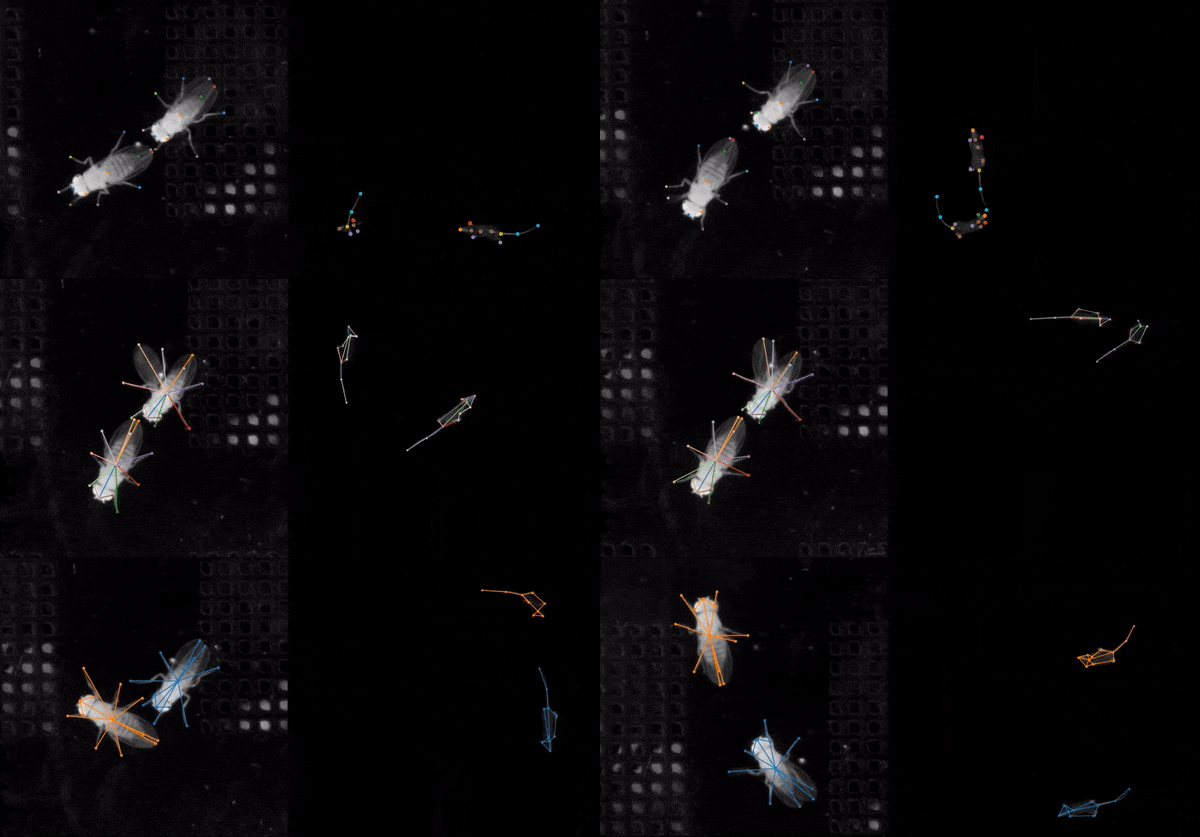
**SLEAP** is an open-source deep-learning based framework for multi-animal pose tracking [(Pereira et al., Nature Methods, 2022)](https://www.nature.com/articles/s41592-022-01426-1). It can be used to track any type or number of animals and includes an advanced labeling/training GUI for active learning and proofreading.
## Features
* Easy, one-line installation with support for all OSes
* Purpose-built GUI and human-in-the-loop workflow for rapidly labeling large datasets
* Single- and multi-animal pose estimation with *top-down* and *bottom-up* training strategies
* Customizable neural network architectures that deliver *accurate predictions* with *very few* labels
* Fast training: 15 to 60 mins on a single GPU for a typical dataset
* Fast inference: up to 600+ FPS for batch, <10ms latency for realtime
* Support for remote training/inference workflow (for using SLEAP without GPUs)
* Flexible developer API for building integrated apps and customization
* Two independent backends— [`sleap-nn`](https://nn.sleap.ai) and [`sleap-io`](https://io.sleap.ai) for training/inference pipelines & handling SLEAP files respectively
## Get some SLEAP
SLEAP is installed as a Python package. We strongly recommend using [uv](https://docs.astral.sh/uv/) to install SLEAP in its own environment.
You can find the latest version of SLEAP in the [Releases](https://github.com/talmolab/sleap/releases) page.
### Quick install
> **Python 3.14 is not yet supported**
>
> SLEAP currently supports **Python 3.11, 3.12, and 3.13**.
> **Python 3.14 is not yet tested or supported.**
> By default, `uv` will use your system-installed Python.
> If you have Python 3.14 installed, you must specify the Python version (≤3.13) in the install command.
>
> For example:
>
> ```bash
> uv tool install --python 3.13 "sleap[nn]" ...
> ```
> Replace `...` with the rest of your install command as needed.
**`uv tool install` (any OS):**
First, install [`uv`](https://github.com/astral-sh/uv) if you haven't already:
```bash
# macOS/Linux
curl -LsSf https://astral.sh/uv/install.sh | sh
# Windows
powershell -c "irm https://astral.sh/uv/install.ps1 | iex"
```
Then install SLEAP:
```bash
# Windows/Linux CUDA 12.8
uv tool install "sleap[nn]" --index https://download.pytorch.org/whl/cu128 --index https://pypi.org/simple
# macOS / CPU-only
uv tool install "sleap[nn]" --index https://download.pytorch.org/whl/cpu --index https://pypi.org/simple
```
Run the SLEAP GUI after installation:
```bash
sleap
```
See the docs for [full installation instructions](https://docs.sleap.ai/latest/installation).
## Learn to SLEAP
- **Learn step-by-step:** [Tutorial](https://docs.sleap.ai/latest/tutorial/overview)
- **Learn more advanced usage:** [Guides](https://docs.sleap.ai/latest/guides/guides-overview/) and [Notebooks](https://docs.sleap.ai/latest/notebooks/notebooks-overview/)
- **Learn by watching:** [COSYNE 2024 Tutorial (Part 1)](https://youtu.be/R5PRhkhAve0), [COSYNE 2024 Tutorial (Part 2)](https://youtu.be/Z64v-vp-Jvo), [ABL:AOC 2023 Workshop](https://www.youtube.com/watch?v=BfW-HgeDfMI), and [MIT CBMM Tutorial](https://cbmm.mit.edu/video/decoding-animal-behavior-through-pose-tracking)
- **Learn by reading:** [Paper (Pereira et al., Nature Methods, 2022)](https://www.nature.com/articles/s41592-022-01426-1) and [Review on behavioral quantification (Pereira et al., Nature Neuroscience, 2020)](https://rdcu.be/caH3H)
- **Learn from others:** [Discussions on Github](https://github.com/talmolab/sleap/discussions)
## References
SLEAP is the successor to the single-animal pose estimation software [LEAP](https://github.com/talmo/leap) ([Pereira et al., Nature Methods, 2019](https://www.nature.com/articles/s41592-018-0234-5)).
If you use SLEAP in your research, please cite:
> T.D. Pereira, N. Tabris, A. Matsliah, D. M. Turner, J. Li, S. Ravindranath, E. S. Papadoyannis, E. Normand, D. S. Deutsch, Z. Y. Wang, G. C. McKenzie-Smith, C. C. Mitelut, M. D. Castro, J. D'Uva, M. Kislin, D. H. Sanes, S. D. Kocher, S. S-H, A. L. Falkner, J. W. Shaevitz, and M. Murthy. [Sleap: A deep learning system for multi-animal pose tracking](https://www.nature.com/articles/s41592-022-01426-1). *Nature Methods*, 19(4), 2022
**BibTeX:**
```bibtex
@ARTICLE{Pereira2022sleap,
title={SLEAP: A deep learning system for multi-animal pose tracking},
author={Pereira, Talmo D and
Tabris, Nathaniel and
Matsliah, Arie and
Turner, David M and
Li, Junyu and
Ravindranath, Shruthi and
Papadoyannis, Eleni S and
Normand, Edna and
Deutsch, David S and
Wang, Z. Yan and
McKenzie-Smith, Grace C and
Mitelut, Catalin C and
Castro, Marielisa Diez and
D'Uva, John and
Kislin, Mikhail and
Sanes, Dan H and
Kocher, Sarah D and
Samuel S-H and
Falkner, Annegret L and
Shaevitz, Joshua W and
Murthy, Mala},
journal={Nature Methods},
volume={19},
number={4},
year={2022},
publisher={Nature Publishing Group}
}
}
```
**Technical issue with the software?**
1. Check the [Help page](https://docs.sleap.ai/latest/help).
2. Ask the community via [discussions on Github](https://github.com/talmolab/sleap/discussions).
3. Search the [issues on GitHub](https://github.com/talmolab/sleap/issues) or open a new one.
**General inquiries?**
Reach out to [talmo@salk.edu](mailto:talmo@salk.edu).
## Acknowledgments
SLEAP was created in the [Murthy](https://murthylab.princeton.edu) and [Shaevitz](https://shaevitzlab.princeton.edu) labs at the [Princeton Neuroscience Institute](https://pni.princeton.edu) at Princeton University.
SLEAP is currently being developed and maintained in the [Talmo Lab](https://talmolab.org) at the [Salk Institute for Biological Studies](https://salk.edu).
### Maintainers
* **Divya Murali** ([@gitttt-1234](https://github.com/gitttt-1234)), Salk Institute for Biological Studies
* **Amick Licup** ([@alicup29](https://github.com/alicup29)), Salk Institute for Biological Studies
* **Elizabeth Berrigan** ([@eberrigan](https://github.com/eberrigan)), Salk Institute for Biological Studies
* **Andrew Park** ([@7174Andy](https://github.com/7174Andy)), Salk Institute for Biological Studies
* **Tom Han** ([@tom21100227](https://github.com/tom21100227)), Salk Institute for Biological Studies
* **Talmo Pereira** ([@talmo](https://github.com/talmo)), Salk Institute for Biological Studies
### Contributors
SLEAP would not be possible without major contributions from many folks, including:
* **Liezl Maree**, Salk Institute for Biological Studies
* **Arlo Sheridan**, Salk Institute for Biological Studies
* **Arie Matsliah**, Princeton Neuroscience Institute, Princeton University
* **Nat Tabris**, Princeton Neuroscience Institute, Princeton University
* **David Turner**, Research Computing and Princeton Neuroscience Institute, Princeton University
* **Joshua Shaevitz**, Physics and Lewis-Sigler Institute, Princeton University
* **Mala Murthy**, Princeton Neuroscience Institute, Princeton University
### Funding
This work was made possible through our funding sources, including:
* NIH BRAIN Initiative R01 NS104899
* Princeton Innovation Accelerator Fund
* NIH BRAIN Initiative RF1 MH132653
## License
<!-- SLEAP is released under a [Clear BSD License](https://raw.githubusercontent.com/talmolab/sleap/main/LICENSE) and is intended for research/academic use only. For commercial use, please contact: **Laurie Tzodikov (Assistant Director, Office of Technology Licensing), Princeton University, 609-258-7256**. -->
SLEAP is released under a [BSD 3-Clause Clear License](LICENSE).
## Links
* [Documentation Homepage](https://docs.sleap.ai)
* [Overview](https://docs.sleap.ai/latest/overview)
* [Installation](https://docs.sleap.ai/latest/installation)
* [Tutorial](https://docs.sleap.ai/latest/tutorial/overview/)
* [Guides](https://docs.sleap.ai/latest/guides/guides-overview/)
* [Notebooks](https://docs.sleap.ai/latest/notebooks/notebooks-overview/)
* [Developer API](https://docs.sleap.ai/latest/api)
* [Help](https://docs.sleap.ai/latest/help)
================================================
FILE: codecov.yml
================================================
coverage:
ignore:
- "tests"
status:
project: # Measures overall project coverage.
gui:
target: auto
threshold: 0.5% # Some leeway with GUI code.
paths:
- "sleap/gui/"
informational: true # "For now"
non-gui:
target: auto
threshold: 0.05% # Less leeway with backend code.
paths:
- "sleap/"
- "!sleap/gui/"
informational: true # "For now"
patch: # Only measures lines adjusted in the pull request.
gui:
target: auto
paths:
- "sleap/gui/"
informational: true # GUI patch coverage for stats only.
non-gui:
target: 100% # All backend code should be tested...
threshold: 20% # ... but some tests are infeasable.
paths:
- "sleap/"
- "!sleap/gui/"
informational: true # "For now"
================================================
FILE: docs/assets/stylesheets/extra.css
================================================
/* Custom fonts */
:root {
--md-text-font: "PT Sans", -apple-system, BlinkMacSystemFont, "Segoe UI", Roboto, sans-serif;
--md-code-font: "Fira Mono", "Fira Code", monospace;
}
.md-typeset .admonition,
.md-typeset details {
font-size: inherit; /* Ensures it matches the surrounding text */
}
/* Markdown source link button - positioned in top-right like Material action buttons */
.md-source-file {
float: right;
margin: 0 0 0.5em 0.5em;
}
.md-source-file a {
display: inline-flex;
align-items: center;
justify-content: center;
width: 2em;
height: 2em;
border-radius: 0.2em;
color: var(--md-default-fg-color--light);
transition: color 0.25s, background-color 0.25s;
}
.md-source-file a:hover {
color: var(--md-accent-fg-color);
background-color: var(--md-accent-fg-color--transparent);
}
.md-source-file svg {
width: 1.2em;
height: 1.2em;
fill: currentColor;
}
/* Hero section */
.hero {
text-align: center;
padding: 0.5rem 0;
margin-bottom: 0.5rem;
}
.hero img {
max-width: 600px;
width: 100%;
border-radius: 12px;
box-shadow: 0 20px 40px rgba(0, 0, 0, 0.15), 0 8px 16px rgba(0, 0, 0, 0.1);
}
/* Grid cards - modern shadow style */
.grid.cards {
display: grid;
grid-template-columns: repeat(auto-fit, minmax(15rem, 1fr));
gap: 1rem;
margin: 1.5rem 0;
}
.grid.cards > ul {
display: contents;
list-style: none;
margin: 0;
padding: 0;
}
.grid.cards > ul > li {
background: var(--md-default-bg-color);
border: none;
border-radius: 12px;
padding: 1.25rem;
box-shadow: 0 4px 12px rgba(0, 0, 0, 0.08), 0 2px 4px rgba(0, 0, 0, 0.04);
transition: transform 0.2s ease, box-shadow 0.2s ease;
}
.grid.cards > ul > li:hover {
transform: translateY(-4px);
box-shadow: 0 12px 24px rgba(0, 0, 0, 0.12), 0 4px 8px rgba(0, 0, 0, 0.08);
}
.grid.cards > ul > li > hr {
margin: 0.75rem 0;
border: none;
border-top: 1px solid var(--md-default-fg-color--lightest);
}
/* Card titles */
.grid.cards > ul > li > p:first-child {
font-size: 1.1rem;
font-weight: 600;
margin-bottom: 0.5rem;
}
/* Better code blocks */
.md-typeset pre {
border-radius: 8px;
box-shadow: 0 2px 8px rgba(0, 0, 0, 0.06);
}
/* Buttons/links styling */
.md-typeset a.md-button {
border-radius: 8px;
font-weight: 500;
box-shadow: 0 2px 4px rgba(0, 0, 0, 0.1);
transition: transform 0.15s ease, box-shadow 0.15s ease;
}
.md-typeset a.md-button:hover {
transform: translateY(-2px);
box-shadow: 0 4px 8px rgba(0, 0, 0, 0.15);
}
/* Section spacing */
.md-typeset h2 {
margin-top: 2rem;
}
/* Feature list styling */
.md-typeset ul li {
margin-bottom: 0.4rem;
}
/* Dark mode adjustments */
[data-md-color-scheme="slate"] .grid.cards > ul > li {
box-shadow: 0 4px 12px rgba(0, 0, 0, 0.3), 0 2px 4px rgba(0, 0, 0, 0.2);
}
[data-md-color-scheme="slate"] .grid.cards > ul > li:hover {
box-shadow: 0 12px 24px rgba(0, 0, 0, 0.4), 0 4px 8px rgba(0, 0, 0, 0.3);
}
[data-md-color-scheme="slate"] .hero img {
box-shadow: 0 20px 40px rgba(0, 0, 0, 0.4), 0 8px 16px rgba(0, 0, 0, 0.3);
}
/* Plain toggles - no colored box */
.md-typeset details.plain {
border: none !important;
box-shadow: none !important;
background: transparent !important;
margin: 0.75em 0;
padding: 0;
}
.md-typeset details.plain > summary {
background: transparent !important;
border: none !important;
border-bottom: 1px solid var(--md-default-fg-color--lightest) !important;
padding: 0.6em 0 0.6em 1.2em !important;
margin: 0;
font-weight: 500;
cursor: pointer;
min-height: 0;
position: relative;
display: block;
list-style: none;
}
.md-typeset details.plain > summary::-webkit-details-marker {
display: none;
}
/* Custom arrow */
.md-typeset details.plain > summary::before {
content: "▸" !important;
position: absolute !important;
left: 0 !important;
top: 0.6em !important;
width: auto !important;
height: auto !important;
background: none !important;
transform: none !important;
mask: none !important;
-webkit-mask: none !important;
font-size: 0.9em;
color: var(--md-default-fg-color--light);
transition: transform 0.15s ease;
}
.md-typeset details.plain[open] > summary::before {
content: "▾" !important;
}
.md-typeset details.plain > summary::after {
display: none !important;
}
.md-typeset details.plain > *:not(summary) {
margin-left: 0;
padding: 0.5em 0;
}
/* Changelog - prevent long lines from overflowing */
.md-content pre {
overflow-x: auto;
}
.md-content code {
word-break: break-word;
}
/* Colored phase icons */
.icon-blue { color: #2196F3; }
.icon-green { color: #4CAF50; }
.icon-orange { color: #FF9800; }
.icon-purple { color: #9C27B0; }
.icon-red { color: #F44336; }
.icon-teal { color: #009688; }
================================================
FILE: docs/code-of-conduct.md
================================================
# Contributor Covenant Code of Conduct
## Our Pledge
In the interest of fostering an open and welcoming environment, we as contributors and maintainers pledge to make participation in our project and our community a harassment-free experience for everyone, regardless of age, body size, disability, ethnicity, gender identity and expression, level of experience, nationality, personal appearance, race, religion, or sexual identity and orientation.
## Our Standards
Examples of behavior that contributes to creating a positive environment include:
* Using welcoming and inclusive language
* Being respectful of differing viewpoints and experiences
* Gracefully accepting constructive criticism
* Focusing on what is best for the community
* Showing empathy towards other community members
Examples of unacceptable behavior by participants include:
* The use of sexualized language or imagery and unwelcome sexual attention or advances
* Trolling, insulting/derogatory comments, and personal or political attacks
* Public or private harassment
* Publishing others' private information, such as a physical or electronic address, without explicit permission
* Other conduct which could reasonably be considered inappropriate in a professional setting
## Our Responsibilities
Project maintainers are responsible for clarifying the standards of acceptable behavior and are expected to take appropriate and fair corrective action in response to any instances of unacceptable behavior.
Project maintainers have the right and responsibility to remove, edit, or reject comments, commits, code, wiki edits, issues, and other contributions that are not aligned to this Code of Conduct, or to ban temporarily or permanently any contributor for other behaviors that they deem inappropriate, threatening, offensive, or harmful.
## Scope
This Code of Conduct applies both within project spaces and in public spaces when an individual is representing the project or its community. Examples of representing a project or community include using an official project e-mail address, posting via an official social media account, or acting as an appointed representative at an online or offline event. Representation of a project may be further defined and clarified by project maintainers.
## Enforcement
Instances of abusive, harassing, or otherwise unacceptable behavior may be reported by contacting the project team at [talmo@salk.edu](mailto:talmo@salk.edu). All complaints will be reviewed and investigated and will result in a response that is deemed necessary and appropriate to the circumstances. The project team is obligated to maintain confidentiality with regard to the reporter of an incident. Further details of specific enforcement policies may be posted separately.
Project maintainers who do not follow or enforce the Code of Conduct in good faith may face temporary or permanent repercussions as determined by other members of the project's leadership.
## Attribution
This Code of Conduct is adapted from the [Contributor Covenant][homepage], version 1.4, available at [https://contributor-covenant.org/version/1/4][version]
[homepage]: https://contributor-covenant.org
[version]: https://contributor-covenant.org/version/1/4/
================================================
FILE: docs/contribute.md
================================================
# Contributing to SLEAP
As our community grows it is important to adhere to a set of contribution guidelines. These guidelines may change as needed. Please feel free to propose changes to source code in a pull request!
## Code of Conduct
Everyone contributing to SLEAP is governed by the [SLEAP Code of Conduct](code-of-conduct.md). As such, all are expected to abide by this code. Please report any unacceptable behavior to `talmo@salk.edu`.
## Contributing
Github has made it easy to separate issues from discussions. Generally speaking, if something warrants a pull request (e.g. bug fixes, TODOs) it should be submitted as an issue. Conversely, general questions about usage and improvement ideas should go into discussions. These both act as staging areas before adding the items to the SLEAP Roadmap. Once added to the Roadmap, items can be given priority, status, assignee(s), etc.
### Issues
* Check [open/closed issues](https://github.com/talmolab/sleap/issues), [ideas](https://github.com/talmolab/sleap/discussions/categories/ideas), and [the help page](https://github.com/talmolab/sleap/discussions/categories/help) to make sure issue doesn't already exist / has been solved.
* Create new issue using the [issue template](https://github.com/talmolab/sleap/blob/arlo/contributing_guide/.github/ISSUE_TEMPLATE/bug_report.md).
### Discussions
* This is a place to go to ask questions and propose new ideas.
* 3 categories: Help, Ideas, General
* **Help** - Having trouble with software, user experience issue, etc.
* **Ideas** - Enhancements, things that would make the user experience nicer but not necessarily a problem with the code.
* **General** - If it doesn't fall into help/ideas it goes here as long as it isn't bug fix (issue).
### Pull Requests
1. Install from source using the [Development Setup](installation.md#development-setup) instructions.
2. Create a fork from the `develop` branch.
* Either work on the `develop` branch or create a new branch (recommended if tackling multiple issues at a time).
* If creating a branch, use your name followed by a relevant keyword for your changes, eg: `git checkout -b john/some_issue`
3. Make some changes/additions to the source code that tackle the issue(s).
4. Write [tests](https://github.com/talmolab/sleap/tree/develop/tests).
* Can either write tests before creating a draft PR, or submit draft PR (to get code coverage statistics via codecov) and then write tests to narrow down error prone lines.
* The test(s) should go into relevant subtest folders to the proposed change(s).
* Test(s) should aim to hit every point in the proposed change(s) - cover edge cases to best of your ability.
* Try to hit code coverage points.
5. Add files, commit, and push to origin.
6. Create a draft PR on [Github](https://github.com/talmolab/sleap/pulls) (follow instructions in template).
* Make sure the tests pass and code coverage is good.
* If either the tests or code coverage fail, repeat steps 3-5.
7. Once the draft PR looks good, convert to a finalized PR (hit the `ready for review` button).
* IMPORTANT: Only convert to a finalized PR when you believe your changes are ready to be merged.
* Optionally assign a reviewer on the right of the screen - otherwise a member of the SLEAP developer team will self-assign themselves.
8. If the reviewer requests changes, repeat steps 3-5 and `Re-request review`.
9. Once the reviewer signs off they will squash + merge the PR into the `develop` branch.
* New feautures will be available on the `main` branch when a new release of SLEAP is released.
## Style Guides
* **Lint** - [Black](https://black.readthedocs.io/en/stable/) version 21.6b0 (see [dev_requirements](https://github.com/talmolab/sleap/blob/develop/dev_requirements.txt) for any changes).
* **Code** - Generally follow [PEP8](https://peps.python.org/pep-0008/). Type hinting is encouraged.
* **Documentation** - Use [Google-style comments and docstrings](https://google.github.io/styleguide/pyguide.html#38-comments-and-docstrings) to document code.
#### Thank you for contributing to SLEAP!
================================================
FILE: docs/guides/creating-a-custom-training-profile.md
================================================
*Case: You've created a project with training data and you want to train models with custom hyperparameters.*
Hyperparameters include the model architecture, learning rate, and data augmentation settings. While model **parameters** are learned from your data during training, **hyperparameters** are not learned from your data—they have to be set before training since they control the training process.
This guide will explain how to create a custom training profile but doesn't cover how to decide what the hyperparameters should be. For more information about the hyperparameters, see our guide to [Configuring models](https://nn.sleap.ai/latest/reference/models/).
Training profiles are YAML files. The YAML format is fairly easy to read (and edit) with a text-editor and you can use the default "baseline" profiles as a starting point for creating your own training profiles. For example, take a look at the [baseline bottom-up profile](https://github.com/talmolab/sleap/blob/develop/sleap/training_profiles/baseline_medium_rf.bottomup.yaml) or our [other baseline profiles](https://github.com/talmolab/sleap/blob/develop/sleap/training_profiles).
But if this sounds intimidating, you don't have to edit the YAML file by hand! You can use the same GUI that's used for training on a local machine to export custom training profiles.
If it isn't open already, run SLEAP and open the SLEAP project with your training dataset. Then select the "**Run Training...**" command in the "**Predict**" menu. You'll see the training GUI which lets you configure the pipeline type and the hyperparameters for each model:

First pick the desired pipeline (i.e., top-down, bottom-up, or single animal). For each model in the pipeline, you'll then see a "**Model Configuration**" tab—in the image above with the top-down pipeline, there's one tab for configuring the centroid model and one for the centered instance model. Other pipelines will only have one model to configure.
You can click on each model configuration tab to configure the hyperparameters for training that model:

For advice about what you might want to customize with this dialog, see our guide to [Configuring models](https://nn.sleap.ai/latest/reference/models/).
Once you've configured each of your models, click the "**Save configuration files...**" button at the bottom of the dialog. You'll be prompted for where to save the files. It's a good idea to create a new folder which will contain the files since there will be multiple files exported.
Wherever you selected to save your files, you'll now have a custom training profile(s) with the settings you selected in the dialog. The filename of the training profile(s) will be:
- `bottomup.yaml` for a bottom-up pipeline,
- `centroid.yaml` and `centered_instance.yaml` for a top-down pipeline, and
- `single_instance.yaml` for a single animal pipeline.
(There will also be a `train-script.sh` file with the command-line command you could use to train your dataset using these training profiles, and possibly an `inference-script.sh` file if you selected frames for inference after training.)
If you're running training on a remote machine (including Colab), export your training job package into the remote machine. Then call:
```bash
sleap-nn train --config /path/to/profile.yaml "data_config.train_labels_path=[path/to/dataset.pkg.slp]"
```
for each model you want to train (where `path/to/custom/profile.yaml` should be replaced with the path to your custom training profile and `path/to/dataset.pkg.slp` replaced with the path to your training job package). See our guide to [remote training](running-sleap-remotely.md) for more details.
!!! note
If you exported the training package as a ZIP file, it contains both the `.pkg.slp` and `.yaml` files necessary to train with the configuration you selected in the GUI. Before running the [`sleap-nn train`](https://nn.sleap.ai/latest/training/#using-cli) command, make sure to unzip this file:
=== "macOS/Linux"
```bash
unzip training_job.zip -d training_job
```
=== "Windows (PowerShell)"
```powershell
Expand-Archive -Path training_job.zip -DestinationPath training_job
```
=== "Windows (Command Prompt)"
```cmd
tar -xf training_job.zip -C training_job
```
### Training Hardware support
SLEAP supports training on:
- **NVIDIA GPUs**: Fully supported and tested.
- **Apple Silicon Macs**: Supported and tested.
**Unsupported configurations:**
- AMD GPUs and older Macs (pre-M1) may fail during training.
- Other GPU architectures or unsupported hardware configurations may lead to memory or allocation errors.
GPU detection is automatic when you install SLEAP. Run `sleap doctor` to verify your GPU is detected. If you need to manually specify a backend, see the [Pre-release Versions](../installation.md#pre-release-versions) section.
================================================
FILE: docs/guides/guides-overview.md
================================================
# Overview
**Here's an overview of the guides:**
!!! warning "Documentation for New SLEAP Versions"
This documentation is for the **latest version of SLEAP**.
If you are using **SLEAP version 1.4.1 or earlier**, please visit the [legacy documentation](https://legacy.sleap.ai).
!!! info "Major Changes in SLEAP 1.5+"
Want to learn about the major changes and updates in the latest release?
See [Migrating to SLEAP 1.5+](migrating-to-sleap-1-5.md) for a summary of what's new and how to update your workflows.
**New in v1.6:** [Label Quality Control](label-quality-control.md) for automated detection of labeling errors.
[Importing predictions for labeling](importing-predictions-for-labeling.md) when you have predictions that aren’t in the same project as your original training data and you want to correct some of the predictions and use these corrections to train a better model.
[Tracking and proofreading](tracking-and-proofreading.md) provides tips and tools you can use to speed up proofreading when you're happy enough with the frame-by-frame predictions but you need to correct the identities tracked across frames.
[Label Quality Control](label-quality-control.md) for detecting and fixing labeling errors using automated quality checks.
[Instance Size Distribution](instance-size-distribution.md) for determining the optimal crop size for top-down models.
[Run training and inference on Colab](run-training-and-inference-on-colab.md) when you have a project with labeled training data and you’d like to run training or inference in a Colab notebook.
[Creating a custom training profile](creating-a-custom-training-profile.md) for creating custom training profiles (i.e., non-default model hyperparameters) from the GUI.
[Running SLEAP remotely](running-sleap-remotely.md) when you have a project with training data and you want to train on a different machine using a command-line interface.
!!! note "Bonsai Integration"
**Bonsai is not natively supported with the new Torch backend in SLEAP.**
If you want to use Bonsai with legacy SLEAP models, please refer to the [legacy Bonsai guide](https://legacy.sleap.ai/guides/bonsai.html).
================================================
FILE: docs/guides/importing-predictions-for-labeling.md
================================================
*Case: You have predictions that aren't in the same project as your original training data and you want to correct some of the predictions and use these corrections to train a better model.*
All of your training data must be in a single SLEAP project file (or labels package), so if you have data in multiple files, you'll need to merge them before you can train on the entire set of data.
When you run inference from the GUI, the predictions will be added to the same project as your training data (they'll also be saved in a separate file). When you run inference from the command-line, they'll only be in a separate file.
If you open a separate predictions file, make corrections there and train a new model from that file, then new models will be trained from scratch using only those corrections. The new models will not be trained on any of the original data that was used to train the previous models—i.e., the models used to generate these predictions. Usually you'll want to include both the original data and the new corrections.
**Note** that uncorrected predictions will never be used for training. Only predictions which you've "converted" into an editable instance will be used for training. To convert a predicted instance into an editable instance, you can **double-click** on the predicted instance or use the "**Add Instance**" command in the "Labels" menu (there's also a keyboard shortcut). As you might guess, once you have an editable instance you can move nodes and toggle their "visibility" (see the [tutorial](../tutorial/overview.md) if you're not familiar with how to do this). When you've created an editable instance from a predicted instance, the predicted instance will no longer be shown, although it will re-appear if you delete the editable instance.
Let's suppose we have a project file and a predictions file with corrections, and we'd like to merge the corrections into the original project file.
If you want to merge *only* the corrections, then you should first make a copy of the predictions file. You can either just copy the file itself, or make a copy from the GUI using "**Save As..**" in the "File" menu. Open the copy of the file in the GUI and use the "**Delete All Predictions...**" command in the "Predictions" menu to remove all of the predicted instances from the file. Save and you'll be left with a file which just contains your corrections.
Open the original project file (or whatever file you want to merge **into**). Then, use the "**Merge Data From...**" command in the "File" menu. You'll need to select the file **from which** you are getting the data to merge—this would be the file with your corrected predictions.
You'll then see a window with information about the merge:

If there are no merge conflicts, then you can click "**Finish Merge**. If the two files contain conflicts—frames from the same video which both have editable instances or both have predicted instances—then you'll need to decide how to resolve the conflicts. You can choose to use the "base" version (i.e., the original project file **into which** you are merging), the "new" version (i.e., from the predictions file with the data which you're adding to the original project), or neither. Whichever you choose, you'll also get all of the frames which can be merged without conflicts.
After merging you should save (or save a copy of the project with the "**Save As...**" command). Once you have a single project file which contains both your old and new training data, you can train new models.
================================================
FILE: docs/guides/instance-size-distribution.md
================================================
# Instance Size Distribution
*Case: You want to determine the optimal crop size for top-down models.*
When using top-down pose estimation pipelines, SLEAP crops around each detected instance before estimating pose. Choosing the right crop size is important:
- **Too small**: Parts of the animal may be cut off
- **Too large**: Wastes computation and may include other animals
The Instance Size Distribution widget helps you analyze your labeled data to choose an appropriate crop size.
## Accessing the Widget
From the GUI: **Analyze** → **Instance Size Distribution...**
This opens a dialog window showing the size distribution of all user-labeled instances in your project.


## Recompute
Click the **Recompute** button to recalculate sizes from your current labels. This is useful if you've added or modified labels since opening the dialog.
The widget only analyzes user-labeled instances (not predicted instances) to give you accurate statistics based on your ground truth annotations.
## Rotation Augmentation
The **Rotation Augmentation** controls let you preview how rotation augmentation during training will affect the required crop size.
When you rotate an instance, its bounding box grows to accommodate the rotated skeleton. This setting helps you understand what crop size you'll need if using rotation augmentation.
**Preset options:**
- **Off**: No rotation applied. Shows the raw bounding box sizes.
- **+/-15**: Simulates +/-15 degree rotation augmentation (common for videos with limited rotation).
- **+/-180**: Simulates full rotation augmentation (common for overhead/top-down views).
- **Custom**: Enables the custom angle spinner to set any angle from 0-180 degrees.
When using rotation augmentation in training, set this to match your training configuration to see the effective crop sizes you'll need.
## Visualization
The center plot shows the distribution of instance sizes. You can switch between two views:
### Scatter (clickable)
The default view shows each instance as a point:
- **X-axis**: Size in pixels (the larger dimension of the bounding box)
- **Y-axis**: Instance index (ordered by position in the labels file)
- **Point colors**: Colored by relative size (blue = near median, red = larger than median)
- **Vertical lines**: Show statistics:
- **Green dashed**: Median size
- **Blue dotted**: Mean size
- **Red solid**: Maximum size
**Clicking a point** selects that instance and navigates to it in the main video player, making it easy to inspect outliers.
### Histogram
An alternative view showing the count distribution:
- **X-axis**: Size in pixels
- **Y-axis**: Count (number of instances in each bin)
- **Vertical lines**: Same statistics as scatter view (median, mean, max)
**Histogram options** (enabled when Histogram is selected):
- **Bins**: Number of histogram bins (5-100, default 30)
- **X-min**: Minimum x-axis value, or "Auto" for automatic range
- **X-max**: Maximum x-axis value, or "Auto" for automatic range
Use the range controls to zoom in on a specific size range if needed.
## Selected Instance
When you click a point in the scatter plot, the **Selected Instance** panel shows:
- **Frame**: The frame index where the instance appears
- **Instance**: The instance index within that frame
- **Video**: The video index (for multi-video projects)
- **Raw Size**: The bounding box size without rotation (with width × height dimensions)
- **Rotated Size**: The effective size with the current rotation setting applied
This helps you understand both the original annotation size and how it will grow with rotation augmentation.
## Statistics
The **Statistics** panel shows summary statistics for all instances:
- **Count**: Total number of user-labeled instances
- **Range**: Minimum and maximum sizes in pixels
- **Mean +/- Std**: Average size with standard deviation
- **Median**: The middle value (50th percentile)
- **90th/95th/99th**: Percentile values for choosing crop sizes
- **Outliers (>2 sigma)**: Count of instances more than 2 standard deviations above the mean
These statistics update when you change the rotation setting.
## Choosing a Crop Size
Use the statistics to choose an appropriate crop size:
1. **95th percentile** is a common choice—it covers 95% of instances while excluding extreme outliers
2. **Add 10-20% padding** for animals near frame edges or to account for prediction uncertainty
3. **Consider rotation**: If using rotation augmentation, set the rotation preview to match and use those statistics
For example, if your 95th percentile with +/-180 rotation is 200px, a crop size of 220-240px would be reasonable.
## Tips
- **Consistent animal sizes**: If your animals are similar sizes, the distribution will be tight and crop size selection is straightforward
- **Variable sizes**: If sizes vary significantly (e.g., adults and juveniles), consider using a larger crop size or filtering your training data
- **Multiple videos**: The widget analyzes all videos together. If recording conditions vary, click through outliers to see if they come from specific videos
- **Inspect outliers**: Click on the largest points in the scatter plot to check if they represent real variation or labeling errors
## Using with Crop Size Visualization
After choosing a crop size, you can visualize it in the main view:
1. Open the training dialog (**Predict** → **Run Training...**)
2. The crop size overlay will show the crop region on your video
3. Scrub through frames to verify the crop captures the full animal
## Programmatic Access
For scripting or automation, you can compute instance sizes programmatically:
```python
import sleap_io as sio
from sleap.gui.learning.size import compute_instance_sizes
import numpy as np
# Load labels
labels = sio.load_file("labels.slp")
# Compute sizes for user-labeled instances
sizes = compute_instance_sizes(labels, user_instances_only=True)
# Get raw sizes
raw_sizes = np.array([s.raw_size for s in sizes])
print(f"95th percentile: {np.percentile(raw_sizes, 95):.0f}px")
# With rotation augmentation (+/-180 degrees)
rotated_sizes = np.array([s.get_rotated_size(180) for s in sizes])
print(f"95th percentile with rotation: {np.percentile(rotated_sizes, 95):.0f}px")
```
Each `InstanceSizeInfo` object contains:
- `video_idx`, `frame_idx`, `instance_idx`: Location identifiers
- `raw_width`, `raw_height`: Bounding box dimensions
- `raw_size`: Maximum of width and height
- `get_rotated_size(angle)`: Size needed with rotation augmentation
## Related
- [Configuring Models](https://nn.sleap.ai/latest/reference/models/) - Full details on crop size and other model parameters
- [Creating a Custom Training Profile](creating-a-custom-training-profile.md) - How to save your crop size settings
================================================
FILE: docs/guides/label-quality-control.md
================================================
# Label Quality Control
*Case: You want to check your labels for errors before training or after proofreading.*
SLEAP 1.6 introduces a Label Quality Control (QC) module that automatically detects common labeling errors using Gaussian Mixture Model (GMM) based anomaly detection.
## Accessing Label QC
From the GUI: **Analyze** → **Label QC...**
This opens a dockable panel that can be tabbed with other panels (Videos, Skeleton, etc.) or undocked as a floating window.


## Running Analysis
Click the **Run Analysis** button to analyze all labeled instances in your project. The analysis:
1. Extracts features from each instance (edge lengths, joint angles, node spacing, etc.)
2. Fits a statistical model to learn what "normal" poses look like
3. Scores each instance based on how much it deviates from the norm
4. Displays results in the visualization tabs and table
A progress bar shows the analysis status. You can click **Cancel** to stop a running analysis.
## Sensitivity Slider
The **Sensitivity** slider controls the threshold for flagging instances:
- **More** (left): Lower threshold flags more instances (higher sensitivity)
- **Fewer** (right): Higher threshold flags fewer instances (lower sensitivity)
- The current threshold value is displayed on the right (e.g., "0.70")
You can also click directly on the Score Distribution histogram to set the threshold visually.
## Visualization Tabs
Three tabs provide different views of the analysis results:
### Score Distribution
A histogram showing the distribution of anomaly scores across all instances:
- **X-axis**: Anomaly Score (0.0 to 1.0)
- **Y-axis**: Count (number of instances)
- **Gray bars**: Instances below the threshold (considered "normal")
- **Red bars**: Instances at or above the threshold (flagged as potential errors)
- **Blue dashed line**: Current threshold position
- **Red annotation**: Count and percentage of flagged instances
A typical distribution shows most instances clustered at low scores (normal), with a tail extending toward higher scores (potential errors).
### Issue Breakdown
A horizontal bar chart showing the count of each issue type among flagged instances. Common issue categories include:
- **Unusual Visibility**: Unusual pattern of visible/invisible nodes
- **Unusual Edge Length**: A skeleton edge is much longer or shorter than typical
- **Unusual Node Spacing**: Nodes are unusually close together or far apart
- **Unusual Scale**: Instance is much larger or smaller than typical
- **Unusual Joint Angle**: A joint is bent at an unusual angle
- **High Hull Area**: The convex hull of the skeleton is unusually large
- **Likely L/R Swap**: Left and right limbs may be swapped
This view helps identify systematic labeling issues in your dataset.
### Features
Box plots comparing feature distributions between normal (gray) and flagged (red) instances. This tab shows the top discriminating features—the characteristics that most differentiate flagged instances from normal ones.
Features shown may include:
- **max angle / mean angle**: Joint angle statistics
- **hull compact**: Compactness of the skeleton's convex hull
- **max pairwise**: Maximum distance between any two nodes
- **hull area / bbox area**: Size metrics for the skeleton
This view helps you understand *why* instances are being flagged.
## Flagged Instances Table
A sortable table listing all instances that exceed the current threshold:
| Column | Description |
|--------|-------------|
| **Frame** | Frame index where the instance appears |
| **Instance** | Instance index within that frame |
| **Score** | Anomaly score (0.0–1.0). Higher scores indicate more unusual instances. Displayed in red for scores ≥0.8, yellow for ≥0.6 |
| **Confidence** | "High" (score ≥0.8), "Medium" (0.5–0.8), or "Low" (<0.5) |
| **Issue** | The primary issue type (most contributing feature) |
**Interacting with the table:**
- **Click** a row to navigate to that frame and select the instance
- **Double-click** for the same navigation behavior
- **Click column headers** to sort by that column
- The table is sorted by Score (descending) by default
## Selected Instance
When you select a row in the table, the **Selected Instance** panel shows detailed information:
- **Frame / Instance**: Location identifiers
- **Score**: The anomaly score with confidence level
- **Primary Issue**: The most likely type of error
- **Top Features**: The 3 features contributing most to the high score, with their values
This helps you understand why a specific instance was flagged before reviewing it in the video.
## Statistics
The **Statistics** panel shows a summary of the analysis:
- **Flagged**: Count of flagged instances / total instances (percentage)
- **By confidence**: Breakdown of flagged instances by confidence level (high, medium)
- **Frame issues**: Number of frames with frame-level issues (possible duplicates or missing instances)
- **Scores**: Statistical summary (mean, median, max) of all anomaly scores
## Add to Suggestions
Click **Add to Suggestions** to add all flagged frames to the Labeling Suggestions list. This creates a review queue so you can systematically work through potential errors.
Frames already in the suggestions list are skipped to avoid duplicates.
## Additional Controls
- **Export CSV...**: Export all results (scores, features, issues) to a CSV file for external analysis
- **Fit to Selection**: When checked, the video player automatically zooms to fit the selected instance
- **Undock / Dock**: Toggle between docked (tabbed) and floating window modes
## Programmatic Access
The QC module is available programmatically via `sleap.qc`:
```python
import sleap_io as sio
from sleap.qc import LabelQCDetector, QCConfig
# Load labels
labels = sio.load_file("labels.slp")
# Create detector with default config
detector = LabelQCDetector()
# Fit on labels (learns what "normal" looks like from your data)
detector.fit(labels)
# Score all instances
results = detector.score(labels)
# Get flagged instances above threshold (0.0-1.0, higher = more anomalous)
flagged = results.get_flagged(threshold=0.7)
# Inspect flagged instances
for flag in flagged:
print(f"Video {flag.video_idx}, Frame {flag.frame_idx}, Instance {flag.instance_idx}")
print(f" Score: {flag.score:.2f}")
print(f" Issue: {flag.top_issue}")
```
### Configuration Options
```python
from sleap.qc import QCConfig
config = QCConfig(
instance_threshold=0.7, # Score threshold for flagging
gmm_n_components=3, # Number of GMM components
duplicate_iou_threshold=0.5, # IoU threshold for duplicate detection
)
detector = LabelQCDetector(config=config)
```
### Available Classes
- `LabelQCDetector`: Main detection interface
- `QCConfig`: Configuration settings
- `QCResults`: Container for scores, frame results, and feature contributions
- `QCFlag`: Individual flagged instance with score and contributing features
## Tips
- Run QC after initial labeling but before training to catch errors early
- Re-run after proofreading tracking results to verify corrections
- Not all flagged items are actual errors—use your judgment when reviewing
- Lower the threshold if you want to be more thorough; raise it to focus on the most obvious issues
- Use the Issue Breakdown tab to identify systematic problems in your labeling workflow
- QC is most effective when you have consistent labeling practices across your dataset
================================================
FILE: docs/guides/migrating-to-sleap-1-5.md
================================================
# Migrating to SLEAP 1.5
SLEAP 1.5 represents a major milestone with significant architectural improvements, performance enhancements, and new installation methods. Here are the key changes:
## Major Changes
### UV-Based Installation
SLEAP 1.5+ now uses [**uv**](https://docs.astral.sh/uv/) for installation, making it much faster than previous methods. Get up and running in seconds with our streamlined installation process.
### PyTorch Backend
Neural network backend switched from TensorFlow to PyTorch, providing:
- **Much faster training and inference speeds**
- **Modern deep learning capabilities**
- **Improved developer experience**
- **Multi-GPU training**
### Standalone Libraries
SLEAP GUI is now supported by two new packages for modular workflows:
#### [SLEAP-IO](https://io.sleap.ai)
I/O backend for handling labels, processing `.slp` files, and data manipulation. Essential for any SLEAP workflow and can be used independently for data processing tasks.
#### [SLEAP-NN](https://nn.sleap.ai)
PyTorch-based neural network backend for training and inference. Perfect for custom training pipelines, remote processing, and headless server deployments.
## Torch Backend Changes
### New Backbones
SLEAP 1.5 introduces three powerful new backbone architectures (check [here](https://nn.sleap.ai/latest/models/#backbone-architectures) for more details):
- **UNet** - Classic encoder-decoder architecture for precise pose estimation
- **SwinT** - Swin Transformer for state-of-the-art performance
- **ConvNeXt** - Modern convolutional architecture with improved efficiency
### Legacy Support
We've maintained full backward compatibility:
- **GUI Support**: SLEAP now uses a new <u>YAML-based</u> config file structure, but you can still upload and work with old SLEAP JSON files in the GUI. For details on converting legacy SLEAP 1.4 config/JSON files to the new YAML format, see our [conversion guide](https://nn.sleap.ai/latest/config/#converting-legacy-sleap-14-configjson-to-sleap-nn-yaml).
- **Using TensorFlow Model Weights**: Continue to support running inference on SLEAP <1.4 TensorFlow model weights (UNet backbone only). Check [using legacy models](https://nn.sleap.ai/latest/inference/#legacy-sleap-model-support) for more details.
## What's New in v1.6
SLEAP 1.6 builds on the v1.5 foundation with additional features and improvements:
### Unified CLI
The new `sleap` command provides a single entry point for all SLEAP functionality:
```bash
sleap # Launch the GUI
sleap doctor # System diagnostics
sleap train ... # Training (via sleap-nn)
sleap track ... # Inference (via sleap-nn)
sleap show labels.slp # View labels summary (via sleap-io)
```
See [Command Line Interfaces](../reference/command-line-interfaces.md) for the full list of commands.
### Label Quality Control
New **Analyze → Label QC...** menu for automated detection of labeling errors including:
- Temporal jitter (unstable predictions across frames)
- Visibility inconsistencies
- Scale anomalies
- Potential identity swaps
See [Label Quality Control](label-quality-control.md) for details.
### Instance Size Distribution
New **Analyze → Instance Size Distribution...** widget helps determine optimal crop sizes for top-down models by analyzing the distribution of instance bounding box sizes in your labeled data.
See [Instance Size Distribution](instance-size-distribution.md) for details.
### ONNX/TensorRT Export
Export trained models to ONNX or TensorRT format for 3-6x faster inference:
```bash
sleap export-model models/my_model --format onnx
```
### Additional Improvements
- **Real-time inference progress**: Live FPS and ETA display during inference
- **Filter overlapping instances**: New controls in training/inference dialogs
- **Crop size visualization**: Overlay showing crop region for top-down models
*For a complete list of changes, see our [Changelog](../changelog.md).*
================================================
FILE: docs/guides/run-training-and-inference-on-colab.md
================================================
*Case: You already have a project with labeled training data and you'd like to run training or inference in a Colab notebook.*
Take a look at our [example notebooks](../notebooks/Training_and_inference_on_an_example_dataset.ipynb) which you can run on Colab! These will walk you through the entire process of running training and inference on Colab.
### About Colab
[Google Colaboratory](https://colab.research.google.com/) is a hosted service from Google that lets you run Python code (like SLEAP) on Google's servers with access to GPUs for training and inference. It's free!
When you start running code in a notebook, Google connects your notebook to a virtual server instance. Think of this as a new computer with Python and PyTorch pre-installed. You can run things on this server instance for at most 12 hours (it will timeout sooner if idle but this depends on how much demand there is for Google's servers).
Once the server instance times out, you lose all the data that's stored on the server instance. This means that you'll need to install SLEAP from the notebook at the beginning of each new session, you'll need to move your data to the server instance, and you'll need to copy any results off the server instance when you're done.
You can also pay for [Colab Pro](https://colab.research.google.com/signup) (currently available only in the US) which gives you priority access to better hardware and longer runtimes (they say 24 hours and more lenient idle timeouts).
### Moving Data to/from Colab
The easiest way to work with your own data on Colab is to use [Google Drive](https://www.google.com/drive/). This is another service provided by Google. It's also free!
(*If your university has [G Suite for Education](https://edu.google.com/products/gsuite-for-education/) you'll have unlimited storage space.*)
Google Drive is similar to Dropbox, Microsoft OneDrive, or Apple iCloud. You can install software and you'll get a special folder which is automatically synced: anything you copy into it will be available from other computers (using your account), and anything copied into it from elsewhere will automatically be downloaded into the folder on your computer.
For training on your own data, it's probably easiest to export a training job package from the SLEAP GUI. The training job package will contain model files as well as all of your labeled data and all of the images for labeled frames within a single file, so that you don't have to copy the full training videos and you don't have to worry about paths to the videos.
If you'd rather copy all your videos over to Colab—perhaps because you plan to run inference on the full videos—you can place the videos in the same directory as your SLEAP project file and as long as each video has a distinctive filename, SLEAP will be able to find them (it tries to locate the videos in the same directory as the project if it can't find the videos at the path they had when added to the project).
================================================
FILE: docs/guides/running-sleap-remotely.md
================================================
*Case: You already have a project with training data and you want to train on a different machine using a command-line interface.*
You need three things to run training:
!!! note
If you only need to run training and inference from the command line, you do **not** need to install the full SLEAP package—just installing `sleap-nn` is sufficient.
1. You need to install `sleap-nn` on the remote machine where you'll run training.
2. Labels and images to use for training.
3. A training profile which defines the training parameters (e.g., learning rate, image augmentation methods).
**Installing sleap-nn**:
See the [installation instructions](https://nn.sleap.ai/latest/installation).
**Training labels and images**:
Usually the easiest and best way to make the training labels and images available is to export a training job package ("Predict" -> "Run Training.." -> "Export Training Job Package..") and copy that to the remote machine.
Although it's easiest if you bundle the labels and images into training job package, there are alternatives. If the files are already on a shared network drive, it may be possible to use the original labels project and videos for training. But this can be tricky, because often the full paths to the files will be different when accessed from different machines (i.e., different paths on Windows and Linux machines or different paths from how the network drive is mounted). To use the original labels and video files, you'll either need to ensure that the file paths to videos used in the project are the same on the remote machine as on the local machine where you last saved the project, **or** if all the video files have distinct filenames, you can place the videos inside the same directory which contains the labels project file.
But in most cases it's best to create a training job package and just use that for remote training.
**Training profile**:
sleap-nn comes with "default" training profiles for training confidence maps, part affinity fields, centroids, or top-down confidence maps (which allow multi-instance inference without using part affinity fields). Any file in the [sample configs](https://github.com/talmolab/sleap-nn/tree/main/docs/sample_configs) can be downloaded/ used, and path to the config file is passed to `sleap-nn train` CLI.
Our guide to [creating a custom training profile](creating-a-custom-training-profile.md) explains how to use the GUI to export custom training profiles. You can also use the `initial_config.yaml` file saved from previous training run as a template for a new training config. You can copy the `yaml` file and edit it in any text editor.
**Command-line training**:
Once you have your training job package (or labels package and training profile), you can run training using the [`sleap-nn train`](https://nn.sleap.ai/latest/training/#using-cli) command like so:
```sh
sleap-nn train --config <path/to/config.yaml> "data_config.train_labels_path=[<path/to/slp/file>]" trainer_config.ckpt_dir="models" trainer_config.run_name=<run_name>
```
The model will be saved in the `models/` directory within the same directory as the **training job package** (in this case, `models/run_name/`).
!!! note
If you exported the training package as a ZIP file, it contains both the `.pkg.slp` and `.yaml` files necessary to train with the configuration you selected in the GUI. Before running the [`sleap-nn train`](https://nn.sleap.ai/latest/training/#using-cli) command, make sure to unzip this file:
=== "macOS/Linux"
```bash
unzip training_job.zip -d training_job
```
=== "Windows (PowerShell)"
```powershell
Expand-Archive -Path training_job.zip -DestinationPath training_job
```
=== "Windows (Command Prompt)"
```cmd
tar -xf training_job.zip -C training_job
```
## Remote inference
*Case: You already have models and you want to run inference on a different machine using a command-line interface.*
Here's what you need to run inference:
1. You need to install sleap-nn on the remote machine where you'll run training.
2. You need a compatible set of trained model files.
3. You need a video for which you want predictions.
**Installing sleap-nn**:
See the [installation instructions](https://nn.sleap.ai/latest/installation).
**Trained models**
When you train a model, you'll get a directory with the `run_name` of the model.
The model directory will contain at least these two files:
- `training_config.yaml` (or `training_config.json` from SLEAP<=1.4.1) is the training profile used to train the model, together with some additional information about the trained model. Amongst other things, this specifies the network architecture of the model.
- `best.ckpt` (or `best_model.h5` from SLEAP<=1.4.1) contains the weights for the trained model.
You'll need both of these files for each model you're going to use for inference.
!!! note "Legacy SLEAP Model Support"
SLEAP-NN supports running inference on models trained with legacy SLEAP (version 1.4.1 or earlier).
You can use the `sleap-nn track` command with legacy model files (`.h5` and `.json`) as described in the [Legacy SLEAP Model Support documentation](https://nn.sleap.ai/latest/inference/#legacy-sleap-model-support).
This allows you to run inference on older models without needing to retrain them with the new backend.
Inference will run in different modes depending on the output types of the models you supply. See the instructions for [Model Configuration](https://nn.sleap.ai/latest/reference/models/).
For this example, let's suppose you have two models: centroids and instance-centered confidence maps. This is the typical "top-down" case for multi-instance predictions.
**Video**
sleap-nn (which uses `sleap-io`) uses OpenCV to read a variety of video formats including `mp4` and `avi` files. You'll just need the file path to run inference on such a video file.
For this example, let's suppose you're working with an HDF5 video at `path/to/video.mp4`.
**Command-line inference**:
To run inference, you'll call [`sleap-nn track`](https://nn.sleap.ai/latest/inference/#run-inference-with-cli) with the paths to each trained model and your video file, like so:
```sh
sleap-nn track -i path/to/video.mp4 --video_dataset video --video_input_format channels_last -m path/to/models/centroid -m path/to/models/centered-instance
```
This will run inference on the entire video. If you only want to run inference on some range of frames, you can specify this with the `--frames 123-456` command-line argument.
This will give you predictions frame-by-frame, but will not connect those predictions across frames into `tracks`. If you want cross-frame identity tracking, set `--tracking` argument. For optical flow, use `--use_flow`. For matching identities without optical flow and using each instance centroid (rather than all the predicted nodes), use `--features centroids --scoring_method euclidean_dist`.
It's also be possible to run tracking separately after you've generated a predictions file (see [`Track-only workflow`](https://nn.sleap.ai/latest/inference/#track-only-workflow)). This makes it easy to try different tracking methods and parameters without needing to re-run the full inference process.
When inference is finished, it will save the predictions in a new slp file. This file has the same format as a standard SLEAP project file, and you can use the GUI to proofread this file or merge the predictions into an existing SLEAP project. The file will be in the same directory as the video and the filename will be `{video filename}.predictions.slp`.
================================================
FILE: docs/guides/tracking-and-proofreading.md
================================================
# Tracking and Proofreading
This guide covers tracking methods and proofreading strategies for multi-animal pose estimation. For a step-by-step introduction, see the [Tracking Tutorial](../tutorial/tracking-new-data.md) and [Proofreading Tutorial](../tutorial/proofreading.md).
---
## How Tracking Works
Tracking connects frame-by-frame pose predictions into continuous **tracks** (identities across frames). The tracker:
1. Takes predictions from frame N
2. Compares them to **candidates** from previous frames
3. Assigns each instance to an existing track or creates a new one
Prediction and tracking are distinct processes—you can run tracking separately after inference to try different methods and parameters.
[:octicons-arrow-right-24: sleap-nn Tracking Reference](https://nn.sleap.ai/latest/guides/tracking/)
---
## Tracking Methods
### Candidates Method
How the tracker builds the pool of candidates to match against. This determines which previous instances are considered when assigning track IDs to new detections.
#### Fixed Window (Default)
Pools all instances from the last N frames together as matching candidates.
```
Frame: t-3 t-2 t-1 t (current)
┌──────────────────┐
Instances │ A B A B A B │ ? ? ← match against pooled candidates
└──────────────────┘
window_size=3
```
All instances from frames within the window are collected into a single candidate pool. When matching instances in the current frame, each is compared against this entire pool, and the best matches are assigned.
```bash
sleap-nn track -i video.mp4 -m models/ -t --candidates_method fixed_window --tracking_window_size 10
```
**Pros:**
- Simple and fast
- Works well when all instances are consistently detected
**Cons:**
- If a track is lost for several frames, its history gets pushed out of the window
- All tracks share the same temporal context
**Best for**: Most scenarios with reliable detections—good balance of speed and accuracy.
[:octicons-arrow-right-24: Fixed Window Details](https://nn.sleap.ai/latest/guides/tracking/#fixed-window-default)
#### Local Queues
Maintains a separate history queue for each track ID. Each track remembers its own last N instances independently.
```
Track A: [A@t-5, A@t-4, A@t-3, A@t-2, A@t-1] ← own history
Track B: [B@t-3, B@t-2, B@t-1] ← own history (was occluded at t-5, t-4)
Frame t: ? ? ← each detection matched against per-track histories
```
When an instance disappears temporarily (e.g., due to occlusion), its track queue preserves its history. When the instance reappears, it can still be matched to its original track even if many frames have passed.
```bash
sleap-nn track -i video.mp4 -m models/ -t --candidates_method local_queues --tracking_window_size 5
```
**Pros:**
- **Supports max tracking**: Since each track has its own queue, the system naturally maintains a fixed number of identities and prioritizes matching to existing tracks before spawning new ones
- Robust to temporary track breaks and occlusions
- Each track maintains its own temporal context
- Better identity preservation when instances disappear and reappear
**Cons:**
- Slightly more memory overhead
- Can be slower with many tracks
**Best for**: Experiments with a known, fixed number of animals—especially when you want to maintain consistent identities throughout the video. Also good for scenes with occlusions or when animals frequently leave and re-enter the frame.
[:octicons-arrow-right-24: Local Queues Details](https://nn.sleap.ai/latest/guides/tracking/#local-queues)
#### Optical Flow
Uses optical flow ([Xiao et al., 2018](https://arxiv.org/abs/1804.06208)) to predict where instances will move, then uses these shifted positions as candidates.
```bash
sleap-nn track -i video.mp4 -m models/ -t --use_flow
```
**Best for**: Fast-moving animals where position changes significantly between frames.
[:octicons-arrow-right-24: Optical Flow Details](https://nn.sleap.ai/latest/guides/tracking/#optical-flow)
---
### Scoring Methods
How similarity is measured between instances and candidates.
| Method | Description | Use Case |
|--------|-------------|----------|
| `oks` | Object Keypoint Similarity—distance between keypoints, normalized | Default, works well for most cases |
| `euclidean_dist` | Euclidean distance between features | Simple and fast |
| `cosine_sim` | Cosine similarity between feature vectors | Good for image-based features |
| `iou` | Intersection over Union of bounding boxes | When instances have distinct spatial positions |
Set with `--scoring_method`:
```bash
sleap-nn track -i video.mp4 -m models/ -t --scoring_method oks
```
---
### Feature Types
What features are used for matching.
| Feature | Description |
|---------|-------------|
| `keypoints` | All predicted keypoint positions (default) |
| `centroids` | Instance centroid only |
| `bboxes` | Bounding box coordinates |
| `image` | Image features from the model |
Set with `--features`:
```bash
sleap-nn track -i video.mp4 -m models/ -t --features centroids --scoring_method euclidean_dist
```
---
### Matching Methods
How instances are paired with candidates once similarity is computed.
| Method | Description |
|--------|-------------|
| `hungarian` | Finds optimal global assignment minimizing total cost (default) |
| `greedy` | Picks best match for each instance in order |
Set with `--track_matching_method`:
```bash
sleap-nn track -i video.mp4 -m models/ -t --track_matching_method hungarian
```
---
## Track Settings
### Maximum Tracks
Limit the number of track identities. Once reached, no new tracks are created.
```bash
sleap-nn track -i video.mp4 -m models/ -t --max_tracks 5
```
In the GUI, set via **Predict > Run Inference**:

### Connect Single Track Breaks
When exactly one track is lost in frame N and exactly one new track appears in frame N+1, automatically connect them. Enable with the `Connect Single Track Breaks` checkbox in the GUI.
### Track Window Size
How many previous frames to consider when building candidates. Larger windows are more robust but slower.
```bash
sleap-nn track -i video.mp4 -m models/ -t --tracking_window_size 10
```
---
## Track-Only Mode
Re-run tracking on existing predictions without re-running inference:
```bash
sleap-nn track -i predictions.slp --tracking
```
This is useful for trying different tracking parameters without recomputing poses.
[:octicons-arrow-right-24: Track-Only Mode](https://nn.sleap.ai/latest/guides/tracking/#track-only-mode)
---
## Example Configurations
### Fast-Moving Animals
```bash
sleap-nn track -i video.mp4 -m models/ -t --use_flow --of_img_scale 0.5
```
### Crowded Scenes
```bash
sleap-nn track -i video.mp4 -m models/ -t --candidates_method local_queues --tracking_window_size 10 --max_tracks 10
```
### High Accuracy
```bash
sleap-nn track -i video.mp4 -m models/ -t --scoring_method oks --scoring_reduction mean --track_matching_method hungarian
```
[:octicons-arrow-right-24: More Examples](https://nn.sleap.ai/latest/guides/tracking/#example-configurations)
---
## Improving Tracking Results
If tracking results are poor:
1. **Try different methods**: Change candidates method, scoring method, or enable optical flow
2. **Adjust track window**: Increase `--tracking_window_size` for more context
3. **Limit tracks**: Set `--max_tracks` if you know the number of animals
4. **Improve predictions**: Poor frame-by-frame predictions lead to poor tracking—consider [adding more training data](importing-predictions-for-labeling.md)
[:octicons-arrow-right-24: Troubleshooting](https://nn.sleap.ai/latest/guides/tracking/#troubleshooting)
---
## Proofreading
Once tracking is complete, you'll need to review and fix errors. There are two main types of mistakes:
### Setting Up for Proofreading
1. Enable **Color Predicted Instances** in the View menu
2. Choose a good **color palette**:
- "five+" palette for small numbers of instances (makes later tracks stand out)
- "alphabet" palette for many instances (26 distinct colors)
3. Set **Trail Length** > 0 to see where instances were in prior frames
Colors appear both on the video frame:

And on the seekbar:

You can edit palettes in the [View menu](../learnings/gui.md/#view).
---
### Fixing Lost Identities
When the tracker fails to connect an instance to any previous track, creating a spurious new identity.
**Strategy:**
1. Use **Go > Next Track Spawn Frame** to jump to frames where new tracks appear
2. Select the instance with the new track identity
3. Look at the track trail to determine which existing track it should belong to
4. Hold the **Show tracks legend** key (see [Keyboard Navigation](../learnings/gui.md/#keyboard-navigation)) to see numbered tracks:

5. While holding the key, type the number to assign the instance to that track (e.g., **Command + 1** assigns to track "F")
---
### Fixing Identity Swaps
When the tracker assigns instances to the wrong tracks (swapping identities between animals).
**Strategy 1: Visual Inspection with Trails**
1. Set trail length to ~50 frames
2. Use **frame next large step** to jump through predictions
3. Look for crossed or tangled trails indicating swaps:

4. When you find a swap, step through frames to find the exact frame
5. Use **Labels > Transpose Instance Tracks** or the tracks legend to fix
**Strategy 2: Velocity-Based Suggestions**
1. Open **Labeling Suggestions** panel
2. Select **velocity** method
3. Choose a stable node (body center, not appendages)
4. Adjust threshold—higher means fewer suggestions

5. Step through suggestions with **Go > Next Suggestion**
6. Fix swaps as they're found
**Propagating Fixes:**
Enable **Propagate Track Labels** to apply track changes to all subsequent frames automatically.
---
### Orientation Visibility
If instance orientation is hard to see, change edge style from lines to **wedges** in **View > Edge Style**:

Wedges point from source to destination nodes in your skeleton.
================================================
FILE: docs/help.md
================================================
# Help
Stuck? Can't get SLEAP to run? Crashing? Try the tips below.
**First step:** Run `sleap doctor` to check your installation.
---
## Installation
<details class="plain" open markdown>
<summary>I can't get SLEAP to install!</summary>
Have you tried all of the steps in the [installation instructions](installation.md)?
If so, please [start a discussion](https://github.com/talmolab/sleap/discussions) or [open an issue](https://github.com/talmolab/sleap/issues) and tell us:
- How you're trying to install it
- What error messages you're getting
- Which operating system you're on
- Output of `sleap doctor` (if available)
</details>
<details class="plain" open markdown>
<summary>Can I install it on a computer without a GPU?</summary>
Yes! Install SLEAP normally using `uv` and the GPU support will be ignored. Use `--torch-backend cpu` to explicitly install CPU-only:
```bash
uv tool install --python 3.13 "sleap[nn]" --prerelease allow --torch-backend cpu
```
</details>
<details class="plain" open markdown>
<summary>What if I already have CUDA set up on my system?</summary>
SLEAP 1.5+ uses PyTorch, which bundles its own CUDA libraries. Your system CUDA installation is not used. The `--torch-backend auto` flag will detect your GPU and install the appropriate PyTorch version.
</details>
## Display / GUI Issues
<details class="plain" open markdown>
<summary>SLEAP crashes on Linux with <code>ImportError: undefined symbol: _ZN14QObjectPrivateC2Ei, version Qt_6_PRIVATE_API</code></summary>
This error occurs when the system has Qt 6 libraries (e.g., Debian 12 ships Qt 6.4) that conflict with the Qt libraries bundled inside PySide6. The dynamic linker loads the system's older `libQt6DBus.so.6` or `libQt6Core.so.6` instead of PySide6's bundled version, causing a symbol version mismatch.
Common error messages:
```
ImportError: /usr/lib/x86_64-linux-gnu/libQt6DBus.so.6: undefined symbol: _ZN14QObjectPrivateC2Ei, version Qt_6_PRIVATE_API
```
**This is fixed automatically in SLEAP v1.6.1+.** On Linux, SLEAP now ensures PySide6's bundled Qt libraries and plugins are loaded before any system or conda-provided Qt libraries.
If you're on an older version, you can work around it by prepending PySide6's Qt library path when launching SLEAP:
```bash
PYSIDE_QT=$("$(uv tool dir)/sleap/bin/python" -c "import os,PySide6;print(os.path.join(os.path.dirname(PySide6.__file__),'Qt'))") && \
LD_LIBRARY_PATH="$PYSIDE_QT/lib${LD_LIBRARY_PATH:+:$LD_LIBRARY_PATH}" \
QT_PLUGIN_PATH="$PYSIDE_QT/plugins" \
sleap
```
If you suspect the automatic fix is causing issues on your system (e.g., a native Linux desktop that was working before), you can disable it:
```bash
export SLEAP_SKIP_QT_FIX=1
sleap
```
</details>
<details class="plain" open markdown>
<summary>SLEAP crashes with <code>Could not load the Qt platform plugin "xcb"</code></summary>
This typically has two causes:
**1. Missing `libxcb-cursor0`** (required since Qt 6.5):
```bash
sudo apt install libxcb-cursor0 # Debian/Ubuntu
```
**2. OpenCV's Qt plugins conflicting with PySide6's.** The error may mention a path like `.../cv2/qt/plugins`. This happens because `opencv-python` bundles its own Qt and its plugin path takes priority over PySide6's.
SLEAP v1.6.1+ handles this automatically by setting `QT_PLUGIN_PATH` to PySide6's plugins on Linux. If you're on an older version, use the workaround in the entry above.
</details>
<details class="plain" open markdown>
<summary>SLEAP GUI doesn't work over SSH / X11 forwarding</summary>
When connecting to a remote Linux machine via SSH with X forwarding (`ssh -X` or `ssh -Y`), make sure:
1. **X forwarding is enabled** on both client and server (`X11Forwarding yes` in `/etc/ssh/sshd_config`)
2. **`DISPLAY` is set** — run `echo $DISPLAY` (should show something like `localhost:10.0`)
3. **`libxcb-cursor0` is installed** on the remote machine (`sudo apt install libxcb-cursor0`)
4. **Conda base is deactivated** if active — conda can inject conflicting Qt libraries:
```bash
conda deactivate
conda config --set auto_activate_base false # prevent future interference
```
If you still see Qt library errors, see the entries above. Running `sleap doctor` will report your environment details for further debugging.
</details>
<details class="plain" open markdown>
<summary>Videos fail to load with <code>Could not open codec h264</code> or <code>Failed initializing scaling graph</code></summary>
This can happen on Linux when OpenCV's video decoder picks up incompatible ffmpeg libraries. Common error messages:
```
[ERROR:0@70.376] global cap_ffmpeg_impl.hpp:1448 open Could not open codec h264, error: -11
[ERROR:0@70.376] global cap_ffmpeg_impl.hpp:1456 open VIDEOIO/FFMPEG: Failed to initialize VideoCapture
```
Often preceded by many lines of:
```
[swscaler @ ...] Failed initializing scaling graph (Resource temporarily unavailable):
fmt:yuv420p csp:unknown prim:unknown trc:unknown -> fmt:bgr24 ...
```
And ultimately:
```
IndexError: Failed to read frame index 0.
```
**Fix:** Switch the video backend from OpenCV to imageio-ffmpeg:
```bash
sleap --video-backend ffmpeg
```
This persists to your preferences — all future launches will use the FFMPEG backend automatically. You can also use `pyav` as an alternative. To switch back:
```bash
sleap --video-backend opencv
```
</details>
## Usage
<details class="plain" open markdown>
<summary>How do I use SLEAP?</summary>
If you're new to pose tracking in general, check out [this talk](https://cbmm.mit.edu/video/decoding-animal-behavior-through-pose-tracking) or our review in _[Nature Neuroscience](https://rdcu.be/caH3H)_.
If you're just new to SLEAP, start with the [high-level overview](overview.md) and then follow the [tutorial](tutorial/overview.md).
Once you get the hang of it, check out the [guides](guides/guides-overview.md) for more detailed info.
</details>
<details class="plain" open markdown>
<summary>Does my data need to be in a particular format?</summary>
SLEAP supports many formats, including all common video formats and imported data from DeepLabCut and others.
However, some video acquisition software saves videos in formats not suitable for computer vision processing. A common issue is that videos are not **reliably seekable**—you may not get the same data when reading a particular frame index. This is because many video formats reconstruct images using data from adjacent frames.
If you think you may be affected, re-encode your videos:
```bash
ffmpeg -y -i "input.mp4" -c:v libx264 -pix_fmt yuv420p -preset superfast -crf 23 "output.mp4"
```
**Options explained:**
- `-c:v libx264`: H264 compression
- `-pix_fmt yuv420p`: Compatibility with all players
- `-preset superfast`: Enables reliable seeking
- `-crf 23`: Quality level (15 = nearly lossless, 30 = highly compressed)
If you don't have `ffmpeg`, install it from [ffmpeg.org](https://ffmpeg.org/download.html) or via your package manager.
</details>
<details class="plain" open markdown>
<summary>I get strange results where poses appear correct but shifted relative to the image</summary>
This is most likely a video compression issue. Re-encode your video using the ffmpeg command above.
</details>
<details class="plain" open markdown>
<summary>How do I get predictions out?</summary>
See [Exporting the Results](tutorial/exporting-the-results.md) and [CLI Reference](reference/command-line-interfaces.md).
</details>
<details class="plain" open markdown>
<summary>What do I do with the output of SLEAP?</summary>
Check out the [Analysis examples](notebooks/Analysis_examples.ipynb) notebook for working with pose data in Python.
</details>
## Troubleshooting Workflows
SLEAP can work with any type of data, but sometimes tweaking configurations or parameters helps improve performance.
### Stage 1: Getting Started
When starting off, troubleshoot the model type and basic configurations if you can't get results after initial training:

See [Configuring Models](https://nn.sleap.ai/latest/reference/models/) for more information on model types.
### Stage 2: Refining Models
Once you have enough labeled frames and a working model, refine by selecting frames that represent problem areas (overlapping animals, unusual poses):

### Stage 3: Fine-Tuning
In later stages, squeeze out additional performance by tuning hyperparameters:

---
## Getting More Help
<details class="plain" open markdown>
<summary>I've found a bug or have another problem!</summary>
1. Run `sleap doctor` and copy the output
2. [Start a discussion](https://github.com/talmolab/sleap/discussions) to get help from developers and community
3. Or [open an issue](https://github.com/talmolab/sleap/issues) if you've found a bug
</details>
<details class="plain" open markdown>
<summary>Can I just talk to someone?</summary>
SLEAP is a complex machine learning system, and we may not have considered your specific use case.
Feel free to reach out at `talmo@salk.edu` if you have a question that isn't covered here.
</details>
## Improving SLEAP
**How can you help?**
- **Tell your friends!** We love hearing stories about what worked or didn't work (`talmo@salk.edu`)
- **[Cite our paper](https://www.nature.com/articles/s41592-022-01426-1)** in your publications
- **Share ideas** for new features in the [Discussion forum](https://github.com/talmolab/sleap/discussions/categories/ideas)
- **Contribute code!** See our [contribution guidelines](contribute.md)
??? note "BibTeX"
```bibtex
@ARTICLE{Pereira2022sleap,
title={SLEAP: A deep learning system for multi-animal pose tracking},
author={Pereira, Talmo D and Tabris, Nathaniel and Matsliah, Arie and
Turner, David M and Li, Junyu and Ravindranath, Shruthi and
Papadoyannis, Eleni S and Normand, Edna and Deutsch, David S and
Wang, Z. Yan and McKenzie-Smith, Grace C and Mitelut, Catalin C and
Castro, Marielisa Diez and D'Uva, John and Kislin, Mikhail and
Sanes, Dan H and Kocher, Sarah D and Samuel S-H and
Falkner, Annegret L and Shaevitz, Joshua W and Murthy, Mala},
journal={Nature Methods},
volume={19},
number={4},
year={2022},
publisher={Nature Publishing Group}
}
```
---
## Usage Data
To help us improve SLEAP, you may allow us to collect basic and **anonymous** usage data. If enabled from the **Help** menu, the SLEAP GUI will transmit information such as which version of Python and operating system you are running.
This helps us:
- Understand which systems SLEAP is used on
- Ensure updates don't break compatibility
- Report usage to grant funding agencies
You can opt out at any time from the menu. To prevent data sharing entirely, launch with `sleap-label --no-usage-data`. Usage data is only shared from the GUI, not the API or CLIs. See the [source code](https://github.com/talmolab/sleap/blob/develop/sleap/gui/web.py) for exactly what is collected.
================================================
FILE: docs/index.md
================================================
# Social LEAP Estimates Animal Poses (SLEAP)
<div class="hero" markdown>

</div>
<div class="badges" markdown>
[](https://github.com/talmolab/sleap)
[](https://github.com/talmolab/sleap/releases/)

[](https://pypi.org/project/sleap)
[](https://www.nature.com/articles/s41592-022-01426-1)
</div>
**SLEAP** is an open-source deep learning framework for multi-animal pose tracking ([Pereira et al., Nature Methods, 2022](https://www.nature.com/articles/s41592-022-01426-1)). It provides an end-to-end workflow from labeling to trained models, with a purpose-built GUI for active learning and proofreading.
## ✨ Features
- **Easy installation** – One-line install with support for all major OSes
- **Powerful GUI** – Human-in-the-loop workflow for rapidly labeling large datasets
- **Flexible models** – Single and multi-animal pose estimation with top-down and bottom-up strategies
- **Customizable architectures** – Neural networks that deliver accurate predictions with very few labels
- **Fast training** – 15-60 mins on a single GPU for typical datasets
- **Fast inference** – Up to 600+ FPS batch processing, <10ms realtime latency
- **Modern backends** – [`sleap-io`](https://io.sleap.ai) for data handling and PyTorch-based [`sleap-nn`](https://nn.sleap.ai) for training
**Let's Get Some SLEAP!** 🐭🐭
---
## 📚 Explore the Docs
<div class="grid cards" markdown>
- :material-map:{ .lg .middle } **Workflow Overview**
---
End-to-end workflow with links to all resources.
[:octicons-arrow-right-24: View Workflow](overview.md)
- :material-school:{ .lg .middle } **Tutorial**
---
Step-by-step guide from labeling to tracking.
[:octicons-arrow-right-24: Start Learning](tutorial/overview.md)
- :material-book-open-variant:{ .lg .middle } **Guides**
---
Advanced workflows and best practices.
[:octicons-arrow-right-24: Explore Guides](guides/guides-overview.md)
- :material-notebook:{ .lg .middle } **Notebooks**
---
Jupyter notebooks for training, analysis, and more.
[:octicons-arrow-right-24: Browse Notebooks](notebooks/notebooks-overview.md)
- :material-lightbulb-on:{ .lg .middle } **Learning**
---
GUI, training options, skeleton design, and more.
[:octicons-arrow-right-24: Deep Dive](learnings/system-overview.md)
- :material-bookshelf:{ .lg .middle } **Reference**
---
CLI, datasets, and full API.
[:octicons-arrow-right-24: Reference Docs](api/index.md)
</div>
---
## 🚀 Get some SLEAP!
### Quick start
Install [`uv`](https://github.com/astral-sh/uv) first:
```bash
# macOS/Linux
curl -LsSf https://astral.sh/uv/install.sh | sh
# Windows
powershell -c "irm https://astral.sh/uv/install.ps1 | iex"
```
Then install SLEAP:
```bash
uv tool install --python 3.13 "sleap[nn]" --torch-backend auto
```
Launch the GUI:
```bash
sleap label
```
[:octicons-arrow-right-24: Full installation instructions](installation.md)
### Learn to SLEAP
- **Learn step-by-step:** [Tutorial](tutorial/overview.md)
- **Learn more advanced usage:** [Guides](guides/guides-overview.md) and [Notebooks](notebooks/notebooks-overview.md)
- **Learn by watching:** [ABL:AOC 2023 Workshop](https://www.youtube.com/watch?v=BfW-HgeDfMI) and [MIT CBMM Tutorial](https://cbmm.mit.edu/video/decoding-animal-behavior-through-pose-tracking)
- **Learn by reading:** [Paper (Pereira et al., Nature Methods, 2022)](https://www.nature.com/articles/s41592-022-01426-1) and [Review on behavioral quantification (Pereira et al., Nature Neuroscience, 2020)](https://rdcu.be/caH3H)
- **Learn from others:** [Discussions on Github](https://github.com/talmolab/sleap/discussions)
---
## 🔄 Coming from SLEAP 1.4 or earlier?
!!! tip "New in SLEAP v1.5+"
SLEAP v1.5+ introduced major changes including UV-based installation, PyTorch backend via `sleap-nn`, and modular data workflows with `sleap-io`. Check out [Migration Guide](guides/migrating-to-sleap-1-5.md)!
| SLEAP ≤ 1.4 | SLEAP 1.5+ |
|-------------|------------|
| Conda installation | UV or pip installation |
| TensorFlow backend | PyTorch backend (`sleap-nn`) |
| Monolithic package | Modular: GUI + `sleap-nn` + `sleap-io` |
!!! warning "Legacy Documentation"
If you are using SLEAP version 1.4.1 or earlier, please visit the [legacy documentation](https://legacy.sleap.ai).
---
## Get Help
<div class="grid cards" markdown>
- :material-help-circle:{ .lg } **Help Page**
Common issues and solutions. [View Help](help.md)
- :fontawesome-brands-github:{ .lg } **Report Issues**
Found a bug? [Create an issue](https://github.com/talmolab/sleap/issues/new?template=bug_report.md)
- :material-forum:{ .lg } **Discussions**
Questions? [Start a discussion](https://github.com/talmolab/sleap/discussions)
</div>
---
## References
SLEAP is the successor to the single-animal pose estimation software [LEAP (Pereira et al., Nature Methods, 2019)](https://www.nature.com/articles/s41592-018-0234-5). If you use SLEAP in your research, please cite:
> T.D. Pereira, N. Tabris, A. Matsliah, D. M. Turner, J. Li, S. Ravindranath, E. S. Papadoyannis, E. Normand, D. S. Deutsch, Z. Y. Wang, G. C. McKenzie-Smith, C. C. Mitelut, M. D. Castro, J. D'Uva, M. Kislin, D. H. Sanes, S. D. Kocher, S. S-H, A. L. Falkner, J. W. Shaevitz, and M. Murthy. **SLEAP: A deep learning system for multi-animal pose tracking.** *Nature Methods*, 19(4), 2022. [:octicons-link-external-16:](https://www.nature.com/articles/s41592-022-01426-1)
??? note "BibTeX"
```bibtex
@ARTICLE{Pereira2022sleap,
title={SLEAP: A deep learning system for multi-animal pose tracking},
author={Pereira, Talmo D and Tabris, Nathaniel and Matsliah, Arie and
Turner, David M and Li, Junyu and Ravindranath, Shruthi and
Papadoyannis, Eleni S and Normand, Edna and Deutsch, David S and
Wang, Z. Yan and McKenzie-Smith, Grace C and Mitelut, Catalin C and
Castro, Marielisa Diez and D'Uva, John and Kislin, Mikhail and
Sanes, Dan H and Kocher, Sarah D and Samuel S-H and
Falkner, Annegret L and Shaevitz, Joshua W and Murthy, Mala},
journal={Nature Methods},
volume={19},
number={4},
year={2022},
publisher={Nature Publishing Group}
}
```
---
## Contributors
SLEAP was created in the [Murthy](https://murthylab.princeton.edu) and [Shaevitz](https://shaevitzlab.princeton.edu) labs at the [Princeton Neuroscience Institute](https://pni.princeton.edu) at Princeton University.
SLEAP is currently being developed and maintained in the [Talmo Lab](https://talmolab.org) at the [Salk Institute for Biological Studies](https://salk.edu), in collaboration with the Murthy and Shaevitz labs at Princeton University.
??? note "Contributors & Funding"
**Contributors.**
- **Talmo Pereira**, Salk Institute for Biological Studies
- **Liezl Maree**, Salk Institute for Biological Studies
- **Arlo Sheridan**, Salk Institute for Biological Studies
- **Arie Matsliah**, Princeton Neuroscience Institute, Princeton University
- **Nat Tabris**, Princeton Neuroscience Institute, Princeton University
- **David Turner**, Research Computing and Princeton Neuroscience Institute, Princeton University
- **Joshua Shaevitz**, Physics and Lewis-Sigler Institute, Princeton University
- **Mala Murthy**, Princeton Neuroscience Institute, Princeton University
**Funding**
This work was made possible through our funding sources, including:
- NIH BRAIN Initiative R01 NS104899
- Princeton Innovation Accelerator Fund
---
## License
SLEAP is released under a [Clear BSD License](https://raw.githubusercontent.com/talmolab/sleap/main/LICENSE) and is intended for research/academic use only.
For commercial use, please contact: **Laurie Tzodikov** (Assistant Director, Office of Technology Licensing), Princeton University, 609-258-7256.
================================================
FILE: docs/installation.md
================================================
# Installation
SLEAP is a tool for tracking animal poses in video. This guide will get you up and running.
!!! warning "Using SLEAP 1.4 or earlier?"
This guide is for SLEAP 1.5+. For older versions using conda, see the [legacy documentation](https://legacy.sleap.ai).
**What do you want to do?**
- [**Use SLEAP**](#install-sleap) (most users)
- [**Update SLEAP**](#updating)
- [**Try pre-release features**](#pre-release-versions)
- [**Develop or contribute**](#development-setup)
- [**Use SLEAP as a library**](#programmatic-usage)
- [**Install with pip**](#pip-installation) (alternate method)
---
## Before You Start
??? question "Why do I need `uv`?"
**What is Python package management?**
Python packages often depend on other packages, which in turn have their own dependencies—each requiring specific versions. Without careful management, you can end up in "dependency hell" where different projects need conflicting versions. Package managers solve this by creating isolated environments where each project gets exactly the versions it needs.
**Why did SLEAP use `conda` before?**
SLEAP's neural networks required GPU libraries (CUDA) that were notoriously difficult to install correctly. Conda handled this by bundling CUDA inside isolated environments, making GPU-accelerated training "just work." For many years, this was the only reliable way to install SLEAP.
**What changed?**
Starting in SLEAP 1.5, we transitioned from TensorFlow to PyTorch. Unlike TensorFlow, PyTorch bundles all GPU dependencies directly in its `pip` package—no separate CUDA installation needed. This eliminated the main reason we needed conda.
Conda also had drawbacks: it was slow (environment creation could take 10+ minutes), and you had to remember to "activate" your environment every time you wanted to use SLEAP. If you forgot, you'd get confusing errors.
**What is `uv` and why use it?**
`uv` is a modern Python package manager that's blazingly fast (10-100x faster than pip or conda). Beyond speed, `uv` has a killer feature: it can install packages as **tools** that are available system-wide without needing to activate anything.
When you run `uv tool install sleap`, it creates an isolated environment behind the scenes, but exposes the `sleap` command globally. You just type `sleap` and it works—no activation, no environment management, no mental overhead.
Because `uv` is so fast, it's even practical to have multiple versions installed or switch between them. But for most users, the best part is that you can just install SLEAP once and forget about environments entirely.
### Install uv
SLEAP uses `uv` to manage installation. It's a fast, modern package manager that handles everything automatically—including GPU detection.
=== "Windows"
1. Press the **Windows key**, type `PowerShell`, press **Enter**
2. Paste this command and press **Enter**:
```powershell
irm https://astral.sh/uv/install.ps1 | iex
```
3. **Close and reopen** PowerShell
4. Verify: `uv --version`
=== "macOS"
1. Press **Cmd+Space**, type `Terminal`, press **Enter**
2. Paste this command and press **Enter**:
```bash
curl -LsSf https://astral.sh/uv/install.sh | sh
```
3. **Close and reopen** Terminal
4. Verify: `uv --version`
=== "Linux"
1. Open a terminal (usually **Ctrl+Alt+T**)
2. Paste this command and press **Enter**:
```bash
curl -LsSf https://astral.sh/uv/install.sh | sh
```
3. **Close and reopen** the terminal
4. Verify: `uv --version`
---
## Install SLEAP
One command works on all platforms. It automatically detects your GPU and installs the right version of PyTorch.
!!! success "Quick Install"
```bash
uv tool install --python 3.13 "sleap[nn]==1.6.1" --with "sleap-io==0.6.4" --with "sleap-nn==0.1.0" --torch-backend auto
```
Check the [version compatibility table](#version-compatibility) for the latest versions.
!!! warning "Python version matters"
If you don't have Python installed, `uv` will automatically download one. Without `--python 3.13`, it may download Python 3.14 which **SLEAP does not support yet**.
Always include `--python 3.13` (or `--python 3.12`) in your install command.
That's it! SLEAP is now available system-wide. Run it from any terminal:
```bash
sleap
```
A window should open within a few seconds.
??? info "What does this command do?"
- `--python 3.13` — Uses Python 3.13
- `sleap[nn]` — Installs SLEAP with neural network support for training
- `--with "sleap-io==..."` — Pins dependency versions for compatibility
- `--torch-backend auto` — Automatically detects your GPU (NVIDIA, AMD, Intel, or CPU)
For pre-release versions (e.g., `sleap-nn==0.1.0a4`), add `--prerelease allow`.
??? tip "Getting an error about `--torch-backend`?"
Update uv to the latest version:
```bash
uv self update
```
### Verify installation
```bash
sleap doctor
```
This shows your system info, package versions, and confirms GPU detection.
### Just viewing or annotating (no training)
!!! tip "Try SLEAP without installing"
If you only need to view and annotate data without training models, you don't even need to install anything:
```bash
uvx sleap labels.slp
```
This runs SLEAP directly without a permanent installation. Replace `labels.slp` with your file, or omit it to open SLEAP with an empty project.
---
## Updating
### Check your current version
```bash
sleap doctor
```
### Upgrade everything to latest
```bash
uv tool upgrade sleap
```
This upgrades SLEAP and all its dependencies to the latest compatible versions. It remembers your original settings (like `--prerelease allow` and `--torch-backend auto`).
### Upgrade just sleap-io or sleap-nn
If there's a new release of a dependency but not SLEAP itself:
```bash
uv tool upgrade sleap --upgrade-package sleap-io
```
```bash
uv tool upgrade sleap --upgrade-package sleap-nn
```
```bash
uv tool upgrade sleap --upgrade-package sleap-io --upgrade-package sleap-nn
```
### Upgrade to a specific version
If you need specific versions (for reproducibility or to match a collaborator), reinstall:
```bash
uv tool install --python 3.13 "sleap[nn]==1.6.1" --with "sleap-io==0.6.4" --with "sleap-nn==0.1.0" --torch-backend auto
```
This replaces the existing installation with the exact versions specified.
### Downgrade
Just reinstall with the older version:
```bash
uv tool install --python 3.13 "sleap[nn]==1.5.2" --torch-backend auto
```
### Uninstall
```bash
uv tool uninstall sleap
```
??? note "When to use `--reinstall`"
Most of the time, you don't need it. Use `--reinstall` when:
- Something is broken and you want a completely fresh environment
- Installing from local source code (to pick up changes)
```bash
uv tool install --reinstall --python 3.13 "sleap[nn]==1.6.1" --with "sleap-io==0.6.4" --with "sleap-nn==0.1.0" --torch-backend auto
```
---
## Pre-release Versions
Pre-releases let you try new features before official release. They may have bugs, so use stable versions for important annotation work.
### Latest pre-release
```bash
uv tool install --python 3.13 "sleap[nn]" --prerelease allow --torch-backend auto
```
### Version compatibility
The SLEAP ecosystem has three packages that work together:
| SLEAP | sleap-io | sleap-nn |
|-------|----------|----------|
| 1.6.1 | 0.6.4 | 0.1.0 |
| 1.6.0 | 0.6.4 | 0.1.0 |
| 1.6.0a3 | 0.6.3 | 0.1.0a4 |
| 1.6.0a2 | 0.6.2 | 0.1.0a2 |
| 1.6.0a1 | 0.6.1 | 0.1.0a1 |
| 1.6.0a0 | 0.6.0 | 0.1.0a0 |
| 1.5.x | <0.6.0 | <0.1.0 |
Always use compatible versions when pinning.
??? note "Force a specific PyTorch backend"
If `--torch-backend auto` doesn't detect your GPU correctly, you can specify it manually:
| Backend | For |
|---------|-----|
| `cu128` | NVIDIA GPUs (CUDA 12.8) |
| `cu130` | Newest NVIDIA GPUs (CUDA 13.0) |
| `cpu` | No GPU / CPU only |
| `rocm` | AMD GPUs |
| `xpu` | Intel GPUs |
```bash
uv tool install --python 3.13 "sleap[nn]==1.6.1" --with "sleap-io==0.6.4" --with "sleap-nn==0.1.0" --torch-backend cu128
```
---
## Development Setup
For contributors and developers who want to modify SLEAP's source code.
### Full ecosystem setup (all three repos)
**1. Clone the repositories:**
```bash
git clone https://github.com/talmolab/sleap
git clone https://github.com/talmolab/sleap-nn
git clone https://github.com/talmolab/sleap-io
cd sleap
```
**2. Install with editable local packages:**
```bash
uv sync --extra nn --reinstall
uv pip install -e "../sleap-io[all]"
uv pip install -e "../sleap-nn[torch]" --torch-backend=auto
```
??? warning "Note about `uv sync`"
Running `uv sync` again will overwrite your local editable installs with PyPI versions. After any `uv sync`, re-run the `uv pip install -e` commands.
**3. Activate the environment:**
=== "Linux/macOS"
```bash
source .venv/bin/activate
```
=== "Windows (PowerShell)"
```powershell
.venv\Scripts\Activate.ps1
```
=== "Windows (Command Prompt)"
```cmd
.venv\Scripts\activate.bat
```
**4. Run commands:**
```bash
sleap
pytest tests/
```
Or without activating the environment:
```bash
uv run sleap
uv run pytest tests/
```
### Use local dev as system tool
Want to run your modified SLEAP from anywhere without activating a venv? Install from local source:
```bash
uv tool install --reinstall --python 3.13 ".[nn]" --with "../sleap-io[all]" --with "../sleap-nn" --prerelease allow --torch-backend auto
```
Now you can run `sleap` from anywhere and it uses your local code!
Re-run with `--reinstall` after making changes to pick them up.
---
## Programmatic Usage
The `sleap` package is primarily the GUI application. For scripting and automation, use these libraries:
| Library | Use for | Docs |
|---------|---------|------|
| **sleap-io** | Working with `.slp` files, labels, skeletons, videos, merging projects, custom analysis | [io.sleap.ai](https://io.sleap.ai) |
| **sleap-nn** | Training models, running inference, evaluating predictions, batch processing | [nn.sleap.ai](https://nn.sleap.ai) |
---
## Pip Installation
For users who prefer pip over uv, or need to integrate SLEAP into an existing environment.
### Create a conda environment
```bash
conda create -n sleap_env
conda activate sleap_env
```
### Install with pip
```bash
# CPU only
pip install "sleap[nn]" --extra-index-url https://download.pytorch.org/whl/cpu
# NVIDIA GPU (CUDA 12.8)
pip install "sleap[nn]" --extra-index-url https://download.pytorch.org/whl/cu128
```
---
## Model Export (ONNX)
To export trained models to ONNX format for deployment, you need additional dependencies.
[:octicons-arrow-right-24: Learn more about exporting models](https://nn.sleap.ai/latest/guides/export/)
### Install export dependencies
If you installed SLEAP as a tool:
```bash
# Add ONNX export support (CPU runtime)
uv tool install --python 3.13 "sleap[nn,nn-export]==1.6.1" --with "sleap-io==0.6.4" --with "sleap-nn==0.1.0" --torch-backend auto
# Add ONNX export support (GPU runtime - faster inference)
uv tool install --python 3.13 "sleap[nn,nn-export-gpu]==1.6.1" --with "sleap-io==0.6.4" --with "sleap-nn==0.1.0" --torch-backend auto
```
If you're using a development setup:
```bash
# CPU ONNX runtime
uv sync --extra nn --extra nn-export
# GPU ONNX runtime (for faster inference)
uv sync --extra nn --extra nn-export-gpu
```
### TensorRT (Linux/Windows only)
For NVIDIA TensorRT support on Linux or Windows:
```bash
# Development setup
uv sync --extra nn-cuda128 --extra nn-tensorrt
# Tool install
uv tool install --python 3.13 "sleap[nn,nn-tensorrt]==1.6.1" --with "sleap-io==0.6.4" --with "sleap-nn==0.1.0" --torch-backend cu128
```
!!! note
TensorRT is not supported on macOS.
---
## Troubleshooting
**First step:** Run `sleap doctor` and check the output for errors.
??? note "`--torch-backend` not recognized"
Update uv to the latest version:
```bash
uv self update
```
??? note "Force a clean reinstall"
If something is broken:
```bash
uv tool install --reinstall --python 3.13 "sleap[nn]==1.6.1" --with "sleap-io==0.6.4" --with "sleap-nn==0.1.0" --torch-backend auto
```
??? note "Installation seems stuck"
Large packages like PyTorch take time. Installation can take 5-15 minutes on slower connections. Wait up to 30 minutes before cancelling.
??? note "GPU not detected"
If `sleap doctor` shows no GPU:
1. **Check driver**: Run `nvidia-smi`. If it fails, [install drivers](https://www.nvidia.com/drivers)
2. **Driver version**: CUDA 12.8 requires driver 525+
3. **Try explicit backend**: Use `--torch-backend cu128` instead of `auto`
**Still stuck?** Run `sleap doctor`, copy output, and ask at [GitHub Discussions](https://github.com/talmolab/sleap/discussions)
================================================
FILE: docs/learnings/gui.md
================================================
# Using the GUI
The SLEAP labeling interface is launched via the `sleap label` command (or legacy `sleap-label`). See [Command Line Interfaces](../reference/command-line-interfaces.md) for details.
!!! tip "Keyboard shortcuts"
Most menu commands have keyboard shortcuts. View and customize them via **Help → Keyboard Shortcuts**.
---
## Menus
### File
| Command | Description |
|---------|-------------|
| **New...** | Create a new project |
| **Open...** | Open an existing project |
| **Save** / **Save As...** | Save the current project |
| **Import...** | Import from external formats: [COCO] (`.json`), [DeepLabCut] (`.csv`), [DeepPoseKit] (`.h5`), [LEAP] (`.mat`) |
| **Merge Data From...** | Copy labels/predictions from another SLEAP project into the current one |
| **Add Videos...** | Add videos to the current project |
| **Replace Videos...** | Swap videos with copies at different paths (useful for moving between drives) |
### Go
| Command | Description |
|---------|-------------|
| **Next Labeled Frame** | Jump to next frame with any labels (user or predicted) |
| **Next User Labeled Frame** | Jump to next frame with user labels only |
| **Next Suggestion** | Jump to the next suggested frame |
| **Next Track Spawn Frame** | Jump to where a new track starts (useful for proofreading) |
| **Next Video** | Switch to the next video in the project |
| **Go to Frame...** | Jump to a specific frame number |
| **Select to Frame...** | Select a clip from current frame to a specified frame |
### View
| Command | Description |
|---------|-------------|
| **Color Predicted Instances** | Toggle coloring predictions by track (enable for proofreading) |
| **Color Palette** | Choose colors for instances (see note below) |
| **Apply Distinct Colors To** | Color by tracks, nodes, or edges |
| **Show Instances** | Toggle visibility of all instances |
| **Show Non-Visible Nodes** | Toggle visibility of occluded/missing nodes |
| **Show Node Names** | Toggle node name labels |
| **Show Edges** | Toggle edge visibility |
| **Edge Style** | Lines or wedges (wedges show orientation) |
| **Trail Length** | Show instance movement trails (useful for detecting swaps) |
| **Fit Instances to View** | Auto-zoom to instances in each frame |
| **Seekbar Header** | Plot information above the seekbar |
| **Crop Size Overlay** | Show the crop region for top-down training pipelines |
!!! note "Color palettes"
- **"alphabet"** has 26 visually distinct colors
- Palettes ending with **"+"** don't cycle (useful for proofreading—"five+" shows track 4+ as orange)
- Customize palettes in `~/.sleap/colors.yaml`
### Labels
| Command | Description |
|---------|-------------|
| **Add Instance** | Add an instance to the current frame |
| **Instance Placement Method** | Choose how new instances are positioned ("Best" uses predictions first) |
| **Delete Instance** | Delete the selected instance |
| **Set Instance Track** | Assign selected instance to a different track |
| **Propagate Track Labels** | Apply track changes to all subsequent frames |
| **Transpose Instance Tracks** | Swap tracks between two instances |
| **Delete Instance and Track** | Delete all instances in a track across all frames |
| **Custom Instance Delete...** | Delete instances matching specific criteria |
| **Select Next Instance** | Cycle through instances in the frame |
| **Clear Selection** | Deselect the current instance |
### Predict
| Command | Description |
|---------|-------------|
| **Run Training...** | Train models from your labeled data |
| **Run Inference...** | Generate predictions using trained models |
| **Evaluate Metrics for Trained Models...** | View recall, precision, and other metrics |
| **Add Instances from All Predictions on Current Frame** | Convert all predictions to editable instances |
| **Delete All Predictions...** | Remove all predictions from current video |
| **Delete All Predictions from Clip...** | Remove predictions from selected frame range |
| **Delete All Predictions from Area...** | Remove predictions within a rectangular region |
| **Delete All Predictions with Low Score...** | Remove predictions below a score threshold |
| **Delete All Predictions beyond Frame Limit...** | Keep only top N predictions per frame |
| **Delete Predictions on User-Labeled Frames** | Remove predictions from frames with user labels |
| **Export Video with Visual Annotations...** | Export video with poses overlaid |
!!! tip "Random sample (current video)"
When running inference, you can now choose "Random sample (current video)" to predict on a random subset of frames from just the current video.
### Analyze
| Command | Description |
|---------|-------------|
| **Instance Size Distribution...** | View bounding box size distribution (helps choose crop sizes) |
| **Label QC...** | Open the [Label Quality Control](../guides/label-quality-control.md) panel to find annotation errors |
### Help
| Command | Description |
|---------|-------------|
| **Keyboard Shortcuts** | View and customize shortcuts |
| **Check for Updates** | Check GitHub for newer SLEAP versions and shows a dialog with release notes if an update is available |
---
## Analysis Widgets
### Instance Size Distribution
Access via **Analyze → Instance Size Distribution...** or the toolbar.
This widget shows the distribution of instance bounding box sizes in your labeled data. Use it to:
- **Choose crop sizes** for top-down models—crop size should encompass most instances
- **Identify outliers** that may indicate labeling errors
- **Verify consistency** across your labeled frames
For a detailed walkthrough including rotation augmentation, statistics interpretation, and programmatic access, see [Instance Size Distribution Guide](../guides/instance-size-distribution.md).
### Crop Size Overlay
Enable via **View → Crop Size Overlay**.
Shows the crop region that will be used for top-down training pipelines, similar to the receptive field overlay. Helps verify your crop size setting captures the full animal.
### Label QC
Access via **Analyze → Label QC...**
This panel uses statistical anomaly detection to automatically find potential labeling errors in your dataset. It flags instances with unusual edge lengths, joint angles, node spacing, or other features that deviate from the norm.
Use it to:
- **Catch errors before training**—find labeling mistakes early
- **Verify proofreading**—check tracking corrections after proofreading
- **Identify systematic issues**—see patterns in labeling errors
For a complete guide including sensitivity tuning, issue types, and programmatic access, see [Label Quality Control Guide](../guides/label-quality-control.md).
---
## Mouse Controls
| Action | How |
|--------|-----|
| Zoom in/out | Mouse wheel on image |
| Pan image | Left-click + drag |
| Toggle node visibility | Right-click on node |
| Add instance | Right-click elsewhere on image |
| Zoom to region | Alt + left-click + drag |
| Zoom out | Alt + double-click |
| Move entire instance | Alt + drag on node |
| Rotate entire instance | Alt + mouse wheel on node |
| Create instance from prediction | Double-click on predicted instance |
| Add missing nodes to instance | Double-click on editable instance |
| Select instance | Click on instance |
| Clear selection | Click elsewhere |
| Duplicate instance | Ctrl + drag on instance |
!!! note "macOS"
Substitute **Option** for **Alt** and **Command** for **Control**.
---
## Keyboard Navigation
| Key | Action |
|-----|--------|
| **→** / **←** | Move one frame forward/back |
| **Ctrl + →** / **←** | Move medium step (4 frames) |
| **Ctrl + Alt + →** / **←** | Move large step (100 frames) |
| **Home** / **End** | First / last frame |
| **Shift + navigation** | Select frames while moving |
| **1-9** | Select instance by number |
| **Ctrl (hold)** | Show tracks legend |
| **Escape** | Deselect all |
---
## Seekbar Controls
| Action | How |
|--------|-----|
| Select frame range | Shift + drag |
| Clear selection | Shift + click |
| Zoom to range | Alt + drag |
| Zoom out (show all) | Alt + click |
---
## Labeling Suggestions
Generate suggested frames for labeling via **Labeling Suggestions** panel:
| Method | Description |
|--------|-------------|
| **Sample** | Evenly spaced ("stride") or random frames from each video |
| **Image Features** | Visually distinctive frames for training diversity (slower) |
| **Prediction Score** | Frames with low-confidence predictions (for proofreading) |
| **Velocity** | Frames where instances move unusually fast (may indicate tracking errors) |
---
[coco]: http://cocodataset.org/#format-data
[deeplabcut]: http://deeplabcut.org
[deepposekit]: http://deepposekit.org
[leap]: https://github.com/talmo/leap
================================================
FILE: docs/learnings/index.md
================================================
# Learning
Deep dive into SLEAP concepts, workflows, and best practices. These guides go beyond the tutorial to help you get the most out of SLEAP.
---
## Understanding SLEAP
<div class="grid cards" markdown>
- **System Overview**
---
High-level architecture and how SLEAP components work together.
[:octicons-arrow-right-24: Read more](system-overview.md)
- **Using the GUI**
---
Comprehensive guide to the SLEAP labeling interface and all its features.
[:octicons-arrow-right-24: Read more](gui.md)
</div>
---
## Training & Models
<div class="grid cards" markdown>
- **Model Configuration**
---
Model approaches (top-down vs bottom-up), backbone networks, and hyperparameters.
[:octicons-arrow-right-24: sleap-nn docs](https://nn.sleap.ai/latest/reference/models/)
- **Skeleton Design**
---
Tips for designing effective skeletons for your animals.
[:octicons-arrow-right-24: Read more](skeleton-design.md)
</div>
---
## Workflows
<div class="grid cards" markdown>
- **Prediction-Assisted Labeling**
---
Use model predictions to speed up your labeling workflow.
[:octicons-arrow-right-24: Read more](prediction-assisted-labeling.md)
</div>
---
## Troubleshooting
<div class="grid cards" markdown>
- **Common Tracking Mistakes**
---
Understand and fix common issues in multi-animal tracking.
[:octicons-arrow-right-24: Read more](main-mistakes-by-tracking.md)
- **Troubleshooting Workflows**
---
Diagnose and resolve issues in your SLEAP pipeline.
[:octicons-arrow-right-24: Read more](../help.md#troubleshooting-workflows)
</div>
================================================
FILE: docs/learnings/main-mistakes-by-tracking.md
================================================
# Tracking Mistakes
Once you have predicted tracks, you'll need to proofread them to ensure instance identities are correct across frames.
!!! tip "Visualizing tracks"
By default, predicted instances appear in grey and yellow. Select **"Color Predicted Instances"** to show tracks in color. Colors in the frame match colors in the seekbar and the **Instances** panel.
---
## Types of Tracking Errors
There are two main types of mistakes made by the tracking code:
1. **Mistaken Identities** — The tracker misidentifies which instance belongs to which track (two animals get "swapped")
2. **Lost Identities** — The tracker fails to link an instance to any previous track, creating a new track unexpectedly
---
## Fixing Mistaken Identities
When two instances are assigned to the wrong tracks, you need to **swap** their identities.
### Transpose Tracks
Use **Labels → Transpose Instance Tracks** to swap identities:
- If there are exactly 2 instances in the frame, they swap automatically
- If there are more, click the two instances you want to swap

### Assign to Different Track
Use **Labels → Set Instance Track** to assign an instance to a different (or new) track.
!!! note "Propagation"
When you assign an instance to a track, this change applies to all **subsequent frames**. For example, moving an instance from Track 3 to Track 2 will also move all Track 3 instances in later frames to Track 2—effectively "merging" the tracks.
---
## Fixing Lost Identities
When a new track is unexpectedly spawned, find where it started and reassign it to the correct track.
1. Use **Labels → Next Track Spawn Frame** to jump to the next frame where a new track begins
2. Select the instance and assign it to the correct track using **Labels → Set Instance Track**
---
## Quick Reference
| Action | How To |
|--------|--------|
| Select instance | Click in frame, click in Instances panel, or press `1`-`9` |
| View track name | Click an instance to see its track |
| Rename track | Double-click track name in Instances panel |
| Swap two tracks | **Labels → Transpose Instance Tracks** |
| Change track | **Labels → Set Instance Track** |
| Find new tracks | **Labels → Next Track Spawn Frame** |
---
For more tools and tips, see the [Proofreading guide](../guides/tracking-and-proofreading.md).
================================================
FILE: docs/learnings/prediction-assisted-labeling.md
================================================
# Prediction-Assisted Labeling
Prediction-assisted labeling accelerates your workflow by using model predictions to bootstrap new labels.
**Benefits:**
- **Faster labeling** — Correcting a mostly-correct prediction is quicker than labeling from scratch
- **Targeted feedback** — See where your model succeeds and fails, helping you choose the most useful frames to label
---
## The Active Learning Loop
```
┌─────────────────────────────────────────────────────────┐
│ │
│ Label frames → Train model → Predict → Correct │
│ ↑ │ │
│ └──────────────────────────────────────────┘ │
│ │
└─────────────────────────────────────────────────────────┘
```
1. **Label** a small set of frames manually
2. **Train** a model on your labels
3. **Predict** on suggested or unlabeled frames
4. **Correct** the predictions to create new training data
5. **Repeat** until accuracy is satisfactory
---
## Understanding the Seekbar
After running inference, the seekbar shows different markers:
| Marker | Meaning |
|--------|---------|
| **Thick black line** | Manually labeled frame |
| **Thin black line** | Frame with predictions |
| **Dark blue line** | Suggested frame with manual labels |
| **Light blue line** | Suggested frame with predictions |
| **Red marker** | Suggested frame ready for review |
---
## Correcting Predictions
Predicted instances appear in **grey with yellow nodes**. To edit them:
1. **Double-click** the predicted instance to convert it to an editable instance
2. Adjust the nodes as needed
3. Save your changes

!!! tip "Visual feedback"
After converting a prediction:
- **Red nodes** = unchanged from prediction
- **Green nodes** = manually adjusted
This helps you track which nodes you've reviewed.
!!! warning "Predictions don't train automatically"
Predicted instances are **not** used for training until you convert and correct them. Always double-click to convert before making edits.
---
## Best Practices
1. **Generate new suggestions regularly** — Active learning works best with fresh suggestions based on your latest model
2. **Focus on failure cases** — Prioritize frames where predictions are wrong or uncertain
3. **Don't over-correct** — If a prediction is close enough, a small adjustment is fine
4. **Iterate frequently** — Several rounds of train → predict → correct typically yields better results than one large labeling session
---
## Next Steps
Once you have accurate frame-by-frame predictions, you're ready to:
- **Run inference on full videos** — Predict poses across entire clips
- **Track identities** — Link instances across frames (see [Tracking methods](../guides/tracking-and-proofreading.md#tracking-methods))
- **Proofread tracks** — Use the proofreading tools to fix tracking errors
================================================
FILE: docs/learnings/skeleton-design.md
================================================
# Skeleton Design
A well-designed skeleton is crucial for accurate pose estimation. This guide covers best practices for creating effective skeletons in SLEAP.
---
## Skeleton Components
| Component | Description | Role |
|-----------|-------------|------|
| **Nodes** | Body part landmarks (e.g., "nose", "tail_base") | Define what points to track |
| **Edges** | Connections between nodes | Visualization + bottom-up grouping |
!!! note "Node naming"
Node names are for your reference only—SLEAP uses their order internally. Choose descriptive names that make labeling intuitive.
---
## Design Guidelines
### Choosing Nodes
Choose nodes that will be easy to locate in new images. It's important to be as consistent as possible about the relative placement of body parts.
### Designing Edges
Edges connect nodes into a graph structure. For most models, edges are primarily for **visualization**. However, for **bottom-up models** (using part affinity fields), edges are critical and must connect all nodes to one another.
!!! tip "Shallow trees work best"
Create a shallow hierarchy with few parent nodes. If a parent node isn't detected, its children can't be grouped correctly in bottom-up inference.
**Good structure:**
```
head
/ | \
nose ear ear
|
spine
/ | \
leg leg tail
```
**Avoid deep chains:**
```
head → neck → spine → hip → leg → foot → toe ❌
```
---
## Modifying Skeletons
### Adding Nodes
1. Add the new node(s) to your skeleton definition
2. **Double-click** an existing instance (on the video frame) to edit it
3. New nodes will be added and marked as "non-visible"
4. **Right-click** each new node to make it visible, then drag to the correct location
### Removing Nodes
Simply delete the node from the skeleton. Existing instances will update automatically.
!!! warning "Part affinity fields"
If using part affinity fields (bottom-up inference), ensure your skeleton graph remains fully connected after removing nodes.
### Modifying Edges
Add or remove edges freely—changes apply to all instances automatically. Edges don't affect existing labels, only visualization and bottom-up inference.
---
## Examples
### Mouse (simple)
```
Nodes: nose, left_ear, right_ear, spine_mid, tail_base
Edges: nose→left_ear, nose→right_ear, nose→spine_mid, spine_mid→tail_base
```
### Fly (detailed)
```
Nodes: head, thorax, abdomen, wing_L, wing_R, leg_L1, leg_L2, leg_L3, leg_R1, leg_R2, leg_R3
Edges: head→thorax, thorax→abdomen, thorax→wing_L, thorax→wing_R,
thorax→leg_L1, thorax→leg_L2, thorax→leg_L3,
thorax→leg_R1, thorax→leg_R2, thorax→leg_R3
```
---
## Common Mistakes
| Mistake | Problem | Solution |
|---------|---------|----------|
| Too many nodes | Slower labeling, harder training | Start with 5-10 essential nodes |
| Deep edge chains | Poor grouping in bottom-up | Use shallow tree structure |
| Ambiguous landmarks | Inconsistent labels | Choose anatomically distinct points |
| Symmetric naming confusion | Mixing up left/right | Use clear prefixes: `L_`, `R_` or `left_`, `right_` |
================================================
FILE: docs/learnings/system-overview.md
================================================
# SLEAP System Overview
SLEAP is built as three interconnected packages that work together to provide a complete pose estimation workflow.
---
## Package Architecture
```
┌─────────────────────────────────────────────────────────────────┐
│ sleap │
│ GUI, CLI entry points, quality control, glue │
├─────────────────────────────────────────────────────────────────┤
│ │ │
│ ┌───────────────┴───────────────┐ │
│ ▼ ▼ │
│ ┌─────────────────┐ ┌─────────────────┐ │
│ │ sleap-io │ │ sleap-nn │ │
│ │ │ │ │ │
│ │ Data model │ │ PyTorch models │ │
│ │ File I/O │◄──────────►│ Training │ │
│ │ Format convert │ │ Inference │ │
│ │ Video backends │ │ Tracking │ │
│ └─────────────────┘ └─────────────────┘ │
└─────────────────────────────────────────────────────────────────┘
```
### sleap
The main package providing:
- **Labeling GUI** (`sleap label`) — Annotate keypoints, manage projects, review predictions
- **Unified CLI** (`sleap`) — Single entry point for all commands
- **Quality Control** — Detect annotation errors
- **Integration layer** — Connects sleap-io and sleap-nn
### sleap-io
Data handling and I/O operations:
- **Data model** — Labels, Videos, Skeletons, Instances, Tracks
- **File formats** — Native `.slp`, plus import/export for COCO, NWB, DeepLabCut, and more
- **Video backends** — Read frames from MP4, AVI, HDF5, image sequences
- **Utilities** — Merging, rendering, transformations
Documentation: [io.sleap.ai](https://io.sleap.ai)
### sleap-nn
Neural network backend (PyTorch):
- **Model architectures** — Top-down, bottom-up, single-instance, centered-instance
- **Backbone networks** — UNet, ConvNeXt, SwinT, and pretrained options
- **Training** — Data augmentation, loss functions, optimization, logging (WandB, TensorBoard)
- **Inference** — Pose prediction, peak finding, multi-instance grouping
- **Tracking** — Identity tracking across frames
Documentation: [nn.sleap.ai](https://nn.sleap.ai)
---
## Workflow Stages
### 1. Data Preparation
| Step | Tool | Description |
|------|------|-------------|
| Import videos | GUI or `sleap-io` | Load MP4, AVI, HDF5, or image sequences |
| Create skeleton | GUI | Define nodes and edges for your animal |
| Label frames | GUI | Annotate keypoints on training frames |
| Import existing labels | GUI or `sleap-io` | Convert from COCO, DLC, LEAP formats |
### 2. Training
| Step | Tool | Description |
|------|------|-------------|
| Configure model | GUI or config file | Choose model type, backbone, hyperparameters |
| Train | GUI or `sleap nn-train` | Train on labeled data with augmentation |
| Monitor | TensorBoard or WandB | Track loss, metrics, visualizations |
| Evaluate | GUI | Check precision, recall on validation data |
### 3. Inference
| Step | Tool | Description |
|------|------|-------------|
| Run inference | GUI or `sleap nn-track` | Predict poses on new videos |
| Track identities | Automatic | Link instances across frames |
| Proofread | GUI | Fix tracking errors |
| Export | GUI or `sleap convert` | Save to HDF5, CSV, NWB, COCO, etc. |
---
## CLI Commands
The unified `sleap` CLI provides access to all functionality:
```bash
sleap label [FILE] # Launch GUI
sleap doctor # Check installation
sleap nn-train ... # Train models (sleap-nn)
sleap nn-track ... # Run inference (sleap-nn)
sleap convert ... # Convert formats (sleap-io)
sleap show ... # Inspect files (sleap-io)
```
See [Command Line Interfaces](../reference/command-line-interfaces.md) for full documentation.
---
## Legacy Architecture
!!! note "Historical context"
Earlier versions of SLEAP (pre-1.5) used TensorFlow for training and inference. The diagram below shows this legacy architecture for reference. Current versions use **sleap-nn** (PyTorch-based) for all neural network operations.

================================================
FILE: docs/notebooks/Analysis_examples.ipynb
================================================
{
"cells": [
{
"cell_type": "markdown",
"metadata": {
"colab_type": "text",
"id": "view-in-github"
},
"source": [
"<a href=\"https://colab.research.google.com/github/talmolab/sleap/blob/develop/docs/notebooks/Analysis_examples.ipynb\" target=\"_parent\"><img src=\"https://colab.research.google.com/assets/colab-badge.svg\" alt=\"Open In Colab\"/></a>"
]
},
{
"cell_type": "markdown",
"metadata": {},
"source": [
"# Analysis examples"
]
},
{
"cell_type": "markdown",
"metadata": {
"id": "XdoDboCtNhUB"
},
"source": "In this notebook we'll show examples of how you might use the predictions exported from SLEAP. We'll work with an [Analysis HDF5](../tutorial/exporting-the-results.md#analysis-hdf5) file (rather than the `.slp` predictions file). This HDF5 file can be exported from SLEAP.\n\nWe advise building your post-SLEAP analysis pipeline around these HDF5 files rather than trying to work directly with the `.slp` files used by SLEAP.\n\n**Note**: You can work with these HDF5 directly in Python (as we'll do here) or MATLAB without having SLEAP itself installed."
},
{
"cell_type": "markdown",
"metadata": {
"id": "cZQoiD1YTqdx"
},
"source": [
"## Example analysis data\n",
"\n",
"Let's start by download a sample HDF5. These predictions were created with models trained on our [sample Drosophila melanogaster courtship dataset](https://github.com/talmolab/sleap-datasets). Using these models we can inference on a video clip with 3000 frames. The video clip, resulting predictions, and exported HDF5 are all available [here](https://github.com/talmolab/sleap/tree/main/docs/notebooks/analysis_example).\n",
"\n",
"We'll just download the `predictions.analysis.h5` file:"
]
},
{
"cell_type": "code",
"execution_count": 1,
"metadata": {
"colab": {
"base_uri": "https://localhost:8080/"
},
"id": "aPUQm-BhfD1W",
"outputId": "83a94815-95a2-4dd5-b1c5-f48aa779b81f"
},
"outputs": [
{
"name": "stdout",
"output_type": "stream",
"text": [
"--2021-01-04 03:24:05-- https://github.com/talmolab/sleap/raw/main/docs/notebooks/analysis_example/predictions.analysis.h5\n",
"Resolving github.com (github.com)... 140.82.113.4\n",
"Connecting to github.com (github.com)|140.82.113.4|:443... connected.\n",
"HTTP request sent, awaiting response... 302 Found\n",
"Location: https://raw.githubusercontent.com/talmolab/sleap/main/docs/notebooks/analysis_example/predictions.analysis.h5 [following]\n",
"--2021-01-04 03:24:05-- https://raw.githubusercontent.com/talmolab/sleap/tree/main/docs/notebooks/analysis_example/predictions.analysis.h5\n",
"Resolving raw.githubusercontent.com (raw.githubusercontent.com)... 151.101.0.133, 151.101.64.133, 151.101.128.133, ...\n",
"Connecting to raw.githubusercontent.com (raw.githubusercontent.com)|151.101.0.133|:443... connected.\n",
"HTTP request sent, awaiting response... 200 OK\n",
"Length: 551501 (539K) [application/octet-stream]\n",
"Saving to: ‘predictions.analysis.h5’\n",
"\n",
"predictions.analysi 100%[===================>] 538.58K --.-KB/s in 0.05s \n",
"\n",
"2021-01-04 03:24:05 (10.5 MB/s) - ‘predictions.analysis.h5’ saved [551501/551501]\n",
"\n"
]
}
],
"source": [
"!wget -O predictions.analysis.h5 https://github.com/talmolab/sleap/raw/main/docs/notebooks/analysis_example/predictions.analysis.h5"
]
},
{
"cell_type": "markdown",
"metadata": {
"id": "ZaQ_poYbffRz"
},
"source": [
"We can set the path and filename to the analysis HDF5. In our case, this is just `predictions.analysis.h5`. If you're running analysis code on your local computer this will be the full path and filename of your HDF5. If you're running analysis code on Colab, then you'll probably copy files to Colab via Google Drive and should use the path to your file there."
]
},
{
"cell_type": "code",
"execution_count": 2,
"metadata": {
"id": "ppJTyt2zgD8f"
},
"outputs": [],
"source": [
"filename = \"predictions.analysis.h5\""
]
},
{
"cell_type": "markdown",
"metadata": {
"id": "u7r5L5WVgKUV"
},
"source": [
"## Loading the data\n",
"\n",
"We use the [h5py](https://www.h5py.org) package to load data from the HDF5. This is already installed in Colab. If your running analysis code on your local machine and have SLEAP installed, then `h5py` and other packages we use are already installed in your SLEAP conda environment. Otherwise, you may need to use `uv` or `pip` to install `h5py` as well as `numpy`, `scipy`, `matplotlib`, `seaborn`, and any other packages you want use in your analysis code.\n",
"\n",
"Let's load the file and take a peek."
]
},
{
"cell_type": "code",
"execution_count": 3,
"metadata": {
"colab": {
"base_uri": "https://localhos
gitextract_oe5oij8h/
├── .claude/
│ ├── commands/
│ │ ├── coverage.md
│ │ ├── lint.md
│ │ └── pr-description.md
│ └── skills/
│ ├── investigation/
│ │ └── SKILL.md
│ ├── pr/
│ │ └── skill.md
│ ├── qt-testing/
│ │ ├── SKILL.md
│ │ └── scripts/
│ │ └── qt_capture.py
│ └── sleap-support/
│ ├── SKILL.md
│ ├── gh-commands.md
│ ├── response-templates.md
│ └── troubleshooting-patterns.md
├── .github/
│ ├── ISSUE_TEMPLATE/
│ │ ├── bug_report.md
│ │ └── config.yml
│ └── workflows/
│ ├── build.yml
│ ├── ci.yml
│ ├── docs.yml
│ └── pr-preview.yml
├── .gitignore
├── CLAUDE.md
├── LICENSE
├── MANIFEST.in
├── README.md
├── codecov.yml
├── docs/
│ ├── assets/
│ │ └── stylesheets/
│ │ └── extra.css
│ ├── code-of-conduct.md
│ ├── contribute.md
│ ├── guides/
│ │ ├── creating-a-custom-training-profile.md
│ │ ├── guides-overview.md
│ │ ├── importing-predictions-for-labeling.md
│ │ ├── instance-size-distribution.md
│ │ ├── label-quality-control.md
│ │ ├── migrating-to-sleap-1-5.md
│ │ ├── run-training-and-inference-on-colab.md
│ │ ├── running-sleap-remotely.md
│ │ └── tracking-and-proofreading.md
│ ├── help.md
│ ├── index.md
│ ├── installation.md
│ ├── learnings/
│ │ ├── gui.md
│ │ ├── index.md
│ │ ├── main-mistakes-by-tracking.md
│ │ ├── prediction-assisted-labeling.md
│ │ ├── skeleton-design.md
│ │ └── system-overview.md
│ ├── notebooks/
│ │ ├── Analysis_examples.ipynb
│ │ ├── Data_structures.ipynb
│ │ ├── Interactive_and_resumable_training.ipynb
│ │ ├── Model_evaluation.ipynb
│ │ ├── Post_inference_tracking.ipynb
│ │ ├── SLEAP_Tutorial_at_Cosyne_2024_Using_exported_data.ipynb
│ │ ├── Training_and_inference_on_an_example_dataset.ipynb
│ │ ├── Training_and_inference_using_Google_Drive.ipynb
│ │ ├── notebooks-overview.md
│ │ └── sleap_io_idtracker_IDs.ipynb
│ ├── overview.md
│ ├── reference/
│ │ ├── command-line-interfaces.md
│ │ └── datasets.md
│ └── tutorial/
│ ├── correcting-predictions.md
│ ├── exporting-the-results.md
│ ├── i-m-done-sleaping-now-what.md
│ ├── importing-data.md
│ ├── initial-labeling.md
│ ├── overview.md
│ ├── proofreading.md
│ ├── setup.md
│ ├── tracking-new-data.md
│ └── training-a-model.md
├── hooks/
│ └── copy_source_markdown.py
├── mkdocs.yml
├── pyproject.toml
├── scripts/
│ ├── gen_changelog.py
│ ├── gen_ref_pages.py
│ └── get_changed_docs_urls.py
├── sleap/
│ ├── __init__.py
│ ├── cli.py
│ ├── config/
│ │ ├── colors.yaml
│ │ ├── frame_range_form.yaml
│ │ ├── head_type_form.yaml
│ │ ├── labeled_clip_form.yaml
│ │ ├── path_prefixes.yaml
│ │ ├── pipeline_form.yaml
│ │ ├── shortcuts.yaml
│ │ ├── suggestions.yaml
│ │ ├── training_editor_form.yaml
│ │ └── video_clip_form.yaml
│ ├── diagnostic.py
│ ├── gui/
│ │ ├── __init__.py
│ │ ├── app.py
│ │ ├── color.py
│ │ ├── commands.py
│ │ ├── config_utils.py
│ │ ├── dataviews.py
│ │ ├── dialogs/
│ │ │ ├── __init__.py
│ │ │ ├── delete.py
│ │ │ ├── export_clip.py
│ │ │ ├── filedialog.py
│ │ │ ├── formbuilder.py
│ │ │ ├── frame_range.py
│ │ │ ├── importvideos.py
│ │ │ ├── merge.py
│ │ │ ├── message.py
│ │ │ ├── metrics.py
│ │ │ ├── missingfiles.py
│ │ │ ├── qc.py
│ │ │ ├── query.py
│ │ │ ├── render_clip.py
│ │ │ ├── shortcuts.py
│ │ │ ├── size_distribution.py
│ │ │ └── update_checker.py
│ │ ├── learning/
│ │ │ ├── __init__.py
│ │ │ ├── configs.py
│ │ │ ├── dialog.py
│ │ │ ├── load_legacy_metrics.py
│ │ │ ├── main_tab.py
│ │ │ ├── receptivefield.py
│ │ │ ├── runners.py
│ │ │ ├── size.py
│ │ │ ├── unet_utils.py
│ │ │ └── wandb_utils.py
│ │ ├── overlays/
│ │ │ ├── __init__.py
│ │ │ ├── base.py
│ │ │ ├── confmaps.py
│ │ │ ├── instance.py
│ │ │ ├── pafs.py
│ │ │ └── tracks.py
│ │ ├── shortcuts.py
│ │ ├── state.py
│ │ ├── suggestions.py
│ │ ├── utils.py
│ │ ├── web.py
│ │ └── widgets/
│ │ ├── __init__.py
│ │ ├── docks.py
│ │ ├── frame_target_selector.py
│ │ ├── imagedir.py
│ │ ├── monitor.py
│ │ ├── mpl.py
│ │ ├── multicheck.py
│ │ ├── qc.py
│ │ ├── rendering_preview.py
│ │ ├── size_distribution.py
│ │ ├── slider.py
│ │ ├── video.py
│ │ ├── video_worker.py
│ │ └── views.py
│ ├── info/
│ │ ├── __init__.py
│ │ ├── align.py
│ │ ├── feature_suggestions.py
│ │ ├── labels.py
│ │ ├── metrics.py
│ │ ├── summary.py
│ │ └── write_tracking_h5.py
│ ├── io/
│ │ ├── __init__.py
│ │ ├── convert.py
│ │ ├── format/
│ │ │ ├── __init__.py
│ │ │ ├── adaptor.py
│ │ │ ├── csv.py
│ │ │ ├── filehandle.py
│ │ │ ├── genericjson.py
│ │ │ └── sleap_analysis.py
│ │ ├── pathutils.py
│ │ └── visuals.py
│ ├── legacy_cli_adaptors.py
│ ├── message.py
│ ├── nn_cli.py
│ ├── prefs.py
│ ├── qc/
│ │ ├── __init__.py
│ │ ├── config.py
│ │ ├── detector.py
│ │ ├── features/
│ │ │ ├── __init__.py
│ │ │ ├── baseline.py
│ │ │ ├── reference.py
│ │ │ ├── skeleton.py
│ │ │ ├── structural.py
│ │ │ └── visibility.py
│ │ ├── frame_level.py
│ │ ├── gmm.py
│ │ └── results.py
│ ├── rangelist.py
│ ├── skeletons/
│ │ ├── bees.json
│ │ ├── flies13.json
│ │ ├── fly32.json
│ │ ├── gerbils.json
│ │ ├── mice_hc.json
│ │ └── mice_of.json
│ ├── sleap_io_adaptors/
│ │ ├── __init__.py
│ │ ├── instance_utils.py
│ │ ├── lf_labels_utils.py
│ │ ├── skeleton_utils.py
│ │ └── video_utils.py
│ ├── system_info.py
│ ├── training_profiles/
│ │ ├── baseline.centroid.yaml
│ │ ├── baseline.multi_class_bottomup.yaml
│ │ ├── baseline.multi_class_topdown.yaml
│ │ ├── baseline_large_rf.bottomup.yaml
│ │ ├── baseline_large_rf.single.yaml
│ │ ├── baseline_large_rf.topdown.yaml
│ │ ├── baseline_medium_rf.bottomup.yaml
│ │ ├── baseline_medium_rf.single.yaml
│ │ └── baseline_medium_rf.topdown.yaml
│ ├── util.py
│ └── version.py
└── tests/
├── __init__.py
├── conftest.py
├── data/
│ ├── alphatracker/
│ │ └── at_testdata.json
│ ├── configs/
│ │ └── yaml/
│ │ ├── config_centroid_unet.yaml
│ │ ├── config_multi_class_bottomup_unet.yaml
│ │ ├── config_single_instance_unet.yaml
│ │ └── minimal_instance_centroid_training_config.yaml
│ ├── csv_format/
│ │ └── minimal_instance.000_centered_pair_low_quality.analysis.csv
│ ├── dlc/
│ │ ├── labeled-data/
│ │ │ └── video/
│ │ │ ├── CollectedData_LM.csv
│ │ │ ├── dlc_testdata.csv
│ │ │ ├── dlc_testdata_v2.csv
│ │ │ ├── madlc_testdata.csv
│ │ │ ├── madlc_testdata_v2.csv
│ │ │ ├── maudlc_testdata.csv
│ │ │ └── maudlc_testdata_v2.csv
│ │ └── madlc_230_config.yaml
│ ├── dlc_multiple_datasets/
│ │ ├── video1/
│ │ │ └── dlc_dataset_1.csv
│ │ └── video2/
│ │ └── dlc_dataset_2.csv
│ ├── hdf5_format_v1/
│ │ ├── centered_pair_predictions.h5
│ │ ├── centered_pair_predictions.slp
│ │ └── training.scale=0.50,sigma=10.h5
│ ├── json_format_v1/
│ │ └── centered_pair.json
│ ├── json_format_v2/
│ │ ├── centered_pair_predictions.json
│ │ └── minimal_instance.json
│ ├── mat/
│ │ └── labels.mat
│ ├── models/
│ │ ├── min_tracks_2node.UNet.bottomup_multiclass/
│ │ │ ├── best_model.h5
│ │ │ ├── initial_config.json
│ │ │ └── training_config.json
│ │ ├── min_tracks_2node.UNet.topdown_multiclass/
│ │ │ ├── best_model.h5
│ │ │ ├── initial_config.json
│ │ │ └── training_config.json
│ │ ├── minimal_instance.UNet.bottomup/
│ │ │ ├── best_model.h5
│ │ │ ├── initial_config.json
│ │ │ ├── labels_gt.train.slp
│ │ │ ├── labels_gt.val.slp
│ │ │ ├── labels_pr.train.slp
│ │ │ ├── labels_pr.val.slp
│ │ │ ├── metrics.train.npz
│ │ │ ├── metrics.val.npz
│ │ │ ├── training_config.json
│ │ │ └── training_log.csv
│ │ ├── minimal_instance.UNet.centered_instance/
│ │ │ ├── best_model.h5
│ │ │ ├── initial_config.json
│ │ │ ├── labels_gt.train.slp
│ │ │ ├── labels_gt.val.slp
│ │ │ ├── labels_pr.train.slp
│ │ │ ├── labels_pr.val.slp
│ │ │ ├── metrics.train.npz
│ │ │ ├── metrics.val.npz
│ │ │ ├── training_config.json
│ │ │ └── training_log.csv
│ │ ├── minimal_instance.UNet.centered_instance_with_scaling/
│ │ │ ├── best_model.h5
│ │ │ ├── initial_config.json
│ │ │ └── training_config.json
│ │ ├── minimal_instance.UNet.centroid/
│ │ │ ├── best_model.h5
│ │ │ ├── initial_config.json
│ │ │ ├── labels_gt.train.slp
│ │ │ ├── labels_gt.val.slp
│ │ │ ├── labels_pr.train.slp
│ │ │ ├── labels_pr.val.slp
│ │ │ ├── metrics.train.npz
│ │ │ ├── metrics.val.npz
│ │ │ ├── training_config.json
│ │ │ └── training_log.csv
│ │ └── minimal_robot.UNet.single_instance/
│ │ ├── best_model.h5
│ │ ├── initial_config.json
│ │ ├── labels_gt.train.slp
│ │ ├── labels_gt.val.slp
│ │ ├── training_config.json
│ │ └── training_log.csv
│ ├── siv_format_v1/
│ │ └── small_robot_siv.slp
│ ├── siv_format_v2/
│ │ └── small_robot_siv_caching.slp
│ ├── skeleton/
│ │ ├── fly_skeleton_legs.json
│ │ ├── fly_skeleton_legs_pystate_dict.json
│ │ └── leap_mat_format/
│ │ └── skeleton_legs.mat
│ ├── slp_hdf5/
│ │ ├── centered_pair.slp
│ │ ├── dance.mp4.labels.slp
│ │ ├── minimal_instance.slp
│ │ └── small_robot_minimal.slp
│ ├── test_grid/
│ │ ├── grid_2x2.h5
│ │ ├── test_grid_labels.legacy.slp
│ │ └── test_grid_labels.midpoint.slp
│ ├── tracks/
│ │ ├── clip.2node.slp
│ │ ├── clip.predictions.slp
│ │ └── clip.slp
│ └── training_profiles/
│ ├── set_a/
│ │ ├── default_centroids.json
│ │ ├── default_confmaps.json
│ │ └── default_pafs.json
│ └── set_b/
│ └── test_confmaps.json
├── fixtures/
│ ├── datasets.py
│ ├── instances.py
│ ├── models.py
│ ├── skeletons.py
│ └── videos.py
├── gui/
│ ├── learning/
│ │ ├── __init__.py
│ │ ├── test_cli_construction.py
│ │ ├── test_config_bindings.py
│ │ ├── test_edge_cases.py
│ │ ├── test_integration.py
│ │ ├── test_learning_dialog.py
│ │ ├── test_main_tab.py
│ │ └── test_size.py
│ ├── test_app.py
│ ├── test_color.py
│ ├── test_commands.py
│ ├── test_conf_maps_view.py
│ ├── test_dataviews.py
│ ├── test_delete.py
│ ├── test_dialogs.py
│ ├── test_filedialog.py
│ ├── test_formbuilder.py
│ ├── test_grid_system.py
│ ├── test_imagedir_widget.py
│ ├── test_import.py
│ ├── test_merge.py
│ ├── test_missingfiles.py
│ ├── test_missingfiles_sequences.py
│ ├── test_monitor.py
│ ├── test_multicheck.py
│ ├── test_quiver.py
│ ├── test_render_clip.py
│ ├── test_shortcuts.py
│ ├── test_slider.py
│ ├── test_state.py
│ ├── test_suggestions.py
│ ├── test_tracks.py
│ ├── test_update_checker.py
│ ├── test_video_player.py
│ ├── test_web.py
│ └── widgets/
│ ├── test_docks.py
│ ├── test_frame_target_selector.py
│ ├── test_qc.py
│ └── test_size_distribution.py
├── info/
│ ├── test_align.py
│ ├── test_feature_suggestions.py
│ ├── test_h5.py
│ ├── test_metrics.py
│ └── test_summary.py
├── io/
│ ├── test_convert.py
│ ├── test_pathutils.py
│ └── test_visuals.py
├── qc/
│ ├── __init__.py
│ ├── test_config.py
│ ├── test_detector.py
│ ├── test_features.py
│ ├── test_frame_level.py
│ ├── test_gmm.py
│ └── test_results.py
├── sleap_io_adaptors/
│ ├── __init__.py
│ └── test_lf_labels_utils.py
├── test_cli.py
├── test_predictions_to_instances.py
├── test_prefs.py
├── test_rangelist.py
├── test_sleap_io_adaptor.py
├── test_system_info.py
├── test_util.py
└── test_version.py
Showing preview only (276K chars total). Download the full file or copy to clipboard to get everything.
SYMBOL INDEX (3132 symbols across 162 files)
FILE: .claude/skills/qt-testing/scripts/qt_capture.py
function init_qt (line 19) | def init_qt() -> QApplication:
function timestamp (line 27) | def timestamp() -> str:
function capture_widget (line 32) | def capture_widget(
function capture_and_click (line 75) | def capture_and_click(
FILE: hooks/copy_source_markdown.py
function on_page_content (line 16) | def on_page_content(html: str, page, config, files) -> str: # noqa: ARG001
function on_post_build (line 64) | def on_post_build(config, **kwargs): # noqa: ARG001
FILE: scripts/gen_changelog.py
function fetch_release_notes (line 23) | def fetch_release_notes(owner, repo, github_token=None):
FILE: scripts/get_changed_docs_urls.py
function file_to_docs_url (line 24) | def file_to_docs_url(file_path: str, base_url: str) -> dict | None:
function categorize_changes (line 73) | def categorize_changes(files: list[str], base_url: str) -> dict:
function format_markdown_links (line 110) | def format_markdown_links(result: dict, base_url: str) -> str:
function main (line 147) | def main():
FILE: sleap/cli.py
class DefaultGroup (line 86) | class DefaultGroup(click.RichGroup):
method __init__ (line 100) | def __init__(
method parse_args (line 111) | def parse_args(self, ctx: click.Context, args: list[str]) -> list[str]:
method get_command (line 127) | def get_command(self, ctx: click.Context, cmd_name: str) -> Optional[c...
method resolve_command (line 135) | def resolve_command(
function wrap_sio_command (line 214) | def wrap_sio_command(sio_cmd: click.Command) -> click.Command:
function wrap_nn_command (line 246) | def wrap_nn_command(nn_cmd: click.Command) -> click.Command:
function cli (line 294) | def cli(ctx: click.Context) -> None:
function label (line 352) | def label(
function doctor (line 425) | def doctor(output_json: bool, output_file: Optional[str]) -> None:
function _doctor_json (line 823) | def _doctor_json() -> None:
function _format_doctor_plain (line 912) | def _format_doctor_plain(data: dict) -> str:
function _make_nn_stub (line 1138) | def _make_nn_stub(command_name: str) -> click.Command:
FILE: sleap/diagnostic.py
function print_ (line 9) | def print_(text=""):
function header (line 17) | def header(text):
function label (line 21) | def label(text, obj):
function call (line 25) | def call(command):
function call_self (line 40) | def call_self(call_args):
function system_section (line 48) | def system_section():
function imports_section (line 65) | def imports_section():
function tensorflow_section (line 109) | def tensorflow_section():
function pytorch_section (line 115) | def pytorch_section():
function package_section (line 132) | def package_section():
function nvidia_section (line 140) | def nvidia_section():
function git_section (line 145) | def git_section():
function get_diagnostics (line 151) | def get_diagnostics(output_path=None):
function gui_check (line 167) | def gui_check():
function main (line 174) | def main():
FILE: sleap/gui/app.py
class MainWindow (line 136) | class MainWindow(QMainWindow):
method __init__ (line 149) | def __init__(
method setWindowTitle (line 235) | def setWindowTitle(self, value):
method event (line 242) | def event(self, e: QEvent) -> bool:
method closeEvent (line 258) | def closeEvent(self, event):
method dragEnterEvent (line 315) | def dragEnterEvent(self, event):
method dropEvent (line 323) | def dropEvent(self, event):
method labels (line 349) | def labels(self) -> Labels:
method labels (line 353) | def labels(self, value):
method _initialize_gui (line 356) | def _initialize_gui(self):
method _create_video_player (line 373) | def _create_video_player(self):
method _create_color_manager (line 418) | def _create_color_manager(self):
method _create_menus (line 422) | def _create_menus(self):
method process_events_then (line 1093) | def process_events_then(self, action: Callable):
method _create_dock_windows (line 1102) | def _create_dock_windows(self):
method _create_qc_dock (line 1116) | def _create_qc_dock(self):
method _load_overlays (line 1147) | def _load_overlays(self):
method _update_gui_state (line 1197) | def _update_gui_state(self):
method on_data_update (line 1273) | def on_data_update(self, what: List[UpdateTopic]):
method plotFrame (line 1358) | def plotFrame(self, *args, **kwargs):
method _after_plot_update (line 1365) | def _after_plot_update(self, frame_idx):
method _after_plot_change (line 1370) | def _after_plot_change(self, player, frame_idx, selected_inst):
method updateStatusMessage (line 1403) | def updateStatusMessage(self, message: Optional[str] = None):
method resetPrefs (line 1476) | def resetPrefs(self):
method openPrefs (line 1485) | def openPrefs(self):
method _update_track_menu (line 1499) | def _update_track_menu(self):
method _update_seekbar_marks (line 1533) | def _update_seekbar_marks(self):
method _set_seekbar_header (line 1539) | def _set_seekbar_header(self, graph_name: str):
method _get_frames_for_prediction (line 1574) | def _get_frames_for_prediction(self):
method apply_frame_exclusions (line 1645) | def apply_frame_exclusions(
method _show_learning_dialog (line 1694) | def _show_learning_dialog(self, mode: str):
method _handle_learning_finished (line 1751) | def _handle_learning_finished(self, new_count: int):
method _handle_navigate_to_instance (line 1764) | def _handle_navigate_to_instance(
method _show_metrics_dialog (line 1772) | def _show_metrics_dialog(self):
method _handle_instance_double_click (line 1776) | def _handle_instance_double_click(
method _show_keyboard_shortcuts_window (line 1804) | def _show_keyboard_shortcuts_window(self):
method _show_update_checker_dialog (line 1808) | def _show_update_checker_dialog(self):
method _goto_next_suggestion_or_flag (line 1815) | def _goto_next_suggestion_or_flag(self):
method _goto_prev_suggestion_or_flag (line 1826) | def _goto_prev_suggestion_or_flag(self):
method _open_size_distribution (line 1837) | def _open_size_distribution(self):
method _open_label_qc (line 1864) | def _open_label_qc(self):
function create_sleap_label_parser (line 1884) | def create_sleap_label_parser():
function create_app (line 1946) | def create_app():
function main (line 1956) | def main(args: Optional[list] = None, labels: Optional[Labels] = None):
FILE: sleap/gui/color.py
class ColorManager (line 32) | class ColorManager:
method __init__ (line 44) | def __init__(self, labels: Labels = None, palette: str = "standard"):
method labels (line 72) | def labels(self):
method labels (line 77) | def labels(self, val):
method palette (line 81) | def palette(self):
method palette (line 86) | def palette(self, palette: Union[Text, Iterable[ColorTupleStringType]]):
method palette_names (line 103) | def palette_names(self) -> Iterable[Text]:
method tracks (line 108) | def tracks(self) -> Iterable[Track]:
method set_palette (line 114) | def set_palette(self, palette: Union[Text, Iterable[ColorTupleStringTy...
method fix_index (line 118) | def fix_index(self, idx: int) -> int:
method get_color_by_idx (line 122) | def get_color_by_idx(self, idx: int) -> ColorTupleType:
method color_to_tuple (line 128) | def color_to_tuple(color: Union[Text, Iterable[int]]) -> ColorTupleType:
method get_pseudo_track_index (line 149) | def get_pseudo_track_index(
method get_track_color (line 171) | def get_track_color(self, track: Union[Track, int]) -> ColorTupleType:
method is_sequence (line 188) | def is_sequence(cls, item) -> bool:
method is_edge (line 193) | def is_edge(cls, item) -> bool:
method is_node (line 203) | def is_node(item) -> bool:
method is_predicted (line 208) | def is_predicted(instance) -> bool:
method get_item_pen_width (line 212) | def get_item_pen_width(
method get_item_type_pen_width (line 233) | def get_item_type_pen_width(self, item_type: str) -> float:
method get_item_color (line 246) | def get_item_color(
FILE: sleap/gui/commands.py
class UpdateTopic (line 135) | class UpdateTopic(Enum):
class AppCommand (line 150) | class AppCommand:
method execute (line 171) | def execute(self, context: "CommandContext", params: dict = None):
method ask (line 205) | def ask(context: "CommandContext", params: dict) -> bool:
method do_action (line 216) | def do_action(context: "CommandContext", params: dict):
method do_with_signal (line 221) | def do_with_signal(cls, context: "CommandContext", params: dict):
class FakeApp (line 234) | class FakeApp:
class CommandContext (line 241) | class CommandContext:
method from_labels (line 264) | def from_labels(cls, labels: Labels) -> "CommandContext":
method labels (line 272) | def labels(self) -> Labels:
method signal_update (line 276) | def signal_update(self, what: List[UpdateTopic]):
method changestack_push (line 281) | def changestack_push(self, change: str = ""):
method changestack_savepoint (line 290) | def changestack_savepoint(self):
method changestack_clear (line 295) | def changestack_clear(self):
method has_any_changes (line 301) | def has_any_changes(self):
method execute (line 304) | def execute(self, command: Type[AppCommand], **kwargs):
method newProject (line 310) | def newProject(self):
method loadLabelsObject (line 314) | def loadLabelsObject(self, labels: Labels, filename: Optional[str] = N...
method loadProjectFile (line 327) | def loadProjectFile(self, filename: Union[str, Labels]):
method openProject (line 339) | def openProject(self, filename: Optional[str] = None, first_open: bool...
method importNWB (line 354) | def importNWB(self):
method importCoco (line 358) | def importCoco(self):
method importDLC (line 362) | def importDLC(self):
method importDLCFolder (line 366) | def importDLCFolder(self):
method importAnalysisFile (line 370) | def importAnalysisFile(self):
method saveProject (line 374) | def saveProject(self):
method saveProjectAs (line 378) | def saveProjectAs(self):
method exportAnalysisFile (line 382) | def exportAnalysisFile(self, all_videos: bool = False):
method exportCSVFile (line 386) | def exportCSVFile(self, all_videos: bool = False):
method exportNWB (line 390) | def exportNWB(self):
method exportLabeledClip (line 394) | def exportLabeledClip(self):
method exportUserLabelsPackage (line 398) | def exportUserLabelsPackage(self):
method exportTrainingPackage (line 402) | def exportTrainingPackage(self):
method exportFullPackage (line 406) | def exportFullPackage(self):
method previousLabeledFrame (line 412) | def previousLabeledFrame(self):
method nextLabeledFrame (line 416) | def nextLabeledFrame(self):
method nextUserLabeledFrame (line 420) | def nextUserLabeledFrame(self):
method lastInteractedFrame (line 424) | def lastInteractedFrame(self):
method nextSuggestedFrame (line 428) | def nextSuggestedFrame(self):
method prevSuggestedFrame (line 432) | def prevSuggestedFrame(self):
method addCurrentFrameAsSuggestion (line 436) | def addCurrentFrameAsSuggestion(self):
method removeSuggestion (line 440) | def removeSuggestion(self):
method clearSuggestions (line 444) | def clearSuggestions(self):
method nextTrackFrame (line 448) | def nextTrackFrame(self):
method gotoFrame (line 452) | def gotoFrame(self):
method selectToFrame (line 456) | def selectToFrame(self):
method gotoVideoAndFrame (line 460) | def gotoVideoAndFrame(self, video: Video, frame_idx: int):
method gotoVideoAndFrameAndInstance (line 464) | def gotoVideoAndFrameAndInstance(
method toggleGrayscale (line 508) | def toggleGrayscale(self):
method addVideo (line 512) | def addVideo(self):
method showImportVideos (line 516) | def showImportVideos(self, filenames: List[str]):
method replaceVideo (line 520) | def replaceVideo(self):
method removeVideo (line 524) | def removeVideo(self):
method openSkeletonTemplate (line 528) | def openSkeletonTemplate(self):
method openSkeleton (line 532) | def openSkeleton(self):
method saveSkeleton (line 536) | def saveSkeleton(self):
method newNode (line 540) | def newNode(self):
method deleteNode (line 544) | def deleteNode(self):
method setNodeName (line 548) | def setNodeName(self, skeleton, node, name):
method setNodeSymmetry (line 552) | def setNodeSymmetry(self, skeleton, node, symmetry: str):
method updateEdges (line 556) | def updateEdges(self):
method newEdge (line 560) | def newEdge(self, src_node, dst_node):
method deleteEdge (line 564) | def deleteEdge(self):
method deletePredictions (line 568) | def deletePredictions(self):
method deleteFramePredictions (line 572) | def deleteFramePredictions(self):
method deleteClipPredictions (line 576) | def deleteClipPredictions(self):
method deleteAreaPredictions (line 580) | def deleteAreaPredictions(self):
method deleteLowScorePredictions (line 584) | def deleteLowScorePredictions(self):
method deleteInstanceLimitPredictions (line 588) | def deleteInstanceLimitPredictions(self):
method deleteFrameLimitPredictions (line 592) | def deleteFrameLimitPredictions(self):
method deleteUserFramePredictions (line 596) | def deleteUserFramePredictions(self):
method completeInstanceNodes (line 600) | def completeInstanceNodes(self, instance: Instance):
method newInstance (line 604) | def newInstance(
method setPointLocations (line 632) | def setPointLocations(
method setInstancePointVisibility (line 642) | def setInstancePointVisibility(self, instance: Instance, node: Node, v...
method addUserInstancesFromPredictions (line 648) | def addUserInstancesFromPredictions(self):
method copyInstance (line 652) | def copyInstance(self):
method pasteInstance (line 656) | def pasteInstance(self):
method deleteSelectedInstance (line 660) | def deleteSelectedInstance(self):
method deleteSelectedInstanceTrack (line 664) | def deleteSelectedInstanceTrack(self):
method deleteDialog (line 668) | def deleteDialog(self):
method addTrack (line 672) | def addTrack(self):
method setInstanceTrack (line 676) | def setInstanceTrack(self, new_track: "Track"):
method deleteTrack (line 680) | def deleteTrack(self, track: "Track"):
method deleteMultipleTracks (line 684) | def deleteMultipleTracks(self, delete_all: bool = False):
method copyInstanceTrack (line 688) | def copyInstanceTrack(self):
method pasteInstanceTrack (line 692) | def pasteInstanceTrack(self):
method setTrackName (line 696) | def setTrackName(self, track: "Track", name: str):
method transposeInstance (line 700) | def transposeInstance(self):
method mergeProject (line 709) | def mergeProject(self, filenames: Optional[List[str]] = None):
method generateSuggestions (line 713) | def generateSuggestions(self, params: Dict):
method openWebsite (line 717) | def openWebsite(self, url):
method exportLabelsSubset (line 721) | def exportLabelsSubset(
class NewProject (line 738) | class NewProject(AppCommand):
method do_action (line 740) | def do_action(context: CommandContext, params: dict):
class LoadLabelsObject (line 745) | class LoadLabelsObject(AppCommand):
method do_action (line 747) | def do_action(context: "CommandContext", params: dict):
class LoadProjectFile (line 785) | class LoadProjectFile(LoadLabelsObject):
method ask (line 787) | def ask(context: "CommandContext", params: dict):
class OpenProject (line 818) | class OpenProject(AppCommand):
method do_action (line 820) | def do_action(context: "CommandContext", params: dict):
method ask (line 839) | def ask(context: "CommandContext", params: dict) -> bool:
class ImportNWB (line 857) | class ImportNWB(AppCommand):
method do_action (line 859) | def do_action(context: "CommandContext", params: dict):
method ask (line 869) | def ask(context: "CommandContext", params: dict) -> bool:
class ImportCoco (line 891) | class ImportCoco(AppCommand):
method do_action (line 893) | def do_action(context: "CommandContext", params: dict):
method ask (line 906) | def ask(context: "CommandContext", params: dict) -> bool:
class ImportDeepLabCut (line 925) | class ImportDeepLabCut(AppCommand):
method do_action (line 927) | def do_action(context: "CommandContext", params: dict):
method ask (line 937) | def ask(context: "CommandContext", params: dict) -> bool:
class ImportDeepLabCutFolder (line 955) | class ImportDeepLabCutFolder(AppCommand):
method do_action (line 957) | def do_action(context: "CommandContext", params: dict):
method ask (line 975) | def ask(context: "CommandContext", params: dict) -> bool:
method find_dlc_files_in_folder (line 988) | def find_dlc_files_in_folder(folder_name: str) -> List[str]:
method import_labels_from_dlc_files (line 992) | def import_labels_from_dlc_files(csv_files: List[str]) -> Labels:
class ImportAnalysisFile (line 1005) | class ImportAnalysisFile(AppCommand):
method do_action (line 1007) | def do_action(context: "CommandContext", params: dict):
method ask (line 1021) | def ask(context: "CommandContext", params: dict) -> bool:
function get_new_version_filename (line 1045) | def get_new_version_filename(filename: str) -> str:
class SaveProjectAs (line 1061) | class SaveProjectAs(AppCommand):
method _try_save (line 1063) | def _try_save(context, labels: Labels, filename: str):
method do_action (line 1093) | def do_action(cls, context: CommandContext, params: dict):
method ask (line 1099) | def ask(context: CommandContext, params: dict) -> bool:
class ExportAnalysisFile (line 1126) | class ExportAnalysisFile(AppCommand):
method do_action (line 1138) | def do_action(cls, context: CommandContext, params: dict):
method ask (line 1155) | def ask(context: CommandContext, params: dict) -> bool:
class SaveProject (line 1261) | class SaveProject(SaveProjectAs):
method ask (line 1263) | def ask(cls, context: CommandContext, params: dict) -> bool:
function open_file (line 1272) | def open_file(filename: str):
class ExportVideoClip (line 1288) | class ExportVideoClip(AppCommand):
method ask (line 1296) | def ask(cls, context: CommandContext, params: dict) -> bool:
method do_action (line 1329) | def do_action(cls, context: CommandContext, params: dict):
method write_new_video (line 1344) | def write_new_video(
method get_export_options (line 1373) | def get_export_options(cls, context: CommandContext, params: dict) -> ...
method get_video_save_params (line 1425) | def get_video_save_params(cls, params: dict, export_options: dict) -> ...
method get_frame_range_params (line 1444) | def get_frame_range_params(cls, context: CommandContext, params: dict)...
method get_video_augmentation_params (line 1466) | def get_video_augmentation_params(
method get_video_markup_params (line 1505) | def get_video_markup_params(
class ExportLabeledClip (line 1536) | class ExportLabeledClip(AppCommand):
method ask (line 1544) | def ask(cls, context: CommandContext, params: dict) -> bool:
method do_action (line 1603) | def do_action(cls, context: CommandContext, params: dict):
method write_new_video (line 1643) | def write_new_video(cls, context: CommandContext, params: dict):
class ExportPackageThread (line 1702) | class ExportPackageThread(QtCore.QThread):
method __init__ (line 1710) | def __init__(
method cancel (line 1723) | def cancel(self):
method _needs_temp_file (line 1727) | def _needs_temp_file(self) -> bool:
method run (line 1743) | def run(self):
class RenderVideoThread (line 1808) | class RenderVideoThread(QtCore.QThread):
method __init__ (line 1819) | def __init__(
method cancel (line 1846) | def cancel(self):
method run (line 1850) | def run(self):
function _labels_with_visible_instances (line 1892) | def _labels_with_visible_instances(labels, video):
function render_video_gui (line 1917) | def render_video_gui(
function export_dataset_gui (line 2044) | def export_dataset_gui(
function _show_export_complete_dialog (line 2169) | def _show_export_complete_dialog(filepath: str):
function reveal_file (line 2196) | def reveal_file(filepath: str):
class ExportDatasetWithImages (line 2219) | class ExportDatasetWithImages(AppCommand):
method do_action (line 2224) | def do_action(cls, context: CommandContext, params: dict):
method ask (line 2236) | def ask(cls, context: CommandContext, params: dict) -> bool:
class ExportUserLabelsPackage (line 2262) | class ExportUserLabelsPackage(ExportDatasetWithImages):
class ExportTrainingPackage (line 2267) | class ExportTrainingPackage(ExportDatasetWithImages):
class ExportFullPackage (line 2272) | class ExportFullPackage(ExportDatasetWithImages):
class ExportLabelsSubset (line 2277) | class ExportLabelsSubset(ExportFullPackage):
method ask (line 2287) | def ask(cls, context: CommandContext, params: dict) -> bool:
method do_action (line 2303) | def do_action(cls, context: CommandContext, params: dict):
method get_or_create_video_subset (line 2345) | def get_or_create_video_subset(cls, context: CommandContext, params: d...
method get_labels_subset_unshifted (line 2382) | def get_labels_subset_unshifted(
method get_lfs_subset (line 2407) | def get_lfs_subset(
method get_suggestions_subset (line 2442) | def get_suggestions_subset(
class GoIteratorCommand (line 2484) | class GoIteratorCommand(AppCommand):
method _plot_if_next (line 2486) | def _plot_if_next(context, frame_iterator: Iterator) -> bool:
method _get_frame_iterator (line 2505) | def _get_frame_iterator(context: CommandContext):
method do_action (line 2509) | def do_action(cls, context: CommandContext, params: dict):
class GoPreviousLabeledFrame (line 2514) | class GoPreviousLabeledFrame(GoIteratorCommand):
method _get_frame_iterator (line 2516) | def _get_frame_iterator(context: CommandContext):
class GoNextLabeledFrame (line 2525) | class GoNextLabeledFrame(GoIteratorCommand):
method _get_frame_iterator (line 2527) | def _get_frame_iterator(context: CommandContext):
class GoNextUserLabeledFrame (line 2535) | class GoNextUserLabeledFrame(GoIteratorCommand):
method _get_frame_iterator (line 2537) | def _get_frame_iterator(context: CommandContext):
class NavCommand (line 2552) | class NavCommand(AppCommand):
method go_to (line 2554) | def go_to(context, frame_idx: int, video: Optional[Video] = None):
class GoLastInteractedFrame (line 2560) | class GoLastInteractedFrame(NavCommand):
method do_action (line 2562) | def do_action(cls, context: CommandContext, params: dict):
class GoNextSuggestedFrame (line 2571) | class GoNextSuggestedFrame(NavCommand):
method do_action (line 2575) | def do_action(cls, context: CommandContext, params: dict):
class GoPrevSuggestedFrame (line 2590) | class GoPrevSuggestedFrame(GoNextSuggestedFrame):
class GoNextTrackFrame (line 2594) | class GoNextTrackFrame(NavCommand):
method do_action (line 2596) | def do_action(cls, context: CommandContext, params: dict):
class GoFrameGui (line 2622) | class GoFrameGui(NavCommand):
method do_action (line 2624) | def do_action(cls, context: "CommandContext", params: dict):
method ask (line 2628) | def ask(cls, context: "CommandContext", params: dict) -> bool:
class SelectToFrameGui (line 2642) | class SelectToFrameGui(NavCommand):
method do_action (line 2644) | def do_action(cls, context: "CommandContext", params: dict):
method ask (line 2650) | def ask(cls, context: "CommandContext", params: dict) -> bool:
class EditCommand (line 2668) | class EditCommand(AppCommand):
class ToggleGrayscale (line 2674) | class ToggleGrayscale(EditCommand):
method do_action (line 2678) | def do_action(context: CommandContext, params: dict):
class AddVideo (line 2713) | class AddVideo(EditCommand):
method do_action (line 2717) | def do_action(context: CommandContext, params: dict):
method ask (line 2733) | def ask(context: CommandContext, params: dict) -> bool:
class ShowImportVideos (line 2740) | class ShowImportVideos(EditCommand):
method do_action (line 2744) | def do_action(context: CommandContext, params: dict):
class ReplaceVideo (line 2759) | class ReplaceVideo(EditCommand):
method do_action (line 2763) | def do_action(context: CommandContext, params: dict) -> bool:
method ask (line 2795) | def ask(context: CommandContext, params: dict) -> bool:
class RemoveVideo (line 2880) | class RemoveVideo(EditCommand):
method do_action (line 2884) | def do_action(context: CommandContext, params: dict):
method ask (line 2904) | def ask(context: CommandContext, params: dict) -> bool:
class OpenSkeleton (line 2939) | class OpenSkeleton(EditCommand):
method load_skeleton (line 2943) | def load_skeleton(filename: str):
method compare_skeletons (line 2959) | def compare_skeletons(
method delete_extra_skeletons (line 2979) | def delete_extra_skeletons(labels: Labels):
method get_template_skeleton_filename (line 2998) | def get_template_skeleton_filename(context: CommandContext) -> str:
method ask (line 3013) | def ask(context: CommandContext, params: dict) -> bool:
method do_action (line 3066) | def do_action(context: CommandContext, params: dict):
class SaveSkeleton (line 3165) | class SaveSkeleton(AppCommand):
method ask (line 3167) | def ask(context: CommandContext, params: dict) -> bool:
method do_action (line 3184) | def do_action(context: CommandContext, params: dict):
class NewNode (line 3199) | class NewNode(EditCommand):
method do_action (line 3203) | def do_action(context: CommandContext, params: dict):
class DeleteNode (line 3224) | class DeleteNode(EditCommand):
method do_action (line 3228) | def do_action(context: CommandContext, params: dict):
class SetNodeName (line 3240) | class SetNodeName(EditCommand):
method do_action (line 3244) | def do_action(context: CommandContext, params: dict):
class SetNodeSymmetry (line 3258) | class SetNodeSymmetry(EditCommand):
method do_action (line 3262) | def do_action(context: CommandContext, params: dict):
class NewEdge (line 3275) | class NewEdge(EditCommand):
method do_action (line 3279) | def do_action(context: CommandContext, params: dict):
class DeleteEdge (line 3303) | class DeleteEdge(EditCommand):
method ask (line 3307) | def ask(context: "CommandContext", params: dict) -> bool:
method do_action (line 3312) | def do_action(context: CommandContext, params: dict):
class InstanceDeleteCommand (line 3320) | class InstanceDeleteCommand(EditCommand):
method get_frame_instance_list (line 3324) | def get_frame_instance_list(context: CommandContext, params: dict):
method _confirm_deletion (line 3328) | def _confirm_deletion(context: CommandContext, lf_inst_list: List) -> ...
method _do_deletion (line 3356) | def _do_deletion(context: CommandContext, lf_inst_list: List[int]):
method do_action (line 3375) | def do_action(cls, context: CommandContext, params: dict):
method ask (line 3379) | def ask(cls, context: CommandContext, params: dict) -> bool:
class DeleteAllPredictions (line 3386) | class DeleteAllPredictions(InstanceDeleteCommand):
method get_frame_instance_list (line 3388) | def get_frame_instance_list(
method do_action (line 3399) | def do_action(cls, context: CommandContext, params: dict):
class DeleteFramePredictions (line 3412) | class DeleteFramePredictions(InstanceDeleteCommand):
method _confirm_deletion (line 3414) | def _confirm_deletion(self, *args, **kwargs):
method get_frame_instance_list (line 3419) | def get_frame_instance_list(context: CommandContext, params: dict):
class DeleteClipPredictions (line 3432) | class DeleteClipPredictions(InstanceDeleteCommand):
method get_frame_instance_list (line 3434) | def get_frame_instance_list(context: CommandContext, params: dict):
class DeleteAreaPredictions (line 3446) | class DeleteAreaPredictions(InstanceDeleteCommand):
method get_frame_instance_list (line 3448) | def get_frame_instance_list(context: CommandContext, params: dict):
method ask_and_do (line 3471) | def ask_and_do(cls, context: CommandContext, params: dict):
class DeleteLowScorePredictions (line 3497) | class DeleteLowScorePredictions(InstanceDeleteCommand):
method get_frame_instance_list (line 3499) | def get_frame_instance_list(context: CommandContext, params: dict):
method ask (line 3510) | def ask(cls, context: CommandContext, params: dict) -> bool:
class DeleteInstanceLimitPredictions (line 3519) | class DeleteInstanceLimitPredictions(InstanceDeleteCommand):
method get_frame_instance_list (line 3521) | def get_frame_instance_list(context: CommandContext, params: dict):
method ask (line 3535) | def ask(cls, context: CommandContext, params: dict) -> bool:
class DeleteFrameLimitPredictions (line 3549) | class DeleteFrameLimitPredictions(InstanceDeleteCommand):
method get_frame_instance_list (line 3551) | def get_frame_instance_list(context: CommandContext, params: Dict):
method ask (line 3567) | def ask(cls, context: CommandContext, params: Dict) -> bool:
class DeleteUserFramePredictions (line 3579) | class DeleteUserFramePredictions(InstanceDeleteCommand):
method get_frame_instance_list (line 3592) | def get_frame_instance_list(context: CommandContext, params: dict):
method ask (line 3605) | def ask(cls, context: CommandContext, params: dict) -> bool:
class TransposeInstances (line 3629) | class TransposeInstances(EditCommand):
method do_action (line 3633) | def do_action(cls, context: CommandContext, params: dict):
method ask_and_do (line 3661) | def ask_and_do(cls, context: CommandContext, params: dict):
class DeleteSelectedInstance (line 3688) | class DeleteSelectedInstance(EditCommand):
method do_action (line 3692) | def do_action(context: CommandContext, params: dict):
class DeleteSelectedInstanceTrack (line 3703) | class DeleteSelectedInstanceTrack(EditCommand):
method do_action (line 3711) | def do_action(context: CommandContext, params: dict):
class DeleteDialogCommand (line 3730) | class DeleteDialogCommand(EditCommand):
method ask_and_do (line 3736) | def ask_and_do(context: CommandContext, params: dict):
class AddTrack (line 3741) | class AddTrack(EditCommand):
method do_action (line 3745) | def do_action(context: CommandContext, params: dict):
class SetSelectedInstanceTrack (line 3757) | class SetSelectedInstanceTrack(EditCommand):
method do_action (line 3761) | def do_action(context: CommandContext, params: dict):
class DeleteTrack (line 3825) | class DeleteTrack(EditCommand):
method do_action (line 3829) | def do_action(context: CommandContext, params: dict):
class DeleteMultipleTracks (line 3834) | class DeleteMultipleTracks(EditCommand):
method do_action (line 3838) | def do_action(context: CommandContext, params: dict):
class CopyInstanceTrack (line 3854) | class CopyInstanceTrack(EditCommand):
method do_action (line 3856) | def do_action(context: CommandContext, params: dict):
class PasteInstanceTrack (line 3863) | class PasteInstanceTrack(EditCommand):
method do_action (line 3867) | def do_action(context: CommandContext, params: dict):
class SetTrackName (line 3887) | class SetTrackName(EditCommand):
method do_action (line 3891) | def do_action(context: CommandContext, params: dict):
class GenerateSuggestions (line 3897) | class GenerateSuggestions(EditCommand):
method do_action (line 3901) | def do_action(cls, context: CommandContext, params: dict):
class AddSuggestion (line 3942) | class AddSuggestion(EditCommand):
method do_action (line 3946) | def do_action(cls, context: CommandContext, params: dict):
class RemoveSuggestion (line 3952) | class RemoveSuggestion(EditCommand):
method do_action (line 3956) | def do_action(cls, context: CommandContext, params: dict):
class ClearSuggestions (line 3969) | class ClearSuggestions(EditCommand):
method ask (line 3973) | def ask(context: CommandContext, params: dict) -> bool:
method do_action (line 3992) | def do_action(cls, context: CommandContext, params: dict):
class MergeProject (line 3996) | class MergeProject(EditCommand):
method ask_and_do (line 4000) | def ask_and_do(cls, context: CommandContext, params: dict):
class AddInstance (line 4030) | class AddInstance(EditCommand):
method do_action (line 4034) | def do_action(cls, context: CommandContext, params: dict):
method create_new_instance (line 4083) | def create_new_instance(
method fill_missing_nodes (line 4128) | def fill_missing_nodes(
method set_visible_nodes (line 4176) | def set_visible_nodes(
method find_instance_to_copy_from (line 4291) | def find_instance_to_copy_from(
method get_previous_frame_index (line 4366) | def get_previous_frame_index(context: CommandContext) -> Optional[int]:
class SetInstancePointLocations (line 4385) | class SetInstancePointLocations(EditCommand):
method do_action (line 4402) | def do_action(cls, context: "CommandContext", params: dict):
class SetInstancePointVisibility (line 4411) | class SetInstancePointVisibility(EditCommand):
method do_action (line 4427) | def do_action(cls, context: "CommandContext", params: dict):
class AddMissingInstanceNodes (line 4436) | class AddMissingInstanceNodes(EditCommand):
method do_action (line 4440) | def do_action(cls, context: CommandContext, params: dict):
method add_best_nodes (line 4447) | def add_best_nodes(cls, context, instance, visible):
method add_random_nodes (line 4458) | def add_random_nodes(cls, context, instance, visible):
method get_xy_in_rect (line 4505) | def get_xy_in_rect(rect: QtCore.QRectF):
method get_rect_center_xy (line 4512) | def get_rect_center_xy(rect: QtCore.QRectF):
method add_nodes_from_template (line 4516) | def add_nodes_from_template(
method add_force_directed_nodes (line 4568) | def add_force_directed_nodes(
class AddUserInstancesFromPredictions (line 4589) | class AddUserInstancesFromPredictions(EditCommand):
method make_instance_from_predicted_instance (line 4593) | def make_instance_from_predicted_instance(
method do_action (line 4630) | def do_action(cls, context: CommandContext, params: dict):
class CopyInstance (line 4659) | class CopyInstance(EditCommand):
method do_action (line 4661) | def do_action(cls, context: CommandContext, params: dict):
class PasteInstance (line 4668) | class PasteInstance(EditCommand):
method do_action (line 4672) | def do_action(cls, context: CommandContext, params: dict):
function open_website (line 4708) | def open_website(url: str):
class OpenWebsite (line 4717) | class OpenWebsite(AppCommand):
method do_action (line 4719) | def do_action(context: CommandContext, params: dict):
function copy_to_clipboard (line 4723) | def copy_to_clipboard(text: str):
FILE: sleap/gui/config_utils.py
function filter_cfg (line 6) | def filter_cfg(cfg):
function get_keyval_dict_from_omegaconf (line 16) | def get_keyval_dict_from_omegaconf(cfg, parent_key="", sep="."):
function get_omegaconf_from_gui_form (line 28) | def get_omegaconf_from_gui_form(flat_dict):
function get_backbone_from_omegaconf (line 43) | def get_backbone_from_omegaconf(cfg: OmegaConf):
function get_head_from_omegaconf (line 51) | def get_head_from_omegaconf(cfg: OmegaConf):
function find_backbone_name_from_key_val_dict (line 59) | def find_backbone_name_from_key_val_dict(key_val_dict: dict):
function resolve_strides_from_key_val_dict (line 74) | def resolve_strides_from_key_val_dict(
function apply_cfg_transforms_to_key_val_dict (line 112) | def apply_cfg_transforms_to_key_val_dict(key_val_dict):
function get_skeleton_from_config (line 292) | def get_skeleton_from_config(skeleton_config: OmegaConf):
FILE: sleap/gui/dataviews.py
class GenericTableModel (line 37) | class GenericTableModel(QtCore.QAbstractTableModel):
method __init__ (line 70) | def __init__(
method object_to_items (line 81) | def object_to_items(self, item_list):
method items (line 86) | def items(self):
method items (line 91) | def items(self, obj):
method original_items (line 113) | def original_items(self):
method get_item_color (line 122) | def get_item_color(self, item: Any, key: str):
method data (line 126) | def data(self, index: QtCore.QModelIndex, role=QtCore.Qt.DisplayRole):
method setData (line 157) | def setData(self, index: QtCore.QModelIndex, value: str, role=QtCore.Q...
method rowCount (line 181) | def rowCount(self, parent=None):
method columnCount (line 185) | def columnCount(self, parent=None):
method headerData (line 189) | def headerData(
method sort (line 209) | def sort(
method get_from_idx (line 242) | def get_from_idx(self, index: QtCore.QModelIndex):
method can_set (line 250) | def can_set(self, item, key):
method set_item (line 254) | def set_item(self, item, key, value):
method flags (line 258) | def flags(self, index: QtCore.QModelIndex):
class GenericTableView (line 268) | class GenericTableView(QtWidgets.QTableView):
method __init__ (line 297) | def __init__(
method selectionChanged (line 334) | def selectionChanged(self, new, old):
method activateSelected (line 342) | def activateSelected(self, *args):
method selectRowItem (line 351) | def selectRowItem(self, item: Any):
method selectRow (line 368) | def selectRow(self, idx: int):
method getSelectedRowItem (line 372) | def getSelectedRowItem(self) -> Any:
class VideosTableModel (line 390) | class VideosTableModel(GenericTableModel):
method item_to_data (line 400) | def item_to_data(self, obj, item: "VideoBackend"):
class SkeletonNodesTableModel (line 429) | class SkeletonNodesTableModel(GenericTableModel):
method object_to_items (line 432) | def object_to_items(self, skeleton: Skeleton):
method item_to_data (line 438) | def item_to_data(self, obj, item):
method can_set (line 441) | def can_set(self, item, key):
method set_item (line 444) | def set_item(self, item, key, value):
class SkeletonEdgesTableModel (line 451) | class SkeletonEdgesTableModel(GenericTableModel):
method object_to_items (line 456) | def object_to_items(self, skeleton: Skeleton):
class LabeledFrameTableModel (line 467) | class LabeledFrameTableModel(GenericTableModel):
method object_to_items (line 479) | def object_to_items(self, labeled_frame: LabeledFrame):
method item_to_data (line 484) | def item_to_data(self, obj, item):
method get_item_color (line 502) | def get_item_color(self, item: Any, key: str):
method can_set (line 508) | def can_set(self, item, key):
method set_item (line 512) | def set_item(self, item, key, value):
class SuggestionsTableModel (line 517) | class SuggestionsTableModel(GenericTableModel):
method item_to_data (line 520) | def item_to_data(self, obj, item):
method sort (line 554) | def sort(self, column_idx: int, order: QtCore.Qt.SortOrder):
class SkeletonNodeModel (line 601) | class SkeletonNodeModel(QtCore.QStringListModel):
method __init__ (line 614) | def __init__(self, skeleton: Skeleton, src_node: Callable = None):
method skeleton (line 620) | def skeleton(self):
method skeleton (line 625) | def skeleton(self, val):
method _valid_dst (line 638) | def _valid_dst(self):
method data (line 656) | def data(self, index: QtCore.QModelIndex, role=QtCore.Qt.DisplayRole):
method rowCount (line 664) | def rowCount(self, parent):
method columnCount (line 668) | def columnCount(self, parent):
method flags (line 672) | def flags(self, index: QtCore.QModelIndex):
FILE: sleap/gui/dialogs/delete.py
class DeleteDialog (line 14) | class DeleteDialog(QtWidgets.QDialog):
method __init__ (line 27) | def __init__(
method _make_form_widget (line 50) | def _make_form_widget(self):
method _make_button_widget (line 101) | def _make_button_widget(self):
method get_selected_track (line 121) | def get_selected_track(self):
method get_frames_instances (line 130) | def get_frames_instances(
method delete (line 197) | def delete(self):
method _delete (line 214) | def _delete(self, lf_inst_list: List[Tuple[LabeledFrame, Instance]]):
class DeleteUserFramePredictionsDialog (line 228) | class DeleteUserFramePredictionsDialog(QtWidgets.QDialog):
method __init__ (line 238) | def __init__(self, context: "CommandContext", *args, **kwargs):
method current_video_only (line 305) | def current_video_only(self) -> bool:
method unlinked_only (line 310) | def unlinked_only(self) -> bool:
FILE: sleap/gui/dialogs/export_clip.py
class ExportClipDialog (line 8) | class ExportClipDialog(FormBuilderModalDialog):
method __init__ (line 9) | def __init__(self, form_name=None):
FILE: sleap/gui/dialogs/filedialog.py
function os_specific_method (line 19) | def os_specific_method(func) -> Callable:
class FileDialog (line 46) | class FileDialog:
method open (line 53) | def open(cls, *args, **kwargs):
method openMultiple (line 65) | def openMultiple(cls, *args, **kwargs):
method save (line 77) | def save(cls, *args, **kwargs):
method openDir (line 114) | def openDir(cls, *args, **kwargs):
FILE: sleap/gui/dialogs/formbuilder.py
class YamlFormWidget (line 40) | class YamlFormWidget(QtWidgets.QGroupBox):
method __init__ (line 59) | def __init__(
method __getitem__ (line 89) | def __getitem__(self, key):
method __setitem__ (line 93) | def __setitem__(self, key, val):
method from_name (line 98) | def from_name(cls, form_name: Text, *args, **kwargs) -> "YamlFormWidget":
method buttons (line 117) | def buttons(self):
method fields (line 122) | def fields(self):
method set_form_data (line 126) | def set_form_data(self, data):
method get_form_data (line 130) | def get_form_data(self):
method set_field_options (line 134) | def set_field_options(self, field_name: Text, options_list: List[Text]...
method set_field_enabled (line 138) | def set_field_enabled(self, field_name: Text, is_enabled: bool):
method set_enabled (line 141) | def set_enabled(self, enabled: bool):
method trigger_main_action (line 144) | def trigger_main_action(self):
class FormBuilderModalDialog (line 149) | class FormBuilderModalDialog(QtWidgets.QDialog):
method __init__ (line 158) | def __init__(
method add_message (line 201) | def add_message(self, message: Text):
method set_message (line 210) | def set_message(self, message: Text):
method on_accept (line 217) | def on_accept(self):
method get_results (line 221) | def get_results(self) -> Optional[Dict[Text, Any]]:
class FormBuilderLayout (line 228) | class FormBuilderLayout(QtWidgets.QFormLayout):
method __init__ (line 247) | def __init__(
method stacked (line 267) | def stacked(self) -> list:
method setEnabled (line 271) | def setEnabled(self, enabled: bool):
method get_form_data (line 278) | def get_form_data(self) -> dict:
method set_form_data (line 297) | def set_form_data(self, data: Dict[Text, Any]):
method set_field_options (line 311) | def set_field_options(self, field_name: Text, options_list: List[Text]):
method update_field_options (line 320) | def update_field_options(self):
method set_field_enabled (line 326) | def set_field_enabled(self, field_name: Text, is_enabled: bool):
method find_field (line 333) | def find_field(self, field_name: Text):
method set_widget_value (line 356) | def set_widget_value(widget: QtWidgets.QWidget, val):
method get_widget_value (line 373) | def get_widget_value(widget: QtWidgets.QWidget) -> Any:
method build_form (line 405) | def build_form(self, items_to_create: List[Dict[Text, Any]]):
method add_item (line 429) | def add_item(self, item: Dict[Text, Any]):
method _make_file_button (line 577) | def _make_file_button(
class StackBuilderWidget (line 611) | class StackBuilderWidget(QtWidgets.QWidget):
method __init__ (line 627) | def __init__(self, stack_data, field_options_lists=None, *args, **kwar...
method switch_to_idx (line 679) | def switch_to_idx(self, idx):
method value (line 689) | def value(self):
method setValue (line 693) | def setValue(self, value):
method setEnabled (line 701) | def setEnabled(self, val):
method set_fields_enabled (line 704) | def set_fields_enabled(self, val):
method get_data (line 708) | def get_data(self):
method find_field (line 712) | def find_field(self, *args, **kwargs):
method set_field_options (line 716) | def set_field_options(self, *args, **kwargs):
method set_form_data (line 721) | def set_form_data(self, data):
class OptionalSpinWidget (line 726) | class OptionalSpinWidget(QtWidgets.QWidget):
method __init__ (line 741) | def __init__(
method updateState (line 770) | def updateState(self, valueChanged=True):
method isNoneVal (line 778) | def isNoneVal(self, val) -> bool:
method noneVal (line 791) | def noneVal(self):
method setToNone (line 797) | def setToNone(self):
method value (line 800) | def value(self):
method setValue (line 805) | def setValue(self, val):
method setRange (line 830) | def setRange(self, min, max):
method setSingleStep (line 833) | def setSingleStep(self, step):
class FieldComboWidget (line 837) | class FieldComboWidget(QtWidgets.QComboBox):
method __init__ (line 849) | def __init__(
method set_options (line 863) | def set_options(self, options_list: List[Text], select_item: Optional[...
method value (line 887) | def value(self):
method setValue (line 897) | def setValue(self, val):
class StringListWidget (line 903) | class StringListWidget(QtWidgets.QLineEdit):
method __init__ (line 913) | def __init__(self, delim=" ", *args, **kwargs):
method setValue (line 917) | def setValue(self, val):
method getValue (line 923) | def getValue(self):
class TextOrListWidget (line 927) | class TextOrListWidget(QtWidgets.QWidget):
method __init__ (line 946) | def __init__(self, result_as_idx=False, add_blank_option=False, *args,...
method emitValueChanged (line 968) | def emitValueChanged(self, *args):
method setMode (line 971) | def setMode(self, mode):
method value (line 976) | def value(self):
method setValue (line 982) | def setValue(self, val):
method set_options (line 986) | def set_options(self, *args, **kwargs):
class ResizingStackedWidget (line 991) | class ResizingStackedWidget(QtWidgets.QStackedWidget):
method __init__ (line 996) | def __init__(self, *args, **kwargs):
method sizeHint (line 999) | def sizeHint(self):
method minimumSizeHint (line 1003) | def minimumSizeHint(self):
FILE: sleap/gui/dialogs/frame_range.py
class FrameRangeDialog (line 8) | class FrameRangeDialog(FormBuilderModalDialog):
method __init__ (line 9) | def __init__(self, max_frame_idx: Optional[int] = None, title: str = "...
method _update_max_frame_range (line 26) | def _update_max_frame_range(self, value):
method _update_min_frame_range (line 32) | def _update_min_frame_range(self, value):
FILE: sleap/gui/dialogs/importvideos.py
class ImportVideos (line 53) | class ImportVideos:
method __init__ (line 56) | def __init__(self):
method ask (line 59) | def ask(
method create_videos (line 105) | def create_videos(cls, import_param_list: List[Dict[str, Any]]) -> Lis...
method create_video (line 109) | def create_video(import_item: Dict[str, Any]) -> Video:
method ask_and_return_videos (line 112) | def ask_and_return_videos(self) -> List[Video]:
class ImportParamDialog (line 116) | class ImportParamDialog(QDialog):
method __init__ (line 123) | def __init__(
method get_data (line 259) | def get_data(self, import_result=None):
method set_all_grayscale (line 276) | def set_all_grayscale(self):
method set_all_rgb (line 282) | def set_all_rgb(self):
method set_all_channels_last (line 288) | def set_all_channels_last(self):
method set_all_channels_first (line 298) | def set_all_channels_first(self):
class ImportItemWidget (line 309) | class ImportItemWidget(QFrame):
method __init__ (line 317) | def __init__(
method is_enabled (line 363) | def is_enabled(self):
method get_data (line 374) | def get_data(self) -> dict:
method update_video (line 388) | def update_video(self, initial: bool = False):
method boundingRect (line 417) | def boundingRect(self) -> QRectF:
method paint (line 421) | def paint(self, painter, option, widget=None):
class ImportParamWidget (line 426) | class ImportParamWidget(QWidget):
method __init__ (line 439) | def __init__(self, file_path: str, import_type: Dict[str, Any], *args,...
method make_layout (line 452) | def make_layout(self) -> QLayout:
method get_values (line 491) | def get_values(self, only_required=False):
method set_values_from_video (line 524) | def set_values_from_video(self, video):
method _get_h5_dataset_options (line 544) | def _get_h5_dataset_options(self) -> list:
method _find_h5_datasets (line 563) | def _find_h5_datasets(self, data_path, data_object) -> list:
class MessageWidget (line 577) | class MessageWidget(QWidget):
method __init__ (line 580) | def __init__(self, message: str = str(), *args, **kwargs):
class VideoPreviewWidget (line 589) | class VideoPreviewWidget(QWidget):
method __init__ (line 600) | def __init__(
method clear_video (line 618) | def clear_video(self):
method load_video (line 622) | def load_video(self, video: Video, initial_frame=0, plot=True):
method plot (line 637) | def plot(self, idx=0):
FILE: sleap/gui/dialogs/merge.py
class MergeDialog (line 21) | class MergeDialog(QtWidgets.QDialog):
method __init__ (line 29) | def __init__(self, base_labels: Labels, new_labels: Labels, *args, **k...
method _add_skeleton_warning (line 61) | def _add_skeleton_warning(self, layout):
method _perform_merge_analysis (line 79) | def _perform_merge_analysis(self):
method _analyze_merge_result (line 99) | def _analyze_merge_result(self, merge_result):
method _detect_conflicts (line 112) | def _detect_conflicts(self):
method _has_instance_conflicts (line 138) | def _has_instance_conflicts(self, base_frame, new_frame):
method _are_instances_compatible (line 150) | def _are_instances_compatible(self, base_instances, new_instances):
method _fallback_conflict_detection (line 165) | def _fallback_conflict_detection(self):
method _build_merge_ui (line 170) | def _build_merge_ui(self, layout):
method finishMerge (line 214) | def finishMerge(self):
method _merge_with_strategy (line 244) | def _merge_with_strategy(self, strategy):
method _remove_conflicting_instances (line 260) | def _remove_conflicting_instances(self, labels):
method _perform_final_merge (line 277) | def _perform_final_merge(self):
class ConflictTable (line 286) | class ConflictTable(QtWidgets.QTableView):
method __init__ (line 291) | def __init__(self, conflicts: List[Dict]):
class ConflictTableModel (line 296) | class ConflictTableModel(QtCore.QAbstractTableModel):
method __init__ (line 301) | def __init__(self, conflicts: List[Dict]):
method data (line 305) | def data(self, index: QtCore.QModelIndex, role=QtCore.Qt.DisplayRole):
method rowCount (line 324) | def rowCount(self, *args):
method columnCount (line 328) | def columnCount(self, *args):
method headerData (line 332) | def headerData(
class MergeTable (line 344) | class MergeTable(QtWidgets.QTableView):
method __init__ (line 349) | def __init__(self, merge_result):
class MergeTableModel (line 354) | class MergeTableModel(QtCore.QAbstractTableModel):
method __init__ (line 364) | def __init__(self, merge_result):
method _extract_merge_data (line 369) | def _extract_merge_data(self):
method data (line 390) | def data(self, index: QtCore.QModelIndex, role=QtCore.Qt.DisplayRole):
method rowCount (line 408) | def rowCount(self, *args):
method columnCount (line 412) | def columnCount(self, *args):
method headerData (line 416) | def headerData(
class ReplaceSkeletonTableDialog (line 428) | class ReplaceSkeletonTableDialog(QtWidgets.QDialog):
method __init__ (line 458) | def __init__(
method create_table (line 528) | def create_table(self: "ReplaceSkeletonTableDialog") -> QtWidgets.QTab...
method add_combo_boxes_to_table (line 556) | def add_combo_boxes_to_table(
method find_unused_nodes (line 587) | def find_unused_nodes(self: "ReplaceSkeletonTableDialog"):
method create_combo_box (line 605) | def create_combo_box(
method get_table_data (line 635) | def get_table_data(self: "ReplaceSkeletonTableDialog"):
method accept (line 667) | def accept(self):
method result (line 676) | def result(self):
function show_instance_type_counts (line 681) | def show_instance_type_counts(instance_list: List["Instance"]) -> str:
FILE: sleap/gui/dialogs/message.py
class MessageDialog (line 8) | class MessageDialog(QtWidgets.QDialog):
method __init__ (line 9) | def __init__(self, message, *args, **kwargs):
FILE: sleap/gui/dialogs/metrics.py
class MetricsTableDialog (line 21) | class MetricsTableDialog(QtWidgets.QWidget):
method __init__ (line 35) | def __init__(self, labels_filename: Text = ""):
method _update_gui (line 82) | def _update_gui(self, *args):
method _update_cfgs (line 88) | def _update_cfgs(self):
method _add_model_action (line 95) | def _add_model_action(self):
method _show_model (line 103) | def _show_model(self, cfg_info: Optional[ConfigFileInfo] = None):
method _show_model_params (line 108) | def _show_model_params(
method _show_metric_details (line 134) | def _show_metric_details(
class MetricsTableModel (line 158) | class MetricsTableModel(GenericTableModel):
method item_to_data (line 180) | def item_to_data(self, obj, cfg: ConfigFileInfo):
class DetailedMetricsDialog (line 259) | class DetailedMetricsDialog(QtWidgets.QWidget):
method __init__ (line 268) | def __init__(self, cfg_info: ConfigFileInfo):
method _plot_distances (line 317) | def _plot_distances(self):
method _plot_oks (line 340) | def _plot_oks(self):
FILE: sleap/gui/dialogs/missingfiles.py
class MissingFilesDialog (line 16) | class MissingFilesDialog(QtWidgets.QDialog):
method __init__ (line 17) | def __init__(
method locateFile (line 98) | def locateFile(self, idx: int):
method setFilename (line 144) | def setFilename(self, idx: int, filename: str, confirm: bool = True):
method confirmAutoReplace (line 179) | def confirmAutoReplace(self, old, new):
method finish (line 195) | def finish(self):
function _qt_row_index_call (line 199) | def _qt_row_index_call(funct: Callable):
class MissingFileTable (line 208) | class MissingFileTable(QtWidgets.QTableView):
method __init__ (line 215) | def __init__(self, *args, **kwargs):
method reset (line 220) | def reset(self):
class MissingFileTableModel (line 225) | class MissingFileTableModel(QtCore.QAbstractTableModel):
method __init__ (line 235) | def __init__(self, filenames: List[str], missing: List[bool]):
method data (line 240) | def data(self, index: QtCore.QModelIndex, role=QtCore.Qt.DisplayRole):
method rowCount (line 260) | def rowCount(self, *args):
method columnCount (line 264) | def columnCount(self, *args):
method headerData (line 268) | def headerData(
FILE: sleap/gui/dialogs/qc.py
class QCDockWidget (line 21) | class QCDockWidget(QtWidgets.QDockWidget):
method __init__ (line 36) | def __init__(
method _setup_dock (line 62) | def _setup_dock(self):
method _setup_ui (line 84) | def _setup_ui(self):
method _connect_signals (line 133) | def _connect_signals(self):
method _on_visibility_changed (line 155) | def _on_visibility_changed(self, visible: bool):
method _on_navigate (line 178) | def _on_navigate(self, video_idx: int, frame_idx: int, instance_idx: i...
method _toggle_dock (line 183) | def _toggle_dock(self):
method _update_dock_button (line 194) | def _update_dock_button(self, floating: bool):
method _on_add_to_suggestions (line 209) | def _on_add_to_suggestions(self):
method _on_fit_selection_changed (line 220) | def _on_fit_selection_changed(self, state: int):
method _on_fit_selection_state_changed (line 236) | def _on_fit_selection_state_changed(self, value: bool):
method _apply_fit_selection_zoom (line 244) | def _apply_fit_selection_zoom(self, enabled: bool):
method _sync_fit_selection_checkbox (line 262) | def _sync_fit_selection_checkbox(self, value=None):
method update_labels (line 280) | def update_labels(self, labels: "sio.Labels"):
method is_active_for_navigation (line 290) | def is_active_for_navigation(self) -> bool:
method has_flags (line 315) | def has_flags(self) -> bool:
method goto_next_flag (line 319) | def goto_next_flag(self) -> bool:
method goto_prev_flag (line 327) | def goto_prev_flag(self) -> bool:
method closeEvent (line 335) | def closeEvent(self, event):
FILE: sleap/gui/dialogs/query.py
class QueryDialog (line 13) | class QueryDialog(QDialog):
method __init__ (line 21) | def __init__(self, title: str, message: str, *args, **kwargs):
FILE: sleap/gui/dialogs/render_clip.py
class RenderClipDialog (line 21) | class RenderClipDialog(QtWidgets.QDialog):
method __init__ (line 51) | def __init__(
method _set_frame_range (line 91) | def _set_frame_range(self, frame_range: tuple[int, int]):
method _jump_to_frame (line 104) | def _jump_to_frame(self, frame_idx: int):
method _setup_ui (line 108) | def _setup_ui(self):
method _create_options_panel (line 124) | def _create_options_panel(self) -> QtWidgets.QWidget:
method _create_video_selector_group (line 169) | def _create_video_selector_group(self) -> QtWidgets.QGroupBox:
method _on_video_changed (line 196) | def _on_video_changed(self, index: int):
method _update_frame_range_limits (line 214) | def _update_frame_range_limits(self):
method _create_frame_range_group (line 227) | def _create_frame_range_group(self) -> QtWidgets.QGroupBox:
method _create_appearance_group (line 279) | def _create_appearance_group(self) -> QtWidgets.QGroupBox:
method _create_quality_group (line 372) | def _create_quality_group(self) -> QtWidgets.QGroupBox:
method _create_output_group (line 417) | def _create_output_group(self) -> QtWidgets.QGroupBox:
method _source_fps (line 452) | def _source_fps(self) -> float | None:
method _refresh_match_source_fps (line 470) | def _refresh_match_source_fps(self):
method _on_match_source_fps_toggled (line 494) | def _on_match_source_fps_toggled(self, checked: bool):
method _create_buttons (line 509) | def _create_buttons(self) -> QtWidgets.QWidget:
method _connect_signals (line 528) | def _connect_signals(self):
method _on_preset_changed (line 545) | def _on_preset_changed(self, preset_text: str):
method _get_render_params (line 559) | def _get_render_params(self, for_preview: bool = True) -> dict:
method _update_preview (line 591) | def _update_preview(self):
method _on_render (line 596) | def _on_render(self):
method get_output_path (line 624) | def get_output_path(self) -> str | None:
method get_export_params (line 628) | def get_export_params(self) -> dict:
method get_frame_indices (line 647) | def get_frame_indices(self) -> list[int]:
FILE: sleap/gui/dialogs/shortcuts.py
class ShortcutDialog (line 12) | class ShortcutDialog(QtWidgets.QDialog):
method __init__ (line 19) | def __init__(self, *args, **kwargs):
method accept (line 26) | def accept(self):
method info_msg (line 34) | def info_msg(self):
method reset (line 43) | def reset(self):
method load_shortcuts (line 49) | def load_shortcuts(self):
method make_form (line 53) | def make_form(self):
method make_buttons_widget (line 62) | def make_buttons_widget(self) -> QtWidgets.QDialogButtonBox:
method make_shortcuts_widget (line 79) | def make_shortcuts_widget(self) -> QtWidgets.QWidget:
method make_column_widget (line 94) | def make_column_widget(self, shortcuts: List) -> QtWidgets.QWidget:
FILE: sleap/gui/dialogs/size_distribution.py
class SizeDistributionDialog (line 20) | class SizeDistributionDialog(QtWidgets.QDialog):
method __init__ (line 34) | def __init__(
method _setup_ui (line 62) | def _setup_ui(self):
method _connect_signals (line 77) | def _connect_signals(self):
method _on_navigate (line 82) | def _on_navigate(self, video_idx: int, frame_idx: int, instance_idx: i...
method set_rotation_preset (line 87) | def set_rotation_preset(self, preset: str):
method set_custom_angle (line 95) | def set_custom_angle(self, angle: int):
FILE: sleap/gui/dialogs/update_checker.py
class UpdateFetchWorker (line 35) | class UpdateFetchWorker(QtCore.QThread):
method __init__ (line 45) | def __init__(self, packages: Dict[str, tuple], parent=None):
method run (line 49) | def run(self):
class UpdateCheckerDialog (line 148) | class UpdateCheckerDialog(QtWidgets.QDialog):
method __init__ (line 151) | def __init__(self, parent=None):
method _setup_ui (line 169) | def _setup_ui(self):
method _populate_installed_versions (line 215) | def _populate_installed_versions(self):
method _populate_from_cache (line 243) | def _populate_from_cache(self):
method _fetch_latest_versions (line 251) | def _fetch_latest_versions(self):
method _on_version_fetched (line 275) | def _on_version_fetched(
method _on_branch_fetched (line 361) | def _on_branch_fetched(
method _on_all_fetches_finished (line 404) | def _on_all_fetches_finished(self):
method _on_cell_double_clicked (line 408) | def _on_cell_double_clicked(self, row: int, col: int):
method closeEvent (line 422) | def closeEvent(self, event):
FILE: sleap/gui/learning/configs.py
function _quick_scan_yaml_metadata (line 37) | def _quick_scan_yaml_metadata(path: Text) -> Tuple[Optional[Text], Optio...
class ConfigFileInfo (line 99) | class ConfigFileInfo:
method config (line 134) | def config(self) -> OmegaConf:
method config (line 141) | def config(self, value: OmegaConf):
method _load_full_config (line 145) | def _load_full_config(self):
method is_loaded (line 165) | def is_loaded(self) -> bool:
method has_trained_model (line 170) | def has_trained_model(self) -> bool:
method path_dir (line 196) | def path_dir(self):
method _get_file_path (line 207) | def _get_file_path(self, shortname) -> Optional[Text]:
method metrics (line 227) | def metrics(self):
method skeleton (line 231) | def skeleton(self):
method training_instance_count (line 258) | def training_instance_count(self):
method validation_instance_count (line 263) | def validation_instance_count(self):
method training_frame_count (line 268) | def training_frame_count(self):
method validation_frame_count (line 273) | def validation_frame_count(self):
method timestamp (line 278) | def timestamp(self):
method _get_dataset_len (line 318) | def _get_dataset_len(self, dset_name: Text, split_name: Text):
method _get_metrics (line 336) | def _get_metrics(self, split_name: Text):
method from_config_file (line 401) | def from_config_file(cls, path: Text) -> "ConfigFileInfo":
class TrainingConfigFilesWidget (line 445) | class TrainingConfigFilesWidget(FieldComboWidget):
method __init__ (line 467) | def __init__(
method update (line 484) | def update(self, select: Optional[ConfigFileInfo] = None):
method _menu_cfg_idx_offset (line 552) | def _menu_cfg_idx_offset(self):
method getConfigInfoByMenuIdx (line 561) | def getConfigInfoByMenuIdx(self, menu_idx: int) -> Optional[ConfigFile...
method getSelectedConfigInfo (line 566) | def getSelectedConfigInfo(self) -> Optional[ConfigFileInfo]:
method onSelectionIdxChange (line 572) | def onSelectionIdxChange(self, menu_idx: int):
method setUserConfigData (line 588) | def setUserConfigData(self, cfg_data_dict: Dict[Text, Any]):
method doFileSelection (line 596) | def doFileSelection(self):
method _add_file_selection_to_menu (line 611) | def _add_file_selection_to_menu(self, cfg_info: Optional[ConfigFileInf...
class TrainingConfigsGetter (line 635) | class TrainingConfigsGetter:
method __attrs_post_init__ (line 652) | def __attrs_post_init__(self):
method update (line 655) | def update(self):
method _find_config_file_paths (line 672) | def _find_config_file_paths(self) -> set:
method find_configs (line 690) | def find_configs(self) -> List[ConfigFileInfo]:
method get_filtered_configs (line 739) | def get_filtered_configs(
method get_first (line 773) | def get_first(self) -> Optional[ConfigFileInfo]:
method insert_first (line 777) | def insert_first(self, cfg_info: ConfigFileInfo):
method try_loading_path (line 781) | def try_loading_path(
method make_from_labels_filename (line 863) | def make_from_labels_filename(
FILE: sleap/gui/learning/dialog.py
class LearningDialog (line 49) | class LearningDialog(QtWidgets.QDialog):
method __init__ (line 79) | def __init__(
method adjust_initial_size (line 211) | def adjust_initial_size(self):
method _update_minimum_width (line 239) | def _update_minimum_width(self):
method showEvent (line 260) | def showEvent(self, event):
method closeEvent (line 271) | def closeEvent(self, event):
method update_file_lists (line 285) | def update_file_lists(self):
method count_total_frames_for_selection_option (line 299) | def count_total_frames_for_selection_option(
method frame_selection (line 316) | def frame_selection(self) -> Dict[str, Dict[Video, List[int]]]:
method frame_selection (line 323) | def frame_selection(self, frame_selection: Dict[str, Dict[Video, List[...
method _update_frame_target_selector (line 330) | def _update_frame_target_selector(self):
method _set_frame_target_default (line 467) | def _set_frame_target_default(self, options: Dict[str, FrameTargetOpti...
method _on_target_selection_changed (line 502) | def _on_target_selection_changed(self):
method _get_user_labeled_frame_indices (line 511) | def _get_user_labeled_frame_indices(self, video: Video) -> Set[int]:
method _sample_frames_from_pool (line 517) | def _sample_frames_from_pool(
method _update_random_sample_frame_counts (line 556) | def _update_random_sample_frame_counts(self):
method connect_signals (line 583) | def connect_signals(self):
method disconnect_signals (line 595) | def disconnect_signals(self):
method make_tabs (line 618) | def make_tabs(self):
method _ensure_tab_initialized (line 636) | def _ensure_tab_initialized(self, head_name: str) -> "TrainingEditorWi...
method adjust_data_to_update_other_tabs (line 675) | def adjust_data_to_update_other_tabs(self, source_data, updated_data=N...
method update_tabs_from_pipeline (line 728) | def update_tabs_from_pipeline(self, source_data):
method update_tabs_from_tab (line 734) | def update_tabs_from_tab(self, source_data):
method on_tab_data_change (line 742) | def on_tab_data_change(self, tab_name=None):
method get_most_recent_pipeline_trained (line 767) | def get_most_recent_pipeline_trained(self) -> Text:
method _get_head_names_for_pipeline (line 783) | def _get_head_names_for_pipeline(self, pipeline: str) -> List[str]:
method _get_trained_config_for_pipeline (line 801) | def _get_trained_config_for_pipeline(
method _get_video_channels_default (line 821) | def _get_video_channels_default(self) -> str:
method _apply_pipeline_defaults (line 851) | def _apply_pipeline_defaults(self, pipeline: str):
method set_default_pipeline_tab (line 938) | def set_default_pipeline_tab(self):
method add_tab (line 953) | def add_tab(self, tab_name):
method remove_tabs (line 978) | def remove_tabs(self):
method set_pipeline (line 983) | def set_pipeline(self, pipeline: str):
method change_tab (line 1011) | def change_tab(self, tab_idx: int):
method merge_pipeline_and_head_config_data (line 1014) | def merge_pipeline_and_head_config_data(self, head_name, head_data, pi...
method update_loaded_config (line 1035) | def update_loaded_config(
method get_every_head_config_data (line 1056) | def get_every_head_config_data(
method get_selected_frames_to_predict (line 1142) | def get_selected_frames_to_predict(
method get_items_for_inference (line 1213) | def get_items_for_inference(self, pipeline_form_data) -> runners.Items...
method _validate_id_model (line 1261) | def _validate_id_model(self) -> bool:
method _validate_pipeline (line 1274) | def _validate_pipeline(self):
method run (line 1348) | def run(self):
method copy (line 1378) | def copy(self):
method save (line 1411) | def save(
method export_package (line 1443) | def export_package(self, output_path: Optional[str] = None, gui: bool ...
class TrainingEditorWidget (line 1536) | class TrainingEditorWidget(QtWidgets.QWidget):
method __init__ (line 1555) | def __init__(
method from_trained_config (line 1754) | def from_trained_config(
method _layout_widget (line 1765) | def _layout_widget(layout):
method emitValueChanged (line 1770) | def emitValueChanged(self):
method _setup_overfit_mode_toggle (line 1778) | def _setup_overfit_mode_toggle(self):
method _setup_rotation_preset_toggle (line 1798) | def _setup_rotation_preset_toggle(self):
method _setup_augmentation_param_toggles (line 1822) | def _setup_augmentation_param_toggles(self):
method _setup_optimization_param_toggles (line 1887) | def _setup_optimization_param_toggles(self):
method _setup_crop_size_visibility (line 1942) | def _setup_crop_size_visibility(self):
method _setup_ohkm_visibility (line 1963) | def _setup_ohkm_visibility(self):
method acceptSelectedConfigInfo (line 1990) | def acceptSelectedConfigInfo(self, cfg_info: configs.ConfigFileInfo):
method update_receptive_field (line 2007) | def update_receptive_field(self):
method update_file_list (line 2056) | def update_file_list(self):
method _load_config_or_key_val_dict (line 2059) | def _load_config_or_key_val_dict(self, cfg_data):
method _load_config (line 2065) | def _load_config(self, cfg_info: configs.ConfigFileInfo):
method _update_use_trained (line 2146) | def _update_use_trained(self, button=None):
method _set_head (line 2195) | def _set_head(self):
method set_fields_from_key_val_dict (line 2205) | def set_fields_from_key_val_dict(self, cfg_key_val_dict):
method _set_backbone_from_key_val_dict (line 2211) | def _set_backbone_from_key_val_dict(self, cfg_key_val_dict):
method use_trained (line 2222) | def use_trained(self) -> bool:
method resume_training (line 2238) | def resume_training(self) -> bool:
method trained_config_info_to_use (line 2248) | def trained_config_info_to_use(self) -> Optional[configs.ConfigFileInfo]:
method has_trained_config_selected (line 2311) | def has_trained_config_selected(self) -> bool:
method get_all_form_data (line 2321) | def get_all_form_data(self) -> dict:
method _open_size_distribution (line 2327) | def _open_size_distribution(self):
function demo_training_dialog (line 2378) | def demo_training_dialog():
FILE: sleap/gui/learning/load_legacy_metrics.py
class MockSLEAPArray (line 7) | class MockSLEAPArray(np.ndarray):
method __new__ (line 15) | def __new__(cls, shape=(0,), dtype=float):
method __array_finalize__ (line 18) | def __array_finalize__(self, obj):
class MockSLEAPObject (line 22) | class MockSLEAPObject:
class CustomUnpickler (line 28) | class CustomUnpickler(pickle.Unpickler):
method find_class (line 36) | def find_class(self, module, name):
function extract_arrays_from_object (line 45) | def extract_arrays_from_object(obj, prefix="", arrays=None):
function load_npz_extract_arrays (line 90) | def load_npz_extract_arrays(npz_file):
FILE: sleap/gui/learning/main_tab.py
class PipelineOption (line 53) | class PipelineOption:
method __post_init__ (line 61) | def __post_init__(self):
class MainTabWidget (line 220) | class MainTabWidget(QWidget):
method __init__ (line 237) | def __init__(
method _setup_ui (line 271) | def _setup_ui(self):
method _connect_signals (line 326) | def _connect_signals(self):
method _connect_field_signal (line 348) | def _connect_field_signal(self, widget: QWidget):
method _on_pipeline_changed (line 359) | def _on_pipeline_changed(self, index: int):
method _create_pipeline_section (line 371) | def _create_pipeline_section(self) -> QGroupBox:
method _create_pipeline_page (line 407) | def _create_pipeline_page(self, opt: PipelineOption) -> QWidget:
method _create_field_widget (line 453) | def _create_field_widget(self, key: str, default_value: Any) -> QWidget:
method _create_preprocessing_section (line 481) | def _create_preprocessing_section(self) -> QGroupBox:
method _create_tracker_section (line 596) | def _create_tracker_section(self) -> QGroupBox:
method _create_tracker_options_page (line 653) | def _create_tracker_options_page(self, tracker_type: str) -> QWidget:
method _create_performance_section (line 783) | def _create_performance_section(self) -> QGroupBox:
method _create_wandb_section (line 906) | def _create_wandb_section(self) -> QGroupBox:
method _create_evaluation_section (line 1031) | def _create_evaluation_section(self) -> QGroupBox:
method _create_output_section (line 1071) | def _create_output_section(self) -> QGroupBox:
method fields (line 1145) | def fields(self) -> Dict[str, QWidget]:
method current_pipeline_key (line 1150) | def current_pipeline_key(self) -> str:
method current_pipeline (line 1159) | def current_pipeline(self) -> str:
method current_pipeline (line 1182) | def current_pipeline(self, val: str):
method get_form_data (line 1204) | def get_form_data(self) -> Dict[str, Any]:
method set_form_data (line 1270) | def set_form_data(self, data: Dict[str, Any]):
method _get_widget_value (line 1291) | def _get_widget_value(self, widget: QWidget) -> Any:
method _set_widget_value (line 1307) | def _set_widget_value(self, widget: QWidget, value: Any):
method set_node_options (line 1327) | def set_node_options(self, node_names: List[str]):
method emitPipeline (line 1342) | def emitPipeline(self):
method _update_wandb_status (line 1350) | def _update_wandb_status(self):
method _copy_wandb_login_command (line 1435) | def _copy_wandb_login_command(self):
method _init_training_settings (line 1440) | def _init_training_settings(self):
method _save_training_preferences (line 1462) | def _save_training_preferences(self, form_data: dict):
FILE: sleap/gui/learning/receptivefield.py
function compute_rf (line 17) | def compute_rf(down_blocks: int, convs_per_block: int = 2, kernel_size: ...
function receptive_field_info_from_model_cfg (line 45) | def receptive_field_info_from_model_cfg(cfg: OmegaConf) -> dict:
function find_max_instance_bbox_size (line 223) | def find_max_instance_bbox_size(labels: sio.Labels) -> float:
function find_instance_crop_size (line 250) | def find_instance_crop_size(
function compute_crop_size_from_cfg (line 306) | def compute_crop_size_from_cfg(
function get_first_labeled_frame_and_instance (line 338) | def get_first_labeled_frame_and_instance(
function compute_anchor_point (line 372) | def compute_anchor_point(
class ReceptiveFieldWidget (line 405) | class ReceptiveFieldWidget(QtWidgets.QWidget):
method __init__ (line 420) | def __init__(
method _get_legend_text (line 459) | def _get_legend_text(self) -> Text:
method _get_explanation_text (line 489) | def _get_explanation_text(
method addButtonWidget (line 505) | def addButtonWidget(self, widget: QtWidgets.QWidget):
method _get_head_output_channels (line 513) | def _get_head_output_channels(self, head_name: str) -> Optional[int]:
method _get_arch_info_text (line 541) | def _get_arch_info_text(
method setModelConfig (line 618) | def setModelConfig(self, model_cfg: OmegaConf, scale: float):
method setImage (line 651) | def setImage(self, *args, **kwargs):
method setLabels (line 655) | def setLabels(self, labels: Optional[sio.Labels], fallback_video=None):
method setCropConfig (line 679) | def setCropConfig(
class ReceptiveFieldImageWidget (line 709) | class ReceptiveFieldImageWidget(GraphicsView):
method __init__ (line 712) | def __init__(self, *args, **kwargs):
method viewportEvent (line 742) | def viewportEvent(self, event):
method _set_field_size (line 752) | def _set_field_size(self, size: Optional[int] = None, scale: float = 1...
method _set_crop_size (line 780) | def _set_crop_size(
FILE: sleap/gui/learning/runners.py
class InferenceProgressDialog (line 33) | class InferenceProgressDialog(QtWidgets.QDialog):
method __init__ (line 45) | def __init__(self, parent=None):
method _on_cancel (line 101) | def _on_cancel(self):
method wasCanceled (line 107) | def wasCanceled(self) -> bool:
method setLabelText (line 111) | def setLabelText(self, text: str):
method setMaximum (line 115) | def setMaximum(self, maximum: int):
method setValue (line 119) | def setValue(self, value: int):
method appendLog (line 123) | def appendLog(self, text: str):
method setFinished (line 132) | def setFinished(
class InferenceWorker (line 162) | class InferenceWorker(QtCore.QThread):
method __init__ (line 172) | def __init__(
method cancel (line 186) | def cancel(self):
method run (line 194) | def run(self):
method _run_inference_item (line 223) | def _run_inference_item(
function get_timestamp (line 309) | def get_timestamp() -> Text:
function setup_new_run_folder (line 314) | def setup_new_run_folder(
function kill_process (line 350) | def kill_process(pid: int):
class ItemForInference (line 377) | class ItemForInference(abc.ABC):
method path (line 385) | def path(self) -> Text:
method cli_args (line 390) | def cli_args(self) -> List[Text]:
class VideoItemForInference (line 395) | class VideoItemForInference(ItemForInference):
method path (line 418) | def path(self):
method cli_args (line 426) | def cli_args(self):
class DatasetItemForInference (line 458) | class DatasetItemForInference(ItemForInference):
method path (line 475) | def path(self):
method cli_args (line 481) | def cli_args(self):
class ItemsForInference (line 493) | class ItemsForInference:
method __len__ (line 499) | def __len__(self):
method from_video_frames_dict (line 503) | def from_video_frames_dict(
class InferenceTask (line 525) | class InferenceTask:
method make_predict_cli_call (line 534) | def make_predict_cli_call(
method predict_subprocess (line 678) | def predict_subprocess(
method merge_results (line 737) | def merge_results(self) -> int:
function write_pipeline_files (line 774) | def write_pipeline_files(
function run_learning_pipeline (line 971) | def run_learning_pipeline(
function run_gui_training (line 1025) | def run_gui_training(
function run_gui_inference (line 1182) | def run_gui_inference(
function _run_inference_sync (line 1248) | def _run_inference_sync(
function train_subprocess (line 1270) | def train_subprocess(
FILE: sleap/gui/learning/size.py
class InstanceSizeInfo (line 23) | class InstanceSizeInfo:
method get_rotated_size (line 42) | def get_rotated_size(self, max_angle_degrees: float) -> float:
function compute_instance_sizes (line 96) | def compute_instance_sizes(
FILE: sleap/gui/learning/unet_utils.py
function compute_unet_channels (line 16) | def compute_unet_channels(
function _conv2d_params (line 92) | def _conv2d_params(
function compute_unet_params (line 102) | def compute_unet_params(
function format_params (line 300) | def format_params(params: int) -> str:
FILE: sleap/gui/learning/wandb_utils.py
function check_wandb_login_status (line 8) | def check_wandb_login_status() -> Tuple[bool, Optional[str], Optional[st...
function get_wandb_api_key_help_text (line 42) | def get_wandb_api_key_help_text(is_logged_in: bool, auth_source: Optiona...
FILE: sleap/gui/overlays/base.py
class BaseOverlay (line 26) | class BaseOverlay(abc.ABC):
method add_to_scene (line 45) | def add_to_scene(self, video: Video, frame_idx: int):
method remove_from_scene (line 58) | def remove_from_scene(self):
method redraw (line 77) | def redraw(self, video, frame_idx, *args, **kwargs):
FILE: sleap/gui/overlays/confmaps.py
class ConfMapsPlot (line 22) | class ConfMapsPlot(QtWidgets.QGraphicsObject):
method __init__ (line 39) | def __init__(
method boundingRect (line 62) | def boundingRect(self) -> QtCore.QRectF:
method paint (line 66) | def paint(self, painter, option, widget=None):
class ConfMapPlot (line 71) | class ConfMapPlot(QtWidgets.QGraphicsPixmapItem):
method __init__ (line 87) | def __init__(
method get_conf_image (line 99) | def get_conf_image(self) -> QtGui.QImage:
function show_confmaps_from_h5 (line 131) | def show_confmaps_from_h5(filename, input_format="channels_last", standa...
function demo_confmaps (line 146) | def demo_confmaps(confmaps, video, scale=None, standalone=False, callbac...
FILE: sleap/gui/overlays/instance.py
class InstanceOverlay (line 13) | class InstanceOverlay(BaseOverlay):
method __attrs_post_init__ (line 27) | def __attrs_post_init__(self):
method add_to_scene (line 33) | def add_to_scene(self, video, frame_idx):
FILE: sleap/gui/overlays/pafs.py
class MultiQuiverPlot (line 20) | class MultiQuiverPlot(QtWidgets.QGraphicsObject):
method __init__ (line 39) | def __init__(
method boundingRect (line 75) | def boundingRect(self) -> QtCore.QRectF:
method paint (line 79) | def paint(self, painter, option, widget=None):
class QuiverPlot (line 84) | class QuiverPlot(QtWidgets.QGraphicsObject):
method __init__ (line 97) | def __init__(
method _add_arrows (line 128) | def _add_arrows(self, min_length=0.01):
method _decimate (line 192) | def _decimate(self, image: np.array, box: int):
method boundingRect (line 220) | def boundingRect(self) -> QtCore.QRectF:
method paint (line 225) | def paint(self, painter, option, widget=None):
function show_pafs_from_h5 (line 233) | def show_pafs_from_h5(filename, input_format="channels_last", standalone...
function demo_pafs (line 245) | def demo_pafs(pafs, video, decimation=4, scale=None, standalone=False):
FILE: sleap/gui/overlays/tracks.py
class TrackTrailOverlay (line 18) | class TrackTrailOverlay(BaseOverlay):
method __attrs_post_init__ (line 44) | def __attrs_post_init__(self):
method get_length_options (line 50) | def get_length_options(cls):
method get_shade_options (line 56) | def get_shade_options(cls):
method get_track_trails (line 61) | def get_track_trails(
method get_frame_selection (line 115) | def get_frame_selection(self, video: Video, frame_idx: int):
method get_tracks_in_frame (line 123) | def get_tracks_in_frame(
method add_to_scene (line 148) | def add_to_scene(self, video: Video, frame_idx: int):
method map_to_qt_path (line 208) | def map_to_qt_path(point_list):
class TrackListOverlay (line 220) | class TrackListOverlay(BaseOverlay):
method add_to_scene (line 225) | def add_to_scene(self, video: Video, frame_idx: int):
method visible (line 254) | def visible(self):
method visible (line 261) | def visible(self, val):
FILE: sleap/gui/shortcuts.py
class Shortcuts (line 16) | class Shortcuts(object):
method __init__ (line 70) | def __init__(self):
method _process_shortcut_dict (line 90) | def _process_shortcut_dict(self, shortcuts: dict) -> dict:
method save (line 110) | def save(self):
method reset_to_default (line 123) | def reset_to_default(self):
method __getitem__ (line 130) | def __getitem__(self, idx: Union[slice, int, str]) -> Union[str, Dict[...
method __setitem__ (line 155) | def __setitem__(self, idx: Union[str, int], val: str):
method __len__ (line 166) | def __len__(self):
FILE: sleap/gui/state.py
class GuiState (line 31) | class GuiState(object):
method __init__ (line 42) | def __init__(self):
method __repr__ (line 46) | def __repr__(self) -> str:
method __getitem__ (line 52) | def __getitem__(self, key: GSVarType) -> Any:
method __setitem__ (line 56) | def __setitem__(self, key: GSVarType, value):
method __contains__ (line 63) | def __contains__(self, key) -> bool:
method __delitem__ (line 67) | def __delitem__(self, key: GSVarType):
method get (line 72) | def get(self, key: GSVarType, default=NO_ARG) -> Any:
method set (line 78) | def set(self, key: GSVarType, value: Any):
method toggle (line 82) | def toggle(self, key: GSVarType, default: bool = False):
method increment (line 86) | def increment(
method increment_in_list (line 112) | def increment_in_list(
method connect (line 138) | def connect(self, key: GSVarType, callbacks: Union[Callable, List[Call...
method _connect_callback (line 157) | def _connect_callback(self, key: GSVarType, callback: Callable):
method emit (line 165) | def emit(self, key: GSVarType):
FILE: sleap/gui/suggestions.py
class VideoFrameSuggestions (line 20) | class VideoFrameSuggestions(object):
method suggest (line 34) | def suggest(cls, params: dict, labels: "Labels" = None) -> List[Sugges...
method basic_sample_suggestion_method (line 70) | def basic_sample_suggestion_method(
method image_feature_based_method (line 114) | def image_feature_based_method(
method prediction_score (line 165) | def prediction_score(
method _prediction_score_video (line 198) | def _prediction_score_video(
method velocity (line 235) | def velocity(
method _velocity_video (line 266) | def _velocity_video(
method max_point_displacement (line 289) | def max_point_displacement(
method _max_point_displacement_video (line 311) | def _max_point_displacement_video(
method frame_chunk (line 339) | def frame_chunk(
method idx_list_to_frame_list (line 373) | def idx_list_to_frame_list(
method filter_unique_suggestions (line 379) | def filter_unique_suggestions(
function demo_gui (line 399) | def demo_gui():
FILE: sleap/gui/utils.py
function is_port_free (line 8) | def is_port_free(port: int, zmq_context: Optional[zmq.Context] = None) -...
function select_zmq_port (line 24) | def select_zmq_port(zmq_context: Optional[zmq.Context] = None) -> int:
function find_free_port (line 33) | def find_free_port(port: int, zmq_context: zmq.Context):
FILE: sleap/gui/web.py
function get_analytics_data (line 11) | def get_analytics_data() -> Dict[str, Any]:
function ping_analytics (line 27) | def ping_analytics():
FILE: sleap/gui/widgets/docks.py
class DockWidget (line 44) | class DockWidget(QDockWidget):
method __init__ (line 47) | def __init__(
method wgt_layout (line 76) | def wgt_layout(self) -> QVBoxLayout:
method setup_dock (line 79) | def setup_dock(self, widgets, tab_with):
method add_to_window (line 103) | def add_to_window(self, main_window: QMainWindow, tab_with: QVBoxLayout):
method add_button (line 116) | def add_button(self, to: QLayout, label: str, action: Callable, key=No...
method create_models (line 124) | def create_models(self) -> GenericTableModel:
method create_tables (line 136) | def create_tables(self) -> GenericTableView:
method lay_everything_out (line 152) | def lay_everything_out(self) -> None:
class VideosDock (line 160) | class VideosDock(DockWidget):
method __init__ (line 163) | def __init__(
method create_models (line 171) | def create_models(self) -> VideosTableModel:
method create_tables (line 177) | def create_tables(self) -> GenericTableView:
method create_video_edit_and_nav_buttons (line 193) | def create_video_edit_and_nav_buttons(self) -> QWidget:
method lay_everything_out (line 206) | def lay_everything_out(self):
class SkeletonDock (line 214) | class SkeletonDock(DockWidget):
method __init__ (line 217) | def __init__(
method create_models (line 231) | def create_models(self) -> GenericTableModel:
method create_tables (line 241) | def create_tables(self) -> GenericTableView:
method create_project_skeleton_groupbox (line 260) | def create_project_skeleton_groupbox(self) -> QGroupBox:
method create_templates_groupbox (line 332) | def create_templates_groupbox(self) -> QGroupBox:
method lay_everything_out (line 429) | def lay_everything_out(self):
class SuggestionsDock (line 438) | class SuggestionsDock(DockWidget):
method __init__ (line 441) | def __init__(self, main_window: QMainWindow, tab_with: Optional[QLayou...
method create_models (line 449) | def create_models(self) -> SuggestionsTableModel:
method create_tables (line 455) | def create_tables(self) -> GenericTableView:
method lay_everything_out (line 474) | def lay_everything_out(self) -> None:
method create_table_nav_buttons (line 486) | def create_table_nav_buttons(self) -> QWidget:
method create_suggestions_form (line 511) | def create_suggestions_form(self) -> QWidget:
method create_table_edit_buttons (line 522) | def create_table_edit_buttons(self) -> QWidget:
class InstancesDock (line 554) | class InstancesDock(DockWidget):
method __init__ (line 557) | def __init__(self, main_window: QMainWindow, tab_with: Optional[QLayou...
method create_models (line 565) | def create_models(self) -> LabeledFrameTableModel:
method create_tables (line 572) | def create_tables(self) -> GenericTableView:
method lay_everything_out (line 581) | def lay_everything_out(self) -> None:
method create_table_edit_buttons (line 587) | def create_table_edit_buttons(self) -> QWidget:
FILE: sleap/gui/widgets/frame_target_selector.py
class FrameTargetOption (line 33) | class FrameTargetOption:
class FrameTargetSelection (line 54) | class FrameTargetSelection:
class FrameTargetSelector (line 77) | class FrameTargetSelector(QWidget):
method __init__ (line 158) | def __init__(self, mode: str = "inference", parent: Optional[QWidget] ...
method _setup_ui (line 176) | def _setup_ui(self):
method _connect_signals (line 262) | def _connect_signals(self):
method _on_skip_user_labeled_changed (line 273) | def _on_skip_user_labeled_changed(self, state):
method _on_sample_count_changed (line 278) | def _on_sample_count_changed(self, value):
method _build_options_from_list (line 283) | def _build_options_from_list(self, options: List[FrameTargetOption]):
method _on_target_changed (line 321) | def _on_target_changed(self, index: int):
method _apply_target_auto_configuration (line 329) | def _apply_target_auto_configuration(self):
method _on_predictions_changed (line 379) | def _on_predictions_changed(self, button):
method _update_description (line 383) | def _update_description(self):
method set_options (line 404) | def set_options(self, options: Dict[str, FrameTargetOption]):
method update_option_frame_count (line 415) | def update_option_frame_count(self, key: str, frame_count: int):
method get_selection (line 428) | def get_selection(self) -> FrameTargetSelection:
method set_selection (line 454) | def set_selection(self, selection: FrameTargetSelection):
method get_form_data (line 483) | def get_form_data(self) -> Dict[str, Any]:
method get_mode (line 502) | def get_mode(self) -> str:
method set_mode (line 506) | def set_mode(self, mode: str):
method set_title (line 522) | def set_title(self, title: str):
method set_compact_mode (line 530) | def set_compact_mode(self, compact: bool):
method apply_compact_styling (line 538) | def apply_compact_styling(self):
method setup_for_side_panel (line 545) | def setup_for_side_panel(self, min_height: Optional[int] = None):
FILE: sleap/gui/widgets/imagedir.py
class QtImageDirectoryWidget (line 22) | class QtImageDirectoryWidget(QtVideoPlayer):
method __init__ (line 34) | def __init__(
method _get_win_title_for_frame (line 61) | def _get_win_title_for_frame(self, frame_idx: int) -> Text:
method setFilter (line 69) | def setFilter(self, filter_idx: int):
method _current_filter_mask (line 75) | def _current_filter_mask(self) -> Text:
method poll (line 80) | def poll(self):
method make_training_vizualizer (line 116) | def make_training_vizualizer(cls, run_path: Text) -> "QtImageDirectory...
FILE: sleap/gui/widgets/monitor.py
class LossPlot (line 22) | class LossPlot(MplCanvas):
method __init__ (line 25) | def __init__(
method log_scale (line 122) | def log_scale(self):
method log_scale (line 128) | def log_scale(self, val):
method set_data_on_scatter (line 138) | def set_data_on_scatter(self, xs, ys, which):
method add_data_to_plot (line 154) | def add_data_to_plot(self, x, y, which):
method resize_axes (line 170) | def resize_axes(self, x, y):
method redraw_plot (line 195) | def redraw_plot(self):
method set_title (line 200) | def set_title(self, title, color=None):
method update_runtime_title (line 214) | def update_runtime_title(
method _get_training_epoch_and_runtime_text (line 264) | def _get_training_epoch_and_runtime_text(epoch: int, dt_min: int, dt_s...
method _get_eta_text (line 281) | def _get_eta_text(mean_epoch_time_min, mean_epoch_time_sec, eta_ten_ep...
method _get_epochs_in_plateau_text (line 300) | def _get_epochs_in_plateau_text(epochs_in_plateau, plateau_patience):
method _get_last_validation_loss_text (line 316) | def _get_last_validation_loss_text(last_epoch_val_loss):
method _get_best_validation_loss_text (line 331) | def _get_best_validation_loss_text(best_val_y, best_epoch):
method _add_with_newline (line 350) | def _add_with_newline(old_text: str, new_text: str):
method _calculate_xlim (line 361) | def _calculate_xlim(x: np.ndarray, dx: float = 0.5):
method _calculate_ylim (line 378) | def _calculate_ylim(self, y: np.ndarray, dy: float = 0.02):
method _set_title_space (line 412) | def _set_title_space(self):
method _setup_x_axis (line 445) | def _setup_x_axis(self):
method _set_up_y_axis (line 462) | def _set_up_y_axis(self):
method _setup_legend (line 484) | def _setup_legend(self):
method _setup_major_gridlines (line 511) | def _setup_major_gridlines(self):
method _add_midpoint_gridlines (line 528) | def _add_midpoint_gridlines(self):
method _init_series (line 545) | def _init_series(
class LossViewer (line 584) | class LossViewer(QtWidgets.QMainWindow):
method __init__ (line 589) | def __init__(
method __del__ (line 624) | def __del__(self):
method is_timer_running (line 628) | def is_timer_running(self) -> bool:
method log_scale (line 633) | def log_scale(self):
method log_scale (line 639) | def log_scale(self, val):
method ignore_outliers (line 649) | def ignore_outliers(self):
method ignore_outliers (line 655) | def ignore_outliers(self, val):
method reset (line 664) | def reset(
method set_message (line 777) | def set_message(self, text: str):
method close (line 781) | def close(self):
method _setup_zmq (line 786) | def _setup_zmq(self, zmq_context: Optional[zmq.Context] = None):
method _set_batches_to_show (line 827) | def _set_batches_to_show(self, batches: str):
method _set_start_time (line 840) | def _set_start_time(self, t0: float):
method _update_runtime (line 849) | def _update_runtime(self):
method _check_messages (line 873) | def _check_messages(
method _add_datapoint (line 999) | def _add_datapoint(self, x: int, y: float, which: str):
method _set_data_on_scatter (line 1047) | def _set_data_on_scatter(self, xs, ys, which):
method _add_data_to_plot (line 1062) | def _add_data_to_plot(self, x, y, which):
method _redraw_plot (line 1077) | def _redraw_plot(self):
method _resize_axes (line 1082) | def _resize_axes(self, x, y):
method _toggle_ignore_outliers (line 1093) | def _toggle_ignore_outliers(self):
method _toggle_log_scale (line 1098) | def _toggle_log_scale(self):
method _stop (line 1103) | def _stop(self):
method _cancel (line 1115) | def _cancel(self):
method _unbind (line 1122) | def _unbind(self):
method _on_wandb_url_received (line 1140) | def _on_wandb_url_received(self, url: str):
method _set_end (line 1160) | def _set_end(self):
FILE: sleap/gui/widgets/mpl.py
class MplCanvas (line 25) | class MplCanvas(Canvas):
method __init__ (line 28) | def __init__(self, width=5, height=4, dpi=100):
FILE: sleap/gui/widgets/multicheck.py
class MultiCheckWidget (line 18) | class MultiCheckWidget(QGroupBox):
method __init__ (line 28) | def __init__(
method getSelected (line 68) | def getSelected(self) -> list:
method setSelected (line 80) | def setSelected(self, selected: list):
method boundingRect (line 95) | def boundingRect(self) -> QRectF:
method paint (line 99) | def paint(self, painter, option, widget=None):
FILE: sleap/gui/widgets/qc.py
class QCScoreCanvas (line 37) | class QCScoreCanvas(Canvas):
method __init__ (line 50) | def __init__(self, width: int = 6, height: int = 3, dpi: int = 100):
method _setup_axes (line 79) | def _setup_axes(self):
method set_scores (line 86) | def set_scores(self, scores: np.ndarray):
method set_threshold (line 95) | def set_threshold(self, threshold: float):
method update_plot (line 104) | def update_plot(self):
method _on_click (line 170) | def _on_click(self, event):
class QCBreakdownCanvas (line 181) | class QCBreakdownCanvas(Canvas):
method __init__ (line 187) | def __init__(self, width: int = 6, height: int = 2.5, dpi: int = 100):
method set_issue_counts (line 202) | def set_issue_counts(self, issue_counts: dict):
method update_plot (line 211) | def update_plot(self):
class QCFeatureCanvas (line 284) | class QCFeatureCanvas(Canvas):
method __init__ (line 291) | def __init__(self, width: int = 6, height: int = 2.5, dpi: int = 100):
method set_feature_data (line 307) | def set_feature_data(
method update_plot (line 367) | def update_plot(self):
class QCFlagTableModel (line 464) | class QCFlagTableModel(QtCore.QAbstractTableModel):
method __init__ (line 469) | def __init__(self, parent=None):
method items (line 474) | def items(self) -> List["QCFlag"]:
method items (line 479) | def items(self, value: List["QCFlag"]):
method rowCount (line 485) | def rowCount(self, parent=None) -> int:
method columnCount (line 488) | def columnCount(self, parent=None) -> int:
method headerData (line 491) | def headerData(self, section, orientation, role=QtCore.Qt.DisplayRole):
method data (line 496) | def data(self, index, role=QtCore.Qt.DisplayRole):
method sort (line 531) | def sort(self, column: int, order: QtCore.Qt.SortOrder = QtCore.Qt.Asc...
class QCAnalysisWorker (line 561) | class QCAnalysisWorker(QThread):
method __init__ (line 574) | def __init__(self, labels, parent=None):
method cancel (line 580) | def cancel(self):
method run (line 584) | def run(self):
class QCWidget (line 623) | class QCWidget(QtWidgets.QWidget):
method __init__ (line 636) | def __init__(self, parent: Optional[QtWidgets.QWidget] = None):
method _setup_ui (line 654) | def _setup_ui(self):
method _connect_signals (line 806) | def _connect_signals(self):
method _update_spinner (line 817) | def _update_spinner(self):
method _on_cancel_analysis (line 831) | def _on_cancel_analysis(self):
method set_labels (line 838) | def set_labels(self, labels: "sio.Labels"):
method _on_run_analysis (line 856) | def _on_run_analysis(self):
method _on_analysis_progress (line 898) | def _on_analysis_progress(self, step_name: str, progress: int, detail:...
method _on_analysis_finished (line 908) | def _on_analysis_finished(self, results):
method _on_analysis_error (line 922) | def _on_analysis_error(self, error_msg: str):
method _on_threshold_changed (line 935) | def _on_threshold_changed(self, value: int):
method _on_canvas_threshold_changed (line 944) | def _on_canvas_threshold_changed(self, threshold: float):
method _update_all_displays (line 951) | def _update_all_displays(self):
method _update_flagged_display (line 966) | def _update_flagged_display(self):
method _update_statistics (line 992) | def _update_statistics(self):
method _on_selection_changed (line 1036) | def _on_selection_changed(self, selected, deselected):
method _on_row_double_clicked (line 1057) | def _on_row_double_clicked(self, index):
method _update_selected_details (line 1068) | def _update_selected_details(self):
method has_results (line 1096) | def has_results(self) -> bool:
method has_flags (line 1101) | def has_flags(self) -> bool:
method goto_next_flag (line 1105) | def goto_next_flag(self) -> bool:
method goto_prev_flag (line 1125) | def goto_prev_flag(self) -> bool:
method export_results (line 1146) | def export_results(self):
method export_to_suggestions (line 1193) | def export_to_suggestions(self) -> int:
method cleanup (line 1274) | def cleanup(self):
method closeEvent (line 1292) | def closeEvent(self, event):
FILE: sleap/gui/widgets/rendering_preview.py
class RenderingPreviewWidget (line 19) | class RenderingPreviewWidget(QtWidgets.QWidget):
method __init__ (line 34) | def __init__(
method _get_labeled_frame_indices (line 67) | def _get_labeled_frame_indices(self) -> list[int]:
method _setup_ui (line 75) | def _setup_ui(self):
method _update_slider_range (line 127) | def _update_slider_range(self):
method _on_slider_changed (line 134) | def _on_slider_changed(self, slider_idx: int):
method _go_prev_frame (line 142) | def _go_prev_frame(self):
method _go_next_frame (line 148) | def _go_next_frame(self):
method set_render_params (line 154) | def set_render_params(self, **params):
method set_frame (line 163) | def set_frame(self, frame_idx: int):
method _schedule_render (line 173) | def _schedule_render(self, delay_ms: int = 100):
method _do_render (line 181) | def _do_render(self):
method _display_image (line 204) | def _display_image(self, img: np.ndarray):
method _show_no_frames_message (line 237) | def _show_no_frames_message(self):
method _show_error_message (line 242) | def _show_error_message(self, error: str):
method resizeEvent (line 251) | def resizeEvent(self, event):
FILE: sleap/gui/widgets/size_distribution.py
class SizeHistogramCanvas (line 37) | class SizeHistogramCanvas(Canvas):
method __init__ (line 50) | def __init__(self, width: int = 7, height: int = 5, dpi: int = 100):
method _setup_axes (line 90) | def _setup_axes(self):
method set_data (line 97) | def set_data(self, data: List["InstanceSizeInfo"]):
method set_rotation_angle (line 110) | def set_rotation_angle(self, angle: float):
method set_view_mode (line 121) | def set_view_mode(self, mode: str):
method set_histogram_bins (line 133) | def set_histogram_bins(self, bins: int):
method set_histogram_range (line 143) | def set_histogram_range(
method update_plot (line 158) | def update_plot(self):
method _draw_scatter (line 188) | def _draw_scatter(self, sizes: np.ndarray):
method _draw_histogram (line 281) | def _draw_histogram(self, sizes: np.ndarray):
method _on_pick (line 355) | def _on_pick(self, event):
class SizeDistributionWidget (line 375) | class SizeDistributionWidget(QtWidgets.QWidget):
method __init__ (line 389) | def __init__(self, parent: Optional[QtWidgets.QWidget] = None):
method _setup_ui (line 404) | def _setup_ui(self):
method _connect_signals (line 521) | def _connect_signals(self):
method _get_rotation_angle (line 534) | def _get_rotation_angle(self) -> float:
method _on_rotation_changed (line 550) | def _on_rotation_changed(self, text: str):
method _on_custom_angle_changed (line 557) | def _on_custom_angle_changed(self, value: int):
method _on_view_mode_changed (line 564) | def _on_view_mode_changed(self, checked: bool):
method _on_bins_changed (line 576) | def _on_bins_changed(self, value: int):
method _on_xrange_changed (line 580) | def _on_xrange_changed(self):
method _on_point_clicked (line 586) | def _on_point_clicked(self, video_idx: int, frame_idx: int, instance_i...
method _update_selected_info (line 608) | def _update_selected_info(self):
method _on_recompute (line 629) | def _on_recompute(self):
method _compute_and_update (line 634) | def _compute_and_update(self):
method _update_statistics (line 649) | def _update_statistics(self):
method set_labels (line 685) | def set_labels(self, labels: "sio.Labels"):
method set_rotation_preset (line 694) | def set_rotation_preset(self, preset: str):
method set_custom_angle (line 704) | def set_custom_angle(self, angle: int):
FILE: sleap/gui/widgets/slider.py
class SliderMark (line 28) | class SliderMark:
method color (line 57) | def color(self):
method color (line 75) | def color(self, val):
method QColor (line 80) | def QColor(self):
method filled (line 89) | def filled(self):
method top_pad (line 97) | def top_pad(self):
method bottom_pad (line 105) | def bottom_pad(self):
method visual_width (line 113) | def visual_width(self):
method get_height (line 120) | def get_height(self, container_height):
class VideoSlider (line 130) | class VideoSlider(QtWidgets.QGraphicsView):
method __init__ (line 163) | def __init__(
method value (line 253) | def value(self) -> float:
method setValue (line 257) | def setValue(self, val: Optional[float]):
method setMinimum (line 266) | def setMinimum(self, min: float) -> float:
method setMaximum (line 270) | def setMaximum(self, max: float) -> float:
method setEnabled (line 274) | def setEnabled(self, val: float) -> float:
method enabled (line 278) | def enabled(self):
method _update_visual_positions (line 284) | def _update_visual_positions(self):
method _get_min_max_slider_heights (line 316) | def _get_min_max_slider_heights(self):
method _update_slider_height (line 337) | def _update_slider_height(self):
method _toPos (line 356) | def _toPos(self, val: float, center=False) -> float:
method _toVal (line 376) | def _toVal(self, x: float, center=False) -> float:
method _slider_width (line 386) | def _slider_width(self) -> float:
method slider_visible_value_range (line 391) | def slider_visible_value_range(self) -> float:
method _mark_area_height (line 396) | def _mark_area_height(self) -> float:
method value_range (line 401) | def value_range(self) -> float:
method box_rect (line 405) | def box_rect(self) -> QtCore.QRectF:
method box_rect (line 409) | def box_rect(self, rect: QtCore.QRectF):
method clearSelection (line 419) | def clearSelection(self):
method startSelection (line 424) | def startSelection(self, val):
method endSelection (line 434) | def endSelection(self, val, update: bool = False):
method setSelection (line 456) | def setSelection(self, start_val, end_val):
method hasSelection (line 461) | def hasSelection(self) -> bool:
method getSelection (line 466) | def getSelection(self):
method _draw_selection (line 475) | def _draw_selection(self, a: float, b: float):
method _draw_zoom_box (line 478) | def _draw_zoom_box(self, a: float, b: float):
method _update_selection_box_positions (line 481) | def _update_selection_box_positions(self, box_object, a: float, b: flo...
method _update_selection_boxes_on_resize (line 506) | def _update_selection_boxes_on_resize(self):
method moveSelectionAnchor (line 515) | def moveSelectionAnchor(self, x: float, y: float):
method releaseSelectionAnchor (line 535) | def releaseSelectionAnchor(self, x, y):
method moveZoomDrag (line 551) | def moveZoomDrag(self, x: float, y: float):
method releaseZoomDrag (line 559) | def releaseZoomDrag(self, x, y):
method setZoomRange (line 577) | def setZoomRange(self, start_val: float, end_val: float):
method setNumberOfTracks (line 593) | def setNumberOfTracks(self, track_rows):
method clearMarks (line 602) | def clearMarks(self):
method setMarks (line 616) | def setMarks(self, marks: Iterable[Union[SliderMark, int]]):
method setTickMarks (line 638) | def setTickMarks(self):
method _clear_tick_marks (line 643) | def _clear_tick_marks(self):
method _add_tick_marks (line 650) | def _add_tick_marks(self):
method removeMark (line 670) | def removeMark(self, mark: SliderMark):
method getMarks (line 681) | def getMarks(self, type: str = ""):
method addMark (line 688) | def addMark(self, new_mark: SliderMark, update: bool = True):
method _get_track_column_row (line 752) | def _get_track_column_row(self, raw_row: int) -> Tuple[int, int]:
method _get_track_vertical_pos (line 774) | def _get_track_vertical_pos(self, col: int, row: int) -> int:
method _is_track_in_new_column (line 787) | def _is_track_in_new_column(self, row: int) -> bool:
method setHeaderSeries (line 794) | def setHeaderSeries(self, series: Optional[Dict[int, float]] = None):
method clearHeader (line 807) | def clearHeader(self):
method _get_header_series_len (line 813) | def _get_header_series_len(self):
method _header_series_items (line 821) | def _header_series_items(self):
method _draw_header (line 831) | def _draw_header(self):
method _pointsToPath (line 875) | def _pointsToPath(self, points: List[QtCore.QPointF]) -> QPainterPath:
method mapMouseXToHandleX (line 883) | def mapMouseXToHandleX(self, x) -> float:
method moveHandle (line 889) | def moveHandle(self, x, y):
method _handle_top (line 920) | def _handle_top(self) -> float:
method _handle_height (line 925) | def _handle_height(self, outline_rect=None) -> float:
method contiguousSelectionMarksAroundVal (line 941) | def contiguousSelectionMarksAroundVal(self, val):
method getStartContiguousMark (line 951) | def getStartContiguousMark(self, val: int) -> int:
method getEndContiguousMark (line 963) | def getEndContiguousMark(self, val: int) -> int:
method getMarksAtVal (line 975) | def getMarksAtVal(self, val: int) -> List[SliderMark]:
method isMarkedVal (line 986) | def isMarkedVal(self, val: int) -> bool:
method _dec_contiguous_marked_val (line 992) | def _dec_contiguous_marked_val(self, val):
method _inc_contiguous_marked_val (line 1011) | def _inc_contiguous_marked_val(self, val):
method setTooltipCallable (line 1032) | def setTooltipCallable(self, tooltip_callable: Callable):
method _update_cursor_for_event (line 1042) | def _update_cursor_for_event(self, event):
method resizeEvent (line 1052) | def resizeEvent(self, event=None):
method mousePressEvent (line 1086) | def mousePressEvent(self, event):
method mouseMoveEvent (line 1144) | def mouseMoveEvent(self, event):
method mouseReleaseEvent (line 1159) | def mouseReleaseEvent(self, event):
method mouseDoubleClickEvent (line 1165) | def mouseDoubleClickEvent(self, event):
method leaveEvent (line 1183) | def leaveEvent(self, event):
method keyPressEvent (line 1186) | def keyPressEvent(self, event):
method keyReleaseEvent (line 1192) | def keyReleaseEvent(self, event):
method boundingRect (line 1198) | def boundingRect(self) -> QtCore.QRectF:
method paint (line 1202) | def paint(self, *args, **kwargs):
class SemanticMarkType (line 1208) | class SemanticMarkType(Enum):
function set_slider_marks_from_labels (line 1216) | def set_slider_marks_from_labels(
FILE: sleap/gui/widgets/video.py
function ndarray_to_qimage (line 76) | def ndarray_to_qimage(
class QtVideoPlayer (line 177) | class QtVideoPlayer(QWidget):
method __init__ (line 195) | def __init__(
method _setup_worker_thread (line 282) | def _setup_worker_thread(self):
method _on_frame_ready (line 304) | def _on_frame_ready(self, frame_idx: int, qimage: QImage):
method _on_worker_ready (line 308) | def _on_worker_ready(self):
method cleanup (line 317) | def cleanup(self):
method dragEnterEvent (line 322) | def dragEnterEvent(self, event):
method dropEvent (line 326) | def dropEvent(self, event):
method _register_shortcuts (line 330) | def _register_shortcuts(self):
method setSeekbarSelection (line 372) | def setSeekbarSelection(self, a: int, b: int):
method create_contextual_menu (line 375) | def create_contextual_menu(self, scene_pos: QtCore.QPointF) -> QtWidge...
method show_contextual_menu (line 407) | def show_contextual_menu(self, where: QtCore.QPoint):
method load_video (line 425) | def load_video(self, video: Video, plot=True):
method reset (line 451) | def reset(self):
method instances (line 468) | def instances(self):
method selectable_instances (line 473) | def selectable_instances(self):
method predicted_instances (line 478) | def predicted_instances(self):
method scene (line 483) | def scene(self):
method addInstance (line 487) | def addInstance(self, instance, frame: Optional[LabeledFrame] = None, ...
method plot (line 508) | def plot(self, *args):
method update_plot (line 536) | def update_plot(self):
method showInstances (line 540) | def showInstances(self, show):
method showLabels (line 551) | def showLabels(self, show):
method showEdges (line 560) | def showEdges(self, show):
method highlightPredictions (line 569) | def highlightPredictions(self, highlight_text: str = ""):
method highlightNavigatedInstance (line 574) | def highlightNavigatedInstance(self, instance: Optional["Instance"]):
method clearNavigateHighlight (line 585) | def clearNavigateHighlight(self):
method zoomToFit (line 589) | def zoomToFit(self):
method zoomToSelection (line 595) | def zoomToSelection(self) -> bool:
method setFitZoom (line 623) | def setFitZoom(self, value):
method getVisibleRect (line 632) | def getVisibleRect(self):
method onSequenceSelect (line 636) | def onSequenceSelect(
method _signal_once (line 707) | def _signal_once(signal: QtCore.Signal, callback: Callable):
method onPointSelection (line 726) | def onPointSelection(self, callback: Callable):
method onAreaSelection (line 741) | def onAreaSelection(self, callback: Callable):
method keyReleaseEvent (line 756) | def keyReleaseEvent(self, event: QKeyEvent):
method keyPressEvent (line 764) | def keyPressEvent(self, event: QKeyEvent):
method _select_on_possible_frame_movement (line 806) | def _select_on_possible_frame_movement(self, before_frame_idx: int):
class GraphicsView (line 816) | class GraphicsView(QGraphicsView):
method __init__ (line 854) | def __init__(self, state=None, player=None, *args, **kwargs):
method dragEnterEvent (line 893) | def dragEnterEvent(self, event):
method dropEvent (line 897) | def dropEvent(self, event):
method hasImage (line 901) | def hasImage(self) -> bool:
method clear (line 905) | def clear(self):
method _add_pixmap (line 918) | def _add_pixmap(self, pixmap):
method setImage (line 928) | def setImage(self, image: Union[QImage, QPixmap, np.ndarray]):
method updateViewer (line 969) | def updateViewer(self):
method instances (line 984) | def instances(self) -> List["QtInstance"]:
method predicted_instances (line 993) | def predicted_instances(self) -> List["QtInstance"]:
method selectable_instances (line 1002) | def selectable_instances(self) -> List["QtInstance"]:
method all_instances (line 1011) | def all_instances(self) -> List["QtInstance"]:
method selectInstance (line 1020) | def selectInstance(self, select: Union[Instance, int]):
method getSelectionIndex (line 1034) | def getSelectionIndex(self) -> Optional[int]:
method getSelectionInstance (line 1045) | def getSelectionInstance(self) -> Optional[Instance]:
method getTopInstanceAt (line 1056) | def getTopInstanceAt(self, scenePos) -> Optional[Instance]:
method highlightNavigatedInstance (line 1072) | def highlightNavigatedInstance(self, instance: Optional["Instance"]):
method clearNavigateHighlight (line 1086) | def clearNavigateHighlight(self):
method resizeEvent (line 1091) | def resizeEvent(self, event):
method mousePressEvent (line 1095) | def mousePressEvent(self, event):
method mouseReleaseEvent (line 1121) | def mouseReleaseEvent(self, event):
method mouseMoveEvent (line 1164) | def mouseMoveEvent(self, event):
method zoomToRect (line 1170) | def zoomToRect(self, zoom_rect: QRectF):
method clearZoom (line 1193) | def clearZoom(self):
method getInstancesBoundingRect (line 1198) | def getInstancesBoundingRect(
method instancesBoundingRect (line 1221) | def instancesBoundingRect(self, margin: float = 0) -> QRectF:
method mouseDoubleClickEvent (line 1232) | def mouseDoubleClickEvent(self, event: QMouseEvent):
method wheelEvent (line 1246) | def wheelEvent(self, event):
method keyPressEvent (line 1266) | def keyPressEvent(self, event):
method keyReleaseEvent (line 1270) | def keyReleaseEvent(self, event):
method event (line 1274) | def event(self, event):
method handleGestureEvent (line 1279) | def handleGestureEvent(self, event):
method handlePinchGesture (line 1285) | def handlePinchGesture(self, gesture: QPinchGesture):
class QtNodeLabel (line 1292) | class QtNodeLabel(QGraphicsTextItem):
method __init__ (line 1303) | def __init__(
method __repr__ (line 1340) | def __repr__(self) -> str:
method adjustPos (line 1343) | def adjustPos(self, *args, **kwargs):
method adjustStyle (line 1397) | def adjustStyle(self):
method paint (line 1425) | def paint(self, painter, option, widget):
method mousePressEvent (line 1435) | def mousePressEvent(self, event):
method mouseMoveEvent (line 1440) | def mouseMoveEvent(self, event):
method mouseReleaseEvent (line 1444) | def mouseReleaseEvent(self, event):
method wheelEvent (line 1449) | def wheelEvent(self, event):
class QtNode (line 1454) | class QtNode(QGraphicsEllipseItem):
method __init__ (line 1470) | def __init__(
method __repr__ (line 1552) | def __repr__(self):
method calls (line 1555) | def calls(self):
method visible_radius (line 1562) | def visible_radius(self):
method updatePoint (line 1569) | def updatePoint(self, user_change: bool = False):
method toggleVisibility (line 1620) | def toggleVisibility(self):
method mousePressEvent (line 1630) | def mousePressEvent(self, event):
method mouseMoveEvent (line 1679) | def mouseMoveEvent(self, event):
method mouseReleaseEvent (line 1689) | def mouseReleaseEvent(self, event):
method wheelEvent (line 1703) | def wheelEvent(self, event):
method mouseDoubleClickEvent (line 1712) | def mouseDoubleClickEvent(self, event: QMouseEvent):
method hoverEnterEvent (line 1719) | def hoverEnterEvent(self, event):
class QtEdge (line 1724) | class QtEdge(QGraphicsPolygonItem):
method __init__ (line 1735) | def __init__(
method __repr__ (line 1782) | def __repr__(self) -> str:
method line (line 1785) | def line(self):
method setLine (line 1788) | def setLine(self, line):
method connected_to (line 1827) | def connected_to(self, node: QtNode):
method angle_to (line 1844) | def angle_to(self, node: QtNode) -> float:
method updateEdge (line 1859) | def updateEdge(self, node: QtNode):
class QtInstance (line 1890) | class QtInstance(QGraphicsObject):
method __init__ (line 1911) | def __init__(
method __repr__ (line 2062) | def __repr__(self) -> str:
method updatePoints (line 2065) | def updatePoints(self, complete: bool = False, user_change: bool = Fal...
method getPointsBoundingRect (line 2114) | def getPointsBoundingRect(self) -> QRectF:
method updateBox (line 2139) | def updateBox(self, *args, **kwargs):
method highlight (line 2165) | def highlight(self):
method highlight (line 2169) | def highlight(self, val):
method highlight_text (line 2187) | def highlight_text(self):
method highlight_text (line 2191) | def highlight_text(self, val):
method navigate_highlight (line 2195) | def navigate_highlight(self):
method navigate_highlight (line 2200) | def navigate_highlight(self, val):
method selected (line 2216) | def selected(self):
method selected (line 2221) | def selected(self, selected: bool):
method showInstances (line 2227) | def showInstances(self, show: bool):
method showLabels (line 2236) | def showLabels(self, show: bool):
method showEdges (line 2248) | def showEdges(self, show: bool):
method boundingRect (line 2260) | def boundingRect(self):
method paint (line 2264) | def paint(self, painter, option, widget=None):
method hoverEnterEvent (line 2268) | def hoverEnterEvent(self, event):
method hoverLeaveEvent (line 2273) | def hoverLeaveEvent(self, event):
method mousePressEvent (line 2278) | def mousePressEvent(self, event):
method duplicate_instance (line 2287) | def duplicate_instance(self):
method mouseMoveEvent (line 2334) | def mouseMoveEvent(self, event):
method mouseReleaseEvent (line 2344) | def mouseReleaseEvent(self, event):
class VisibleBoundingBox (line 2355) | class VisibleBoundingBox(QtWidgets.QGraphicsRectItem):
method __init__ (line 2372) | def __init__(
method setRect (line 2416) | def setRect(self, rect: QRectF):
method mousePressEvent (line 2426) | def mousePressEvent(self, event):
method mouseMoveEvent (line 2452) | def mouseMoveEvent(self, event):
method mouseReleaseEvent (line 2520) | def mouseReleaseEvent(self, event):
class QtTextWithBackground (line 2549) | class QtTextWithBackground(QGraphicsTextItem):
method __init__ (line 2556) | def __init__(self, *args, **kwargs):
method boundingRect (line 2560) | def boundingRect(self):
method getBackgroundColor (line 2564) | def getBackgroundColor(self):
method paint (line 2572) | def paint(self, painter, option, *args, **kwargs):
function video_demo (line 2582) | def video_demo(video=None, labels=None, standalone=False):
function plot_instances (line 2609) | def plot_instances(scene, frame_idx, labels, video=None, fixed=True):
FILE: sleap/gui/widgets/video_worker.py
class FrameLoaderThread (line 20) | class FrameLoaderThread(QThread):
method __init__ (line 30) | def __init__(self):
method set_debug_mode (line 44) | def set_debug_mode(self, value: bool):
method run (line 47) | def run(self):
method _process_frame (line 90) | def _process_frame(self, video, frame_idx: int):
method request_frame (line 136) | def request_frame(self, video: sio.Video, frame_idx: int):
method stop (line 174) | def stop(self):
FILE: sleap/gui/widgets/views.py
class CollapsibleWidget (line 17) | class CollapsibleWidget(QWidget):
method __init__ (line 23) | def __init__(self, title: str, parent: QWidget = None):
method create_toggle_button (line 36) | def create_toggle_button(self, title="") -> QToolButton:
method create_header_widget (line 52) | def create_header_widget(self, title="") -> Tuple[QWidget, QToolButton]:
method create_main_layout (line 77) | def create_main_layout(self) -> QVBoxLayout:
method toggle_button_callback (line 87) | def toggle_button_callback(self, checked: bool):
method set_content_layout (line 101) | def set_content_layout(self, content_layout):
FILE: sleap/info/align.py
function get_stable_node_pairs (line 38) | def get_stable_node_pairs(
function get_most_stable_node_pair (line 85) | def get_most_stable_node_pair(
function align_instances (line 93) | def align_instances(
function align_instances_on_most_stable (line 133) | def align_instances_on_most_stable(
function get_mean_and_std_for_points (line 146) | def get_mean_and_std_for_points(
function make_mean_instance (line 158) | def make_mean_instance(
function align_instance_points (line 209) | def align_instance_points(source_points_array, target_points_array):
function get_instances_points (line 246) | def get_instances_points(instances: List[Instance]) -> np.ndarray:
function get_template_points_array (line 260) | def get_template_points_array(instances: List[Instance]) -> np.ndarray:
FILE: sleap/info/feature_suggestions.py
class BriskVec (line 29) | class BriskVec:
method __attrs_post_init__ (line 34) | def __attrs_post_init__(self):
method get_vecs (line 37) | def get_vecs(self, imgs):
method clusters_to_vecs (line 76) | def clusters_to_vecs(self, cluster_labels, ownership, img_count):
class HogVec (line 90) | class HogVec:
method __attrs_post_init__ (line 95) | def __attrs_post_init__(self):
method get_vecs (line 113) | def get_vecs(self, imgs):
method clusters_to_vecs (line 141) | def clusters_to_vecs(self, cluster_labels, ownership, img_count):
method get_hogs (line 153) | def get_hogs(self, imgs):
method get_image_hog (line 171) | def get_image_hog(self, img):
method get_image_crops (line 194) | def get_image_crops(self, img, points):
method get_brisk_keypoints_as_points (line 211) | def get_brisk_keypoints_as_points(self, img):
method keypoints_to_points_matrix (line 217) | def keypoints_to_points_matrix(self, kps):
class FrameItem (line 226) | class FrameItem(object):
method get_raw_image (line 232) | def get_raw_image(self, scale: float = 1.0):
class FrameGroupSet (line 247) | class FrameGroupSet(object):
method append_to_group (line 266) | def append_to_group(self, group: int, item: FrameItem):
method extend_group_items (line 272) | def extend_group_items(self, group: int, item_list: List[FrameItem]):
method get_item_group (line 277) | def get_item_group(self, item: FrameItem):
method groups (line 282) | def groups(self):
method all_items (line 293) | def all_items(self):
method sample (line 297) | def sample(self, per_group: int, unique_samples: bool = True):
class ItemStack (line 338) | class ItemStack(object):
method current_groupset (line 359) | def current_groupset(self):
method get_item_data_idxs (line 365) | def get_item_data_idxs(self, item):
method get_item_data (line 374) | def get_item_data(self, item):
method get_item_by_data_row (line 379) | def get_item_by_data_row(self, row_idx):
method extend_ownership (line 390) | def extend_ownership(self, ownership, row_count):
method get_raw_images (line 400) | def get_raw_images(self, scale=0.5):
method flatten (line 430) | def flatten(self):
method brisk_bag_of_features (line 439) | def brisk_bag_of_features(self, brisk_threshold=40, vocab_size=20):
method hog_bag_of_features (line 444) | def hog_bag_of_features(self, brisk_threshold=40, vocab_size=20):
method pca (line 449) | def pca(self, n_components: int):
method kmeans (line 462) | def kmeans(self, n_clusters: int):
method make_sample_group (line 481) | def make_sample_group(
method get_all_items_from_group (line 512) | def get_all_items_from_group(self):
method sample_groups (line 518) | def sample_groups(self, samples_per_group: int):
method to_suggestion_tuples (line 526) | def to_suggestion_tuples(
method to_suggestion_frames (line 538) | def to_suggestion_frames(self, group_offset: int = 0) -> List["Suggest...
class FeatureSuggestionPipeline (line 551) | class FeatureSuggestionPipeline(object):
method run_disk_stage (line 563) | def run_disk_stage(self, videos):
method run_processing_state (line 575) | def run_processing_state(self):
method run (line 612) | def run(self, videos):
method reset (line 620) | def reset(self):
method get_suggestion_frames (line 623) | def get_suggestion_frames(self, videos, group_offset=0):
method get_suggestion_tuples (line 626) | def get_suggestion_tuples(self, videos, group_offset=0, video_offset=0):
class ParallelFeaturePipeline (line 631) | class ParallelFeaturePipeline(object):
method get (line 645) | def get(self, video_idx):
method make (line 666) | def make(cls, pipeline, videos):
method tuples_to_suggestions (line 684) | def tuples_to_suggestions(cls, tuples, videos):
method run (line 695) | def run(cls, pipeline, videos, parallel=True):
function demo_pipeline (line 715) | def demo_pipeline():
FILE: sleap/info/labels.py
function describe_labels (line 13) | def describe_labels(data_path, verbose=False):
function describe_model (line 78) | def describe_model(model_path, verbose=False):
function main (line 226) | def main():
FILE: sleap/info/metrics.py
function match_instance_lists (line 14) | def match_instance_lists(
function calculate_pairwise_cost (line 34) | def calculate_pairwise_cost(
function match_instance_lists_nodewise (line 58) | def match_instance_lists_nodewise(
function matched_instance_distances (line 97) | def matched_instance_distances(
function point_dist (line 165) | def point_dist(
function nodeless_point_dist (line 179) | def nodeless_point_dist(
function compare_instance_lists (line 212) | def compare_instance_lists(
function list_points_array (line 226) | def list_points_array(
function point_match_count (line 236) | def point_match_count(dist_array: np.ndarray, thresh: float = 5) -> int:
function point_nonmatch_count (line 241) | def point_nonmatch_count(dist_array: np.ndarray, thresh: float = 5) -> int:
FILE: sleap/info/summary.py
class StatisticSeries (line 21) | class StatisticSeries:
method get_point_count_series (line 34) | def get_point_count_series(self, video: Video) -> Dict[int, float]:
method get_point_score_series (line 43) | def get_point_score_series(
method get_instance_score_series (line 71) | def get_instance_score_series(self, video, reduction="sum") -> Dict[in...
method get_point_displacement_series (line 92) | def get_point_displacement_series(self, video, reduction="sum") -> Dic...
method get_primary_point_displacement_series (line 122) | def get_primary_point_displacement_series(
method get_min_centroid_proximity_series (line 207) | def get_min_centroid_proximity_series(self, video):
method _calculate_frame_velocity (line 231) | def _calculate_frame_velocity(
method get_tracking_score_series (line 265) | def get_tracking_score_series(
FILE: sleap/info/write_tracking_h5.py
function get_tracks_as_np_strings (line 44) | def get_tracks_as_np_strings(labels: Labels) -> List[bytes]:
function get_nodes_as_np_strings (line 49) | def get_nodes_as_np_strings(labels: Labels) -> List[bytes]:
function get_edges_as_np_strings (line 54) | def get_edges_as_np_strings(labels: Labels) -> List[Tuple[bytes, bytes]]:
function get_occupancy_and_points_matrices (line 62) | def get_occupancy_and_points_matrices(
function remove_empty_tracks_from_matrices (line 204) | def remove_empty_tracks_from_matrices(
function write_occupancy_file (line 252) | def write_occupancy_file(
function write_csv_file (line 299) | def write_csv_file(output_path, data_dict):
function main (line 362) | def main(
FILE: sleap/io/convert.py
function create_parser (line 51) | def create_parser():
function default_analysis_filename (line 81) | def default_analysis_filename(
function main (line 99) | def main(args: list = None):
FILE: sleap/io/format/adaptor.py
class SleapObjectType (line 11) | class SleapObjectType(Enum):
class Adaptor (line 19) | class Adaptor:
method handles (line 29) | def handles(self) -> SleapObjectType:
method default_ext (line 39) | def default_ext(self) -> str:
method all_exts (line 44) | def all_exts(self) -> List[str]:
method name (line 49) | def name(self) -> str:
method can_read_file (line 53) | def can_read_file(self, file) -> bool:
method can_write_filename (line 57) | def can_write_filename(self, filename: str) -> bool:
method does_read (line 61) | def does_read(self) -> bool:
method does_write (line 65) | def does_write(self) -> bool:
method read (line 69) | def read(self, file) -> object:
method write (line 73) | def write(self, filename: str, source_object: object):
method does_match_ext (line 79) | def does_match_ext(self, filename: str) -> bool:
method formatted_ext_options (line 88) | def formatted_ext_options(self):
FILE: sleap/io/format/csv.py
class CSVAdaptor (line 13) | class CSVAdaptor(format.adaptor.Adaptor):
method handles (line 19) | def handles(self):
method default_ext (line 23) | def default_ext(self):
method all_exts (line 27) | def all_exts(self):
method name (line 31) | def name(self):
method can_read_file (line 34) | def can_read_file(self, file: format.filehandle.FileHandle):
method can_write_filename (line 37) | def can_write_filename(self, filename: str):
method does_read (line 40) | def does_read(self) -> bool:
method does_write (line 43) | def does_write(self) -> bool:
method write (line 47) | def write(
FILE: sleap/io/format/filehandle.py
class FileHandle (line 19) | class FileHandle(object):
method __enter__ (line 30) | def __enter__(self):
method __exit__ (line 34) | def __exit__(self, exc_type, exc_value, exc_traceback):
method open (line 37) | def open(self):
method close (line 54) | def close(self):
method file (line 60) | def file(self):
method text (line 66) | def text(self):
method json (line 73) | def json(self):
method is_json (line 80) | def is_json(self):
method is_hdf5 (line 91) | def is_hdf5(self):
method format_id (line 97) | def format_id(self):
FILE: sleap/io/format/genericjson.py
class GenericJsonAdaptor (line 13) | class GenericJsonAdaptor(Adaptor):
method handles (line 15) | def handles(self):
method default_ext (line 19) | def default_ext(self):
method all_exts (line 23) | def all_exts(self):
method name (line 27) | def name(self):
method can_read_file (line 30) | def can_read_file(self, file: FileHandle):
method can_write_filename (line 35) | def can_write_filename(self, filename: str) -> bool:
method does_read (line 38) | def does_read(self) -> bool:
method does_write (line 41) | def does_write(self) -> bool:
method read (line 44) | def read(self, file: FileHandle, *args, **kwargs):
method write (line 47) | def write(self, filename: str, source_object: dict):
FILE: sleap/io/format/sleap_analysis.py
class SleapAnalysisAdaptor (line 23) | class SleapAnalysisAdaptor(Adaptor):
method handles (line 25) | def handles(self):
method default_ext (line 29) | def default_ext(self):
method all_exts (line 33) | def all_exts(self):
method name (line 37) | def name(self):
method can_read_file (line 40) | def can_read_file(self, file: FileHandle):
method can_write_filename (line 49) | def can_write_filename(self, filename: str):
method does_read (line 52) | def does_read(self) -> bool:
method does_write (line 55) | def does_write(self) -> bool:
method read (line 59) | def read(
method write (line 80) | def write(
FILE: sleap/io/pathutils.py
function list_file_missing (line 11) | def list_file_missing(filenames):
function filenames_prefix_change (line 16) | def filenames_prefix_change(
function fix_path_separator (line 106) | def fix_path_separator(path: str):
function find_changed_subpath (line 110) | def find_changed_subpath(old_path: str, new_path: str) -> Tuple[str, str]:
function fix_paths_with_saved_prefix (line 142) | def fix_paths_with_saved_prefix(
function save_path_prefix_replacement (line 172) | def save_path_prefix_replacement(old_prefix: str, new_prefix: str):
FILE: sleap/io/visuals.py
class VideoMarkerThread (line 41) | class VideoMarkerThread(Thread):
method __init__ (line 59) | def __init__(
method run (line 120) | def run(self):
method marker (line 125) | def marker(self):
method _mark_images (line 162) | def _mark_images(self, frame_indices, frame_images):
method _mark_single_frame (line 172) | def _mark_single_frame(self, video_frame: np.ndarray, frame_idx: int) ...
method _plot_instances_cv (line 203) | def _plot_instances_cv(
method _get_crop_center (line 236) | def _get_crop_center(
method _crop_frame (line 258) | def _crop_frame(
method _crop_img (line 264) | def _crop_img(
method _plot_instance_cv (line 292) | def _plot_instance_cv(
class VideoReaderThread (line 401) | class VideoReaderThread(Thread):
method __init__ (line 411) | def __init__(
method run (line 425) | def run(self):
function save_labeled_video (line 438) | def save_labeled_video(
function has_nans (line 637) | def has_nans(*vals):
function img_to_cv (line 641) | def img_to_cv(img: np.ndarray) -> np.ndarray:
function main (line 652) | def main(args: list = None):
FILE: sleap/legacy_cli_adaptors.py
function _warn_deprecated (line 23) | def _warn_deprecated(old_cmd: str, new_cmd: str) -> None:
function train_command (line 132) | def train_command(
function frame_list (line 327) | def frame_list(frame_str: str) -> Optional[List[int]]:
function track_command (line 638) | def track_command(
FILE: sleap/message.py
class BaseMessageParticipant (line 22) | class BaseMessageParticipant:
method __attrs_post_init__ (line 29) | def __attrs_post_init__(self):
method __del__ (line 36) | def __del__(self):
class Receiver (line 42) | class Receiver(BaseMessageParticipant):
method setup (line 47) | def setup(self):
method __del__ (line 52) | def __del__(self):
method push_back_message (line 58) | def push_back_message(self, message):
method _recv (line 62) | def _recv(self, flags=0, copy=True, track=False):
method check_message (line 75) | def check_message(self, timeout: int = 10, fresh: bool = False) -> Any:
method check_messages (line 88) | def check_messages(self, timeout: int = 10, times_to_check: int = 10) ...
class Sender (line 119) | class Sender(BaseMessageParticipant):
method setup (line 122) | def setup(self):
method __del__ (line 126) | def __del__(self):
method send_dict (line 131) | def send_dict(self, data: dict):
method send_array (line 137) | def send_array(
class PairedMessageParticipant (line 152) | class PairedMessageParticipant:
method from_tcp_ports (line 158) | def from_tcp_ports(cls, send_port, rec_port):
method setup (line 164) | def setup(self):
method close (line 170) | def close(self):
class PairedSender (line 178) | class PairedSender(PairedMessageParticipant):
method from_defaults (line 182) | def from_defaults(cls):
method send_handshake (line 185) | def send_handshake(self, timeout_sec=30):
method _is_handshake_reply (line 199) | def _is_handshake_reply(self, message: Any) -> bool:
method send_dict (line 204) | def send_dict(self, *args, **kwargs):
method send_array (line 207) | def send_array(self, *args, **kwargs):
class PairedReceiver (line 212) | class PairedReceiver(PairedMessageParticipant):
method from_defaults (line 216) | def from_defaults(cls):
method receive_handshake (line 219) | def receive_handshake(self, timeout_sec=30):
method _respond_to_handshake (line 235) | def _respond_to_handshake(self):
method _is_handshake (line 239) | def _is_handshake(self, message: Any):
method check_messages (line 244) | def check_messages(self, ack_handshakes: bool = True, *args, **kwargs):
FILE: sleap/nn_cli.py
function _warn_deprecated (line 19) | def _warn_deprecated(old_cmd: str, new_cmd: str) -> None:
class TrainCommand (line 31) | class TrainCommand(Command):
method format_help (line 34) | def format_help(self, ctx, formatter):
function show_training_help (line 39) | def show_training_help():
function train (line 70) | def train(config_name, config_dir, overrides):
function track (line 537) | def track(**kwargs):
function export (line 613) | def export(
function predict (line 755) | def predict(
FILE: sleap/prefs.py
class Preferences (line 17) | class Preferences(object):
method __init__ (line 50) | def __init__(self):
method _get_file_path (line 53) | def _get_file_path(self) -> Path:
method _load_or_create (line 57) | def _load_or_create(self):
method load (line 96) | def load(self):
method load_ (line 101) | def load_(self):
method save (line 106) | def save(self):
method reset_to_default (line 111) | def reset_to_default(self):
method _validate_key (line 116) | def _validate_key(self, key):
method __contains__ (line 120) | def __contains__(self, item) -> bool:
method __getitem__ (line 123) | def __getitem__(self, key):
method __setitem__ (line 128) | def __setitem__(self, key, value):
FILE: sleap/qc/config.py
class QCConfig (line 10) | class QCConfig:
method should_use_curvature (line 55) | def should_use_curvature(self, max_chain_length: int) -> bool:
method should_use_symmetry (line 62) | def should_use_symmetry(self, has_symmetry: bool) -> bool:
FILE: sleap/qc/detector.py
class LabelQCDetector (line 40) | class LabelQCDetector:
method __init__ (line 65) | def __init__(self, config: Optional[QCConfig] = None):
method fit (line 88) | def fit(
method score (line 192) | def score(
method flag (line 260) | def flag(self, labels: "sio.Labels", threshold: Optional[float] = None...
method _collect_instances (line 274) | def _collect_instances(self, labels: "sio.Labels") -> list[np.ndarray]:
method _instance_to_array (line 283) | def _instance_to_array(self, instance: "sio.Instance") -> np.ndarray:
method _get_visibility_masks (line 291) | def _get_visibility_masks(self, instances: list[np.ndarray]) -> np.nda...
method _extract_features (line 299) | def _extract_features(
method _extract_all_features (line 346) | def _extract_all_features(
method _compute_loo_nn_distances_fast (line 390) | def _compute_loo_nn_distances_fast(
method _compute_loo_nn_distances (line 431) | def _compute_loo_nn_distances(self, instances: list[np.ndarray]) -> li...
method _get_feature_names (line 457) | def _get_feature_names(self) -> list[str]:
method _score_instance (line 461) | def _score_instance(self, features: np.ndarray) -> tuple[float, dict[s...
method _check_frame (line 480) | def _check_frame(self, instances: list[np.ndarray], video_id: str) -> ...
method _collect_frame_counts (line 504) | def _collect_frame_counts(
FILE: sleap/qc/features/baseline.py
class DatasetStats (line 29) | class DatasetStats:
class BaselineFeatureExtractor (line 42) | class BaselineFeatureExtractor:
method __init__ (line 55) | def __init__(
method fit (line 74) | def fit(self, instances: list[np.ndarray]) -> "BaselineFeatureExtractor":
method extract (line 182) | def extract(self, points: np.ndarray) -> np.ndarray:
method _compute_edge_zscores (line 260) | def _compute_edge_zscores(self, points: np.ndarray) -> np.ndarray:
method _compute_angle_zscores (line 276) | def _compute_angle_zscores(self, points: np.ndarray) -> np.ndarray:
method _compute_pairwise_zscores (line 312) | def _compute_pairwise_zscores(self, points: np.ndarray) -> np.ndarray:
method _compute_bbox_zscore (line 331) | def _compute_bbox_zscore(self, points: np.ndarray) -> float:
method _compute_centroid_distances (line 342) | def _compute_centroid_distances(self, points: np.ndarray) -> np.ndarray:
method _compute_symmetry_consistency (line 358) | def _compute_symmetry_consistency(self, points: np.ndarray) -> float:
method _compute_visibility_features (line 396) | def _compute_visibility_features(self, points: np.ndarray) -> tuple[fl...
FILE: sleap/qc/features/reference.py
function normalize_pose (line 10) | def normalize_pose(points: np.ndarray) -> np.ndarray:
function pose_distance (line 39) | def pose_distance(
class NearestNeighborScorer (line 81) | class NearestNeighborScorer:
method __init__ (line 92) | def __init__(self, normalize: bool = True, method: str = "euclidean"):
method fit (line 105) | def fit(self, poses: np.ndarray) -> "NearestNeighborScorer":
method score (line 134) | def score(self, pose: np.ndarray) -> dict[str, float]:
method score_batch (line 189) | def score_batch(self, poses: np.ndarray) -> np.ndarray:
FILE: sleap/qc/features/skeleton.py
class SkeletonAnalyzer (line 13) | class SkeletonAnalyzer:
method __init__ (line 34) | def __init__(self, skeleton: "sio.Skeleton"):
method _build_graph (line 69) | def _build_graph(self) -> nx.Graph:
method _analyze_structure (line 78) | def _analyze_structure(self) -> None:
method _find_longest_path (line 96) | def _find_longest_path(self) -> list[int]:
method _find_all_chains (line 114) | def _find_all_chains(self, min_length: int = 3) -> list[list[int]]:
method _count_triplets (line 152) | def _count_triplets(self) -> int:
method get_curvature_chains (line 163) | def get_curvature_chains(self, min_length: int = 3) -> list[list[int]]:
method has_symmetry (line 184) | def has_symmetry(self) -> bool:
method get_adjacency (line 188) | def get_adjacency(self) -> dict[int, list[int]]:
FILE: sleap/qc/features/structural.py
function compute_curvature (line 8) | def compute_curvature(
function compute_convex_hull (line 103) | def compute_convex_hull(
FILE: sleap/qc/features/visibility.py
class VisibilityModel (line 10) | class VisibilityModel:
method __init__ (line 24) | def __init__(self):
method fit (line 31) | def fit(self, visibility_masks: np.ndarray) -> "VisibilityModel":
method score (line 62) | def score(self, visibility_mask: np.ndarray) -> dict[str, float]:
method get_expected_visibility (line 105) | def get_expected_visibility(self, partial_mask: np.ndarray) -> np.ndar...
function compute_isolated_invisible (line 132) | def compute_isolated_invisible(
FILE: sleap/qc/frame_level.py
class InstanceCountChecker (line 11) | class InstanceCountChecker:
method __init__ (line 20) | def __init__(self, per_video: bool = True):
method fit (line 30) | def fit(
method check (line 57) | def check(
function compute_instance_iou (line 91) | def compute_instance_iou(
function compute_node_overlap (line 135) | def compute_node_overlap(
function detect_duplicates (line 187) | def detect_duplicates(
FILE: sleap/qc/gmm.py
class GMMDetector (line 12) | class GMMDetector:
method __init__ (line 27) | def __init__(
method fit (line 50) | def fit(
method score (line 98) | def score(self, feature_vector: np.ndarray) -> dict[str, float]:
method score_batch (line 143) | def score_batch(self, feature_matrix: np.ndarray) -> np.ndarray:
class ZScoreDetector (line 181) | class ZScoreDetector:
method __init__ (line 187) | def __init__(self, threshold: float = 3.0):
method fit (line 197) | def fit(self, feature_matrix: np.ndarray) -> "ZScoreDetector":
method score_batch (line 216) | def score_batch(self, feature_matrix: np.ndarray) -> np.ndarray:
FILE: sleap/qc/results.py
class InstanceKey (line 13) | class InstanceKey(NamedTuple):
class FrameKey (line 21) | class FrameKey(NamedTuple):
class FrameQC (line 29) | class FrameQC:
class QCFlag (line 40) | class QCFlag:
method video_idx (line 51) | def video_idx(self) -> int:
method frame_idx (line 56) | def frame_idx(self) -> int:
method instance_idx (line 61) | def instance_idx(self) -> int:
class QCResults (line 67) | class QCResults:
method get_flagged (line 84) | def get_flagged(self, threshold: float = 0.7) -> list[QCFlag]:
method get_frame_issues (line 119) | def get_frame_issues(self) -> list[tuple[FrameKey, FrameQC]]:
method get_explanation (line 127) | def get_explanation(self, instance_key: InstanceKey) -> str:
method to_dataframe (line 137) | def to_dataframe(self) -> "pd.DataFrame":
method _infer_top_issue (line 162) | def _infer_top_issue(self, contributions: dict[str, float]) -> str:
method _get_confidence (line 225) | def _get_confidence(self, score: float, contributions: dict[str, float...
method _generate_explanation (line 233) | def _generate_explanation(
FILE: sleap/rangelist.py
class RangeList (line 11) | class RangeList:
method __init__ (line 17) | def __init__(self, range_list: List[Tuple[int]] = None):
method __repr__ (line 20) | def __repr__(self):
method list (line 24) | def list(self):
method list (line 29) | def list(self, val):
method is_empty (line 34) | def is_empty(self):
method start (line 39) | def start(self):
method end (line 46) | def end(self):
method add (line 52) | def add(self, val, tolerance=0):
method insert (line 59) | def insert(self, new_range: tuple):
method insert_list (line 67) | def insert_list(self, range_list: List[Tuple[int]]):
method remove (line 73) | def remove(self, remove: tuple):
method cut (line 78) | def cut(self, cut: int):
method cut_range (line 82) | def cut_range(self, cut: tuple):
method _as_tuple (line 94) | def _as_tuple(x):
method cut_ (line 101) | def cut_(range_list: List[Tuple[int]], cut: int):
method join_ (line 126) | def join_(cls, list_list: List[List[Tuple[int]]]):
method join_pair_ (line 141) | def join_pair_(list_a: List[Tuple[int]], list_b: List[Tuple[int]]):
FILE: sleap/sleap_io_adaptors/instance_utils.py
function node_points (line 14) | def node_points(instance) -> List[Tuple[Node, np.ndarray]]:
function get_nodes_from_instance (line 46) | def get_nodes_from_instance(instance: Instance) -> Tuple[Node, ...]:
function bounding_box (line 61) | def bounding_box(instance: Instance):
function fill_missing (line 72) | def fill_missing(
function instance_get_points_array (line 172) | def instance_get_points_array(instance):
function instance_get_scores (line 186) | def instance_get_scores(instance):
function predicted_instance_from_numpy_compat (line 205) | def predicted_instance_from_numpy_compat(
function instance_same_pose_as_compat (line 266) | def instance_same_pose_as_compat(instance1, instance2):
function get_centroid (line 288) | def get_centroid(instance: Instance) -> np.ndarray:
FILE: sleap/sleap_io_adaptors/lf_labels_utils.py
class SimpleRange (line 32) | class SimpleRange:
method __init__ (line 33) | def __init__(self, ranges_list):
method is_empty (line 38) | def is_empty(self):
function find_path_using_paths (line 42) | def find_path_using_paths(
function remove_track (line 72) | def remove_track(labels: Labels, track: Track):
function remove_all_tracks (line 100) | def remove_all_tracks(labels: Labels):
function remove_frames (line 109) | def remove_frames(labels: Labels, frames: List[LabeledFrame]):
function remove_instance (line 121) | def remove_instance(labels: Labels, instance: Instance, lf: LabeledFrame):
function remove_unused_tracks (line 147) | def remove_unused_tracks(labels: Labels):
function remove_video (line 168) | def remove_video(labels: Labels, video: Video):
function get_track_occupancy (line 189) | def get_track_occupancy(labels, video):
function add_suggestion (line 243) | def add_suggestion(labels, video, frame_idx):
function get_video_suggestions (line 248) | def get_video_suggestions(labels, video, user_labeled: bool = True) -> L...
function get_unused_predictions (line 290) | def get_unused_predictions(labeled_frame) -> List:
function get_instances_to_show (line 350) | def get_instances_to_show(labeled_frame) -> List:
function get_labeled_frame_count (line 383) | def get_labeled_frame_count(labels, video=None, filter: str = "") -> int:
function find_first (line 447) | def find_first(labels, video, frame_idx=None, use_cache: bool = False):
function find_last (line 488) | def find_last(labels, video, frame_idx=None):
function iterate_labeled_frames (line 520) | def iterate_labeled_frames(
function get_template_instance_points (line 607) | def get_template_instance_points(labels: Labels, skeleton: Skeleton):
function fix_paths_with_saved_prefix (line 691) | def fix_paths_with_saved_prefix(
function make_video_callback (line 755) | def make_video_callback(
function load_labels_video_search (line 917) | def load_labels_video_search(filename, video_search):
function find_suggestion (line 963) | def find_suggestion(labels: Labels, video, frame_idx):
function get_next_suggestion (line 976) | def get_next_suggestion(labels: Labels, video, frame_idx, seek_direction...
function instances (line 1031) | def instances(
function merge_nodes_data (line 1043) | def merge_nodes_data(
function merge_nodes (line 1082) | def merge_nodes(
function find_track_occupancy (line 1122) | def find_track_occupancy(
function track_swap (line 1162) | def track_swap(
function track_set_instance (line 1202) | def track_set_instance(
function clear_suggestion (line 1216) | def clear_suggestion(labels: Labels):
function labels_get_suggestions (line 1225) | def labels_get_suggestions(labels: Labels):
function labels_get (line 1240) | def labels_get(labels: Labels, video_and_frame_or_video, frame_idx=None,...
function labels_all_instances (line 1274) | def labels_all_instances(labels: Labels):
function labels_clear_suggestions (line 1290) | def labels_clear_suggestions(labels: Labels):
function labels_copy (line 1302) | def labels_copy(labels: Labels) -> Labels:
function labels_add_video (line 1311) | def labels_add_video(labels: Labels, video: Video):
function labels_pop (line 1320) | def labels_pop(labels: Labels, index: int) -> LabeledFrame:
function labels_remove_frame (line 1334) | def labels_remove_frame(labels: Labels, labeled_frame: LabeledFrame):
function labels_load_file (line 1343) | def labels_load_file(filename: str, **kwargs) -> Labels:
function labels_get_nodes (line 1361) | def labels_get_nodes(labels: Labels):
function labels_get_labels_attr (line 1371) | def labels_get_labels_attr(labels: Labels):
function labels_frames (line 1379) | def labels_frames(labels: Labels, video: Video = None):
function labeled_frame_find (line 1390) | def labeled_frame_find(labeled_frame: LabeledFrame, track: Track = None):
function labels_append_suggestions (line 1414) | def labels_append_suggestions(labels: Labels, suggestions):
function labels_add_instance (line 1430) | def labels_add_instance(labels: Labels, frame: LabeledFrame, instance):
function get_predictions_on_user_frames (line 1449) | def get_predictions_on_user_frames(
FILE: sleap/sleap_io_adaptors/skeleton_utils.py
function find_node (line 12) | def find_node(skeleton: Skeleton, node_name: str) -> Node:
function node_to_index (line 20) | def node_to_index(skeleton: Skeleton, node: NodeOrIndex) -> int:
function edge_to_index (line 38) | def edge_to_index(
function get_symmetry_node (line 50) | def get_symmetry_node(skeleton: Skeleton, node_name: str) -> str:
function delete_symmetry (line 59) | def delete_symmetry(skeleton: Skeleton, node1: str, node2: str):
function delete_edge (line 68) | def delete_edge(skeleton: Skeleton, source: str, destination: str):
function to_graph (line 104) | def to_graph(skeleton: Skeleton):
function to_subgraph_view (line 125) | def to_subgraph_view(graph: nx.MultiDiGraph):
function is_arborescence (line 135) | def is_arborescence(skeleton: Skeleton) -> bool:
function in_degree_over_one (line 142) | def in_degree_over_one(skeleton: Skeleton) -> List[Node]:
function root_nodes (line 149) | def root_nodes(skeleton: Skeleton) -> List[Node]:
function cycles (line 155) | def cycles(skeleton: Skeleton) -> List[List[Node]]:
FILE: sleap/sleap_io_adaptors/video_utils.py
function can_use_ffmpeg (line 11) | def can_use_ffmpeg():
function available_video_exts (line 29) | def available_video_exts() -> Tuple[str]:
function video_util_reset (line 38) | def video_util_reset(video: Video, filename: str = None, grayscale: bool...
function get_last_frame_idx (line 62) | def get_last_frame_idx(video=None):
function video_get_frames (line 76) | def video_get_frames(video: Video) -> int:
function video_get_height (line 88) | def video_get_height(video: Video) -> int:
function video_get_width (line 100) | def video_get_width(video: Video) -> int:
function video_get_channels (line 112) | def video_get_channels(video: Video) -> int:
function video_get_frame (line 124) | def video_get_frame(video: Video, idx: int):
FILE: sleap/system_info.py
class PackageInfoData (line 103) | class PackageInfoData:
class UVInfo (line 119) | class UVInfo:
class CondaInfo (line 139) | class CondaInfo:
class BinaryInfo (line 151) | class BinaryInfo:
class GPUInfo (line 162) | class GPUInfo:
function _interpolate_color (line 171) | def _interpolate_color(color1: tuple, color2: tuple, t: float) -> tuple:
function _multi_gradient (line 180) | def _multi_gradient(colors: list, t: float) -> tuple:
function _create_gradient_text (line 192) | def _create_gradient_text(text: str, colors: list) -> Text:
function _shorten_path (line 204) | def _shorten_path(path: str, max_len: int = 40) -> str:
function get_package_info (line 213) | def get_package_info(name: str) -> Dict:
function get_all_package_info (line 287) | def get_all_package_info() -> Dict:
function _get_nvidia_driver_version (line 303) | def _get_nvidia_driver_version() -> Optional[str]:
function get_pytorch_info (line 321) | def get_pytorch_info() -> Dict:
function _get_platform_name (line 387) | def _get_platform_name() -> str:
function _build_version_line (line 415) | def _build_version_line() -> Text:
function _build_system_line (line 448) | def _build_system_line() -> Text:
function _build_pytorch_line (line 472) | def _build_pytorch_line() -> Optional[Text]:
function print_startup_banner (line 508) | def print_startup_banner(verbose: bool = False, console: Optional[Consol...
function _print_package_table (line 617) | def _print_package_table(console: Console):
function run_command (line 643) | def run_command(cmd: list[str], timeout: int = 5) -> tuple[int, str, str]:
function get_git_info (line 652) | def get_git_info(path: str) -> dict:
function get_detailed_package_info (line 689) | def get_detailed_package_info(name: str) -> Optional[PackageInfoData]:
function get_uv_config_value (line 767) | def get_uv_config_value(key: str) -> str:
function get_default_python_version (line 809) | def get_default_python_version() -> str:
function get_uv_info_data (line 841) | def get_uv_info_data() -> Optional[UVInfo]:
function get_conda_info_data (line 902) | def get_conda_info_data() -> Optional[CondaInfo]:
function get_binary_info (line 944) | def get_binary_info(name: str) -> Optional[BinaryInfo]:
function get_nvidia_info (line 984) | def get_nvidia_info() -> tuple[str, str, list[GPUInfo]]:
function get_pytorch_info_detailed (line 1032) | def get_pytorch_info_detailed() -> tuple[str, str, str]:
function get_memory_info (line 1057) | def get_memory_info() -> tuple[str, str, str]:
function get_disk_info (line 1147) | def get_disk_info(path: str) -> tuple[str, str, str]:
function get_ffmpeg_info (line 1166) | def get_ffmpeg_info() -> list[BinaryInfo]:
function analyze_path (line 1229) | def analyze_path() -> tuple[list[str], list[str]]:
FILE: sleap/util.py
class RateColumn (line 50) | class RateColumn(rich.progress.ProgressColumn):
method render (line 53) | def render(self, task: Task) -> rich.progress.Text:
function json_loads (line 61) | def json_loads(json_str: str) -> Dict:
function json_dumps (line 76) | def json_dumps(d: Dict, filename: str = None):
function attr_to_dtype (line 96) | def attr_to_dtype(cls: Any):
function usable_cpu_count (line 125) | def usable_cpu_count() -> int:
function save_dict_to_hdf5 (line 143) | def save_dict_to_hdf5(h5file: h5.File, path: str, dic: dict):
function frame_list (line 190) | def frame_list(frame_str: str) -> Optional[List[int]]:
function resize_image (line 210) | def resize_image(img: np.ndarray, scale: float) -> np.ndarray:
function resize_images (line 226) | def resize_images(images: np.ndarray, scale: float) -> np.ndarray:
function uniquify (line 232) | def uniquify(seq: Iterable[Hashable]) -> List:
function weak_filename_match (line 251) | def weak_filename_match(filename_a: str, filename_b: str) -> bool:
function dict_cut (line 275) | def dict_cut(d: Dict, a: int, b: int) -> Dict:
function get_package_file (line 291) | def get_package_file(filename: str) -> str:
function get_config_file (line 298) | def get_config_file(
function get_config_yaml (line 352) | def get_config_yaml(shortname: str, get_defaults: bool = False) -> dict:
function save_config_yaml (line 358) | def save_config_yaml(shortname: str, data: Any) -> dict:
function make_scoped_dictionary (line 365) | def make_scoped_dictionary(
function find_files_by_suffix (line 390) | def find_files_by_suffix(
function parse_uri_path (line 426) | def parse_uri_path(uri: str) -> str:
function imgfig (line 431) | def imgfig(
function plot_img (line 461) | def plot_img(
function plot_instance (line 500) | def plot_instance(
function plot_instances (line 569) | def plot_instances(
function show_sleap_nn_installation_message (line 610) | def show_sleap_nn_installation_message():
FILE: sleap/version.py
function versions (line 17) | def versions():
FILE: tests/conftest.py
function cleanup_qt_video_players (line 19) | def cleanup_qt_video_players():
function cleanup_all_threads (line 44) | def cleanup_all_threads():
FILE: tests/fixtures/datasets.py
function centered_pair_labels (line 31) | def centered_pair_labels():
function centered_pair_predictions (line 38) | def centered_pair_predictions():
function centered_pair_predictions_sorted (line 45) | def centered_pair_predictions_sorted(centered_pair_predictions):
function min_labels (line 52) | def min_labels():
function min_labels_slp (line 59) | def min_labels_slp():
function min_labels_slp_path (line 64) | def min_labels_slp_path():
function min_labels_robot (line 69) | def min_labels_robot():
function siv_robot (line 74) | def siv_robot():
function min_tracks_2node_labels (line 80) | def min_tracks_2node_labels():
function min_tracks_2node_predictions (line 85) | def min_tracks_2node_predictions():
function min_tracks_13node_labels (line 97) | def min_tracks_13node_labels():
function mat_labels (line 102) | def mat_labels():
function legacy_grid_labels_path (line 111) | def legacy_grid_labels_path():
function legacy_grid_labels (line 116) | def legacy_grid_labels():
function midpoint_grid_labels_path (line 121) | def midpoint_grid_labels_path():
function midpoint_grid_labels (line 126) | def midpoint_grid_labels():
function simple_predictions (line 131) | def simple_predictions():
function multi_skel_vid_labels (line 193) | def multi_skel_vid_labels(hdf5_vid, small_robot_mp4_vid, skeleton, stick...
function centered_pair_predictions_hdf5_path (line 255) | def centered_pair_predictions_hdf5_path():
function minimal_instance_predictions_csv_path (line 260) | def minimal_instance_predictions_csv_path():
function centered_pair_predictions_slp_path (line 265) | def centered_pair_predictions_slp_path():
function min_dance_labels (line 270) | def min_dance_labels():
function movenet_video (line 275) | def movenet_video():
FILE: tests/fixtures/instances.py
function instances (line 7) | def instances(skeleton, centered_pair_vid):
function predicted_instances (line 33) | def predicted_instances(instances):
function multi_skel_instances (line 41) | def multi_skel_instances(skeleton, stickman):
FILE: tests/fixtures/models.py
function min_centroid_model_path (line 5) | def min_centroid_model_path():
function min_centered_instance_model_path (line 10) | def min_centered_instance_model_path():
function min_centered_instance_with_scaling_model_path (line 15) | def min_centered_instance_with_scaling_model_path():
function min_bottomup_model_path (line 20) | def min_bottomup_model_path():
function min_single_instance_robot_model_path (line 25) | def min_single_instance_robot_model_path():
function min_bottomup_multiclass_model_path (line 30) | def min_bottomup_multiclass_model_path():
function min_topdown_multiclass_model_path (line 35) | def min_topdown_multiclass_model_path():
FILE: tests/fixtures/skeletons.py
function fly_legs_skeleton_json (line 10) | def fly_legs_skeleton_json():
function fly_legs_skeleton_dict_json (line 19) | def fly_legs_skeleton_dict_json():
function stickman (line 28) | def stickman():
function skeleton (line 58) | def skeleton():
function flies13_skeleton (line 76) | def flies13_skeleton():
FILE: tests/fixtures/videos.py
function small_robot_3_frame_hdf5 (line 17) | def small_robot_3_frame_hdf5():
function hdf5_file_path (line 22) | def hdf5_file_path():
function hdf5_vid (line 27) | def hdf5_vid():
function hdf5_confmaps (line 32) | def hdf5_confmaps():
function hdf5_affinity (line 41) | def hdf5_affinity():
function small_robot_mp4_path (line 54) | def small_robot_mp4_path():
function small_robot_mp4_vid (line 59) | def small_robot_mp4_vid() -> Video:
function centered_pair_vid_path (line 64) | def centered_pair_vid_path():
function centered_pair_vid (line 69) | def centered_pair_vid() -> Video:
function small_robot_single_image_vid (line 80) | def small_robot_single_image_vid():
function small_robot_3_frame_vid (line 90) | def small_robot_3_frame_vid():
FILE: tests/gui/learning/test_cli_construction.py
function mock_video (line 29) | def mock_video():
function mock_video_with_backend (line 40) | def mock_video_with_backend():
function mock_labels (line 51) | def mock_labels(mock_video):
class TestVideoItemForInferenceCLI (line 63) | class TestVideoItemForInferenceCLI:
method test_basic_cli_args (line 66) | def test_basic_cli_args(self, mock_video):
method test_cli_args_with_video_index (line 84) | def test_cli_args_with_video_index(self, mock_video):
method test_cli_args_with_hdf5_backend (line 99) | def test_cli_args_with_hdf5_backend(self, mock_video_with_backend):
method test_cli_args_frame_range (line 118) | def test_cli_args_frame_range(self, mock_video):
method test_path_property_with_labels (line 135) | def test_path_property_with_labels(self, mock_video):
method test_path_property_without_labels (line 146) | def test_path_property_without_labels(self, mock_video):
class TestDatasetItemForInferenceCLI (line 163) | class TestDatasetItemForInferenceCLI:
method test_user_labeled_frames_cli_args (line 166) | def test_user_labeled_frames_cli_args(self):
method test_suggested_frames_cli_args (line 180) | def test_suggested_frames_cli_args(self):
method test_path_property (line 193) | def test_path_property(self):
method test_absolute_path (line 202) | def test_absolute_path(self):
class TestItemsForInference (line 221) | class TestItemsForInference:
method test_from_video_frames_dict (line 224) | def test_from_video_frames_dict(self, mock_video, mock_labels):
method test_from_video_frames_dict_multiple_videos (line 239) | def test_from_video_frames_dict_multiple_videos(self, mock_labels):
method test_from_video_frames_dict_skips_empty (line 269) | def test_from_video_frames_dict_skips_empty(self, mock_video, mock_lab...
class TestInferenceTaskCLI (line 288) | class TestInferenceTaskCLI:
method inference_task (line 292) | def inference_task(self, mock_labels):
method video_item (line 302) | def video_item(self, mock_video):
method test_basic_cli_call (line 311) | def test_basic_cli_call(self, inference_task, video_item):
method test_batch_size_in_cli (line 327) | def test_batch_size_in_cli(self, inference_task, video_item):
method test_max_instances_in_cli (line 339) | def test_max_instances_in_cli(self, inference_task, video_item):
method test_max_instances_none_not_in_cli (line 351) | def test_max_instances_none_not_in_cli(self, inference_task, video_item):
class TestTrackerCLI (line 367) | class TestTrackerCLI:
method inference_task_with_tracker (line 371) | def inference_task_with_tracker(self, mock_labels):
method video_item (line 389) | def video_item(self, mock_video):
method test_tracker_none_no_tracking_args (line 398) | def test_tracker_none_no_tracking_args(self, mock_labels, video_item):
method test_flow_tracker_cli_args (line 411) | def test_flow_tracker_cli_args(self, inference_task_with_tracker, vide...
method test_simple_tracker_no_flow (line 426) | def test_simple_tracker_no_flow(self, mock_labels, video_item):
method test_max_tracks_in_cli (line 448) | def test_max_tracks_in_cli(self, mock_labels, video_item):
method test_post_connect_single_breaks_cli (line 474) | def test_post_connect_single_breaks_cli(self, mock_labels, video_item):
method test_similarity_oks_cli (line 498) | def test_similarity_oks_cli(self, inference_task_with_tracker, video_i...
method test_similarity_centroids_cli (line 511) | def test_similarity_centroids_cli(self, mock_labels, video_item):
method test_similarity_iou_cli (line 537) | def test_similarity_iou_cli(self, mock_labels, video_item):
method test_robust_quantile_cli (line 563) | def test_robust_quantile_cli(self, mock_labels, video_item):
class TestModelPathHandling (line 595) | class TestModelPathHandling:
method video_item (line 599) | def video_item(self, mock_video):
method test_yaml_path_stripped_to_parent (line 608) | def test_yaml_path_stripped_to_parent(self, mock_labels, video_item):
method test_json_path_stripped_to_parent (line 624) | def test_json_path_stripped_to_parent(self, mock_labels, video_item):
method test_directory_path_unchanged (line 639) | def test_directory_path_unchanged(self, mock_labels, video_item):
method test_multiple_model_paths (line 653) | def test_multiple_model_paths(self, mock_labels, video_item):
class TestWritePipelineFiles (line 681) | class TestWritePipelineFiles:
method test_train_script_does_not_contain_zmq (line 684) | def test_train_script_does_not_contain_zmq(self, tmp_path, mock_labels):
class TestOutputPathGeneration (line 777) | class TestOutputPathGeneration:
method video_item (line 781) | def video_item(self, mock_video):
method test_explicit_output_path (line 790) | def test_explicit_output_path(self, mock_labels, video_item):
method test_auto_output_path_includes_timestamp (line 808) | def test_auto_output_path_includes_timestamp(self, mock_labels, video_...
class TestFullCLIIntegration (line 830) | class TestFullCLIIntegration:
method test_full_inference_cli_with_all_options (line 833) | def test_full_inference_cli_with_all_options(self, mock_labels, mock_v...
FILE: tests/gui/learning/test_config_bindings.py
function training_widget (line 36) | def training_widget(qtbot):
function inference_widget (line 49) | def inference_widget(qtbot):
class TestPipelineFieldMapping (line 61) | class TestPipelineFieldMapping:
method test_bottom_up_sigma_fields_mapping (line 64) | def test_bottom_up_sigma_fields_mapping(self, training_widget):
method test_top_down_sigma_fields_mapping (line 81) | def test_top_down_sigma_fields_mapping(self, training_widget):
method test_top_down_anchor_part_mapping (line 98) | def test_top_down_anchor_part_mapping(self, training_widget):
method test_single_instance_sigma_mapping (line 119) | def test_single_instance_sigma_mapping(self, training_widget):
method test_bottom_up_id_sigma_fields_mapping (line 131) | def test_bottom_up_id_sigma_fields_mapping(self, training_widget):
method test_top_down_id_sigma_fields_mapping (line 152) | def test_top_down_id_sigma_fields_mapping(self, training_widget):
class TestPerformanceFieldMapping (line 176) | class TestPerformanceFieldMapping:
method test_accelerator_mapping (line 179) | def test_accelerator_mapping(self, training_widget):
method test_devices_mapping (line 189) | def test_devices_mapping(self, training_widget):
method test_devices_auto_mapping (line 199) | def test_devices_auto_mapping(self, training_widget):
method test_num_workers_mapping (line 207) | def test_num_workers_mapping(self, training_widget):
method test_data_pipeline_mapping (line 217) | def test_data_pipeline_mapping(self, training_widget):
class TestWandBFieldMapping (line 233) | class TestWandBFieldMapping:
method test_wandb_enable_mapping (line 236) | def test_wandb_enable_mapping(self, training_widget):
method test_wandb_upload_viz_mapping (line 244) | def test_wandb_upload_viz_mapping(self, training_widget):
method test_wandb_entity_mapping (line 254) | def test_wandb_entity_mapping(self, training_widget):
method test_wandb_project_mapping (line 262) | def test_wandb_project_mapping(self, training_widget):
method test_wandb_api_key_mapping (line 270) | def test_wandb_api_key_mapping(self, training_widget):
method test_wandb_prv_runid_mapping (line 278) | def test_wandb_prv_runid_mapping(self, training_widget):
method test_wandb_group_mapping (line 286) | def test_wandb_group_mapping(self, training_widget):
class TestOutputFieldMapping (line 300) | class TestOutputFieldMapping:
method test_run_name_mapping (line 303) | def test_run_name_mapping(self, training_widget):
method test_ckpt_dir_mapping (line 311) | def test_ckpt_dir_mapping(self, training_widget):
method test_save_best_mapping (line 319) | def test_save_best_mapping(self, training_widget):
method test_save_latest_mapping (line 327) | def test_save_latest_mapping(self, training_widget):
method test_visualize_mapping (line 335) | def test_visualize_mapping(self, training_widget):
method test_keep_viz_mapping (line 345) | def test_keep_viz_mapping(self, training_widget):
class TestPreprocessingFieldMapping (line 359) | class TestPreprocessingFieldMapping:
method test_ensure_channels_mapping (line 362) | def test_ensure_channels_mapping(self, training_widget):
method test_max_instances_mapping (line 372) | def test_max_instances_mapping(self, training_widget):
method test_max_instances_disabled_mapping (line 381) | def test_max_instances_disabled_mapping(self, training_widget):
class TestTrackerFieldMapping (line 395) | class TestTrackerFieldMapping:
method test_tracker_type_mapping (line 398) | def test_tracker_type_mapping(self, inference_widget):
method test_flow_tracker_max_tracks_mapping (line 408) | def test_flow_tracker_max_tracks_mapping(self, inference_widget):
method test_flow_tracker_similarity_mapping (line 418) | def test_flow_tracker_similarity_mapping(self, inference_widget):
method test_flow_tracker_match_mapping (line 435) | def test_flow_tracker_match_mapping(self, inference_widget):
method test_flow_tracker_track_window_mapping (line 445) | def test_flow_tracker_track_window_mapping(self, inference_widget):
method test_simple_tracker_fields_mapping (line 453) | def test_simple_tracker_fields_mapping(self, inference_widget):
class TestFrameTargetFieldMapping (line 473) | class TestFrameTargetFieldMapping:
method test_predict_target_mapping (line 476) | def test_predict_target_mapping(self, training_widget):
method test_exclude_user_labeled_mapping (line 486) | def test_exclude_user_labeled_mapping(self, training_widget):
method test_prediction_mode_mapping (line 496) | def test_prediction_mode_mapping(self, training_widget):
method test_clear_all_first_mapping (line 506) | def test_clear_all_first_mapping(self, training_widget):
class TestConfigTransforms (line 522) | class TestConfigTransforms:
method _make_data (line 535) | def _make_data(self, **kwargs):
method test_ensure_channels_rgb_transform (line 541) | def test_ensure_channels_rgb_transform(self):
method test_ensure_channels_grayscale_transform (line 549) | def test_ensure_channels_grayscale_transform(self):
method test_ensure_channels_none_transform (line 557) | def test_ensure_channels_none_transform(self):
method test_data_pipeline_stream_transform (line 565) | def test_data_pipeline_stream_transform(self):
method test_data_pipeline_cache_memory_transform (line 572) | def test_data_pipeline_cache_memory_transform(self):
method test_data_pipeline_cache_disk_transform (line 579) | def test_data_pipeline_cache_disk_transform(self):
method test_trainer_devices_auto_checked_sets_none (line 586) | def test_trainer_devices_auto_checked_sets_none(self):
method test_trainer_devices_auto_unchecked_preserves_value (line 598) | def test_trainer_devices_auto_unchecked_preserves_value(self):
method test_trainer_devices_auto_not_present_preserves_value (line 610) | def test_trainer_devices_auto_not_present_preserves_value(self):
method test_rotation_preset_off_transform (line 617) | def test_rotation_preset_off_transform(self):
method test_rotation_preset_15_transform (line 624) | def test_rotation_preset_15_transform(self):
method test_rotation_preset_180_transform (line 633) | def test_rotation_preset_180_transform(self):
method test_rotation_preset_custom_transform (line 642) | def test_rotation_preset_custom_transform(self):
method test_scale_enabled_transform (line 651) | def test_scale_enabled_transform(self):
method test_scale_disabled_transform (line 658) | def test_scale_disabled_transform(self):
method test_uniform_noise_enabled_transform (line 665) | def test_uniform_noise_enabled_transform(self):
method test_uniform_noise_disabled_transform (line 672) | def test_uniform_noise_disabled_transform(self):
method test_gaussian_noise_enabled_transform (line 679) | def test_gaussian_noise_enabled_transform(self):
method test_contrast_enabled_transform (line 686) | def test_contrast_enabled_transform(self):
method test_brightness_enabled_transform (line 693) | def test_brightness_enabled_transform(self):
method test_batch_size_synced_to_val (line 700) | def test_batch_size_synced_to_val(self):
class TestFilterConfig (line 717) | class TestFilterConfig:
method test_filter_removes_underscore_keys (line 720) | def test_filter_removes_underscore_keys(self):
method test_filter_preserves_non_underscore_keys (line 742) | def test_filter_preserves_non_underscore_keys(self):
class TestOmegaConfConversion (line 766) | class TestOmegaConfConversion:
method test_flat_dict_to_omegaconf (line 769) | def test_flat_dict_to_omegaconf(self):
method test_omegaconf_to_flat_dict (line 783) | def test_omegaconf_to_flat_dict(self):
method test_roundtrip_conversion (line 803) | def test_roundtrip_conversion(self):
class TestFullConfigPipeline (line 823) | class TestFullConfigPipeline:
method test_training_widget_to_config (line 837) | def test_training_widget_to_config(self, training_widget):
method test_inference_widget_to_config (line 864) | def test_inference_widget_to_config(self, inference_widget):
method test_filtered_config_ready_for_sleap_nn (line 886) | def test_filtered_config_ready_for_sleap_nn(self, training_widget):
class TestConfigLoadingReverseMapping (line 922) | class TestConfigLoadingReverseMapping:
method test_rotation_preset_from_rotation_p (line 930) | def test_rotation_preset_from_rotation_p(self):
method test_rotation_preset_fallback_to_affine_p (line 955) | def test_rotation_preset_fallback_to_affine_p(self):
method test_scale_enabled_from_scale_p (line 1000) | def test_scale_enabled_from_scale_p(self):
method test_scale_enabled_fallback_to_affine_p (line 1031) | def test_scale_enabled_fallback_to_affine_p(self):
method test_scale_disabled_when_min_equals_max (line 1070) | def test_scale_disabled_when_min_equals_max(self):
method test_rotation_off_when_affine_p_zero (line 1102) | def test_rotation_off_when_affine_p_zero(self):
FILE: tests/gui/learning/test_edge_cases.py
class TestSkeletonValidation (line 31) | class TestSkeletonValidation:
method valid_arborescence_skeleton (line 35) | def valid_arborescence_skeleton(self):
method skeleton_with_multiple_roots (line 44) | def skeleton_with_multiple_roots(self):
method skeleton_with_cycle (line 53) | def skeleton_with_cycle(self):
method skeleton_with_high_in_degree (line 63) | def skeleton_with_high_in_degree(self):
method test_valid_arborescence (line 71) | def test_valid_arborescence(self, valid_arborescence_skeleton):
method test_multiple_roots_not_arborescence (line 75) | def test_multiple_roots_not_arborescence(self, skeleton_with_multiple_...
method test_cycle_not_arborescence (line 79) | def test_cycle_not_arborescence(self, skeleton_with_cycle):
method test_high_in_degree_not_arborescence (line 83) | def test_high_in_degree_not_arborescence(self, skeleton_with_high_in_d...
method test_root_nodes_single_root (line 87) | def test_root_nodes_single_root(self, valid_arborescence_skeleton):
method test_root_nodes_multiple_roots (line 94) | def test_root_nodes_multiple_roots(self, skeleton_with_multiple_roots):
method test_in_degree_over_one_valid (line 102) | def test_in_degree_over_one_valid(self, valid_arborescence_skeleton):
method test_in_degree_over_one_invalid (line 107) | def test_in_degree_over_one_invalid(self, skeleton_with_high_in_degree):
method test_cycles_none (line 114) | def test_cycles_none(self, valid_arborescence_skeleton):
method test_cycles_found (line 119) | def test_cycles_found(self, skeleton_with_cycle):
class TestBottomUpValidationInDialog (line 127) | class TestBottomUpValidationInDialog:
method mock_cfg_getter (line 131) | def mock_cfg_getter(self):
method test_validate_pipeline_bottom_up_invalid_skeleton (line 139) | def test_validate_pipeline_bottom_up_invalid_skeleton(
method test_validate_pipeline_bottom_up_valid_skeleton (line 179) | def test_validate_pipeline_bottom_up_valid_skeleton(
class TestConfigFileLoadingErrors (line 222) | class TestConfigFileLoadingErrors:
method test_load_nonexistent_config_file (line 225) | def test_load_nonexistent_config_file(self):
method test_load_malformed_yaml_config (line 235) | def test_load_malformed_yaml_config(self, tmp_path):
method test_load_empty_config_file (line 249) | def test_load_empty_config_file(self, tmp_path):
method test_config_info_is_loaded_property (line 261) | def test_config_info_is_loaded_property(self, tmp_path):
method test_config_info_path_none (line 277) | def test_config_info_path_none(self):
method test_quick_scan_yaml_invalid_file (line 285) | def test_quick_scan_yaml_invalid_file(self, tmp_path):
method test_quick_scan_yaml_nonexistent_file (line 295) | def test_quick_scan_yaml_nonexistent_file(self):
method test_quick_scan_yaml_valid_file (line 302) | def test_quick_scan_yaml_valid_file(self, tmp_path):
method test_has_trained_model_no_checkpoint (line 322) | def test_has_trained_model_no_checkpoint(self, tmp_path):
method test_has_trained_model_with_checkpoint (line 331) | def test_has_trained_model_with_checkpoint(self, tmp_path):
class TestSubprocessErrorHandling (line 349) | class TestSubprocessErrorHandling:
method mock_labels (line 353) | def mock_labels(self):
method test_predict_subprocess_success (line 359) | def test_predict_subprocess_success(self, mock_labels, tmp_path):
method test_predict_subprocess_failure (line 390) | def test_predict_subprocess_failure(self, mock_labels, tmp_path):
method test_predict_subprocess_canceled (line 425) | def test_predict_subprocess_canceled(self, mock_labels, tmp_path):
method test_train_subprocess_sleap_nn_not_installed (line 461) | def test_train_subprocess_sleap_nn_not_installed(self, mock_labels):
method test_inference_task_json_parsing_error_handled (line 491) | def test_inference_task_json_parsing_error_handled(self, mock_labels, ...
class TestAdditionalEdgeCases (line 534) | class TestAdditionalEdgeCases:
method test_config_info_path_dir_yaml (line 537) | def test_config_info_path_dir_yaml(self, tmp_path):
method test_config_info_path_dir_directory (line 547) | def test_config_info_path_dir_directory(self, tmp_path):
method test_has_trained_model_cached (line 556) | def test_has_trained_model_cached(self, tmp_path):
FILE: tests/gui/learning/test_integration.py
function minimal_skeleton (line 26) | def minimal_skeleton():
function minimal_labels (line 35) | def minimal_labels(minimal_skeleton):
function mock_cfg_getter (line 41) | def mock_cfg_getter():
function mock_prefs (line 51) | def mock_prefs():
function training_dialog (line 81) | def training_dialog(qtbot, minimal_labels, minimal_skeleton, tmp_path, m...
class TestConfigAssembly (line 105) | class TestConfigAssembly:
method test_merge_pipeline_and_head_config_data (line 108) | def test_merge_pipeline_and_head_config_data(self, training_dialog):
method test_adjust_data_syncs_anchor_parts (line 135) | def test_adjust_data_syncs_anchor_parts(self, training_dialog):
method test_adjust_data_centroid_anchor_syncs (line 162) | def test_adjust_data_centroid_anchor_syncs(self, training_dialog):
method test_update_loaded_config (line 178) | def test_update_loaded_config(self, training_dialog):
class TestConfigAssemblyWithTabs (line 198) | class TestConfigAssemblyWithTabs:
method dialog_with_tabs (line 202) | def dialog_with_tabs(
method test_tabs_initialized_for_pipeline (line 224) | def test_tabs_initialized_for_pipeline(self, dialog_with_tabs):
method test_on_tab_data_change_updates_tabs (line 229) | def test_on_tab_data_change_updates_tabs(self, dialog_with_tabs):
class TestTrainingPreferences (line 250) | class TestTrainingPreferences:
method test_init_training_settings_loads_prefs (line 253) | def test_init_training_settings_loads_prefs(self, qtbot, mock_prefs):
method test_save_training_preferences (line 278) | def test_save_training_preferences(self, qtbot, mock_prefs):
method test_training_prefs_not_in_inference_mode (line 306) | def test_training_prefs_not_in_inference_mode(self, qtbot, mock_prefs):
class TestFullWorkflow (line 322) | class TestFullWorkflow:
method test_training_workflow_form_data_complete (line 325) | def test_training_workflow_form_data_complete(self, training_dialog):
method test_inference_workflow_form_data_complete (line 346) | def test_inference_workflow_form_data_complete(
method test_pipeline_switch_updates_form_data (line 377) | def test_pipeline_switch_updates_form_data(self, training_dialog):
method test_frame_selection_to_items_for_inference (line 389) | def test_frame_selection_to_items_for_inference(self, training_dialog):
class TestCrossComponentSignals (line 417) | class TestCrossComponentSignals:
method test_pipeline_change_triggers_tab_update (line 420) | def test_pipeline_change_triggers_tab_update(self, training_dialog):
method test_value_change_triggers_validation (line 435) | def test_value_change_triggers_validation(self, training_dialog):
class TestDataPipelinePreferences (line 450) | class TestDataPipelinePreferences:
method test_data_pipeline_values (line 453) | def test_data_pipeline_values(self, qtbot, mock_prefs):
method test_data_pipeline_preference_loaded (line 470) | def test_data_pipeline_preference_loaded(self, qtbot, mock_prefs):
class TestColorConversionIntegration (line 490) | class TestColorConversionIntegration:
method test_ensure_channels_in_form_data (line 493) | def test_ensure_channels_in_form_data(self, qtbot, mock_prefs):
FILE: tests/gui/learning/test_learning_dialog.py
function minimal_skeleton (line 29) | def minimal_skeleton():
function minimal_labels (line 37) | def minimal_labels(minimal_skeleton):
function mock_cfg_getter (line 43) | def mock_cfg_getter():
function training_dialog (line 53) | def training_dialog(qtbot, minimal_labels, minimal_skeleton, tmp_path, m...
function inference_dialog (line 74) | def inference_dialog(
class TestLearningDialogInstantiation (line 101) | class TestLearningDialogInstantiation:
method test_training_mode_instantiation (line 104) | def test_training_mode_instantiation(self, training_dialog):
method test_inference_mode_instantiation (line 111) | def test_inference_mode_instantiation(self, inference_dialog):
method test_training_dialog_window_title (line 117) | def test_training_dialog_window_title(self, training_dialog):
method test_inference_dialog_window_title (line 123) | def test_inference_dialog_window_title(self, inference_dialog):
method test_pipeline_form_widget_is_main_tab (line 129) | def test_pipeline_form_widget_is_main_tab(self, training_dialog):
method test_tab_widget_has_pipeline_tab (line 133) | def test_tab_widget_has_pipeline_tab(self, training_dialog):
method test_training_dialog_has_buttons (line 140) | def test_training_dialog_has_buttons(self, training_dialog):
method test_frame_target_selector_from_main_tab (line 148) | def test_frame_target_selector_from_main_tab(self, training_dialog):
class TestPipelineSwitching (line 161) | class TestPipelineSwitching:
method test_set_pipeline_top_down (line 164) | def test_set_pipeline_top_down(self, training_dialog):
method test_set_pipeline_bottom_up (line 171) | def test_set_pipeline_bottom_up(self, training_dialog):
method test_set_pipeline_single (line 177) | def test_set_pipeline_single(self, training_dialog):
method test_set_pipeline_top_down_id (line 183) | def test_set_pipeline_top_down_id(self, training_dialog):
method test_set_pipeline_bottom_up_id (line 190) | def test_set_pipeline_bottom_up_id(self, training_dialog):
method test_pipeline_switch_removes_old_tabs (line 196) | def test_pipeline_switch_removes_old_tabs(self, training_dialog):
method test_remove_tabs_keeps_first_tab (line 207) | def test_remove_tabs_keeps_first_tab(self, training_dialog):
class TestTabManagement (line 226) | class TestTabManagement:
method test_tabs_dict_initially_empty (line 229) | def test_tabs_dict_initially_empty(self, training_dialog):
method test_add_tab_creates_widget (line 234) | def test_add_tab_creates_widget(self, training_dialog):
method test_add_tab_is_idempotent (line 244) | def test_add_tab_is_idempotent(self, training_dialog):
method test_ensure_tab_initialized_caches_widget (line 254) | def test_ensure_tab_initialized_caches_widget(self, training_dialog):
class TestFrameSelection (line 269) | class TestFrameSelection:
method test_frame_selection_initially_none (line 272) | def test_frame_selection_initially_none(self, training_dialog):
method test_set_frame_selection_updates_selector (line 278) | def test_set_frame_selection_updates_selector(self, training_dialog):
method test_count_total_frames_simple (line 288) | def test_count_total_frames_simple(self, training_dialog):
method test_count_total_frames_range (line 295) | def test_count_total_frames_range(self, training_dialog):
method test_count_total_frames_empty (line 303) | def test_count_total_frames_empty(self, training_dialog):
method test_count_total_frames_none (line 308) | def test_count_total_frames_none(self, training_dialog):
class TestValidation (line 319) | class TestValidation:
method test_validate_pipeline_enables_run_button (line 322) | def test_validate_pipeline_enables_run_button(self, training_dialog):
method test_validate_id_model_no_tracks (line 331) | def test_validate_id_model_no_tracks(self, training_dialog):
method test_message_widget_exists (line 336) | def test_message_widget_exists(self, training_dialog):
class TestSignalConnections (line 346) | class TestSignalConnections:
method test_pipeline_update_signal_connected (line 349) | def test_pipeline_update_signal_connected(self, training_dialog):
method test_disconnect_signals_no_error (line 355) | def test_disconnect_signals_no_error(self, training_dialog):
method test_connect_signals_no_error (line 360) | def test_connect_signals_no_error(self, training_dialog):
class TestGetFormData (line 371) | class TestGetFormData:
method test_pipeline_form_data_available (line 374) | def test_pipeline_form_data_available(self, training_dialog):
method test_get_selected_frames_to_predict_nothing (line 380) | def test_get_selected_frames_to_predict_nothing(self, training_dialog):
method test_get_selected_frames_to_predict_with_selection (line 389) | def test_get_selected_frames_to_predict_with_selection(self, training_...
class TestDefaultPipeline (line 408) | class TestDefaultPipeline:
method test_get_most_recent_pipeline_trained_none (line 411) | def test_get_most_recent_pipeline_trained_none(
method test_set_default_pipeline_single_instance (line 419) | def test_set_default_pipeline_single_instance(self, training_dialog):
class TestModeDifferences (line 437) | class TestModeDifferences:
method test_training_mode_pipeline_tab_label (line 440) | def test_training_mode_pipeline_tab_label(self, training_dialog):
method test_inference_mode_pipeline_tab_label (line 446) | def test_inference_mode_pipeline_tab_label(self, inference_dialog):
class TestTargetSelectionPreference (line 457) | class TestTargetSelectionPreference:
method test_target_selection_user_changed_tracking (line 460) | def test_target_selection_user_changed_tracking(self, training_dialog):
class TestTrainingEditorWidget (line 474) | class TestTrainingEditorWidget:
method editor_widget (line 478) | def editor_widget(self, qtbot, minimal_skeleton, mock_cfg_getter):
method test_editor_widget_instantiation (line 489) | def test_editor_widget_instantiation(self, editor_widget):
method test_editor_widget_has_form_widgets (line 494) | def test_editor_widget_has_form_widgets(self, editor_widget):
method test_editor_widget_training_mode_radios (line 500) | def test_editor_widget_training_mode_radios(self, editor_widget):
method test_editor_widget_train_scratch_default (line 506) | def test_editor_widget_train_scratch_default(self, editor_widget):
method test_editor_widget_resume_disabled_initially (line 510) | def test_editor_widget_resume_disabled_initially(self, editor_widget):
method test_editor_widget_value_changed_signal (line 515) | def test_editor_widget_value_changed_signal(self, editor_widget, qtbot):
method inference_editor_widget (line 521) | def inference_editor_widget(self, qtbot, minimal_skeleton, mock_cfg_ge...
method test_inference_editor_no_training_radios (line 532) | def test_inference_editor_no_training_radios(self, inference_editor_wi...
class TestAnchorPartSync (line 545) | class TestAnchorPartSync:
method test_adjust_data_to_update_other_tabs_anchor (line 548) | def test_adjust_data_to_update_other_tabs_anchor(self, training_dialog):
method test_adjust_data_empty_anchor_becomes_none (line 574) | def test_adjust_data_empty_anchor_becomes_none(self, training_dialog):
class TestSigmaSync (line 595) | class TestSigmaSync:
method test_centroid_sigma_reads_from_current_pipeline (line 604) | def test_centroid_sigma_reads_from_current_pipeline(self, training_dia...
method test_pipeline_fields_stored_separately (line 634) | def test_pipeline_fields_stored_separately(self, training_dialog):
method test_set_form_data_updates_all_pipelines (line 656) | def test_set_form_data_updates_all_pipelines(self, training_dialog):
class TestButtonStates (line 678) | class TestButtonStates:
method test_run_button_initial_state (line 681) | def test_run_button_initial_state(self, training_dialog):
method test_buttons_have_tooltips (line 686) | def test_buttons_have_tooltips(self, training_dialog):
class TestDialogSize (line 699) | class TestDialogSize:
method test_training_dialog_size (line 702) | def test_training_dialog_size(self, training_dialog):
method test_inference_dialog_size (line 708) | def test_inference_dialog_size(self, inference_dialog):
FILE: tests/gui/learning/test_main_tab.py
function training_widget (line 37) | def training_widget(qtbot):
function training_widget_clean (line 45) | def training_widget_clean(qtbot):
function inference_widget (line 58) | def inference_widget(qtbot):
function training_widget_with_skeleton (line 66) | def training_widget_with_skeleton(qtbot, skeleton):
class TestMainTabWidgetInstantiation (line 78) | class TestMainTabWidgetInstantiation:
method test_training_mode_instantiation (line 81) | def test_training_mode_instantiation(self, training_widget):
method test_inference_mode_instantiation (line 88) | def test_inference_mode_instantiation(self, inference_widget):
method test_training_mode_has_correct_pipeline_count (line 95) | def test_training_mode_has_correct_pipeline_count(self, training_widget):
method test_inference_mode_has_correct_pipeline_count (line 100) | def test_inference_mode_has_correct_pipeline_count(self, inference_wid...
method test_training_mode_has_wandb_section (line 105) | def test_training_mode_has_wandb_section(self, training_widget):
method test_inference_mode_no_wandb_section (line 111) | def test_inference_mode_no_wandb_section(self, inference_widget):
method test_training_mode_has_output_section (line 116) | def test_training_mode_has_output_section(self, training_widget):
method test_inference_mode_no_output_section (line 122) | def test_inference_mode_no_output_section(self, inference_widget):
method test_training_mode_has_data_pipeline (line 127) | def test_training_mode_has_data_pipeline(self, training_widget):
method test_inference_mode_no_data_pipeline (line 132) | def test_inference_mode_no_data_pipeline(self, inference_widget):
method test_inference_mode_has_tracker_section (line 140) | def test_inference_mode_has_tracker_section(self, inference_widget):
method test_training_mode_no_tracker_section (line 144) | def test_training_mode_no_tracker_section(self, training_widget):
class TestPipelineSelection (line 154) | class TestPipelineSelection:
method test_default_pipeline_is_bottom_up (line 157) | def test_default_pipeline_is_bottom_up(self, training_widget):
method test_set_pipeline_by_short_name (line 162) | def test_set_pipeline_by_short_name(self, training_widget):
method test_set_pipeline_single_animal (line 168) | def test_set_pipeline_single_animal(self, training_widget):
method test_set_pipeline_id_variants (line 174) | def test_set_pipeline_id_variants(self, training_widget):
method test_stacked_widget_follows_dropdown (line 182) | def test_stacked_widget_follows_dropdown(self, training_widget):
method test_pipeline_change_emits_signal (line 193) | def test_pipeline_change_emits_signal(self, training_widget, qtbot):
method test_invalid_pipeline_name_ignored (line 200) | def test_invalid_pipeline_name_ignored(self, training_widget):
class TestPipelineSpe
Copy disabled (too large)
Download .json
Condensed preview — 359 files, each showing path, character count, and a content snippet. Download the .json file for the full structured content (18,729K chars).
[
{
"path": ".claude/commands/coverage.md",
"chars": 572,
"preview": "Run tests with coverage.\n\nCommand to run:\n```\nuv run pytest -q --maxfail=1 --cov --cov-branch && rm -f .coverage.* && uv"
},
{
"path": ".claude/commands/lint.md",
"chars": 198,
"preview": "Run linting with `ruff`.\n\nCommand:\n\n```\nuv run ruff format sleap tests && uv run ruff check --fix sleap tests\n```\n\nThen "
},
{
"path": ".claude/commands/pr-description.md",
"chars": 491,
"preview": "Update PR description.\n\nUse the `gh` CLI to fetch the current PR description, then update it with a comprehensive descri"
},
{
"path": ".claude/skills/investigation/SKILL.md",
"chars": 3665,
"preview": "---\r\nname: investigation\r\ndescription: >\r\n Scaffolds a structured investigation in scratch/ for empirical research and "
},
{
"path": ".claude/skills/pr/skill.md",
"chars": 6281,
"preview": "---\nname: pr\ndescription: >\n Create a well-structured GitHub PR with proper branching, testing, formatting, and documen"
},
{
"path": ".claude/skills/qt-testing/SKILL.md",
"chars": 2310,
"preview": "---\r\nname: qt-testing\r\ndescription: Capture and visually inspect Qt GUI widgets using screenshots. Use when asked to ver"
},
{
"path": ".claude/skills/qt-testing/scripts/qt_capture.py",
"chars": 3507,
"preview": "#!/usr/bin/env python\r\n\"\"\"Qt widget screenshot capture utility.\r\n\r\nCaptures screenshots of Qt widgets without displaying"
},
{
"path": ".claude/skills/sleap-support/SKILL.md",
"chars": 8199,
"preview": "---\nname: sleap-support\ndescription: >\n Handle SLEAP GitHub support workflow for issues and discussions. Use when\n the"
},
{
"path": ".claude/skills/sleap-support/gh-commands.md",
"chars": 2980,
"preview": "# GitHub CLI Commands Reference\n\nQuick reference for `gh` commands used in support workflow.\n\n## Fetching Issues\n\n```bas"
},
{
"path": ".claude/skills/sleap-support/response-templates.md",
"chars": 3520,
"preview": "# Response Templates\n\n## Opening Lines\n\nUse variety - pick one that fits the context:\n\n**For questions:**\n- \"Thanks for "
},
{
"path": ".claude/skills/sleap-support/troubleshooting-patterns.md",
"chars": 7638,
"preview": "# Troubleshooting Patterns\n\nQuick reference for common issues and diagnostic steps.\n\n## Training Issues\n\n### Loss Not De"
},
{
"path": ".github/ISSUE_TEMPLATE/bug_report.md",
"chars": 1466,
"preview": "---\nname: \"\\U0001F41B Bug report\"\nabout: Create a report to help us repair something that is currently broken\nlabels: bu"
},
{
"path": ".github/ISSUE_TEMPLATE/config.yml",
"chars": 505,
"preview": "contact_links:\n - name: \"\\U0001F914 Ask any general questions relating to SLEAP\"\n url: https://github.com/talmolab/s"
},
{
"path": ".github/workflows/build.yml",
"chars": 557,
"preview": "# Package builds\nname: Build\n\non:\n release:\n types:\n - published\n workflow_dispatch: # Manual trigger for re-r"
},
{
"path": ".github/workflows/ci.yml",
"chars": 6275,
"preview": "# Continuous integration\nname: CI\n\non:\n pull_request:\n types: [opened, reopened, synchronize]\n push:\n branches:\n"
},
{
"path": ".github/workflows/docs.yml",
"chars": 1980,
"preview": "name: Deploy MkDocs to GitHub Pages\n\non:\n release:\n types:\n - published\n push:\n branches:\n - develop\n\n"
},
{
"path": ".github/workflows/pr-preview.yml",
"chars": 4199,
"preview": "# PR-local documentation preview deployment\n# Each PR gets its own isolated preview at https://docs.sleap.ai/pr/{number}"
},
{
"path": ".gitignore",
"chars": 1678,
"preview": "# Claude\n.claude/settings.local.json\n\n# Byte-compiled / optimized / DLL files\n__pycache__/\n*.py[cod]\n*$py.class\n\n# C ext"
},
{
"path": "CLAUDE.md",
"chars": 2312,
"preview": "# SLEAP Development Guidelines for Claude\n\n## Package Management\n\n- **Always use `uv` for python commands and environmen"
},
{
"path": "LICENSE",
"chars": 1734,
"preview": "The Clear BSD License\n\nCopyright (c) [2019-2025] [Talmo Pereira and The Trustees of Princeton University]\nAll rights res"
},
{
"path": "MANIFEST.in",
"chars": 132,
"preview": "include README.md\ninclude LICENSE\ninclude pyproject.toml\n\nrecursive-exclude docs *\nrecursive-exclude tests *\nprune docs\n"
},
{
"path": "README.md",
"chars": 9150,
"preview": "[](https://github.com/talmolab/sleap/actions/"
},
{
"path": "codecov.yml",
"chars": 904,
"preview": "coverage:\n ignore: \n - \"tests\"\n status:\n project: # Measures overall project coverage.\n gui:\n targe"
},
{
"path": "docs/assets/stylesheets/extra.css",
"chars": 4775,
"preview": "/* Custom fonts */\n:root {\n --md-text-font: \"PT Sans\", -apple-system, BlinkMacSystemFont, \"Segoe UI\", Roboto, sans-seri"
},
{
"path": "docs/code-of-conduct.md",
"chars": 3243,
"preview": "# Contributor Covenant Code of Conduct\n\n## Our Pledge\n\nIn the interest of fostering an open and welcoming environment, w"
},
{
"path": "docs/contribute.md",
"chars": 4125,
"preview": "# Contributing to SLEAP\n\nAs our community grows it is important to adhere to a set of contribution guidelines. These gui"
},
{
"path": "docs/guides/creating-a-custom-training-profile.md",
"chars": 5044,
"preview": "*Case: You've created a project with training data and you want to train models with custom hyperparameters.*\n\nHyperpara"
},
{
"path": "docs/guides/guides-overview.md",
"chars": 2191,
"preview": "# Overview\n**Here's an overview of the guides:**\n\n!!! warning \"Documentation for New SLEAP Versions\"\n This documentat"
},
{
"path": "docs/guides/importing-predictions-for-labeling.md",
"chars": 3588,
"preview": "*Case: You have predictions that aren't in the same project as your original training data and you want to correct some "
},
{
"path": "docs/guides/instance-size-distribution.md",
"chars": 6964,
"preview": "# Instance Size Distribution\n\n*Case: You want to determine the optimal crop size for top-down models.*\n\nWhen using top-d"
},
{
"path": "docs/guides/label-quality-control.md",
"chars": 7626,
"preview": "# Label Quality Control\n\n*Case: You want to check your labels for errors before training or after proofreading.*\n\nSLEAP "
},
{
"path": "docs/guides/migrating-to-sleap-1-5.md",
"chars": 3958,
"preview": "# Migrating to SLEAP 1.5\n\nSLEAP 1.5 represents a major milestone with significant architectural improvements, performanc"
},
{
"path": "docs/guides/run-training-and-inference-on-colab.md",
"chars": 2974,
"preview": "*Case: You already have a project with labeled training data and you'd like to run training or inference in a Colab note"
},
{
"path": "docs/guides/running-sleap-remotely.md",
"chars": 7674,
"preview": "*Case: You already have a project with training data and you want to train on a different machine using a command-line i"
},
{
"path": "docs/guides/tracking-and-proofreading.md",
"chars": 10427,
"preview": "# Tracking and Proofreading\n\nThis guide covers tracking methods and proofreading strategies for multi-animal pose estima"
},
{
"path": "docs/help.md",
"chars": 11252,
"preview": "# Help\n\nStuck? Can't get SLEAP to run? Crashing? Try the tips below.\n\n**First step:** Run `sleap doctor` to check your i"
},
{
"path": "docs/index.md",
"chars": 8399,
"preview": "# Social LEAP Estimates Animal Poses (SLEAP)\n\n<div class=\"hero\" markdown>\n. See ["
},
{
"path": "docs/learnings/index.md",
"chars": 1674,
"preview": "# Learning\n\nDeep dive into SLEAP concepts, workflows, and best practices. These guides go beyond the tutorial to help yo"
},
{
"path": "docs/learnings/main-mistakes-by-tracking.md",
"chars": 2386,
"preview": "# Tracking Mistakes\n\nOnce you have predicted tracks, you'll need to proofread them to ensure instance identities are cor"
},
{
"path": "docs/learnings/prediction-assisted-labeling.md",
"chars": 3025,
"preview": "# Prediction-Assisted Labeling\n\nPrediction-assisted labeling accelerates your workflow by using model predictions to boo"
},
{
"path": "docs/learnings/skeleton-design.md",
"chars": 3100,
"preview": "# Skeleton Design\n\nA well-designed skeleton is crucial for accurate pose estimation. This guide covers best practices fo"
},
{
"path": "docs/learnings/system-overview.md",
"chars": 4387,
"preview": "# SLEAP System Overview\n\nSLEAP is built as three interconnected packages that work together to provide a complete pose e"
},
{
"path": "docs/notebooks/Analysis_examples.ipynb",
"chars": 729981,
"preview": "{\n \"cells\": [\n {\n \"cell_type\": \"markdown\",\n \"metadata\": {\n \"colab_type\": \"text\",\n \"id\": \"view-in-github\"\n }"
},
{
"path": "docs/notebooks/Data_structures.ipynb",
"chars": 472685,
"preview": "{\n \"cells\": [\n {\n \"cell_type\": \"markdown\",\n \"metadata\": {\n \"colab_type\": \"text\",\n \"id\": \"vie"
},
{
"path": "docs/notebooks/Interactive_and_resumable_training.ipynb",
"chars": 70891,
"preview": "{\n \"cells\": [\n {\n \"cell_type\": \"markdown\",\n \"metadata\": {\n \"colab_type\": \"text\",\n \"id\": \"vie"
},
{
"path": "docs/notebooks/Model_evaluation.ipynb",
"chars": 132317,
"preview": "{\n \"cells\": [\n {\n \"cell_type\": \"markdown\",\n \"metadata\": {\n \"id\": \"view-in-github\"\n },\n \"source\": [\n \"<a h"
},
{
"path": "docs/notebooks/Post_inference_tracking.ipynb",
"chars": 129573,
"preview": "{\n \"cells\": [\n {\n \"cell_type\": \"markdown\",\n \"metadata\": {\n \"colab_type\": \"text\",\n \"id\": \"vie"
},
{
"path": "docs/notebooks/SLEAP_Tutorial_at_Cosyne_2024_Using_exported_data.ipynb",
"chars": 481660,
"preview": "{\n \"cells\": [\n {\n \"cell_type\": \"markdown\",\n \"metadata\": {\n \"id\": \"2h863aPAeqip\"\n },\n \"sou"
},
{
"path": "docs/notebooks/Training_and_inference_on_an_example_dataset.ipynb",
"chars": 19483,
"preview": "{\n \"cells\": [\n {\n \"cell_type\": \"markdown\",\n \"metadata\": {\n \"colab_type\": \"text\",\n \"id\": \"view-in-github\"\n }"
},
{
"path": "docs/notebooks/Training_and_inference_using_Google_Drive.ipynb",
"chars": 11753,
"preview": "{\n \"cells\": [\n {\n \"cell_type\": \"markdown\",\n \"metadata\": {\n \"id\": \"view-in-github\"\n },\n \"source\": [\n \"<a h"
},
{
"path": "docs/notebooks/notebooks-overview.md",
"chars": 3146,
"preview": "# Notebooks\n\nHere are Jupyter notebooks you can run to try SLEAP on [Google Colaboratory](https://colab.research.google."
},
{
"path": "docs/notebooks/sleap_io_idtracker_IDs.ipynb",
"chars": 15358,
"preview": "{\n \"nbformat\": 4,\n \"nbformat_minor\": 0,\n \"metadata\": {\n \"colab\": {\n \"provenance\": []\n },\n \"kernelspec\":"
},
{
"path": "docs/overview.md",
"chars": 4976,
"preview": "# SLEAP Workflow\n\n<div class=\"hero\" markdown>\n\n</div>\n\nSLEAP enables you to"
},
{
"path": "docs/reference/command-line-interfaces.md",
"chars": 15792,
"preview": "# Command Line Reference\n\nSLEAP provides a unified command-line interface through the `sleap` command, with subcommands "
},
{
"path": "docs/reference/datasets.md",
"chars": 10062,
"preview": "# Datasets\n\nHere we provide a number of sample and benchmark datasets that can be used for experimenting with or extendi"
},
{
"path": "docs/tutorial/correcting-predictions.md",
"chars": 8620,
"preview": "# 5. Correcting predictions\n\nIn [the previous step](training-a-model.md), we trained a model with a single labeled frame"
},
{
"path": "docs/tutorial/exporting-the-results.md",
"chars": 6616,
"preview": "# 8. Exporting the results\n\nSLEAP stores labeled data, predictions, and all metadata in `.slp` files. These files use a "
},
{
"path": "docs/tutorial/i-m-done-sleaping-now-what.md",
"chars": 9084,
"preview": "# 9. I'm done SLEAPing, now what?\n\nAt the end of the day, the outputs of SLEAP are pose coordinates. By itself, this rep"
},
{
"path": "docs/tutorial/importing-data.md",
"chars": 5001,
"preview": "---\nhide:\n - toc\n---\n\nThe input to SLEAP are video files, so we'll first need to load some data to work with. For this "
},
{
"path": "docs/tutorial/initial-labeling.md",
"chars": 3397,
"preview": "# 3. Initial labeling\n\n## Generate suggestions\n\nWe start by assembling a candidate group of images to label. You can eit"
},
{
"path": "docs/tutorial/overview.md",
"chars": 927,
"preview": "---\nhide:\n - toc\n---\n\n# Tutorial\n\n!!! warning \"Documentation for New SLEAP Versions\"\n This documentation is for the "
},
{
"path": "docs/tutorial/proofreading.md",
"chars": 3657,
"preview": "# 7. Proofreading\n\nAutomated algorithms are never perfect. Using these tools in your research workflow should always be "
},
{
"path": "docs/tutorial/setup.md",
"chars": 4213,
"preview": "---\nhide:\n - toc\n---\n\n# 1. Setup\n\nSLEAP uses deep neural networks to learn how to predict poses from data. Training the"
},
{
"path": "docs/tutorial/tracking-new-data.md",
"chars": 2930,
"preview": "# 6. Tracking new data\n\nOnce you have a trained model, the next step is to apply it to track new data automatically.\n\nWe"
},
{
"path": "docs/tutorial/training-a-model.md",
"chars": 5124,
"preview": "---\nhide:\n - toc\n---\n\n# 4. Training a model\n\n## Configuring an initial model\n\nSLEAP allows you to customize the approac"
},
{
"path": "hooks/copy_source_markdown.py",
"chars": 3385,
"preview": "\"\"\"MkDocs hook to publish markdown sources alongside HTML pages.\n\nThis hook does two things:\n1. Copies markdown source f"
},
{
"path": "mkdocs.yml",
"chars": 5427,
"preview": "site_name: SLEAP Documentation\nsite_url: https://docs.sleap.ai/\nrepo_url: https://github.com/talmolab/sleap\nedit_uri: ed"
},
{
"path": "pyproject.toml",
"chars": 7140,
"preview": "[build-system]\nrequires = [\"setuptools>=61.0\", \"wheel\", \"setuptools-scm\"]\nbuild-backend = \"setuptools.build_meta\"\n\n[proj"
},
{
"path": "scripts/gen_changelog.py",
"chars": 2188,
"preview": "import re\nimport requests\nimport mkdocs_gen_files\nimport os\n\nOWNER = \"talmolab\"\nREPO = \"sleap\"\nGH_TOKEN = os.environ.get"
},
{
"path": "scripts/gen_ref_pages.py",
"chars": 1000,
"preview": "\"\"\"Generate the code reference pages and navigation.\"\"\"\n\nfrom pathlib import Path\n\nimport mkdocs_gen_files\n\nnav = mkdocs"
},
{
"path": "scripts/get_changed_docs_urls.py",
"chars": 4772,
"preview": "#!/usr/bin/env python3\n\"\"\"Map changed files from a PR to their corresponding docs preview URLs.\n\nThis script is used by "
},
{
"path": "sleap/__init__.py",
"chars": 361,
"preview": "import logging\nimport sys\n\n\n# Setup logging to stdout\nlogging.basicConfig(stream=sys.stdout, level=logging.INFO)\n\n# Impo"
},
{
"path": "sleap/cli.py",
"chars": 44218,
"preview": "\"\"\"SLEAP Command-Line Interface.\r\n\r\nThis module provides the primary command-line interface for SLEAP using\r\nclick and r"
},
{
"path": "sleap/config/colors.yaml",
"chars": 1181,
"preview": "alphabet:\n# 26 visually distinct colors\n# Source: \"A Colour Alphabet and the Limits of Colour Coding\", Paul Green-Armyta"
},
{
"path": "sleap/config/frame_range_form.yaml",
"chars": 220,
"preview": "main:\n\n - name: min_frame_idx\n label: Minimum frame index\n type: int\n range: 1,1000000\n default: 1\n\n - nam"
},
{
"path": "sleap/config/head_type_form.yaml",
"chars": 113,
"preview": "main:\n\n - name: head_type\n label: Model Head\n type: list\n options: Confidence Maps,Part Affinity Fields"
},
{
"path": "sleap/config/labeled_clip_form.yaml",
"chars": 582,
"preview": "main:\n\n - name: fps\n label: Frames Per Second\n type: int\n range: 1,200\n default: 30\n - name: crop\n labe"
},
{
"path": "sleap/config/path_prefixes.yaml",
"chars": 0,
"preview": ""
},
{
"path": "sleap/config/pipeline_form.yaml",
"chars": 25014,
"preview": "training:\n\n- name: _pipeline\n label: Training/Inference Pipeline Type\n type: stacked\n default: \"multi-animal bottom-u"
},
{
"path": "sleap/config/shortcuts.yaml",
"chars": 969,
"preview": "add instance: Ctrl+I\nadd videos: \nclear selection: Esc\nclose: Ctrl+Q\ncolor predicted: \ndelete area: Ctrl+K\ndelete clip:\n"
},
{
"path": "sleap/config/suggestions.yaml",
"chars": 4611,
"preview": "main:\n - name: method\n label: Method\n type: stacked\n default: \" \"\n options: \" ,image features,sample,predic"
},
{
"path": "sleap/config/training_editor_form.yaml",
"chars": 29129,
"preview": "data:\r\n- default: 0.1\r\n help: Fraction of labeled frames to use as a validation set. Ignored if \"Overfit Mode\" is enabl"
},
{
"path": "sleap/config/video_clip_form.yaml",
"chars": 187,
"preview": "main:\n - name: fps\n label: Frames Per Second\n type: int\n range: 1,200\n default: 30\n - name: open_when_done"
},
{
"path": "sleap/diagnostic.py",
"chars": 4359,
"preview": "\"\"\"\nOutputs diagnostic information to help with debugging SLEAP installation.\n\"\"\"\n\nprint_to_screen = False\noutput_text ="
},
{
"path": "sleap/gui/__init__.py",
"chars": 0,
"preview": ""
},
{
"path": "sleap/gui/app.py",
"chars": 74783,
"preview": "\"\"\"Main GUI application for labeling, training/inference, and proofreading.\r\n\r\nEach open project is an instance of :py:c"
},
{
"path": "sleap/gui/color.py",
"chars": 10372,
"preview": "\"\"\"\nLogic for determining what color/width to draw instance nodes/edges.\n\nThe color can be determined by the current col"
},
{
"path": "sleap/gui/commands.py",
"chars": 169051,
"preview": "\"\"\"\r\nModule for gui command context and commands objects.\r\n\r\nEach open project (i.e., `MainWindow`) will have its own `C"
},
{
"path": "sleap/gui/config_utils.py",
"chars": 12443,
"preview": "from typing import Tuple\r\nfrom omegaconf import OmegaConf, DictConfig\r\nimport sleap_io as sio\r\n\r\n\r\ndef filter_cfg(cfg):\r"
},
{
"path": "sleap/gui/dataviews.py",
"chars": 23747,
"preview": "\"\"\"\nData table widgets and view models used in GUI app.\n\nTypically you'll need to subclass :py:class:`GenericTableModel`"
},
{
"path": "sleap/gui/dialogs/__init__.py",
"chars": 0,
"preview": ""
},
{
"path": "sleap/gui/dialogs/delete.py",
"chars": 11521,
"preview": "\"\"\"\r\nDialog for deleting various subsets of instances in dataset.\r\n\"\"\"\r\n\r\nfrom sleap.gui.dialogs import formbuilder\r\nfro"
},
{
"path": "sleap/gui/dialogs/export_clip.py",
"chars": 907,
"preview": "\"\"\"\nDialog for exporting clip; shows message depending on available encoder.\n\"\"\"\n\nfrom sleap.gui.dialogs.formbuilder imp"
},
{
"path": "sleap/gui/dialogs/filedialog.py",
"chars": 4010,
"preview": "\"\"\"\nWrappers for Qt File Dialogs.\n\nThe main improvement is logic which determines whether to use native or non-\nnative f"
},
{
"path": "sleap/gui/dialogs/formbuilder.py",
"chars": 34945,
"preview": "\"\"\"\nWidgets and dialogues for YAML-based forms.\n\nMost of the time you can use :py:class:`YamlFormWidget`. If you want to"
},
{
"path": "sleap/gui/dialogs/frame_range.py",
"chars": 1569,
"preview": "\"\"\"Frame range dialog.\"\"\"\n\nfrom qtpy import QtWidgets\nfrom sleap.gui.dialogs.formbuilder import FormBuilderModalDialog\nf"
},
{
"path": "sleap/gui/dialogs/importvideos.py",
"chars": 23508,
"preview": "\"\"\"\nInterface to handle the UI for importing videos.\n\nUsage: ::\n\n >>> import_list = ImportVideos().ask()\n\nThis will sh"
},
{
"path": "sleap/gui/dialogs/merge.py",
"chars": 25557,
"preview": "\"\"\"\nGui for merging two labels files with options to resolve conflicts using sleap-io.\n\"\"\"\n\nimport logging\nfrom copy imp"
},
{
"path": "sleap/gui/dialogs/message.py",
"chars": 676,
"preview": "\"\"\"\nModule to show a non-blocking modal dialog box with a string message.\n\"\"\"\n\nfrom qtpy import QtWidgets\n\n\nclass Messag"
},
{
"path": "sleap/gui/dialogs/metrics.py",
"chars": 12225,
"preview": "\"\"\"\nDialog/widgets for showing metrics on trained models.\n\"\"\"\n\nfrom qtpy import QtWidgets, QtCore\n\nimport numpy as np\nim"
},
{
"path": "sleap/gui/dialogs/missingfiles.py",
"chars": 9081,
"preview": "\"\"\"\nGui for prompting the user to locate one or more missing files.\n\"\"\"\n\nimport os\n\nfrom pathlib import Path, PurePath\nf"
},
{
"path": "sleap/gui/dialogs/qc.py",
"chars": 12705,
"preview": "\"\"\"\nDockable widget for viewing label QC results.\n\nProvides a QDockWidget that wraps the QCWidget with navigation suppor"
},
{
"path": "sleap/gui/dialogs/query.py",
"chars": 1052,
"preview": "\"\"\"\nGeneric module to ask user permission to complete an action.\n\"\"\"\n\nfrom qtpy.QtWidgets import (\n QDialog,\n QDia"
},
{
"path": "sleap/gui/dialogs/render_clip.py",
"chars": 25231,
"preview": "\"\"\"Render Video Clip dialog with live preview using sleap-io.\n\nThis dialog replaces the YAML-based FormBuilder approach "
},
{
"path": "sleap/gui/dialogs/shortcuts.py",
"chars": 3575,
"preview": "\"\"\"\nGUI for viewing/modifying keyboard shortcuts.\n\"\"\"\n\nfrom typing import List\n\nfrom qtpy import QtWidgets\n\nfrom sleap.g"
},
{
"path": "sleap/gui/dialogs/size_distribution.py",
"chars": 3292,
"preview": "\"\"\"\r\nDialog for viewing instance size distribution.\r\n\r\nProvides a standalone dialog that wraps the SizeDistributionWidge"
},
{
"path": "sleap/gui/dialogs/update_checker.py",
"chars": 15961,
"preview": "\"\"\"\nDialog for checking package updates from GitHub releases.\n\"\"\"\n\nimport importlib.metadata\nfrom typing import Dict, Op"
},
{
"path": "sleap/gui/learning/__init__.py",
"chars": 0,
"preview": ""
},
{
"path": "sleap/gui/learning/configs.py",
"chars": 35596,
"preview": "\"\"\"\nFind, load, and show lists of saved `TrainingJobConfig`.\n\"\"\"\n\nimport datetime\nimport os\nimport re\nimport attr\nimport"
},
{
"path": "sleap/gui/learning/dialog.py",
"chars": 98139,
"preview": "\"\"\"\r\nDialogs for running training and/or inference in GUI.\r\n\"\"\"\r\n\r\nimport shutil\r\nimport tempfile\r\nfrom pathlib import P"
},
{
"path": "sleap/gui/learning/load_legacy_metrics.py",
"chars": 4349,
"preview": "\"\"\"Load legacy metrics from SLEAP <= v1.4.1\"\"\"\n\nimport numpy as np\nimport pickle\n\n\nclass MockSLEAPArray(np.ndarray):\n "
},
{
"path": "sleap/gui/learning/main_tab.py",
"chars": 55568,
"preview": "\"\"\"MainTabWidget for training/inference dialogs.\r\n\r\nThis module replaces TrainingPipelineWidget's YAML form builder appr"
},
{
"path": "sleap/gui/learning/receptivefield.py",
"chars": 32241,
"preview": "\"\"\"\r\nWidget for previewing receptive field on sample image using model hyperparams.\r\n\"\"\"\r\n\r\nfrom typing import Optional,"
},
{
"path": "sleap/gui/learning/runners.py",
"chars": 51306,
"preview": "\"\"\"Run training/inference in background process via CLI.\"\"\"\n\nimport abc\nimport attr\nimport os\nimport sys\nfrom omegaconf "
},
{
"path": "sleap/gui/learning/size.py",
"chars": 5401,
"preview": "\"\"\"\r\nInstance size computation and data structures for bounding boxes.\r\n\r\nThis module provides utilities for analyzing t"
},
{
"path": "sleap/gui/learning/unet_utils.py",
"chars": 12056,
"preview": "\"\"\"Pure Python deterministic UNet architecture calculations.\r\n\r\nThis module provides functions to compute UNet channel c"
},
{
"path": "sleap/gui/learning/wandb_utils.py",
"chars": 2306,
"preview": "\"\"\"Utilities for WandB integration in SLEAP GUI.\"\"\"\r\n\r\nimport os\r\nfrom pathlib import Path\r\nfrom typing import Optional,"
},
{
"path": "sleap/gui/overlays/__init__.py",
"chars": 0,
"preview": ""
},
{
"path": "sleap/gui/overlays/base.py",
"chars": 3752,
"preview": "\"\"\"\nBase classes for overlays.\n\nOverlays are used for showing additional visuals on top of a video frame (i.e.,\na `QtVid"
},
{
"path": "sleap/gui/overlays/confmaps.py",
"chars": 5505,
"preview": "\"\"\"GUI overlay for confidence maps (not currently used).\n\nPreviously, a `DataOverlay` class retrieved data from a model "
},
{
"path": "sleap/gui/overlays/instance.py",
"chars": 2053,
"preview": "\"\"\"\nOverlay for showing instances.\n\"\"\"\n\nimport attr\n\nfrom sleap.gui.overlays.base import BaseOverlay\nfrom sleap.gui.stat"
},
{
"path": "sleap/gui/overlays/pafs.py",
"chars": 9816,
"preview": "\"\"\"\nOverlay for part affinity fields.\n\nCurrently a `DataOverlay` gets data from a model (i.e., it runs inference on the\n"
},
{
"path": "sleap/gui/overlays/tracks.py",
"chars": 9561,
"preview": "\"\"\"Track trail and track list overlays.\"\"\"\n\nfrom typing import Dict, Iterable, List, Optional, Tuple\n\nimport attr\nfrom q"
},
{
"path": "sleap/gui/shortcuts.py",
"chars": 5463,
"preview": "\"\"\"\r\nClass for accessing/setting keyboard shortcuts.\r\n\"\"\"\r\n\r\nimport logging\r\nfrom typing import Dict, Union\r\n\r\nimport ya"
},
{
"path": "sleap/gui/state.py",
"chars": 6613,
"preview": "\"\"\"\nModule with object for storing and accessing gui state variables.\n\nEach project open in the GUI will have its own in"
},
{
"path": "sleap/gui/suggestions.py",
"chars": 13917,
"preview": "\"\"\"\nModule for generating lists of suggested frames (for labeling or reviewing).\n\"\"\"\n\nimport numpy as np\nimport random\n\n"
},
{
"path": "sleap/gui/utils.py",
"chars": 1661,
"preview": "\"\"\"Generic module containing utilities used for the GUI.\"\"\"\n\nimport zmq\nimport time\nfrom typing import Optional\n\n\ndef is"
},
{
"path": "sleap/gui/web.py",
"chars": 1339,
"preview": "\"\"\"Module for web-related functionality.\"\"\"\r\n\r\nfrom typing import Dict, Any\r\n\r\nimport requests\r\n\r\n\r\nANALYTICS_ENDPOINT ="
},
{
"path": "sleap/gui/widgets/__init__.py",
"chars": 0,
"preview": ""
},
{
"path": "sleap/gui/widgets/docks.py",
"chars": 19652,
"preview": "\"\"\"Module for creating dock widgets for the `MainWindow`.\"\"\"\n\nimport base64\nfrom io import BytesIO\nimport json\nfrom typi"
},
{
"path": "sleap/gui/widgets/frame_target_selector.py",
"chars": 21366,
"preview": "\"\"\"Widget for selecting prediction targets with dropdown design.\r\n\r\nThis widget provides a clean UI for selecting which "
},
{
"path": "sleap/gui/widgets/imagedir.py",
"chars": 4800,
"preview": "\"\"\"\nQt widget for showing images from a directory.\n\nThere's a seekbar to move between images, and an optional drop-down "
},
{
"path": "sleap/gui/widgets/monitor.py",
"chars": 40473,
"preview": "\"\"\"GUI for monitoring training progress interactively.\"\"\"\n\nfrom __future__ import annotations\n\nimport logging\nfrom time "
},
{
"path": "sleap/gui/widgets/mpl.py",
"chars": 1119,
"preview": "\"\"\"\nWidget which wraps Matplotlib canvas.\n\nCurrently this is used for plotting metrics graphs in GUI.\n\"\"\"\n\nfrom qtpy imp"
},
{
"path": "sleap/gui/widgets/multicheck.py",
"chars": 3057,
"preview": "\"\"\"\nModule for Qt Widget to show multiple checkboxes for selecting.\n\nExample: ::\n\n >>> mc = MultiCheckWidget(count=5,"
},
{
"path": "sleap/gui/widgets/qc.py",
"chars": 45612,
"preview": "\"\"\"\nWidget for visualizing label QC results.\n\nProvides histogram and table views of instance anomaly scores,\nwith click-"
},
{
"path": "sleap/gui/widgets/rendering_preview.py",
"chars": 8933,
"preview": "\"\"\"Widget for live preview of rendered frames using sleap-io.\n\nThis module provides a preview widget that displays rende"
},
{
"path": "sleap/gui/widgets/size_distribution.py",
"chars": 24428,
"preview": "\"\"\"\r\nWidget for visualizing instance size distribution.\r\n\r\nProvides histogram and scatter plot views of instance boundin"
},
{
"path": "sleap/gui/widgets/slider.py",
"chars": 43702,
"preview": "\"\"\"\nDrop-in replacement for QSlider with additional features.\n\"\"\"\n\nfrom qtpy import QtCore, QtWidgets, QtGui\nfrom qtpy.Q"
},
{
"path": "sleap/gui/widgets/video.py",
"chars": 97569,
"preview": "\"\"\"\r\nModule for showing and manipulating skeleton instances within a video.\r\n\r\nAll interactions should go through `QtVid"
},
{
"path": "sleap/gui/widgets/video_worker.py",
"chars": 6397,
"preview": "\"\"\"\nSimple, clean worker thread implementation for video frame loading.\n\nThis avoids the complex signal/slot system that"
},
{
"path": "sleap/gui/widgets/views.py",
"chars": 3522,
"preview": "\"\"\"GUI code for the views (e.g. Videos, Skeleton, Labeling Suggestions, etc.).\"\"\"\n\nfrom typing import Tuple\nfrom qtpy.Qt"
},
{
"path": "sleap/info/__init__.py",
"chars": 0,
"preview": ""
},
{
"path": "sleap/info/align.py",
"chars": 10682,
"preview": "\"\"\"\nFunctions to align instances.\n\nUsually you'll want to\n\n1. find out the skeleton edge to use for aligning instances,\n"
},
{
"path": "sleap/info/feature_suggestions.py",
"chars": 26559,
"preview": "\"\"\"\nModule for generating lists of frames using frame features, pca, kmeans, etc.\n\"\"\"\n\nimport attr\nimport itertools\nimpo"
},
{
"path": "sleap/info/labels.py",
"chars": 8749,
"preview": "\"\"\"\nCommand line utility which prints data about labels file.\n\"\"\"\n\nimport os\nfrom sleap.sleap_io_adaptors.instance_utils"
},
{
"path": "sleap/info/metrics.py",
"chars": 9420,
"preview": "\"\"\"\nModule for producing prediction metrics for SLEAP datasets.\n\"\"\"\n\nfrom inspect import signature\nimport numpy as np\nfr"
},
{
"path": "sleap/info/summary.py",
"chars": 10842,
"preview": "\"\"\"\nModule for getting a series which gives some statistic based on labeling\ndata for each frame of some labeled video.\n"
},
{
"path": "sleap/info/write_tracking_h5.py",
"chars": 16960,
"preview": "\"\"\"Generate an HDF5 or CSV file with track occupancy and point location data.\n\nIgnores tracks that are entirely empty. B"
},
{
"path": "sleap/io/__init__.py",
"chars": 0,
"preview": ""
},
{
"path": "sleap/io/convert.py",
"chars": 7011,
"preview": "\"\"\"Command line utility for converting between various dataset formats.\n\nReads:\n* SLEAP dataset in .slp\n* SLEAP \"analysi"
},
{
"path": "sleap/io/format/__init__.py",
"chars": 0,
"preview": ""
},
{
"path": "sleap/io/format/adaptor.py",
"chars": 2672,
"preview": "\"\"\"\nFile format adaptor base class.\n\"\"\"\n\nfrom enum import Enum\nfrom typing import List\n\nimport attr\n\n\nclass SleapObjectT"
},
{
"path": "sleap/io/format/csv.py",
"chars": 2399,
"preview": "\"\"\"Adaptor for writing SLEAP analysis as CSV.\n\nThis adaptor uses sleap-io for CSV export, providing a consistent format\n"
},
{
"path": "sleap/io/format/filehandle.py",
"chars": 3232,
"preview": "\"\"\"\nFile object which can be passed to adaptors.\n\nWe use this since multiple file adaptors may need to open/read the fil"
},
{
"path": "sleap/io/format/genericjson.py",
"chars": 1064,
"preview": "\"\"\"\nAdaptor for reading and writing any generic JSON file.\n\nThis is a good example of a very simple adaptor class.\n\"\"\"\n\n"
},
{
"path": "sleap/io/format/sleap_analysis.py",
"chars": 3424,
"preview": "\"\"\"Adaptor to read and write analysis HDF5 files.\n\nThese contain location and track data, but lack other metadata includ"
},
{
"path": "sleap/io/pathutils.py",
"chars": 6395,
"preview": "\"\"\"\nUtilities for working with file paths.\n\"\"\"\n\nimport os\nfrom typing import Callable, Dict, List, Optional, Text, Tuple"
},
{
"path": "sleap/io/visuals.py",
"chars": 25401,
"preview": "\"\"\"\nModule for generating videos with visual annotation overlays.\n\n.. deprecated::\n This module is deprecated. Use ``"
},
{
"path": "sleap/legacy_cli_adaptors.py",
"chars": 27310,
"preview": "\"\"\"Adaptors for legacy CLI commands.\n\nNote: These are legacy entry points maintained for backwards compatibility.\nThe pr"
},
{
"path": "sleap/message.py",
"chars": 8289,
"preview": "\"\"\"\nModule with classes for sending and receiving messages between processes.\n\nThese use ZMQ pub/sub sockets.\n\nMost of t"
},
{
"path": "sleap/nn_cli.py",
"chars": 26312,
"preview": "\"\"\"CLI commands for SLEAP-NN training and inference.\r\n\r\nThis module provides CLI entry points for sleap-nn commands (tra"
},
{
"path": "sleap/prefs.py",
"chars": 4353,
"preview": "\"\"\"\r\nHandles SLEAP preferences.\r\n\r\nImporting this module creates `prefs`, instance of `Preferences` class.\r\n\"\"\"\r\n\r\nimpor"
},
{
"path": "sleap/qc/__init__.py",
"chars": 802,
"preview": "\"\"\"Label Quality Control module for SLEAP.\n\nThis module provides tools to detect annotation errors in pose labeling data"
},
{
"path": "sleap/qc/config.py",
"chars": 2646,
"preview": "\"\"\"Configuration for Label QC detector.\"\"\"\n\nfrom __future__ import annotations\n\nfrom dataclasses import dataclass\nfrom t"
},
{
"path": "sleap/qc/detector.py",
"chars": 20023,
"preview": "\"\"\"Main Label QC Detector class.\"\"\"\n\nfrom __future__ import annotations\n\nfrom typing import TYPE_CHECKING, Optional, Cal"
},
{
"path": "sleap/qc/features/__init__.py",
"chars": 683,
"preview": "\"\"\"Feature extraction for Label QC.\"\"\"\n\nfrom sleap.qc.features.baseline import (\n BaselineFeatureExtractor,\n BASEL"
},
{
"path": "sleap/qc/features/baseline.py",
"chars": 14384,
"preview": "\"\"\"Baseline feature extraction (v2 features).\"\"\"\n\nfrom __future__ import annotations\n\nfrom dataclasses import dataclass\n"
},
{
"path": "sleap/qc/features/reference.py",
"chars": 6669,
"preview": "\"\"\"Reference-based features: nearest neighbor distance.\"\"\"\n\nfrom __future__ import annotations\n\nfrom typing import Optio"
},
{
"path": "sleap/qc/features/skeleton.py",
"chars": 6754,
"preview": "\"\"\"Skeleton graph analysis utilities.\"\"\"\n\nfrom __future__ import annotations\n\nfrom typing import TYPE_CHECKING\n\nimport n"
},
{
"path": "sleap/qc/features/structural.py",
"chars": 5163,
"preview": "\"\"\"Structural features: curvature, convex hull.\"\"\"\n\nfrom __future__ import annotations\n\nimport numpy as np\n\n\ndef compute"
},
{
"path": "sleap/qc/features/visibility.py",
"chars": 5697,
"preview": "\"\"\"Visibility pattern features.\"\"\"\n\nfrom __future__ import annotations\n\nfrom typing import Optional\n\nimport numpy as np\n"
},
{
"path": "sleap/qc/frame_level.py",
"chars": 7660,
"preview": "\"\"\"Frame-level quality checks: instance count, duplicate detection.\"\"\"\n\nfrom __future__ import annotations\n\nfrom collect"
},
{
"path": "sleap/qc/gmm.py",
"chars": 8282,
"preview": "\"\"\"Gaussian Mixture Model for anomaly detection.\"\"\"\n\nfrom __future__ import annotations\n\nfrom typing import Optional\n\nim"
},
{
"path": "sleap/qc/results.py",
"chars": 8819,
"preview": "\"\"\"Result classes for Label QC.\"\"\"\n\nfrom __future__ import annotations\n\nfrom dataclasses import dataclass, field\nfrom ty"
},
{
"path": "sleap/rangelist.py",
"chars": 4653,
"preview": "\"\"\"\nModule with RangeList class for manipulating a list of range intervals.\n\nThis is used to cache the track occupancy s"
},
{
"path": "sleap/skeletons/bees.json",
"chars": 44761,
"preview": "{\"description\": \"Template Skeleton for bees reference dataset.\", \"nx_graph\": {\"directed\": true, \"graph\": {\"name\": \"Skele"
},
{
"path": "sleap/skeletons/flies13.json",
"chars": 35218,
"preview": "{\"description\": \"Template Skeleton for flies13 reference dataset.\", \"nx_graph\": {\"directed\": true, \"graph\": {\"name\": \"Sk"
},
{
"path": "sleap/skeletons/fly32.json",
"chars": 24453,
"preview": "{\"description\": \"Template Skeleton for fly32 reference dataset.\", \"nx_graph\": {\"directed\": true, \"graph\": {\"name\": \"M:/t"
},
{
"path": "sleap/skeletons/gerbils.json",
"chars": 49861,
"preview": "{\"description\": \"Template Skeleton for gerbils reference dataset.\", \"nx_graph\": {\"directed\": true, \"graph\": {\"name\": \"Sk"
},
{
"path": "sleap/skeletons/mice_hc.json",
"chars": 39954,
"preview": "{\"description\": \"Template Skeleton for mice_hc reference dataset.\", \"nx_graph\": {\"directed\": true, \"graph\": {\"name\": \"Sk"
},
{
"path": "sleap/skeletons/mice_of.json",
"chars": 16119,
"preview": "{\"description\": \"Template Skeleton for mice_of reference dataset.\", \"nx_graph\": {\"directed\": true, \"graph\": {\"name\": \"Sk"
},
{
"path": "sleap/sleap_io_adaptors/__init__.py",
"chars": 361,
"preview": "\"\"\"SLEAP IO adaptors package for compatibility with sleap_io models.\n\nThis package provides compatibility methods and ut"
},
{
"path": "sleap/sleap_io_adaptors/instance_utils.py",
"chars": 9950,
"preview": "\"\"\"Helper functions for `sleap_io.Instance` objects.\"\"\"\n\nfrom typing import Tuple, Optional, List\nimport numpy as np\n\nfr"
},
{
"path": "sleap/sleap_io_adaptors/lf_labels_utils.py",
"chars": 53315,
"preview": "\"\"\"\nStandalone utility functions for working with Labels and LabeledFrame objects.\n\"\"\"\n\nimport math\nimport copy\nfrom typ"
},
{
"path": "sleap/sleap_io_adaptors/skeleton_utils.py",
"chars": 5357,
"preview": "\"\"\"Helper functions for `sleap_io.Skeleton` objects.\"\"\"\n\nfrom typing import TYPE_CHECKING, List\n\nimport networkx as nx\n\n"
},
{
"path": "sleap/sleap_io_adaptors/video_utils.py",
"chars": 3454,
"preview": "\"\"\"Video utilities for sleap-io integration.\"\"\"\n\nfrom sleap_io import Video\nfrom sleap_io.io.video_reading import MediaV"
},
{
"path": "sleap/system_info.py",
"chars": 41004,
"preview": "\"\"\"System information and startup banner for SLEAP.\"\"\"\r\n\r\nfrom __future__ import annotations\r\n\r\nimport importlib.metadat"
},
{
"path": "sleap/training_profiles/baseline.centroid.yaml",
"chars": 3568,
"preview": "data_config:\r\n train_labels_path: null\r\n val_labels_path: null\r\n validation_fraction: 0.1\r\n test_file_path: null\r\n "
},
{
"path": "sleap/training_profiles/baseline.multi_class_bottomup.yaml",
"chars": 3426,
"preview": "data_config:\r\n train_labels_path: \r\n val_labels_path: \r\n validation_fraction: 0.1\r\n test_file_path: null\r\n provider"
},
{
"path": "sleap/training_profiles/baseline.multi_class_topdown.yaml",
"chars": 3467,
"preview": "data_config:\r\n train_labels_path: \r\n val_labels_path: \r\n validation_fraction: 0.1\r\n test_file_path: null\r\n provider"
},
{
"path": "sleap/training_profiles/baseline_large_rf.bottomup.yaml",
"chars": 3700,
"preview": "data_config:\r\n train_labels_path: null\r\n val_labels_path: null\r\n validation_fraction: 0.1\r\n test_file_path: null\r\n "
},
{
"path": "sleap/training_profiles/baseline_large_rf.single.yaml",
"chars": 3567,
"preview": "data_config:\r\n train_labels_path: null\r\n val_labels_path: null\r\n validation_fraction: 0.1\r\n test_file_path: null\r\n "
},
{
"path": "sleap/training_profiles/baseline_large_rf.topdown.yaml",
"chars": 3620,
"preview": "data_config:\r\n train_labels_path: null\r\n val_labels_path: null\r\n validation_fraction: 0.1\r\n test_file_path: null\r\n "
},
{
"path": "sleap/training_profiles/baseline_medium_rf.bottomup.yaml",
"chars": 3700,
"preview": "data_config:\r\n train_labels_path: null\r\n val_labels_path: null\r\n validation_fraction: 0.1\r\n test_file_path: null\r\n "
},
{
"path": "sleap/training_profiles/baseline_medium_rf.single.yaml",
"chars": 3567,
"preview": "data_config:\r\n train_labels_path: null\r\n val_labels_path: null\r\n validation_fraction: 0.1\r\n test_file_path: null\r\n "
},
{
"path": "sleap/training_profiles/baseline_medium_rf.topdown.yaml",
"chars": 3620,
"preview": "data_config:\r\n train_labels_path: null\r\n val_labels_path: null\r\n validation_fraction: 0.1\r\n test_file_path: null\r\n "
},
{
"path": "sleap/util.py",
"chars": 19702,
"preview": "\"\"\"A miscellaneous set of utility functions.\r\n\r\nNote: to avoid circular imports, this file is used for utility functions"
}
]
// ... and 159 more files (download for full content)
About this extraction
This page contains the full source code of the murthylab/sleap GitHub repository, extracted and formatted as plain text for AI agents and large language models (LLMs). The extraction includes 359 files (45.3 MB), approximately 4.3M tokens, and a symbol index with 3132 extracted functions, classes, methods, constants, and types. Use this with OpenClaw, Claude, ChatGPT, Cursor, Windsurf, or any other AI tool that accepts text input. You can copy the full output to your clipboard or download it as a .txt file.
Extracted by GitExtract — free GitHub repo to text converter for AI. Built by Nikandr Surkov.