Showing preview only (1,628K chars total). Download the full file or copy to clipboard to get everything.
Repository: musistudio/claude-code-router
Branch: main
Commit: e270dea523b8
Files: 308
Total size: 1.5 MB
Directory structure:
gitextract_87rf4bv2/

├── .github/
│   └── workflows/
│       ├── docker-publish.yml
│       └── docs.yml
├── .gitignore
├── .npmignore
├── CLAUDE.md
├── LICENSE
├── README.md
├── README_zh.md
├── blog/
│   ├── en/
│   │   ├── glm-4.6-supports-reasoning.md
│   │   ├── maybe-we-can-do-more-with-the-route.md
│   │   ├── progressive-disclosure-of-agent-tools-from-the-perspective-of-cli-tool-style.md
│   │   └── project-motivation-and-how-it-works.md
│   └── zh/
│       ├── GLM-4.6支持思考及思维链回传.md
│       ├── 从CLI工具风格看工具渐进式披露.md
│       ├── 或许我们能在Router中做更多事情.md
│       └── 项目初衷及原理.md
├── custom-router.example.js
├── docs/
│   ├── .gitignore
│   ├── README.md
│   ├── blog/
│   │   ├── 2025-02-25-project-motivation.md
│   │   ├── 2025-11-18-glm-reasoning.md
│   │   └── 2025-11-18-router-exploration.md
│   ├── docs/
│   │   ├── cli/
│   │   │   ├── commands/
│   │   │   │   ├── model.md
│   │   │   │   ├── other.md
│   │   │   │   ├── preset.md
│   │   │   │   ├── start.md
│   │   │   │   ├── status.md
│   │   │   │   └── statusline.md
│   │   │   ├── config/
│   │   │   │   ├── basic.md
│   │   │   │   └── project-level.md
│   │   │   ├── installation.md
│   │   │   ├── intro.md
│   │   │   └── quick-start.md
│   │   ├── presets/
│   │   │   └── intro.md
│   │   └── server/
│   │       ├── advanced/
│   │       │   └── custom-router.md
│   │       ├── api/
│   │       │   ├── config-api.md
│   │       │   ├── logs-api.md
│   │       │   ├── messages-api.md
│   │       │   └── overview.md
│   │       ├── config/
│   │       │   ├── basic.md
│   │       │   ├── providers.md
│   │       │   ├── routing.md
│   │       │   └── transformers.md
│   │       ├── deployment.md
│   │       └── intro.md
│   ├── docusaurus.config.ts
│   ├── i18n/
│   │   ├── en/
│   │   │   ├── code.json
│   │   │   ├── docusaurus-plugin-content-blog/
│   │   │   │   └── options.json
│   │   │   ├── docusaurus-plugin-content-docs/
│   │   │   │   └── current.json
│   │   │   └── docusaurus-theme-classic/
│   │   │       ├── footer.json
│   │   │       └── navbar.json
│   │   └── zh-CN/
│   │       ├── code.json
│   │       ├── docusaurus-plugin-content-blog/
│   │       │   ├── 2025-02-25-project-motivation.md
│   │       │   ├── 2025-11-18-glm-reasoning.md
│   │       │   ├── 2025-11-18-router-exploration.md
│   │       │   └── options.json
│   │       ├── docusaurus-plugin-content-docs/
│   │       │   ├── current/
│   │       │   │   ├── cli/
│   │       │   │   │   ├── commands/
│   │       │   │   │   │   ├── model.md
│   │       │   │   │   │   ├── other.md
│   │       │   │   │   │   ├── preset.md
│   │       │   │   │   │   ├── start.md
│   │       │   │   │   │   ├── status.md
│   │       │   │   │   │   └── statusline.md
│   │       │   │   │   ├── config/
│   │       │   │   │   │   ├── basic.md
│   │       │   │   │   │   └── project-level.md
│   │       │   │   │   ├── installation.md
│   │       │   │   │   ├── intro.md
│   │       │   │   │   └── quick-start.md
│   │       │   │   ├── presets/
│   │       │   │   │   └── intro.md
│   │       │   │   └── server/
│   │       │   │       ├── advanced/
│   │       │   │       │   ├── custom-router.md
│   │       │   │       │   └── preset-format.md
│   │       │   │       ├── api/
│   │       │   │       │   ├── config-api.md
│   │       │   │       │   ├── logs-api.md
│   │       │   │       │   ├── messages-api.md
│   │       │   │       │   └── overview.md
│   │       │   │       ├── config/
│   │       │   │       │   ├── basic.md
│   │       │   │       │   ├── providers.md
│   │       │   │       │   ├── routing.md
│   │       │   │       │   └── transformers.md
│   │       │   │       ├── deployment.md
│   │       │   │       └── intro.md
│   │       │   └── current.json
│   │       ├── docusaurus-plugin-content-docs.backup.20260101_205603/
│   │       │   ├── advanced/
│   │       │   │   ├── custom-router.md
│   │       │   │   ├── preset-format.md
│   │       │   │   └── presets.md
│   │       │   ├── cli/
│   │       │   │   ├── commands/
│   │       │   │   │   ├── preset.md
│   │       │   │   │   └── statusline.md
│   │       │   │   ├── config/
│   │       │   │   │   ├── basic.md
│   │       │   │   │   └── project-level.md
│   │       │   │   ├── intro.md
│   │       │   │   ├── model.md
│   │       │   │   ├── other-commands.md
│   │       │   │   ├── start.md
│   │       │   │   └── status.md
│   │       │   ├── config/
│   │       │   │   ├── basic.md
│   │       │   │   ├── providers.md
│   │       │   │   ├── routing.md
│   │       │   │   └── transformers.md
│   │       │   ├── current.json
│   │       │   ├── installation.md
│   │       │   ├── intro.md
│   │       │   ├── quick-start.md
│   │       │   └── server/
│   │       │       ├── api/
│   │       │       │   ├── config-api.md
│   │       │       │   ├── logs-api.md
│   │       │       │   ├── messages-api.md
│   │       │       │   └── overview.md
│   │       │       ├── deployment.md
│   │       │       └── intro.md
│   │       └── docusaurus-theme-classic/
│   │           ├── footer.json
│   │           └── navbar.json
│   ├── package.json
│   ├── postcss.config.js
│   ├── sidebars.ts
│   ├── src/
│   │   ├── components/
│   │   │   ├── HomepageFeatures.module.css
│   │   │   └── HomepageFeatures.tsx
│   │   ├── css/
│   │   │   └── custom.css
│   │   ├── css-modules.d.ts
│   │   ├── docusaurus.d.ts
│   │   └── pages/
│   │       └── index.tsx
│   ├── tailwind.config.js
│   └── tsconfig.json
├── examples/
│   ├── README.md
│   ├── dynamic-preset-example.json
│   ├── preset-manifest-example.json
│   └── simple-preset-example.json
├── package.json
├── packages/
│   ├── cli/
│   │   ├── package.json
│   │   ├── src/
│   │   │   ├── cli.ts
│   │   │   ├── types/
│   │   │   │   └── inquirer.d.ts
│   │   │   ├── types.d.ts
│   │   │   └── utils/
│   │   │       ├── activateCommand.ts
│   │   │       ├── codeCommand.ts
│   │   │       ├── createEnvVariables.ts
│   │   │       ├── index.ts
│   │   │       ├── installCommand.ts
│   │   │       ├── modelSelector.ts
│   │   │       ├── preset/
│   │   │       │   ├── commands.ts
│   │   │       │   ├── export.ts
│   │   │       │   ├── index.ts
│   │   │       │   ├── install-github.ts
│   │   │       │   └── install.ts
│   │   │       ├── processCheck.ts
│   │   │       ├── prompt/
│   │   │       │   └── schema-input.ts
│   │   │       ├── status.ts
│   │   │       ├── statusline.ts
│   │   │       └── update.ts
│   │   └── tsconfig.json
│   ├── core/
│   │   ├── .npmignore
│   │   ├── package.json
│   │   ├── scripts/
│   │   │   ├── build.ts
│   │   │   └── esbuild-plugin-path-alias.ts
│   │   ├── src/
│   │   │   ├── api/
│   │   │   │   ├── middleware.ts
│   │   │   │   └── routes.ts
│   │   │   ├── plugins/
│   │   │   │   ├── index.ts
│   │   │   │   ├── output/
│   │   │   │   │   ├── console-handler.ts
│   │   │   │   │   ├── index.ts
│   │   │   │   │   ├── output-manager.ts
│   │   │   │   │   ├── temp-file-handler.ts
│   │   │   │   │   ├── types.ts
│   │   │   │   │   └── webhook-handler.ts
│   │   │   │   ├── plugin-manager.ts
│   │   │   │   ├── token-speed.ts
│   │   │   │   └── types.ts
│   │   │   ├── server.ts
│   │   │   ├── services/
│   │   │   │   ├── config.ts
│   │   │   │   ├── provider.ts
│   │   │   │   ├── tokenizer.ts
│   │   │   │   └── transformer.ts
│   │   │   ├── tokenizer/
│   │   │   │   ├── api-tokenizer.ts
│   │   │   │   ├── huggingface-tokenizer.ts
│   │   │   │   └── tiktoken-tokenizer.ts
│   │   │   ├── transformer/
│   │   │   │   ├── anthropic.transformer.ts
│   │   │   │   ├── cerebras.transformer.ts
│   │   │   │   ├── cleancache.transformer.ts
│   │   │   │   ├── customparams.transformer.ts
│   │   │   │   ├── deepseek.transformer.ts
│   │   │   │   ├── enhancetool.transformer.ts
│   │   │   │   ├── forcereasoning.transformer.ts
│   │   │   │   ├── gemini.transformer.ts
│   │   │   │   ├── groq.transformer.ts
│   │   │   │   ├── index.ts
│   │   │   │   ├── maxcompletiontokens.transformer.ts
│   │   │   │   ├── maxtoken.transformer.ts
│   │   │   │   ├── openai.responses.transformer.ts
│   │   │   │   ├── openai.transformer.ts
│   │   │   │   ├── openrouter.transformer.ts
│   │   │   │   ├── reasoning.transformer.ts
│   │   │   │   ├── sampling.transformer.ts
│   │   │   │   ├── streamoptions.transformer.ts
│   │   │   │   ├── tooluse.transformer.ts
│   │   │   │   ├── vercel.transformer.ts
│   │   │   │   ├── vertex-claude.transformer.ts
│   │   │   │   └── vertex-gemini.transformer.ts
│   │   │   ├── types/
│   │   │   │   ├── llm.ts
│   │   │   │   ├── tokenizer.d.ts
│   │   │   │   └── transformer.ts
│   │   │   └── utils/
│   │   │       ├── cache.ts
│   │   │       ├── converter.ts
│   │   │       ├── gemini.util.ts
│   │   │       ├── image.ts
│   │   │       ├── request.ts
│   │   │       ├── router.ts
│   │   │       ├── sse/
│   │   │       │   ├── SSEParser.transform.ts
│   │   │       │   ├── SSESerializer.transform.ts
│   │   │       │   ├── index.ts
│   │   │       │   └── rewriteStream.ts
│   │   │       ├── thinking.ts
│   │   │       ├── toolArgumentsParser.ts
│   │   │       └── vertex-claude.util.ts
│   │   └── tsconfig.json
│   ├── server/
│   │   ├── .dockerignore
│   │   ├── Dockerfile
│   │   ├── ecosystem.config.cjs
│   │   ├── package.json
│   │   ├── src/
│   │   │   ├── agents/
│   │   │   │   ├── image.agent.ts
│   │   │   │   ├── index.ts
│   │   │   │   └── type.ts
│   │   │   ├── index.ts
│   │   │   ├── middleware/
│   │   │   │   └── auth.ts
│   │   │   ├── server.ts
│   │   │   ├── types/
│   │   │   │   └── llms-plugin.d.ts
│   │   │   ├── types.d.ts
│   │   │   └── utils/
│   │   │       ├── SSEParser.transform.ts
│   │   │       ├── SSESerializer.transform.ts
│   │   │       ├── index.ts
│   │   │       └── rewriteStream.ts
│   │   └── tsconfig.json
│   ├── shared/
│   │   ├── package.json
│   │   ├── src/
│   │   │   ├── constants.ts
│   │   │   ├── index.ts
│   │   │   └── preset/
│   │   │       ├── export.ts
│   │   │       ├── install.ts
│   │   │       ├── marketplace.ts
│   │   │       ├── merge.ts
│   │   │       ├── readPreset.ts
│   │   │       ├── schema.ts
│   │   │       ├── sensitiveFields.ts
│   │   │       └── types.ts
│   │   └── tsconfig.json
│   └── ui/
│       ├── PROJECT.md
│       ├── README.md
│       ├── components.json
│       ├── config.example.json
│       ├── eslint.config.js
│       ├── index.html
│       ├── package.json
│       ├── src/
│       │   ├── App.tsx
│       │   ├── components/
│       │   │   ├── ConfigProvider.tsx
│       │   │   ├── DebugPage.tsx
│       │   │   ├── JsonEditor.tsx
│       │   │   ├── LogViewer.tsx
│       │   │   ├── Login.tsx
│       │   │   ├── Presets.tsx
│       │   │   ├── ProtectedRoute.tsx
│       │   │   ├── ProviderList.tsx
│       │   │   ├── Providers.tsx
│       │   │   ├── PublicRoute.tsx
│       │   │   ├── RequestHistoryDrawer.tsx
│       │   │   ├── Router.tsx
│       │   │   ├── SettingsDialog.tsx
│       │   │   ├── StatusLineConfigDialog.tsx
│       │   │   ├── StatusLineImportExport.tsx
│       │   │   ├── TransformerList.tsx
│       │   │   ├── Transformers.tsx
│       │   │   ├── preset/
│       │   │   │   └── DynamicConfigForm.tsx
│       │   │   └── ui/
│       │   │       ├── badge.tsx
│       │   │       ├── button.tsx
│       │   │       ├── card.tsx
│       │   │       ├── checkbox.tsx
│       │   │       ├── color-picker.tsx
│       │   │       ├── combo-input.tsx
│       │   │       ├── combobox.tsx
│       │   │       ├── command.tsx
│       │   │       ├── dialog.tsx
│       │   │       ├── input.tsx
│       │   │       ├── label.tsx
│       │   │       ├── multi-combobox.tsx
│       │   │       ├── popover.tsx
│       │   │       ├── select.tsx
│       │   │       ├── switch.tsx
│       │   │       ├── tabs.tsx
│       │   │       ├── textarea.tsx
│       │   │       ├── toast.tsx
│       │   │       └── tooltip.tsx
│       │   ├── i18n.ts
│       │   ├── index.css
│       │   ├── lib/
│       │   │   ├── api.ts
│       │   │   ├── db.ts
│       │   │   └── utils.ts
│       │   ├── locales/
│       │   │   ├── en.json
│       │   │   └── zh.json
│       │   ├── main.tsx
│       │   ├── routes.tsx
│       │   ├── styles/
│       │   │   └── animations.css
│       │   ├── types.ts
│       │   ├── utils/
│       │   │   └── statusline.ts
│       │   └── vite-env.d.ts
│       ├── tsconfig.app.json
│       ├── tsconfig.json
│       └── vite.config.ts
├── pnpm-workspace.yaml
├── scripts/
│   ├── build-cli.js
│   ├── build-core.js
│   ├── build-server.js
│   ├── build-shared.js
│   ├── build.js
│   └── release.sh
├── tsconfig.base.json
└── tsconfig.json
================================================
FILE CONTENTS
================================================
================================================
FILE: .github/workflows/docker-publish.yml
================================================
name: Build and Publish Docker Image
on:
push:
tags:
- 'v*.*.*'
workflow_dispatch:
env:
DOCKER_IMAGE: musistudio/claude-code-router
jobs:
build-and-push:
runs-on: ubuntu-latest
permissions:
contents: read
packages: write
id-token: write
steps:
- name: Checkout repository
uses: actions/checkout@v4
- name: Setup Node.js
uses: actions/setup-node@v4
with:
node-version: 20
- name: Install pnpm
uses: pnpm/action-setup@v4
with:
version: latest
- name: Get version
id: version
run: |
if [[ $GITHUB_REF == refs/tags/* ]]; then
VERSION=${GITHUB_REF#refs/tags/}
else
VERSION=$(node -p "require('./package.json').version")
fi
echo "version=$VERSION" >> $GITHUB_OUTPUT
echo "Docker image version: $VERSION"
- name: Install dependencies
run: pnpm install --frozen-lockfile
- name: Build packages
run: |
pnpm build
- name: Set up Docker Buildx
uses: docker/setup-buildx-action@v3
- name: Login to Docker Hub
uses: docker/login-action@v3
with:
username: ${{ secrets.DOCKER_USERNAME }}
password: ${{ secrets.DOCKER_PASSWORD }}
- name: Extract metadata
id: meta
uses: docker/metadata-action@v5
with:
images: ${{ env.DOCKER_IMAGE }}
tags: |
type=semver,pattern={{version}},value=${{ steps.version.outputs.version }}
type=semver,pattern={{major}}.{{minor}},value=${{ steps.version.outputs.version }}
type=raw,value=latest
type=sha
- name: Build and push Docker image
uses: docker/build-push-action@v5
with:
context: .
file: ./packages/server/Dockerfile
platforms: linux/amd64,linux/arm64
push: true
tags: ${{ steps.meta.outputs.tags }}
labels: ${{ steps.meta.outputs.labels }}
cache-from: type=gha
cache-to: type=gha,mode=max
- name: Image digest
run: echo "Image pushed with digest ${{ steps.meta.outputs.digest }}"
================================================
FILE: .github/workflows/docs.yml
================================================
name: Deploy Docs to GitHub Pages
on:
push:
branches:
- main
paths:
- 'docs/**'
- '.github/workflows/docs.yml'
workflow_dispatch:
permissions:
contents: read
pages: write
id-token: write
concurrency:
group: pages
cancel-in-progress: false
jobs:
build:
runs-on: ubuntu-latest
steps:
- name: Checkout
uses: actions/checkout@v4
- name: Setup Node.js
uses: actions/setup-node@v4
with:
node-version: 20
- name: Install dependencies
working-directory: ./docs
run: npm install
- name: Build Docusaurus
working-directory: ./docs
run: npm run build
- name: Upload artifact
uses: actions/upload-pages-artifact@v3
with:
path: ./docs/build
deploy:
environment:
name: github-pages
url: ${{ steps.deployment.outputs.page_url }}
runs-on: ubuntu-latest
needs: build
steps:
- name: Deploy to GitHub Pages
id: deployment
uses: actions/deploy-pages@v4
================================================
FILE: .gitignore
================================================
node_modules
.env
log.txt
.idea
dist
.DS_Store
.vscode
tsconfig.tsbuildinfo
# Documentation build output
docs/build
docs/.docusaurus
================================================
FILE: .npmignore
================================================
src
node_modules
.claude
CLAUDE.md
screenshoots
.DS_Store
.vscode
.idea
.env
.blog
docs
.log
blog
config.json
ui
scripts
packages
custom-router.example.js
examples
================================================
FILE: CLAUDE.md
================================================
# CLAUDE.md
This file provides guidance to Claude Code (claude.ai/code) when working with code in this repository.
## Project Overview
Claude Code Router is a tool that routes Claude Code requests to different LLM providers. It uses a Monorepo architecture with four main packages:
- **cli** (`@musistudio/claude-code-router`): Command-line tool providing the `ccr` command
- **server** (`@CCR/server`): Core server handling API routing and transformations
- **shared** (`@CCR/shared`): Shared constants, utilities, and preset management
- **ui** (`@CCR/ui`): Web management interface (React + Vite)
## Build Commands
### Build all packages
```bash
pnpm build
```
### Build individual packages
```bash
pnpm build:cli # Build CLI
pnpm build:server # Build Server
pnpm build:ui # Build UI
```
### Development mode
```bash
pnpm dev:cli # Develop CLI (ts-node)
pnpm dev:server # Develop Server (ts-node)
pnpm dev:ui # Develop UI (Vite)
```
### Publish
```bash
pnpm release # Build and publish all packages
```
## Core Architecture
### 1. Routing System (packages/server/src/utils/router.ts)
The routing logic determines which model a request should be sent to:
- **Default routing**: Uses `Router.default` configuration
- **Project-level routing**: Checks `~/.claude/projects/<project-id>/claude-code-router.json`
- **Custom routing**: Loads custom JavaScript router function via `CUSTOM_ROUTER_PATH`
- **Built-in scenario routing**:
- `background`: Background tasks (typically lightweight models)
- `think`: Thinking-intensive tasks (Plan Mode)
- `longContext`: Long context (exceeds `longContextThreshold` tokens)
- `webSearch`: Web search tasks
- `image`: Image-related tasks
Token calculation uses `tiktoken` (cl100k_base) to estimate request size.
### 2. Transformer System
The project uses the `@musistudio/llms` package (external dependency) to handle request/response transformations. Transformers adapt to different provider API differences:
- Built-in transformers: `anthropic`, `deepseek`, `gemini`, `openrouter`, `groq`, `maxtoken`, `tooluse`, `reasoning`, `enhancetool`, etc.
- Custom transformers: Load external plugins via `transformers` array in `config.json`
Transformer configuration supports:
- Global application (provider level)
- Model-specific application
- Option passing (e.g., `max_tokens` parameter for `maxtoken`)
### 3. Agent System (packages/server/src/agents/)
Agents are pluggable feature modules that can:
- Detect whether to handle a request (`shouldHandle`)
- Modify requests (`reqHandler`)
- Provide custom tools (`tools`)
Built-in agents:
- **imageAgent**: Handles image-related tasks
Agent tool call flow:
1. Detect and mark agents in `preHandler` hook
2. Add agent tools to the request
3. Intercept tool call events in `onSend` hook
4. Execute agent tool and initiate new LLM request
5. Stream results back
### 4. SSE Stream Processing
The server uses custom Transform streams to handle Server-Sent Events:
- `SSEParserTransform`: Parses SSE text stream into event objects
- `SSESerializerTransform`: Serializes event objects into SSE text stream
- `rewriteStream`: Intercepts and modifies stream data (for agent tool calls)
### 5. Configuration Management
Configuration file location: `~/.claude-code-router/config.json`
Key features:
- Supports environment variable interpolation (`$VAR_NAME` or `${VAR_NAME}`)
- JSON5 format (supports comments)
- Automatic backups (keeps last 3 backups)
- Hot reload requires service restart (`ccr restart`)
Configuration validation:
- If `Providers` are configured, both `HOST` and `APIKEY` must be set
- Otherwise listens on `0.0.0.0` without authentication
### 6. Logging System
Two separate logging systems:
**Server-level logs** (pino):
- Location: `~/.claude-code-router/logs/ccr-*.log`
- Content: HTTP requests, API calls, server events
- Configuration: `LOG_LEVEL` (fatal/error/warn/info/debug/trace)
**Application-level logs**:
- Location: `~/.claude-code-router/claude-code-router.log`
- Content: Routing decisions, business logic events
## CLI Commands
```bash
ccr start # Start server
ccr stop # Stop server
ccr restart # Restart server
ccr status # Show status
ccr code # Execute claude command
ccr model # Interactive model selection and configuration
ccr preset # Manage presets (export, install, list, info, delete)
ccr activate # Output shell environment variables (for integration)
ccr ui # Open Web UI
ccr statusline # Integrated statusline (reads JSON from stdin)
```
### Preset Commands
```bash
ccr preset export <name> # Export current configuration as a preset
ccr preset install <source> # Install a preset from file, URL, or name
ccr preset list # List all installed presets
ccr preset info <name> # Show preset information
ccr preset delete <name> # Delete a preset
```
## Subagent Routing
Use special tags in subagent prompts to specify models:
```
<CCR-SUBAGENT-MODEL>provider,model</CCR-SUBAGENT-MODEL>
Please help me analyze this code...
```
## Preset System
The preset system allows users to save, share, and reuse configurations easily.
### Preset Structure
Presets are stored in `~/.claude-code-router/presets/<preset-name>/manifest.json`
Each preset contains:
- **Metadata**: name, version, description, author, keywords, etc.
- **Configuration**: Providers, Router, transformers, and other settings
- **Dynamic Schema** (optional): Input fields for collecting required information during installation
- **Required Inputs** (optional): Fields that need to be filled during installation (e.g., API keys)
### Core Functions
Located in `packages/shared/src/preset/`:
- **export.ts**: Export current configuration as a preset directory
- `exportPreset(presetName, config, options)`: Creates preset directory with manifest.json
- Automatically sanitizes sensitive data (api_key fields become `{{field}}` placeholders)
- **install.ts**: Install and manage presets
- `installPreset(preset, config, options)`: Install preset to config
- `loadPreset(source)`: Load preset from directory
- `listPresets()`: List all installed presets
- `isPresetInstalled(presetName)`: Check if preset is installed
- `validatePreset(preset)`: Validate preset structure
- **merge.ts**: Merge preset configuration with existing config
- Handles conflicts using different strategies (ask, overwrite, merge, skip)
- **sensitiveFields.ts**: Identify and sanitize sensitive fields
- Detects api_key, password, secret fields automatically
- Replaces sensitive values with environment variable placeholders
### Preset File Format
**manifest.json** (in preset directory):
```json
{
"name": "my-preset",
"version": "1.0.0",
"description": "My configuration",
"author": "Author Name",
"keywords": ["openai", "production"],
"Providers": [...],
"Router": {...},
"schema": [
{
"id": "apiKey",
"type": "password",
"label": "OpenAI API Key",
"prompt": "Enter your OpenAI API key"
}
]
}
```
### CLI Integration
The CLI layer (`packages/cli/src/utils/preset/`) handles:
- User interaction and prompts
- File operations
- Display formatting
Key files:
- `commands.ts`: Command handlers for `ccr preset` subcommands
- `export.ts`: CLI wrapper for export functionality
- `install.ts`: CLI wrapper for install functionality
## Dependencies
```
cli → server → shared
server → @musistudio/llms (core routing and transformation logic)
ui (standalone frontend application)
```
## Development Notes
1. **Node.js version**: Requires >= 18.0.0
2. **Package manager**: Uses pnpm (monorepo depends on workspace protocol)
3. **TypeScript**: All packages use TypeScript, but UI package is ESM module
4. **Build tools**:
- cli/server/shared: esbuild
- ui: Vite + TypeScript
5. **@musistudio/llms**: This is an external dependency package providing the core server framework and transformer functionality, type definitions in `packages/server/src/types.d.ts`
6. **Code comments**: All comments in code MUST be written in English
7. **Documentation**: When implementing new features, add documentation to the docs project instead of creating standalone md files
## Configuration Example Locations
- Main configuration example: Complete example in README.md
- Custom router example: `custom-router.example.js`
================================================
FILE: LICENSE
================================================
MIT License
Copyright (c) 2025 musistudio
Permission is hereby granted, free of charge, to any person obtaining a copy
of this software and associated documentation files (the "Software"), to deal
in the Software without restriction, including without limitation the rights
to use, copy, modify, merge, publish, distribute, sublicense, and/or sell
copies of the Software, and to permit persons to whom the Software is
furnished to do so, subject to the following conditions:
The above copyright notice and this permission notice shall be included in all
copies or substantial portions of the Software.
THE SOFTWARE IS PROVIDED "AS IS", WITHOUT WARRANTY OF ANY KIND, EXPRESS OR
IMPLIED, INCLUDING BUT NOT LIMITED TO THE WARRANTIES OF MERCHANTABILITY,
FITNESS FOR A PARTICULAR PURPOSE AND NONINFRINGEMENT. IN NO EVENT SHALL THE
AUTHORS OR COPYRIGHT HOLDERS BE LIABLE FOR ANY CLAIM, DAMAGES OR OTHER
LIABILITY, WHETHER IN AN ACTION OF CONTRACT, TORT OR OTHERWISE, ARISING FROM,
OUT OF OR IN CONNECTION WITH THE SOFTWARE OR THE USE OR OTHER DEALINGS IN THE
SOFTWARE.
================================================
FILE: README.md
================================================

[](README_zh.md)
[](https://discord.gg/rdftVMaUcS)
[](https://github.com/musistudio/claude-code-router/blob/main/LICENSE)
<hr>

> This project is sponsored by Z.ai, supporting us with their GLM CODING PLAN.
> GLM CODING PLAN is a subscription service designed for AI coding, starting at just $10/month. It provides access to their flagship GLM-4.7 & (GLM-5 Only Available for Pro Users)model across 10+ popular AI coding tools (Claude Code, Cline, Roo Code, etc.), offering developers top-tier, fast, and stable coding experiences.
> Get 10% OFF GLM CODING PLAN:https://z.ai/subscribe?ic=8JVLJQFSKB
> [Progressive Disclosure of Agent Tools from the Perspective of CLI Tool Style](/blog/en/progressive-disclosure-of-agent-tools-from-the-perspective-of-cli-tool-style.md)
> A powerful tool to route Claude Code requests to different models and customize any request.

## ✨ Features
- **Model Routing**: Route requests to different models based on your needs (e.g., background tasks, thinking, long context).
- **Multi-Provider Support**: Supports various model providers like OpenRouter, DeepSeek, Ollama, Gemini, Volcengine, and SiliconFlow.
- **Request/Response Transformation**: Customize requests and responses for different providers using transformers.
- **Dynamic Model Switching**: Switch models on-the-fly within Claude Code using the `/model` command.
- **CLI Model Management**: Manage models and providers directly from the terminal with `ccr model`.
- **GitHub Actions Integration**: Trigger Claude Code tasks in your GitHub workflows.
- **Plugin System**: Extend functionality with custom transformers.
## 🚀 Getting Started
### 1. Installation
First, ensure you have [Claude Code](https://docs.anthropic.com/en/docs/claude-code/quickstart) installed:
```shell
npm install -g @anthropic-ai/claude-code
```
Then, install Claude Code Router:
```shell
npm install -g @musistudio/claude-code-router
```
### 2. Configuration
Create and configure your `~/.claude-code-router/config.json` file. For more details, you can refer to `config.example.json`.
The `config.json` file has several key sections:
- **`PROXY_URL`** (optional): You can set a proxy for API requests, for example: `"PROXY_URL": "http://127.0.0.1:7890"`.
- **`LOG`** (optional): You can enable logging by setting it to `true`. When set to `false`, no log files will be created. Default is `true`.
- **`LOG_LEVEL`** (optional): Set the logging level. Available options are: `"fatal"`, `"error"`, `"warn"`, `"info"`, `"debug"`, `"trace"`. Default is `"debug"`.
- **Logging Systems**: The Claude Code Router uses two separate logging systems:
- **Server-level logs**: HTTP requests, API calls, and server events are logged using pino in the `~/.claude-code-router/logs/` directory with filenames like `ccr-*.log`
- **Application-level logs**: Routing decisions and business logic events are logged in `~/.claude-code-router/claude-code-router.log`
- **`APIKEY`** (optional): You can set a secret key to authenticate requests. When set, clients must provide this key in the `Authorization` header (e.g., `Bearer your-secret-key`) or the `x-api-key` header. Example: `"APIKEY": "your-secret-key"`.
- **`HOST`** (optional): You can set the host address for the server. If `APIKEY` is not set, the host will be forced to `127.0.0.1` for security reasons to prevent unauthorized access. Example: `"HOST": "0.0.0.0"`.
- **`NON_INTERACTIVE_MODE`** (optional): When set to `true`, enables compatibility with non-interactive environments like GitHub Actions, Docker containers, or other CI/CD systems. This sets appropriate environment variables (`CI=true`, `FORCE_COLOR=0`, etc.) and configures stdin handling to prevent the process from hanging in automated environments. Example: `"NON_INTERACTIVE_MODE": true`.
- **`Providers`**: Used to configure different model providers.
- **`Router`**: Used to set up routing rules. `default` specifies the default model, which will be used for all requests if no other route is configured.
- **`API_TIMEOUT_MS`**: Specifies the timeout for API calls in milliseconds.
#### Environment Variable Interpolation
Claude Code Router supports environment variable interpolation for secure API key management. You can reference environment variables in your `config.json` using either `$VAR_NAME` or `${VAR_NAME}` syntax:
```json
{
"OPENAI_API_KEY": "$OPENAI_API_KEY",
"GEMINI_API_KEY": "${GEMINI_API_KEY}",
"Providers": [
{
"name": "openai",
"api_base_url": "https://api.openai.com/v1/chat/completions",
"api_key": "$OPENAI_API_KEY",
"models": ["gpt-5", "gpt-5-mini"]
}
]
}
```
This allows you to keep sensitive API keys in environment variables instead of hardcoding them in configuration files. The interpolation works recursively through nested objects and arrays.
Here is a comprehensive example:
```json
{
"APIKEY": "your-secret-key",
"PROXY_URL": "http://127.0.0.1:7890",
"LOG": true,
"API_TIMEOUT_MS": 600000,
"NON_INTERACTIVE_MODE": false,
"Providers": [
{
"name": "openrouter",
"api_base_url": "https://openrouter.ai/api/v1/chat/completions",
"api_key": "sk-xxx",
"models": [
"google/gemini-2.5-pro-preview",
"anthropic/claude-sonnet-4",
"anthropic/claude-3.5-sonnet",
"anthropic/claude-3.7-sonnet:thinking"
],
"transformer": {
"use": ["openrouter"]
}
},
{
"name": "deepseek",
"api_base_url": "https://api.deepseek.com/chat/completions",
"api_key": "sk-xxx",
"models": ["deepseek-chat", "deepseek-reasoner"],
"transformer": {
"use": ["deepseek"],
"deepseek-chat": {
"use": ["tooluse"]
}
}
},
{
"name": "ollama",
"api_base_url": "http://localhost:11434/v1/chat/completions",
"api_key": "ollama",
"models": ["qwen2.5-coder:latest"]
},
{
"name": "gemini",
"api_base_url": "https://generativelanguage.googleapis.com/v1beta/models/",
"api_key": "sk-xxx",
"models": ["gemini-2.5-flash", "gemini-2.5-pro"],
"transformer": {
"use": ["gemini"]
}
},
{
"name": "volcengine",
"api_base_url": "https://ark.cn-beijing.volces.com/api/v3/chat/completions",
"api_key": "sk-xxx",
"models": ["deepseek-v3-250324", "deepseek-r1-250528"],
"transformer": {
"use": ["deepseek"]
}
},
{
"name": "modelscope",
"api_base_url": "https://api-inference.modelscope.cn/v1/chat/completions",
"api_key": "",
"models": ["Qwen/Qwen3-Coder-480B-A35B-Instruct", "Qwen/Qwen3-235B-A22B-Thinking-2507"],
"transformer": {
"use": [
[
"maxtoken",
{
"max_tokens": 65536
}
],
"enhancetool"
],
"Qwen/Qwen3-235B-A22B-Thinking-2507": {
"use": ["reasoning"]
}
}
},
{
"name": "dashscope",
"api_base_url": "https://dashscope.aliyuncs.com/compatible-mode/v1/chat/completions",
"api_key": "",
"models": ["qwen3-coder-plus"],
"transformer": {
"use": [
[
"maxtoken",
{
"max_tokens": 65536
}
],
"enhancetool"
]
}
},
{
"name": "aihubmix",
"api_base_url": "https://aihubmix.com/v1/chat/completions",
"api_key": "sk-",
"models": [
"Z/glm-4.5",
"claude-opus-4-20250514",
"gemini-2.5-pro"
]
}
],
"Router": {
"default": "deepseek,deepseek-chat",
"background": "ollama,qwen2.5-coder:latest",
"think": "deepseek,deepseek-reasoner",
"longContext": "openrouter,google/gemini-2.5-pro-preview",
"longContextThreshold": 60000,
"webSearch": "gemini,gemini-2.5-flash"
}
}
```
### 3. Running Claude Code with the Router
Start Claude Code using the router:
```shell
ccr code
```
> **Note**: After modifying the configuration file, you need to restart the service for the changes to take effect:
>
> ```shell
> ccr restart
> ```
### 4. UI Mode
For a more intuitive experience, you can use the UI mode to manage your configuration:
```shell
ccr ui
```
This will open a web-based interface where you can easily view and edit your `config.json` file.

### 5. CLI Model Management
For users who prefer terminal-based workflows, you can use the interactive CLI model selector:
```shell
ccr model
```

This command provides an interactive interface to:
- View current configuration:
- See all configured models (default, background, think, longContext, webSearch, image)
- Switch models: Quickly change which model is used for each router type
- Add new models: Add models to existing providers
- Create new providers: Set up complete provider configurations including:
- Provider name and API endpoint
- API key
- Available models
- Transformer configuration with support for:
- Multiple transformers (openrouter, deepseek, gemini, etc.)
- Transformer options (e.g., maxtoken with custom limits)
- Provider-specific routing (e.g., OpenRouter provider preferences)
The CLI tool validates all inputs and provides helpful prompts to guide you through the configuration process, making it easy to manage complex setups without editing JSON files manually.
### 6. Presets Management
Presets allow you to save, share, and reuse configurations easily. You can export your current configuration as a preset and install presets from files or URLs.
```shell
# Export current configuration as a preset
ccr preset export my-preset
# Export with metadata
ccr preset export my-preset --description "My OpenAI config" --author "Your Name" --tags "openai,production"
# Install a preset from local directory
ccr preset install /path/to/preset
# List all installed presets
ccr preset list
# Show preset information
ccr preset info my-preset
# Delete a preset
ccr preset delete my-preset
```
**Preset Features:**
- **Export**: Save your current configuration as a preset directory (with manifest.json)
- **Install**: Install presets from local directories
- **Sensitive Data Handling**: API keys and other sensitive data are automatically sanitized during export (marked as `{{field}}` placeholders)
- **Dynamic Configuration**: Presets can include input schemas for collecting required information during installation
- **Version Control**: Each preset includes version metadata for tracking updates
**Preset File Structure:**
```
~/.claude-code-router/presets/
├── my-preset/
│ └── manifest.json # Contains configuration and metadata
```
### 7. Activate Command (Environment Variables Setup)
The `activate` command allows you to set up environment variables globally in your shell, enabling you to use the `claude` command directly or integrate Claude Code Router with applications built using the Agent SDK.
To activate the environment variables, run:
```shell
eval "$(ccr activate)"
```
This command outputs the necessary environment variables in shell-friendly format, which are then set in your current shell session. After activation, you can:
- **Use `claude` command directly**: Run `claude` commands without needing to use `ccr code`. The `claude` command will automatically route requests through Claude Code Router.
- **Integrate with Agent SDK applications**: Applications built with the Anthropic Agent SDK will automatically use the configured router and models.
The `activate` command sets the following environment variables:
- `ANTHROPIC_AUTH_TOKEN`: API key from your configuration
- `ANTHROPIC_BASE_URL`: The local router endpoint (default: `http://127.0.0.1:3456`)
- `NO_PROXY`: Set to `127.0.0.1` to prevent proxy interference
- `DISABLE_TELEMETRY`: Disables telemetry
- `DISABLE_COST_WARNINGS`: Disables cost warnings
- `API_TIMEOUT_MS`: API timeout from your configuration
> **Note**: Make sure the Claude Code Router service is running (`ccr start`) before using the activated environment variables. The environment variables are only valid for the current shell session. To make them persistent, you can add `eval "$(ccr activate)"` to your shell configuration file (e.g., `~/.zshrc` or `~/.bashrc`).
#### Providers
The `Providers` array is where you define the different model providers you want to use. Each provider object requires:
- `name`: A unique name for the provider.
- `api_base_url`: The full API endpoint for chat completions.
- `api_key`: Your API key for the provider.
- `models`: A list of model names available from this provider.
- `transformer` (optional): Specifies transformers to process requests and responses.
#### Transformers
Transformers allow you to modify the request and response payloads to ensure compatibility with different provider APIs.
- **Global Transformer**: Apply a transformer to all models from a provider. In this example, the `openrouter` transformer is applied to all models under the `openrouter` provider.
```json
{
"name": "openrouter",
"api_base_url": "https://openrouter.ai/api/v1/chat/completions",
"api_key": "sk-xxx",
"models": [
"google/gemini-2.5-pro-preview",
"anthropic/claude-sonnet-4",
"anthropic/claude-3.5-sonnet"
],
"transformer": { "use": ["openrouter"] }
}
```
- **Model-Specific Transformer**: Apply a transformer to a specific model. In this example, the `deepseek` transformer is applied to all models, and an additional `tooluse` transformer is applied only to the `deepseek-chat` model.
```json
{
"name": "deepseek",
"api_base_url": "https://api.deepseek.com/chat/completions",
"api_key": "sk-xxx",
"models": ["deepseek-chat", "deepseek-reasoner"],
"transformer": {
"use": ["deepseek"],
"deepseek-chat": { "use": ["tooluse"] }
}
}
```
- **Passing Options to a Transformer**: Some transformers, like `maxtoken`, accept options. To pass options, use a nested array where the first element is the transformer name and the second is an options object.
```json
{
"name": "siliconflow",
"api_base_url": "https://api.siliconflow.cn/v1/chat/completions",
"api_key": "sk-xxx",
"models": ["moonshotai/Kimi-K2-Instruct"],
"transformer": {
"use": [
[
"maxtoken",
{
"max_tokens": 16384
}
]
]
}
}
```
**Available Built-in Transformers:**
- `Anthropic`:If you use only the `Anthropic` transformer, it will preserve the original request and response parameters(you can use it to connect directly to an Anthropic endpoint).
- `deepseek`: Adapts requests/responses for DeepSeek API.
- `gemini`: Adapts requests/responses for Gemini API.
- `openrouter`: Adapts requests/responses for OpenRouter API. It can also accept a `provider` routing parameter to specify which underlying providers OpenRouter should use. For more details, refer to the [OpenRouter documentation](https://openrouter.ai/docs/features/provider-routing). See an example below:
```json
"transformer": {
"use": ["openrouter"],
"moonshotai/kimi-k2": {
"use": [
[
"openrouter",
{
"provider": {
"only": ["moonshotai/fp8"]
}
}
]
]
}
}
```
- `groq`: Adapts requests/responses for groq API.
- `maxtoken`: Sets a specific `max_tokens` value.
- `tooluse`: Optimizes tool usage for certain models via `tool_choice`.
- `gemini-cli` (experimental): Unofficial support for Gemini via Gemini CLI [gemini-cli.js](https://gist.github.com/musistudio/1c13a65f35916a7ab690649d3df8d1cd).
- `reasoning`: Used to process the `reasoning_content` field.
- `sampling`: Used to process sampling information fields such as `temperature`, `top_p`, `top_k`, and `repetition_penalty`.
- `enhancetool`: Adds a layer of error tolerance to the tool call parameters returned by the LLM (this will cause the tool call information to no longer be streamed).
- `cleancache`: Clears the `cache_control` field from requests.
- `vertex-gemini`: Handles the Gemini API using Vertex authentication.
- `chutes-glm` Unofficial support for GLM 4.5 model via Chutes [chutes-glm-transformer.js](https://gist.github.com/vitobotta/2be3f33722e05e8d4f9d2b0138b8c863).
- `qwen-cli` (experimental): Unofficial support for qwen3-coder-plus model via Qwen CLI [qwen-cli.js](https://gist.github.com/musistudio/f5a67841ced39912fd99e42200d5ca8b).
- `rovo-cli` (experimental): Unofficial support for gpt-5 via Atlassian Rovo Dev CLI [rovo-cli.js](https://gist.github.com/SaseQ/c2a20a38b11276537ec5332d1f7a5e53).
**Custom Transformers:**
You can also create your own transformers and load them via the `transformers` field in `config.json`.
```json
{
"transformers": [
{
"path": "/User/xxx/.claude-code-router/plugins/gemini-cli.js",
"options": {
"project": "xxx"
}
}
]
}
```
#### Router
The `Router` object defines which model to use for different scenarios:
- `default`: The default model for general tasks.
- `background`: A model for background tasks. This can be a smaller, local model to save costs.
- `think`: A model for reasoning-heavy tasks, like Plan Mode.
- `longContext`: A model for handling long contexts (e.g., > 60K tokens).
- `longContextThreshold` (optional): The token count threshold for triggering the long context model. Defaults to 60000 if not specified.
- `webSearch`: Used for handling web search tasks and this requires the model itself to support the feature. If you're using openrouter, you need to add the `:online` suffix after the model name.
- `image` (beta): Used for handling image-related tasks (supported by CCR’s built-in agent). If the model does not support tool calling, you need to set the `config.forceUseImageAgent` property to `true`.
- You can also switch models dynamically in Claude Code with the `/model` command:
`/model provider_name,model_name`
Example: `/model openrouter,anthropic/claude-3.5-sonnet`
#### Custom Router
For more advanced routing logic, you can specify a custom router script via the `CUSTOM_ROUTER_PATH` in your `config.json`. This allows you to implement complex routing rules beyond the default scenarios.
In your `config.json`:
```json
{
"CUSTOM_ROUTER_PATH": "/User/xxx/.claude-code-router/custom-router.js"
}
```
The custom router file must be a JavaScript module that exports an `async` function. This function receives the request object and the config object as arguments and should return the provider and model name as a string (e.g., `"provider_name,model_name"`), or `null` to fall back to the default router.
Here is an example of a `custom-router.js` based on `custom-router.example.js`:
```javascript
// /User/xxx/.claude-code-router/custom-router.js
/**
* A custom router function to determine which model to use based on the request.
*
* @param {object} req - The request object from Claude Code, containing the request body.
* @param {object} config - The application's config object.
* @returns {Promise<string|null>} - A promise that resolves to the "provider,model_name" string, or null to use the default router.
*/
module.exports = async function router(req, config) {
const userMessage = req.body.messages.find((m) => m.role === "user")?.content;
if (userMessage && userMessage.includes("explain this code")) {
// Use a powerful model for code explanation
return "openrouter,anthropic/claude-3.5-sonnet";
}
// Fallback to the default router configuration
return null;
};
```
##### Subagent Routing
For routing within subagents, you must specify a particular provider and model by including `<CCR-SUBAGENT-MODEL>provider,model</CCR-SUBAGENT-MODEL>` at the **beginning** of the subagent's prompt. This allows you to direct specific subagent tasks to designated models.
**Example:**
```
<CCR-SUBAGENT-MODEL>openrouter,anthropic/claude-3.5-sonnet</CCR-SUBAGENT-MODEL>
Please help me analyze this code snippet for potential optimizations...
```
## Status Line (Beta)
To better monitor the status of claude-code-router at runtime, version v1.0.40 includes a built-in statusline tool, which you can enable in the UI.

The effect is as follows:

## 🤖 GitHub Actions
Integrate Claude Code Router into your CI/CD pipeline. After setting up [Claude Code Actions](https://docs.anthropic.com/en/docs/claude-code/github-actions), modify your `.github/workflows/claude.yaml` to use the router:
```yaml
name: Claude Code
on:
issue_comment:
types: [created]
# ... other triggers
jobs:
claude:
if: |
(github.event_name == 'issue_comment' && contains(github.event.comment.body, '@claude')) ||
# ... other conditions
runs-on: ubuntu-latest
permissions:
contents: read
pull-requests: read
issues: read
id-token: write
steps:
- name: Checkout repository
uses: actions/checkout@v4
with:
fetch-depth: 1
- name: Prepare Environment
run: |
curl -fsSL https://bun.sh/install | bash
mkdir -p $HOME/.claude-code-router
cat << 'EOF' > $HOME/.claude-code-router/config.json
{
"log": true,
"NON_INTERACTIVE_MODE": true,
"OPENAI_API_KEY": "${{ secrets.OPENAI_API_KEY }}",
"OPENAI_BASE_URL": "https://api.deepseek.com",
"OPENAI_MODEL": "deepseek-chat"
}
EOF
shell: bash
- name: Start Claude Code Router
run: |
nohup ~/.bun/bin/bunx @musistudio/claude-code-router@1.0.8 start &
shell: bash
- name: Run Claude Code
id: claude
uses: anthropics/claude-code-action@beta
env:
ANTHROPIC_BASE_URL: http://localhost:3456
with:
anthropic_api_key: "any-string-is-ok"
```
> **Note**: When running in GitHub Actions or other automation environments, make sure to set `"NON_INTERACTIVE_MODE": true` in your configuration to prevent the process from hanging due to stdin handling issues.
This setup allows for interesting automations, like running tasks during off-peak hours to reduce API costs.
## 📝 Further Reading
- [Project Motivation and How It Works](blog/en/project-motivation-and-how-it-works.md)
- [Maybe We Can Do More with the Router](blog/en/maybe-we-can-do-more-with-the-route.md)
- [GLM-4.6 Supports Reasoning and Interleaved Thinking](blog/en/glm-4.6-supports-reasoning.md)
## ❤️ Support & Sponsoring
If you find this project helpful, please consider sponsoring its development. Your support is greatly appreciated!
[](https://ko-fi.com/F1F31GN2GM)
[Paypal](https://paypal.me/musistudio1999)
<table>
<tr>
<td><img src="/blog/images/alipay.jpg" width="200" alt="Alipay" /></td>
<td><img src="/blog/images/wechat.jpg" width="200" alt="WeChat Pay" /></td>
</tr>
</table>
### Our Sponsors
A huge thank you to all our sponsors for their generous support!
- [AIHubmix](https://aihubmix.com/)
- [BurnCloud](https://ai.burncloud.com)
- [302.AI](https://share.302.ai/ZGVF9w)
- [Z智谱](https://www.bigmodel.cn/claude-code?ic=FPF9IVAGFJ)
- @Simon Leischnig
- [@duanshuaimin](https://github.com/duanshuaimin)
- [@vrgitadmin](https://github.com/vrgitadmin)
- @\*o
- [@ceilwoo](https://github.com/ceilwoo)
- @\*说
- @\*更
- @K\*g
- @R\*R
- [@bobleer](https://github.com/bobleer)
- @\*苗
- @\*划
- [@Clarence-pan](https://github.com/Clarence-pan)
- [@carter003](https://github.com/carter003)
- @S\*r
- @\*晖
- @\*敏
- @Z\*z
- @\*然
- [@cluic](https://github.com/cluic)
- @\*苗
- [@PromptExpert](https://github.com/PromptExpert)
- @\*应
- [@yusnake](https://github.com/yusnake)
- @\*飞
- @董\*
- @\*汀
- @\*涯
- @\*:-)
- @\*\*磊
- @\*琢
- @\*成
- @Z\*o
- @\*琨
- [@congzhangzh](https://github.com/congzhangzh)
- @\*\_
- @Z\*m
- @*鑫
- @c\*y
- @\*昕
- [@witsice](https://github.com/witsice)
- @b\*g
- @\*亿
- @\*辉
- @JACK
- @\*光
- @W\*l
- [@kesku](https://github.com/kesku)
- [@biguncle](https://github.com/biguncle)
- @二吉吉
- @a\*g
- @\*林
- @\*咸
- @\*明
- @S\*y
- @f\*o
- @\*智
- @F\*t
- @r\*c
- [@qierkang](http://github.com/qierkang)
- @\*军
- [@snrise-z](http://github.com/snrise-z)
- @\*王
- [@greatheart1000](http://github.com/greatheart1000)
- @\*王
- @zcutlip
- [@Peng-YM](http://github.com/Peng-YM)
- @\*更
- @\*.
- @F\*t
- @\*政
- @\*铭
- @\*叶
- @七\*o
- @\*青
- @\*\*晨
- @\*远
- @\*霄
- @\*\*吉
- @\*\*飞
- @\*\*驰
- @x\*g
- @\*\*东
- @\*落
- @哆\*k
- @\*涛
- [@苗大](https://github.com/WitMiao)
- @\*呢
- @\d*u
- @crizcraig
- s\*s
- \*火
- \*勤
- \*\*锟
- \*涛
- \*\*明
- \*知
- \*语
- \*瓜
(If your name is masked, please contact me via my homepage email to update it with your GitHub username.)
================================================
FILE: README_zh.md
================================================

[](README.md)
[](https://discord.gg/rdftVMaUcS)
[](https://github.com/musistudio/claude-code-router/blob/main/LICENSE)
<hr>

> 本项目由 Z智谱 提供赞助, 他们通过 GLM CODING PLAN 对本项目提供技术支持。
> GLM CODING PLAN 是专为AI编码打造的订阅套餐,每月最低仅需20元,即可在十余款主流AI编码工具如 Claude Code、Cline、Roo Code 中畅享智谱旗舰模型GLM-4.7(受限于算力,目前仅限Pro用户开放),为开发者提供顶尖的编码体验。
> 智谱AI为本产品提供了特别优惠,使用以下链接购买可以享受九折优惠:https://www.bigmodel.cn/claude-code?ic=RRVJPB5SII
> [从CLI工具风格看工具渐进式披露](/blog/zh/从CLI工具风格看工具渐进式披露.md)
> 一款强大的工具,可将 Claude Code 请求路由到不同的模型,并自定义任何请求。

## ✨ 功能
- **模型路由**: 根据您的需求将请求路由到不同的模型(例如,后台任务、思考、长上下文)。
- **多提供商支持**: 支持 OpenRouter、DeepSeek、Ollama、Gemini、Volcengine 和 SiliconFlow 等各种模型提供商。
- **请求/响应转换**: 使用转换器为不同的提供商自定义请求和响应。
- **动态模型切换**: 在 Claude Code 中使用 `/model` 命令动态切换模型。
- **GitHub Actions 集成**: 在您的 GitHub 工作流程中触发 Claude Code 任务。
- **插件系统**: 使用自定义转换器扩展功能。
## 🚀 快速入门
### 1. 安装
首先,请确保您已安装 [Claude Code](https://docs.anthropic.com/en/docs/claude-code/quickstart):
```shell
npm install -g @anthropic-ai/claude-code
```
然后,安装 Claude Code Router:
```shell
npm install -g @musistudio/claude-code-router
```
### 2. 配置
创建并配置您的 `~/.claude-code-router/config.json` 文件。有关更多详细信息,您可以参考 `config.example.json`。
`config.json` 文件有几个关键部分:
- **`PROXY_URL`** (可选): 您可以为 API 请求设置代理,例如:`"PROXY_URL": "http://127.0.0.1:7890"`。
- **`LOG`** (可选): 您可以通过将其设置为 `true` 来启用日志记录。当设置为 `false` 时,将不会创建日志文件。默认值为 `true`。
- **`LOG_LEVEL`** (可选): 设置日志级别。可用选项包括:`"fatal"`、`"error"`、`"warn"`、`"info"`、`"debug"`、`"trace"`。默认值为 `"debug"`。
- **日志系统**: Claude Code Router 使用两个独立的日志系统:
- **服务器级别日志**: HTTP 请求、API 调用和服务器事件使用 pino 记录在 `~/.claude-code-router/logs/` 目录中,文件名类似于 `ccr-*.log`
- **应用程序级别日志**: 路由决策和业务逻辑事件记录在 `~/.claude-code-router/claude-code-router.log` 文件中
- **`APIKEY`** (可选): 您可以设置一个密钥来进行身份验证。设置后,客户端请求必须在 `Authorization` 请求头 (例如, `Bearer your-secret-key`) 或 `x-api-key` 请求头中提供此密钥。例如:`"APIKEY": "your-secret-key"`。
- **`HOST`** (可选): 您可以设置服务的主机地址。如果未设置 `APIKEY`,出于安全考虑,主机地址将强制设置为 `127.0.0.1`,以防止未经授权的访问。例如:`"HOST": "0.0.0.0"`。
- **`NON_INTERACTIVE_MODE`** (可选): 当设置为 `true` 时,启用与非交互式环境(如 GitHub Actions、Docker 容器或其他 CI/CD 系统)的兼容性。这会设置适当的环境变量(`CI=true`、`FORCE_COLOR=0` 等)并配置 stdin 处理,以防止进程在自动化环境中挂起。例如:`"NON_INTERACTIVE_MODE": true`。
- **`Providers`**: 用于配置不同的模型提供商。
- **`Router`**: 用于设置路由规则。`default` 指定默认模型,如果未配置其他路由,则该模型将用于所有请求。
- **`API_TIMEOUT_MS`**: API 请求超时时间,单位为毫秒。
这是一个综合示例:
```json
{
"APIKEY": "your-secret-key",
"PROXY_URL": "http://127.0.0.1:7890",
"LOG": true,
"API_TIMEOUT_MS": 600000,
"NON_INTERACTIVE_MODE": false,
"Providers": [
{
"name": "openrouter",
"api_base_url": "https://openrouter.ai/api/v1/chat/completions",
"api_key": "sk-xxx",
"models": [
"google/gemini-2.5-pro-preview",
"anthropic/claude-sonnet-4",
"anthropic/claude-3.5-sonnet",
"anthropic/claude-3.7-sonnet:thinking"
],
"transformer": {
"use": ["openrouter"]
}
},
{
"name": "deepseek",
"api_base_url": "https://api.deepseek.com/chat/completions",
"api_key": "sk-xxx",
"models": ["deepseek-chat", "deepseek-reasoner"],
"transformer": {
"use": ["deepseek"],
"deepseek-chat": {
"use": ["tooluse"]
}
}
},
{
"name": "ollama",
"api_base_url": "http://localhost:11434/v1/chat/completions",
"api_key": "ollama",
"models": ["qwen2.5-coder:latest"]
},
{
"name": "gemini",
"api_base_url": "https://generativelanguage.googleapis.com/v1beta/models/",
"api_key": "sk-xxx",
"models": ["gemini-2.5-flash", "gemini-2.5-pro"],
"transformer": {
"use": ["gemini"]
}
},
{
"name": "volcengine",
"api_base_url": "https://ark.cn-beijing.volces.com/api/v3/chat/completions",
"api_key": "sk-xxx",
"models": ["deepseek-v3-250324", "deepseek-r1-250528"],
"transformer": {
"use": ["deepseek"]
}
},
{
"name": "modelscope",
"api_base_url": "https://api-inference.modelscope.cn/v1/chat/completions",
"api_key": "",
"models": ["Qwen/Qwen3-Coder-480B-A35B-Instruct", "Qwen/Qwen3-235B-A22B-Thinking-2507"],
"transformer": {
"use": [
[
"maxtoken",
{
"max_tokens": 65536
}
],
"enhancetool"
],
"Qwen/Qwen3-235B-A22B-Thinking-2507": {
"use": ["reasoning"]
}
}
},
{
"name": "dashscope",
"api_base_url": "https://dashscope.aliyuncs.com/compatible-mode/v1/chat/completions",
"api_key": "",
"models": ["qwen3-coder-plus"],
"transformer": {
"use": [
[
"maxtoken",
{
"max_tokens": 65536
}
],
"enhancetool"
]
}
},
{
"name": "aihubmix",
"api_base_url": "https://aihubmix.com/v1/chat/completions",
"api_key": "sk-",
"models": [
"Z/glm-4.5",
"claude-opus-4-20250514",
"gemini-2.5-pro"
]
}
],
"Router": {
"default": "deepseek,deepseek-chat",
"background": "ollama,qwen2.5-coder:latest",
"think": "deepseek,deepseek-reasoner",
"longContext": "openrouter,google/gemini-2.5-pro-preview",
"longContextThreshold": 60000,
"webSearch": "gemini,gemini-2.5-flash"
}
}
```
### 3. 使用 Router 运行 Claude Code
使用 router 启动 Claude Code:
```shell
ccr code
```
> **注意**: 修改配置文件后,需要重启服务使配置生效:
> ```shell
> ccr restart
> ```
### 4. UI 模式
为了获得更直观的体验,您可以使用 UI 模式来管理您的配置:
```shell
ccr ui
```
这将打开一个基于 Web 的界面,您可以在其中轻松查看和编辑您的 `config.json` 文件。

### 5. CLI 模型管理
对于偏好终端工作流的用户,可以使用交互式 CLI 模型选择器:
```shell
ccr model
```
该命令提供交互式界面来:
- 查看当前配置
- 查看所有配置的模型(default、background、think、longContext、webSearch、image)
- 切换模型:快速更改每个路由器类型使用的模型
- 添加新模型:向现有提供商添加模型
- 创建新提供商:设置完整的提供商配置,包括:
- 提供商名称和 API 端点
- API 密钥
- 可用模型
- Transformer 配置,支持:
- 多个转换器(openrouter、deepseek、gemini 等)
- Transformer 选项(例如,带自定义限制的 maxtoken)
- 特定于提供商的路由(例如,OpenRouter 提供商偏好)
CLI 工具验证所有输入并提供有用的提示来引导您完成配置过程,使管理复杂的设置变得容易,无需手动编辑 JSON 文件。
### 6. 预设管理
预设允许您轻松保存、共享和重用配置。您可以将当前配置导出为预设,并从文件或 URL 安装预设。
```shell
# 将当前配置导出为预设
ccr preset export my-preset
# 使用元数据导出
ccr preset export my-preset --description "我的 OpenAI 配置" --author "您的名字" --tags "openai,生产环境"
# 从本地目录安装预设
ccr preset install /path/to/preset
# 列出所有已安装的预设
ccr preset list
# 显示预设信息
ccr preset info my-preset
# 删除预设
ccr preset delete my-preset
```
**预设功能:**
- **导出**:将当前配置保存为预设目录(包含 manifest.json)
- **安装**:从本地目录安装预设
- **敏感数据处理**:导出期间自动清理 API 密钥和其他敏感数据(标记为 `{{field}}` 占位符)
- **动态配置**:预设可以包含输入架构,用于在安装期间收集所需信息
- **版本控制**:每个预设包含版本元数据,用于跟踪更新
**预设文件结构:**
```
~/.claude-code-router/presets/
├── my-preset/
│ └── manifest.json # 包含配置和元数据
```
### 7. Activate 命令(环境变量设置)
`activate` 命令允许您在 shell 中全局设置环境变量,使您能够直接使用 `claude` 命令或将 Claude Code Router 与使用 Agent SDK 构建的应用程序集成。
要激活环境变量,请运行:
```shell
eval "$(ccr activate)"
```
此命令会以 shell 友好的格式输出必要的环境变量,这些变量将在当前的 shell 会话中设置。激活后,您可以:
- **直接使用 `claude` 命令**:无需使用 `ccr code` 即可运行 `claude` 命令。`claude` 命令将自动通过 Claude Code Router 路由请求。
- **与 Agent SDK 应用程序集成**:使用 Anthropic Agent SDK 构建的应用程序将自动使用配置的路由器和模型。
`activate` 命令设置以下环境变量:
- `ANTHROPIC_AUTH_TOKEN`: 来自配置的 API 密钥
- `ANTHROPIC_BASE_URL`: 本地路由器端点(默认:`http://127.0.0.1:3456`)
- `NO_PROXY`: 设置为 `127.0.0.1` 以防止代理干扰
- `DISABLE_TELEMETRY`: 禁用遥测
- `DISABLE_COST_WARNINGS`: 禁用成本警告
- `API_TIMEOUT_MS`: 来自配置的 API 超时时间
> **注意**:在使用激活的环境变量之前,请确保 Claude Code Router 服务正在运行(`ccr start`)。环境变量仅在当前 shell 会话中有效。要使其持久化,您可以将 `eval "$(ccr activate)"` 添加到您的 shell 配置文件(例如 `~/.zshrc` 或 `~/.bashrc`)中。
#### Providers
`Providers` 数组是您定义要使用的不同模型提供商的地方。每个提供商对象都需要:
- `name`: 提供商的唯一名称。
- `api_base_url`: 聊天补全的完整 API 端点。
- `api_key`: 您提供商的 API 密钥。
- `models`: 此提供商可用的模型名称列表。
- `transformer` (可选): 指定用于处理请求和响应的转换器。
#### Transformers
Transformers 允许您修改请求和响应负载,以确保与不同提供商 API 的兼容性。
- **全局 Transformer**: 将转换器应用于提供商的所有模型。在此示例中,`openrouter` 转换器将应用于 `openrouter` 提供商下的所有模型。
```json
{
"name": "openrouter",
"api_base_url": "https://openrouter.ai/api/v1/chat/completions",
"api_key": "sk-xxx",
"models": [
"google/gemini-2.5-pro-preview",
"anthropic/claude-sonnet-4",
"anthropic/claude-3.5-sonnet"
],
"transformer": { "use": ["openrouter"] }
}
```
- **特定于模型的 Transformer**: 将转换器应用于特定模型。在此示例中,`deepseek` 转换器应用于所有模型,而额外的 `tooluse` 转换器仅应用于 `deepseek-chat` 模型。
```json
{
"name": "deepseek",
"api_base_url": "https://api.deepseek.com/chat/completions",
"api_key": "sk-xxx",
"models": ["deepseek-chat", "deepseek-reasoner"],
"transformer": {
"use": ["deepseek"],
"deepseek-chat": { "use": ["tooluse"] }
}
}
```
- **向 Transformer 传递选项**: 某些转换器(如 `maxtoken`)接受选项。要传递选项,请使用嵌套数组,其中第一个元素是转换器名称,第二个元素是选项对象。
```json
{
"name": "siliconflow",
"api_base_url": "https://api.siliconflow.cn/v1/chat/completions",
"api_key": "sk-xxx",
"models": ["moonshotai/Kimi-K2-Instruct"],
"transformer": {
"use": [
[
"maxtoken",
{
"max_tokens": 16384
}
]
]
}
}
```
**可用的内置 Transformer:**
- `Anthropic`: 如果你只使用这一个转换器,则会直接透传请求和响应(你可以用它来接入其他支持Anthropic端点的服务商)。
- `deepseek`: 适配 DeepSeek API 的请求/响应。
- `gemini`: 适配 Gemini API 的请求/响应。
- `openrouter`: 适配 OpenRouter API 的请求/响应。它还可以接受一个 `provider` 路由参数,以指定 OpenRouter 应使用哪些底层提供商。有关更多详细信息,请参阅 [OpenRouter 文档](https://openrouter.ai/docs/features/provider-routing)。请参阅下面的示例:
```json
"transformer": {
"use": ["openrouter"],
"moonshotai/kimi-k2": {
"use": [
[
"openrouter",
{
"provider": {
"only": ["moonshotai/fp8"]
}
}
]
]
}
}
```
- `groq`: 适配 groq API 的请求/响应
- `maxtoken`: 设置特定的 `max_tokens` 值。
- `tooluse`: 优化某些模型的工具使用(通过`tool_choice`参数)。
- `gemini-cli` (实验性): 通过 Gemini CLI [gemini-cli.js](https://gist.github.com/musistudio/1c13a65f35916a7ab690649d3df8d1cd) 对 Gemini 的非官方支持。
- `reasoning`: 用于处理 `reasoning_content` 字段。
- `sampling`: 用于处理采样信息字段,如 `temperature`、`top_p`、`top_k` 和 `repetition_penalty`。
- `enhancetool`: 对 LLM 返回的工具调用参数增加一层容错处理(这会导致不再流式返回工具调用信息)。
- `cleancache`: 清除请求中的 `cache_control` 字段。
- `vertex-gemini`: 处理使用 vertex 鉴权的 gemini api。
- `qwen-cli` (实验性): 通过 Qwen CLI [qwen-cli.js](https://gist.github.com/musistudio/f5a67841ced39912fd99e42200d5ca8b) 对 qwen3-coder-plus 的非官方支持。
- `rovo-cli` (experimental): 通过 Atlassian Rovo Dev CLI [rovo-cli.js](https://gist.github.com/SaseQ/c2a20a38b11276537ec5332d1f7a5e53) 对 GPT-5 的非官方支持。
**自定义 Transformer:**
您还可以创建自己的转换器,并通过 `config.json` 中的 `transformers` 字段加载它们。
```json
{
"transformers": [
{
"path": "/User/xxx/.claude-code-router/plugins/gemini-cli.js",
"options": {
"project": "xxx"
}
}
]
}
```
#### Router
`Router` 对象定义了在不同场景下使用哪个模型:
- `default`: 用于常规任务的默认模型。
- `background`: 用于后台任务的模型。这可以是一个较小的本地模型以节省成本。
- `think`: 用于推理密集型任务(如计划模式)的模型。
- `longContext`: 用于处理长上下文(例如,> 60K 令牌)的模型。
- `longContextThreshold` (可选): 触发长上下文模型的令牌数阈值。如果未指定,默认为 60000。
- `webSearch`: 用于处理网络搜索任务,需要模型本身支持。如果使用`openrouter`需要在模型后面加上`:online`后缀。
- `image`(测试版): 用于处理图片类任务(采用CCR内置的agent支持),如果该模型不支持工具调用,需要将`config.forceUseImageAgent`属性设置为`true`。
您还可以使用 `/model` 命令在 Claude Code 中动态切换模型:
`/model provider_name,model_name`
示例: `/model openrouter,anthropic/claude-3.5-sonnet`
#### 自定义路由器
对于更高级的路由逻辑,您可以在 `config.json` 中通过 `CUSTOM_ROUTER_PATH` 字段指定一个自定义路由器脚本。这允许您实现超出默认场景的复杂路由规则。
在您的 `config.json` 中配置:
```json
{
"CUSTOM_ROUTER_PATH": "/User/xxx/.claude-code-router/custom-router.js"
}
```
自定义路由器文件必须是一个导出 `async` 函数的 JavaScript 模块。该函数接收请求对象和配置对象作为参数,并应返回提供商和模型名称的字符串(例如 `"provider_name,model_name"`),如果返回 `null` 则回退到默认路由。
这是一个基于 `custom-router.example.js` 的 `custom-router.js` 示例:
```javascript
// /User/xxx/.claude-code-router/custom-router.js
/**
* 一个自定义路由函数,用于根据请求确定使用哪个模型。
*
* @param {object} req - 来自 Claude Code 的请求对象,包含请求体。
* @param {object} config - 应用程序的配置对象。
* @returns {Promise<string|null>} - 一个解析为 "provider,model_name" 字符串的 Promise,如果返回 null,则使用默认路由。
*/
module.exports = async function router(req, config) {
const userMessage = req.body.messages.find(m => m.role === 'user')?.content;
if (userMessage && userMessage.includes('解释这段代码')) {
// 为代码解释任务使用更强大的模型
return 'openrouter,anthropic/claude-3.5-sonnet';
}
// 回退到默认的路由配置
return null;
};
```
##### 子代理路由
对于子代理内的路由,您必须在子代理提示词的**开头**包含 `<CCR-SUBAGENT-MODEL>provider,model</CCR-SUBAGENT-MODEL>` 来指定特定的提供商和模型。这样可以将特定的子代理任务定向到指定的模型。
**示例:**
```
<CCR-SUBAGENT-MODEL>openrouter,anthropic/claude-3.5-sonnet</CCR-SUBAGENT-MODEL>
请帮我分析这段代码是否存在潜在的优化空间...
```
## Status Line (Beta)
为了在运行时更好的查看claude-code-router的状态,claude-code-router在v1.0.40内置了一个statusline工具,你可以在UI中启用它,

效果如下:

## 🤖 GitHub Actions
将 Claude Code Router 集成到您的 CI/CD 管道中。在设置 [Claude Code Actions](https://docs.anthropic.com/en/docs/claude-code/github-actions) 后,修改您的 `.github/workflows/claude.yaml` 以使用路由器:
```yaml
name: Claude Code
on:
issue_comment:
types: [created]
# ... other triggers
jobs:
claude:
if: |
(github.event_name == 'issue_comment' && contains(github.event.comment.body, '@claude')) ||
# ... other conditions
runs-on: ubuntu-latest
permissions:
contents: read
pull-requests: read
issues: read
id-token: write
steps:
- name: Checkout repository
uses: actions/checkout@v4
with:
fetch-depth: 1
- name: Prepare Environment
run: |
curl -fsSL https://bun.sh/install | bash
mkdir -p $HOME/.claude-code-router
cat << 'EOF' > $HOME/.claude-code-router/config.json
{
"log": true,
"NON_INTERACTIVE_MODE": true,
"OPENAI_API_KEY": "${{ secrets.OPENAI_API_KEY }}",
"OPENAI_BASE_URL": "https://api.deepseek.com",
"OPENAI_MODEL": "deepseek-chat"
}
EOF
shell: bash
- name: Start Claude Code Router
run: |
nohup ~/.bun/bin/bunx @musistudio/claude-code-router@1.0.8 start &
shell: bash
- name: Run Claude Code
id: claude
uses: anthropics/claude-code-action@beta
env:
ANTHROPIC_BASE_URL: http://localhost:3456
with:
anthropic_api_key: "any-string-is-ok"
```
这种设置可以实现有趣的自动化,例如在非高峰时段运行任务以降低 API 成本。
## 📝 深入阅读
- [项目动机和工作原理](blog/zh/项目初衷及原理.md)
- [也许我们可以用路由器做更多事情](blog/zh/或许我们能在Router中做更多事情.md)
## ❤️ 支持与赞助
如果您觉得这个项目有帮助,请考虑赞助它的开发。非常感谢您的支持!
[](https://ko-fi.com/F1F31GN2GM)
[Paypal](https://paypal.me/musistudio1999)
<table>
<tr>
<td><img src="/blog/images/alipay.jpg" width="200" alt="Alipay" /></td>
<td><img src="/blog/images/wechat.jpg" width="200" alt="WeChat Pay" /></td>
</tr>
</table>
### 我们的赞助商
非常感谢所有赞助商的慷慨支持!
- [AIHubmix](https://aihubmix.com/)
- [BurnCloud](https://ai.burncloud.com)
- [302.AI](https://share.302.ai/ZGVF9w)
- [Z智谱](https://www.bigmodel.cn/claude-code?ic=FPF9IVAGFJ)
- @Simon Leischnig
- [@duanshuaimin](https://github.com/duanshuaimin)
- [@vrgitadmin](https://github.com/vrgitadmin)
- @*o
- [@ceilwoo](https://github.com/ceilwoo)
- @*说
- @*更
- @K*g
- @R*R
- [@bobleer](https://github.com/bobleer)
- @*苗
- @*划
- [@Clarence-pan](https://github.com/Clarence-pan)
- [@carter003](https://github.com/carter003)
- @S*r
- @*晖
- @*敏
- @Z*z
- @*然
- [@cluic](https://github.com/cluic)
- @*苗
- [@PromptExpert](https://github.com/PromptExpert)
- @*应
- [@yusnake](https://github.com/yusnake)
- @*飞
- @董*
- @*汀
- @*涯
- @*:-)
- @**磊
- @*琢
- @*成
- @Z*o
- @\*琨
- [@congzhangzh](https://github.com/congzhangzh)
- @*_
- @Z\*m
- @*鑫
- @c\*y
- @\*昕
- [@witsice](https://github.com/witsice)
- @b\*g
- @\*亿
- @\*辉
- @JACK
- @\*光
- @W\*l
- [@kesku](https://github.com/kesku)
- [@biguncle](https://github.com/biguncle)
- @二吉吉
- @a\*g
- @\*林
- @\*咸
- @\*明
- @S\*y
- @f\*o
- @\*智
- @F\*t
- @r\*c
- [@qierkang](http://github.com/qierkang)
- @\*军
- [@snrise-z](http://github.com/snrise-z)
- @\*王
- [@greatheart1000](http://github.com/greatheart1000)
- @\*王
- @zcutlip
- [@Peng-YM](http://github.com/Peng-YM)
- @\*更
- @\*.
- @F\*t
- @\*政
- @\*铭
- @\*叶
- @七\*o
- @\*青
- @\*\*晨
- @\*远
- @\*霄
- @\*\*吉
- @\*\*飞
- @\*\*驰
- @x\*g
- @\*\*东
- @\*落
- @哆\*k
- @\*涛
- [@苗大](https://github.com/WitMiao)
- @\*呢
- @\d*u
- @crizcraig
- s\*s
- \*火
- \*勤
- \*\*锟
- \*涛
- \*\*明
- \*知
- \*语
- \*瓜
(如果您的名字被屏蔽,请通过我的主页电子邮件与我联系,以便使用您的 GitHub 用户名进行更新。)
## 交流群
<img src="/blog/images/wechat_group.jpg" width="200" alt="wechat_group" />
================================================
FILE: blog/en/glm-4.6-supports-reasoning.md
================================================
# GLM-4.6 Supports Reasoning and Interleaved Thinking
## Enabling Reasoning in Claude Code with GLM-4.6
Starting from version 4.5, GLM has supported Claude Code. I’ve been following its progress closely, and many users have reported that reasoning could not be enabled within Claude Code. Recently, thanks to sponsorship from Zhipu, I decided to investigate this issue in depth. According to the [official documentation](https://docs.z.ai/api-reference/llm/chat-completion), the`/chat/completions` endpoint has reasoning enabled by default, but the model itself decides whether to think:
```
thinking.type enum<string> default:enabled
Whether to enable the chain of thought(When enabled, GLM-4.6, GLM-4.5 and others will automatically determine whether to think, while GLM-4.5V will think compulsorily), default: enabled
Available options: enabled, disabled
```
However, within Claude Code, its heavy system prompt interference disrupts GLM’s internal reasoning judgment, causing the model to rarely think.
Therefore, we need to explicitly guide the model to believe reasoning is required. Since claude-code-router functions as a proxy, the only feasible approach is modifying prompts or parameters.
Initially, I tried completely removing Claude Code’s system prompt — and indeed, the model started reasoning — but that broke Claude Code’s workflow.
So instead, I used prompt injection to clearly instruct the model to think step by step.
```javascript
// transformer.ts
import { UnifiedChatRequest } from "../types/llm";
import { Transformer } from "../types/transformer";
export class ForceReasoningTransformer implements Transformer {
name = "forcereasoning";
async transformRequestIn(
request: UnifiedChatRequest
): Promise<UnifiedChatRequest> {
const systemMessage = request.messages.find(
(item) => item.role === "system"
);
if (Array.isArray(systemMessage?.content)) {
systemMessage.content.push({
type: "text",
text: "You are an expert reasoning model.\nAlways think step by step before answering. Even if the problem seems simple, always write down your reasoning process explicitly.\nNever skip your chain of thought.\nUse the following output format:\n<reasoning_content>(Write your full detailed thinking here.)</reasoning_content>\n\nWrite your final conclusion here.",
});
}
const lastMessage = request.messages[request.messages.length - 1];
if (lastMessage.role === "user" && Array.isArray(lastMessage.content)) {
lastMessage.content.push({
type: "text",
text: "You are an expert reasoning model.\nAlways think step by step before answering. Even if the problem seems simple, always write down your reasoning process explicitly.\nNever skip your chain of thought.\nUse the following output format:\n<reasoning_content>(Write your full detailed thinking here.)</reasoning_content>\n\nWrite your final conclusion here.",
});
}
if (lastMessage.role === "tool") {
request.messages.push({
role: "user",
content: [
{
type: "text",
text: "You are an expert reasoning model.\nAlways think step by step before answering. Even if the problem seems simple, always write down your reasoning process explicitly.\nNever skip your chain of thought.\nUse the following output format:\n<reasoning_content>(Write your full detailed thinking here.)</reasoning_content>\n\nWrite your final conclusion here.",
},
],
});
}
return request;
}
}
```
Why use <reasoning_content> instead of the <think> tag? Two reasons:
1. Using the <think> tag doesn’t effectively trigger reasoning — likely because the model was trained on data where <think> had special behavior.
2. If we use <think>, the reasoning output is split into a separate field, which directly relates to the chain-of-thought feedback problem discussed below.
## Chain-of-Thought Feedback
Recently, Minimax released `Minimax-m2`, along with [an article](https://www.minimaxi.com/news/why-is-interleaved-thinking-important-for-m2) explaining interleaved thinking.
While the idea isn’t entirely new, it’s a good opportunity to analyze it.
Why do we need to interleaved thinking?
Minimax’s article mentions that the Chat Completion API does not support passing reasoning content between requests.
We know ChatGPT was the first to support reasoning, but OpenAI initially didn’t expose the chain of thought to users.
Therefore, the Chat Completion API didn’t need to support it. Even the CoT field was first introduced by DeepSeek.
Do we really need explicit CoT fields? What happens if we don’t have them? Will it affect reasoning?
By inspecting [sglang’s source code](https://github.com/sgl-project/sglang/blob/main/python/sglang/srt/parser/reasoning_parser.py), we can see that reasoning content is naturally emitted in messages with specific markers.
If we don’t split it out, the next-round conversation will naturally include it.
Thus, the only reason we need interleaved thinking is because we separated the reasoning content from the normal messages.
With fewer than 40 lines of code above, I implemented a simple exploration of enabling reasoning and chain-of-thought feedback for GLM-4.5/4.6.
(It’s only simple because I haven’t implemented parsing logic yet — you could easily modify the transformer to split reasoning output on response and merge it back on request, improving Claude Code’s frontend display compatibility.)
If you have better ideas, feel free to reach out — I’d love to discuss further.
================================================
FILE: blog/en/maybe-we-can-do-more-with-the-route.md
================================================
# Maybe We Can Do More with the Router
Since the release of `claude-code-router`, I’ve received a lot of user feedback, and quite a few issues are still open. Most of them are related to support for different providers and the lack of tool usage from the deepseek model.
Originally, I created this project for personal use, mainly to access claude code at a lower cost. So, multi-provider support wasn’t part of the initial design. But during troubleshooting, I discovered that even though most providers claim to be compatible with the OpenAI-style `/chat/completions` interface, there are many subtle differences. For example:
1. When Gemini's tool parameter type is string, the `format` field only supports `date` and `date-time`, and there’s no tool call ID.
2. OpenRouter requires `cache_control` for caching.
3. The official DeepSeek API has a `max_output` of 8192, but Volcano Engine’s limit is even higher.
Aside from these, smaller providers often have quirks in their parameter handling. So I decided to create a new project, [musistudio/llms](https://github.com/musistudio/llms), to deal with these compatibility issues. It uses the OpenAI format as a base and introduces a generic Transformer interface for transforming both requests and responses.
Once a `Transformer` is implemented for each provider, it becomes possible to mix-and-match requests between them. For example, I implemented bidirectional conversion between Anthropic and OpenAI formats in `AnthropicTransformer`, which listens to the `/v1/messages` endpoint. Similarly, `GeminiTransformer` handles Gemini <-> OpenAI format conversions and listens to `/v1beta/models/:modelAndAction`.
When both requests and responses are transformed into a common format, they can interoperate seamlessly:
```
AnthropicRequest -> AnthropicTransformer -> OpenAIRequest -> GeminiTransformer -> GeminiRequest -> GeminiServer
```
```
GeminiResponse -> GeminiTransformer -> OpenAIResponse -> AnthropicTransformer -> AnthropicResponse
```
Using a middleware layer to smooth out differences may introduce some performance overhead, but the main goal here is to enable `claude-code-router` to support multiple providers.
As for the issue of DeepSeek’s lackluster tool usage — I found that it stems from poor instruction adherence in long conversations. Initially, the model actively calls tools, but after several rounds, it starts responding with plain text instead. My first workaround was injecting a system prompt to remind the model to use tools proactively. But in long contexts, the model tends to forget this instruction.
After reading the DeepSeek documentation, I noticed it supports the `tool_choice` parameter, which can be set to `"required"` to force the model to use at least one tool. I tested this by enabling the parameter, and it significantly improved the model’s tool usage. We can remove the setting when it's no longer necessary. With the help of the `Transformer` interface in [musistudio/llms](https://github.com/musistudio/llms), we can modify the request before it’s sent and adjust the response after it’s received.
Inspired by the Plan Mode in `claude code`, I implemented a similar Tool Mode for DeepSeek:
```typescript
export class TooluseTransformer implements Transformer {
name = "tooluse";
transformRequestIn(request: UnifiedChatRequest): UnifiedChatRequest {
if (request.tools?.length) {
request.messages.push({
role: "system",
content: `<system-reminder>Tool mode is active. The user expects you to proactively execute the most suitable tool to help complete the task.
Before invoking a tool, you must carefully evaluate whether it matches the current task. If no available tool is appropriate for the task, you MUST call the \`ExitTool\` to exit tool mode — this is the only valid way to terminate tool mode.
Always prioritize completing the user's task effectively and efficiently by using tools whenever appropriate.</system-reminder>`,
});
request.tool_choice = "required";
request.tools.unshift({
type: "function",
function: {
name: "ExitTool",
description: `Use this tool when you are in tool mode and have completed the task. This is the only valid way to exit tool mode.
IMPORTANT: Before using this tool, ensure that none of the available tools are applicable to the current task. You must evaluate all available options — only if no suitable tool can help you complete the task should you use ExitTool to terminate tool mode.
Examples:
1. Task: "Use a tool to summarize this document" — Do not use ExitTool if a summarization tool is available.
2. Task: "What’s the weather today?" — If no tool is available to answer, use ExitTool after reasoning that none can fulfill the task.`,
parameters: {
type: "object",
properties: {
response: {
type: "string",
description:
"Your response will be forwarded to the user exactly as returned — the tool will not modify or post-process it in any way.",
},
},
required: ["response"],
},
},
});
}
return request;
}
async transformResponseOut(response: Response): Promise<Response> {
if (response.headers.get("Content-Type")?.includes("application/json")) {
const jsonResponse = await response.json();
if (
jsonResponse?.choices[0]?.message.tool_calls?.length &&
jsonResponse?.choices[0]?.message.tool_calls[0]?.function?.name ===
"ExitTool"
) {
const toolArguments = JSON.parse(toolCall.function.arguments || "{}");
jsonResponse.choices[0].message.content = toolArguments.response || "";
delete jsonResponse.choices[0].message.tool_calls;
}
// Handle non-streaming response if needed
return new Response(JSON.stringify(jsonResponse), {
status: response.status,
statusText: response.statusText,
headers: response.headers,
});
} else if (response.headers.get("Content-Type")?.includes("stream")) {
// ...
}
return response;
}
}
```
This transformer ensures the model calls at least one tool. If no tools are appropriate or the task is finished, it can exit using `ExitTool`. Since this relies on the `tool_choice` parameter, it only works with models that support it.
In practice, this approach noticeably improves tool usage for DeepSeek. The tradeoff is that sometimes the model may invoke irrelevant or unnecessary tools, which could increase latency and token usage.
This update is just a small experiment — adding an `“agent”` to the router. Maybe there are more interesting things we can explore from here.
================================================
FILE: blog/en/progressive-disclosure-of-agent-tools-from-the-perspective-of-cli-tool-style.md
================================================
# Progressive Disclosure of Agent Tools from the Perspective of CLI Tool Style
It has been nearly two months since Anthropic released [Skills](https://www.anthropic.com/engineering/equipping-agents-for-the-real-world-with-agent-skills). In this release, Anthropic mentioned a term: Progressive Disclosure. What exactly is this? What problem does it solve?
Actually, in my Vibe Coding workflow, I rarely use MCP. The reason is that I find the implementation quality of MCP to be inconsistent. At its core, it’s about context injection (the essence of tools is also context injection), and I’m not sure if prompts written by others might affect my workflow, so I simply avoid using it altogether. The current implementation of MCP essentially wraps all functionalities as tools exposed to the Agent (one functionality wrapped as one tool, given a detailed description, telling the agent when to call it and what the parameter format is). This has led to the current explosion of prompts.
It wasn’t until Anthropic released Skills and I looked into it that I realized its essence is still prompt injection. If MCP provides a specification for injecting tools, then what Skills advocates is somewhat "unconventional." Skills provides a Markdown document to describe the purpose and best practices of the skill, along with some attached scripts (different from MCP).
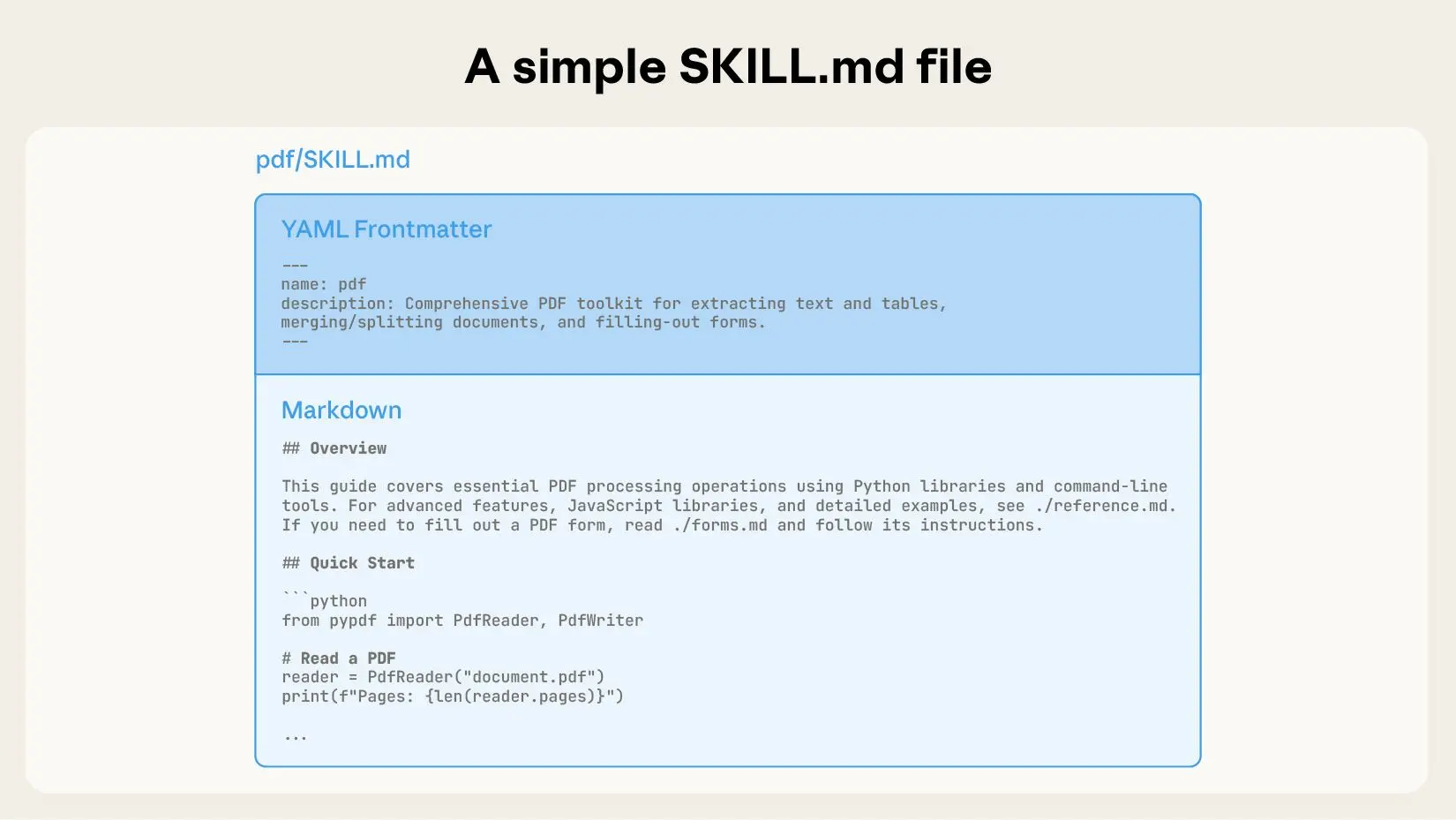
Since these scripts run directly on the user’s local machine, there are significant security risks. If users cannot review the script code, it can easily lead to serious security issues such as data leakage or virus infections. Compared to MCP, which provides a standardized interface, Skills offer a series of script files. Different skills may have different types of script files—for example, some scripts are implemented in Node.js, while others use Python. To use these scripts, users also need to install the corresponding runtime and dependencies. This is why I describe it as "unconventional."
Is this really the best practice?
Regarding Progressive Disclosure, here is how Anthropic describes it:
> Progressive disclosure is the core design principle that makes Agent Skills flexible and scalable. Like a well-organized manual that starts with a table of contents, then specific chapters, and finally a detailed appendix, skills let Claude load information only as needed:
> 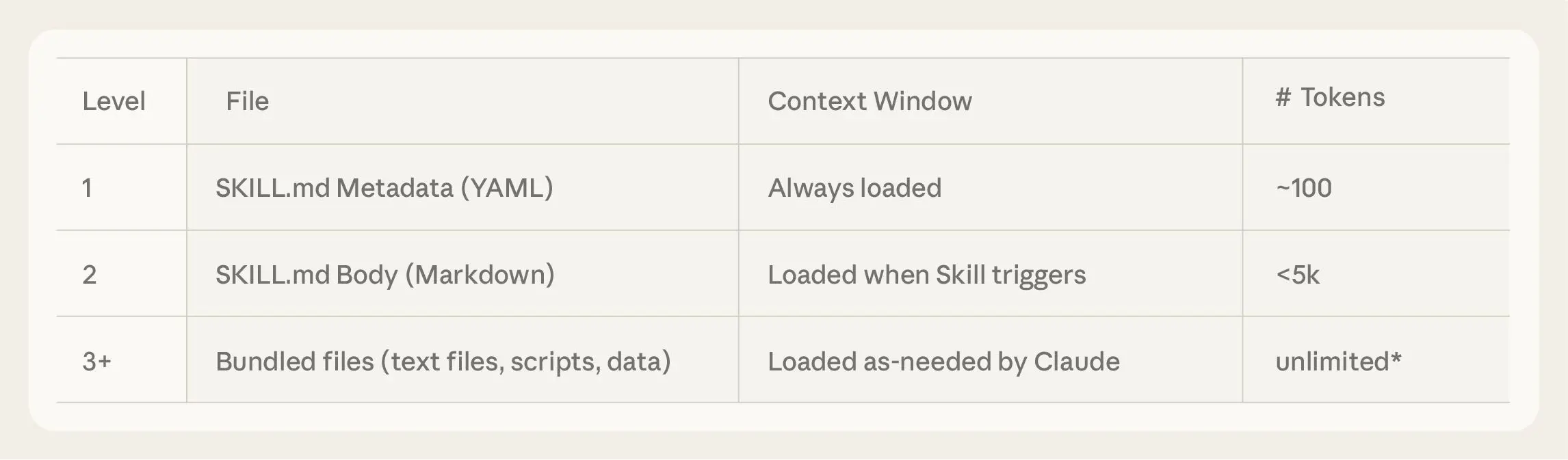
> Agents with a filesystem and code execution tools don’t need to read the entirety of a skill into their context window when working on a particular task. This means that the amount of context that can be bundled into a skill is effectively unbounded.
The following diagram shows how the context window changes when a skill is triggered by a user’s message.
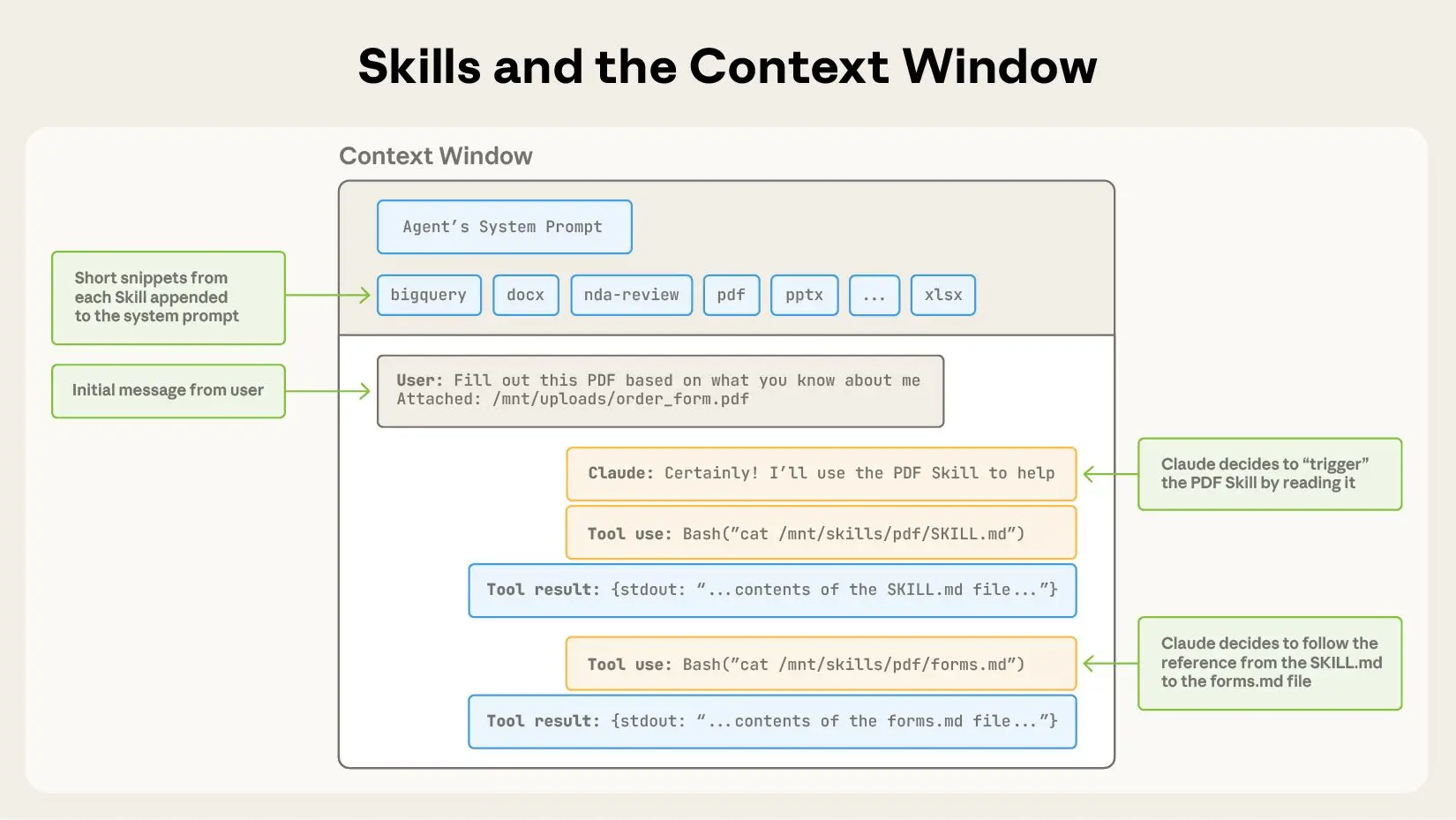
Do we really need to implement it this way?
In our daily use of CLI tools, most CLI tools come with a `--help` parameter for viewing the tool's usage and instructions. Isn't that essentially the tool's user manual? For example:
```shell
> npm --help
npm <command>
Usage:
npm install install all the dependencies in your project
npm install <foo> add the <foo> dependency to your project
npm test run this project's tests
npm run <foo> run the script named <foo>
npm <command> -h quick help on <command>
npm -l display usage info for all commands
npm help <term> search for help on <term>
npm help npm more involved overview
All commands:
access, adduser, audit, bugs, cache, ci, completion,
config, dedupe, deprecate, diff, dist-tag, docs, doctor,
edit, exec, explain, explore, find-dupes, fund, get, help,
help-search, hook, init, install, install-ci-test,
install-test, link, ll, login, logout, ls, org, outdated,
owner, pack, ping, pkg, prefix, profile, prune, publish,
query, rebuild, repo, restart, root, run-script, sbom,
search, set, shrinkwrap, star, stars, start, stop, team,
test, token, uninstall, unpublish, unstar, update, version,
view, whoami
Specify configs in the ini-formatted file:
/Users/xxx/.npmrc
or on the command line via: npm <command> --key=value
More configuration info: npm help config
Configuration fields: npm help 7 config
```
This manual doesn't return every possible usage of every command either. It only lists which commands are available and what functions they can perform. For the specific usage of a command, you can still obtain it by using the `--help` parameter:
```shell
> npm install --help
Install a package
Usage:
npm install [<package-spec> ...]
Options:
[-S|--save|--no-save|--save-prod|--save-dev|--save-optional|--save-peer|--save-bundle]
[-E|--save-exact] [-g|--global]
[--install-strategy <hoisted|nested|shallow|linked>] [--legacy-bundling]
[--global-style] [--omit <dev|optional|peer> [--omit <dev|optional|peer> ...]]
[--include <prod|dev|optional|peer> [--include <prod|dev|optional|peer> ...]]
[--strict-peer-deps] [--prefer-dedupe] [--no-package-lock] [--package-lock-only]
[--foreground-scripts] [--ignore-scripts] [--no-audit] [--no-bin-links]
[--no-fund] [--dry-run] [--cpu <cpu>] [--os <os>] [--libc <libc>]
[-w|--workspace <workspace-name> [-w|--workspace <workspace-name> ...]]
[-ws|--workspaces] [--include-workspace-root] [--install-links]
aliases: add, i, in, ins, inst, insta, instal, isnt, isnta, isntal, isntall
Run "npm help install" for more info
```
Doesn't this resemble the definition of progressive disclosure mentioned above?
Can we implement an MCP in this style to achieve progressive disclosure of tools without needing skills? I used Codex to convert the official PDF Skill into an MCP, exposing only a single tool:
```json
{
"name": "mcp__pdf__pdf",
"description": "Comprehensive PDF manipulation toolkit for extracting text and tables, creating new PDFs, merging/splitting documents, and handling forms. When Claude needs to fill in a PDF form or programmatically process, generate, or analyze PDF documents at scale.You need to pass in the --help parameter to obtain the usage of this tool first.",
"input_schema": {
"type": "object",
"properties": {
"params": {
"$ref": "#/$defs/PdfCommandInput"
}
},
"required": [
"params"
],
"$defs": {
"PdfCommandInput": {
"additionalProperties": false,
"properties": {
"argv": {
"description": "Command tokens excluding the leading 'pdf' executable name",
"items": {
"type": "string"
},
"title": "Argv",
"type": "array"
},
"command": {
"anyOf": [
{
"type": "string"
},
{
"type": "null"
}
],
"default": null,
"description": "Optional command string; if set, it will be split like a shell",
"title": "Command"
}
},
"title": "PdfCommandInput",
"type": "object"
}
},
"title": "pdfArguments"
}
}
```
Below is the change in the context window when using this MCP:
```json
User: Extract all the text from test.pdf and write it into result.txt
Agent: Tool(name="pdf", args=["--help"])
Tool: pdf - Comprehensive PDF manipulation toolkit for extracting text and tables, creating new PDFs, merging/splitting documents, and handling forms. When Claude needs to fill in a PDF form or programmatically process, generate, or analyze PDF documents at scale在使用之前你需要先传入--help参数以获取该工具的用法\n\nUsage:\n pdf [--help] <domain> <command> [options]\n\nDomains:\n forms Fill, extract, and validate PDF form fields.\n documents Create, merge, and split PDFs.\n text Extract text content from PDFs.\n tables Extract tables (heuristic, whitespace-based).\n images Render PDF pages to PNG images.\n\nRun `pdf <domain> --help` for domain help.\nRun `pdf <domain> <command> --help` for command help.
Agent: Tool(name="pdf", args=["text", "--help"])
Tool: text - Extract text content from PDFs.\n\nUsage:\n pdf text <command> [options]\n\nCommands:\n extract Extract text content from a PDF.\n\nRun `pdf text <command> --help` for details.
Agent: Tool(name="pdf", args=["text", "extract", "--help"])
Tool: usage: pdf text extract --pdf PDF_PATH [--pages PAGES] [--out OUTPUT_PATH]\n [--format {text,json}] [--overwrite]\n\nExtract text content from a PDF.\n\noptions:\n --pdf PDF_PATH Input PDF\n --pages PAGES Page selection like 1,3-5 or 'all' (default: all)\n --out OUTPUT_PATH Write extracted text to a file\n --format {text,json} Output format (default: text)\n --overwrite Overwrite output file if it exists\n
Agent: Tool(name="pdf", args=["text", "extract", "--pdf", "test.pdf", "--out", "result.txt", "--overwrite"])
Tool: {"result": {"stdout": "xx","data": {"pdf_path": "test.pdf","page_count": 6,"pages": [xxx],"format": "text","output_path": "result.txt"}}}
Agent: xxx
```
From the perspective of context changes, progressive disclosure has been fully realized. This MCP code is open-source (entirely written by Codex, serving only to validate the idea without any review): https://github.com/musistudio/pdf-skill-mcp
If you have any thoughts or ideas, I’d also welcome the opportunity to discuss them with you. email: [m@musiiot.top](mailto://m@musiiot.top )
================================================
FILE: blog/en/project-motivation-and-how-it-works.md
================================================
# Project Motivation and Principles
As early as the day after Claude Code was released (2025-02-25), I began and completed a reverse engineering attempt of the project. At that time, using Claude Code required registering for an Anthropic account, applying for a waitlist, and waiting for approval. However, due to well-known reasons, Anthropic blocks users from mainland China, making it impossible for me to use the service through normal means. Based on known information, I discovered the following:
1. Claude Code is installed via npm, so it's very likely developed with Node.js.
2. Node.js offers various debugging methods: simple `console.log` usage, launching with `--inspect` to hook into Chrome DevTools, or even debugging obfuscated code using `d8`.
My goal was to use Claude Code without an Anthropic account. I didn’t need the full source code—just a way to intercept and reroute requests made by Claude Code to Anthropic’s models to my own custom endpoint. So I started the reverse engineering process:
1. First, install Claude Code:
```bash
npm install -g @anthropic-ai/claude-code
```
2. After installation, the project is located at `~/.nvm/versions/node/v20.10.0/lib/node_modules/@anthropic-ai/claude-code`(this may vary depending on your Node version manager and version).
3. Open the package.json to analyze the entry point:
```package.json
{
"name": "@anthropic-ai/claude-code",
"version": "1.0.24",
"main": "sdk.mjs",
"types": "sdk.d.ts",
"bin": {
"claude": "cli.js"
},
"engines": {
"node": ">=18.0.0"
},
"type": "module",
"author": "Boris Cherny <boris@anthropic.com>",
"license": "SEE LICENSE IN README.md",
"description": "Use Claude, Anthropic's AI assistant, right from your terminal. Claude can understand your codebase, edit files, run terminal commands, and handle entire workflows for you.",
"homepage": "https://github.com/anthropics/claude-code",
"bugs": {
"url": "https://github.com/anthropics/claude-code/issues"
},
"scripts": {
"prepare": "node -e \"if (!process.env.AUTHORIZED) { console.error('ERROR: Direct publishing is not allowed.\\nPlease use the publish-external.sh script to publish this package.'); process.exit(1); }\"",
"preinstall": "node scripts/preinstall.js"
},
"dependencies": {},
"optionalDependencies": {
"@img/sharp-darwin-arm64": "^0.33.5",
"@img/sharp-darwin-x64": "^0.33.5",
"@img/sharp-linux-arm": "^0.33.5",
"@img/sharp-linux-arm64": "^0.33.5",
"@img/sharp-linux-x64": "^0.33.5",
"@img/sharp-win32-x64": "^0.33.5"
}
}
```
The key entry is `"claude": "cli.js"`. Opening cli.js, you'll see the code is minified and obfuscated. But using WebStorm’s `Format File` feature, you can reformat it for better readability:

Now you can begin understanding Claude Code’s internal logic and prompt structure by reading the code. To dig deeper, you can insert console.log statements or launch in debug mode with Chrome DevTools using:
```bash
NODE_OPTIONS="--inspect-brk=9229" claude
```
This command starts Claude Code in debug mode and opens port 9229. Visit chrome://inspect/ in Chrome and click inspect to begin debugging:


By searching for the keyword api.anthropic.com, you can easily locate where Claude Code makes its API calls. From the surrounding code, it's clear that baseURL can be overridden with the `ANTHROPIC_BASE_URL` environment variable, and `apiKey` and `authToken` can be configured similarly:

So far, we’ve discovered some key information:
1. Environment variables can override Claude Code's `baseURL` and `apiKey`.
2. Claude Code adheres to the Anthropic API specification.
Therefore, we need:
1. A service to convert OpenAI API–compatible requests into Anthropic API format.
2. Set the environment variables before launching Claude Code to redirect requests to this service.
Thus, `claude-code-router` was born. This project uses `Express.js` to implement the `/v1/messages` endpoint. It leverages middlewares to transform request/response formats and supports request rewriting (useful for prompt tuning per model).
Back in February, the full DeepSeek model series had poor support for Function Calling, so I initially used `qwen-max`. It worked well—but without KV cache support, it consumed a large number of tokens and couldn’t provide the native `Claude Code` experience.
So I experimented with a Router-based mode using a lightweight model to dispatch tasks. The architecture included four roles: `router`, `tool`, `think`, and `coder`. Each request passed through a free lightweight model that would decide whether the task involved reasoning, coding, or tool usage. Reasoning and coding tasks looped until a tool was invoked to apply changes. However, the lightweight model lacked the capability to route tasks accurately, and architectural issues prevented it from effectively driving Claude Code.
Everything changed at the end of May when the official Claude Code was launched, and `DeepSeek-R1` model (released 2025-05-28) added Function Call support. I redesigned the system. With the help of AI pair programming, I fixed earlier request/response transformation issues—especially the handling of models that return JSON instead of Function Call outputs.
This time, I used the `DeepSeek-V3` model. It performed better than expected: supporting most tool calls, handling task decomposition and stepwise planning, and—most importantly—costing less than one-tenth the price of Claude 3.5 Sonnet.
The official Claude Code organizes agents differently from the beta version, so I restructured my Router mode to include four roles: the default model, `background`, `think`, and `longContext`.
- The default model handles general tasks and acts as a fallback.
- The `background` model manages lightweight background tasks. According to Anthropic, Claude Haiku 3.5 is often used here, so I routed this to a local `ollama` service.
- The `think` model is responsible for reasoning and planning mode tasks. I use `DeepSeek-R1` here, though it doesn’t support cost control, so `Think` and `UltraThink` behave identically.
- The `longContext` model handles long-context scenarios. The router uses `tiktoken` to calculate token lengths in real time, and if the context exceeds 32K, it switches to this model to compensate for DeepSeek's long-context limitations.
This describes the evolution and reasoning behind the project. By cleverly overriding environment variables, we can forward and modify requests without altering Claude Code’s source—allowing us to benefit from official updates while using our own models and custom prompts.
This project offers a practical approach to running Claude Code under Anthropic’s regional restrictions, balancing `cost`, `performance`, and `customizability`. That said, the official `Max Plan` still offers the best experience if available.
================================================
FILE: blog/zh/GLM-4.6支持思考及思维链回传.md
================================================
# GLM-4.6支持思考及思维链回传
## GLM-4.6在cluade code中启用思考
GLM从4.5开始就对claude code进行了支持,我之前也一直在关注,很多用户反映在claude code中无法启用思考,刚好最近收到了来自智谱的赞助,就着手进行研究。
首先根据[官方文档](https://docs.bigmodel.cn/api-reference/%E6%A8%A1%E5%9E%8B-api/%E5%AF%B9%E8%AF%9D%E8%A1%A5%E5%85%A8),我们发现`/chat/completions`端点是默认启用思考的,但是是由模型判断是否需要进行思考
```
thinking object
仅 GLM-4.5 及以上模型支持此参数配置. 控制大模型是否开启思维链。
thinking.type enum<string> default:enabled
是否开启思维链(当开启后 GLM-4.6 GLM-4.5 为模型自动判断是否思考,GLM-4.5V 为强制思考), 默认: enabled.
Available options: enabled, disabled
```
在claude code本身大量的提示词干扰下,会严重阻碍GLM模型本身的判断机制,导致模型很少进行思考。所以我们需要对模型进行引导,让模型认为需要进行思考。但是`claude-code-router`作为proxy,能做的只能是修改提示词/参数。
在最开始,我尝试直接删除claude code的系统提示词,模型确实进行了思考,但是这样就无法驱动claude code。所以我们需要进行提示词注入,明确告知模型需要进行思考。
```javascript
// transformer.ts
import { UnifiedChatRequest } from "../types/llm";
import { Transformer } from "../types/transformer";
export class ForceReasoningTransformer implements Transformer {
name = "forcereasoning";
async transformRequestIn(
request: UnifiedChatRequest
): Promise<UnifiedChatRequest> {
const systemMessage = request.messages.find(
(item) => item.role === "system"
);
if (Array.isArray(systemMessage?.content)) {
systemMessage.content.push({
type: "text",
text: "You are an expert reasoning model. \nAlways think step by step before answering. Even if the problem seems simple, always write down your reasoning process explicitly. \nNever skip your chain of thought. \nUse the following output format:\n<reasoning_content>(Write your full detailed thinking here.)</reasoning_content>\n\nWrite your final conclusion here.",
});
}
const lastMessage = request.messages[request.messages.length - 1];
if (lastMessage.role === "user" && Array.isArray(lastMessage.content)) {
lastMessage.content.push({
type: "text",
text: "You are an expert reasoning model. \nAlways think step by step before answering. Even if the problem seems simple, always write down your reasoning process explicitly. \nNever skip your chain of thought. \nUse the following output format:\n<reasoning_content>(Write your full detailed thinking here.)</reasoning_content>\n\nWrite your final conclusion here.",
});
}
if (lastMessage.role === "tool") {
request.messages.push({
role: "user",
content: [
{
type: "text",
text: "You are an expert reasoning model. \nAlways think step by step before answering. Even if the problem seems simple, always write down your reasoning process explicitly. \nNever skip your chain of thought. \nUse the following output format:\n<reasoning_content>(Write your full detailed thinking here.)</reasoning_content>\n\nWrite your final conclusion here.",
},
],
});
}
return request;
}
}
```
至于为什么让模型将思考内容放入reasoning_content标签而不是think标签有两个原因:
1. 直接使用think标签不能很好的激活思考,猜测是训练模型时以think标签作为数据集进行训练。
2. 如果使用think标签,模型的推理内容会被拆分到单独的字段,这就涉及到我们接下来要说的思维链回传问题。
## 思维链回传
近期Minimax发布了Minimax-m2,与此同时,他们还发布了一篇[文章](https://www.minimaxi.com/news/why-is-interleaved-thinking-important-for-m2)介绍思维链回传。但是太阳底下无新鲜事,刚好借此来剖析一下。
1. 我们首先来看一下为什么需要回传思维链?
Minimax在文章中说的是Chat Completion API不支持在后续请求中传递推理内容。我们知道ChatGPT是最先支持推理的,但是OpenAI最初没有开放思维链给用户,所以对于Chat Completion API来讲并不需要支持思维链相关的东西。就连CoT的字段也是DeepSeek率先在Chat Completion API中加入的。
2. 我们真的需要这些字段吗?
如果没有这些字段会怎么样?会影响到模型的思考吗?可以查看一下[sglang的源码](https://github.com/sgl-project/sglang/blob/main/python/sglang/srt/parser/reasoning_parser.py)发现思维链的信息原本就会在消息中按照特定的标记进行输出,假如我们不对其进行拆分,正常情况下在下轮对话中会自然包含这些信息。所以需要思维链回传的原因就是我们对模型的思维链内容进行拆分。
我用上面不到40行的代码完成了对GLM-4.5/6支持思考以及思维链回传的简单探索(单纯是因为没时间做拆分,完全可以在transformer中响应时先做拆分,请求时再进行合并,这样对cc前端的展示适配会更好),如果你有什么更好的想法也欢迎与我联系。
================================================
FILE: blog/zh/从CLI工具风格看工具渐进式披露.md
================================================
# 从CLI工具风格看Agent工具渐进式披露
距离Anthropic发布[Skills](https://www.anthropic.com/engineering/equipping-agents-for-the-real-world-with-agent-skills)也过去将近两个月的时间了,其中Anthropic提到了一个术语渐进式披露(Progressive Disclosure),这到底是什么东西?解决了什么问题?
其实在我的Vibe Coding流程中,我很少使用MCP。因为我觉得MCP实现质量层次不齐,本质是上下文注入(工具的本质也是上下文注入),我不确定别人写的提示词会不会影响到我的工作流,干脆直接不用。现在的MCP实现基本上就是把所有的功能全都包装成工具暴露给Agent(一个功能包装成一个工具,给定详细的描述,告诉agent在什么时候进行调用,参数格式是什么),这就导致了现在的提示词爆炸。
直到Anthropic发布了Skills,研究了一下发现本质仍然是提示词注入。如果说MCP是提供了一套注入工具的规范,那么Skills所提倡的则是“离经叛道”。Skills给了一个Markdown文档用于描述该skill的用途和最佳用法,附带提供了一些脚本(与MCP不同)。

由于这些脚本直接在用户本地运行,存在极大的安全风险。如果用户不能对脚本代码进行review,很容易造成数据泄露、感染病毒等严重安全性问题。相比于MCP提供一个标准化的接口,Skill提供一系列的脚本文件,不同的skill可能拥有不同类型的脚本文件,比如有些脚本使用node.js实现,有些脚本使用Python实现,要使用这些脚本还需要用户安装对应的运行时和脚本所需要的依赖。这也是我说“离经叛道”的原因所在。
这真的是最佳实践吗?
关于渐进式披露,Anthropic是这样描述的:
> 渐进式披露是使代理技能灵活且可扩展的核心设计原则。就像一本组织良好的手册,从目录开始,然后是具体章节,最后是详细的附录一样,技能允许 Claude 仅在需要时加载信息:
> 也过去将近两个月的时间了,其中Anthropic提到了一个术语渐进式披露(Progressive Disclosure),这到底是什么东西?解决了什么问题?
其实在我的Vibe Coding流程中,我很少使用MCP。因为我觉得MCP实现质量层次不齐,本质是上下文注入(工具的本质也是上下文注入),我不确定别人写的提示词会不会影响到我的工作流,干脆直接不用。现在的MCP实现基本上就是把所有的功能全都包装成工具暴露给Agent(一个功能包装成一个工具,给定详细的描述,告诉agent在什么时候进行调用,参数格式是什么),这就导致了现在的提示词爆炸。
直到Anthropic发布了Skills,研究了一下发现本质仍然是提示词注入。如果说MCP是提供了一套注入工具的规范,那么Skills所提倡的则是“离经叛道”。Skills给了一个Markdown文档用于描述该skill的用途和最佳用法,附带提供了一些脚本(与MCP不同)。

由于这些脚本直接在用户本地运行,存在极大的安全风险。如果用户不能对脚本代码进行review,很容易造成数据泄露、感染病毒等严重安全性问题。相比于MCP提供一个标准化的接口,Skill提供一系列的脚本文件,不同的skill可能拥有不同类型的脚本文件,比如有些脚本使用node.js实现,有些脚本使用Python实现,要使用这些脚本还需要用户安装对应的运行时和脚本所需要的依赖。这也是我说“离经叛道”的原因所在。
这真的是最佳实践吗?
关于渐进式披露,Anthropic是这样描述的:
> 渐进式披露是使代理技能灵活且可扩展的核心设计原则。就像一本组织良好的手册,从目录开始,然后是具体章节,最后是详细的附录一样,技能允许 Claude 仅在需要时加载信息:
> 
> 拥有文件系统和代码执行工具的智能体在执行特定任务时,无需将技能的全部内容读取到上下文窗口中。这意味着技能中可以包含的上下文信息量实际上是无限的。
下图是使用Skill的上下文窗口变化

我们真的需要这样去实现吗?
在我们平时使用CLI工具时,一般的CLI工具都会带有一个`--help`参数,用于查看该工具的用法和说明,这不就是该工具的使用手册吗?比如:
```shell
> npm --help
npm <command>
Usage:
npm install install all the dependencies in your project
npm install <foo> add the <foo> dependency to your project
npm test run this project's tests
npm run <foo> run the script named <foo>
npm <command> -h quick help on <command>
npm -l display usage info for all commands
npm help <term> search for help on <term>
npm help npm more involved overview
All commands:
access, adduser, audit, bugs, cache, ci, completion,
config, dedupe, deprecate, diff, dist-tag, docs, doctor,
edit, exec, explain, explore, find-dupes, fund, get, help,
help-search, hook, init, install, install-ci-test,
install-test, link, ll, login, logout, ls, org, outdated,
owner, pack, ping, pkg, prefix, profile, prune, publish,
query, rebuild, repo, restart, root, run-script, sbom,
search, set, shrinkwrap, star, stars, start, stop, team,
test, token, uninstall, unpublish, unstar, update, version,
view, whoami
Specify configs in the ini-formatted file:
/Users/xxx/.npmrc
or on the command line via: npm <command> --key=value
More configuration info: npm help config
Configuration fields: npm help 7 config
```
这份手册也不会返回所有的命令所有的用法,它只会返回它有哪些命令可以实现什么功能,对于命令的具体用法你仍然可以通过`--help`参数获得:
```shell
> npm install --help
Install a package
Usage:
npm install [<package-spec> ...]
Options:
[-S|--save|--no-save|--save-prod|--save-dev|--save-optional|--save-peer|--save-bundle]
[-E|--save-exact] [-g|--global]
[--install-strategy <hoisted|nested|shallow|linked>] [--legacy-bundling]
[--global-style] [--omit <dev|optional|peer> [--omit <dev|optional|peer> ...]]
[--include <prod|dev|optional|peer> [--include <prod|dev|optional|peer> ...]]
[--strict-peer-deps] [--prefer-dedupe] [--no-package-lock] [--package-lock-only]
[--foreground-scripts] [--ignore-scripts] [--no-audit] [--no-bin-links]
[--no-fund] [--dry-run] [--cpu <cpu>] [--os <os>] [--libc <libc>]
[-w|--workspace <workspace-name> [-w|--workspace <workspace-name> ...]]
[-ws|--workspaces] [--include-workspace-root] [--install-links]
aliases: add, i, in, ins, inst, insta, instal, isnt, isnta, isntal, isntall
Run "npm help install" for more info
```
这是不是很像上面的渐进式披露的定义?
我们是不是可以按照这种风格去实现一个MCP来实现无需skill的工具渐进式披露?我使用Codex将官方的PDF Skill转换成了一个MCP,只暴露一个工具:
```json
{
"name": "mcp__pdf__pdf",
"description": "Comprehensive PDF manipulation toolkit for extracting text and tables, creating new PDFs, merging/splitting documents, and handling forms. When Claude needs to fill in a PDF form or programmatically process, generate, or analyze PDF documents at scale.You need to pass in the --help parameter to obtain the usage of this tool first.",
"input_schema": {
"type": "object",
"properties": {
"params": {
"$ref": "#/$defs/PdfCommandInput"
}
},
"required": [
"params"
],
"$defs": {
"PdfCommandInput": {
"additionalProperties": false,
"properties": {
"argv": {
"description": "Command tokens excluding the leading 'pdf' executable name",
"items": {
"type": "string"
},
"title": "Argv",
"type": "array"
},
"command": {
"anyOf": [
{
"type": "string"
},
{
"type": "null"
}
],
"default": null,
"description": "Optional command string; if set, it will be split like a shell",
"title": "Command"
}
},
"title": "PdfCommandInput",
"type": "object"
}
},
"title": "pdfArguments"
}
}
```
下面是使用该MCP的上下文窗口变化
```json
User: Extract all the text from test.pdf and write it into result.txt
Agent: Tool(name="pdf", args=["--help"])
Tool: pdf - Comprehensive PDF manipulation toolkit for extracting text and tables, creating new PDFs, merging/splitting documents, and handling forms. When Claude needs to fill in a PDF form or programmatically process, generate, or analyze PDF documents at scale在使用之前你需要先传入--help参数以获取该工具的用法\n\nUsage:\n pdf [--help] <domain> <command> [options]\n\nDomains:\n forms Fill, extract, and validate PDF form fields.\n documents Create, merge, and split PDFs.\n text Extract text content from PDFs.\n tables Extract tables (heuristic, whitespace-based).\n images Render PDF pages to PNG images.\n\nRun `pdf <domain> --help` for domain help.\nRun `pdf <domain> <command> --help` for command help.
Agent: Tool(name="pdf", args=["text", "--help"])
Tool: text - Extract text content from PDFs.\n\nUsage:\n pdf text <command> [options]\n\nCommands:\n extract Extract text content from a PDF.\n\nRun `pdf text <command> --help` for details.
Agent: Tool(name="pdf", args=["text", "extract", "--help"])
Tool: usage: pdf text extract --pdf PDF_PATH [--pages PAGES] [--out OUTPUT_PATH]\n [--format {text,json}] [--overwrite]\n\nExtract text content from a PDF.\n\noptions:\n --pdf PDF_PATH Input PDF\n --pages PAGES Page selection like 1,3-5 or 'all' (default: all)\n --out OUTPUT_PATH Write extracted text to a file\n --format {text,json} Output format (default: text)\n --overwrite Overwrite output file if it exists\n
Agent: Tool(name="pdf", args=["text", "extract", "--pdf", "test.pdf", "--out", "result.txt", "--overwrite"])
Tool: {"result": {"stdout": "xx","data": {"pdf_path": "test.pdf","page_count": 6,"pages": [xxx],"format": "text","output_path": "result.txt"}}}
Agent: xxx
```
从上下文变化情况来看,完全实现了渐进式披露,该MCP代码开源(代码完全由codex编写,只验证想法,未做任何审查): https://github.com/musistudio/pdf-skill-mcp
如果你有什么想法也欢迎与我进行交流hropic.com/_next/image?url=https%3A%2F%2Fwww-cdn.anthropic.com%2Fimages%2F4zrzovbb%2Fwebsite%2Fa3bca2763d7892982a59c28aa4df7993aaae55ae-2292x673.jpg&w=3840&q=75)
> 拥有文件系统和代码执行工具的智能体在执行特定任务时,无需将技能的全部内容读取到上下文窗口中。这意味着技能中可以包含的上下文信息量实际上是无限的。
下图是使用Skill的上下文窗口变化

我们真的需要这样去实现吗?
在我们平时使用CLI工具时,一般的CLI工具都会带有一个`--help`参数,用于查看该工具的用法和说明,这不就是该工具的使用手册吗?比如:
```shell
> npm --help
npm <command>
Usage:
npm install install all the dependencies in your project
npm install <foo> add the <foo> dependency to your project
npm test run this project's tests
npm run <foo> run the script named <foo>
npm <command> -h quick help on <command>
npm -l display usage info for all commands
npm help <term> search for help on <term>
npm help npm more involved overview
All commands:
access, adduser, audit, bugs, cache, ci, completion,
config, dedupe, deprecate, diff, dist-tag, docs, doctor,
edit, exec, explain, explore, find-dupes, fund, get, help,
help-search, hook, init, install, install-ci-test,
install-test, link, ll, login, logout, ls, org, outdated,
owner, pack, ping, pkg, prefix, profile, prune, publish,
query, rebuild, repo, restart, root, run-script, sbom,
search, set, shrinkwrap, star, stars, start, stop, team,
test, token, uninstall, unpublish, unstar, update, version,
view, whoami
Specify configs in the ini-formatted file:
/Users/xxx/.npmrc
or on the command line via: npm <command> --key=value
More configuration info: npm help config
Configuration fields: npm help 7 config
```
这份手册也不会返回所有的命令所有的用法,它只会返回它有哪些命令可以实现什么功能,对于命令的具体用法你仍然可以通过`--help`参数获得:
```shell
> npm install --help
Install a package
Usage:
npm install [<package-spec> ...]
Options:
[-S|--save|--no-save|--save-prod|--save-dev|--save-optional|--save-peer|--save-bundle]
[-E|--save-exact] [-g|--global]
[--install-strategy <hoisted|nested|shallow|linked>] [--legacy-bundling]
[--global-style] [--omit <dev|optional|peer> [--omit <dev|optional|peer> ...]]
[--include <prod|dev|optional|peer> [--include <prod|dev|optional|peer> ...]]
[--strict-peer-deps] [--prefer-dedupe] [--no-package-lock] [--package-lock-only]
[--foreground-scripts] [--ignore-scripts] [--no-audit] [--no-bin-links]
[--no-fund] [--dry-run] [--cpu <cpu>] [--os <os>] [--libc <libc>]
[-w|--workspace <workspace-name> [-w|--workspace <workspace-name> ...]]
[-ws|--workspaces] [--include-workspace-root] [--install-links]
aliases: add, i, in, ins, inst, insta, instal, isnt, isnta, isntal, isntall
Run "npm help install" for more info
```
这是不是很像上面的渐进式披露的定义?
我们是不是可以按照这种风格去实现一个MCP来实现无需skill的工具渐进式披露?我使用Codex将官方的PDF Skill转换成了一个MCP,只暴露一个工具:
```json
{
"name": "mcp__pdf__pdf",
"description": "Comprehensive PDF manipulation toolkit for extracting text and tables, creating new PDFs, merging/splitting documents, and handling forms. When Claude needs to fill in a PDF form or programmatically process, generate, or analyze PDF documents at scale.You need to pass in the --help parameter to obtain the usage of this tool first.",
"input_schema": {
"type": "object",
"properties": {
"params": {
"$ref": "#/$defs/PdfCommandInput"
}
},
"required": [
"params"
],
"$defs": {
"PdfCommandInput": {
"additionalProperties": false,
"properties": {
"argv": {
"description": "Command tokens excluding the leading 'pdf' executable name",
"items": {
"type": "string"
},
"title": "Argv",
"type": "array"
},
"command": {
"anyOf": [
{
"type": "string"
},
{
"type": "null"
}
],
"default": null,
"description": "Optional command string; if set, it will be split like a shell",
"title": "Command"
}
},
"title": "PdfCommandInput",
"type": "object"
}
},
"title": "pdfArguments"
}
}
```
下面是使用该MCP的上下文窗口变化
```json
User: Extract all the text from test.pdf and write it into result.txt
Agent: Tool(name="pdf", args=["--help"])
Tool: pdf - Comprehensive PDF manipulation toolkit for extracting text and tables, creating new PDFs, merging/splitting documents, and handling forms. When Claude needs to fill in a PDF form or programmatically process, generate, or analyze PDF documents at scale在使用之前你需要先传入--help参数以获取该工具的用法\n\nUsage:\n pdf [--help] <domain> <command> [options]\n\nDomains:\n forms Fill, extract, and validate PDF form fields.\n documents Create, merge, and split PDFs.\n text Extract text content from PDFs.\n tables Extract tables (heuristic, whitespace-based).\n images Render PDF pages to PNG images.\n\nRun `pdf <domain> --help` for domain help.\nRun `pdf <domain> <command> --help` for command help.
Agent: Tool(name="pdf", args=["text", "--help"])
Tool: text - Extract text content from PDFs.\n\nUsage:\n pdf text <command> [options]\n\nCommands:\n extract Extract text content from a PDF.\n\nRun `pdf text <command> --help` for details.
Agent: Tool(name="pdf", args=["text", "extract", "--help"])
Tool: usage: pdf text extract --pdf PDF_PATH [--pages PAGES] [--out OUTPUT_PATH]\n [--format {text,json}] [--overwrite]\n\nExtract text content from a PDF.\n\noptions:\n --pdf PDF_PATH Input PDF\n --pages PAGES Page selection like 1,3-5 or 'all' (default: all)\n --out OUTPUT_PATH Write extracted text to a file\n --format {text,json} Output format (default: text)\n --overwrite Overwrite output file if it exists\n
Agent: Tool(name="pdf", args=["text", "extract", "--pdf", "test.pdf", "--out", "result.txt", "--overwrite"])
Tool: {"result": {"stdout": "xx","data": {"pdf_path": "test.pdf","page_count": 6,"pages": [xxx],"format": "text","output_path": "result.txt"}}}
Agent: xxx
```
从上下文变化情况来看,完全实现了渐进式披露,该MCP代码开源(代码完全由codex编写,只验证想法,未做任何审查): https://github.com/musistudio/pdf-skill-mcp
如果你有什么想法也欢迎与我进行交流 email: [m@musiiot.top](mailto://m@musiiot.top )
================================================
FILE: blog/zh/或许我们能在Router中做更多事情.md
================================================
# 或许我们能在 Router 中做更多事情
自从`claude-code-router`发布以来,我收到了很多用户的反馈,至今还有不少的 issues 未处理。其中大多都是关于不同的供应商的支持和`deepseek`模型调用工具不积极的问题。
之前开发这个项目主要是为了我自己能以较低成本使用上`claude code`,所以一开始的设计并没有考虑到多供应商的情况。在实际的排查问题中,我发现尽管市面上所有的供应商几乎都宣称兼容`OpenAI`格式调用,即通过`/chat/compeletions`接口调用,但是其中的细节差异非常多。例如:
1. Gemini 的工具参数类型是 string 时,`format`参数只支持`date`和`date-time`,并且没有工具调用 ID。
2. OpenRouter 需要使用`cache_control`进行缓存。
3. DeepSeek 官方 API 的 `max_output` 为 8192,而火山引擎的会更大。
除了这些问题之外,还有一些其他的小的供应商,他们或多或少参数都有点问题。于是,我打算开发一个新的项目[musistudio/llms](https://github.com/musistudio/llms)来处理这种不同服务商的兼容问题。该项目使用 OpenAI 格式为基础的通用格式,提供了一个`Transformer`接口,该接口用于处理转换请求和响应。当我们给不同的服务商都实现了`Transformer`后,我们可以实现不同服务商的混合调用。比如我在`AnthropicTransformer`中实现了`Anthropic`<->`OpenAI`格式的互相转换,并监听了`/v1/messages`端点,在`GeminiTransformer`中实现了`Gemini`<->`OpenAI`格式的互相转换,并监听了`/v1beta/models/:modelAndAction`端点,当他们的请求和响应都被转换成一个通用格式的时候,就可以实现他们的互相调用。
```
AnthropicRequest -> AnthropicTransformer -> OpenAIRequest -> GeminiTransformer -> GeminiRequest -> GeminiServer
```
```
GeminiReseponse -> GeminiTransformer -> OpenAIResponse -> AnthropicTransformer -> AnthropicResponse
```
虽然使用中间层抹平差异可能会带来一些性能问题,但是该项目最初的目的是为了让`claude-code-router`支持不同的供应商。
至于`deepseek`模型调用工具不积极的问题,我发现这是由于`deepseek`在长上下文中的指令遵循不佳导致的。现象就是刚开始模型会主动调用工具,但是在经过几轮对话后模型只会返回文本。一开始的解决方案是通过注入一个系统提示词告知模型需要积极去使用工具以解决用户的问题,但是后面测试发现在长上下文中模型会遗忘该指令。
查看`deepseek`文档后发现模型支持`tool_choice`参数,可以强制让模型最少调用 1 个工具,我尝试将该值设置为`required`,发现模型调用工具的积极性大大增加,现在我们只需要在合适的时候取消这个参数即可。借助[musistudio/llms](https://github.com/musistudio/llms)的`Transformer`可以让我们在发送请求前和收到响应后做点什么,所以我参考`claude code`的`Plan Mode`,实现了一个使用与`deepseek`的`Tool Mode`
```typescript
export class TooluseTransformer implements Transformer {
name = "tooluse";
transformRequestIn(request: UnifiedChatRequest): UnifiedChatRequest {
if (request.tools?.length) {
request.messages.push({
role: "system",
content: `<system-reminder>Tool mode is active. The user expects you to proactively execute the most suitable tool to help complete the task.
Before invoking a tool, you must carefully evaluate whether it matches the current task. If no available tool is appropriate for the task, you MUST call the \`ExitTool\` to exit tool mode — this is the only valid way to terminate tool mode.
Always prioritize completing the user's task effectively and efficiently by using tools whenever appropriate.</system-reminder>`,
});
request.tool_choice = "required";
request.tools.unshift({
type: "function",
function: {
name: "ExitTool",
description: `Use this tool when you are in tool mode and have completed the task. This is the only valid way to exit tool mode.
IMPORTANT: Before using this tool, ensure that none of the available tools are applicable to the current task. You must evaluate all available options — only if no suitable tool can help you complete the task should you use ExitTool to terminate tool mode.
Examples:
1. Task: "Use a tool to summarize this document" — Do not use ExitTool if a summarization tool is available.
2. Task: "What’s the weather today?" — If no tool is available to answer, use ExitTool after reasoning that none can fulfill the task.`,
parameters: {
type: "object",
properties: {
response: {
type: "string",
description:
"Your response will be forwarded to the user exactly as returned — the tool will not modify or post-process it in any way.",
},
},
required: ["response"],
},
},
});
}
return request;
}
async transformResponseOut(response: Response): Promise<Response> {
if (response.headers.get("Content-Type")?.includes("application/json")) {
const jsonResponse = await response.json();
if (
jsonResponse?.choices[0]?.message.tool_calls?.length &&
jsonResponse?.choices[0]?.message.tool_calls[0]?.function?.name ===
"ExitTool"
) {
const toolArguments = JSON.parse(toolCall.function.arguments || "{}");
jsonResponse.choices[0].message.content = toolArguments.response || "";
delete jsonResponse.choices[0].message.tool_calls;
}
// Handle non-streaming response if needed
return new Response(JSON.stringify(jsonResponse), {
status: response.status,
statusText: response.statusText,
headers: response.headers,
});
} else if (response.headers.get("Content-Type")?.includes("stream")) {
// ...
}
return response;
}
}
```
该工具将始终让模型至少调用一个工具,如果没有合适的工具或者任务已完成可以调用`ExitTool`来退出工具模式,因为是依靠`tool_choice`参数实现的,所以仅适用于支持该参数的模型。经过测试,该工具能显著增加`deepseek`的工具调用次数,弊端是可能会有跟任务无关或者没有必要的工具调用导致增加任务执行事件和消耗的 `token` 数。
这次更新仅仅是在 Router 中实现一个`agent`的一次小探索,或许还能做更多其他有趣的事也说不定...
================================================
FILE: blog/zh/项目初衷及原理.md
================================================
# 项目初衷及原理
早在 Claude Code 发布的第二天(2025-02-25),我就尝试并完成了对该项目的逆向。当时要使用 Claude Code 你需要注册一个 Anthropic 账号,然后申请 waitlist,等待通过后才能使用。但是因为众所周知的原因,Anthropic 屏蔽了中国区的用户,所以通过正常手段我无法使用,通过已知的信息,我发现:
1. Claude Code 使用 npm 进行安装,所以很大可能其使用 Node.js 进行开发。
2. Node.js 调试手段众多,可以简单使用`console.log`获取想要的信息,也可以使用`--inspect`将其接入`Chrome Devtools`,甚至你可以使用`d8`去调试某些加密混淆的代码。
由于我的目标是让我在没有 Anthropic 账号的情况下使用`Claude Code`,我并不需要获得完整的源代码,只需要将`Claude Code`请求 Anthropic 模型时将其转发到我自定义的接口即可。接下来我就开启了我的逆向过程:
1. 首先安装`Claude Code`
```bash
npm install -g @anthropic-ai/claude-code
```
2. 安装后该项目被放在了`~/.nvm/versions/node/v20.10.0/lib/node_modules/@anthropic-ai/claude-code`中,因为我使用了`nvm`作为我的 node 版本控制器,当前使用`node-v20.10.0`,所以该路径会因人而异。
3. 找到项目路径之后可通过 package.json 分析包入口,内容如下:
```package.json
{
"name": "@anthropic-ai/claude-code",
"version": "1.0.24",
"main": "sdk.mjs",
"types": "sdk.d.ts",
"bin": {
"claude": "cli.js"
},
"engines": {
"node": ">=18.0.0"
},
"type": "module",
"author": "Boris Cherny <boris@anthropic.com>",
"license": "SEE LICENSE IN README.md",
"description": "Use Claude, Anthropic's AI assistant, right from your terminal. Claude can understand your codebase, edit files, run terminal commands, and handle entire workflows for you.",
"homepage": "https://github.com/anthropics/claude-code",
"bugs": {
"url": "https://github.com/anthropics/claude-code/issues"
},
"scripts": {
"prepare": "node -e \"if (!process.env.AUTHORIZED) { console.error('ERROR: Direct publishing is not allowed.\\nPlease use the publish-external.sh script to publish this package.'); process.exit(1); }\"",
"preinstall": "node scripts/preinstall.js"
},
"dependencies": {},
"optionalDependencies": {
"@img/sharp-darwin-arm64": "^0.33.5",
"@img/sharp-darwin-x64": "^0.33.5",
"@img/sharp-linux-arm": "^0.33.5",
"@img/sharp-linux-arm64": "^0.33.5",
"@img/sharp-linux-x64": "^0.33.5",
"@img/sharp-win32-x64": "^0.33.5"
}
}
```
其中`"claude": "cli.js"`就是我们要找的入口,打开 cli.js,发现代码被压缩混淆过了。没关系,借助`webstorm`的`Formate File`功能可以重新格式化,让代码变得稍微好看一点。就像这样:

现在,你可以通过阅读部分代码来了解`Claude Code`的内容工具原理与提示词。你也可以在关键地方使用`console.log`来获得更多信息,当然,也可以使用`Chrome Devtools`来进行断点调试,使用以下命令启动`Claude Code`:
```bash
NODE_OPTIONS="--inspect-brk=9229" claude
```
该命令会以调试模式启动`Claude Code`,并将调试的端口设置为`9229`。这时候通过 Chrome 访问`chrome://inspect/`即可看到当前的`Claude Code`进程,点击`inspect`即可进行调试。


通过搜索关键字符`api.anthropic.com`很容易能找到`Claude Code`用来发请求的地方,根据上下文的查看,很容易发现这里的`baseURL`可以通过环境变量`ANTHROPIC_BASE_URL`进行覆盖,`apiKey`和`authToken`也同理。

到目前为止,我们获得关键信息:
1. 可以使用环境变量覆盖`Claude Code`的`BaseURL`和`apiKey`的配置
2. `Claude Code`使用[Anthropic API](https://docs.anthropic.com/en/api/overview)的规范
所以我们需要:
1. 实现一个服务用来将`OpenAI API`的规范转换成`Anthropic API`格式。
2. 启动`Claude Code`之前写入环境变量将`baseURL`指向到该服务。
于是,`claude-code-router`就诞生了,该项目使用`Express.js`作为 HTTP 服务,实现`/v1/messages`端点,使用`middlewares`处理请求/响应的格式转换以及请求重写功能(可以用来重写 Claude Code 的提示词以针对单个模型进行调优)。
在 2 月份由于`DeepSeek`全系列模型对`Function Call`的支持不佳导致无法直接使用`DeepSeek`模型,所以在当时我选择了`qwen-max`模型,一切表现的都很好,但是`qwen-max`不支持`KV Cache`,意味着我要消耗大量的 token,但是却无法获取`Claude Code`原生的体验。
所以我又尝试了`Router`模式,即使用一个小模型对任务进行分发,一共分为四个模型:`router`、`tool`、`think`和`coder`,所有的请求先经过一个免费的小模型,由小模型去判断应该是进行思考还是编码还是调用工具,再进行任务的分发,如果是思考和编码任务将会进行循环调用,直到最终使用工具写入或修改文件。但是实践下来发现免费的小模型不足以很好的完成任务的分发,再加上整个 Agnet 的设计存在缺陷,导致并不能很好的驱动`Claude Code`。
直到 5 月底,`Claude Code`被正式推出,这时`DeepSeek`全系列模型(R1 于 05-28)均支持`Function Call`,我开始重新设计该项目。在与 AI 的结对编程中我修复了之前的请求和响应转换问题,在某些场景下模型输出 JSON 响应而不是`Function Call`。这次直接使用`DeepSeek-v3`模型,它工作的比我想象中要好:能完成绝大多数工具调用,还支持用步骤规划解决任务,最关键的是`DeepSeek`的价格不到`claude Sonnet 3.5`的十分之一。正式发布的`Claude Code`对 Agent 的组织也不同于测试版,于是在分析了`Claude Code`的请求调用之后,我重新组织了`Router`模式:现在它还是四个模型:默认模型、`background`、`think`和`longContext`。
- 默认模型作为最终的兜底和日常处理
- `background`是用来处理一些后台任务,据 Anthropic 官方说主要用`Claude Haiku 3.5`模型去处理一些小任务,如俳句生成和对话摘要,于是我将其路由到了本地的`ollama`服务。
- `think`模型用于让`Claude Code`进行思考或者在`Plan Mode`下使用,这里我使用的是`DeepSeek-R1`,由于其不支持推理成本控制,所以`Think`和`UltraThink`是一样的逻辑。
- `longContext`是用于处理长下上文的场景,该项目会对每次请求使用tiktoken实时计算上下文长度,如果上下文大于32K则使用该模型,旨在弥补`DeepSeek`在长上下文处理不佳的情况。
以上就是该项目的发展历程以及我的一些思考,通过巧妙的使用环境变量覆盖的手段在不修改`Claude Code`源码的情况下完成请求的转发和修改,这就使得在可以得到 Anthropic 更新的同时使用自己的模型,自定义自己的提示词。该项目只是在 Anthropic 封禁中国区用户的情况下使用`Claude Code`并且达到成本和性能平衡的一种手段。如果可以的话,还是官方的Max Plan体验最好。
================================================
FILE: custom-router.example.js
================================================
module.exports = async function router(req, config) {
return "deepseek,deepseek-chat";
};
================================================
FILE: docs/.gitignore
================================================
# Docusaurus build output
build/
dist/
# Docusaurus generated files
.docusaurus/
# Node modules
node_modules/
# Environment variables
.env
.env.local
.env.*.local
# IDE
.vscode/
.idea/
# OS
.DS_Store
Thumbs.db
# Logs
*.log
# Misc
*.swp
*.swo
================================================
FILE: docs/README.md
================================================
# Claude Code Router Documentation
This directory contains the documentation website built with [Docusaurus](https://docusaurus.io/).
## Development
### Install Dependencies
```bash
cd docs
pnpm install
```
### Start Development Server
```bash
# From docs directory
pnpm start
# Or from root directory
pnpm dev:docs
```
Open [http://localhost:3000](http://localhost:3000) to view the documentation.
## Build
```bash
# From docs directory
pnpm build
# Or from root directory
pnpm build:docs
```
The built files will be in the `build/` directory.
## Serve Built Files
```bash
# From docs directory
pnpm serve
# Or from root directory
pnpm serve:docs
```
## Structure
```
docs/
├── docs/ # Markdown documentation files
│ ├── intro.md # Introduction page
│ ├── installation.md
│ ├── config/ # Configuration docs
│ ├── advanced/ # Advanced topics
│ └── cli/ # CLI reference
├── src/ # React components and pages
│ ├── components/ # Custom React components
│ ├── pages/ # Additional pages
│ ├── css/ # Custom CSS
│ └── theme/ # Docusaurus theme customization
├── static/ # Static assets (images, etc.)
├── i18n/ # Internationalization files
├── docusaurus.config.ts # Docusaurus configuration
└── sidebars.ts # Documentation sidebar structure
```
## Adding Documentation
### Adding New Docs
Create a new Markdown file in the `docs/` directory and add it to `sidebars.ts`.
### Adding New Pages
Add React components to `src/pages/`.
### Customizing Styles
Edit `src/css/custom.css`.
## Internationalization
Documentation supports both English and Chinese.
- English: `docs/` and `src/`
- Chinese: `i18n/zh/docusaurus-plugin-content-docs/current/`
To add Chinese translations:
1. Create corresponding files in `i18n/zh/docusaurus-plugin-content-docs/current/`
2. Translate the content
## Deployment
The documentation can be deployed to:
- GitHub Pages
- Netlify
- Vercel
- Any static hosting service
See [Docusaurus deployment docs](https://docusaurus.io/docs/deployment) for details.
================================================
FILE: docs/blog/2025-02-25-project-motivation.md
================================================
---
title: Project Motivation and Principles
date: 2025-02-25
tags: [claude-code, reverse-engineering, tutorial]
---
# Project Motivation and Principles
As early as the day after Claude Code was released (2025-02-25), I began and completed a reverse engineering attempt of the project. At that time, using Claude Code required registering for an Anthropic account, applying for a waitlist, and waiting for approval. However, due to well-known reasons, Anthropic blocks users from mainland China, making it impossible for me to use the service through normal means. Based on known information, I discovered the following:
1. Claude Code is installed via npm, so it's very likely developed with Node.js.
2. Node.js offers various debugging methods: simple `console.log` usage, launching with `--inspect` to hook into Chrome DevTools, or even debugging obfuscated code using `d8`.
My goal was to use Claude Code without an Anthropic account. I didn't need the full source code—just a way to intercept and reroute requests made by Claude Code to Anthropic's models to my own custom endpoint. So I started the reverse engineering process:
1. First, install Claude Code:
```bash
npm install -g @anthropic-ai/claude-code
```
2. After installation, the project is located at `~/.nvm/versions/node/v20.10.0/lib/node_modules/@anthropic-ai/claude-code`(this may vary depending on your Node version manager and version).
3. Open the package.json to analyze the entry point:
```package.json
{
"name": "@anthropic-ai/claude-code",
"version": "1.0.24",
"main": "sdk.mjs",
"types": "sdk.d.ts",
"bin": {
"claude": "cli.js"
},
"engines": {
"node": ">=18.0.0"
},
"type": "module",
"author": "Boris Cherny <boris@anthropic.com>",
"license": "SEE LICENSE IN README.md",
"description": "Use Claude, Anthropic's AI assistant, right from your terminal. Claude can understand your codebase, edit files, run terminal commands, and handle entire workflows for you.",
"homepage": "https://github.com/anthropics/claude-code",
"bugs": {
"url": "https://github.com/anthropics/claude-code/issues"
},
"scripts": {
"prepare": "node -e \"if (!process.env.AUTHORIZED) { console.error('ERROR: Direct publishing is not allowed.\\nPlease use the publish-external.sh script to publish this package.'); process.exit(1); }\"",
"preinstall": "node scripts/preinstall.js"
},
"dependencies": {},
"optionalDependencies": {
"@img/sharp-darwin-arm64": "^0.33.5",
"@img/sharp-darwin-x64": "^0.33.5",
"@img/sharp-linux-arm": "^0.33.5",
"@img/sharp-linux-arm64": "^0.33.5",
"@img/sharp-linux-x64": "^0.33.5",
"@img/sharp-win32-x64": "^0.33.5"
}
}
```
The key entry is `"claude": "cli.js"`. Opening cli.js, you'll see the code is minified and obfuscated. But using WebStorm's `Format File` feature, you can reformat it for better readability:

Now you can begin understanding Claude Code's internal logic and prompt structure by reading the code. To dig deeper, you can insert console.log statements or launch in debug mode with Chrome DevTools using:
```bash
NODE_OPTIONS="--inspect-brk=9229" claude
```
This command starts Claude Code in debug mode and opens port 9229. Visit chrome://inspect/ in Chrome and click inspect to begin debugging:


By searching for the keyword api.anthropic.com, you can easily locate where Claude Code makes its API calls. From the surrounding code, it's clear that baseURL can be overridden with the `ANTHROPIC_BASE_URL` environment variable, and `apiKey` and `authToken` can be configured similarly:

So far, we've discovered some key information:
1. Environment variables can override Claude Code's `baseURL` and `apiKey`.
2. Claude Code adheres to the Anthropic API specification.
Therefore, we need:
1. A service to convert OpenAI API-compatible requests into Anthropic API format.
2. Set the environment variables before launching Claude Code to redirect requests to this service.
Thus, `claude-code-router` was born. This project uses `Express.js` to implement the `/v1/messages` endpoint. It leverages middlewares to transform request/response formats and supports request rewriting (useful for prompt tuning per model).
Back in February, the full DeepSeek model series had poor support for Function Calling, so I initially used `qwen-max`. It worked well—but without KV cache support, it consumed a large number of tokens and couldn't provide the native `Claude Code` experience.
So I experimented with a Router-based mode using a lightweight model to dispatch tasks. The architecture included four roles: `router`, `tool`, `think`, and `coder`. Each request passed through a free lightweight model that would decide whether the task involved reasoning, coding, or tool usage. Reasoning and coding tasks looped until a tool was invoked to apply changes. However, the lightweight model lacked the capability to route tasks accurately, and architectural issues prevented it from effectively driving Claude Code.
Everything changed at the end of May when the official Claude Code was launched, and `DeepSeek-R1` model (released 2025-05-28) added Function Call support. I redesigned the system. With the help of AI pair programming, I fixed earlier request/response transformation issues—especially the handling of models that return JSON instead of Function Call outputs.
This time, I used the `DeepSeek-V3` model. It performed better than expected: supporting most tool calls, handling task decomposition and stepwise planning, and—most importantly—costing less than one-tenth the price of Claude 3.5 Sonnet.
The official Claude Code organizes agents differently from the beta version, so I restructured my Router mode to include four roles: the default model, `background`, `think`, and `longContext`.
- The default model handles general tasks and acts as a fallback.
- The `background` model manages lightweight background tasks. According to Anthropic, Claude Haiku 3.5 is often used here, so I routed this to a local `ollama` service.
- The `think` model is responsible for reasoning and planning mode tasks. I use `DeepSeek-R1` here, though it doesn't support cost control, so `Think` and `UltraThink` behave identically.
- The `longContext` model handles long-context scenarios. The router uses `tiktoken` to calculate token lengths in real time, and if the context exceeds 32K, it switches to this model to compensate for DeepSeek's long-context limitations.
This describes the evolution and reasoning behind the project. By cleverly overriding environment variables, we can forward and modify requests without altering Claude Code's source—allowing us to benefit from official updates while using our own models and custom prompts.
This project offers a practical approach to running Claude Code under Anthropic's regional restrictions, balancing `cost`, `performance`, and `customizability`. That said, the official `Max Plan` still offers the best experience if available.
================================================
FILE: docs/blog/2025-11-18-glm-reasoning.md
================================================
---
title: GLM-4.6 Supports Reasoning and Interleaved Thinking
date: 2025-11-18
tags: [glm, reasoning, chain-of-thought]
---
# GLM-4.6 Supports Reasoning and Interleaved Thinking
## Enabling Reasoning in Claude Code with GLM-4.6
Starting from version 4.5, GLM has supported Claude Code. I've been following its progress closely, and many users have reported that reasoning could not be enabled within Claude Code. Recently, thanks to sponsorship from Zhipu, I decided to investigate this issue in depth. According to the [official documentation](https://docs.z.ai/api-reference/llm/chat-completion), the`/chat/completions` endpoint has reasoning enabled by default, but the model itself decides whether to think:
```
thinking.type enum<string> default:enabled
Whether to enable the chain of thought(When enabled, GLM-4.6, GLM-4.5 and others will automatically determine whether to think, while GLM-4.5V will think compulsorily), default: enabled
Available options: enabled, disabled
```
However, within Claude Code, its heavy system prompt interference disrupts GLM's internal reasoning judgment, causing the model to rarely think.
Therefore, we need to explicitly guide the model to believe reasoning is required. Since claude-code-router functions as a proxy, the only feasible approach is modifying prompts or parameters.
Initially, I tried completely removing Claude Code's system prompt — and indeed, the model started reasoning — but that broke Claude Code's workflow.
So instead, I used prompt injection to clearly instruct the model to think step by step.
```javascript
// transformer.ts
import { UnifiedChatRequest } from "../types/llm";
import { Transformer } from "../types/transformer";
export class ForceReasoningTransformer implements Transformer {
name = "forcereasoning";
async transformRequestIn(
request: UnifiedChatRequest
): Promise<UnifiedChatRequest> {
const systemMessage = request.messages.find(
(item) => item.role === "system"
);
if (Array.isArray(systemMessage?.content)) {
systemMessage.content.push({
type: "text",
text: "You are an expert reasoning model.\nAlways think step by step before answering. Even if the problem seems simple, always write down your reasoning process explicitly.\nNever skip your chain of thought.\nUse the following output format:\n<reasoning_content>(Write your full detailed thinking here.)</reasoning_content>\n\nWrite your final conclusion here.",
});
}
const lastMessage = request.messages[request.messages.length - 1];
if (lastMessage.role === "user" && Array.isArray(lastMessage.content)) {
lastMessage.content.push({
type: "text",
text: "You are an expert reasoning model.\nAlways think step by step before answering. Even if the problem seems simple, always write down your reasoning process explicitly.\nNever skip your chain of thought.\nUse the following output format:\n<reasoning_content>(Write your full detailed thinking here.)</reasoning_content>\n\nWrite your final conclusion here.",
});
}
if (lastMessage.role === "tool") {
request.messages.push({
role: "user",
content: [
{
type: "text",
text: "You are an expert reasoning model.\nAlways think step by step before answering. Even if the problem seems simple, always write down your reasoning process explicitly.\nNever skip your chain of thought.\nUse the following output format:\n<reasoning_content>(Write your full detailed thinking here.)</reasoning_content>\n\nWrite your final conclusion here.",
},
],
});
}
return request;
}
}
```
Why use `<reasoning_content>` instead of the `<think>` tag? Two reasons:
1. Using the `<think>` tag doesn't effectively trigger reasoning — likely because the model was trained on data where `<think>` had special behavior.
2. If we use `<think>`, the reasoning output is split into a separate field, which directly relates to the chain-of-thought feedback problem discussed below.
## Chain-of-Thought Feedback
Recently, Minimax released `Minimax-m2`, along with [an article](https://www.minimaxi.com/news/why-is-interleaved-thinking-important-for-m2) explaining interleaved thinking.
While the idea isn't entirely new, it's a good opportunity to analyze it.
Why do we need to interleaved thinking?
Minimax's article mentions that the Chat Completion API does not support passing reasoning content between requests.
We know ChatGPT was the first to support reasoning, but OpenAI initially didn't expose the chain of thought to users.
Therefore, the Chat Completion API didn't need to support it. Even the CoT field was first introduced by DeepSeek.
Do we really need explicit CoT fields? What happens if we don't have them? Will it affect reasoning?
By inspecting [sglang's source code](https://github.com/sgl-project/sglang/blob/main/python/sglang/srt/parser/reasoning_parser.py), we can see that reasoning content is naturally emitted in messages with specific markers.
If we don't split it out, the next-round conversation will naturally include it.
Thus, the only reason we need interleaved thinking is because we separated the reasoning content from the normal messages.
With fewer than 40 lines of code above, I implemented a simple exploration of enabling reasoning and chain-of-thought feedback for GLM-4.5/4.6.
(It's only simple because I haven't implemented parsing logic yet — you could easily modify the transformer to split reasoning output on response and merge it back on request, improving Claude Code's frontend display compatibility.)
If you have better ideas, feel free to reach out — I'd love to discuss further.
================================================
FILE: docs/blog/2025-11-18-router-exploration.md
================================================
---
title: Maybe We Can Do More with the Router
date: 2025-11-18
tags: [router, transformer, deepseek]
---
# Maybe We Can Do More with the Router
Since the release of `claude-code-router`, I've received a lot of user feedback, and quite a few issues are still open. Most of them are related to support for different providers and the lack of tool usage from the deepseek model.
Originally, I created this project for personal use, mainly to access claude code at a lower cost. So, multi-provider support wasn't part of the initial design. But during troubleshooting, I discovered that even though most providers claim to be compatible with the OpenAI-style `/chat/completions` interface, there are many subtle differences. For example:
1. When Gemini's tool parameter type is string, the `format` field only supports `date` and `date-time`, and there's no tool call ID.
2. OpenRouter requires `cache_control` for caching.
3. The official DeepSeek API has a `max_output` of 8192, but Volcano Engine's limit is even higher.
Aside from these, smaller providers often have quirks in their parameter handling. So I decided to create a new project, [musistudio/llms](https://github.com/musistudio/llms), to deal with these compatibility issues. It uses the OpenAI format as a base and introduces a generic Transformer interface for transforming both requests and responses.
Once a `Transformer` is implemented for each provider, it becomes possible to mix-and-match requests between them. For example, I implemented bidirectional conversion between Anthropic and OpenAI formats in `AnthropicTransformer`, which listens to the `/v1/messages` endpoint. Similarly, `GeminiTransformer` handles Gemini <-> OpenAI format conversions and listens to `/v1beta/models/:modelAndAction`.
When both requests and responses are transformed into a common format, they can interoperate seamlessly:
```
AnthropicRequest -> AnthropicTransformer -> OpenAIRequest -> GeminiTransformer -> GeminiRequest -> GeminiServer
```
```
GeminiResponse -> GeminiTransformer -> OpenAIResponse -> AnthropicTransformer -> AnthropicResponse
```
Using a middleware layer to smooth out differences may introduce some performance overhead, but the main goal here is to enable `claude-code-router` to support multiple providers.
As for the issue of DeepSeek's lackluster tool usage — I found that it stems from poor instruction adherence in long conversations. Initially, the model actively calls tools, but after several rounds, it starts responding with plain text instead. My first workaround was injecting a system prompt to remind the model to use tools proactively. But in long contexts, the model tends to forget this instruction.
After reading the DeepSeek documentation, I noticed it supports the `tool_choice` parameter, which can be set to `"required"` to force the model to use at least one tool. I tested this by enabling the parameter, and it significantly improved the model's tool usage. We can remove the setting when it's no longer necessary. With the help of the `Transformer` interface in [musistudio/llms](https://github.com/musistudio/llms), we can modify the request before it's sent and adjust the response after it's received.
Inspired by the Plan Mode in `claude code`, I implemented a similar Tool Mode for DeepSeek:
```typescript
export class TooluseTransformer implements Transformer {
name = "tooluse";
transformRequestIn(request: UnifiedChatRequest): UnifiedChatRequest {
if (request.tools?.length) {
request.messages.push({
role: "system",
content: `<system-reminder>Tool mode is active. The user expects you to proactively execute the most suitable tool to help complete the task.
Before invoking a tool, you must carefully evaluate whether it matches the current task. If no available tool is appropriate for the task, you MUST call the \`ExitTool\` to exit tool mode — this is the only valid way to terminate tool mode.
Always prioritize completing the user's task effectively and efficiently by using tools whenever appropriate.</system-reminder>`,
});
request.tool_choice = "required";
request.tools.unshift({
type: "function",
function: {
name: "ExitTool",
description: `Use this tool when you are in tool mode and have completed the task. This is the only valid way to exit tool mode.
IMPORTANT: Before using this tool, ensure that none of the available tools are applicable to the current task. You must evaluate all available options — only if no suitable tool can help you complete the task should you use ExitTool to terminate tool mode.
Examples:
1. Task: "Use a tool to summarize this document" — Do not use ExitTool if a summarization tool is available.
2. Task: "What's the weather today?" — If no tool is available to answer, use ExitTool after reasoning that none can fulfill the task.`,
parameters: {
type: "object",
properties: {
response: {
type: "string",
description:
"Your response will be forwarded to the user exactly as returned — the tool will not modify or post-process it in any way.",
},
},
required: ["response"],
},
},
});
}
return request;
}
async transformResponseOut(response: Response): Promise<Response> {
if (response.headers.get("Content-Type")?.includes("application/json")) {
const jsonResponse = await response.json();
if (
jsonResponse?.choices[0]?.message.tool_calls?.length &&
jsonResponse?.choices[0]?.message.tool_calls[0]?.function?.name ===
"ExitTool"
) {
const toolArguments = JSON.parse(toolCall.function.arguments || "{}");
jsonResponse.choices[0].message.content = toolArguments.response || "";
delete jsonResponse.choices[0].message.tool_calls;
}
// Handle non-streaming response if needed
return new Response(JSON.stringify(jsonResponse), {
status: response.status,
statusText: response.statusText,
headers: response.headers,
});
} else if (response.headers.get("Content-Type")?.includes("stream")) {
// ...
}
return response;
}
}
```
This transformer ensures the model calls at least one tool. If no tools are appropriate or the task is finished, it can exit using `ExitTool`. Since this relies on the `tool_choice` parameter, it only works with models that support it.
In practice, this approach noticeably improves tool usage for DeepSeek. The tradeoff is that sometimes the model may invoke irrelevant or unnecessary tools, which could increase latency and token usage.
This update is just a small experiment — adding an `"agent"` to the router. Maybe there are more interesting things we can explore from here.
================================================
FILE: docs/docs/cli/commands/model.md
================================================
---
sidebar_position: 2
---
# ccr model
Interactive model selection and configuration.
## Usage
```bash
ccr model [command]
```
## Commands
### Select Model
Interactively select a model:
```bash
ccr model
```
This will display an interactive menu with available providers and models.
### Set Default Model
Set the default model directly:
```bash
ccr model set <provider>,<model>
```
Example:
```bash
ccr model set deepseek,deepseek-chat
```
### List Models
List all configured models:
```bash
ccr model list
```
### Add Model
Add a new model to configuration:
```bash
ccr model add <provider>,<model>
```
Example:
```bash
ccr model add groq,llama-3.3-70b-versatile
```
### Remove Model
Remove a model from configuration:
```bash
ccr model remove <provider>,<model>
```
## Examples
### Interactive selection
```bash
$ ccr model
? Select a provider: deepseek
? Select a model: deepseek-chat
Default model set to: deepseek,deepseek-chat
```
### Direct configuration
```bash
ccr model set deepseek,deepseek-chat
```
### View current configuration
```bash
ccr model list
```
Output:
```
Configured Models:
deepseek,deepseek-chat (default)
groq,llama-3.3-70b-versatile
gemini,gemini-1.5-pro
```
## Related Commands
- [ccr start](/docs/cli/start) - Start the server
- [ccr config](/docs/cli/other-commands#ccr-config) - Edit configuration
================================================
FILE: docs/docs/cli/commands/other.md
================================================
---
sidebar_position: 4
---
# Other Commands
Additional CLI commands for managing Claude Code Router.
## ccr stop
Stop the running server.
```bash
ccr stop
```
## ccr restart
Restart the server.
```bash
ccr restart
```
## ccr code
Execute a claude command through the router.
```bash
ccr code [args...]
```
## ccr ui
Open the Web UI in your browser.
```bash
ccr ui
```
## ccr activate
Output shell environment variables for integration with external tools.
```bash
ccr activate
```
## Global Options
These options can be used with any command:
| Option | Description |
|--------|-------------|
| `-h, --help` | Show help |
| `-v, --version` | Show version number |
| `--config <path>` | Path to configuration file |
| `--verbose` | Enable verbose output |
## Examples
### Stop the server
```bash
ccr stop
```
### Restart with custom config
```bash
ccr restart --config /path/to/config.json
```
### Open Web UI
```bash
ccr ui
```
## Related Documentation
- [Getting Started](/docs/intro) - Introduction to Claude Code Router
- [Configuration](/docs/config/basic) - Configuration guide
================================================
FILE: docs/docs/cli/commands/preset.md
================================================
---
sidebar_position: 5
---
# ccr preset
Manage presets - configuration templates that can be shared and reused.
## Overview
Presets allow you to:
- Save your current configuration as a reusable template
- Share configurations with others
- Install pre-configured setups from the community
- Switch between different configurations easily
## Commands
### export
Export your current configuration as a preset.
```bash
ccr preset export <name> [options]
```
**Options:**
- `--output <path>` - Custom output directory path
- `--description <text>` - Preset description
- `--author <name>` - Preset author
- `--tags <tags>` - Comma-separated keywords
- `--include-sensitive` - Include API keys and sensitive data (not recommended)
**Example:**
```bash
ccr preset export my-config --description "My production setup" --author "Your Name"
```
**What happens:**
1. Reads current configuration from `~/.claude-code-router/config.json`
2. Prompts for description, author, and keywords (if not provided)
3. Sanitizes sensitive fields (API keys become placeholders)
4. Creates preset directory at `~/.claude-code-router/presets/<name>/`
5. Generates `manifest.json` with configuration and metadata
### install
Install a preset from a local directory.
```bash
ccr preset install <source>
```
**Sources:**
- Local directory path: `/path/to/preset-directory`
- Preset name (for reconfiguring an already installed preset): `preset-name`
**Example:**
```bash
# Install from directory
ccr preset install ./my-preset
# Reconfigure an installed preset
ccr preset install my-preset
```
**What happens:**
1. Reads `manifest.json` from the preset directory
2. Validates the preset structure
3. If the preset has a `schema`, prompts for required values (API keys, etc.)
4. Copies preset to `~/.claude-code-router/presets/<name>/`
5. Saves user inputs in `manifest.json`
**Note:** URL installation is not currently supported. Download the preset directory first.
### list
List all installed presets.
```bash
ccr preset list
```
**Example output:**
```
Available presets:
• my-config (v1.0.0)
My production setup
by Your Name
• openai-setup
Basic OpenAI configuration
```
### info
Show detailed information about a preset.
```bash
ccr preset info <name>
```
**Shows:**
- Version, description, author, keywords
- Configuration summary (Providers, Router rules)
- Required inputs (if any)
**Example:**
```bash
ccr preset info my-config
```
### delete / rm / remove
Delete an installed preset.
```bash
ccr preset delete <name>
ccr preset rm <name>
ccr preset remove <name>
```
**Example:**
```bash
ccr preset delete my-config
```
## Preset Structure
A preset is a directory containing a `manifest.json` file:
```json
{
"name": "my-preset",
"version": "1.0.0",
"description": "My configuration",
"author": "Author Name",
"keywords": ["openai", "production"],
"Providers": [
{
"name": "openai",
"api_base_url": "https://api.openai.com/v1/chat/completions",
"api_key": "{{apiKey}}",
"models": ["gpt-4", "gpt-3.5-turbo"]
}
],
"Router": {
"default": "openai,gpt-4"
},
"schema": [
{
"id": "apiKey",
"type": "password",
"label": "OpenAI API Key",
"prompt": "Enter your OpenAI API key"
}
]
}
```
### Schema System
The `schema` field defines inputs that users must provide during installation:
**Field types:**
- `password` - Hidden input (for API keys)
- `input` - Text input
- `select` - Single selection from options
- `multiselect` - Multiple selection
- `confirm` - Yes/No confirmation
- `editor` - Multi-line text
- `number` - Numeric input
**Dynamic options:**
```json
{
"id": "provider",
"type": "select",
"label": "Select Provider",
"options": {
"type": "providers"
}
}
```
**Conditional fields:**
```json
{
"id": "model",
"type": "select",
"label": "Select Model",
"when": {
"field": "provider",
"operator": "exists"
},
"options": {
"type": "models",
"providerField": "#{selectedProvider}"
}
}
```
## Sharing Presets
To share a preset:
1. **Export your configuration:**
```bash
ccr preset export my-preset
```
2. **Share the directory:**
```bash
~/.claude-code-router/presets/my-preset/
```
3. **Distribution methods:**
- Upload to GitHub repository
- Create a GitHub Gist
- Share as a zip file
- Publish on npm (future feature)
4. **Users install with:**
```bash
ccr preset install /path/to/my-preset
```
## Security
### Automatic Sanitization
By default, `export` sanitizes sensitive fields:
- Fields named `api_key`, `apikey`, `password`, `secret` are replaced with `{{fieldName}}` placeholders
- These placeholders become required inputs in the schema
- Users are prompted to provide their own values during installation
### Include Sensitive Data
To include actual values (not recommended):
```bash
ccr preset export my-preset --include-sensitive
```
**Warning:** Never share presets containing sensitive data!
## Related Documentation
- [Configuration Guide](/docs/cli/config/basic) - Basic configuration
- [Project-Level Configuration](/docs/cli/config/project-level) - Project-specific settings
- [Presets](/docs/presets/intro) - Advanced preset topics
================================================
FILE: docs/docs/cli/commands/start.md
================================================
---
sidebar_position: 1
---
# ccr start
Start the Claude Code Router server.
## Usage
```bash
ccr start [options]
```
## Options
| Option | Alias | Description |
|--------|-------|-------------|
| `--port <number>` | `-p` | Port to listen on (default: 8080) |
| `--config <path>` | `-c` | Path to configuration file |
| `--daemon` | `-d` | Run as daemon (background process) |
| `--log-level <level>` | `-l` | Log level (fatal/error/warn/info/debug/trace) |
## Examples
### Start with default settings
```bash
ccr start
```
### Start on custom port
```bash
ccr start --port 3000
```
### Start with custom config
```bash
ccr start --config /path/to/config.json
```
### Start as daemon
```bash
ccr start --daemon
```
### Start with debug logging
```bash
ccr start --log-level debug
```
## Environment Variables
You can also configure the server using environment variables:
| Variable | Description |
|----------|-------------|
| `PORT` | Port to listen on |
| `CONFIG_PATH` | Path to configuration file |
| `LOG_LEVEL` | Logging level |
| `CUSTOM_ROUTER_PATH` | Path to custom router function |
| `HOST` | Host to bind to (default: 0.0.0.0) |
## Output
When started successfully, you'll see:
```
Claude Code Router is running on http://localhost:8080
API endpoint: http://localhost:8080/v1
```
## Related Commands
- [ccr stop](/docs/cli/other-commands#ccr-stop) - Stop the server
- [ccr restart](/docs/cli/other-commands#ccr-restart) - Restart the server
- [ccr status](/docs/cli/other-commands#ccr-status) - Check server status
================================================
FILE: docs/docs/cli/commands/status.md
================================================
---
sidebar_position: 3
---
# ccr status
Show the current status of the Claude Code Router server.
## Usage
```bash
ccr status
```
## Output
### Running Server
When the server is running:
```
Claude Code Router Status: Running
Version: 2.0.0
PID: 12345
Port: 8080
Uptime: 2h 34m
Configuration: /home/user/.claude-code-router/config.json
```
### Stopped Server
When the server is not running:
```
Claude Code Router Status: Stopped
```
## Exit Codes
| Code | Description |
|------|-------------|
| 0 | Server is running |
| 1 | Server is stopped |
| 2 | Error checking status |
## Examples
```bash
$ ccr status
Claude Code Router Status: Running
Version: 2.0.0
PID: 12345
Port: 8080
Uptime: 2h 34m
```
## Related Commands
- [ccr start](/docs/cli/start) - Start the server
- [ccr stop](/docs/cli/other-commands#ccr-stop) - Stop the server
- [ccr restart](/docs/cli/other-commands#ccr-restart) - Restart the server
================================================
FILE: docs/docs/cli/commands/statusline.md
================================================
---
sidebar_position: 5
---
# ccr statusline
Display a customizable status bar showing real-time information about your Claude Code session, including workspace, Git branch, model, token usage, and more.
## Overview
The `ccr statusline` command reads JSON data from stdin and renders a beautifully formatted status bar in your terminal. It's designed to integrate with Claude Code's hook system to display real-time session information.
## Usage
### Basic Usage
```bash
ccr statusline
```
The command expects JSON data via stdin, typically piped from a Claude Code hook:
```bash
echo '{"hook_event_name":"...","session_id":"...","..."}' | ccr statusline
```
### Hook Integration
Configure in your Claude Code settings:
```json
{
"hooks": {
"postResponse": {
"command": "ccr statusline",
"input": "json"
}
}
}
```
## Available Themes
### Default Theme
A clean, minimal theme with Nerd Font icons and colored text:
```
my-project main claude-3-5-sonnet-20241022 ↑ 12.3k ↓ 5.2k
```
### Powerline Theme
A vim-powerline inspired style with colored backgrounds and arrow separators:
```
my-project main claude-3-5-sonnet-20241022 ↑ 12.3k ↓ 5.2k
```
Activate by setting `currentStyle: "powerline"` in your config.
### Simple Theme
Fallback theme without icons for terminals that don't support Nerd Fonts:
```
my-project main claude-3-5-sonnet-20241022 ↑ 12.3k ↓ 5.2k
```
Automatically used when `USE_SIMPLE_ICONS=true` or on unsupported terminals.
## Available Modules
Status line modules display different types of information:
| Module | Description | Variables |
|--------|-------------|-----------|
| **workDir** | Current working directory name | `{{workDirName}}` |
| **gitBranch** | Current Git branch | `{{gitBranch}}` |
| **model** | Model being used | `{{model}}` |
| **usage** | Token usage (input/output) | `{{inputTokens}}`, `{{outputTokens}}` |
| **context** | Context window usage | `{{contextPercent}}`, `{{contextWindowSize}}` |
| **speed** | Token processing speed | `{{tokenSpeed}}`, `{{isStreaming}}` |
| **cost** | API cost | `{{cost}}` |
| **duration** | Session duration | `{{duration}}` |
| **lines** | Code changes | `{{linesAdded}}`, `{{linesRemoved}}` |
| **script** | Custom script output | Dynamic |
## Configuration
Configure statusline in `~/.claude-code-router/config.json`:
### Default Style Example
```json
{
"StatusLine": {
"currentStyle": "default",
"default": {
"modules": [
{
"type": "workDir",
"icon": "",
"text": "{{workDirName}}",
"color": "bright_blue"
},
{
"type": "gitBranch",
"icon": "",
"text": "{{gitBranch}}",
"color": "bright_magenta"
},
{
"type": "model",
"icon": "",
"text": "{{model}}",
"color": "bright_cyan"
},
{
"type": "usage",
"icon": "↑",
"text": "{{inputTokens}}",
"color": "bright_green"
},
{
"type": "usage",
"icon": "↓",
"text": "{{outputTokens}}",
"color": "bright_yellow"
}
]
}
}
}
```
### Powerline Style Example
```json
{
"StatusLine": {
"currentStyle": "powerline",
"powerline": {
"modules": [
{
"type": "workDir",
"icon": "",
"text": "{{workDirName}}",
"color": "white",
"background": "bg_bright_blue"
},
{
"type": "gitBranch",
"icon": "",
"text": "{{gitBranch}}",
"color": "white",
"background": "bg_bright_magenta"
}
]
}
}
}
```
### Full Featured Example
```json
{
"StatusLine": {
"currentStyle": "default",
"default": {
"modules": [
{
"type": "workDir",
"icon": "",
"text": "{{workDirName}}",
"color": "bright_blue"
},
{
"type": "gitBranch",
"icon": "",
"text": "{{gitBranch}}",
"color": "bright_magenta"
},
{
"type": "model",
"icon": "",
"text": "{{model}}",
"color": "bright_cyan"
},
{
"type": "context",
"icon": "🪟",
"text": "{{contextPercent}}% / {{contextWindowSize}}",
"color": "bright_green"
},
{
"type": "speed",
"icon": "⚡",
"text": "{{tokenSpeed}} t/s {{isStreaming}}",
"color": "bright_yellow"
},
{
"type": "cost",
"icon": "💰",
"text": "{{cost}}",
"color": "bright_magenta"
},
{
"type": "duration",
"icon": "⏱️",
"text": "{{duration}}",
"color": "bright_white"
},
{
"type": "lines",
"icon": "📝",
"text": "+{{linesAdded}}/-{{linesRemoved}}",
"color": "bright_cyan"
}
]
}
}
}
```
## Custom Scripts
You can create custom modules by executing scripts:
```json
{
"type": "script",
"icon": "🔧",
"scriptPath": "/path/to/script.js",
"options": {
"customOption": "value"
}
}
```
Script format (CommonJS):
```javascript
// my-status-module.js
module.exports = function(variables, options) {
// Access variables like model, gitBranch, etc.
// Access options from configuration
return `Custom: ${variables.model}`;
};
// Or async
module.exports = async function(variables, options) {
const data = await fetchSomeData();
return data;
};
```
## Color Options
### Standard Colors
- `black`, `red`, `green`, `yellow`, `blue`, `magenta`, `cyan`, `white`
- `bright_black`, `bright_red`, `bright_green`, `bright_yellow`, `bright_blue`, `bright_magenta`, `bright_cyan`, `bright_white`
### Background Colors
Prefix with `bg_`: `bg_blue`, `bg_bright_red`, etc.
### Hexadecimal Colors
Use 24-bit TrueColor with hex codes:
```json
{
"color": "#FF5733",
"background": "bg_#1E90FF"
}
```
## Available Variables
All variables are accessible in module text using `{{variableName}}`:
| Variable | Description | Example |
|----------|-------------|---------|
| `{{workDirName}}` | Current directory name | `my-project` |
| `{{gitBranch}}` | Git branch name | `main` |
| `{{model}}` | Model name | `claude-3-5-sonnet-20241022` |
| `{{inputTokens}}` | Input tokens (formatted) | `12.3k` |
| `{{outputTokens}}` | Output tokens (formatted) | `5.2k` |
| `{{tokenSpeed}}` | Tokens per second | `45` |
| `{{isStreaming}}` | Streaming status | `streaming` or empty |
| `{{contextPercent}}` | Context usage percentage | `45` |
| `{{contextWindowSize}}` | Total context window | `200k` |
| `{{cost}}` | Total cost | `$0.15` |
| `{{duration}}` | Session duration | `2m34s` |
| `{{linesAdded}}` | Lines added | `150` |
| `{{linesRemoved}}` | Lines removed | `25` |
| `{{sessionId}}` | Session ID (first 8 chars) | `a1b2c3d4` |
## Environment Variables
Control behavior with environment variables:
| Variable | Values | Description |
|----------|--------|-------------|
| `USE_SIMPLE_ICONS` | `true`/`false` | Force simple theme without icons |
| `NERD_FONT` | Any value | Auto-detect Nerd Font support |
## Examples
### Minimal Status Line
```json
{
"StatusLine": {
"default": {
"modules": [
{
"type": "model",
"text": "{{model}}"
},
{
"type": "usage",
"text": "↑{{inputTokens}} ↓{{outputTokens}}"
}
]
}
}
}
```
Output: `claude-3-5-sonnet-20241022 ↑12.3k ↓5.2k`
### Developer Productivity Focus
```json
{
"StatusLine": {
"default": {
"modules": [
{
"type": "gitBranch",
"icon": "",
"text": "{{gitBranch}}",
"color": "bright_magenta"
},
{
"type": "lines",
"icon": "📝",
"text": "+{{linesAdded}}/-{{linesRemoved}}",
"color": "bright_cyan"
},
{
"type": "duration",
"icon": "⏱️",
"text": "{{duration}}",
"color": "bright_white"
}
]
}
}
}
```
Output: ` feature/auth 📝 +150/-25 ⏱️ 2m34s`
## Preset Integration
Statusline themes can be included in presets. When you install a preset with statusline configuration, it will automatically apply when you activate that preset.
See [Presets](/docs/presets/intro) for more information.
## Troubleshooting
### Icons Not Displaying
Set `USE_SIMPLE_ICONS=true` in your environment:
```bash
export USE_SIMPLE_ICONS=true
```
### Colors Not Working
Ensure your terminal supports TrueColor (24-bit color):
```bash
export COLORTERM=truecolor
```
### Git Branch Not Showing
Ensure you're in a Git repository and have the `git` command installed.
## Related Commands
- [ccr status](/docs/cli/commands/status) - Check server status
- [ccr preset](/docs/cli/commands/preset) - Manage presets with statusline themes
================================================
FILE: docs/docs/cli/config/basic.md
================================================
---
title: Basic Configuration
---
# Basic Configuration
CLI uses the same configuration file as Server: `~/.claude-code-router/config.json`
## Configuration Methods
You can configure Claude Code Router in two ways:
### Option 1: Edit Configuration File Directly
Edit `~/.claude-code-router/config.json` with your favorite editor:
```bash
nano ~/.claude-code-router/config.json
```
### Option 2: Use Web UI
Open the web interface and configure visually:
```bash
ccr ui
```
## Restart After Configuration Changes
After modifying the configuration file or making changes through the Web UI, you must restart the service:
```bash
ccr restart
```
Or restart directly through the Web UI.
## Configuration File Location
```bash
~/.claude-code-router/config.json
```
## Minimal Configuration Example
```json5
{
// API key (optional, used to protect service)
"APIKEY": "your-api-key-here",
// LLM providers
"Providers": [
{
"name": "openai",
"baseUrl": "https://api.openai.com/v1",
"apiKey": "$OPENAI_API_KEY",
"models": ["gpt-4", "gpt-3.5-turbo"]
}
],
// Default routing
"Router": {
"default": "openai,gpt-4"
}
}
```
## Environment Variables
Configuration supports environment variable interpolation:
```json5
{
"Providers": [
{
"apiKey": "$OPENAI_API_KEY" // Read from environment variable
}
]
}
```
Set in `.bashrc` or `.zshrc`:
```bash
export OPENAI_API_KEY="sk-..."
export ANTHROPIC_API_KEY="sk-ant-..."
```
## Common Configuration Options
### HOST and PORT
```json5
{
"HOST": "127.0.0.1", // Listen address
"PORT": 3456 // Listen port
}
```
### Logging Configuration
```json5
{
"LOG": true, // Enable logging
"LOG_LEVEL": "info" // Log level
}
```
### Routing Configuration
```json5
{
"Router": {
"default": "openai,gpt-4",
"background": "openai,gpt-3.5-turbo",
"think": "openai,gpt-4",
"longContext": "anthropic,claude-3-opus"
}
}
```
## Configuration Validation
Configuration file is automatically validated. Common errors:
- **Missing Providers**: Must configure at least one provider
- **Missing API Key**: If Providers are configured, must provide API Key
- **Model doesn't exist**: Ensure model is in provider's models list
## Configuration Backup
Configuration is automatically backed up on each update:
```
~/.claude-code-router/config.backup.{timestamp}.json
```
## Apply Configuration Changes
After modifying the configuration file or making changes through the Web UI, restart the service:
```bash
ccr restart
```
Or restart directly through the Web UI by clicking the "Save and Restart" button.
## View Current Configuration
```bash
# View via API
curl http://localhost:3456/api/config
# Or view configuration file
cat ~/.claude-code-router/config.json
```
## Example Configurations
### OpenAI
```json5
{
"Providers": [
{
"name": "openai",
"baseUrl": "https://api.openai.com/v1",
"apiKey": "$OPENAI_API_KEY",
"models": ["gpt-4", "gpt-3.5-turbo"]
}
],
"Router": {
"default": "openai,gpt-4"
}
}
```
### Anthropic
```json5
{
"Providers": [
{
"name": "anthropic",
"baseUrl": "https://api.anthropic.com/v1",
"apiKey": "$ANTHROPIC_API_KEY",
"models": ["claude-3-5-sonnet-20241022", "claude-3-opus-20240229"]
}
],
"Router": {
"default": "anthropic,claude-3-5-sonnet-20241022"
}
}
```
### Multiple Providers
```json5
{
"Providers": [
{
"name": "openai",
"baseUrl": "https://api.openai.com/v1",
"apiKey": "$OPENAI_API_KEY",
"models": ["gpt-4", "gpt-3.5-turbo"]
},
{
"name": "anthropic",
"baseUrl": "https://api.anthropic.com/v1",
"apiKey": "$ANTHROPIC_API_KEY",
"models": ["claude-3-5-sonnet-20241022", "claude-3-opus-20240229"]
}
],
"Router": {
"default": "openai,gpt-4",
"think": "anthropic,claude-3-5-sonnet-20241022",
"background": "openai,gpt-3.5-turbo"
}
}
```
================================================
FILE: docs/docs/cli/config/project-level.md
================================================
---
title: Project-Level Configuration
---
# Project-Level Configuration
In addition to global configuration, `ccr` also supports setting different routing rules for specific projects.
## Project Configuration File
Project configuration file is located at:
```
~/.claude/projects/<project-id>/claude-code-router.json
```
Where `<project-id>` is the unique identifier of the Claude Code project.
## Project Configuration Structure
```json5
{
"Router": {
"default": "openai,gpt-4",
"background": "openai,gpt-3.5-turbo"
}
}
```
## Finding Project ID
### Method 1: Using CLI
```bash
# Run in project directory
ccr status
```
Output will show current project ID:
```
Project: my-project (abc123def456)
```
### Method 2: Check Claude Code Configuration
```bash
cat ~/.claude.json
```
Find your project ID:
```json
{
"projects": {
"abc123def456": {
"path": "/path/to/your/project",
"name": "my-project"
}
}
}
```
## Creating Project Configuration
### Manual Creation
```bash
# Create project configuration directory
mkdir -p ~/.claude/projects/abc123def456
# Create configuration file
cat > ~/.claude/projects/abc123def456/claude-code-router.json << 'EOF'
{
"Router": {
"default": "anthropic,claude-3-5-sonnet-20241022",
"background": "openai,gpt-3.5-turbo"
}
}
EOF
```
### Using ccr model Command
```bash
# Run in project directory
cd /path/to/your/project
ccr model --project
```
## Configuration Priority
Routing configuration priority (from high to low):
1. **Custom routing function** (`CUSTOM_ROUTER_PATH`)
2. **Project-level configuration** (`~/.claude/projects/<id>/claude-code-router.json`)
3. **Global configuration** (`~/.claude-code-router/config.json`)
4. **Built-in routing rules**
## Use Cases
### Scenario 1: Different Projects Use Different Models
```json5
// Web project uses GPT-4
~/.claude/projects/web-project-id/claude-code-router.json:
{
"Router": {
"default": "openai,gpt-4"
}
}
// AI project uses Claude
~/.claude/projects/ai-project-id/claude-code-router.json:
{
"Router": {
"default": "anthropic,claude-3-5-sonnet-20241022"
}
}
```
### Scenario 2: Test Projects Use Low-Cost Models
```json5
~/.claude/projects/test-project-id/claude-code-router.json:
{
"Router": {
"default": "openai,gpt-3.5-turbo",
"background": "openai,gpt-3.5-turbo"
}
}
```
### Scenario 3: Long Context Projects
```json5
~/.claude/projects/long-context-project-id/claude-code-router.json:
{
"Router": {
"default": "anthropic,claude-3-opus-20240229",
"longContext": "anthropic,claude-3-opus-20240229"
}
}
```
## Verify Project Configuration
```bash
# View routing used by current project
ccr status
# Check logs to confirm routing decisions
tail -f ~/.claude-code-router/claude-code-router.log
```
## Delete Project Configuration
```bash
rm ~/.claude/projects/<project-id>/claude-code-router.json
```
After deletion, falls back to global configuration.
## Complete Example
Assume you have two projects:
### Global Configuration (`~/.claude-code-router/config.json`)
```json5
{
"Providers": [
{
"name": "openai",
"baseUrl": "https://api.openai.com/v1",
"apiKey": "$OPENAI_API_KEY",
"models": ["gpt-4", "gpt-3.5-turbo"]
},
{
"name": "anthropic",
"baseUrl": "https://api.anthropic.com/v1",
"apiKey": "$ANTHROPIC_API_KEY",
"models": ["claude-3-5-sonnet-20241022"]
}
],
"Router": {
"default": "openai,gpt-4",
"background": "openai,gpt-3.5-turbo"
}
}
```
### Web Project Configuration
```json5
{
"Router": {
"default": "openai,gpt-4"
}
}
```
### AI Project Configuration
```json5
{
"Router": {
"default": "anthropic,claude-3-5-sonnet-20241022",
"think": "anthropic,claude-3-5-sonnet-20241022"
}
}
```
This way:
- Web project uses GPT-4
- AI project uses Claude
- All projects' background tasks use GPT-3.5-turbo (inherit global configuration)
================================================
FILE: docs/docs/cli/installation.md
================================================
---
sidebar_position: 2
---
# Installation
Install Claude Code Router globally using your preferred package manager.
## Prerequisites
- **Node.js**: >= 18.0.0
- **pnpm**: >= 8.0.0 (if using pnpm)
- An API key from your preferred LLM provider
## Install via npm
```bash
npm install -g @musistudio/claude-code-router
```
## Install via pnpm
```bash
pnpm add -g @musistudio/claude-code-router
```
## Install via Yarn
```bash
yarn global add @musistudio/claude-code-router
```
## Verify Installation
After installation, verify that `ccr` is available:
```bash
ccr --version
```
You should see the version number displayed.
## Next Steps
Once installed, proceed to [Quick Start](/docs/quick-start) to configure and start using the router.
================================================
FILE: docs/docs/cli/intro.md
================================================
---
title: CLI Introduction
---
# CLI Introduction
Claude Code Router CLI (`ccr`) is a command-line tool for managing and controlling the Claude Code Router service.
## Feature Overview
`ccr` provides the following functionality:
- **Service Management**: Start, stop, restart service
- **Configuration Management**: Interactive model selection configuration
- **Status Viewing**: View service running status
- **Code Execution**: Directly execute `claude` command
- **Environment Integration**: Output environment variables for shell integration
- **Web UI**: Open Web management interface
- **Status Bar**: Display customizable session status with `ccr statusline`
## Installation
```bash
npm install -g @musistudio/claude-code-router
```
## Basic Usage
### Configuration
Before using Claude Code Router, you need to configure your providers. You can either:
1. **Edit configuration file directly**: Edit `~/.claude-code-router/config.json` manually
2. **Use Web UI**: Run `ccr ui` to open the web interface and configure visually
After making configuration changes, restart the service:
```bash
ccr restart
```
Or restart directly through the Web UI.
### Start Claude Code
Once configured, you can start Claude Code with:
```bash
ccr code
```
This will launch Claude Code and route your requests through the configured provider.
### Service Management
```bash
ccr start # Start the router service
ccr status # View service status
ccr stop # Stop the router service
ccr restart # Restart the router service
```
### Web UI
```bash
ccr ui # Open Web management interface
```
## Configuration File
`ccr` uses the configuration file at `~/.claude-code-router/config.json`
Configure once, and both CLI and Server will use it.
## Next Steps
- [Installation Guide](/docs/cli/installation) - Detailed installation instructions
- [Quick Start](/docs/cli/quick-start) - Get started in 5 minutes
- [Command Reference](/docs/category/cli-commands) - Complete command list
- [Status Line](/docs/cli/commands/statusline) - Customize your status bar
- [Configuration Guide](/docs/category/cli-config) - Configuration file details
================================================
FILE: docs/docs/cli/quick-start.md
================================================
---
sidebar_position: 3
---
# Quick Start
Get up and running with Claude Code Router in 5 minutes.
## 1. Configure the Router
Before using Claude Code Router, you need to configure your LLM providers. You can either:
### Option A: Edit Configuration File Directly
Edit `~/.claude-code-router/config.json`:
```json
{
"HOST": "0.0.0.0",
"PORT": 8080,
"Providers": [
{
"name": "openai",
"api_base_url": "https://api.openai.com/v1/chat/completions",
"api_key": "your-api-key-here",
"models": ["gpt-4", "gpt-3.5-turbo"]
}
],
"Router": {
"default": "openai,gpt-4"
}
}
```
### Option B: Use Web UI
```bash
ccr ui
```
This will open the web interface where you can configure providers visually.
## 2. Start the Router
```bash
ccr start
```
The router will start on `http://localhost:8080` by default.
## 3. Use Claude Code
Now you can use Claude Code normally:
```bash
ccr code
```
Your requests will be routed through Claude Code Router to your configured provider.
## Restart After Configuration Changes
If you modify the configuration file or make changes through the Web UI, restart the service:
```bash
ccr restart
```
Or restart directly through the Web UI.
## What's Next?
- [Basic Configuration](/docs/cli/config/basic) - Learn about configuration options
- [Routing](/docs/cli/config/routing) - Configure smart routing rules
- [CLI Commands](/docs/category/cli-commands) - Explore all CLI commands
================================================
FILE: docs/docs/presets/intro.md
================================================
---
sidebar_position: 3
---
# Presets
Use predefined configurations for quick setup.
## What are Presets?
Presets are pre-configured settings that include provider configurations, routing rules, and transformers optimized for specific use cases.
## Using Presets
### CLI Mode (Command Line)
CLI mode is suitable for developers who prefer command-line operations.
#### Installing Presets
**Install from local directory:**
```bash
ccr preset install /path/to/preset-directory
```
**Reconfigure an installed preset:**
```bash
ccr preset install my-preset
```
#### Using Presets
After installing a preset, you can use the preset name to start Claude Code:
```bash
# Start with a specific preset
ccr my-preset "your prompt"
```
The preset will:
- Automatically load pre-configured Providers
- Apply preset routing rules
- Use transformers configured in the preset
#### List All Presets
```bash
ccr preset list
```
This will display all installed presets with their names, versions, and descriptions.
#### View Preset Information
```bash
ccr preset info my-preset
```
#### Delete Preset
```bash
ccr preset delete my-preset
```
### Web UI Mode
Web UI provides a more friendly visual interface with additional installation methods.
#### Access Web UI
```bash
ccr ui
```
Then open `http://localhost:3000` in your browser.
#### Install from GitHub Repository
1. Click the "Preset Market" button
2. Select the preset you want to install from the list
3. Click the "Install" button
#### Reconfigure Preset
1. Click the "View Details" icon next to the preset
2. Modify configuration items in the detail page
3. Click "Apply" to save configuration
#### Manage Presets
- **View**: Click the info icon on the right side of the preset
- **Delete**: Click the delete icon on the right side of the preset
## Creating Custom Presets
### Preset Directory Structure
Presets are stored as directories with the following structure:
```
~/.claude-code-router/presets/<preset-name>/
├── manifest.json # Required: Preset configuration file
├── transformers/ # Optional: Custom transformers
│ └── custom-transformer.js
├── scripts/ # Optional: Custom scripts
│ └── status.js
└── README.md # Optional: Documentation
```
### Dynamic Configuration System
CCR introduces a powerful dynamic configuration system that supports:
- **Multiple Input Types**: Selectors, multi-select, confirm boxes, text input, number input, etc.
- **Conditional Logic**: Dynamically show/hide configuration fields based on user input
- **Variable References**: Configuration fields can reference each other
- **Dynamic Options**: Option lists can be dynamically generated from preset configuration or user input
#### Schema Field Types
| Type | Description | Example |
|------|-------------|---------|
| `password` | Password input (hidden) | API Key |
| `input` | Single-line text input | Base URL |
| `number` | Number input | Max tokens |
| `select` | Single-select dropdown | Choose Provider |
| `multiselect` | Multi-select | Enable features |
| `confirm` | Confirmation box | Use proxy |
| `editor` | Multi-line text editor | Custom config |
#### Condition Operators
| Operator | Description | Example |
|----------|-------------|---------|
| `eq` | Equals | `{"field": "provider", "operator": "eq", "value": "openai"}` |
| `ne` | Not equals | `{"field": "advanced", "operator": "ne", "value": true}` |
| `in` | In (array) | `{"field": "feature", "operator": "in", "value": ["a", "b"]}` |
| `nin` | Not in (array) | `{"field": "type", "operator": "nin", "value": ["x", "y"]}` |
| `exists` | Field exists | `{"field": "apiKey", "operator": "exists"}` |
| `gt/lt/gte/lte` | Greater/less than (or equal) | For number comparisons |
#### Dynamic Options Types
##### static - Static Options
```json
"options": {
"type": "static",
"options": [
{"label": "Option 1", "value": "value1"},
{"label": "Option 2", "value": "value2"}
]
}
```
##### providers - Extract from Providers Configuration
```json
"options": {
"type": "providers"
}
```
Automatically extracts names from the `Providers` array as options.
##### models - Extract from Specified Provider's Models
```json
"options": {
"type": "models",
"providerField": "{{selectedProvider}}"
}
```
Dynamically displays models based on the user-selected provider.
#### Template Variables
Use `{{variableName}}` syntax to reference user input in the template:
```json
"template": {
"Providers": [
{
"name": "{{providerName}}",
"api_key": "{{apiKey}}"
}
]
}
```
#### Configuration Mappings
For complex configuration needs, use `configMappings` to precisely control value placement:
```json
"configMappings": [
{
"target": "Providers[0].api_key",
"value": "{{apiKey}}"
},
{
"target": "PROXY_URL",
"value": "{{proxyUrl}}",
"when": {
"field": "useProxy",
"operator": "eq",
"value": true
}
}
]
```
#### Complete Example
```json
{
"name": "multi-provider-example",
"version": "1.0.0",
"description": "Multi-provider configuration example - Switch between OpenAI and DeepSeek",
"author": "CCR Team",
"keywords": ["openai", "deepseek", "multi-provider"],
"ccrVersion": "2.0.0",
"schema": [
{
"id": "primaryProvider",
"type": "select",
"label": "Primary Provider",
"prompt": "Select your primary LLM provider",
"options": {
"type": "static",
"options": [
{
"label": "OpenAI",
"value": "openai",
"description": "Use OpenAI's GPT models"
},
{
"label": "DeepSeek",
"value": "deepseek",
"description": "Use DeepSeek's cost-effective models"
}
]
},
"required": true,
"defaultValue": "openai"
},
{
"id": "apiKey",
"type": "password",
"label": "API Key",
"prompt": "Enter your API Key",
"placeholder": "sk-...",
"required": true
},
{
"id": "defaultModel",
"type": "select",
"label": "Default Model",
"prompt": "Select the default model to use",
"options": {
"type": "static",
"options": [
{"label": "GPT-4o", "value": "gpt-4o"},
{"label": "GPT-4o-mini", "value": "gpt-4o-mini"}
]
},
"required": true,
"defaultValue": "gpt-4o",
"when": {
"field": "primaryProvider",
"operator": "eq",
"value": "openai"
}
},
{
"id": "enableProxy",
"type": "confirm",
"label": "Enable Proxy",
"prompt": "Access API through a proxy?",
"defaultValue": false
},
{
"id": "proxyUrl",
"type": "input",
"label": "Proxy URL",
"prompt": "Enter proxy server address",
"placeholder": "http://127.0.0.1:7890",
"required": true,
"when": {
"field": "enableProxy",
"operator": "eq",
"value": true
}
}
],
"template": {
"Providers": [
{
"name": "{{primaryProvider}}",
"api_base_url": "https://api.openai.com/v1/chat/completions",
"api_key": "{{apiKey}}",
"models": ["{{defaultModel}}"]
}
],
"Router": {
"default": "{{primaryProvider}},{{defaultModel}}"
},
"PROXY_URL": "{{proxyUrl}}"
},
"configMappings": [
{
"target": "PROXY_URL",
"value": "{{proxyUrl}}",
"when": {
"field": "enableProxy",
"operator": "eq",
"value": true
}
}
]
}
```
### manifest.json Complete Field Reference
`manifest.json` is the core configuration file of a preset, using JSON5 format (comments supported).
#### 1. Metadata Fields
These fields describe basic information about the preset:
| Field | Type | Required | Description |
|-------|------|----------|-------------|
| `name` | string | ✓ | Preset name (unique identifier) |
| `version` | string | ✓ | Version number (follows semver) |
| `description` | string | - | Preset description |
| `author` | string | - | Author information |
| `homepage` | string | - | Project homepage URL |
| `repository` | string | - | Source repository URL |
| `license` | string | - | License type |
| `keywords` | string[] | - | Keyword tags |
| `ccrVersion` | string | - | Compatible CCR version |
Example:
```json
{
"name": "my-preset",
"version": "1.0.0",
"description": "My custom preset",
"author": "Your Name",
"homepage": "https://github.com/yourname/ccr-presets",
"repository": "https://github.com/yourname/ccr-presets.git",
"license": "MIT",
"keywords": ["openai", "production"],
"ccrVersion": "2.0.0"
}
```
#### 2. Configuration Fields
These fields are directly merged into CCR's configuration. All fields supported in `config.json` can be used here:
| Field | Type | Description |
|-------|------|-------------|
| `Providers` | array | Provider configuration array |
| `Router` | object | Routing configuration |
| `transformers` | array | Transformer configuration |
| `StatusLine` | object | Status bar configuration |
| `NON_INTERACTIVE_MODE` | boolean | Enable non-interactive mode (for CI/CD) |
**CLI-Only Fields** (these fields only work in CLI mode and are not used by the server):
| Field | Type | Description |
|-------|------|-------------|
| `noServer` | boolean | Skip local server startup and use provider's API directly |
| `claudeCodeSettings` | object | Claude Code specific settings (env, statusLine, etc.) |
Example:
```json
{
"Providers": [
{
"name": "openai",
"api_base_url": "https://api.openai.com/v1/chat/completions",
"api_key": "${OPENAI_API_KEY}",
"models": ["gpt-4o", "gpt-4o-mini"]
}
],
"Router": {
"default": "openai,gpt-4o",
"background": "openai,gpt-4o-mini"
},
"PORT": 8080
}
```
#### 3. Dynamic Configuration System Fields
These fields are used to create interactive configuration templates:
| Field | Type | Description |
|-------|------|-------------|
| `schema` | array | Configuration input form definition |
| `template` | object | Configuration template (with variable references) |
| `configMappings` | array | Configuration mapping rules |
| `userValues` | object | User-filled values (used at runtime) |
**Schema Field Types:**
| Type | Description | Use Case |
|------|-------------|----------|
| `password` | Password input (hidden) | API Key |
| `input` | Single-line text input | URL |
| `number` | Number input | Port number |
| `select` | Single-select dropdown | Select Provider |
| `multiselect` | Multi-select | Enable features |
| `confirm` | Confirmation box | Enable/disable |
| `editor` | Multi-line text editor | Custom config |
Dynamic configuration example:
```json
{
"schema": [
{
"id": "apiKey",
"type": "password",
"label": "API Key",
"prompt": "Enter your API Key",
"required": true
},
{
"id": "provider",
"type": "select",
"label": "Provider",
"options": {
"type": "static",
"options": [
{"label": "OpenAI", "value": "openai"},
{"label": "DeepSeek", "value": "deepseek"}
]
},
"defaultValue": "openai"
}
],
"template": {
"Providers": [
{
"name": "#{provider}",
"api_key": "#{apiKey}"
}
]
}
}
```
### Creating Preset Examples
#### Example 1: Simple Preset (No Dynamic Configuration)
```bash
# Create preset directory
mkdir -p ~/.claude-code-router/presets/simple-openai
# Create manifest.json
cat > ~/.claude-code-router/presets/simple-openai/manifest.json << 'EOF'
{
"name": "simple-openai",
"version": "1.0.0",
"description": "Simple OpenAI configuration",
"author": "Your Name",
"Providers": [
{
"name": "openai",
"api_base_url": "https://api.openai.com/v1/chat/completions",
"api_key": "${OPENAI_API_KEY}",
"models": ["gpt-4o", "gpt-4o-mini"]
}
],
"Router": {
"default": "openai,gpt-4o",
"background": "openai,gpt-4o-mini"
}
}
EOF
# Configure preset (input API Key)
ccr preset install simple-openai
# Use preset
ccr simple-openai "your prompt"
```
#### Example 2: Advanced Preset (Dynamic Configuration)
```bash
# Create preset directory
mkdir -p ~/.claude-code-router/presets/advanced-config
# Create manifest.json
cat > ~/.claude-code-router/presets/advanced-config/manifest.json << 'EOF'
{
"name": "advanced-config",
"version": "1.0.0",
"description": "Advanced configuration with multi-provider support",
"author": "Your Name",
"keywords": ["openai", "deepseek", "multi-provider"],
"schema": [
{
"id": "provider",
"type": "select",
"label": "Select Provider",
"prompt": "Choose your primary LLM provider",
"options": {
"type": "static",
"options": [
{
"label": "OpenAI",
"value": "openai",
"description": "Use OpenAI's GPT models"
},
{
"label": "DeepSeek",
"value": "deepseek",
"description": "Use DeepSeek's cost-effective models"
}
]
},
"defaultValue": "openai",
"required": true
},
{
"id": "apiKey",
"type": "password",
"label": "API Key",
"prompt": "Enter your API Key",
"placeholder": "sk-...",
"required": true
},
{
"id": "enableProxy",
"type": "confirm",
"label": "Enable Proxy",
"prompt": "Access API through a proxy?",
"defaultValue": false
},
{
"id": "proxyUrl",
"type": "input",
"label": "Proxy URL",
"prompt": "Enter proxy server address",
"placeholder": "http://127.0.0.1:7890",
"required": true,
"when": {
"field": "enableProxy",
"operator": "eq",
"value": true
}
}
],
"template": {
"Providers": [
{
"name": "#{provider}",
"api_base_url": "#{provider === 'openai' ? 'https://api.openai.com/v1/chat/completions' : 'https://api.deepseek.com/v1/chat/completions'}",
"api_key": "#{apiKey}",
"models": ["gpt-4o", "gpt-4o-mini"]
}
],
"Router": {
"default": "#{provider},gpt-4o",
"background": "#{provider},gpt-4o-mini"
}
},
"configMappings": [
{
"target": "PROXY_URL",
"value": "#{proxyUrl}",
"when": {
"field": "enableProxy",
"operator": "eq",
"value": true
}
}
]
}
EOF
# Configure preset (will prompt for input)
ccr preset install advanced-config
# Use preset
ccr advanced-config "your prompt"
```
### Export Current Configuration as Preset
If you have already configured CCR, you can export the current configuration:
```bash
# Export current configuration
ccr preset export my-exported-preset
```
Export will automatically:
- Identify sensitive fields (like `api_key`) and replace with environment variable placeholders
- Generate `schema` for collecting user input
- Generate `template` and `configMappings`
Optional flags:
```bash
ccr preset export my-exported-preset \
--description "Exported configuration" \
--author "Your Name" \
--tags "production,openai"
```
## Preset File Location
Presets are stored in:
```
~/.claude-code-router/presets/
```
Each preset is a directory containing a `manifest.json` file.
## Best Practices
1. **Use Dynamic Configuration**: Use the schema system for configuration items that require user input
2. **Provide Defaults**: Set reasonable defaults for optional fields
3. **Conditional Display**: Use `when` conditions to avoid unnecessary inputs
4. **Clear Labels**: Provide clear `label` and `prompt` for each field
5. **Validate Input**: Use `validator` to ensure input validity
6. **Version Control**: Keep commonly used presets in version control
7. **Document**: Add descriptions and version info for custom presets
## Next Steps
- [CLI Reference](/docs/cli/start) - Complete CLI command reference
- [Configuration](/docs/config/basic) - Detailed configuration guide
================================================
FILE: docs/docs/server/advanced/custom-router.md
================================================
---
sidebar_position: 1
---
# Custom Router
Write your own routing logic in JavaScript.
## Creating a Custom Router
Create a JavaScript file that exports a routing function:
```javascript
// custom-router.js
module.exports = function(config, context) {
const { scenario, projectId, tokenCount, request } = context;
// Your custom logic here
if (scenario === 'background') {
return 'groq,llama-3.3-70b-versatile';
}
if (tokenCount > 100000) {
return 'gemini,gemini-1.5-pro';
}
// Check request content
if (request && request.system && request.system.includes('code')) {
return 'deepseek,deepseek-coder';
}
// Default
return 'deepseek,deepseek-chat';
};
```
## Context Object
The router function receives a context object with:
| Field | Type | Description |
|-------|------|-------------|
| `scenario` | string | Detected scenario (background, think, webSearch, image, etc.) |
| `projectId` | string | Project ID from Claude Code |
| `tokenCount` | number | Estimated token count of the request |
| `request` | object | Full request object |
## Configuration
Set the environment variable to use your custom router:
```bash
export CUSTOM_ROUTER_PATH="/path/to/custom-router.js"
```
Or set it in your shell configuration:
```bash
# ~/.bashrc or ~/.zshrc
export CUSTOM_ROUTER_PATH="/path/to/custom-router.js"
```
## Return Format
The router function should return a string in the format:
```
{provider-name},{model-name}
```
Example:
```
deepseek,deepseek-chat
```
## Error Handling
If your router function throws an error or returns an invalid format, the router will fall back to the default routing configuration.
## Example: Time-Based Routing
```javascript
module.exports = function(config, context) {
const hour = new Date().getHours();
// Use faster models during work hours
if (hour >= 9 && hour <= 18) {
return 'groq,llama-3.3-70b-versatile';
}
// Use more capable models outside work hours
return 'deepseek,deepseek-chat';
};
```
## Example: Cost Optimization
```javascript
module.exports = function(config, context) {
const { tokenCount } = context;
// Use cheaper models for large requests
if (tokenCount > 50000) {
return 'groq,llama-3.3-70b-versatile';
}
// Use default for smaller requests
return 'deepseek,deepseek-chat';
};
```
## Testing Your Router
Test your custom router by checking the logs:
```bash
tail -f ~/.claude-code-router/claude-code-router.log
```
Look for routing decisions to see which model is being selected.
## Next Steps
- [Agents](/docs/advanced/agents) - Extend functionality with agents
- [Presets](/docs/advanced/presets) - Use predefined configurations
================================================
FILE: docs/docs/server/api/config-api.md
================================================
---
title: Configuration API
---
# Configuration API
## GET /api/config
Get current server configuration.
### Request Example
```bash
curl http://localhost:3456/api/config \
-H "x-api-key: your-api-key"
```
### Response Example
```json
{
"HOST": "0.0.0.0",
"PORT": 3456,
"APIKEY": "sk-xxxxx",
"Providers": [
{
"name": "openai",
"baseUrl": "https://api.openai.com/v1",
"apiKey": "sk-...",
"models": ["gpt-4", "gpt-3.5-turbo"]
}
],
"Router": {
"default": "openai,gpt-4"
},
"transformers": [
"anthropic"
]
}
```
## POST /api/config
Update server configuration. Old configuration is automatically backed up before updating.
### Request Example
```bash
curl -X POST http://localhost:3456/api/config \
-H "x-api-key: your-api-key" \
-H "content-type: application/json" \
-d '{
"HOST": "0.0.0.0",
"PORT": 3456,
"Providers": [
{
"name": "openai",
"baseUrl": "https://api.openai.com/v1",
"apiKey": "$OPENAI_API_KEY",
"models": ["gpt-4"]
}
],
"Router": {
"default": "openai,gpt-4"
}
}'
```
### Configuration Object Structure
#### Basic Configuration
| Field | Type | Required | Description |
|-------|------|----------|-------------|
| `HOST` | string | No | Listen address (default 127.0.0.1) |
| `PORT` | integer | No | Listen port (default 3456) |
| `APIKEY` | string | No | API key |
| `LOG` | boolean | No | Enable logging (default true) |
| `LOG_LEVEL` | string | No | Log level (debug/info/warn/error) |
#### Providers Configuration
```json
{
"Providers": [
{
"name": "provider-name",
"baseUrl": "https://api.example.com/v1",
"apiKey": "your-api-key",
"models": ["model-1", "model-2"]
}
]
}
```
| Field | Type | Required | Description |
|-------|------|----------|-------------|
| `name` | string | Yes | Provider name |
| `baseUrl` | string | Yes | API base URL |
| `apiKey` | string | Yes | API key |
| `models` | array | Yes | List of supported models |
#### Router Configuration
```json
{
"Router": {
"default": "provider,model",
"longContextThreshold": 100000,
"routes": {
"background": "lightweight-model",
"think": "powerful-model",
"longContext": "long-context-model",
"webSearch": "search-model",
"image": "vision-model"
}
}
}
```
#### Transformers Configuration
```json
{
"transformers": [
{
"name": "anthropic",
"provider": "provider-name",
"models": ["model-1"],
"options": {}
}
]
}
```
### Response Example
Success:
```json
{
"success": true,
"message": "Config saved successfully"
}
```
### Configuration Backup
Every time configuration is updated, old configuration is automatically backed up to:
```
~/.claude-code-router/config.backup.{timestamp}.json
```
Keeps the last 3 backups.
## GET /api/transformers
Get list of all transformers loaded by the server.
### Request Example
```bash
curl http://localhost:3456/api/transformers \
-H "x-api-key: your-api-key"
```
### Response Example
```json
{
"transformers": [
{
"name": "anthropic",
"endpoint": null
},
{
"name": "openai",
"endpoint": null
},
{
"name": "gemini",
"endpoint": "https://generativelanguage.googleapis.com"
}
]
}
```
### Transformer List
Built-in transformers:
- `anthropic` - Anthropic Claude format
- `openai` - OpenAI format
- `deepseek` - DeepSeek format
- `gemini` - Google Gemini format
- `openrouter` - OpenRouter format
- `groq` - Groq format
- `maxtoken` - Adjust max_tokens parameter
- `tooluse` - Tool use conversion
- `reasoning` - Reasoning mode conversion
- `enhancetool` - Enhance tool functionality
## Environment Variable Interpolation
Configuration supports environment variable interpolation:
```json
{
"Providers": [
{
"apiKey": "$OPENAI_API_KEY"
}
]
}
```
Or use `${VAR_NAME}` format:
```json
{
"baseUrl": "${API_BASE_URL}"
}
```
================================================
FILE: docs/docs/server/api/logs-api.md
================================================
---
title: Logs API
---
# Logs API
## GET /api/logs/files
Get list of all available log files.
### Request Example
```bash
curl http://localhost:3456/api/logs/files \
-H "x-api-key: your-api-key"
```
### Response Example
```json
[
{
"name": "ccr-20241226143022.log",
"path": "/home/user/.claude-code-router/logs/ccr-20241226143022.log",
"size": 1024000,
"lastModified": "2024-12-26T14:30:22.000Z"
},
{
"name": "ccr-20241226143021.log",
"path": "/home/user/.claude-code-router/logs/ccr-20241226143021.log",
"size": 980000,
"lastModified": "2024-12-26T14:30:21.000Z"
}
]
```
### Field Description
| Field | Type | Description |
|-------|------|-------------|
| `name` | string | File name |
| `path` | string | Complete file path |
| `size` | integer | File size (bytes) |
| `lastModified` | string | Last modification time (ISO 8601) |
Files are sorted by modification time in descending order.
## GET /api/logs
Get content of specified log file.
### Query Parameters
| Parameter | Type | Required | Description |
|-----------|------|----------|-------------|
| `file` | string | No | Log file path (default uses app.log) |
### Request Example (Get Default Log)
```bash
curl "http://localhost:3456/api/logs" \
-H "x-api-key: your-api-key"
```
### Request Example (Get Specific File)
```bash
curl "http://localhost:3456/api/logs?file=/home/user/.claude-code-router/logs/ccr-20241226143022.log" \
-H "x-api-key: your-api-key"
```
### Response Example
```json
[
"{\"level\":30,\"time\":1703550622000,\"pid\":12345,\"hostname\":\"server\",\"msg\":\"Incoming request\",\"req\":{\"id\":1,\"method\":\"POST\",\"url\":\"/v1/messages\",\"remoteAddress\":\"127.0.0.1\"}}",
"{\"level\":30,\"time\":1703550622500,\"pid\":12345,\"hostname\":\"server\",\"msg\":\"Request completed\",\"res\":{\"statusCode\":200,\"responseTime\":500}}",
"..."
]
```
Returns an array of log lines, each line is a JSON string.
### Log Format
Logs use Pino format:
```json
{
"level": 30,
"time": 1703550622000,
"pid": 12345,
"hostname": "server",
"msg": "Incoming request",
"req": {
"id": 1,
"method": "POST",
"url": "/v1/messages",
"remoteAddress": "127.0.0.1"
}
}
```
### Log Levels
| Level | Value | Description |
|-------|-------|-------------|
| `trace` | 10 | Most verbose logs |
| `debug` | 20 | Debug information |
| `info` | 30 | General information |
| `warn` | 40 | Warning information |
| `error` | 50 | Error information |
| `fatal` | 60 | Fatal error |
## DELETE /api/logs
Clear content of specified log file.
### Query Parameters
| Parameter | Type | Required | Description |
|-----------|------|----------|-------------|
| `file` | string | No | Log file path (default uses app.log) |
### Request Example (Clear Default Log)
```bash
curl -X DELETE "http://localhost:3456/api/logs" \
-H "x-api-key: your-api-key"
```
### Request Example (Clear Specific File)
```bash
curl -X DELETE "http://localhost:3456/api/logs?file=/home/user/.claude-code-router/logs/ccr-20241226143022.log" \
-H "x-api-key: your-api-key"
```
### Response Example
```json
{
"success": true,
"message": "Logs cleared successfully"
}
```
## Log Locations
### Server Logs
Location: `~/.claude-code-router/logs/`
File naming: `ccr-{YYYYMMDD}{HH}{MM}{SS}.log`
Content: HTTP requests, API calls, server events
### Application Logs
Location: `~/.claude-code-router/claude-code-router.log`
Content: Routing decisions, business logic events
## Log Rotation
Server logs use rotating-file-stream for automatic rotation:
- **maxFiles**: 3 - Keep last 3 log files
- **interval**: 1d - Rotate daily
- **maxSize**: 50M - Maximum 50MB per file
================================================
FILE: docs/docs/server/api/messages-api.md
================================================
---
title: Messages API
---
# Messages API
## POST /v1/messages
Send messages to LLM, compatible with Anthropic Claude API format.
### Request Format
```bash
curl -X POST http://localhost:3456/v1/messages \
-H "x-api-key: your-api-key" \
-H "content-type: application/json" \
-d '{
"model": "claude-3-5-sonnet-2024102
gitextract_87rf4bv2/ ├── .github/ │ └── workflows/ │ ├── docker-publish.yml │ └── docs.yml ├── .gitignore ├── .npmignore ├── CLAUDE.md ├── LICENSE ├── README.md ├── README_zh.md ├── blog/ │ ├── en/ │ │ ├── glm-4.6-supports-reasoning.md │ │ ├── maybe-we-can-do-more-with-the-route.md │ │ ├── progressive-disclosure-of-agent-tools-from-the-perspective-of-cli-tool-style.md │ │ └── project-motivation-and-how-it-works.md │ └── zh/ │ ├── GLM-4.6支持思考及思维链回传.md │ ├── 从CLI工具风格看工具渐进式披露.md │ ├── 或许我们能在Router中做更多事情.md │ └── 项目初衷及原理.md ├── custom-router.example.js ├── docs/ │ ├── .gitignore │ ├── README.md │ ├── blog/ │ │ ├── 2025-02-25-project-motivation.md │ │ ├── 2025-11-18-glm-reasoning.md │ │ └── 2025-11-18-router-exploration.md │ ├── docs/ │ │ ├── cli/ │ │ │ ├── commands/ │ │ │ │ ├── model.md │ │ │ │ ├── other.md │ │ │ │ ├── preset.md │ │ │ │ ├── start.md │ │ │ │ ├── status.md │ │ │ │ └── statusline.md │ │ │ ├── config/ │ │ │ │ ├── basic.md │ │ │ │ └── project-level.md │ │ │ ├── installation.md │ │ │ ├── intro.md │ │ │ └── quick-start.md │ │ ├── presets/ │ │ │ └── intro.md │ │ └── server/ │ │ ├── advanced/ │ │ │ └── custom-router.md │ │ ├── api/ │ │ │ ├── config-api.md │ │ │ ├── logs-api.md │ │ │ ├── messages-api.md │ │ │ └── overview.md │ │ ├── config/ │ │ │ ├── basic.md │ │ │ ├── providers.md │ │ │ ├── routing.md │ │ │ └── transformers.md │ │ ├── deployment.md │ │ └── intro.md │ ├── docusaurus.config.ts │ ├── i18n/ │ │ ├── en/ │ │ │ ├── code.json │ │ │ ├── docusaurus-plugin-content-blog/ │ │ │ │ └── options.json │ │ │ ├── docusaurus-plugin-content-docs/ │ │ │ │ └── current.json │ │ │ └── docusaurus-theme-classic/ │ │ │ ├── footer.json │ │ │ └── navbar.json │ │ └── zh-CN/ │ │ ├── code.json │ │ ├── docusaurus-plugin-content-blog/ │ │ │ ├── 2025-02-25-project-motivation.md │ │ │ ├── 2025-11-18-glm-reasoning.md │ │ │ ├── 2025-11-18-router-exploration.md │ │ │ └── options.json │ │ ├── docusaurus-plugin-content-docs/ │ │ │ ├── current/ │ │ │ │ ├── cli/ │ │ │ │ │ ├── commands/ │ │ │ │ │ │ ├── model.md │ │ │ │ │ │ ├── other.md │ │ │ │ │ │ ├── preset.md │ │ │ │ │ │ ├── start.md │ │ │ │ │ │ ├── status.md │ │ │ │ │ │ └── statusline.md │ │ │ │ │ ├── config/ │ │ │ │ │ │ ├── basic.md │ │ │ │ │ │ └── project-level.md │ │ │ │ │ ├── installation.md │ │ │ │ │ ├── intro.md │ │ │ │ │ └── quick-start.md │ │ │ │ ├── presets/ │ │ │ │ │ └── intro.md │ │ │ │ └── server/ │ │ │ │ ├── advanced/ │ │ │ │ │ ├── custom-router.md │ │ │ │ │ └── preset-format.md │ │ │ │ ├── api/ │ │ │ │ │ ├── config-api.md │ │ │ │ │ ├── logs-api.md │ │ │ │ │ ├── messages-api.md │ │ │ │ │ └── overview.md │ │ │ │ ├── config/ │ │ │ │ │ ├── basic.md │ │ │ │ │ ├── providers.md │ │ │ │ │ ├── routing.md │ │ │ │ │ └── transformers.md │ │ │ │ ├── deployment.md │ │ │ │ └── intro.md │ │ │ └── current.json │ │ ├── docusaurus-plugin-content-docs.backup.20260101_205603/ │ │ │ ├── advanced/ │ │ │ │ ├── custom-router.md │ │ │ │ ├── preset-format.md │ │ │ │ └── presets.md │ │ │ ├── cli/ │ │ │ │ ├── commands/ │ │ │ │ │ ├── preset.md │ │ │ │ │ └── statusline.md │ │ │ │ ├── config/ │ │ │ │ │ ├── basic.md │ │ │ │ │ └── project-level.md │ │ │ │ ├── intro.md │ │ │ │ ├── model.md │ │ │ │ ├── other-commands.md │ │ │ │ ├── start.md │ │ │ │ └── status.md │ │ │ ├── config/ │ │ │ │ ├── basic.md │ │ │ │ ├── providers.md │ │ │ │ ├── routing.md │ │ │ │ └── transformers.md │ │ │ ├── current.json │ │ │ ├── installation.md │ │ │ ├── intro.md │ │ │ ├── quick-start.md │ │ │ └── server/ │ │ │ ├── api/ │ │ │ │ ├── config-api.md │ │ │ │ ├── logs-api.md │ │ │ │ ├── messages-api.md │ │ │ │ └── overview.md │ │ │ ├── deployment.md │ │ │ └── intro.md │ │ └── docusaurus-theme-classic/ │ │ ├── footer.json │ │ └── navbar.json │ ├── package.json │ ├── postcss.config.js │ ├── sidebars.ts │ ├── src/ │ │ ├── components/ │ │ │ ├── HomepageFeatures.module.css │ │ │ └── HomepageFeatures.tsx │ │ ├── css/ │ │ │ └── custom.css │ │ ├── css-modules.d.ts │ │ ├── docusaurus.d.ts │ │ └── pages/ │ │ └── index.tsx │ ├── tailwind.config.js │ └── tsconfig.json ├── examples/ │ ├── README.md │ ├── dynamic-preset-example.json │ ├── preset-manifest-example.json │ └── simple-preset-example.json ├── package.json ├── packages/ │ ├── cli/ │ │ ├── package.json │ │ ├── src/ │ │ │ ├── cli.ts │ │ │ ├── types/ │ │ │ │ └── inquirer.d.ts │ │ │ ├── types.d.ts │ │ │ └── utils/ │ │ │ ├── activateCommand.ts │ │ │ ├── codeCommand.ts │ │ │ ├── createEnvVariables.ts │ │ │ ├── index.ts │ │ │ ├── installCommand.ts │ │ │ ├── modelSelector.ts │ │ │ ├── preset/ │ │ │ │ ├── commands.ts │ │ │ │ ├── export.ts │ │ │ │ ├── index.ts │ │ │ │ ├── install-github.ts │ │ │ │ └── install.ts │ │ │ ├── processCheck.ts │ │ │ ├── prompt/ │ │ │ │ └── schema-input.ts │ │ │ ├── status.ts │ │ │ ├── statusline.ts │ │ │ └── update.ts │ │ └── tsconfig.json │ ├── core/ │ │ ├── .npmignore │ │ ├── package.json │ │ ├── scripts/ │ │ │ ├── build.ts │ │ │ └── esbuild-plugin-path-alias.ts │ │ ├── src/ │ │ │ ├── api/ │ │ │ │ ├── middleware.ts │ │ │ │ └── routes.ts │ │ │ ├── plugins/ │ │ │ │ ├── index.ts │ │ │ │ ├── output/ │ │ │ │ │ ├── console-handler.ts │ │ │ │ │ ├── index.ts │ │ │ │ │ ├── output-manager.ts │ │ │ │ │ ├── temp-file-handler.ts │ │ │ │ │ ├── types.ts │ │ │ │ │ └── webhook-handler.ts │ │ │ │ ├── plugin-manager.ts │ │ │ │ ├── token-speed.ts │ │ │ │ └── types.ts │ │ │ ├── server.ts │ │ │ ├── services/ │ │ │ │ ├── config.ts │ │ │ │ ├── provider.ts │ │ │ │ ├── tokenizer.ts │ │ │ │ └── transformer.ts │ │ │ ├── tokenizer/ │ │ │ │ ├── api-tokenizer.ts │ │ │ │ ├── huggingface-tokenizer.ts │ │ │ │ └── tiktoken-tokenizer.ts │ │ │ ├── transformer/ │ │ │ │ ├── anthropic.transformer.ts │ │ │ │ ├── cerebras.transformer.ts │ │ │ │ ├── cleancache.transformer.ts │ │ │ │ ├── customparams.transformer.ts │ │ │ │ ├── deepseek.transformer.ts │ │ │ │ ├── enhancetool.transformer.ts │ │ │ │ ├── forcereasoning.transformer.ts │ │ │ │ ├── gemini.transformer.ts │ │ │ │ ├── groq.transformer.ts │ │ │ │ ├── index.ts │ │ │ │ ├── maxcompletiontokens.transformer.ts │ │ │ │ ├── maxtoken.transformer.ts │ │ │ │ ├── openai.responses.transformer.ts │ │ │ │ ├── openai.transformer.ts │ │ │ │ ├── openrouter.transformer.ts │ │ │ │ ├── reasoning.transformer.ts │ │ │ │ ├── sampling.transformer.ts │ │ │ │ ├── streamoptions.transformer.ts │ │ │ │ ├── tooluse.transformer.ts │ │ │ │ ├── vercel.transformer.ts │ │ │ │ ├── vertex-claude.transformer.ts │ │ │ │ └── vertex-gemini.transformer.ts │ │ │ ├── types/ │ │ │ │ ├── llm.ts │ │ │ │ ├── tokenizer.d.ts │ │ │ │ └── transformer.ts │ │ │ └── utils/ │ │ │ ├── cache.ts │ │ │ ├── converter.ts │ │ │ ├── gemini.util.ts │ │ │ ├── image.ts │ │ │ ├── request.ts │ │ │ ├── router.ts │ │ │ ├── sse/ │ │ │ │ ├── SSEParser.transform.ts │ │ │ │ ├── SSESerializer.transform.ts │ │ │ │ ├── index.ts │ │ │ │ └── rewriteStream.ts │ │ │ ├── thinking.ts │ │ │ ├── toolArgumentsParser.ts │ │ │ └── vertex-claude.util.ts │ │ └── tsconfig.json │ ├── server/ │ │ ├── .dockerignore │ │ ├── Dockerfile │ │ ├── ecosystem.config.cjs │ │ ├── package.json │ │ ├── src/ │ │ │ ├── agents/ │ │ │ │ ├── image.agent.ts │ │ │ │ ├── index.ts │ │ │ │ └── type.ts │ │ │ ├── index.ts │ │ │ ├── middleware/ │ │ │ │ └── auth.ts │ │ │ ├── server.ts │ │ │ ├── types/ │ │ │ │ └── llms-plugin.d.ts │ │ │ ├── types.d.ts │ │ │ └── utils/ │ │ │ ├── SSEParser.transform.ts │ │ │ ├── SSESerializer.transform.ts │ │ │ ├── index.ts │ │ │ └── rewriteStream.ts │ │ └── tsconfig.json │ ├── shared/ │ │ ├── package.json │ │ ├── src/ │ │ │ ├── constants.ts │ │ │ ├── index.ts │ │ │ └── preset/ │ │ │ ├── export.ts │ │ │ ├── install.ts │ │ │ ├── marketplace.ts │ │ │ ├── merge.ts │ │ │ ├── readPreset.ts │ │ │ ├── schema.ts │ │ │ ├── sensitiveFields.ts │ │ │ └── types.ts │ │ └── tsconfig.json │ └── ui/ │ ├── PROJECT.md │ ├── README.md │ ├── components.json │ ├── config.example.json │ ├── eslint.config.js │ ├── index.html │ ├── package.json │ ├── src/ │ │ ├── App.tsx │ │ ├── components/ │ │ │ ├── ConfigProvider.tsx │ │ │ ├── DebugPage.tsx │ │ │ ├── JsonEditor.tsx │ │ │ ├── LogViewer.tsx │ │ │ ├── Login.tsx │ │ │ ├── Presets.tsx │ │ │ ├── ProtectedRoute.tsx │ │ │ ├── ProviderList.tsx │ │ │ ├── Providers.tsx │ │ │ ├── PublicRoute.tsx │ │ │ ├── RequestHistoryDrawer.tsx │ │ │ ├── Router.tsx │ │ │ ├── SettingsDialog.tsx │ │ │ ├── StatusLineConfigDialog.tsx │ │ │ ├── StatusLineImportExport.tsx │ │ │ ├── TransformerList.tsx │ │ │ ├── Transformers.tsx │ │ │ ├── preset/ │ │ │ │ └── DynamicConfigForm.tsx │ │ │ └── ui/ │ │ │ ├── badge.tsx │ │ │ ├── button.tsx │ │ │ ├── card.tsx │ │ │ ├── checkbox.tsx │ │ │ ├── color-picker.tsx │ │ │ ├── combo-input.tsx │ │ │ ├── combobox.tsx │ │ │ ├── command.tsx │ │ │ ├── dialog.tsx │ │ │ ├── input.tsx │ │ │ ├── label.tsx │ │ │ ├── multi-combobox.tsx │ │ │ ├── popover.tsx │ │ │ ├── select.tsx │ │ │ ├── switch.tsx │ │ │ ├── tabs.tsx │ │ │ ├── textarea.tsx │ │ │ ├── toast.tsx │ │ │ └── tooltip.tsx │ │ ├── i18n.ts │ │ ├── index.css │ │ ├── lib/ │ │ │ ├── api.ts │ │ │ ├── db.ts │ │ │ └── utils.ts │ │ ├── locales/ │ │ │ ├── en.json │ │ │ └── zh.json │ │ ├── main.tsx │ │ ├── routes.tsx │ │ ├── styles/ │ │ │ └── animations.css │ │ ├── types.ts │ │ ├── utils/ │ │ │ └── statusline.ts │ │ └── vite-env.d.ts │ ├── tsconfig.app.json │ ├── tsconfig.json │ └── vite.config.ts ├── pnpm-workspace.yaml ├── scripts/ │ ├── build-cli.js │ ├── build-core.js │ ├── build-server.js │ ├── build-shared.js │ ├── build.js │ └── release.sh ├── tsconfig.base.json └── tsconfig.json
SYMBOL INDEX (771 symbols across 124 files)

FILE: docs/src/components/HomepageFeatures.tsx
  type FeatureItem (line 5) | type FeatureItem = {
  function Feature (line 44) | function Feature({title, Svg, description}: FeatureItem) {
  function HomepageFeatures (line 58) | function HomepageFeatures() {

FILE: docs/src/docusaurus.d.ts
  type Props (line 8) | type Props = {

FILE: docs/src/pages/index.tsx
  function HomepageHeader (line 6) | function HomepageHeader() {
  function FeatureSection (line 171) | function FeatureSection() {
  function CodeDemo (line 281) | function CodeDemo() {
  function UseCases (line 418) | function UseCases() {
  function CTASection (line 546) | function CTASection() {
  function Home (line 660) | function Home() {

FILE: packages/cli/src/cli.ts
  constant KNOWN_COMMANDS (line 26) | const KNOWN_COMMANDS = [
  constant HELP_TEXT (line 45) | const HELP_TEXT = `
  function waitForService (line 79) | async function waitForService(
  function main (line 99) | async function main() {

FILE: packages/cli/src/types.d.ts
  type Options (line 7) | interface Options {
  type ParsedArgs (line 17) | interface ParsedArgs {
  type ProcessEnv (line 56) | interface ProcessEnv {
  type ClaudeSettingsFlag (line 65) | interface ClaudeSettingsFlag {

FILE: packages/cli/src/types/inquirer.d.ts
  type PromptConfig (line 4) | interface PromptConfig {
  type PromptConfig (line 12) | interface PromptConfig {
  type PromptConfig (line 28) | interface PromptConfig {
  type PromptConfig (line 43) | interface PromptConfig {

FILE: packages/cli/src/utils/codeCommand.ts
  type PresetConfig (line 12) | interface PresetConfig {
  function executeCodeCommand (line 25) | async function executeCodeCommand(

FILE: packages/cli/src/utils/installCommand.ts
  constant RESET (line 10) | const RESET = "\x1B[0m";
  constant GREEN (line 11) | const GREEN = "\x1B[32m";
  constant YELLOW (line 12) | const YELLOW = "\x1B[33m";
  constant BOLDGREEN (line 13) | const BOLDGREEN = "\x1B[1m\x1B[32m";
  constant BOLDYELLOW (line 14) | const BOLDYELLOW = "\x1B[1m\x1B[33m";
  constant BOLDCYAN (line 15) | const BOLDCYAN = "\x1B[1m\x1B[36m";
  constant DIM (line 16) | const DIM = "\x1B[2m";
  function handleInstallCommand (line 22) | async function handleInstallCommand(presetName: string): Promise<void> {

FILE: packages/cli/src/utils/modelSelector.ts
  constant RESET (line 6) | const RESET = "\x1B[0m";
  constant DIM (line 7) | const DIM = "\x1B[2m";
  constant BOLDGREEN (line 8) | const BOLDGREEN = "\x1B[1m\x1B[32m";
  constant CYAN (line 9) | const CYAN = "\x1B[36m";
  constant BOLDCYAN (line 10) | const BOLDCYAN = "\x1B[1m\x1B[36m";
  constant GREEN (line 11) | const GREEN = "\x1B[32m";
  constant YELLOW (line 12) | const YELLOW = "\x1B[33m";
  constant BOLDYELLOW (line 13) | const BOLDYELLOW = "\x1B[1m\x1B[33m";
  type TransformerConfig (line 15) | interface TransformerConfig {
  type Provider (line 20) | interface Provider {
  type RouterConfig (line 28) | interface RouterConfig {
  type Config (line 39) | interface Config {
  type ModelResult (line 45) | interface ModelResult {
  constant AVAILABLE_TRANSFORMERS (line 51) | const AVAILABLE_TRANSFORMERS = [
  function getConfigPath (line 70) | function getConfigPath(): string {
  function loadConfig (line 81) | function loadConfig(): Config {
  function saveConfig (line 86) | function saveConfig(config: Config): void {
  function getAllModels (line 92) | function getAllModels(config: Config) {
  function displayCurrentConfig (line 108) | function displayCurrentConfig(config: Config): void {
  function selectModelType (line 154) | async function selectModelType() {
  function selectModel (line 169) | async function selectModel(config: Config, modelType: string) {
  function configureTransformers (line 179) | async function configureTransformers(): Promise<TransformerConfig | unde...
  function addNewModel (line 241) | async function addNewModel(config: Config): Promise<ModelResult | null> {
  function addModelToExistingProvider (line 261) | async function addModelToExistingProvider(config: Config, providerName: ...
  function addNewProvider (line 327) | async function addNewProvider(config: Config): Promise<ModelResult | nul...
  function runModelSelector (line 431) | async function runModelSelector(): Promise<void> {

FILE: packages/cli/src/utils/preset/commands.ts
  constant RESET (line 14) | const RESET = "\x1B[0m";
  constant GREEN (line 15) | const GREEN = "\x1B[32m";
  constant YELLOW (line 16) | const YELLOW = "\x1B[33m";
  constant BOLDCYAN (line 17) | const BOLDCYAN = "\x1B[1m\x1B[36m";
  constant BOLDYELLOW (line 18) | const BOLDYELLOW = "\x1B[1m\x1B[33m";
  constant DIM (line 19) | const DIM = "\x1B[2m";
  function listPresets (line 24) | async function listPresets(): Promise<void> {
  function deletePreset (line 89) | async function deletePreset(name: string): Promise<void> {
  function showPresetInfo (line 117) | async function showPresetInfo(name: string): Promise<void> {
  function handlePresetCommand (line 170) | async function handlePresetCommand(args: string[]): Promise<void> {

FILE: packages/cli/src/utils/preset/export.ts
  constant RESET (line 11) | const RESET = "\x1B[0m";
  constant GREEN (line 12) | const GREEN = "\x1B[32m";
  constant BOLDGREEN (line 13) | const BOLDGREEN = "\x1B[1m\x1B[32m";
  constant YELLOW (line 14) | const YELLOW = "\x1B[33m";
  constant BOLDCYAN (line 15) | const BOLDCYAN = "\x1B[1m\x1B[36m";
  function exportPresetCli (line 22) | async function exportPresetCli(

FILE: packages/cli/src/utils/preset/install-github.ts
  constant RESET (line 20) | const RESET = "\x1B[0m";
  constant GREEN (line 21) | const GREEN = "\x1B[32m";
  constant BOLDCYAN (line 22) | const BOLDCYAN = "\x1B[1m\x1B[36m";
  constant BOLDYELLOW (line 23) | const BOLDYELLOW = "\x1B[1m\x1B[33m";
  function parseGitHubRepo (line 34) | function parseGitHubRepo(input: string): { owner: string; repoName: stri...
  function loadPresetFromZip (line 47) | async function loadPresetFromZip(zipFile: string): Promise<PresetFile> {
  function installPresetFromMarket (line 73) | async function installPresetFromMarket(presetName: string): Promise<{ na...

FILE: packages/cli/src/utils/preset/install.ts
  constant RESET (line 27) | const RESET = "\x1B[0m";
  constant GREEN (line 28) | const GREEN = "\x1B[32m";
  constant BOLDGREEN (line 29) | const BOLDGREEN = "\x1B[1m\x1B[32m";
  constant YELLOW (line 30) | const YELLOW = "\x1B[33m";
  constant BOLDYELLOW (line 31) | const BOLDYELLOW = "\x1B[1m\x1B[33m";
  constant BOLDCYAN (line 32) | const BOLDCYAN = "\x1B[1m\x1B[36m";
  constant DIM (line 33) | const DIM = "\x1B[2m";
  function applyPresetCli (line 40) | async function applyPresetCli(
  function installPresetCli (line 166) | async function installPresetCli(

FILE: packages/cli/src/utils/processCheck.ts
  function isProcessRunning (line 7) | async function isProcessRunning(pid: number): Promise<boolean> {
  function incrementReferenceCount (line 16) | function incrementReferenceCount() {
  function decrementReferenceCount (line 25) | function decrementReferenceCount() {
  function getReferenceCount (line 34) | function getReferenceCount(): number {
  function isServiceRunning (line 41) | function isServiceRunning(): boolean {
  function savePid (line 94) | function savePid(pid: number) {
  function cleanupPidFile (line 98) | function cleanupPidFile() {
  function getServicePid (line 109) | function getServicePid(): number | null {
  function getServiceInfo (line 122) | async function getServiceInfo() {
  function closeService (line 138) | async function closeService() {

FILE: packages/cli/src/utils/prompt/schema-input.ts
  constant COLORS (line 26) | const COLORS = {
  function collectUserInputs (line 39) | async function collectUserInputs(
  function recollectAffectedFields (line 87) | async function recollectAffectedFields(
  function promptField (line 130) | async function promptField(
  function collectSensitiveInputs (line 220) | async function collectSensitiveInputs(

FILE: packages/cli/src/utils/status.ts
  function showStatus (line 3) | async function showStatus() {

FILE: packages/cli/src/utils/statusline.ts
  type StatusLineModuleConfig (line 8) | interface StatusLineModuleConfig {
  type StatusLineThemeConfig (line 18) | interface StatusLineThemeConfig {
  type StatusLineInput (line 22) | interface StatusLineInput {
  type AssistantMessage (line 59) | interface AssistantMessage {
  constant COLORS (line 71) | const COLORS: Record<string, string> = {
  constant TRUE_COLOR_PREFIX (line 114) | const TRUE_COLOR_PREFIX = "\x1b[38;2;";
  constant TRUE_COLOR_BG_PREFIX (line 115) | const TRUE_COLOR_BG_PREFIX = "\x1b[48;2;";
  function hexToRgb (line 118) | function hexToRgb(hex: string): { r: number; g: number; b: number } | nu...
  function getColorCode (line 144) | function getColorCode(colorName: string): string {
  function replaceVariables (line 159) | function replaceVariables(text: string, variables: Record<string, string...
  function executeScript (line 166) | async function executeScript(scriptPath: string, variables: Record<strin...
  constant DEFAULT_THEME (line 213) | const DEFAULT_THEME: StatusLineThemeConfig = {
  constant POWERLINE_THEME (line 249) | const POWERLINE_THEME: StatusLineThemeConfig = {
  constant SIMPLE_THEME (line 290) | const SIMPLE_THEME: StatusLineThemeConfig = {
  constant FULL_THEME (line 326) | const FULL_THEME: StatusLineThemeConfig = {
  function formatUsage (line 380) | function formatUsage(input_tokens: number, output_tokens: number): string {
  function calculateContextPercent (line 390) | function calculateContextPercent(context_window: StatusLineInput['contex...
  function formatCost (line 402) | function formatCost(cost_usd: number): string {
  function formatDuration (line 410) | function formatDuration(ms: number): string {
  function getTokenSpeedStats (line 429) | async function getTokenSpeedStats(sessionId: string): Promise<{
  function getProjectThemeConfig (line 485) | async function getProjectThemeConfig(): Promise<{ theme: StatusLineTheme...
  function getPresetThemeConfig (line 519) | async function getPresetThemeConfig(presetName: string): Promise<{ theme...
  function shouldUseSimpleTheme (line 551) | function shouldUseSimpleTheme(): boolean {
  function canDisplayNerdFonts (line 570) | function canDisplayNerdFonts(): boolean {
  function parseStatusLineData (line 602) | async function parseStatusLineData(input: StatusLineInput, presetName?: ...
  function renderDefaultStyle (line 789) | async function renderDefaultStyle(
  constant SEP_RIGHT (line 836) | const SEP_RIGHT = "\uE0B0";
  constant COLOR_MAP (line 839) | const COLOR_MAP: Record<string, number> = {
  function getTrueColorRgb (line 880) | function getTrueColorRgb(colorName: string): { r: number; g: number; b: ...
  function color256ToRgb (line 901) | function color256ToRgb(index: number): { r: number; g: number; b: number...
  function segment (line 930) | function segment(text: string, textFg: string, bgColor: string, nextBgCo...
  function renderPowerlineStyle (line 973) | async function renderPowerlineStyle(

FILE: packages/cli/src/utils/update.ts
  function checkForUpdates (line 13) | async function checkForUpdates(currentVersion: string) {
  function performUpdate (line 37) | async function performUpdate() {
  function compareVersions (line 67) | function compareVersions(v1: string, v2: string): number {

FILE: packages/core/scripts/build.ts
  function generateTypeDeclarations (line 36) | function generateTypeDeclarations() {
  function replacePathAliases (line 43) | function replacePathAliases(dir: string, baseDir = dir) {
  function copyDtsFiles (line 70) | function copyDtsFiles(sourceDir: string, targetDir: string) {
  function build (line 104) | async function build() {

FILE: packages/core/scripts/esbuild-plugin-path-alias.ts
  method setup (line 15) | setup(build) {

FILE: packages/core/src/api/middleware.ts
  type ApiError (line 3) | interface ApiError extends Error {
  function createApiError (line 9) | function createApiError(
  function errorHandler (line 22) | async function errorHandler(

FILE: packages/core/src/api/routes.ts
  type FastifyInstance (line 18) | interface FastifyInstance {
  type FastifyRequest (line 24) | interface FastifyRequest {
  function handleTransformerEndpoint (line 34) | async function handleTransformerEndpoint(
  function handleFallback (line 108) | async function handleFallback(
  function processRequestTransformers (line 201) | async function processRequestTransformers(
  function shouldBypassTransformers (line 282) | function shouldBypassTransformers(
  function sendRequestToProvider (line 300) | async function sendRequestToProvider(
  function processResponseTransformers (line 385) | async function processResponseTransformers(
  function formatResponse (line 446) | function formatResponse(response: any, reply: FastifyReply, body: any) {
  function isValidUrl (line 685) | function isValidUrl(url: string): boolean {

FILE: packages/core/src/plugins/output/console-handler.ts
  class ConsoleOutputHandler (line 7) | class ConsoleOutputHandler implements OutputHandler {
    method constructor (line 25) | constructor(config: ConsoleOutputConfig = {}) {
    method formatData (line 36) | private formatData(data: any, options: OutputOptions): string {
    method toMarkdown (line 92) | private toMarkdown(data: any, indent = 0): string {
    method output (line 119) | async output(data: any, options: OutputOptions = {}): Promise<boolean> {

FILE: packages/core/src/plugins/output/index.ts
  function registerConsoleOutput (line 17) | function registerConsoleOutput(config?: import('./types').ConsoleOutputC...
  function registerWebhookOutput (line 31) | function registerWebhookOutput(config: import('./types').WebhookOutputCo...
  function registerTempFileOutput (line 45) | function registerTempFileOutput(config?: import('./types').TempFileOutpu...
  function registerOutputHandlers (line 59) | function registerOutputHandlers(configs: import('./types').OutputHandler...

FILE: packages/core/src/plugins/output/output-manager.ts
  class OutputManager (line 10) | class OutputManager {
    method registerHandler (line 19) | registerHandler(name: string, handler: OutputHandler): void {
    method registerHandlers (line 27) | registerHandlers(configs: OutputHandlerConfig[]): void {
    method createHandler (line 47) | private createHandler(config: OutputHandlerConfig): OutputHandler {
    method unregisterHandler (line 71) | unregisterHandler(name: string): boolean {
    method getHandler (line 79) | getHandler(name: string): OutputHandler | undefined {
    method getAllHandlers (line 86) | getAllHandlers(): Map<string, OutputHandler> {
    method clearHandlers (line 93) | clearHandlers(): void {
    method setDefaultOptions (line 101) | setDefaultOptions(options: OutputOptions): void {
    method getDefaultOptions (line 108) | getDefaultOptions(): OutputOptions {
    method output (line 118) | async output(
    method outputTo (line 153) | async outputTo(
    method outputToType (line 193) | async outputToType(
  function output (line 216) | async function output(data: any, options?: OutputOptions) {
  function outputTo (line 226) | async function outputTo(type: string, data: any, options?: OutputOptions) {

FILE: packages/core/src/plugins/output/temp-file-handler.ts
  type TempFileOutputConfig (line 9) | interface TempFileOutputConfig {
  class TempFileOutputHandler (line 35) | class TempFileOutputHandler implements OutputHandler {
    method constructor (line 40) | constructor(config: TempFileOutputConfig = {}) {
    method ensureDir (line 60) | private ensureDir(): void {
    method extractSessionId (line 74) | private extractSessionId(userId: string): string | null {
    method getFilePath (line 86) | private getFilePath(sessionId: string): string {
    method output (line 106) | async output(data: any, options: OutputOptions = {}): Promise<boolean> {
    method getBaseDir (line 137) | getBaseDir(): string {

FILE: packages/core/src/plugins/output/types.ts
  type OutputHandler (line 5) | interface OutputHandler {
  type OutputOptions (line 23) | interface OutputOptions {
  type ConsoleOutputConfig (line 53) | interface ConsoleOutputConfig {
  type WebhookOutputConfig (line 68) | interface WebhookOutputConfig {
  type WebSocketOutputConfig (line 115) | interface WebSocketOutputConfig {
  type TempFileOutputConfig (line 141) | interface TempFileOutputConfig {
  type OutputHandlerConfig (line 166) | interface OutputHandlerConfig {

FILE: packages/core/src/plugins/output/webhook-handler.ts
  class WebhookOutputHandler (line 7) | class WebhookOutputHandler implements OutputHandler {
    method constructor (line 12) | constructor(config: WebhookOutputConfig) {
    method buildHeaders (line 30) | private buildHeaders(): Record<string, string> {
    method buildBody (line 68) | private buildBody(data: any, options: OutputOptions): any {
    method sendRequest (line 93) | private async sendRequest(
    method delay (line 127) | private delay(ms: number): Promise<void> {
    method sendWithRetry (line 134) | private async sendWithRetry(
    method output (line 174) | async output(data: any, options: OutputOptions = {}): Promise<boolean> {

FILE: packages/core/src/plugins/plugin-manager.ts
  class PluginManager (line 7) | class PluginManager {
    method registerPlugin (line 16) | registerPlugin(plugin: CCRPlugin, options: any = {}): void {
    method enablePlugin (line 30) | async enablePlugin(name: string, fastify: FastifyInstance): Promise<vo...
    method enablePlugins (line 46) | async enablePlugins(fastify: FastifyInstance): Promise<void> {
    method getPlugins (line 62) | getPlugins(): PluginMetadata[] {
    method getPlugin (line 70) | getPlugin(name: string): CCRPlugin | undefined {
    method hasPlugin (line 78) | hasPlugin(name: string): boolean {
    method isPluginEnabled (line 86) | isPluginEnabled(name: string): boolean {
    method setPluginEnabled (line 96) | setPluginEnabled(name: string, enabled: boolean): void {
    method removePlugin (line 107) | removePlugin(name: string): void {
    method clear (line 115) | clear(): void {

FILE: packages/core/src/plugins/token-speed.ts
  type TokenStats (line 10) | interface TokenStats {
  type TokenSpeedOptions (line 26) | interface TokenSpeedOptions extends CCRPluginOptions {
  function estimateTokens (line 404) | function estimateTokens(text: string): number {
  function outputStats (line 414) | async function outputStats(

FILE: packages/core/src/plugins/types.ts
  type CCRPluginOptions (line 6) | interface CCRPluginOptions {
  type CCRPlugin (line 14) | interface CCRPlugin {
  type PluginMetadata (line 24) | interface PluginMetadata {

FILE: packages/core/src/server.ts
  type FastifyRequest (line 39) | interface FastifyRequest {
  type FastifyInstance (line 44) | interface FastifyInstance {
  type ServerOptions (line 49) | interface ServerOptions extends FastifyServerOptions {
  function createApp (line 54) | function createApp(options: FastifyServerOptions = {}): FastifyInstance {
  class Server (line 69) | class Server {
    method constructor (line 76) | constructor(options: ServerOptions = {}) {
    method register (line 104) | async register<Options extends FastifyPluginOptions = FastifyPluginOpt...
    method addHook (line 131) | public addHook(hookName: string, hookFunction: any): void {
    method registerNamespace (line 135) | public async registerNamespace(name: string, options?: any) {
    method start (line 198) | async start(): Promise<void> {

FILE: packages/core/src/services/config.ts
  type ConfigOptions (line 6) | interface ConfigOptions {
  type AppConfig (line 15) | interface AppConfig {
  class ConfigService (line 19) | class ConfigService {
    method constructor (line 23) | constructor(
    method loadConfig (line 40) | private loadConfig(): void {
    method loadJsonConfig (line 65) | private loadJsonConfig(): void {
    method loadEnvConfig (line 86) | private loadEnvConfig(): void {
    method loadEnvironmentVariables (line 106) | private loadEnvironmentVariables(): void {
    method parseEnvConfig (line 111) | private parseEnvConfig(
    method isAbsolutePath (line 121) | private isAbsolutePath(path: string): boolean {
    method get (line 127) | public get<T = any>(key: keyof AppConfig, defaultValue?: T): T | undef...
    method getAll (line 132) | public getAll(): AppConfig {
    method getHttpsProxy (line 136) | public getHttpsProxy(): string | undefined {
    method has (line 145) | public has(key: keyof AppConfig): boolean {
    method set (line 149) | public set(key: keyof AppConfig, value: any): void {
    method reload (line 153) | public reload(): void {
    method getConfigSummary (line 158) | public getConfigSummary(): string {

FILE: packages/core/src/services/provider.ts
  class ProviderService (line 12) | class ProviderService {
    method constructor (line 16) | constructor(private readonly configService: ConfigService, private rea...
    method initializeCustomProviders (line 20) | private initializeCustomProviders() {
    method initializeFromProvidersArray (line 29) | private initializeFromProvidersArray(providersConfig: ConfigProvider[]) {
    method registerProvider (line 101) | registerProvider(request: RegisterProviderRequest): LLMProvider {
    method getProviders (line 124) | getProviders(): LLMProvider[] {
    method getProvider (line 128) | getProvider(name: string): LLMProvider | undefined {
    method updateProvider (line 132) | updateProvider(
    method deleteProvider (line 173) | deleteProvider(id: string): boolean {
    method toggleProvider (line 189) | toggleProvider(name: string, enabled: boolean): boolean {
    method resolveModelRoute (line 197) | resolveModelRoute(modelName: string): RequestRouteInfo | null {
    method getAvailableModelNames (line 215) | getAvailableModelNames(): string[] {
    method getModelRoutes (line 226) | getModelRoutes(): ModelRoute[] {
    method parseTransformerConfig (line 230) | private parseTransformerConfig(transformerConfig: any): any {
    method getAvailableModels (line 248) | async getAvailableModels(): Promise<{

FILE: packages/core/src/services/tokenizer.ts
  class TokenizerService (line 26) | class TokenizerService {
    method constructor (line 35) | constructor(
    method initialize (line 48) | async initialize(): Promise<void> {
    method getTokenizer (line 67) | async getTokenizer(config: TokenizerConfig): Promise<ITokenizer> {
    method countTokens (line 132) | async countTokens(
    method getTokenizerConfigForModel (line 154) | getTokenizerConfigForModel(
    method dispose (line 177) | dispose(): void {
    method getCacheKey (line 191) | private getCacheKey(config: TokenizerConfig): string {

FILE: packages/core/src/services/transformer.ts
  type TransformerConfig (line 6) | interface TransformerConfig {
  class TransformerService (line 15) | class TransformerService {
    method constructor (line 19) | constructor(
    method registerTransformer (line 24) | registerTransformer(name: string, transformer: Transformer): void {
    method getTransformer (line 35) | getTransformer(
    method getAllTransformers (line 41) | getAllTransformers(): Map<string, Transformer | TransformerConstructor> {
    method getTransformersWithEndpoint (line 45) | getTransformersWithEndpoint(): { name: string; transformer: Transforme...
    method getTransformersWithoutEndpoint (line 58) | getTransformersWithoutEndpoint(): {
    method removeTransformer (line 74) | removeTransformer(name: string): boolean {
    method hasTransformer (line 78) | hasTransformer(name: string): boolean {
    method registerTransformerFromConfig (line 82) | async registerTransformerFromConfig(config: {
    method initialize (line 113) | async initialize(): Promise<void> {
    method registerDefaultTransformersInternal (line 124) | private async registerDefaultTransformersInternal(): Promise<void> {
    method loadFromConfig (line 157) | private async loadFromConfig(): Promise<void> {

FILE: packages/core/src/tokenizer/api-tokenizer.ts
  type ApiTokenizerOptions (line 11) | interface ApiTokenizerOptions {
  class ApiTokenizer (line 20) | class ApiTokenizer implements ITokenizer {
    method constructor (line 29) | constructor(
    method initialize (line 56) | async initialize(): Promise<void> {
    method countTokens (line 66) | async countTokens(request: TokenizeRequest): Promise<number> {
    method isInitialized (line 114) | isInitialized(): boolean {
    method dispose (line 118) | dispose(): void {
    method formatRequestBody (line 125) | private formatRequestBody(request: TokenizeRequest): any {
    method extractMessagesAsOpenAIFormat (line 160) | private extractMessagesAsOpenAIFormat(request: TokenizeRequest): any[] {
    method extractTextFromMessage (line 172) | private extractTextFromMessage(message: any): string {
    method extractConcatenatedText (line 200) | private extractConcatenatedText(request: TokenizeRequest): string {
    method extractTokenCount (line 242) | private extractTokenCount(data: any): number {

FILE: packages/core/src/tokenizer/huggingface-tokenizer.ts
  type HFTokenizerOptions (line 14) | interface HFTokenizerOptions {
  class HuggingFaceTokenizer (line 23) | class HuggingFaceTokenizer implements ITokenizer {
    method constructor (line 33) | constructor(modelId: string, logger: any, options: HFTokenizerOptions ...
    method getCachePaths (line 46) | private getCachePaths() {
    method ensureDir (line 58) | private ensureDir(dir: string): void {
    method loadFromCache (line 67) | private async loadFromCache(): Promise<{ tokenizerJson: any; tokenizer...
    method downloadAndCache (line 93) | private async downloadAndCache(): Promise<{ tokenizerJson: any; tokeni...
    method initialize (line 132) | async initialize(): Promise<void> {
    method countTokens (line 149) | async countTokens(request: TokenizeRequest): Promise<number> {
    method isInitialized (line 163) | isInitialized(): boolean {
    method encodeText (line 170) | encodeText(text: string): number[] {
    method dispose (line 177) | dispose(): void {
    method extractTextFromRequest (line 184) | private extractTextFromRequest(request: TokenizeRequest): string {

FILE: packages/core/src/tokenizer/tiktoken-tokenizer.ts
  class TiktokenTokenizer (line 8) | class TiktokenTokenizer implements ITokenizer {
    method constructor (line 13) | constructor(encodingName: TiktokenEncoding = "cl100k_base") {
    method initialize (line 22) | async initialize(): Promise<void> {
    method countTokens (line 29) | async countTokens(request: TokenizeRequest): Promise<number> {
    method isInitialized (line 98) | isInitialized(): boolean {
    method encodeText (line 105) | encodeText(text: string): number[] {
    method dispose (line 113) | dispose(): void {

FILE: packages/core/src/transformer/anthropic.transformer.ts
  class AnthropicTransformer (line 18) | class AnthropicTransformer implements Transformer {
    method constructor (line 24) | constructor(private readonly options?: TransformerOptions) {
    method auth (line 28) | async auth(request: any, provider: LLMProvider): Promise<any> {
    method transformRequestOut (line 47) | async transformRequestOut(
    method transformResponseIn (line 211) | async transformResponseIn(
    method convertAnthropicToolsToUnified (line 245) | private convertAnthropicToolsToUnified(tools: any[]): UnifiedTool[] {
    method convertOpenAIStreamToAnthropic (line 256) | private async convertOpenAIStreamToAnthropic(
    method convertOpenAIResponseToAnthropic (line 952) | private convertOpenAIResponseToAnthropic(

FILE: packages/core/src/transformer/cerebras.transformer.ts
  class CerebrasTransformer (line 8) | class CerebrasTransformer implements Transformer {
    method transformRequestIn (line 17) | async transformRequestIn(
    method transformResponseOut (line 41) | async transformResponseOut(response: Response): Promise<Response> {

FILE: packages/core/src/transformer/cleancache.transformer.ts
  class CleancacheTransformer (line 4) | class CleancacheTransformer implements Transformer {
    method transformRequestIn (line 7) | async transformRequestIn(request: UnifiedChatRequest): Promise<Unified...

FILE: packages/core/src/transformer/customparams.transformer.ts
  type CustomParamsOptions (line 4) | interface CustomParamsOptions extends TransformerOptions {
  class CustomParamsTransformer (line 18) | class CustomParamsTransformer implements Transformer {
    method constructor (line 23) | constructor(options: CustomParamsOptions = {}) {
    method transformRequestIn (line 27) | async transformRequestIn(
    method transformResponseOut (line 60) | async transformResponseOut(response: Response): Promise<Response> {
    method deepMergeObjects (line 70) | private deepMergeObjects(target: any, source: any): any {
    method cloneValue (line 93) | private cloneValue(value: any): any {

FILE: packages/core/src/transformer/deepseek.transformer.ts
  class DeepseekTransformer (line 4) | class DeepseekTransformer implements Transformer {
    method transformRequestIn (line 7) | async transformRequestIn(request: UnifiedChatRequest): Promise<Unified...
    method transformResponseOut (line 14) | async transformResponseOut(response: Response): Promise<Response> {

FILE: packages/core/src/transformer/enhancetool.transformer.ts
  class EnhanceToolTransformer (line 4) | class EnhanceToolTransformer implements Transformer {
    method transformResponseOut (line 7) | async transformResponseOut(response: Response): Promise<Response> {

FILE: packages/core/src/transformer/forcereasoning.transformer.ts
  constant PROMPT (line 4) | const PROMPT = `Always think before answering. Even if the problem seems...
  constant MAX_INTERLEAVED_TIMES (line 12) | const MAX_INTERLEAVED_TIMES = 10;
  class ForceReasoningTransformer (line 14) | class ForceReasoningTransformer implements Transformer {
    method transformRequestIn (line 17) | async transformRequestIn(
    method transformResponseOut (line 69) | async transformResponseOut(response: Response): Promise<Response> {

FILE: packages/core/src/transformer/gemini.transformer.ts
  class GeminiTransformer (line 9) | class GeminiTransformer implements Transformer {
    method transformRequestIn (line 14) | async transformRequestIn(
    method transformResponseOut (line 37) | async transformResponseOut(response: Response): Promise<Response> {

FILE: packages/core/src/transformer/groq.transformer.ts
  class GroqTransformer (line 5) | class GroqTransformer implements Transformer {
    method transformRequestIn (line 8) | async transformRequestIn(request: UnifiedChatRequest): Promise<Unified...
    method transformResponseOut (line 28) | async transformResponseOut(response: Response): Promise<Response> {

FILE: packages/core/src/transformer/maxcompletiontokens.transformer.ts
  class MaxCompletionTokens (line 4) | class MaxCompletionTokens implements Transformer {
    method transformRequestIn (line 7) | async transformRequestIn(

FILE: packages/core/src/transformer/maxtoken.transformer.ts
  class MaxTokenTransformer (line 4) | class MaxTokenTransformer implements Transformer {
    method constructor (line 8) | constructor(private readonly options?: TransformerOptions) {
    method transformRequestIn (line 12) | async transformRequestIn(request: UnifiedChatRequest): Promise<Unified...

FILE: packages/core/src/transformer/openai.responses.transformer.ts
  type ResponsesAPIOutputItem (line 4) | interface ResponsesAPIOutputItem {
  type ResponsesAPIPayload (line 20) | interface ResponsesAPIPayload {
  type ResponsesStreamEvent (line 33) | interface ResponsesStreamEvent {
  class OpenAIResponsesTransformer (line 67) | class OpenAIResponsesTransformer implements Transformer {
    method transformRequestIn (line 71) | async transformRequestIn(
    method transformResponseOut (line 206) | async transformResponseOut(response: Response): Promise<Response> {
    method normalizeRequestContent (line 610) | private normalizeRequestContent(content: any, role: string | undefined) {
    method convertResponseToChat (line 638) | private convertResponseToChat(responseData: ResponsesAPIPayload): any {
    method buildImageContent (line 772) | private buildImageContent(source: {

FILE: packages/core/src/transformer/openai.transformer.ts
  class OpenAITransformer (line 3) | class OpenAITransformer implements Transformer {

FILE: packages/core/src/transformer/openrouter.transformer.ts
  class OpenrouterTransformer (line 5) | class OpenrouterTransformer implements Transformer {
    method constructor (line 8) | constructor(private readonly options?: TransformerOptions) {}
    method transformRequestIn (line 10) | async transformRequestIn(
    method transformResponseOut (line 49) | async transformResponseOut(response: Response): Promise<Response> {

FILE: packages/core/src/transformer/reasoning.transformer.ts
  class ReasoningTransformer (line 4) | class ReasoningTransformer implements Transformer {
    method constructor (line 8) | constructor(private readonly options?: TransformerOptions) {
    method transformRequestIn (line 12) | async transformRequestIn(
    method transformResponseOut (line 33) | async transformResponseOut(response: Response): Promise<Response> {

FILE: packages/core/src/transformer/sampling.transformer.ts
  class SamplingTransformer (line 4) | class SamplingTransformer implements Transformer {
    method constructor (line 13) | constructor(private readonly options?: TransformerOptions) {
    method transformRequestIn (line 21) | async transformRequestIn(

FILE: packages/core/src/transformer/streamoptions.transformer.ts
  class StreamOptionsTransformer (line 4) | class StreamOptionsTransformer implements Transformer {
    method transformRequestIn (line 7) | async transformRequestIn(

FILE: packages/core/src/transformer/tooluse.transformer.ts
  class TooluseTransformer (line 4) | class TooluseTransformer implements Transformer {
    method transformRequestIn (line 7) | transformRequestIn(request: UnifiedChatRequest): UnifiedChatRequest {
    method transformResponseOut (line 42) | async transformResponseOut(response: Response): Promise<Response> {

FILE: packages/core/src/transformer/vercel.transformer.ts
  class VercelTransformer (line 5) | class VercelTransformer implements Transformer {
    method constructor (line 9) | constructor(private readonly options?: TransformerOptions) {}
    method transformRequestIn (line 11) | async transformRequestIn(
    method transformResponseOut (line 50) | async transformResponseOut(response: Response): Promise<Response> {

FILE: packages/core/src/transformer/vertex-claude.transformer.ts
  function getAccessToken (line 9) | async function getAccessToken(): Promise<string> {
  class VertexClaudeTransformer (line 31) | class VertexClaudeTransformer implements Transformer {
    method transformRequestIn (line 34) | async transformRequestIn(
    method transformRequestOut (line 74) | async transformRequestOut(request: Record<string, any>): Promise<Unifi...
    method transformResponseOut (line 78) | async transformResponseOut(response: Response): Promise<Response> {

FILE: packages/core/src/transformer/vertex-gemini.transformer.ts
  function getAccessToken (line 9) | async function getAccessToken(): Promise<string> {
  class VertexGeminiTransformer (line 29) | class VertexGeminiTransformer implements Transformer {
    method transformRequestIn (line 32) | async transformRequestIn(
    method transformRequestOut (line 72) | async transformRequestOut(request: Record<string, any>): Promise<Unifi...
    method transformResponseOut (line 76) | async transformResponseOut(response: Response): Promise<Response> {

FILE: packages/core/src/types/llm.ts
  type UrlCitation (line 16) | interface UrlCitation {
  type Annotation (line 23) | interface Annotation {
  type TextContent (line 29) | interface TextContent {
  type ImageContent (line 37) | interface ImageContent {
  type MessageContent (line 45) | type MessageContent = TextContent | ImageContent;
  type UnifiedMessage (line 48) | interface UnifiedMessage {
  type UnifiedTool (line 70) | interface UnifiedTool {
  type ThinkLevel (line 85) | type ThinkLevel = "none" | "low" | "medium" | "high";
  type UnifiedChatRequest (line 88) | interface UnifiedChatRequest {
  type UnifiedChatResponse (line 113) | interface UnifiedChatResponse {
  type StreamChunk (line 134) | interface StreamChunk {
  type AnthropicStreamEvent (line 163) | type AnthropicStreamEvent = MessageStreamEvent;
  type OpenAIStreamChunk (line 166) | type OpenAIStreamChunk = ChatCompletionChunk;
  type OpenAIChatRequest (line 169) | interface OpenAIChatRequest {
  type AnthropicChatRequest (line 183) | interface AnthropicChatRequest {
  type ConversionOptions (line 195) | interface ConversionOptions {
  type LLMProvider (line 200) | interface LLMProvider {
  type RegisterProviderRequest (line 214) | type RegisterProviderRequest = LLMProvider;
  type ModelRoute (line 216) | interface ModelRoute {
  type RequestRouteInfo (line 222) | interface RequestRouteInfo {
  type ConfigProvider (line 228) | interface ConfigProvider {

FILE: packages/core/src/types/tokenizer.d.ts
  type TokenizerType (line 8) | type TokenizerType = 'tiktoken' | 'huggingface' | 'api';
  type ApiRequestFormat (line 13) | type ApiRequestFormat = 'standard' | 'openai' | 'anthropic' | 'custom';
  type TokenizerConfig (line 18) | interface TokenizerConfig {
  type TokenizerOptions (line 50) | interface TokenizerOptions {
  type TokenizeRequest (line 64) | interface TokenizeRequest {
  type TokenizerResult (line 88) | interface TokenizerResult {
  type ITokenizer (line 102) | interface ITokenizer {
  type ProviderTokenizerConfig (line 128) | interface ProviderTokenizerConfig {

FILE: packages/core/src/types/transformer.ts
  type TransformerOptions (line 3) | interface TransformerOptions {
  type TransformerWithStaticName (line 7) | interface TransformerWithStaticName {
  type TransformerWithInstanceName (line 13) | interface TransformerWithInstanceName {
  type TransformerConstructor (line 18) | type TransformerConstructor = TransformerWithStaticName;
  type TransformerContext (line 20) | interface TransformerContext {
  type Transformer (line 24) | type Transformer = {

FILE: packages/core/src/utils/cache.ts
  type Usage (line 3) | interface Usage {
  class LRUCache (line 8) | class LRUCache<K, V> {
    method constructor (line 12) | constructor(capacity: number) {
    method get (line 17) | get(key: K): V | undefined {
    method put (line 28) | put(key: K, value: V): void {
    method values (line 42) | values(): V[] {

FILE: packages/core/src/utils/converter.ts
  function log (line 15) | function log(...args: any[]) {
  function convertToolsToOpenAI (line 20) | function convertToolsToOpenAI(
  function convertToolsToAnthropic (line 33) | function convertToolsToAnthropic(tools: UnifiedTool[]): AnthropicTool[] {
  function convertToolsFromOpenAI (line 41) | function convertToolsFromOpenAI(
  function convertToolsFromAnthropic (line 54) | function convertToolsFromAnthropic(
  function convertToOpenAI (line 67) | function convertToOpenAI(
  function isToolCallContent (line 171) | function isToolCallContent(content: string): boolean {
  function convertFromOpenAI (line 183) | function convertFromOpenAI(
  function convertFromAnthropic (line 260) | function convertFromAnthropic(
  function convertRequest (line 459) | function convertRequest(

FILE: packages/core/src/utils/gemini.util.ts
  function cleanupParameters (line 4) | function cleanupParameters(obj: any, keyName?: string): void {
  function flattenTypeArrayToAnyOf (line 83) | function flattenTypeArrayToAnyOf(
  function processJsonSchema (line 115) | function processJsonSchema(_jsonSchema: any): any {
  function tTool (line 208) | function tTool(tool: any): any {
  function buildRequestBody (line 242) | function buildRequestBody(
  function transformRequestOut (line 441) | function transformRequestOut(
  function transformResponseOut (line 516) | async function transformResponseOut(

FILE: packages/core/src/utils/request.ts
  function sendUnifiedRequest (line 4) | function sendUnifiedRequest(

FILE: packages/core/src/utils/router.ts
  type Tool (line 12) | interface Tool {
  type ContentBlockParam (line 18) | interface ContentBlockParam {
  type MessageParam (line 23) | interface MessageParam {
  type MessageCreateParamsBase (line 28) | interface MessageCreateParamsBase {
  type RouterContext (line 202) | interface RouterContext {
  type RouterScenarioType (line 208) | type RouterScenarioType = 'default' | 'background' | 'think' | 'longCont...
  type RouterFallbackConfig (line 210) | interface RouterFallbackConfig {

FILE: packages/core/src/utils/sse/SSEParser.transform.ts
  class SSEParserTransform (line 1) | class SSEParserTransform extends TransformStream<string, any> {
    method constructor (line 5) | constructor() {
    method processLine (line 37) | private processLine(line: string, events?: any[]): any | null {

FILE: packages/core/src/utils/sse/SSESerializer.transform.ts
  class SSESerializerTransform (line 1) | class SSESerializerTransform extends TransformStream<any, string> {
    method constructor (line 2) | constructor() {

FILE: packages/core/src/utils/sse/rewriteStream.ts
  method start (line 13) | async start(controller) {

FILE: packages/core/src/utils/toolArgumentsParser.ts
  function parseToolArguments (line 11) | function parseToolArguments(argsString: string, logger?: any): string {

FILE: packages/core/src/utils/vertex-claude.util.ts
  type ClaudeMessage (line 4) | interface ClaudeMessage {
  type ClaudeTool (line 18) | interface ClaudeTool {
  type VertexClaudeRequest (line 31) | interface VertexClaudeRequest {
  type VertexClaudeResponse (line 44) | interface VertexClaudeResponse {
  function buildRequestBody (line 66) | function buildRequestBody(
  function transformRequestOut (line 168) | function transformRequestOut(
  function transformResponseOut (line 239) | async function transformResponseOut(

FILE: packages/server/src/agents/image.agent.ts
  type ImageCacheEntry (line 5) | interface ImageCacheEntry {
  class ImageCache (line 10) | class ImageCache {
    method constructor (line 13) | constructor(maxSize = 100) {
    method storeImage (line 21) | storeImage(id: string, source: any): void {
    method getImage (line 29) | getImage(id: string): any {
    method hasImage (line 34) | hasImage(hash: string): boolean {
    method clear (line 38) | clear(): void {
    method size (line 42) | size(): number {
  class ImageAgent (line 49) | class ImageAgent implements IAgent {
    method constructor (line 53) | constructor() {
    method shouldHandle (line 58) | shouldHandle(req: any, config: any): boolean {
    method appendTools (line 103) | appendTools() {
    method reqHandler (line 244) | reqHandler(req: any, config: any) {

FILE: packages/server/src/agents/index.ts
  class AgentsManager (line 4) | class AgentsManager {
    method registerAgent (line 12) | registerAgent(agent: IAgent): void {
    method getAgent (line 20) | getAgent(name: string): IAgent | undefined {
    method getAllAgents (line 28) | getAllAgents(): IAgent[] {
    method getAllTools (line 37) | getAllTools(): any[] {

FILE: packages/server/src/agents/type.ts
  type ITool (line 1) | interface ITool {
  type IAgent (line 9) | interface IAgent {

FILE: packages/server/src/index.ts
  function initializeClaudeConfig (line 22) | async function initializeClaudeConfig() {
  type RunOptions (line 42) | interface RunOptions {
  type PluginConfig (line 50) | interface PluginConfig {
  function registerPluginsFromConfig (line 61) | async function registerPluginsFromConfig(serverInstance: any, config: an...
  function getServer (line 91) | async function getServer(options: RunOptions = {}) {
  function run (line 439) | async function run() {

FILE: packages/server/src/server.ts
  function loadPresetFromZip (line 466) | async function loadPresetFromZip(zipFile: string): Promise<PresetFile> {

FILE: packages/server/src/types.d.ts
  type ServerConfig (line 5) | interface ServerConfig {
  type PluginConfig (line 14) | interface PluginConfig {
  type Server (line 20) | interface Server {
  type Usage (line 33) | interface Usage {
  type RouterContext (line 41) | interface RouterContext {
  class ConfigService (line 53) | class ConfigService {
  class ProviderService (line 63) | class ProviderService {
  class TransformerService (line 67) | class TransformerService {
  type TokenizerType (line 73) | type TokenizerType = 'tiktoken' | 'huggingface' | 'api';
  type ApiRequestFormat (line 74) | type ApiRequestFormat = 'standard' | 'openai' | 'anthropic' | 'custom';
  type TokenizerConfig (line 76) | interface TokenizerConfig {
  type TokenizeRequest (line 88) | interface TokenizeRequest {
  type TokenizerResult (line 109) | interface TokenizerResult {
  class TokenizerService (line 115) | class TokenizerService {
  type TokenStats (line 123) | interface TokenStats {

FILE: packages/server/src/types/llms-plugin.d.ts
  type CCRPluginOptions (line 5) | interface CCRPluginOptions {
  type CCRPlugin (line 11) | interface CCRPlugin {
  type PluginMetadata (line 19) | interface PluginMetadata {
  class PluginManager (line 26) | class PluginManager {
  class SSEParserTransform (line 48) | class SSEParserTransform extends TransformStream<string, any> {
  class SSESerializerTransform (line 53) | class SSESerializerTransform extends TransformStream<any, string> {

FILE: packages/server/src/utils/SSEParser.transform.ts
  class SSEParserTransform (line 1) | class SSEParserTransform extends TransformStream<string, any> {
    method constructor (line 5) | constructor() {
    method processLine (line 37) | private processLine(line: string, events?: any[]): any | null {

FILE: packages/server/src/utils/SSESerializer.transform.ts
  class SSESerializerTransform (line 1) | class SSESerializerTransform extends TransformStream<any, string> {
    method constructor (line 2) | constructor() {

FILE: packages/server/src/utils/rewriteStream.ts
  method start (line 10) | async start(controller) {

FILE: packages/shared/src/constants.ts
  constant HOME_DIR (line 4) | const HOME_DIR = path.join(os.homedir(), ".claude-code-router");
  constant CONFIG_FILE (line 6) | const CONFIG_FILE = path.join(HOME_DIR, "config.json");
  constant PLUGINS_DIR (line 8) | const PLUGINS_DIR = path.join(HOME_DIR, "plugins");
  constant PRESETS_DIR (line 10) | const PRESETS_DIR = path.join(HOME_DIR, "presets");
  constant PID_FILE (line 12) | const PID_FILE = path.join(HOME_DIR, '.claude-code-router.pid');
  constant REFERENCE_COUNT_FILE (line 14) | const REFERENCE_COUNT_FILE = path.join(os.tmpdir(), "claude-code-referen...
  constant CLAUDE_PROJECTS_DIR (line 17) | const CLAUDE_PROJECTS_DIR = path.join(os.homedir(), ".claude", "projects");
  type DefaultConfig (line 20) | interface DefaultConfig {
  constant DEFAULT_CONFIG (line 27) | const DEFAULT_CONFIG: DefaultConfig = {

FILE: packages/shared/src/preset/export.ts
  type ExportOptions (line 15) | interface ExportOptions {
  type ExportResult (line 25) | interface ExportResult {
  function createManifest (line 39) | function createManifest(
  function exportPreset (line 66) | async function exportPreset(

FILE: packages/shared/src/preset/install.ts
  function validatePresetName (line 18) | function validatePresetName(presetName: string): void {
  function getPresetDir (line 38) | function getPresetDir(presetName: string): string {
  function getTempDir (line 46) | function getTempDir(): string {
  function validateAndResolvePath (line 56) | function validateAndResolvePath(targetDir: string, entryPath: string): s...
  function extractPreset (line 73) | async function extractPreset(sourceZip: string, targetDir: string): Prom...
  function readManifestFromDir (line 158) | async function readManifestFromDir(presetDir: string): Promise<ManifestF...
  constant METADATA_FIELDS (line 167) | const METADATA_FIELDS = [
  constant DYNAMIC_CONFIG_FIELDS (line 185) | const DYNAMIC_CONFIG_FIELDS = [
  function manifestToPresetFile (line 195) | function manifestToPresetFile(manifest: ManifestFile): PresetFile {
  function downloadPresetToTemp (line 228) | async function downloadPresetToTemp(url: string): Promise<string> {
  function loadPreset (line 249) | async function loadPreset(source: string): Promise<PresetFile> {
  function validatePreset (line 268) | async function validatePreset(preset: PresetFile): Promise<{
  function extractMetadata (line 320) | function extractMetadata(manifest: ManifestFile): PresetMetadata {
  function saveManifest (line 346) | async function saveManifest(presetName: string, manifest: ManifestFile):...
  function isPresetInstalled (line 356) | async function isPresetInstalled(presetName: string): Promise<boolean> {
  function listPresets (line 370) | async function listPresets(): Promise<PresetInfo[]> {

FILE: packages/shared/src/preset/marketplace.ts
  constant MARKET_URL (line 9) | const MARKET_URL = 'https://pub-0dc3e1677e894f07bbea11b17a29e032.r2.dev/...
  function fetchMarketData (line 14) | async function fetchMarketData(): Promise<PresetIndexEntry[]> {
  function getMarketPresets (line 29) | async function getMarketPresets(): Promise<PresetIndexEntry[]> {
  function findMarketPresetByName (line 38) | async function findMarketPresetByName(presetName: string): Promise<Prese...

FILE: packages/shared/src/preset/merge.ts
  function mergeProviders (line 11) | function mergeProviders(
  function mergeRouter (line 35) | async function mergeRouter(
  function mergeTransformers (line 76) | async function mergeTransformers(
  function mergeOtherConfig (line 127) | async function mergeOtherConfig(
  type MergeCallbacks (line 170) | interface MergeCallbacks {
  function mergeConfig (line 184) | async function mergeConfig(

FILE: packages/shared/src/preset/readPreset.ts
  function readPresetFile (line 16) | async function readPresetFile(name: string): Promise<any | null> {

FILE: packages/shared/src/preset/schema.ts
  function parseFieldPath (line 25) | function parseFieldPath(path: string): string[] {
  function getValueByPath (line 40) | function getValueByPath(obj: any, path: string): any {
  function setValueByPath (line 57) | function setValueByPath(obj: any, path: string, value: any): void {
  function evaluateCondition (line 81) | function evaluateCondition(
  function evaluateConditions (line 125) | function evaluateConditions(
  function shouldShowField (line 144) | function shouldShowField(
  function getDynamicOptions (line 158) | function getDynamicOptions(
  function resolveOptions (line 219) | function resolveOptions(
  function replaceTemplateVariables (line 248) | function replaceTemplateVariables(
  function applyConfigMappings (line 284) | function applyConfigMappings(
  function getSchemaFields (line 318) | function getSchemaFields(schema?: RequiredInput[]): Set<string> {
  function applyUserInputs (line 332) | function applyUserInputs(
  function validateInput (line 379) | function validateInput(
  function getDefaultValue (line 466) | function getDefaultValue(field: RequiredInput): any {
  function sortFieldsByDependencies (line 488) | function sortFieldsByDependencies(
  function buildDependencyGraph (line 534) | function buildDependencyGraph(
  function getAffectedFields (line 575) | function getAffectedFields(
  function processStatusLineConfig (line 597) | function processStatusLineConfig(statusLineConfig: any, presetDir?: stri...
  function processTransformersConfig (line 634) | function processTransformersConfig(transformersConfig: any[], presetDir?...
  function loadConfigFromManifest (line 663) | function loadConfigFromManifest(manifest: ManifestFile, presetDir?: stri...

FILE: packages/shared/src/preset/sensitiveFields.ts
  constant SENSITIVE_PATTERNS (line 8) | const SENSITIVE_PATTERNS = [
  constant ENV_VAR_REGEX (line 19) | const ENV_VAR_REGEX = /^\$\{?[A-Z_][A-Z0-9_]*\}?$/;
  function isSensitiveField (line 24) | function isSensitiveField(fieldName: string): boolean {
  function generateEnvVarName (line 37) | function generateEnvVarName(
  function isEnvPlaceholder (line 58) | function isEnvPlaceholder(value: any): boolean {
  function extractEnvVarName (line 69) | function extractEnvVarName(value: string): string | null {
  function sanitizeObject (line 93) | function sanitizeObject(
  function sanitizeConfig (line 172) | async function sanitizeConfig(config: any): Promise<SanitizeResult> {
  function fillSensitiveInputs (line 190) | function fillSensitiveInputs(config: any, inputs: Record<string, string>...

FILE: packages/shared/src/preset/types.ts
  type UserInputValues (line 6) | interface UserInputValues {
  type InputType (line 11) | enum InputType {
  type InputOption (line 22) | interface InputOption {
  type DynamicOptions (line 31) | interface DynamicOptions {
  type Condition (line 52) | interface Condition {
  type RequiredInput (line 68) | interface RequiredInput {
  type ProviderConfig (line 98) | interface ProviderConfig {
  type RouterConfig (line 108) | interface RouterConfig {
  type TransformerConfig (line 120) | interface TransformerConfig {
  type PresetMetadata (line 128) | interface PresetMetadata {
  type PresetConfigSection (line 144) | interface PresetConfigSection {
  type TemplateConfig (line 163) | interface TemplateConfig {
  type ConfigMapping (line 170) | interface ConfigMapping {
  type PresetFile (line 182) | interface PresetFile {
  type ManifestFile (line 203) | interface ManifestFile extends PresetMetadata, PresetConfigSection {
  type PresetIndexEntry (line 216) | interface PresetIndexEntry {
  type PresetRegistry (line 232) | interface PresetRegistry {
  type ValidationResult (line 239) | interface ValidationResult {
  type MergeStrategy (line 246) | enum MergeStrategy {
  type SanitizeResult (line 254) | interface SanitizeResult {
  type PresetInfo (line 260) | interface PresetInfo {

FILE: packages/ui/src/App.tsx
  function App (line 31) | function App() {

FILE: packages/ui/src/components/ConfigProvider.tsx
  type ConfigContextType (line 6) | interface ConfigContextType {
  function useConfig (line 15) | function useConfig() {
  type ConfigProviderProps (line 23) | interface ConfigProviderProps {
  function ConfigProvider (line 27) | function ConfigProvider({ children }: ConfigProviderProps) {

FILE: packages/ui/src/components/DebugPage.tsx
  function DebugPage (line 11) | function DebugPage() {

FILE: packages/ui/src/components/JsonEditor.tsx
  type JsonEditorProps (line 9) | interface JsonEditorProps {
  function JsonEditor (line 15) | function JsonEditor({ open, onOpenChange, showToast }: JsonEditorProps) {

FILE: packages/ui/src/components/LogViewer.tsx
  type LogViewerProps (line 9) | interface LogViewerProps {
  type LogEntry (line 15) | interface LogEntry {
  type LogFile (line 24) | interface LogFile {
  type GroupedLogs (line 31) | interface GroupedLogs {
  type LogGroupSummary (line 35) | interface LogGroupSummary {
  type GroupedLogsResponse (line 43) | interface GroupedLogsResponse {
  function LogViewer (line 53) | function LogViewer({ open, onOpenChange, showToast }: LogViewerProps) {

FILE: packages/ui/src/components/Login.tsx
  function Login (line 10) | function Login() {

FILE: packages/ui/src/components/Presets.tsx
  type InputOption (line 22) | interface InputOption {
  type DynamicOptions (line 29) | interface DynamicOptions {
  type Condition (line 35) | interface Condition {
  type RequiredInput (line 41) | interface RequiredInput {
  type PresetMetadata (line 58) | interface PresetMetadata {
  type PresetConfigSection (line 75) | interface PresetConfigSection {
  type PresetDetail (line 85) | interface PresetDetail extends PresetMetadata {
  type MarketPreset (line 93) | interface MarketPreset {
  function Presets (line 101) | function Presets() {

FILE: packages/ui/src/components/ProviderList.tsx
  type ProviderListProps (line 6) | interface ProviderListProps {
  function ProviderList (line 12) | function ProviderList({ providers, onEdit, onRemove }: ProviderListProps) {

FILE: packages/ui/src/components/Providers.tsx
  type ProviderType (line 24) | interface ProviderType extends Provider {}
  function Providers (line 26) | function Providers() {

FILE: packages/ui/src/components/RequestHistoryDrawer.tsx
  type RequestHistoryDrawerProps (line 6) | interface RequestHistoryDrawerProps {
  function RequestHistoryDrawer (line 12) | function RequestHistoryDrawer({ isOpen, onClose, onSelectRequest }: Requ...

FILE: packages/ui/src/components/Router.tsx
  function Router (line 8) | function Router() {

FILE: packages/ui/src/components/SettingsDialog.tsx
  type SettingsDialogProps (line 19) | interface SettingsDialogProps {
  function SettingsDialog (line 24) | function SettingsDialog({ isOpen, onOpenChange }: SettingsDialogProps) {

FILE: packages/ui/src/components/StatusLineConfigDialog.tsx
  constant DEFAULT_MODULE (line 29) | const DEFAULT_MODULE: StatusLineModuleConfig = {
  constant NERD_FONTS (line 37) | const NERD_FONTS = [
  constant MODULE_TYPES (line 49) | const MODULE_TYPES = [
  constant ANSI_COLORS (line 59) | const ANSI_COLORS: Record<string, string> = {
  type IconData (line 103) | interface IconData {
  type IconSearchInputProps (line 109) | interface IconSearchInputProps {
  function replaceVariables (line 303) | function replaceVariables(
  function renderModulePreview (line 313) | function renderModulePreview(
  type StatusLineConfigDialogProps (line 409) | interface StatusLineConfigDialogProps {
  function StatusLineConfigDialog (line 414) | function StatusLineConfigDialog({

FILE: packages/ui/src/components/StatusLineImportExport.tsx
  type StatusLineImportExportProps (line 8) | interface StatusLineImportExportProps {
  function StatusLineImportExport (line 14) | function StatusLineImportExport({ config, onImport, onShowToast }: Statu...

FILE: packages/ui/src/components/TransformerList.tsx
  type TransformerListProps (line 5) | interface TransformerListProps {
  function TransformerList (line 11) | function TransformerList({ transformers, onEdit, onRemove }: Transformer...

FILE: packages/ui/src/components/Transformers.tsx
  function Transformers (line 19) | function Transformers() {

FILE: packages/ui/src/components/preset/DynamicConfigForm.tsx
  type InputOption (line 18) | interface InputOption {
  type DynamicOptions (line 25) | interface DynamicOptions {
  type Condition (line 31) | interface Condition {
  type RequiredInput (line 37) | interface RequiredInput {
  type PresetConfigSection (line 54) | interface PresetConfigSection {
  type DynamicConfigFormProps (line 64) | interface DynamicConfigFormProps {
  function DynamicConfigForm (line 73) | function DynamicConfigForm({

FILE: packages/ui/src/components/ui/badge.tsx
  type BadgeProps (line 27) | interface BadgeProps
  function Badge (line 31) | function Badge({ className, variant, ...props }: BadgeProps) {

FILE: packages/ui/src/components/ui/button.tsx
  type ButtonProps (line 36) | interface ButtonProps

FILE: packages/ui/src/components/ui/color-picker.tsx
  type ColorPickerProps (line 11) | interface ColorPickerProps {
  function ColorPicker (line 29) | function ColorPicker({

FILE: packages/ui/src/components/ui/combo-input.tsx
  type ComboInputProps (line 23) | interface ComboInputProps {

FILE: packages/ui/src/components/ui/combobox.tsx
  type ComboboxProps (line 22) | interface ComboboxProps {
  function Combobox (line 31) | function Combobox({

FILE: packages/ui/src/components/ui/command.tsx
  function Command (line 16) | function Command({
  function CommandDialog (line 32) | function CommandDialog({
  function CommandInput (line 60) | function CommandInput({
  function CommandList (line 82) | function CommandList({
  function CommandEmpty (line 98) | function CommandEmpty({
  function CommandGroup (line 110) | function CommandGroup({
  function CommandSeparator (line 126) | function CommandSeparator({
  function CommandItem (line 139) | function CommandItem({
  function CommandShortcut (line 155) | function CommandShortcut({

FILE: packages/ui/src/components/ui/multi-combobox.tsx
  type MultiComboboxProps (line 23) | interface MultiComboboxProps {
  function MultiCombobox (line 32) | function MultiCombobox({

FILE: packages/ui/src/components/ui/popover.tsx
  function Popover (line 6) | function Popover({
  function PopoverTrigger (line 12) | function PopoverTrigger({
  function PopoverContent (line 18) | function PopoverContent({
  function PopoverAnchor (line 40) | function PopoverAnchor({

FILE: packages/ui/src/components/ui/textarea.tsx
  type TextareaProps (line 5) | interface TextareaProps

FILE: packages/ui/src/components/ui/toast.tsx
  type ToastProps (line 4) | interface ToastProps {
  function Toast (line 10) | function Toast({ message, type, onClose }: ToastProps) {

FILE: packages/ui/src/lib/api.ts
  type GroupedLogsResponse (line 4) | interface GroupedLogsResponse {
  class ApiClient (line 20) | class ApiClient {
    method constructor (line 25) | constructor(baseUrl: string = '/api', apiKey: string = '') {
    method setBaseUrl (line 34) | setBaseUrl(url: string) {
    method setApiKey (line 39) | setApiKey(apiKey: string) {
    method setTempApiKey (line 50) | setTempApiKey(tempApiKey: string | null) {
    method createHeaders (line 55) | private createHeaders(contentType: string = 'application/json'): Heade...
    method apiFetch (line 75) | private async apiFetch<T>(endpoint: string, options: RequestInit = {})...
    method get (line 129) | async get<T>(endpoint: string): Promise<T> {
    method post (line 136) | async post<T>(endpoint: string, data: unknown): Promise<T> {
    method put (line 144) | async put<T>(endpoint: string, data: unknown): Promise<T> {
    method delete (line 152) | async delete<T>(endpoint: string, body?: any): Promise<T> {
    method getConfig (line 161) | async getConfig(): Promise<Config> {
    method updateConfig (line 166) | async updateConfig(config: Config): Promise<Config> {
    method getProviders (line 171) | async getProviders(): Promise<Provider[]> {
    method addProvider (line 176) | async addProvider(provider: Provider): Promise<Provider> {
    method updateProvider (line 181) | async updateProvider(index: number, provider: Provider): Promise<Provi...
    method deleteProvider (line 186) | async deleteProvider(index: number): Promise<void> {
    method getTransformers (line 191) | async getTransformers(): Promise<Transformer[]> {
    method addTransformer (line 196) | async addTransformer(transformer: Transformer): Promise<Transformer> {
    method updateTransformer (line 201) | async updateTransformer(index: number, transformer: Transformer): Prom...
    method deleteTransformer (line 206) | async deleteTransformer(index: number): Promise<void> {
    method getConfigNew (line 211) | async getConfigNew(): Promise<Config> {
    method saveConfig (line 216) | async saveConfig(config: Config): Promise<unknown> {
    method restartService (line 221) | async restartService(): Promise<unknown> {
    method checkForUpdates (line 226) | async checkForUpdates(): Promise<{ hasUpdate: boolean; latestVersion?:...
    method performUpdate (line 231) | async performUpdate(): Promise<{ success: boolean; message: string }> {
    method getLogFiles (line 236) | async getLogFiles(): Promise<Array<{ name: string; path: string; size:...
    method getLogs (line 241) | async getLogs(filePath: string): Promise<string[]> {
    method clearLogs (line 246) | async clearLogs(filePath: string): Promise<void> {
    method getPresets (line 253) | async getPresets(): Promise<{ presets: Array<any> }> {
    method getPreset (line 258) | async getPreset(name: string): Promise<any> {
    method installPresetFromUrl (line 263) | async installPresetFromUrl(url: string, name?: string): Promise<any> {
    method uploadPresetFile (line 268) | async uploadPresetFile(file: File, name?: string): Promise<any> {
    method applyPreset (line 308) | async applyPreset(name: string, secrets: Record<string, string>): Prom...
    method deletePreset (line 313) | async deletePreset(name: string): Promise<any> {
    method getMarketPresets (line 318) | async getMarketPresets(): Promise<{ presets: Array<any> }> {
    method installPresetFromGitHub (line 323) | async installPresetFromGitHub(repo: string, name?: string): Promise<an...

FILE: packages/ui/src/lib/db.ts
  type RequestHistoryItem (line 1) | interface RequestHistoryItem {
  class RequestHistoryDB (line 14) | class RequestHistoryDB {
    method openDB (line 19) | async openDB(): Promise<IDBDatabase> {
    method saveRequest (line 39) | async saveRequest(request: Omit<RequestHistoryItem, 'id' | 'timestamp'...
    method getRequests (line 57) | async getRequests(limit: number = 50): Promise<RequestHistoryItem[]> {
    method deleteRequest (line 81) | async deleteRequest(id: string): Promise<void> {
    method clearAllRequests (line 93) | async clearAllRequests(): Promise<void> {

FILE: packages/ui/src/lib/utils.ts
  function cn (line 4) | function cn(...inputs: ClassValue[]) {

FILE: packages/ui/src/types.ts
  type ProviderTransformer (line 1) | interface ProviderTransformer {
  type Provider (line 6) | interface Provider {
  type RouterConfig (line 14) | interface RouterConfig {
  type Transformer (line 25) | interface Transformer {
  type StatusLineModuleConfig (line 31) | interface StatusLineModuleConfig {
  type StatusLineThemeConfig (line 40) | interface StatusLineThemeConfig {
  type StatusLineConfig (line 44) | interface StatusLineConfig {
  type Config (line 52) | interface Config {
  type AccessLevel (line 70) | type AccessLevel = 'restricted' | 'full';

FILE: packages/ui/src/utils/statusline.ts
  type ValidationResult (line 4) | interface ValidationResult {
  function validateStatusLineConfig (line 14) | function validateStatusLineConfig(config: unknown): ValidationResult {
  function formatValidationError (line 23) | function formatValidationError(error: unknown, t: (key: string, options?...
  function parseColorValue (line 33) | function parseColorValue(color: string | undefined, defaultColor: string...
  function isHexColor (line 52) | function isHexColor(color: string): boolean {
  constant COLOR_HEX_MAP (line 57) | const COLOR_HEX_MAP: Record<string, string> = {
  function createDefaultStatusLineConfig (line 95) | function createDefaultStatusLineConfig(): StatusLineConfig {
  function backupConfig (line 123) | function backupConfig(config: StatusLineConfig): string {
  function restoreConfig (line 135) | function restoreConfig(backupStr: string): StatusLineConfig | null {
Condensed preview — 308 files, each showing path, character count, and a content snippet. Download the .json file or copy for the full structured content (1,678K chars).
[
{
"path": ".github/workflows/docker-publish.yml",
"chars": 2245,
"preview": "name: Build and Publish Docker Image\n\non:\n push:\n tags:\n - 'v*.*.*'\n workflow_dispatch:\n\nenv:\n DOCKER_IMAGE: "
},
{
"path": ".github/workflows/docs.yml",
"chars": 1066,
"preview": "name: Deploy Docs to GitHub Pages\n\non:\n push:\n branches:\n - main\n paths:\n - 'docs/**'\n - '.github/"
},
{
"path": ".gitignore",
"chars": 134,
"preview": "node_modules\n.env\nlog.txt\n.idea\ndist\n.DS_Store\n.vscode\ntsconfig.tsbuildinfo\n\n# Documentation build output\ndocs/build\ndoc"
},
{
"path": ".npmignore",
"chars": 164,
"preview": "src\nnode_modules\n.claude\nCLAUDE.md\nscreenshoots\n.DS_Store\n.vscode\n.idea\n.env\n.blog\ndocs\n.log\nblog\nconfig.json\nui\nscripts"
},
{
"path": "CLAUDE.md",
"chars": 8413,
"preview": "# CLAUDE.md\n\nThis file provides guidance to Claude Code (claude.ai/code) when working with code in this repository.\n\n## "
},
{
"path": "LICENSE",
"chars": 1067,
"preview": "MIT License\n\nCopyright (c) 2025 musistudio\n\nPermission is hereby granted, free of charge, to any person obtaining a copy"
},
{
"path": "README.md",
"chars": 25331,
"preview": "\n\n[\n\n[, I began and comple"
},
{
"path": "blog/zh/GLM-4.6支持思考及思维链回传.md",
"chars": 3741,
"preview": "# GLM-4.6支持思考及思维链回传\n\n## GLM-4.6在cluade code中启用思考\nGLM从4.5开始就对claude code进行了支持,我之前也一直在关注,很多用户反映在claude code中无法启用思考,刚好最近收到了"
},
{
"path": "blog/zh/从CLI工具风格看工具渐进式披露.md",
"chars": 15542,
"preview": "# 从CLI工具风格看Agent工具渐进式披露\n\n距离Anthropic发布[Skills](https://www.anthropic.com/engineering/equipping-agents-for-the-real-world"
},
{
"path": "blog/zh/或许我们能在Router中做更多事情.md",
"chars": 4815,
"preview": "# 或许我们能在 Router 中做更多事情\n\n自从`claude-code-router`发布以来,我收到了很多用户的反馈,至今还有不少的 issues 未处理。其中大多都是关于不同的供应商的支持和`deepseek`模型调用工具不积极的"
},
{
"path": "blog/zh/项目初衷及原理.md",
"chars": 4443,
"preview": "# 项目初衷及原理\n\n早在 Claude Code 发布的第二天(2025-02-25),我就尝试并完成了对该项目的逆向。当时要使用 Claude Code 你需要注册一个 Anthropic 账号,然后申请 waitlist,等待通过后才"
},
{
"path": "custom-router.example.js",
"chars": 92,
"preview": "module.exports = async function router(req, config) {\n return \"deepseek,deepseek-chat\";\n};\n"
},
{
"path": "docs/.gitignore",
"chars": 249,
"preview": "# Docusaurus build output\nbuild/\ndist/\n\n# Docusaurus generated files\n.docusaurus/\n\n# Node modules\nnode_modules/\n\n# Envir"
},
{
"path": "docs/README.md",
"chars": 2143,
"preview": "# Claude Code Router Documentation\n\nThis directory contains the documentation website built with [Docusaurus](https://do"
},
{
"path": "docs/blog/2025-02-25-project-motivation.md",
"chars": 7185,
"preview": "---\ntitle: Project Motivation and Principles\ndate: 2025-02-25\ntags: [claude-code, reverse-engineering, tutorial]\n---\n\n# "
},
{
"path": "docs/blog/2025-11-18-glm-reasoning.md",
"chars": 5711,
"preview": "---\ntitle: GLM-4.6 Supports Reasoning and Interleaved Thinking\ndate: 2025-11-18\ntags: [glm, reasoning, chain-of-thought]"
},
{
"path": "docs/blog/2025-11-18-router-exploration.md",
"chars": 6880,
"preview": "---\ntitle: Maybe We Can Do More with the Router\ndate: 2025-11-18\ntags: [router, transformer, deepseek]\n---\n\n# Maybe We C"
},
{
"path": "docs/docs/cli/commands/model.md",
"chars": 1376,
"preview": "---\nsidebar_position: 2\n---\n\n# ccr model\n\nInteractive model selection and configuration.\n\n## Usage\n\n```bash\nccr model [c"
},
{
"path": "docs/docs/cli/commands/other.md",
"chars": 1113,
"preview": "---\nsidebar_position: 4\n---\n\n# Other Commands\n\nAdditional CLI commands for managing Claude Code Router.\n\n## ccr stop\n\nSt"
},
{
"path": "docs/docs/cli/commands/preset.md",
"chars": 5272,
"preview": "---\nsidebar_position: 5\n---\n\n# ccr preset\n\nManage presets - configuration templates that can be shared and reused.\n\n## O"
},
{
"path": "docs/docs/cli/commands/start.md",
"chars": 1553,
"preview": "---\nsidebar_position: 1\n---\n\n# ccr start\n\nStart the Claude Code Router server.\n\n## Usage\n\n```bash\nccr start [options]\n``"
},
{
"path": "docs/docs/cli/commands/status.md",
"chars": 930,
"preview": "---\nsidebar_position: 3\n---\n\n# ccr status\n\nShow the current status of the Claude Code Router server.\n\n## Usage\n\n```bash\n"
},
{
"path": "docs/docs/cli/commands/statusline.md",
"chars": 9073,
"preview": "---\nsidebar_position: 5\n---\n\n# ccr statusline\n\nDisplay a customizable status bar showing real-time information about you"
},
{
"path": "docs/docs/cli/config/basic.md",
"chars": 4012,
"preview": "---\ntitle: Basic Configuration\n---\n\n# Basic Configuration\n\nCLI uses the same configuration file as Server: `~/.claude-co"
},
{
"path": "docs/docs/cli/config/project-level.md",
"chars": 3964,
"preview": "---\ntitle: Project-Level Configuration\n---\n\n# Project-Level Configuration\n\nIn addition to global configuration, `ccr` al"
},
{
"path": "docs/docs/cli/installation.md",
"chars": 750,
"preview": "---\nsidebar_position: 2\n---\n\n# Installation\n\nInstall Claude Code Router globally using your preferred package manager.\n\n"
},
{
"path": "docs/docs/cli/intro.md",
"chars": 2160,
"preview": "---\ntitle: CLI Introduction\n---\n\n# CLI Introduction\n\nClaude Code Router CLI (`ccr`) is a command-line tool for managing "
},
{
"path": "docs/docs/cli/quick-start.md",
"chars": 1470,
"preview": "---\nsidebar_position: 3\n---\n\n# Quick Start\n\nGet up and running with Claude Code Router in 5 minutes.\n\n## 1. Configure th"
},
{
"path": "docs/docs/presets/intro.md",
"chars": 16149,
"preview": "---\nsidebar_position: 3\n---\n\n# Presets\n\nUse predefined configurations for quick setup.\n\n## What are Presets?\n\nPresets ar"
},
{
"path": "docs/docs/server/advanced/custom-router.md",
"chars": 2695,
"preview": "---\nsidebar_position: 1\n---\n\n# Custom Router\n\nWrite your own routing logic in JavaScript.\n\n## Creating a Custom Router\n\n"
},
{
"path": "docs/docs/server/api/config-api.md",
"chars": 4027,
"preview": "---\ntitle: Configuration API\n---\n\n# Configuration API\n\n## GET /api/config\n\nGet current server configuration.\n\n### Reques"
},
{
"path": "docs/docs/server/api/logs-api.md",
"chars": 3715,
"preview": "---\ntitle: Logs API\n---\n\n# Logs API\n\n## GET /api/logs/files\n\nGet list of all available log files.\n\n### Request Example\n\n"
},
{
"path": "docs/docs/server/api/messages-api.md",
"chars": 4033,
"preview": "---\ntitle: Messages API\n---\n\n# Messages API\n\n## POST /v1/messages\n\nSend messages to LLM, compatible with Anthropic Claud"
},
{
"path": "docs/docs/server/api/overview.md",
"chars": 2260,
"preview": "---\ntitle: API Overview\n---\n\n# API Overview\n\nClaude Code Router Server provides a complete HTTP API with support for:\n\n-"
},
{
"path": "docs/docs/server/config/basic.md",
"chars": 2562,
"preview": "---\nsidebar_position: 1\n---\n\n# Basic Configuration\n\nLearn how to configure Claude Code Router to suit your needs.\n\n## Co"
},
{
"path": "docs/docs/server/config/providers.md",
"chars": 1651,
"preview": "---\nsidebar_position: 2\n---\n\n# Providers Configuration\n\nDetailed guide for configuring LLM providers.\n\n## Supported Prov"
},
{
"path": "docs/docs/server/config/routing.md",
"chars": 5458,
"preview": "---\nsidebar_position: 3\n---\n\n# Routing Configuration\n\nConfigure how requests are routed to different models.\n\n## Default"
},
{
"path": "docs/docs/server/config/transformers.md",
"chars": 17827,
"preview": "---\nsidebar_position: 4\n---\n\n# Transformers\n\nTransformers are the core mechanism for adapting API differences between LL"
},
{
"path": "docs/docs/server/deployment.md",
"chars": 3584,
"preview": "---\ntitle: Server Deployment\n---\n\n# Server Deployment\n\nClaude Code Router Server supports multiple deployment methods, f"
},
{
"path": "docs/docs/server/intro.md",
"chars": 5908,
"preview": "---\ntitle: Server Introduction\n---\n\n# Server Introduction\n\nClaude Code Router Server is a core service component respons"
},
{
"path": "docs/docusaurus.config.ts",
"chars": 2391,
"preview": "import type { Config } from '@docusaurus/types';\nimport type * as Preset from '@docusaurus/preset-classic';\nimport { the"
},
{
"path": "docs/i18n/en/code.json",
"chars": 13636,
"preview": "{\n \"theme.ErrorPageContent.title\": {\n \"message\": \"This page crashed.\",\n \"description\": \"The title of the fallback"
},
{
"path": "docs/i18n/en/docusaurus-plugin-content-blog/options.json",
"chars": 318,
"preview": "{\n \"title\": {\n \"message\": \"Blog\",\n \"description\": \"The title for the blog used in SEO\"\n },\n \"description\": {\n "
},
{
"path": "docs/i18n/en/docusaurus-plugin-content-docs/current.json",
"chars": 4685,
"preview": "{\n \"version.label\": {\n \"message\": \"Next\",\n \"description\": \"The label for version current\"\n },\n \"sidebar.tutoria"
},
{
"path": "docs/i18n/en/docusaurus-theme-classic/footer.json",
"chars": 1049,
"preview": "{\n \"link.title.Docs\": {\n \"message\": \"Docs\",\n \"description\": \"The title of the footer links column with title=Docs"
},
{
"path": "docs/i18n/en/docusaurus-theme-classic/navbar.json",
"chars": 548,
"preview": "{\n \"title\": {\n \"message\": \"Claude Code Router\",\n \"description\": \"The title in the navbar\"\n },\n \"logo.alt\": {\n "
},
{
"path": "docs/i18n/zh-CN/code.json",
"chars": 12656,
"preview": "{\n \"theme.ErrorPageContent.title\": {\n \"message\": \"页面已崩溃。\",\n \"description\": \"The title of the fallback page when t"
},
{
"path": "docs/i18n/zh-CN/docusaurus-plugin-content-blog/2025-02-25-project-motivation.md",
"chars": 4526,
"preview": "---\ntitle: 项目初衷及原理\ndate: 2025-02-25\ntags: [claude-code, 逆向工程, 教程]\n---\n\n# 项目初衷及原理\n\n早在 Claude Code 发布的第二天(2025-02-25),我就尝试"
},
{
"path": "docs/i18n/zh-CN/docusaurus-plugin-content-blog/2025-11-18-glm-reasoning.md",
"chars": 3800,
"preview": "---\ntitle: GLM-4.6支持思考及思维链回传\ndate: 2025-11-18\ntags: [glm, 思考, 思维链]\n---\n\n# GLM-4.6支持思考及思维链回传\n\n## GLM-4.6在cluade code中启用思考"
},
{
"path": "docs/i18n/zh-CN/docusaurus-plugin-content-blog/2025-11-18-router-exploration.md",
"chars": 4922,
"preview": "---\ntitle: 或许我们能在 Router 中做更多事情\ndate: 2025-11-18\ntags: [router, transformer, deepseek]\n---\n\n# 或许我们能在 Router 中做更多事情\n\n自从`c"
},
{
"path": "docs/i18n/zh-CN/docusaurus-plugin-content-blog/options.json",
"chars": 318,
"preview": "{\n \"title\": {\n \"message\": \"Blog\",\n \"description\": \"The title for the blog used in SEO\"\n },\n \"description\": {\n "
},
{
"path": "docs/i18n/zh-CN/docusaurus-plugin-content-docs/current/cli/commands/model.md",
"chars": 1372,
"preview": "---\ntitle: ccr model\nsidebar_position: 2\n---\n\n# ccr model\n\n交互式模型选择和配置。\n\n## 用法\n\n```bash\nccr model [命令]\n```\n\n## 命令\n\n### 选择"
},
{
"path": "docs/i18n/zh-CN/docusaurus-plugin-content-docs/current/cli/commands/other.md",
"chars": 756,
"preview": "---\ntitle: 其他命令\nsidebar_position: 4\n---\n\n# 其他命令\n\n管理 Claude Code Router 的其他 CLI 命令。\n\n## ccr stop\n\n停止运行中的服务器。\n\n```bash\nccr"
},
{
"path": "docs/i18n/zh-CN/docusaurus-plugin-content-docs/current/cli/commands/preset.md",
"chars": 3528,
"preview": "---\nsidebar_position: 5\n---\n\n# ccr preset\n\n管理预设(Presets)——可共享和重用的配置模板。\n\n## 概述\n\n预设功能让您可以:\n- 将当前配置保存为可重用的模板\n- 与他人分享配置\n- 安装"
},
{
"path": "docs/i18n/zh-CN/docusaurus-plugin-content-docs/current/cli/commands/start.md",
"chars": 1144,
"preview": "---\ntitle: ccr start\nsidebar_position: 1\n---\n\n# ccr start\n\n启动 Claude Code Router 服务器。\n\n## 用法\n\n```bash\nccr start [选项]\n```"
},
{
"path": "docs/i18n/zh-CN/docusaurus-plugin-content-docs/current/cli/commands/status.md",
"chars": 709,
"preview": "---\ntitle: ccr status\nsidebar_position: 3\n---\n\n# ccr status\n\n显示 Claude Code Router 服务器的当前状态。\n\n## 用法\n\n```bash\nccr status\n"
},
{
"path": "docs/i18n/zh-CN/docusaurus-plugin-content-docs/current/cli/commands/statusline.md",
"chars": 7484,
"preview": "---\ntitle: ccr statusline\nsidebar_position: 5\n---\n\n# ccr statusline\n\n显示可自定义的状态栏,实时展示 Claude Code 会话信息,包括工作区、Git 分支、模型、to"
},
{
"path": "docs/i18n/zh-CN/docusaurus-plugin-content-docs/current/cli/config/basic.md",
"chars": 2820,
"preview": "# CLI 基础配置\n\nCLI 使用与 Server 相同的配置文件:`~/.claude-code-router/config.json`\n\n## 配置文件位置\n\n```bash\n~/.claude-code-router/config."
},
{
"path": "docs/i18n/zh-CN/docusaurus-plugin-content-docs/current/cli/config/project-level.md",
"chars": 2990,
"preview": "# 项目级配置\n\n除了全局配置,`ccr` 还支持为特定项目设置不同的路由规则。\n\n## 项目配置文件\n\n项目配置文件位于:\n\n```\n~/.claude/projects/<project-id>/claude-code-router.j"
},
{
"path": "docs/i18n/zh-CN/docusaurus-plugin-content-docs/current/cli/installation.md",
"chars": 525,
"preview": "---\ntitle: 安装\nsidebar_position: 2\n---\n\n# 安装\n\n使用您喜欢的包管理器全局安装 Claude Code Router。\n\n## 前置要求\n\n- **Node.js**: >= 18.0.0\n- **p"
},
{
"path": "docs/i18n/zh-CN/docusaurus-plugin-content-docs/current/cli/intro.md",
"chars": 1625,
"preview": "---\ntitle: 欢迎使用 Claude Code Router\nsidebar_position: 1\nslug: /\n---\n\n# 欢迎使用 Claude Code Router\n\n[\n\n### 使用 Docker Hub 镜像\n\n```bash\ndocker run "
},
{
"path": "docs/i18n/zh-CN/docusaurus-plugin-content-docs/current/server/intro.md",
"chars": 3912,
"preview": "# Server 简介\n\nClaude Code Router Server 是一个核心服务组件,负责将 Claude Code 的 API 请求路由到不同的 LLM 提供商。它提供了完整的 HTTP API,支持:\n\n- **API 请求"
},
{
"path": "docs/i18n/zh-CN/docusaurus-plugin-content-docs/current.json",
"chars": 4461,
"preview": "{\n \"version.label\": {\n \"message\": \"Next\",\n \"description\": \"The label for version current\"\n },\n \"sidebar.tutoria"
},
{
"path": "docs/i18n/zh-CN/docusaurus-plugin-content-docs.backup.20260101_205603/advanced/custom-router.md",
"chars": 2453,
"preview": "---\nid: advanced/custom-router\ntitle: 自定义路由器\nsidebar_position: 1\n---\n\n# 自定义路由器\n\n使用 JavaScript 编写自己的路由逻辑。\n\n## 创建自定义路由器\n\n创"
},
{
"path": "docs/i18n/zh-CN/docusaurus-plugin-content-docs.backup.20260101_205603/advanced/preset-format.md",
"chars": 21470,
"preview": "---\nid: advanced/preset-format\ntitle: Preset 格式规范\nsidebar_position: 4\n---\n\n# Preset 格式规范\n\n本文档详细说明了 Preset 配置文件的格式规范、字段定义"
},
{
"path": "docs/i18n/zh-CN/docusaurus-plugin-content-docs.backup.20260101_205603/advanced/presets.md",
"chars": 12521,
"preview": "---\nid: advanced/presets\ntitle: 预设配置\nsidebar_position: 3\n---\n\n# 预设配置\n\n使用预定义配置进行快速设置。\n\n## 什么是预设?\n\n预设是预配置的设置,包括针对特定用例优化的提供"
},
{
"path": "docs/i18n/zh-CN/docusaurus-plugin-content-docs.backup.20260101_205603/cli/commands/preset.md",
"chars": 3525,
"preview": "---\nsidebar_position: 5\n---\n\n# ccr preset\n\n管理预设(Presets)——可共享和重用的配置模板。\n\n## 概述\n\n预设功能让您可以:\n- 将当前配置保存为可重用的模板\n- 与他人分享配置\n- 安装"
},
{
"path": "docs/i18n/zh-CN/docusaurus-plugin-content-docs.backup.20260101_205603/cli/commands/statusline.md",
"chars": 7519,
"preview": "---\nid: cli/commands/statusline\ntitle: ccr statusline\nsidebar_position: 5\n---\n\n# ccr statusline\n\n显示可自定义的状态栏,实时展示 Claude "
},
{
"path": "docs/i18n/zh-CN/docusaurus-plugin-content-docs.backup.20260101_205603/cli/config/basic.md",
"chars": 2820,
"preview": "# CLI 基础配置\n\nCLI 使用与 Server 相同的配置文件:`~/.claude-code-router/config.json`\n\n## 配置文件位置\n\n```bash\n~/.claude-code-router/config."
},
{
"path": "docs/i18n/zh-CN/docusaurus-plugin-content-docs.backup.20260101_205603/cli/config/project-level.md",
"chars": 2990,
"preview": "# 项目级配置\n\n除了全局配置,`ccr` 还支持为特定项目设置不同的路由规则。\n\n## 项目配置文件\n\n项目配置文件位于:\n\n```\n~/.claude/projects/<project-id>/claude-code-router.j"
},
{
"path": "docs/i18n/zh-CN/docusaurus-plugin-content-docs.backup.20260101_205603/cli/intro.md",
"chars": 1137,
"preview": "# CLI 简介\n\nClaude Code Router CLI (`ccr`) 是一个命令行工具,用于管理和控制 Claude Code Router 服务。\n\n## 功能概述\n\n`ccr` 提供以下功能:\n\n- **服务管理**:启动、"
},
{
"path": "docs/i18n/zh-CN/docusaurus-plugin-content-docs.backup.20260101_205603/cli/model.md",
"chars": 1386,
"preview": "---\nid: cli/model\ntitle: ccr model\nsidebar_position: 2\n---\n\n# ccr model\n\n交互式模型选择和配置。\n\n## 用法\n\n```bash\nccr model [命令]\n```\n"
},
{
"path": "docs/i18n/zh-CN/docusaurus-plugin-content-docs.backup.20260101_205603/cli/other-commands.md",
"chars": 779,
"preview": "---\nid: cli/other-commands\ntitle: 其他命令\nsidebar_position: 4\n---\n\n# 其他命令\n\n管理 Claude Code Router 的其他 CLI 命令。\n\n## ccr stop\n\n"
},
{
"path": "docs/i18n/zh-CN/docusaurus-plugin-content-docs.backup.20260101_205603/cli/start.md",
"chars": 1158,
"preview": "---\nid: cli/start\ntitle: ccr start\nsidebar_position: 1\n---\n\n# ccr start\n\n启动 Claude Code Router 服务器。\n\n## 用法\n\n```bash\nccr "
},
{
"path": "docs/i18n/zh-CN/docusaurus-plugin-content-docs.backup.20260101_205603/cli/status.md",
"chars": 724,
"preview": "---\nid: cli/status\ntitle: ccr status\nsidebar_position: 3\n---\n\n# ccr status\n\n显示 Claude Code Router 服务器的当前状态。\n\n## 用法\n\n```b"
},
{
"path": "docs/i18n/zh-CN/docusaurus-plugin-content-docs.backup.20260101_205603/config/basic.md",
"chars": 2591,
"preview": "---\nid: config/basic\ntitle: 基础配置\nsidebar_position: 1\n---\n\n# 基础配置\n\n学习如何配置 Claude Code Router 以满足您的需求。\n\n## 配置文件位置\n\n配置文件位于:"
},
{
"path": "docs/i18n/zh-CN/docusaurus-plugin-content-docs.backup.20260101_205603/config/providers.md",
"chars": 3383,
"preview": "---\nid: config/providers\ntitle: 提供商配置\nsidebar_position: 2\n---\n\n# 提供商配置\n\n配置 LLM 提供商的详细指南。\n\n## 支持的提供商\n\n### DeepSeek\n\n```js"
},
{
"path": "docs/i18n/zh-CN/docusaurus-plugin-content-docs.backup.20260101_205603/config/routing.md",
"chars": 1958,
"preview": "---\nid: config/routing\ntitle: 路由配置\nsidebar_position: 3\n---\n\n# 路由配置\n\n配置如何将请求路由到不同的模型。\n\n## 默认路由\n\n为所有请求设置默认模型:\n\n```json\n{\n "
},
{
"path": "docs/i18n/zh-CN/docusaurus-plugin-content-docs.backup.20260101_205603/config/transformers.md",
"chars": 3101,
"preview": "---\nid: config/transformers\ntitle: 转换器\nsidebar_position: 4\n---\n\n# 转换器\n\n转换器用于适配不同提供商之间的 API 差异。\n\n## 内置转换器\n\n### anthropic\n"
},
{
"path": "docs/i18n/zh-CN/docusaurus-plugin-content-docs.backup.20260101_205603/current.json",
"chars": 3749,
"preview": "{\n \"version.label\": {\n \"message\": \"Next\",\n \"description\": \"The label for version current\"\n },\n \"sidebar.tutoria"
},
{
"path": "docs/i18n/zh-CN/docusaurus-plugin-content-docs.backup.20260101_205603/installation.md",
"chars": 542,
"preview": "---\nid: installation\ntitle: 安装\nsidebar_position: 2\n---\n\n# 安装\n\n使用您喜欢的包管理器全局安装 Claude Code Router。\n\n## 前置要求\n\n- **Node.js**"
},
{
"path": "docs/i18n/zh-CN/docusaurus-plugin-content-docs.backup.20260101_205603/intro.md",
"chars": 1635,
"preview": "---\nid: intro\ntitle: 欢迎使用 Claude Code Router\nsidebar_position: 1\nslug: /\n---\n\n# 欢迎使用 Claude Code Router\n\n[![npm version]"
},
{
"path": "docs/i18n/zh-CN/docusaurus-plugin-content-docs.backup.20260101_205603/quick-start.md",
"chars": 1119,
"preview": "---\nid: quick-start\ntitle: 快速开始\nsidebar_position: 3\n---\n\n# 快速开始\n\n5 分钟内启动并运行 Claude Code Router。\n\n## 1. 启动路由器\n\n```bash\ncc"
},
{
"path": "docs/i18n/zh-CN/docusaurus-plugin-content-docs.backup.20260101_205603/server/api/config-api.md",
"chars": 3261,
"preview": "# 配置 API\n\n## GET /api/config\n\n获取当前服务器配置。\n\n### 请求示例\n\n```bash\ncurl http://localhost:3456/api/config \\\n -H \"x-api-key: you"
},
{
"path": "docs/i18n/zh-CN/docusaurus-plugin-content-docs.backup.20260101_205603/server/api/logs-api.md",
"chars": 2896,
"preview": "# 日志 API\n\n## GET /api/logs/files\n\n获取所有可用的日志文件列表。\n\n### 请求示例\n\n```bash\ncurl http://localhost:3456/api/logs/files \\\n -H \"x-"
},
{
"path": "docs/i18n/zh-CN/docusaurus-plugin-content-docs.backup.20260101_205603/server/api/messages-api.md",
"chars": 3412,
"preview": "# 消息 API\n\n## POST /v1/messages\n\n发送消息到 LLM,兼容 Anthropic Claude API 格式。\n\n### 请求格式\n\n```bash\ncurl -X POST http://localhost:3"
},
{
"path": "docs/i18n/zh-CN/docusaurus-plugin-content-docs.backup.20260101_205603/server/api/overview.md",
"chars": 1609,
"preview": "# API 概览\n\nClaude Code Router Server 提供了完整的 HTTP API,支持:\n\n- **消息 API**:兼容 Anthropic Claude API 的消息接口\n- **配置 API**:读取和更新服务"
},
{
"path": "docs/i18n/zh-CN/docusaurus-plugin-content-docs.backup.20260101_205603/server/deployment.md",
"chars": 2882,
"preview": "# Server 部署\n\nClaude Code Router Server 支持多种部署方式,从本地开发到生产环境。\n\n## Docker 部署(推荐)\n\n### 使用 Docker Hub 镜像\n\n```bash\ndocker run "
},
{
"path": "docs/i18n/zh-CN/docusaurus-plugin-content-docs.backup.20260101_205603/server/intro.md",
"chars": 1486,
"preview": "# Server 简介\n\nClaude Code Router Server 是一个核心服务组件,负责将 Claude Code 的 API 请求路由到不同的 LLM 提供商。它提供了完整的 HTTP API,支持:\n\n- **API 请求"
},
{
"path": "docs/i18n/zh-CN/docusaurus-theme-classic/footer.json",
"chars": 1971,
"preview": "{\n \"link.title.Documentation\": {\n \"message\": \"文档\",\n \"description\": \"The title of the footer links column with tit"
},
{
"path": "docs/i18n/zh-CN/docusaurus-theme-classic/navbar.json",
"chars": 535,
"preview": "{\n \"title\": {\n \"message\": \"Claude Code Router\",\n \"description\": \"The title in the navbar\"\n },\n \"logo.alt\": {\n "
},
{
"path": "docs/package.json",
"chars": 1210,
"preview": "{\n \"name\": \"claude-code-router-docs\",\n \"version\": \"0.0.0\",\n \"private\": true,\n \"scripts\": {\n \"docusaurus\": \"docusa"
},
{
"path": "docs/postcss.config.js",
"chars": 82,
"preview": "module.exports = {\n plugins: {\n tailwindcss: {},\n autoprefixer: {},\n },\n}\n"
},
{
"path": "docs/sidebars.ts",
"chars": 3421,
"preview": "import type { SidebarsConfig } from '@docusaurus/plugin-content-docs';\n\nconst sidebars: SidebarsConfig = {\n tutorialSid"
},
{
"path": "docs/src/components/HomepageFeatures.module.css",
"chars": 1099,
"preview": ".features {\n display: flex;\n align-items: center;\n padding: 2rem 0;\n width: 100%;\n}\n\n.featureSvg {\n height: 160px;\n"
},
{
"path": "docs/src/components/HomepageFeatures.tsx",
"chars": 2035,
"preview": "import Heading from '@theme/Heading';\nimport styles from './HomepageFeatures.module.css';\nimport type { ComponentType, C"
},
{
"path": "docs/src/css/custom.css",
"chars": 8263,
"preview": "/**\n * Any CSS included here will be global. The classic template\n * bundles Infima by default. Infima is a CSS framewor"
},
{
"path": "docs/src/css-modules.d.ts",
"chars": 316,
"preview": "declare module '*.module.css' {\n const classes: { [key: string]: string };\n export default classes;\n}\n\ndeclare module "
},
{
"path": "docs/src/docusaurus.d.ts",
"chars": 496,
"preview": "/// <reference types=\"@docusaurus/module-type-aliases\" />\n/// <reference types=\"@docusaurus/types\" />\n\n// Additional the"
},
{
"path": "docs/src/pages/index.tsx",
"chars": 28802,
"preview": "import Link from '@docusaurus/Link';\nimport useDocusaurusContext from '@docusaurus/useDocusaurusContext';\nimport Layout "
},
{
"path": "docs/tailwind.config.js",
"chars": 2145,
"preview": "/** @type {import('tailwindcss').Config} */\nmodule.exports = {\n content: [\n './src/**/*.{js,jsx,ts,tsx}',\n ],\n dar"
},
{
"path": "docs/tsconfig.json",
"chars": 515,
"preview": "{\n \"extends\": \"../tsconfig.base.json\",\n \"compilerOptions\": {\n \"composite\": true,\n \"jsx\": \"react-jsx\",\n \"modul"
},
{
"path": "examples/README.md",
"chars": 2756,
"preview": "# Preset 示例说明\n\n本目录包含 CCR 预设配置的示例文件。\n\n## 示例文件\n\n### 1. `simple-preset-example.json` - 简单示例\n适合初学者,展示了基本的动态配置功能:\n- 密码输入(API "
},
{
"path": "examples/dynamic-preset-example.json",
"chars": 5452,
"preview": "{\n \"metadata\": {\n \"name\": \"multi-provider-preset\",\n \"version\": \"1.0.0\",\n \"description\": \"示例预设:支持多provider选择和动态"
},
{
"path": "examples/preset-manifest-example.json",
"chars": 6016,
"preview": "{\n \"name\": \"multi-provider-example\",\n \"version\": \"1.0.0\",\n \"description\": \"多Provider配置示例 - 支持OpenAI和DeepSeek切换\",\n \"a"
},
{
"path": "examples/simple-preset-example.json",
"chars": 1840,
"preview": "{\n \"name\": \"simple-openai-preset\",\n \"version\": \"1.0.0\",\n \"description\": \"简单的OpenAI配置预设\",\n \"author\": \"Your Name\",\n \""
},
{
"path": "package.json",
"chars": 1559,
"preview": "{\n \"name\": \"@musistudio/claude-code-router\",\n \"version\": \"2.0.0\",\n \"description\": \"Use Claude Code without an Anthrop"
},
{
"path": "packages/cli/package.json",
"chars": 759,
"preview": "{\n \"name\": \"@CCR/cli\",\n \"version\": \"2.0.0\",\n \"description\": \"CLI for Claude Code Router\",\n \"bin\": {\n \"ccr\": \"dist"
},
{
"path": "packages/cli/src/cli.ts",
"chars": 13582,
"preview": "#!/usr/bin/env node\nimport { run, restartService } from \"./utils\";\nimport { showStatus } from \"./utils/status\";\nimport {"
},
{
"path": "packages/cli/src/types/inquirer.d.ts",
"chars": 1270,
"preview": "// Type declarations for @inquirer packages\ndeclare module '@inquirer/input' {\n import { DistinctChoice } from '@inquir"
},
{
"path": "packages/cli/src/types.d.ts",
"chars": 2034,
"preview": "declare module 'shell-quote' {\n export function quote(args: string[]): string;\n export function parse(cmd: string): st"
},
{
"path": "packages/cli/src/utils/activateCommand.ts",
"chars": 497,
"preview": "import { createEnvVariables } from \"./createEnvVariables\";\n\n/**\n * Execute the env command\n */\nexport const activateComm"
},
{
"path": "packages/cli/src/utils/codeCommand.ts",
"chars": 4064,
"preview": "import { spawn, type StdioOptions } from \"child_process\";\nimport {getSettingsPath, readConfigFile} from \".\";\nimport {\n "
},
{
"path": "packages/cli/src/utils/createEnvVariables.ts",
"chars": 751,
"preview": "import { readConfigFile } from \".\";\n\n/**\n * Get environment variables for Agent SDK/Claude Code integration\n * This func"
},
{
"path": "packages/cli/src/utils/index.ts",
"chars": 8792,
"preview": "import fs from \"node:fs/promises\";\nimport readline from \"node:readline\";\nimport JSON5 from \"json5\";\nimport path from \"no"
},
{
"path": "packages/cli/src/utils/installCommand.ts",
"chars": 1639,
"preview": "/**\n * Install preset from GitHub marketplace\n * ccr install {presetname}\n */\n\nimport { installPresetFromMarket } from '"
},
{
"path": "packages/cli/src/utils/modelSelector.ts",
"chars": 13443,
"preview": "import * as fs from 'fs';\nimport * as path from 'path';\nimport { select, input, confirm } from '@inquirer/prompts';\n\n// "
},
{
"path": "packages/cli/src/utils/preset/commands.ts",
"chars": 7958,
"preview": "/**\n * Preset command handler CLI layer\n * Handles CLI interactions, core logic is in the shared package\n */\n\nimport * a"
},
{
"path": "packages/cli/src/utils/preset/export.ts",
"chars": 3427,
"preview": "/**\n * Preset export functionality CLI layer\n * Handles CLI interactions, core logic is in shared package\n */\n\nimport { "
},
{
"path": "packages/cli/src/utils/preset/index.ts",
"chars": 273,
"preview": "/**\n * 预设功能 CLI 层\n * 导出所有预设相关的功能和类型\n */\n\n// 从 shared 包重新导出类型和核心功能\nexport * from '@CCR/shared';\n\n// 导出 CLI 特定的功能(带交互)\nexp"
},
{
"path": "packages/cli/src/utils/preset/install-github.ts",
"chars": 4981,
"preview": "/**\n * Install preset from GitHub marketplace by preset name\n */\n\nimport * as fs from 'fs/promises';\nimport {\n findMark"
},
{
"path": "packages/cli/src/utils/preset/install.ts",
"chars": 7918,
"preview": "/**\n * Preset installation functionality CLI layer\n * Handles CLI interactions, core logic is in the shared package\n */\n"
},
{
"path": "packages/cli/src/utils/processCheck.ts",
"chars": 4163,
"preview": "import { existsSync, readFileSync, writeFileSync } from 'fs';\nimport { PID_FILE, REFERENCE_COUNT_FILE } from '@CCR/share"
},
{
"path": "packages/cli/src/utils/prompt/schema-input.ts",
"chars": 6083,
"preview": "/**\n * Dynamic configuration CLI interaction handler\n * Handles user interactions for various input types\n */\n\nimport {\n"
},
{
"path": "packages/cli/src/utils/status.ts",
"chars": 910,
"preview": "import { getServiceInfo } from './processCheck';\n\nexport async function showStatus() {\n const info = await getService"
},
{
"path": "packages/cli/src/utils/statusline.ts",
"chars": 34067,
"preview": "import fs from \"node:fs/promises\";\nimport path from \"node:path\";\nimport { execSync } from \"child_process\";\nimport { tmpd"
},
{
"path": "packages/cli/src/utils/update.ts",
"chars": 2304,
"preview": "import { exec } from \"child_process\";\nimport { promisify } from \"util\";\nimport { join } from \"path\";\nimport { readFileSy"
},
{
"path": "packages/cli/tsconfig.json",
"chars": 212,
"preview": "{\n \"extends\": \"../../tsconfig.base.json\",\n \"compilerOptions\": {\n \"outDir\": \"./dist\",\n \"rootDir\": \"./src\",\n \"b"
},
{
"path": "packages/core/.npmignore",
"chars": 151,
"preview": "src\nnode_modules\n.claude\nCLAUDE.md\nscreenshoots\n.DS_Store\n.vscode\n.idea\n.env\n.blog\ndocs\nscripts\neslint.config.cjs\n*.log\n"
},
{
"path": "packages/core/package.json",
"chars": 1450,
"preview": "{\n \"name\": \"@musistudio/llms\",\n \"version\": \"1.0.51\",\n \"description\": \"A universal LLM API transformation server\",\n \""
},
{
"path": "packages/core/scripts/build.ts",
"chars": 3926,
"preview": "import * as esbuild from \"esbuild\";\nimport * as path from \"path\";\nimport * as fs from \"fs\";\nimport { fileURLToPath } fro"
},
{
"path": "packages/core/scripts/esbuild-plugin-path-alias.ts",
"chars": 2269,
"preview": "import * as esbuild from \"esbuild\";\nimport * as path from \"path\";\nimport * as fs from \"fs\";\n\n/**\n * esbuild plugin to re"
},
{
"path": "packages/core/src/api/middleware.ts",
"chars": 892,
"preview": "import { FastifyRequest, FastifyReply } from \"fastify\";\n\nexport interface ApiError extends Error {\n statusCode?: number"
},
{
"path": "packages/core/src/api/routes.ts",
"chars": 18095,
"preview": "import {\n FastifyInstance,\n FastifyPluginAsync,\n FastifyRequest,\n FastifyReply,\n} from \"fastify\";\nimport { RegisterP"
},
{
"path": "packages/core/src/plugins/index.ts",
"chars": 197,
"preview": "export * from './types';\nexport { pluginManager } from './plugin-manager';\nexport { tokenSpeedPlugin, getTokenSpeedStats"
},
{
"path": "packages/core/src/plugins/output/console-handler.ts",
"chars": 3689,
"preview": "import { OutputHandler, OutputOptions, ConsoleOutputConfig } from './types';\n\n/**\n * Console output handler\n * Supports "
},
{
"path": "packages/core/src/plugins/output/index.ts",
"chars": 2364,
"preview": "// Type definitions\nexport * from './types';\n\n// Output handler implementations\nexport { ConsoleOutputHandler } from './"
},
{
"path": "packages/core/src/plugins/output/output-manager.ts",
"chars": 6496,
"preview": "import { OutputHandler, OutputOptions, OutputHandlerConfig } from './types';\nimport { ConsoleOutputHandler } from './con"
},
{
"path": "packages/core/src/plugins/output/temp-file-handler.ts",
"chars": 3331,
"preview": "import { OutputHandler, OutputOptions } from './types';\nimport { writeFileSync, existsSync, mkdirSync } from 'fs';\nimpor"
},
{
"path": "packages/core/src/plugins/output/types.ts",
"chars": 2995,
"preview": "/**\n * Output handler interface\n * All output handlers must implement this interface\n */\nexport interface OutputHandler "
},
{
"path": "packages/core/src/plugins/output/webhook-handler.ts",
"chars": 4970,
"preview": "import { OutputHandler, OutputOptions, WebhookOutputConfig } from './types';\n\n/**\n * Webhook output handler\n * Supports "
},
{
"path": "packages/core/src/plugins/plugin-manager.ts",
"chars": 2927,
"preview": "import { FastifyInstance } from 'fastify';\nimport { CCRPlugin, PluginMetadata } from './types';\n\n/**\n * Plugin manager\n "
},
{
"path": "packages/core/src/plugins/token-speed.ts",
"chars": 15549,
"preview": "import fp from 'fastify-plugin';\nimport { CCRPlugin, CCRPluginOptions } from './types';\nimport { SSEParserTransform } fr"
},
{
"path": "packages/core/src/plugins/types.ts",
"chars": 457,
"preview": "import { FastifyPluginAsync } from 'fastify';\n\n/**\n * Plugin configuration interface\n */\nexport interface CCRPluginOptio"
},
{
"path": "packages/core/src/server.ts",
"chars": 9427,
"preview": "import Fastify, {\n FastifyInstance,\n FastifyReply,\n FastifyRequest,\n FastifyPluginAsync,\n FastifyPluginCallback,\n "
},
{
"path": "packages/core/src/services/config.ts",
"chars": 4528,
"preview": "import { readFileSync, existsSync } from \"fs\";\nimport { join } from \"path\";\nimport { config } from \"dotenv\";\nimport JSON"
},
{
"path": "packages/core/src/services/provider.ts",
"chars": 8287,
"preview": "import { TransformerConstructor } from \"@/types/transformer\";\nimport {\n LLMProvider,\n RegisterProviderRequest,\n Model"
},
{
"path": "packages/core/src/services/tokenizer.ts",
"chars": 5499,
"preview": "import { ConfigService } from \"./config\";\nimport {\n ITokenizer,\n TokenizeRequest,\n TokenizerConfig,\n TokenizerResult"
},
{
"path": "packages/core/src/services/transformer.ts",
"chars": 4709,
"preview": "import { Transformer, TransformerConstructor } from \"@/types/transformer\";\nimport { ConfigService } from \"./config\";\nimp"
},
{
"path": "packages/core/src/tokenizer/api-tokenizer.ts",
"chars": 7071,
"preview": "import {\n ITokenizer,\n TokenizeRequest,\n TokenizerConfig,\n ApiRequestFormat,\n} from \"../types/tokenizer\";\n\n/**\n * Op"
},
{
"path": "packages/core/src/tokenizer/huggingface-tokenizer.ts",
"chars": 7314,
"preview": "import { join } from \"path\";\nimport { homedir } from \"os\";\nimport { existsSync, mkdirSync } from \"fs\";\nimport { promises"
},
{
"path": "packages/core/src/tokenizer/tiktoken-tokenizer.ts",
"chars": 3520,
"preview": "import { get_encoding, Tiktoken, TiktokenEncoding } from \"tiktoken\";\nimport type { ITokenizer, TokenizeRequest } from \"."
},
{
"path": "packages/core/src/transformer/anthropic.transformer.ts",
"chars": 37512,
"preview": "import { ChatCompletion } from \"openai/resources\";\nimport {\n LLMProvider,\n UnifiedChatRequest,\n UnifiedMessage,\n Uni"
},
{
"path": "packages/core/src/transformer/cerebras.transformer.ts",
"chars": 1197,
"preview": "import { LLMProvider, UnifiedChatRequest, UnifiedMessage } from \"@/types/llm\";\nimport { Transformer } from \"@/types/tran"
},
{
"path": "packages/core/src/transformer/cleancache.transformer.ts",
"chars": 763,
"preview": "import { MessageContent, TextContent, UnifiedChatRequest } from \"@/types/llm\";\nimport { Transformer } from \"../types/tra"
},
{
"path": "packages/core/src/transformer/customparams.transformer.ts",
"chars": 3142,
"preview": "import { UnifiedChatRequest } from \"../types/llm\";\nimport { Transformer, TransformerOptions } from \"../types/transformer"
},
{
"path": "packages/core/src/transformer/deepseek.transformer.ts",
"chars": 7876,
"preview": "import { UnifiedChatRequest } from \"../types/llm\";\nimport { Transformer } from \"../types/transformer\";\n\nexport class Dee"
},
{
"path": "packages/core/src/transformer/enhancetool.transformer.ts",
"chars": 12192,
"preview": "import { Transformer } from \"@/types/transformer\";\nimport { parseToolArguments } from \"@/utils/toolArgumentsParser\";\n\nex"
},
{
"path": "packages/core/src/transformer/forcereasoning.transformer.ts",
"chars": 11972,
"preview": "import { UnifiedChatRequest } from \"../types/llm\";\nimport { Transformer } from \"../types/transformer\";\n\nconst PROMPT = `"
},
{
"path": "packages/core/src/transformer/gemini.transformer.ts",
"chars": 1048,
"preview": "import { LLMProvider, UnifiedChatRequest } from \"../types/llm\";\nimport { Transformer } from \"../types/transformer\";\nimpo"
},
{
"path": "packages/core/src/transformer/groq.transformer.ts",
"chars": 8025,
"preview": "import { MessageContent, TextContent, UnifiedChatRequest } from \"@/types/llm\";\nimport { Transformer } from \"../types/tra"
},
{
"path": "packages/core/src/transformer/index.ts",
"chars": 1902,
"preview": "import { AnthropicTransformer } from \"./anthropic.transformer\";\nimport { GeminiTransformer } from \"./gemini.transformer\""
},
{
"path": "packages/core/src/transformer/maxcompletiontokens.transformer.ts",
"chars": 477,
"preview": "import { UnifiedChatRequest } from \"../types/llm\";\r\nimport { Transformer } from \"../types/transformer\";\r\n\r\nexport class "
},
{
"path": "packages/core/src/transformer/maxtoken.transformer.ts",
"chars": 593,
"preview": "import { UnifiedChatRequest } from \"../types/llm\";\nimport { Transformer, TransformerOptions } from \"../types/transformer"
},
{
"path": "packages/core/src/transformer/openai.responses.transformer.ts",
"chars": 26480,
"preview": "import { UnifiedChatRequest, MessageContent } from \"@/types/llm\";\nimport { Transformer } from \"@/types/transformer\";\n\nin"
},
{
"path": "packages/core/src/transformer/openai.transformer.ts",
"chars": 166,
"preview": "import { Transformer } from \"@/types/transformer\";\n\nexport class OpenAITransformer implements Transformer {\n name = \"Op"
},
{
"path": "packages/core/src/transformer/openrouter.transformer.ts",
"chars": 12453,
"preview": "import { UnifiedChatRequest } from \"@/types/llm\";\nimport { Transformer, TransformerOptions } from \"../types/transformer\""
},
{
"path": "packages/core/src/transformer/reasoning.transformer.ts",
"chars": 8805,
"preview": "import { UnifiedChatRequest } from \"@/types/llm\";\nimport { Transformer, TransformerOptions } from \"../types/transformer\""
},
{
"path": "packages/core/src/transformer/sampling.transformer.ts",
"chars": 1276,
"preview": "import { UnifiedChatRequest } from \"../types/llm\";\nimport { Transformer, TransformerOptions } from \"../types/transformer"
},
{
"path": "packages/core/src/transformer/streamoptions.transformer.ts",
"chars": 441,
"preview": "import { UnifiedChatRequest } from \"../types/llm\";\nimport { Transformer, TransformerOptions } from \"../types/transformer"
},
{
"path": "packages/core/src/transformer/tooluse.transformer.ts",
"chars": 8564,
"preview": "import { UnifiedChatRequest } from \"../types/llm\";\nimport { Transformer } from \"../types/transformer\";\n\nexport class Too"
},
{
"path": "packages/core/src/transformer/vercel.transformer.ts",
"chars": 12771,
"preview": "import { UnifiedChatRequest } from \"@/types/llm\";\nimport { Transformer, TransformerOptions } from \"../types/transformer\""
},
{
"path": "packages/core/src/transformer/vertex-claude.transformer.ts",
"chars": 2899,
"preview": "import { LLMProvider, UnifiedChatRequest } from \"../types/llm\";\nimport { Transformer } from \"../types/transformer\";\nimpo"
},
{
"path": "packages/core/src/transformer/vertex-gemini.transformer.ts",
"chars": 2955,
"preview": "import { LLMProvider, UnifiedChatRequest } from \"../types/llm\";\nimport { Transformer } from \"../types/transformer\";\nimpo"
},
{
"path": "packages/core/src/types/llm.ts",
"chars": 4944,
"preview": "import type { ChatCompletionMessageParam as OpenAIMessage } from \"openai/resources/chat/completions\";\nimport type { Mess"
},
{
"path": "packages/core/src/types/tokenizer.d.ts",
"chars": 3088,
"preview": "/**\n * Tokenizer configuration types\n */\n\n/**\n * Tokenizer type enum\n */\nexport type TokenizerType = 'tiktoken' | 'huggi"
},
{
"path": "packages/core/src/types/transformer.ts",
"chars": 1150,
"preview": "import { LLMProvider, UnifiedChatRequest } from \"./llm\";\n\nexport interface TransformerOptions {\n [key: string]: any;\n}\n"
},
{
"path": "packages/core/src/utils/cache.ts",
"chars": 1171,
"preview": "// LRU cache for session usage\n\nexport interface Usage {\n input_tokens: number;\n output_tokens: number;\n}\n\nclass LRUCa"
},
{
"path": "packages/core/src/utils/converter.ts",
"chars": 13507,
"preview": "import type { ChatCompletionMessageParam as OpenAIMessage } from \"openai/resources/chat/completions\";\nimport type { Mess"
},
{
"path": "packages/core/src/utils/gemini.util.ts",
"chars": 35304,
"preview": "import { UnifiedChatRequest, UnifiedMessage } from \"../types/llm\";\nimport { Content, ContentListUnion, Part, ToolListUni"
},
{
"path": "packages/core/src/utils/image.ts",
"chars": 269,
"preview": "export const formatBase64 = (data: string, media_type: string) => {\n if (data.includes(\"base64\")) {\n data = data.spl"
},
{
"path": "packages/core/src/utils/request.ts",
"chars": 1572,
"preview": "import { ProxyAgent } from \"undici\";\nimport { UnifiedChatRequest } from \"../types/llm\";\n\nexport function sendUnifiedRequ"
}
]
// ... and 108 more files (download for full content)
About this extraction
This page contains the full source code of the musistudio/claude-code-router GitHub repository, extracted and formatted as plain text for AI agents and large language models (LLMs). The extraction includes 308 files (1.5 MB), approximately 408.4k tokens, and a symbol index with 771 extracted functions, classes, methods, constants, and types. Use this with OpenClaw, Claude, ChatGPT, Cursor, Windsurf, or any other AI tool that accepts text input. You can copy the full output to your clipboard or download it as a .txt file.
Extracted by GitExtract — free GitHub repo to text converter for AI. Built by Nikandr Surkov.