.
================================================
FILE: MIGRATION.md
================================================
# Migration Guide
Pa11y Dashboard's API changes between major versions. This is a guide to help you make the switch when this happens.
## Table of contents
* [Table of contents](#table-of-contents)
* [Migrating from 4.0 to 5.0](#migrating-from-40-to-50)
* [Migrating from 3.0 to 4.0](#migrating-from-30-to-40)
* [Migrating from 2.0 to 3.0](#migrating-from-20-to-30)
* [PhantomJS to Headless Chrome](#phantomjs-to-headless-chrome)
* [Node.js Support](#nodejs-support)
* [Miscellaneous](#miscellaneous)
* [Migrating from 1.0 to 2.0](#migrating-from-10-to-20)
* [Node.js Support](#nodejs-support-1)
## Migrating from 4.0 to 5.0
Pa11y Dashboard 5 requires Node.js version 20 or greater.
## Migrating from 3.0 to 4.0
Pa11y Dashboard requires Node.js version 12 or greater. Versions 8 and 10 are not supported any more.
In addition, to use Pa11y Dashboard 4 with a version of Ubuntu above 20.04, a path to the Chrome executable must be defined in `chromeLaunchConfig`, as `chromeLaunchConfig.executablePath`. See the README's [Pa11y Dashboard and Linux/Ubuntu](README.md#pa11y-dashboard-and-linuxubuntu) section for details.
## Migrating from 2.0 to 3.0
### PhantomJS to Headless Chrome
Pa11y Dashboard 3 uses version 5 of Pa11y, which replaces PhantomJS with [Headless Chrome](https://developers.google.com/web/updates/2017/04/headless-chrome). This allows us to use more modern JavaScript APIs and make Pa11y testing more stable.
As a result of this change, [Pa11y Dashboard's requirements](../README.md#requirements) have changed, and you may need to install additional dependencies required by Chrome before being able to use this version.
### Node.js Support
Pa11y Dashboard 3 requires Node.js version 8 or greater. Versions 4 and 6 are not supported any more.
### Miscellaneous
The default viewport dimensions for Pa11y have been changed from `1024x768` to `1280x1024`. This could make pa11y report a different number of errors if different content appears on the page based on its width, so results obtained with v2 and v3 may not be comparable.
## Migrating from 1.0 to 2.0
### Node.js Support
The only breaking change in Pa11y Dashboard 2.0 is that Node.js 0.10 and 0.12 are no longer supported. We'll be using newer ES6 features in upcoming releases which will not work in these older Node.js versions.
================================================
FILE: Makefile
================================================
# Client-side asset tasks
# -----------------------
less:
@lessc -x ./public/less/main.less ./public/css/site.min.css
@$(TASK_DONE)
uglify:
@uglifyjs \
public/js/vendor/jquery/jquery.min.js \
public/js/vendor/bootstrap/js/alert.js \
public/js/vendor/bootstrap/js/dropdown.js \
public/js/vendor/bootstrap/js/tooltip.js \
public/js/vendor/bootstrap/js/transition.js \
public/js/vendor/bootstrap/js/collapse.js \
public/js/vendor/bootstrap/js/tab.js \
public/js/vendor/bootstrap/js/popover.js \
public/js/vendor/flot/jquery.flot.js \
public/js/vendor/flot/jquery.flot.dashes.js \
public/js/vendor/flot/jquery.flot.time.js \
public/js/vendor/flot/jquery.flot.selection.js \
public/js/vendor/flot/jquery.flot.resize.js \
public/js/vendor/helpers/html2canvas.min.js \
public/js/site.js \
-o ./public/js/site.min.js
@$(TASK_DONE)
================================================
FILE: README.md
================================================
# Pa11y Dashboard
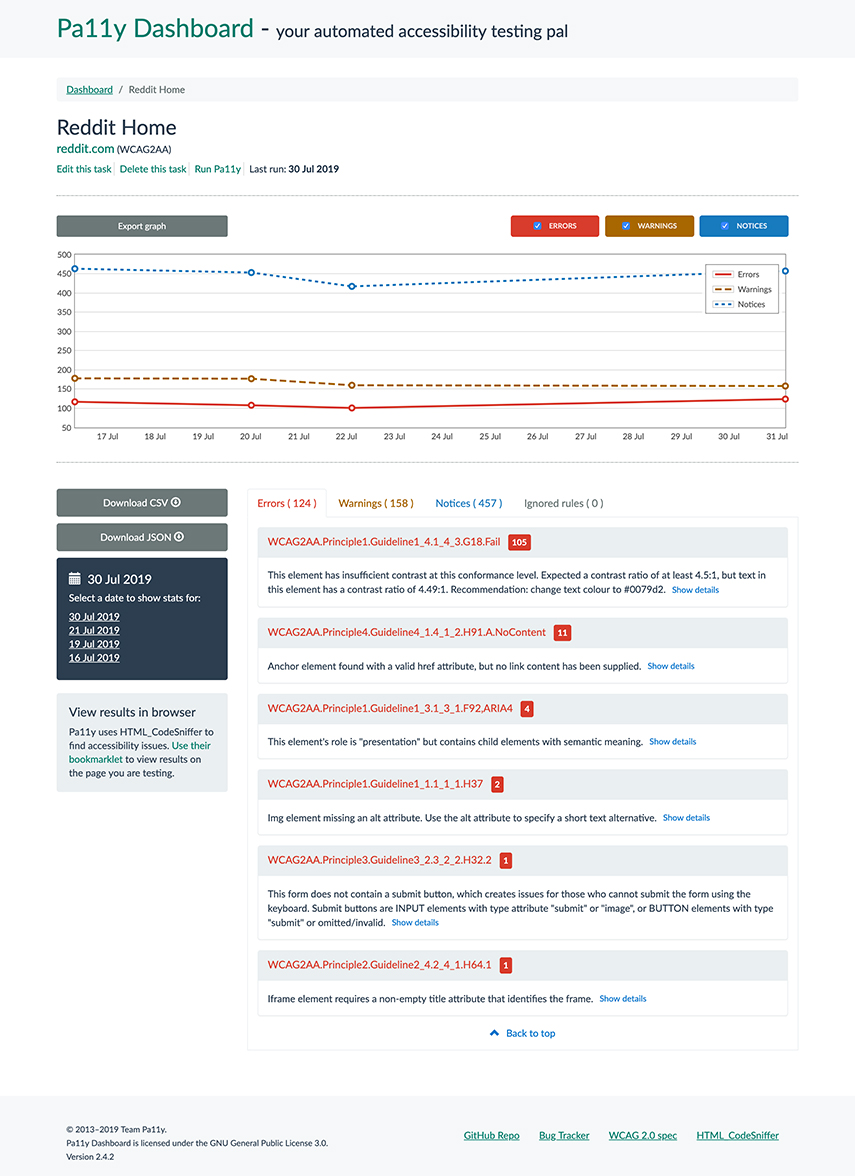
Pa11y Dashboard is a web interface to the [Pa11y][pa11y] accessibility reporter, allowing you to focus on *fixing* issues rather than hunting them down.
![Version][shield-version]
[![Node.js version support][shield-node]][info-node]
[![Build status][shield-build]][info-build]
[![GPL-3.0 licensed][shield-license]][info-license]

---
## Running Pa11y Dashboard
### Requirements
- [Node.js][node]: Pa11y Dashboard 5 requires a stable (even-numbered) version of Node.js of 20 or above.
- [MongoDB][mongodb]: This project depends on Pa11y Webservice, which stores test results in a MongoDB database and expects one to be available and running.
#### Pa11y Dashboard and Linux/Ubuntu
Pa11y Dashboard uses Puppeteer, which bundles its own Chromium binary. On some Linux distributions (notably Ubuntu 20.04 and above), this bundled binary may fail to launch because required shared libraries are not installed by default.
There are two ways to resolve this:
1. **Install the missing system dependencies** so that the bundled Chromium works. The list of required packages varies by distribution. Refer to [Puppeteer's troubleshooting guide](https://pptr.dev/troubleshooting#chrome-doesnt-launch-on-linux) for the current list.
2. **Use a system-installed Chromium** instead of the bundled one. Install your distribution's Chromium package (e.g. `apt install chromium-browser`) and point Pa11y Dashboard to it via the `executablePath` option in [`chromeLaunchConfig`](#chromelaunchconfig), or the `CHROMIUM_EXECUTABLE` environment variable (e.g. `/usr/bin/chromium-browser`).
### Setting up Pa11y Dashboard
In order to run Pa11y Dashboard, we recommend cloning this repository locally:
```sh
git clone https://github.com/pa11y/pa11y-dashboard.git
```
Then installing the dependencies:
```sh
cd pa11y-dashboard
npm install
```
#### Installing MongoDB
Instructions for installing and running MongoDB are outside the scope of this document. When in doubt, please refer to the [MongoDB installation instructions](https://docs.mongodb.com/manual/installation/) for details of how to install and run MongoDB on your specific operating system. An example of the installation and configuration process for macOS follows.
Pa11y Dashboard uses [MongoDB Node.js Driver][mongodb-package] version 3, which [may not support some features][mongodb-package-compatibility] of MongoDB versions 6 and beyond. We do however test against MongoDB versions 2 to 7, plus the latest major version, which at the time of writing is `8`.
##### Example MongoDB installation for macOS
On recent versions of macOS (10.13 or later), you can use [Homebrew] to install MongoDB Community Edition.
Tap the MongoDB Homebrew Tap:
```sh
brew tap mongodb/brew
```
Install a supported Community version of MongoDB:
```sh
brew install mongodb-community@8.0
```
Start the MongoDB server:
```sh
brew services start mongodb/brew/mongodb-community@8.0
```
Check that the service has started properly:
```console
$ brew services list
Name Status User Plist
mongodb-community started pa11y /Users/pa11y/Library/LaunchAgents/homebrew.mxcl.mongodb-community.plist
```
#### Configuring Pa11y Dashboard
The last step before being able to run Pa11y Dashboard is to define a configuration for it. This can be done in two ways:
##### Option 1: Using environment variables
Each configuration can be set with an environment variable rather than a config file. For example to run the application on port `8080` you can use the following:
```sh
PORT=8080 node index.js
```
A more complete example using all available environment variables, as you might use in a Docker or cloud deployment:
```sh
PORT=8080 \
NOINDEX=true \
READONLY=false \
WEBSERVICE_DATABASE=mongodb://user:password@mongo-host:27017/pa11y \
WEBSERVICE_HOST=0.0.0.0 \
WEBSERVICE_PORT=3000 \
WEBSERVICE_CRON="0 30 0 * * *" \
CHROMIUM_FLAGS="--no-sandbox,--disable-setuid-sandbox" \
node index.js
```
The [available configurations](#configurations) are documented in the next section.
##### Option 2: Using config files
You can store the configuration for Pa11y Dashboard on a JSON file. You can use a different configuration file for each environment you're planning to run Pa11y Dashboard on. You can choose a specific environment to run the application from by setting the `NODE_ENV` environment variable:
```sh
NODE_ENV=development node index.js
```
Three example files are provided in this repository, you can copy and customise them to your liking:
```sh
cp config/development.sample.json config/development.json
```
```sh
cp config/test.sample.json config/test.json
```
```sh
cp config/production.sample.json config/production.json
```
The [production example](config/production.sample.json) uses all the existing configuration options as it would typically be used in a containerised environment:
```json
{
"port": 8080,
"noindex": true,
"readonly": false,
"webservice": {
"database": "mongodb://user:password@mongo-host:27017/pa11y",
"host": "0.0.0.0",
"port": 3000,
"cron": "0 30 0 * * *",
"chromeLaunchConfig": {
"args": [
"--no-sandbox",
"--disable-setuid-sandbox"
]
}
}
}
```
The [available configurations](#configurations) are documented in the next section.
If you run into problems, check the [troubleshooting guide](#troubleshooting).
### Running in Docker and other containerised environments
Pa11y Dashboard uses Puppeteer to launch a Chromium browser for accessibility testing. If you are running Pa11y Dashboard inside a Docker container, a Kubernetes pod, or any similar containerised environment, you will almost certainly need to pass the `--no-sandbox` and `--disable-setuid-sandbox` flags to Chromium.
This is necessary because Chromium relies on Linux user namespaces to sandbox its renderer processes. Disabling Chrome's sandbox with `--no-sandbox` is standard practice in containerised deployments and is safe provided the container runtime's own isolation is in place. The `--disable-setuid-sandbox` flag disables Chrome's older setuid-based sandbox fallback, which requires a setuid-root helper binary that is typically unavailable (and undesirable) in non-root container images.
Set these flags using the `CHROMIUM_FLAGS` environment variable or the `chromeLaunchConfig.args` config file option, as shown in the [configuration examples above](#configuring-pa11y-dashboard).
#### Cloud environment considerations
Pa11y Dashboard runs by default an embedded instance of [Pa11y Webservice][pa11y-webservice], which schedules accessibility tests using a cron expression. Each instance of the webservice runs its own independent cron scheduler with no distributed queue.
If you deploy multiple replicas (as is typically the default in most cloud environments) of Pa11y Dashboard with an embedded webservice, every replica will trigger the same scheduled tests independently. This will result in duplicated test runs and duplicated results in the database.
To avoid this, consider one of the following approaches:
- **Limit to a single replica.** If running the embedded webservice, ensure only one replica is active. This is the simplest option but sacrifices availability.
- **Run the webservice separately.** Deploy [Pa11y Webservice][pa11y-webservice] as a single-instance service and point the dashboard at it by setting [`webservice`](#webservice) to its URL. This way you can scale the dashboard replicas freely without duplicating scheduled tests.
#### Example Dockerfile
An example Dockerfile is provided at [`Dockerfile.example`](Dockerfile.example) to help you get started with containerised deployments. It is a starting point — **you are expected to review it and adapt it to your specific infrastructure before use**.
The example Dockerfile handles the non-obvious parts of containerising a Puppeteer-based application:
- **Multi-stage build** to keep the final image small (build tools and git are not included in the runtime image).
- **Chromium system dependencies** — Puppeteer bundles its own Chromium binary, but that binary depends on shared libraries that are not present in slim base images. The Dockerfile installs all required libraries in both the build and runtime stages.
- **Puppeteer cache directory** — Puppeteer downloads Chromium to a cache directory during `npm install`. By default this goes to `~/.cache`, which is outside the application directory and would not survive the `COPY --from=build` step in a multi-stage build. The Dockerfile sets `PUPPETEER_CACHE_DIR` inside the application directory so the Chromium binary is carried over to the final image.
- **Non-root user** — the application and Chromium run as a non-root user (`pptruser`).
The Dockerfile does **not** include MongoDB. You are expected to provision your database separately (as a managed service, a sidecar container, or however your organisation handles databases) and pass the connection string via the `WEBSERVICE_DATABASE` environment variable.
**Approach 1 — Dockerfile inside the pa11y-dashboard repo:**
If you are building directly from a clone of this repository then the default `COPY . .` instruction in the example Dockerfile will work. The included [`.dockerignore`](.dockerignore) excludes tests, development tooling, and config files from the build context. Copy the example and build:
```sh
cp Dockerfile.example Dockerfile
docker build -t pa11y-dashboard .
```
**Approach 2 — Dockerfile in a separate deployment repo:**
If you prefer to keep your deployment configuration (Dockerfile, CI/CD pipeline, manifests) in a separate repository, switch from `COPY . .` to the commented-out `git clone` alternative in the Dockerfile. This clones pa11y-dashboard at a pinned version during the build, keeping your deployment repo independent from the application source code. See the comments in `Dockerfile.example` for instructions.
**Running the image:**
Pass all configuration via environment variables at runtime. No config files need to be baked into the image. For example:
```sh
docker run -p 4000:4000 \
-e WEBSERVICE_DATABASE="mongodb://user:password@your-mongo-host:27017/pa11y" \
-e WEBSERVICE_HOST="0.0.0.0" \
-e WEBSERVICE_CRON="0 30 0 * * *" \
-e CHROMIUM_FLAGS="--no-sandbox,--disable-setuid-sandbox" \
pa11y-dashboard
```
### Configurations
The boot configurations for Pa11y Dashboard are as follows. Look at the sample JSON files in the repo for example usage.
#### `port`
*(number)* The port to run the application on. Set via a config file or the `PORT` environment variable.
#### `noindex`
*(boolean)* If set to `true` (default), the dashboard will not be indexed by search engines. Set to `false` to allow indexing. Set via a config file or the `NOINDEX` environment variable.
#### `readonly`
*(boolean)* If set to `true`, users will not be able to add, delete or run URLs (defaults to `false`). Set via a config file or the `READONLY` environment variable.
#### `siteMessage`
*(string)* A message to display prominently on the site home page. Defaults to `null`.
#### `webservice`
This can either be an object containing [Pa11y Webservice configurations][pa11y-webservice-config], or a string which is the base URL of a Pa11y Webservice instance you are running separately. If using environment variables, prefix the webservice vars with `WEBSERVICE_`.
#### `chromeLaunchConfig`
Configuration for the Chromium instance launched by Pa11y. When using a config file, this is an object nested under `webservice`:
```json
"webservice": {
"chromeLaunchConfig": {
"args": ["--no-sandbox", "--disable-setuid-sandbox"],
"executablePath": "/usr/bin/chromium"
}
}
```
When using environment variables, the following options are available:
- `CHROMIUM_FLAGS`: A comma-separated list of flags to pass to Chromium. For example, `--no-sandbox,--disable-setuid-sandbox`.
- `CHROMIUM_EXECUTABLE`: The path to a Chromium executable to use instead of Puppeteer's bundled binary. See [Pa11y Dashboard and Linux/Ubuntu](#pa11y-dashboard-and-linuxubuntu) for when this is needed.
## Contributing
There are many ways to contribute to Pa11y Dashboard, we cover these in the [contributing guide](CONTRIBUTING.md) for this repo.
If you're ready to contribute some code, you'll need to clone the repo and get set up as outlined in the [setup guide](#setting-up-pa11y-dashboard). You'll then need to start the application in test mode with:
```sh
NODE_ENV=test node index.js
```
You'll now be able to run the following commands:
```sh
npm run lint # Lint the code
npm test # Run all tests
```
To compile the client-side JavaScript and CSS, you'll need the following commands. Compiled code is committed to the repository.
```sh
make less # Compile the site CSS from LESS files
make uglify # Compile and uglify the client-side JavaScript
```
## Troubleshooting
### Common issues
- `500` errors or `Could not connect to pa11y-webservice` messages are often related to MongoDB. Ensure that you have the [appropriate version of MongoDB](#installing-mongodb) installed, and that it's running - it doesn't always start automatically.
- Error messages saying that pa11y-webservice isn't running may be due to dependency installation problems. Try deleting your `pa11y-dashboard/node_modules` directory and running `npm install` again.
### Create a new issue
Check the [issue tracker][issues] for similar issues before creating a new one. If the problem that you're experiencing is not covered by one of the existing issues, you can [create a new issue][issues-create]. Please include your node.js and MongoDB version numbers, and your operating system, as well as any information that may be useful in debugging the issue.
## Support and migration
> [!NOTE]
> We maintain a [migration guide](MIGRATION.md) to help you migrate between major versions.
When we release a new major version we will continue to support the previous major version for 6 months. This support will be limited to fixes for critical bugs and security issues. If you're opening an issue related to this project, please mention the specific version that the issue affects.
The following table lists the major versions available and, for each previous major version, its end-of-support date, and its final minor version released.
| Major version | Last minor release | Node.js support | Support end date |
| :------------ | :----------------- | :-------------------------- | :--------------- |
| `5` | | `20`, `22`, `24` | ✅ Current major version |
| `4` | `4.2` | `12`, `14`, `16`, `18`, `20`| May 2026 |
| `3` | `3.3` | `8`, `10` | May 2022 |
| `2` | `2.4` | `4`, `6` | January 2020 |
| `1` | `1.12` | `0.10`, `0.12`, `4`, `6` | December 2016 |
## License
Pa11y Dashboard is licensed under the [GNU General Public License 3.0][info-license].
Copyright © 2016-2025, Team Pa11y and contributors
[homebrew]: https://brew.sh/
[issues]: https://github.com/pa11y/pa11y-dashboard/issues?utf8=%E2%9C%93&q=is%3Aissue
[issues-create]: https://github.com/pa11y/pa11y-dashboard/issues/new
[mongodb]: http://www.mongodb.org/
[mongodb-package]: https://www.npmjs.com/package/mongodb
[mongodb-package-compatibility]: https://docs.mongodb.com/drivers/node/current/compatibility
[node]: http://nodejs.org/
[pa11y]: https://github.com/pa11y/pa11y
[pa11y-webservice-config]: https://github.com/pa11y/webservice#configurations
[info-node]: package.json
[info-build]: https://github.com/pa11y/pa11y-dashboard/actions/workflows/tests.yml
[info-license]: LICENSE
[shield-version]: https://img.shields.io/github/package-json/v/pa11y/pa11y-dashboard.svg
[shield-node]: https://img.shields.io/node/v/pa11y/pa11y-dashboard.svg
[shield-build]: https://github.com/pa11y/pa11y-dashboard/actions/workflows/tests.yml/badge.svg
[shield-license]: https://img.shields.io/badge/license-GPL%203.0-blue.svg
================================================
FILE: app.js
================================================
// This file is part of Pa11y Dashboard.
//
// Pa11y Dashboard is free software: you can redistribute it and/or modify
// it under the terms of the GNU General Public License as published by
// the Free Software Foundation, either version 3 of the License, or
// (at your option) any later version.
//
// Pa11y Dashboard is distributed in the hope that it will be useful,
// but WITHOUT ANY WARRANTY; without even the implied warranty of
// MERCHANTABILITY or FITNESS FOR A PARTICULAR PURPOSE. See the
// GNU General Public License for more details.
//
// You should have received a copy of the GNU General Public License
// along with Pa11y Dashboard. If not, see ' +
'' +
'' +
'' + val.label + ' ' +
' ' +
'
' +
' '
);
});
choiceContainer.find('input').click(plotAccordingToChoices);
choiceContainer.find('[data-stat-type=errors]').click();
function plotAccordingToChoices() {
var data = [];
var labels = [];
choiceContainer.find('input:checked').each(function () {
var key = $(this).attr('name');
if (key && datasets[key]) {
labels.push(datasets[key].label);
data.push(datasets[key]);
}
});
if (labels.length && legend.length === 1) {
legend.find('tr').hide();
$.each(labels, function (index, value) {
$('.legend' + value).parents('tr').show();
});
legend.show();
} else {
legend.hide();
}
if (data.length > -1) {
$.plot(graphContainer, data, graphOptions);
}
}
function showTooltip(x, y, contents) {
$('').css({top: y + 5,left: x + 5}).appendTo('body').fadeIn(200);
}
var previousPoint = null;
graphContainer.bind('plothover', function (event, pos, item) {
if (item) {
if (previousPoint !== item.dataIndex) {
previousPoint = item.dataIndex;
$('[data-role="tooltip"]').remove();
var count = item.datapoint[1].toFixed(0);
var date = $.plot.formatDate(new Date(item.datapoint[0]), '%d %b' +
' (%H:%M) ');
var contents = '' +
date + '!
## Quick start
Three quick start options are available:
* [Download the latest release](https://github.com/twbs/bootstrap/releases/tag/v3.0.0).
* Clone the repo: `git clone https://github.com/twbs/bootstrap.git`.
* Install with [Bower](http://bower.io): `bower install bootstrap`.
Read the [Getting Started page](http://getbootstrap.com/getting-started/) for information on the framework contents, templates and examples, and more.
### What's included
Within the download you'll find the following directories and files, logically grouping common assets and providing both compiled and minified variations. You'll see something like this:
```
bootstrap/
├── css/
│ ├── bootstrap.css
│ ├── bootstrap.min.css
│ ├── bootstrap-theme.css
│ └── bootstrap-theme.min.css
├── js/
│ ├── bootstrap.js
│ └── bootstrap.min.js
└── fonts/
├── glyphicons-halflings-regular.eot
├── glyphicons-halflings-regular.svg
├── glyphicons-halflings-regular.ttf
└── glyphicons-halflings-regular.woff
```
We provide compiled CSS and JS (`bootstrap.*`), as well as compiled and minified CSS and JS (`bootstrap.min.*`). Fonts from Glyphicons are included, as is the optional Bootstrap theme.
## Bugs and feature requests
Have a bug or a feature request? [Please open a new issue](https://github.com/twbs/bootstrap/issues). Before opening any issue, please search for existing issues and read the [Issue Guidelines](https://github.com/necolas/issue-guidelines), written by [Nicolas Gallagher](https://github.com/necolas/).
You may use [this JS Bin](http://jsbin.com/aKiCIDO/1/edit) as a template for your bug reports.
## Documentation
Bootstrap's documentation, included in this repo in the root directory, is built with [Jekyll](http://jekyllrb.com) and publicly hosted on GitHub Pages at . The docs may also be run locally.
### Running documentation locally
1. If necessary, [install Jekyll](http://jekyllrb.com/docs/installation) (requires v1.x).
2. From the root `/bootstrap` directory, run `jekyll serve` in the command line.
- **Windows users:** run `chcp 65001` first to change the command prompt's character encoding ([code page](http://en.wikipedia.org/wiki/Windows_code_page)) to UTF-8 so Jekyll runs without errors.
3. Open in your browser, and voilà.
Learn more about using Jekyll by reading its [documentation](http://jekyllrb.com/docs/home/).
### Documentation for previous releases
Documentation for v2.3.2 has been made available for the time being at .
With v3.1, we're moving from the Apache 2 to the MIT license for the Bootstrap code (not the docs). Please see the [contributing guidelines](https://github.com/twbs/bootstrap/blob/master/CONTRIBUTING.md) for more information.
## Community
Keep track of development and community news.
* Follow [@twbootstrap on Twitter](http://twitter.com/twbootstrap).
* Read and subscribe to [The Official Bootstrap Blog](http://blog.getbootstrap.com).
* Have a question that's not a feature request or bug report? [Ask on the mailing list.](http://groups.google.com/group/twitter-bootstrap)
* Chat with fellow Bootstrappers in IRC. On the `irc.freenode.net` server, in the `##twitter-bootstrap` channel.
## Versioning
For transparency and insight into our release cycle, and for striving to maintain backward compatibility, Bootstrap will be maintained under the Semantic Versioning guidelines as much as possible.
Releases will be numbered with the following format:
`..`
And constructed with the following guidelines:
* Breaking backward compatibility bumps the major (and resets the minor and patch)
* New additions without breaking backward compatibility bumps the minor (and resets the patch)
* Bug fixes and misc changes bumps the patch
For more information on SemVer, please visit
+
**Jacob Thornton**
+
+
## Copyright and license
Copyright 2013 Twitter, Inc under [the Apache 2.0 license](LICENSE).
================================================
FILE: public/js/vendor/bootstrap/_config.yml
================================================
# Dependencies
markdown: rdiscount
pygments: true
# Permalinks
permalink: pretty
# Server
destination: ./_gh_pages
exclude: [".editorconfig", ".gitignore", "bower.json", "composer.json", "CONTRIBUTING.md", "CNAME", "LICENSE", "Gruntfile.js", "package.json", "node_modules", "README.md", "less"]
port: 9001
# Custom vars
current_version: 3.0.1
repo: https://github.com/twbs/bootstrap
download_source: https://github.com/twbs/bootstrap/archive/v3.0.1.zip
download_dist: https://github.com/twbs/bootstrap/releases/download/v3.0.1/bootstrap-3.0.1-dist.zip
blog: http://blog.getbootstrap.com
expo: http://expo.getbootstrap.com
cdn_css: //netdna.bootstrapcdn.com/bootstrap/3.0.1/css/bootstrap.min.css
cdn_theme_css: //netdna.bootstrapcdn.com/bootstrap/3.0.1/css/bootstrap-theme.min.css
cdn_js: //netdna.bootstrapcdn.com/bootstrap/3.0.1/js/bootstrap.min.js
================================================
FILE: public/js/vendor/bootstrap/_includes/ads.html
================================================
================================================
FILE: public/js/vendor/bootstrap/_includes/footer.html
================================================
{% if page.slug == "customize" %}
{% endif %}
================================================
FILE: public/js/vendor/bootstrap/_includes/header.html
================================================
{% if page.title == "Bootstrap" %}
{{ page.title }}
{% else %}
{{ page.title }} · Bootstrap
{% endif %}
History
Core team
Community
Translations
================================================
FILE: public/js/vendor/bootstrap/_includes/nav-components.html
================================================
Glyphicons
Dropdowns
Button groups
Button dropdowns
Input groups
Navs
Navbar
Breadcrumbs
Pagination
Labels Badges Jumbotron Page header
Thumbnails
Alerts
Progress bars
Media object
List group
Panels
Wells
Overview
Grid system
Typography
Code
Tables
Forms
Buttons
Images
Helper classes
Responsive utilities
================================================
FILE: public/js/vendor/bootstrap/_includes/nav-customize.html
================================================
LESS components
jQuery plugins
LESS variables
Download
================================================
FILE: public/js/vendor/bootstrap/_includes/nav-getting-started.html
================================================
Download Bootstrap
What's included
Basic template
Examples
Disabling responsiveness
Migrating from 2.x to 3.0
Browser support
Third party support
Accessibility
License FAQs
Customizing Bootstrap
================================================
FILE: public/js/vendor/bootstrap/_includes/nav-javascript.html
================================================
Overview
Transitions
Modal
Dropdown
Scrollspy
Tab
Tooltip
Popover
Alert
Button
Collapse
Carousel
Affix
================================================
FILE: public/js/vendor/bootstrap/_includes/nav-main.html
================================================
================================================
FILE: public/js/vendor/bootstrap/_includes/old-bs-docs.html
================================================
================================================
FILE: public/js/vendor/bootstrap/_includes/social-buttons.html
================================================
================================================
FILE: public/js/vendor/bootstrap/_layouts/default.html
================================================
{% include header.html %}
Skip to main content
{% include nav-main.html %}
{% include old-bs-docs.html %}
{% include footer.html %}
================================================
FILE: public/js/vendor/bootstrap/_layouts/home.html
================================================
{% include header.html %}
Skip to main content
{% include nav-main.html %}
{{ content }}
{% include ads.html %}
{% include social-buttons.html %}
{% include footer.html %}
================================================
FILE: public/js/vendor/bootstrap/about.html
================================================
---
layout: default
title: About
slug: about
lead: "Learn about the history of Bootstrap, meet the core team, and check out the ever-growing community resources."
base_url: "../"
---
Originally created by a designer and a developer at Twitter, Bootstrap has become one of the most popular front-end frameworks and open source projects in the world.
Bootstrap was created at Twitter in mid-2010 by @mdo and @fat . Prior to being an open-sourced framework, Bootstrap was known as Twitter Blueprint . A few months into development, Twitter held its first Hack Week and the project exploded as developers of all skill levels jumped in without any external guidance. It served as the style guide for internal tools development at the company for over a year before its public release, and continues to do so today.
Originally released on Friday, August 19, 2011 twenty releases , including two major rewrites with v2 and v3. With Bootstrap 2, we added responsive functionality to the entire framework as an optional stylesheet. Building on that with Bootstrap 3, we rewrote the library once more to make it responsive by default with a mobile first approach.
Bootstrap is maintained by the founding team and a small group of invaluable core contributors, with the massive support and involvement of our community.
Get involved with Bootstrap development by opening an issue or submitting a pull request. Read our contributing guidelines for information on how we develop.
Stay up to date on the development of Bootstrap and reach out to the community with these helpful resources.
You can also follow @twbootstrap on Twitter for the latest gossip and awesome music videos.
Community members have translated Bootstrap's documentation into various langauges. None are officially supported and may not always be up to date.
Have another language to add, or perhaps a different or better translation? Let us know by opening an issue .
================================================
FILE: public/js/vendor/bootstrap/bower.json
================================================
{
"name": "bootstrap",
"version": "3.0.1",
"main": ["./dist/js/bootstrap.js", "./dist/css/bootstrap.css", "./dist/fonts/*"],
"ignore": [
"**/.*"
],
"dependencies": {
"jquery": ">= 1.9.0"
}
}
================================================
FILE: public/js/vendor/bootstrap/browserstack.json
================================================
{
"username": "--secure--",
"key": "--secure--",
"test_path": "js/tests/index.html",
"browsers": [
{
"browser": "firefox",
"browser_version": "latest",
"os": "OS X",
"os_version": "Mountain Lion"
},
{
"browser": "safari",
"browser_version": "latest",
"os": "OS X",
"os_version": "Mountain Lion"
},
{
"browser": "chrome",
"browser_version": "latest",
"os": "OS X",
"os_version": "Mountain Lion"
},
{
"browser": "firefox",
"browser_version": "latest",
"os": "Windows",
"os_version": "7"
},
{
"browser": "chrome",
"browser_version": "latest",
"os": "Windows",
"os_version": "7"
}
]
}
================================================
FILE: public/js/vendor/bootstrap/components.html
================================================
---
layout: default
title: Components
slug: components
lead: "Over a dozen reusable components built to provide iconography, dropdowns, navigation, alerts, popovers, and much more."
base_url: "../"
---
Toggleable, contextual menu for displaying lists of links. Made interactive with the dropdown JavaScript plugin .
Example
Wrap the dropdown's trigger and the dropdown menu within .dropdown, or another element that declares position: relative;. Then add the menu's HTML.
{% highlight html %}
{% endhighlight %}
Alignment options
Add .pull-right to a .dropdown-menu to right align the dropdown menu.
{% highlight html %}
{% endhighlight %}
Add a header to label sections of actions in any dropdown menu.
{% highlight html %}
{% endhighlight %}
Disabled menu items
Add .disabled to a <li> in the dropdown to disable the link.
{% highlight html %}
{% endhighlight %}
Group a series of buttons together on a single line with the button group. Add on optional JavaScript radio and checkbox style behavior with our buttons plugin .
Tooltips & popovers in button groups require special setting
When using tooltips or popovers on elements within a .btn-group, you'll have to specify the option container: 'body' to avoid unwanted side effects (such as the element growing wider and/or losing its rounded corners when the tooltip or popover is triggered).
Basic example
Wrap a series of buttons with .btn in .btn-group.
{% highlight html %}
Left
Middle
Right
{% endhighlight %}
Combine sets of <div class="btn-group"> into a <div class="btn-toolbar"> for more complex components.
{% highlight html %}
{% endhighlight %}
Sizing
Instead of applying button sizing classes to every button in a group, just add .btn-group-* to the .btn-group.
{% highlight html %}
...
...
...
...
{% endhighlight %}
Nesting
Place a .btn-group within another .btn-group when you want dropdown menus mixed with a series of buttons.
{% highlight html %}
{% endhighlight %}
Vertical variation
Make a set of buttons appear vertically stacked rather than horizontally.
Button
Button
Dropdown
Button
Button
Dropdown
Dropdown
Dropdown
{% highlight html %}
...
{% endhighlight %}
Justified link variation
Make a group of buttons stretch at the same size to span the entire width of its parent.
Element-specific usage
This only works with <a> elements as the <button> doesn't pick up these styles.
{% highlight html %}
...
{% endhighlight %}
Use any button to trigger a dropdown menu by placing it within a .btn-group and providing the proper menu markup.
Plugin dependency
Button dropdowns require the dropdown plugin to be included in your version of Bootstrap.
Single button dropdowns
Turn a button into a dropdown toggle with some basic markup changes.
Default
Primary
Success
Info
Warning
Danger
{% highlight html %}
Action
{% endhighlight %}
Split button dropdowns
Similarly, create split button dropdowns with the same markup changes, only with a separate button.
Default
Toggle Dropdown
Primary
Toggle Dropdown
Success
Toggle Dropdown
Info
Toggle Dropdown
Warning
Toggle Dropdown
Danger
Toggle Dropdown
{% highlight html %}
Action
Toggle Dropdown
{% endhighlight %}
Sizing
Button dropdowns work with buttons of all sizes.
{% highlight html %}
Large button
Small button
Extra small button
{% endhighlight %}
Dropup variation
Trigger dropdown menus above elements by adding .dropup to the parent.
{% highlight html %}
Dropup
Toggle Dropdown
{% endhighlight %}
Extend form controls by adding text or buttons before, after, or on both sides of any text-based input. Use .input-group with an .input-group-addon to prepend or append elements to a .form-control.
Cross-browser compatibility
Avoid using <select> elements here as they cannot be fully styled in WebKit browsers.
Tooltips & popovers in input groups require special setting
When using tooltips or popovers on elements within an .input-group, you'll have to specify the option container: 'body' to avoid unwanted side effects (such as the element growing wider and/or losing its rounded corners when the tooltip or popover is triggered).
Don't mix with form groups
Do not apply input group classes directly to form groups. An input group is an isolated component.
{% highlight html %}
@
.00
$
.00
{% endhighlight %}
Add the relative form sizing classes to the .input-group itself and contents within will automatically resize—no need for repeating the form control size classes on each element.
{% highlight html %}
@
@
@
{% endhighlight %}
Place any checkbox or radio option within an input group's addon instead of text.
{% highlight html %}
{% endhighlight %}
Buttons in input groups are a bit different and require one extra level of nesting. Instead of .input-group-addon, you'll need to use .input-group-btn to wrap the buttons. This is required due to default browser styles that cannot be overridden.
{% highlight html %}
{% endhighlight %}
{% highlight html %}
{% endhighlight %}
{% highlight html %}
{% endhighlight %}
Navs available in Bootstrap have shared markup, starting with the base .nav class, as well as shared states. Swap modifier classes to switch between each style.
Tabs
Note the .nav-tabs class requires the .nav base class.
{% highlight html %}
{% endhighlight %}
Pills
Take that same HTML, but use .nav-pills instead:
{% highlight html %}
{% endhighlight %}
Pills are also vertically stackable. Just add .nav-stacked.
{% highlight html %}
{% endhighlight %}
Justified
Easily make tabs or pills equal widths of their parent at screens wider than 768px with .nav-justified. On smaller screens, the nav links are stacked.
WebKit and responsive justified navs
Chrome and Safari both exhibit a bug in which resizing your browser horizontally causes rendering errors in the justified nav that are cleared upon refreshing. This bug is also shown in the justified nav example .
{% highlight html %}
{% endhighlight %}
Disabled links
For any nav component (tabs, pills, or list), add .disabled for gray links and no hover effects .
Link functionality not impacted
This class will only change the <a>'s appearance, not its functionality. Use custom JavaScript to disable links here.
{% highlight html %}
{% endhighlight %}
Using dropdowns
Add dropdown menus with a little extra HTML and the dropdowns JavaScript plugin .
Tabs with dropdowns
{% highlight html %}
{% endhighlight %}
Pills with dropdowns
{% highlight html %}
{% endhighlight %}
Default navbar
Navbars are responsive meta components that serve as navigation headers for your application or site. They begin collapsed (and are toggleable) in mobile views and become horizontal as the available viewport width increases.
Customize the collapsing point
Depending on the content in your navbar, you might need to change the point at which your navbar switches between collapsed and horizontal mode. Customize the @grid-float-breakpoint variable or add your own media query.
Requires JavaScript
If JavaScript is disabled and the viewport is narrow enough that the navbar collapses, it will be impossible to expand the navbar and view the content within the .navbar-collapse.
{% highlight html %}
{% endhighlight %}
Plugin dependency
The responsive navbar requires the collapse plugin to be included in your version of Bootstrap.
Make navbars accessible
Be sure to add a role="navigation" to every navbar to help with accessibility.
Place form content within .navbar-form for proper vertical alignment and collapsed behavior in narrow viewports. Use the alignment options to decide where it resides within the navbar content.
As a heads up, .navbar-form shares much of its code with .form-inline via mixin.
{% highlight html %}
{% endhighlight %}
Always add labels
Screen readers will have trouble with your forms if you don't include a label for every input. For these inline navbar forms, you can hide the labels using the .sr-only class.
Add the .navbar-btn class to <button> elements not residing in a <form> to vertically center them in the navbar.
{% highlight html %}
Sign in
{% endhighlight %}
Context-specific usage
Like the standard button classes , .navbar-btn can be used on <a> and <input> elements. However, neither .navbar-btn nor the standard button classes should be used on <a> elements within .navbar-nav.
Text
Wrap strings of text in an element with .navbar-text, usually on a <p> tag for proper leading and color.
{% highlight html %}
Signed in as Mark Otto
{% endhighlight %}
Non-nav links
For folks using standard links that are not within the regular navbar navigation component, use the .navbar-link class to add the proper colors for the default and inverse navbar options.
{% highlight html %}
Signed in as Mark Otto
{% endhighlight %}
Component alignment
Align nav links, forms, buttons, or text, using the .navbar-left or .navbar-right utility classes. Both classes will add a CSS float in the specified direction. For example, to align nav links, put them in a separate <ul> with the respective utility class applied.
These classes are mixin-ed versions of .pull-left and .pull-right, but they're scoped to media queries for easier handling of navbar components across device sizes.
Fixed to top
Add .navbar-fixed-top.
{% highlight html %}
...
{% endhighlight %}
Body padding required
The fixed navbar will overlay your other content, unless you add padding to the top of the <body>. Try out your own values or use our snippet below. Tip: By default, the navbar is 50px high.
{% highlight css %}
body { padding-top: 70px; }
{% endhighlight %}
Make sure to include this after the core Bootstrap CSS.
Fixed to bottom
Add .navbar-fixed-bottom instead.
{% highlight html %}
...
{% endhighlight %}
Body padding required
The fixed navbar will overlay your other content, unless you add padding to the bottom of the <body>. Try out your own values or use our snippet below. Tip: By default, the navbar is 50px high.
{% highlight css %}
body { padding-bottom: 70px; }
{% endhighlight %}
Make sure to include this after the core Bootstrap CSS.
Static top
Create a full-width navbar that scrolls away with the page by adding .navbar-static-top. Unlike the .navbar-fixed-* classes, you do not need to change any padding on the body.
{% highlight html %}
...
{% endhighlight %}
Inverted navbar
Modify the look of the navbar by adding .navbar-inverse.
{% highlight html %}
...
{% endhighlight %}
Indicate the current page's location within a navigational hierarchy.
Separators are automatically added in CSS through :before and content.
{% highlight html %}
Home Library Data
{% endhighlight %}
Provide pagination links for your site or app with the multi-page pagination component, or the simpler pager alternative .
Simple pagination inspired by Rdio, great for apps and search results. The large block is hard to miss, easily scalable, and provides large click areas.
{% highlight html %}
{% endhighlight %}
Disabled and active states
Links are customizable for different circumstances. Use .disabled for unclickable links and .active to indicate the current page.
{% highlight html %}
{% endhighlight %}
You can optionally swap out active or disabled anchors for <span> to remove click functionality while retaining intended styles.
{% highlight html %}
{% endhighlight %}
Sizing
Fancy larger or smaller pagination? Add .pagination-lg or .pagination-sm for additional sizes.
{% highlight html %}
{% endhighlight %}
Quick previous and next links for simple pagination implementations with light markup and styles. It's great for simple sites like blogs or magazines.
Default example
By default, the pager centers links.
{% highlight html %}
{% endhighlight %}
Aligned links
Alternatively, you can align each link to the sides:
{% highlight html %}
{% endhighlight %}
Optional disabled state
Pager links also use the general .disabled utility class from the pagination.
{% highlight html %}
{% endhighlight %}
Example
Example heading New
Example heading New
Example heading New
Example heading New
Example heading New
Example heading New
{% highlight html %}
Example heading New
{% endhighlight %}
Available variations
Add any of the below mentioned modifier classes to change the appearance of a label.
Default
Primary
Success
Info
Warning
Danger
{% highlight html %}
Default
Primary
Success
Info
Warning
Danger
{% endhighlight %}
Easily highlight new or unread items by adding a <span class="badge"> to links, Bootstrap navs, and more.
{% highlight html %}
Inbox 42
{% endhighlight %}
Self collapsing
When there are no new or unread items, badges will simply collapse (via CSS's :empty selector) provided no content exists within.
Cross-browser compatibility
Badges won't self collapse in Internet Explorer 8 because it lacks support for the :empty selector.
Adapts to active nav states
Built-in styles are included for placing badges in active states in pill and list navigations.
{% highlight html %}
{% endhighlight %}
A lightweight, flexible component that can optionally extend the entire viewport to showcase key content on your site.
Hello, world!
This is a simple hero unit, a simple jumbotron-style component for calling extra attention to featured content or information.
Learn more
{% highlight html %}
{% endhighlight %}
To make the jumbotron full width, and without rounded corners, place it outside all .containers and instead add a .container within.
{% highlight html %}
{% endhighlight %}
A simple shell for an h1 to appropriately space out and segment sections of content on a page. It can utilize the h1's default small element, as well as most other components (with additional styles).
{% highlight html %}
{% endhighlight %}
Extend Bootstrap's grid system with the thumbnail component to easily display grids of images, videos, text, and more.
Default example
By default, Bootstrap's thumbnails are designed to showcase linked images with minimal required markup.
{% highlight html %}
{% endhighlight %}
Custom content
With a bit of extra markup, it's possible to add any kind of HTML content like headings, paragraphs, or buttons into thumbnails.
Thumbnail label
Cras justo odio, dapibus ac facilisis in, egestas eget quam. Donec id elit non mi porta gravida at eget metus. Nullam id dolor id nibh ultricies vehicula ut id elit.
Button Button
Thumbnail label
Cras justo odio, dapibus ac facilisis in, egestas eget quam. Donec id elit non mi porta gravida at eget metus. Nullam id dolor id nibh ultricies vehicula ut id elit.
Button Button
Thumbnail label
Cras justo odio, dapibus ac facilisis in, egestas eget quam. Donec id elit non mi porta gravida at eget metus. Nullam id dolor id nibh ultricies vehicula ut id elit.
Button Button
{% highlight html %}
{% endhighlight %}
Provide contextual feedback messages for typical user actions with the handful of available and flexible alert messages. For inline dismissal, use the alerts jQuery plugin .
Examples
Wrap any text and an optional dismiss button in .alert and one of the four contextual classes (e.g., .alert-success) for basic alert messages.
No default class
Alerts don't have default classes, only base and modifier classes. A default gray alert doesn't make too much sense, so you're required to specify a type via contextual class. Choose from success, info, warning, or danger.
Well done! You successfully read this important alert message.
Heads up! This alert needs your attention, but it's not super important.
Warning! Best check yo self, you're not looking too good.
Oh snap! Change a few things up and try submitting again.
{% highlight html %}
...
...
...
...
{% endhighlight %}
Dismissable alerts
Build on any alert by adding an optional .alert-dismissable and close button.
×
Warning! Best check yo self, you're not looking too good.
{% highlight html %}
×
Warning! Best check yo self, you're not looking too good.
{% endhighlight %}
Ensure proper behavior across all devices
Be sure to use the <button> element with the data-dismiss="alert" data attribute.
Links in alerts
Use the .alert-link utility class to quickly provide matching colored links within any alert.
{% highlight html %}
{% endhighlight %}
Provide up-to-date feedback on the progress of a workflow or action with simple yet flexible progress bars.
Cross-browser compatibility
Progress bars use CSS3 transitions and animations to achieve some of their effects. These features are not supported in Internet Explorer 9 and below or older versions of Firefox. Opera 12 does not support animations.
Basic example
Default progress bar.
{% highlight html %}
{% endhighlight %}
Contextual alternatives
Progress bars use some of the same button and alert classes for consistent styles.
{% highlight html %}
{% endhighlight %}
Striped
Uses a gradient to create a striped effect. Not available in IE8.
{% highlight html %}
{% endhighlight %}
Animated
Add .active to .progress-striped to animate the stripes right to left. Not available in all versions of IE.
{% highlight html %}
{% endhighlight %}
Stacked
Place multiple bars into the same .progress to stack them.
35% Complete (success)
20% Complete (warning)
10% Complete (danger)
{% highlight html %}
35% Complete (success)
20% Complete (warning)
10% Complete (danger)
{% endhighlight %}
Abstract object styles for building various types of components (like blog comments, Tweets, etc) that feature a left- or right-aligned image alongside textual content.
The default media allow to float a media object (images, video, audio) to the left or right of a content block.
{% highlight html %}
{% endhighlight %}
With a bit of extra markup, you can use media inside list (useful for comment threads or articles lists).
{% highlight html %}
{% endhighlight %}
List groups are a flexible and powerful component for displaying not only simple lists of elements, but complex ones with custom content.
Basic example
The most basic list group is simply an unordered list with list items, and the proper classes. Build upon it with the options that follow, or your own CSS as needed.
Cras justo odio
Dapibus ac facilisis in
Morbi leo risus
Porta ac consectetur ac
Vestibulum at eros
{% highlight html %}
Cras justo odio
Dapibus ac facilisis in
Morbi leo risus
Porta ac consectetur ac
Vestibulum at eros
{% endhighlight %}
Badges
Add the badges component to any list group item and it will automatically be positioned on the right.
14
Cras justo odio
2
Dapibus ac facilisis in
1
Morbi leo risus
{% highlight html %}
{% endhighlight %}
Linked items
Linkify list group items by using anchor tags instead of list items (that also means a parent <div> instead of an <ul>). No need for individual parents around each element.
{% highlight html %}
{% endhighlight %}
Custom content
Add nearly any HTML within, even for linked list groups like the one below.
{% highlight html %}
{% endhighlight %}
While not always necessary, sometimes you need to put your DOM in a box. For those situations, try the panel component.
Basic example
By default, all the .panel does is apply some basic border and padding to contain some content.
{% highlight html %}
{% endhighlight %}
Panel with heading
Easily add a heading container to your panel with .panel-heading. You may also include any <h1>-<h6> with a .panel-title class to add a pre-styled heading.
Panel heading without title
Panel content
Panel title
Panel content
{% highlight html %}
Panel heading without title
Panel content
Panel title
Panel content
{% endhighlight %}
Wrap buttons or secondary text in .panel-footer. Note that panel footers do not inherit colors and borders when using contextual variations as they are not meant to be in the foreground.
{% highlight html %}
{% endhighlight %}
Contextual alternatives
Like other components, easily make a panel more meaningful to a particular context by adding any of the contextual state classes.
Panel title
Panel content
Panel title
Panel content
Panel title
Panel content
Panel title
Panel content
Panel title
Panel content
{% highlight html %}
...
...
...
...
...
{% endhighlight %}
With tables
Add any non-bordered .table within a panel for a seamless design. If there is a .panel-body, we add an extra border to the top of the table for separation.
Panel heading
Some default panel content here. Nulla vitae elit libero, a pharetra augue. Aenean lacinia bibendum nulla sed consectetur. Aenean eu leo quam. Pellentesque ornare sem lacinia quam venenatis vestibulum. Nullam id dolor id nibh ultricies vehicula ut id elit.
#
First Name
Last Name
Username
1
Mark
Otto
@mdo
2
Jacob
Thornton
@fat
3
Larry
the Bird
@twitter
{% highlight html %}
{% endhighlight %}
If there is no panel body, the component moves from panel header to table without interruption.
Panel heading
#
First Name
Last Name
Username
1
Mark
Otto
@mdo
2
Jacob
Thornton
@fat
3
Larry
the Bird
@twitter
{% highlight html %}
{% endhighlight %}
With list groups
Easily include full-width list groups within any panel.
Panel heading
Some default panel content here. Nulla vitae elit libero, a pharetra augue. Aenean lacinia bibendum nulla sed consectetur. Aenean eu leo quam. Pellentesque ornare sem lacinia quam venenatis vestibulum. Nullam id dolor id nibh ultricies vehicula ut id elit.
Cras justo odio
Dapibus ac facilisis in
Morbi leo risus
Porta ac consectetur ac
Vestibulum at eros
{% highlight html %}
Panel heading
Cras justo odio
Dapibus ac facilisis in
Morbi leo risus
Porta ac consectetur ac
Vestibulum at eros
{% endhighlight %}
Default well
Use the well as a simple effect on an element to give it an inset effect.
{% highlight html %}
...
{% endhighlight %}
Optional classes
Control padding and rounded corners with two optional modifier classes.
Look, I'm in a large well!
{% highlight html %}
...
{% endhighlight %}
Look, I'm in a small well!
{% highlight html %}
...
{% endhighlight %}
================================================
FILE: public/js/vendor/bootstrap/composer.json
================================================
{
"name": "twbs/bootstrap"
, "description": "Sleek, intuitive, and powerful mobile first front-end framework for faster and easier web development."
, "keywords": ["bootstrap", "css"]
, "homepage": "http://getbootstrap.com"
, "authors": [
{
"name": "Mark Otto",
"email": "markdotto@gmail.com"
},
{
"name": "Jacob Thornton",
"email": "jacobthornton@gmail.com"
}
]
, "support": {
"issues": "https://github.com/twbs/bootstrap/issues"
}
, "license": "Apache-2.0"
}
================================================
FILE: public/js/vendor/bootstrap/css.html
================================================
---
layout: default
title: CSS
slug: css
lead: "Global CSS settings, fundamental HTML elements styled and enhanced with extensible classes, and an advanced grid system."
base_url: "../"
---
Get the lowdown on the key pieces of Bootstrap's infrastructure, including our approach to better, faster, stronger web development.
HTML5 doctype
Bootstrap makes use of certain HTML elements and CSS properties that require the use of the HTML5 doctype. Include it at the beginning of all your projects.
{% highlight html %}
...
{% endhighlight %}
Mobile first
With Bootstrap 2, we added optional mobile friendly styles for key aspects of the framework. With Bootstrap 3, we've rewritten the project to be mobile friendly from the start. Instead of adding on optional mobile styles, they're baked right into the core. In fact, Bootstrap is mobile first . Mobile first styles can be found throughout the entire library instead of in separate files.
To ensure proper rendering and touch zooming, add the viewport meta tag to your <head>.
{% highlight html %}
{% endhighlight %}
You can disable zooming capabilities on mobile devices by adding user-scalable=no to the viewport meta tag. This disables zooming, meaning users are only able to scroll, and results in your site feeling a bit more like a native application. Overall we don't recommend this on every site, so use caution!
{% highlight html %}
{% endhighlight %}
Responsive images
Images in Bootstrap 3 can be made responsive-friendly via the addition of the .img-responsive class. This applies max-width: 100%; and height: auto; to the image so that it scales nicely to the parent element.
{% highlight html %}
{% endhighlight %}
Typography and links
Bootstrap sets basic global display, typography, and link styles. Specifically, we:
Set background-color: #fff; on the body
Use the @font-family-base, @font-size-base, and @line-height-base attributes as our typographic base
Set the global link color via @link-color and apply link underlines only on :hover
These styles can be found within scaffolding.less.
Normalize
For improved cross-browser rendering, we use Normalize , a project by Nicolas Gallagher and Jonathan Neal .
Containers
Easily center a page's contents by wrapping its contents in a .container. Containers set max-width at various media query breakpoints to match our grid system.
{% highlight html %}
...
{% endhighlight %}
Bootstrap includes a responsive, mobile first fluid grid system that appropriately scales up to 12 columns as the device or viewport size increases. It includes predefined classes for easy layout options, as well as powerful mixins for generating more semantic layouts .
Introduction
Grid systems are used for creating page layouts through a series of rows and columns that house your content. Here's how the Bootstrap grid system works:
Rows must be placed within a .container for proper alignment and padding.
Use rows to create horizontal groups of columns.
Content should be placed within columns, and only columns may be immediate children of rows.
Predefined grid classes like .row and .col-xs-4 are available for quickly making grid layouts. LESS mixins can also be used for more semantic layouts.
Columns create gutters (gaps between column content) via padding. That padding is offset in rows for the first and last column via negative margin on .rows.
Grid columns are created by specifying the number of twelve available columns you wish to span. For example, three equal columns would use three .col-xs-4.
Look to the examples for applying these principles to your code.
Grids and full-width layouts
Folks looking to create fully fluid layouts (meaning your site stretches the entire width of the viewport) must wrap their grid content in a containing element with padding: 0 15px; to offset the margin: 0 -15px; used on .rows.
We use the following media queries in our LESS files to create the key breakpoints in our grid system.
{% highlight css %}
/* Extra small devices (phones, less than 768px) */
/* No media query since this is the default in Bootstrap */
/* Small devices (tablets, 768px and up) */
@media (min-width: @screen-sm-min) { ... }
/* Medium devices (desktops, 992px and up) */
@media (min-width: @screen-md-min) { ... }
/* Large devices (large desktops, 1200px and up) */
@media (min-width: @screen-lg-min) { ... }
{% endhighlight %}
We occasionally expand on these media queries to include a max-width to limit CSS to a narrower set of devices.
{% highlight css %}
@media (max-width: @screen-xs-max) { ... }
@media (min-width: @screen-sm-min) and (max-width: @screen-sm-max) { ... }
@media (min-width: @screen-md-min) and (max-width: @screen-md-max) { ... }
@media (min-width: @screen-lg-min) { ... }
{% endhighlight %}
Grid options
See how aspects of the Bootstrap grid system work across multiple devices with a handy table.
Extra small devices
Phones (<768px)
Small devices
Tablets (≥768px)
Medium devices
Desktops (≥992px)
Large devices
Desktops (≥1200px)
Grid behavior
Horizontal at all times
Collapsed to start, horizontal above breakpoints
Max container width
None (auto)
750px
970px
1170px
Class prefix
.col-xs-.col-sm-.col-md-.col-lg-
# of columns
12
Max column width
Auto
60px
78px
95px
Gutter width
30px (15px on each side of a column)
Nestable
Yes
Offsets
N/A
Yes
Column ordering
N/A
Yes
Grid classes apply to devices with screen widths greater than or equal to the breakpoint sizes, and override grid classes targeted at smaller devices. Therefore, applying any .col-md- class to an element will not only affect its styling on medium devices but also on large devices if a .col-lg- class is not present.
Example: Stacked-to-horizontal
Using a single set of .col-md-* grid classes, you can create a basic grid system that starts out stacked on mobile devices and tablet devices (the extra small to small range) before becoming horizontal on desktop (medium) devices. Place grid columns in any .row.
.col-md-1
.col-md-1
.col-md-1
.col-md-1
.col-md-1
.col-md-1
.col-md-1
.col-md-1
.col-md-1
.col-md-1
.col-md-1
.col-md-1
.col-md-4
.col-md-4
.col-md-4
{% highlight html %}
.col-md-1
.col-md-1
.col-md-1
.col-md-1
.col-md-1
.col-md-1
.col-md-1
.col-md-1
.col-md-1
.col-md-1
.col-md-1
.col-md-1
.col-md-4
.col-md-4
.col-md-4
{% endhighlight %}
Example: Mobile and desktop
Don't want your columns to simply stack in smaller devices? Use the extra small and medium device grid classes by adding .col-xs-* .col-md-* to your columns. See the example below for a better idea of how it all works.
.col-xs-12 .col-md-8
.col-xs-6 .col-md-4
.col-xs-6 .col-md-4
.col-xs-6 .col-md-4
.col-xs-6 .col-md-4
{% highlight html %}
.col-xs-12 .col-md-8
.col-xs-6 .col-md-4
.col-xs-6 .col-md-4
.col-xs-6 .col-md-4
.col-xs-6 .col-md-4
{% endhighlight %}
Example: Mobile, tablet, desktops
Build on the previous example by creating even more dynamic and powerful layouts with tablet .col-sm-* classes.
.col-xs-12 .col-sm-6 .col-md-8
.col-xs-6 .col-md-4
.col-xs-6 .col-sm-4
.col-xs-6 .col-sm-4
.col-xs-6 .col-sm-4
{% highlight html %}
.col-xs-12 .col-sm-6 .col-md-8
.col-xs-6 .col-md-4
.col-xs-6 .col-sm-4
.col-xs-6 .col-sm-4
.col-xs-6 .col-sm-4
{% endhighlight %}
Responsive column resets
With the four tiers of grids available you're bound to run into issues where, at certain breakpoints, your columns don't clear quite right as one is taller than the other. To fix that, use a combination of a .clearfix and our responsive utility classes .
.col-xs-6 .col-sm-3
.col-xs-6 .col-sm-3
.col-xs-6 .col-sm-3
.col-xs-6 .col-sm-3
{% highlight html %}
.col-xs-6 .col-sm-3
.col-xs-6 .col-sm-3
.col-xs-6 .col-sm-3
.col-xs-6 .col-sm-3
{% endhighlight %}
In addition to column clearing at responsive breakpoints, you may need to reset offsets, pushes, or pulls . Those resets are available for medium and large grid tiers only, since they start only at the (second) small grid tier. See this in action in the grid example .
{% highlight html %}
.col-sm-5 .col-md-6
.col-sm-5 .col-sm-offset-2 .col-md-6 .col-md-offset-0
.col-sm-6 .col-md-5 .col-lg-6
.col-sm-6 .col-md-5 .col-md-offset-2 .col-lg-6 .col-lg-offset-0
{% endhighlight %}
Offsetting columns
Move columns to the right using .col-md-offset-* classes. These classes increase the left margin of a column by * columns. For example, .col-md-offset-4 moves .col-md-4 over four columns.
.col-md-4
.col-md-4 .col-md-offset-4
.col-md-3 .col-md-offset-3
.col-md-3 .col-md-offset-3
.col-md-6 .col-md-offset-3
{% highlight html %}
.col-md-4
.col-md-4 .col-md-offset-4
.col-md-3 .col-md-offset-3
.col-md-3 .col-md-offset-3
.col-md-6 .col-md-offset-3
{% endhighlight %}
Nesting columns
To nest your content with the default grid, add a new .row and set of .col-md-* columns within an existing .col-md-* column. Nested rows should include a set of columns that add up to 12.
Level 1: .col-md-9
Level 2: .col-md-6
Level 2: .col-md-6
{% highlight html %}
Level 1: .col-md-9
Level 2: .col-md-6
Level 2: .col-md-6
{% endhighlight %}
Column ordering
Easily change the order of our built-in grid columns with .col-md-push-* and .col-md-pull-* modifier classes.
.col-md-9 .col-md-push-3
.col-md-3 .col-md-pull-9
{% highlight html %}
.col-md-9 .col-md-push-3
.col-md-3 .col-md-pull-9
{% endhighlight %}
LESS mixins and variables
In addition to prebuilt grid classes for fast layouts, Bootstrap includes LESS variables and mixins for quickly generating your own simple, semantic layouts.
Variables
Variables determine the number of columns, the gutter width, and the media query point at which to begin floating columns. We use these to generate the predefined grid classes documented above, as well as for the custom mixins listed below.
{% highlight css %}
@grid-columns: 12;
@grid-gutter-width: 30px;
@grid-float-breakpoint: 768px;
{% endhighlight %}
Mixins
Mixins are used in conjunction with the grid variables to generate semantic CSS for individual grid columns.
{% highlight css %}
// Creates a wrapper for a series of columns
.make-row(@gutter: @grid-gutter-width) {
// Then clear the floated columns
.clearfix();
@media (min-width: @screen-sm-min) {
margin-left: (@gutter / -2);
margin-right: (@gutter / -2);
}
// Negative margin nested rows out to align the content of columns
.row {
margin-left: (@gutter / -2);
margin-right: (@gutter / -2);
}
}
// Generate the extra small columns
.make-xs-column(@columns; @gutter: @grid-gutter-width) {
position: relative;
// Prevent columns from collapsing when empty
min-height: 1px;
// Inner gutter via padding
padding-left: (@gutter / 2);
padding-right: (@gutter / 2);
// Calculate width based on number of columns available
@media (min-width: @grid-float-breakpoint) {
float: left;
width: percentage((@columns / @grid-columns));
}
}
// Generate the small columns
.make-sm-column(@columns; @gutter: @grid-gutter-width) {
position: relative;
// Prevent columns from collapsing when empty
min-height: 1px;
// Inner gutter via padding
padding-left: (@gutter / 2);
padding-right: (@gutter / 2);
// Calculate width based on number of columns available
@media (min-width: @screen-sm-min) {
float: left;
width: percentage((@columns / @grid-columns));
}
}
// Generate the small column offsets
.make-sm-column-offset(@columns) {
@media (min-width: @screen-sm-min) {
margin-left: percentage((@columns / @grid-columns));
}
}
.make-sm-column-push(@columns) {
@media (min-width: @screen-sm-min) {
left: percentage((@columns / @grid-columns));
}
}
.make-sm-column-pull(@columns) {
@media (min-width: @screen-sm-min) {
right: percentage((@columns / @grid-columns));
}
}
// Generate the medium columns
.make-md-column(@columns; @gutter: @grid-gutter-width) {
position: relative;
// Prevent columns from collapsing when empty
min-height: 1px;
// Inner gutter via padding
padding-left: (@gutter / 2);
padding-right: (@gutter / 2);
// Calculate width based on number of columns available
@media (min-width: @screen-md-min) {
float: left;
width: percentage((@columns / @grid-columns));
}
}
// Generate the medium column offsets
.make-md-column-offset(@columns) {
@media (min-width: @screen-md-min) {
margin-left: percentage((@columns / @grid-columns));
}
}
.make-md-column-push(@columns) {
@media (min-width: @screen-md-min) {
left: percentage((@columns / @grid-columns));
}
}
.make-md-column-pull(@columns) {
@media (min-width: @screen-md-min) {
right: percentage((@columns / @grid-columns));
}
}
// Generate the large columns
.make-lg-column(@columns; @gutter: @grid-gutter-width) {
position: relative;
// Prevent columns from collapsing when empty
min-height: 1px;
// Inner gutter via padding
padding-left: (@gutter / 2);
padding-right: (@gutter / 2);
// Calculate width based on number of columns available
@media (min-width: @screen-lg-min) {
float: left;
width: percentage((@columns / @grid-columns));
}
}
// Generate the large column offsets
.make-lg-column-offset(@columns) {
@media (min-width: @screen-lg-min) {
margin-left: percentage((@columns / @grid-columns));
}
}
.make-lg-column-push(@columns) {
@media (min-width: @screen-lg-min) {
left: percentage((@columns / @grid-columns));
}
}
.make-lg-column-pull(@columns) {
@media (min-width: @screen-lg-min) {
right: percentage((@columns / @grid-columns));
}
}
{% endhighlight %}
Example usage
You can modify the variables to your own custom values, or just use the mixins with their default values. Here's an example of using the default settings to create a two-column layout with a gap between.
{% highlight css %}
.wrapper {
.make-row();
}
.content-main {
.make-lg-column(8);
}
.content-secondary {
.make-lg-column(3);
.make-lg-column-offset(1);
}
{% endhighlight %}
{% highlight html %}
{% endhighlight %}
Headings
All HTML headings, <h1> through <h6>, are available. .h1 through .h6 classes are also available, for when you want to match the font styling of a heading but still want your text to be displayed inline.
h1. Bootstrap heading Semibold 36px
h2. Bootstrap heading Semibold 30px
h3. Bootstrap heading Semibold 24px
h4. Bootstrap heading Semibold 18px
h5. Bootstrap heading Semibold 14px
h6. Bootstrap heading Semibold 12px
{% highlight html %}
h1. Bootstrap heading
h2. Bootstrap heading
h3. Bootstrap heading
h4. Bootstrap heading
h5. Bootstrap heading
h6. Bootstrap heading
{% endhighlight %}
Create lighter, secondary text in any heading with a generic <small> tag or the .small class.
h1. Bootstrap heading Secondary text
h2. Bootstrap heading Secondary text
h3. Bootstrap heading Secondary text
h4. Bootstrap heading Secondary text
h5. Bootstrap heading Secondary text
h6. Bootstrap heading Secondary text
{% highlight html %}
h1. Bootstrap heading Secondary text
h2. Bootstrap heading Secondary text
h3. Bootstrap heading Secondary text
h4. Bootstrap heading Secondary text
h5. Bootstrap heading Secondary text
h6. Bootstrap heading Secondary text
{% endhighlight %}
Body copy
Bootstrap's global default font-size is 14px , with a line-height of 1.428 . This is applied to the <body> and all paragraphs. In addition, <p> (paragraphs) receive a bottom margin of half their computed line-height (10px by default).
Nullam quis risus eget urna mollis ornare vel eu leo. Cum sociis natoque penatibus et magnis dis parturient montes, nascetur ridiculus mus. Nullam id dolor id nibh ultricies vehicula.
Cum sociis natoque penatibus et magnis dis parturient montes, nascetur ridiculus mus. Donec ullamcorper nulla non metus auctor fringilla. Duis mollis, est non commodo luctus, nisi erat porttitor ligula, eget lacinia odio sem nec elit. Donec ullamcorper nulla non metus auctor fringilla.
Maecenas sed diam eget risus varius blandit sit amet non magna. Donec id elit non mi porta gravida at eget metus. Duis mollis, est non commodo luctus, nisi erat porttitor ligula, eget lacinia odio sem nec elit.
{% highlight html %}
...
{% endhighlight %}
Lead body copy
Make a paragraph stand out by adding .lead.
Vivamus sagittis lacus vel augue laoreet rutrum faucibus dolor auctor. Duis mollis, est non commodo luctus.
{% highlight html %}
...
{% endhighlight %}
Built with Less
The typographic scale is based on two LESS variables in variables.less : @font-size-base and @line-height-base. The first is the base font-size used throughout and the second is the base line-height. We use those variables and some simple math to create the margins, paddings, and line-heights of all our type and more. Customize them and Bootstrap adapts.
Emphasis
Make use of HTML's default emphasis tags with lightweight styles.
Small text
For de-emphasizing inline or blocks of text, use the <small> tag to set text at 85% the size of the parent. Heading elements receive their own font-size for nested <small> elements.
You may alternatively use an inline element with .small in place of any <small>
This line of text is meant to be treated as fine print.
{% highlight html %}
This line of text is meant to be treated as fine print.
{% endhighlight %}
Bold
For emphasizing a snippet of text with a heavier font-weight.
The following snippet of text is rendered as bold text .
{% highlight html %}
rendered as bold text
{% endhighlight %}
Italics
For emphasizing a snippet of text with italics.
The following snippet of text is rendered as italicized text .
{% highlight html %}
rendered as italicized text
{% endhighlight %}
Alternate elements
Feel free to use <b> and <i> in HTML5. <b> is meant to highlight words or phrases without conveying additional importance while <i> is mostly for voice, technical terms, etc.
Alignment classes
Easily realign text to components with text alignment classes.
Left aligned text.
Center aligned text.
Right aligned text.
{% highlight html %}
Left aligned text.
Center aligned text.
Right aligned text.
{% endhighlight %}
Emphasis classes
Convey meaning through color with a handful of emphasis utility classes. These may also be applied to links and will darken on hover just like our default link styles.
Fusce dapibus, tellus ac cursus commodo, tortor mauris nibh.
Nullam id dolor id nibh ultricies vehicula ut id elit.
Duis mollis, est non commodo luctus, nisi erat porttitor ligula.
Maecenas sed diam eget risus varius blandit sit amet non magna.
Etiam porta sem malesuada magna mollis euismod.
Donec ullamcorper nulla non metus auctor fringilla.
{% highlight html %}
...
...
...
...
...
...
{% endhighlight %}
Dealing with specificity
Sometimes emphasis classes cannot be applied due to the specificity of another selector. In most cases, a sufficient workaround is to wrap your text in a <span> with the class.
Abbreviations
Stylized implementation of HTML's <abbr> element for abbreviations and acronyms to show the expanded version on hover. Abbreviations with a title attribute have a light dotted bottom border and a help cursor on hover, providing additional context on hover.
Basic abbreviation
For expanded text on long hover of an abbreviation, include the title attribute with the <abbr> element.
An abbreviation of the word attribute is attr .
{% highlight html %}
attr
{% endhighlight %}
Initialism
Add .initialism to an abbreviation for a slightly smaller font-size.
HTML is the best thing since sliced bread.
{% highlight html %}
HTML
{% endhighlight %}
Addresses
Present contact information for the nearest ancestor or the entire body of work. Preserve formatting by ending all lines with <br>.
Twitter, Inc. P: (123) 456-7890
Full Name first.last@example.com
{% highlight html %}
Twitter, Inc. P: (123) 456-7890
Full Name first.last@example.com
{% endhighlight %}
Blockquotes
For quoting blocks of content from another source within your document.
Default blockquote
Wrap <blockquote> around any HTML as the quote. For straight quotes, we recommend a <p>.
Lorem ipsum dolor sit amet, consectetur adipiscing elit. Integer posuere erat a ante.
{% highlight html %}
Lorem ipsum dolor sit amet, consectetur adipiscing elit. Integer posuere erat a ante.
{% endhighlight %}
Blockquote options
Style and content changes for simple variations on a standard <blockquote>.
Naming a source
Add <small> tag for identifying the source. Wrap the name of the source work in <cite>.
Lorem ipsum dolor sit amet, consectetur adipiscing elit. Integer posuere erat a ante.
Someone famous in Source Title
{% highlight html %}
Lorem ipsum dolor sit amet, consectetur adipiscing elit. Integer posuere erat a ante.
Someone famous in Source Title
{% endhighlight %}
Alternate displays
Use .pull-right for a floated, right-aligned blockquote.
Lorem ipsum dolor sit amet, consectetur adipiscing elit. Integer posuere erat a ante.
Someone famous in Source Title
{% highlight html %}
...
{% endhighlight %}
Lists
Unordered
A list of items in which the order does not explicitly matter.
Lorem ipsum dolor sit amet
Consectetur adipiscing elit
Integer molestie lorem at massa
Facilisis in pretium nisl aliquet
Nulla volutpat aliquam velit
Phasellus iaculis neque
Purus sodales ultricies
Vestibulum laoreet porttitor sem
Ac tristique libero volutpat at
Faucibus porta lacus fringilla vel
Aenean sit amet erat nunc
Eget porttitor lorem
{% highlight html %}
{% endhighlight %}
Ordered
A list of items in which the order does explicitly matter.
Lorem ipsum dolor sit amet
Consectetur adipiscing elit
Integer molestie lorem at massa
Facilisis in pretium nisl aliquet
Nulla volutpat aliquam velit
Faucibus porta lacus fringilla vel
Aenean sit amet erat nunc
Eget porttitor lorem
{% highlight html %}
...
{% endhighlight %}
Unstyled
Remove the default list-style and left margin on list items (immediate children only). This only applies to immediate children list items , meaning you will need to add the class for any nested lists as well.
Lorem ipsum dolor sit amet
Consectetur adipiscing elit
Integer molestie lorem at massa
Facilisis in pretium nisl aliquet
Nulla volutpat aliquam velit
Phasellus iaculis neque
Purus sodales ultricies
Vestibulum laoreet porttitor sem
Ac tristique libero volutpat at
Faucibus porta lacus fringilla vel
Aenean sit amet erat nunc
Eget porttitor lorem
{% highlight html %}
{% endhighlight %}
Inline
Place all list items on a single line with display: inline-block; and some light padding.
Lorem ipsum
Phasellus iaculis
Nulla volutpat
{% highlight html %}
{% endhighlight %}
Description
A list of terms with their associated descriptions.
Description lists
A description list is perfect for defining terms.
Euismod
Vestibulum id ligula porta felis euismod semper eget lacinia odio sem nec elit.
Donec id elit non mi porta gravida at eget metus.
Malesuada porta
Etiam porta sem malesuada magna mollis euismod.
{% highlight html %}
...
...
{% endhighlight %}
Horizontal description
Make terms and descriptions in <dl> line up side-by-side. Starts off stacked like default <dl>s, but when the navbar expands, so do these.
Description lists
A description list is perfect for defining terms.
Euismod
Vestibulum id ligula porta felis euismod semper eget lacinia odio sem nec elit.
Donec id elit non mi porta gravida at eget metus.
Malesuada porta
Etiam porta sem malesuada magna mollis euismod.
Felis euismod semper eget lacinia
Fusce dapibus, tellus ac cursus commodo, tortor mauris condimentum nibh, ut fermentum massa justo sit amet risus.
{% highlight html %}
...
...
{% endhighlight %}
Auto-truncating
Horizontal description lists will truncate terms that are too long to fit in the left column with text-overflow. In narrower viewports, they will change to the default stacked layout.
Inline
Wrap inline snippets of code with <code>.
For example, <section> should be wrapped as inline.
{% highlight html %}
For example,
<section> should be wrapped as inline.
{% endhighlight %}
Basic block
Use <pre> for multiple lines of code. Be sure to escape any angle brackets in the code for proper rendering.
<p>Sample text here...</p>
{% highlight html %}
<p>Sample text here...</p>
{% endhighlight %}
You may optionally add the .pre-scrollable class, which will set a max-height of 350px and provide a y-axis scrollbar.
Basic example
For basic styling—light padding and only horizontal dividers—add the base class .table to any <table>. It may seem super redundant, but given the widespread use of tables for other plugins like calendars and date pickers, we've opted to isolate our custom table styles.
#
First Name
Last Name
Username
1
Mark
Otto
@mdo
2
Jacob
Thornton
@fat
3
Larry
the Bird
@twitter
{% highlight html %}
{% endhighlight %}
Striped rows
Use .table-striped to add zebra-striping to any table row within the <tbody>.
Cross-browser compatibility
Striped tables are styled via the :nth-child CSS selector, which is not available in Internet Explorer 8.
#
First Name
Last Name
Username
1
Mark
Otto
@mdo
2
Jacob
Thornton
@fat
3
Larry
the Bird
@twitter
{% highlight html %}
{% endhighlight %}
Bordered table
Add .table-bordered for borders on all sides of the table and cells.
#
First Name
Last Name
Username
1
Mark
Otto
@mdo
Mark
Otto
@TwBootstrap
2
Jacob
Thornton
@fat
3
Larry the Bird
@twitter
{% highlight html %}
{% endhighlight %}
Hover rows
Add .table-hover to enable a hover state on table rows within a <tbody>.
#
First Name
Last Name
Username
1
Mark
Otto
@mdo
2
Jacob
Thornton
@fat
3
Larry the Bird
@twitter
{% highlight html %}
{% endhighlight %}
Condensed table
Add .table-condensed to make tables more compact by cutting cell padding in half.
#
First Name
Last Name
Username
1
Mark
Otto
@mdo
2
Jacob
Thornton
@fat
3
Larry the Bird
@twitter
{% highlight html %}
{% endhighlight %}
Contextual classes
Use contextual classes to color table rows or individual cells.
Class
Description
.active
Applies the hover color to a particular row or cell
.success
Indicates a successful or positive action
.warning
Indicates a warning that might need attention
.danger
Indicates a dangerous or potentially negative action
#
Column heading
Column heading
Column heading
1
Column content
Column content
Column content
2
Column content
Column content
Column content
3
Column content
Column content
Column content
4
Column content
Column content
Column content
5
Column content
Column content
Column content
6
Column content
Column content
Column content
7
Column content
Column content
Column content
{% highlight html %}
...
...
...
...
...
...
...
...
{% endhighlight %}
Responsive tables
Create responsive tables by wrapping any .table in .table-responsive to make them scroll horizontally up to small devices (under 768px). When viewing on anything larger than 768px wide, you will not see any difference in these tables.
#
Table heading
Table heading
Table heading
Table heading
Table heading
Table heading
1
Table cell
Table cell
Table cell
Table cell
Table cell
Table cell
2
Table cell
Table cell
Table cell
Table cell
Table cell
Table cell
3
Table cell
Table cell
Table cell
Table cell
Table cell
Table cell
#
Table heading
Table heading
Table heading
Table heading
Table heading
Table heading
1
Table cell
Table cell
Table cell
Table cell
Table cell
Table cell
2
Table cell
Table cell
Table cell
Table cell
Table cell
Table cell
3
Table cell
Table cell
Table cell
Table cell
Table cell
Table cell
{% highlight html %}
{% endhighlight %}
Individual form controls automatically receive some global styling. All textual <input>, <textarea>, and <select> elements with .form-control are set to width: 100%; by default. Wrap labels and controls in .form-group for optimum spacing.
{% highlight html %}
{% endhighlight %}
Add .form-inline for left-aligned and inline-block controls for a compact layout.
Requires custom widths
Inputs, selects, and textareas are 100% wide by default in Bootstrap. To use the inline form, you'll have to set a width on the form controls used within.
Always add labels
Screen readers will have trouble with your forms if you don't include a label for every input. For these inline forms, you can hide the labels using the .sr-only class.
{% highlight html %}
{% endhighlight %}
Use Bootstrap's predefined grid classes to align labels and groups of form controls in a horizontal layout by adding .form-horizontal to the form. Doing so changes .form-groups to behave as grid rows, so no need for .row.
{% highlight html %}
{% endhighlight %}
Examples of standard form controls supported in an example form layout.
Inputs
Most common form control, text-based input fields. Includes support for all HTML5 types: text, password, datetime, datetime-local, date, month, time, week, number, email, url, search, tel, and color.
Type declaration required
Inputs will only be fully styled if their type is properly declared.
{% highlight html %}
{% endhighlight %}
Textarea
Form control which supports multiple lines of text. Change rows attribute as necessary.
{% highlight html %}
{% endhighlight %}
Checkboxes and radios
Checkboxes are for selecting one or several options in a list while radios are for selecting one option from many.
Default (stacked)
{% highlight html %}
{% endhighlight %}
Inline checkboxes
Use .checkbox-inline or .radio-inline class to a series of checkboxes or radios for controls appear on the same line.
{% highlight html %}
{% endhighlight %}
Selects
Use the default option, or add multiple to show multiple options at once.
1
2
3
4
5
1
2
3
4
5
{% highlight html %}
1
2
3
4
5
1
2
3
4
5
{% endhighlight %}
When you need to place plain text next to a form label within a horizontal form, use the .form-control-static class on a <p>.
{% highlight html %}
{% endhighlight %}
Provide feedback to users or visitors with basic feedback states on form controls and labels.
We remove the default outline styles on some form controls and apply a box-shadow in its place for :focus.
{% highlight html %}
{% endhighlight %}
Add the disabled attribute on an input to prevent user input and trigger a slightly different look.
{% highlight html %}
{% endhighlight %}
Add the disabled attribute to a <fieldset> to disable all the controls within the <fieldset> at once.
Link functionality of <a> not impacted
This class will only change the appearance of <a class="btn btn-default"> buttons, not their functionality. Use custom JavaScript to disable links here.
Cross-browser compatibility
While Bootstrap will apply these styles in all browsers, Internet Explorer 9 and below don't actually support the disabled attribute on a <fieldset>. Use custom JavaScript to disable the fieldset in these browsers.
{% highlight html %}
Disabled input
Disabled select menu
Disabled select
Submit
{% endhighlight %}
Bootstrap includes validation styles for error, warning, and success states on form controls. To use, add .has-warning, .has-error, or .has-success to the parent element. Any .control-label, .form-control, and .help-block within that element will receive the validation styles.
{% highlight html %}
Input with success
Input with warning
Input with error
{% endhighlight %}
Set heights using classes like .input-lg, and set widths using grid column classes like .col-lg-*.
Height sizing
Create larger or smaller form controls that match button sizes.
{% highlight html %}
...
...
...
{% endhighlight %}
Column sizing
Wrap inputs in grid columns, or any custom parent element, to easily enforce desired widths.
{% highlight html %}
{% endhighlight %}
Help text
Block level help text for form controls.
A block of help text that breaks onto a new line and may extend beyond one line.
{% highlight html %}
A block of help text that breaks onto a new line and may extend beyond one line.
{% endhighlight %}
Use any of the available button classes to quickly create a styled button.
Default
Primary
Success
Info
Warning
Danger
Link
{% highlight html %}
Default
Primary
Success
Info
Warning
Danger
Link
{% endhighlight %}
Fancy larger or smaller buttons? Add .btn-lg, .btn-sm, or .btn-xs for additional sizes.
Large button
Large button
Default button
Default button
Small button
Small button
Extra small button
Extra small button
{% highlight html %}
Large button
Large button
Default button
Default button
Small button
Small button
Extra small button
Extra small button
{% endhighlight %}
Create block level buttons—those that span the full width of a parent— by adding .btn-block.
Block level button
Block level button
{% highlight html %}
Block level button
Block level button
{% endhighlight %}
Buttons will appear pressed (with a darker background, darker border, and inset shadow) when active. For <button> elements, this is done via :active. For <a> elements, it's done with .active. However, you may use .active <button>s should you need to replicate the active state progammatically.
Button element
No need to add :active as it's a pseudo-class, but if you need to force the same appearance, go ahead and add .active.
Primary button
Button
{% highlight html %}
Primary button
Button
{% endhighlight %}
Anchor element
Add the .active class to <a> buttons.
Primary link
Link
{% highlight html %}
Primary link
Link
{% endhighlight %}
Make buttons look unclickable by fading them back 50%.
Button element
Add the disabled attribute to <button> buttons.
Primary button
Button
{% highlight html %}
Primary button
Button
{% endhighlight %}
Cross-browser compatibility
If you add the disabled attribute to a <button>, Internet Explorer 9 and below will render text gray with a nasty text-shadow that we cannot fix.
Anchor element
Add the .disabled class to <a> buttons.
Primary link
Link
{% highlight html %}
Primary link
Link
{% endhighlight %}
We use .disabled as a utility class here, similar to the common .active class, so no prefix is required.
Link functionality not impacted
This class will only change the <a>'s appearance, not its functionality. Use custom JavaScript to disable links here.
Context-specific usage
While button classes can be used on <a> and <button> elements, only <button> elements are supported within our nav and navbar components.
Use the button classes on an <a>, <button>, or <input> element.
Link
Button
{% highlight html %}
Link
Button
{% endhighlight %}
Cross-browser rendering
As a best practice, we highly recommend using the <button> element whenever possible to ensure matching cross-browser rendering.
Among other things, there's a Firefox bug that prevents us from setting the line-height of <input>-based buttons, causing them to not exactly match the height of other buttons on Firefox.
Add classes to an <img> element to easily style images in any project.
Cross-browser compatibility
Keep in mind that Internet Explorer 8 lacks support for rounded corners.
{% highlight html %}
{% endhighlight %}
Close icon
Use the generic close icon for dismissing content like modals and alerts.
{% highlight html %}
×
{% endhighlight %}
Carets
Use carets to indicate dropdown functionality and direction. Note that the default caret will reverse automatically in dropup menus .
{% highlight html %}
{% endhighlight %}
Quick floats
Float an element to the left or right with a class. !important is included to avoid specificity issues. Classes can also be used as mixins.
{% highlight html %}
...
...
{% endhighlight %}
{% highlight css %}
// Classes
.pull-left {
float: left !important;
}
.pull-right {
float: right !important;
}
// Usage as mixins
.element {
.pull-left();
}
.another-element {
.pull-right();
}
{% endhighlight %}
Not for use in navbars
To align components in navbars with utility classes, use .navbar-left or .navbar-right instead. See the navbar docs for details.
Center content blocks
Set an element to display: block and center via margin. Available as a mixin and class.
{% highlight html %}
...
{% endhighlight %}
{% highlight css %}
// Classes
.center-block {
display: block;
margin-left: auto;
margin-right: auto;
}
// Usage as mixins
.element {
.center-block();
}
{% endhighlight %}
Clearfix
Clear the float on any element with the .clearfix class. Utilizes the micro clearfix as popularized by Nicolas Gallagher. Can also be used as a mixin.
{% highlight html %}
...
{% endhighlight %}
{% highlight css %}
// Mixin itself
.clearfix() {
&:before,
&:after {
content: " ";
display: table;
}
&:after {
clear: both;
}
}
// Usage as a Mixin
.element {
.clearfix();
}
{% endhighlight %}
Showing and hiding content
Force an element to be shown or hidden (including for screen readers ) with the use of .show and .hidden classes. These classes use !important to avoid specificity conflicts, just like the quick floats . They are only available for block level toggling. They can also be used as mixins.
.hide is available, but it does not always affect screen readers and is deprecated as of v3.0.1. Use .hidden or .sr-only instead.
Furthermore, .invisible can be used to toggle only the visibility of an element, meaning its display is not modified and the element can still affect the flow of the document.
{% highlight html %}
...
...
{% endhighlight %}
{% highlight css %}
// Classes
.show {
display: block !important;
}
.hidden {
display: none !important;
visibility: hidden !important;
}
.invisible {
visibility: hidden;
}
// Usage as mixins
.element {
.show();
}
.another-element {
.hidden();
}
{% endhighlight %}
Screen reader content
Hide an element to all devices except screen readers with .sr-only. Necessary for following accessibility best practices . Can also be used as a mixin.
{% highlight html %}
Skip to main content
{% endhighlight %}
{% highlight css %}
// Usage as a Mixin
.skip-navigation {
.sr-only();
}
{% endhighlight %}
Image replacement
Utilize the .text-hide class or mixin to help replace an element's text content with a background image.
{% highlight html %}
Custom heading
{% endhighlight %}
{% highlight css %}
// Usage as a Mixin
.heading {
.text-hide();
}
{% endhighlight %}
For faster mobile-friendly development, use these utility classes for showing and hiding content by device via media query. Also included are utility classes for toggling content when printed.
Try to use these on a limited basis and avoid creating entirely different versions of the same site. Instead, use them to complement each device's presentation. Responsive utilities are currently only available for block and table toggling. Use with inline and table elements is currently not supported.
Available classes
Use a single or combination of the available classes for toggling content across viewport breakpoints.
Extra small devices
Phones (<768px)
Small devices
Tablets (≥768px)
Medium devices
Desktops (≥992px)
Large devices
Desktops (≥1200px)
.visible-xsVisible
Hidden
Hidden
Hidden
.visible-smHidden
Visible
Hidden
Hidden
.visible-mdHidden
Hidden
Visible
Hidden
.visible-lgHidden
Hidden
Hidden
Visible
.hidden-xsHidden
Visible
Visible
Visible
.hidden-smVisible
Hidden
Visible
Visible
.hidden-mdVisible
Visible
Hidden
Visible
.hidden-lgVisible
Visible
Visible
Hidden
Print classes
Similar to the regular responsive classes, use these for toggling content for print.
Class
Browser
Print
.visible-printHidden
Visible
.hidden-printVisible
Hidden
Test cases
Resize your browser or load on different devices to test the responsive utility classes.
Visible on...
Green checkmarks indicate the element is visible in your current viewport.
Extra small
✔ Visible on x-small
Small
✔ Visible on small
Medium
✔ Visible on medium
Large
✔ Visible on large
Extra small and small
✔ Visible on x-small and small
Medium and large
✔ Visible on medium and large
Extra small and medium
✔ Visible on x-small and medium
Small and large
✔ Visible on small and large
Extra small and large
✔ Visible on x-small and large
Small and medium
✔ Visible on small and medium
Hidden on...
Here, green checkmarks also indicate the element is hidden in your current viewport.
Extra small
✔ Hidden on x-small
Small
✔ Hidden on small
Medium
✔ Hidden on medium
Large
✔ Hidden on large
Extra small and small
✔ Hidden on x-small and small
Medium and large
✔ Hidden on medium and large
Extra small and medium
✔ Hidden on x-small and medium
Small and large
✔ Hidden on small and large
Extra small and large
✔ Hidden on x-small and large
Small and medium
✔ Hidden on small and medium
================================================
FILE: public/js/vendor/bootstrap/customize.html
================================================
---
layout: default
title: Customize and download
slug: customize
lead: Customize Bootstrap's components, LESS variables, and jQuery plugins to get your very own version.
base_url: "../"
---
Choose which LESS files to compile into your custom build of Bootstrap. Not sure which files to use? Read through the CSS and Components pages in the docs.
Choose which jQuery plugins should be included in your custom JavaScript files. Unsure what to include? Read the JavaScript page in the docs.
Produces two files
All checked plugins will be compiled into a readable bootstrap.js and a minified bootstrap.min.js. We recommend you use the minified version in production.
jQuery required
All plugins require the latest version of jQuery to be included.
Hooray! Your custom version of Bootstrap is now ready to be compiled. Just click the button below to finish the process.
Compile and Download
================================================
FILE: public/js/vendor/bootstrap/dist/css/bootstrap-theme.css
================================================
/*!
* Bootstrap v3.0.1 by @fat and @mdo
* Copyright 2013 Twitter, Inc.
* Licensed under http://www.apache.org/licenses/LICENSE-2.0
*
* Designed and built with all the love in the world by @mdo and @fat.
*/
.btn-default,
.btn-primary,
.btn-success,
.btn-info,
.btn-warning,
.btn-danger {
text-shadow: 0 -1px 0 rgba(0, 0, 0, 0.2);
-webkit-box-shadow: inset 0 1px 0 rgba(255, 255, 255, 0.15), 0 1px 1px rgba(0, 0, 0, 0.075);
box-shadow: inset 0 1px 0 rgba(255, 255, 255, 0.15), 0 1px 1px rgba(0, 0, 0, 0.075);
}
.btn-default:active,
.btn-primary:active,
.btn-success:active,
.btn-info:active,
.btn-warning:active,
.btn-danger:active,
.btn-default.active,
.btn-primary.active,
.btn-success.active,
.btn-info.active,
.btn-warning.active,
.btn-danger.active {
-webkit-box-shadow: inset 0 3px 5px rgba(0, 0, 0, 0.125);
box-shadow: inset 0 3px 5px rgba(0, 0, 0, 0.125);
}
.btn:active,
.btn.active {
background-image: none;
}
.btn-default {
text-shadow: 0 1px 0 #fff;
background-image: -webkit-gradient(linear, left 0%, left 100%, from(#ffffff), to(#e0e0e0));
background-image: -webkit-linear-gradient(top, #ffffff 0%, #e0e0e0 100%);
background-image: -moz-linear-gradient(top, #ffffff 0%, #e0e0e0 100%);
background-image: linear-gradient(to bottom, #ffffff 0%, #e0e0e0 100%);
background-repeat: repeat-x;
border-color: #dbdbdb;
border-color: #ccc;
filter: progid:DXImageTransform.Microsoft.gradient(startColorstr='#ffffffff', endColorstr='#ffe0e0e0', GradientType=0);
filter: progid:DXImageTransform.Microsoft.gradient(enabled=false);
}
.btn-default:hover,
.btn-default:focus {
background-color: #e0e0e0;
background-position: 0 -15px;
}
.btn-default:active,
.btn-default.active {
background-color: #e0e0e0;
border-color: #dbdbdb;
}
.btn-primary {
background-image: -webkit-gradient(linear, left 0%, left 100%, from(#428bca), to(#2d6ca2));
background-image: -webkit-linear-gradient(top, #428bca 0%, #2d6ca2 100%);
background-image: -moz-linear-gradient(top, #428bca 0%, #2d6ca2 100%);
background-image: linear-gradient(to bottom, #428bca 0%, #2d6ca2 100%);
background-repeat: repeat-x;
border-color: #2b669a;
filter: progid:DXImageTransform.Microsoft.gradient(startColorstr='#ff428bca', endColorstr='#ff2d6ca2', GradientType=0);
filter: progid:DXImageTransform.Microsoft.gradient(enabled=false);
}
.btn-primary:hover,
.btn-primary:focus {
background-color: #2d6ca2;
background-position: 0 -15px;
}
.btn-primary:active,
.btn-primary.active {
background-color: #2d6ca2;
border-color: #2b669a;
}
.btn-success {
background-image: -webkit-gradient(linear, left 0%, left 100%, from(#5cb85c), to(#419641));
background-image: -webkit-linear-gradient(top, #5cb85c 0%, #419641 100%);
background-image: -moz-linear-gradient(top, #5cb85c 0%, #419641 100%);
background-image: linear-gradient(to bottom, #5cb85c 0%, #419641 100%);
background-repeat: repeat-x;
border-color: #3e8f3e;
filter: progid:DXImageTransform.Microsoft.gradient(startColorstr='#ff5cb85c', endColorstr='#ff419641', GradientType=0);
filter: progid:DXImageTransform.Microsoft.gradient(enabled=false);
}
.btn-success:hover,
.btn-success:focus {
background-color: #419641;
background-position: 0 -15px;
}
.btn-success:active,
.btn-success.active {
background-color: #419641;
border-color: #3e8f3e;
}
.btn-warning {
background-image: -webkit-gradient(linear, left 0%, left 100%, from(#f0ad4e), to(#eb9316));
background-image: -webkit-linear-gradient(top, #f0ad4e 0%, #eb9316 100%);
background-image: -moz-linear-gradient(top, #f0ad4e 0%, #eb9316 100%);
background-image: linear-gradient(to bottom, #f0ad4e 0%, #eb9316 100%);
background-repeat: repeat-x;
border-color: #e38d13;
filter: progid:DXImageTransform.Microsoft.gradient(startColorstr='#fff0ad4e', endColorstr='#ffeb9316', GradientType=0);
filter: progid:DXImageTransform.Microsoft.gradient(enabled=false);
}
.btn-warning:hover,
.btn-warning:focus {
background-color: #eb9316;
background-position: 0 -15px;
}
.btn-warning:active,
.btn-warning.active {
background-color: #eb9316;
border-color: #e38d13;
}
.btn-danger {
background-image: -webkit-gradient(linear, left 0%, left 100%, from(#d9534f), to(#c12e2a));
background-image: -webkit-linear-gradient(top, #d9534f 0%, #c12e2a 100%);
background-image: -moz-linear-gradient(top, #d9534f 0%, #c12e2a 100%);
background-image: linear-gradient(to bottom, #d9534f 0%, #c12e2a 100%);
background-repeat: repeat-x;
border-color: #b92c28;
filter: progid:DXImageTransform.Microsoft.gradient(startColorstr='#ffd9534f', endColorstr='#ffc12e2a', GradientType=0);
filter: progid:DXImageTransform.Microsoft.gradient(enabled=false);
}
.btn-danger:hover,
.btn-danger:focus {
background-color: #c12e2a;
background-position: 0 -15px;
}
.btn-danger:active,
.btn-danger.active {
background-color: #c12e2a;
border-color: #b92c28;
}
.btn-info {
background-image: -webkit-gradient(linear, left 0%, left 100%, from(#5bc0de), to(#2aabd2));
background-image: -webkit-linear-gradient(top, #5bc0de 0%, #2aabd2 100%);
background-image: -moz-linear-gradient(top, #5bc0de 0%, #2aabd2 100%);
background-image: linear-gradient(to bottom, #5bc0de 0%, #2aabd2 100%);
background-repeat: repeat-x;
border-color: #28a4c9;
filter: progid:DXImageTransform.Microsoft.gradient(startColorstr='#ff5bc0de', endColorstr='#ff2aabd2', GradientType=0);
filter: progid:DXImageTransform.Microsoft.gradient(enabled=false);
}
.btn-info:hover,
.btn-info:focus {
background-color: #2aabd2;
background-position: 0 -15px;
}
.btn-info:active,
.btn-info.active {
background-color: #2aabd2;
border-color: #28a4c9;
}
.thumbnail,
.img-thumbnail {
-webkit-box-shadow: 0 1px 2px rgba(0, 0, 0, 0.075);
box-shadow: 0 1px 2px rgba(0, 0, 0, 0.075);
}
.dropdown-menu > li > a:hover,
.dropdown-menu > li > a:focus {
background-color: #e8e8e8;
background-image: -webkit-gradient(linear, left 0%, left 100%, from(#f5f5f5), to(#e8e8e8));
background-image: -webkit-linear-gradient(top, #f5f5f5 0%, #e8e8e8 100%);
background-image: -moz-linear-gradient(top, #f5f5f5 0%, #e8e8e8 100%);
background-image: linear-gradient(to bottom, #f5f5f5 0%, #e8e8e8 100%);
background-repeat: repeat-x;
filter: progid:DXImageTransform.Microsoft.gradient(startColorstr='#fff5f5f5', endColorstr='#ffe8e8e8', GradientType=0);
}
.dropdown-menu > .active > a,
.dropdown-menu > .active > a:hover,
.dropdown-menu > .active > a:focus {
background-color: #357ebd;
background-image: -webkit-gradient(linear, left 0%, left 100%, from(#428bca), to(#357ebd));
background-image: -webkit-linear-gradient(top, #428bca 0%, #357ebd 100%);
background-image: -moz-linear-gradient(top, #428bca 0%, #357ebd 100%);
background-image: linear-gradient(to bottom, #428bca 0%, #357ebd 100%);
background-repeat: repeat-x;
filter: progid:DXImageTransform.Microsoft.gradient(startColorstr='#ff428bca', endColorstr='#ff357ebd', GradientType=0);
}
.navbar-default {
background-image: -webkit-gradient(linear, left 0%, left 100%, from(#ffffff), to(#f8f8f8));
background-image: -webkit-linear-gradient(top, #ffffff 0%, #f8f8f8 100%);
background-image: -moz-linear-gradient(top, #ffffff 0%, #f8f8f8 100%);
background-image: linear-gradient(to bottom, #ffffff 0%, #f8f8f8 100%);
background-repeat: repeat-x;
border-radius: 4px;
filter: progid:DXImageTransform.Microsoft.gradient(startColorstr='#ffffffff', endColorstr='#fff8f8f8', GradientType=0);
filter: progid:DXImageTransform.Microsoft.gradient(enabled=false);
-webkit-box-shadow: inset 0 1px 0 rgba(255, 255, 255, 0.15), 0 1px 5px rgba(0, 0, 0, 0.075);
box-shadow: inset 0 1px 0 rgba(255, 255, 255, 0.15), 0 1px 5px rgba(0, 0, 0, 0.075);
}
.navbar-default .navbar-nav > .active > a {
background-image: -webkit-gradient(linear, left 0%, left 100%, from(#ebebeb), to(#f3f3f3));
background-image: -webkit-linear-gradient(top, #ebebeb 0%, #f3f3f3 100%);
background-image: -moz-linear-gradient(top, #ebebeb 0%, #f3f3f3 100%);
background-image: linear-gradient(to bottom, #ebebeb 0%, #f3f3f3 100%);
background-repeat: repeat-x;
filter: progid:DXImageTransform.Microsoft.gradient(startColorstr='#ffebebeb', endColorstr='#fff3f3f3', GradientType=0);
-webkit-box-shadow: inset 0 3px 9px rgba(0, 0, 0, 0.075);
box-shadow: inset 0 3px 9px rgba(0, 0, 0, 0.075);
}
.navbar-brand,
.navbar-nav > li > a {
text-shadow: 0 1px 0 rgba(255, 255, 255, 0.25);
}
.navbar-inverse {
background-image: -webkit-gradient(linear, left 0%, left 100%, from(#3c3c3c), to(#222222));
background-image: -webkit-linear-gradient(top, #3c3c3c 0%, #222222 100%);
background-image: -moz-linear-gradient(top, #3c3c3c 0%, #222222 100%);
background-image: linear-gradient(to bottom, #3c3c3c 0%, #222222 100%);
background-repeat: repeat-x;
filter: progid:DXImageTransform.Microsoft.gradient(startColorstr='#ff3c3c3c', endColorstr='#ff222222', GradientType=0);
filter: progid:DXImageTransform.Microsoft.gradient(enabled=false);
}
.navbar-inverse .navbar-nav > .active > a {
background-image: -webkit-gradient(linear, left 0%, left 100%, from(#222222), to(#282828));
background-image: -webkit-linear-gradient(top, #222222 0%, #282828 100%);
background-image: -moz-linear-gradient(top, #222222 0%, #282828 100%);
background-image: linear-gradient(to bottom, #222222 0%, #282828 100%);
background-repeat: repeat-x;
filter: progid:DXImageTransform.Microsoft.gradient(startColorstr='#ff222222', endColorstr='#ff282828', GradientType=0);
-webkit-box-shadow: inset 0 3px 9px rgba(0, 0, 0, 0.25);
box-shadow: inset 0 3px 9px rgba(0, 0, 0, 0.25);
}
.navbar-inverse .navbar-brand,
.navbar-inverse .navbar-nav > li > a {
text-shadow: 0 -1px 0 rgba(0, 0, 0, 0.25);
}
.navbar-static-top,
.navbar-fixed-top,
.navbar-fixed-bottom {
border-radius: 0;
}
.alert {
text-shadow: 0 1px 0 rgba(255, 255, 255, 0.2);
-webkit-box-shadow: inset 0 1px 0 rgba(255, 255, 255, 0.25), 0 1px 2px rgba(0, 0, 0, 0.05);
box-shadow: inset 0 1px 0 rgba(255, 255, 255, 0.25), 0 1px 2px rgba(0, 0, 0, 0.05);
}
.alert-success {
background-image: -webkit-gradient(linear, left 0%, left 100%, from(#dff0d8), to(#c8e5bc));
background-image: -webkit-linear-gradient(top, #dff0d8 0%, #c8e5bc 100%);
background-image: -moz-linear-gradient(top, #dff0d8 0%, #c8e5bc 100%);
background-image: linear-gradient(to bottom, #dff0d8 0%, #c8e5bc 100%);
background-repeat: repeat-x;
border-color: #b2dba1;
filter: progid:DXImageTransform.Microsoft.gradient(startColorstr='#ffdff0d8', endColorstr='#ffc8e5bc', GradientType=0);
}
.alert-info {
background-image: -webkit-gradient(linear, left 0%, left 100%, from(#d9edf7), to(#b9def0));
background-image: -webkit-linear-gradient(top, #d9edf7 0%, #b9def0 100%);
background-image: -moz-linear-gradient(top, #d9edf7 0%, #b9def0 100%);
background-image: linear-gradient(to bottom, #d9edf7 0%, #b9def0 100%);
background-repeat: repeat-x;
border-color: #9acfea;
filter: progid:DXImageTransform.Microsoft.gradient(startColorstr='#ffd9edf7', endColorstr='#ffb9def0', GradientType=0);
}
.alert-warning {
background-image: -webkit-gradient(linear, left 0%, left 100%, from(#fcf8e3), to(#f8efc0));
background-image: -webkit-linear-gradient(top, #fcf8e3 0%, #f8efc0 100%);
background-image: -moz-linear-gradient(top, #fcf8e3 0%, #f8efc0 100%);
background-image: linear-gradient(to bottom, #fcf8e3 0%, #f8efc0 100%);
background-repeat: repeat-x;
border-color: #f5e79e;
filter: progid:DXImageTransform.Microsoft.gradient(startColorstr='#fffcf8e3', endColorstr='#fff8efc0', GradientType=0);
}
.alert-danger {
background-image: -webkit-gradient(linear, left 0%, left 100%, from(#f2dede), to(#e7c3c3));
background-image: -webkit-linear-gradient(top, #f2dede 0%, #e7c3c3 100%);
background-image: -moz-linear-gradient(top, #f2dede 0%, #e7c3c3 100%);
background-image: linear-gradient(to bottom, #f2dede 0%, #e7c3c3 100%);
background-repeat: repeat-x;
border-color: #dca7a7;
filter: progid:DXImageTransform.Microsoft.gradient(startColorstr='#fff2dede', endColorstr='#ffe7c3c3', GradientType=0);
}
.progress {
background-image: -webkit-gradient(linear, left 0%, left 100%, from(#ebebeb), to(#f5f5f5));
background-image: -webkit-linear-gradient(top, #ebebeb 0%, #f5f5f5 100%);
background-image: -moz-linear-gradient(top, #ebebeb 0%, #f5f5f5 100%);
background-image: linear-gradient(to bottom, #ebebeb 0%, #f5f5f5 100%);
background-repeat: repeat-x;
filter: progid:DXImageTransform.Microsoft.gradient(startColorstr='#ffebebeb', endColorstr='#fff5f5f5', GradientType=0);
}
.progress-bar {
background-image: -webkit-gradient(linear, left 0%, left 100%, from(#428bca), to(#3071a9));
background-image: -webkit-linear-gradient(top, #428bca 0%, #3071a9 100%);
background-image: -moz-linear-gradient(top, #428bca 0%, #3071a9 100%);
background-image: linear-gradient(to bottom, #428bca 0%, #3071a9 100%);
background-repeat: repeat-x;
filter: progid:DXImageTransform.Microsoft.gradient(startColorstr='#ff428bca', endColorstr='#ff3071a9', GradientType=0);
}
.progress-bar-success {
background-image: -webkit-gradient(linear, left 0%, left 100%, from(#5cb85c), to(#449d44));
background-image: -webkit-linear-gradient(top, #5cb85c 0%, #449d44 100%);
background-image: -moz-linear-gradient(top, #5cb85c 0%, #449d44 100%);
background-image: linear-gradient(to bottom, #5cb85c 0%, #449d44 100%);
background-repeat: repeat-x;
filter: progid:DXImageTransform.Microsoft.gradient(startColorstr='#ff5cb85c', endColorstr='#ff449d44', GradientType=0);
}
.progress-bar-info {
background-image: -webkit-gradient(linear, left 0%, left 100%, from(#5bc0de), to(#31b0d5));
background-image: -webkit-linear-gradient(top, #5bc0de 0%, #31b0d5 100%);
background-image: -moz-linear-gradient(top, #5bc0de 0%, #31b0d5 100%);
background-image: linear-gradient(to bottom, #5bc0de 0%, #31b0d5 100%);
background-repeat: repeat-x;
filter: progid:DXImageTransform.Microsoft.gradient(startColorstr='#ff5bc0de', endColorstr='#ff31b0d5', GradientType=0);
}
.progress-bar-warning {
background-image: -webkit-gradient(linear, left 0%, left 100%, from(#f0ad4e), to(#ec971f));
background-image: -webkit-linear-gradient(top, #f0ad4e 0%, #ec971f 100%);
background-image: -moz-linear-gradient(top, #f0ad4e 0%, #ec971f 100%);
background-image: linear-gradient(to bottom, #f0ad4e 0%, #ec971f 100%);
background-repeat: repeat-x;
filter: progid:DXImageTransform.Microsoft.gradient(startColorstr='#fff0ad4e', endColorstr='#ffec971f', GradientType=0);
}
.progress-bar-danger {
background-image: -webkit-gradient(linear, left 0%, left 100%, from(#d9534f), to(#c9302c));
background-image: -webkit-linear-gradient(top, #d9534f 0%, #c9302c 100%);
background-image: -moz-linear-gradient(top, #d9534f 0%, #c9302c 100%);
background-image: linear-gradient(to bottom, #d9534f 0%, #c9302c 100%);
background-repeat: repeat-x;
filter: progid:DXImageTransform.Microsoft.gradient(startColorstr='#ffd9534f', endColorstr='#ffc9302c', GradientType=0);
}
.list-group {
border-radius: 4px;
-webkit-box-shadow: 0 1px 2px rgba(0, 0, 0, 0.075);
box-shadow: 0 1px 2px rgba(0, 0, 0, 0.075);
}
.list-group-item.active,
.list-group-item.active:hover,
.list-group-item.active:focus {
text-shadow: 0 -1px 0 #3071a9;
background-image: -webkit-gradient(linear, left 0%, left 100%, from(#428bca), to(#3278b3));
background-image: -webkit-linear-gradient(top, #428bca 0%, #3278b3 100%);
background-image: -moz-linear-gradient(top, #428bca 0%, #3278b3 100%);
background-image: linear-gradient(to bottom, #428bca 0%, #3278b3 100%);
background-repeat: repeat-x;
border-color: #3278b3;
filter: progid:DXImageTransform.Microsoft.gradient(startColorstr='#ff428bca', endColorstr='#ff3278b3', GradientType=0);
}
.panel {
-webkit-box-shadow: 0 1px 2px rgba(0, 0, 0, 0.05);
box-shadow: 0 1px 2px rgba(0, 0, 0, 0.05);
}
.panel-default > .panel-heading {
background-image: -webkit-gradient(linear, left 0%, left 100%, from(#f5f5f5), to(#e8e8e8));
background-image: -webkit-linear-gradient(top, #f5f5f5 0%, #e8e8e8 100%);
background-image: -moz-linear-gradient(top, #f5f5f5 0%, #e8e8e8 100%);
background-image: linear-gradient(to bottom, #f5f5f5 0%, #e8e8e8 100%);
background-repeat: repeat-x;
filter: progid:DXImageTransform.Microsoft.gradient(startColorstr='#fff5f5f5', endColorstr='#ffe8e8e8', GradientType=0);
}
.panel-primary > .panel-heading {
background-image: -webkit-gradient(linear, left 0%, left 100%, from(#428bca), to(#357ebd));
background-image: -webkit-linear-gradient(top, #428bca 0%, #357ebd 100%);
background-image: -moz-linear-gradient(top, #428bca 0%, #357ebd 100%);
background-image: linear-gradient(to bottom, #428bca 0%, #357ebd 100%);
background-repeat: repeat-x;
filter: progid:DXImageTransform.Microsoft.gradient(startColorstr='#ff428bca', endColorstr='#ff357ebd', GradientType=0);
}
.panel-success > .panel-heading {
background-image: -webkit-gradient(linear, left 0%, left 100%, from(#dff0d8), to(#d0e9c6));
background-image: -webkit-linear-gradient(top, #dff0d8 0%, #d0e9c6 100%);
background-image: -moz-linear-gradient(top, #dff0d8 0%, #d0e9c6 100%);
background-image: linear-gradient(to bottom, #dff0d8 0%, #d0e9c6 100%);
background-repeat: repeat-x;
filter: progid:DXImageTransform.Microsoft.gradient(startColorstr='#ffdff0d8', endColorstr='#ffd0e9c6', GradientType=0);
}
.panel-info > .panel-heading {
background-image: -webkit-gradient(linear, left 0%, left 100%, from(#d9edf7), to(#c4e3f3));
background-image: -webkit-linear-gradient(top, #d9edf7 0%, #c4e3f3 100%);
background-image: -moz-linear-gradient(top, #d9edf7 0%, #c4e3f3 100%);
background-image: linear-gradient(to bottom, #d9edf7 0%, #c4e3f3 100%);
background-repeat: repeat-x;
filter: progid:DXImageTransform.Microsoft.gradient(startColorstr='#ffd9edf7', endColorstr='#ffc4e3f3', GradientType=0);
}
.panel-warning > .panel-heading {
background-image: -webkit-gradient(linear, left 0%, left 100%, from(#fcf8e3), to(#faf2cc));
background-image: -webkit-linear-gradient(top, #fcf8e3 0%, #faf2cc 100%);
background-image: -moz-linear-gradient(top, #fcf8e3 0%, #faf2cc 100%);
background-image: linear-gradient(to bottom, #fcf8e3 0%, #faf2cc 100%);
background-repeat: repeat-x;
filter: progid:DXImageTransform.Microsoft.gradient(startColorstr='#fffcf8e3', endColorstr='#fffaf2cc', GradientType=0);
}
.panel-danger > .panel-heading {
background-image: -webkit-gradient(linear, left 0%, left 100%, from(#f2dede), to(#ebcccc));
background-image: -webkit-linear-gradient(top, #f2dede 0%, #ebcccc 100%);
background-image: -moz-linear-gradient(top, #f2dede 0%, #ebcccc 100%);
background-image: linear-gradient(to bottom, #f2dede 0%, #ebcccc 100%);
background-repeat: repeat-x;
filter: progid:DXImageTransform.Microsoft.gradient(startColorstr='#fff2dede', endColorstr='#ffebcccc', GradientType=0);
}
.well {
background-image: -webkit-gradient(linear, left 0%, left 100%, from(#e8e8e8), to(#f5f5f5));
background-image: -webkit-linear-gradient(top, #e8e8e8 0%, #f5f5f5 100%);
background-image: -moz-linear-gradient(top, #e8e8e8 0%, #f5f5f5 100%);
background-image: linear-gradient(to bottom, #e8e8e8 0%, #f5f5f5 100%);
background-repeat: repeat-x;
border-color: #dcdcdc;
filter: progid:DXImageTransform.Microsoft.gradient(startColorstr='#ffe8e8e8', endColorstr='#fff5f5f5', GradientType=0);
-webkit-box-shadow: inset 0 1px 3px rgba(0, 0, 0, 0.05), 0 1px 0 rgba(255, 255, 255, 0.1);
box-shadow: inset 0 1px 3px rgba(0, 0, 0, 0.05), 0 1px 0 rgba(255, 255, 255, 0.1);
}
================================================
FILE: public/js/vendor/bootstrap/dist/css/bootstrap.css
================================================
/*!
* Bootstrap v3.0.1 by @fat and @mdo
* Copyright 2013 Twitter, Inc.
* Licensed under http://www.apache.org/licenses/LICENSE-2.0
*
* Designed and built with all the love in the world by @mdo and @fat.
*/
/*! normalize.css v2.1.3 | MIT License | git.io/normalize */
article,
aside,
details,
figcaption,
figure,
footer,
header,
hgroup,
main,
nav,
section,
summary {
display: block;
}
audio,
canvas,
video {
display: inline-block;
}
audio:not([controls]) {
display: none;
height: 0;
}
[hidden],
template {
display: none;
}
html {
font-family: sans-serif;
-webkit-text-size-adjust: 100%;
-ms-text-size-adjust: 100%;
}
body {
margin: 0;
}
a {
background: transparent;
}
a:focus {
outline: thin dotted;
}
a:active,
a:hover {
outline: 0;
}
h1 {
margin: 0.67em 0;
font-size: 2em;
}
abbr[title] {
border-bottom: 1px dotted;
}
b,
strong {
font-weight: bold;
}
dfn {
font-style: italic;
}
hr {
height: 0;
-moz-box-sizing: content-box;
box-sizing: content-box;
}
mark {
color: #000;
background: #ff0;
}
code,
kbd,
pre,
samp {
font-family: monospace, serif;
font-size: 1em;
}
pre {
white-space: pre-wrap;
}
q {
quotes: "\201C" "\201D" "\2018" "\2019";
}
small {
font-size: 80%;
}
sub,
sup {
position: relative;
font-size: 75%;
line-height: 0;
vertical-align: baseline;
}
sup {
top: -0.5em;
}
sub {
bottom: -0.25em;
}
img {
border: 0;
}
svg:not(:root) {
overflow: hidden;
}
figure {
margin: 0;
}
fieldset {
padding: 0.35em 0.625em 0.75em;
margin: 0 2px;
border: 1px solid #c0c0c0;
}
legend {
padding: 0;
border: 0;
}
button,
input,
select,
textarea {
margin: 0;
font-family: inherit;
font-size: 100%;
}
button,
input {
line-height: normal;
}
button,
select {
text-transform: none;
}
button,
html input[type="button"],
input[type="reset"],
input[type="submit"] {
cursor: pointer;
-webkit-appearance: button;
}
button[disabled],
html input[disabled] {
cursor: default;
}
input[type="checkbox"],
input[type="radio"] {
padding: 0;
box-sizing: border-box;
}
input[type="search"] {
-webkit-box-sizing: content-box;
-moz-box-sizing: content-box;
box-sizing: content-box;
-webkit-appearance: textfield;
}
input[type="search"]::-webkit-search-cancel-button,
input[type="search"]::-webkit-search-decoration {
-webkit-appearance: none;
}
button::-moz-focus-inner,
input::-moz-focus-inner {
padding: 0;
border: 0;
}
textarea {
overflow: auto;
vertical-align: top;
}
table {
border-collapse: collapse;
border-spacing: 0;
}
@media print {
* {
color: #000 !important;
text-shadow: none !important;
background: transparent !important;
box-shadow: none !important;
}
a,
a:visited {
text-decoration: underline;
}
a[href]:after {
content: " (" attr(href) ")";
}
abbr[title]:after {
content: " (" attr(title) ")";
}
a[href^="javascript:"]:after,
a[href^="#"]:after {
content: "";
}
pre,
blockquote {
border: 1px solid #999;
page-break-inside: avoid;
}
thead {
display: table-header-group;
}
tr,
img {
page-break-inside: avoid;
}
img {
max-width: 100% !important;
}
@page {
margin: 2cm .5cm;
}
p,
h2,
h3 {
orphans: 3;
widows: 3;
}
h2,
h3 {
page-break-after: avoid;
}
select {
background: #fff !important;
}
.navbar {
display: none;
}
.table td,
.table th {
background-color: #fff !important;
}
.btn > .caret,
.dropup > .btn > .caret {
border-top-color: #000 !important;
}
.label {
border: 1px solid #000;
}
.table {
border-collapse: collapse !important;
}
.table-bordered th,
.table-bordered td {
border: 1px solid #ddd !important;
}
}
*,
*:before,
*:after {
-webkit-box-sizing: border-box;
-moz-box-sizing: border-box;
box-sizing: border-box;
}
html {
font-size: 62.5%;
-webkit-tap-highlight-color: rgba(0, 0, 0, 0);
}
body {
font-family: "Helvetica Neue", Helvetica, Arial, sans-serif;
font-size: 14px;
line-height: 1.428571429;
color: #333333;
background-color: #ffffff;
}
input,
button,
select,
textarea {
font-family: inherit;
font-size: inherit;
line-height: inherit;
}
a {
color: #428bca;
text-decoration: none;
}
a:hover,
a:focus {
color: #2a6496;
text-decoration: underline;
}
a:focus {
outline: thin dotted #333;
outline: 5px auto -webkit-focus-ring-color;
outline-offset: -2px;
}
img {
vertical-align: middle;
}
.img-responsive {
display: block;
height: auto;
max-width: 100%;
}
.img-rounded {
border-radius: 6px;
}
.img-thumbnail {
display: inline-block;
height: auto;
max-width: 100%;
padding: 4px;
line-height: 1.428571429;
background-color: #ffffff;
border: 1px solid #dddddd;
border-radius: 4px;
-webkit-transition: all 0.2s ease-in-out;
transition: all 0.2s ease-in-out;
}
.img-circle {
border-radius: 50%;
}
hr {
margin-top: 20px;
margin-bottom: 20px;
border: 0;
border-top: 1px solid #eeeeee;
}
.sr-only {
position: absolute;
width: 1px;
height: 1px;
padding: 0;
margin: -1px;
overflow: hidden;
clip: rect(0, 0, 0, 0);
border: 0;
}
p {
margin: 0 0 10px;
}
.lead {
margin-bottom: 20px;
font-size: 16px;
font-weight: 200;
line-height: 1.4;
}
@media (min-width: 768px) {
.lead {
font-size: 21px;
}
}
small,
.small {
font-size: 85%;
}
cite {
font-style: normal;
}
.text-muted {
color: #999999;
}
.text-primary {
color: #428bca;
}
.text-primary:hover {
color: #3071a9;
}
.text-warning {
color: #c09853;
}
.text-warning:hover {
color: #a47e3c;
}
.text-danger {
color: #b94a48;
}
.text-danger:hover {
color: #953b39;
}
.text-success {
color: #468847;
}
.text-success:hover {
color: #356635;
}
.text-info {
color: #3a87ad;
}
.text-info:hover {
color: #2d6987;
}
.text-left {
text-align: left;
}
.text-right {
text-align: right;
}
.text-center {
text-align: center;
}
h1,
h2,
h3,
h4,
h5,
h6,
.h1,
.h2,
.h3,
.h4,
.h5,
.h6 {
font-family: "Helvetica Neue", Helvetica, Arial, sans-serif;
font-weight: 500;
line-height: 1.1;
color: inherit;
}
h1 small,
h2 small,
h3 small,
h4 small,
h5 small,
h6 small,
.h1 small,
.h2 small,
.h3 small,
.h4 small,
.h5 small,
.h6 small,
h1 .small,
h2 .small,
h3 .small,
h4 .small,
h5 .small,
h6 .small,
.h1 .small,
.h2 .small,
.h3 .small,
.h4 .small,
.h5 .small,
.h6 .small {
font-weight: normal;
line-height: 1;
color: #999999;
}
h1,
h2,
h3 {
margin-top: 20px;
margin-bottom: 10px;
}
h1 small,
h2 small,
h3 small,
h1 .small,
h2 .small,
h3 .small {
font-size: 65%;
}
h4,
h5,
h6 {
margin-top: 10px;
margin-bottom: 10px;
}
h4 small,
h5 small,
h6 small,
h4 .small,
h5 .small,
h6 .small {
font-size: 75%;
}
h1,
.h1 {
font-size: 36px;
}
h2,
.h2 {
font-size: 30px;
}
h3,
.h3 {
font-size: 24px;
}
h4,
.h4 {
font-size: 18px;
}
h5,
.h5 {
font-size: 14px;
}
h6,
.h6 {
font-size: 12px;
}
.page-header {
padding-bottom: 9px;
margin: 40px 0 20px;
border-bottom: 1px solid #eeeeee;
}
ul,
ol {
margin-top: 0;
margin-bottom: 10px;
}
ul ul,
ol ul,
ul ol,
ol ol {
margin-bottom: 0;
}
.list-unstyled {
padding-left: 0;
list-style: none;
}
.list-inline {
padding-left: 0;
list-style: none;
}
.list-inline > li {
display: inline-block;
padding-right: 5px;
padding-left: 5px;
}
.list-inline > li:first-child {
padding-left: 0;
}
dl {
margin-bottom: 20px;
}
dt,
dd {
line-height: 1.428571429;
}
dt {
font-weight: bold;
}
dd {
margin-left: 0;
}
@media (min-width: 768px) {
.dl-horizontal dt {
float: left;
width: 160px;
overflow: hidden;
clear: left;
text-align: right;
text-overflow: ellipsis;
white-space: nowrap;
}
.dl-horizontal dd {
margin-left: 180px;
}
.dl-horizontal dd:before,
.dl-horizontal dd:after {
display: table;
content: " ";
}
.dl-horizontal dd:after {
clear: both;
}
.dl-horizontal dd:before,
.dl-horizontal dd:after {
display: table;
content: " ";
}
.dl-horizontal dd:after {
clear: both;
}
}
abbr[title],
abbr[data-original-title] {
cursor: help;
border-bottom: 1px dotted #999999;
}
abbr.initialism {
font-size: 90%;
text-transform: uppercase;
}
blockquote {
padding: 10px 20px;
margin: 0 0 20px;
border-left: 5px solid #eeeeee;
}
blockquote p {
font-size: 17.5px;
font-weight: 300;
line-height: 1.25;
}
blockquote p:last-child {
margin-bottom: 0;
}
blockquote small {
display: block;
line-height: 1.428571429;
color: #999999;
}
blockquote small:before {
content: '\2014 \00A0';
}
blockquote.pull-right {
padding-right: 15px;
padding-left: 0;
border-right: 5px solid #eeeeee;
border-left: 0;
}
blockquote.pull-right p,
blockquote.pull-right small,
blockquote.pull-right .small {
text-align: right;
}
blockquote.pull-right small:before,
blockquote.pull-right .small:before {
content: '';
}
blockquote.pull-right small:after,
blockquote.pull-right .small:after {
content: '\00A0 \2014';
}
blockquote:before,
blockquote:after {
content: "";
}
address {
margin-bottom: 20px;
font-style: normal;
line-height: 1.428571429;
}
code,
kbd,
pre,
samp {
font-family: Monaco, Menlo, Consolas, "Courier New", monospace;
}
code {
padding: 2px 4px;
font-size: 90%;
color: #c7254e;
white-space: nowrap;
background-color: #f9f2f4;
border-radius: 4px;
}
pre {
display: block;
padding: 9.5px;
margin: 0 0 10px;
font-size: 13px;
line-height: 1.428571429;
color: #333333;
word-break: break-all;
word-wrap: break-word;
background-color: #f5f5f5;
border: 1px solid #cccccc;
border-radius: 4px;
}
pre code {
padding: 0;
font-size: inherit;
color: inherit;
white-space: pre-wrap;
background-color: transparent;
border-radius: 0;
}
.pre-scrollable {
max-height: 340px;
overflow-y: scroll;
}
.container {
padding-right: 15px;
padding-left: 15px;
margin-right: auto;
margin-left: auto;
}
.container:before,
.container:after {
display: table;
content: " ";
}
.container:after {
clear: both;
}
.container:before,
.container:after {
display: table;
content: " ";
}
.container:after {
clear: both;
}
.row {
margin-right: -15px;
margin-left: -15px;
}
.row:before,
.row:after {
display: table;
content: " ";
}
.row:after {
clear: both;
}
.row:before,
.row:after {
display: table;
content: " ";
}
.row:after {
clear: both;
}
.col-xs-1,
.col-sm-1,
.col-md-1,
.col-lg-1,
.col-xs-2,
.col-sm-2,
.col-md-2,
.col-lg-2,
.col-xs-3,
.col-sm-3,
.col-md-3,
.col-lg-3,
.col-xs-4,
.col-sm-4,
.col-md-4,
.col-lg-4,
.col-xs-5,
.col-sm-5,
.col-md-5,
.col-lg-5,
.col-xs-6,
.col-sm-6,
.col-md-6,
.col-lg-6,
.col-xs-7,
.col-sm-7,
.col-md-7,
.col-lg-7,
.col-xs-8,
.col-sm-8,
.col-md-8,
.col-lg-8,
.col-xs-9,
.col-sm-9,
.col-md-9,
.col-lg-9,
.col-xs-10,
.col-sm-10,
.col-md-10,
.col-lg-10,
.col-xs-11,
.col-sm-11,
.col-md-11,
.col-lg-11,
.col-xs-12,
.col-sm-12,
.col-md-12,
.col-lg-12 {
position: relative;
min-height: 1px;
padding-right: 15px;
padding-left: 15px;
}
.col-xs-1,
.col-xs-2,
.col-xs-3,
.col-xs-4,
.col-xs-5,
.col-xs-6,
.col-xs-7,
.col-xs-8,
.col-xs-9,
.col-xs-10,
.col-xs-11 {
float: left;
}
.col-xs-12 {
width: 100%;
}
.col-xs-11 {
width: 91.66666666666666%;
}
.col-xs-10 {
width: 83.33333333333334%;
}
.col-xs-9 {
width: 75%;
}
.col-xs-8 {
width: 66.66666666666666%;
}
.col-xs-7 {
width: 58.333333333333336%;
}
.col-xs-6 {
width: 50%;
}
.col-xs-5 {
width: 41.66666666666667%;
}
.col-xs-4 {
width: 33.33333333333333%;
}
.col-xs-3 {
width: 25%;
}
.col-xs-2 {
width: 16.666666666666664%;
}
.col-xs-1 {
width: 8.333333333333332%;
}
.col-xs-pull-12 {
right: 100%;
}
.col-xs-pull-11 {
right: 91.66666666666666%;
}
.col-xs-pull-10 {
right: 83.33333333333334%;
}
.col-xs-pull-9 {
right: 75%;
}
.col-xs-pull-8 {
right: 66.66666666666666%;
}
.col-xs-pull-7 {
right: 58.333333333333336%;
}
.col-xs-pull-6 {
right: 50%;
}
.col-xs-pull-5 {
right: 41.66666666666667%;
}
.col-xs-pull-4 {
right: 33.33333333333333%;
}
.col-xs-pull-3 {
right: 25%;
}
.col-xs-pull-2 {
right: 16.666666666666664%;
}
.col-xs-pull-1 {
right: 8.333333333333332%;
}
.col-xs-push-12 {
left: 100%;
}
.col-xs-push-11 {
left: 91.66666666666666%;
}
.col-xs-push-10 {
left: 83.33333333333334%;
}
.col-xs-push-9 {
left: 75%;
}
.col-xs-push-8 {
left: 66.66666666666666%;
}
.col-xs-push-7 {
left: 58.333333333333336%;
}
.col-xs-push-6 {
left: 50%;
}
.col-xs-push-5 {
left: 41.66666666666667%;
}
.col-xs-push-4 {
left: 33.33333333333333%;
}
.col-xs-push-3 {
left: 25%;
}
.col-xs-push-2 {
left: 16.666666666666664%;
}
.col-xs-push-1 {
left: 8.333333333333332%;
}
.col-xs-offset-12 {
margin-left: 100%;
}
.col-xs-offset-11 {
margin-left: 91.66666666666666%;
}
.col-xs-offset-10 {
margin-left: 83.33333333333334%;
}
.col-xs-offset-9 {
margin-left: 75%;
}
.col-xs-offset-8 {
margin-left: 66.66666666666666%;
}
.col-xs-offset-7 {
margin-left: 58.333333333333336%;
}
.col-xs-offset-6 {
margin-left: 50%;
}
.col-xs-offset-5 {
margin-left: 41.66666666666667%;
}
.col-xs-offset-4 {
margin-left: 33.33333333333333%;
}
.col-xs-offset-3 {
margin-left: 25%;
}
.col-xs-offset-2 {
margin-left: 16.666666666666664%;
}
.col-xs-offset-1 {
margin-left: 8.333333333333332%;
}
@media (min-width: 768px) {
.container {
width: 750px;
}
.col-sm-1,
.col-sm-2,
.col-sm-3,
.col-sm-4,
.col-sm-5,
.col-sm-6,
.col-sm-7,
.col-sm-8,
.col-sm-9,
.col-sm-10,
.col-sm-11 {
float: left;
}
.col-sm-12 {
width: 100%;
}
.col-sm-11 {
width: 91.66666666666666%;
}
.col-sm-10 {
width: 83.33333333333334%;
}
.col-sm-9 {
width: 75%;
}
.col-sm-8 {
width: 66.66666666666666%;
}
.col-sm-7 {
width: 58.333333333333336%;
}
.col-sm-6 {
width: 50%;
}
.col-sm-5 {
width: 41.66666666666667%;
}
.col-sm-4 {
width: 33.33333333333333%;
}
.col-sm-3 {
width: 25%;
}
.col-sm-2 {
width: 16.666666666666664%;
}
.col-sm-1 {
width: 8.333333333333332%;
}
.col-sm-pull-12 {
right: 100%;
}
.col-sm-pull-11 {
right: 91.66666666666666%;
}
.col-sm-pull-10 {
right: 83.33333333333334%;
}
.col-sm-pull-9 {
right: 75%;
}
.col-sm-pull-8 {
right: 66.66666666666666%;
}
.col-sm-pull-7 {
right: 58.333333333333336%;
}
.col-sm-pull-6 {
right: 50%;
}
.col-sm-pull-5 {
right: 41.66666666666667%;
}
.col-sm-pull-4 {
right: 33.33333333333333%;
}
.col-sm-pull-3 {
right: 25%;
}
.col-sm-pull-2 {
right: 16.666666666666664%;
}
.col-sm-pull-1 {
right: 8.333333333333332%;
}
.col-sm-push-12 {
left: 100%;
}
.col-sm-push-11 {
left: 91.66666666666666%;
}
.col-sm-push-10 {
left: 83.33333333333334%;
}
.col-sm-push-9 {
left: 75%;
}
.col-sm-push-8 {
left: 66.66666666666666%;
}
.col-sm-push-7 {
left: 58.333333333333336%;
}
.col-sm-push-6 {
left: 50%;
}
.col-sm-push-5 {
left: 41.66666666666667%;
}
.col-sm-push-4 {
left: 33.33333333333333%;
}
.col-sm-push-3 {
left: 25%;
}
.col-sm-push-2 {
left: 16.666666666666664%;
}
.col-sm-push-1 {
left: 8.333333333333332%;
}
.col-sm-offset-12 {
margin-left: 100%;
}
.col-sm-offset-11 {
margin-left: 91.66666666666666%;
}
.col-sm-offset-10 {
margin-left: 83.33333333333334%;
}
.col-sm-offset-9 {
margin-left: 75%;
}
.col-sm-offset-8 {
margin-left: 66.66666666666666%;
}
.col-sm-offset-7 {
margin-left: 58.333333333333336%;
}
.col-sm-offset-6 {
margin-left: 50%;
}
.col-sm-offset-5 {
margin-left: 41.66666666666667%;
}
.col-sm-offset-4 {
margin-left: 33.33333333333333%;
}
.col-sm-offset-3 {
margin-left: 25%;
}
.col-sm-offset-2 {
margin-left: 16.666666666666664%;
}
.col-sm-offset-1 {
margin-left: 8.333333333333332%;
}
}
@media (min-width: 992px) {
.container {
width: 970px;
}
.col-md-1,
.col-md-2,
.col-md-3,
.col-md-4,
.col-md-5,
.col-md-6,
.col-md-7,
.col-md-8,
.col-md-9,
.col-md-10,
.col-md-11 {
float: left;
}
.col-md-12 {
width: 100%;
}
.col-md-11 {
width: 91.66666666666666%;
}
.col-md-10 {
width: 83.33333333333334%;
}
.col-md-9 {
width: 75%;
}
.col-md-8 {
width: 66.66666666666666%;
}
.col-md-7 {
width: 58.333333333333336%;
}
.col-md-6 {
width: 50%;
}
.col-md-5 {
width: 41.66666666666667%;
}
.col-md-4 {
width: 33.33333333333333%;
}
.col-md-3 {
width: 25%;
}
.col-md-2 {
width: 16.666666666666664%;
}
.col-md-1 {
width: 8.333333333333332%;
}
.col-md-pull-12 {
right: 100%;
}
.col-md-pull-11 {
right: 91.66666666666666%;
}
.col-md-pull-10 {
right: 83.33333333333334%;
}
.col-md-pull-9 {
right: 75%;
}
.col-md-pull-8 {
right: 66.66666666666666%;
}
.col-md-pull-7 {
right: 58.333333333333336%;
}
.col-md-pull-6 {
right: 50%;
}
.col-md-pull-5 {
right: 41.66666666666667%;
}
.col-md-pull-4 {
right: 33.33333333333333%;
}
.col-md-pull-3 {
right: 25%;
}
.col-md-pull-2 {
right: 16.666666666666664%;
}
.col-md-pull-1 {
right: 8.333333333333332%;
}
.col-md-push-12 {
left: 100%;
}
.col-md-push-11 {
left: 91.66666666666666%;
}
.col-md-push-10 {
left: 83.33333333333334%;
}
.col-md-push-9 {
left: 75%;
}
.col-md-push-8 {
left: 66.66666666666666%;
}
.col-md-push-7 {
left: 58.333333333333336%;
}
.col-md-push-6 {
left: 50%;
}
.col-md-push-5 {
left: 41.66666666666667%;
}
.col-md-push-4 {
left: 33.33333333333333%;
}
.col-md-push-3 {
left: 25%;
}
.col-md-push-2 {
left: 16.666666666666664%;
}
.col-md-push-1 {
left: 8.333333333333332%;
}
.col-md-offset-12 {
margin-left: 100%;
}
.col-md-offset-11 {
margin-left: 91.66666666666666%;
}
.col-md-offset-10 {
margin-left: 83.33333333333334%;
}
.col-md-offset-9 {
margin-left: 75%;
}
.col-md-offset-8 {
margin-left: 66.66666666666666%;
}
.col-md-offset-7 {
margin-left: 58.333333333333336%;
}
.col-md-offset-6 {
margin-left: 50%;
}
.col-md-offset-5 {
margin-left: 41.66666666666667%;
}
.col-md-offset-4 {
margin-left: 33.33333333333333%;
}
.col-md-offset-3 {
margin-left: 25%;
}
.col-md-offset-2 {
margin-left: 16.666666666666664%;
}
.col-md-offset-1 {
margin-left: 8.333333333333332%;
}
}
@media (min-width: 1200px) {
.container {
width: 1170px;
}
.col-lg-1,
.col-lg-2,
.col-lg-3,
.col-lg-4,
.col-lg-5,
.col-lg-6,
.col-lg-7,
.col-lg-8,
.col-lg-9,
.col-lg-10,
.col-lg-11 {
float: left;
}
.col-lg-12 {
width: 100%;
}
.col-lg-11 {
width: 91.66666666666666%;
}
.col-lg-10 {
width: 83.33333333333334%;
}
.col-lg-9 {
width: 75%;
}
.col-lg-8 {
width: 66.66666666666666%;
}
.col-lg-7 {
width: 58.333333333333336%;
}
.col-lg-6 {
width: 50%;
}
.col-lg-5 {
width: 41.66666666666667%;
}
.col-lg-4 {
width: 33.33333333333333%;
}
.col-lg-3 {
width: 25%;
}
.col-lg-2 {
width: 16.666666666666664%;
}
.col-lg-1 {
width: 8.333333333333332%;
}
.col-lg-pull-12 {
right: 100%;
}
.col-lg-pull-11 {
right: 91.66666666666666%;
}
.col-lg-pull-10 {
right: 83.33333333333334%;
}
.col-lg-pull-9 {
right: 75%;
}
.col-lg-pull-8 {
right: 66.66666666666666%;
}
.col-lg-pull-7 {
right: 58.333333333333336%;
}
.col-lg-pull-6 {
right: 50%;
}
.col-lg-pull-5 {
right: 41.66666666666667%;
}
.col-lg-pull-4 {
right: 33.33333333333333%;
}
.col-lg-pull-3 {
right: 25%;
}
.col-lg-pull-2 {
right: 16.666666666666664%;
}
.col-lg-pull-1 {
right: 8.333333333333332%;
}
.col-lg-push-12 {
left: 100%;
}
.col-lg-push-11 {
left: 91.66666666666666%;
}
.col-lg-push-10 {
left: 83.33333333333334%;
}
.col-lg-push-9 {
left: 75%;
}
.col-lg-push-8 {
left: 66.66666666666666%;
}
.col-lg-push-7 {
left: 58.333333333333336%;
}
.col-lg-push-6 {
left: 50%;
}
.col-lg-push-5 {
left: 41.66666666666667%;
}
.col-lg-push-4 {
left: 33.33333333333333%;
}
.col-lg-push-3 {
left: 25%;
}
.col-lg-push-2 {
left: 16.666666666666664%;
}
.col-lg-push-1 {
left: 8.333333333333332%;
}
.col-lg-offset-12 {
margin-left: 100%;
}
.col-lg-offset-11 {
margin-left: 91.66666666666666%;
}
.col-lg-offset-10 {
margin-left: 83.33333333333334%;
}
.col-lg-offset-9 {
margin-left: 75%;
}
.col-lg-offset-8 {
margin-left: 66.66666666666666%;
}
.col-lg-offset-7 {
margin-left: 58.333333333333336%;
}
.col-lg-offset-6 {
margin-left: 50%;
}
.col-lg-offset-5 {
margin-left: 41.66666666666667%;
}
.col-lg-offset-4 {
margin-left: 33.33333333333333%;
}
.col-lg-offset-3 {
margin-left: 25%;
}
.col-lg-offset-2 {
margin-left: 16.666666666666664%;
}
.col-lg-offset-1 {
margin-left: 8.333333333333332%;
}
}
table {
max-width: 100%;
background-color: transparent;
}
th {
text-align: left;
}
.table {
width: 100%;
margin-bottom: 20px;
}
.table > thead > tr > th,
.table > tbody > tr > th,
.table > tfoot > tr > th,
.table > thead > tr > td,
.table > tbody > tr > td,
.table > tfoot > tr > td {
padding: 8px;
line-height: 1.428571429;
vertical-align: top;
border-top: 1px solid #dddddd;
}
.table > thead > tr > th {
vertical-align: bottom;
border-bottom: 2px solid #dddddd;
}
.table > caption + thead > tr:first-child > th,
.table > colgroup + thead > tr:first-child > th,
.table > thead:first-child > tr:first-child > th,
.table > caption + thead > tr:first-child > td,
.table > colgroup + thead > tr:first-child > td,
.table > thead:first-child > tr:first-child > td {
border-top: 0;
}
.table > tbody + tbody {
border-top: 2px solid #dddddd;
}
.table .table {
background-color: #ffffff;
}
.table-condensed > thead > tr > th,
.table-condensed > tbody > tr > th,
.table-condensed > tfoot > tr > th,
.table-condensed > thead > tr > td,
.table-condensed > tbody > tr > td,
.table-condensed > tfoot > tr > td {
padding: 5px;
}
.table-bordered {
border: 1px solid #dddddd;
}
.table-bordered > thead > tr > th,
.table-bordered > tbody > tr > th,
.table-bordered > tfoot > tr > th,
.table-bordered > thead > tr > td,
.table-bordered > tbody > tr > td,
.table-bordered > tfoot > tr > td {
border: 1px solid #dddddd;
}
.table-bordered > thead > tr > th,
.table-bordered > thead > tr > td {
border-bottom-width: 2px;
}
.table-striped > tbody > tr:nth-child(odd) > td,
.table-striped > tbody > tr:nth-child(odd) > th {
background-color: #f9f9f9;
}
.table-hover > tbody > tr:hover > td,
.table-hover > tbody > tr:hover > th {
background-color: #f5f5f5;
}
table col[class*="col-"] {
display: table-column;
float: none;
}
table td[class*="col-"],
table th[class*="col-"] {
display: table-cell;
float: none;
}
.table > thead > tr > td.active,
.table > tbody > tr > td.active,
.table > tfoot > tr > td.active,
.table > thead > tr > th.active,
.table > tbody > tr > th.active,
.table > tfoot > tr > th.active,
.table > thead > tr.active > td,
.table > tbody > tr.active > td,
.table > tfoot > tr.active > td,
.table > thead > tr.active > th,
.table > tbody > tr.active > th,
.table > tfoot > tr.active > th {
background-color: #f5f5f5;
}
.table > thead > tr > td.success,
.table > tbody > tr > td.success,
.table > tfoot > tr > td.success,
.table > thead > tr > th.success,
.table > tbody > tr > th.success,
.table > tfoot > tr > th.success,
.table > thead > tr.success > td,
.table > tbody > tr.success > td,
.table > tfoot > tr.success > td,
.table > thead > tr.success > th,
.table > tbody > tr.success > th,
.table > tfoot > tr.success > th {
background-color: #dff0d8;
}
.table-hover > tbody > tr > td.success:hover,
.table-hover > tbody > tr > th.success:hover,
.table-hover > tbody > tr.success:hover > td,
.table-hover > tbody > tr.success:hover > th {
background-color: #d0e9c6;
}
.table > thead > tr > td.danger,
.table > tbody > tr > td.danger,
.table > tfoot > tr > td.danger,
.table > thead > tr > th.danger,
.table > tbody > tr > th.danger,
.table > tfoot > tr > th.danger,
.table > thead > tr.danger > td,
.table > tbody > tr.danger > td,
.table > tfoot > tr.danger > td,
.table > thead > tr.danger > th,
.table > tbody > tr.danger > th,
.table > tfoot > tr.danger > th {
background-color: #f2dede;
}
.table-hover > tbody > tr > td.danger:hover,
.table-hover > tbody > tr > th.danger:hover,
.table-hover > tbody > tr.danger:hover > td,
.table-hover > tbody > tr.danger:hover > th {
background-color: #ebcccc;
}
.table > thead > tr > td.warning,
.table > tbody > tr > td.warning,
.table > tfoot > tr > td.warning,
.table > thead > tr > th.warning,
.table > tbody > tr > th.warning,
.table > tfoot > tr > th.warning,
.table > thead > tr.warning > td,
.table > tbody > tr.warning > td,
.table > tfoot > tr.warning > td,
.table > thead > tr.warning > th,
.table > tbody > tr.warning > th,
.table > tfoot > tr.warning > th {
background-color: #fcf8e3;
}
.table-hover > tbody > tr > td.warning:hover,
.table-hover > tbody > tr > th.warning:hover,
.table-hover > tbody > tr.warning:hover > td,
.table-hover > tbody > tr.warning:hover > th {
background-color: #faf2cc;
}
@media (max-width: 767px) {
.table-responsive {
width: 100%;
margin-bottom: 15px;
overflow-x: scroll;
overflow-y: hidden;
border: 1px solid #dddddd;
-ms-overflow-style: -ms-autohiding-scrollbar;
-webkit-overflow-scrolling: touch;
}
.table-responsive > .table {
margin-bottom: 0;
}
.table-responsive > .table > thead > tr > th,
.table-responsive > .table > tbody > tr > th,
.table-responsive > .table > tfoot > tr > th,
.table-responsive > .table > thead > tr > td,
.table-responsive > .table > tbody > tr > td,
.table-responsive > .table > tfoot > tr > td {
white-space: nowrap;
}
.table-responsive > .table-bordered {
border: 0;
}
.table-responsive > .table-bordered > thead > tr > th:first-child,
.table-responsive > .table-bordered > tbody > tr > th:first-child,
.table-responsive > .table-bordered > tfoot > tr > th:first-child,
.table-responsive > .table-bordered > thead > tr > td:first-child,
.table-responsive > .table-bordered > tbody > tr > td:first-child,
.table-responsive > .table-bordered > tfoot > tr > td:first-child {
border-left: 0;
}
.table-responsive > .table-bordered > thead > tr > th:last-child,
.table-responsive > .table-bordered > tbody > tr > th:last-child,
.table-responsive > .table-bordered > tfoot > tr > th:last-child,
.table-responsive > .table-bordered > thead > tr > td:last-child,
.table-responsive > .table-bordered > tbody > tr > td:last-child,
.table-responsive > .table-bordered > tfoot > tr > td:last-child {
border-right: 0;
}
.table-responsive > .table-bordered > tbody > tr:last-child > th,
.table-responsive > .table-bordered > tfoot > tr:last-child > th,
.table-responsive > .table-bordered > tbody > tr:last-child > td,
.table-responsive > .table-bordered > tfoot > tr:last-child > td {
border-bottom: 0;
}
}
fieldset {
padding: 0;
margin: 0;
border: 0;
}
legend {
display: block;
width: 100%;
padding: 0;
margin-bottom: 20px;
font-size: 21px;
line-height: inherit;
color: #333333;
border: 0;
border-bottom: 1px solid #e5e5e5;
}
label {
display: inline-block;
margin-bottom: 5px;
font-weight: bold;
}
input[type="search"] {
-webkit-box-sizing: border-box;
-moz-box-sizing: border-box;
box-sizing: border-box;
}
input[type="radio"],
input[type="checkbox"] {
margin: 4px 0 0;
margin-top: 1px \9;
/* IE8-9 */
line-height: normal;
}
input[type="file"] {
display: block;
}
select[multiple],
select[size] {
height: auto;
}
select optgroup {
font-family: inherit;
font-size: inherit;
font-style: inherit;
}
input[type="file"]:focus,
input[type="radio"]:focus,
input[type="checkbox"]:focus {
outline: thin dotted #333;
outline: 5px auto -webkit-focus-ring-color;
outline-offset: -2px;
}
input[type="number"]::-webkit-outer-spin-button,
input[type="number"]::-webkit-inner-spin-button {
height: auto;
}
output {
display: block;
padding-top: 7px;
font-size: 14px;
line-height: 1.428571429;
color: #555555;
vertical-align: middle;
}
.form-control:-moz-placeholder {
color: #999999;
}
.form-control::-moz-placeholder {
color: #999999;
}
.form-control:-ms-input-placeholder {
color: #999999;
}
.form-control::-webkit-input-placeholder {
color: #999999;
}
.form-control {
display: block;
width: 100%;
height: 34px;
padding: 6px 12px;
font-size: 14px;
line-height: 1.428571429;
color: #555555;
vertical-align: middle;
background-color: #ffffff;
background-image: none;
border: 1px solid #cccccc;
border-radius: 4px;
-webkit-box-shadow: inset 0 1px 1px rgba(0, 0, 0, 0.075);
box-shadow: inset 0 1px 1px rgba(0, 0, 0, 0.075);
-webkit-transition: border-color ease-in-out 0.15s, box-shadow ease-in-out 0.15s;
transition: border-color ease-in-out 0.15s, box-shadow ease-in-out 0.15s;
}
.form-control:focus {
border-color: #66afe9;
outline: 0;
-webkit-box-shadow: inset 0 1px 1px rgba(0, 0, 0, 0.075), 0 0 8px rgba(102, 175, 233, 0.6);
box-shadow: inset 0 1px 1px rgba(0, 0, 0, 0.075), 0 0 8px rgba(102, 175, 233, 0.6);
}
.form-control[disabled],
.form-control[readonly],
fieldset[disabled] .form-control {
cursor: not-allowed;
background-color: #eeeeee;
}
textarea.form-control {
height: auto;
}
.form-group {
margin-bottom: 15px;
}
.radio,
.checkbox {
display: block;
min-height: 20px;
padding-left: 20px;
margin-top: 10px;
margin-bottom: 10px;
vertical-align: middle;
}
.radio label,
.checkbox label {
display: inline;
margin-bottom: 0;
font-weight: normal;
cursor: pointer;
}
.radio input[type="radio"],
.radio-inline input[type="radio"],
.checkbox input[type="checkbox"],
.checkbox-inline input[type="checkbox"] {
float: left;
margin-left: -20px;
}
.radio + .radio,
.checkbox + .checkbox {
margin-top: -5px;
}
.radio-inline,
.checkbox-inline {
display: inline-block;
padding-left: 20px;
margin-bottom: 0;
font-weight: normal;
vertical-align: middle;
cursor: pointer;
}
.radio-inline + .radio-inline,
.checkbox-inline + .checkbox-inline {
margin-top: 0;
margin-left: 10px;
}
input[type="radio"][disabled],
input[type="checkbox"][disabled],
.radio[disabled],
.radio-inline[disabled],
.checkbox[disabled],
.checkbox-inline[disabled],
fieldset[disabled] input[type="radio"],
fieldset[disabled] input[type="checkbox"],
fieldset[disabled] .radio,
fieldset[disabled] .radio-inline,
fieldset[disabled] .checkbox,
fieldset[disabled] .checkbox-inline {
cursor: not-allowed;
}
.input-sm {
height: 30px;
padding: 5px 10px;
font-size: 12px;
line-height: 1.5;
border-radius: 3px;
}
select.input-sm {
height: 30px;
line-height: 30px;
}
textarea.input-sm {
height: auto;
}
.input-lg {
height: 45px;
padding: 10px 16px;
font-size: 18px;
line-height: 1.33;
border-radius: 6px;
}
select.input-lg {
height: 45px;
line-height: 45px;
}
textarea.input-lg {
height: auto;
}
.has-warning .help-block,
.has-warning .control-label,
.has-warning .radio,
.has-warning .checkbox,
.has-warning .radio-inline,
.has-warning .checkbox-inline {
color: #c09853;
}
.has-warning .form-control {
border-color: #c09853;
-webkit-box-shadow: inset 0 1px 1px rgba(0, 0, 0, 0.075);
box-shadow: inset 0 1px 1px rgba(0, 0, 0, 0.075);
}
.has-warning .form-control:focus {
border-color: #a47e3c;
-webkit-box-shadow: inset 0 1px 1px rgba(0, 0, 0, 0.075), 0 0 6px #dbc59e;
box-shadow: inset 0 1px 1px rgba(0, 0, 0, 0.075), 0 0 6px #dbc59e;
}
.has-warning .input-group-addon {
color: #c09853;
background-color: #fcf8e3;
border-color: #c09853;
}
.has-error .help-block,
.has-error .control-label,
.has-error .radio,
.has-error .checkbox,
.has-error .radio-inline,
.has-error .checkbox-inline {
color: #b94a48;
}
.has-error .form-control {
border-color: #b94a48;
-webkit-box-shadow: inset 0 1px 1px rgba(0, 0, 0, 0.075);
box-shadow: inset 0 1px 1px rgba(0, 0, 0, 0.075);
}
.has-error .form-control:focus {
border-color: #953b39;
-webkit-box-shadow: inset 0 1px 1px rgba(0, 0, 0, 0.075), 0 0 6px #d59392;
box-shadow: inset 0 1px 1px rgba(0, 0, 0, 0.075), 0 0 6px #d59392;
}
.has-error .input-group-addon {
color: #b94a48;
background-color: #f2dede;
border-color: #b94a48;
}
.has-success .help-block,
.has-success .control-label,
.has-success .radio,
.has-success .checkbox,
.has-success .radio-inline,
.has-success .checkbox-inline {
color: #468847;
}
.has-success .form-control {
border-color: #468847;
-webkit-box-shadow: inset 0 1px 1px rgba(0, 0, 0, 0.075);
box-shadow: inset 0 1px 1px rgba(0, 0, 0, 0.075);
}
.has-success .form-control:focus {
border-color: #356635;
-webkit-box-shadow: inset 0 1px 1px rgba(0, 0, 0, 0.075), 0 0 6px #7aba7b;
box-shadow: inset 0 1px 1px rgba(0, 0, 0, 0.075), 0 0 6px #7aba7b;
}
.has-success .input-group-addon {
color: #468847;
background-color: #dff0d8;
border-color: #468847;
}
.form-control-static {
margin-bottom: 0;
}
.help-block {
display: block;
margin-top: 5px;
margin-bottom: 10px;
color: #737373;
}
@media (min-width: 768px) {
.form-inline .form-group {
display: inline-block;
margin-bottom: 0;
vertical-align: middle;
}
.form-inline .form-control {
display: inline-block;
}
.form-inline .radio,
.form-inline .checkbox {
display: inline-block;
padding-left: 0;
margin-top: 0;
margin-bottom: 0;
}
.form-inline .radio input[type="radio"],
.form-inline .checkbox input[type="checkbox"] {
float: none;
margin-left: 0;
}
}
.form-horizontal .control-label,
.form-horizontal .radio,
.form-horizontal .checkbox,
.form-horizontal .radio-inline,
.form-horizontal .checkbox-inline {
padding-top: 7px;
margin-top: 0;
margin-bottom: 0;
}
.form-horizontal .form-group {
margin-right: -15px;
margin-left: -15px;
}
.form-horizontal .form-group:before,
.form-horizontal .form-group:after {
display: table;
content: " ";
}
.form-horizontal .form-group:after {
clear: both;
}
.form-horizontal .form-group:before,
.form-horizontal .form-group:after {
display: table;
content: " ";
}
.form-horizontal .form-group:after {
clear: both;
}
.form-horizontal .form-control-static {
padding-top: 7px;
}
@media (min-width: 768px) {
.form-horizontal .control-label {
text-align: right;
}
}
.btn {
display: inline-block;
padding: 6px 12px;
margin-bottom: 0;
font-size: 14px;
font-weight: normal;
line-height: 1.428571429;
text-align: center;
white-space: nowrap;
vertical-align: middle;
cursor: pointer;
background-image: none;
border: 1px solid transparent;
border-radius: 4px;
-webkit-user-select: none;
-moz-user-select: none;
-ms-user-select: none;
-o-user-select: none;
user-select: none;
}
.btn:focus {
outline: thin dotted #333;
outline: 5px auto -webkit-focus-ring-color;
outline-offset: -2px;
}
.btn:hover,
.btn:focus {
color: #333333;
text-decoration: none;
}
.btn:active,
.btn.active {
background-image: none;
outline: 0;
-webkit-box-shadow: inset 0 3px 5px rgba(0, 0, 0, 0.125);
box-shadow: inset 0 3px 5px rgba(0, 0, 0, 0.125);
}
.btn.disabled,
.btn[disabled],
fieldset[disabled] .btn {
pointer-events: none;
cursor: not-allowed;
opacity: 0.65;
filter: alpha(opacity=65);
-webkit-box-shadow: none;
box-shadow: none;
}
.btn-default {
color: #333333;
background-color: #ffffff;
border-color: #cccccc;
}
.btn-default:hover,
.btn-default:focus,
.btn-default:active,
.btn-default.active,
.open .dropdown-toggle.btn-default {
color: #333333;
background-color: #ebebeb;
border-color: #adadad;
}
.btn-default:active,
.btn-default.active,
.open .dropdown-toggle.btn-default {
background-image: none;
}
.btn-default.disabled,
.btn-default[disabled],
fieldset[disabled] .btn-default,
.btn-default.disabled:hover,
.btn-default[disabled]:hover,
fieldset[disabled] .btn-default:hover,
.btn-default.disabled:focus,
.btn-default[disabled]:focus,
fieldset[disabled] .btn-default:focus,
.btn-default.disabled:active,
.btn-default[disabled]:active,
fieldset[disabled] .btn-default:active,
.btn-default.disabled.active,
.btn-default[disabled].active,
fieldset[disabled] .btn-default.active {
background-color: #ffffff;
border-color: #cccccc;
}
.btn-primary {
color: #ffffff;
background-color: #428bca;
border-color: #357ebd;
}
.btn-primary:hover,
.btn-primary:focus,
.btn-primary:active,
.btn-primary.active,
.open .dropdown-toggle.btn-primary {
color: #ffffff;
background-color: #3276b1;
border-color: #285e8e;
}
.btn-primary:active,
.btn-primary.active,
.open .dropdown-toggle.btn-primary {
background-image: none;
}
.btn-primary.disabled,
.btn-primary[disabled],
fieldset[disabled] .btn-primary,
.btn-primary.disabled:hover,
.btn-primary[disabled]:hover,
fieldset[disabled] .btn-primary:hover,
.btn-primary.disabled:focus,
.btn-primary[disabled]:focus,
fieldset[disabled] .btn-primary:focus,
.btn-primary.disabled:active,
.btn-primary[disabled]:active,
fieldset[disabled] .btn-primary:active,
.btn-primary.disabled.active,
.btn-primary[disabled].active,
fieldset[disabled] .btn-primary.active {
background-color: #428bca;
border-color: #357ebd;
}
.btn-warning {
color: #ffffff;
background-color: #f0ad4e;
border-color: #eea236;
}
.btn-warning:hover,
.btn-warning:focus,
.btn-warning:active,
.btn-warning.active,
.open .dropdown-toggle.btn-warning {
color: #ffffff;
background-color: #ed9c28;
border-color: #d58512;
}
.btn-warning:active,
.btn-warning.active,
.open .dropdown-toggle.btn-warning {
background-image: none;
}
.btn-warning.disabled,
.btn-warning[disabled],
fieldset[disabled] .btn-warning,
.btn-warning.disabled:hover,
.btn-warning[disabled]:hover,
fieldset[disabled] .btn-warning:hover,
.btn-warning.disabled:focus,
.btn-warning[disabled]:focus,
fieldset[disabled] .btn-warning:focus,
.btn-warning.disabled:active,
.btn-warning[disabled]:active,
fieldset[disabled] .btn-warning:active,
.btn-warning.disabled.active,
.btn-warning[disabled].active,
fieldset[disabled] .btn-warning.active {
background-color: #f0ad4e;
border-color: #eea236;
}
.btn-danger {
color: #ffffff;
background-color: #d9534f;
border-color: #d43f3a;
}
.btn-danger:hover,
.btn-danger:focus,
.btn-danger:active,
.btn-danger.active,
.open .dropdown-toggle.btn-danger {
color: #ffffff;
background-color: #d2322d;
border-color: #ac2925;
}
.btn-danger:active,
.btn-danger.active,
.open .dropdown-toggle.btn-danger {
background-image: none;
}
.btn-danger.disabled,
.btn-danger[disabled],
fieldset[disabled] .btn-danger,
.btn-danger.disabled:hover,
.btn-danger[disabled]:hover,
fieldset[disabled] .btn-danger:hover,
.btn-danger.disabled:focus,
.btn-danger[disabled]:focus,
fieldset[disabled] .btn-danger:focus,
.btn-danger.disabled:active,
.btn-danger[disabled]:active,
fieldset[disabled] .btn-danger:active,
.btn-danger.disabled.active,
.btn-danger[disabled].active,
fieldset[disabled] .btn-danger.active {
background-color: #d9534f;
border-color: #d43f3a;
}
.btn-success {
color: #ffffff;
background-color: #5cb85c;
border-color: #4cae4c;
}
.btn-success:hover,
.btn-success:focus,
.btn-success:active,
.btn-success.active,
.open .dropdown-toggle.btn-success {
color: #ffffff;
background-color: #47a447;
border-color: #398439;
}
.btn-success:active,
.btn-success.active,
.open .dropdown-toggle.btn-success {
background-image: none;
}
.btn-success.disabled,
.btn-success[disabled],
fieldset[disabled] .btn-success,
.btn-success.disabled:hover,
.btn-success[disabled]:hover,
fieldset[disabled] .btn-success:hover,
.btn-success.disabled:focus,
.btn-success[disabled]:focus,
fieldset[disabled] .btn-success:focus,
.btn-success.disabled:active,
.btn-success[disabled]:active,
fieldset[disabled] .btn-success:active,
.btn-success.disabled.active,
.btn-success[disabled].active,
fieldset[disabled] .btn-success.active {
background-color: #5cb85c;
border-color: #4cae4c;
}
.btn-info {
color: #ffffff;
background-color: #5bc0de;
border-color: #46b8da;
}
.btn-info:hover,
.btn-info:focus,
.btn-info:active,
.btn-info.active,
.open .dropdown-toggle.btn-info {
color: #ffffff;
background-color: #39b3d7;
border-color: #269abc;
}
.btn-info:active,
.btn-info.active,
.open .dropdown-toggle.btn-info {
background-image: none;
}
.btn-info.disabled,
.btn-info[disabled],
fieldset[disabled] .btn-info,
.btn-info.disabled:hover,
.btn-info[disabled]:hover,
fieldset[disabled] .btn-info:hover,
.btn-info.disabled:focus,
.btn-info[disabled]:focus,
fieldset[disabled] .btn-info:focus,
.btn-info.disabled:active,
.btn-info[disabled]:active,
fieldset[disabled] .btn-info:active,
.btn-info.disabled.active,
.btn-info[disabled].active,
fieldset[disabled] .btn-info.active {
background-color: #5bc0de;
border-color: #46b8da;
}
.btn-link {
font-weight: normal;
color: #428bca;
cursor: pointer;
border-radius: 0;
}
.btn-link,
.btn-link:active,
.btn-link[disabled],
fieldset[disabled] .btn-link {
background-color: transparent;
-webkit-box-shadow: none;
box-shadow: none;
}
.btn-link,
.btn-link:hover,
.btn-link:focus,
.btn-link:active {
border-color: transparent;
}
.btn-link:hover,
.btn-link:focus {
color: #2a6496;
text-decoration: underline;
background-color: transparent;
}
.btn-link[disabled]:hover,
fieldset[disabled] .btn-link:hover,
.btn-link[disabled]:focus,
fieldset[disabled] .btn-link:focus {
color: #999999;
text-decoration: none;
}
.btn-lg {
padding: 10px 16px;
font-size: 18px;
line-height: 1.33;
border-radius: 6px;
}
.btn-sm,
.btn-xs {
padding: 5px 10px;
font-size: 12px;
line-height: 1.5;
border-radius: 3px;
}
.btn-xs {
padding: 1px 5px;
}
.btn-block {
display: block;
width: 100%;
padding-right: 0;
padding-left: 0;
}
.btn-block + .btn-block {
margin-top: 5px;
}
input[type="submit"].btn-block,
input[type="reset"].btn-block,
input[type="button"].btn-block {
width: 100%;
}
.fade {
opacity: 0;
-webkit-transition: opacity 0.15s linear;
transition: opacity 0.15s linear;
}
.fade.in {
opacity: 1;
}
.collapse {
display: none;
}
.collapse.in {
display: block;
}
.collapsing {
position: relative;
height: 0;
overflow: hidden;
-webkit-transition: height 0.35s ease;
transition: height 0.35s ease;
}
@font-face {
font-family: 'Glyphicons Halflings';
src: url('../fonts/glyphicons-halflings-regular.eot');
src: url('../fonts/glyphicons-halflings-regular.eot?#iefix') format('embedded-opentype'), url('../fonts/glyphicons-halflings-regular.woff') format('woff'), url('../fonts/glyphicons-halflings-regular.ttf') format('truetype'), url('../fonts/glyphicons-halflings-regular.svg#glyphicons_halflingsregular') format('svg');
}
.glyphicon {
position: relative;
top: 1px;
display: inline-block;
font-family: 'Glyphicons Halflings';
-webkit-font-smoothing: antialiased;
font-style: normal;
font-weight: normal;
line-height: 1;
-moz-osx-font-smoothing: grayscale;
}
.glyphicon:empty {
width: 1em;
}
.glyphicon-asterisk:before {
content: "\2a";
}
.glyphicon-plus:before {
content: "\2b";
}
.glyphicon-euro:before {
content: "\20ac";
}
.glyphicon-minus:before {
content: "\2212";
}
.glyphicon-cloud:before {
content: "\2601";
}
.glyphicon-envelope:before {
content: "\2709";
}
.glyphicon-pencil:before {
content: "\270f";
}
.glyphicon-glass:before {
content: "\e001";
}
.glyphicon-music:before {
content: "\e002";
}
.glyphicon-search:before {
content: "\e003";
}
.glyphicon-heart:before {
content: "\e005";
}
.glyphicon-star:before {
content: "\e006";
}
.glyphicon-star-empty:before {
content: "\e007";
}
.glyphicon-user:before {
content: "\e008";
}
.glyphicon-film:before {
content: "\e009";
}
.glyphicon-th-large:before {
content: "\e010";
}
.glyphicon-th:before {
content: "\e011";
}
.glyphicon-th-list:before {
content: "\e012";
}
.glyphicon-ok:before {
content: "\e013";
}
.glyphicon-remove:before {
content: "\e014";
}
.glyphicon-zoom-in:before {
content: "\e015";
}
.glyphicon-zoom-out:before {
content: "\e016";
}
.glyphicon-off:before {
content: "\e017";
}
.glyphicon-signal:before {
content: "\e018";
}
.glyphicon-cog:before {
content: "\e019";
}
.glyphicon-trash:before {
content: "\e020";
}
.glyphicon-home:before {
content: "\e021";
}
.glyphicon-file:before {
content: "\e022";
}
.glyphicon-time:before {
content: "\e023";
}
.glyphicon-road:before {
content: "\e024";
}
.glyphicon-download-alt:before {
content: "\e025";
}
.glyphicon-download:before {
content: "\e026";
}
.glyphicon-upload:before {
content: "\e027";
}
.glyphicon-inbox:before {
content: "\e028";
}
.glyphicon-play-circle:before {
content: "\e029";
}
.glyphicon-repeat:before {
content: "\e030";
}
.glyphicon-refresh:before {
content: "\e031";
}
.glyphicon-list-alt:before {
content: "\e032";
}
.glyphicon-lock:before {
content: "\e033";
}
.glyphicon-flag:before {
content: "\e034";
}
.glyphicon-headphones:before {
content: "\e035";
}
.glyphicon-volume-off:before {
content: "\e036";
}
.glyphicon-volume-down:before {
content: "\e037";
}
.glyphicon-volume-up:before {
content: "\e038";
}
.glyphicon-qrcode:before {
content: "\e039";
}
.glyphicon-barcode:before {
content: "\e040";
}
.glyphicon-tag:before {
content: "\e041";
}
.glyphicon-tags:before {
content: "\e042";
}
.glyphicon-book:before {
content: "\e043";
}
.glyphicon-bookmark:before {
content: "\e044";
}
.glyphicon-print:before {
content: "\e045";
}
.glyphicon-camera:before {
content: "\e046";
}
.glyphicon-font:before {
content: "\e047";
}
.glyphicon-bold:before {
content: "\e048";
}
.glyphicon-italic:before {
content: "\e049";
}
.glyphicon-text-height:before {
content: "\e050";
}
.glyphicon-text-width:before {
content: "\e051";
}
.glyphicon-align-left:before {
content: "\e052";
}
.glyphicon-align-center:before {
content: "\e053";
}
.glyphicon-align-right:before {
content: "\e054";
}
.glyphicon-align-justify:before {
content: "\e055";
}
.glyphicon-list:before {
content: "\e056";
}
.glyphicon-indent-left:before {
content: "\e057";
}
.glyphicon-indent-right:before {
content: "\e058";
}
.glyphicon-facetime-video:before {
content: "\e059";
}
.glyphicon-picture:before {
content: "\e060";
}
.glyphicon-map-marker:before {
content: "\e062";
}
.glyphicon-adjust:before {
content: "\e063";
}
.glyphicon-tint:before {
content: "\e064";
}
.glyphicon-edit:before {
content: "\e065";
}
.glyphicon-share:before {
content: "\e066";
}
.glyphicon-check:before {
content: "\e067";
}
.glyphicon-move:before {
content: "\e068";
}
.glyphicon-step-backward:before {
content: "\e069";
}
.glyphicon-fast-backward:before {
content: "\e070";
}
.glyphicon-backward:before {
content: "\e071";
}
.glyphicon-play:before {
content: "\e072";
}
.glyphicon-pause:before {
content: "\e073";
}
.glyphicon-stop:before {
content: "\e074";
}
.glyphicon-forward:before {
content: "\e075";
}
.glyphicon-fast-forward:before {
content: "\e076";
}
.glyphicon-step-forward:before {
content: "\e077";
}
.glyphicon-eject:before {
content: "\e078";
}
.glyphicon-chevron-left:before {
content: "\e079";
}
.glyphicon-chevron-right:before {
content: "\e080";
}
.glyphicon-plus-sign:before {
content: "\e081";
}
.glyphicon-minus-sign:before {
content: "\e082";
}
.glyphicon-remove-sign:before {
content: "\e083";
}
.glyphicon-ok-sign:before {
content: "\e084";
}
.glyphicon-question-sign:before {
content: "\e085";
}
.glyphicon-info-sign:before {
content: "\e086";
}
.glyphicon-screenshot:before {
content: "\e087";
}
.glyphicon-remove-circle:before {
content: "\e088";
}
.glyphicon-ok-circle:before {
content: "\e089";
}
.glyphicon-ban-circle:before {
content: "\e090";
}
.glyphicon-arrow-left:before {
content: "\e091";
}
.glyphicon-arrow-right:before {
content: "\e092";
}
.glyphicon-arrow-up:before {
content: "\e093";
}
.glyphicon-arrow-down:before {
content: "\e094";
}
.glyphicon-share-alt:before {
content: "\e095";
}
.glyphicon-resize-full:before {
content: "\e096";
}
.glyphicon-resize-small:before {
content: "\e097";
}
.glyphicon-exclamation-sign:before {
content: "\e101";
}
.glyphicon-gift:before {
content: "\e102";
}
.glyphicon-leaf:before {
content: "\e103";
}
.glyphicon-fire:before {
content: "\e104";
}
.glyphicon-eye-open:before {
content: "\e105";
}
.glyphicon-eye-close:before {
content: "\e106";
}
.glyphicon-warning-sign:before {
content: "\e107";
}
.glyphicon-plane:before {
content: "\e108";
}
.glyphicon-calendar:before {
content: "\e109";
}
.glyphicon-random:before {
content: "\e110";
}
.glyphicon-comment:before {
content: "\e111";
}
.glyphicon-magnet:before {
content: "\e112";
}
.glyphicon-chevron-up:before {
content: "\e113";
}
.glyphicon-chevron-down:before {
content: "\e114";
}
.glyphicon-retweet:before {
content: "\e115";
}
.glyphicon-shopping-cart:before {
content: "\e116";
}
.glyphicon-folder-close:before {
content: "\e117";
}
.glyphicon-folder-open:before {
content: "\e118";
}
.glyphicon-resize-vertical:before {
content: "\e119";
}
.glyphicon-resize-horizontal:before {
content: "\e120";
}
.glyphicon-hdd:before {
content: "\e121";
}
.glyphicon-bullhorn:before {
content: "\e122";
}
.glyphicon-bell:before {
content: "\e123";
}
.glyphicon-certificate:before {
content: "\e124";
}
.glyphicon-thumbs-up:before {
content: "\e125";
}
.glyphicon-thumbs-down:before {
content: "\e126";
}
.glyphicon-hand-right:before {
content: "\e127";
}
.glyphicon-hand-left:before {
content: "\e128";
}
.glyphicon-hand-up:before {
content: "\e129";
}
.glyphicon-hand-down:before {
content: "\e130";
}
.glyphicon-circle-arrow-right:before {
content: "\e131";
}
.glyphicon-circle-arrow-left:before {
content: "\e132";
}
.glyphicon-circle-arrow-up:before {
content: "\e133";
}
.glyphicon-circle-arrow-down:before {
content: "\e134";
}
.glyphicon-globe:before {
content: "\e135";
}
.glyphicon-wrench:before {
content: "\e136";
}
.glyphicon-tasks:before {
content: "\e137";
}
.glyphicon-filter:before {
content: "\e138";
}
.glyphicon-briefcase:before {
content: "\e139";
}
.glyphicon-fullscreen:before {
content: "\e140";
}
.glyphicon-dashboard:before {
content: "\e141";
}
.glyphicon-paperclip:before {
content: "\e142";
}
.glyphicon-heart-empty:before {
content: "\e143";
}
.glyphicon-link:before {
content: "\e144";
}
.glyphicon-phone:before {
content: "\e145";
}
.glyphicon-pushpin:before {
content: "\e146";
}
.glyphicon-usd:before {
content: "\e148";
}
.glyphicon-gbp:before {
content: "\e149";
}
.glyphicon-sort:before {
content: "\e150";
}
.glyphicon-sort-by-alphabet:before {
content: "\e151";
}
.glyphicon-sort-by-alphabet-alt:before {
content: "\e152";
}
.glyphicon-sort-by-order:before {
content: "\e153";
}
.glyphicon-sort-by-order-alt:before {
content: "\e154";
}
.glyphicon-sort-by-attributes:before {
content: "\e155";
}
.glyphicon-sort-by-attributes-alt:before {
content: "\e156";
}
.glyphicon-unchecked:before {
content: "\e157";
}
.glyphicon-expand:before {
content: "\e158";
}
.glyphicon-collapse-down:before {
content: "\e159";
}
.glyphicon-collapse-up:before {
content: "\e160";
}
.glyphicon-log-in:before {
content: "\e161";
}
.glyphicon-flash:before {
content: "\e162";
}
.glyphicon-log-out:before {
content: "\e163";
}
.glyphicon-new-window:before {
content: "\e164";
}
.glyphicon-record:before {
content: "\e165";
}
.glyphicon-save:before {
content: "\e166";
}
.glyphicon-open:before {
content: "\e167";
}
.glyphicon-saved:before {
content: "\e168";
}
.glyphicon-import:before {
content: "\e169";
}
.glyphicon-export:before {
content: "\e170";
}
.glyphicon-send:before {
content: "\e171";
}
.glyphicon-floppy-disk:before {
content: "\e172";
}
.glyphicon-floppy-saved:before {
content: "\e173";
}
.glyphicon-floppy-remove:before {
content: "\e174";
}
.glyphicon-floppy-save:before {
content: "\e175";
}
.glyphicon-floppy-open:before {
content: "\e176";
}
.glyphicon-credit-card:before {
content: "\e177";
}
.glyphicon-transfer:before {
content: "\e178";
}
.glyphicon-cutlery:before {
content: "\e179";
}
.glyphicon-header:before {
content: "\e180";
}
.glyphicon-compressed:before {
content: "\e181";
}
.glyphicon-earphone:before {
content: "\e182";
}
.glyphicon-phone-alt:before {
content: "\e183";
}
.glyphicon-tower:before {
content: "\e184";
}
.glyphicon-stats:before {
content: "\e185";
}
.glyphicon-sd-video:before {
content: "\e186";
}
.glyphicon-hd-video:before {
content: "\e187";
}
.glyphicon-subtitles:before {
content: "\e188";
}
.glyphicon-sound-stereo:before {
content: "\e189";
}
.glyphicon-sound-dolby:before {
content: "\e190";
}
.glyphicon-sound-5-1:before {
content: "\e191";
}
.glyphicon-sound-6-1:before {
content: "\e192";
}
.glyphicon-sound-7-1:before {
content: "\e193";
}
.glyphicon-copyright-mark:before {
content: "\e194";
}
.glyphicon-registration-mark:before {
content: "\e195";
}
.glyphicon-cloud-download:before {
content: "\e197";
}
.glyphicon-cloud-upload:before {
content: "\e198";
}
.glyphicon-tree-conifer:before {
content: "\e199";
}
.glyphicon-tree-deciduous:before {
content: "\e200";
}
.caret {
display: inline-block;
width: 0;
height: 0;
margin-left: 2px;
vertical-align: middle;
border-top: 4px solid #000000;
border-right: 4px solid transparent;
border-bottom: 0 dotted;
border-left: 4px solid transparent;
}
.dropdown {
position: relative;
}
.dropdown-toggle:focus {
outline: 0;
}
.dropdown-menu {
position: absolute;
top: 100%;
left: 0;
z-index: 1000;
display: none;
float: left;
min-width: 160px;
padding: 5px 0;
margin: 2px 0 0;
font-size: 14px;
list-style: none;
background-color: #ffffff;
border: 1px solid #cccccc;
border: 1px solid rgba(0, 0, 0, 0.15);
border-radius: 4px;
-webkit-box-shadow: 0 6px 12px rgba(0, 0, 0, 0.175);
box-shadow: 0 6px 12px rgba(0, 0, 0, 0.175);
background-clip: padding-box;
}
.dropdown-menu.pull-right {
right: 0;
left: auto;
}
.dropdown-menu .divider {
height: 1px;
margin: 9px 0;
overflow: hidden;
background-color: #e5e5e5;
}
.dropdown-menu > li > a {
display: block;
padding: 3px 20px;
clear: both;
font-weight: normal;
line-height: 1.428571429;
color: #333333;
white-space: nowrap;
}
.dropdown-menu > li > a:hover,
.dropdown-menu > li > a:focus {
color: #262626;
text-decoration: none;
background-color: #f5f5f5;
}
.dropdown-menu > .active > a,
.dropdown-menu > .active > a:hover,
.dropdown-menu > .active > a:focus {
color: #ffffff;
text-decoration: none;
background-color: #428bca;
outline: 0;
}
.dropdown-menu > .disabled > a,
.dropdown-menu > .disabled > a:hover,
.dropdown-menu > .disabled > a:focus {
color: #999999;
}
.dropdown-menu > .disabled > a:hover,
.dropdown-menu > .disabled > a:focus {
text-decoration: none;
cursor: not-allowed;
background-color: transparent;
background-image: none;
filter: progid:DXImageTransform.Microsoft.gradient(enabled=false);
}
.open > .dropdown-menu {
display: block;
}
.open > a {
outline: 0;
}
.dropdown-header {
display: block;
padding: 3px 20px;
font-size: 12px;
line-height: 1.428571429;
color: #999999;
}
.dropdown-backdrop {
position: fixed;
top: 0;
right: 0;
bottom: 0;
left: 0;
z-index: 990;
}
.pull-right > .dropdown-menu {
right: 0;
left: auto;
}
.dropup .caret,
.navbar-fixed-bottom .dropdown .caret {
border-top: 0 dotted;
border-bottom: 4px solid #000000;
content: "";
}
.dropup .dropdown-menu,
.navbar-fixed-bottom .dropdown .dropdown-menu {
top: auto;
bottom: 100%;
margin-bottom: 1px;
}
@media (min-width: 768px) {
.navbar-right .dropdown-menu {
right: 0;
left: auto;
}
}
.btn-default .caret {
border-top-color: #333333;
}
.btn-primary .caret,
.btn-success .caret,
.btn-warning .caret,
.btn-danger .caret,
.btn-info .caret {
border-top-color: #fff;
}
.dropup .btn-default .caret {
border-bottom-color: #333333;
}
.dropup .btn-primary .caret,
.dropup .btn-success .caret,
.dropup .btn-warning .caret,
.dropup .btn-danger .caret,
.dropup .btn-info .caret {
border-bottom-color: #fff;
}
.btn-group,
.btn-group-vertical {
position: relative;
display: inline-block;
vertical-align: middle;
}
.btn-group > .btn,
.btn-group-vertical > .btn {
position: relative;
float: left;
}
.btn-group > .btn:hover,
.btn-group-vertical > .btn:hover,
.btn-group > .btn:focus,
.btn-group-vertical > .btn:focus,
.btn-group > .btn:active,
.btn-group-vertical > .btn:active,
.btn-group > .btn.active,
.btn-group-vertical > .btn.active {
z-index: 2;
}
.btn-group > .btn:focus,
.btn-group-vertical > .btn:focus {
outline: none;
}
.btn-group .btn + .btn,
.btn-group .btn + .btn-group,
.btn-group .btn-group + .btn,
.btn-group .btn-group + .btn-group {
margin-left: -1px;
}
.btn-toolbar:before,
.btn-toolbar:after {
display: table;
content: " ";
}
.btn-toolbar:after {
clear: both;
}
.btn-toolbar:before,
.btn-toolbar:after {
display: table;
content: " ";
}
.btn-toolbar:after {
clear: both;
}
.btn-toolbar .btn-group {
float: left;
}
.btn-toolbar > .btn + .btn,
.btn-toolbar > .btn-group + .btn,
.btn-toolbar > .btn + .btn-group,
.btn-toolbar > .btn-group + .btn-group {
margin-left: 5px;
}
.btn-group > .btn:not(:first-child):not(:last-child):not(.dropdown-toggle) {
border-radius: 0;
}
.btn-group > .btn:first-child {
margin-left: 0;
}
.btn-group > .btn:first-child:not(:last-child):not(.dropdown-toggle) {
border-top-right-radius: 0;
border-bottom-right-radius: 0;
}
.btn-group > .btn:last-child:not(:first-child),
.btn-group > .dropdown-toggle:not(:first-child) {
border-bottom-left-radius: 0;
border-top-left-radius: 0;
}
.btn-group > .btn-group {
float: left;
}
.btn-group > .btn-group:not(:first-child):not(:last-child) > .btn {
border-radius: 0;
}
.btn-group > .btn-group:first-child > .btn:last-child,
.btn-group > .btn-group:first-child > .dropdown-toggle {
border-top-right-radius: 0;
border-bottom-right-radius: 0;
}
.btn-group > .btn-group:last-child > .btn:first-child {
border-bottom-left-radius: 0;
border-top-left-radius: 0;
}
.btn-group .dropdown-toggle:active,
.btn-group.open .dropdown-toggle {
outline: 0;
}
.btn-group-xs > .btn {
padding: 5px 10px;
padding: 1px 5px;
font-size: 12px;
line-height: 1.5;
border-radius: 3px;
}
.btn-group-sm > .btn {
padding: 5px 10px;
font-size: 12px;
line-height: 1.5;
border-radius: 3px;
}
.btn-group-lg > .btn {
padding: 10px 16px;
font-size: 18px;
line-height: 1.33;
border-radius: 6px;
}
.btn-group > .btn + .dropdown-toggle {
padding-right: 8px;
padding-left: 8px;
}
.btn-group > .btn-lg + .dropdown-toggle {
padding-right: 12px;
padding-left: 12px;
}
.btn-group.open .dropdown-toggle {
-webkit-box-shadow: inset 0 3px 5px rgba(0, 0, 0, 0.125);
box-shadow: inset 0 3px 5px rgba(0, 0, 0, 0.125);
}
.btn-group.open .dropdown-toggle.btn-link {
-webkit-box-shadow: none;
box-shadow: none;
}
.btn .caret {
margin-left: 0;
}
.btn-lg .caret {
border-width: 5px 5px 0;
border-bottom-width: 0;
}
.dropup .btn-lg .caret {
border-width: 0 5px 5px;
}
.btn-group-vertical > .btn,
.btn-group-vertical > .btn-group {
display: block;
float: none;
width: 100%;
max-width: 100%;
}
.btn-group-vertical > .btn-group:before,
.btn-group-vertical > .btn-group:after {
display: table;
content: " ";
}
.btn-group-vertical > .btn-group:after {
clear: both;
}
.btn-group-vertical > .btn-group:before,
.btn-group-vertical > .btn-group:after {
display: table;
content: " ";
}
.btn-group-vertical > .btn-group:after {
clear: both;
}
.btn-group-vertical > .btn-group > .btn {
float: none;
}
.btn-group-vertical > .btn + .btn,
.btn-group-vertical > .btn + .btn-group,
.btn-group-vertical > .btn-group + .btn,
.btn-group-vertical > .btn-group + .btn-group {
margin-top: -1px;
margin-left: 0;
}
.btn-group-vertical > .btn:not(:first-child):not(:last-child) {
border-radius: 0;
}
.btn-group-vertical > .btn:first-child:not(:last-child) {
border-top-right-radius: 4px;
border-bottom-right-radius: 0;
border-bottom-left-radius: 0;
}
.btn-group-vertical > .btn:last-child:not(:first-child) {
border-top-right-radius: 0;
border-bottom-left-radius: 4px;
border-top-left-radius: 0;
}
.btn-group-vertical > .btn-group:not(:first-child):not(:last-child) > .btn {
border-radius: 0;
}
.btn-group-vertical > .btn-group:first-child > .btn:last-child,
.btn-group-vertical > .btn-group:first-child > .dropdown-toggle {
border-bottom-right-radius: 0;
border-bottom-left-radius: 0;
}
.btn-group-vertical > .btn-group:last-child > .btn:first-child {
border-top-right-radius: 0;
border-top-left-radius: 0;
}
.btn-group-justified {
display: table;
width: 100%;
border-collapse: separate;
table-layout: fixed;
}
.btn-group-justified .btn {
display: table-cell;
float: none;
width: 1%;
}
[data-toggle="buttons"] > .btn > input[type="radio"],
[data-toggle="buttons"] > .btn > input[type="checkbox"] {
display: none;
}
.input-group {
position: relative;
display: table;
border-collapse: separate;
}
.input-group.col {
float: none;
padding-right: 0;
padding-left: 0;
}
.input-group .form-control {
width: 100%;
margin-bottom: 0;
}
.input-group-lg > .form-control,
.input-group-lg > .input-group-addon,
.input-group-lg > .input-group-btn > .btn {
height: 45px;
padding: 10px 16px;
font-size: 18px;
line-height: 1.33;
border-radius: 6px;
}
select.input-group-lg > .form-control,
select.input-group-lg > .input-group-addon,
select.input-group-lg > .input-group-btn > .btn {
height: 45px;
line-height: 45px;
}
textarea.input-group-lg > .form-control,
textarea.input-group-lg > .input-group-addon,
textarea.input-group-lg > .input-group-btn > .btn {
height: auto;
}
.input-group-sm > .form-control,
.input-group-sm > .input-group-addon,
.input-group-sm > .input-group-btn > .btn {
height: 30px;
padding: 5px 10px;
font-size: 12px;
line-height: 1.5;
border-radius: 3px;
}
select.input-group-sm > .form-control,
select.input-group-sm > .input-group-addon,
select.input-group-sm > .input-group-btn > .btn {
height: 30px;
line-height: 30px;
}
textarea.input-group-sm > .form-control,
textarea.input-group-sm > .input-group-addon,
textarea.input-group-sm > .input-group-btn > .btn {
height: auto;
}
.input-group-addon,
.input-group-btn,
.input-group .form-control {
display: table-cell;
}
.input-group-addon:not(:first-child):not(:last-child),
.input-group-btn:not(:first-child):not(:last-child),
.input-group .form-control:not(:first-child):not(:last-child) {
border-radius: 0;
}
.input-group-addon,
.input-group-btn {
width: 1%;
white-space: nowrap;
vertical-align: middle;
}
.input-group-addon {
padding: 6px 12px;
font-size: 14px;
font-weight: normal;
line-height: 1;
color: #555555;
text-align: center;
background-color: #eeeeee;
border: 1px solid #cccccc;
border-radius: 4px;
}
.input-group-addon.input-sm {
padding: 5px 10px;
font-size: 12px;
border-radius: 3px;
}
.input-group-addon.input-lg {
padding: 10px 16px;
font-size: 18px;
border-radius: 6px;
}
.input-group-addon input[type="radio"],
.input-group-addon input[type="checkbox"] {
margin-top: 0;
}
.input-group .form-control:first-child,
.input-group-addon:first-child,
.input-group-btn:first-child > .btn,
.input-group-btn:first-child > .dropdown-toggle,
.input-group-btn:last-child > .btn:not(:last-child):not(.dropdown-toggle) {
border-top-right-radius: 0;
border-bottom-right-radius: 0;
}
.input-group-addon:first-child {
border-right: 0;
}
.input-group .form-control:last-child,
.input-group-addon:last-child,
.input-group-btn:last-child > .btn,
.input-group-btn:last-child > .dropdown-toggle,
.input-group-btn:first-child > .btn:not(:first-child) {
border-bottom-left-radius: 0;
border-top-left-radius: 0;
}
.input-group-addon:last-child {
border-left: 0;
}
.input-group-btn {
position: relative;
white-space: nowrap;
}
.input-group-btn:first-child > .btn {
margin-right: -1px;
}
.input-group-btn:last-child > .btn {
margin-left: -1px;
}
.input-group-btn > .btn {
position: relative;
}
.input-group-btn > .btn + .btn {
margin-left: -4px;
}
.input-group-btn > .btn:hover,
.input-group-btn > .btn:active {
z-index: 2;
}
.nav {
padding-left: 0;
margin-bottom: 0;
list-style: none;
}
.nav:before,
.nav:after {
display: table;
content: " ";
}
.nav:after {
clear: both;
}
.nav:before,
.nav:after {
display: table;
content: " ";
}
.nav:after {
clear: both;
}
.nav > li {
position: relative;
display: block;
}
.nav > li > a {
position: relative;
display: block;
padding: 10px 15px;
}
.nav > li > a:hover,
.nav > li > a:focus {
text-decoration: none;
background-color: #eeeeee;
}
.nav > li.disabled > a {
color: #999999;
}
.nav > li.disabled > a:hover,
.nav > li.disabled > a:focus {
color: #999999;
text-decoration: none;
cursor: not-allowed;
background-color: transparent;
}
.nav .open > a,
.nav .open > a:hover,
.nav .open > a:focus {
background-color: #eeeeee;
border-color: #428bca;
}
.nav .open > a .caret,
.nav .open > a:hover .caret,
.nav .open > a:focus .caret {
border-top-color: #2a6496;
border-bottom-color: #2a6496;
}
.nav .nav-divider {
height: 1px;
margin: 9px 0;
overflow: hidden;
background-color: #e5e5e5;
}
.nav > li > a > img {
max-width: none;
}
.nav-tabs {
border-bottom: 1px solid #dddddd;
}
.nav-tabs > li {
float: left;
margin-bottom: -1px;
}
.nav-tabs > li > a {
margin-right: 2px;
line-height: 1.428571429;
border: 1px solid transparent;
border-radius: 4px 4px 0 0;
}
.nav-tabs > li > a:hover {
border-color: #eeeeee #eeeeee #dddddd;
}
.nav-tabs > li.active > a,
.nav-tabs > li.active > a:hover,
.nav-tabs > li.active > a:focus {
color: #555555;
cursor: default;
background-color: #ffffff;
border: 1px solid #dddddd;
border-bottom-color: transparent;
}
.nav-tabs.nav-justified {
width: 100%;
border-bottom: 0;
}
.nav-tabs.nav-justified > li {
float: none;
}
.nav-tabs.nav-justified > li > a {
margin-bottom: 5px;
text-align: center;
}
.nav-tabs.nav-justified > .dropdown .dropdown-menu {
top: auto;
left: auto;
}
@media (min-width: 768px) {
.nav-tabs.nav-justified > li {
display: table-cell;
width: 1%;
}
.nav-tabs.nav-justified > li > a {
margin-bottom: 0;
}
}
.nav-tabs.nav-justified > li > a {
margin-right: 0;
border-radius: 4px;
}
.nav-tabs.nav-justified > .active > a,
.nav-tabs.nav-justified > .active > a:hover,
.nav-tabs.nav-justified > .active > a:focus {
border: 1px solid #dddddd;
}
@media (min-width: 768px) {
.nav-tabs.nav-justified > li > a {
border-bottom: 1px solid #dddddd;
border-radius: 4px 4px 0 0;
}
.nav-tabs.nav-justified > .active > a,
.nav-tabs.nav-justified > .active > a:hover,
.nav-tabs.nav-justified > .active > a:focus {
border-bottom-color: #ffffff;
}
}
.nav-pills > li {
float: left;
}
.nav-pills > li > a {
border-radius: 4px;
}
.nav-pills > li + li {
margin-left: 2px;
}
.nav-pills > li.active > a,
.nav-pills > li.active > a:hover,
.nav-pills > li.active > a:focus {
color: #ffffff;
background-color: #428bca;
}
.nav-pills > li.active > a .caret,
.nav-pills > li.active > a:hover .caret,
.nav-pills > li.active > a:focus .caret {
border-top-color: #ffffff;
border-bottom-color: #ffffff;
}
.nav-stacked > li {
float: none;
}
.nav-stacked > li + li {
margin-top: 2px;
margin-left: 0;
}
.nav-justified {
width: 100%;
}
.nav-justified > li {
float: none;
}
.nav-justified > li > a {
margin-bottom: 5px;
text-align: center;
}
.nav-justified > .dropdown .dropdown-menu {
top: auto;
left: auto;
}
@media (min-width: 768px) {
.nav-justified > li {
display: table-cell;
width: 1%;
}
.nav-justified > li > a {
margin-bottom: 0;
}
}
.nav-tabs-justified {
border-bottom: 0;
}
.nav-tabs-justified > li > a {
margin-right: 0;
border-radius: 4px;
}
.nav-tabs-justified > .active > a,
.nav-tabs-justified > .active > a:hover,
.nav-tabs-justified > .active > a:focus {
border: 1px solid #dddddd;
}
@media (min-width: 768px) {
.nav-tabs-justified > li > a {
border-bottom: 1px solid #dddddd;
border-radius: 4px 4px 0 0;
}
.nav-tabs-justified > .active > a,
.nav-tabs-justified > .active > a:hover,
.nav-tabs-justified > .active > a:focus {
border-bottom-color: #ffffff;
}
}
.tab-content > .tab-pane {
display: none;
}
.tab-content > .active {
display: block;
}
.nav .caret {
border-top-color: #428bca;
border-bottom-color: #428bca;
}
.nav a:hover .caret {
border-top-color: #2a6496;
border-bottom-color: #2a6496;
}
.nav-tabs .dropdown-menu {
margin-top: -1px;
border-top-right-radius: 0;
border-top-left-radius: 0;
}
.navbar {
position: relative;
min-height: 50px;
margin-bottom: 20px;
border: 1px solid transparent;
}
.navbar:before,
.navbar:after {
display: table;
content: " ";
}
.navbar:after {
clear: both;
}
.navbar:before,
.navbar:after {
display: table;
content: " ";
}
.navbar:after {
clear: both;
}
@media (min-width: 768px) {
.navbar {
border-radius: 4px;
}
}
.navbar-header:before,
.navbar-header:after {
display: table;
content: " ";
}
.navbar-header:after {
clear: both;
}
.navbar-header:before,
.navbar-header:after {
display: table;
content: " ";
}
.navbar-header:after {
clear: both;
}
@media (min-width: 768px) {
.navbar-header {
float: left;
}
}
.navbar-collapse {
max-height: 340px;
padding-right: 15px;
padding-left: 15px;
overflow-x: visible;
border-top: 1px solid transparent;
box-shadow: inset 0 1px 0 rgba(255, 255, 255, 0.1);
-webkit-overflow-scrolling: touch;
}
.navbar-collapse:before,
.navbar-collapse:after {
display: table;
content: " ";
}
.navbar-collapse:after {
clear: both;
}
.navbar-collapse:before,
.navbar-collapse:after {
display: table;
content: " ";
}
.navbar-collapse:after {
clear: both;
}
.navbar-collapse.in {
overflow-y: auto;
}
@media (min-width: 768px) {
.navbar-collapse {
width: auto;
border-top: 0;
box-shadow: none;
}
.navbar-collapse.collapse {
display: block !important;
height: auto !important;
padding-bottom: 0;
overflow: visible !important;
}
.navbar-collapse.in {
overflow-y: auto;
}
.navbar-collapse .navbar-nav.navbar-left:first-child {
margin-left: -15px;
}
.navbar-collapse .navbar-nav.navbar-right:last-child {
margin-right: -15px;
}
.navbar-collapse .navbar-text:last-child {
margin-right: 0;
}
}
.container > .navbar-header,
.container > .navbar-collapse {
margin-right: -15px;
margin-left: -15px;
}
@media (min-width: 768px) {
.container > .navbar-header,
.container > .navbar-collapse {
margin-right: 0;
margin-left: 0;
}
}
.navbar-static-top {
z-index: 1000;
border-width: 0 0 1px;
}
@media (min-width: 768px) {
.navbar-static-top {
border-radius: 0;
}
}
.navbar-fixed-top,
.navbar-fixed-bottom {
position: fixed;
right: 0;
left: 0;
z-index: 1030;
}
@media (min-width: 768px) {
.navbar-fixed-top,
.navbar-fixed-bottom {
border-radius: 0;
}
}
.navbar-fixed-top {
top: 0;
border-width: 0 0 1px;
}
.navbar-fixed-bottom {
bottom: 0;
margin-bottom: 0;
border-width: 1px 0 0;
}
.navbar-brand {
float: left;
padding: 15px 15px;
font-size: 18px;
line-height: 20px;
}
.navbar-brand:hover,
.navbar-brand:focus {
text-decoration: none;
}
@media (min-width: 768px) {
.navbar > .container .navbar-brand {
margin-left: -15px;
}
}
.navbar-toggle {
position: relative;
float: right;
padding: 9px 10px;
margin-top: 8px;
margin-right: 15px;
margin-bottom: 8px;
background-color: transparent;
border: 1px solid transparent;
border-radius: 4px;
}
.navbar-toggle .icon-bar {
display: block;
width: 22px;
height: 2px;
border-radius: 1px;
}
.navbar-toggle .icon-bar + .icon-bar {
margin-top: 4px;
}
@media (min-width: 768px) {
.navbar-toggle {
display: none;
}
}
.navbar-nav {
margin: 7.5px -15px;
}
.navbar-nav > li > a {
padding-top: 10px;
padding-bottom: 10px;
line-height: 20px;
}
@media (max-width: 767px) {
.navbar-nav .open .dropdown-menu {
position: static;
float: none;
width: auto;
margin-top: 0;
background-color: transparent;
border: 0;
box-shadow: none;
}
.navbar-nav .open .dropdown-menu > li > a,
.navbar-nav .open .dropdown-menu .dropdown-header {
padding: 5px 15px 5px 25px;
}
.navbar-nav .open .dropdown-menu > li > a {
line-height: 20px;
}
.navbar-nav .open .dropdown-menu > li > a:hover,
.navbar-nav .open .dropdown-menu > li > a:focus {
background-image: none;
}
}
@media (min-width: 768px) {
.navbar-nav {
float: left;
margin: 0;
}
.navbar-nav > li {
float: left;
}
.navbar-nav > li > a {
padding-top: 15px;
padding-bottom: 15px;
}
}
@media (min-width: 768px) {
.navbar-left {
float: left !important;
}
.navbar-right {
float: right !important;
}
}
.navbar-form {
padding: 10px 15px;
margin-top: 8px;
margin-right: -15px;
margin-bottom: 8px;
margin-left: -15px;
border-top: 1px solid transparent;
border-bottom: 1px solid transparent;
-webkit-box-shadow: inset 0 1px 0 rgba(255, 255, 255, 0.1), 0 1px 0 rgba(255, 255, 255, 0.1);
box-shadow: inset 0 1px 0 rgba(255, 255, 255, 0.1), 0 1px 0 rgba(255, 255, 255, 0.1);
}
@media (min-width: 768px) {
.navbar-form .form-group {
display: inline-block;
margin-bottom: 0;
vertical-align: middle;
}
.navbar-form .form-control {
display: inline-block;
}
.navbar-form .radio,
.navbar-form .checkbox {
display: inline-block;
padding-left: 0;
margin-top: 0;
margin-bottom: 0;
}
.navbar-form .radio input[type="radio"],
.navbar-form .checkbox input[type="checkbox"] {
float: none;
margin-left: 0;
}
}
@media (max-width: 767px) {
.navbar-form .form-group {
margin-bottom: 5px;
}
}
@media (min-width: 768px) {
.navbar-form {
width: auto;
padding-top: 0;
padding-bottom: 0;
margin-right: 0;
margin-left: 0;
border: 0;
-webkit-box-shadow: none;
box-shadow: none;
}
}
.navbar-nav > li > .dropdown-menu {
margin-top: 0;
border-top-right-radius: 0;
border-top-left-radius: 0;
}
.navbar-fixed-bottom .navbar-nav > li > .dropdown-menu {
border-bottom-right-radius: 0;
border-bottom-left-radius: 0;
}
.navbar-nav.pull-right > li > .dropdown-menu,
.navbar-nav > li > .dropdown-menu.pull-right {
right: 0;
left: auto;
}
.navbar-btn {
margin-top: 8px;
margin-bottom: 8px;
}
.navbar-text {
float: left;
margin-top: 15px;
margin-bottom: 15px;
}
@media (min-width: 768px) {
.navbar-text {
margin-right: 15px;
margin-left: 15px;
}
}
.navbar-default {
background-color: #f8f8f8;
border-color: #e7e7e7;
}
.navbar-default .navbar-brand {
color: #777777;
}
.navbar-default .navbar-brand:hover,
.navbar-default .navbar-brand:focus {
color: #5e5e5e;
background-color: transparent;
}
.navbar-default .navbar-text {
color: #777777;
}
.navbar-default .navbar-nav > li > a {
color: #777777;
}
.navbar-default .navbar-nav > li > a:hover,
.navbar-default .navbar-nav > li > a:focus {
color: #333333;
background-color: transparent;
}
.navbar-default .navbar-nav > .active > a,
.navbar-default .navbar-nav > .active > a:hover,
.navbar-default .navbar-nav > .active > a:focus {
color: #555555;
background-color: #e7e7e7;
}
.navbar-default .navbar-nav > .disabled > a,
.navbar-default .navbar-nav > .disabled > a:hover,
.navbar-default .navbar-nav > .disabled > a:focus {
color: #cccccc;
background-color: transparent;
}
.navbar-default .navbar-toggle {
border-color: #dddddd;
}
.navbar-default .navbar-toggle:hover,
.navbar-default .navbar-toggle:focus {
background-color: #dddddd;
}
.navbar-default .navbar-toggle .icon-bar {
background-color: #cccccc;
}
.navbar-default .navbar-collapse,
.navbar-default .navbar-form {
border-color: #e7e7e7;
}
.navbar-default .navbar-nav > .dropdown > a:hover .caret,
.navbar-default .navbar-nav > .dropdown > a:focus .caret {
border-top-color: #333333;
border-bottom-color: #333333;
}
.navbar-default .navbar-nav > .open > a,
.navbar-default .navbar-nav > .open > a:hover,
.navbar-default .navbar-nav > .open > a:focus {
color: #555555;
background-color: #e7e7e7;
}
.navbar-default .navbar-nav > .open > a .caret,
.navbar-default .navbar-nav > .open > a:hover .caret,
.navbar-default .navbar-nav > .open > a:focus .caret {
border-top-color: #555555;
border-bottom-color: #555555;
}
.navbar-default .navbar-nav > .dropdown > a .caret {
border-top-color: #777777;
border-bottom-color: #777777;
}
@media (max-width: 767px) {
.navbar-default .navbar-nav .open .dropdown-menu > li > a {
color: #777777;
}
.navbar-default .navbar-nav .open .dropdown-menu > li > a:hover,
.navbar-default .navbar-nav .open .dropdown-menu > li > a:focus {
color: #333333;
background-color: transparent;
}
.navbar-default .navbar-nav .open .dropdown-menu > .active > a,
.navbar-default .navbar-nav .open .dropdown-menu > .active > a:hover,
.navbar-default .navbar-nav .open .dropdown-menu > .active > a:focus {
color: #555555;
background-color: #e7e7e7;
}
.navbar-default .navbar-nav .open .dropdown-menu > .disabled > a,
.navbar-default .navbar-nav .open .dropdown-menu > .disabled > a:hover,
.navbar-default .navbar-nav .open .dropdown-menu > .disabled > a:focus {
color: #cccccc;
background-color: transparent;
}
}
.navbar-default .navbar-link {
color: #777777;
}
.navbar-default .navbar-link:hover {
color: #333333;
}
.navbar-inverse {
background-color: #222222;
border-color: #080808;
}
.navbar-inverse .navbar-brand {
color: #999999;
}
.navbar-inverse .navbar-brand:hover,
.navbar-inverse .navbar-brand:focus {
color: #ffffff;
background-color: transparent;
}
.navbar-inverse .navbar-text {
color: #999999;
}
.navbar-inverse .navbar-nav > li > a {
color: #999999;
}
.navbar-inverse .navbar-nav > li > a:hover,
.navbar-inverse .navbar-nav > li > a:focus {
color: #ffffff;
background-color: transparent;
}
.navbar-inverse .navbar-nav > .active > a,
.navbar-inverse .navbar-nav > .active > a:hover,
.navbar-inverse .navbar-nav > .active > a:focus {
color: #ffffff;
background-color: #080808;
}
.navbar-inverse .navbar-nav > .disabled > a,
.navbar-inverse .navbar-nav > .disabled > a:hover,
.navbar-inverse .navbar-nav > .disabled > a:focus {
color: #444444;
background-color: transparent;
}
.navbar-inverse .navbar-toggle {
border-color: #333333;
}
.navbar-inverse .navbar-toggle:hover,
.navbar-inverse .navbar-toggle:focus {
background-color: #333333;
}
.navbar-inverse .navbar-toggle .icon-bar {
background-color: #ffffff;
}
.navbar-inverse .navbar-collapse,
.navbar-inverse .navbar-form {
border-color: #101010;
}
.navbar-inverse .navbar-nav > .open > a,
.navbar-inverse .navbar-nav > .open > a:hover,
.navbar-inverse .navbar-nav > .open > a:focus {
color: #ffffff;
background-color: #080808;
}
.navbar-inverse .navbar-nav > .dropdown > a:hover .caret {
border-top-color: #ffffff;
border-bottom-color: #ffffff;
}
.navbar-inverse .navbar-nav > .dropdown > a .caret {
border-top-color: #999999;
border-bottom-color: #999999;
}
.navbar-inverse .navbar-nav > .open > a .caret,
.navbar-inverse .navbar-nav > .open > a:hover .caret,
.navbar-inverse .navbar-nav > .open > a:focus .caret {
border-top-color: #ffffff;
border-bottom-color: #ffffff;
}
@media (max-width: 767px) {
.navbar-inverse .navbar-nav .open .dropdown-menu > .dropdown-header {
border-color: #080808;
}
.navbar-inverse .navbar-nav .open .dropdown-menu > li > a {
color: #999999;
}
.navbar-inverse .navbar-nav .open .dropdown-menu > li > a:hover,
.navbar-inverse .navbar-nav .open .dropdown-menu > li > a:focus {
color: #ffffff;
background-color: transparent;
}
.navbar-inverse .navbar-nav .open .dropdown-menu > .active > a,
.navbar-inverse .navbar-nav .open .dropdown-menu > .active > a:hover,
.navbar-inverse .navbar-nav .open .dropdown-menu > .active > a:focus {
color: #ffffff;
background-color: #080808;
}
.navbar-inverse .navbar-nav .open .dropdown-menu > .disabled > a,
.navbar-inverse .navbar-nav .open .dropdown-menu > .disabled > a:hover,
.navbar-inverse .navbar-nav .open .dropdown-menu > .disabled > a:focus {
color: #444444;
background-color: transparent;
}
}
.navbar-inverse .navbar-link {
color: #999999;
}
.navbar-inverse .navbar-link:hover {
color: #ffffff;
}
.breadcrumb {
padding: 8px 15px;
margin-bottom: 20px;
list-style: none;
background-color: #f5f5f5;
border-radius: 4px;
}
.breadcrumb > li {
display: inline-block;
}
.breadcrumb > li + li:before {
padding: 0 5px;
color: #cccccc;
content: "/\00a0";
}
.breadcrumb > .active {
color: #999999;
}
.pagination {
display: inline-block;
padding-left: 0;
margin: 20px 0;
border-radius: 4px;
}
.pagination > li {
display: inline;
}
.pagination > li > a,
.pagination > li > span {
position: relative;
float: left;
padding: 6px 12px;
margin-left: -1px;
line-height: 1.428571429;
text-decoration: none;
background-color: #ffffff;
border: 1px solid #dddddd;
}
.pagination > li:first-child > a,
.pagination > li:first-child > span {
margin-left: 0;
border-bottom-left-radius: 4px;
border-top-left-radius: 4px;
}
.pagination > li:last-child > a,
.pagination > li:last-child > span {
border-top-right-radius: 4px;
border-bottom-right-radius: 4px;
}
.pagination > li > a:hover,
.pagination > li > span:hover,
.pagination > li > a:focus,
.pagination > li > span:focus {
background-color: #eeeeee;
}
.pagination > .active > a,
.pagination > .active > span,
.pagination > .active > a:hover,
.pagination > .active > span:hover,
.pagination > .active > a:focus,
.pagination > .active > span:focus {
z-index: 2;
color: #ffffff;
cursor: default;
background-color: #428bca;
border-color: #428bca;
}
.pagination > .disabled > span,
.pagination > .disabled > span:hover,
.pagination > .disabled > span:focus,
.pagination > .disabled > a,
.pagination > .disabled > a:hover,
.pagination > .disabled > a:focus {
color: #999999;
cursor: not-allowed;
background-color: #ffffff;
border-color: #dddddd;
}
.pagination-lg > li > a,
.pagination-lg > li > span {
padding: 10px 16px;
font-size: 18px;
}
.pagination-lg > li:first-child > a,
.pagination-lg > li:first-child > span {
border-bottom-left-radius: 6px;
border-top-left-radius: 6px;
}
.pagination-lg > li:last-child > a,
.pagination-lg > li:last-child > span {
border-top-right-radius: 6px;
border-bottom-right-radius: 6px;
}
.pagination-sm > li > a,
.pagination-sm > li > span {
padding: 5px 10px;
font-size: 12px;
}
.pagination-sm > li:first-child > a,
.pagination-sm > li:first-child > span {
border-bottom-left-radius: 3px;
border-top-left-radius: 3px;
}
.pagination-sm > li:last-child > a,
.pagination-sm > li:last-child > span {
border-top-right-radius: 3px;
border-bottom-right-radius: 3px;
}
.pager {
padding-left: 0;
margin: 20px 0;
text-align: center;
list-style: none;
}
.pager:before,
.pager:after {
display: table;
content: " ";
}
.pager:after {
clear: both;
}
.pager:before,
.pager:after {
display: table;
content: " ";
}
.pager:after {
clear: both;
}
.pager li {
display: inline;
}
.pager li > a,
.pager li > span {
display: inline-block;
padding: 5px 14px;
background-color: #ffffff;
border: 1px solid #dddddd;
border-radius: 15px;
}
.pager li > a:hover,
.pager li > a:focus {
text-decoration: none;
background-color: #eeeeee;
}
.pager .next > a,
.pager .next > span {
float: right;
}
.pager .previous > a,
.pager .previous > span {
float: left;
}
.pager .disabled > a,
.pager .disabled > a:hover,
.pager .disabled > a:focus,
.pager .disabled > span {
color: #999999;
cursor: not-allowed;
background-color: #ffffff;
}
.label {
display: inline;
padding: .2em .6em .3em;
font-size: 75%;
font-weight: bold;
line-height: 1;
color: #ffffff;
text-align: center;
white-space: nowrap;
vertical-align: baseline;
border-radius: .25em;
}
.label[href]:hover,
.label[href]:focus {
color: #ffffff;
text-decoration: none;
cursor: pointer;
}
.label:empty {
display: none;
}
.label-default {
background-color: #999999;
}
.label-default[href]:hover,
.label-default[href]:focus {
background-color: #808080;
}
.label-primary {
background-color: #428bca;
}
.label-primary[href]:hover,
.label-primary[href]:focus {
background-color: #3071a9;
}
.label-success {
background-color: #5cb85c;
}
.label-success[href]:hover,
.label-success[href]:focus {
background-color: #449d44;
}
.label-info {
background-color: #5bc0de;
}
.label-info[href]:hover,
.label-info[href]:focus {
background-color: #31b0d5;
}
.label-warning {
background-color: #f0ad4e;
}
.label-warning[href]:hover,
.label-warning[href]:focus {
background-color: #ec971f;
}
.label-danger {
background-color: #d9534f;
}
.label-danger[href]:hover,
.label-danger[href]:focus {
background-color: #c9302c;
}
.badge {
display: inline-block;
min-width: 10px;
padding: 3px 7px;
font-size: 12px;
font-weight: bold;
line-height: 1;
color: #ffffff;
text-align: center;
white-space: nowrap;
vertical-align: baseline;
background-color: #999999;
border-radius: 10px;
}
.badge:empty {
display: none;
}
a.badge:hover,
a.badge:focus {
color: #ffffff;
text-decoration: none;
cursor: pointer;
}
.btn .badge {
position: relative;
top: -1px;
}
a.list-group-item.active > .badge,
.nav-pills > .active > a > .badge {
color: #428bca;
background-color: #ffffff;
}
.nav-pills > li > a > .badge {
margin-left: 3px;
}
.jumbotron {
padding: 30px;
margin-bottom: 30px;
font-size: 21px;
font-weight: 200;
line-height: 2.1428571435;
color: inherit;
background-color: #eeeeee;
}
.jumbotron h1 {
line-height: 1;
color: inherit;
}
.jumbotron p {
line-height: 1.4;
}
.container .jumbotron {
border-radius: 6px;
}
@media screen and (min-width: 768px) {
.jumbotron {
padding-top: 48px;
padding-bottom: 48px;
}
.container .jumbotron {
padding-right: 60px;
padding-left: 60px;
}
.jumbotron h1 {
font-size: 63px;
}
}
.thumbnail {
display: inline-block;
display: block;
height: auto;
max-width: 100%;
padding: 4px;
margin-bottom: 20px;
line-height: 1.428571429;
background-color: #ffffff;
border: 1px solid #dddddd;
border-radius: 4px;
-webkit-transition: all 0.2s ease-in-out;
transition: all 0.2s ease-in-out;
}
.thumbnail > img {
display: block;
height: auto;
max-width: 100%;
margin-right: auto;
margin-left: auto;
}
a.thumbnail:hover,
a.thumbnail:focus,
a.thumbnail.active {
border-color: #428bca;
}
.thumbnail .caption {
padding: 9px;
color: #333333;
}
.alert {
padding: 15px;
margin-bottom: 20px;
border: 1px solid transparent;
border-radius: 4px;
}
.alert h4 {
margin-top: 0;
color: inherit;
}
.alert .alert-link {
font-weight: bold;
}
.alert > p,
.alert > ul {
margin-bottom: 0;
}
.alert > p + p {
margin-top: 5px;
}
.alert-dismissable {
padding-right: 35px;
}
.alert-dismissable .close {
position: relative;
top: -2px;
right: -21px;
color: inherit;
}
.alert-success {
color: #468847;
background-color: #dff0d8;
border-color: #d6e9c6;
}
.alert-success hr {
border-top-color: #c9e2b3;
}
.alert-success .alert-link {
color: #356635;
}
.alert-info {
color: #3a87ad;
background-color: #d9edf7;
border-color: #bce8f1;
}
.alert-info hr {
border-top-color: #a6e1ec;
}
.alert-info .alert-link {
color: #2d6987;
}
.alert-warning {
color: #c09853;
background-color: #fcf8e3;
border-color: #faebcc;
}
.alert-warning hr {
border-top-color: #f7e1b5;
}
.alert-warning .alert-link {
color: #a47e3c;
}
.alert-danger {
color: #b94a48;
background-color: #f2dede;
border-color: #ebccd1;
}
.alert-danger hr {
border-top-color: #e4b9c0;
}
.alert-danger .alert-link {
color: #953b39;
}
@-webkit-keyframes progress-bar-stripes {
from {
background-position: 40px 0;
}
to {
background-position: 0 0;
}
}
@-moz-keyframes progress-bar-stripes {
from {
background-position: 40px 0;
}
to {
background-position: 0 0;
}
}
@-o-keyframes progress-bar-stripes {
from {
background-position: 0 0;
}
to {
background-position: 40px 0;
}
}
@keyframes progress-bar-stripes {
from {
background-position: 40px 0;
}
to {
background-position: 0 0;
}
}
.progress {
height: 20px;
margin-bottom: 20px;
overflow: hidden;
background-color: #f5f5f5;
border-radius: 4px;
-webkit-box-shadow: inset 0 1px 2px rgba(0, 0, 0, 0.1);
box-shadow: inset 0 1px 2px rgba(0, 0, 0, 0.1);
}
.progress-bar {
float: left;
width: 0;
height: 100%;
font-size: 12px;
line-height: 20px;
color: #ffffff;
text-align: center;
background-color: #428bca;
-webkit-box-shadow: inset 0 -1px 0 rgba(0, 0, 0, 0.15);
box-shadow: inset 0 -1px 0 rgba(0, 0, 0, 0.15);
-webkit-transition: width 0.6s ease;
transition: width 0.6s ease;
}
.progress-striped .progress-bar {
background-image: -webkit-gradient(linear, 0 100%, 100% 0, color-stop(0.25, rgba(255, 255, 255, 0.15)), color-stop(0.25, transparent), color-stop(0.5, transparent), color-stop(0.5, rgba(255, 255, 255, 0.15)), color-stop(0.75, rgba(255, 255, 255, 0.15)), color-stop(0.75, transparent), to(transparent));
background-image: -webkit-linear-gradient(45deg, rgba(255, 255, 255, 0.15) 25%, transparent 25%, transparent 50%, rgba(255, 255, 255, 0.15) 50%, rgba(255, 255, 255, 0.15) 75%, transparent 75%, transparent);
background-image: -moz-linear-gradient(45deg, rgba(255, 255, 255, 0.15) 25%, transparent 25%, transparent 50%, rgba(255, 255, 255, 0.15) 50%, rgba(255, 255, 255, 0.15) 75%, transparent 75%, transparent);
background-image: linear-gradient(45deg, rgba(255, 255, 255, 0.15) 25%, transparent 25%, transparent 50%, rgba(255, 255, 255, 0.15) 50%, rgba(255, 255, 255, 0.15) 75%, transparent 75%, transparent);
background-size: 40px 40px;
}
.progress.active .progress-bar {
-webkit-animation: progress-bar-stripes 2s linear infinite;
animation: progress-bar-stripes 2s linear infinite;
}
.progress-bar-success {
background-color: #5cb85c;
}
.progress-striped .progress-bar-success {
background-image: -webkit-gradient(linear, 0 100%, 100% 0, color-stop(0.25, rgba(255, 255, 255, 0.15)), color-stop(0.25, transparent), color-stop(0.5, transparent), color-stop(0.5, rgba(255, 255, 255, 0.15)), color-stop(0.75, rgba(255, 255, 255, 0.15)), color-stop(0.75, transparent), to(transparent));
background-image: -webkit-linear-gradient(45deg, rgba(255, 255, 255, 0.15) 25%, transparent 25%, transparent 50%, rgba(255, 255, 255, 0.15) 50%, rgba(255, 255, 255, 0.15) 75%, transparent 75%, transparent);
background-image: -moz-linear-gradient(45deg, rgba(255, 255, 255, 0.15) 25%, transparent 25%, transparent 50%, rgba(255, 255, 255, 0.15) 50%, rgba(255, 255, 255, 0.15) 75%, transparent 75%, transparent);
background-image: linear-gradient(45deg, rgba(255, 255, 255, 0.15) 25%, transparent 25%, transparent 50%, rgba(255, 255, 255, 0.15) 50%, rgba(255, 255, 255, 0.15) 75%, transparent 75%, transparent);
}
.progress-bar-info {
background-color: #5bc0de;
}
.progress-striped .progress-bar-info {
background-image: -webkit-gradient(linear, 0 100%, 100% 0, color-stop(0.25, rgba(255, 255, 255, 0.15)), color-stop(0.25, transparent), color-stop(0.5, transparent), color-stop(0.5, rgba(255, 255, 255, 0.15)), color-stop(0.75, rgba(255, 255, 255, 0.15)), color-stop(0.75, transparent), to(transparent));
background-image: -webkit-linear-gradient(45deg, rgba(255, 255, 255, 0.15) 25%, transparent 25%, transparent 50%, rgba(255, 255, 255, 0.15) 50%, rgba(255, 255, 255, 0.15) 75%, transparent 75%, transparent);
background-image: -moz-linear-gradient(45deg, rgba(255, 255, 255, 0.15) 25%, transparent 25%, transparent 50%, rgba(255, 255, 255, 0.15) 50%, rgba(255, 255, 255, 0.15) 75%, transparent 75%, transparent);
background-image: linear-gradient(45deg, rgba(255, 255, 255, 0.15) 25%, transparent 25%, transparent 50%, rgba(255, 255, 255, 0.15) 50%, rgba(255, 255, 255, 0.15) 75%, transparent 75%, transparent);
}
.progress-bar-warning {
background-color: #f0ad4e;
}
.progress-striped .progress-bar-warning {
background-image: -webkit-gradient(linear, 0 100%, 100% 0, color-stop(0.25, rgba(255, 255, 255, 0.15)), color-stop(0.25, transparent), color-stop(0.5, transparent), color-stop(0.5, rgba(255, 255, 255, 0.15)), color-stop(0.75, rgba(255, 255, 255, 0.15)), color-stop(0.75, transparent), to(transparent));
background-image: -webkit-linear-gradient(45deg, rgba(255, 255, 255, 0.15) 25%, transparent 25%, transparent 50%, rgba(255, 255, 255, 0.15) 50%, rgba(255, 255, 255, 0.15) 75%, transparent 75%, transparent);
background-image: -moz-linear-gradient(45deg, rgba(255, 255, 255, 0.15) 25%, transparent 25%, transparent 50%, rgba(255, 255, 255, 0.15) 50%, rgba(255, 255, 255, 0.15) 75%, transparent 75%, transparent);
background-image: linear-gradient(45deg, rgba(255, 255, 255, 0.15) 25%, transparent 25%, transparent 50%, rgba(255, 255, 255, 0.15) 50%, rgba(255, 255, 255, 0.15) 75%, transparent 75%, transparent);
}
.progress-bar-danger {
background-color: #d9534f;
}
.progress-striped .progress-bar-danger {
background-image: -webkit-gradient(linear, 0 100%, 100% 0, color-stop(0.25, rgba(255, 255, 255, 0.15)), color-stop(0.25, transparent), color-stop(0.5, transparent), color-stop(0.5, rgba(255, 255, 255, 0.15)), color-stop(0.75, rgba(255, 255, 255, 0.15)), color-stop(0.75, transparent), to(transparent));
background-image: -webkit-linear-gradient(45deg, rgba(255, 255, 255, 0.15) 25%, transparent 25%, transparent 50%, rgba(255, 255, 255, 0.15) 50%, rgba(255, 255, 255, 0.15) 75%, transparent 75%, transparent);
background-image: -moz-linear-gradient(45deg, rgba(255, 255, 255, 0.15) 25%, transparent 25%, transparent 50%, rgba(255, 255, 255, 0.15) 50%, rgba(255, 255, 255, 0.15) 75%, transparent 75%, transparent);
background-image: linear-gradient(45deg, rgba(255, 255, 255, 0.15) 25%, transparent 25%, transparent 50%, rgba(255, 255, 255, 0.15) 50%, rgba(255, 255, 255, 0.15) 75%, transparent 75%, transparent);
}
.media,
.media-body {
overflow: hidden;
zoom: 1;
}
.media,
.media .media {
margin-top: 15px;
}
.media:first-child {
margin-top: 0;
}
.media-object {
display: block;
}
.media-heading {
margin: 0 0 5px;
}
.media > .pull-left {
margin-right: 10px;
}
.media > .pull-right {
margin-left: 10px;
}
.media-list {
padding-left: 0;
list-style: none;
}
.list-group {
padding-left: 0;
margin-bottom: 20px;
}
.list-group-item {
position: relative;
display: block;
padding: 10px 15px;
margin-bottom: -1px;
background-color: #ffffff;
border: 1px solid #dddddd;
}
.list-group-item:first-child {
border-top-right-radius: 4px;
border-top-left-radius: 4px;
}
.list-group-item:last-child {
margin-bottom: 0;
border-bottom-right-radius: 4px;
border-bottom-left-radius: 4px;
}
.list-group-item > .badge {
float: right;
}
.list-group-item > .badge + .badge {
margin-right: 5px;
}
a.list-group-item {
color: #555555;
}
a.list-group-item .list-group-item-heading {
color: #333333;
}
a.list-group-item:hover,
a.list-group-item:focus {
text-decoration: none;
background-color: #f5f5f5;
}
a.list-group-item.active,
a.list-group-item.active:hover,
a.list-group-item.active:focus {
z-index: 2;
color: #ffffff;
background-color: #428bca;
border-color: #428bca;
}
a.list-group-item.active .list-group-item-heading,
a.list-group-item.active:hover .list-group-item-heading,
a.list-group-item.active:focus .list-group-item-heading {
color: inherit;
}
a.list-group-item.active .list-group-item-text,
a.list-group-item.active:hover .list-group-item-text,
a.list-group-item.active:focus .list-group-item-text {
color: #e1edf7;
}
.list-group-item-heading {
margin-top: 0;
margin-bottom: 5px;
}
.list-group-item-text {
margin-bottom: 0;
line-height: 1.3;
}
.panel {
margin-bottom: 20px;
background-color: #ffffff;
border: 1px solid transparent;
border-radius: 4px;
-webkit-box-shadow: 0 1px 1px rgba(0, 0, 0, 0.05);
box-shadow: 0 1px 1px rgba(0, 0, 0, 0.05);
}
.panel-body {
padding: 15px;
}
.panel-body:before,
.panel-body:after {
display: table;
content: " ";
}
.panel-body:after {
clear: both;
}
.panel-body:before,
.panel-body:after {
display: table;
content: " ";
}
.panel-body:after {
clear: both;
}
.panel > .list-group {
margin-bottom: 0;
}
.panel > .list-group .list-group-item {
border-width: 1px 0;
}
.panel > .list-group .list-group-item:first-child {
border-top-right-radius: 0;
border-top-left-radius: 0;
}
.panel > .list-group .list-group-item:last-child {
border-bottom: 0;
}
.panel-heading + .list-group .list-group-item:first-child {
border-top-width: 0;
}
.panel > .table,
.panel > .table-responsive {
margin-bottom: 0;
}
.panel > .panel-body + .table,
.panel > .panel-body + .table-responsive {
border-top: 1px solid #dddddd;
}
.panel > .table-bordered,
.panel > .table-responsive > .table-bordered {
border: 0;
}
.panel > .table-bordered > thead > tr > th:first-child,
.panel > .table-responsive > .table-bordered > thead > tr > th:first-child,
.panel > .table-bordered > tbody > tr > th:first-child,
.panel > .table-responsive > .table-bordered > tbody > tr > th:first-child,
.panel > .table-bordered > tfoot > tr > th:first-child,
.panel > .table-responsive > .table-bordered > tfoot > tr > th:first-child,
.panel > .table-bordered > thead > tr > td:first-child,
.panel > .table-responsive > .table-bordered > thead > tr > td:first-child,
.panel > .table-bordered > tbody > tr > td:first-child,
.panel > .table-responsive > .table-bordered > tbody > tr > td:first-child,
.panel > .table-bordered > tfoot > tr > td:first-child,
.panel > .table-responsive > .table-bordered > tfoot > tr > td:first-child {
border-left: 0;
}
.panel > .table-bordered > thead > tr > th:last-child,
.panel > .table-responsive > .table-bordered > thead > tr > th:last-child,
.panel > .table-bordered > tbody > tr > th:last-child,
.panel > .table-responsive > .table-bordered > tbody > tr > th:last-child,
.panel > .table-bordered > tfoot > tr > th:last-child,
.panel > .table-responsive > .table-bordered > tfoot > tr > th:last-child,
.panel > .table-bordered > thead > tr > td:last-child,
.panel > .table-responsive > .table-bordered > thead > tr > td:last-child,
.panel > .table-bordered > tbody > tr > td:last-child,
.panel > .table-responsive > .table-bordered > tbody > tr > td:last-child,
.panel > .table-bordered > tfoot > tr > td:last-child,
.panel > .table-responsive > .table-bordered > tfoot > tr > td:last-child {
border-right: 0;
}
.panel > .table-bordered > thead > tr:last-child > th,
.panel > .table-responsive > .table-bordered > thead > tr:last-child > th,
.panel > .table-bordered > tbody > tr:last-child > th,
.panel > .table-responsive > .table-bordered > tbody > tr:last-child > th,
.panel > .table-bordered > tfoot > tr:last-child > th,
.panel > .table-responsive > .table-bordered > tfoot > tr:last-child > th,
.panel > .table-bordered > thead > tr:last-child > td,
.panel > .table-responsive > .table-bordered > thead > tr:last-child > td,
.panel > .table-bordered > tbody > tr:last-child > td,
.panel > .table-responsive > .table-bordered > tbody > tr:last-child > td,
.panel > .table-bordered > tfoot > tr:last-child > td,
.panel > .table-responsive > .table-bordered > tfoot > tr:last-child > td {
border-bottom: 0;
}
.panel-heading {
padding: 10px 15px;
border-bottom: 1px solid transparent;
border-top-right-radius: 3px;
border-top-left-radius: 3px;
}
.panel-heading > .dropdown .dropdown-toggle {
color: inherit;
}
.panel-title {
margin-top: 0;
margin-bottom: 0;
font-size: 16px;
}
.panel-title > a {
color: inherit;
}
.panel-footer {
padding: 10px 15px;
background-color: #f5f5f5;
border-top: 1px solid #dddddd;
border-bottom-right-radius: 3px;
border-bottom-left-radius: 3px;
}
.panel-group .panel {
margin-bottom: 0;
overflow: hidden;
border-radius: 4px;
}
.panel-group .panel + .panel {
margin-top: 5px;
}
.panel-group .panel-heading {
border-bottom: 0;
}
.panel-group .panel-heading + .panel-collapse .panel-body {
border-top: 1px solid #dddddd;
}
.panel-group .panel-footer {
border-top: 0;
}
.panel-group .panel-footer + .panel-collapse .panel-body {
border-bottom: 1px solid #dddddd;
}
.panel-default {
border-color: #dddddd;
}
.panel-default > .panel-heading {
color: #333333;
background-color: #f5f5f5;
border-color: #dddddd;
}
.panel-default > .panel-heading + .panel-collapse .panel-body {
border-top-color: #dddddd;
}
.panel-default > .panel-heading > .dropdown .caret {
border-color: #333333 transparent;
}
.panel-default > .panel-footer + .panel-collapse .panel-body {
border-bottom-color: #dddddd;
}
.panel-primary {
border-color: #428bca;
}
.panel-primary > .panel-heading {
color: #ffffff;
background-color: #428bca;
border-color: #428bca;
}
.panel-primary > .panel-heading + .panel-collapse .panel-body {
border-top-color: #428bca;
}
.panel-primary > .panel-heading > .dropdown .caret {
border-color: #ffffff transparent;
}
.panel-primary > .panel-footer + .panel-collapse .panel-body {
border-bottom-color: #428bca;
}
.panel-success {
border-color: #d6e9c6;
}
.panel-success > .panel-heading {
color: #468847;
background-color: #dff0d8;
border-color: #d6e9c6;
}
.panel-success > .panel-heading + .panel-collapse .panel-body {
border-top-color: #d6e9c6;
}
.panel-success > .panel-heading > .dropdown .caret {
border-color: #468847 transparent;
}
.panel-success > .panel-footer + .panel-collapse .panel-body {
border-bottom-color: #d6e9c6;
}
.panel-warning {
border-color: #faebcc;
}
.panel-warning > .panel-heading {
color: #c09853;
background-color: #fcf8e3;
border-color: #faebcc;
}
.panel-warning > .panel-heading + .panel-collapse .panel-body {
border-top-color: #faebcc;
}
.panel-warning > .panel-heading > .dropdown .caret {
border-color: #c09853 transparent;
}
.panel-warning > .panel-footer + .panel-collapse .panel-body {
border-bottom-color: #faebcc;
}
.panel-danger {
border-color: #ebccd1;
}
.panel-danger > .panel-heading {
color: #b94a48;
background-color: #f2dede;
border-color: #ebccd1;
}
.panel-danger > .panel-heading + .panel-collapse .panel-body {
border-top-color: #ebccd1;
}
.panel-danger > .panel-heading > .dropdown .caret {
border-color: #b94a48 transparent;
}
.panel-danger > .panel-footer + .panel-collapse .panel-body {
border-bottom-color: #ebccd1;
}
.panel-info {
border-color: #bce8f1;
}
.panel-info > .panel-heading {
color: #3a87ad;
background-color: #d9edf7;
border-color: #bce8f1;
}
.panel-info > .panel-heading + .panel-collapse .panel-body {
border-top-color: #bce8f1;
}
.panel-info > .panel-heading > .dropdown .caret {
border-color: #3a87ad transparent;
}
.panel-info > .panel-footer + .panel-collapse .panel-body {
border-bottom-color: #bce8f1;
}
.well {
min-height: 20px;
padding: 19px;
margin-bottom: 20px;
background-color: #f5f5f5;
border: 1px solid #e3e3e3;
border-radius: 4px;
-webkit-box-shadow: inset 0 1px 1px rgba(0, 0, 0, 0.05);
box-shadow: inset 0 1px 1px rgba(0, 0, 0, 0.05);
}
.well blockquote {
border-color: #ddd;
border-color: rgba(0, 0, 0, 0.15);
}
.well-lg {
padding: 24px;
border-radius: 6px;
}
.well-sm {
padding: 9px;
border-radius: 3px;
}
.close {
float: right;
font-size: 21px;
font-weight: bold;
line-height: 1;
color: #000000;
text-shadow: 0 1px 0 #ffffff;
opacity: 0.2;
filter: alpha(opacity=20);
}
.close:hover,
.close:focus {
color: #000000;
text-decoration: none;
cursor: pointer;
opacity: 0.5;
filter: alpha(opacity=50);
}
button.close {
padding: 0;
cursor: pointer;
background: transparent;
border: 0;
-webkit-appearance: none;
}
.modal-open {
overflow: hidden;
}
.modal {
position: fixed;
top: 0;
right: 0;
bottom: 0;
left: 0;
z-index: 1040;
display: none;
overflow: auto;
overflow-y: scroll;
}
.modal.fade .modal-dialog {
-webkit-transform: translate(0, -25%);
-ms-transform: translate(0, -25%);
transform: translate(0, -25%);
-webkit-transition: -webkit-transform 0.3s ease-out;
-moz-transition: -moz-transform 0.3s ease-out;
-o-transition: -o-transform 0.3s ease-out;
transition: transform 0.3s ease-out;
}
.modal.in .modal-dialog {
-webkit-transform: translate(0, 0);
-ms-transform: translate(0, 0);
transform: translate(0, 0);
}
.modal-dialog {
position: relative;
z-index: 1050;
width: auto;
padding: 10px;
margin-right: auto;
margin-left: auto;
}
.modal-content {
position: relative;
background-color: #ffffff;
border: 1px solid #999999;
border: 1px solid rgba(0, 0, 0, 0.2);
border-radius: 6px;
outline: none;
-webkit-box-shadow: 0 3px 9px rgba(0, 0, 0, 0.5);
box-shadow: 0 3px 9px rgba(0, 0, 0, 0.5);
background-clip: padding-box;
}
.modal-backdrop {
position: fixed;
top: 0;
right: 0;
bottom: 0;
left: 0;
z-index: 1030;
background-color: #000000;
}
.modal-backdrop.fade {
opacity: 0;
filter: alpha(opacity=0);
}
.modal-backdrop.in {
opacity: 0.5;
filter: alpha(opacity=50);
}
.modal-header {
min-height: 16.428571429px;
padding: 15px;
border-bottom: 1px solid #e5e5e5;
}
.modal-header .close {
margin-top: -2px;
}
.modal-title {
margin: 0;
line-height: 1.428571429;
}
.modal-body {
position: relative;
padding: 20px;
}
.modal-footer {
padding: 19px 20px 20px;
margin-top: 15px;
text-align: right;
border-top: 1px solid #e5e5e5;
}
.modal-footer:before,
.modal-footer:after {
display: table;
content: " ";
}
.modal-footer:after {
clear: both;
}
.modal-footer:before,
.modal-footer:after {
display: table;
content: " ";
}
.modal-footer:after {
clear: both;
}
.modal-footer .btn + .btn {
margin-bottom: 0;
margin-left: 5px;
}
.modal-footer .btn-group .btn + .btn {
margin-left: -1px;
}
.modal-footer .btn-block + .btn-block {
margin-left: 0;
}
@media screen and (min-width: 768px) {
.modal-dialog {
width: 600px;
padding-top: 30px;
padding-bottom: 30px;
}
.modal-content {
-webkit-box-shadow: 0 5px 15px rgba(0, 0, 0, 0.5);
box-shadow: 0 5px 15px rgba(0, 0, 0, 0.5);
}
}
.tooltip {
position: absolute;
z-index: 1030;
display: block;
font-size: 12px;
line-height: 1.4;
opacity: 0;
filter: alpha(opacity=0);
visibility: visible;
}
.tooltip.in {
opacity: 0.9;
filter: alpha(opacity=90);
}
.tooltip.top {
padding: 5px 0;
margin-top: -3px;
}
.tooltip.right {
padding: 0 5px;
margin-left: 3px;
}
.tooltip.bottom {
padding: 5px 0;
margin-top: 3px;
}
.tooltip.left {
padding: 0 5px;
margin-left: -3px;
}
.tooltip-inner {
max-width: 200px;
padding: 3px 8px;
color: #ffffff;
text-align: center;
text-decoration: none;
background-color: #000000;
border-radius: 4px;
}
.tooltip-arrow {
position: absolute;
width: 0;
height: 0;
border-color: transparent;
border-style: solid;
}
.tooltip.top .tooltip-arrow {
bottom: 0;
left: 50%;
margin-left: -5px;
border-top-color: #000000;
border-width: 5px 5px 0;
}
.tooltip.top-left .tooltip-arrow {
bottom: 0;
left: 5px;
border-top-color: #000000;
border-width: 5px 5px 0;
}
.tooltip.top-right .tooltip-arrow {
right: 5px;
bottom: 0;
border-top-color: #000000;
border-width: 5px 5px 0;
}
.tooltip.right .tooltip-arrow {
top: 50%;
left: 0;
margin-top: -5px;
border-right-color: #000000;
border-width: 5px 5px 5px 0;
}
.tooltip.left .tooltip-arrow {
top: 50%;
right: 0;
margin-top: -5px;
border-left-color: #000000;
border-width: 5px 0 5px 5px;
}
.tooltip.bottom .tooltip-arrow {
top: 0;
left: 50%;
margin-left: -5px;
border-bottom-color: #000000;
border-width: 0 5px 5px;
}
.tooltip.bottom-left .tooltip-arrow {
top: 0;
left: 5px;
border-bottom-color: #000000;
border-width: 0 5px 5px;
}
.tooltip.bottom-right .tooltip-arrow {
top: 0;
right: 5px;
border-bottom-color: #000000;
border-width: 0 5px 5px;
}
.popover {
position: absolute;
top: 0;
left: 0;
z-index: 1010;
display: none;
max-width: 276px;
padding: 1px;
text-align: left;
white-space: normal;
background-color: #ffffff;
border: 1px solid #cccccc;
border: 1px solid rgba(0, 0, 0, 0.2);
border-radius: 6px;
-webkit-box-shadow: 0 5px 10px rgba(0, 0, 0, 0.2);
box-shadow: 0 5px 10px rgba(0, 0, 0, 0.2);
background-clip: padding-box;
}
.popover.top {
margin-top: -10px;
}
.popover.right {
margin-left: 10px;
}
.popover.bottom {
margin-top: 10px;
}
.popover.left {
margin-left: -10px;
}
.popover-title {
padding: 8px 14px;
margin: 0;
font-size: 14px;
font-weight: normal;
line-height: 18px;
background-color: #f7f7f7;
border-bottom: 1px solid #ebebeb;
border-radius: 5px 5px 0 0;
}
.popover-content {
padding: 9px 14px;
}
.popover .arrow,
.popover .arrow:after {
position: absolute;
display: block;
width: 0;
height: 0;
border-color: transparent;
border-style: solid;
}
.popover .arrow {
border-width: 11px;
}
.popover .arrow:after {
border-width: 10px;
content: "";
}
.popover.top .arrow {
bottom: -11px;
left: 50%;
margin-left: -11px;
border-top-color: #999999;
border-top-color: rgba(0, 0, 0, 0.25);
border-bottom-width: 0;
}
.popover.top .arrow:after {
bottom: 1px;
margin-left: -10px;
border-top-color: #ffffff;
border-bottom-width: 0;
content: " ";
}
.popover.right .arrow {
top: 50%;
left: -11px;
margin-top: -11px;
border-right-color: #999999;
border-right-color: rgba(0, 0, 0, 0.25);
border-left-width: 0;
}
.popover.right .arrow:after {
bottom: -10px;
left: 1px;
border-right-color: #ffffff;
border-left-width: 0;
content: " ";
}
.popover.bottom .arrow {
top: -11px;
left: 50%;
margin-left: -11px;
border-bottom-color: #999999;
border-bottom-color: rgba(0, 0, 0, 0.25);
border-top-width: 0;
}
.popover.bottom .arrow:after {
top: 1px;
margin-left: -10px;
border-bottom-color: #ffffff;
border-top-width: 0;
content: " ";
}
.popover.left .arrow {
top: 50%;
right: -11px;
margin-top: -11px;
border-left-color: #999999;
border-left-color: rgba(0, 0, 0, 0.25);
border-right-width: 0;
}
.popover.left .arrow:after {
right: 1px;
bottom: -10px;
border-left-color: #ffffff;
border-right-width: 0;
content: " ";
}
.carousel {
position: relative;
}
.carousel-inner {
position: relative;
width: 100%;
overflow: hidden;
}
.carousel-inner > .item {
position: relative;
display: none;
-webkit-transition: 0.6s ease-in-out left;
transition: 0.6s ease-in-out left;
}
.carousel-inner > .item > img,
.carousel-inner > .item > a > img {
display: block;
height: auto;
max-width: 100%;
line-height: 1;
}
.carousel-inner > .active,
.carousel-inner > .next,
.carousel-inner > .prev {
display: block;
}
.carousel-inner > .active {
left: 0;
}
.carousel-inner > .next,
.carousel-inner > .prev {
position: absolute;
top: 0;
width: 100%;
}
.carousel-inner > .next {
left: 100%;
}
.carousel-inner > .prev {
left: -100%;
}
.carousel-inner > .next.left,
.carousel-inner > .prev.right {
left: 0;
}
.carousel-inner > .active.left {
left: -100%;
}
.carousel-inner > .active.right {
left: 100%;
}
.carousel-control {
position: absolute;
top: 0;
bottom: 0;
left: 0;
width: 15%;
font-size: 20px;
color: #ffffff;
text-align: center;
text-shadow: 0 1px 2px rgba(0, 0, 0, 0.6);
opacity: 0.5;
filter: alpha(opacity=50);
}
.carousel-control.left {
background-image: -webkit-gradient(linear, 0 top, 100% top, from(rgba(0, 0, 0, 0.5)), to(rgba(0, 0, 0, 0.0001)));
background-image: -webkit-linear-gradient(left, color-stop(rgba(0, 0, 0, 0.5) 0), color-stop(rgba(0, 0, 0, 0.0001) 100%));
background-image: -moz-linear-gradient(left, rgba(0, 0, 0, 0.5) 0, rgba(0, 0, 0, 0.0001) 100%);
background-image: linear-gradient(to right, rgba(0, 0, 0, 0.5) 0, rgba(0, 0, 0, 0.0001) 100%);
background-repeat: repeat-x;
filter: progid:DXImageTransform.Microsoft.gradient(startColorstr='#80000000', endColorstr='#00000000', GradientType=1);
}
.carousel-control.right {
right: 0;
left: auto;
background-image: -webkit-gradient(linear, 0 top, 100% top, from(rgba(0, 0, 0, 0.0001)), to(rgba(0, 0, 0, 0.5)));
background-image: -webkit-linear-gradient(left, color-stop(rgba(0, 0, 0, 0.0001) 0), color-stop(rgba(0, 0, 0, 0.5) 100%));
background-image: -moz-linear-gradient(left, rgba(0, 0, 0, 0.0001) 0, rgba(0, 0, 0, 0.5) 100%);
background-image: linear-gradient(to right, rgba(0, 0, 0, 0.0001) 0, rgba(0, 0, 0, 0.5) 100%);
background-repeat: repeat-x;
filter: progid:DXImageTransform.Microsoft.gradient(startColorstr='#00000000', endColorstr='#80000000', GradientType=1);
}
.carousel-control:hover,
.carousel-control:focus {
color: #ffffff;
text-decoration: none;
opacity: 0.9;
filter: alpha(opacity=90);
}
.carousel-control .icon-prev,
.carousel-control .icon-next,
.carousel-control .glyphicon-chevron-left,
.carousel-control .glyphicon-chevron-right {
position: absolute;
top: 50%;
z-index: 5;
display: inline-block;
}
.carousel-control .icon-prev,
.carousel-control .glyphicon-chevron-left {
left: 50%;
}
.carousel-control .icon-next,
.carousel-control .glyphicon-chevron-right {
right: 50%;
}
.carousel-control .icon-prev,
.carousel-control .icon-next {
width: 20px;
height: 20px;
margin-top: -10px;
margin-left: -10px;
font-family: serif;
}
.carousel-control .icon-prev:before {
content: '\2039';
}
.carousel-control .icon-next:before {
content: '\203a';
}
.carousel-indicators {
position: absolute;
bottom: 10px;
left: 50%;
z-index: 15;
width: 60%;
padding-left: 0;
margin-left: -30%;
text-align: center;
list-style: none;
}
.carousel-indicators li {
display: inline-block;
width: 10px;
height: 10px;
margin: 1px;
text-indent: -999px;
cursor: pointer;
background-color: #000 \9;
background-color: rgba(0, 0, 0, 0);
border: 1px solid #ffffff;
border-radius: 10px;
}
.carousel-indicators .active {
width: 12px;
height: 12px;
margin: 0;
background-color: #ffffff;
}
.carousel-caption {
position: absolute;
right: 15%;
bottom: 20px;
left: 15%;
z-index: 10;
padding-top: 20px;
padding-bottom: 20px;
color: #ffffff;
text-align: center;
text-shadow: 0 1px 2px rgba(0, 0, 0, 0.6);
}
.carousel-caption .btn {
text-shadow: none;
}
@media screen and (min-width: 768px) {
.carousel-control .glyphicons-chevron-left,
.carousel-control .glyphicons-chevron-right,
.carousel-control .icon-prev,
.carousel-control .icon-next {
width: 30px;
height: 30px;
margin-top: -15px;
margin-left: -15px;
font-size: 30px;
}
.carousel-caption {
right: 20%;
left: 20%;
padding-bottom: 30px;
}
.carousel-indicators {
bottom: 20px;
}
}
.clearfix:before,
.clearfix:after {
display: table;
content: " ";
}
.clearfix:after {
clear: both;
}
.center-block {
display: block;
margin-right: auto;
margin-left: auto;
}
.pull-right {
float: right !important;
}
.pull-left {
float: left !important;
}
.hide {
display: none !important;
}
.show {
display: block !important;
}
.invisible {
visibility: hidden;
}
.text-hide {
font: 0/0 a;
color: transparent;
text-shadow: none;
background-color: transparent;
border: 0;
}
.hidden {
display: none !important;
visibility: hidden !important;
}
.affix {
position: fixed;
}
@-ms-viewport {
width: device-width;
}
.visible-xs,
tr.visible-xs,
th.visible-xs,
td.visible-xs {
display: none !important;
}
@media (max-width: 767px) {
.visible-xs {
display: block !important;
}
tr.visible-xs {
display: table-row !important;
}
th.visible-xs,
td.visible-xs {
display: table-cell !important;
}
}
@media (min-width: 768px) and (max-width: 991px) {
.visible-xs.visible-sm {
display: block !important;
}
tr.visible-xs.visible-sm {
display: table-row !important;
}
th.visible-xs.visible-sm,
td.visible-xs.visible-sm {
display: table-cell !important;
}
}
@media (min-width: 992px) and (max-width: 1199px) {
.visible-xs.visible-md {
display: block !important;
}
tr.visible-xs.visible-md {
display: table-row !important;
}
th.visible-xs.visible-md,
td.visible-xs.visible-md {
display: table-cell !important;
}
}
@media (min-width: 1200px) {
.visible-xs.visible-lg {
display: block !important;
}
tr.visible-xs.visible-lg {
display: table-row !important;
}
th.visible-xs.visible-lg,
td.visible-xs.visible-lg {
display: table-cell !important;
}
}
.visible-sm,
tr.visible-sm,
th.visible-sm,
td.visible-sm {
display: none !important;
}
@media (max-width: 767px) {
.visible-sm.visible-xs {
display: block !important;
}
tr.visible-sm.visible-xs {
display: table-row !important;
}
th.visible-sm.visible-xs,
td.visible-sm.visible-xs {
display: table-cell !important;
}
}
@media (min-width: 768px) and (max-width: 991px) {
.visible-sm {
display: block !important;
}
tr.visible-sm {
display: table-row !important;
}
th.visible-sm,
td.visible-sm {
display: table-cell !important;
}
}
@media (min-width: 992px) and (max-width: 1199px) {
.visible-sm.visible-md {
display: block !important;
}
tr.visible-sm.visible-md {
display: table-row !important;
}
th.visible-sm.visible-md,
td.visible-sm.visible-md {
display: table-cell !important;
}
}
@media (min-width: 1200px) {
.visible-sm.visible-lg {
display: block !important;
}
tr.visible-sm.visible-lg {
display: table-row !important;
}
th.visible-sm.visible-lg,
td.visible-sm.visible-lg {
display: table-cell !important;
}
}
.visible-md,
tr.visible-md,
th.visible-md,
td.visible-md {
display: none !important;
}
@media (max-width: 767px) {
.visible-md.visible-xs {
display: block !important;
}
tr.visible-md.visible-xs {
display: table-row !important;
}
th.visible-md.visible-xs,
td.visible-md.visible-xs {
display: table-cell !important;
}
}
@media (min-width: 768px) and (max-width: 991px) {
.visible-md.visible-sm {
display: block !important;
}
tr.visible-md.visible-sm {
display: table-row !important;
}
th.visible-md.visible-sm,
td.visible-md.visible-sm {
display: table-cell !important;
}
}
@media (min-width: 992px) and (max-width: 1199px) {
.visible-md {
display: block !important;
}
tr.visible-md {
display: table-row !important;
}
th.visible-md,
td.visible-md {
display: table-cell !important;
}
}
@media (min-width: 1200px) {
.visible-md.visible-lg {
display: block !important;
}
tr.visible-md.visible-lg {
display: table-row !important;
}
th.visible-md.visible-lg,
td.visible-md.visible-lg {
display: table-cell !important;
}
}
.visible-lg,
tr.visible-lg,
th.visible-lg,
td.visible-lg {
display: none !important;
}
@media (max-width: 767px) {
.visible-lg.visible-xs {
display: block !important;
}
tr.visible-lg.visible-xs {
display: table-row !important;
}
th.visible-lg.visible-xs,
td.visible-lg.visible-xs {
display: table-cell !important;
}
}
@media (min-width: 768px) and (max-width: 991px) {
.visible-lg.visible-sm {
display: block !important;
}
tr.visible-lg.visible-sm {
display: table-row !important;
}
th.visible-lg.visible-sm,
td.visible-lg.visible-sm {
display: table-cell !important;
}
}
@media (min-width: 992px) and (max-width: 1199px) {
.visible-lg.visible-md {
display: block !important;
}
tr.visible-lg.visible-md {
display: table-row !important;
}
th.visible-lg.visible-md,
td.visible-lg.visible-md {
display: table-cell !important;
}
}
@media (min-width: 1200px) {
.visible-lg {
display: block !important;
}
tr.visible-lg {
display: table-row !important;
}
th.visible-lg,
td.visible-lg {
display: table-cell !important;
}
}
.hidden-xs {
display: block !important;
}
tr.hidden-xs {
display: table-row !important;
}
th.hidden-xs,
td.hidden-xs {
display: table-cell !important;
}
@media (max-width: 767px) {
.hidden-xs,
tr.hidden-xs,
th.hidden-xs,
td.hidden-xs {
display: none !important;
}
}
@media (min-width: 768px) and (max-width: 991px) {
.hidden-xs.hidden-sm,
tr.hidden-xs.hidden-sm,
th.hidden-xs.hidden-sm,
td.hidden-xs.hidden-sm {
display: none !important;
}
}
@media (min-width: 992px) and (max-width: 1199px) {
.hidden-xs.hidden-md,
tr.hidden-xs.hidden-md,
th.hidden-xs.hidden-md,
td.hidden-xs.hidden-md {
display: none !important;
}
}
@media (min-width: 1200px) {
.hidden-xs.hidden-lg,
tr.hidden-xs.hidden-lg,
th.hidden-xs.hidden-lg,
td.hidden-xs.hidden-lg {
display: none !important;
}
}
.hidden-sm {
display: block !important;
}
tr.hidden-sm {
display: table-row !important;
}
th.hidden-sm,
td.hidden-sm {
display: table-cell !important;
}
@media (max-width: 767px) {
.hidden-sm.hidden-xs,
tr.hidden-sm.hidden-xs,
th.hidden-sm.hidden-xs,
td.hidden-sm.hidden-xs {
display: none !important;
}
}
@media (min-width: 768px) and (max-width: 991px) {
.hidden-sm,
tr.hidden-sm,
th.hidden-sm,
td.hidden-sm {
display: none !important;
}
}
@media (min-width: 992px) and (max-width: 1199px) {
.hidden-sm.hidden-md,
tr.hidden-sm.hidden-md,
th.hidden-sm.hidden-md,
td.hidden-sm.hidden-md {
display: none !important;
}
}
@media (min-width: 1200px) {
.hidden-sm.hidden-lg,
tr.hidden-sm.hidden-lg,
th.hidden-sm.hidden-lg,
td.hidden-sm.hidden-lg {
display: none !important;
}
}
.hidden-md {
display: block !important;
}
tr.hidden-md {
display: table-row !important;
}
th.hidden-md,
td.hidden-md {
display: table-cell !important;
}
@media (max-width: 767px) {
.hidden-md.hidden-xs,
tr.hidden-md.hidden-xs,
th.hidden-md.hidden-xs,
td.hidden-md.hidden-xs {
display: none !important;
}
}
@media (min-width: 768px) and (max-width: 991px) {
.hidden-md.hidden-sm,
tr.hidden-md.hidden-sm,
th.hidden-md.hidden-sm,
td.hidden-md.hidden-sm {
display: none !important;
}
}
@media (min-width: 992px) and (max-width: 1199px) {
.hidden-md,
tr.hidden-md,
th.hidden-md,
td.hidden-md {
display: none !important;
}
}
@media (min-width: 1200px) {
.hidden-md.hidden-lg,
tr.hidden-md.hidden-lg,
th.hidden-md.hidden-lg,
td.hidden-md.hidden-lg {
display: none !important;
}
}
.hidden-lg {
display: block !important;
}
tr.hidden-lg {
display: table-row !important;
}
th.hidden-lg,
td.hidden-lg {
display: table-cell !important;
}
@media (max-width: 767px) {
.hidden-lg.hidden-xs,
tr.hidden-lg.hidden-xs,
th.hidden-lg.hidden-xs,
td.hidden-lg.hidden-xs {
display: none !important;
}
}
@media (min-width: 768px) and (max-width: 991px) {
.hidden-lg.hidden-sm,
tr.hidden-lg.hidden-sm,
th.hidden-lg.hidden-sm,
td.hidden-lg.hidden-sm {
display: none !important;
}
}
@media (min-width: 992px) and (max-width: 1199px) {
.hidden-lg.hidden-md,
tr.hidden-lg.hidden-md,
th.hidden-lg.hidden-md,
td.hidden-lg.hidden-md {
display: none !important;
}
}
@media (min-width: 1200px) {
.hidden-lg,
tr.hidden-lg,
th.hidden-lg,
td.hidden-lg {
display: none !important;
}
}
.visible-print,
tr.visible-print,
th.visible-print,
td.visible-print {
display: none !important;
}
@media print {
.visible-print {
display: block !important;
}
tr.visible-print {
display: table-row !important;
}
th.visible-print,
td.visible-print {
display: table-cell !important;
}
.hidden-print,
tr.hidden-print,
th.hidden-print,
td.hidden-print {
display: none !important;
}
}
================================================
FILE: public/js/vendor/bootstrap/dist/js/bootstrap.js
================================================
/*!
* Bootstrap v3.0.1 by @fat and @mdo
* Copyright 2013 Twitter, Inc.
* Licensed under http://www.apache.org/licenses/LICENSE-2.0
*
* Designed and built with all the love in the world by @mdo and @fat.
*/
if (typeof jQuery === "undefined") { throw new Error("Bootstrap requires jQuery") }
/* ========================================================================
* Bootstrap: transition.js v3.0.0
* http://getbootstrap.com/javascript/#transitions
* ========================================================================
* Copyright 2013 Twitter, Inc.
*
* Licensed under the Apache License, Version 2.0 (the "License");
* you may not use this file except in compliance with the License.
* You may obtain a copy of the License at
*
* http://www.apache.org/licenses/LICENSE-2.0
*
* Unless required by applicable law or agreed to in writing, software
* distributed under the License is distributed on an "AS IS" BASIS,
* WITHOUT WARRANTIES OR CONDITIONS OF ANY KIND, either express or implied.
* See the License for the specific language governing permissions and
* limitations under the License.
* ======================================================================== */
+function ($) { "use strict";
// CSS TRANSITION SUPPORT (Shoutout: http://www.modernizr.com/)
// ============================================================
function transitionEnd() {
var el = document.createElement('bootstrap')
var transEndEventNames = {
'WebkitTransition' : 'webkitTransitionEnd'
, 'MozTransition' : 'transitionend'
, 'OTransition' : 'oTransitionEnd otransitionend'
, 'transition' : 'transitionend'
}
for (var name in transEndEventNames) {
if (el.style[name] !== undefined) {
return { end: transEndEventNames[name] }
}
}
}
// http://blog.alexmaccaw.com/css-transitions
$.fn.emulateTransitionEnd = function (duration) {
var called = false, $el = this
$(this).one($.support.transition.end, function () { called = true })
var callback = function () { if (!called) $($el).trigger($.support.transition.end) }
setTimeout(callback, duration)
return this
}
$(function () {
$.support.transition = transitionEnd()
})
}(window.jQuery);
/* ========================================================================
* Bootstrap: alert.js v3.0.0
* http://getbootstrap.com/javascript/#alerts
* ========================================================================
* Copyright 2013 Twitter, Inc.
*
* Licensed under the Apache License, Version 2.0 (the "License");
* you may not use this file except in compliance with the License.
* You may obtain a copy of the License at
*
* http://www.apache.org/licenses/LICENSE-2.0
*
* Unless required by applicable law or agreed to in writing, software
* distributed under the License is distributed on an "AS IS" BASIS,
* WITHOUT WARRANTIES OR CONDITIONS OF ANY KIND, either express or implied.
* See the License for the specific language governing permissions and
* limitations under the License.
* ======================================================================== */
+function ($) { "use strict";
// ALERT CLASS DEFINITION
// ======================
var dismiss = '[data-dismiss="alert"]'
var Alert = function (el) {
$(el).on('click', dismiss, this.close)
}
Alert.prototype.close = function (e) {
var $this = $(this)
var selector = $this.attr('data-target')
if (!selector) {
selector = $this.attr('href')
selector = selector && selector.replace(/.*(?=#[^\s]*$)/, '') // strip for ie7
}
var $parent = $(selector)
if (e) e.preventDefault()
if (!$parent.length) {
$parent = $this.hasClass('alert') ? $this : $this.parent()
}
$parent.trigger(e = $.Event('close.bs.alert'))
if (e.isDefaultPrevented()) return
$parent.removeClass('in')
function removeElement() {
$parent.trigger('closed.bs.alert').remove()
}
$.support.transition && $parent.hasClass('fade') ?
$parent
.one($.support.transition.end, removeElement)
.emulateTransitionEnd(150) :
removeElement()
}
// ALERT PLUGIN DEFINITION
// =======================
var old = $.fn.alert
$.fn.alert = function (option) {
return this.each(function () {
var $this = $(this)
var data = $this.data('bs.alert')
if (!data) $this.data('bs.alert', (data = new Alert(this)))
if (typeof option == 'string') data[option].call($this)
})
}
$.fn.alert.Constructor = Alert
// ALERT NO CONFLICT
// =================
$.fn.alert.noConflict = function () {
$.fn.alert = old
return this
}
// ALERT DATA-API
// ==============
$(document).on('click.bs.alert.data-api', dismiss, Alert.prototype.close)
}(window.jQuery);
/* ========================================================================
* Bootstrap: button.js v3.0.0
* http://getbootstrap.com/javascript/#buttons
* ========================================================================
* Copyright 2013 Twitter, Inc.
*
* Licensed under the Apache License, Version 2.0 (the "License");
* you may not use this file except in compliance with the License.
* You may obtain a copy of the License at
*
* http://www.apache.org/licenses/LICENSE-2.0
*
* Unless required by applicable law or agreed to in writing, software
* distributed under the License is distributed on an "AS IS" BASIS,
* WITHOUT WARRANTIES OR CONDITIONS OF ANY KIND, either express or implied.
* See the License for the specific language governing permissions and
* limitations under the License.
* ======================================================================== */
+function ($) { "use strict";
// BUTTON PUBLIC CLASS DEFINITION
// ==============================
var Button = function (element, options) {
this.$element = $(element)
this.options = $.extend({}, Button.DEFAULTS, options)
}
Button.DEFAULTS = {
loadingText: 'loading...'
}
Button.prototype.setState = function (state) {
var d = 'disabled'
var $el = this.$element
var val = $el.is('input') ? 'val' : 'html'
var data = $el.data()
state = state + 'Text'
if (!data.resetText) $el.data('resetText', $el[val]())
$el[val](data[state] || this.options[state])
// push to event loop to allow forms to submit
setTimeout(function () {
state == 'loadingText' ?
$el.addClass(d).attr(d, d) :
$el.removeClass(d).removeAttr(d);
}, 0)
}
Button.prototype.toggle = function () {
var $parent = this.$element.closest('[data-toggle="buttons"]')
if ($parent.length) {
var $input = this.$element.find('input')
.prop('checked', !this.$element.hasClass('active'))
.trigger('change')
if ($input.prop('type') === 'radio') $parent.find('.active').removeClass('active')
}
this.$element.toggleClass('active')
}
// BUTTON PLUGIN DEFINITION
// ========================
var old = $.fn.button
$.fn.button = function (option) {
return this.each(function () {
var $this = $(this)
var data = $this.data('bs.button')
var options = typeof option == 'object' && option
if (!data) $this.data('bs.button', (data = new Button(this, options)))
if (option == 'toggle') data.toggle()
else if (option) data.setState(option)
})
}
$.fn.button.Constructor = Button
// BUTTON NO CONFLICT
// ==================
$.fn.button.noConflict = function () {
$.fn.button = old
return this
}
// BUTTON DATA-API
// ===============
$(document).on('click.bs.button.data-api', '[data-toggle^=button]', function (e) {
var $btn = $(e.target)
if (!$btn.hasClass('btn')) $btn = $btn.closest('.btn')
$btn.button('toggle')
e.preventDefault()
})
}(window.jQuery);
/* ========================================================================
* Bootstrap: carousel.js v3.0.0
* http://getbootstrap.com/javascript/#carousel
* ========================================================================
* Copyright 2013 Twitter, Inc.
*
* Licensed under the Apache License, Version 2.0 (the "License");
* you may not use this file except in compliance with the License.
* You may obtain a copy of the License at
*
* http://www.apache.org/licenses/LICENSE-2.0
*
* Unless required by applicable law or agreed to in writing, software
* distributed under the License is distributed on an "AS IS" BASIS,
* WITHOUT WARRANTIES OR CONDITIONS OF ANY KIND, either express or implied.
* See the License for the specific language governing permissions and
* limitations under the License.
* ======================================================================== */
+function ($) { "use strict";
// CAROUSEL CLASS DEFINITION
// =========================
var Carousel = function (element, options) {
this.$element = $(element)
this.$indicators = this.$element.find('.carousel-indicators')
this.options = options
this.paused =
this.sliding =
this.interval =
this.$active =
this.$items = null
this.options.pause == 'hover' && this.$element
.on('mouseenter', $.proxy(this.pause, this))
.on('mouseleave', $.proxy(this.cycle, this))
}
Carousel.DEFAULTS = {
interval: 5000
, pause: 'hover'
, wrap: true
}
Carousel.prototype.cycle = function (e) {
e || (this.paused = false)
this.interval && clearInterval(this.interval)
this.options.interval
&& !this.paused
&& (this.interval = setInterval($.proxy(this.next, this), this.options.interval))
return this
}
Carousel.prototype.getActiveIndex = function () {
this.$active = this.$element.find('.item.active')
this.$items = this.$active.parent().children()
return this.$items.index(this.$active)
}
Carousel.prototype.to = function (pos) {
var that = this
var activeIndex = this.getActiveIndex()
if (pos > (this.$items.length - 1) || pos < 0) return
if (this.sliding) return this.$element.one('slid', function () { that.to(pos) })
if (activeIndex == pos) return this.pause().cycle()
return this.slide(pos > activeIndex ? 'next' : 'prev', $(this.$items[pos]))
}
Carousel.prototype.pause = function (e) {
e || (this.paused = true)
if (this.$element.find('.next, .prev').length && $.support.transition.end) {
this.$element.trigger($.support.transition.end)
this.cycle(true)
}
this.interval = clearInterval(this.interval)
return this
}
Carousel.prototype.next = function () {
if (this.sliding) return
return this.slide('next')
}
Carousel.prototype.prev = function () {
if (this.sliding) return
return this.slide('prev')
}
Carousel.prototype.slide = function (type, next) {
var $active = this.$element.find('.item.active')
var $next = next || $active[type]()
var isCycling = this.interval
var direction = type == 'next' ? 'left' : 'right'
var fallback = type == 'next' ? 'first' : 'last'
var that = this
if (!$next.length) {
if (!this.options.wrap) return
$next = this.$element.find('.item')[fallback]()
}
this.sliding = true
isCycling && this.pause()
var e = $.Event('slide.bs.carousel', { relatedTarget: $next[0], direction: direction })
if ($next.hasClass('active')) return
if (this.$indicators.length) {
this.$indicators.find('.active').removeClass('active')
this.$element.one('slid', function () {
var $nextIndicator = $(that.$indicators.children()[that.getActiveIndex()])
$nextIndicator && $nextIndicator.addClass('active')
})
}
if ($.support.transition && this.$element.hasClass('slide')) {
this.$element.trigger(e)
if (e.isDefaultPrevented()) return
$next.addClass(type)
$next[0].offsetWidth // force reflow
$active.addClass(direction)
$next.addClass(direction)
$active
.one($.support.transition.end, function () {
$next.removeClass([type, direction].join(' ')).addClass('active')
$active.removeClass(['active', direction].join(' '))
that.sliding = false
setTimeout(function () { that.$element.trigger('slid') }, 0)
})
.emulateTransitionEnd(600)
} else {
this.$element.trigger(e)
if (e.isDefaultPrevented()) return
$active.removeClass('active')
$next.addClass('active')
this.sliding = false
this.$element.trigger('slid')
}
isCycling && this.cycle()
return this
}
// CAROUSEL PLUGIN DEFINITION
// ==========================
var old = $.fn.carousel
$.fn.carousel = function (option) {
return this.each(function () {
var $this = $(this)
var data = $this.data('bs.carousel')
var options = $.extend({}, Carousel.DEFAULTS, $this.data(), typeof option == 'object' && option)
var action = typeof option == 'string' ? option : options.slide
if (!data) $this.data('bs.carousel', (data = new Carousel(this, options)))
if (typeof option == 'number') data.to(option)
else if (action) data[action]()
else if (options.interval) data.pause().cycle()
})
}
$.fn.carousel.Constructor = Carousel
// CAROUSEL NO CONFLICT
// ====================
$.fn.carousel.noConflict = function () {
$.fn.carousel = old
return this
}
// CAROUSEL DATA-API
// =================
$(document).on('click.bs.carousel.data-api', '[data-slide], [data-slide-to]', function (e) {
var $this = $(this), href
var $target = $($this.attr('data-target') || (href = $this.attr('href')) && href.replace(/.*(?=#[^\s]+$)/, '')) //strip for ie7
var options = $.extend({}, $target.data(), $this.data())
var slideIndex = $this.attr('data-slide-to')
if (slideIndex) options.interval = false
$target.carousel(options)
if (slideIndex = $this.attr('data-slide-to')) {
$target.data('bs.carousel').to(slideIndex)
}
e.preventDefault()
})
$(window).on('load', function () {
$('[data-ride="carousel"]').each(function () {
var $carousel = $(this)
$carousel.carousel($carousel.data())
})
})
}(window.jQuery);
/* ========================================================================
* Bootstrap: collapse.js v3.0.0
* http://getbootstrap.com/javascript/#collapse
* ========================================================================
* Copyright 2013 Twitter, Inc.
*
* Licensed under the Apache License, Version 2.0 (the "License");
* you may not use this file except in compliance with the License.
* You may obtain a copy of the License at
*
* http://www.apache.org/licenses/LICENSE-2.0
*
* Unless required by applicable law or agreed to in writing, software
* distributed under the License is distributed on an "AS IS" BASIS,
* WITHOUT WARRANTIES OR CONDITIONS OF ANY KIND, either express or implied.
* See the License for the specific language governing permissions and
* limitations under the License.
* ======================================================================== */
+function ($) { "use strict";
// COLLAPSE PUBLIC CLASS DEFINITION
// ================================
var Collapse = function (element, options) {
this.$element = $(element)
this.options = $.extend({}, Collapse.DEFAULTS, options)
this.transitioning = null
if (this.options.parent) this.$parent = $(this.options.parent)
if (this.options.toggle) this.toggle()
}
Collapse.DEFAULTS = {
toggle: true
}
Collapse.prototype.dimension = function () {
var hasWidth = this.$element.hasClass('width')
return hasWidth ? 'width' : 'height'
}
Collapse.prototype.show = function () {
if (this.transitioning || this.$element.hasClass('in')) return
var startEvent = $.Event('show.bs.collapse')
this.$element.trigger(startEvent)
if (startEvent.isDefaultPrevented()) return
var actives = this.$parent && this.$parent.find('> .panel > .in')
if (actives && actives.length) {
var hasData = actives.data('bs.collapse')
if (hasData && hasData.transitioning) return
actives.collapse('hide')
hasData || actives.data('bs.collapse', null)
}
var dimension = this.dimension()
this.$element
.removeClass('collapse')
.addClass('collapsing')
[dimension](0)
this.transitioning = 1
var complete = function () {
this.$element
.removeClass('collapsing')
.addClass('in')
[dimension]('auto')
this.transitioning = 0
this.$element.trigger('shown.bs.collapse')
}
if (!$.support.transition) return complete.call(this)
var scrollSize = $.camelCase(['scroll', dimension].join('-'))
this.$element
.one($.support.transition.end, $.proxy(complete, this))
.emulateTransitionEnd(350)
[dimension](this.$element[0][scrollSize])
}
Collapse.prototype.hide = function () {
if (this.transitioning || !this.$element.hasClass('in')) return
var startEvent = $.Event('hide.bs.collapse')
this.$element.trigger(startEvent)
if (startEvent.isDefaultPrevented()) return
var dimension = this.dimension()
this.$element
[dimension](this.$element[dimension]())
[0].offsetHeight
this.$element
.addClass('collapsing')
.removeClass('collapse')
.removeClass('in')
this.transitioning = 1
var complete = function () {
this.transitioning = 0
this.$element
.trigger('hidden.bs.collapse')
.removeClass('collapsing')
.addClass('collapse')
}
if (!$.support.transition) return complete.call(this)
this.$element
[dimension](0)
.one($.support.transition.end, $.proxy(complete, this))
.emulateTransitionEnd(350)
}
Collapse.prototype.toggle = function () {
this[this.$element.hasClass('in') ? 'hide' : 'show']()
}
// COLLAPSE PLUGIN DEFINITION
// ==========================
var old = $.fn.collapse
$.fn.collapse = function (option) {
return this.each(function () {
var $this = $(this)
var data = $this.data('bs.collapse')
var options = $.extend({}, Collapse.DEFAULTS, $this.data(), typeof option == 'object' && option)
if (!data) $this.data('bs.collapse', (data = new Collapse(this, options)))
if (typeof option == 'string') data[option]()
})
}
$.fn.collapse.Constructor = Collapse
// COLLAPSE NO CONFLICT
// ====================
$.fn.collapse.noConflict = function () {
$.fn.collapse = old
return this
}
// COLLAPSE DATA-API
// =================
$(document).on('click.bs.collapse.data-api', '[data-toggle=collapse]', function (e) {
var $this = $(this), href
var target = $this.attr('data-target')
|| e.preventDefault()
|| (href = $this.attr('href')) && href.replace(/.*(?=#[^\s]+$)/, '') //strip for ie7
var $target = $(target)
var data = $target.data('bs.collapse')
var option = data ? 'toggle' : $this.data()
var parent = $this.attr('data-parent')
var $parent = parent && $(parent)
if (!data || !data.transitioning) {
if ($parent) $parent.find('[data-toggle=collapse][data-parent="' + parent + '"]').not($this).addClass('collapsed')
$this[$target.hasClass('in') ? 'addClass' : 'removeClass']('collapsed')
}
$target.collapse(option)
})
}(window.jQuery);
/* ========================================================================
* Bootstrap: dropdown.js v3.0.0
* http://getbootstrap.com/javascript/#dropdowns
* ========================================================================
* Copyright 2013 Twitter, Inc.
*
* Licensed under the Apache License, Version 2.0 (the "License");
* you may not use this file except in compliance with the License.
* You may obtain a copy of the License at
*
* http://www.apache.org/licenses/LICENSE-2.0
*
* Unless required by applicable law or agreed to in writing, software
* distributed under the License is distributed on an "AS IS" BASIS,
* WITHOUT WARRANTIES OR CONDITIONS OF ANY KIND, either express or implied.
* See the License for the specific language governing permissions and
* limitations under the License.
* ======================================================================== */
+function ($) { "use strict";
// DROPDOWN CLASS DEFINITION
// =========================
var backdrop = '.dropdown-backdrop'
var toggle = '[data-toggle=dropdown]'
var Dropdown = function (element) {
var $el = $(element).on('click.bs.dropdown', this.toggle)
}
Dropdown.prototype.toggle = function (e) {
var $this = $(this)
if ($this.is('.disabled, :disabled')) return
var $parent = getParent($this)
var isActive = $parent.hasClass('open')
clearMenus()
if (!isActive) {
if ('ontouchstart' in document.documentElement && !$parent.closest('.navbar-nav').length) {
// if mobile we we use a backdrop because click events don't delegate
$('
').insertAfter($(this)).on('click', clearMenus)
}
$parent.trigger(e = $.Event('show.bs.dropdown'))
if (e.isDefaultPrevented()) return
$parent
.toggleClass('open')
.trigger('shown.bs.dropdown')
$this.focus()
}
return false
}
Dropdown.prototype.keydown = function (e) {
if (!/(38|40|27)/.test(e.keyCode)) return
var $this = $(this)
e.preventDefault()
e.stopPropagation()
if ($this.is('.disabled, :disabled')) return
var $parent = getParent($this)
var isActive = $parent.hasClass('open')
if (!isActive || (isActive && e.keyCode == 27)) {
if (e.which == 27) $parent.find(toggle).focus()
return $this.click()
}
var $items = $('[role=menu] li:not(.divider):visible a', $parent)
if (!$items.length) return
var index = $items.index($items.filter(':focus'))
if (e.keyCode == 38 && index > 0) index-- // up
if (e.keyCode == 40 && index < $items.length - 1) index++ // down
if (!~index) index=0
$items.eq(index).focus()
}
function clearMenus() {
$(backdrop).remove()
$(toggle).each(function (e) {
var $parent = getParent($(this))
if (!$parent.hasClass('open')) return
$parent.trigger(e = $.Event('hide.bs.dropdown'))
if (e.isDefaultPrevented()) return
$parent.removeClass('open').trigger('hidden.bs.dropdown')
})
}
function getParent($this) {
var selector = $this.attr('data-target')
if (!selector) {
selector = $this.attr('href')
selector = selector && /#/.test(selector) && selector.replace(/.*(?=#[^\s]*$)/, '') //strip for ie7
}
var $parent = selector && $(selector)
return $parent && $parent.length ? $parent : $this.parent()
}
// DROPDOWN PLUGIN DEFINITION
// ==========================
var old = $.fn.dropdown
$.fn.dropdown = function (option) {
return this.each(function () {
var $this = $(this)
var data = $this.data('dropdown')
if (!data) $this.data('dropdown', (data = new Dropdown(this)))
if (typeof option == 'string') data[option].call($this)
})
}
$.fn.dropdown.Constructor = Dropdown
// DROPDOWN NO CONFLICT
// ====================
$.fn.dropdown.noConflict = function () {
$.fn.dropdown = old
return this
}
// APPLY TO STANDARD DROPDOWN ELEMENTS
// ===================================
$(document)
.on('click.bs.dropdown.data-api', clearMenus)
.on('click.bs.dropdown.data-api', '.dropdown form', function (e) { e.stopPropagation() })
.on('click.bs.dropdown.data-api' , toggle, Dropdown.prototype.toggle)
.on('keydown.bs.dropdown.data-api', toggle + ', [role=menu]' , Dropdown.prototype.keydown)
}(window.jQuery);
/* ========================================================================
* Bootstrap: modal.js v3.0.0
* http://getbootstrap.com/javascript/#modals
* ========================================================================
* Copyright 2013 Twitter, Inc.
*
* Licensed under the Apache License, Version 2.0 (the "License");
* you may not use this file except in compliance with the License.
* You may obtain a copy of the License at
*
* http://www.apache.org/licenses/LICENSE-2.0
*
* Unless required by applicable law or agreed to in writing, software
* distributed under the License is distributed on an "AS IS" BASIS,
* WITHOUT WARRANTIES OR CONDITIONS OF ANY KIND, either express or implied.
* See the License for the specific language governing permissions and
* limitations under the License.
* ======================================================================== */
+function ($) { "use strict";
// MODAL CLASS DEFINITION
// ======================
var Modal = function (element, options) {
this.options = options
this.$element = $(element)
this.$backdrop =
this.isShown = null
if (this.options.remote) this.$element.load(this.options.remote)
}
Modal.DEFAULTS = {
backdrop: true
, keyboard: true
, show: true
}
Modal.prototype.toggle = function (_relatedTarget) {
return this[!this.isShown ? 'show' : 'hide'](_relatedTarget)
}
Modal.prototype.show = function (_relatedTarget) {
var that = this
var e = $.Event('show.bs.modal', { relatedTarget: _relatedTarget })
this.$element.trigger(e)
if (this.isShown || e.isDefaultPrevented()) return
this.isShown = true
this.escape()
this.$element.on('click.dismiss.modal', '[data-dismiss="modal"]', $.proxy(this.hide, this))
this.backdrop(function () {
var transition = $.support.transition && that.$element.hasClass('fade')
if (!that.$element.parent().length) {
that.$element.appendTo(document.body) // don't move modals dom position
}
that.$element.show()
if (transition) {
that.$element[0].offsetWidth // force reflow
}
that.$element
.addClass('in')
.attr('aria-hidden', false)
that.enforceFocus()
var e = $.Event('shown.bs.modal', { relatedTarget: _relatedTarget })
transition ?
that.$element.find('.modal-dialog') // wait for modal to slide in
.one($.support.transition.end, function () {
that.$element.focus().trigger(e)
})
.emulateTransitionEnd(300) :
that.$element.focus().trigger(e)
})
}
Modal.prototype.hide = function (e) {
if (e) e.preventDefault()
e = $.Event('hide.bs.modal')
this.$element.trigger(e)
if (!this.isShown || e.isDefaultPrevented()) return
this.isShown = false
this.escape()
$(document).off('focusin.bs.modal')
this.$element
.removeClass('in')
.attr('aria-hidden', true)
.off('click.dismiss.modal')
$.support.transition && this.$element.hasClass('fade') ?
this.$element
.one($.support.transition.end, $.proxy(this.hideModal, this))
.emulateTransitionEnd(300) :
this.hideModal()
}
Modal.prototype.enforceFocus = function () {
$(document)
.off('focusin.bs.modal') // guard against infinite focus loop
.on('focusin.bs.modal', $.proxy(function (e) {
if (this.$element[0] !== e.target && !this.$element.has(e.target).length) {
this.$element.focus()
}
}, this))
}
Modal.prototype.escape = function () {
if (this.isShown && this.options.keyboard) {
this.$element.on('keyup.dismiss.bs.modal', $.proxy(function (e) {
e.which == 27 && this.hide()
}, this))
} else if (!this.isShown) {
this.$element.off('keyup.dismiss.bs.modal')
}
}
Modal.prototype.hideModal = function () {
var that = this
this.$element.hide()
this.backdrop(function () {
that.removeBackdrop()
that.$element.trigger('hidden.bs.modal')
})
}
Modal.prototype.removeBackdrop = function () {
this.$backdrop && this.$backdrop.remove()
this.$backdrop = null
}
Modal.prototype.backdrop = function (callback) {
var that = this
var animate = this.$element.hasClass('fade') ? 'fade' : ''
if (this.isShown && this.options.backdrop) {
var doAnimate = $.support.transition && animate
this.$backdrop = $('
')
.appendTo(document.body)
this.$element.on('click.dismiss.modal', $.proxy(function (e) {
if (e.target !== e.currentTarget) return
this.options.backdrop == 'static'
? this.$element[0].focus.call(this.$element[0])
: this.hide.call(this)
}, this))
if (doAnimate) this.$backdrop[0].offsetWidth // force reflow
this.$backdrop.addClass('in')
if (!callback) return
doAnimate ?
this.$backdrop
.one($.support.transition.end, callback)
.emulateTransitionEnd(150) :
callback()
} else if (!this.isShown && this.$backdrop) {
this.$backdrop.removeClass('in')
$.support.transition && this.$element.hasClass('fade')?
this.$backdrop
.one($.support.transition.end, callback)
.emulateTransitionEnd(150) :
callback()
} else if (callback) {
callback()
}
}
// MODAL PLUGIN DEFINITION
// =======================
var old = $.fn.modal
$.fn.modal = function (option, _relatedTarget) {
return this.each(function () {
var $this = $(this)
var data = $this.data('bs.modal')
var options = $.extend({}, Modal.DEFAULTS, $this.data(), typeof option == 'object' && option)
if (!data) $this.data('bs.modal', (data = new Modal(this, options)))
if (typeof option == 'string') data[option](_relatedTarget)
else if (options.show) data.show(_relatedTarget)
})
}
$.fn.modal.Constructor = Modal
// MODAL NO CONFLICT
// =================
$.fn.modal.noConflict = function () {
$.fn.modal = old
return this
}
// MODAL DATA-API
// ==============
$(document).on('click.bs.modal.data-api', '[data-toggle="modal"]', function (e) {
var $this = $(this)
var href = $this.attr('href')
var $target = $($this.attr('data-target') || (href && href.replace(/.*(?=#[^\s]+$)/, ''))) //strip for ie7
var option = $target.data('modal') ? 'toggle' : $.extend({ remote: !/#/.test(href) && href }, $target.data(), $this.data())
e.preventDefault()
$target
.modal(option, this)
.one('hide', function () {
$this.is(':visible') && $this.focus()
})
})
$(document)
.on('show.bs.modal', '.modal', function () { $(document.body).addClass('modal-open') })
.on('hidden.bs.modal', '.modal', function () { $(document.body).removeClass('modal-open') })
}(window.jQuery);
/* ========================================================================
* Bootstrap: tooltip.js v3.0.0
* http://getbootstrap.com/javascript/#tooltip
* Inspired by the original jQuery.tipsy by Jason Frame
* ========================================================================
* Copyright 2013 Twitter, Inc.
*
* Licensed under the Apache License, Version 2.0 (the "License");
* you may not use this file except in compliance with the License.
* You may obtain a copy of the License at
*
* http://www.apache.org/licenses/LICENSE-2.0
*
* Unless required by applicable law or agreed to in writing, software
* distributed under the License is distributed on an "AS IS" BASIS,
* WITHOUT WARRANTIES OR CONDITIONS OF ANY KIND, either express or implied.
* See the License for the specific language governing permissions and
* limitations under the License.
* ======================================================================== */
+function ($) { "use strict";
// TOOLTIP PUBLIC CLASS DEFINITION
// ===============================
var Tooltip = function (element, options) {
this.type =
this.options =
this.enabled =
this.timeout =
this.hoverState =
this.$element = null
this.init('tooltip', element, options)
}
Tooltip.DEFAULTS = {
animation: true
, placement: 'top'
, selector: false
, template: ''
, trigger: 'hover focus'
, title: ''
, delay: 0
, html: false
, container: false
}
Tooltip.prototype.init = function (type, element, options) {
this.enabled = true
this.type = type
this.$element = $(element)
this.options = this.getOptions(options)
var triggers = this.options.trigger.split(' ')
for (var i = triggers.length; i--;) {
var trigger = triggers[i]
if (trigger == 'click') {
this.$element.on('click.' + this.type, this.options.selector, $.proxy(this.toggle, this))
} else if (trigger != 'manual') {
var eventIn = trigger == 'hover' ? 'mouseenter' : 'focus'
var eventOut = trigger == 'hover' ? 'mouseleave' : 'blur'
this.$element.on(eventIn + '.' + this.type, this.options.selector, $.proxy(this.enter, this))
this.$element.on(eventOut + '.' + this.type, this.options.selector, $.proxy(this.leave, this))
}
}
this.options.selector ?
(this._options = $.extend({}, this.options, { trigger: 'manual', selector: '' })) :
this.fixTitle()
}
Tooltip.prototype.getDefaults = function () {
return Tooltip.DEFAULTS
}
Tooltip.prototype.getOptions = function (options) {
options = $.extend({}, this.getDefaults(), this.$element.data(), options)
if (options.delay && typeof options.delay == 'number') {
options.delay = {
show: options.delay
, hide: options.delay
}
}
return options
}
Tooltip.prototype.getDelegateOptions = function () {
var options = {}
var defaults = this.getDefaults()
this._options && $.each(this._options, function (key, value) {
if (defaults[key] != value) options[key] = value
})
return options
}
Tooltip.prototype.enter = function (obj) {
var self = obj instanceof this.constructor ?
obj : $(obj.currentTarget)[this.type](this.getDelegateOptions()).data('bs.' + this.type)
clearTimeout(self.timeout)
self.hoverState = 'in'
if (!self.options.delay || !self.options.delay.show) return self.show()
self.timeout = setTimeout(function () {
if (self.hoverState == 'in') self.show()
}, self.options.delay.show)
}
Tooltip.prototype.leave = function (obj) {
var self = obj instanceof this.constructor ?
obj : $(obj.currentTarget)[this.type](this.getDelegateOptions()).data('bs.' + this.type)
clearTimeout(self.timeout)
self.hoverState = 'out'
if (!self.options.delay || !self.options.delay.hide) return self.hide()
self.timeout = setTimeout(function () {
if (self.hoverState == 'out') self.hide()
}, self.options.delay.hide)
}
Tooltip.prototype.show = function () {
var e = $.Event('show.bs.'+ this.type)
if (this.hasContent() && this.enabled) {
this.$element.trigger(e)
if (e.isDefaultPrevented()) return
var $tip = this.tip()
this.setContent()
if (this.options.animation) $tip.addClass('fade')
var placement = typeof this.options.placement == 'function' ?
this.options.placement.call(this, $tip[0], this.$element[0]) :
this.options.placement
var autoToken = /\s?auto?\s?/i
var autoPlace = autoToken.test(placement)
if (autoPlace) placement = placement.replace(autoToken, '') || 'top'
$tip
.detach()
.css({ top: 0, left: 0, display: 'block' })
.addClass(placement)
this.options.container ? $tip.appendTo(this.options.container) : $tip.insertAfter(this.$element)
var pos = this.getPosition()
var actualWidth = $tip[0].offsetWidth
var actualHeight = $tip[0].offsetHeight
if (autoPlace) {
var $parent = this.$element.parent()
var orgPlacement = placement
var docScroll = document.documentElement.scrollTop || document.body.scrollTop
var parentWidth = this.options.container == 'body' ? window.innerWidth : $parent.outerWidth()
var parentHeight = this.options.container == 'body' ? window.innerHeight : $parent.outerHeight()
var parentLeft = this.options.container == 'body' ? 0 : $parent.offset().left
placement = placement == 'bottom' && pos.top + pos.height + actualHeight - docScroll > parentHeight ? 'top' :
placement == 'top' && pos.top - docScroll - actualHeight < 0 ? 'bottom' :
placement == 'right' && pos.right + actualWidth > parentWidth ? 'left' :
placement == 'left' && pos.left - actualWidth < parentLeft ? 'right' :
placement
$tip
.removeClass(orgPlacement)
.addClass(placement)
}
var calculatedOffset = this.getCalculatedOffset(placement, pos, actualWidth, actualHeight)
this.applyPlacement(calculatedOffset, placement)
this.$element.trigger('shown.bs.' + this.type)
}
}
Tooltip.prototype.applyPlacement = function(offset, placement) {
var replace
var $tip = this.tip()
var width = $tip[0].offsetWidth
var height = $tip[0].offsetHeight
// manually read margins because getBoundingClientRect includes difference
var marginTop = parseInt($tip.css('margin-top'), 10)
var marginLeft = parseInt($tip.css('margin-left'), 10)
// we must check for NaN for ie 8/9
if (isNaN(marginTop)) marginTop = 0
if (isNaN(marginLeft)) marginLeft = 0
offset.top = offset.top + marginTop
offset.left = offset.left + marginLeft
$tip
.offset(offset)
.addClass('in')
// check to see if placing tip in new offset caused the tip to resize itself
var actualWidth = $tip[0].offsetWidth
var actualHeight = $tip[0].offsetHeight
if (placement == 'top' && actualHeight != height) {
replace = true
offset.top = offset.top + height - actualHeight
}
if (/bottom|top/.test(placement)) {
var delta = 0
if (offset.left < 0) {
delta = offset.left * -2
offset.left = 0
$tip.offset(offset)
actualWidth = $tip[0].offsetWidth
actualHeight = $tip[0].offsetHeight
}
this.replaceArrow(delta - width + actualWidth, actualWidth, 'left')
} else {
this.replaceArrow(actualHeight - height, actualHeight, 'top')
}
if (replace) $tip.offset(offset)
}
Tooltip.prototype.replaceArrow = function(delta, dimension, position) {
this.arrow().css(position, delta ? (50 * (1 - delta / dimension) + "%") : '')
}
Tooltip.prototype.setContent = function () {
var $tip = this.tip()
var title = this.getTitle()
$tip.find('.tooltip-inner')[this.options.html ? 'html' : 'text'](title)
$tip.removeClass('fade in top bottom left right')
}
Tooltip.prototype.hide = function () {
var that = this
var $tip = this.tip()
var e = $.Event('hide.bs.' + this.type)
function complete() {
if (that.hoverState != 'in') $tip.detach()
}
this.$element.trigger(e)
if (e.isDefaultPrevented()) return
$tip.removeClass('in')
$.support.transition && this.$tip.hasClass('fade') ?
$tip
.one($.support.transition.end, complete)
.emulateTransitionEnd(150) :
complete()
this.$element.trigger('hidden.bs.' + this.type)
return this
}
Tooltip.prototype.fixTitle = function () {
var $e = this.$element
if ($e.attr('title') || typeof($e.attr('data-original-title')) != 'string') {
$e.attr('data-original-title', $e.attr('title') || '').attr('title', '')
}
}
Tooltip.prototype.hasContent = function () {
return this.getTitle()
}
Tooltip.prototype.getPosition = function () {
var el = this.$element[0]
return $.extend({}, (typeof el.getBoundingClientRect == 'function') ? el.getBoundingClientRect() : {
width: el.offsetWidth
, height: el.offsetHeight
}, this.$element.offset())
}
Tooltip.prototype.getCalculatedOffset = function (placement, pos, actualWidth, actualHeight) {
return placement == 'bottom' ? { top: pos.top + pos.height, left: pos.left + pos.width / 2 - actualWidth / 2 } :
placement == 'top' ? { top: pos.top - actualHeight, left: pos.left + pos.width / 2 - actualWidth / 2 } :
placement == 'left' ? { top: pos.top + pos.height / 2 - actualHeight / 2, left: pos.left - actualWidth } :
/* placement == 'right' */ { top: pos.top + pos.height / 2 - actualHeight / 2, left: pos.left + pos.width }
}
Tooltip.prototype.getTitle = function () {
var title
var $e = this.$element
var o = this.options
title = $e.attr('data-original-title')
|| (typeof o.title == 'function' ? o.title.call($e[0]) : o.title)
return title
}
Tooltip.prototype.tip = function () {
return this.$tip = this.$tip || $(this.options.template)
}
Tooltip.prototype.arrow = function () {
return this.$arrow = this.$arrow || this.tip().find('.tooltip-arrow')
}
Tooltip.prototype.validate = function () {
if (!this.$element[0].parentNode) {
this.hide()
this.$element = null
this.options = null
}
}
Tooltip.prototype.enable = function () {
this.enabled = true
}
Tooltip.prototype.disable = function () {
this.enabled = false
}
Tooltip.prototype.toggleEnabled = function () {
this.enabled = !this.enabled
}
Tooltip.prototype.toggle = function (e) {
var self = e ? $(e.currentTarget)[this.type](this.getDelegateOptions()).data('bs.' + this.type) : this
self.tip().hasClass('in') ? self.leave(self) : self.enter(self)
}
Tooltip.prototype.destroy = function () {
this.hide().$element.off('.' + this.type).removeData('bs.' + this.type)
}
// TOOLTIP PLUGIN DEFINITION
// =========================
var old = $.fn.tooltip
$.fn.tooltip = function (option) {
return this.each(function () {
var $this = $(this)
var data = $this.data('bs.tooltip')
var options = typeof option == 'object' && option
if (!data) $this.data('bs.tooltip', (data = new Tooltip(this, options)))
if (typeof option == 'string') data[option]()
})
}
$.fn.tooltip.Constructor = Tooltip
// TOOLTIP NO CONFLICT
// ===================
$.fn.tooltip.noConflict = function () {
$.fn.tooltip = old
return this
}
}(window.jQuery);
/* ========================================================================
* Bootstrap: popover.js v3.0.0
* http://getbootstrap.com/javascript/#popovers
* ========================================================================
* Copyright 2013 Twitter, Inc.
*
* Licensed under the Apache License, Version 2.0 (the "License");
* you may not use this file except in compliance with the License.
* You may obtain a copy of the License at
*
* http://www.apache.org/licenses/LICENSE-2.0
*
* Unless required by applicable law or agreed to in writing, software
* distributed under the License is distributed on an "AS IS" BASIS,
* WITHOUT WARRANTIES OR CONDITIONS OF ANY KIND, either express or implied.
* See the License for the specific language governing permissions and
* limitations under the License.
* ======================================================================== */
+function ($) { "use strict";
// POPOVER PUBLIC CLASS DEFINITION
// ===============================
var Popover = function (element, options) {
this.init('popover', element, options)
}
if (!$.fn.tooltip) throw new Error('Popover requires tooltip.js')
Popover.DEFAULTS = $.extend({} , $.fn.tooltip.Constructor.DEFAULTS, {
placement: 'right'
, trigger: 'click'
, content: ''
, template: ''
})
// NOTE: POPOVER EXTENDS tooltip.js
// ================================
Popover.prototype = $.extend({}, $.fn.tooltip.Constructor.prototype)
Popover.prototype.constructor = Popover
Popover.prototype.getDefaults = function () {
return Popover.DEFAULTS
}
Popover.prototype.setContent = function () {
var $tip = this.tip()
var title = this.getTitle()
var content = this.getContent()
$tip.find('.popover-title')[this.options.html ? 'html' : 'text'](title)
$tip.find('.popover-content')[this.options.html ? 'html' : 'text'](content)
$tip.removeClass('fade top bottom left right in')
// IE8 doesn't accept hiding via the `:empty` pseudo selector, we have to do
// this manually by checking the contents.
if (!$tip.find('.popover-title').html()) $tip.find('.popover-title').hide()
}
Popover.prototype.hasContent = function () {
return this.getTitle() || this.getContent()
}
Popover.prototype.getContent = function () {
var $e = this.$element
var o = this.options
return $e.attr('data-content')
|| (typeof o.content == 'function' ?
o.content.call($e[0]) :
o.content)
}
Popover.prototype.arrow = function () {
return this.$arrow = this.$arrow || this.tip().find('.arrow')
}
Popover.prototype.tip = function () {
if (!this.$tip) this.$tip = $(this.options.template)
return this.$tip
}
// POPOVER PLUGIN DEFINITION
// =========================
var old = $.fn.popover
$.fn.popover = function (option) {
return this.each(function () {
var $this = $(this)
var data = $this.data('bs.popover')
var options = typeof option == 'object' && option
if (!data) $this.data('bs.popover', (data = new Popover(this, options)))
if (typeof option == 'string') data[option]()
})
}
$.fn.popover.Constructor = Popover
// POPOVER NO CONFLICT
// ===================
$.fn.popover.noConflict = function () {
$.fn.popover = old
return this
}
}(window.jQuery);
/* ========================================================================
* Bootstrap: scrollspy.js v3.0.0
* http://getbootstrap.com/javascript/#scrollspy
* ========================================================================
* Copyright 2013 Twitter, Inc.
*
* Licensed under the Apache License, Version 2.0 (the "License");
* you may not use this file except in compliance with the License.
* You may obtain a copy of the License at
*
* http://www.apache.org/licenses/LICENSE-2.0
*
* Unless required by applicable law or agreed to in writing, software
* distributed under the License is distributed on an "AS IS" BASIS,
* WITHOUT WARRANTIES OR CONDITIONS OF ANY KIND, either express or implied.
* See the License for the specific language governing permissions and
* limitations under the License.
* ======================================================================== */
+function ($) { "use strict";
// SCROLLSPY CLASS DEFINITION
// ==========================
function ScrollSpy(element, options) {
var href
var process = $.proxy(this.process, this)
this.$element = $(element).is('body') ? $(window) : $(element)
this.$body = $('body')
this.$scrollElement = this.$element.on('scroll.bs.scroll-spy.data-api', process)
this.options = $.extend({}, ScrollSpy.DEFAULTS, options)
this.selector = (this.options.target
|| ((href = $(element).attr('href')) && href.replace(/.*(?=#[^\s]+$)/, '')) //strip for ie7
|| '') + ' .nav li > a'
this.offsets = $([])
this.targets = $([])
this.activeTarget = null
this.refresh()
this.process()
}
ScrollSpy.DEFAULTS = {
offset: 10
}
ScrollSpy.prototype.refresh = function () {
var offsetMethod = this.$element[0] == window ? 'offset' : 'position'
this.offsets = $([])
this.targets = $([])
var self = this
var $targets = this.$body
.find(this.selector)
.map(function () {
var $el = $(this)
var href = $el.data('target') || $el.attr('href')
var $href = /^#\w/.test(href) && $(href)
return ($href
&& $href.length
&& [[ $href[offsetMethod]().top + (!$.isWindow(self.$scrollElement.get(0)) && self.$scrollElement.scrollTop()), href ]]) || null
})
.sort(function (a, b) { return a[0] - b[0] })
.each(function () {
self.offsets.push(this[0])
self.targets.push(this[1])
})
}
ScrollSpy.prototype.process = function () {
var scrollTop = this.$scrollElement.scrollTop() + this.options.offset
var scrollHeight = this.$scrollElement[0].scrollHeight || this.$body[0].scrollHeight
var maxScroll = scrollHeight - this.$scrollElement.height()
var offsets = this.offsets
var targets = this.targets
var activeTarget = this.activeTarget
var i
if (scrollTop >= maxScroll) {
return activeTarget != (i = targets.last()[0]) && this.activate(i)
}
for (i = offsets.length; i--;) {
activeTarget != targets[i]
&& scrollTop >= offsets[i]
&& (!offsets[i + 1] || scrollTop <= offsets[i + 1])
&& this.activate( targets[i] )
}
}
ScrollSpy.prototype.activate = function (target) {
this.activeTarget = target
$(this.selector)
.parents('.active')
.removeClass('active')
var selector = this.selector
+ '[data-target="' + target + '"],'
+ this.selector + '[href="' + target + '"]'
var active = $(selector)
.parents('li')
.addClass('active')
if (active.parent('.dropdown-menu').length) {
active = active
.closest('li.dropdown')
.addClass('active')
}
active.trigger('activate')
}
// SCROLLSPY PLUGIN DEFINITION
// ===========================
var old = $.fn.scrollspy
$.fn.scrollspy = function (option) {
return this.each(function () {
var $this = $(this)
var data = $this.data('bs.scrollspy')
var options = typeof option == 'object' && option
if (!data) $this.data('bs.scrollspy', (data = new ScrollSpy(this, options)))
if (typeof option == 'string') data[option]()
})
}
$.fn.scrollspy.Constructor = ScrollSpy
// SCROLLSPY NO CONFLICT
// =====================
$.fn.scrollspy.noConflict = function () {
$.fn.scrollspy = old
return this
}
// SCROLLSPY DATA-API
// ==================
$(window).on('load', function () {
$('[data-spy="scroll"]').each(function () {
var $spy = $(this)
$spy.scrollspy($spy.data())
})
})
}(window.jQuery);
/* ========================================================================
* Bootstrap: tab.js v3.0.0
* http://getbootstrap.com/javascript/#tabs
* ========================================================================
* Copyright 2013 Twitter, Inc.
*
* Licensed under the Apache License, Version 2.0 (the "License");
* you may not use this file except in compliance with the License.
* You may obtain a copy of the License at
*
* http://www.apache.org/licenses/LICENSE-2.0
*
* Unless required by applicable law or agreed to in writing, software
* distributed under the License is distributed on an "AS IS" BASIS,
* WITHOUT WARRANTIES OR CONDITIONS OF ANY KIND, either express or implied.
* See the License for the specific language governing permissions and
* limitations under the License.
* ======================================================================== */
+function ($) { "use strict";
// TAB CLASS DEFINITION
// ====================
var Tab = function (element) {
this.element = $(element)
}
Tab.prototype.show = function () {
var $this = this.element
var $ul = $this.closest('ul:not(.dropdown-menu)')
var selector = $this.data('target')
if (!selector) {
selector = $this.attr('href')
selector = selector && selector.replace(/.*(?=#[^\s]*$)/, '') //strip for ie7
}
if ($this.parent('li').hasClass('active')) return
var previous = $ul.find('.active:last a')[0]
var e = $.Event('show.bs.tab', {
relatedTarget: previous
})
$this.trigger(e)
if (e.isDefaultPrevented()) return
var $target = $(selector)
this.activate($this.parent('li'), $ul)
this.activate($target, $target.parent(), function () {
$this.trigger({
type: 'shown.bs.tab'
, relatedTarget: previous
})
})
}
Tab.prototype.activate = function (element, container, callback) {
var $active = container.find('> .active')
var transition = callback
&& $.support.transition
&& $active.hasClass('fade')
function next() {
$active
.removeClass('active')
.find('> .dropdown-menu > .active')
.removeClass('active')
element.addClass('active')
if (transition) {
element[0].offsetWidth // reflow for transition
element.addClass('in')
} else {
element.removeClass('fade')
}
if (element.parent('.dropdown-menu')) {
element.closest('li.dropdown').addClass('active')
}
callback && callback()
}
transition ?
$active
.one($.support.transition.end, next)
.emulateTransitionEnd(150) :
next()
$active.removeClass('in')
}
// TAB PLUGIN DEFINITION
// =====================
var old = $.fn.tab
$.fn.tab = function ( option ) {
return this.each(function () {
var $this = $(this)
var data = $this.data('bs.tab')
if (!data) $this.data('bs.tab', (data = new Tab(this)))
if (typeof option == 'string') data[option]()
})
}
$.fn.tab.Constructor = Tab
// TAB NO CONFLICT
// ===============
$.fn.tab.noConflict = function () {
$.fn.tab = old
return this
}
// TAB DATA-API
// ============
$(document).on('click.bs.tab.data-api', '[data-toggle="tab"], [data-toggle="pill"]', function (e) {
e.preventDefault()
$(this).tab('show')
})
}(window.jQuery);
/* ========================================================================
* Bootstrap: affix.js v3.0.0
* http://getbootstrap.com/javascript/#affix
* ========================================================================
* Copyright 2013 Twitter, Inc.
*
* Licensed under the Apache License, Version 2.0 (the "License");
* you may not use this file except in compliance with the License.
* You may obtain a copy of the License at
*
* http://www.apache.org/licenses/LICENSE-2.0
*
* Unless required by applicable law or agreed to in writing, software
* distributed under the License is distributed on an "AS IS" BASIS,
* WITHOUT WARRANTIES OR CONDITIONS OF ANY KIND, either express or implied.
* See the License for the specific language governing permissions and
* limitations under the License.
* ======================================================================== */
+function ($) { "use strict";
// AFFIX CLASS DEFINITION
// ======================
var Affix = function (element, options) {
this.options = $.extend({}, Affix.DEFAULTS, options)
this.$window = $(window)
.on('scroll.bs.affix.data-api', $.proxy(this.checkPosition, this))
.on('click.bs.affix.data-api', $.proxy(this.checkPositionWithEventLoop, this))
this.$element = $(element)
this.affixed =
this.unpin = null
this.checkPosition()
}
Affix.RESET = 'affix affix-top affix-bottom'
Affix.DEFAULTS = {
offset: 0
}
Affix.prototype.checkPositionWithEventLoop = function () {
setTimeout($.proxy(this.checkPosition, this), 1)
}
Affix.prototype.checkPosition = function () {
if (!this.$element.is(':visible')) return
var scrollHeight = $(document).height()
var scrollTop = this.$window.scrollTop()
var position = this.$element.offset()
var offset = this.options.offset
var offsetTop = offset.top
var offsetBottom = offset.bottom
if (typeof offset != 'object') offsetBottom = offsetTop = offset
if (typeof offsetTop == 'function') offsetTop = offset.top()
if (typeof offsetBottom == 'function') offsetBottom = offset.bottom()
var affix = this.unpin != null && (scrollTop + this.unpin <= position.top) ? false :
offsetBottom != null && (position.top + this.$element.height() >= scrollHeight - offsetBottom) ? 'bottom' :
offsetTop != null && (scrollTop <= offsetTop) ? 'top' : false
if (this.affixed === affix) return
if (this.unpin) this.$element.css('top', '')
this.affixed = affix
this.unpin = affix == 'bottom' ? position.top - scrollTop : null
this.$element.removeClass(Affix.RESET).addClass('affix' + (affix ? '-' + affix : ''))
if (affix == 'bottom') {
this.$element.offset({ top: document.body.offsetHeight - offsetBottom - this.$element.height() })
}
}
// AFFIX PLUGIN DEFINITION
// =======================
var old = $.fn.affix
$.fn.affix = function (option) {
return this.each(function () {
var $this = $(this)
var data = $this.data('bs.affix')
var options = typeof option == 'object' && option
if (!data) $this.data('bs.affix', (data = new Affix(this, options)))
if (typeof option == 'string') data[option]()
})
}
$.fn.affix.Constructor = Affix
// AFFIX NO CONFLICT
// =================
$.fn.affix.noConflict = function () {
$.fn.affix = old
return this
}
// AFFIX DATA-API
// ==============
$(window).on('load', function () {
$('[data-spy="affix"]').each(function () {
var $spy = $(this)
var data = $spy.data()
data.offset = data.offset || {}
if (data.offsetBottom) data.offset.bottom = data.offsetBottom
if (data.offsetTop) data.offset.top = data.offsetTop
$spy.affix(data)
})
})
}(window.jQuery);
================================================
FILE: public/js/vendor/bootstrap/docs-assets/css/docs.css
================================================
/*!
* Copyright 2013 Twitter, Inc.
*
* Licensed under the Creative Commons Attribution 3.0 Unported License. For
* details, see http://creativecommons.org/licenses/by/3.0/.
*/
/*
* Bootstrap Documentation
* Special styles for presenting Bootstrap's documentation and code examples.
*
* Table of contents:
*
* Scaffolding
* Main navigation
* Footer
* Social buttons
* Homepage
* Page headers
* Old docs callout
* Ads
* Side navigation
* Docs sections
* Callouts
* Grid styles
* Examples
* Code snippets (highlight)
* Responsive tests
* Glyphicons
* Customizer
* Miscellaneous
*/
/*
* Scaffolding
*
* Update the basics of our documents to prep for docs content.
*/
body {
position: relative; /* For scrollyspy */
padding-top: 50px; /* Account for fixed navbar */
}
/* Keep code small in tables on account of limited space */
.table code {
font-size: 13px;
font-weight: normal;
}
/* Outline button for use within the docs */
.btn-outline {
color: #563d7c;
background-color: #fff;
border-color: #e5e5e5;
}
.btn-outline:hover,
.btn-outline:focus,
.btn-outline:active {
color: #fff;
background-color: #563d7c;
border-color: #563d7c;
}
/* Inverted outline button (white on dark) */
.btn-outline-inverse {
color: #fff;
background-color: transparent;
border-color: #cdbfe3;
}
.btn-outline-inverse:hover,
.btn-outline-inverse:focus,
.btn-outline-inverse:active {
color: #563d7c;
text-shadow: none;
background-color: #fff;
border-color: #fff;
}
/*
* Main navigation
*
* Turn the `.navbar` at the top of the docs purple.
*/
.bs-docs-nav {
text-shadow: 0 -1px 0 rgba(0,0,0,.15);
background-color: #563d7c;
border-color: #463265;
box-shadow: 0 1px 0 rgba(255,255,255,.1);
}
.bs-docs-nav .navbar-collapse {
border-color: #463265;
}
.bs-docs-nav .navbar-brand {
color: #fff;
}
.bs-docs-nav .navbar-nav > li > a {
color: #cdbfe3;
}
.bs-docs-nav .navbar-nav > li > a:hover {
color: #fff;
}
.bs-docs-nav .navbar-nav > .active > a,
.bs-docs-nav .navbar-nav > .active > a:hover {
color: #fff;
background-color: #463265;
}
.bs-docs-nav .navbar-toggle {
border-color: #563d7c;
}
.bs-docs-nav .navbar-toggle:hover {
background-color: #463265;
border-color: #463265;
}
/*
* Footer
*
* Separated section of content at the bottom of all pages, save the homepage.
*/
.bs-footer {
padding-top: 40px;
padding-bottom: 30px;
margin-top: 100px;
color: #777;
text-align: center;
border-top: 1px solid #e5e5e5;
}
.footer-links {
margin: 10px 0;
padding-left: 0;
}
.footer-links li {
display: inline;
padding: 0 2px;
}
.footer-links li:first-child {
padding-left: 0;
}
@media (min-width: 768px) {
.bs-footer {
text-align: left;
}
.bs-footer p {
margin-bottom: 0;
}
}
/*
* Social buttons
*
* Twitter and GitHub social action buttons (for homepage and footer).
*/
.bs-social {
margin-top: 20px;
margin-bottom: 20px;
text-align: center;
}
.bs-social-buttons {
display: inline-block;
margin-bottom: 0;
padding-left: 0;
list-style: none;
}
.bs-social-buttons li {
display: inline-block;
line-height: 1;
padding: 5px 8px;
}
.bs-social-buttons .twitter-follow-button {
width: 225px !important;
}
.bs-social-buttons .twitter-share-button {
width: 98px !important;
}
/* Style the GitHub buttons via CSS instead of inline attributes */
.github-btn {
border: 0;
overflow: hidden;
}
@media (min-width: 768px) {
.bs-social {
text-align: left;
}
.bs-social-buttons li:first-child {
padding-left: 0;
}
}
/*
* Topography, yo!
*
* Apply the map background via base64 and relevant colors where we need 'em.
*/
.bs-docs-home,
.bs-header {
color: #cdbfe3;
background-color: #563d7c;
background-image: url(data:image/png;base64,iVBORw0KGgoAAAANSUhEUgAAAyAAAAMgAgMAAACmHu77AAAAA3NCSVQICAjb4U/gAAAACVBMVEVdQ4FdRIJXPX3+kY2zAAAACXBIWXMAAAsSAAALEgHS3X78AAAAHHRFWHRTb2Z0d2FyZQBBZG9iZSBGaXJld29ya3MgQ1M1cbXjNgAAIABJREFUeJycvUuO5DiwLSj46MFW0cML7qdqEDvoWIVDowbnFYMcEQIiobBVttPMjn0oeVbdx8rycNeHtEPanxS1cSmD+Wzyzf7YQT5f//fX/8T8lH+bndz0POm95T49o2WXn3qO5KrXv0N/2D3pzpNwgPQKfm6kp3omd8dHd3riDBpP1dr/hLpf7QycPuXnhDa/tXyf3mWQmkHQOk75d4B6Wlp84hMVvup+tqAdhfBBKxCS2t8AaRix1+fj9WXbHowBmmD26EDcGZWQEzj0/5G67RmXMGNAMMrNLtCDMch2anbR68sCpAXkWyC71PmYd4/JVA8fkh2k7Ut9VnancKI/5F9HtyngjmuffhBQqRzNhEnFJy9A5lWo7gLEWfb15cHnpIcHgXgfq9xlaXi864USvac7bHKs7AMy2KHKPQYhqgyMVyB8C6SBqVVGn/qhlDUZnSatC8YzV9hLJZMdz81a75kRBQOY2mh66HW79wLFpXGXYlyBjGg7D6ED0Q6nCcUomM3pv92EpKitAGJkKI5ZI8lni4YBxPSIdJ9eZ8TvcWnULj8vQI5oO3OIAzlMPkgG5Llps4PjX6/Snr5n2VFlpOPLRok3+dA/TzvSnKbh96ba97dA9vhagYgsv6rZX8TPAdno3NpsV8Vdte8i7dFo6ZmLQIFB2AdEqIR+pgyBSu30FojVvZCjw0HKWfv8I3p9k4afwVhV2ouKSd9VORypu8iBWMOCZ7eDCVuiDMz3RkbOfFMFIj1+zuF4iL7iEPERI5YtdK481dgFQh69HVeb8KlS7KYyW1yUOmpwYrer1rr4CwCyz48pHUMVsJSnGRZlrEOufZSO8ZLGmKB9O44cADK8XoZJ9P5YhCQJwgXIvOYRFRUgXRFMznqGlKrDEoxFmfxHriWkLpwoypDdvk35Q8OOMCAAiDpZhvjqomidlI8qEJrMpVAogMqQAItKu99chjXhUzehcCG8B4W2Nb//yHc2J5LZnVjFtADpBqIMiPWy6CsZFRGTl/ad7UFZgbEGx921luRBslnOOGRG1zyrFnfMbi8qIXiUoqvGjfcrFFI52lmJnFy1i5AMxbsxfC9nLKFIWWqpJbp/T4YHxYAUdoCjcaQb2e8Cdv2uQMyRxTVFRgHkdZ9y1dRZ6jxKk8JWGJTduPNV7ba1pRr/TdBYyVhRDIAP5AXI4Yc5cOvtAmTbtO2VqysQ5Sn5T2MSa3Of38kHZbeeudaEI+aa9qLIugdoVQP0TG5RWyNDfHERuk75oeiZFcjrv2FigjpJTJfpMRkUD7neAjGCqbhiXalqnCqAx+SiVNRWkZ7pjXr9ja9cFY0ohF3+G96Zc0ge0MvHJbLKJet/01jp0t0dkhimCxC7gUBVujYL+4Pf8Fafdxyv//bXVxKZBw0yJDAvA5HXPZBE8wkdnIk+GBF1ArLnO20Iu8Ppt0AG0NwA6QLjBQIiAhrUbpAgVY6rNugGCEFj5V5TIPXgwSmuQmv+2TiDzkCEgjveEndijsYLRBERVoacInKE9n0zJNk+7+EQFiBHOQggMXLDjys6P1HtCDTqWo4JpM/RGIuIsAzhEC3g2ve81RiO3XRRfwNklGNKtNOk1CGYyqNXgHjC4h5IO01I9jymEuYawx0WmdK1jtAwO0MnLCHKAZ/4AqT7IcRR1Ztcgai4X6kQIDIeE0YREbYwd4pJd2P93C51BJBJVXOHEOUEil7vGE4+8FqHZ2/yAkSpaLwUASLjQWYQS182V8tTq5I0tcFXuAIh175XIP0CJPv2wMAAkshY3Hi6HmOLDV9Ausr6qCTMaOR13KQ9em8s1n0PUoYSeAuE4phzT2IA6R7ixR460U/rPxGQc0UiHuOLVjpFCVdGliERvlNpz5a9uI09qDsWByMDaeWYcU/UM1BV50KG0vwkSRp6eLggmT782Q4WpbXIujYjTGdOfGaprDn2+LMnQf5PQHocaxwhVRxWIKJlVNUoFYsCPVkkZGJRWS+ZahaFrCZfDH1CmTWHkW0ELJzxL0BS1z84fJdU+xbUi5AbY1TPT4H0Ke0q64sjM0wx74sbzhdlyu7f9isQNU8rEPmdpBoph1lBunbjEKWHI1s8lQnkJSFDpf28mn8zlaZ9M2eO9SsMcq8nIwO4ANHfOTPT3CXL/WkxnrY0j6cMcqpQJORQaV+VFosdMdsutyfOXCgwpM0SWZXoPwDJTGQIWvUMtnyRtP9cCRAgLEDMRalKS6h7jdUZ2ncEkkpBeLMtiKxAqBzLwYeVnWFQc29vmWYR05hlqUDOJtLe1/SuXNBUbbn2DSS9UuB5mrY0on7vKDdg9PjCou3iGWzlGhkNtey50yeQ3aSdrkqLRYS6RromXY4k1SNiOm89QN+iCpqmz8oxBOjRpAmIA1EtuZXadDQeaDUDeaHok9rGF6X115R2uCiu9yiISbXvRn9NWAeQtoKDHFBU06Cm9dJ9NyCpC5IKroIoQOiwuKoqre//92PamAEGt7F4XoDMRJLQ052+IO9g6+d0A+QJ3wNTd8336h6hd1sY3l2Zyr9jDseU9tNEMpWv13+Hqi2d1NA7TdaKrTBHiJy+cFDNxlHupc7BGUc5vAeQoZy+rXnN2fwTtXglxxyOl0SL07gorQ/+/lS11UpEs1+AoLToaFcK5rn0rFMp3Z/w7VDTZA2QAqmNSJTYeBHEqXzP1qfaOpZJe/58/ROjPyt88KJoboDkFKErBSN6zx2byUhkDgBpBqsLkMVKizEjLl0gQFRtHe4y/vylJ39eQD7UDdtLAuN8CyTXDqXQnELKgP1XAnKCn5r1gAJZW5qi86x3CpBu+rdbBd8/HwqEp5jARUkJDO3aGyDVg1cxwdxbNiQDAFcgoqZbGFUFgrGbSUcpDxv85nceUyt19bYmF8uZ3y/yAeS3Oi9Ir2WbegNk5zLeEn49QWHSvzsnKjLjUAJyOhDrgNcQnxoHDV5SsHMYRPmKYSfrnK8X+QGknxYgYu6PrWtXb4bX5GF2k6ioLcr05w7pGQgDiNGrfpbIKpXJIPn2otPcRoYZ+cXfBUg7PUFiV3TmVTE4gRnIy1s2y1jUVlU5uUP2BQgJEK0i22OT2bi1ixXZp0fV3GQtQBiWMuTrDRCIQ0ZiuquorQHQcgml622Ow4G0BMQlpWmmqmWu7MJXU9qFXAAx1vo0IOa7hHz1TEkUT69diwY0dstbEVHlSw5ELtosSvf2jGEpSzuZFTEGUiBfJuwvg/gCYt4kcZIv+fBKvEif3U/EqLR3tOr0j5pbEuXbHYhctJ0LYJMQcDsrMS8gU2dR8lCgfl9DIz5KRyTu8tVugVif3QLRbt4BCozyfNSrzgzErt8UQhKlJ0Y4DrYZi6yuFgziHJgPAbJHQB1sIR8zX4fKhpN8U/ZQW8NBP9drMxDlhBeQY61W49UsJJOfRNpvfcaXp/USk10mHtz7CAe8GVE+Gfdwkm/KMJXEydpcc7gi6gDy1A7brhz7YGTVGzrgBURdrWua8VU+/tEktxkgJENH1KxUCxRkH9f8hZM47B7CfZfEp4p699HWyvul1oHEDMZpJk7oMFfruAL550PnT2CbKKXfaqJwiyyqUDu2ddJUeIGUWJP3eoEB6WuaUI15GWdlLJgE1vzbFBIa90CYdUYL08s9Js0uqdsoDxPiKsg7pN21+ON6q4zH4oVrhxg0SzvvmHpyn2laEQms9ndAyFytEUAogNzcMBuTK2qPD60qXOTbSeL+Boj12PTgtwbGmq087ez0GQ/NobwB0ixEsFE5UOl7IF5Kl5/KAKH7bpXCFYhKiokI0qfKWC5oLwabPuOuOZR7IKcDaZiwOUHYvwGpucBmQ2tjej+z2pU1LkAUtWWkmk54WApio1nV9Bkth7K/CzEUiGVpugclRt0fSj1LFjTZmN4rt67CmkZLF26QfLchfsDf0aMyi0bjbKSub7+t/MhA9rQ8IxmTt4Xyj93UllnXO1FXINUOHJNMS8paawNm/xmXTQ9F7GFbJ2O9eSTSG6adlLywCe9LEQP4UT0J2i2Q8waIfAV2XaZoHrAdEg9FPcZbIMJ+GUjc3S6kXsqSMNfgv/ug3JT9AmTfUFGouR1Ky4d1ZrVevHVaRH0FYkrXgWhUHUDe0BO0px/NBbm/7YFDgeQU2MaRxgyqVGn51NM+PRT2XOIVyKMAodyIAHm3qsNpl6K+Oin/74k/b4CM3FkAQrUps+wt8oAvB3MXp3G/TEtMZ1CvI1e/ob0B5GbKOxc9OZrFp8O1+Tt1d6gDvAKZV+fB36WLZ6W2kuvlbIrTCGJznU/kLBrOqaqgQiQvLlUthGZ39jj2WCj9FyBzBd3Fo1HeEqW1qUUUwy7a9wIEBMck0smeMgog6wLHUrpUQCqoQ53bgz3N8R5I8yNzTeOyOgUBJ5YwPObctfLWzYyX64jBmEQa7CmjBOR+WUcGMj+I1Yx0HZg7Z8iBULZPEwg8mygk/8yO6LMuwluWschA9vylmWXMMw/kl56XRR0FyIhaugrKe7V9WGhfgbjLPTnpYdU9OU9p0kv57qfZyjJ8lL5YonEvJPTU/njDXx0YLDZTM1FnrxYgfAMkQqj5eM78Zg/ouPqdYzF9rcNGI+53TIhxO2uomAGmcs9f3S/UBKgsbkv5lLdAovIJpLuTMo8/rdIJD9mLWfGLt9ynDSAjf7GkH8Ht4nqtlMs6FweiF5KOqLDxvwOJ8wZE6RGyRcZ3k2Ljhcec06XDrwziXBof7PLeyiTHAuTWNk567A5xS6b+RYLhPZD9BojQE/lXIUm7bj6RORf2itNIdmUQZ6Kga24PKLye9MEK5M42ChD9Olg1K/G/AKHqx08gVJ0UeUCRoutkBdT047tppcya2pIGA8Z5Z50IvJJ91V0JiPYEWQr2D0CWWHUaxLY4KWSgUl7slEwjpj9S/XIJps8oOjRauAK5rnicB5JvNtUWFhf+VyB9g28RnSi8NY9EpnIIbyHdk1mTQ01bgHqWyZo7b+nVQ88tC33joIkQ/3VN+fzvgfhNgkiIc72/S6bRgSTW5OgByzCOYgBuvaUpeGfyvnLzu7qNA7nL90BGmTDY3Gchb3t+M8nXnptLrY8ExOsvczGW94D7EAffFB9vqaUHjYdoX8s9vQdy5m4yIFx4QCjD0E/HYhMhaQPtOXXwj5yw7g5dNPmu3Nei/dx8uef/HkhqYZIRDsrYmgrJASBl+sUzxI0tWzoSEAzX+pDQWovfAbXVTmXSd0D2d0AyeAL9XnZN/IIDcOZINz7txFEMu17/fNX1vPiMgFZtU1OrLVMx7wMrHfg4r0AGVx4wvzdlmEnnn0FYJkH7XPXCeQEiV5oiH0t0leS7TI+J/u22Sv2PQFKHbdD6WdNFreYOi8/ALiOFhC4kam9rwvSovmQyHBUJ+k5qyPB2kfQ/WMQ/ASm3JCaQrn6KHkG2PZqdN1G6XqEewbseZABJbgW1EGeGOFTMDrGIbwwJop7kZDtrFSDF+MrTfBA9bRA9Pi9raQS1R/YAMg9kN7G4jDljFBQPdRvVkMRAlbX2BxKbTrX6Wm4ggviWfxFLF6Vc7CNIaIkvlNWSzwgPlPOBBUgxI1BbZki8omdbltvdAOk3QC65gj1l2504hItOHa1AaKG9THeM9Cc1R+L9+rND2tI8H0PiQLzuALJy44uhpDTUPtIMenqy5uSgwkxJcER1GRxakMO8Ki1LHXebeLXLnwk4Y+KihWidAeSdCdah0bReZx+5p5PAoTvMspFXlg0mB9n1a+fKfrvKGYn+tWtARADphalPXZz5fiKCzQioe75H6zIkpEC8Aevb8OIvIlJ+Uvw56hW7eL/NM1uxV88CBE0PW2XaLh2XkTTETDlxBOnLjoIBCy+e+MKz4VVgwq/xRQeo90s2lemn/ardU82EAxumM/4wh7HJU99GsQOGreQqESNlP25EJHXYG1lXNj45LfqG0vZx656ec/bcAO9tNMaWOD3bNbmqQLJEqMq0uuB+leI0p25eZ9/gxu+VO50t+xoOyg4Dh0W2VwDPLQdyrcakVyAPbWMU7r+wbMeN6aKxXhFuvM5p2i2oixyIzR03A3LctShintONd72XgGDnKfcZ5cqLJw5Gfybi9vWK5MZTss7N/1oaGl4pG5ALn0oTciC8lX57XQCBe+lZrSffAcH4WTU3VQ4WN76pG/9Mttm+2RxP80YIQKTllbee5Y9qrsZr9zkQm93mMOz0JyAw8XeD3ETO23kRsO5tOpDJMrOuzafmL7xFdpf9tQTzytAO5IFPKsr/AqR6a6XG77/+lr+N7QnnlUt2r2IAyFwKMuva4LLyqo+KmQNJe0ZWgBjZLZJBEaLwcgPHgOQx/vmbvz8UnD5zfolHDv9z8DJcWwrzLstb+NLmGl8EED34NOaK294AQaeBxWf5x/4XzadLjBdrajTtPh1zATJK7bjaSuICs3lXILH4ejfCHpnuFUjxavFjjoYslNzdHh4392Ii6haIzSvkU+TfQPjON8J0Zps1K+iGFqSW5kAMNMgz/fj+nJ//sOb4FMhqtLSyduNUGZAQ1XqPzNiGZ1ZZAXR15iQWlFKV1uoVCGqg9EMF/eeTJX2iz9et49mMNMwrXYEMjs9o70X3tEbgknajqEdE7thpcOc8uMS1ZIctP4w6ERgeRIjHvSYdEQkVIDuILKN14sZHzRJQvcw86nBSn3mEmFezwzmJpoJlF/xj5+dCdQcSMZuaxW5NHndAemBdt8YSRdWccI9HyC8zIMPpIlUKccUa6KQo7hloVNRnmSNDGuoe4Zk9I5RbXUkHQk7kkpVh53YKmoZTkIHsOGr8my5YuSPi6rQTBUTdEJlhHzmOi0ds6BqMCZDmRC5hcUwZo7oGT7Dl67rNOVlL8ABQ8ncDoocUrTHB337BF5thzw4phzODeKLyrD/1tgqJXNbtGMA3NBwsuHsPPe3EvujxxYeLIF/g2KUxIFNIJNF4pqDN9Qd5Xy0dtBVJTmd7Ppavke8xch1Otds2Wm1/RpWAKAS99CcGZAqJPC94RhitTEgM+ZCOnW1G2i6esdqDfv/S7EyWduUtB0wlnf90LKnUX56t2INEV1lSPtRDOePS4a0Pf+DIPCabiOWtOLepLxOQ4VYthtSva8i5PoyssTpt1x3cXLXjHJ7g0PKlhl3SQbk1MR6UnXBpU8dkcyZR7K4KKIBEniyELHkgKkNuKfdr4oTugOSR/atc/5t1L5nmuUSK1ucMLciw4ZKzKTVMQM2OwSvo6eiIq1PCaxhZurazljIkw4AkPZ4kXX6ybDGhQMITjHrBGEas7uHZ/H7lWfuh93aQDyDEhcOR8OqRvxjo65S3KOJ+WCMR2iRJlxnxl7QHELdd0aaLCNjnEaJiLQSQIjEBJAY6kn+jmPPdDOOWJ6BzfAAgxBiQkPQnyeKDT30+vsHH3eNWNOqWRWh5Ka8EZGQgR74zgKQYSuBYv4Q5B2dJvV55lv4j+Y1SR0j65PZ56ceU9EOB6PaiiUKO9BqoKm1BBO1H6IkCJBmRJ74eprdg2c1BY05rmtKQHOE36lUh6XIVzcfPOjuQkbY7bE7EJYmZgbQEhNKdSdjTNd4v2KARjhn0InNkxeokDfxG6a2QdL3oOfXvHkDOSzrIPcaotE7qJSBFT4yEvcXJhzXdTT8/jJbsovjj6tHOHn6j1BqS/kDTv9kfp60lmHr/j0CKntjX6WYyIofxwvB1IA9eXBQgCVvSGTNkcsc6IPP+b7YHnFcgHltodf8BiOuDxuzJfSMj0ksPq1ciOXPisSByReJ5z+4OsJDlA+JsuPPPdLXGDRCp+AlE72QkA/FL1I4WH3GJBMQejlCnO6fLOTlD7FWb3zj7IwYkVNwLyJDtSy6W1RlycQzfAkmTGI+6dQoilESozUg39hAxmw3XXejx5n7jvPoLV0Wm+nxZRN2H5TrVMZxJ/huQ5FPIugtiLD8uVhPQMP+ZQsS8165B8Fxkyt26DSnL9fgtkFdV0CnvgSTVSlyKWrsRQFo6STr/uQcHDyPMF/manMhPMwI2KN8gg0qNb4HYepbwj+6AhLFbw2y1dinLmM7rCDQXXmLHFE5KbGkOvWnB31eizkvnj9go47aQ/smyuvpah6NJ5RGB+LkCkcBTQ4cHO++DN7eis57NwwMLx4Wz1qe8O/+KrUvuChT1GyC7n1vuR45uvwOy6xoYSOFz0b9YFqntPIyGZhkNScpdVp3uLyBtt8TWXXHjcA+E/Jpa82R3XZfNNzJE8554KpAu+lclxd7yYSPULPny7WdyOV7OVjtsV5y7guaz0gkg2ledVxGRDnvgPr23+1llJUnTkv3s61OrMigl/AWQKSIrHwPI/Hc9F5S+BRI2pty+hboLIBSVsjrHFLoCaiGCTzyD5YUMyC++8HEBcpmTkOL15h4Pe0oOxAf0xKIad+cuMqKWnzBNFY7AS+XG4yLbQnC3tO4HX1T9vNWALIszMVeexvYGCLqPcpPQPUB+BaI5GWykhxTNDs5/YuNwquPcbQ77c+Hjpz7MbUDq4szXsKqPkPiWLkDcQWjptOueZ5xcgKhzZVsbIv4srwJQA/+sFHdLMX1WPpc9qWNEzkypiuCrsq3UswLxG1pqEX2Yl/+XiTM4V7aTE3y6wcX/RQInHcKeOQuQp9ZwBJCez8mfYjsvQIKylqq+qOsOIPnuUyeTd+ASjZScNRU/KkJy3APpKp8JiN9z/2xpqnKrpJ75B62XAwiukN4R7xc8YbhWSxQJ2wSE/gBEcg85fig9k+pZgATw9MOHyanqnDxHeFJCdvMc5On695+/pDAUWZJ2rIX6WEXHQvkP2akTYSe/G5ArEL9scFq+swJCQwbVxWt6WgOt+Wbsf9mGaH99GrTU96etTpt25AqkT+/Xcg9G2f2A5L5RaryyI6FyWfeLwR8C1RTdmGSfMVl/WAo1Qr+/LerPQGy94BcXLuxQF5++OZ/22b/uqW9Aos+PhArjhjSPz0LmDITO7Axp0K7RsDeSIy9IIwX+0mJT5TZ9rdTZXWttP58asHdYvxz+/RGI/zwSqj2O8fh/WgIyv5t9nX9IIwc9YpPKOS/9YRIh58f/PFhveR2c3m9yGi1gbt+sKRT0ztuHyN8D2dOPngDJo3s+L9wCptqIHpG67fQv7qAsHJbcLjmQhy2PCB8l8s/jf+bXIXmtrg7Z1N13D8ZG3HwPpN9o387agw5kxNnZV8I3rmC62pQPxEsv9n71e0dyzOfm1JOR/HVkVjftii8Z4m4zDzePwp9IWv8JiKs0XETuCB7Q8+gLbFmXVH6X/160Q0D3aS6wIh05Cug2nVGoz73STGLLf/fOr47hmqL7D0AaIzV9RMpWnfaHNnwmI9yFKb5jZIfuI2ZArBOmx6zZB1HSObg6X7IurNgvuQPQ/LAOugLx3/3GHjZXZhYGdqtGmxcLMZwTZa5/7rP3iHq+AgjCSJHkeck/MiYp3J35OdFq/bogRyg2Vhs3QEpqt4MAHGue4DtiAU33e4VRYvmLzPXP+cxU5+8AQnqNal+R2G+ZVgjF9HgNp9iZi6cj5LvESANvgbQAMpZj3dwqJ8gUB+n8Pi5XxfkrGd39RdkAELlnPsXs78FS2++mYkgvmO95iR7TruFqcv4DkH051tlmC0GQ1qkRSU9WZwL5SG7Q5JXTgNg4UQm/ZKoHYvKY2cdhQNaYvSQq9iB8+xOQvhxzIGq0st7qKSmoQD4tSTyvOTMQ0DCVVkMPywaD+vXFYt/m0gxepb1qt+GEP/+H/gCE3gIR4iwnaXqL/HIAkWoe8/RLDTH2no3pF7KZIeWuv+3rTD19YV0IL0Ky7E7ga0FeTPp8D+RcjxUgw/QWbm9exRB379NCeFUtP+LN5hVnzTJ5CAZEC58aFn+YWsvzuRy5hwDSjHCJoxc3Pu4N9iTXWqebfnUwIr5sEWOKA/5p1s9UiwM5vE7kWC08iynql5dmJLZExZtXrhGoJyWlp3PWVvRFdztypthHMvTNMOuWKRcgB1TLBYiqVrMek4ZYNPDl3E/BF8vqFid2Eq6u3xWIdQJlIMOj+Y7YJ2UYbBOTWyCdPb7I0edQdaezIsKgcJfnjMkRVGoT9y+UIr1E4oDjCuRcu6C7r5WB7DHumg8CkJdckAHZIV1zvqNGn6b13LH06fZ/2BXrDiqXXMZm4tLT3PC4AdKYi5TpxXsBQjnDS2rvUMUk+g7IkRsi38RACG3Y5PUHyceWnNMSIOou0Q9GtlzptQRCBqL6Jt2qMkEFCHw+1raOeyCHAxkGxKvd3TMQCiZd08L//AXiWwpN84CYXI2GKFBP3gF5LrdKCGK5zAASqZqhPkoB8oH0ECkQ26oy9Lw98jHLxgClORd3BzV5SWUCJW+YP5jDgN0AmQKRbo0coqUVjkgeAGieJKO5dfYv0ydCS//5tO2Ak6UmF2H5k20EPGSlsTzQH1L/VGn2sOsGCC8vBTvzN3WA8M4qtJunLfvMEioQJhlZ+mF7Fi9FShLUCKXyJ/MygaSoFAQEXneS+D2Q9W4/eGI4yk4bdAtEYKp6bXdAdKIuHM9g5tNJWp3f4qNQpfY/AImDJwQESWi0SyuQr5wEFCBU8gFctKYsIXQu0Is8DI1S97RawhVPe/4BiF9vQOb2pgFEzXDUKUB+X4A0i8yCLK1SCJjf3XI9vNrCOz5tZC7ZqKynQLyBWyAO03zeJ6TEz7Z0o7ykZAVi6/oyr0AqNlCMELahrdLlrq7gJCcpZee6PwPxs7b0YnJBzO+RKbG4ms4XkMQWLyBdgXQ9oKJjUiE8JVRqRxvBOXnGHNbXwhbmpDf/K5BwP0JcHYj5YBlIn0CSrmvfAEJ6gMTbhFRIgKUA81sUKbcc64xNZZOFmQuQHJ9fS3LR/bsDGfr/n4D4GwvsqgH3RHHhPSFL6bllH5stfpeXx2AJ0h+BxKRiXOGPP+3MSCwkIN9/AuLuCTZ+aXf5EjdaHieHAAAgAElEQVSLmQRPtgz3G+y3h0Z/AoLuSMFnB6VdaE99I0B+boF46sEzrg8cKP4tSE1uv94ZHocqzpAhc+MdwD0QcJ6tRSxAiNPwZCAt7nYgWss8Y4RrR+53vOXTxAEoJ4PwRvgFCL0DMh4craTQqGeqegayK5Co6liAaNbCWhThHXzHW5RaJr8Wzteo0g4g/R2QR1p5l9MHBCAZlVX1L0C0G8FL4mi1m1xcFhLFo7TObQofZkbSsG/pppsBPpvxjlN9AnHqXvq/AFJWI9A1F2dHnvHVJq8aQz0c2ekwc3oEpWtlyX04A2uhquUbaQWyCxBagLgCsid03giJHn74h931iCkWAKGAfAMELVCcJmvkDZA5f1WBdAHSPaaEhCaTUIJHL4SPgIRxHKYqYxz1tR3ZupXSmRF94yqEWEFVmXqeUeQViM5AcQHill3bvQrJbDxc/PhQQINDobM/mmQHsnfqdZEjjGUPbhoPLp4L2wsMViDHDRBoU+uHq5DsRnI88xZ2BPvk+4HNef4tkN2BxkKUsQJxsukChAwIAohoZCDPaXnxZW9jd8AYFOz5HKmfAiBl7cNleDvqewSQxompDUikftuMVwoQffog3upw8Vl3vfghT0VSOtviu8YnclJSeaJ9j5xTNVbtHJ/aDw0HKkMpgIMTVQFEl/81AeIUNZuxgpLJPAR7SNIHs83sq2QgHjH+9bdscUFao/P0xngIBDSyfXN8qi4CSOeYE0UC0tpUxlAg6JSzSXQSW+8X1Sj20C7WlFPQUBQZWYv/fOqY2K7ZPmpbuqamncJpa0AzCpADVLnAQN4qEHmwUEPK6BMvquB7OYCSjiJ1qIvp/9YQ1ScWOJZNHhXInmQh9PlRgAzQfuBOY5oKZCgQTbsQL6xvvbDXA1dMUAc6/fDNGsy1GLXNbj1wtRbipHYJlQaQSA20JPn7HZBDH/XUbvcRDgrJvI18IG7N8Ob/tnbqU7UvRTMI/Z1PHH+o3YZKdwdyOkHEkWY3EtrIQPYJRHpvzyPsZWdLp6YDifp0cI+NIT40BdUrEPfZRqkBjYYJ7wGkgaDOEaY064VjAgE93YAQTPii5IfNttyQX1xRaQ+PaXxpUnAFsts93i+HV4hTKWYg0LynCxzd/ClAUBkJEFJbLHxTze65BGY5s+nf0KF4AEhmfvcLkCO7Uf4F9iPcE623AQ1G0YGAsgxkNv/buIfuEojIwEYh/9byt3lN2uHi0DmAAgSGBQf1i5oOSg5jA2UmQMTuaCUCDYj9mn++jXv2sDuF7gVIsJ4DmY2OEBFmBXIsQOD1eVeQA5HJeFzT4vDhaNTlc8PiQFKW5QdLBEKNptJT2tKxL0DMPf72M7oLwV7VL4BE/ipRjLDB3YERnwgP2y2Q5n3yYxO8mu++qq2zquRA5V9M1cyXe2oq+xfr9kLFIMJ5CO2bPlNVp7XrjQlvdbclFYhHYGyM1l1Iqto6ViDZTXOw0Bq6fT22U7gCcVPNnMU7iqsvSo0ZVfdAulf1Y94qUnNoaFg+5FwGyYE6ENIfX4wswm8DUnwtAKlKawHS0X5L19iUZEveAQvzTqnc/bIfuW14ThGt60LN6ws6vEdb+jJv+sXwoR0IroDWcjeD/UvVkrS4MZqPIDjhEHj5c0ytkiIIZTR7Zn/nsJy4dQHiXgqAWKZ8AjH3YALZc2YLduRYbuPFbpn+S/CkMfddb4D4LQJEGeuZLevwCtoiNnshpHhaXb9NID3PLADInm47S21RVbX+Ho5cgQwBMqOThwNRy2qu/O41aAVUe+2yfx081k93iWaI03MHwEXpF1m/yl+1/urFk3pvFchpK5ObZaEmEINAacMu0sPSE0vqgTIhETFlIIfoLycSTiNdZb2tNVfr7xa+Q6NlIL+kcmtmApmM+wBveQRgbSehffqk4qK9ugMZBqRltb3ZdS2NQK/dIT/aBYheL0rkeAME5ccuH3lgDE3XnnAdoov6sDJPC3xt04WqtWSuMuW1GJXHsV67w39UN8aPiXCHZCuQr3z3j11uECj7mAhHyCvVx1CIY54XYZzJ2jz/pTuORG9bhHjmEVAgQTH0YURZXr36rqbyzgTk9wXIvPyBx5TCxzwMSI+GpIeej5h5h4CqrAkZv/Tx6tARFrOPrG2lzrJmTVmWKxAdQuJxBdKSewcg9iyi+o5hPw/jzT06R5tOm+iQnZF6HkLMh24KEWyzsS1BTsekA7w7UNMFCCLE04E0ENO0TZRvVKtKLjnMZsM86nnk5lA8DSL1aArvU/cb6RmI2aW4e/ZbdAfH6CxAupJ3ej5Iz4kuiciBwWfWzp4dZgOCGMEaelYgHh8Hv/586p48QfSGvUyStj3XlakYHapAdiXk9KCLAITUIlYgpg9G9jONqaHIYNGJc9nRdgLCvkuSzfHo6yXLTMOl5C1NMhBLUfhb+SCw8iXvYWYqjKAgj3DdDFrTBVgAUIYknhQJIHO1fTe53+Q5DF+gUp2dXMpm0hkIXBYH4l5zr/rXjIoFFWTBibOWDuGJZeG8DAm0YwbyxdhtT+OC7f9saKK/xRFifwdkGBBinx1slstagVioUDZNMiCz5vwMUh6SsGFR53yIoA2odPYlUHTRFKiwrKYLDxwUq2gjjWLsKbyT9a+xmfmwh13hwf955Yc8JB33BpCXKpH9no7wpDajaEkIWFmeN8u+Ptv3DMQnjUrCwwXf8gLDcqTurBVrHM+NoxCajs6ZaZmptva4E4HVrayv69H/DYhn8HIKKjCZZyABjFfVGXZFy9O2U3JGiPRTGKe/WTd36zGWcOPvZP2yrv4OyMhAtJZekoKp/aZY4bYTM1R6xEJkIIqjZdWjR+bfNmSiuKSDLAY96xMB5wXHLZAjA/FGW9WV6fquQJDUg/8GeoSlBASGRDtHz9so/8Osb71PPbCx72PwLNsp3L3dExYcUDOQ3Y+YmxDS7mPTcFKTvQhgUzBkQi5DYti634qa5mSPbmOezN/GHilQNhm371vNs57sdkQNoqpe0kOz9ZB2xCYA3s2WY1dSCZa0XpNxbHrjVVrHS+fIsnNsLO+u7sZ4UcpIFb15zPcOyG4uitYodJl5dWn/yNfDbW96LxkQo5fs0kcQ3/xW7Rx9GABb/btsb767155qevP8+AJkKBGn8wmssMJyjvrM12cg4+H2uC5syFKSgbBtWaDhcTuTHd98zoq8zjfK+ALkyEAszUrsnhuExHlsX4H4wji7M+0W9gAVOi4rQTPt4LuxKBBhIs8H2B1vHK8FiHmlZ86AyzFVJgDgUk92QQ5tvd68RRqwNZxbskVQ+iMnH1D7cKhcW3kPpCvRtjNOcwLUVrhsQA97soEitM1n8EOcovxWphsgO+uG7E6O7RlFMQi0VvxnIDHfREFTR4JACmTFk1mtBqRcO26LNy4jVr8CIdbX+IDSJ8FFUYvY7ubG3gIhNsEegMUeH81qjKegtFx2G3K0XhKqKTYWIkV6cwUy9yLjwT7TZUkkrCB+Ign4LjapBlGDU0YuYw+ajE4Tks+gkC2zeKxps6j0AcxG1LlcwHZ+SPbm9Jugs9QimtD3N0AmdRRt2iH1ANFpZq6lZRkLyPwDp8/kxOc+kfJ00GCT5m0F7qbZNMwGz5vMRTFxn8LS3sq60BogkRMwIElbYE5SpOM7Gmd47QcvcogW0zuhkOxuFSkzHnmL6RHiWFRDPv1EyzzYAmQvv1wJRVsU8c23o/H7yHNooF3K8+bvI3up+epND/iLHy1y1z5sHqz2PwMJsTMz4g6P3dXZR1W4SmXdutqmuGqPxGm3iNi33atNV+tqqCYLH4IXNl/+GLL7TvvKbSF2ZNQDCAU+Mhb820VkxMl9rUggSOvkv3cf15bv9+hicADZDQgxRjybhXdAIgRqCuQEEOu0WU+3X98uInoS08BhILy86MvpAZttbMU+zcs2r48AhBQIOAvd+i9AnFsB/EyJHTYCrdNn5PB3IGB/MU7nVdovD3oTBLbb6XoNxUSXVrR5eKN91v8VCLh1N6odCNSWXqi//pGNKfArb+V498J5vVR9rh3hgAE503s/YY5a4tENbGs93Xm8ByK3YH6PViDWxTa6l1l6jkyHzxHdlKlbn3r2XJLrlZITQA6rmzgndREn6QNPS9iupLplW4BAbTVQkYpQrtHavW3wIikUgqiPq5vFRsMJNWOdBBGxag9LruPVC7Ux+SUTF8PhRFvkF50LmeqQE66yc3RDYbx/iCyvdAfE9l7SALErEIiIDfRh0x3g4JqC0KbPeDjtcLPAzgTt4l3mMDr8p1umCRdlN0tww4GY19J1BgbEnDwQAyDo0Br0XpouQILDQv/HfUlxjQSvFlgSiuTqjcRK73Y1ig7EwIFGAPHo+ZlruDR9JA0Vqd+Lw0ZeUUwS3glJ2nLdBuMOiPI7IflNcZD8pwNxMsqQXJISR9ZQZwHS02XtYkk4/w0S8WWAUrrCVZ2hFqwzhn4CybO1BiTdXTJDK29VIO0NEARJxjpeebrEibE7yCSkXzw/PLzIBYjMFabcAYBkHsqaa932eeTEhfXwFYjbW9uHGceXbskN7SYh+woEfuVu/lZRpRxqX9/xXnVefpl2ytgwe+RhB7sDoQJkh1HfKv1F5GquWXuIcn5BaUH7BFddz8vje3uq09ZuXjWjIyn1GpDuBLOnqhOQHq42Z0HLcnzd4QjTD5QvQusWDzgQ2ammcwyBbdSdbnYky98MxFVeApL6gqyzlIpnvvuKQ18/qwo8np5ZLoKidSAdESKa7XxchrPWUrruzJJsfy5AELWpbk2aLwEJfUWu2UgTNP16kccDFYi1nIDcukFQ8nULPzeAHCHKwlpAqxclwxRAYme5R9ga88S9orSqJLAaELJQ13mpp+TEWrA6JD/721y4gUG+FyAWs5p3Rn48mgnBEwpNaO2hHR/aaNa1ePPe2zgnPHXtVH/nyIOrEjGtcCZpFQuQPaVNyhoXaJioT7/p2lO2RRUQ3zQgUok5dELrCSDOSySh8H2oEEhCCZNNTOv9/RZIj+QyNgJQdQ4SHRxgEiPoPrMeQtEBHBkIFtX4EKTkxC2Sx4IEFD+irQsQivkX4FCpMNKiqyHN6sbbY1RHVGPXk19UgBz/CyDxyp3oOyHHPJBbIBIi6bq4FvTGi7Z8QPJGCMrgiAIz3DpsbOsvtmoP5wTKH4E4PxuiZkOf1thZsEO4Q927ESQYZzyeC4Uj38L7AgSc5WbAQAjpxwTSOfjwjOTEu4Ju870HtBOewIXEKsgzFDsXTz7RjQHJeoBYjUCLiVugBPs9tWpkRAyIwy2dcF/QnqyfZLBlejJ4AeLJkOzJRykz5Si7hbLNAxKfCcHlaEpo7UjQ9Wi0ccvuxbU4BzxJQ7+GtiPz1pNNPcBpo94eTSqOlg4e3qcAAucBdwtDHuwKZquG3cYTP1NzWyyr806xp30oasYIUTJFB8IjHcpsSJidGaozqtEGyVR6nuoJ9nvg3q4kbMUyQ8JWIDavBx/amUC/2NXEYZNaArLrRCPmZwvB3jT0uaXnNBk0FShq2mvL/rAEZjK3Eh/qZPMKJF42aUp32TZxjz+oLAMRNoNFvAyIwnMcj/CjKhC5IIbt4fca7m017Gfx01j6KP2g/AcH0x8CkHAOutWo9qZxLSPXJz0En5EyEJ0r8GbDtssYnMj9Jns4FiB1Pzp0XeHoHLKrTS6Kj5TdtU/XAdFxxFHtsjkkh04bBJBys+k/54Exb82GHbMKjvy6KMUOlKCkgeJkRELxIa3T0qVRiC8rYMw4FSCzuy+uDIH0A0DcDdWgPRmzgFQrWfe1mwUuQq9i1jh2/lhsiNlnu98dOGIVqz2AzLpXVwaDYUB2Lg5mDRBv3OC8u2LchovNiFRXa/ewwkiNiMadjCIBBv8IID2NJi58MrthfwHpQYl6BhnInWVMm3DiiBHV2GY/MnfK6Iw6ubOXhX6PBZzFxgrELBKlTsWF5BR2TCt0O9VWIE5OLhcxyUJC7rfiJEcyBLRQMlxQwFkNkE7U6G4qCPzQqRBb/Uv2sWV7qEnwBOTNtOia1slC0pWGAoQww7p7taCqG7qaL9vVNAcQxAGpWfvb7GPL9lAJSUBCRGTaB43BHc8N4/JuSYNZxZcBaehX8utibNQvLjj0gjlR40CST1b+ui7csj0k1qDdgUAJ2GaP8aZGSn3CRUh2z37wt7zdxiKDkdrZi+2hXNMGk33Kf0ggDKcF0mUMNqyvDEjUqn0AIOhpDxmq3+hDghuaWTJdMPQlQ5IiA3Rq9zssU4SKxtbSiydaPMV6+AS3kZLepaH1+owV/rh4WYvpZkFiJG+Zflck5EAOmZueO7EMdaj36JcERJms7uPW2BzNFs8V7z4Nwlz+EtBs7tK7JktA6s36oyVwjjCWzAzlzkOXCnxYUkcNJCUg+u3IE0U23g8217/Fk97gkqqx0B+z7s1des9KJSAtEbkg0fDDTz1A16lV7Crqvzw71TlEz11hVU/gmi06RbqDbB0/sclYOMnokqcTvkVPKTrKMtKssTskm2MPtMOBdF1N8+VAKJtmF90e7mQM/MMUdLcnKzpbUgg4nNdTykPUUUP1vMytNOYbd0uRyPHQwCo0DkTezCPsdahD3ZIyDztCFkJxnh4ZrIa9z5X8h6ZOZRQptxVfTidKq9iN9qMCuXG3tM0nZ3HH8gyPUHX5t7oKI/JGSj96p7mFSIKobo4sGtfps/aQUcM4uICAy0FTmb/PQLI1rkj8LPmx3QnTnIGskn0Ny+H5/ajp+fQGkCnyHmHf8+/Qd9Iqkc0F0jNrwC5hyfyR8y1nARL4aolXRQZvSTsAcjZbOedAuEw0kDdwLBZRqnLDbu/LKF4NLImrTAKqEVSbHEY7SBlsdety1/jJGyO2aFAsgK2cuweSKN6LRXSq1R52faSDOfnTCEa2dLXNIR6olKHYewBRtSd0lyXfzUlHUUU+gUg/fspBffPTbgK8lsM8zPUUWW/s/j4Qf+I770DtvWFziLvTgbkMeKl22EO4JJHz65Mz4x8BhHUfDp6GRMOKebLdAaGYO4kixkPMCLkmGgVASuepT7Mx+r+jLw7XL5h5jlEM/rKlSEmpjQLElgD+kvHod9SyeSJhHmfi6WFVddW+3QarW48ZYyXdYP7vxhhX+TSrmoC0SsGIGXeuVs5T6JOxdizt/2VBxeFeSS5d0/8RM7HPqu2qfbt3sNCHHUsp6ngq8o0x5M26KPn+i29qxUYFCjXqbDDjk3Zf4X/AZbkBYrrBlQuBsAbtuytIfSz3WRw9Tph2rPsNBwXmWXE6d+Vib/d6KOAQEspA7MEq7P7Zby1r49gsEBjsgYupfXffDUFfNw5CkqhahEGYejPaRRedzi/qmN7w9gaYLdPXMxB/eMSBHJdqkEYDA5DDmUpZXpIzYJX3q2WP3dklZZq1LySNHchx25NqR2kREgcyH0j71GPflgrpdy7CGX4UEFi9w5Q4qQyJiCyW/UzWYDCm3lL6UYARgOx3BLDnZ4uQOJCZjfpUZ/XHklP9zh4iwWJnUNHOqgNIa9Kfq2VPW0JYXsv1G7rkYFR98D0B7Cv6BqfzBkT2wnmZkXO+fQRA6I1h7xH8ZS9f6O7zlSxk74ltbszksjIhoO+/Sy4jAV4BQndAYkVrjFjHcq8+34qmcgwg7Y1hT+FPyQCQ2B9R5Dw3Fhk1H1nXEs07N1zQGJJBDOIOCxjmdeujomZGKMlQAmJvnqMMpN0BaUgl5hEjeL8ka3fHxlDDyOMVHDJWG+LM5mPbGApg9xmb13g+KxR7wGxPLNFT+7+NnD8C2ZX5h5Pvx2U4Rf86w8zToKHOEQiqDc+CsuvhANIxY6MXPbdFwMwHSEA0gdLkLRGNxeUSTsO0Qi1d8xJHtKtF7VdTX4v0pBhEw1rmmSy82sKIZz2cgEiw7DfFqsDRLC7yriQEdm3Y6y6mEyycdrZ3hh15+qzlVfhIRUTafmaD6OtIti2maOEFho1+LECqG5LuIUgQpL0pkK4v6RnaPQbk1kNpnObHsr0kzRfTCYNI2SBapF5ZHS6g69ywJTFjs3KF+gW7Ic0JU1KteYizKIccyNWuCleNrCxRdk2mCxRxhabydYMof4sdST8diMdXHDM2FxpkkAcSgJE1FMsnGYNfiOE/sYHJjYdSJjF6rl+TL0N8hPEYU/3WEHeZWD4fFyA5ygKQq223DMrItv0wIBLZfWhtAqS9B7JH8ikDOc0Gsm608UBEjKbXNam88QUIpVo7p/nYpQfYJOTI4CGi/eWhUAYy7npjlJR5BqJVi4iYKiXffICU8FKezY/A1yipoW7hQrvQgAcjVG0N3KOZh0OAtAAykkOVylEStHZew+ndpV01v0tSeVWEFRF7AEGWI9l5B3JjAWDSKTItFly28wrkzVLi3bzaDOTU3N2AtD90JB6+RlWaIiAIBbwCCTufgNzgsCcXjXUfdudhjE0/BoQCyLU3esycOJCRolT9T7YegO8rJhGCXuyzA2nZW/TRfg9k3tDQ08Mdew1HGt7R0w3IfgeEFIgJjwva0NpPzW29fKPHi3zzLcj6kD1OXYEgN0v/FYgn+yf0Vx9temyYF283AUi/48/G2IV9FrfBiHUlJBEWJqTXhDpbUlv1bwCh7DcZ6XsF8iw7oe2mE6UnBx6gPeDFX4BccGivu/C4xpAaTdp3KKuHI+A7O5KA9Bzj+nxSBjJ1wxlzu8Pc8GQtByOLk4Go9F8N+9AMb0k0e/5/qCeNBKNkZy00lC5b9G8CsjPSWOzCXoD47JTlG9UeUuaZXQOldsrWagLk5f1qDH+1h4fNnVyAWEhhy36F/EeQ+ihkX4EckF+vT5WQBz4xliecRmVw8hOkgZJ48Uo4/bxiCglIrkB29VDAcwqoWT0hJNhD0zpS/sRiRNe/DsT4ipwkNtYx9i7pRjiNVJIT6n1L9gNA5hsEPYWwlK62os68NqsZtT8n1dKedWQSFk+r5+gCmbjuvaXgHEjhcSzE7EhA4HJ4SFcg/QKENPWQI2UDcrALyew/3Tm7RcuIR5LAn+5t6XwXOm4AnAOpPfpg2MM0VurbSbD7VYFAyeZ0vjbYg+d2B2KWZLBltVL7CdMSj3BM5ynXeivMeT1ML0Bseiq2imTEI7ovvXnxDsSSsZTXHrCqBu+hw4FYLCUw7HTaaiG/DT0DSftYHcEnm1Xoa2wKfGy3OTjl0uG0aOa3JyB0ul6NmXkVSooeGuzNzE8TkvocUAzIukZxS45VTvRCh/hSq+U+DY2VZbRmy3TOLq5Ahm+VvHNSfjurh+JATqPCzpmQmP1TgDEgy3Ii9u1EFkNilzetq1+BWPo6hfRPdkNCiKvkdaGx5zNxUg1kQChXmeJ3CIkQn2yIKpoVh1yx4+bE8Bhof1xrAWLRhzrhc5ilauPrl/NuQOZr3hyIUOoTus2ARMWNk7q0EKGJMORlI24gtRp4Gpt3khkSyJ49IOdvmV6B7CZCQtBGm+kxjUgyEPLJgYEb0ZxY7qh4tngEyg6lBRMRi4dcQKYtfLqtdxWVUiKwSidSWysQxb2Dr+T0ExMbPxbpTiBNvMaUN2te/ZlcLdaBPwITDK6Xp99HegB7pJABYQdC7i8qpeajhDcZBco2N0V6KN6QVoEkU4CXsJyLq5ajLBhcb5Hw8QSOhLAC6cm8JXHOSiBT3Wu+SnOP0xEEkCFAzlYWDAz/0OV+Xg722ixKLLvmbKD5MtWu0wrMYINl3oZMnI/sTUbp1k40tXus/e2+hgDhAkToeNwAGZwCiHCvo5vsXgObLOLO2D7Bqjg4scpuBm7cp4R2Xs5Yfn7y9W8H8nUFMgXKTA+XTVhixUhSW658Hn78gVpyF1QggxOraOQL/dt5KYPtzBP0sbv2AeTXDRD2Oczs/NpoKHmhtkCOthKWvWbk2wIk9Qlbqgv69wLktAHzTiR15CeaLzs4na62X4BEFUeR5uZAWIFELsrSW41tjJZQlxYZOf2X1WtvtDxuEoUqOJOOzWt+qiMvrwLSHvp1tv5HIDngatE6sSUA7YAK9sMhPbmUvmits1xDrrbGXeq2IdCV+UT0iOi4jwSE/zsQiovmH/XyhBxjp/mpSo9qTXsCYkFA4q09q61r8oB8qhTpldHMtnwakJfTlYBcB3UB0gOI2ZSu5BgjhXeyVnUkyx7hANCOUFvtJp3TuQS6DD13TCCK++WrJCCXQb0DsoMyXzi2+TPXzT+IazEg3gcKBLyltt7itGuCra/rIsyR36eHcvzfAEmm3YzjBOIP3T3rxxWI0kIOJMckXd2h/a0hSQDdkccr684EpPGVO1cgRwAx41hYaFIQT9LeALGo1D/yIzO7e1v9erOQFx41sWWEvgHkNTYGxN34/wjEVE8+m0R9rciACL6UVvKug/HeL52DZlvq543hbv22q6fTNQLI1fGEHUkLeAGkXYBIlbeiDiDNiS/WJ0v7ndpSyx8LHptD/7LxO3S9gAOhCxB1UWSFModzwUrUAoQ4O1y1pIVnO2pKkKu0rzcPu1AlT5fwkRz65fOREwg5kLUn4cY/3PcKEhTIavd3NLyU7gvPfIZLqWp+ry2z6HccbjIpNt19OsILwObXuVyrnUhgrBRYMl7NDzs/sd4rTlBcPJzKK2epi5JQ7nECfw5N2tyorZh08xT9Q468tC/Shr8dSGe+9IWte9g5KRyQ3lcgu1O5EiI3bnZ8x91ann6zSfuN2rI0Wio2jYh3CJ5zXfluk7r9hgRdSCCdAAP6HgiByqtFU+83m0pKZ5iLtN+MaOPl4EMPfLPHqr90lgF3L1WcxrzeYAKyw7/OFAl9F2to8ciIk0k/k9+t0n6nthpXtscy89/s3kYAOZgvQpJzKLQAObhG2O4K3nHW7uu1CL9Rnk6rSfuNk0JcxlkfRm/6TJIFzR+6vftZVEqUlJ6Dh/QOiPkst5w1a9nSxiu5GbucTEjIgoNSwkJJUX+b9Qq8IdgAACAASURBVF0KZvY/dTyc2xfeSglT+KzvgLhGuHqv0tKWo+AFJEcabocGzUW5BU1hSbS9QlDFPgFpwFmAODKL0p3OATOW6KGbKnBInnqzDF0hdPdLSGCMq7Rrleaa6izWrGNq31nlY4r9CSB80wanqUWksEf8LsFYK5a7lnlIdN8zU1SoVK0y7p0Uw/8IHHKJvgDmMc/qG+ZHSipXMlICDloJyO6AyBe64NDFmY1zYL9SqVVbjvbCnVrnXPOFhXiTzm8/KuvosH6jO9IMJES36f8ZSAsgEQZUMlHn6fHIZQaeQJlI+63agksWE5HzpvQGK32e50jZ8VpH9heuQEpOnSPGWYu4SBtj5mQ97UIi0k51IppxshapJL1l6FMckCO7+6WOLHj3QPLPN0pLzdf21jUOISEhZ7/xXunud7xl81unO/esV0sdWfD+DGRe1m+B2GQDnMar3Q8h0VXJ490IRNHz8QKr32qCeo4Pj3JHi84wIJmXEpDjLRChYces7t27bPTQris5xuLCWWvlNhOzTz/whRAghVW1Mygob4t0/0cgar6o+lq1uJDoKoCSeEcpc6tWiQP5+UBQhgwo30i7IUMssgAB7ndAVO2P6f2Kh0Q3QFxIZreqf3e9LBkfq+THgXzHspzG3vWljkjDIEzDaQOSPBbMr15xiNMoJ+4GJAlJM/17sw4jrTeyb/G20C9GvH+CFl7qsKeCOBIPoHMBsvudlG9/eC3bk98MSBISgv69cQ9i0622AvnwDMwJUlcgoQvhFALIqEC635nu90f5ubgol+JCorv47DdqaxaxRbHC0IF8f6oJgrq707+hC4nrzN/xDki6H9wwxyVclGtxIdHHbY9bF5o5b7+egXyZU3BUm1z1L1QIXC1v4S2Q6ExoGomw3UWRFMJCoF7YxO8rr4P8U4Gwz1fLYdGjpxYuQKDSkMlwMo3N0GJnd3IIOChduruL4vvT1kZYp/LUib3z2K7FgPwj9Q0OJUF3QPbIFI18tnPJTvY4Z7zlUyQyPeMuSkz+1kZYu9Xi1bt4+VLUsuu7/nRM7LZ+B+SI3j44ScANkJERxKqzp5zaymrzZUgGmmqsFvFG/16LOo1/sfV2mIpbIJYpIs4q1g4kIBL/gfJHfrbeVk7XdND1SX9tyi3ijf69FIlH/vmUSlVEiuJdgOgVmMG7ePU4cHCS0JF3O9iU/E1ph5gv0iy/To1HWnZ9eL6XcJbPK5DJVN8Rt5PDvwXCDdNFkfDBl+Y36V3E14LJhi2S3Hy9lgxIh2kPKv7R9xLa6wlL+eevv+SFNg/ZC7flBOw7IDCHEfnyDZA7e/ywE1tetskrb0ktYtW6erFOxT9w1n/uBoXtPo030M3tDZA9pif85MANewJytcdq28VFkX5oufVUoP93+Cio6ju9I/uv/L7sVJ627in7t7dAelgQ7/MdQI4E5DohoCLhLkoO1ylfeFhT/kw6FMff+aop2Nei/qDNmKA5vvKHeTGLF97vgKxCgkfd4KKU/ElpB7ev2x18V9Jv5ET0x1DOolJzr5dZ/i/NEAbJ6dBxJc6fvJDx3NbTBdVhTcdOGnq8DMhLTpbfqOfh+yk4bVcgnBzroKThDmvR3ChKd7oOnuemi3LJ/kXZHciRgSwDcnMAcz5p2hcMXltTK0VrwK0X97jN8IQuSg/0zAami6InfVo+j09PQJL7+4U7PKF1GZLpKai0Y4ifFc/L+4fm9DmLIBNLWRi6DnjUop/Z3dadf7CkfGxZBaCQ1afO70ADH0rI/LQKvxccsuapiLpv8hVXCI+TJATUBaG4fwXi7uozPWis5SFdYMmHETojv42iWX06s49QTxx1f/SB/FCUWPOESt03GumK8cDbP6XLEnngaV6s6U2x6SWd6Ck7SAZvuY9UgXzHHYyurrxl/s/sLKkzPaVQdLE4TcNc5Kxmenz2ct+lYHppK+tPySHmm1cgX1w8gCfABY7GEA+tnlYSs+k6kiFBobi2WqFL2eyk7tOIhp6plmAyYn/3qwD5qJpOvv+k3/oEHPmAFKWp37ON3nU+rKTIWgAxi3gfnJ6+aY4Iq/eFXo3ext9mIaLldaY8FJfsyVlIzNxuPiB1549WqlZyxR+l61UyGIsZKsWkXqbeGl8mc7H1DW5VIJppY+GiJVU674fDZZGb2cMnLxNI40oV6Zxxu16lDpYdW4QkK/9hXlfqMb1a+isYYgHyhYZcDT7YJxPSCxNsQOoTK4+A7tVfnxIvniLAOT2qgmulY6vawqZ3H5x3e16A/DKt/+qPeBOpTe/4vhINA3IzeFVy50Nyx+0E5uLyokeWfU30irnDQOkLvWZkyymT5AnIR9b6eLTVgCT1ZwNSU0yG4FEOYY+6lQp3vq1oMnGFYc9EhWXX62/U9dBctKTVTxHrrPUf1vB3psAY9snrzOQNZ6kfN9v98cCm3QIRlrrAsKWUFrO/RFQvuVHXhyfVuwDhovWFdXfTv+lhQRsQuSzvpXJpRJ7ula746x8zqwCKuO7P5cmaRZmEiIJ65jpKS+wvwTjZdgWKnta0kgLRlk9T6TYgIkjKqo9MoBUJo1/Vz1jAzOrwU/8BiLl1ErPbDkngkqUQUlsKRHcFSiLU2AYKN0/GigGBL/oacajL0gbpcpWZmYQ12jlf92cguoWkxexGVSyhL6X56jMB8rXOXWnkMWkwe9oYAdWs0aUdW+Eto95U/6qAfGSgnnu+lC0KGQnzi7MJ8Y2QnADSda7jV8wTmO3TOz/tqG7+0hAfrg8+8uIWTJ6dbqNy1Vcm/eT8K8qySYJb9uTI8o2QTOoMyKFAdh235+b7Ckxu/jQtA2EYzZ3GpZRDUx3GdojfoAst3wBZ3r+hdItBLMguQvJge27Antmez0qKxpsXbkbYLkAmPE0iNB+QK47aVdh8z1LfCQC4vAJ5rsNhBGzFOhFffZrGljI3T/5TE9Pp4TVRaxMIcQyIpefmoWXfpYpt2toue9YJkE9eZb3gvjGHpli2YrJMldaGAohMtn9aYrrlO4YAadbsPPdEem5GVeuLE1KZndPno7BaPuMCrNmNa+/MoTlUNj0NpGe7jPzDgOzmp8zV7lMkjDRsqjdJOBtjXxkL2J0F0+Yfi62f9fbTF7B8BgHQpX7jDVMJ7XKtTk+/YKjTTlwdIVOeZtwFiEbY4cqx/fz0mSAbkKFekKk2CspLmSNNw6OAT6cc6g7X541QRlK9sjlI0+lpuQdr2zNvpe2zdTedUxaJI30jlzRN6SgQwfdg2ExKUZrR5WrMdyGVJ0c/A8hRkXe7L5lg6C1/YfnT7IjeYyYy8ZbnDHSVqEzA/fCyLJBMO3/CvsDTWtSv1QVg50N5bApcOzzA/MRqJqebyu3M615nds0ElJixKOA0vcXqNQqQHROYTpkw2wfmOWZ1O0Q9VFTMAOC2hzb40lm7h/yfVrUTiwimeTUXMyImKwVW0kZjbzzZZGUa0q1belnBZ6Leddc5Yp9Fc2n3Cx+ZQGJMU710VvckjKqM9SWiaSO963DorhnZjuxseWNpPedwZuVNF1X/Fp9bRs+kjbRbf6moSMsS6rgr4058RNnqFpO0+dJZ/bdR/POpVUfb5JfzvTUU1NWODE6r0OqTfk1NO8lz3bZc9xkKYh74ZQNFDCHfzfttfNX/u32QAKGXJ/p/5jU/jKoTYFx+Uw0bpW5HpPi80bmYMJv0l4dzfkvwQNZrGzPWafzSPBuiR4KSflqnlYJUoCA/uU1P9KlAehmQR7o8VZLetGPb2GzZ/hFk61yxdxZXy4AEgWIPFeQvnXhQ82Q6K5IPC2sjdp9Xv+prH5Y2/Skq22kPt1p/KnmazxZla3bktOzKHMCEK5Xpk6gJ/i27WTKYdxeadwFCmNZs4KwgavGCoSjJgHxaiu7buVNxkDefZPmqtywekQetYEVovQhdIm7q2X7bo2pJLZL4k798bbAae/2R1W2UmtcaLyAWC/x2qyodjpuJQ7neeCrTXs2RkPHT6ZJ3WW+pfgYOCuQI+0/KdEOANPSFT02HB5B7qKCaeyl8mqL5HVFb3vJ6EmjDcGNGkKCzJsyxuEmjMPSvASlrgMWHn8z2SzKf5hcrOfubGfzKZy8gczNdcRC+YFXXLa+x0c6d/pVs4OYtWJ/cry1TVjEgPa/KHmxu8S9sKGfWfS++ZaG+dtYEIjcdFn4SLwvciWEXSg+gNmJZwJy3jhkL+0bpso5jGJBEoSdUP06d2IS4k/uWZgZjSAqVpwDpANJDJcYVBua60Q4br+2xJ7YSwO+kXZjppbTab9m+MA0cmVv8ac8WR4eYb/m0LXPC72255tdtBmSXR5muKgdOYBqmEWkUq3orHorpjpsijrwA0T2ugzu6ucWfQ1O4ZkgG9G/E9mYU1h1uJ5DPnS2DkcNPK/N6c3ysrBL/xKIaB97eqq1J+/5yJn4fspvw4Wd2c4s/LYVLrv0o1KCOhgrwYhsnkCbCThpH94UGcFaM6Crxs69y1r39QW0JN71a7L91c6ZoSjyUly34PFx4jDlazOqaHyB9u1Bxih1RZpQ4mt5wFgi7tYdlAzTC85h3hWRG1IH0IEQmz47JHWQ894Ah2b15VQ7xMGzuolMN4mCJo5c8poUt7G7XVQHPrinquruc3JRdu+4GSFMglovevfsGZy65sWMJyIf6N99pyhUFq23gBV7uF528a9jmqymMVW/KoS1egbADkXcMEfL8FmehtiV5UoG83Pjn5MEv1ReFu0Ea/PKlqAcgy2XlOdemtHpIcilD/G3qv8c7IIS9HYjNMBYuIX5T2pQ8JdE86EyBchLZwYIjbRv/ZPhaxOYZRn+chZ8nB71a3F8G8RbIt+aijQcUT+ncYuMKkFfMbqGucZhV7kkS7540rM8tCYvYEU97gjvRiVvVMJLu6Mf3PZBddgQj5BsUT+ncdyvwRedpFuXnU1dO6pWpG/FAptd2zcJuiFqYnRP0GkxzRHtTaR0/d0Amc8yXhTRIhTpte2God0PSJ1NKgu4f1RwaE5XJZvachlZVRUXsCLLRTUE3tGj7HEdtk3vbPoHQFQj3L0nhpr4Yi9P4dkj2GebM+Sr+yDc9yiVIuSiOWpOlZ4xWCiCSsbV6orrJ/3RMIL0YRAPya0yfcoT92jGdjSVm74Zkhjckq54/003FCvSycH71HU1h7X4tgGBjWuYsrJL/P8aP7DOVF70KEPqF3cgRanZ4v/OZBWn6zZDoqwf++ZyzoeEyFxVMkavidTdsc1jw/pECJHkB0THyFqHpqL6AZKdRgbSPfQpJ2n6dTErU37MOugMi7yJrsqZbk33SScUItPy0T8YRj+Dg/SNIPNDajB+Y7e3j5ai26sbP5ND0lvqI1F2DG99RgzZ3NctWATrb3GyuhJj21TZDbM+sgb3vDwdeS2i8GeqeLy9XtFMeKY26+wEXBYJ5pARTLHK5lqm0VX4e7l6UbE55JtGrqNlTx/QOSPCQAmmfdBQHdWiM90k7XBTErXt2WrX9dbd3KTKH9GBP7IlNy0AswBCAOLE4j+G77G+AZB+DjikM/Sghwy5poik6YtlbWFiRElc1Lf8pRZ/63wQlQrviN1on7wBVCNcSlqW/ARJj3LmPs7VfQnCOkF/B7/g+G2FxzNDDkRySspU/uZxNc8Sh7xYgOXbdb6sxp/GPQECIxez0q585SSGeCB3TBbPFMZj3UB8lshSE61N5WhM+UNCyBUjX3z3IWfXfs8xXlGxlrkXLMUPd1n/tZ4pzNDZv+9drsEhf0iSkDvgoF68xtXBu/0c4fS97k6lRfgPEopKFTHUa9WsL16wWF4ZjhrrUvw6lNxL+09X6tY/p/g4QvCOwCst5eT298PmmqM1aw1OqQIhjonWpwytyIPwOiFMyxGuUgMQ5SOemXob9pQLUIFpvEVzGZNjMvnsTGyqIpY8bLihA2uL/pgG57OQPn+wKxHljioYGJKQyPat7zobHVMq7val0gNp+sbBPkKW/mh+c1U3HfHMMNc0dQHomaSSLCCA7vwvYvW9m8ookIOla1fMhfuhME017r3kiHShVV5oxTlUJKoMG18/ZFKHSWeAuQAjEMtfJKAAhfpdCiUMvIH368Q37CeuEy27aVw2inlGrdK49A/GZxal4cPWfhhO0ACHg03PVCTYgKYi4AHFSZnD9cn8/YcCtvHTui99eSJJ9IThbtWfSk20pMdiqndTz/QqkQ37k4sXdMSBw9Q6+Fm+DZoT4craoxCNTh/WX9p12pKcwbXg2IxW3l+uapK1eU73f5kJ3gtiL5tri5uRP3AOZofmL4M/qxk+dSx+vEy2y9PPsEQ4gp4tBTIuDk6SkiLpfmSlIQFbNlYEQe6LzT0Boeo0fe4lhJVIVpTVl3b1Yy4YYkLGl5UdOjBV9NMMrVBqycC1A+go0gGBZ5m2W0cHtM7Di9uvIpvhFBU256eH8usQRCJ78rDqGjBivdJZnUBI0JN5bgJAScwdkt/M3sl58lOk10peG5g1EvLTYVFodT+YYYS35bpHO2LmknBLteSeK/Jdd79q9nle4AUJW252IFCCSNJVlujGV/zKE4mntFh96dTHbQg7HFJle50vwVUOkTq2kEoNNvRMudkLdhMbvRSSADPUavzn5Ws/ZMn0cU9bVHU9pZ86sxmm1nc0IPpBFz/Gj0xBqqVcgzDe8s/nRdyISQGSChPYf89bF3aPparXP/SU8hFc5CT1HcnlqXgD47Hm4h98ikVUKyR3SDZAL72xeDb0RkQJEco2fGj+9gk2N6caMc8c0+O5nuerFdyW0Wdgol0AmCB9zfP4nybgrMvOfRgJCvBR3N2cjtyKSgMgEyeBPvHDGYjqRdfEZd+8baKxWWiV9hE5dVJD59A9eIr+cGNHhcPmymyMFvHEaqwvMCkQmSF5i8lFclAeTyDregWsENg86kyXaDYh1sZa3+2LFQ5uM4Ti5bP+wNR+1DRDpPjGwApn5h1/ZRZkeyschCJsn58KlaJxF7zAgvVCua0PvmraDxlBnuFGnN4IhnH+RflHiLqskCpAZP31lF+XJLxGZEqKZ3/ysCyG28AqG5n5WeZQgn/haUpxvKFpyc4pvs/Hin2xU+TQDeemnPhc/ZBflFWR9s8n6Hj6pCfqiKiUfcVxmweFYXIsdbB6QtCTwSvAzgFg1Gt20ixbu6dsUEfrOK7FfYe9vCUZURMAhe/KrxN/6ka0hFMgly/HgN4wdAmfDkYGYO98ABJ6Rh6/LDGwB8pKG/pOyI9NDEVkfOjkC+ig1KED+kkd2CI8KqKZEDnoYCddC/tkQOQeQ6AWfsUIfmWF6A2Sfst76z+dwcza9ko9dtdlIy5PbAuTnc/5jfeZhWKMyEG7JbsV9dxKaae+LdR8AcuiPlOKpvBVADnlN2C4LLczLeP19GciB+JA4KnehnFfO2c4PADlivoFj7d6tXzEcDtkSpUso4MtDDvZMGniKOJX4oV7j8aLIQEsyyGV9SRi6mpw98cW2J92MARQx2HDge2nViqI7GCjMyEZcAkCbw81+TtEgzb8JEBqyDlNnfWdLXybrNqfg4G2ktcEp6d94erILfc5KT46k0KVQBXJwzFUAyDAgXYj1TA5uvAEy3d858fZlvpY8IfAy9FMry+JTsgulHYzKbGDKh747QoEUV9u84ntXbwepAaRzynHZ/QZELVxd8XQDRL3GeCOoNPQyh6/h2E9OD9z6QACILAh4odENVkh846hXFiUWIYlZAvVDGXw1OLwpANH8HszsXjMj74Hs8zmiQEovr15lnfKcyQJEH0n+ZF0K1by1pz8xWsOheAOkh1Hd/XgbnxwoCZCGNG3Uk/N8CZS4v0e8kFkOfc/ciuDzCiKjeNiXrwSk6ZXz9JN8O78SoE4OQWVUgTT2yKynyw2ISF82rRmIfooHJl6jPKKGCwZ/zbTdnFMIdE+v47AvunXuhzDWDJRVJvWZuIdpP66sCV3QCxBIOmTFwW5maUZVGhRfbS5Vres5LQm9uhYX7NOpp5hTEBz0Bshc/NNtg9fQ9rMDnzVCFc1NaKEA6eyYg+AdQJrNwM5EsndDAaLvSW+nvl320y+g+SrjRphTSGvkziuQ+Swm2U6Je4j7Bm2TuifoRPjRg/o9AhO2blYgYgFsrFXKViCWE3nZCnlx8Ydb1ZeIiIToJHuetQ03y4F8KmPhvfMuz4TUPfpYmk8BQUqYDnZZCSCvX5vlNcjH2lVnoHWdol7jrg8e6/Hf4n+RTrLnxHIB8mFAaAKxBRKhRZ5QNyBNmyevBylsDoPTipGYsYeE0GqVpQ/cmFk58NENSDv8XW6v675OKK1R/T4HMi/9NCBtylLXbpsXaypVGStcagOy3wGBtJN7v3qDADl0TGysH1xM+4E6dwUy/+HteqyvDjtWn3GW4UDYgExld8rytAZ364H1ezYJ0TKQcQvEzOFegOwKBNsLN79/BUJs6XUS/fTbaB5tuvSitI7sM/p9ACKsNc3PZCw1JO5uPYyxPJ8HIBY42f+UnPfd5cR7bdNcwI4kDa8KIZIWA17jafs+zI8fcb8OXT5XvL4CRIT9m6fGSvrXN10SxooMKyqiDKTByjdGQBNATgVC6sa5JroCsRoPe5P0jwd13wLNnF/KQPYLEH1BAdmW5480835C/yeViyqgqhoof4QSDSBNgDT1k3CcCpCd4bk16U8B8on80ZcwWx94d26UnoGIi/IhPmMbYGU0uJvS7M4U1rw7jOCjhqO0LtMAkGYxAipOQLpXPPX0ri8p/2R7RvVD9BiJLqtuOGUg0/t9od9VXXT1lP2pKWa8u+wsQDwyP0JjuVdGb4BQ0HFcgOxGmqSxpzR8sC77+vmE9tXAL5WWgfywvaCANJQk+L+bmvXDuMs6E0Aau4uYgtvH1V2fuwJOyTtbFtUrkG7fxI9//fP3J0yHXhIStlogSsSo89vkxa/ZFWJGTG3RHBQ168PcJKsDzQNIT9oc2dOFSgEiYIp7vwDR6qdiOVTRYkOAL41Qpk9Mold8v6gRFE1y/pb3b6oZqW7j09Ko5HFGBWIicUSlKurjDRAPEAA3A2movsmi2O7vGPkQ7atRikUFZeJpgJzvuePp1Fa7+smnu41w9LrHGRXIwZGZNM4jMztJKA0IXj/zUqR3QMJSqvuL7Vgmx5CGKGnZgyBB1tba1USj7u/QbBsq8omZ2UMGJA0kew40NByhk3bzERcglv579ZD0kfE2nvLGDXPU7D2NkkzQJ1LV0ZKjKVOVjGvw7BRxOll303dXwl5KqmozRAtAuttDTuN8YO7Lyr6x7vjn71kl0yKSM7HKgio1IwPu7Jco5Imi+FpjgxtcPNAp4qc5jQTrbJ6eiGjjpOwAhDwSZmhslRDKhuvYbDyOlHIxBbI7h4c27KfMg5iFk/dydIkaxTpEJO9JkMbBysN8LcIzpOjfDIRWIK34xdpBZMrpAsTepAMnAZoQ1jTq7RBrEZJvcyPVHlIWvgwEHLDD1xrWoWT9c7YA4p6N3W3ygVHVnMSekBcgXZKy7mW5bSIOjcHK4+aGyy5Sf0vMeJg9XJxG3OJsIQnvXR/8KVuSNE5A3Ne0G00+OirUJ6SVlvdAGED2yB6lWuZFZKbvH9lCWnhFhKRzskRR5JDyg1hjEZJd2XZnRCMGhLgYPqix6h9ueqKbmxlAxh2Q7rntFUg3Z+Tnr7/kpQMQkr56v1p2BnEvOCepy0jupMp63Q4gnVNgyR56pIiLGQlWITh67gXkuLDW6UCOCsTtgAvDDiGZHFO936BFTzybSHuk6DSyksYykBZAQmyz9O2sjDXeAzF5OD2BvwA5YJldgZNHv+3Maj36Tz43tr1DBrgr8j9iXAJICIozBNWcm/L8YWQCXQVCsH9W6/CarArxGs/86DiJQt5zgq4AafKpLhgBBnbt0VUK+hgz1DEFkH4TQsGNP8zLsdIrkB2KogfDtlAOus0ana6fnmLZxUq2+vZlL4mE0ULWd+/oYUDgzfYAQghqK9MSs+31FS0uQLRX/wAkZXO0SgteO14jfXmUds9fFUYXjkRHw9ZfgVgEtYiIBX7nH4FMHjEtrY0sQFrKr2kX7yo0hMDquT6UGzS8+PGpME6L47SWdqL9AeQH+s0I2dcqh0YeN0DMHxE/8XDqFyDcwOK6WOExW1GTaDtBnBfzXvKJpNd7QlCOmxt5JNV7eB9cRUQusz1iAwgpEJMdK/sfgHTbnteeYdSX3uzKcf2Gn0uGV66GrHtHd9XJGcgAHarclrUE4sALkOi0tgkILEfQ0lcg3iGmdmRRviwAf8J90qko0/GloLGnrFthyHp0tLg9/pSvsri1xpfY3PpTGCv58TMd1A1IJhdATP32gKgE73Gpu08dVy7NwjUk7Qe160lEpkK3rcPdhngmbndxzYWQMQkgDCDZTDYHshhE1mny7r0srN51qoAwdqs5ETfv1GzJhNB8Jxg2IJQfIPfoWA2mx1/pWe6u49GCiwJIsi7JBq1ADtb9klHBkyG9e1R88VReFMhM4VP2obJNlCilFTu2VOmcomO164i/ni1y/R0es0vvMCDlbbOabXEuqUBsvkklGPJrjIWhXoHY3O2pDtIl0WjpYEDLKfeIvzAX/wbIbkB8etIqAZDOJR5hf8Wjr5UdPNw2vwVicCAkPYm2UK4J+p4E3VRVxF8yGlCAAYT8iAMhv47YEzPEJUIUwOquT1YZco+qb9IZK1RwVwhCYl68Cxr7lMkAkBfxDzaXaTA0Bu4wIJRDvk2cgyx8lraHfKxAjIpzo8kvZ7M+FptvQLpdXTcwkQ3QVEi0+0MmD/gomEJ4jYCoCILsPp20BKTnUHJTeUrTFU92o7TG7Bo89Fhrp2MPVYSuMCDPVjYreSCKGMkHkmLWdERsC1osW+Le9gWIjdFgAXIa9FjsuDO7+LesUJs7rqDOFGGLl7DbWRHPQPIUwaIwh6Hc4L9pYymqQRLS9RUBCNIVVsnuQNQZ9ef5hVmnVwAAIABJREFUut6181p3U5ODiodGff52vizsGhsmB0WImk9paO+n3vF0hGkqlMHmaKPjdgdi8biekY32VUStl/GEuJx+YnhT3aSaE0P90KjP08cZiELAxPtmDqW9n7b4HeQJIqhJp9uEF4c8TnEgT/TZps0fZWoZYZ2T5XV3U3B6saZAjgWI3W33qJzM/hHzswNK0m3ddkzsKxBKUTeDYlZfy4BIM7OzNjV/S6KCU1mBSB/pQkSykGRUILlNjvdrPDAYI1stA9Ii2PUTyIwG5vMCxBf+bUfxSQrwAOKndnAtVrruOib2Fgmhzn3wWs4WfOUmx4CQWIUjdD7IWNSCfTMg0gQeptnsVsq8VYhoXHwU0wsopENkoadcvNuJpTxn7xkUl/VTa+9ZA3jt6LXUr81uSmGVUbPZYO6hrNfdBzOyQ76HodM58o5kgJDfU/WpGGREh1rlkwxIZ3+TcIs7UnLFD7Fdl+NDttiWFDUeYSiclRNmSGrEBQ9nLp+X0MYuqaFhDL+bAMtV3LsA0SS6MRxFy6tasE7iNT5ke165G72bU5eAFLK0jrK/X9d+s5ki6MqLiDyM4ck8waaEEbPFqMN43/lYe6yohQok66TT7R/Jr3lP3YYgKSKro8VzHQ9WVx6eJ3vKq3Mto2kWBcbaavz/mgM5gQ+37slp5DiWgCRCVcvvuIRjG90KpKVf5AZbXGBmy42rSrfRqpVgbpz8w6h7KmgTsV6iH7JL8+AeGUiOF3TrtsGXTEUFEpktgyx7aWO/BhN3jU+VPVdZ19wohuMos602nGoRmxN+NhPo3CcVSDqju3AIsUUyViCUfmlleBaSTCcfpYMWWZcRhHRcEiMe2u3Z136CUXOfHFZ5iZUF9Qbw74akeOYerKQapL4VyCLrG5sPcJq6Lt3sQI7saxMXtXAB0jMlIz3i+mZIjkpYW9jmyUZXBZLpNB2yB8tT7WaCqB/J/XVmLP3mrNUsr2nlkR86vt3Xx4A4S7dKJR6XaBVIHl0s6iCTDqpeB+vNpjDCa1RmPJfBBRBzUHDu2fAYuH4SX8uRLrDeSn7y08AtQKJx3ydD+3Y3/V9MQIOVPJIlaBx8eAtEolitfPoHRcnc7Qu85wsWZWzPQraLevFvMckApjpb0r6osxcgCNKdD2+BDNR/Yl/v1PLNlmRd/2QgocNc5zUQUWDn+hKKRfvCtDiQ6c0QmxKpyaUD1UMJ+JaTBgTcsk7TOHXkjear/VgF4owIxPoVKPYKZPcBRR0PfyB8UVp2X7si9O1EqP6OQt5aVGRZJkN9XIBAayRh0sjtQDdnCSa3F6hjwCjUuMXJoCvPOeFo8/KkaXNCEp7JMp610kBgVGOz1rUnlu9Fgl2ka2dcPe1ZOj6P1VYByHnTi4WoXBHHa+gY6cikKJ/LX7vIDQit9O6hnNOJ/YZcwpkLRGcl38qHyvmid2/iPkZQfwbj39RkoXQzFbfQS8ZDFQiBD5e22HKSVXpCJsp7DLy4VFKCU8q5AsFFWdxUISgXZVedi0YuQAw7XdryVEk5lVozXVl9Lof1BD1rGUZNdc0XVb5zqN4cPCFydDZKQHh11Z3BbViLFORuM7anfN4r9gTSWna9LMy13l9ZlDhUL0IBv333d8MUhNBbqaAjW8kIX4AYnYW3KH+74yy9okejNqKl4nnGe9xDATlDKS1agOy8+jJBGuUc/Q0QpaG4D0H68/75Zr2iR6CjjVUfYTCUFjFiez8zGp6mpAykv9W+UFtls8ZqAGVIciekes77N615vNIsiS8XLf7nHAACy1ts7y3GBputZIQvvkzwx2E1nJu/FKYCEaoyAy0B0k1xdjRinuloqcZVr3SUtaE7pTz9kkR4u/gyIfmDiyhPT6ACUQwJCPG/FGMhD4n82ZZS7Jx55/OIIX2wzpq4CBYgfenJyIG0eubFY4tvRZX6W+nOBSxkFuCRXj2wEDAQouYEsYeBbAuny+TY4stkRqc14qYFiOnS6533JW+yO+8a9y/nHQx+P40KHTnZsSc4a+Rb74DEcO1rJ69vfBwVyL+IyBo2oazm5mDwe9T/ciRk67BnmIR5WZ4cuwCJJsbayrlVlSowi+b4Q0kq9szddcnH7Ax+P4Kep71LAM/qmtLze2+ABDlFhUvZFjGY1xY+fV+KU5iBXOw/MWyEXJQpeKaJACHam2xXnzHIEaVB+dy29Pq80Un6s4jkscxpmwt8cyvNMpQLZH8uNESFWIIurPXE2Wp0t8Vcz+E98o/3JbeRc+MX+w9V1VCjDxl2BntYHblWZcRMa7bUUlEOzLeboBj0v30bghJR7kvu3eUuaKMGTvGp3vn3garc2XFK/gBExzBeN2R7Psyi+0Ucqa4/c9YldLM2r6lXG+UUh4ygIDYoO2u1w/IrK/FacvcjHWS3ks9NAcid015IT6WvaYrlyn2NQ0DQw0degWRNc9YbiruSm5cUAoCeLb1MAEf+UJaze3TI5dLG7vX25ZT4r9bTY6G2WYY3t/HmxyN2c4LLnCbx7pz2KAvfwdjdcBaUVuojFGXnh1dR6iWfS7dSbi7tj+YbhcHop2lVegNBy8JBcKxvOEv6p1WulZJer2xVcJbo/Y9AqibSbHwH2S0DeTeFdVdrONY3mg5u1M6L720/MPIrELEiuRlc37zaqEwmeuRQY2dkvfDPor6OFwLxG34kdiclLc9wf9OhGxC/ZOjEdZRm1z+M9tKIC1tjBNRa1b948Otpc8WNqvz+htNqxphLSXsD+bcjk6s39qKp9MwT4lF6WrYAhDSWeP/Por4kBex+zBs92/ryQ4AwKn3+YkvLBVcgNn2/Aume3WrpnI4wmtGAITk+78vFWM7rLa0tK879BHxa764Ix/L7Q26A6IKKFQg5bVtE7LrMybn3CDf2X0R9iaW5yN6TM+vNVqHYi/itG0KOFUivQILlq2ZUh2fDiQXIv4RU1/PRYtkdPiIcl0QsGiauxRdjRRujAPHPpZftjYsUuvPwUO/P/iJX7SskBa89jQprhTkUV8xz3kzzXYDouu8bICvfq4uSvKAjgu9/wVFndmtoRwGA/R0eKdrQ5MMFB2oIILaa7QbIyg/ioozguwDyb5xVVzl4r8vPlsnylElkmoY1fSm01Hy+BXLJbtgmSMiMHR6UEf+51CReifTxV6vwYHw4lTt7crYmL/sVSLsHcjFyZPEIuRNxXBc33AKp7ZNTGtK1OxxfEx3rDVTRPKqoxCVWVdP9F65ALh39tHhk97DnyMtBSilKfwGS9IMbEKlDej5xXks2RX2mFHjHoJnlb/LfHZCV9WVRzcDErGXr252IyOviw/PISLv9jCGwujleL5kkGYEvxN1vSGJ0knTLeyAXM/fYPANCNihpUiu5TJvDkZLtYYdI+4fVjV/E2drtXN/UkTrNgQz4ym3JZTkvrMpCnAqSs0+LfMJt3MJlcvq2WyDa3INL1ne09IbC3Ukl/eM1psElANkRhmU/vgCx8XyCS2QdRze+fQDIcJrB8d5tBm0FIufHVp6zgFSNuA0zJC3X2PwG50GCzPZLIhrSqbvnk3PJtkMusOD0/2/sapLuVnGoy6MuraKHXeyne5AlZBUuhsxfBm9EuSqvHFbZH+jvCPBNqOR+99pG6IAkJIHtit6WtkKhMblCfPHijWxjGDe+mjVST2KmHVwy6jUxIJkCr+ov3hsfU9aFbJH+hFYwN+hwyDOdn1waat7/SSOwaRyaMWkLD2MuwIAkz6xYtd7CMWVdbPuByHAG7oGQXJH1+wdXANO0ZleQ4h0vFTA8O8ODXoXH3RTXFeBga2V82MYrOQIDIOVUohlXCd6dswpnH7P0g2K8BazFpdIh4njnLSmJpYwbYXi11VpKqjHUoB5BrVuZLxDGfvAFcoMkrIUMgyKvaQBrpcE+1sRevLatzttLGwfH+Hr6cRsG1QOXNgrUcOy2et7gMqlbmnp38nAtoa4bOH39LbEXH+KBFyDqNPo9q7otz8c7zZV1FGx6uJXWtmCviP49XtmClJqIW3Ug1OAGNAO0BcJOY4Ksd1U5A6WZFYCayYD6zHp4U3pd87+yqoGGR7c2wc8neBBIYed3mgH2QDJ7v25/b8HlbKU2m6Tc3L+qDuQl7SJXGzPJsrPmnaam3SdAstYcXjwLrY743qpUfia2bxrLAiQs5U1Zxbv5KhqsKO9nw6AiHvrczY2tzPUig57q7p06ps9e3TYlo0/hZXi/uu++NdH0jLhXIJJ3ycqakt5qSVCR2gIQOa2ZWmo6YRa9mkbz1wHpr5cJq2cahzgJ5ySzo+NObRZ/aaroabs2OFpwsfVKfgVS7awDedhrnErZA8mHILek0TPtnJCWkLcEQAiXZjZIguEgG0ID0gybTJW+rvW04DM6jV25D6nAzD7qeFn9IBqOzYAUFMMNkgxtwzYN1RFV9ruZK+lA0vAap+K8HLCCOOIR1orRWtVYV9v2boMMzgQE8wMLEvK2hzUAIBKQGhARKgMyzM6sEtqpvs1V0rT9TzKPNysQw+0yfp2a4yRYMoxAFtM1BiEBSASi3bcAydoJ6/OIKnIv3/mTBIhmCHIEYhOFvsCg6XDwJXmaoqZ7NyAWkUiu+TKdPo92AWImdH1CFGMMWwXExSkyGenTIYradC63Vq6Gpv82IPc8107rL03ZkrYfqPOchzKiIdUEZH1mF8GnltF3R1bvKvPkTL5Eoj1Q7Gqevu9PQIIRhnBd2lYgyUE/8D8AyW15itp2EWr08XGbm5gkBROAkABRQaffAsFg0eMV8Ep1XrQKEQgZkBGMADUlOMvboH3clvM8JClWkbfUQjpHhf4DEHS6xjAStq0cT2jVXSlo0GtvpATaGT69dGKHWVxDh7zZNIJRAUw8EbXUMSZZdBK2rUCAFzXB1YA8di1NTBN8RgrHY4lrrYxALK9REJlbziiHUsymnFojhFbRbfHV8bwBUqIYvazTVgdS4BhaVDOfhpQUbHkFYrcJJbkC2ja315khaYgWIMlXPoWithnLswGSwxznWw0TXPCk3wDhnJksGdTQ9tDj1FAGEl+lkWfx1tzlQMxCEaxjv16AmCSWAKQK6zDAbHJWIHFOdydIsn0BCDVoUXJ7pBauNFPZ0Q7YDpmjhmN2PLC2QpzXqmbw1P3QLsnarHsKzwuQY38/ptCw+uqbLK+a4rfVFvP1DQjI1uk0+lW+tlLsAS+QDgI/z5Mcbjs4yjMgarV6fxjdUEoA4rCEq5ijLA0DbY5/rYPUiNxay6yKA0FZSkbp0ENozRVINqJ61T5qpwCkGEkZkiWxcXtzMlOr7RB45qu5F5EdSLIjnm6Ahx4ojSYrdSaNCqRftU8ApwBkXAKZrMldTuDdaYpN70kw6q7T2uJtQHwwZdHG2yDjRqlzT0Ug46rdkDwRSHKafQ0xrkOEYLHZMsFcwMpKi9WBFGv1UaiHM4LGXIFUBCIzFa2t2mUAyxLL8QlcDqQaxxuKIY/KXx4Hkq1VCaN0lS1OA01mGlOrHCbq2QkyCKoJ6kWlDX8CxJyJOMEFkmFai0CqHeaWnwOvRI28A5DSMLe1YdBagl+vKYSwrhAnuAjEvtcZCEsQtbmqhVIrkCQcAZBNKpuMQwTwkpY0jz4pl7vEIgKRF2U6EPfVS6jEhPCY+f2jsRSd2aXdiMBE4mWFCzNE/HW3XBHedJKF7iGppNFHHj5YAcvlQG7LtEAcETnVol3vOijHNwyCfpAC2ZmtkJJgkgyElw5IiIeauGt9BpKbd6ECWWSLQnsgoru0pPunxYAQnmdrPYDo7k7NXxiQeRcu8hUExoCoiQtAJtky7Xcd1APrMwDAN3YTEbQpizs+5nahTTMQbWDDR9B/A9J5U8/YgEyydYZvUcWXSQTWfW4jFgiS2NV70DuxzgIEu1T9B1qBUBNnJThH87W4Y4aWTXPztC5kknORIkFZNdA1UriRlVYg2PuX1V+AlHHpIBWBYP3gD8/3pbWNeBmQx4FgPKIJwxvCVonEj5DpbbEDyOpvgVTeEx2BwMXXS4QCZUJCBiQZEHArb520xG4NjGIcDkgatxZ7P5rOCGQcY8mJQJzA7ikrK5Lwa9Ql+5BMkl2TFUj2ZSaN9Y+wiBA61LYrRIZuTdrDAaSgV7/EWVMJxJmxYh9qhXXcss6+ugB0ytEBpAQ2oPcnRw/4fsLBCYh8fVlSXApaMnPf5kzcYS2xiSyeVWuyljQDIf96Tn+d75g6mYDklcFPZcmwYmxc40W3NqZAeHYaZ4640AYqol9nj/aefaAJiAgd8Pe5gAxw1eIQnnhR1RWwgi4cr+YdGu+35vVH0S6dRSTPPtAWyM7ZgwIh1ewAYtLb14Plp+TZKYQF1FqdgUD3EJKAUprlWpzzpVt37jfgOP2GHoBc4DMhE/rllIR3smRJatK1R1xVd/ZCamsCEk12bYsRe10OlzKGQ82zt0nWgH43TRPZ6hX7oknFKjcDuUEUoXfk0jVwECCgVzsgSzUs0sxys1QCIDkyBCPMr3ORIs6eAtlcnpcjUkoTqTS22gZIah9KVD+r+yCQKXMVjAsAEVnrWzg0J+eURyH+s4oItZBVXYBwjdQ+FAIuoEsePKsZ+WOqM1y8kZEbZ3TrRDowelmN7yYkTS3kZ9t2ueMzED1pATeXimdtrU6mde9Ravw6NndQyICscvQsR5CLu+33FDQ7/gnIlMwJayde1ej77mGt3Z+3f6nJYDJ0oGSs/gmIDHJR8eIIBPzWpYj7Fdco/NocgDgzLkNSp28aIk25JfbGD98SMj+hLFJDtqM0xTguCHqseZxscb13bMPAKCUAAWtCSPGLpcRyZcf7jH9Y1BrliN74sZU05z0BM0qkYB3Z/tJ8nR6rWl0KQEBhL/sYV8lD6n3bSY8cD64/xA2dkTQTi4xSA5AByDqUGAdOiy0hQ+4LbnCOz5CfHgtTFVYm2Or2oKXIL3RGtNaCAyZu4ydhq/Jl47SN0jur+M+MQICcnYOvpNT4vTR6iP2lbqb7sf4cZRyQGv5gyQbHTiZgzqymsjMFWCHlAvkfp7edzFPTwJY4l1IUlaxs92Hn8PdfIei8wx8sZI1Yi/2Qdt8Tr2uz9xySYBFIniigXJNgGKx3k0V+SR6TvQLZPFVkDyQ5BeW1wJXWjYps8p57RQBSAUiZgKClGdQuzigN71fqnE1zKwdtPW6K3ERG9AI9WwCA1dADczhDMdcBQCi2EKe1cZAzSlfzu/pkY9sz9mttNFqJleUMMqzfS/N+JCNBwAGUrEsuxwTEAFiNzXTAX2E/GjU2yH2/1quN3QHJcAWGLG4ctbCsLimIW1en2aZ6nWA7ZmIxGofb3MVDSWOb0woEhSYWUnLwAzR2ziatqwfVcu5ZgUysehUK1fxbAf8oidNy1N30rUcYCNx47is1qUWTQP5VyrVme5ltsd01ArFLvU6Banb0bGa05Ocz0kHPRqWN3SI0TEDctlGLniUTCaTmbO/4LYno3GyRqMY2gQZSM/uehtmy41VIHk9ajayNY5FfQbecsCq014mcx3KRzAJ3szjTXW+XHWcHtV2/XyPWTX0XgQIb6i+vf4rFBqAIy+t8zZUksLZTn5JAYwog2TZhcWZbxxLcXiAHL/Ebd5BdemQcePRmsVDcZBa5UnsaZk2LS1TIqbW1S4AoCbvF0mIZJnp86rSz4wcV6dE4ROynLj1+N34f4my23GQWpZtXwmRt8mduu9Vpw8GnKq5t383jbOwCp4JKYrcCD4Pn8QhLfpK73rCAySzaBMttGDrwSJM09C5Z8L52e/OLAkkLy/YtaO8h3XGpeFqk/PVvvDM02hr0VosSm/Id9oNHl2ucHxLXdoaavfklZJGhUdymijT0vRSkk5DfnJ16qFsj8ODNdyAMe/wMgEG7C7e6fWgrn7IzZciB7fHSwYljabB3Qzwiq2l9hHqo+0SzFbz5oly6Pnsh+yhvALSg1D8G5HEgcSx9SGKLo1TYVaMhYh6hbpDt6ORFIFP/5PjxoQBRef+TLmzoktHEsKnphvIp9ld/8HzYb4Qh9Fmj3YlAJuPqYfM8o86rVRjAyzZxByKe18KttxFpJ7G/fr6rfg+sCrQ0qWtpuAY8dY9r6YzwqJBvaHHDQ3Ig1VzIhV97+Huaz1zmcBrpYdAP4hllbVKBDFJVf2EZF6sPC6V3J6pa6J0uAcXylfeUx1jqLECoua43rd3jkYK+1Gw/i7ILDq4XNoELEJZ/RzI/r7zo1HXbiv1M2SvNZzrxPAVfww4e4bVwc7XSYG1yGeaqLUYg3BuOxHpnBIWFw6KCQHZWVmrNY3W1FpwqcaE5HkmWG5kJGpCNAIFrEs+QnBU98VfIjaCw8LYFB0Ibyl5t1h7SiaT999s4cIrOHA/kAxZRNSC0oeleUmDEe4snSByZzNm1appx24apNm/5uCZq9pNr//z+13dFqvGI5gNWUS2KLu1gmq+zui7Cy5EgX0pipKoa3YJb2Lqlik+Vow1PtYkH3X609r9xWdN4hHRDwUZUOxBTj7IAYZ7PCDH8gGfdiOMqD82SmCS7YPNr66Fc8InEqf/79SVYP5VpjkeKCccqO6WZXdialsTVwpn1MgBITV/KmSRX1z+Tcrw6c1PvktbsIH59k0Mcj7jZWmWnNDN4W9MymI67rl5deWI046FZiSHNG2+nrjy9HhBnf+BH//kXkxwTyyHTS2o72SlCqRPbmZaNK/QWJOrojak99aqXARlnUpt7gUmhbEmu4uvf3/3nr+9NjU0ZS28F49kL5LowJX9K1u+5fnMgLSoWIFXCdnUbuV4AssqW6PqX2rLt/dY0pMnyFA6fli6CuWwAef6lbn/7AzmiFyCWp0i8APjIo4qe4DZEenwMjPLd1ER8H7//aupF9smWxDLzCPfKNocNIBgG9pcYYGML26/b9/nKh5cEih+tQQNj7WsmmZtsH/nFQMYfGv1xSBAt8TPektui1iQ9gdPWEty+SZaOXRq7rYxusv2R0MhcKYg6D8AvOfCND+bxfK0q2b/qVXVIAAi7gv34ZonOC70AUW1iIAY3gbuyIUeBG8uEsfXtpRsvVhpeViANDLSHrwVIdXaQ2YnxV8nSQIEGEIvEknhbmOpr/jBgAWwBI2mK9B858LPpBkH2fk3nlC/pGgACMS2KzyRKr0Gvnuij4asCLArJWpJxO+atBSpcSXXghxzoSsLQOBufOaMNQ3vOQMg+tilZYYzegOgJdn611mPBBZ93AbsCPXjy2+3TSC/fmvgGxxiPm4clrkIEIJja3aRkpbwntrQKA9HJleewZOezURG6OpCXUWGNMCA/mnhrPYktLxovYXMFTUAc3S4luzkRCixUfAJC/ikecWBHdu4hkJ9NZpaDcxACBLjKEQjMvtEqf7RhfsbJ4mPMqrqNMkslpzjduXIBkAxAupIU3mUqT1ZI6qggg/5bfFf4oQXrvOHwM7KvPekvSc7bSoxTZ7o6aTEiBlLUQ+nlu7iNh/txJc5H1OblPOueGy5DVOF4KLd/kddlT0DAKDICndaRAQfy3Sh/Y0PGG8/Ub5iz7THGX7a6yQ+v9Gp8/Yy9LlsPF1c/2VCXoMnpYbUbID8k2j3Y/WG/IXjqNc1GzH5ukw3tUw64nxlrAgKk2GHydOxuDKwLNLabgfwjXsvRDEaZZJygh8c3k49d+uf3QHIfuwiELKHdAUXOJ5dRo+0yajmQbra+TvWNZzzZBs+BCf2HIovWxJSQo3DVttD4TwZESCUHomGQUxMZIyBR1Fw7kF98qrvxbBFXIJj2pMDnFCzakLzrSGoS9wgQn8LTRA2kggL1jEDcaon95d1BFYHs3IxpVWkCMr3mYVMkHXVzr2lQKJ5spAadEd2UikD+9qu+sV06OEFzD+EajBybmza5rRR/NnvVg3ba6zwiq9CVZ3YN0yW5FtN7BN8TUn9egPzNdA4a6RkeE0lhhYQfcDgDeUgWQuCZq+9ASDyS2xMnbOFDrdAXgbpkcxYgP5j8cOP7/icFUncde0cgmuK0dQwdkrPtl6i56wGIOdO2rBt4X9qRq28F8sMvEvvLu4MASN517JTiuI3yLMfHcfx7c+/q3TQlpUA0Tp+AxMAMdjs0dRfLaPcfv0jsL2fjAQi1lxzwsiXWg9/NTtIVSBMgWbNTtrRCa1X5e+GfrEBKs1C3mf3lbPyXcN0SuKW2MaMTEP4p+bNxNJi6Nd69jWsSB8Lylw2nH6n5HP8W9Ujw5wYgv6yK2t9j9NIXlMpu6aizKAk3ZczyF4F74g88BCXbUmFST4g8SZrniq58JxyvCOS7E/8+KHCEWFi4RALW7GgJzMYpl5sMo7DriF75BiCXLwjb5fqcOmqTg1KFq6pAYGoX//doOyDIlQPR+W7KQXGTOAq7+mUCIpmSGy7X/XYH0AAL/GhEWRpO7TKRbIEs2h7jTtD18eXEk9v6pECGq40DfvvliqMiBLij/kkCpP8A+/v34Jpj9hlImRhx18jbBR+/Hw/qPluLxJXu9sxTuQdUtv/x3OFhKo8aYTRbPwZnvGJV+i2K1ZcDZ0YqIhA84Fgdc51ZSZIurA8geLYoz7Yjx7SN4OfoJgIgoO3/jAaOMX2UftPo407Q7P1JHzKvF/5o1synLEQEgtQHEHgyKWz/kHbcKhZMWrmSTEBa0iWxtvaoMBZkiOD8NR/A7+5Q3ZZnfrmwYewQ9nKLmR5ARre6kvzcAEliixb7S96KOqMJOaX2KZOqI50xGOGSWizoest30uaG0VMXypWEp3YGwuqeVARW+ymM9eURwRQHraND2ZoyqU1zPr8DEm82OY22uozJ3ChXkl+DMgPpYyJLYmlH3zN+JstTn1MLYrIsBtY9kKnHpufYMSxLelYFUvoBU5IXIMwN8MQNtrlMV1wteo7h9C3Mb4DEVmbf5vLP3NxSjE40JdkBodkbsSbSbw4Mlxy4DwQcSNaFGClBBNfnN0Omq4rPaT6NKckMRNb2ijYdC01kLbsXAAARd0lEQVS/F3fqjNyH89mAFI7bEaKXBYfq+9nU8kkU27kxJVEgZEmU4kAWPuchWhzcEWAk+xlGrFhOvIgDuyO7e5iQ+b2SAyuQTf/fBCQNq8gwsray6MSEbA05BucAjyKQsgcCX/erdj51FfA4x1GVLQdSDIiN+6oTFH7igMiCH0VmsK/pFYhTfXv8CCmxDEBG+ypbPxcg2bRyM+MG2cJp60h8u9SwLS7mOITJkg0TEOgvNHkPbL64lNhta4RNDLMY4H+arlgVy5g6kCXaRcZw2hq7l05lyg0P8GgOQ0LpHWe2JL9gAB0SCpoUY7q9K//iK3j1TSNEBuK2cdF20JogBaeiEVfC3D/nzDIlCQ1jbMVJXtMTNdWPU5uVrILI1jcB4ul4nK0+TRzHehiN7/JIAPNFZTnJgZj19SjNXKCEp3JrYpUUSD/PsvXdgKQNkFVJ7EBIqVYna9174pmmc5kDcdIGxDTEO8m+nUKMWGS0Nols9XF5IpCKQBYlsdQD7Y6e0KsQCym7mnNNbEVfaeId44pkJJKSOThFDl8iW91oPZqgY+F6EMiiJHogzr8EZ41zj4X0y70HAkwxFT/lSNQhzdzTBj7xnPg/bv24dUm38OruDdeF8mzaAtlOwHmFz2bR6QcgJH/jXIIP4MgcXz4pSPDPbzwqNwNpBgTj0HmCenaHfdwI1xjJP5t7KOqXLkC0c5bJ/bDDdU1d9Ob++u9/BeqRdVl3BrKEu7u2Mn7zQczhJCnHIeQBILnFv94mKYExFJxMSvGk0Bmb/EW4IpB55WqbXyn2LShJlK2kZ16AvDwjrhe2kLlJCmVIpsmE80IjC2PCNaU4QoZdgUxt+c+gJLJGngxI2gPJoaF1XQbm22LbM+wyF+U07F1+ATKp+y6Zij9p0hj7NA9lBTIai3sCpmI3tmVWgMzXjzVgq9jbPcTHNyBAbaPXU6dNOcMHf9inTewrkEHORp7appAQquZzfslbXzCkoFvdVosrJspSJtYjb1PkiFfcOECoJJb2W4GEAHm/Aqne72ORskybl1seYiCiJRQnzoVyMTSB+QBKeQpKUg3wAmRoKRIYf4MkqPcrPiNsjyFMdPdQwrRkBhLGet6J1mZcT5vsiH56bBASNaNc/3GnRC46znirWRZC4jN6ZRuSfgXfh1hegCCfdYE2/ZSYIVQtKxCKTYDDIyYsxaP2vDzxGcGpTnwhpzkPVQ8FgryhCujcjO1H2aMQKHkli59XNz6U0fLkFPQi3q+4WjWc6C8xHrzwJn/StGqNOUYwShLBydnjP8d0vg3+QIKbYNBV/t8DGXWFT5zDxPsVVws6jxWf+5Rvu0hqt+4JiP84obFB72zzlNn5o1hVEqV/BIRrSDvLTo6kDgjOwfA1HToYT3OrYA+mNSBg6JqnrKG1Zk5qgyslda0XfgbiaFpUz7OZh0J6Zrwzwi+q4/GGqiVigPvDV07kGyLo4oeP2fDfDe1xMebIOkSA7GZwudbdD6BdBzDzUPqZL7t24UVZdpm6ljxMpCLfIEPM3qiPORtrbzJbD7Pf/3WTKlnZaVaF6ov9btrebR5Kp9SJ+TzSdH3kAS1h9NrZAmTaI7em5psenuZ2Ee/ug/d3jUsycw/kjuyj/lHwUPQt41fDe5N5AzNqCVM7EYgTzcbjHgho+/gUILzqppnGPZCs1xtveOpJ7qHoFYSbVfgBL49MimQeUwUgYB3Unm6BJDynCSBZHpebIj4AKRP33uhgJunCnZdL4/rxthRupPnAgFAIkCuSfJsHRndOnnxqMomRxtP324hSi2egVd5CFF+pLTz2uH6gOcaI41wiHUbOMkWSH4F4S8WB3KLxAmSrY7LsOx3wr5IIRSDyIkQ2Ood4MY9pCbpJ4yMsoE/AFiB+UmX+D4FMRqvNaxTioYS2kTN+1aYLF2mHZwMSXNzUpl6BQuHq24Ho+0pEXbeBh7dnbPrXYsmgqJ+A9UjBa3QfwLWBsOonICU0rwnCIbucx5Zc4ZYALUDAxmRLBkX98hx+1xN3TlQExhklvLi4n4F4tkb+36KEYzp7BcLVKHDn6j4sxJjalXw9NEzU32JTsomAXDr+dNYqVhxHPgLxOz4cCK/FFrM7gQA/SIdbGSdOFR/vQlas4Woxyh5FjlhEW+t7428e9SqemaqiAuFMxykcfgLCDOjgD+PYhLwDmULE3j/10A3EadSb9gc1jdndUeOHfPfTMnxPv1shcwbvljn4ASpF2bsaaM0bkNsAKFcGJAcgxRiUoFa3dKemkw70TGvCFuksJ1H9CCZ5m1flF81LHogzxAqkNAgxSHsg/xaIsYFASsOZQIHMC6DqG+h5z8A1i5e+6lh2YvwdT1I722FZ1SIWfwaStAUO8j8AkXa1H6lpQsKBPJpsG+xN7rPNUouSqNEbwwEvARjnrzElHi34KOBAsDSg56UBxxuQaeGh8JHCkmtAig3dtSWQYIKnCcg8leI80tBHQZfudl5AjT8CSaF5B6KWQzOAokw01TcgJlIZTojwhwJT+6GZFp418x5IMUY/AdET2YEkAJItJ8tNLAOyAqlwQqe5UFw4j94v7mcVr4xAiA+RetQvhULzYhcMiO9o3ObItGLCxd4ZyFzHR/WoDWJ243wCIqwXJflSVImTEUg2EOhkcHi+ktEgcQpqtPvqxvG2JeYjN807iGHcAFF6vwOig0kI5A5AfM7dhGcatjm7yU9IfDYX1ffu/d6uSbQHIofyb4Ao4PwGJLENewsGBpCKp2Yg7jPqk2JlUhmm3O/Nl9DUKucI5P4NEGy3afgv/rdP8ezO7Xx59oYSCJ18Y3XDPOPXNKhIiHE1GW4yHoGb212mPwJC/MenncJuqwMxB5sDangjsnXACfIjBEvTatpC/ytS1TFc3ddizySZQSLvBZEOGKTPQMSier60iLeHQMgtEwepRu92JpsjcCBkSjIw2E2jPe3Ibrx5qClW1kN/CiRMieKfjDDCgLDlScxR2MffdqpcnF6CyWGu2EafZNES5Tp75Sp/6Q+BoCioxzjCCAFCYnkSJs/cEJc3IKkpePf6WrTgh0wfjzu21StLpyq93wPJ8Odp2hNFgZQQh5rmas++AdFMwS3X2jRIfuUhVrfOru6jX2/n7/dAKvxRe9dvaSYFgmqyZKzfgOiMr9llc27AyzkkrXFDzETOEtT+IyB656ABGQRuVbhifdZPuIifn4HcwsqgeOIN1vbtC8jZJBApimHg5EGghkZ/BVLnlDxX4+FUAq3q2kkRKS4TnfoGJPunshGadPNwyNab7JEUP3qRjDQpwM3Mfs7RkbBECmTo56NzSkYgmEokqxXL7QDT7gJX9xFuaV9pn1wJb9spDbKPTyBnW0ydpWRNPwqM+E1gZfCVzUfFFBXTT20utwGMKXJzTbRx7k8yIHLlgXeJ5AaO99NQAjKQlEJ24lFguUMRd0VD+DvOGpsHtzkQF9Tbz5xy/yMJjgEkWaoUrmxKQ1OG5q0YEL15CJFcxoCtbtZhtsQCVgNCM/5NTljdSBhfY4w7YmRRvmAc0mLCbFxsYDB0yskARK9GpwKWc/Vbl6ysgfJjS08J27F80wbIbUDCgphcfrG7dmhbINdYcvM5XuUl40kmBkyRNTsOjmfeP7z0JkCKA7En97EI7oHk1kC4rekY83c6p3f0IqY6//Az+N3viGTR68nKl3T5V+388PqlRIdlzJFDUMlsxfkeoZB9c6zUJuDHJPozEJtFLg4T1O8YIP1ikArP4jJjT58ChUdPtBWjpM5A2sS+NhXO+Vj0pQyIUsuKNBTSg5wXmwJGLcsbBfrvwgf6q2jUv2+q6sWFVapuXkUtFwyCBYiD8UEgIryMvuxIIcdAgKbLGhwGV7Pn5zTF3zhKxMcZ7FTDSicRtON0NiIDByvqrRUWqjD6RoEJvN3CPkiAqzkeP0sA5FYgYOE+APG5xC+u3pICsbdQLFOOcE7RmXAC53yZFLP9SquKs7UAYXa2K3EABIwWen0tdoFIZtFr1u5RAwxAxkWvW5mrNmiN00N+xy0AEaROfQuEAnmC1qALdB/QOJ1a28yuIQDweWleEvChZPIJaGlEIp1iQLKe/ggkOf/GCrUWjtbzgLap7cY5yhYzd6w3DcJQknxYrS5bl/JVHEhZqm6ATAYq/NQuqKduo/fDC5AoWwzkwSQONADkM9D6kq1kd/PSAuSDkpDKsR864ac+fuTUjoXZhtpcbI5xIFCuA27f8wqWtxD6Z7eOo13QET2/tqkloZfizNtPnts6iAMo2UJuLKi3M5BxS5QbPq8QnafxFIZDh9yAJMP5AQhOmqMcqBuken5Yyy1Mx1gIRj+KgYSHYyraKInDp+5VcZCzAbLYfARS2qRFDz44ywRicKJGqeyBBCUhOBHe3gsQNejnQ7z70HqdgeANbB+0PW3cw/0TU4cbryfAr8ASlATPm+UanDt5m5H6oas7WtWnHQaCj53cRVROKLWPM43xUo/4qvSNvAYlgfNuuWbtomZK0mWK4DVrD/taNyr7q9l6wP3+HRCc1zQfNxcKc8KKY7mbXUeoJn30gO3ie3QmuQE6vXAni0LXy2ko1xF+0h5IbvNDRdvmvkp0LZPW0oeF1+Svr1iBlLYvdTLjr6VSBFJm0WJDE9gUqvENgbMA6KwleYncqzHlW4FU4P/N/t62RPO5POfkaeSpcypHRIFNHuf5nVXUQseNPAXhz8vvkWAgD7T1Zn/z+PfJzzeeIhAZbnNAsnCTgM1uc3UzTLUVpzn+ovC7q3uy6YUWIG+slo2QbMrYZRqO8HDXpLdVEFhW91LMzvFfTSssqcMYbBEnMZIaYFyjfRMe0n+fS28oAnm0Bzx2M71des0e9nK2VUlq/D3MV+8XjkiWZ++8AElhAfS1nAMIZqEf64HR15aOuNvaa17PbstHU3620JVDti7tpDIDgSuxiWSr8p8Kb/u/jscVt+riMTwzwEYjNob4O9NXi4MW4zF+999wuXjYp8c67dWgYkbxvYzK/O5g5fHW1V2YBE2+SqiNMqlyhIM2x/pjPMa0VW1/igPZM3ur3RrOIW2vEcNSwX1tkvPn3rnsqZip7RJ7CX9RWwxwmEWbyJaytwDZ60GWNS52Bzfvth1ldIKEutq/RbSkiedtXJYWe20g9+X+SxhHX2LYMefvMphZVncTUtwySYb/1FY2ZUy+SRA8GuVV6xzzXkqDdJGcI7tgjPhwK9MqWzAkNtS8EvrIh5adkrDF8g7ZPwNGgCq3lXG1vIprbyOareFAqfN/peY2iqZ69aweCgs7aQdkpyS1qWkTmNun8sjs5DaUgksE5dZ2lMzoGV/dUb9qmtzlzT5nc9+ElL3ku1+U5oZH9k4yODu0XsQxD2fjReF70lEdCSzDbCGZo4Vh7l0w5ro0daxROoVMFvYeN13rxY6NFL1R3WiJzhNH6xMJJyN65+0SWy3aX7sJ9Zn8LJo61nMPqYkv35SxewayKgk78CGJsRm3LIePIO+iIldYPbdFGwbCj0xNrOxD1cdQpCav+IuccCFp8rTgbQGyKglfHOMRmi+yB7iKJqqNpuH/U4zvU8MEyyXVZcNXaqbq8/KZ918WViVizBsgS0ZBAuwYjyyyZT6tTmyMhG3kNdVQEMV+Xa7sY65ONhx7JanKGc/PZQNkkS1BHOORRbZIDsJ7JNPgytYKoUZpkGAZckQQ+sbhCC1Zb3B3Gy7yWdHLJFtjwEmvDYxDsXwNxOwHZzWVF6jRAdwK5OT/HrHrcJxrfD3JluFKsk+I1yjEiZo6W2KDfhRJTuN26TGM2avcx1vnGjojlmZz+FCSg+e6s2mkMSuJhxkmW/rXgdgrq5Ffe71cnRBO40by8aSjLWeYFQijdUYszWY+VZKRe002a51T+G28hVGWgTPvY37NBcNr25B9StmmplZhAuIjCdWHf9JMVyTlJuYusVAlbTM067wR/Ox/knq/7msuTmmvVGZpIvxR9SO3/wNsWO54W+w2hwAAAABJRU5ErkJggg==);
}
/*
* Homepage
*
* Tweaks to the custom homepage and the masthead (main jumbotron).
*/
/* Masthead (headings and download button) */
.bs-masthead {
position: relative;
padding: 30px 15px;
text-align: center;
text-shadow: 0 1px 0 rgba(0,0,0,.15);
}
.bs-masthead h1 {
font-size: 50px;
line-height: 1;
color: #fff;
}
.bs-masthead .btn-outline-inverse {
margin: 10px;
}
/* Links to project-level content like the repo, Expo, etc */
.bs-masthead-links {
margin-top: 20px;
margin-bottom: 40px;
padding: 0 15px;
list-style: none;
text-align: center;
}
.bs-masthead-links li {
display: inline;
}
.bs-masthead-links li + li {
margin-left: 20px;
}
.bs-masthead-links a {
color: #fff;
}
@media (min-width: 768px) {
.bs-masthead {
text-align: left;
padding-top: 140px;
padding-bottom: 140px;
}
.bs-masthead h1 {
font-size: 100px;
}
.bs-masthead .lead {
margin-right: 25%;
font-size: 30px;
}
.bs-masthead .btn-outline-inverse {
width: auto;
margin: 20px 5px 20px 0;
padding: 18px 24px;
font-size: 21px;
}
.bs-masthead-links {
padding: 0;
text-align: left;
}
}
/*
* Page headers
*
* Jumbotron-esque headers at the top of every page that's not the homepage.
*/
/* Page headers */
.bs-header {
padding: 30px 15px 40px; /* side padding builds on .container 15px, so 30px */
font-size: 16px;
text-align: center;
text-shadow: 0 1px 0 rgba(0,0,0,.15);
}
.bs-header h1 {
color: #fff;
}
.bs-header p {
font-weight: 300;
line-height: 1.5;
}
.bs-header .container {
position: relative;
}
@media (min-width: 768px) {
.bs-header {
font-size: 21px;
text-align: left;
}
.bs-header h1 {
font-size: 60px;
line-height: 1;
}
}
@media (min-width: 992px) {
.bs-header h1,
.bs-header p {
margin-right: 380px;
}
}
/*
* Carbon ads
*
* Single display ad that shows on all pages (except homepage) in page headers.
* The hella `!important` is required for any pre-set property.
*/
.carbonad {
width: auto !important;
margin: 50px -30px -40px !important;
padding: 20px !important;
overflow: hidden; /* clearfix */
height: auto !important;
font-size: 13px !important;
line-height: 16px !important;
text-align: left;
background: #463265 !important;
border: 0 !important;
box-shadow: inset 0 3px 5px rgba(0,0,0,.075);
}
.carbonad-img {
margin: 0 !important;
}
.carbonad-text,
.carbonad-tag {
float: none !important;
display: block !important;
width: auto !important;
height: auto !important;
margin-left: 145px !important;
font-family: "Helvetica Neue", Helvetica, Arial, sans-serif !important;
}
.carbonad-text {
padding-top: 0 !important;
}
.carbonad-tag {
color: #cdbfe3 !important;
text-align: left !important;
}
.carbonad-text a,
.carbonad-tag a {
color: #fff !important;
}
.carbonad #azcarbon > img {
display: none; /* hide what I assume are tracking images */
}
@media (min-width: 768px) {
.carbonad {
margin: 0 !important;
border-radius: 4px;
box-shadow: inset 0 3px 5px rgba(0,0,0,.075), 0 1px 0 rgba(255,255,255,.1);
}
}
@media (min-width: 992px) {
.carbonad {
position: absolute;
top: 20px;
right: 15px; /* 15px instead of 0 since box-sizing */
padding: 15px !important;
width: 330px !important;
}
}
/* Homepage variations */
.bs-docs-home .carbonad {
margin: 0 -15px 40px !important;
}
@media (min-width: 480px) {
.bs-docs-home .carbonad {
width: 330px !important;
margin: 0 auto 40px !important;
border-radius: 4px;
}
}
@media (min-width: 768px) {
.bs-docs-home .carbonad {
float: left;
width: 330px !important;
margin: 0 0 30px !important;
}
.bs-docs-home .bs-social,
.bs-docs-home .bs-masthead-links {
margin-left: 350px;
}
.bs-docs-home .bs-social {
margin-bottom: 10px;
}
.bs-docs-home .bs-masthead-links {
margin-top: 10px;
}
}
@media (min-width: 992px) {
.bs-docs-home .carbonad {
position: static;
}
}
@media (min-width: 1170px) {
.bs-docs-home .carbonad {
margin-top: -25px !important;
}
}
/*
* Callout for 2.3.2 docs
*
* Only appears below page headers (not on the homepage). The homepage gets its
* own link with the masthead links.
*/
.bs-old-docs {
padding: 15px 20px;
color: #777;
background-color: #fafafa;
border-top: 1px solid #fff;
border-bottom: 1px solid #e5e5e5;
}
.bs-old-docs strong {
color: #555;
}
/*
* Side navigation
*
* Scrollspy and affixed enhanced navigation to highlight sections and secondary
* sections of docs content.
*/
/* By default it's not affixed in mobile views, so undo that */
.bs-sidebar.affix {
position: static;
}
/* First level of nav */
.bs-sidenav {
margin-top: 30px;
margin-bottom: 30px;
padding-top: 10px;
padding-bottom: 10px;
text-shadow: 0 1px 0 #fff;
background-color: #f7f5fa;
border-radius: 5px;
}
/* All levels of nav */
.bs-sidebar .nav > li > a {
display: block;
color: #716b7a;
padding: 5px 20px;
}
.bs-sidebar .nav > li > a:hover,
.bs-sidebar .nav > li > a:focus {
text-decoration: none;
background-color: #e5e3e9;
border-right: 1px solid #dbd8e0;
}
.bs-sidebar .nav > .active > a,
.bs-sidebar .nav > .active:hover > a,
.bs-sidebar .nav > .active:focus > a {
font-weight: bold;
color: #563d7c;
background-color: transparent;
border-right: 1px solid #563d7c;
}
/* Nav: second level (shown on .active) */
.bs-sidebar .nav .nav {
display: none; /* Hide by default, but at >768px, show it */
margin-bottom: 8px;
}
.bs-sidebar .nav .nav > li > a {
padding-top: 3px;
padding-bottom: 3px;
padding-left: 30px;
font-size: 90%;
}
/* Show and affix the side nav when space allows it */
@media (min-width: 992px) {
.bs-sidebar .nav > .active > ul {
display: block;
}
/* Widen the fixed sidebar */
.bs-sidebar.affix,
.bs-sidebar.affix-bottom {
width: 213px;
}
.bs-sidebar.affix {
position: fixed; /* Undo the static from mobile first approach */
top: 80px;
}
.bs-sidebar.affix-bottom {
position: absolute; /* Undo the static from mobile first approach */
}
.bs-sidebar.affix-bottom .bs-sidenav,
.bs-sidebar.affix .bs-sidenav {
margin-top: 0;
margin-bottom: 0;
}
}
@media (min-width: 1200px) {
/* Widen the fixed sidebar again */
.bs-sidebar.affix-bottom,
.bs-sidebar.affix {
width: 263px;
}
}
/*
* Docs sections
*
* Content blocks for each component or feature.
*/
/* Space things out */
.bs-docs-section + .bs-docs-section {
padding-top: 40px;
}
/* Janky fix for preventing navbar from overlapping */
h1[id] {
padding-top: 80px;
margin-top: -45px;
}
/*
* Callouts
*
* Not quite alerts, but custom and helpful notes for folks reading the docs.
* Requires a base and modifier class.
*/
/* Common styles for all types */
.bs-callout {
margin: 20px 0;
padding: 20px;
border-left: 3px solid #eee;
}
.bs-callout h4 {
margin-top: 0;
margin-bottom: 5px;
}
.bs-callout p:last-child {
margin-bottom: 0;
}
/* Variations */
.bs-callout-danger {
background-color: #fdf7f7;
border-color: #eed3d7;
}
.bs-callout-danger h4 {
color: #b94a48;
}
.bs-callout-warning {
background-color: #faf8f0;
border-color: #faebcc;
}
.bs-callout-warning h4 {
color: #c09853;
}
.bs-callout-info {
background-color: #f4f8fa;
border-color: #bce8f1;
}
.bs-callout-info h4 {
color: #3a87ad;
}
/*
* Team members
*
* Avatars, names, and usernames for core team.
*/
.bs-team .team-member {
color: #555;
line-height: 32px;
}
.bs-team .team-member:hover {
color: #333;
text-decoration: none;
}
.bs-team .github-btn {
float: right;
margin-top: 6px;
width: 120px;
height: 20px;
}
.bs-team img {
float: left;
width: 32px;
margin-right: 10px;
border-radius: 4px;
}
/*
* Grid examples
*
* Highlight the grid columns within the docs so folks can see their padding,
* alignment, sizing, etc.
*/
.show-grid {
margin-bottom: 15px;
}
.show-grid [class^="col-"] {
padding-top: 10px;
padding-bottom: 10px;
background-color: #eee;
border: 1px solid #ddd;
background-color: rgba(86,61,124,.15);
border: 1px solid rgba(86,61,124,.2);
}
/*
* Examples
*
* Isolated sections of example content for each component or feature. Usually
* followed by a code snippet.
*/
.bs-example {
position: relative;
padding: 45px 15px 15px;
margin: 0 -15px 15px;
background-color: #fafafa;
box-shadow: inset 0 3px 6px rgba(0,0,0,.05);
border-color: #e5e5e5 #eee #eee;
border-style: solid;
border-width: 1px 0;
}
/* Echo out a label for the example */
.bs-example:after {
content: "Example";
position: absolute;
top: 15px;
left: 15px;
font-size: 12px;
font-weight: bold;
color: #bbb;
text-transform: uppercase;
letter-spacing: 1px;
}
/* Tweak display of the code snippets when following an example */
.bs-example + .highlight {
margin: -15px -15px 15px;
border-radius: 0;
border-width: 0 0 1px;
}
/* Make the examples and snippets not full-width */
@media (min-width: 768px) {
.bs-example {
margin-left: 0;
margin-right: 0;
background-color: #fff;
border-width: 1px;
border-color: #ddd;
border-radius: 4px 4px 0 0;
box-shadow: none;
}
.bs-example + .highlight {
margin-top: -16px;
margin-left: 0;
margin-right: 0;
border-width: 1px;
border-bottom-left-radius: 4px;
border-bottom-right-radius: 4px;
}
}
/* Undo width of container */
.bs-example .container {
width: auto;
}
/* Tweak content of examples for optimum awesome */
.bs-example > p:last-child,
.bs-example > ul:last-child,
.bs-example > ol:last-child,
.bs-example > blockquote:last-child,
.bs-example > .form-control:last-child,
.bs-example > .table:last-child,
.bs-example > .navbar:last-child,
.bs-example > .jumbotron:last-child,
.bs-example > .alert:last-child,
.bs-example > .panel:last-child,
.bs-example > .list-group:last-child,
.bs-example > .well:last-child,
.bs-example > .progress:last-child,
.bs-example > .table-responsive:last-child > .table {
margin-bottom: 0;
}
.bs-example > p > .close {
float: none;
}
/* Typography */
.bs-example-type .table .info {
color: #999;
vertical-align: middle;
}
.bs-example-type .table td {
padding: 15px 0;
border-color: #eee;
}
.bs-example-type .table tr:first-child td {
border-top: 0;
}
.bs-example-type h1,
.bs-example-type h2,
.bs-example-type h3,
.bs-example-type h4,
.bs-example-type h5,
.bs-example-type h6 {
margin: 0;
}
/* Images */
.bs-example > .img-circle,
.bs-example > .img-rounded,
.bs-example > .img-thumbnail {
margin: 5px;
}
/* Tables */
.bs-example > .table-responsive > .table {
background-color: #fff;
}
/* Buttons */
.bs-example > .btn,
.bs-example > .btn-group {
margin-top: 5px;
margin-bottom: 5px;
}
.bs-example > .btn-toolbar + .btn-toolbar {
margin-top: 10px;
}
/* Forms */
.bs-example-control-sizing select,
.bs-example-control-sizing input[type="text"] + input[type="text"] {
margin-top: 10px;
}
.bs-example-form .input-group {
margin-bottom: 10px;
}
.bs-example > textarea.form-control {
resize: vertical;
}
/* List groups */
.bs-example > .list-group {
max-width: 400px;
}
/* Navbars */
.bs-example .navbar:last-child {
margin-bottom: 0;
}
.bs-navbar-top-example,
.bs-navbar-bottom-example {
z-index: 1;
padding: 0;
overflow: hidden; /* cut the drop shadows off */
}
.bs-navbar-top-example .navbar-header,
.bs-navbar-bottom-example .navbar-header {
margin-left: 0;
}
.bs-navbar-top-example .navbar-fixed-top,
.bs-navbar-bottom-example .navbar-fixed-bottom {
position: relative;
margin-left: 0;
margin-right: 0;
}
.bs-navbar-top-example {
padding-bottom: 45px;
}
.bs-navbar-top-example:after {
top: auto;
bottom: 15px;
}
.bs-navbar-top-example .navbar-fixed-top {
top: -1px;
}
.bs-navbar-bottom-example {
padding-top: 45px;
}
.bs-navbar-bottom-example .navbar-fixed-bottom {
bottom: -1px;
}
.bs-navbar-bottom-example .navbar {
margin-bottom: 0;
}
@media (min-width: 768px) {
.bs-navbar-top-example .navbar-fixed-top,
.bs-navbar-bottom-example .navbar-fixed-bottom {
position: absolute;
}
.bs-navbar-top-example {
border-radius: 0 0 4px 4px;
}
.bs-navbar-bottom-example {
border-radius: 4px 4px 0 0;
}
}
/* Pagination */
.bs-example .pagination {
margin-top: 10px;
margin-bottom: 10px;
}
/* Pager */
.bs-example > .pager {
margin-top: 0;
}
/* Example modals */
.bs-example-modal {
background-color: #f5f5f5;
}
.bs-example-modal .modal {
position: relative;
top: auto;
right: auto;
left: auto;
bottom: auto;
z-index: 1;
display: block;
}
.bs-example-modal .modal-dialog {
left: auto;
margin-left: auto;
margin-right: auto;
}
/* Example dropdowns */
.bs-example > .dropdown > .dropdown-menu {
position: static;
display: block;
margin-bottom: 5px;
}
/* Example tabbable tabs */
.bs-example-tabs .nav-tabs {
margin-bottom: 15px;
}
/* Tooltips */
.bs-example-tooltips {
text-align: center;
}
.bs-example-tooltips > .btn {
margin-top: 5px;
margin-bottom: 5px;
}
/* Popovers */
.bs-example-popover {
padding-bottom: 24px;
background-color: #f9f9f9;
}
.bs-example-popover .popover {
position: relative;
display: block;
float: left;
width: 260px;
margin: 20px;
}
/* Scrollspy demo on fixed height div */
.scrollspy-example {
position: relative;
height: 200px;
margin-top: 10px;
overflow: auto;
}
/*
* Code snippets
*
* Generated via Pygments and Jekyll, these are snippets of HTML, CSS, and JS.
*/
.highlight {
display: none; /* hidden by default, until >480px */
padding: 9px 14px;
margin-bottom: 14px;
background-color: #f7f7f9;
border: 1px solid #e1e1e8;
border-radius: 4px;
}
.highlight pre {
padding: 0;
margin-top: 0;
margin-bottom: 0;
background-color: transparent;
border: 0;
white-space: nowrap;
}
.highlight pre code {
font-size: inherit;
color: #333; /* Effectively the base text color */
}
.highlight pre .lineno {
display: inline-block;
width: 22px;
padding-right: 5px;
margin-right: 10px;
text-align: right;
color: #bebec5;
}
/* Show code snippets when we have the space */
@media (min-width: 481px) {
.highlight {
display: block;
}
}
/*
* Responsive tests
*
* Generate a set of tests to show the responsive utilities in action.
*/
/* Responsive (scrollable) doc tables */
.table-responsive .highlight pre {
white-space: normal;
}
/* Utility classes table */
.bs-table th small,
.responsive-utilities th small {
display: block;
font-weight: normal;
color: #999;
}
.responsive-utilities tbody th {
font-weight: normal;
}
.responsive-utilities td {
text-align: center;
}
.responsive-utilities td.is-visible {
color: #468847;
background-color: #dff0d8 !important;
}
.responsive-utilities td.is-hidden {
color: #ccc;
background-color: #f9f9f9 !important;
}
/* Responsive tests */
.responsive-utilities-test {
margin-top: 5px;
}
.responsive-utilities-test .col-xs-6 {
margin-bottom: 10px;
}
.responsive-utilities-test span {
padding: 15px 10px;
font-size: 14px;
font-weight: bold;
line-height: 1.1;
text-align: center;
border-radius: 4px;
}
.visible-on .col-xs-6 .hidden-xs,
.visible-on .col-xs-6 .hidden-sm,
.visible-on .col-xs-6 .hidden-md,
.visible-on .col-xs-6 .hidden-lg,
.hidden-on .col-xs-6 .hidden-xs,
.hidden-on .col-xs-6 .hidden-sm,
.hidden-on .col-xs-6 .hidden-md,
.hidden-on .col-xs-6 .hidden-lg {
color: #999;
border: 1px solid #ddd;
}
.visible-on .col-xs-6 .visible-xs,
.visible-on .col-xs-6 .visible-sm,
.visible-on .col-xs-6 .visible-md,
.visible-on .col-xs-6 .visible-lg,
.hidden-on .col-xs-6 .visible-xs,
.hidden-on .col-xs-6 .visible-sm,
.hidden-on .col-xs-6 .visible-md,
.hidden-on .col-xs-6 .visible-lg {
color: #468847;
background-color: #dff0d8;
border: 1px solid #d6e9c6;
}
/*
* Glyphicons
*
* Special styles for displaying the icons and their classes in the docs.
*/
.bs-glyphicons {
padding-left: 0;
padding-bottom: 1px;
margin-bottom: 20px;
list-style: none;
overflow: hidden;
}
.bs-glyphicons li {
float: left;
width: 25%;
height: 115px;
padding: 10px;
margin: 0 -1px -1px 0;
font-size: 12px;
line-height: 1.4;
text-align: center;
border: 1px solid #ddd;
}
.bs-glyphicons .glyphicon {
margin-top: 5px;
margin-bottom: 10px;
font-size: 24px;
}
.bs-glyphicons .glyphicon-class {
display: block;
text-align: center;
}
.bs-glyphicons li:hover {
background-color: rgba(86,61,124,.1);
}
@media (min-width: 768px) {
.bs-glyphicons li {
width: 12.5%;
}
}
/*
* Customizer
*
* Since this is so form control heavy, we have quite a few styles to customize
* the display of inputs, headings, and more. Also included are all the download
* buttons and actions.
*/
.bs-customizer .toggle {
float: right;
margin-top: 85px; /* On account of ghetto navbar fix */
}
/* Headings and form contrls */
.bs-customizer label {
margin-top: 10px;
font-weight: 500;
color: #555;
}
.bs-customizer h2 {
margin-top: 0;
margin-bottom: 5px;
padding-top: 30px;
}
.bs-customizer h3 {
margin-bottom: 0;
}
.bs-customizer h4 {
margin-top: 15px;
margin-bottom: 0;
}
.bs-customizer .bs-callout h4 {
margin-top: 0; /* lame, but due to specificity we have to duplicate */
margin-bottom: 5px;
}
.bs-customizer input[type="text"] {
font-family: Menlo, Monaco, Consolas, "Courier New", monospace;
background-color: #fafafa;
}
.bs-customizer .help-block {
font-size: 12px;
margin-bottom: 5px;
}
/* For the variables, use regular weight */
#less-section label {
font-weight: normal;
}
/* Downloads */
.bs-customize-download .btn-outline {
padding: 20px;
}
/* Error handling */
.bs-customizer-alert {
position: fixed;
top: 51px;
left: 0;
right: 0;
z-index: 1030;
padding: 15px 0;
color: #fff;
background-color: #d9534f;
box-shadow: inset 0 1px 0 rgba(255,255,255,.25);
border-bottom: 1px solid #b94441;
}
.bs-customizer-alert .close {
margin-top: -4px;
font-size: 24px;
}
.bs-customizer-alert p {
margin-bottom: 0;
}
.bs-customizer-alert .glyphicon {
margin-right: 5px;
}
.bs-customizer-alert pre {
margin: 10px 0 0;
color: #fff;
background-color: #a83c3a;
border-color: #973634;
box-shadow: inset 0 2px 4px rgba(0,0,0,.05), 0 1px 0 rgba(255,255,255,.1);
}
/*
* Miscellaneous
*
* Odds and ends for optimum docs display.
*/
/* About page */
.bs-about {
font-size: 16px;
}
/* Examples gallery: space out content better */
.bs-examples h4 {
margin-bottom: 5px;
}
.bs-examples p {
margin-bottom: 20px;
}
/* Pseudo :focus state for showing how it looks in the docs */
#focusedInput {
border-color: rgba(82,168,236,.8);
outline: 0;
outline: thin dotted \9; /* IE6-9 */
-moz-box-shadow: 0 0 8px rgba(82,168,236,.6);
box-shadow: 0 0 8px rgba(82,168,236,.6);
}
/* Better spacing on download options in getting started */
.bs-docs-dl-options h4 {
margin-top: 15px;
margin-bottom: 5px;
}
================================================
FILE: public/js/vendor/bootstrap/docs-assets/css/pygments-manni.css
================================================
.hll { background-color: #ffffcc }
/*{ background: #f0f3f3; }*/
.c { color: #999; } /* Comment */
.err { color: #AA0000; background-color: #FFAAAA } /* Error */
.k { color: #006699; } /* Keyword */
.o { color: #555555 } /* Operator */
.cm { color: #0099FF; font-style: italic } /* Comment.Multiline */
.cp { color: #009999 } /* Comment.Preproc */
.c1 { color: #999; } /* Comment.Single */
.cs { color: #999; } /* Comment.Special */
.gd { background-color: #FFCCCC; border: 1px solid #CC0000 } /* Generic.Deleted */
.ge { font-style: italic } /* Generic.Emph */
.gr { color: #FF0000 } /* Generic.Error */
.gh { color: #003300; } /* Generic.Heading */
.gi { background-color: #CCFFCC; border: 1px solid #00CC00 } /* Generic.Inserted */
.go { color: #AAAAAA } /* Generic.Output */
.gp { color: #000099; } /* Generic.Prompt */
.gs { } /* Generic.Strong */
.gu { color: #003300; } /* Generic.Subheading */
.gt { color: #99CC66 } /* Generic.Traceback */
.kc { color: #006699; } /* Keyword.Constant */
.kd { color: #006699; } /* Keyword.Declaration */
.kn { color: #006699; } /* Keyword.Namespace */
.kp { color: #006699 } /* Keyword.Pseudo */
.kr { color: #006699; } /* Keyword.Reserved */
.kt { color: #007788; } /* Keyword.Type */
.m { color: #FF6600 } /* Literal.Number */
.s { color: #d44950 } /* Literal.String */
.na { color: #4f9fcf } /* Name.Attribute */
.nb { color: #336666 } /* Name.Builtin */
.nc { color: #00AA88; } /* Name.Class */
.no { color: #336600 } /* Name.Constant */
.nd { color: #9999FF } /* Name.Decorator */
.ni { color: #999999; } /* Name.Entity */
.ne { color: #CC0000; } /* Name.Exception */
.nf { color: #CC00FF } /* Name.Function */
.nl { color: #9999FF } /* Name.Label */
.nn { color: #00CCFF; } /* Name.Namespace */
.nt { color: #2f6f9f; } /* Name.Tag */
.nv { color: #003333 } /* Name.Variable */
.ow { color: #000000; } /* Operator.Word */
.w { color: #bbbbbb } /* Text.Whitespace */
.mf { color: #FF6600 } /* Literal.Number.Float */
.mh { color: #FF6600 } /* Literal.Number.Hex */
.mi { color: #FF6600 } /* Literal.Number.Integer */
.mo { color: #FF6600 } /* Literal.Number.Oct */
.sb { color: #CC3300 } /* Literal.String.Backtick */
.sc { color: #CC3300 } /* Literal.String.Char */
.sd { color: #CC3300; font-style: italic } /* Literal.String.Doc */
.s2 { color: #CC3300 } /* Literal.String.Double */
.se { color: #CC3300; } /* Literal.String.Escape */
.sh { color: #CC3300 } /* Literal.String.Heredoc */
.si { color: #AA0000 } /* Literal.String.Interpol */
.sx { color: #CC3300 } /* Literal.String.Other */
.sr { color: #33AAAA } /* Literal.String.Regex */
.s1 { color: #CC3300 } /* Literal.String.Single */
.ss { color: #FFCC33 } /* Literal.String.Symbol */
.bp { color: #336666 } /* Name.Builtin.Pseudo */
.vc { color: #003333 } /* Name.Variable.Class */
.vg { color: #003333 } /* Name.Variable.Global */
.vi { color: #003333 } /* Name.Variable.Instance */
.il { color: #FF6600 } /* Literal.Number.Integer.Long */
.css .o,
.css .o + .nt,
.css .nt + .nt { color: #999; }
================================================
FILE: public/js/vendor/bootstrap/docs-assets/js/application.js
================================================
// NOTICE!! DO NOT USE ANY OF THIS JAVASCRIPT
// IT'S ALL JUST JUNK FOR OUR DOCS!
// ++++++++++++++++++++++++++++++++++++++++++
/*!
* Copyright 2013 Twitter, Inc.
*
* Licensed under the Creative Commons Attribution 3.0 Unported License. For
* details, see http://creativecommons.org/licenses/by/3.0/.
*/
!function ($) {
$(function(){
// IE10 viewport hack for Surface/desktop Windows 8 bug
//
// See Getting Started docs for more information
if (navigator.userAgent.match(/IEMobile\/10\.0/)) {
var msViewportStyle = document.createElement("style");
msViewportStyle.appendChild(
document.createTextNode(
"@-ms-viewport{width:auto!important}"
)
);
document.getElementsByTagName("head")[0].
appendChild(msViewportStyle);
}
var $window = $(window)
var $body = $(document.body)
var navHeight = $('.navbar').outerHeight(true) + 10
$body.scrollspy({
target: '.bs-sidebar',
offset: navHeight
})
$window.on('load', function () {
$body.scrollspy('refresh')
})
$('.bs-docs-container [href=#]').click(function (e) {
e.preventDefault()
})
// back to top
setTimeout(function () {
var $sideBar = $('.bs-sidebar')
$sideBar.affix({
offset: {
top: function () {
var offsetTop = $sideBar.offset().top
var sideBarMargin = parseInt($sideBar.children(0).css('margin-top'), 10)
var navOuterHeight = $('.bs-docs-nav').height()
return (this.top = offsetTop - navOuterHeight - sideBarMargin)
}
, bottom: function () {
return (this.bottom = $('.bs-footer').outerHeight(true))
}
}
})
}, 100)
setTimeout(function () {
$('.bs-top').affix()
}, 100)
// tooltip demo
$('.tooltip-demo').tooltip({
selector: "[data-toggle=tooltip]",
container: "body"
})
$('.tooltip-test').tooltip()
$('.popover-test').popover()
$('.bs-docs-navbar').tooltip({
selector: "a[data-toggle=tooltip]",
container: ".bs-docs-navbar .nav"
})
// popover demo
$("[data-toggle=popover]")
.popover()
// button state demo
$('#fat-btn')
.click(function () {
var btn = $(this)
btn.button('loading')
setTimeout(function () {
btn.button('reset')
}, 3000)
})
})
}(window.jQuery)
================================================
FILE: public/js/vendor/bootstrap/docs-assets/js/customizer.js
================================================
/*!
* Copyright 2013 Twitter, Inc.
*
* Licensed under the Creative Commons Attribution 3.0 Unported License. For
* details, see http://creativecommons.org/licenses/by/3.0/.
*/
window.onload = function () { // wait for load in a dumb way because B-0
var cw = '/*!\n * Bootstrap v3.0.0\n *\n * Copyright 2013 Twitter, Inc\n * Licensed under the Apache License v2.0\n * http://www.apache.org/licenses/LICENSE-2.0\n *\n * Designed and built with all the love in the world @twitter by @mdo and @fat.\n */\n\n'
function showError(msg, err) {
$('\
\
× \
' +
(err.extract ? '' : '') + '\
\
\
Attention! \
' + msg + '
\
Ruh roh! Could not save gist file, configuration not saved.', err)
})
}
function getCustomizerData() {
var vars = {}
$('#less-variables-section input')
.each(function () {
$(this).val() && (vars[ $(this).prev().text() ] = $(this).val())
})
var data = {
vars: vars,
css: $('#less-section input:checked') .map(function () { return this.value }).toArray(),
js: $('#plugin-section input:checked').map(function () { return this.value }).toArray()
}
if ($.isEmptyObject(data.vars) && !data.css.length && !data.js.length) return
return data
}
function parseUrl() {
var id = getQueryParam('id')
if (!id) return
$.ajax({
url: 'https://api.github.com/gists/' + id,
type: 'GET',
dataType: 'json'
})
.success(function(result) {
var data = JSON.parse(result.files['config.json'].content)
if (data.js) {
$('#plugin-section input').each(function () {
$(this).prop('checked', ~$.inArray(this.value, data.js))
})
}
if (data.css) {
$('#less-section input').each(function () {
$(this).prop('checked', ~$.inArray(this.value, data.css))
})
}
if (data.vars) {
for (var i in data.vars) {
$('input[data-var="' + i + '"]').val(data.vars[i])
}
}
})
.error(function(err) {
showError('Error fetching bootstrap config file', err)
})
}
function generateZip(css, js, fonts, config, complete) {
if (!css && !js) return showError('Ruh roh! No Bootstrap files selected.', new Error('no Bootstrap'))
var zip = new JSZip()
if (css) {
var cssFolder = zip.folder('css')
for (var fileName in css) {
cssFolder.file(fileName, css[fileName])
}
}
if (js) {
var jsFolder = zip.folder('js')
for (var fileName in js) {
jsFolder.file(fileName, js[fileName])
}
}
if (fonts) {
var fontsFolder = zip.folder('fonts')
for (var fileName in fonts) {
fontsFolder.file(fileName, fonts[fileName], {base64: true})
}
}
if (config) {
zip.file('config.json', config)
}
var content = zip.generate({type:"blob"})
complete(content)
}
function generateCustomCSS(vars) {
var result = ''
for (var key in vars) {
result += key + ': ' + vars[key] + ';\n'
}
return result + '\n\n'
}
function generateFonts() {
var glyphicons = $('#less-section [value="glyphicons.less"]:checked')
if (glyphicons.length) {
return __fonts
}
}
// Returns an Array of @import'd filenames from 'bootstrap.less' in the order
// in which they appear in the file.
function bootstrapLessFilenames() {
var IMPORT_REGEX = /^@import \"(.*?)\";$/
var bootstrapLessLines = __less['bootstrap.less'].split('\n')
for (var i = 0, imports = []; i < bootstrapLessLines.length; i++) {
var match = IMPORT_REGEX.exec(bootstrapLessLines[i])
if (match) imports.push(match[1])
}
return imports
}
function generateCSS() {
var oneChecked = false
var lessFileIncludes = {}
$('#less-section input').each(function() {
var $this = $(this)
var checked = $this.is(':checked')
lessFileIncludes[$this.val()] = checked
oneChecked = oneChecked || checked
})
if (!oneChecked) return false
var result = {}
var vars = {}
var css = ''
$('#less-variables-section input')
.each(function () {
$(this).val() && (vars[ $(this).prev().text() ] = $(this).val())
})
$.each(bootstrapLessFilenames(), function(index, filename) {
var fileInclude = lessFileIncludes[filename]
// Files not explicitly unchecked are compiled into the final stylesheet.
// Core stylesheets like 'normalize.less' are not included in the form
// since disabling them would wreck everything, and so their 'fileInclude'
// will be 'undefined'.
if (fileInclude || (fileInclude == null)) css += __less[filename]
// Custom variables are added after Bootstrap variables so the custom
// ones take precedence.
if (('variables.less' === filename) && vars) css += generateCustomCSS(vars)
})
css = css.replace(/@import[^\n]*/gi, '') //strip any imports
try {
var parser = new less.Parser({
paths: ['variables.less', 'mixins.less']
, optimization: 0
, filename: 'bootstrap.css'
}).parse(css, function (err, tree) {
if (err) {
return showError('Ruh roh! Could not parse less files.', err)
}
result = {
'bootstrap.css' : cw + tree.toCSS(),
'bootstrap.min.css' : cw + tree.toCSS({ compress: true })
}
})
} catch (err) {
return showError('Ruh roh! Could not parse less files.', err)
}
return result
}
function generateJavascript() {
var $checked = $('#plugin-section input:checked')
if (!$checked.length) return false
var js = $checked
.map(function () { return __js[this.value] })
.toArray()
.join('\n')
return {
'bootstrap.js': js,
'bootstrap.min.js': cw + uglify(js)
}
}
var inputsComponent = $('#less-section input')
var inputsPlugin = $('#plugin-section input')
var inputsVariables = $('#less-variables-section input')
$('#less-section .toggle').on('click', function (e) {
e.preventDefault()
inputsComponent.prop('checked', !inputsComponent.is(':checked'))
})
$('#plugin-section .toggle').on('click', function (e) {
e.preventDefault()
inputsPlugin.prop('checked', !inputsPlugin.is(':checked'))
})
$('#less-variables-section .toggle').on('click', function (e) {
e.preventDefault()
inputsVariables.val('')
})
$('[data-dependencies]').on('click', function () {
if (!$(this).is(':checked')) return
var dependencies = this.getAttribute('data-dependencies')
if (!dependencies) return
dependencies = dependencies.split(',')
for (var i = 0; i < dependencies.length; i++) {
var dependency = $('[value="' + dependencies[i] + '"]')
dependency && dependency.prop('checked', true)
}
})
$('[data-dependents]').on('click', function () {
if ($(this).is(':checked')) return
var dependents = this.getAttribute('data-dependents')
if (!dependents) return
dependents = dependents.split(',')
for (var i = 0; i < dependents.length; i++) {
var dependent = $('[value="' + dependents[i] + '"]')
dependent && dependent.prop('checked', false)
}
})
var $compileBtn = $('#btn-compile')
var $downloadBtn = $('#btn-download')
$compileBtn.on('click', function (e) {
var configData = getCustomizerData()
var configJson = JSON.stringify(configData, null, 2)
e.preventDefault()
$compileBtn.attr('disabled', 'disabled')
generateZip(generateCSS(), generateJavascript(), generateFonts(), configJson, function (blob) {
$compileBtn.removeAttr('disabled')
saveAs(blob, "bootstrap.zip")
createGist(configJson)
})
})
// browser support alerts
if (!window.URL && navigator.userAgent.toLowerCase().indexOf('safari') != -1) {
showCallout("Looks like you're using safari, which sadly doesn't have the best support\
for HTML5 blobs. Because of this your file will be downloaded with the name \"untitled\".\
However, if you check your downloads folder, just rename this \"untitled\" file\
to \"bootstrap.zip\" and you should be good to go!")
} else if (!window.URL && !window.webkitURL) {
$('.bs-docs-section, .bs-sidebar').css('display', 'none')
showCallout("Looks like your current browser doesn't support the Bootstrap Customizer. Please take a second\
to upgrade to a more modern browser .", true)
}
parseUrl()
}
================================================
FILE: public/js/vendor/bootstrap/docs-assets/js/filesaver.js
================================================
/* Blob.js
* A Blob implementation.
* 2013-06-20
*
* By Eli Grey, http://eligrey.com
* By Devin Samarin, https://github.com/eboyjr
* License: X11/MIT
* See LICENSE.md
*/
/*global self, unescape */
/*jslint bitwise: true, regexp: true, confusion: true, es5: true, vars: true, white: true,
plusplus: true */
/*! @source http://purl.eligrey.com/github/Blob.js/blob/master/Blob.js */
if (typeof Blob !== "function" || typeof URL === "undefined")
if (typeof Blob === "function" && typeof webkitURL !== "undefined") self.URL = webkitURL;
else var Blob = (function (view) {
"use strict";
var BlobBuilder = view.BlobBuilder || view.WebKitBlobBuilder || view.MozBlobBuilder || view.MSBlobBuilder || (function(view) {
var
get_class = function(object) {
return Object.prototype.toString.call(object).match(/^\[object\s(.*)\]$/)[1];
}
, FakeBlobBuilder = function BlobBuilder() {
this.data = [];
}
, FakeBlob = function Blob(data, type, encoding) {
this.data = data;
this.size = data.length;
this.type = type;
this.encoding = encoding;
}
, FBB_proto = FakeBlobBuilder.prototype
, FB_proto = FakeBlob.prototype
, FileReaderSync = view.FileReaderSync
, FileException = function(type) {
this.code = this[this.name = type];
}
, file_ex_codes = (
"NOT_FOUND_ERR SECURITY_ERR ABORT_ERR NOT_READABLE_ERR ENCODING_ERR "
+ "NO_MODIFICATION_ALLOWED_ERR INVALID_STATE_ERR SYNTAX_ERR"
).split(" ")
, file_ex_code = file_ex_codes.length
, real_URL = view.URL || view.webkitURL || view
, real_create_object_URL = real_URL.createObjectURL
, real_revoke_object_URL = real_URL.revokeObjectURL
, URL = real_URL
, btoa = view.btoa
, atob = view.atob
, ArrayBuffer = view.ArrayBuffer
, Uint8Array = view.Uint8Array
;
FakeBlob.fake = FB_proto.fake = true;
while (file_ex_code--) {
FileException.prototype[file_ex_codes[file_ex_code]] = file_ex_code + 1;
}
if (!real_URL.createObjectURL) {
URL = view.URL = {};
}
URL.createObjectURL = function(blob) {
var
type = blob.type
, data_URI_header
;
if (type === null) {
type = "application/octet-stream";
}
if (blob instanceof FakeBlob) {
data_URI_header = "data:" + type;
if (blob.encoding === "base64") {
return data_URI_header + ";base64," + blob.data;
} else if (blob.encoding === "URI") {
return data_URI_header + "," + decodeURIComponent(blob.data);
} if (btoa) {
return data_URI_header + ";base64," + btoa(blob.data);
} else {
return data_URI_header + "," + encodeURIComponent(blob.data);
}
} else if (real_create_object_URL) {
return real_create_object_URL.call(real_URL, blob);
}
};
URL.revokeObjectURL = function(object_URL) {
if (object_URL.substring(0, 5) !== "data:" && real_revoke_object_URL) {
real_revoke_object_URL.call(real_URL, object_URL);
}
};
FBB_proto.append = function(data/*, endings*/) {
var bb = this.data;
// decode data to a binary string
if (Uint8Array && (data instanceof ArrayBuffer || data instanceof Uint8Array)) {
var
str = ""
, buf = new Uint8Array(data)
, i = 0
, buf_len = buf.length
;
for (; i < buf_len; i++) {
str += String.fromCharCode(buf[i]);
}
bb.push(str);
} else if (get_class(data) === "Blob" || get_class(data) === "File") {
if (FileReaderSync) {
var fr = new FileReaderSync;
bb.push(fr.readAsBinaryString(data));
} else {
// async FileReader won't work as BlobBuilder is sync
throw new FileException("NOT_READABLE_ERR");
}
} else if (data instanceof FakeBlob) {
if (data.encoding === "base64" && atob) {
bb.push(atob(data.data));
} else if (data.encoding === "URI") {
bb.push(decodeURIComponent(data.data));
} else if (data.encoding === "raw") {
bb.push(data.data);
}
} else {
if (typeof data !== "string") {
data += ""; // convert unsupported types to strings
}
// decode UTF-16 to binary string
bb.push(unescape(encodeURIComponent(data)));
}
};
FBB_proto.getBlob = function(type) {
if (!arguments.length) {
type = null;
}
return new FakeBlob(this.data.join(""), type, "raw");
};
FBB_proto.toString = function() {
return "[object BlobBuilder]";
};
FB_proto.slice = function(start, end, type) {
var args = arguments.length;
if (args < 3) {
type = null;
}
return new FakeBlob(
this.data.slice(start, args > 1 ? end : this.data.length)
, type
, this.encoding
);
};
FB_proto.toString = function() {
return "[object Blob]";
};
return FakeBlobBuilder;
}(view));
return function Blob(blobParts, options) {
var type = options ? (options.type || "") : "";
var builder = new BlobBuilder();
if (blobParts) {
for (var i = 0, len = blobParts.length; i < len; i++) {
builder.append(blobParts[i]);
}
}
return builder.getBlob(type);
};
}(self));
/*! @source http://purl.eligrey.com/github/FileSaver.js/blob/master/FileSaver.js */
var saveAs=saveAs||(navigator.msSaveOrOpenBlob&&navigator.msSaveOrOpenBlob.bind(navigator))||(function(h){"use strict";var r=h.document,l=function(){return h.URL||h.webkitURL||h},e=h.URL||h.webkitURL||h,n=r.createElementNS("http://www.w3.org/1999/xhtml","a"),g=!h.externalHost&&"download" in n,j=function(t){var s=r.createEvent("MouseEvents");s.initMouseEvent("click",true,false,h,0,0,0,0,0,false,false,false,false,0,null);t.dispatchEvent(s)},o=h.webkitRequestFileSystem,p=h.requestFileSystem||o||h.mozRequestFileSystem,m=function(s){(h.setImmediate||h.setTimeout)(function(){throw s},0)},c="application/octet-stream",k=0,b=[],i=function(){var t=b.length;while(t--){var s=b[t];if(typeof s==="string"){e.revokeObjectURL(s)}else{s.remove()}}b.length=0},q=function(t,s,w){s=[].concat(s);var v=s.length;while(v--){var x=t["on"+s[v]];if(typeof x==="function"){try{x.call(t,w||t)}catch(u){m(u)}}}},f=function(t,u){var v=this,B=t.type,E=false,x,w,s=function(){var F=l().createObjectURL(t);b.push(F);return F},A=function(){q(v,"writestart progress write writeend".split(" "))},D=function(){if(E||!x){x=s(t)}if(w){w.location.href=x}else{window.open(x,"_blank")}v.readyState=v.DONE;A()},z=function(F){return function(){if(v.readyState!==v.DONE){return F.apply(this,arguments)}}},y={create:true,exclusive:false},C;v.readyState=v.INIT;if(!u){u="download"}if(g){x=s(t);n.href=x;n.download=u;j(n);v.readyState=v.DONE;A();return}if(h.chrome&&B&&B!==c){C=t.slice||t.webkitSlice;t=C.call(t,0,t.size,c);E=true}if(o&&u!=="download"){u+=".download"}if(B===c||o){w=h}if(!p){D();return}k+=t.size;p(h.TEMPORARY,k,z(function(F){F.root.getDirectory("saved",y,z(function(G){var H=function(){G.getFile(u,y,z(function(I){I.createWriter(z(function(J){J.onwriteend=function(K){w.location.href=I.toURL();b.push(I);v.readyState=v.DONE;q(v,"writeend",K)};J.onerror=function(){var K=J.error;if(K.code!==K.ABORT_ERR){D()}};"writestart progress write abort".split(" ").forEach(function(K){J["on"+K]=v["on"+K]});J.write(t);v.abort=function(){J.abort();v.readyState=v.DONE};v.readyState=v.WRITING}),D)}),D)};G.getFile(u,{create:false},z(function(I){I.remove();H()}),z(function(I){if(I.code===I.NOT_FOUND_ERR){H()}else{D()}}))}),D)}),D)},d=f.prototype,a=function(s,t){return new f(s,t)};d.abort=function(){var s=this;s.readyState=s.DONE;q(s,"abort")};d.readyState=d.INIT=0;d.WRITING=1;d.DONE=2;d.error=d.onwritestart=d.onprogress=d.onwrite=d.onabort=d.onerror=d.onwriteend=null;h.addEventListener("unload",i,false);return a}(self));
================================================
FILE: public/js/vendor/bootstrap/docs-assets/js/holder.js
================================================
/*
Holder - 2.1 - client side image placeholders
(c) 2012-2013 Ivan Malopinsky / http://imsky.co
Provided under the MIT License.
Commercial use requires attribution.
*/
var Holder = Holder || {};
(function (app, win) {
var preempted = false,
fallback = false,
canvas = document.createElement('canvas');
if (!canvas.getContext) {
fallback = true;
} else {
if (canvas.toDataURL("image/png")
.indexOf("data:image/png") < 0) {
//Android doesn't support data URI
fallback = true;
} else {
var ctx = canvas.getContext("2d");
}
}
var dpr = 1, bsr = 1;
if(!fallback){
dpr = window.devicePixelRatio || 1,
bsr = ctx.webkitBackingStorePixelRatio || ctx.mozBackingStorePixelRatio || ctx.msBackingStorePixelRatio || ctx.oBackingStorePixelRatio || ctx.backingStorePixelRatio || 1;
}
var ratio = dpr / bsr;
//getElementsByClassName polyfill
document.getElementsByClassName||(document.getElementsByClassName=function(e){var t=document,n,r,i,s=[];if(t.querySelectorAll)return t.querySelectorAll("."+e);if(t.evaluate){r=".//*[contains(concat(' ', @class, ' '), ' "+e+" ')]",n=t.evaluate(r,t,null,0,null);while(i=n.iterateNext())s.push(i)}else{n=t.getElementsByTagName("*"),r=new RegExp("(^|\\s)"+e+"(\\s|$)");for(i=0;i= 0.75) {
text_height = Math.floor(text_height * 0.75 * (width / text_width));
}
//Resetting font size if necessary
ctx.font = "bold " + (text_height * ratio) + "px " + font;
ctx.fillText(text, (width / 2), (height / 2), width);
return canvas.toDataURL("image/png");
}
function render(mode, el, holder, src) {
var dimensions = holder.dimensions,
theme = holder.theme,
text = holder.text ? decodeURIComponent(holder.text) : holder.text;
var dimensions_caption = dimensions.width + "x" + dimensions.height;
theme = (text ? extend(theme, {
text: text
}) : theme);
theme = (holder.font ? extend(theme, {
font: holder.font
}) : theme);
el.setAttribute("data-src", src);
theme.literalText = dimensions_caption;
holder.originalTheme = holder.theme;
holder.theme = theme;
if (mode == "image") {
el.setAttribute("alt", text ? text : theme.text ? theme.text + " [" + dimensions_caption + "]" : dimensions_caption);
if (fallback || !holder.auto) {
el.style.width = dimensions.width + "px";
el.style.height = dimensions.height + "px";
}
if (fallback) {
el.style.backgroundColor = theme.background;
} else {
el.setAttribute("src", draw(ctx, dimensions, theme, ratio));
}
} else if (mode == "background") {
if (!fallback) {
el.style.backgroundImage = "url(" + draw(ctx, dimensions, theme, ratio) + ")";
el.style.backgroundSize = dimensions.width + "px " + dimensions.height + "px";
}
} else if (mode == "fluid") {
el.setAttribute("alt", text ? text : theme.text ? theme.text + " [" + dimensions_caption + "]" : dimensions_caption);
if (dimensions.height.slice(-1) == "%") {
el.style.height = dimensions.height
} else {
el.style.height = dimensions.height + "px"
}
if (dimensions.width.slice(-1) == "%") {
el.style.width = dimensions.width
} else {
el.style.width = dimensions.width + "px"
}
if (el.style.display == "inline" || el.style.display === "") {
el.style.display = "block";
}
if (fallback) {
el.style.backgroundColor = theme.background;
} else {
el.holderData = holder;
fluid_images.push(el);
fluid_update(el);
}
}
}
function fluid_update(element) {
var images;
if (element.nodeType == null) {
images = fluid_images;
} else {
images = [element]
}
for (var i in images) {
var el = images[i]
if (el.holderData) {
var holder = el.holderData;
el.setAttribute("src", draw(ctx, {
height: el.clientHeight,
width: el.clientWidth
}, holder.theme, ratio, !! holder.literal));
}
}
}
function parse_flags(flags, options) {
var ret = {
theme: settings.themes.gray
};
var render = false;
for (sl = flags.length, j = 0; j < sl; j++) {
var flag = flags[j];
if (app.flags.dimensions.match(flag)) {
render = true;
ret.dimensions = app.flags.dimensions.output(flag);
} else if (app.flags.fluid.match(flag)) {
render = true;
ret.dimensions = app.flags.fluid.output(flag);
ret.fluid = true;
} else if (app.flags.literal.match(flag)) {
ret.literal = true;
} else if (app.flags.colors.match(flag)) {
ret.theme = app.flags.colors.output(flag);
} else if (options.themes[flag]) {
//If a theme is specified, it will override custom colors
ret.theme = options.themes[flag];
} else if (app.flags.font.match(flag)) {
ret.font = app.flags.font.output(flag);
} else if (app.flags.auto.match(flag)) {
ret.auto = true;
} else if (app.flags.text.match(flag)) {
ret.text = app.flags.text.output(flag);
}
}
return render ? ret : false;
}
var fluid_images = [];
var settings = {
domain: "holder.js",
images: "img",
bgnodes: ".holderjs",
themes: {
"gray": {
background: "#eee",
foreground: "#aaa",
size: 12
},
"social": {
background: "#3a5a97",
foreground: "#fff",
size: 12
},
"industrial": {
background: "#434A52",
foreground: "#C2F200",
size: 12
}
},
stylesheet: ""
};
app.flags = {
dimensions: {
regex: /^(\d+)x(\d+)$/,
output: function (val) {
var exec = this.regex.exec(val);
return {
width: +exec[1],
height: +exec[2]
}
}
},
fluid: {
regex: /^([0-9%]+)x([0-9%]+)$/,
output: function (val) {
var exec = this.regex.exec(val);
return {
width: exec[1],
height: exec[2]
}
}
},
colors: {
regex: /#([0-9a-f]{3,})\:#([0-9a-f]{3,})/i,
output: function (val) {
var exec = this.regex.exec(val);
return {
size: settings.themes.gray.size,
foreground: "#" + exec[2],
background: "#" + exec[1]
}
}
},
text: {
regex: /text\:(.*)/,
output: function (val) {
return this.regex.exec(val)[1];
}
},
font: {
regex: /font\:(.*)/,
output: function (val) {
return this.regex.exec(val)[1];
}
},
auto: {
regex: /^auto$/
},
literal: {
regex: /^literal$/
}
}
for (var flag in app.flags) {
if (!app.flags.hasOwnProperty(flag)) continue;
app.flags[flag].match = function (val) {
return val.match(this.regex)
}
}
app.add_theme = function (name, theme) {
name != null && theme != null && (settings.themes[name] = theme);
return app;
};
app.add_image = function (src, el) {
var node = selector(el);
if (node.length) {
for (var i = 0, l = node.length; i < l; i++) {
var img = document.createElement("img")
img.setAttribute("data-src", src);
node[i].appendChild(img);
}
}
return app;
};
app.run = function (o) {
var options = extend(settings, o),
images = [],
imageNodes = [],
bgnodes = [];
if (typeof (options.images) == "string") {
imageNodes = selector(options.images);
} else if (window.NodeList && options.images instanceof window.NodeList) {
imageNodes = options.images;
} else if (window.Node && options.images instanceof window.Node) {
imageNodes = [options.images];
}
if (typeof (options.bgnodes) == "string") {
bgnodes = selector(options.bgnodes);
} else if (window.NodeList && options.elements instanceof window.NodeList) {
bgnodes = options.bgnodes;
} else if (window.Node && options.bgnodes instanceof window.Node) {
bgnodes = [options.bgnodes];
}
preempted = true;
for (i = 0, l = imageNodes.length; i < l; i++) images.push(imageNodes[i]);
var holdercss = document.getElementById("holderjs-style");
if (!holdercss) {
holdercss = document.createElement("style");
holdercss.setAttribute("id", "holderjs-style");
holdercss.type = "text/css";
document.getElementsByTagName("head")[0].appendChild(holdercss);
}
if (!options.nocss) {
if (holdercss.styleSheet) {
holdercss.styleSheet.cssText += options.stylesheet;
} else {
holdercss.appendChild(document.createTextNode(options.stylesheet));
}
}
var cssregex = new RegExp(options.domain + "\/(.*?)\"?\\)");
for (var l = bgnodes.length, i = 0; i < l; i++) {
var src = window.getComputedStyle(bgnodes[i], null)
.getPropertyValue("background-image");
var flags = src.match(cssregex);
var bgsrc = bgnodes[i].getAttribute("data-background-src");
if (flags) {
var holder = parse_flags(flags[1].split("/"), options);
if (holder) {
render("background", bgnodes[i], holder, src);
}
} else if (bgsrc != null) {
var holder = parse_flags(bgsrc.substr(bgsrc.lastIndexOf(options.domain) + options.domain.length + 1)
.split("/"), options);
if (holder) {
render("background", bgnodes[i], holder, src);
}
}
}
for (l = images.length, i = 0; i < l; i++) {
var attr_data_src, attr_src;
attr_src = attr_data_src = src = null;
try {
attr_src = images[i].getAttribute("src");
attr_datasrc = images[i].getAttribute("data-src");
} catch (e) {}
if (attr_datasrc == null && !! attr_src && attr_src.indexOf(options.domain) >= 0) {
src = attr_src;
} else if ( !! attr_datasrc && attr_datasrc.indexOf(options.domain) >= 0) {
src = attr_datasrc;
}
if (src) {
var holder = parse_flags(src.substr(src.lastIndexOf(options.domain) + options.domain.length + 1)
.split("/"), options);
if (holder) {
if (holder.fluid) {
render("fluid", images[i], holder, src)
} else {
render("image", images[i], holder, src);
}
}
}
}
return app;
};
contentLoaded(win, function () {
if (window.addEventListener) {
window.addEventListener("resize", fluid_update, false);
window.addEventListener("orientationchange", fluid_update, false);
} else {
window.attachEvent("onresize", fluid_update)
}
preempted || app.run();
});
if (typeof define === "function" && define.amd) {
define([], function () {
return app;
});
}
})(Holder, window);
================================================
FILE: public/js/vendor/bootstrap/docs-assets/js/ie8-responsive-file-warning.js
================================================
// NOTICE!! DO NOT USE ANY OF THIS JAVASCRIPT
// IT'S JUST JUNK FOR OUR DOCS!
// ++++++++++++++++++++++++++++++++++++++++++
/*!
* Copyright 2013 Twitter, Inc.
*
* Licensed under the Creative Commons Attribution 3.0 Unported License. For
* details, see http://creativecommons.org/licenses/by/3.0/.
*/
// Intended to prevent false-positive bug reports about responsive styling supposedly not working in IE8.
if (window.location.protocol == 'file:')
alert("ERROR: Bootstrap's responsive CSS is disabled!\nSee getbootstrap.com/getting-started/#respond-file-proto for details.")
================================================
FILE: public/js/vendor/bootstrap/docs-assets/js/jszip.js
================================================
/**
JSZip - A Javascript class for generating and reading zip files
(c) 2009-2012 Stuart Knightley
Dual licenced under the MIT license or GPLv3. See LICENSE.markdown.
Usage:
zip = new JSZip();
zip.file("hello.txt", "Hello, World!").file("tempfile", "nothing");
zip.folder("images").file("smile.gif", base64Data, {base64: true});
zip.file("Xmas.txt", "Ho ho ho !", {date : new Date("December 25, 2007 00:00:01")});
zip.remove("tempfile");
base64zip = zip.generate();
**/
"use strict";
/**
* Representation a of zip file in js
* @constructor
* @param {String=|ArrayBuffer=|Uint8Array=|Buffer=} data the data to load, if any (optional).
* @param {Object=} options the options for creating this objects (optional).
*/
var JSZip = function(data, options) {
// object containing the files :
// {
// "folder/" : {...},
// "folder/data.txt" : {...}
// }
this.files = {};
// Where we are in the hierarchy
this.root = "";
if (data) {
this.load(data, options);
}
};
JSZip.signature = {
LOCAL_FILE_HEADER : "\x50\x4b\x03\x04",
CENTRAL_FILE_HEADER : "\x50\x4b\x01\x02",
CENTRAL_DIRECTORY_END : "\x50\x4b\x05\x06",
ZIP64_CENTRAL_DIRECTORY_LOCATOR : "\x50\x4b\x06\x07",
ZIP64_CENTRAL_DIRECTORY_END : "\x50\x4b\x06\x06",
DATA_DESCRIPTOR : "\x50\x4b\x07\x08"
};
// Default properties for a new file
JSZip.defaults = {
base64: false,
binary: false,
dir: false,
date: null,
compression: null
};
/*
* List features that require a modern browser, and if the current browser support them.
*/
JSZip.support = {
// contains true if JSZip can read/generate ArrayBuffer, false otherwise.
arraybuffer : (function(){
return typeof ArrayBuffer !== "undefined" && typeof Uint8Array !== "undefined";
})(),
// contains true if JSZip can read/generate nodejs Buffer, false otherwise.
nodebuffer : (function(){
return typeof Buffer !== "undefined";
})(),
// contains true if JSZip can read/generate Uint8Array, false otherwise.
uint8array : (function(){
return typeof Uint8Array !== "undefined";
})(),
// contains true if JSZip can read/generate Blob, false otherwise.
blob : (function(){
// the spec started with BlobBuilder then replaced it with a construtor for Blob.
// Result : we have browsers that :
// * know the BlobBuilder (but with prefix)
// * know the Blob constructor
// * know about Blob but not about how to build them
// About the "=== 0" test : if given the wrong type, it may be converted to a string.
// Instead of an empty content, we will get "[object Uint8Array]" for example.
if (typeof ArrayBuffer === "undefined") {
return false;
}
var buffer = new ArrayBuffer(0);
try {
return new Blob([buffer], { type: "application/zip" }).size === 0;
}
catch(e) {}
try {
var builder = new (window.BlobBuilder || window.WebKitBlobBuilder ||
window.MozBlobBuilder || window.MSBlobBuilder)();
builder.append(buffer);
return builder.getBlob('application/zip').size === 0;
}
catch(e) {}
return false;
})()
};
JSZip.prototype = (function () {
var textEncoder, textDecoder;
if (
JSZip.support.uint8array &&
typeof TextEncoder === "function" &&
typeof TextDecoder === "function"
) {
textEncoder = new TextEncoder("utf-8");
textDecoder = new TextDecoder("utf-8");
}
/**
* Returns the raw data of a ZipObject, decompress the content if necessary.
* @param {ZipObject} file the file to use.
* @return {String|ArrayBuffer|Uint8Array|Buffer} the data.
*/
var getRawData = function (file) {
if (file._data instanceof JSZip.CompressedObject) {
file._data = file._data.getContent();
file.options.binary = true;
file.options.base64 = false;
if (JSZip.utils.getTypeOf(file._data) === "uint8array") {
var copy = file._data;
// when reading an arraybuffer, the CompressedObject mechanism will keep it and subarray() a Uint8Array.
// if we request a file in the same format, we might get the same Uint8Array or its ArrayBuffer (the original zip file).
file._data = new Uint8Array(copy.length);
// with an empty Uint8Array, Opera fails with a "Offset larger than array size"
if (copy.length !== 0) {
file._data.set(copy, 0);
}
}
}
return file._data;
};
/**
* Returns the data of a ZipObject in a binary form. If the content is an unicode string, encode it.
* @param {ZipObject} file the file to use.
* @return {String|ArrayBuffer|Uint8Array|Buffer} the data.
*/
var getBinaryData = function (file) {
var result = getRawData(file), type = JSZip.utils.getTypeOf(result);
if (type === "string") {
if (!file.options.binary) {
// unicode text !
// unicode string => binary string is a painful process, check if we can avoid it.
if (textEncoder) {
return textEncoder.encode(result);
}
if (JSZip.support.nodebuffer) {
return new Buffer(result, "utf-8");
}
}
return file.asBinary();
}
return result;
}
/**
* Transform this._data into a string.
* @param {function} filter a function String -> String, applied if not null on the result.
* @return {String} the string representing this._data.
*/
var dataToString = function (asUTF8) {
var result = getRawData(this);
if (result === null || typeof result === "undefined") {
return "";
}
// if the data is a base64 string, we decode it before checking the encoding !
if (this.options.base64) {
result = JSZip.base64.decode(result);
}
if (asUTF8 && this.options.binary) {
// JSZip.prototype.utf8decode supports arrays as input
// skip to array => string step, utf8decode will do it.
result = JSZip.prototype.utf8decode(result);
} else {
// no utf8 transformation, do the array => string step.
result = JSZip.utils.transformTo("string", result);
}
if (!asUTF8 && !this.options.binary) {
result = JSZip.prototype.utf8encode(result);
}
return result;
};
/**
* A simple object representing a file in the zip file.
* @constructor
* @param {string} name the name of the file
* @param {String|ArrayBuffer|Uint8Array|Buffer} data the data
* @param {Object} options the options of the file
*/
var ZipObject = function (name, data, options) {
this.name = name;
this._data = data;
this.options = options;
};
ZipObject.prototype = {
/**
* Return the content as UTF8 string.
* @return {string} the UTF8 string.
*/
asText : function () {
return dataToString.call(this, true);
},
/**
* Returns the binary content.
* @return {string} the content as binary.
*/
asBinary : function () {
return dataToString.call(this, false);
},
/**
* Returns the content as a nodejs Buffer.
* @return {Buffer} the content as a Buffer.
*/
asNodeBuffer : function () {
var result = getBinaryData(this);
return JSZip.utils.transformTo("nodebuffer", result);
},
/**
* Returns the content as an Uint8Array.
* @return {Uint8Array} the content as an Uint8Array.
*/
asUint8Array : function () {
var result = getBinaryData(this);
return JSZip.utils.transformTo("uint8array", result);
},
/**
* Returns the content as an ArrayBuffer.
* @return {ArrayBuffer} the content as an ArrayBufer.
*/
asArrayBuffer : function () {
return this.asUint8Array().buffer;
}
};
/**
* Transform an integer into a string in hexadecimal.
* @private
* @param {number} dec the number to convert.
* @param {number} bytes the number of bytes to generate.
* @returns {string} the result.
*/
var decToHex = function(dec, bytes) {
var hex = "", i;
for(i = 0; i < bytes; i++) {
hex += String.fromCharCode(dec&0xff);
dec=dec>>>8;
}
return hex;
};
/**
* Merge the objects passed as parameters into a new one.
* @private
* @param {...Object} var_args All objects to merge.
* @return {Object} a new object with the data of the others.
*/
var extend = function () {
var result = {}, i, attr;
for (i = 0; i < arguments.length; i++) { // arguments is not enumerable in some browsers
for (attr in arguments[i]) {
if (arguments[i].hasOwnProperty(attr) && typeof result[attr] === "undefined") {
result[attr] = arguments[i][attr];
}
}
}
return result;
};
/**
* Transforms the (incomplete) options from the user into the complete
* set of options to create a file.
* @private
* @param {Object} o the options from the user.
* @return {Object} the complete set of options.
*/
var prepareFileAttrs = function (o) {
o = o || {};
if (o.base64 === true && o.binary == null) {
o.binary = true;
}
o = extend(o, JSZip.defaults);
o.date = o.date || new Date();
if (o.compression !== null) o.compression = o.compression.toUpperCase();
return o;
};
/**
* Add a file in the current folder.
* @private
* @param {string} name the name of the file
* @param {String|ArrayBuffer|Uint8Array|Buffer} data the data of the file
* @param {Object} o the options of the file
* @return {Object} the new file.
*/
var fileAdd = function (name, data, o) {
// be sure sub folders exist
var parent = parentFolder(name), dataType = JSZip.utils.getTypeOf(data);
if (parent) {
folderAdd.call(this, parent);
}
o = prepareFileAttrs(o);
if (o.dir || data === null || typeof data === "undefined") {
o.base64 = false;
o.binary = false;
data = null;
} else if (dataType === "string") {
if (o.binary && !o.base64) {
// optimizedBinaryString == true means that the file has already been filtered with a 0xFF mask
if (o.optimizedBinaryString !== true) {
// this is a string, not in a base64 format.
// Be sure that this is a correct "binary string"
data = JSZip.utils.string2binary(data);
}
}
} else { // arraybuffer, uint8array, ...
o.base64 = false;
o.binary = true;
if (!dataType && !(data instanceof JSZip.CompressedObject)) {
throw new Error("The data of '" + name + "' is in an unsupported format !");
}
// special case : it's way easier to work with Uint8Array than with ArrayBuffer
if (dataType === "arraybuffer") {
data = JSZip.utils.transformTo("uint8array", data);
}
}
return this.files[name] = new ZipObject(name, data, o);
};
/**
* Find the parent folder of the path.
* @private
* @param {string} path the path to use
* @return {string} the parent folder, or ""
*/
var parentFolder = function (path) {
if (path.slice(-1) == '/') {
path = path.substring(0, path.length - 1);
}
var lastSlash = path.lastIndexOf('/');
return (lastSlash > 0) ? path.substring(0, lastSlash) : "";
};
/**
* Add a (sub) folder in the current folder.
* @private
* @param {string} name the folder's name
* @return {Object} the new folder.
*/
var folderAdd = function (name) {
// Check the name ends with a /
if (name.slice(-1) != "/") {
name += "/"; // IE doesn't like substr(-1)
}
// Does this folder already exist?
if (!this.files[name]) {
fileAdd.call(this, name, null, {dir:true});
}
return this.files[name];
};
/**
* Generate a JSZip.CompressedObject for a given zipOject.
* @param {ZipObject} file the object to read.
* @param {JSZip.compression} compression the compression to use.
* @return {JSZip.CompressedObject} the compressed result.
*/
var generateCompressedObjectFrom = function (file, compression) {
var result = new JSZip.CompressedObject(), content;
// the data has not been decompressed, we might reuse things !
if (file._data instanceof JSZip.CompressedObject) {
result.uncompressedSize = file._data.uncompressedSize;
result.crc32 = file._data.crc32;
if (result.uncompressedSize === 0 || file.options.dir) {
compression = JSZip.compressions['STORE'];
result.compressedContent = "";
result.crc32 = 0;
} else if (file._data.compressionMethod === compression.magic) {
result.compressedContent = file._data.getCompressedContent();
} else {
content = file._data.getContent()
// need to decompress / recompress
result.compressedContent = compression.compress(JSZip.utils.transformTo(compression.compressInputType, content));
}
} else {
// have uncompressed data
content = getBinaryData(file);
if (!content || content.length === 0 || file.options.dir) {
compression = JSZip.compressions['STORE'];
content = "";
}
result.uncompressedSize = content.length;
result.crc32 = this.crc32(content);
result.compressedContent = compression.compress(JSZip.utils.transformTo(compression.compressInputType, content));
}
result.compressedSize = result.compressedContent.length;
result.compressionMethod = compression.magic;
return result;
};
/**
* Generate the various parts used in the construction of the final zip file.
* @param {string} name the file name.
* @param {ZipObject} file the file content.
* @param {JSZip.CompressedObject} compressedObject the compressed object.
* @param {number} offset the current offset from the start of the zip file.
* @return {object} the zip parts.
*/
var generateZipParts = function(name, file, compressedObject, offset) {
var data = compressedObject.compressedContent,
utfEncodedFileName = this.utf8encode(file.name),
useUTF8 = utfEncodedFileName !== file.name,
o = file.options,
dosTime,
dosDate;
// date
// @see http://www.delorie.com/djgpp/doc/rbinter/it/52/13.html
// @see http://www.delorie.com/djgpp/doc/rbinter/it/65/16.html
// @see http://www.delorie.com/djgpp/doc/rbinter/it/66/16.html
dosTime = o.date.getHours();
dosTime = dosTime << 6;
dosTime = dosTime | o.date.getMinutes();
dosTime = dosTime << 5;
dosTime = dosTime | o.date.getSeconds() / 2;
dosDate = o.date.getFullYear() - 1980;
dosDate = dosDate << 4;
dosDate = dosDate | (o.date.getMonth() + 1);
dosDate = dosDate << 5;
dosDate = dosDate | o.date.getDate();
var header = "";
// version needed to extract
header += "\x0A\x00";
// general purpose bit flag
// set bit 11 if utf8
header += useUTF8 ? "\x00\x08" : "\x00\x00";
// compression method
header += compressedObject.compressionMethod;
// last mod file time
header += decToHex(dosTime, 2);
// last mod file date
header += decToHex(dosDate, 2);
// crc-32
header += decToHex(compressedObject.crc32, 4);
// compressed size
header += decToHex(compressedObject.compressedSize, 4);
// uncompressed size
header += decToHex(compressedObject.uncompressedSize, 4);
// file name length
header += decToHex(utfEncodedFileName.length, 2);
// extra field length
header += "\x00\x00";
var fileRecord = JSZip.signature.LOCAL_FILE_HEADER + header + utfEncodedFileName;
var dirRecord = JSZip.signature.CENTRAL_FILE_HEADER +
// version made by (00: DOS)
"\x14\x00" +
// file header (common to file and central directory)
header +
// file comment length
"\x00\x00" +
// disk number start
"\x00\x00" +
// internal file attributes TODO
"\x00\x00" +
// external file attributes
(file.options.dir===true?"\x10\x00\x00\x00":"\x00\x00\x00\x00")+
// relative offset of local header
decToHex(offset, 4) +
// file name
utfEncodedFileName;
return {
fileRecord : fileRecord,
dirRecord : dirRecord,
compressedObject : compressedObject
};
};
/**
* An object to write any content to a string.
* @constructor
*/
var StringWriter = function () {
this.data = [];
};
StringWriter.prototype = {
/**
* Append any content to the current string.
* @param {Object} input the content to add.
*/
append : function (input) {
input = JSZip.utils.transformTo("string", input);
this.data.push(input);
},
/**
* Finalize the construction an return the result.
* @return {string} the generated string.
*/
finalize : function () {
return this.data.join("");
}
};
/**
* An object to write any content to an Uint8Array.
* @constructor
* @param {number} length The length of the array.
*/
var Uint8ArrayWriter = function (length) {
this.data = new Uint8Array(length);
this.index = 0;
};
Uint8ArrayWriter.prototype = {
/**
* Append any content to the current array.
* @param {Object} input the content to add.
*/
append : function (input) {
if (input.length !== 0) {
// with an empty Uint8Array, Opera fails with a "Offset larger than array size"
input = JSZip.utils.transformTo("uint8array", input);
this.data.set(input, this.index);
this.index += input.length;
}
},
/**
* Finalize the construction an return the result.
* @return {Uint8Array} the generated array.
*/
finalize : function () {
return this.data;
}
};
// return the actual prototype of JSZip
return {
/**
* Read an existing zip and merge the data in the current JSZip object.
* The implementation is in jszip-load.js, don't forget to include it.
* @param {String|ArrayBuffer|Uint8Array|Buffer} stream The stream to load
* @param {Object} options Options for loading the stream.
* options.base64 : is the stream in base64 ? default : false
* @return {JSZip} the current JSZip object
*/
load : function (stream, options) {
throw new Error("Load method is not defined. Is the file jszip-load.js included ?");
},
/**
* Filter nested files/folders with the specified function.
* @param {Function} search the predicate to use :
* function (relativePath, file) {...}
* It takes 2 arguments : the relative path and the file.
* @return {Array} An array of matching elements.
*/
filter : function (search) {
var result = [], filename, relativePath, file, fileClone;
for (filename in this.files) {
if ( !this.files.hasOwnProperty(filename) ) { continue; }
file = this.files[filename];
// return a new object, don't let the user mess with our internal objects :)
fileClone = new ZipObject(file.name, file._data, extend(file.options));
relativePath = filename.slice(this.root.length, filename.length);
if (filename.slice(0, this.root.length) === this.root && // the file is in the current root
search(relativePath, fileClone)) { // and the file matches the function
result.push(fileClone);
}
}
return result;
},
/**
* Add a file to the zip file, or search a file.
* @param {string|RegExp} name The name of the file to add (if data is defined),
* the name of the file to find (if no data) or a regex to match files.
* @param {String|ArrayBuffer|Uint8Array|Buffer} data The file data, either raw or base64 encoded
* @param {Object} o File options
* @return {JSZip|Object|Array} this JSZip object (when adding a file),
* a file (when searching by string) or an array of files (when searching by regex).
*/
file : function(name, data, o) {
if (arguments.length === 1) {
if (JSZip.utils.isRegExp(name)) {
var regexp = name;
return this.filter(function(relativePath, file) {
return !file.options.dir && regexp.test(relativePath);
});
} else { // text
return this.filter(function (relativePath, file) {
return !file.options.dir && relativePath === name;
})[0]||null;
}
} else { // more than one argument : we have data !
name = this.root+name;
fileAdd.call(this, name, data, o);
}
return this;
},
/**
* Add a directory to the zip file, or search.
* @param {String|RegExp} arg The name of the directory to add, or a regex to search folders.
* @return {JSZip} an object with the new directory as the root, or an array containing matching folders.
*/
folder : function(arg) {
if (!arg) {
return this;
}
if (JSZip.utils.isRegExp(arg)) {
return this.filter(function(relativePath, file) {
return file.options.dir && arg.test(relativePath);
});
}
// else, name is a new folder
var name = this.root + arg;
var newFolder = folderAdd.call(this, name);
// Allow chaining by returning a new object with this folder as the root
var ret = this.clone();
ret.root = newFolder.name;
return ret;
},
/**
* Delete a file, or a directory and all sub-files, from the zip
* @param {string} name the name of the file to delete
* @return {JSZip} this JSZip object
*/
remove : function(name) {
name = this.root + name;
var file = this.files[name];
if (!file) {
// Look for any folders
if (name.slice(-1) != "/") {
name += "/";
}
file = this.files[name];
}
if (file) {
if (!file.options.dir) {
// file
delete this.files[name];
} else {
// folder
var kids = this.filter(function (relativePath, file) {
return file.name.slice(0, name.length) === name;
});
for (var i = 0; i < kids.length; i++) {
delete this.files[kids[i].name];
}
}
}
return this;
},
/**
* Generate the complete zip file
* @param {Object} options the options to generate the zip file :
* - base64, (deprecated, use type instead) true to generate base64.
* - compression, "STORE" by default.
* - type, "base64" by default. Values are : string, base64, uint8array, arraybuffer, blob.
* @return {String|Uint8Array|ArrayBuffer|Buffer|Blob} the zip file
*/
generate : function(options) {
options = extend(options || {}, {
base64 : true,
compression : "STORE",
type : "base64"
});
JSZip.utils.checkSupport(options.type);
var zipData = [], localDirLength = 0, centralDirLength = 0, writer, i;
// first, generate all the zip parts.
for (var name in this.files) {
if ( !this.files.hasOwnProperty(name) ) { continue; }
var file = this.files[name];
var compressionName = file.options.compression || options.compression.toUpperCase();
var compression = JSZip.compressions[compressionName];
if (!compression) {
throw new Error(compressionName + " is not a valid compression method !");
}
var compressedObject = generateCompressedObjectFrom.call(this, file, compression);
var zipPart = generateZipParts.call(this, name, file, compressedObject, localDirLength);
localDirLength += zipPart.fileRecord.length + compressedObject.compressedSize;
centralDirLength += zipPart.dirRecord.length;
zipData.push(zipPart);
}
var dirEnd = "";
// end of central dir signature
dirEnd = JSZip.signature.CENTRAL_DIRECTORY_END +
// number of this disk
"\x00\x00" +
// number of the disk with the start of the central directory
"\x00\x00" +
// total number of entries in the central directory on this disk
decToHex(zipData.length, 2) +
// total number of entries in the central directory
decToHex(zipData.length, 2) +
// size of the central directory 4 bytes
decToHex(centralDirLength, 4) +
// offset of start of central directory with respect to the starting disk number
decToHex(localDirLength, 4) +
// .ZIP file comment length
"\x00\x00";
// we have all the parts (and the total length)
// time to create a writer !
switch(options.type.toLowerCase()) {
case "uint8array" :
case "arraybuffer" :
case "blob" :
case "nodebuffer" :
writer = new Uint8ArrayWriter(localDirLength + centralDirLength + dirEnd.length);
break;
case "base64" :
default : // case "string" :
writer = new StringWriter(localDirLength + centralDirLength + dirEnd.length);
break;
}
for (i = 0; i < zipData.length; i++) {
writer.append(zipData[i].fileRecord);
writer.append(zipData[i].compressedObject.compressedContent);
}
for (i = 0; i < zipData.length; i++) {
writer.append(zipData[i].dirRecord);
}
writer.append(dirEnd);
var zip = writer.finalize();
switch(options.type.toLowerCase()) {
// case "zip is an Uint8Array"
case "uint8array" :
case "arraybuffer" :
case "nodebuffer" :
return JSZip.utils.transformTo(options.type.toLowerCase(), zip);
case "blob" :
return JSZip.utils.arrayBuffer2Blob(JSZip.utils.transformTo("arraybuffer", zip));
// case "zip is a string"
case "base64" :
return (options.base64) ? JSZip.base64.encode(zip) : zip;
default : // case "string" :
return zip;
}
},
/**
*
* Javascript crc32
* http://www.webtoolkit.info/
*
*/
crc32 : function crc32(input, crc) {
if (typeof input === "undefined" || !input.length) {
return 0;
}
var isArray = JSZip.utils.getTypeOf(input) !== "string";
var table = [
0x00000000, 0x77073096, 0xEE0E612C, 0x990951BA,
0x076DC419, 0x706AF48F, 0xE963A535, 0x9E6495A3,
0x0EDB8832, 0x79DCB8A4, 0xE0D5E91E, 0x97D2D988,
0x09B64C2B, 0x7EB17CBD, 0xE7B82D07, 0x90BF1D91,
0x1DB71064, 0x6AB020F2, 0xF3B97148, 0x84BE41DE,
0x1ADAD47D, 0x6DDDE4EB, 0xF4D4B551, 0x83D385C7,
0x136C9856, 0x646BA8C0, 0xFD62F97A, 0x8A65C9EC,
0x14015C4F, 0x63066CD9, 0xFA0F3D63, 0x8D080DF5,
0x3B6E20C8, 0x4C69105E, 0xD56041E4, 0xA2677172,
0x3C03E4D1, 0x4B04D447, 0xD20D85FD, 0xA50AB56B,
0x35B5A8FA, 0x42B2986C, 0xDBBBC9D6, 0xACBCF940,
0x32D86CE3, 0x45DF5C75, 0xDCD60DCF, 0xABD13D59,
0x26D930AC, 0x51DE003A, 0xC8D75180, 0xBFD06116,
0x21B4F4B5, 0x56B3C423, 0xCFBA9599, 0xB8BDA50F,
0x2802B89E, 0x5F058808, 0xC60CD9B2, 0xB10BE924,
0x2F6F7C87, 0x58684C11, 0xC1611DAB, 0xB6662D3D,
0x76DC4190, 0x01DB7106, 0x98D220BC, 0xEFD5102A,
0x71B18589, 0x06B6B51F, 0x9FBFE4A5, 0xE8B8D433,
0x7807C9A2, 0x0F00F934, 0x9609A88E, 0xE10E9818,
0x7F6A0DBB, 0x086D3D2D, 0x91646C97, 0xE6635C01,
0x6B6B51F4, 0x1C6C6162, 0x856530D8, 0xF262004E,
0x6C0695ED, 0x1B01A57B, 0x8208F4C1, 0xF50FC457,
0x65B0D9C6, 0x12B7E950, 0x8BBEB8EA, 0xFCB9887C,
0x62DD1DDF, 0x15DA2D49, 0x8CD37CF3, 0xFBD44C65,
0x4DB26158, 0x3AB551CE, 0xA3BC0074, 0xD4BB30E2,
0x4ADFA541, 0x3DD895D7, 0xA4D1C46D, 0xD3D6F4FB,
0x4369E96A, 0x346ED9FC, 0xAD678846, 0xDA60B8D0,
0x44042D73, 0x33031DE5, 0xAA0A4C5F, 0xDD0D7CC9,
0x5005713C, 0x270241AA, 0xBE0B1010, 0xC90C2086,
0x5768B525, 0x206F85B3, 0xB966D409, 0xCE61E49F,
0x5EDEF90E, 0x29D9C998, 0xB0D09822, 0xC7D7A8B4,
0x59B33D17, 0x2EB40D81, 0xB7BD5C3B, 0xC0BA6CAD,
0xEDB88320, 0x9ABFB3B6, 0x03B6E20C, 0x74B1D29A,
0xEAD54739, 0x9DD277AF, 0x04DB2615, 0x73DC1683,
0xE3630B12, 0x94643B84, 0x0D6D6A3E, 0x7A6A5AA8,
0xE40ECF0B, 0x9309FF9D, 0x0A00AE27, 0x7D079EB1,
0xF00F9344, 0x8708A3D2, 0x1E01F268, 0x6906C2FE,
0xF762575D, 0x806567CB, 0x196C3671, 0x6E6B06E7,
0xFED41B76, 0x89D32BE0, 0x10DA7A5A, 0x67DD4ACC,
0xF9B9DF6F, 0x8EBEEFF9, 0x17B7BE43, 0x60B08ED5,
0xD6D6A3E8, 0xA1D1937E, 0x38D8C2C4, 0x4FDFF252,
0xD1BB67F1, 0xA6BC5767, 0x3FB506DD, 0x48B2364B,
0xD80D2BDA, 0xAF0A1B4C, 0x36034AF6, 0x41047A60,
0xDF60EFC3, 0xA867DF55, 0x316E8EEF, 0x4669BE79,
0xCB61B38C, 0xBC66831A, 0x256FD2A0, 0x5268E236,
0xCC0C7795, 0xBB0B4703, 0x220216B9, 0x5505262F,
0xC5BA3BBE, 0xB2BD0B28, 0x2BB45A92, 0x5CB36A04,
0xC2D7FFA7, 0xB5D0CF31, 0x2CD99E8B, 0x5BDEAE1D,
0x9B64C2B0, 0xEC63F226, 0x756AA39C, 0x026D930A,
0x9C0906A9, 0xEB0E363F, 0x72076785, 0x05005713,
0x95BF4A82, 0xE2B87A14, 0x7BB12BAE, 0x0CB61B38,
0x92D28E9B, 0xE5D5BE0D, 0x7CDCEFB7, 0x0BDBDF21,
0x86D3D2D4, 0xF1D4E242, 0x68DDB3F8, 0x1FDA836E,
0x81BE16CD, 0xF6B9265B, 0x6FB077E1, 0x18B74777,
0x88085AE6, 0xFF0F6A70, 0x66063BCA, 0x11010B5C,
0x8F659EFF, 0xF862AE69, 0x616BFFD3, 0x166CCF45,
0xA00AE278, 0xD70DD2EE, 0x4E048354, 0x3903B3C2,
0xA7672661, 0xD06016F7, 0x4969474D, 0x3E6E77DB,
0xAED16A4A, 0xD9D65ADC, 0x40DF0B66, 0x37D83BF0,
0xA9BCAE53, 0xDEBB9EC5, 0x47B2CF7F, 0x30B5FFE9,
0xBDBDF21C, 0xCABAC28A, 0x53B39330, 0x24B4A3A6,
0xBAD03605, 0xCDD70693, 0x54DE5729, 0x23D967BF,
0xB3667A2E, 0xC4614AB8, 0x5D681B02, 0x2A6F2B94,
0xB40BBE37, 0xC30C8EA1, 0x5A05DF1B, 0x2D02EF8D
];
if (typeof(crc) == "undefined") { crc = 0; }
var x = 0;
var y = 0;
var byte = 0;
crc = crc ^ (-1);
for( var i = 0, iTop = input.length; i < iTop; i++ ) {
byte = isArray ? input[i] : input.charCodeAt(i);
y = ( crc ^ byte ) & 0xFF;
x = table[y];
crc = ( crc >>> 8 ) ^ x;
}
return crc ^ (-1);
},
// Inspired by http://my.opera.com/GreyWyvern/blog/show.dml/1725165
clone : function() {
var newObj = new JSZip();
for (var i in this) {
if (typeof this[i] !== "function") {
newObj[i] = this[i];
}
}
return newObj;
},
/**
* http://www.webtoolkit.info/javascript-utf8.html
*/
utf8encode : function (string) {
// TextEncoder + Uint8Array to binary string is faster than checking every bytes on long strings.
// http://jsperf.com/utf8encode-vs-textencoder
// On short strings (file names for example), the TextEncoder API is (currently) slower.
if (textEncoder) {
var u8 = textEncoder.encode(string);
return JSZip.utils.transformTo("string", u8);
}
if (JSZip.support.nodebuffer) {
return JSZip.utils.transformTo("string", new Buffer(string, "utf-8"));
}
// array.join may be slower than string concatenation but generates less objects (less time spent garbage collecting).
// See also http://jsperf.com/array-direct-assignment-vs-push/31
var result = [], resIndex = 0;
for (var n = 0; n < string.length; n++) {
var c = string.charCodeAt(n);
if (c < 128) {
result[resIndex++] = String.fromCharCode(c);
} else if ((c > 127) && (c < 2048)) {
result[resIndex++] = String.fromCharCode((c >> 6) | 192);
result[resIndex++] = String.fromCharCode((c & 63) | 128);
} else {
result[resIndex++] = String.fromCharCode((c >> 12) | 224);
result[resIndex++] = String.fromCharCode(((c >> 6) & 63) | 128);
result[resIndex++] = String.fromCharCode((c & 63) | 128);
}
}
return result.join("");
},
/**
* http://www.webtoolkit.info/javascript-utf8.html
*/
utf8decode : function (input) {
var result = [], resIndex = 0;
var type = JSZip.utils.getTypeOf(input);
var isArray = type !== "string";
var i = 0;
var c = 0, c1 = 0, c2 = 0, c3 = 0;
// check if we can use the TextDecoder API
// see http://encoding.spec.whatwg.org/#api
if (textDecoder) {
return textDecoder.decode(
JSZip.utils.transformTo("uint8array", input)
);
}
if (JSZip.support.nodebuffer) {
return JSZip.utils.transformTo("nodebuffer", input).toString("utf-8");
}
while ( i < input.length ) {
c = isArray ? input[i] : input.charCodeAt(i);
if (c < 128) {
result[resIndex++] = String.fromCharCode(c);
i++;
} else if ((c > 191) && (c < 224)) {
c2 = isArray ? input[i+1] : input.charCodeAt(i+1);
result[resIndex++] = String.fromCharCode(((c & 31) << 6) | (c2 & 63));
i += 2;
} else {
c2 = isArray ? input[i+1] : input.charCodeAt(i+1);
c3 = isArray ? input[i+2] : input.charCodeAt(i+2);
result[resIndex++] = String.fromCharCode(((c & 15) << 12) | ((c2 & 63) << 6) | (c3 & 63));
i += 3;
}
}
return result.join("");
}
};
}());
/*
* Compression methods
* This object is filled in as follow :
* name : {
* magic // the 2 bytes indentifying the compression method
* compress // function, take the uncompressed content and return it compressed.
* uncompress // function, take the compressed content and return it uncompressed.
* compressInputType // string, the type accepted by the compress method. null to accept everything.
* uncompressInputType // string, the type accepted by the uncompress method. null to accept everything.
* }
*
* STORE is the default compression method, so it's included in this file.
* Other methods should go to separated files : the user wants modularity.
*/
JSZip.compressions = {
"STORE" : {
magic : "\x00\x00",
compress : function (content) {
return content; // no compression
},
uncompress : function (content) {
return content; // no compression
},
compressInputType : null,
uncompressInputType : null
}
};
(function () {
JSZip.utils = {
/**
* Convert a string to a "binary string" : a string containing only char codes between 0 and 255.
* @param {string} str the string to transform.
* @return {String} the binary string.
*/
string2binary : function (str) {
var result = "";
for (var i = 0; i < str.length; i++) {
result += String.fromCharCode(str.charCodeAt(i) & 0xff);
}
return result;
},
/**
* Create a Uint8Array from the string.
* @param {string} str the string to transform.
* @return {Uint8Array} the typed array.
* @throws {Error} an Error if the browser doesn't support the requested feature.
* @deprecated : use JSZip.utils.transformTo instead.
*/
string2Uint8Array : function (str) {
return JSZip.utils.transformTo("uint8array", str);
},
/**
* Create a string from the Uint8Array.
* @param {Uint8Array} array the array to transform.
* @return {string} the string.
* @throws {Error} an Error if the browser doesn't support the requested feature.
* @deprecated : use JSZip.utils.transformTo instead.
*/
uint8Array2String : function (array) {
return JSZip.utils.transformTo("string", array);
},
/**
* Create a blob from the given ArrayBuffer.
* @param {ArrayBuffer} buffer the buffer to transform.
* @return {Blob} the result.
* @throws {Error} an Error if the browser doesn't support the requested feature.
*/
arrayBuffer2Blob : function (buffer) {
JSZip.utils.checkSupport("blob");
try {
// Blob constructor
return new Blob([buffer], { type: "application/zip" });
}
catch(e) {}
try {
// deprecated, browser only, old way
var builder = new (window.BlobBuilder || window.WebKitBlobBuilder ||
window.MozBlobBuilder || window.MSBlobBuilder)();
builder.append(buffer);
return builder.getBlob('application/zip');
}
catch(e) {}
// well, fuck ?!
throw new Error("Bug : can't construct the Blob.");
},
/**
* Create a blob from the given string.
* @param {string} str the string to transform.
* @return {Blob} the result.
* @throws {Error} an Error if the browser doesn't support the requested feature.
*/
string2Blob : function (str) {
var buffer = JSZip.utils.transformTo("arraybuffer", str);
return JSZip.utils.arrayBuffer2Blob(buffer);
}
};
/**
* The identity function.
* @param {Object} input the input.
* @return {Object} the same input.
*/
function identity(input) {
return input;
};
/**
* Fill in an array with a string.
* @param {String} str the string to use.
* @param {Array|ArrayBuffer|Uint8Array|Buffer} array the array to fill in (will be mutated).
* @return {Array|ArrayBuffer|Uint8Array|Buffer} the updated array.
*/
function stringToArrayLike(str, array) {
for (var i = 0; i < str.length; ++i) {
array[i] = str.charCodeAt(i) & 0xFF;
}
return array;
};
/**
* Transform an array-like object to a string.
* @param {Array|ArrayBuffer|Uint8Array|Buffer} array the array to transform.
* @return {String} the result.
*/
function arrayLikeToString(array) {
// Performances notes :
// --------------------
// String.fromCharCode.apply(null, array) is the fastest, see
// see http://jsperf.com/converting-a-uint8array-to-a-string/2
// but the stack is limited (and we can get huge arrays !).
//
// result += String.fromCharCode(array[i]); generate too many strings !
//
// This code is inspired by http://jsperf.com/arraybuffer-to-string-apply-performance/2
var chunk = 65536;
var result = [], len = array.length, type = JSZip.utils.getTypeOf(array), k = 0;
var canUseApply = true;
try {
switch(type) {
case "uint8array":
String.fromCharCode.apply(null, new Uint8Array(0));
break;
case "nodebuffer":
String.fromCharCode.apply(null, new Buffer(0));
break;
}
} catch(e) {
canUseApply = false;
}
// no apply : slow and painful algorithm
// default browser on android 4.*
if (!canUseApply) {
var resultStr = "";
for(var i = 0; i < array.length;i++) {
resultStr += String.fromCharCode(array[i]);
}
return resultStr;
}
while (k < len && chunk > 1) {
try {
if (type === "array" || type === "nodebuffer") {
result.push(String.fromCharCode.apply(null, array.slice(k, Math.min(k + chunk, len))));
} else {
result.push(String.fromCharCode.apply(null, array.subarray(k, Math.min(k + chunk, len))));
}
k += chunk;
} catch (e) {
chunk = Math.floor(chunk / 2);
}
}
return result.join("");
};
/**
* Copy the data from an array-like to an other array-like.
* @param {Array|ArrayBuffer|Uint8Array|Buffer} arrayFrom the origin array.
* @param {Array|ArrayBuffer|Uint8Array|Buffer} arrayTo the destination array which will be mutated.
* @return {Array|ArrayBuffer|Uint8Array|Buffer} the updated destination array.
*/
function arrayLikeToArrayLike(arrayFrom, arrayTo) {
for(var i = 0; i < arrayFrom.length; i++) {
arrayTo[i] = arrayFrom[i];
}
return arrayTo;
};
// a matrix containing functions to transform everything into everything.
var transform = {};
// string to ?
transform["string"] = {
"string" : identity,
"array" : function (input) {
return stringToArrayLike(input, new Array(input.length));
},
"arraybuffer" : function (input) {
return transform["string"]["uint8array"](input).buffer;
},
"uint8array" : function (input) {
return stringToArrayLike(input, new Uint8Array(input.length));
},
"nodebuffer" : function (input) {
return stringToArrayLike(input, new Buffer(input.length));
}
};
// array to ?
transform["array"] = {
"string" : arrayLikeToString,
"array" : identity,
"arraybuffer" : function (input) {
return (new Uint8Array(input)).buffer;
},
"uint8array" : function (input) {
return new Uint8Array(input);
},
"nodebuffer" : function (input) {
return new Buffer(input);
}
};
// arraybuffer to ?
transform["arraybuffer"] = {
"string" : function (input) {
return arrayLikeToString(new Uint8Array(input));
},
"array" : function (input) {
return arrayLikeToArrayLike(new Uint8Array(input), new Array(input.byteLength));
},
"arraybuffer" : identity,
"uint8array" : function (input) {
return new Uint8Array(input);
},
"nodebuffer" : function (input) {
return new Buffer(new Uint8Array(input));
}
};
// uint8array to ?
transform["uint8array"] = {
"string" : arrayLikeToString,
"array" : function (input) {
return arrayLikeToArrayLike(input, new Array(input.length));
},
"arraybuffer" : function (input) {
return input.buffer;
},
"uint8array" : identity,
"nodebuffer" : function(input) {
return new Buffer(input);
}
};
// nodebuffer to ?
transform["nodebuffer"] = {
"string" : arrayLikeToString,
"array" : function (input) {
return arrayLikeToArrayLike(input, new Array(input.length));
},
"arraybuffer" : function (input) {
return transform["nodebuffer"]["uint8array"](input).buffer;
},
"uint8array" : function (input) {
return arrayLikeToArrayLike(input, new Uint8Array(input.length));
},
"nodebuffer" : identity
};
/**
* Transform an input into any type.
* The supported output type are : string, array, uint8array, arraybuffer, nodebuffer.
* If no output type is specified, the unmodified input will be returned.
* @param {String} outputType the output type.
* @param {String|Array|ArrayBuffer|Uint8Array|Buffer} input the input to convert.
* @throws {Error} an Error if the browser doesn't support the requested output type.
*/
JSZip.utils.transformTo = function (outputType, input) {
if (!input) {
// undefined, null, etc
// an empty string won't harm.
input = "";
}
if (!outputType) {
return input;
}
JSZip.utils.checkSupport(outputType);
var inputType = JSZip.utils.getTypeOf(input);
var result = transform[inputType][outputType](input);
return result;
};
/**
* Return the type of the input.
* The type will be in a format valid for JSZip.utils.transformTo : string, array, uint8array, arraybuffer.
* @param {Object} input the input to identify.
* @return {String} the (lowercase) type of the input.
*/
JSZip.utils.getTypeOf = function (input) {
if (typeof input === "string") {
return "string";
}
if (Object.prototype.toString.call(input) === "[object Array]") {
return "array";
}
if (JSZip.support.nodebuffer && Buffer.isBuffer(input)) {
return "nodebuffer";
}
if (JSZip.support.uint8array && input instanceof Uint8Array) {
return "uint8array";
}
if (JSZip.support.arraybuffer && input instanceof ArrayBuffer) {
return "arraybuffer";
}
};
/**
* Cross-window, cross-Node-context regular expression detection
* @param {Object} object Anything
* @return {Boolean} true if the object is a regular expression,
* false otherwise
*/
JSZip.utils.isRegExp = function (object) {
return Object.prototype.toString.call(object) === "[object RegExp]";
};
/**
* Throw an exception if the type is not supported.
* @param {String} type the type to check.
* @throws {Error} an Error if the browser doesn't support the requested type.
*/
JSZip.utils.checkSupport = function (type) {
var supported = true;
switch (type.toLowerCase()) {
case "uint8array":
supported = JSZip.support.uint8array;
break;
case "arraybuffer":
supported = JSZip.support.arraybuffer;
break;
case "nodebuffer":
supported = JSZip.support.nodebuffer;
break;
case "blob":
supported = JSZip.support.blob;
break;
}
if (!supported) {
throw new Error(type + " is not supported by this browser");
}
};
})();
(function (){
/**
* Represents an entry in the zip.
* The content may or may not be compressed.
* @constructor
*/
JSZip.CompressedObject = function () {
this.compressedSize = 0;
this.uncompressedSize = 0;
this.crc32 = 0;
this.compressionMethod = null;
this.compressedContent = null;
};
JSZip.CompressedObject.prototype = {
/**
* Return the decompressed content in an unspecified format.
* The format will depend on the decompressor.
* @return {Object} the decompressed content.
*/
getContent : function () {
return null; // see implementation
},
/**
* Return the compressed content in an unspecified format.
* The format will depend on the compressed conten source.
* @return {Object} the compressed content.
*/
getCompressedContent : function () {
return null; // see implementation
}
};
})();
/**
*
* Base64 encode / decode
* http://www.webtoolkit.info/
*
* Hacked so that it doesn't utf8 en/decode everything
**/
JSZip.base64 = (function() {
// private property
var _keyStr = "ABCDEFGHIJKLMNOPQRSTUVWXYZabcdefghijklmnopqrstuvwxyz0123456789+/=";
return {
// public method for encoding
encode : function(input, utf8) {
var output = "";
var chr1, chr2, chr3, enc1, enc2, enc3, enc4;
var i = 0;
while (i < input.length) {
chr1 = input.charCodeAt(i++);
chr2 = input.charCodeAt(i++);
chr3 = input.charCodeAt(i++);
enc1 = chr1 >> 2;
enc2 = ((chr1 & 3) << 4) | (chr2 >> 4);
enc3 = ((chr2 & 15) << 2) | (chr3 >> 6);
enc4 = chr3 & 63;
if (isNaN(chr2)) {
enc3 = enc4 = 64;
} else if (isNaN(chr3)) {
enc4 = 64;
}
output = output +
_keyStr.charAt(enc1) + _keyStr.charAt(enc2) +
_keyStr.charAt(enc3) + _keyStr.charAt(enc4);
}
return output;
},
// public method for decoding
decode : function(input, utf8) {
var output = "";
var chr1, chr2, chr3;
var enc1, enc2, enc3, enc4;
var i = 0;
input = input.replace(/[^A-Za-z0-9\+\/\=]/g, "");
while (i < input.length) {
enc1 = _keyStr.indexOf(input.charAt(i++));
enc2 = _keyStr.indexOf(input.charAt(i++));
enc3 = _keyStr.indexOf(input.charAt(i++));
enc4 = _keyStr.indexOf(input.charAt(i++));
chr1 = (enc1 << 2) | (enc2 >> 4);
chr2 = ((enc2 & 15) << 4) | (enc3 >> 2);
chr3 = ((enc3 & 3) << 6) | enc4;
output = output + String.fromCharCode(chr1);
if (enc3 != 64) {
output = output + String.fromCharCode(chr2);
}
if (enc4 != 64) {
output = output + String.fromCharCode(chr3);
}
}
return output;
}
};
}());
// enforcing Stuk's coding style
// vim: set shiftwidth=3 softtabstop=3:
================================================
FILE: public/js/vendor/bootstrap/docs-assets/js/less.js
================================================
//
// LESS - Leaner CSS v1.3.3
// http://lesscss.org
//
// Copyright (c) 2009-2013, Alexis Sellier
// Licensed under the Apache 2.0 License.
//
(function(e,t){function n(t){return e.less[t.split("/")[1]]}function f(){r.env==="development"?(r.optimization=0,r.watchTimer=setInterval(function(){r.watchMode&&g(function(e,t,n,r,i){t&&S(t.toCSS(),r,i.lastModified)})},r.poll)):r.optimization=3}function m(){var e=document.getElementsByTagName("style");for(var t=0;t0&&(s.splice(o-1,2),o-=2)}return i.hostPart=r[1],i.directories=s,i.path=r[1]+s.join("/"),i.fileUrl=i.path+(r[4]||""),i.url=i.fileUrl+(r[5]||""),i}function w(t,n,i,s){var o=t.contents||{},u=t.files||{},a=b(t.href,e.location.href),f=a.url,c=l&&l.getItem(f),h=l&&l.getItem(f+":timestamp"),p={css:c,timestamp:h},d;r.relativeUrls?r.rootpath?t.entryPath?d=b(r.rootpath+y(a.path,t.entryPath)).path:d=r.rootpath:d=a.path:r.rootpath?d=r.rootpath:t.entryPath?d=t.entryPath:d=a.path,x(f,t.type,function(e,l){v+=e.replace(/@import .+?;/ig,"");if(!i&&p&&l&&(new Date(l)).valueOf()===(new Date(p.timestamp)).valueOf())S(p.css,t),n(null,null,e,t,{local:!0,remaining:s},f);else try{o[f]=e,(new r.Parser({optimization:r.optimization,paths:[a.path],entryPath:t.entryPath||a.path,mime:t.type,filename:f,rootpath:d,relativeUrls:t.relativeUrls,contents:o,files:u,dumpLineNumbers:r.dumpLineNumbers})).parse(e,function(r,i){if(r)return k(r,f);try{n(r,i,e,t,{local:!1,lastModified:l,remaining:s},f),N(document.getElementById("less-error-message:"+E(f)))}catch(r){k(r,f)}})}catch(c){k(c,f)}},function(e,t){throw new Error("Couldn't load "+t+" ("+e+")")})}function E(e){return e.replace(/^[a-z]+:\/\/?[^\/]+/,"").replace(/^\//,"").replace(/\.[a-zA-Z]+$/,"").replace(/[^\.\w-]+/g,"-").replace(/\./g,":")}function S(e,t,n){var r,i=t.href||"",s="less:"+(t.title||E(i));if((r=document.getElementById(s))===null){r=document.createElement("style"),r.type="text/css",t.media&&(r.media=t.media),r.id=s;var o=t&&t.nextSibling||null;(o||document.getElementsByTagName("head")[0]).parentNode.insertBefore(r,o)}if(r.styleSheet)try{r.styleSheet.cssText=e}catch(u){throw new Error("Couldn't reassign styleSheet.cssText.")}else(function(e){r.childNodes.length>0?r.firstChild.nodeValue!==e.nodeValue&&r.replaceChild(e,r.firstChild):r.appendChild(e)})(document.createTextNode(e));if(n&&l){C("saving "+i+" to cache.");try{l.setItem(i,e),l.setItem(i+":timestamp",n)}catch(u){C("failed to save")}}}function x(e,t,n,i){function a(t,n,r){t.status>=200&&t.status<300?n(t.responseText,t.getResponseHeader("Last-Modified")):typeof r=="function"&&r(t.status,e)}var s=T(),u=o?r.fileAsync:r.async;typeof s.overrideMimeType=="function"&&s.overrideMimeType("text/css"),s.open("GET",e,u),s.setRequestHeader("Accept",t||"text/x-less, text/css; q=0.9, */*; q=0.5"),s.send(null),o&&!r.fileAsync?s.status===0||s.status>=200&&s.status<300?n(s.responseText):i(s.status,e):u?s.onreadystatechange=function(){s.readyState==4&&a(s,n,i)}:a(s,n,i)}function T(){if(e.XMLHttpRequest)return new XMLHttpRequest;try{return new ActiveXObject("MSXML2.XMLHTTP.3.0")}catch(t){return C("browser doesn't support AJAX."),null}}function N(e){return e&&e.parentNode.removeChild(e)}function C(e){r.env=="development"&&typeof console!="undefined"&&console.log("less: "+e)}function k(e,t){var n="less-error-message:"+E(t),i='{line} {content} "+(e.message||"There is an error in your .less file")+" "+'in '+l+" ";var c=function(e,t,n){e.extract[t]&&a.push(i.replace(/\{line\}/,parseInt(e.line)+(t-1)).replace(/\{class\}/,n).replace(/\{content\}/,e.extract[t]))};e.stack?u+="
"+""),s.innerHTML=u,S([".less-error-message ul, .less-error-message li {","list-style-type: none;","margin-right: 15px;","padding: 4px 0;","margin: 0;","}",".less-error-message label {","font-size: 12px;","margin-right: 15px;","padding: 4px 0;","color: #cc7777;","}",".less-error-message pre {","color: #dd6666;","padding: 4px 0;","margin: 0;","display: inline-block;","}",".less-error-message pre.line {","color: #ff0000;","}",".less-error-message h3 {","font-size: 20px;","font-weight: bold;","padding: 15px 0 5px 0;","margin: 0;","}",".less-error-message a {","color: #10a","}",".less-error-message .error {","color: red;","font-weight: bold;","padding-bottom: 2px;","border-bottom: 1px dashed red;","}"].join("\n"),{title:"error-message"}),s.style.cssText=["font-family: Arial, sans-serif","border: 1px solid #e00","background-color: #eee","border-radius: 5px","-webkit-border-radius: 5px","-moz-border-radius: 5px","color: #e00","padding: 15px","margin-bottom: 15px"].join(";"),r.env=="development"&&(o=setInterval(function(){document.body&&(document.getElementById(n)?document.body.replaceChild(s,document.getElementById(n)):document.body.insertBefore(s,document.body.firstChild),clearInterval(o))},10))}Array.isArray||(Array.isArray=function(e){return Object.prototype.toString.call(e)==="[object Array]"||e instanceof Array}),Array.prototype.forEach||(Array.prototype.forEach=function(e,t){var n=this.length>>>0;for(var r=0;r>>0,n=new Array(t),r=arguments[1];for(var i=0;i>>0,n=0;if(t===0&&arguments.length===1)throw new TypeError;if(arguments.length>=2)var r=arguments[1];else do{if(n in this){r=this[n++];break}if(++n>=t)throw new TypeError}while(!0);for(;n=t)return-1;n<0&&(n+=t);for(;nh&&(c[u]=c[u].slice(o-h),h=o)}function w(e){var t=e.charCodeAt(0);return t===32||t===10||t===9}function E(e){var t,n,r,i,a;if(e instanceof Function)return e.call(p.parsers);if(typeof e=="string")t=s.charAt(o)===e?e:null,r=1,b();else{b();if(!(t=e.exec(c[u])))return null;r=t[0].length}if(t)return S(r),typeof t=="string"?t:t.length===1?t[0]:t}function S(e){var t=o,n=u,r=o+c[u].length,i=o+=e;while(o=0&&t.charAt(n)!=="\n";n--)r++;return{line:typeof e=="number"?(t.slice(0,e).match(/\n/g)||"").length:null,column:r}}function L(e){return r.mode==="browser"||r.mode==="rhino"?e.filename:n("path").resolve(e.filename)}function A(e,t,n){return{lineNumber:k(e,t).line+1,fileName:L(n)}}function O(e,t){var n=C(e,t),r=k(e.index,n),i=r.line,s=r.column,o=n.split("\n");this.type=e.type||"Syntax",this.message=e.message,this.filename=e.filename||t.filename,this.index=e.index,this.line=typeof i=="number"?i+1:null,this.callLine=e.call&&k(e.call,n).line+1,this.callExtract=o[k(e.call,n).line],this.stack=e.stack,this.column=s,this.extract=[o[i-1],o[i],o[i+1]]}var s,o,u,a,f,l,c,h,p,d=this,t=t||{};t.contents||(t.contents={}),t.rootpath=t.rootpath||"",t.files||(t.files={});var v=function(){},m=this.imports={paths:t.paths||[],queue:[],files:t.files,contents:t.contents,mime:t.mime,error:null,push:function(e,n){var i=this;this.queue.push(e),r.Parser.importer(e,this.paths,function(t,r,s){i.queue.splice(i.queue.indexOf(e),1);var o=s in i.files;i.files[s]=r,t&&!i.error&&(i.error=t),n(t,r,o),i.queue.length===0&&v(i.error)},t)}};return this.env=t=t||{},this.optimization="optimization"in this.env?this.env.optimization:1,this.env.filename=this.env.filename||null,p={imports:m,parse:function(e,a){var f,d,m,g,y,b,w=[],S,x=null;o=u=h=l=0,s=e.replace(/\r\n/g,"\n"),s=s.replace(/^\uFEFF/,""),c=function(e){var n=0,r=/(?:@\{[\w-]+\}|[^"'`\{\}\/\(\)\\])+/g,i=/\/\*(?:[^*]|\*+[^\/*])*\*+\/|\/\/.*/g,o=/"((?:[^"\\\r\n]|\\.)*)"|'((?:[^'\\\r\n]|\\.)*)'|`((?:[^`]|\\.)*)`/g,u=0,a,f=e[0],l;for(var c=0,h,p;c0?"missing closing `}`":"missing opening `{`",filename:t.filename},t)),e.map(function(e){return e.join("")})}([[]]);if(x)return a(x,t);try{f=new i.Ruleset([],E(this.parsers.primary)),f.root=!0}catch(T){return a(new O(T,t))}f.toCSS=function(e){var s,o,u;return function(s,o){var u=[],a;s=s||{},typeof o=="object"&&!Array.isArray(o)&&(o=Object.keys(o).map(function(e){var t=o[e];return t instanceof i.Value||(t instanceof i.Expression||(t=new i.Expression([t])),t=new i.Value([t])),new i.Rule("@"+e,t,!1,0)}),u=[new i.Ruleset(null,o)]);try{var f=e.call(this,{frames:u}).toCSS([],{compress:s.compress||!1,dumpLineNumbers:t.dumpLineNumbers})}catch(l){throw new O(l,t)}if(a=p.imports.error)throw a instanceof O?a:new O(a,t);return s.yuicompress&&r.mode==="node"?n("ycssmin").cssmin(f):s.compress?f.replace(/(\s)+/g,"$1"):f}}(f.eval);if(o=0&&s.charAt(N)!=="\n";N--)C++;x={type:"Parse",message:"Syntax Error on line "+y,index:o,filename:t.filename,line:y,column:C,extract:[b[y-2],b[y-1],b[y]]}}this.imports.queue.length>0?v=function(e){e=x||e,e?a(e):a(null,f)}:a(x,f)},parsers:{primary:function(){var e,t=[];while((e=E(this.mixin.definition)||E(this.rule)||E(this.ruleset)||E(this.mixin.call)||E(this.comment)||E(this.directive))||E(/^[\s\n]+/)||E(/^;+/))e&&t.push(e);return t},comment:function(){var e;if(s.charAt(o)!=="/")return;if(s.charAt(o+1)==="/")return new i.Comment(E(/^\/\/.*/),!0);if(e=E(/^\/\*(?:[^*]|\*+[^\/*])*\*+\/\n?/))return new i.Comment(e)},entities:{quoted:function(){var e,t=o,n;s.charAt(t)==="~"&&(t++,n=!0);if(s.charAt(t)!=='"'&&s.charAt(t)!=="'")return;n&&E("~");if(e=E(/^"((?:[^"\\\r\n]|\\.)*)"|'((?:[^'\\\r\n]|\\.)*)'/))return new i.Quoted(e[0],e[1]||e[2],n)},keyword:function(){var e;if(e=E(/^[_A-Za-z-][_A-Za-z0-9-]*/))return i.colors.hasOwnProperty(e)?new i.Color(i.colors[e].slice(1)):new i.Keyword(e)},call:function(){var e,n,r,s,a=o;if(!(e=/^([\w-]+|%|progid:[\w\.]+)\(/.exec(c[u])))return;e=e[1],n=e.toLowerCase();if(n==="url")return null;o+=e.length;if(n==="alpha"){s=E(this.alpha);if(typeof s!="undefined")return s}E("("),r=E(this.entities.arguments);if(!E(")"))return;if(e)return new i.Call(e,r,a,t.filename)},arguments:function(){var e=[],t;while(t=E(this.entities.assignment)||E(this.expression)){e.push(t);if(!E(","))break}return e},literal:function(){return E(this.entities.ratio)||E(this.entities.dimension)||E(this.entities.color)||E(this.entities.quoted)||E(this.entities.unicodeDescriptor)},assignment:function(){var e,t;if((e=E(/^\w+(?=\s?=)/i))&&E("=")&&(t=E(this.entity)))return new i.Assignment(e,t)},url:function(){var e;if(s.charAt(o)!=="u"||!E(/^url\(/))return;return e=E(this.entities.quoted)||E(this.entities.variable)||E(/^(?:(?:\\[\(\)'"])|[^\(\)'"])+/)||"",x(")"),new i.URL(e.value!=null||e instanceof i.Variable?e:new i.Anonymous(e),t.rootpath)},variable:function(){var e,n=o;if(s.charAt(o)==="@"&&(e=E(/^@@?[\w-]+/)))return new i.Variable(e,n,t.filename)},variableCurly:function(){var e,n,r=o;if(s.charAt(o)==="@"&&(n=E(/^@\{([\w-]+)\}/)))return new i.Variable("@"+n[1],r,t.filename)},color:function(){var e;if(s.charAt(o)==="#"&&(e=E(/^#([A-Fa-f0-9]{6}|[A-Fa-f0-9]{3})/)))return new i.Color(e[1])},dimension:function(){var e,t=s.charCodeAt(o);if(t>57||t<43||t===47||t==44)return;if(e=E(/^([+-]?\d*\.?\d+)(px|%|em|pc|ex|in|deg|s|ms|pt|cm|mm|rad|grad|turn|dpi|dpcm|dppx|rem|vw|vh|vmin|vm|ch)?/))return new i.Dimension(e[1],e[2])},ratio:function(){var e,t=s.charCodeAt(o);if(t>57||t<48)return;if(e=E(/^(\d+\/\d+)/))return new i.Ratio(e[1])},unicodeDescriptor:function(){var e;if(e=E(/^U\+[0-9a-fA-F?]+(\-[0-9a-fA-F?]+)?/))return new i.UnicodeDescriptor(e[0])},javascript:function(){var e,t=o,n;s.charAt(t)==="~"&&(t++,n=!0);if(s.charAt(t)!=="`")return;n&&E("~");if(e=E(/^`([^`]*)`/))return new i.JavaScript(e[1],o,n)}},variable:function(){var e;if(s.charAt(o)==="@"&&(e=E(/^(@[\w-]+)\s*:/)))return e[1]},shorthand:function(){var e,t;if(!N(/^[@\w.%-]+\/[@\w.-]+/))return;g();if((e=E(this.entity))&&E("/")&&(t=E(this.entity)))return new i.Shorthand(e,t);y()},mixin:{call:function(){var e=[],n,r,u=[],a=[],f,l,c,h,p,d,v,m=o,b=s.charAt(o),w,S,C=!1;if(b!=="."&&b!=="#")return;g();while(n=E(/^[#.](?:[\w-]|\\(?:[A-Fa-f0-9]{1,6} ?|[^A-Fa-f0-9]))+/))e.push(new i.Element(r,n,o)),r=E(">");if(E("(")){p=[];while(c=E(this.expression)){h=null,S=c;if(c.value.length==1){var k=c.value[0];k instanceof i.Variable&&E(":")&&(p.length>0&&(d&&T("Cannot mix ; and , as delimiter types"),v=!0),S=x(this.expression),h=w=k.name)}p.push(S),a.push({name:h,value:S});if(E(","))continue;if(E(";")||d)v&&T("Cannot mix ; and , as delimiter types"),d=!0,p.length>1&&(S=new i.Value(p)),u.push({name:w,value:S}),w=null,p=[],v=!1}x(")")}f=d?u:a,E(this.important)&&(C=!0);if(e.length>0&&(E(";")||N("}")))return new i.mixin.Call(e,f,m,t.filename,C);y()},definition:function(){var e,t=[],n,r,u,a,f,c=!1;if(s.charAt(o)!=="."&&s.charAt(o)!=="#"||N(/^[^{]*\}/))return;g();if(n=E(/^([#.](?:[\w-]|\\(?:[A-Fa-f0-9]{1,6} ?|[^A-Fa-f0-9]))+)\s*\(/)){e=n[1];do{E(this.comment);if(s.charAt(o)==="."&&E(/^\.{3}/)){c=!0,t.push({variadic:!0});break}if(!(u=E(this.entities.variable)||E(this.entities.literal)||E(this.entities.keyword)))break;if(u instanceof i.Variable)if(E(":"))a=x(this.expression,"expected expression"),t.push({name:u.name,value:a});else{if(E(/^\.{3}/)){t.push({name:u.name,variadic:!0}),c=!0;break}t.push({name:u.name})}else t.push({value:u})}while(E(",")||E(";"));E(")")||(l=o,y()),E(this.comment),E(/^when/)&&(f=x(this.conditions,"expected condition")),r=E(this.block);if(r)return new i.mixin.Definition(e,t,r,f,c);y()}}},entity:function(){return E(this.entities.literal)||E(this.entities.variable)||E(this.entities.url)||E(this.entities.call)||E(this.entities.keyword)||E(this.entities.javascript)||E(this.comment)},end:function(){return E(";")||N("}")},alpha:function(){var e;if(!E(/^\(opacity=/i))return;if(e=E(/^\d+/)||E(this.entities.variable))return x(")"),new i.Alpha(e)},element:function(){var e,t,n,r;n=E(this.combinator),e=E(/^(?:\d+\.\d+|\d+)%/)||E(/^(?:[.#]?|:*)(?:[\w-]|[^\x00-\x9f]|\\(?:[A-Fa-f0-9]{1,6} ?|[^A-Fa-f0-9]))+/)||E("*")||E("&")||E(this.attribute)||E(/^\([^()@]+\)/)||E(/^[\.#](?=@)/)||E(this.entities.variableCurly),e||E("(")&&(r=E(this.entities.variableCurly)||E(this.entities.variable)||E(this.selector))&&E(")")&&(e=new i.Paren(r));if(e)return new i.Element(n,e,o)},combinator:function(){var e,t=s.charAt(o);if(t===">"||t==="+"||t==="~"||t==="|"){o++;while(s.charAt(o).match(/\s/))o++;return new i.Combinator(t)}return s.charAt(o-1).match(/\s/)?new i.Combinator(" "):new i.Combinator(null)},selector:function(){var e,t,n=[],r,u;if(E("("))return e=E(this.entity),E(")")?new i.Selector([new i.Element("",e,o)]):null;while(t=E(this.element)){r=s.charAt(o),n.push(t);if(r==="{"||r==="}"||r===";"||r===","||r===")")break}if(n.length>0)return new i.Selector(n)},attribute:function(){var e="",t,n,r;if(!E("["))return;if(t=E(/^(?:[_A-Za-z0-9-]|\\.)+/)||E(this.entities.quoted))(r=E(/^[|~*$^]?=/))&&(n=E(this.entities.quoted)||E(/^[\w-]+/))?e=[t,r,n.toCSS?n.toCSS():n].join(""):e=t;if(!E("]"))return;if(e)return"["+e+"]"},block:function(){var e;if(E("{")&&(e=E(this.primary))&&E("}"))return e},ruleset:function(){var e=[],n,r,u,a;g(),t.dumpLineNumbers&&(a=A(o,s,t));while(n=E(this.selector)){e.push(n),E(this.comment);if(!E(","))break;E(this.comment)}if(e.length>0&&(r=E(this.block))){var f=new i.Ruleset(e,r,t.strictImports);return t.dumpLineNumbers&&(f.debugInfo=a),f}l=o,y()},rule:function(){var e,t,n=s.charAt(o),r,a;g();if(n==="."||n==="#"||n==="&")return;if(e=E(this.variable)||E(this.property)){e.charAt(0)!="@"&&(a=/^([^@+\/'"*`(;{}-]*);/.exec(c[u]))?(o+=a[0].length-1,t=new i.Anonymous(a[1])):e==="font"?t=E(this.font):t=E(this.value),r=E(this.important);if(t&&E(this.end))return new i.Rule(e,t,r,f);l=o,y()}},"import":function(){var e,n,r=o;g();var s=E(/^@import(?:-(once))?\s+/);if(s&&(e=E(this.entities.quoted)||E(this.entities.url))){n=E(this.mediaFeatures);if(E(";"))return new i.Import(e,m,n,s[1]==="once",r,t.rootpath)}y()},mediaFeature:function(){var e,t,n=[];do if(e=E(this.entities.keyword))n.push(e);else if(E("(")){t=E(this.property),e=E(this.entity);if(!E(")"))return null;if(t&&e)n.push(new i.Paren(new i.Rule(t,e,null,o,!0)));else{if(!e)return null;n.push(new i.Paren(e))}}while(e);if(n.length>0)return new i.Expression(n)},mediaFeatures:function(){var e,t=[];do if(e=E(this.mediaFeature)){t.push(e);if(!E(","))break}else if(e=E(this.entities.variable)){t.push(e);if(!E(","))break}while(e);return t.length>0?t:null},media:function(){var e,n,r,u;t.dumpLineNumbers&&(u=A(o,s,t));if(E(/^@media/)){e=E(this.mediaFeatures);if(n=E(this.block))return r=new i.Media(n,e),t.dumpLineNumbers&&(r.debugInfo=u),r}},directive:function(){var e,n,r,u,a,f,l,c,h,p;if(s.charAt(o)!=="@")return;if(n=E(this["import"])||E(this.media))return n;g(),e=E(/^@[a-z-]+/);if(!e)return;l=e,e.charAt(1)=="-"&&e.indexOf("-",2)>0&&(l="@"+e.slice(e.indexOf("-",2)+1));switch(l){case"@font-face":c=!0;break;case"@viewport":case"@top-left":case"@top-left-corner":case"@top-center":case"@top-right":case"@top-right-corner":case"@bottom-left":case"@bottom-left-corner":case"@bottom-center":case"@bottom-right":case"@bottom-right-corner":case"@left-top":case"@left-middle":case"@left-bottom":case"@right-top":case"@right-middle":case"@right-bottom":c=!0;break;case"@page":case"@document":case"@supports":case"@keyframes":c=!0,h=!0;break;case"@namespace":p=!0}h&&(e+=" "+(E(/^[^{]+/)||"").trim());if(c){if(r=E(this.block))return new i.Directive(e,r)}else if((n=p?E(this.expression):E(this.entity))&&E(";")){var d=new i.Directive(e,n);return t.dumpLineNumbers&&(d.debugInfo=A(o,s,t)),d}y()},font:function(){var e=[],t=[],n,r,s,o;while(o=E(this.shorthand)||E(this.entity))t.push(o);e.push(new i.Expression(t));if(E(","))while(o=E(this.expression)){e.push(o);if(!E(","))break}return new i.Value(e)},value:function(){var e,t=[],n;while(e=E(this.expression)){t.push(e);if(!E(","))break}if(t.length>0)return new i.Value(t)},important:function(){if(s.charAt(o)==="!")return E(/^! *important/)},sub:function(){var e;if(E("(")&&(e=E(this.expression))&&E(")"))return e},multiplication:function(){var e,t,n,r;if(e=E(this.operand)){while(!N(/^\/[*\/]/)&&(n=E("/")||E("*"))&&(t=E(this.operand)))r=new i.Operation(n,[r||e,t]);return r||e}},addition:function(){var e,t,n,r;if(e=E(this.multiplication)){while((n=E(/^[-+]\s+/)||!w(s.charAt(o-1))&&(E("+")||E("-")))&&(t=E(this.multiplication)))r=new i.Operation(n,[r||e,t]);return r||e}},conditions:function(){var e,t,n=o,r;if(e=E(this.condition)){while(E(",")&&(t=E(this.condition)))r=new i.Condition("or",r||e,t,n);return r||e}},condition:function(){var e,t,n,r,s=o,u=!1;E(/^not/)&&(u=!0),x("(");if(e=E(this.addition)||E(this.entities.keyword)||E(this.entities.quoted))return(r=E(/^(?:>=|=<|[<=>])/))?(t=E(this.addition)||E(this.entities.keyword)||E(this.entities.quoted))?n=new i.Condition(r,e,t,s,u):T("expected expression"):n=new i.Condition("=",e,new i.Keyword("true"),s,u),x(")"),E(/^and/)?new i.Condition("and",n,E(this.condition)):n},operand:function(){var e,t=s.charAt(o+1);s.charAt(o)==="-"&&(t==="@"||t==="(")&&(e=E("-"));var n=E(this.sub)||E(this.entities.dimension)||E(this.entities.color)||E(this.entities.variable)||E(this.entities.call);return e?new i.Operation("*",[new i.Dimension(-1),n]):n},expression:function(){var e,t,n=[],r;while(e=E(this.addition)||E(this.entity))n.push(e);if(n.length>0)return new i.Expression(n)},property:function(){var e;if(e=E(/^(\*?-?[_a-z0-9-]+)\s*:/))return e[1]}}}};if(r.mode==="browser"||r.mode==="rhino")r.Parser.importer=function(e,t,n,r){!/^([a-z-]+:)?\//.test(e)&&t.length>0&&(e=t[0]+e),w({href:e,title:e,type:r.mime,contents:r.contents,files:r.files,rootpath:r.rootpath,entryPath:r.entryPath,relativeUrls:r.relativeUrls},function(e,i,s,o,u,a){e&&typeof r.errback=="function"?r.errback.call(null,a,t,n,r):n.call(null,e,i,a)},!0)};(function(e){function t(t){return e.functions.hsla(t.h,t.s,t.l,t.a)}function n(t,n){return t instanceof e.Dimension&&t.unit=="%"?parseFloat(t.value*n/100):r(t)}function r(t){if(t instanceof e.Dimension)return parseFloat(t.unit=="%"?t.value/100:t.value);if(typeof t=="number")return t;throw{error:"RuntimeError",message:"color functions take numbers as parameters"}}function i(e){return Math.min(1,Math.max(0,e))}e.functions={rgb:function(e,t,n){return this.rgba(e,t,n,1)},rgba:function(t,i,s,o){var u=[t,i,s].map(function(e){return n(e,256)});return o=r(o),new e.Color(u,o)},hsl:function(e,t,n){return this.hsla(e,t,n,1)},hsla:function(e,t,n,i){function u(e){return e=e<0?e+1:e>1?e-1:e,e*6<1?o+(s-o)*e*6:e*2<1?s:e*3<2?o+(s-o)*(2/3-e)*6:o}e=r(e)%360/360,t=r(t),n=r(n),i=r(i);var s=n<=.5?n*(t+1):n+t-n*t,o=n*2-s;return this.rgba(u(e+1/3)*255,u(e)*255,u(e-1/3)*255,i)},hsv:function(e,t,n){return this.hsva(e,t,n,1)},hsva:function(e,t,n,i){e=r(e)%360/360*360,t=r(t),n=r(n),i=r(i);var s,o;s=Math.floor(e/60%6),o=e/60-s;var u=[n,n*(1-t),n*(1-o*t),n*(1-(1-o)*t)],a=[[0,3,1],[2,0,1],[1,0,3],[1,2,0],[3,1,0],[0,1,2]];return this.rgba(u[a[s][0]]*255,u[a[s][1]]*255,u[a[s][2]]*255,i)},hue:function(t){return new e.Dimension(Math.round(t.toHSL().h))},saturation:function(t){return new e.Dimension(Math.round(t.toHSL().s*100),"%")},lightness:function(t){return new e.Dimension(Math.round(t.toHSL().l*100),"%")},red:function(t){return new e.Dimension(t.rgb[0])},green:function(t){return new e.Dimension(t.rgb[1])},blue:function(t){return new e.Dimension(t.rgb[2])},alpha:function(t){return new e.Dimension(t.toHSL().a)},luma:function(t){return new e.Dimension(Math.round((.2126*(t.rgb[0]/255)+.7152*(t.rgb[1]/255)+.0722*(t.rgb[2]/255))*t.alpha*100),"%")},saturate:function(e,n){var r=e.toHSL();return r.s+=n.value/100,r.s=i(r.s),t(r)},desaturate:function(e,n){var r=e.toHSL();return r.s-=n.value/100,r.s=i(r.s),t(r)},lighten:function(e,n){var r=e.toHSL();return r.l+=n.value/100,r.l=i(r.l),t(r)},darken:function(e,n){var r=e.toHSL();return r.l-=n.value/100,r.l=i(r.l),t(r)},fadein:function(e,n){var r=e.toHSL();return r.a+=n.value/100,r.a=i(r.a),t(r)},fadeout:function(e,n){var r=e.toHSL();return r.a-=n.value/100,r.a=i(r.a),t(r)},fade:function(e,n){var r=e.toHSL();return r.a=n.value/100,r.a=i(r.a),t(r)},spin:function(e,n){var r=e.toHSL(),i=(r.h+n.value)%360;return r.h=i<0?360+i:i,t(r)},mix:function(t,n,r){r||(r=new e.Dimension(50));var i=r.value/100,s=i*2-1,o=t.toHSL().a-n.toHSL().a,u=((s*o==-1?s:(s+o)/(1+s*o))+1)/2,a=1-u,f=[t.rgb[0]*u+n.rgb[0]*a,t.rgb[1]*u+n.rgb[1]*a,t.rgb[2]*u+n.rgb[2]*a],l=t.alpha*i+n.alpha*(1-i);return new e.Color(f,l)},greyscale:function(t){return this.desaturate(t,new e.Dimension(100))},contrast:function(e,t,n,r){return e.rgb?(typeof n=="undefined"&&(n=this.rgba(255,255,255,1)),typeof t=="undefined"&&(t=this.rgba(0,0,0,1)),typeof r=="undefined"?r=.43:r=r.value,(.2126*(e.rgb[0]/255)+.7152*(e.rgb[1]/255)+.0722*(e.rgb[2]/255))*e.alpha255?255:e<0?0:e).toString(16),e.length===1?"0"+e:e}).join("")},operate:function(t,n){var r=[];n instanceof e.Color||(n=n.toColor());for(var i=0;i<3;i++)r[i]=e.operate(t,this.rgb[i],n.rgb[i]);return new e.Color(r,this.alpha+n.alpha)},toHSL:function(){var e=this.rgb[0]/255,t=this.rgb[1]/255,n=this.rgb[2]/255,r=this.alpha,i=Math.max(e,t,n),s=Math.min(e,t,n),o,u,a=(i+s)/2,f=i-s;if(i===s)o=u=0;else{u=a>.5?f/(2-i-s):f/(i+s);switch(i){case e:o=(t-n)/f+(t255?255:e<0?0:e).toString(16),e.length===1?"0"+e:e}).join("")},compare:function(e){return e.rgb?e.rgb[0]===this.rgb[0]&&e.rgb[1]===this.rgb[1]&&e.rgb[2]===this.rgb[2]&&e.alpha===this.alpha?0:-1:-1}}}(n("../tree")),function(e){e.Comment=function(e,t){this.value=e,this.silent=!!t},e.Comment.prototype={toCSS:function(e){return e.compress?"":this.value},eval:function(){return this}}}(n("../tree")),function(e){e.Condition=function(e,t,n,r,i){this.op=e.trim(),this.lvalue=t,this.rvalue=n,this.index=r,this.negate=i},e.Condition.prototype.eval=function(e){var t=this.lvalue.eval(e),n=this.rvalue.eval(e),r=this.index,i,i=function(e){switch(e){case"and":return t&&n;case"or":return t||n;default:if(t.compare)i=t.compare(n);else{if(!n.compare)throw{type:"Type",message:"Unable to perform comparison",index:r};i=n.compare(t)}switch(i){case-1:return e==="<"||e==="=<";case 0:return e==="="||e===">="||e==="=<";case 1:return e===">"||e===">="}}}(this.op);return this.negate?!i:i}}(n("../tree")),function(e){e.Dimension=function(e,t){this.value=parseFloat(e),this.unit=t||null},e.Dimension.prototype={eval:function(){return this},toColor:function(){return new e.Color([this.value,this.value,this.value])},toCSS:function(){var e=this.value+this.unit;return e},operate:function(t,n){return new e.Dimension(e.operate(t,this.value,n.value),this.unit||n.unit)},compare:function(t){return t instanceof e.Dimension?t.value>this.value?-1:t.value":e.compress?">":" > ","|":e.compress?"|":" | "}[this.value]}}(n("../tree")),function(e){e.Expression=function(e){this.value=e},e.Expression.prototype={eval:function(t){return this.value.length>1?new e.Expression(this.value.map(function(e){return e.eval(t)})):this.value.length===1?this.value[0].eval(t):this},toCSS:function(e){return this.value.map(function(t){return t.toCSS?t.toCSS(e):""}).join(" ")}}}(n("../tree")),function(e){e.Import=function(t,n,r,i,s,o){var u=this;this.once=i,this.index=s,this._path=t,this.features=r&&new e.Value(r),this.rootpath=o,t instanceof e.Quoted?this.path=/(\.[a-z]*$)|([\?;].*)$/.test(t.value)?t.value:t.value+".less":this.path=t.value.value||t.value,this.css=/css([\?;].*)?$/.test(this.path),this.css||n.push(this.path,function(t,n,r){t&&(t.index=s),r&&u.once&&(u.skip=r),u.root=n||new e.Ruleset([],[])})},e.Import.prototype={toCSS:function(e){var t=this.features?" "+this.features.toCSS(e):"";return this.css?(typeof this._path.value=="string"&&!/^(?:[a-z-]+:|\/)/.test(this._path.value)&&(this._path.value=this.rootpath+this._path.value),"@import "+this._path.toCSS()+t+";\n"):""},eval:function(t){var n,r=this.features&&this.features.eval(t);return this.skip?[]:this.css?this:(n=new e.Ruleset([],this.root.rules.slice(0)),n.evalImports(t),this.features?new e.Media(n.rules,this.features.value):n.rules)}}}(n("../tree")),function(e){e.JavaScript=function(e,t,n){this.escaped=n,this.expression=e,this.index=t},e.JavaScript.prototype={eval:function(t){var n,r=this,i={},s=this.expression.replace(/@\{([\w-]+)\}/g,function(n,i){return e.jsify((new e.Variable("@"+i,r.index)).eval(t))});try{s=new Function("return ("+s+")")}catch(o){throw{message:"JavaScript evaluation error: `"+s+"`",index:this.index}}for(var u in t.frames[0].variables())i[u.slice(1)]={value:t.frames[0].variables()[u].value,toJS:function(){return this.value.eval(t).toCSS()}};try{n=s.call(i)}catch(o){throw{message:"JavaScript evaluation error: '"+o.name+": "+o.message+"'",index:this.index}}return typeof n=="string"?new e.Quoted('"'+n+'"',n,this.escaped,this.index):Array.isArray(n)?new e.Anonymous(n.join(", ")):new e.Anonymous(n)}}}(n("../tree")),function(e){e.Keyword=function(e){this.value=e},e.Keyword.prototype={eval:function(){return this},toCSS:function(){return this.value},compare:function(t){return t instanceof e.Keyword?t.value===this.value?0:1:-1}},e.True=new e.Keyword("true"),e.False=new e.Keyword("false")}(n("../tree")),function(e){e.Media=function(t,n){var r=this.emptySelectors();this.features=new e.Value(n),this.ruleset=new e.Ruleset(r,t),this.ruleset.allowImports=!0},e.Media.prototype={toCSS:function(e,t){var n=this.features.toCSS(t);return this.ruleset.root=e.length===0||e[0].multiMedia,"@media "+n+(t.compress?"{":" {\n ")+this.ruleset.toCSS(e,t).trim().replace(/\n/g,"\n ")+(t.compress?"}":"\n}\n")},eval:function(t){t.mediaBlocks||(t.mediaBlocks=[],t.mediaPath=[]);var n=new e.Media([],[]);return this.debugInfo&&(this.ruleset.debugInfo=this.debugInfo,n.debugInfo=this.debugInfo),n.features=this.features.eval(t),t.mediaPath.push(n),t.mediaBlocks.push(n),t.frames.unshift(this.ruleset),n.ruleset=this.ruleset.eval(t),t.frames.shift(),t.mediaPath.pop(),t.mediaPath.length===0?n.evalTop(t):n.evalNested(t)},variable:function(t){return e.Ruleset.prototype.variable.call(this.ruleset,t)},find:function(){return e.Ruleset.prototype.find.apply(this.ruleset,arguments)},rulesets:function(){return e.Ruleset.prototype.rulesets.apply(this.ruleset)},emptySelectors:function(){var t=new e.Element("","&",0);return[new e.Selector([t])]},evalTop:function(t){var n=this;if(t.mediaBlocks.length>1){var r=this.emptySelectors();n=new e.Ruleset(r,t.mediaBlocks),n.multiMedia=!0}return delete t.mediaBlocks,delete t.mediaPath,n},evalNested:function(t){var n,r,i=t.mediaPath.concat([this]);for(n=0;n0;n--)t.splice(n,0,new e.Anonymous("and"));return new e.Expression(t)})),new e.Ruleset([],[])},permute:function(e){if(e.length===0)return[];if(e.length===1)return e[0];var t=[],n=this.permute(e.slice(1));for(var r=0;r0){c=!0;for(a=0;athis.params.length)return!1;if(this.required>0&&n>this.params.length)return!1}r=Math.min(n,this.arity);for(var s=0;si.selectors[o].elements.length?Array.prototype.push.apply(r,i.find(new e.Selector(t.elements.slice(1)),n)):r.push(i);break}}),this._lookups[o]=r)},toCSS:function(t,n){var r=[],i=[],s=[],o=[],u=[],a,f,l;this.root||this.joinSelectors(u,t,this.selectors);for(var c=0;c0){f=e.debugInfo(n,this),a=u.map(function(e){return e.map(function(e){return e.toCSS(n)}).join("").trim()}).join(n.compress?",":",\n");for(var c=i.length-1;c>=0;c--)s.indexOf(i[c])===-1&&s.unshift(i[c]);i=s,r.push(f+a+(n.compress?"{":" {\n ")+i.join(n.compress?"":"\n ")+(n.compress?"}":"\n}\n"))}return r.push(o),r.join("")+(n.compress?"\n":"")},joinSelectors:function(e,t,n){for(var r=0;r0)for(i=0;i0&&this.mergeElementsOnToSelectors(g,a);for(s=0;s0&&(l[0].elements=l[0].elements.slice(0),l[0].elements.push(new e.Element(f.combinator,"",0))),y.push(l);else for(o=0;o0?(h=l.slice(0),m=h.pop(),d=new e.Selector(m.elements.slice(0)),v=!1):d=new e.Selector([]),c.length>1&&(p=p.concat(c.slice(1))),c.length>0&&(v=!1,d.elements.push(new e.Element(f.combinator,c[0].elements[0].value,0)),d.elements=d.elements.concat(c[0].elements.slice(1))),v||h.push(d),h=h.concat(p),y.push(h)}a=y,g=[]}}g.length>0&&this.mergeElementsOnToSelectors(g,a);for(i=0;i0?i[i.length-1]=new e.Selector(i[i.length-1].elements.concat(t)):i.push(new e.Selector(t))}}}(n("../tree")),function(e){e.Selector=function(e){this.elements=e},e.Selector.prototype.match=function(e){var t=this.elements,n=t.length,r,i,s,o;r=e.elements.slice(e.elements.length&&e.elements[0].value==="&"?1:0),i=r.length,s=Math.min(n,i);if(i===0||n1?"["+e.value.map(function(e){return e.toCSS(!1)}).join(", ")+"]":e.toCSS(!1)}}(n("./tree"));var o=/^(file|chrome(-extension)?|resource|qrc|app):/.test(location.protocol);r.env=r.env||(location.hostname=="127.0.0.1"||location.hostname=="0.0.0.0"||location.hostname=="localhost"||location.port.length>0||o?"development":"production"),r.async=r.async||!1,r.fileAsync=r.fileAsync||!1,r.poll=r.poll||(o?1e3:1500);if(r.functions)for(var u in r.functions)r.tree.functions[u]=r.functions[u];var a=/!dumpLineNumbers:(comments|mediaquery|all)/.exec(location.hash);a&&(r.dumpLineNumbers=a[1]),r.watch=function(){return r.watchMode||(r.env="development",f()),this.watchMode=!0},r.unwatch=function(){return clearInterval(r.watchTimer),this.watchMode=!1},/!watch/.test(location.hash)&&r.watch();var l=null;if(r.env!="development")try{l=typeof e.localStorage=="undefined"?null:e.localStorage}catch(c){}var h=document.getElementsByTagName("link"),p=/^text\/(x-)?less$/;r.sheets=[];for(var d=0;d= scrollHeight - offsetBottom) ? 'bottom' :\n offsetTop != null && (scrollTop <= offsetTop) ? 'top' : false\n\n if (this.affixed === affix) return\n if (this.unpin) this.$element.css('top', '')\n\n this.affixed = affix\n this.unpin = affix == 'bottom' ? position.top - scrollTop : null\n\n this.$element.removeClass(Affix.RESET).addClass('affix' + (affix ? '-' + affix : ''))\n\n if (affix == 'bottom') {\n this.$element.offset({ top: document.body.offsetHeight - offsetBottom - this.$element.height() })\n }\n }\n\n\n // AFFIX PLUGIN DEFINITION\n // =======================\n\n var old = $.fn.affix\n\n $.fn.affix = function (option) {\n return this.each(function () {\n var $this = $(this)\n var data = $this.data('bs.affix')\n var options = typeof option == 'object' && option\n\n if (!data) $this.data('bs.affix', (data = new Affix(this, options)))\n if (typeof option == 'string') data[option]()\n })\n }\n\n $.fn.affix.Constructor = Affix\n\n\n // AFFIX NO CONFLICT\n // =================\n\n $.fn.affix.noConflict = function () {\n $.fn.affix = old\n return this\n }\n\n\n // AFFIX DATA-API\n // ==============\n\n $(window).on('load', function () {\n $('[data-spy=\"affix\"]').each(function () {\n var $spy = $(this)\n var data = $spy.data()\n\n data.offset = data.offset || {}\n\n if (data.offsetBottom) data.offset.bottom = data.offsetBottom\n if (data.offsetTop) data.offset.top = data.offsetTop\n\n $spy.affix(data)\n })\n })\n\n}(window.jQuery);\n","alert.js":"/* ========================================================================\n * Bootstrap: alert.js v3.0.0\n * http://getbootstrap.com/javascript/#alerts\n * ========================================================================\n * Copyright 2013 Twitter, Inc.\n *\n * Licensed under the Apache License, Version 2.0 (the \"License\");\n * you may not use this file except in compliance with the License.\n * You may obtain a copy of the License at\n *\n * http://www.apache.org/licenses/LICENSE-2.0\n *\n * Unless required by applicable law or agreed to in writing, software\n * distributed under the License is distributed on an \"AS IS\" BASIS,\n * WITHOUT WARRANTIES OR CONDITIONS OF ANY KIND, either express or implied.\n * See the License for the specific language governing permissions and\n * limitations under the License.\n * ======================================================================== */\n\n\n+function ($) { \"use strict\";\n\n // ALERT CLASS DEFINITION\n // ======================\n\n var dismiss = '[data-dismiss=\"alert\"]'\n var Alert = function (el) {\n $(el).on('click', dismiss, this.close)\n }\n\n Alert.prototype.close = function (e) {\n var $this = $(this)\n var selector = $this.attr('data-target')\n\n if (!selector) {\n selector = $this.attr('href')\n selector = selector && selector.replace(/.*(?=#[^\\s]*$)/, '') // strip for ie7\n }\n\n var $parent = $(selector)\n\n if (e) e.preventDefault()\n\n if (!$parent.length) {\n $parent = $this.hasClass('alert') ? $this : $this.parent()\n }\n\n $parent.trigger(e = $.Event('close.bs.alert'))\n\n if (e.isDefaultPrevented()) return\n\n $parent.removeClass('in')\n\n function removeElement() {\n $parent.trigger('closed.bs.alert').remove()\n }\n\n $.support.transition && $parent.hasClass('fade') ?\n $parent\n .one($.support.transition.end, removeElement)\n .emulateTransitionEnd(150) :\n removeElement()\n }\n\n\n // ALERT PLUGIN DEFINITION\n // =======================\n\n var old = $.fn.alert\n\n $.fn.alert = function (option) {\n return this.each(function () {\n var $this = $(this)\n var data = $this.data('bs.alert')\n\n if (!data) $this.data('bs.alert', (data = new Alert(this)))\n if (typeof option == 'string') data[option].call($this)\n })\n }\n\n $.fn.alert.Constructor = Alert\n\n\n // ALERT NO CONFLICT\n // =================\n\n $.fn.alert.noConflict = function () {\n $.fn.alert = old\n return this\n }\n\n\n // ALERT DATA-API\n // ==============\n\n $(document).on('click.bs.alert.data-api', dismiss, Alert.prototype.close)\n\n}(window.jQuery);\n","button.js":"/* ========================================================================\n * Bootstrap: button.js v3.0.0\n * http://getbootstrap.com/javascript/#buttons\n * ========================================================================\n * Copyright 2013 Twitter, Inc.\n *\n * Licensed under the Apache License, Version 2.0 (the \"License\");\n * you may not use this file except in compliance with the License.\n * You may obtain a copy of the License at\n *\n * http://www.apache.org/licenses/LICENSE-2.0\n *\n * Unless required by applicable law or agreed to in writing, software\n * distributed under the License is distributed on an \"AS IS\" BASIS,\n * WITHOUT WARRANTIES OR CONDITIONS OF ANY KIND, either express or implied.\n * See the License for the specific language governing permissions and\n * limitations under the License.\n * ======================================================================== */\n\n\n+function ($) { \"use strict\";\n\n // BUTTON PUBLIC CLASS DEFINITION\n // ==============================\n\n var Button = function (element, options) {\n this.$element = $(element)\n this.options = $.extend({}, Button.DEFAULTS, options)\n }\n\n Button.DEFAULTS = {\n loadingText: 'loading...'\n }\n\n Button.prototype.setState = function (state) {\n var d = 'disabled'\n var $el = this.$element\n var val = $el.is('input') ? 'val' : 'html'\n var data = $el.data()\n\n state = state + 'Text'\n\n if (!data.resetText) $el.data('resetText', $el[val]())\n\n $el[val](data[state] || this.options[state])\n\n // push to event loop to allow forms to submit\n setTimeout(function () {\n state == 'loadingText' ?\n $el.addClass(d).attr(d, d) :\n $el.removeClass(d).removeAttr(d);\n }, 0)\n }\n\n Button.prototype.toggle = function () {\n var $parent = this.$element.closest('[data-toggle=\"buttons\"]')\n\n if ($parent.length) {\n var $input = this.$element.find('input')\n .prop('checked', !this.$element.hasClass('active'))\n .trigger('change')\n if ($input.prop('type') === 'radio') $parent.find('.active').removeClass('active')\n }\n\n this.$element.toggleClass('active')\n }\n\n\n // BUTTON PLUGIN DEFINITION\n // ========================\n\n var old = $.fn.button\n\n $.fn.button = function (option) {\n return this.each(function () {\n var $this = $(this)\n var data = $this.data('bs.button')\n var options = typeof option == 'object' && option\n\n if (!data) $this.data('bs.button', (data = new Button(this, options)))\n\n if (option == 'toggle') data.toggle()\n else if (option) data.setState(option)\n })\n }\n\n $.fn.button.Constructor = Button\n\n\n // BUTTON NO CONFLICT\n // ==================\n\n $.fn.button.noConflict = function () {\n $.fn.button = old\n return this\n }\n\n\n // BUTTON DATA-API\n // ===============\n\n $(document).on('click.bs.button.data-api', '[data-toggle^=button]', function (e) {\n var $btn = $(e.target)\n if (!$btn.hasClass('btn')) $btn = $btn.closest('.btn')\n $btn.button('toggle')\n e.preventDefault()\n })\n\n}(window.jQuery);\n","carousel.js":"/* ========================================================================\n * Bootstrap: carousel.js v3.0.0\n * http://getbootstrap.com/javascript/#carousel\n * ========================================================================\n * Copyright 2013 Twitter, Inc.\n *\n * Licensed under the Apache License, Version 2.0 (the \"License\");\n * you may not use this file except in compliance with the License.\n * You may obtain a copy of the License at\n *\n * http://www.apache.org/licenses/LICENSE-2.0\n *\n * Unless required by applicable law or agreed to in writing, software\n * distributed under the License is distributed on an \"AS IS\" BASIS,\n * WITHOUT WARRANTIES OR CONDITIONS OF ANY KIND, either express or implied.\n * See the License for the specific language governing permissions and\n * limitations under the License.\n * ======================================================================== */\n\n\n+function ($) { \"use strict\";\n\n // CAROUSEL CLASS DEFINITION\n // =========================\n\n var Carousel = function (element, options) {\n this.$element = $(element)\n this.$indicators = this.$element.find('.carousel-indicators')\n this.options = options\n this.paused =\n this.sliding =\n this.interval =\n this.$active =\n this.$items = null\n\n this.options.pause == 'hover' && this.$element\n .on('mouseenter', $.proxy(this.pause, this))\n .on('mouseleave', $.proxy(this.cycle, this))\n }\n\n Carousel.DEFAULTS = {\n interval: 5000\n , pause: 'hover'\n , wrap: true\n }\n\n Carousel.prototype.cycle = function (e) {\n e || (this.paused = false)\n\n this.interval && clearInterval(this.interval)\n\n this.options.interval\n && !this.paused\n && (this.interval = setInterval($.proxy(this.next, this), this.options.interval))\n\n return this\n }\n\n Carousel.prototype.getActiveIndex = function () {\n this.$active = this.$element.find('.item.active')\n this.$items = this.$active.parent().children()\n\n return this.$items.index(this.$active)\n }\n\n Carousel.prototype.to = function (pos) {\n var that = this\n var activeIndex = this.getActiveIndex()\n\n if (pos > (this.$items.length - 1) || pos < 0) return\n\n if (this.sliding) return this.$element.one('slid', function () { that.to(pos) })\n if (activeIndex == pos) return this.pause().cycle()\n\n return this.slide(pos > activeIndex ? 'next' : 'prev', $(this.$items[pos]))\n }\n\n Carousel.prototype.pause = function (e) {\n e || (this.paused = true)\n\n if (this.$element.find('.next, .prev').length && $.support.transition.end) {\n this.$element.trigger($.support.transition.end)\n this.cycle(true)\n }\n\n this.interval = clearInterval(this.interval)\n\n return this\n }\n\n Carousel.prototype.next = function () {\n if (this.sliding) return\n return this.slide('next')\n }\n\n Carousel.prototype.prev = function () {\n if (this.sliding) return\n return this.slide('prev')\n }\n\n Carousel.prototype.slide = function (type, next) {\n var $active = this.$element.find('.item.active')\n var $next = next || $active[type]()\n var isCycling = this.interval\n var direction = type == 'next' ? 'left' : 'right'\n var fallback = type == 'next' ? 'first' : 'last'\n var that = this\n\n if (!$next.length) {\n if (!this.options.wrap) return\n $next = this.$element.find('.item')[fallback]()\n }\n\n this.sliding = true\n\n isCycling && this.pause()\n\n var e = $.Event('slide.bs.carousel', { relatedTarget: $next[0], direction: direction })\n\n if ($next.hasClass('active')) return\n\n if (this.$indicators.length) {\n this.$indicators.find('.active').removeClass('active')\n this.$element.one('slid', function () {\n var $nextIndicator = $(that.$indicators.children()[that.getActiveIndex()])\n $nextIndicator && $nextIndicator.addClass('active')\n })\n }\n\n if ($.support.transition && this.$element.hasClass('slide')) {\n this.$element.trigger(e)\n if (e.isDefaultPrevented()) return\n $next.addClass(type)\n $next[0].offsetWidth // force reflow\n $active.addClass(direction)\n $next.addClass(direction)\n $active\n .one($.support.transition.end, function () {\n $next.removeClass([type, direction].join(' ')).addClass('active')\n $active.removeClass(['active', direction].join(' '))\n that.sliding = false\n setTimeout(function () { that.$element.trigger('slid') }, 0)\n })\n .emulateTransitionEnd(600)\n } else {\n this.$element.trigger(e)\n if (e.isDefaultPrevented()) return\n $active.removeClass('active')\n $next.addClass('active')\n this.sliding = false\n this.$element.trigger('slid')\n }\n\n isCycling && this.cycle()\n\n return this\n }\n\n\n // CAROUSEL PLUGIN DEFINITION\n // ==========================\n\n var old = $.fn.carousel\n\n $.fn.carousel = function (option) {\n return this.each(function () {\n var $this = $(this)\n var data = $this.data('bs.carousel')\n var options = $.extend({}, Carousel.DEFAULTS, $this.data(), typeof option == 'object' && option)\n var action = typeof option == 'string' ? option : options.slide\n\n if (!data) $this.data('bs.carousel', (data = new Carousel(this, options)))\n if (typeof option == 'number') data.to(option)\n else if (action) data[action]()\n else if (options.interval) data.pause().cycle()\n })\n }\n\n $.fn.carousel.Constructor = Carousel\n\n\n // CAROUSEL NO CONFLICT\n // ====================\n\n $.fn.carousel.noConflict = function () {\n $.fn.carousel = old\n return this\n }\n\n\n // CAROUSEL DATA-API\n // =================\n\n $(document).on('click.bs.carousel.data-api', '[data-slide], [data-slide-to]', function (e) {\n var $this = $(this), href\n var $target = $($this.attr('data-target') || (href = $this.attr('href')) && href.replace(/.*(?=#[^\\s]+$)/, '')) //strip for ie7\n var options = $.extend({}, $target.data(), $this.data())\n var slideIndex = $this.attr('data-slide-to')\n if (slideIndex) options.interval = false\n\n $target.carousel(options)\n\n if (slideIndex = $this.attr('data-slide-to')) {\n $target.data('bs.carousel').to(slideIndex)\n }\n\n e.preventDefault()\n })\n\n $(window).on('load', function () {\n $('[data-ride=\"carousel\"]').each(function () {\n var $carousel = $(this)\n $carousel.carousel($carousel.data())\n })\n })\n\n}(window.jQuery);\n","collapse.js":"/* ========================================================================\n * Bootstrap: collapse.js v3.0.0\n * http://getbootstrap.com/javascript/#collapse\n * ========================================================================\n * Copyright 2013 Twitter, Inc.\n *\n * Licensed under the Apache License, Version 2.0 (the \"License\");\n * you may not use this file except in compliance with the License.\n * You may obtain a copy of the License at\n *\n * http://www.apache.org/licenses/LICENSE-2.0\n *\n * Unless required by applicable law or agreed to in writing, software\n * distributed under the License is distributed on an \"AS IS\" BASIS,\n * WITHOUT WARRANTIES OR CONDITIONS OF ANY KIND, either express or implied.\n * See the License for the specific language governing permissions and\n * limitations under the License.\n * ======================================================================== */\n\n\n+function ($) { \"use strict\";\n\n // COLLAPSE PUBLIC CLASS DEFINITION\n // ================================\n\n var Collapse = function (element, options) {\n this.$element = $(element)\n this.options = $.extend({}, Collapse.DEFAULTS, options)\n this.transitioning = null\n\n if (this.options.parent) this.$parent = $(this.options.parent)\n if (this.options.toggle) this.toggle()\n }\n\n Collapse.DEFAULTS = {\n toggle: true\n }\n\n Collapse.prototype.dimension = function () {\n var hasWidth = this.$element.hasClass('width')\n return hasWidth ? 'width' : 'height'\n }\n\n Collapse.prototype.show = function () {\n if (this.transitioning || this.$element.hasClass('in')) return\n\n var startEvent = $.Event('show.bs.collapse')\n this.$element.trigger(startEvent)\n if (startEvent.isDefaultPrevented()) return\n\n var actives = this.$parent && this.$parent.find('> .panel > .in')\n\n if (actives && actives.length) {\n var hasData = actives.data('bs.collapse')\n if (hasData && hasData.transitioning) return\n actives.collapse('hide')\n hasData || actives.data('bs.collapse', null)\n }\n\n var dimension = this.dimension()\n\n this.$element\n .removeClass('collapse')\n .addClass('collapsing')\n [dimension](0)\n\n this.transitioning = 1\n\n var complete = function () {\n this.$element\n .removeClass('collapsing')\n .addClass('in')\n [dimension]('auto')\n this.transitioning = 0\n this.$element.trigger('shown.bs.collapse')\n }\n\n if (!$.support.transition) return complete.call(this)\n\n var scrollSize = $.camelCase(['scroll', dimension].join('-'))\n\n this.$element\n .one($.support.transition.end, $.proxy(complete, this))\n .emulateTransitionEnd(350)\n [dimension](this.$element[0][scrollSize])\n }\n\n Collapse.prototype.hide = function () {\n if (this.transitioning || !this.$element.hasClass('in')) return\n\n var startEvent = $.Event('hide.bs.collapse')\n this.$element.trigger(startEvent)\n if (startEvent.isDefaultPrevented()) return\n\n var dimension = this.dimension()\n\n this.$element\n [dimension](this.$element[dimension]())\n [0].offsetHeight\n\n this.$element\n .addClass('collapsing')\n .removeClass('collapse')\n .removeClass('in')\n\n this.transitioning = 1\n\n var complete = function () {\n this.transitioning = 0\n this.$element\n .trigger('hidden.bs.collapse')\n .removeClass('collapsing')\n .addClass('collapse')\n }\n\n if (!$.support.transition) return complete.call(this)\n\n this.$element\n [dimension](0)\n .one($.support.transition.end, $.proxy(complete, this))\n .emulateTransitionEnd(350)\n }\n\n Collapse.prototype.toggle = function () {\n this[this.$element.hasClass('in') ? 'hide' : 'show']()\n }\n\n\n // COLLAPSE PLUGIN DEFINITION\n // ==========================\n\n var old = $.fn.collapse\n\n $.fn.collapse = function (option) {\n return this.each(function () {\n var $this = $(this)\n var data = $this.data('bs.collapse')\n var options = $.extend({}, Collapse.DEFAULTS, $this.data(), typeof option == 'object' && option)\n\n if (!data) $this.data('bs.collapse', (data = new Collapse(this, options)))\n if (typeof option == 'string') data[option]()\n })\n }\n\n $.fn.collapse.Constructor = Collapse\n\n\n // COLLAPSE NO CONFLICT\n // ====================\n\n $.fn.collapse.noConflict = function () {\n $.fn.collapse = old\n return this\n }\n\n\n // COLLAPSE DATA-API\n // =================\n\n $(document).on('click.bs.collapse.data-api', '[data-toggle=collapse]', function (e) {\n var $this = $(this), href\n var target = $this.attr('data-target')\n || e.preventDefault()\n || (href = $this.attr('href')) && href.replace(/.*(?=#[^\\s]+$)/, '') //strip for ie7\n var $target = $(target)\n var data = $target.data('bs.collapse')\n var option = data ? 'toggle' : $this.data()\n var parent = $this.attr('data-parent')\n var $parent = parent && $(parent)\n\n if (!data || !data.transitioning) {\n if ($parent) $parent.find('[data-toggle=collapse][data-parent=\"' + parent + '\"]').not($this).addClass('collapsed')\n $this[$target.hasClass('in') ? 'addClass' : 'removeClass']('collapsed')\n }\n\n $target.collapse(option)\n })\n\n}(window.jQuery);\n","dropdown.js":"/* ========================================================================\n * Bootstrap: dropdown.js v3.0.0\n * http://getbootstrap.com/javascript/#dropdowns\n * ========================================================================\n * Copyright 2013 Twitter, Inc.\n *\n * Licensed under the Apache License, Version 2.0 (the \"License\");\n * you may not use this file except in compliance with the License.\n * You may obtain a copy of the License at\n *\n * http://www.apache.org/licenses/LICENSE-2.0\n *\n * Unless required by applicable law or agreed to in writing, software\n * distributed under the License is distributed on an \"AS IS\" BASIS,\n * WITHOUT WARRANTIES OR CONDITIONS OF ANY KIND, either express or implied.\n * See the License for the specific language governing permissions and\n * limitations under the License.\n * ======================================================================== */\n\n\n+function ($) { \"use strict\";\n\n // DROPDOWN CLASS DEFINITION\n // =========================\n\n var backdrop = '.dropdown-backdrop'\n var toggle = '[data-toggle=dropdown]'\n var Dropdown = function (element) {\n var $el = $(element).on('click.bs.dropdown', this.toggle)\n }\n\n Dropdown.prototype.toggle = function (e) {\n var $this = $(this)\n\n if ($this.is('.disabled, :disabled')) return\n\n var $parent = getParent($this)\n var isActive = $parent.hasClass('open')\n\n clearMenus()\n\n if (!isActive) {\n if ('ontouchstart' in document.documentElement && !$parent.closest('.navbar-nav').length) {\n // if mobile we we use a backdrop because click events don't delegate\n $('').insertAfter($(this)).on('click', clearMenus)\n }\n\n $parent.trigger(e = $.Event('show.bs.dropdown'))\n\n if (e.isDefaultPrevented()) return\n\n $parent\n .toggleClass('open')\n .trigger('shown.bs.dropdown')\n\n $this.focus()\n }\n\n return false\n }\n\n Dropdown.prototype.keydown = function (e) {\n if (!/(38|40|27)/.test(e.keyCode)) return\n\n var $this = $(this)\n\n e.preventDefault()\n e.stopPropagation()\n\n if ($this.is('.disabled, :disabled')) return\n\n var $parent = getParent($this)\n var isActive = $parent.hasClass('open')\n\n if (!isActive || (isActive && e.keyCode == 27)) {\n if (e.which == 27) $parent.find(toggle).focus()\n return $this.click()\n }\n\n var $items = $('[role=menu] li:not(.divider):visible a', $parent)\n\n if (!$items.length) return\n\n var index = $items.index($items.filter(':focus'))\n\n if (e.keyCode == 38 && index > 0) index-- // up\n if (e.keyCode == 40 && index < $items.length - 1) index++ // down\n if (!~index) index=0\n\n $items.eq(index).focus()\n }\n\n function clearMenus() {\n $(backdrop).remove()\n $(toggle).each(function (e) {\n var $parent = getParent($(this))\n if (!$parent.hasClass('open')) return\n $parent.trigger(e = $.Event('hide.bs.dropdown'))\n if (e.isDefaultPrevented()) return\n $parent.removeClass('open').trigger('hidden.bs.dropdown')\n })\n }\n\n function getParent($this) {\n var selector = $this.attr('data-target')\n\n if (!selector) {\n selector = $this.attr('href')\n selector = selector && /#/.test(selector) && selector.replace(/.*(?=#[^\\s]*$)/, '') //strip for ie7\n }\n\n var $parent = selector && $(selector)\n\n return $parent && $parent.length ? $parent : $this.parent()\n }\n\n\n // DROPDOWN PLUGIN DEFINITION\n // ==========================\n\n var old = $.fn.dropdown\n\n $.fn.dropdown = function (option) {\n return this.each(function () {\n var $this = $(this)\n var data = $this.data('dropdown')\n\n if (!data) $this.data('dropdown', (data = new Dropdown(this)))\n if (typeof option == 'string') data[option].call($this)\n })\n }\n\n $.fn.dropdown.Constructor = Dropdown\n\n\n // DROPDOWN NO CONFLICT\n // ====================\n\n $.fn.dropdown.noConflict = function () {\n $.fn.dropdown = old\n return this\n }\n\n\n // APPLY TO STANDARD DROPDOWN ELEMENTS\n // ===================================\n\n $(document)\n .on('click.bs.dropdown.data-api', clearMenus)\n .on('click.bs.dropdown.data-api', '.dropdown form', function (e) { e.stopPropagation() })\n .on('click.bs.dropdown.data-api' , toggle, Dropdown.prototype.toggle)\n .on('keydown.bs.dropdown.data-api', toggle + ', [role=menu]' , Dropdown.prototype.keydown)\n\n}(window.jQuery);\n","modal.js":"/* ========================================================================\n * Bootstrap: modal.js v3.0.0\n * http://getbootstrap.com/javascript/#modals\n * ========================================================================\n * Copyright 2013 Twitter, Inc.\n *\n * Licensed under the Apache License, Version 2.0 (the \"License\");\n * you may not use this file except in compliance with the License.\n * You may obtain a copy of the License at\n *\n * http://www.apache.org/licenses/LICENSE-2.0\n *\n * Unless required by applicable law or agreed to in writing, software\n * distributed under the License is distributed on an \"AS IS\" BASIS,\n * WITHOUT WARRANTIES OR CONDITIONS OF ANY KIND, either express or implied.\n * See the License for the specific language governing permissions and\n * limitations under the License.\n * ======================================================================== */\n\n\n+function ($) { \"use strict\";\n\n // MODAL CLASS DEFINITION\n // ======================\n\n var Modal = function (element, options) {\n this.options = options\n this.$element = $(element)\n this.$backdrop =\n this.isShown = null\n\n if (this.options.remote) this.$element.load(this.options.remote)\n }\n\n Modal.DEFAULTS = {\n backdrop: true\n , keyboard: true\n , show: true\n }\n\n Modal.prototype.toggle = function (_relatedTarget) {\n return this[!this.isShown ? 'show' : 'hide'](_relatedTarget)\n }\n\n Modal.prototype.show = function (_relatedTarget) {\n var that = this\n var e = $.Event('show.bs.modal', { relatedTarget: _relatedTarget })\n\n this.$element.trigger(e)\n\n if (this.isShown || e.isDefaultPrevented()) return\n\n this.isShown = true\n\n this.escape()\n\n this.$element.on('click.dismiss.modal', '[data-dismiss=\"modal\"]', $.proxy(this.hide, this))\n\n this.backdrop(function () {\n var transition = $.support.transition && that.$element.hasClass('fade')\n\n if (!that.$element.parent().length) {\n that.$element.appendTo(document.body) // don't move modals dom position\n }\n\n that.$element.show()\n\n if (transition) {\n that.$element[0].offsetWidth // force reflow\n }\n\n that.$element\n .addClass('in')\n .attr('aria-hidden', false)\n\n that.enforceFocus()\n\n var e = $.Event('shown.bs.modal', { relatedTarget: _relatedTarget })\n\n transition ?\n that.$element.find('.modal-dialog') // wait for modal to slide in\n .one($.support.transition.end, function () {\n that.$element.focus().trigger(e)\n })\n .emulateTransitionEnd(300) :\n that.$element.focus().trigger(e)\n })\n }\n\n Modal.prototype.hide = function (e) {\n if (e) e.preventDefault()\n\n e = $.Event('hide.bs.modal')\n\n this.$element.trigger(e)\n\n if (!this.isShown || e.isDefaultPrevented()) return\n\n this.isShown = false\n\n this.escape()\n\n $(document).off('focusin.bs.modal')\n\n this.$element\n .removeClass('in')\n .attr('aria-hidden', true)\n .off('click.dismiss.modal')\n\n $.support.transition && this.$element.hasClass('fade') ?\n this.$element\n .one($.support.transition.end, $.proxy(this.hideModal, this))\n .emulateTransitionEnd(300) :\n this.hideModal()\n }\n\n Modal.prototype.enforceFocus = function () {\n $(document)\n .off('focusin.bs.modal') // guard against infinite focus loop\n .on('focusin.bs.modal', $.proxy(function (e) {\n if (this.$element[0] !== e.target && !this.$element.has(e.target).length) {\n this.$element.focus()\n }\n }, this))\n }\n\n Modal.prototype.escape = function () {\n if (this.isShown && this.options.keyboard) {\n this.$element.on('keyup.dismiss.bs.modal', $.proxy(function (e) {\n e.which == 27 && this.hide()\n }, this))\n } else if (!this.isShown) {\n this.$element.off('keyup.dismiss.bs.modal')\n }\n }\n\n Modal.prototype.hideModal = function () {\n var that = this\n this.$element.hide()\n this.backdrop(function () {\n that.removeBackdrop()\n that.$element.trigger('hidden.bs.modal')\n })\n }\n\n Modal.prototype.removeBackdrop = function () {\n this.$backdrop && this.$backdrop.remove()\n this.$backdrop = null\n }\n\n Modal.prototype.backdrop = function (callback) {\n var that = this\n var animate = this.$element.hasClass('fade') ? 'fade' : ''\n\n if (this.isShown && this.options.backdrop) {\n var doAnimate = $.support.transition && animate\n\n this.$backdrop = $('
')\n .appendTo(document.body)\n\n this.$element.on('click.dismiss.modal', $.proxy(function (e) {\n if (e.target !== e.currentTarget) return\n this.options.backdrop == 'static'\n ? this.$element[0].focus.call(this.$element[0])\n : this.hide.call(this)\n }, this))\n\n if (doAnimate) this.$backdrop[0].offsetWidth // force reflow\n\n this.$backdrop.addClass('in')\n\n if (!callback) return\n\n doAnimate ?\n this.$backdrop\n .one($.support.transition.end, callback)\n .emulateTransitionEnd(150) :\n callback()\n\n } else if (!this.isShown && this.$backdrop) {\n this.$backdrop.removeClass('in')\n\n $.support.transition && this.$element.hasClass('fade')?\n this.$backdrop\n .one($.support.transition.end, callback)\n .emulateTransitionEnd(150) :\n callback()\n\n } else if (callback) {\n callback()\n }\n }\n\n\n // MODAL PLUGIN DEFINITION\n // =======================\n\n var old = $.fn.modal\n\n $.fn.modal = function (option, _relatedTarget) {\n return this.each(function () {\n var $this = $(this)\n var data = $this.data('bs.modal')\n var options = $.extend({}, Modal.DEFAULTS, $this.data(), typeof option == 'object' && option)\n\n if (!data) $this.data('bs.modal', (data = new Modal(this, options)))\n if (typeof option == 'string') data[option](_relatedTarget)\n else if (options.show) data.show(_relatedTarget)\n })\n }\n\n $.fn.modal.Constructor = Modal\n\n\n // MODAL NO CONFLICT\n // =================\n\n $.fn.modal.noConflict = function () {\n $.fn.modal = old\n return this\n }\n\n\n // MODAL DATA-API\n // ==============\n\n $(document).on('click.bs.modal.data-api', '[data-toggle=\"modal\"]', function (e) {\n var $this = $(this)\n var href = $this.attr('href')\n var $target = $($this.attr('data-target') || (href && href.replace(/.*(?=#[^\\s]+$)/, ''))) //strip for ie7\n var option = $target.data('modal') ? 'toggle' : $.extend({ remote: !/#/.test(href) && href }, $target.data(), $this.data())\n\n e.preventDefault()\n\n $target\n .modal(option, this)\n .one('hide', function () {\n $this.is(':visible') && $this.focus()\n })\n })\n\n $(document)\n .on('show.bs.modal', '.modal', function () { $(document.body).addClass('modal-open') })\n .on('hidden.bs.modal', '.modal', function () { $(document.body).removeClass('modal-open') })\n\n}(window.jQuery);\n","popover.js":"/* ========================================================================\n * Bootstrap: popover.js v3.0.0\n * http://getbootstrap.com/javascript/#popovers\n * ========================================================================\n * Copyright 2013 Twitter, Inc.\n *\n * Licensed under the Apache License, Version 2.0 (the \"License\");\n * you may not use this file except in compliance with the License.\n * You may obtain a copy of the License at\n *\n * http://www.apache.org/licenses/LICENSE-2.0\n *\n * Unless required by applicable law or agreed to in writing, software\n * distributed under the License is distributed on an \"AS IS\" BASIS,\n * WITHOUT WARRANTIES OR CONDITIONS OF ANY KIND, either express or implied.\n * See the License for the specific language governing permissions and\n * limitations under the License.\n * ======================================================================== */\n\n\n+function ($) { \"use strict\";\n\n // POPOVER PUBLIC CLASS DEFINITION\n // ===============================\n\n var Popover = function (element, options) {\n this.init('popover', element, options)\n }\n\n if (!$.fn.tooltip) throw new Error('Popover requires tooltip.js')\n\n Popover.DEFAULTS = $.extend({} , $.fn.tooltip.Constructor.DEFAULTS, {\n placement: 'right'\n , trigger: 'click'\n , content: ''\n , template: '
'\n })\n\n\n // NOTE: POPOVER EXTENDS tooltip.js\n // ================================\n\n Popover.prototype = $.extend({}, $.fn.tooltip.Constructor.prototype)\n\n Popover.prototype.constructor = Popover\n\n Popover.prototype.getDefaults = function () {\n return Popover.DEFAULTS\n }\n\n Popover.prototype.setContent = function () {\n var $tip = this.tip()\n var title = this.getTitle()\n var content = this.getContent()\n\n $tip.find('.popover-title')[this.options.html ? 'html' : 'text'](title)\n $tip.find('.popover-content')[this.options.html ? 'html' : 'text'](content)\n\n $tip.removeClass('fade top bottom left right in')\n\n // IE8 doesn't accept hiding via the `:empty` pseudo selector, we have to do\n // this manually by checking the contents.\n if (!$tip.find('.popover-title').html()) $tip.find('.popover-title').hide()\n }\n\n Popover.prototype.hasContent = function () {\n return this.getTitle() || this.getContent()\n }\n\n Popover.prototype.getContent = function () {\n var $e = this.$element\n var o = this.options\n\n return $e.attr('data-content')\n || (typeof o.content == 'function' ?\n o.content.call($e[0]) :\n o.content)\n }\n\n Popover.prototype.arrow = function () {\n return this.$arrow = this.$arrow || this.tip().find('.arrow')\n }\n\n Popover.prototype.tip = function () {\n if (!this.$tip) this.$tip = $(this.options.template)\n return this.$tip\n }\n\n\n // POPOVER PLUGIN DEFINITION\n // =========================\n\n var old = $.fn.popover\n\n $.fn.popover = function (option) {\n return this.each(function () {\n var $this = $(this)\n var data = $this.data('bs.popover')\n var options = typeof option == 'object' && option\n\n if (!data) $this.data('bs.popover', (data = new Popover(this, options)))\n if (typeof option == 'string') data[option]()\n })\n }\n\n $.fn.popover.Constructor = Popover\n\n\n // POPOVER NO CONFLICT\n // ===================\n\n $.fn.popover.noConflict = function () {\n $.fn.popover = old\n return this\n }\n\n}(window.jQuery);\n","scrollspy.js":"/* ========================================================================\n * Bootstrap: scrollspy.js v3.0.0\n * http://getbootstrap.com/javascript/#scrollspy\n * ========================================================================\n * Copyright 2013 Twitter, Inc.\n *\n * Licensed under the Apache License, Version 2.0 (the \"License\");\n * you may not use this file except in compliance with the License.\n * You may obtain a copy of the License at\n *\n * http://www.apache.org/licenses/LICENSE-2.0\n *\n * Unless required by applicable law or agreed to in writing, software\n * distributed under the License is distributed on an \"AS IS\" BASIS,\n * WITHOUT WARRANTIES OR CONDITIONS OF ANY KIND, either express or implied.\n * See the License for the specific language governing permissions and\n * limitations under the License.\n * ======================================================================== */\n\n\n+function ($) { \"use strict\";\n\n // SCROLLSPY CLASS DEFINITION\n // ==========================\n\n function ScrollSpy(element, options) {\n var href\n var process = $.proxy(this.process, this)\n\n this.$element = $(element).is('body') ? $(window) : $(element)\n this.$body = $('body')\n this.$scrollElement = this.$element.on('scroll.bs.scroll-spy.data-api', process)\n this.options = $.extend({}, ScrollSpy.DEFAULTS, options)\n this.selector = (this.options.target\n || ((href = $(element).attr('href')) && href.replace(/.*(?=#[^\\s]+$)/, '')) //strip for ie7\n || '') + ' .nav li > a'\n this.offsets = $([])\n this.targets = $([])\n this.activeTarget = null\n\n this.refresh()\n this.process()\n }\n\n ScrollSpy.DEFAULTS = {\n offset: 10\n }\n\n ScrollSpy.prototype.refresh = function () {\n var offsetMethod = this.$element[0] == window ? 'offset' : 'position'\n\n this.offsets = $([])\n this.targets = $([])\n\n var self = this\n var $targets = this.$body\n .find(this.selector)\n .map(function () {\n var $el = $(this)\n var href = $el.data('target') || $el.attr('href')\n var $href = /^#\\w/.test(href) && $(href)\n\n return ($href\n && $href.length\n && [[ $href[offsetMethod]().top + (!$.isWindow(self.$scrollElement.get(0)) && self.$scrollElement.scrollTop()), href ]]) || null\n })\n .sort(function (a, b) { return a[0] - b[0] })\n .each(function () {\n self.offsets.push(this[0])\n self.targets.push(this[1])\n })\n }\n\n ScrollSpy.prototype.process = function () {\n var scrollTop = this.$scrollElement.scrollTop() + this.options.offset\n var scrollHeight = this.$scrollElement[0].scrollHeight || this.$body[0].scrollHeight\n var maxScroll = scrollHeight - this.$scrollElement.height()\n var offsets = this.offsets\n var targets = this.targets\n var activeTarget = this.activeTarget\n var i\n\n if (scrollTop >= maxScroll) {\n return activeTarget != (i = targets.last()[0]) && this.activate(i)\n }\n\n for (i = offsets.length; i--;) {\n activeTarget != targets[i]\n && scrollTop >= offsets[i]\n && (!offsets[i + 1] || scrollTop <= offsets[i + 1])\n && this.activate( targets[i] )\n }\n }\n\n ScrollSpy.prototype.activate = function (target) {\n this.activeTarget = target\n\n $(this.selector)\n .parents('.active')\n .removeClass('active')\n\n var selector = this.selector\n + '[data-target=\"' + target + '\"],'\n + this.selector + '[href=\"' + target + '\"]'\n\n var active = $(selector)\n .parents('li')\n .addClass('active')\n\n if (active.parent('.dropdown-menu').length) {\n active = active\n .closest('li.dropdown')\n .addClass('active')\n }\n\n active.trigger('activate')\n }\n\n\n // SCROLLSPY PLUGIN DEFINITION\n // ===========================\n\n var old = $.fn.scrollspy\n\n $.fn.scrollspy = function (option) {\n return this.each(function () {\n var $this = $(this)\n var data = $this.data('bs.scrollspy')\n var options = typeof option == 'object' && option\n\n if (!data) $this.data('bs.scrollspy', (data = new ScrollSpy(this, options)))\n if (typeof option == 'string') data[option]()\n })\n }\n\n $.fn.scrollspy.Constructor = ScrollSpy\n\n\n // SCROLLSPY NO CONFLICT\n // =====================\n\n $.fn.scrollspy.noConflict = function () {\n $.fn.scrollspy = old\n return this\n }\n\n\n // SCROLLSPY DATA-API\n // ==================\n\n $(window).on('load', function () {\n $('[data-spy=\"scroll\"]').each(function () {\n var $spy = $(this)\n $spy.scrollspy($spy.data())\n })\n })\n\n}(window.jQuery);\n","tab.js":"/* ========================================================================\n * Bootstrap: tab.js v3.0.0\n * http://getbootstrap.com/javascript/#tabs\n * ========================================================================\n * Copyright 2013 Twitter, Inc.\n *\n * Licensed under the Apache License, Version 2.0 (the \"License\");\n * you may not use this file except in compliance with the License.\n * You may obtain a copy of the License at\n *\n * http://www.apache.org/licenses/LICENSE-2.0\n *\n * Unless required by applicable law or agreed to in writing, software\n * distributed under the License is distributed on an \"AS IS\" BASIS,\n * WITHOUT WARRANTIES OR CONDITIONS OF ANY KIND, either express or implied.\n * See the License for the specific language governing permissions and\n * limitations under the License.\n * ======================================================================== */\n\n\n+function ($) { \"use strict\";\n\n // TAB CLASS DEFINITION\n // ====================\n\n var Tab = function (element) {\n this.element = $(element)\n }\n\n Tab.prototype.show = function () {\n var $this = this.element\n var $ul = $this.closest('ul:not(.dropdown-menu)')\n var selector = $this.data('target')\n\n if (!selector) {\n selector = $this.attr('href')\n selector = selector && selector.replace(/.*(?=#[^\\s]*$)/, '') //strip for ie7\n }\n\n if ($this.parent('li').hasClass('active')) return\n\n var previous = $ul.find('.active:last a')[0]\n var e = $.Event('show.bs.tab', {\n relatedTarget: previous\n })\n\n $this.trigger(e)\n\n if (e.isDefaultPrevented()) return\n\n var $target = $(selector)\n\n this.activate($this.parent('li'), $ul)\n this.activate($target, $target.parent(), function () {\n $this.trigger({\n type: 'shown.bs.tab'\n , relatedTarget: previous\n })\n })\n }\n\n Tab.prototype.activate = function (element, container, callback) {\n var $active = container.find('> .active')\n var transition = callback\n && $.support.transition\n && $active.hasClass('fade')\n\n function next() {\n $active\n .removeClass('active')\n .find('> .dropdown-menu > .active')\n .removeClass('active')\n\n element.addClass('active')\n\n if (transition) {\n element[0].offsetWidth // reflow for transition\n element.addClass('in')\n } else {\n element.removeClass('fade')\n }\n\n if (element.parent('.dropdown-menu')) {\n element.closest('li.dropdown').addClass('active')\n }\n\n callback && callback()\n }\n\n transition ?\n $active\n .one($.support.transition.end, next)\n .emulateTransitionEnd(150) :\n next()\n\n $active.removeClass('in')\n }\n\n\n // TAB PLUGIN DEFINITION\n // =====================\n\n var old = $.fn.tab\n\n $.fn.tab = function ( option ) {\n return this.each(function () {\n var $this = $(this)\n var data = $this.data('bs.tab')\n\n if (!data) $this.data('bs.tab', (data = new Tab(this)))\n if (typeof option == 'string') data[option]()\n })\n }\n\n $.fn.tab.Constructor = Tab\n\n\n // TAB NO CONFLICT\n // ===============\n\n $.fn.tab.noConflict = function () {\n $.fn.tab = old\n return this\n }\n\n\n // TAB DATA-API\n // ============\n\n $(document).on('click.bs.tab.data-api', '[data-toggle=\"tab\"], [data-toggle=\"pill\"]', function (e) {\n e.preventDefault()\n $(this).tab('show')\n })\n\n}(window.jQuery);\n","tooltip.js":"/* ========================================================================\n * Bootstrap: tooltip.js v3.0.0\n * http://getbootstrap.com/javascript/#tooltip\n * Inspired by the original jQuery.tipsy by Jason Frame\n * ========================================================================\n * Copyright 2013 Twitter, Inc.\n *\n * Licensed under the Apache License, Version 2.0 (the \"License\");\n * you may not use this file except in compliance with the License.\n * You may obtain a copy of the License at\n *\n * http://www.apache.org/licenses/LICENSE-2.0\n *\n * Unless required by applicable law or agreed to in writing, software\n * distributed under the License is distributed on an \"AS IS\" BASIS,\n * WITHOUT WARRANTIES OR CONDITIONS OF ANY KIND, either express or implied.\n * See the License for the specific language governing permissions and\n * limitations under the License.\n * ======================================================================== */\n\n\n+function ($) { \"use strict\";\n\n // TOOLTIP PUBLIC CLASS DEFINITION\n // ===============================\n\n var Tooltip = function (element, options) {\n this.type =\n this.options =\n this.enabled =\n this.timeout =\n this.hoverState =\n this.$element = null\n\n this.init('tooltip', element, options)\n }\n\n Tooltip.DEFAULTS = {\n animation: true\n , placement: 'top'\n , selector: false\n , template: '
'\n , trigger: 'hover focus'\n , title: ''\n , delay: 0\n , html: false\n , container: false\n }\n\n Tooltip.prototype.init = function (type, element, options) {\n this.enabled = true\n this.type = type\n this.$element = $(element)\n this.options = this.getOptions(options)\n\n var triggers = this.options.trigger.split(' ')\n\n for (var i = triggers.length; i--;) {\n var trigger = triggers[i]\n\n if (trigger == 'click') {\n this.$element.on('click.' + this.type, this.options.selector, $.proxy(this.toggle, this))\n } else if (trigger != 'manual') {\n var eventIn = trigger == 'hover' ? 'mouseenter' : 'focus'\n var eventOut = trigger == 'hover' ? 'mouseleave' : 'blur'\n\n this.$element.on(eventIn + '.' + this.type, this.options.selector, $.proxy(this.enter, this))\n this.$element.on(eventOut + '.' + this.type, this.options.selector, $.proxy(this.leave, this))\n }\n }\n\n this.options.selector ?\n (this._options = $.extend({}, this.options, { trigger: 'manual', selector: '' })) :\n this.fixTitle()\n }\n\n Tooltip.prototype.getDefaults = function () {\n return Tooltip.DEFAULTS\n }\n\n Tooltip.prototype.getOptions = function (options) {\n options = $.extend({}, this.getDefaults(), this.$element.data(), options)\n\n if (options.delay && typeof options.delay == 'number') {\n options.delay = {\n show: options.delay\n , hide: options.delay\n }\n }\n\n return options\n }\n\n Tooltip.prototype.getDelegateOptions = function () {\n var options = {}\n var defaults = this.getDefaults()\n\n this._options && $.each(this._options, function (key, value) {\n if (defaults[key] != value) options[key] = value\n })\n\n return options\n }\n\n Tooltip.prototype.enter = function (obj) {\n var self = obj instanceof this.constructor ?\n obj : $(obj.currentTarget)[this.type](this.getDelegateOptions()).data('bs.' + this.type)\n\n clearTimeout(self.timeout)\n\n self.hoverState = 'in'\n\n if (!self.options.delay || !self.options.delay.show) return self.show()\n\n self.timeout = setTimeout(function () {\n if (self.hoverState == 'in') self.show()\n }, self.options.delay.show)\n }\n\n Tooltip.prototype.leave = function (obj) {\n var self = obj instanceof this.constructor ?\n obj : $(obj.currentTarget)[this.type](this.getDelegateOptions()).data('bs.' + this.type)\n\n clearTimeout(self.timeout)\n\n self.hoverState = 'out'\n\n if (!self.options.delay || !self.options.delay.hide) return self.hide()\n\n self.timeout = setTimeout(function () {\n if (self.hoverState == 'out') self.hide()\n }, self.options.delay.hide)\n }\n\n Tooltip.prototype.show = function () {\n var e = $.Event('show.bs.'+ this.type)\n\n if (this.hasContent() && this.enabled) {\n this.$element.trigger(e)\n\n if (e.isDefaultPrevented()) return\n\n var $tip = this.tip()\n\n this.setContent()\n\n if (this.options.animation) $tip.addClass('fade')\n\n var placement = typeof this.options.placement == 'function' ?\n this.options.placement.call(this, $tip[0], this.$element[0]) :\n this.options.placement\n\n var autoToken = /\\s?auto?\\s?/i\n var autoPlace = autoToken.test(placement)\n if (autoPlace) placement = placement.replace(autoToken, '') || 'top'\n\n $tip\n .detach()\n .css({ top: 0, left: 0, display: 'block' })\n .addClass(placement)\n\n this.options.container ? $tip.appendTo(this.options.container) : $tip.insertAfter(this.$element)\n\n var pos = this.getPosition()\n var actualWidth = $tip[0].offsetWidth\n var actualHeight = $tip[0].offsetHeight\n\n if (autoPlace) {\n var $parent = this.$element.parent()\n\n var orgPlacement = placement\n var docScroll = document.documentElement.scrollTop || document.body.scrollTop\n var parentWidth = this.options.container == 'body' ? window.innerWidth : $parent.outerWidth()\n var parentHeight = this.options.container == 'body' ? window.innerHeight : $parent.outerHeight()\n var parentLeft = this.options.container == 'body' ? 0 : $parent.offset().left\n\n placement = placement == 'bottom' && pos.top + pos.height + actualHeight - docScroll > parentHeight ? 'top' :\n placement == 'top' && pos.top - docScroll - actualHeight < 0 ? 'bottom' :\n placement == 'right' && pos.right + actualWidth > parentWidth ? 'left' :\n placement == 'left' && pos.left - actualWidth < parentLeft ? 'right' :\n placement\n\n $tip\n .removeClass(orgPlacement)\n .addClass(placement)\n }\n\n var calculatedOffset = this.getCalculatedOffset(placement, pos, actualWidth, actualHeight)\n\n this.applyPlacement(calculatedOffset, placement)\n this.$element.trigger('shown.bs.' + this.type)\n }\n }\n\n Tooltip.prototype.applyPlacement = function(offset, placement) {\n var replace\n var $tip = this.tip()\n var width = $tip[0].offsetWidth\n var height = $tip[0].offsetHeight\n\n // manually read margins because getBoundingClientRect includes difference\n var marginTop = parseInt($tip.css('margin-top'), 10)\n var marginLeft = parseInt($tip.css('margin-left'), 10)\n\n // we must check for NaN for ie 8/9\n if (isNaN(marginTop)) marginTop = 0\n if (isNaN(marginLeft)) marginLeft = 0\n\n offset.top = offset.top + marginTop\n offset.left = offset.left + marginLeft\n\n $tip\n .offset(offset)\n .addClass('in')\n\n // check to see if placing tip in new offset caused the tip to resize itself\n var actualWidth = $tip[0].offsetWidth\n var actualHeight = $tip[0].offsetHeight\n\n if (placement == 'top' && actualHeight != height) {\n replace = true\n offset.top = offset.top + height - actualHeight\n }\n\n if (/bottom|top/.test(placement)) {\n var delta = 0\n\n if (offset.left < 0) {\n delta = offset.left * -2\n offset.left = 0\n\n $tip.offset(offset)\n\n actualWidth = $tip[0].offsetWidth\n actualHeight = $tip[0].offsetHeight\n }\n\n this.replaceArrow(delta - width + actualWidth, actualWidth, 'left')\n } else {\n this.replaceArrow(actualHeight - height, actualHeight, 'top')\n }\n\n if (replace) $tip.offset(offset)\n }\n\n Tooltip.prototype.replaceArrow = function(delta, dimension, position) {\n this.arrow().css(position, delta ? (50 * (1 - delta / dimension) + \"%\") : '')\n }\n\n Tooltip.prototype.setContent = function () {\n var $tip = this.tip()\n var title = this.getTitle()\n\n $tip.find('.tooltip-inner')[this.options.html ? 'html' : 'text'](title)\n $tip.removeClass('fade in top bottom left right')\n }\n\n Tooltip.prototype.hide = function () {\n var that = this\n var $tip = this.tip()\n var e = $.Event('hide.bs.' + this.type)\n\n function complete() {\n if (that.hoverState != 'in') $tip.detach()\n }\n\n this.$element.trigger(e)\n\n if (e.isDefaultPrevented()) return\n\n $tip.removeClass('in')\n\n $.support.transition && this.$tip.hasClass('fade') ?\n $tip\n .one($.support.transition.end, complete)\n .emulateTransitionEnd(150) :\n complete()\n\n this.$element.trigger('hidden.bs.' + this.type)\n\n return this\n }\n\n Tooltip.prototype.fixTitle = function () {\n var $e = this.$element\n if ($e.attr('title') || typeof($e.attr('data-original-title')) != 'string') {\n $e.attr('data-original-title', $e.attr('title') || '').attr('title', '')\n }\n }\n\n Tooltip.prototype.hasContent = function () {\n return this.getTitle()\n }\n\n Tooltip.prototype.getPosition = function () {\n var el = this.$element[0]\n return $.extend({}, (typeof el.getBoundingClientRect == 'function') ? el.getBoundingClientRect() : {\n width: el.offsetWidth\n , height: el.offsetHeight\n }, this.$element.offset())\n }\n\n Tooltip.prototype.getCalculatedOffset = function (placement, pos, actualWidth, actualHeight) {\n return placement == 'bottom' ? { top: pos.top + pos.height, left: pos.left + pos.width / 2 - actualWidth / 2 } :\n placement == 'top' ? { top: pos.top - actualHeight, left: pos.left + pos.width / 2 - actualWidth / 2 } :\n placement == 'left' ? { top: pos.top + pos.height / 2 - actualHeight / 2, left: pos.left - actualWidth } :\n /* placement == 'right' */ { top: pos.top + pos.height / 2 - actualHeight / 2, left: pos.left + pos.width }\n }\n\n Tooltip.prototype.getTitle = function () {\n var title\n var $e = this.$element\n var o = this.options\n\n title = $e.attr('data-original-title')\n || (typeof o.title == 'function' ? o.title.call($e[0]) : o.title)\n\n return title\n }\n\n Tooltip.prototype.tip = function () {\n return this.$tip = this.$tip || $(this.options.template)\n }\n\n Tooltip.prototype.arrow = function () {\n return this.$arrow = this.$arrow || this.tip().find('.tooltip-arrow')\n }\n\n Tooltip.prototype.validate = function () {\n if (!this.$element[0].parentNode) {\n this.hide()\n this.$element = null\n this.options = null\n }\n }\n\n Tooltip.prototype.enable = function () {\n this.enabled = true\n }\n\n Tooltip.prototype.disable = function () {\n this.enabled = false\n }\n\n Tooltip.prototype.toggleEnabled = function () {\n this.enabled = !this.enabled\n }\n\n Tooltip.prototype.toggle = function (e) {\n var self = e ? $(e.currentTarget)[this.type](this.getDelegateOptions()).data('bs.' + this.type) : this\n self.tip().hasClass('in') ? self.leave(self) : self.enter(self)\n }\n\n Tooltip.prototype.destroy = function () {\n this.hide().$element.off('.' + this.type).removeData('bs.' + this.type)\n }\n\n\n // TOOLTIP PLUGIN DEFINITION\n // =========================\n\n var old = $.fn.tooltip\n\n $.fn.tooltip = function (option) {\n return this.each(function () {\n var $this = $(this)\n var data = $this.data('bs.tooltip')\n var options = typeof option == 'object' && option\n\n if (!data) $this.data('bs.tooltip', (data = new Tooltip(this, options)))\n if (typeof option == 'string') data[option]()\n })\n }\n\n $.fn.tooltip.Constructor = Tooltip\n\n\n // TOOLTIP NO CONFLICT\n // ===================\n\n $.fn.tooltip.noConflict = function () {\n $.fn.tooltip = old\n return this\n }\n\n}(window.jQuery);\n","transition.js":"/* ========================================================================\n * Bootstrap: transition.js v3.0.0\n * http://getbootstrap.com/javascript/#transitions\n * ========================================================================\n * Copyright 2013 Twitter, Inc.\n *\n * Licensed under the Apache License, Version 2.0 (the \"License\");\n * you may not use this file except in compliance with the License.\n * You may obtain a copy of the License at\n *\n * http://www.apache.org/licenses/LICENSE-2.0\n *\n * Unless required by applicable law or agreed to in writing, software\n * distributed under the License is distributed on an \"AS IS\" BASIS,\n * WITHOUT WARRANTIES OR CONDITIONS OF ANY KIND, either express or implied.\n * See the License for the specific language governing permissions and\n * limitations under the License.\n * ======================================================================== */\n\n\n+function ($) { \"use strict\";\n\n // CSS TRANSITION SUPPORT (Shoutout: http://www.modernizr.com/)\n // ============================================================\n\n function transitionEnd() {\n var el = document.createElement('bootstrap')\n\n var transEndEventNames = {\n 'WebkitTransition' : 'webkitTransitionEnd'\n , 'MozTransition' : 'transitionend'\n , 'OTransition' : 'oTransitionEnd otransitionend'\n , 'transition' : 'transitionend'\n }\n\n for (var name in transEndEventNames) {\n if (el.style[name] !== undefined) {\n return { end: transEndEventNames[name] }\n }\n }\n }\n\n // http://blog.alexmaccaw.com/css-transitions\n $.fn.emulateTransitionEnd = function (duration) {\n var called = false, $el = this\n $(this).one($.support.transition.end, function () { called = true })\n var callback = function () { if (!called) $($el).trigger($.support.transition.end) }\n setTimeout(callback, duration)\n return this\n }\n\n $(function () {\n $.support.transition = transitionEnd()\n })\n\n}(window.jQuery);\n"}
var __less = {"alerts.less":"//\n// Alerts\n// --------------------------------------------------\n\n\n// Base styles\n// -------------------------\n\n.alert {\n padding: @alert-padding;\n margin-bottom: @line-height-computed;\n border: 1px solid transparent;\n border-radius: @alert-border-radius;\n\n // Headings for larger alerts\n h4 {\n margin-top: 0;\n // Specified for the h4 to prevent conflicts of changing @headings-color\n color: inherit;\n }\n // Provide class for links that match alerts\n .alert-link {\n font-weight: @alert-link-font-weight;\n }\n\n // Improve alignment and spacing of inner content\n > p,\n > ul {\n margin-bottom: 0;\n }\n > p + p {\n margin-top: 5px;\n }\n}\n\n// Dismissable alerts\n//\n// Expand the right padding and account for the close button's positioning.\n\n.alert-dismissable {\n padding-right: (@alert-padding + 20);\n\n // Adjust close link position\n .close {\n position: relative;\n top: -2px;\n right: -21px;\n color: inherit;\n }\n}\n\n// Alternate styles\n//\n// Generate contextual modifier classes for colorizing the alert.\n\n.alert-success {\n .alert-variant(@alert-success-bg; @alert-success-border; @alert-success-text);\n}\n.alert-info {\n .alert-variant(@alert-info-bg; @alert-info-border; @alert-info-text);\n}\n.alert-warning {\n .alert-variant(@alert-warning-bg; @alert-warning-border; @alert-warning-text);\n}\n.alert-danger {\n .alert-variant(@alert-danger-bg; @alert-danger-border; @alert-danger-text);\n}\n","badges.less":"//\n// Badges\n// --------------------------------------------------\n\n\n// Base classes\n.badge {\n display: inline-block;\n min-width: 10px;\n padding: 3px 7px;\n font-size: @font-size-small;\n font-weight: @badge-font-weight;\n color: @badge-color;\n line-height: @badge-line-height;\n vertical-align: baseline;\n white-space: nowrap;\n text-align: center;\n background-color: @badge-bg;\n border-radius: @badge-border-radius;\n\n // Empty badges collapse automatically (not available in IE8)\n &:empty {\n display: none;\n }\n}\n\n// Hover state, but only for links\na.badge {\n &:hover,\n &:focus {\n color: @badge-link-hover-color;\n text-decoration: none;\n cursor: pointer;\n }\n}\n\n// Quick fix for labels/badges in buttons\n.btn .badge {\n position: relative;\n top: -1px;\n}\n\n// Account for counters in navs\na.list-group-item.active > .badge,\n.nav-pills > .active > a > .badge {\n color: @badge-active-color;\n background-color: @badge-active-bg;\n}\n.nav-pills > li > a > .badge {\n margin-left: 3px;\n}\n","bootstrap.less":"// Core variables and mixins\n@import \"variables.less\";\n@import \"mixins.less\";\n\n// Reset\n@import \"normalize.less\";\n@import \"print.less\";\n\n// Core CSS\n@import \"scaffolding.less\";\n@import \"type.less\";\n@import \"code.less\";\n@import \"grid.less\";\n@import \"tables.less\";\n@import \"forms.less\";\n@import \"buttons.less\";\n\n// Components\n@import \"component-animations.less\";\n@import \"glyphicons.less\";\n@import \"dropdowns.less\";\n@import \"button-groups.less\";\n@import \"input-groups.less\";\n@import \"navs.less\";\n@import \"navbar.less\";\n@import \"breadcrumbs.less\";\n@import \"pagination.less\";\n@import \"pager.less\";\n@import \"labels.less\";\n@import \"badges.less\";\n@import \"jumbotron.less\";\n@import \"thumbnails.less\";\n@import \"alerts.less\";\n@import \"progress-bars.less\";\n@import \"media.less\";\n@import \"list-group.less\";\n@import \"panels.less\";\n@import \"wells.less\";\n@import \"close.less\";\n\n// Components w/ JavaScript\n@import \"modals.less\";\n@import \"tooltip.less\";\n@import \"popovers.less\";\n@import \"carousel.less\";\n\n// Utility classes\n@import \"utilities.less\";\n@import \"responsive-utilities.less\";\n","breadcrumbs.less":"//\n// Breadcrumbs\n// --------------------------------------------------\n\n\n.breadcrumb {\n padding: 8px 15px;\n margin-bottom: @line-height-computed;\n list-style: none;\n background-color: @breadcrumb-bg;\n border-radius: @border-radius-base;\n > li {\n display: inline-block;\n + li:before {\n content: \"@{breadcrumb-separator}\\00a0\"; // Unicode space added since inline-block means non-collapsing white-space\n padding: 0 5px;\n color: @breadcrumb-color;\n }\n }\n > .active {\n color: @breadcrumb-active-color;\n }\n}\n","button-groups.less":"//\n// Button groups\n// --------------------------------------------------\n\n// Button carets\n//\n// Match the button text color to the arrow/caret for indicating dropdown-ness.\n\n.caret {\n .btn-default & {\n border-top-color: @btn-default-color;\n }\n .btn-primary &,\n .btn-success &,\n .btn-warning &,\n .btn-danger &,\n .btn-info & {\n border-top-color: #fff;\n }\n}\n.dropup {\n .btn-default .caret {\n border-bottom-color: @btn-default-color;\n }\n .btn-primary,\n .btn-success,\n .btn-warning,\n .btn-danger,\n .btn-info {\n .caret {\n border-bottom-color: #fff;\n }\n }\n}\n\n// Make the div behave like a button\n.btn-group,\n.btn-group-vertical {\n position: relative;\n display: inline-block;\n vertical-align: middle; // match .btn alignment given font-size hack above\n > .btn {\n position: relative;\n float: left;\n // Bring the \"active\" button to the front\n &:hover,\n &:focus,\n &:active,\n &.active {\n z-index: 2;\n }\n &:focus {\n // Remove focus outline when dropdown JS adds it after closing the menu\n outline: none;\n }\n }\n}\n\n// Prevent double borders when buttons are next to each other\n.btn-group {\n .btn + .btn,\n .btn + .btn-group,\n .btn-group + .btn,\n .btn-group + .btn-group {\n margin-left: -1px;\n }\n}\n\n// Optional: Group multiple button groups together for a toolbar\n.btn-toolbar {\n .clearfix();\n\n .btn-group {\n float: left;\n }\n // Space out series of button groups\n > .btn,\n > .btn-group {\n + .btn,\n + .btn-group {\n margin-left: 5px;\n }\n }\n}\n\n.btn-group > .btn:not(:first-child):not(:last-child):not(.dropdown-toggle) {\n border-radius: 0;\n}\n\n// Set corners individual because sometimes a single button can be in a .btn-group and we need :first-child and :last-child to both match\n.btn-group > .btn:first-child {\n margin-left: 0;\n &:not(:last-child):not(.dropdown-toggle) {\n .border-right-radius(0);\n }\n}\n// Need .dropdown-toggle since :last-child doesn't apply given a .dropdown-menu immediately after it\n.btn-group > .btn:last-child:not(:first-child),\n.btn-group > .dropdown-toggle:not(:first-child) {\n .border-left-radius(0);\n}\n\n// Custom edits for including btn-groups within btn-groups (useful for including dropdown buttons within a btn-group)\n.btn-group > .btn-group {\n float: left;\n}\n.btn-group > .btn-group:not(:first-child):not(:last-child) > .btn {\n border-radius: 0;\n}\n.btn-group > .btn-group:first-child {\n > .btn:last-child,\n > .dropdown-toggle {\n .border-right-radius(0);\n }\n}\n.btn-group > .btn-group:last-child > .btn:first-child {\n .border-left-radius(0);\n}\n\n// On active and open, don't show outline\n.btn-group .dropdown-toggle:active,\n.btn-group.open .dropdown-toggle {\n outline: 0;\n}\n\n\n// Sizing\n//\n// Remix the default button sizing classes into new ones for easier manipulation.\n\n.btn-group-xs > .btn { .btn-xs(); }\n.btn-group-sm > .btn { .btn-sm(); }\n.btn-group-lg > .btn { .btn-lg(); }\n\n\n// Split button dropdowns\n// ----------------------\n\n// Give the line between buttons some depth\n.btn-group > .btn + .dropdown-toggle {\n padding-left: 8px;\n padding-right: 8px;\n}\n.btn-group > .btn-lg + .dropdown-toggle {\n padding-left: 12px;\n padding-right: 12px;\n}\n\n// The clickable button for toggling the menu\n// Remove the gradient and set the same inset shadow as the :active state\n.btn-group.open .dropdown-toggle {\n .box-shadow(inset 0 3px 5px rgba(0,0,0,.125));\n\n // Show no shadow for `.btn-link` since it has no other button styles.\n &.btn-link {\n .box-shadow(none);\n }\n}\n\n\n// Reposition the caret\n.btn .caret {\n margin-left: 0;\n}\n// Carets in other button sizes\n.btn-lg .caret {\n border-width: @caret-width-large @caret-width-large 0;\n border-bottom-width: 0;\n}\n// Upside down carets for .dropup\n.dropup .btn-lg .caret {\n border-width: 0 @caret-width-large @caret-width-large;\n}\n\n\n// Vertical button groups\n// ----------------------\n\n.btn-group-vertical {\n > .btn,\n > .btn-group {\n display: block;\n float: none;\n width: 100%;\n max-width: 100%;\n }\n\n // Clear floats so dropdown menus can be properly placed\n > .btn-group {\n .clearfix();\n > .btn {\n float: none;\n }\n }\n\n > .btn + .btn,\n > .btn + .btn-group,\n > .btn-group + .btn,\n > .btn-group + .btn-group {\n margin-top: -1px;\n margin-left: 0;\n }\n}\n\n.btn-group-vertical > .btn {\n &:not(:first-child):not(:last-child) {\n border-radius: 0;\n }\n &:first-child:not(:last-child) {\n border-top-right-radius: @border-radius-base;\n .border-bottom-radius(0);\n }\n &:last-child:not(:first-child) {\n border-bottom-left-radius: @border-radius-base;\n .border-top-radius(0);\n }\n}\n.btn-group-vertical > .btn-group:not(:first-child):not(:last-child) > .btn {\n border-radius: 0;\n}\n.btn-group-vertical > .btn-group:first-child {\n > .btn:last-child,\n > .dropdown-toggle {\n .border-bottom-radius(0);\n }\n}\n.btn-group-vertical > .btn-group:last-child > .btn:first-child {\n .border-top-radius(0);\n}\n\n\n\n// Justified button groups\n// ----------------------\n\n.btn-group-justified {\n display: table;\n width: 100%;\n table-layout: fixed;\n border-collapse: separate;\n .btn {\n float: none;\n display: table-cell;\n width: 1%;\n }\n}\n\n\n// Checkbox and radio options\n[data-toggle=\"buttons\"] > .btn > input[type=\"radio\"],\n[data-toggle=\"buttons\"] > .btn > input[type=\"checkbox\"] {\n display: none;\n}\n","buttons.less":"//\n// Buttons\n// --------------------------------------------------\n\n\n// Base styles\n// --------------------------------------------------\n\n// Core styles\n.btn {\n display: inline-block;\n margin-bottom: 0; // For input.btn\n font-weight: @btn-font-weight;\n text-align: center;\n vertical-align: middle;\n cursor: pointer;\n background-image: none; // Reset unusual Firefox-on-Android default style; see https://github.com/necolas/normalize.css/issues/214\n border: 1px solid transparent;\n white-space: nowrap;\n .button-size(@padding-base-vertical; @padding-base-horizontal; @font-size-base; @line-height-base; @border-radius-base);\n .user-select(none);\n\n &:focus {\n .tab-focus();\n }\n\n &:hover,\n &:focus {\n color: @btn-default-color;\n text-decoration: none;\n }\n\n &:active,\n &.active {\n outline: 0;\n background-image: none;\n .box-shadow(inset 0 3px 5px rgba(0,0,0,.125));\n }\n\n &.disabled,\n &[disabled],\n fieldset[disabled] & {\n cursor: not-allowed;\n pointer-events: none; // Future-proof disabling of clicks\n .opacity(.65);\n .box-shadow(none);\n }\n\n}\n\n\n// Alternate buttons\n// --------------------------------------------------\n\n.btn-default {\n .button-variant(@btn-default-color; @btn-default-bg; @btn-default-border);\n}\n.btn-primary {\n .button-variant(@btn-primary-color; @btn-primary-bg; @btn-primary-border);\n}\n// Warning appears as orange\n.btn-warning {\n .button-variant(@btn-warning-color; @btn-warning-bg; @btn-warning-border);\n}\n// Danger and error appear as red\n.btn-danger {\n .button-variant(@btn-danger-color; @btn-danger-bg; @btn-danger-border);\n}\n// Success appears as green\n.btn-success {\n .button-variant(@btn-success-color; @btn-success-bg; @btn-success-border);\n}\n// Info appears as blue-green\n.btn-info {\n .button-variant(@btn-info-color; @btn-info-bg; @btn-info-border);\n}\n\n\n// Link buttons\n// -------------------------\n\n// Make a button look and behave like a link\n.btn-link {\n color: @link-color;\n font-weight: normal;\n cursor: pointer;\n border-radius: 0;\n\n &,\n &:active,\n &[disabled],\n fieldset[disabled] & {\n background-color: transparent;\n .box-shadow(none);\n }\n &,\n &:hover,\n &:focus,\n &:active {\n border-color: transparent;\n }\n &:hover,\n &:focus {\n color: @link-hover-color;\n text-decoration: underline;\n background-color: transparent;\n }\n &[disabled],\n fieldset[disabled] & {\n &:hover,\n &:focus {\n color: @btn-link-disabled-color;\n text-decoration: none;\n }\n }\n}\n\n\n// Button Sizes\n// --------------------------------------------------\n\n.btn-lg {\n // line-height: ensure even-numbered height of button next to large input\n .button-size(@padding-large-vertical; @padding-large-horizontal; @font-size-large; @line-height-large; @border-radius-large);\n}\n.btn-sm,\n.btn-xs {\n // line-height: ensure proper height of button next to small input\n .button-size(@padding-small-vertical; @padding-small-horizontal; @font-size-small; @line-height-small; @border-radius-small);\n}\n.btn-xs {\n padding: 1px 5px;\n}\n\n\n// Block button\n// --------------------------------------------------\n\n.btn-block {\n display: block;\n width: 100%;\n padding-left: 0;\n padding-right: 0;\n}\n\n// Vertically space out multiple block buttons\n.btn-block + .btn-block {\n margin-top: 5px;\n}\n\n// Specificity overrides\ninput[type=\"submit\"],\ninput[type=\"reset\"],\ninput[type=\"button\"] {\n &.btn-block {\n width: 100%;\n }\n}\n","carousel.less":"//\n// Carousel\n// --------------------------------------------------\n\n\n// Wrapper for the slide container and indicators\n.carousel {\n position: relative;\n}\n\n.carousel-inner {\n position: relative;\n overflow: hidden;\n width: 100%;\n\n > .item {\n display: none;\n position: relative;\n .transition(.6s ease-in-out left);\n\n // Account for jankitude on images\n > img,\n > a > img {\n .img-responsive();\n line-height: 1;\n }\n }\n\n > .active,\n > .next,\n > .prev { display: block; }\n\n > .active {\n left: 0;\n }\n\n > .next,\n > .prev {\n position: absolute;\n top: 0;\n width: 100%;\n }\n\n > .next {\n left: 100%;\n }\n > .prev {\n left: -100%;\n }\n > .next.left,\n > .prev.right {\n left: 0;\n }\n\n > .active.left {\n left: -100%;\n }\n > .active.right {\n left: 100%;\n }\n\n}\n\n// Left/right controls for nav\n// ---------------------------\n\n.carousel-control {\n position: absolute;\n top: 0;\n left: 0;\n bottom: 0;\n width: @carousel-control-width;\n .opacity(@carousel-control-opacity);\n font-size: @carousel-control-font-size;\n color: @carousel-control-color;\n text-align: center;\n text-shadow: @carousel-text-shadow;\n // We can't have this transition here because WebKit cancels the carousel\n // animation if you trip this while in the middle of another animation.\n\n // Set gradients for backgrounds\n &.left {\n #gradient > .horizontal(@start-color: rgba(0,0,0,.5); @end-color: rgba(0,0,0,.0001));\n }\n &.right {\n left: auto;\n right: 0;\n #gradient > .horizontal(@start-color: rgba(0,0,0,.0001); @end-color: rgba(0,0,0,.5));\n }\n\n // Hover/focus state\n &:hover,\n &:focus {\n color: @carousel-control-color;\n text-decoration: none;\n .opacity(.9);\n }\n\n // Toggles\n .icon-prev,\n .icon-next,\n .glyphicon-chevron-left,\n .glyphicon-chevron-right {\n position: absolute;\n top: 50%;\n z-index: 5;\n display: inline-block;\n }\n .icon-prev,\n .glyphicon-chevron-left {\n left: 50%;\n }\n .icon-next,\n .glyphicon-chevron-right {\n right: 50%;\n }\n .icon-prev,\n .icon-next {\n width: 20px;\n height: 20px;\n margin-top: -10px;\n margin-left: -10px;\n font-family: serif;\n }\n\n .icon-prev {\n &:before {\n content: '\\2039';// SINGLE LEFT-POINTING ANGLE QUOTATION MARK (U+2039)\n }\n }\n .icon-next {\n &:before {\n content: '\\203a';// SINGLE RIGHT-POINTING ANGLE QUOTATION MARK (U+203A)\n }\n }\n}\n\n// Optional indicator pips\n//\n// Add an unordered list with the following class and add a list item for each\n// slide your carousel holds.\n\n.carousel-indicators {\n position: absolute;\n bottom: 10px;\n left: 50%;\n z-index: 15;\n width: 60%;\n margin-left: -30%;\n padding-left: 0;\n list-style: none;\n text-align: center;\n\n li {\n display: inline-block;\n width: 10px;\n height: 10px;\n margin: 1px;\n text-indent: -999px;\n border: 1px solid @carousel-indicator-border-color;\n border-radius: 10px;\n cursor: pointer;\n\n // IE8-9 hack for event handling\n //\n // Internet Explorer 8-9 does not support clicks on elements without a set\n // `background-color`. We cannot use `filter` since that's not viewed as a\n // background color by the browser. Thus, a hack is needed.\n //\n // For IE8, we set solid black as it doesn't support `rgba()`. For IE9, we\n // set alpha transparency for the best results possible.\n background-color: #000 \\9; // IE8\n background-color: rgba(0,0,0,0); // IE9\n }\n .active {\n margin: 0;\n width: 12px;\n height: 12px;\n background-color: @carousel-indicator-active-bg;\n }\n}\n\n// Optional captions\n// -----------------------------\n// Hidden by default for smaller viewports\n.carousel-caption {\n position: absolute;\n left: 15%;\n right: 15%;\n bottom: 20px;\n z-index: 10;\n padding-top: 20px;\n padding-bottom: 20px;\n color: @carousel-caption-color;\n text-align: center;\n text-shadow: @carousel-text-shadow;\n & .btn {\n text-shadow: none; // No shadow for button elements in carousel-caption\n }\n}\n\n\n// Scale up controls for tablets and up\n@media screen and (min-width: @screen-sm-min) {\n\n // Scale up the controls a smidge\n .carousel-control {\n .glyphicons-chevron-left,\n .glyphicons-chevron-right,\n .icon-prev,\n .icon-next {\n width: 30px;\n height: 30px;\n margin-top: -15px;\n margin-left: -15px;\n font-size: 30px;\n }\n }\n\n // Show and left align the captions\n .carousel-caption {\n left: 20%;\n right: 20%;\n padding-bottom: 30px;\n }\n\n // Move up the indicators\n .carousel-indicators {\n bottom: 20px;\n }\n}\n","close.less":"//\n// Close icons\n// --------------------------------------------------\n\n\n.close {\n float: right;\n font-size: (@font-size-base * 1.5);\n font-weight: @close-font-weight;\n line-height: 1;\n color: @close-color;\n text-shadow: @close-text-shadow;\n .opacity(.2);\n\n &:hover,\n &:focus {\n color: @close-color;\n text-decoration: none;\n cursor: pointer;\n .opacity(.5);\n }\n\n // Additional properties for button version\n // iOS requires the button element instead of an anchor tag.\n // If you want the anchor version, it requires `href=\"#\"`.\n button& {\n padding: 0;\n cursor: pointer;\n background: transparent;\n border: 0;\n -webkit-appearance: none;\n }\n}\n","code.less":"//\n// Code (inline and block)\n// --------------------------------------------------\n\n\n// Inline and block code styles\ncode,\nkbd,\npre,\nsamp {\n font-family: @font-family-monospace;\n}\n\n// Inline code\ncode {\n padding: 2px 4px;\n font-size: 90%;\n color: @code-color;\n background-color: @code-bg;\n white-space: nowrap;\n border-radius: @border-radius-base;\n}\n\n// Blocks of code\npre {\n display: block;\n padding: ((@line-height-computed - 1) / 2);\n margin: 0 0 (@line-height-computed / 2);\n font-size: (@font-size-base - 1); // 14px to 13px\n line-height: @line-height-base;\n word-break: break-all;\n word-wrap: break-word;\n color: @pre-color;\n background-color: @pre-bg;\n border: 1px solid @pre-border-color;\n border-radius: @border-radius-base;\n\n // Account for some code outputs that place code tags in pre tags\n code {\n padding: 0;\n font-size: inherit;\n color: inherit;\n white-space: pre-wrap;\n background-color: transparent;\n border-radius: 0;\n }\n}\n\n// Enable scrollable blocks of code\n.pre-scrollable {\n max-height: @pre-scrollable-max-height;\n overflow-y: scroll;\n}\n","component-animations.less":"//\n// Component animations\n// --------------------------------------------------\n\n// Heads up!\n//\n// We don't use the `.opacity()` mixin here since it causes a bug with text\n// fields in IE7-8. Source: https://github.com/twitter/bootstrap/pull/3552.\n\n.fade {\n opacity: 0;\n .transition(opacity .15s linear);\n &.in {\n opacity: 1;\n }\n}\n\n.collapse {\n display: none;\n &.in {\n display: block;\n }\n}\n.collapsing {\n position: relative;\n height: 0;\n overflow: hidden;\n .transition(height .35s ease);\n}\n","dropdowns.less":"//\n// Dropdown menus\n// --------------------------------------------------\n\n\n// Dropdown arrow/caret\n.caret {\n display: inline-block;\n width: 0;\n height: 0;\n margin-left: 2px;\n vertical-align: middle;\n border-top: @caret-width-base solid @dropdown-caret-color;\n border-right: @caret-width-base solid transparent;\n border-left: @caret-width-base solid transparent;\n // Firefox fix for https://github.com/twbs/bootstrap/issues/9538. Once fixed,\n // we can just straight up remove this.\n border-bottom: 0 dotted;\n}\n\n// The dropdown wrapper (div)\n.dropdown {\n position: relative;\n}\n\n// Prevent the focus on the dropdown toggle when closing dropdowns\n.dropdown-toggle:focus {\n outline: 0;\n}\n\n// The dropdown menu (ul)\n.dropdown-menu {\n position: absolute;\n top: 100%;\n left: 0;\n z-index: @zindex-dropdown;\n display: none; // none by default, but block on \"open\" of the menu\n float: left;\n min-width: 160px;\n padding: 5px 0;\n margin: 2px 0 0; // override default ul\n list-style: none;\n font-size: @font-size-base;\n background-color: @dropdown-bg;\n border: 1px solid @dropdown-fallback-border; // IE8 fallback\n border: 1px solid @dropdown-border;\n border-radius: @border-radius-base;\n .box-shadow(0 6px 12px rgba(0,0,0,.175));\n background-clip: padding-box;\n\n // Aligns the dropdown menu to right\n &.pull-right {\n right: 0;\n left: auto;\n }\n\n // Dividers (basically an hr) within the dropdown\n .divider {\n .nav-divider(@dropdown-divider-bg);\n }\n\n // Links within the dropdown menu\n > li > a {\n display: block;\n padding: 3px 20px;\n clear: both;\n font-weight: normal;\n line-height: @line-height-base;\n color: @dropdown-link-color;\n white-space: nowrap; // prevent links from randomly breaking onto new lines\n }\n}\n\n// Hover/Focus state\n.dropdown-menu > li > a {\n &:hover,\n &:focus {\n text-decoration: none;\n color: @dropdown-link-hover-color;\n background-color: @dropdown-link-hover-bg;\n }\n}\n\n// Active state\n.dropdown-menu > .active > a {\n &,\n &:hover,\n &:focus {\n color: @dropdown-link-active-color;\n text-decoration: none;\n outline: 0;\n background-color: @dropdown-link-active-bg;\n }\n}\n\n// Disabled state\n//\n// Gray out text and ensure the hover/focus state remains gray\n\n.dropdown-menu > .disabled > a {\n &,\n &:hover,\n &:focus {\n color: @dropdown-link-disabled-color;\n }\n}\n// Nuke hover/focus effects\n.dropdown-menu > .disabled > a {\n &:hover,\n &:focus {\n text-decoration: none;\n background-color: transparent;\n background-image: none; // Remove CSS gradient\n .reset-filter();\n cursor: not-allowed;\n }\n}\n\n// Open state for the dropdown\n.open {\n // Show the menu\n > .dropdown-menu {\n display: block;\n }\n\n // Remove the outline when :focus is triggered\n > a {\n outline: 0;\n }\n}\n\n// Dropdown section headers\n.dropdown-header {\n display: block;\n padding: 3px 20px;\n font-size: @font-size-small;\n line-height: @line-height-base;\n color: @dropdown-header-color;\n}\n\n// Backdrop to catch body clicks on mobile, etc.\n.dropdown-backdrop {\n position: fixed;\n left: 0;\n right: 0;\n bottom: 0;\n top: 0;\n z-index: @zindex-dropdown - 10;\n}\n\n// Right aligned dropdowns\n.pull-right > .dropdown-menu {\n right: 0;\n left: auto;\n}\n\n// Allow for dropdowns to go bottom up (aka, dropup-menu)\n//\n// Just add .dropup after the standard .dropdown class and you're set, bro.\n// TODO: abstract this so that the navbar fixed styles are not placed here?\n\n.dropup,\n.navbar-fixed-bottom .dropdown {\n // Reverse the caret\n .caret {\n // Firefox fix for https://github.com/twbs/bootstrap/issues/9538. Once this\n // gets fixed, restore `border-top: 0;`.\n border-top: 0 dotted;\n border-bottom: @caret-width-base solid @dropdown-caret-color;\n content: \"\";\n }\n // Different positioning for bottom up menu\n .dropdown-menu {\n top: auto;\n bottom: 100%;\n margin-bottom: 1px;\n }\n}\n\n\n// Component alignment\n//\n// Reiterate per navbar.less and the modified component alignment there.\n\n@media (min-width: @grid-float-breakpoint) {\n .navbar-right {\n .dropdown-menu {\n .pull-right > .dropdown-menu();\n }\n }\n}\n\n","forms.less":"//\n// Forms\n// --------------------------------------------------\n\n\n// Normalize non-controls\n//\n// Restyle and baseline non-control form elements.\n\nfieldset {\n padding: 0;\n margin: 0;\n border: 0;\n}\n\nlegend {\n display: block;\n width: 100%;\n padding: 0;\n margin-bottom: @line-height-computed;\n font-size: (@font-size-base * 1.5);\n line-height: inherit;\n color: @legend-color;\n border: 0;\n border-bottom: 1px solid @legend-border-color;\n}\n\nlabel {\n display: inline-block;\n margin-bottom: 5px;\n font-weight: bold;\n}\n\n\n// Normalize form controls\n\n// Override content-box in Normalize (* isn't specific enough)\ninput[type=\"search\"] {\n .box-sizing(border-box);\n}\n\n// Position radios and checkboxes better\ninput[type=\"radio\"],\ninput[type=\"checkbox\"] {\n margin: 4px 0 0;\n margin-top: 1px \\9; /* IE8-9 */\n line-height: normal;\n}\n\n// Set the height of select and file controls to match text inputs\ninput[type=\"file\"] {\n display: block;\n}\n\n// Make multiple select elements height not fixed\nselect[multiple],\nselect[size] {\n height: auto;\n}\n\n// Fix optgroup Firefox bug per https://github.com/twbs/bootstrap/issues/7611\nselect optgroup {\n font-size: inherit;\n font-style: inherit;\n font-family: inherit;\n}\n\n// Focus for select, file, radio, and checkbox\ninput[type=\"file\"]:focus,\ninput[type=\"radio\"]:focus,\ninput[type=\"checkbox\"]:focus {\n .tab-focus();\n}\n\n// Fix for Chrome number input\n// Setting certain font-sizes causes the `I` bar to appear on hover of the bottom increment button.\n// See https://github.com/twbs/bootstrap/issues/8350 for more.\ninput[type=\"number\"] {\n &::-webkit-outer-spin-button,\n &::-webkit-inner-spin-button {\n height: auto;\n }\n}\n\n// Adjust output element\noutput {\n display: block;\n padding-top: (@padding-base-vertical + 1);\n font-size: @font-size-base;\n line-height: @line-height-base;\n color: @input-color;\n vertical-align: middle;\n}\n\n// Placeholder\n//\n// Placeholder text gets special styles because when browsers invalidate entire\n// lines if it doesn't understand a selector/\n.form-control {\n .placeholder();\n}\n\n\n// Common form controls\n//\n// Shared size and type resets for form controls. Apply `.form-control` to any\n// of the following form controls:\n//\n// select\n// textarea\n// input[type=\"text\"]\n// input[type=\"password\"]\n// input[type=\"datetime\"]\n// input[type=\"datetime-local\"]\n// input[type=\"date\"]\n// input[type=\"month\"]\n// input[type=\"time\"]\n// input[type=\"week\"]\n// input[type=\"number\"]\n// input[type=\"email\"]\n// input[type=\"url\"]\n// input[type=\"search\"]\n// input[type=\"tel\"]\n// input[type=\"color\"]\n\n.form-control {\n display: block;\n width: 100%;\n height: @input-height-base; // Make inputs at least the height of their button counterpart (base line-height + padding + border)\n padding: @padding-base-vertical @padding-base-horizontal;\n font-size: @font-size-base;\n line-height: @line-height-base;\n color: @input-color;\n vertical-align: middle;\n background-color: @input-bg;\n background-image: none; // Reset unusual Firefox-on-Android default style; see https://github.com/necolas/normalize.css/issues/214\n border: 1px solid @input-border;\n border-radius: @input-border-radius;\n .box-shadow(inset 0 1px 1px rgba(0,0,0,.075));\n .transition(~\"border-color ease-in-out .15s, box-shadow ease-in-out .15s\");\n\n // Customize the `:focus` state to imitate native WebKit styles.\n .form-control-focus();\n\n // Disabled and read-only inputs\n // Note: HTML5 says that controls under a fieldset > legend:first-child won't\n // be disabled if the fieldset is disabled. Due to implementation difficulty,\n // we don't honor that edge case; we style them as disabled anyway.\n &[disabled],\n &[readonly],\n fieldset[disabled] & {\n cursor: not-allowed;\n background-color: @input-bg-disabled;\n }\n\n // Reset height for `textarea`s\n textarea& {\n height: auto;\n }\n}\n\n\n// Form groups\n//\n// Designed to help with the organization and spacing of vertical forms. For\n// horizontal forms, use the predefined grid classes.\n\n.form-group {\n margin-bottom: 15px;\n}\n\n\n// Checkboxes and radios\n//\n// Indent the labels to position radios/checkboxes as hanging controls.\n\n.radio,\n.checkbox {\n display: block;\n min-height: @line-height-computed; // clear the floating input if there is no label text\n margin-top: 10px;\n margin-bottom: 10px;\n padding-left: 20px;\n vertical-align: middle;\n label {\n display: inline;\n margin-bottom: 0;\n font-weight: normal;\n cursor: pointer;\n }\n}\n.radio input[type=\"radio\"],\n.radio-inline input[type=\"radio\"],\n.checkbox input[type=\"checkbox\"],\n.checkbox-inline input[type=\"checkbox\"] {\n float: left;\n margin-left: -20px;\n}\n.radio + .radio,\n.checkbox + .checkbox {\n margin-top: -5px; // Move up sibling radios or checkboxes for tighter spacing\n}\n\n// Radios and checkboxes on same line\n.radio-inline,\n.checkbox-inline {\n display: inline-block;\n padding-left: 20px;\n margin-bottom: 0;\n vertical-align: middle;\n font-weight: normal;\n cursor: pointer;\n}\n.radio-inline + .radio-inline,\n.checkbox-inline + .checkbox-inline {\n margin-top: 0;\n margin-left: 10px; // space out consecutive inline controls\n}\n\n// Apply same disabled cursor tweak as for inputs\n//\n// Note: Neither radios nor checkboxes can be readonly.\ninput[type=\"radio\"],\ninput[type=\"checkbox\"],\n.radio,\n.radio-inline,\n.checkbox,\n.checkbox-inline {\n &[disabled],\n fieldset[disabled] & {\n cursor: not-allowed;\n }\n}\n\n// Form control sizing\n.input-sm {\n .input-size(@input-height-small; @padding-small-vertical; @padding-small-horizontal; @font-size-small; @line-height-small; @border-radius-small);\n}\n\n.input-lg {\n .input-size(@input-height-large; @padding-large-vertical; @padding-large-horizontal; @font-size-large; @line-height-large; @border-radius-large);\n}\n\n\n// Form control feedback states\n//\n// Apply contextual and semantic states to individual form controls.\n\n// Warning\n.has-warning {\n .form-control-validation(@state-warning-text; @state-warning-text; @state-warning-bg);\n}\n// Error\n.has-error {\n .form-control-validation(@state-danger-text; @state-danger-text; @state-danger-bg);\n}\n// Success\n.has-success {\n .form-control-validation(@state-success-text; @state-success-text; @state-success-bg);\n}\n\n\n// Static form control text\n//\n// Apply class to a `p` element to make any string of text align with labels in\n// a horizontal form layout.\n\n.form-control-static {\n margin-bottom: 0; // Remove default margin from `p`\n}\n\n\n// Help text\n//\n// Apply to any element you wish to create light text for placement immediately\n// below a form control. Use for general help, formatting, or instructional text.\n\n.help-block {\n display: block; // account for any element using help-block\n margin-top: 5px;\n margin-bottom: 10px;\n color: lighten(@text-color, 25%); // lighten the text some for contrast\n}\n\n\n\n// Inline forms\n//\n// Make forms appear inline(-block) by adding the `.form-inline` class. Inline\n// forms begin stacked on extra small (mobile) devices and then go inline when\n// viewports reach <768px.\n//\n// Requires wrapping inputs and labels with `.form-group` for proper display of\n// default HTML form controls and our custom form controls (e.g., input groups).\n//\n// Heads up! This is mixin-ed into `.navbar-form` in navbars.less.\n\n.form-inline {\n\n // Kick in the inline\n @media (min-width: @screen-sm) {\n // Inline-block all the things for \"inline\"\n .form-group {\n display: inline-block;\n margin-bottom: 0;\n vertical-align: middle;\n }\n\n // In navbar-form, allow folks to *not* use `.form-group`\n .form-control {\n display: inline-block;\n }\n\n // Remove default margin on radios/checkboxes that were used for stacking, and\n // then undo the floating of radios and checkboxes to match (which also avoids\n // a bug in WebKit: https://github.com/twbs/bootstrap/issues/1969).\n .radio,\n .checkbox {\n display: inline-block;\n margin-top: 0;\n margin-bottom: 0;\n padding-left: 0;\n }\n .radio input[type=\"radio\"],\n .checkbox input[type=\"checkbox\"] {\n float: none;\n margin-left: 0;\n }\n }\n}\n\n\n// Horizontal forms\n//\n// Horizontal forms are built on grid classes and allow you to create forms with\n// labels on the left and inputs on the right.\n\n.form-horizontal {\n\n // Consistent vertical alignment of labels, radios, and checkboxes\n .control-label,\n .radio,\n .checkbox,\n .radio-inline,\n .checkbox-inline {\n margin-top: 0;\n margin-bottom: 0;\n padding-top: (@padding-base-vertical + 1); // Default padding plus a border\n }\n\n // Make form groups behave like rows\n .form-group {\n .make-row();\n }\n\n .form-control-static {\n padding-top: (@padding-base-vertical + 1);\n }\n\n // Only right align form labels here when the columns stop stacking\n @media (min-width: @screen-sm-min) {\n .control-label {\n text-align: right;\n }\n }\n}\n","glyphicons.less":"//\n// Glyphicons for Bootstrap\n//\n// Since icons are fonts, they can be placed anywhere text is placed and are\n// thus automatically sized to match the surrounding child. To use, create an\n// inline element with the appropriate classes, like so:\n//\n//
\n\n// Import the fonts\n@font-face {\n font-family: 'Glyphicons Halflings';\n src: url('@{icon-font-path}@{icon-font-name}.eot');\n src: url('@{icon-font-path}@{icon-font-name}.eot?#iefix') format('embedded-opentype'),\n url('@{icon-font-path}@{icon-font-name}.woff') format('woff'),\n url('@{icon-font-path}@{icon-font-name}.ttf') format('truetype'),\n url('@{icon-font-path}@{icon-font-name}.svg#glyphicons_halflingsregular') format('svg');\n}\n\n// Catchall baseclass\n.glyphicon {\n position: relative;\n top: 1px;\n display: inline-block;\n font-family: 'Glyphicons Halflings';\n font-style: normal;\n font-weight: normal;\n line-height: 1;\n -webkit-font-smoothing: antialiased;\n -moz-osx-font-smoothing: grayscale;\n\n &:empty {\n width: 1em;\n }\n}\n\n// Individual icons\n.glyphicon-asterisk { &:before { content: \"\\2a\"; } }\n.glyphicon-plus { &:before { content: \"\\2b\"; } }\n.glyphicon-euro { &:before { content: \"\\20ac\"; } }\n.glyphicon-minus { &:before { content: \"\\2212\"; } }\n.glyphicon-cloud { &:before { content: \"\\2601\"; } }\n.glyphicon-envelope { &:before { content: \"\\2709\"; } }\n.glyphicon-pencil { &:before { content: \"\\270f\"; } }\n.glyphicon-glass { &:before { content: \"\\e001\"; } }\n.glyphicon-music { &:before { content: \"\\e002\"; } }\n.glyphicon-search { &:before { content: \"\\e003\"; } }\n.glyphicon-heart { &:before { content: \"\\e005\"; } }\n.glyphicon-star { &:before { content: \"\\e006\"; } }\n.glyphicon-star-empty { &:before { content: \"\\e007\"; } }\n.glyphicon-user { &:before { content: \"\\e008\"; } }\n.glyphicon-film { &:before { content: \"\\e009\"; } }\n.glyphicon-th-large { &:before { content: \"\\e010\"; } }\n.glyphicon-th { &:before { content: \"\\e011\"; } }\n.glyphicon-th-list { &:before { content: \"\\e012\"; } }\n.glyphicon-ok { &:before { content: \"\\e013\"; } }\n.glyphicon-remove { &:before { content: \"\\e014\"; } }\n.glyphicon-zoom-in { &:before { content: \"\\e015\"; } }\n.glyphicon-zoom-out { &:before { content: \"\\e016\"; } }\n.glyphicon-off { &:before { content: \"\\e017\"; } }\n.glyphicon-signal { &:before { content: \"\\e018\"; } }\n.glyphicon-cog { &:before { content: \"\\e019\"; } }\n.glyphicon-trash { &:before { content: \"\\e020\"; } }\n.glyphicon-home { &:before { content: \"\\e021\"; } }\n.glyphicon-file { &:before { content: \"\\e022\"; } }\n.glyphicon-time { &:before { content: \"\\e023\"; } }\n.glyphicon-road { &:before { content: \"\\e024\"; } }\n.glyphicon-download-alt { &:before { content: \"\\e025\"; } }\n.glyphicon-download { &:before { content: \"\\e026\"; } }\n.glyphicon-upload { &:before { content: \"\\e027\"; } }\n.glyphicon-inbox { &:before { content: \"\\e028\"; } }\n.glyphicon-play-circle { &:before { content: \"\\e029\"; } }\n.glyphicon-repeat { &:before { content: \"\\e030\"; } }\n.glyphicon-refresh { &:before { content: \"\\e031\"; } }\n.glyphicon-list-alt { &:before { content: \"\\e032\"; } }\n.glyphicon-lock { &:before { content: \"\\e033\"; } }\n.glyphicon-flag { &:before { content: \"\\e034\"; } }\n.glyphicon-headphones { &:before { content: \"\\e035\"; } }\n.glyphicon-volume-off { &:before { content: \"\\e036\"; } }\n.glyphicon-volume-down { &:before { content: \"\\e037\"; } }\n.glyphicon-volume-up { &:before { content: \"\\e038\"; } }\n.glyphicon-qrcode { &:before { content: \"\\e039\"; } }\n.glyphicon-barcode { &:before { content: \"\\e040\"; } }\n.glyphicon-tag { &:before { content: \"\\e041\"; } }\n.glyphicon-tags { &:before { content: \"\\e042\"; } }\n.glyphicon-book { &:before { content: \"\\e043\"; } }\n.glyphicon-bookmark { &:before { content: \"\\e044\"; } }\n.glyphicon-print { &:before { content: \"\\e045\"; } }\n.glyphicon-camera { &:before { content: \"\\e046\"; } }\n.glyphicon-font { &:before { content: \"\\e047\"; } }\n.glyphicon-bold { &:before { content: \"\\e048\"; } }\n.glyphicon-italic { &:before { content: \"\\e049\"; } }\n.glyphicon-text-height { &:before { content: \"\\e050\"; } }\n.glyphicon-text-width { &:before { content: \"\\e051\"; } }\n.glyphicon-align-left { &:before { content: \"\\e052\"; } }\n.glyphicon-align-center { &:before { content: \"\\e053\"; } }\n.glyphicon-align-right { &:before { content: \"\\e054\"; } }\n.glyphicon-align-justify { &:before { content: \"\\e055\"; } }\n.glyphicon-list { &:before { content: \"\\e056\"; } }\n.glyphicon-indent-left { &:before { content: \"\\e057\"; } }\n.glyphicon-indent-right { &:before { content: \"\\e058\"; } }\n.glyphicon-facetime-video { &:before { content: \"\\e059\"; } }\n.glyphicon-picture { &:before { content: \"\\e060\"; } }\n.glyphicon-map-marker { &:before { content: \"\\e062\"; } }\n.glyphicon-adjust { &:before { content: \"\\e063\"; } }\n.glyphicon-tint { &:before { content: \"\\e064\"; } }\n.glyphicon-edit { &:before { content: \"\\e065\"; } }\n.glyphicon-share { &:before { content: \"\\e066\"; } }\n.glyphicon-check { &:before { content: \"\\e067\"; } }\n.glyphicon-move { &:before { content: \"\\e068\"; } }\n.glyphicon-step-backward { &:before { content: \"\\e069\"; } }\n.glyphicon-fast-backward { &:before { content: \"\\e070\"; } }\n.glyphicon-backward { &:before { content: \"\\e071\"; } }\n.glyphicon-play { &:before { content: \"\\e072\"; } }\n.glyphicon-pause { &:before { content: \"\\e073\"; } }\n.glyphicon-stop { &:before { content: \"\\e074\"; } }\n.glyphicon-forward { &:before { content: \"\\e075\"; } }\n.glyphicon-fast-forward { &:before { content: \"\\e076\"; } }\n.glyphicon-step-forward { &:before { content: \"\\e077\"; } }\n.glyphicon-eject { &:before { content: \"\\e078\"; } }\n.glyphicon-chevron-left { &:before { content: \"\\e079\"; } }\n.glyphicon-chevron-right { &:before { content: \"\\e080\"; } }\n.glyphicon-plus-sign { &:before { content: \"\\e081\"; } }\n.glyphicon-minus-sign { &:before { content: \"\\e082\"; } }\n.glyphicon-remove-sign { &:before { content: \"\\e083\"; } }\n.glyphicon-ok-sign { &:before { content: \"\\e084\"; } }\n.glyphicon-question-sign { &:before { content: \"\\e085\"; } }\n.glyphicon-info-sign { &:before { content: \"\\e086\"; } }\n.glyphicon-screenshot { &:before { content: \"\\e087\"; } }\n.glyphicon-remove-circle { &:before { content: \"\\e088\"; } }\n.glyphicon-ok-circle { &:before { content: \"\\e089\"; } }\n.glyphicon-ban-circle { &:before { content: \"\\e090\"; } }\n.glyphicon-arrow-left { &:before { content: \"\\e091\"; } }\n.glyphicon-arrow-right { &:before { content: \"\\e092\"; } }\n.glyphicon-arrow-up { &:before { content: \"\\e093\"; } }\n.glyphicon-arrow-down { &:before { content: \"\\e094\"; } }\n.glyphicon-share-alt { &:before { content: \"\\e095\"; } }\n.glyphicon-resize-full { &:before { content: \"\\e096\"; } }\n.glyphicon-resize-small { &:before { content: \"\\e097\"; } }\n.glyphicon-exclamation-sign { &:before { content: \"\\e101\"; } }\n.glyphicon-gift { &:before { content: \"\\e102\"; } }\n.glyphicon-leaf { &:before { content: \"\\e103\"; } }\n.glyphicon-fire { &:before { content: \"\\e104\"; } }\n.glyphicon-eye-open { &:before { content: \"\\e105\"; } }\n.glyphicon-eye-close { &:before { content: \"\\e106\"; } }\n.glyphicon-warning-sign { &:before { content: \"\\e107\"; } }\n.glyphicon-plane { &:before { content: \"\\e108\"; } }\n.glyphicon-calendar { &:before { content: \"\\e109\"; } }\n.glyphicon-random { &:before { content: \"\\e110\"; } }\n.glyphicon-comment { &:before { content: \"\\e111\"; } }\n.glyphicon-magnet { &:before { content: \"\\e112\"; } }\n.glyphicon-chevron-up { &:before { content: \"\\e113\"; } }\n.glyphicon-chevron-down { &:before { content: \"\\e114\"; } }\n.glyphicon-retweet { &:before { content: \"\\e115\"; } }\n.glyphicon-shopping-cart { &:before { content: \"\\e116\"; } }\n.glyphicon-folder-close { &:before { content: \"\\e117\"; } }\n.glyphicon-folder-open { &:before { content: \"\\e118\"; } }\n.glyphicon-resize-vertical { &:before { content: \"\\e119\"; } }\n.glyphicon-resize-horizontal { &:before { content: \"\\e120\"; } }\n.glyphicon-hdd { &:before { content: \"\\e121\"; } }\n.glyphicon-bullhorn { &:before { content: \"\\e122\"; } }\n.glyphicon-bell { &:before { content: \"\\e123\"; } }\n.glyphicon-certificate { &:before { content: \"\\e124\"; } }\n.glyphicon-thumbs-up { &:before { content: \"\\e125\"; } }\n.glyphicon-thumbs-down { &:before { content: \"\\e126\"; } }\n.glyphicon-hand-right { &:before { content: \"\\e127\"; } }\n.glyphicon-hand-left { &:before { content: \"\\e128\"; } }\n.glyphicon-hand-up { &:before { content: \"\\e129\"; } }\n.glyphicon-hand-down { &:before { content: \"\\e130\"; } }\n.glyphicon-circle-arrow-right { &:before { content: \"\\e131\"; } }\n.glyphicon-circle-arrow-left { &:before { content: \"\\e132\"; } }\n.glyphicon-circle-arrow-up { &:before { content: \"\\e133\"; } }\n.glyphicon-circle-arrow-down { &:before { content: \"\\e134\"; } }\n.glyphicon-globe { &:before { content: \"\\e135\"; } }\n.glyphicon-wrench { &:before { content: \"\\e136\"; } }\n.glyphicon-tasks { &:before { content: \"\\e137\"; } }\n.glyphicon-filter { &:before { content: \"\\e138\"; } }\n.glyphicon-briefcase { &:before { content: \"\\e139\"; } }\n.glyphicon-fullscreen { &:before { content: \"\\e140\"; } }\n.glyphicon-dashboard { &:before { content: \"\\e141\"; } }\n.glyphicon-paperclip { &:before { content: \"\\e142\"; } }\n.glyphicon-heart-empty { &:before { content: \"\\e143\"; } }\n.glyphicon-link { &:before { content: \"\\e144\"; } }\n.glyphicon-phone { &:before { content: \"\\e145\"; } }\n.glyphicon-pushpin { &:before { content: \"\\e146\"; } }\n.glyphicon-usd { &:before { content: \"\\e148\"; } }\n.glyphicon-gbp { &:before { content: \"\\e149\"; } }\n.glyphicon-sort { &:before { content: \"\\e150\"; } }\n.glyphicon-sort-by-alphabet { &:before { content: \"\\e151\"; } }\n.glyphicon-sort-by-alphabet-alt { &:before { content: \"\\e152\"; } }\n.glyphicon-sort-by-order { &:before { content: \"\\e153\"; } }\n.glyphicon-sort-by-order-alt { &:before { content: \"\\e154\"; } }\n.glyphicon-sort-by-attributes { &:before { content: \"\\e155\"; } }\n.glyphicon-sort-by-attributes-alt { &:before { content: \"\\e156\"; } }\n.glyphicon-unchecked { &:before { content: \"\\e157\"; } }\n.glyphicon-expand { &:before { content: \"\\e158\"; } }\n.glyphicon-collapse-down { &:before { content: \"\\e159\"; } }\n.glyphicon-collapse-up { &:before { content: \"\\e160\"; } }\n.glyphicon-log-in { &:before { content: \"\\e161\"; } }\n.glyphicon-flash { &:before { content: \"\\e162\"; } }\n.glyphicon-log-out { &:before { content: \"\\e163\"; } }\n.glyphicon-new-window { &:before { content: \"\\e164\"; } }\n.glyphicon-record { &:before { content: \"\\e165\"; } }\n.glyphicon-save { &:before { content: \"\\e166\"; } }\n.glyphicon-open { &:before { content: \"\\e167\"; } }\n.glyphicon-saved { &:before { content: \"\\e168\"; } }\n.glyphicon-import { &:before { content: \"\\e169\"; } }\n.glyphicon-export { &:before { content: \"\\e170\"; } }\n.glyphicon-send { &:before { content: \"\\e171\"; } }\n.glyphicon-floppy-disk { &:before { content: \"\\e172\"; } }\n.glyphicon-floppy-saved { &:before { content: \"\\e173\"; } }\n.glyphicon-floppy-remove { &:before { content: \"\\e174\"; } }\n.glyphicon-floppy-save { &:before { content: \"\\e175\"; } }\n.glyphicon-floppy-open { &:before { content: \"\\e176\"; } }\n.glyphicon-credit-card { &:before { content: \"\\e177\"; } }\n.glyphicon-transfer { &:before { content: \"\\e178\"; } }\n.glyphicon-cutlery { &:before { content: \"\\e179\"; } }\n.glyphicon-header { &:before { content: \"\\e180\"; } }\n.glyphicon-compressed { &:before { content: \"\\e181\"; } }\n.glyphicon-earphone { &:before { content: \"\\e182\"; } }\n.glyphicon-phone-alt { &:before { content: \"\\e183\"; } }\n.glyphicon-tower { &:before { content: \"\\e184\"; } }\n.glyphicon-stats { &:before { content: \"\\e185\"; } }\n.glyphicon-sd-video { &:before { content: \"\\e186\"; } }\n.glyphicon-hd-video { &:before { content: \"\\e187\"; } }\n.glyphicon-subtitles { &:before { content: \"\\e188\"; } }\n.glyphicon-sound-stereo { &:before { content: \"\\e189\"; } }\n.glyphicon-sound-dolby { &:before { content: \"\\e190\"; } }\n.glyphicon-sound-5-1 { &:before { content: \"\\e191\"; } }\n.glyphicon-sound-6-1 { &:before { content: \"\\e192\"; } }\n.glyphicon-sound-7-1 { &:before { content: \"\\e193\"; } }\n.glyphicon-copyright-mark { &:before { content: \"\\e194\"; } }\n.glyphicon-registration-mark { &:before { content: \"\\e195\"; } }\n.glyphicon-cloud-download { &:before { content: \"\\e197\"; } }\n.glyphicon-cloud-upload { &:before { content: \"\\e198\"; } }\n.glyphicon-tree-conifer { &:before { content: \"\\e199\"; } }\n.glyphicon-tree-deciduous { &:before { content: \"\\e200\"; } }\n","grid.less":"//\n// Grid system\n// --------------------------------------------------\n\n// Set the container width, and override it for fixed navbars in media queries\n.container {\n .container-fixed();\n}\n\n// mobile first defaults\n.row {\n .make-row();\n}\n\n// Common styles for small and large grid columns\n.make-grid-columns();\n\n\n// Extra small grid\n//\n// Grid classes for extra small devices like smartphones. No offset, push, or\n// pull classes are present here due to the size of the target.\n//\n// Note that `.col-xs-12` doesn't get floated on purpose--there's no need since\n// it's full-width.\n\n.make-grid-columns-float(xs);\n.make-grid(@grid-columns, xs, width);\n.make-grid(@grid-columns, xs, pull);\n.make-grid(@grid-columns, xs, push);\n.make-grid(@grid-columns, xs, offset);\n\n\n// Small grid\n//\n// Columns, offsets, pushes, and pulls for the small device range, from phones\n// to tablets.\n//\n// Note that `.col-sm-12` doesn't get floated on purpose--there's no need since\n// it's full-width.\n\n@media (min-width: @screen-sm-min) {\n .container {\n width: @container-sm;\n }\n\n .make-grid-columns-float(sm);\n .make-grid(@grid-columns, sm, width);\n .make-grid(@grid-columns, sm, pull);\n .make-grid(@grid-columns, sm, push);\n .make-grid(@grid-columns, sm, offset);\n}\n\n\n// Medium grid\n//\n// Columns, offsets, pushes, and pulls for the desktop device range.\n//\n// Note that `.col-md-12` doesn't get floated on purpose--there's no need since\n// it's full-width.\n\n@media (min-width: @screen-md-min) {\n .container {\n width: @container-md;\n }\n\n .make-grid-columns-float(md);\n .make-grid(@grid-columns, md, width);\n .make-grid(@grid-columns, md, pull);\n .make-grid(@grid-columns, md, push);\n .make-grid(@grid-columns, md, offset);\n}\n\n\n// Large grid\n//\n// Columns, offsets, pushes, and pulls for the large desktop device range.\n//\n// Note that `.col-lg-12` doesn't get floated on purpose--there's no need since\n// it's full-width.\n\n@media (min-width: @screen-lg-min) {\n .container {\n width: @container-lg;\n }\n\n .make-grid-columns-float(lg);\n .make-grid(@grid-columns, lg, width);\n .make-grid(@grid-columns, lg, pull);\n .make-grid(@grid-columns, lg, push);\n .make-grid(@grid-columns, lg, offset);\n}\n\n","input-groups.less":"//\n// Input groups\n// --------------------------------------------------\n\n// Base styles\n// -------------------------\n.input-group {\n position: relative; // For dropdowns\n display: table;\n border-collapse: separate; // prevent input groups from inheriting border styles from table cells when placed within a table\n\n // Undo padding and float of grid classes\n &.col {\n float: none;\n padding-left: 0;\n padding-right: 0;\n }\n\n .form-control {\n width: 100%;\n margin-bottom: 0;\n }\n}\n\n// Sizing options\n//\n// Remix the default form control sizing classes into new ones for easier\n// manipulation.\n\n.input-group-lg > .form-control,\n.input-group-lg > .input-group-addon,\n.input-group-lg > .input-group-btn > .btn { .input-lg(); }\n.input-group-sm > .form-control,\n.input-group-sm > .input-group-addon,\n.input-group-sm > .input-group-btn > .btn { .input-sm(); }\n\n\n// Display as table-cell\n// -------------------------\n.input-group-addon,\n.input-group-btn,\n.input-group .form-control {\n display: table-cell;\n\n &:not(:first-child):not(:last-child) {\n border-radius: 0;\n }\n}\n// Addon and addon wrapper for buttons\n.input-group-addon,\n.input-group-btn {\n width: 1%;\n white-space: nowrap;\n vertical-align: middle; // Match the inputs\n}\n\n// Text input groups\n// -------------------------\n.input-group-addon {\n padding: @padding-base-vertical @padding-base-horizontal;\n font-size: @font-size-base;\n font-weight: normal;\n line-height: 1;\n color: @input-color;\n text-align: center;\n background-color: @input-group-addon-bg;\n border: 1px solid @input-group-addon-border-color;\n border-radius: @border-radius-base;\n\n // Sizing\n &.input-sm {\n padding: @padding-small-vertical @padding-small-horizontal;\n font-size: @font-size-small;\n border-radius: @border-radius-small;\n }\n &.input-lg {\n padding: @padding-large-vertical @padding-large-horizontal;\n font-size: @font-size-large;\n border-radius: @border-radius-large;\n }\n\n // Nuke default margins from checkboxes and radios to vertically center within.\n input[type=\"radio\"],\n input[type=\"checkbox\"] {\n margin-top: 0;\n }\n}\n\n// Reset rounded corners\n.input-group .form-control:first-child,\n.input-group-addon:first-child,\n.input-group-btn:first-child > .btn,\n.input-group-btn:first-child > .dropdown-toggle,\n.input-group-btn:last-child > .btn:not(:last-child):not(.dropdown-toggle) {\n .border-right-radius(0);\n}\n.input-group-addon:first-child {\n border-right: 0;\n}\n.input-group .form-control:last-child,\n.input-group-addon:last-child,\n.input-group-btn:last-child > .btn,\n.input-group-btn:last-child > .dropdown-toggle,\n.input-group-btn:first-child > .btn:not(:first-child) {\n .border-left-radius(0);\n}\n.input-group-addon:last-child {\n border-left: 0;\n}\n\n// Button input groups\n// -------------------------\n.input-group-btn {\n position: relative;\n white-space: nowrap;\n\n // Negative margin to only have a 1px border between the two\n &:first-child > .btn {\n margin-right: -1px;\n }\n &:last-child > .btn {\n margin-left: -1px;\n }\n}\n.input-group-btn > .btn {\n position: relative;\n // Jankily prevent input button groups from wrapping\n + .btn {\n margin-left: -4px;\n }\n // Bring the \"active\" button to the front\n &:hover,\n &:active {\n z-index: 2;\n }\n}\n","jumbotron.less":"//\n// Jumbotron\n// --------------------------------------------------\n\n\n.jumbotron {\n padding: @jumbotron-padding;\n margin-bottom: @jumbotron-padding;\n font-size: @jumbotron-font-size;\n font-weight: 200;\n line-height: (@line-height-base * 1.5);\n color: @jumbotron-color;\n background-color: @jumbotron-bg;\n\n h1 {\n line-height: 1;\n color: @jumbotron-heading-color;\n }\n p {\n line-height: 1.4;\n }\n\n .container & {\n border-radius: @border-radius-large; // Only round corners at higher resolutions if contained in a container\n }\n\n @media screen and (min-width: @screen-sm-min) {\n padding-top: (@jumbotron-padding * 1.6);\n padding-bottom: (@jumbotron-padding * 1.6);\n\n .container & {\n padding-left: (@jumbotron-padding * 2);\n padding-right: (@jumbotron-padding * 2);\n }\n\n h1 {\n font-size: (@font-size-base * 4.5);\n }\n }\n}\n","labels.less":"//\n// Labels\n// --------------------------------------------------\n\n.label {\n display: inline;\n padding: .2em .6em .3em;\n font-size: 75%;\n font-weight: bold;\n line-height: 1;\n color: @label-color;\n text-align: center;\n white-space: nowrap;\n vertical-align: baseline;\n border-radius: .25em;\n\n // Add hover effects, but only for links\n &[href] {\n &:hover,\n &:focus {\n color: @label-link-hover-color;\n text-decoration: none;\n cursor: pointer;\n }\n }\n\n // Empty labels collapse automatically (not available in IE8)\n &:empty {\n display: none;\n }\n}\n\n// Colors\n// Contextual variations (linked labels get darker on :hover)\n\n.label-default {\n .label-variant(@label-default-bg);\n}\n\n.label-primary {\n .label-variant(@label-primary-bg);\n}\n\n.label-success {\n .label-variant(@label-success-bg);\n}\n\n.label-info {\n .label-variant(@label-info-bg);\n}\n\n.label-warning {\n .label-variant(@label-warning-bg);\n}\n\n.label-danger {\n .label-variant(@label-danger-bg);\n}\n","list-group.less":"//\n// List groups\n// --------------------------------------------------\n\n// Base class\n//\n// Easily usable on
, , or .\n.list-group {\n // No need to set list-style: none; since .list-group-item is block level\n margin-bottom: 20px;\n padding-left: 0; // reset padding because ul and ol\n}\n\n// Individual list items\n// -------------------------\n\n.list-group-item {\n position: relative;\n display: block;\n padding: 10px 15px;\n // Place the border on the list items and negative margin up for better styling\n margin-bottom: -1px;\n background-color: @list-group-bg;\n border: 1px solid @list-group-border;\n\n // Round the first and last items\n &:first-child {\n .border-top-radius(@list-group-border-radius);\n }\n &:last-child {\n margin-bottom: 0;\n .border-bottom-radius(@list-group-border-radius);\n }\n\n // Align badges within list items\n > .badge {\n float: right;\n }\n > .badge + .badge {\n margin-right: 5px;\n }\n}\n\n// Linked list items\na.list-group-item {\n color: @list-group-link-color;\n\n .list-group-item-heading {\n color: @list-group-link-heading-color;\n }\n\n // Hover state\n &:hover,\n &:focus {\n text-decoration: none;\n background-color: @list-group-hover-bg;\n }\n\n // Active class on item itself, not parent\n &.active,\n &.active:hover,\n &.active:focus {\n z-index: 2; // Place active items above their siblings for proper border styling\n color: @list-group-active-color;\n background-color: @list-group-active-bg;\n border-color: @list-group-active-border;\n\n // Force color to inherit for custom content\n .list-group-item-heading {\n color: inherit;\n }\n .list-group-item-text {\n color: lighten(@list-group-active-bg, 40%);\n }\n }\n}\n\n// Custom content options\n// -------------------------\n\n.list-group-item-heading {\n margin-top: 0;\n margin-bottom: 5px;\n}\n.list-group-item-text {\n margin-bottom: 0;\n line-height: 1.3;\n}\n","media.less":"// Media objects\n// Source: http://stubbornella.org/content/?p=497\n// --------------------------------------------------\n\n\n// Common styles\n// -------------------------\n\n// Clear the floats\n.media,\n.media-body {\n overflow: hidden;\n zoom: 1;\n}\n\n// Proper spacing between instances of .media\n.media,\n.media .media {\n margin-top: 15px;\n}\n.media:first-child {\n margin-top: 0;\n}\n\n// For images and videos, set to block\n.media-object {\n display: block;\n}\n\n// Reset margins on headings for tighter default spacing\n.media-heading {\n margin: 0 0 5px;\n}\n\n\n// Media image alignment\n// -------------------------\n\n.media {\n > .pull-left {\n margin-right: 10px;\n }\n > .pull-right {\n margin-left: 10px;\n }\n}\n\n\n// Media list variation\n// -------------------------\n\n// Undo default ul/ol styles\n.media-list {\n padding-left: 0;\n list-style: none;\n}\n","mixins.less":"//\n// Mixins\n// --------------------------------------------------\n\n\n// Utilities\n// -------------------------\n\n// Clearfix\n// Source: http://nicolasgallagher.com/micro-clearfix-hack/\n//\n// For modern browsers\n// 1. The space content is one way to avoid an Opera bug when the\n// contenteditable attribute is included anywhere else in the document.\n// Otherwise it causes space to appear at the top and bottom of elements\n// that are clearfixed.\n// 2. The use of `table` rather than `block` is only necessary if using\n// `:before` to contain the top-margins of child elements.\n.clearfix() {\n &:before,\n &:after {\n content: \" \"; /* 1 */\n display: table; /* 2 */\n }\n &:after {\n clear: both;\n }\n}\n\n// WebKit-style focus\n.tab-focus() {\n // Default\n outline: thin dotted #333;\n // WebKit\n outline: 5px auto -webkit-focus-ring-color;\n outline-offset: -2px;\n}\n\n// Center-align a block level element\n.center-block() {\n display: block;\n margin-left: auto;\n margin-right: auto;\n}\n\n// Sizing shortcuts\n.size(@width; @height) {\n width: @width;\n height: @height;\n}\n.square(@size) {\n .size(@size; @size);\n}\n\n// Placeholder text\n.placeholder(@color: @input-color-placeholder) {\n &:-moz-placeholder { color: @color; } // Firefox 4-18\n &::-moz-placeholder { color: @color; } // Firefox 19+\n &:-ms-input-placeholder { color: @color; } // Internet Explorer 10+\n &::-webkit-input-placeholder { color: @color; } // Safari and Chrome\n}\n\n// Text overflow\n// Requires inline-block or block for proper styling\n.text-overflow() {\n overflow: hidden;\n text-overflow: ellipsis;\n white-space: nowrap;\n}\n\n// CSS image replacement\n//\n// Heads up! v3 launched with with only `.hide-text()`, but per our pattern for\n// mixins being reused as classes with the same name, this doesn't hold up. As\n// of v3.0.1 we have added `.text-hide()` and deprecated `.hide-text()`. Note\n// that we cannot chain the mixins together in Less, so they are repeated.\n//\n// Source: https://github.com/h5bp/html5-boilerplate/commit/aa0396eae757\n\n// Deprecated as of v3.0.1 (will be removed in v4)\n.hide-text() {\n font: ~\"0/0\" a;\n color: transparent;\n text-shadow: none;\n background-color: transparent;\n border: 0;\n}\n// New mixin to use as of v3.0.1\n.text-hide() {\n font: ~\"0/0\" a;\n color: transparent;\n text-shadow: none;\n background-color: transparent;\n border: 0;\n}\n\n\n\n// CSS3 PROPERTIES\n// --------------------------------------------------\n\n// Single side border-radius\n.border-top-radius(@radius) {\n border-top-right-radius: @radius;\n border-top-left-radius: @radius;\n}\n.border-right-radius(@radius) {\n border-bottom-right-radius: @radius;\n border-top-right-radius: @radius;\n}\n.border-bottom-radius(@radius) {\n border-bottom-right-radius: @radius;\n border-bottom-left-radius: @radius;\n}\n.border-left-radius(@radius) {\n border-bottom-left-radius: @radius;\n border-top-left-radius: @radius;\n}\n\n// Drop shadows\n.box-shadow(@shadow) {\n -webkit-box-shadow: @shadow; // iOS <4.3 & Android <4.1\n box-shadow: @shadow;\n}\n\n// Transitions\n.transition(@transition) {\n -webkit-transition: @transition;\n transition: @transition;\n}\n.transition-property(@transition-property) {\n -webkit-transition-property: @transition-property;\n transition-property: @transition-property;\n}\n.transition-delay(@transition-delay) {\n -webkit-transition-delay: @transition-delay;\n transition-delay: @transition-delay;\n}\n.transition-duration(@transition-duration) {\n -webkit-transition-duration: @transition-duration;\n transition-duration: @transition-duration;\n}\n.transition-transform(@transition) {\n -webkit-transition: -webkit-transform @transition;\n -moz-transition: -moz-transform @transition;\n -o-transition: -o-transform @transition;\n transition: transform @transition;\n}\n\n// Transformations\n.rotate(@degrees) {\n -webkit-transform: rotate(@degrees);\n -ms-transform: rotate(@degrees); // IE9+\n transform: rotate(@degrees);\n}\n.scale(@ratio) {\n -webkit-transform: scale(@ratio);\n -ms-transform: scale(@ratio); // IE9+\n transform: scale(@ratio);\n}\n.translate(@x; @y) {\n -webkit-transform: translate(@x, @y);\n -ms-transform: translate(@x, @y); // IE9+\n transform: translate(@x, @y);\n}\n.skew(@x; @y) {\n -webkit-transform: skew(@x, @y);\n -ms-transform: skewX(@x) skewY(@y); // See https://github.com/twbs/bootstrap/issues/4885; IE9+\n transform: skew(@x, @y);\n}\n.translate3d(@x; @y; @z) {\n -webkit-transform: translate3d(@x, @y, @z);\n transform: translate3d(@x, @y, @z);\n}\n\n.rotateX(@degrees) {\n -webkit-transform: rotateX(@degrees);\n -ms-transform: rotateX(@degrees); // IE9+\n transform: rotateX(@degrees);\n}\n.rotateY(@degrees) {\n -webkit-transform: rotateY(@degrees);\n -ms-transform: rotateY(@degrees); // IE9+\n transform: rotateY(@degrees);\n}\n.perspective(@perspective) {\n -webkit-perspective: @perspective;\n -moz-perspective: @perspective;\n perspective: @perspective;\n}\n.perspective-origin(@perspective) {\n -webkit-perspective-origin: @perspective;\n -moz-perspective-origin: @perspective;\n perspective-origin: @perspective;\n}\n.transform-origin(@origin) {\n -webkit-transform-origin: @origin;\n -moz-transform-origin: @origin;\n transform-origin: @origin;\n}\n\n// Animations\n.animation(@animation) {\n -webkit-animation: @animation;\n animation: @animation;\n}\n\n// Backface visibility\n// Prevent browsers from flickering when using CSS 3D transforms.\n// Default value is `visible`, but can be changed to `hidden`\n.backface-visibility(@visibility){\n -webkit-backface-visibility: @visibility;\n -moz-backface-visibility: @visibility;\n backface-visibility: @visibility;\n}\n\n// Box sizing\n.box-sizing(@boxmodel) {\n -webkit-box-sizing: @boxmodel;\n -moz-box-sizing: @boxmodel;\n box-sizing: @boxmodel;\n}\n\n// User select\n// For selecting text on the page\n.user-select(@select) {\n -webkit-user-select: @select;\n -moz-user-select: @select;\n -ms-user-select: @select; // IE10+\n -o-user-select: @select;\n user-select: @select;\n}\n\n// Resize anything\n.resizable(@direction) {\n resize: @direction; // Options: horizontal, vertical, both\n overflow: auto; // Safari fix\n}\n\n// CSS3 Content Columns\n.content-columns(@column-count; @column-gap: @grid-gutter-width) {\n -webkit-column-count: @column-count;\n -moz-column-count: @column-count;\n column-count: @column-count;\n -webkit-column-gap: @column-gap;\n -moz-column-gap: @column-gap;\n column-gap: @column-gap;\n}\n\n// Optional hyphenation\n.hyphens(@mode: auto) {\n word-wrap: break-word;\n -webkit-hyphens: @mode;\n -moz-hyphens: @mode;\n -ms-hyphens: @mode; // IE10+\n -o-hyphens: @mode;\n hyphens: @mode;\n}\n\n// Opacity\n.opacity(@opacity) {\n opacity: @opacity;\n // IE8 filter\n @opacity-ie: (@opacity * 100);\n filter: ~\"alpha(opacity=@{opacity-ie})\";\n}\n\n\n\n// GRADIENTS\n// --------------------------------------------------\n\n#gradient {\n\n // Horizontal gradient, from left to right\n //\n // Creates two color stops, start and end, by specifying a color and position for each color stop.\n // Color stops are not available in IE9 and below.\n .horizontal(@start-color: #555; @end-color: #333; @start-percent: 0%; @end-percent: 100%) {\n background-image: -webkit-gradient(linear, @start-percent top, @end-percent top, from(@start-color), to(@end-color)); // Safari 4+, Chrome 2+\n background-image: -webkit-linear-gradient(left, color-stop(@start-color @start-percent), color-stop(@end-color @end-percent)); // Safari 5.1+, Chrome 10+\n background-image: -moz-linear-gradient(left, @start-color @start-percent, @end-color @end-percent); // FF 3.6+\n background-image: linear-gradient(to right, @start-color @start-percent, @end-color @end-percent); // Standard, IE10\n background-repeat: repeat-x;\n filter: e(%(\"progid:DXImageTransform.Microsoft.gradient(startColorstr='%d', endColorstr='%d', GradientType=1)\",argb(@start-color),argb(@end-color))); // IE9 and down\n }\n\n // Vertical gradient, from top to bottom\n //\n // Creates two color stops, start and end, by specifying a color and position for each color stop.\n // Color stops are not available in IE9 and below.\n .vertical(@start-color: #555; @end-color: #333; @start-percent: 0%; @end-percent: 100%) {\n background-image: -webkit-gradient(linear, left @start-percent, left @end-percent, from(@start-color), to(@end-color)); // Safari 4+, Chrome 2+\n background-image: -webkit-linear-gradient(top, @start-color @start-percent, @end-color @end-percent); // Safari 5.1+, Chrome 10+\n background-image: -moz-linear-gradient(top, @start-color @start-percent, @end-color @end-percent); // FF 3.6+\n background-image: linear-gradient(to bottom, @start-color @start-percent, @end-color @end-percent); // Standard, IE10\n background-repeat: repeat-x;\n filter: e(%(\"progid:DXImageTransform.Microsoft.gradient(startColorstr='%d', endColorstr='%d', GradientType=0)\",argb(@start-color),argb(@end-color))); // IE9 and down\n }\n\n .directional(@start-color: #555; @end-color: #333; @deg: 45deg) {\n background-repeat: repeat-x;\n background-image: -webkit-linear-gradient(@deg, @start-color, @end-color); // Safari 5.1+, Chrome 10+\n background-image: -moz-linear-gradient(@deg, @start-color, @end-color); // FF 3.6+\n background-image: linear-gradient(@deg, @start-color, @end-color); // Standard, IE10\n }\n .horizontal-three-colors(@start-color: #00b3ee; @mid-color: #7a43b6; @color-stop: 50%; @end-color: #c3325f) {\n background-image: -webkit-gradient(left, linear, 0 0, 0 100%, from(@start-color), color-stop(@color-stop, @mid-color), to(@end-color));\n background-image: -webkit-linear-gradient(left, @start-color, @mid-color @color-stop, @end-color);\n background-image: -moz-linear-gradient(left, @start-color, @mid-color @color-stop, @end-color);\n background-image: linear-gradient(to right, @start-color, @mid-color @color-stop, @end-color);\n background-repeat: no-repeat;\n filter: e(%(\"progid:DXImageTransform.Microsoft.gradient(startColorstr='%d', endColorstr='%d', GradientType=1)\",argb(@start-color),argb(@end-color))); // IE9 and down, gets no color-stop at all for proper fallback\n }\n .vertical-three-colors(@start-color: #00b3ee; @mid-color: #7a43b6; @color-stop: 50%; @end-color: #c3325f) {\n background-image: -webkit-gradient(linear, 0 0, 0 100%, from(@start-color), color-stop(@color-stop, @mid-color), to(@end-color));\n background-image: -webkit-linear-gradient(@start-color, @mid-color @color-stop, @end-color);\n background-image: -moz-linear-gradient(top, @start-color, @mid-color @color-stop, @end-color);\n background-image: linear-gradient(@start-color, @mid-color @color-stop, @end-color);\n background-repeat: no-repeat;\n filter: e(%(\"progid:DXImageTransform.Microsoft.gradient(startColorstr='%d', endColorstr='%d', GradientType=0)\",argb(@start-color),argb(@end-color))); // IE9 and down, gets no color-stop at all for proper fallback\n }\n .radial(@inner-color: #555; @outer-color: #333) {\n background-image: -webkit-gradient(radial, center center, 0, center center, 460, from(@inner-color), to(@outer-color));\n background-image: -webkit-radial-gradient(circle, @inner-color, @outer-color);\n background-image: -moz-radial-gradient(circle, @inner-color, @outer-color);\n background-image: radial-gradient(circle, @inner-color, @outer-color);\n background-repeat: no-repeat;\n }\n .striped(@color: rgba(255,255,255,.15); @angle: 45deg) {\n background-image: -webkit-gradient(linear, 0 100%, 100% 0, color-stop(.25, @color), color-stop(.25, transparent), color-stop(.5, transparent), color-stop(.5, @color), color-stop(.75, @color), color-stop(.75, transparent), to(transparent));\n background-image: -webkit-linear-gradient(@angle, @color 25%, transparent 25%, transparent 50%, @color 50%, @color 75%, transparent 75%, transparent);\n background-image: -moz-linear-gradient(@angle, @color 25%, transparent 25%, transparent 50%, @color 50%, @color 75%, transparent 75%, transparent);\n background-image: linear-gradient(@angle, @color 25%, transparent 25%, transparent 50%, @color 50%, @color 75%, transparent 75%, transparent);\n }\n}\n\n// Reset filters for IE\n//\n// When you need to remove a gradient background, do not forget to use this to reset\n// the IE filter for IE9 and below.\n.reset-filter() {\n filter: e(%(\"progid:DXImageTransform.Microsoft.gradient(enabled = false)\"));\n}\n\n\n\n// Retina images\n//\n// Short retina mixin for setting background-image and -size\n\n.img-retina(@file-1x; @file-2x; @width-1x; @height-1x) {\n background-image: url(\"@{file-1x}\");\n\n @media\n only screen and (-webkit-min-device-pixel-ratio: 2),\n only screen and ( min--moz-device-pixel-ratio: 2),\n only screen and ( -o-min-device-pixel-ratio: 2/1),\n only screen and ( min-device-pixel-ratio: 2),\n only screen and ( min-resolution: 192dpi),\n only screen and ( min-resolution: 2dppx) {\n background-image: url(\"@{file-2x}\");\n background-size: @width-1x @height-1x;\n }\n}\n\n\n// Responsive image\n//\n// Keep images from scaling beyond the width of their parents.\n\n.img-responsive(@display: block;) {\n display: @display;\n max-width: 100%; // Part 1: Set a maximum relative to the parent\n height: auto; // Part 2: Scale the height according to the width, otherwise you get stretching\n}\n\n\n// COMPONENT MIXINS\n// --------------------------------------------------\n\n// Horizontal dividers\n// -------------------------\n// Dividers (basically an hr) within dropdowns and nav lists\n.nav-divider(@color: #e5e5e5) {\n height: 1px;\n margin: ((@line-height-computed / 2) - 1) 0;\n overflow: hidden;\n background-color: @color;\n}\n\n// Panels\n// -------------------------\n.panel-variant(@border; @heading-text-color; @heading-bg-color; @heading-border;) {\n border-color: @border;\n\n & > .panel-heading {\n color: @heading-text-color;\n background-color: @heading-bg-color;\n border-color: @heading-border;\n\n + .panel-collapse .panel-body {\n border-top-color: @border;\n }\n & > .dropdown .caret {\n border-color: @heading-text-color transparent;\n }\n }\n & > .panel-footer {\n + .panel-collapse .panel-body {\n border-bottom-color: @border;\n }\n }\n}\n\n// Alerts\n// -------------------------\n.alert-variant(@background; @border; @text-color) {\n background-color: @background;\n border-color: @border;\n color: @text-color;\n\n hr {\n border-top-color: darken(@border, 5%);\n }\n .alert-link {\n color: darken(@text-color, 10%);\n }\n}\n\n// Tables\n// -------------------------\n.table-row-variant(@state; @background; @border) {\n // Exact selectors below required to override `.table-striped` and prevent\n // inheritance to nested tables.\n .table > thead > tr,\n .table > tbody > tr,\n .table > tfoot > tr {\n > td.@{state},\n > th.@{state},\n &.@{state} > td,\n &.@{state} > th {\n background-color: @background;\n }\n }\n\n // Hover states for `.table-hover`\n // Note: this is not available for cells or rows within `thead` or `tfoot`.\n .table-hover > tbody > tr {\n > td.@{state}:hover,\n > th.@{state}:hover,\n &.@{state}:hover > td,\n &.@{state}:hover > th {\n background-color: darken(@background, 5%);\n }\n }\n}\n\n// Button variants\n// -------------------------\n// Easily pump out default styles, as well as :hover, :focus, :active,\n// and disabled options for all buttons\n.button-variant(@color; @background; @border) {\n color: @color;\n background-color: @background;\n border-color: @border;\n\n &:hover,\n &:focus,\n &:active,\n &.active,\n .open .dropdown-toggle& {\n color: @color;\n background-color: darken(@background, 8%);\n border-color: darken(@border, 12%);\n }\n &:active,\n &.active,\n .open .dropdown-toggle& {\n background-image: none;\n }\n &.disabled,\n &[disabled],\n fieldset[disabled] & {\n &,\n &:hover,\n &:focus,\n &:active,\n &.active {\n background-color: @background;\n border-color: @border;\n }\n }\n}\n\n// Button sizes\n// -------------------------\n.button-size(@padding-vertical; @padding-horizontal; @font-size; @line-height; @border-radius) {\n padding: @padding-vertical @padding-horizontal;\n font-size: @font-size;\n line-height: @line-height;\n border-radius: @border-radius;\n}\n\n// Pagination\n// -------------------------\n.pagination-size(@padding-vertical; @padding-horizontal; @font-size; @border-radius) {\n > li {\n > a,\n > span {\n padding: @padding-vertical @padding-horizontal;\n font-size: @font-size;\n }\n &:first-child {\n > a,\n > span {\n .border-left-radius(@border-radius);\n }\n }\n &:last-child {\n > a,\n > span {\n .border-right-radius(@border-radius);\n }\n }\n }\n}\n\n// Labels\n// -------------------------\n.label-variant(@color) {\n background-color: @color;\n &[href] {\n &:hover,\n &:focus {\n background-color: darken(@color, 10%);\n }\n }\n}\n\n// Navbar vertical align\n// -------------------------\n// Vertically center elements in the navbar.\n// Example: an element has a height of 30px, so write out `.navbar-vertical-align(30px);` to calculate the appropriate top margin.\n.navbar-vertical-align(@element-height) {\n margin-top: ((@navbar-height - @element-height) / 2);\n margin-bottom: ((@navbar-height - @element-height) / 2);\n}\n\n// Progress bars\n// -------------------------\n.progress-bar-variant(@color) {\n background-color: @color;\n .progress-striped & {\n #gradient > .striped();\n }\n}\n\n// Responsive utilities\n// -------------------------\n// More easily include all the states for responsive-utilities.less.\n.responsive-visibility() {\n display: block !important;\n tr& { display: table-row !important; }\n th&,\n td& { display: table-cell !important; }\n}\n\n.responsive-invisibility() {\n &,\n tr&,\n th&,\n td& { display: none !important; }\n}\n\n\n// Grid System\n// -----------\n\n// Centered container element\n.container-fixed() {\n margin-right: auto;\n margin-left: auto;\n padding-left: (@grid-gutter-width / 2);\n padding-right: (@grid-gutter-width / 2);\n .clearfix();\n}\n\n// Creates a wrapper for a series of columns\n.make-row(@gutter: @grid-gutter-width) {\n margin-left: (@gutter / -2);\n margin-right: (@gutter / -2);\n .clearfix();\n}\n\n// Generate the extra small columns\n.make-xs-column(@columns; @gutter: @grid-gutter-width) {\n position: relative;\n float: left;\n width: percentage((@columns / @grid-columns));\n // Prevent columns from collapsing when empty\n min-height: 1px;\n // Inner gutter via padding\n padding-left: (@gutter / 2);\n padding-right: (@gutter / 2);\n}\n\n// Generate the small columns\n.make-sm-column(@columns; @gutter: @grid-gutter-width) {\n position: relative;\n // Prevent columns from collapsing when empty\n min-height: 1px;\n // Inner gutter via padding\n padding-left: (@gutter / 2);\n padding-right: (@gutter / 2);\n\n // Calculate width based on number of columns available\n @media (min-width: @screen-sm-min) {\n float: left;\n width: percentage((@columns / @grid-columns));\n }\n}\n\n// Generate the small column offsets\n.make-sm-column-offset(@columns) {\n @media (min-width: @screen-sm-min) {\n margin-left: percentage((@columns / @grid-columns));\n }\n}\n.make-sm-column-push(@columns) {\n @media (min-width: @screen-sm-min) {\n left: percentage((@columns / @grid-columns));\n }\n}\n.make-sm-column-pull(@columns) {\n @media (min-width: @screen-sm-min) {\n right: percentage((@columns / @grid-columns));\n }\n}\n\n// Generate the medium columns\n.make-md-column(@columns; @gutter: @grid-gutter-width) {\n position: relative;\n // Prevent columns from collapsing when empty\n min-height: 1px;\n // Inner gutter via padding\n padding-left: (@gutter / 2);\n padding-right: (@gutter / 2);\n\n // Calculate width based on number of columns available\n @media (min-width: @screen-md-min) {\n float: left;\n width: percentage((@columns / @grid-columns));\n }\n}\n\n// Generate the medium column offsets\n.make-md-column-offset(@columns) {\n @media (min-width: @screen-md-min) {\n margin-left: percentage((@columns / @grid-columns));\n }\n}\n.make-md-column-push(@columns) {\n @media (min-width: @screen-md) {\n left: percentage((@columns / @grid-columns));\n }\n}\n.make-md-column-pull(@columns) {\n @media (min-width: @screen-md-min) {\n right: percentage((@columns / @grid-columns));\n }\n}\n\n// Generate the large columns\n.make-lg-column(@columns; @gutter: @grid-gutter-width) {\n position: relative;\n // Prevent columns from collapsing when empty\n min-height: 1px;\n // Inner gutter via padding\n padding-left: (@gutter / 2);\n padding-right: (@gutter / 2);\n\n // Calculate width based on number of columns available\n @media (min-width: @screen-lg-min) {\n float: left;\n width: percentage((@columns / @grid-columns));\n }\n}\n\n// Generate the large column offsets\n.make-lg-column-offset(@columns) {\n @media (min-width: @screen-lg-min) {\n margin-left: percentage((@columns / @grid-columns));\n }\n}\n.make-lg-column-push(@columns) {\n @media (min-width: @screen-lg-min) {\n left: percentage((@columns / @grid-columns));\n }\n}\n.make-lg-column-pull(@columns) {\n @media (min-width: @screen-lg-min) {\n right: percentage((@columns / @grid-columns));\n }\n}\n\n\n// Framework grid generation\n//\n// Used only by Bootstrap to generate the correct number of grid classes given\n// any value of `@grid-columns`.\n\n.make-grid-columns() {\n // Common styles for all sizes of grid columns, widths 1-12\n .col(@index) when (@index = 1) { // initial\n @item: ~\".col-xs-@{index}, .col-sm-@{index}, .col-md-@{index}, .col-lg-@{index}\";\n .col(@index + 1, @item);\n }\n .col(@index, @list) when (@index =< @grid-columns) { // general; \"=<\" isn't a typo\n @item: ~\".col-xs-@{index}, .col-sm-@{index}, .col-md-@{index}, .col-lg-@{index}\";\n .col(@index + 1, ~\"@{list}, @{item}\");\n }\n .col(@index, @list) when (@index > @grid-columns) { // terminal\n @{list} {\n position: relative;\n // Prevent columns from collapsing when empty\n min-height: 1px;\n // Inner gutter via padding\n padding-left: (@grid-gutter-width / 2);\n padding-right: (@grid-gutter-width / 2);\n }\n }\n .col(1); // kickstart it\n}\n\n.make-grid-columns-float(@class) {\n .col(@index) when (@index = 1) { // initial\n @item: ~\".col-@{class}-@{index}\";\n .col(@index + 1, @item);\n }\n .col(@index, @list) when (@index < @grid-columns) { // general\n @item: ~\".col-@{class}-@{index}\";\n .col(@index + 1, ~\"@{list}, @{item}\");\n }\n .col(@index, @list) when (@index = @grid-columns) { // terminal\n @{list} {\n float: left;\n }\n }\n .col(1); // kickstart it\n}\n\n.calc-grid(@index, @class, @type) when (@type = width) {\n .col-@{class}-@{index} {\n width: percentage((@index / @grid-columns));\n }\n}\n.calc-grid(@index, @class, @type) when (@type = push) {\n .col-@{class}-push-@{index} {\n left: percentage((@index / @grid-columns));\n }\n}\n.calc-grid(@index, @class, @type) when (@type = pull) {\n .col-@{class}-pull-@{index} {\n right: percentage((@index / @grid-columns));\n }\n}\n.calc-grid(@index, @class, @type) when (@type = offset) {\n .col-@{class}-offset-@{index} {\n margin-left: percentage((@index / @grid-columns));\n }\n}\n\n// Basic looping in LESS\n.make-grid(@index, @class, @type) when (@index > 0) {\n .calc-grid(@index, @class, @type);\n // next iteration\n .make-grid(@index - 1, @class, @type);\n}\n\n\n// Form validation states\n//\n// Used in forms.less to generate the form validation CSS for warnings, errors,\n// and successes.\n\n.form-control-validation(@text-color: #555; @border-color: #ccc; @background-color: #f5f5f5) {\n // Color the label and help text\n .help-block,\n .control-label,\n .radio,\n .checkbox,\n .radio-inline,\n .checkbox-inline {\n color: @text-color;\n }\n // Set the border and box shadow on specific inputs to match\n .form-control {\n border-color: @border-color;\n .box-shadow(inset 0 1px 1px rgba(0,0,0,.075)); // Redeclare so transitions work\n &:focus {\n border-color: darken(@border-color, 10%);\n @shadow: inset 0 1px 1px rgba(0,0,0,.075), 0 0 6px lighten(@border-color, 20%);\n .box-shadow(@shadow);\n }\n }\n // Set validation states also for addons\n .input-group-addon {\n color: @text-color;\n border-color: @border-color;\n background-color: @background-color;\n }\n}\n\n// Form control focus state\n//\n// Generate a customized focus state and for any input with the specified color,\n// which defaults to the `@input-focus-border` variable.\n//\n// We highly encourage you to not customize the default value, but instead use\n// this to tweak colors on an as-needed basis. This aesthetic change is based on\n// WebKit's default styles, but applicable to a wider range of browsers. Its\n// usability and accessibility should be taken into account with any change.\n//\n// Example usage: change the default blue border and shadow to white for better\n// contrast against a dark gray background.\n\n.form-control-focus(@color: @input-border-focus) {\n @color-rgba: rgba(red(@color), green(@color), blue(@color), .6);\n &:focus {\n border-color: @color;\n outline: 0;\n .box-shadow(~\"inset 0 1px 1px rgba(0,0,0,.075), 0 0 8px @{color-rgba}\");\n }\n}\n\n// Form control sizing\n//\n// Relative text size, padding, and border-radii changes for form controls. For\n// horizontal sizing, wrap controls in the predefined grid classes. `
`\n// element gets special love because it's special, and that's a fact!\n\n.input-size(@input-height; @padding-vertical; @padding-horizontal; @font-size; @line-height; @border-radius) {\n height: @input-height;\n padding: @padding-vertical @padding-horizontal;\n font-size: @font-size;\n line-height: @line-height;\n border-radius: @border-radius;\n\n select& {\n height: @input-height;\n line-height: @input-height;\n }\n\n textarea& {\n height: auto;\n }\n}\n","modals.less":"//\n// Modals\n// --------------------------------------------------\n\n// .modal-open - body class for killing the scroll\n// .modal - container to scroll within\n// .modal-dialog - positioning shell for the actual modal\n// .modal-content - actual modal w/ bg and corners and shit\n\n// Kill the scroll on the body\n.modal-open {\n overflow: hidden;\n}\n\n// Container that the modal scrolls within\n.modal {\n display: none;\n overflow: auto;\n overflow-y: scroll;\n position: fixed;\n top: 0;\n right: 0;\n bottom: 0;\n left: 0;\n z-index: @zindex-modal-background;\n\n // When fading in the modal, animate it to slide down\n &.fade .modal-dialog {\n .translate(0, -25%);\n .transition-transform(~\"0.3s ease-out\");\n }\n &.in .modal-dialog { .translate(0, 0)}\n}\n\n// Shell div to position the modal with bottom padding\n.modal-dialog {\n position: relative;\n margin-left: auto;\n margin-right: auto;\n width: auto;\n padding: 10px;\n z-index: (@zindex-modal-background + 10);\n}\n\n// Actual modal\n.modal-content {\n position: relative;\n background-color: @modal-content-bg;\n border: 1px solid @modal-content-fallback-border-color; //old browsers fallback (ie8 etc)\n border: 1px solid @modal-content-border-color;\n border-radius: @border-radius-large;\n .box-shadow(0 3px 9px rgba(0,0,0,.5));\n background-clip: padding-box;\n // Remove focus outline from opened modal\n outline: none;\n}\n\n// Modal background\n.modal-backdrop {\n position: fixed;\n top: 0;\n right: 0;\n bottom: 0;\n left: 0;\n z-index: (@zindex-modal-background - 10);\n background-color: @modal-backdrop-bg;\n // Fade for backdrop\n &.fade { .opacity(0); }\n &.in { .opacity(.5); }\n}\n\n// Modal header\n// Top section of the modal w/ title and dismiss\n.modal-header {\n padding: @modal-title-padding;\n border-bottom: 1px solid @modal-header-border-color;\n min-height: (@modal-title-padding + @modal-title-line-height);\n}\n// Close icon\n.modal-header .close {\n margin-top: -2px;\n}\n\n// Title text within header\n.modal-title {\n margin: 0;\n line-height: @modal-title-line-height;\n}\n\n// Modal body\n// Where all modal content resides (sibling of .modal-header and .modal-footer)\n.modal-body {\n position: relative;\n padding: @modal-inner-padding;\n}\n\n// Footer (for actions)\n.modal-footer {\n margin-top: 15px;\n padding: (@modal-inner-padding - 1) @modal-inner-padding @modal-inner-padding;\n text-align: right; // right align buttons\n border-top: 1px solid @modal-footer-border-color;\n .clearfix(); // clear it in case folks use .pull-* classes on buttons\n\n // Properly space out buttons\n .btn + .btn {\n margin-left: 5px;\n margin-bottom: 0; // account for input[type=\"submit\"] which gets the bottom margin like all other inputs\n }\n // but override that for button groups\n .btn-group .btn + .btn {\n margin-left: -1px;\n }\n // and override it for block buttons as well\n .btn-block + .btn-block {\n margin-left: 0;\n }\n}\n\n// Scale up the modal\n@media screen and (min-width: @screen-sm-min) {\n\n .modal-dialog {\n width: 600px;\n padding-top: 30px;\n padding-bottom: 30px;\n }\n .modal-content {\n .box-shadow(0 5px 15px rgba(0,0,0,.5));\n }\n\n}\n","navbar.less":"//\n// Navbars\n// --------------------------------------------------\n\n\n// Wrapper and base class\n//\n// Provide a static navbar from which we expand to create full-width, fixed, and\n// other navbar variations.\n\n.navbar {\n position: relative;\n min-height: @navbar-height; // Ensure a navbar always shows (e.g., without a .navbar-brand in collapsed mode)\n margin-bottom: @navbar-margin-bottom;\n border: 1px solid transparent;\n\n // Prevent floats from breaking the navbar\n .clearfix();\n\n @media (min-width: @grid-float-breakpoint) {\n border-radius: @navbar-border-radius;\n }\n}\n\n\n// Navbar heading\n//\n// Groups `.navbar-brand` and `.navbar-toggle` into a single component for easy\n// styling of responsive aspects.\n\n.navbar-header {\n .clearfix();\n\n @media (min-width: @grid-float-breakpoint) {\n float: left;\n }\n}\n\n\n// Navbar collapse (body)\n//\n// Group your navbar content into this for easy collapsing and expanding across\n// various device sizes. By default, this content is collapsed when <768px, but\n// will expand past that for a horizontal display.\n//\n// To start (on mobile devices) the navbar links, forms, and buttons are stacked\n// vertically and include a `max-height` to overflow in case you have too much\n// content for the user's viewport.\n\n.navbar-collapse {\n max-height: 340px;\n overflow-x: visible;\n padding-right: @navbar-padding-horizontal;\n padding-left: @navbar-padding-horizontal;\n border-top: 1px solid transparent;\n box-shadow: inset 0 1px 0 rgba(255,255,255,.1);\n .clearfix();\n -webkit-overflow-scrolling: touch;\n\n &.in {\n overflow-y: auto;\n }\n\n @media (min-width: @grid-float-breakpoint) {\n width: auto;\n border-top: 0;\n box-shadow: none;\n\n &.collapse {\n display: block !important;\n height: auto !important;\n padding-bottom: 0; // Override default setting\n overflow: visible !important;\n }\n\n &.in {\n overflow-y: auto;\n }\n\n // Account for first and last children spacing\n .navbar-nav.navbar-left:first-child {\n margin-left: -@navbar-padding-horizontal;\n }\n .navbar-nav.navbar-right:last-child {\n margin-right: -@navbar-padding-horizontal;\n }\n .navbar-text:last-child {\n margin-right: 0;\n }\n }\n}\n\n\n// Both navbar header and collapse\n//\n// When a container is present, change the behavior of the header and collapse.\n\n.container > .navbar-header,\n.container > .navbar-collapse {\n margin-right: -@navbar-padding-horizontal;\n margin-left: -@navbar-padding-horizontal;\n\n @media (min-width: @grid-float-breakpoint) {\n margin-right: 0;\n margin-left: 0;\n }\n}\n\n\n//\n// Navbar alignment options\n//\n// Display the navbar across the entirety of the page or fixed it to the top or\n// bottom of the page.\n\n// Static top (unfixed, but 100% wide) navbar\n.navbar-static-top {\n z-index: @zindex-navbar;\n border-width: 0 0 1px;\n\n @media (min-width: @grid-float-breakpoint) {\n border-radius: 0;\n }\n}\n\n// Fix the top/bottom navbars when screen real estate supports it\n.navbar-fixed-top,\n.navbar-fixed-bottom {\n position: fixed;\n right: 0;\n left: 0;\n z-index: @zindex-navbar-fixed;\n\n // Undo the rounded corners\n @media (min-width: @grid-float-breakpoint) {\n border-radius: 0;\n }\n}\n.navbar-fixed-top {\n top: 0;\n border-width: 0 0 1px;\n}\n.navbar-fixed-bottom {\n bottom: 0;\n margin-bottom: 0; // override .navbar defaults\n border-width: 1px 0 0;\n}\n\n\n// Brand/project name\n\n.navbar-brand {\n float: left;\n padding: @navbar-padding-vertical @navbar-padding-horizontal;\n font-size: @font-size-large;\n line-height: @line-height-computed;\n\n &:hover,\n &:focus {\n text-decoration: none;\n }\n\n @media (min-width: @grid-float-breakpoint) {\n .navbar > .container & {\n margin-left: -@navbar-padding-horizontal;\n }\n }\n}\n\n\n// Navbar toggle\n//\n// Custom button for toggling the `.navbar-collapse`, powered by the collapse\n// JavaScript plugin.\n\n.navbar-toggle {\n position: relative;\n float: right;\n margin-right: @navbar-padding-horizontal;\n padding: 9px 10px;\n .navbar-vertical-align(34px);\n background-color: transparent;\n border: 1px solid transparent;\n border-radius: @border-radius-base;\n\n // Bars\n .icon-bar {\n display: block;\n width: 22px;\n height: 2px;\n border-radius: 1px;\n }\n .icon-bar + .icon-bar {\n margin-top: 4px;\n }\n\n @media (min-width: @grid-float-breakpoint) {\n display: none;\n }\n}\n\n\n// Navbar nav links\n//\n// Builds on top of the `.nav` components with it's own modifier class to make\n// the nav the full height of the horizontal nav (above 768px).\n\n.navbar-nav {\n margin: (@navbar-padding-vertical / 2) -@navbar-padding-horizontal;\n\n > li > a {\n padding-top: 10px;\n padding-bottom: 10px;\n line-height: @line-height-computed;\n }\n\n @media (max-width: @screen-xs-max) {\n // Dropdowns get custom display when collapsed\n .open .dropdown-menu {\n position: static;\n float: none;\n width: auto;\n margin-top: 0;\n background-color: transparent;\n border: 0;\n box-shadow: none;\n > li > a,\n .dropdown-header {\n padding: 5px 15px 5px 25px;\n }\n > li > a {\n line-height: @line-height-computed;\n &:hover,\n &:focus {\n background-image: none;\n }\n }\n }\n }\n\n // Uncollapse the nav\n @media (min-width: @grid-float-breakpoint) {\n float: left;\n margin: 0;\n\n > li {\n float: left;\n > a {\n padding-top: ((@navbar-height - @line-height-computed) / 2);\n padding-bottom: ((@navbar-height - @line-height-computed) / 2);\n }\n }\n }\n\n}\n\n\n// Component alignment\n//\n// Repurpose the pull utilities as their own navbar utilities to avoid specificity\n// issues with parents and chaining. Only do this when the navbar is uncollapsed\n// though so that navbar contents properly stack and align in mobile.\n\n@media (min-width: @grid-float-breakpoint) {\n .navbar-left { .pull-left(); }\n .navbar-right { .pull-right(); }\n}\n\n\n// Navbar form\n//\n// Extension of the `.form-inline` with some extra flavor for optimum display in\n// our navbars.\n\n.navbar-form {\n margin-left: -@navbar-padding-horizontal;\n margin-right: -@navbar-padding-horizontal;\n padding: 10px @navbar-padding-horizontal;\n border-top: 1px solid transparent;\n border-bottom: 1px solid transparent;\n @shadow: inset 0 1px 0 rgba(255,255,255,.1), 0 1px 0 rgba(255,255,255,.1);\n .box-shadow(@shadow);\n\n // Mixin behavior for optimum display\n .form-inline();\n\n .form-group {\n @media (max-width: @screen-xs-max) {\n margin-bottom: 5px;\n }\n }\n\n // Vertically center in expanded, horizontal navbar\n .navbar-vertical-align(@input-height-base);\n\n // Undo 100% width for pull classes\n @media (min-width: @grid-float-breakpoint) {\n width: auto;\n border: 0;\n margin-left: 0;\n margin-right: 0;\n padding-top: 0;\n padding-bottom: 0;\n .box-shadow(none);\n }\n}\n\n\n// Dropdown menus\n\n// Menu position and menu carets\n.navbar-nav > li > .dropdown-menu {\n margin-top: 0;\n .border-top-radius(0);\n}\n// Menu position and menu caret support for dropups via extra dropup class\n.navbar-fixed-bottom .navbar-nav > li > .dropdown-menu {\n .border-bottom-radius(0);\n}\n\n// Right aligned menus need alt position\n.navbar-nav.pull-right > li > .dropdown-menu,\n.navbar-nav > li > .dropdown-menu.pull-right {\n left: auto;\n right: 0;\n}\n\n\n// Buttons in navbars\n//\n// Vertically center a button within a navbar (when *not* in a form).\n\n.navbar-btn {\n .navbar-vertical-align(@input-height-base);\n}\n\n\n// Text in navbars\n//\n// Add a class to make any element properly align itself vertically within the navbars.\n\n.navbar-text {\n float: left;\n .navbar-vertical-align(@line-height-computed);\n\n @media (min-width: @grid-float-breakpoint) {\n margin-left: @navbar-padding-horizontal;\n margin-right: @navbar-padding-horizontal;\n }\n}\n\n// Alternate navbars\n// --------------------------------------------------\n\n// Default navbar\n.navbar-default {\n background-color: @navbar-default-bg;\n border-color: @navbar-default-border;\n\n .navbar-brand {\n color: @navbar-default-brand-color;\n &:hover,\n &:focus {\n color: @navbar-default-brand-hover-color;\n background-color: @navbar-default-brand-hover-bg;\n }\n }\n\n .navbar-text {\n color: @navbar-default-color;\n }\n\n .navbar-nav {\n > li > a {\n color: @navbar-default-link-color;\n\n &:hover,\n &:focus {\n color: @navbar-default-link-hover-color;\n background-color: @navbar-default-link-hover-bg;\n }\n }\n > .active > a {\n &,\n &:hover,\n &:focus {\n color: @navbar-default-link-active-color;\n background-color: @navbar-default-link-active-bg;\n }\n }\n > .disabled > a {\n &,\n &:hover,\n &:focus {\n color: @navbar-default-link-disabled-color;\n background-color: @navbar-default-link-disabled-bg;\n }\n }\n }\n\n .navbar-toggle {\n border-color: @navbar-default-toggle-border-color;\n &:hover,\n &:focus {\n background-color: @navbar-default-toggle-hover-bg;\n }\n .icon-bar {\n background-color: @navbar-default-toggle-icon-bar-bg;\n }\n }\n\n .navbar-collapse,\n .navbar-form {\n border-color: @navbar-default-border;\n }\n\n // Dropdown menu items and carets\n .navbar-nav {\n // Caret should match text color on hover\n > .dropdown > a:hover .caret,\n > .dropdown > a:focus .caret {\n border-top-color: @navbar-default-link-hover-color;\n border-bottom-color: @navbar-default-link-hover-color;\n }\n\n // Remove background color from open dropdown\n > .open > a {\n &,\n &:hover,\n &:focus {\n background-color: @navbar-default-link-active-bg;\n color: @navbar-default-link-active-color;\n .caret {\n border-top-color: @navbar-default-link-active-color;\n border-bottom-color: @navbar-default-link-active-color;\n }\n }\n }\n > .dropdown > a .caret {\n border-top-color: @navbar-default-link-color;\n border-bottom-color: @navbar-default-link-color;\n }\n\n\n @media (max-width: @screen-xs-max) {\n // Dropdowns get custom display when collapsed\n .open .dropdown-menu {\n > li > a {\n color: @navbar-default-link-color;\n &:hover,\n &:focus {\n color: @navbar-default-link-hover-color;\n background-color: @navbar-default-link-hover-bg;\n }\n }\n > .active > a {\n &,\n &:hover,\n &:focus {\n color: @navbar-default-link-active-color;\n background-color: @navbar-default-link-active-bg;\n }\n }\n > .disabled > a {\n &,\n &:hover,\n &:focus {\n color: @navbar-default-link-disabled-color;\n background-color: @navbar-default-link-disabled-bg;\n }\n }\n }\n }\n }\n\n\n // Links in navbars\n //\n // Add a class to ensure links outside the navbar nav are colored correctly.\n\n .navbar-link {\n color: @navbar-default-link-color;\n &:hover {\n color: @navbar-default-link-hover-color;\n }\n }\n\n}\n\n// Inverse navbar\n\n.navbar-inverse {\n background-color: @navbar-inverse-bg;\n border-color: @navbar-inverse-border;\n\n .navbar-brand {\n color: @navbar-inverse-brand-color;\n &:hover,\n &:focus {\n color: @navbar-inverse-brand-hover-color;\n background-color: @navbar-inverse-brand-hover-bg;\n }\n }\n\n .navbar-text {\n color: @navbar-inverse-color;\n }\n\n .navbar-nav {\n > li > a {\n color: @navbar-inverse-link-color;\n\n &:hover,\n &:focus {\n color: @navbar-inverse-link-hover-color;\n background-color: @navbar-inverse-link-hover-bg;\n }\n }\n > .active > a {\n &,\n &:hover,\n &:focus {\n color: @navbar-inverse-link-active-color;\n background-color: @navbar-inverse-link-active-bg;\n }\n }\n > .disabled > a {\n &,\n &:hover,\n &:focus {\n color: @navbar-inverse-link-disabled-color;\n background-color: @navbar-inverse-link-disabled-bg;\n }\n }\n }\n\n // Darken the responsive nav toggle\n .navbar-toggle {\n border-color: @navbar-inverse-toggle-border-color;\n &:hover,\n &:focus {\n background-color: @navbar-inverse-toggle-hover-bg;\n }\n .icon-bar {\n background-color: @navbar-inverse-toggle-icon-bar-bg;\n }\n }\n\n .navbar-collapse,\n .navbar-form {\n border-color: darken(@navbar-inverse-bg, 7%);\n }\n\n // Dropdowns\n .navbar-nav {\n > .open > a {\n &,\n &:hover,\n &:focus {\n background-color: @navbar-inverse-link-active-bg;\n color: @navbar-inverse-link-active-color;\n }\n }\n > .dropdown > a:hover .caret {\n border-top-color: @navbar-inverse-link-hover-color;\n border-bottom-color: @navbar-inverse-link-hover-color;\n }\n > .dropdown > a .caret {\n border-top-color: @navbar-inverse-link-color;\n border-bottom-color: @navbar-inverse-link-color;\n }\n > .open > a {\n &,\n &:hover,\n &:focus {\n .caret {\n border-top-color: @navbar-inverse-link-active-color;\n border-bottom-color: @navbar-inverse-link-active-color;\n }\n }\n }\n\n @media (max-width: @screen-xs-max) {\n // Dropdowns get custom display\n .open .dropdown-menu {\n > .dropdown-header {\n border-color: @navbar-inverse-border;\n }\n > li > a {\n color: @navbar-inverse-link-color;\n &:hover,\n &:focus {\n color: @navbar-inverse-link-hover-color;\n background-color: @navbar-inverse-link-hover-bg;\n }\n }\n > .active > a {\n &,\n &:hover,\n &:focus {\n color: @navbar-inverse-link-active-color;\n background-color: @navbar-inverse-link-active-bg;\n }\n }\n > .disabled > a {\n &,\n &:hover,\n &:focus {\n color: @navbar-inverse-link-disabled-color;\n background-color: @navbar-inverse-link-disabled-bg;\n }\n }\n }\n }\n }\n\n .navbar-link {\n color: @navbar-inverse-link-color;\n &:hover {\n color: @navbar-inverse-link-hover-color;\n }\n }\n\n}\n","navs.less":"//\n// Navs\n// --------------------------------------------------\n\n\n// Base class\n// --------------------------------------------------\n\n.nav {\n margin-bottom: 0;\n padding-left: 0; // Override default ul/ol\n list-style: none;\n .clearfix();\n\n > li {\n position: relative;\n display: block;\n\n > a {\n position: relative;\n display: block;\n padding: @nav-link-padding;\n &:hover,\n &:focus {\n text-decoration: none;\n background-color: @nav-link-hover-bg;\n }\n }\n\n // Disabled state sets text to gray and nukes hover/tab effects\n &.disabled > a {\n color: @nav-disabled-link-color;\n\n &:hover,\n &:focus {\n color: @nav-disabled-link-hover-color;\n text-decoration: none;\n background-color: transparent;\n cursor: not-allowed;\n }\n }\n }\n\n // Open dropdowns\n .open > a {\n &,\n &:hover,\n &:focus {\n background-color: @nav-link-hover-bg;\n border-color: @link-color;\n\n .caret {\n border-top-color: @link-hover-color;\n border-bottom-color: @link-hover-color;\n }\n }\n }\n\n // Nav dividers (deprecated with v3.0.1)\n //\n // This should have been removed in v3 with the dropping of `.nav-list`, but\n // we missed it. We don't currently support this anywhere, but in the interest\n // of maintaining backward compatibility in case you use it, it's deprecated.\n .nav-divider {\n .nav-divider();\n }\n\n // Prevent IE8 from misplacing imgs\n //\n // See https://github.com/h5bp/html5-boilerplate/issues/984#issuecomment-3985989\n > li > a > img {\n max-width: none;\n }\n}\n\n\n// Tabs\n// -------------------------\n\n// Give the tabs something to sit on\n.nav-tabs {\n border-bottom: 1px solid @nav-tabs-border-color;\n > li {\n float: left;\n // Make the list-items overlay the bottom border\n margin-bottom: -1px;\n\n // Actual tabs (as links)\n > a {\n margin-right: 2px;\n line-height: @line-height-base;\n border: 1px solid transparent;\n border-radius: @border-radius-base @border-radius-base 0 0;\n &:hover {\n border-color: @nav-tabs-link-hover-border-color @nav-tabs-link-hover-border-color @nav-tabs-border-color;\n }\n }\n\n // Active state, and it's :hover to override normal :hover\n &.active > a {\n &,\n &:hover,\n &:focus {\n color: @nav-tabs-active-link-hover-color;\n background-color: @nav-tabs-active-link-hover-bg;\n border: 1px solid @nav-tabs-active-link-hover-border-color;\n border-bottom-color: transparent;\n cursor: default;\n }\n }\n }\n // pulling this in mainly for less shorthand\n &.nav-justified {\n .nav-justified();\n .nav-tabs-justified();\n }\n}\n\n\n// Pills\n// -------------------------\n.nav-pills {\n > li {\n float: left;\n\n // Links rendered as pills\n > a {\n border-radius: @nav-pills-border-radius;\n }\n + li {\n margin-left: 2px;\n }\n\n // Active state\n &.active > a {\n &,\n &:hover,\n &:focus {\n color: @nav-pills-active-link-hover-color;\n background-color: @nav-pills-active-link-hover-bg;\n\n .caret {\n border-top-color: @nav-pills-active-link-hover-color;\n border-bottom-color: @nav-pills-active-link-hover-color;\n }\n }\n }\n }\n}\n\n\n// Stacked pills\n.nav-stacked {\n > li {\n float: none;\n + li {\n margin-top: 2px;\n margin-left: 0; // no need for this gap between nav items\n }\n }\n}\n\n\n// Nav variations\n// --------------------------------------------------\n\n// Justified nav links\n// -------------------------\n\n.nav-justified {\n width: 100%;\n\n > li {\n float: none;\n > a {\n text-align: center;\n margin-bottom: 5px;\n }\n }\n\n > .dropdown .dropdown-menu {\n top: auto;\n left: auto;\n }\n\n @media (min-width: @screen-sm-min) {\n > li {\n display: table-cell;\n width: 1%;\n > a {\n margin-bottom: 0;\n }\n }\n }\n}\n\n// Move borders to anchors instead of bottom of list\n//\n// Mixin for adding on top the shared `.nav-justified` styles for our tabs\n.nav-tabs-justified {\n border-bottom: 0;\n\n > li > a {\n // Override margin from .nav-tabs\n margin-right: 0;\n border-radius: @border-radius-base;\n }\n\n > .active > a,\n > .active > a:hover,\n > .active > a:focus {\n border: 1px solid @nav-tabs-justified-link-border-color;\n }\n\n @media (min-width: @screen-sm-min) {\n > li > a {\n border-bottom: 1px solid @nav-tabs-justified-link-border-color;\n border-radius: @border-radius-base @border-radius-base 0 0;\n }\n > .active > a,\n > .active > a:hover,\n > .active > a:focus {\n border-bottom-color: @nav-tabs-justified-active-link-border-color;\n }\n }\n}\n\n\n// Tabbable tabs\n// -------------------------\n\n// Hide tabbable panes to start, show them when `.active`\n.tab-content {\n > .tab-pane {\n display: none;\n }\n > .active {\n display: block;\n }\n}\n\n\n// Dropdowns\n// -------------------------\n\n// Make dropdown carets use link color in navs\n.nav .caret {\n border-top-color: @link-color;\n border-bottom-color: @link-color;\n}\n.nav a:hover .caret {\n border-top-color: @link-hover-color;\n border-bottom-color: @link-hover-color;\n}\n\n// Specific dropdowns\n.nav-tabs .dropdown-menu {\n // make dropdown border overlap tab border\n margin-top: -1px;\n // Remove the top rounded corners here since there is a hard edge above the menu\n .border-top-radius(0);\n}\n","normalize.less":"/*! normalize.css v2.1.3 | MIT License | git.io/normalize */\n\n// ==========================================================================\n// HTML5 display definitions\n// ==========================================================================\n\n//\n// Correct `block` display not defined in IE 8/9.\n//\n\narticle,\naside,\ndetails,\nfigcaption,\nfigure,\nfooter,\nheader,\nhgroup,\nmain,\nnav,\nsection,\nsummary {\n display: block;\n}\n\n//\n// Correct `inline-block` display not defined in IE 8/9.\n//\n\naudio,\ncanvas,\nvideo {\n display: inline-block;\n}\n\n//\n// Prevent modern browsers from displaying `audio` without controls.\n// Remove excess height in iOS 5 devices.\n//\n\naudio:not([controls]) {\n display: none;\n height: 0;\n}\n\n//\n// Address `[hidden]` styling not present in IE 8/9.\n// Hide the `template` element in IE, Safari, and Firefox < 22.\n//\n\n[hidden],\ntemplate {\n display: none;\n}\n\n// ==========================================================================\n// Base\n// ==========================================================================\n\n//\n// 1. Set default font family to sans-serif.\n// 2. Prevent iOS text size adjust after orientation change, without disabling\n// user zoom.\n//\n\nhtml {\n font-family: sans-serif; // 1\n -ms-text-size-adjust: 100%; // 2\n -webkit-text-size-adjust: 100%; // 2\n}\n\n//\n// Remove default margin.\n//\n\nbody {\n margin: 0;\n}\n\n// ==========================================================================\n// Links\n// ==========================================================================\n\n//\n// Remove the gray background color from active links in IE 10.\n//\n\na {\n background: transparent;\n}\n\n//\n// Address `outline` inconsistency between Chrome and other browsers.\n//\n\na:focus {\n outline: thin dotted;\n}\n\n//\n// Improve readability when focused and also mouse hovered in all browsers.\n//\n\na:active,\na:hover {\n outline: 0;\n}\n\n// ==========================================================================\n// Typography\n// ==========================================================================\n\n//\n// Address variable `h1` font-size and margin within `section` and `article`\n// contexts in Firefox 4+, Safari 5, and Chrome.\n//\n\nh1 {\n font-size: 2em;\n margin: 0.67em 0;\n}\n\n//\n// Address styling not present in IE 8/9, Safari 5, and Chrome.\n//\n\nabbr[title] {\n border-bottom: 1px dotted;\n}\n\n//\n// Address style set to `bolder` in Firefox 4+, Safari 5, and Chrome.\n//\n\nb,\nstrong {\n font-weight: bold;\n}\n\n//\n// Address styling not present in Safari 5 and Chrome.\n//\n\ndfn {\n font-style: italic;\n}\n\n//\n// Address differences between Firefox and other browsers.\n//\n\nhr {\n -moz-box-sizing: content-box;\n box-sizing: content-box;\n height: 0;\n}\n\n//\n// Address styling not present in IE 8/9.\n//\n\nmark {\n background: #ff0;\n color: #000;\n}\n\n//\n// Correct font family set oddly in Safari 5 and Chrome.\n//\n\ncode,\nkbd,\npre,\nsamp {\n font-family: monospace, serif;\n font-size: 1em;\n}\n\n//\n// Improve readability of pre-formatted text in all browsers.\n//\n\npre {\n white-space: pre-wrap;\n}\n\n//\n// Set consistent quote types.\n//\n\nq {\n quotes: \"\\201C\" \"\\201D\" \"\\2018\" \"\\2019\";\n}\n\n//\n// Address inconsistent and variable font size in all browsers.\n//\n\nsmall {\n font-size: 80%;\n}\n\n//\n// Prevent `sub` and `sup` affecting `line-height` in all browsers.\n//\n\nsub,\nsup {\n font-size: 75%;\n line-height: 0;\n position: relative;\n vertical-align: baseline;\n}\n\nsup {\n top: -0.5em;\n}\n\nsub {\n bottom: -0.25em;\n}\n\n// ==========================================================================\n// Embedded content\n// ==========================================================================\n\n//\n// Remove border when inside `a` element in IE 8/9.\n//\n\nimg {\n border: 0;\n}\n\n//\n// Correct overflow displayed oddly in IE 9.\n//\n\nsvg:not(:root) {\n overflow: hidden;\n}\n\n// ==========================================================================\n// Figures\n// ==========================================================================\n\n//\n// Address margin not present in IE 8/9 and Safari 5.\n//\n\nfigure {\n margin: 0;\n}\n\n// ==========================================================================\n// Forms\n// ==========================================================================\n\n//\n// Define consistent border, margin, and padding.\n//\n\nfieldset {\n border: 1px solid #c0c0c0;\n margin: 0 2px;\n padding: 0.35em 0.625em 0.75em;\n}\n\n//\n// 1. Correct `color` not being inherited in IE 8/9.\n// 2. Remove padding so people aren't caught out if they zero out fieldsets.\n//\n\nlegend {\n border: 0; // 1\n padding: 0; // 2\n}\n\n//\n// 1. Correct font family not being inherited in all browsers.\n// 2. Correct font size not being inherited in all browsers.\n// 3. Address margins set differently in Firefox 4+, Safari 5, and Chrome.\n//\n\nbutton,\ninput,\nselect,\ntextarea {\n font-family: inherit; // 1\n font-size: 100%; // 2\n margin: 0; // 3\n}\n\n//\n// Address Firefox 4+ setting `line-height` on `input` using `!important` in\n// the UA stylesheet.\n//\n\nbutton,\ninput {\n line-height: normal;\n}\n\n//\n// Address inconsistent `text-transform` inheritance for `button` and `select`.\n// All other form control elements do not inherit `text-transform` values.\n// Correct `button` style inheritance in Chrome, Safari 5+, and IE 8+.\n// Correct `select` style inheritance in Firefox 4+ and Opera.\n//\n\nbutton,\nselect {\n text-transform: none;\n}\n\n//\n// 1. Avoid the WebKit bug in Android 4.0.* where (2) destroys native `audio`\n// and `video` controls.\n// 2. Correct inability to style clickable `input` types in iOS.\n// 3. Improve usability and consistency of cursor style between image-type\n// `input` and others.\n//\n\nbutton,\nhtml input[type=\"button\"], // 1\ninput[type=\"reset\"],\ninput[type=\"submit\"] {\n -webkit-appearance: button; // 2\n cursor: pointer; // 3\n}\n\n//\n// Re-set default cursor for disabled elements.\n//\n\nbutton[disabled],\nhtml input[disabled] {\n cursor: default;\n}\n\n//\n// 1. Address box sizing set to `content-box` in IE 8/9/10.\n// 2. Remove excess padding in IE 8/9/10.\n//\n\ninput[type=\"checkbox\"],\ninput[type=\"radio\"] {\n box-sizing: border-box; // 1\n padding: 0; // 2\n}\n\n//\n// 1. Address `appearance` set to `searchfield` in Safari 5 and Chrome.\n// 2. Address `box-sizing` set to `border-box` in Safari 5 and Chrome\n// (include `-moz` to future-proof).\n//\n\ninput[type=\"search\"] {\n -webkit-appearance: textfield; // 1\n -moz-box-sizing: content-box;\n -webkit-box-sizing: content-box; // 2\n box-sizing: content-box;\n}\n\n//\n// Remove inner padding and search cancel button in Safari 5 and Chrome\n// on OS X.\n//\n\ninput[type=\"search\"]::-webkit-search-cancel-button,\ninput[type=\"search\"]::-webkit-search-decoration {\n -webkit-appearance: none;\n}\n\n//\n// Remove inner padding and border in Firefox 4+.\n//\n\nbutton::-moz-focus-inner,\ninput::-moz-focus-inner {\n border: 0;\n padding: 0;\n}\n\n//\n// 1. Remove default vertical scrollbar in IE 8/9.\n// 2. Improve readability and alignment in all browsers.\n//\n\ntextarea {\n overflow: auto; // 1\n vertical-align: top; // 2\n}\n\n// ==========================================================================\n// Tables\n// ==========================================================================\n\n//\n// Remove most spacing between table cells.\n//\n\ntable {\n border-collapse: collapse;\n border-spacing: 0;\n}\n","pager.less":"//\n// Pager pagination\n// --------------------------------------------------\n\n\n.pager {\n padding-left: 0;\n margin: @line-height-computed 0;\n list-style: none;\n text-align: center;\n .clearfix();\n li {\n display: inline;\n > a,\n > span {\n display: inline-block;\n padding: 5px 14px;\n background-color: @pagination-bg;\n border: 1px solid @pagination-border;\n border-radius: @pager-border-radius;\n }\n\n > a:hover,\n > a:focus {\n text-decoration: none;\n background-color: @pagination-hover-bg;\n }\n }\n\n .next {\n > a,\n > span {\n float: right;\n }\n }\n\n .previous {\n > a,\n > span {\n float: left;\n }\n }\n\n .disabled {\n > a,\n > a:hover,\n > a:focus,\n > span {\n color: @pager-disabled-color;\n background-color: @pagination-bg;\n cursor: not-allowed;\n }\n }\n\n}\n","pagination.less":"//\n// Pagination (multiple pages)\n// --------------------------------------------------\n.pagination {\n display: inline-block;\n padding-left: 0;\n margin: @line-height-computed 0;\n border-radius: @border-radius-base;\n\n > li {\n display: inline; // Remove list-style and block-level defaults\n > a,\n > span {\n position: relative;\n float: left; // Collapse white-space\n padding: @padding-base-vertical @padding-base-horizontal;\n line-height: @line-height-base;\n text-decoration: none;\n background-color: @pagination-bg;\n border: 1px solid @pagination-border;\n margin-left: -1px;\n }\n &:first-child {\n > a,\n > span {\n margin-left: 0;\n .border-left-radius(@border-radius-base);\n }\n }\n &:last-child {\n > a,\n > span {\n .border-right-radius(@border-radius-base);\n }\n }\n }\n\n > li > a,\n > li > span {\n &:hover,\n &:focus {\n background-color: @pagination-hover-bg;\n }\n }\n\n > .active > a,\n > .active > span {\n &,\n &:hover,\n &:focus {\n z-index: 2;\n color: @pagination-active-color;\n background-color: @pagination-active-bg;\n border-color: @pagination-active-bg;\n cursor: default;\n }\n }\n\n > .disabled {\n > span,\n > span:hover,\n > span:focus,\n > a,\n > a:hover,\n > a:focus {\n color: @pagination-disabled-color;\n background-color: @pagination-bg;\n border-color: @pagination-border;\n cursor: not-allowed;\n }\n }\n}\n\n// Sizing\n// --------------------------------------------------\n\n// Large\n.pagination-lg {\n .pagination-size(@padding-large-vertical; @padding-large-horizontal; @font-size-large; @border-radius-large);\n}\n\n// Small\n.pagination-sm {\n .pagination-size(@padding-small-vertical; @padding-small-horizontal; @font-size-small; @border-radius-small);\n}\n","panels.less":"//\n// Panels\n// --------------------------------------------------\n\n\n// Base class\n.panel {\n margin-bottom: @line-height-computed;\n background-color: @panel-bg;\n border: 1px solid transparent;\n border-radius: @panel-border-radius;\n .box-shadow(0 1px 1px rgba(0,0,0,.05));\n}\n\n// Panel contents\n.panel-body {\n padding: 15px;\n .clearfix();\n}\n\n\n// List groups in panels\n//\n// By default, space out list group content from panel headings to account for\n// any kind of custom content between the two.\n\n.panel {\n > .list-group {\n margin-bottom: 0;\n\n .list-group-item {\n border-width: 1px 0;\n\n // Remove border radius for top one\n &:first-child {\n .border-top-radius(0);\n }\n // But keep it for the last one\n &:last-child {\n border-bottom: 0;\n }\n }\n }\n}\n// Collapse space between when there's no additional content.\n.panel-heading + .list-group {\n .list-group-item:first-child {\n border-top-width: 0;\n }\n}\n\n\n// Tables in panels\n//\n// Place a non-bordered `.table` within a panel (not within a `.panel-body`) and\n// watch it go full width.\n\n.panel {\n > .table,\n > .table-responsive {\n margin-bottom: 0;\n }\n > .panel-body + .table,\n > .panel-body + .table-responsive {\n border-top: 1px solid @table-border-color;\n }\n > .table-bordered,\n > .table-responsive > .table-bordered {\n border: 0;\n > thead,\n > tbody,\n > tfoot {\n > tr {\n > th:first-child,\n > td:first-child {\n border-left: 0;\n }\n > th:last-child,\n > td:last-child {\n border-right: 0;\n }\n\n &:last-child > th,\n &:last-child > td {\n border-bottom: 0;\n }\n }\n }\n }\n}\n\n\n// Optional heading\n.panel-heading {\n padding: 10px 15px;\n border-bottom: 1px solid transparent;\n .border-top-radius(@panel-border-radius - 1);\n\n & > .dropdown .dropdown-toggle {\n color: inherit;\n }\n}\n\n// Within heading, strip any `h*` tag of it's default margins for spacing.\n.panel-title {\n margin-top: 0;\n margin-bottom: 0;\n font-size: ceil((@font-size-base * 1.125));\n > a {\n color: inherit;\n }\n}\n\n// Optional footer (stays gray in every modifier class)\n.panel-footer {\n padding: 10px 15px;\n background-color: @panel-footer-bg;\n border-top: 1px solid @panel-inner-border;\n .border-bottom-radius(@panel-border-radius - 1);\n}\n\n\n// Collapsable panels (aka, accordion)\n//\n// Wrap a series of panels in `.panel-group` to turn them into an accordion with\n// the help of our collapse JavaScript plugin.\n\n.panel-group {\n // Tighten up margin so it's only between panels\n .panel {\n margin-bottom: 0;\n border-radius: @panel-border-radius;\n overflow: hidden; // crop contents when collapsed\n + .panel {\n margin-top: 5px;\n }\n }\n\n .panel-heading {\n border-bottom: 0;\n + .panel-collapse .panel-body {\n border-top: 1px solid @panel-inner-border;\n }\n }\n .panel-footer {\n border-top: 0;\n + .panel-collapse .panel-body {\n border-bottom: 1px solid @panel-inner-border;\n }\n }\n}\n\n\n// Contextual variations\n.panel-default {\n .panel-variant(@panel-default-border; @panel-default-text; @panel-default-heading-bg; @panel-default-border);\n}\n.panel-primary {\n .panel-variant(@panel-primary-border; @panel-primary-text; @panel-primary-heading-bg; @panel-primary-border);\n}\n.panel-success {\n .panel-variant(@panel-success-border; @panel-success-text; @panel-success-heading-bg; @panel-success-border);\n}\n.panel-warning {\n .panel-variant(@panel-warning-border; @panel-warning-text; @panel-warning-heading-bg; @panel-warning-border);\n}\n.panel-danger {\n .panel-variant(@panel-danger-border; @panel-danger-text; @panel-danger-heading-bg; @panel-danger-border);\n}\n.panel-info {\n .panel-variant(@panel-info-border; @panel-info-text; @panel-info-heading-bg; @panel-info-border);\n}\n","popovers.less":"//\n// Popovers\n// --------------------------------------------------\n\n\n.popover {\n position: absolute;\n top: 0;\n left: 0;\n z-index: @zindex-popover;\n display: none;\n max-width: @popover-max-width;\n padding: 1px;\n text-align: left; // Reset given new insertion method\n background-color: @popover-bg;\n background-clip: padding-box;\n border: 1px solid @popover-fallback-border-color;\n border: 1px solid @popover-border-color;\n border-radius: @border-radius-large;\n .box-shadow(0 5px 10px rgba(0,0,0,.2));\n\n // Overrides for proper insertion\n white-space: normal;\n\n // Offset the popover to account for the popover arrow\n &.top { margin-top: -10px; }\n &.right { margin-left: 10px; }\n &.bottom { margin-top: 10px; }\n &.left { margin-left: -10px; }\n}\n\n.popover-title {\n margin: 0; // reset heading margin\n padding: 8px 14px;\n font-size: @font-size-base;\n font-weight: normal;\n line-height: 18px;\n background-color: @popover-title-bg;\n border-bottom: 1px solid darken(@popover-title-bg, 5%);\n border-radius: 5px 5px 0 0;\n}\n\n.popover-content {\n padding: 9px 14px;\n}\n\n// Arrows\n//\n// .arrow is outer, .arrow:after is inner\n\n.popover .arrow {\n &,\n &:after {\n position: absolute;\n display: block;\n width: 0;\n height: 0;\n border-color: transparent;\n border-style: solid;\n }\n}\n.popover .arrow {\n border-width: @popover-arrow-outer-width;\n}\n.popover .arrow:after {\n border-width: @popover-arrow-width;\n content: \"\";\n}\n\n.popover {\n &.top .arrow {\n left: 50%;\n margin-left: -@popover-arrow-outer-width;\n border-bottom-width: 0;\n border-top-color: @popover-arrow-outer-fallback-color; // IE8 fallback\n border-top-color: @popover-arrow-outer-color;\n bottom: -@popover-arrow-outer-width;\n &:after {\n content: \" \";\n bottom: 1px;\n margin-left: -@popover-arrow-width;\n border-bottom-width: 0;\n border-top-color: @popover-arrow-color;\n }\n }\n &.right .arrow {\n top: 50%;\n left: -@popover-arrow-outer-width;\n margin-top: -@popover-arrow-outer-width;\n border-left-width: 0;\n border-right-color: @popover-arrow-outer-fallback-color; // IE8 fallback\n border-right-color: @popover-arrow-outer-color;\n &:after {\n content: \" \";\n left: 1px;\n bottom: -@popover-arrow-width;\n border-left-width: 0;\n border-right-color: @popover-arrow-color;\n }\n }\n &.bottom .arrow {\n left: 50%;\n margin-left: -@popover-arrow-outer-width;\n border-top-width: 0;\n border-bottom-color: @popover-arrow-outer-fallback-color; // IE8 fallback\n border-bottom-color: @popover-arrow-outer-color;\n top: -@popover-arrow-outer-width;\n &:after {\n content: \" \";\n top: 1px;\n margin-left: -@popover-arrow-width;\n border-top-width: 0;\n border-bottom-color: @popover-arrow-color;\n }\n }\n\n &.left .arrow {\n top: 50%;\n right: -@popover-arrow-outer-width;\n margin-top: -@popover-arrow-outer-width;\n border-right-width: 0;\n border-left-color: @popover-arrow-outer-fallback-color; // IE8 fallback\n border-left-color: @popover-arrow-outer-color;\n &:after {\n content: \" \";\n right: 1px;\n border-right-width: 0;\n border-left-color: @popover-arrow-color;\n bottom: -@popover-arrow-width;\n }\n }\n\n}\n","print.less":"//\n// Basic print styles\n// --------------------------------------------------\n// Source: https://github.com/h5bp/html5-boilerplate/blob/master/css/main.css\n\n@media print {\n\n * {\n text-shadow: none !important;\n color: #000 !important; // Black prints faster: h5bp.com/s\n background: transparent !important;\n box-shadow: none !important;\n }\n\n a,\n a:visited {\n text-decoration: underline;\n }\n\n a[href]:after {\n content: \" (\" attr(href) \")\";\n }\n\n abbr[title]:after {\n content: \" (\" attr(title) \")\";\n }\n\n // Don't show links for images, or javascript/internal links\n a[href^=\"javascript:\"]:after,\n a[href^=\"#\"]:after {\n content: \"\";\n }\n\n pre,\n blockquote {\n border: 1px solid #999;\n page-break-inside: avoid;\n }\n\n thead {\n display: table-header-group; // h5bp.com/t\n }\n\n tr,\n img {\n page-break-inside: avoid;\n }\n\n img {\n max-width: 100% !important;\n }\n\n @page {\n margin: 2cm .5cm;\n }\n\n p,\n h2,\n h3 {\n orphans: 3;\n widows: 3;\n }\n\n h2,\n h3 {\n page-break-after: avoid;\n }\n\n // Chrome (OSX) fix for https://github.com/twbs/bootstrap/issues/11245\n // Once fixed, we can just straight up remove this.\n select {\n background: #fff !important;\n }\n\n // Bootstrap components\n .navbar {\n display: none;\n }\n .table {\n td,\n th {\n background-color: #fff !important;\n }\n }\n .btn,\n .dropup > .btn {\n > .caret {\n border-top-color: #000 !important;\n }\n }\n .label {\n border: 1px solid #000;\n }\n\n .table {\n border-collapse: collapse !important;\n }\n .table-bordered {\n th,\n td {\n border: 1px solid #ddd !important;\n }\n }\n\n}\n","progress-bars.less":"//\n// Progress bars\n// --------------------------------------------------\n\n\n// Bar animations\n// -------------------------\n\n// WebKit\n@-webkit-keyframes progress-bar-stripes {\n from { background-position: 40px 0; }\n to { background-position: 0 0; }\n}\n\n// Firefox\n@-moz-keyframes progress-bar-stripes {\n from { background-position: 40px 0; }\n to { background-position: 0 0; }\n}\n\n// Opera\n@-o-keyframes progress-bar-stripes {\n from { background-position: 0 0; }\n to { background-position: 40px 0; }\n}\n\n// Spec and IE10+\n@keyframes progress-bar-stripes {\n from { background-position: 40px 0; }\n to { background-position: 0 0; }\n}\n\n\n\n// Bar itself\n// -------------------------\n\n// Outer container\n.progress {\n overflow: hidden;\n height: @line-height-computed;\n margin-bottom: @line-height-computed;\n background-color: @progress-bg;\n border-radius: @border-radius-base;\n .box-shadow(inset 0 1px 2px rgba(0,0,0,.1));\n}\n\n// Bar of progress\n.progress-bar {\n float: left;\n width: 0%;\n height: 100%;\n font-size: @font-size-small;\n line-height: @line-height-computed;\n color: @progress-bar-color;\n text-align: center;\n background-color: @progress-bar-bg;\n .box-shadow(inset 0 -1px 0 rgba(0,0,0,.15));\n .transition(width .6s ease);\n}\n\n// Striped bars\n.progress-striped .progress-bar {\n #gradient > .striped();\n background-size: 40px 40px;\n}\n\n// Call animation for the active one\n.progress.active .progress-bar {\n .animation(progress-bar-stripes 2s linear infinite);\n}\n\n\n\n// Variations\n// -------------------------\n\n.progress-bar-success {\n .progress-bar-variant(@progress-bar-success-bg);\n}\n\n.progress-bar-info {\n .progress-bar-variant(@progress-bar-info-bg);\n}\n\n.progress-bar-warning {\n .progress-bar-variant(@progress-bar-warning-bg);\n}\n\n.progress-bar-danger {\n .progress-bar-variant(@progress-bar-danger-bg);\n}\n","responsive-utilities.less":"//\n// Responsive: Utility classes\n// --------------------------------------------------\n\n\n// IE10 in Windows (Phone) 8\n//\n// Support for responsive views via media queries is kind of borked in IE10, for\n// Surface/desktop in split view and for Windows Phone 8. This particular fix\n// must be accompanied by a snippet of JavaScript to sniff the user agent and\n// apply some conditional CSS to *only* the Surface/desktop Windows 8. Look at\n// our Getting Started page for more information on this bug.\n//\n// For more information, see the following:\n//\n// Issue: https://github.com/twbs/bootstrap/issues/10497\n// Docs: http://getbootstrap.com/getting-started/#browsers\n// Source: http://timkadlec.com/2012/10/ie10-snap-mode-and-responsive-design/\n\n@-ms-viewport {\n width: device-width;\n}\n\n\n// Visibility utilities\n\n.visible-xs {\n .responsive-invisibility();\n @media (max-width: @screen-xs-max) {\n .responsive-visibility();\n }\n &.visible-sm {\n @media (min-width: @screen-sm-min) and (max-width: @screen-sm-max) {\n .responsive-visibility();\n }\n }\n &.visible-md {\n @media (min-width: @screen-md-min) and (max-width: @screen-md-max) {\n .responsive-visibility();\n }\n }\n &.visible-lg {\n @media (min-width: @screen-lg-min) {\n .responsive-visibility();\n }\n }\n}\n.visible-sm {\n .responsive-invisibility();\n &.visible-xs {\n @media (max-width: @screen-xs-max) {\n .responsive-visibility();\n }\n }\n @media (min-width: @screen-sm-min) and (max-width: @screen-sm-max) {\n .responsive-visibility();\n }\n &.visible-md {\n @media (min-width: @screen-md-min) and (max-width: @screen-md-max) {\n .responsive-visibility();\n }\n }\n &.visible-lg {\n @media (min-width: @screen-lg-min) {\n .responsive-visibility();\n }\n }\n}\n.visible-md {\n .responsive-invisibility();\n &.visible-xs {\n @media (max-width: @screen-xs-max) {\n .responsive-visibility();\n }\n }\n &.visible-sm {\n @media (min-width: @screen-sm-min) and (max-width: @screen-sm-max) {\n .responsive-visibility();\n }\n }\n @media (min-width: @screen-md-min) and (max-width: @screen-md-max) {\n .responsive-visibility();\n }\n &.visible-lg {\n @media (min-width: @screen-lg-min) {\n .responsive-visibility();\n }\n }\n}\n.visible-lg {\n .responsive-invisibility();\n &.visible-xs {\n @media (max-width: @screen-xs-max) {\n .responsive-visibility();\n }\n }\n &.visible-sm {\n @media (min-width: @screen-sm-min) and (max-width: @screen-sm-max) {\n .responsive-visibility();\n }\n }\n &.visible-md {\n @media (min-width: @screen-md-min) and (max-width: @screen-md-max) {\n .responsive-visibility();\n }\n }\n @media (min-width: @screen-lg-min) {\n .responsive-visibility();\n }\n}\n\n.hidden-xs {\n .responsive-visibility();\n @media (max-width: @screen-xs-max) {\n .responsive-invisibility();\n }\n &.hidden-sm {\n @media (min-width: @screen-sm-min) and (max-width: @screen-sm-max) {\n .responsive-invisibility();\n }\n }\n &.hidden-md {\n @media (min-width: @screen-md-min) and (max-width: @screen-md-max) {\n .responsive-invisibility();\n }\n }\n &.hidden-lg {\n @media (min-width: @screen-lg-min) {\n .responsive-invisibility();\n }\n }\n}\n.hidden-sm {\n .responsive-visibility();\n &.hidden-xs {\n @media (max-width: @screen-xs-max) {\n .responsive-invisibility();\n }\n }\n @media (min-width: @screen-sm-min) and (max-width: @screen-sm-max) {\n .responsive-invisibility();\n }\n &.hidden-md {\n @media (min-width: @screen-md-min) and (max-width: @screen-md-max) {\n .responsive-invisibility();\n }\n }\n &.hidden-lg {\n @media (min-width: @screen-lg-min) {\n .responsive-invisibility();\n }\n }\n}\n.hidden-md {\n .responsive-visibility();\n &.hidden-xs {\n @media (max-width: @screen-xs-max) {\n .responsive-invisibility();\n }\n }\n &.hidden-sm {\n @media (min-width: @screen-sm-min) and (max-width: @screen-sm-max) {\n .responsive-invisibility();\n }\n }\n @media (min-width: @screen-md-min) and (max-width: @screen-md-max) {\n .responsive-invisibility();\n }\n &.hidden-lg {\n @media (min-width: @screen-lg-min) {\n .responsive-invisibility();\n }\n }\n}\n.hidden-lg {\n .responsive-visibility();\n &.hidden-xs {\n @media (max-width: @screen-xs-max) {\n .responsive-invisibility();\n }\n }\n &.hidden-sm {\n @media (min-width: @screen-sm-min) and (max-width: @screen-sm-max) {\n .responsive-invisibility();\n }\n }\n &.hidden-md {\n @media (min-width: @screen-md-min) and (max-width: @screen-md-max) {\n .responsive-invisibility();\n }\n }\n @media (min-width: @screen-lg-min) {\n .responsive-invisibility();\n }\n}\n\n// Print utilities\n.visible-print {\n .responsive-invisibility();\n}\n\n@media print {\n .visible-print {\n .responsive-visibility();\n }\n .hidden-print {\n .responsive-invisibility();\n }\n}\n","scaffolding.less":"//\n// Scaffolding\n// --------------------------------------------------\n\n\n// Reset the box-sizing\n\n*,\n*:before,\n*:after {\n .box-sizing(border-box);\n}\n\n\n// Body reset\n\nhtml {\n font-size: 62.5%;\n -webkit-tap-highlight-color: rgba(0,0,0,0);\n}\n\nbody {\n font-family: @font-family-base;\n font-size: @font-size-base;\n line-height: @line-height-base;\n color: @text-color;\n background-color: @body-bg;\n}\n\n// Reset fonts for relevant elements\ninput,\nbutton,\nselect,\ntextarea {\n font-family: inherit;\n font-size: inherit;\n line-height: inherit;\n}\n\n\n// Links\n\na {\n color: @link-color;\n text-decoration: none;\n\n &:hover,\n &:focus {\n color: @link-hover-color;\n text-decoration: underline;\n }\n\n &:focus {\n .tab-focus();\n }\n}\n\n\n// Images\n\nimg {\n vertical-align: middle;\n}\n\n// Responsive images (ensure images don't scale beyond their parents)\n.img-responsive {\n .img-responsive();\n}\n\n// Rounded corners\n.img-rounded {\n border-radius: @border-radius-large;\n}\n\n// Image thumbnails\n//\n// Heads up! This is mixin-ed into thumbnails.less for `.thumbnail`.\n.img-thumbnail {\n padding: @thumbnail-padding;\n line-height: @line-height-base;\n background-color: @thumbnail-bg;\n border: 1px solid @thumbnail-border;\n border-radius: @thumbnail-border-radius;\n .transition(all .2s ease-in-out);\n\n // Keep them at most 100% wide\n .img-responsive(inline-block);\n}\n\n// Perfect circle\n.img-circle {\n border-radius: 50%; // set radius in percents\n}\n\n\n// Horizontal rules\n\nhr {\n margin-top: @line-height-computed;\n margin-bottom: @line-height-computed;\n border: 0;\n border-top: 1px solid @hr-border;\n}\n\n\n// Only display content to screen readers\n//\n// See: http://a11yproject.com/posts/how-to-hide-content/\n\n.sr-only {\n position: absolute;\n width: 1px;\n height: 1px;\n margin: -1px;\n padding: 0;\n overflow: hidden;\n clip: rect(0,0,0,0);\n border: 0;\n}\n","tables.less":"//\n// Tables\n// --------------------------------------------------\n\n\ntable {\n max-width: 100%;\n background-color: @table-bg;\n}\nth {\n text-align: left;\n}\n\n\n// Baseline styles\n\n.table {\n width: 100%;\n margin-bottom: @line-height-computed;\n // Cells\n > thead,\n > tbody,\n > tfoot {\n > tr {\n > th,\n > td {\n padding: @table-cell-padding;\n line-height: @line-height-base;\n vertical-align: top;\n border-top: 1px solid @table-border-color;\n }\n }\n }\n // Bottom align for column headings\n > thead > tr > th {\n vertical-align: bottom;\n border-bottom: 2px solid @table-border-color;\n }\n // Remove top border from thead by default\n > caption + thead,\n > colgroup + thead,\n > thead:first-child {\n > tr:first-child {\n > th,\n > td {\n border-top: 0;\n }\n }\n }\n // Account for multiple tbody instances\n > tbody + tbody {\n border-top: 2px solid @table-border-color;\n }\n\n // Nesting\n .table {\n background-color: @body-bg;\n }\n}\n\n\n// Condensed table w/ half padding\n\n.table-condensed {\n > thead,\n > tbody,\n > tfoot {\n > tr {\n > th,\n > td {\n padding: @table-condensed-cell-padding;\n }\n }\n }\n}\n\n\n// Bordered version\n//\n// Add borders all around the table and between all the columns.\n\n.table-bordered {\n border: 1px solid @table-border-color;\n > thead,\n > tbody,\n > tfoot {\n > tr {\n > th,\n > td {\n border: 1px solid @table-border-color;\n }\n }\n }\n > thead > tr {\n > th,\n > td {\n border-bottom-width: 2px;\n }\n }\n}\n\n\n// Zebra-striping\n//\n// Default zebra-stripe styles (alternating gray and transparent backgrounds)\n\n.table-striped > tbody > tr:nth-child(odd) {\n > td,\n > th {\n background-color: @table-bg-accent;\n }\n}\n\n\n// Hover effect\n//\n// Placed here since it has to come after the potential zebra striping\n\n.table-hover > tbody > tr:hover {\n > td,\n > th {\n background-color: @table-bg-hover;\n }\n}\n\n\n// Table cell sizing\n//\n// Reset default table behavior\n\ntable col[class*=\"col-\"] {\n float: none;\n display: table-column;\n}\ntable {\n td,\n th {\n &[class*=\"col-\"] {\n float: none;\n display: table-cell;\n }\n }\n}\n\n\n// Table backgrounds\n//\n// Exact selectors below required to override `.table-striped` and prevent\n// inheritance to nested tables.\n\n.table > thead > tr,\n.table > tbody > tr,\n.table > tfoot > tr {\n > td.active,\n > th.active,\n &.active > td,\n &.active > th {\n background-color: @table-bg-active;\n }\n}\n\n// Generate the contextual variants\n.table-row-variant(success; @state-success-bg; @state-success-border);\n.table-row-variant(danger; @state-danger-bg; @state-danger-border);\n.table-row-variant(warning; @state-warning-bg; @state-warning-border);\n\n\n// Responsive tables\n//\n// Wrap your tables in `.table-responsive` and we'll make them mobile friendly\n// by enabling horizontal scrolling. Only applies <768px. Everything above that\n// will display normally.\n\n@media (max-width: @screen-xs-max) {\n .table-responsive {\n width: 100%;\n margin-bottom: (@line-height-computed * 0.75);\n overflow-y: hidden;\n overflow-x: scroll;\n -ms-overflow-style: -ms-autohiding-scrollbar;\n border: 1px solid @table-border-color;\n -webkit-overflow-scrolling: touch;\n\n // Tighten up spacing\n > .table {\n margin-bottom: 0;\n\n // Ensure the content doesn't wrap\n > thead,\n > tbody,\n > tfoot {\n > tr {\n > th,\n > td {\n white-space: nowrap;\n }\n }\n }\n }\n\n // Special overrides for the bordered tables\n > .table-bordered {\n border: 0;\n\n // Nuke the appropriate borders so that the parent can handle them\n > thead,\n > tbody,\n > tfoot {\n > tr {\n > th:first-child,\n > td:first-child {\n border-left: 0;\n }\n > th:last-child,\n > td:last-child {\n border-right: 0;\n }\n }\n }\n\n // Only nuke the last row's bottom-border in `tbody` and `tfoot` since\n // chances are there will be only one `tr` in a `thead` and that would\n // remove the border altogether.\n > tbody,\n > tfoot {\n > tr:last-child {\n > th,\n > td {\n border-bottom: 0;\n }\n }\n }\n\n }\n }\n}\n","theme.less":"\n//\n// Load core variables and mixins\n// --------------------------------------------------\n\n@import \"variables.less\";\n@import \"mixins.less\";\n\n\n\n//\n// Buttons\n// --------------------------------------------------\n\n// Common styles\n.btn-default,\n.btn-primary,\n.btn-success,\n.btn-info,\n.btn-warning,\n.btn-danger {\n text-shadow: 0 -1px 0 rgba(0,0,0,.2);\n @shadow: inset 0 1px 0 rgba(255,255,255,.15), 0 1px 1px rgba(0,0,0,.075);\n .box-shadow(@shadow);\n\n // Reset the shadow\n &:active,\n &.active {\n .box-shadow(inset 0 3px 5px rgba(0,0,0,.125));\n }\n}\n\n// Mixin for generating new styles\n.btn-styles(@btn-color: #555) {\n #gradient > .vertical(@start-color: @btn-color; @end-color: darken(@btn-color, 12%));\n .reset-filter(); // Disable gradients for IE9 because filter bleeds through rounded corners\n background-repeat: repeat-x;\n border-color: darken(@btn-color, 14%);\n\n &:hover,\n &:focus {\n background-color: darken(@btn-color, 12%);\n background-position: 0 -15px;\n }\n\n &:active,\n &.active {\n background-color: darken(@btn-color, 12%);\n border-color: darken(@btn-color, 14%);\n }\n}\n\n// Common styles\n.btn {\n // Remove the gradient for the pressed/active state\n &:active,\n &.active {\n background-image: none;\n }\n}\n\n// Apply the mixin to the buttons\n.btn-default { .btn-styles(@btn-default-bg); text-shadow: 0 1px 0 #fff; border-color: #ccc; }\n.btn-primary { .btn-styles(@btn-primary-bg); }\n.btn-success { .btn-styles(@btn-success-bg); }\n.btn-warning { .btn-styles(@btn-warning-bg); }\n.btn-danger { .btn-styles(@btn-danger-bg); }\n.btn-info { .btn-styles(@btn-info-bg); }\n\n\n\n//\n// Images\n// --------------------------------------------------\n\n.thumbnail,\n.img-thumbnail {\n .box-shadow(0 1px 2px rgba(0,0,0,.075));\n}\n\n\n\n//\n// Dropdowns\n// --------------------------------------------------\n\n.dropdown-menu > li > a:hover,\n.dropdown-menu > li > a:focus {\n #gradient > .vertical(@start-color: @dropdown-link-hover-bg; @end-color: darken(@dropdown-link-hover-bg, 5%));\n background-color: darken(@dropdown-link-hover-bg, 5%);\n}\n.dropdown-menu > .active > a,\n.dropdown-menu > .active > a:hover,\n.dropdown-menu > .active > a:focus {\n #gradient > .vertical(@start-color: @dropdown-link-active-bg; @end-color: darken(@dropdown-link-active-bg, 5%));\n background-color: darken(@dropdown-link-active-bg, 5%);\n}\n\n\n\n//\n// Navbar\n// --------------------------------------------------\n\n// Default navbar\n.navbar-default {\n #gradient > .vertical(@start-color: lighten(@navbar-default-bg, 10%); @end-color: @navbar-default-bg);\n .reset-filter(); // Remove gradient in IE<10 to fix bug where dropdowns don't get triggered\n border-radius: @navbar-border-radius;\n @shadow: inset 0 1px 0 rgba(255,255,255,.15), 0 1px 5px rgba(0,0,0,.075);\n .box-shadow(@shadow);\n\n .navbar-nav > .active > a {\n #gradient > .vertical(@start-color: darken(@navbar-default-bg, 5%); @end-color: darken(@navbar-default-bg, 2%));\n .box-shadow(inset 0 3px 9px rgba(0,0,0,.075));\n }\n}\n.navbar-brand,\n.navbar-nav > li > a {\n text-shadow: 0 1px 0 rgba(255,255,255,.25);\n}\n\n// Inverted navbar\n.navbar-inverse {\n #gradient > .vertical(@start-color: lighten(@navbar-inverse-bg, 10%); @end-color: @navbar-inverse-bg);\n .reset-filter(); // Remove gradient in IE<10 to fix bug where dropdowns don't get triggered\n\n .navbar-nav > .active > a {\n #gradient > .vertical(@start-color: @navbar-inverse-bg; @end-color: lighten(@navbar-inverse-bg, 2.5%));\n .box-shadow(inset 0 3px 9px rgba(0,0,0,.25));\n }\n\n .navbar-brand,\n .navbar-nav > li > a {\n text-shadow: 0 -1px 0 rgba(0,0,0,.25);\n }\n}\n\n// Undo rounded corners in static and fixed navbars\n.navbar-static-top,\n.navbar-fixed-top,\n.navbar-fixed-bottom {\n border-radius: 0;\n}\n\n\n\n//\n// Alerts\n// --------------------------------------------------\n\n// Common styles\n.alert {\n text-shadow: 0 1px 0 rgba(255,255,255,.2);\n @shadow: inset 0 1px 0 rgba(255,255,255,.25), 0 1px 2px rgba(0,0,0,.05);\n .box-shadow(@shadow);\n}\n\n// Mixin for generating new styles\n.alert-styles(@color) {\n #gradient > .vertical(@start-color: @color; @end-color: darken(@color, 7.5%));\n border-color: darken(@color, 15%);\n}\n\n// Apply the mixin to the alerts\n.alert-success { .alert-styles(@alert-success-bg); }\n.alert-info { .alert-styles(@alert-info-bg); }\n.alert-warning { .alert-styles(@alert-warning-bg); }\n.alert-danger { .alert-styles(@alert-danger-bg); }\n\n\n\n//\n// Progress bars\n// --------------------------------------------------\n\n// Give the progress background some depth\n.progress {\n #gradient > .vertical(@start-color: darken(@progress-bg, 4%); @end-color: @progress-bg)\n}\n\n// Mixin for generating new styles\n.progress-bar-styles(@color) {\n #gradient > .vertical(@start-color: @color; @end-color: darken(@color, 10%));\n}\n\n// Apply the mixin to the progress bars\n.progress-bar { .progress-bar-styles(@progress-bar-bg); }\n.progress-bar-success { .progress-bar-styles(@progress-bar-success-bg); }\n.progress-bar-info { .progress-bar-styles(@progress-bar-info-bg); }\n.progress-bar-warning { .progress-bar-styles(@progress-bar-warning-bg); }\n.progress-bar-danger { .progress-bar-styles(@progress-bar-danger-bg); }\n\n\n\n//\n// List groups\n// --------------------------------------------------\n\n.list-group {\n border-radius: @border-radius-base;\n .box-shadow(0 1px 2px rgba(0,0,0,.075));\n}\n.list-group-item.active,\n.list-group-item.active:hover,\n.list-group-item.active:focus {\n text-shadow: 0 -1px 0 darken(@list-group-active-bg, 10%);\n #gradient > .vertical(@start-color: @list-group-active-bg; @end-color: darken(@list-group-active-bg, 7.5%));\n border-color: darken(@list-group-active-border, 7.5%);\n}\n\n\n\n//\n// Panels\n// --------------------------------------------------\n\n// Common styles\n.panel {\n .box-shadow(0 1px 2px rgba(0,0,0,.05));\n}\n\n// Mixin for generating new styles\n.panel-heading-styles(@color) {\n #gradient > .vertical(@start-color: @color; @end-color: darken(@color, 5%));\n}\n\n// Apply the mixin to the panel headings only\n.panel-default > .panel-heading { .panel-heading-styles(@panel-default-heading-bg); }\n.panel-primary > .panel-heading { .panel-heading-styles(@panel-primary-heading-bg); }\n.panel-success > .panel-heading { .panel-heading-styles(@panel-success-heading-bg); }\n.panel-info > .panel-heading { .panel-heading-styles(@panel-info-heading-bg); }\n.panel-warning > .panel-heading { .panel-heading-styles(@panel-warning-heading-bg); }\n.panel-danger > .panel-heading { .panel-heading-styles(@panel-danger-heading-bg); }\n\n\n\n//\n// Wells\n// --------------------------------------------------\n\n.well {\n #gradient > .vertical(@start-color: darken(@well-bg, 5%); @end-color: @well-bg);\n border-color: darken(@well-bg, 10%);\n @shadow: inset 0 1px 3px rgba(0,0,0,.05), 0 1px 0 rgba(255,255,255,.1);\n .box-shadow(@shadow);\n}\n","thumbnails.less":"//\n// Thumbnails\n// --------------------------------------------------\n\n\n// Mixin and adjust the regular image class\n.thumbnail {\n .img-thumbnail();\n display: block; // Override the inline-block from `.img-thumbnail`\n margin-bottom: @line-height-computed;\n\n > img {\n .img-responsive();\n margin-left: auto;\n margin-right: auto;\n }\n}\n\n\n// Add a hover state for linked versions only\na.thumbnail:hover,\na.thumbnail:focus,\na.thumbnail.active {\n border-color: @link-color;\n}\n\n// Image captions\n.thumbnail .caption {\n padding: @thumbnail-caption-padding;\n color: @thumbnail-caption-color;\n}\n","tooltip.less":"//\n// Tooltips\n// --------------------------------------------------\n\n\n// Base class\n.tooltip {\n position: absolute;\n z-index: @zindex-tooltip;\n display: block;\n visibility: visible;\n font-size: @font-size-small;\n line-height: 1.4;\n .opacity(0);\n\n &.in { .opacity(.9); }\n &.top { margin-top: -3px; padding: @tooltip-arrow-width 0; }\n &.right { margin-left: 3px; padding: 0 @tooltip-arrow-width; }\n &.bottom { margin-top: 3px; padding: @tooltip-arrow-width 0; }\n &.left { margin-left: -3px; padding: 0 @tooltip-arrow-width; }\n}\n\n// Wrapper for the tooltip content\n.tooltip-inner {\n max-width: @tooltip-max-width;\n padding: 3px 8px;\n color: @tooltip-color;\n text-align: center;\n text-decoration: none;\n background-color: @tooltip-bg;\n border-radius: @border-radius-base;\n}\n\n// Arrows\n.tooltip-arrow {\n position: absolute;\n width: 0;\n height: 0;\n border-color: transparent;\n border-style: solid;\n}\n.tooltip {\n &.top .tooltip-arrow {\n bottom: 0;\n left: 50%;\n margin-left: -@tooltip-arrow-width;\n border-width: @tooltip-arrow-width @tooltip-arrow-width 0;\n border-top-color: @tooltip-arrow-color;\n }\n &.top-left .tooltip-arrow {\n bottom: 0;\n left: @tooltip-arrow-width;\n border-width: @tooltip-arrow-width @tooltip-arrow-width 0;\n border-top-color: @tooltip-arrow-color;\n }\n &.top-right .tooltip-arrow {\n bottom: 0;\n right: @tooltip-arrow-width;\n border-width: @tooltip-arrow-width @tooltip-arrow-width 0;\n border-top-color: @tooltip-arrow-color;\n }\n &.right .tooltip-arrow {\n top: 50%;\n left: 0;\n margin-top: -@tooltip-arrow-width;\n border-width: @tooltip-arrow-width @tooltip-arrow-width @tooltip-arrow-width 0;\n border-right-color: @tooltip-arrow-color;\n }\n &.left .tooltip-arrow {\n top: 50%;\n right: 0;\n margin-top: -@tooltip-arrow-width;\n border-width: @tooltip-arrow-width 0 @tooltip-arrow-width @tooltip-arrow-width;\n border-left-color: @tooltip-arrow-color;\n }\n &.bottom .tooltip-arrow {\n top: 0;\n left: 50%;\n margin-left: -@tooltip-arrow-width;\n border-width: 0 @tooltip-arrow-width @tooltip-arrow-width;\n border-bottom-color: @tooltip-arrow-color;\n }\n &.bottom-left .tooltip-arrow {\n top: 0;\n left: @tooltip-arrow-width;\n border-width: 0 @tooltip-arrow-width @tooltip-arrow-width;\n border-bottom-color: @tooltip-arrow-color;\n }\n &.bottom-right .tooltip-arrow {\n top: 0;\n right: @tooltip-arrow-width;\n border-width: 0 @tooltip-arrow-width @tooltip-arrow-width;\n border-bottom-color: @tooltip-arrow-color;\n }\n}\n","type.less":"//\n// Typography\n// --------------------------------------------------\n\n\n// Body text\n// -------------------------\n\np {\n margin: 0 0 (@line-height-computed / 2);\n}\n.lead {\n margin-bottom: @line-height-computed;\n font-size: floor(@font-size-base * 1.15);\n font-weight: 200;\n line-height: 1.4;\n\n @media (min-width: @screen-sm-min) {\n font-size: (@font-size-base * 1.5);\n }\n}\n\n\n// Emphasis & misc\n// -------------------------\n\n// Ex: 14px base font * 85% = about 12px\nsmall,\n.small { font-size: 85%; }\n\n// Undo browser default styling\ncite { font-style: normal; }\n\n// Contextual emphasis\n.text-muted {\n color: @text-muted;\n}\n.text-primary {\n color: @brand-primary;\n &:hover {\n color: darken(@brand-primary, 10%);\n }\n}\n.text-warning {\n color: @state-warning-text;\n &:hover {\n color: darken(@state-warning-text, 10%);\n }\n}\n.text-danger {\n color: @state-danger-text;\n &:hover {\n color: darken(@state-danger-text, 10%);\n }\n}\n.text-success {\n color: @state-success-text;\n &:hover {\n color: darken(@state-success-text, 10%);\n }\n}\n.text-info {\n color: @state-info-text;\n &:hover {\n color: darken(@state-info-text, 10%);\n }\n}\n\n// Alignment\n.text-left { text-align: left; }\n.text-right { text-align: right; }\n.text-center { text-align: center; }\n\n\n// Headings\n// -------------------------\n\nh1, h2, h3, h4, h5, h6,\n.h1, .h2, .h3, .h4, .h5, .h6 {\n font-family: @headings-font-family;\n font-weight: @headings-font-weight;\n line-height: @headings-line-height;\n color: @headings-color;\n\n small,\n .small {\n font-weight: normal;\n line-height: 1;\n color: @headings-small-color;\n }\n}\n\nh1,\nh2,\nh3 {\n margin-top: @line-height-computed;\n margin-bottom: (@line-height-computed / 2);\n\n small,\n .small {\n font-size: 65%;\n }\n}\nh4,\nh5,\nh6 {\n margin-top: (@line-height-computed / 2);\n margin-bottom: (@line-height-computed / 2);\n\n small,\n .small {\n font-size: 75%;\n }\n}\n\nh1, .h1 { font-size: @font-size-h1; }\nh2, .h2 { font-size: @font-size-h2; }\nh3, .h3 { font-size: @font-size-h3; }\nh4, .h4 { font-size: @font-size-h4; }\nh5, .h5 { font-size: @font-size-h5; }\nh6, .h6 { font-size: @font-size-h6; }\n\n\n// Page header\n// -------------------------\n\n.page-header {\n padding-bottom: ((@line-height-computed / 2) - 1);\n margin: (@line-height-computed * 2) 0 @line-height-computed;\n border-bottom: 1px solid @page-header-border-color;\n}\n\n\n\n// Lists\n// --------------------------------------------------\n\n// Unordered and Ordered lists\nul,\nol {\n margin-top: 0;\n margin-bottom: (@line-height-computed / 2);\n ul,\n ol {\n margin-bottom: 0;\n }\n}\n\n// List options\n\n// Unstyled keeps list items block level, just removes default browser padding and list-style\n.list-unstyled {\n padding-left: 0;\n list-style: none;\n}\n\n// Inline turns list items into inline-block\n.list-inline {\n .list-unstyled();\n\n > li {\n display: inline-block;\n padding-left: 5px;\n padding-right: 5px;\n\n &:first-child {\n padding-left: 0;\n }\n }\n}\n\n// Description Lists\ndl {\n margin-bottom: @line-height-computed;\n}\ndt,\ndd {\n line-height: @line-height-base;\n}\ndt {\n font-weight: bold;\n}\ndd {\n margin-left: 0; // Undo browser default\n}\n\n// Horizontal description lists\n//\n// Defaults to being stacked without any of the below styles applied, until the\n// grid breakpoint is reached (default of ~768px).\n\n@media (min-width: @grid-float-breakpoint) {\n .dl-horizontal {\n dt {\n float: left;\n width: (@component-offset-horizontal - 20);\n clear: left;\n text-align: right;\n .text-overflow();\n }\n dd {\n margin-left: @component-offset-horizontal;\n .clearfix(); // Clear the floated `dt` if an empty `dd` is present\n }\n }\n}\n\n// MISC\n// ----\n\n// Abbreviations and acronyms\nabbr[title],\n// Add data-* attribute to help out our tooltip plugin, per https://github.com/twbs/bootstrap/issues/5257\nabbr[data-original-title] {\n cursor: help;\n border-bottom: 1px dotted @abbr-border-color;\n}\nabbr.initialism {\n font-size: 90%;\n text-transform: uppercase;\n}\n\n// Blockquotes\nblockquote {\n padding: (@line-height-computed / 2) @line-height-computed;\n margin: 0 0 @line-height-computed;\n border-left: 5px solid @blockquote-border-color;\n p {\n font-size: (@font-size-base * 1.25);\n font-weight: 300;\n line-height: 1.25;\n }\n p:last-child {\n margin-bottom: 0;\n }\n small {\n display: block;\n line-height: @line-height-base;\n color: @blockquote-small-color;\n &:before {\n content: '\\2014 \\00A0'; // EM DASH, NBSP\n }\n }\n\n // Float right with text-align: right\n &.pull-right {\n padding-right: 15px;\n padding-left: 0;\n border-right: 5px solid @blockquote-border-color;\n border-left: 0;\n p,\n small,\n .small {\n text-align: right;\n }\n small,\n .small {\n &:before {\n content: '';\n }\n &:after {\n content: '\\00A0 \\2014'; // NBSP, EM DASH\n }\n }\n }\n}\n\n// Quotes\nblockquote:before,\nblockquote:after {\n content: \"\";\n}\n\n// Addresses\naddress {\n margin-bottom: @line-height-computed;\n font-style: normal;\n line-height: @line-height-base;\n}\n","utilities.less":"//\n// Utility classes\n// --------------------------------------------------\n\n\n// Floats\n// -------------------------\n\n.clearfix {\n .clearfix();\n}\n.center-block {\n .center-block();\n}\n.pull-right {\n float: right !important;\n}\n.pull-left {\n float: left !important;\n}\n\n\n// Toggling content\n// -------------------------\n\n// Note: Deprecated .hide in favor of .hidden or .sr-only (as appropriate) in v3.0.1\n.hide {\n display: none !important;\n}\n.show {\n display: block !important;\n}\n.invisible {\n visibility: hidden;\n}\n.text-hide {\n .text-hide();\n}\n\n\n// Hide from screenreaders and browsers\n//\n// Credit: HTML5 Boilerplate\n\n.hidden {\n display: none !important;\n visibility: hidden !important;\n}\n\n\n// For Affix plugin\n// -------------------------\n\n.affix {\n position: fixed;\n}\n","variables.less":"//\n// Variables\n// --------------------------------------------------\n\n\n// Global values\n// --------------------------------------------------\n\n// Grays\n// -------------------------\n\n@gray-darker: lighten(#000, 13.5%); // #222\n@gray-dark: lighten(#000, 20%); // #333\n@gray: lighten(#000, 33.5%); // #555\n@gray-light: lighten(#000, 60%); // #999\n@gray-lighter: lighten(#000, 93.5%); // #eee\n\n// Brand colors\n// -------------------------\n\n@brand-primary: #428bca;\n@brand-success: #5cb85c;\n@brand-warning: #f0ad4e;\n@brand-danger: #d9534f;\n@brand-info: #5bc0de;\n\n// Scaffolding\n// -------------------------\n\n@body-bg: #fff;\n@text-color: @gray-dark;\n\n// Links\n// -------------------------\n\n@link-color: @brand-primary;\n@link-hover-color: darken(@link-color, 15%);\n\n// Typography\n// -------------------------\n\n@font-family-sans-serif: \"Helvetica Neue\", Helvetica, Arial, sans-serif;\n@font-family-serif: Georgia, \"Times New Roman\", Times, serif;\n@font-family-monospace: Monaco, Menlo, Consolas, \"Courier New\", monospace;\n@font-family-base: @font-family-sans-serif;\n\n@font-size-base: 14px;\n@font-size-large: ceil(@font-size-base * 1.25); // ~18px\n@font-size-small: ceil(@font-size-base * 0.85); // ~12px\n\n@font-size-h1: floor(@font-size-base * 2.6); // ~36px\n@font-size-h2: floor(@font-size-base * 2.15); // ~30px\n@font-size-h3: ceil(@font-size-base * 1.7); // ~24px\n@font-size-h4: ceil(@font-size-base * 1.25); // ~18px\n@font-size-h5: @font-size-base;\n@font-size-h6: ceil(@font-size-base * 0.85); // ~12px\n\n@line-height-base: 1.428571429; // 20/14\n@line-height-computed: floor(@font-size-base * @line-height-base); // ~20px\n\n@headings-font-family: @font-family-base;\n@headings-font-weight: 500;\n@headings-line-height: 1.1;\n@headings-color: inherit;\n\n\n// Iconography\n// -------------------------\n\n@icon-font-path: \"../fonts/\";\n@icon-font-name: \"glyphicons-halflings-regular\";\n\n\n// Components\n// -------------------------\n// Based on 14px font-size and 1.428 line-height (~20px to start)\n\n@padding-base-vertical: 6px;\n@padding-base-horizontal: 12px;\n\n@padding-large-vertical: 10px;\n@padding-large-horizontal: 16px;\n\n@padding-small-vertical: 5px;\n@padding-small-horizontal: 10px;\n\n@line-height-large: 1.33;\n@line-height-small: 1.5;\n\n@border-radius-base: 4px;\n@border-radius-large: 6px;\n@border-radius-small: 3px;\n\n@component-active-color: #fff;\n@component-active-bg: @brand-primary;\n\n@caret-width-base: 4px;\n@caret-width-large: 5px;\n\n// Tables\n// -------------------------\n\n@table-cell-padding: 8px;\n@table-condensed-cell-padding: 5px;\n\n@table-bg: transparent; // overall background-color\n@table-bg-accent: #f9f9f9; // for striping\n@table-bg-hover: #f5f5f5;\n@table-bg-active: @table-bg-hover;\n\n@table-border-color: #ddd; // table and cell border\n\n\n// Buttons\n// -------------------------\n\n@btn-font-weight: normal;\n\n@btn-default-color: #333;\n@btn-default-bg: #fff;\n@btn-default-border: #ccc;\n\n@btn-primary-color: #fff;\n@btn-primary-bg: @brand-primary;\n@btn-primary-border: darken(@btn-primary-bg, 5%);\n\n@btn-success-color: #fff;\n@btn-success-bg: @brand-success;\n@btn-success-border: darken(@btn-success-bg, 5%);\n\n@btn-warning-color: #fff;\n@btn-warning-bg: @brand-warning;\n@btn-warning-border: darken(@btn-warning-bg, 5%);\n\n@btn-danger-color: #fff;\n@btn-danger-bg: @brand-danger;\n@btn-danger-border: darken(@btn-danger-bg, 5%);\n\n@btn-info-color: #fff;\n@btn-info-bg: @brand-info;\n@btn-info-border: darken(@btn-info-bg, 5%);\n\n@btn-link-disabled-color: @gray-light;\n\n\n// Forms\n// -------------------------\n\n@input-bg: #fff;\n@input-bg-disabled: @gray-lighter;\n\n@input-color: @gray;\n@input-border: #ccc;\n@input-border-radius: @border-radius-base;\n@input-border-focus: #66afe9;\n\n@input-color-placeholder: @gray-light;\n\n@input-height-base: (@line-height-computed + (@padding-base-vertical * 2) + 2);\n@input-height-large: (floor(@font-size-large * @line-height-large) + (@padding-large-vertical * 2) + 2);\n@input-height-small: (floor(@font-size-small * @line-height-small) + (@padding-small-vertical * 2) + 2);\n\n@legend-color: @gray-dark;\n@legend-border-color: #e5e5e5;\n\n@input-group-addon-bg: @gray-lighter;\n@input-group-addon-border-color: @input-border;\n\n\n// Dropdowns\n// -------------------------\n\n@dropdown-bg: #fff;\n@dropdown-border: rgba(0,0,0,.15);\n@dropdown-fallback-border: #ccc;\n@dropdown-divider-bg: #e5e5e5;\n\n@dropdown-link-color: @gray-dark;\n@dropdown-link-hover-color: darken(@gray-dark, 5%);\n@dropdown-link-hover-bg: #f5f5f5;\n\n@dropdown-link-active-color: @component-active-color;\n@dropdown-link-active-bg: @component-active-bg;\n\n@dropdown-link-disabled-color: @gray-light;\n\n@dropdown-header-color: @gray-light;\n\n@dropdown-caret-color: #000;\n\n\n// COMPONENT VARIABLES\n// --------------------------------------------------\n\n\n// Z-index master list\n// -------------------------\n// Used for a bird's eye view of components dependent on the z-axis\n// Try to avoid customizing these :)\n\n@zindex-navbar: 1000;\n@zindex-dropdown: 1000;\n@zindex-popover: 1010;\n@zindex-tooltip: 1030;\n@zindex-navbar-fixed: 1030;\n@zindex-modal-background: 1040;\n@zindex-modal: 1050;\n\n// Media queries breakpoints\n// --------------------------------------------------\n\n// Extra small screen / phone\n// Note: Deprecated @screen-xs and @screen-phone as of v3.0.1\n@screen-xs: 480px;\n@screen-xs-min: @screen-xs;\n@screen-phone: @screen-xs-min;\n\n// Small screen / tablet\n// Note: Deprecated @screen-sm and @screen-tablet as of v3.0.1\n@screen-sm: 768px;\n@screen-sm-min: @screen-sm;\n@screen-tablet: @screen-sm-min;\n\n// Medium screen / desktop\n// Note: Deprecated @screen-md and @screen-desktop as of v3.0.1\n@screen-md: 992px;\n@screen-md-min: @screen-md;\n@screen-desktop: @screen-md-min;\n\n// Large screen / wide desktop\n// Note: Deprecated @screen-lg and @screen-lg-desktop as of v3.0.1\n@screen-lg: 1200px;\n@screen-lg-min: @screen-lg;\n@screen-lg-desktop: @screen-lg-min;\n\n// So media queries don't overlap when required, provide a maximum\n@screen-xs-max: (@screen-sm-min - 1);\n@screen-sm-max: (@screen-md-min - 1);\n@screen-md-max: (@screen-lg-min - 1);\n\n\n// Grid system\n// --------------------------------------------------\n\n// Number of columns in the grid system\n@grid-columns: 12;\n// Padding, to be divided by two and applied to the left and right of all columns\n@grid-gutter-width: 30px;\n// Point at which the navbar stops collapsing\n@grid-float-breakpoint: @screen-sm-min;\n\n\n// Navbar\n// -------------------------\n\n// Basics of a navbar\n@navbar-height: 50px;\n@navbar-margin-bottom: @line-height-computed;\n@navbar-border-radius: @border-radius-base;\n@navbar-padding-horizontal: floor(@grid-gutter-width / 2);\n@navbar-padding-vertical: ((@navbar-height - @line-height-computed) / 2);\n\n@navbar-default-color: #777;\n@navbar-default-bg: #f8f8f8;\n@navbar-default-border: darken(@navbar-default-bg, 6.5%);\n\n// Navbar links\n@navbar-default-link-color: #777;\n@navbar-default-link-hover-color: #333;\n@navbar-default-link-hover-bg: transparent;\n@navbar-default-link-active-color: #555;\n@navbar-default-link-active-bg: darken(@navbar-default-bg, 6.5%);\n@navbar-default-link-disabled-color: #ccc;\n@navbar-default-link-disabled-bg: transparent;\n\n// Navbar brand label\n@navbar-default-brand-color: @navbar-default-link-color;\n@navbar-default-brand-hover-color: darken(@navbar-default-brand-color, 10%);\n@navbar-default-brand-hover-bg: transparent;\n\n// Navbar toggle\n@navbar-default-toggle-hover-bg: #ddd;\n@navbar-default-toggle-icon-bar-bg: #ccc;\n@navbar-default-toggle-border-color: #ddd;\n\n\n// Inverted navbar\n//\n// Reset inverted navbar basics\n@navbar-inverse-color: @gray-light;\n@navbar-inverse-bg: #222;\n@navbar-inverse-border: darken(@navbar-inverse-bg, 10%);\n\n// Inverted navbar links\n@navbar-inverse-link-color: @gray-light;\n@navbar-inverse-link-hover-color: #fff;\n@navbar-inverse-link-hover-bg: transparent;\n@navbar-inverse-link-active-color: @navbar-inverse-link-hover-color;\n@navbar-inverse-link-active-bg: darken(@navbar-inverse-bg, 10%);\n@navbar-inverse-link-disabled-color: #444;\n@navbar-inverse-link-disabled-bg: transparent;\n\n// Inverted navbar brand label\n@navbar-inverse-brand-color: @navbar-inverse-link-color;\n@navbar-inverse-brand-hover-color: #fff;\n@navbar-inverse-brand-hover-bg: transparent;\n\n// Inverted navbar toggle\n@navbar-inverse-toggle-hover-bg: #333;\n@navbar-inverse-toggle-icon-bar-bg: #fff;\n@navbar-inverse-toggle-border-color: #333;\n\n\n// Navs\n// -------------------------\n\n@nav-link-padding: 10px 15px;\n@nav-link-hover-bg: @gray-lighter;\n\n@nav-disabled-link-color: @gray-light;\n@nav-disabled-link-hover-color: @gray-light;\n\n@nav-open-link-hover-color: #fff;\n@nav-open-caret-border-color: #fff;\n\n// Tabs\n@nav-tabs-border-color: #ddd;\n\n@nav-tabs-link-hover-border-color: @gray-lighter;\n\n@nav-tabs-active-link-hover-bg: @body-bg;\n@nav-tabs-active-link-hover-color: @gray;\n@nav-tabs-active-link-hover-border-color: #ddd;\n\n@nav-tabs-justified-link-border-color: #ddd;\n@nav-tabs-justified-active-link-border-color: @body-bg;\n\n// Pills\n@nav-pills-border-radius: @border-radius-base;\n@nav-pills-active-link-hover-bg: @component-active-bg;\n@nav-pills-active-link-hover-color: @component-active-color;\n\n\n// Pagination\n// -------------------------\n\n@pagination-bg: #fff;\n@pagination-border: #ddd;\n\n@pagination-hover-bg: @gray-lighter;\n\n@pagination-active-bg: @brand-primary;\n@pagination-active-color: #fff;\n\n@pagination-disabled-color: @gray-light;\n\n\n// Pager\n// -------------------------\n\n@pager-border-radius: 15px;\n@pager-disabled-color: @gray-light;\n\n\n// Jumbotron\n// -------------------------\n\n@jumbotron-padding: 30px;\n@jumbotron-color: inherit;\n@jumbotron-bg: @gray-lighter;\n@jumbotron-heading-color: inherit;\n@jumbotron-font-size: ceil(@font-size-base * 1.5);\n\n\n// Form states and alerts\n// -------------------------\n\n@state-success-text: #468847;\n@state-success-bg: #dff0d8;\n@state-success-border: darken(spin(@state-success-bg, -10), 5%);\n\n@state-info-text: #3a87ad;\n@state-info-bg: #d9edf7;\n@state-info-border: darken(spin(@state-info-bg, -10), 7%);\n\n@state-warning-text: #c09853;\n@state-warning-bg: #fcf8e3;\n@state-warning-border: darken(spin(@state-warning-bg, -10), 5%);\n\n@state-danger-text: #b94a48;\n@state-danger-bg: #f2dede;\n@state-danger-border: darken(spin(@state-danger-bg, -10), 5%);\n\n\n// Tooltips\n// -------------------------\n@tooltip-max-width: 200px;\n@tooltip-color: #fff;\n@tooltip-bg: #000;\n\n@tooltip-arrow-width: 5px;\n@tooltip-arrow-color: @tooltip-bg;\n\n\n// Popovers\n// -------------------------\n@popover-bg: #fff;\n@popover-max-width: 276px;\n@popover-border-color: rgba(0,0,0,.2);\n@popover-fallback-border-color: #ccc;\n\n@popover-title-bg: darken(@popover-bg, 3%);\n\n@popover-arrow-width: 10px;\n@popover-arrow-color: #fff;\n\n@popover-arrow-outer-width: (@popover-arrow-width + 1);\n@popover-arrow-outer-color: rgba(0,0,0,.25);\n@popover-arrow-outer-fallback-color: #999;\n\n\n// Labels\n// -------------------------\n\n@label-default-bg: @gray-light;\n@label-primary-bg: @brand-primary;\n@label-success-bg: @brand-success;\n@label-info-bg: @brand-info;\n@label-warning-bg: @brand-warning;\n@label-danger-bg: @brand-danger;\n\n@label-color: #fff;\n@label-link-hover-color: #fff;\n\n\n// Modals\n// -------------------------\n@modal-inner-padding: 20px;\n\n@modal-title-padding: 15px;\n@modal-title-line-height: @line-height-base;\n\n@modal-content-bg: #fff;\n@modal-content-border-color: rgba(0,0,0,.2);\n@modal-content-fallback-border-color: #999;\n\n@modal-backdrop-bg: #000;\n@modal-header-border-color: #e5e5e5;\n@modal-footer-border-color: @modal-header-border-color;\n\n\n// Alerts\n// -------------------------\n@alert-padding: 15px;\n@alert-border-radius: @border-radius-base;\n@alert-link-font-weight: bold;\n\n@alert-success-bg: @state-success-bg;\n@alert-success-text: @state-success-text;\n@alert-success-border: @state-success-border;\n\n@alert-info-bg: @state-info-bg;\n@alert-info-text: @state-info-text;\n@alert-info-border: @state-info-border;\n\n@alert-warning-bg: @state-warning-bg;\n@alert-warning-text: @state-warning-text;\n@alert-warning-border: @state-warning-border;\n\n@alert-danger-bg: @state-danger-bg;\n@alert-danger-text: @state-danger-text;\n@alert-danger-border: @state-danger-border;\n\n\n// Progress bars\n// -------------------------\n@progress-bg: #f5f5f5;\n@progress-bar-color: #fff;\n\n@progress-bar-bg: @brand-primary;\n@progress-bar-success-bg: @brand-success;\n@progress-bar-warning-bg: @brand-warning;\n@progress-bar-danger-bg: @brand-danger;\n@progress-bar-info-bg: @brand-info;\n\n\n// List group\n// -------------------------\n@list-group-bg: #fff;\n@list-group-border: #ddd;\n@list-group-border-radius: @border-radius-base;\n\n@list-group-hover-bg: #f5f5f5;\n@list-group-active-color: @component-active-color;\n@list-group-active-bg: @component-active-bg;\n@list-group-active-border: @list-group-active-bg;\n\n@list-group-link-color: #555;\n@list-group-link-heading-color: #333;\n\n\n// Panels\n// -------------------------\n@panel-bg: #fff;\n@panel-inner-border: #ddd;\n@panel-border-radius: @border-radius-base;\n@panel-footer-bg: #f5f5f5;\n\n@panel-default-text: @gray-dark;\n@panel-default-border: #ddd;\n@panel-default-heading-bg: #f5f5f5;\n\n@panel-primary-text: #fff;\n@panel-primary-border: @brand-primary;\n@panel-primary-heading-bg: @brand-primary;\n\n@panel-success-text: @state-success-text;\n@panel-success-border: @state-success-border;\n@panel-success-heading-bg: @state-success-bg;\n\n@panel-warning-text: @state-warning-text;\n@panel-warning-border: @state-warning-border;\n@panel-warning-heading-bg: @state-warning-bg;\n\n@panel-danger-text: @state-danger-text;\n@panel-danger-border: @state-danger-border;\n@panel-danger-heading-bg: @state-danger-bg;\n\n@panel-info-text: @state-info-text;\n@panel-info-border: @state-info-border;\n@panel-info-heading-bg: @state-info-bg;\n\n\n// Thumbnails\n// -------------------------\n@thumbnail-padding: 4px;\n@thumbnail-bg: @body-bg;\n@thumbnail-border: #ddd;\n@thumbnail-border-radius: @border-radius-base;\n\n@thumbnail-caption-color: @text-color;\n@thumbnail-caption-padding: 9px;\n\n\n// Wells\n// -------------------------\n@well-bg: #f5f5f5;\n\n\n// Badges\n// -------------------------\n@badge-color: #fff;\n@badge-link-hover-color: #fff;\n@badge-bg: @gray-light;\n\n@badge-active-color: @link-color;\n@badge-active-bg: #fff;\n\n@badge-font-weight: bold;\n@badge-line-height: 1;\n@badge-border-radius: 10px;\n\n\n// Breadcrumbs\n// -------------------------\n@breadcrumb-bg: #f5f5f5;\n@breadcrumb-color: #ccc;\n@breadcrumb-active-color: @gray-light;\n@breadcrumb-separator: \"/\";\n\n\n// Carousel\n// ------------------------\n\n@carousel-text-shadow: 0 1px 2px rgba(0,0,0,.6);\n\n@carousel-control-color: #fff;\n@carousel-control-width: 15%;\n@carousel-control-opacity: .5;\n@carousel-control-font-size: 20px;\n\n@carousel-indicator-active-bg: #fff;\n@carousel-indicator-border-color: #fff;\n\n@carousel-caption-color: #fff;\n\n\n// Close\n// ------------------------\n@close-font-weight: bold;\n@close-color: #000;\n@close-text-shadow: 0 1px 0 #fff;\n\n\n// Code\n// ------------------------\n@code-color: #c7254e;\n@code-bg: #f9f2f4;\n\n@pre-bg: #f5f5f5;\n@pre-color: @gray-dark;\n@pre-border-color: #ccc;\n@pre-scrollable-max-height: 340px;\n\n// Type\n// ------------------------\n@text-muted: @gray-light;\n@abbr-border-color: @gray-light;\n@headings-small-color: @gray-light;\n@blockquote-small-color: @gray-light;\n@blockquote-border-color: @gray-lighter;\n@page-header-border-color: @gray-lighter;\n\n// Miscellaneous\n// -------------------------\n\n// Hr border color\n@hr-border: @gray-lighter;\n\n// Horizontal forms & lists\n@component-offset-horizontal: 180px;\n\n\n// Container sizes\n// --------------------------------------------------\n\n// Small screen / tablet\n@container-tablet: ((720px + @grid-gutter-width));\n@container-sm: @container-tablet;\n\n// Medium screen / desktop\n@container-desktop: ((940px + @grid-gutter-width));\n@container-md: @container-desktop;\n\n// Large screen / wide desktop\n@container-large-desktop: ((1140px + @grid-gutter-width));\n@container-lg: @container-large-desktop;\n","wells.less":"//\n// Wells\n// --------------------------------------------------\n\n\n// Base class\n.well {\n min-height: 20px;\n padding: 19px;\n margin-bottom: 20px;\n background-color: @well-bg;\n border: 1px solid darken(@well-bg, 7%);\n border-radius: @border-radius-base;\n .box-shadow(inset 0 1px 1px rgba(0,0,0,.05));\n blockquote {\n border-color: #ddd;\n border-color: rgba(0,0,0,.15);\n }\n}\n\n// Sizes\n.well-lg {\n padding: 24px;\n border-radius: @border-radius-large;\n}\n.well-sm {\n padding: 9px;\n border-radius: @border-radius-small;\n}\n"}
var __fonts = {"glyphicons-halflings-regular.eot":"Qk8AAORNAAACAAIABAAAAAAABQAAAAAAAAABAJABAAAEAExQAAAAAAAAAAAAAAAAAAAAAAEAAAAAAAAAlFiqLgAAAAAAAAAAAAAAAAAAAAAAACgARwBMAFkAUABIAEkAQwBPAE4AUwAgAEgAYQBsAGYAbABpAG4AZwBzAAAADgBSAGUAZwB1AGwAYQByAAAAeABWAGUAcgBzAGkAbwBuACAAMQAuADAAMAAxADsAUABTACAAMAAwADEALgAwADAAMQA7AGgAbwB0AGMAbwBuAHYAIAAxAC4AMAAuADcAMAA7AG0AYQBrAGUAbwB0AGYALgBsAGkAYgAyAC4ANQAuADUAOAAzADIAOQAAADgARwBMAFkAUABIAEkAQwBPAE4AUwAgAEgAYQBsAGYAbABpAG4AZwBzACAAUgBlAGcAdQBsAGEAcgAAAAAAQlNHUAAAAAAAAAAAAAAAAAAAAAADAHakADVPADVVAC1SEs3pishg2FfJaEtxSn94IlU6ciwvljRcm9wVDgxsadLb0/GIypoPBp1Fx0xGTbQdxoAU5VYoZ9RXGB02uafkVuSWYBRtg1+QZlqefQSHfv7JFM9Iyvq48Gklw1tEZBuFmSJ346vA0HqSLAnfmOjLYkHVBWkqAfbl1SsyDA6G7jiAoMss5aqzwxvWQtxJUNdmSabNoUkE9t6H0CvNsQHWdxWjM6YtuwDptatiENRi5AnLiwFcLrVmqTCOGQNnrLIt9H2NAlAxlyfPwAM9iam2rm59QMCkQNix6AvYcpvRVQq9s6iyCJi4+SsoLKypVWfEY7TjMa0Ud/zjhkz8ojm2kvGA+W7ohmDZB59Hdo4UIQWiKIGdXFPVyEpU73PTM2SqJnJ160792/xd2n3jTHG4jNQ0sNLBNQVXFbhloW8PQDfcQJgCzBdgw21gyoaUNqfqHFAJcFyjcWaRM2gUPEBBGdTDVSZR1Sq5teNdWJwlabUsEWcHfyFSHkLSYS8yFxLxMiF5M5IPsHRNhcIKDkUXCvt6Rdoy0aAUy5zwcMKoRRDrBWC59TKvKcM730LJ4IL0aI5QEyrK0K59Ll2GakW3vStJ+CooTMbH8pE95RlzBuRWcxIbWNFOluI6lcf1oBISZdV/T28ZfwgPpVsUipng4fHWUDaUUqgavzY8a41byA7WfJCKRZullA3ThUn4RARx8BHAiS7ltJtfprnkqPVCuiBWTCqtnVS0yoUgGO0bUte+lmlZF1ZuAwVyK9PSxxJ12ILsWmDPbY3g7LZ3XT3fj64SN+J0JRs/6rB8nVygZiDahuzAwgO50EW0EIQLL/okBRMLzyNKGbd3iTBJwScczfh81CR0pgYJ/oFcGESVYaZRMCIGchGOm0Axem+UmnnZkKAkOseAsyYIY8SNelTRJcZcoOiW5aGjykUJ4CXprDm1LK1hbHPTM0P3umHdseY4iBuxSoVthKS9ORy8wK4j5IgKCzWkU6qtCSYCmTgLk0qxDyE5sbLQyQgPC8OO54Mbisiwezi6FaW9gey0wmag6Aj3UPMasWc8+qSapDICXSYqoeshE2gts5rZmENcOY9a/ZrsmuHPWwkEGTR0O05DdGIF/UYpMypESp5RHqNLpSMvDCt7WsWKPTbRZe7k/QaFmVkXWMUPggi4ACF5bGAVI+VBrez/CqIftUqy2HVPF1LGxOZPwSfaJxMXIMskyL2atJw7hUsE5HXz0kiuQHo6moq9VNOsmyTxkFwwabcEC5VloGH1uAsm0fYG/R6iTyvzqUnfKJJ/VPdRMGFOlENJ4U1W7HP4uz1nETnGbZ999nHB8do4cE7kKR/4nLW3X6MVu29ptpGvCtUU2J1EPqmbFBTUznSyES/qbNVneCgUknkEe2EI+xKwCEQir++HkPdagp6P3yDIMfeGuCjPZFdO+t3wtXIe1Ueirht8w02lRddYpwarpHHblYWgOsOEIjU5USkzZfOjQhxgXOqt5aHxWUc+WA4pSSAn+MtfXGrJ0ItYK4bZb53kg3qY7whUeTcqYXUo1u3kzMxCEgm+tUC69AVo4u3a7aPwpf+cuGFAOOen7UjDD657L9TMwjz9vtT8/tZiYrRs8Gq9j48DDzZz6iCSdtYpSyRGnPtZNddF6kSAKbVFAFoFtjNWERW4gGauUyYZPyLB+5WG1Q3CsJYffYEG0xgyUT+ZoQmIGmiS5a6/hB2BBxbxNjQa5cQz1sLSWSs0V42EmqOtUkAgtVDi29GvMg5ZSuvU2Yzs7FTQQ8md+EVjKtfXNOJnNv+Oqey8pFsLMxYOAhF82EMR8+ABrPlZqX2Yiw1lC1K5HRBffPG0ohxvgZtFScl7kcxjHfKy+Qklnma4xF+MWVG6EleWC1pg3n08UeG+mZAcJPmAFnlsTgjz2M7lrDXGKTzIBStNBXpP4wwUxI6PPi4I5BuGjIJ/2Y8ViRT8AcoJyr65D5EwBGbsZTN4MVEniPZwsGteovXyLPxbGlHA04Bhgae12B9sZrJALsddmkpZbzSZggxf180Enrmthvtdk8SDwjk4QgmCeOnf52J/CAKIFH/C+ZY5Nb4idYkDSJQQMI4bU6g/tgnScd4riYYgwFTXJyhh1Ts6iDwfbZJI3Uy/ZGWhTbcCzKTCGtGeBG+FMlNRRhiMoTJj/vcYpQDmKJ86QrXhbOzzOoCt4Pgoh909PNH2uEoW5iyJILoDEPaJaypHG+Iym0PHrf0ktvfOXAmaEeOgW82pcLouKwgE1nyNMByLykw5OkfDPmK88FlEb5hWOWhkLJgSC9GPxLOmkW2uvlTKZVgyV4wOgrNecfu/2Gr2PiHSKmFj4qV65ThZovgiJ9X3cj2ACMnPhlMPlfEqIR5cIeF2gbv/vao0opdJUZGyYcqHrenNGgYA76OMnMttispprOJS6akPzNAzThAlxdH9BErBeJAiPjeMhJIyMk1/fhGWtsq9MmYGtrBH5CUhKXHXQczhCwSPkTgo/wqIYqd2kl7cKtlbcFwgxjZ0tfEKd4pDF3Ow/ZfSkCwXpx0gbMlmCUPTuetpH7kVU2MGRI6XJzPPwk2CnCWOqWagzWH1qbAgnfNLtZOjBShxkSoask2lAUKrmCTx4vRIk9oGB1zJZ5/C7atw+ovLm4miMtSCgFjHQVjwOBk8ZhiYclAoK0NDeCCAHXczPVgcSYsDhSsCp0oZU1dzO8MoJOr9tnRlEzlw5lfadrlEDGq6sRmmF2IUeySaPodw2NAo06lqxKlvQmbOQwsgI8tMJWNmtdh0bulwZXtct6Hrk4eTxsU3HaIKLPrEWKfEsVDFJfSAItMdATfFWKJe31A1gSxNEwl2hRgfDsmTdcrMVcY6Qffy90m5MVwWGopyOAGApOSpaUXxeOlY94//iAg7ZFM09Gbhx94fgUnDvEn6AE+TUqEEktxINA0Z4ChGg3+0RnKZFBSHkHieYjdV0IhA8v6G47QpeX5jCDiisAvoAgk4pj298aNvLY6KK9zcbqCLAKQCM7m5RDIBIP2E6iAcxDWITGYh+r/A9jfbwYLlWWSG4hEBAz61vg5O4nm5Dgt9p5PAETYCisjz9gKl7eKQ7Cuv/+0596PMVORriikkRdSNtEpkWvyzsNmfYvjLyMEXlA5ZtgNRdDkQ5AgbBM/iMBVsHj8skuKO8NIdkEcgKet5YRtHQRncGRo7O0V0r9RHGRKiAIrmNXbBitUOCCFy9cIaGc+oqCbN9wT7mZdIQYa0dPLBSO2IUUmeGjbtAP9fWwCvhe/Y1ZvEhZqnT63Nghq/RGv02TNRklgswsIp+isHiNIC7WxVYifldvLr/vkvmwI0FS/jaO04BshQ7r3wCJFuQUienJMHhAcprbkKT2Nb88wADDsk2zBmCAXzqKGtuLZZbhcUSzCQF+OCxHN+gb9rUl+cZwZBnYtjIDET+6F4nYXhvP3CRyC68e8pYEIWAMoIWYGSfA5cB4RQo8Y4Eg6BhDBm8+KAqQHUaT+qNiGLPBAHsgf/D6xWgQVy0HaDguWmMq150RTrrcStnQYo7WO7INS+oZFo6+5wLS2oMMRS1QZVxEKmb40DRgfFSSmZT8WmxLMyaqIbRCFZfGCeCYBq7cQsGg8PnSINBLWmZWMpMaNkOm4qq+7L5QII1UbdXYZ8GHIEin89G49xDA276c8NCfzJDIBsFAPlJsojboN2DuKBGPpbvg8aZ5tM/Gla6Cy84ElQt4iVuHaDKrOTXdovwgoTAybryV9BLlBAquZtoTUqV/FmUxTK8KYYXRMqE7BgoGeBNaUAy7pyM92BzJ1dF0JvCsFoxOkRq8dyyS9PRIiMErJYa4chkEsL+zll8NQl4OqJGOHkzNAjewM3B0FwBQuXwxZG6BlwdAI7o+iyM8yUPRDPJCnkQOCMEwKzUGF3JpioCKfjcWyAPdWhcqcREbCHkMCkSuPzu8DKhkLgCL7wsvjFG12jnBJutA11haMPuAQm3Me4SkHaAXu/KW1Q9NwPgQdG4GwvlzAsJneqpXDThL5K3LW6Y0hLGtnCbQqFBOReqXL0ZAjy8JhwrBSE4ddKBNQCYQngxQqxYZmCJlv9/Pd6moKqHEEYwoYnfigd/C+uJ1sYaHZvq1hg+mWj8RLhwkDRMAMmrWZrq4efcKhkqGS+2xHxaEYMZRL2AKtU9/9dkQG3mCVRKhakr6i2H9XbJQBSQpHq3lmsteuGH1h6gYEUJ1Iy8/hzhlw4ZoXcPYAfiGj94+5zA4J6R3FudFWvgiI9Zl30qUIZwmCFfJh4FlrFtCzXKBkneyQQJNMXlkxZU+kWxZSCF77ib6TzbQAiILNQOukH/BkFpcrp3MAA9AHkGVCok/IEIy9KHkSr/t8d7umlw4r0ZIEtLN7uhTpOIq5B25x7bSJlar+TDErdgscTodTSHiWHQyiKdtEzTXjHOpF5tUFJM8L9NcMvr7gDIW+UB1/n8r3IlX5nxYWxt+l1e5HY2H3wgVm0xSYIwZHhvEmDcndIgtmlINGypdqeif+dIqtAk43as3bnNGHWRv/yoCwJ1iFXp6arRYhluCR3FBKUMmhE2iSPsyHChUIQHQCgS/il5sUXGylWIsgQ8Qp6iZp1+9C3nkzGXpWNe/o8jrXwN83CK5CAHMvp7aE3pNPIRUYh/eIJVXbujyEhlgOXND3WvoMuw30kx/hi44OcpqGdhbcZxhOIGZsm8mPG/jjBLOn3PNyjAw4KQMOZHDd0fR/ho9KW1iGyovpHOHNhw32A/4KgtgYNsmReSUd0wSYozB8iq43bKVzkPBbJF2OJOLKvJfN2uHbBxg0gZlButi4vxOfWAewg1w0hosOX52RA08MMo0Zomdkwa6TAqMrDWal0tg6NwbsjX0u4Z1MF2PI6MNJzKJO4/V9fMzQKxlgqDIqA1gEYB3xCNHZ9YbGCCKjLBEQqV3cDsJ13Syn+3cdwzDaB7ADifxzeFKgAFBjxrRvkFHrD8EIACTV8UilTUKjkuAXarefZF4G+1IMIGoEmBLc+OwEkgfBcMCRkgbYyrfa7A/8noZ0d0I1aC11kfTtldBdfZF6+JJ5r6+l6LLkgKxmFyeSjya3IhGP4ONCFvzAOIU+LRFAa2BGsZKUtbI84IJTtru0TEc5A+Af6TSWAiuXk0YV4guy2XJUbKVeDiLW0iOhZbLCMGiimfLVWA4EMlmwAEk4F7E5v1EKcBOHp10BT8YvnOn5lusmOCd0V0kKiroR/7y6zYRzVGsDpEaJi25C2y2Rtde9ZSCcCggK2h+EjJ/B2nbqwY4q9gT3W0dBsTpIfJEKH5IJV2QQ+Y6dqFk3lwKHi0SkGBx9SqY+ByQDI2fRSxOcbA+r+UArp8gP/LO+SqtAhlj+xhSqB+mfobySC9eszQORkoPI2PMoyAD/RraIv9M7Pqh5YJYksTlD6qosG4n+bSvoImW+pPAEMlgRzbf+GynTdKIEzHAyxWPngQFnmwDOPL6aO6OQzZKE4XUnaiTcXOVkH5GDmTCS/WpKDBFaCyNSDAcpCOmtijlsaNcUFBYNAUFrigvohZSItGTaLRi6DJFsr0n2nurRZQULjBQCLFgiBYDKjydZ8nZH8ZbbTNXo1vzK4LIkiyfTeYgdbAy/KSpyRLivVV+jL1aCE69FRqwQoNKnIRhr36gyjMTMdMtGa4sRU6WMwFAa44QPFhEUXTTrGIEewbhlC26TkZag2NZVZLWCxBdYbMIbVz4HSACT4TiDeSIZYxlBaYfuemwPiakxgsgteRJ4U5BCSAlhKCewhyWTJDQGFSOhYOem2Reh90cPJ0FzGsAAvkDQcCw8iDaOr8ed7d6q7DTEpUIbNQoBWwiI/9OfF/D17FMUdwKO2FYNqqt9Rt1QTkO9CItYiyQWS2taNAbASnLKn6xWI21zoF2sMiBiwSZ+Tcbh5cCRBOySBE4p+npxMXMzKlPTKd2RViRtAlnn7bZ99H7GFO5Z15WYimZFBICk+uPAn0IErrCHFk/lkqC3EadIcMYuRIZP4Z2i6Z55cAWcZ2gGAwiKVWwzMs11irLkxQtftgRYjrEHXxIYBkCTh6NEOXXZ4ADxMx6+fICQwAZYmcGK9SNM5ijZHSuEh3JgMJjCMq5Co3jfdLr0C6o7KrmKQyhthQhJdSV4vQs98qS2kLE0GcPEOVd46RXBmWUR36CeZwHkzsIrQc6p4Jv4iDZVgOiHPkhG2EjHJB3X1SJ2T9gE5oVgfWk+jR0RzqggJHMtBfeMCLE4/hFXyJ7yGab0zacOA8cQiXx4cwumlQ4JNqhCxwY67WJr9pgw1AYdX3Ip3sRmzL78G8M/eCXNc04SgiH0w9A5gX42Is0BBbqd+CxAYiKFCtShQr3tiZjvD0qPqJQHHVfiPwrj9TLcaXQR8gd0QtM5HJDMiEHlKiQl2DXhjeW0MkgWz4naTMBDFM+KOQn0H7N0vuG7w8W0H1aayoargK/t2qaJc07LC3bsYfqRoAXOG3NxeES3uacIhWr7aaeo0G1XBWpGMEmXJRJ8Oykbt8PpILF13QApoRonKtmDZNEevzUQDOnDjSfqQkBBhNS5UCCSRFQySHcCk5VmCVPKY06ylfvPBPpGxv2hclm3ItIrPkSJpAxqDHPfQABko8rMwL4jxBp8R68WbE+3t8a40XNtQwZQYM+E753I2NzM8E0Y91Ee+MpfZ+hAcU/7NlZGoCO58K8QAK5WNQNl+8sRKeBwiqtY5SI5r0ninj2NzMYvE3JgiH0MZeTJvS5epYDhm+ofnGTxZ/sIL2Ufa1lJXyDCeysAPOyOmWEbrAEJPeuymrTITmArbXEw28pr79BKhJmVEx9ujt9LuHGs4hP9hGQNZqBASKQD7Qn5koAOQ71uhFoYkFZjoKRBvfaC9T+J11N+S167m4/Lp2D6VExlBLcDh1ERHimNPv2GXXEWlv1jYC+aG+eE71IGnbJIyP8rIgODA4bfTOn2RuOSR9hPpSWosAL2qLBrfMYrJkQNFMglVU6/1utD9gpERnaRXkinlohgUGUOPCDCG+xbgt4UoigoPvL+RBHY+sTDrx7qkbnBbTLO37FAzQDT8XXtUfkE/8YGBgO2N7rTKA5tYNP0SFmcbWSkcDOczqzwyXh4uAivpW6L9SmENBcGAyg5MY5kIh5BFkTtEVUlgJN9II2AycgiVLaFAKv1FRRgHF8Wwt08OYwGwggwJVS8Q46q9Jd1d28+kAkJWZbbdlo5GptLkKG4RIQAIH4WJlmfpTi+vPDmBmMtCBqYePLmIvMjcC3WRVMMLmdWIrJI+V6cv+GQXASjhqKY62jlSB06nK2jnfP8NmdPyHNjYJLQjEIfgZ0BxIaYoPfR+rjX1JJWJB6qBP+fceAKX1JpbsyG7ZcCCl23cHaAxkoU4ifUlCr4LLNbtf/KoRQEhbFug973wGNL0L9kpXuCsyqXjWb3p56vfyNMagA+z+iBx204phRqQ4eanqqDN8d+OgsRPvxR+p07wcD9hGqdpINA9F8gD8Lgw/AEoAK8kU++BmpTBkSGVd8dmYC0ar2wuarM5OIr/TKQEk6/f8gR31mk7GvfEIs2RksUSi1yX8Vyl1CsSEd0/wx2FX2xRIsZa3a2iTuz+cdtVLsANWRFUWDNMkcfxSCcCyU4nY/fJN+GIocv/UO7Kzv3TcTicBYGN3XOnX7xOQ1IuETEhCw1zWPGyJLUZTa+XwCzufDg8QAzNPtQdGn2yn0UZTnSpkGxY1NN76Y10hsYLIEak5MqKFDGUAAHeIe03arw0AOnF4kXA1iKQXsuNDP656uUO6xIB8LnDcAISLoYO5JLMlou47w35x+qYqRESM7bxQGhbiYH3MHrLB2QCglQirh9xFemu8G1oDCa9ro+zsoqDzqDqS2xKAfv4B0yGsk83kfmebAtRIcjW+RMldK0Lqx6Vmo9lGh5WPcDq6R6GQ5KPQFLuJE0lR7kq5xcxikCIXpBQUVLZ1VrIEoRMLZAshDGvIwncZUEEbbBF0jTBco/NmH25BWNK76Ti2yS5GpbpUd9TKlJT977UeCEWDcHNnv5hWPPoN+E7o0Aib1m6a2G8+9f5MZMBkk/8K7ibftM0gLwcCPDcSuBRpn4f15RcVrdwJhZCIQySd4IVAfAZPdUFvydsFT2gm5PuCMSO5y5E5P4tzYekJO26S+tshllEoI0Gl7YREqnuCr2cVQQeszTm/7dNzTUcGyCDZ0T03AXj8ZTqR+T4aN32gMCmPBKzPCeC1DwCX4tgv3KD/9AWmSAArTy9AYZg1hjT01DCZ23338z0oFhQYNGnrJ8Bd/0MiKkQ+eZeDqEX+hRgI/d6LVzoI+E+StQtCRzZQqOtui/IAFfMAowzXbvxQLFMbwvJda0M+tYCL15yYeB/QAIt+VRBWQZaKuPtBMUDLBSkhZhIt2YxWtpElbhGuJgY49XUWhhMITw83RcA8VIgmhLEOi7h8ErW6FUtSqkPLWSsnKluAjglwjNqwKIODId4+YUwksK4pFS16uShi4Ro2cZBqQw25MLxlpCIIgOtvmrCSZvFynuQdSN5jlZZLNK6o6+tDppDZBNZj7G+B6+DpgfMfE46H0K6KNdYERJOsrJQ7O6BuHytEEUzd1Fp7zbSuO0gE2EeM06PzMgqbvawdF65cwmZayvJ/pW2tkjSaJbHC3YytR0woeG/8mQgJsbwgP3fEACTxWrMCUI4ys3K0k4Eg6bvTNjFtJLAXhH5OADZKpIfJ91omR/tXTpz5eaXh77HqvsYsCS5HzUWyHHE5l8uE2sbpn5hRJpF1nN9/p0jHS9prgjHpANu+iaMIgA1FTi8vjdk7WnaMoUMrFQQcVnhUIJMqEY9NNDe1FmCIj8Z20bm5Fuij1le5uA5DVoCoLceTko30WdIpx+daQTKaoBpIcmV0S0PjVonf4DkMshwu1Bw7wQsFrPwYPg6BtxUTwtNNuKqVMPCwRpfqyaedM6S5urGINcqgW/ZBveYzDcDqsQ718PcBkfYbacq/Ajp5Ypn2D80pGQYDXRQBPD/oUkczPQAiUaKJssoHHfSy1e2dlu4KE8UiKn99CRLQIjMRsote6MLmA1ksUMHHRluvUElJFtBwNsVNyxMZPT00uLc+Efjujoy6cZn2TTMtTP0zJWNeNAgVOm458H3PFF6lG5NYO4QOF1ksUMLUuqKTEE81qabIG5DXAaQ4bVa6jVnhsgQ/B4FK5sCrv5twYCxkmGBtwpr4q3DQ/zE0kEKzVBP49KPk/4rkpU1v8ybE+Ui2Nh+HnSgRm11qepMlthbEkTtctyZ2CYbPCHogWyOU6EjGPX/TLATzpPSoWqmjY7hiCXCwtY3VZUG8vdCAqHIHGodlDyvjrTywQ9Wf4eF0IIihqpb11BIEnWdkwZBHx06FLtSvU2Ix3a7wfHII6DHn2K6CkYRxEC9NFK9C3BpjGixaAsuC+MaMeOsF6aKDlaGz0hZQ4ZF9ne3woLAnBSzH32qURj7HyhlizWRrH4Ds09jzwwGNmS1AwOjseZP5o4nJxJTpoZ2TMxK20t5TZGQAvMRloUVBuRhQ6JIIQ5RJnbJ3IGBRZvRwAnztj0hcUALcigOx7XKlmMdtwhc3OcxbTHNyIgrg8Uu2rron/pJ6PL4qdH7L36yW6wEtdBh9aB6Sc+CTImJHHaPWZojjxpWL6lp6mVP+u2AAfF47kCNwyBI5cq+1HSQnAUdANUPlsxAtXqHipY/SUTtBCehcBWkQ4AaQdHRjKS/Cag3mlDTHoefhEkE0Z3Ha5wSbc/N+qMMvEaXIwU3rnaRkTkzyWeD7pkodh6olVkL8ymoE6FwKI1nQB2mD2SwJ/RBoVB4YuGxgQFiZanzyCpAiPqYsPCj+wcIvso7YkyGZA0vAmKyYLB02NhSAX2NN/piLY/caVF3csFZfwVGjsP+/nWNyZmYEeZO68ynCI5sKb3F/xOMGyKfMw9K6MEFZDT9B6b4rz2e5N/2kUfEsdYfIgRUCjpGcYPY5CgF0cuj8MIzhoWk2JDTrz6kXlrLRktw2wmoSwUrWLy5kZbPuGvuBlSs60AXRHar9OkxMvj8PYlHGTRokGHxWdXPHOPs2XCVShWeSnMVQyccEZMAZkhj2YhNwC1Qm6BIjCkTb3QvNZ0VbyH0Ep9A8D3XOPpwYx4MDjeN6WNCHFRofBRx3d/r1NAk2eKfILiwHxae4srgXwiwcVAxRvwEpMDecbomjPoyq0+mhrhW+KfC5TRo+Dq9+Iw85FY09S64AXzQDSMMrpY82tF2g6PUsZ349iMNB0G2ehzpW3T1ba2ioLKT7f0PVKHVsXPomm0kXp5+ian40LJrf5vTYxVNmXBBF5XIoCCG8pEcv4tyAhhO4UKBVhIUzDJFO5zuI0j+qA+iSgATMJl4krCfTkY0LcHoMEl+b2RU0GZcjShoEC50cVFHPGC9wWSQ4nwoz2rP+QRCoeHsF9ilfAAhIIDg1rbBT8xl6YXoopCyj6dCDikpbaNTWJ5dicZ1wIlTFEhYFDKkKx7gDBB9AuWzTKqeRpCFmAxdJUrK2xiKTzCEDlX2KnChzVblCoVpyUlBdAGlu982qkfsVL33u/CwB/9DgQFZ5f2cqtvmfjk8fASZxqLbqRom8AeAK+YRz5X6czfRhaQbO3JTFpJLTj4gYkux/whuCUtr/L85iTpdYOkQPWiA7kNyQLWFifwWeXM43nL4Lae4pRZkemQA/BmRyGWRXPEYSuaOiJN8IFPfOiAY8NclmqThksL0JtKUAARgItPSz4xiyK95JQz8Wp0ieN7FjTYpVWAMk95kwUv9LFD8aRExn6Ulz1k4KcBk1Wr/s6HGQ/lpI1n1CgNyZJbfROdZ5ekffAYe0SnJAMqhUFvfu1Bxah6pOywBG/dFVmNMA6qgIQI0b/wFPstaRs6tDleKw3l+pJEjlbBoTzFofG3ZPjYm284gZ6cmSwOFaRf9X3H2JG2McrHHqzmJ2WdW6xubif5GaTUpLmApc6Ymjsu0iQzjbSWJITA8gawCOvCFSZDslJxL6UpmkU0Fzf9UwU1qELy3seHO5uSBTl9DB0z+jRZH+hiRIQS+Y/9NGSrwlzWQ2TG/bgV+k54wA8UIceyAF3elEiFzZL3Fzrs/O7QStpxMgmoc/GXA4l4f/tHUhy2dr+UwHJfgyDRHQhNU5AHN5E5eHipMuCl4XSO5dA86HcfGQvxLpGsAoQw00fvM3BCqQlegkz4kUvbnx8PfuFOIxzIbRSrGvL0+Olx8FOpQ/FUOywmF4+cVWHvC4ZM7fA1mayAQHhjunc4OZLfZZFEkp8qyPuB0H2abzpGazPA2sixOXHREbsGC3kXsk8akLKXfbmbe5RkgRSaqAONpswNxaXkGNM4Uu6jJocbMSj8Jio24v/UnzafxE/6oRrsjtfrY+i/VGI+YDtJoGx9H+oznDY21Q48UD+gHigi2J5IZBRHuh8E4Smbrv9o8dk2gEX+U+x5JXk6xrkm7A0k1YKuwz/bh1hDjTmIkn7BWfkeUdZ9SrPGwKIthP2liflZ2jySi2wftxQcUEd+tR8RN/bric6dZ7Ud7R0VKOL9Wo/X4Gdi2mmDJnRDmRLt2cSDCH2LFKESoUg9QGIT/2VpwGU8SAwssEX/E37m4M1qBRjYWpCikoFuxydrrJHIFDWx2KDRXbS8CCBvPDkgAgITIqFQOhTeA82E80OS845dLnc5JPm5mFgS6YVOlhaiCqyPS2dOAnf9vgRCCoDCKURBEQWfX5R7PL8WlhO15yuaGLmS6CkMPqqoWcCYC5sAS6FF4myeKoN6JF1GVGz+lhVlWh0fFVyGJsOXFFZ+BdCZI/Q+e7BKs+n+BIKtjVMda5ZYCkXVoN6lnQx+jYF4o/KqlXwzLAK7dx46y/Jyz2IxHgXWBkfYJbFCGVkDWF0Dl+bGnFXrHSlCWZZv7ju+p2y+xqiL0/1dlBgY4lkoFHC1zEg0TSDfgYYVbpToD5/GQB3zxUqO+GceBcAphY/ANVSeh8e4/wRW/ODGn8T7QyHkLqoYuk6z+Bk+XdkrwJvttHZmoB6OijwUBwnBaB4t4pJZtUfPk8IyiilLaYHhHiEyYHZbOhHjYRrIJ0H4PwsavBImo2aRuhGc0cbZW7OlbNI/useLv+f6YXABsbcecI1PI/GvN+GfpQH+zTvZy4o62k+8A4RdOUVMUg49oONPbjh2qS2cp8R4SGl5GphNer4lB09SxBrRVhKOQwJ38Sx94VMN2I8FJPmyriqRj37tmzzjPRXgA0pYrLQIdc9ohhwpC+3NlqqFjLlMIBajGj4o48C8CViqIqhcxoBxvHaDqKZ8agMPudsG8cActEpwbvC3ylAbY076hXUpR1AyzCbA57zT3N9LFjkuptMa+RRXLDxp6PQx/bACpPWvzp8V9agDPACaW8zlTOUFQSVec8FmYhGpu8vFho0w9q5QLAKKfEEQfCeYtYxr5MWNA/2Fd1g2U65pRZ8zRYITfffVJonEoQfmtTLgn95QWNExKTKXqJT477pJVd5fYbibSkACM0P6UOUrs61vOuGnUQ2pFN4ZPjIBr+i4XHlr12PFRa6dFjKMv1l3XryXOXOieMtcRXSmWFERpZK/3BXh9Njye3us9C/LiVj95vU1GcDgAWAMqPrJDOxZ/VRb9hrlWIQ5VqslvFHzaJZxQFngyxbACjiTUYFVsFUJq5t6pEBsNXL2/eOuQyx7DE5ZxDOy0mSgaDUZsDEmMa92KmCH7gLUQErcmahhojFM+CrVLPw/AliHOtIGd3kgGDdFYey/893UW+J7QdjjghL1EuIImfYGvQCdeQZk4z7ZgnxdaE+pzOe3ALQGxOgNtdeI8q25TKY0JWFwvoio7CeCaPfVEsstyNDaGJR0wpEIxf0Aj4pXM5mXsIgAulyLsRQaFn/ekseSC/dw2Kk0WWdNS51zE1lpOgeXF8A8DzamNlLU9aDu0Gzc4PCs4I3HGY0EDJgXWioW+Xjr4gvTKqCZ+roR9ghRAhjiAvcmVlhmb9ZqpdRQGBKnqBppSjaifYoFAgFIPAI8ZdIyKIJ1Mk+9UjQhl+jjUDSeScEOqxFpWNQ27uWta0+VkqXKsgQfNuVpIc4U28EqAg6rgFzUCSMqO3BSXDBxEkrSbUT3aVUjOxoJlOmsDefXeI0SlrgFLu6XonxYIN3bA9C8d8PFWDJCPGCHeOm8IqIdhPK83QrbJjwGOurX2hxoF8ZWmbovjIU/I+HGe5k2HYZjtDWE0jeIF04oMxfP2p5xW1EPBYLfsOCeZFLh4VJpc0KI74oqC9Cm4HLhU6BxcJxVc1Cc+UkQrRvHIEY2TtYhoWqBa6QdSCPm6DKdr6czx4KxH16BJ5AR9vB14s5DzNuZHwOef50s6XntDB/4wYlCCIiP18DREeaFaIV45arCl74BZTs7PJWFTwRF3BTsDVCnKFoCTa9Qk+grlaHFI0k8ZrqYOPuOVFv0VLw8CEQPhPGGHon1kSf+7jV3Vnb7QadQ6fZzZvXyB38Bs0qZ9qGKrlKGe9nqM7x+X4wKp+WnTt4hIENWeKHE7zLgBcS24gDNFkhqEBbpAypONgknSBiJI+BXIMBwPgymCOwNHMVPRub6nevCW124LEGOpghoPuOI8PPjnQEHmeMJSVPRAPPlKzRxejqTaWX6FLRD8whUe0qbW4CAKgtKeBe/KQZzp/obcNSaSnJAij1FTywtrIbVr6yX5ISPjiHkciAHYwKIrqKoO0530Xeoj5zd+SkwoUsMHFNV18hvEXVSNQJaqjavSZ42uSIaxx+AVMgjyoJbDEtsJnG+nOXC5UusTHr/etsHAWpzBJz6c5rvShUbmUCsVEqiZOrb9YOru4glLXpv+q3XAnEqi9n+JxD54eP0pR1OcnRpP3YMUCEsseFXj7TnWUe0C5UaRh4FTeCVKTzw4Tmo3mqZmqJ+KXtXSmrXNithfUxMNceCKBXEY/UIeRx1ThJjt5YUWJ8FBTNHYt64bPFZmTkf6AT1laWBXQS0TRkf33DJtxiLG8kem7e2Cwj00D8U0cQy5GBcqrEZVHUMZMMWWUD/IL/4QCJcHYKqZWbNTntMH+zioAUQRbpqfQazhCMo0o6RA9XYftRkSOMuz9SkC57BnYiG6BCY1wpq3Q3EM8ie8nJt1YCSitnRFMa8mMtS5pRUijbvqY2wHoQhUFr3PrNIjzc3dB4uKg2kTGcnTrSl3uKnAFSsAr07niHB1NXhF7mbIXPDvtTKKg8YDmdjwS53YYLjo38l90bUpIEqwaA5tUxPMyXjbitHkbsAtqrBlyToBFsFY9biGvWGsNyk5F999P1mw+XvcgVJrI08lJSWDldbn4Z8PUV+H9GWDMkVaWOWXy06fCoxdjgMQoCgFk98/Egx7CgLCb8ryvSDKsYaAGgwfQthPIZkMIhVKQBPy7GyeMqUwv4db5KviYQMxApIyIqu+gnmFs8qHZqZu0HBkQLdPBdRAR+Py5IpC/3qHr4ZsmDMYpVyzss9g8EfXyIoJyKfW7zMjwHLYRWlSUyWRGi1r4ME0NF31B7CBlEmGtaYFSPL/kWo6jZCF3gcDUk/uVZtwiWxmTwGC1X5UowjeEzc1aLEmDqfkyVK6SpVLyDhy5M0CCDAwPpsJMYwj1HAq/kSQ37u2wYo8YEZvw4FVqc1NqOBnNYAg8J3MVwgD8qXAupAIr8b/cEWnDMSXVALmAnh5CGlZbSzBJcgPz/poVE02vFHcDLkdVQiCCp41JgsuoUu0ZFFwJqM9v9fMAS8zNHYDvW7kO5JyEQK1h6LQ7+gRv7XBwZgWjX+lKs5DRCD1xPvEXFm0E5xskyBxNLkQjwxwJ3qRxNyIR30PGIWBW2OTrSxee6HajEFfNXhaqzB5JG1ujARQWBg3H4+PRqdq0snXL8IUTQptcc/WUOaWIe+HH+qhWySDG2bMNlq/Br9xvMVbFV3Pl8pZ86SSMbU+rKmL2KCv2GqBkbbDy5UVhbU+11qwNF8GymHGvKG/4BDDFIxgW9QB0EV5T3st7G0MnT2TAodKotsXO2FuqEIERp8k68uAm3T8p1iL5m765YN0YfmqPrxELjXXA03xcfHvQyBxi/lbHiXKdhkqyIqqIxRHYKKgY68CkHEsDtMIc2zRfKJ6WxuEnAB815DZ90LuiIGkicNy06Zyqs+gzEZfY4yarBPqW669GSSEIBtCQwBKFAuEqA8RwPSqtS3rzp1IwaQNarlHsClSRFkBGceEQ+3tbVAlfl+mekJbELjBIvDGP50Cdmiz3GA6xkHoUXg82HANhmFm7LgA5PmAUiG1IbY1lHpV1yMM5ElW15VhBRN3RE/WFYlvfRCx6tIHGDUBdYWfjZx0PmUqOjdHr8Q53I2nTa86e2d6eVOic6twTOwA+4kflDn2MliBl/TxX9uNidkf/QqWGSms78L7Pontihhhtl55sOfLIjKnvcW7G99LXlVvfaWigZZTS96lKtN0xHZMfuAf5CMVzDpiGhUWLa8GaHYDTokLC9B5P0SGKeAnnxTMyfXjSq6BOH0kpjVquYsC2EbYBMViYXnIKXHar6OsCQuvohhH19RxBgIOAfKEyNVU52P3bOpIxfq/Du5vnV8NiFQ9z9ZubjoH0kqoWw0NvjpgCSM1swebj4H0YbLJxKlwww1JLUl3IxyRCF6fjWltCKR8mkBaAB0M5ETtRCu/3wcLizP2/m2LgUebQADj6PxxB2/qwrNO4JG1yRMjthWIKzL3xvnCF3MNOFiS8c1B+yVhx4M4WWJuWnizey+DTdE9tb6Iy0Qmvh2MQnSv0OmNTIEjt+K6+QO6mmlZrc9OLAQLYOmx5X6xdeQjVZkI6XSIRJS1nwHqPxeq2ISadpVnBTDZRQ6FRzOhZEhwLAj8HSyA6vblVHBt14CrJuUzxq85SbD5blZSy2lZaaC1E2H2jhKPeMmnrRPAyzspYtI+N7udmXRWTjCxqXkjqikXNohbhWvESRyuu1aliHKFVH85lzM+MJ+g90zOdQWDcsof8HAZIk14jfY+6G1jzvplVOOTuDyt0Ej3+9kYARQGkIaVYOW0ZyfFaNb8wNhd0Ggxz6lPSoK8mbHBQz35M3OBXx43u0teZwD5BdGoKLIC6nRxxmRuXJdu+Vib4Isui4Ri5xI1UQMQlF8ditDxph3C5rtJyxktypWzUjko5GPBp0Rik/EwXHTG0mzF1XbmPxElFpw8QYRMoGA+WBZ7F0EBnfhks0FaP4aGx8En6BQF71ITAPDWwWwlCw/V00wyLfA0lUNNAM7L+ojIBTgsG+KU0jZjBFA+xu9C9se2tCSXXzfCb0YSPHq1fg5Fi6feQYQVJIZ5fA4BRnIOYBCX50KGI5wJi4BPCx/2EfuBIpmuO5StGRpRVFAUnkPvnl4qy5BOC2HD9fgmTSEiHVG6Rj1/VVz3zAdrqMN4InfBv03foYPscb51FenIC6NP1GGEGpw0DiojL0GgeOkgxR+kS4HFHQP5ETCLISvyVWzhBTId7+kaLIzxjmvHwEQ8eoKBOJYJ43e2kIdz+KcTM9m5P8KscCnd6JInJHvCUnOcRNZfMWtEKkxQPLgTMitvlnrrXPud8FuBOIvcVr2SJC2xaRYIfpcrcUCOx4MJkzScCUNSZlkskQ9QJSiJBNdLUSiG+RGXjkWEBSMShk/wFtUIhk/W3BJBJrRIIlgVIAxxfx8856MPiEoKjSHRqUPSsxzq/YRqFKEANlNTYhmGGjjAw6PgNqdLtynLIKuiBT207MYeKMJOp+PJEw7UTmaJJOsg7AJPAG/epgyIyrU96kXMSfFXEHaqymXwfbyHMIVqiDKxiVzoAKlZCzTukehsDWpq+1kNO9aJCLh36HPp1ByjwaiZK6MzkLEKxkLpLs8RwpY9GjcFxFpnX0GWFhnxaRVkD+wQf4ASWXPhhiCY0c/KcReiaL1tZLnHNFZcyEQ3a5lQxMwFNIUj0m38p4opXtgcC4EI9aYz+3kI37OGrKkKYtfWUHBUeBCAhOK2m1W7U5yra7SwP3LZEwrBcDpmBg6RgWS2904ExmJOZReU0UXSiCPHaDI5zylJuwWjdMJUgvl3xi7M59yZ347Sv/GeHoqamd3hEiI8UeIPvGgGHGfDaxhQ2oMQj7hrIZAEsxfQRJFxCDIjhFwxA0VqIlCHYqEUwKHFYiZgmeIFhHAE6CCBgYSME7h8IOEhFMI4BOAP4PiEkhOIQNDIB0BgAVSBygOYKQB0D7BtwQoHqBXgk4B4A4oGsBXgXsECBigTIB2ASgNcClAawAuAYgHYAcAAv23+V++9UfNf+H4O+T/Hf8X7S8HfGnjr4W8fPVL3V7b9XPv3gp4Kffu39B4Heqfjm5U8rvK5wa8HPHZ2K4a6q7Mbibl2woST2R2n9QhgJc+8epV+tmb0qL0cu5FvciIHAzhwJObCTmw1JoL7Xi61YqNUnfJSkjeEA7UQ+j2aeRzY052ScXEldyqZEB4l+Ui1oxDaIRwgEfHxiZ0X2cEXXcSjGB7LCo9gpQeuomPW5EjIkxVYExVBkBU3EBUojxVhHiquMFVQYKpgwVRhYqeCBUvDipSHFSkOKkQUVCQUVA4UV/QgrzghXhBCuECFbgEK0gAVnwFWPAVYF9Vc/tVq+VVX1VQ3VU061SprVI2dUaZ1RFjVFWNUQ4VQxhVBl9UCXVfayrpV1cWqrZ01ammqK6aokpvQzReg2i9/6L3dnvdOa9yJr2+kvYBHeuyOSt6OqtI6qHiqnqGqVYapDhqjOGqI4Krlgqsd+qrXqqUeqmt6qVnapIdqjZ2qJnaobdquxyq6HKqycqpFyqfG6pXbqkVmqNWVSO0M0TrCAtY8tQuWtIWtUWpYB4OJ1dPI4MrSGsXqiheqHFqoQWqgVar8LVdhWrjqVbVOqOp1RtKqKo1RNGqHo1Q5GqEoVQhCqCIVQE6rFHVYM6q9m1Xgyq6mVXAyqwGVVsyqkmVUkuqDy6oKLq75dXZKq5RVXAJqVhMCmJnJ0mcnCJiRImIkiYhh5h8HmHkeYdh5hpHpC+PAXBoFKNAnhYEkLAjBYEKLAfRYD0LAdxIDkJAYhIAaEgBMSACRIH4JA2g4GSHAtw4FaHApw4EuFAAAUDxCgbYUDMCgYQUCuCgVAMCkBgSgMCLBgC0CAJwIAcAgBQCB/AQNz8DL9MXPpiv8mR1C3K/ThC2ZzUoIM1YBWfa33iCJY3ZfxTq7KhChGlz1c+Dx3NQtYc4XQR/BvbWuTzCsIQAAAAEDAWAAF48tM+6bFophhd3N1nA4zIKh4NARWfqCooqII1UQ4kBYJ2AQsGyO2lAp+6Xiqm/Ckfz5urtugisAuGzxeNHQh1A73Vh4dG0/NDkMQKtSO/BTm3DojsrbF3jq6kKdaxNxwpKvTKteAnM7mCQ85oHLN5AxXtO3FxElkoEAFo/Y7SdVN5daSO3q5Y+GBpQAYrusw+EY9/XMmtYT6y1gbXXfGgzHr8ic6AN9hcvHwEYELAoOjr69A1yaVwaL10euR3YUZUZvQl5xZXoT8YeJLqVKFrjMLT83+N7REmekLvVnomDD+rZlbG+OM5y6HgQExqEiM4dIABMrtqvhZhK5dFKAND139IDjR5LERWUEjoi+IGkIeLBdyP4EELbzM6bSPqCs+cJOMl2g3AOOLNk67iiV8LheivEJBk/9qdkWQF7T9eWcvpyWnr4JD0KC+Bij3TS88HpKM1H643YZCZjeMC+sXgPr0SvfObZhqabpDx1HXEQJgUcwPIgPyXMy6IDx4PHw8jjtwHUAzCBlQGUWzxZIrkn7PfVB/EnIGGbtNDycq9OiA8UVR01KLhg9LXgc7eHkqlHFYKKQmAY1xLvwyISgrmLTe2ybZ+Q/3Wi5glsqiBeHPjK5uRTwsGnqETJE2aDR4GNLcGkLzIDDApAPAcJp4sxGPS8+K+mY4xnPNx8+XdgQA57p6j0RrQaZrHj+DL8t1F4QCXlNK/7JkFt/2Jggj5s62J5mfzOtoSZJ3Qzrk+lY1v+BlbvucxYFlThoSzx7Wq73pIZ9wG4cbJLUxXlNjUOYu6rD0EPctPvogjod3JrT10p79mKg/boKJo9LBb5OjfHMbIafyeGu78L9Gh8Cwrom8bsfC+gRil9kd6vrg9lPyUjRP3UnmXFSxE4csmvgFsp2G18RAQsYRI2WXHfRvh5tzrIO6sQdrCA9/GJTjEY0P6csrU7de8vyVGmNHDNJvtLElm1dHAh8LTvrqZ/husFJ7LFxT1h+NIC/TpSGkispikeVgNMoztOJMsD/InQGQaayTQwUUPEgBOiyoWy3UtMhaPCW6S1aMVY7oQJF8M1QveI4mfDTDjtgOOKg/B84qfLEc9e16jTWzlH9ciEPY5GHlEKqvQOzutWGWZ0qgCsyA1ms5M48+uVbwy9MjOJaiY34hNPLXAnlfgilmTbDBG00cREkyfiyZNKxH80bCCbz0vaYTn1GgMCiEAQ7FgsL7Ry12GUpAzjasEcSOB9/8LkuHZel251cg1t+ZTpqI10AWwJgqjzGwCQkkANlJyMFF39lygzwmPfAQ7AoHZQuJH+kT4k2jYKZCRHCuXCHjlxGLC5MMUsbxaCGKHbYSW3F6CqyF3xAgf1Z6EkGDbCwNruIBcyccECRbUNwOsdRJciv6KGncpCthgSrSGiT1XZRUIoi2YpgyHu/XAF29dVSVQwNMv6yDJBS5DAj0ZMO0SSbmXAMXx3TNBRJ6WgUSHSKKO13OXrfOyFMt3sUmpmTecBZxMeaYB10PRDnqCiFaGwtXMz+0g+pW7ncCR0C7IMpjGVD7IqJ3kUyNPNieLPNeEtGSYOjzJMNUj6/KKZEThLgiMwuUbBtgMeUBgkaW0v8HMAxKHJc2BvC0EW7TaxaM3jjhqSw1+3QaCGLNM1tSYeQXVbCF32pYsgS9AT+Xmro0gSExqRa2kglOgUSNItOyKSBX5jF1Bjzk5ypYseFD4gacRi5dZNTLJH5UqgBWgsR87FHI2QNfT4PUg+5iikoX2lQeUq1ZzEGqC/BuZTqRS1MrsVJkDAxL+mpEaJsdPa1UMqRSto1dIGzVCmqjDxvUxXgtgBTh291CWZTl6SAhehRWi6dYFzQTPJ4SRGYmgzbljbNQifqp2kZFatApehyiDM6xYeNSpXZqJZBUPBorImmJcNWbe4cPNQ5RYh/UGUY8MizpaXe1ywyTsfeMJkYVpzpxloAyK9wAKXhNLVOqUUvNdRTAZ6h0CIDpSj257y+4KcxbHGSezXuuzXZmCuHqWTSxO3pAnJkCgKnTlpDUkJxpHZMxGfuPk3Y+FUqZizVPedNyYCo8B7mQ23yiv1DihAZvvQOZIHfBiASnhk7Js9HZ16l01yZALz8hsoX67NEYqM9dbCB4KsxlRTwxXhw3kY7/DP8OCjO0UHq+n0UAJ4SFPkSmiiI580FhB1g0ji0npYQYCcAGgrKVm3sHG1CTmD+XdT7+JJbIm4VgEwFYOQxg26+cI5LDb1jdEWTejkIpReq0PpFKsCKg8rnyLR33AzrnZ6dQZUy7J/rai1iNQaDmOb3g1LzxkzOViNlE93cGR8I4AvD/m3WMUEfsltn59Y59wQYlN8ORU3ZOAzNmEGyYzYchOOdzEbBkJ3T1zk9Zr1TtMJh/aUA9RDUk0CE1uU2pQT2NLFMZYZN+LNqEbpdCQ341QGceE5enYqSEBGGonGjuXoSaBDZUSPEbMcvcC1I49icbf4MZC37JTaaRZuyIEbNI1NLLsHPdM25EbxxsIAK9jolPcwZysX4tMWQRnRqER6vbDpbS/h/MtBylqzFRg2UBrIcb1rGwxrLwGmTa4X8RZ28zN28z4HGiqBQPx4iI2sLwhEkAAFtDbgELqrxiAyNVwuwC0ZzB3pRGyQcOQoaaLj2Y6PTUxhgAw0umvIAfUlWuCk1OZU+0BzGnFN+lCKBQ9VSjICPEF3TLSGfJhvxEUUdh+B9NwwHwYqYKvPa4KCToeRBb4BLpPRFDf5HurnWrWSIfybb2pLI4n0VZYEGr4Y0OPs8MNHJP3hpExEhACa8xOAbL+VuaGkcAO7PL3BHQF1xzFvQpLOBoUotQnVkZ2fIr8YUVHkEji1eJT+rHoHjt+92Mv10MUITycxB2xDIsGv9oof/52W6j+4IENsqTXwc7sPOQ27UR1SakYZrlAQHNah7QWw0or9AIoFKDx5IHFjk7hbMSjECkIkGgHnUFNAWUgB2iLmgNsDh7ikEEfoMicy+YvzPGXm88dbrxrQ15bnLLg1Ja4ofVWijOyG+kraynrltMMzVOclqZx7Pck3DDur4V6MIYXqXJggSUCtf7OxXRbOtpv+54xDQ4B5AygSdtu7THBL2gsLsldYoeMUGztmxuKjZYEH6SCraam4MHExiBubKExYE0TBpW1Bq9Azz8kR6WhPpUvgiPFZWQy5TCw4i7azNGYbtVSpmmCAhwHVsoD3PqCXeT5U9wIne+snwGymq2SpVYsZIYzYCc7yTuGWDv7CcXuAPUJzZG9AvI5AhSlq0CEcXthRWjHlqMQByZAcZLratCBCUYtBekEqYdAlfdin+IkgpFoxDjOS42ERm9P0uRNDpxpDaGOSSi8wAPhMgJ7FM4Ih3BH4RGepJ8yDz5PMF8kgzUDTONkIcS0KphRDVCVRidEoDy/YsB2DImT45Ea+8GVc5qfSo4jQPolb2TgSiVo6ObDGXSkPN5eaTM9Kko/VYAGgrVFJm6x1JEGyoEAR2Elq7JZoGzI7sHckpii2OgwwPgpEE7S/DoTvgGoVy/qnDnXq2yfO1npbyFpYtQSrsBGmKsUwTBDlW+ZpI5Pwc4B5Xlxcdznjyt6fBueikU0hY0mX9lSURJiwKBuRsDrkDCAeHkJx0mRBTxQ8pWFRNzYAp6hjBuWz4lSX7tZESmDxkix8KJkUaOb3Hkbtq2T38rDikMCUP0zqjlxh/LzOzRxglkZQ9cgE9GfMBEFyFxE5PEOldwlOJZcToAMbJlg2KIV+UedXPaIKbnj0LnjlazK+1YueKi9oqiksUWjSLyCnfBZZWlA9oz7WAlBQI4k4/UdrYibWEM0GbNNHwWYcD+qyONFZIg4Jmx+yIG7oKAixFu8LoZvfPdQUBbM2h2pTdpa6sZJ6zA4cRYsSlTLk3iGNgJRD7JgRBUMmSNgIEh+DvXYIs4qnVJS8mCQOQm4hYa0zJ+9nRT9jyvFlQtSGOJtJ4wSQEQIEzQ9SCaNPsrC0CcBJl1mjrYeeGdQwNuTZimtMtIPbBaHa0hEedPgvTGrK+aF0BWvNQEJEBwYTZGfahVxtxpWNFsNgaeN34cmjzdRvMUJzDNBRy/sOj0AUj01pJEJgpXG15CiHfry8nefXJrBGYaQVMEUgxRODMKbx4V1fuzl7oUaYCza3SZzYlHHOhTnN6nW2QgCxZ+xC/RYeEiQFlntjxHzIIzZcZHICGVsrbCkDKlMcAGqsswyBJsGqHPd13BU9ivTSrmhg24HIMIfSlIm+OEKjR+DJ+lex9smSKHyMpPyGTiy/eCTWIVwcLGdBLI7p+ygU44E0+kWXV5eiTbEvWEFxD36uejle0DAYUTNnGnXY6AlKlDTyuoKJXzB2dGhGicFOGLRbCksAygjJQ6B2o0JFCNqQViFVbZdmmuTcXeJRS13c0qbiHHIb56GiyN23lz534Etfl1b3yFAnzOd4MNkhyFVhcpeva32jKgQdE0zNUncL/ZQE8hrGwJF+hIHdYoKeF2TKmOH/cVFlNFfuDyVvBh4GEof9MiZjRtwVg52DOqkHm24rb7HTi8jTT0eF63MgV0xKu20deYzqI97jXcru6zShM5N6UtmWaWlmz0W5xBgUlFfFYSVluCpsxDemnWqOnWN9H6vLsRrE6parAKMOUFZs3VlAJ6eJuDE9IKWJkCFrWZAGZooEk8vTJsB1mKOA8Lnu8yjo2tjDycGtSPqnZBleDuRlxXT8DHyQ56IM+nFfK7XpI3V7cYjf68GJZOGu0qy60mkgIIt/DvnqnX4DMsbgH+A88xKvjSzAxYF/Qkm3pFMu0zxGimTaT+S52tABJoDIhBS0ZNDNSoV8MRzMRn6vwGcqb6tZh0uWis2VvjZYaqd4uIQWSpgzWCUrCMZQWWoUg1E1US+yy0TngI1FPDNfo9lu/rAyDvJAFfPXI6J5KZAxIYPYdzlF9GMTjRgCRNuQ8qETgTxgRKmwdAMOkTPvSMY+7krOEhKZhOO4rdAaJQxeWcg5ahBWObZM3MUImjyj4Va8vUEJ0dpMOICtHHZEaajO8v3/xUSZIc3d9GaSHkCtQRawgwEwCCiz7JVhRSpgKv9ew+aABftPbSlyO78mESIULxOx9IIKMlSpq39DVdsZSJF7pHhT78ELAVsa5QGVI/sDRdZagiPcAljLAY4Tg52EmhPogF6ZNoDrfHxDZJfpLG+KY2IBQOu6IBUYRBsRTIYifksySkBc4lROzUUSjZ9eDo+G7R1qCkFyxyJVxqAjKnk1Xo4D14kNJZ4msLwDCED2w6n/8ECEhA+OMaOVqCy05ZRygpiiIENvlXoD3GzxNZCSMIo8+XbOEGdresQShIR2idvwmbRQ0SzEgNxbQnidEAKGcKxSBnrGr6J5MsQN+oYkW6hcLDfNA3HJJY0WkcGqUSOi3RmVCYu6M7otyLTiDJHBtBeNij0VUWuJ1aVqCeZAfswOC63ClrfxYOCjG8dAFGIFG0yW3iVbOjSaYMMCLV4Fg0Zq2jkixfQLIScsAe1+ATxsfuYvr9Fx9GI//YClQmCDowiEihs+0s3S5bRIn2QuZCUp5N3hG1cqRRdSIY66hlAGzIXiLi7W+BhB5s/BehrlCmdESgTQwNUTKZ0YvhvyQqV1PNu16cfFM5BbmbIbygubsfkfmEuUKGfxg8/8IFAjZn8AorG/KV8zmxoBM1Wonw6K9PHHJ/t/RuPZgn9BqDCMV000BpPjM0+wlnEQgrKBo5UI9Nr2MMEL3kvYMe4xjTR+UUVY2C5RqsZTEhanH4b+ocybZm/CiQ+woESgRgV7EztPAfOdILbpQAyDe1I03DQ+wxFZTSdxajgErcskTk1ascDf1mxvXez/QH0EdbAAHptmFcLCOB2CAK74sagCBC1ticBeEWkEXKc0CMI06KHSEra4N6InzWtGOrJVmxTMYPl1OiCfgPmEP0UWoS8NxQgoQ/cqI2qPWX/uY7KP+Mf8prBH984Gey+E/SIeMgtgjsXzsmRB+6UXtNVokJS+sHgeXbiujPgTEVzB/KSB8xkriDBa+FCiNKySRWts4iT1mH7diR7ndXHZ7IvOBYJAasZMRe9qFG/DkoULiffNkDOW1uxvVCJIRY5kEapA25gqqCYMMkILJmLwBEAAosIAOAJmgUWCJkcg6StyWep4Cz+bRhqL2uLsYUTMz4qGZhZPtL9gsdG1NkEAhod/XCSJgU37KiFclguiVpW9cYanSvsDoawR7EMTTn8JCFCcp1rIfyP8Yuzh6xBhnSZgy0TkwR7dZTqlS0oWzdYWuu/9pEEsIbrBigArO6J6FDjQJIxkgNbkwCZxBzLKMa+JlZeyV6sEBIJOY5BqPvaAj25JfYYiLZIcMtAUdI2boEPqotPm+n8ZQiBeNJajUxX7ycL0qJ+jSnuVVmJvPcQH1A7o7bi4y9AHnG6BUfjtQoKc3ClCTReJ4xDQQmPqQGW8nE3zqyDnNgF6JPtj0IRgNXP6DGCybrsF6jbocr5JsdPmpkgwJPggf1MWJ+FvnXJ7sWgE9EyBM/LzsmBEgKvzANFUfIpSkM2ThdU0YBKGN+q59Pcn6FFUme+yNDHSKfIVojdmvlZGIa8JKcGrs0MT+FLZtBwSuC8lGfjPBpug9GourqIy3dqSd/pnCB+ZdKNUNmpT8CmPStciH5nxRUexoK6pKjziEoA6z5xmw7ZzJfAADIyZAAZd2TtK+AUJtk8Q0R7J5qwP4XiQr0/OH05ROrGcgCQ6uVgEOcAClGZtVmwnJZMjQn4SLpAE5Tv3ombK9lcUoNDDZkwhZofIgHDmjza1Pjw1KBHFDJ+boSNgS2mlDrWwntpq2ElLJC3LCqyEiQsRJqQgQy7IDQcIhWdi9x5VyE20GmVIAhLMjRXKyk3sjTUCDXskgXLAmiBbDXZ0yCBWH4mRHQFz0QKYMuFNuF3xY9FNLYdAH+qCWp3Cuyrcmu3m6ccFIW5VQF0qBt3TSIc56BJjAjQIOj+iFVWJ3BQhhX9BtsXbQpsYBDZHDxBouAYwAVjh5EAvRsy0kdSKdjjFZvhjBYfwQTDgCf1nQCuqGWJdoEL4GTWJkiLZZYwhJLTMxaoIXnttoIEHD7fF2CXERTcmnLrdtqyAgTSAsG5A4gbkGEoLcKPHEhB5bZ2lAJcTd0bDEAeg3HNnMkwYhBijrF/T6MnXQqEbbVjt2x7NfIlvb5IDeQh0aciVFBsi4FYdgJ2xJaSnF2NAHPvZZSwF6esA/N5V6G9OQ24HDy+Sc0ZopAifBxjyke6zbYfAOWyzexcOhm9RfYdR17jebxstJVYwjsYHtsS/7n4Oirkp57IZFBWuMhrPV7C1YadG5mTcAUWYinKgTZNx18LghZkYxTjRsDgXGOQH6mJwLwK/IyzJtBET5ONDh+2h1wio4O1zD2FrAxFlnY4C6ffSiXAiL5AJMInZZ78hYoIGO/17HfCKzhGP55H/ND9WJFGjGLVQEBwHmzCHbsjIQOgfjmimB5hMIsjciPyAKOYSAPEQ8TTmmuVgxzX9dS59VM2XpxSNsmOvJVxLX2RKFtCiANtHLQtUlQbqPpxAEhq0y0xEY1CV6Bkk1sGS0gg9Zs3qU44oWj/W0esj9MCmozdExLhBZQyqZCpzaDQseX4BYyOASq4U2yX0RdY5/9UhTcV17TwYFq5yaKeNxcfB2noQ/FQZBprZpgLi7hIBlOCpuwhJEi4LbuwvxW+MTAeHBpAjQ7IH43pr51/ME1kJcoYnIRMzmZxXgzzpr/FlkYo0dSp6TAP8XoQLDS2QjDzyTG1F4+n2mZUSkGNHz/Z37LYvFkaLmht5YxFHsbkcrEWAKgkK1ggwVs6R7R1gjmzlHCbeAgxEWwMltSAbGjey0JJntbwSoqVUFR1KmSXxCbf+EOiqDkZk1EyEOwOomcseD+jFT6IVulHhYAs/zmBpjZGSMGEQLte9w55g5/Ad0o6LYfW/HaRIR3mXJDwF68Try4wGOZ6WZuQU6NFjNYubVZkCk3CBP4Y8SYmtb0+S6es0nTkCPLggjUuyYAD5yDHVn5UzBfSLKM0gYiUBC5B8o/iUwv70oBN4EJaOCHMFhg5wu0+THbQjF8sI7NitEhcAI6SMxPkPngo+EM2yvVotCCAoJjHlIdwZnnkxuAEb2YzCkm60m32GR2Tny8LXSemaXkiduli30s8qK3A3wEPmGHgZo+UYTIHJE6UOeFBbigw9ESOiM2TLHQ1cx6to4g17BN/wE+MOmYB52R03lfTsbkEUukBinYfexf9GsRaQTAOR196AneEaDJ+mAe4gEjcqQVAJHhj8HgBAxz7/Aps4Jc935A0cVekQ66CKSrxY5rVI2u8KapI1vt17DXlrQPGjzwh2zHqGSmFrdP6ioADgLNgQR2nk72ZeJRuLZwwgoWbjLsK5cRL+cCMr8EA+SRisjRXJNAA==","glyphicons-halflings-regular.svg":"PD94bWwgdmVyc2lvbj0iMS4wIiBzdGFuZGFsb25lPSJubyI/Pgo8IURPQ1RZUEUgc3ZnIFBVQkxJQyAiLS8vVzNDLy9EVEQgU1ZHIDEuMS8vRU4iICJodHRwOi8vd3d3LnczLm9yZy9HcmFwaGljcy9TVkcvMS4xL0RURC9zdmcxMS5kdGQiID4KPHN2ZyB4bWxucz0iaHR0cDovL3d3dy53My5vcmcvMjAwMC9zdmciPgo8bWV0YWRhdGE+PC9tZXRhZGF0YT4KPGRlZnM+Cjxmb250IGlkPSJnbHlwaGljb25zX2hhbGZsaW5nc3JlZ3VsYXIiIGhvcml6LWFkdi14PSIxMjAwIiA+Cjxmb250LWZhY2UgdW5pdHMtcGVyLWVtPSIxMjAwIiBhc2NlbnQ9Ijk2MCIgZGVzY2VudD0iLTI0MCIgLz4KPG1pc3NpbmctZ2x5cGggaG9yaXotYWR2LXg9IjUwMCIgLz4KPGdseXBoIC8+CjxnbHlwaCAvPgo8Z2x5cGggdW5pY29kZT0iJiN4ZDsiIC8+CjxnbHlwaCB1bmljb2RlPSIgIiAvPgo8Z2x5cGggdW5pY29kZT0iKiIgZD0iTTEwMCA1MDB2MjAwaDI1OWwtMTgzIDE4M2wxNDEgMTQxbDE4MyAtMTgzdjI1OWgyMDB2LTI1OWwxODMgMTgzbDE0MSAtMTQxbC0xODMgLTE4M2gyNTl2LTIwMGgtMjU5bDE4MyAtMTgzbC0xNDEgLTE0MWwtMTgzIDE4M3YtMjU5aC0yMDB2MjU5bC0xODMgLTE4M2wtMTQxIDE0MWwxODMgMTgzaC0yNTl6IiAvPgo8Z2x5cGggdW5pY29kZT0iKyIgZD0iTTAgNDAwdjMwMGg0MDB2NDAwaDMwMHYtNDAwaDQwMHYtMzAwaC00MDB2LTQwMGgtMzAwdjQwMGgtNDAweiIgLz4KPGdseXBoIHVuaWNvZGU9IiYjeGEwOyIgLz4KPGdseXBoIHVuaWNvZGU9IiYjeDIwMDA7IiBob3Jpei1hZHYteD0iNjUyIiAvPgo8Z2x5cGggdW5pY29kZT0iJiN4MjAwMTsiIGhvcml6LWFkdi14PSIxMzA0IiAvPgo8Z2x5cGggdW5pY29kZT0iJiN4MjAwMjsiIGhvcml6LWFkdi14PSI2NTIiIC8+CjxnbHlwaCB1bmljb2RlPSImI3gyMDAzOyIgaG9yaXotYWR2LXg9IjEzMDQiIC8+CjxnbHlwaCB1bmljb2RlPSImI3gyMDA0OyIgaG9yaXotYWR2LXg9IjQzNCIgLz4KPGdseXBoIHVuaWNvZGU9IiYjeDIwMDU7IiBob3Jpei1hZHYteD0iMzI2IiAvPgo8Z2x5cGggdW5pY29kZT0iJiN4MjAwNjsiIGhvcml6LWFkdi14PSIyMTciIC8+CjxnbHlwaCB1bmljb2RlPSImI3gyMDA3OyIgaG9yaXotYWR2LXg9IjIxNyIgLz4KPGdseXBoIHVuaWNvZGU9IiYjeDIwMDg7IiBob3Jpei1hZHYteD0iMTYzIiAvPgo8Z2x5cGggdW5pY29kZT0iJiN4MjAwOTsiIGhvcml6LWFkdi14PSIyNjAiIC8+CjxnbHlwaCB1bmljb2RlPSImI3gyMDBhOyIgaG9yaXotYWR2LXg9IjcyIiAvPgo8Z2x5cGggdW5pY29kZT0iJiN4MjAyZjsiIGhvcml6LWFkdi14PSIyNjAiIC8+CjxnbHlwaCB1bmljb2RlPSImI3gyMDVmOyIgaG9yaXotYWR2LXg9IjMyNiIgLz4KPGdseXBoIHVuaWNvZGU9IiYjeDIwYWM7IiBkPSJNMTAwIDUwMGwxMDAgMTAwaDExM3EwIDQ3IDUgMTAwaC0yMThsMTAwIDEwMGgxMzVxMzcgMTY3IDExMiAyNTdxMTE3IDE0MSAyOTcgMTQxcTI0MiAwIDM1NCAtMTg5cTYwIC0xMDMgNjYgLTIwOWgtMTgxcTAgNTUgLTI1LjUgOTl0LTYzLjUgNjh0LTc1IDM2LjV0LTY3IDEyLjVxLTI0IDAgLTUyLjUgLTEwdC02Mi41IC0zMnQtNjUuNSAtNjd0LTUwLjUgLTEwN2gzNzlsLTEwMCAtMTAwaC0zMDBxLTYgLTQ2IC02IC0xMDBoNDA2bC0xMDAgLTEwMCBoLTMwMHE5IC03NCAzMyAtMTMydDUyLjUgLTkxdDYyIC01NC41dDU5IC0yOXQ0Ni41IC03LjVxMjkgMCA2NiAxM3Q3NSAzN3Q2My41IDY3LjV0MjUuNSA5Ni41aDE3NHEtMzEgLTE3MiAtMTI4IC0yNzhxLTEwNyAtMTE3IC0yNzQgLTExN3EtMjA1IDAgLTMyNCAxNThxLTM2IDQ2IC02OSAxMzEuNXQtNDUgMjA1LjVoLTIxN3oiIC8+CjxnbHlwaCB1bmljb2RlPSImI3gyMjEyOyIgZD0iTTIwMCA0MDBoOTAwdjMwMGgtOTAwdi0zMDB6IiAvPgo8Z2x5cGggdW5pY29kZT0iJiN4MjYwMTsiIGQ9Ik0tMTQgNDk0cTAgLTgwIDU2LjUgLTEzN3QxMzUuNSAtNTdoNzUwcTEyMCAwIDIwNSA4NnQ4NSAyMDhxMCAxMjAgLTg1IDIwNi41dC0yMDUgODYuNXEtNDYgMCAtOTAgLTE0cS00NCA5NyAtMTM0LjUgMTU2LjV0LTIwMC41IDU5LjVxLTE1MiAwIC0yNjAgLTEwNy41dC0xMDggLTI2MC41cTAgLTI1IDIgLTM3cS02NiAtMTQgLTEwOC41IC02Ny41dC00Mi41IC0xMjIuNXoiIC8+CjxnbHlwaCB1bmljb2RlPSImI3gyNzA5OyIgZD0iTTAgMTAwbDQwMCA0MDBsMjAwIC0yMDBsMjAwIDIwMGw0MDAgLTQwMGgtMTIwMHpNMCAzMDB2NjAwbDMwMCAtMzAwek0wIDExMDBsNjAwIC02MDNsNjAwIDYwM2gtMTIwMHpNOTAwIDYwMGwzMDAgMzAwdi02MDB6IiAvPgo8Z2x5cGggdW5pY29kZT0iJiN4MjcwZjsiIGQ9Ik0tMTMgLTEzbDMzMyAxMTJsLTIyMyAyMjN6TTE4NyA0MDNsMjE0IC0yMTRsNjE0IDYxNGwtMjE0IDIxNHpNODg3IDExMDNsMjE0IC0yMTRsOTkgOTJxMTMgMTMgMTMgMzIuNXQtMTMgMzMuNWwtMTUzIDE1M3EtMTUgMTMgLTMzIDEzdC0zMyAtMTN6IiAvPgo8Z2x5cGggdW5pY29kZT0iJiN4ZTAwMDsiIGhvcml6LWFkdi14PSI1MDAiIGQ9Ik0wIDB6IiAvPgo8Z2x5cGggdW5pY29kZT0iJiN4ZTAwMTsiIGQ9Ik0wIDEyMDBoMTIwMGwtNTAwIC01NTB2LTU1MGgzMDB2LTEwMGgtODAwdjEwMGgzMDB2NTUweiIgLz4KPGdseXBoIHVuaWNvZGU9IiYjeGUwMDI7IiBkPSJNMTQgODRxMTggLTU1IDg2IC03NS41dDE0NyA1LjVxNjUgMjEgMTA5IDY5dDQ0IDkwdjYwNmw2MDAgMTU1di01MjFxLTY0IDE2IC0xMzggLTdxLTc5IC0yNiAtMTIyLjUgLTgzdC0yNS41IC0xMTFxMTcgLTU1IDg1LjUgLTc1LjV0MTQ3LjUgNC41cTcwIDIzIDExMS41IDYzLjV0NDEuNSA5NS41djg4MXEwIDEwIC03IDE1LjV0LTE3IDIuNWwtNzUyIC0xOTNxLTEwIC0zIC0xNyAtMTIuNXQtNyAtMTkuNXYtNjg5cS02NCAxNyAtMTM4IC03IHEtNzkgLTI1IC0xMjIuNSAtODJ0LTI1LjUgLTExMnoiIC8+CjxnbHlwaCB1bmljb2RlPSImI3hlMDAzOyIgZD0iTTIzIDY5M3EwIDIwMCAxNDIgMzQydDM0MiAxNDJ0MzQyIC0xNDJ0MTQyIC0zNDJxMCAtMTQyIC03OCAtMjYxbDMwMCAtMzAwcTcgLTggNyAtMTh0LTcgLTE4bC0xMDkgLTEwOXEtOCAtNyAtMTggLTd0LTE4IDdsLTMwMCAzMDBxLTExOSAtNzggLTI2MSAtNzhxLTIwMCAwIC0zNDIgMTQydC0xNDIgMzQyek0xNzYgNjkzcTAgLTEzNiA5NyAtMjMzdDIzNCAtOTd0MjMzLjUgOTYuNXQ5Ni41IDIzMy41dC05Ni41IDIzMy41dC0yMzMuNSA5Ni41IHQtMjM0IC05N3QtOTcgLTIzM3oiIC8+CjxnbHlwaCB1bmljb2RlPSImI3hlMDA1OyIgZD0iTTEwMCA3ODRxMCA2NCAyOCAxMjN0NzMgMTAwLjV0MTA0LjUgNjR0MTE5IDIwLjV0MTIwIC0zOC41dDEwNC41IC0xMDQuNXE0OCA2OSAxMDkuNSAxMDV0MTIxLjUgMzh0MTE4LjUgLTIwLjV0MTAyLjUgLTY0dDcxIC0xMDAuNXQyNyAtMTIzcTAgLTU3IC0zMy41IC0xMTcuNXQtOTQgLTEyNC41dC0xMjYuNSAtMTI3LjV0LTE1MCAtMTUyLjV0LTE0NiAtMTc0cS02MiA4NSAtMTQ1LjUgMTc0dC0xNDkuNSAxNTIuNXQtMTI2LjUgMTI3LjUgdC05NCAxMjQuNXQtMzMuNSAxMTcuNXoiIC8+CjxnbHlwaCB1bmljb2RlPSImI3hlMDA2OyIgZD0iTS03MiA4MDBoNDc5bDE0NiA0MDBoMmwxNDYgLTQwMGg0NzJsLTM4MiAtMjc4bDE0NSAtNDQ5bC0zODQgMjc1bC0zODIgLTI3NWwxNDYgNDQ3ek0xNjggNzFsMiAxeiIgLz4KPGdseXBoIHVuaWNvZGU9IiYjeGUwMDc7IiBkPSJNLTcyIDgwMGg0NzlsMTQ2IDQwMGgybDE0NiAtNDAwaDQ3MmwtMzgyIC0yNzhsMTQ1IC00NDlsLTM4NCAyNzVsLTM4MiAtMjc1bDE0NiA0NDd6TTE2OCA3MWwyIDF6TTIzNyA3MDBsMTk2IC0xNDJsLTczIC0yMjZsMTkyIDE0MGwxOTUgLTE0MWwtNzQgMjI5bDE5MyAxNDBoLTIzNWwtNzcgMjExbC03OCAtMjExaC0yMzl6IiAvPgo8Z2x5cGggdW5pY29kZT0iJiN4ZTAwODsiIGQ9Ik0wIDB2MTQzbDQwMCAyNTd2MTAwcS0zNyAwIC02OC41IDc0LjV0LTMxLjUgMTI1LjV2MjAwcTAgMTI0IDg4IDIxMnQyMTIgODh0MjEyIC04OHQ4OCAtMjEydi0yMDBxMCAtNTEgLTMxLjUgLTEyNS41dC02OC41IC03NC41di0xMDBsNDAwIC0yNTd2LTE0M2gtMTIwMHoiIC8+CjxnbHlwaCB1bmljb2RlPSImI3hlMDA5OyIgZD0iTTAgMHYxMTAwaDEyMDB2LTExMDBoLTEyMDB6TTEwMCAxMDBoMTAwdjEwMGgtMTAwdi0xMDB6TTEwMCAzMDBoMTAwdjEwMGgtMTAwdi0xMDB6TTEwMCA1MDBoMTAwdjEwMGgtMTAwdi0xMDB6TTEwMCA3MDBoMTAwdjEwMGgtMTAwdi0xMDB6TTEwMCA5MDBoMTAwdjEwMGgtMTAwdi0xMDB6TTMwMCAxMDBoNjAwdjQwMGgtNjAwdi00MDB6TTMwMCA2MDBoNjAwdjQwMGgtNjAwdi00MDB6TTEwMDAgMTAwaDEwMHYxMDBoLTEwMHYtMTAweiBNMTAwMCAzMDBoMTAwdjEwMGgtMTAwdi0xMDB6TTEwMDAgNTAwaDEwMHYxMDBoLTEwMHYtMTAwek0xMDAwIDcwMGgxMDB2MTAwaC0xMDB2LTEwMHpNMTAwMCA5MDBoMTAwdjEwMGgtMTAwdi0xMDB6IiAvPgo8Z2x5cGggdW5pY29kZT0iJiN4ZTAxMDsiIGQ9Ik0wIDUwdjQwMHEwIDIxIDE0LjUgMzUuNXQzNS41IDE0LjVoNDAwcTIxIDAgMzUuNSAtMTQuNXQxNC41IC0zNS41di00MDBxMCAtMjEgLTE0LjUgLTM1LjV0LTM1LjUgLTE0LjVoLTQwMHEtMjEgMCAtMzUuNSAxNC41dC0xNC41IDM1LjV6TTAgNjUwdjQwMHEwIDIxIDE0LjUgMzUuNXQzNS41IDE0LjVoNDAwcTIxIDAgMzUuNSAtMTQuNXQxNC41IC0zNS41di00MDBxMCAtMjEgLTE0LjUgLTM1LjV0LTM1LjUgLTE0LjVoLTQwMCBxLTIxIDAgLTM1LjUgMTQuNXQtMTQuNSAzNS41ek02MDAgNTB2NDAwcTAgMjEgMTQuNSAzNS41dDM1LjUgMTQuNWg0MDBxMjEgMCAzNS41IC0xNC41dDE0LjUgLTM1LjV2LTQwMHEwIC0yMSAtMTQuNSAtMzUuNXQtMzUuNSAtMTQuNWgtNDAwcS0yMSAwIC0zNS41IDE0LjV0LTE0LjUgMzUuNXpNNjAwIDY1MHY0MDBxMCAyMSAxNC41IDM1LjV0MzUuNSAxNC41aDQwMHEyMSAwIDM1LjUgLTE0LjV0MTQuNSAtMzUuNXYtNDAwIHEwIC0yMSAtMTQuNSAtMzUuNXQtMzUuNSAtMTQuNWgtNDAwcS0yMSAwIC0zNS41IDE0LjV0LTE0LjUgMzUuNXoiIC8+CjxnbHlwaCB1bmljb2RlPSImI3hlMDExOyIgZD0iTTAgNTB2MjAwcTAgMjEgMTQuNSAzNS41dDM1LjUgMTQuNWgyMDBxMjEgMCAzNS41IC0xNC41dDE0LjUgLTM1LjV2LTIwMHEwIC0yMSAtMTQuNSAtMzUuNXQtMzUuNSAtMTQuNWgtMjAwcS0yMSAwIC0zNS41IDE0LjV0LTE0LjUgMzUuNXpNMCA0NTB2MjAwcTAgMjEgMTQuNSAzNS41dDM1LjUgMTQuNWgyMDBxMjEgMCAzNS41IC0xNC41dDE0LjUgLTM1LjV2LTIwMHEwIC0yMSAtMTQuNSAtMzUuNXQtMzUuNSAtMTQuNWgtMjAwIHEtMjEgMCAtMzUuNSAxNC41dC0xNC41IDM1LjV6TTAgODUwdjIwMHEwIDIxIDE0LjUgMzUuNXQzNS41IDE0LjVoMjAwcTIxIDAgMzUuNSAtMTQuNXQxNC41IC0zNS41di0yMDBxMCAtMjEgLTE0LjUgLTM1LjV0LTM1LjUgLTE0LjVoLTIwMHEtMjEgMCAtMzUuNSAxNC41dC0xNC41IDM1LjV6TTQwMCA1MHYyMDBxMCAyMSAxNC41IDM1LjV0MzUuNSAxNC41aDIwMHEyMSAwIDM1LjUgLTE0LjV0MTQuNSAtMzUuNXYtMjAwcTAgLTIxIC0xNC41IC0zNS41IHQtMzUuNSAtMTQuNWgtMjAwcS0yMSAwIC0zNS41IDE0LjV0LTE0LjUgMzUuNXpNNDAwIDQ1MHYyMDBxMCAyMSAxNC41IDM1LjV0MzUuNSAxNC41aDIwMHEyMSAwIDM1LjUgLTE0LjV0MTQuNSAtMzUuNXYtMjAwcTAgLTIxIC0xNC41IC0zNS41dC0zNS41IC0xNC41aC0yMDBxLTIxIDAgLTM1LjUgMTQuNXQtMTQuNSAzNS41ek00MDAgODUwdjIwMHEwIDIxIDE0LjUgMzUuNXQzNS41IDE0LjVoMjAwcTIxIDAgMzUuNSAtMTQuNXQxNC41IC0zNS41IHYtMjAwcTAgLTIxIC0xNC41IC0zNS41dC0zNS41IC0xNC41aC0yMDBxLTIxIDAgLTM1LjUgMTQuNXQtMTQuNSAzNS41ek04MDAgNTB2MjAwcTAgMjEgMTQuNSAzNS41dDM1LjUgMTQuNWgyMDBxMjEgMCAzNS41IC0xNC41dDE0LjUgLTM1LjV2LTIwMHEwIC0yMSAtMTQuNSAtMzUuNXQtMzUuNSAtMTQuNWgtMjAwcS0yMSAwIC0zNS41IDE0LjV0LTE0LjUgMzUuNXpNODAwIDQ1MHYyMDBxMCAyMSAxNC41IDM1LjV0MzUuNSAxNC41aDIwMCBxMjEgMCAzNS41IC0xNC41dDE0LjUgLTM1LjV2LTIwMHEwIC0yMSAtMTQuNSAtMzUuNXQtMzUuNSAtMTQuNWgtMjAwcS0yMSAwIC0zNS41IDE0LjV0LTE0LjUgMzUuNXpNODAwIDg1MHYyMDBxMCAyMSAxNC41IDM1LjV0MzUuNSAxNC41aDIwMHEyMSAwIDM1LjUgLTE0LjV0MTQuNSAtMzUuNXYtMjAwcTAgLTIxIC0xNC41IC0zNS41dC0zNS41IC0xNC41aC0yMDBxLTIxIDAgLTM1LjUgMTQuNXQtMTQuNSAzNS41eiIgLz4KPGdseXBoIHVuaWNvZGU9IiYjeGUwMTI7IiBkPSJNMCA1MHYyMDBxMCAyMSAxNC41IDM1LjV0MzUuNSAxNC41aDIwMHEyMSAwIDM1LjUgLTE0LjV0MTQuNSAtMzUuNXYtMjAwcTAgLTIxIC0xNC41IC0zNS41dC0zNS41IC0xNC41aC0yMDBxLTIxIDAgLTM1LjUgMTQuNXQtMTQuNSAzNS41ek0wIDQ1MHEwIC0yMSAxNC41IC0zNS41dDM1LjUgLTE0LjVoMjAwcTIxIDAgMzUuNSAxNC41dDE0LjUgMzUuNXYyMDBxMCAyMSAtMTQuNSAzNS41dC0zNS41IDE0LjVoLTIwMHEtMjEgMCAtMzUuNSAtMTQuNSB0LTE0LjUgLTM1LjV2LTIwMHpNMCA4NTB2MjAwcTAgMjEgMTQuNSAzNS41dDM1LjUgMTQuNWgyMDBxMjEgMCAzNS41IC0xNC41dDE0LjUgLTM1LjV2LTIwMHEwIC0yMSAtMTQuNSAtMzUuNXQtMzUuNSAtMTQuNWgtMjAwcS0yMSAwIC0zNS41IDE0LjV0LTE0LjUgMzUuNXpNNDAwIDUwdjIwMHEwIDIxIDE0LjUgMzUuNXQzNS41IDE0LjVoNzAwcTIxIDAgMzUuNSAtMTQuNXQxNC41IC0zNS41di0yMDBxMCAtMjEgLTE0LjUgLTM1LjUgdC0zNS41IC0xNC41aC03MDBxLTIxIDAgLTM1LjUgMTQuNXQtMTQuNSAzNS41ek00MDAgNDUwdjIwMHEwIDIxIDE0LjUgMzUuNXQzNS41IDE0LjVoNzAwcTIxIDAgMzUuNSAtMTQuNXQxNC41IC0zNS41di0yMDBxMCAtMjEgLTE0LjUgLTM1LjV0LTM1LjUgLTE0LjVoLTcwMHEtMjEgMCAtMzUuNSAxNC41dC0xNC41IDM1LjV6TTQwMCA4NTB2MjAwcTAgMjEgMTQuNSAzNS41dDM1LjUgMTQuNWg3MDBxMjEgMCAzNS41IC0xNC41dDE0LjUgLTM1LjUgdi0yMDBxMCAtMjEgLTE0LjUgLTM1LjV0LTM1LjUgLTE0LjVoLTcwMHEtMjEgMCAtMzUuNSAxNC41dC0xNC41IDM1LjV6IiAvPgo8Z2x5cGggdW5pY29kZT0iJiN4ZTAxMzsiIGQ9Ik0yOSA0NTRsNDE5IC00MjBsODE4IDgyMGwtMjEyIDIxMmwtNjA3IC02MDdsLTIwNiAyMDd6IiAvPgo8Z2x5cGggdW5pY29kZT0iJiN4ZTAxNDsiIGQ9Ik0xMDYgMzE4bDI4MiAyODJsLTI4MiAyODJsMjEyIDIxMmwyODIgLTI4MmwyODIgMjgybDIxMiAtMjEybC0yODIgLTI4MmwyODIgLTI4MmwtMjEyIC0yMTJsLTI4MiAyODJsLTI4MiAtMjgyeiIgLz4KPGdseXBoIHVuaWNvZGU9IiYjeGUwMTU7IiBkPSJNMjMgNjkzcTAgMjAwIDE0MiAzNDJ0MzQyIDE0MnQzNDIgLTE0MnQxNDIgLTM0MnEwIC0xNDIgLTc4IC0yNjFsMzAwIC0zMDBxNyAtOCA3IC0xOHQtNyAtMThsLTEwOSAtMTA5cS04IC03IC0xOCAtN3QtMTggN2wtMzAwIDMwMHEtMTE5IC03OCAtMjYxIC03OHEtMjAwIDAgLTM0MiAxNDJ0LTE0MiAzNDJ6TTE3NiA2OTNxMCAtMTM2IDk3IC0yMzN0MjM0IC05N3QyMzMuNSA5Ni41dDk2LjUgMjMzLjV0LTk2LjUgMjMzLjV0LTIzMy41IDk2LjUgdC0yMzQgLTk3dC05NyAtMjMzek0zMDAgNjAwdjIwMGgxMDB2MTAwaDIwMHYtMTAwaDEwMHYtMjAwaC0xMDB2LTEwMGgtMjAwdjEwMGgtMTAweiIgLz4KPGdseXBoIHVuaWNvZGU9IiYjeGUwMTY7IiBkPSJNMjMgNjk0cTAgMjAwIDE0MiAzNDJ0MzQyIDE0MnQzNDIgLTE0MnQxNDIgLTM0MnEwIC0xNDEgLTc4IC0yNjJsMzAwIC0yOTlxNyAtNyA3IC0xOHQtNyAtMThsLTEwOSAtMTA5cS04IC04IC0xOCAtOHQtMTggOGwtMzAwIDI5OXEtMTIwIC03NyAtMjYxIC03N3EtMjAwIDAgLTM0MiAxNDJ0LTE0MiAzNDJ6TTE3NiA2OTRxMCAtMTM2IDk3IC0yMzN0MjM0IC05N3QyMzMuNSA5N3Q5Ni41IDIzM3QtOTYuNSAyMzN0LTIzMy41IDk3dC0yMzQgLTk3IHQtOTcgLTIzM3pNMzAwIDYwMWg0MDB2MjAwaC00MDB2LTIwMHoiIC8+CjxnbHlwaCB1bmljb2RlPSImI3hlMDE3OyIgZD0iTTIzIDYwMHEwIDE4MyAxMDUgMzMxdDI3MiAyMTB2LTE2NnEtMTAzIC01NSAtMTY1IC0xNTV0LTYyIC0yMjBxMCAtMTc3IDEyNSAtMzAydDMwMiAtMTI1dDMwMiAxMjV0MTI1IDMwMnEwIDEyMCAtNjIgMjIwdC0xNjUgMTU1djE2NnExNjcgLTYyIDI3MiAtMjEwdDEwNSAtMzMxcTAgLTExOCAtNDUuNSAtMjI0LjV0LTEyMyAtMTg0dC0xODQgLTEyM3QtMjI0LjUgLTQ1LjV0LTIyNC41IDQ1LjV0LTE4NCAxMjN0LTEyMyAxODR0LTQ1LjUgMjI0LjUgek01MDAgNzUwcTAgLTIxIDE0LjUgLTM1LjV0MzUuNSAtMTQuNWgxMDBxMjEgMCAzNS41IDE0LjV0MTQuNSAzNS41djQwMHEwIDIxIC0xNC41IDM1LjV0LTM1LjUgMTQuNWgtMTAwcS0yMSAwIC0zNS41IC0xNC41dC0xNC41IC0zNS41di00MDB6IiAvPgo8Z2x5cGggdW5pY29kZT0iJiN4ZTAxODsiIGQ9Ik0xMDAgMWgyMDB2MzAwaC0yMDB2LTMwMHpNNDAwIDF2NTAwaDIwMHYtNTAwaC0yMDB6TTcwMCAxdjgwMGgyMDB2LTgwMGgtMjAwek0xMDAwIDF2MTIwMGgyMDB2LTEyMDBoLTIwMHoiIC8+CjxnbHlwaCB1bmljb2RlPSImI3hlMDE5OyIgZD0iTTI2IDYwMXEwIC0zMyA2IC03NGwxNTEgLTM4bDIgLTZxMTQgLTQ5IDM4IC05M2wzIC01bC04MCAtMTM0cTQ1IC01OSAxMDUgLTEwNWwxMzMgODFsNSAtM3E0NSAtMjYgOTQgLTM5bDUgLTJsMzggLTE1MXE0MCAtNSA3NCAtNXEyNyAwIDc0IDVsMzggMTUxbDYgMnE0NiAxMyA5MyAzOWw1IDNsMTM0IC04MXE1NiA0NCAxMDQgMTA1bC04MCAxMzRsMyA1cTI0IDQ0IDM5IDkzbDEgNmwxNTIgMzhxNSA0MCA1IDc0cTAgMjggLTUgNzNsLTE1MiAzOCBsLTEgNnEtMTYgNTEgLTM5IDkzbC0zIDVsODAgMTM0cS00NCA1OCAtMTA0IDEwNWwtMTM0IC04MWwtNSAzcS00NSAyNSAtOTMgMzlsLTYgMWwtMzggMTUycS00MCA1IC03NCA1cS0yNyAwIC03NCAtNWwtMzggLTE1MmwtNSAtMXEtNTAgLTE0IC05NCAtMzlsLTUgLTNsLTEzMyA4MXEtNTkgLTQ3IC0xMDUgLTEwNWw4MCAtMTM0bC0zIC01cS0yNSAtNDcgLTM4IC05M2wtMiAtNmwtMTUxIC0zOHEtNiAtNDggLTYgLTczek0zODUgNjAxIHEwIDg4IDYzIDE1MXQxNTIgNjN0MTUyIC02M3Q2MyAtMTUxcTAgLTg5IC02MyAtMTUydC0xNTIgLTYzdC0xNTIgNjN0LTYzIDE1MnoiIC8+CjxnbHlwaCB1bmljb2RlPSImI3hlMDIwOyIgZD0iTTEwMCAxMDI1djUwcTAgMTAgNy41IDE3LjV0MTcuNSA3LjVoMjc1djEwMHEwIDQxIDI5LjUgNzAuNXQ3MC41IDI5LjVoMzAwcTQxIDAgNzAuNSAtMjkuNXQyOS41IC03MC41di0xMDBoMjc1cTEwIDAgMTcuNSAtNy41dDcuNSAtMTcuNXYtNTBxMCAtMTEgLTcgLTE4dC0xOCAtN2gtMTA1MHEtMTEgMCAtMTggN3QtNyAxOHpNMjAwIDEwMHY4MDBoOTAwdi04MDBxMCAtNDEgLTI5LjUgLTcxdC03MC41IC0zMGgtNzAwcS00MSAwIC03MC41IDMwIHQtMjkuNSA3MXpNMzAwIDEwMGgxMDB2NzAwaC0xMDB2LTcwMHpNNTAwIDEwMGgxMDB2NzAwaC0xMDB2LTcwMHpNNTAwIDExMDBoMzAwdjEwMGgtMzAwdi0xMDB6TTcwMCAxMDBoMTAwdjcwMGgtMTAwdi03MDB6TTkwMCAxMDBoMTAwdjcwMGgtMTAwdi03MDB6IiAvPgo8Z2x5cGggdW5pY29kZT0iJiN4ZTAyMTsiIGQ9Ik0xIDYwMWw2NTYgNjQ0bDY0NCAtNjQ0aC0yMDB2LTYwMGgtMzAwdjQwMGgtMzAwdi00MDBoLTMwMHY2MDBoLTIwMHoiIC8+CjxnbHlwaCB1bmljb2RlPSImI3hlMDIyOyIgZD0iTTEwMCAyNXYxMTUwcTAgMTEgNyAxOHQxOCA3aDQ3NXYtNTAwaDQwMHYtNjc1cTAgLTExIC03IC0xOHQtMTggLTdoLTg1MHEtMTEgMCAtMTggN3QtNyAxOHpNNzAwIDgwMHYzMDBsMzAwIC0zMDBoLTMwMHoiIC8+CjxnbHlwaCB1bmljb2RlPSImI3hlMDIzOyIgZD0iTTQgNjAwcTAgMTYyIDgwIDI5OXQyMTcgMjE3dDI5OSA4MHQyOTkgLTgwdDIxNyAtMjE3dDgwIC0yOTl0LTgwIC0yOTl0LTIxNyAtMjE3dC0yOTkgLTgwdC0yOTkgODB0LTIxNyAyMTd0LTgwIDI5OXpNMTg2IDYwMHEwIC0xNzEgMTIxLjUgLTI5Mi41dDI5Mi41IC0xMjEuNXQyOTIuNSAxMjEuNXQxMjEuNSAyOTIuNXQtMTIxLjUgMjkyLjV0LTI5Mi41IDEyMS41dC0yOTIuNSAtMTIxLjV0LTEyMS41IC0yOTIuNXpNNTAwIDUwMHY0MDBoMTAwIHYtMzAwaDIwMHYtMTAwaC0zMDB6IiAvPgo8Z2x5cGggdW5pY29kZT0iJiN4ZTAyNDsiIGQ9Ik0tMTAwIDBsNDMxIDEyMDBoMjA5bC0yMSAtMzAwaDE2MmwtMjAgMzAwaDIwOGw0MzEgLTEyMDBoLTUzOGwtNDEgNDAwaC0yNDJsLTQwIC00MDBoLTUzOXpNNDg4IDUwMGgyMjRsLTI3IDMwMGgtMTcweiIgLz4KPGdseXBoIHVuaWNvZGU9IiYjeGUwMjU7IiBkPSJNMCAwdjQwMGg0OTBsLTI5MCAzMDBoMjAwdjUwMGgzMDB2LTUwMGgyMDBsLTI5MCAtMzAwaDQ5MHYtNDAwaC0xMTAwek04MTMgMjAwaDE3NXYxMDBoLTE3NXYtMTAweiIgLz4KPGdseXBoIHVuaWNvZGU9IiYjeGUwMjY7IiBkPSJNMSA2MDBxMCAxMjIgNDcuNSAyMzN0MTI3LjUgMTkxdDE5MSAxMjcuNXQyMzMgNDcuNXQyMzMgLTQ3LjV0MTkxIC0xMjcuNXQxMjcuNSAtMTkxdDQ3LjUgLTIzM3QtNDcuNSAtMjMzdC0xMjcuNSAtMTkxdC0xOTEgLTEyNy41dC0yMzMgLTQ3LjV0LTIzMyA0Ny41dC0xOTEgMTI3LjV0LTEyNy41IDE5MXQtNDcuNSAyMzN6TTE4OCA2MDBxMCAtMTcwIDEyMSAtMjkxdDI5MSAtMTIxdDI5MSAxMjF0MTIxIDI5MXQtMTIxIDI5MXQtMjkxIDEyMSB0LTI5MSAtMTIxdC0xMjEgLTI5MXpNMzUwIDYwMGgxNTB2MzAwaDIwMHYtMzAwaDE1MGwtMjUwIC0zMDB6IiAvPgo8Z2x5cGggdW5pY29kZT0iJiN4ZTAyNzsiIGQ9Ik00IDYwMHEwIDE2MiA4MCAyOTl0MjE3IDIxN3QyOTkgODB0Mjk5IC04MHQyMTcgLTIxN3Q4MCAtMjk5dC04MCAtMjk5dC0yMTcgLTIxN3QtMjk5IC04MHQtMjk5IDgwdC0yMTcgMjE3dC04MCAyOTl6TTE4NiA2MDBxMCAtMTcxIDEyMS41IC0yOTIuNXQyOTIuNSAtMTIxLjV0MjkyLjUgMTIxLjV0MTIxLjUgMjkyLjV0LTEyMS41IDI5Mi41dC0yOTIuNSAxMjEuNXQtMjkyLjUgLTEyMS41dC0xMjEuNSAtMjkyLjV6TTM1MCA2MDBsMjUwIDMwMCBsMjUwIC0zMDBoLTE1MHYtMzAwaC0yMDB2MzAwaC0xNTB6IiAvPgo8Z2x5cGggdW5pY29kZT0iJiN4ZTAyODsiIGQ9Ik0wIDI1djQ3NWwyMDAgNzAwaDgwMHExOTkgLTcwMCAyMDAgLTcwMHYtNDc1cTAgLTExIC03IC0xOHQtMTggLTdoLTExNTBxLTExIDAgLTE4IDd0LTcgMTh6TTIwMCA1MDBoMjAwbDUwIC0yMDBoMzAwbDUwIDIwMGgyMDBsLTk3IDUwMGgtNjA2eiIgLz4KPGdseXBoIHVuaWNvZGU9IiYjeGUwMjk7IiBkPSJNNCA2MDBxMCAxNjIgODAgMjk5dDIxNyAyMTd0Mjk5IDgwdDI5OSAtODB0MjE3IC0yMTd0ODAgLTI5OXQtODAgLTI5OXQtMjE3IC0yMTd0LTI5OSAtODB0LTI5OSA4MHQtMjE3IDIxN3QtODAgMjk5ek0xODYgNjAwcTAgLTE3MiAxMjEuNSAtMjkzdDI5Mi41IC0xMjF0MjkyLjUgMTIxdDEyMS41IDI5M3EwIDE3MSAtMTIxLjUgMjkyLjV0LTI5Mi41IDEyMS41dC0yOTIuNSAtMTIxLjV0LTEyMS41IC0yOTIuNXpNNTAwIDM5N3Y0MDEgbDI5NyAtMjAweiIgLz4KPGdseXBoIHVuaWNvZGU9IiYjeGUwMzA7IiBkPSJNMjMgNjAwcTAgLTExOCA0NS41IC0yMjQuNXQxMjMgLTE4NHQxODQgLTEyM3QyMjQuNSAtNDUuNXQyMjQuNSA0NS41dDE4NCAxMjN0MTIzIDE4NHQ0NS41IDIyNC41aC0xNTBxMCAtMTc3IC0xMjUgLTMwMnQtMzAyIC0xMjV0LTMwMiAxMjV0LTEyNSAzMDJ0MTI1IDMwMnQzMDIgMTI1cTEzNiAwIDI0NiAtODFsLTE0NiAtMTQ2aDQwMHY0MDBsLTE0NSAtMTQ1cS0xNTcgMTIyIC0zNTUgMTIycS0xMTggMCAtMjI0LjUgLTQ1LjV0LTE4NCAtMTIzIHQtMTIzIC0xODR0LTQ1LjUgLTIyNC41eiIgLz4KPGdseXBoIHVuaWNvZGU9IiYjeGUwMzE7IiBkPSJNMjMgNjAwcTAgMTE4IDQ1LjUgMjI0LjV0MTIzIDE4NHQxODQgMTIzdDIyNC41IDQ1LjVxMTk4IDAgMzU1IC0xMjJsMTQ1IDE0NXYtNDAwaC00MDBsMTQ3IDE0N3EtMTEyIDgwIC0yNDcgODBxLTE3NyAwIC0zMDIgLTEyNXQtMTI1IC0zMDJoLTE1MHpNMTAwIDB2NDAwaDQwMGwtMTQ3IC0xNDdxMTEyIC04MCAyNDcgLTgwcTE3NyAwIDMwMiAxMjV0MTI1IDMwMmgxNTBxMCAtMTE4IC00NS41IC0yMjQuNXQtMTIzIC0xODR0LTE4NCAtMTIzIHQtMjI0LjUgLTQ1LjVxLTE5OCAwIC0zNTUgMTIyeiIgLz4KPGdseXBoIHVuaWNvZGU9IiYjeGUwMzI7IiBkPSJNMTAwIDBoMTEwMHYxMjAwaC0xMTAwdi0xMjAwek0yMDAgMTAwdjkwMGg5MDB2LTkwMGgtOTAwek0zMDAgMjAwdjEwMGgxMDB2LTEwMGgtMTAwek0zMDAgNDAwdjEwMGgxMDB2LTEwMGgtMTAwek0zMDAgNjAwdjEwMGgxMDB2LTEwMGgtMTAwek0zMDAgODAwdjEwMGgxMDB2LTEwMGgtMTAwek01MDAgMjAwaDUwMHYxMDBoLTUwMHYtMTAwek01MDAgNDAwdjEwMGg1MDB2LTEwMGgtNTAwek01MDAgNjAwdjEwMGg1MDB2LTEwMGgtNTAweiBNNTAwIDgwMHYxMDBoNTAwdi0xMDBoLTUwMHoiIC8+CjxnbHlwaCB1bmljb2RlPSImI3hlMDMzOyIgZD0iTTAgMTAwdjYwMHEwIDQxIDI5LjUgNzAuNXQ3MC41IDI5LjVoMTAwdjIwMHEwIDgyIDU5IDE0MXQxNDEgNTloMzAwcTgyIDAgMTQxIC01OXQ1OSAtMTQxdi0yMDBoMTAwcTQxIDAgNzAuNSAtMjkuNXQyOS41IC03MC41di02MDBxMCAtNDEgLTI5LjUgLTcwLjV0LTcwLjUgLTI5LjVoLTkwMHEtNDEgMCAtNzAuNSAyOS41dC0yOS41IDcwLjV6TTQwMCA4MDBoMzAwdjE1MHEwIDIxIC0xNC41IDM1LjV0LTM1LjUgMTQuNWgtMjAwIHEtMjEgMCAtMzUuNSAtMTQuNXQtMTQuNSAtMzUuNXYtMTUweiIgLz4KPGdseXBoIHVuaWNvZGU9IiYjeGUwMzQ7IiBkPSJNMTAwIDB2MTEwMGgxMDB2LTExMDBoLTEwMHpNMzAwIDQwMHE2MCA2MCAxMjcuNSA4NHQxMjcuNSAxNy41dDEyMiAtMjN0MTE5IC0zMHQxMTAgLTExdDEwMyA0MnQ5MSAxMjAuNXY1MDBxLTQwIC04MSAtMTAxLjUgLTExNS41dC0xMjcuNSAtMjkuNXQtMTM4IDI1dC0xMzkuNSA0MHQtMTI1LjUgMjV0LTEwMyAtMjkuNXQtNjUgLTExNS41di01MDB6IiAvPgo8Z2x5cGggdW5pY29kZT0iJiN4ZTAzNTsiIGQ9Ik0wIDI3NXEwIC0xMSA3IC0xOHQxOCAtN2g1MHExMSAwIDE4IDd0NyAxOHYzMDBxMCAxMjcgNzAuNSAyMzEuNXQxODQuNSAxNjEuNXQyNDUgNTd0MjQ1IC01N3QxODQuNSAtMTYxLjV0NzAuNSAtMjMxLjV2LTMwMHEwIC0xMSA3IC0xOHQxOCAtN2g1MHExMSAwIDE4IDd0NyAxOHYzMDBxMCAxMTYgLTQ5LjUgMjI3dC0xMzEgMTkyLjV0LTE5Mi41IDEzMXQtMjI3IDQ5LjV0LTIyNyAtNDkuNXQtMTkyLjUgLTEzMXQtMTMxIC0xOTIuNSB0LTQ5LjUgLTIyN3YtMzAwek0yMDAgMjB2NDYwcTAgOCA2IDE0dDE0IDZoMTYwcTggMCAxNCAtNnQ2IC0xNHYtNDYwcTAgLTggLTYgLTE0dC0xNCAtNmgtMTYwcS04IDAgLTE0IDZ0LTYgMTR6TTgwMCAyMHY0NjBxMCA4IDYgMTR0MTQgNmgxNjBxOCAwIDE0IC02dDYgLTE0di00NjBxMCAtOCAtNiAtMTR0LTE0IC02aC0xNjBxLTggMCAtMTQgNnQtNiAxNHoiIC8+CjxnbHlwaCB1bmljb2RlPSImI3hlMDM2OyIgZD0iTTAgNDAwaDMwMGwzMDAgLTIwMHY4MDBsLTMwMCAtMjAwaC0zMDB2LTQwMHpNNjg4IDQ1OWwxNDEgMTQxbC0xNDEgMTQxbDcxIDcxbDE0MSAtMTQxbDE0MSAxNDFsNzEgLTcxbC0xNDEgLTE0MWwxNDEgLTE0MWwtNzEgLTcxbC0xNDEgMTQxbC0xNDEgLTE0MXoiIC8+CjxnbHlwaCB1bmljb2RlPSImI3hlMDM3OyIgZD0iTTAgNDAwaDMwMGwzMDAgLTIwMHY4MDBsLTMwMCAtMjAwaC0zMDB2LTQwMHpNNzAwIDg1N2w2OSA1M3ExMTEgLTEzNSAxMTEgLTMxMHEwIC0xNjkgLTEwNiAtMzAybC02NyA1NHE4NiAxMTAgODYgMjQ4cTAgMTQ2IC05MyAyNTd6IiAvPgo8Z2x5cGggdW5pY29kZT0iJiN4ZTAzODsiIGQ9Ik0wIDQwMXY0MDBoMzAwbDMwMCAyMDB2LTgwMGwtMzAwIDIwMGgtMzAwek03MDIgODU4bDY5IDUzcTExMSAtMTM1IDExMSAtMzEwcTAgLTE3MCAtMTA2IC0zMDNsLTY3IDU1cTg2IDExMCA4NiAyNDhxMCAxNDUgLTkzIDI1N3pNODg5IDk1MWw3IC04cTEyMyAtMTUxIDEyMyAtMzQ0cTAgLTE4OSAtMTE5IC0zMzlsLTcgLThsODEgLTY2bDYgOHExNDIgMTc4IDE0MiA0MDVxMCAyMzAgLTE0NCA0MDhsLTYgOHoiIC8+CjxnbHlwaCB1bmljb2RlPSImI3hlMDM5OyIgZD0iTTAgMGg1MDB2NTAwaC0yMDB2MTAwaC0xMDB2LTEwMGgtMjAwdi01MDB6TTAgNjAwaDEwMHYxMDBoNDAwdjEwMGgxMDB2MTAwaC0xMDB2MzAwaC01MDB2LTYwMHpNMTAwIDEwMHYzMDBoMzAwdi0zMDBoLTMwMHpNMTAwIDgwMHYzMDBoMzAwdi0zMDBoLTMwMHpNMjAwIDIwMHYxMDBoMTAwdi0xMDBoLTEwMHpNMjAwIDkwMGgxMDB2MTAwaC0xMDB2LTEwMHpNNTAwIDUwMHYxMDBoMzAwdi0zMDBoMjAwdi0xMDBoLTEwMHYtMTAwaC0yMDB2MTAwIGgtMTAwdjEwMGgxMDB2MjAwaC0yMDB6TTYwMCAwdjEwMGgxMDB2LTEwMGgtMTAwek02MDAgMTAwMGgxMDB2LTMwMGgyMDB2LTMwMGgzMDB2MjAwaC0yMDB2MTAwaDIwMHY1MDBoLTYwMHYtMjAwek04MDAgODAwdjMwMGgzMDB2LTMwMGgtMzAwek05MDAgMHYxMDBoMzAwdi0xMDBoLTMwMHpNOTAwIDkwMHYxMDBoMTAwdi0xMDBoLTEwMHpNMTEwMCAyMDB2MTAwaDEwMHYtMTAwaC0xMDB6IiAvPgo8Z2x5cGggdW5pY29kZT0iJiN4ZTA0MDsiIGQ9Ik0wIDIwMGgxMDB2MTAwMGgtMTAwdi0xMDAwek0xMDAgMHYxMDBoMzAwdi0xMDBoLTMwMHpNMjAwIDIwMHYxMDAwaDEwMHYtMTAwMGgtMTAwek01MDAgMHY5MWgxMDB2LTkxaC0xMDB6TTUwMCAyMDB2MTAwMGgyMDB2LTEwMDBoLTIwMHpNNzAwIDB2OTFoMTAwdi05MWgtMTAwek04MDAgMjAwdjEwMDBoMTAwdi0xMDAwaC0xMDB6TTkwMCAwdjkxaDIwMHYtOTFoLTIwMHpNMTAwMCAyMDB2MTAwMGgyMDB2LTEwMDBoLTIwMHoiIC8+CjxnbHlwaCB1bmljb2RlPSImI3hlMDQxOyIgZD0iTTEgNzAwdjQ3NXEwIDEwIDcuNSAxNy41dDE3LjUgNy41aDQ3NGw3MDAgLTcwMGwtNTAwIC01MDB6TTE0OCA5NTNxMCAtNDIgMjkgLTcxcTMwIC0zMCA3MS41IC0zMHQ3MS41IDMwcTI5IDI5IDI5IDcxdC0yOSA3MXEtMzAgMzAgLTcxLjUgMzB0LTcxLjUgLTMwcS0yOSAtMjkgLTI5IC03MXoiIC8+CjxnbHlwaCB1bmljb2RlPSImI3hlMDQyOyIgZD0iTTIgNzAwdjQ3NXEwIDExIDcgMTh0MTggN2g0NzRsNzAwIC03MDBsLTUwMCAtNTAwek0xNDggOTUzcTAgLTQyIDMwIC03MXEyOSAtMzAgNzEgLTMwdDcxIDMwcTMwIDI5IDMwIDcxdC0zMCA3MXEtMjkgMzAgLTcxIDMwdC03MSAtMzBxLTMwIC0yOSAtMzAgLTcxek03MDEgMTIwMGgxMDBsNzAwIC03MDBsLTUwMCAtNTAwbC01MCA1MGw0NTAgNDUweiIgLz4KPGdseXBoIHVuaWNvZGU9IiYjeGUwNDM7IiBkPSJNMTAwIDB2MTAyNWwxNzUgMTc1aDkyNXYtMTAwMGwtMTAwIC0xMDB2MTAwMGgtNzUwbC0xMDAgLTEwMGg3NTB2LTEwMDBoLTkwMHoiIC8+CjxnbHlwaCB1bmljb2RlPSImI3hlMDQ0OyIgZD0iTTIwMCAwbDQ1MCA0NDRsNDUwIC00NDN2MTE1MHEwIDIwIC0xNC41IDM1dC0zNS41IDE1aC04MDBxLTIxIDAgLTM1LjUgLTE1dC0xNC41IC0zNXYtMTE1MXoiIC8+CjxnbHlwaCB1bmljb2RlPSImI3hlMDQ1OyIgZD0iTTAgMTAwdjcwMGgyMDBsMTAwIC0yMDBoNjAwbDEwMCAyMDBoMjAwdi03MDBoLTIwMHYyMDBoLTgwMHYtMjAwaC0yMDB6TTI1MyA4MjlsNDAgLTEyNGg1OTJsNjIgMTI0bC05NCAzNDZxLTIgMTEgLTEwIDE4dC0xOCA3aC00NTBxLTEwIDAgLTE4IC03dC0xMCAtMTh6TTI4MSAyNGwzOCAxNTJxMiAxMCAxMS41IDE3dDE5LjUgN2g1MDBxMTAgMCAxOS41IC03dDExLjUgLTE3bDM4IC0xNTJxMiAtMTAgLTMuNSAtMTd0LTE1LjUgLTdoLTYwMCBxLTEwIDAgLTE1LjUgN3QtMy41IDE3eiIgLz4KPGdseXBoIHVuaWNvZGU9IiYjeGUwNDY7IiBkPSJNMCAyMDBxMCAtNDEgMjkuNSAtNzAuNXQ3MC41IC0yOS41aDEwMDBxNDEgMCA3MC41IDI5LjV0MjkuNSA3MC41djYwMHEwIDQxIC0yOS41IDcwLjV0LTcwLjUgMjkuNWgtMTUwcS00IDggLTExLjUgMjEuNXQtMzMgNDh0LTUzIDYxdC02OSA0OHQtODMuNSAyMS41aC0yMDBxLTQxIDAgLTgyIC0yMC41dC03MCAtNTB0LTUyIC01OXQtMzQgLTUwLjVsLTEyIC0yMGgtMTUwcS00MSAwIC03MC41IC0yOS41dC0yOS41IC03MC41di02MDB6IE0zNTYgNTAwcTAgMTAwIDcyIDE3MnQxNzIgNzJ0MTcyIC03MnQ3MiAtMTcydC03MiAtMTcydC0xNzIgLTcydC0xNzIgNzJ0LTcyIDE3MnpNNDk0IDUwMHEwIC00NCAzMSAtNzV0NzUgLTMxdDc1IDMxdDMxIDc1dC0zMSA3NXQtNzUgMzF0LTc1IC0zMXQtMzEgLTc1ek05MDAgNzAwdjEwMGgxMDB2LTEwMGgtMTAweiIgLz4KPGdseXBoIHVuaWNvZGU9IiYjeGUwNDc7IiBkPSJNNTMgMGgzNjV2NjZxLTQxIDAgLTcyIDExdC00OSAzOHQxIDcxbDkyIDIzNGgzOTFsODIgLTIyMnExNiAtNDUgLTUuNSAtODguNXQtNzQuNSAtNDMuNXYtNjZoNDE3djY2cS0zNCAxIC03NCA0M3EtMTggMTkgLTMzIDQydC0yMSAzN2wtNiAxM2wtMzg1IDk5OGgtOTNsLTM5OSAtMTAwNnEtMjQgLTQ4IC01MiAtNzVxLTEyIC0xMiAtMzMgLTI1dC0zNiAtMjBsLTE1IC03di02NnpNNDE2IDUyMWwxNzggNDU3bDQ2IC0xNDBsMTE2IC0zMTdoLTM0MCB6IiAvPgo8Z2x5cGggdW5pY29kZT0iJiN4ZTA0ODsiIGQ9Ik0xMDAgMHY4OXE0MSA3IDcwLjUgMzIuNXQyOS41IDY1LjV2ODI3cTAgMjggLTEgMzkuNXQtNS41IDI2dC0xNS41IDIxdC0yOSAxNHQtNDkgMTQuNXY3MGg0NzFxMTIwIDAgMjEzIC04OHQ5MyAtMjI4cTAgLTU1IC0xMS41IC0xMDEuNXQtMjggLTc0dC0zMy41IC00Ny41dC0yOCAtMjhsLTEyIC03cTggLTMgMjEuNSAtOXQ0OCAtMzEuNXQ2MC41IC01OHQ0Ny41IC05MS41dDIxLjUgLTEyOXEwIC04NCAtNTkgLTE1Ni41dC0xNDIgLTExMSB0LTE2MiAtMzguNWgtNTAwek00MDAgMjAwaDE2MXE4OSAwIDE1MyA0OC41dDY0IDEzMi41cTAgOTAgLTYyLjUgMTU0LjV0LTE1Ni41IDY0LjVoLTE1OXYtNDAwek00MDAgNzAwaDEzOXE3NiAwIDEzMCA2MS41dDU0IDEzOC41cTAgODIgLTg0IDEzMC41dC0yMzkgNDguNXYtMzc5eiIgLz4KPGdseXBoIHVuaWNvZGU9IiYjeGUwNDk7IiBkPSJNMjAwIDB2NTdxNzcgNyAxMzQuNSA0MC41dDY1LjUgODAuNWwxNzMgODQ5cTEwIDU2IC0xMCA3NHQtOTEgMzdxLTYgMSAtMTAuNSAyLjV0LTkuNSAyLjV2NTdoNDI1bDIgLTU3cS0zMyAtOCAtNjIgLTI1LjV0LTQ2IC0zN3QtMjkuNSAtMzh0LTE3LjUgLTMwLjVsLTUgLTEybC0xMjggLTgyNXEtMTAgLTUyIDE0IC04MnQ5NSAtMzZ2LTU3aC01MDB6IiAvPgo8Z2x5cGggdW5pY29kZT0iJiN4ZTA1MDsiIGQ9Ik0tNzUgMjAwaDc1djgwMGgtNzVsMTI1IDE2N2wxMjUgLTE2N2gtNzV2LTgwMGg3NWwtMTI1IC0xNjd6TTMwMCA5MDB2MzAwaDE1MGg3MDBoMTUwdi0zMDBoLTUwcTAgMjkgLTggNDguNXQtMTguNSAzMHQtMzMuNSAxNXQtMzkuNSA1LjV0LTUwLjUgMWgtMjAwdi04NTBsMTAwIC01MHYtMTAwaC00MDB2MTAwbDEwMCA1MHY4NTBoLTIwMHEtMzQgMCAtNTAuNSAtMXQtNDAgLTUuNXQtMzMuNSAtMTV0LTE4LjUgLTMwdC04LjUgLTQ4LjVoLTQ5eiAiIC8+CjxnbHlwaCB1bmljb2RlPSImI3hlMDUxOyIgZD0iTTMzIDUxbDE2NyAxMjV2LTc1aDgwMHY3NWwxNjcgLTEyNWwtMTY3IC0xMjV2NzVoLTgwMHYtNzV6TTEwMCA5MDF2MzAwaDE1MGg3MDBoMTUwdi0zMDBoLTUwcTAgMjkgLTggNDguNXQtMTggMzB0LTMzLjUgMTV0LTQwIDUuNXQtNTAuNSAxaC0yMDB2LTY1MGwxMDAgLTUwdi0xMDBoLTQwMHYxMDBsMTAwIDUwdjY1MGgtMjAwcS0zNCAwIC01MC41IC0xdC0zOS41IC01LjV0LTMzLjUgLTE1dC0xOC41IC0zMHQtOCAtNDguNWgtNTB6IiAvPgo8Z2x5cGggdW5pY29kZT0iJiN4ZTA1MjsiIGQ9Ik0wIDUwcTAgLTIwIDE0LjUgLTM1dDM1LjUgLTE1aDExMDBxMjEgMCAzNS41IDE1dDE0LjUgMzV2MTAwcTAgMjEgLTE0LjUgMzUuNXQtMzUuNSAxNC41aC0xMTAwcS0yMSAwIC0zNS41IC0xNC41dC0xNC41IC0zNS41di0xMDB6TTAgMzUwcTAgLTIwIDE0LjUgLTM1dDM1LjUgLTE1aDgwMHEyMSAwIDM1LjUgMTV0MTQuNSAzNXYxMDBxMCAyMSAtMTQuNSAzNS41dC0zNS41IDE0LjVoLTgwMHEtMjEgMCAtMzUuNSAtMTQuNXQtMTQuNSAtMzUuNSB2LTEwMHpNMCA2NTBxMCAtMjAgMTQuNSAtMzV0MzUuNSAtMTVoMTAwMHEyMSAwIDM1LjUgMTV0MTQuNSAzNXYxMDBxMCAyMSAtMTQuNSAzNS41dC0zNS41IDE0LjVoLTEwMDBxLTIxIDAgLTM1LjUgLTE0LjV0LTE0LjUgLTM1LjV2LTEwMHpNMCA5NTBxMCAtMjAgMTQuNSAtMzV0MzUuNSAtMTVoNjAwcTIxIDAgMzUuNSAxNXQxNC41IDM1djEwMHEwIDIxIC0xNC41IDM1LjV0LTM1LjUgMTQuNWgtNjAwcS0yMSAwIC0zNS41IC0xNC41IHQtMTQuNSAtMzUuNXYtMTAweiIgLz4KPGdseXBoIHVuaWNvZGU9IiYjeGUwNTM7IiBkPSJNMCA1MHEwIC0yMCAxNC41IC0zNXQzNS41IC0xNWgxMTAwcTIxIDAgMzUuNSAxNXQxNC41IDM1djEwMHEwIDIxIC0xNC41IDM1LjV0LTM1LjUgMTQuNWgtMTEwMHEtMjEgMCAtMzUuNSAtMTQuNXQtMTQuNSAtMzUuNXYtMTAwek0wIDY1MHEwIC0yMCAxNC41IC0zNXQzNS41IC0xNWgxMTAwcTIxIDAgMzUuNSAxNXQxNC41IDM1djEwMHEwIDIxIC0xNC41IDM1LjV0LTM1LjUgMTQuNWgtMTEwMHEtMjEgMCAtMzUuNSAtMTQuNXQtMTQuNSAtMzUuNSB2LTEwMHpNMjAwIDM1MHEwIC0yMCAxNC41IC0zNXQzNS41IC0xNWg3MDBxMjEgMCAzNS41IDE1dDE0LjUgMzV2MTAwcTAgMjEgLTE0LjUgMzUuNXQtMzUuNSAxNC41aC03MDBxLTIxIDAgLTM1LjUgLTE0LjV0LTE0LjUgLTM1LjV2LTEwMHpNMjAwIDk1MHEwIC0yMCAxNC41IC0zNXQzNS41IC0xNWg3MDBxMjEgMCAzNS41IDE1dDE0LjUgMzV2MTAwcTAgMjEgLTE0LjUgMzUuNXQtMzUuNSAxNC41aC03MDBxLTIxIDAgLTM1LjUgLTE0LjUgdC0xNC41IC0zNS41di0xMDB6IiAvPgo8Z2x5cGggdW5pY29kZT0iJiN4ZTA1NDsiIGQ9Ik0wIDUwdjEwMHEwIDIxIDE0LjUgMzUuNXQzNS41IDE0LjVoMTEwMHEyMSAwIDM1LjUgLTE0LjV0MTQuNSAtMzUuNXYtMTAwcTAgLTIwIC0xNC41IC0zNXQtMzUuNSAtMTVoLTExMDBxLTIxIDAgLTM1LjUgMTV0LTE0LjUgMzV6TTEwMCA2NTB2MTAwcTAgMjEgMTQuNSAzNS41dDM1LjUgMTQuNWgxMDAwcTIxIDAgMzUuNSAtMTQuNXQxNC41IC0zNS41di0xMDBxMCAtMjAgLTE0LjUgLTM1dC0zNS41IC0xNWgtMTAwMHEtMjEgMCAtMzUuNSAxNSB0LTE0LjUgMzV6TTMwMCAzNTB2MTAwcTAgMjEgMTQuNSAzNS41dDM1LjUgMTQuNWg4MDBxMjEgMCAzNS41IC0xNC41dDE0LjUgLTM1LjV2LTEwMHEwIC0yMCAtMTQuNSAtMzV0LTM1LjUgLTE1aC04MDBxLTIxIDAgLTM1LjUgMTV0LTE0LjUgMzV6TTUwMCA5NTB2MTAwcTAgMjEgMTQuNSAzNS41dDM1LjUgMTQuNWg2MDBxMjEgMCAzNS41IC0xNC41dDE0LjUgLTM1LjV2LTEwMHEwIC0yMCAtMTQuNSAtMzV0LTM1LjUgLTE1aC02MDAgcS0yMSAwIC0zNS41IDE1dC0xNC41IDM1eiIgLz4KPGdseXBoIHVuaWNvZGU9IiYjeGUwNTU7IiBkPSJNMCA1MHYxMDBxMCAyMSAxNC41IDM1LjV0MzUuNSAxNC41aDExMDBxMjEgMCAzNS41IC0xNC41dDE0LjUgLTM1LjV2LTEwMHEwIC0yMCAtMTQuNSAtMzV0LTM1LjUgLTE1aC0xMTAwcS0yMSAwIC0zNS41IDE1dC0xNC41IDM1ek0wIDM1MHYxMDBxMCAyMSAxNC41IDM1LjV0MzUuNSAxNC41aDExMDBxMjEgMCAzNS41IC0xNC41dDE0LjUgLTM1LjV2LTEwMHEwIC0yMCAtMTQuNSAtMzV0LTM1LjUgLTE1aC0xMTAwcS0yMSAwIC0zNS41IDE1IHQtMTQuNSAzNXpNMCA2NTB2MTAwcTAgMjEgMTQuNSAzNS41dDM1LjUgMTQuNWgxMTAwcTIxIDAgMzUuNSAtMTQuNXQxNC41IC0zNS41di0xMDBxMCAtMjAgLTE0LjUgLTM1dC0zNS41IC0xNWgtMTEwMHEtMjEgMCAtMzUuNSAxNXQtMTQuNSAzNXpNMCA5NTB2MTAwcTAgMjEgMTQuNSAzNS41dDM1LjUgMTQuNWgxMTAwcTIxIDAgMzUuNSAtMTQuNXQxNC41IC0zNS41di0xMDBxMCAtMjAgLTE0LjUgLTM1dC0zNS41IC0xNWgtMTEwMCBxLTIxIDAgLTM1LjUgMTV0LTE0LjUgMzV6IiAvPgo8Z2x5cGggdW5pY29kZT0iJiN4ZTA1NjsiIGQ9Ik0wIDUwdjEwMHEwIDIxIDE0LjUgMzUuNXQzNS41IDE0LjVoMTAwcTIxIDAgMzUuNSAtMTQuNXQxNC41IC0zNS41di0xMDBxMCAtMjAgLTE0LjUgLTM1dC0zNS41IC0xNWgtMTAwcS0yMSAwIC0zNS41IDE1dC0xNC41IDM1ek0wIDM1MHYxMDBxMCAyMSAxNC41IDM1LjV0MzUuNSAxNC41aDEwMHEyMSAwIDM1LjUgLTE0LjV0MTQuNSAtMzUuNXYtMTAwcTAgLTIwIC0xNC41IC0zNXQtMzUuNSAtMTVoLTEwMHEtMjEgMCAtMzUuNSAxNSB0LTE0LjUgMzV6TTAgNjUwdjEwMHEwIDIxIDE0LjUgMzUuNXQzNS41IDE0LjVoMTAwcTIxIDAgMzUuNSAtMTQuNXQxNC41IC0zNS41di0xMDBxMCAtMjAgLTE0LjUgLTM1dC0zNS41IC0xNWgtMTAwcS0yMSAwIC0zNS41IDE1dC0xNC41IDM1ek0wIDk1MHYxMDBxMCAyMSAxNC41IDM1LjV0MzUuNSAxNC41aDEwMHEyMSAwIDM1LjUgLTE0LjV0MTQuNSAtMzUuNXYtMTAwcTAgLTIwIC0xNC41IC0zNXQtMzUuNSAtMTVoLTEwMHEtMjEgMCAtMzUuNSAxNSB0LTE0LjUgMzV6TTMwMCA1MHYxMDBxMCAyMSAxNC41IDM1LjV0MzUuNSAxNC41aDgwMHEyMSAwIDM1LjUgLTE0LjV0MTQuNSAtMzUuNXYtMTAwcTAgLTIwIC0xNC41IC0zNXQtMzUuNSAtMTVoLTgwMHEtMjEgMCAtMzUuNSAxNXQtMTQuNSAzNXpNMzAwIDM1MHYxMDBxMCAyMSAxNC41IDM1LjV0MzUuNSAxNC41aDgwMHEyMSAwIDM1LjUgLTE0LjV0MTQuNSAtMzUuNXYtMTAwcTAgLTIwIC0xNC41IC0zNXQtMzUuNSAtMTVoLTgwMCBxLTIxIDAgLTM1LjUgMTV0LTE0LjUgMzV6TTMwMCA2NTB2MTAwcTAgMjEgMTQuNSAzNS41dDM1LjUgMTQuNWg4MDBxMjEgMCAzNS41IC0xNC41dDE0LjUgLTM1LjV2LTEwMHEwIC0yMCAtMTQuNSAtMzV0LTM1LjUgLTE1aC04MDBxLTIxIDAgLTM1LjUgMTV0LTE0LjUgMzV6TTMwMCA5NTB2MTAwcTAgMjEgMTQuNSAzNS41dDM1LjUgMTQuNWg4MDBxMjEgMCAzNS41IC0xNC41dDE0LjUgLTM1LjV2LTEwMHEwIC0yMCAtMTQuNSAtMzV0LTM1LjUgLTE1IGgtODAwcS0yMSAwIC0zNS41IDE1dC0xNC41IDM1eiIgLz4KPGdseXBoIHVuaWNvZGU9IiYjeGUwNTc7IiBkPSJNLTEwMSA1MDB2MTAwaDIwMXY3NWwxNjYgLTEyNWwtMTY2IC0xMjV2NzVoLTIwMXpNMzAwIDBoMTAwdjExMDBoLTEwMHYtMTEwMHpNNTAwIDUwcTAgLTIwIDE0LjUgLTM1dDM1LjUgLTE1aDYwMHEyMCAwIDM1IDE1dDE1IDM1djEwMHEwIDIxIC0xNSAzNS41dC0zNSAxNC41aC02MDBxLTIxIDAgLTM1LjUgLTE0LjV0LTE0LjUgLTM1LjV2LTEwMHpNNTAwIDM1MHEwIC0yMCAxNC41IC0zNXQzNS41IC0xNWgzMDBxMjAgMCAzNSAxNXQxNSAzNSB2MTAwcTAgMjEgLTE1IDM1LjV0LTM1IDE0LjVoLTMwMHEtMjEgMCAtMzUuNSAtMTQuNXQtMTQuNSAtMzUuNXYtMTAwek01MDAgNjUwcTAgLTIwIDE0LjUgLTM1dDM1LjUgLTE1aDUwMHEyMCAwIDM1IDE1dDE1IDM1djEwMHEwIDIxIC0xNSAzNS41dC0zNSAxNC41aC01MDBxLTIxIDAgLTM1LjUgLTE0LjV0LTE0LjUgLTM1LjV2LTEwMHpNNTAwIDk1MHEwIC0yMCAxNC41IC0zNXQzNS41IC0xNWgxMDBxMjAgMCAzNSAxNXQxNSAzNXYxMDAgcTAgMjEgLTE1IDM1LjV0LTM1IDE0LjVoLTEwMHEtMjEgMCAtMzUuNSAtMTQuNXQtMTQuNSAtMzUuNXYtMTAweiIgLz4KPGdseXBoIHVuaWNvZGU9IiYjeGUwNTg7IiBkPSJNMSA1MHEwIC0yMCAxNC41IC0zNXQzNS41IC0xNWg2MDBxMjAgMCAzNSAxNXQxNSAzNXYxMDBxMCAyMSAtMTUgMzUuNXQtMzUgMTQuNWgtNjAwcS0yMSAwIC0zNS41IC0xNC41dC0xNC41IC0zNS41di0xMDB6TTEgMzUwcTAgLTIwIDE0LjUgLTM1dDM1LjUgLTE1aDMwMHEyMCAwIDM1IDE1dDE1IDM1djEwMHEwIDIxIC0xNSAzNS41dC0zNSAxNC41aC0zMDBxLTIxIDAgLTM1LjUgLTE0LjV0LTE0LjUgLTM1LjV2LTEwMHpNMSA2NTAgcTAgLTIwIDE0LjUgLTM1dDM1LjUgLTE1aDUwMHEyMCAwIDM1IDE1dDE1IDM1djEwMHEwIDIxIC0xNSAzNS41dC0zNSAxNC41aC01MDBxLTIxIDAgLTM1LjUgLTE0LjV0LTE0LjUgLTM1LjV2LTEwMHpNMSA5NTBxMCAtMjAgMTQuNSAtMzV0MzUuNSAtMTVoMTAwcTIwIDAgMzUgMTV0MTUgMzV2MTAwcTAgMjEgLTE1IDM1LjV0LTM1IDE0LjVoLTEwMHEtMjEgMCAtMzUuNSAtMTQuNXQtMTQuNSAtMzUuNXYtMTAwek04MDEgMHYxMTAwaDEwMHYtMTEwMCBoLTEwMHpNOTM0IDU1MGwxNjcgLTEyNXY3NWgyMDB2MTAwaC0yMDB2NzV6IiAvPgo8Z2x5cGggdW5pY29kZT0iJiN4ZTA1OTsiIGQ9Ik0wIDI3NXY2NTBxMCAzMSAyMiA1M3Q1MyAyMmg3NTBxMzEgMCA1MyAtMjJ0MjIgLTUzdi02NTBxMCAtMzEgLTIyIC01M3QtNTMgLTIyaC03NTBxLTMxIDAgLTUzIDIydC0yMiA1M3pNOTAwIDYwMGwzMDAgMzAwdi02MDB6IiAvPgo8Z2x5cGggdW5pY29kZT0iJiN4ZTA2MDsiIGQ9Ik0wIDQ0djEwMTJxMCAxOCAxMyAzMXQzMSAxM2gxMTEycTE5IDAgMzEuNSAtMTN0MTIuNSAtMzF2LTEwMTJxMCAtMTggLTEyLjUgLTMxdC0zMS41IC0xM2gtMTExMnEtMTggMCAtMzEgMTN0LTEzIDMxek0xMDAgMjYzbDI0NyAxODJsMjk4IC0xMzFsLTc0IDE1NmwyOTMgMzE4bDIzNiAtMjg4djUwMGgtMTAwMHYtNzM3ek0yMDggNzUwcTAgNTYgMzkgOTV0OTUgMzl0OTUgLTM5dDM5IC05NXQtMzkgLTk1dC05NSAtMzl0LTk1IDM5dC0zOSA5NXogIiAvPgo8Z2x5cGggdW5pY29kZT0iJiN4ZTA2MjsiIGQ9Ik0xNDggNzQ1cTAgMTI0IDYwLjUgMjMxLjV0MTY1IDE3MnQyMjYuNSA2NC41cTEyMyAwIDIyNyAtNjN0MTY0LjUgLTE2OS41dDYwLjUgLTIyOS41dC03MyAtMjcycS03MyAtMTE0IC0xNjYuNSAtMjM3dC0xNTAuNSAtMTg5bC01NyAtNjZxLTEwIDkgLTI3IDI2dC02Ni41IDcwLjV0LTk2IDEwOXQtMTA0IDEzNS41dC0xMDAuNSAxNTVxLTYzIDEzOSAtNjMgMjYyek0zNDIgNzcycTAgLTEwNyA3NS41IC0xODIuNXQxODEuNSAtNzUuNSBxMTA3IDAgMTgyLjUgNzUuNXQ3NS41IDE4Mi41dC03NS41IDE4MnQtMTgyLjUgNzV0LTE4MiAtNzUuNXQtNzUgLTE4MS41eiIgLz4KPGdseXBoIHVuaWNvZGU9IiYjeGUwNjM7IiBkPSJNMSA2MDBxMCAxMjIgNDcuNSAyMzN0MTI3LjUgMTkxdDE5MSAxMjcuNXQyMzMgNDcuNXQyMzMgLTQ3LjV0MTkxIC0xMjcuNXQxMjcuNSAtMTkxdDQ3LjUgLTIzM3QtNDcuNSAtMjMzdC0xMjcuNSAtMTkxdC0xOTEgLTEyNy41dC0yMzMgLTQ3LjV0LTIzMyA0Ny41dC0xOTEgMTI3LjV0LTEyNy41IDE5MXQtNDcuNSAyMzN6TTE3MyA2MDBxMCAtMTc3IDEyNS41IC0zMDJ0MzAxLjUgLTEyNXY4NTRxLTE3NiAwIC0zMDEuNSAtMTI1IHQtMTI1LjUgLTMwMnoiIC8+CjxnbHlwaCB1bmljb2RlPSImI3hlMDY0OyIgZD0iTTExNyA0MDZxMCA5NCAzNCAxODZ0ODguNSAxNzIuNXQxMTIgMTU5dDExNSAxNzd0ODcuNSAxOTQuNXEyMSAtNzEgNTcuNSAtMTQyLjV0NzYgLTEzMC41dDgzIC0xMTguNXQ4MiAtMTE3dDcwIC0xMTZ0NTAgLTEyNS41dDE4LjUgLTEzNnEwIC04OSAtMzkgLTE2NS41dC0xMDIgLTEyNi41dC0xNDAgLTc5LjV0LTE1NiAtMzMuNXEtMTE0IDYgLTIxMS41IDUzdC0xNjEuNSAxMzguNXQtNjQgMjEwLjV6TTI0MyA0MTRxMTQgLTgyIDU5LjUgLTEzNiB0MTM2LjUgLTgwbDE2IDk4cS03IDYgLTE4IDE3dC0zNCA0OHQtMzMgNzdxLTE1IDczIC0xNCAxNDMuNXQxMCAxMjIuNWw5IDUxcS05MiAtMTEwIC0xMTkuNSAtMTg1dC0xMi41IC0xNTZ6IiAvPgo8Z2x5cGggdW5pY29kZT0iJiN4ZTA2NTsiIGQ9Ik0wIDQwMHYzMDBxMCAxNjUgMTE3LjUgMjgyLjV0MjgyLjUgMTE3LjVxMzY2IC02IDM5NyAtMTRsLTE4NiAtMTg2aC0zMTFxLTQxIDAgLTcwLjUgLTI5LjV0LTI5LjUgLTcwLjV2LTUwMHEwIC00MSAyOS41IC03MC41dDcwLjUgLTI5LjVoNTAwcTQxIDAgNzAuNSAyOS41dDI5LjUgNzAuNXYxMjVsMjAwIDIwMHYtMjI1cTAgLTE2NSAtMTE3LjUgLTI4Mi41dC0yODIuNSAtMTE3LjVoLTMwMHEtMTY1IDAgLTI4Mi41IDExNy41IHQtMTE3LjUgMjgyLjV6TTQzNiAzNDFsMTYxIDUwbDQxMiA0MTJsLTExNCAxMTNsLTQwNSAtNDA1ek05OTUgMTAxNWwxMTMgLTExM2wxMTMgMTEzbC0yMSA4NWwtOTIgMjh6IiAvPgo8Z2x5cGggdW5pY29kZT0iJiN4ZTA2NjsiIGQ9Ik0wIDQwMHYzMDBxMCAxNjUgMTE3LjUgMjgyLjV0MjgyLjUgMTE3LjVoMjYxbDIgLTgwcS0xMzMgLTMyIC0yMTggLTEyMGgtMTQ1cS00MSAwIC03MC41IC0yOS41dC0yOS41IC03MC41di01MDBxMCAtNDEgMjkuNSAtNzAuNXQ3MC41IC0yOS41aDUwMHE0MSAwIDcwLjUgMjkuNXQyOS41IDcwLjVsMjAwIDE1M3YtNTNxMCAtMTY1IC0xMTcuNSAtMjgyLjV0LTI4Mi41IC0xMTcuNWgtMzAwcS0xNjUgMCAtMjgyLjUgMTE3LjV0LTExNy41IDI4Mi41IHpNNDIzIDUyNHEzMCAzOCA4MS41IDY0dDEwMyAzNS41dDk5IDE0dDc3LjUgMy41bDI5IC0xdi0yMDlsMzYwIDMyNGwtMzU5IDMxOHYtMjE2cS03IDAgLTE5IC0xdC00OCAtOHQtNjkuNSAtMTguNXQtNzYuNSAtMzd0LTc2LjUgLTU5dC02MiAtODh0LTM5LjUgLTEyMS41eiIgLz4KPGdseXBoIHVuaWNvZGU9IiYjeGUwNjc7IiBkPSJNMCA0MDB2MzAwcTAgMTY1IDExNy41IDI4Mi41dDI4Mi41IDExNy41aDMwMHE2MCAwIDEyNyAtMjNsLTE3OCAtMTc3aC0zNDlxLTQxIDAgLTcwLjUgLTI5LjV0LTI5LjUgLTcwLjV2LTUwMHEwIC00MSAyOS41IC03MC41dDcwLjUgLTI5LjVoNTAwcTQxIDAgNzAuNSAyOS41dDI5LjUgNzAuNXY2OWwyMDAgMjAwdi0xNjlxMCAtMTY1IC0xMTcuNSAtMjgyLjV0LTI4Mi41IC0xMTcuNWgtMzAwcS0xNjUgMCAtMjgyLjUgMTE3LjUgdC0xMTcuNSAyODIuNXpNMzQyIDYzMmwyODMgLTI4NGw1NjYgNTY3bC0xMzYgMTM3bC00MzAgLTQzMWwtMTQ3IDE0N3oiIC8+CjxnbHlwaCB1bmljb2RlPSImI3hlMDY4OyIgZD0iTTAgNjAzbDMwMCAyOTZ2LTE5OGgyMDB2MjAwaC0yMDBsMzAwIDMwMGwyOTUgLTMwMGgtMTk1di0yMDBoMjAwdjE5OGwzMDAgLTI5NmwtMzAwIC0zMDB2MTk4aC0yMDB2LTIwMGgxOTVsLTI5NSAtMzAwbC0zMDAgMzAwaDIwMHYyMDBoLTIwMHYtMTk4eiIgLz4KPGdseXBoIHVuaWNvZGU9IiYjeGUwNjk7IiBkPSJNMjAwIDUwdjEwMDBxMCAyMSAxNC41IDM1LjV0MzUuNSAxNC41aDEwMHEyMSAwIDM1LjUgLTE0LjV0MTQuNSAtMzUuNXYtNDM3bDUwMCA0ODd2LTExMDBsLTUwMCA0ODh2LTQzOHEwIC0yMSAtMTQuNSAtMzUuNXQtMzUuNSAtMTQuNWgtMTAwcS0yMSAwIC0zNS41IDE0LjV0LTE0LjUgMzUuNXoiIC8+CjxnbHlwaCB1bmljb2RlPSImI3hlMDcwOyIgZD0iTTAgNTB2MTAwMHEwIDIxIDE0LjUgMzUuNXQzNS41IDE0LjVoMTAwcTIxIDAgMzUuNSAtMTQuNXQxNC41IC0zNS41di00MzdsNTAwIDQ4N3YtNDg3bDUwMCA0ODd2LTExMDBsLTUwMCA0ODh2LTQ4OGwtNTAwIDQ4OHYtNDM4cTAgLTIxIC0xNC41IC0zNS41dC0zNS41IC0xNC41aC0xMDBxLTIxIDAgLTM1LjUgMTQuNXQtMTQuNSAzNS41eiIgLz4KPGdseXBoIHVuaWNvZGU9IiYjeGUwNzE7IiBkPSJNMTM2IDU1MGw1NjQgNTUwdi00ODdsNTAwIDQ4N3YtMTEwMGwtNTAwIDQ4OHYtNDg4eiIgLz4KPGdseXBoIHVuaWNvZGU9IiYjeGUwNzI7IiBkPSJNMjAwIDBsOTAwIDU1MGwtOTAwIDU1MHYtMTEwMHoiIC8+CjxnbHlwaCB1bmljb2RlPSImI3hlMDczOyIgZD0iTTIwMCAxNTBxMCAtMjEgMTQuNSAtMzUuNXQzNS41IC0xNC41aDIwMHEyMSAwIDM1LjUgMTQuNXQxNC41IDM1LjV2ODAwcTAgMjEgLTE0LjUgMzUuNXQtMzUuNSAxNC41aC0yMDBxLTIxIDAgLTM1LjUgLTE0LjV0LTE0LjUgLTM1LjV2LTgwMHpNNjAwIDE1MHEwIC0yMSAxNC41IC0zNS41dDM1LjUgLTE0LjVoMjAwcTIxIDAgMzUuNSAxNC41dDE0LjUgMzUuNXY4MDBxMCAyMSAtMTQuNSAzNS41dC0zNS41IDE0LjVoLTIwMCBxLTIxIDAgLTM1LjUgLTE0LjV0LTE0LjUgLTM1LjV2LTgwMHoiIC8+CjxnbHlwaCB1bmljb2RlPSImI3hlMDc0OyIgZD0iTTIwMCAxNTBxMCAtMjAgMTQuNSAtMzV0MzUuNSAtMTVoODAwcTIxIDAgMzUuNSAxNXQxNC41IDM1djgwMHEwIDIxIC0xNC41IDM1LjV0LTM1LjUgMTQuNWgtODAwcS0yMSAwIC0zNS41IC0xNC41dC0xNC41IC0zNS41di04MDB6IiAvPgo8Z2x5cGggdW5pY29kZT0iJiN4ZTA3NTsiIGQ9Ik0wIDB2MTEwMGw1MDAgLTQ4N3Y0ODdsNTY0IC01NTBsLTU2NCAtNTUwdjQ4OHoiIC8+CjxnbHlwaCB1bmljb2RlPSImI3hlMDc2OyIgZD0iTTAgMHYxMTAwbDUwMCAtNDg3djQ4N2w1MDAgLTQ4N3Y0MzdxMCAyMSAxNC41IDM1LjV0MzUuNSAxNC41aDEwMHEyMSAwIDM1LjUgLTE0LjV0MTQuNSAtMzUuNXYtMTAwMHEwIC0yMSAtMTQuNSAtMzUuNXQtMzUuNSAtMTQuNWgtMTAwcS0yMSAwIC0zNS41IDE0LjV0LTE0LjUgMzUuNXY0MzhsLTUwMCAtNDg4djQ4OHoiIC8+CjxnbHlwaCB1bmljb2RlPSImI3hlMDc3OyIgZD0iTTMwMCAwdjExMDBsNTAwIC00ODd2NDM3cTAgMjEgMTQuNSAzNS41dDM1LjUgMTQuNWgxMDBxMjEgMCAzNS41IC0xNC41dDE0LjUgLTM1LjV2LTEwMDBxMCAtMjEgLTE0LjUgLTM1LjV0LTM1LjUgLTE0LjVoLTEwMHEtMjEgMCAtMzUuNSAxNC41dC0xNC41IDM1LjV2NDM4eiIgLz4KPGdseXBoIHVuaWNvZGU9IiYjeGUwNzg7IiBkPSJNMTAwIDI1MHYxMDBxMCAyMSAxNC41IDM1LjV0MzUuNSAxNC41aDEwMDBxMjEgMCAzNS41IC0xNC41dDE0LjUgLTM1LjV2LTEwMHEwIC0yMSAtMTQuNSAtMzUuNXQtMzUuNSAtMTQuNWgtMTAwMHEtMjEgMCAtMzUuNSAxNC41dC0xNC41IDM1LjV6TTEwMCA1MDBoMTEwMGwtNTUwIDU2NHoiIC8+CjxnbHlwaCB1bmljb2RlPSImI3hlMDc5OyIgZD0iTTE4NSA1OTlsNTkyIC01OTJsMjQwIDI0MGwtMzUzIDM1M2wzNTMgMzUzbC0yNDAgMjQweiIgLz4KPGdseXBoIHVuaWNvZGU9IiYjeGUwODA7IiBkPSJNMjcyIDE5NGwzNTMgMzUzbC0zNTMgMzUzbDI0MSAyNDBsNTcyIC01NzFsMjEgLTIybC0xIC0xdi0xbC01OTIgLTU5MXoiIC8+CjxnbHlwaCB1bmljb2RlPSImI3hlMDgxOyIgZD0iTTMgNjAwcTAgMTYyIDgwIDI5OS41dDIxNy41IDIxNy41dDI5OS41IDgwdDI5OS41IC04MHQyMTcuNSAtMjE3LjV0ODAgLTI5OS41dC04MCAtMzAwdC0yMTcuNSAtMjE4dC0yOTkuNSAtODB0LTI5OS41IDgwdC0yMTcuNSAyMTh0LTgwIDMwMHpNMzAwIDUwMGgyMDB2LTIwMGgyMDB2MjAwaDIwMHYyMDBoLTIwMHYyMDBoLTIwMHYtMjAwaC0yMDB2LTIwMHoiIC8+CjxnbHlwaCB1bmljb2RlPSImI3hlMDgyOyIgZD0iTTMgNjAwcTAgMTYyIDgwIDI5OS41dDIxNy41IDIxNy41dDI5OS41IDgwdDI5OS41IC04MHQyMTcuNSAtMjE3LjV0ODAgLTI5OS41dC04MCAtMzAwdC0yMTcuNSAtMjE4dC0yOTkuNSAtODB0LTI5OS41IDgwdC0yMTcuNSAyMTh0LTgwIDMwMHpNMzAwIDUwMGg2MDB2MjAwaC02MDB2LTIwMHoiIC8+CjxnbHlwaCB1bmljb2RlPSImI3hlMDgzOyIgZD0iTTMgNjAwcTAgMTYyIDgwIDI5OS41dDIxNy41IDIxNy41dDI5OS41IDgwdDI5OS41IC04MHQyMTcuNSAtMjE3LjV0ODAgLTI5OS41dC04MCAtMzAwdC0yMTcuNSAtMjE4dC0yOTkuNSAtODB0LTI5OS41IDgwdC0yMTcuNSAyMTh0LTgwIDMwMHpNMjQ2IDQ1OWwyMTMgLTIxM2wxNDEgMTQybDE0MSAtMTQybDIxMyAyMTNsLTE0MiAxNDFsMTQyIDE0MWwtMjEzIDIxMmwtMTQxIC0xNDFsLTE0MSAxNDJsLTIxMiAtMjEzbDE0MSAtMTQxeiIgLz4KPGdseXBoIHVuaWNvZGU9IiYjeGUwODQ7IiBkPSJNMyA2MDBxMCAxNjIgODAgMjk5LjV0MjE3LjUgMjE3LjV0Mjk5LjUgODB0Mjk5LjUgLTgwdDIxNy41IC0yMTcuNXQ4MCAtMjk5LjV0LTgwIC0yOTkuNXQtMjE3LjUgLTIxNy41dC0yOTkuNSAtODB0LTI5OS41IDgwdC0yMTcuNSAyMTcuNXQtODAgMjk5LjV6TTI3MCA1NTFsMjc2IC0yNzdsNDExIDQxMWwtMTc1IDE3NGwtMjM2IC0yMzZsLTEwMiAxMDJ6IiAvPgo8Z2x5cGggdW5pY29kZT0iJiN4ZTA4NTsiIGQ9Ik0zIDYwMHEwIDE2MiA4MCAyOTkuNXQyMTcuNSAyMTcuNXQyOTkuNSA4MHQyOTkuNSAtODB0MjE3LjUgLTIxNy41dDgwIC0yOTkuNXQtODAgLTMwMHQtMjE3LjUgLTIxOHQtMjk5LjUgLTgwdC0yOTkuNSA4MHQtMjE3LjUgMjE4dC04MCAzMDB6TTM2MyA3MDBoMTQ0cTQgMCAxMS41IC0xdDExIC0xdDYuNSAzdDMgOXQxIDExdDMuNSA4LjV0My41IDZ0NS41IDR0Ni41IDIuNXQ5IDEuNXQ5IDAuNWgxMS41aDEyLjVxMTkgMCAzMCAtMTB0MTEgLTI2IHEwIC0yMiAtNCAtMjh0LTI3IC0yMnEtNSAtMSAtMTIuNSAtM3QtMjcgLTEzLjV0LTM0IC0yN3QtMjYuNSAtNDZ0LTExIC02OC41aDIwMHE1IDMgMTQgOHQzMS41IDI1LjV0MzkuNSA0NS41dDMxIDY5dDE0IDk0cTAgNTEgLTE3LjUgODl0LTQyIDU4dC01OC41IDMydC01OC41IDE1dC01MS41IDNxLTEwNSAwIC0xNzIgLTU2dC02NyAtMTgzek01MDAgMzAwaDIwMHYxMDBoLTIwMHYtMTAweiIgLz4KPGdseXBoIHVuaWNvZGU9IiYjeGUwODY7IiBkPSJNMyA2MDBxMCAxNjIgODAgMjk5LjV0MjE3LjUgMjE3LjV0Mjk5LjUgODB0Mjk5LjUgLTgwdDIxNy41IC0yMTcuNXQ4MCAtMjk5LjV0LTgwIC0zMDB0LTIxNy41IC0yMTh0LTI5OS41IC04MHQtMjk5LjUgODB0LTIxNy41IDIxOHQtODAgMzAwek00MDAgMzAwaDQwMHYxMDBoLTEwMHYzMDBoLTMwMHYtMTAwaDEwMHYtMjAwaC0xMDB2LTEwMHpNNTAwIDgwMGgyMDB2MTAwaC0yMDB2LTEwMHoiIC8+CjxnbHlwaCB1bmljb2RlPSImI3hlMDg3OyIgZD0iTTAgNTAwdjIwMGgxOTRxMTUgNjAgMzYgMTA0LjV0NTUuNSA4NnQ4OCA2OXQxMjYuNSA0MC41djIwMGgyMDB2LTIwMHE1NCAtMjAgMTEzIC02MHQxMTIuNSAtMTA1LjV0NzEuNSAtMTM0LjVoMjAzdi0yMDBoLTIwM3EtMjUgLTEwMiAtMTE2LjUgLTE4NnQtMTgwLjUgLTExN3YtMTk3aC0yMDB2MTk3cS0xNDAgMjcgLTIwOCAxMDIuNXQtOTggMjAwLjVoLTE5NHpNMjkwIDUwMHEyNCAtNzMgNzkuNSAtMTI3LjV0MTMwLjUgLTc4LjV2MjA2aDIwMCB2LTIwNnExNDkgNDggMjAxIDIwNmgtMjAxdjIwMGgyMDBxLTI1IDc0IC03NiAxMjcuNXQtMTI0IDc2LjV2LTIwNGgtMjAwdjIwM3EtNzUgLTI0IC0xMzAgLTc3LjV0LTc5IC0xMjUuNWgyMDl2LTIwMGgtMjEweiIgLz4KPGdseXBoIHVuaWNvZGU9IiYjeGUwODg7IiBkPSJNNCA2MDBxMCAxNjIgODAgMjk5dDIxNyAyMTd0Mjk5IDgwdDI5OSAtODB0MjE3IC0yMTd0ODAgLTI5OXQtODAgLTI5OXQtMjE3IC0yMTd0LTI5OSAtODB0LTI5OSA4MHQtMjE3IDIxN3QtODAgMjk5ek0xODYgNjAwcTAgLTE3MSAxMjEuNSAtMjkyLjV0MjkyLjUgLTEyMS41dDI5Mi41IDEyMS41dDEyMS41IDI5Mi41dC0xMjEuNSAyOTIuNXQtMjkyLjUgMTIxLjV0LTI5Mi41IC0xMjEuNXQtMTIxLjUgLTI5Mi41ek0zNTYgNDY1bDEzNSAxMzUgbC0xMzUgMTM1bDEwOSAxMDlsMTM1IC0xMzVsMTM1IDEzNWwxMDkgLTEwOWwtMTM1IC0xMzVsMTM1IC0xMzVsLTEwOSAtMTA5bC0xMzUgMTM1bC0xMzUgLTEzNXoiIC8+CjxnbHlwaCB1bmljb2RlPSImI3hlMDg5OyIgZD0iTTQgNjAwcTAgMTYyIDgwIDI5OXQyMTcgMjE3dDI5OSA4MHQyOTkgLTgwdDIxNyAtMjE3dDgwIC0yOTl0LTgwIC0yOTl0LTIxNyAtMjE3dC0yOTkgLTgwdC0yOTkgODB0LTIxNyAyMTd0LTgwIDI5OXpNMTg2IDYwMHEwIC0xNzEgMTIxLjUgLTI5Mi41dDI5Mi41IC0xMjEuNXQyOTIuNSAxMjEuNXQxMjEuNSAyOTIuNXQtMTIxLjUgMjkyLjV0LTI5Mi41IDEyMS41dC0yOTIuNSAtMTIxLjV0LTEyMS41IC0yOTIuNXpNMzIyIDUzN2wxNDEgMTQxIGw4NyAtODdsMjA0IDIwNWwxNDIgLTE0MmwtMzQ2IC0zNDV6IiAvPgo8Z2x5cGggdW5pY29kZT0iJiN4ZTA5MDsiIGQ9Ik00IDYwMHEwIDE2MiA4MCAyOTl0MjE3IDIxN3QyOTkgODB0Mjk5IC04MHQyMTcgLTIxN3Q4MCAtMjk5dC04MCAtMjk5dC0yMTcgLTIxN3QtMjk5IC04MHQtMjk5IDgwdC0yMTcgMjE3dC04MCAyOTl6TTE4NiA2MDBxMCAtMTE1IDYyIC0yMTVsNTY4IDU2N3EtMTAwIDYyIC0yMTYgNjJxLTE3MSAwIC0yOTIuNSAtMTIxLjV0LTEyMS41IC0yOTIuNXpNMzkxIDI0NXE5NyAtNTkgMjA5IC01OXExNzEgMCAyOTIuNSAxMjEuNXQxMjEuNSAyOTIuNSBxMCAxMTIgLTU5IDIwOXoiIC8+CjxnbHlwaCB1bmljb2RlPSImI3hlMDkxOyIgZD0iTTAgNTQ3bDYwMCA0NTN2LTMwMGg2MDB2LTMwMGgtNjAwdi0zMDF6IiAvPgo8Z2x5cGggdW5pY29kZT0iJiN4ZTA5MjsiIGQ9Ik0wIDQwMHYzMDBoNjAwdjMwMGw2MDAgLTQ1M2wtNjAwIC00NDh2MzAxaC02MDB6IiAvPgo8Z2x5cGggdW5pY29kZT0iJiN4ZTA5MzsiIGQ9Ik0yMDQgNjAwbDQ1MCA2MDBsNDQ0IC02MDBoLTI5OHYtNjAwaC0zMDB2NjAwaC0yOTZ6IiAvPgo8Z2x5cGggdW5pY29kZT0iJiN4ZTA5NDsiIGQ9Ik0xMDQgNjAwaDI5NnY2MDBoMzAwdi02MDBoMjk4bC00NDkgLTYwMHoiIC8+CjxnbHlwaCB1bmljb2RlPSImI3hlMDk1OyIgZD0iTTAgMjAwcTYgMTMyIDQxIDIzOC41dDEwMy41IDE5M3QxODQgMTM4dDI3MS41IDU5LjV2MjcxbDYwMCAtNDUzbC02MDAgLTQ0OHYzMDFxLTk1IC0yIC0xODMgLTIwdC0xNzAgLTUydC0xNDcgLTkyLjV0LTEwMCAtMTM1LjV6IiAvPgo8Z2x5cGggdW5pY29kZT0iJiN4ZTA5NjsiIGQ9Ik0wIDB2NDAwbDEyOSAtMTI5bDI5NCAyOTRsMTQyIC0xNDJsLTI5NCAtMjk0bDEyOSAtMTI5aC00MDB6TTYzNSA3NzdsMTQyIC0xNDJsMjk0IDI5NGwxMjkgLTEyOXY0MDBoLTQwMGwxMjkgLTEyOXoiIC8+CjxnbHlwaCB1bmljb2RlPSImI3hlMDk3OyIgZD0iTTM0IDE3NmwyOTUgMjk1bC0xMjkgMTI5aDQwMHYtNDAwbC0xMjkgMTMwbC0yOTUgLTI5NXpNNjAwIDYwMHY0MDBsMTI5IC0xMjlsMjk1IDI5NWwxNDIgLTE0MWwtMjk1IC0yOTVsMTI5IC0xMzBoLTQwMHoiIC8+CjxnbHlwaCB1bmljb2RlPSImI3hlMTAxOyIgZD0iTTIzIDYwMHEwIDExOCA0NS41IDIyNC41dDEyMyAxODR0MTg0IDEyM3QyMjQuNSA0NS41dDIyNC41IC00NS41dDE4NCAtMTIzdDEyMyAtMTg0dDQ1LjUgLTIyNC41dC00NS41IC0yMjQuNXQtMTIzIC0xODR0LTE4NCAtMTIzdC0yMjQuNSAtNDUuNXQtMjI0LjUgNDUuNXQtMTg0IDEyM3QtMTIzIDE4NHQtNDUuNSAyMjQuNXpNNDU2IDg1MWw1OCAtMzAycTQgLTIwIDIxLjUgLTM0LjV0MzcuNSAtMTQuNWg1NHEyMCAwIDM3LjUgMTQuNSB0MjEuNSAzNC41bDU4IDMwMnE0IDIwIC04IDM0LjV0LTMzIDE0LjVoLTIwN3EtMjAgMCAtMzIgLTE0LjV0LTggLTM0LjV6TTUwMCAzMDBoMjAwdjEwMGgtMjAwdi0xMDB6IiAvPgo8Z2x5cGggdW5pY29kZT0iJiN4ZTEwMjsiIGQ9Ik0wIDgwMGgxMDB2LTIwMGg0MDB2MzAwaDIwMHYtMzAwaDQwMHYyMDBoMTAwdjEwMGgtMTExdjZ0LTEgMTV0LTMgMThsLTM0IDE3MnEtMTEgMzkgLTQxLjUgNjN0LTY5LjUgMjRxLTMyIDAgLTYxIC0xN2wtMjM5IC0xNDRxLTIyIC0xMyAtNDAgLTM1cS0xOSAyNCAtNDAgMzZsLTIzOCAxNDRxLTMzIDE4IC02MiAxOHEtMzkgMCAtNjkuNSAtMjN0LTQwLjUgLTYxbC0zNSAtMTc3cS0yIC04IC0zIC0xOHQtMSAtMTV2LTZoLTExMXYtMTAweiBNMTAwIDBoNDAwdjQwMGgtNDAwdi00MDB6TTIwMCA5MDBxLTMgMCAxNCA0OHQzNSA5NmwxOCA0N2wyMTQgLTE5MWgtMjgxek03MDAgMHY0MDBoNDAwdi00MDBoLTQwMHpNNzMxIDkwMGwyMDIgMTk3cTUgLTEyIDEyIC0zMi41dDIzIC02NHQyNSAtNzJ0NyAtMjguNWgtMjY5eiIgLz4KPGdseXBoIHVuaWNvZGU9IiYjeGUxMDM7IiBkPSJNMCAtMjJ2MTQzbDIxNiAxOTNxLTkgNTMgLTEzIDgzdC01LjUgOTR0OSAxMTN0MzguNSAxMTR0NzQgMTI0cTQ3IDYwIDk5LjUgMTAyLjV0MTAzIDY4dDEyNy41IDQ4dDE0NS41IDM3LjV0MTg0LjUgNDMuNXQyMjAgNTguNXEwIC0xODkgLTIyIC0zNDN0LTU5IC0yNTh0LTg5IC0xODEuNXQtMTA4LjUgLTEyMHQtMTIyIC02OHQtMTI1LjUgLTMwdC0xMjEuNSAtMS41dC0xMDcuNSAxMi41dC04Ny41IDE3dC01Ni41IDcuNWwtOTkgLTU1eiBNMjM4LjUgMzAwLjVxMTkuNSAtNi41IDg2LjUgNzYuNXE1NSA2NiAzNjcgMjM0cTcwIDM4IDExOC41IDY5LjV0MTAyIDc5dDk5IDExMS41dDg2LjUgMTQ4cTIyIDUwIDI0IDYwdC02IDE5cS03IDUgLTE3IDV0LTI2LjUgLTE0LjV0LTMzLjUgLTM5LjVxLTM1IC01MSAtMTEzLjUgLTEwOC41dC0xMzkuNSAtODkuNWwtNjEgLTMycS0zNjkgLTE5NyAtNDU4IC00MDFxLTQ4IC0xMTEgLTI4LjUgLTExNy41eiIgLz4KPGdseXBoIHVuaWNvZGU9IiYjeGUxMDQ7IiBkPSJNMTExIDQwOHEwIC0zMyA1IC02M3E5IC01NiA0NCAtMTE5LjV0MTA1IC0xMDguNXEzMSAtMjEgNjQgLTE2dDYyIDIzLjV0NTcgNDkuNXQ0OCA2MS41dDM1IDYwLjVxMzIgNjYgMzkgMTg0LjV0LTEzIDE1Ny41cTc5IC04MCAxMjIgLTE2NHQyNiAtMTg0cS01IC0zMyAtMjAuNSAtNjkuNXQtMzcuNSAtODAuNXEtMTAgLTE5IC0xNC41IC0yOXQtMTIgLTI2dC05IC0yMy41dC0zIC0xOXQyLjUgLTE1LjV0MTEgLTkuNXQxOS41IC01dDMwLjUgMi41IHQ0MiA4cTU3IDIwIDkxIDM0dDg3LjUgNDQuNXQ4NyA2NHQ2NS41IDg4LjV0NDcgMTIycTM4IDE3MiAtNDQuNSAzNDEuNXQtMjQ2LjUgMjc4LjVxMjIgLTQ0IDQzIC0xMjlxMzkgLTE1OSAtMzIgLTE1NHEtMTUgMiAtMzMgOXEtNzkgMzMgLTEyMC41IDEwMHQtNDQgMTc1LjV0NDguNSAyNTcuNXEtMTMgLTggLTM0IC0yMy41dC03Mi41IC02Ni41dC04OC41IC0xMDUuNXQtNjAgLTEzOHQtOCAtMTY2LjVxMiAtMTIgOCAtNDEuNXQ4IC00M3Q2IC0zOS41IHQzLjUgLTM5LjV0LTEgLTMzLjV0LTYgLTMxLjV0LTEzLjUgLTI0dC0yMSAtMjAuNXQtMzEgLTEycS0zOCAtMTAgLTY3IDEzdC00MC41IDYxLjV0LTE1IDgxLjV0MTAuNSA3NXEtNTIgLTQ2IC04My41IC0xMDF0LTM5IC0xMDd0LTcuNSAtODV6IiAvPgo8Z2x5cGggdW5pY29kZT0iJiN4ZTEwNTsiIGQ9Ik0tNjEgNjAwbDI2IDQwcTYgMTAgMjAgMzB0NDkgNjMuNXQ3NC41IDg1LjV0OTcgOTB0MTE2LjUgODMuNXQxMzIuNSA1OXQxNDUuNSAyMy41dDE0NS41IC0yMy41dDEzMi41IC01OXQxMTYuNSAtODMuNXQ5NyAtOTB0NzQuNSAtODUuNXQ0OSAtNjMuNXQyMCAtMzBsMjYgLTQwbC0yNiAtNDBxLTYgLTEwIC0yMCAtMzB0LTQ5IC02My41dC03NC41IC04NS41dC05NyAtOTB0LTExNi41IC04My41dC0xMzIuNSAtNTl0LTE0NS41IC0yMy41IHQtMTQ1LjUgMjMuNXQtMTMyLjUgNTl0LTExNi41IDgzLjV0LTk3IDkwdC03NC41IDg1LjV0LTQ5IDYzLjV0LTIwIDMwek0xMjAgNjAwcTcgLTEwIDQwLjUgLTU4dDU2IC03OC41dDY4IC03Ny41dDg3LjUgLTc1dDEwMyAtNDkuNXQxMjUgLTIxLjV0MTIzLjUgMjB0MTAwLjUgNDUuNXQ4NS41IDcxLjV0NjYuNSA3NS41dDU4IDgxLjV0NDcgNjZxLTEgMSAtMjguNSAzNy41dC00MiA1NXQtNDMuNSA1M3QtNTcuNSA2My41dC01OC41IDU0IHE0OSAtNzQgNDkgLTE2M3EwIC0xMjQgLTg4IC0yMTJ0LTIxMiAtODh0LTIxMiA4OHQtODggMjEycTAgODUgNDYgMTU4cS0xMDIgLTg3IC0yMjYgLTI1OHpNMzc3IDY1NnE0OSAtMTI0IDE1NCAtMTkxbDEwNSAxMDVxLTM3IDI0IC03NSA3MnQtNTcgODRsLTIwIDM2eiIgLz4KPGdseXBoIHVuaWNvZGU9IiYjeGUxMDY7IiBkPSJNLTYxIDYwMGwyNiA0MHE2IDEwIDIwIDMwdDQ5IDYzLjV0NzQuNSA4NS41dDk3IDkwdDExNi41IDgzLjV0MTMyLjUgNTl0MTQ1LjUgMjMuNXE2MSAwIDEyMSAtMTdsMzcgMTQyaDE0OGwtMzE0IC0xMjAwaC0xNDhsMzcgMTQzcS04MiAyMSAtMTY1IDcxLjV0LTE0MCAxMDJ0LTEwOS41IDExMnQtNzIgODguNXQtMjkuNSA0M3pNMTIwIDYwMHEyMTAgLTI4MiAzOTMgLTMzNmwzNyAxNDFxLTEwNyAxOCAtMTc4LjUgMTAxLjV0LTcxLjUgMTkzLjUgcTAgODUgNDYgMTU4cS0xMDIgLTg3IC0yMjYgLTI1OHpNMzc3IDY1NnE0OSAtMTI0IDE1NCAtMTkxbDQ3IDQ3bDIzIDg3cS0zMCAyOCAtNTkgNjl0LTQ0IDY4bC0xNCAyNnpNNzgwIDE2MWwzOCAxNDVxMjIgMTUgNDQuNSAzNHQ0NiA0NHQ0MC41IDQ0dDQxIDUwLjV0MzMuNSA0My41dDMzIDQ0dDI0LjUgMzRxLTk3IDEyNyAtMTQwIDE3NWwzOSAxNDZxNjcgLTU0IDEzMS41IC0xMjUuNXQ4Ny41IC0xMDMuNXQzNiAtNTJsMjYgLTQwbC0yNiAtNDAgcS03IC0xMiAtMjUuNSAtMzh0LTYzLjUgLTc5LjV0LTk1LjUgLTEwMi41dC0xMjQgLTEwMHQtMTQ2LjUgLTc5eiIgLz4KPGdseXBoIHVuaWNvZGU9IiYjeGUxMDc7IiBkPSJNLTk3LjUgMzRxMTMuNSAtMzQgNTAuNSAtMzRoMTI5NHEzNyAwIDUwLjUgMzUuNXQtNy41IDY3LjVsLTY0MiAxMDU2cS0yMCAzMyAtNDggMzZ0LTQ4IC0yOWwtNjQyIC0xMDY2cS0yMSAtMzIgLTcuNSAtNjZ6TTE1NSAyMDBsNDQ1IDcyM2w0NDUgLTcyM2gtMzQ1djEwMGgtMjAwdi0xMDBoLTM0NXpNNTAwIDYwMGwxMDAgLTMwMGwxMDAgMzAwdjEwMGgtMjAwdi0xMDB6IiAvPgo8Z2x5cGggdW5pY29kZT0iJiN4ZTEwODsiIGQ9Ik0xMDAgMjYydjQxcTAgMjAgMTEgNDQuNXQyNiAzOC41bDM2MyAzMjV2MzM5cTAgNjIgNDQgMTA2dDEwNiA0NHQxMDYgLTQ0dDQ0IC0xMDZ2LTMzOWwzNjMgLTMyNXExNSAtMTQgMjYgLTM4LjV0MTEgLTQ0LjV2LTQxcTAgLTIwIC0xMiAtMjYuNXQtMjkgNS41bC0zNTkgMjQ5di0yNjNxMTAwIC05MSAxMDAgLTExM3YtNjRxMCAtMjEgLTEzIC0yOXQtMzIgMWwtOTQgNzhoLTIyMmwtOTQgLTc4cS0xOSAtOSAtMzIgLTF0LTEzIDI5djY0IHEwIDIyIDEwMCAxMTN2MjYzbC0zNTkgLTI0OXEtMTcgLTEyIC0yOSAtNS41dC0xMiAyNi41eiIgLz4KPGdseXBoIHVuaWNvZGU9IiYjeGUxMDk7IiBkPSJNMCA1MHEwIC0yMCAxNC41IC0zNXQzNS41IC0xNWgxMDAwcTIxIDAgMzUuNSAxNXQxNC41IDM1djc1MGgtMTEwMHYtNzUwek0wIDkwMGgxMTAwdjE1MHEwIDIxIC0xNC41IDM1LjV0LTM1LjUgMTQuNWgtMTUwdjEwMGgtMTAwdi0xMDBoLTUwMHYxMDBoLTEwMHYtMTAwaC0xNTBxLTIxIDAgLTM1LjUgLTE0LjV0LTE0LjUgLTM1LjV2LTE1MHpNMTAwIDEwMHYxMDBoMTAwdi0xMDBoLTEwMHpNMTAwIDMwMHYxMDBoMTAwdi0xMDBoLTEwMHogTTEwMCA1MDB2MTAwaDEwMHYtMTAwaC0xMDB6TTMwMCAxMDB2MTAwaDEwMHYtMTAwaC0xMDB6TTMwMCAzMDB2MTAwaDEwMHYtMTAwaC0xMDB6TTMwMCA1MDB2MTAwaDEwMHYtMTAwaC0xMDB6TTUwMCAxMDB2MTAwaDEwMHYtMTAwaC0xMDB6TTUwMCAzMDB2MTAwaDEwMHYtMTAwaC0xMDB6TTUwMCA1MDB2MTAwaDEwMHYtMTAwaC0xMDB6TTcwMCAxMDB2MTAwaDEwMHYtMTAwaC0xMDB6TTcwMCAzMDB2MTAwaDEwMHYtMTAwaC0xMDB6TTcwMCA1MDAgdjEwMGgxMDB2LTEwMGgtMTAwek05MDAgMTAwdjEwMGgxMDB2LTEwMGgtMTAwek05MDAgMzAwdjEwMGgxMDB2LTEwMGgtMTAwek05MDAgNTAwdjEwMGgxMDB2LTEwMGgtMTAweiIgLz4KPGdseXBoIHVuaWNvZGU9IiYjeGUxMTA7IiBkPSJNMCAyMDB2MjAwaDI1OWw2MDAgNjAwaDI0MXYxOThsMzAwIC0yOTVsLTMwMCAtMzAwdjE5N2gtMTU5bC02MDAgLTYwMGgtMzQxek0wIDgwMGgyNTlsMTIyIC0xMjJsMTQxIDE0MmwtMTgxIDE4MGgtMzQxdi0yMDB6TTY3OCAzODFsMTQxIDE0MmwxMjIgLTEyM2gxNTl2MTk4bDMwMCAtMjk1bC0zMDAgLTMwMHYxOTdoLTI0MXoiIC8+CjxnbHlwaCB1bmljb2RlPSImI3hlMTExOyIgZD0iTTAgNDAwdjYwMHEwIDQxIDI5LjUgNzAuNXQ3MC41IDI5LjVoMTAwMHE0MSAwIDcwLjUgLTI5LjV0MjkuNSAtNzAuNXYtNjAwcTAgLTQxIC0yOS41IC03MC41dC03MC41IC0yOS41aC01OTZsLTMwNCAtMzAwdjMwMGgtMTAwcS00MSAwIC03MC41IDI5LjV0LTI5LjUgNzAuNXoiIC8+CjxnbHlwaCB1bmljb2RlPSImI3hlMTEyOyIgZD0iTTEwMCA2MDB2MjAwaDMwMHYtMjUwcTAgLTExMyA2IC0xNDVxMTcgLTkyIDEwMiAtMTE3cTM5IC0xMSA5MiAtMTFxMzcgMCA2Ni41IDUuNXQ1MCAxNS41dDM2IDI0dDI0IDMxLjV0MTQgMzcuNXQ3IDQydDIuNSA0NXQwIDQ3djI1djI1MGgzMDB2LTIwMHEwIC00MiAtMyAtODN0LTE1IC0xMDR0LTMxLjUgLTExNnQtNTggLTEwOS41dC04OSAtOTYuNXQtMTI5IC02NS41dC0xNzQuNSAtMjUuNXQtMTc0LjUgMjUuNXQtMTI5IDY1LjV0LTg5IDk2LjUgdC01OCAxMDkuNXQtMzEuNSAxMTZ0LTE1IDEwNHQtMyA4M3pNMTAwIDkwMHYzMDBoMzAwdi0zMDBoLTMwMHpNODAwIDkwMHYzMDBoMzAwdi0zMDBoLTMwMHoiIC8+CjxnbHlwaCB1bmljb2RlPSImI3hlMTEzOyIgZD0iTS0zMCA0MTFsMjI3IC0yMjdsMzUyIDM1M2wzNTMgLTM1M2wyMjYgMjI3bC01NzggNTc5eiIgLz4KPGdseXBoIHVuaWNvZGU9IiYjeGUxMTQ7IiBkPSJNNzAgNzk3bDU4MCAtNTc5bDU3OCA1NzlsLTIyNiAyMjdsLTM1MyAtMzUzbC0zNTIgMzUzeiIgLz4KPGdseXBoIHVuaWNvZGU9IiYjeGUxMTU7IiBkPSJNLTE5OCA3MDBsMjk5IDI4M2wzMDAgLTI4M2gtMjAzdi00MDBoMzg1bDIxNSAtMjAwaC04MDB2NjAwaC0xOTZ6TTQwMiAxMDAwbDIxNSAtMjAwaDM4MXYtNDAwaC0xOThsMjk5IC0yODNsMjk5IDI4M2gtMjAwdjYwMGgtNzk2eiIgLz4KPGdseXBoIHVuaWNvZGU9IiYjeGUxMTY7IiBkPSJNMTggOTM5cS01IDI0IDEwIDQycTE0IDE5IDM5IDE5aDg5NmwzOCAxNjJxNSAxNyAxOC41IDI3LjV0MzAuNSAxMC41aDk0cTIwIDAgMzUgLTE0LjV0MTUgLTM1LjV0LTE1IC0zNS41dC0zNSAtMTQuNWgtNTRsLTIwMSAtOTYxcS0yIC00IC02IC0xMC41dC0xOSAtMTcuNXQtMzMgLTExaC0zMXYtNTBxMCAtMjAgLTE0LjUgLTM1dC0zNS41IC0xNXQtMzUuNSAxNXQtMTQuNSAzNXY1MGgtMzAwdi01MHEwIC0yMCAtMTQuNSAtMzV0LTM1LjUgLTE1IHQtMzUuNSAxNXQtMTQuNSAzNXY1MGgtNTBxLTIxIDAgLTM1LjUgMTV0LTE0LjUgMzVxMCAyMSAxNC41IDM1LjV0MzUuNSAxNC41aDUzNWw0OCAyMDBoLTYzM3EtMzIgMCAtNTQuNSAyMXQtMjcuNSA0M3oiIC8+CjxnbHlwaCB1bmljb2RlPSImI3hlMTE3OyIgZD0iTTAgMHY4MDBoMTIwMHYtODAwaC0xMjAwek0wIDkwMHYxMDBoMjAwcTAgNDEgMjkuNSA3MC41dDcwLjUgMjkuNWgzMDBxNDEgMCA3MC41IC0yOS41dDI5LjUgLTcwLjVoNTAwdi0xMDBoLTEyMDB6IiAvPgo8Z2x5cGggdW5pY29kZT0iJiN4ZTExODsiIGQ9Ik0xIDBsMzAwIDcwMGgxMjAwbC0zMDAgLTcwMGgtMTIwMHpNMSA0MDB2NjAwaDIwMHEwIDQxIDI5LjUgNzAuNXQ3MC41IDI5LjVoMzAwcTQxIDAgNzAuNSAtMjkuNXQyOS41IC03MC41aDUwMHYtMjAwaC0xMDAweiIgLz4KPGdseXBoIHVuaWNvZGU9IiYjeGUxMTk7IiBkPSJNMzAyIDMwMGgxOTh2NjAwaC0xOThsMjk4IDMwMGwyOTggLTMwMGgtMTk4di02MDBoMTk4bC0yOTggLTMwMHoiIC8+CjxnbHlwaCB1bmljb2RlPSImI3hlMTIwOyIgZD0iTTAgNjAwbDMwMCAyOTh2LTE5OGg2MDB2MTk4bDMwMCAtMjk4bC0zMDAgLTI5N3YxOTdoLTYwMHYtMTk3eiIgLz4KPGdseXBoIHVuaWNvZGU9IiYjeGUxMjE7IiBkPSJNMCAxMDB2MTAwcTAgNDEgMjkuNSA3MC41dDcwLjUgMjkuNWgxMDAwcTQxIDAgNzAuNSAtMjkuNXQyOS41IC03MC41di0xMDBxMCAtNDEgLTI5LjUgLTcwLjV0LTcwLjUgLTI5LjVoLTEwMDBxLTQxIDAgLTcwLjUgMjkuNXQtMjkuNSA3MC41ek0zMSA0MDBsMTcyIDczOXE1IDIyIDIzIDQxLjV0MzggMTkuNWg2NzJxMTkgMCAzNy41IC0yMi41dDIzLjUgLTQ1LjVsMTcyIC03MzJoLTExMzh6TTgwMCAxMDBoMTAwdjEwMGgtMTAwdi0xMDB6IE0xMDAwIDEwMGgxMDB2MTAwaC0xMDB2LTEwMHoiIC8+CjxnbHlwaCB1bmljb2RlPSImI3hlMTIyOyIgZD0iTS0xMDEgNjAwdjUwcTAgMjQgMjUgNDl0NTAgMzhsMjUgMTN2LTI1MGwtMTEgNS41dC0yNCAxNHQtMzAgMjEuNXQtMjQgMjcuNXQtMTEgMzEuNXpNOTkgNTAwdjI1MHY1cTAgMTMgMC41IDE4LjV0Mi41IDEzdDggMTAuNXQxNSAzaDIwMGw2NzUgMjUwdi04NTBsLTY3NSAyMDBoLTM4bDQ3IC0yNzZxMiAtMTIgLTMgLTE3LjV0LTExIC02dC0yMSAtMC41aC04aC04M3EtMjAgMCAtMzQuNSAxNHQtMTguNSAzNXEtNTYgMzM3IC01NiAzNTF6IE0xMTAwIDIwMHY4NTBxMCAyMSAxNC41IDM1LjV0MzUuNSAxNC41cTIwIDAgMzUgLTE0LjV0MTUgLTM1LjV2LTg1MHEwIC0yMCAtMTUgLTM1dC0zNSAtMTVxLTIxIDAgLTM1LjUgMTV0LTE0LjUgMzV6IiAvPgo8Z2x5cGggdW5pY29kZT0iJiN4ZTEyMzsiIGQ9Ik03NCAzNTBxMCAyMSAxMy41IDM1LjV0MzMuNSAxNC41aDE3bDExOCAxNzNsNjMgMzI3cTE1IDc3IDc2IDE0MHQxNDQgODNsLTE4IDMycS02IDE5IDMgMzJ0MjkgMTNoOTRxMjAgMCAyOSAtMTAuNXQzIC0yOS41bC0xOCAtMzdxODMgLTE5IDE0NCAtODIuNXQ3NiAtMTQwLjVsNjMgLTMyN2wxMTggLTE3M2gxN3EyMCAwIDMzLjUgLTE0LjV0MTMuNSAtMzUuNXEwIC0yMCAtMTMgLTQwdC0zMSAtMjdxLTIyIC05IC02MyAtMjN0LTE2Ny41IC0zNyB0LTI1MS41IC0yM3QtMjQ1LjUgMjAuNXQtMTc4LjUgNDEuNWwtNTggMjBxLTE4IDcgLTMxIDI3LjV0LTEzIDQwLjV6TTQ5NyAxMTBxMTIgLTQ5IDQwIC03OS41dDYzIC0zMC41dDYzIDMwLjV0MzkgNzkuNXEtNDggLTYgLTEwMiAtNnQtMTAzIDZ6IiAvPgo8Z2x5cGggdW5pY29kZT0iJiN4ZTEyNDsiIGQ9Ik0yMSA0NDVsMjMzIC00NWwtNzggLTIyNGwyMjQgNzhsNDUgLTIzM2wxNTUgMTc5bDE1NSAtMTc5bDQ1IDIzM2wyMjQgLTc4bC03OCAyMjRsMjM0IDQ1bC0xODAgMTU1bDE4MCAxNTZsLTIzNCA0NGw3OCAyMjVsLTIyNCAtNzhsLTQ1IDIzM2wtMTU1IC0xODBsLTE1NSAxODBsLTQ1IC0yMzNsLTIyNCA3OGw3OCAtMjI1bC0yMzMgLTQ0bDE3OSAtMTU2eiIgLz4KPGdseXBoIHVuaWNvZGU9IiYjeGUxMjU7IiBkPSJNMCAyMDBoMjAwdjYwMGgtMjAwdi02MDB6TTMwMCAyNzVxMCAtNzUgMTAwIC03NWg2MXExMjMgLTEwMCAxMzkgLTEwMGgyNTBxNDYgMCA4MyA1N2wyMzggMzQ0cTI5IDMxIDI5IDc0djEwMHEwIDQ0IC0zMC41IDg0LjV0LTY5LjUgNDAuNWgtMzI4cTI4IDExOCAyOCAxMjV2MTUwcTAgNDQgLTMwLjUgODQuNXQtNjkuNSA0MC41aC01MHEtMjcgMCAtNTEgLTIwdC0zOCAtNDhsLTk2IC0xOThsLTE0NSAtMTk2cS0yMCAtMjYgLTIwIC02M3YtNDAweiBNNDAwIDMwMHYzNzVsMTUwIDIxMmwxMDAgMjEzaDUwdi0xNzVsLTUwIC0yMjVoNDUwdi0xMjVsLTI1MCAtMzc1aC0yMTRsLTEzNiAxMDBoLTEwMHoiIC8+CjxnbHlwaCB1bmljb2RlPSImI3hlMTI2OyIgZD0iTTAgNDAwdjYwMGgyMDB2LTYwMGgtMjAwek0zMDAgNTI1djQwMHEwIDc1IDEwMCA3NWg2MXExMjMgMTAwIDEzOSAxMDBoMjUwcTQ2IDAgODMgLTU3bDIzOCAtMzQ0cTI5IC0zMSAyOSAtNzR2LTEwMHEwIC00NCAtMzAuNSAtODQuNXQtNjkuNSAtNDAuNWgtMzI4cTI4IC0xMTggMjggLTEyNXYtMTUwcTAgLTQ0IC0zMC41IC04NC41dC02OS41IC00MC41aC01MHEtMjcgMCAtNTEgMjB0LTM4IDQ4bC05NiAxOThsLTE0NSAxOTYgcS0yMCAyNiAtMjAgNjN6TTQwMCA1MjVsMTUwIC0yMTJsMTAwIC0yMTNoNTB2MTc1bC01MCAyMjVoNDUwdjEyNWwtMjUwIDM3NWgtMjE0bC0xMzYgLTEwMGgtMTAwdi0zNzV6IiAvPgo8Z2x5cGggdW5pY29kZT0iJiN4ZTEyNzsiIGQ9Ik04IDIwMHY2MDBoMjAwdi02MDBoLTIwMHpNMzA4IDI3NXY1MjVxMCAxNyAxNCAzNS41dDI4IDI4LjVsMTQgOWwzNjIgMjMwcTE0IDYgMjUgNnExNyAwIDI5IC0xMmwxMDkgLTExMnExNCAtMTQgMTQgLTM0cTAgLTE4IC0xMSAtMzJsLTg1IC0xMjFoMzAycTg1IDAgMTM4LjUgLTM4dDUzLjUgLTExMHQtNTQuNSAtMTExdC0xMzguNSAtMzloLTEwN2wtMTMwIC0zMzlxLTcgLTIyIC0yMC41IC00MS41dC0yOC41IC0xOS41aC0zNDEgcS03IDAgLTkwIDgxdC04MyA5NHpNNDA4IDI4OWwxMDAgLTg5aDI5M2wxMzEgMzM5cTYgMjEgMTkuNSA0MXQyOC41IDIwaDIwM3ExNiAwIDI1IDE1dDkgMzZxMCAyMCAtOSAzNC41dC0yNSAxNC41aC00NTdoLTYuNWgtNy41dC02LjUgMC41dC02IDF0LTUgMS41dC01LjUgMi41dC00IDR0LTQgNS41cS01IDEyIC01IDIwcTAgMTQgMTAgMjdsMTQ3IDE4M2wtODYgODNsLTMzOSAtMjM2di01MDN6IiAvPgo8Z2x5cGggdW5pY29kZT0iJiN4ZTEyODsiIGQ9Ik0tMTAxIDY1MXEwIDcyIDU0IDExMHQxMzkgMzdoMzAybC04NSAxMjFxLTExIDE2IC0xMSAzMnEwIDIxIDE0IDM0bDEwOSAxMTNxMTMgMTIgMjkgMTJxMTEgMCAyNSAtNmwzNjUgLTIzMHE3IC00IDE2LjUgLTEwLjV0MjYgLTI2dDE2LjUgLTM2LjV2LTUyNnEwIC0xMyAtODUuNSAtOTMuNXQtOTMuNSAtODAuNWgtMzQycS0xNSAwIC0yOC41IDIwdC0xOS41IDQxbC0xMzEgMzM5aC0xMDZxLTg0IDAgLTEzOSAzOXQtNTUgMTExek0tMSA2MDFoMjIyIHExNSAwIDI4LjUgLTIwLjV0MTkuNSAtNDAuNWwxMzEgLTMzOWgyOTNsMTA2IDg5djUwMmwtMzQyIDIzN2wtODcgLTgzbDE0NSAtMTg0cTEwIC0xMSAxMCAtMjZxMCAtMTEgLTUgLTIwcS0xIC0zIC0zLjUgLTUuNWwtNCAtNHQtNSAtMi41dC01LjUgLTEuNXQtNi41IC0xdC02LjUgLTAuNWgtNy41aC02LjVoLTQ3NnYtMTAwek05OTkgMjAxdjYwMGgyMDB2LTYwMGgtMjAweiIgLz4KPGdseXBoIHVuaWNvZGU9IiYjeGUxMjk7IiBkPSJNOTcgNzE5bDIzMCAtMzYzcTQgLTYgMTAuNSAtMTUuNXQyNiAtMjV0MzYuNSAtMTUuNWg1MjVxMTMgMCA5NCA4M3Q4MSA5MHYzNDJxMCAxNSAtMjAgMjguNXQtNDEgMTkuNWwtMzM5IDEzMXYxMDZxMCA4NCAtMzkgMTM5dC0xMTEgNTV0LTExMCAtNTMuNXQtMzggLTEzOC41di0zMDJsLTEyMSA4NHEtMTUgMTIgLTMzLjUgMTEuNXQtMzIuNSAtMTMuNWwtMTEyIC0xMTBxLTIyIC0yMiAtNiAtNTN6TTE3MiA3MzlsODMgODZsMTgzIC0xNDYgcTIyIC0xOCA0NyAtNXEzIDEgNS41IDMuNWw0IDR0Mi41IDV0MS41IDUuNXQxIDYuNXQwLjUgNnY3LjV2N3Y0NTZxMCAyMiAyNSAzMXQ1MCAtMC41dDI1IC0zMC41di0yMDJxMCAtMTYgMjAgLTI5LjV0NDEgLTE5LjVsMzM5IC0xMzB2LTI5NGwtODkgLTEwMGgtNTAzek00MDAgMHYyMDBoNjAwdi0yMDBoLTYwMHoiIC8+CjxnbHlwaCB1bmljb2RlPSImI3hlMTMwOyIgZD0iTTEgNTg1cS0xNSAtMzEgNyAtNTNsMTEyIC0xMTBxMTMgLTEzIDMyIC0xMy41dDM0IDEwLjVsMTIxIDg1bC0xIC0zMDJxMCAtODQgMzguNSAtMTM4dDExMC41IC01NHQxMTEgNTV0MzkgMTM5djEwNmwzMzkgMTMxcTIwIDYgNDAuNSAxOS41dDIwLjUgMjguNXYzNDJxMCA3IC04MSA5MHQtOTQgODNoLTUyNXEtMTcgMCAtMzUuNSAtMTR0LTI4LjUgLTI4bC0xMCAtMTV6TTc2IDU2NWwyMzcgMzM5aDUwM2w4OSAtMTAwdi0yOTRsLTM0MCAtMTMwIHEtMjAgLTYgLTQwIC0yMHQtMjAgLTI5di0yMDJxMCAtMjIgLTI1IC0zMXQtNTAgMHQtMjUgMzF2NDU2djE0LjV0LTEuNSAxMS41dC01IDEydC05LjUgN3EtMjQgMTMgLTQ2IC01bC0xODQgLTE0NnpNMzA1IDExMDR2MjAwaDYwMHYtMjAwaC02MDB6IiAvPgo8Z2x5cGggdW5pY29kZT0iJiN4ZTEzMTsiIGQ9Ik01IDU5N3EwIDEyMiA0Ny41IDIzMi41dDEyNy41IDE5MC41dDE5MC41IDEyNy41dDIzMi41IDQ3LjVxMTYyIDAgMjk5LjUgLTgwdDIxNy41IC0yMTh0ODAgLTMwMHQtODAgLTI5OS41dC0yMTcuNSAtMjE3LjV0LTI5OS41IC04MHQtMzAwIDgwdC0yMTggMjE3LjV0LTgwIDI5OS41ek0zMDAgNTAwaDMwMGwtMiAtMTk0bDQwMiAyOTRsLTQwMiAyOTh2LTE5N2gtMjk4di0yMDF6IiAvPgo8Z2x5cGggdW5pY29kZT0iJiN4ZTEzMjsiIGQ9Ik0wIDU5N3EwIDEyMiA0Ny41IDIzMi41dDEyNy41IDE5MC41dDE5MC41IDEyNy41dDIzMS41IDQ3LjVxMTIyIDAgMjMyLjUgLTQ3LjV0MTkwLjUgLTEyNy41dDEyNy41IC0xOTAuNXQ0Ny41IC0yMzIuNXEwIC0xNjIgLTgwIC0yOTkuNXQtMjE4IC0yMTcuNXQtMzAwIC04MHQtMjk5LjUgODB0LTIxNy41IDIxNy41dC04MCAyOTkuNXpNMjAwIDYwMGw0MDAgLTI5NHYxOTRoMzAydjIwMWgtMzAwdjE5N3oiIC8+CjxnbHlwaCB1bmljb2RlPSImI3hlMTMzOyIgZD0iTTUgNTk3cTAgMTIyIDQ3LjUgMjMyLjV0MTI3LjUgMTkwLjV0MTkwLjUgMTI3LjV0MjMyLjUgNDcuNXExMjEgMCAyMzEuNSAtNDcuNXQxOTAuNSAtMTI3LjV0MTI3LjUgLTE5MC41dDQ3LjUgLTIzMi41cTAgLTE2MiAtODAgLTI5OS41dC0yMTcuNSAtMjE3LjV0LTI5OS41IC04MHQtMzAwIDgwdC0yMTggMjE3LjV0LTgwIDI5OS41ek0zMDAgNjAwaDIwMHYtMzAwaDIwMHYzMDBoMjAwbC0zMDAgNDAweiIgLz4KPGdseXBoIHVuaWNvZGU9IiYjeGUxMzQ7IiBkPSJNNSA1OTdxMCAxMjIgNDcuNSAyMzIuNXQxMjcuNSAxOTAuNXQxOTAuNSAxMjcuNXQyMzIuNSA0Ny41cTEyMSAwIDIzMS41IC00Ny41dDE5MC41IC0xMjcuNXQxMjcuNSAtMTkwLjV0NDcuNSAtMjMyLjVxMCAtMTYyIC04MCAtMjk5LjV0LTIxNy41IC0yMTcuNXQtMjk5LjUgLTgwdC0zMDAgODB0LTIxOCAyMTcuNXQtODAgMjk5LjV6TTMwMCA2MDBsMzAwIC00MDBsMzAwIDQwMGgtMjAwdjMwMGgtMjAwdi0zMDBoLTIwMHoiIC8+CjxnbHlwaCB1bmljb2RlPSImI3hlMTM1OyIgZD0iTTUgNTk3cTAgMTIyIDQ3LjUgMjMyLjV0MTI3LjUgMTkwLjV0MTkwLjUgMTI3LjV0MjMyLjUgNDcuNXExMjEgMCAyMzEuNSAtNDcuNXQxOTAuNSAtMTI3LjV0MTI3LjUgLTE5MC41dDQ3LjUgLTIzMi41cTAgLTE2MiAtODAgLTI5OS41dC0yMTcuNSAtMjE3LjV0LTI5OS41IC04MHQtMzAwIDgwdC0yMTggMjE3LjV0LTgwIDI5OS41ek0yNTQgNzgwcS04IC0zNCA1LjUgLTkzdDcuNSAtODdxMCAtOSAxNyAtNDR0MTYgLTYwcTEyIDAgMjMgLTUuNSB0MjMgLTE1dDIwIC0xMy41cTIwIC0xMCAxMDggLTQycTIyIC04IDUzIC0zMS41dDU5LjUgLTM4LjV0NTcuNSAtMTFxOCAtMTggLTE1IC01NS41dC0yMCAtNTcuNXExMiAtMjEgMjIuNSAtMzQuNXQyOCAtMjd0MzYuNSAtMTcuNXEwIC02IC0zIC0xNS41dC0zLjUgLTE0LjV0NC41IC0xN3ExMDEgLTIgMjIxIDExMXEzMSAzMCA0NyA0OHQzNCA0OXQyMSA2MnEtMTQgOSAtMzcuNSA5LjV0LTM1LjUgNy41cS0xNCA3IC00OSAxNXQtNTIgMTkgcS05IDAgLTM5LjUgLTAuNXQtNDYuNSAtMS41dC0zOSAtNi41dC0zOSAtMTYuNXEtNTAgLTM1IC02NiAtMTJxLTQgMiAtMy41IDI1LjV0MC41IDI1LjVxLTYgMTMgLTI2LjUgMTd0LTI0LjUgN3EyIDIyIC0yIDQxdC0xNi41IDI4dC0zOC41IC0yMHEtMjMgLTI1IC00MiA0cS0xOSAyOCAtOCA1OHE4IDE2IDIyIDIycTYgLTEgMjYgLTEuNXQzMy41IC00LjV0MTkuNSAtMTNxMTIgLTE5IDMyIC0zNy41dDM0IC0yNy41bDE0IC04cTAgMyA5LjUgMzkuNSB0NS41IDU3LjVxLTQgMjMgMTQuNSA0NC41dDIyLjUgMzEuNXE1IDE0IDEwIDM1dDguNSAzMXQxNS41IDIyLjV0MzQgMjEuNXEtNiAxOCAxMCAzN3E4IDAgMjMuNSAtMS41dDI0LjUgLTEuNXQyMC41IDQuNXQyMC41IDE1LjVxLTEwIDIzIC0zMC41IDQyLjV0LTM4IDMwdC00OSAyNi41dC00My41IDIzcTExIDQxIDEgNDRxMzEgLTEzIDU4LjUgLTE0LjV0MzkuNSAzLjVsMTEgNHE2IDM2IC0xNyA1My41dC02NCAyOC41dC01NiAyMyBxLTE5IC0zIC0zNyAwcS0xNSAtMTIgLTM2LjUgLTIxdC0zNC41IC0xMnQtNDQgLTh0LTM5IC02cS0xNSAtMyAtNDYgMHQtNDUgLTNxLTIwIC02IC01MS41IC0yNS41dC0zNC41IC0zNC41cS0zIC0xMSA2LjUgLTIyLjV0OC41IC0xOC41cS0zIC0zNCAtMjcuNSAtOTF0LTI5LjUgLTc5ek01MTggOTE1cTMgMTIgMTYgMzAuNXQxNiAyNS41cTEwIC0xMCAxOC41IC0xMHQxNCA2dDE0LjUgMTQuNXQxNiAxMi41cTAgLTE4IDggLTQyLjV0MTYuNSAtNDQgdDkuNSAtMjMuNXEtNiAxIC0zOSA1dC01My41IDEwdC0zNi41IDE2eiIgLz4KPGdseXBoIHVuaWNvZGU9IiYjeGUxMzY7IiBkPSJNMCAxNjQuNXEwIDIxLjUgMTUgMzcuNWw2MDAgNTk5cS0zMyAxMDEgNiAyMDEuNXQxMzUgMTU0LjVxMTY0IDkyIDMwNiAtOWwtMjU5IC0xMzhsMTQ1IC0yMzJsMjUxIDEyNnExMyAtMTc1IC0xNTEgLTI2N3EtMTIzIC03MCAtMjUzIC0yM2wtNTk2IC01OTZxLTE1IC0xNiAtMzYuNSAtMTZ0LTM2LjUgMTZsLTExMSAxMTBxLTE1IDE1IC0xNSAzNi41eiIgLz4KPGdseXBoIHVuaWNvZGU9IiYjeGUxMzc7IiBob3Jpei1hZHYteD0iMTIyMCIgZD0iTTAgMTk2djEwMHEwIDQxIDI5LjUgNzAuNXQ3MC41IDI5LjVoMTAwMHE0MSAwIDcwLjUgLTI5LjV0MjkuNSAtNzAuNXYtMTAwcTAgLTQxIC0yOS41IC03MC41dC03MC41IC0yOS41aC0xMDAwcS00MSAwIC03MC41IDI5LjV0LTI5LjUgNzAuNXpNMCA1OTZ2MTAwcTAgNDEgMjkuNSA3MC41dDcwLjUgMjkuNWgxMDAwcTQxIDAgNzAuNSAtMjkuNXQyOS41IC03MC41di0xMDBxMCAtNDEgLTI5LjUgLTcwLjV0LTcwLjUgLTI5LjVoLTEwMDAgcS00MSAwIC03MC41IDI5LjV0LTI5LjUgNzAuNXpNMCA5OTZ2MTAwcTAgNDEgMjkuNSA3MC41dDcwLjUgMjkuNWgxMDAwcTQxIDAgNzAuNSAtMjkuNXQyOS41IC03MC41di0xMDBxMCAtNDEgLTI5LjUgLTcwLjV0LTcwLjUgLTI5LjVoLTEwMDBxLTQxIDAgLTcwLjUgMjkuNXQtMjkuNSA3MC41ek02MDAgNTk2aDUwMHYxMDBoLTUwMHYtMTAwek04MDAgMTk2aDMwMHYxMDBoLTMwMHYtMTAwek05MDAgOTk2aDIwMHYxMDBoLTIwMHYtMTAweiIgLz4KPGdseXBoIHVuaWNvZGU9IiYjeGUxMzg7IiBkPSJNMTAwIDExMDB2MTAwaDEwMDB2LTEwMGgtMTAwMHpNMTUwIDEwMDBoOTAwbC0zNTAgLTUwMHYtMzAwbC0yMDAgLTIwMHY1MDB6IiAvPgo8Z2x5cGggdW5pY29kZT0iJiN4ZTEzOTsiIGQ9Ik0wIDIwMHYyMDBoMTIwMHYtMjAwcTAgLTQxIC0yOS41IC03MC41dC03MC41IC0yOS41aC0xMDAwcS00MSAwIC03MC41IDI5LjV0LTI5LjUgNzAuNXpNMCA1MDB2NDAwcTAgNDEgMjkuNSA3MC41dDcwLjUgMjkuNWgzMDB2MTAwcTAgNDEgMjkuNSA3MC41dDcwLjUgMjkuNWgyMDBxNDEgMCA3MC41IC0yOS41dDI5LjUgLTcwLjV2LTEwMGgzMDBxNDEgMCA3MC41IC0yOS41dDI5LjUgLTcwLjV2LTQwMGgtNTAwdjEwMGgtMjAwdi0xMDBoLTUwMHogTTUwMCAxMDAwaDIwMHYxMDBoLTIwMHYtMTAweiIgLz4KPGdseXBoIHVuaWNvZGU9IiYjeGUxNDA7IiBkPSJNMCAwdjQwMGwxMjkgLTEyOWwyMDAgMjAwbDE0MiAtMTQybC0yMDAgLTIwMGwxMjkgLTEyOWgtNDAwek0wIDgwMGwxMjkgMTI5bDIwMCAtMjAwbDE0MiAxNDJsLTIwMCAyMDBsMTI5IDEyOWgtNDAwdi00MDB6TTcyOSAzMjlsMTQyIDE0MmwyMDAgLTIwMGwxMjkgMTI5di00MDBoLTQwMGwxMjkgMTI5ek03MjkgODcxbDIwMCAyMDBsLTEyOSAxMjloNDAwdi00MDBsLTEyOSAxMjlsLTIwMCAtMjAweiIgLz4KPGdseXBoIHVuaWNvZGU9IiYjeGUxNDE7IiBkPSJNMCA1OTZxMCAxNjIgODAgMjk5dDIxNyAyMTd0Mjk5IDgwdDI5OSAtODB0MjE3IC0yMTd0ODAgLTI5OXQtODAgLTI5OXQtMjE3IC0yMTd0LTI5OSAtODB0LTI5OSA4MHQtMjE3IDIxN3QtODAgMjk5ek0xODIgNTk2cTAgLTE3MiAxMjEuNSAtMjkzdDI5Mi41IC0xMjF0MjkyLjUgMTIxdDEyMS41IDI5M3EwIDE3MSAtMTIxLjUgMjkyLjV0LTI5Mi41IDEyMS41dC0yOTIuNSAtMTIxLjV0LTEyMS41IC0yOTIuNXpNMjkxIDY1NSBxMCAyMyAxNS41IDM4LjV0MzguNSAxNS41dDM5IC0xNnQxNiAtMzhxMCAtMjMgLTE2IC0zOXQtMzkgLTE2cS0yMiAwIC0zOCAxNnQtMTYgMzl6TTQwMCA4NTBxMCAyMiAxNiAzOC41dDM5IDE2LjVxMjIgMCAzOCAtMTZ0MTYgLTM5dC0xNiAtMzl0LTM4IC0xNnEtMjMgMCAtMzkgMTYuNXQtMTYgMzguNXpNNTEzIDYwOXEwIDMyIDIxIDU2LjV0NTIgMjkuNWwxMjIgMTI2bDEgMXEtOSAxNCAtOSAyOHEwIDIyIDE2IDM4LjV0MzkgMTYuNSBxMjIgMCAzOCAtMTZ0MTYgLTM5dC0xNiAtMzl0LTM4IC0xNnEtMTYgMCAtMjkgMTBsLTU1IC0xNDVxMTcgLTIyIDE3IC01MXEwIC0zNiAtMjUuNSAtNjEuNXQtNjEuNSAtMjUuNXEtMzcgMCAtNjIuNSAyNS41dC0yNS41IDYxLjV6TTgwMCA2NTVxMCAyMiAxNiAzOHQzOSAxNnQzOC41IC0xNS41dDE1LjUgLTM4LjV0LTE2IC0zOXQtMzggLTE2cS0yMyAwIC0zOSAxNnQtMTYgMzl6IiAvPgo8Z2x5cGggdW5pY29kZT0iJiN4ZTE0MjsiIGQ9Ik0tNDAgMzc1cS0xMyAtOTUgMzUgLTE3M3EzNSAtNTcgOTQgLTg5dDEyOSAtMzJxNjMgMCAxMTkgMjhxMzMgMTYgNjUgNDAuNXQ1Mi41IDQ1LjV0NTkuNSA2NHE0MCA0NCA1NyA2MWwzOTQgMzk0cTM1IDM1IDQ3IDg0dC0zIDk2cS0yNyA4NyAtMTE3IDEwNHEtMjAgMiAtMjkgMnEtNDYgMCAtNzkuNSAtMTd0LTY3LjUgLTUxbC0zODggLTM5NmwtNyAtN2w2OSAtNjdsMzc3IDM3M3EyMCAyMiAzOSAzOHEyMyAyMyA1MCAyM3EzOCAwIDUzIC0zNiBxMTYgLTM5IC0yMCAtNzVsLTU0NyAtNTQ3cS01MiAtNTIgLTEyNSAtNTJxLTU1IDAgLTEwMCAzM3QtNTQgOTZxLTUgMzUgMi41IDY2dDMxLjUgNjN0NDIgNTB0NTYgNTRxMjQgMjEgNDQgNDFsMzQ4IDM0OHE1MiA1MiA4Mi41IDc5LjV0ODQgNTR0MTA3LjUgMjYuNXEyNSAwIDQ4IC00cTk1IC0xNyAxNTQgLTk0LjV0NTEgLTE3NS41cS03IC0xMDEgLTk4IC0xOTJsLTI1MiAtMjQ5bC0yNTMgLTI1Nmw3IC03bDY5IC02MGw1MTcgNTExIHE2NyA2NyA5NSAxNTd0MTEgMTgzcS0xNiA4NyAtNjcgMTU0dC0xMzAgMTAzcS02OSAzMyAtMTUyIDMzcS0xMDcgMCAtMTk3IC01NXEtNDAgLTI0IC0xMTEgLTk1bC01MTIgLTUxMnEtNjggLTY4IC04MSAtMTYzeiIgLz4KPGdseXBoIHVuaWNvZGU9IiYjeGUxNDM7IiBkPSJNNzkgNzg0cTAgMTMxIDk5IDIyOS41dDIzMCA5OC41cTE0NCAwIDI0MiAtMTI5cTEwMyAxMjkgMjQ1IDEyOXExMzAgMCAyMjcgLTk4LjV0OTcgLTIyOS41cTAgLTQ2IC0xNy41IC05MXQtNjEgLTk5dC03NyAtODkuNXQtMTA0LjUgLTEwNS41cS0xOTcgLTE5MSAtMjkzIC0zMjJsLTE3IC0yM2wtMTYgMjNxLTQzIDU4IC0xMDAgMTIyLjV0LTkyIDk5LjV0LTEwMSAxMDBsLTg0LjUgODQuNXQtNjggNzR0LTYwIDc4dC0zMy41IDcwLjV0LTE1IDc4eiBNMjUwIDc4NHEwIC0yNyAzMC41IC03MHQ2MS41IC03NS41dDk1IC05NC41bDIyIC0yMnE5MyAtOTAgMTkwIC0yMDFxODIgOTIgMTk1IDIwM2wxMiAxMnE2NCA2MiA5Ny41IDk3dDY0LjUgNzl0MzEgNzJxMCA3MSAtNDggMTE5LjV0LTEwNiA0OC41cS03MyAwIC0xMzEgLTgzbC0xMTggLTE3MWwtMTE0IDE3NHEtNTEgODAgLTEyNCA4MHEtNTkgMCAtMTA4LjUgLTQ5LjV0LTQ5LjUgLTExOC41eiIgLz4KPGdseXBoIHVuaWNvZGU9IiYjeGUxNDQ7IiBkPSJNNTcgMzUzcTAgLTk0IDY2IC0xNjBsMTQxIC0xNDFxNjYgLTY2IDE1OSAtNjZxOTUgMCAxNTkgNjZsMjgzIDI4M3E2NiA2NiA2NiAxNTl0LTY2IDE1OWwtMTQxIDE0MXEtMTIgMTIgLTE5IDE3bC0xMDUgLTEwNWwyMTIgLTIxMmwtMzg5IC0zODlsLTI0NyAyNDhsOTUgOTVsLTE4IDE4cS00NiA0NSAtNzUgMTAxbC01NSAtNTVxLTY2IC02NiAtNjYgLTE1OXpNMjY5IDcwNnEwIC05MyA2NiAtMTU5bDE0MSAtMTQxbDE5IC0xN2wxMDUgMTA1IGwtMjEyIDIxMmwzODkgMzg5bDI0NyAtMjQ3bC05NSAtOTZsMTggLTE4cTQ2IC00NiA3NyAtOTlsMjkgMjlxMzUgMzUgNjIuNSA4OHQyNy41IDk2cTAgOTMgLTY2IDE1OWwtMTQxIDE0MXEtNjYgNjYgLTE1OSA2NnEtOTUgMCAtMTU5IC02NmwtMjgzIC0yODNxLTY2IC02NCAtNjYgLTE1OXoiIC8+CjxnbHlwaCB1bmljb2RlPSImI3hlMTQ1OyIgZD0iTTIwMCAxMDB2OTUzcTAgMjEgMzAgNDZ0ODEgNDh0MTI5IDM4dDE2MyAxNXQxNjIgLTE1dDEyNyAtMzh0NzkgLTQ4dDI5IC00NnYtOTUzcTAgLTQxIC0yOS41IC03MC41dC03MC41IC0yOS41aC02MDBxLTQxIDAgLTcwLjUgMjkuNXQtMjkuNSA3MC41ek0zMDAgMzAwaDYwMHY3MDBoLTYwMHYtNzAwek00OTYgMTUwcTAgLTQzIDMwLjUgLTczLjV0NzMuNSAtMzAuNXQ3My41IDMwLjV0MzAuNSA3My41dC0zMC41IDczLjV0LTczLjUgMzAuNSB0LTczLjUgLTMwLjV0LTMwLjUgLTczLjV6IiAvPgo8Z2x5cGggdW5pY29kZT0iJiN4ZTE0NjsiIGQ9Ik0wIDBsMzAzIDM4MGwyMDcgMjA4bC0yMTAgMjEyaDMwMGwyNjcgMjc5bC0zNSAzNnEtMTUgMTQgLTE1IDM1dDE1IDM1cTE0IDE1IDM1IDE1dDM1IC0xNWwyODMgLTI4MnExNSAtMTUgMTUgLTM2dC0xNSAtMzVxLTE0IC0xNSAtMzUgLTE1dC0zNSAxNWwtMzYgMzVsLTI3OSAtMjY3di0zMDBsLTIxMiAyMTBsLTIwOCAtMjA3eiIgLz4KPGdseXBoIHVuaWNvZGU9IiYjeGUxNDg7IiBkPSJNMjk1IDQzM2gxMzlxNSAtNzcgNDguNSAtMTI2LjV0MTE3LjUgLTY0LjV2MzM1bC0yNyA3cS00NiAxNCAtNzkgMjYuNXQtNzIgMzZ0LTYyLjUgNTJ0LTQwIDcyLjV0LTE2LjUgOTlxMCA5MiA0NCAxNTkuNXQxMDkgMTAxdDE0NCA0MC41djc4aDEwMHYtNzlxMzggLTQgNzIuNSAtMTMuNXQ3NS41IC0zMS41dDcxIC01My41dDUxLjUgLTg0dDI0LjUgLTExOC41aC0xNTlxLTggNzIgLTM1IDEwOS41dC0xMDEgNTAuNXYtMzA3bDY0IC0xNCBxMzQgLTcgNjQgLTE2LjV0NzAgLTMxLjV0NjcuNSAtNTJ0NDcuNSAtODAuNXQyMCAtMTEyLjVxMCAtMTM5IC04OSAtMjI0dC0yNDQgLTk2di03N2gtMTAwdjc4cS0xNTIgMTcgLTIzNyAxMDRxLTQwIDQwIC01Mi41IDkzLjV0LTE1LjUgMTM5LjV6TTQ2NiA4ODlxMCAtMjkgOCAtNTF0MTYuNSAtMzR0MjkuNSAtMjIuNXQzMSAtMTMuNXQzOCAtMTBxNyAtMiAxMSAtM3YyNzRxLTYxIC04IC05Ny41IC0zNy41dC0zNi41IC0xMDIuNXpNNzAwIDIzNyBxMTcwIDE4IDE3MCAxNTFxMCA2NCAtNDQgOTkuNXQtMTI2IDYwLjV2LTMxMXoiIC8+CjxnbHlwaCB1bmljb2RlPSImI3hlMTQ5OyIgZD0iTTEwMCA2MDB2MTAwaDE2NnEtMjQgNDkgLTQ0IDEwNHEtMTAgMjYgLTE0LjUgNTUuNXQtMyA3Mi41dDI1IDkwdDY4LjUgODdxOTcgODggMjYzIDg4cTEyOSAwIDIzMCAtODl0MTAxIC0yMDhoLTE1M3EwIDUyIC0zNCA4OS41dC03NCA1MS41dC03NiAxNHEtMzcgMCAtNzkgLTE0LjV0LTYyIC0zNS41cS00MSAtNDQgLTQxIC0xMDFxMCAtMTEgMi41IC0yNC41dDUuNSAtMjR0OS41IC0yNi41dDEwLjUgLTI1dDE0IC0yNy41dDE0IC0yNS41IHQxNS41IC0yN3QxMy41IC0yNGgyNDJ2LTEwMGgtMTk3cTggLTUwIC0yLjUgLTExNXQtMzEuNSAtOTRxLTQxIC01OSAtOTkgLTExM3EzNSAxMSA4NCAxOHQ3MCA3cTMyIDEgMTAyIC0xNnQxMDQgLTE3cTc2IDAgMTM2IDMwbDUwIC0xNDdxLTQxIC0yNSAtODAuNSAtMzYuNXQtNTkgLTEzdC02MS41IC0xLjVxLTIzIDAgLTEyOCAzM3QtMTU1IDI5cS0zOSAtNCAtODIgLTE3dC02NiAtMjVsLTI0IC0xMWwtNTUgMTQ1bDE2LjUgMTF0MTUuNSAxMCB0MTMuNSA5LjV0MTQuNSAxMnQxNC41IDE0dDE3LjUgMTguNXE0OCA1NSA1NCAxMjYuNXQtMzAgMTQyLjVoLTIyMXoiIC8+CjxnbHlwaCB1bmljb2RlPSImI3hlMTUwOyIgZD0iTTIgMzAwbDI5OCAtMzAwbDI5OCAzMDBoLTE5OHY5MDBoLTIwMHYtOTAwaC0xOTh6TTYwMiA5MDBsMjk4IDMwMGwyOTggLTMwMGgtMTk4di05MDBoLTIwMHY5MDBoLTE5OHoiIC8+CjxnbHlwaCB1bmljb2RlPSImI3hlMTUxOyIgZD0iTTIgMzAwaDE5OHY5MDBoMjAwdi05MDBoMTk4bC0yOTggLTMwMHpNNzAwIDB2MjAwaDEwMHYtMTAwaDIwMHYtMTAwaC0zMDB6TTcwMCA0MDB2MTAwaDMwMHYtMjAwaC05OXYtMTAwaC0xMDB2MTAwaDk5djEwMGgtMjAwek03MDAgNzAwdjUwMGgzMDB2LTUwMGgtMTAwdjEwMGgtMTAwdi0xMDBoLTEwMHpNODAxIDkwMGgxMDB2MjAwaC0xMDB2LTIwMHoiIC8+CjxnbHlwaCB1bmljb2RlPSImI3hlMTUyOyIgZD0iTTIgMzAwaDE5OHY5MDBoMjAwdi05MDBoMTk4bC0yOTggLTMwMHpNNzAwIDB2NTAwaDMwMHYtNTAwaC0xMDB2MTAwaC0xMDB2LTEwMGgtMTAwek03MDAgNzAwdjIwMGgxMDB2LTEwMGgyMDB2LTEwMGgtMzAwek03MDAgMTEwMHYxMDBoMzAwdi0yMDBoLTk5di0xMDBoLTEwMHYxMDBoOTl2MTAwaC0yMDB6TTgwMSAyMDBoMTAwdjIwMGgtMTAwdi0yMDB6IiAvPgo8Z2x5cGggdW5pY29kZT0iJiN4ZTE1MzsiIGQ9Ik0yIDMwMGwyOTggLTMwMGwyOTggMzAwaC0xOTh2OTAwaC0yMDB2LTkwMGgtMTk4ek04MDAgMTAwdjQwMGgzMDB2LTUwMGgtMTAwdjEwMGgtMjAwek04MDAgMTEwMHYxMDBoMjAwdi01MDBoLTEwMHY0MDBoLTEwMHpNOTAxIDIwMGgxMDB2MjAwaC0xMDB2LTIwMHoiIC8+CjxnbHlwaCB1bmljb2RlPSImI3hlMTU0OyIgZD0iTTIgMzAwbDI5OCAtMzAwbDI5OCAzMDBoLTE5OHY5MDBoLTIwMHYtOTAwaC0xOTh6TTgwMCA0MDB2MTAwaDIwMHYtNTAwaC0xMDB2NDAwaC0xMDB6TTgwMCA4MDB2NDAwaDMwMHYtNTAwaC0xMDB2MTAwaC0yMDB6TTkwMSA5MDBoMTAwdjIwMGgtMTAwdi0yMDB6IiAvPgo8Z2x5cGggdW5pY29kZT0iJiN4ZTE1NTsiIGQ9Ik0yIDMwMGwyOTggLTMwMGwyOTggMzAwaC0xOTh2OTAwaC0yMDB2LTkwMGgtMTk4ek03MDAgMTAwdjIwMGg1MDB2LTIwMGgtNTAwek03MDAgNDAwdjIwMGg0MDB2LTIwMGgtNDAwek03MDAgNzAwdjIwMGgzMDB2LTIwMGgtMzAwek03MDAgMTAwMHYyMDBoMjAwdi0yMDBoLTIwMHoiIC8+CjxnbHlwaCB1bmljb2RlPSImI3hlMTU2OyIgZD0iTTIgMzAwbDI5OCAtMzAwbDI5OCAzMDBoLTE5OHY5MDBoLTIwMHYtOTAwaC0xOTh6TTcwMCAxMDB2MjAwaDIwMHYtMjAwaC0yMDB6TTcwMCA0MDB2MjAwaDMwMHYtMjAwaC0zMDB6TTcwMCA3MDB2MjAwaDQwMHYtMjAwaC00MDB6TTcwMCAxMDAwdjIwMGg1MDB2LTIwMGgtNTAweiIgLz4KPGdseXBoIHVuaWNvZGU9IiYjeGUxNTc7IiBkPSJNMCA0MDB2MzAwcTAgMTY1IDExNy41IDI4Mi41dDI4Mi41IDExNy41aDMwMHExNjIgMCAyODEgLTExOC41dDExOSAtMjgxLjV2LTMwMHEwIC0xNjUgLTExOC41IC0yODIuNXQtMjgxLjUgLTExNy41aC0zMDBxLTE2NSAwIC0yODIuNSAxMTcuNXQtMTE3LjUgMjgyLjV6TTIwMCAzMDBxMCAtNDEgMjkuNSAtNzAuNXQ3MC41IC0yOS41aDUwMHE0MSAwIDcwLjUgMjkuNXQyOS41IDcwLjV2NTAwcTAgNDEgLTI5LjUgNzAuNXQtNzAuNSAyOS41IGgtNTAwcS00MSAwIC03MC41IC0yOS41dC0yOS41IC03MC41di01MDB6IiAvPgo8Z2x5cGggdW5pY29kZT0iJiN4ZTE1ODsiIGQ9Ik0wIDQwMHYzMDBxMCAxNjMgMTE5IDI4MS41dDI4MSAxMTguNWgzMDBxMTY1IDAgMjgyLjUgLTExNy41dDExNy41IC0yODIuNXYtMzAwcTAgLTE2NSAtMTE3LjUgLTI4Mi41dC0yODIuNSAtMTE3LjVoLTMwMHEtMTYzIDAgLTI4MS41IDExNy41dC0xMTguNSAyODIuNXpNMjAwIDMwMHEwIC00MSAyOS41IC03MC41dDcwLjUgLTI5LjVoNTAwcTQxIDAgNzAuNSAyOS41dDI5LjUgNzAuNXY1MDBxMCA0MSAtMjkuNSA3MC41dC03MC41IDI5LjUgaC01MDBxLTQxIDAgLTcwLjUgLTI5LjV0LTI5LjUgLTcwLjV2LTUwMHpNNDAwIDMwMGwzMzMgMjUwbC0zMzMgMjUwdi01MDB6IiAvPgo8Z2x5cGggdW5pY29kZT0iJiN4ZTE1OTsiIGQ9Ik0wIDQwMHYzMDBxMCAxNjMgMTE3LjUgMjgxLjV0MjgyLjUgMTE4LjVoMzAwcTE2MyAwIDI4MS41IC0xMTl0MTE4LjUgLTI4MXYtMzAwcTAgLTE2NSAtMTE3LjUgLTI4Mi41dC0yODIuNSAtMTE3LjVoLTMwMHEtMTY1IDAgLTI4Mi41IDExNy41dC0xMTcuNSAyODIuNXpNMjAwIDMwMHEwIC00MSAyOS41IC03MC41dDcwLjUgLTI5LjVoNTAwcTQxIDAgNzAuNSAyOS41dDI5LjUgNzAuNXY1MDBxMCA0MSAtMjkuNSA3MC41dC03MC41IDI5LjUgaC01MDBxLTQxIDAgLTcwLjUgLTI5LjV0LTI5LjUgLTcwLjV2LTUwMHpNMzAwIDcwMGwyNTAgLTMzM2wyNTAgMzMzaC01MDB6IiAvPgo8Z2x5cGggdW5pY29kZT0iJiN4ZTE2MDsiIGQ9Ik0wIDQwMHYzMDBxMCAxNjUgMTE3LjUgMjgyLjV0MjgyLjUgMTE3LjVoMzAwcTE2NSAwIDI4Mi41IC0xMTcuNXQxMTcuNSAtMjgyLjV2LTMwMHEwIC0xNjIgLTExOC41IC0yODF0LTI4MS41IC0xMTloLTMwMHEtMTY1IDAgLTI4Mi41IDExOC41dC0xMTcuNSAyODEuNXpNMjAwIDMwMHEwIC00MSAyOS41IC03MC41dDcwLjUgLTI5LjVoNTAwcTQxIDAgNzAuNSAyOS41dDI5LjUgNzAuNXY1MDBxMCA0MSAtMjkuNSA3MC41dC03MC41IDI5LjUgaC01MDBxLTQxIDAgLTcwLjUgLTI5LjV0LTI5LjUgLTcwLjV2LTUwMHpNMzAwIDQwMGg1MDBsLTI1MCAzMzN6IiAvPgo8Z2x5cGggdW5pY29kZT0iJiN4ZTE2MTsiIGQ9Ik0wIDQwMHYzMDBoMzAwdjIwMGw0MDAgLTM1MGwtNDAwIC0zNTB2MjAwaC0zMDB6TTUwMCAwdjIwMGg1MDBxNDEgMCA3MC41IDI5LjV0MjkuNSA3MC41djUwMHEwIDQxIC0yOS41IDcwLjV0LTcwLjUgMjkuNWgtNTAwdjIwMGg0MDBxMTY1IDAgMjgyLjUgLTExNy41dDExNy41IC0yODIuNXYtMzAwcTAgLTE2NSAtMTE3LjUgLTI4Mi41dC0yODIuNSAtMTE3LjVoLTQwMHoiIC8+CjxnbHlwaCB1bmljb2RlPSImI3hlMTYyOyIgZD0iTTIxNiA1MTlxMTAgLTE5IDMyIC0xOWgzMDJxLTE1NSAtNDM4IC0xNjAgLTQ1OHEtNSAtMjEgNCAtMzJsOSAtOGw5IC0xcTEzIDAgMjYgMTZsNTM4IDYzMHExNSAxOSA2IDM2cS04IDE4IC0zMiAxNmgtMzAwcTEgNCA3OCAyMTkuNXQ3OSAyMjcuNXEyIDE3IC02IDI3bC04IDhoLTlxLTE2IDAgLTI1IC0xNXEtNCAtNSAtOTguNSAtMTExLjV0LTIyOCAtMjU3dC0yMDkuNSAtMjM4LjVxLTE3IC0xOSAtNyAtNDB6IiAvPgo8Z2x5cGggdW5pY29kZT0iJiN4ZTE2MzsiIGQ9Ik0wIDQwMHEwIC0xNjUgMTE3LjUgLTI4Mi41dDI4Mi41IC0xMTcuNWgzMDBxNDcgMCAxMDAgMTV2MTg1aC01MDBxLTQxIDAgLTcwLjUgMjkuNXQtMjkuNSA3MC41djUwMHEwIDQxIDI5LjUgNzAuNXQ3MC41IDI5LjVoNTAwdjE4NXEtMTQgNCAtMTE0IDcuNXQtMTkzIDUuNWwtOTMgMnEtMTY1IDAgLTI4Mi41IC0xMTcuNXQtMTE3LjUgLTI4Mi41di0zMDB6TTYwMCA0MDB2MzAwaDMwMHYyMDBsNDAwIC0zNTBsLTQwMCAtMzUwdjIwMGgtMzAweiAiIC8+CjxnbHlwaCB1bmljb2RlPSImI3hlMTY0OyIgZD0iTTAgNDAwcTAgLTE2NSAxMTcuNSAtMjgyLjV0MjgyLjUgLTExNy41aDMwMHExNjMgMCAyODEuNSAxMTcuNXQxMTguNSAyODIuNXY5OGwtNzggNzNsLTEyMiAtMTIzdi0xNDhxMCAtNDEgLTI5LjUgLTcwLjV0LTcwLjUgLTI5LjVoLTUwMHEtNDEgMCAtNzAuNSAyOS41dC0yOS41IDcwLjV2NTAwcTAgNDEgMjkuNSA3MC41dDcwLjUgMjkuNWgxNTZsMTE4IDEyMmwtNzQgNzhoLTEwMHEtMTY1IDAgLTI4Mi41IC0xMTcuNXQtMTE3LjUgLTI4Mi41IHYtMzAwek00OTYgNzA5bDM1MyAzNDJsLTE0OSAxNDloNTAwdi01MDBsLTE0OSAxNDlsLTM0MiAtMzUzeiIgLz4KPGdseXBoIHVuaWNvZGU9IiYjeGUxNjU7IiBkPSJNNCA2MDBxMCAxNjIgODAgMjk5dDIxNyAyMTd0Mjk5IDgwdDI5OSAtODB0MjE3IC0yMTd0ODAgLTI5OXQtODAgLTI5OXQtMjE3IC0yMTd0LTI5OSAtODB0LTI5OSA4MHQtMjE3IDIxN3QtODAgMjk5ek0xODYgNjAwcTAgLTE3MSAxMjEuNSAtMjkyLjV0MjkyLjUgLTEyMS41dDI5Mi41IDEyMS41dDEyMS41IDI5Mi41dC0xMjEuNSAyOTIuNXQtMjkyLjUgMTIxLjV0LTI5Mi41IC0xMjEuNXQtMTIxLjUgLTI5Mi41ek00MDYgNjAwIHEwIDgwIDU3IDEzN3QxMzcgNTd0MTM3IC01N3Q1NyAtMTM3dC01NyAtMTM3dC0xMzcgLTU3dC0xMzcgNTd0LTU3IDEzN3oiIC8+CjxnbHlwaCB1bmljb2RlPSImI3hlMTY2OyIgZD0iTTAgMHYyNzVxMCAxMSA3IDE4dDE4IDdoMTA0OHExMSAwIDE5IC03LjV0OCAtMTcuNXYtMjc1aC0xMTAwek0xMDAgODAwbDQ0NSAtNTAwbDQ1MCA1MDBoLTI5NXY0MDBoLTMwMHYtNDAwaC0zMDB6TTkwMCAxNTBoMTAwdjUwaC0xMDB2LTUweiIgLz4KPGdseXBoIHVuaWNvZGU9IiYjeGUxNjc7IiBkPSJNMCAwdjI3NXEwIDExIDcgMTh0MTggN2gxMDQ4cTExIDAgMTkgLTcuNXQ4IC0xNy41di0yNzVoLTExMDB6TTEwMCA3MDBoMzAwdi0zMDBoMzAwdjMwMGgyOTVsLTQ0NSA1MDB6TTkwMCAxNTBoMTAwdjUwaC0xMDB2LTUweiIgLz4KPGdseXBoIHVuaWNvZGU9IiYjeGUxNjg7IiBkPSJNMCAwdjI3NXEwIDExIDcgMTh0MTggN2gxMDQ4cTExIDAgMTkgLTcuNXQ4IC0xNy41di0yNzVoLTExMDB6TTEwMCA3MDVsMzA1IC0zMDVsNTk2IDU5NmwtMTU0IDE1NWwtNDQyIC00NDJsLTE1MCAxNTF6TTkwMCAxNTBoMTAwdjUwaC0xMDB2LTUweiIgLz4KPGdseXBoIHVuaWNvZGU9IiYjeGUxNjk7IiBkPSJNMCAwdjI3NXEwIDExIDcgMTh0MTggN2gxMDQ4cTExIDAgMTkgLTcuNXQ4IC0xNy41di0yNzVoLTExMDB6TTEwMCA5ODhsOTcgLTk4bDIxMiAyMTNsLTk3IDk3ek0yMDAgNDAxaDcwMHY2OTlsLTI1MCAtMjM5bC0xNDkgMTQ5bC0yMTIgLTIxMmwxNDkgLTE0OXpNOTAwIDE1MGgxMDB2NTBoLTEwMHYtNTB6IiAvPgo8Z2x5cGggdW5pY29kZT0iJiN4ZTE3MDsiIGQ9Ik0wIDB2Mjc1cTAgMTEgNyAxOHQxOCA3aDEwNDhxMTEgMCAxOSAtNy41dDggLTE3LjV2LTI3NWgtMTEwMHpNMjAwIDYxMmwyMTIgLTIxMmw5OCA5N2wtMjEzIDIxMnpNMzAwIDEyMDBsMjM5IC0yNTBsLTE0OSAtMTQ5bDIxMiAtMjEybDE0OSAxNDhsMjQ4IC0yMzd2NzAwaC02OTl6TTkwMCAxNTBoMTAwdjUwaC0xMDB2LTUweiIgLz4KPGdseXBoIHVuaWNvZGU9IiYjeGUxNzE7IiBkPSJNMjMgNDE1bDExNzcgNzg0di0xMDc5bC00NzUgMjcybC0zMTAgLTM5M3Y0MTZoLTM5MnpNNDk0IDIxMGw2NzIgOTM4bC02NzIgLTcxMnYtMjI2eiIgLz4KPGdseXBoIHVuaWNvZGU9IiYjeGUxNzI7IiBkPSJNMCAxNTB2MTAwMHEwIDIwIDE0LjUgMzV0MzUuNSAxNWgyNTB2LTMwMGg1MDB2MzAwaDEwMGwyMDAgLTIwMHYtODUwcTAgLTIxIC0xNSAtMzUuNXQtMzUgLTE0LjVoLTE1MHY0MDBoLTcwMHYtNDAwaC0xNTBxLTIxIDAgLTM1LjUgMTQuNXQtMTQuNSAzNS41ek02MDAgMTAwMGgxMDB2MjAwaC0xMDB2LTIwMHoiIC8+CjxnbHlwaCB1bmljb2RlPSImI3hlMTczOyIgZD0iTTAgMTUwdjEwMDBxMCAyMCAxNC41IDM1dDM1LjUgMTVoMjUwdi0zMDBoNTAwdjMwMGgxMDBsMjAwIC0yMDB2LTIxOGwtMjc2IC0yNzVsLTEyMCAxMjBsLTEyNiAtMTI3aC0zNzh2LTQwMGgtMTUwcS0yMSAwIC0zNS41IDE0LjV0LTE0LjUgMzUuNXpNNTgxIDMwNmwxMjMgMTIzbDEyMCAtMTIwbDM1MyAzNTJsMTIzIC0xMjNsLTQ3NSAtNDc2ek02MDAgMTAwMGgxMDB2MjAwaC0xMDB2LTIwMHoiIC8+CjxnbHlwaCB1bmljb2RlPSImI3hlMTc0OyIgZD0iTTAgMTUwdjEwMDBxMCAyMCAxNC41IDM1dDM1LjUgMTVoMjUwdi0zMDBoNTAwdjMwMGgxMDBsMjAwIC0yMDB2LTI2OWwtMTAzIC0xMDNsLTE3MCAxNzBsLTI5OCAtMjk4aC0zMjl2LTQwMGgtMTUwcS0yMSAwIC0zNS41IDE0LjV0LTE0LjUgMzUuNXpNNjAwIDEwMDBoMTAwdjIwMGgtMTAwdi0yMDB6TTcwMCAxMzNsMTcwIDE3MGwtMTcwIDE3MGwxMjcgMTI3bDE3MCAtMTcwbDE3MCAxNzBsMTI3IC0xMjhsLTE3MCAtMTY5bDE3MCAtMTcwIGwtMTI3IC0xMjdsLTE3MCAxNzBsLTE3MCAtMTcweiIgLz4KPGdseXBoIHVuaWNvZGU9IiYjeGUxNzU7IiBkPSJNMCAxNTB2MTAwMHEwIDIwIDE0LjUgMzV0MzUuNSAxNWgyNTB2LTMwMGg1MDB2MzAwaDEwMGwyMDAgLTIwMHYtMzAwaC00MDB2LTIwMGgtNTAwdi00MDBoLTE1MHEtMjEgMCAtMzUuNSAxNC41dC0xNC41IDM1LjV6TTYwMCAzMDBsMzAwIC0zMDBsMzAwIDMwMGgtMjAwdjMwMGgtMjAwdi0zMDBoLTIwMHpNNjAwIDEwMDB2MjAwaDEwMHYtMjAwaC0xMDB6IiAvPgo8Z2x5cGggdW5pY29kZT0iJiN4ZTE3NjsiIGQ9Ik0wIDE1MHYxMDAwcTAgMjAgMTQuNSAzNXQzNS41IDE1aDI1MHYtMzAwaDUwMHYzMDBoMTAwbDIwMCAtMjAwdi00MDJsLTIwMCAyMDBsLTI5OCAtMjk4aC00MDJ2LTQwMGgtMTUwcS0yMSAwIC0zNS41IDE0LjV0LTE0LjUgMzUuNXpNNjAwIDMwMGgyMDB2LTMwMGgyMDB2MzAwaDIwMGwtMzAwIDMwMHpNNjAwIDEwMDB2MjAwaDEwMHYtMjAwaC0xMDB6IiAvPgo8Z2x5cGggdW5pY29kZT0iJiN4ZTE3NzsiIGQ9Ik0wIDI1MHEwIC0yMSAxNC41IC0zNS41dDM1LjUgLTE0LjVoMTEwMHEyMSAwIDM1LjUgMTQuNXQxNC41IDM1LjV2NTUwaC0xMjAwdi01NTB6TTAgOTAwaDEyMDB2MTUwcTAgMjEgLTE0LjUgMzUuNXQtMzUuNSAxNC41aC0xMTAwcS0yMSAwIC0zNS41IC0xNC41dC0xNC41IC0zNS41di0xNTB6TTEwMCAzMDB2MjAwaDQwMHYtMjAwaC00MDB6IiAvPgo8Z2x5cGggdW5pY29kZT0iJiN4ZTE3ODsiIGQ9Ik0wIDQwMGwzMDAgMjk4di0xOThoNDAwdi0yMDBoLTQwMHYtMTk4ek0xMDAgODAwdjIwMGgxMDB2LTIwMGgtMTAwek0zMDAgODAwdjIwMGgxMDB2LTIwMGgtMTAwek01MDAgODAwdjIwMGg0MDB2MTk4bDMwMCAtMjk4bC0zMDAgLTI5OHYxOThoLTQwMHpNODAwIDMwMHYyMDBoMTAwdi0yMDBoLTEwMHpNMTAwMCAzMDBoMTAwdjIwMGgtMTAwdi0yMDB6IiAvPgo8Z2x5cGggdW5pY29kZT0iJiN4ZTE3OTsiIGQ9Ik0xMDAgNzAwdjQwMGw1MCAxMDBsNTAgLTEwMHYtMzAwaDEwMHYzMDBsNTAgMTAwbDUwIC0xMDB2LTMwMGgxMDB2MzAwbDUwIDEwMGw1MCAtMTAwdi00MDBsLTEwMCAtMjAzdi00NDdxMCAtMjEgLTE0LjUgLTM1LjV0LTM1LjUgLTE0LjVoLTIwMHEtMjEgMCAtMzUuNSAxNC41dC0xNC41IDM1LjV2NDQ3ek04MDAgNTk3cTAgLTI5IDEwLjUgLTU1LjV0MjUgLTQzdDI5IC0yOC41dDI1LjUgLTE4bDEwIC01di0zOTdxMCAtMjEgMTQuNSAtMzUuNSB0MzUuNSAtMTQuNWgyMDBxMjEgMCAzNS41IDE0LjV0MTQuNSAzNS41djExMDZxMCAzMSAtMTggNDAuNXQtNDQgLTcuNWwtMjc2IC0xMTdxLTI1IC0xNiAtNDMuNSAtNTAuNXQtMTguNSAtNjUuNXYtMzU5eiIgLz4KPGdseXBoIHVuaWNvZGU9IiYjeGUxODA7IiBkPSJNMTAwIDBoNDAwdjU2cS03NSAwIC04Ny41IDZ0LTEyLjUgNDR2Mzk0aDUwMHYtMzk0cTAgLTM4IC0xMi41IC00NHQtODcuNSAtNnYtNTZoNDAwdjU2cS00IDAgLTExIDAuNXQtMjQgM3QtMzAgN3QtMjQgMTV0LTExIDI0LjV2ODg4cTAgMjIgMjUgMzQuNXQ1MCAxMy41bDI1IDJ2NTZoLTQwMHYtNTZxNzUgMCA4Ny41IC02dDEyLjUgLTQ0di0zOTRoLTUwMHYzOTRxMCAzOCAxMi41IDQ0dDg3LjUgNnY1NmgtNDAwdi01NnE0IDAgMTEgLTAuNSB0MjQgLTN0MzAgLTd0MjQgLTE1dDExIC0yNC41di04ODhxMCAtMjIgLTI1IC0zNC41dC01MCAtMTMuNWwtMjUgLTJ2LTU2eiIgLz4KPGdseXBoIHVuaWNvZGU9IiYjeGUxODE7IiBkPSJNMCAzMDBxMCAtNDEgMjkuNSAtNzAuNXQ3MC41IC0yOS41aDMwMHE0MSAwIDcwLjUgMjkuNXQyOS41IDcwLjV2NTAwcTAgNDEgLTI5LjUgNzAuNXQtNzAuNSAyOS41aC0zMDBxLTQxIDAgLTcwLjUgLTI5LjV0LTI5LjUgLTcwLjV2LTUwMHpNMTAwIDEwMGg0MDBsMjAwIDIwMGgxMDVsMjk1IDk4di0yOThoLTQyNWwtMTAwIC0xMDBoLTM3NXpNMTAwIDMwMHYyMDBoMzAwdi0yMDBoLTMwMHpNMTAwIDYwMHYyMDBoMzAwdi0yMDBoLTMwMHogTTEwMCAxMDAwaDQwMGwyMDAgLTIwMHYtOThsMjk1IDk4aDEwNXYyMDBoLTQyNWwtMTAwIDEwMGgtMzc1ek03MDAgNDAydjE2M2w0MDAgMTMzdi0xNjN6IiAvPgo8Z2x5cGggdW5pY29kZT0iJiN4ZTE4MjsiIGQ9Ik0xNi41IDk3NC41cTAuNSAtMjEuNSAxNiAtOTB0NDYuNSAtMTQwdDEwNCAtMTc3LjV0MTc1IC0yMDhxMTAzIC0xMDMgMjA3LjUgLTE3NnQxODAgLTEwMy41dDEzNyAtNDd0OTIuNSAtMTYuNWwzMSAxbDE2MyAxNjJxMTYgMTcgMTMgNDAuNXQtMjIgMzcuNWwtMTkyIDEzNnEtMTkgMTQgLTQ1IDEydC00MiAtMTlsLTExOSAtMTE4cS0xNDMgMTAzIC0yNjcgMjI3cS0xMjYgMTI2IC0yMjcgMjY4bDExOCAxMThxMTcgMTcgMjAgNDEuNSB0LTExIDQ0LjVsLTEzOSAxOTRxLTE0IDE5IC0zNi41IDIydC00MC41IC0xNGwtMTYyIC0xNjJxLTEgLTExIC0wLjUgLTMyLjV6IiAvPgo8Z2x5cGggdW5pY29kZT0iJiN4ZTE4MzsiIGQ9Ik0wIDUwdjIxMnEwIDIwIDEwLjUgNDUuNXQyNC41IDM5LjVsMzY1IDMwM3Y1MHEwIDQgMSAxMC41dDEyIDIyLjV0MzAgMjguNXQ2MCAyM3Q5NyAxMC41dDk3IC0xMHQ2MCAtMjMuNXQzMCAtMjcuNXQxMiAtMjRsMSAtMTB2LTUwbDM2NSAtMzAzcTE0IC0xNCAyNC41IC0zOS41dDEwLjUgLTQ1LjV2LTIxMnEwIC0yMSAtMTUgLTM1LjV0LTM1IC0xNC41aC0xMTAwcS0yMSAwIC0zNS41IDE0LjV0LTE0LjUgMzUuNXpNMCA3MTIgcTAgLTIxIDE0LjUgLTMzLjV0MzQuNSAtOC41bDIwMiAzM3EyMCA0IDM0LjUgMjF0MTQuNSAzOHYxNDZxMTQxIDI0IDMwMCAyNHQzMDAgLTI0di0xNDZxMCAtMjEgMTQuNSAtMzh0MzQuNSAtMjFsMjAyIC0zM3EyMCAtNCAzNC41IDguNXQxNC41IDMzLjV2MjAwcS02IDggLTE5IDIwLjV0LTYzIDQ1dC0xMTIgNTd0LTE3MSA0NXQtMjM1IDIwLjVxLTkyIDAgLTE3NSAtMTAuNXQtMTQxLjUgLTI3dC0xMDguNSAtMzYuNXQtODEuNSAtNDAgdC01My41IC0zNi41dC0zMSAtMjcuNWwtOSAtMTB2LTIwMHoiIC8+CjxnbHlwaCB1bmljb2RlPSImI3hlMTg0OyIgZD0iTTEwMCAwdjEwMGgxMTAwdi0xMDBoLTExMDB6TTE3NSAyMDBoOTUwbC0xMjUgMTUwdjI1MGwxMDAgMTAwdjQwMGgtMTAwdi0yMDBoLTEwMHYyMDBoLTIwMHYtMjAwaC0xMDB2MjAwaC0yMDB2LTIwMGgtMTAwdjIwMGgtMTAwdi00MDBsMTAwIC0xMDB2LTI1MHoiIC8+CjxnbHlwaCB1bmljb2RlPSImI3hlMTg1OyIgZD0iTTEwMCAwaDMwMHY0MDBxMCA0MSAtMjkuNSA3MC41dC03MC41IDI5LjVoLTEwMHEtNDEgMCAtNzAuNSAtMjkuNXQtMjkuNSAtNzAuNXYtNDAwek01MDAgMHYxMDAwcTAgNDEgMjkuNSA3MC41dDcwLjUgMjkuNWgxMDBxNDEgMCA3MC41IC0yOS41dDI5LjUgLTcwLjV2LTEwMDBoLTMwMHpNOTAwIDB2NzAwcTAgNDEgMjkuNSA3MC41dDcwLjUgMjkuNWgxMDBxNDEgMCA3MC41IC0yOS41dDI5LjUgLTcwLjV2LTcwMGgtMzAweiIgLz4KPGdseXBoIHVuaWNvZGU9IiYjeGUxODY7IiBkPSJNLTEwMCAzMDB2NTAwcTAgMTI0IDg4IDIxMnQyMTIgODhoNzAwcTEyNCAwIDIxMiAtODh0ODggLTIxMnYtNTAwcTAgLTEyNCAtODggLTIxMnQtMjEyIC04OGgtNzAwcS0xMjQgMCAtMjEyIDg4dC04OCAyMTJ6TTEwMCAyMDBoOTAwdjcwMGgtOTAwdi03MDB6TTIwMCAzMDBoMzAwdjMwMGgtMjAwdjEwMGgyMDB2MTAwaC0zMDB2LTMwMGgyMDB2LTEwMGgtMjAwdi0xMDB6TTYwMCAzMDBoMjAwdjEwMGgxMDB2MzAwaC0xMDB2MTAwaC0yMDB2LTUwMCB6TTcwMCA0MDB2MzAwaDEwMHYtMzAwaC0xMDB6IiAvPgo8Z2x5cGggdW5pY29kZT0iJiN4ZTE4NzsiIGQ9Ik0tMTAwIDMwMHY1MDBxMCAxMjQgODggMjEydDIxMiA4OGg3MDBxMTI0IDAgMjEyIC04OHQ4OCAtMjEydi01MDBxMCAtMTI0IC04OCAtMjEydC0yMTIgLTg4aC03MDBxLTEyNCAwIC0yMTIgODh0LTg4IDIxMnpNMTAwIDIwMGg5MDB2NzAwaC05MDB2LTcwMHpNMjAwIDMwMGgxMDB2MjAwaDEwMHYtMjAwaDEwMHY1MDBoLTEwMHYtMjAwaC0xMDB2MjAwaC0xMDB2LTUwMHpNNjAwIDMwMGgyMDB2MTAwaDEwMHYzMDBoLTEwMHYxMDBoLTIwMHYtNTAwIHpNNzAwIDQwMHYzMDBoMTAwdi0zMDBoLTEwMHoiIC8+CjxnbHlwaCB1bmljb2RlPSImI3hlMTg4OyIgZD0iTS0xMDAgMzAwdjUwMHEwIDEyNCA4OCAyMTJ0MjEyIDg4aDcwMHExMjQgMCAyMTIgLTg4dDg4IC0yMTJ2LTUwMHEwIC0xMjQgLTg4IC0yMTJ0LTIxMiAtODhoLTcwMHEtMTI0IDAgLTIxMiA4OHQtODggMjEyek0xMDAgMjAwaDkwMHY3MDBoLTkwMHYtNzAwek0yMDAgMzAwaDMwMHYxMDBoLTIwMHYzMDBoMjAwdjEwMGgtMzAwdi01MDB6TTYwMCAzMDBoMzAwdjEwMGgtMjAwdjMwMGgyMDB2MTAwaC0zMDB2LTUwMHoiIC8+CjxnbHlwaCB1bmljb2RlPSImI3hlMTg5OyIgZD0iTS0xMDAgMzAwdjUwMHEwIDEyNCA4OCAyMTJ0MjEyIDg4aDcwMHExMjQgMCAyMTIgLTg4dDg4IC0yMTJ2LTUwMHEwIC0xMjQgLTg4IC0yMTJ0LTIxMiAtODhoLTcwMHEtMTI0IDAgLTIxMiA4OHQtODggMjEyek0xMDAgMjAwaDkwMHY3MDBoLTkwMHYtNzAwek0yMDAgNTUwbDMwMCAtMTUwdjMwMHpNNjAwIDQwMGwzMDAgMTUwbC0zMDAgMTUwdi0zMDB6IiAvPgo8Z2x5cGggdW5pY29kZT0iJiN4ZTE5MDsiIGQ9Ik0tMTAwIDMwMHY1MDBxMCAxMjQgODggMjEydDIxMiA4OGg3MDBxMTI0IDAgMjEyIC04OHQ4OCAtMjEydi01MDBxMCAtMTI0IC04OCAtMjEydC0yMTIgLTg4aC03MDBxLTEyNCAwIC0yMTIgODh0LTg4IDIxMnpNMTAwIDIwMGg5MDB2NzAwaC05MDB2LTcwMHpNMjAwIDMwMHY1MDBoNzAwdi01MDBoLTcwMHpNMzAwIDQwMGgxMzBxNDEgMCA2OCA0MnQyNyAxMDd0LTI4LjUgMTA4dC02Ni41IDQzaC0xMzB2LTMwMHpNNTc1IDU0OSBxMCAtNjUgMjcgLTEwN3Q2OCAtNDJoMTMwdjMwMGgtMTMwcS0zOCAwIC02Ni41IC00M3QtMjguNSAtMTA4eiIgLz4KPGdseXBoIHVuaWNvZGU9IiYjeGUxOTE7IiBkPSJNLTEwMCAzMDB2NTAwcTAgMTI0IDg4IDIxMnQyMTIgODhoNzAwcTEyNCAwIDIxMiAtODh0ODggLTIxMnYtNTAwcTAgLTEyNCAtODggLTIxMnQtMjEyIC04OGgtNzAwcS0xMjQgMCAtMjEyIDg4dC04OCAyMTJ6TTEwMCAyMDBoOTAwdjcwMGgtOTAwdi03MDB6TTIwMCAzMDBoMzAwdjMwMGgtMjAwdjEwMGgyMDB2MTAwaC0zMDB2LTMwMGgyMDB2LTEwMGgtMjAwdi0xMDB6TTYwMSAzMDBoMTAwdjEwMGgtMTAwdi0xMDB6TTcwMCA3MDBoMTAwIHYtNDAwaDEwMHY1MDBoLTIwMHYtMTAweiIgLz4KPGdseXBoIHVuaWNvZGU9IiYjeGUxOTI7IiBkPSJNLTEwMCAzMDB2NTAwcTAgMTI0IDg4IDIxMnQyMTIgODhoNzAwcTEyNCAwIDIxMiAtODh0ODggLTIxMnYtNTAwcTAgLTEyNCAtODggLTIxMnQtMjEyIC04OGgtNzAwcS0xMjQgMCAtMjEyIDg4dC04OCAyMTJ6TTEwMCAyMDBoOTAwdjcwMGgtOTAwdi03MDB6TTIwMCAzMDBoMzAwdjQwMGgtMjAwdjEwMGgtMTAwdi01MDB6TTMwMSA0MDB2MjAwaDEwMHYtMjAwaC0xMDB6TTYwMSAzMDBoMTAwdjEwMGgtMTAwdi0xMDB6TTcwMCA3MDBoMTAwIHYtNDAwaDEwMHY1MDBoLTIwMHYtMTAweiIgLz4KPGdseXBoIHVuaWNvZGU9IiYjeGUxOTM7IiBkPSJNLTEwMCAzMDB2NTAwcTAgMTI0IDg4IDIxMnQyMTIgODhoNzAwcTEyNCAwIDIxMiAtODh0ODggLTIxMnYtNTAwcTAgLTEyNCAtODggLTIxMnQtMjEyIC04OGgtNzAwcS0xMjQgMCAtMjEyIDg4dC04OCAyMTJ6TTEwMCAyMDBoOTAwdjcwMGgtOTAwdi03MDB6TTIwMCA3MDB2MTAwaDMwMHYtMzAwaC05OXYtMTAwaC0xMDB2MTAwaDk5djIwMGgtMjAwek0yMDEgMzAwdjEwMGgxMDB2LTEwMGgtMTAwek02MDEgMzAwdjEwMGgxMDB2LTEwMGgtMTAweiBNNzAwIDcwMHYxMDBoMjAwdi01MDBoLTEwMHY0MDBoLTEwMHoiIC8+CjxnbHlwaCB1bmljb2RlPSImI3hlMTk0OyIgZD0iTTQgNjAwcTAgMTYyIDgwIDI5OXQyMTcgMjE3dDI5OSA4MHQyOTkgLTgwdDIxNyAtMjE3dDgwIC0yOTl0LTgwIC0yOTl0LTIxNyAtMjE3dC0yOTkgLTgwdC0yOTkgODB0LTIxNyAyMTd0LTgwIDI5OXpNMTg2IDYwMHEwIC0xNzEgMTIxLjUgLTI5Mi41dDI5Mi41IC0xMjEuNXQyOTIuNSAxMjEuNXQxMjEuNSAyOTIuNXQtMTIxLjUgMjkyLjV0LTI5Mi41IDEyMS41dC0yOTIuNSAtMTIxLjV0LTEyMS41IC0yOTIuNXpNNDAwIDUwMHYyMDAgbDEwMCAxMDBoMzAwdi0xMDBoLTMwMHYtMjAwaDMwMHYtMTAwaC0zMDB6IiAvPgo8Z2x5cGggdW5pY29kZT0iJiN4ZTE5NTsiIGQ9Ik0wIDYwMHEwIDE2MiA4MCAyOTl0MjE3IDIxN3QyOTkgODB0Mjk5IC04MHQyMTcgLTIxN3Q4MCAtMjk5dC04MCAtMjk5dC0yMTcgLTIxN3QtMjk5IC04MHQtMjk5IDgwdC0yMTcgMjE3dC04MCAyOTl6TTE4MiA2MDBxMCAtMTcxIDEyMS41IC0yOTIuNXQyOTIuNSAtMTIxLjV0MjkyLjUgMTIxLjV0MTIxLjUgMjkyLjV0LTEyMS41IDI5Mi41dC0yOTIuNSAxMjEuNXQtMjkyLjUgLTEyMS41dC0xMjEuNSAtMjkyLjV6TTQwMCA0MDB2NDAwaDMwMCBsMTAwIC0xMDB2LTEwMGgtMTAwdjEwMGgtMjAwdi0xMDBoMjAwdi0xMDBoLTIwMHYtMTAwaC0xMDB6TTcwMCA0MDB2MTAwaDEwMHYtMTAwaC0xMDB6IiAvPgo8Z2x5cGggdW5pY29kZT0iJiN4ZTE5NzsiIGQ9Ik0tMTQgNDk0cTAgLTgwIDU2LjUgLTEzN3QxMzUuNSAtNTdoMjIydjMwMGg0MDB2LTMwMGgxMjhxMTIwIDAgMjA1IDg2dDg1IDIwOHEwIDEyMCAtODUgMjA2LjV0LTIwNSA4Ni41cS00NiAwIC05MCAtMTRxLTQ0IDk3IC0xMzQuNSAxNTYuNXQtMjAwLjUgNTkuNXEtMTUyIDAgLTI2MCAtMTA3LjV0LTEwOCAtMjYwLjVxMCAtMjUgMiAtMzdxLTY2IC0xNCAtMTA4LjUgLTY3LjV0LTQyLjUgLTEyMi41ek0zMDAgMjAwaDIwMHYzMDBoMjAwdi0zMDAgaDIwMGwtMzAwIC0zMDB6IiAvPgo8Z2x5cGggdW5pY29kZT0iJiN4ZTE5ODsiIGQ9Ik0tMTQgNDk0cTAgLTgwIDU2LjUgLTEzN3QxMzUuNSAtNTdoOGw0MTQgNDE0bDQwMyAtNDAzcTk0IDI2IDE1NC41IDEwNHQ2MC41IDE3OHEwIDEyMSAtODUgMjA3LjV0LTIwNSA4Ni41cS00NiAwIC05MCAtMTRxLTQ0IDk3IC0xMzQuNSAxNTYuNXQtMjAwLjUgNTkuNXEtMTUyIDAgLTI2MCAtMTA3LjV0LTEwOCAtMjYwLjVxMCAtMjUgMiAtMzdxLTY2IC0xNCAtMTA4LjUgLTY3LjV0LTQyLjUgLTEyMi41ek0zMDAgMjAwbDMwMCAzMDAgbDMwMCAtMzAwaC0yMDB2LTMwMGgtMjAwdjMwMGgtMjAweiIgLz4KPGdseXBoIHVuaWNvZGU9IiYjeGUxOTk7IiBkPSJNMTAwIDIwMGg0MDB2LTE1NWwtNzUgLTQ1aDM1MGwtNzUgNDV2MTU1aDQwMGwtMjcwIDMwMGgxNzBsLTI3MCAzMDBoMTcwbC0zMDAgMzMzbC0zMDAgLTMzM2gxNzBsLTI3MCAtMzAwaDE3MHoiIC8+CjxnbHlwaCB1bmljb2RlPSImI3hlMjAwOyIgZD0iTTEyMSA3MDBxMCAtNTMgMjguNSAtOTd0NzUuNSAtNjVxLTQgLTE2IC00IC0zOHEwIC03NCA1Mi41IC0xMjYuNXQxMjYuNSAtNTIuNXE1NiAwIDEwMCAzMHYtMzA2bC03NSAtNDVoMzUwbC03NSA0NXYzMDZxNDYgLTMwIDEwMCAtMzBxNzQgMCAxMjYuNSA1Mi41dDUyLjUgMTI2LjVxMCAyNCAtOSA1NXE1MCAzMiA3OS41IDgzdDI5LjUgMTEycTAgOTAgLTYxLjUgMTU1LjV0LTE1MC41IDcxLjVxLTI2IDg5IC05OS41IDE0NS41IHQtMTY3LjUgNTYuNXEtMTE2IDAgLTE5Ny41IC04MS41dC04MS41IC0xOTcuNXEwIC00IDEgLTEydDEgLTExcS0xNCAyIC0yMyAycS03NCAwIC0xMjYuNSAtNTIuNXQtNTIuNSAtMTI2LjV6IiAvPgo8L2ZvbnQ+CjwvZGVmcz48L3N2Zz4g","glyphicons-halflings-regular.ttf":"AAEAAAARAQAABAAQRkZUTWj34+QAAAEcAAAAHEdERUYBCAAEAAABOAAAACBPUy8yZ6dLhAAAAVgAAABgY21hcOJITBcAAAG4AAACamN2dCAAKAOHAAAEJAAAAAhmcGdtU7QvpwAABCwAAAJlZ2FzcAAAABAAAAaUAAAACGdseWYqz6OJAAAGnAAAiRhoZWFkAQRrnAAAj7QAAAA2aGhlYQoyBA8AAI/sAAAAJGhtdHjBvxGPAACQEAAAAvRsb2NhMpVUegAAkwQAAAG4bWF4cAIEAaAAAJS8AAAAIG5hbWXUvpnzAACU3AAAA3xwb3N0zEGQVgAAmFgAAAiEcHJlcLDyKxQAAKDcAAAALndlYmZh/lI3AAChDAAAAAYAAAABAAAAAMw9os8AAAAAzl0ulwAAAADOXRJ9AAEAAAAOAAAAGAAAAAAAAgABAAEA2gABAAQAAAACAAAAAwSBAZAABQAEAwwC0AAAAFoDDALQAAABpAAyArgAAAAABQAAAAAAAAAAAAAAAAAAAAAAAAAAAAAAVUtXTgBAAA3iAAPA/xAAAAUYAHwAAAABAAAAAAAAAAAAAAAgAAEAAAADAAAAAwAAABwAAQAAAAABZAADAAEAAAAcAAQBSAAAAE4AQAAFAA4AAAANACAAKwCgIAogLyBfIKwiEiYBJwknD+AD4AngGeAp4DngSeBZ4GDgaeB54Ingl+EJ4RnhKeE54UbhSeFZ4WnheeGJ4ZXhmeIA//8AAAAAAA0AIAAqAKAgACAvIF8grCISJgEnCScP4ADgBeAQ4CDgMOBA4FDgYOBi4HDggOCQ4QHhEOEg4TDhQOFI4VDhYOFw4YDhkOGX4gD//wAB//X/4//a/2bgB9/j37TfaN4D2hXZDtkJIBkgGCASIAwgBiAAH/of9B/zH+0f5x/hH3gfch9sH2YfYB9fH1kfUx9NH0cfQR9AHtoAAQAAAAAAAAAAAAAAAAAAAAAAAAAAAAAAAAAAAAAAAAAAAAAAAAAAAAAAAAAAAAAAAAAAAAAAAAAAAAAAAAAAAAAAAAAAAAAAAAAAAAAAAAAAAQYAAAEAAAAAAAAAAQIAAAACAAAAAAAAAAAAAAAAAAAAAQAAAwAAAAAAAAAAAAQFAAAAAAAAAAAAAAAAAAAAAAAAAAAAAAAAAAAAAAAAAAAAAAAAAAAAAAAAAAAAAAAAAAAAAAAAAAAAAAAAAAAAAAAAAAAAAAAAAAAAAAAAAAAAAAAAAAAAAAAAAAAAAAAAAAAAAAAAAAAAAAAAAAAAAAAAAAAAAAAAAAAAAAAAAAAAAAAAAAAAAAAAAAAAAAAAAAAAAAAAAAAAAAAAAAAGAAAAAAAAAAAAAAAAAAAAABQAAAAAAAAAAAAAAAAAAAAAAAAAAAAAAAAAAAAAAAAAAAAAAAAAAAAAAI8AKAL4sAAssAATS7BMUFiwSnZZsAAjPxiwBitYPVlLsExQWH1ZINSwARMuGC2wASwg2rAMKy2wAixLUlhFI1khLbADLGkYILBAUFghsEBZLbAELLAGK1ghIyF6WN0bzVkbS1JYWP0b7VkbIyGwBStYsEZ2WVjdG81ZWVkYLbAFLA1cWi2wBiyxIgGIUFiwIIhcXBuwAFktsAcssSQBiFBYsECIXFwbsABZLbAILBIRIDkvLbAJLCB9sAYrWMQbzVkgsAMlSSMgsAQmSrAAUFiKZYphILAAUFg4GyEhWRuKimEgsABSWDgbISFZWRgtsAossAYrWCEQGxAhWS2wCywg0rAMKy2wDCwgL7AHK1xYICBHI0ZhaiBYIGRiOBshIVkbIVktsA0sEhEgIDkvIIogR4pGYSOKIIojSrAAUFgjsABSWLBAOBshWRsjsABQWLBAZTgbIVlZLbAOLLAGK1g91hghIRsg1opLUlggiiNJILAAVVg4GyEhWRshIVlZLbAPLCMg1iAvsAcrXFgjIFhLUxshsAFZWIqwBCZJI4ojIIpJiiNhOBshISEhWRshISEhIVktsBAsINqwEistsBEsINKwEistsBIsIC+wBytcWCAgRyNGYWqKIEcjRiNhamAgWCBkYjgbISFZGyEhWS2wEywgiiCKhyCwAyVKZCOKB7AgUFg8G8BZLbAULLMAQAFAQkIBS7gQAGMAS7gQAGMgiiCKVVggiiCKUlgjYiCwACNCG2IgsAEjQlkgsEBSWLIAIABDY0KyASABQ2NCsCBjsBllHCFZGyEhWS2wFSywAUNjI7AAQ2MjLQAAAAABAAH//wAPAAIAKAAAAWgDIAADAAcALrEBAC88sgcEAu0ysQYF3DyyAwIC7TIAsQMALzyyBQQC7TKyBwYD/DyyAQIC7TIzESERJTMRIygBQP7o8PADIPzgKALQAAEAZABkBEwETAAXACQAsAAvsA0zsAHNsAsyAbAYL7AT1rAFMrASzbAHMrEZASsAMDETNSEnNxcRMxE3FwchFSEXBycRIxEHJzdkAQO3jbfIt423AQP+/beNt8i3jbcB9Mi3jbcBA/79t423yLeNt/79AQO3jbcAAAEAAAAABEwETAALAEoAsgoAACuwAC+wBzOwAc2wBTKyAQAKK7NAAQMJKwGwDC+wCtawAjKwCc2wBDKyCQoKK7NACQcJK7IKCQors0AKAAkrsQ0BKwAwMRkBIREhESERIREhEQGQASwBkP5w/tQBkAEsAZD+cP7U/nABkAABAGQABQSMBK4ANwB2ALAyL7AozbIoMgors0AoLgkrsAAvsCEzsAHNsB8ysAUvsBwzsAbNsBoysBUvsAvNshULCiuzQBUQCSsBsDgvsDfWsAIysCLNsR0fMjKwIhCxLQErsBAysC7NsA8ysTkBK7EiNxESsAc5sC0RsgsgMjk5OQAwMRM3MzQ3IzczNjc2MzIXFhcjNC4CIyIOAgchByEGFSEHIR4EMzI+AjUzBgcGIyInLgEnZGRxBdpkhyVLdbTycDwGtTNMSh4YOUQ/EwF7ZP7UBgGWZP7UCTA5QzMVHUpMM64fYWunzXckQgwB9GQvNWSnWo29Z2o3WDAZFCxaPmQuNmRKdEIrDxowVzWsanWeLqt4AAAAAQDIAZAETAK8AAMAEgCwAC+wA80BsAQvsQUBKwAwMRMhESHIA4T8fAGQASwAAAAAAf/yASwEwgRBABYAHwCwAy+wD82wCs0BsBcvsRgBKwCxCgMRErEMEjk5MDEDFBYzITI2NTQmIyIHLgEjIgYVFBcOAQ5xTwLueKqqeC4sLLVumNgCQlUB7lByrHp4rQ5hd9eZGQwOawAEAAAAZASwBEwABAAHAAoADQAANQEXNwElEQkFEQGQyMgBkPtQASz+1AJYAlj+1AEsZAGQyMj+cMgCWP7UAfT9pQJb/gwBLP2oAAAAA//z//MEvQS9AAIABgAQAAAHJSc3FwEnNxc3NjQvASYiBw0BTd9a1gJm1lbWYw0NmQ8kDw1w31HWAmbWVtZcDScOmQ0NAAAAAQAAAAAAAAAAAAAAADEAAAEAAAAABLAEsAAJADMAsgYAACuwB82wAzIBsAovsAjWsAPNsgMICiuzQAMFCSuyCAMKK7NACAYJK7ELASsAMDERIQERIRUhNSERBLD+DAEs/OABLASw/dr92mRkAiYAAAEADgAIBEwErwAgAAAmHgE3PgE1ESURJgcOARceATc+ATURNCYHBQ4BFREmBwYEJIhPQVgCWEBKT1cSEYlPRlMOCv0QCg5ASk+LbikaFWAqAl6b/fcQFxpyNjcpGRdRNwNxCgsDwQMTCv1PERgZAAACABf/7ATEBJkAEwAbAFkAsg4AACuwEi+wF82wGy+wA80BsBwvsAHWsBXNsBUQsRkBK7AFzbEdASuxGRURErMDAhASJBc5sAURsAc5ALESDhESsAk5sBcRsBA5sBsSswEABwUkFzkwMRIQACAAFRQHARYUDwEGIicBBiMiAhAWIDYQJiAXARwBkAEcTgEsBwdtCBQI/tR3jsiDwgESwcH+7gHtAZABHP7kyI53/tQIFAhtBwcBLE4CbP7wwsEBEsEAAAAAAQBkAFgErwREABkAFQABsBovsADWsA7NsA7NsRsBKwAwMRM0PgIeARc+Ah4CFRQOAwcuBGQ4Wnd3eSwwe3h1WDZDeYSoPj6nhHlDAxBAdlMtBElERUgELVN2QDl5gH+yVVWyf4B5AAAC/7gARwSVBLAACgAMAAADIRMzEyEBEwkBEwM3SAHfkgKSAdj+gpH+gP6CkpQCAyABkP5w/ur+PwET/u0Bv/4/AQAAAAP/uABHBJUEsAAKAAwAFgAYALANL7ATM7ABzbAEMgGwFy+xGAErADAxAyETMxMhARMJARMDNxMXBzcXJzcjJwdIAd+SApIB2P6Ckf6A/oKSlAJDxEnAw0rB601OAyABkP5w/ur+PwET/u0Bv/4/AQJ0juKMjeWM09MAAAABAAAAAASwBLAAEwAAMTUBNSImPQE0NjIWHQEUBiMVARUBkCU/sPiwPyUBkI8BAWSVM8h8sLB8yDOVZP7/jwAADQAAAAAEsARMAAMABwALAA8AEwAXABsAHwAjACcAKwAvADMAsACyAAAAK7AEzbEYIDIysAcvsCIzsAjNsCQysAsvsCYzsAzNsCgysA8vsCozsBDNsCwysBMvsC4zsBTNsDAysBcvsR4yMzOwAc0BsDQvsADWsATNswgMEBQkFzKwBBCxBQErswkNERUkFzKwGM2wHDKwGBCxGQErsB0ysCDNsyQoLDAkFzKwIBCxIQErsyUpLTEkFzKwA82xNQErALEMCxESsRobOTmwDxGxHB05OTAxMREhESUzNSM1MzUjNTM1IzUzNSM1MzUjEyERITUhESEBMzUjNTM1IzUzNSM1MzUjNTM1IwSw+7RkZGRkZGRkZGRkyAJY/agCWP2oArxkZGRkZGRkZGRkBEz7tGRkZGRkZGRkZGT8fAGQZAGQ/HxkZGRkZGRkZGQAAAAABAAAAAAETARMAA8AHwAvAD8AQgCyDQAAK7AsM7AEzbAkMrAdL7A8M7AUzbA0MgGwQC+wANawEDKwCc2wGDKwCRCxIAErsDAysCnNsDgysUEBKwAwMTURNDYzITIWFREUBiMhIiYZATQ2MyEyFhURFAYjISImARE0NjMhMhYVERQGIyEiJhkBNDYzITIWFREUBiMhIiYdFQGQFR0dFf5wFR0dFQGQFR0dFf5wFR0CWB0VAZAVHR0V/nAVHR0VAZAVHR0V/nAVHTIBkBUdHRX+cBUdHQJtAZAVHR0V/nAVHR39vQGQFR0dFf5wFR0dAm0BkBUdHRX+cBUdHQAACQAAAAAETARMAA8AHwAvAD8ATwBfAG8AfwCPAHYAsg0AACuxPGwzM7AEzbE0ZDIysB0vsUx8MzOwFM2xRHQyMrAtL7FcjDMzsCTNsVSEMjIBsJAvsADWsRAgMjKwCc2xGCgyMrAJELEwASuxQFAyMrA5zbFIWDIysDkQsWABK7FwgDIysGnNsXiIMjKxkQErADAxPQE0NjsBMhYdARQGKwEiJhE1NDY7ATIWHQEUBisBIiYRNTQ2OwEyFh0BFAYrASImATU0NjsBMhYdARQGKwEiJhE1NDY7ATIWHQEUBisBIiYRNTQ2OwEyFh0BFAYrASImATU0NjsBMhYdARQGKwEiJhE1NDY7ATIWHQEUBisBIiYRNTQ2OwEyFh0BFAYrASImHRXIFR0dFcgVHR0VyBUdHRXIFR0dFcgVHR0VyBUdAZAdFcgVHR0VyBUdHRXIFR0dFcgVHR0VyBUdHRXIFR0BkB0VyBUdHRXIFR0dFcgVHR0VyBUdHRXIFR0dFcgVHTLIFR0dFcgVHR0BpcgVHR0VyBUdHQGlyBUdHRXIFR0d/PXIFR0dFcgVHR0BpcgVHR0VyBUdHQGlyBUdHRXIFR0d/PXIFR0dFcgVHR0BpcgVHR0VyBUdHQGlyBUdHRXIFR0dAAYAAAAABLAETAAPAB8ALwA/AE8AXwBWALINAAArsDwzsATNsDQysBMvsEwzsBzNsEQysC0vsFwzsCTNsFQyAbBgL7AA1rEQIDIysAnNsRcoMjKwCRCxMAErsUBQMjKwOc2xSFgyMrFhASsAMDE9ATQ2OwEyFh0BFAYrASImERQWOwEyNj0BNCYrASIGFT0BNDY7ATIWHQEUBisBIiYBNTQ2MyEyFh0BFAYjISImETU0NjMhMhYdARQGIyEiJhE1NDYzITIWHQEUBiMhIiYdFcgVHR0VyBUdHRXIFR0dFcgVHR0VyBUdHRXIFR0BkB0VArwVHR0V/UQVHR0VArwVHR0V/UQVHR0VArwVHR0V/UQVHTLIFR0dFcgVHR0BpRUdHRXIFR0dFcjIFR0dFcgVHR389cgVHR0VyBUdHQGlyBUdHRXIFR0dAaXIFR0dFcgVHR0AAAABAB0AIgTyBCoABQAAEwkBJwEnHQGjAzLU/aHOAcb+XAM01P2hzwAAAQBqAGoERgRGAAsAABMJATcJARcJAQcJAWoBGv7m1AEaARrU/uYBGtT+5v7mAT4BGgEa1P7mARrU/ub+5tQBGv7mAAADABf/7ATEBJkAEwAbACcAtwCyDgAAK7ASL7AXzbAcL7AjM7AdzbAhMrIcHQors0AcJgkrsh0cCiuzQB0fCSuwGy+wA80BsCgvsAHWsBXNsBUQsSYBK7AeMrAlzbAgMrIlJgors0AlIwkrsiYlCiuzQCYcCSuwJRCxGQErsAXNsSkBK7EmFRESsgIWGzk5ObAlEbASObAZErMDFxAaJBc5sAURsAc5ALEXEhESsBA5sR0OERKzAAUVGCQXObAbEbIUGQE5OTkwMRIQACAAFRQHARYUDwEGIicBBiMiAhAWIDYQJiADNTM1MxUzFSMVIzUXARwBkAEcTgEsBwdtCBQI/tR3jsiDwgESwcH+7kZkyGRkyAHtAZABHP7kyI53/tQIFAhtBwcBLE4CbP7wwsEBEsH+WchkZMhkZAAAAwAX/+wExASaABMAGwAfAF0Asg4AACuwEi+wF82wGy+wA80BsCAvsAHWsBXNsBUQsRkBK7AFzbEhASuxGRURErUDAhASHB0kFzmwBRGwBzkAsRIOERKwCTmwFxGwEDmwGxK1AQAHBRweJBc5MDESEAAgABUUBwEWFA8BBiInAQYjIgIQFiA2ECYgAyE1IRcBHAGQARxOASwHB20IFAj+1HiNyIPCARLBwf7uRgGQ/nAB7gGQARz+5MiNef7VBxYHbQgIAStNAmz+8MLCARDC/lnIAAACABcAFwSZBLAAGwArAEUAsBgvsArNAbAsL7AA1rAHzbIHAAors0AHAwkrsAcQsQwBK7ATzbIMEwors0AMEAkrsS0BK7EMBxESsxcYHCMkFzkAMDETNBI3FQ4BFRQWIDY1NCYnNRYSFRQOAiIuAgEUFjsBMjY1ETQmKwEiBhUX0qdnfPoBYvp8Z6fSW5vV7NWbWwHdHRVkFR0dFWQVHQJYtwEoPqY3yHix+vqxeMg3pj7+2Ld21ZtbW5vVAQwVHR0VAZAVHR0VAAQAZAABBLAEsQADAAcACwAPADAAsgQAACuxCAwzMwGwEC+wBNawB82wBxCxCAErsAvNsAsQsQwBK7APzbERASsAMDE3MxEjAREzETMRMxEzETMRZMjIASzIZMhkyAEBLP7UAfT+DAMg/OAEsPtQAAACABoAGwSWBJYARwBRAGIAsBIvsFDNsEsvsDbNAbBSL7AA1rBIzbBIELFNASuwJM2xUwErsUgAERKxCz05ObBNEbMPFTM5JBc5sCQSsRkvOTkAsVASERKxBx05ObBLEbMDISdFJBc5sDYSsStBOTkwMRMUHwIWHwEHFhc3FxYfAhYzMj8CNj8BFzY3Jzc2PwI2NTQvAiYvATcmJwcnJi8CJiMiDwIGDwEnBgcXBwYPAgYFNDYyFhUUBiImGgaXAg4YA1AtPIUFLTEFJigiGy8mBi4vBYY4MFADGA8BmAUFmAEQFwNQLDyGBS0wBiYoIhsvJgUyLAWFOy5QAxkNApcGAWd+sn5+sn4CWSEpJgYxLAWGOy5RAxoNApcFBZcCDRoDUSw9hgUsMQYmKCIcLSYGMyoFhjovUQMZDgGYBQWYAQ4ZA1EvOoYFLy4GJjAZWH5+WFl+fgAAAAcAZP//BLAFFAAZACMAJwArAC8AMwA3AIkAsiEAACuwJM2yKDA0MjIysCcvsioyNjMzM7AbzbAXL7AEzbEOLDIysC8vsAnNAbA4L7Aa1rAkzbAkELElASuwBTKwKM2wLDKyJSgKK7NAJQAJK7AoELEpASuwMM2wMBCxMQErsC0ysDTNsA0ysjQxCiuzQDQTCSuwNBCxNQErsB3NsTkBKwAwMRM1NDYzITU0NjMhMhYdASEyFh0BFAYjISImExEhERQGIyEiJjczESMTMxEjESE1IRMzESMTMxEjZA8KARM7KQEsKTsBEwoPDgv75gsOZAOEOyn9RCk7ZGRkyGRkASz+1MhkZMhkZAQBMgoPZCk7OylkDwoyCw4O/G4DIPzgKTw8KQK8/UQCvAEsZPu0Arz9RAK8AAAAAAEAAQABBRUE3QAKACwAsgkAACuwBDMBsAsvsAnWsAjNsAgQsQUBK7AEzbEMASuxBQgRErABOQAwMRMJASMRIREhESERAQKQAoTI/tT+1P7UAlkChP18/agBkP5wAlgAAAIAZAAAA+gEsAAOABEAIgCyDAAAKwGwEi+wAdawBs2yBgEKK7NABggJK7ETASsAMDE3ETQ2MyERIREUBiMhIiYBEQFkDgsB2wGQDgv8rgsOAlgBLBkEfgsO/gz9XQsODgMSASz+1AAAAwAEAAQErASsAAsAEwAZAIIAsAovsA/NsBQvsBfNshcUCiuzQBcVCSuwEy+wBM0BsBovsAHWsA3NsA0QsRQBK7AXzbIXFAors0AXGQkrsBcQsREBK7AHzbEbASuxFA0RErMKAw4TJBc5sREXERKzCQQPEiQXOQCxFA8RErMHAA0QJBc5sRMXERKzBgERDCQXOTAxEhASJCAEEhACBCAkEhAWIDYQJiATETMRMxUEoAESAUQBEqCg/u7+vP7uFvMBVvPz/qpHZMgBtgFEARKgoP7u/rz+7qCgAl/+qvPzAVbz/f4BkP7UZAAAAAAC/5wAAAUUBLAACwAPAC4AsgAAACuwBzOwCi+wDM2wDy+wA82yAw8KK7NAAwEJK7AFMgGwEC+xEQErADAxIwEzAzMDMwEhAyMDEzMDI2QBr9EVohTQAa/95inyKDHgG6oEsP7UASz7UAGQ/nAB9AEsAAAAAAIAAAAABEwEsAALAA8ASgCyCwAAK7AMzbAPL7AJzbABMgGwEC+wBNawB82yBAcKK7NABAAJK7AHELENASuwCs2xEQErsQcEERKxAgk5ObANEbEIDDk5ADAxMREhATMRIREzASERJTM1IwHq/t7IASzI/t4B6v7hr68BkAEsAfT+DP7U/nDIZAADAAEAAQSvBK8ADwAXAB4AYwCyDQAAK7ATzbAXL7AFzQGwHy+wAdawEc2wERCxGQErsBzNsBwQsRUBK7AJzbEgASuxGRERErQNBBIXGCQXObAcEbAeObAVErQMBRMWHSQXOQCxFxMRErUBCAkAGh4kFzkwMRI0PgIyHgIUDgIiLgESEBYgNhAmIAMzETMRMwMBX6De9N6gX1+g3vTeoFzyAVTy8v6sUJbIlvoB3vTeoF9foN703qBfX6ACAv6s8vIBVPL+ZAEs/tT+1AADAAQABASsBKwACwATABoAYQCwCi+wD82wEy+wBM0BsBsvsAHWsA3NsA0QsRkBK7AYzbAYELERASuwB82xHAErsRkNERK0CgMOExQkFzmwGBGwFTmwERK0CQQPEhYkFzkAsRMPERK1AQYHABUYJBc5MDESEBIkIAQSEAIEICQSEBYgNhAmIAMbASMRIxEEoAESAUQBEqCg/u7+vP7uFvMBVvPz/qpP+vqWyAG2AUQBEqCg/u7+vP7uoKACX/6q8/MBVvP+YgEs/tT+1AEsAAAAAgAAAAAEsASwAAwAFAApALIKAAArsA3NsQURMjKwFC+wAs0BsBUvsRYBKwCxDQoRErEBDzk5MDE1ERMhEjMRFAYjISImEzMXITczAyHIAyDHAQ4L+4ILDsjIMgEsMshh/aIZAdsCvP1E/iULDg4B5sjIAfQAAAAAAwAEAAQErASsAAsAFQAYAEYAsAovsA/NsBQvsATNAbAZL7AB1rAMzbAMELERASuwB82xGgErsREMERK1BAkKAxYYJBc5ALEUDxEStQEGBwAWFyQXOTAxEhASJCAEEhACBCAkExQWIDY1NCYgBgERBQSgARIBRAESoKD+7v68/u4W8wFW8/P+qvMBOgEpAbYBRAESoKD+7v68/u6goAG0rPLyrKvz8/6KAZHIAAEAFwAXBJkEsAAcAFMAsAUvsA3NsBEvsBnNAbAdL7AB1rAPzbAPELEKASuwCc2xHgErsQoPERK1BQQTFBcZJBc5sAkRsRUWOTkAsRENERK0AQAJFBUkFzmwGRGwFzkwMRIUHgIyPgI1IxQGICYQNjMyFwchEQcmIyIOARdbm9Xs1Ztblvr+nvr6sYhukgGQkZ3GdtWbAs7s1ZtbW5vVdrH6+gFi+lGSAZCRelubAAAAAgAXAAAEmQSwABAAIQB6ALIRAAArsB8vsBbNshYfCiuzQBYaCSuwDS+wBc2yDQUKK7NADQAJKwGwIi+wANawEM2wEBCxGQErsBrNsSMBK7EQABESsRESOTmwGRG3BwULChMUHyEkFzmwGhKxCQg5OQCxFh8RErAhObANEbEJEjk5sAUSsAc5MDETND4CMzIXNxEhNyYjIgYVAxEhBxYzMjY1MxQOAiMiJxdbm9V2xp2R/nCTcIex+kkBkJNwh7H6llub1XbGnQJYdtWbW3qR/nCTUPqx/agBkJNQ+rF21ZtbegAACgBkAAAEsASwAAMABwALAA8AEwAXABsAHwAjACcAUACwCC+wGDOwCc2wGjKwDC+wHDOwDc2wHTKwEC+wIDOwEc2wITKwFC+wJDOwFc2wJTIBsCgvsAjWsgwQFDIyMrALzbIOEhYyMjKxKQErADAxMyERIRMRIRElNTMVJzUzFSc1MxUnNTMVEyE1IT0BIRUlNSEVJTUhFWQETPu0ZAOE/OBkZGRkZGRkZAH0/gwB9P4MAfT+DAH0BLD7tAOE/HxkZGTIZGTIZGTIZGT9qGRkZGTIZGTIZGQAAgAAAAAETASwABkAIwBKALIXAAArsCAvsAnNAbAkL7AF1rAazbIFGgors0AFAAkrsBoQsRsBK7AOzbIOGwors0AOEwkrsSUBKwCxIBcRErMEDgUaJBc5MDE1ETQ2OwE1NDYzITIWHQEzMhYVERQGIyEiJgEhNTQmKwEiBhU7KWR2UgEsUnZkKTs7Kfx8KTsBkAEsHRXIFR1kAlgpO8hSdnZSyDsp/agpOzsC5ZYVHR0VAAAAAgBkAAAETARMAAMAFQAXALIAAAArAbAWL7AA1rADzbEXASsAMDEzETMREz4BHgI+ATcRDgEuAwYHZGRkPId4fHJqZCkoe4SQh3RaFARM+7QBkDwwDSEbBU9RAfRRRQooKApFUQAAAAADAAAAAASwBJcAIQAxAEEAZwCyLwAAK7A+M7AmzbA2MrAML7AdzQGwQi+wANawB82wBxCxIgErsCvNsCsQsTIBK7A7zbA7ELEQASuwF82xQwErsTIrERKzDAsdHCQXOQCxJi8RErQHEBMUAyQXObAMEbEIDzk5MDERFBY7ATI2NRE0PgEgHgEVERQWOwEyNjURNC4CIg4CFRMRNDY7ATIWFREUBisBIiYlETQ2OwEyFhURFAYrASImDgsyCw6N5AEG5I0OCzILDmOj3ujeo2PIDAigCAwMCKAIDAJYDAigCAwMCKAIDAETCw4OCwEsf9FyctF//tQLDg4LASx03qNjY6PedP3VAcwIDAwI/jQIDAwIAcwIDAwI/jQIDAwAAAACAAAAyARYA+gABQARAAARIQURBSEBNyc3FzcXBxcHJwcBLAEs/tT+1AKwjY1HjY1HjY1HjY0BkMgDIMj+q42NR42NR42NR42NAAAAAgAAAMgDcAPoAAUADwASAAGwEC+wDtawCc2xEQErADAxESEFEQUhJTcWFRQHJzY1NAEsASz+1P7UArxFb2pDVgGQyAMgyDk1h6+phTZuipIAAAAAAwAAALoEYgP3AAUADwAdADwAsAAvsAHNAbAeL7AO1rAJzbAJELETASuwGs2xHwErsRMJERKzEBYXHSQXOQCxAQARErMJDhMaJBc5MDEZASElESUBNxYVFAcnNjU0NxcWFRQPARc3NjU0LwEBLAEs/tQBkkVvakNWXgd7dwdRBo6QBgGRAZDI/ODIAck1h6+qhTduipHNCJfBvZYIQgiy4+ayCAANAAAAAASwBLAABwARABUAGQAdACEALwAzAD8AQwBHAEsATwEBALIAAAArsTBEMzOwEs2yKTFFMjIysBovsicrTDMzM7AbzbIlLU0yMjKwIi+xAgYzM7AjzbAIMrAeL7EOSDMzsCHNsTRJMjIBsFAvsBrWsQUeMjKwHc2xAx8yMrAdELEwASuxDSwyMrAzzbA1MrAzELEuCyuwKjKwJc2wQDKyLiUKK7NALiIJK7IBCw8yMjKwJRCxNwErsURIMjKwO82xJkoyMrA7ELFMASuwQjKwT82yOT1GMjIysVEBK7EwHREStRQVGBk0PyQXObE3JRESsigpODk5OQCxIhsRErMTFDg5JBc5sCMRsgQ6Ozk5ObAeEkAJBRYZNjc8PUBDJBc5MDExIREjNSMVIzUzNSE1MzUjESETESERAREhEQM1MxUDMzUjATUhETMVIxUjNSM1MzUDNTMVAzMRMxEhNSM1MxEhExEhEQM1IRUBNTMVEzUzFQH0yGTIZAGQZGT+DGQBLP7UASzIZGRkZAEsASzIZMhkZGRkZGTIASzIyP2oyAEsyAEs/tRkZGQB9GRkZGRkZAEs+7QBLP7UArwBLP7U/ahkZAK8ZP4MZP7UZGRkZMj+DGRkA+j+1P7UyGQB9P5wASz+1PzgZGQDhGRk/URkZAAAAAAJAAAAAASwBLAAAwAHAAsADwATABcAGwAfACMAcACyDAAAK7IEFBwzMzOwDc2xFR0yMrIMAAArsAXNAbAkL7AI1rALzbALELEQASuwDDKwE82wD82wExCxFAsrsBfNsBcQsRgLK7AbzbAbELEgASuwI82xJQErsRALERKxBwY5ObEbFxESsRwdOTkAMDE1MxEjEzUhFScRMxEXNTMVJxEzERU1MxU1ETMRFTUzFScRMxFkZGQBLMhkyGRkyGRkyGTIyAPo+1BkZMgD6PwYyFtbyAPo/BjIW1vIA+j8GMhbW8gD6PwYAAAAAgABAAAEsASwAAcAEwApALIHAAArsBIvsATNAbAUL7AB1rAJzbEVASsAsRIHERKyAAYLOTk5MDETETQ2MyEJAQAUFxYyNzY0JyYiBwEPCgHaArz+DP3YHR5THh0dHlMeArwB2woP/UT+DAPjVB0eHh1UHR4eAAAAAwACAAAF3QSwAAcAEwAZADEAsgcAACuwFzOwEi+wBM2wFDIBsBovsAHWsAnNsRsBKwCxEgcRErQABgsWGSQXOTAxExE0NjMhCQEAFBcWMjc2NCcmIgclMwkBJwECDgsB2gK8/gz91x4dVB0eHh1UHQILZAK8/gwyAcICvAHbCw79RP4MA+NUHR4eHVQdHh6w/UT+DDIBwgABAGQAAASwBLAACgA/ALIAAAArsAcvsALNAbALL7AA1rAKzbAKELEFASuwBM2xDAErsQoAERKyAgcIOTk5ALEHABESsgEEBTk5OTAxMxE3IREHESEHIRFkrwOdZP0SZALuBAGv/BhkA+hk/BgAAAAAAQDIAAAETASxAAoAADMJARE0JiMhIgYVyAHCAcIdFfzgFR0BvP5FBH4UHh4UAAAAAwAAAAAEsASwAAsAFwAnAFkAsiUAACuwHM2wCi+wA82yCgMKK7NACgAJK7AHMrIDCgors0ADAQkrsAUyAbAoL7AA1rALzbACMrALELEIASuwBTKwB82xKQErsQgLERKzDA8nIiQXOQAwMTURMxchNzMRIzUhFRMXITcDLgEjISIGBwM3PgEzITIWHwEWBiMhIibIZAJYZMjI/OA1KAJQPl4CEAr+PgoQAkImAhMKAfQKEwImAgsK/agKC2QCvMjI/UTIyALZfHwBWgsODgv7gZgKDg4KmAoODgAAAAQAAABkBLAETAAdACUALQAxAG8AsAMvsCXNsCkvsC3NsCEvsBPNAbAyL7AA1rAfzbIfAAors0AfLwkrsB8QsScBK7ArzbEzASuxHwARErAZObErJxESsyEkJSAkFzkAsS0pERKzHyIjHiQXObAhEbEuMTk5sBMStAsZGi8wJBc5MDE1FBYzITI2NRE0JisBLgQrASIOAg8BIyIGFQA0NjIWFAYiAhQWMjY0JiIlNTMVOykD6Ck7OymWBA8zN1MqyClSOi4LDJYpOwFkkMiQkMgGPlg+PlgBWGTIKTs7KQJYKTsIG0U1Kyk7OxUUOyn+cMiQkMiQASBYPj5YPl5kZAACADUAAASwBK8AHgAiAB4AsgAAACuwDTOwHs2yAgwPMjIyAbAjL7EkASsAMDEzITUiLgE/ASEXFgYjFSE1JicuAS8BASMBBgcOAQ8BARMXEzUBbSk+JBNcAYdSECs1AaEiKBIeBgb+f13+cRgcDCoPDwFrsi50QhY2LOreLVdCQgEqEy4ODQPm/BIwGwwaBwcBxwHJjP7DAAMAZAAAA8MErwAgACkAMQBlALIgAAArsCHNsiAAACuwAc2wKS+wKs2wMS+wDc2wDRCwC80BsDIvsATWsCHNsCoysCEQsS4BK7AQzbAlINYRsBzNsTMBK7ElLhESsBY5ALEpIRESsBw5sCoRsBY5sDESsBA5MDEzNT4BNRE0LgMnNSEyFhUUDgIPAR4EFRQOASMnMzI2NTQmKwE1MzI2NTQmI2QpOwIJFiQfAdd4uhchIgsMCBtFNCt2pk/IoVmAfV6fi0xsqJtZBzMoAzscFx0NDwdGsIw3XTcoCAcDDDNBdkZUkU3IYVRagWR7TVJhAAEAyAAAA28EsAAZACAAsgAAACuwAc2wGDKwCy+wDjOwDM0BsBovsRsBKwAwMTM1PgE3EzYmJy4BJzUhFw4DDwEDBhYXFchNcwitCihHBgkFAakCIToiGQUFgAowRzkHQy8DUTgkEwEDATk5CCMnJQwM/Mc0PAY5AAL/tQAABRQEsAAJACUAfgCyGwAAK7AfL7ICBRYzMzOwDM2yHwwKK7NAHxAJK7AKMgGwJi+wAdawB82wBxCxCgErsCXNsCUQsR0BK7AYzbIYHQors0AYGgkrsh0YCiuzQB0bCSuwGBCxEAErsA/NsScBK7EKBxESsQUIOTkAsR8bERKwCTmwDBGwBDkwMSczESM3FyMRMwcTETMhMxEjNC4DKwERFxUhNTcRIyIOAxVLS0t9fUtLffqWAryWMhAVLiEiyGT+cGTIIiEvFBHIAyCnp/zgpwNjASz+1B0nFQkC/K4yZGQyA1ICCRUnHQAAAAIAIf+2BI8EsQAJACUAiQCyCAAAK7ACzbAfL7AWM7AMzbIfDAors0AfCgkrsA8yAbAmL7AK1rAlzbAlELEdASuwGM2yGB0KK7NAGBoJK7IdGAors0AdGwkrsBgQsRABK7APzbEnASuxHSURErMCCAkBJBc5sRAYERKzBAYHAyQXOQCxAggRErEABTk5sB8RsgEEGjk5OTAxPwEVITUXBzUhFQMRMyEzESM0LgMrAREXFSE1NxEjIg4DFSGnAyCnp/zgZJYCvJYyEBQvISLIZP5wZMgiIS4VEDN9S0t9fUtLA88BLP7UHScVCQL9djJkZDICigIJFScdAAAAAAQAAAAABLAETAAPAB8ALwA/AAA1FBYzITI2PQE0JiMhIgYVNRQWMyEyNj0BNCYjISIGFTUUFjMhMjY9ATQmIyEiBhU1FBYzITI2PQE0JiMhIgYVHRUETBUdHRX7tBUdHRUDIBUdHRX84BUdHRUD6BUdHRX8GBUdHRUCWBUdHRX9qBUdMhQeHhRkFR0dFcgUHh4UZBUdHRXIFB4eFGQVHR0VyBQeHhRkFR0dFQAEAAAAAASwBEwADwAfAC8APwAANRQWMyEyNj0BNCYjISIGFREUFjMhMjY9ATQmIyEiBhUTFBYzITI2PQE0JiMhIgYVERQWMyEyNj0BNCYjISIGFR0VBEwVHR0V+7QVHR0VBEwVHR0V+7QVHcgdFQK8FR0dFf1EFR0dFQK8FR0dFf1EFR0yFB4eFGQVHR0VAfQUHh4UZBUdHRX+cBQeHhRkFR0dFQH0FB4eFGQVHR0VAAQAAAAABLAETAAPAB8ALwA/ACYAsg0AACuwBM2wLS+wJM2wHS+wFM2wPS+wNM0BsEAvsUEBKwAwMT0BNDYzITIWHQEUBiMhIiYTNTQ2MyEyFh0BFAYjISImEzU0NjMhMhYdARQGIyEiJhM1NDYzITIWHQEUBiMhIiYdFQRMFR0dFfu0FR1kHRUD6BUdHRX8GBUdyB0VAyAVHR0V/OAVHcgdFQJYFR0dFf2oFR0yZBUdHRVkFB4eAmxkFR0dFWQUHh7+6GQVHR0VZBQeHgJsZBUdHRVkFB4eAAQAAAAABLAETAAPAB8ALwA/ACYAsg0AACuwBM2wHS+wFM2wLS+wJM2wPS+wNM0BsEAvsUEBKwAwMT0BNDYzITIWHQEUBiMhIiYRNTQ2MyEyFh0BFAYjISImETU0NjMhMhYdARQGIyEiJhE1NDYzITIWHQEUBiMhIiYdFQRMFR0dFfu0FR0dFQRMFR0dFfu0FR0dFQRMFR0dFfu0FR0dFQRMFR0dFfu0FR0yZBUdHRVkFB4eAUBkFR0dFWQUHh4BQGQVHR0VZBQeHgFAZBUdHRVkFB4eAAAAAAgAAAAABLAETAAPAB8ALwA/AE8AXwBvAH8AUgCyDQAAK7BMM7AEzbBEMrAdL7BcM7AUzbBUMrAtL7BsM7AkzbBkMrA9L7B8M7A0zbB0MgGwgC+wANayECAwMjIysAnNshgoODIyMrGBASsAMDE9ATQ2OwEyFh0BFAYrASImETU0NjsBMhYdARQGKwEiJhE1NDY7ATIWHQEUBisBIiYRNTQ2OwEyFh0BFAYrASImATU0NjMhMhYdARQGIyEiJhE1NDYzITIWHQEUBiMhIiYRNTQ2MyEyFh0BFAYjISImETU0NjMhMhYdARQGIyEiJh0VZBUdHRVkFR0dFWQVHR0VZBUdHRVkFR0dFWQVHR0VZBUdHRVkFR0BLB0VAyAVHR0V/OAVHR0VAyAVHR0V/OAVHR0VAyAVHR0V/OAVHR0VAyAVHR0V/OAVHTJkFR0dFWQUHh4BQGQVHR0VZBQeHgFAZBUdHRVkFB4eAUBkFR0dFWQUHh78kGQVHR0VZBQeHgFAZBUdHRVkFB4eAUBkFR0dFWQUHh4BQGQVHR0VZBQeHgAABv+bAAAEsARMAAYACgAaACoAOgBKACAAsAAvsCYzsAHNsC4yAbBLL7FMASsAsQEAERKwBDkwMQM1MzUXBzUTMxEjExQWMyEyNj0BNCYjISIGFTUUFjMhMjY9ATQmIyEiBhU1FBYzITI2PQE0JiMhIgYVNRQWOwEyNj0BNCYrASIGFWXJpqbIZGTIHRUCWBQeHhT9qBUdHRUBLBQeHhT+1BUdHRUB9BQeHhT+DBUdHRVkFB4eFGQVHQH0ZEt9fUv+DARM++YUHh4UZBUdHRXIFB4eFGQVHR0VyBQeHhRkFR0dFcgUHh4UZBUdHRUAAAAABgABAAAFFQRMAA8AHwAvAD8AQwBKABcAskAAACsBsEsvsEDWsEPNsUwBKwAwMTcUFjMhMjY9ATQmIyEiBhU1FBYzITI2PQE0JiMhIgYVNRQWMyEyNj0BNCYjISIGFTUUFjsBMjY9ATQmKwEiBhUBETMRExc1MzUjNQEdFQJYFB4eFP2oFR0dFQEsFB4eFP7UFR0dFQH0FB4eFP4MFR0dFWQUHh4UZBUdAyBkIafIyDIUHh4UZBUdHRXIFB4eFGQVHR0VyBQeHhRkFR0dFcgUHh4UZBUdHRX75gRM+7QCJn1LZEsAAgAAAMgEsAPoAA8AEgAtALANL7AEzbAEzQGwEy+wANawCc2xFAErsQkAERKwEDkAsQQNERKxERI5OTAxGQE0NjMhMhYVERQGIyEiJgkBESwfAu4fLCwf/RIfLAOEASwBEwKKHywsH/12HywsAWQBLP2oAAADAAAAAASwBEwADwAXAB8AWQCyDQAAK7AfL7AbzbAXL7AEzQGwIC+wANawEM2wEBCxGQErsB3NsB0QsRUBK7AJzbEhASuxHRkRErARObAVEbETEjk5ALEfDRESshATFTk5ObAbEbAUOTAxNRE0NjMhMhYVERQGIyEiJj8BBScBExEhEjQ2MhYUBiIaEgRYExkZE/uoEhpk9wEqSgEl7PwYbE5wTk5wLAP0EhoaEvwMEhoa7baDnAE+/uAB9P7OcE5OcE4AAgCU//MEHAS9ABQAHgA9ALINAAArsB0vsATNAbAfL7AA1rAVzbAVELEbASuwCM2xIAErsRsVERKxDQQ5OQCxHQ0RErIHABg5OTkwMRM0PgEzMh4BFAcOAQ8BLgQnJjcUFjMyNjQmIgaUedF6e9B5SUm7OTkKImNdcys/wpdqa5eX1pYC6XzXgX7V9pVy9kJCCSJrb6BLi5Zrl5fWlpcAAAIAAQABBK8ErwAPABUASQCyDQAAK7ATzbAUL7AFzQGwFi+wAdawEc2wERCxEwErsAnNsRcBK7ETERESsQ0EOTmwCRGxBQw5OQCxFBMRErMBCAkAJBc5MDESND4CMh4CFA4CIi4BEhAWMxEiAV+g3vTeoF9foN703qBN+7CwAd703qBfX6De9N6gX1+gAgn+nvoDVgACAHUABAPfBQ8AFgAlAAATND4DNx4GFRQOAgcuAjceARc3LgInJjY/AQ4BdURtc3MeFUlPV00/JU5+mk9yw4B+DltbEAcWLgoPAgkJXDcBll64oZ3FYEePdndzdYZFWZlkOwQGXrd/UmwaYgYWSihJjTQzbpYAAAADAAAAAATFBGgAHAAhACYAVwCyGgAAK7APzbAIL7AEzQGwJy+wANawDM2wDBCxEwErsBbNsSgBK7ETDBESswYdHiAkFzmwFhGxHyI5OQCxCA8RErMVHR8hJBc5sAQRsyAiIyUkFzkwMRkBNDYzBBcHISIGFREUFjMhMjY9ATcVFAYjISImJTcBJwkBFzcvAeulAW4fuv7JKTs7KQH0KTvI66X+1KXrAbShAZxy/msB+XFxFVwBkAEspesGCLo7Kf4MKTs7KX3I4aXr62oyAZxx/msB+HFxVRwAAAAAAgAAAAAElQRMABwALgBIALIaAAArsBDNsCIvsCfNsAkvsATNsAQQsAbNAbAvL7AA1rANzbEwASsAsSIQERKyFR0kOTk5sQkaERKwJTmxBAYRErAmOTAxGQE0NjMhFwYHIyIGFREUFjMhMjY1NxUUBiMhIiYBPgMfARUJARUiDgXrpQEFAoVVkSk7OykB9Ck7yOul/tSl6wGnHmdnXx4dAWj+mQcYSENWQzkBkAEspetQIFg7Kf4MKTs7KZk1pevrASEmNBMJAQHRAUQBPtgCDhczQ20AAAAAAgAAAAAEpwRMAB0AIwBSALIbAAArsBDNsAkvsATNAbAkL7AA1rANzbANELEUASuwF82xJQErsRQNERKzBx4fIiQXObAXEbAhOQCxCRARErMWHyIjJBc5sAQRsSAhOTkwMRkBNDYzITIXByEiBhURFBYzITI2PQE3FRQGIyEiJgkCJwEn66UBLDxDsv6jKTs7KQH0KTvI66X+1KXrAVYBGwI2iP5SkwGQASyl6xexOyn+DCk7OylFyKml6+sBjf7kAjeJ/lGTAAABAAAAAQSwBLEAFwBFALISAAArsBYvsA4zsALNsAkyAbAYL7AU1rADMrAQzbAIMrEZASuxEBQRErEGEjk5ALEWEhESsQ0XOTmwAhGxAAw5OTAxEQEVMzUjCQEjFTM1CQE1IxUzCQEzNSMVASzIyAEsASfDyAEs/tTIw/7Z/tTIyAJbASjGyAEs/tTIxv7Y/tTGyP7UASzIxgAAAAABAMgAAAOEBEwAEwAdALIRAAArsAszAbAUL7AA1rANzbAIMrEVASsAMDE3ETQ2OwEyFhURAREBERQGKwEiJsgdFWQVHQH0/gwdFWQVHTID6BUdHRX+SwHn+7QB6P5KFR0dAAAAAQAAAAAEsARMABcAHwCyFQAAK7ENDzMzAbAYL7AA1rARzbAIMrEZASsAMDE1ETQ2OwEyFhURAREBEQERAREUBisBIiYdFWQVHQH0AfT+DP4MHRVkFR0yA+gVHR0V/ksB5/4ZAef7tAHo/hgB6P5KFR0dAAABAIgAAASwBEwABgAUALIGAAArsAQzAbAHL7EIASsAMDETAREBEQERiAI0AfT+DAImAib+GQHn+7QB6P4YAAAAAQDIAAAETARMAAIAADMJAcgDhPx8AiYCJgAAAAIAyABkA4QD6AAPAB8AADcUFjsBMjY1ETQmKwEiBhUBFBY7ATI2NRE0JisBIgYVyB0VyBUdHRXIFR0BkB0VyBUdHRXIFR2WFR0dFQMgFR0dFfzgFR0dFQMgFR0dFQAAAAEAyABkBEwD6AAPAAA3FBYzITI2NRE0JiMhIgYVyB0VAyAVHR0V/OAVHZYUHh4UAyAVHR0VAAAAAQAAAAAEKARMAAYAFACyAAAAK7AFMwGwBy+xCAErADAxMREBEQkBEQH0AjT9zARM/hkB5/3a/doB6AAAAQAAAAAEsARMABcAHwCyAAAAK7EQFjMzAbAYL7AU1rAEMrANzbEZASsAMDExEQERARE0NjsBMhYVERQGKwEiJjURAREB9AH0HRVkFR0dFWQVHf4MBEz+GQHn/hkBtRUdHRX8GBUdHRUBtv4YAegAAAEBLAAAA+gETAATAB0AsgAAACuwDjMBsBQvsBLWsAIysAvNsRUBKwAwMSERARE0NjsBMhYVERQGKwEiJjURASwB9B0VZBUdHRVkFR0ETP4ZAbUVHR0V/BgVHR0VAbYAAAIAZADIBLAEKAAPABIAEgCwDS+wBM0BsBMvsRQBKwAwMTc1NDYzITIWHQEUBiMhIiYRIQFkHRUD6BUdHRX8GBUdBEz92vpkFR0dFWQVHR0BDwI0AAEAuQAHA/kEqQAFAAATATcJASe5AlDw/p8BYfACV/2w8AFhAWHwAAABARD/0gRSBHQACAAAJQkBNwEXBxUBARABYf6f8QI8FQH9sMIBYQFh8P3FFgEB/bEAAAAAAgADAAIErQStAAsAFwBCALAKL7AOzbAVL7AEzQGwGC+wAdawDM2wDBCxEQErsAfNsRkBK7ERDBESswQJCgMkFzkAsRUOERKzAQYHACQXOTAxEhASJCAEEhACBCAkEzMVMzUzNSM1IxUjA6ABEwFEAROgoP7t/rz+7YnIyMjIyMgBtgFEAROgoP7t/rz+7KCgAVLIyMjIyAACAAMAAgStBK0ACwAPAEkAsAovsAzNsA8vsATNAbAQL7AB1rAMzbAMELENASuwB82xEQErsQ0MERKzBAkKAyQXOQCxDAoRErEHADk5sQQPERKxAQY5OTAxEhASJCAEEhACBCAkEyE1IQOgARMBRAEToKD+7f68/u2JAlj9qAG2AUQBE6Cg/u3+vP7soKABUsgAAAAAAgADAAIErQStAAsAFwAyALAKL7AEzbAEzQGwGC+wAdawB82wB82xGQErsQcBERKxDBA5OQCxBAoRErENFTk5MDESEBIkIAQSEAIEICQTFzcXNyc3JwcnBxcDoAETAUQBE6Cg/u3+vP7tU9WNjdWOjtWNjdSNAbYBRAEToKD+7f68/uygoAEp1Y6O1Y2N1I2O1Y0AAAIAAwADBK0ErQALABEAMgCwCi+wBM2wBM0BsBIvsAHWsAfNsAfNsRMBK7EHARESsQwOOTkAsQQKERKxDQ85OTAxEhASJCAEEhACBCAkEwkBJwcnA6ABEwFEAROgoP7t/rz+7WsBFAGbr+xmAbYBRAEToKD+7f68/u2goAGE/usBm67sZgAAAAADAAMAAgStBK0ACwA2ADoAbACwCi+wN82wOi+wJ82wIS+wG82wNC+wBM0BsDsvsBLWsB7NsB4QsS4BK7AHzbE8ASuxHhIRErEhNDk5sC4RtAkEKDg5JBc5ALEnOhESsQcAOTmwIRGwKjmwGxKyDA8uOTk5sDQRsQYBOTkwMRIQEiQgBBIQAgQgJBMzMhYyNjQ+BToBMzIWFRQGBw4EFzM+BDU0LgMjIgYTMzUjA6ABEwFEAROgoP7t/rz+7ciQBA8HBgIFAgkEDgQTAxMWCBcFDycdGAHIBRItIhwjMUQxG2mGicjIAbYBRAEToKD+7f68/uygoAIaAgYMCgcFAwIBFBAWDBABBBcfPSYDCikyWDIzTCgYBnD98WQAAAMAAwACBK0ErQALABUAGQA7ALAKL7AMzbAVL7AOM7ASzbARL7AWzbAZL7AEzQGwGi+xGwErALESFRESsQcAOTmxFhERErEGATk5MDESEBIkIAQSEAIEICQ3ITUjESEVMxUjEzM1IwOgARMBRAEToKD+7f68/u3tAZBk/tRkZGTIyAG2AUQBE6Cg/u3+vP7soKCKZAEsZMgBkGQAAAIAAAAABLAEsAAaADEAaQCyFgAAK7AUL7AhzbAeMrAAL7IQGyMzMzOwAc2yDiUvMjIyAbAyL7AW1rIHHisyMjKwFc2yCSApMjIysTMBK7EVFhESsyQlMDEkFzkAsRQWERKwFzmxACERErAfObABEbIgKis5OTkwMRE1Mz4DNzUzFR4CFzMVIw4BBxUjNS4BJzMeARc1MxU2NyM1My4BJxUjNQ4BBzMVwg8qRWtJyDZ2axLLyxm3WciMiB5gGG9LyJU0ycgZZknIS24Y0QH0yDxZUzcNyMgUUINFyGaoIcXFG5d9SW0Yzs4wnshKaxfMyxhrSMgAAAAAAwAEAAQErASsAAsAEwAfAEYAsAovsA/NsBMvsATNAbAgL7AB1rANzbANELERASuwB82xIQErsRENERK1BAkKAxQaJBc5ALETDxEStQEGBwAXHSQXOTAxEhASJCAEEhACBCAkEhAWIDYQJiADNyc3FzcXBxcHJwcEoAESAUQBEqCg/u7+vP7uFvMBVvPz/qpJh4dth4dth4dth4cBtgFEARKgoP7u/rz+7qCgAl/+qvPzAVbz/duHh22Hh22Hh22HhwAAAAMABAAEBKwErAALABMAGQBGALAKL7APzbATL7AEzQGwGi+wAdawDc2wDRCxEQErsAfNsRsBK7ERDREStQQJCgMUGCQXOQCxEw8RErUBBgcAFxkkFzkwMRIQEiQgBBIQAgQgJBIQFiA2ECYgAzcXNxcBBKABEgFEARKgoP7u/rz+7hbzAVbz8/6qa41XzI7+pgG2AUQBEqCg/u7+vP7uoKACX/6q8/MBVvP+I41XzY7+pwAAAAMABAAEBKwErAALABMAGwBGALAKL7AWzbARL7AEzQGwHC+wAdawDM2wDBCxGQErsAfNsR0BK7EZDBEStQQJCgMPFCQXOQCxERYRErUBBgcADhskFzkwMRIQEiQgBBIQAgQgJBMUFwEmIyIGExYzMjY1NCcEoAESAUQBEqCg/u7+vP7uFj4COGR0q/PNYXCr8zsBtgFEARKgoP7u/rz+7qCgAbRzZAI3PvP98jvzq3BhAAAAAAEAAABjBLAD6AAGABoAsAUvsALNAbAHL7EIASsAsQIFERKwADkwMREBESERIRECWAJY/agCIwHF/tT+1P7TAAABAAAAYwSwA+gABgAaALAAL7ABzQGwBy+xCAErALEBABESsAQ5MDEZASERCQERAlgCWP2oAZABLAEs/jv+QAEtAAAAAAEAzAAABEoEsAAGAB8AsgUAACsBsAcvsAXWsATNsQgBK7EEBRESsAE5ADAxEwkBIREhEcwBwgG8/tb+1AJYAlj9qP2oAlgAAAEAaAAAA+YEsAAGAB8AsgYAACsBsAcvsAHWsATNsQgBK7EEARESsAY5ADAxEyERIREhAWgBKAEsASr+PwJYAlj9qP2oAAAAAAEAAADHBLAETAANAAA1PgM3EQkBEQ4DBkaJ55wCWP2oX7CkgsiE1a1nCAEP/jv+QAEtAiREdQAAAgAAAAAEsASwAAYADQARALIAAAArAbAOL7EPASsAMDExERcBFwEXExcBFxEhF4EBJo7+2oHrjgEmgf5wgQGQgQEmjv7agQMJjgEmgQGQgQACACIAIwSOBI4ABgANAAA3ASchEScJAREXARcBFyIBJ4EBkIH+2QGogQEnjv7ZgbABJ4H+cIL+2QI1AZCBASeN/tmCAAMAFwAXBJkEmQAPAB8AIwBPALANL7AgzbAjL7AUzbAdL7AFzQGwJC+wAdawEM2wEBCxGQErsAnNsSUBK7EZEBEStQUMDQQhIyQXOQCxFCMRErEJADk5sB0RsQgBOTkwMRI0PgIyHgIUDgIiLgEBEx4BOwEyNjcTNiYrASIGEzM1Ixdbm9Xs1ZtbW5vV7NWbAVY6BCMUNhQjBDoEGBXPFBgwyMgB4uzVm1tbm9Xs1ZtbW5sCRv7SFB0dFAEuFB0d/cVkAAAFAAAAAASwBLAAJgAqADAANAA7ADMAsicAACuwMTOwKs2wMjIBsDwvsDHWsAUysDTNsAcysT0BK7E0MRESswsTNTokFzkAMDERMxUhETMRITUzNSM8ASYvAS4BIyIPAQYHJi8BJiMiBg8BDgEUFSMTIREhEyI2PwEXExEhEQE3HgMjZAGQyAGQZG8CAiILPScgHe8WEhMV7iEdJz0KIwICb2QBkP5wZAMiEhLW2wGQ/o/KBQ4gEgIDIMgBLP7UyGQBChQIrCcwEZANFhgMkBIuJrEIFAoB/HwBkAH0YDAvv/x8AZD+cAOExQwpVzkAAAACAAD/6gSvBLAAGwAyABcAsgAAACsBsDMvsCfWsA/NsTQBKwAwMRU1Ny4CPgE3PgU3FAIOBC4CIwc2Fjc2JT4DNz4BJyYiBgcOAQ8BBAfYCQgDFTguL2llmonoaCxKaHGDeHtcUw9jEidDNwE4RmFrWykWBAgHFCERI509Pf6PWRaPwTU8gGKCOzxVMy0eOR69/szQm1UzCQYTDzd/DVNCqCY/X4BUMhQJBR0ZM3MgIMXMAAABAG8ADAREBOcASAAjAAGwSS+wAdawRc2wRRCxPAErsUoBK7E8RRESsTo2OTkAMDESFBceARcWPgM3PgEnHgEHDgEHDgQeAT4BNz4ENzYCJxYXFicmJy4CNw4EFx4DDgQHBi4CNw4BbwUJRkYfQjo4KA8gDhRPVhEFHxYKCQ8DAwgOGSQYOURrQ0APJqWkFhUnRw8ST1MFMw0qZ0ouDwIMBAgBAQsQGhImOhcHDjQ/AblCHjh/LRUKJT49HkLtJ1CoZCFJLBMUIA8XCAsBBAYUHD1DbkOsAVNtLFWfBQIHIYbZlQgfZm2nUww7GzQbKBcZEAQKLk1WIC5uAAAD/8MAfQTtBDMAIQA/AEcAQwCwGi+wKc2wOi+wCc0BsEgvsDzWsDfNsUkBK7E3PBESQAoJGRoIKSg1PkBDJBc5ALEJOhEStwARJC41PkJHJBc5MDEDNz4GMh4FHwEHDgYiLgUnNx4FMj4ENy4EJxYVFAYiJjU0NwYXFhc3LgEvAT0aBhxGT3N2k5CTdnNPRhwGGhoGHEZPc3aTkJN2c09GHAabB0MtW1R6gHdSWSxICwE3HTo5HjGw+LAuZoUxaWklTBMUAlgoCihXVGBHLy9HYFRXKAooKAooV1RgRy8vR2BUVygKKApgPV44KygzXDtoDgFJJUU6GUpZfLCwfFVJV3N8Q2kYYCQkAAAABP/DAAAE7QSwABYAIAApAEEAoQCyDwAAK7AOMwGwQi+xQwErsDYauj3v790AFSsKsA8uDrAMwAWxDgH5DrANwLAPELMLDwwTK7MQDwwTK7MZDwwTK7MaDwwTK7MkDwwTK7MlDwwTK7IQDwwgiiCKIwYOERI5sBk5sBo5sCQ5sCU5sAs5ALcLDA0QGRokJS4uLi4uLi4uAUAKCwwNDg8QGRokJS4uLi4uLi4uLi6wQBoBADAxAzc+BjMyFzczASM3LgQnNxIXNy4BNTQ3BhcWFz8BLgEvAQE3PgY3Jic3HgIfAQcOBD0aBhxGT3N2k0g9PCWU/saUJVKmcmknCpvStyVrjy5mhTFpLxceOg8OASgmFi0vIjATLwFhKydDgS4NGhoHJVplkwJYKAooV1RgRy8RjvtQjxVlZ3k4Dyj+5jaNEqduVUlXc3xDL1ccUhsa/aeRDyYyJj8YQAJ/MJI2j0AUKCgMNGtiZgAAAAP/ngAABRIEqwALABIAFwAAJhYzITI2JwEuAQcBNwkBITUjFREbATUjbxslBQ4lGxX9fhQ4FP1+9QG9Ab3+p8hkZMhEREcgBCAhBiD71mQC0/0tZGQBkP7UASxkAAAAAAEAZAAVBLAEsAApAEgAsB4vsAnNAbAqL7Al1rAFMrAWzbALMrIWJQors0AWGAkrsiUWCiuzQCUjCSuxKwErsRYlERKxHR45OQCxCR4RErEWJTk5MDETNTQ2NwERNDYyFhURAR4BHQEUBiclERYdARQGLwEjBwYmPQE0NxEFBiZkFg8Ba1h8WAFrDxYYEf6ZZBoTXt5eExpk/pkRGAEGKRQxDgFFAVM+WFg+/q3+uw4xFCkUDQz5/vlbFkAVEAlOTgkQFUAWWwEH+QwNABEAAAAABEwEsAAJABsAHwAjACcAKwAvADMANwA7AD8AQwBHAEsATwBTAFcAADUUFjMhMjY1ESE1ITU0JisBNSMVITUjFSMiBhUTNTMVJzUzFSc1MxUTNTMVJzUzFSc1MxUTNTMVJzUzFSc1MxUTNTMVJzUzFSc1MxUTNTMVJzUzFSc1MxUdFQPoFR37tARMHRWWZP4MZJYVHWRkZGRkZGRkZGRkZGRkZGRkZGRkZGRkZGRkZGRkZDIUHh4UAu5klhUdZGRkZB0V/EpkZMhkZMhkZP5wZGTIZGTIZGT+cGRkyGRkyGRk/nBkZMhkZMhkZP5wZGTIZGTIZGQAAAMAAAADBXgErgAKABAAGQBBALAAL7AYM7ABzbATMrALL7AIM7AQzbADMgGwGi+xGwErALEBABESsREWOTmwCxGzBw0SFSQXObAQErEGDjk5MDE9ASEBMzUJATUjCQEhFzcnIQE3FzM1CQE1IwEDAljxASz+1J/9qP6rAQN6jbX+qwKmjXqfASz+1PHIyAJYxv7Z/tTF/agCWHqOtP2VjnvG/tn+1MUAAAEAAAAABLAETAASABoAsg4AACuwEC+wDDOwBM0BsBMvsRQBKwAwMRkBNDYzITIWFREUBiMhAREjIiY7KQPoKTs7Kf2s/tBkKTsBkAJYKTs7Kf2oKTv+1AEsOwAAAwBkAAAETASwACUAKQAtAGAAsh8AACuwCc2yCR8KK7NACQEJK7AVMrAmL7AqM7AnzbArMgGwLi+wANawJjKwA82wKDKwAxCxEgErsCoysBfNsCwysS8BK7EDABESsCQ5sBIRsR4fOTmwFxKwGTkAMDETNSEVFBcWFxYzMj4GJzQ9ASEVFA4FIi4FGQEhESERIRFkASwGEVUnNSU7KR8RCwMCAQEsBhgnTWWdwJ1lTScYBgEsAZABLAJYyPpxIFwZCwsUHCMoLC4YEQj6yCpSfmpxUDMzUHFqflIBVgEs/tQBLP7UAAAAAAH/4gC4BGgD3gAFAAADFwkBNwEe4wFgAWHi/b4Bm+MBYf6f4wJDAAABAEYA2gTMBAAABQAAEwkBJwkBRgJEAkLi/p/+oAMd/b0CQ+P+nwFhAAAAAAL/OgBkBXYD6AAIABEAKACwBy+wBM0BsBIvsAfWsATNsRMBK7EEBxESsAE5ALEEBxESsA45MDEDCQEjESEXIREBFyERIwkBIxHGASsBLMsBgdf84AGU1wF9xgErASvIArwBG/7l/nDIAlgBLMj+cP7lARsCWAAAAAEAEgAABKoEsAAyAEYAsiIAACuwGTOwLM2wLBCwJs2xFR0yMrAvL7AEzbAQL7AJzQGwMy+wJNawH82wHxCxHAErsBfNsTQBK7EXHBESsC05ADAxEyY3NjMhNz4BOwEyFhQGKwEDDgIrARUUBiImPQEhFRQGIiY9ASMiJjU0NjMhNyEiJicSBQ8OGQOAJgUbEV4UHh4UNskCCB4SHx0qHf7UHSodMhUdHRUCFzD9hyAtBQOrGBITohEVHSod/D8EDRYyFB4eFDIyFB4eFDIeFBUdyCoWAAAAAAIAAAAABLAETAADAA8AIACyAAAAK7ABzbAEL7AFzbANMrAJzQGwEC+xEQErADAxMREhEQE1MzQ2MyEyFhUhFQSw+1DIOykBLCk7AfQDIPzgA4RkKTs7KWQAAAAAAgABAAAF3QRMAAMAEAAoALIAAAArsAHNsA8vsA3NsAUysAnNAbARL7ESASsAsQEAERKwBDkwMTMBIQkBETM0NjMhMhYVIRUhAQEsBLD+1PtQyDspASwpOwH0/BgCvP1EAZACWCk7OynIAAAAAQEuAAADggSwAAkAIQCyCQAAKwGwCi+wAdawB82xCwErsQcBERKxBAk5OQAwMQEzESMJASMRMwEBLsbGASoBKsbG/tYBLAJYASz+1P2o/tQAAAAAAQAAAS8EsAOCAAkAHACwCC+wAs0BsAovsQsBKwCxAggRErEABTk5MDERARUhNQkBNSEVASwCWAEs/tT9qAJYASrGxv7W/tfFxQAAAAQAAAAABLAEsAAPABkAHQAhAEkAsgwAACuwGs2wHjKwHS+wIDOwBc2wEC+wFM0BsCIvsBvWsB7NsB4QsR8BK7AJzbIfCQors0AfAAkrsSMBK7EJHxESsBk5ADAxPQE0NjMhMhYdARQGIyEiJhsBPgEzITIWFxMBMzUjFzM1IzspA+gpOzsp/BgpOx+sBSQUAqATJQWs/o9kZMhkZGRkKTs7KWQpOzsBVQLjFictF/0k/tRkZGQAAAAD/5sAZASwBEwACwAlADMAJgABsDQvsADWsAbNsAYQsSYBK7AuzbE1ASuxJgYRErEMFjk5ADAxAzU0Nj8BFS4EFzU0NTQ+AjsBJRElIxMWDgEjIisBIiYnAgERNDYzMhYVERQGIyImZTIZGQQOIhoWyAEEDAnIAqP9XSYvAgoMDwUDUxQdBDgD6R0VFB4eFBUdAlgyGDINDfoCBxUWIVX6AgMNCw8G+vyuyP7sDAsBHBUBUf7iA1IVHR0V/K4UHh4AAAAAAgBKAAAEZgSwACcALwA1ALIrAAArsC/NsCUvsB4zsAPNsBcysiUDCiuzQCUiCSsBsDAvsTEBKwCxJS8RErEoLTk5MDETNDY7ATcTPgE3JyY2OwEyFg8BHgEXExczMhYVFAYHDgIiJi8BLgEFHgEyNjcGIkobFBF2Pw96UxIGEhReFBIGElN6Dz92ERQbGhIWUv368To6EhoBpww4RjgLMGwBXhUdrQFHTX4UIBMaFRMlE39N/rmtHRUUKAcJHC4pFRQHKdwxPT0xBgAAAQAVABUEnAScABcAABMXBzcXNxc3Fyc3JzcnNwcnBycHJxcHFxXpTuAtm5st4E7qtLTqTuAtm5st4E7pswG9LeBO6bOz6U7gLZucLOFO6bS06U7hLJwAAAMAAABkBLAEsAADACIALgAaAAGwLy+wKNawFs2xMAErsRYoERKwFDkAMDE1MxEjARQ7ARY7ATI3EzY9ATQmIyE2PQE0JisBIgYPAgYVExE/ATMVByEVAyMnyMgBLGQ9exD6LiXuHT0n/rgcPScyGzAOYJEUZJZkMjIBwvrWiMgCWP3zS2Q5AVgfK2QsUXYHlixRKBzGxBol/okBd9TVr+F9/olkAAAAAAMAAAAABLAETAADACIALgBwALIcAAArsCXNsBUvsAAzsCjNsC4vsAfNsAEysCwvsArNAbAvL7AA1rADzbADELEEASuwI82wIxCxJgErsBjNsBgQsSkBK7ARzbEwASuxJiMRErIIKCw5OTmwGBGwFTmwKRKwKzkAsS4cERKwKjkwMRkBMxE3ETQ7ATY7ATIXExYdARQGIyEWHQEUBisBIiYvAiY3HwEzNSchNQMjByPIZGQ9exD6LiXuHT0n/rgcPScyGzAOYJEUZJZkMjIBwvrWiGQBkAJY/ah9AZBLZDn+qB8rZCxRdgeWLFEoHMbEGiXU1a/hfQF3ZAAAAAMACABkBRUEVQADACIAQQB5ALAgL7AkzbAbL7ApzbAxL7AUzbABMrIxFAors0AxAAkrAbBCL7AA1rADzbADELEEASuwI82wIxCxLQErsBjNsi0YCiuzQC08CSuxQwErsS0jERK0DBEbFD8kFzkAsRskERKwIzmwKRGwGDmxFDERErIXPEE5OTkwMTcRMxE3ETQ2PwElNjMyHwEWFRQPASEyFhQGKwEDDgEjISImNxchEz4BOwEyNjU0JiMhKgIuBCcmNTQ/AScFCMhkHA4OAWoOCxEMbQ4LVQEuVWttVGuCBxsP/qsHpmRkASWDBhsPyxASEhD+NwELBAkDBwQEAgUKk1b+rcgCWP2oSwINESUKCeYGDHAOFBIOeUyQTv6tFieiG1kBUxUoHhUUHQEBAgMFAwwIDg23U+wAAAAD/5sAZQSvBFYAHgA4ADwAeQCwGC+wJM2wHS+wH82wOC+wA82wOjKyOAMKK7NAODkJKwGwPS+wAdawH82yHwEKK7NAHywJK7AfELEmASuwFM2wFBCxOQErsDzNsT4BK7EmHxEStAcMHAQpJBc5ALEdJBESsCY5sB8RsAA5sQM4ERKyAScsOTk5MDECNDYXIScmNTQ/ATYzMhcFHgIVERQGIyEiJicDIyInMzIWFxMhNxElBxcWFRQHDgUqASMhAREzEWVsVQEuVQsObQ0QCw4BbQcTIasI/qoPGwaDalQK3g8bBoMBJWr+qleRCgUBBQMHBAkECwH+JAPoyAJDkEwBeRAQFQ1xDAbmBA0nEf3yDaEoFQFTZCkU/q1ZAfbtU7gLDwsJAwUDAgEB/gwCWP2oAAAAAAMAYQAABEwFDgAbADYAOgBHALI3AAArsDjNAbA7L7AV1rA3MrApzbIpFQors0ApOgkrsDMysCkQsS8BK7AOzbE8ASuxKRURErESNjk5sQ4vERKwETkAMDEbAR4CMyEyNjURNCYnJTU0JiIGFREnJgYPAQYXNxcWNz4FPAE1ETQ2Fh0BFBYXBREHIQM1IRVh5gQNJxECDQ2iKBX+rU6QTHkPJQ5wFltTtxYZAwUDAgEBMjIoFQFTWf4JCAJYAs/+lQYTH6YHAVYPGwaDalRua1X+0lQMAQ1uFgtWkhINAQUDBwQJAwwBAcgWEhMVyhAbBoL+2mT+cMjIAAAAAAMAAQAKA+0FGAAbADIANgBFALAzL7A0zQGwNy+wCNawMzKwKc2yKQgKK7NAKTYJK7AfMrApELElASuwDc2xOAErsSkIERKxCh05ObENJRESsAs5ADAxEwYfAR4BPwEDFBYyNj0BJT4BNRE0JiMhIgYPAQMTIRcRBQ4BHQEUBiY1ETwBLgEnJg8BEzUhFQEPFnANJg95AU2QTgFTFCmiDf3zESUKCpvtAfdZ/qwUKDIyAwcGGBa4kgJYAkkfFm4NAQtV/tJUbG5UaoMGGw8BVgemHA4P/oIBU2T+2oIGHA/KFhISFgHICwcQCAMNEpICccjIAAACAAUAAASwBKsADgAVADoAsgwAACuwD82wFS+wBc0BsBYvsADWsA/NsRcBKwCxDwwRErEJETk5sBURsQASOTmwBRKxCBM5OTAxEzQ+AjMyBBIQAgQgJAIlIQcJARUhBV+g3XqiAROgoP7t/rz+7KABJwEsAgGS/m7+1gJVet2gX6D+7P68/u2goAETQcIBJgEqxQAAAgAAAAAEqwSrABAAFwA4ALIOAAArsBPNsBYvsAXNAbAYL7AU1rAKzbEZASsAsRMOERKwEjmwFhGyCgAROTk5sAUSsBc5MDERND4CMzIeAhUUAgQgJAI3ATUhNSE1X6DdeXrdoF+g/uz+vP7toMgBkAEu/tQCVXrdoF9foN16ov7toKABE6X+2sLJxQACAAUAAASwBKsAEAAXAD4Asg4AACuwE80BsBgvsADWsBPNsBMQsRQBK7AKzbEZASuxEwARErEOETk5sBQRsQUXOTmwChKxDRY5OQAwMRM0PgIzMh4CFRQCBCAkAiUzETMRMwEFX6DdenndoF+g/u3+vP7soAEnyMjI/tQCVXrdoF9foN16ov7toKABE6X+1AEsAZAAAgAFAAAEsASrABAAFwBNALIOAAArsBYvsAXNAbAYL7AA1rAXzbAXELEUASuwCs2xGQErsRcAERKxDhE5ObAUEbEFEjk5sAoSsQ0TOTkAsRYOERKyCgASOTk5MDETND4CMzIeAhUUAgQgJAIlCQEjESMRBV+g3Xp53aBfoP7t/rz+7KABJwEsASzIyAJVet2gX1+g3Xqi/u2goAETpf5wAZABLP7UAAAAAwAFAAAEsASrABAAigCaAIYAsg4AACuwLM2wUS+wgS+wBc0BsJsvsADWsBTNsBQQsVoBK7AKzbGcASuxFAARErASObBaEUAODgUTISMkPkxXeoaHi5ckFzmwChK3DSIoMj1caXgkFzkAsVEsERK3FjI4PkhKV1kkFzmwgRFACQoAFFp0h3CTliQXObAFErJ3eHo5OTkwMRM0PgIzMh4CFRQCBCAkAhMGFgcUFgcyHgEXFhceAjcWBhceAhcUDgEXFjc+AjcuAScuASciDgIHBicmNjUuASc2LgEHBicmNzY3HgIXHgEfATQ2JyY2Nz4DNyY3MhYyNjcuAyc2Jx4BPwE2LgEnBicOAwcGJgcOAQcGFgcOASU+ATcWMj4BNxQeARcuAgVfoN16ed2gX6D+7f68/uyg+QgbBiIBDBYYCBRYFj45HQguAwwVIxMGAQVleB8gJAMOLwwORhEJPSAuEDIQBAEGKQQCCBkaFxMTCwgOBigbBgwoDg4TBAQlBAUKBxgWBhAIHxIXCQopIz8MCwofNwwLBi5SDxMSDysaPggPPg4UPwMDEwEDMQEDAxoDChELEgcQEQEGQikCVXrdoF9foN16ov7toKABEwFZInYcCUYZCxMECiAILx4EEksUFRsbBAYTCgwCcR4kPh8JAQcHEAsBAgsLIxcCLwINCAMWJhIdGR0cHhAGAQEICRMlCQgDSRUXKwoOKhQZCRITAwkLFycVIAcpAw0DBQQkIxYMAwMMEgYKAQMGBgYnDwsXByJycQwlBwoMEQQSMScEAQgMAAABAAAAAgSvBIUAFAAAPAE3ASY2NzYXBRc3FgcGJwEGIi8BDwJYIU5gpI7+/ZH7DaR7gv2sDysPb48rEAJXZck2XGWK6H6vXEYv/awQEG4AAAYAAABgBLAErAAPAB8ALwAzADcAOwBQALAML7A0zbA3L7AFzbAcL7AwzbAzL7AVzbAsL7A4zbA7L7AlzQGwPC+wNdaxMTkyMrAJzbEYKDIysjUJCiuzQDUACSuxECAyMrE9ASsAMDE9ATQ2MyEyFh0BFAYjISImETU0NjMhMhYdARQGIyEiJhE1NDYzITIWHQEUBiMhIiYBITUhEyE1IRMzNSM7KQPoKTs7KfwYKTs7KQPoKTs7KfwYKTs7KQPoKTs7KfwYKTsCWAH0/gzIASz+1GTIyMRkKTs7KWQpOzsBuWQpOzspZCk7OwG5ZCk7OylkKTs7/plk/gxkArxkAAACAGQAAARMBLAAAwAJACUAsggAACuwAC+wAc0BsAovsAjWsAfNsQsBKwCxAAgRErAEOTAxEzUhFQUhAREHEWQD6PxKA4T+osgETGRkZP4M/tTIAfQAAAAAAwAAAGQEsASwAAkAIQAlAGAAsAcvsAHNsAovsB0zsA7NsRgiMjKwJS+wE80BsCYvsA/WsCLNsCAysg8iCiuzQA8LCSuwADKwIhCxIwErsB4ysBjNshgjCiuzQBgcCSuwAjKxJwErALEOChESsB85MDE9ASEVFAYjISImGQE0NjMhNTQ2OwEyFh0BITIWFREhNSMVETM1IwSwOyn8GCk7OykBLDspyCk7ASwpO/4MyMjIyMjIKTs7AVUBkCk7ZCk7OylkOyn+cGRkAfRkAAAAAAQAAAAABLAEsAAGAA0AFAAbABQAsgAAACuwEjMBsBwvsR0BKwAwMTERFzcXBxcBNxc3JzchATcXNxEhNwM3JyERJweByI7Igf5wgciOyIH+cALZjsiB/nCByMiBAZCByAGQgciOyIEDIIHIjsiB/JmOyIH+cIEC5siB/nCByAAABgAAAAAEqASoAAsAFQAfACkAQwBNANIAsgoAACuwD82wHi+wSzOwGc2wRjKwKC+wOTOwI82wNDKyKCMKK7NAKEEJK7AUL7AEzQGwTi+wAdawDM2wDBCxFwErsBvNsBsQsSELK7AmzbAmELEqASuwPs2wPhCxRAErsEnNszdJRAgrsDHNsDEvsDfNsEkQsREBK7AHzbFPASuxJhsRErMKDhQDJBc5sT4qERKxLTw5ObE3MREStQkPEwQvOyQXOQCxHg8RErMHAAwRJBc5sBkRsyotPD4kFzmwKBKxBgE5ObAjEbEvOzk5MDEYARIkIAQSEAIEICQTFBYgNjU0JiAGFjQ2MhYVFAYjIjY0NjMyFhQGIyIXNDY/AiY1NDYzMhYUBiMiJwcWFRQGIyImJTQ2MhYUBiMiJqABEgFEARKgoP7u/rz+7hbzAVbz8/6q820fLiAgFxZNIBcWICAWF1EqH3oBCSAXFiAgFhANNxEzJCUzAR8gLh8gFhcgAbIBRAESoKD+7v68/u6goAG0rPLyrKvz84cuHyAWFyDkLCEgLiC6IDEFfgEODhYhIC4gCpEWHSQzM1IWIB8uICAAAf/YADsEugSwAE8AOgCwBS+wJ82wIC+wFc2wNi+wSs0BsFAvsVEBKwCxJwURErA/ObAgEbQLDxobMSQXObAVErEyMzk5MDECBhceATMyNz4CNzY3AT4BJyYnJiMiBgcBBxcBNjc2MzIXFgcBBiMiJicmPgI3NjcBPgIzMhceAQcGDwEDHwEBPgEnLgEnJiMiBwYHARsaMCN2Rj84IUApJygRAYojGA8bWhQJLkMi/nwHRQF5FBMXGyYPECT93TRJN1oJBQ8wJCYYFAFcND1rNhkXX3YIB1v8/QdFAgVDOBEQZk9FU2taKEf+AAHWvk45QBwQMSorLBEBiiNiL1cRAiIi/nQHQwF1FhAXJCck/d00Qj8jPkAkJBUUAVw0NzUEEZtiZVv5/wAHPAH/Q7RdV4YkITcYR/4AAAAAAAIATwA2BMMEWAAcADYAQwCwNC+wLjOwA82wBzIBsDcvsADWsB3NsB0QsSsBK7AKzbE4ASuxHQARErAZObArEbMDBw8YJBc5ALEDNBESsAU5MDETNDYzMhc2MzIWFRQOAgcGDwEnLgInLgQ3FB4BHwEWFzY/AT4CNTQmIyIPAScmIyIGT8aDkGJnjoLCI1dDR8VgERArckZCOjVTJR6rPT5AFl1hUnEMQEM+YDpJOnZyM0k7YwMQg8WBgcWDLlpsR0a/gxcXOoFGQTo1Xz1QJhtWQT4WWm9cbww+RlgcR2FTq65QYwAAAAACADn/8gR3BL4AGAAyAAATFB8BFjMyNwE2NC8BJicHFwEnNycmJwcGExQfAjcnARcHFxYXNz4BNTQvASYjIgcBBjlCjUJdX0ABG0JCjQwHadT+e/dfEi4dN0LUQo0TadQBhfdfEi4fHSM3Qo1CXV9A/uVCAWFeQo1CQgEbQrpCjQwFadT+e/hfEi04N0IBBF1CjRFp1AGF92ASLjUdI2orXUKNQkL+5UAAAAAAAwDIAAAD6ASwABEAFQAdAEUAsg8AACuwGc2wHS+wEs2wFS+wBs0BsB4vsADWsBLNsBIQsRMBK7ALzbALELAbzbAbL7EfASuxGxIRErIGBRY5OTkAMDE3ETQ+AjIeAhURFAYjISImNyERIRIUFjI2NCYiyDxmnKqaZDo7Kf2oKTtkAlj9qMQ9Vj09VmQDuRUyLh4eLjIV/EcpOzvxArz82VY9PVY9AAAAAQAAAAAEsASwABgAEQCyAAAAKwGwGS+xGgErADAxMQE3JyEBJyY0NzYyFwEWFAcGIi8BAREnBwEvz9IBLAELIw8PDioOARsPDw4qDiT+6dTQAXzQ1AEXJA4qDg8P/uYPKg4PDyP+9f7U0s8AAwEnABIECQThAC8AOwBBAJEAsCsvsCgzsATNsDwysisECiuzQCsqCSuwOS+wHTOwEM2yEDkKK7NAEBEJKwGwQi+wDNawADKwMM2wAc2wMBCxKgErsgQQODIyMrApzbISHTwyMjKwKRCxPgErsCXNsBog1hGwGc2xQwErsTABERKwAjkAsQQrERKwJzmwORG2AAwZJTg+QSQXObAQErATOTAxATMeARcRJy4ENTQ+ATc1MxUeBBcjLgEnERceBBUUBgcVIzUmJy4BExQeAxcWFxEOARM2NTQmJwEniwVXShsuQk4vIViCT2QmRVI8KwOfCDZKQCI8UDcosptkmFUoGagQESoUHAcEPUnqqlhSAbFNYw8BTwcOGS85WDdch0MHTk8EEyw/aUJISw3+zQ4HEyw8ZT6LqgtNThFXKGsCHh0sGBUGBwIBARIIO/0rEoVARxkAAAEAZABmA5QErQBIAI0AsDYvsC/NsAAvsCMzsAHNsCEysBMvsAvNshMLCiuzQBMOCSsBsEkvsAfWsD4ysBjNsCkyshgHCiuzQBgjCSuyBxgKK7NABwAJK7AYELEPASuwDs2xSgErsRgHERKzAj1HSCQXObAPEbULJCUvNjgkFzmwDhKwMTkAsS82ERKxMj45ObAAEbExQTk5MDETNTMmJy4BPgE3NjMyFhUjNC4BIyIGBwYVFB4GFzMVIxYGBwYHPgEzNhYzMjcXDgIjIiYHDgEPASc+BTc+ASdkphgUCgkDLy1hpoHKmURQJCVUFCkFBg0IFAgXAvLFCBUVKTojYhUgjCJMPDIpTycqF9IyJ1YXGDcGFQoRDBEJMAwkAlhkMTcaO1ZeKFiydzRLHB0VLDkLGxUgEiUOKARkMoIdOzYLDgEiHpMZFwNCBAQaDAuRBA4GDQsRCjePRwAAAAIAAgAABK4EsAAGAA0AHwCyDAAAKwGwDi+wDNawC82xDwErsQsMERKwCDkAMDETCQEjESMRCQIjESMRAgEqASrGyAGSASoBKsbIASz+1AEsA4T8fAJYASz+1Px8A4QAAAUAAgAAA+gEsAAGAAwAFgAeACIApgCyBwAAK7AGM7AKzbIHAAArsAjNsBMvsBTNsQAEMjKwDS+wDs2wHS+wH82yHR8KK7NAHRcJK7AaMrAiL7AYzbACMgGwIy+wAdawBM2wBBCxCAErsQ0XMjKwCs2xHR8yMrAKELEVASuxGyAyMrAQzbELGTIysxIQFQgrsBPNsBMvsBLNsSQBK7EEARESsAY5sAgRsAU5ALEUCBESsBA5sA0RsBE5MDETMxEzETMBITUzFTMVATUhFSMVIzUzNQMRIREjNSMVNzM1IwLGyMb+1gGQZMj+1AEsY2RjyAEsZGQBZGQBLAOE/Hz+1MhkZAGQZMhkZGQBLAH0/gxkZMjIAAUAAgAAA+gEsAAGAA4AFAAeACIAoACyBgAAK7EHCjMzsA0vsB/NsCIvsAjNsA8vsBLNsBDNsBsvsBzNsBUvsBbNsAIyAbAjL7AB1rAEzbAEELEHASuxDxUyMrAOzbERHzIysA4QsQsBK7EdIDIysArNsRMXMjKzGgoLCCuwG82wGy+wGs2xJAErsQQBERKwBjmwBxGwBTkAsSIfERKzAQQFACQXObEcEBESsBg5sBURsBk5MDETMxEzETMBIREhESM1IxUDNTMVMxUBNSEVIxUjNTM1AzM1IwLGyMb+1gGQASxkZGRkyP7UASxjZGNjZGQBLAOE/Hz+1AH0/gxkZAK8yGRkAZBkyGRkZPx8yAAABAACAAAETASwAAYADAASABYAawCyCwAAK7AML7ATzbAWL7AIzbANL7AOzbINDgors0ANEQkrAbAXL7AR1rAQzbMTEBEIK7AHzbAHL7ANM7ATzbAQELEUCyuwCzKwCs2xGAErALEICxEStAACAwYBJBc5sQ4NERKxBQQ5OTAxEwkBIxEjEQURIREjNQM1MxEjERMzNSMCASoBKsbIAlgBLGTIyGQBZGQBLP7UASwDhPx8yAGQ/gxkA+hk/gwBkPx8yAAAAAQAAgAABEwEsAAGAAwAEgAWAGsAsgsAACuwBy+wCM2wEi+wE82yEhMKK7NAEhAJK7AWL7AOzQGwFy+wC9awCs2zEwoLCCuwDc2wDS+wBzOwE82wChCxFAsrsBEysBDNsRgBKwCxEwsRErQAAgMGASQXObEOFhESsQUEOTkwMRMJASMRIxElNTMRIxEDESERIzUnMzUjAgEqASrGyAJYyGRkASxkY2RkASz+1AEsA4T8fGRk/gwBkAGQAZD+DGRkyAAAAAAFAAIAAASwBLAABgAKAA4AEgAWAFIAsAcvsAjNsAsvsAzNsA8vsBDNsBMvsBTNAbAXL7AP1rIHCxMyMjKwEs2wFs2yFg8KK7NAFgoJK7NAFg4JK7EYASsAsQsIERKzAgMGACQXOTAxEwkBIxEjEQU1IRUBNSEVATUhFQE1MxUCASoBKsbIAfQB9P4MAZD+cAEs/tTIASz+1AEsA4T8fMjIyAEsyMgBLMjIASzIyAAAAAUAAgAABLAEsAAGAAoADgASABYAUgCwBy+wCM2wCy+wDM2wDy+wEM2wEy+wFM0BsBcvsAvWsgcPEzIyMrAOzbAKzbIKCwors0AKEgkrs0AKFgkrsRgBKwCxCwgRErMCAwYAJBc5MDETCQEjESMRBTUzFQM1IRUBNSEVATUhFQIBKgEqxsgB9MjIASz+1AGQ/nAB9AEs/tQBLAOE/HzIyMgBLMjIASzIyAEsyMgAAAAAAgAAAAAETARMAA8AHwAqALINAAArsBPNsBwvsATNAbAgL7AA1rAQzbAQELEXASuwCc2xIQErADAxGQE0NjMhMhYVERQGIyEiJjcUFjMhMjY1ETQmIyEiBhXrpQEsou7to/7UpevIOykB9Ck7Oyn+DCk7AZABLKXr7aP+1KXr60EpOzspAfQpOzspAAADAAAAAARMBEwADwAfACIAPgCyDQAAK7ATzbAcL7AEzQGwIy+wANawEM2wEBCxFwErsAnNsSQBK7EXEBESsSAhOTkAsRwTERKxICI5OTAxGQE0NjMhMhYVERQGIyEiJjcUFjMhMjY1ETQmIyEiBhUTLQHuogEspevrpf7Uo+3IOykB9Ck7Oyn+DCk7yAFN/rMBkAEso+3rpf7UpevrQSk7OykB9Ck7Oyn+DPr6AAAAAAMAAAAABEwETAAPAB8AIgA+ALINAAArsBPNsBwvsATNAbAjL7AA1rAQzbAQELEXASuwCc2xJAErsRcQERKxICI5OQCxHBMRErEgITk5MDEZATQ2MyEyFhURFAYjISImNxQWMyEyNjURNCYjISIGFRcbAeulASyj7eul/tSl68g7KQH0KTs7Kf4MKTtk+voBkAEso+3uov7UpevrQSk7OykB9Ck7Oylk/rMBTQADAAAAAARMBEwADwAfACIAPgCyDQAAK7ATzbAcL7AEzQGwIy+wANawEM2wEBCxFwErsAnNsSQBK7EXEBESsSAhOTkAsRwTERKxICI5OTAxGQE0NjMhMhYVERQGIyEiJjcUFjMhMjY1ETQmIyEiBhUTIQPrpQEspevto/7UpevIOykB9Ck7Oyn+DCk7ZAH0+gGQASyl6+ul/tSi7u0/KTs7KQH0KTs7Kf5wAU0AAgAAAAAFFARMAAYAGgA8ALIHAAArsAjNsAAvsAHNsBEvsBLNAbAbL7AM1rAXzbEcASsAsQgHERKwBTmxAQARErAEObAREbADOTAxGQEhNQkBNRM1ITI2NRE0JiMhNSEyFhURFAYjASwBkP5wyAH0KTs7Kf4MAZCl6+ulAZABLMj+ov6iyP5wyDspAfQpO8jrpf7UpesAAAABANgAAQPWBJ0AHwAaAAGwIC+wGtawFM2xIQErsRQaERKwFzkAMDETFjMhAgcGHwIyNwE2JyYHITYSNzYvASMiBw4BAAcG2AoWAS6bBQUJCQkNDQIaDwkIGP7UAZoCAggICRAJBL3+9UwRAgcT/koUFQsIARACdhMREgIEAa8MEQoIDwXV/tNYEwAAAAIAAAAABRQETAAYAB8APwCyAwAAK7AIzbAIELAGzbAZL7AazbAQL7ASzbAUzQGwIC+wANawC82xIQErALEaAxESsR0eOTmwEBGwHDkwMREUFjMhMjc1ISImNRE0NjMhNS4BLwEiBhUBESE1CQE166UBLC81/gwpOzspAfQOyF1dpesCWAEsAZD+cAGQpesPuTspAfQpO7kEBwIC66X+1AEsyP6i/qLIAAIAAAAABLAEsAAdACQAVACyAwAAK7APzbAWL7AazQGwJS+wANawEs2wEhCxCwErsAfNsSYBK7ELEhEStRgZHh8gJCQXObAHEbAjOQCxFg8RErUICR4iIyQkFzmwGhGwHzkwMREUFjMhMjY9AScHFRQGIyEiJjURNDY7ATcnIyIGFSUBJyERJwHrpQEso+1Oejsp/gwpOzspnHZKZKXrAfABYZUB9JX+qgGQpevrpWJJe5QpOzspAfQpO3pO66UJAVaV/gyV/p8AAwAEAAQErASsAAsAEwAbAFoAsAovsA/NsBsvsBfNsBMvsATNAbAcL7AB1rANzbANELEVASuwGc2wGRCxEQErsAfNsR0BK7EZFREStwQJCg4PEhMDJBc5ALEXGxEStwEGBwwNEBEAJBc5MDESEBIkIAQSEAIEICQSEBYgNhAmIAI0NjIWFAYiBKABEgFEARKgoP7u/rz+7hbzAVbz8/6qF3KgcnKgAbYBRAESoKD+7v68/u6goAJf/qrz8wFW8/4SoHJyoHIAAAADAAAAAARMBLAACQAQABQALgCyCQAAK7ARzbAUL7AFzbALMgGwFS+wEtawCM2yEggKK7NAEgAJK7EWASsAMDExETQ2MyEyFhURCQIhESERATM1Iw4LBBgLEPwYAb0Bwv7Z/tQB9GRkARMLDg8K/u0DIP4MAfQBkP5w/XYyAAAAAAMAAAAABEwEsAAJABAAFAArALIJAAArsBHNsBQvsAXNAbAVL7AS1rAIzbISCAors0ASAAkrsRYBKwAwMTERNDYzITIWFREBIREhESEJATM1Iw4LBBgLEPwYASwBLAEn/kMBXmRkARMLDg8K/u0CvP7UASwB9PvmMgAAAAADAAAAAARMBH8ACQAPABMALgCyCQAAK7AQzbATL7AFzQGwFC+wEdawDDKwCM2yEQgKK7NAEQAJK7EVASsAMDExETQ2MyEyFhURCQInAScBMzUjDgsEGAsQ/BgBMQJUmv5GlgKFZGQBEwsODwr+7QLB/s8CVJv+Rpf9OjIABAAAAAAETASwAAkADQAUABgAKwCyCQAAK7AVzbAYL7AFzQGwGS+wFtawCM2yFggKK7NAFgAJK7EaASsAMDExETQ2MyEyFhURARc3JwMhEQcnBxcBMzUjDgsEGAsQ/Bhh1GFwArz6ldSVAc5kZAETCw4PCv7tA9xi1WH84QK775XUlf4NMgAAAAQAAAAABEwEsAAJAA0AFAAYAC4AsgkAACuwFc2wGC+wBc0BsBkvsBbWsBMysAjNshYICiuzQBYACSuxGgErADAxMRE0NjMhMhYVEQEXNycTFwcXNxcRAzM1Iw4LBBgLEPx81GLVA++V1JX4Y2RkARMLDg8K/u0CZNRh1AHr+pXUlO0CvPvmMgACABf//wSwBK8ABQAIABcAsgQAACsBsAkvsAXWsAbNsQoBKwAwMRMBEQkBERcJARcEmf4l/spPAqD9YAGfAxD7yQEQ/ncBoM0Dqv04AAAAAAIAAABkBEwEsAAVABkATQCwES+wBs2yEQYKK7NAERMJK7AOMrIGEQors0AGBAkrsAgyAbAaL7AA1rASzbAGzbASELEPASuwC82xGwErsQ8GERKyCRYXOTk5ADAxNRE0NjsBESERMxcRFAYrAREhESMiJgEzNSMdFfoB9GTIHhSW/USWFR0CWGRklgPoFB7+1AEsyPyuFR0BkP5wHQNnyAADAAAAPgUUBLAAEwAZAB0AQACwDy+wBs2yDwYKK7NADxEJK7IGDwors0AGBAkrsAgyAbAeL7AA1rAQzbAGzbEfASsAsQYPERKyCxcYOTk5MDE1ETQ2OwERIREzFxUBJwchESMiJiU3FwEXAQMzNSMdFfoB9GTI/ux4fv6GlhUdAkV7eAFhe/4l4WRklgPoFB7+1AEsyNr+7Xh//nAdsXt4AWB7/iQDqsgAAAAAAwAAAAYFDgSwABMAFwAjABUAAbAkL7AA1rAQzbAGzbElASsAMDE1ETQ2OwERIREzFxEHJwEhESMiJgEzNSMTNyc3FzcXBxcHJwcdFfoB9GTIZ6r+1v63lhUdAlhkZGSqqn+qqn+qqn+qqpYD6BQe/tQBLMj+82eq/tb+cB0DZ8j71aqqf6qqgKmqf6qqAAAAAwAAAAAEsASwABIAGQAdAGwAsA4vsAbNsg4GCiuzQA4QCSuwBhCwDM2wGi+wG82xBAgyMgGwHi+wANawD82yDwAKK7NADwsJK7AAELAGzbAPELEaASuwHc2wDDKxHwErsRoGERKwEzkAsQwOERKxFxg5ObEaBhESsAo5MDE1ETQ2OwERIREzFxEhFSERIyImJQkBIxEjEQM1MxUdFfoB9GTI/nD+DJYVHQJYASwBLMjIyGSWA+gUHv7UASzI/tTI/nAdq/7UASwBLP7UArzIyAAAAAADAAAAAASwBLAAEgAZAB0AWwCwDi+wBs2yDgYKK7NADhAJK7AaL7AbzbEECDIyAbAeL7AA1rAPzbAGzbAPELEaASuwHc2xHwErsRoGERKwEzmwHRGwDTkAsQYOERKyCwwZOTk5sBoRsAo5MDE1ETQ2OwERIREzFxEnASERIyImJTMRMxEzCQE1MxUdFfoB9GTIyP7W/m6WFR0CWMjIyP7U/tRklgPoFB7+1AEsyP5uyP7W/nAdq/7UASwBLAGQyMgAAAAAAwAAAMgEsARMAAkAEwAXAAA1FBYzITI2NREhNSE1NCYjISIGFRM1IRUdFQRMFR37UASwHRX7tBUdZAGQ+hUdHRUCJmSWFR0dFf0SyMgAAAAGAAAAZgSwBK4ABgAKAA4AFQAZAB0AgQCwBS+xFhozM7ACzbEXHDIysAcvsQsPMzOwCM2xDBAyMgGwHi+wB9awCs2wChCxCwErsA7NsA4QsRYBK7AZzbEfASuxCwoRErMCBQYBJBc5sRYOERKzBAMPECQXObAZEbMSFBURJBc5ALECBRESsAA5sAcRsQEUOTmwCBKwEzkwMREBFSEVIRUDNTMVMzUzFTM1ITUJATUDNTMVOwE1IwEsAZD+cMhkZGRkAZABLP7UZGRkZGQBkAEqxsjGArrIyMjIyMb+1v7Wxv4MyMjIAAAAAgBkAAAEsASwABgALwA6ALIUAAArAbAwL7AA1rAEzbAEELEXCyuwEM2zCRAXCCuwBc2wBS+wCc2wEBCxCgsrsA7NsTEBKwAwMRMRNxcRMxE3FxEzETcXEQcRFAYrASImNRElFB4CHwERFBY7ATI2NRE0JgcFDgEVZDIyZDIyZDIyZB0VyBUdAlgVHR0LCh0VyBUdJBr+7BklArwBkGRk/tQBLGRk/tQBLGRk/nDL/kEVHR0VAb9kHTUhGAYF/nMVHR0VBFIfExF1EEUfAAAAAAEAZAAABLAETAAzADgAsgAAACuwDDOwM82yAgsOMjIysCgvshgcJTMzM7AnzbAaMgGwNC+xNQErALEoMxESsQYgOTkwMTMhNSImNREhERQGIxUhNSIuAzURNDY/ATUhFTIWFREhETQ2MzUhFTIeAxURFAYPAWQBkEsZAfQZSwGQBA4iGhYyGRn+cEsZ/gwZS/5wBA4iGhYyGRk4DCYBiv52Jgw4OAEFCRUOA3gWGQECODgMJv52AYomDDg4AQUJFQ78iBYZAQIABgAAAAAETARMAA8AGAAcACAAKgAuADIAshgAACuwEM2wFi+wEs2yEhYKK7NAEhQJKwGwLy+xMAErALESEBESswQDGRwkFzkwMREUFjMhMjY1ETQmIyEiBhUTITczJREhByEDNSEVATUhFQEhFxUlMzUhJyEBNSUVOykBLCk7Oyn+1Ck7ZAGQyGkBJ/5XZP6JZAEs/tQBLP7UAZDIASdp/ldk/okB9AGQASwpOzspAfQpOzsp/UTIYv7WZAEsyMgBLMjIAZDIYmLIZP1Go4WjAAEAEAAQBJ4EnwAhAAASHgMXHgMzPwE2Ji8BJgYPASYnJic3PgEvAS4BDwEQAR8+kmZn0Zd7Hx+jEAYTwBM0EHePfH5ldhEGDosOLRKiA+QriY/UZmeSPSEBohEvDogOBBF2Z3x+jnYRMRTCEwYRogACAAAAAASwBEwAHQBAAC8AshsAACuwDM2wKC+wOM0BsEEvsUIBKwCxDBsRErEgLzk5sCgRsyYpMkAkFzkwMT0BNDY3ATU0PgMyHgIfARUBHgEdARQGIyEiJhEUFj8BPgE9ATYgFxUUFh8BFjY9AS4EIyIOBA8BFQ4BbQIWJlJwUiYWAQEBbQ4VHhT7tBUdHRTKFB2NAT6NHRTKFB0GGmR82n5cpnVkPywJCTLUFDMOAS8yBA0gGRUUGxwKCjL+0Q4zFNQVHR0CqxUZBCEEIhWSGBiSFSIEIQQZFcgIGUExKRUhKCghCwoAAgBkAAAEsARMAAMAGQAUALIAAAArsAHNAbAaL7EbASsAMDEzNSEVJSEnNTcRIxUjNSMVIzUjFSM1IxEXFWQETPv/A7Z9ZGRkyGTIZGRkZGTIlvpkAZDIyMjIyMj+cGT6AAAAAAMAZAAABLAETAAJABMAHQAkALIKAAArsBQzAbAeL7AK1rATzbATELEUASuwHc2xHwErADAxMyERNCYrASIGFQERNDY7ATIWFREzETQ2OwEyFhURZAEsOylkKTsBkDspZCk7ZDspZCk7AZApOzsp/nAD6Ck7Oyn8GAK8KTs7Kf1EAAAAAAX/nAAABLAETAAPABMAHwAnACsASACyDQAAK7AQzbATL7AEzQGwLC+wANawEM2wEBCxEQErsAnNsS0BK7EREBEStRQVICMoKiQXOQCxExARErUUGiAmKCkkFzkwMQMRNDYzITIWFREUBiMhIiY3IREhEyERIzUzNSERMxUjBTM1MxEjNSMTETMRZLB8Arx8sLB8/UR8sMgDhPx8ZAEsyMj+1MjIAZDIZGTIZGQBLAH0fLCwfP4MfLCwGAK8/agBLGRk/tRkZGQBLGT+cAEs/tQAAAAABf+cAAAEsARMAA8AEwAfACcAKwBIALINAAArsBDNsBMvsATNAbAsL7AA1rAQzbAQELERASuwCc2xLQErsREQERK1FBkgIygqJBc5ALETEBEStRQaICYoKSQXOTAxAxE0NjMhMhYVERQGIyEiJjchESETMzUzFTMRIxUjNSMBMzUzESM1IxMRMxFksHwCvHywsHz9RHywyAOE/HxkZGRkZGRkAZDIZGTIZGQBLAH0fLCwfP4MfLCwGAK8/ajIyAH0yMj+DGQBLGT+cAEs/tQAAAT/nAAABLAETAAPABMAGwAjAEQAsg0AACuwEM2wEy+wBM0BsCQvsADWsBDNsBAQsREBK7AJzbElASuxERARErMUFRwdJBc5ALETEBESsxQaHCIkFzkwMQMRNDYzITIWFREUBiMhIiY3IREhEyE1IxEzNSEBITUjETM1IWSwfAK8fLCwfP1EfLDIA4T8fGQBLMjI/tQBkAEsyMj+1AEsAfR8sLB8/gx8sLAYArz9qGQBLGT+DGQBLGQAAAAABP+cAAAEsARMAA8AEwAWABkARACyDQAAK7AQzbATL7AEzQGwGi+wANawEM2wEBCxEQErsAnNsRsBK7EREBESsxQVFxgkFzkAsRMQERKzFRYXGSQXOTAxAxE0NjMhMhYVERQGIyEiJjchESETBRETLQFksHwCvHywsHz9RHywyAOE/HxkASxkASz+1AEsAfR8sLB8/gx8sLAYArz+opYBLP7UlpYAAAAABf+cAAAEsARMAA8AEwAXAB8AJwBaALINAAArsBDNsBQvsBjNsCMysB8vsCUzsBXNsBMvsATNAbAoL7AA1rAQzbAQELEUASuwGM2wGBCxHAErsCHNsCEQsSQBK7AXzbAXELERASuwCc2xKQErADAxAxE0NjMhMhYVERQGIyEiJjchESETESERJTMyNjQmKwEEFBY7AREjImSwfAK8fLCwfP1EfLDIA4T8fGQCvP2ogik2OSaCARM2KYKCJgEsAfR8sLB8/gx8sLAYArz9qAH0/gxkVIJWVoJUASwAAAX/nAAABLAETAAPABMAHwAjACkASACyDQAAK7AQzbATL7AEzQGwKi+wANawEM2wEBCxEQErsAnNsSsBK7EREBEStRQVICEkJyQXOQCxExARErUUGiAiJigkFzkwMQMRNDYzITIWFREUBiMhIiY3IREhEyERIzUzNSERMxUjBTM1IxMzETMRI2SwfAK8fLCwfP1EfLDIA4T8fGQBLMjI/tTIyAGRZGRjZGTIASwB9HywsHz+DHywsBgCvP2oASxkZP7UZGRkASz+cAH0AAb/nAAABLAETAAPABMAGQAdACEAJwBMALINAAArsBDNsBMvsATNAbAoL7AA1rAQzbAQELERASuwCc2xKQErsREQERK3FBUaHB4fIiUkFzkAsRMQERK3FBgaGx4gJCYkFzkwMQMRNDYzITIWFREUBiMhIiY3IREhEyERIzUjEzUzFRczNSMTMxEzESNksHwCvHywsHz9RHywyAOE/HxkASzIZGVkyGRkY2RkyAEsAfR8sLB8/gx8sLAYArz9qAGQZP5wyMhkZAEs/nAB9AAAAAAG/5wAAASwBEwADwATAB0AIQAlACsAmwCyDQAAK7AQzbAeL7EiKTMzsB/NsCMysBovsBvNsBQvsCYzsBXNsCcysBMvsATNAbAsL7AA1rAQzbAQELEeASuwFDKwIc2wIRCxHAErsBfNsxkXHAgrsBrNsBovsBnNsBcQsSIBK7AlzbAlELEqASuwKc2wKRCwJs2wJi+wKRCxEQErsAnNsS0BKwCxGx8RErAXObAUEbAYOTAxAxE0NjMhMhYVERQGIyEiJjchESEXNSERIxUjNTM1AzUzFSE1MxUDNTMRIxFksHwCvHywsHz9RHywyAOE/HxkASxjZGPHZAEsZAHIZAEsAfR8sLB8/gx8sLAYArzIZP7UZGTI/nBkZGRkAZBk/gwBkAAAAwAEAAQErASsAAsAEwAdAHkAsAovsA/NsB0vsBrNsBkvsBbNsBMvsATNAbAeL7AB1rANzbANELEUASuwGs2wGhCxEQErsAfNsR8BK7EaFBEStQoOEwMWHSQXObAREbUJDwQSFxskFzkAsRodERK0Bw0QABQkFzmwGRGwFTmwFhKzBgwRASQXOTAxEhASJCAEEhACBCAkEhAWIDYQJiADNTchFSEVIRUhBKABEgFEARKgoP7u/rz+7hbzAVbz8/6qHWQBLP7UASz+1AG2AUQBEqCg/u7+vP7uoKACX/6q8/MBVvP9/shkZMhkAAAEAAAABASoBKwACwATACAAJACgALAKL7APzbAhL7AUM7AizbAbL7AVzbATL7AEzQGwJS+wAdawDc2wDRCxFAErsCDNsBsysiAUCiuzQCAeCSuwIBCxIQErsBkysCTNsBcysCQQsREBK7AHzbEmASuxIBQRErMKDhMDJBc5sCERsBY5sCQSswkPEgQkFzkAsSIhERK0Bw0QAB4kFzmwGxGyFxgfOTk5sBUSswYMEQEkFzkwMRgBEiQgBBIQAgQgJBIQFiA2ECYgAxEhFxUjNSMVMxUjFTM1MxWgARIBRAESoKD+7v68/u4W8wFW8/P+qhkBLGRkyMjIyGQBtgFEARKgoP7u/rz+7qCgAl/+qvPzAVbz/ZoBkGRkZGRkZGRkAAAC//L/nATCBEEAGgAhAHEAsAUvsBPNsBMQsA4g1hGwCM2wAzIBsCIvsADWsATNsAQQsRwBK7AfzbAfELEHASuwC82xIwErsQQAERKyFhgbOTk5sR8cERKxEyE5ObELBxESsRAgOTkAsQUIERKzAAsdHiQXObAOEbIQFhg5OTkwMQMUFjsBESERMzI2NTQmIyIHLgEjIgYVFBcOAQEzETMRMwEOcU/eAZCAeKqqeC4sLLVumNgCQlUBOsjIyP7UAe5QcgEs/tSsenitDmF315kZDA5r/pUBLP7U/tQAAv/y/5wEwgRBABgAHwAeAAGwIC+wHtawHc2xIQErsR0eERKyERoFOTk5ADAxAxQWOwEJAT4BNTQmIyIHLgEjIgYVFBcOAQkCIxEjEQ5xTwgBngGTXnmqeC4sLLVumNgCQlUBOgEsASzIyAHuUHIBnv5tGpxkea0OYXfXmRkMDmv+lQEs/tT+1AEsAAABAGQAAARMBG0AEAAANyEVByEnNSEBMwEzCQEzATNkAZBLAV5LAZD+8qr+8qr+1P7Uqv7yqsibLS2bASwBLAFN/rP+1AAAAAABAHkAAAQ3BJsAKQAAExQWFwYVFBYzMjcRByEnERYzMjY1NCc+ATU0JicuASMiBhUUFhUmIyIGeTkvBGlKOCxLAV5LLjZKaQkyO3tZGpNedKMCDglKaQK8NVgVEBZKaR7+zi0tATIeaUoYHyBmPVqDBllxo3QEEAMCaQAAAQAAAAEAQS6qWJRfDzz1AB8EsAAAAADOXRJ9AAAAAM5dEn3/Ov+cBd0FGAAAAAgAAgAAAAAAAAABAAAFGP+EAAAFGP86/tMF3QABAAAAAAAAAAAAAAAAAAAAnwG4ACgEsAAABLAAAASwAAAEsABkBLAAAASwAAACjAAABRgAAAKMAAAFGAAAAbIAAAFGAAAA2QAAANkAAACjAAABBAAAAEgAAAEEAAABRgAABLAAZASwAMgEsP/yBLAAAASw//MB9AAABLAAAASwAA4EsAAXBLAAZASw/7gEsP+4BLAAAASwAAAEsAAABLAAAASwAAAEsAAdBLAAagSwABcEsAAXBLAAFwSwAGQEsAAaBLAAZASwAAEEsABkBLAABASw/5wEsAAABLAAAQSwAAQEsAAABLAABASwABcEsAAXBLAAZASwAAAEsABkBLAAAASwAAAEsAAABLAAAASwAAAEsAAABLAAAQSwAAIEsABkBLAAyASwAAAEsAAABLAANQSwAGQEsADIBLD/tQSwACEEsAAABLAAAASwAAAEsAAABLAAAASw/5sEsAABBLAAAASwAAAEsACUBLAAAQSwAHUEsAAABLAAAASwAAAEsAAABLAAyASwAAAEsACIBLAAyASwAMgEsADIBLAAAASwAAAEsAEsBLAAZASwALkEsAEQBLAAAwSwAAMEsAADBLAAAwSwAAMEsAADBLAAAASwAAQEsAAEBLAABASwAAAEsAAABLAAzASwAGgEsAAABLAAAASwACIEsAAXBLAAAASwAAAEsABvBLD/wwSw/8MEsP+fBLAAZASwAAAEsAAABLAAAASwAGQEsP/iBLAARgSw/zoEsAASBLAAAASwAAEEsAEuBLAAAASwAAAEsP+bBLAASgSwABUEsAAABLAAAASwAAgEsP+bBLAAYQSwAAEEsAAFBLAAAASwAAUEsAAFBLAABQSwAAAExAAABLAAZAAAAAAAAP/YAE8AOQDIAAABJwBkAAIAAgACAAIAAgACAAIAAAAAAAAAAAAAANgAAAAAAAQAAAAAAAAAAAAAABcAAAAAAAAAAAAAAAAAAABkAGQAAAAQAAAAZABk/5z/nP+c/5z/nP+c/5z/nAAEAAD/8v/yAGQAeQAAACoAKgAqACoAZgCkAKQApACkAKQApACkAKQApACkAKQApACkAKQApAEwAUgBfAGiAcYBzgH+AjYCmALMAu4DLANMA/QEcgVkBg4GIgZEBuIHTAewB+gIlAkwCWAJlAoKCkQKiAruC1YLkgvoDEAMsg0eDXgNrA48DmIOjA7eD9oQThCKENYRDhEmEZQSFBJgEtgTFBOMFAoUYBS4FSQVkBZgFtgXSheEF+YYNhiAGLwZKhmWGfoaSBp6GrQa1BriGxIbLhtMG4QbtBveG/IcDBxYHKIc7B0wHb4eDB6IHuofRB+eH74f4CAEICggRCBsII4g8CFoIcIiQCLGI3wjrCQSJJAk5CUSJYYlmiWwJewmWCaGJrwm5icMJ2gnyigwKFwosCkuKcwqZirkK14rqCvuLDgsjC22Ld4uXi6KLvIvMjAQMK4xIjF4McwyAjKsM1ozijQUNJw0/jVgNbg2EDZWNq43BDdaN6Y37DhAOKQ5CDlIOYY5xDoIOkw6dDrEOxo7YjvMPC48VjzKPTI9lj3+PjY+qj7cPx4/iD/wQE5AokEQQXZB3kJwQuZDdkPkRCpETkSMAAEAAADbAJsAEQAAAAAAAgABAAIAFgAAAQABAQAAAAAAAAAPALoAAQAAAAAAEwASAAAAAwABBAkAAABqABIAAwABBAkAAQAoAHwAAwABBAkAAgAOAKQAAwABBAkAAwBMALIAAwABBAkABAA4AP4AAwABBAkABQB4ATYAAwABBAkABgA2Aa4AAwABBAkACAAWAeQAAwABBAkACQAWAfoAAwABBAkACwAkAhAAAwABBAkADAAkAjQAAwABBAkAEwAkAlgAAwABBAkAyAAWAnwAAwABBAkAyQAwApJ3d3cuZ2x5cGhpY29ucy5jb20AQwBvAHAAeQByAGkAZwBoAHQAIACpACAAMgAwADEAMwAgAGIAeQAgAEoAYQBuACAASwBvAHYAYQByAGkAawAuACAAQQBsAGwAIAByAGkAZwBoAHQAcwAgAHIAZQBzAGUAcgB2AGUAZAAuAEcATABZAFAASABJAEMATwBOAFMAIABIAGEAbABmAGwAaQBuAGcAcwBSAGUAZwB1AGwAYQByADEALgAwADAAMQA7AFUASwBXAE4AOwBHAEwAWQBQAEgASQBDAE8ATgBTAEgAYQBsAGYAbABpAG4AZwBzAC0AUgBlAGcAdQBsAGEAcgBHAEwAWQBQAEgASQBDAE8ATgBTACAASABhAGwAZgBsAGkAbgBnAHMAIABSAGUAZwB1AGwAYQByAFYAZQByAHMAaQBvAG4AIAAxAC4AMAAwADEAOwBQAFMAIAAwADAAMQAuADAAMAAxADsAaABvAHQAYwBvAG4AdgAgADEALgAwAC4ANwAwADsAbQBhAGsAZQBvAHQAZgAuAGwAaQBiADIALgA1AC4ANQA4ADMAMgA5AEcATABZAFAASABJAEMATwBOAFMASABhAGwAZgBsAGkAbgBnAHMALQBSAGUAZwB1AGwAYQByAEoAYQBuACAASwBvAHYAYQByAGkAawBKAGEAbgAgAEsAbwB2AGEAcgBpAGsAdwB3AHcALgBnAGwAeQBwAGgAaQBjAG8AbgBzAC4AYwBvAG0AdwB3AHcALgBnAGwAeQBwAGgAaQBjAG8AbgBzAC4AYwBvAG0AdwB3AHcALgBnAGwAeQBwAGgAaQBjAG8AbgBzAC4AYwBvAG0AVwBlAGIAZgBvAG4AdAAgADEALgAwAE0AbwBuACAAUwBlAHAAIAAxADYAIAAxADUAOgA1ADQAOgAzADcAIAAyADAAMQAzAAIAAAAAAAD/tQAyAAAAAAAAAAAAAAAAAAAAAAAAAAAA2wAAAQIBAwADAA0ADgEEAQUBBgEHAQgBCQEKAQsBDAENAQ4BDwEQAREBEgDvARMBFAEVARYBFwEYARkBGgEbARwBHQEeAR8BIAEhASIBIwEkASUBJgEnASgBKQEqASsBLAEtAS4BLwEwATEBMgEzATQBNQE2ATcBOAE5AToBOwE8AT0BPgE/AUABQQFCAUMBRAFFAUYBRwFIAUkBSgFLAUwBTQFOAU8BUAFRAVIBUwFUAVUBVgFXAVgBWQFaAVsBXAFdAV4BXwFgAWEBYgFjAWQBZQFmAWcBaAFpAWoBawFsAW0BbgFvAXABcQFyAXMBdAF1AXYBdwF4AXkBegF7AXwBfQF+AX8BgAGBAYIBgwGEAYUBhgGHAYgBiQGKAYsBjAGNAY4BjwGQAZEBkgGTAZQBlQGWAZcBmAGZAZoBmwGcAZ0BngGfAaABoQGiAaMBpAGlAaYBpwGoAakBqgGrAawBrQGuAa8BsAGxAbIBswG0AbUBtgG3AbgBuQG6AbsBvAG9Ab4BvwHAAcEBwgHDAcQBxQHGAccByAHJAcoBywHMAc0BzgHPAdAB0QHSAdMB1AHVAdYB1wZnbHlwaDEHdW5pMDAwRAd1bmkwMEEwB3VuaTIwMDAHdW5pMjAwMQd1bmkyMDAyB3VuaTIwMDMHdW5pMjAwNAd1bmkyMDA1B3VuaTIwMDYHdW5pMjAwNwd1bmkyMDA4B3VuaTIwMDkHdW5pMjAwQQd1bmkyMDJGB3VuaTIwNUYERXVybwd1bmkyNjAxB3VuaTI3MDkHdW5pMjcwRgd1bmlFMDAwB3VuaUUwMDEHdW5pRTAwMgd1bmlFMDAzB3VuaUUwMDUHdW5pRTAwNgd1bmlFMDA3B3VuaUUwMDgHdW5pRTAwOQd1bmlFMDEwB3VuaUUwMTEHdW5pRTAxMgd1bmlFMDEzB3VuaUUwMTQHdW5pRTAxNQd1bmlFMDE2B3VuaUUwMTcHdW5pRTAxOAd1bmlFMDE5B3VuaUUwMjAHdW5pRTAyMQd1bmlFMDIyB3VuaUUwMjMHdW5pRTAyNAd1bmlFMDI1B3VuaUUwMjYHdW5pRTAyNwd1bmlFMDI4B3VuaUUwMjkHdW5pRTAzMAd1bmlFMDMxB3VuaUUwMzIHdW5pRTAzMwd1bmlFMDM0B3VuaUUwMzUHdW5pRTAzNgd1bmlFMDM3B3VuaUUwMzgHdW5pRTAzOQd1bmlFMDQwB3VuaUUwNDEHdW5pRTA0Mgd1bmlFMDQzB3VuaUUwNDQHdW5pRTA0NQd1bmlFMDQ2B3VuaUUwNDcHdW5pRTA0OAd1bmlFMDQ5B3VuaUUwNTAHdW5pRTA1MQd1bmlFMDUyB3VuaUUwNTMHdW5pRTA1NAd1bmlFMDU1B3VuaUUwNTYHdW5pRTA1Nwd1bmlFMDU4B3VuaUUwNTkHdW5pRTA2MAd1bmlFMDYyB3VuaUUwNjMHdW5pRTA2NAd1bmlFMDY1B3VuaUUwNjYHdW5pRTA2Nwd1bmlFMDY4B3VuaUUwNjkHdW5pRTA3MAd1bmlFMDcxB3VuaUUwNzIHdW5pRTA3Mwd1bmlFMDc0B3VuaUUwNzUHdW5pRTA3Ngd1bmlFMDc3B3VuaUUwNzgHdW5pRTA3OQd1bmlFMDgwB3VuaUUwODEHdW5pRTA4Mgd1bmlFMDgzB3VuaUUwODQHdW5pRTA4NQd1bmlFMDg2B3VuaUUwODcHdW5pRTA4OAd1bmlFMDg5B3VuaUUwOTAHdW5pRTA5MQd1bmlFMDkyB3VuaUUwOTMHdW5pRTA5NAd1bmlFMDk1B3VuaUUwOTYHdW5pRTA5Nwd1bmlFMTAxB3VuaUUxMDIHdW5pRTEwMwd1bmlFMTA0B3VuaUUxMDUHdW5pRTEwNgd1bmlFMTA3B3VuaUUxMDgHdW5pRTEwOQd1bmlFMTEwB3VuaUUxMTEHdW5pRTExMgd1bmlFMTEzB3VuaUUxMTQHdW5pRTExNQd1bmlFMTE2B3VuaUUxMTcHdW5pRTExOAd1bmlFMTE5B3VuaUUxMjAHdW5pRTEyMQd1bmlFMTIyB3VuaUUxMjMHdW5pRTEyNAd1bmlFMTI1B3VuaUUxMjYHdW5pRTEyNwd1bmlFMTI4B3VuaUUxMjkHdW5pRTEzMAd1bmlFMTMxB3VuaUUxMzIHdW5pRTEzMwd1bmlFMTM0B3VuaUUxMzUHdW5pRTEzNgd1bmlFMTM3B3VuaUUxMzgHdW5pRTEzOQd1bmlFMTQwB3VuaUUxNDEHdW5pRTE0Mgd1bmlFMTQzB3VuaUUxNDQHdW5pRTE0NQd1bmlFMTQ2B3VuaUUxNDgHdW5pRTE0OQd1bmlFMTUwB3VuaUUxNTEHdW5pRTE1Mgd1bmlFMTUzB3VuaUUxNTQHdW5pRTE1NQd1bmlFMTU2B3VuaUUxNTcHdW5pRTE1OAd1bmlFMTU5B3VuaUUxNjAHdW5pRTE2MQd1bmlFMTYyB3VuaUUxNjMHdW5pRTE2NAd1bmlFMTY1B3VuaUUxNjYHdW5pRTE2Nwd1bmlFMTY4B3VuaUUxNjkHdW5pRTE3MAd1bmlFMTcxB3VuaUUxNzIHdW5pRTE3Mwd1bmlFMTc0B3VuaUUxNzUHdW5pRTE3Ngd1bmlFMTc3B3VuaUUxNzgHdW5pRTE3OQd1bmlFMTgwB3VuaUUxODEHdW5pRTE4Mgd1bmlFMTgzB3VuaUUxODQHdW5pRTE4NQd1bmlFMTg2B3VuaUUxODcHdW5pRTE4OAd1bmlFMTg5B3VuaUUxOTAHdW5pRTE5MQd1bmlFMTkyB3VuaUUxOTMHdW5pRTE5NAd1bmlFMTk1B3VuaUUxOTcHdW5pRTE5OAd1bmlFMTk5B3VuaUUyMDC4Af+FsAGNAEuwCFBYsQEBjlmxRgYrWCGwEFlLsBRSWCGwgFkdsAYrXFhZsBQrAAAAAVI3Yf0AAA==","glyphicons-halflings-regular.woff":"d09GRgABAAAAAFr8ABEAAAAAoRQAAQAAAAAAAAAAAAAAAAAAAAAAAAAAAABGRlRNAAABgAAAABwAAAAcaPfj5EdERUYAAAGcAAAAHgAAACABCAAET1MvMgAAAbwAAABDAAAAYGenS4RjbWFwAAACAAAAARcAAAJq4khMF2N2dCAAAAMYAAAACAAAAAgAKAOHZnBnbQAAAyAAAAGxAAACZVO0L6dnYXNwAAAE1AAAAAgAAAAIAAAAEGdseWYAAATcAABN8wAAiRgqz6OJaGVhZAAAUtAAAAA0AAAANgEEa5xoaGVhAABTBAAAABwAAAAkCjIED2htdHgAAFMgAAABFAAAAvTBvxGPbG9jYQAAVDQAAAGrAAABuDKVVHptYXhwAABV4AAAACAAAAAgAgQBoG5hbWUAAFYAAAABgwAAA3zUvpnzcG9zdAAAV4QAAAM+AAAIhMxBkFZwcmVwAABaxAAAAC4AAAAusPIrFHdlYmYAAFr0AAAABgAAAAZh/lI3AAAAAQAAAADMPaLPAAAAAM5dLpcAAAAAzl0SfXjaY2BkYGDgA2IJBhBgYmAEwltAzALmMQAADagBDQAAeNpjYGZpZJzAwMrAwszDdIGBgSEKQjMuYTBi2gHkA6Wwg1DvcD8GBwbeRwzMB/4LANVJMNQAhRmRlCgwMAIAC2EJ1gB42s2RPUsDQRCGZ5Nc5ERjCAoeiDNYGKKFadOdjSaFErC6KkEkGLAIVqZLmy6NBDt/gKV/Jld485rCykptbNY1BxZXWVj4wnwtM8/ALBHlKbUtMs6TuXCVWdQF03TxlELyqOSyVRLap3tZlgPpyMNOZddU/eqa5tXXQGva0JZG2tW+DnWsU/gIUEMDR2ghQh9DjHGLu2ey9nvTgrfneJThkXpaVtG6htp2vHMd6EgnMChDUEeIJtroYoARJpgueMZ+2LmNbU+XknnymFw+5eONWWnmSyCbUpEVKQrxJ7/zG7/yC4Nv+JqvuMdd7nDEZ3zCx3zI4Xac3uEvZYr0AzU553LZhvQLUhU8+tcqZh/WfzP1BXUjZUgAAAAAjwAoAvh42l1Ru05bQRDdDQ8DgcTYIDnaFLOZkMZ7oQUJxNWNYmQ7heUIaTdykYtxAR9AgUQN2q8ZoKGkSJsGIRdIfEI+IRIza4iiNDs7s3POmTNLypGqd+lrz1PnJJDC3QbNNv1OSLWzAPek6+uNjLSDB1psZvTKdfv+Cwab0ZQ7agDlPW8pDxlNO4FatKf+0fwKhvv8H/M7GLQ00/TUOgnpIQTmm3FLg+8ZzbrLD/qC1eFiMDCkmKbiLj+mUv63NOdqy7C1kdG8gzMR+ck0QFNrbQSa/tQh1fNxFEuQy6axNpiYsv4kE8GFyXRVU7XM+NrBXbKz6GCDKs2BB9jDVnkMHg4PJhTStyTKLA0R9mKrxAgRkxwKOeXcyf6kQPlIEsa8SUo744a1BsaR18CgNk+z/zybTW1vHcL4WRzBd78ZSzr4yIbaGBFiO2IpgAlEQkZV+YYaz70sBuRS+89AlIDl8Y9/nQi07thEPJe1dQ4xVgh6ftvc8suKu1a5zotCd2+qaqjSKc37Xs6+xwOeHgvDQWPBm8/7/kqB+jwsrjRoDgRDejd6/6K16oirvBc+sifTv7FaAAAAAAEAAf//AA942r29B4Ab5ZUAPN/MSKMujaTRSNqVVmUlbZW80mrl9RYbV9yNDS50g4CAKabEGDAGTAskhgWCCTEJDhzgUEeyCUnO3CUkcEpR2hmHcBeONI6Ecgn4Sox3/L/3fdKuthjC3f//XkuaJs1773vf+14fjufaOI58RohwAidx6RLhMoNlSeTfy5aMhn8dLAs8bHIlAQ8b8HBZMgpHB8sEj+fkqJzIyfE2Mkd/+89/FiJH32zjf8YRrsgVxWXiMk7lWjmNy2j2nEaqmjVLNH9G8xzSDFnNXdWkbClAOrkZPZ58NFVQ5ZxcUKWoElWllByXpVShSIQXdr5QgRcR9NH65uFJB/RRehmgwcE/el8rt4QrWziuE28u0ZsbsmXCWTr3zSGCuZNotoxmOaTxWc1c1cRs2WzBU2bJ3Fm2mHHTwpk7S3YKXYBE5fofGSFdZETfrB8c39I3kxGKs0H8gvgsV+C2cFo2o7VVy21Z/Km2tJnCEaVwtGQ1Q0ZrzmnGqhbMakpGs1bLihUvVFwI2cyMVqCQxaqlUEsWPl2lbtKpubJauqo5s6V+0lmKFWS3JvVr3XLZGsn29/cjFQu53kK8kOsr9OWyqk+N96b5eMzBS1EpalTgLSzmssN8PmeUjPFYKk1SxeLlhteLtyeWfnb/B5sHjc/nli0J+/vnz/aQ64r6QSPZBe/mGf3zckpoybLcsy0bNz1Rvbp1ro0cLmbyxSdO3fniBRcV1s8IeLtOHS6m+4pLrprb6QzOWJd/+qLPfjX91FYOx6RCRsRl/AHgLzflBaFKNDFTMrCRB6JWhFuObkNy4vCRYx+QLvEl8QTOx7VwmpDRnFXNAl9RMyU/fKVkEWR3yebu75/RI3h9uWi2L9+bjMekNInHjIpXdRDH5Sv597c++eTWdFfX85d+6TV+7ink/VVXPH3t1mccG6/+5YMBm2MTJ8K9iqIGvCIC31s4O8fliVogCdlsgFGuANQfrSJd+kF+Pb8eRruriAf1zRW6d3j0Mf403Ua6RvfC7wjHPjz2ofii+CLHc0bOxXFSAtiZwKvQ15shyZhkJ8v/7dRD/PmH1h46125/0NnqtG/+t5PYgdPtKceDdjtX49/6v546P2uixpm5HFc2Ij9LVU2AaWTJaKZDQMqyYELOEQzAuCYBN01GYFwrJa4cJTJMp3xUFjUE9uibQFpt9PXR14tFPom/7+BMMF+e4yIclwyTwjDJywk5KTmIWtvrTUoGB1HgmFFs/dzKE4AYc5asXOeW71i5cI3DMuqyOGD/85e2B5WzO/gzd4/+t0sNXtFXaA+oJxWEyy1W4buCxzK6UvYHOKCOeuxd8fvig5yHa+I2cGUHYuTOaGpVa2KM0ZzRyCFNqWqKC2WDZoA5AOweUGT3PoF3uVvVfs0gA+dzJbcDpoC5X1NlzdWvNbn3EU4ywPkZPW4XIKR4JeLzOokxliLA7rzLF+lzJSMqaQZWa15BuiTpEpPXpB+8+q7KzS8R93e/q79P3sNz+u8rd12tH4STl0gS6VrBX6z/+aXvwhWUP2GerxefE+dzAU7hiBbMaNwhzVGF/6UmxtK9w3yYqPDGK16HIKXF4sxTr776mq4Z12397Pq+edfcsnd4+IlbrpknuOZsWdMtLp6/4ESxe82WOf3X3HhD+ZRTyjfceA3Q6tg3uUXi/TD2Fs4GLBb15DxR4jETj1A4kfzbvfy95DV9xz36jfqOe7/ICxEqiv6kzyYe/T3yj/BJ+bLxN3ycn9PsIH6pGBKzY1MKJlLjr3tUqaCmCvGUNPU+876/+DvfW/Ldd5avmOaO/FV3/fYLO//whX/+Z66Rdz3Ay3mSjyWHSG9f1hciXmNcIQoZSczW/kebnSAjdxNSvD9X2aZp2yq5+4v6sbs5nI/0+8voumTlnPA7KnBNCxfnUlwnl4EZoXFlDjlIrJb8ERCUUkaL5TRTVWvNataMlsxptqrWltWcGa0jp7mqWldW82S0dE7zVrUZWcQ/nM0hOYjWS8dRrO4z2VzeVjWriS4UUfvMdlnBXX9Va4Z3xpWhrBap7mtt65qBpyKuUhSuTLR39+CuUC3lUVDZrCCogk39/ZpTLjWHUGD10PUyH89PeqEUhFkaJdOcE7WP9hfH/oH4Gd1LXwfGD4rLGi9BWQrC6ui2sSOUlGNroxNomOFmc3O5sh2p15UDtJFkoYw2SEnTC7wxh9LDRddHP7y7ShFAHIjWXtVmZksnUL4B+dAHEtinyDCm0VgyQCbuk084HwIuUEIhRd+M7+Pb/Prjnck2HOYvadgZffF4ZziQnpNxX8mdxV3G3cDdDWs1pUJp8OIc0qHUW8wiJUrLtuWQFqX5V8F+d6Z0+hdgv7VaOvmWLFBnBKlTciHTmYH52rKUQjNAUs1ZBdv91dKJ6/HTVTobjm2+EbYvrJa2fi6bLd1DKYdzYYCw2dBJYkk5//H7JP//7fUhpYIEO84bGfm/nc+O7ZHHpts8+p//1wtg3a3Li8YxXlvj8UHK4710+i/Lac1VbT6OqnY6jql2Mozo2RNGVD3OiJY2Tj96Xh/s9sHhJOwalcnncTSQ76nsizLqf9z+J1ObP4A7o/PxffrtRpqPf/tTUBRleIiLiR+IHZyB42BxSJFUiDwqZA+Ofu0n5BX9dKEXtn6K113EXSQuFBeCnMbrCmaimolkJheRoP7WQRIkwYP6W/QNPoYn7h/Ea2CtmqAbpLgXJmgHoBbEc1qoqkWz5eYQqjnNSdB4Qs24GWoB/bqmP7Q16A9JEFjhrJaoapFsOZHESxNx+FYygZvJZvhWYkzLaIeRToKWUeZ9ILL7tYSsufu1AGgdqivYoHWobtA6XP2lEGgf+ziD4sdzTXLZGyD9/Z+gewggz3NKTokr8fzH6iELixUQ9Z+gjegb8CKU7nXafZnSroU7YzrNKjJVs4rWNKvnUbNqDn2MbvU86lbN4U/UrgRYxqZitnXnOGaoNZD3a4jtvEZ/VfLBVSbSuZwi9hJxvQSIUV2RU8UHQX9ogtV+AYeGI5oBXXRdkqpliRpzEhhzmuQq2QAjT7Vs8+BBG9hRaDKVbBIMkupvjgPgVDNzFxTQZr0ALBgNqbzPDRoaH0vzhE1g1HfpBFZ/8cQF246Qc45su+CJX5y2+9V3X919Gvl1SCni7CjiAvUCaRt+vFDZWjpypLS1Unh8WH/thS1wFVxMbONrFqy7RY6AXCqN6TEzuLKIK47JlssRzZXRRMQHkQAqgDGoWRk6zmpJptKmABY2AeO4/lcE46SrAkNfIWigkMO6DS1vUBRWId2CXJO4S9zFLeJO4s7hkAlWVbWlGa0PqLeaUu/Eqnaiq7Qc7gEL2hqg04kcqCrWIWD75fI+p5LrR1ZodZcCGTAsS6uA5UsSKDDaUnmfEE0twLN97lLnCcjwHm8L72shkk8tqD7YzGVn832zidpXSBX6YDPfm+GTGVJIpqRUEjbjMSdvdJKUUVIlI2waUClUvMZYMmh8gHf4hVXdg7caunsMybZYUyZpTGcMt82csUrwO8mXDIYvEZcqrOoavM3QPcPIrjBkuwy3DqRXCQE7/4CRXLC9vB3+8xui7UljT5fhtoH0SUIQThkMD/D2oHBS19Bthq4e/HJzd9KY6zDcNitzkhBwsJ93BISTMrNuM2TSxuSMwPrt29dv2L4dZKHEFY8dEzWDF/T+cQ20wN3BlaM411rB2p/Rm4WlIpUpd2T7cqAuNFVBxUSlwtEFxzMZWFmoeR88hKtOq6uUwHmY1dpQMy0n2qiE4oCh21woj7QZoKW6Sj2w1Z3VequaPVvu7cGLej1wUa8L9UwQiugQoE4UXETGVpKG5cQDaifbQlbywAvVTU9tu+i0EM9AO+lqHyAei9Nh/egtq6Mo3DLQPjq/faBIZQzyGZM2IslanMX2gYF2+F7W6nAcvRSZr31wsJ0/MDqfPwCW8kf72Sazl+DPoIi/Bhukiyubqb4OfA/6ufkQ6uomqmcjlYDpSwYTCB5CJ6uZxOtOF36Ev6WiH8Q/fgN/y+i20b0oR/j1yO8oAN8GOeHgZC7GlcFY6iTI9SDtjNWykSDBjCaQCB42m6hOOkYRIpOiw0r+hYw4rEeftTr49aQrIG63OnTb6BmAnuBG3FHGipwoPi0+DXPYAzywg0Mb3FnVvChky6oXb6MqMC4eHHJqGAIEdhg1V8kLCI5fFICLVBdObpj3aDSWvHaQUxbB4YGZVZJV2DGLTrR1uZLXCXsSZ3fhKQ+eMhLZVhPE7taI6HbxYqTVXRPAHpQQiriHuMl84t6zR39fP6C/7/uQrP3wQ/3JRSAyvtF4Ys8e/iz9yQ/x9KgOJD1IbQX+2EMcZ/ACTVFepWtWlpRDjMGicmao48FJHQ/EjCyMcqwmreIkJ8AfiQpxwZMT4kXy3M+VR7w/I8+NvtX+QVvPm01Piho6VD5aRdeCw8zvw9d0dHbPJVzZivdkdwMThGTHRWVZlPDWIsdEvx3oaKGysiSJIKl4M0gquwzylXrF0AuCfkqAiNpe5E/6Gyg/9Tdg6zfPPUf9eCBC0Y9XKcI4A7+Cff8cQKFyYe7cmgbpoXPZAAPbQgdWrmoyW0hBmWx2lRTYAsUxgkuqLLv320W3SnWDZlkL92uKe7/N4PGF6JiqHlhzicnMBWsrau8wnw3zdCki9ZEUqLAXyFl73jj8xp6z2MfpH5CTP/hAf3rVrsquI6ThBHzwvP70B3hep9MVmHYizwa5jXWerbFoUwOLIiZg4/rH+LIZMQG+3I986UVM/LKm9GtwBJnTRzHxOBETo8RRPWh6lhSaYCLH5ePx5MojR3Ydnyv1cxgulEn4MZ+CjfNy7TUPr71aMsggX2Ei8oCUkin50Py2W4AXiBOXqLzsibpztQnvyanRQk6IVoTIPxEQdjusjkolS7qylY2jjwTIv6Do0hMw88lbsM4exls20lHh/NzChrmPdAxQOgKv2saoFwTqyTYgjmi2CD7/2FSmxPKpU4jlqekkEZjdhuOR6kMyi7RPJhXZD6P+9FNw/k5yTwW4t643NXNrOHQ1w/jKGS0AcIYonAC301WyMH4NA5wWhMsgerxqAIfZLJcUH677Mo4+4cxeBQ8HZI0C7Q3z6ESOe42RpAsdzVJUlmBVdxC1pijtOqJ/FbSiz116Lxm55yuvgFbE/+RdphptAXUJtKqT8My1p+3mmJ7HUXhdXJS7livLOKYwx3zVsq8F57kvCPPcjnOvbDfgATuHbvIYc1BUNRdj3mC1FAdkXKjKyO5+BPgFyWC1gH4SRfiD7pLZhGj5WmCJiVIRYcbrDOhIZ247wKYgRwtJ9CQLclQCZaYvn4N5GY+lELstr3zlHn3zfZtvLx1ZTEbo5y52mF+Pyt+1eHbVkRIuT/hJj3Gw8hVrfDudL2sVp5kymj+HYi6YxcBEcw4HLZRFiRfJoaiJUvZuzaH+nshSM8d0qGxzeVHhsFbLDrcPtlBpAImHqxsu+QkwNlINLw8s+kMkqiTy7MX8RsItR9+sO4pQDo6/0POErnmmArD/o3uLY7sNMht1IpDZKo5dhOk5rTBih2BUyoYgDpoBpXXQhcud5gCAm/CgA/QYVIK4UgRXNtFhCNKZgX6lgXGjOdfgUQIFh6nooIBsWU26Vm+hysjRbaC9gCSntmuRX98+UFm9ZcvqCigxe+E8/4ddVBuv6QvUFyTAXFbZ2kY0H+UmASx/RkKQvZ5hEuaHSUF2kLRglADtwdu3brviomJ723W3jNx+1alepB8ZGZxhjzYZVp5EDp+0wNLWZllwEpMZTFY9AFzdw53AXcCVM0id4ZyWrGp9dJxDQKa5NXsGV7IY0KazqnW6SlnYGqhqA66Si6oOpXnA2tlOoJHNGmqm0iSZgdkpuTxeAbnbBusdlXXymCUzTCJhoozvp/mYg1c8MnNNIEHRNZGYtO+wglK38/fE+PuddPPcR994+41Hz63YTHtMNvrGrx/fJh4QlFbSdcPPr7ji5zfoB9neVfAF+N5Vo6+SH+OFei++N2zXZHlFXC+8zRlAb+PkqEE2REkBYyYqWAYpMHWZ5Oe1nTsX1f+TERDbFf2phkP13xI2099ycm6OqgqOQyjf5FogBH89UQA7Q0qBmB377QMLLrto3lr2q/3525/7+q19l955b338vi2eI/w3/c0QN0hjV+gpDtd+G/1DHiZ4WmB0PGYYHZdPZUs84VCJc3gYPwdINCEnyNj9wVJSwHhWC2gdEQYNuZfCcqZ03dXSSca7RozkHoDr6JsV8gMA7MlbC5feeU/V9MB3X9xlmmsq/+6tsmnMR66BVJGBmwMAZ5TaJbO5eWD/LeVWEsI4vDRjPhgk7mq5vWcByoxgppzqXMaMlHKiezkei2VKvBGOxEEpzwKaJceJsBetlnoXo89zFRouJUMY/aPVkoCRyRDzkNnRvMlVtTy8u0ppa6fWQd0uc7LlNPW1pGPmzjKxOvEuCVepAN+ZfyJsD1RLySX46SotA0rOzWorq+X+oYUoy06Ci2aEYGXyKv5A72xUfwsJ2V1ua5+J4c5SrAko7PHOpLZqXC6LswbQbxN2zzEbfIG+wuDQnHmU+D1ROZ5Hl0suH0WHOhOOBF4CCEUBVcI8qIfUK4MXsaMgAKK4y64WQFwSFKHwIofR9iYjxaJuo5oWGuMoPLuYVc789LBdGd2LH3gJla01GdsFQgPjigfwHeUpfwB/iV5UrMBWUXgbmbOC4ngzXoQCWrgFhO985ss3j4371PVkM7OAyqK3GUcXlCMllM3SY1R7baWBQ+ZlQNliy6JqizohmClWlDVom/hhC6zXJub1j1dRSJdcGNCQjP39pSaQ1jSkgTEANCOBPCmgmIorDXwq8JmvfeI+RbsytopUKsLbH62CLeHto/7KaadN+0nnNRnjbw/qe1LNq4VKl5cqMzDFFVw/3BKwBme0Uh+ch5p4ZsJ5VV+20NebSsYkAlbu6/wBsOpeC4XXhEP4BkPwLxYnqHs24Xcnh8LhEL7RuQ8SxfDr2n0DIL/ZndUcu7nmzdbtOzOL+tH774f7+wKU56aDIJFDDyoPApLB8Ut2P3jjrUU8kiUvIURWxySINNyHkzT2yOhhgRles8qY1muly4ilqlkmmNMWDj2akonOGAl3iGigNMrJBdDbQMeJysXnhK8UR91F/n2RPHfUD+xXpOTH2D1dK0twPw6gl3uTsAYblQp5ibwUUo6+qYTIAX2BuN0bDnsb1jy04VTQbDZw5QTCCBaShdqMFqGeWqFJ2bJgmWBBtlEUgDP5LDKniflGJOaaNVlx7XOmYsyTB8yFWjxM7KjigS0hTRAySSgME9QZWoiPqgsVUAWA3Y6+mW/jVw2fybss+rDFxc9N8h4LOWzx8Eneahnda8EBgPk6v1Lhf7VtGzkV17GPbvqSxeGw4FstfsbyBUJcgusGnriMZieAmGvPaN2gomVgIhFM/AAsWqrlFuqfbMkAdi2uUoou7aUcoNICw6AF+kudKUAp2pqI0AWjux32WmJxtAi1qFxK94Aw87j3WwPBzAymFNWyHaiPMi3CYu3gnTTpgUMXmtcY472+bF9vMoaK30C78DYqRrtEZ66wpqPSvnpW2mrbBVpScaQyMlIxDq8fHl5PgDp4FSpMpqYF+U7YUbwD7WAKwzUjJIIXDZ9Jdb08HdvnwCaOwYtxnz2nhatl3oaSnWjxTKm1poHmwZKdTaIqDIMSzSdTaQLrXByMHwdxEuJRPXlySftwq+d0cvtqV2eefC3W5g4bjfoNZ+iX+5ttHU4n2VROXzXX19f1pze6182dSzo8aYddeOuoe0aTLShJ5J/ID76gfw94Dv0/36M5DO0wKudx5QhCFq2yT0LHp6Oq9WSYpQscRkdJPATX4EIVhSUL02tAs44ckoFZ6Sgl0jBKPhiY9ihsNPdrHTLsaj3o/AcE8zQ5Ii2k8hjO9OJIhEX4JPFUjmakdMJywVJTQD/lzb7WFvLLrd9WozGrDQjd27nl8ZWVr2248fozH/78sov37t4g5dqEgWY1ZHdKC7UvFM4otJkkwZY7YcvCk+9ZXtl48qk3Fa9bvnojm5PCZVTnjtRGgdAQLYgAB0a8UTTVUhEQzIKnD8kPgKoOwUkEo09VKsuvND1jaVtkNBvI1/norFjAYLjRMmNRvzQvI5w0s9VDBNLfb4qnEjbb0X/qHTT2c/yx52s+ITPw/3au3MTstDJv8OFCYwOOt1GOdwHHW4AbklRAMs0WrU2YKbD2h6ifoeynQRx/EIM4fhrEaYKv+dma5KzifClZQKaWDNRma2li8QibrIlA/hTM/IIal3OSR85FYQdGopPIKrBaQQZTVFCWLl16/fXwOrKLP7Ar61LS0VilqG8uVmLRjFcGde+JJ46++YRwLi6voZRi5o8+my0Ws8Jq3qykQnTtiR77hng3yD7E9w4O1C3Al69S07QRXQvA7WToWg59eiRDoNPs401mggqOy49WEIgxKhJ4E+DPgbjWWmSQ20Eqt2cTQFKVQO4Jx0E9+gTDrshQ92bGUU8rrtz1jDLCT8dQH92CqPN31lGv5Qo0xlK5mvDBCCddAj7tfkgRl6EF9tF+fBci+I7rB2y/Tbf9NHq5nkYv94LKgksKjbZUPnbrb4FVnrTv+YTzE2Ed364cN9Q6Bg45PLapb57u6DTwJmseRtArujMYGAhlMAljKKP1VjEPo5ZrMUQmxog9+U+334hJsZHslcbxqEwYBBbuAuD5i8c29benO/rxeDGMGHafhJf8qWPl04/W8bbHkSJzPmETUTJNm1eAuSOra/gto7kF82n+zOk0f+ZkmltwMc0tKGYR4205jN9cBWLiRtQPyq7IjCzNNCj722aitXPT/yorZLqsj/8bLesBzo9/Qz/LhDn8idufgupHRz7NCBmP7a6NjxG01CDXwc3ilsDKiNZ6kma6pYHqSzNoYDKznK4gGIoHKUpjYJ9etE1I9jjvB48/jmYNzhyc5zhzYM534bZ+cHz+67Y61CgKwBxEOazbxGUfvfW3Cjv4Z0SbyKA08OM8wFflynOoH2tpRptzSJtXpejO6Cn8H3HDsLNHpalo5NPhJ0SK0Scqlb9Vjn/0FjrT+OT1S4tLa74hTXibenO6adYiTDG0+jxUvQarywtrp5mjuRhcSbTXnL7oapmYYgZWS1cL/35LV1fLqLulS7gFzHQPfyfd3wLvpMiSeIWGea4CZTfUZjcs9/UwLs2hmOBzDlXRBVIL/WA2RSgAEMn9miKXPG6quABkZZdHQddEk6x5+6cmzc0mhhTxyFF3TYsPusX1nkDA89Fed7D436RjCUm8e9R/8YrNK1Zs7hIOu4NB91EbvL/3jZsfIsP6m+Sw/hM8twLo9sVjH4rN4oucFzT0oRoGIQZ7C4Wd5X+gE9bEglVNCpDOLiKsIYRV4vzMhu4FSyobJl6qsafFVBJ5iZoXxi9e8/Nrr/vZNYsX/31/vyV27hlXds5+6YGLNj3wwKFd/B+3/fKm7a/+1/1X/NfcuebYpsv2LP38LnrmAWbP12NrCrd4PLLmZZE1X0NkzcOIqqJnTa6BiKEJA0b1Sl4PKEoYQZs2fpaTYxPDZss/0rTJ0TKz/tUjwlqA6bOcKPybwcn5QM/jAG2hEDaiRi+l+UKYqIU0n0r2zSYO8tn5l1x5ZVhZvHLd8tmJFdu/vPKK79243XHaaS7Jl7Y4ebP59ALZdeY3v/aVl89edPeWq6/87G0LNjxYHBCNZ75ww+qLg+cYfUvaFu/szV26a8xWfln8DNfMRWGtXMeVg0gNZxWjAThgKTpgLKqE1PBVS21IDRvGgENhNBs1n1xqiSFBTBgmVkIs1CHK+yKxeKLmegRuE1VpgqJTUBjrJQokZQYUM+Sdx8ilLd/Wf4DGIDncPlB55zH94GPvkP1fIw9doW8if738cuV0dLA/9o7R9G0wEG145fWV3zz2zjsXZclDl8M1/3P55ac0j8dy74e51MyluRNrmMG0iWW0VFUzs9ns0oyAZYZiaa+iI5ErxVzAgkqoFViwZA7CXEr0l0QjfCbHprZqlOLjuOTrqJBhoYUoZqLEHAZAxsDfeso9k5F5InzBBWeFQ+Qz+oOS/8R5a+f1M4xWRdbXMXowDwiRaLLXYybk52Q+GX6Nd6i5eZeM4/UE9QHEcf1vquFlZiPWWsNlPORP/WY0ui+FW9B3gRlVURgvMyC6zwf2PhuvUiTaILyOM1pmPkVSgFvX4Lyy/uhk5NaSJr7vc/rq+xhOaqmO0oLK1xGnnfrv+cId+kn3sdxslpOkcgu4shux8FHrEewbMyvS8R7ShCziZqJFOiWXFyahkco0H+YD2VWYj7xc4mw06kAUWCPMJA4fZpKHDzPmMivoBQWBm/oe9YJWvqf/Ct4r/Gmk7RV25BX9Nf3gKxXqRH1lzOck3AI09gCVWTTQmqPuPkZbgEcZS+RgkQsCf0wBqjD15LBuoxtZpuXqS8m/f7SfvK0vqec11mU9Svqygv5xuxOzsfz0LnIda64eiqrfZfxOtRvRzIEpN9MDtRv6x25KuM+N6SneWi0H5sFIGfR0Yb4L+/XP8b34m3yST47/SoMvbhlyIVCXFs3gVZQvK1xRuIWuly0cV5iUzDY5ua0yfeLurum1t9q9i+Iy+vtcYdwNxZyBjV/ahQt6w/eQzm11nKmvwtCIM/CNDAs0Ocz3jv5YXIYIY3UKeXvKGNEYBkj2XJ05xSwKjcDYz5BJcaw8HoPhGVdaUdXCO8Dr+XGTk3wDBwnuhxkGwtt1vqOwOhjfuWk1lrVa47vodPfqarwTvc+Ee7C4I+g0YhvVadw1nQYVGhQVyM6TdfMomWCmictGXz8ypoUTJ98LNPoWJwl/Fb9O83Mx7Tb1LX7Vn/WHycY/8+tGtT+TjbCFuLmO/UJcLV6F1kzCTApElRQ4SDbqD/+FH1TIqPYSvXT0ZR8hoyUm6wSOF58Rn6G+3Lk048FRxXI1hNo/NeMhUMt42IcZD9R/oWCKLOY7TM12yIGcQKUyrsSFPcQDctazZ4/+nn5Af++OCv1H0xzqB9/ds4espocnwOUEHWI8JwnhcjXAZWdwYV6QfQJcNswMkThYYkQn5ogY+yeDF81Hp4CFRRfTADWVVlkKU01f9Y85wRiFJILVay4UoyKCYVem3FwtqIVUISWlJHUyEGte3bnz1bvugveDO6fA0l4/A+8MJqEGkzwRJncDTJ4xmBzjMDmnwAScJaUmQ7OJeMnu5949fwIk7wEkt+jvkN3Pvns+i6OO06YPbLOLKSSFqjaL6gJRql73stEboHMtXNXCzCUL8A0CfGFcb6K9sN6k5f1msY2G/LhSalZtGLWorHVglnLZ5kyjot0rl4xkCg65LHrHhw2zaD6B1yg5RDU3LOZ70wIoFB5gx8kIVkZEp2TkDbxZdIgeweMzqQZnKuQnFYO7O9Yc75nf03ThbXdMZVY+yBttFskg8MTr8tlcRFRbhpKCpT27Pptb1uY3bh79S3EibTB6O1DnZoUuxm6auOOrYn6ROO7WLbmVOv/6UDOeimohilFOTDSfDqv3yAgLNk6F+04whooVON+YaxXkergLubIPJSJIw2gVk+q5TNnVFM/R4qmyI5Gh/v8sQHuoLIU70behVMvmSDv6NtCdrvhgBrYmZvSwTCjY09T+Eoe+9ZZ+jcjlSEcntTvkfA408HxOCfMqIOAgkhLPp0kqB6o4HO0rxPM52IWDcCqnvOTsWLBpcaVvyyb3j34UeGFD5QufC5/tv2xp5f7eH1QC5y+uLL3U/3NyuDK4YU3BXql4V928oHL+3ujLLzc9cP3iS/w/+cmMr1aWbFJ//CP/phMrk3O9PLDyLJyUMxdpyJmrST40/DBXiuZ6eYMTE+NoPsBxEuMash2Ol/K1+PbbL6n/P37q5r80XMVNzVWdjENwKg5NE3DwT8Ih8DE4AAbkeNBv2rnux3fpjx8/uy++c131Lv2JKTA31WD20SkgjhWGMskeYDDTwtB6jp3TS2GWfTWYHU3T5NipBFO7PDStqzc1Bephfmbxqqc+rG7c/NSHA1Pz7K4s8oXhD0c/GPjwqc0buZp+cy71UxhhlmCuHYZia9pNiTcAc3NUOaZZzFhIPLqXj5OXaSbzP0/5fi2/pP79MV8V1p+DlsS+T9NVu/QBfQ7pZjD8GObpEpinRtSTDNQLJNHcK7GKP1QSDQ0p1QjIj8lL5IB+iJU2j+7FekL8nc/AILxV/x1j/XfI+O/AMqEZ+2tF26CefIa0ASwd+uz679Rp8k9Ub8OKapjKCLpDMC68498fwqvO0v5uR+WWV5+5wEScDAu+df5nG+WNEb4p1/OyHJmSs6bjqQT+PPCSo+pNJHmX/vpN79xFkjfpm28iI7UDghmPwC78XoyLi3eJd9Hf48DQjcpg67JfiZEUXqT/iuy9iaTu0n91kwZH9M079F/xefyx1E79VzuwrobmUj5I9eo4t5JqbZGqFqf+7FCmnlFBGp1CZmb1BVyYVWmzi9E4k3lxkNVmXK5CMtCzf7LfgnjCBNV0jNehmo6iu55RyT7I2lli3NvnjYuzRL/yU69/Bkjw346fhw9+of4LbyjkJWl4H30Z5LhhjK5JroObwfXCKpPjyimU5j05DIyi5B7MaD20K0Mv7cowBPD39oDEtnrys1jEXc4pUZoTA2ANkmSGYL29E2YabOKkchIH8Sq0ktUTw/oPmmRTCGMC+AguKZfxfMw6lIqE/sPn9ijvR0OpIUuc5y8rYhZ4UYi53Yf+BTbv/qHBEXHzQoTZh0Vi8ZqeTs2QR+w+v23EnU6WTF4Lof0CDp89I/OPuKVvFm552da+rp/Z6Mf+JD5H64ay4/l9OdA2MPW11Eu5SckX0pjbN2woeHmHmObjUp+v0JcYxgSCVDLG4tSi9JrZJCgz05kLz/vyHW9/pmvJZy6/eet1p69xnutOzSuQmQs3bjqt3SeaJG9Ujn9laEi/e4Pv7u/mB288Z8fA4Cm57nB/+EX9xz/bfUrObPQ4CzfY18zdm5x91o0nZ71mQyiQuzISefnHOGcu42zifPHfuROBy4i2mHLUgqq2wEUVoCXwGlwA7DOrj6bcuL0qrIY+BmyYAKygy4QJ4iMW+viUT/Wlkqk0XwANJyw4RMmI2+Qyg3nhwpa5s2a2OSMO78q1sqHFZzE7BcHkCLT6++dvmjfHmXzs73xKapHTvXKNIWfvuGBJ2snbRBMhVlfQnZylSo7e2eRbc8Mzb+hWLInhofDc91Kr9haji7s83ohTNVmJaPQ2D827dN7TZM0lXac8bOCl6G2/ut/Ucv4lT6yxDTT1NrWpAZdoSS9fG0lfijXq3+OuF98Tc1yUm80t4uZxuDy1U/0Q00hPzGiDh0BfLC0GIhQGZfccizkQNLW35YdpfhdXMoMe+AInt6bzw3MXUaEPdDFmw4YWIIsxljakCmFDFiiTFlOs0CjfWzCqPrWASQlDQWPzwpVXbrlv5L4tV65c2GwMTj6wW5rXfdrJ19549eoNXSdaSSE0qz/co/2Plj7/1p4LL0ws83j59W2WtnUnn70ok1l09snr2jALdOK+5eyhM2d2tuVOH/iMgyxOLJgVWLIBy91PWbzuym3zLvSf3dqK0xRowQEtNM5HsxlO4L7GlZ11S3RuBrNAtb7gt4f+4z9+zSmdFs2Zdmi27xhKDvJXh2b/juZ07bM6bZ7OfS76HqDvQfreSt8T+F6Gs5E7I3fGjWCg9WuBfi3Yr7X2a4l+zdrPvWC12V2BYGsiXftH5ljgkMM54WA6rc0JEo7RGtOmcySOBC64kaw1As8mNO0DrigkYRB4HBBxjOAnDg0mvqi/8sXE6sevuDBl2f2LFxKb7qZEzajhWU4HaUv6ujOxGZ4M2diZmndT2h4MSolTz7tvnNzyXR+tuls574JrZjrb9Lf6drqfuJRRNLOueXVTcPSJe5zJbHK2fw5/w4x7++6e421rs/VuOud82hvhqyAc3eJToG+4MQc9Sd0aKQBZQksaVGhFbiL5+GVNCYMj0aSMbvfO9I5u/0/yInlRfwIDPvPnL4qIkagx8tGhIv/Po91FFGXYKaTeJ0KhcrcdZjUmjSI3d2S0BJWzPuyGU/bR7Eif39xZTvjq9amlTuB0XwKmeyiMNpk5DJu+BHXK53v7Cuh9oP6oMEFfQSohU59BhsQlI/ZYKMgGY7Loc5JN67etJ5ucPr+sP1gMes5840xPsKg/KPuJsd3b4yALyJrh9euH9Wf0v3f0eNu9dttf9b+e5sM2NCtWmF3KHN9pRPqrDVfjep63eVIHhgKsJmO5ptwabt1Y9D2PJWYsDwYzgMDQx8h7Yzb6p9xmvpCP9ovLQsouTJjcpYSKH/uPxp749+sXhpSjS+qp67Di/E1bzE8vGLaKz3IWzgW69AlUT/PTyKKHJt2YaGsJITtuoBFag+CDpd4q75Psblo/4QJLzYGDOESwzwN6SYHLwNSPkoLK9onAr/8LLnsPj+7VnyLCtTuf15/iH9957cN48C+VCr/+FfSgvowq27V37R+9/67r2IFGf5kbdElW/+sCYzI30cs0MTxG5HgsWc8UG31a/1kRs+gxGYzlzSM3D3Asx4qOfwK4uZs7myu34O+bwcSjJRpmzOFTspgD05FDs74TqJGmvtQkNsTAJhyCq+QmNDNYxXLHUga4XEAVFySPWy6FW4BcKibGsX5QihcECCjqw8ZULxYteB0GEOX1VkxgpxrlU1L5xEB7i2wFMxv2/anl533lO185b3nKb8TWTKSLX185cnnk9IDV6m2Ot3Wl/bLpSKVj9faLLl+Vy626/KLtq8lalsCLFX7Ye+i33DfFzwhvoNYkqOgoC/+OnE02/nb0H8ju36G77Hf8PKT1Qu518cciV6+LN5OF/Hx+7m/1h/U9Qmj0RX7e79AJx2rpZnFFwxbQ8U0wj9o41KlrThiJqtbogRElpqKzDQcuYbT6UQUVCl7oWJdfIZ2k60fkpl8efZN88ZfketzvrPAHSJP+B9qWCGvaNut/IE2ozgOMbhizJ2HMsgBtOYbjFchpXUB7l5ZkWcEYfBGryCYom0BFasXMRUxXbGbRC1CWSmozgNRNRyVZAN4BnQN9n+j5FBx8J6ErKh0h+hnH5RUvi8aSKbfB6QgINyYNTfKZOBn7fsCbwu6WUEdIPwhvWZpGo84YvT3SbRCe8rs9j8gKHD86W7T76OzNsvewVwlVOnxcQw0Y1m84GzPgRNTGNXuW4jJWjYgdV0g+V2P6qIJF0pVasethLFwVbmHFrFw939jwa/rbLhirsd920txBA/ttOYOM3GCf5UgUDIvxe0QJtlnSDzbc6agfy8rqUwsdDYSkgcd2UJkaZXWxtKsT9cxh/ybmlhPNVOMjOcYEOfjaK6+QDtLxyiv6IeRwlkRe41/4nwF7cgf8ZjOtKkJ71JKh7aDG08louCaKEieqjP8EfNIf1X/58ssNOWAaUJnVFSxmmeVakDqAQrQ0yUC5x1ul5VhNdd9dC7WCyi20kVoLNlLDyixzi1yb3pNTfpoIy9pVPRg0AmEYr8uko/72gZanDa1efo8nYXhav7vIEuzpkMEbOYX/nS/VrY62Uo8WXdd31/J0rSCtcmD11Hv7GKuakTWFSNMOPaWkEf2ePkpgAZh2NlHSoprvzYNZNkASciLu8TmAodHFn+JpL5ua4Iwlz8sGAqIjFvRViGgzV/hHR89IZniLzWkQ1nhD4kzhjyEFWRdbBWT9Wbv9CC8pvugpR3jBbnUajxx9tqK/a7OSZoWcpP9WWE29/M/Wco54bgnQ/nygfQpW2TxX7kS6Z6paIqOFcyhP1Ww5QXOpEzGshZuRwSpxrpTIAEZt3Sx+3zdACh6wCVJJGqxwgr4A5nPd98nHqA1nCKPJaYwtafLKW2Y7r13jNrq9Z3rhfc21ztlbZG9T0O1bPXrkL7NmuYPkCdvMhTOtMy4mZyqhZ8ii5du9EU9Q8SQ8NyzXv/UMYNwmmZvT7YpXav/XnqGhHiPypAJ60EPiQ6hj0dZS+JdCD3dBQid3SpVU5Y8r3uzevbv7zRV/2r//T/XtP+4jL9KPffT0Q12/WfHH/fv/uOI3XQ+xdblYq4GIcWlY82gsue0QxsmxKMXXBuzmrVcoEO8AwSgYWNcs2WUsx8XJg14izyY5RYoqQjyFAcvi0HWuI+nE+6GhlP7N5qFUtmmG4+x7vMVdRTCWXzpy6HPYhunDpcV+sr6ls9h10hZpV9dJbc2vfD+Y0O8gVx989bnfXK/fUWysA1tWg3MzV27G0UxQLy+Xw+J/WCklLHHG5haWsZg4DDOsmSKtv9DijHNZhS72BpAZlsm47C6b2rrQ7c3qc9vdWiesJGkU2x3Ue5STC3LvAEEuUD21STeWMpbhk4UWmHapaF6IS3GYXZ+EexHF2Oje68kIEEDfO5kAFHlyNZ2LsOYVDYp4CsX9BO4aDt2nrbQlSTvNyPYi2uUeWhffQ8s6506LezdLqO2mWbTdgyBRsCCuG5Dfb5ObvLOpIdjUCijHgQKy5u8veXuAMurgCdSrXJApEWCKJ2AStxBafhWtr2KEtkZQox66tNGk7WgHjzkvebB2UwZTpdjscJCLHFbZdonDegpJn7LpkpM37ZCanPpT0uOg9yduNjY5f+Ryu116gVhFsyCJIm+w3LdWf4Z27FrK2+WExfyW0bbZ4XU7rlk2skJ/xpd6pGkDWaO0hRVviBBeMAg2k8P+wpp3a3LsPPE5cS0X5mZyg0g7fz07FNbomVhPoc3KlmdSMTCzH2k3RJcPrD2gTQ9auljtATIOENrrwkYR2mC1NIyM04Llg7ZmsZ3SLtRKkyy0Flnj+kvCTKwUSXVR2vG9fWqUkQLLfQ1hvp65lBLisVQO5Xa0ICckLGqTHIYOgoplTj7vYiSU1XGJ3WV1kEskT/Qpk/6ks8l480UnW97AT5K4SH9y3T0WAzEAwcyileitwtsVft7IMnKNy6XYL7cZ3xLtKXn0A/vX2hSyptju1Z/ZQP7rvTXftDqtZgEDLES3IYXZXNuIeqrBAVYKxpoWceUCzrWZLLakHNIK2L+s3K4gedpnAXlycMCFuij270NfSzsGV9x9/f0lR4bmcoEAaSJhvh7zTiXymAKlyKmk0UmM2PSkMGwYxGqAPpxUPtUgS1GsF9tIQeft9kfaFP2ZFSPLrnEmHJt9p615wRdgkGeziNQG3Wzi1/M/1e83eloel8haRqJLN52i/+JkG7Ff6rOuvddtZzQSbIRU0IH2Q1eTcYf+OtgqlVrcgnAW4T2Dn/q9+rBjTo5l2hZoxVeOYU67Rbb3IWNQzLEDib1amomYo35gCQHmdjA+0RUAq4ixBZaN2UTAypIhkmAtITHu7ySCJ6rKBgc1QpN5eRBWk1TSSVB3J07fZnvSeQ1ZPrKCrPG2P2If/RD437L7PfLfG/SnvW3ZrCAZ/b5v3guIL27xXWonVsT24ktPvghnElkrPd7scOo7YMj113cYm50/9LndPlKxSi6TYHffy19eoT2CDFS2PsU5YJWZVdNPnFSy1vLJOOr0w6LektOGDli5n2bncazyu2Ty9I/VftfCBHwiKplBQTKctefX1z7SEB4jKdCWyL36pfoh/pRrf73nrD36u7WIp+eEl0iSdLxc10+fAphcsOLNrFlinioCY6jWsxcsLHWh5ME+S27M4ypbOLmfVaOjC0umEGEHSQpSAXQ1+AOIrmm8cQWsnLR+kEFDwWXQPKa//tIPXm6gD8IyPAZLPc/Fw6r+WP8MjE570HB1IIm8csmAGT4Wd8nONCTPRIgStD0FoUS6hoJUJ1KlUpkWpINolE2CaXkNpnHiAFisBLEBLHUCWO4aWB6aiwQEBNK5+8eHcRxEM208MQ2ItFSzMg2Mm9FspMq00ADnndyXudtqkIIBdVJGu4nBu5vCy2TrqQzehzDhi2Ojeqo8x+EweKLx1uFl66697fbPP4COAIv7BXusLTt0+oVbqeg9qUt2v+DLzhw+ccm6DXjBTfIcs4XznnrV7Zvv20WbcrnLV2+9djoUPUaf5PVJWXQHq2G+4DPCu+p1EJRKfAFmJPzHFsBG0AIxjNqXJrhd6CvAdWHSApo4nCkMC4VkAePjhbSQ6kvhlIcrU8aUA+Yp9oOV4EYOnP8FXxbevHDDND+Fsn81NRljxObzm7zrfcP9IVNasClxj5EYztvaEmkVHBmbY6FsHoqkXVmXSIztIm8KBFWPx2pyGNuajLY2h8MjignRYJH8PqPL1OJWzZb2+Gyb1dJSsFmN6dVOj9vZGRw2OYcd3tmC4CFCDxGEoGCRrW7JJRPj3PYp40o2xLY0mxcGrB7REjFlwqJ7qVdpahKNHouNvzzcOtxiJpLkshLeao2rfIa3mwRf0h0KhJrDLiMhJrMnYTYJixW10+Lo8AbMbo9gtqopJSK1C3bBILbGfTZBsLmNFiIYjcaU06pKsSsutyUki00W3T0pkZhszEfDw5p+K+fluEFSIED5PtWgFnwwJsQYyxAnvz664uy/u0sfvecj+99dt2P0aWen87K7O138uvN+0Hf6eXe+vf250xdmRp92uS7laM/Ds4FHn67lgjN/3CoOewv0VlHwG2jrvBlVXAuUKuqXM6u4FCaqNOaTP1Tq6R/vYVnOU4stjxYbdkLEOND/okKDYHMp2mBqoiF3vG2wPA/rNlYnXal8f9y4+9Z0m/qD6PzjDxTHezmgDYBVWqxGqxZGZR2SmS3NlThTzVjH5ckA+okkF4W3jy4RbtEfqYjLiljMrR8c6/dSty3QNk9wZ1OvDaFVrKEcagr+GFays4rPZEZzHtJitMugM4YEBNUEwKCNu+OsByEWg8VpMRh2HeSzWPrFlRwWmv5AXYJKY4fUsbIO6qmjrmjaCbZOO9I10F5pH0DfAhCO/qPGMBlpH2CEwhJOWnPOTbDlMRbqBQ2hno3nzmFkHSPpLMSK2QiE5h+hVxJ7oQgFDJxKN1XuqmCklX3wv6rtVTCMWsEXHBAi9OPog+wk/xa7hqv15twr7qV5Li1cOzcPJP8vav17YL0OZ7SlOS1Q1RZmsQy4n/Yg6M2W2yjN2k4wd9Zb7axoSAOAVb1WpB61dmJXjaSr1AHHhqvasKs0H7YWV/cVFs83dWo91NooVLXFYxkPK1EJxh4CFgdtoVEa7oBVpnsQ9J8CmA7Pm50eMTNAJXSY9eCyyawPzr6O7sFh3GxjyTdaXC5lBlA6+8l0HX18tQ538VgfdSHglgq2CE89ZWw/JbErkglWBQBbx2sCdElLOhJRfcvhFYn41JM6Wq4lZrbjsoOh05rIkZZIugXORUj5OM2Cbmfnf98VjaQj3470GLYTh8OHO5Z7fKHWXG61L4L34cix17gB8dvAOytBw8Ich1QVrTiQJn0ZbUkV+0JgrwaulMI8g9n9WkTeb3UGmzDTR1PcpWyOGhGwMJFcFhelvgLBGGsKo8YSAX6r9auXsJEkHK5dgs14wrDugKLZQvAbqF7GYxJ8pyk4I75l4eyZ0TntqTaZ3Bn3O5tO9ZrT82L6NmkBucbrUZuSTlfr6K97FxdONRucM1qTfi85vXdoU19APWuLSTrt6Ki0gDfMmym7zl+5YM2mU9sW6Rw59A8r+uc0u3o6OrvwV8/JrJP5WEy/SppHPutzqa0p/MW5s+PDc1pbFfy9Ql6Ud59z3ml/PcZJg+TYvP1nrLutNVrww48xP85Krk/8nrieawaNfB6Hjqg09d9IWaqXg/LASkg6mfKAaniIlYdrnfI+QXKyTByhF44ZmFcHyEL9UFihgH0U03wqLeKCDFatCgbuME/74TsptYwrX7l55JwL7trxUnzdvEUvny27Oq9YOHdWfk0i/NTQ8BzfGRtXX26bM2/47FmLZ225Ird44FzBdfPLN9308s3pUy9etPAfb1bVWTctPGFW/qyhVcmmtScM+0697PTLbMML1zcv2rjmqWdXncvw7D/2gXi1+A+cH2wPzuMFUGCsCW1+n5KwEz6Mt2TEVpGFFAEZ41Oxu3wvTR2Ace+fu3PuGWfNIU1z5+60SRce1K/777Pc6VBh7sG5Oz0XHiS34m5LKF5g1+l/mEs2ngnbc+Eb34avGPAr/3OWu3tmYS4Rz5i7U6ZfOtudzofiF3WegZfqf5jDZHul1i8QO6aEMP+dRlgD1LJ2U9vByLq8wOjAvptVX9COGVTcZGi7lyY3KJ5Gg489eqEgs1SOumVciMpRd60avzJ4/kNPfrk4i4VUimisfn9o7dDQ2qLwLSWbDofTWeXoIpDaf+EPHP0Vnhia0D/dP54NE8hgYzEU1QTjRqlkb6EvqxKfV0LlgYCcJpmf/gK0W2vc6XR0OEgT/WjV/3jwZ2Tbzw4StRV2nU79LSd+xPX/1A/+4qecQFKcG+zv34AOMcCdwN3DaZ0ZrY3WNQ5my50iSuHODpDC/XQBdFXLrn485pJrLhvbIVzvQM8gtGUlSOGy6MLCRjQ63aFBuuVCxwM6voJYZx9gTY1mYFYRj6GPTthI9Wv98jc4WyAxc/gEFjXTPP3o/waFUwZGz/eC9onZgaIaB4Egq1h1b8QcQSxy93jDAvCW7CAe2uCVpD5vWLekKT13RSa6fsfKYnLB6sFO4WFT35I5scFVhbby7uKXTmkL7HXJHd5mSRxa/Kcn168mpeXnOslKyRHI9K8vnH77PGnFStHTNfvCuScutetVh+TpGjxv+PNPWpevkNe1beLDoS6/YpTAnnebBkY73bfOWRRg8d/zhS+Kz3Ancjs5lJWZKqomcRo5jNJO1NZq2UMf/OFxIB0X05DQMO01354t+2mXQz92LJao30viWPW4k3krMCvEjw1u+aFFJyKtnPLz1tZEpm8m7jjcWg9QNdMHi1p2GBYpTi71sIat+RzSCuhI5Ui8lz45QzIq3rARUy59sC0Nk1wfzmEVe58laTZMatiA+SbFx/1ei1nIdG98/KYfPjh/VWviZG+7wWg3eU0q/8HLJkVpnxU/R4l8IbZsMNu+MtWh/iKbWqv6C0bFIttk8wxbK7++2FMIDqw9s219+erepc0hpavf2qRE3AlHm1jM7ggN9FkdJBa+L6AKc0UxaLPeIzqMdqtsKdy9iMobsLLFZ2v6TEu956eD8qG1igQqWcHa10xjjUTjspnHd57GTirk3tonjf7RUgoaBjm6TbgFo3p8TUYY6XMTsOPF47UeMMYcCGq2aaIJld5qiROBve00P55658ohGhUNqdjyDPsq4YjytEEGy6fDhwtgSp1dhS9aao95sdBKwlITtiB3gdoayGb3uV2KiXoPPCibsLtGPQ1PM8mwInAlr4nWQGp2WZNxcJlZHqV9pjHAwxofCTJrglQANZJ/pYKxo5Eirbo5t3guOryLBFv0ICFoo1c8y1oaHcaGRJXKBJo4aH1hjNvD8gRLkgU7DVG/JOBqovEykJwu6uhtpiLVN5UAEiDjVABZ4GUZCeBw0bhXKMKI4gHi7AtarCam5WWw0VYjASRGgFgLVhmIBqwyKDW74JwfPTywhI5To4a9MJkqDdRAGhTHSHLuODUYBfgD41Q5ug1LcSgPLqvxiBu4ZFO9Z2mm5u4BQlCmKNsdtG0hFZZqRpMxW3CfxyWb6ONcJPp4JA/NH8QOTFaKPX3WDXa92c/xgpF2h3BglatBpHO45tqgiAkY4JDR2qpxN/IyjBkb0zqDg5YOiAhvg6GDD4eocB+Hg0ShdyMmZTftqe3Gth5YJEYfxaNZ0Ye1z0NHx07xlCgOFoaDTFmY4uCZiINvMg4JCj1j0FQjDrTtcPHcRhyKFHj8o1yJSyTly5ptYwHORCxWczUErPXaEFdtqlLYnYfKktWDSxIwKbaZpJ1sfRYzvoMkZnBbTShaBSOrXqkTnPYBq79ySl2c0Dow2s4WkxYbiE5bdY+9/nfwWgFeJ4XXgY9CKlvommFxI7wW3yfAm1OEBpjH4K0wIGsNeI8P7liPR1Zv3jFes9s8tSRaHSuE5qYWYk+uG8NCxkfef+9RLF6ssFJGVrHI6hfZiXdOqJc5DrTXY2l1WGLo0ZwETXwqNCgyVBALtMSSKzV7cDM2Xan4ZAg93eT9RxAWrLB89L0JQFbIcn0fQvroe6z+shFS3XbkyHjs738Nb2wc3ujfAq/ahGW8YxBNgLd45AiD9v1HJkNbBESW//9O26iAsNbHeSKs5PARxgSICPDI7AbSbgZYKU8avLSuMMgNcmPLMXX9YMWAm3U3tqEzGZNZQJRK1ISqZ21osqwJLLceEyE8+THg8nWo2ePdKnW4yAjCg3BV9Ef0R/BRYBMKcKnO/hpHhEPiV4CCGI+O0FbvXlYh4g3SmhdUSIAUYLu18GgipZJStM9d6MuAEgZqFicZX7P4SHq3wWA2m+12Pug0m/wwP7/M8yaT2WUWX9T/c5nMSx59iVexmoiL3wJU50XynE22mJyGV/V/Xu+pz1tKIz9AM5srCzUambDuGkuKgjR3A0Sgd2waW9nkLQWFWvah5pK1ZtZVFIavkI9isSP1UGFmJ20QQemHY5nJs3pjcthROeOMx97BVYgKGCCc81uMVt8SJZ5/h8YCGBUb8v5DXCt3cg1OJ11AgwBYosEOszLPTRLVOzC/nvcHwi2RVtR2QReIYzQAK1ZM5nAsTo8GZepdGyukTkk1Lxsr6i2kMCcxQSsDajNnxbX1qumHtiwpPvYO+TPZeD85fL/+JBv+cxZf98U6M1674p3HzGTt/brtfv3hKfUrp9ZrbproQzg8jVUsrPIG20aA1RkY80jVH3T2gmi2OJxuD6tWVJvgCDFKNrtL5o5bh8PXmkccrxJHvWLPFVfsOX4hjhtPX9Egs9D36QI9L13r2S/XujTQhzgqtFDPBLoBjSe60WHsq/kQ6/PezNPW/bCiO6yi3+o66icvkpcwWxE7YWLjWKdFf0+IYKdhZJPRLVlumvt3Trr/33ZzliZonnD3LixE1+eRM8fvzh+gUanDH7014d43wL2xp2Ydd7YaG1jTSdDebFm8vUxvL+PtlSm4g+k54eY9/Mlf1hfu4m9tuPl39Z/yJ+/WFz4wOis79nwuxBt9tP4xzJUqxsUMrM+4j2Luo7f24a2DkzFXCykhKmP1aCMAGw9u3MwfOHL/wfvJTxqo/6/nvLrx6G/4v/8POKHbsw3PCRuHI30cODzZvwEUjyqpBVUWxkHZdvCcVwW83/+c20CL4sGNB8k7AN8XYVBwOPBZgcdov0EDZ8I6DpHaeGZa2WSsYkc5VjSPNT1moooP6gn9hyv5PaNnk4cF10c/IC79arKnKjw5OrOuxxQpXlhpuZzDVcIIg2ikg4jP03Bky0aZPixChD1Ttv5sP5A9Rip+nNQNREvlnEbZXTb7VOb9YeIEnzGg0opw1GVjSSR/SDkC3F4Je3eNzt+FuWDF4i7hbW+YCsCjz2IBvr45JFxQobw3TPvreWi+3RwO9UCA0EkhdILxUDY6J4AXri/IRtqBmCsZQfyVrSpr4NIAlAKSj4KUKGD5kzAOmP7u1u36bQjZguu2ko3X6YnfNEL4uv7e1hsAwBKcPPs6vVV4slKfJ0aDg8KqcnH6HMTWBmASDZ0TGFWkFBmjiaeh7LEGxgVP6of0F2oEKj755A31/+Og6B/SiyixPnqVnrzx6/g+oe+om9LuYg59AUA7B6WdA00XowtV6yCWG5dEU3aMfE6gMDcetKGLo9OFvIyuWVuWOvuC2ILEg6XjDlgYkcDskGUinfFhm5TMTPkWaNY6o/Nm3UbRY5HnSgONwV4ArJ6igoi2Ba5UuGlwOm0anKbDZgL8jcBrIVmzAwpY9FG22gKYbAAL5GQUagPFwvtmMo5CBah/KcWBBvj1g404XFqhY1PDAp+UWsehQnPfzJRTJtcGME0QzBLWn+2jVaJW609HRo7Q3OBkkXalGHXTH8Q40vnwe8/WbCfW8fomjEqUfMEcti8pqc30QZAlqzOHj4Is2Vw16kj19rhW6j5Db4OPrsCUSFYLWk8GZqRiUsE+UXC6avEet1eRWUdGVtIJ6kaJeIF+JuadxHRa+KPuBfqiOhHuDmBWP9Mjae/nkVozaLoJhtgr/Ldp9A7zbg+9QmN5Yz3qme83g3ktXir7ZtQeUYnOE9WKy9I+s0s1YV9njMuYqWZusVLnYA8Tj3LtqcrsTRrrV5HwYjXOeG949pTXYjZb+08bgtBGgFYL3W4N6u8GEvwB2vYaa1zq75t/pJ9Ae1z8YzGUj/qNBv1K2m9vdYtH/qxrQUu9FoblQOYwI4ZGHm05LVct81YH2rVtmbK/OYHV5Cl8BgJm7LJnaLblsMA9QhsWR/MIOX1uj4L9ZYU8TegD9qFBUlx2cDssoPbuJEDhpQFyOLCUjNBE3WwgoG9eGtBtgaX65vqRmbYkuVPfkrTNnEkMZsUhbPUFCD8TDutbyJ1jh49+Dg/X4pjMRvJzzVwE7OE0l+XK/pqW4EN9uuympTxuL7p7MhnW2MjtoiwVaKYanDzFGirkEtiLecxWj6pKAtBJRUk+obAsctBMD6JxNFK5EPSYdUX9jmK9eAErLFMX0mOoTLGrmeEyOr9yjn6oOGbWj1TOOadSHF346K2Pwri4OJf4VfFhLspx7rCghoXcbNKHFZ1AwGQqmSoME8wSdhIXaRm+9/wLfv7AdS0tj7qMnu94el1X371t+3lbZKPj845u9yPC7zvvuPvg+RfcOxQlj8gZx+ccorzlgm3b79oi93hf8hjlRxpy93F9y9T6J+EzWjM0R++ETGkufXJqE9qRGZhgbfK+ZHt2DiUapiEUSL53WMgi8yq1+ieageD1zSbDZIj0RVTFi92fQdtPi/GYQ3QSxUEu4X3J1ZtXJ32EkEscSthLm0J6f+gN7STDO+mGMVjc9vr20x//bHF2l9mcPejNOUgmK9ojAcXb1GyxZPWfO3JebHfHP6UExKgYU+71++9VYrAZUCqmwAk97Uq0rS1qtYzNX8z5DYzF2snEzrxRJRFNYc9WhXWnpy9ZpU/lOCZ843r6mA3WTb6y6wh9+jT+0zcXa76F+j3MtGNNay2a7s1RaWdpzO5iCwF7MshYY796C5vc2FYR0wpoBRD9KNZ2mNldT9fgDzCuouYlPieq1jMPeyVgVdiJNb+Ba8zm6WrwG8jMb4DP5pNdtLd/JN7WwboN0P1gJNnWzoo4J7XJw5CaB52EOdat35BDxyGoE9hfXtvGH8B6ytH52zTaGYkyPPaaArrVnmBGDuMVug3esRpjLxNi1MtdZI67/5dwCnw6nOiSwdiAfDxOtQcIHBejCnXs0acSjGEkTsCnCbS1+VOwaZ2KTaKGzT6v0hwaw2WfN9gc+5jRAQaG0SG1z+OOCnWiVJjpNREDCjmFn4qKCbD7YC5NhT04FfamcdhV/zjsiq/Wx2Ja2A2yp5tMC3FNyk4EVX9kFx7etWsqz6iUa04dh9RL4z/xLLZgTNBH+NRgb2uA3TuW3Y+1V9EqtiVvJfXnMdQwY8/3mRZ++mRpjDd3EhGXdVDipsEGabyjva8/uYN4+tp37EhOMy0w3nHyjrVrd5yMLbEmz4c4rWedPAodU0ehs2GOR1tTE+ZDLNn2t87xOI3hxD9uht9TxChB5WNnOPq5OeMEXFhVU4pbNgWbtqnYtNewecGrBJvDLbHEGD4veP3BpnCkNfnxGMWxllX9BHyK5+HEPg4yIzTXewwZ1Icn4BOiuWqd3O5xfMKZUqwdtKoWyn7UXEBuTFImTGWnk2ZhLBbI1hiQlQHuC6jNJlr3FcTniCE/xsb6uWPCVXtVa3fRBKwMRvnHBSJXamqhXk/NizUZ05NHhbGuxeOARFEascCQ0LQkOrd47j/ROVmZIv8qdKxxgaRCkoaKJveVCWEdBfPLhagHNEBDkzU6hCc9shExHvPOUVPKC/xrcXgE+iA/TZafNztFt9pEmSEYwooKu4vz1h6XpvRrPvc+o00mx2+fky9Eqe0QPZ7jLjSu5B3/yY10QWC+G1HcW8M1AjrBnjq20QxoBpik2JRpEECJSQhH4Hy2HKHlOJEwWJjs0fZaIIuVJ2oWn1kqjzthI16aPkcdldiEy4cPjd1ndrpFSpBYtEaQcO0Zyaq/Ba1OpYEojRlzY0QBnqAKET6TB1fH45AmgPMbdaLi8UnzZTRY2D+sxf3g2EPiS+IJXBDmyuU0m41qSZoDM1JMrIo71mBm4QRgFbESc/5gIaOIz1Hx+fEx0aWWZlBVPVHYsuLTClwRjIPgQ0z3cdYQxdshl10+5pIRqGAGycZqjGISzbxQvKqDEBapdly+8g0ycuPWJ5/cmu7qev7SL73Gzz2FzKIWN3l/1RXIB09fu/UZx8arf/lgwObYpN9fe9bjOG7o7w+z6EMY88tYY+IwwCwHDcxhRQExE0zBmggGS5IAKEzkq+S+M6+ZCAZzXlA4vqpfEnyoeM1UQHDNILW83EvAvuCAwSVQdKMkR7ApKMmhYUbOBLNM/+BJ/A9fws/K7u7u3dR7sFzfV69nvQZ+pyDuhjWH83h9KgCJSSky/KBca+JEcUjVMPApmPN2TX9GvHDJzC68S7pvyYXm7MB1G4L3nXnVo7zDvORC/kB+veLyLbkwrP+ku5tkwxcu8bdEzh869WbjhssfvUp0CfyF3P8DkKeJqAB42mNgZGBgYGRw1FsVMSWe3+YrgzzLBqAIw7lYoVoY/d/q/xzWu6wSQC4HAxNIFABKQAvLeNpjYGRgYJX43wImrf5dZr3LABRBAfMBiTsGS3jaY9zBoMGygYEBCafA2Ew9DAysEgiacRMQuzEwMNyE4sVAPguQ9oDQIDmo/hMsG/5/gpjz/zPjF7jZfEAsDlHzfwcEo9gNw7JAnAVVK47QwyAFpRmhNAvQjDlQPYwQPpjNgqYPxV9YMEgvE8LtcHFTJP9sBdKK2PX/nw01AyY2BcovxaIeZn4HlH0C1U5GHaidO4FsASDNjAPD/MmC5G8QPgPEGUh8JWg4wPj5QPcehuL5WMIFFDePgLQbkLYC0kKIMGLUQ/OzFxCLIunlgIonQv3PChVnRcIMLEcg9jCAwf8bDP4MlgwngOlHHSjGhAIR4AaYZEESEWdABSlgEwUgrP9zUCFI5/9P/z8B5SoBYR2ue3jaY2Bg0ILCNIYl+CCjAaMHYw3jIsZjjOcY/zGZMc1gOsP0jlmH2Yf5C0sRawobH5sSmwvbI3Yf9g3sLzimcBpwJnBO4eLicuHq4HrHHcY9ifsFjwPPJl453greNXw2fEl8PXz3+G8J+Al0CVwT5BNUE5wiJCKUIHRDWES4R4RLJEFkh6iK6ASxBLEb4l7iLeLPJMwkGiT2SGpJTpP8JeUhVSW1ReqK1CNpIWk9aR/pFukt0vekP8nwyETILJJ5I2sgu0+OR65D7pW8i/w8+X3yDxRYFDQUXBRyFPoUPihmKB5SclA6plyjvEZFSGWCyhNVIdU21VmqG1TfqEWotantUXumzqOeoX5Kw0AjRmODpp7mGa00rSfacdortN/pWOj06G7TvacXp9el90nfyEDAYJ2hkmGF4RkjJqM1xlHGXSYiJnNM/pkmmO4wEzALM1tnzmIeZb7M/I2Fg8USSw5LD8s2yyNWHFY+ViVWR6ylrJOsz9jo2YTZnLI1sp1m+8/OzG6V3R17OfsO+w8Ofg6LHAUcyxzvORU4PXMuc37iouXi59IDAEV6iBwAAAEAAADbAJsAEQAAAAAAAgABAAIAFgAAAQABAQAAAAB42q2SzU7CQBSFTwsaiUaNJKy7cOHGhn9BVsaF+E8kii4FoVQKbSxSSXwKn8GNGxcufQJ9D5/ChfHMMCJBFsbYZu58c+feM3duC2ABz9AgniiWaEPQwhHOl1wNWMMKbhXrmMe94hD28KQ4jBw+FE/hRssqnkZWe1Q8g5j2pjhCflc8i2V9UfEcOa04Sj5V/IKY/lXDK+L6XRAEpuX0vaZdczu+WXPb2IQLD31cwYaFJrow8MCRRBwJpEhV7hrYwTk6nHcZ3yOL+BZMejbg8DVGFHy5qnOuc+7RXjByizc/QwlFbPPUQxygzLgitRw0OGzqW8w5YryFa3rEKQlmxmUtBRzz9ArzChO1fiqtjmn9tgJjLO9E3sPnvit7MFpTSWoMVt/eJiO7qMn43jDDxBptAW2qtqgpYhr0ipOr7LiJjBw59j2J/B9vOflLTfYG8jWZ7fAre6zbVlX79Apq/1tMhVVWWbnwdoc92Vc9LXPXk96stBmsc6RpU+za8H/8BJBMiJoAeNpt1VXXlGUARuHZgGCB3d2tc7/z1tgo89nd3QKKgCgqdnd3d3dhd3fHgT/Cn6CfzObMObnXzHrnep6DPWs6YzoLXv/M7xSd/3v91ekwhrGdsZ2JnUmMYxHGM4FFWYzFWYIlmcgklmJplmHZzt8sx/KswIqsxMqswqqsxuqswZqsxdqsw7qsx/pswIZsxMZswqZsxuZswZZsRZdQ0KOkoqahpc/WbMO2bMf27MCOTGYndmYKA0bYhV3Zjd3Zgz3Zi73Zh33Zj/05gAM5iIM5hEM5jMM5giM5iqM5hmM5juM5gRM5iZOZyjSmcwqnMoPTmMksZnM6cziDM5nLWZzNOczjXM7jfC7gQi7iYi7hUi7jcq7gSq7iaq7hWq7jem7gRm7iZm7hVm7jdu7gTu7ibu7hXu7jfh7gQR7iYR7hUR7jcZ7gSZ7iaZ7hWZ7jeV7gRV7iZV7hVV7jdebzBm/yFm/zDu/yHu/zAR/yER/zCZ/yGZ/zBV/yFV/zDd/yHd/zAz/yEz/zC7/yG7/zB3+Onzpj3uxpmTB35vRutztluJO7/20x+oEbt3B7bulWbu02buv23cnDLUaGW42MG8ydM2vBm9pDGh9uugseGniJgZcYeImBlxh4+MDDBx4+8PCBhw+60YlOdKKT0tWLXvSiF71Cr9Ar9Aq9Qq/QK/QKvUKv0Ovp9fR6ej29nl5Pr6fX0+vp9fRKvVKv1Cv1Sr1Sr9Qr9Uq9Uq/Sq/QqvUqv0qv0Kr1Kr9Kr9Gq9WqfWqXVqnVqn1ql1ap1Gp/FejV6j1+g1eo1eo9foNXqtXqvX6rV6rV6r1+q1eq1eq9fX6+v19fp6fb2+Xl+vP/Ri97H72H2GP77RrdzaXfi91h3eI/Yf+4/9x/5j/7H/2H/sP/Yf+4/9x/5j/7H/2H/sP/Yf+4/9x/5j/7H/2H/sP/Yf+4/9x/5j/7H/2H/sP/Yf+4/9x/5j/7H72H3sPnYfu4/dx+5j97H72H3sPnYfu0+tZ/+x/9h/7D/2H/uP/cf+Y/+x/9h/7D/2H/uP/cf+Y/+x/9h/7D/2H/uP/cf+Y/+x/9h/7D/2H/uP/cf+Y/+x/yzsvq/THzqj/x7/AibTMyUAALgB/4WwAY0AS7AIUFixAQGOWbFGBitYIbAQWUuwFFJYIbCAWR2wBitcWFmwFCsAAAABUjdh/QAA"}
================================================
FILE: public/js/vendor/bootstrap/docs-assets/js/uglify.js
================================================
/** @license uglifyweb Copyright (c) 2011, The Dojo Foundation All Rights Reserved.
* The parts that are unique to this repo (not much, just some wrapper code) are
* released under the new BSD and MIT licenses.
*
* This file includes UglifyJS and some parts of es5-shim, both which have
* their own licenses:
*
* https://github.com/mishoo/UglifyJS (BSD)
* https://github.com/kriskowal/es5-shim (MIT)
*
* More info on the project: https://github.com/jrburke/uglifyweb
*/
(function(){var a=Object.prototype.toString,b="a"[0]!="a",c=function(a){if(a==null)throw new TypeError;return b&&typeof a=="string"&&a?a.split(""):Object(a)};Array.prototype.forEach||(Array.prototype.forEach=function(a){var b=c(this),d=arguments[1],e=0,f=b.length>>>0;while(e>>0;if(!d&&arguments.length==1)throw new TypeError;var e=0,f;if(arguments.length<2){do{if(e in b){f=b[e++];break}if(++e>=d)throw new TypeError}while(!0)}else f=arguments[1];for(;e0&&(a.splice(c-1,2),c-=2);else break;a=a.join("/")}return a}function h(a,d){return function(){return c.apply(null,b.call(arguments,0).concat([a,d]))}}function i(a){return function(b){return g(b,a)}}function j(b){return function(c){a[b]=c}}function k(b,c){var d,e,f=b.indexOf("!");return f!==-1?(d=g(b.slice(0,f),c),b=b.slice(f+1),e=a[d],e&&e.normalize?b=e.normalize(b,i(c)):b=g(b,c)):b=g(b,c),{f:d?d+"!"+b:b,n:b,p:e}}function l(b,c,d,e){var f=[],g,i,l,m,n,o;e||(e=b);if(typeof d=="function"){if(c)for(m=0;m=48&&a<=57}function t(a){return s(a)||r(a)}function u(a){return q.non_spacing_mark.test(a)||q.space_combining_mark.test(a)}function v(a){return q.connector_punctuation.test(a)}function w(a){return a=="$"||a=="_"||r(a)}function x(a){return w(a)||u(a)||s(a)||v(a)||a==""||a==""}function y(a){if(i.test(a))return parseInt(a.substr(2),16);if(j.test(a))return parseInt(a.substr(1),8);if(k.test(a))return parseFloat(a)}function z(a,b,c,d){this.message=a,this.line=b,this.col=c,this.pos=d,this.stack=(new Error).stack}function A(a,b,c,d){throw new z(a,b,c,d)}function B(a,b,c){return a.type==b&&(c==null||a.value==c)}function D(a){function c(){return b.text.charAt(b.pos)}function e(a,c){var d=b.text.charAt(b.pos++);if(a&&!d)throw C;return d=="\n"?(b.newline_before=b.newline_before||!c,++b.line,b.col=0):++b.col,d}function i(){return!b.peek()}function j(a,c){var d=b.text.indexOf(a,b.pos);if(c&&d==-1)throw C;return d}function k(){b.tokline=b.line,b.tokcol=b.col,b.tokpos=b.pos}function p(a,c,d){b.regex_allowed=a=="operator"&&!S(F,c)||a=="keyword"&&S(f,c)||a=="punc"&&S(n,c);var e={type:a,value:c,line:b.tokline,col:b.tokcol,pos:b.tokpos,nlb:b.newline_before};return d||(e.comments_before=b.comments_before,b.comments_before=[]),b.newline_before=!1,e}function q(){while(S(m,c()))e()}function r(a){var b="",d=c(),f=0;while(d&&a(d,f++))b+=e(),d=c();return b}function u(a){A(a,b.tokline,b.tokcol,b.tokpos)}function v(a){var b=!1,c=!1,d=!1,e=a==".",f=r(function(f,g){return f=="x"||f=="X"?d?!1:d=!0:!!d||f!="E"&&f!="e"?f=="-"?c||g==0&&!a?!0:!1:f=="+"?c:(c=!1,f=="."?!e&&!d?e=!0:!1:t(f)):b?!1:b=c=!0});a&&(f=a+f);var g=y(f);if(!isNaN(g))return p("num",g);u("Invalid syntax: "+f)}function z(a){var b=e(!0,a);switch(b){case"n":return"\n";case"r":return"\r";case"t":return"\t";case"b":return"\b";case"v":return"�";case"f":return"\f";case"0":return"\0";case"x":return String.fromCharCode(B(2));case"u":return String.fromCharCode(B(4));case"\n":return"";default:return b}}function B(a){var b=0;for(;a>0;--a){var c=parseInt(e(!0),16);isNaN(c)&&u("Invalid hex-character pattern in string"),b=b<<4|c}return b}function D(){return N("Unterminated string constant",function(){var a=e(),b="";for(;;){var c=e(!0);if(c=="\\"){var d=0,f=null;c=r(function(a){if(a>="0"&&a<="7"){if(!f)return f=a,++d;if(f<="3"&&d<=2)return++d;if(f>="4"&&d<=1)return++d}return!1}),d>0?c=String.fromCharCode(parseInt(c,8)):c=z(!0)}else if(c==a)break;b+=c}return p("string",b)})}function E(){e();var a=j("\n"),c;return a==-1?(c=b.text.substr(b.pos),b.pos=b.text.length):(c=b.text.substring(b.pos,a),b.pos=a),p("comment1",c,!0)}function G(){return e(),N("Unterminated multiline comment",function(){var a=j("*/",!0),c=b.text.substring(b.pos,a),d=p("comment2",c,!0);return b.pos=a+2,b.line+=c.split("\n").length-1,b.newline_before=c.indexOf("\n")>=0,/^@cc_on/i.test(c)&&(T("WARNING: at line "+b.line),T('*** Found "conditional comment": '+c),T("*** UglifyJS DISCARDS ALL COMMENTS. This means your code might no longer work properly in Internet Explorer.")),d})}function H(){var a=!1,b="",d;while((d=c())!=null)if(!a)if(d=="\\")a=!0,e();else if(x(d))b+=e();else break;else d!="u"&&u("Expecting UnicodeEscapeSequence -- uXXXX"),d=z(),x(d)||u("Unicode char: "+d.charCodeAt(0)+" is not valid in identifier"),b+=d,a=!1;return b}function I(a){return N("Unterminated regular expression",function(){var b=!1,c,d=!1;while(c=e(!0))if(b)a+="\\"+c,b=!1;else if(c=="[")d=!0,a+=c;else if(c=="]"&&d)d=!1,a+=c;else{if(c=="/"&&!d)break;c=="\\"?b=!0:a+=c}var f=H();return p("regexp",[a,f])})}function J(a){function b(a){if(!c())return a;var d=a+c();return S(l,d)?(e(),b(d)):a}return p("operator",b(a||e()))}function K(){e();var a=b.regex_allowed;switch(c()){case"/":return b.comments_before.push(E()),b.regex_allowed=a,O();case"*":return b.comments_before.push(G()),b.regex_allowed=a,O()}return b.regex_allowed?I(""):J("/")}function L(){return e(),s(c())?v("."):p("punc",".")}function M(){var a=H();return S(d,a)?S(l,a)?p("operator",a):S(g,a)?p("atom",a):p("keyword",a):p("name",a)}function N(a,b){try{return b()}catch(c){if(c===C)u(a);else throw c}}function O(a){if(a!=null)return I(a);q(),k();var b=c();if(!b)return p("eof");if(s(b))return v();if(b=='"'||b=="'")return D();if(S(o,b))return p("punc",e());if(b==".")return L();if(b=="/")return K();if(S(h,b))return J();if(b=="\\"||w(b))return M();u("Unexpected character '"+b+"'")}var b={text:a.replace(/\r\n?|[\n\u2028\u2029]/g,"\n").replace(/^\uFEFF/,""),pos:0,tokpos:0,line:0,tokline:0,col:0,tokcol:0,newline_before:!1,regex_allowed:!1,comments_before:[]};return O.context=function(a){return a&&(b=a),b},O}function K(a,b,c){this.name=a,this.start=b,this.end=c}function L(a,b,c){function e(a,b){return B(d.token,a,b)}function f(){return d.peeked||(d.peeked=d.input())}function g(){return d.prev=d.token,d.peeked?(d.token=d.peeked,d.peeked=null):d.token=d.input(),d.token}function h(){return d.prev}function i(a,b,c,e){var f=d.input.context();A(a,b!=null?b:f.tokline,c!=null?c:f.tokcol,e!=null?e:f.tokpos)}function j(a,b){i(b,a.line,a.col)}function k(a){a==null&&(a=d.token),j(a,"Unexpected token: "+a.type+" ("+a.value+")")}function l(a,b){if(e(a,b))return g();j(d.token,"Unexpected token "+d.token.type+", expected "+a)}function m(a){return l("punc",a)}function n(){return!b&&(d.token.nlb||e("eof")||e("punc","}"))}function o(){e("punc",";")?g():n()||k()}function p(){return P(arguments)}function q(){m("(");var a=bk();return m(")"),a}function r(a,b,c){return a instanceof K?a:new K(a,b,c)}function s(a){return c?function(){var b=d.token,c=a.apply(this,arguments);return c[0]=r(c[0],b,h()),c}:a}function u(a){d.labels.push(a);var c=d.token,e=t();return b&&!S(I,e[0])&&k(c),d.labels.pop(),p("label",a,e)}function v(){return p("stat",N(bk,o))}function w(a){var b;return n()||(b=e("name")?d.token.value:null),b!=null?(g(),R(b,d.labels)||i("Label "+b+" without matching loop or statement")):d.in_loop==0&&i(a+" not inside a loop or switch"),o(),p(a,b)}function x(){m("(");var a=null;if(!e("punc",";")){a=e("keyword","var")?(g(),V(!0)):bk(!0,!0);if(e("operator","in"))return z(a)}return y(a)}function y(a){m(";");var b=e("punc",";")?null:bk();m(";");var c=e("punc",")")?null:bk();return m(")"),p("for",a,b,c,bl(t))}function z(a){var b=a[0]=="var"?p("name",a[1][0]):a;g();var c=bk();return m(")"),p("for-in",a,b,c,bl(t))}function L(){var a=q(),b=t(),c;return e("keyword","else")&&(g(),c=t()),p("if",a,b,c)}function O(){m("{");var a=[];while(!e("punc","}"))e("eof")&&k(),a.push(t());return g(),a}function T(){var a=O(),b,c;if(e("keyword","catch")){g(),m("("),e("name")||i("Name expected");var f=d.token.value;g(),m(")"),b=[f,O()]}return e("keyword","finally")&&(g(),c=O()),!b&&!c&&i("Missing catch/finally blocks"),p("try",a,b,c)}function U(a){var b=[];for(;;){e("name")||k();var c=d.token.value;g(),e("operator","=")?(g(),b.push([c,bk(!1,a)])):b.push([c]);if(!e("punc",","))break;g()}return b}function V(a){return p("var",U(a))}function W(){return p("const",U())}function X(){var a=Y(!1),b;return e("punc","(")?(g(),b=Z(")")):b=[],bc(p("new",a,b),!0)}function Z(a,b,c){var d=!0,f=[];while(!e("punc",a)){d?d=!1:m(",");if(b&&e("punc",a))break;e("punc",",")&&c?f.push(["atom","undefined"]):f.push(bk(!1))}return g(),f}function $(){return p("array",Z("]",!b,!0))}function _(){var a=!0,c=[];while(!e("punc","}")){a?a=!1:m(",");if(!b&&e("punc","}"))break;var f=d.token.type,h=ba();f!="name"||h!="get"&&h!="set"||!!e("punc",":")?(m(":"),c.push([h,bk(!1)])):c.push([bb(),C(!1),h])}return g(),p("object",c)}function ba(){switch(d.token.type){case"num":case"string":return N(d.token.value,g)}return bb()}function bb(){switch(d.token.type){case"name":case"operator":case"keyword":case"atom":return N(d.token.value,g);default:k()}}function bc(a,b){return e("punc",".")?(g(),bc(p("dot",a,bb()),b)):e("punc","[")?(g(),bc(p("sub",a,N(bk,M(m,"]"))),b)):b&&e("punc","(")?(g(),bc(p("call",a,Z(")")),!0)):a}function bd(a){if(e("operator")&&S(E,d.token.value))return be("unary-prefix",N(d.token.value,g),bd(a));var b=Y(a);while(e("operator")&&S(F,d.token.value)&&!d.token.nlb)b=be("unary-postfix",d.token.value,b),g();return b}function be(a,b,c){return(b=="++"||b=="--")&&!bi(c)&&i("Invalid use of "+b+" operator"),p(a,b,c)}function bf(a,b,c){var f=e("operator")?d.token.value:null;f&&f=="in"&&c&&(f=null);var h=f!=null?H[f]:null;if(h!=null&&h>b){g();var i=bf(bd(!0),h,c);return bf(p("binary",f,a,i),b,c)}return a}function bg(a){return bf(bd(!0),0,a)}function bh(a){var b=bg(a);if(e("operator","?")){g();var c=bk(!1);return m(":"),p("conditional",b,c,bk(!1,a))}return b}function bi(a){if(!b)return!0;switch(a[0]+""){case"dot":case"sub":case"new":case"call":return!0;case"name":return a[1]!="this"}}function bj(a){var b=bh(a),c=d.token.value;if(e("operator")&&S(G,c)){if(bi(b))return g(),p("assign",G[c],b,bj(a));i("Invalid assignment")}return b}function bl(a){try{return++d.in_loop,a()}finally{--d.in_loop}}var d={input:typeof a=="string"?D(a,!0):a,token:null,prev:null,peeked:null,in_function:0,in_loop:0,labels:[]};d.token=g();var t=s(function(){if(e("operator","/")||e("operator","/="))d.peeked=null,d.token=d.input(d.token.value.substr(1));switch(d.token.type){case"num":case"string":case"regexp":case"operator":case"atom":return v();case"name":return B(f(),"punc",":")?u(N(d.token.value,g,g)):v();case"punc":switch(d.token.value){case"{":return p("block",O());case"[":case"(":return v();case";":return g(),p("block");default:k()};case"keyword":switch(N(d.token.value,g)){case"break":return w("break");case"continue":return w("continue");case"debugger":return o(),p("debugger");case"do":return function(a){return l("keyword","while"),p("do",N(q,o),a)}(bl(t));case"for":return x();case"function":return C(!0);case"if":return L();case"return":return d.in_function==0&&i("'return' outside of function"),p("return",e("punc",";")?(g(),null):n()?null:N(bk,o));case"switch":return p("switch",q(),Q());case"throw":return d.token.nlb&&i("Illegal newline after 'throw'"),p("throw",N(bk,o));case"try":return T();case"var":return N(V,o);case"const":return N(W,o);case"while":return p("while",q(),bl(t));case"with":return p("with",q(),t());default:k()}}}),C=s(function(a){var b=e("name")?N(d.token.value,g):null;return a&&!b&&k(),m("("),p(a?"defun":"function",b,function(a,b){while(!e("punc",")"))a?a=!1:m(","),e("name")||k(),b.push(d.token.value),g();return g(),b}(!0,[]),function(){++d.in_function;var a=d.in_loop;d.in_loop=0;var b=O();return--d.in_function,d.in_loop=a,b}())}),Q=M(bl,function(){m("{");var a=[],b=null;while(!e("punc","}"))e("eof")&&k(),e("keyword","case")?(g(),b=[],a.push([bk(),b]),m(":")):e("keyword","default")?(g(),m(":"),b=[],a.push([null,b])):(b||k(),b.push(t()));return g(),a}),Y=s(function(a){if(e("operator","new"))return g(),X();if(e("punc")){switch(d.token.value){case"(":return g(),bc(N(bk,M(m,")")),a);case"[":return g(),bc($(),a);case"{":return g(),bc(_(),a)}k()}if(e("keyword","function"))return g(),bc(C(!1),a);if(S(J,d.token.type)){var b=d.token.type=="regexp"?p("regexp",d.token.value[0],d.token.value[1]):p(d.token.type,d.token.value);return bc(N(b,g),a)}k()}),bk=s(function(a,b){arguments.length==0&&(a=!0);var c=bj(b);return a&&e("punc",",")?(g(),p("seq",c,bk(!0,b))):c});return p("toplevel",function(a){while(!e("eof"))a.push(t());return a}([]))}function M(a){var b=P(arguments,1);return function(){return a.apply(this,b.concat(P(arguments)))}}function N(a){a instanceof Function&&(a=a());for(var b=1,c=arguments.length;--c>0;++b)arguments[b]();return a}function O(a){var b={};for(var c=0;c=0;)if(b[c]===a)return!0;return!1}function S(a,b){return Object.prototype.hasOwnProperty.call(a,b)}var d=O(["break","case","catch","const","continue","default","delete","do","else","finally","for","function","if","in","instanceof","new","return","switch","throw","try","typeof","var","void","while","with"]),e=O(["abstract","boolean","byte","char","class","debugger","double","enum","export","extends","final","float","goto","implements","import","int","interface","long","native","package","private","protected","public","short","static","super","synchronized","throws","transient","volatile"]),f=O(["return","new","delete","throw","else","case"]),g=O(["false","null","true","undefined"]),h=O(Q("+-*&%=<>!?|~^")),i=/^0x[0-9a-f]+$/i,j=/^0[0-7]+$/,k=/^\d*\.?\d*(?:e[+-]?\d*(?:\d\.?|\.?\d)\d*)?$/i,l=O(["in","instanceof","typeof","new","void","delete","++","--","+","-","!","~","&","|","^","*","/","%",">>","<<",">>>","<",">","<=",">=","==","===","!=","!==","?","=","+=","-=","/=","*=","%=",">>=","<<=",">>>=","|=","^=","&=","&&","||"]),m=O(Q(" \n\r\t\f� ")),n=O(Q("[{}(,.;:")),o=O(Q("[]{}(),;:")),p=O(Q("gmsiy")),q={letter:new RegExp("[\\u0041-\\u005A\\u0061-\\u007A\\u00AA\\u00B5\\u00BA\\u00C0-\\u00D6\\u00D8-\\u00F6\\u00F8-\\u02C1\\u02C6-\\u02D1\\u02E0-\\u02E4\\u02EC\\u02EE\\u0370-\\u0374\\u0376\\u0377\\u037A-\\u037D\\u0386\\u0388-\\u038A\\u038C\\u038E-\\u03A1\\u03A3-\\u03F5\\u03F7-\\u0481\\u048A-\\u0523\\u0531-\\u0556\\u0559\\u0561-\\u0587\\u05D0-\\u05EA\\u05F0-\\u05F2\\u0621-\\u064A\\u066E\\u066F\\u0671-\\u06D3\\u06D5\\u06E5\\u06E6\\u06EE\\u06EF\\u06FA-\\u06FC\\u06FF\\u0710\\u0712-\\u072F\\u074D-\\u07A5\\u07B1\\u07CA-\\u07EA\\u07F4\\u07F5\\u07FA\\u0904-\\u0939\\u093D\\u0950\\u0958-\\u0961\\u0971\\u0972\\u097B-\\u097F\\u0985-\\u098C\\u098F\\u0990\\u0993-\\u09A8\\u09AA-\\u09B0\\u09B2\\u09B6-\\u09B9\\u09BD\\u09CE\\u09DC\\u09DD\\u09DF-\\u09E1\\u09F0\\u09F1\\u0A05-\\u0A0A\\u0A0F\\u0A10\\u0A13-\\u0A28\\u0A2A-\\u0A30\\u0A32\\u0A33\\u0A35\\u0A36\\u0A38\\u0A39\\u0A59-\\u0A5C\\u0A5E\\u0A72-\\u0A74\\u0A85-\\u0A8D\\u0A8F-\\u0A91\\u0A93-\\u0AA8\\u0AAA-\\u0AB0\\u0AB2\\u0AB3\\u0AB5-\\u0AB9\\u0ABD\\u0AD0\\u0AE0\\u0AE1\\u0B05-\\u0B0C\\u0B0F\\u0B10\\u0B13-\\u0B28\\u0B2A-\\u0B30\\u0B32\\u0B33\\u0B35-\\u0B39\\u0B3D\\u0B5C\\u0B5D\\u0B5F-\\u0B61\\u0B71\\u0B83\\u0B85-\\u0B8A\\u0B8E-\\u0B90\\u0B92-\\u0B95\\u0B99\\u0B9A\\u0B9C\\u0B9E\\u0B9F\\u0BA3\\u0BA4\\u0BA8-\\u0BAA\\u0BAE-\\u0BB9\\u0BD0\\u0C05-\\u0C0C\\u0C0E-\\u0C10\\u0C12-\\u0C28\\u0C2A-\\u0C33\\u0C35-\\u0C39\\u0C3D\\u0C58\\u0C59\\u0C60\\u0C61\\u0C85-\\u0C8C\\u0C8E-\\u0C90\\u0C92-\\u0CA8\\u0CAA-\\u0CB3\\u0CB5-\\u0CB9\\u0CBD\\u0CDE\\u0CE0\\u0CE1\\u0D05-\\u0D0C\\u0D0E-\\u0D10\\u0D12-\\u0D28\\u0D2A-\\u0D39\\u0D3D\\u0D60\\u0D61\\u0D7A-\\u0D7F\\u0D85-\\u0D96\\u0D9A-\\u0DB1\\u0DB3-\\u0DBB\\u0DBD\\u0DC0-\\u0DC6\\u0E01-\\u0E30\\u0E32\\u0E33\\u0E40-\\u0E46\\u0E81\\u0E82\\u0E84\\u0E87\\u0E88\\u0E8A\\u0E8D\\u0E94-\\u0E97\\u0E99-\\u0E9F\\u0EA1-\\u0EA3\\u0EA5\\u0EA7\\u0EAA\\u0EAB\\u0EAD-\\u0EB0\\u0EB2\\u0EB3\\u0EBD\\u0EC0-\\u0EC4\\u0EC6\\u0EDC\\u0EDD\\u0F00\\u0F40-\\u0F47\\u0F49-\\u0F6C\\u0F88-\\u0F8B\\u1000-\\u102A\\u103F\\u1050-\\u1055\\u105A-\\u105D\\u1061\\u1065\\u1066\\u106E-\\u1070\\u1075-\\u1081\\u108E\\u10A0-\\u10C5\\u10D0-\\u10FA\\u10FC\\u1100-\\u1159\\u115F-\\u11A2\\u11A8-\\u11F9\\u1200-\\u1248\\u124A-\\u124D\\u1250-\\u1256\\u1258\\u125A-\\u125D\\u1260-\\u1288\\u128A-\\u128D\\u1290-\\u12B0\\u12B2-\\u12B5\\u12B8-\\u12BE\\u12C0\\u12C2-\\u12C5\\u12C8-\\u12D6\\u12D8-\\u1310\\u1312-\\u1315\\u1318-\\u135A\\u1380-\\u138F\\u13A0-\\u13F4\\u1401-\\u166C\\u166F-\\u1676\\u1681-\\u169A\\u16A0-\\u16EA\\u1700-\\u170C\\u170E-\\u1711\\u1720-\\u1731\\u1740-\\u1751\\u1760-\\u176C\\u176E-\\u1770\\u1780-\\u17B3\\u17D7\\u17DC\\u1820-\\u1877\\u1880-\\u18A8\\u18AA\\u1900-\\u191C\\u1950-\\u196D\\u1970-\\u1974\\u1980-\\u19A9\\u19C1-\\u19C7\\u1A00-\\u1A16\\u1B05-\\u1B33\\u1B45-\\u1B4B\\u1B83-\\u1BA0\\u1BAE\\u1BAF\\u1C00-\\u1C23\\u1C4D-\\u1C4F\\u1C5A-\\u1C7D\\u1D00-\\u1DBF\\u1E00-\\u1F15\\u1F18-\\u1F1D\\u1F20-\\u1F45\\u1F48-\\u1F4D\\u1F50-\\u1F57\\u1F59\\u1F5B\\u1F5D\\u1F5F-\\u1F7D\\u1F80-\\u1FB4\\u1FB6-\\u1FBC\\u1FBE\\u1FC2-\\u1FC4\\u1FC6-\\u1FCC\\u1FD0-\\u1FD3\\u1FD6-\\u1FDB\\u1FE0-\\u1FEC\\u1FF2-\\u1FF4\\u1FF6-\\u1FFC\\u2071\\u207F\\u2090-\\u2094\\u2102\\u2107\\u210A-\\u2113\\u2115\\u2119-\\u211D\\u2124\\u2126\\u2128\\u212A-\\u212D\\u212F-\\u2139\\u213C-\\u213F\\u2145-\\u2149\\u214E\\u2183\\u2184\\u2C00-\\u2C2E\\u2C30-\\u2C5E\\u2C60-\\u2C6F\\u2C71-\\u2C7D\\u2C80-\\u2CE4\\u2D00-\\u2D25\\u2D30-\\u2D65\\u2D6F\\u2D80-\\u2D96\\u2DA0-\\u2DA6\\u2DA8-\\u2DAE\\u2DB0-\\u2DB6\\u2DB8-\\u2DBE\\u2DC0-\\u2DC6\\u2DC8-\\u2DCE\\u2DD0-\\u2DD6\\u2DD8-\\u2DDE\\u2E2F\\u3005\\u3006\\u3031-\\u3035\\u303B\\u303C\\u3041-\\u3096\\u309D-\\u309F\\u30A1-\\u30FA\\u30FC-\\u30FF\\u3105-\\u312D\\u3131-\\u318E\\u31A0-\\u31B7\\u31F0-\\u31FF\\u3400\\u4DB5\\u4E00\\u9FC3\\uA000-\\uA48C\\uA500-\\uA60C\\uA610-\\uA61F\\uA62A\\uA62B\\uA640-\\uA65F\\uA662-\\uA66E\\uA67F-\\uA697\\uA717-\\uA71F\\uA722-\\uA788\\uA78B\\uA78C\\uA7FB-\\uA801\\uA803-\\uA805\\uA807-\\uA80A\\uA80C-\\uA822\\uA840-\\uA873\\uA882-\\uA8B3\\uA90A-\\uA925\\uA930-\\uA946\\uAA00-\\uAA28\\uAA40-\\uAA42\\uAA44-\\uAA4B\\uAC00\\uD7A3\\uF900-\\uFA2D\\uFA30-\\uFA6A\\uFA70-\\uFAD9\\uFB00-\\uFB06\\uFB13-\\uFB17\\uFB1D\\uFB1F-\\uFB28\\uFB2A-\\uFB36\\uFB38-\\uFB3C\\uFB3E\\uFB40\\uFB41\\uFB43\\uFB44\\uFB46-\\uFBB1\\uFBD3-\\uFD3D\\uFD50-\\uFD8F\\uFD92-\\uFDC7\\uFDF0-\\uFDFB\\uFE70-\\uFE74\\uFE76-\\uFEFC\\uFF21-\\uFF3A\\uFF41-\\uFF5A\\uFF66-\\uFFBE\\uFFC2-\\uFFC7\\uFFCA-\\uFFCF\\uFFD2-\\uFFD7\\uFFDA-\\uFFDC]"),non_spacing_mark:new RegExp("[\\u0300-\\u036F\\u0483-\\u0487\\u0591-\\u05BD\\u05BF\\u05C1\\u05C2\\u05C4\\u05C5\\u05C7\\u0610-\\u061A\\u064B-\\u065E\\u0670\\u06D6-\\u06DC\\u06DF-\\u06E4\\u06E7\\u06E8\\u06EA-\\u06ED\\u0711\\u0730-\\u074A\\u07A6-\\u07B0\\u07EB-\\u07F3\\u0816-\\u0819\\u081B-\\u0823\\u0825-\\u0827\\u0829-\\u082D\\u0900-\\u0902\\u093C\\u0941-\\u0948\\u094D\\u0951-\\u0955\\u0962\\u0963\\u0981\\u09BC\\u09C1-\\u09C4\\u09CD\\u09E2\\u09E3\\u0A01\\u0A02\\u0A3C\\u0A41\\u0A42\\u0A47\\u0A48\\u0A4B-\\u0A4D\\u0A51\\u0A70\\u0A71\\u0A75\\u0A81\\u0A82\\u0ABC\\u0AC1-\\u0AC5\\u0AC7\\u0AC8\\u0ACD\\u0AE2\\u0AE3\\u0B01\\u0B3C\\u0B3F\\u0B41-\\u0B44\\u0B4D\\u0B56\\u0B62\\u0B63\\u0B82\\u0BC0\\u0BCD\\u0C3E-\\u0C40\\u0C46-\\u0C48\\u0C4A-\\u0C4D\\u0C55\\u0C56\\u0C62\\u0C63\\u0CBC\\u0CBF\\u0CC6\\u0CCC\\u0CCD\\u0CE2\\u0CE3\\u0D41-\\u0D44\\u0D4D\\u0D62\\u0D63\\u0DCA\\u0DD2-\\u0DD4\\u0DD6\\u0E31\\u0E34-\\u0E3A\\u0E47-\\u0E4E\\u0EB1\\u0EB4-\\u0EB9\\u0EBB\\u0EBC\\u0EC8-\\u0ECD\\u0F18\\u0F19\\u0F35\\u0F37\\u0F39\\u0F71-\\u0F7E\\u0F80-\\u0F84\\u0F86\\u0F87\\u0F90-\\u0F97\\u0F99-\\u0FBC\\u0FC6\\u102D-\\u1030\\u1032-\\u1037\\u1039\\u103A\\u103D\\u103E\\u1058\\u1059\\u105E-\\u1060\\u1071-\\u1074\\u1082\\u1085\\u1086\\u108D\\u109D\\u135F\\u1712-\\u1714\\u1732-\\u1734\\u1752\\u1753\\u1772\\u1773\\u17B7-\\u17BD\\u17C6\\u17C9-\\u17D3\\u17DD\\u180B-\\u180D\\u18A9\\u1920-\\u1922\\u1927\\u1928\\u1932\\u1939-\\u193B\\u1A17\\u1A18\\u1A56\\u1A58-\\u1A5E\\u1A60\\u1A62\\u1A65-\\u1A6C\\u1A73-\\u1A7C\\u1A7F\\u1B00-\\u1B03\\u1B34\\u1B36-\\u1B3A\\u1B3C\\u1B42\\u1B6B-\\u1B73\\u1B80\\u1B81\\u1BA2-\\u1BA5\\u1BA8\\u1BA9\\u1C2C-\\u1C33\\u1C36\\u1C37\\u1CD0-\\u1CD2\\u1CD4-\\u1CE0\\u1CE2-\\u1CE8\\u1CED\\u1DC0-\\u1DE6\\u1DFD-\\u1DFF\\u20D0-\\u20DC\\u20E1\\u20E5-\\u20F0\\u2CEF-\\u2CF1\\u2DE0-\\u2DFF\\u302A-\\u302F\\u3099\\u309A\\uA66F\\uA67C\\uA67D\\uA6F0\\uA6F1\\uA802\\uA806\\uA80B\\uA825\\uA826\\uA8C4\\uA8E0-\\uA8F1\\uA926-\\uA92D\\uA947-\\uA951\\uA980-\\uA982\\uA9B3\\uA9B6-\\uA9B9\\uA9BC\\uAA29-\\uAA2E\\uAA31\\uAA32\\uAA35\\uAA36\\uAA43\\uAA4C\\uAAB0\\uAAB2-\\uAAB4\\uAAB7\\uAAB8\\uAABE\\uAABF\\uAAC1\\uABE5\\uABE8\\uABED\\uFB1E\\uFE00-\\uFE0F\\uFE20-\\uFE26]"),space_combining_mark:new RegExp("[\\u0903\\u093E-\\u0940\\u0949-\\u094C\\u094E\\u0982\\u0983\\u09BE-\\u09C0\\u09C7\\u09C8\\u09CB\\u09CC\\u09D7\\u0A03\\u0A3E-\\u0A40\\u0A83\\u0ABE-\\u0AC0\\u0AC9\\u0ACB\\u0ACC\\u0B02\\u0B03\\u0B3E\\u0B40\\u0B47\\u0B48\\u0B4B\\u0B4C\\u0B57\\u0BBE\\u0BBF\\u0BC1\\u0BC2\\u0BC6-\\u0BC8\\u0BCA-\\u0BCC\\u0BD7\\u0C01-\\u0C03\\u0C41-\\u0C44\\u0C82\\u0C83\\u0CBE\\u0CC0-\\u0CC4\\u0CC7\\u0CC8\\u0CCA\\u0CCB\\u0CD5\\u0CD6\\u0D02\\u0D03\\u0D3E-\\u0D40\\u0D46-\\u0D48\\u0D4A-\\u0D4C\\u0D57\\u0D82\\u0D83\\u0DCF-\\u0DD1\\u0DD8-\\u0DDF\\u0DF2\\u0DF3\\u0F3E\\u0F3F\\u0F7F\\u102B\\u102C\\u1031\\u1038\\u103B\\u103C\\u1056\\u1057\\u1062-\\u1064\\u1067-\\u106D\\u1083\\u1084\\u1087-\\u108C\\u108F\\u109A-\\u109C\\u17B6\\u17BE-\\u17C5\\u17C7\\u17C8\\u1923-\\u1926\\u1929-\\u192B\\u1930\\u1931\\u1933-\\u1938\\u19B0-\\u19C0\\u19C8\\u19C9\\u1A19-\\u1A1B\\u1A55\\u1A57\\u1A61\\u1A63\\u1A64\\u1A6D-\\u1A72\\u1B04\\u1B35\\u1B3B\\u1B3D-\\u1B41\\u1B43\\u1B44\\u1B82\\u1BA1\\u1BA6\\u1BA7\\u1BAA\\u1C24-\\u1C2B\\u1C34\\u1C35\\u1CE1\\u1CF2\\uA823\\uA824\\uA827\\uA880\\uA881\\uA8B4-\\uA8C3\\uA952\\uA953\\uA983\\uA9B4\\uA9B5\\uA9BA\\uA9BB\\uA9BD-\\uA9C0\\uAA2F\\uAA30\\uAA33\\uAA34\\uAA4D\\uAA7B\\uABE3\\uABE4\\uABE6\\uABE7\\uABE9\\uABEA\\uABEC]"),connector_punctuation:new RegExp("[\\u005F\\u203F\\u2040\\u2054\\uFE33\\uFE34\\uFE4D-\\uFE4F\\uFF3F]")};z.prototype.toString=function(){return this.message+" (line: "+this.line+", col: "+this.col+", pos: "+this.pos+")"+"\n\n"+this.stack};var C={},E=O(["typeof","void","delete","--","++","!","~","-","+"]),F=O(["--","++"]),G=function(a,b,c){while(c>=","<<=",">>>=","|=","^=","&="],{"=":!0},0),H=function(a,b){for(var c=0,d=1;c","<=",">=","in","instanceof"],[">>","<<",">>>"],["+","-"],["*","/","%"]],{}),I=O(["for","do","while","switch"]),J=O(["atom","num","string","regexp","name"]);K.prototype.toString=function(){return this.name};var T=function(){};b.tokenizer=D,b.parse=L,b.slice=P,b.curry=M,b.member=R,b.array_to_hash=O,b.PRECEDENCE=H,b.KEYWORDS_ATOM=g,b.RESERVED_WORDS=e,b.KEYWORDS=d,b.ATOMIC_START_TOKEN=J,b.OPERATORS=l,b.is_alphanumeric_char=t,b.set_logger=function(a){T=a}}),f("lib/process",["require","exports","module","./parse-js"],function(a,b,c){function i(){function a(a){return[this[0],K(a,function(a){var b=[a[0]];return a.length>1&&(b[1]=g(a[1])),b})]}function b(a){var b=[this[0]];return a!=null&&b.push(K(a,g)),b}function g(a){if(a==null)return null;try{f.push(a);var b=a[0],e=d[b];if(e){var g=e.apply(a,a.slice(1));if(g!=null)return g}return e=c[b],e.apply(a,a.slice(1))}finally{f.pop()}}function h(a){if(a==null)return null;try{return f.push(a),c[a[0]].apply(a,a.slice(1))}finally{f.pop()}}function i(a,b){var c={},e;for(e in a)J(a,e)&&(c[e]=d[e],d[e]=a[e]);var f=b();for(e in c)J(c,e)&&(c[e]?d[e]=c[e]:delete d[e]);return f}var c={string:function(a){return[this[0],a]},num:function(a){return[this[0],a]},name:function(a){return[this[0],a]},toplevel:function(a){return[this[0],K(a,g)]},block:b,splice:b,"var":a,"const":a,"try":function(a,b,c){return[this[0],K(a,g),b!=null?[b[0],K(b[1],g)]:null,c!=null?K(c,g):null]},"throw":function(a){return[this[0],g(a)]},"new":function(a,b){return[this[0],g(a),K(b,g)]},"switch":function(a,b){return[this[0],g(a),K(b,function(a){return[a[0]?g(a[0]):null,K(a[1],g)]})]},"break":function(a){return[this[0],a]},"continue":function(a){return[this[0],a]},conditional:function(a,b,c){return[this[0],g(a),g(b),g(c)]},assign:function(a,b,c){return[this[0],a,g(b),g(c)]},dot:function(a){return[this[0],g(a)].concat(e(arguments,1))},call:function(a,b){return[this[0],g(a),K(b,g)]},"function":function(a,b,c){return[this[0],a,b.slice(),K(c,g)]},defun:function(a,b,c){return[this[0],a,b.slice(),K(c,g)]},"if":function(a,b,c){return[this[0],g(a),g(b),g(c)]},"for":function(a,b,c,d){return[this[0],g(a),g(b),g(c),g(d)]},"for-in":function(a,b,c,d){return[this[0],g(a),g(b),g(c),g(d)]},"while":function(a,b){return[this[0],g(a),g(b)]},"do":function(a,b){return[this[0],g(a),g(b)]},"return":function(a){return[this[0],g(a)]},binary:function(a,b,c){return[this[0],a,g(b),g(c)]},"unary-prefix":function(a,b){return[this[0],a,g(b)]},"unary-postfix":function(a,b){return[this[0],a,g(b)]},sub:function(a,b){return[this[0],g(a),g(b)]},object:function(a){return[this[0],K(a,function(a){return a.length==2?[a[0],g(a[1])]:[a[0],g(a[1]),a[2]]})]},regexp:function(a,b){return[this[0],a,b]},array:function(a){return[this[0],K(a,g)]},stat:function(a){return[this[0],g(a)]},seq:function(){return[this[0]].concat(K(e(arguments),g))},label:function(a,b){return[this[0],a,g(b)]},"with":function(a,b){return[this[0],g(a),g(b)]},atom:function(a){return[this[0],a]}},d={},f=[];return{walk:g,dive:h,with_walkers:i,parent:function(){return f[f.length-2]},stack:function(){return f}}}function j(a){this.names={},this.mangled={},this.rev_mangled={},this.cname=-1,this.refs={},this.uses_with=!1,this.uses_eval=!1,this.parent=a,this.children=[],a?(this.level=a.level+1,a.children.push(this)):this.level=0}function l(a){function f(a){b=new j(b);var c=b.body=a();return c.scope=b,b=b.parent,c}function g(a,c){return b.define(a,c)}function h(a){b.refs[a]=!0}function k(a,b,c){var e=this[0]=="defun";return[this[0],e?g(a,"defun"):a,b,f(function(){return e||g(a,"lambda"),K(b,function(a){g(a,"arg")}),K(c,d)})]}function l(a){return function(b){K(b,function(b){g(b[0],a),b[1]&&h(b[0])})}}var b=null,c=i(),d=c.walk,e=[];return f(function(){function i(a,b){for(b=a.children.length;--b>=0;)i(a.children[b]);for(b in a.refs)if(J(a.refs,b))for(var c=a.has(b),d=a;d;d=d.parent){d.refs[b]=c;if(d===c)break}}var f=c.with_walkers({"function":k,defun:k,label:function(a,b){g(a,"label")},"break":function(a){a&&h(a)},"continue":function(a){a&&h(a)},"with":function(a,c){for(var d=b;d;d=d.parent)d.uses_with=!0},"var":l("var"),"const":l("const"),"try":function(a,b,c){if(b!=null)return[this[0],K(a,d),[g(b[0],"catch"),K(b[1],d)],c!=null?K(c,d):null]},name:function(a){a=="eval"&&e.push(b),h(a)}},function(){return d(a)});return K(e,function(a){if(!a.has("eval"))while(a)a.uses_eval=!0,a=a.parent}),i(b),f})}function m(a,b){function g(a,c){return!b.toplevel&&!e.parent?a:b.except&&f(a,b.except)?a:e.get_mangled(a,c)}function h(a){if(b.defines)return!e.has(a)&&J(b.defines,a)?b.defines[a]:null}function j(a,b,c){var f=this[0]=="defun",h;return a&&(f?a=g(a):(h={},!e.uses_eval&&!e.uses_with?a=h[a]=e.next_mangled():h[a]=a)),c=k(c.scope,function(){return b=K(b,function(a){return g(a)}),K(c,d)},h),[this[0],a,b,c]}function k(a,b,c){var d=e;e=a;if(c)for(var f in c)J(c,f)&&a.set_mangle(f,c[f]);for(var f in a.names)J(a.names,f)&&g(f,!0);var h=b();return h.scope=a,e=d,h}function m(a){return[this[0],K(a,function(a){return[g(a[0]),d(a[1])]})]}var c=i(),d=c.walk,e;return b=b||{},c.with_walkers({"function":j,defun:function(){var a=j.apply(this,arguments);switch(c.parent()[0]){case"toplevel":case"function":case"defun":return K.at_top(a)}return a},label:function(a,b){return[this[0],g(a),d(b)]},"break":function(a){if(a)return[this[0],g(a)]},"continue":function(a){if(a)return[this[0],g(a)]},"var":m,"const":m,name:function(a){return h(a)||[this[0],g(a)]},"try":function(a,b,c){return[this[0],K(a,d),b!=null?[g(b[0]),K(b[1],d)]:null,c!=null?K(c,d):null]},toplevel:function(a){var b=this;return k(b.scope,function(){return[b[0],K(a,d)]})}},function(){return d(l(a))})}function o(a,b){return E(a).length>E(b[0]=="stat"?b[1]:b).length?b:a}function p(a){return a[0]=="block"&&a[1]&&a[1].length>0?a[1][a[1].length-1]:a}function q(a){if(a)switch(p(a)[0]){case"return":case"break":case"continue":case"throw":return!0}}function r(a){return a[0]=="unary-prefix"&&f(a[1],["!","delete"])||a[0]=="binary"&&f(a[1],["in","instanceof","==","!=","===","!==","<","<=",">=",">"])||a[0]=="binary"&&f(a[1],["&&","||"])&&r(a[2])&&r(a[3])||a[0]=="conditional"&&r(a[2])&&r(a[3])||a[0]=="assign"&&a[1]===!0&&r(a[3])||a[0]=="seq"&&r(a[a.length-1])}function s(a){return!a||a[0]=="block"&&(!a[1]||a[1].length==0)}function t(a){return a[0]=="string"||a[0]=="unary-prefix"&&a[1]=="typeof"||a[0]=="binary"&&a[1]=="+"&&(t(a[2])||t(a[3]))}function v(a){s(a)||n("Dropping unreachable code: "+E(a,!0))}function w(a){function d(a){a=K(a,c);for(var b=0;b0&&(x(["block",a],function(a,b,c,d){if(a[0]=="assign"&&a[1]===!0&&a[2][0]=="name"&&J(f,a[2][1])){for(var e=g.length;--e>=0;)if(g[e][0]==a[2][1]){g[e][1]&&c(),g[e][1]=a[3],g.push(g.splice(e,1)[0]);break}var h=b.parent();if(h[0]=="seq"){var i=h[2];i.unshift(0,h.length),h.splice.apply(h,i)}else h[0]=="stat"?h.splice(0,h.length,"block"):c();d()}c()}),a.unshift(["var",g])),d=e,a}function f(a){var c=null;for(var d=a.length;--d>=0;){var e=a[d];if(!e[1])continue;e=["assign",!0,["name",e[0]],e[1]],c==null?c=e:c=["seq",e,c]}return c==null?b.parent()[0]=="for-in"?["name",a[0][0]]:K.skip:["stat",c]}function g(a){return[this[0],e(a,this.scope)]}var b=i(),c=b.walk,d;return b.with_walkers({"function":function(a,b,c){for(var d=b.length;--d>=0&&!c.scope.references(b[d]);)b.pop();return c.scope.references(a)||(a=null),[this[0],a,b,e(c,c.scope)]},defun:function(a,b,c){if(!d.references(a))return K.skip;for(var f=b.length;--f>=0&&!c.scope.references(b[f]);)b.pop();return[this[0],a,b,e(c,c.scope)]},"var":f,toplevel:g},function(){return c(l(a))})}function z(a,b){function h(a){var c=["unary-prefix","!",a];switch(a[0]){case"unary-prefix":return a[1]=="!"&&r(a[2])?a[2]:c;case"seq":return a=e(a),a[a.length-1]=h(a[a.length-1]),a;case"conditional":return o(c,["conditional",a[1],h(a[2]),h(a[3])]);case"binary":var d=a[1],f=a[2],g=a[3];if(!b.keep_comps)switch(d){case"<=":return["binary",">",f,g];case"<":return["binary",">=",f,g];case">=":return["binary","<",f,g];case">":return["binary","<=",f,g]}switch(d){case"==":return["binary","!=",f,g];case"!=":return["binary","==",f,g];case"===":return["binary","!==",f,g];case"!==":return["binary","===",f,g];case"&&":return o(c,["binary","||",h(f),h(g)]);case"||":return o(c,["binary","&&",h(f),h(g)])}}return c}function j(a,b,c){var d=function(){return a[0]=="unary-prefix"&&a[1]=="!"?c?["conditional",a[2],c,b]:["binary","||",a[2],b]:c?o(["conditional",a,b,c],["conditional",h(a),c,b]):["binary","&&",a,b]};return u(a,function(a,d){return v(d?c:b),d?b:c},d)}function k(a,b){var c=g;g=a;var d=b();return d.scope=a,g=c,d}function m(a){return a!=null&&a[0]=="block"&&a[1]&&(a[1].length==1?a=a[1][0]:a[1].length==0&&(a=["block"])),a}function p(a,b,c){var d=this[0]=="defun";return c=k(c.scope,function(){var b=t(c,"lambda");return!d&&a&&!g.references(a)&&(a=null),b}),[this[0],a,b,c]}function t(a,c){return a=K(a,d),a=a.reduce(function(a,b){return b[0]=="block"?b[1]&&a.push.apply(a,b[1]):a.push(b),a},[]),a=function(b,c){return a.forEach(function(a){c&&(a[0]=="var"&&c[0]=="var"||a[0]=="const"&&c[0]=="const")?c[1]=c[1].concat(a[1]):(b.push(a),c=a)}),b}([]),b.dead_code&&(a=function(c,d){return a.forEach(function(a){d?a[0]=="function"||a[0]=="defun"?c.push(a):a[0]=="var"||a[0]=="const"?(b.no_warnings||n("Variables declared in unreachable code"),a[1]=K(a[1],function(a){return a[1]&&!b.no_warnings&&v(["assign",!0,["name",a[0]],a[1]]),[a[0]]}),c.push(a)):b.no_warnings||v(a):(c.push(a),f(a[0],["return","throw","break","continue"])&&(d=!0))}),c}([])),b.make_seqs&&(a=function(b,c){return a.forEach(function(a){c&&c[0]=="stat"&&a[0]=="stat"?c[1]=["seq",c[1],a[1]]:(b.push(a),c=a)}),b.length>=2&&b[b.length-2][0]=="stat"&&(b[b.length-1][0]=="return"||b[b.length-1][0]=="throw")&&b[b.length-1][1]&&b.splice(b.length-2,2,[b[b.length-1][0],["seq",b[b.length-2][1],b[b.length-1][1]]]),b}([])),a}function x(a,b,c){return u(a,function(a,e){return e?(b=d(b),v(c),b||["block"]):(c=d(c),v(b),c||["block"])},function(){return y(a,b,c)})}function y(a,b,c){a=d(a),b=d(b),c=d(c),s(b)?(a=h(a),b=c,c=null):s(c)?c=null:function(){var d=E(a),e=h(a),f=E(e);if(f.length0){var f=e[e.length-1];f[0]=="break"&&!f[1]&&e.pop()}return[a[0]?d(a[0]):null,e]})]},"function":p,defun:p,block:function(a){if(a)return m(["block",t(a)])},binary:function(a,b,c){return u(["binary",a,d(b),d(c)],function(a){return o(d(a),this)},function(){return function(){if(a!="=="&&a!="!=")return;var e=d(b),f=d(c);return e&&e[0]=="unary-prefix"&&e[1]=="!"&&e[2][0]=="num"?b=["num",+!e[2][1]]:f&&f[0]=="unary-prefix"&&f[1]=="!"&&f[2][0]=="num"&&(c=["num",+!f[2][1]]),["binary",a,b,c]}()||this})},conditional:function(a,b,c){return j(d(a),d(b),d(c))},"try":function(a,b,c){return["try",t(a),b!=null?[b[0],t(b[1])]:null,c!=null?t(c):null]},"unary-prefix":function(a,b){b=d(b);var c=["unary-prefix",a,b];return a=="!"&&(c=o(c,h(b))),u(c,function(a,b){return d(a)},function(){return c})},name:function(a){switch(a){case"true":return["unary-prefix","!",["num",0]];case"false":return["unary-prefix","!",["num",1]]}},"while":z,assign:function(a,b,c){b=d(b),c=d(c);var e=["+","-","/","*","%",">>","<<",">>>","|","^","&"];return a===!0&&b[0]==="name"&&c[0]==="binary"&&~e.indexOf(c[1])&&c[2][0]==="name"&&c[2][1]===b[1]?[this[0],c[1],b,c[3]]:[this[0],a,b,c]}},function(){for(var b=0;b<2;++b)a=w(a),a=l(a),a=d(a);return a})}function B(a,b){var c=0,d=0;return a=a.replace(/[\\\b\f\n\r\t\x22\x27\u2028\u2029\0]/g,function(a){switch(a){case"\\":return"\\\\";case"\b":return"\\b";case"\f":return"\\f";case"\n":return"\\n";case"\r":return"\\r";case"\t":return"\\t";case"\u2028":return"\\u2028";case"\u2029":return"\\u2029";case'"':return++c,'"';case"'":return++d,"'";case"\0":return"\\0"}return a}),b&&(a=C(a)),c>d?"'"+a.replace(/\x27/g,"\\'")+"'":'"'+a.replace(/\x22/g,'\\"')+'"'}function C(a){return a.replace(/[\u0080-\uffff]/g,function(a){var b=a.charCodeAt(0).toString(16);while(b.length<4)b="0"+b;return"\\u"+b})}function E(a,b){function m(a){var c=B(a,b.ascii_only);return b.inline_script&&(c=c.replace(/<\x2fscript([>/\t\n\f\r ])/gi,"<\\/script$1")),c}function n(a){return a=a.toString(),b.ascii_only&&(a=C(a)),a}function o(a){return a==null&&(a=""),c&&(a=G(" ",b.indent_start+j*b.indent_level)+a),a}function p(a,b){b==null&&(b=1),j+=b;try{return a.apply(null,e(arguments,1))}finally{j-=b}}function q(a){if(c)return a.join(" ");var b=[];for(var d=0;db.length?b:a}return u([a[0],u(a.slice(1))])}function v(a){if(a[0]=="function"||a[0]=="object"){var b=e(x.stack()),c=b.pop(),d=b.pop();while(d){if(d[0]=="stat")return!0;if((d[0]=="seq"||d[0]=="call"||d[0]=="dot"||d[0]=="sub"||d[0]=="conditional")&&d[1]===c||(d[0]=="binary"||d[0]=="assign"||d[0]=="unary-postfix")&&d[2]===c)c=d,d=b.pop();else return!1}}return!J(A,a[0])}function w(a){var b=a.toString(10),c=[b.replace(/^0\./,".")],d;return Math.floor(a)===a?(a<0?c.push("-0x"+(-a).toString(16).toLowerCase(),"-0"+(-a).toString(8)):c.push("0x"+a.toString(16).toLowerCase(),"0"+a.toString(8)),(d=/^(.*?)(0+)$/.exec(a))&&c.push(d[1]+"e"+d[2].length)):(d=/^0?\.(0+)(.*)$/.exec(a))&&c.push(d[2]+"e-"+(d[1].length+d[2].length),b.substr(b.indexOf("."))),u(c)}function z(a){if(a==null)return";";if(a[0]=="do")return N([a]);var b=a;for(;;){var c=b[0];if(c=="if"){if(!b[3])return y(["block",[a]]);b=b[3]}else if(c=="while"||c=="do")b=b[2];else if(c=="for"||c=="for-in")b=b[4];else break}return y(a)}function E(a,b,c,d){var e=d||"function";return a&&(e+=" "+n(a)),e+="("+r(K(b,n))+")",e=q([e,N(c)]),v(this)?"("+e+")":e}function F(a){switch(a[0]){case"with":case"while":return s(a[2]);case"for":case"for-in":return s(a[4]);case"if":if(s(a[2])&&!a[3])return!0;if(a[3])return s(a[3])?!0:F(a[3]);return F(a[2])}}function L(a,b){for(var d=[],e=a.length-1,f=0;f<=e;++f){var g=a[f],h=y(g);h!=";"&&(!c&&f==e&&!F(g)&&(h=h.replace(/;+\s*$/,"")),d.push(h))}return b?d:K(d,o)}function M(a){var b=a.length;return b==0?"{}":"{"+k+K(a,function(a,d){var e=a[1].length>0,f=p(function(){return o(a[0]?q(["case",y(a[0])+":"]):"default:")},.5)+(e?k+p(function(){return L(a[1]).join(k)}):"");return!c&&e&&d0?o(a):a}).join(k)},block:N,"var":function(a){return"var "+r(K(a,O))+";"},"const":function(a){return"const "+r(K(a,O))+";"},"try":function(a,b,c){var d=["try",N(a)];return b&&d.push("catch","("+b[0]+")",N(b[1])),c&&d.push("finally",N(c)),q(d)},"throw":function(a){return q(["throw",y(a)])+";"},"new":function(a,b){return b=b.length>0?"("+r(K(b,function(a){return t(a,"seq")}))+")":"",q(["new",t(a,"seq","binary","conditional","assign",function(a){var b=i(),c={};try{b.with_walkers({call:function(){throw c},"function":function(){return this}},function(){b.walk(a)})}catch(d){if(d===c)return!0;throw d}})+b])},"switch":function(a,b){return q(["switch","("+y(a)+")",M(b)])},"break":function(a){var b="break";return a!=null&&(b+=" "+n(a)),b+";"},"continue":function(a){var b="continue";return a!=null&&(b+=" "+n(a)),b+";"},conditional:function(a,b,c){return q([t(a,"assign","seq","conditional"),"?",t(b,"seq"),":",t(c,"seq")])},assign:function(a,b,c){return a&&a!==!0?a+="=":a="=",q([y(b),a,t(c,"seq")])},dot:function(a){var b=y(a),c=1;a[0]=="num"?/\./.test(a[1])||(b+="."):v(a)&&(b="("+b+")");while(cg[d[1]]||d[0]=="function"&&v(this))h="("+h+")";return f(e[0],["assign","conditional","seq"])||e[0]=="binary"&&g[a]>=g[e[1]]&&(e[1]!=a||!f(a,["&&","||","*"]))?i="("+i+")":!c&&b.inline_script&&(a=="<"||a=="<<")&&e[0]=="regexp"&&/^script/i.test(e[1])&&(i=" "+i),q([h,a,i])},"unary-prefix":function(a,b){var c=y(b);return b[0]=="num"||b[0]=="unary-prefix"&&!J(h,a+b[1])||!v(b)||(c="("+c+")"),a+(d.is_alphanumeric_char(a.charAt(0))?" ":"")+c},"unary-postfix":function(a,b){var c=y(b);return b[0]=="num"||b[0]=="unary-postfix"&&!J(h,a+b[1])||!v(b)||(c="("+c+")"),c+a},sub:function(a,b){var c=y(a);return v(a)&&(c="("+c+")"),c+"["+y(b)+"]"},object:function(a){var d=v(this);if(a.length==0)return d?"({})":"{}";var e="{"+k+p(function(){return K(a,function(a){if(a.length==3)return o(E(a[0],a[1][2],a[1][3],a[2]));var d=a[0],e=t(a[1],"seq");return b.quote_keys?d=m(d):(typeof d=="number"||!c&&+d+""==d)&&parseFloat(d)>=0?d=w(+d):I(d)||(d=m(d)),o(q(c&&b.space_colon?[d,":",e]:[d+":",e]))}).join(","+k)})+k+o("}");return d?"("+e+")":e},regexp:function(a,b){return"/"+a+"/"+b},array:function(a){return a.length==0?"[]":q(["[",r(K(a,function(b,d){return!c&&b[0]=="atom"&&b[1]=="undefined"?d===a.length-1?",":"":t(b,"seq")})),"]"])},stat:function(a){return y(a).replace(/;*\s*$/,";")},seq:function(){return r(K(e(arguments),y))},label:function(a,b){return q([n(a),":",y(b)])},"with":function(a,b){return q(["with","("+y(a)+")",y(b)])},atom:function(a){return n(a)}},function(){return y(a)})}function F(a,b){var c=[0];return d.parse(function(){function h(a){return a.pos-f}function i(a){f=a.pos,c.push(f)}function j(){var a=e.apply(this,arguments);c:{if(g&&g.type=="keyword")break c;if(h(a)>b)switch(a.type){case"keyword":case"atom":case"name":case"punc":i(a);break c}}return g=a,a}var e=d.tokenizer(a),f=0,g;return j.context=function(){return e.context.apply(this,arguments)},j}()),c.map(function(b,d){return a.substring(b,c[d+1]||a.length)}).join("\n")}function G(a,b){if(b>0){if(b==1)return a;var c=G(a,b>>1);return c+=c,b&1&&(c+=a),c}return""}function H(a,b){var c={};a===!0&&(a={});for(var d in b)J(b,d)&&(c[d]=a&&J(a,d)?a[d]:b[d]);return c}function I(a){return/^[a-z_$][a-z0-9_$]*$/i.test(a)&&a!="this"&&!J(d.KEYWORDS_ATOM,a)&&!J(d.RESERVED_WORDS,a)&&!J(d.KEYWORDS,a)}function J(a,b){return Object.prototype.hasOwnProperty.call(a,b)}var d=a("./parse-js"),e=d.slice,f=d.member,g=d.PRECEDENCE,h=d.OPERATORS,k=function(){var a="abcdefghijklmnopqrstuvwxyzABCDEFGHIJKLMNOPQRSTUVWXYZ$_";return function(b){var c="";do c=a.charAt(b%54)+c,b=Math.floor(b/54);while(b>0);return c}}();j.prototype={has:function(a){for(var b=this;b;b=b.parent)if(J(b.names,a))return b},has_mangled:function(a){for(var b=this;b;b=b.parent)if(J(b.rev_mangled,a))return b},toJSON:function(){return{names:this.names,uses_eval:this.uses_eval,uses_with:this.uses_with}},next_mangled:function(){for(;;){var a=k(++this.cname),b;b=this.has_mangled(a);if(b&&this.refs[b.rev_mangled[a]]===b)continue;b=this.has(a);if(b&&b!==this&&this.refs[a]===b&&!b.has_mangled(a))continue;if(J(this.refs,a)&&this.refs[a]==null)continue;if(!I(a))continue;return a}},set_mangle:function(a,b){return this.rev_mangled[b]=a,this.mangled[a]=b},get_mangled:function(a,b){if(this.uses_eval||this.uses_with)return a;var c=this.has(a);return c?J(c.mangled,a)?c.mangled[a]:b?c.set_mangle(a,c.next_mangled()):a:a},references:function(a){return a&&!this.parent||this.uses_with||this.uses_eval||this.refs[a]},define:function(a,b){if(a!=null){if(b=="var"||!J(this.names,a))this.names[a]=b||"var";return a}}};var n=function(){},u=function(){function b(c){switch(c[0]){case"string":case"num":return c[1];case"name":case"atom":switch(c[1]){case"true":return!0;case"false":return!1;case"null":return null}break;case"unary-prefix":switch(c[1]){case"!":return!b(c[2]);case"typeof":return typeof b(c[2]);case"~":return~b(c[2]);case"-":return-b(c[2]);case"+":return+b(c[2])}break;case"binary":var d=c[2],e=c[3];switch(c[1]){case"&&":return b(d)&&b(e);case"||":return b(d)||b(e);case"|":return b(d)|b(e);case"&":return b(d)&b(e);case"^":return b(d)^b(e);case"+":return b(d)+b(e);case"*":return b(d)*b(e);case"/":return b(d)/b(e);case"%":return b(d)%b(e);case"-":return b(d)-b(e);case"<<":return b(d)<>":return b(d)>>b(e);case">>>":return b(d)>>>b(e);case"==":return b(d)==b(e);case"===":return b(d)===b(e);case"!=":return b(d)!=b(e);case"!==":return b(d)!==b(e);case"<":return b(d)":return b(d)>b(e);case">=":return b(d)>=b(e);case"in":return b(d)in b(e);case"instanceof":return b(d)instanceof b(e)}}throw a}var a={};return function(c,d,e){try{var f=b(c),g;switch(typeof f){case"string":g=["string",f];break;case"number":g=["num",f];break;case"boolean":g=["name",String(f)];break;default:throw new Error("Can't handle constant of type: "+typeof f)}return d.call(c,g,f)}catch(h){if(h===a){if(c[0]!="binary"||c[1]!="==="&&c[1]!="!=="||!(t(c[2])&&t(c[3])||r(c[2])&&r(c[3]))){if(e&&c[0]=="binary"&&(c[1]=="||"||c[1]=="&&"))try{var i=b(c[2]);c=c[1]=="&&"&&(i?c[3]:i)||c[1]=="||"&&(i?i:c[3])||c}catch(j){}}else c[1]=c[1].substr(0,2);return e?e.call(c,c):null}throw h}}}(),A=d.array_to_hash(["name","array","object","string","dot","sub","call","regexp","defun"]),D=d.array_to_hash(["if","while","do","for","for-in","with"]),K;(function(){function b(a){this.v=a}function c(a){this.v=a}K=function(d,e,f){function j(){var j=e.call(f,d[i],i);j instanceof b?(j=j.v,j instanceof c?h.push.apply(h,j.v):h.push(j)):j!=a&&(j instanceof c?g.push.apply(g,j.v):g.push(j))}var g=[],h=[],i;if(d instanceof Array)for(i=0;i .item > img {
position: absolute;
top: 0;
left: 0;
min-width: 100%;
height: 500px;
}
/* MARKETING CONTENT
-------------------------------------------------- */
/* Pad the edges of the mobile views a bit */
.marketing {
padding-left: 15px;
padding-right: 15px;
}
/* Center align the text within the three columns below the carousel */
.marketing .col-lg-4 {
text-align: center;
margin-bottom: 20px;
}
.marketing h2 {
font-weight: normal;
}
.marketing .col-lg-4 p {
margin-left: 10px;
margin-right: 10px;
}
/* Featurettes
------------------------- */
.featurette-divider {
margin: 80px 0; /* Space out the Bootstrap Carousel Template for Bootstrap
Example headline.
Note: If you're viewing this page via a file:// URL, the "next" and "previous" Glyphicon buttons on the left and right might not load/display properly due to web browser security rules.
Sign up today
Another example headline.
Cras justo odio, dapibus ac facilisis in, egestas eget quam. Donec id elit non mi porta gravida at eget metus. Nullam id dolor id nibh ultricies vehicula ut id elit.
Learn more
One more for good measure.
Cras justo odio, dapibus ac facilisis in, egestas eget quam. Donec id elit non mi porta gravida at eget metus. Nullam id dolor id nibh ultricies vehicula ut id elit.
Browse gallery
Heading
Donec sed odio dui. Etiam porta sem malesuada magna mollis euismod. Nullam id dolor id nibh ultricies vehicula ut id elit. Morbi leo risus, porta ac consectetur ac, vestibulum at eros. Praesent commodo cursus magna.
View details »
Heading
Duis mollis, est non commodo luctus, nisi erat porttitor ligula, eget lacinia odio sem nec elit. Cras mattis consectetur purus sit amet fermentum. Fusce dapibus, tellus ac cursus commodo, tortor mauris condimentum nibh.
View details »
Heading
Donec sed odio dui. Cras justo odio, dapibus ac facilisis in, egestas eget quam. Vestibulum id ligula porta felis euismod semper. Fusce dapibus, tellus ac cursus commodo, tortor mauris condimentum nibh, ut fermentum massa justo sit amet risus.
View details »
First featurette heading. It'll blow your mind.
Donec ullamcorper nulla non metus auctor fringilla. Vestibulum id ligula porta felis euismod semper. Praesent commodo cursus magna, vel scelerisque nisl consectetur. Fusce dapibus, tellus ac cursus commodo.
Oh yeah, it's that good. See for yourself.
Donec ullamcorper nulla non metus auctor fringilla. Vestibulum id ligula porta felis euismod semper. Praesent commodo cursus magna, vel scelerisque nisl consectetur. Fusce dapibus, tellus ac cursus commodo.
And lastly, this one. Checkmate.
Donec ullamcorper nulla non metus auctor fringilla. Vestibulum id ligula porta felis euismod semper. Praesent commodo cursus magna, vel scelerisque nisl consectetur. Fusce dapibus, tellus ac cursus commodo.
================================================
FILE: public/js/vendor/bootstrap/examples/grid/grid.css
================================================
.container {
padding-left: 15px;
padding-right: 15px;
}
h4 {
margin-top: 25px;
}
.row {
margin-bottom: 20px;
}
.row .row {
margin-top: 10px;
margin-bottom: 0;
}
[class*="col-"] {
padding-top: 15px;
padding-bottom: 15px;
background-color: #eee;
border: 1px solid #ddd;
background-color: rgba(86,61,124,.15);
border: 1px solid rgba(86,61,124,.2);
}
hr {
margin-top: 40px;
margin-bottom: 40px;
}
================================================
FILE: public/js/vendor/bootstrap/examples/grid/index.html
================================================
Grid Template for Bootstrap
Three equal columns
Get three equal-width columns starting at desktops and scaling to large desktops . On mobile devices, tablets and below, the columns will automatically stack.
.col-md-4
.col-md-4
.col-md-4
Three unequal columns
Get three columns starting at desktops and scaling to large desktops of various widths. Remember, grid columns should add up to twelve for a single horizontal block. More than that, and columns start stacking no matter the viewport.
.col-md-3
.col-md-6
.col-md-3
Two columns
Get two columns starting at desktops and scaling to large desktops .
Full width, single column
No grid classes are necessary for full-width elements.
Two columns with two nested columns
Per the documentation, nesting is easy—just put a row of columns within an existing row. This gives you two columns starting at desktops and scaling to large desktops , with another two (equal widths) within the larger column.
At mobile device sizes, tablets and down, these columns and their nested columns will stack.
Mixed: mobile and desktop
The Bootstrap 3 grid system has four tiers of classes: xs (phones), sm (tablets), md (desktops), and lg (larger desktops). You can use nearly any combination of these classes to create more dynamic and flexible layouts.
Each tier of classes scales up, meaning if you plan on setting the same widths for xs and sm, you only need to specify xs.
.col-xs-12 .col-md-8
.col-xs-6 .col-md-4
.col-xs-6 .col-md-4
.col-xs-6 .col-md-4
.col-xs-6 .col-md-4
Mixed: mobile, tablet, and desktop
.col-xs-12 .col-sm-6 .col-lg-8
.col-xs-6 .col-lg-4
.col-xs-6 .col-sm-4
.col-xs-6 .col-sm-4
.col-xs-6 .col-sm-4
Column clearing
Clear floats at specific breakpoints to prevent awkward wrapping with uneven content.
.col-xs-6 .col-sm-3
.col-xs-6 .col-sm-3
.col-xs-6 .col-sm-3
.col-xs-6 .col-sm-3
Offset, push, and pull resets
Reset offsets, pushes, and pulls at specific breakpoints.
.col-sm-5 .col-md-6
.col-sm-5 .col-sm-offset-2 .col-md-6 .col-md-offset-0
.col-sm-6 .col-md-5 .col-lg-6
.col-sm-6 .col-md-5 .col-md-offset-2 .col-lg-6 .col-lg-offset-0
================================================
FILE: public/js/vendor/bootstrap/examples/jumbotron/index.html
================================================
Jumbotron Template for Bootstrap
Hello, world!
This is a template for a simple marketing or informational website. It includes a large callout called a jumbotron and three supporting pieces of content. Use it as a starting point to create something more unique.
Learn more »
Heading
Donec id elit non mi porta gravida at eget metus. Fusce dapibus, tellus ac cursus commodo, tortor mauris condimentum nibh, ut fermentum massa justo sit amet risus. Etiam porta sem malesuada magna mollis euismod. Donec sed odio dui.
View details »
Heading
Donec id elit non mi porta gravida at eget metus. Fusce dapibus, tellus ac cursus commodo, tortor mauris condimentum nibh, ut fermentum massa justo sit amet risus. Etiam porta sem malesuada magna mollis euismod. Donec sed odio dui.
View details »
Heading
Donec sed odio dui. Cras justo odio, dapibus ac facilisis in, egestas eget quam. Vestibulum id ligula porta felis euismod semper. Fusce dapibus, tellus ac cursus commodo, tortor mauris condimentum nibh, ut fermentum massa justo sit amet risus.
View details »
================================================
FILE: public/js/vendor/bootstrap/examples/jumbotron/jumbotron.css
================================================
/* Move down content because we have a fixed navbar that is 50px tall */
body {
padding-top: 50px;
padding-bottom: 20px;
}
================================================
FILE: public/js/vendor/bootstrap/examples/jumbotron-narrow/index.html
================================================
Narrow Jumbotron Template for Bootstrap
Jumbotron heading
Cras justo odio, dapibus ac facilisis in, egestas eget quam. Fusce dapibus, tellus ac cursus commodo, tortor mauris condimentum nibh, ut fermentum massa justo sit amet risus.
Sign up today
Subheading
Donec id elit non mi porta gravida at eget metus. Maecenas faucibus mollis interdum.
Subheading
Morbi leo risus, porta ac consectetur ac, vestibulum at eros. Cras mattis consectetur purus sit amet fermentum.
Subheading
Maecenas sed diam eget risus varius blandit sit amet non magna.
Subheading
Donec id elit non mi porta gravida at eget metus. Maecenas faucibus mollis interdum.
Subheading
Morbi leo risus, porta ac consectetur ac, vestibulum at eros. Cras mattis consectetur purus sit amet fermentum.
Subheading
Maecenas sed diam eget risus varius blandit sit amet non magna.
================================================
FILE: public/js/vendor/bootstrap/examples/jumbotron-narrow/jumbotron-narrow.css
================================================
/* Space out content a bit */
body {
padding-top: 20px;
padding-bottom: 20px;
}
/* Everything but the jumbotron gets side spacing for mobile first views */
.header,
.marketing,
.footer {
padding-left: 15px;
padding-right: 15px;
}
/* Custom page header */
.header {
border-bottom: 1px solid #e5e5e5;
}
/* Make the masthead heading the same height as the navigation */
.header h3 {
margin-top: 0;
margin-bottom: 0;
line-height: 40px;
padding-bottom: 19px;
}
/* Custom page footer */
.footer {
padding-top: 19px;
color: #777;
border-top: 1px solid #e5e5e5;
}
/* Customize container */
@media (min-width: 768px) {
.container {
max-width: 730px;
}
}
.container-narrow > hr {
margin: 30px 0;
}
/* Main marketing message and sign up button */
.jumbotron {
text-align: center;
border-bottom: 1px solid #e5e5e5;
}
.jumbotron .btn {
font-size: 21px;
padding: 14px 24px;
}
/* Supporting marketing content */
.marketing {
margin: 40px 0;
}
.marketing p + h4 {
margin-top: 28px;
}
/* Responsive: Portrait tablets and up */
@media screen and (min-width: 768px) {
/* Remove the padding we set earlier */
.header,
.marketing,
.footer {
padding-left: 0;
padding-right: 0;
}
/* Space out the masthead */
.header {
margin-bottom: 30px;
}
/* Remove the bottom border on the jumbotron for visual effect */
.jumbotron {
border-bottom: 0;
}
}
================================================
FILE: public/js/vendor/bootstrap/examples/justified-nav/index.html
================================================
Justified Nav Template for Bootstrap
Marketing stuff!
Cras justo odio, dapibus ac facilisis in, egestas eget quam. Fusce dapibus, tellus ac cursus commodo, tortor mauris condimentum nibh, ut fermentum massa justo sit amet.
Get started today
Heading
Donec id elit non mi porta gravida at eget metus. Fusce dapibus, tellus ac cursus commodo, tortor mauris condimentum nibh, ut fermentum massa justo sit amet risus. Etiam porta sem malesuada magna mollis euismod. Donec sed odio dui.
View details »
Heading
Donec id elit non mi porta gravida at eget metus. Fusce dapibus, tellus ac cursus commodo, tortor mauris condimentum nibh, ut fermentum massa justo sit amet risus. Etiam porta sem malesuada magna mollis euismod. Donec sed odio dui.
View details »
Heading
Donec sed odio dui. Cras justo odio, dapibus ac facilisis in, egestas eget quam. Vestibulum id ligula porta felis euismod semper. Fusce dapibus, tellus ac cursus commodo, tortor mauris condimentum nibh, ut fermentum massa.
View details »
================================================
FILE: public/js/vendor/bootstrap/examples/justified-nav/justified-nav.css
================================================
body {
padding-top: 20px;
}
.footer {
border-top: 1px solid #eee;
margin-top: 40px;
padding-top: 40px;
padding-bottom: 40px;
}
/* Main marketing message and sign up button */
.jumbotron {
text-align: center;
background-color: transparent;
}
.jumbotron .btn {
font-size: 21px;
padding: 14px 24px;
}
/* Customize the nav-justified links to be fill the entire space of the .navbar */
.nav-justified {
background-color: #eee;
border-radius: 5px;
border: 1px solid #ccc;
}
.nav-justified > li > a {
margin-bottom: 0;
padding-top: 15px;
padding-bottom: 15px;
color: #777;
font-weight: bold;
text-align: center;
border-bottom: 1px solid #d5d5d5;
background-color: #e5e5e5; /* Old browsers */
background-repeat: repeat-x; /* Repeat the gradient */
background-image: -moz-linear-gradient(top, #f5f5f5 0%, #e5e5e5 100%); /* FF3.6+ */
background-image: -webkit-gradient(linear, left top, left bottom, color-stop(0%,#f5f5f5), color-stop(100%,#e5e5e5)); /* Chrome,Safari4+ */
background-image: -webkit-linear-gradient(top, #f5f5f5 0%,#e5e5e5 100%); /* Chrome 10+,Safari 5.1+ */
background-image: -o-linear-gradient(top, #f5f5f5 0%,#e5e5e5 100%); /* Opera 11.10+ */
filter: progid:DXImageTransform.Microsoft.gradient( startColorstr='#f5f5f5', endColorstr='#e5e5e5',GradientType=0 ); /* IE6-9 */
background-image: linear-gradient(top, #f5f5f5 0%,#e5e5e5 100%); /* W3C */
}
.nav-justified > .active > a,
.nav-justified > .active > a:hover,
.nav-justified > .active > a:focus {
background-color: #ddd;
background-image: none;
box-shadow: inset 0 3px 7px rgba(0,0,0,.15);
}
.nav-justified > li:first-child > a {
border-radius: 5px 5px 0 0;
}
.nav-justified > li:last-child > a {
border-bottom: 0;
border-radius: 0 0 5px 5px;
}
@media (min-width: 768px) {
.nav-justified {
max-height: 52px;
}
.nav-justified > li > a {
border-left: 1px solid #fff;
border-right: 1px solid #d5d5d5;
}
.nav-justified > li:first-child > a {
border-left: 0;
border-radius: 5px 0 0 5px;
}
.nav-justified > li:last-child > a {
border-radius: 0 5px 5px 0;
border-right: 0;
}
}
/* Responsive: Portrait tablets and up */
@media screen and (min-width: 768px) {
/* Remove the padding we set earlier */
.masthead,
.marketing,
.footer {
padding-left: 0;
padding-right: 0;
}
}
================================================
FILE: public/js/vendor/bootstrap/examples/navbar/index.html
================================================
Navbar Template for Bootstrap
Navbar example
This example is a quick exercise to illustrate how the default, static navbar and fixed to top navbar work. It includes the responsive CSS and HTML, so it also adapts to your viewport and device.
View navbar docs »
================================================
FILE: public/js/vendor/bootstrap/examples/navbar/navbar.css
================================================
body {
padding-top: 20px;
padding-bottom: 20px;
}
.navbar {
margin-bottom: 20px;
}
================================================
FILE: public/js/vendor/bootstrap/examples/navbar-fixed-top/index.html
================================================
Fixed Top Navbar Example for Bootstrap
Navbar example
This example is a quick exercise to illustrate how the default, static and fixed to top navbar work. It includes the responsive CSS and HTML, so it also adapts to your viewport and device.
To see the difference between static and fixed top navbars, just scroll.
View navbar docs »
================================================
FILE: public/js/vendor/bootstrap/examples/navbar-fixed-top/navbar-fixed-top.css
================================================
body {
min-height: 2000px;
padding-top: 70px;
}
================================================
FILE: public/js/vendor/bootstrap/examples/navbar-static-top/index.html
================================================
Static Top Navbar Example for Bootstrap
Navbar example
This example is a quick exercise to illustrate how the default, static and fixed to top navbar work. It includes the responsive CSS and HTML, so it also adapts to your viewport and device.
To see the difference between static and fixed top navbars, just scroll.
View navbar docs »
================================================
FILE: public/js/vendor/bootstrap/examples/navbar-static-top/navbar-static-top.css
================================================
body {
min-height: 2000px;
}
.navbar-static-top {
margin-bottom: 19px;
}
================================================
FILE: public/js/vendor/bootstrap/examples/non-responsive/index.html
================================================
Non-responsive Template for Bootstrap
What changes
Note the lack of the <meta name="viewport" content="width=device-width, initial-scale=1.0">, which disables the zooming aspect of sites in mobile devices. In addition, we reset our container's width and are basically good to go.
Regarding navbars
As a heads up, the navbar component is rather tricky here in that the styles for displaying it are rather specific and detailed. Overrides to ensure desktop styles display are not as performant or sleek as one would like. Just be aware there may be potential gotchas as you build on top of this example when using the navbar.
Non-responsive grid system
One third
One third
One third
================================================
FILE: public/js/vendor/bootstrap/examples/non-responsive/non-responsive.css
================================================
/* Template-specific stuff
*
* Customizations just for the template; these are not necessary for anything
* with disabling the responsiveness.
*/
/* Account for fixed navbar */
body {
padding-top: 70px;
padding-bottom: 30px;
}
/* Finesse the page header spacing */
.page-header {
margin-bottom: 30px;
}
.page-header .lead {
margin-bottom: 10px;
}
/* Non-responsive overrides
*
* Utilitze the following CSS to disable the responsive-ness of the container,
* grid system, and navbar.
*/
/* Reset the container */
.container {
max-width: none !important;
width: 970px;
}
/* Demonstrate the grids */
.col-xs-4 {
padding-top: 15px;
padding-bottom: 15px;
background-color: #eee;
border: 1px solid #ddd;
background-color: rgba(86,61,124,.15);
border: 1px solid rgba(86,61,124,.2);
}
.container .navbar-header,
.container .navbar-collapse {
margin-right: 0;
margin-left: 0;
}
/* Always float the navbar header */
.navbar-header {
float: left;
}
/* Undo the collapsing navbar */
.navbar-collapse {
display: block !important;
height: auto !important;
padding-bottom: 0;
overflow: visible !important;
}
.navbar-toggle {
display: none;
}
.navbar-brand {
margin-left: -15px;
}
/* Always apply the floated nav */
.navbar-nav {
float: left;
margin: 0;
}
.navbar-nav > li {
float: left;
}
.navbar-nav > li > a {
padding: 15px;
}
/* Redeclare since we override the float above */
.navbar-nav.navbar-right {
float: right;
}
/* Undo custom dropdowns */
.navbar .open .dropdown-menu {
position: absolute;
float: left;
background-color: #fff;
border: 1px solid #cccccc;
border: 1px solid rgba(0, 0, 0, 0.15);
border-width: 0 1px 1px;
border-radius: 0 0 4px 4px;
-webkit-box-shadow: 0 6px 12px rgba(0, 0, 0, 0.175);
box-shadow: 0 6px 12px rgba(0, 0, 0, 0.175);
}
.navbar .open .dropdown-menu > li > a {
color: #333;
}
.navbar .open .dropdown-menu > li > a:hover,
.navbar .open .dropdown-menu > li > a:focus,
.navbar .open .dropdown-menu > .active > a,
.navbar .open .dropdown-menu > .active > a:hover,
.navbar .open .dropdown-menu > .active > a:focus {
color: #fff !important;
background-color: #428bca !important;
}
.navbar .open .dropdown-menu > .disabled > a,
.navbar .open .dropdown-menu > .disabled > a:hover,
.navbar .open .dropdown-menu > .disabled > a:focus {
color: #999 !important;
background-color: transparent !important;
}
================================================
FILE: public/js/vendor/bootstrap/examples/offcanvas/index.html
================================================
Off Canvas Template for Bootstrap
Toggle nav
Hello, world!
This is an example to show the potential of an offcanvas layout pattern in Bootstrap. Try some responsive-range viewport sizes to see it in action.
Heading
Donec id elit non mi porta gravida at eget metus. Fusce dapibus, tellus ac cursus commodo, tortor mauris condimentum nibh, ut fermentum massa justo sit amet risus. Etiam porta sem malesuada magna mollis euismod. Donec sed odio dui.
View details »
Heading
Donec id elit non mi porta gravida at eget metus. Fusce dapibus, tellus ac cursus commodo, tortor mauris condimentum nibh, ut fermentum massa justo sit amet risus. Etiam porta sem malesuada magna mollis euismod. Donec sed odio dui.
View details »
Heading
Donec id elit non mi porta gravida at eget metus. Fusce dapibus, tellus ac cursus commodo, tortor mauris condimentum nibh, ut fermentum massa justo sit amet risus. Etiam porta sem malesuada magna mollis euismod. Donec sed odio dui.
View details »
Heading
Donec id elit non mi porta gravida at eget metus. Fusce dapibus, tellus ac cursus commodo, tortor mauris condimentum nibh, ut fermentum massa justo sit amet risus. Etiam porta sem malesuada magna mollis euismod. Donec sed odio dui.
View details »
Heading
Donec id elit non mi porta gravida at eget metus. Fusce dapibus, tellus ac cursus commodo, tortor mauris condimentum nibh, ut fermentum massa justo sit amet risus. Etiam porta sem malesuada magna mollis euismod. Donec sed odio dui.
View details »
Heading
Donec id elit non mi porta gravida at eget metus. Fusce dapibus, tellus ac cursus commodo, tortor mauris condimentum nibh, ut fermentum massa justo sit amet risus. Etiam porta sem malesuada magna mollis euismod. Donec sed odio dui.
View details »
================================================
FILE: public/js/vendor/bootstrap/examples/offcanvas/offcanvas.css
================================================
/*
* Style tweaks
* --------------------------------------------------
*/
html {
overflow-x: hidden; /* Prevent scroll on narrow devices */
}
body {
padding-top: 70px;
}
footer {
padding: 30px 0;
}
/*
* Off Canvas
* --------------------------------------------------
*/
@media screen and (max-width: 767px) {
.row-offcanvas {
position: relative;
-webkit-transition: all 0.25s ease-out;
-moz-transition: all 0.25s ease-out;
transition: all 0.25s ease-out;
}
.row-offcanvas-right
.sidebar-offcanvas {
right: -50%; /* 6 columns */
}
.row-offcanvas-left
.sidebar-offcanvas {
left: -50%; /* 6 columns */
}
.row-offcanvas-right.active {
right: 50%; /* 6 columns */
}
.row-offcanvas-left.active {
left: 50%; /* 6 columns */
}
.sidebar-offcanvas {
position: absolute;
top: 0;
width: 50%; /* 6 columns */
}
}
================================================
FILE: public/js/vendor/bootstrap/examples/offcanvas/offcanvas.js
================================================
$(document).ready(function() {
$('[data-toggle=offcanvas]').click(function() {
$('.row-offcanvas').toggleClass('active');
});
});
================================================
FILE: public/js/vendor/bootstrap/examples/signin/index.html
================================================
Signin Template for Bootstrap
Sign in
================================================
FILE: public/js/vendor/bootstrap/examples/signin/signin.css
================================================
body {
padding-top: 40px;
padding-bottom: 40px;
background-color: #eee;
}
.form-signin {
max-width: 330px;
padding: 15px;
margin: 0 auto;
}
.form-signin .form-signin-heading,
.form-signin .checkbox {
margin-bottom: 10px;
}
.form-signin .checkbox {
font-weight: normal;
}
.form-signin .form-control {
position: relative;
font-size: 16px;
height: auto;
padding: 10px;
-webkit-box-sizing: border-box;
-moz-box-sizing: border-box;
box-sizing: border-box;
}
.form-signin .form-control:focus {
z-index: 2;
}
.form-signin input[type="text"] {
margin-bottom: -1px;
border-bottom-left-radius: 0;
border-bottom-right-radius: 0;
}
.form-signin input[type="password"] {
margin-bottom: 10px;
border-top-left-radius: 0;
border-top-right-radius: 0;
}
================================================
FILE: public/js/vendor/bootstrap/examples/starter-template/index.html
================================================
Starter Template for Bootstrap
Bootstrap starter template
Use this document as a way to quickly start any new project.
================================================
FILE: public/js/vendor/bootstrap/examples/starter-template/starter-template.css
================================================
body {
padding-top: 50px;
}
.starter-template {
padding: 40px 15px;
text-align: center;
}
================================================
FILE: public/js/vendor/bootstrap/examples/sticky-footer/index.html
================================================
Sticky Footer Template for Bootstrap
Sticky Footer Navbar Template for Bootstrap
Pin a fixed-height footer to the bottom of the viewport in desktop browsers with this custom HTML and CSS. A fixed navbar has been added within #wrap with padding-top: 60px; on the .container.
Back to the default sticky footer minus the navbar.
================================================
FILE: public/js/vendor/bootstrap/examples/sticky-footer-navbar/sticky-footer-navbar.css
================================================
/* Sticky footer styles
-------------------------------------------------- */
html,
body {
height: 100%;
/* The html and body elements cannot have any padding or margin. */
}
/* Wrapper for page content to push down footer */
#wrap {
min-height: 100%;
height: auto;
/* Negative indent footer by its height */
margin: 0 auto -60px;
/* Pad bottom by footer height */
padding: 0 0 60px;
}
/* Set the fixed height of the footer here */
#footer {
height: 60px;
background-color: #f5f5f5;
}
/* Custom page CSS
-------------------------------------------------- */
/* Not required for template or sticky footer method. */
#wrap > .container {
padding: 60px 15px 0;
}
.container .credit {
margin: 20px 0;
}
#footer > .container {
padding-left: 15px;
padding-right: 15px;
}
code {
font-size: 80%;
}
================================================
FILE: public/js/vendor/bootstrap/examples/theme/index.html
================================================
Theme Template for Bootstrap
Hello, world!
This is a template for a simple marketing or informational website. It includes a large callout called a jumbotron and three supporting pieces of content. Use it as a starting point to create something more unique.
Learn more »
Default
Primary
Success
Info
Warning
Danger
Link
Default
Primary
Success
Info
Warning
Danger
Link
Default
Primary
Success
Info
Warning
Danger
Link
Default
Primary
Success
Info
Warning
Danger
Link
Well done! You successfully read this important alert message.
Heads up! This alert needs your attention, but it's not super important.
Warning! Best check yo self, you're not looking too good.
Oh snap! Change a few things up and try submitting again.
35% Complete (success)
20% Complete (warning)
10% Complete (danger)
Cras justo odio
Dapibus ac facilisis in
Morbi leo risus
Porta ac consectetur ac
Vestibulum at eros
Panel title
Panel content
Panel title
Panel content
Panel title
Panel content
Panel title
Panel content
Panel title
Panel content
Panel title
Panel content
Lorem ipsum dolor sit amet, consectetur adipiscing elit. Maecenas sed diam eget risus varius blandit sit amet non magna. Lorem ipsum dolor sit amet, consectetur adipiscing elit. Praesent commodo cursus magna, vel scelerisque nisl consectetur et. Cras mattis consectetur purus sit amet fermentum. Duis mollis, est non commodo luctus, nisi erat porttitor ligula, eget lacinia odio sem nec elit. Aenean lacinia bibendum nulla sed consectetur.
================================================
FILE: public/js/vendor/bootstrap/examples/theme/theme.css
================================================
body {
padding-top: 70px;
padding-bottom: 30px;
}
.theme-dropdown .dropdown-menu {
display: block;
position: static;
margin-bottom: 20px;
}
.theme-showcase > p > .btn {
margin: 5px 0;
}
================================================
FILE: public/js/vendor/bootstrap/getting-started.html
================================================
---
layout: default
title: Getting started
slug: getting-started
lead: "An overview of Bootstrap, how to download and use, basic templates and examples, and more."
base_url: "../"
---
Bootstrap has a few easy ways to quickly get started, each one appealing to a different skill level and use case. Read through to see what suits your particular needs.
Compiled CSS, JS, and fonts
The fastest way to get Bootstrap is to download the precompiled and minified versions of our CSS, JavaScript, and fonts. No documentation or original source code files are included.
Download precompiled Bootstrap
Additional downloads
Get the latest Bootstrap LESS and JavaScript source code by downloading it directly from GitHub.
Visit us on GitHub to clone or fork the Bootstrap project.
Install with Bower
Install and manage Bootstrap's styles, JavaScript, and documentation using Bower .
{% highlight bash %}$ bower install bootstrap{% endhighlight %}
Bootstrap CDN
The folks over at MaxCDN graciously provide CDN support for Bootstrap's CSS and JavaScript. Just use these Bootstrap CDN links.
{% highlight html %}
{% endhighlight %}
Compiling Bootstrap's LESS files
If you work with Bootstrap's uncompiled source code, you need to compile the LESS files to produce usable CSS files. For compiling LESS files into CSS, we only officially support Recess , which is Twitter's CSS hinter based on less.js .
Within the download you'll find the following directories and files, logically grouping common resources and providing both compiled and minified variations.
Once downloaded, unzip the compressed folder to see the structure of (the compiled) Bootstrap. You'll see something like this:
{% highlight bash %}
bootstrap/
├── css/
│ ├── bootstrap.css
│ ├── bootstrap.min.css
│ ├── bootstrap-theme.css
│ └── bootstrap-theme.min.css
├── js/
│ ├── bootstrap.js
│ └── bootstrap.min.js
└── fonts/
├── glyphicons-halflings-regular.eot
├── glyphicons-halflings-regular.svg
├── glyphicons-halflings-regular.ttf
└── glyphicons-halflings-regular.woff
{% endhighlight %}
This is the most basic form of Bootstrap: precompiled files for quick drop-in usage in nearly any web project. We provide compiled CSS and JS (bootstrap.*), as well as compiled and minified CSS and JS (bootstrap.min.*). Fonts from Glyphicons are included, as is the optional Bootstrap theme.
jQuery required
Please note that all JavaScript plugins require jQuery to be included, as shown in the starter template . Consult our bower.json to see which versions of jQuery are supported.
Start with this basic HTML template, or modify these examples . We hope you'll customize our templates and examples, adapting them to suit your needs.
Copy the HTML below to begin working with a minimal Bootstrap document.
{% highlight html %}
Bootstrap 101 Template
Hello, world!
{% endhighlight %}
Build on the basic template above with Bootstrap's many components. See also Customizing Bootstrap for tips on maintaining your own Bootstrap variants.
Starter template
Nothing but the basics: compiled CSS and JavaScript along with a container.
Grids
Multiple examples of grid layouts with all four tiers, nesting, and more.
Jumbotron
Build around the jumbotron with a navbar and some basic grid columns.
Narrow jumbotron
Build a more custom page by narrowing the default container and jumbotron.
Navbar
Super basic template that includes the navbar along with some additional content.
Static top navbar
Super basic template with a static top navbar along with some additional content.
Fixed navbar
Super basic template with a fixed top navbar along with some additional content.
Sign-in page
Custom form layout and design for a simple sign in form.
Sticky footer
Attach a footer to the bottom of the viewport when the content is shorter than it.
Sticky footer with navbar
Attach a footer to the bottom of the viewport with a fixed navbar at the top.
Offcanvas
Build a toggleable off-canvas navigation menu for use with Bootstrap.
Carousel
Customize the navbar and carousel, then add some new components.
Non-responsive Bootstrap
Easily disable the responsiveness of Bootstrap per our docs .
Bootstrap theme
Load the optional Bootstrap theme for a visually enhanced experience.
Bootstrap automatically adapts your pages for various screen sizes.
Here's how to disable this feature so your page works like in this non-responsive example .
Steps to disable page responsiveness
Omit the viewport <meta> mentioned in the CSS docs
Override the width on the .container for each grid tier with a single width, for example width: 970px !important; Be sure that this comes after the default Bootstrap CSS. You can optionally avoid the !important with media queries or some selector-fu.
If using navbars, remove all navbar collapsing and expanding behavior.
For grid layouts, use .col-xs-* classes in addition to, or in place of, the medium/large ones. Don't worry, the extra-small device grid scales to all resolutions.
You'll still need Respond.js for IE8 (since our media queries are still there and need to be processed).
This disables the "mobile site" aspects of Bootstrap.
Bootstrap template with responsiveness disabled
We've applied these steps to an example. Read its source code to see the specific changes implemented.
View non-responsive example
Bootstrap 3 is not backwards compatible with v2.x. Use this section as a general guide to upgrading from v2.x to v3.0. For a broader overview, see what's new in the v3.0 release announcement.
Major class changes
This table shows the style changes between v2.x and v3.0.
Bootstrap 2.x
Bootstrap 3.0
.container-fluid.container
.row-fluid.row
.span*.col-md-*
.offset*.col-md-offset-*
.brand.navbar-brand
.nav-collapse.navbar-collapse
.nav-toggle.navbar-toggle
.btn-navbar.navbar-btn
.hero-unit.jumbotron
.icon-*.glyphicon .glyphicon-*
.btn.btn .btn-default
.btn-mini.btn-xs
.btn-small.btn-sm
.btn-large.btn-lg
.alert-error.alert-danger
.visible-phone.visible-xs
.visible-tablet.visible-sm
.visible-desktop.visible-md
.hidden-phone.hidden-xs
.hidden-tablet.hidden-sm
.hidden-desktop.hidden-md
.input-small.input-sm
.input-large.input-lg
.control-group.form-group
.checkbox.inline .radio.inline.checkbox-inline .radio-inline
.input-prepend .input-append.input-group
.add-on.input-group-addon
.img-polaroid.img-thumbnail
ul.unstyled.list-unstyled
ul.inline.list-inline
.muted.text-muted
.text-error.text-danger
.table .error.table .danger
.bar.progress-bar
.bar-*.progress-bar-*
.accordion.panel-group
.accordion-group.panel .panel-default
.accordion-heading.panel-heading
.accordion-body.panel-collapse
.accordion-inner.panel-body
.alert-error.alert-danger
What's new
We've added new elements and changed some existing ones. Here are the new or updated styles.
Element
Description
Panels
.panel .panel-default .panel-body .panel-title .panel-heading .panel-footer .panel-collapse
List groups
.list-group .list-group-item .list-group-item-text .list-group-item-heading
Glyphicons
.glyphicon
Jumbotron
.jumbotron
Extra small grid (<768px)
.col-xs-*
Small grid (≥768px)
.col-sm-*
Medium grid (≥992px)
.col-md-*
Large grid (≥1200px)
.col-lg-*
Responsive utility classes (≥1200px)
.visible-lg .hidden-lg
Offsets
.col-sm-offset-* .col-md-offset-* .col-lg-offset-*
Push
.col-sm-push-* .col-md-push-* .col-lg-push-*
Pull
.col-sm-pull-* .col-md-pull-* .col-lg-pull-*
Input groups
.input-group .input-group-addon .input-group-btn
Form controls
.form-control .form-group
Button group sizes
.btn-group-xs .btn-group-sm .btn-group-lg
Navbar text
.navbar-text
Navbar header
.navbar-header
Justified tabs / pills
.nav-justified
Responsive images
.img-responsive
Contextual table rows
.success .danger .warning .active
Contextual panels
.panel-success .panel-danger .panel-warning .panel-info
Modal
.modal-dialog .modal-content
Thumbnail image
.img-thumbnail
Well sizes
.well-sm .well-lg
Alert links
.alert-link
What's removed
The following elements have been dropped or changed in v3.0.
Element
Removed from 2.x
3.0 Equivalent
Form actions
.form-actionsN/A
Search form
.form-searchN/A
Fluid container
.container-fluid.container (no more fixed grid)
Fluid row
.row-fluid.row (no more fixed grid)
Controls wrapper
.controlsN/A
Controls row
.controls-row.row or .form-group
Navbar inner
.navbar-innerN/A
Navbar vertical dividers
.navbar .divider-verticalN/A
Dropdown submenu
.dropdown-submenuN/A
Tab alignments
.tabs-left .tabs-right .tabs-belowN/A
Nav lists
.nav-list .nav-headerNo direct equivalent, but list groups and .panel-groups
Additional notes
Other changes in v3.0 are not immediately apparent. Base classes, key styles, and behaviors have been adjusted for flexibility and our mobile first approach. Here's a partial list:
By default, text-based form controls now receive only minimal styling. For focus colors and rounded corners, apply the .form-control class on the element to style.
Text-based form controls with the .form-control class applied are now 100% wide by default. Wrap inputs inside <div class="col-*"></div> to control input widths.
.badge no longer has contextual (-success,-primary,etc..) classes..btn must also use .btn-default to get the "default" button..container and .row are now fluid (percentage-based).Images are no longer responsive by default. Use .img-responsive for fluid <img> size.
The icons, now .glyphicon, are now font based. Icons also require a base and icon class (e.g. .glyphicon .glyphicon-asterisk).
Typeahead has been dropped, in favor of using Twitter Typeahead .
Modal markup has changed significantly. The .modal-header, .modal-body, and .modal-footer sections are now wrapped in .modal-content and .modal-dialog for better mobile styling and behavior.
The HTML loaded by the remote modal option is now injected into the .modal instead of into the .modal-body. This allows you to also easily vary the header and footer of the modal, not just the modal body.
JavaScript events are namespaced. For example, to handle the modal "show" event, use 'show.bs.modal'. For tabs "shown" use 'shown.bs.tab', etc..
For more information on upgrading to v3.0, and code snippets from the community, see Bootply .
Bootstrap is built to work best in the latest desktop and mobile browsers, meaning older browsers might display differently styled, though fully functional, renderings of certain components.
Supported browsers
Specifically, we support the latest versions of the following:
Chrome (Mac, Windows, iOS, and Android)
Safari (Mac and iOS only, as the Windows version is being abandoned)
Firefox (Mac, Windows)
Internet Explorer
Opera (Mac, Windows)
Unofficially, Bootstrap should look and behave well enough in Chromium and Chrome for Linux, Firefox for Linux, and Internet Explorer 7, though they are not officially supported.
Internet Explorer 8 and 9
Internet Explorer 8 and 9 are also supported, however, please be aware that some CSS3 properties and HTML5 elements are not fully supported by these browsers. In addition, Internet Explorer 8 requires the use of Respond.js to enable media query support.
Feature
Internet Explorer 8
Internet Explorer 9
border-radius
box-shadow
transform-ms prefix
transition
placeholder
Visit Can I use... for details on browser support of CSS3 and HTML5 features.
Internet Explorer 8 and Respond.js
Beware of the following caveats when using Respond.js in your development and production environments for Internet Explorer 8.
Respond.js and cross-domain CSS
Using Respond.js with CSS hosted on a different (sub)domain (for example, on a CDN) requires some additional setup. See the Respond.js docs for details.
Respond.js and file://
Due to browser security rules, Respond.js doesn't work with pages viewed via the file:// protocol (like when opening a local HTML file). To test responsive features in IE8, view your pages over HTTP(S). See the Respond.js docs for details.
Respond.js and @import
Respond.js doesn't work with CSS that's referenced via @import. In particular, some Drupal configurations are known to use @import. See the Respond.js docs for details.
Internet Explorer 8 and box-sizing
IE8 does not fully support box-sizing: border-box; when combined with min-width, max-width, min-height, or max-height. For that reason, as of v3.0.1, we no longer use max-width on .containers.
IE Compatibility modes
Bootstrap is not supported in the old Internet Explorer compatibility modes. To be sure you're using the latest rendering mode for IE, consider including the appropriate <meta> tag in your pages:
{% highlight html %}
{% endhighlight %}
This tag is included in all docs pages and examples to ensure the best rendering possible in each supported version of Internet Explorer.
See this StackOverflow question for more information.
Internet Explorer 10 in Windows 8 and Windows Phone 8
Internet Explorer 10 doesn't differentiate device width from viewport width , and thus doesn't properly apply the media queries in Bootstrap's CSS. Normally you'd just add a quick snippet of CSS to fix this:
{% highlight css %}
@-ms-viewport { width: device-width; }
{% endhighlight %}
However, this doesn't work as it causes Windows Phone 8 devices to show a mostly desktop view instead of narrow "phone" view. To address this, you'll need to include the following CSS and JavaScript to work around the bug until Microsoft issues a fix .
{% highlight css %}
@-webkit-viewport { width: device-width; }
@-moz-viewport { width: device-width; }
@-ms-viewport { width: device-width; }
@-o-viewport { width: device-width; }
@viewport { width: device-width; }
{% endhighlight %}
{% highlight js %}
if (navigator.userAgent.match(/IEMobile\/10\.0/)) {
var msViewportStyle = document.createElement("style")
msViewportStyle.appendChild(
document.createTextNode(
"@-ms-viewport{width:auto!important}"
)
)
document.getElementsByTagName("head")[0].appendChild(msViewportStyle)
}
{% endhighlight %}
For more information and usage guidelines, read Windows Phone 8 and Device-Width .
As a heads up, we include this in the Bootstrap docs as an example.
Safari percent rounding
As of Safari v6.1 for OS X and Safari for iOS v7.0.1, Safari's rendering engine has some trouble with the number of decimal places used in our .col-*-1 grid classes. So if you have 12 individual grid columns, you'll notice that they come up short compared to other rows of columns. We can't do much here (see #9282 ) but you do have some options:
Add .pull-right to your last grid column to get the hard-right alignment
Tweak your percentages manually to get the perfect rounding for Safari (more difficult than the first option)
We'll keep an eye on this though and update our code if we have an easy solution.
Modals and mobile devices
Overflow and scrolling
Support for overflow: hidden on the <body> element is quite limited in iOS and Android. To that end, when you scroll past the top or bottom of a modal in either of those devices' browsers, the <body> content will begin to scroll.
Virtual keyboards
Also, note that if you're using inputs in your modal – iOS has a rendering bug that doesn't update the position of fixed elements when the virtual keyboard is triggered. A few workarounds for this include transforming your elements to position: absolute or invoking a timer on focus to try to correct the positioning manually. This is not handled by Bootstrap, so it is up to you to decide which solution is best for your application.
Browser zooming
Page zooming inevitably presents rendering artifacts in some components, both in Bootstrap and the rest of the web. Depending on the issue, we may be able to fix it (search first and then open an issue if need be). However, we tend to ignore these as they often have no direct solution other than hacky workarounds.
While we don't officially support any third party plugins or add-ons, we do offer some useful advice to help avoid potential issues in your projects.
Box-sizing
Some third party software, including Google Maps and Google Custom Search Engine, conflict with Bootstrap due to * { box-sizing: border-box; }, a rule which makes it so padding does not affect the final computed width of an element. Learn more about box model and sizing at CSS Tricks .
Depending on the context, you may override as-needed (Option 1) or reset the box-sizing for entire regions (Option 2).
{% highlight css %}
/* Box-sizing resets
*
* Reset individual elements or override regions to avoid conflicts due to
* global box model settings of Bootstrap. Two options, individual overrides and
* region resets, are available as plain CSS and uncompiled LESS formats.
*/
/* Option 1A: Override a single element's box model via CSS */
.element {
-webkit-box-sizing: content-box;
-moz-box-sizing: content-box;
box-sizing: content-box;
}
/* Option 1B: Override a single element's box model by using a Bootstrap LESS mixin */
.element {
.box-sizing(content-box);
}
/* Option 2A: Reset an entire region via CSS */
.reset-box-sizing,
.reset-box-sizing *,
.reset-box-sizing *:before,
.reset-box-sizing *:after {
-webkit-box-sizing: content-box;
-moz-box-sizing: content-box;
box-sizing: content-box;
}
/* Option 2B: Reset an entire region with a custom LESS mixin */
.reset-box-sizing {
&,
*,
*:before,
*:after {
.box-sizing(content-box);
}
}
.element {
.reset-box-sizing();
}
{% endhighlight %}
Bootstrap follows common web standards, and with minimal extra effort, can be used to create sites that are accessible to those using AT .
Skip navigation
If your navigation contains many links and comes before the main content in the DOM, add a Skip to main content link immediately after your opening <body> tag. (read why)
{% highlight html %}
Skip to main content
The main page content.
{% endhighlight %}
Nested headings
When nesting headings (<h1> - <h6>), your primary document header should be an <h1>. Subsequent headings should make logical use of <h2> - <h6> such that screen readers can construct a table of contents for your pages.
Learn more at HTML CodeSniffer and Penn State's AccessAbility .
Additional resources
Bootstrap is released under the Apache 2 license and is copyright {{ site.time | date: "%Y" }} Twitter. Boiled down to smaller chunks, it can be described with the following conditions.
It allows you to:
Freely download and use Bootstrap, in whole or in part, for personal, company internal or commercial purposes
Use Bootstrap in packages or distributions that you create
It forbids you to:
Redistribute any piece of Bootstrap without proper attribution
Use any marks owned by Twitter in any way that might state or imply that Twitter endorses your distribution
Use any marks owned by Twitter in any way that might state or imply that you created the Twitter software in question
It requires you to:
Include a copy of the license in any redistribution you may make that includes Bootstrap
Provide clear attribution to Twitter for any distributions that include Bootstrap
It does not require you to:
Include the source of Bootstrap itself, or of any modifications you may have made to it, in any redistribution you may assemble that includes it
Submit changes that you make to Bootstrap back to the Bootstrap project (though such feedback is encouraged)
The full Bootstrap license is located in the project repository for more information.
Bootstrap is best maintained when you treat it as a separate and independently-versioned dependency in your development environment. Doing this makes upgrading Bootstrap easier in the future.
Once you've downloaded and included Bootstrap's styles and scripts, you can customize its components. Just create a new stylesheet (LESS, if you like, or just plain CSS) to house your customizations.
Compiled or minified?
Unless you plan on reading the CSS, go with minified stylesheets. It's the same code, just compacted. Minified styles use less bandwidth, which is good, especially in production environments.
From there, include whatever Bootstrap components and HTML content you need to create templates for your site's pages.
Customizing components
You can customize components to varying degrees, but most fall into two camps: light customizations and overhauls . Plenty examples of both are available from third parties.
We define light customizations as superficial changes, for example, color and font changes to existing Bootstrap components. A light customization example is the Twitter Translation Center (coded by @mdo ). Let's look at how to implement the custom button we wrote for this site, .btn-ttc.
The stock Bootstrap buttons require just one class, .btn, to start. Here we extend the .btn style with a new modifier class, .btn-ttc, that we will create. This gives us a distinct custom look with minimal effort.
Our customized button will be coded like this:
{% highlight html %}
Save changes
{% endhighlight %}
Note how .btn-ttc is added to the standard .btn class.
To implement this, in the custom stylesheet, add the following CSS:
{% highlight css %}
/* Custom button
-------------------------------------------------- */
/* Override base .btn styles */
/* Apply text and background changes to three key states: default, hover, and active (click). */
.btn-ttc,
.btn-ttc:hover,
.btn-ttc:active {
color: white;
text-shadow: 0 -1px 0 rgba(0, 0, 0, 0.25);
background-color: #007da7;
}
/* Apply the custom-colored gradients */
/* Note: you'll need to include all the appropriate gradients for various browsers and standards. */
.btn-ttc {
background-repeat: repeat-x;
background-image: linear-gradient(top, #009ED2 0%, #007DA7 100%);
...
}
/* Set the hover state */
/* An easy hover state is just to move the gradient up a small amount. Add other embellishments as you see fit. */
.btn-ttc:hover {
background-position: 0 -15px;
}
{% endhighlight %}
In short: Look to the style source and duplicate the selectors you need for your modifications.
In summary, here's the basic workflow:
For each element you want to customize, find its code in the compiled Bootstrap CSS.
Copy the component's selector and styles and paste them in your custom stylesheet. For instance, to customize the navbar background, just copy the .navbar style specification.
In your custom stylesheet, edit the CSS you just copied from the Bootstrap source. No need for prepending additional classes, or appending !important here. Keep it simple.
Rinse and repeat until you're happy with your customizations.
Once you are comfortable performing light customizations, visual overhauls are just as straightforward. For a site like Karma , which uses Bootstrap as a CSS reset with heavy modifications, more extensive work is involved. But the same principle applies: include Bootstrap's default stylesheet first, then apply your custom stylesheet.
Alternate customization methods
While not recommended for folks new to Bootstrap, you may use one of two alternate methods for customization. The first is modifying the source .less files (making upgrades super difficult), and the second is mapping source LESS code to your own classes via mixins . For the time being, neither of those options are documented here.
Removing potential bloat
Not all sites and applications need to make use of everything Bootstrap has to offer, especially in production environments where optimizing bandwidth is an issue. We encourage you to remove whatever is unused with our Customizer .
Using the Customizer, simply uncheck any component, feature, or asset you don't need. Hit download and swap out the default Bootstrap files with these newly customized ones. You'll get vanilla Bootstrap, but without the features *you* deem unnecessary. All custom builds include compiled and minified versions, so use whichever works for you.
================================================
FILE: public/js/vendor/bootstrap/index.html
================================================
---
layout: home
title: Bootstrap
base_url: "./"
---
================================================
FILE: public/js/vendor/bootstrap/javascript.html
================================================
---
layout: default
title: JavaScript
slug: js
lead: "Bring Bootstrap's components to life with over a dozen custom jQuery plugins. Easily include them all, or one by one."
base_url: "../"
---
Individual or compiled
Plugins can be included individually (using Bootstrap's individual *.js files), or all at once (using bootstrap.js or the minified bootstrap.min.js).
Do not attempt to include both.
Both bootstrap.js and bootstrap.min.js contain all plugins in a single file.
Plugin dependencies
Some plugins and CSS components depend on other plugins. If you include plugins individually, make sure to check for these dependencies in the docs. Also note that all plugins depend on jQuery (this means jQuery must be included before the plugin files). Consult our bower.json to see which versions of jQuery are supported.
Data attributes
You can use all Bootstrap plugins purely through the markup API without writing a single line of JavaScript. This is Bootstrap's first-class API and should be your first consideration when using a plugin.
That said, in some situations it may be desirable to turn this functionality off. Therefore, we also provide the ability to disable the data attribute API by unbinding all events on the document namespaced with data-api. This looks like this:
{% highlight js %}
$(document).off('.data-api')
{% endhighlight %}
Alternatively, to target a specific plugin, just include the plugin's name as a namespace along with the data-api namespace like this:
{% highlight js %}
$(document).off('.alert.data-api')
{% endhighlight %}
Programmatic API
We also believe you should be able to use all Bootstrap plugins purely through the JavaScript API. All public APIs are single, chainable methods, and return the collection acted upon.
{% highlight js %}
$(".btn.danger").button("toggle").addClass("fat")
{% endhighlight %}
All methods should accept an optional options object, a string which targets a particular method, or nothing (which initiates a plugin with default behavior):
{% highlight js %}
$("#myModal").modal() // initialized with defaults
$("#myModal").modal({ keyboard: false }) // initialized with no keyboard
$("#myModal").modal('show') // initializes and invokes show immediately
{% endhighlight %}
Each plugin also exposes its raw constructor on a Constructor property: $.fn.popover.Constructor. If you'd like to get a particular plugin instance, retrieve it directly from an element: $('[rel=popover]').data('popover').
No conflict
Sometimes it is necessary to use Bootstrap plugins with other UI frameworks. In these circumstances, namespace collisions can occasionally occur. If this happens, you may call .noConflict on the plugin you wish to revert the value of.
{% highlight js %}
var bootstrapButton = $.fn.button.noConflict() // return $.fn.button to previously assigned value
$.fn.bootstrapBtn = bootstrapButton // give $().bootstrapBtn the Bootstrap functionality
{% endhighlight %}
Events
Bootstrap provides custom events for most plugin's unique actions. Generally, these come in an infinitive and past participle form - where the infinitive (ex. show) is triggered at the start of an event, and its past participle form (ex. shown) is trigger on the completion of an action.
As of 3.0.0, all Bootstrap events are namespaced.
All infinitive events provide preventDefault functionality. This provides the ability to stop the execution of an action before it starts.
{% highlight js %}
$('#myModal').on('show.bs.modal', function (e) {
if (!data) return e.preventDefault() // stops modal from being shown
})
{% endhighlight %}
Third-party libraries
Bootstrap does not officially support third-party JavaScript libraries like Prototype or jQuery UI. Despite .noConflict and namespaced events, there may be compatibility problems that you need to fix on your own. Ask on the mailing list if you need help.
About transitions
For simple transition effects, include transition.js once alongside the other JS files. If you're using the compiled (or minified) bootstrap.js, there is no need to include this—it's already there.
What's inside
Transition.js is a basic helper for transitionEnd events as well as a CSS transition emulator. It's used by the other plugins to check for CSS transition support and to catch hanging transitions.
Examples
Modals are streamlined, but flexible, dialog prompts with the minimum required functionality and smart defaults.
Overlapping modals not supported
Be sure not to open a modal while another is still visible. Showing more than one modal at a time requires custom code.
Static example
A rendered modal with header, body, and set of actions in the footer.
{% highlight html %}
{% endhighlight %}
Live demo
Toggle a modal via JavaScript by clicking the button below. It will slide down and fade in from the top of the page.
Text in a modal
Duis mollis, est non commodo luctus, nisi erat porttitor ligula.
Popover in a modal
This button should trigger a popover on click.
Tooltips in a modal
This link and that link should have tooltips on hover.
Overflowing text to show scroll behavior
Cras mattis consectetur purus sit amet fermentum. Cras justo odio, dapibus ac facilisis in, egestas eget quam. Morbi leo risus, porta ac consectetur ac, vestibulum at eros.
Praesent commodo cursus magna, vel scelerisque nisl consectetur et. Vivamus sagittis lacus vel augue laoreet rutrum faucibus dolor auctor.
Aenean lacinia bibendum nulla sed consectetur. Praesent commodo cursus magna, vel scelerisque nisl consectetur et. Donec sed odio dui. Donec ullamcorper nulla non metus auctor fringilla.
Cras mattis consectetur purus sit amet fermentum. Cras justo odio, dapibus ac facilisis in, egestas eget quam. Morbi leo risus, porta ac consectetur ac, vestibulum at eros.
Praesent commodo cursus magna, vel scelerisque nisl consectetur et. Vivamus sagittis lacus vel augue laoreet rutrum faucibus dolor auctor.
Aenean lacinia bibendum nulla sed consectetur. Praesent commodo cursus magna, vel scelerisque nisl consectetur et. Donec sed odio dui. Donec ullamcorper nulla non metus auctor fringilla.
Cras mattis consectetur purus sit amet fermentum. Cras justo odio, dapibus ac facilisis in, egestas eget quam. Morbi leo risus, porta ac consectetur ac, vestibulum at eros.
Praesent commodo cursus magna, vel scelerisque nisl consectetur et. Vivamus sagittis lacus vel augue laoreet rutrum faucibus dolor auctor.
Aenean lacinia bibendum nulla sed consectetur. Praesent commodo cursus magna, vel scelerisque nisl consectetur et. Donec sed odio dui. Donec ullamcorper nulla non metus auctor fringilla.
Launch demo modal
{% highlight html %}
Launch demo modal
{% endhighlight %}
Make modals accessible
Be sure to add role="dialog" to .modal, aria-labelledby="myModalLabel" attribute to reference the modal title, and aria-hidden="true" to tell assistive technologies to skip the modal's DOM elements.
Additionally, you may give a description of your modal dialog with aria-describedby on .modal.
Usage
The modal plugin toggles your hidden content on demand, via data attributes or JavaScript. It also adds .model-open to the <body> to override default scrolling behavior and generates a .modal-backdrop to provide a click area for dismissing shown modals when clicking outside the modal.
Via data attributes
Activate a modal without writing JavaScript. Set data-toggle="modal" on a controller element, like a button, along with a data-target="#foo" or href="#foo" to target a specific modal to toggle.
{% highlight html %}
Launch modal
{% endhighlight %}
Via JavaScript
Call a modal with id myModal with a single line of JavaScript:
{% highlight js %}$('#myModal').modal(options){% endhighlight %}
Options
Options can be passed via data attributes or JavaScript. For data attributes, append the option name to data-, as in data-backdrop="".
Name
type
default
description
backdrop
boolean or the string 'static'
true
Includes a modal-backdrop element. Alternatively, specify static for a backdrop which doesn't close the modal on click.
keyboard
boolean
true
Closes the modal when escape key is pressed
show
boolean
true
Shows the modal when initialized.
remote
path
false
If a remote URL is provided, content will be loaded via jQuery's load method and injected into the root of the modal element. If you're using the data-api, you may alternatively use the href attribute to specify the remote source. An example of this is shown below:
{% highlight html %}
Click me
{% endhighlight %}
Methods
.modal(options)
Activates your content as a modal. Accepts an optional options object.
{% highlight js %}
$('#myModal').modal({
keyboard: false
})
{% endhighlight %}
.modal('toggle')
Manually toggles a modal.
{% highlight js %}$('#myModal').modal('toggle'){% endhighlight %}
.modal('show')
Manually opens a modal.
{% highlight js %}$('#myModal').modal('show'){% endhighlight %}
.modal('hide')
Manually hides a modal.
{% highlight js %}$('#myModal').modal('hide'){% endhighlight %}
Events
Bootstrap's modal class exposes a few events for hooking into modal functionality.
Event Type
Description
show.bs.modal
This event fires immediately when the show instance method is called.
shown.bs.modal
This event is fired when the modal has been made visible to the user (will wait for CSS transitions to complete).
hide.bs.modal
This event is fired immediately when the hide instance method has been called.
hidden.bs.modal
This event is fired when the modal has finished being hidden from the user (will wait for CSS transitions to complete).
{% highlight js %}
$('#myModal').on('hidden.bs.modal', function () {
// do something…
})
{% endhighlight %}
Examples
Add dropdown menus to nearly anything with this simple plugin, including the navbar, tabs, and pills.
Within a navbar
Within tabs
Usage
Via data attributes or JavaScript, the dropdown plugin toggles hidden content (dropdown menus) by toggling the .open class on the parent list item. When opened, the plugin also adds .dropdown-backdrop as a click area for closing dropdown menus when clicking outside the menu.
Via data attributes
Add data-toggle="dropdown" to a link or button to toggle a dropdown.
{% highlight html %}
{% endhighlight %}
To keep URLs intact, use the data-target attribute instead of href="#".
{% highlight html %}
{% endhighlight %}
Via JavaScript
Call the dropdowns via JavaScript:
{% highlight js %}
$('.dropdown-toggle').dropdown()
{% endhighlight %}
Options
None
Methods
$().dropdown('toggle')
Toggles the dropdown menu of a given navbar or tabbed navigation.
Events
Event Type
Description
show.bs.dropdown
This event fires immediately when the show instance method is called.
shown.bs.dropdown
This event is fired when the dropdown has been made visible to the user (will wait for CSS transitions, to complete).
hide.bs.dropdown
This event is fired immediately when the hide instance method has been called.
hidden.bs.dropdown
This event is fired when the dropdown has finished being hidden from the user (will wait for CSS transitions, to complete).
{% highlight js %}
$('#myDropdown').on('show.bs.dropdown', function () {
// do something…
})
{% endhighlight %}
The ScrollSpy plugin is for automatically updating nav targets based on scroll position. Scroll the area below the navbar and watch the active class change. The dropdown sub items will be highlighted as well.
@fat
Ad leggings keytar, brunch id art party dolor labore. Pitchfork yr enim lo-fi before they sold out qui. Tumblr farm-to-table bicycle rights whatever. Anim keffiyeh carles cardigan. Velit seitan mcsweeney's photo booth 3 wolf moon irure. Cosby sweater lomo jean shorts, williamsburg hoodie minim qui you probably haven't heard of them et cardigan trust fund culpa biodiesel wes anderson aesthetic. Nihil tattooed accusamus, cred irony biodiesel keffiyeh artisan ullamco consequat.
@mdo
Veniam marfa mustache skateboard, adipisicing fugiat velit pitchfork beard. Freegan beard aliqua cupidatat mcsweeney's vero. Cupidatat four loko nisi, ea helvetica nulla carles. Tattooed cosby sweater food truck, mcsweeney's quis non freegan vinyl. Lo-fi wes anderson +1 sartorial. Carles non aesthetic exercitation quis gentrify. Brooklyn adipisicing craft beer vice keytar deserunt.
one
Occaecat commodo aliqua delectus. Fap craft beer deserunt skateboard ea. Lomo bicycle rights adipisicing banh mi, velit ea sunt next level locavore single-origin coffee in magna veniam. High life id vinyl, echo park consequat quis aliquip banh mi pitchfork. Vero VHS est adipisicing. Consectetur nisi DIY minim messenger bag. Cred ex in, sustainable delectus consectetur fanny pack iphone.
two
In incididunt echo park, officia deserunt mcsweeney's proident master cleanse thundercats sapiente veniam. Excepteur VHS elit, proident shoreditch +1 biodiesel laborum craft beer. Single-origin coffee wayfarers irure four loko, cupidatat terry richardson master cleanse. Assumenda you probably haven't heard of them art party fanny pack, tattooed nulla cardigan tempor ad. Proident wolf nesciunt sartorial keffiyeh eu banh mi sustainable. Elit wolf voluptate, lo-fi ea portland before they sold out four loko. Locavore enim nostrud mlkshk brooklyn nesciunt.
three
Ad leggings keytar, brunch id art party dolor labore. Pitchfork yr enim lo-fi before they sold out qui. Tumblr farm-to-table bicycle rights whatever. Anim keffiyeh carles cardigan. Velit seitan mcsweeney's photo booth 3 wolf moon irure. Cosby sweater lomo jean shorts, williamsburg hoodie minim qui you probably haven't heard of them et cardigan trust fund culpa biodiesel wes anderson aesthetic. Nihil tattooed accusamus, cred irony biodiesel keffiyeh artisan ullamco consequat.
Keytar twee blog, culpa messenger bag marfa whatever delectus food truck. Sapiente synth id assumenda. Locavore sed helvetica cliche irony, thundercats you probably haven't heard of them consequat hoodie gluten-free lo-fi fap aliquip. Labore elit placeat before they sold out, terry richardson proident brunch nesciunt quis cosby sweater pariatur keffiyeh ut helvetica artisan. Cardigan craft beer seitan readymade velit. VHS chambray laboris tempor veniam. Anim mollit minim commodo ullamco thundercats.
Via data attributes
To easily add scrollspy behavior to your topbar navigation, add data-spy="scroll" to the element you want to spy on (most typically this would be the <body>). Then add the data-target attribute with the ID or class of the parent element of any Bootstrap .nav component.
{% highlight html %}
...
{% endhighlight %}
Via JavaScript
Call the scrollspy via JavaScript:
{% highlight js %}
$('body').scrollspy({ target: '#navbar-example' })
{% endhighlight %}
Resolvable ID targets required
Navbar links must have resolvable id targets. For example, a <a href="#home">home</a> must correspond to something in the DOM like <div id="home"></div>.
Methods
.scrollspy('refresh')
When using scrollspy in conjunction with adding or removing of elements from the DOM, you'll need to call the refresh method like so:
{% highlight js %}
$('[data-spy="scroll"]').each(function () {
var $spy = $(this).scrollspy('refresh')
})
{% endhighlight %}
Options
Options can be passed via data attributes or JavaScript. For data attributes, append the option name to data-, as in data-offset="".
Name
type
default
description
offset
number
10
Pixels to offset from top when calculating position of scroll.
Events
Event Type
Description
activate.bs.scrollspy
This event fires whenever a new item becomes activated by the scrollspy.
{% highlight js %}
$('#myScrollspy').on('activate.bs.scrollspy', function () {
// do something…
})
{% endhighlight %}
Example tabs
Add quick, dynamic tab functionality to transition through panes of local content, even via dropdown menus.
Raw denim you probably haven't heard of them jean shorts Austin. Nesciunt tofu stumptown aliqua, retro synth master cleanse. Mustache cliche tempor, williamsburg carles vegan helvetica. Reprehenderit butcher retro keffiyeh dreamcatcher synth. Cosby sweater eu banh mi, qui irure terry richardson ex squid. Aliquip placeat salvia cillum iphone. Seitan aliquip quis cardigan american apparel, butcher voluptate nisi qui.
Food truck fixie locavore, accusamus mcsweeney's marfa nulla single-origin coffee squid. Exercitation +1 labore velit, blog sartorial PBR leggings next level wes anderson artisan four loko farm-to-table craft beer twee. Qui photo booth letterpress, commodo enim craft beer mlkshk aliquip jean shorts ullamco ad vinyl cillum PBR. Homo nostrud organic, assumenda labore aesthetic magna delectus mollit. Keytar helvetica VHS salvia yr, vero magna velit sapiente labore stumptown. Vegan fanny pack odio cillum wes anderson 8-bit, sustainable jean shorts beard ut DIY ethical culpa terry richardson biodiesel. Art party scenester stumptown, tumblr butcher vero sint qui sapiente accusamus tattooed echo park.
Etsy mixtape wayfarers, ethical wes anderson tofu before they sold out mcsweeney's organic lomo retro fanny pack lo-fi farm-to-table readymade. Messenger bag gentrify pitchfork tattooed craft beer, iphone skateboard locavore carles etsy salvia banksy hoodie helvetica. DIY synth PBR banksy irony. Leggings gentrify squid 8-bit cred pitchfork. Williamsburg banh mi whatever gluten-free, carles pitchfork biodiesel fixie etsy retro mlkshk vice blog. Scenester cred you probably haven't heard of them, vinyl craft beer blog stumptown. Pitchfork sustainable tofu synth chambray yr.
Trust fund seitan letterpress, keytar raw denim keffiyeh etsy art party before they sold out master cleanse gluten-free squid scenester freegan cosby sweater. Fanny pack portland seitan DIY, art party locavore wolf cliche high life echo park Austin. Cred vinyl keffiyeh DIY salvia PBR, banh mi before they sold out farm-to-table VHS viral locavore cosby sweater. Lomo wolf viral, mustache readymade thundercats keffiyeh craft beer marfa ethical. Wolf salvia freegan, sartorial keffiyeh echo park vegan.
Usage
Enable tabbable tabs via JavaScript (each tab needs to be activated individually):
{% highlight js %}
$('#myTab a').click(function (e) {
e.preventDefault()
$(this).tab('show')
})
{% endhighlight %}
You can activate individual tabs in several ways:
{% highlight js %}
$('#myTab a[href="#profile"]').tab('show') // Select tab by name
$('#myTab a:first').tab('show') // Select first tab
$('#myTab a:last').tab('show') // Select last tab
$('#myTab li:eq(2) a').tab('show') // Select third tab (0-indexed)
{% endhighlight %}
Markup
You can activate a tab or pill navigation without writing any JavaScript by simply specifying data-toggle="tab" or data-toggle="pill" on an element. Adding the nav and nav-tabs classes to the tab ul will apply the Bootstrap tab styling , while adding the nav and nav-pills classes will apply pill styling .
{% highlight html %}
{% endhighlight %}
Fade effect
To make tabs fade in, add .fade to each .tab-pane. The first tab pane must also have .in to properly fade in initial content.
{% highlight html %}
{% endhighlight %}
Methods
$().tab
Activates a tab element and content container. Tab should have either a data-target or an href targeting a container node in the DOM.
{% highlight html %}
{% endhighlight %}
Events
Event Type
Description
show.bs.tab
This event fires on tab show, but before the new tab has been shown. Use event.target and event.relatedTarget to target the active tab and the previous active tab (if available) respectively.
shown.bs.tab
This event fires on tab show after a tab has been shown. Use event.target and event.relatedTarget to target the active tab and the previous active tab (if available) respectively.
{% highlight js %}
$('a[data-toggle="tab"]').on('shown.bs.tab', function (e) {
e.target // activated tab
e.relatedTarget // previous tab
})
{% endhighlight %}
Inspired by the excellent jQuery.tipsy plugin written by Jason Frame; Tooltips are an updated version, which don't rely on images, use CSS3 for animations, and data-attributes for local title storage.
Hover over the links below to see tooltips:
Four directions
Opt-in functionality
For performance reasons, the Tooltip and Popover data-apis are opt-in, meaning you must initialize them yourself .
Tooltips in button groups and input groups require special setting
When using tooltips on elements within a .btn-group or an .input-group, you'll have to specify the option container: 'body' (documented below) to avoid unwanted side effects (such as the element growing wider and/or losing its rounded corners when the tooltip is triggered).
Tooltips on disabled elements require wrapper elements
To add a tooltip to a disabled or .disabled element, put the element inside of a <div> and apply the tooltip to that <div> instead.
The tooltip plugin generates content and markup on demand, and by default places tooltips after their trigger element.
Trigger the tooltip via JavaScript:
{% highlight js %}
$('#example').tooltip(options)
{% endhighlight %}
Markup
The generated markup of a tooltip is rather simple, though it does require a position (by default, set to top by the plugin).
{% highlight html linenos %}
{% endhighlight %}
Options
Options can be passed via data attributes or JavaScript. For data attributes, append the option name to data-, as in data-animation="".
Name
type
default
description
animation
boolean
true
apply a CSS fade transition to the tooltip
html
boolean
false
Insert HTML into the tooltip. If false, jQuery's text method will be used to insert content into the DOM. Use text if you're worried about XSS attacks.
placement
string | function
'top'
how to position the tooltip - top | bottom | left | right | auto.
selector
string
false
If a selector is provided, tooltip objects will be delegated to the specified targets.
title
string | function
''
default title value if title attribute isn't present
trigger
string
'hover focus'
how tooltip is triggered - click | hover | focus | manual. You may pass multiple triggers; separate them with a space.
delay
number | object
0
delay showing and hiding the tooltip (ms) - does not apply to manual trigger type
If a number is supplied, delay is applied to both hide/show
Object structure is: delay: { show: 500, hide: 100 }
container
string | false
false
Appends the tooltip to a specific element. Example: container: 'body'
Data attributes for individual tooltips
Options for individual tooltips can alternatively be specified through the use of data attributes, as explained above.
Markup
{% highlight html %}
Hover over me
{% endhighlight %}
Methods
$().tooltip(options)
Attaches a tooltip handler to an element collection.
.tooltip('show')
Reveals an element's tooltip.
{% highlight js %}$('#element').tooltip('show'){% endhighlight %}
.tooltip('hide')
Hides an element's tooltip.
{% highlight js %}$('#element').tooltip('hide'){% endhighlight %}
.tooltip('toggle')
Toggles an element's tooltip.
{% highlight js %}$('#element').tooltip('toggle'){% endhighlight %}
.tooltip('destroy')
Hides and destroys an element's tooltip.
{% highlight js %}$('#element').tooltip('destroy'){% endhighlight %}
Events
Event Type
Description
show.bs.tooltip
This event fires immediately when the show instance method is called.
shown.bs.tooltip
This event is fired when the tooltip has been made visible to the user (will wait for CSS transitions to complete).
hide.bs.tooltip
This event is fired immediately when the hide instance method has been called.
hidden.bs.tooltip
This event is fired when the tooltip has finished being hidden from the user (will wait for CSS transitions to complete).
{% highlight js %}
$('#myTooltip').on('hidden.bs.tooltip', function () {
// do something…
})
{% endhighlight %}
Examples
Add small overlays of content, like those on the iPad, to any element for housing secondary information.
Plugin dependency
Popovers require the tooltip plugin to be included in your version of Bootstrap.
Opt-in functionality
For performance reasons, the Tooltip and Popover data-apis are opt-in, meaning you must initialize them yourself .
Popovers in button groups and input groups require special setting
When using popovers on elements within a .btn-group or an .input-group, you'll have to specify the option container: 'body' (documented below) to avoid unwanted side effects (such as the element growing wider and/or losing its rounded corners when the popover is triggered).
Popovers on disabled elements require wrapper elements
To add a popover to a disabled or .disabled element, put the element inside of a <div> and apply the popover to that <div> instead.
Static popover
Four options are available: top, right, bottom, and left aligned.
Popover top
Sed posuere consectetur est at lobortis. Aenean eu leo quam. Pellentesque ornare sem lacinia quam venenatis vestibulum.
Popover right
Sed posuere consectetur est at lobortis. Aenean eu leo quam. Pellentesque ornare sem lacinia quam venenatis vestibulum.
Popover bottom
Sed posuere consectetur est at lobortis. Aenean eu leo quam. Pellentesque ornare sem lacinia quam venenatis vestibulum.
Popover left
Sed posuere consectetur est at lobortis. Aenean eu leo quam. Pellentesque ornare sem lacinia quam venenatis vestibulum.
Live demo
Four directions
Usage
Enable popovers via JavaScript:
{% highlight js %}$('#example').popover(options){% endhighlight %}
Options
Options can be passed via data attributes or JavaScript. For data attributes, append the option name to data-, as in data-animation="".
Name
type
default
description
animation
boolean
true
apply a CSS fade transition to the tooltip
html
boolean
false
Insert HTML into the popover. If false, jQuery's text method will be used to insert content into the DOM. Use text if you're worried about XSS attacks.
placement
string | function
'right'
how to position the popover - top | bottom | left | right | auto.
selector
string
false
if a selector is provided, tooltip objects will be delegated to the specified targets. in practice, this is used to enable dynamic HTML content to have popovers added. See this and an informative example .
trigger
string
'click'
how popover is triggered - click | hover | focus | manual
title
string | function
''
default title value if title attribute isn't present
content
string | function
''
default content value if data-content attribute isn't present
delay
number | object
0
delay showing and hiding the popover (ms) - does not apply to manual trigger type
If a number is supplied, delay is applied to both hide/show
Object structure is: delay: { show: 500, hide: 100 }
container
string | false
false
Appends the popover to a specific element. Example: container: 'body'. This option is particularly useful in that it allows you to position the popover in the flow of the document near the triggering element - which will prevent the popover from floating away from the triggering element during a window resize.
Data attributes for individual popovers
Options for individual popovers can alternatively be specified through the use of data attributes, as explained above.
Methods
$().popover(options)
Initializes popovers for an element collection.
.popover('show')
Reveals an elements popover.
{% highlight js %}$('#element').popover('show'){% endhighlight %}
.popover('hide')
Hides an elements popover.
{% highlight js %}$('#element').popover('hide'){% endhighlight %}
.popover('toggle')
Toggles an elements popover.
{% highlight js %}$('#element').popover('toggle'){% endhighlight %}
.popover('destroy')
Hides and destroys an element's popover.
{% highlight js %}$('#element').popover('destroy'){% endhighlight %}
Events
Event Type
Description
show.bs.popover
This event fires immediately when the show instance method is called.
shown.bs.popover
This event is fired when the popover has been made visible to the user (will wait for CSS transitions to complete).
hide.bs.popover
This event is fired immediately when the hide instance method has been called.
hidden.bs.popover
This event is fired when the popover has finished being hidden from the user (will wait for CSS transitions to complete).
{% highlight js %}
$('#myPopover').on('hidden.bs.popover', function () {
// do something…
})
{% endhighlight %}
Example alerts
Add dismiss functionality to all alert messages with this plugin.
×
Holy guacamole! Best check yo self, you're not looking too good.
×
Oh snap! You got an error!
Change this and that and try again. Duis mollis, est non commodo luctus, nisi erat porttitor ligula, eget lacinia odio sem nec elit. Cras mattis consectetur purus sit amet fermentum.
Take this action
Or do this
Usage
Enable dismissal of an alert via JavaScript:
{% highlight js %}$(".alert").alert(){% endhighlight %}
Markup
Just add data-dismiss="alert" to your close button to automatically give an alert close functionality.
{% highlight html %}
× {% endhighlight %}
Methods
$().alert()
Wraps all alerts with close functionality. To have your alerts animate out when closed, make sure they have the .fade and .in class already applied to them.
.alert('close')
Closes an alert.
{% highlight js %}$(".alert").alert('close'){% endhighlight %}
Events
Bootstrap's alert class exposes a few events for hooking into alert functionality.
Event Type
Description
close.bs.alert
This event fires immediately when the close instance method is called.
closed.bs.alert
This event is fired when the alert has been closed (will wait for CSS transitions to complete).
{% highlight js %}
$('#my-alert').bind('closed.bs.alert', function () {
// do something…
})
{% endhighlight %}
Do more with buttons. Control button states or create groups of buttons for more components like toolbars.
Stateful
Add data-loading-text="Loading..." to use a loading state on a button.
Loading state
{% highlight html %}
Loading state
{% endhighlight %}
Single toggle
Add data-toggle="button" to activate toggling on a single button.
Single toggle
{% highlight html %}
Single toggle
{% endhighlight %}
Checkbox
Add data-toggle="buttons" to a group of checkboxes for checkbox style toggling on btn-group.
{% highlight html %}
{% endhighlight %}
Radio
Add data-toggle="buttons" to a group of radio inputs for radio style toggling on btn-group.
{% highlight html %}
{% endhighlight %}
Enable buttons via JavaScript:
{% highlight js %}
$('.btn-group').button()
{% endhighlight %}
Markup
Data attributes are integral to the button plugin. Check out the example code below for the various markup types.
Options
None
Methods
$().button('toggle')
Toggles push state. Gives the button the appearance that it has been activated.
Auto toggling
You can enable auto toggling of a button by using the data-toggle attribute.
{% highlight html %}
...
{% endhighlight %}
$().button('loading')
Sets button state to loading - disables button and swaps text to loading text. Loading text should be defined on the button element using the data attribute data-loading-text.
{% highlight html %}
...
{% endhighlight %}
$().button('reset')
Resets button state - swaps text to original text.
$().button(string)
Resets button state - swaps text to any data defined text state.
{% highlight html %}
...
{% endhighlight %}
About
Get base styles and flexible support for collapsible components like accordions and navigation.
Plugin dependency
Collapse requires the transitions plugin to be included in your version of Bootstrap.
Example accordion
Using the collapse plugin, we built a simple accordion by extending the panel component.
Anim pariatur cliche reprehenderit, enim eiusmod high life accusamus terry richardson ad squid. 3 wolf moon officia aute, non cupidatat skateboard dolor brunch. Food truck quinoa nesciunt laborum eiusmod. Brunch 3 wolf moon tempor, sunt aliqua put a bird on it squid single-origin coffee nulla assumenda shoreditch et. Nihil anim keffiyeh helvetica, craft beer labore wes anderson cred nesciunt sapiente ea proident. Ad vegan excepteur butcher vice lomo. Leggings occaecat craft beer farm-to-table, raw denim aesthetic synth nesciunt you probably haven't heard of them accusamus labore sustainable VHS.
Anim pariatur cliche reprehenderit, enim eiusmod high life accusamus terry richardson ad squid. 3 wolf moon officia aute, non cupidatat skateboard dolor brunch. Food truck quinoa nesciunt laborum eiusmod. Brunch 3 wolf moon tempor, sunt aliqua put a bird on it squid single-origin coffee nulla assumenda shoreditch et. Nihil anim keffiyeh helvetica, craft beer labore wes anderson cred nesciunt sapiente ea proident. Ad vegan excepteur butcher vice lomo. Leggings occaecat craft beer farm-to-table, raw denim aesthetic synth nesciunt you probably haven't heard of them accusamus labore sustainable VHS.
Anim pariatur cliche reprehenderit, enim eiusmod high life accusamus terry richardson ad squid. 3 wolf moon officia aute, non cupidatat skateboard dolor brunch. Food truck quinoa nesciunt laborum eiusmod. Brunch 3 wolf moon tempor, sunt aliqua put a bird on it squid single-origin coffee nulla assumenda shoreditch et. Nihil anim keffiyeh helvetica, craft beer labore wes anderson cred nesciunt sapiente ea proident. Ad vegan excepteur butcher vice lomo. Leggings occaecat craft beer farm-to-table, raw denim aesthetic synth nesciunt you probably haven't heard of them accusamus labore sustainable VHS.
{% highlight html %}
Anim pariatur cliche reprehenderit, enim eiusmod high life accusamus terry richardson ad squid. 3 wolf moon officia aute, non cupidatat skateboard dolor brunch. Food truck quinoa nesciunt laborum eiusmod. Brunch 3 wolf moon tempor, sunt aliqua put a bird on it squid single-origin coffee nulla assumenda shoreditch et. Nihil anim keffiyeh helvetica, craft beer labore wes anderson cred nesciunt sapiente ea proident. Ad vegan excepteur butcher vice lomo. Leggings occaecat craft beer farm-to-table, raw denim aesthetic synth nesciunt you probably haven't heard of them accusamus labore sustainable VHS.
Anim pariatur cliche reprehenderit, enim eiusmod high life accusamus terry richardson ad squid. 3 wolf moon officia aute, non cupidatat skateboard dolor brunch. Food truck quinoa nesciunt laborum eiusmod. Brunch 3 wolf moon tempor, sunt aliqua put a bird on it squid single-origin coffee nulla assumenda shoreditch et. Nihil anim keffiyeh helvetica, craft beer labore wes anderson cred nesciunt sapiente ea proident. Ad vegan excepteur butcher vice lomo. Leggings occaecat craft beer farm-to-table, raw denim aesthetic synth nesciunt you probably haven't heard of them accusamus labore sustainable VHS.
Anim pariatur cliche reprehenderit, enim eiusmod high life accusamus terry richardson ad squid. 3 wolf moon officia aute, non cupidatat skateboard dolor brunch. Food truck quinoa nesciunt laborum eiusmod. Brunch 3 wolf moon tempor, sunt aliqua put a bird on it squid single-origin coffee nulla assumenda shoreditch et. Nihil anim keffiyeh helvetica, craft beer labore wes anderson cred nesciunt sapiente ea proident. Ad vegan excepteur butcher vice lomo. Leggings occaecat craft beer farm-to-table, raw denim aesthetic synth nesciunt you probably haven't heard of them accusamus labore sustainable VHS.
{% endhighlight %}
You can also use the plugin without the accordion markup. Make a button toggle the expanding and collapsing of another element.
{% highlight html %}
simple collapsible
...
{% endhighlight %}
Usage
The collapse plugin utilizes a few classes to handle the heavy lifting:
.collapse hides the content.collapse.in shows the content.collapsing is added when the transition starts, and removed when it finishes
These classes can be found in component-animations.less.
Via data attributes
Just add data-toggle="collapse" and a data-target to element to automatically assign control of a collapsible element. The data-target attribute accepts a CSS selector to apply the collapse to. Be sure to add the class collapse to the collapsible element. If you'd like it to default open, add the additional class in.
To add accordion-like group management to a collapsible control, add the data attribute data-parent="#selector". Refer to the demo to see this in action.
Via JavaScript
Enable manually with:
{% highlight js %}
$(".collapse").collapse()
{% endhighlight %}
Options
Options can be passed via data attributes or JavaScript. For data attributes, append the option name to data-, as in data-parent="".
Name
type
default
description
parent
selector
false
If selector then all collapsible elements under the specified parent will be closed when this collapsible item is shown. (similar to traditional accordion behavior - this dependent on the accordion-group class)
toggle
boolean
true
Toggles the collapsible element on invocation
Methods
.collapse(options)
Activates your content as a collapsible element. Accepts an optional options object.
{% highlight js %}
$('#myCollapsible').collapse({
toggle: false
})
{% endhighlight %}
.collapse('toggle')
Toggles a collapsible element to shown or hidden.
.collapse('show')
Shows a collapsible element.
.collapse('hide')
Hides a collapsible element.
Events
Bootstrap's collapse class exposes a few events for hooking into collapse functionality.
Event Type
Description
show.bs.collapse
This event fires immediately when the show instance method is called.
shown.bs.collapse
This event is fired when a collapse element has been made visible to the user (will wait for CSS transitions to complete).
hide.bs.collapse
This event is fired immediately when the hide method has been called.
hidden.bs.collapse
This event is fired when a collapse element has been hidden from the user (will wait for CSS transitions to complete).
{% highlight js %}
$('#myCollapsible').on('hidden.bs.collapse', function () {
// do something…
})
{% endhighlight %}
Examples
The slideshow below shows a generic plugin and component for cycling through elements like a carousel.
{% highlight html %}
...
...
{% endhighlight %}
Transition animations not supported in Internet Explorer 8 & 9
Bootstrap exclusively uses CSS3 for its animations, but Internet Explorer 8 & 9 don't support the necessary CSS properties. Thus, there are no slide transition animations when using these browsers. We have intentionally decided not to include jQuery-based fallbacks for the transitions.
Optional captions
Add captions to your slides easily with the .carousel-caption element within any .item. Place just about any optional HTML within there and it will be automatically aligned and formatted.
First slide label
Nulla vitae elit libero, a pharetra augue mollis interdum.
Second slide label
Lorem ipsum dolor sit amet, consectetur adipiscing elit.
Third slide label
Praesent commodo cursus magna, vel scelerisque nisl consectetur.
{% highlight html %}
{% endhighlight %}
Accessibility issue
The carousel component is generally not compliant with accessibility standards. If you need to be compliant, please consider other options for presenting your content.
Usage
Via data attributes
Use data attributes to easily control the position of the carousel. data-slide accepts the keywords prev or next, which alters the slide position relative to its current position. Alternatively, use data-slide-to to pass a raw slide index to the carousel data-slide-to="2", which shifts the slide position to a particular index beginning with 0.
The data-ride="carousel" attribute is used to mark a carousel as animating starting at page load.
Via JavaScript
Call carousel manually with:
{% highlight js %}
$('.carousel').carousel()
{% endhighlight %}
Options
Options can be passed via data attributes or JavaScript. For data attributes, append the option name to data-, as in data-interval="".
Name
type
default
description
interval
number
5000
The amount of time to delay between automatically cycling an item. If false, carousel will not automatically cycle.
pause
string
"hover"
Pauses the cycling of the carousel on mouseenter and resumes the cycling of the carousel on mouseleave.
wrap
boolean
true
Whether the carousel should cycle continuously or have hard stops.
Methods
.carousel(options)
Initializes the carousel with an optional options object and starts cycling through items.
{% highlight js %}
$('.carousel').carousel({
interval: 2000
})
{% endhighlight %}
.carousel('cycle')
Cycles through the carousel items from left to right.
.carousel('pause')
Stops the carousel from cycling through items.
.carousel(number)
Cycles the carousel to a particular frame (0 based, similar to an array).
.carousel('prev')
Cycles to the previous item.
.carousel('next')
Cycles to the next item.
Events
Bootstrap's carousel class exposes two events for hooking into carousel functionality.
Event Type
Description
slide.bs.carousel
This event fires immediately when the slide instance method is invoked.
slid.bs.carousel
This event is fired when the carousel has completed its slide transition.
{% highlight js %}
$('#myCarousel').on('slide.bs.carousel', function () {
// do something…
})
{% endhighlight %}
Example
The subnavigation on the left is a live demo of the affix plugin.
Usage
Via data attributes
To easily add affix behavior to any element, just add data-spy="affix" to the element you want to spy on. Then use offsets to define when to toggle the pinning of an element on and off.
{% highlight html %}
...
{% endhighlight %}
Requires independent styling ;)
Affix toggles between three states/classes: .affix, .affix-top, and .affix-bottom. You must provide the styles for these classes yourself (independent of this plugin).
The .affix-top class should be in the regular flow of the document. The .affix class should be position: fixed. And .affix-bottom should be position: absolute. Note: .affix-bottom is special in that the plugin will place the element with JS relative to the offset: { bottom: number } option you've provided.
Via JavaScript
Call the affix plugin via JavaScript:
{% highlight js %}
$('#myAffix').affix({
offset: {
top: 100
, bottom: function () {
return (this.bottom = $('.bs-footer').outerHeight(true))
}
}
})
{% endhighlight %}
Options
Options can be passed via data attributes or JavaScript. For data attributes, append the option name to data-, as in data-offset-top="200".
Name
type
default
description
offset
number | function | object
10
Pixels to offset from screen when calculating position of scroll. If a single number is provided, the offset will be applied in both top and bottom directions. To provide a unique, bottom and top offset just provide an object offset: { top: 10 } or offset: { top: 10, bottom: 5 }. Use a function when you need to dynamically calculate an offset.
================================================
FILE: public/js/vendor/bootstrap/js/affix.js
================================================
/* ========================================================================
* Bootstrap: affix.js v3.0.0
* http://getbootstrap.com/javascript/#affix
* ========================================================================
* Copyright 2013 Twitter, Inc.
*
* Licensed under the Apache License, Version 2.0 (the "License");
* you may not use this file except in compliance with the License.
* You may obtain a copy of the License at
*
* http://www.apache.org/licenses/LICENSE-2.0
*
* Unless required by applicable law or agreed to in writing, software
* distributed under the License is distributed on an "AS IS" BASIS,
* WITHOUT WARRANTIES OR CONDITIONS OF ANY KIND, either express or implied.
* See the License for the specific language governing permissions and
* limitations under the License.
* ======================================================================== */
+function ($) { "use strict";
// AFFIX CLASS DEFINITION
// ======================
var Affix = function (element, options) {
this.options = $.extend({}, Affix.DEFAULTS, options)
this.$window = $(window)
.on('scroll.bs.affix.data-api', $.proxy(this.checkPosition, this))
.on('click.bs.affix.data-api', $.proxy(this.checkPositionWithEventLoop, this))
this.$element = $(element)
this.affixed =
this.unpin = null
this.checkPosition()
}
Affix.RESET = 'affix affix-top affix-bottom'
Affix.DEFAULTS = {
offset: 0
}
Affix.prototype.checkPositionWithEventLoop = function () {
setTimeout($.proxy(this.checkPosition, this), 1)
}
Affix.prototype.checkPosition = function () {
if (!this.$element.is(':visible')) return
var scrollHeight = $(document).height()
var scrollTop = this.$window.scrollTop()
var position = this.$element.offset()
var offset = this.options.offset
var offsetTop = offset.top
var offsetBottom = offset.bottom
if (typeof offset != 'object') offsetBottom = offsetTop = offset
if (typeof offsetTop == 'function') offsetTop = offset.top()
if (typeof offsetBottom == 'function') offsetBottom = offset.bottom()
var affix = this.unpin != null && (scrollTop + this.unpin <= position.top) ? false :
offsetBottom != null && (position.top + this.$element.height() >= scrollHeight - offsetBottom) ? 'bottom' :
offsetTop != null && (scrollTop <= offsetTop) ? 'top' : false
if (this.affixed === affix) return
if (this.unpin) this.$element.css('top', '')
this.affixed = affix
this.unpin = affix == 'bottom' ? position.top - scrollTop : null
this.$element.removeClass(Affix.RESET).addClass('affix' + (affix ? '-' + affix : ''))
if (affix == 'bottom') {
this.$element.offset({ top: document.body.offsetHeight - offsetBottom - this.$element.height() })
}
}
// AFFIX PLUGIN DEFINITION
// =======================
var old = $.fn.affix
$.fn.affix = function (option) {
return this.each(function () {
var $this = $(this)
var data = $this.data('bs.affix')
var options = typeof option == 'object' && option
if (!data) $this.data('bs.affix', (data = new Affix(this, options)))
if (typeof option == 'string') data[option]()
})
}
$.fn.affix.Constructor = Affix
// AFFIX NO CONFLICT
// =================
$.fn.affix.noConflict = function () {
$.fn.affix = old
return this
}
// AFFIX DATA-API
// ==============
$(window).on('load', function () {
$('[data-spy="affix"]').each(function () {
var $spy = $(this)
var data = $spy.data()
data.offset = data.offset || {}
if (data.offsetBottom) data.offset.bottom = data.offsetBottom
if (data.offsetTop) data.offset.top = data.offsetTop
$spy.affix(data)
})
})
}(window.jQuery);
================================================
FILE: public/js/vendor/bootstrap/js/alert.js
================================================
/* ========================================================================
* Bootstrap: alert.js v3.0.0
* http://getbootstrap.com/javascript/#alerts
* ========================================================================
* Copyright 2013 Twitter, Inc.
*
* Licensed under the Apache License, Version 2.0 (the "License");
* you may not use this file except in compliance with the License.
* You may obtain a copy of the License at
*
* http://www.apache.org/licenses/LICENSE-2.0
*
* Unless required by applicable law or agreed to in writing, software
* distributed under the License is distributed on an "AS IS" BASIS,
* WITHOUT WARRANTIES OR CONDITIONS OF ANY KIND, either express or implied.
* See the License for the specific language governing permissions and
* limitations under the License.
* ======================================================================== */
+function ($) { "use strict";
// ALERT CLASS DEFINITION
// ======================
var dismiss = '[data-dismiss="alert"]'
var Alert = function (el) {
$(el).on('click', dismiss, this.close)
}
Alert.prototype.close = function (e) {
var $this = $(this)
var selector = $this.attr('data-target')
if (!selector) {
selector = $this.attr('href')
selector = selector && selector.replace(/.*(?=#[^\s]*$)/, '') // strip for ie7
}
var $parent = $(selector)
if (e) e.preventDefault()
if (!$parent.length) {
$parent = $this.hasClass('alert') ? $this : $this.parent()
}
$parent.trigger(e = $.Event('close.bs.alert'))
if (e.isDefaultPrevented()) return
$parent.removeClass('in')
function removeElement() {
$parent.trigger('closed.bs.alert').remove()
}
$.support.transition && $parent.hasClass('fade') ?
$parent
.one($.support.transition.end, removeElement)
.emulateTransitionEnd(150) :
removeElement()
}
// ALERT PLUGIN DEFINITION
// =======================
var old = $.fn.alert
$.fn.alert = function (option) {
return this.each(function () {
var $this = $(this)
var data = $this.data('bs.alert')
if (!data) $this.data('bs.alert', (data = new Alert(this)))
if (typeof option == 'string') data[option].call($this)
})
}
$.fn.alert.Constructor = Alert
// ALERT NO CONFLICT
// =================
$.fn.alert.noConflict = function () {
$.fn.alert = old
return this
}
// ALERT DATA-API
// ==============
$(document).on('click.bs.alert.data-api', dismiss, Alert.prototype.close)
}(window.jQuery);
================================================
FILE: public/js/vendor/bootstrap/js/button.js
================================================
/* ========================================================================
* Bootstrap: button.js v3.0.0
* http://getbootstrap.com/javascript/#buttons
* ========================================================================
* Copyright 2013 Twitter, Inc.
*
* Licensed under the Apache License, Version 2.0 (the "License");
* you may not use this file except in compliance with the License.
* You may obtain a copy of the License at
*
* http://www.apache.org/licenses/LICENSE-2.0
*
* Unless required by applicable law or agreed to in writing, software
* distributed under the License is distributed on an "AS IS" BASIS,
* WITHOUT WARRANTIES OR CONDITIONS OF ANY KIND, either express or implied.
* See the License for the specific language governing permissions and
* limitations under the License.
* ======================================================================== */
+function ($) { "use strict";
// BUTTON PUBLIC CLASS DEFINITION
// ==============================
var Button = function (element, options) {
this.$element = $(element)
this.options = $.extend({}, Button.DEFAULTS, options)
}
Button.DEFAULTS = {
loadingText: 'loading...'
}
Button.prototype.setState = function (state) {
var d = 'disabled'
var $el = this.$element
var val = $el.is('input') ? 'val' : 'html'
var data = $el.data()
state = state + 'Text'
if (!data.resetText) $el.data('resetText', $el[val]())
$el[val](data[state] || this.options[state])
// push to event loop to allow forms to submit
setTimeout(function () {
state == 'loadingText' ?
$el.addClass(d).attr(d, d) :
$el.removeClass(d).removeAttr(d);
}, 0)
}
Button.prototype.toggle = function () {
var $parent = this.$element.closest('[data-toggle="buttons"]')
if ($parent.length) {
var $input = this.$element.find('input')
.prop('checked', !this.$element.hasClass('active'))
.trigger('change')
if ($input.prop('type') === 'radio') $parent.find('.active').removeClass('active')
}
this.$element.toggleClass('active')
}
// BUTTON PLUGIN DEFINITION
// ========================
var old = $.fn.button
$.fn.button = function (option) {
return this.each(function () {
var $this = $(this)
var data = $this.data('bs.button')
var options = typeof option == 'object' && option
if (!data) $this.data('bs.button', (data = new Button(this, options)))
if (option == 'toggle') data.toggle()
else if (option) data.setState(option)
})
}
$.fn.button.Constructor = Button
// BUTTON NO CONFLICT
// ==================
$.fn.button.noConflict = function () {
$.fn.button = old
return this
}
// BUTTON DATA-API
// ===============
$(document).on('click.bs.button.data-api', '[data-toggle^=button]', function (e) {
var $btn = $(e.target)
if (!$btn.hasClass('btn')) $btn = $btn.closest('.btn')
$btn.button('toggle')
e.preventDefault()
})
}(window.jQuery);
================================================
FILE: public/js/vendor/bootstrap/js/carousel.js
================================================
/* ========================================================================
* Bootstrap: carousel.js v3.0.0
* http://getbootstrap.com/javascript/#carousel
* ========================================================================
* Copyright 2013 Twitter, Inc.
*
* Licensed under the Apache License, Version 2.0 (the "License");
* you may not use this file except in compliance with the License.
* You may obtain a copy of the License at
*
* http://www.apache.org/licenses/LICENSE-2.0
*
* Unless required by applicable law or agreed to in writing, software
* distributed under the License is distributed on an "AS IS" BASIS,
* WITHOUT WARRANTIES OR CONDITIONS OF ANY KIND, either express or implied.
* See the License for the specific language governing permissions and
* limitations under the License.
* ======================================================================== */
+function ($) { "use strict";
// CAROUSEL CLASS DEFINITION
// =========================
var Carousel = function (element, options) {
this.$element = $(element)
this.$indicators = this.$element.find('.carousel-indicators')
this.options = options
this.paused =
this.sliding =
this.interval =
this.$active =
this.$items = null
this.options.pause == 'hover' && this.$element
.on('mouseenter', $.proxy(this.pause, this))
.on('mouseleave', $.proxy(this.cycle, this))
}
Carousel.DEFAULTS = {
interval: 5000
, pause: 'hover'
, wrap: true
}
Carousel.prototype.cycle = function (e) {
e || (this.paused = false)
this.interval && clearInterval(this.interval)
this.options.interval
&& !this.paused
&& (this.interval = setInterval($.proxy(this.next, this), this.options.interval))
return this
}
Carousel.prototype.getActiveIndex = function () {
this.$active = this.$element.find('.item.active')
this.$items = this.$active.parent().children()
return this.$items.index(this.$active)
}
Carousel.prototype.to = function (pos) {
var that = this
var activeIndex = this.getActiveIndex()
if (pos > (this.$items.length - 1) || pos < 0) return
if (this.sliding) return this.$element.one('slid', function () { that.to(pos) })
if (activeIndex == pos) return this.pause().cycle()
return this.slide(pos > activeIndex ? 'next' : 'prev', $(this.$items[pos]))
}
Carousel.prototype.pause = function (e) {
e || (this.paused = true)
if (this.$element.find('.next, .prev').length && $.support.transition.end) {
this.$element.trigger($.support.transition.end)
this.cycle(true)
}
this.interval = clearInterval(this.interval)
return this
}
Carousel.prototype.next = function () {
if (this.sliding) return
return this.slide('next')
}
Carousel.prototype.prev = function () {
if (this.sliding) return
return this.slide('prev')
}
Carousel.prototype.slide = function (type, next) {
var $active = this.$element.find('.item.active')
var $next = next || $active[type]()
var isCycling = this.interval
var direction = type == 'next' ? 'left' : 'right'
var fallback = type == 'next' ? 'first' : 'last'
var that = this
if (!$next.length) {
if (!this.options.wrap) return
$next = this.$element.find('.item')[fallback]()
}
this.sliding = true
isCycling && this.pause()
var e = $.Event('slide.bs.carousel', { relatedTarget: $next[0], direction: direction })
if ($next.hasClass('active')) return
if (this.$indicators.length) {
this.$indicators.find('.active').removeClass('active')
this.$element.one('slid', function () {
var $nextIndicator = $(that.$indicators.children()[that.getActiveIndex()])
$nextIndicator && $nextIndicator.addClass('active')
})
}
if ($.support.transition && this.$element.hasClass('slide')) {
this.$element.trigger(e)
if (e.isDefaultPrevented()) return
$next.addClass(type)
$next[0].offsetWidth // force reflow
$active.addClass(direction)
$next.addClass(direction)
$active
.one($.support.transition.end, function () {
$next.removeClass([type, direction].join(' ')).addClass('active')
$active.removeClass(['active', direction].join(' '))
that.sliding = false
setTimeout(function () { that.$element.trigger('slid') }, 0)
})
.emulateTransitionEnd(600)
} else {
this.$element.trigger(e)
if (e.isDefaultPrevented()) return
$active.removeClass('active')
$next.addClass('active')
this.sliding = false
this.$element.trigger('slid')
}
isCycling && this.cycle()
return this
}
// CAROUSEL PLUGIN DEFINITION
// ==========================
var old = $.fn.carousel
$.fn.carousel = function (option) {
return this.each(function () {
var $this = $(this)
var data = $this.data('bs.carousel')
var options = $.extend({}, Carousel.DEFAULTS, $this.data(), typeof option == 'object' && option)
var action = typeof option == 'string' ? option : options.slide
if (!data) $this.data('bs.carousel', (data = new Carousel(this, options)))
if (typeof option == 'number') data.to(option)
else if (action) data[action]()
else if (options.interval) data.pause().cycle()
})
}
$.fn.carousel.Constructor = Carousel
// CAROUSEL NO CONFLICT
// ====================
$.fn.carousel.noConflict = function () {
$.fn.carousel = old
return this
}
// CAROUSEL DATA-API
// =================
$(document).on('click.bs.carousel.data-api', '[data-slide], [data-slide-to]', function (e) {
var $this = $(this), href
var $target = $($this.attr('data-target') || (href = $this.attr('href')) && href.replace(/.*(?=#[^\s]+$)/, '')) //strip for ie7
var options = $.extend({}, $target.data(), $this.data())
var slideIndex = $this.attr('data-slide-to')
if (slideIndex) options.interval = false
$target.carousel(options)
if (slideIndex = $this.attr('data-slide-to')) {
$target.data('bs.carousel').to(slideIndex)
}
e.preventDefault()
})
$(window).on('load', function () {
$('[data-ride="carousel"]').each(function () {
var $carousel = $(this)
$carousel.carousel($carousel.data())
})
})
}(window.jQuery);
================================================
FILE: public/js/vendor/bootstrap/js/collapse.js
================================================
/* ========================================================================
* Bootstrap: collapse.js v3.0.0
* http://getbootstrap.com/javascript/#collapse
* ========================================================================
* Copyright 2013 Twitter, Inc.
*
* Licensed under the Apache License, Version 2.0 (the "License");
* you may not use this file except in compliance with the License.
* You may obtain a copy of the License at
*
* http://www.apache.org/licenses/LICENSE-2.0
*
* Unless required by applicable law or agreed to in writing, software
* distributed under the License is distributed on an "AS IS" BASIS,
* WITHOUT WARRANTIES OR CONDITIONS OF ANY KIND, either express or implied.
* See the License for the specific language governing permissions and
* limitations under the License.
* ======================================================================== */
+function ($) { "use strict";
// COLLAPSE PUBLIC CLASS DEFINITION
// ================================
var Collapse = function (element, options) {
this.$element = $(element)
this.options = $.extend({}, Collapse.DEFAULTS, options)
this.transitioning = null
if (this.options.parent) this.$parent = $(this.options.parent)
if (this.options.toggle) this.toggle()
}
Collapse.DEFAULTS = {
toggle: true
}
Collapse.prototype.dimension = function () {
var hasWidth = this.$element.hasClass('width')
return hasWidth ? 'width' : 'height'
}
Collapse.prototype.show = function () {
if (this.transitioning || this.$element.hasClass('in')) return
var startEvent = $.Event('show.bs.collapse')
this.$element.trigger(startEvent)
if (startEvent.isDefaultPrevented()) return
var actives = this.$parent && this.$parent.find('> .panel > .in')
if (actives && actives.length) {
var hasData = actives.data('bs.collapse')
if (hasData && hasData.transitioning) return
actives.collapse('hide')
hasData || actives.data('bs.collapse', null)
}
var dimension = this.dimension()
this.$element
.removeClass('collapse')
.addClass('collapsing')
[dimension](0)
this.transitioning = 1
var complete = function () {
this.$element
.removeClass('collapsing')
.addClass('in')
[dimension]('auto')
this.transitioning = 0
this.$element.trigger('shown.bs.collapse')
}
if (!$.support.transition) return complete.call(this)
var scrollSize = $.camelCase(['scroll', dimension].join('-'))
this.$element
.one($.support.transition.end, $.proxy(complete, this))
.emulateTransitionEnd(350)
[dimension](this.$element[0][scrollSize])
}
Collapse.prototype.hide = function () {
if (this.transitioning || !this.$element.hasClass('in')) return
var startEvent = $.Event('hide.bs.collapse')
this.$element.trigger(startEvent)
if (startEvent.isDefaultPrevented()) return
var dimension = this.dimension()
this.$element
[dimension](this.$element[dimension]())
[0].offsetHeight
this.$element
.addClass('collapsing')
.removeClass('collapse')
.removeClass('in')
this.transitioning = 1
var complete = function () {
this.transitioning = 0
this.$element
.trigger('hidden.bs.collapse')
.removeClass('collapsing')
.addClass('collapse')
}
if (!$.support.transition) return complete.call(this)
this.$element
[dimension](0)
.one($.support.transition.end, $.proxy(complete, this))
.emulateTransitionEnd(350)
}
Collapse.prototype.toggle = function () {
this[this.$element.hasClass('in') ? 'hide' : 'show']()
}
// COLLAPSE PLUGIN DEFINITION
// ==========================
var old = $.fn.collapse
$.fn.collapse = function (option) {
return this.each(function () {
var $this = $(this)
var data = $this.data('bs.collapse')
var options = $.extend({}, Collapse.DEFAULTS, $this.data(), typeof option == 'object' && option)
if (!data) $this.data('bs.collapse', (data = new Collapse(this, options)))
if (typeof option == 'string') data[option]()
})
}
$.fn.collapse.Constructor = Collapse
// COLLAPSE NO CONFLICT
// ====================
$.fn.collapse.noConflict = function () {
$.fn.collapse = old
return this
}
// COLLAPSE DATA-API
// =================
$(document).on('click.bs.collapse.data-api', '[data-toggle=collapse]', function (e) {
var $this = $(this), href
var target = $this.attr('data-target')
|| e.preventDefault()
|| (href = $this.attr('href')) && href.replace(/.*(?=#[^\s]+$)/, '') //strip for ie7
var $target = $(target)
var data = $target.data('bs.collapse')
var option = data ? 'toggle' : $this.data()
var parent = $this.attr('data-parent')
var $parent = parent && $(parent)
if (!data || !data.transitioning) {
if ($parent) $parent.find('[data-toggle=collapse][data-parent="' + parent + '"]').not($this).addClass('collapsed')
$this[$target.hasClass('in') ? 'addClass' : 'removeClass']('collapsed')
}
$target.collapse(option)
})
}(window.jQuery);
================================================
FILE: public/js/vendor/bootstrap/js/dropdown.js
================================================
/* ========================================================================
* Bootstrap: dropdown.js v3.0.0
* http://getbootstrap.com/javascript/#dropdowns
* ========================================================================
* Copyright 2013 Twitter, Inc.
*
* Licensed under the Apache License, Version 2.0 (the "License");
* you may not use this file except in compliance with the License.
* You may obtain a copy of the License at
*
* http://www.apache.org/licenses/LICENSE-2.0
*
* Unless required by applicable law or agreed to in writing, software
* distributed under the License is distributed on an "AS IS" BASIS,
* WITHOUT WARRANTIES OR CONDITIONS OF ANY KIND, either express or implied.
* See the License for the specific language governing permissions and
* limitations under the License.
* ======================================================================== */
+function ($) { "use strict";
// DROPDOWN CLASS DEFINITION
// =========================
var backdrop = '.dropdown-backdrop'
var toggle = '[data-toggle=dropdown]'
var Dropdown = function (element) {
var $el = $(element).on('click.bs.dropdown', this.toggle)
}
Dropdown.prototype.toggle = function (e) {
var $this = $(this)
if ($this.is('.disabled, :disabled')) return
var $parent = getParent($this)
var isActive = $parent.hasClass('open')
clearMenus()
if (!isActive) {
if ('ontouchstart' in document.documentElement && !$parent.closest('.navbar-nav').length) {
// if mobile we we use a backdrop because click events don't delegate
$('
').insertAfter($(this)).on('click', clearMenus)
}
$parent.trigger(e = $.Event('show.bs.dropdown'))
if (e.isDefaultPrevented()) return
$parent
.toggleClass('open')
.trigger('shown.bs.dropdown')
$this.focus()
}
return false
}
Dropdown.prototype.keydown = function (e) {
if (!/(38|40|27)/.test(e.keyCode)) return
var $this = $(this)
e.preventDefault()
e.stopPropagation()
if ($this.is('.disabled, :disabled')) return
var $parent = getParent($this)
var isActive = $parent.hasClass('open')
if (!isActive || (isActive && e.keyCode == 27)) {
if (e.which == 27) $parent.find(toggle).focus()
return $this.click()
}
var $items = $('[role=menu] li:not(.divider):visible a', $parent)
if (!$items.length) return
var index = $items.index($items.filter(':focus'))
if (e.keyCode == 38 && index > 0) index-- // up
if (e.keyCode == 40 && index < $items.length - 1) index++ // down
if (!~index) index=0
$items.eq(index).focus()
}
function clearMenus() {
$(backdrop).remove()
$(toggle).each(function (e) {
var $parent = getParent($(this))
if (!$parent.hasClass('open')) return
$parent.trigger(e = $.Event('hide.bs.dropdown'))
if (e.isDefaultPrevented()) return
$parent.removeClass('open').trigger('hidden.bs.dropdown')
})
}
function getParent($this) {
var selector = $this.attr('data-target')
if (!selector) {
selector = $this.attr('href')
selector = selector && /#/.test(selector) && selector.replace(/.*(?=#[^\s]*$)/, '') //strip for ie7
}
var $parent = selector && $(selector)
return $parent && $parent.length ? $parent : $this.parent()
}
// DROPDOWN PLUGIN DEFINITION
// ==========================
var old = $.fn.dropdown
$.fn.dropdown = function (option) {
return this.each(function () {
var $this = $(this)
var data = $this.data('dropdown')
if (!data) $this.data('dropdown', (data = new Dropdown(this)))
if (typeof option == 'string') data[option].call($this)
})
}
$.fn.dropdown.Constructor = Dropdown
// DROPDOWN NO CONFLICT
// ====================
$.fn.dropdown.noConflict = function () {
$.fn.dropdown = old
return this
}
// APPLY TO STANDARD DROPDOWN ELEMENTS
// ===================================
$(document)
.on('click.bs.dropdown.data-api', clearMenus)
.on('click.bs.dropdown.data-api', '.dropdown form', function (e) { e.stopPropagation() })
.on('click.bs.dropdown.data-api' , toggle, Dropdown.prototype.toggle)
.on('keydown.bs.dropdown.data-api', toggle + ', [role=menu]' , Dropdown.prototype.keydown)
}(window.jQuery);
================================================
FILE: public/js/vendor/bootstrap/js/modal.js
================================================
/* ========================================================================
* Bootstrap: modal.js v3.0.0
* http://getbootstrap.com/javascript/#modals
* ========================================================================
* Copyright 2013 Twitter, Inc.
*
* Licensed under the Apache License, Version 2.0 (the "License");
* you may not use this file except in compliance with the License.
* You may obtain a copy of the License at
*
* http://www.apache.org/licenses/LICENSE-2.0
*
* Unless required by applicable law or agreed to in writing, software
* distributed under the License is distributed on an "AS IS" BASIS,
* WITHOUT WARRANTIES OR CONDITIONS OF ANY KIND, either express or implied.
* See the License for the specific language governing permissions and
* limitations under the License.
* ======================================================================== */
+function ($) { "use strict";
// MODAL CLASS DEFINITION
// ======================
var Modal = function (element, options) {
this.options = options
this.$element = $(element)
this.$backdrop =
this.isShown = null
if (this.options.remote) this.$element.load(this.options.remote)
}
Modal.DEFAULTS = {
backdrop: true
, keyboard: true
, show: true
}
Modal.prototype.toggle = function (_relatedTarget) {
return this[!this.isShown ? 'show' : 'hide'](_relatedTarget)
}
Modal.prototype.show = function (_relatedTarget) {
var that = this
var e = $.Event('show.bs.modal', { relatedTarget: _relatedTarget })
this.$element.trigger(e)
if (this.isShown || e.isDefaultPrevented()) return
this.isShown = true
this.escape()
this.$element.on('click.dismiss.modal', '[data-dismiss="modal"]', $.proxy(this.hide, this))
this.backdrop(function () {
var transition = $.support.transition && that.$element.hasClass('fade')
if (!that.$element.parent().length) {
that.$element.appendTo(document.body) // don't move modals dom position
}
that.$element.show()
if (transition) {
that.$element[0].offsetWidth // force reflow
}
that.$element
.addClass('in')
.attr('aria-hidden', false)
that.enforceFocus()
var e = $.Event('shown.bs.modal', { relatedTarget: _relatedTarget })
transition ?
that.$element.find('.modal-dialog') // wait for modal to slide in
.one($.support.transition.end, function () {
that.$element.focus().trigger(e)
})
.emulateTransitionEnd(300) :
that.$element.focus().trigger(e)
})
}
Modal.prototype.hide = function (e) {
if (e) e.preventDefault()
e = $.Event('hide.bs.modal')
this.$element.trigger(e)
if (!this.isShown || e.isDefaultPrevented()) return
this.isShown = false
this.escape()
$(document).off('focusin.bs.modal')
this.$element
.removeClass('in')
.attr('aria-hidden', true)
.off('click.dismiss.modal')
$.support.transition && this.$element.hasClass('fade') ?
this.$element
.one($.support.transition.end, $.proxy(this.hideModal, this))
.emulateTransitionEnd(300) :
this.hideModal()
}
Modal.prototype.enforceFocus = function () {
$(document)
.off('focusin.bs.modal') // guard against infinite focus loop
.on('focusin.bs.modal', $.proxy(function (e) {
if (this.$element[0] !== e.target && !this.$element.has(e.target).length) {
this.$element.focus()
}
}, this))
}
Modal.prototype.escape = function () {
if (this.isShown && this.options.keyboard) {
this.$element.on('keyup.dismiss.bs.modal', $.proxy(function (e) {
e.which == 27 && this.hide()
}, this))
} else if (!this.isShown) {
this.$element.off('keyup.dismiss.bs.modal')
}
}
Modal.prototype.hideModal = function () {
var that = this
this.$element.hide()
this.backdrop(function () {
that.removeBackdrop()
that.$element.trigger('hidden.bs.modal')
})
}
Modal.prototype.removeBackdrop = function () {
this.$backdrop && this.$backdrop.remove()
this.$backdrop = null
}
Modal.prototype.backdrop = function (callback) {
var that = this
var animate = this.$element.hasClass('fade') ? 'fade' : ''
if (this.isShown && this.options.backdrop) {
var doAnimate = $.support.transition && animate
this.$backdrop = $('
')
.appendTo(document.body)
this.$element.on('click.dismiss.modal', $.proxy(function (e) {
if (e.target !== e.currentTarget) return
this.options.backdrop == 'static'
? this.$element[0].focus.call(this.$element[0])
: this.hide.call(this)
}, this))
if (doAnimate) this.$backdrop[0].offsetWidth // force reflow
this.$backdrop.addClass('in')
if (!callback) return
doAnimate ?
this.$backdrop
.one($.support.transition.end, callback)
.emulateTransitionEnd(150) :
callback()
} else if (!this.isShown && this.$backdrop) {
this.$backdrop.removeClass('in')
$.support.transition && this.$element.hasClass('fade')?
this.$backdrop
.one($.support.transition.end, callback)
.emulateTransitionEnd(150) :
callback()
} else if (callback) {
callback()
}
}
// MODAL PLUGIN DEFINITION
// =======================
var old = $.fn.modal
$.fn.modal = function (option, _relatedTarget) {
return this.each(function () {
var $this = $(this)
var data = $this.data('bs.modal')
var options = $.extend({}, Modal.DEFAULTS, $this.data(), typeof option == 'object' && option)
if (!data) $this.data('bs.modal', (data = new Modal(this, options)))
if (typeof option == 'string') data[option](_relatedTarget)
else if (options.show) data.show(_relatedTarget)
})
}
$.fn.modal.Constructor = Modal
// MODAL NO CONFLICT
// =================
$.fn.modal.noConflict = function () {
$.fn.modal = old
return this
}
// MODAL DATA-API
// ==============
$(document).on('click.bs.modal.data-api', '[data-toggle="modal"]', function (e) {
var $this = $(this)
var href = $this.attr('href')
var $target = $($this.attr('data-target') || (href && href.replace(/.*(?=#[^\s]+$)/, ''))) //strip for ie7
var option = $target.data('modal') ? 'toggle' : $.extend({ remote: !/#/.test(href) && href }, $target.data(), $this.data())
e.preventDefault()
$target
.modal(option, this)
.one('hide', function () {
$this.is(':visible') && $this.focus()
})
})
$(document)
.on('show.bs.modal', '.modal', function () { $(document.body).addClass('modal-open') })
.on('hidden.bs.modal', '.modal', function () { $(document.body).removeClass('modal-open') })
}(window.jQuery);
================================================
FILE: public/js/vendor/bootstrap/js/popover.js
================================================
/* ========================================================================
* Bootstrap: popover.js v3.0.0
* http://getbootstrap.com/javascript/#popovers
* ========================================================================
* Copyright 2013 Twitter, Inc.
*
* Licensed under the Apache License, Version 2.0 (the "License");
* you may not use this file except in compliance with the License.
* You may obtain a copy of the License at
*
* http://www.apache.org/licenses/LICENSE-2.0
*
* Unless required by applicable law or agreed to in writing, software
* distributed under the License is distributed on an "AS IS" BASIS,
* WITHOUT WARRANTIES OR CONDITIONS OF ANY KIND, either express or implied.
* See the License for the specific language governing permissions and
* limitations under the License.
* ======================================================================== */
+function ($) { "use strict";
// POPOVER PUBLIC CLASS DEFINITION
// ===============================
var Popover = function (element, options) {
this.init('popover', element, options)
}
if (!$.fn.tooltip) throw new Error('Popover requires tooltip.js')
Popover.DEFAULTS = $.extend({} , $.fn.tooltip.Constructor.DEFAULTS, {
placement: 'right'
, trigger: 'click'
, content: ''
, template: ''
})
// NOTE: POPOVER EXTENDS tooltip.js
// ================================
Popover.prototype = $.extend({}, $.fn.tooltip.Constructor.prototype)
Popover.prototype.constructor = Popover
Popover.prototype.getDefaults = function () {
return Popover.DEFAULTS
}
Popover.prototype.setContent = function () {
var $tip = this.tip()
var title = this.getTitle()
var content = this.getContent()
$tip.find('.popover-title')[this.options.html ? 'html' : 'text'](title)
$tip.find('.popover-content')[this.options.html ? 'html' : 'text'](content)
$tip.removeClass('fade top bottom left right in')
// IE8 doesn't accept hiding via the `:empty` pseudo selector, we have to do
// this manually by checking the contents.
if (!$tip.find('.popover-title').html()) $tip.find('.popover-title').hide()
}
Popover.prototype.hasContent = function () {
return this.getTitle() || this.getContent()
}
Popover.prototype.getContent = function () {
var $e = this.$element
var o = this.options
return $e.attr('data-content')
|| (typeof o.content == 'function' ?
o.content.call($e[0]) :
o.content)
}
Popover.prototype.arrow = function () {
return this.$arrow = this.$arrow || this.tip().find('.arrow')
}
Popover.prototype.tip = function () {
if (!this.$tip) this.$tip = $(this.options.template)
return this.$tip
}
// POPOVER PLUGIN DEFINITION
// =========================
var old = $.fn.popover
$.fn.popover = function (option) {
return this.each(function () {
var $this = $(this)
var data = $this.data('bs.popover')
var options = typeof option == 'object' && option
if (!data) $this.data('bs.popover', (data = new Popover(this, options)))
if (typeof option == 'string') data[option]()
})
}
$.fn.popover.Constructor = Popover
// POPOVER NO CONFLICT
// ===================
$.fn.popover.noConflict = function () {
$.fn.popover = old
return this
}
}(window.jQuery);
================================================
FILE: public/js/vendor/bootstrap/js/scrollspy.js
================================================
/* ========================================================================
* Bootstrap: scrollspy.js v3.0.0
* http://getbootstrap.com/javascript/#scrollspy
* ========================================================================
* Copyright 2013 Twitter, Inc.
*
* Licensed under the Apache License, Version 2.0 (the "License");
* you may not use this file except in compliance with the License.
* You may obtain a copy of the License at
*
* http://www.apache.org/licenses/LICENSE-2.0
*
* Unless required by applicable law or agreed to in writing, software
* distributed under the License is distributed on an "AS IS" BASIS,
* WITHOUT WARRANTIES OR CONDITIONS OF ANY KIND, either express or implied.
* See the License for the specific language governing permissions and
* limitations under the License.
* ======================================================================== */
+function ($) { "use strict";
// SCROLLSPY CLASS DEFINITION
// ==========================
function ScrollSpy(element, options) {
var href
var process = $.proxy(this.process, this)
this.$element = $(element).is('body') ? $(window) : $(element)
this.$body = $('body')
this.$scrollElement = this.$element.on('scroll.bs.scroll-spy.data-api', process)
this.options = $.extend({}, ScrollSpy.DEFAULTS, options)
this.selector = (this.options.target
|| ((href = $(element).attr('href')) && href.replace(/.*(?=#[^\s]+$)/, '')) //strip for ie7
|| '') + ' .nav li > a'
this.offsets = $([])
this.targets = $([])
this.activeTarget = null
this.refresh()
this.process()
}
ScrollSpy.DEFAULTS = {
offset: 10
}
ScrollSpy.prototype.refresh = function () {
var offsetMethod = this.$element[0] == window ? 'offset' : 'position'
this.offsets = $([])
this.targets = $([])
var self = this
var $targets = this.$body
.find(this.selector)
.map(function () {
var $el = $(this)
var href = $el.data('target') || $el.attr('href')
var $href = /^#\w/.test(href) && $(href)
return ($href
&& $href.length
&& [[ $href[offsetMethod]().top + (!$.isWindow(self.$scrollElement.get(0)) && self.$scrollElement.scrollTop()), href ]]) || null
})
.sort(function (a, b) { return a[0] - b[0] })
.each(function () {
self.offsets.push(this[0])
self.targets.push(this[1])
})
}
ScrollSpy.prototype.process = function () {
var scrollTop = this.$scrollElement.scrollTop() + this.options.offset
var scrollHeight = this.$scrollElement[0].scrollHeight || this.$body[0].scrollHeight
var maxScroll = scrollHeight - this.$scrollElement.height()
var offsets = this.offsets
var targets = this.targets
var activeTarget = this.activeTarget
var i
if (scrollTop >= maxScroll) {
return activeTarget != (i = targets.last()[0]) && this.activate(i)
}
for (i = offsets.length; i--;) {
activeTarget != targets[i]
&& scrollTop >= offsets[i]
&& (!offsets[i + 1] || scrollTop <= offsets[i + 1])
&& this.activate( targets[i] )
}
}
ScrollSpy.prototype.activate = function (target) {
this.activeTarget = target
$(this.selector)
.parents('.active')
.removeClass('active')
var selector = this.selector
+ '[data-target="' + target + '"],'
+ this.selector + '[href="' + target + '"]'
var active = $(selector)
.parents('li')
.addClass('active')
if (active.parent('.dropdown-menu').length) {
active = active
.closest('li.dropdown')
.addClass('active')
}
active.trigger('activate')
}
// SCROLLSPY PLUGIN DEFINITION
// ===========================
var old = $.fn.scrollspy
$.fn.scrollspy = function (option) {
return this.each(function () {
var $this = $(this)
var data = $this.data('bs.scrollspy')
var options = typeof option == 'object' && option
if (!data) $this.data('bs.scrollspy', (data = new ScrollSpy(this, options)))
if (typeof option == 'string') data[option]()
})
}
$.fn.scrollspy.Constructor = ScrollSpy
// SCROLLSPY NO CONFLICT
// =====================
$.fn.scrollspy.noConflict = function () {
$.fn.scrollspy = old
return this
}
// SCROLLSPY DATA-API
// ==================
$(window).on('load', function () {
$('[data-spy="scroll"]').each(function () {
var $spy = $(this)
$spy.scrollspy($spy.data())
})
})
}(window.jQuery);
================================================
FILE: public/js/vendor/bootstrap/js/tab.js
================================================
/* ========================================================================
* Bootstrap: tab.js v3.0.0
* http://getbootstrap.com/javascript/#tabs
* ========================================================================
* Copyright 2013 Twitter, Inc.
*
* Licensed under the Apache License, Version 2.0 (the "License");
* you may not use this file except in compliance with the License.
* You may obtain a copy of the License at
*
* http://www.apache.org/licenses/LICENSE-2.0
*
* Unless required by applicable law or agreed to in writing, software
* distributed under the License is distributed on an "AS IS" BASIS,
* WITHOUT WARRANTIES OR CONDITIONS OF ANY KIND, either express or implied.
* See the License for the specific language governing permissions and
* limitations under the License.
* ======================================================================== */
+function ($) { "use strict";
// TAB CLASS DEFINITION
// ====================
var Tab = function (element) {
this.element = $(element)
}
Tab.prototype.show = function () {
var $this = this.element
var $ul = $this.closest('ul:not(.dropdown-menu)')
var selector = $this.data('target')
if (!selector) {
selector = $this.attr('href')
selector = selector && selector.replace(/.*(?=#[^\s]*$)/, '') //strip for ie7
}
if ($this.parent('li').hasClass('active')) return
var previous = $ul.find('.active:last a')[0]
var e = $.Event('show.bs.tab', {
relatedTarget: previous
})
$this.trigger(e)
if (e.isDefaultPrevented()) return
var $target = $(selector)
this.activate($this.parent('li'), $ul)
this.activate($target, $target.parent(), function () {
$this.trigger({
type: 'shown.bs.tab'
, relatedTarget: previous
})
})
}
Tab.prototype.activate = function (element, container, callback) {
var $active = container.find('> .active')
var transition = callback
&& $.support.transition
&& $active.hasClass('fade')
function next() {
$active
.removeClass('active')
.attr('aria-selected', false)
.find('> .dropdown-menu > .active')
.removeClass('active')
element.addClass('active')
element.attr('aria-selected', true)
if (transition) {
element[0].offsetWidth // reflow for transition
element.addClass('in')
} else {
element.removeClass('fade')
}
if (element.parent('.dropdown-menu')) {
element.closest('li.dropdown').addClass('active')
}
callback && callback()
}
transition ?
$active
.one($.support.transition.end, next)
.emulateTransitionEnd(150) :
next()
$active.removeClass('in')
}
// TAB PLUGIN DEFINITION
// =====================
var old = $.fn.tab
$.fn.tab = function ( option ) {
return this.each(function () {
var $this = $(this)
var data = $this.data('bs.tab')
if (!data) $this.data('bs.tab', (data = new Tab(this)))
if (typeof option == 'string') data[option]()
})
}
$.fn.tab.Constructor = Tab
// TAB NO CONFLICT
// ===============
$.fn.tab.noConflict = function () {
$.fn.tab = old
return this
}
// TAB DATA-API
// ============
$(document).on('click.bs.tab.data-api', '[data-toggle="tab"], [data-toggle="pill"]', function (e) {
e.preventDefault()
$(this).tab('show')
})
}(window.jQuery);
================================================
FILE: public/js/vendor/bootstrap/js/tests/index.html
================================================
Bootstrap Plugin Test Suite
').affix()
$affix.data('bs.affix').checkPosition()
ok(!$affix.hasClass('affix'), 'affix class was not added')
})
})
================================================
FILE: public/js/vendor/bootstrap/js/tests/unit/alert.js
================================================
$(function () {
module("alert")
test("should provide no conflict", function () {
var alert = $.fn.alert.noConflict()
ok(!$.fn.alert, 'alert was set back to undefined (org value)')
$.fn.alert = alert
})
test("should be defined on jquery object", function () {
ok($(document.body).alert, 'alert method is defined')
})
test("should return element", function () {
ok($(document.body).alert()[0] == document.body, 'document.body returned')
})
test("should fade element out on clicking .close", function () {
var alertHTML = ''
+ '
× '
+ '
Holy guacamole! Best check yo self, you\'re not looking too good.
'
+ '
'
+ '
× '
+ '
Holy guacamole! Best check yo self, you\'re not looking too good.
'
+ '
')
.on('close.bs.alert', function (e) {
e.preventDefault();
ok(true);
start();
})
.on('closed.bs.alert', function () {
ok(false);
})
.alert('close')
})
})
================================================
FILE: public/js/vendor/bootstrap/js/tests/unit/button.js
================================================
$(function () {
module("button")
test("should provide no conflict", function () {
var button = $.fn.button.noConflict()
ok(!$.fn.button, 'button was set back to undefined (org value)')
$.fn.button = button
})
test("should be defined on jquery object", function () {
ok($(document.body).button, 'button method is defined')
})
test("should return element", function () {
ok($(document.body).button()[0] == document.body, 'document.body returned')
})
test("should return set state to loading", function () {
var btn = $('mdo ')
equal(btn.html(), 'mdo', 'btn text equals mdo')
btn.button('loading')
equal(btn.html(), 'fat', 'btn text equals fat')
stop()
setTimeout(function () {
ok(btn.attr('disabled'), 'btn is disabled')
ok(btn.hasClass('disabled'), 'btn has disabled class')
start()
}, 0)
})
test("should return reset state", function () {
var btn = $('mdo ')
equal(btn.html(), 'mdo', 'btn text equals mdo')
btn.button('loading')
equal(btn.html(), 'fat', 'btn text equals fat')
stop()
setTimeout(function () {
ok(btn.attr('disabled'), 'btn is disabled')
ok(btn.hasClass('disabled'), 'btn has disabled class')
start()
stop()
btn.button('reset')
equal(btn.html(), 'mdo', 'btn text equals mdo')
setTimeout(function () {
ok(!btn.attr('disabled'), 'btn is not disabled')
ok(!btn.hasClass('disabled'), 'btn does not have disabled class')
start()
}, 0)
}, 0)
})
test("should toggle active", function () {
var btn = $('mdo ')
ok(!btn.hasClass('active'), 'btn does not have active class')
btn.button('toggle')
ok(btn.hasClass('active'), 'btn has class active')
})
test("should toggle active when btn children are clicked", function () {
var btn = $('mdo ')
, inner = $('
')
, btn = $('fat ')
, inner = $('' +
'' +
' ' +
'' +
' ' +
'' +
' ' +
'
'
group = $(group)
var btn1 = $(group.children()[0])
var btn2 = $(group.children()[1])
var btn3 = $(group.children()[2])
group.appendTo($('#qunit-fixture'))
ok(btn1.hasClass('active'), 'btn1 has active class')
ok(btn1.find('input').prop('checked'), 'btn1 is checked')
ok(!btn2.hasClass('active'), 'btn2 does not have active class')
ok(!btn2.find('input').prop('checked'), 'btn2 is not checked')
btn2.find('input').click()
ok(!btn1.hasClass('active'), 'btn1 does not have active class')
ok(!btn1.find('input').prop('checked'), 'btn1 is checked')
ok(btn2.hasClass('active'), 'btn2 has active class')
ok(btn2.find('input').prop('checked'), 'btn2 is checked')
})
})
================================================
FILE: public/js/vendor/bootstrap/js/tests/unit/carousel.js
================================================
$(function () {
module("carousel")
test("should provide no conflict", function () {
var carousel = $.fn.carousel.noConflict()
ok(!$.fn.carousel, 'carousel was set back to undefined (org value)')
$.fn.carousel = carousel
})
test("should be defined on jquery object", function () {
ok($(document.body).carousel, 'carousel method is defined')
})
test("should return element", function () {
ok($(document.body).carousel()[0] == document.body, 'document.body returned')
})
test("should not fire sliden when slide is prevented", function () {
$.support.transition = false
stop()
$('
')
.on('slide.bs.carousel', function (e) {
e.preventDefault();
ok(true);
start();
})
.on('slid.bs.carousel', function () {
ok(false);
})
.carousel('next')
})
test("should fire slide event with direction", function () {
var template = '{{_i}}First Thumbnail label{{/i}} Cras justo odio, dapibus ac facilisis in, egestas eget quam. Donec id elit non mi porta gravida at eget metus. Nullam id dolor id nibh ultricies vehicula ut id elit.
{{_i}}Second Thumbnail label{{/i}} Cras justo odio, dapibus ac facilisis in, egestas eget quam. Donec id elit non mi porta gravida at eget metus. Nullam id dolor id nibh ultricies vehicula ut id elit.
{{_i}}Third Thumbnail label{{/i}} Cras justo odio, dapibus ac facilisis in, egestas eget quam. Donec id elit non mi porta gravida at eget metus. Nullam id dolor id nibh ultricies vehicula ut id elit.
‹ › {{_i}}First Thumbnail label{{/i}} Cras justo odio, dapibus ac facilisis in, egestas eget quam. Donec id elit non mi porta gravida at eget metus. Nullam id dolor id nibh ultricies vehicula ut id elit.
{{_i}}Second Thumbnail label{{/i}} Cras justo odio, dapibus ac facilisis in, egestas eget quam. Donec id elit non mi porta gravida at eget metus. Nullam id dolor id nibh ultricies vehicula ut id elit.
{{_i}}Third Thumbnail label{{/i}} Cras justo odio, dapibus ac facilisis in, egestas eget quam. Donec id elit non mi porta gravida at eget metus. Nullam id dolor id nibh ultricies vehicula ut id elit.
‹ › {{_i}}First Thumbnail label{{/i}} Cras justo odio, dapibus ac facilisis in, egestas eget quam. Donec id elit non mi porta gravida at eget metus. Nullam id dolor id nibh ultricies vehicula ut id elit.
{{_i}}Second Thumbnail label{{/i}} Cras justo odio, dapibus ac facilisis in, egestas eget quam. Donec id elit non mi porta gravida at eget metus. Nullam id dolor id nibh ultricies vehicula ut id elit.
{{_i}}Third Thumbnail label{{/i}} Cras justo odio, dapibus ac facilisis in, egestas eget quam. Donec id elit non mi porta gravida at eget metus. Nullam id dolor id nibh ultricies vehicula ut id elit.
‹ › ');
template.attr("data-interval", 1814);
template.appendTo("body");
$('[data-slide]').first().click();
ok($('#myCarousel').data('bs.carousel').options.interval == 1814);
$('#myCarousel').remove();
template.appendTo("body").attr("data-modal", "foobar");
$('[data-slide]').first().click();
ok($('#myCarousel').data('bs.carousel').options.interval == 1814, "even if there is an data-modal attribute set");
$('#myCarousel').remove();
template.appendTo("body");
$('[data-slide]').first().click();
$('#myCarousel').attr('data-interval', 1860);
$('[data-slide]').first().click();
ok($('#myCarousel').data('bs.carousel').options.interval == 1814, "attributes should be read only on intitialization");
$('#myCarousel').remove();
template.attr("data-interval", false);
template.appendTo("body");
$('#myCarousel').carousel(1);
ok($('#myCarousel').data('bs.carousel').options.interval === false, "data attribute has higher priority than default options");
$('#myCarousel').remove();
})
})
================================================
FILE: public/js/vendor/bootstrap/js/tests/unit/collapse.js
================================================
$(function () {
module("collapse")
test("should provide no conflict", function () {
var collapse = $.fn.collapse.noConflict()
ok(!$.fn.collapse, 'collapse was set back to undefined (org value)')
$.fn.collapse = collapse
})
test("should be defined on jquery object", function () {
ok($(document.body).collapse, 'collapse method is defined')
})
test("should return element", function () {
ok($(document.body).collapse()[0] == document.body, 'document.body returned')
})
test("should show a collapsed element", function () {
var el = $('
').collapse('show')
ok(el.hasClass('in'), 'has class in')
ok(/height/.test(el.attr('style')), 'has height set')
})
test("should hide a collapsed element", function () {
var el = $('
').collapse('hide')
ok(!el.hasClass('in'), 'does not have class in')
ok(/height/.test(el.attr('style')), 'has height set')
})
test("should not fire shown when show is prevented", function () {
$.support.transition = false
stop()
$('
')
.on('show.bs.collapse', function (e) {
e.preventDefault();
ok(true);
start();
})
.on('shown.bs.collapse', function () {
ok(false);
})
.collapse('show')
})
test("should reset style to auto after finishing opening collapse", function () {
$.support.transition = false
stop()
$('
')
.on('show.bs.collapse', function () {
ok(this.style.height == '0px')
})
.on('shown.bs.collapse', function () {
ok(this.style.height == 'auto')
start()
})
.collapse('show')
})
test("should add active class to target when collapse shown", function () {
$.support.transition = false
stop()
var target = $('
')
.appendTo($('#qunit-fixture'))
.on('show.bs.collapse', function () {
ok(!target.hasClass('collapsed'))
start()
})
target.click()
})
test("should remove active class to target when collapse hidden", function () {
$.support.transition = false
stop()
var target = $('
')
.appendTo($('#qunit-fixture'))
.on('hide.bs.collapse', function () {
ok(target.hasClass('collapsed'))
start()
})
target.click()
})
test("should remove active class from inactive accordion targets", function () {
$.support.transition = false
stop()
var accordion = $('')
.appendTo($('#qunit-fixture'))
var target1 = $('
')
.appendTo(accordion.find('.accordion-group').eq(0))
var target2 = $('
')
.appendTo(accordion.find('.accordion-group').eq(1))
var target3 = $('
')
.appendTo(accordion.find('.accordion-group').eq(2))
.on('show.bs.collapse', function () {
ok(target1.hasClass('collapsed'))
ok(target2.hasClass('collapsed'))
ok(!target3.hasClass('collapsed'))
start()
})
target3.click()
})
test("should allow dots in data-parent", function () {
$.support.transition = false
stop()
var accordion = $('')
.appendTo($('#qunit-fixture'))
var target1 = $('
')
.appendTo(accordion.find('.accordion-group').eq(0))
var target2 = $('
')
.appendTo(accordion.find('.accordion-group').eq(1))
var target3 = $('
')
.appendTo(accordion.find('.accordion-group').eq(2))
.on('show.bs.collapse', function () {
ok(target1.hasClass('collapsed'))
ok(target2.hasClass('collapsed'))
ok(!target3.hasClass('collapsed'))
start()
})
target3.click()
})
})
================================================
FILE: public/js/vendor/bootstrap/js/tests/unit/dropdown.js
================================================
$(function () {
module("dropdowns")
test("should provide no conflict", function () {
var dropdown = $.fn.dropdown.noConflict()
ok(!$.fn.dropdown, 'dropdown was set back to undefined (org value)')
$.fn.dropdown = dropdown
})
test("should be defined on jquery object", function () {
ok($(document.body).dropdown, 'dropdown method is defined')
})
test("should return element", function () {
var el = $("
")
ok(el.dropdown()[0] === el[0], 'same element returned')
})
test("should not open dropdown if target is disabled", function () {
var dropdownHTML = ''
+ ''
+ 'Dropdown '
+ ''
+ ' '
+ ' '
, dropdown = $(dropdownHTML).find('[data-toggle="dropdown"]').dropdown().click()
ok(!dropdown.parent('.dropdown').hasClass('open'), 'open class added on click')
})
test("should not open dropdown if target is disabled", function () {
var dropdownHTML = ''
+ ''
+ 'Dropdown '
+ ''
+ ' '
+ ' '
, dropdown = $(dropdownHTML).find('[data-toggle="dropdown"]').dropdown().click()
ok(!dropdown.parent('.dropdown').hasClass('open'), 'open class added on click')
})
test("should add class open to menu if clicked", function () {
var dropdownHTML = ''
, dropdown = $(dropdownHTML).find('[data-toggle="dropdown"]').dropdown().click()
ok(dropdown.parent('.dropdown').hasClass('open'), 'open class added on click')
})
test("should test if element has a # before assuming it's a selector", function () {
var dropdownHTML = ''
, dropdown = $(dropdownHTML).find('[data-toggle="dropdown"]').dropdown().click()
ok(dropdown.parent('.dropdown').hasClass('open'), 'open class added on click')
})
test("should remove open class if body clicked", function () {
var dropdownHTML = ''
, dropdown = $(dropdownHTML)
.appendTo('#qunit-fixture')
.find('[data-toggle="dropdown"]')
.dropdown()
.click()
ok(dropdown.parent('.dropdown').hasClass('open'), 'open class added on click')
$('body').click()
ok(!dropdown.parent('.dropdown').hasClass('open'), 'open class removed')
dropdown.remove()
})
test("should remove open class if body clicked, with multiple drop downs", function () {
var dropdownHTML =
''
+ ''
+ ' Actions '
+ '
'
, dropdowns = $(dropdownHTML).appendTo('#qunit-fixture').find('[data-toggle="dropdown"]')
, first = dropdowns.first()
, last = dropdowns.last()
ok(dropdowns.length == 2, "Should be two dropdowns")
first.click()
ok(first.parents('.open').length == 1, 'open class added on click')
ok($('#qunit-fixture .open').length == 1, 'only one object is open')
$('body').click()
ok($("#qunit-fixture .open").length === 0, 'open class removed')
last.click()
ok(last.parent('.open').length == 1, 'open class added on click')
ok($('#qunit-fixture .open').length == 1, 'only one object is open')
$('body').click()
ok($("#qunit-fixture .open").length === 0, 'open class removed')
$("#qunit-fixture").html("")
})
test("should fire show and hide event", function () {
var dropdownHTML = ''
, dropdown = $(dropdownHTML)
.appendTo('#qunit-fixture')
.find('[data-toggle="dropdown"]')
.dropdown()
stop()
dropdown
.parent('.dropdown')
.bind('show.bs.dropdown', function () {
ok(true, 'show was called')
})
.bind('hide.bs.dropdown', function () {
ok(true, 'hide was called')
start()
})
dropdown.click()
$(document.body).click()
})
test("should fire shown and hiden event", function () {
var dropdownHTML = ''
, dropdown = $(dropdownHTML)
.appendTo('#qunit-fixture')
.find('[data-toggle="dropdown"]')
.dropdown()
stop()
dropdown
.parent('.dropdown')
.bind('shown.bs.dropdown', function () {
ok(true, 'show was called')
})
.bind('hidden.bs.dropdown', function () {
ok(true, 'hide was called')
start()
})
dropdown.click()
$(document.body).click()
})
})
================================================
FILE: public/js/vendor/bootstrap/js/tests/unit/modal.js
================================================
$(function () {
module("modal")
test("should provide no conflict", function () {
var modal = $.fn.modal.noConflict()
ok(!$.fn.modal, 'modal was set back to undefined (org value)')
$.fn.modal = modal
})
test("should be defined on jquery object", function () {
var div = $("
")
ok(div.modal, 'modal method is defined')
})
test("should return element", function () {
var div = $("
")
ok(div.modal() == div, 'document.body returned')
$('#modal-test').remove()
})
test("should expose defaults var for settings", function () {
ok($.fn.modal.Constructor.DEFAULTS, 'default object exposed')
})
test("should insert into dom when show method is called", function () {
stop()
$.support.transition = false
$("
")
.on("shown.bs.modal", function () {
ok($('#modal-test').length, 'modal inserted into dom')
$(this).remove()
start()
})
.modal("show")
})
test("should fire show event", function () {
stop()
$.support.transition = false
$("
")
.on("show.bs.modal", function () {
ok(true, "show was called")
})
.on("shown.bs.modal", function () {
$(this).remove()
start()
})
.modal("show")
})
test("should not fire shown when default prevented", function () {
stop()
$.support.transition = false
$("
")
.on("show.bs.modal", function (e) {
e.preventDefault()
ok(true, "show was called")
start()
})
.on("shown.bs.modal", function () {
ok(false, "shown was called")
})
.modal("show")
})
test("should hide modal when hide is called", function () {
stop()
$.support.transition = false
$("
")
.on("shown.bs.modal", function () {
ok($('#modal-test').is(":visible"), 'modal visible')
ok($('#modal-test').length, 'modal inserted into dom')
$(this).modal("hide")
})
.on("hidden.bs.modal", function() {
ok(!$('#modal-test').is(":visible"), 'modal hidden')
$('#modal-test').remove()
start()
})
.modal("show")
})
test("should toggle when toggle is called", function () {
stop()
$.support.transition = false
var div = $("
")
div
.on("shown.bs.modal", function () {
ok($('#modal-test').is(":visible"), 'modal visible')
ok($('#modal-test').length, 'modal inserted into dom')
div.modal("toggle")
})
.on("hidden.bs.modal", function() {
ok(!$('#modal-test').is(":visible"), 'modal hidden')
div.remove()
start()
})
.modal("toggle")
})
test("should remove from dom when click [data-dismiss=modal]", function () {
stop()
$.support.transition = false
var div = $("
")
div
.on("shown.bs.modal", function () {
ok($('#modal-test').is(":visible"), 'modal visible')
ok($('#modal-test').length, 'modal inserted into dom')
div.find('.close').click()
})
.on("hidden.bs.modal", function() {
ok(!$('#modal-test').is(":visible"), 'modal hidden')
div.remove()
start()
})
.modal("toggle")
})
test("should allow modal close with 'backdrop:false'", function () {
stop()
$.support.transition = false
var div = $("", { id: 'modal-test', "data-backdrop": false })
div
.on("shown.bs.modal", function () {
ok($('#modal-test').is(":visible"), 'modal visible')
div.modal("hide")
})
.on("hidden.bs.modal", function() {
ok(!$('#modal-test').is(":visible"), 'modal hidden')
div.remove()
start()
})
.modal("show")
})
test("should close modal when clicking outside of modal-content", function () {
stop()
$.support.transition = false
var div = $("
")
div
.bind("shown.bs.modal", function () {
ok($('#modal-test').length, 'modal insterted into dom')
$('.contents').click()
ok($('#modal-test').is(":visible"), 'modal visible')
$('#modal-test').click()
})
.bind("hidden.bs.modal", function() {
ok(!$('#modal-test').is(":visible"), 'modal hidden')
div.remove()
start()
})
.modal("show")
})
test("should trigger hide event once when clicking outside of modal-content", function () {
stop()
$.support.transition = false
var div = $("
")
var triggered
div
.bind("shown.bs.modal", function () {
triggered = 0
$('#modal-test').click()
})
.one("hidden.bs.modal", function() {
div.modal("show")
})
.bind("hide.bs.modal", function () {
triggered += 1
ok(triggered === 1, 'modal hide triggered once')
start()
})
.modal("show")
})
test("should close reopened modal with [data-dismiss=modal] click", function () {
stop()
$.support.transition = false
var div = $("
")
div
.bind("shown.bs.modal", function () {
$('#close').click()
ok(!$('#modal-test').is(":visible"), 'modal hidden')
})
.one("hidden.bs.modal", function() {
div.one('hidden.bs.modal', function () {
start()
}).modal("show")
})
.modal("show")
div.remove()
})
})
================================================
FILE: public/js/vendor/bootstrap/js/tests/unit/phantom.js
================================================
/*
* grunt-contrib-qunit
* http://gruntjs.com/
*
* Copyright (c) 2013 "Cowboy" Ben Alman, contributors
* Licensed under the MIT license.
*/
/*global QUnit:true, alert:true*/
(function () {
'use strict';
// Don't re-order tests.
QUnit.config.reorder = false
// Run tests serially, not in parallel.
QUnit.config.autorun = false
// Send messages to the parent PhantomJS process via alert! Good times!!
function sendMessage() {
var args = [].slice.call(arguments)
alert(JSON.stringify(args))
}
// These methods connect QUnit to PhantomJS.
QUnit.log = function(obj) {
// What is this I don’t even
if (obj.message === '[object Object], undefined:undefined') { return }
// Parse some stuff before sending it.
var actual = QUnit.jsDump.parse(obj.actual)
var expected = QUnit.jsDump.parse(obj.expected)
// Send it.
sendMessage('qunit.log', obj.result, actual, expected, obj.message, obj.source)
}
QUnit.testStart = function(obj) {
sendMessage('qunit.testStart', obj.name)
}
QUnit.testDone = function(obj) {
sendMessage('qunit.testDone', obj.name, obj.failed, obj.passed, obj.total)
}
QUnit.moduleStart = function(obj) {
sendMessage('qunit.moduleStart', obj.name)
}
QUnit.begin = function () {
sendMessage('qunit.begin')
console.log("Starting test suite")
console.log("================================================\n")
}
QUnit.moduleDone = function (opts) {
if (opts.failed === 0) {
console.log("\r\u2714 All tests passed in '" + opts.name + "' module")
} else {
console.log("\u2716 " + opts.failed + " tests failed in '" + opts.name + "' module")
}
sendMessage('qunit.moduleDone', opts.name, opts.failed, opts.passed, opts.total)
}
QUnit.done = function (opts) {
console.log("\n================================================")
console.log("Tests completed in " + opts.runtime + " milliseconds")
console.log(opts.passed + " tests of " + opts.total + " passed, " + opts.failed + " failed.")
sendMessage('qunit.done', opts.failed, opts.passed, opts.total, opts.runtime)
}
}())
================================================
FILE: public/js/vendor/bootstrap/js/tests/unit/popover.js
================================================
$(function () {
module("popover")
test("should provide no conflict", function () {
var popover = $.fn.popover.noConflict()
ok(!$.fn.popover, 'popover was set back to undefined (org value)')
$.fn.popover = popover
})
test("should be defined on jquery object", function () {
var div = $('
')
ok(div.popover, 'popover method is defined')
})
test("should return element", function () {
var div = $('
')
ok(div.popover() == div, 'document.body returned')
})
test("should render popover element", function () {
$.support.transition = false
var popover = $('
@mdo ')
.appendTo('#qunit-fixture')
.popover('show')
ok($('.popover').length, 'popover was inserted')
popover.popover('hide')
ok(!$(".popover").length, 'popover removed')
})
test("should store popover instance in popover data object", function () {
$.support.transition = false
var popover = $('
@mdo ')
.popover()
ok(!!popover.data('bs.popover'), 'popover instance exists')
})
test("should get title and content from options", function () {
$.support.transition = false
var popover = $('
@fat ')
.appendTo('#qunit-fixture')
.popover({
title: function () {
return '@fat'
}
, content: function () {
return 'loves writing tests (╯°□°)╯︵ ┻━┻'
}
})
popover.popover('show')
ok($('.popover').length, 'popover was inserted')
equal($('.popover .popover-title').text(), '@fat', 'title correctly inserted')
equal($('.popover .popover-content').text(), 'loves writing tests (╯°□°)╯︵ ┻━┻', 'content correctly inserted')
popover.popover('hide')
ok(!$('.popover').length, 'popover was removed')
$('#qunit-fixture').empty()
})
test("should get title and content from attributes", function () {
$.support.transition = false
var popover = $('
@mdo ')
.appendTo('#qunit-fixture')
.popover()
.popover('show')
ok($('.popover').length, 'popover was inserted')
equal($('.popover .popover-title').text(), '@mdo', 'title correctly inserted')
equal($('.popover .popover-content').text(), "loves data attributes (づ。◕‿‿◕。)づ ︵ ┻━┻", 'content correctly inserted')
popover.popover('hide')
ok(!$('.popover').length, 'popover was removed')
$('#qunit-fixture').empty()
})
test("should get title and content from attributes #2", function () {
$.support.transition = false
var popover = $('
@mdo ')
.appendTo('#qunit-fixture')
.popover({
title: 'ignored title option',
content: 'ignored content option'
})
.popover('show')
ok($('.popover').length, 'popover was inserted')
equal($('.popover .popover-title').text(), '@mdo', 'title correctly inserted')
equal($('.popover .popover-content').text(), "loves data attributes (づ。◕‿‿◕。)づ ︵ ┻━┻", 'content correctly inserted')
popover.popover('hide')
ok(!$('.popover').length, 'popover was removed')
$('#qunit-fixture').empty()
})
test("should respect custom classes", function() {
$.support.transition = false
var popover = $('
@fat ')
.appendTo('#qunit-fixture')
.popover({
title: 'Test'
, content: 'Test'
, template: '
'
})
popover.popover('show')
ok($('.popover').length, 'popover was inserted')
ok($('.popover').hasClass('foobar'), 'custom class is present')
popover.popover('hide')
ok(!$('.popover').length, 'popover was removed')
$('#qunit-fixture').empty()
})
test("should destroy popover", function () {
var popover = $('
').popover({trigger: 'hover'}).on('click.foo', function(){})
ok(popover.data('bs.popover'), 'popover has data')
ok($._data(popover[0], 'events').mouseover && $._data(popover[0], 'events').mouseout, 'popover has hover event')
ok($._data(popover[0], 'events').click[0].namespace == 'foo', 'popover has extra click.foo event')
popover.popover('show')
popover.popover('destroy')
ok(!popover.hasClass('in'), 'popover is hidden')
ok(!popover.data('popover'), 'popover does not have data')
ok($._data(popover[0],'events').click[0].namespace == 'foo', 'popover still has click.foo')
ok(!$._data(popover[0], 'events').mouseover && !$._data(popover[0], 'events').mouseout, 'popover does not have any events')
})
})
================================================
FILE: public/js/vendor/bootstrap/js/tests/unit/scrollspy.js
================================================
$(function () {
module("scrollspy")
test("should provide no conflict", function () {
var scrollspy = $.fn.scrollspy.noConflict()
ok(!$.fn.scrollspy, 'scrollspy was set back to undefined (org value)')
$.fn.scrollspy = scrollspy
})
test("should be defined on jquery object", function () {
ok($(document.body).scrollspy, 'scrollspy method is defined')
})
test("should return element", function () {
ok($(document.body).scrollspy()[0] == document.body, 'document.body returned')
})
test("should switch active class on scroll", function () {
var sectionHTML = '
'
, $section = $(sectionHTML).append('#qunit-fixture')
, topbarHTML ='
'
, $topbar = $(topbarHTML).scrollspy()
ok($topbar.find('.active', true))
})
})
================================================
FILE: public/js/vendor/bootstrap/js/tests/unit/tab.js
================================================
$(function () {
module("tabs")
test("should provide no conflict", function () {
var tab = $.fn.tab.noConflict()
ok(!$.fn.tab, 'tab was set back to undefined (org value)')
$.fn.tab = tab
})
test("should be defined on jquery object", function () {
ok($(document.body).tab, 'tabs method is defined')
})
test("should return element", function () {
ok($(document.body).tab()[0] == document.body, 'document.body returned')
})
test("should activate element by tab id", function () {
var tabsHTML =
'
'
$('
').appendTo("#qunit-fixture")
$(tabsHTML).find('li:last a').tab('show')
equal($("#qunit-fixture").find('.active').attr('id'), "profile")
$(tabsHTML).find('li:first a').tab('show')
equal($("#qunit-fixture").find('.active').attr('id'), "home")
})
test("should activate element by tab id", function () {
var pillsHTML =
'
'
$('
').appendTo("#qunit-fixture")
$(pillsHTML).find('li:last a').tab('show')
equal($("#qunit-fixture").find('.active').attr('id'), "profile")
$(pillsHTML).find('li:first a').tab('show')
equal($("#qunit-fixture").find('.active').attr('id'), "home")
})
test("should not fire closed when close is prevented", function () {
$.support.transition = false
stop();
$('
')
.on('show.bs.tab', function (e) {
e.preventDefault();
ok(true);
start();
})
.on('shown.bs.tab', function () {
ok(false);
})
.tab('show')
})
test("show and shown events should reference correct relatedTarget", function () {
var dropHTML =
'
'
$(dropHTML).find('ul>li:first a').tab('show').end()
.find('ul>li:last a').on('show', function(event){
equal(event.relatedTarget.hash, "#1-1")
}).on('shown', function(event){
equal(event.relatedTarget.hash, "#1-1")
}).tab('show')
})
})
================================================
FILE: public/js/vendor/bootstrap/js/tests/unit/tooltip.js
================================================
$(function () {
module("tooltip")
test("should provide no conflict", function () {
var tooltip = $.fn.tooltip.noConflict()
ok(!$.fn.tooltip, 'tooltip was set back to undefined (org value)')
$.fn.tooltip = tooltip
})
test("should be defined on jquery object", function () {
var div = $("
")
ok(div.tooltip, 'popover method is defined')
})
test("should return element", function () {
var div = $("
")
ok(div.tooltip() == div, 'document.body returned')
})
test("should expose default settings", function () {
ok(!!$.fn.tooltip.Constructor.DEFAULTS, 'defaults is defined')
})
test("should empty title attribute", function () {
var tooltip = $('
').tooltip()
ok(tooltip.attr('title') === '', 'title attribute was emptied')
})
test("should add data attribute for referencing original title", function () {
var tooltip = $('
').tooltip()
equal(tooltip.attr('data-original-title'), 'Another tooltip', 'original title preserved in data attribute')
})
test("should place tooltips relative to placement option", function () {
$.support.transition = false
var tooltip = $('
')
.appendTo('#qunit-fixture')
.tooltip({placement: 'bottom'})
.tooltip('show')
ok($(".tooltip").is('.fade.bottom.in'), 'has correct classes applied')
tooltip.tooltip('hide')
})
test("should allow html entities", function () {
$.support.transition = false
var tooltip = $('
')
.appendTo('#qunit-fixture')
.tooltip({html: true})
.tooltip('show')
ok($('.tooltip b').length, 'b tag was inserted')
tooltip.tooltip('hide')
ok(!$(".tooltip").length, 'tooltip removed')
})
test("should respect custom classes", function () {
var tooltip = $('
')
.appendTo('#qunit-fixture')
.tooltip({ template: '
'})
.tooltip('show')
ok($('.tooltip').hasClass('some-class'), 'custom class is present')
tooltip.tooltip('hide')
ok(!$(".tooltip").length, 'tooltip removed')
})
test("should fire show event", function () {
stop()
var tooltip = $('
')
.on("show.bs.tooltip", function() {
ok(true, "show was called")
start()
})
.tooltip('show')
})
test("should fire shown event", function () {
stop()
var tooltip = $('
')
.on("shown.bs.tooltip", function() {
ok(true, "shown was called")
start()
})
.tooltip('show')
})
test("should not fire shown event when default prevented", function () {
stop()
var tooltip = $('
')
.on("show.bs.tooltip", function(e) {
e.preventDefault()
ok(true, "show was called")
start()
})
.on("shown.bs.tooltip", function() {
ok(false, "shown was called")
})
.tooltip('show')
})
test("should fire hide event", function () {
stop()
var tooltip = $('
')
.on("shown.bs.tooltip", function() {
$(this).tooltip('hide')
})
.on("hide.bs.tooltip", function() {
ok(true, "hide was called")
start()
})
.tooltip('show')
})
test("should fire hidden event", function () {
stop()
var tooltip = $('
')
.on("shown.bs.tooltip", function() {
$(this).tooltip('hide')
})
.on("hidden.bs.tooltip", function() {
ok(true, "hidden was called")
start()
})
.tooltip('show')
})
test("should not fire hidden event when default prevented", function () {
stop()
var tooltip = $('
')
.on("shown.bs.tooltip", function() {
$(this).tooltip('hide')
})
.on("hide.bs.tooltip", function(e) {
e.preventDefault()
ok(true, "hide was called")
start()
})
.on("hidden.bs.tooltip", function() {
ok(false, "hidden was called")
})
.tooltip('show')
})
test("should not show tooltip if leave event occurs before delay expires", function () {
var tooltip = $('
')
.appendTo('#qunit-fixture')
.tooltip({ delay: 200 })
stop()
tooltip.trigger('mouseenter')
setTimeout(function () {
ok(!$(".tooltip").is('.fade.in'), 'tooltip is not faded in')
tooltip.trigger('mouseout')
setTimeout(function () {
ok(!$(".tooltip").is('.fade.in'), 'tooltip is not faded in')
start()
}, 200)
}, 100)
})
test("should not show tooltip if leave event occurs before delay expires, even if hide delay is 0", function () {
var tooltip = $('
')
.appendTo('#qunit-fixture')
.tooltip({ delay: { show: 200, hide: 0} })
stop()
tooltip.trigger('mouseenter')
setTimeout(function () {
ok(!$(".tooltip").is('.fade.in'), 'tooltip is not faded in')
tooltip.trigger('mouseout')
setTimeout(function () {
ok(!$(".tooltip").is('.fade.in'), 'tooltip is not faded in')
start()
}, 200)
}, 100)
})
test("should wait 200 ms before hiding the tooltip", 3, function () {
var tooltip = $('
')
.appendTo('#qunit-fixture')
.tooltip({ delay: { show: 0, hide: 200} })
stop()
tooltip.trigger('mouseenter')
setTimeout(function () {
ok($(".tooltip").is('.fade.in'), 'tooltip is faded in')
tooltip.trigger('mouseout')
setTimeout(function () {
ok($(".tooltip").is('.fade.in'), '100ms:tooltip is still faded in')
setTimeout(function () {
ok(!$(".tooltip").is('.in'), 'tooltip removed')
start()
}, 150)
}, 100)
}, 1)
})
test("should not hide tooltip if leave event occurs, then tooltip is show immediately again", function () {
var tooltip = $('
')
.appendTo('#qunit-fixture')
.tooltip({ delay: { show: 0, hide: 200} })
stop()
tooltip.trigger('mouseenter')
setTimeout(function () {
ok($(".tooltip").is('.fade.in'), 'tooltip is faded in')
tooltip.trigger('mouseout')
setTimeout(function () {
ok($(".tooltip").is('.fade.in'), '100ms:tooltip is still faded in')
tooltip.trigger('mouseenter')
setTimeout(function () {
ok($(".tooltip").is('.in'), 'tooltip removed')
start()
}, 150)
}, 100)
}, 1)
})
test("should not show tooltip if leave event occurs before delay expires", function () {
var tooltip = $('
')
.appendTo('#qunit-fixture')
.tooltip({ delay: 100 })
stop()
tooltip.trigger('mouseenter')
setTimeout(function () {
ok(!$(".tooltip").is('.fade.in'), 'tooltip is not faded in')
tooltip.trigger('mouseout')
setTimeout(function () {
ok(!$(".tooltip").is('.fade.in'), 'tooltip is not faded in')
start()
}, 100)
}, 50)
})
test("should show tooltip if leave event hasn't occured before delay expires", function () {
var tooltip = $('
')
.appendTo('#qunit-fixture')
.tooltip({ delay: 150 })
stop()
tooltip.trigger('mouseenter')
setTimeout(function () {
ok(!$(".tooltip").is('.fade.in'), 'tooltip is not faded in')
}, 100)
setTimeout(function () {
ok($(".tooltip").is('.fade.in'), 'tooltip has faded in')
start()
}, 200)
})
test("should destroy tooltip", function () {
var tooltip = $('
').tooltip().on('click.foo', function(){})
ok(tooltip.data('bs.tooltip'), 'tooltip has data')
ok($._data(tooltip[0], 'events').mouseover && $._data(tooltip[0], 'events').mouseout, 'tooltip has hover event')
ok($._data(tooltip[0], 'events').click[0].namespace == 'foo', 'tooltip has extra click.foo event')
tooltip.tooltip('show')
tooltip.tooltip('destroy')
ok(!tooltip.hasClass('in'), 'tooltip is hidden')
ok(!$._data(tooltip[0], 'bs.tooltip'), 'tooltip does not have data')
ok($._data(tooltip[0], 'events').click[0].namespace == 'foo', 'tooltip still has click.foo')
ok(!$._data(tooltip[0], 'events').mouseover && !$._data(tooltip[0], 'events').mouseout, 'tooltip does not have any events')
})
test("should show tooltip with delegate selector on click", function () {
var div = $('
')
var tooltip = div.appendTo('#qunit-fixture')
.tooltip({ selector: 'a[rel=tooltip]',
trigger: 'click' })
div.find('a').trigger('click')
ok($(".tooltip").is('.fade.in'), 'tooltip is faded in')
})
test("should show tooltip when toggle is called", function () {
var tooltip = $('
')
.appendTo('#qunit-fixture')
.tooltip({trigger: 'manual'})
.tooltip('toggle')
ok($(".tooltip").is('.fade.in'), 'tooltip should be toggled in')
})
test("should place tooltips inside the body", function () {
var tooltip = $('
')
.appendTo('#qunit-fixture')
.tooltip({container:'body'})
.tooltip('show')
ok($("body > .tooltip").length, 'inside the body')
ok(!$("#qunit-fixture > .tooltip").length, 'not found in parent')
tooltip.tooltip('hide')
})
test("should place tooltip inside window", function(){
var container = $("
").appendTo("body")
.css({position: "absolute", width: 200, height: 200, bottom: 0, left: 0})
, tooltip = $("
Hover me ")
.css({position: "absolute", top:0, left: 0})
.appendTo(container)
.tooltip({placement: "top", animate: false})
.tooltip("show")
stop()
setTimeout(function(){
ok($(".tooltip").offset().left >= 0)
start()
container.remove()
}, 100)
})
test("should place tooltip on top of element", function(){
var container = $("
").appendTo("body")
.css({position: "absolute", bottom: 0, left: 0, textAlign: "right", width: 300, height: 300})
, p = $("
").appendTo(container)
, tooltiped = $("
Hover me ")
.css({marginTop: 200})
.appendTo(p)
.tooltip({placement: "top", animate: false})
.tooltip("show")
stop()
setTimeout(function(){
var tooltip = container.find(".tooltip")
start()
ok(tooltip.offset().top + tooltip.outerHeight() <= tooltiped.offset().top)
container.remove()
}, 100)
})
test("should add position class before positioning so that position-specific styles are taken into account", function(){
$("head").append('')
var container = $("
").appendTo("body")
, target = $('
')
.appendTo(container)
.tooltip({placement: 'right'})
.tooltip('show')
, tooltip = container.find(".tooltip")
ok( Math.round(target.offset().top + target[0].offsetHeight/2 - tooltip[0].offsetHeight/2) === Math.round(tooltip.offset().top) )
target.tooltip('hide')
})
test("tooltip title test #1", function () {
var tooltip = $('
')
.appendTo('#qunit-fixture')
.tooltip({
})
.tooltip('show')
equal($('.tooltip').children('.tooltip-inner').text(), 'Simple tooltip', 'title from title attribute is set')
tooltip.tooltip('hide')
ok(!$(".tooltip").length, 'tooltip removed')
})
test("tooltip title test #2", function () {
var tooltip = $('
')
.appendTo('#qunit-fixture')
.tooltip({
title: 'This is a tooltip with some content'
})
.tooltip('show')
equal($('.tooltip').children('.tooltip-inner').text(), 'Simple tooltip', 'title is set from title attribute while prefered over title option')
tooltip.tooltip('hide')
ok(!$(".tooltip").length, 'tooltip removed')
})
test("tooltip title test #3", function () {
var tooltip = $('
')
.appendTo('#qunit-fixture')
.tooltip({
title: 'This is a tooltip with some content'
})
.tooltip('show')
equal($('.tooltip').children('.tooltip-inner').text(), 'This is a tooltip with some content', 'title from title option is set')
tooltip.tooltip('hide')
ok(!$(".tooltip").length, 'tooltip removed')
})
test("tooltips should be placed dynamically, with the dynamic placement option", function () {
$.support.transition = false
var ttContainer = $('
').css({
'height' : 400
, 'overflow' : 'hidden'
, 'position' : 'absolute'
, 'top' : 0
, 'left' : 0
, 'width' : 600})
.appendTo('body')
var topTooltip = $('
Top Dynamic Tooltip
')
.appendTo('#dynamic-tt-test')
.tooltip({placement: 'auto'})
.tooltip('show')
ok($(".tooltip").is('.bottom'), 'top positioned tooltip is dynamically positioned bottom')
topTooltip.tooltip('hide')
var rightTooltip = $('
Right Dynamic Tooltip
')
.appendTo('#dynamic-tt-test')
.tooltip({placement: 'right auto'})
.tooltip('show')
ok($(".tooltip").is('.left'), 'right positioned tooltip is dynamically positioned left')
rightTooltip.tooltip('hide')
var bottomTooltip = $('
Bottom Dynamic Tooltip
')
.appendTo('#dynamic-tt-test')
.tooltip({placement: 'auto bottom'})
.tooltip('show')
ok($(".tooltip").is('.top'), 'bottom positioned tooltip is dynamically positioned top')
bottomTooltip.tooltip('hide')
var leftTooltip = $('
Left Dynamic Tooltip
')
.appendTo('#dynamic-tt-test')
.tooltip({placement: 'auto left'})
.tooltip('show')
ok($(".tooltip").is('.right'), 'left positioned tooltip is dynamically positioned right')
leftTooltip.tooltip('hide')
ttContainer.remove()
})
})
================================================
FILE: public/js/vendor/bootstrap/js/tests/unit/transition.js
================================================
$(function () {
module("transition")
test("should be defined on jquery support object", function () {
ok($.support.transition !== undefined, 'transition object is defined')
})
test("should provide an end object", function () {
ok($.support.transition ? $.support.transition.end : true, 'end string is defined')
})
})
================================================
FILE: public/js/vendor/bootstrap/js/tests/vendor/jquery.js
================================================
/*! jQuery v1.10.2 | (c) 2005, 2013 jQuery Foundation, Inc. | jquery.org/license
//@ sourceMappingURL=jquery-1.10.2.min.map
*/
(function(e,t){var n,r,i=typeof t,o=e.location,a=e.document,s=a.documentElement,l=e.jQuery,u=e.$,c={},p=[],f="1.10.2",d=p.concat,h=p.push,g=p.slice,m=p.indexOf,y=c.toString,v=c.hasOwnProperty,b=f.trim,x=function(e,t){return new x.fn.init(e,t,r)},w=/[+-]?(?:\d*\.|)\d+(?:[eE][+-]?\d+|)/.source,T=/\S+/g,C=/^[\s\uFEFF\xA0]+|[\s\uFEFF\xA0]+$/g,N=/^(?:\s*(<[\w\W]+>)[^>]*|#([\w-]*))$/,k=/^<(\w+)\s*\/?>(?:<\/\1>|)$/,E=/^[\],:{}\s]*$/,S=/(?:^|:|,)(?:\s*\[)+/g,A=/\\(?:["\\\/bfnrt]|u[\da-fA-F]{4})/g,j=/"[^"\\\r\n]*"|true|false|null|-?(?:\d+\.|)\d+(?:[eE][+-]?\d+|)/g,D=/^-ms-/,L=/-([\da-z])/gi,H=function(e,t){return t.toUpperCase()},q=function(e){(a.addEventListener||"load"===e.type||"complete"===a.readyState)&&(_(),x.ready())},_=function(){a.addEventListener?(a.removeEventListener("DOMContentLoaded",q,!1),e.removeEventListener("load",q,!1)):(a.detachEvent("onreadystatechange",q),e.detachEvent("onload",q))};x.fn=x.prototype={jquery:f,constructor:x,init:function(e,n,r){var i,o;if(!e)return this;if("string"==typeof e){if(i="<"===e.charAt(0)&&">"===e.charAt(e.length-1)&&e.length>=3?[null,e,null]:N.exec(e),!i||!i[1]&&n)return!n||n.jquery?(n||r).find(e):this.constructor(n).find(e);if(i[1]){if(n=n instanceof x?n[0]:n,x.merge(this,x.parseHTML(i[1],n&&n.nodeType?n.ownerDocument||n:a,!0)),k.test(i[1])&&x.isPlainObject(n))for(i in n)x.isFunction(this[i])?this[i](n[i]):this.attr(i,n[i]);return this}if(o=a.getElementById(i[2]),o&&o.parentNode){if(o.id!==i[2])return r.find(e);this.length=1,this[0]=o}return this.context=a,this.selector=e,this}return e.nodeType?(this.context=this[0]=e,this.length=1,this):x.isFunction(e)?r.ready(e):(e.selector!==t&&(this.selector=e.selector,this.context=e.context),x.makeArray(e,this))},selector:"",length:0,toArray:function(){return g.call(this)},get:function(e){return null==e?this.toArray():0>e?this[this.length+e]:this[e]},pushStack:function(e){var t=x.merge(this.constructor(),e);return t.prevObject=this,t.context=this.context,t},each:function(e,t){return x.each(this,e,t)},ready:function(e){return x.ready.promise().done(e),this},slice:function(){return this.pushStack(g.apply(this,arguments))},first:function(){return this.eq(0)},last:function(){return this.eq(-1)},eq:function(e){var t=this.length,n=+e+(0>e?t:0);return this.pushStack(n>=0&&t>n?[this[n]]:[])},map:function(e){return this.pushStack(x.map(this,function(t,n){return e.call(t,n,t)}))},end:function(){return this.prevObject||this.constructor(null)},push:h,sort:[].sort,splice:[].splice},x.fn.init.prototype=x.fn,x.extend=x.fn.extend=function(){var e,n,r,i,o,a,s=arguments[0]||{},l=1,u=arguments.length,c=!1;for("boolean"==typeof s&&(c=s,s=arguments[1]||{},l=2),"object"==typeof s||x.isFunction(s)||(s={}),u===l&&(s=this,--l);u>l;l++)if(null!=(o=arguments[l]))for(i in o)e=s[i],r=o[i],s!==r&&(c&&r&&(x.isPlainObject(r)||(n=x.isArray(r)))?(n?(n=!1,a=e&&x.isArray(e)?e:[]):a=e&&x.isPlainObject(e)?e:{},s[i]=x.extend(c,a,r)):r!==t&&(s[i]=r));return s},x.extend({expando:"jQuery"+(f+Math.random()).replace(/\D/g,""),noConflict:function(t){return e.$===x&&(e.$=u),t&&e.jQuery===x&&(e.jQuery=l),x},isReady:!1,readyWait:1,holdReady:function(e){e?x.readyWait++:x.ready(!0)},ready:function(e){if(e===!0?!--x.readyWait:!x.isReady){if(!a.body)return setTimeout(x.ready);x.isReady=!0,e!==!0&&--x.readyWait>0||(n.resolveWith(a,[x]),x.fn.trigger&&x(a).trigger("ready").off("ready"))}},isFunction:function(e){return"function"===x.type(e)},isArray:Array.isArray||function(e){return"array"===x.type(e)},isWindow:function(e){return null!=e&&e==e.window},isNumeric:function(e){return!isNaN(parseFloat(e))&&isFinite(e)},type:function(e){return null==e?e+"":"object"==typeof e||"function"==typeof e?c[y.call(e)]||"object":typeof e},isPlainObject:function(e){var n;if(!e||"object"!==x.type(e)||e.nodeType||x.isWindow(e))return!1;try{if(e.constructor&&!v.call(e,"constructor")&&!v.call(e.constructor.prototype,"isPrototypeOf"))return!1}catch(r){return!1}if(x.support.ownLast)for(n in e)return v.call(e,n);for(n in e);return n===t||v.call(e,n)},isEmptyObject:function(e){var t;for(t in e)return!1;return!0},error:function(e){throw Error(e)},parseHTML:function(e,t,n){if(!e||"string"!=typeof e)return null;"boolean"==typeof t&&(n=t,t=!1),t=t||a;var r=k.exec(e),i=!n&&[];return r?[t.createElement(r[1])]:(r=x.buildFragment([e],t,i),i&&x(i).remove(),x.merge([],r.childNodes))},parseJSON:function(n){return e.JSON&&e.JSON.parse?e.JSON.parse(n):null===n?n:"string"==typeof n&&(n=x.trim(n),n&&E.test(n.replace(A,"@").replace(j,"]").replace(S,"")))?Function("return "+n)():(x.error("Invalid JSON: "+n),t)},parseXML:function(n){var r,i;if(!n||"string"!=typeof n)return null;try{e.DOMParser?(i=new DOMParser,r=i.parseFromString(n,"text/xml")):(r=new ActiveXObject("Microsoft.XMLDOM"),r.async="false",r.loadXML(n))}catch(o){r=t}return r&&r.documentElement&&!r.getElementsByTagName("parsererror").length||x.error("Invalid XML: "+n),r},noop:function(){},globalEval:function(t){t&&x.trim(t)&&(e.execScript||function(t){e.eval.call(e,t)})(t)},camelCase:function(e){return e.replace(D,"ms-").replace(L,H)},nodeName:function(e,t){return e.nodeName&&e.nodeName.toLowerCase()===t.toLowerCase()},each:function(e,t,n){var r,i=0,o=e.length,a=M(e);if(n){if(a){for(;o>i;i++)if(r=t.apply(e[i],n),r===!1)break}else for(i in e)if(r=t.apply(e[i],n),r===!1)break}else if(a){for(;o>i;i++)if(r=t.call(e[i],i,e[i]),r===!1)break}else for(i in e)if(r=t.call(e[i],i,e[i]),r===!1)break;return e},trim:b&&!b.call("\ufeff\u00a0")?function(e){return null==e?"":b.call(e)}:function(e){return null==e?"":(e+"").replace(C,"")},makeArray:function(e,t){var n=t||[];return null!=e&&(M(Object(e))?x.merge(n,"string"==typeof e?[e]:e):h.call(n,e)),n},inArray:function(e,t,n){var r;if(t){if(m)return m.call(t,e,n);for(r=t.length,n=n?0>n?Math.max(0,r+n):n:0;r>n;n++)if(n in t&&t[n]===e)return n}return-1},merge:function(e,n){var r=n.length,i=e.length,o=0;if("number"==typeof r)for(;r>o;o++)e[i++]=n[o];else while(n[o]!==t)e[i++]=n[o++];return e.length=i,e},grep:function(e,t,n){var r,i=[],o=0,a=e.length;for(n=!!n;a>o;o++)r=!!t(e[o],o),n!==r&&i.push(e[o]);return i},map:function(e,t,n){var r,i=0,o=e.length,a=M(e),s=[];if(a)for(;o>i;i++)r=t(e[i],i,n),null!=r&&(s[s.length]=r);else for(i in e)r=t(e[i],i,n),null!=r&&(s[s.length]=r);return d.apply([],s)},guid:1,proxy:function(e,n){var r,i,o;return"string"==typeof n&&(o=e[n],n=e,e=o),x.isFunction(e)?(r=g.call(arguments,2),i=function(){return e.apply(n||this,r.concat(g.call(arguments)))},i.guid=e.guid=e.guid||x.guid++,i):t},access:function(e,n,r,i,o,a,s){var l=0,u=e.length,c=null==r;if("object"===x.type(r)){o=!0;for(l in r)x.access(e,n,l,r[l],!0,a,s)}else if(i!==t&&(o=!0,x.isFunction(i)||(s=!0),c&&(s?(n.call(e,i),n=null):(c=n,n=function(e,t,n){return c.call(x(e),n)})),n))for(;u>l;l++)n(e[l],r,s?i:i.call(e[l],l,n(e[l],r)));return o?e:c?n.call(e):u?n(e[0],r):a},now:function(){return(new Date).getTime()},swap:function(e,t,n,r){var i,o,a={};for(o in t)a[o]=e.style[o],e.style[o]=t[o];i=n.apply(e,r||[]);for(o in t)e.style[o]=a[o];return i}}),x.ready.promise=function(t){if(!n)if(n=x.Deferred(),"complete"===a.readyState)setTimeout(x.ready);else if(a.addEventListener)a.addEventListener("DOMContentLoaded",q,!1),e.addEventListener("load",q,!1);else{a.attachEvent("onreadystatechange",q),e.attachEvent("onload",q);var r=!1;try{r=null==e.frameElement&&a.documentElement}catch(i){}r&&r.doScroll&&function o(){if(!x.isReady){try{r.doScroll("left")}catch(e){return setTimeout(o,50)}_(),x.ready()}}()}return n.promise(t)},x.each("Boolean Number String Function Array Date RegExp Object Error".split(" "),function(e,t){c["[object "+t+"]"]=t.toLowerCase()});function M(e){var t=e.length,n=x.type(e);return x.isWindow(e)?!1:1===e.nodeType&&t?!0:"array"===n||"function"!==n&&(0===t||"number"==typeof t&&t>0&&t-1 in e)}r=x(a),function(e,t){var n,r,i,o,a,s,l,u,c,p,f,d,h,g,m,y,v,b="sizzle"+-new Date,w=e.document,T=0,C=0,N=st(),k=st(),E=st(),S=!1,A=function(e,t){return e===t?(S=!0,0):0},j=typeof t,D=1<<31,L={}.hasOwnProperty,H=[],q=H.pop,_=H.push,M=H.push,O=H.slice,F=H.indexOf||function(e){var t=0,n=this.length;for(;n>t;t++)if(this[t]===e)return t;return-1},B="checked|selected|async|autofocus|autoplay|controls|defer|disabled|hidden|ismap|loop|multiple|open|readonly|required|scoped",P="[\\x20\\t\\r\\n\\f]",R="(?:\\\\.|[\\w-]|[^\\x00-\\xa0])+",W=R.replace("w","w#"),$="\\["+P+"*("+R+")"+P+"*(?:([*^$|!~]?=)"+P+"*(?:(['\"])((?:\\\\.|[^\\\\])*?)\\3|("+W+")|)|)"+P+"*\\]",I=":("+R+")(?:\\(((['\"])((?:\\\\.|[^\\\\])*?)\\3|((?:\\\\.|[^\\\\()[\\]]|"+$.replace(3,8)+")*)|.*)\\)|)",z=RegExp("^"+P+"+|((?:^|[^\\\\])(?:\\\\.)*)"+P+"+$","g"),X=RegExp("^"+P+"*,"+P+"*"),U=RegExp("^"+P+"*([>+~]|"+P+")"+P+"*"),V=RegExp(P+"*[+~]"),Y=RegExp("="+P+"*([^\\]'\"]*)"+P+"*\\]","g"),J=RegExp(I),G=RegExp("^"+W+"$"),Q={ID:RegExp("^#("+R+")"),CLASS:RegExp("^\\.("+R+")"),TAG:RegExp("^("+R.replace("w","w*")+")"),ATTR:RegExp("^"+$),PSEUDO:RegExp("^"+I),CHILD:RegExp("^:(only|first|last|nth|nth-last)-(child|of-type)(?:\\("+P+"*(even|odd|(([+-]|)(\\d*)n|)"+P+"*(?:([+-]|)"+P+"*(\\d+)|))"+P+"*\\)|)","i"),bool:RegExp("^(?:"+B+")$","i"),needsContext:RegExp("^"+P+"*[>+~]|:(even|odd|eq|gt|lt|nth|first|last)(?:\\("+P+"*((?:-\\d)?\\d*)"+P+"*\\)|)(?=[^-]|$)","i")},K=/^[^{]+\{\s*\[native \w/,Z=/^(?:#([\w-]+)|(\w+)|\.([\w-]+))$/,et=/^(?:input|select|textarea|button)$/i,tt=/^h\d$/i,nt=/'|\\/g,rt=RegExp("\\\\([\\da-f]{1,6}"+P+"?|("+P+")|.)","ig"),it=function(e,t,n){var r="0x"+t-65536;return r!==r||n?t:0>r?String.fromCharCode(r+65536):String.fromCharCode(55296|r>>10,56320|1023&r)};try{M.apply(H=O.call(w.childNodes),w.childNodes),H[w.childNodes.length].nodeType}catch(ot){M={apply:H.length?function(e,t){_.apply(e,O.call(t))}:function(e,t){var n=e.length,r=0;while(e[n++]=t[r++]);e.length=n-1}}}function at(e,t,n,i){var o,a,s,l,u,c,d,m,y,x;if((t?t.ownerDocument||t:w)!==f&&p(t),t=t||f,n=n||[],!e||"string"!=typeof e)return n;if(1!==(l=t.nodeType)&&9!==l)return[];if(h&&!i){if(o=Z.exec(e))if(s=o[1]){if(9===l){if(a=t.getElementById(s),!a||!a.parentNode)return n;if(a.id===s)return n.push(a),n}else if(t.ownerDocument&&(a=t.ownerDocument.getElementById(s))&&v(t,a)&&a.id===s)return n.push(a),n}else{if(o[2])return M.apply(n,t.getElementsByTagName(e)),n;if((s=o[3])&&r.getElementsByClassName&&t.getElementsByClassName)return M.apply(n,t.getElementsByClassName(s)),n}if(r.qsa&&(!g||!g.test(e))){if(m=d=b,y=t,x=9===l&&e,1===l&&"object"!==t.nodeName.toLowerCase()){c=mt(e),(d=t.getAttribute("id"))?m=d.replace(nt,"\\$&"):t.setAttribute("id",m),m="[id='"+m+"'] ",u=c.length;while(u--)c[u]=m+yt(c[u]);y=V.test(e)&&t.parentNode||t,x=c.join(",")}if(x)try{return M.apply(n,y.querySelectorAll(x)),n}catch(T){}finally{d||t.removeAttribute("id")}}}return kt(e.replace(z,"$1"),t,n,i)}function st(){var e=[];function t(n,r){return e.push(n+=" ")>o.cacheLength&&delete t[e.shift()],t[n]=r}return t}function lt(e){return e[b]=!0,e}function ut(e){var t=f.createElement("div");try{return!!e(t)}catch(n){return!1}finally{t.parentNode&&t.parentNode.removeChild(t),t=null}}function ct(e,t){var n=e.split("|"),r=e.length;while(r--)o.attrHandle[n[r]]=t}function pt(e,t){var n=t&&e,r=n&&1===e.nodeType&&1===t.nodeType&&(~t.sourceIndex||D)-(~e.sourceIndex||D);if(r)return r;if(n)while(n=n.nextSibling)if(n===t)return-1;return e?1:-1}function ft(e){return function(t){var n=t.nodeName.toLowerCase();return"input"===n&&t.type===e}}function dt(e){return function(t){var n=t.nodeName.toLowerCase();return("input"===n||"button"===n)&&t.type===e}}function ht(e){return lt(function(t){return t=+t,lt(function(n,r){var i,o=e([],n.length,t),a=o.length;while(a--)n[i=o[a]]&&(n[i]=!(r[i]=n[i]))})})}s=at.isXML=function(e){var t=e&&(e.ownerDocument||e).documentElement;return t?"HTML"!==t.nodeName:!1},r=at.support={},p=at.setDocument=function(e){var n=e?e.ownerDocument||e:w,i=n.defaultView;return n!==f&&9===n.nodeType&&n.documentElement?(f=n,d=n.documentElement,h=!s(n),i&&i.attachEvent&&i!==i.top&&i.attachEvent("onbeforeunload",function(){p()}),r.attributes=ut(function(e){return e.className="i",!e.getAttribute("className")}),r.getElementsByTagName=ut(function(e){return e.appendChild(n.createComment("")),!e.getElementsByTagName("*").length}),r.getElementsByClassName=ut(function(e){return e.innerHTML="
",e.firstChild.className="i",2===e.getElementsByClassName("i").length}),r.getById=ut(function(e){return d.appendChild(e).id=b,!n.getElementsByName||!n.getElementsByName(b).length}),r.getById?(o.find.ID=function(e,t){if(typeof t.getElementById!==j&&h){var n=t.getElementById(e);return n&&n.parentNode?[n]:[]}},o.filter.ID=function(e){var t=e.replace(rt,it);return function(e){return e.getAttribute("id")===t}}):(delete o.find.ID,o.filter.ID=function(e){var t=e.replace(rt,it);return function(e){var n=typeof e.getAttributeNode!==j&&e.getAttributeNode("id");return n&&n.value===t}}),o.find.TAG=r.getElementsByTagName?function(e,n){return typeof n.getElementsByTagName!==j?n.getElementsByTagName(e):t}:function(e,t){var n,r=[],i=0,o=t.getElementsByTagName(e);if("*"===e){while(n=o[i++])1===n.nodeType&&r.push(n);return r}return o},o.find.CLASS=r.getElementsByClassName&&function(e,n){return typeof n.getElementsByClassName!==j&&h?n.getElementsByClassName(e):t},m=[],g=[],(r.qsa=K.test(n.querySelectorAll))&&(ut(function(e){e.innerHTML="
",e.querySelectorAll("[selected]").length||g.push("\\["+P+"*(?:value|"+B+")"),e.querySelectorAll(":checked").length||g.push(":checked")}),ut(function(e){var t=n.createElement("input");t.setAttribute("type","hidden"),e.appendChild(t).setAttribute("t",""),e.querySelectorAll("[t^='']").length&&g.push("[*^$]="+P+"*(?:''|\"\")"),e.querySelectorAll(":enabled").length||g.push(":enabled",":disabled"),e.querySelectorAll("*,:x"),g.push(",.*:")})),(r.matchesSelector=K.test(y=d.webkitMatchesSelector||d.mozMatchesSelector||d.oMatchesSelector||d.msMatchesSelector))&&ut(function(e){r.disconnectedMatch=y.call(e,"div"),y.call(e,"[s!='']:x"),m.push("!=",I)}),g=g.length&&RegExp(g.join("|")),m=m.length&&RegExp(m.join("|")),v=K.test(d.contains)||d.compareDocumentPosition?function(e,t){var n=9===e.nodeType?e.documentElement:e,r=t&&t.parentNode;return e===r||!(!r||1!==r.nodeType||!(n.contains?n.contains(r):e.compareDocumentPosition&&16&e.compareDocumentPosition(r)))}:function(e,t){if(t)while(t=t.parentNode)if(t===e)return!0;return!1},A=d.compareDocumentPosition?function(e,t){if(e===t)return S=!0,0;var i=t.compareDocumentPosition&&e.compareDocumentPosition&&e.compareDocumentPosition(t);return i?1&i||!r.sortDetached&&t.compareDocumentPosition(e)===i?e===n||v(w,e)?-1:t===n||v(w,t)?1:c?F.call(c,e)-F.call(c,t):0:4&i?-1:1:e.compareDocumentPosition?-1:1}:function(e,t){var r,i=0,o=e.parentNode,a=t.parentNode,s=[e],l=[t];if(e===t)return S=!0,0;if(!o||!a)return e===n?-1:t===n?1:o?-1:a?1:c?F.call(c,e)-F.call(c,t):0;if(o===a)return pt(e,t);r=e;while(r=r.parentNode)s.unshift(r);r=t;while(r=r.parentNode)l.unshift(r);while(s[i]===l[i])i++;return i?pt(s[i],l[i]):s[i]===w?-1:l[i]===w?1:0},n):f},at.matches=function(e,t){return at(e,null,null,t)},at.matchesSelector=function(e,t){if((e.ownerDocument||e)!==f&&p(e),t=t.replace(Y,"='$1']"),!(!r.matchesSelector||!h||m&&m.test(t)||g&&g.test(t)))try{var n=y.call(e,t);if(n||r.disconnectedMatch||e.document&&11!==e.document.nodeType)return n}catch(i){}return at(t,f,null,[e]).length>0},at.contains=function(e,t){return(e.ownerDocument||e)!==f&&p(e),v(e,t)},at.attr=function(e,n){(e.ownerDocument||e)!==f&&p(e);var i=o.attrHandle[n.toLowerCase()],a=i&&L.call(o.attrHandle,n.toLowerCase())?i(e,n,!h):t;return a===t?r.attributes||!h?e.getAttribute(n):(a=e.getAttributeNode(n))&&a.specified?a.value:null:a},at.error=function(e){throw Error("Syntax error, unrecognized expression: "+e)},at.uniqueSort=function(e){var t,n=[],i=0,o=0;if(S=!r.detectDuplicates,c=!r.sortStable&&e.slice(0),e.sort(A),S){while(t=e[o++])t===e[o]&&(i=n.push(o));while(i--)e.splice(n[i],1)}return e},a=at.getText=function(e){var t,n="",r=0,i=e.nodeType;if(i){if(1===i||9===i||11===i){if("string"==typeof e.textContent)return e.textContent;for(e=e.firstChild;e;e=e.nextSibling)n+=a(e)}else if(3===i||4===i)return e.nodeValue}else for(;t=e[r];r++)n+=a(t);return n},o=at.selectors={cacheLength:50,createPseudo:lt,match:Q,attrHandle:{},find:{},relative:{">":{dir:"parentNode",first:!0}," ":{dir:"parentNode"},"+":{dir:"previousSibling",first:!0},"~":{dir:"previousSibling"}},preFilter:{ATTR:function(e){return e[1]=e[1].replace(rt,it),e[3]=(e[4]||e[5]||"").replace(rt,it),"~="===e[2]&&(e[3]=" "+e[3]+" "),e.slice(0,4)},CHILD:function(e){return e[1]=e[1].toLowerCase(),"nth"===e[1].slice(0,3)?(e[3]||at.error(e[0]),e[4]=+(e[4]?e[5]+(e[6]||1):2*("even"===e[3]||"odd"===e[3])),e[5]=+(e[7]+e[8]||"odd"===e[3])):e[3]&&at.error(e[0]),e},PSEUDO:function(e){var n,r=!e[5]&&e[2];return Q.CHILD.test(e[0])?null:(e[3]&&e[4]!==t?e[2]=e[4]:r&&J.test(r)&&(n=mt(r,!0))&&(n=r.indexOf(")",r.length-n)-r.length)&&(e[0]=e[0].slice(0,n),e[2]=r.slice(0,n)),e.slice(0,3))}},filter:{TAG:function(e){var t=e.replace(rt,it).toLowerCase();return"*"===e?function(){return!0}:function(e){return e.nodeName&&e.nodeName.toLowerCase()===t}},CLASS:function(e){var t=N[e+" "];return t||(t=RegExp("(^|"+P+")"+e+"("+P+"|$)"))&&N(e,function(e){return t.test("string"==typeof e.className&&e.className||typeof e.getAttribute!==j&&e.getAttribute("class")||"")})},ATTR:function(e,t,n){return function(r){var i=at.attr(r,e);return null==i?"!="===t:t?(i+="","="===t?i===n:"!="===t?i!==n:"^="===t?n&&0===i.indexOf(n):"*="===t?n&&i.indexOf(n)>-1:"$="===t?n&&i.slice(-n.length)===n:"~="===t?(" "+i+" ").indexOf(n)>-1:"|="===t?i===n||i.slice(0,n.length+1)===n+"-":!1):!0}},CHILD:function(e,t,n,r,i){var o="nth"!==e.slice(0,3),a="last"!==e.slice(-4),s="of-type"===t;return 1===r&&0===i?function(e){return!!e.parentNode}:function(t,n,l){var u,c,p,f,d,h,g=o!==a?"nextSibling":"previousSibling",m=t.parentNode,y=s&&t.nodeName.toLowerCase(),v=!l&&!s;if(m){if(o){while(g){p=t;while(p=p[g])if(s?p.nodeName.toLowerCase()===y:1===p.nodeType)return!1;h=g="only"===e&&!h&&"nextSibling"}return!0}if(h=[a?m.firstChild:m.lastChild],a&&v){c=m[b]||(m[b]={}),u=c[e]||[],d=u[0]===T&&u[1],f=u[0]===T&&u[2],p=d&&m.childNodes[d];while(p=++d&&p&&p[g]||(f=d=0)||h.pop())if(1===p.nodeType&&++f&&p===t){c[e]=[T,d,f];break}}else if(v&&(u=(t[b]||(t[b]={}))[e])&&u[0]===T)f=u[1];else while(p=++d&&p&&p[g]||(f=d=0)||h.pop())if((s?p.nodeName.toLowerCase()===y:1===p.nodeType)&&++f&&(v&&((p[b]||(p[b]={}))[e]=[T,f]),p===t))break;return f-=i,f===r||0===f%r&&f/r>=0}}},PSEUDO:function(e,t){var n,r=o.pseudos[e]||o.setFilters[e.toLowerCase()]||at.error("unsupported pseudo: "+e);return r[b]?r(t):r.length>1?(n=[e,e,"",t],o.setFilters.hasOwnProperty(e.toLowerCase())?lt(function(e,n){var i,o=r(e,t),a=o.length;while(a--)i=F.call(e,o[a]),e[i]=!(n[i]=o[a])}):function(e){return r(e,0,n)}):r}},pseudos:{not:lt(function(e){var t=[],n=[],r=l(e.replace(z,"$1"));return r[b]?lt(function(e,t,n,i){var o,a=r(e,null,i,[]),s=e.length;while(s--)(o=a[s])&&(e[s]=!(t[s]=o))}):function(e,i,o){return t[0]=e,r(t,null,o,n),!n.pop()}}),has:lt(function(e){return function(t){return at(e,t).length>0}}),contains:lt(function(e){return function(t){return(t.textContent||t.innerText||a(t)).indexOf(e)>-1}}),lang:lt(function(e){return G.test(e||"")||at.error("unsupported lang: "+e),e=e.replace(rt,it).toLowerCase(),function(t){var n;do if(n=h?t.lang:t.getAttribute("xml:lang")||t.getAttribute("lang"))return n=n.toLowerCase(),n===e||0===n.indexOf(e+"-");while((t=t.parentNode)&&1===t.nodeType);return!1}}),target:function(t){var n=e.location&&e.location.hash;return n&&n.slice(1)===t.id},root:function(e){return e===d},focus:function(e){return e===f.activeElement&&(!f.hasFocus||f.hasFocus())&&!!(e.type||e.href||~e.tabIndex)},enabled:function(e){return e.disabled===!1},disabled:function(e){return e.disabled===!0},checked:function(e){var t=e.nodeName.toLowerCase();return"input"===t&&!!e.checked||"option"===t&&!!e.selected},selected:function(e){return e.parentNode&&e.parentNode.selectedIndex,e.selected===!0},empty:function(e){for(e=e.firstChild;e;e=e.nextSibling)if(e.nodeName>"@"||3===e.nodeType||4===e.nodeType)return!1;return!0},parent:function(e){return!o.pseudos.empty(e)},header:function(e){return tt.test(e.nodeName)},input:function(e){return et.test(e.nodeName)},button:function(e){var t=e.nodeName.toLowerCase();return"input"===t&&"button"===e.type||"button"===t},text:function(e){var t;return"input"===e.nodeName.toLowerCase()&&"text"===e.type&&(null==(t=e.getAttribute("type"))||t.toLowerCase()===e.type)},first:ht(function(){return[0]}),last:ht(function(e,t){return[t-1]}),eq:ht(function(e,t,n){return[0>n?n+t:n]}),even:ht(function(e,t){var n=0;for(;t>n;n+=2)e.push(n);return e}),odd:ht(function(e,t){var n=1;for(;t>n;n+=2)e.push(n);return e}),lt:ht(function(e,t,n){var r=0>n?n+t:n;for(;--r>=0;)e.push(r);return e}),gt:ht(function(e,t,n){var r=0>n?n+t:n;for(;t>++r;)e.push(r);return e})}},o.pseudos.nth=o.pseudos.eq;for(n in{radio:!0,checkbox:!0,file:!0,password:!0,image:!0})o.pseudos[n]=ft(n);for(n in{submit:!0,reset:!0})o.pseudos[n]=dt(n);function gt(){}gt.prototype=o.filters=o.pseudos,o.setFilters=new gt;function mt(e,t){var n,r,i,a,s,l,u,c=k[e+" "];if(c)return t?0:c.slice(0);s=e,l=[],u=o.preFilter;while(s){(!n||(r=X.exec(s)))&&(r&&(s=s.slice(r[0].length)||s),l.push(i=[])),n=!1,(r=U.exec(s))&&(n=r.shift(),i.push({value:n,type:r[0].replace(z," ")}),s=s.slice(n.length));for(a in o.filter)!(r=Q[a].exec(s))||u[a]&&!(r=u[a](r))||(n=r.shift(),i.push({value:n,type:a,matches:r}),s=s.slice(n.length));if(!n)break}return t?s.length:s?at.error(e):k(e,l).slice(0)}function yt(e){var t=0,n=e.length,r="";for(;n>t;t++)r+=e[t].value;return r}function vt(e,t,n){var r=t.dir,o=n&&"parentNode"===r,a=C++;return t.first?function(t,n,i){while(t=t[r])if(1===t.nodeType||o)return e(t,n,i)}:function(t,n,s){var l,u,c,p=T+" "+a;if(s){while(t=t[r])if((1===t.nodeType||o)&&e(t,n,s))return!0}else while(t=t[r])if(1===t.nodeType||o)if(c=t[b]||(t[b]={}),(u=c[r])&&u[0]===p){if((l=u[1])===!0||l===i)return l===!0}else if(u=c[r]=[p],u[1]=e(t,n,s)||i,u[1]===!0)return!0}}function bt(e){return e.length>1?function(t,n,r){var i=e.length;while(i--)if(!e[i](t,n,r))return!1;return!0}:e[0]}function xt(e,t,n,r,i){var o,a=[],s=0,l=e.length,u=null!=t;for(;l>s;s++)(o=e[s])&&(!n||n(o,r,i))&&(a.push(o),u&&t.push(s));return a}function wt(e,t,n,r,i,o){return r&&!r[b]&&(r=wt(r)),i&&!i[b]&&(i=wt(i,o)),lt(function(o,a,s,l){var u,c,p,f=[],d=[],h=a.length,g=o||Nt(t||"*",s.nodeType?[s]:s,[]),m=!e||!o&&t?g:xt(g,f,e,s,l),y=n?i||(o?e:h||r)?[]:a:m;if(n&&n(m,y,s,l),r){u=xt(y,d),r(u,[],s,l),c=u.length;while(c--)(p=u[c])&&(y[d[c]]=!(m[d[c]]=p))}if(o){if(i||e){if(i){u=[],c=y.length;while(c--)(p=y[c])&&u.push(m[c]=p);i(null,y=[],u,l)}c=y.length;while(c--)(p=y[c])&&(u=i?F.call(o,p):f[c])>-1&&(o[u]=!(a[u]=p))}}else y=xt(y===a?y.splice(h,y.length):y),i?i(null,a,y,l):M.apply(a,y)})}function Tt(e){var t,n,r,i=e.length,a=o.relative[e[0].type],s=a||o.relative[" "],l=a?1:0,c=vt(function(e){return e===t},s,!0),p=vt(function(e){return F.call(t,e)>-1},s,!0),f=[function(e,n,r){return!a&&(r||n!==u)||((t=n).nodeType?c(e,n,r):p(e,n,r))}];for(;i>l;l++)if(n=o.relative[e[l].type])f=[vt(bt(f),n)];else{if(n=o.filter[e[l].type].apply(null,e[l].matches),n[b]){for(r=++l;i>r;r++)if(o.relative[e[r].type])break;return wt(l>1&&bt(f),l>1&&yt(e.slice(0,l-1).concat({value:" "===e[l-2].type?"*":""})).replace(z,"$1"),n,r>l&&Tt(e.slice(l,r)),i>r&&Tt(e=e.slice(r)),i>r&&yt(e))}f.push(n)}return bt(f)}function Ct(e,t){var n=0,r=t.length>0,a=e.length>0,s=function(s,l,c,p,d){var h,g,m,y=[],v=0,b="0",x=s&&[],w=null!=d,C=u,N=s||a&&o.find.TAG("*",d&&l.parentNode||l),k=T+=null==C?1:Math.random()||.1;for(w&&(u=l!==f&&l,i=n);null!=(h=N[b]);b++){if(a&&h){g=0;while(m=e[g++])if(m(h,l,c)){p.push(h);break}w&&(T=k,i=++n)}r&&((h=!m&&h)&&v--,s&&x.push(h))}if(v+=b,r&&b!==v){g=0;while(m=t[g++])m(x,y,l,c);if(s){if(v>0)while(b--)x[b]||y[b]||(y[b]=q.call(p));y=xt(y)}M.apply(p,y),w&&!s&&y.length>0&&v+t.length>1&&at.uniqueSort(p)}return w&&(T=k,u=C),x};return r?lt(s):s}l=at.compile=function(e,t){var n,r=[],i=[],o=E[e+" "];if(!o){t||(t=mt(e)),n=t.length;while(n--)o=Tt(t[n]),o[b]?r.push(o):i.push(o);o=E(e,Ct(i,r))}return o};function Nt(e,t,n){var r=0,i=t.length;for(;i>r;r++)at(e,t[r],n);return n}function kt(e,t,n,i){var a,s,u,c,p,f=mt(e);if(!i&&1===f.length){if(s=f[0]=f[0].slice(0),s.length>2&&"ID"===(u=s[0]).type&&r.getById&&9===t.nodeType&&h&&o.relative[s[1].type]){if(t=(o.find.ID(u.matches[0].replace(rt,it),t)||[])[0],!t)return n;e=e.slice(s.shift().value.length)}a=Q.needsContext.test(e)?0:s.length;while(a--){if(u=s[a],o.relative[c=u.type])break;if((p=o.find[c])&&(i=p(u.matches[0].replace(rt,it),V.test(s[0].type)&&t.parentNode||t))){if(s.splice(a,1),e=i.length&&yt(s),!e)return M.apply(n,i),n;break}}}return l(e,f)(i,t,!h,n,V.test(e)),n}r.sortStable=b.split("").sort(A).join("")===b,r.detectDuplicates=S,p(),r.sortDetached=ut(function(e){return 1&e.compareDocumentPosition(f.createElement("div"))}),ut(function(e){return e.innerHTML="
","#"===e.firstChild.getAttribute("href")})||ct("type|href|height|width",function(e,n,r){return r?t:e.getAttribute(n,"type"===n.toLowerCase()?1:2)}),r.attributes&&ut(function(e){return e.innerHTML="
",e.firstChild.setAttribute("value",""),""===e.firstChild.getAttribute("value")})||ct("value",function(e,n,r){return r||"input"!==e.nodeName.toLowerCase()?t:e.defaultValue}),ut(function(e){return null==e.getAttribute("disabled")})||ct(B,function(e,n,r){var i;return r?t:(i=e.getAttributeNode(n))&&i.specified?i.value:e[n]===!0?n.toLowerCase():null}),x.find=at,x.expr=at.selectors,x.expr[":"]=x.expr.pseudos,x.unique=at.uniqueSort,x.text=at.getText,x.isXMLDoc=at.isXML,x.contains=at.contains}(e);var O={};function F(e){var t=O[e]={};return x.each(e.match(T)||[],function(e,n){t[n]=!0}),t}x.Callbacks=function(e){e="string"==typeof e?O[e]||F(e):x.extend({},e);var n,r,i,o,a,s,l=[],u=!e.once&&[],c=function(t){for(r=e.memory&&t,i=!0,a=s||0,s=0,o=l.length,n=!0;l&&o>a;a++)if(l[a].apply(t[0],t[1])===!1&&e.stopOnFalse){r=!1;break}n=!1,l&&(u?u.length&&c(u.shift()):r?l=[]:p.disable())},p={add:function(){if(l){var t=l.length;(function i(t){x.each(t,function(t,n){var r=x.type(n);"function"===r?e.unique&&p.has(n)||l.push(n):n&&n.length&&"string"!==r&&i(n)})})(arguments),n?o=l.length:r&&(s=t,c(r))}return this},remove:function(){return l&&x.each(arguments,function(e,t){var r;while((r=x.inArray(t,l,r))>-1)l.splice(r,1),n&&(o>=r&&o--,a>=r&&a--)}),this},has:function(e){return e?x.inArray(e,l)>-1:!(!l||!l.length)},empty:function(){return l=[],o=0,this},disable:function(){return l=u=r=t,this},disabled:function(){return!l},lock:function(){return u=t,r||p.disable(),this},locked:function(){return!u},fireWith:function(e,t){return!l||i&&!u||(t=t||[],t=[e,t.slice?t.slice():t],n?u.push(t):c(t)),this},fire:function(){return p.fireWith(this,arguments),this},fired:function(){return!!i}};return p},x.extend({Deferred:function(e){var t=[["resolve","done",x.Callbacks("once memory"),"resolved"],["reject","fail",x.Callbacks("once memory"),"rejected"],["notify","progress",x.Callbacks("memory")]],n="pending",r={state:function(){return n},always:function(){return i.done(arguments).fail(arguments),this},then:function(){var e=arguments;return x.Deferred(function(n){x.each(t,function(t,o){var a=o[0],s=x.isFunction(e[t])&&e[t];i[o[1]](function(){var e=s&&s.apply(this,arguments);e&&x.isFunction(e.promise)?e.promise().done(n.resolve).fail(n.reject).progress(n.notify):n[a+"With"](this===r?n.promise():this,s?[e]:arguments)})}),e=null}).promise()},promise:function(e){return null!=e?x.extend(e,r):r}},i={};return r.pipe=r.then,x.each(t,function(e,o){var a=o[2],s=o[3];r[o[1]]=a.add,s&&a.add(function(){n=s},t[1^e][2].disable,t[2][2].lock),i[o[0]]=function(){return i[o[0]+"With"](this===i?r:this,arguments),this},i[o[0]+"With"]=a.fireWith}),r.promise(i),e&&e.call(i,i),i},when:function(e){var t=0,n=g.call(arguments),r=n.length,i=1!==r||e&&x.isFunction(e.promise)?r:0,o=1===i?e:x.Deferred(),a=function(e,t,n){return function(r){t[e]=this,n[e]=arguments.length>1?g.call(arguments):r,n===s?o.notifyWith(t,n):--i||o.resolveWith(t,n)}},s,l,u;if(r>1)for(s=Array(r),l=Array(r),u=Array(r);r>t;t++)n[t]&&x.isFunction(n[t].promise)?n[t].promise().done(a(t,u,n)).fail(o.reject).progress(a(t,l,s)):--i;return i||o.resolveWith(u,n),o.promise()}}),x.support=function(t){var n,r,o,s,l,u,c,p,f,d=a.createElement("div");if(d.setAttribute("className","t"),d.innerHTML="
a ",n=d.getElementsByTagName("*")||[],r=d.getElementsByTagName("a")[0],!r||!r.style||!n.length)return t;s=a.createElement("select"),u=s.appendChild(a.createElement("option")),o=d.getElementsByTagName("input")[0],r.style.cssText="top:1px;float:left;opacity:.5",t.getSetAttribute="t"!==d.className,t.leadingWhitespace=3===d.firstChild.nodeType,t.tbody=!d.getElementsByTagName("tbody").length,t.htmlSerialize=!!d.getElementsByTagName("link").length,t.style=/top/.test(r.getAttribute("style")),t.hrefNormalized="/a"===r.getAttribute("href"),t.opacity=/^0.5/.test(r.style.opacity),t.cssFloat=!!r.style.cssFloat,t.checkOn=!!o.value,t.optSelected=u.selected,t.enctype=!!a.createElement("form").enctype,t.html5Clone="<:nav>"!==a.createElement("nav").cloneNode(!0).outerHTML,t.inlineBlockNeedsLayout=!1,t.shrinkWrapBlocks=!1,t.pixelPosition=!1,t.deleteExpando=!0,t.noCloneEvent=!0,t.reliableMarginRight=!0,t.boxSizingReliable=!0,o.checked=!0,t.noCloneChecked=o.cloneNode(!0).checked,s.disabled=!0,t.optDisabled=!u.disabled;try{delete d.test}catch(h){t.deleteExpando=!1}o=a.createElement("input"),o.setAttribute("value",""),t.input=""===o.getAttribute("value"),o.value="t",o.setAttribute("type","radio"),t.radioValue="t"===o.value,o.setAttribute("checked","t"),o.setAttribute("name","t"),l=a.createDocumentFragment(),l.appendChild(o),t.appendChecked=o.checked,t.checkClone=l.cloneNode(!0).cloneNode(!0).lastChild.checked,d.attachEvent&&(d.attachEvent("onclick",function(){t.noCloneEvent=!1}),d.cloneNode(!0).click());for(f in{submit:!0,change:!0,focusin:!0})d.setAttribute(c="on"+f,"t"),t[f+"Bubbles"]=c in e||d.attributes[c].expando===!1;d.style.backgroundClip="content-box",d.cloneNode(!0).style.backgroundClip="",t.clearCloneStyle="content-box"===d.style.backgroundClip;for(f in x(t))break;return t.ownLast="0"!==f,x(function(){var n,r,o,s="padding:0;margin:0;border:0;display:block;box-sizing:content-box;-moz-box-sizing:content-box;-webkit-box-sizing:content-box;",l=a.getElementsByTagName("body")[0];l&&(n=a.createElement("div"),n.style.cssText="border:0;width:0;height:0;position:absolute;top:0;left:-9999px;margin-top:1px",l.appendChild(n).appendChild(d),d.innerHTML="
",o=d.getElementsByTagName("td"),o[0].style.cssText="padding:0;margin:0;border:0;display:none",p=0===o[0].offsetHeight,o[0].style.display="",o[1].style.display="none",t.reliableHiddenOffsets=p&&0===o[0].offsetHeight,d.innerHTML="",d.style.cssText="box-sizing:border-box;-moz-box-sizing:border-box;-webkit-box-sizing:border-box;padding:1px;border:1px;display:block;width:4px;margin-top:1%;position:absolute;top:1%;",x.swap(l,null!=l.style.zoom?{zoom:1}:{},function(){t.boxSizing=4===d.offsetWidth}),e.getComputedStyle&&(t.pixelPosition="1%"!==(e.getComputedStyle(d,null)||{}).top,t.boxSizingReliable="4px"===(e.getComputedStyle(d,null)||{width:"4px"}).width,r=d.appendChild(a.createElement("div")),r.style.cssText=d.style.cssText=s,r.style.marginRight=r.style.width="0",d.style.width="1px",t.reliableMarginRight=!parseFloat((e.getComputedStyle(r,null)||{}).marginRight)),typeof d.style.zoom!==i&&(d.innerHTML="",d.style.cssText=s+"width:1px;padding:1px;display:inline;zoom:1",t.inlineBlockNeedsLayout=3===d.offsetWidth,d.style.display="block",d.innerHTML="
",d.firstChild.style.width="5px",t.shrinkWrapBlocks=3!==d.offsetWidth,t.inlineBlockNeedsLayout&&(l.style.zoom=1)),l.removeChild(n),n=d=o=r=null)}),n=s=l=u=r=o=null,t
}({});var B=/(?:\{[\s\S]*\}|\[[\s\S]*\])$/,P=/([A-Z])/g;function R(e,n,r,i){if(x.acceptData(e)){var o,a,s=x.expando,l=e.nodeType,u=l?x.cache:e,c=l?e[s]:e[s]&&s;if(c&&u[c]&&(i||u[c].data)||r!==t||"string"!=typeof n)return c||(c=l?e[s]=p.pop()||x.guid++:s),u[c]||(u[c]=l?{}:{toJSON:x.noop}),("object"==typeof n||"function"==typeof n)&&(i?u[c]=x.extend(u[c],n):u[c].data=x.extend(u[c].data,n)),a=u[c],i||(a.data||(a.data={}),a=a.data),r!==t&&(a[x.camelCase(n)]=r),"string"==typeof n?(o=a[n],null==o&&(o=a[x.camelCase(n)])):o=a,o}}function W(e,t,n){if(x.acceptData(e)){var r,i,o=e.nodeType,a=o?x.cache:e,s=o?e[x.expando]:x.expando;if(a[s]){if(t&&(r=n?a[s]:a[s].data)){x.isArray(t)?t=t.concat(x.map(t,x.camelCase)):t in r?t=[t]:(t=x.camelCase(t),t=t in r?[t]:t.split(" ")),i=t.length;while(i--)delete r[t[i]];if(n?!I(r):!x.isEmptyObject(r))return}(n||(delete a[s].data,I(a[s])))&&(o?x.cleanData([e],!0):x.support.deleteExpando||a!=a.window?delete a[s]:a[s]=null)}}}x.extend({cache:{},noData:{applet:!0,embed:!0,object:"clsid:D27CDB6E-AE6D-11cf-96B8-444553540000"},hasData:function(e){return e=e.nodeType?x.cache[e[x.expando]]:e[x.expando],!!e&&!I(e)},data:function(e,t,n){return R(e,t,n)},removeData:function(e,t){return W(e,t)},_data:function(e,t,n){return R(e,t,n,!0)},_removeData:function(e,t){return W(e,t,!0)},acceptData:function(e){if(e.nodeType&&1!==e.nodeType&&9!==e.nodeType)return!1;var t=e.nodeName&&x.noData[e.nodeName.toLowerCase()];return!t||t!==!0&&e.getAttribute("classid")===t}}),x.fn.extend({data:function(e,n){var r,i,o=null,a=0,s=this[0];if(e===t){if(this.length&&(o=x.data(s),1===s.nodeType&&!x._data(s,"parsedAttrs"))){for(r=s.attributes;r.length>a;a++)i=r[a].name,0===i.indexOf("data-")&&(i=x.camelCase(i.slice(5)),$(s,i,o[i]));x._data(s,"parsedAttrs",!0)}return o}return"object"==typeof e?this.each(function(){x.data(this,e)}):arguments.length>1?this.each(function(){x.data(this,e,n)}):s?$(s,e,x.data(s,e)):null},removeData:function(e){return this.each(function(){x.removeData(this,e)})}});function $(e,n,r){if(r===t&&1===e.nodeType){var i="data-"+n.replace(P,"-$1").toLowerCase();if(r=e.getAttribute(i),"string"==typeof r){try{r="true"===r?!0:"false"===r?!1:"null"===r?null:+r+""===r?+r:B.test(r)?x.parseJSON(r):r}catch(o){}x.data(e,n,r)}else r=t}return r}function I(e){var t;for(t in e)if(("data"!==t||!x.isEmptyObject(e[t]))&&"toJSON"!==t)return!1;return!0}x.extend({queue:function(e,n,r){var i;return e?(n=(n||"fx")+"queue",i=x._data(e,n),r&&(!i||x.isArray(r)?i=x._data(e,n,x.makeArray(r)):i.push(r)),i||[]):t},dequeue:function(e,t){t=t||"fx";var n=x.queue(e,t),r=n.length,i=n.shift(),o=x._queueHooks(e,t),a=function(){x.dequeue(e,t)};"inprogress"===i&&(i=n.shift(),r--),i&&("fx"===t&&n.unshift("inprogress"),delete o.stop,i.call(e,a,o)),!r&&o&&o.empty.fire()},_queueHooks:function(e,t){var n=t+"queueHooks";return x._data(e,n)||x._data(e,n,{empty:x.Callbacks("once memory").add(function(){x._removeData(e,t+"queue"),x._removeData(e,n)})})}}),x.fn.extend({queue:function(e,n){var r=2;return"string"!=typeof e&&(n=e,e="fx",r--),r>arguments.length?x.queue(this[0],e):n===t?this:this.each(function(){var t=x.queue(this,e,n);x._queueHooks(this,e),"fx"===e&&"inprogress"!==t[0]&&x.dequeue(this,e)})},dequeue:function(e){return this.each(function(){x.dequeue(this,e)})},delay:function(e,t){return e=x.fx?x.fx.speeds[e]||e:e,t=t||"fx",this.queue(t,function(t,n){var r=setTimeout(t,e);n.stop=function(){clearTimeout(r)}})},clearQueue:function(e){return this.queue(e||"fx",[])},promise:function(e,n){var r,i=1,o=x.Deferred(),a=this,s=this.length,l=function(){--i||o.resolveWith(a,[a])};"string"!=typeof e&&(n=e,e=t),e=e||"fx";while(s--)r=x._data(a[s],e+"queueHooks"),r&&r.empty&&(i++,r.empty.add(l));return l(),o.promise(n)}});var z,X,U=/[\t\r\n\f]/g,V=/\r/g,Y=/^(?:input|select|textarea|button|object)$/i,J=/^(?:a|area)$/i,G=/^(?:checked|selected)$/i,Q=x.support.getSetAttribute,K=x.support.input;x.fn.extend({attr:function(e,t){return x.access(this,x.attr,e,t,arguments.length>1)},removeAttr:function(e){return this.each(function(){x.removeAttr(this,e)})},prop:function(e,t){return x.access(this,x.prop,e,t,arguments.length>1)},removeProp:function(e){return e=x.propFix[e]||e,this.each(function(){try{this[e]=t,delete this[e]}catch(n){}})},addClass:function(e){var t,n,r,i,o,a=0,s=this.length,l="string"==typeof e&&e;if(x.isFunction(e))return this.each(function(t){x(this).addClass(e.call(this,t,this.className))});if(l)for(t=(e||"").match(T)||[];s>a;a++)if(n=this[a],r=1===n.nodeType&&(n.className?(" "+n.className+" ").replace(U," "):" ")){o=0;while(i=t[o++])0>r.indexOf(" "+i+" ")&&(r+=i+" ");n.className=x.trim(r)}return this},removeClass:function(e){var t,n,r,i,o,a=0,s=this.length,l=0===arguments.length||"string"==typeof e&&e;if(x.isFunction(e))return this.each(function(t){x(this).removeClass(e.call(this,t,this.className))});if(l)for(t=(e||"").match(T)||[];s>a;a++)if(n=this[a],r=1===n.nodeType&&(n.className?(" "+n.className+" ").replace(U," "):"")){o=0;while(i=t[o++])while(r.indexOf(" "+i+" ")>=0)r=r.replace(" "+i+" "," ");n.className=e?x.trim(r):""}return this},toggleClass:function(e,t){var n=typeof e;return"boolean"==typeof t&&"string"===n?t?this.addClass(e):this.removeClass(e):x.isFunction(e)?this.each(function(n){x(this).toggleClass(e.call(this,n,this.className,t),t)}):this.each(function(){if("string"===n){var t,r=0,o=x(this),a=e.match(T)||[];while(t=a[r++])o.hasClass(t)?o.removeClass(t):o.addClass(t)}else(n===i||"boolean"===n)&&(this.className&&x._data(this,"__className__",this.className),this.className=this.className||e===!1?"":x._data(this,"__className__")||"")})},hasClass:function(e){var t=" "+e+" ",n=0,r=this.length;for(;r>n;n++)if(1===this[n].nodeType&&(" "+this[n].className+" ").replace(U," ").indexOf(t)>=0)return!0;return!1},val:function(e){var n,r,i,o=this[0];{if(arguments.length)return i=x.isFunction(e),this.each(function(n){var o;1===this.nodeType&&(o=i?e.call(this,n,x(this).val()):e,null==o?o="":"number"==typeof o?o+="":x.isArray(o)&&(o=x.map(o,function(e){return null==e?"":e+""})),r=x.valHooks[this.type]||x.valHooks[this.nodeName.toLowerCase()],r&&"set"in r&&r.set(this,o,"value")!==t||(this.value=o))});if(o)return r=x.valHooks[o.type]||x.valHooks[o.nodeName.toLowerCase()],r&&"get"in r&&(n=r.get(o,"value"))!==t?n:(n=o.value,"string"==typeof n?n.replace(V,""):null==n?"":n)}}}),x.extend({valHooks:{option:{get:function(e){var t=x.find.attr(e,"value");return null!=t?t:e.text}},select:{get:function(e){var t,n,r=e.options,i=e.selectedIndex,o="select-one"===e.type||0>i,a=o?null:[],s=o?i+1:r.length,l=0>i?s:o?i:0;for(;s>l;l++)if(n=r[l],!(!n.selected&&l!==i||(x.support.optDisabled?n.disabled:null!==n.getAttribute("disabled"))||n.parentNode.disabled&&x.nodeName(n.parentNode,"optgroup"))){if(t=x(n).val(),o)return t;a.push(t)}return a},set:function(e,t){var n,r,i=e.options,o=x.makeArray(t),a=i.length;while(a--)r=i[a],(r.selected=x.inArray(x(r).val(),o)>=0)&&(n=!0);return n||(e.selectedIndex=-1),o}}},attr:function(e,n,r){var o,a,s=e.nodeType;if(e&&3!==s&&8!==s&&2!==s)return typeof e.getAttribute===i?x.prop(e,n,r):(1===s&&x.isXMLDoc(e)||(n=n.toLowerCase(),o=x.attrHooks[n]||(x.expr.match.bool.test(n)?X:z)),r===t?o&&"get"in o&&null!==(a=o.get(e,n))?a:(a=x.find.attr(e,n),null==a?t:a):null!==r?o&&"set"in o&&(a=o.set(e,r,n))!==t?a:(e.setAttribute(n,r+""),r):(x.removeAttr(e,n),t))},removeAttr:function(e,t){var n,r,i=0,o=t&&t.match(T);if(o&&1===e.nodeType)while(n=o[i++])r=x.propFix[n]||n,x.expr.match.bool.test(n)?K&&Q||!G.test(n)?e[r]=!1:e[x.camelCase("default-"+n)]=e[r]=!1:x.attr(e,n,""),e.removeAttribute(Q?n:r)},attrHooks:{type:{set:function(e,t){if(!x.support.radioValue&&"radio"===t&&x.nodeName(e,"input")){var n=e.value;return e.setAttribute("type",t),n&&(e.value=n),t}}}},propFix:{"for":"htmlFor","class":"className"},prop:function(e,n,r){var i,o,a,s=e.nodeType;if(e&&3!==s&&8!==s&&2!==s)return a=1!==s||!x.isXMLDoc(e),a&&(n=x.propFix[n]||n,o=x.propHooks[n]),r!==t?o&&"set"in o&&(i=o.set(e,r,n))!==t?i:e[n]=r:o&&"get"in o&&null!==(i=o.get(e,n))?i:e[n]},propHooks:{tabIndex:{get:function(e){var t=x.find.attr(e,"tabindex");return t?parseInt(t,10):Y.test(e.nodeName)||J.test(e.nodeName)&&e.href?0:-1}}}}),X={set:function(e,t,n){return t===!1?x.removeAttr(e,n):K&&Q||!G.test(n)?e.setAttribute(!Q&&x.propFix[n]||n,n):e[x.camelCase("default-"+n)]=e[n]=!0,n}},x.each(x.expr.match.bool.source.match(/\w+/g),function(e,n){var r=x.expr.attrHandle[n]||x.find.attr;x.expr.attrHandle[n]=K&&Q||!G.test(n)?function(e,n,i){var o=x.expr.attrHandle[n],a=i?t:(x.expr.attrHandle[n]=t)!=r(e,n,i)?n.toLowerCase():null;return x.expr.attrHandle[n]=o,a}:function(e,n,r){return r?t:e[x.camelCase("default-"+n)]?n.toLowerCase():null}}),K&&Q||(x.attrHooks.value={set:function(e,n,r){return x.nodeName(e,"input")?(e.defaultValue=n,t):z&&z.set(e,n,r)}}),Q||(z={set:function(e,n,r){var i=e.getAttributeNode(r);return i||e.setAttributeNode(i=e.ownerDocument.createAttribute(r)),i.value=n+="","value"===r||n===e.getAttribute(r)?n:t}},x.expr.attrHandle.id=x.expr.attrHandle.name=x.expr.attrHandle.coords=function(e,n,r){var i;return r?t:(i=e.getAttributeNode(n))&&""!==i.value?i.value:null},x.valHooks.button={get:function(e,n){var r=e.getAttributeNode(n);return r&&r.specified?r.value:t},set:z.set},x.attrHooks.contenteditable={set:function(e,t,n){z.set(e,""===t?!1:t,n)}},x.each(["width","height"],function(e,n){x.attrHooks[n]={set:function(e,r){return""===r?(e.setAttribute(n,"auto"),r):t}}})),x.support.hrefNormalized||x.each(["href","src"],function(e,t){x.propHooks[t]={get:function(e){return e.getAttribute(t,4)}}}),x.support.style||(x.attrHooks.style={get:function(e){return e.style.cssText||t},set:function(e,t){return e.style.cssText=t+""}}),x.support.optSelected||(x.propHooks.selected={get:function(e){var t=e.parentNode;return t&&(t.selectedIndex,t.parentNode&&t.parentNode.selectedIndex),null}}),x.each(["tabIndex","readOnly","maxLength","cellSpacing","cellPadding","rowSpan","colSpan","useMap","frameBorder","contentEditable"],function(){x.propFix[this.toLowerCase()]=this}),x.support.enctype||(x.propFix.enctype="encoding"),x.each(["radio","checkbox"],function(){x.valHooks[this]={set:function(e,n){return x.isArray(n)?e.checked=x.inArray(x(e).val(),n)>=0:t}},x.support.checkOn||(x.valHooks[this].get=function(e){return null===e.getAttribute("value")?"on":e.value})});var Z=/^(?:input|select|textarea)$/i,et=/^key/,tt=/^(?:mouse|contextmenu)|click/,nt=/^(?:focusinfocus|focusoutblur)$/,rt=/^([^.]*)(?:\.(.+)|)$/;function it(){return!0}function ot(){return!1}function at(){try{return a.activeElement}catch(e){}}x.event={global:{},add:function(e,n,r,o,a){var s,l,u,c,p,f,d,h,g,m,y,v=x._data(e);if(v){r.handler&&(c=r,r=c.handler,a=c.selector),r.guid||(r.guid=x.guid++),(l=v.events)||(l=v.events={}),(f=v.handle)||(f=v.handle=function(e){return typeof x===i||e&&x.event.triggered===e.type?t:x.event.dispatch.apply(f.elem,arguments)},f.elem=e),n=(n||"").match(T)||[""],u=n.length;while(u--)s=rt.exec(n[u])||[],g=y=s[1],m=(s[2]||"").split(".").sort(),g&&(p=x.event.special[g]||{},g=(a?p.delegateType:p.bindType)||g,p=x.event.special[g]||{},d=x.extend({type:g,origType:y,data:o,handler:r,guid:r.guid,selector:a,needsContext:a&&x.expr.match.needsContext.test(a),namespace:m.join(".")},c),(h=l[g])||(h=l[g]=[],h.delegateCount=0,p.setup&&p.setup.call(e,o,m,f)!==!1||(e.addEventListener?e.addEventListener(g,f,!1):e.attachEvent&&e.attachEvent("on"+g,f))),p.add&&(p.add.call(e,d),d.handler.guid||(d.handler.guid=r.guid)),a?h.splice(h.delegateCount++,0,d):h.push(d),x.event.global[g]=!0);e=null}},remove:function(e,t,n,r,i){var o,a,s,l,u,c,p,f,d,h,g,m=x.hasData(e)&&x._data(e);if(m&&(c=m.events)){t=(t||"").match(T)||[""],u=t.length;while(u--)if(s=rt.exec(t[u])||[],d=g=s[1],h=(s[2]||"").split(".").sort(),d){p=x.event.special[d]||{},d=(r?p.delegateType:p.bindType)||d,f=c[d]||[],s=s[2]&&RegExp("(^|\\.)"+h.join("\\.(?:.*\\.|)")+"(\\.|$)"),l=o=f.length;while(o--)a=f[o],!i&&g!==a.origType||n&&n.guid!==a.guid||s&&!s.test(a.namespace)||r&&r!==a.selector&&("**"!==r||!a.selector)||(f.splice(o,1),a.selector&&f.delegateCount--,p.remove&&p.remove.call(e,a));l&&!f.length&&(p.teardown&&p.teardown.call(e,h,m.handle)!==!1||x.removeEvent(e,d,m.handle),delete c[d])}else for(d in c)x.event.remove(e,d+t[u],n,r,!0);x.isEmptyObject(c)&&(delete m.handle,x._removeData(e,"events"))}},trigger:function(n,r,i,o){var s,l,u,c,p,f,d,h=[i||a],g=v.call(n,"type")?n.type:n,m=v.call(n,"namespace")?n.namespace.split("."):[];if(u=f=i=i||a,3!==i.nodeType&&8!==i.nodeType&&!nt.test(g+x.event.triggered)&&(g.indexOf(".")>=0&&(m=g.split("."),g=m.shift(),m.sort()),l=0>g.indexOf(":")&&"on"+g,n=n[x.expando]?n:new x.Event(g,"object"==typeof n&&n),n.isTrigger=o?2:3,n.namespace=m.join("."),n.namespace_re=n.namespace?RegExp("(^|\\.)"+m.join("\\.(?:.*\\.|)")+"(\\.|$)"):null,n.result=t,n.target||(n.target=i),r=null==r?[n]:x.makeArray(r,[n]),p=x.event.special[g]||{},o||!p.trigger||p.trigger.apply(i,r)!==!1)){if(!o&&!p.noBubble&&!x.isWindow(i)){for(c=p.delegateType||g,nt.test(c+g)||(u=u.parentNode);u;u=u.parentNode)h.push(u),f=u;f===(i.ownerDocument||a)&&h.push(f.defaultView||f.parentWindow||e)}d=0;while((u=h[d++])&&!n.isPropagationStopped())n.type=d>1?c:p.bindType||g,s=(x._data(u,"events")||{})[n.type]&&x._data(u,"handle"),s&&s.apply(u,r),s=l&&u[l],s&&x.acceptData(u)&&s.apply&&s.apply(u,r)===!1&&n.preventDefault();if(n.type=g,!o&&!n.isDefaultPrevented()&&(!p._default||p._default.apply(h.pop(),r)===!1)&&x.acceptData(i)&&l&&i[g]&&!x.isWindow(i)){f=i[l],f&&(i[l]=null),x.event.triggered=g;try{i[g]()}catch(y){}x.event.triggered=t,f&&(i[l]=f)}return n.result}},dispatch:function(e){e=x.event.fix(e);var n,r,i,o,a,s=[],l=g.call(arguments),u=(x._data(this,"events")||{})[e.type]||[],c=x.event.special[e.type]||{};if(l[0]=e,e.delegateTarget=this,!c.preDispatch||c.preDispatch.call(this,e)!==!1){s=x.event.handlers.call(this,e,u),n=0;while((o=s[n++])&&!e.isPropagationStopped()){e.currentTarget=o.elem,a=0;while((i=o.handlers[a++])&&!e.isImmediatePropagationStopped())(!e.namespace_re||e.namespace_re.test(i.namespace))&&(e.handleObj=i,e.data=i.data,r=((x.event.special[i.origType]||{}).handle||i.handler).apply(o.elem,l),r!==t&&(e.result=r)===!1&&(e.preventDefault(),e.stopPropagation()))}return c.postDispatch&&c.postDispatch.call(this,e),e.result}},handlers:function(e,n){var r,i,o,a,s=[],l=n.delegateCount,u=e.target;if(l&&u.nodeType&&(!e.button||"click"!==e.type))for(;u!=this;u=u.parentNode||this)if(1===u.nodeType&&(u.disabled!==!0||"click"!==e.type)){for(o=[],a=0;l>a;a++)i=n[a],r=i.selector+" ",o[r]===t&&(o[r]=i.needsContext?x(r,this).index(u)>=0:x.find(r,this,null,[u]).length),o[r]&&o.push(i);o.length&&s.push({elem:u,handlers:o})}return n.length>l&&s.push({elem:this,handlers:n.slice(l)}),s},fix:function(e){if(e[x.expando])return e;var t,n,r,i=e.type,o=e,s=this.fixHooks[i];s||(this.fixHooks[i]=s=tt.test(i)?this.mouseHooks:et.test(i)?this.keyHooks:{}),r=s.props?this.props.concat(s.props):this.props,e=new x.Event(o),t=r.length;while(t--)n=r[t],e[n]=o[n];return e.target||(e.target=o.srcElement||a),3===e.target.nodeType&&(e.target=e.target.parentNode),e.metaKey=!!e.metaKey,s.filter?s.filter(e,o):e},props:"altKey bubbles cancelable ctrlKey currentTarget eventPhase metaKey relatedTarget shiftKey target timeStamp view which".split(" "),fixHooks:{},keyHooks:{props:"char charCode key keyCode".split(" "),filter:function(e,t){return null==e.which&&(e.which=null!=t.charCode?t.charCode:t.keyCode),e}},mouseHooks:{props:"button buttons clientX clientY fromElement offsetX offsetY pageX pageY screenX screenY toElement".split(" "),filter:function(e,n){var r,i,o,s=n.button,l=n.fromElement;return null==e.pageX&&null!=n.clientX&&(i=e.target.ownerDocument||a,o=i.documentElement,r=i.body,e.pageX=n.clientX+(o&&o.scrollLeft||r&&r.scrollLeft||0)-(o&&o.clientLeft||r&&r.clientLeft||0),e.pageY=n.clientY+(o&&o.scrollTop||r&&r.scrollTop||0)-(o&&o.clientTop||r&&r.clientTop||0)),!e.relatedTarget&&l&&(e.relatedTarget=l===e.target?n.toElement:l),e.which||s===t||(e.which=1&s?1:2&s?3:4&s?2:0),e}},special:{load:{noBubble:!0},focus:{trigger:function(){if(this!==at()&&this.focus)try{return this.focus(),!1}catch(e){}},delegateType:"focusin"},blur:{trigger:function(){return this===at()&&this.blur?(this.blur(),!1):t},delegateType:"focusout"},click:{trigger:function(){return x.nodeName(this,"input")&&"checkbox"===this.type&&this.click?(this.click(),!1):t},_default:function(e){return x.nodeName(e.target,"a")}},beforeunload:{postDispatch:function(e){e.result!==t&&(e.originalEvent.returnValue=e.result)}}},simulate:function(e,t,n,r){var i=x.extend(new x.Event,n,{type:e,isSimulated:!0,originalEvent:{}});r?x.event.trigger(i,null,t):x.event.dispatch.call(t,i),i.isDefaultPrevented()&&n.preventDefault()}},x.removeEvent=a.removeEventListener?function(e,t,n){e.removeEventListener&&e.removeEventListener(t,n,!1)}:function(e,t,n){var r="on"+t;e.detachEvent&&(typeof e[r]===i&&(e[r]=null),e.detachEvent(r,n))},x.Event=function(e,n){return this instanceof x.Event?(e&&e.type?(this.originalEvent=e,this.type=e.type,this.isDefaultPrevented=e.defaultPrevented||e.returnValue===!1||e.getPreventDefault&&e.getPreventDefault()?it:ot):this.type=e,n&&x.extend(this,n),this.timeStamp=e&&e.timeStamp||x.now(),this[x.expando]=!0,t):new x.Event(e,n)},x.Event.prototype={isDefaultPrevented:ot,isPropagationStopped:ot,isImmediatePropagationStopped:ot,preventDefault:function(){var e=this.originalEvent;this.isDefaultPrevented=it,e&&(e.preventDefault?e.preventDefault():e.returnValue=!1)},stopPropagation:function(){var e=this.originalEvent;this.isPropagationStopped=it,e&&(e.stopPropagation&&e.stopPropagation(),e.cancelBubble=!0)},stopImmediatePropagation:function(){this.isImmediatePropagationStopped=it,this.stopPropagation()}},x.each({mouseenter:"mouseover",mouseleave:"mouseout"},function(e,t){x.event.special[e]={delegateType:t,bindType:t,handle:function(e){var n,r=this,i=e.relatedTarget,o=e.handleObj;return(!i||i!==r&&!x.contains(r,i))&&(e.type=o.origType,n=o.handler.apply(this,arguments),e.type=t),n}}}),x.support.submitBubbles||(x.event.special.submit={setup:function(){return x.nodeName(this,"form")?!1:(x.event.add(this,"click._submit keypress._submit",function(e){var n=e.target,r=x.nodeName(n,"input")||x.nodeName(n,"button")?n.form:t;r&&!x._data(r,"submitBubbles")&&(x.event.add(r,"submit._submit",function(e){e._submit_bubble=!0}),x._data(r,"submitBubbles",!0))}),t)},postDispatch:function(e){e._submit_bubble&&(delete e._submit_bubble,this.parentNode&&!e.isTrigger&&x.event.simulate("submit",this.parentNode,e,!0))},teardown:function(){return x.nodeName(this,"form")?!1:(x.event.remove(this,"._submit"),t)}}),x.support.changeBubbles||(x.event.special.change={setup:function(){return Z.test(this.nodeName)?(("checkbox"===this.type||"radio"===this.type)&&(x.event.add(this,"propertychange._change",function(e){"checked"===e.originalEvent.propertyName&&(this._just_changed=!0)}),x.event.add(this,"click._change",function(e){this._just_changed&&!e.isTrigger&&(this._just_changed=!1),x.event.simulate("change",this,e,!0)})),!1):(x.event.add(this,"beforeactivate._change",function(e){var t=e.target;Z.test(t.nodeName)&&!x._data(t,"changeBubbles")&&(x.event.add(t,"change._change",function(e){!this.parentNode||e.isSimulated||e.isTrigger||x.event.simulate("change",this.parentNode,e,!0)}),x._data(t,"changeBubbles",!0))}),t)},handle:function(e){var n=e.target;return this!==n||e.isSimulated||e.isTrigger||"radio"!==n.type&&"checkbox"!==n.type?e.handleObj.handler.apply(this,arguments):t},teardown:function(){return x.event.remove(this,"._change"),!Z.test(this.nodeName)}}),x.support.focusinBubbles||x.each({focus:"focusin",blur:"focusout"},function(e,t){var n=0,r=function(e){x.event.simulate(t,e.target,x.event.fix(e),!0)};x.event.special[t]={setup:function(){0===n++&&a.addEventListener(e,r,!0)},teardown:function(){0===--n&&a.removeEventListener(e,r,!0)}}}),x.fn.extend({on:function(e,n,r,i,o){var a,s;if("object"==typeof e){"string"!=typeof n&&(r=r||n,n=t);for(a in e)this.on(a,n,r,e[a],o);return this}if(null==r&&null==i?(i=n,r=n=t):null==i&&("string"==typeof n?(i=r,r=t):(i=r,r=n,n=t)),i===!1)i=ot;else if(!i)return this;return 1===o&&(s=i,i=function(e){return x().off(e),s.apply(this,arguments)},i.guid=s.guid||(s.guid=x.guid++)),this.each(function(){x.event.add(this,e,i,r,n)})},one:function(e,t,n,r){return this.on(e,t,n,r,1)},off:function(e,n,r){var i,o;if(e&&e.preventDefault&&e.handleObj)return i=e.handleObj,x(e.delegateTarget).off(i.namespace?i.origType+"."+i.namespace:i.origType,i.selector,i.handler),this;if("object"==typeof e){for(o in e)this.off(o,n,e[o]);return this}return(n===!1||"function"==typeof n)&&(r=n,n=t),r===!1&&(r=ot),this.each(function(){x.event.remove(this,e,r,n)})},trigger:function(e,t){return this.each(function(){x.event.trigger(e,t,this)})},triggerHandler:function(e,n){var r=this[0];return r?x.event.trigger(e,n,r,!0):t}});var st=/^.[^:#\[\.,]*$/,lt=/^(?:parents|prev(?:Until|All))/,ut=x.expr.match.needsContext,ct={children:!0,contents:!0,next:!0,prev:!0};x.fn.extend({find:function(e){var t,n=[],r=this,i=r.length;if("string"!=typeof e)return this.pushStack(x(e).filter(function(){for(t=0;i>t;t++)if(x.contains(r[t],this))return!0}));for(t=0;i>t;t++)x.find(e,r[t],n);return n=this.pushStack(i>1?x.unique(n):n),n.selector=this.selector?this.selector+" "+e:e,n},has:function(e){var t,n=x(e,this),r=n.length;return this.filter(function(){for(t=0;r>t;t++)if(x.contains(this,n[t]))return!0})},not:function(e){return this.pushStack(ft(this,e||[],!0))},filter:function(e){return this.pushStack(ft(this,e||[],!1))},is:function(e){return!!ft(this,"string"==typeof e&&ut.test(e)?x(e):e||[],!1).length},closest:function(e,t){var n,r=0,i=this.length,o=[],a=ut.test(e)||"string"!=typeof e?x(e,t||this.context):0;for(;i>r;r++)for(n=this[r];n&&n!==t;n=n.parentNode)if(11>n.nodeType&&(a?a.index(n)>-1:1===n.nodeType&&x.find.matchesSelector(n,e))){n=o.push(n);break}return this.pushStack(o.length>1?x.unique(o):o)},index:function(e){return e?"string"==typeof e?x.inArray(this[0],x(e)):x.inArray(e.jquery?e[0]:e,this):this[0]&&this[0].parentNode?this.first().prevAll().length:-1},add:function(e,t){var n="string"==typeof e?x(e,t):x.makeArray(e&&e.nodeType?[e]:e),r=x.merge(this.get(),n);return this.pushStack(x.unique(r))},addBack:function(e){return this.add(null==e?this.prevObject:this.prevObject.filter(e))}});function pt(e,t){do e=e[t];while(e&&1!==e.nodeType);return e}x.each({parent:function(e){var t=e.parentNode;return t&&11!==t.nodeType?t:null},parents:function(e){return x.dir(e,"parentNode")},parentsUntil:function(e,t,n){return x.dir(e,"parentNode",n)},next:function(e){return pt(e,"nextSibling")},prev:function(e){return pt(e,"previousSibling")},nextAll:function(e){return x.dir(e,"nextSibling")},prevAll:function(e){return x.dir(e,"previousSibling")},nextUntil:function(e,t,n){return x.dir(e,"nextSibling",n)},prevUntil:function(e,t,n){return x.dir(e,"previousSibling",n)},siblings:function(e){return x.sibling((e.parentNode||{}).firstChild,e)},children:function(e){return x.sibling(e.firstChild)},contents:function(e){return x.nodeName(e,"iframe")?e.contentDocument||e.contentWindow.document:x.merge([],e.childNodes)}},function(e,t){x.fn[e]=function(n,r){var i=x.map(this,t,n);return"Until"!==e.slice(-5)&&(r=n),r&&"string"==typeof r&&(i=x.filter(r,i)),this.length>1&&(ct[e]||(i=x.unique(i)),lt.test(e)&&(i=i.reverse())),this.pushStack(i)}}),x.extend({filter:function(e,t,n){var r=t[0];return n&&(e=":not("+e+")"),1===t.length&&1===r.nodeType?x.find.matchesSelector(r,e)?[r]:[]:x.find.matches(e,x.grep(t,function(e){return 1===e.nodeType}))},dir:function(e,n,r){var i=[],o=e[n];while(o&&9!==o.nodeType&&(r===t||1!==o.nodeType||!x(o).is(r)))1===o.nodeType&&i.push(o),o=o[n];return i},sibling:function(e,t){var n=[];for(;e;e=e.nextSibling)1===e.nodeType&&e!==t&&n.push(e);return n}});function ft(e,t,n){if(x.isFunction(t))return x.grep(e,function(e,r){return!!t.call(e,r,e)!==n});if(t.nodeType)return x.grep(e,function(e){return e===t!==n});if("string"==typeof t){if(st.test(t))return x.filter(t,e,n);t=x.filter(t,e)}return x.grep(e,function(e){return x.inArray(e,t)>=0!==n})}function dt(e){var t=ht.split("|"),n=e.createDocumentFragment();if(n.createElement)while(t.length)n.createElement(t.pop());return n}var ht="abbr|article|aside|audio|bdi|canvas|data|datalist|details|figcaption|figure|footer|header|hgroup|mark|meter|nav|output|progress|section|summary|time|video",gt=/ jQuery\d+="(?:null|\d+)"/g,mt=RegExp("<(?:"+ht+")[\\s/>]","i"),yt=/^\s+/,vt=/<(?!area|br|col|embed|hr|img|input|link|meta|param)(([\w:]+)[^>]*)\/>/gi,bt=/<([\w:]+)/,xt=/
\s*$/g,At={option:[1,""," "],legend:[1,""," "],area:[1,""," "],param:[1,""," "],thead:[1,""],tr:[2,""],col:[2,""],td:[3,""],_default:x.support.htmlSerialize?[0,"",""]:[1,"X","
"]},jt=dt(a),Dt=jt.appendChild(a.createElement("div"));At.optgroup=At.option,At.tbody=At.tfoot=At.colgroup=At.caption=At.thead,At.th=At.td,x.fn.extend({text:function(e){return x.access(this,function(e){return e===t?x.text(this):this.empty().append((this[0]&&this[0].ownerDocument||a).createTextNode(e))},null,e,arguments.length)},append:function(){return this.domManip(arguments,function(e){if(1===this.nodeType||11===this.nodeType||9===this.nodeType){var t=Lt(this,e);t.appendChild(e)}})},prepend:function(){return this.domManip(arguments,function(e){if(1===this.nodeType||11===this.nodeType||9===this.nodeType){var t=Lt(this,e);t.insertBefore(e,t.firstChild)}})},before:function(){return this.domManip(arguments,function(e){this.parentNode&&this.parentNode.insertBefore(e,this)})},after:function(){return this.domManip(arguments,function(e){this.parentNode&&this.parentNode.insertBefore(e,this.nextSibling)})},remove:function(e,t){var n,r=e?x.filter(e,this):this,i=0;for(;null!=(n=r[i]);i++)t||1!==n.nodeType||x.cleanData(Ft(n)),n.parentNode&&(t&&x.contains(n.ownerDocument,n)&&_t(Ft(n,"script")),n.parentNode.removeChild(n));return this},empty:function(){var e,t=0;for(;null!=(e=this[t]);t++){1===e.nodeType&&x.cleanData(Ft(e,!1));while(e.firstChild)e.removeChild(e.firstChild);e.options&&x.nodeName(e,"select")&&(e.options.length=0)}return this},clone:function(e,t){return e=null==e?!1:e,t=null==t?e:t,this.map(function(){return x.clone(this,e,t)})},html:function(e){return x.access(this,function(e){var n=this[0]||{},r=0,i=this.length;if(e===t)return 1===n.nodeType?n.innerHTML.replace(gt,""):t;if(!("string"!=typeof e||Tt.test(e)||!x.support.htmlSerialize&&mt.test(e)||!x.support.leadingWhitespace&&yt.test(e)||At[(bt.exec(e)||["",""])[1].toLowerCase()])){e=e.replace(vt,"<$1>");try{for(;i>r;r++)n=this[r]||{},1===n.nodeType&&(x.cleanData(Ft(n,!1)),n.innerHTML=e);n=0}catch(o){}}n&&this.empty().append(e)},null,e,arguments.length)},replaceWith:function(){var e=x.map(this,function(e){return[e.nextSibling,e.parentNode]}),t=0;return this.domManip(arguments,function(n){var r=e[t++],i=e[t++];i&&(r&&r.parentNode!==i&&(r=this.nextSibling),x(this).remove(),i.insertBefore(n,r))},!0),t?this:this.remove()},detach:function(e){return this.remove(e,!0)},domManip:function(e,t,n){e=d.apply([],e);var r,i,o,a,s,l,u=0,c=this.length,p=this,f=c-1,h=e[0],g=x.isFunction(h);if(g||!(1>=c||"string"!=typeof h||x.support.checkClone)&&Nt.test(h))return this.each(function(r){var i=p.eq(r);g&&(e[0]=h.call(this,r,i.html())),i.domManip(e,t,n)});if(c&&(l=x.buildFragment(e,this[0].ownerDocument,!1,!n&&this),r=l.firstChild,1===l.childNodes.length&&(l=r),r)){for(a=x.map(Ft(l,"script"),Ht),o=a.length;c>u;u++)i=l,u!==f&&(i=x.clone(i,!0,!0),o&&x.merge(a,Ft(i,"script"))),t.call(this[u],i,u);if(o)for(s=a[a.length-1].ownerDocument,x.map(a,qt),u=0;o>u;u++)i=a[u],kt.test(i.type||"")&&!x._data(i,"globalEval")&&x.contains(s,i)&&(i.src?x._evalUrl(i.src):x.globalEval((i.text||i.textContent||i.innerHTML||"").replace(St,"")));l=r=null}return this}});function Lt(e,t){return x.nodeName(e,"table")&&x.nodeName(1===t.nodeType?t:t.firstChild,"tr")?e.getElementsByTagName("tbody")[0]||e.appendChild(e.ownerDocument.createElement("tbody")):e}function Ht(e){return e.type=(null!==x.find.attr(e,"type"))+"/"+e.type,e}function qt(e){var t=Et.exec(e.type);return t?e.type=t[1]:e.removeAttribute("type"),e}function _t(e,t){var n,r=0;for(;null!=(n=e[r]);r++)x._data(n,"globalEval",!t||x._data(t[r],"globalEval"))}function Mt(e,t){if(1===t.nodeType&&x.hasData(e)){var n,r,i,o=x._data(e),a=x._data(t,o),s=o.events;if(s){delete a.handle,a.events={};for(n in s)for(r=0,i=s[n].length;i>r;r++)x.event.add(t,n,s[n][r])}a.data&&(a.data=x.extend({},a.data))}}function Ot(e,t){var n,r,i;if(1===t.nodeType){if(n=t.nodeName.toLowerCase(),!x.support.noCloneEvent&&t[x.expando]){i=x._data(t);for(r in i.events)x.removeEvent(t,r,i.handle);t.removeAttribute(x.expando)}"script"===n&&t.text!==e.text?(Ht(t).text=e.text,qt(t)):"object"===n?(t.parentNode&&(t.outerHTML=e.outerHTML),x.support.html5Clone&&e.innerHTML&&!x.trim(t.innerHTML)&&(t.innerHTML=e.innerHTML)):"input"===n&&Ct.test(e.type)?(t.defaultChecked=t.checked=e.checked,t.value!==e.value&&(t.value=e.value)):"option"===n?t.defaultSelected=t.selected=e.defaultSelected:("input"===n||"textarea"===n)&&(t.defaultValue=e.defaultValue)}}x.each({appendTo:"append",prependTo:"prepend",insertBefore:"before",insertAfter:"after",replaceAll:"replaceWith"},function(e,t){x.fn[e]=function(e){var n,r=0,i=[],o=x(e),a=o.length-1;for(;a>=r;r++)n=r===a?this:this.clone(!0),x(o[r])[t](n),h.apply(i,n.get());return this.pushStack(i)}});function Ft(e,n){var r,o,a=0,s=typeof e.getElementsByTagName!==i?e.getElementsByTagName(n||"*"):typeof e.querySelectorAll!==i?e.querySelectorAll(n||"*"):t;if(!s)for(s=[],r=e.childNodes||e;null!=(o=r[a]);a++)!n||x.nodeName(o,n)?s.push(o):x.merge(s,Ft(o,n));return n===t||n&&x.nodeName(e,n)?x.merge([e],s):s}function Bt(e){Ct.test(e.type)&&(e.defaultChecked=e.checked)}x.extend({clone:function(e,t,n){var r,i,o,a,s,l=x.contains(e.ownerDocument,e);if(x.support.html5Clone||x.isXMLDoc(e)||!mt.test("<"+e.nodeName+">")?o=e.cloneNode(!0):(Dt.innerHTML=e.outerHTML,Dt.removeChild(o=Dt.firstChild)),!(x.support.noCloneEvent&&x.support.noCloneChecked||1!==e.nodeType&&11!==e.nodeType||x.isXMLDoc(e)))for(r=Ft(o),s=Ft(e),a=0;null!=(i=s[a]);++a)r[a]&&Ot(i,r[a]);if(t)if(n)for(s=s||Ft(e),r=r||Ft(o),a=0;null!=(i=s[a]);a++)Mt(i,r[a]);else Mt(e,o);return r=Ft(o,"script"),r.length>0&&_t(r,!l&&Ft(e,"script")),r=s=i=null,o},buildFragment:function(e,t,n,r){var i,o,a,s,l,u,c,p=e.length,f=dt(t),d=[],h=0;for(;p>h;h++)if(o=e[h],o||0===o)if("object"===x.type(o))x.merge(d,o.nodeType?[o]:o);else if(wt.test(o)){s=s||f.appendChild(t.createElement("div")),l=(bt.exec(o)||["",""])[1].toLowerCase(),c=At[l]||At._default,s.innerHTML=c[1]+o.replace(vt,"<$1>")+c[2],i=c[0];while(i--)s=s.lastChild;if(!x.support.leadingWhitespace&&yt.test(o)&&d.push(t.createTextNode(yt.exec(o)[0])),!x.support.tbody){o="table"!==l||xt.test(o)?""!==c[1]||xt.test(o)?0:s:s.firstChild,i=o&&o.childNodes.length;while(i--)x.nodeName(u=o.childNodes[i],"tbody")&&!u.childNodes.length&&o.removeChild(u)}x.merge(d,s.childNodes),s.textContent="";while(s.firstChild)s.removeChild(s.firstChild);s=f.lastChild}else d.push(t.createTextNode(o));s&&f.removeChild(s),x.support.appendChecked||x.grep(Ft(d,"input"),Bt),h=0;while(o=d[h++])if((!r||-1===x.inArray(o,r))&&(a=x.contains(o.ownerDocument,o),s=Ft(f.appendChild(o),"script"),a&&_t(s),n)){i=0;while(o=s[i++])kt.test(o.type||"")&&n.push(o)}return s=null,f},cleanData:function(e,t){var n,r,o,a,s=0,l=x.expando,u=x.cache,c=x.support.deleteExpando,f=x.event.special;for(;null!=(n=e[s]);s++)if((t||x.acceptData(n))&&(o=n[l],a=o&&u[o])){if(a.events)for(r in a.events)f[r]?x.event.remove(n,r):x.removeEvent(n,r,a.handle);
u[o]&&(delete u[o],c?delete n[l]:typeof n.removeAttribute!==i?n.removeAttribute(l):n[l]=null,p.push(o))}},_evalUrl:function(e){return x.ajax({url:e,type:"GET",dataType:"script",async:!1,global:!1,"throws":!0})}}),x.fn.extend({wrapAll:function(e){if(x.isFunction(e))return this.each(function(t){x(this).wrapAll(e.call(this,t))});if(this[0]){var t=x(e,this[0].ownerDocument).eq(0).clone(!0);this[0].parentNode&&t.insertBefore(this[0]),t.map(function(){var e=this;while(e.firstChild&&1===e.firstChild.nodeType)e=e.firstChild;return e}).append(this)}return this},wrapInner:function(e){return x.isFunction(e)?this.each(function(t){x(this).wrapInner(e.call(this,t))}):this.each(function(){var t=x(this),n=t.contents();n.length?n.wrapAll(e):t.append(e)})},wrap:function(e){var t=x.isFunction(e);return this.each(function(n){x(this).wrapAll(t?e.call(this,n):e)})},unwrap:function(){return this.parent().each(function(){x.nodeName(this,"body")||x(this).replaceWith(this.childNodes)}).end()}});var Pt,Rt,Wt,$t=/alpha\([^)]*\)/i,It=/opacity\s*=\s*([^)]*)/,zt=/^(top|right|bottom|left)$/,Xt=/^(none|table(?!-c[ea]).+)/,Ut=/^margin/,Vt=RegExp("^("+w+")(.*)$","i"),Yt=RegExp("^("+w+")(?!px)[a-z%]+$","i"),Jt=RegExp("^([+-])=("+w+")","i"),Gt={BODY:"block"},Qt={position:"absolute",visibility:"hidden",display:"block"},Kt={letterSpacing:0,fontWeight:400},Zt=["Top","Right","Bottom","Left"],en=["Webkit","O","Moz","ms"];function tn(e,t){if(t in e)return t;var n=t.charAt(0).toUpperCase()+t.slice(1),r=t,i=en.length;while(i--)if(t=en[i]+n,t in e)return t;return r}function nn(e,t){return e=t||e,"none"===x.css(e,"display")||!x.contains(e.ownerDocument,e)}function rn(e,t){var n,r,i,o=[],a=0,s=e.length;for(;s>a;a++)r=e[a],r.style&&(o[a]=x._data(r,"olddisplay"),n=r.style.display,t?(o[a]||"none"!==n||(r.style.display=""),""===r.style.display&&nn(r)&&(o[a]=x._data(r,"olddisplay",ln(r.nodeName)))):o[a]||(i=nn(r),(n&&"none"!==n||!i)&&x._data(r,"olddisplay",i?n:x.css(r,"display"))));for(a=0;s>a;a++)r=e[a],r.style&&(t&&"none"!==r.style.display&&""!==r.style.display||(r.style.display=t?o[a]||"":"none"));return e}x.fn.extend({css:function(e,n){return x.access(this,function(e,n,r){var i,o,a={},s=0;if(x.isArray(n)){for(o=Rt(e),i=n.length;i>s;s++)a[n[s]]=x.css(e,n[s],!1,o);return a}return r!==t?x.style(e,n,r):x.css(e,n)},e,n,arguments.length>1)},show:function(){return rn(this,!0)},hide:function(){return rn(this)},toggle:function(e){return"boolean"==typeof e?e?this.show():this.hide():this.each(function(){nn(this)?x(this).show():x(this).hide()})}}),x.extend({cssHooks:{opacity:{get:function(e,t){if(t){var n=Wt(e,"opacity");return""===n?"1":n}}}},cssNumber:{columnCount:!0,fillOpacity:!0,fontWeight:!0,lineHeight:!0,opacity:!0,order:!0,orphans:!0,widows:!0,zIndex:!0,zoom:!0},cssProps:{"float":x.support.cssFloat?"cssFloat":"styleFloat"},style:function(e,n,r,i){if(e&&3!==e.nodeType&&8!==e.nodeType&&e.style){var o,a,s,l=x.camelCase(n),u=e.style;if(n=x.cssProps[l]||(x.cssProps[l]=tn(u,l)),s=x.cssHooks[n]||x.cssHooks[l],r===t)return s&&"get"in s&&(o=s.get(e,!1,i))!==t?o:u[n];if(a=typeof r,"string"===a&&(o=Jt.exec(r))&&(r=(o[1]+1)*o[2]+parseFloat(x.css(e,n)),a="number"),!(null==r||"number"===a&&isNaN(r)||("number"!==a||x.cssNumber[l]||(r+="px"),x.support.clearCloneStyle||""!==r||0!==n.indexOf("background")||(u[n]="inherit"),s&&"set"in s&&(r=s.set(e,r,i))===t)))try{u[n]=r}catch(c){}}},css:function(e,n,r,i){var o,a,s,l=x.camelCase(n);return n=x.cssProps[l]||(x.cssProps[l]=tn(e.style,l)),s=x.cssHooks[n]||x.cssHooks[l],s&&"get"in s&&(a=s.get(e,!0,r)),a===t&&(a=Wt(e,n,i)),"normal"===a&&n in Kt&&(a=Kt[n]),""===r||r?(o=parseFloat(a),r===!0||x.isNumeric(o)?o||0:a):a}}),e.getComputedStyle?(Rt=function(t){return e.getComputedStyle(t,null)},Wt=function(e,n,r){var i,o,a,s=r||Rt(e),l=s?s.getPropertyValue(n)||s[n]:t,u=e.style;return s&&(""!==l||x.contains(e.ownerDocument,e)||(l=x.style(e,n)),Yt.test(l)&&Ut.test(n)&&(i=u.width,o=u.minWidth,a=u.maxWidth,u.minWidth=u.maxWidth=u.width=l,l=s.width,u.width=i,u.minWidth=o,u.maxWidth=a)),l}):a.documentElement.currentStyle&&(Rt=function(e){return e.currentStyle},Wt=function(e,n,r){var i,o,a,s=r||Rt(e),l=s?s[n]:t,u=e.style;return null==l&&u&&u[n]&&(l=u[n]),Yt.test(l)&&!zt.test(n)&&(i=u.left,o=e.runtimeStyle,a=o&&o.left,a&&(o.left=e.currentStyle.left),u.left="fontSize"===n?"1em":l,l=u.pixelLeft+"px",u.left=i,a&&(o.left=a)),""===l?"auto":l});function on(e,t,n){var r=Vt.exec(t);return r?Math.max(0,r[1]-(n||0))+(r[2]||"px"):t}function an(e,t,n,r,i){var o=n===(r?"border":"content")?4:"width"===t?1:0,a=0;for(;4>o;o+=2)"margin"===n&&(a+=x.css(e,n+Zt[o],!0,i)),r?("content"===n&&(a-=x.css(e,"padding"+Zt[o],!0,i)),"margin"!==n&&(a-=x.css(e,"border"+Zt[o]+"Width",!0,i))):(a+=x.css(e,"padding"+Zt[o],!0,i),"padding"!==n&&(a+=x.css(e,"border"+Zt[o]+"Width",!0,i)));return a}function sn(e,t,n){var r=!0,i="width"===t?e.offsetWidth:e.offsetHeight,o=Rt(e),a=x.support.boxSizing&&"border-box"===x.css(e,"boxSizing",!1,o);if(0>=i||null==i){if(i=Wt(e,t,o),(0>i||null==i)&&(i=e.style[t]),Yt.test(i))return i;r=a&&(x.support.boxSizingReliable||i===e.style[t]),i=parseFloat(i)||0}return i+an(e,t,n||(a?"border":"content"),r,o)+"px"}function ln(e){var t=a,n=Gt[e];return n||(n=un(e,t),"none"!==n&&n||(Pt=(Pt||x("").css("cssText","display:block !important")).appendTo(t.documentElement),t=(Pt[0].contentWindow||Pt[0].contentDocument).document,t.write(""),t.close(),n=un(e,t),Pt.detach()),Gt[e]=n),n}function un(e,t){var n=x(t.createElement(e)).appendTo(t.body),r=x.css(n[0],"display");return n.remove(),r}x.each(["height","width"],function(e,n){x.cssHooks[n]={get:function(e,r,i){return r?0===e.offsetWidth&&Xt.test(x.css(e,"display"))?x.swap(e,Qt,function(){return sn(e,n,i)}):sn(e,n,i):t},set:function(e,t,r){var i=r&&Rt(e);return on(e,t,r?an(e,n,r,x.support.boxSizing&&"border-box"===x.css(e,"boxSizing",!1,i),i):0)}}}),x.support.opacity||(x.cssHooks.opacity={get:function(e,t){return It.test((t&&e.currentStyle?e.currentStyle.filter:e.style.filter)||"")?.01*parseFloat(RegExp.$1)+"":t?"1":""},set:function(e,t){var n=e.style,r=e.currentStyle,i=x.isNumeric(t)?"alpha(opacity="+100*t+")":"",o=r&&r.filter||n.filter||"";n.zoom=1,(t>=1||""===t)&&""===x.trim(o.replace($t,""))&&n.removeAttribute&&(n.removeAttribute("filter"),""===t||r&&!r.filter)||(n.filter=$t.test(o)?o.replace($t,i):o+" "+i)}}),x(function(){x.support.reliableMarginRight||(x.cssHooks.marginRight={get:function(e,n){return n?x.swap(e,{display:"inline-block"},Wt,[e,"marginRight"]):t}}),!x.support.pixelPosition&&x.fn.position&&x.each(["top","left"],function(e,n){x.cssHooks[n]={get:function(e,r){return r?(r=Wt(e,n),Yt.test(r)?x(e).position()[n]+"px":r):t}}})}),x.expr&&x.expr.filters&&(x.expr.filters.hidden=function(e){return 0>=e.offsetWidth&&0>=e.offsetHeight||!x.support.reliableHiddenOffsets&&"none"===(e.style&&e.style.display||x.css(e,"display"))},x.expr.filters.visible=function(e){return!x.expr.filters.hidden(e)}),x.each({margin:"",padding:"",border:"Width"},function(e,t){x.cssHooks[e+t]={expand:function(n){var r=0,i={},o="string"==typeof n?n.split(" "):[n];for(;4>r;r++)i[e+Zt[r]+t]=o[r]||o[r-2]||o[0];return i}},Ut.test(e)||(x.cssHooks[e+t].set=on)});var cn=/%20/g,pn=/\[\]$/,fn=/\r?\n/g,dn=/^(?:submit|button|image|reset|file)$/i,hn=/^(?:input|select|textarea|keygen)/i;x.fn.extend({serialize:function(){return x.param(this.serializeArray())},serializeArray:function(){return this.map(function(){var e=x.prop(this,"elements");return e?x.makeArray(e):this}).filter(function(){var e=this.type;return this.name&&!x(this).is(":disabled")&&hn.test(this.nodeName)&&!dn.test(e)&&(this.checked||!Ct.test(e))}).map(function(e,t){var n=x(this).val();return null==n?null:x.isArray(n)?x.map(n,function(e){return{name:t.name,value:e.replace(fn,"\r\n")}}):{name:t.name,value:n.replace(fn,"\r\n")}}).get()}}),x.param=function(e,n){var r,i=[],o=function(e,t){t=x.isFunction(t)?t():null==t?"":t,i[i.length]=encodeURIComponent(e)+"="+encodeURIComponent(t)};if(n===t&&(n=x.ajaxSettings&&x.ajaxSettings.traditional),x.isArray(e)||e.jquery&&!x.isPlainObject(e))x.each(e,function(){o(this.name,this.value)});else for(r in e)gn(r,e[r],n,o);return i.join("&").replace(cn,"+")};function gn(e,t,n,r){var i;if(x.isArray(t))x.each(t,function(t,i){n||pn.test(e)?r(e,i):gn(e+"["+("object"==typeof i?t:"")+"]",i,n,r)});else if(n||"object"!==x.type(t))r(e,t);else for(i in t)gn(e+"["+i+"]",t[i],n,r)}x.each("blur focus focusin focusout load resize scroll unload click dblclick mousedown mouseup mousemove mouseover mouseout mouseenter mouseleave change select submit keydown keypress keyup error contextmenu".split(" "),function(e,t){x.fn[t]=function(e,n){return arguments.length>0?this.on(t,null,e,n):this.trigger(t)}}),x.fn.extend({hover:function(e,t){return this.mouseenter(e).mouseleave(t||e)},bind:function(e,t,n){return this.on(e,null,t,n)},unbind:function(e,t){return this.off(e,null,t)},delegate:function(e,t,n,r){return this.on(t,e,n,r)},undelegate:function(e,t,n){return 1===arguments.length?this.off(e,"**"):this.off(t,e||"**",n)}});var mn,yn,vn=x.now(),bn=/\?/,xn=/#.*$/,wn=/([?&])_=[^&]*/,Tn=/^(.*?):[ \t]*([^\r\n]*)\r?$/gm,Cn=/^(?:about|app|app-storage|.+-extension|file|res|widget):$/,Nn=/^(?:GET|HEAD)$/,kn=/^\/\//,En=/^([\w.+-]+:)(?:\/\/([^\/?#:]*)(?::(\d+)|)|)/,Sn=x.fn.load,An={},jn={},Dn="*/".concat("*");try{yn=o.href}catch(Ln){yn=a.createElement("a"),yn.href="",yn=yn.href}mn=En.exec(yn.toLowerCase())||[];function Hn(e){return function(t,n){"string"!=typeof t&&(n=t,t="*");var r,i=0,o=t.toLowerCase().match(T)||[];if(x.isFunction(n))while(r=o[i++])"+"===r[0]?(r=r.slice(1)||"*",(e[r]=e[r]||[]).unshift(n)):(e[r]=e[r]||[]).push(n)}}function qn(e,n,r,i){var o={},a=e===jn;function s(l){var u;return o[l]=!0,x.each(e[l]||[],function(e,l){var c=l(n,r,i);return"string"!=typeof c||a||o[c]?a?!(u=c):t:(n.dataTypes.unshift(c),s(c),!1)}),u}return s(n.dataTypes[0])||!o["*"]&&s("*")}function _n(e,n){var r,i,o=x.ajaxSettings.flatOptions||{};for(i in n)n[i]!==t&&((o[i]?e:r||(r={}))[i]=n[i]);return r&&x.extend(!0,e,r),e}x.fn.load=function(e,n,r){if("string"!=typeof e&&Sn)return Sn.apply(this,arguments);var i,o,a,s=this,l=e.indexOf(" ");return l>=0&&(i=e.slice(l,e.length),e=e.slice(0,l)),x.isFunction(n)?(r=n,n=t):n&&"object"==typeof n&&(a="POST"),s.length>0&&x.ajax({url:e,type:a,dataType:"html",data:n}).done(function(e){o=arguments,s.html(i?x("").append(x.parseHTML(e)).find(i):e)}).complete(r&&function(e,t){s.each(r,o||[e.responseText,t,e])}),this},x.each(["ajaxStart","ajaxStop","ajaxComplete","ajaxError","ajaxSuccess","ajaxSend"],function(e,t){x.fn[t]=function(e){return this.on(t,e)}}),x.extend({active:0,lastModified:{},etag:{},ajaxSettings:{url:yn,type:"GET",isLocal:Cn.test(mn[1]),global:!0,processData:!0,async:!0,contentType:"application/x-www-form-urlencoded; charset=UTF-8",accepts:{"*":Dn,text:"text/plain",html:"text/html",xml:"application/xml, text/xml",json:"application/json, text/javascript"},contents:{xml:/xml/,html:/html/,json:/json/},responseFields:{xml:"responseXML",text:"responseText",json:"responseJSON"},converters:{"* text":String,"text html":!0,"text json":x.parseJSON,"text xml":x.parseXML},flatOptions:{url:!0,context:!0}},ajaxSetup:function(e,t){return t?_n(_n(e,x.ajaxSettings),t):_n(x.ajaxSettings,e)},ajaxPrefilter:Hn(An),ajaxTransport:Hn(jn),ajax:function(e,n){"object"==typeof e&&(n=e,e=t),n=n||{};var r,i,o,a,s,l,u,c,p=x.ajaxSetup({},n),f=p.context||p,d=p.context&&(f.nodeType||f.jquery)?x(f):x.event,h=x.Deferred(),g=x.Callbacks("once memory"),m=p.statusCode||{},y={},v={},b=0,w="canceled",C={readyState:0,getResponseHeader:function(e){var t;if(2===b){if(!c){c={};while(t=Tn.exec(a))c[t[1].toLowerCase()]=t[2]}t=c[e.toLowerCase()]}return null==t?null:t},getAllResponseHeaders:function(){return 2===b?a:null},setRequestHeader:function(e,t){var n=e.toLowerCase();return b||(e=v[n]=v[n]||e,y[e]=t),this},overrideMimeType:function(e){return b||(p.mimeType=e),this},statusCode:function(e){var t;if(e)if(2>b)for(t in e)m[t]=[m[t],e[t]];else C.always(e[C.status]);return this},abort:function(e){var t=e||w;return u&&u.abort(t),k(0,t),this}};if(h.promise(C).complete=g.add,C.success=C.done,C.error=C.fail,p.url=((e||p.url||yn)+"").replace(xn,"").replace(kn,mn[1]+"//"),p.type=n.method||n.type||p.method||p.type,p.dataTypes=x.trim(p.dataType||"*").toLowerCase().match(T)||[""],null==p.crossDomain&&(r=En.exec(p.url.toLowerCase()),p.crossDomain=!(!r||r[1]===mn[1]&&r[2]===mn[2]&&(r[3]||("http:"===r[1]?"80":"443"))===(mn[3]||("http:"===mn[1]?"80":"443")))),p.data&&p.processData&&"string"!=typeof p.data&&(p.data=x.param(p.data,p.traditional)),qn(An,p,n,C),2===b)return C;l=p.global,l&&0===x.active++&&x.event.trigger("ajaxStart"),p.type=p.type.toUpperCase(),p.hasContent=!Nn.test(p.type),o=p.url,p.hasContent||(p.data&&(o=p.url+=(bn.test(o)?"&":"?")+p.data,delete p.data),p.cache===!1&&(p.url=wn.test(o)?o.replace(wn,"$1_="+vn++):o+(bn.test(o)?"&":"?")+"_="+vn++)),p.ifModified&&(x.lastModified[o]&&C.setRequestHeader("If-Modified-Since",x.lastModified[o]),x.etag[o]&&C.setRequestHeader("If-None-Match",x.etag[o])),(p.data&&p.hasContent&&p.contentType!==!1||n.contentType)&&C.setRequestHeader("Content-Type",p.contentType),C.setRequestHeader("Accept",p.dataTypes[0]&&p.accepts[p.dataTypes[0]]?p.accepts[p.dataTypes[0]]+("*"!==p.dataTypes[0]?", "+Dn+"; q=0.01":""):p.accepts["*"]);for(i in p.headers)C.setRequestHeader(i,p.headers[i]);if(p.beforeSend&&(p.beforeSend.call(f,C,p)===!1||2===b))return C.abort();w="abort";for(i in{success:1,error:1,complete:1})C[i](p[i]);if(u=qn(jn,p,n,C)){C.readyState=1,l&&d.trigger("ajaxSend",[C,p]),p.async&&p.timeout>0&&(s=setTimeout(function(){C.abort("timeout")},p.timeout));try{b=1,u.send(y,k)}catch(N){if(!(2>b))throw N;k(-1,N)}}else k(-1,"No Transport");function k(e,n,r,i){var c,y,v,w,T,N=n;2!==b&&(b=2,s&&clearTimeout(s),u=t,a=i||"",C.readyState=e>0?4:0,c=e>=200&&300>e||304===e,r&&(w=Mn(p,C,r)),w=On(p,w,C,c),c?(p.ifModified&&(T=C.getResponseHeader("Last-Modified"),T&&(x.lastModified[o]=T),T=C.getResponseHeader("etag"),T&&(x.etag[o]=T)),204===e||"HEAD"===p.type?N="nocontent":304===e?N="notmodified":(N=w.state,y=w.data,v=w.error,c=!v)):(v=N,(e||!N)&&(N="error",0>e&&(e=0))),C.status=e,C.statusText=(n||N)+"",c?h.resolveWith(f,[y,N,C]):h.rejectWith(f,[C,N,v]),C.statusCode(m),m=t,l&&d.trigger(c?"ajaxSuccess":"ajaxError",[C,p,c?y:v]),g.fireWith(f,[C,N]),l&&(d.trigger("ajaxComplete",[C,p]),--x.active||x.event.trigger("ajaxStop")))}return C},getJSON:function(e,t,n){return x.get(e,t,n,"json")},getScript:function(e,n){return x.get(e,t,n,"script")}}),x.each(["get","post"],function(e,n){x[n]=function(e,r,i,o){return x.isFunction(r)&&(o=o||i,i=r,r=t),x.ajax({url:e,type:n,dataType:o,data:r,success:i})}});function Mn(e,n,r){var i,o,a,s,l=e.contents,u=e.dataTypes;while("*"===u[0])u.shift(),o===t&&(o=e.mimeType||n.getResponseHeader("Content-Type"));if(o)for(s in l)if(l[s]&&l[s].test(o)){u.unshift(s);break}if(u[0]in r)a=u[0];else{for(s in r){if(!u[0]||e.converters[s+" "+u[0]]){a=s;break}i||(i=s)}a=a||i}return a?(a!==u[0]&&u.unshift(a),r[a]):t}function On(e,t,n,r){var i,o,a,s,l,u={},c=e.dataTypes.slice();if(c[1])for(a in e.converters)u[a.toLowerCase()]=e.converters[a];o=c.shift();while(o)if(e.responseFields[o]&&(n[e.responseFields[o]]=t),!l&&r&&e.dataFilter&&(t=e.dataFilter(t,e.dataType)),l=o,o=c.shift())if("*"===o)o=l;else if("*"!==l&&l!==o){if(a=u[l+" "+o]||u["* "+o],!a)for(i in u)if(s=i.split(" "),s[1]===o&&(a=u[l+" "+s[0]]||u["* "+s[0]])){a===!0?a=u[i]:u[i]!==!0&&(o=s[0],c.unshift(s[1]));break}if(a!==!0)if(a&&e["throws"])t=a(t);else try{t=a(t)}catch(p){return{state:"parsererror",error:a?p:"No conversion from "+l+" to "+o}}}return{state:"success",data:t}}x.ajaxSetup({accepts:{script:"text/javascript, application/javascript, application/ecmascript, application/x-ecmascript"},contents:{script:/(?:java|ecma)script/},converters:{"text script":function(e){return x.globalEval(e),e}}}),x.ajaxPrefilter("script",function(e){e.cache===t&&(e.cache=!1),e.crossDomain&&(e.type="GET",e.global=!1)}),x.ajaxTransport("script",function(e){if(e.crossDomain){var n,r=a.head||x("head")[0]||a.documentElement;return{send:function(t,i){n=a.createElement("script"),n.async=!0,e.scriptCharset&&(n.charset=e.scriptCharset),n.src=e.url,n.onload=n.onreadystatechange=function(e,t){(t||!n.readyState||/loaded|complete/.test(n.readyState))&&(n.onload=n.onreadystatechange=null,n.parentNode&&n.parentNode.removeChild(n),n=null,t||i(200,"success"))},r.insertBefore(n,r.firstChild)},abort:function(){n&&n.onload(t,!0)}}}});var Fn=[],Bn=/(=)\?(?=&|$)|\?\?/;x.ajaxSetup({jsonp:"callback",jsonpCallback:function(){var e=Fn.pop()||x.expando+"_"+vn++;return this[e]=!0,e}}),x.ajaxPrefilter("json jsonp",function(n,r,i){var o,a,s,l=n.jsonp!==!1&&(Bn.test(n.url)?"url":"string"==typeof n.data&&!(n.contentType||"").indexOf("application/x-www-form-urlencoded")&&Bn.test(n.data)&&"data");return l||"jsonp"===n.dataTypes[0]?(o=n.jsonpCallback=x.isFunction(n.jsonpCallback)?n.jsonpCallback():n.jsonpCallback,l?n[l]=n[l].replace(Bn,"$1"+o):n.jsonp!==!1&&(n.url+=(bn.test(n.url)?"&":"?")+n.jsonp+"="+o),n.converters["script json"]=function(){return s||x.error(o+" was not called"),s[0]},n.dataTypes[0]="json",a=e[o],e[o]=function(){s=arguments},i.always(function(){e[o]=a,n[o]&&(n.jsonpCallback=r.jsonpCallback,Fn.push(o)),s&&x.isFunction(a)&&a(s[0]),s=a=t}),"script"):t});var Pn,Rn,Wn=0,$n=e.ActiveXObject&&function(){var e;for(e in Pn)Pn[e](t,!0)};function In(){try{return new e.XMLHttpRequest}catch(t){}}function zn(){try{return new e.ActiveXObject("Microsoft.XMLHTTP")}catch(t){}}x.ajaxSettings.xhr=e.ActiveXObject?function(){return!this.isLocal&&In()||zn()}:In,Rn=x.ajaxSettings.xhr(),x.support.cors=!!Rn&&"withCredentials"in Rn,Rn=x.support.ajax=!!Rn,Rn&&x.ajaxTransport(function(n){if(!n.crossDomain||x.support.cors){var r;return{send:function(i,o){var a,s,l=n.xhr();if(n.username?l.open(n.type,n.url,n.async,n.username,n.password):l.open(n.type,n.url,n.async),n.xhrFields)for(s in n.xhrFields)l[s]=n.xhrFields[s];n.mimeType&&l.overrideMimeType&&l.overrideMimeType(n.mimeType),n.crossDomain||i["X-Requested-With"]||(i["X-Requested-With"]="XMLHttpRequest");try{for(s in i)l.setRequestHeader(s,i[s])}catch(u){}l.send(n.hasContent&&n.data||null),r=function(e,i){var s,u,c,p;try{if(r&&(i||4===l.readyState))if(r=t,a&&(l.onreadystatechange=x.noop,$n&&delete Pn[a]),i)4!==l.readyState&&l.abort();else{p={},s=l.status,u=l.getAllResponseHeaders(),"string"==typeof l.responseText&&(p.text=l.responseText);try{c=l.statusText}catch(f){c=""}s||!n.isLocal||n.crossDomain?1223===s&&(s=204):s=p.text?200:404}}catch(d){i||o(-1,d)}p&&o(s,c,p,u)},n.async?4===l.readyState?setTimeout(r):(a=++Wn,$n&&(Pn||(Pn={},x(e).unload($n)),Pn[a]=r),l.onreadystatechange=r):r()},abort:function(){r&&r(t,!0)}}}});var Xn,Un,Vn=/^(?:toggle|show|hide)$/,Yn=RegExp("^(?:([+-])=|)("+w+")([a-z%]*)$","i"),Jn=/queueHooks$/,Gn=[nr],Qn={"*":[function(e,t){var n=this.createTween(e,t),r=n.cur(),i=Yn.exec(t),o=i&&i[3]||(x.cssNumber[e]?"":"px"),a=(x.cssNumber[e]||"px"!==o&&+r)&&Yn.exec(x.css(n.elem,e)),s=1,l=20;if(a&&a[3]!==o){o=o||a[3],i=i||[],a=+r||1;do s=s||".5",a/=s,x.style(n.elem,e,a+o);while(s!==(s=n.cur()/r)&&1!==s&&--l)}return i&&(a=n.start=+a||+r||0,n.unit=o,n.end=i[1]?a+(i[1]+1)*i[2]:+i[2]),n}]};function Kn(){return setTimeout(function(){Xn=t}),Xn=x.now()}function Zn(e,t,n){var r,i=(Qn[t]||[]).concat(Qn["*"]),o=0,a=i.length;for(;a>o;o++)if(r=i[o].call(n,t,e))return r}function er(e,t,n){var r,i,o=0,a=Gn.length,s=x.Deferred().always(function(){delete l.elem}),l=function(){if(i)return!1;var t=Xn||Kn(),n=Math.max(0,u.startTime+u.duration-t),r=n/u.duration||0,o=1-r,a=0,l=u.tweens.length;for(;l>a;a++)u.tweens[a].run(o);return s.notifyWith(e,[u,o,n]),1>o&&l?n:(s.resolveWith(e,[u]),!1)},u=s.promise({elem:e,props:x.extend({},t),opts:x.extend(!0,{specialEasing:{}},n),originalProperties:t,originalOptions:n,startTime:Xn||Kn(),duration:n.duration,tweens:[],createTween:function(t,n){var r=x.Tween(e,u.opts,t,n,u.opts.specialEasing[t]||u.opts.easing);return u.tweens.push(r),r},stop:function(t){var n=0,r=t?u.tweens.length:0;if(i)return this;for(i=!0;r>n;n++)u.tweens[n].run(1);return t?s.resolveWith(e,[u,t]):s.rejectWith(e,[u,t]),this}}),c=u.props;for(tr(c,u.opts.specialEasing);a>o;o++)if(r=Gn[o].call(u,e,c,u.opts))return r;return x.map(c,Zn,u),x.isFunction(u.opts.start)&&u.opts.start.call(e,u),x.fx.timer(x.extend(l,{elem:e,anim:u,queue:u.opts.queue})),u.progress(u.opts.progress).done(u.opts.done,u.opts.complete).fail(u.opts.fail).always(u.opts.always)}function tr(e,t){var n,r,i,o,a;for(n in e)if(r=x.camelCase(n),i=t[r],o=e[n],x.isArray(o)&&(i=o[1],o=e[n]=o[0]),n!==r&&(e[r]=o,delete e[n]),a=x.cssHooks[r],a&&"expand"in a){o=a.expand(o),delete e[r];for(n in o)n in e||(e[n]=o[n],t[n]=i)}else t[r]=i}x.Animation=x.extend(er,{tweener:function(e,t){x.isFunction(e)?(t=e,e=["*"]):e=e.split(" ");var n,r=0,i=e.length;for(;i>r;r++)n=e[r],Qn[n]=Qn[n]||[],Qn[n].unshift(t)},prefilter:function(e,t){t?Gn.unshift(e):Gn.push(e)}});function nr(e,t,n){var r,i,o,a,s,l,u=this,c={},p=e.style,f=e.nodeType&&nn(e),d=x._data(e,"fxshow");n.queue||(s=x._queueHooks(e,"fx"),null==s.unqueued&&(s.unqueued=0,l=s.empty.fire,s.empty.fire=function(){s.unqueued||l()}),s.unqueued++,u.always(function(){u.always(function(){s.unqueued--,x.queue(e,"fx").length||s.empty.fire()})})),1===e.nodeType&&("height"in t||"width"in t)&&(n.overflow=[p.overflow,p.overflowX,p.overflowY],"inline"===x.css(e,"display")&&"none"===x.css(e,"float")&&(x.support.inlineBlockNeedsLayout&&"inline"!==ln(e.nodeName)?p.zoom=1:p.display="inline-block")),n.overflow&&(p.overflow="hidden",x.support.shrinkWrapBlocks||u.always(function(){p.overflow=n.overflow[0],p.overflowX=n.overflow[1],p.overflowY=n.overflow[2]}));for(r in t)if(i=t[r],Vn.exec(i)){if(delete t[r],o=o||"toggle"===i,i===(f?"hide":"show"))continue;c[r]=d&&d[r]||x.style(e,r)}if(!x.isEmptyObject(c)){d?"hidden"in d&&(f=d.hidden):d=x._data(e,"fxshow",{}),o&&(d.hidden=!f),f?x(e).show():u.done(function(){x(e).hide()}),u.done(function(){var t;x._removeData(e,"fxshow");for(t in c)x.style(e,t,c[t])});for(r in c)a=Zn(f?d[r]:0,r,u),r in d||(d[r]=a.start,f&&(a.end=a.start,a.start="width"===r||"height"===r?1:0))}}function rr(e,t,n,r,i){return new rr.prototype.init(e,t,n,r,i)}x.Tween=rr,rr.prototype={constructor:rr,init:function(e,t,n,r,i,o){this.elem=e,this.prop=n,this.easing=i||"swing",this.options=t,this.start=this.now=this.cur(),this.end=r,this.unit=o||(x.cssNumber[n]?"":"px")},cur:function(){var e=rr.propHooks[this.prop];return e&&e.get?e.get(this):rr.propHooks._default.get(this)},run:function(e){var t,n=rr.propHooks[this.prop];return this.pos=t=this.options.duration?x.easing[this.easing](e,this.options.duration*e,0,1,this.options.duration):e,this.now=(this.end-this.start)*t+this.start,this.options.step&&this.options.step.call(this.elem,this.now,this),n&&n.set?n.set(this):rr.propHooks._default.set(this),this}},rr.prototype.init.prototype=rr.prototype,rr.propHooks={_default:{get:function(e){var t;return null==e.elem[e.prop]||e.elem.style&&null!=e.elem.style[e.prop]?(t=x.css(e.elem,e.prop,""),t&&"auto"!==t?t:0):e.elem[e.prop]},set:function(e){x.fx.step[e.prop]?x.fx.step[e.prop](e):e.elem.style&&(null!=e.elem.style[x.cssProps[e.prop]]||x.cssHooks[e.prop])?x.style(e.elem,e.prop,e.now+e.unit):e.elem[e.prop]=e.now}}},rr.propHooks.scrollTop=rr.propHooks.scrollLeft={set:function(e){e.elem.nodeType&&e.elem.parentNode&&(e.elem[e.prop]=e.now)}},x.each(["toggle","show","hide"],function(e,t){var n=x.fn[t];x.fn[t]=function(e,r,i){return null==e||"boolean"==typeof e?n.apply(this,arguments):this.animate(ir(t,!0),e,r,i)}}),x.fn.extend({fadeTo:function(e,t,n,r){return this.filter(nn).css("opacity",0).show().end().animate({opacity:t},e,n,r)},animate:function(e,t,n,r){var i=x.isEmptyObject(e),o=x.speed(t,n,r),a=function(){var t=er(this,x.extend({},e),o);(i||x._data(this,"finish"))&&t.stop(!0)};return a.finish=a,i||o.queue===!1?this.each(a):this.queue(o.queue,a)},stop:function(e,n,r){var i=function(e){var t=e.stop;delete e.stop,t(r)};return"string"!=typeof e&&(r=n,n=e,e=t),n&&e!==!1&&this.queue(e||"fx",[]),this.each(function(){var t=!0,n=null!=e&&e+"queueHooks",o=x.timers,a=x._data(this);if(n)a[n]&&a[n].stop&&i(a[n]);else for(n in a)a[n]&&a[n].stop&&Jn.test(n)&&i(a[n]);for(n=o.length;n--;)o[n].elem!==this||null!=e&&o[n].queue!==e||(o[n].anim.stop(r),t=!1,o.splice(n,1));(t||!r)&&x.dequeue(this,e)})},finish:function(e){return e!==!1&&(e=e||"fx"),this.each(function(){var t,n=x._data(this),r=n[e+"queue"],i=n[e+"queueHooks"],o=x.timers,a=r?r.length:0;for(n.finish=!0,x.queue(this,e,[]),i&&i.stop&&i.stop.call(this,!0),t=o.length;t--;)o[t].elem===this&&o[t].queue===e&&(o[t].anim.stop(!0),o.splice(t,1));for(t=0;a>t;t++)r[t]&&r[t].finish&&r[t].finish.call(this);delete n.finish})}});function ir(e,t){var n,r={height:e},i=0;for(t=t?1:0;4>i;i+=2-t)n=Zt[i],r["margin"+n]=r["padding"+n]=e;return t&&(r.opacity=r.width=e),r}x.each({slideDown:ir("show"),slideUp:ir("hide"),slideToggle:ir("toggle"),fadeIn:{opacity:"show"},fadeOut:{opacity:"hide"},fadeToggle:{opacity:"toggle"}},function(e,t){x.fn[e]=function(e,n,r){return this.animate(t,e,n,r)}}),x.speed=function(e,t,n){var r=e&&"object"==typeof e?x.extend({},e):{complete:n||!n&&t||x.isFunction(e)&&e,duration:e,easing:n&&t||t&&!x.isFunction(t)&&t};return r.duration=x.fx.off?0:"number"==typeof r.duration?r.duration:r.duration in x.fx.speeds?x.fx.speeds[r.duration]:x.fx.speeds._default,(null==r.queue||r.queue===!0)&&(r.queue="fx"),r.old=r.complete,r.complete=function(){x.isFunction(r.old)&&r.old.call(this),r.queue&&x.dequeue(this,r.queue)},r},x.easing={linear:function(e){return e},swing:function(e){return.5-Math.cos(e*Math.PI)/2}},x.timers=[],x.fx=rr.prototype.init,x.fx.tick=function(){var e,n=x.timers,r=0;for(Xn=x.now();n.length>r;r++)e=n[r],e()||n[r]!==e||n.splice(r--,1);n.length||x.fx.stop(),Xn=t},x.fx.timer=function(e){e()&&x.timers.push(e)&&x.fx.start()},x.fx.interval=13,x.fx.start=function(){Un||(Un=setInterval(x.fx.tick,x.fx.interval))},x.fx.stop=function(){clearInterval(Un),Un=null},x.fx.speeds={slow:600,fast:200,_default:400},x.fx.step={},x.expr&&x.expr.filters&&(x.expr.filters.animated=function(e){return x.grep(x.timers,function(t){return e===t.elem}).length}),x.fn.offset=function(e){if(arguments.length)return e===t?this:this.each(function(t){x.offset.setOffset(this,e,t)});var n,r,o={top:0,left:0},a=this[0],s=a&&a.ownerDocument;if(s)return n=s.documentElement,x.contains(n,a)?(typeof a.getBoundingClientRect!==i&&(o=a.getBoundingClientRect()),r=or(s),{top:o.top+(r.pageYOffset||n.scrollTop)-(n.clientTop||0),left:o.left+(r.pageXOffset||n.scrollLeft)-(n.clientLeft||0)}):o},x.offset={setOffset:function(e,t,n){var r=x.css(e,"position");"static"===r&&(e.style.position="relative");var i=x(e),o=i.offset(),a=x.css(e,"top"),s=x.css(e,"left"),l=("absolute"===r||"fixed"===r)&&x.inArray("auto",[a,s])>-1,u={},c={},p,f;l?(c=i.position(),p=c.top,f=c.left):(p=parseFloat(a)||0,f=parseFloat(s)||0),x.isFunction(t)&&(t=t.call(e,n,o)),null!=t.top&&(u.top=t.top-o.top+p),null!=t.left&&(u.left=t.left-o.left+f),"using"in t?t.using.call(e,u):i.css(u)}},x.fn.extend({position:function(){if(this[0]){var e,t,n={top:0,left:0},r=this[0];return"fixed"===x.css(r,"position")?t=r.getBoundingClientRect():(e=this.offsetParent(),t=this.offset(),x.nodeName(e[0],"html")||(n=e.offset()),n.top+=x.css(e[0],"borderTopWidth",!0),n.left+=x.css(e[0],"borderLeftWidth",!0)),{top:t.top-n.top-x.css(r,"marginTop",!0),left:t.left-n.left-x.css(r,"marginLeft",!0)}}},offsetParent:function(){return this.map(function(){var e=this.offsetParent||s;while(e&&!x.nodeName(e,"html")&&"static"===x.css(e,"position"))e=e.offsetParent;return e||s})}}),x.each({scrollLeft:"pageXOffset",scrollTop:"pageYOffset"},function(e,n){var r=/Y/.test(n);x.fn[e]=function(i){return x.access(this,function(e,i,o){var a=or(e);return o===t?a?n in a?a[n]:a.document.documentElement[i]:e[i]:(a?a.scrollTo(r?x(a).scrollLeft():o,r?o:x(a).scrollTop()):e[i]=o,t)},e,i,arguments.length,null)}});function or(e){return x.isWindow(e)?e:9===e.nodeType?e.defaultView||e.parentWindow:!1}x.each({Height:"height",Width:"width"},function(e,n){x.each({padding:"inner"+e,content:n,"":"outer"+e},function(r,i){x.fn[i]=function(i,o){var a=arguments.length&&(r||"boolean"!=typeof i),s=r||(i===!0||o===!0?"margin":"border");return x.access(this,function(n,r,i){var o;return x.isWindow(n)?n.document.documentElement["client"+e]:9===n.nodeType?(o=n.documentElement,Math.max(n.body["scroll"+e],o["scroll"+e],n.body["offset"+e],o["offset"+e],o["client"+e])):i===t?x.css(n,r,s):x.style(n,r,i,s)},n,a?i:t,a,null)}})}),x.fn.size=function(){return this.length},x.fn.andSelf=x.fn.addBack,"object"==typeof module&&module&&"object"==typeof module.exports?module.exports=x:(e.jQuery=e.$=x,"function"==typeof define&&define.amd&&define("jquery",[],function(){return x}))})(window);
================================================
FILE: public/js/vendor/bootstrap/js/tests/vendor/qunit.css
================================================
/**
* QUnit - A JavaScript Unit Testing Framework
*
* http://docs.jquery.com/QUnit
*
* Copyright (c) 2012 John Resig, Jörn Zaefferer
* Dual licensed under the MIT (MIT-LICENSE.txt)
* or GPL (GPL-LICENSE.txt) licenses.
*/
/** Font Family and Sizes */
#qunit-tests, #qunit-header, #qunit-banner, #qunit-testrunner-toolbar, #qunit-userAgent, #qunit-testresult {
font-family: "Helvetica Neue Light", "HelveticaNeue-Light", "Helvetica Neue", Calibri, Helvetica, Arial, sans-serif;
}
#qunit-testrunner-toolbar, #qunit-userAgent, #qunit-testresult, #qunit-tests li { font-size: small; }
#qunit-tests { font-size: smaller; }
/** Resets */
#qunit-tests, #qunit-tests ol, #qunit-header, #qunit-banner, #qunit-userAgent, #qunit-testresult {
margin: 0;
padding: 0;
}
/** Header */
#qunit-header {
padding: 0.5em 0 0.5em 1em;
color: #8699a4;
background-color: #0d3349;
font-size: 1.5em;
line-height: 1em;
font-weight: normal;
border-radius: 15px 15px 0 0;
-moz-border-radius: 15px 15px 0 0;
-webkit-border-top-right-radius: 15px;
-webkit-border-top-left-radius: 15px;
}
#qunit-header a {
text-decoration: none;
color: #c2ccd1;
}
#qunit-header a:hover,
#qunit-header a:focus {
color: #fff;
}
#qunit-banner {
height: 5px;
}
#qunit-testrunner-toolbar {
padding: 0.5em 0 0.5em 2em;
color: #5E740B;
background-color: #eee;
}
#qunit-userAgent {
padding: 0.5em 0 0.5em 2.5em;
background-color: #2b81af;
color: #fff;
text-shadow: rgba(0, 0, 0, 0.5) 2px 2px 1px;
}
/** Tests: Pass/Fail */
#qunit-tests {
list-style-position: inside;
}
#qunit-tests li {
padding: 0.4em 0.5em 0.4em 2.5em;
border-bottom: 1px solid #fff;
list-style-position: inside;
}
#qunit-tests.hidepass li.pass, #qunit-tests.hidepass li.running {
display: none;
}
#qunit-tests li strong {
cursor: pointer;
}
#qunit-tests li a {
padding: 0.5em;
color: #c2ccd1;
text-decoration: none;
}
#qunit-tests li a:hover,
#qunit-tests li a:focus {
color: #000;
}
#qunit-tests ol {
margin-top: 0.5em;
padding: 0.5em;
background-color: #fff;
border-radius: 15px;
-moz-border-radius: 15px;
-webkit-border-radius: 15px;
box-shadow: inset 0px 2px 13px #999;
-moz-box-shadow: inset 0px 2px 13px #999;
-webkit-box-shadow: inset 0px 2px 13px #999;
}
#qunit-tests table {
border-collapse: collapse;
margin-top: .2em;
}
#qunit-tests th {
text-align: right;
vertical-align: top;
padding: 0 .5em 0 0;
}
#qunit-tests td {
vertical-align: top;
}
#qunit-tests pre {
margin: 0;
white-space: pre-wrap;
word-wrap: break-word;
}
#qunit-tests del {
background-color: #e0f2be;
color: #374e0c;
text-decoration: none;
}
#qunit-tests ins {
background-color: #ffcaca;
color: #500;
text-decoration: none;
}
/*** Test Counts */
#qunit-tests b.counts { color: black; }
#qunit-tests b.passed { color: #5E740B; }
#qunit-tests b.failed { color: #710909; }
#qunit-tests li li {
margin: 0.5em;
padding: 0.4em 0.5em 0.4em 0.5em;
background-color: #fff;
border-bottom: none;
list-style-position: inside;
}
/*** Passing Styles */
#qunit-tests li li.pass {
color: #5E740B;
background-color: #fff;
border-left: 26px solid #C6E746;
}
#qunit-tests .pass { color: #528CE0; background-color: #D2E0E6; }
#qunit-tests .pass .test-name { color: #366097; }
#qunit-tests .pass .test-actual,
#qunit-tests .pass .test-expected { color: #999999; }
#qunit-banner.qunit-pass { background-color: #C6E746; }
/*** Failing Styles */
#qunit-tests li li.fail {
color: #710909;
background-color: #fff;
border-left: 26px solid #EE5757;
white-space: pre;
}
#qunit-tests > li:last-child {
border-radius: 0 0 15px 15px;
-moz-border-radius: 0 0 15px 15px;
-webkit-border-bottom-right-radius: 15px;
-webkit-border-bottom-left-radius: 15px;
}
#qunit-tests .fail { color: #000000; background-color: #EE5757; }
#qunit-tests .fail .test-name,
#qunit-tests .fail .module-name { color: #000000; }
#qunit-tests .fail .test-actual { color: #EE5757; }
#qunit-tests .fail .test-expected { color: green; }
#qunit-banner.qunit-fail { background-color: #EE5757; }
/** Result */
#qunit-testresult {
padding: 0.5em 0.5em 0.5em 2.5em;
color: #2b81af;
background-color: #D2E0E6;
border-bottom: 1px solid white;
}
/** Fixture */
#qunit-fixture {
position: absolute;
top: -10000px;
left: -10000px;
}
/** Runoff */
#qunit-fixture {
display:none;
}
================================================
FILE: public/js/vendor/bootstrap/js/tests/vendor/qunit.js
================================================
/**
* QUnit - A JavaScript Unit Testing Framework
*
* http://docs.jquery.com/QUnit
*
* Copyright (c) 2012 John Resig, Jörn Zaefferer
* Dual licensed under the MIT (MIT-LICENSE.txt)
* or GPL (GPL-LICENSE.txt) licenses.
*/
(function(window) {
var defined = {
setTimeout: typeof window.setTimeout !== "undefined",
sessionStorage: (function() {
try {
return !!sessionStorage.getItem;
} catch(e) {
return false;
}
})()
};
var testId = 0;
var Test = function(name, testName, expected, testEnvironmentArg, async, callback) {
this.name = name;
this.testName = testName;
this.expected = expected;
this.testEnvironmentArg = testEnvironmentArg;
this.async = async;
this.callback = callback;
this.assertions = [];
};
Test.prototype = {
init: function() {
var tests = id("qunit-tests");
if (tests) {
var b = document.createElement("strong");
b.innerHTML = "Running " + this.name;
var li = document.createElement("li");
li.appendChild( b );
li.className = "running";
li.id = this.id = "test-output" + testId++;
tests.appendChild( li );
}
},
setup: function() {
if (this.module != config.previousModule) {
if ( config.previousModule ) {
QUnit.moduleDone( {
name: config.previousModule,
failed: config.moduleStats.bad,
passed: config.moduleStats.all - config.moduleStats.bad,
total: config.moduleStats.all
} );
}
config.previousModule = this.module;
config.moduleStats = { all: 0, bad: 0 };
QUnit.moduleStart( {
name: this.module
} );
}
config.current = this;
this.testEnvironment = extend({
setup: function() {},
teardown: function() {}
}, this.moduleTestEnvironment);
if (this.testEnvironmentArg) {
extend(this.testEnvironment, this.testEnvironmentArg);
}
QUnit.testStart( {
name: this.testName
} );
// allow utility functions to access the current test environment
// TODO why??
QUnit.current_testEnvironment = this.testEnvironment;
try {
if ( !config.pollution ) {
saveGlobal();
}
this.testEnvironment.setup.call(this.testEnvironment);
} catch(e) {
QUnit.ok( false, "Setup failed on " + this.testName + ": " + e.message );
}
},
run: function() {
if ( this.async ) {
QUnit.stop();
}
if ( config.notrycatch ) {
this.callback.call(this.testEnvironment);
return;
}
try {
this.callback.call(this.testEnvironment);
} catch(e) {
fail("Test " + this.testName + " died, exception and test follows", e, this.callback);
QUnit.ok( false, "Died on test #" + (this.assertions.length + 1) + ": " + e.message + " - " + QUnit.jsDump.parse(e) );
// else next test will carry the responsibility
saveGlobal();
// Restart the tests if they're blocking
if ( config.blocking ) {
start();
}
}
},
teardown: function() {
try {
this.testEnvironment.teardown.call(this.testEnvironment);
checkPollution();
} catch(e) {
QUnit.ok( false, "Teardown failed on " + this.testName + ": " + e.message );
}
},
finish: function() {
if ( this.expected && this.expected != this.assertions.length ) {
QUnit.ok( false, "Expected " + this.expected + " assertions, but " + this.assertions.length + " were run" );
}
var good = 0, bad = 0,
tests = id("qunit-tests");
config.stats.all += this.assertions.length;
config.moduleStats.all += this.assertions.length;
if ( tests ) {
var ol = document.createElement("ol");
for ( var i = 0; i < this.assertions.length; i++ ) {
var assertion = this.assertions[i];
var li = document.createElement("li");
li.className = assertion.result ? "pass" : "fail";
li.innerHTML = assertion.message || (assertion.result ? "okay" : "failed");
ol.appendChild( li );
if ( assertion.result ) {
good++;
} else {
bad++;
config.stats.bad++;
config.moduleStats.bad++;
}
}
// store result when possible
if ( QUnit.config.reorder && defined.sessionStorage ) {
if (bad) {
sessionStorage.setItem("qunit-" + this.module + "-" + this.testName, bad);
} else {
sessionStorage.removeItem("qunit-" + this.module + "-" + this.testName);
}
}
if (bad == 0) {
ol.style.display = "none";
}
var b = document.createElement("strong");
b.innerHTML = this.name + "
(" + bad + " , " + good + " , " + this.assertions.length + ") ";
var a = document.createElement("a");
a.innerHTML = "Rerun";
a.href = QUnit.url({ filter: getText([b]).replace(/\([^)]+\)$/, "").replace(/(^\s*|\s*$)/g, "") });
addEvent(b, "click", function() {
var next = b.nextSibling.nextSibling,
display = next.style.display;
next.style.display = display === "none" ? "block" : "none";
});
addEvent(b, "dblclick", function(e) {
var target = e && e.target ? e.target : window.event.srcElement;
if ( target.nodeName.toLowerCase() == "span" || target.nodeName.toLowerCase() == "b" ) {
target = target.parentNode;
}
if ( window.location && target.nodeName.toLowerCase() === "strong" ) {
window.location = QUnit.url({ filter: getText([target]).replace(/\([^)]+\)$/, "").replace(/(^\s*|\s*$)/g, "") });
}
});
var li = id(this.id);
li.className = bad ? "fail" : "pass";
li.removeChild( li.firstChild );
li.appendChild( b );
li.appendChild( a );
li.appendChild( ol );
} else {
for ( var i = 0; i < this.assertions.length; i++ ) {
if ( !this.assertions[i].result ) {
bad++;
config.stats.bad++;
config.moduleStats.bad++;
}
}
}
try {
QUnit.reset();
} catch(e) {
fail("reset() failed, following Test " + this.testName + ", exception and reset fn follows", e, QUnit.reset);
}
QUnit.testDone( {
name: this.testName,
failed: bad,
passed: this.assertions.length - bad,
total: this.assertions.length
} );
},
queue: function() {
var test = this;
synchronize(function() {
test.init();
});
function run() {
// each of these can by async
synchronize(function() {
test.setup();
});
synchronize(function() {
test.run();
});
synchronize(function() {
test.teardown();
});
synchronize(function() {
test.finish();
});
}
// defer when previous test run passed, if storage is available
var bad = QUnit.config.reorder && defined.sessionStorage && +sessionStorage.getItem("qunit-" + this.module + "-" + this.testName);
if (bad) {
run();
} else {
synchronize(run);
};
}
};
var QUnit = {
// call on start of module test to prepend name to all tests
module: function(name, testEnvironment) {
config.currentModule = name;
config.currentModuleTestEnviroment = testEnvironment;
},
asyncTest: function(testName, expected, callback) {
if ( arguments.length === 2 ) {
callback = expected;
expected = 0;
}
QUnit.test(testName, expected, callback, true);
},
test: function(testName, expected, callback, async) {
var name = '
' + testName + ' ', testEnvironmentArg;
if ( arguments.length === 2 ) {
callback = expected;
expected = null;
}
// is 2nd argument a testEnvironment?
if ( expected && typeof expected === 'object') {
testEnvironmentArg = expected;
expected = null;
}
if ( config.currentModule ) {
name = '
' + config.currentModule + " : " + name;
}
if ( !validTest(config.currentModule + ": " + testName) ) {
return;
}
var test = new Test(name, testName, expected, testEnvironmentArg, async, callback);
test.module = config.currentModule;
test.moduleTestEnvironment = config.currentModuleTestEnviroment;
test.queue();
},
/**
* Specify the number of expected assertions to gurantee that failed test (no assertions are run at all) don't slip through.
*/
expect: function(asserts) {
config.current.expected = asserts;
},
/**
* Asserts true.
* @example ok( "asdfasdf".length > 5, "There must be at least 5 chars" );
*/
ok: function(a, msg) {
a = !!a;
var details = {
result: a,
message: msg
};
msg = escapeHtml(msg);
QUnit.log(details);
config.current.assertions.push({
result: a,
message: msg
});
},
/**
* Checks that the first two arguments are equal, with an optional message.
* Prints out both actual and expected values.
*
* Prefered to ok( actual == expected, message )
*
* @example equal( format("Received {0} bytes.", 2), "Received 2 bytes." );
*
* @param Object actual
* @param Object expected
* @param String message (optional)
*/
equal: function(actual, expected, message) {
QUnit.push(expected == actual, actual, expected, message);
},
notEqual: function(actual, expected, message) {
QUnit.push(expected != actual, actual, expected, message);
},
deepEqual: function(actual, expected, message) {
QUnit.push(QUnit.equiv(actual, expected), actual, expected, message);
},
notDeepEqual: function(actual, expected, message) {
QUnit.push(!QUnit.equiv(actual, expected), actual, expected, message);
},
strictEqual: function(actual, expected, message) {
QUnit.push(expected === actual, actual, expected, message);
},
notStrictEqual: function(actual, expected, message) {
QUnit.push(expected !== actual, actual, expected, message);
},
raises: function(block, expected, message) {
var actual, ok = false;
if (typeof expected === 'string') {
message = expected;
expected = null;
}
try {
block();
} catch (e) {
actual = e;
}
if (actual) {
// we don't want to validate thrown error
if (!expected) {
ok = true;
// expected is a regexp
} else if (QUnit.objectType(expected) === "regexp") {
ok = expected.test(actual);
// expected is a constructor
} else if (actual instanceof expected) {
ok = true;
// expected is a validation function which returns true is validation passed
} else if (expected.call({}, actual) === true) {
ok = true;
}
}
QUnit.ok(ok, message);
},
start: function() {
config.semaphore--;
if (config.semaphore > 0) {
// don't start until equal number of stop-calls
return;
}
if (config.semaphore < 0) {
// ignore if start is called more often then stop
config.semaphore = 0;
}
// A slight delay, to avoid any current callbacks
if ( defined.setTimeout ) {
window.setTimeout(function() {
if (config.semaphore > 0) {
return;
}
if ( config.timeout ) {
clearTimeout(config.timeout);
}
config.blocking = false;
process();
}, 13);
} else {
config.blocking = false;
process();
}
},
stop: function(timeout) {
config.semaphore++;
config.blocking = true;
if ( timeout && defined.setTimeout ) {
clearTimeout(config.timeout);
config.timeout = window.setTimeout(function() {
QUnit.ok( false, "Test timed out" );
QUnit.start();
}, timeout);
}
}
};
// Backwards compatibility, deprecated
QUnit.equals = QUnit.equal;
QUnit.same = QUnit.deepEqual;
// Maintain internal state
var config = {
// The queue of tests to run
queue: [],
// block until document ready
blocking: true,
// when enabled, show only failing tests
// gets persisted through sessionStorage and can be changed in UI via checkbox
hidepassed: false,
// by default, run previously failed tests first
// very useful in combination with "Hide passed tests" checked
reorder: true,
// by default, modify document.title when suite is done
altertitle: true,
urlConfig: ['noglobals', 'notrycatch']
};
// Load paramaters
(function() {
var location = window.location || { search: "", protocol: "file:" },
params = location.search.slice( 1 ).split( "&" ),
length = params.length,
urlParams = {},
current;
if ( params[ 0 ] ) {
for ( var i = 0; i < length; i++ ) {
current = params[ i ].split( "=" );
current[ 0 ] = decodeURIComponent( current[ 0 ] );
// allow just a key to turn on a flag, e.g., test.html?noglobals
current[ 1 ] = current[ 1 ] ? decodeURIComponent( current[ 1 ] ) : true;
urlParams[ current[ 0 ] ] = current[ 1 ];
}
}
QUnit.urlParams = urlParams;
config.filter = urlParams.filter;
// Figure out if we're running the tests from a server or not
QUnit.isLocal = !!(location.protocol === 'file:');
})();
// Expose the API as global variables, unless an 'exports'
// object exists, in that case we assume we're in CommonJS
if ( typeof exports === "undefined" || typeof require === "undefined" ) {
extend(window, QUnit);
window.QUnit = QUnit;
} else {
extend(exports, QUnit);
exports.QUnit = QUnit;
}
// define these after exposing globals to keep them in these QUnit namespace only
extend(QUnit, {
config: config,
// Initialize the configuration options
init: function() {
extend(config, {
stats: { all: 0, bad: 0 },
moduleStats: { all: 0, bad: 0 },
started: +new Date,
updateRate: 1000,
blocking: false,
autostart: true,
autorun: false,
filter: "",
queue: [],
semaphore: 0
});
var tests = id( "qunit-tests" ),
banner = id( "qunit-banner" ),
result = id( "qunit-testresult" );
if ( tests ) {
tests.innerHTML = "";
}
if ( banner ) {
banner.className = "";
}
if ( result ) {
result.parentNode.removeChild( result );
}
if ( tests ) {
result = document.createElement( "p" );
result.id = "qunit-testresult";
result.className = "result";
tests.parentNode.insertBefore( result, tests );
result.innerHTML = 'Running...
';
}
},
/**
* Resets the test setup. Useful for tests that modify the DOM.
*
* If jQuery is available, uses jQuery's html(), otherwise just innerHTML.
*/
reset: function() {
if ( window.jQuery ) {
jQuery( "#qunit-fixture" ).html( config.fixture );
} else {
var main = id( 'qunit-fixture' );
if ( main ) {
main.innerHTML = config.fixture;
}
}
},
/**
* Trigger an event on an element.
*
* @example triggerEvent( document.body, "click" );
*
* @param DOMElement elem
* @param String type
*/
triggerEvent: function( elem, type, event ) {
if ( document.createEvent ) {
event = document.createEvent("MouseEvents");
event.initMouseEvent(type, true, true, elem.ownerDocument.defaultView,
0, 0, 0, 0, 0, false, false, false, false, 0, null);
elem.dispatchEvent( event );
} else if ( elem.fireEvent ) {
elem.fireEvent("on"+type);
}
},
// Safe object type checking
is: function( type, obj ) {
return QUnit.objectType( obj ) == type;
},
objectType: function( obj ) {
if (typeof obj === "undefined") {
return "undefined";
// consider: typeof null === object
}
if (obj === null) {
return "null";
}
var type = Object.prototype.toString.call( obj )
.match(/^\[object\s(.*)\]$/)[1] || '';
switch (type) {
case 'Number':
if (isNaN(obj)) {
return "nan";
} else {
return "number";
}
case 'String':
case 'Boolean':
case 'Array':
case 'Date':
case 'RegExp':
case 'Function':
return type.toLowerCase();
}
if (typeof obj === "object") {
return "object";
}
return undefined;
},
push: function(result, actual, expected, message) {
var details = {
result: result,
message: message,
actual: actual,
expected: expected
};
message = escapeHtml(message) || (result ? "okay" : "failed");
message = '
' + message + " ";
expected = escapeHtml(QUnit.jsDump.parse(expected));
actual = escapeHtml(QUnit.jsDump.parse(actual));
var output = message + '
Expected: ' + expected + ' Result: ' + actual + ' Diff: ' + QUnit.diff(expected, actual) +' Source: ' + escapeHtml(source) + '
";
QUnit.log(details);
config.current.assertions.push({
result: !!result,
message: output
});
},
url: function( params ) {
params = extend( extend( {}, QUnit.urlParams ), params );
var querystring = "?",
key;
for ( key in params ) {
querystring += encodeURIComponent( key ) + "=" +
encodeURIComponent( params[ key ] ) + "&";
}
return window.location.pathname + querystring.slice( 0, -1 );
},
extend: extend,
id: id,
addEvent: addEvent,
// Logging callbacks; all receive a single argument with the listed properties
// run test/logs.html for any related changes
begin: function() {},
// done: { failed, passed, total, runtime }
done: function() {},
// log: { result, actual, expected, message }
log: function() {},
// testStart: { name }
testStart: function() {},
// testDone: { name, failed, passed, total }
testDone: function() {},
// moduleStart: { name }
moduleStart: function() {},
// moduleDone: { name, failed, passed, total }
moduleDone: function() {}
});
if ( typeof document === "undefined" || document.readyState === "complete" ) {
config.autorun = true;
}
QUnit.load = function() {
QUnit.begin({});
// Initialize the config, saving the execution queue
var oldconfig = extend({}, config);
QUnit.init();
extend(config, oldconfig);
config.blocking = false;
var urlConfigHtml = '', len = config.urlConfig.length;
for ( var i = 0, val; i < len, val = config.urlConfig[i]; i++ ) {
config[val] = QUnit.urlParams[val];
urlConfigHtml += '
';
}
var userAgent = id("qunit-userAgent");
if ( userAgent ) {
userAgent.innerHTML = navigator.userAgent;
}
var banner = id("qunit-header");
if ( banner ) {
banner.innerHTML = '
' + banner.innerHTML + ' ' + urlConfigHtml;
addEvent( banner, "change", function( event ) {
var params = {};
params[ event.target.name ] = event.target.checked ? true : undefined;
window.location = QUnit.url( params );
});
}
var toolbar = id("qunit-testrunner-toolbar");
if ( toolbar ) {
var filter = document.createElement("input");
filter.type = "checkbox";
filter.id = "qunit-filter-pass";
addEvent( filter, "click", function() {
var ol = document.getElementById("qunit-tests");
if ( filter.checked ) {
ol.className = ol.className + " hidepass";
} else {
var tmp = " " + ol.className.replace( /[\n\t\r]/g, " " ) + " ";
ol.className = tmp.replace(/ hidepass /, " ");
}
if ( defined.sessionStorage ) {
if (filter.checked) {
sessionStorage.setItem("qunit-filter-passed-tests", "true");
} else {
sessionStorage.removeItem("qunit-filter-passed-tests");
}
}
});
if ( config.hidepassed || defined.sessionStorage && sessionStorage.getItem("qunit-filter-passed-tests") ) {
filter.checked = true;
var ol = document.getElementById("qunit-tests");
ol.className = ol.className + " hidepass";
}
toolbar.appendChild( filter );
var label = document.createElement("label");
label.setAttribute("for", "qunit-filter-pass");
label.innerHTML = "Hide passed tests";
toolbar.appendChild( label );
}
var main = id('qunit-fixture');
if ( main ) {
config.fixture = main.innerHTML;
}
if (config.autostart) {
QUnit.start();
}
};
addEvent(window, "load", QUnit.load);
function done() {
config.autorun = true;
// Log the last module results
if ( config.currentModule ) {
QUnit.moduleDone( {
name: config.currentModule,
failed: config.moduleStats.bad,
passed: config.moduleStats.all - config.moduleStats.bad,
total: config.moduleStats.all
} );
}
var banner = id("qunit-banner"),
tests = id("qunit-tests"),
runtime = +new Date - config.started,
passed = config.stats.all - config.stats.bad,
html = [
'Tests completed in ',
runtime,
' milliseconds.
',
'
',
passed,
' tests of
',
config.stats.all,
' passed,
',
config.stats.bad,
' failed.'
].join('');
if ( banner ) {
banner.className = (config.stats.bad ? "qunit-fail" : "qunit-pass");
}
if ( tests ) {
id( "qunit-testresult" ).innerHTML = html;
}
if ( config.altertitle && typeof document !== "undefined" && document.title ) {
// show ✖ for good, ✔ for bad suite result in title
// use escape sequences in case file gets loaded with non-utf-8-charset
document.title = [
(config.stats.bad ? "\u2716" : "\u2714"),
document.title.replace(/^[\u2714\u2716] /i, "")
].join(" ");
}
QUnit.done( {
failed: config.stats.bad,
passed: passed,
total: config.stats.all,
runtime: runtime
} );
}
function validTest( name ) {
var filter = config.filter,
run = false;
if ( !filter ) {
return true;
}
var not = filter.charAt( 0 ) === "!";
if ( not ) {
filter = filter.slice( 1 );
}
if ( name.indexOf( filter ) !== -1 ) {
return !not;
}
if ( not ) {
run = true;
}
return run;
}
// so far supports only Firefox, Chrome and Opera (buggy)
// could be extended in the future to use something like https://github.com/csnover/TraceKit
function sourceFromStacktrace() {
try {
throw new Error();
} catch ( e ) {
if (e.stacktrace) {
// Opera
return e.stacktrace.split("\n")[6];
} else if (e.stack) {
// Firefox, Chrome
return e.stack.split("\n")[4];
} else if (e.sourceURL) {
// Safari, PhantomJS
// TODO sourceURL points at the 'throw new Error' line above, useless
//return e.sourceURL + ":" + e.line;
}
}
}
function escapeHtml(s) {
if (!s) {
return "";
}
s = s + "";
return s.replace(/[\&"<>\\]/g, function(s) {
switch(s) {
case "&": return "&";
case "\\": return "\\\\";
case '"': return '\"';
case "<": return "<";
case ">": return ">";
default: return s;
}
});
}
function synchronize( callback ) {
config.queue.push( callback );
if ( config.autorun && !config.blocking ) {
process();
}
}
function process() {
var start = (new Date()).getTime();
while ( config.queue.length && !config.blocking ) {
if ( config.updateRate <= 0 || (((new Date()).getTime() - start) < config.updateRate) ) {
config.queue.shift()();
} else {
window.setTimeout( process, 13 );
break;
}
}
if (!config.blocking && !config.queue.length) {
done();
}
}
function saveGlobal() {
config.pollution = [];
if ( config.noglobals ) {
for ( var key in window ) {
config.pollution.push( key );
}
}
}
function checkPollution( name ) {
var old = config.pollution;
saveGlobal();
var newGlobals = diff( config.pollution, old );
if ( newGlobals.length > 0 ) {
ok( false, "Introduced global variable(s): " + newGlobals.join(", ") );
}
var deletedGlobals = diff( old, config.pollution );
if ( deletedGlobals.length > 0 ) {
ok( false, "Deleted global variable(s): " + deletedGlobals.join(", ") );
}
}
// returns a new Array with the elements that are in a but not in b
function diff( a, b ) {
var result = a.slice();
for ( var i = 0; i < result.length; i++ ) {
for ( var j = 0; j < b.length; j++ ) {
if ( result[i] === b[j] ) {
result.splice(i, 1);
i--;
break;
}
}
}
return result;
}
function fail(message, exception, callback) {
if ( typeof console !== "undefined" && console.error && console.warn ) {
console.error(message);
console.error(exception);
console.warn(callback.toString());
} else if ( window.opera && opera.postError ) {
opera.postError(message, exception, callback.toString);
}
}
function extend(a, b) {
for ( var prop in b ) {
if ( b[prop] === undefined ) {
delete a[prop];
} else {
a[prop] = b[prop];
}
}
return a;
}
function addEvent(elem, type, fn) {
if ( elem.addEventListener ) {
elem.addEventListener( type, fn, false );
} else if ( elem.attachEvent ) {
elem.attachEvent( "on" + type, fn );
} else {
fn();
}
}
function id(name) {
return !!(typeof document !== "undefined" && document && document.getElementById) &&
document.getElementById( name );
}
// Test for equality any JavaScript type.
// Discussions and reference: http://philrathe.com/articles/equiv
// Test suites: http://philrathe.com/tests/equiv
// Author: Philippe Rathé
QUnit.equiv = function () {
var innerEquiv; // the real equiv function
var callers = []; // stack to decide between skip/abort functions
var parents = []; // stack to avoiding loops from circular referencing
// Call the o related callback with the given arguments.
function bindCallbacks(o, callbacks, args) {
var prop = QUnit.objectType(o);
if (prop) {
if (QUnit.objectType(callbacks[prop]) === "function") {
return callbacks[prop].apply(callbacks, args);
} else {
return callbacks[prop]; // or undefined
}
}
}
var callbacks = function () {
// for string, boolean, number and null
function useStrictEquality(b, a) {
if (b instanceof a.constructor || a instanceof b.constructor) {
// to catch short annotaion VS 'new' annotation of a
// declaration
// e.g. var i = 1;
// var j = new Number(1);
return a == b;
} else {
return a === b;
}
}
return {
"string" : useStrictEquality,
"boolean" : useStrictEquality,
"number" : useStrictEquality,
"null" : useStrictEquality,
"undefined" : useStrictEquality,
"nan" : function(b) {
return isNaN(b);
},
"date" : function(b, a) {
return QUnit.objectType(b) === "date"
&& a.valueOf() === b.valueOf();
},
"regexp" : function(b, a) {
return QUnit.objectType(b) === "regexp"
&& a.source === b.source && // the regex itself
a.global === b.global && // and its modifers
// (gmi) ...
a.ignoreCase === b.ignoreCase
&& a.multiline === b.multiline;
},
// - skip when the property is a method of an instance (OOP)
// - abort otherwise,
// initial === would have catch identical references anyway
"function" : function() {
var caller = callers[callers.length - 1];
return caller !== Object && typeof caller !== "undefined";
},
"array" : function(b, a) {
var i, j, loop;
var len;
// b could be an object literal here
if (!(QUnit.objectType(b) === "array")) {
return false;
}
len = a.length;
if (len !== b.length) { // safe and faster
return false;
}
// track reference to avoid circular references
parents.push(a);
for (i = 0; i < len; i++) {
loop = false;
for (j = 0; j < parents.length; j++) {
if (parents[j] === a[i]) {
loop = true;// dont rewalk array
}
}
if (!loop && !innerEquiv(a[i], b[i])) {
parents.pop();
return false;
}
}
parents.pop();
return true;
},
"object" : function(b, a) {
var i, j, loop;
var eq = true; // unless we can proove it
var aProperties = [], bProperties = []; // collection of
// strings
// comparing constructors is more strict than using
// instanceof
if (a.constructor !== b.constructor) {
return false;
}
// stack constructor before traversing properties
callers.push(a.constructor);
// track reference to avoid circular references
parents.push(a);
for (i in a) { // be strict: don't ensures hasOwnProperty
// and go deep
loop = false;
for (j = 0; j < parents.length; j++) {
if (parents[j] === a[i])
loop = true; // don't go down the same path
// twice
}
aProperties.push(i); // collect a's properties
if (!loop && !innerEquiv(a[i], b[i])) {
eq = false;
break;
}
}
callers.pop(); // unstack, we are done
parents.pop();
for (i in b) {
bProperties.push(i); // collect b's properties
}
// Ensures identical properties name
return eq
&& innerEquiv(aProperties.sort(), bProperties
.sort());
}
};
}();
innerEquiv = function() { // can take multiple arguments
var args = Array.prototype.slice.apply(arguments);
if (args.length < 2) {
return true; // end transition
}
return (function(a, b) {
if (a === b) {
return true; // catch the most you can
} else if (a === null || b === null || typeof a === "undefined"
|| typeof b === "undefined"
|| QUnit.objectType(a) !== QUnit.objectType(b)) {
return false; // don't lose time with error prone cases
} else {
return bindCallbacks(a, callbacks, [ b, a ]);
}
// apply transition with (1..n) arguments
})(args[0], args[1])
&& arguments.callee.apply(this, args.splice(1,
args.length - 1));
};
return innerEquiv;
}();
/**
* jsDump Copyright (c) 2008 Ariel Flesler - aflesler(at)gmail(dot)com |
* http://flesler.blogspot.com Licensed under BSD
* (http://www.opensource.org/licenses/bsd-license.php) Date: 5/15/2008
*
* @projectDescription Advanced and extensible data dumping for Javascript.
* @version 1.0.0
* @author Ariel Flesler
* @link {http://flesler.blogspot.com/2008/05/jsdump-pretty-dump-of-any-javascript.html}
*/
QUnit.jsDump = (function() {
function quote( str ) {
return '"' + str.toString().replace(/"/g, '\\"') + '"';
};
function literal( o ) {
return o + '';
};
function join( pre, arr, post ) {
var s = jsDump.separator(),
base = jsDump.indent(),
inner = jsDump.indent(1);
if ( arr.join )
arr = arr.join( ',' + s + inner );
if ( !arr )
return pre + post;
return [ pre, inner + arr, base + post ].join(s);
};
function array( arr, stack ) {
var i = arr.length, ret = Array(i);
this.up();
while ( i-- )
ret[i] = this.parse( arr[i] , undefined , stack);
this.down();
return join( '[', ret, ']' );
};
var reName = /^function (\w+)/;
var jsDump = {
parse:function( obj, type, stack ) { //type is used mostly internally, you can fix a (custom)type in advance
stack = stack || [ ];
var parser = this.parsers[ type || this.typeOf(obj) ];
type = typeof parser;
var inStack = inArray(obj, stack);
if (inStack != -1) {
return 'recursion('+(inStack - stack.length)+')';
}
//else
if (type == 'function') {
stack.push(obj);
var res = parser.call( this, obj, stack );
stack.pop();
return res;
}
// else
return (type == 'string') ? parser : this.parsers.error;
},
typeOf:function( obj ) {
var type;
if ( obj === null ) {
type = "null";
} else if (typeof obj === "undefined") {
type = "undefined";
} else if (QUnit.is("RegExp", obj)) {
type = "regexp";
} else if (QUnit.is("Date", obj)) {
type = "date";
} else if (QUnit.is("Function", obj)) {
type = "function";
} else if (typeof obj.setInterval !== undefined && typeof obj.document !== "undefined" && typeof obj.nodeType === "undefined") {
type = "window";
} else if (obj.nodeType === 9) {
type = "document";
} else if (obj.nodeType) {
type = "node";
} else if (typeof obj === "object" && typeof obj.length === "number" && obj.length >= 0) {
type = "array";
} else {
type = typeof obj;
}
return type;
},
separator:function() {
return this.multiline ? this.HTML ? 'brown fox jumped jumps over"
*/
QUnit.diff = (function() {
function diff(o, n) {
var ns = {};
var os = {};
for (var i = 0; i < n.length; i++) {
if (ns[n[i]] == null)
ns[n[i]] = {
rows: [],
o: null
};
ns[n[i]].rows.push(i);
}
for (var i = 0; i < o.length; i++) {
if (os[o[i]] == null)
os[o[i]] = {
rows: [],
n: null
};
os[o[i]].rows.push(i);
}
for (var i in ns) {
if (ns[i].rows.length == 1 && typeof(os[i]) != "undefined" && os[i].rows.length == 1) {
n[ns[i].rows[0]] = {
text: n[ns[i].rows[0]],
row: os[i].rows[0]
};
o[os[i].rows[0]] = {
text: o[os[i].rows[0]],
row: ns[i].rows[0]
};
}
}
for (var i = 0; i < n.length - 1; i++) {
if (n[i].text != null && n[i + 1].text == null && n[i].row + 1 < o.length && o[n[i].row + 1].text == null &&
n[i + 1] == o[n[i].row + 1]) {
n[i + 1] = {
text: n[i + 1],
row: n[i].row + 1
};
o[n[i].row + 1] = {
text: o[n[i].row + 1],
row: i + 1
};
}
}
for (var i = n.length - 1; i > 0; i--) {
if (n[i].text != null && n[i - 1].text == null && n[i].row > 0 && o[n[i].row - 1].text == null &&
n[i - 1] == o[n[i].row - 1]) {
n[i - 1] = {
text: n[i - 1],
row: n[i].row - 1
};
o[n[i].row - 1] = {
text: o[n[i].row - 1],
row: i - 1
};
}
}
return {
o: o,
n: n
};
}
return function(o, n) {
o = o.replace(/\s+$/, '');
n = n.replace(/\s+$/, '');
var out = diff(o == "" ? [] : o.split(/\s+/), n == "" ? [] : n.split(/\s+/));
var str = "";
var oSpace = o.match(/\s+/g);
if (oSpace == null) {
oSpace = [" "];
}
else {
oSpace.push(" ");
}
var nSpace = n.match(/\s+/g);
if (nSpace == null) {
nSpace = [" "];
}
else {
nSpace.push(" ");
}
if (out.n.length == 0) {
for (var i = 0; i < out.o.length; i++) {
str += '' + out.o[i] + oSpace[i] + "";
}
}
else {
if (out.n[0].text == null) {
for (n = 0; n < out.o.length && out.o[n].text == null; n++) {
str += '' + out.o[n] + oSpace[n] + "";
}
}
for (var i = 0; i < out.n.length; i++) {
if (out.n[i].text == null) {
str += '' + out.n[i] + nSpace[i] + " ";
}
else {
var pre = "";
for (n = out.n[i].row + 1; n < out.o.length && out.o[n].text == null; n++) {
pre += '' + out.o[n] + oSpace[n] + "";
}
str += " " + out.n[i].text + nSpace[i] + pre;
}
}
}
return str;
};
})();
})(this);
================================================
FILE: public/js/vendor/bootstrap/js/tooltip.js
================================================
/* ========================================================================
* Bootstrap: tooltip.js v3.0.0
* http://getbootstrap.com/javascript/#tooltip
* Inspired by the original jQuery.tipsy by Jason Frame
* ========================================================================
* Copyright 2013 Twitter, Inc.
*
* Licensed under the Apache License, Version 2.0 (the "License");
* you may not use this file except in compliance with the License.
* You may obtain a copy of the License at
*
* http://www.apache.org/licenses/LICENSE-2.0
*
* Unless required by applicable law or agreed to in writing, software
* distributed under the License is distributed on an "AS IS" BASIS,
* WITHOUT WARRANTIES OR CONDITIONS OF ANY KIND, either express or implied.
* See the License for the specific language governing permissions and
* limitations under the License.
* ======================================================================== */
+function ($) { "use strict";
// TOOLTIP PUBLIC CLASS DEFINITION
// ===============================
var Tooltip = function (element, options) {
this.type =
this.options =
this.enabled =
this.timeout =
this.hoverState =
this.$element = null
this.init('tooltip', element, options)
}
Tooltip.DEFAULTS = {
animation: true
, placement: 'top'
, selector: false
, template: ''
, trigger: 'hover focus'
, title: ''
, delay: 0
, html: false
, container: false
}
Tooltip.prototype.init = function (type, element, options) {
this.enabled = true
this.type = type
this.$element = $(element)
this.options = this.getOptions(options)
var triggers = this.options.trigger.split(' ')
for (var i = triggers.length; i--;) {
var trigger = triggers[i]
if (trigger == 'click') {
this.$element.on('click.' + this.type, this.options.selector, $.proxy(this.toggle, this))
} else if (trigger != 'manual') {
var eventIn = trigger == 'hover' ? 'mouseenter' : 'focus'
var eventOut = trigger == 'hover' ? 'mouseleave' : 'blur'
this.$element.on(eventIn + '.' + this.type, this.options.selector, $.proxy(this.enter, this))
this.$element.on(eventOut + '.' + this.type, this.options.selector, $.proxy(this.leave, this))
}
}
this.options.selector ?
(this._options = $.extend({}, this.options, { trigger: 'manual', selector: '' })) :
this.fixTitle()
}
Tooltip.prototype.getDefaults = function () {
return Tooltip.DEFAULTS
}
Tooltip.prototype.getOptions = function (options) {
options = $.extend({}, this.getDefaults(), this.$element.data(), options)
if (options.delay && typeof options.delay == 'number') {
options.delay = {
show: options.delay
, hide: options.delay
}
}
return options
}
Tooltip.prototype.getDelegateOptions = function () {
var options = {}
var defaults = this.getDefaults()
this._options && $.each(this._options, function (key, value) {
if (defaults[key] != value) options[key] = value
})
return options
}
Tooltip.prototype.enter = function (obj) {
var self = obj instanceof this.constructor ?
obj : $(obj.currentTarget)[this.type](this.getDelegateOptions()).data('bs.' + this.type)
clearTimeout(self.timeout)
self.hoverState = 'in'
if (!self.options.delay || !self.options.delay.show) return self.show()
self.timeout = setTimeout(function () {
if (self.hoverState == 'in') self.show()
}, self.options.delay.show)
}
Tooltip.prototype.leave = function (obj) {
var self = obj instanceof this.constructor ?
obj : $(obj.currentTarget)[this.type](this.getDelegateOptions()).data('bs.' + this.type)
clearTimeout(self.timeout)
self.hoverState = 'out'
if (!self.options.delay || !self.options.delay.hide) return self.hide()
self.timeout = setTimeout(function () {
if (self.hoverState == 'out') self.hide()
}, self.options.delay.hide)
}
Tooltip.prototype.show = function () {
var e = $.Event('show.bs.'+ this.type)
if (this.hasContent() && this.enabled) {
this.$element.trigger(e)
if (e.isDefaultPrevented()) return
var $tip = this.tip()
this.setContent()
if (this.options.animation) $tip.addClass('fade')
var placement = typeof this.options.placement == 'function' ?
this.options.placement.call(this, $tip[0], this.$element[0]) :
this.options.placement
var autoToken = /\s?auto?\s?/i
var autoPlace = autoToken.test(placement)
if (autoPlace) placement = placement.replace(autoToken, '') || 'top'
$tip
.detach()
.css({ top: 0, left: 0, display: 'block' })
.addClass(placement)
this.options.container ? $tip.appendTo(this.options.container) : $tip.insertAfter(this.$element)
var pos = this.getPosition()
var actualWidth = $tip[0].offsetWidth
var actualHeight = $tip[0].offsetHeight
if (autoPlace) {
var $parent = this.$element.parent()
var orgPlacement = placement
var docScroll = document.documentElement.scrollTop || document.body.scrollTop
var parentWidth = this.options.container == 'body' ? window.innerWidth : $parent.outerWidth()
var parentHeight = this.options.container == 'body' ? window.innerHeight : $parent.outerHeight()
var parentLeft = this.options.container == 'body' ? 0 : $parent.offset().left
placement = placement == 'bottom' && pos.top + pos.height + actualHeight - docScroll > parentHeight ? 'top' :
placement == 'top' && pos.top - docScroll - actualHeight < 0 ? 'bottom' :
placement == 'right' && pos.right + actualWidth > parentWidth ? 'left' :
placement == 'left' && pos.left - actualWidth < parentLeft ? 'right' :
placement
$tip
.removeClass(orgPlacement)
.addClass(placement)
}
var calculatedOffset = this.getCalculatedOffset(placement, pos, actualWidth, actualHeight)
this.applyPlacement(calculatedOffset, placement)
this.$element.trigger('shown.bs.' + this.type)
}
}
Tooltip.prototype.applyPlacement = function(offset, placement) {
var replace
var $tip = this.tip()
var width = $tip[0].offsetWidth
var height = $tip[0].offsetHeight
// manually read margins because getBoundingClientRect includes difference
var marginTop = parseInt($tip.css('margin-top'), 10)
var marginLeft = parseInt($tip.css('margin-left'), 10)
// we must check for NaN for ie 8/9
if (isNaN(marginTop)) marginTop = 0
if (isNaN(marginLeft)) marginLeft = 0
offset.top = offset.top + marginTop
offset.left = offset.left + marginLeft
$tip
.offset(offset)
.addClass('in')
// check to see if placing tip in new offset caused the tip to resize itself
var actualWidth = $tip[0].offsetWidth
var actualHeight = $tip[0].offsetHeight
if (placement == 'top' && actualHeight != height) {
replace = true
offset.top = offset.top + height - actualHeight
}
if (/bottom|top/.test(placement)) {
var delta = 0
if (offset.left < 0) {
delta = offset.left * -2
offset.left = 0
$tip.offset(offset)
actualWidth = $tip[0].offsetWidth
actualHeight = $tip[0].offsetHeight
}
this.replaceArrow(delta - width + actualWidth, actualWidth, 'left')
} else {
this.replaceArrow(actualHeight - height, actualHeight, 'top')
}
if (replace) $tip.offset(offset)
}
Tooltip.prototype.replaceArrow = function(delta, dimension, position) {
this.arrow().css(position, delta ? (50 * (1 - delta / dimension) + "%") : '')
}
Tooltip.prototype.setContent = function () {
var $tip = this.tip()
var title = this.getTitle()
$tip.find('.tooltip-inner')[this.options.html ? 'html' : 'text'](title)
$tip.removeClass('fade in top bottom left right')
}
Tooltip.prototype.hide = function () {
var that = this
var $tip = this.tip()
var e = $.Event('hide.bs.' + this.type)
function complete() {
if (that.hoverState != 'in') $tip.detach()
}
this.$element.trigger(e)
if (e.isDefaultPrevented()) return
$tip.removeClass('in')
$.support.transition && this.$tip.hasClass('fade') ?
$tip
.one($.support.transition.end, complete)
.emulateTransitionEnd(150) :
complete()
this.$element.trigger('hidden.bs.' + this.type)
return this
}
Tooltip.prototype.fixTitle = function () {
var $e = this.$element
if ($e.attr('title') || typeof($e.attr('data-original-title')) != 'string') {
$e.attr('data-original-title', $e.attr('title') || '').attr('title', '')
}
}
Tooltip.prototype.hasContent = function () {
return this.getTitle()
}
Tooltip.prototype.getPosition = function () {
var el = this.$element[0]
return $.extend({}, (typeof el.getBoundingClientRect == 'function') ? el.getBoundingClientRect() : {
width: el.offsetWidth
, height: el.offsetHeight
}, this.$element.offset())
}
Tooltip.prototype.getCalculatedOffset = function (placement, pos, actualWidth, actualHeight) {
return placement == 'bottom' ? { top: pos.top + pos.height, left: pos.left + pos.width / 2 - actualWidth / 2 } :
placement == 'top' ? { top: pos.top - actualHeight, left: pos.left + pos.width / 2 - actualWidth / 2 } :
placement == 'left' ? { top: pos.top + pos.height / 2 - actualHeight / 2, left: pos.left - actualWidth } :
/* placement == 'right' */ { top: pos.top + pos.height / 2 - actualHeight / 2, left: pos.left + pos.width }
}
Tooltip.prototype.getTitle = function () {
var title
var $e = this.$element
var o = this.options
title = $e.attr('data-original-title')
|| (typeof o.title == 'function' ? o.title.call($e[0]) : o.title)
return title
}
Tooltip.prototype.tip = function () {
return this.$tip = this.$tip || $(this.options.template)
}
Tooltip.prototype.arrow = function () {
return this.$arrow = this.$arrow || this.tip().find('.tooltip-arrow')
}
Tooltip.prototype.validate = function () {
if (!this.$element[0].parentNode) {
this.hide()
this.$element = null
this.options = null
}
}
Tooltip.prototype.enable = function () {
this.enabled = true
}
Tooltip.prototype.disable = function () {
this.enabled = false
}
Tooltip.prototype.toggleEnabled = function () {
this.enabled = !this.enabled
}
Tooltip.prototype.toggle = function (e) {
var self = e ? $(e.currentTarget)[this.type](this.getDelegateOptions()).data('bs.' + this.type) : this
self.tip().hasClass('in') ? self.leave(self) : self.enter(self)
}
Tooltip.prototype.destroy = function () {
this.hide().$element.off('.' + this.type).removeData('bs.' + this.type)
}
// TOOLTIP PLUGIN DEFINITION
// =========================
var old = $.fn.tooltip
$.fn.tooltip = function (option) {
return this.each(function () {
var $this = $(this)
var data = $this.data('bs.tooltip')
var options = typeof option == 'object' && option
if (!data) $this.data('bs.tooltip', (data = new Tooltip(this, options)))
if (typeof option == 'string') data[option]()
})
}
$.fn.tooltip.Constructor = Tooltip
// TOOLTIP NO CONFLICT
// ===================
$.fn.tooltip.noConflict = function () {
$.fn.tooltip = old
return this
}
}(window.jQuery);
================================================
FILE: public/js/vendor/bootstrap/js/transition.js
================================================
/* ========================================================================
* Bootstrap: transition.js v3.0.0
* http://getbootstrap.com/javascript/#transitions
* ========================================================================
* Copyright 2013 Twitter, Inc.
*
* Licensed under the Apache License, Version 2.0 (the "License");
* you may not use this file except in compliance with the License.
* You may obtain a copy of the License at
*
* http://www.apache.org/licenses/LICENSE-2.0
*
* Unless required by applicable law or agreed to in writing, software
* distributed under the License is distributed on an "AS IS" BASIS,
* WITHOUT WARRANTIES OR CONDITIONS OF ANY KIND, either express or implied.
* See the License for the specific language governing permissions and
* limitations under the License.
* ======================================================================== */
+function ($) { "use strict";
// CSS TRANSITION SUPPORT (Shoutout: http://www.modernizr.com/)
// ============================================================
function transitionEnd() {
var el = document.createElement('bootstrap')
var transEndEventNames = {
'WebkitTransition' : 'webkitTransitionEnd'
, 'MozTransition' : 'transitionend'
, 'OTransition' : 'oTransitionEnd otransitionend'
, 'transition' : 'transitionend'
}
for (var name in transEndEventNames) {
if (el.style[name] !== undefined) {
return { end: transEndEventNames[name] }
}
}
}
// http://blog.alexmaccaw.com/css-transitions
$.fn.emulateTransitionEnd = function (duration) {
var called = false, $el = this
$(this).one($.support.transition.end, function () { called = true })
var callback = function () { if (!called) $($el).trigger($.support.transition.end) }
setTimeout(callback, duration)
return this
}
$(function () {
$.support.transition = transitionEnd()
})
}(window.jQuery);
================================================
FILE: public/js/vendor/bootstrap/less/alerts.less
================================================
//
// Alerts
// --------------------------------------------------
// Base styles
// -------------------------
.alert {
padding: @alert-padding;
margin-bottom: @line-height-computed;
border: 1px solid transparent;
border-radius: @alert-border-radius;
// Headings for larger alerts
h4 {
margin-top: 0;
// Specified for the h4 to prevent conflicts of changing @headings-color
color: inherit;
}
// Provide class for links that match alerts
.alert-link {
font-weight: @alert-link-font-weight;
}
// Improve alignment and spacing of inner content
> p,
> ul {
margin-bottom: 0;
}
> p + p {
margin-top: 5px;
}
}
// Dismissable alerts
//
// Expand the right padding and account for the close button's positioning.
.alert-dismissable {
padding-right: (@alert-padding + 20);
// Adjust close link position
.close {
position: relative;
top: -2px;
right: -21px;
color: inherit;
}
}
// Alternate styles
//
// Generate contextual modifier classes for colorizing the alert.
.alert-success {
.alert-variant(@alert-success-bg; @alert-success-border; @alert-success-text);
}
.alert-info {
.alert-variant(@alert-info-bg; @alert-info-border; @alert-info-text);
}
.alert-warning {
.alert-variant(@alert-warning-bg; @alert-warning-border; @alert-warning-text);
}
.alert-danger {
.alert-variant(@alert-danger-bg; @alert-danger-border; @alert-danger-text);
}
================================================
FILE: public/js/vendor/bootstrap/less/badges.less
================================================
//
// Badges
// --------------------------------------------------
// Base classes
.badge {
display: inline-block;
min-width: 10px;
padding: 3px 7px;
font-size: @font-size-small;
font-weight: @badge-font-weight;
color: @badge-color;
line-height: @badge-line-height;
vertical-align: baseline;
white-space: nowrap;
text-align: center;
background-color: @badge-bg;
border-radius: @badge-border-radius;
// Empty badges collapse automatically (not available in IE8)
&:empty {
display: none;
}
}
// Hover state, but only for links
a.badge {
&:hover,
&:focus {
color: @badge-link-hover-color;
text-decoration: none;
cursor: pointer;
}
}
// Quick fix for labels/badges in buttons
.btn .badge {
position: relative;
top: -1px;
}
// Account for counters in navs
a.list-group-item.active > .badge,
.nav-pills > .active > a > .badge {
color: @badge-active-color;
background-color: @badge-active-bg;
}
.nav-pills > li > a > .badge {
margin-left: 3px;
}
================================================
FILE: public/js/vendor/bootstrap/less/bootstrap.less
================================================
// Core variables and mixins
@import "variables.less";
@import "mixins.less";
// Reset
@import "normalize.less";
@import "print.less";
// Core CSS
@import "scaffolding.less";
@import "type.less";
@import "code.less";
@import "grid.less";
@import "tables.less";
@import "forms.less";
@import "buttons.less";
// Components
@import "component-animations.less";
@import "glyphicons.less";
@import "dropdowns.less";
@import "button-groups.less";
@import "input-groups.less";
@import "navs.less";
@import "navbar.less";
@import "breadcrumbs.less";
@import "pagination.less";
@import "pager.less";
@import "labels.less";
@import "badges.less";
@import "jumbotron.less";
@import "thumbnails.less";
@import "alerts.less";
@import "progress-bars.less";
@import "media.less";
@import "list-group.less";
@import "panels.less";
@import "wells.less";
@import "close.less";
// Components w/ JavaScript
@import "modals.less";
@import "tooltip.less";
@import "popovers.less";
@import "carousel.less";
// Utility classes
@import "utilities.less";
@import "responsive-utilities.less";
================================================
FILE: public/js/vendor/bootstrap/less/breadcrumbs.less
================================================
//
// Breadcrumbs
// --------------------------------------------------
.breadcrumb {
padding: 8px 15px;
margin-bottom: @line-height-computed;
list-style: none;
background-color: @breadcrumb-bg;
border-radius: @border-radius-base;
> li {
display: inline-block;
+ li:before {
content: "@{breadcrumb-separator}\00a0"; // Unicode space added since inline-block means non-collapsing white-space
padding: 0 5px;
color: @breadcrumb-color;
}
}
> .active {
color: @breadcrumb-active-color;
}
}
================================================
FILE: public/js/vendor/bootstrap/less/button-groups.less
================================================
//
// Button groups
// --------------------------------------------------
// Button carets
//
// Match the button text color to the arrow/caret for indicating dropdown-ness.
.caret {
.btn-default & {
border-top-color: @btn-default-color;
}
.btn-primary &,
.btn-success &,
.btn-warning &,
.btn-danger &,
.btn-info & {
border-top-color: #fff;
}
}
.dropup {
.btn-default .caret {
border-bottom-color: @btn-default-color;
}
.btn-primary,
.btn-success,
.btn-warning,
.btn-danger,
.btn-info {
.caret {
border-bottom-color: #fff;
}
}
}
// Make the div behave like a button
.btn-group,
.btn-group-vertical {
position: relative;
display: inline-block;
vertical-align: middle; // match .btn alignment given font-size hack above
> .btn {
position: relative;
float: left;
// Bring the "active" button to the front
&:hover,
&:focus,
&:active,
&.active {
z-index: 2;
}
&:focus {
// Remove focus outline when dropdown JS adds it after closing the menu
outline: none;
}
}
}
// Prevent double borders when buttons are next to each other
.btn-group {
.btn + .btn,
.btn + .btn-group,
.btn-group + .btn,
.btn-group + .btn-group {
margin-left: -1px;
}
}
// Optional: Group multiple button groups together for a toolbar
.btn-toolbar {
.clearfix();
.btn-group {
float: left;
}
// Space out series of button groups
> .btn,
> .btn-group {
+ .btn,
+ .btn-group {
margin-left: 5px;
}
}
}
.btn-group > .btn:not(:first-child):not(:last-child):not(.dropdown-toggle) {
border-radius: 0;
}
// Set corners individual because sometimes a single button can be in a .btn-group and we need :first-child and :last-child to both match
.btn-group > .btn:first-child {
margin-left: 0;
&:not(:last-child):not(.dropdown-toggle) {
.border-right-radius(0);
}
}
// Need .dropdown-toggle since :last-child doesn't apply given a .dropdown-menu immediately after it
.btn-group > .btn:last-child:not(:first-child),
.btn-group > .dropdown-toggle:not(:first-child) {
.border-left-radius(0);
}
// Custom edits for including btn-groups within btn-groups (useful for including dropdown buttons within a btn-group)
.btn-group > .btn-group {
float: left;
}
.btn-group > .btn-group:not(:first-child):not(:last-child) > .btn {
border-radius: 0;
}
.btn-group > .btn-group:first-child {
> .btn:last-child,
> .dropdown-toggle {
.border-right-radius(0);
}
}
.btn-group > .btn-group:last-child > .btn:first-child {
.border-left-radius(0);
}
// On active and open, don't show outline
.btn-group .dropdown-toggle:active,
.btn-group.open .dropdown-toggle {
outline: 0;
}
// Sizing
//
// Remix the default button sizing classes into new ones for easier manipulation.
.btn-group-xs > .btn { .btn-xs(); }
.btn-group-sm > .btn { .btn-sm(); }
.btn-group-lg > .btn { .btn-lg(); }
// Split button dropdowns
// ----------------------
// Give the line between buttons some depth
.btn-group > .btn + .dropdown-toggle {
padding-left: 8px;
padding-right: 8px;
}
.btn-group > .btn-lg + .dropdown-toggle {
padding-left: 12px;
padding-right: 12px;
}
// The clickable button for toggling the menu
// Remove the gradient and set the same inset shadow as the :active state
.btn-group.open .dropdown-toggle {
.box-shadow(inset 0 3px 5px rgba(0,0,0,.125));
// Show no shadow for `.btn-link` since it has no other button styles.
&.btn-link {
.box-shadow(none);
}
}
// Reposition the caret
.btn .caret {
margin-left: 0;
}
// Carets in other button sizes
.btn-lg .caret {
border-width: @caret-width-large @caret-width-large 0;
border-bottom-width: 0;
}
// Upside down carets for .dropup
.dropup .btn-lg .caret {
border-width: 0 @caret-width-large @caret-width-large;
}
// Vertical button groups
// ----------------------
.btn-group-vertical {
> .btn,
> .btn-group {
display: block;
float: none;
width: 100%;
max-width: 100%;
}
// Clear floats so dropdown menus can be properly placed
> .btn-group {
.clearfix();
> .btn {
float: none;
}
}
> .btn + .btn,
> .btn + .btn-group,
> .btn-group + .btn,
> .btn-group + .btn-group {
margin-top: -1px;
margin-left: 0;
}
}
.btn-group-vertical > .btn {
&:not(:first-child):not(:last-child) {
border-radius: 0;
}
&:first-child:not(:last-child) {
border-top-right-radius: @border-radius-base;
.border-bottom-radius(0);
}
&:last-child:not(:first-child) {
border-bottom-left-radius: @border-radius-base;
.border-top-radius(0);
}
}
.btn-group-vertical > .btn-group:not(:first-child):not(:last-child) > .btn {
border-radius: 0;
}
.btn-group-vertical > .btn-group:first-child {
> .btn:last-child,
> .dropdown-toggle {
.border-bottom-radius(0);
}
}
.btn-group-vertical > .btn-group:last-child > .btn:first-child {
.border-top-radius(0);
}
// Justified button groups
// ----------------------
.btn-group-justified {
display: table;
width: 100%;
table-layout: fixed;
border-collapse: separate;
.btn {
float: none;
display: table-cell;
width: 1%;
}
}
// Checkbox and radio options
[data-toggle="buttons"] > .btn > input[type="radio"],
[data-toggle="buttons"] > .btn > input[type="checkbox"] {
display: none;
}
================================================
FILE: public/js/vendor/bootstrap/less/buttons.less
================================================
//
// Buttons
// --------------------------------------------------
// Base styles
// --------------------------------------------------
// Core styles
.btn {
display: inline-block;
margin-bottom: 0; // For input.btn
font-weight: @btn-font-weight;
text-align: center;
vertical-align: middle;
cursor: pointer;
background-image: none; // Reset unusual Firefox-on-Android default style; see https://github.com/necolas/normalize.css/issues/214
border: 1px solid transparent;
white-space: nowrap;
.button-size(@padding-base-vertical; @padding-base-horizontal; @font-size-base; @line-height-base; @border-radius-base);
.user-select(none);
&:focus {
.tab-focus();
}
&:hover,
&:focus {
color: @btn-default-color;
text-decoration: none;
}
&:active,
&.active {
outline: 0;
background-image: none;
.box-shadow(inset 0 3px 5px rgba(0,0,0,.125));
}
&.disabled,
&[disabled],
fieldset[disabled] & {
cursor: not-allowed;
pointer-events: none; // Future-proof disabling of clicks
.opacity(.65);
.box-shadow(none);
}
}
// Alternate buttons
// --------------------------------------------------
.btn-default {
.button-variant(@btn-default-color; @btn-default-bg; @btn-default-border);
}
.btn-primary {
.button-variant(@btn-primary-color; @btn-primary-bg; @btn-primary-border);
}
// Warning appears as orange
.btn-warning {
.button-variant(@btn-warning-color; @btn-warning-bg; @btn-warning-border);
}
// Danger and error appear as red
.btn-danger {
.button-variant(@btn-danger-color; @btn-danger-bg; @btn-danger-border);
}
// Success appears as green
.btn-success {
.button-variant(@btn-success-color; @btn-success-bg; @btn-success-border);
}
// Info appears as blue-green
.btn-info {
.button-variant(@btn-info-color; @btn-info-bg; @btn-info-border);
}
// Link buttons
// -------------------------
// Make a button look and behave like a link
.btn-link {
color: @link-color;
font-weight: normal;
cursor: pointer;
border-radius: 0;
&,
&:active,
&[disabled],
fieldset[disabled] & {
background-color: transparent;
.box-shadow(none);
}
&,
&:hover,
&:focus,
&:active {
border-color: transparent;
}
&:hover,
&:focus {
color: @link-hover-color;
text-decoration: underline;
background-color: transparent;
}
&[disabled],
fieldset[disabled] & {
&:hover,
&:focus {
color: @btn-link-disabled-color;
text-decoration: none;
}
}
}
// Button Sizes
// --------------------------------------------------
.btn-lg {
// line-height: ensure even-numbered height of button next to large input
.button-size(@padding-large-vertical; @padding-large-horizontal; @font-size-large; @line-height-large; @border-radius-large);
}
.btn-sm,
.btn-xs {
// line-height: ensure proper height of button next to small input
.button-size(@padding-small-vertical; @padding-small-horizontal; @font-size-small; @line-height-small; @border-radius-small);
}
.btn-xs {
padding: 1px 5px;
}
// Block button
// --------------------------------------------------
.btn-block {
display: block;
width: 100%;
padding-left: 0;
padding-right: 0;
}
// Vertically space out multiple block buttons
.btn-block + .btn-block {
margin-top: 5px;
}
// Specificity overrides
input[type="submit"],
input[type="reset"],
input[type="button"] {
&.btn-block {
width: 100%;
}
}
================================================
FILE: public/js/vendor/bootstrap/less/carousel.less
================================================
//
// Carousel
// --------------------------------------------------
// Wrapper for the slide container and indicators
.carousel {
position: relative;
}
.carousel-inner {
position: relative;
overflow: hidden;
width: 100%;
> .item {
display: none;
position: relative;
.transition(.6s ease-in-out left);
// Account for jankitude on images
> img,
> a > img {
.img-responsive();
line-height: 1;
}
}
> .active,
> .next,
> .prev { display: block; }
> .active {
left: 0;
}
> .next,
> .prev {
position: absolute;
top: 0;
width: 100%;
}
> .next {
left: 100%;
}
> .prev {
left: -100%;
}
> .next.left,
> .prev.right {
left: 0;
}
> .active.left {
left: -100%;
}
> .active.right {
left: 100%;
}
}
// Left/right controls for nav
// ---------------------------
.carousel-control {
position: absolute;
top: 0;
left: 0;
bottom: 0;
width: @carousel-control-width;
.opacity(@carousel-control-opacity);
font-size: @carousel-control-font-size;
color: @carousel-control-color;
text-align: center;
text-shadow: @carousel-text-shadow;
// We can't have this transition here because WebKit cancels the carousel
// animation if you trip this while in the middle of another animation.
// Set gradients for backgrounds
&.left {
#gradient > .horizontal(@start-color: rgba(0,0,0,.5); @end-color: rgba(0,0,0,.0001));
}
&.right {
left: auto;
right: 0;
#gradient > .horizontal(@start-color: rgba(0,0,0,.0001); @end-color: rgba(0,0,0,.5));
}
// Hover/focus state
&:hover,
&:focus {
color: @carousel-control-color;
text-decoration: none;
.opacity(.9);
}
// Toggles
.icon-prev,
.icon-next,
.glyphicon-chevron-left,
.glyphicon-chevron-right {
position: absolute;
top: 50%;
z-index: 5;
display: inline-block;
}
.icon-prev,
.glyphicon-chevron-left {
left: 50%;
}
.icon-next,
.glyphicon-chevron-right {
right: 50%;
}
.icon-prev,
.icon-next {
width: 20px;
height: 20px;
margin-top: -10px;
margin-left: -10px;
font-family: serif;
}
.icon-prev {
&:before {
content: '\2039';// SINGLE LEFT-POINTING ANGLE QUOTATION MARK (U+2039)
}
}
.icon-next {
&:before {
content: '\203a';// SINGLE RIGHT-POINTING ANGLE QUOTATION MARK (U+203A)
}
}
}
// Optional indicator pips
//
// Add an unordered list with the following class and add a list item for each
// slide your carousel holds.
.carousel-indicators {
position: absolute;
bottom: 10px;
left: 50%;
z-index: 15;
width: 60%;
margin-left: -30%;
padding-left: 0;
list-style: none;
text-align: center;
li {
display: inline-block;
width: 10px;
height: 10px;
margin: 1px;
text-indent: -999px;
border: 1px solid @carousel-indicator-border-color;
border-radius: 10px;
cursor: pointer;
// IE8-9 hack for event handling
//
// Internet Explorer 8-9 does not support clicks on elements without a set
// `background-color`. We cannot use `filter` since that's not viewed as a
// background color by the browser. Thus, a hack is needed.
//
// For IE8, we set solid black as it doesn't support `rgba()`. For IE9, we
// set alpha transparency for the best results possible.
background-color: #000 \9; // IE8
background-color: rgba(0,0,0,0); // IE9
}
.active {
margin: 0;
width: 12px;
height: 12px;
background-color: @carousel-indicator-active-bg;
}
}
// Optional captions
// -----------------------------
// Hidden by default for smaller viewports
.carousel-caption {
position: absolute;
left: 15%;
right: 15%;
bottom: 20px;
z-index: 10;
padding-top: 20px;
padding-bottom: 20px;
color: @carousel-caption-color;
text-align: center;
text-shadow: @carousel-text-shadow;
& .btn {
text-shadow: none; // No shadow for button elements in carousel-caption
}
}
// Scale up controls for tablets and up
@media screen and (min-width: @screen-sm-min) {
// Scale up the controls a smidge
.carousel-control {
.glyphicons-chevron-left,
.glyphicons-chevron-right,
.icon-prev,
.icon-next {
width: 30px;
height: 30px;
margin-top: -15px;
margin-left: -15px;
font-size: 30px;
}
}
// Show and left align the captions
.carousel-caption {
left: 20%;
right: 20%;
padding-bottom: 30px;
}
// Move up the indicators
.carousel-indicators {
bottom: 20px;
}
}
================================================
FILE: public/js/vendor/bootstrap/less/close.less
================================================
//
// Close icons
// --------------------------------------------------
.close {
float: right;
font-size: (@font-size-base * 1.5);
font-weight: @close-font-weight;
line-height: 1;
color: @close-color;
text-shadow: @close-text-shadow;
.opacity(.2);
&:hover,
&:focus {
color: @close-color;
text-decoration: none;
cursor: pointer;
.opacity(.5);
}
// Additional properties for button version
// iOS requires the button element instead of an anchor tag.
// If you want the anchor version, it requires `href="#"`.
button& {
padding: 0;
cursor: pointer;
background: transparent;
border: 0;
-webkit-appearance: none;
}
}
================================================
FILE: public/js/vendor/bootstrap/less/code.less
================================================
//
// Code (inline and block)
// --------------------------------------------------
// Inline and block code styles
code,
kbd,
pre,
samp {
font-family: @font-family-monospace;
}
// Inline code
code {
padding: 2px 4px;
font-size: 90%;
color: @code-color;
background-color: @code-bg;
white-space: nowrap;
border-radius: @border-radius-base;
}
// Blocks of code
pre {
display: block;
padding: ((@line-height-computed - 1) / 2);
margin: 0 0 (@line-height-computed / 2);
font-size: (@font-size-base - 1); // 14px to 13px
line-height: @line-height-base;
word-break: break-all;
word-wrap: break-word;
color: @pre-color;
background-color: @pre-bg;
border: 1px solid @pre-border-color;
border-radius: @border-radius-base;
// Account for some code outputs that place code tags in pre tags
code {
padding: 0;
font-size: inherit;
color: inherit;
white-space: pre-wrap;
background-color: transparent;
border-radius: 0;
}
}
// Enable scrollable blocks of code
.pre-scrollable {
max-height: @pre-scrollable-max-height;
overflow-y: scroll;
}
================================================
FILE: public/js/vendor/bootstrap/less/component-animations.less
================================================
//
// Component animations
// --------------------------------------------------
// Heads up!
//
// We don't use the `.opacity()` mixin here since it causes a bug with text
// fields in IE7-8. Source: https://github.com/twitter/bootstrap/pull/3552.
.fade {
opacity: 0;
.transition(opacity .15s linear);
&.in {
opacity: 1;
}
}
.collapse {
display: none;
&.in {
display: block;
}
}
.collapsing {
position: relative;
height: 0;
overflow: hidden;
.transition(height .35s ease);
}
================================================
FILE: public/js/vendor/bootstrap/less/dropdowns.less
================================================
//
// Dropdown menus
// --------------------------------------------------
// Dropdown arrow/caret
.caret {
display: inline-block;
width: 0;
height: 0;
margin-left: 2px;
vertical-align: middle;
border-top: @caret-width-base solid @dropdown-caret-color;
border-right: @caret-width-base solid transparent;
border-left: @caret-width-base solid transparent;
// Firefox fix for https://github.com/twbs/bootstrap/issues/9538. Once fixed,
// we can just straight up remove this.
border-bottom: 0 dotted;
}
// The dropdown wrapper (div)
.dropdown {
position: relative;
}
// Prevent the focus on the dropdown toggle when closing dropdowns
.dropdown-toggle:focus {
outline: 0;
}
// The dropdown menu (ul)
.dropdown-menu {
position: absolute;
top: 100%;
left: 0;
z-index: @zindex-dropdown;
display: none; // none by default, but block on "open" of the menu
float: left;
min-width: 160px;
padding: 5px 0;
margin: 2px 0 0; // override default ul
list-style: none;
font-size: @font-size-base;
background-color: @dropdown-bg;
border: 1px solid @dropdown-fallback-border; // IE8 fallback
border: 1px solid @dropdown-border;
border-radius: @border-radius-base;
.box-shadow(0 6px 12px rgba(0,0,0,.175));
background-clip: padding-box;
// Aligns the dropdown menu to right
&.pull-right {
right: 0;
left: auto;
}
// Dividers (basically an hr) within the dropdown
.divider {
.nav-divider(@dropdown-divider-bg);
}
// Links within the dropdown menu
> li > a {
display: block;
padding: 3px 20px;
clear: both;
font-weight: normal;
line-height: @line-height-base;
color: @dropdown-link-color;
white-space: nowrap; // prevent links from randomly breaking onto new lines
}
}
// Hover/Focus state
.dropdown-menu > li > a {
&:hover,
&:focus {
text-decoration: none;
color: @dropdown-link-hover-color;
background-color: @dropdown-link-hover-bg;
}
}
// Active state
.dropdown-menu > .active > a {
&,
&:hover,
&:focus {
color: @dropdown-link-active-color;
text-decoration: none;
outline: 0;
background-color: @dropdown-link-active-bg;
}
}
// Disabled state
//
// Gray out text and ensure the hover/focus state remains gray
.dropdown-menu > .disabled > a {
&,
&:hover,
&:focus {
color: @dropdown-link-disabled-color;
}
}
// Nuke hover/focus effects
.dropdown-menu > .disabled > a {
&:hover,
&:focus {
text-decoration: none;
background-color: transparent;
background-image: none; // Remove CSS gradient
.reset-filter();
cursor: not-allowed;
}
}
// Open state for the dropdown
.open {
// Show the menu
> .dropdown-menu {
display: block;
}
// Remove the outline when :focus is triggered
> a {
outline: 0;
}
}
// Dropdown section headers
.dropdown-header {
display: block;
padding: 3px 20px;
font-size: @font-size-small;
line-height: @line-height-base;
color: @dropdown-header-color;
}
// Backdrop to catch body clicks on mobile, etc.
.dropdown-backdrop {
position: fixed;
left: 0;
right: 0;
bottom: 0;
top: 0;
z-index: @zindex-dropdown - 10;
}
// Right aligned dropdowns
.pull-right > .dropdown-menu {
right: 0;
left: auto;
}
// Allow for dropdowns to go bottom up (aka, dropup-menu)
//
// Just add .dropup after the standard .dropdown class and you're set, bro.
// TODO: abstract this so that the navbar fixed styles are not placed here?
.dropup,
.navbar-fixed-bottom .dropdown {
// Reverse the caret
.caret {
// Firefox fix for https://github.com/twbs/bootstrap/issues/9538. Once this
// gets fixed, restore `border-top: 0;`.
border-top: 0 dotted;
border-bottom: @caret-width-base solid @dropdown-caret-color;
content: "";
}
// Different positioning for bottom up menu
.dropdown-menu {
top: auto;
bottom: 100%;
margin-bottom: 1px;
}
}
// Component alignment
//
// Reiterate per navbar.less and the modified component alignment there.
@media (min-width: @grid-float-breakpoint) {
.navbar-right {
.dropdown-menu {
.pull-right > .dropdown-menu();
}
}
}
================================================
FILE: public/js/vendor/bootstrap/less/forms.less
================================================
//
// Forms
// --------------------------------------------------
// Normalize non-controls
//
// Restyle and baseline non-control form elements.
fieldset {
padding: 0;
margin: 0;
border: 0;
}
legend {
display: block;
width: 100%;
padding: 0;
margin-bottom: @line-height-computed;
font-size: (@font-size-base * 1.5);
line-height: inherit;
color: @legend-color;
border: 0;
border-bottom: 1px solid @legend-border-color;
}
label {
display: inline-block;
margin-bottom: 5px;
font-weight: bold;
}
// Normalize form controls
// Override content-box in Normalize (* isn't specific enough)
input[type="search"] {
.box-sizing(border-box);
}
// Position radios and checkboxes better
input[type="radio"],
input[type="checkbox"] {
margin: 4px 0 0;
margin-top: 1px \9; /* IE8-9 */
line-height: normal;
}
// Set the height of select and file controls to match text inputs
input[type="file"] {
display: block;
}
// Make multiple select elements height not fixed
select[multiple],
select[size] {
height: auto;
}
// Fix optgroup Firefox bug per https://github.com/twbs/bootstrap/issues/7611
select optgroup {
font-size: inherit;
font-style: inherit;
font-family: inherit;
}
// Focus for select, file, radio, and checkbox
input[type="file"]:focus,
input[type="radio"]:focus,
input[type="checkbox"]:focus {
.tab-focus();
}
// Fix for Chrome number input
// Setting certain font-sizes causes the `I` bar to appear on hover of the bottom increment button.
// See https://github.com/twbs/bootstrap/issues/8350 for more.
input[type="number"] {
&::-webkit-outer-spin-button,
&::-webkit-inner-spin-button {
height: auto;
}
}
// Adjust output element
output {
display: block;
padding-top: (@padding-base-vertical + 1);
font-size: @font-size-base;
line-height: @line-height-base;
color: @input-color;
vertical-align: middle;
}
// Placeholder
//
// Placeholder text gets special styles because when browsers invalidate entire
// lines if it doesn't understand a selector/
.form-control {
.placeholder();
}
// Common form controls
//
// Shared size and type resets for form controls. Apply `.form-control` to any
// of the following form controls:
//
// select
// textarea
// input[type="text"]
// input[type="password"]
// input[type="datetime"]
// input[type="datetime-local"]
// input[type="date"]
// input[type="month"]
// input[type="time"]
// input[type="week"]
// input[type="number"]
// input[type="email"]
// input[type="url"]
// input[type="search"]
// input[type="tel"]
// input[type="color"]
.form-control {
display: block;
width: 100%;
height: @input-height-base; // Make inputs at least the height of their button counterpart (base line-height + padding + border)
padding: @padding-base-vertical @padding-base-horizontal;
font-size: @font-size-base;
line-height: @line-height-base;
color: @input-color;
vertical-align: middle;
background-color: @input-bg;
background-image: none; // Reset unusual Firefox-on-Android default style; see https://github.com/necolas/normalize.css/issues/214
border: 1px solid @input-border;
border-radius: @input-border-radius;
.box-shadow(inset 0 1px 1px rgba(0,0,0,.075));
.transition(~"border-color ease-in-out .15s, box-shadow ease-in-out .15s");
// Customize the `:focus` state to imitate native WebKit styles.
.form-control-focus();
// Disabled and read-only inputs
// Note: HTML5 says that controls under a fieldset > legend:first-child won't
// be disabled if the fieldset is disabled. Due to implementation difficulty,
// we don't honor that edge case; we style them as disabled anyway.
&[disabled],
&[readonly],
fieldset[disabled] & {
cursor: not-allowed;
background-color: @input-bg-disabled;
}
// Reset height for `textarea`s
textarea& {
height: auto;
}
}
// Form groups
//
// Designed to help with the organization and spacing of vertical forms. For
// horizontal forms, use the predefined grid classes.
.form-group {
margin-bottom: 15px;
}
// Checkboxes and radios
//
// Indent the labels to position radios/checkboxes as hanging controls.
.radio,
.checkbox {
display: block;
min-height: @line-height-computed; // clear the floating input if there is no label text
margin-top: 10px;
margin-bottom: 10px;
padding-left: 20px;
vertical-align: middle;
label {
display: inline;
margin-bottom: 0;
font-weight: normal;
cursor: pointer;
}
}
.radio input[type="radio"],
.radio-inline input[type="radio"],
.checkbox input[type="checkbox"],
.checkbox-inline input[type="checkbox"] {
float: left;
margin-left: -20px;
}
.radio + .radio,
.checkbox + .checkbox {
margin-top: -5px; // Move up sibling radios or checkboxes for tighter spacing
}
// Radios and checkboxes on same line
.radio-inline,
.checkbox-inline {
display: inline-block;
padding-left: 20px;
margin-bottom: 0;
vertical-align: middle;
font-weight: normal;
cursor: pointer;
}
.radio-inline + .radio-inline,
.checkbox-inline + .checkbox-inline {
margin-top: 0;
margin-left: 10px; // space out consecutive inline controls
}
// Apply same disabled cursor tweak as for inputs
//
// Note: Neither radios nor checkboxes can be readonly.
input[type="radio"],
input[type="checkbox"],
.radio,
.radio-inline,
.checkbox,
.checkbox-inline {
&[disabled],
fieldset[disabled] & {
cursor: not-allowed;
}
}
// Form control sizing
.input-sm {
.input-size(@input-height-small; @padding-small-vertical; @padding-small-horizontal; @font-size-small; @line-height-small; @border-radius-small);
}
.input-lg {
.input-size(@input-height-large; @padding-large-vertical; @padding-large-horizontal; @font-size-large; @line-height-large; @border-radius-large);
}
// Form control feedback states
//
// Apply contextual and semantic states to individual form controls.
// Warning
.has-warning {
.form-control-validation(@state-warning-text; @state-warning-text; @state-warning-bg);
}
// Error
.has-error {
.form-control-validation(@state-danger-text; @state-danger-text; @state-danger-bg);
}
// Success
.has-success {
.form-control-validation(@state-success-text; @state-success-text; @state-success-bg);
}
// Static form control text
//
// Apply class to a `p` element to make any string of text align with labels in
// a horizontal form layout.
.form-control-static {
margin-bottom: 0; // Remove default margin from `p`
}
// Help text
//
// Apply to any element you wish to create light text for placement immediately
// below a form control. Use for general help, formatting, or instructional text.
.help-block {
display: block; // account for any element using help-block
margin-top: 5px;
margin-bottom: 10px;
color: lighten(@text-color, 25%); // lighten the text some for contrast
}
// Inline forms
//
// Make forms appear inline(-block) by adding the `.form-inline` class. Inline
// forms begin stacked on extra small (mobile) devices and then go inline when
// viewports reach <768px.
//
// Requires wrapping inputs and labels with `.form-group` for proper display of
// default HTML form controls and our custom form controls (e.g., input groups).
//
// Heads up! This is mixin-ed into `.navbar-form` in navbars.less.
.form-inline {
// Kick in the inline
@media (min-width: @screen-sm) {
// Inline-block all the things for "inline"
.form-group {
display: inline-block;
margin-bottom: 0;
vertical-align: middle;
}
// In navbar-form, allow folks to *not* use `.form-group`
.form-control {
display: inline-block;
}
// Remove default margin on radios/checkboxes that were used for stacking, and
// then undo the floating of radios and checkboxes to match (which also avoids
// a bug in WebKit: https://github.com/twbs/bootstrap/issues/1969).
.radio,
.checkbox {
display: inline-block;
margin-top: 0;
margin-bottom: 0;
padding-left: 0;
}
.radio input[type="radio"],
.checkbox input[type="checkbox"] {
float: none;
margin-left: 0;
}
}
}
// Horizontal forms
//
// Horizontal forms are built on grid classes and allow you to create forms with
// labels on the left and inputs on the right.
.form-horizontal {
// Consistent vertical alignment of labels, radios, and checkboxes
.control-label,
.radio,
.checkbox,
.radio-inline,
.checkbox-inline {
margin-top: 0;
margin-bottom: 0;
padding-top: (@padding-base-vertical + 1); // Default padding plus a border
}
// Make form groups behave like rows
.form-group {
.make-row();
}
.form-control-static {
padding-top: (@padding-base-vertical + 1);
}
// Only right align form labels here when the columns stop stacking
@media (min-width: @screen-sm-min) {
.control-label {
text-align: right;
}
}
}
================================================
FILE: public/js/vendor/bootstrap/less/glyphicons.less
================================================
//
// Glyphicons for Bootstrap
//
// Since icons are fonts, they can be placed anywhere text is placed and are
// thus automatically sized to match the surrounding child. To use, create an
// inline element with the appropriate classes, like so:
//
// , , or .
.list-group {
// No need to set list-style: none; since .list-group-item is block level
margin-bottom: 20px;
padding-left: 0; // reset padding because ul and ol
}
// Individual list items
// -------------------------
.list-group-item {
position: relative;
display: block;
padding: 10px 15px;
// Place the border on the list items and negative margin up for better styling
margin-bottom: -1px;
background-color: @list-group-bg;
border: 1px solid @list-group-border;
// Round the first and last items
&:first-child {
.border-top-radius(@list-group-border-radius);
}
&:last-child {
margin-bottom: 0;
.border-bottom-radius(@list-group-border-radius);
}
// Align badges within list items
> .badge {
float: right;
}
> .badge + .badge {
margin-right: 5px;
}
}
// Linked list items
a.list-group-item {
color: @list-group-link-color;
.list-group-item-heading {
color: @list-group-link-heading-color;
}
// Hover state
&:hover,
&:focus {
text-decoration: none;
background-color: @list-group-hover-bg;
}
// Active class on item itself, not parent
&.active,
&.active:hover,
&.active:focus {
z-index: 2; // Place active items above their siblings for proper border styling
color: @list-group-active-color;
background-color: @list-group-active-bg;
border-color: @list-group-active-border;
// Force color to inherit for custom content
.list-group-item-heading {
color: inherit;
}
.list-group-item-text {
color: lighten(@list-group-active-bg, 40%);
}
}
}
// Custom content options
// -------------------------
.list-group-item-heading {
margin-top: 0;
margin-bottom: 5px;
}
.list-group-item-text {
margin-bottom: 0;
line-height: 1.3;
}
================================================
FILE: public/js/vendor/bootstrap/less/media.less
================================================
// Media objects
// Source: http://stubbornella.org/content/?p=497
// --------------------------------------------------
// Common styles
// -------------------------
// Clear the floats
.media,
.media-body {
overflow: hidden;
zoom: 1;
}
// Proper spacing between instances of .media
.media,
.media .media {
margin-top: 15px;
}
.media:first-child {
margin-top: 0;
}
// For images and videos, set to block
.media-object {
display: block;
}
// Reset margins on headings for tighter default spacing
.media-heading {
margin: 0 0 5px;
}
// Media image alignment
// -------------------------
.media {
> .pull-left {
margin-right: 10px;
}
> .pull-right {
margin-left: 10px;
}
}
// Media list variation
// -------------------------
// Undo default ul/ol styles
.media-list {
padding-left: 0;
list-style: none;
}
================================================
FILE: public/js/vendor/bootstrap/less/mixins.less
================================================
//
// Mixins
// --------------------------------------------------
// Utilities
// -------------------------
// Clearfix
// Source: http://nicolasgallagher.com/micro-clearfix-hack/
//
// For modern browsers
// 1. The space content is one way to avoid an Opera bug when the
// contenteditable attribute is included anywhere else in the document.
// Otherwise it causes space to appear at the top and bottom of elements
// that are clearfixed.
// 2. The use of `table` rather than `block` is only necessary if using
// `:before` to contain the top-margins of child elements.
.clearfix() {
&:before,
&:after {
content: " "; /* 1 */
display: table; /* 2 */
}
&:after {
clear: both;
}
}
// WebKit-style focus
.tab-focus() {
// Default
outline: thin dotted #333;
// WebKit
outline: 5px auto -webkit-focus-ring-color;
outline-offset: -2px;
}
// Center-align a block level element
.center-block() {
display: block;
margin-left: auto;
margin-right: auto;
}
// Sizing shortcuts
.size(@width; @height) {
width: @width;
height: @height;
}
.square(@size) {
.size(@size; @size);
}
// Placeholder text
.placeholder(@color: @input-color-placeholder) {
&:-moz-placeholder { color: @color; } // Firefox 4-18
&::-moz-placeholder { color: @color; } // Firefox 19+
&:-ms-input-placeholder { color: @color; } // Internet Explorer 10+
&::-webkit-input-placeholder { color: @color; } // Safari and Chrome
}
// Text overflow
// Requires inline-block or block for proper styling
.text-overflow() {
overflow: hidden;
text-overflow: ellipsis;
white-space: nowrap;
}
// CSS image replacement
//
// Heads up! v3 launched with with only `.hide-text()`, but per our pattern for
// mixins being reused as classes with the same name, this doesn't hold up. As
// of v3.0.1 we have added `.text-hide()` and deprecated `.hide-text()`. Note
// that we cannot chain the mixins together in Less, so they are repeated.
//
// Source: https://github.com/h5bp/html5-boilerplate/commit/aa0396eae757
// Deprecated as of v3.0.1 (will be removed in v4)
.hide-text() {
font: ~"0/0" a;
color: transparent;
text-shadow: none;
background-color: transparent;
border: 0;
}
// New mixin to use as of v3.0.1
.text-hide() {
font: ~"0/0" a;
color: transparent;
text-shadow: none;
background-color: transparent;
border: 0;
}
// CSS3 PROPERTIES
// --------------------------------------------------
// Single side border-radius
.border-top-radius(@radius) {
border-top-right-radius: @radius;
border-top-left-radius: @radius;
}
.border-right-radius(@radius) {
border-bottom-right-radius: @radius;
border-top-right-radius: @radius;
}
.border-bottom-radius(@radius) {
border-bottom-right-radius: @radius;
border-bottom-left-radius: @radius;
}
.border-left-radius(@radius) {
border-bottom-left-radius: @radius;
border-top-left-radius: @radius;
}
// Drop shadows
.box-shadow(@shadow) {
-webkit-box-shadow: @shadow; // iOS <4.3 & Android <4.1
box-shadow: @shadow;
}
// Transitions
.transition(@transition) {
-webkit-transition: @transition;
transition: @transition;
}
.transition-property(@transition-property) {
-webkit-transition-property: @transition-property;
transition-property: @transition-property;
}
.transition-delay(@transition-delay) {
-webkit-transition-delay: @transition-delay;
transition-delay: @transition-delay;
}
.transition-duration(@transition-duration) {
-webkit-transition-duration: @transition-duration;
transition-duration: @transition-duration;
}
.transition-transform(@transition) {
-webkit-transition: -webkit-transform @transition;
-moz-transition: -moz-transform @transition;
-o-transition: -o-transform @transition;
transition: transform @transition;
}
// Transformations
.rotate(@degrees) {
-webkit-transform: rotate(@degrees);
-ms-transform: rotate(@degrees); // IE9+
transform: rotate(@degrees);
}
.scale(@ratio) {
-webkit-transform: scale(@ratio);
-ms-transform: scale(@ratio); // IE9+
transform: scale(@ratio);
}
.translate(@x; @y) {
-webkit-transform: translate(@x, @y);
-ms-transform: translate(@x, @y); // IE9+
transform: translate(@x, @y);
}
.skew(@x; @y) {
-webkit-transform: skew(@x, @y);
-ms-transform: skewX(@x) skewY(@y); // See https://github.com/twbs/bootstrap/issues/4885; IE9+
transform: skew(@x, @y);
}
.translate3d(@x; @y; @z) {
-webkit-transform: translate3d(@x, @y, @z);
transform: translate3d(@x, @y, @z);
}
.rotateX(@degrees) {
-webkit-transform: rotateX(@degrees);
-ms-transform: rotateX(@degrees); // IE9+
transform: rotateX(@degrees);
}
.rotateY(@degrees) {
-webkit-transform: rotateY(@degrees);
-ms-transform: rotateY(@degrees); // IE9+
transform: rotateY(@degrees);
}
.perspective(@perspective) {
-webkit-perspective: @perspective;
-moz-perspective: @perspective;
perspective: @perspective;
}
.perspective-origin(@perspective) {
-webkit-perspective-origin: @perspective;
-moz-perspective-origin: @perspective;
perspective-origin: @perspective;
}
.transform-origin(@origin) {
-webkit-transform-origin: @origin;
-moz-transform-origin: @origin;
transform-origin: @origin;
}
// Animations
.animation(@animation) {
-webkit-animation: @animation;
animation: @animation;
}
// Backface visibility
// Prevent browsers from flickering when using CSS 3D transforms.
// Default value is `visible`, but can be changed to `hidden`
.backface-visibility(@visibility){
-webkit-backface-visibility: @visibility;
-moz-backface-visibility: @visibility;
backface-visibility: @visibility;
}
// Box sizing
.box-sizing(@boxmodel) {
-webkit-box-sizing: @boxmodel;
-moz-box-sizing: @boxmodel;
box-sizing: @boxmodel;
}
// User select
// For selecting text on the page
.user-select(@select) {
-webkit-user-select: @select;
-moz-user-select: @select;
-ms-user-select: @select; // IE10+
-o-user-select: @select;
user-select: @select;
}
// Resize anything
.resizable(@direction) {
resize: @direction; // Options: horizontal, vertical, both
overflow: auto; // Safari fix
}
// CSS3 Content Columns
.content-columns(@column-count; @column-gap: @grid-gutter-width) {
-webkit-column-count: @column-count;
-moz-column-count: @column-count;
column-count: @column-count;
-webkit-column-gap: @column-gap;
-moz-column-gap: @column-gap;
column-gap: @column-gap;
}
// Optional hyphenation
.hyphens(@mode: auto) {
word-wrap: break-word;
-webkit-hyphens: @mode;
-moz-hyphens: @mode;
-ms-hyphens: @mode; // IE10+
-o-hyphens: @mode;
hyphens: @mode;
}
// Opacity
.opacity(@opacity) {
opacity: @opacity;
// IE8 filter
@opacity-ie: (@opacity * 100);
filter: ~"alpha(opacity=@{opacity-ie})";
}
// GRADIENTS
// --------------------------------------------------
#gradient {
// Horizontal gradient, from left to right
//
// Creates two color stops, start and end, by specifying a color and position for each color stop.
// Color stops are not available in IE9 and below.
.horizontal(@start-color: #555; @end-color: #333; @start-percent: 0%; @end-percent: 100%) {
background-image: -webkit-gradient(linear, @start-percent top, @end-percent top, from(@start-color), to(@end-color)); // Safari 4+, Chrome 2+
background-image: -webkit-linear-gradient(left, color-stop(@start-color @start-percent), color-stop(@end-color @end-percent)); // Safari 5.1+, Chrome 10+
background-image: -moz-linear-gradient(left, @start-color @start-percent, @end-color @end-percent); // FF 3.6+
background-image: linear-gradient(to right, @start-color @start-percent, @end-color @end-percent); // Standard, IE10
background-repeat: repeat-x;
filter: e(%("progid:DXImageTransform.Microsoft.gradient(startColorstr='%d', endColorstr='%d', GradientType=1)",argb(@start-color),argb(@end-color))); // IE9 and down
}
// Vertical gradient, from top to bottom
//
// Creates two color stops, start and end, by specifying a color and position for each color stop.
// Color stops are not available in IE9 and below.
.vertical(@start-color: #555; @end-color: #333; @start-percent: 0%; @end-percent: 100%) {
background-image: -webkit-gradient(linear, left @start-percent, left @end-percent, from(@start-color), to(@end-color)); // Safari 4+, Chrome 2+
background-image: -webkit-linear-gradient(top, @start-color @start-percent, @end-color @end-percent); // Safari 5.1+, Chrome 10+
background-image: -moz-linear-gradient(top, @start-color @start-percent, @end-color @end-percent); // FF 3.6+
background-image: linear-gradient(to bottom, @start-color @start-percent, @end-color @end-percent); // Standard, IE10
background-repeat: repeat-x;
filter: e(%("progid:DXImageTransform.Microsoft.gradient(startColorstr='%d', endColorstr='%d', GradientType=0)",argb(@start-color),argb(@end-color))); // IE9 and down
}
.directional(@start-color: #555; @end-color: #333; @deg: 45deg) {
background-repeat: repeat-x;
background-image: -webkit-linear-gradient(@deg, @start-color, @end-color); // Safari 5.1+, Chrome 10+
background-image: -moz-linear-gradient(@deg, @start-color, @end-color); // FF 3.6+
background-image: linear-gradient(@deg, @start-color, @end-color); // Standard, IE10
}
.horizontal-three-colors(@start-color: #00b3ee; @mid-color: #7a43b6; @color-stop: 50%; @end-color: #c3325f) {
background-image: -webkit-gradient(left, linear, 0 0, 0 100%, from(@start-color), color-stop(@color-stop, @mid-color), to(@end-color));
background-image: -webkit-linear-gradient(left, @start-color, @mid-color @color-stop, @end-color);
background-image: -moz-linear-gradient(left, @start-color, @mid-color @color-stop, @end-color);
background-image: linear-gradient(to right, @start-color, @mid-color @color-stop, @end-color);
background-repeat: no-repeat;
filter: e(%("progid:DXImageTransform.Microsoft.gradient(startColorstr='%d', endColorstr='%d', GradientType=1)",argb(@start-color),argb(@end-color))); // IE9 and down, gets no color-stop at all for proper fallback
}
.vertical-three-colors(@start-color: #00b3ee; @mid-color: #7a43b6; @color-stop: 50%; @end-color: #c3325f) {
background-image: -webkit-gradient(linear, 0 0, 0 100%, from(@start-color), color-stop(@color-stop, @mid-color), to(@end-color));
background-image: -webkit-linear-gradient(@start-color, @mid-color @color-stop, @end-color);
background-image: -moz-linear-gradient(top, @start-color, @mid-color @color-stop, @end-color);
background-image: linear-gradient(@start-color, @mid-color @color-stop, @end-color);
background-repeat: no-repeat;
filter: e(%("progid:DXImageTransform.Microsoft.gradient(startColorstr='%d', endColorstr='%d', GradientType=0)",argb(@start-color),argb(@end-color))); // IE9 and down, gets no color-stop at all for proper fallback
}
.radial(@inner-color: #555; @outer-color: #333) {
background-image: -webkit-gradient(radial, center center, 0, center center, 460, from(@inner-color), to(@outer-color));
background-image: -webkit-radial-gradient(circle, @inner-color, @outer-color);
background-image: -moz-radial-gradient(circle, @inner-color, @outer-color);
background-image: radial-gradient(circle, @inner-color, @outer-color);
background-repeat: no-repeat;
}
.striped(@color: rgba(255,255,255,.15); @angle: 45deg) {
background-image: -webkit-gradient(linear, 0 100%, 100% 0, color-stop(.25, @color), color-stop(.25, transparent), color-stop(.5, transparent), color-stop(.5, @color), color-stop(.75, @color), color-stop(.75, transparent), to(transparent));
background-image: -webkit-linear-gradient(@angle, @color 25%, transparent 25%, transparent 50%, @color 50%, @color 75%, transparent 75%, transparent);
background-image: -moz-linear-gradient(@angle, @color 25%, transparent 25%, transparent 50%, @color 50%, @color 75%, transparent 75%, transparent);
background-image: linear-gradient(@angle, @color 25%, transparent 25%, transparent 50%, @color 50%, @color 75%, transparent 75%, transparent);
}
}
// Reset filters for IE
//
// When you need to remove a gradient background, do not forget to use this to reset
// the IE filter for IE9 and below.
.reset-filter() {
filter: e(%("progid:DXImageTransform.Microsoft.gradient(enabled = false)"));
}
// Retina images
//
// Short retina mixin for setting background-image and -size
.img-retina(@file-1x; @file-2x; @width-1x; @height-1x) {
background-image: url("@{file-1x}");
@media
only screen and (-webkit-min-device-pixel-ratio: 2),
only screen and ( min--moz-device-pixel-ratio: 2),
only screen and ( -o-min-device-pixel-ratio: 2/1),
only screen and ( min-device-pixel-ratio: 2),
only screen and ( min-resolution: 192dpi),
only screen and ( min-resolution: 2dppx) {
background-image: url("@{file-2x}");
background-size: @width-1x @height-1x;
}
}
// Responsive image
//
// Keep images from scaling beyond the width of their parents.
.img-responsive(@display: block;) {
display: @display;
max-width: 100%; // Part 1: Set a maximum relative to the parent
height: auto; // Part 2: Scale the height according to the width, otherwise you get stretching
}
// COMPONENT MIXINS
// --------------------------------------------------
// Horizontal dividers
// -------------------------
// Dividers (basically an hr) within dropdowns and nav lists
.nav-divider(@color: #e5e5e5) {
height: 1px;
margin: ((@line-height-computed / 2) - 1) 0;
overflow: hidden;
background-color: @color;
}
// Panels
// -------------------------
.panel-variant(@border; @heading-text-color; @heading-bg-color; @heading-border;) {
border-color: @border;
& > .panel-heading {
color: @heading-text-color;
background-color: @heading-bg-color;
border-color: @heading-border;
+ .panel-collapse .panel-body {
border-top-color: @border;
}
& > .dropdown .caret {
border-color: @heading-text-color transparent;
}
}
& > .panel-footer {
+ .panel-collapse .panel-body {
border-bottom-color: @border;
}
}
}
// Alerts
// -------------------------
.alert-variant(@background; @border; @text-color) {
background-color: @background;
border-color: @border;
color: @text-color;
hr {
border-top-color: darken(@border, 5%);
}
.alert-link {
color: darken(@text-color, 10%);
}
}
// Tables
// -------------------------
.table-row-variant(@state; @background; @border) {
// Exact selectors below required to override `.table-striped` and prevent
// inheritance to nested tables.
.table > thead > tr,
.table > tbody > tr,
.table > tfoot > tr {
> td.@{state},
> th.@{state},
&.@{state} > td,
&.@{state} > th {
background-color: @background;
}
}
// Hover states for `.table-hover`
// Note: this is not available for cells or rows within `thead` or `tfoot`.
.table-hover > tbody > tr {
> td.@{state}:hover,
> th.@{state}:hover,
&.@{state}:hover > td,
&.@{state}:hover > th {
background-color: darken(@background, 5%);
}
}
}
// Button variants
// -------------------------
// Easily pump out default styles, as well as :hover, :focus, :active,
// and disabled options for all buttons
.button-variant(@color; @background; @border) {
color: @color;
background-color: @background;
border-color: @border;
&:hover,
&:focus,
&:active,
&.active,
.open .dropdown-toggle& {
color: @color;
background-color: darken(@background, 8%);
border-color: darken(@border, 12%);
}
&:active,
&.active,
.open .dropdown-toggle& {
background-image: none;
}
&.disabled,
&[disabled],
fieldset[disabled] & {
&,
&:hover,
&:focus,
&:active,
&.active {
background-color: @background;
border-color: @border;
}
}
}
// Button sizes
// -------------------------
.button-size(@padding-vertical; @padding-horizontal; @font-size; @line-height; @border-radius) {
padding: @padding-vertical @padding-horizontal;
font-size: @font-size;
line-height: @line-height;
border-radius: @border-radius;
}
// Pagination
// -------------------------
.pagination-size(@padding-vertical; @padding-horizontal; @font-size; @border-radius) {
> li {
> a,
> span {
padding: @padding-vertical @padding-horizontal;
font-size: @font-size;
}
&:first-child {
> a,
> span {
.border-left-radius(@border-radius);
}
}
&:last-child {
> a,
> span {
.border-right-radius(@border-radius);
}
}
}
}
// Labels
// -------------------------
.label-variant(@color) {
background-color: @color;
&[href] {
&:hover,
&:focus {
background-color: darken(@color, 10%);
}
}
}
// Navbar vertical align
// -------------------------
// Vertically center elements in the navbar.
// Example: an element has a height of 30px, so write out `.navbar-vertical-align(30px);` to calculate the appropriate top margin.
.navbar-vertical-align(@element-height) {
margin-top: ((@navbar-height - @element-height) / 2);
margin-bottom: ((@navbar-height - @element-height) / 2);
}
// Progress bars
// -------------------------
.progress-bar-variant(@color) {
background-color: @color;
.progress-striped & {
#gradient > .striped();
}
}
// Responsive utilities
// -------------------------
// More easily include all the states for responsive-utilities.less.
.responsive-visibility() {
display: block !important;
tr& { display: table-row !important; }
th&,
td& { display: table-cell !important; }
}
.responsive-invisibility() {
&,
tr&,
th&,
td& { display: none !important; }
}
// Grid System
// -----------
// Centered container element
.container-fixed() {
margin-right: auto;
margin-left: auto;
padding-left: (@grid-gutter-width / 2);
padding-right: (@grid-gutter-width / 2);
.clearfix();
}
// Creates a wrapper for a series of columns
.make-row(@gutter: @grid-gutter-width) {
margin-left: (@gutter / -2);
margin-right: (@gutter / -2);
.clearfix();
}
// Generate the extra small columns
.make-xs-column(@columns; @gutter: @grid-gutter-width) {
position: relative;
float: left;
width: percentage((@columns / @grid-columns));
// Prevent columns from collapsing when empty
min-height: 1px;
// Inner gutter via padding
padding-left: (@gutter / 2);
padding-right: (@gutter / 2);
}
// Generate the small columns
.make-sm-column(@columns; @gutter: @grid-gutter-width) {
position: relative;
// Prevent columns from collapsing when empty
min-height: 1px;
// Inner gutter via padding
padding-left: (@gutter / 2);
padding-right: (@gutter / 2);
// Calculate width based on number of columns available
@media (min-width: @screen-sm-min) {
float: left;
width: percentage((@columns / @grid-columns));
}
}
// Generate the small column offsets
.make-sm-column-offset(@columns) {
@media (min-width: @screen-sm-min) {
margin-left: percentage((@columns / @grid-columns));
}
}
.make-sm-column-push(@columns) {
@media (min-width: @screen-sm-min) {
left: percentage((@columns / @grid-columns));
}
}
.make-sm-column-pull(@columns) {
@media (min-width: @screen-sm-min) {
right: percentage((@columns / @grid-columns));
}
}
// Generate the medium columns
.make-md-column(@columns; @gutter: @grid-gutter-width) {
position: relative;
// Prevent columns from collapsing when empty
min-height: 1px;
// Inner gutter via padding
padding-left: (@gutter / 2);
padding-right: (@gutter / 2);
// Calculate width based on number of columns available
@media (min-width: @screen-md-min) {
float: left;
width: percentage((@columns / @grid-columns));
}
}
// Generate the medium column offsets
.make-md-column-offset(@columns) {
@media (min-width: @screen-md-min) {
margin-left: percentage((@columns / @grid-columns));
}
}
.make-md-column-push(@columns) {
@media (min-width: @screen-md) {
left: percentage((@columns / @grid-columns));
}
}
.make-md-column-pull(@columns) {
@media (min-width: @screen-md-min) {
right: percentage((@columns / @grid-columns));
}
}
// Generate the large columns
.make-lg-column(@columns; @gutter: @grid-gutter-width) {
position: relative;
// Prevent columns from collapsing when empty
min-height: 1px;
// Inner gutter via padding
padding-left: (@gutter / 2);
padding-right: (@gutter / 2);
// Calculate width based on number of columns available
@media (min-width: @screen-lg-min) {
float: left;
width: percentage((@columns / @grid-columns));
}
}
// Generate the large column offsets
.make-lg-column-offset(@columns) {
@media (min-width: @screen-lg-min) {
margin-left: percentage((@columns / @grid-columns));
}
}
.make-lg-column-push(@columns) {
@media (min-width: @screen-lg-min) {
left: percentage((@columns / @grid-columns));
}
}
.make-lg-column-pull(@columns) {
@media (min-width: @screen-lg-min) {
right: percentage((@columns / @grid-columns));
}
}
// Framework grid generation
//
// Used only by Bootstrap to generate the correct number of grid classes given
// any value of `@grid-columns`.
.make-grid-columns() {
// Common styles for all sizes of grid columns, widths 1-12
.col(@index) when (@index = 1) { // initial
@item: ~".col-xs-@{index}, .col-sm-@{index}, .col-md-@{index}, .col-lg-@{index}";
.col(@index + 1, @item);
}
.col(@index, @list) when (@index =< @grid-columns) { // general; "=<" isn't a typo
@item: ~".col-xs-@{index}, .col-sm-@{index}, .col-md-@{index}, .col-lg-@{index}";
.col(@index + 1, ~"@{list}, @{item}");
}
.col(@index, @list) when (@index > @grid-columns) { // terminal
@{list} {
position: relative;
// Prevent columns from collapsing when empty
min-height: 1px;
// Inner gutter via padding
padding-left: (@grid-gutter-width / 2);
padding-right: (@grid-gutter-width / 2);
}
}
.col(1); // kickstart it
}
.make-grid-columns-float(@class) {
.col(@index) when (@index = 1) { // initial
@item: ~".col-@{class}-@{index}";
.col(@index + 1, @item);
}
.col(@index, @list) when (@index < @grid-columns) { // general
@item: ~".col-@{class}-@{index}";
.col(@index + 1, ~"@{list}, @{item}");
}
.col(@index, @list) when (@index = @grid-columns) { // terminal
@{list} {
float: left;
}
}
.col(1); // kickstart it
}
.calc-grid(@index, @class, @type) when (@type = width) {
.col-@{class}-@{index} {
width: percentage((@index / @grid-columns));
}
}
.calc-grid(@index, @class, @type) when (@type = push) {
.col-@{class}-push-@{index} {
left: percentage((@index / @grid-columns));
}
}
.calc-grid(@index, @class, @type) when (@type = pull) {
.col-@{class}-pull-@{index} {
right: percentage((@index / @grid-columns));
}
}
.calc-grid(@index, @class, @type) when (@type = offset) {
.col-@{class}-offset-@{index} {
margin-left: percentage((@index / @grid-columns));
}
}
// Basic looping in LESS
.make-grid(@index, @class, @type) when (@index > 0) {
.calc-grid(@index, @class, @type);
// next iteration
.make-grid(@index - 1, @class, @type);
}
// Form validation states
//
// Used in forms.less to generate the form validation CSS for warnings, errors,
// and successes.
.form-control-validation(@text-color: #555; @border-color: #ccc; @background-color: #f5f5f5) {
// Color the label and help text
.help-block,
.control-label,
.radio,
.checkbox,
.radio-inline,
.checkbox-inline {
color: @text-color;
}
// Set the border and box shadow on specific inputs to match
.form-control {
border-color: @border-color;
.box-shadow(inset 0 1px 1px rgba(0,0,0,.075)); // Redeclare so transitions work
&:focus {
border-color: darken(@border-color, 10%);
@shadow: inset 0 1px 1px rgba(0,0,0,.075), 0 0 6px lighten(@border-color, 20%);
.box-shadow(@shadow);
}
}
// Set validation states also for addons
.input-group-addon {
color: @text-color;
border-color: @border-color;
background-color: @background-color;
}
}
// Form control focus state
//
// Generate a customized focus state and for any input with the specified color,
// which defaults to the `@input-focus-border` variable.
//
// We highly encourage you to not customize the default value, but instead use
// this to tweak colors on an as-needed basis. This aesthetic change is based on
// WebKit's default styles, but applicable to a wider range of browsers. Its
// usability and accessibility should be taken into account with any change.
//
// Example usage: change the default blue border and shadow to white for better
// contrast against a dark gray background.
.form-control-focus(@color: @input-border-focus) {
@color-rgba: rgba(red(@color), green(@color), blue(@color), .6);
&:focus {
border-color: @color;
outline: 0;
.box-shadow(~"inset 0 1px 1px rgba(0,0,0,.075), 0 0 8px @{color-rgba}");
}
}
// Form control sizing
//
// Relative text size, padding, and border-radii changes for form controls. For
// horizontal sizing, wrap controls in the predefined grid classes. `
`
// element gets special love because it's special, and that's a fact!
.input-size(@input-height; @padding-vertical; @padding-horizontal; @font-size; @line-height; @border-radius) {
height: @input-height;
padding: @padding-vertical @padding-horizontal;
font-size: @font-size;
line-height: @line-height;
border-radius: @border-radius;
select& {
height: @input-height;
line-height: @input-height;
}
textarea& {
height: auto;
}
}
================================================
FILE: public/js/vendor/bootstrap/less/modals.less
================================================
//
// Modals
// --------------------------------------------------
// .modal-open - body class for killing the scroll
// .modal - container to scroll within
// .modal-dialog - positioning shell for the actual modal
// .modal-content - actual modal w/ bg and corners and shit
// Kill the scroll on the body
.modal-open {
overflow: hidden;
}
// Container that the modal scrolls within
.modal {
display: none;
overflow: auto;
overflow-y: scroll;
position: fixed;
top: 0;
right: 0;
bottom: 0;
left: 0;
z-index: @zindex-modal-background;
// When fading in the modal, animate it to slide down
&.fade .modal-dialog {
.translate(0, -25%);
.transition-transform(~"0.3s ease-out");
}
&.in .modal-dialog { .translate(0, 0)}
}
// Shell div to position the modal with bottom padding
.modal-dialog {
position: relative;
margin-left: auto;
margin-right: auto;
width: auto;
padding: 10px;
z-index: (@zindex-modal-background + 10);
}
// Actual modal
.modal-content {
position: relative;
background-color: @modal-content-bg;
border: 1px solid @modal-content-fallback-border-color; //old browsers fallback (ie8 etc)
border: 1px solid @modal-content-border-color;
border-radius: @border-radius-large;
.box-shadow(0 3px 9px rgba(0,0,0,.5));
background-clip: padding-box;
// Remove focus outline from opened modal
outline: none;
}
// Modal background
.modal-backdrop {
position: fixed;
top: 0;
right: 0;
bottom: 0;
left: 0;
z-index: (@zindex-modal-background - 10);
background-color: @modal-backdrop-bg;
// Fade for backdrop
&.fade { .opacity(0); }
&.in { .opacity(.5); }
}
// Modal header
// Top section of the modal w/ title and dismiss
.modal-header {
padding: @modal-title-padding;
border-bottom: 1px solid @modal-header-border-color;
min-height: (@modal-title-padding + @modal-title-line-height);
}
// Close icon
.modal-header .close {
margin-top: -2px;
}
// Title text within header
.modal-title {
margin: 0;
line-height: @modal-title-line-height;
}
// Modal body
// Where all modal content resides (sibling of .modal-header and .modal-footer)
.modal-body {
position: relative;
padding: @modal-inner-padding;
}
// Footer (for actions)
.modal-footer {
margin-top: 15px;
padding: (@modal-inner-padding - 1) @modal-inner-padding @modal-inner-padding;
text-align: right; // right align buttons
border-top: 1px solid @modal-footer-border-color;
.clearfix(); // clear it in case folks use .pull-* classes on buttons
// Properly space out buttons
.btn + .btn {
margin-left: 5px;
margin-bottom: 0; // account for input[type="submit"] which gets the bottom margin like all other inputs
}
// but override that for button groups
.btn-group .btn + .btn {
margin-left: -1px;
}
// and override it for block buttons as well
.btn-block + .btn-block {
margin-left: 0;
}
}
// Scale up the modal
@media screen and (min-width: @screen-sm-min) {
.modal-dialog {
width: 600px;
padding-top: 30px;
padding-bottom: 30px;
}
.modal-content {
.box-shadow(0 5px 15px rgba(0,0,0,.5));
}
}
================================================
FILE: public/js/vendor/bootstrap/less/navbar.less
================================================
//
// Navbars
// --------------------------------------------------
// Wrapper and base class
//
// Provide a static navbar from which we expand to create full-width, fixed, and
// other navbar variations.
.navbar {
position: relative;
min-height: @navbar-height; // Ensure a navbar always shows (e.g., without a .navbar-brand in collapsed mode)
margin-bottom: @navbar-margin-bottom;
border: 1px solid transparent;
// Prevent floats from breaking the navbar
.clearfix();
@media (min-width: @grid-float-breakpoint) {
border-radius: @navbar-border-radius;
}
}
// Navbar heading
//
// Groups `.navbar-brand` and `.navbar-toggle` into a single component for easy
// styling of responsive aspects.
.navbar-header {
.clearfix();
@media (min-width: @grid-float-breakpoint) {
float: left;
}
}
// Navbar collapse (body)
//
// Group your navbar content into this for easy collapsing and expanding across
// various device sizes. By default, this content is collapsed when <768px, but
// will expand past that for a horizontal display.
//
// To start (on mobile devices) the navbar links, forms, and buttons are stacked
// vertically and include a `max-height` to overflow in case you have too much
// content for the user's viewport.
.navbar-collapse {
max-height: 340px;
overflow-x: visible;
padding-right: @navbar-padding-horizontal;
padding-left: @navbar-padding-horizontal;
border-top: 1px solid transparent;
box-shadow: inset 0 1px 0 rgba(255,255,255,.1);
.clearfix();
-webkit-overflow-scrolling: touch;
&.in {
overflow-y: auto;
}
@media (min-width: @grid-float-breakpoint) {
width: auto;
border-top: 0;
box-shadow: none;
&.collapse {
display: block !important;
height: auto !important;
padding-bottom: 0; // Override default setting
overflow: visible !important;
}
&.in {
overflow-y: auto;
}
// Account for first and last children spacing
.navbar-nav.navbar-left:first-child {
margin-left: -@navbar-padding-horizontal;
}
.navbar-nav.navbar-right:last-child {
margin-right: -@navbar-padding-horizontal;
}
.navbar-text:last-child {
margin-right: 0;
}
}
}
// Both navbar header and collapse
//
// When a container is present, change the behavior of the header and collapse.
.container > .navbar-header,
.container > .navbar-collapse {
margin-right: -@navbar-padding-horizontal;
margin-left: -@navbar-padding-horizontal;
@media (min-width: @grid-float-breakpoint) {
margin-right: 0;
margin-left: 0;
}
}
//
// Navbar alignment options
//
// Display the navbar across the entirety of the page or fixed it to the top or
// bottom of the page.
// Static top (unfixed, but 100% wide) navbar
.navbar-static-top {
z-index: @zindex-navbar;
border-width: 0 0 1px;
@media (min-width: @grid-float-breakpoint) {
border-radius: 0;
}
}
// Fix the top/bottom navbars when screen real estate supports it
.navbar-fixed-top,
.navbar-fixed-bottom {
position: fixed;
right: 0;
left: 0;
z-index: @zindex-navbar-fixed;
// Undo the rounded corners
@media (min-width: @grid-float-breakpoint) {
border-radius: 0;
}
}
.navbar-fixed-top {
top: 0;
border-width: 0 0 1px;
}
.navbar-fixed-bottom {
bottom: 0;
margin-bottom: 0; // override .navbar defaults
border-width: 1px 0 0;
}
// Brand/project name
.navbar-brand {
float: left;
padding: @navbar-padding-vertical @navbar-padding-horizontal;
font-size: @font-size-large;
line-height: @line-height-computed;
&:hover,
&:focus {
text-decoration: none;
}
@media (min-width: @grid-float-breakpoint) {
.navbar > .container & {
margin-left: -@navbar-padding-horizontal;
}
}
}
// Navbar toggle
//
// Custom button for toggling the `.navbar-collapse`, powered by the collapse
// JavaScript plugin.
.navbar-toggle {
position: relative;
float: right;
margin-right: @navbar-padding-horizontal;
padding: 9px 10px;
.navbar-vertical-align(34px);
background-color: transparent;
border: 1px solid transparent;
border-radius: @border-radius-base;
// Bars
.icon-bar {
display: block;
width: 22px;
height: 2px;
border-radius: 1px;
}
.icon-bar + .icon-bar {
margin-top: 4px;
}
@media (min-width: @grid-float-breakpoint) {
display: none;
}
}
// Navbar nav links
//
// Builds on top of the `.nav` components with it's own modifier class to make
// the nav the full height of the horizontal nav (above 768px).
.navbar-nav {
margin: (@navbar-padding-vertical / 2) -@navbar-padding-horizontal;
> li > a {
padding-top: 10px;
padding-bottom: 10px;
line-height: @line-height-computed;
}
@media (max-width: @screen-xs-max) {
// Dropdowns get custom display when collapsed
.open .dropdown-menu {
position: static;
float: none;
width: auto;
margin-top: 0;
background-color: transparent;
border: 0;
box-shadow: none;
> li > a,
.dropdown-header {
padding: 5px 15px 5px 25px;
}
> li > a {
line-height: @line-height-computed;
&:hover,
&:focus {
background-image: none;
}
}
}
}
// Uncollapse the nav
@media (min-width: @grid-float-breakpoint) {
float: left;
margin: 0;
> li {
float: left;
> a {
padding-top: ((@navbar-height - @line-height-computed) / 2);
padding-bottom: ((@navbar-height - @line-height-computed) / 2);
}
}
}
}
// Component alignment
//
// Repurpose the pull utilities as their own navbar utilities to avoid specificity
// issues with parents and chaining. Only do this when the navbar is uncollapsed
// though so that navbar contents properly stack and align in mobile.
@media (min-width: @grid-float-breakpoint) {
.navbar-left { .pull-left(); }
.navbar-right { .pull-right(); }
}
// Navbar form
//
// Extension of the `.form-inline` with some extra flavor for optimum display in
// our navbars.
.navbar-form {
margin-left: -@navbar-padding-horizontal;
margin-right: -@navbar-padding-horizontal;
padding: 10px @navbar-padding-horizontal;
border-top: 1px solid transparent;
border-bottom: 1px solid transparent;
@shadow: inset 0 1px 0 rgba(255,255,255,.1), 0 1px 0 rgba(255,255,255,.1);
.box-shadow(@shadow);
// Mixin behavior for optimum display
.form-inline();
.form-group {
@media (max-width: @screen-xs-max) {
margin-bottom: 5px;
}
}
// Vertically center in expanded, horizontal navbar
.navbar-vertical-align(@input-height-base);
// Undo 100% width for pull classes
@media (min-width: @grid-float-breakpoint) {
width: auto;
border: 0;
margin-left: 0;
margin-right: 0;
padding-top: 0;
padding-bottom: 0;
.box-shadow(none);
}
}
// Dropdown menus
// Menu position and menu carets
.navbar-nav > li > .dropdown-menu {
margin-top: 0;
.border-top-radius(0);
}
// Menu position and menu caret support for dropups via extra dropup class
.navbar-fixed-bottom .navbar-nav > li > .dropdown-menu {
.border-bottom-radius(0);
}
// Right aligned menus need alt position
.navbar-nav.pull-right > li > .dropdown-menu,
.navbar-nav > li > .dropdown-menu.pull-right {
left: auto;
right: 0;
}
// Buttons in navbars
//
// Vertically center a button within a navbar (when *not* in a form).
.navbar-btn {
.navbar-vertical-align(@input-height-base);
}
// Text in navbars
//
// Add a class to make any element properly align itself vertically within the navbars.
.navbar-text {
float: left;
.navbar-vertical-align(@line-height-computed);
@media (min-width: @grid-float-breakpoint) {
margin-left: @navbar-padding-horizontal;
margin-right: @navbar-padding-horizontal;
}
}
// Alternate navbars
// --------------------------------------------------
// Default navbar
.navbar-default {
background-color: @navbar-default-bg;
border-color: @navbar-default-border;
.navbar-brand {
color: @navbar-default-brand-color;
&:hover,
&:focus {
color: @navbar-default-brand-hover-color;
background-color: @navbar-default-brand-hover-bg;
}
}
.navbar-text {
color: @navbar-default-color;
}
.navbar-nav {
> li > a {
color: @navbar-default-link-color;
&:hover,
&:focus {
color: @navbar-default-link-hover-color;
background-color: @navbar-default-link-hover-bg;
}
}
> .active > a {
&,
&:hover,
&:focus {
color: @navbar-default-link-active-color;
background-color: @navbar-default-link-active-bg;
}
}
> .disabled > a {
&,
&:hover,
&:focus {
color: @navbar-default-link-disabled-color;
background-color: @navbar-default-link-disabled-bg;
}
}
}
.navbar-toggle {
border-color: @navbar-default-toggle-border-color;
&:hover,
&:focus {
background-color: @navbar-default-toggle-hover-bg;
}
.icon-bar {
background-color: @navbar-default-toggle-icon-bar-bg;
}
}
.navbar-collapse,
.navbar-form {
border-color: @navbar-default-border;
}
// Dropdown menu items and carets
.navbar-nav {
// Caret should match text color on hover
> .dropdown > a:hover .caret,
> .dropdown > a:focus .caret {
border-top-color: @navbar-default-link-hover-color;
border-bottom-color: @navbar-default-link-hover-color;
}
// Remove background color from open dropdown
> .open > a {
&,
&:hover,
&:focus {
background-color: @navbar-default-link-active-bg;
color: @navbar-default-link-active-color;
.caret {
border-top-color: @navbar-default-link-active-color;
border-bottom-color: @navbar-default-link-active-color;
}
}
}
> .dropdown > a .caret {
border-top-color: @navbar-default-link-color;
border-bottom-color: @navbar-default-link-color;
}
@media (max-width: @screen-xs-max) {
// Dropdowns get custom display when collapsed
.open .dropdown-menu {
> li > a {
color: @navbar-default-link-color;
&:hover,
&:focus {
color: @navbar-default-link-hover-color;
background-color: @navbar-default-link-hover-bg;
}
}
> .active > a {
&,
&:hover,
&:focus {
color: @navbar-default-link-active-color;
background-color: @navbar-default-link-active-bg;
}
}
> .disabled > a {
&,
&:hover,
&:focus {
color: @navbar-default-link-disabled-color;
background-color: @navbar-default-link-disabled-bg;
}
}
}
}
}
// Links in navbars
//
// Add a class to ensure links outside the navbar nav are colored correctly.
.navbar-link {
color: @navbar-default-link-color;
&:hover {
color: @navbar-default-link-hover-color;
}
}
}
// Inverse navbar
.navbar-inverse {
background-color: @navbar-inverse-bg;
border-color: @navbar-inverse-border;
.navbar-brand {
color: @navbar-inverse-brand-color;
&:hover,
&:focus {
color: @navbar-inverse-brand-hover-color;
background-color: @navbar-inverse-brand-hover-bg;
}
}
.navbar-text {
color: @navbar-inverse-color;
}
.navbar-nav {
> li > a {
color: @navbar-inverse-link-color;
&:hover,
&:focus {
color: @navbar-inverse-link-hover-color;
background-color: @navbar-inverse-link-hover-bg;
}
}
> .active > a {
&,
&:hover,
&:focus {
color: @navbar-inverse-link-active-color;
background-color: @navbar-inverse-link-active-bg;
}
}
> .disabled > a {
&,
&:hover,
&:focus {
color: @navbar-inverse-link-disabled-color;
background-color: @navbar-inverse-link-disabled-bg;
}
}
}
// Darken the responsive nav toggle
.navbar-toggle {
border-color: @navbar-inverse-toggle-border-color;
&:hover,
&:focus {
background-color: @navbar-inverse-toggle-hover-bg;
}
.icon-bar {
background-color: @navbar-inverse-toggle-icon-bar-bg;
}
}
.navbar-collapse,
.navbar-form {
border-color: darken(@navbar-inverse-bg, 7%);
}
// Dropdowns
.navbar-nav {
> .open > a {
&,
&:hover,
&:focus {
background-color: @navbar-inverse-link-active-bg;
color: @navbar-inverse-link-active-color;
}
}
> .dropdown > a:hover .caret {
border-top-color: @navbar-inverse-link-hover-color;
border-bottom-color: @navbar-inverse-link-hover-color;
}
> .dropdown > a .caret {
border-top-color: @navbar-inverse-link-color;
border-bottom-color: @navbar-inverse-link-color;
}
> .open > a {
&,
&:hover,
&:focus {
.caret {
border-top-color: @navbar-inverse-link-active-color;
border-bottom-color: @navbar-inverse-link-active-color;
}
}
}
@media (max-width: @screen-xs-max) {
// Dropdowns get custom display
.open .dropdown-menu {
> .dropdown-header {
border-color: @navbar-inverse-border;
}
> li > a {
color: @navbar-inverse-link-color;
&:hover,
&:focus {
color: @navbar-inverse-link-hover-color;
background-color: @navbar-inverse-link-hover-bg;
}
}
> .active > a {
&,
&:hover,
&:focus {
color: @navbar-inverse-link-active-color;
background-color: @navbar-inverse-link-active-bg;
}
}
> .disabled > a {
&,
&:hover,
&:focus {
color: @navbar-inverse-link-disabled-color;
background-color: @navbar-inverse-link-disabled-bg;
}
}
}
}
}
.navbar-link {
color: @navbar-inverse-link-color;
&:hover {
color: @navbar-inverse-link-hover-color;
}
}
}
================================================
FILE: public/js/vendor/bootstrap/less/navs.less
================================================
//
// Navs
// --------------------------------------------------
// Base class
// --------------------------------------------------
.nav {
margin-bottom: 0;
padding-left: 0; // Override default ul/ol
list-style: none;
.clearfix();
> li {
position: relative;
display: block;
> a {
position: relative;
display: block;
padding: @nav-link-padding;
&:hover,
&:focus {
text-decoration: none;
background-color: @nav-link-hover-bg;
}
}
// Disabled state sets text to gray and nukes hover/tab effects
&.disabled > a {
color: @nav-disabled-link-color;
&:hover,
&:focus {
color: @nav-disabled-link-hover-color;
text-decoration: none;
background-color: transparent;
cursor: not-allowed;
}
}
}
// Open dropdowns
.open > a {
&,
&:hover,
&:focus {
background-color: @nav-link-hover-bg;
border-color: @link-color;
.caret {
border-top-color: @link-hover-color;
border-bottom-color: @link-hover-color;
}
}
}
// Nav dividers (deprecated with v3.0.1)
//
// This should have been removed in v3 with the dropping of `.nav-list`, but
// we missed it. We don't currently support this anywhere, but in the interest
// of maintaining backward compatibility in case you use it, it's deprecated.
.nav-divider {
.nav-divider();
}
// Prevent IE8 from misplacing imgs
//
// See https://github.com/h5bp/html5-boilerplate/issues/984#issuecomment-3985989
> li > a > img {
max-width: none;
}
}
// Tabs
// -------------------------
// Give the tabs something to sit on
.nav-tabs {
border-bottom: 1px solid @nav-tabs-border-color;
> li {
float: left;
// Make the list-items overlay the bottom border
margin-bottom: -1px;
// Actual tabs (as links)
> a {
margin-right: 2px;
line-height: @line-height-base;
border: 1px solid transparent;
border-radius: @border-radius-base @border-radius-base 0 0;
&:hover {
border-color: @nav-tabs-link-hover-border-color @nav-tabs-link-hover-border-color @nav-tabs-border-color;
}
}
// Active state, and it's :hover to override normal :hover
&.active > a {
&,
&:hover,
&:focus {
color: @nav-tabs-active-link-hover-color;
background-color: @nav-tabs-active-link-hover-bg;
border: 1px solid @nav-tabs-active-link-hover-border-color;
border-bottom-color: transparent;
cursor: default;
}
}
}
// pulling this in mainly for less shorthand
&.nav-justified {
.nav-justified();
.nav-tabs-justified();
}
}
// Pills
// -------------------------
.nav-pills {
> li {
float: left;
// Links rendered as pills
> a {
border-radius: @nav-pills-border-radius;
}
+ li {
margin-left: 2px;
}
// Active state
&.active > a {
&,
&:hover,
&:focus {
color: @nav-pills-active-link-hover-color;
background-color: @nav-pills-active-link-hover-bg;
.caret {
border-top-color: @nav-pills-active-link-hover-color;
border-bottom-color: @nav-pills-active-link-hover-color;
}
}
}
}
}
// Stacked pills
.nav-stacked {
> li {
float: none;
+ li {
margin-top: 2px;
margin-left: 0; // no need for this gap between nav items
}
}
}
// Nav variations
// --------------------------------------------------
// Justified nav links
// -------------------------
.nav-justified {
width: 100%;
> li {
float: none;
> a {
text-align: center;
margin-bottom: 5px;
}
}
> .dropdown .dropdown-menu {
top: auto;
left: auto;
}
@media (min-width: @screen-sm-min) {
> li {
display: table-cell;
width: 1%;
> a {
margin-bottom: 0;
}
}
}
}
// Move borders to anchors instead of bottom of list
//
// Mixin for adding on top the shared `.nav-justified` styles for our tabs
.nav-tabs-justified {
border-bottom: 0;
> li > a {
// Override margin from .nav-tabs
margin-right: 0;
border-radius: @border-radius-base;
}
> .active > a,
> .active > a:hover,
> .active > a:focus {
border: 1px solid @nav-tabs-justified-link-border-color;
}
@media (min-width: @screen-sm-min) {
> li > a {
border-bottom: 1px solid @nav-tabs-justified-link-border-color;
border-radius: @border-radius-base @border-radius-base 0 0;
}
> .active > a,
> .active > a:hover,
> .active > a:focus {
border-bottom-color: @nav-tabs-justified-active-link-border-color;
}
}
}
// Tabbable tabs
// -------------------------
// Hide tabbable panes to start, show them when `.active`
.tab-content {
> .tab-pane {
display: none;
}
> .active {
display: block;
}
}
// Dropdowns
// -------------------------
// Make dropdown carets use link color in navs
.nav .caret {
border-top-color: @link-color;
border-bottom-color: @link-color;
}
.nav a:hover .caret {
border-top-color: @link-hover-color;
border-bottom-color: @link-hover-color;
}
// Specific dropdowns
.nav-tabs .dropdown-menu {
// make dropdown border overlap tab border
margin-top: -1px;
// Remove the top rounded corners here since there is a hard edge above the menu
.border-top-radius(0);
}
================================================
FILE: public/js/vendor/bootstrap/less/normalize.less
================================================
/*! normalize.css v2.1.3 | MIT License | git.io/normalize */
// ==========================================================================
// HTML5 display definitions
// ==========================================================================
//
// Correct `block` display not defined in IE 8/9.
//
article,
aside,
details,
figcaption,
figure,
footer,
header,
hgroup,
main,
nav,
section,
summary {
display: block;
}
//
// Correct `inline-block` display not defined in IE 8/9.
//
audio,
canvas,
video {
display: inline-block;
}
//
// Prevent modern browsers from displaying `audio` without controls.
// Remove excess height in iOS 5 devices.
//
audio:not([controls]) {
display: none;
height: 0;
}
//
// Address `[hidden]` styling not present in IE 8/9.
// Hide the `template` element in IE, Safari, and Firefox < 22.
//
[hidden],
template {
display: none;
}
// ==========================================================================
// Base
// ==========================================================================
//
// 1. Set default font family to sans-serif.
// 2. Prevent iOS text size adjust after orientation change, without disabling
// user zoom.
//
html {
font-family: sans-serif; // 1
-ms-text-size-adjust: 100%; // 2
-webkit-text-size-adjust: 100%; // 2
}
//
// Remove default margin.
//
body {
margin: 0;
}
// ==========================================================================
// Links
// ==========================================================================
//
// Remove the gray background color from active links in IE 10.
//
a {
background: transparent;
}
//
// Address `outline` inconsistency between Chrome and other browsers.
//
a:focus {
outline: thin dotted;
}
//
// Improve readability when focused and also mouse hovered in all browsers.
//
a:active,
a:hover {
outline: 0;
}
// ==========================================================================
// Typography
// ==========================================================================
//
// Address variable `h1` font-size and margin within `section` and `article`
// contexts in Firefox 4+, Safari 5, and Chrome.
//
h1 {
font-size: 2em;
margin: 0.67em 0;
}
//
// Address styling not present in IE 8/9, Safari 5, and Chrome.
//
abbr[title] {
border-bottom: 1px dotted;
}
//
// Address style set to `bolder` in Firefox 4+, Safari 5, and Chrome.
//
b,
strong {
font-weight: bold;
}
//
// Address styling not present in Safari 5 and Chrome.
//
dfn {
font-style: italic;
}
//
// Address differences between Firefox and other browsers.
//
hr {
-moz-box-sizing: content-box;
box-sizing: content-box;
height: 0;
}
//
// Address styling not present in IE 8/9.
//
mark {
background: #ff0;
color: #000;
}
//
// Correct font family set oddly in Safari 5 and Chrome.
//
code,
kbd,
pre,
samp {
font-family: monospace, serif;
font-size: 1em;
}
//
// Improve readability of pre-formatted text in all browsers.
//
pre {
white-space: pre-wrap;
}
//
// Set consistent quote types.
//
q {
quotes: "\201C" "\201D" "\2018" "\2019";
}
//
// Address inconsistent and variable font size in all browsers.
//
small {
font-size: 80%;
}
//
// Prevent `sub` and `sup` affecting `line-height` in all browsers.
//
sub,
sup {
font-size: 75%;
line-height: 0;
position: relative;
vertical-align: baseline;
}
sup {
top: -0.5em;
}
sub {
bottom: -0.25em;
}
// ==========================================================================
// Embedded content
// ==========================================================================
//
// Remove border when inside `a` element in IE 8/9.
//
img {
border: 0;
}
//
// Correct overflow displayed oddly in IE 9.
//
svg:not(:root) {
overflow: hidden;
}
// ==========================================================================
// Figures
// ==========================================================================
//
// Address margin not present in IE 8/9 and Safari 5.
//
figure {
margin: 0;
}
// ==========================================================================
// Forms
// ==========================================================================
//
// Define consistent border, margin, and padding.
//
fieldset {
border: 1px solid #c0c0c0;
margin: 0 2px;
padding: 0.35em 0.625em 0.75em;
}
//
// 1. Correct `color` not being inherited in IE 8/9.
// 2. Remove padding so people aren't caught out if they zero out fieldsets.
//
legend {
border: 0; // 1
padding: 0; // 2
}
//
// 1. Correct font family not being inherited in all browsers.
// 2. Correct font size not being inherited in all browsers.
// 3. Address margins set differently in Firefox 4+, Safari 5, and Chrome.
//
button,
input,
select,
textarea {
font-family: inherit; // 1
font-size: 100%; // 2
margin: 0; // 3
}
//
// Address Firefox 4+ setting `line-height` on `input` using `!important` in
// the UA stylesheet.
//
button,
input {
line-height: normal;
}
//
// Address inconsistent `text-transform` inheritance for `button` and `select`.
// All other form control elements do not inherit `text-transform` values.
// Correct `button` style inheritance in Chrome, Safari 5+, and IE 8+.
// Correct `select` style inheritance in Firefox 4+ and Opera.
//
button,
select {
text-transform: none;
}
//
// 1. Avoid the WebKit bug in Android 4.0.* where (2) destroys native `audio`
// and `video` controls.
// 2. Correct inability to style clickable `input` types in iOS.
// 3. Improve usability and consistency of cursor style between image-type
// `input` and others.
//
button,
html input[type="button"], // 1
input[type="reset"],
input[type="submit"] {
-webkit-appearance: button; // 2
cursor: pointer; // 3
}
//
// Re-set default cursor for disabled elements.
//
button[disabled],
html input[disabled] {
cursor: default;
}
//
// 1. Address box sizing set to `content-box` in IE 8/9/10.
// 2. Remove excess padding in IE 8/9/10.
//
input[type="checkbox"],
input[type="radio"] {
box-sizing: border-box; // 1
padding: 0; // 2
}
//
// 1. Address `appearance` set to `searchfield` in Safari 5 and Chrome.
// 2. Address `box-sizing` set to `border-box` in Safari 5 and Chrome
// (include `-moz` to future-proof).
//
input[type="search"] {
-webkit-appearance: textfield; // 1
-moz-box-sizing: content-box;
-webkit-box-sizing: content-box; // 2
box-sizing: content-box;
}
//
// Remove inner padding and search cancel button in Safari 5 and Chrome
// on OS X.
//
input[type="search"]::-webkit-search-cancel-button,
input[type="search"]::-webkit-search-decoration {
-webkit-appearance: none;
}
//
// Remove inner padding and border in Firefox 4+.
//
button::-moz-focus-inner,
input::-moz-focus-inner {
border: 0;
padding: 0;
}
//
// 1. Remove default vertical scrollbar in IE 8/9.
// 2. Improve readability and alignment in all browsers.
//
textarea {
overflow: auto; // 1
vertical-align: top; // 2
}
// ==========================================================================
// Tables
// ==========================================================================
//
// Remove most spacing between table cells.
//
table {
border-collapse: collapse;
border-spacing: 0;
}
================================================
FILE: public/js/vendor/bootstrap/less/pager.less
================================================
//
// Pager pagination
// --------------------------------------------------
.pager {
padding-left: 0;
margin: @line-height-computed 0;
list-style: none;
text-align: center;
.clearfix();
li {
display: inline;
> a,
> span {
display: inline-block;
padding: 5px 14px;
background-color: @pagination-bg;
border: 1px solid @pagination-border;
border-radius: @pager-border-radius;
}
> a:hover,
> a:focus {
text-decoration: none;
background-color: @pagination-hover-bg;
}
}
.next {
> a,
> span {
float: right;
}
}
.previous {
> a,
> span {
float: left;
}
}
.disabled {
> a,
> a:hover,
> a:focus,
> span {
color: @pager-disabled-color;
background-color: @pagination-bg;
cursor: not-allowed;
}
}
}
================================================
FILE: public/js/vendor/bootstrap/less/pagination.less
================================================
//
// Pagination (multiple pages)
// --------------------------------------------------
.pagination {
display: inline-block;
padding-left: 0;
margin: @line-height-computed 0;
border-radius: @border-radius-base;
> li {
display: inline; // Remove list-style and block-level defaults
> a,
> span {
position: relative;
float: left; // Collapse white-space
padding: @padding-base-vertical @padding-base-horizontal;
line-height: @line-height-base;
text-decoration: none;
background-color: @pagination-bg;
border: 1px solid @pagination-border;
margin-left: -1px;
}
&:first-child {
> a,
> span {
margin-left: 0;
.border-left-radius(@border-radius-base);
}
}
&:last-child {
> a,
> span {
.border-right-radius(@border-radius-base);
}
}
}
> li > a,
> li > span {
&:hover,
&:focus {
background-color: @pagination-hover-bg;
}
}
> .active > a,
> .active > span {
&,
&:hover,
&:focus {
z-index: 2;
color: @pagination-active-color;
background-color: @pagination-active-bg;
border-color: @pagination-active-bg;
cursor: default;
}
}
> .disabled {
> span,
> span:hover,
> span:focus,
> a,
> a:hover,
> a:focus {
color: @pagination-disabled-color;
background-color: @pagination-bg;
border-color: @pagination-border;
cursor: not-allowed;
}
}
}
// Sizing
// --------------------------------------------------
// Large
.pagination-lg {
.pagination-size(@padding-large-vertical; @padding-large-horizontal; @font-size-large; @border-radius-large);
}
// Small
.pagination-sm {
.pagination-size(@padding-small-vertical; @padding-small-horizontal; @font-size-small; @border-radius-small);
}
================================================
FILE: public/js/vendor/bootstrap/less/panels.less
================================================
//
// Panels
// --------------------------------------------------
// Base class
.panel {
margin-bottom: @line-height-computed;
background-color: @panel-bg;
border: 1px solid transparent;
border-radius: @panel-border-radius;
.box-shadow(0 1px 1px rgba(0,0,0,.05));
}
// Panel contents
.panel-body {
padding: 15px;
.clearfix();
}
// List groups in panels
//
// By default, space out list group content from panel headings to account for
// any kind of custom content between the two.
.panel {
> .list-group {
margin-bottom: 0;
.list-group-item {
border-width: 1px 0;
// Remove border radius for top one
&:first-child {
.border-top-radius(0);
}
// But keep it for the last one
&:last-child {
border-bottom: 0;
}
}
}
}
// Collapse space between when there's no additional content.
.panel-heading + .list-group {
.list-group-item:first-child {
border-top-width: 0;
}
}
// Tables in panels
//
// Place a non-bordered `.table` within a panel (not within a `.panel-body`) and
// watch it go full width.
.panel {
> .table,
> .table-responsive {
margin-bottom: 0;
}
> .panel-body + .table,
> .panel-body + .table-responsive {
border-top: 1px solid @table-border-color;
}
> .table-bordered,
> .table-responsive > .table-bordered {
border: 0;
> thead,
> tbody,
> tfoot {
> tr {
> th:first-child,
> td:first-child {
border-left: 0;
}
> th:last-child,
> td:last-child {
border-right: 0;
}
&:last-child > th,
&:last-child > td {
border-bottom: 0;
}
}
}
}
}
// Optional heading
.panel-heading {
padding: 10px 15px;
border-bottom: 1px solid transparent;
.border-top-radius(@panel-border-radius - 1);
& > .dropdown .dropdown-toggle {
color: inherit;
}
}
// Within heading, strip any `h*` tag of it's default margins for spacing.
.panel-title {
margin-top: 0;
margin-bottom: 0;
font-size: ceil((@font-size-base * 1.125));
> a {
color: inherit;
}
}
// Optional footer (stays gray in every modifier class)
.panel-footer {
padding: 10px 15px;
background-color: @panel-footer-bg;
border-top: 1px solid @panel-inner-border;
.border-bottom-radius(@panel-border-radius - 1);
}
// Collapsable panels (aka, accordion)
//
// Wrap a series of panels in `.panel-group` to turn them into an accordion with
// the help of our collapse JavaScript plugin.
.panel-group {
// Tighten up margin so it's only between panels
.panel {
margin-bottom: 0;
border-radius: @panel-border-radius;
overflow: hidden; // crop contents when collapsed
+ .panel {
margin-top: 5px;
}
}
.panel-heading {
border-bottom: 0;
+ .panel-collapse .panel-body {
border-top: 1px solid @panel-inner-border;
}
}
.panel-footer {
border-top: 0;
+ .panel-collapse .panel-body {
border-bottom: 1px solid @panel-inner-border;
}
}
}
// Contextual variations
.panel-default {
.panel-variant(@panel-default-border; @panel-default-text; @panel-default-heading-bg; @panel-default-border);
}
.panel-primary {
.panel-variant(@panel-primary-border; @panel-primary-text; @panel-primary-heading-bg; @panel-primary-border);
}
.panel-success {
.panel-variant(@panel-success-border; @panel-success-text; @panel-success-heading-bg; @panel-success-border);
}
.panel-warning {
.panel-variant(@panel-warning-border; @panel-warning-text; @panel-warning-heading-bg; @panel-warning-border);
}
.panel-danger {
.panel-variant(@panel-danger-border; @panel-danger-text; @panel-danger-heading-bg; @panel-danger-border);
}
.panel-info {
.panel-variant(@panel-info-border; @panel-info-text; @panel-info-heading-bg; @panel-info-border);
}
================================================
FILE: public/js/vendor/bootstrap/less/popovers.less
================================================
//
// Popovers
// --------------------------------------------------
.popover {
position: absolute;
top: 0;
left: 0;
z-index: @zindex-popover;
display: none;
max-width: @popover-max-width;
padding: 1px;
text-align: left; // Reset given new insertion method
background-color: @popover-bg;
background-clip: padding-box;
border: 1px solid @popover-fallback-border-color;
border: 1px solid @popover-border-color;
border-radius: @border-radius-large;
.box-shadow(0 5px 10px rgba(0,0,0,.2));
// Overrides for proper insertion
white-space: normal;
// Offset the popover to account for the popover arrow
&.top { margin-top: -10px; }
&.right { margin-left: 10px; }
&.bottom { margin-top: 10px; }
&.left { margin-left: -10px; }
}
.popover-title {
margin: 0; // reset heading margin
padding: 8px 14px;
font-size: @font-size-base;
font-weight: normal;
line-height: 18px;
background-color: @popover-title-bg;
border-bottom: 1px solid darken(@popover-title-bg, 5%);
border-radius: 5px 5px 0 0;
}
.popover-content {
padding: 9px 14px;
}
// Arrows
//
// .arrow is outer, .arrow:after is inner
.popover .arrow {
&,
&:after {
position: absolute;
display: block;
width: 0;
height: 0;
border-color: transparent;
border-style: solid;
}
}
.popover .arrow {
border-width: @popover-arrow-outer-width;
}
.popover .arrow:after {
border-width: @popover-arrow-width;
content: "";
}
.popover {
&.top .arrow {
left: 50%;
margin-left: -@popover-arrow-outer-width;
border-bottom-width: 0;
border-top-color: @popover-arrow-outer-fallback-color; // IE8 fallback
border-top-color: @popover-arrow-outer-color;
bottom: -@popover-arrow-outer-width;
&:after {
content: " ";
bottom: 1px;
margin-left: -@popover-arrow-width;
border-bottom-width: 0;
border-top-color: @popover-arrow-color;
}
}
&.right .arrow {
top: 50%;
left: -@popover-arrow-outer-width;
margin-top: -@popover-arrow-outer-width;
border-left-width: 0;
border-right-color: @popover-arrow-outer-fallback-color; // IE8 fallback
border-right-color: @popover-arrow-outer-color;
&:after {
content: " ";
left: 1px;
bottom: -@popover-arrow-width;
border-left-width: 0;
border-right-color: @popover-arrow-color;
}
}
&.bottom .arrow {
left: 50%;
margin-left: -@popover-arrow-outer-width;
border-top-width: 0;
border-bottom-color: @popover-arrow-outer-fallback-color; // IE8 fallback
border-bottom-color: @popover-arrow-outer-color;
top: -@popover-arrow-outer-width;
&:after {
content: " ";
top: 1px;
margin-left: -@popover-arrow-width;
border-top-width: 0;
border-bottom-color: @popover-arrow-color;
}
}
&.left .arrow {
top: 50%;
right: -@popover-arrow-outer-width;
margin-top: -@popover-arrow-outer-width;
border-right-width: 0;
border-left-color: @popover-arrow-outer-fallback-color; // IE8 fallback
border-left-color: @popover-arrow-outer-color;
&:after {
content: " ";
right: 1px;
border-right-width: 0;
border-left-color: @popover-arrow-color;
bottom: -@popover-arrow-width;
}
}
}
================================================
FILE: public/js/vendor/bootstrap/less/print.less
================================================
//
// Basic print styles
// --------------------------------------------------
// Source: https://github.com/h5bp/html5-boilerplate/blob/master/css/main.css
@media print {
* {
text-shadow: none !important;
color: #000 !important; // Black prints faster: h5bp.com/s
background: transparent !important;
box-shadow: none !important;
}
a,
a:visited {
text-decoration: underline;
}
a[href]:after {
content: " (" attr(href) ")";
}
abbr[title]:after {
content: " (" attr(title) ")";
}
// Don't show links for images, or javascript/internal links
a[href^="javascript:"]:after,
a[href^="#"]:after {
content: "";
}
pre,
blockquote {
border: 1px solid #999;
page-break-inside: avoid;
}
thead {
display: table-header-group; // h5bp.com/t
}
tr,
img {
page-break-inside: avoid;
}
img {
max-width: 100% !important;
}
@page {
margin: 2cm .5cm;
}
p,
h2,
h3 {
orphans: 3;
widows: 3;
}
h2,
h3 {
page-break-after: avoid;
}
// Chrome (OSX) fix for https://github.com/twbs/bootstrap/issues/11245
// Once fixed, we can just straight up remove this.
select {
background: #fff !important;
}
// Bootstrap components
.navbar {
display: none;
}
.table {
td,
th {
background-color: #fff !important;
}
}
.btn,
.dropup > .btn {
> .caret {
border-top-color: #000 !important;
}
}
.label {
border: 1px solid #000;
}
.table {
border-collapse: collapse !important;
}
.table-bordered {
th,
td {
border: 1px solid #ddd !important;
}
}
}
================================================
FILE: public/js/vendor/bootstrap/less/progress-bars.less
================================================
//
// Progress bars
// --------------------------------------------------
// Bar animations
// -------------------------
// WebKit
@-webkit-keyframes progress-bar-stripes {
from { background-position: 40px 0; }
to { background-position: 0 0; }
}
// Firefox
@-moz-keyframes progress-bar-stripes {
from { background-position: 40px 0; }
to { background-position: 0 0; }
}
// Opera
@-o-keyframes progress-bar-stripes {
from { background-position: 0 0; }
to { background-position: 40px 0; }
}
// Spec and IE10+
@keyframes progress-bar-stripes {
from { background-position: 40px 0; }
to { background-position: 0 0; }
}
// Bar itself
// -------------------------
// Outer container
.progress {
overflow: hidden;
height: @line-height-computed;
margin-bottom: @line-height-computed;
background-color: @progress-bg;
border-radius: @border-radius-base;
.box-shadow(inset 0 1px 2px rgba(0,0,0,.1));
}
// Bar of progress
.progress-bar {
float: left;
width: 0%;
height: 100%;
font-size: @font-size-small;
line-height: @line-height-computed;
color: @progress-bar-color;
text-align: center;
background-color: @progress-bar-bg;
.box-shadow(inset 0 -1px 0 rgba(0,0,0,.15));
.transition(width .6s ease);
}
// Striped bars
.progress-striped .progress-bar {
#gradient > .striped();
background-size: 40px 40px;
}
// Call animation for the active one
.progress.active .progress-bar {
.animation(progress-bar-stripes 2s linear infinite);
}
// Variations
// -------------------------
.progress-bar-success {
.progress-bar-variant(@progress-bar-success-bg);
}
.progress-bar-info {
.progress-bar-variant(@progress-bar-info-bg);
}
.progress-bar-warning {
.progress-bar-variant(@progress-bar-warning-bg);
}
.progress-bar-danger {
.progress-bar-variant(@progress-bar-danger-bg);
}
================================================
FILE: public/js/vendor/bootstrap/less/responsive-utilities.less
================================================
//
// Responsive: Utility classes
// --------------------------------------------------
// IE10 in Windows (Phone) 8
//
// Support for responsive views via media queries is kind of borked in IE10, for
// Surface/desktop in split view and for Windows Phone 8. This particular fix
// must be accompanied by a snippet of JavaScript to sniff the user agent and
// apply some conditional CSS to *only* the Surface/desktop Windows 8. Look at
// our Getting Started page for more information on this bug.
//
// For more information, see the following:
//
// Issue: https://github.com/twbs/bootstrap/issues/10497
// Docs: http://getbootstrap.com/getting-started/#browsers
// Source: http://timkadlec.com/2012/10/ie10-snap-mode-and-responsive-design/
@-ms-viewport {
width: device-width;
}
// Visibility utilities
.visible-xs {
.responsive-invisibility();
@media (max-width: @screen-xs-max) {
.responsive-visibility();
}
&.visible-sm {
@media (min-width: @screen-sm-min) and (max-width: @screen-sm-max) {
.responsive-visibility();
}
}
&.visible-md {
@media (min-width: @screen-md-min) and (max-width: @screen-md-max) {
.responsive-visibility();
}
}
&.visible-lg {
@media (min-width: @screen-lg-min) {
.responsive-visibility();
}
}
}
.visible-sm {
.responsive-invisibility();
&.visible-xs {
@media (max-width: @screen-xs-max) {
.responsive-visibility();
}
}
@media (min-width: @screen-sm-min) and (max-width: @screen-sm-max) {
.responsive-visibility();
}
&.visible-md {
@media (min-width: @screen-md-min) and (max-width: @screen-md-max) {
.responsive-visibility();
}
}
&.visible-lg {
@media (min-width: @screen-lg-min) {
.responsive-visibility();
}
}
}
.visible-md {
.responsive-invisibility();
&.visible-xs {
@media (max-width: @screen-xs-max) {
.responsive-visibility();
}
}
&.visible-sm {
@media (min-width: @screen-sm-min) and (max-width: @screen-sm-max) {
.responsive-visibility();
}
}
@media (min-width: @screen-md-min) and (max-width: @screen-md-max) {
.responsive-visibility();
}
&.visible-lg {
@media (min-width: @screen-lg-min) {
.responsive-visibility();
}
}
}
.visible-lg {
.responsive-invisibility();
&.visible-xs {
@media (max-width: @screen-xs-max) {
.responsive-visibility();
}
}
&.visible-sm {
@media (min-width: @screen-sm-min) and (max-width: @screen-sm-max) {
.responsive-visibility();
}
}
&.visible-md {
@media (min-width: @screen-md-min) and (max-width: @screen-md-max) {
.responsive-visibility();
}
}
@media (min-width: @screen-lg-min) {
.responsive-visibility();
}
}
.hidden-xs {
.responsive-visibility();
@media (max-width: @screen-xs-max) {
.responsive-invisibility();
}
&.hidden-sm {
@media (min-width: @screen-sm-min) and (max-width: @screen-sm-max) {
.responsive-invisibility();
}
}
&.hidden-md {
@media (min-width: @screen-md-min) and (max-width: @screen-md-max) {
.responsive-invisibility();
}
}
&.hidden-lg {
@media (min-width: @screen-lg-min) {
.responsive-invisibility();
}
}
}
.hidden-sm {
.responsive-visibility();
&.hidden-xs {
@media (max-width: @screen-xs-max) {
.responsive-invisibility();
}
}
@media (min-width: @screen-sm-min) and (max-width: @screen-sm-max) {
.responsive-invisibility();
}
&.hidden-md {
@media (min-width: @screen-md-min) and (max-width: @screen-md-max) {
.responsive-invisibility();
}
}
&.hidden-lg {
@media (min-width: @screen-lg-min) {
.responsive-invisibility();
}
}
}
.hidden-md {
.responsive-visibility();
&.hidden-xs {
@media (max-width: @screen-xs-max) {
.responsive-invisibility();
}
}
&.hidden-sm {
@media (min-width: @screen-sm-min) and (max-width: @screen-sm-max) {
.responsive-invisibility();
}
}
@media (min-width: @screen-md-min) and (max-width: @screen-md-max) {
.responsive-invisibility();
}
&.hidden-lg {
@media (min-width: @screen-lg-min) {
.responsive-invisibility();
}
}
}
.hidden-lg {
.responsive-visibility();
&.hidden-xs {
@media (max-width: @screen-xs-max) {
.responsive-invisibility();
}
}
&.hidden-sm {
@media (min-width: @screen-sm-min) and (max-width: @screen-sm-max) {
.responsive-invisibility();
}
}
&.hidden-md {
@media (min-width: @screen-md-min) and (max-width: @screen-md-max) {
.responsive-invisibility();
}
}
@media (min-width: @screen-lg-min) {
.responsive-invisibility();
}
}
// Print utilities
.visible-print {
.responsive-invisibility();
}
@media print {
.visible-print {
.responsive-visibility();
}
.hidden-print {
.responsive-invisibility();
}
}
================================================
FILE: public/js/vendor/bootstrap/less/scaffolding.less
================================================
//
// Scaffolding
// --------------------------------------------------
// Reset the box-sizing
*,
*:before,
*:after {
.box-sizing(border-box);
}
// Body reset
html {
font-size: 62.5%;
-webkit-tap-highlight-color: rgba(0,0,0,0);
}
body {
font-family: @font-family-base;
font-size: @font-size-base;
line-height: @line-height-base;
color: @text-color;
background-color: @body-bg;
}
// Reset fonts for relevant elements
input,
button,
select,
textarea {
font-family: inherit;
font-size: inherit;
line-height: inherit;
}
// Links
a {
color: @link-color;
text-decoration: none;
&:hover,
&:focus {
color: @link-hover-color;
text-decoration: underline;
}
&:focus {
.tab-focus();
}
}
// Images
img {
vertical-align: middle;
}
// Responsive images (ensure images don't scale beyond their parents)
.img-responsive {
.img-responsive();
}
// Rounded corners
.img-rounded {
border-radius: @border-radius-large;
}
// Image thumbnails
//
// Heads up! This is mixin-ed into thumbnails.less for `.thumbnail`.
.img-thumbnail {
padding: @thumbnail-padding;
line-height: @line-height-base;
background-color: @thumbnail-bg;
border: 1px solid @thumbnail-border;
border-radius: @thumbnail-border-radius;
.transition(all .2s ease-in-out);
// Keep them at most 100% wide
.img-responsive(inline-block);
}
// Perfect circle
.img-circle {
border-radius: 50%; // set radius in percents
}
// Horizontal rules
hr {
margin-top: @line-height-computed;
margin-bottom: @line-height-computed;
border: 0;
border-top: 1px solid @hr-border;
}
// Only display content to screen readers
//
// See: http://a11yproject.com/posts/how-to-hide-content/
.sr-only {
position: absolute;
width: 1px;
height: 1px;
margin: -1px;
padding: 0;
overflow: hidden;
clip: rect(0,0,0,0);
border: 0;
}
================================================
FILE: public/js/vendor/bootstrap/less/tables.less
================================================
//
// Tables
// --------------------------------------------------
table {
max-width: 100%;
background-color: @table-bg;
}
th {
text-align: left;
}
// Baseline styles
.table {
width: 100%;
margin-bottom: @line-height-computed;
// Cells
> thead,
> tbody,
> tfoot {
> tr {
> th,
> td {
padding: @table-cell-padding;
line-height: @line-height-base;
vertical-align: top;
border-top: 1px solid @table-border-color;
}
}
}
// Bottom align for column headings
> thead > tr > th {
vertical-align: bottom;
border-bottom: 2px solid @table-border-color;
}
// Remove top border from thead by default
> caption + thead,
> colgroup + thead,
> thead:first-child {
> tr:first-child {
> th,
> td {
border-top: 0;
}
}
}
// Account for multiple tbody instances
> tbody + tbody {
border-top: 2px solid @table-border-color;
}
// Nesting
.table {
background-color: @body-bg;
}
}
// Condensed table w/ half padding
.table-condensed {
> thead,
> tbody,
> tfoot {
> tr {
> th,
> td {
padding: @table-condensed-cell-padding;
}
}
}
}
// Bordered version
//
// Add borders all around the table and between all the columns.
.table-bordered {
border: 1px solid @table-border-color;
> thead,
> tbody,
> tfoot {
> tr {
> th,
> td {
border: 1px solid @table-border-color;
}
}
}
> thead > tr {
> th,
> td {
border-bottom-width: 2px;
}
}
}
// Zebra-striping
//
// Default zebra-stripe styles (alternating gray and transparent backgrounds)
.table-striped > tbody > tr:nth-child(odd) {
> td,
> th {
background-color: @table-bg-accent;
}
}
// Hover effect
//
// Placed here since it has to come after the potential zebra striping
.table-hover > tbody > tr:hover {
> td,
> th {
background-color: @table-bg-hover;
}
}
// Table cell sizing
//
// Reset default table behavior
table col[class*="col-"] {
float: none;
display: table-column;
}
table {
td,
th {
&[class*="col-"] {
float: none;
display: table-cell;
}
}
}
// Table backgrounds
//
// Exact selectors below required to override `.table-striped` and prevent
// inheritance to nested tables.
.table > thead > tr,
.table > tbody > tr,
.table > tfoot > tr {
> td.active,
> th.active,
&.active > td,
&.active > th {
background-color: @table-bg-active;
}
}
// Generate the contextual variants
.table-row-variant(success; @state-success-bg; @state-success-border);
.table-row-variant(danger; @state-danger-bg; @state-danger-border);
.table-row-variant(warning; @state-warning-bg; @state-warning-border);
// Responsive tables
//
// Wrap your tables in `.table-responsive` and we'll make them mobile friendly
// by enabling horizontal scrolling. Only applies <768px. Everything above that
// will display normally.
@media (max-width: @screen-xs-max) {
.table-responsive {
width: 100%;
margin-bottom: (@line-height-computed * 0.75);
overflow-y: hidden;
overflow-x: scroll;
-ms-overflow-style: -ms-autohiding-scrollbar;
border: 1px solid @table-border-color;
-webkit-overflow-scrolling: touch;
// Tighten up spacing
> .table {
margin-bottom: 0;
// Ensure the content doesn't wrap
> thead,
> tbody,
> tfoot {
> tr {
> th,
> td {
white-space: nowrap;
}
}
}
}
// Special overrides for the bordered tables
> .table-bordered {
border: 0;
// Nuke the appropriate borders so that the parent can handle them
> thead,
> tbody,
> tfoot {
> tr {
> th:first-child,
> td:first-child {
border-left: 0;
}
> th:last-child,
> td:last-child {
border-right: 0;
}
}
}
// Only nuke the last row's bottom-border in `tbody` and `tfoot` since
// chances are there will be only one `tr` in a `thead` and that would
// remove the border altogether.
> tbody,
> tfoot {
> tr:last-child {
> th,
> td {
border-bottom: 0;
}
}
}
}
}
}
================================================
FILE: public/js/vendor/bootstrap/less/theme.less
================================================
//
// Load core variables and mixins
// --------------------------------------------------
@import "variables.less";
@import "mixins.less";
//
// Buttons
// --------------------------------------------------
// Common styles
.btn-default,
.btn-primary,
.btn-success,
.btn-info,
.btn-warning,
.btn-danger {
text-shadow: 0 -1px 0 rgba(0,0,0,.2);
@shadow: inset 0 1px 0 rgba(255,255,255,.15), 0 1px 1px rgba(0,0,0,.075);
.box-shadow(@shadow);
// Reset the shadow
&:active,
&.active {
.box-shadow(inset 0 3px 5px rgba(0,0,0,.125));
}
}
// Mixin for generating new styles
.btn-styles(@btn-color: #555) {
#gradient > .vertical(@start-color: @btn-color; @end-color: darken(@btn-color, 12%));
.reset-filter(); // Disable gradients for IE9 because filter bleeds through rounded corners
background-repeat: repeat-x;
border-color: darken(@btn-color, 14%);
&:hover,
&:focus {
background-color: darken(@btn-color, 12%);
background-position: 0 -15px;
}
&:active,
&.active {
background-color: darken(@btn-color, 12%);
border-color: darken(@btn-color, 14%);
}
}
// Common styles
.btn {
// Remove the gradient for the pressed/active state
&:active,
&.active {
background-image: none;
}
}
// Apply the mixin to the buttons
.btn-default { .btn-styles(@btn-default-bg); text-shadow: 0 1px 0 #fff; border-color: #ccc; }
.btn-primary { .btn-styles(@btn-primary-bg); }
.btn-success { .btn-styles(@btn-success-bg); }
.btn-warning { .btn-styles(@btn-warning-bg); }
.btn-danger { .btn-styles(@btn-danger-bg); }
.btn-info { .btn-styles(@btn-info-bg); }
//
// Images
// --------------------------------------------------
.thumbnail,
.img-thumbnail {
.box-shadow(0 1px 2px rgba(0,0,0,.075));
}
//
// Dropdowns
// --------------------------------------------------
.dropdown-menu > li > a:hover,
.dropdown-menu > li > a:focus {
#gradient > .vertical(@start-color: @dropdown-link-hover-bg; @end-color: darken(@dropdown-link-hover-bg, 5%));
background-color: darken(@dropdown-link-hover-bg, 5%);
}
.dropdown-menu > .active > a,
.dropdown-menu > .active > a:hover,
.dropdown-menu > .active > a:focus {
#gradient > .vertical(@start-color: @dropdown-link-active-bg; @end-color: darken(@dropdown-link-active-bg, 5%));
background-color: darken(@dropdown-link-active-bg, 5%);
}
//
// Navbar
// --------------------------------------------------
// Default navbar
.navbar-default {
#gradient > .vertical(@start-color: lighten(@navbar-default-bg, 10%); @end-color: @navbar-default-bg);
.reset-filter(); // Remove gradient in IE<10 to fix bug where dropdowns don't get triggered
border-radius: @navbar-border-radius;
@shadow: inset 0 1px 0 rgba(255,255,255,.15), 0 1px 5px rgba(0,0,0,.075);
.box-shadow(@shadow);
.navbar-nav > .active > a {
#gradient > .vertical(@start-color: darken(@navbar-default-bg, 5%); @end-color: darken(@navbar-default-bg, 2%));
.box-shadow(inset 0 3px 9px rgba(0,0,0,.075));
}
}
.navbar-brand,
.navbar-nav > li > a {
text-shadow: 0 1px 0 rgba(255,255,255,.25);
}
// Inverted navbar
.navbar-inverse {
#gradient > .vertical(@start-color: lighten(@navbar-inverse-bg, 10%); @end-color: @navbar-inverse-bg);
.reset-filter(); // Remove gradient in IE<10 to fix bug where dropdowns don't get triggered
.navbar-nav > .active > a {
#gradient > .vertical(@start-color: @navbar-inverse-bg; @end-color: lighten(@navbar-inverse-bg, 2.5%));
.box-shadow(inset 0 3px 9px rgba(0,0,0,.25));
}
.navbar-brand,
.navbar-nav > li > a {
text-shadow: 0 -1px 0 rgba(0,0,0,.25);
}
}
// Undo rounded corners in static and fixed navbars
.navbar-static-top,
.navbar-fixed-top,
.navbar-fixed-bottom {
border-radius: 0;
}
//
// Alerts
// --------------------------------------------------
// Common styles
.alert {
text-shadow: 0 1px 0 rgba(255,255,255,.2);
@shadow: inset 0 1px 0 rgba(255,255,255,.25), 0 1px 2px rgba(0,0,0,.05);
.box-shadow(@shadow);
}
// Mixin for generating new styles
.alert-styles(@color) {
#gradient > .vertical(@start-color: @color; @end-color: darken(@color, 7.5%));
border-color: darken(@color, 15%);
}
// Apply the mixin to the alerts
.alert-success { .alert-styles(@alert-success-bg); }
.alert-info { .alert-styles(@alert-info-bg); }
.alert-warning { .alert-styles(@alert-warning-bg); }
.alert-danger { .alert-styles(@alert-danger-bg); }
//
// Progress bars
// --------------------------------------------------
// Give the progress background some depth
.progress {
#gradient > .vertical(@start-color: darken(@progress-bg, 4%); @end-color: @progress-bg)
}
// Mixin for generating new styles
.progress-bar-styles(@color) {
#gradient > .vertical(@start-color: @color; @end-color: darken(@color, 10%));
}
// Apply the mixin to the progress bars
.progress-bar { .progress-bar-styles(@progress-bar-bg); }
.progress-bar-success { .progress-bar-styles(@progress-bar-success-bg); }
.progress-bar-info { .progress-bar-styles(@progress-bar-info-bg); }
.progress-bar-warning { .progress-bar-styles(@progress-bar-warning-bg); }
.progress-bar-danger { .progress-bar-styles(@progress-bar-danger-bg); }
//
// List groups
// --------------------------------------------------
.list-group {
border-radius: @border-radius-base;
.box-shadow(0 1px 2px rgba(0,0,0,.075));
}
.list-group-item.active,
.list-group-item.active:hover,
.list-group-item.active:focus {
text-shadow: 0 -1px 0 darken(@list-group-active-bg, 10%);
#gradient > .vertical(@start-color: @list-group-active-bg; @end-color: darken(@list-group-active-bg, 7.5%));
border-color: darken(@list-group-active-border, 7.5%);
}
//
// Panels
// --------------------------------------------------
// Common styles
.panel {
.box-shadow(0 1px 2px rgba(0,0,0,.05));
}
// Mixin for generating new styles
.panel-heading-styles(@color) {
#gradient > .vertical(@start-color: @color; @end-color: darken(@color, 5%));
}
// Apply the mixin to the panel headings only
.panel-default > .panel-heading { .panel-heading-styles(@panel-default-heading-bg); }
.panel-primary > .panel-heading { .panel-heading-styles(@panel-primary-heading-bg); }
.panel-success > .panel-heading { .panel-heading-styles(@panel-success-heading-bg); }
.panel-info > .panel-heading { .panel-heading-styles(@panel-info-heading-bg); }
.panel-warning > .panel-heading { .panel-heading-styles(@panel-warning-heading-bg); }
.panel-danger > .panel-heading { .panel-heading-styles(@panel-danger-heading-bg); }
//
// Wells
// --------------------------------------------------
.well {
#gradient > .vertical(@start-color: darken(@well-bg, 5%); @end-color: @well-bg);
border-color: darken(@well-bg, 10%);
@shadow: inset 0 1px 3px rgba(0,0,0,.05), 0 1px 0 rgba(255,255,255,.1);
.box-shadow(@shadow);
}
================================================
FILE: public/js/vendor/bootstrap/less/thumbnails.less
================================================
//
// Thumbnails
// --------------------------------------------------
// Mixin and adjust the regular image class
.thumbnail {
.img-thumbnail();
display: block; // Override the inline-block from `.img-thumbnail`
margin-bottom: @line-height-computed;
> img {
.img-responsive();
margin-left: auto;
margin-right: auto;
}
}
// Add a hover state for linked versions only
a.thumbnail:hover,
a.thumbnail:focus,
a.thumbnail.active {
border-color: @link-color;
}
// Image captions
.thumbnail .caption {
padding: @thumbnail-caption-padding;
color: @thumbnail-caption-color;
}
================================================
FILE: public/js/vendor/bootstrap/less/tooltip.less
================================================
//
// Tooltips
// --------------------------------------------------
// Base class
.tooltip {
position: absolute;
z-index: @zindex-tooltip;
display: block;
visibility: visible;
font-size: @font-size-small;
line-height: 1.4;
.opacity(0);
&.in { .opacity(.9); }
&.top { margin-top: -3px; padding: @tooltip-arrow-width 0; }
&.right { margin-left: 3px; padding: 0 @tooltip-arrow-width; }
&.bottom { margin-top: 3px; padding: @tooltip-arrow-width 0; }
&.left { margin-left: -3px; padding: 0 @tooltip-arrow-width; }
}
// Wrapper for the tooltip content
.tooltip-inner {
max-width: @tooltip-max-width;
padding: 3px 8px;
color: @tooltip-color;
text-align: center;
text-decoration: none;
background-color: @tooltip-bg;
border-radius: @border-radius-base;
}
// Arrows
.tooltip-arrow {
position: absolute;
width: 0;
height: 0;
border-color: transparent;
border-style: solid;
}
.tooltip {
&.top .tooltip-arrow {
bottom: 0;
left: 50%;
margin-left: -@tooltip-arrow-width;
border-width: @tooltip-arrow-width @tooltip-arrow-width 0;
border-top-color: @tooltip-arrow-color;
}
&.top-left .tooltip-arrow {
bottom: 0;
left: @tooltip-arrow-width;
border-width: @tooltip-arrow-width @tooltip-arrow-width 0;
border-top-color: @tooltip-arrow-color;
}
&.top-right .tooltip-arrow {
bottom: 0;
right: @tooltip-arrow-width;
border-width: @tooltip-arrow-width @tooltip-arrow-width 0;
border-top-color: @tooltip-arrow-color;
}
&.right .tooltip-arrow {
top: 50%;
left: 0;
margin-top: -@tooltip-arrow-width;
border-width: @tooltip-arrow-width @tooltip-arrow-width @tooltip-arrow-width 0;
border-right-color: @tooltip-arrow-color;
}
&.left .tooltip-arrow {
top: 50%;
right: 0;
margin-top: -@tooltip-arrow-width;
border-width: @tooltip-arrow-width 0 @tooltip-arrow-width @tooltip-arrow-width;
border-left-color: @tooltip-arrow-color;
}
&.bottom .tooltip-arrow {
top: 0;
left: 50%;
margin-left: -@tooltip-arrow-width;
border-width: 0 @tooltip-arrow-width @tooltip-arrow-width;
border-bottom-color: @tooltip-arrow-color;
}
&.bottom-left .tooltip-arrow {
top: 0;
left: @tooltip-arrow-width;
border-width: 0 @tooltip-arrow-width @tooltip-arrow-width;
border-bottom-color: @tooltip-arrow-color;
}
&.bottom-right .tooltip-arrow {
top: 0;
right: @tooltip-arrow-width;
border-width: 0 @tooltip-arrow-width @tooltip-arrow-width;
border-bottom-color: @tooltip-arrow-color;
}
}
================================================
FILE: public/js/vendor/bootstrap/less/type.less
================================================
//
// Typography
// --------------------------------------------------
// Body text
// -------------------------
p {
margin: 0 0 (@line-height-computed / 2);
}
.lead {
margin-bottom: @line-height-computed;
font-size: floor(@font-size-base * 1.15);
font-weight: 200;
line-height: 1.4;
@media (min-width: @screen-sm-min) {
font-size: (@font-size-base * 1.5);
}
}
// Emphasis & misc
// -------------------------
// Ex: 14px base font * 85% = about 12px
small,
.small { font-size: 85%; }
// Undo browser default styling
cite { font-style: normal; }
// Contextual emphasis
.text-muted {
color: @text-muted;
}
.text-primary {
color: @brand-primary;
&:hover {
color: darken(@brand-primary, 10%);
}
}
.text-warning {
color: @state-warning-text;
&:hover {
color: darken(@state-warning-text, 10%);
}
}
.text-danger {
color: @state-danger-text;
&:hover {
color: darken(@state-danger-text, 10%);
}
}
.text-success {
color: @state-success-text;
&:hover {
color: darken(@state-success-text, 10%);
}
}
.text-info {
color: @state-info-text;
&:hover {
color: darken(@state-info-text, 10%);
}
}
// Alignment
.text-left { text-align: left; }
.text-right { text-align: right; }
.text-center { text-align: center; }
// Headings
// -------------------------
h1, h2, h3, h4, h5, h6,
.h1, .h2, .h3, .h4, .h5, .h6 {
font-family: @headings-font-family;
font-weight: @headings-font-weight;
line-height: @headings-line-height;
color: @headings-color;
small,
.small {
font-weight: normal;
line-height: 1;
color: @headings-small-color;
}
}
h1,
h2,
h3 {
margin-top: @line-height-computed;
margin-bottom: (@line-height-computed / 2);
small,
.small {
font-size: 65%;
}
}
h4,
h5,
h6 {
margin-top: (@line-height-computed / 2);
margin-bottom: (@line-height-computed / 2);
small,
.small {
font-size: 75%;
}
}
h1, .h1 { font-size: @font-size-h1; }
h2, .h2 { font-size: @font-size-h2; }
h3, .h3 { font-size: @font-size-h3; }
h4, .h4 { font-size: @font-size-h4; }
h5, .h5 { font-size: @font-size-h5; }
h6, .h6 { font-size: @font-size-h6; }
// Page header
// -------------------------
.page-header {
padding-bottom: ((@line-height-computed / 2) - 1);
margin: (@line-height-computed * 2) 0 @line-height-computed;
border-bottom: 1px solid @page-header-border-color;
}
// Lists
// --------------------------------------------------
// Unordered and Ordered lists
ul,
ol {
margin-top: 0;
margin-bottom: (@line-height-computed / 2);
ul,
ol {
margin-bottom: 0;
}
}
// List options
// Unstyled keeps list items block level, just removes default browser padding and list-style
.list-unstyled {
padding-left: 0;
list-style: none;
}
// Inline turns list items into inline-block
.list-inline {
.list-unstyled();
> li {
display: inline-block;
padding-left: 5px;
padding-right: 5px;
&:first-child {
padding-left: 0;
}
}
}
// Description Lists
dl {
margin-bottom: @line-height-computed;
}
dt,
dd {
line-height: @line-height-base;
}
dt {
font-weight: bold;
}
dd {
margin-left: 0; // Undo browser default
}
// Horizontal description lists
//
// Defaults to being stacked without any of the below styles applied, until the
// grid breakpoint is reached (default of ~768px).
@media (min-width: @grid-float-breakpoint) {
.dl-horizontal {
dt {
float: left;
width: (@component-offset-horizontal - 20);
clear: left;
text-align: right;
.text-overflow();
}
dd {
margin-left: @component-offset-horizontal;
.clearfix(); // Clear the floated `dt` if an empty `dd` is present
}
}
}
// MISC
// ----
// Abbreviations and acronyms
abbr[title],
// Add data-* attribute to help out our tooltip plugin, per https://github.com/twbs/bootstrap/issues/5257
abbr[data-original-title] {
cursor: help;
border-bottom: 1px dotted @abbr-border-color;
}
abbr.initialism {
font-size: 90%;
text-transform: uppercase;
}
// Blockquotes
blockquote {
padding: (@line-height-computed / 2) @line-height-computed;
margin: 0 0 @line-height-computed;
border-left: 5px solid @blockquote-border-color;
p {
font-size: (@font-size-base * 1.25);
font-weight: 300;
line-height: 1.25;
}
p:last-child {
margin-bottom: 0;
}
small {
display: block;
line-height: @line-height-base;
color: @blockquote-small-color;
&:before {
content: '\2014 \00A0'; // EM DASH, NBSP
}
}
// Float right with text-align: right
&.pull-right {
padding-right: 15px;
padding-left: 0;
border-right: 5px solid @blockquote-border-color;
border-left: 0;
p,
small,
.small {
text-align: right;
}
small,
.small {
&:before {
content: '';
}
&:after {
content: '\00A0 \2014'; // NBSP, EM DASH
}
}
}
}
// Quotes
blockquote:before,
blockquote:after {
content: "";
}
// Addresses
address {
margin-bottom: @line-height-computed;
font-style: normal;
line-height: @line-height-base;
}
================================================
FILE: public/js/vendor/bootstrap/less/utilities.less
================================================
//
// Utility classes
// --------------------------------------------------
// Floats
// -------------------------
.clearfix {
.clearfix();
}
.center-block {
.center-block();
}
.pull-right {
float: right !important;
}
.pull-left {
float: left !important;
}
// Toggling content
// -------------------------
// Note: Deprecated .hide in favor of .hidden or .sr-only (as appropriate) in v3.0.1
.hide {
display: none !important;
}
.show {
display: block !important;
}
.invisible {
visibility: hidden;
}
.text-hide {
.text-hide();
}
// Hide from screenreaders and browsers
//
// Credit: HTML5 Boilerplate
.hidden {
display: none !important;
visibility: hidden !important;
}
// For Affix plugin
// -------------------------
.affix {
position: fixed;
}
================================================
FILE: public/js/vendor/bootstrap/less/variables.less
================================================
//
// Variables
// --------------------------------------------------
// Global values
// --------------------------------------------------
// Grays
// -------------------------
@gray-darker: lighten(#000, 13.5%); // #222
@gray-dark: lighten(#000, 20%); // #333
@gray: lighten(#000, 33.5%); // #555
@gray-light: lighten(#000, 60%); // #999
@gray-lighter: lighten(#000, 93.5%); // #eee
// Brand colors
// -------------------------
@brand-primary: #428bca;
@brand-success: #5cb85c;
@brand-warning: #f0ad4e;
@brand-danger: #d9534f;
@brand-info: #5bc0de;
// Scaffolding
// -------------------------
@body-bg: #fff;
@text-color: @gray-dark;
// Links
// -------------------------
@link-color: @brand-primary;
@link-hover-color: darken(@link-color, 15%);
// Typography
// -------------------------
@font-family-sans-serif: "Helvetica Neue", Helvetica, Arial, sans-serif;
@font-family-serif: Georgia, "Times New Roman", Times, serif;
@font-family-monospace: Monaco, Menlo, Consolas, "Courier New", monospace;
@font-family-base: @font-family-sans-serif;
@font-size-base: 14px;
@font-size-large: ceil(@font-size-base * 1.25); // ~18px
@font-size-small: ceil(@font-size-base * 0.85); // ~12px
@font-size-h1: floor(@font-size-base * 2.6); // ~36px
@font-size-h2: floor(@font-size-base * 2.15); // ~30px
@font-size-h3: ceil(@font-size-base * 1.7); // ~24px
@font-size-h4: ceil(@font-size-base * 1.25); // ~18px
@font-size-h5: @font-size-base;
@font-size-h6: ceil(@font-size-base * 0.85); // ~12px
@line-height-base: 1.428571429; // 20/14
@line-height-computed: floor(@font-size-base * @line-height-base); // ~20px
@headings-font-family: @font-family-base;
@headings-font-weight: 500;
@headings-line-height: 1.1;
@headings-color: inherit;
// Iconography
// -------------------------
@icon-font-path: "../fonts/";
@icon-font-name: "glyphicons-halflings-regular";
// Components
// -------------------------
// Based on 14px font-size and 1.428 line-height (~20px to start)
@padding-base-vertical: 6px;
@padding-base-horizontal: 12px;
@padding-large-vertical: 10px;
@padding-large-horizontal: 16px;
@padding-small-vertical: 5px;
@padding-small-horizontal: 10px;
@line-height-large: 1.33;
@line-height-small: 1.5;
@border-radius-base: 4px;
@border-radius-large: 6px;
@border-radius-small: 3px;
@component-active-color: #fff;
@component-active-bg: @brand-primary;
@caret-width-base: 4px;
@caret-width-large: 5px;
// Tables
// -------------------------
@table-cell-padding: 8px;
@table-condensed-cell-padding: 5px;
@table-bg: transparent; // overall background-color
@table-bg-accent: #f9f9f9; // for striping
@table-bg-hover: #f5f5f5;
@table-bg-active: @table-bg-hover;
@table-border-color: #ddd; // table and cell border
// Buttons
// -------------------------
@btn-font-weight: normal;
@btn-default-color: #333;
@btn-default-bg: #fff;
@btn-default-border: #ccc;
@btn-primary-color: #fff;
@btn-primary-bg: @brand-primary;
@btn-primary-border: darken(@btn-primary-bg, 5%);
@btn-success-color: #fff;
@btn-success-bg: @brand-success;
@btn-success-border: darken(@btn-success-bg, 5%);
@btn-warning-color: #fff;
@btn-warning-bg: @brand-warning;
@btn-warning-border: darken(@btn-warning-bg, 5%);
@btn-danger-color: #fff;
@btn-danger-bg: @brand-danger;
@btn-danger-border: darken(@btn-danger-bg, 5%);
@btn-info-color: #fff;
@btn-info-bg: @brand-info;
@btn-info-border: darken(@btn-info-bg, 5%);
@btn-link-disabled-color: @gray-light;
// Forms
// -------------------------
@input-bg: #fff;
@input-bg-disabled: @gray-lighter;
@input-color: @gray;
@input-border: #ccc;
@input-border-radius: @border-radius-base;
@input-border-focus: #66afe9;
@input-color-placeholder: @gray-light;
@input-height-base: (@line-height-computed + (@padding-base-vertical * 2) + 2);
@input-height-large: (floor(@font-size-large * @line-height-large) + (@padding-large-vertical * 2) + 2);
@input-height-small: (floor(@font-size-small * @line-height-small) + (@padding-small-vertical * 2) + 2);
@legend-color: @gray-dark;
@legend-border-color: #e5e5e5;
@input-group-addon-bg: @gray-lighter;
@input-group-addon-border-color: @input-border;
// Dropdowns
// -------------------------
@dropdown-bg: #fff;
@dropdown-border: rgba(0,0,0,.15);
@dropdown-fallback-border: #ccc;
@dropdown-divider-bg: #e5e5e5;
@dropdown-link-color: @gray-dark;
@dropdown-link-hover-color: darken(@gray-dark, 5%);
@dropdown-link-hover-bg: #f5f5f5;
@dropdown-link-active-color: @component-active-color;
@dropdown-link-active-bg: @component-active-bg;
@dropdown-link-disabled-color: @gray-light;
@dropdown-header-color: @gray-light;
@dropdown-caret-color: #000;
// COMPONENT VARIABLES
// --------------------------------------------------
// Z-index master list
// -------------------------
// Used for a bird's eye view of components dependent on the z-axis
// Try to avoid customizing these :)
@zindex-navbar: 1000;
@zindex-dropdown: 1000;
@zindex-popover: 1010;
@zindex-tooltip: 1030;
@zindex-navbar-fixed: 1030;
@zindex-modal-background: 1040;
@zindex-modal: 1050;
// Media queries breakpoints
// --------------------------------------------------
// Extra small screen / phone
// Note: Deprecated @screen-xs and @screen-phone as of v3.0.1
@screen-xs: 480px;
@screen-xs-min: @screen-xs;
@screen-phone: @screen-xs-min;
// Small screen / tablet
// Note: Deprecated @screen-sm and @screen-tablet as of v3.0.1
@screen-sm: 768px;
@screen-sm-min: @screen-sm;
@screen-tablet: @screen-sm-min;
// Medium screen / desktop
// Note: Deprecated @screen-md and @screen-desktop as of v3.0.1
@screen-md: 992px;
@screen-md-min: @screen-md;
@screen-desktop: @screen-md-min;
// Large screen / wide desktop
// Note: Deprecated @screen-lg and @screen-lg-desktop as of v3.0.1
@screen-lg: 1200px;
@screen-lg-min: @screen-lg;
@screen-lg-desktop: @screen-lg-min;
// So media queries don't overlap when required, provide a maximum
@screen-xs-max: (@screen-sm-min - 1);
@screen-sm-max: (@screen-md-min - 1);
@screen-md-max: (@screen-lg-min - 1);
// Grid system
// --------------------------------------------------
// Number of columns in the grid system
@grid-columns: 12;
// Padding, to be divided by two and applied to the left and right of all columns
@grid-gutter-width: 30px;
// Point at which the navbar stops collapsing
@grid-float-breakpoint: @screen-sm-min;
// Navbar
// -------------------------
// Basics of a navbar
@navbar-height: 50px;
@navbar-margin-bottom: @line-height-computed;
@navbar-border-radius: @border-radius-base;
@navbar-padding-horizontal: floor(@grid-gutter-width / 2);
@navbar-padding-vertical: ((@navbar-height - @line-height-computed) / 2);
@navbar-default-color: #777;
@navbar-default-bg: #f8f8f8;
@navbar-default-border: darken(@navbar-default-bg, 6.5%);
// Navbar links
@navbar-default-link-color: #777;
@navbar-default-link-hover-color: #333;
@navbar-default-link-hover-bg: transparent;
@navbar-default-link-active-color: #555;
@navbar-default-link-active-bg: darken(@navbar-default-bg, 6.5%);
@navbar-default-link-disabled-color: #ccc;
@navbar-default-link-disabled-bg: transparent;
// Navbar brand label
@navbar-default-brand-color: @navbar-default-link-color;
@navbar-default-brand-hover-color: darken(@navbar-default-brand-color, 10%);
@navbar-default-brand-hover-bg: transparent;
// Navbar toggle
@navbar-default-toggle-hover-bg: #ddd;
@navbar-default-toggle-icon-bar-bg: #ccc;
@navbar-default-toggle-border-color: #ddd;
// Inverted navbar
//
// Reset inverted navbar basics
@navbar-inverse-color: @gray-light;
@navbar-inverse-bg: #222;
@navbar-inverse-border: darken(@navbar-inverse-bg, 10%);
// Inverted navbar links
@navbar-inverse-link-color: @gray-light;
@navbar-inverse-link-hover-color: #fff;
@navbar-inverse-link-hover-bg: transparent;
@navbar-inverse-link-active-color: @navbar-inverse-link-hover-color;
@navbar-inverse-link-active-bg: darken(@navbar-inverse-bg, 10%);
@navbar-inverse-link-disabled-color: #444;
@navbar-inverse-link-disabled-bg: transparent;
// Inverted navbar brand label
@navbar-inverse-brand-color: @navbar-inverse-link-color;
@navbar-inverse-brand-hover-color: #fff;
@navbar-inverse-brand-hover-bg: transparent;
// Inverted navbar toggle
@navbar-inverse-toggle-hover-bg: #333;
@navbar-inverse-toggle-icon-bar-bg: #fff;
@navbar-inverse-toggle-border-color: #333;
// Navs
// -------------------------
@nav-link-padding: 10px 15px;
@nav-link-hover-bg: @gray-lighter;
@nav-disabled-link-color: @gray-light;
@nav-disabled-link-hover-color: @gray-light;
@nav-open-link-hover-color: #fff;
@nav-open-caret-border-color: #fff;
// Tabs
@nav-tabs-border-color: #ddd;
@nav-tabs-link-hover-border-color: @gray-lighter;
@nav-tabs-active-link-hover-bg: @body-bg;
@nav-tabs-active-link-hover-color: @gray;
@nav-tabs-active-link-hover-border-color: #ddd;
@nav-tabs-justified-link-border-color: #ddd;
@nav-tabs-justified-active-link-border-color: @body-bg;
// Pills
@nav-pills-border-radius: @border-radius-base;
@nav-pills-active-link-hover-bg: @component-active-bg;
@nav-pills-active-link-hover-color: @component-active-color;
// Pagination
// -------------------------
@pagination-bg: #fff;
@pagination-border: #ddd;
@pagination-hover-bg: @gray-lighter;
@pagination-active-bg: @brand-primary;
@pagination-active-color: #fff;
@pagination-disabled-color: @gray-light;
// Pager
// -------------------------
@pager-border-radius: 15px;
@pager-disabled-color: @gray-light;
// Jumbotron
// -------------------------
@jumbotron-padding: 30px;
@jumbotron-color: inherit;
@jumbotron-bg: @gray-lighter;
@jumbotron-heading-color: inherit;
@jumbotron-font-size: ceil(@font-size-base * 1.5);
// Form states and alerts
// -------------------------
@state-success-text: #468847;
@state-success-bg: #dff0d8;
@state-success-border: darken(spin(@state-success-bg, -10), 5%);
@state-info-text: #3a87ad;
@state-info-bg: #d9edf7;
@state-info-border: darken(spin(@state-info-bg, -10), 7%);
@state-warning-text: #c09853;
@state-warning-bg: #fcf8e3;
@state-warning-border: darken(spin(@state-warning-bg, -10), 5%);
@state-danger-text: #b94a48;
@state-danger-bg: #f2dede;
@state-danger-border: darken(spin(@state-danger-bg, -10), 5%);
// Tooltips
// -------------------------
@tooltip-max-width: 200px;
@tooltip-color: #fff;
@tooltip-bg: #000;
@tooltip-arrow-width: 5px;
@tooltip-arrow-color: @tooltip-bg;
// Popovers
// -------------------------
@popover-bg: #fff;
@popover-max-width: 276px;
@popover-border-color: rgba(0,0,0,.2);
@popover-fallback-border-color: #ccc;
@popover-title-bg: darken(@popover-bg, 3%);
@popover-arrow-width: 10px;
@popover-arrow-color: #fff;
@popover-arrow-outer-width: (@popover-arrow-width + 1);
@popover-arrow-outer-color: rgba(0,0,0,.25);
@popover-arrow-outer-fallback-color: #999;
// Labels
// -------------------------
@label-default-bg: @gray-light;
@label-primary-bg: @brand-primary;
@label-success-bg: @brand-success;
@label-info-bg: @brand-info;
@label-warning-bg: @brand-warning;
@label-danger-bg: @brand-danger;
@label-color: #fff;
@label-link-hover-color: #fff;
// Modals
// -------------------------
@modal-inner-padding: 20px;
@modal-title-padding: 15px;
@modal-title-line-height: @line-height-base;
@modal-content-bg: #fff;
@modal-content-border-color: rgba(0,0,0,.2);
@modal-content-fallback-border-color: #999;
@modal-backdrop-bg: #000;
@modal-header-border-color: #e5e5e5;
@modal-footer-border-color: @modal-header-border-color;
// Alerts
// -------------------------
@alert-padding: 15px;
@alert-border-radius: @border-radius-base;
@alert-link-font-weight: bold;
@alert-success-bg: @state-success-bg;
@alert-success-text: @state-success-text;
@alert-success-border: @state-success-border;
@alert-info-bg: @state-info-bg;
@alert-info-text: @state-info-text;
@alert-info-border: @state-info-border;
@alert-warning-bg: @state-warning-bg;
@alert-warning-text: @state-warning-text;
@alert-warning-border: @state-warning-border;
@alert-danger-bg: @state-danger-bg;
@alert-danger-text: @state-danger-text;
@alert-danger-border: @state-danger-border;
// Progress bars
// -------------------------
@progress-bg: #f5f5f5;
@progress-bar-color: #fff;
@progress-bar-bg: @brand-primary;
@progress-bar-success-bg: @brand-success;
@progress-bar-warning-bg: @brand-warning;
@progress-bar-danger-bg: @brand-danger;
@progress-bar-info-bg: @brand-info;
// List group
// -------------------------
@list-group-bg: #fff;
@list-group-border: #ddd;
@list-group-border-radius: @border-radius-base;
@list-group-hover-bg: #f5f5f5;
@list-group-active-color: @component-active-color;
@list-group-active-bg: @component-active-bg;
@list-group-active-border: @list-group-active-bg;
@list-group-link-color: #555;
@list-group-link-heading-color: #333;
// Panels
// -------------------------
@panel-bg: #fff;
@panel-inner-border: #ddd;
@panel-border-radius: @border-radius-base;
@panel-footer-bg: #f5f5f5;
@panel-default-text: @gray-dark;
@panel-default-border: #ddd;
@panel-default-heading-bg: #f5f5f5;
@panel-primary-text: #fff;
@panel-primary-border: @brand-primary;
@panel-primary-heading-bg: @brand-primary;
@panel-success-text: @state-success-text;
@panel-success-border: @state-success-border;
@panel-success-heading-bg: @state-success-bg;
@panel-warning-text: @state-warning-text;
@panel-warning-border: @state-warning-border;
@panel-warning-heading-bg: @state-warning-bg;
@panel-danger-text: @state-danger-text;
@panel-danger-border: @state-danger-border;
@panel-danger-heading-bg: @state-danger-bg;
@panel-info-text: @state-info-text;
@panel-info-border: @state-info-border;
@panel-info-heading-bg: @state-info-bg;
// Thumbnails
// -------------------------
@thumbnail-padding: 4px;
@thumbnail-bg: @body-bg;
@thumbnail-border: #ddd;
@thumbnail-border-radius: @border-radius-base;
@thumbnail-caption-color: @text-color;
@thumbnail-caption-padding: 9px;
// Wells
// -------------------------
@well-bg: #f5f5f5;
// Badges
// -------------------------
@badge-color: #fff;
@badge-link-hover-color: #fff;
@badge-bg: @gray-light;
@badge-active-color: @link-color;
@badge-active-bg: #fff;
@badge-font-weight: bold;
@badge-line-height: 1;
@badge-border-radius: 10px;
// Breadcrumbs
// -------------------------
@breadcrumb-bg: #f5f5f5;
@breadcrumb-color: #ccc;
@breadcrumb-active-color: @gray-light;
@breadcrumb-separator: "/";
// Carousel
// ------------------------
@carousel-text-shadow: 0 1px 2px rgba(0,0,0,.6);
@carousel-control-color: #fff;
@carousel-control-width: 15%;
@carousel-control-opacity: .5;
@carousel-control-font-size: 20px;
@carousel-indicator-active-bg: #fff;
@carousel-indicator-border-color: #fff;
@carousel-caption-color: #fff;
// Close
// ------------------------
@close-font-weight: bold;
@close-color: #000;
@close-text-shadow: 0 1px 0 #fff;
// Code
// ------------------------
@code-color: #c7254e;
@code-bg: #f9f2f4;
@pre-bg: #f5f5f5;
@pre-color: @gray-dark;
@pre-border-color: #ccc;
@pre-scrollable-max-height: 340px;
// Type
// ------------------------
@text-muted: @gray-light;
@abbr-border-color: @gray-light;
@headings-small-color: @gray-light;
@blockquote-small-color: @gray-light;
@blockquote-border-color: @gray-lighter;
@page-header-border-color: @gray-lighter;
// Miscellaneous
// -------------------------
// Hr border color
@hr-border: @gray-lighter;
// Horizontal forms & lists
@component-offset-horizontal: 180px;
// Container sizes
// --------------------------------------------------
// Small screen / tablet
@container-tablet: ((720px + @grid-gutter-width));
@container-sm: @container-tablet;
// Medium screen / desktop
@container-desktop: ((940px + @grid-gutter-width));
@container-md: @container-desktop;
// Large screen / wide desktop
@container-large-desktop: ((1140px + @grid-gutter-width));
@container-lg: @container-large-desktop;
================================================
FILE: public/js/vendor/bootstrap/less/wells.less
================================================
//
// Wells
// --------------------------------------------------
// Base class
.well {
min-height: 20px;
padding: 19px;
margin-bottom: 20px;
background-color: @well-bg;
border: 1px solid darken(@well-bg, 7%);
border-radius: @border-radius-base;
.box-shadow(inset 0 1px 1px rgba(0,0,0,.05));
blockquote {
border-color: #ddd;
border-color: rgba(0,0,0,.15);
}
}
// Sizes
.well-lg {
padding: 24px;
border-radius: @border-radius-large;
}
.well-sm {
padding: 9px;
border-radius: @border-radius-small;
}
================================================
FILE: public/js/vendor/bootstrap/package.json
================================================
{
"name": "bootstrap"
, "description": "Sleek, intuitive, and powerful front-end framework for faster and easier web development."
, "version": "3.0.1"
, "keywords": ["bootstrap", "css"]
, "homepage": "http://getbootstrap.com"
, "author": "Twitter, Inc."
, "scripts": { "test": "grunt test" }
, "repository": {
"type": "git"
, "url": "https://github.com/twbs/bootstrap.git"
}
, "bugs": {
"url": "https://github.com/twbs/bootstrap/issues"
}
, "licenses": [
{
"type": "Apache-2.0"
, "url": "http://www.apache.org/licenses/LICENSE-2.0"
}
]
, "devDependencies": {
"browserstack-runner": "~0.0.12"
, "btoa": "~1.1.1"
, "grunt": "~0.4.1"
, "grunt-contrib-clean": "~0.5.0"
, "grunt-contrib-concat": "~0.3.0"
, "grunt-contrib-connect": "~0.5.0"
, "grunt-contrib-copy": "~0.4.1"
, "grunt-contrib-jshint": "~0.7.0"
, "grunt-contrib-qunit": "~0.3.0"
, "grunt-contrib-uglify": "~0.2.4"
, "grunt-contrib-watch": "~0.5.3"
, "grunt-html-validation": "~0.1.6"
, "grunt-jekyll": "~0.4.0"
, "grunt-recess": "~0.4.0"
}
}
================================================
FILE: public/js/vendor/flot/.bower.json
================================================
{
"name": "Flot",
"version": "0.8.1",
"main": "jquery.flot.js",
"dependencies": {
"jquery": ">= 1.2.6"
},
"homepage": "https://github.com/flot/flot",
"_release": "0.8.1",
"_resolution": {
"type": "version",
"tag": "0.8.1",
"commit": "7f5f90384ed6d6c30b232580d358c84e355919ab"
},
"_source": "git://github.com/flot/flot.git",
"_target": "~0.8",
"_originalSource": "flot"
}
================================================
FILE: public/js/vendor/flot/.gitignore
================================================
*.min.js
!excanvas.min.js
node_modules/
================================================
FILE: public/js/vendor/flot/.travis.yml
================================================
language: node_js
node_js:
- 0.8
================================================
FILE: public/js/vendor/flot/API.md
================================================
# Flot Reference #
Consider a call to the plot function:
```js
var plot = $.plot(placeholder, data, options)
```
The placeholder is a jQuery object or DOM element or jQuery expression
that the plot will be put into. This placeholder needs to have its
width and height set as explained in the [README](README.md) (go read that now if
you haven't, it's short). The plot will modify some properties of the
placeholder so it's recommended you simply pass in a div that you
don't use for anything else. Make sure you check any fancy styling
you apply to the div, e.g. background images have been reported to be a
problem on IE 7.
The plot function can also be used as a jQuery chainable property. This form
naturally can't return the plot object directly, but you can still access it
via the 'plot' data key, like this:
```js
var plot = $("#placeholder").plot(data, options).data("plot");
```
The format of the data is documented below, as is the available
options. The plot object returned from the call has some methods you
can call. These are documented separately below.
Note that in general Flot gives no guarantees if you change any of the
objects you pass in to the plot function or get out of it since
they're not necessarily deep-copied.
## Data Format ##
The data is an array of data series:
```js
[ series1, series2, ... ]
```
A series can either be raw data or an object with properties. The raw
data format is an array of points:
```js
[ [x1, y1], [x2, y2], ... ]
```
E.g.
```js
[ [1, 3], [2, 14.01], [3.5, 3.14] ]
```
Note that to simplify the internal logic in Flot both the x and y
values must be numbers (even if specifying time series, see below for
how to do this). This is a common problem because you might retrieve
data from the database and serialize them directly to JSON without
noticing the wrong type. If you're getting mysterious errors, double
check that you're inputting numbers and not strings.
If a null is specified as a point or if one of the coordinates is null
or couldn't be converted to a number, the point is ignored when
drawing. As a special case, a null value for lines is interpreted as a
line segment end, i.e. the points before and after the null value are
not connected.
Lines and points take two coordinates. For filled lines and bars, you
can specify a third coordinate which is the bottom of the filled
area/bar (defaults to 0).
The format of a single series object is as follows:
```js
{
color: color or number
data: rawdata
label: string
lines: specific lines options
bars: specific bars options
points: specific points options
xaxis: number
yaxis: number
clickable: boolean
hoverable: boolean
shadowSize: number
highlightColor: color or number
}
```
You don't have to specify any of them except the data, the rest are
options that will get default values. Typically you'd only specify
label and data, like this:
```js
{
label: "y = 3",
data: [[0, 3], [10, 3]]
}
```
The label is used for the legend, if you don't specify one, the series
will not show up in the legend.
If you don't specify color, the series will get a color from the
auto-generated colors. The color is either a CSS color specification
(like "rgb(255, 100, 123)") or an integer that specifies which of
auto-generated colors to select, e.g. 0 will get color no. 0, etc.
The latter is mostly useful if you let the user add and remove series,
in which case you can hard-code the color index to prevent the colors
from jumping around between the series.
The "xaxis" and "yaxis" options specify which axis to use. The axes
are numbered from 1 (default), so { yaxis: 2} means that the series
should be plotted against the second y axis.
"clickable" and "hoverable" can be set to false to disable
interactivity for specific series if interactivity is turned on in
the plot, see below.
The rest of the options are all documented below as they are the same
as the default options passed in via the options parameter in the plot
commmand. When you specify them for a specific data series, they will
override the default options for the plot for that data series.
Here's a complete example of a simple data specification:
```js
[ { label: "Foo", data: [ [10, 1], [17, -14], [30, 5] ] },
{ label: "Bar", data: [ [11, 13], [19, 11], [30, -7] ] }
]
```
## Plot Options ##
All options are completely optional. They are documented individually
below, to change them you just specify them in an object, e.g.
```js
var options = {
series: {
lines: { show: true },
points: { show: true }
}
};
$.plot(placeholder, data, options);
```
## Customizing the legend ##
```js
legend: {
show: boolean
labelFormatter: null or (fn: string, series object -> string)
labelBoxBorderColor: color
noColumns: number
position: "ne" or "nw" or "se" or "sw"
margin: number of pixels or [x margin, y margin]
backgroundColor: null or color
backgroundOpacity: number between 0 and 1
container: null or jQuery object/DOM element/jQuery expression
sorted: null/false, true, "ascending", "descending", "reverse", or a comparator
}
```
The legend is generated as a table with the data series labels and
small label boxes with the color of the series. If you want to format
the labels in some way, e.g. make them to links, you can pass in a
function for "labelFormatter". Here's an example that makes them
clickable:
```js
labelFormatter: function(label, series) {
// series is the series object for the label
return '' + label + ' ';
}
```
To prevent a series from showing up in the legend, simply have the function
return null.
"noColumns" is the number of columns to divide the legend table into.
"position" specifies the overall placement of the legend within the
plot (top-right, top-left, etc.) and margin the distance to the plot
edge (this can be either a number or an array of two numbers like [x,
y]). "backgroundColor" and "backgroundOpacity" specifies the
background. The default is a partly transparent auto-detected
background.
If you want the legend to appear somewhere else in the DOM, you can
specify "container" as a jQuery object/expression to put the legend
table into. The "position" and "margin" etc. options will then be
ignored. Note that Flot will overwrite the contents of the container.
Legend entries appear in the same order as their series by default. If "sorted"
is "reverse" then they appear in the opposite order from their series. To sort
them alphabetically, you can specify true, "ascending" or "descending", where
true and "ascending" are equivalent.
You can also provide your own comparator function that accepts two
objects with "label" and "color" properties, and returns zero if they
are equal, a positive value if the first is greater than the second,
and a negative value if the first is less than the second.
```js
sorted: function(a, b) {
// sort alphabetically in ascending order
return a.label == b.label ? 0 : (
a.label > b.label ? 1 : -1
)
}
```
## Customizing the axes ##
```js
xaxis, yaxis: {
show: null or true/false
position: "bottom" or "top" or "left" or "right"
mode: null or "time" ("time" requires jquery.flot.time.js plugin)
timezone: null, "browser" or timezone (only makes sense for mode: "time")
color: null or color spec
tickColor: null or color spec
font: null or font spec object
min: null or number
max: null or number
autoscaleMargin: null or number
transform: null or fn: number -> number
inverseTransform: null or fn: number -> number
ticks: null or number or ticks array or (fn: axis -> ticks array)
tickSize: number or array
minTickSize: number or array
tickFormatter: (fn: number, object -> string) or string
tickDecimals: null or number
labelWidth: null or number
labelHeight: null or number
reserveSpace: null or true
tickLength: null or number
alignTicksWithAxis: null or number
}
```
All axes have the same kind of options. The following describes how to
configure one axis, see below for what to do if you've got more than
one x axis or y axis.
If you don't set the "show" option (i.e. it is null), visibility is
auto-detected, i.e. the axis will show up if there's data associated
with it. You can override this by setting the "show" option to true or
false.
The "position" option specifies where the axis is placed, bottom or
top for x axes, left or right for y axes. The "mode" option determines
how the data is interpreted, the default of null means as decimal
numbers. Use "time" for time series data; see the time series data
section. The time plugin (jquery.flot.time.js) is required for time
series support.
The "color" option determines the color of the line and ticks for the axis, and
defaults to the grid color with transparency. For more fine-grained control you
can also set the color of the ticks separately with "tickColor".
You can customize the font and color used to draw the axis tick labels with CSS
or directly via the "font" option. When "font" is null - the default - each
tick label is given the 'flot-tick-label' class. For compatibility with Flot
0.7 and earlier the labels are also given the 'tickLabel' class, but this is
deprecated and scheduled to be removed with the release of version 1.0.0.
To enable more granular control over styles, labels are divided between a set
of text containers, with each holding the labels for one axis. These containers
are given the classes 'flot-[x|y]-axis', and 'flot-[x|y]#-axis', where '#' is
the number of the axis when there are multiple axes. For example, the x-axis
labels for a simple plot with only a single x-axis might look like this:
```html
```
For direct control over label styles you can also provide "font" as an object
with this format:
```js
{
size: 11,
lineHeight: 13,
style: "italic",
weight: "bold",
family: "sans-serif",
variant: "small-caps",
color: "#545454"
}
```
The size and lineHeight must be expressed in pixels; CSS units such as 'em'
or 'smaller' are not allowed.
The options "min"/"max" are the precise minimum/maximum value on the
scale. If you don't specify either of them, a value will automatically
be chosen based on the minimum/maximum data values. Note that Flot
always examines all the data values you feed to it, even if a
restriction on another axis may make some of them invisible (this
makes interactive use more stable).
The "autoscaleMargin" is a bit esoteric: it's the fraction of margin
that the scaling algorithm will add to avoid that the outermost points
ends up on the grid border. Note that this margin is only applied when
a min or max value is not explicitly set. If a margin is specified,
the plot will furthermore extend the axis end-point to the nearest
whole tick. The default value is "null" for the x axes and 0.02 for y
axes which seems appropriate for most cases.
"transform" and "inverseTransform" are callbacks you can put in to
change the way the data is drawn. You can design a function to
compress or expand certain parts of the axis non-linearly, e.g.
suppress weekends or compress far away points with a logarithm or some
other means. When Flot draws the plot, each value is first put through
the transform function. Here's an example, the x axis can be turned
into a natural logarithm axis with the following code:
```js
xaxis: {
transform: function (v) { return Math.log(v); },
inverseTransform: function (v) { return Math.exp(v); }
}
```
Similarly, for reversing the y axis so the values appear in inverse
order:
```js
yaxis: {
transform: function (v) { return -v; },
inverseTransform: function (v) { return -v; }
}
```
Note that for finding extrema, Flot assumes that the transform
function does not reorder values (it should be monotone).
The inverseTransform is simply the inverse of the transform function
(so v == inverseTransform(transform(v)) for all relevant v). It is
required for converting from canvas coordinates to data coordinates,
e.g. for a mouse interaction where a certain pixel is clicked. If you
don't use any interactive features of Flot, you may not need it.
The rest of the options deal with the ticks.
If you don't specify any ticks, a tick generator algorithm will make
some for you. The algorithm has two passes. It first estimates how
many ticks would be reasonable and uses this number to compute a nice
round tick interval size. Then it generates the ticks.
You can specify how many ticks the algorithm aims for by setting
"ticks" to a number. The algorithm always tries to generate reasonably
round tick values so even if you ask for three ticks, you might get
five if that fits better with the rounding. If you don't want any
ticks at all, set "ticks" to 0 or an empty array.
Another option is to skip the rounding part and directly set the tick
interval size with "tickSize". If you set it to 2, you'll get ticks at
2, 4, 6, etc. Alternatively, you can specify that you just don't want
ticks at a size less than a specific tick size with "minTickSize".
Note that for time series, the format is an array like [2, "month"],
see the next section.
If you want to completely override the tick algorithm, you can specify
an array for "ticks", either like this:
```js
ticks: [0, 1.2, 2.4]
```
Or like this where the labels are also customized:
```js
ticks: [[0, "zero"], [1.2, "one mark"], [2.4, "two marks"]]
```
You can mix the two if you like.
For extra flexibility you can specify a function as the "ticks"
parameter. The function will be called with an object with the axis
min and max and should return a ticks array. Here's a simplistic tick
generator that spits out intervals of pi, suitable for use on the x
axis for trigonometric functions:
```js
function piTickGenerator(axis) {
var res = [], i = Math.floor(axis.min / Math.PI);
do {
var v = i * Math.PI;
res.push([v, i + "\u03c0"]);
++i;
} while (v < axis.max);
return res;
}
```
You can control how the ticks look like with "tickDecimals", the
number of decimals to display (default is auto-detected).
Alternatively, for ultimate control over how ticks are formatted you can
provide a function to "tickFormatter". The function is passed two
parameters, the tick value and an axis object with information, and
should return a string. The default formatter looks like this:
```js
function formatter(val, axis) {
return val.toFixed(axis.tickDecimals);
}
```
The axis object has "min" and "max" with the range of the axis,
"tickDecimals" with the number of decimals to round the value to and
"tickSize" with the size of the interval between ticks as calculated
by the automatic axis scaling algorithm (or specified by you). Here's
an example of a custom formatter:
```js
function suffixFormatter(val, axis) {
if (val > 1000000)
return (val / 1000000).toFixed(axis.tickDecimals) + " MB";
else if (val > 1000)
return (val / 1000).toFixed(axis.tickDecimals) + " kB";
else
return val.toFixed(axis.tickDecimals) + " B";
}
```
"labelWidth" and "labelHeight" specifies a fixed size of the tick
labels in pixels. They're useful in case you need to align several
plots. "reserveSpace" means that even if an axis isn't shown, Flot
should reserve space for it - it is useful in combination with
labelWidth and labelHeight for aligning multi-axis charts.
"tickLength" is the length of the tick lines in pixels. By default, the
innermost axes will have ticks that extend all across the plot, while
any extra axes use small ticks. A value of null means use the default,
while a number means small ticks of that length - set it to 0 to hide
the lines completely.
If you set "alignTicksWithAxis" to the number of another axis, e.g.
alignTicksWithAxis: 1, Flot will ensure that the autogenerated ticks
of this axis are aligned with the ticks of the other axis. This may
improve the looks, e.g. if you have one y axis to the left and one to
the right, because the grid lines will then match the ticks in both
ends. The trade-off is that the forced ticks won't necessarily be at
natural places.
## Multiple axes ##
If you need more than one x axis or y axis, you need to specify for
each data series which axis they are to use, as described under the
format of the data series, e.g. { data: [...], yaxis: 2 } specifies
that a series should be plotted against the second y axis.
To actually configure that axis, you can't use the xaxis/yaxis options
directly - instead there are two arrays in the options:
```js
xaxes: []
yaxes: []
```
Here's an example of configuring a single x axis and two y axes (we
can leave options of the first y axis empty as the defaults are fine):
```js
{
xaxes: [ { position: "top" } ],
yaxes: [ { }, { position: "right", min: 20 } ]
}
```
The arrays get their default values from the xaxis/yaxis settings, so
say you want to have all y axes start at zero, you can simply specify
yaxis: { min: 0 } instead of adding a min parameter to all the axes.
Generally, the various interfaces in Flot dealing with data points
either accept an xaxis/yaxis parameter to specify which axis number to
use (starting from 1), or lets you specify the coordinate directly as
x2/x3/... or x2axis/x3axis/... instead of "x" or "xaxis".
## Time series data ##
Please note that it is now required to include the time plugin,
jquery.flot.time.js, for time series support.
Time series are a bit more difficult than scalar data because
calendars don't follow a simple base 10 system. For many cases, Flot
abstracts most of this away, but it can still be a bit difficult to
get the data into Flot. So we'll first discuss the data format.
The time series support in Flot is based on Javascript timestamps,
i.e. everywhere a time value is expected or handed over, a Javascript
timestamp number is used. This is a number, not a Date object. A
Javascript timestamp is the number of milliseconds since January 1,
1970 00:00:00 UTC. This is almost the same as Unix timestamps, except it's
in milliseconds, so remember to multiply by 1000!
You can see a timestamp like this
```js
alert((new Date()).getTime())
```
There are different schools of thought when it comes to diplay of
timestamps. Many will want the timestamps to be displayed according to
a certain time zone, usually the time zone in which the data has been
produced. Some want the localized experience, where the timestamps are
displayed according to the local time of the visitor. Flot supports
both. Optionally you can include a third-party library to get
additional timezone support.
Default behavior is that Flot always displays timestamps according to
UTC. The reason being that the core Javascript Date object does not
support other fixed time zones. Often your data is at another time
zone, so it may take a little bit of tweaking to work around this
limitation.
The easiest way to think about it is to pretend that the data
production time zone is UTC, even if it isn't. So if you have a
datapoint at 2002-02-20 08:00, you can generate a timestamp for eight
o'clock UTC even if it really happened eight o'clock UTC+0200.
In PHP you can get an appropriate timestamp with:
```php
strtotime("2002-02-20 UTC") * 1000
```
In Python you can get it with something like:
```python
calendar.timegm(datetime_object.timetuple()) * 1000
```
In .NET you can get it with something like:
```aspx
public static int GetJavascriptTimestamp(System.DateTime input)
{
System.TimeSpan span = new System.TimeSpan(System.DateTime.Parse("1/1/1970").Ticks);
System.DateTime time = input.Subtract(span);
return (long)(time.Ticks / 10000);
}
```
Javascript also has some support for parsing date strings, so it is
possible to generate the timestamps manually client-side.
If you've already got the real UTC timestamp, it's too late to use the
pretend trick described above. But you can fix up the timestamps by
adding the time zone offset, e.g. for UTC+0200 you would add 2 hours
to the UTC timestamp you got. Then it'll look right on the plot. Most
programming environments have some means of getting the timezone
offset for a specific date (note that you need to get the offset for
each individual timestamp to account for daylight savings).
The alternative with core Javascript is to interpret the timestamps
according to the time zone that the visitor is in, which means that
the ticks will shift with the time zone and daylight savings of each
visitor. This behavior is enabled by setting the axis option
"timezone" to the value "browser".
If you need more time zone functionality than this, there is still
another option. If you include the "timezone-js" library
in the page and set axis.timezone
to a value recognized by said library, Flot will use timezone-js to
interpret the timestamps according to that time zone.
Once you've gotten the timestamps into the data and specified "time"
as the axis mode, Flot will automatically generate relevant ticks and
format them. As always, you can tweak the ticks via the "ticks" option
- just remember that the values should be timestamps (numbers), not
Date objects.
Tick generation and formatting can also be controlled separately
through the following axis options:
```js
minTickSize: array
timeformat: null or format string
monthNames: null or array of size 12 of strings
dayNames: null or array of size 7 of strings
twelveHourClock: boolean
```
Here "timeformat" is a format string to use. You might use it like
this:
```js
xaxis: {
mode: "time",
timeformat: "%Y/%m/%d"
}
```
This will result in tick labels like "2000/12/24". A subset of the
standard strftime specifiers are supported (plus the nonstandard %q):
```js
%a: weekday name (customizable)
%b: month name (customizable)
%d: day of month, zero-padded (01-31)
%e: day of month, space-padded ( 1-31)
%H: hours, 24-hour time, zero-padded (00-23)
%I: hours, 12-hour time, zero-padded (01-12)
%m: month, zero-padded (01-12)
%M: minutes, zero-padded (00-59)
%q: quarter (1-4)
%S: seconds, zero-padded (00-59)
%y: year (two digits)
%Y: year (four digits)
%p: am/pm
%P: AM/PM (uppercase version of %p)
%w: weekday as number (0-6, 0 being Sunday)
```
Flot 0.8 switched from %h to the standard %H hours specifier. The %h specifier
is still available, for backwards-compatibility, but is deprecated and
scheduled to be removed permanently with the release of version 1.0.
You can customize the month names with the "monthNames" option. For
instance, for Danish you might specify:
```js
monthNames: ["jan", "feb", "mar", "apr", "maj", "jun", "jul", "aug", "sep", "okt", "nov", "dec"]
```
Similarly you can customize the weekday names with the "dayNames"
option. An example in French:
```js
dayNames: ["dim", "lun", "mar", "mer", "jeu", "ven", "sam"]
```
If you set "twelveHourClock" to true, the autogenerated timestamps
will use 12 hour AM/PM timestamps instead of 24 hour. This only
applies if you have not set "timeformat". Use the "%I" and "%p" or
"%P" options if you want to build your own format string with 12-hour
times.
If the Date object has a strftime property (and it is a function), it
will be used instead of the built-in formatter. Thus you can include
a strftime library such as http://hacks.bluesmoon.info/strftime/ for
more powerful date/time formatting.
If everything else fails, you can control the formatting by specifying
a custom tick formatter function as usual. Here's a simple example
which will format December 24 as 24/12:
```js
tickFormatter: function (val, axis) {
var d = new Date(val);
return d.getUTCDate() + "/" + (d.getUTCMonth() + 1);
}
```
Note that for the time mode "tickSize" and "minTickSize" are a bit
special in that they are arrays on the form "[value, unit]" where unit
is one of "second", "minute", "hour", "day", "month" and "year". So
you can specify
```js
minTickSize: [1, "month"]
```
to get a tick interval size of at least 1 month and correspondingly,
if axis.tickSize is [2, "day"] in the tick formatter, the ticks have
been produced with two days in-between.
## Customizing the data series ##
```js
series: {
lines, points, bars: {
show: boolean
lineWidth: number
fill: boolean or number
fillColor: null or color/gradient
}
lines, bars: {
zero: boolean
}
points: {
radius: number
symbol: "circle" or function
}
bars: {
barWidth: number
align: "left", "right" or "center"
horizontal: boolean
}
lines: {
steps: boolean
}
shadowSize: number
highlightColor: color or number
}
colors: [ color1, color2, ... ]
```
The options inside "series: {}" are copied to each of the series. So
you can specify that all series should have bars by putting it in the
global options, or override it for individual series by specifying
bars in a particular the series object in the array of data.
The most important options are "lines", "points" and "bars" that
specify whether and how lines, points and bars should be shown for
each data series. In case you don't specify anything at all, Flot will
default to showing lines (you can turn this off with
lines: { show: false }). You can specify the various types
independently of each other, and Flot will happily draw each of them
in turn (this is probably only useful for lines and points), e.g.
```js
var options = {
series: {
lines: { show: true, fill: true, fillColor: "rgba(255, 255, 255, 0.8)" },
points: { show: true, fill: false }
}
};
```
"lineWidth" is the thickness of the line or outline in pixels. You can
set it to 0 to prevent a line or outline from being drawn; this will
also hide the shadow.
"fill" is whether the shape should be filled. For lines, this produces
area graphs. You can use "fillColor" to specify the color of the fill.
If "fillColor" evaluates to false (default for everything except
points which are filled with white), the fill color is auto-set to the
color of the data series. You can adjust the opacity of the fill by
setting fill to a number between 0 (fully transparent) and 1 (fully
opaque).
For bars, fillColor can be a gradient, see the gradient documentation
below. "barWidth" is the width of the bars in units of the x axis (or
the y axis if "horizontal" is true), contrary to most other measures
that are specified in pixels. For instance, for time series the unit
is milliseconds so 24 * 60 * 60 * 1000 produces bars with the width of
a day. "align" specifies whether a bar should be left-aligned
(default), right-aligned or centered on top of the value it represents.
When "horizontal" is on, the bars are drawn horizontally, i.e. from the
y axis instead of the x axis; note that the bar end points are still
defined in the same way so you'll probably want to swap the
coordinates if you've been plotting vertical bars first.
Area and bar charts normally start from zero, regardless of the data's range.
This is because they convey information through size, and starting from a
different value would distort their meaning. In cases where the fill is purely
for decorative purposes, however, "zero" allows you to override this behavior.
It defaults to true for filled lines and bars; setting it to false tells the
series to use the same automatic scaling as an un-filled line.
For lines, "steps" specifies whether two adjacent data points are
connected with a straight (possibly diagonal) line or with first a
horizontal and then a vertical line. Note that this transforms the
data by adding extra points.
For points, you can specify the radius and the symbol. The only
built-in symbol type is circles, for other types you can use a plugin
or define them yourself by specifying a callback:
```js
function cross(ctx, x, y, radius, shadow) {
var size = radius * Math.sqrt(Math.PI) / 2;
ctx.moveTo(x - size, y - size);
ctx.lineTo(x + size, y + size);
ctx.moveTo(x - size, y + size);
ctx.lineTo(x + size, y - size);
}
```
The parameters are the drawing context, x and y coordinates of the
center of the point, a radius which corresponds to what the circle
would have used and whether the call is to draw a shadow (due to
limited canvas support, shadows are currently faked through extra
draws). It's good practice to ensure that the area covered by the
symbol is the same as for the circle with the given radius, this
ensures that all symbols have approximately the same visual weight.
"shadowSize" is the default size of shadows in pixels. Set it to 0 to
remove shadows.
"highlightColor" is the default color of the translucent overlay used
to highlight the series when the mouse hovers over it.
The "colors" array specifies a default color theme to get colors for
the data series from. You can specify as many colors as you like, like
this:
```js
colors: ["#d18b2c", "#dba255", "#919733"]
```
If there are more data series than colors, Flot will try to generate
extra colors by lightening and darkening colors in the theme.
## Customizing the grid ##
```js
grid: {
show: boolean
aboveData: boolean
color: color
backgroundColor: color/gradient or null
margin: number or margin object
labelMargin: number
axisMargin: number
markings: array of markings or (fn: axes -> array of markings)
borderWidth: number or object with "top", "right", "bottom" and "left" properties with different widths
borderColor: color or null or object with "top", "right", "bottom" and "left" properties with different colors
minBorderMargin: number or null
clickable: boolean
hoverable: boolean
autoHighlight: boolean
mouseActiveRadius: number
}
interaction: {
redrawOverlayInterval: number or -1
}
```
The grid is the thing with the axes and a number of ticks. Many of the
things in the grid are configured under the individual axes, but not
all. "color" is the color of the grid itself whereas "backgroundColor"
specifies the background color inside the grid area, here null means
that the background is transparent. You can also set a gradient, see
the gradient documentation below.
You can turn off the whole grid including tick labels by setting
"show" to false. "aboveData" determines whether the grid is drawn
above the data or below (below is default).
"margin" is the space in pixels between the canvas edge and the grid,
which can be either a number or an object with individual margins for
each side, in the form:
```js
margin: {
top: top margin in pixels
left: left margin in pixels
bottom: bottom margin in pixels
right: right margin in pixels
}
```
"labelMargin" is the space in pixels between tick labels and axis
line, and "axisMargin" is the space in pixels between axes when there
are two next to each other.
"borderWidth" is the width of the border around the plot. Set it to 0
to disable the border. Set it to an object with "top", "right",
"bottom" and "left" properties to use different widths. You can
also set "borderColor" if you want the border to have a different color
than the grid lines. Set it to an object with "top", "right", "bottom"
and "left" properties to use different colors. "minBorderMargin" controls
the default minimum margin around the border - it's used to make sure
that points aren't accidentally clipped by the canvas edge so by default
the value is computed from the point radius.
"markings" is used to draw simple lines and rectangular areas in the
background of the plot. You can either specify an array of ranges on
the form { xaxis: { from, to }, yaxis: { from, to } } (with multiple
axes, you can specify coordinates for other axes instead, e.g. as
x2axis/x3axis/...) or with a function that returns such an array given
the axes for the plot in an object as the first parameter.
You can set the color of markings by specifying "color" in the ranges
object. Here's an example array:
```js
markings: [ { xaxis: { from: 0, to: 2 }, yaxis: { from: 10, to: 10 }, color: "#bb0000" }, ... ]
```
If you leave out one of the values, that value is assumed to go to the
border of the plot. So for example if you only specify { xaxis: {
from: 0, to: 2 } } it means an area that extends from the top to the
bottom of the plot in the x range 0-2.
A line is drawn if from and to are the same, e.g.
```js
markings: [ { yaxis: { from: 1, to: 1 } }, ... ]
```
would draw a line parallel to the x axis at y = 1. You can control the
line width with "lineWidth" in the range object.
An example function that makes vertical stripes might look like this:
```js
markings: function (axes) {
var markings = [];
for (var x = Math.floor(axes.xaxis.min); x < axes.xaxis.max; x += 2)
markings.push({ xaxis: { from: x, to: x + 1 } });
return markings;
}
```
If you set "clickable" to true, the plot will listen for click events
on the plot area and fire a "plotclick" event on the placeholder with
a position and a nearby data item object as parameters. The coordinates
are available both in the unit of the axes (not in pixels) and in
global screen coordinates.
Likewise, if you set "hoverable" to true, the plot will listen for
mouse move events on the plot area and fire a "plothover" event with
the same parameters as the "plotclick" event. If "autoHighlight" is
true (the default), nearby data items are highlighted automatically.
If needed, you can disable highlighting and control it yourself with
the highlight/unhighlight plot methods described elsewhere.
You can use "plotclick" and "plothover" events like this:
```js
$.plot($("#placeholder"), [ d ], { grid: { clickable: true } });
$("#placeholder").bind("plotclick", function (event, pos, item) {
alert("You clicked at " + pos.x + ", " + pos.y);
// axis coordinates for other axes, if present, are in pos.x2, pos.x3, ...
// if you need global screen coordinates, they are pos.pageX, pos.pageY
if (item) {
highlight(item.series, item.datapoint);
alert("You clicked a point!");
}
});
```
The item object in this example is either null or a nearby object on the form:
```js
item: {
datapoint: the point, e.g. [0, 2]
dataIndex: the index of the point in the data array
series: the series object
seriesIndex: the index of the series
pageX, pageY: the global screen coordinates of the point
}
```
For instance, if you have specified the data like this
```js
$.plot($("#placeholder"), [ { label: "Foo", data: [[0, 10], [7, 3]] } ], ...);
```
and the mouse is near the point (7, 3), "datapoint" is [7, 3],
"dataIndex" will be 1, "series" is a normalized series object with
among other things the "Foo" label in series.label and the color in
series.color, and "seriesIndex" is 0. Note that plugins and options
that transform the data can shift the indexes from what you specified
in the original data array.
If you use the above events to update some other information and want
to clear out that info in case the mouse goes away, you'll probably
also need to listen to "mouseout" events on the placeholder div.
"mouseActiveRadius" specifies how far the mouse can be from an item
and still activate it. If there are two or more points within this
radius, Flot chooses the closest item. For bars, the top-most bar
(from the latest specified data series) is chosen.
If you want to disable interactivity for a specific data series, you
can set "hoverable" and "clickable" to false in the options for that
series, like this:
```js
{ data: [...], label: "Foo", clickable: false }
```
"redrawOverlayInterval" specifies the maximum time to delay a redraw
of interactive things (this works as a rate limiting device). The
default is capped to 60 frames per second. You can set it to -1 to
disable the rate limiting.
## Specifying gradients ##
A gradient is specified like this:
```js
{ colors: [ color1, color2, ... ] }
```
For instance, you might specify a background on the grid going from
black to gray like this:
```js
grid: {
backgroundColor: { colors: ["#000", "#999"] }
}
```
For the series you can specify the gradient as an object that
specifies the scaling of the brightness and the opacity of the series
color, e.g.
```js
{ colors: [{ opacity: 0.8 }, { brightness: 0.6, opacity: 0.8 } ] }
```
where the first color simply has its alpha scaled, whereas the second
is also darkened. For instance, for bars the following makes the bars
gradually disappear, without outline:
```js
bars: {
show: true,
lineWidth: 0,
fill: true,
fillColor: { colors: [ { opacity: 0.8 }, { opacity: 0.1 } ] }
}
```
Flot currently only supports vertical gradients drawn from top to
bottom because that's what works with IE.
## Plot Methods ##
The Plot object returned from the plot function has some methods you
can call:
- highlight(series, datapoint)
Highlight a specific datapoint in the data series. You can either
specify the actual objects, e.g. if you got them from a
"plotclick" event, or you can specify the indices, e.g.
highlight(1, 3) to highlight the fourth point in the second series
(remember, zero-based indexing).
- unhighlight(series, datapoint) or unhighlight()
Remove the highlighting of the point, same parameters as
highlight.
If you call unhighlight with no parameters, e.g. as
plot.unhighlight(), all current highlights are removed.
- setData(data)
You can use this to reset the data used. Note that axis scaling,
ticks, legend etc. will not be recomputed (use setupGrid() to do
that). You'll probably want to call draw() afterwards.
You can use this function to speed up redrawing a small plot if
you know that the axes won't change. Put in the new data with
setData(newdata), call draw(), and you're good to go. Note that
for large datasets, almost all the time is consumed in draw()
plotting the data so in this case don't bother.
- setupGrid()
Recalculate and set axis scaling, ticks, legend etc.
Note that because of the drawing model of the canvas, this
function will immediately redraw (actually reinsert in the DOM)
the labels and the legend, but not the actual tick lines because
they're drawn on the canvas. You need to call draw() to get the
canvas redrawn.
- draw()
Redraws the plot canvas.
- triggerRedrawOverlay()
Schedules an update of an overlay canvas used for drawing
interactive things like a selection and point highlights. This
is mostly useful for writing plugins. The redraw doesn't happen
immediately, instead a timer is set to catch multiple successive
redraws (e.g. from a mousemove). You can get to the overlay by
setting up a drawOverlay hook.
- width()/height()
Gets the width and height of the plotting area inside the grid.
This is smaller than the canvas or placeholder dimensions as some
extra space is needed (e.g. for labels).
- offset()
Returns the offset of the plotting area inside the grid relative
to the document, useful for instance for calculating mouse
positions (event.pageX/Y minus this offset is the pixel position
inside the plot).
- pointOffset({ x: xpos, y: ypos })
Returns the calculated offset of the data point at (x, y) in data
space within the placeholder div. If you are working with multiple
axes, you can specify the x and y axis references, e.g.
```js
o = pointOffset({ x: xpos, y: ypos, xaxis: 2, yaxis: 3 })
// o.left and o.top now contains the offset within the div
````
- resize()
Tells Flot to resize the drawing canvas to the size of the
placeholder. You need to run setupGrid() and draw() afterwards as
canvas resizing is a destructive operation. This is used
internally by the resize plugin.
- shutdown()
Cleans up any event handlers Flot has currently registered. This
is used internally.
There are also some members that let you peek inside the internal
workings of Flot which is useful in some cases. Note that if you change
something in the objects returned, you're changing the objects used by
Flot to keep track of its state, so be careful.
- getData()
Returns an array of the data series currently used in normalized
form with missing settings filled in according to the global
options. So for instance to find out what color Flot has assigned
to the data series, you could do this:
```js
var series = plot.getData();
for (var i = 0; i < series.length; ++i)
alert(series[i].color);
```
A notable other interesting field besides color is datapoints
which has a field "points" with the normalized data points in a
flat array (the field "pointsize" is the increment in the flat
array to get to the next point so for a dataset consisting only of
(x,y) pairs it would be 2).
- getAxes()
Gets an object with the axes. The axes are returned as the
attributes of the object, so for instance getAxes().xaxis is the
x axis.
Various things are stuffed inside an axis object, e.g. you could
use getAxes().xaxis.ticks to find out what the ticks are for the
xaxis. Two other useful attributes are p2c and c2p, functions for
transforming from data point space to the canvas plot space and
back. Both returns values that are offset with the plot offset.
Check the Flot source code for the complete set of attributes (or
output an axis with console.log() and inspect it).
With multiple axes, the extra axes are returned as x2axis, x3axis,
etc., e.g. getAxes().y2axis is the second y axis. You can check
y2axis.used to see whether the axis is associated with any data
points and y2axis.show to see if it is currently shown.
- getPlaceholder()
Returns placeholder that the plot was put into. This can be useful
for plugins for adding DOM elements or firing events.
- getCanvas()
Returns the canvas used for drawing in case you need to hack on it
yourself. You'll probably need to get the plot offset too.
- getPlotOffset()
Gets the offset that the grid has within the canvas as an object
with distances from the canvas edges as "left", "right", "top",
"bottom". I.e., if you draw a circle on the canvas with the center
placed at (left, top), its center will be at the top-most, left
corner of the grid.
- getOptions()
Gets the options for the plot, normalized, with default values
filled in. You get a reference to actual values used by Flot, so
if you modify the values in here, Flot will use the new values.
If you change something, you probably have to call draw() or
setupGrid() or triggerRedrawOverlay() to see the change.
## Hooks ##
In addition to the public methods, the Plot object also has some hooks
that can be used to modify the plotting process. You can install a
callback function at various points in the process, the function then
gets access to the internal data structures in Flot.
Here's an overview of the phases Flot goes through:
1. Plugin initialization, parsing options
2. Constructing the canvases used for drawing
3. Set data: parsing data specification, calculating colors,
copying raw data points into internal format,
normalizing them, finding max/min for axis auto-scaling
4. Grid setup: calculating axis spacing, ticks, inserting tick
labels, the legend
5. Draw: drawing the grid, drawing each of the series in turn
6. Setting up event handling for interactive features
7. Responding to events, if any
8. Shutdown: this mostly happens in case a plot is overwritten
Each hook is simply a function which is put in the appropriate array.
You can add them through the "hooks" option, and they are also available
after the plot is constructed as the "hooks" attribute on the returned
plot object, e.g.
```js
// define a simple draw hook
function hellohook(plot, canvascontext) { alert("hello!"); };
// pass it in, in an array since we might want to specify several
var plot = $.plot(placeholder, data, { hooks: { draw: [hellohook] } });
// we can now find it again in plot.hooks.draw[0] unless a plugin
// has added other hooks
```
The available hooks are described below. All hook callbacks get the
plot object as first parameter. You can find some examples of defined
hooks in the plugins bundled with Flot.
- processOptions [phase 1]
```function(plot, options)```
Called after Flot has parsed and merged options. Useful in the
instance where customizations beyond simple merging of default
values is needed. A plugin might use it to detect that it has been
enabled and then turn on or off other options.
- processRawData [phase 3]
```function(plot, series, data, datapoints)```
Called before Flot copies and normalizes the raw data for the given
series. If the function fills in datapoints.points with normalized
points and sets datapoints.pointsize to the size of the points,
Flot will skip the copying/normalization step for this series.
In any case, you might be interested in setting datapoints.format,
an array of objects for specifying how a point is normalized and
how it interferes with axis scaling. It accepts the following options:
```js
{
x, y: boolean,
number: boolean,
required: boolean,
defaultValue: value,
autoscale: boolean
}
```
"x" and "y" specify whether the value is plotted against the x or y axis,
and is currently used only to calculate axis min-max ranges. The default
format array, for example, looks like this:
```js
[
{ x: true, number: true, required: true },
{ y: true, number: true, required: true }
]
```
This indicates that a point, i.e. [0, 25], consists of two values, with the
first being plotted on the x axis and the second on the y axis.
If "number" is true, then the value must be numeric, and is set to null if
it cannot be converted to a number.
"defaultValue" provides a fallback in case the original value is null. This
is for instance handy for bars, where one can omit the third coordinate
(the bottom of the bar), which then defaults to zero.
If "required" is true, then the value must exist (be non-null) for the
point as a whole to be valid. If no value is provided, then the entire
point is cleared out with nulls, turning it into a gap in the series.
"autoscale" determines whether the value is considered when calculating an
automatic min-max range for the axes that the value is plotted against.
- processDatapoints [phase 3]
```function(plot, series, datapoints)```
Called after normalization of the given series but before finding
min/max of the data points. This hook is useful for implementing data
transformations. "datapoints" contains the normalized data points in
a flat array as datapoints.points with the size of a single point
given in datapoints.pointsize. Here's a simple transform that
multiplies all y coordinates by 2:
```js
function multiply(plot, series, datapoints) {
var points = datapoints.points, ps = datapoints.pointsize;
for (var i = 0; i < points.length; i += ps)
points[i + 1] *= 2;
}
```
Note that you must leave datapoints in a good condition as Flot
doesn't check it or do any normalization on it afterwards.
- processOffset [phase 4]
```function(plot, offset)```
Called after Flot has initialized the plot's offset, but before it
draws any axes or plot elements. This hook is useful for customizing
the margins between the grid and the edge of the canvas. "offset" is
an object with attributes "top", "bottom", "left" and "right",
corresponding to the margins on the four sides of the plot.
- drawBackground [phase 5]
```function(plot, canvascontext)```
Called before all other drawing operations. Used to draw backgrounds
or other custom elements before the plot or axes have been drawn.
- drawSeries [phase 5]
```function(plot, canvascontext, series)```
Hook for custom drawing of a single series. Called just before the
standard drawing routine has been called in the loop that draws
each series.
- draw [phase 5]
```function(plot, canvascontext)```
Hook for drawing on the canvas. Called after the grid is drawn
(unless it's disabled or grid.aboveData is set) and the series have
been plotted (in case any points, lines or bars have been turned
on). For examples of how to draw things, look at the source code.
- bindEvents [phase 6]
```function(plot, eventHolder)```
Called after Flot has setup its event handlers. Should set any
necessary event handlers on eventHolder, a jQuery object with the
canvas, e.g.
```js
function (plot, eventHolder) {
eventHolder.mousedown(function (e) {
alert("You pressed the mouse at " + e.pageX + " " + e.pageY);
});
}
```
Interesting events include click, mousemove, mouseup/down. You can
use all jQuery events. Usually, the event handlers will update the
state by drawing something (add a drawOverlay hook and call
triggerRedrawOverlay) or firing an externally visible event for
user code. See the crosshair plugin for an example.
Currently, eventHolder actually contains both the static canvas
used for the plot itself and the overlay canvas used for
interactive features because some versions of IE get the stacking
order wrong. The hook only gets one event, though (either for the
overlay or for the static canvas).
Note that custom plot events generated by Flot are not generated on
eventHolder, but on the div placeholder supplied as the first
argument to the plot call. You can get that with
plot.getPlaceholder() - that's probably also the one you should use
if you need to fire a custom event.
- drawOverlay [phase 7]
```function (plot, canvascontext)```
The drawOverlay hook is used for interactive things that need a
canvas to draw on. The model currently used by Flot works the way
that an extra overlay canvas is positioned on top of the static
canvas. This overlay is cleared and then completely redrawn
whenever something interesting happens. This hook is called when
the overlay canvas is to be redrawn.
"canvascontext" is the 2D context of the overlay canvas. You can
use this to draw things. You'll most likely need some of the
metrics computed by Flot, e.g. plot.width()/plot.height(). See the
crosshair plugin for an example.
- shutdown [phase 8]
```function (plot, eventHolder)```
Run when plot.shutdown() is called, which usually only happens in
case a plot is overwritten by a new plot. If you're writing a
plugin that adds extra DOM elements or event handlers, you should
add a callback to clean up after you. Take a look at the section in
PLUGINS.txt for more info.
## Plugins ##
Plugins extend the functionality of Flot. To use a plugin, simply
include its Javascript file after Flot in the HTML page.
If you're worried about download size/latency, you can concatenate all
the plugins you use, and Flot itself for that matter, into one big file
(make sure you get the order right), then optionally run it through a
Javascript minifier such as YUI Compressor.
Here's a brief explanation of how the plugin plumbings work:
Each plugin registers itself in the global array $.plot.plugins. When
you make a new plot object with $.plot, Flot goes through this array
calling the "init" function of each plugin and merging default options
from the "option" attribute of the plugin. The init function gets a
reference to the plot object created and uses this to register hooks
and add new public methods if needed.
See the PLUGINS.txt file for details on how to write a plugin. As the
above description hints, it's actually pretty easy.
## Version number ##
The version number of Flot is available in ```$.plot.version```.
================================================
FILE: public/js/vendor/flot/CONTRIBUTING.md
================================================
## Contributing to Flot ##
We welcome all contributions, but following these guidelines results in less
work for us, and a faster and better response.
### Issues ###
Issues are not a way to ask general questions about Flot. If you see unexpected
behavior but are not 100% certain that it is a bug, please try posting to the
[forum](http://groups.google.com/group/flot-graphs) first, and confirm that
what you see is really a Flot problem before creating a new issue for it.
When reporting a bug, please include a working demonstration of the problem, if
possible, or at least a clear description of the options you're using and the
environment (browser and version, jQuery version, other libraries) that you're
running under.
If you have suggestions for new features, or changes to existing ones, we'd
love to hear them! Please submit each suggestion as a separate new issue.
If you would like to work on an existing issue, please make sure it is not
already assigned to someone else. If an issue is assigned to someone, that
person has already started working on it. So, pick unassigned issues to prevent
duplicated efforts.
### Pull Requests ###
To make merging as easy as possible, please keep these rules in mind:
1. Divide larger changes into a series of small, logical commits with
descriptive messages.
2. Format your code according to the style guidelines below.
3. Submit new features or architectural changes to the -work branch
for the next major release. Submit bug fixes to the master branch.
4. Rebase, if necessary, before submitting your pull request, to reduce the
work we need to do to merge it.
### Flot Style Guidelines ###
Flot follows the [jQuery Core Style Guidelines](http://docs.jquery.com/JQuery_Core_Style_Guidelines),
with the following updates and exceptions:
#### Spacing ####
Do not add horizontal space around parameter lists, loop definitions, or
array/object indices. For example:
```js
for ( var i = 0; i < data.length; i++ ) { // This block is wrong!
if ( data[ i ] > 1 ) {
data[ i ] = 2;
}
}
for (var i = 0; i < data.length; i++) { // This block is correct!
if (data[i] > 1) {
data[i] = 2;
}
}
```
#### Comments ####
Use // for all comments except the header at the top of a file or inline
include.
All // comment blocks should have an empty line above *and* below them. For
example:
```js
var a = 5;
// We're going to loop here
// TODO: Make this loop faster, better, stronger!
for (var x = 0; x < 10; x++) {}
```
#### Wrapping ####
Block comments should be wrapped at 80 characters.
Code should attempt to wrap at 80 characters, but may run longer if wrapping
would hurt readability more than having to scroll horizontally. This is a
judgement call made on a situational basis.
Statements containing complex logic should not be wrapped arbitrarily if they
do not exceed 80 characters. For example:
```js
if (a == 1 && // This block is wrong!
b == 2 &&
c == 3) {}
if (a == 1 && b == 2 && c == 3) {} // This block is correct!
```
================================================
FILE: public/js/vendor/flot/FAQ.md
================================================
## Frequently asked questions ##
#### How much data can Flot cope with? ####
Flot will happily draw everything you send to it so the answer
depends on the browser. The excanvas emulation used for IE (built with
VML) makes IE by far the slowest browser so be sure to test with that
if IE users are in your target group (for large plots in IE, you can
also check out Flashcanvas which may be faster).
1000 points is not a problem, but as soon as you start having more
points than the pixel width, you should probably start thinking about
downsampling/aggregation as this is near the resolution limit of the
chart anyway. If you downsample server-side, you also save bandwidth.
#### Flot isn't working when I'm using JSON data as source! ####
Actually, Flot loves JSON data, you just got the format wrong.
Double check that you're not inputting strings instead of numbers,
like [["0", "-2.13"], ["5", "4.3"]]. This is most common mistake, and
the error might not show up immediately because Javascript can do some
conversion automatically.
#### Can I export the graph? ####
You can grab the image rendered by the canvas element used by Flot
as a PNG or JPEG (remember to set a background). Note that it won't
include anything not drawn in the canvas (such as the legend). And it
doesn't work with excanvas which uses VML, but you could try
Flashcanvas.
#### The bars are all tiny in time mode? ####
It's not really possible to determine the bar width automatically.
So you have to set the width with the barWidth option which is NOT in
pixels, but in the units of the x axis (or the y axis for horizontal
bars). For time mode that's milliseconds so the default value of 1
makes the bars 1 millisecond wide.
#### Can I use Flot with libraries like Mootools or Prototype? ####
Yes, Flot supports it out of the box and it's easy! Just use jQuery
instead of $, e.g. call jQuery.plot instead of $.plot and use
jQuery(something) instead of $(something). As a convenience, you can
put in a DOM element for the graph placeholder where the examples and
the API documentation are using jQuery objects.
Depending on how you include jQuery, you may have to add one line of
code to prevent jQuery from overwriting functions from the other
libraries, see the documentation in jQuery ("Using jQuery with other
libraries") for details.
#### Flot doesn't work with [insert name of Javascript UI framework]! ####
Flot is using standard HTML to make charts. If this is not working,
it's probably because the framework you're using is doing something
weird with the DOM or with the CSS that is interfering with Flot.
A common problem is that there's display:none on a container until the
user does something. Many tab widgets work this way, and there's
nothing wrong with it - you just can't call Flot inside a display:none
container as explained in the README so you need to hold off the Flot
call until the container is actually displayed (or use
visibility:hidden instead of display:none or move the container
off-screen).
If you find there's a specific thing we can do to Flot to help, feel
free to submit a bug report. Otherwise, you're welcome to ask for help
on the forum/mailing list, but please don't submit a bug report to
Flot.
================================================
FILE: public/js/vendor/flot/LICENSE.txt
================================================
Copyright (c) 2007-2013 IOLA and Ole Laursen
Permission is hereby granted, free of charge, to any person
obtaining a copy of this software and associated documentation
files (the "Software"), to deal in the Software without
restriction, including without limitation the rights to use,
copy, modify, merge, publish, distribute, sublicense, and/or sell
copies of the Software, and to permit persons to whom the
Software is furnished to do so, subject to the following
conditions:
The above copyright notice and this permission notice shall be
included in all copies or substantial portions of the Software.
THE SOFTWARE IS PROVIDED "AS IS", WITHOUT WARRANTY OF ANY KIND,
EXPRESS OR IMPLIED, INCLUDING BUT NOT LIMITED TO THE WARRANTIES
OF MERCHANTABILITY, FITNESS FOR A PARTICULAR PURPOSE AND
NONINFRINGEMENT. IN NO EVENT SHALL THE AUTHORS OR COPYRIGHT
HOLDERS BE LIABLE FOR ANY CLAIM, DAMAGES OR OTHER LIABILITY,
WHETHER IN AN ACTION OF CONTRACT, TORT OR OTHERWISE, ARISING
FROM, OUT OF OR IN CONNECTION WITH THE SOFTWARE OR THE USE OR
OTHER DEALINGS IN THE SOFTWARE.
================================================
FILE: public/js/vendor/flot/Makefile
================================================
# Makefile for generating minified files
.PHONY: all
# we cheat and process all .js files instead of an exhaustive list
all: $(patsubst %.js,%.min.js,$(filter-out %.min.js,$(wildcard *.js)))
%.min.js: %.js
yui-compressor $< -o $@
test:
./node_modules/.bin/jshint *jquery.flot.js
================================================
FILE: public/js/vendor/flot/NEWS.md
================================================
## Flot 0.8.1 ##
### Bug fixes ###
- Fixed a regression in the time plugin, introduced in 0.8, that caused dates
to align to the minute rather than to the highest appropriate unit. This
caused many x-axes in 0.8 to have different ticks than they did in 0.7.
(reported by Tom Sheppard, patch by Daniel Shapiro, issue #1017, pull
request #1023)
- Fixed a regression in text rendering, introduced in 0.8, that caused axis
labels with the same text as another label on the same axis to disappear.
More generally, it's again possible to have the same text in two locations.
(issue #1032)
- Fixed a regression in text rendering, introduced in 0.8, where axis labels
were no longer assigned an explicit width, and their text could not wrap.
(reported by sabregreen, issue #1019)
- Fixed a regression in the pie plugin, introduced in 0.8, that prevented it
from accepting data in the format '[[x, y]]'.
(patch by Nicolas Morel, pull request #1024)
- The 'zero' series option and 'autoscale' format option are no longer
ignored when the series contains a null value.
(reported by Daniel Shapiro, issue #1033)
- Avoid triggering the time-mode plugin exception when there are zero series.
(reported by Daniel Rothig, patch by Mark Raymond, issue #1016)
- When a custom color palette has fewer colors than the default palette, Flot
no longer fills out the colors with the remainder of the default.
(patch by goorpy, issue #1031, pull request #1034)
- Fixed missing update for bar highlights after a zoom or other redraw.
(reported by Paolo Valleri, issue #1030)
- Fixed compatibility with jQuery versions earlier than 1.7.
(patch by Lee Willis, issue #1027, pull request #1027)
- The mouse wheel no longer scrolls the page when using the navigate plugin.
(patch by vird, pull request #1020)
- Fixed missing semicolons in the core library.
(reported by Michal Zglinski)
## Flot 0.8.0 ##
### API changes ###
Support for time series has been moved into a plugin, jquery.flot.time.js.
This results in less code if time series are not used. The functionality
remains the same (plus timezone support, as described below); however, the
plugin must be included if axis.mode is set to "time".
When the axis mode is "time", the axis option "timezone" can be set to null,
"browser", or a particular timezone (e.g. "America/New_York") to control how
the dates are displayed. If null, the dates are displayed as UTC. If
"browser", the dates are displayed in the time zone of the user's browser.
Date/time formatting has changed and now follows a proper subset of the
standard strftime specifiers, plus one nonstandard specifier for quarters.
Additionally, if a strftime function is found in the Date object's prototype,
it will be used instead of the built-in formatter.
Axis tick labels now use the class 'flot-tick-label' instead of 'tickLabel'.
The text containers for each axis now use the classes 'flot-[x|y]-axis' and
'flot-[x|y]#-axis' instead of '[x|y]Axis' and '[x|y]#Axis'. For compatibility
with Flot 0.7 and earlier text will continue to use the old classes as well,
but they are considered deprecated and will be removed in a future version.
In previous versions the axis 'color' option was used to set the color of tick
marks and their label text. It now controls the color of the axis line, which
previously could not be changed separately, and continues to act as a default
for the tick-mark color. The color of tick label text is now set either by
overriding the 'flot-tick-label' CSS rule or via the axis 'font' option.
A new plugin, jquery.flot.canvas.js, allows axis tick labels to be rendered
directly to the canvas, rather than using HTML elements. This feature can be
toggled with a simple option, making it easy to create interactive plots in the
browser using HTML, then re-render them to canvas for export as an image.
The plugin tries to remain as faithful as possible to the original HTML render,
and goes so far as to automatically extract styles from CSS, to avoid having to
provide a separate set of styles when rendering to canvas. Due to limitations
of the canvas text API, the plugin cannot reproduce certain features, including
HTML markup embedded in labels, and advanced text styles such as 'em' units.
The plugin requires support for canvas text, which may not be present in some
older browsers, even if they support the canvas tag itself. To use the plugin
with these browsers try using a shim such as canvas-text or FlashCanvas.
The base and overlay canvas are now using the CSS classes "flot-base" and
"flot-overlay" to prevent accidental clashes (issue 540).
### Changes ###
- Addition of nonstandard %q specifier to date/time formatting. (patch
by risicle, issue 49)
- Date/time formatting follows proper subset of strftime specifiers, and
support added for Date.prototype.strftime, if found. (patch by Mark Cote,
issues 419 and 558)
- Fixed display of year ticks. (patch by Mark Cote, issue 195)
- Support for time series moved to plugin. (patch by Mark Cote)
- Display time series in different time zones. (patch by Knut Forkalsrud,
issue 141)
- Added a canvas plugin to enable rendering axis tick labels to the canvas.
(sponsored by YCharts.com, implementation by Ole Laursen and David Schnur)
- Support for setting the interval between redraws of the overlay canvas with
redrawOverlayInterval. (suggested in issue 185)
- Support for multiple thresholds in thresholds plugin. (patch by Arnaud
Bellec, issue 523)
- Support for plotting categories/textual data directly with new categories
plugin.
- Tick generators now get the whole axis rather than just min/max.
- Added processOffset and drawBackground hooks. (suggested in issue 639)
- Added a grid "margin" option to set the space between the canvas edge and
the grid.
- Prevent the pie example page from generating single-slice pies. (patch by
Shane Reustle)
- In addition to "left" and "center", bars now recognize "right" as an
alignment option. (patch by Michael Mayer, issue 520)
- Switched from toFixed to a much faster default tickFormatter. (patch by
Clemens Stolle)
- Added to a more helpful error when using a time-mode axis without including
the flot.time plugin. (patch by Yael Elmatad)
- Added a legend "sorted" option to control sorting of legend entries
independent of their series order. (patch by Tom Cleaveland)
- Added a series "highlightColor" option to control the color of the
translucent overlay that identifies the dataset when the mouse hovers over
it. (patch by Eric Wendelin and Nate Abele, issues 168 and 299)
- Added a plugin jquery.flot.errorbars, with an accompanying example, that
adds the ability to plot error bars, commonly used in many kinds of
statistical data visualizations. (patch by Rui Pereira, issue 215)
- The legend now omits entries whose labelFormatter returns null. (patch by
Tom Cleaveland, Christopher Lambert, and Simon Strandgaard)
- Added support for high pixel density (retina) displays, resulting in much
crisper charts on such devices. (patch by Olivier Guerriat, additional
fixes by Julien Thomas, maimairel, and Lau Bech Lauritzen)
- Added the ability to control pie shadow position and alpha via a new pie
'shadow' option. (patch by Julien Thomas, pull request #78)
- Added the ability to set width and color for individual sides of the grid.
(patch by Ara Anjargolian, additional fixes by Karl Swedberg, pull requests #855
and #880)
- The selection plugin's getSelection now returns null when the selection
has been cleared. (patch by Nick Campbell, pull request #852)
- Added a new option called 'zero' to bars and filled lines series, to control
whether the y-axis minimum is scaled to fit the data or set to zero.
(patch by David Schnur, issues #316, #529, and #856, pull request #911)
- The plot function is now also a jQuery chainable property.
(patch by David Schnur, issues #734 and #816, pull request #953)
- When only a single pie slice is beneath the combine threshold it is no longer
replaced by an 'other' slice. (suggested by Devin Bayer, issue #638)
- Added lineJoin and minSize options to the selection plugin to control the
corner style and minimum size of the selection, respectively.
(patch by Ruth Linehan, pull request #963)
### Bug fixes ###
- Fix problem with null values and pie plugin. (patch by gcruxifix,
issue 500)
- Fix problem with threshold plugin and bars. (based on patch by
kaarlenkaski, issue 348)
- Fix axis box calculations so the boxes include the outermost part of the
labels too.
- Fix problem with event clicking and hovering in IE 8 by updating Excanvas
and removing previous work-around. (test case by Ara Anjargolian)
- Fix issues with blurry 1px border when some measures aren't integer.
(reported by Ara Anjargolian)
- Fix bug with formats in the data processor. (reported by Peter Hull,
issue 534)
- Prevent i from being declared global in extractRange. (reported by
Alexander Obukhov, issue 627)
- Throw errors in a more cross-browser-compatible manner. (patch by
Eddie Kay)
- Prevent pie slice outlines from being drawn when the stroke width is zero.
(reported by Chris Minett, issue 585)
- Updated the navigate plugin's inline copy of jquery.mousewheel to fix
Webkit zoom problems. (reported by Hau Nguyen, issue 685)
- Axis labels no longer appear as decimals rather than integers in certain
cases. (patch by Clemens Stolle, issue 541)
- Automatic color generation no longer produces only whites and blacks when
there are many series. (patch by David Schnur and Tom Cleaveland)
- Fixed an error when custom tick labels weren't provided as strings. (patch
by Shad Downey)
- Prevented the local insertSteps and fmt variables from becoming global.
(first reported by Marc Bennewitz and Szymon Barglowski, patch by Nick
Campbell, issues #825 and #831, pull request #851)
- Prevented several threshold plugin variables from becoming global. (patch
by Lasse Dahl Ebert)
- Fixed various jQuery 1.8 compatibility issues. (issues #814 and #819,
pull request #877)
- Pie charts with a slice equal to or approaching 100% of the pie no longer
appear invisible. (patch by David Schnur, issues #444, #658, #726, #824
and #850, pull request #879)
- Prevented several local variables from becoming global. (patch by aaa707)
- Ensure that the overlay and primary canvases remain aligned. (issue #670,
pull request #901)
- Added support for jQuery 1.9 by removing and replacing uses of $.browser.
(analysis and patch by Anthony Ryan, pull request #905)
- Pie charts no longer disappear when redrawn during a resize or update.
(reported by Julien Bec, issue #656, pull request #910)
- Avoided floating-point precision errors when calculating pie percentages.
(patch by James Ward, pull request #918)
- Fixed compatibility with jQuery 1.2.6, which has no 'mouseleave' shortcut.
(reported by Bevan, original pull request #920, replaced by direct patch)
- Fixed sub-pixel rendering issues with crosshair and selection lines.
(patches by alanayoub and Daniel Shapiro, pull requests #17 and #925)
- Fixed rendering issues when using the threshold plugin with several series.
(patch by Ivan Novikov, pull request #934)
- Pie charts no longer disappear when redrawn after calling setData().
(reported by zengge1984 and pareeohnos, issues #810 and #945)
- Added a work-around for the problem where points with a lineWidth of zero
still showed up with a visible line. (reported by SalvoSav, issue #842,
patch by Jamie Hamel-Smith, pull request #937)
- Pie charts now accept values in string form, like other plot types.
(reported by laerdal.no, issue #534)
- Avoid rounding errors in the threshold plugin.
(reported by jerikojerk, issue #895)
- Fixed an error when using the navigate plugin with jQuery 1.9.x or later.
(reported by Paolo Valleri, issue #964)
- Fixed inconsistencies between the highlight and unhighlight functions.
(reported by djamshed, issue #987)
- Fixed recalculation of tickSize and tickDecimals on calls to setupGrid.
(patch by thecountofzero, pull request #861, issues #860, #1000)
## Flot 0.7 ##
### API changes ###
Multiple axes support. Code using dual axes should be changed from using
x2axis/y2axis in the options to using an array (although backwards-
compatibility hooks are in place). For instance,
```js
{
xaxis: { ... }, x2axis: { ... },
yaxis: { ... }, y2axis: { ... }
}
```
becomes
```js
{
xaxes: [ { ... }, { ... } ],
yaxes: [ { ... }, { ... } ]
}
```
Note that if you're just using one axis, continue to use the xaxis/yaxis
directly (it now sets the default settings for the arrays). Plugins touching
the axes must be ported to take the extra axes into account, check the source
to see some examples.
A related change is that the visibility of axes is now auto-detected. So if
you were relying on an axis to show up even without any data in the chart, you
now need to set the axis "show" option explicitly.
"tickColor" on the grid options is now deprecated in favour of a corresponding
option on the axes, so:
```js
{ grid: { tickColor: "#000" }}
```
becomes
```js
{ xaxis: { tickColor: "#000"}, yaxis: { tickColor: "#000"} }
```
But if you just configure a base color Flot will now autogenerate a tick color
by adding transparency. Backwards-compatibility hooks are in place.
Final note: now that IE 9 is coming out with canvas support, you may want to
adapt the excanvas include to skip loading it in IE 9 (the examples have been
adapted thanks to Ryley Breiddal). An alternative to excanvas using Flash has
also surfaced, if your graphs are slow in IE, you may want to give it a spin:
http://code.google.com/p/flashcanvas/
### Changes ###
- Support for specifying a bottom for each point for line charts when filling
them, this means that an arbitrary bottom can be used instead of just the x
axis. (based on patches patiently provided by Roman V. Prikhodchenko)
- New fillbetween plugin that can compute a bottom for a series from another
series, useful for filling areas between lines.
See new example percentiles.html for a use case.
- More predictable handling of gaps for the stacking plugin, now all
undefined ranges are skipped.
- Stacking plugin can stack horizontal bar charts.
- Navigate plugin now redraws the plot while panning instead of only after
the fact. (raised by lastthemy, issue 235)
Can be disabled by setting the pan.frameRate option to null.
- Date formatter now accepts %0m and %0d to get a zero-padded month or day.
(issue raised by Maximillian Dornseif)
- Revamped internals to support an unlimited number of axes, not just dual.
(sponsored by Flight Data Services, www.flightdataservices.com)
- New setting on axes, "tickLength", to control the size of ticks or turn
them off without turning off the labels.
- Axis labels are now put in container divs with classes, for instance labels
in the x axes can be reached via ".xAxis .tickLabel".
- Support for setting the color of an axis. (sponsored by Flight Data
Services, www.flightdataservices.com)
- Tick color is now auto-generated as the base color with some transparency,
unless you override it.
- Support for aligning ticks in the axes with "alignTicksWithAxis" to ensure
that they appear next to each other rather than in between, at the expense
of possibly awkward tick steps. (sponsored by Flight Data Services,
www.flightdataservices.com)
- Support for customizing the point type through a callback when plotting
points and new symbol plugin with some predefined point types. (sponsored
by Utility Data Corporation)
- Resize plugin for automatically redrawing when the placeholder changes
size, e.g. on window resizes. (sponsored by Novus Partners)
A resize() method has been added to plot object facilitate this.
- Support Infinity/-Infinity for plotting asymptotes by hacking it into
+/-Number.MAX_VALUE. (reported by rabaea.mircea)
- Support for restricting navigate plugin to not pan/zoom an axis. (based on
patch by kkaefer)
- Support for providing the drag cursor for the navigate plugin as an option.
(based on patch by Kelly T. Moore)
- Options for controlling whether an axis is shown or not (suggestion by Timo
Tuominen) and whether to reserve space for it even if it isn't shown.
- New attribute $.plot.version with the Flot version as a string.
- The version comment is now included in the minified jquery.flot.min.js.
- New options.grid.minBorderMargin for adjusting the minimum margin provided
around the border (based on patch by corani, issue 188).
- Refactor replot behaviour so Flot tries to reuse the existing canvas,
adding shutdown() methods to the plot. (based on patch by Ryley Breiddal,
issue 269)
This prevents a memory leak in Chrome and hopefully makes replotting faster
for those who are using $.plot instead of .setData()/.draw(). Also update
jQuery to 1.5.1 to prevent IE leaks fixed in jQuery.
- New real-time line chart example.
- New hooks: drawSeries, shutdown.
### Bug fixes ###
- Fixed problem with findNearbyItem and bars on top of each other. (reported
by ragingchikn, issue 242)
- Fixed problem with ticks and the border. (based on patch from
ultimatehustler69, issue 236)
- Fixed problem with plugins adding options to the series objects.
- Fixed a problem introduced in 0.6 with specifying a gradient with:
```{brightness: x, opacity: y }```
- Don't use $.browser.msie, check for getContext on the created canvas element
instead and try to use excanvas if it's not found.
Fixes IE 9 compatibility.
- highlight(s, index) was looking up the point in the original s.data instead
of in the computed datapoints array, which breaks with plugins that modify
the datapoints, such as the stacking plugin. (reported by curlypaul924,
issue 316)
- More robust handling of axis from data passed in from getData(). (reported)
by Morgan)
- Fixed problem with turning off bar outline. (fix by Jordi Castells,
issue 253)
- Check the selection passed into setSelection in the selection
plugin, to guard against errors when synchronizing plots (fix by Lau
Bech Lauritzen).
- Fix bug in crosshair code with mouseout resetting the crosshair even
if it is locked (fix by Lau Bech Lauritzen and Banko Adam).
- Fix bug with points plotting using line width from lines rather than
points.
- Fix bug with passing non-array 0 data (for plugins that don't expect
arrays, patch by vpapp1).
- Fix errors in JSON in examples so they work with jQuery 1.4.2
(fix reported by honestbleeps, issue 357).
- Fix bug with tooltip in interacting.html, this makes the tooltip
much smoother (fix by bdkahn). Fix related bug inside highlighting
handler in Flot.
- Use closure trick to make inline colorhelpers plugin respect
jQuery.noConflict(true), renaming the global jQuery object (reported
by Nick Stielau).
- Listen for mouseleave events and fire a plothover event with empty
item when it occurs to drop highlights when the mouse leaves the
plot (reported by by outspirit).
- Fix bug with using aboveData with a background (reported by
amitayd).
- Fix possible excanvas leak (report and suggested fix by tom9729).
- Fix bug with backwards compatibility for shadowSize = 0 (report and
suggested fix by aspinak).
- Adapt examples to skip loading excanvas (fix by Ryley Breiddal).
- Fix bug that prevent a simple f(x) = -x transform from working
correctly (fix by Mike, issue 263).
- Fix bug in restoring cursor in navigate plugin (reported by Matteo
Gattanini, issue 395).
- Fix bug in picking items when transform/inverseTransform is in use
(reported by Ofri Raviv, and patches and analysis by Jan and Tom
Paton, issue 334 and 467).
- Fix problem with unaligned ticks and hover/click events caused by
padding on the placeholder by hardcoding the placeholder padding to
0 (reported by adityadineshsaxena, Matt Sommer, Daniel Atos and some
other people, issue 301).
- Update colorhelpers plugin to avoid dying when trying to parse an
invalid string (reported by cadavor, issue 483).
## Flot 0.6 ##
### API changes ###
Selection support has been moved to a plugin. Thus if you're passing
selection: { mode: something }, you MUST include the file
jquery.flot.selection.js after jquery.flot.js. This reduces the size of
base Flot and makes it easier to customize the selection as well as
improving code clarity. The change is based on a patch from andershol.
In the global options specified in the $.plot command, "lines", "points",
"bars" and "shadowSize" have been moved to a sub-object called "series":
```js
$.plot(placeholder, data, { lines: { show: true }})
```
should be changed to
```js
$.plot(placeholder, data, { series: { lines: { show: true }}})
```
All future series-specific options will go into this sub-object to
simplify plugin writing. Backward-compatibility code is in place, so
old code should not break.
"plothover" no longer provides the original data point, but instead a
normalized one, since there may be no corresponding original point.
Due to a bug in previous versions of jQuery, you now need at least
jQuery 1.2.6. But if you can, try jQuery 1.3.2 as it got some improvements
in event handling speed.
## Changes ##
- Added support for disabling interactivity for specific data series.
(request from Ronald Schouten and Steve Upton)
- Flot now calls $() on the placeholder and optional legend container passed
in so you can specify DOM elements or CSS expressions to make it easier to
use Flot with libraries like Prototype or Mootools or through raw JSON from
Ajax responses.
- A new "plotselecting" event is now emitted while the user is making a
selection.
- The "plothover" event is now emitted immediately instead of at most 10
times per second, you'll have to put in a setTimeout yourself if you're
doing something really expensive on this event.
- The built-in date formatter can now be accessed as $.plot.formatDate(...)
(suggestion by Matt Manela) and even replaced.
- Added "borderColor" option to the grid. (patches from Amaury Chamayou and
Mike R. Williamson)
- Added support for gradient backgrounds for the grid. (based on patch from
Amaury Chamayou, issue 90)
The "setting options" example provides a demonstration.
- Gradient bars. (suggestion by stefpet)
- Added a "plotunselected" event which is triggered when the selection is
removed, see "selection" example. (suggestion by Meda Ugo)
- The option legend.margin can now specify horizontal and vertical margins
independently. (suggestion by someone who's annoyed)
- Data passed into Flot is now copied to a new canonical format to enable
further processing before it hits the drawing routines. As a side-effect,
this should make Flot more robust in the face of bad data. (issue 112)
- Step-wise charting: line charts have a new option "steps" that when set to
true connects the points with horizontal/vertical steps instead of diagonal
lines.
- The legend labelFormatter now passes the series in addition to just the
label. (suggestion by Vincent Lemeltier)
- Horizontal bars (based on patch by Jason LeBrun).
- Support for partial bars by specifying a third coordinate, i.e. they don't
have to start from the axis. This can be used to make stacked bars.
- New option to disable the (grid.show).
- Added pointOffset method for converting a point in data space to an offset
within the placeholder.
- Plugin system: register an init method in the $.flot.plugins array to get
started, see PLUGINS.txt for details on how to write plugins (it's easy).
There are also some extra methods to enable access to internal state.
- Hooks: you can register functions that are called while Flot is crunching
the data and doing the plot. This can be used to modify Flot without
changing the source, useful for writing plugins. Some hooks are defined,
more are likely to come.
- Threshold plugin: you can set a threshold and a color, and the data points
below that threshold will then get the color. Useful for marking data
below 0, for instance.
- Stack plugin: you can specify a stack key for each series to have them
summed. This is useful for drawing additive/cumulative graphs with bars and
(currently unfilled) lines.
- Crosshairs plugin: trace the mouse position on the axes, enable with
crosshair: { mode: "x"} (see the new tracking example for a use).
- Image plugin: plot prerendered images.
- Navigation plugin for panning and zooming a plot.
- More configurable grid.
- Axis transformation support, useful for non-linear plots, e.g. log axes and
compressed time axes (like omitting weekends).
- Support for twelve-hour date formatting (patch by Forrest Aldridge).
- The color parsing code in Flot has been cleaned up and split out so it's
now available as a separate jQuery plugin. It's included inline in the Flot
source to make dependency managing easier. This also makes it really easy
to use the color helpers in Flot plugins.
## Bug fixes ##
- Fixed two corner-case bugs when drawing filled curves. (report and analysis
by Joshua Varner)
- Fix auto-adjustment code when setting min to 0 for an axis where the
dataset is completely flat on that axis. (report by chovy)
- Fixed a bug with passing in data from getData to setData when the secondary
axes are used. (reported by nperelman, issue 65)
- Fixed so that it is possible to turn lines off when no other chart type is
shown (based on problem reported by Glenn Vanderburg), and fixed so that
setting lineWidth to 0 also hides the shadow. (based on problem reported by
Sergio Nunes)
- Updated mousemove position expression to the latest from jQuery. (reported
by meyuchas)
- Use CSS borders instead of background in legend. (issues 25 and 45)
- Explicitly convert axis min/max to numbers.
- Fixed a bug with drawing marking lines with different colors. (reported by
Khurram)
- Fixed a bug with returning y2 values in the selection event. (fix by
exists, issue 75)
- Only set position relative on placeholder if it hasn't already a position
different from static. (reported by kyberneticist, issue 95)
- Don't round markings to prevent sub-pixel problems. (reported by
Dan Lipsitt)
- Make the grid border act similarly to a regular CSS border, i.e. prevent
it from overlapping the plot itself. This also fixes a problem with anti-
aliasing when the width is 1 pixel. (reported by Anthony Ettinger)
- Imported version 3 of excanvas and fixed two issues with the newer version.
Hopefully, this will make Flot work with IE8. (nudge by Fabien Menager,
further analysis by Booink, issue 133)
- Changed the shadow code for lines to hopefully look a bit better with
vertical lines.
- Round tick positions to avoid possible problems with fractions. (suggestion
by Fred, issue 130)
- Made the heuristic for determining how many ticks to aim for a bit smarter.
- Fix for uneven axis margins (report and patch by Paul Kienzle) and snapping
to ticks. (report and patch by lifthrasiir)
- Fixed bug with slicing in findNearbyItems. (patch by zollman)
- Make heuristic for x axis label widths more dynamic. (patch by
rickinhethuis)
- Make sure points on top take precedence when finding nearby points when
hovering. (reported by didroe, issue 224)
## Flot 0.5 ##
Timestamps are now in UTC. Also "selected" event -> becomes "plotselected"
with new data, the parameters for setSelection are now different (but
backwards compatibility hooks are in place), coloredAreas becomes markings
with a new interface (but backwards compatibility hooks are in place).
### API changes ###
Timestamps in time mode are now displayed according to UTC instead of the time
zone of the visitor. This affects the way the timestamps should be input;
you'll probably have to offset the timestamps according to your local time
zone. It also affects any custom date handling code (which basically now
should use the equivalent UTC date mehods, e.g. .setUTCMonth() instead of
.setMonth().
Markings, previously coloredAreas, are now specified as ranges on the axes,
like ```{ xaxis: { from: 0, to: 10 }}```. Furthermore with markings you can
now draw horizontal/vertical lines by setting from and to to the same
coordinate. (idea from line support patch by by Ryan Funduk)
Interactivity: added a new "plothover" event and this and the "plotclick"
event now returns the closest data item (based on patch by /david, patch by
Mark Byers for bar support). See the revamped "interacting with the data"
example for some hints on what you can do.
Highlighting: you can now highlight points and datapoints are autohighlighted
when you hover over them (if hovering is turned on).
Support for dual axis has been added (based on patch by someone who's annoyed
and /david). For each data series you can specify which axes it belongs to,
and there are two more axes, x2axis and y2axis, to customize. This affects the
"selected" event which has been renamed to "plotselected" and spews out
```{ xaxis: { from: -10, to: 20 } ... },``` setSelection in which the
parameters are on a new form (backwards compatible hooks are in place so old
code shouldn't break) and markings (formerly coloredAreas).
## Changes ##
- Added support for specifying the size of tick labels (axis.labelWidth,
axis.labelHeight). Useful for specifying a max label size to keep multiple
plots aligned.
- The "fill" option can now be a number that specifies the opacity of the
fill.
- You can now specify a coordinate as null (like [2, null]) and Flot will
take the other coordinate into account when scaling the axes. (based on
patch by joebno)
- New option for bars "align". Set it to "center" to center the bars on the
value they represent.
- setSelection now takes a second parameter which you can use to prevent the
method from firing the "plotselected" handler.
- Improved the handling of axis auto-scaling with bars.
## Bug fixes ##
- Fixed a bug in calculating spacing around the plot. (reported by
timothytoe)
- Fixed a bug in finding max values for all-negative data sets.
- Prevent the possibility of eternal looping in tick calculations.
- Fixed a bug when borderWidth is set to 0. (reported by Rob/sanchothefat)
- Fixed a bug with drawing bars extending below 0. (reported by James Hewitt,
patch by Ryan Funduk).
- Fixed a bug with line widths of bars. (reported by MikeM)
- Fixed a bug with 'nw' and 'sw' legend positions.
- Fixed a bug with multi-line x-axis tick labels. (reported by Luca Ciano,
IE-fix help by Savage Zhang)
- Using the "container" option in legend now overwrites the container element
instead of just appending to it, fixing the infinite legend bug. (reported
by several people, fix by Brad Dewey)
## Flot 0.4 ##
### API changes ###
Deprecated axis.noTicks in favor of just specifying the number as axis.ticks.
So ```xaxis: { noTicks: 10 }``` becomes ```xaxis: { ticks: 10 }```.
Time series support. Specify axis.mode: "time", put in Javascript timestamps
as data, and Flot will automatically spit out sensible ticks. Take a look at
the two new examples. The format can be customized with axis.timeformat and
axis.monthNames, or if that fails with axis.tickFormatter.
Support for colored background areas via grid.coloredAreas. Specify an array
of { x1, y1, x2, y2 } objects or a function that returns these given
{ xmin, xmax, ymin, ymax }.
More members on the plot object (report by Chris Davies and others).
"getData" for inspecting the assigned settings on data series (e.g. color) and
"setData", "setupGrid" and "draw" for updating the contents without a total
replot.
The default number of ticks to aim for is now dependent on the size of the
plot in pixels. Support for customizing tick interval sizes directly with
axis.minTickSize and axis.tickSize.
Cleaned up the automatic axis scaling algorithm and fixed how it interacts
with ticks. Also fixed a couple of tick-related corner case bugs (one reported
by mainstreetmark, another reported by timothytoe).
The option axis.tickFormatter now takes a function with two parameters, the
second parameter is an optional object with information about the axis. It has
min, max, tickDecimals, tickSize.
## Changes ##
- Added support for segmented lines. (based on patch from Michael MacDonald)
- Added support for ignoring null and bad values. (suggestion from Nick
Konidaris and joshwaihi)
- Added support for changing the border width. (thanks to joebno and safoo)
- Label colors can be changed via CSS by selecting the tickLabel class.
## Bug fixes ##
- Fixed a bug in handling single-item bar series. (reported by Emil Filipov)
- Fixed erratic behaviour when interacting with the plot with IE 7. (reported
by Lau Bech Lauritzen).
- Prevent IE/Safari text selection when selecting stuff on the canvas.
## Flot 0.3 ##
This is mostly a quick-fix release because jquery.js wasn't included in the
previous zip/tarball.
## Changes ##
- Include jquery.js in the zip/tarball.
- Support clicking on the plot. Turn it on with grid: { clickable: true },
then you get a "plotclick" event on the graph placeholder with the position
in units of the plot.
## Bug fixes ##
- Fixed a bug in dealing with data where min = max. (thanks to Michael
Messinides)
## Flot 0.2 ##
The API should now be fully documented.
### API changes ###
Moved labelMargin option to grid from x/yaxis.
## Changes ##
- Added support for putting a background behind the default legend. The
default is the partly transparent background color. Added backgroundColor
and backgroundOpacity to the legend options to control this.
- The ticks options can now be a callback function that takes one parameter,
an object with the attributes min and max. The function should return a
ticks array.
- Added labelFormatter option in legend, useful for turning the legend
labels into links.
- Reduced the size of the code. (patch by Guy Fraser)
## Flot 0.1 ##
First public release.
================================================
FILE: public/js/vendor/flot/PLUGINS.md
================================================
## Writing plugins ##
All you need to do to make a new plugin is creating an init function
and a set of options (if needed), stuffing it into an object and
putting it in the $.plot.plugins array. For example:
```js
function myCoolPluginInit(plot) {
plot.coolstring = "Hello!";
};
$.plot.plugins.push({ init: myCoolPluginInit, options: { ... } });
// if $.plot is called, it will return a plot object with the
// attribute "coolstring"
```
Now, given that the plugin might run in many different places, it's
a good idea to avoid leaking names. The usual trick here is wrap the
above lines in an anonymous function which is called immediately, like
this: (function () { inner code ... })(). To make it even more robust
in case $ is not bound to jQuery but some other Javascript library, we
can write it as
```js
(function ($) {
// plugin definition
// ...
})(jQuery);
```
There's a complete example below, but you should also check out the
plugins bundled with Flot.
## Complete example ##
Here is a simple debug plugin which alerts each of the series in the
plot. It has a single option that control whether it is enabled and
how much info to output:
```js
(function ($) {
function init(plot) {
var debugLevel = 1;
function checkDebugEnabled(plot, options) {
if (options.debug) {
debugLevel = options.debug;
plot.hooks.processDatapoints.push(alertSeries);
}
}
function alertSeries(plot, series, datapoints) {
var msg = "series " + series.label;
if (debugLevel > 1) {
msg += " with " + series.data.length + " points";
alert(msg);
}
}
plot.hooks.processOptions.push(checkDebugEnabled);
}
var options = { debug: 0 };
$.plot.plugins.push({
init: init,
options: options,
name: "simpledebug",
version: "0.1"
});
})(jQuery);
```
We also define "name" and "version". It's not used by Flot, but might
be helpful for other plugins in resolving dependencies.
Put the above in a file named "jquery.flot.debug.js", include it in an
HTML page and then it can be used with:
```js
$.plot($("#placeholder"), [...], { debug: 2 });
```
This simple plugin illustrates a couple of points:
- It uses the anonymous function trick to avoid name pollution.
- It can be enabled/disabled through an option.
- Variables in the init function can be used to store plot-specific
state between the hooks.
The two last points are important because there may be multiple plots
on the same page, and you'd want to make sure they are not mixed up.
## Shutting down a plugin ##
Each plot object has a shutdown hook which is run when plot.shutdown()
is called. This usually mostly happens in case another plot is made on
top of an existing one.
The purpose of the hook is to give you a chance to unbind any event
handlers you've registered and remove any extra DOM things you've
inserted.
The problem with event handlers is that you can have registered a
handler which is run in some point in the future, e.g. with
setTimeout(). Meanwhile, the plot may have been shutdown and removed,
but because your event handler is still referencing it, it can't be
garbage collected yet, and worse, if your handler eventually runs, it
may overwrite stuff on a completely different plot.
## Some hints on the options ##
Plugins should always support appropriate options to enable/disable
them because the plugin user may have several plots on the same page
where only one should use the plugin. In most cases it's probably a
good idea if the plugin is turned off rather than on per default, just
like most of the powerful features in Flot.
If the plugin needs options that are specific to each series, like the
points or lines options in core Flot, you can put them in "series" in
the options object, e.g.
```js
var options = {
series: {
downsample: {
algorithm: null,
maxpoints: 1000
}
}
}
```
Then they will be copied by Flot into each series, providing default
values in case none are specified.
Think hard and long about naming the options. These names are going to
be public API, and code is going to depend on them if the plugin is
successful.
================================================
FILE: public/js/vendor/flot/README.md
================================================
# Flot [](https://travis-ci.org/flot/flot)
## About ##
Flot is a Javascript plotting library for jQuery.
Read more at the website:
```
You need to set the width and height of this div, otherwise the plot
library doesn't know how to scale the graph. You can do it inline like
this:
```html
```
You can also do it with an external stylesheet. Make sure that the
placeholder isn't within something with a display:none CSS property -
in that case, Flot has trouble measuring label dimensions which
results in garbled looks and might have trouble measuring the
placeholder dimensions which is fatal (it'll throw an exception).
Then when the div is ready in the DOM, which is usually on document
ready, run the plot function:
```js
$.plot($("#placeholder"), data, options);
```
Here, data is an array of data series and options is an object with
settings if you want to customize the plot. Take a look at the
examples for some ideas of what to put in or look at the
[API reference](API.md). Here's a quick example that'll draw a line
from (0, 0) to (1, 1):
```js
$.plot($("#placeholder"), [ [[0, 0], [1, 1]] ], { yaxis: { max: 1 } });
```
The plot function immediately draws the chart and then returns a plot
object with a couple of methods.
## What's with the name? ##
First: it's pronounced with a short o, like "plot". Not like "flawed".
So "Flot" rhymes with "plot".
And if you look up "flot" in a Danish-to-English dictionary, some of
the words that come up are "good-looking", "attractive", "stylish",
"smart", "impressive", "extravagant". One of the main goals with Flot
is pretty looks.
## Notes about the examples ##
In order to have a useful, functional example of time-series plots using time
zones, date.js from [timezone-js][timezone-js] (released under the Apache 2.0
license) and the [Olson][olson] time zone database (released to the public
domain) have been included in the examples directory. They are used in
examples/axes-time-zones/index.html.
[excanvas]: http://code.google.com/p/explorercanvas/
[flashcanvas]: http://code.google.com/p/flashcanvas/
[timezone-js]: https://github.com/mde/timezone-js
[olson]: ftp://ftp.iana.org/tz/
================================================
FILE: public/js/vendor/flot/component.json
================================================
{
"name": "Flot",
"version": "0.8.1",
"main": "jquery.flot.js",
"dependencies": {
"jquery": ">= 1.2.6"
}
}
================================================
FILE: public/js/vendor/flot/examples/ajax/data-eu-gdp-growth-1.json
================================================
{
"label": "Europe (EU27)",
"data": [[1999, 3.0], [2000, 3.9]]
}
================================================
FILE: public/js/vendor/flot/examples/ajax/data-eu-gdp-growth-2.json
================================================
{
"label": "Europe (EU27)",
"data": [[1999, 3.0], [2000, 3.9], [2001, 2.0], [2002, 1.2]]
}
================================================
FILE: public/js/vendor/flot/examples/ajax/data-eu-gdp-growth-3.json
================================================
{
"label": "Europe (EU27)",
"data": [[1999, 3.0], [2000, 3.9], [2001, 2.0], [2002, 1.2], [2003, 1.3], [2004, 2.5]]
}
================================================
FILE: public/js/vendor/flot/examples/ajax/data-eu-gdp-growth-4.json
================================================
{
"label": "Europe (EU27)",
"data": [[1999, 3.0], [2000, 3.9], [2001, 2.0], [2002, 1.2], [2003, 1.3], [2004, 2.5], [2005, 2.0], [2006, 3.1]]
}
================================================
FILE: public/js/vendor/flot/examples/ajax/data-eu-gdp-growth-5.json
================================================
{
"label": "Europe (EU27)",
"data": [[1999, 3.0], [2000, 3.9], [2001, 2.0], [2002, 1.2], [2003, 1.3], [2004, 2.5], [2005, 2.0], [2006, 3.1], [2007, 2.9], [2008, 0.9]]
}
================================================
FILE: public/js/vendor/flot/examples/ajax/data-eu-gdp-growth.json
================================================
{
"label": "Europe (EU27)",
"data": [[1999, 3.0], [2000, 3.9], [2001, 2.0], [2002, 1.2], [2003, 1.3], [2004, 2.5], [2005, 2.0], [2006, 3.1], [2007, 2.9], [2008, 0.9]]
}
================================================
FILE: public/js/vendor/flot/examples/ajax/data-japan-gdp-growth.json
================================================
{
"label": "Japan",
"data": [[1999, -0.1], [2000, 2.9], [2001, 0.2], [2002, 0.3], [2003, 1.4], [2004, 2.7], [2005, 1.9], [2006, 2.0], [2007, 2.3], [2008, -0.7]]
}
================================================
FILE: public/js/vendor/flot/examples/ajax/data-usa-gdp-growth.json
================================================
{
"label": "USA",
"data": [[1999, 4.4], [2000, 3.7], [2001, 0.8], [2002, 1.6], [2003, 2.5], [2004, 3.6], [2005, 2.9], [2006, 2.8], [2007, 2.0], [2008, 1.1]]
}
================================================
FILE: public/js/vendor/flot/examples/ajax/index.html
================================================
Flot Examples: AJAX
Example of loading data dynamically with AJAX. Percentage change in GDP (source: Eurostat ). Click the buttons below:
The data is fetched over HTTP, in this case directly from text files. Usually the URL would point to some web server handler (e.g. a PHP page or Java/.NET/Python/Ruby on Rails handler) that extracts it from a database and serializes it to JSON.
First dataset
[ see data ]
Second dataset
[ see data ]
Third dataset
[ see data ]
If you combine AJAX with setTimeout, you can poll the server for new data.
Poll for data
================================================
FILE: public/js/vendor/flot/examples/annotating/index.html
================================================
Flot Examples: Adding Annotations
Flot has support for simple background decorations such as lines and rectangles. They can be useful for marking up certain areas. You can easily add any HTML you need with standard DOM manipulation, e.g. for labels. For drawing custom shapes there is also direct access to the canvas.
================================================
FILE: public/js/vendor/flot/examples/axes-interacting/index.html
================================================
Flot Examples: Interacting with axes
With multiple axes, you sometimes need to interact with them. A simple way to do this is to draw the plot, deduce the axis placements and insert a couple of divs on top to catch events.
Try clicking an axis.
================================================
FILE: public/js/vendor/flot/examples/axes-multiple/index.html
================================================
Flot Examples: Multiple Axes
Multiple axis support showing the raw oil price in US $/barrel of crude oil vs. the exchange rate from US $ to €.
As illustrated, you can put in multiple axes if you need to. For each data series, simply specify the axis number. In the options, you can then configure where you want the extra axes to appear.
Position axis left or right .
================================================
FILE: public/js/vendor/flot/examples/axes-time/index.html
================================================
Flot Examples: Time Axes
Monthly mean atmospheric CO2 in PPM at Mauna Loa, Hawaii (source: NOAA/ESRL ).
If you tell Flot that an axis represents time, the data will be interpreted as timestamps and the ticks adjusted and formatted accordingly.
Zoom to: Whole period
1990-2000
1996-2000
Zoom to: 1999 by quarter
1999 by month
Last week of 1999
Dec. 31, 1999
The timestamps must be specified as Javascript timestamps, as milliseconds since January 1, 1970 00:00. This is like Unix timestamps, but in milliseconds instead of seconds (remember to multiply with 1000!).
As an extra caveat, the timestamps are interpreted according to UTC and, by default, displayed as such. You can set the axis "timezone" option to "browser" to display the timestamps in the user's timezone, or, if you use timezoneJS, you can specify a time zone.
================================================
FILE: public/js/vendor/flot/examples/axes-time-zones/date.js
================================================
// -----
// The `timezoneJS.Date` object gives you full-blown timezone support, independent from the timezone set on the end-user's machine running the browser. It uses the Olson zoneinfo files for its timezone data.
//
// The constructor function and setter methods use proxy JavaScript Date objects behind the scenes, so you can use strings like '10/22/2006' with the constructor. You also get the same sensible wraparound behavior with numeric parameters (like setting a value of 14 for the month wraps around to the next March).
//
// The other significant difference from the built-in JavaScript Date is that `timezoneJS.Date` also has named properties that store the values of year, month, date, etc., so it can be directly serialized to JSON and used for data transfer.
/*
* Copyright 2010 Matthew Eernisse (mde@fleegix.org)
* and Open Source Applications Foundation
*
* Licensed under the Apache License, Version 2.0 (the "License");
* you may not use this file except in compliance with the License.
* You may obtain a copy of the License at
*
* http://www.apache.org/licenses/LICENSE-2.0
*
* Unless required by applicable law or agreed to in writing, software
* distributed under the License is distributed on an "AS IS" BASIS,
* WITHOUT WARRANTIES OR CONDITIONS OF ANY KIND, either express or implied.
* See the License for the specific language governing permissions and
* limitations under the License.
*
* Credits: Ideas included from incomplete JS implementation of Olson
* parser, "XMLDAte" by Philippe Goetz (philippe.goetz@wanadoo.fr)
*
* Contributions:
* Jan Niehusmann
* Ricky Romero
* Preston Hunt (prestonhunt@gmail.com)
* Dov. B Katz (dov.katz@morganstanley.com)
* Peter Bergström (pbergstr@mac.com)
* Long Ho
*/
(function () {
// Standard initialization stuff to make sure the library is
// usable on both client and server (node) side.
var root = this;
var timezoneJS;
if (typeof exports !== 'undefined') {
timezoneJS = exports;
} else {
timezoneJS = root.timezoneJS = {};
}
timezoneJS.VERSION = '1.0.0';
// Grab the ajax library from global context.
// This can be jQuery, Zepto or fleegix.
// You can also specify your own transport mechanism by declaring
// `timezoneJS.timezone.transport` to a `function`. More details will follow
var $ = root.$ || root.jQuery || root.Zepto
, fleegix = root.fleegix
// Declare constant list of days and months. Unfortunately this doesn't leave room for i18n due to the Olson data being in English itself
, DAYS = timezoneJS.Days = ['Sunday', 'Monday', 'Tuesday', 'Wednesday', 'Thursday', 'Friday', 'Saturday']
, MONTHS = timezoneJS.Months = ['January', 'February', 'March', 'April', 'May', 'June', 'July', 'August', 'September', 'October', 'November', 'December']
, SHORT_MONTHS = {}
, SHORT_DAYS = {}
, EXACT_DATE_TIME = {}
, TZ_REGEXP = new RegExp('^[a-zA-Z]+/');
//`{ "Jan": 0, "Feb": 1, "Mar": 2, "Apr": 3, "May": 4, "Jun": 5, "Jul": 6, "Aug": 7, "Sep": 8, "Oct": 9, "Nov": 10, "Dec": 11 }`
for (var i = 0; i < MONTHS.length; i++) {
SHORT_MONTHS[MONTHS[i].substr(0, 3)] = i;
}
//`{ "Sun": 0, "Mon": 1, "Tue": 2, "Wed": 3, "Thu": 4, "Fri": 5, "Sat": 6 }`
for (i = 0; i < DAYS.length; i++) {
SHORT_DAYS[DAYS[i].substr(0, 3)] = i;
}
//Handle array indexOf in IE
if (!Array.prototype.indexOf) {
Array.prototype.indexOf = function (el) {
for (var i = 0; i < this.length; i++ ) {
if (el === this[i]) return i;
}
return -1;
}
}
// Format a number to the length = digits. For ex:
//
// `_fixWidth(2, 2) = '02'`
//
// `_fixWidth(1998, 2) = '98'`
//
// This is used to pad numbers in converting date to string in ISO standard.
var _fixWidth = function (number, digits) {
if (typeof number !== "number") { throw "not a number: " + number; }
var s = number.toString();
if (number.length > digits) {
return number.substr(number.length - digits, number.length);
}
while (s.length < digits) {
s = '0' + s;
}
return s;
};
// Abstraction layer for different transport layers, including fleegix/jQuery/Zepto
//
// Object `opts` include
//
// - `url`: url to ajax query
//
// - `async`: true for asynchronous, false otherwise. If false, return value will be response from URL. This is true by default
//
// - `success`: success callback function
//
// - `error`: error callback function
// Returns response from URL if async is false, otherwise the AJAX request object itself
var _transport = function (opts) {
if ((!fleegix || typeof fleegix.xhr === 'undefined') && (!$ || typeof $.ajax === 'undefined')) {
throw new Error('Please use the Fleegix.js XHR module, jQuery ajax, Zepto ajax, or define your own transport mechanism for downloading zone files.');
}
if (!opts) return;
if (!opts.url) throw new Error ('URL must be specified');
if (!('async' in opts)) opts.async = true;
if (!opts.async) {
return fleegix && fleegix.xhr
? fleegix.xhr.doReq({ url: opts.url, async: false })
: $.ajax({ url : opts.url, async : false }).responseText;
}
return fleegix && fleegix.xhr
? fleegix.xhr.send({
url : opts.url,
method : 'get',
handleSuccess : opts.success,
handleErr : opts.error
})
: $.ajax({
url : opts.url,
dataType: 'text',
method : 'GET',
error : opts.error,
success : opts.success
});
};
// Constructor, which is similar to that of the native Date object itself
timezoneJS.Date = function () {
var args = Array.prototype.slice.apply(arguments)
, dt = null
, tz = null
, arr = [];
//We support several different constructors, including all the ones from `Date` object
// with a timezone string at the end.
//
//- `[tz]`: Returns object with time in `tz` specified.
//
// - `utcMillis`, `[tz]`: Return object with UTC time = `utcMillis`, in `tz`.
//
// - `Date`, `[tz]`: Returns object with UTC time = `Date.getTime()`, in `tz`.
//
// - `year, month, [date,] [hours,] [minutes,] [seconds,] [millis,] [tz]: Same as `Date` object
// with tz.
//
// - `Array`: Can be any combo of the above.
//
//If 1st argument is an array, we can use it as a list of arguments itself
if (Object.prototype.toString.call(args[0]) === '[object Array]') {
args = args[0];
}
if (typeof args[args.length - 1] === 'string' && TZ_REGEXP.test(args[args.length - 1])) {
tz = args.pop();
}
switch (args.length) {
case 0:
dt = new Date();
break;
case 1:
dt = new Date(args[0]);
break;
default:
for (var i = 0; i < 7; i++) {
arr[i] = args[i] || 0;
}
dt = new Date(arr[0], arr[1], arr[2], arr[3], arr[4], arr[5], arr[6]);
break;
}
this._useCache = false;
this._tzInfo = {};
this._day = 0;
this.year = 0;
this.month = 0;
this.date = 0;
this.hours = 0;
this.minutes = 0;
this.seconds = 0;
this.milliseconds = 0;
this.timezone = tz || null;
//Tricky part:
// For the cases where there are 1/2 arguments: `timezoneJS.Date(millis, [tz])` and `timezoneJS.Date(Date, [tz])`. The
// Date `dt` created should be in UTC. Thus the way I detect such cases is to determine if `arr` is not populated & `tz`
// is specified. Because if `tz` is not specified, `dt` can be in local time.
if (arr.length) {
this.setFromDateObjProxy(dt);
} else {
this.setFromTimeProxy(dt.getTime(), tz);
}
};
// Implements most of the native Date object
timezoneJS.Date.prototype = {
getDate: function () { return this.date; },
getDay: function () { return this._day; },
getFullYear: function () { return this.year; },
getMonth: function () { return this.month; },
getYear: function () { return this.year; },
getHours: function () { return this.hours; },
getMilliseconds: function () { return this.milliseconds; },
getMinutes: function () { return this.minutes; },
getSeconds: function () { return this.seconds; },
getUTCDate: function () { return this.getUTCDateProxy().getUTCDate(); },
getUTCDay: function () { return this.getUTCDateProxy().getUTCDay(); },
getUTCFullYear: function () { return this.getUTCDateProxy().getUTCFullYear(); },
getUTCHours: function () { return this.getUTCDateProxy().getUTCHours(); },
getUTCMilliseconds: function () { return this.getUTCDateProxy().getUTCMilliseconds(); },
getUTCMinutes: function () { return this.getUTCDateProxy().getUTCMinutes(); },
getUTCMonth: function () { return this.getUTCDateProxy().getUTCMonth(); },
getUTCSeconds: function () { return this.getUTCDateProxy().getUTCSeconds(); },
// Time adjusted to user-specified timezone
getTime: function () {
return this._timeProxy + (this.getTimezoneOffset() * 60 * 1000);
},
getTimezone: function () { return this.timezone; },
getTimezoneOffset: function () { return this.getTimezoneInfo().tzOffset; },
getTimezoneAbbreviation: function () { return this.getTimezoneInfo().tzAbbr; },
getTimezoneInfo: function () {
if (this._useCache) return this._tzInfo;
var res;
// If timezone is specified, get the correct timezone info based on the Date given
if (this.timezone) {
res = this.timezone === 'Etc/UTC' || this.timezone === 'Etc/GMT'
? { tzOffset: 0, tzAbbr: 'UTC' }
: timezoneJS.timezone.getTzInfo(this._timeProxy, this.timezone);
}
// If no timezone was specified, use the local browser offset
else {
res = { tzOffset: this.getLocalOffset(), tzAbbr: null };
}
this._tzInfo = res;
this._useCache = true;
return res
},
getUTCDateProxy: function () {
var dt = new Date(this._timeProxy);
dt.setUTCMinutes(dt.getUTCMinutes() + this.getTimezoneOffset());
return dt;
},
setDate: function (n) { this.setAttribute('date', n); },
setFullYear: function (n) { this.setAttribute('year', n); },
setMonth: function (n) { this.setAttribute('month', n); },
setYear: function (n) { this.setUTCAttribute('year', n); },
setHours: function (n) { this.setAttribute('hours', n); },
setMilliseconds: function (n) { this.setAttribute('milliseconds', n); },
setMinutes: function (n) { this.setAttribute('minutes', n); },
setSeconds: function (n) { this.setAttribute('seconds', n); },
setTime: function (n) {
if (isNaN(n)) { throw new Error('Units must be a number.'); }
this.setFromTimeProxy(n, this.timezone);
},
setUTCDate: function (n) { this.setUTCAttribute('date', n); },
setUTCFullYear: function (n) { this.setUTCAttribute('year', n); },
setUTCHours: function (n) { this.setUTCAttribute('hours', n); },
setUTCMilliseconds: function (n) { this.setUTCAttribute('milliseconds', n); },
setUTCMinutes: function (n) { this.setUTCAttribute('minutes', n); },
setUTCMonth: function (n) { this.setUTCAttribute('month', n); },
setUTCSeconds: function (n) { this.setUTCAttribute('seconds', n); },
setFromDateObjProxy: function (dt) {
this.year = dt.getFullYear();
this.month = dt.getMonth();
this.date = dt.getDate();
this.hours = dt.getHours();
this.minutes = dt.getMinutes();
this.seconds = dt.getSeconds();
this.milliseconds = dt.getMilliseconds();
this._day = dt.getDay();
this._dateProxy = dt;
this._timeProxy = Date.UTC(this.year, this.month, this.date, this.hours, this.minutes, this.seconds, this.milliseconds);
this._useCache = false;
},
setFromTimeProxy: function (utcMillis, tz) {
var dt = new Date(utcMillis);
var tzOffset;
tzOffset = tz ? timezoneJS.timezone.getTzInfo(dt, tz).tzOffset : dt.getTimezoneOffset();
dt.setTime(utcMillis + (dt.getTimezoneOffset() - tzOffset) * 60000);
this.setFromDateObjProxy(dt);
},
setAttribute: function (unit, n) {
if (isNaN(n)) { throw new Error('Units must be a number.'); }
var dt = this._dateProxy;
var meth = unit === 'year' ? 'FullYear' : unit.substr(0, 1).toUpperCase() + unit.substr(1);
dt['set' + meth](n);
this.setFromDateObjProxy(dt);
},
setUTCAttribute: function (unit, n) {
if (isNaN(n)) { throw new Error('Units must be a number.'); }
var meth = unit === 'year' ? 'FullYear' : unit.substr(0, 1).toUpperCase() + unit.substr(1);
var dt = this.getUTCDateProxy();
dt['setUTC' + meth](n);
dt.setUTCMinutes(dt.getUTCMinutes() - this.getTimezoneOffset());
this.setFromTimeProxy(dt.getTime() + this.getTimezoneOffset() * 60000, this.timezone);
},
setTimezone: function (tz) {
var previousOffset = this.getTimezoneInfo().tzOffset;
this.timezone = tz;
this._useCache = false;
// Set UTC minutes offsets by the delta of the two timezones
this.setUTCMinutes(this.getUTCMinutes() - this.getTimezoneInfo().tzOffset + previousOffset);
},
removeTimezone: function () {
this.timezone = null;
this._useCache = false;
},
valueOf: function () { return this.getTime(); },
clone: function () {
return this.timezone ? new timezoneJS.Date(this.getTime(), this.timezone) : new timezoneJS.Date(this.getTime());
},
toGMTString: function () { return this.toString('EEE, dd MMM yyyy HH:mm:ss Z', 'Etc/GMT'); },
toLocaleString: function () {},
toLocaleDateString: function () {},
toLocaleTimeString: function () {},
toSource: function () {},
toISOString: function () { return this.toString('yyyy-MM-ddTHH:mm:ss.SSS', 'Etc/UTC') + 'Z'; },
toJSON: function () { return this.toISOString(); },
// Allows different format following ISO8601 format:
toString: function (format, tz) {
// Default format is the same as toISOString
if (!format) format = 'yyyy-MM-dd HH:mm:ss';
var result = format;
var tzInfo = tz ? timezoneJS.timezone.getTzInfo(this.getTime(), tz) : this.getTimezoneInfo();
var _this = this;
// If timezone is specified, get a clone of the current Date object and modify it
if (tz) {
_this = this.clone();
_this.setTimezone(tz);
}
var hours = _this.getHours();
return result
// fix the same characters in Month names
.replace(/a+/g, function () { return 'k'; })
// `y`: year
.replace(/y+/g, function (token) { return _fixWidth(_this.getFullYear(), token.length); })
// `d`: date
.replace(/d+/g, function (token) { return _fixWidth(_this.getDate(), token.length); })
// `m`: minute
.replace(/m+/g, function (token) { return _fixWidth(_this.getMinutes(), token.length); })
// `s`: second
.replace(/s+/g, function (token) { return _fixWidth(_this.getSeconds(), token.length); })
// `S`: millisecond
.replace(/S+/g, function (token) { return _fixWidth(_this.getMilliseconds(), token.length); })
// `M`: month. Note: `MM` will be the numeric representation (e.g February is 02) but `MMM` will be text representation (e.g February is Feb)
.replace(/M+/g, function (token) {
var _month = _this.getMonth(),
_len = token.length;
if (_len > 3) {
return timezoneJS.Months[_month];
} else if (_len > 2) {
return timezoneJS.Months[_month].substring(0, _len);
}
return _fixWidth(_month + 1, _len);
})
// `k`: AM/PM
.replace(/k+/g, function () {
if (hours >= 12) {
if (hours > 12) {
hours -= 12;
}
return 'PM';
}
return 'AM';
})
// `H`: hour
.replace(/H+/g, function (token) { return _fixWidth(hours, token.length); })
// `E`: day
.replace(/E+/g, function (token) { return DAYS[_this.getDay()].substring(0, token.length); })
// `Z`: timezone abbreviation
.replace(/Z+/gi, function () { return tzInfo.tzAbbr; });
},
toUTCString: function () { return this.toGMTString(); },
civilToJulianDayNumber: function (y, m, d) {
var a;
// Adjust for zero-based JS-style array
m++;
if (m > 12) {
a = parseInt(m/12, 10);
m = m % 12;
y += a;
}
if (m <= 2) {
y -= 1;
m += 12;
}
a = Math.floor(y / 100);
var b = 2 - a + Math.floor(a / 4)
, jDt = Math.floor(365.25 * (y + 4716)) + Math.floor(30.6001 * (m + 1)) + d + b - 1524;
return jDt;
},
getLocalOffset: function () {
return this._dateProxy.getTimezoneOffset();
}
};
timezoneJS.timezone = new function () {
var _this = this
, regionMap = {'Etc':'etcetera','EST':'northamerica','MST':'northamerica','HST':'northamerica','EST5EDT':'northamerica','CST6CDT':'northamerica','MST7MDT':'northamerica','PST8PDT':'northamerica','America':'northamerica','Pacific':'australasia','Atlantic':'europe','Africa':'africa','Indian':'africa','Antarctica':'antarctica','Asia':'asia','Australia':'australasia','Europe':'europe','WET':'europe','CET':'europe','MET':'europe','EET':'europe'}
, regionExceptions = {'Pacific/Honolulu':'northamerica','Atlantic/Bermuda':'northamerica','Atlantic/Cape_Verde':'africa','Atlantic/St_Helena':'africa','Indian/Kerguelen':'antarctica','Indian/Chagos':'asia','Indian/Maldives':'asia','Indian/Christmas':'australasia','Indian/Cocos':'australasia','America/Danmarkshavn':'europe','America/Scoresbysund':'europe','America/Godthab':'europe','America/Thule':'europe','Asia/Yekaterinburg':'europe','Asia/Omsk':'europe','Asia/Novosibirsk':'europe','Asia/Krasnoyarsk':'europe','Asia/Irkutsk':'europe','Asia/Yakutsk':'europe','Asia/Vladivostok':'europe','Asia/Sakhalin':'europe','Asia/Magadan':'europe','Asia/Kamchatka':'europe','Asia/Anadyr':'europe','Africa/Ceuta':'europe','America/Argentina/Buenos_Aires':'southamerica','America/Argentina/Cordoba':'southamerica','America/Argentina/Tucuman':'southamerica','America/Argentina/La_Rioja':'southamerica','America/Argentina/San_Juan':'southamerica','America/Argentina/Jujuy':'southamerica','America/Argentina/Catamarca':'southamerica','America/Argentina/Mendoza':'southamerica','America/Argentina/Rio_Gallegos':'southamerica','America/Argentina/Ushuaia':'southamerica','America/Aruba':'southamerica','America/La_Paz':'southamerica','America/Noronha':'southamerica','America/Belem':'southamerica','America/Fortaleza':'southamerica','America/Recife':'southamerica','America/Araguaina':'southamerica','America/Maceio':'southamerica','America/Bahia':'southamerica','America/Sao_Paulo':'southamerica','America/Campo_Grande':'southamerica','America/Cuiaba':'southamerica','America/Porto_Velho':'southamerica','America/Boa_Vista':'southamerica','America/Manaus':'southamerica','America/Eirunepe':'southamerica','America/Rio_Branco':'southamerica','America/Santiago':'southamerica','Pacific/Easter':'southamerica','America/Bogota':'southamerica','America/Curacao':'southamerica','America/Guayaquil':'southamerica','Pacific/Galapagos':'southamerica','Atlantic/Stanley':'southamerica','America/Cayenne':'southamerica','America/Guyana':'southamerica','America/Asuncion':'southamerica','America/Lima':'southamerica','Atlantic/South_Georgia':'southamerica','America/Paramaribo':'southamerica','America/Port_of_Spain':'southamerica','America/Montevideo':'southamerica','America/Caracas':'southamerica'};
function invalidTZError(t) { throw new Error('Timezone "' + t + '" is either incorrect, or not loaded in the timezone registry.'); }
function builtInLoadZoneFile(fileName, opts) {
var url = _this.zoneFileBasePath + '/' + fileName;
return !opts || !opts.async
? _this.parseZones(_this.transport({ url : url, async : false }))
: _this.transport({
async: true,
url : url,
success : function (str) {
if (_this.parseZones(str) && typeof opts.callback === 'function') {
opts.callback();
}
return true;
},
error : function () {
throw new Error('Error retrieving "' + url + '" zoneinfo files');
}
});
}
function getRegionForTimezone(tz) {
var exc = regionExceptions[tz]
, reg
, ret;
if (exc) return exc;
reg = tz.split('/')[0];
ret = regionMap[reg];
// If there's nothing listed in the main regions for this TZ, check the 'backward' links
if (ret) return ret;
var link = _this.zones[tz];
if (typeof link === 'string') {
return getRegionForTimezone(link);
}
// Backward-compat file hasn't loaded yet, try looking in there
if (!_this.loadedZones.backward) {
// This is for obvious legacy zones (e.g., Iceland) that don't even have a prefix like "America/" that look like normal zones
_this.loadZoneFile('backward');
return getRegionForTimezone(tz);
}
invalidTZError(tz);
}
function parseTimeString(str) {
var pat = /(\d+)(?::0*(\d*))?(?::0*(\d*))?([wsugz])?$/;
var hms = str.match(pat);
hms[1] = parseInt(hms[1], 10);
hms[2] = hms[2] ? parseInt(hms[2], 10) : 0;
hms[3] = hms[3] ? parseInt(hms[3], 10) : 0;
return hms;
}
function processZone(z) {
if (!z[3]) { return; }
var yea = parseInt(z[3], 10);
var mon = 11;
var dat = 31;
if (z[4]) {
mon = SHORT_MONTHS[z[4].substr(0, 3)];
dat = parseInt(z[5], 10) || 1;
}
var string = z[6] ? z[6] : '00:00:00'
, t = parseTimeString(string);
return [yea, mon, dat, t[1], t[2], t[3]];
}
function getZone(dt, tz) {
var utcMillis = typeof dt === 'number' ? dt : new Date(dt).getTime();
var t = tz;
var zoneList = _this.zones[t];
// Follow links to get to an actual zone
while (typeof zoneList === "string") {
t = zoneList;
zoneList = _this.zones[t];
}
if (!zoneList) {
// Backward-compat file hasn't loaded yet, try looking in there
if (!_this.loadedZones.backward) {
//This is for backward entries like "America/Fort_Wayne" that
// getRegionForTimezone *thinks* it has a region file and zone
// for (e.g., America => 'northamerica'), but in reality it's a
// legacy zone we need the backward file for.
_this.loadZoneFile('backward');
return getZone(dt, tz);
}
invalidTZError(t);
}
if (zoneList.length === 0) {
throw new Error('No Zone found for "' + tz + '" on ' + dt);
}
//Do backwards lookup since most use cases deal with newer dates.
for (var i = zoneList.length - 1; i >= 0; i--) {
var z = zoneList[i];
if (z[3] && utcMillis > z[3]) break;
}
return zoneList[i+1];
}
function getBasicOffset(time) {
var off = parseTimeString(time)
, adj = time.indexOf('-') === 0 ? -1 : 1;
off = adj * (((off[1] * 60 + off[2]) * 60 + off[3]) * 1000);
return off/60/1000;
}
//if isUTC is true, date is given in UTC, otherwise it's given
// in local time (ie. date.getUTC*() returns local time components)
function getRule(dt, zone, isUTC) {
var date = typeof dt === 'number' ? new Date(dt) : dt;
var ruleset = zone[1];
var basicOffset = zone[0];
//Convert a date to UTC. Depending on the 'type' parameter, the date
// parameter may be:
//
// - `u`, `g`, `z`: already UTC (no adjustment).
//
// - `s`: standard time (adjust for time zone offset but not for DST)
//
// - `w`: wall clock time (adjust for both time zone and DST offset).
//
// DST adjustment is done using the rule given as third argument.
var convertDateToUTC = function (date, type, rule) {
var offset = 0;
if (type === 'u' || type === 'g' || type === 'z') { // UTC
offset = 0;
} else if (type === 's') { // Standard Time
offset = basicOffset;
} else if (type === 'w' || !type) { // Wall Clock Time
offset = getAdjustedOffset(basicOffset, rule);
} else {
throw("unknown type " + type);
}
offset *= 60 * 1000; // to millis
return new Date(date.getTime() + offset);
};
//Step 1: Find applicable rules for this year.
//
//Step 2: Sort the rules by effective date.
//
//Step 3: Check requested date to see if a rule has yet taken effect this year. If not,
//
//Step 4: Get the rules for the previous year. If there isn't an applicable rule for last year, then
// there probably is no current time offset since they seem to explicitly turn off the offset
// when someone stops observing DST.
//
// FIXME if this is not the case and we'll walk all the way back (ugh).
//
//Step 5: Sort the rules by effective date.
//Step 6: Apply the most recent rule before the current time.
var convertRuleToExactDateAndTime = function (yearAndRule, prevRule) {
var year = yearAndRule[0]
, rule = yearAndRule[1];
// Assume that the rule applies to the year of the given date.
var hms = rule[5];
var effectiveDate;
if (!EXACT_DATE_TIME[year])
EXACT_DATE_TIME[year] = {};
// Result for given parameters is already stored
if (EXACT_DATE_TIME[year][rule])
effectiveDate = EXACT_DATE_TIME[year][rule];
else {
//If we have a specific date, use that!
if (!isNaN(rule[4])) {
effectiveDate = new Date(Date.UTC(year, SHORT_MONTHS[rule[3]], rule[4], hms[1], hms[2], hms[3], 0));
}
//Let's hunt for the date.
else {
var targetDay
, operator;
//Example: `lastThu`
if (rule[4].substr(0, 4) === "last") {
// Start at the last day of the month and work backward.
effectiveDate = new Date(Date.UTC(year, SHORT_MONTHS[rule[3]] + 1, 1, hms[1] - 24, hms[2], hms[3], 0));
targetDay = SHORT_DAYS[rule[4].substr(4, 3)];
operator = "<=";
}
//Example: `Sun>=15`
else {
//Start at the specified date.
effectiveDate = new Date(Date.UTC(year, SHORT_MONTHS[rule[3]], rule[4].substr(5), hms[1], hms[2], hms[3], 0));
targetDay = SHORT_DAYS[rule[4].substr(0, 3)];
operator = rule[4].substr(3, 2);
}
var ourDay = effectiveDate.getUTCDay();
//Go forwards.
if (operator === ">=") {
effectiveDate.setUTCDate(effectiveDate.getUTCDate() + (targetDay - ourDay + ((targetDay < ourDay) ? 7 : 0)));
}
//Go backwards. Looking for the last of a certain day, or operator is "<=" (less likely).
else {
effectiveDate.setUTCDate(effectiveDate.getUTCDate() + (targetDay - ourDay - ((targetDay > ourDay) ? 7 : 0)));
}
}
EXACT_DATE_TIME[year][rule] = effectiveDate;
}
//If previous rule is given, correct for the fact that the starting time of the current
// rule may be specified in local time.
if (prevRule) {
effectiveDate = convertDateToUTC(effectiveDate, hms[4], prevRule);
}
return effectiveDate;
};
var findApplicableRules = function (year, ruleset) {
var applicableRules = [];
for (var i = 0; ruleset && i < ruleset.length; i++) {
//Exclude future rules.
if (ruleset[i][0] <= year &&
(
// Date is in a set range.
ruleset[i][1] >= year ||
// Date is in an "only" year.
(ruleset[i][0] === year && ruleset[i][1] === "only") ||
//We're in a range from the start year to infinity.
ruleset[i][1] === "max"
)
) {
//It's completely okay to have any number of matches here.
// Normally we should only see two, but that doesn't preclude other numbers of matches.
// These matches are applicable to this year.
applicableRules.push([year, ruleset[i]]);
}
}
return applicableRules;
};
var compareDates = function (a, b, prev) {
var year, rule;
if (a.constructor !== Date) {
year = a[0];
rule = a[1];
a = (!prev && EXACT_DATE_TIME[year] && EXACT_DATE_TIME[year][rule])
? EXACT_DATE_TIME[year][rule]
: convertRuleToExactDateAndTime(a, prev);
} else if (prev) {
a = convertDateToUTC(a, isUTC ? 'u' : 'w', prev);
}
if (b.constructor !== Date) {
year = b[0];
rule = b[1];
b = (!prev && EXACT_DATE_TIME[year] && EXACT_DATE_TIME[year][rule]) ? EXACT_DATE_TIME[year][rule]
: convertRuleToExactDateAndTime(b, prev);
} else if (prev) {
b = convertDateToUTC(b, isUTC ? 'u' : 'w', prev);
}
a = Number(a);
b = Number(b);
return a - b;
};
var year = date.getUTCFullYear();
var applicableRules;
applicableRules = findApplicableRules(year, _this.rules[ruleset]);
applicableRules.push(date);
//While sorting, the time zone in which the rule starting time is specified
// is ignored. This is ok as long as the timespan between two DST changes is
// larger than the DST offset, which is probably always true.
// As the given date may indeed be close to a DST change, it may get sorted
// to a wrong position (off by one), which is corrected below.
applicableRules.sort(compareDates);
//If there are not enough past DST rules...
if (applicableRules.indexOf(date) < 2) {
applicableRules = applicableRules.concat(findApplicableRules(year-1, _this.rules[ruleset]));
applicableRules.sort(compareDates);
}
var pinpoint = applicableRules.indexOf(date);
if (pinpoint > 1 && compareDates(date, applicableRules[pinpoint-1], applicableRules[pinpoint-2][1]) < 0) {
//The previous rule does not really apply, take the one before that.
return applicableRules[pinpoint - 2][1];
} else if (pinpoint > 0 && pinpoint < applicableRules.length - 1 && compareDates(date, applicableRules[pinpoint+1], applicableRules[pinpoint-1][1]) > 0) {
//The next rule does already apply, take that one.
return applicableRules[pinpoint + 1][1];
} else if (pinpoint === 0) {
//No applicable rule found in this and in previous year.
return null;
}
return applicableRules[pinpoint - 1][1];
}
function getAdjustedOffset(off, rule) {
return -Math.ceil(rule[6] - off);
}
function getAbbreviation(zone, rule) {
var res;
var base = zone[2];
if (base.indexOf('%s') > -1) {
var repl;
if (rule) {
repl = rule[7] === '-' ? '' : rule[7];
}
//FIXME: Right now just falling back to Standard --
// apparently ought to use the last valid rule,
// although in practice that always ought to be Standard
else {
repl = 'S';
}
res = base.replace('%s', repl);
}
else if (base.indexOf('/') > -1) {
//Chose one of two alternative strings.
res = base.split("/", 2)[rule[6] ? 1 : 0];
} else {
res = base;
}
return res;
}
this.zoneFileBasePath;
this.zoneFiles = ['africa', 'antarctica', 'asia', 'australasia', 'backward', 'etcetera', 'europe', 'northamerica', 'pacificnew', 'southamerica'];
this.loadingSchemes = {
PRELOAD_ALL: 'preloadAll',
LAZY_LOAD: 'lazyLoad',
MANUAL_LOAD: 'manualLoad'
};
this.loadingScheme = this.loadingSchemes.LAZY_LOAD;
this.loadedZones = {};
this.zones = {};
this.rules = {};
this.init = function (o) {
var opts = { async: true }
, def = this.defaultZoneFile = this.loadingScheme === this.loadingSchemes.PRELOAD_ALL
? this.zoneFiles
: 'northamerica'
, done = 0
, callbackFn;
//Override default with any passed-in opts
for (var p in o) {
opts[p] = o[p];
}
if (typeof def === 'string') {
return this.loadZoneFile(def, opts);
}
//Wraps callback function in another one that makes
// sure all files have been loaded.
callbackFn = opts.callback;
opts.callback = function () {
done++;
(done === def.length) && typeof callbackFn === 'function' && callbackFn();
};
for (var i = 0; i < def.length; i++) {
this.loadZoneFile(def[i], opts);
}
};
//Get the zone files via XHR -- if the sync flag
// is set to true, it's being called by the lazy-loading
// mechanism, so the result needs to be returned inline.
this.loadZoneFile = function (fileName, opts) {
if (typeof this.zoneFileBasePath === 'undefined') {
throw new Error('Please define a base path to your zone file directory -- timezoneJS.timezone.zoneFileBasePath.');
}
//Ignore already loaded zones.
if (this.loadedZones[fileName]) {
return;
}
this.loadedZones[fileName] = true;
return builtInLoadZoneFile(fileName, opts);
};
this.loadZoneJSONData = function (url, sync) {
var processData = function (data) {
data = eval('('+ data +')');
for (var z in data.zones) {
_this.zones[z] = data.zones[z];
}
for (var r in data.rules) {
_this.rules[r] = data.rules[r];
}
};
return sync
? processData(_this.transport({ url : url, async : false }))
: _this.transport({ url : url, success : processData });
};
this.loadZoneDataFromObject = function (data) {
if (!data) { return; }
for (var z in data.zones) {
_this.zones[z] = data.zones[z];
}
for (var r in data.rules) {
_this.rules[r] = data.rules[r];
}
};
this.getAllZones = function () {
var arr = [];
for (var z in this.zones) { arr.push(z); }
return arr.sort();
};
this.parseZones = function (str) {
var lines = str.split('\n')
, arr = []
, chunk = ''
, l
, zone = null
, rule = null;
for (var i = 0; i < lines.length; i++) {
l = lines[i];
if (l.match(/^\s/)) {
l = "Zone " + zone + l;
}
l = l.split("#")[0];
if (l.length > 3) {
arr = l.split(/\s+/);
chunk = arr.shift();
//Ignore Leap.
switch (chunk) {
case 'Zone':
zone = arr.shift();
if (!_this.zones[zone]) {
_this.zones[zone] = [];
}
if (arr.length < 3) break;
//Process zone right here and replace 3rd element with the processed array.
arr.splice(3, arr.length, processZone(arr));
if (arr[3]) arr[3] = Date.UTC.apply(null, arr[3]);
arr[0] = -getBasicOffset(arr[0]);
_this.zones[zone].push(arr);
break;
case 'Rule':
rule = arr.shift();
if (!_this.rules[rule]) {
_this.rules[rule] = [];
}
//Parse int FROM year and TO year
arr[0] = parseInt(arr[0], 10);
arr[1] = parseInt(arr[1], 10) || arr[1];
//Parse time string AT
arr[5] = parseTimeString(arr[5]);
//Parse offset SAVE
arr[6] = getBasicOffset(arr[6]);
_this.rules[rule].push(arr);
break;
case 'Link':
//No zones for these should already exist.
if (_this.zones[arr[1]]) {
throw new Error('Error with Link ' + arr[1] + '. Cannot create link of a preexisted zone.');
}
//Create the link.
_this.zones[arr[1]] = arr[0];
break;
}
}
}
return true;
};
//Expose transport mechanism and allow overwrite.
this.transport = _transport;
this.getTzInfo = function (dt, tz, isUTC) {
//Lazy-load any zones not yet loaded.
if (this.loadingScheme === this.loadingSchemes.LAZY_LOAD) {
//Get the correct region for the zone.
var zoneFile = getRegionForTimezone(tz);
if (!zoneFile) {
throw new Error('Not a valid timezone ID.');
}
if (!this.loadedZones[zoneFile]) {
//Get the file and parse it -- use synchronous XHR.
this.loadZoneFile(zoneFile);
}
}
var z = getZone(dt, tz);
var off = z[0];
//See if the offset needs adjustment.
var rule = getRule(dt, z, isUTC);
if (rule) {
off = getAdjustedOffset(off, rule);
}
var abbr = getAbbreviation(z, rule);
return { tzOffset: off, tzAbbr: abbr };
};
};
}).call(this);
================================================
FILE: public/js/vendor/flot/examples/axes-time-zones/index.html
================================================
Flot Examples: Time zones
# This file is in the public domain, so clarified as of
# 2009-05-17 by Arthur David Olson.
# This data is by no means authoritative; if you think you know better,
# go ahead and edit the file (and please send any changes to
# tz@iana.org for general use in the future).
# From Paul Eggert (2006-03-22):
#
# A good source for time zone historical data outside the U.S. is
# Thomas G. Shanks and Rique Pottenger, The International Atlas (6th edition),
# San Diego: ACS Publications, Inc. (2003).
#
# Gwillim Law writes that a good source
# for recent time zone data is the International Air Transport
# Association's Standard Schedules Information Manual (IATA SSIM),
# published semiannually. Law sent in several helpful summaries
# of the IATA's data after 1990.
#
# Except where otherwise noted, Shanks & Pottenger is the source for
# entries through 1990, and IATA SSIM is the source for entries afterwards.
#
# Another source occasionally used is Edward W. Whitman, World Time Differences,
# Whitman Publishing Co, 2 Niagara Av, Ealing, London (undated), which
# I found in the UCLA library.
#
# A reliable and entertaining source about time zones is
# Derek Howse, Greenwich time and longitude, Philip Wilson Publishers (1997).
#
# Previous editions of this database used WAT, CAT, SAT, and EAT
# for +0:00 through +3:00, respectively,
# but Mark R V Murray reports that
# `SAST' is the official abbreviation for +2:00 in the country of South Africa,
# `CAT' is commonly used for +2:00 in countries north of South Africa, and
# `WAT' is probably the best name for +1:00, as the common phrase for
# the area that includes Nigeria is ``West Africa''.
# He has heard of ``Western Sahara Time'' for +0:00 but can find no reference.
#
# To make things confusing, `WAT' seems to have been used for -1:00 long ago;
# I'd guess that this was because people needed _some_ name for -1:00,
# and at the time, far west Africa was the only major land area in -1:00.
# This usage is now obsolete, as the last use of -1:00 on the African
# mainland seems to have been 1976 in Western Sahara.
#
# To summarize, the following abbreviations seem to have some currency:
# -1:00 WAT West Africa Time (no longer used)
# 0:00 GMT Greenwich Mean Time
# 2:00 CAT Central Africa Time
# 2:00 SAST South Africa Standard Time
# and Murray suggests the following abbreviation:
# 1:00 WAT West Africa Time
# I realize that this leads to `WAT' being used for both -1:00 and 1:00
# for times before 1976, but this is the best I can think of
# until we get more information.
#
# I invented the following abbreviations; corrections are welcome!
# 2:00 WAST West Africa Summer Time
# 2:30 BEAT British East Africa Time (no longer used)
# 2:45 BEAUT British East Africa Unified Time (no longer used)
# 3:00 CAST Central Africa Summer Time (no longer used)
# 3:00 SAST South Africa Summer Time (no longer used)
# 3:00 EAT East Africa Time
# 4:00 EAST East Africa Summer Time (no longer used)
# Algeria
# Rule NAME FROM TO TYPE IN ON AT SAVE LETTER/S
Rule Algeria 1916 only - Jun 14 23:00s 1:00 S
Rule Algeria 1916 1919 - Oct Sun>=1 23:00s 0 -
Rule Algeria 1917 only - Mar 24 23:00s 1:00 S
Rule Algeria 1918 only - Mar 9 23:00s 1:00 S
Rule Algeria 1919 only - Mar 1 23:00s 1:00 S
Rule Algeria 1920 only - Feb 14 23:00s 1:00 S
Rule Algeria 1920 only - Oct 23 23:00s 0 -
Rule Algeria 1921 only - Mar 14 23:00s 1:00 S
Rule Algeria 1921 only - Jun 21 23:00s 0 -
Rule Algeria 1939 only - Sep 11 23:00s 1:00 S
Rule Algeria 1939 only - Nov 19 1:00 0 -
Rule Algeria 1944 1945 - Apr Mon>=1 2:00 1:00 S
Rule Algeria 1944 only - Oct 8 2:00 0 -
Rule Algeria 1945 only - Sep 16 1:00 0 -
Rule Algeria 1971 only - Apr 25 23:00s 1:00 S
Rule Algeria 1971 only - Sep 26 23:00s 0 -
Rule Algeria 1977 only - May 6 0:00 1:00 S
Rule Algeria 1977 only - Oct 21 0:00 0 -
Rule Algeria 1978 only - Mar 24 1:00 1:00 S
Rule Algeria 1978 only - Sep 22 3:00 0 -
Rule Algeria 1980 only - Apr 25 0:00 1:00 S
Rule Algeria 1980 only - Oct 31 2:00 0 -
# Shanks & Pottenger give 0:09:20 for Paris Mean Time; go with Howse's
# more precise 0:09:21.
# Zone NAME GMTOFF RULES FORMAT [UNTIL]
Zone Africa/Algiers 0:12:12 - LMT 1891 Mar 15 0:01
0:09:21 - PMT 1911 Mar 11 # Paris Mean Time
0:00 Algeria WE%sT 1940 Feb 25 2:00
1:00 Algeria CE%sT 1946 Oct 7
0:00 - WET 1956 Jan 29
1:00 - CET 1963 Apr 14
0:00 Algeria WE%sT 1977 Oct 21
1:00 Algeria CE%sT 1979 Oct 26
0:00 Algeria WE%sT 1981 May
1:00 - CET
# Angola
# Zone NAME GMTOFF RULES FORMAT [UNTIL]
Zone Africa/Luanda 0:52:56 - LMT 1892
0:52:04 - AOT 1911 May 26 # Angola Time
1:00 - WAT
# Benin
# Whitman says they switched to 1:00 in 1946, not 1934;
# go with Shanks & Pottenger.
# Zone NAME GMTOFF RULES FORMAT [UNTIL]
Zone Africa/Porto-Novo 0:10:28 - LMT 1912
0:00 - GMT 1934 Feb 26
1:00 - WAT
# Botswana
# Zone NAME GMTOFF RULES FORMAT [UNTIL]
Zone Africa/Gaborone 1:43:40 - LMT 1885
2:00 - CAT 1943 Sep 19 2:00
2:00 1:00 CAST 1944 Mar 19 2:00
2:00 - CAT
# Burkina Faso
# Zone NAME GMTOFF RULES FORMAT [UNTIL]
Zone Africa/Ouagadougou -0:06:04 - LMT 1912
0:00 - GMT
# Burundi
# Zone NAME GMTOFF RULES FORMAT [UNTIL]
Zone Africa/Bujumbura 1:57:28 - LMT 1890
2:00 - CAT
# Cameroon
# Whitman says they switched to 1:00 in 1920; go with Shanks & Pottenger.
# Zone NAME GMTOFF RULES FORMAT [UNTIL]
Zone Africa/Douala 0:38:48 - LMT 1912
1:00 - WAT
# Cape Verde
# Zone NAME GMTOFF RULES FORMAT [UNTIL]
Zone Atlantic/Cape_Verde -1:34:04 - LMT 1907 # Praia
-2:00 - CVT 1942 Sep
-2:00 1:00 CVST 1945 Oct 15
-2:00 - CVT 1975 Nov 25 2:00
-1:00 - CVT
# Central African Republic
# Zone NAME GMTOFF RULES FORMAT [UNTIL]
Zone Africa/Bangui 1:14:20 - LMT 1912
1:00 - WAT
# Chad
# Zone NAME GMTOFF RULES FORMAT [UNTIL]
Zone Africa/Ndjamena 1:00:12 - LMT 1912
1:00 - WAT 1979 Oct 14
1:00 1:00 WAST 1980 Mar 8
1:00 - WAT
# Comoros
# Zone NAME GMTOFF RULES FORMAT [UNTIL]
Zone Indian/Comoro 2:53:04 - LMT 1911 Jul # Moroni, Gran Comoro
3:00 - EAT
# Democratic Republic of Congo
# Zone NAME GMTOFF RULES FORMAT [UNTIL]
Zone Africa/Kinshasa 1:01:12 - LMT 1897 Nov 9
1:00 - WAT
Zone Africa/Lubumbashi 1:49:52 - LMT 1897 Nov 9
2:00 - CAT
# Republic of the Congo
# Zone NAME GMTOFF RULES FORMAT [UNTIL]
Zone Africa/Brazzaville 1:01:08 - LMT 1912
1:00 - WAT
# Cote D'Ivoire
# Zone NAME GMTOFF RULES FORMAT [UNTIL]
Zone Africa/Abidjan -0:16:08 - LMT 1912
0:00 - GMT
# Djibouti
# Zone NAME GMTOFF RULES FORMAT [UNTIL]
Zone Africa/Djibouti 2:52:36 - LMT 1911 Jul
3:00 - EAT
###############################################################################
# Egypt
# Rule NAME FROM TO TYPE IN ON AT SAVE LETTER/S
Rule Egypt 1940 only - Jul 15 0:00 1:00 S
Rule Egypt 1940 only - Oct 1 0:00 0 -
Rule Egypt 1941 only - Apr 15 0:00 1:00 S
Rule Egypt 1941 only - Sep 16 0:00 0 -
Rule Egypt 1942 1944 - Apr 1 0:00 1:00 S
Rule Egypt 1942 only - Oct 27 0:00 0 -
Rule Egypt 1943 1945 - Nov 1 0:00 0 -
Rule Egypt 1945 only - Apr 16 0:00 1:00 S
Rule Egypt 1957 only - May 10 0:00 1:00 S
Rule Egypt 1957 1958 - Oct 1 0:00 0 -
Rule Egypt 1958 only - May 1 0:00 1:00 S
Rule Egypt 1959 1981 - May 1 1:00 1:00 S
Rule Egypt 1959 1965 - Sep 30 3:00 0 -
Rule Egypt 1966 1994 - Oct 1 3:00 0 -
Rule Egypt 1982 only - Jul 25 1:00 1:00 S
Rule Egypt 1983 only - Jul 12 1:00 1:00 S
Rule Egypt 1984 1988 - May 1 1:00 1:00 S
Rule Egypt 1989 only - May 6 1:00 1:00 S
Rule Egypt 1990 1994 - May 1 1:00 1:00 S
# IATA (after 1990) says transitions are at 0:00.
# Go with IATA starting in 1995, except correct 1995 entry from 09-30 to 09-29.
# From Alexander Krivenyshev (2011-04-20):
# "...Egypt's interim cabinet decided on Wednesday to cancel daylight
# saving time after a poll posted on its website showed the majority of
# Egyptians would approve the cancellation."
#
# Egypt to cancel daylight saving time
#
# http://www.almasryalyoum.com/en/node/407168
#
# or
#
# http://www.worldtimezone.com/dst_news/dst_news_egypt04.html
#
Rule Egypt 1995 2010 - Apr lastFri 0:00s 1:00 S
Rule Egypt 1995 2005 - Sep lastThu 23:00s 0 -
# From Steffen Thorsen (2006-09-19):
# The Egyptian Gazette, issue 41,090 (2006-09-18), page 1, reports:
# Egypt will turn back clocks by one hour at the midnight of Thursday
# after observing the daylight saving time since May.
# http://news.gom.com.eg/gazette/pdf/2006/09/18/01.pdf
Rule Egypt 2006 only - Sep 21 23:00s 0 -
# From Dirk Losch (2007-08-14):
# I received a mail from an airline which says that the daylight
# saving time in Egypt will end in the night of 2007-09-06 to 2007-09-07.
# From Jesper Norgaard Welen (2007-08-15): [The following agree:]
# http://www.nentjes.info/Bill/bill5.htm
# http://www.timeanddate.com/worldclock/city.html?n=53
# From Steffen Thorsen (2007-09-04): The official information...:
# http://www.sis.gov.eg/En/EgyptOnline/Miscellaneous/000002/0207000000000000001580.htm
Rule Egypt 2007 only - Sep Thu>=1 23:00s 0 -
# From Abdelrahman Hassan (2007-09-06):
# Due to the Hijri (lunar Islamic calendar) year being 11 days shorter
# than the year of the Gregorian calendar, Ramadan shifts earlier each
# year. This year it will be observed September 13 (September is quite
# hot in Egypt), and the idea is to make fasting easier for workers by
# shifting business hours one hour out of daytime heat. Consequently,
# unless discontinued, next DST may end Thursday 28 August 2008.
# From Paul Eggert (2007-08-17):
# For lack of better info, assume the new rule is last Thursday in August.
# From Petr Machata (2009-04-06):
# The following appeared in Red Hat bugzilla[1] (edited):
#
# > $ zdump -v /usr/share/zoneinfo/Africa/Cairo | grep 2009
# > /usr/share/zoneinfo/Africa/Cairo Thu Apr 23 21:59:59 2009 UTC = Thu =
# Apr 23
# > 23:59:59 2009 EET isdst=0 gmtoff=7200
# > /usr/share/zoneinfo/Africa/Cairo Thu Apr 23 22:00:00 2009 UTC = Fri =
# Apr 24
# > 01:00:00 2009 EEST isdst=1 gmtoff=10800
# > /usr/share/zoneinfo/Africa/Cairo Thu Aug 27 20:59:59 2009 UTC = Thu =
# Aug 27
# > 23:59:59 2009 EEST isdst=1 gmtoff=10800
# > /usr/share/zoneinfo/Africa/Cairo Thu Aug 27 21:00:00 2009 UTC = Thu =
# Aug 27
# > 23:00:00 2009 EET isdst=0 gmtoff=7200
#
# > end date should be Thu Sep 24 2009 (Last Thursday in September at 23:59=
# :59)
# > http://support.microsoft.com/kb/958729/
#
# timeanddate[2] and another site I've found[3] also support that.
#
# [1]
# https://bugzilla.redhat.com/show_bug.cgi?id=492263
#
# [2]
# http://www.timeanddate.com/worldclock/clockchange.html?n=53
#
# [3]
# http://wwp.greenwichmeantime.com/time-zone/africa/egypt/
#
# From Arthur David Olson (2009-04-20):
# In 2009 (and for the next several years), Ramadan ends before the fourth
# Thursday in September; Egypt is expected to revert to the last Thursday
# in September.
# From Steffen Thorsen (2009-08-11):
# We have been able to confirm the August change with the Egyptian Cabinet
# Information and Decision Support Center:
#
# http://www.timeanddate.com/news/time/egypt-dst-ends-2009.html
#
#
# The Middle East News Agency
#
# http://www.mena.org.eg/index.aspx
#
# also reports "Egypt starts winter time on August 21"
# today in article numbered "71, 11/08/2009 12:25 GMT."
# Only the title above is available without a subscription to their service,
# and can be found by searching for "winter" in their search engine
# (at least today).
# From Alexander Krivenyshev (2010-07-20):
# According to News from Egypt - Al-Masry Al-Youm Egypt's cabinet has
# decided that Daylight Saving Time will not be used in Egypt during
# Ramadan.
#
# Arabic translation:
# "Clocks to go back during Ramadan--and then forward again"
#
# http://www.almasryalyoum.com/en/news/clocks-go-back-during-ramadan-and-then-forward-again
#
# or
#
# http://www.worldtimezone.com/dst_news/dst_news_egypt02.html
#
Rule Egypt 2008 only - Aug lastThu 23:00s 0 -
Rule Egypt 2009 only - Aug 20 23:00s 0 -
Rule Egypt 2010 only - Aug 11 0:00 0 -
Rule Egypt 2010 only - Sep 10 0:00 1:00 S
Rule Egypt 2010 only - Sep lastThu 23:00s 0 -
# Zone NAME GMTOFF RULES FORMAT [UNTIL]
Zone Africa/Cairo 2:05:00 - LMT 1900 Oct
2:00 Egypt EE%sT
# Equatorial Guinea
# Zone NAME GMTOFF RULES FORMAT [UNTIL]
Zone Africa/Malabo 0:35:08 - LMT 1912
0:00 - GMT 1963 Dec 15
1:00 - WAT
# Eritrea
# Zone NAME GMTOFF RULES FORMAT [UNTIL]
Zone Africa/Asmara 2:35:32 - LMT 1870
2:35:32 - AMT 1890 # Asmara Mean Time
2:35:20 - ADMT 1936 May 5 # Adis Dera MT
3:00 - EAT
# Ethiopia
# From Paul Eggert (2006-03-22):
# Shanks & Pottenger write that Ethiopia had six narrowly-spaced time zones
# between 1870 and 1890, and that they merged to 38E50 (2:35:20) in 1890.
# We'll guess that 38E50 is for Adis Dera.
# Zone NAME GMTOFF RULES FORMAT [UNTIL]
Zone Africa/Addis_Ababa 2:34:48 - LMT 1870
2:35:20 - ADMT 1936 May 5 # Adis Dera MT
3:00 - EAT
# Gabon
# Zone NAME GMTOFF RULES FORMAT [UNTIL]
Zone Africa/Libreville 0:37:48 - LMT 1912
1:00 - WAT
# Gambia
# Zone NAME GMTOFF RULES FORMAT [UNTIL]
Zone Africa/Banjul -1:06:36 - LMT 1912
-1:06:36 - BMT 1935 # Banjul Mean Time
-1:00 - WAT 1964
0:00 - GMT
# Ghana
# Rule NAME FROM TO TYPE IN ON AT SAVE LETTER/S
# Whitman says DST was observed from 1931 to ``the present'';
# go with Shanks & Pottenger.
Rule Ghana 1936 1942 - Sep 1 0:00 0:20 GHST
Rule Ghana 1936 1942 - Dec 31 0:00 0 GMT
# Zone NAME GMTOFF RULES FORMAT [UNTIL]
Zone Africa/Accra -0:00:52 - LMT 1918
0:00 Ghana %s
# Guinea
# Zone NAME GMTOFF RULES FORMAT [UNTIL]
Zone Africa/Conakry -0:54:52 - LMT 1912
0:00 - GMT 1934 Feb 26
-1:00 - WAT 1960
0:00 - GMT
# Guinea-Bissau
# Zone NAME GMTOFF RULES FORMAT [UNTIL]
Zone Africa/Bissau -1:02:20 - LMT 1911 May 26
-1:00 - WAT 1975
0:00 - GMT
# Kenya
# Zone NAME GMTOFF RULES FORMAT [UNTIL]
Zone Africa/Nairobi 2:27:16 - LMT 1928 Jul
3:00 - EAT 1930
2:30 - BEAT 1940
2:45 - BEAUT 1960
3:00 - EAT
# Lesotho
# Zone NAME GMTOFF RULES FORMAT [UNTIL]
Zone Africa/Maseru 1:50:00 - LMT 1903 Mar
2:00 - SAST 1943 Sep 19 2:00
2:00 1:00 SAST 1944 Mar 19 2:00
2:00 - SAST
# Liberia
# From Paul Eggert (2006-03-22):
# In 1972 Liberia was the last country to switch
# from a UTC offset that was not a multiple of 15 or 20 minutes.
# Howse reports that it was in honor of their president's birthday.
# Shank & Pottenger report the date as May 1, whereas Howse reports Jan;
# go with Shanks & Pottenger.
# For Liberia before 1972, Shanks & Pottenger report -0:44, whereas Howse and
# Whitman each report -0:44:30; go with the more precise figure.
# Zone NAME GMTOFF RULES FORMAT [UNTIL]
Zone Africa/Monrovia -0:43:08 - LMT 1882
-0:43:08 - MMT 1919 Mar # Monrovia Mean Time
-0:44:30 - LRT 1972 May # Liberia Time
0:00 - GMT
###############################################################################
# Libya
# From Even Scharning (2012-11-10):
# Libya set their time one hour back at 02:00 on Saturday November 10.
# http://www.libyaherald.com/2012/11/04/clocks-to-go-back-an-hour-on-saturday/
# Here is an official source [in Arabic]: http://ls.ly/fb6Yc
#
# Steffen Thorsen forwarded a translation (2012-11-10) in
# http://mm.icann.org/pipermail/tz/2012-November/018451.html
#
# From Tim Parenti (2012-11-11):
# Treat the 2012-11-10 change as a zone change from UTC+2 to UTC+1.
# The DST rules planned for 2013 and onward roughly mirror those of Europe
# (either two days before them or five days after them, so as to fall on
# lastFri instead of lastSun).
# Rule NAME FROM TO TYPE IN ON AT SAVE LETTER/S
Rule Libya 1951 only - Oct 14 2:00 1:00 S
Rule Libya 1952 only - Jan 1 0:00 0 -
Rule Libya 1953 only - Oct 9 2:00 1:00 S
Rule Libya 1954 only - Jan 1 0:00 0 -
Rule Libya 1955 only - Sep 30 0:00 1:00 S
Rule Libya 1956 only - Jan 1 0:00 0 -
Rule Libya 1982 1984 - Apr 1 0:00 1:00 S
Rule Libya 1982 1985 - Oct 1 0:00 0 -
Rule Libya 1985 only - Apr 6 0:00 1:00 S
Rule Libya 1986 only - Apr 4 0:00 1:00 S
Rule Libya 1986 only - Oct 3 0:00 0 -
Rule Libya 1987 1989 - Apr 1 0:00 1:00 S
Rule Libya 1987 1989 - Oct 1 0:00 0 -
Rule Libya 1997 only - Apr 4 0:00 1:00 S
Rule Libya 1997 only - Oct 4 0:00 0 -
Rule Libya 2013 max - Mar lastFri 1:00 1:00 S
Rule Libya 2013 max - Oct lastFri 2:00 0 -
# Zone NAME GMTOFF RULES FORMAT [UNTIL]
Zone Africa/Tripoli 0:52:44 - LMT 1920
1:00 Libya CE%sT 1959
2:00 - EET 1982
1:00 Libya CE%sT 1990 May 4
# The 1996 and 1997 entries are from Shanks & Pottenger;
# the IATA SSIM data contain some obvious errors.
2:00 - EET 1996 Sep 30
1:00 Libya CE%sT 1997 Oct 4
2:00 - EET 2012 Nov 10 2:00
1:00 Libya CE%sT
# Madagascar
# Zone NAME GMTOFF RULES FORMAT [UNTIL]
Zone Indian/Antananarivo 3:10:04 - LMT 1911 Jul
3:00 - EAT 1954 Feb 27 23:00s
3:00 1:00 EAST 1954 May 29 23:00s
3:00 - EAT
# Malawi
# Zone NAME GMTOFF RULES FORMAT [UNTIL]
Zone Africa/Blantyre 2:20:00 - LMT 1903 Mar
2:00 - CAT
# Mali
# Zone NAME GMTOFF RULES FORMAT [UNTIL]
Zone Africa/Bamako -0:32:00 - LMT 1912
0:00 - GMT 1934 Feb 26
-1:00 - WAT 1960 Jun 20
0:00 - GMT
# Mauritania
# Zone NAME GMTOFF RULES FORMAT [UNTIL]
Zone Africa/Nouakchott -1:03:48 - LMT 1912
0:00 - GMT 1934 Feb 26
-1:00 - WAT 1960 Nov 28
0:00 - GMT
# Mauritius
# From Steffen Thorsen (2008-06-25):
# Mauritius plans to observe DST from 2008-11-01 to 2009-03-31 on a trial
# basis....
# It seems that Mauritius observed daylight saving time from 1982-10-10 to
# 1983-03-20 as well, but that was not successful....
# http://www.timeanddate.com/news/time/mauritius-daylight-saving-time.html
# From Alex Krivenyshev (2008-06-25):
# http://economicdevelopment.gov.mu/portal/site/Mainhomepage/menuitem.a42b24128104d9845dabddd154508a0c/?content_id=0a7cee8b5d69a110VgnVCM1000000a04a8c0RCRD
# From Arthur David Olson (2008-06-30):
# The www.timeanddate.com article cited by Steffen Thorsen notes that "A
# final decision has yet to be made on the times that daylight saving
# would begin and end on these dates." As a place holder, use midnight.
# From Paul Eggert (2008-06-30):
# Follow Thorsen on DST in 1982/1983, instead of Shanks & Pottenger.
# From Steffen Thorsen (2008-07-10):
# According to
#
# http://www.lexpress.mu/display_article.php?news_id=111216
#
# (in French), Mauritius will start and end their DST a few days earlier
# than previously announced (2008-11-01 to 2009-03-31). The new start
# date is 2008-10-26 at 02:00 and the new end date is 2009-03-27 (no time
# given, but it is probably at either 2 or 3 wall clock time).
#
# A little strange though, since the article says that they moved the date
# to align itself with Europe and USA which also change time on that date,
# but that means they have not paid attention to what happened in
# USA/Canada last year (DST ends first Sunday in November). I also wonder
# why that they end on a Friday, instead of aligning with Europe which
# changes two days later.
# From Alex Krivenyshev (2008-07-11):
# Seems that English language article "The revival of daylight saving
# time: Energy conservation?"-# No. 16578 (07/11/2008) was originally
# published on Monday, June 30, 2008...
#
# I guess that article in French "Le gouvernement avance l'introduction
# de l'heure d'ete" stating that DST in Mauritius starting on October 26
# and ending on March 27, 2009 is the most recent one.
# ...
#
# http://www.worldtimezone.com/dst_news/dst_news_mauritius02.html
#
# From Riad M. Hossen Ally (2008-08-03):
# The Government of Mauritius weblink
#
# http://www.gov.mu/portal/site/pmosite/menuitem.4ca0efdee47462e7440a600248a521ca/?content_id=4728ca68b2a5b110VgnVCM1000000a04a8c0RCRD
#
# Cabinet Decision of July 18th, 2008 states as follows:
#
# 4. ...Cabinet has agreed to the introduction into the National Assembly
# of the Time Bill which provides for the introduction of summer time in
# Mauritius. The summer time period which will be of one hour ahead of
# the standard time, will be aligned with that in Europe and the United
# States of America. It will start at two o'clock in the morning on the
# last Sunday of October and will end at two o'clock in the morning on
# the last Sunday of March the following year. The summer time for the
# year 2008 - 2009 will, therefore, be effective as from 26 October 2008
# and end on 29 March 2009.
# From Ed Maste (2008-10-07):
# THE TIME BILL (No. XXVII of 2008) Explanatory Memorandum states the
# beginning / ending of summer time is 2 o'clock standard time in the
# morning of the last Sunday of October / last Sunday of March.
#
# http://www.gov.mu/portal/goc/assemblysite/file/bill2708.pdf
#
# From Steffen Thorsen (2009-06-05):
# According to several sources, Mauritius will not continue to observe
# DST the coming summer...
#
# Some sources, in French:
#
# http://www.defimedia.info/news/946/Rashid-Beebeejaun-:-%C2%AB-L%E2%80%99heure-d%E2%80%99%C3%A9t%C3%A9-ne-sera-pas-appliqu%C3%A9e-cette-ann%C3%A9e-%C2%BB
#
#
# http://lexpress.mu/Story/3398~Beebeejaun---Les-objectifs-d-%C3%A9conomie-d-%C3%A9nergie-de-l-heure-d-%C3%A9t%C3%A9-ont-%C3%A9t%C3%A9-atteints-
#
#
# Our wrap-up:
#
# http://www.timeanddate.com/news/time/mauritius-dst-will-not-repeat.html
#
# From Arthur David Olson (2009-07-11):
# The "mauritius-dst-will-not-repeat" wrapup includes this:
# "The trial ended on March 29, 2009, when the clocks moved back by one hour
# at 2am (or 02:00) local time..."
# Rule NAME FROM TO TYPE IN ON AT SAVE LETTER/S
Rule Mauritius 1982 only - Oct 10 0:00 1:00 S
Rule Mauritius 1983 only - Mar 21 0:00 0 -
Rule Mauritius 2008 only - Oct lastSun 2:00 1:00 S
Rule Mauritius 2009 only - Mar lastSun 2:00 0 -
# Zone NAME GMTOFF RULES FORMAT [UNTIL]
Zone Indian/Mauritius 3:50:00 - LMT 1907 # Port Louis
4:00 Mauritius MU%sT # Mauritius Time
# Agalega Is, Rodriguez
# no information; probably like Indian/Mauritius
# Mayotte
# Zone NAME GMTOFF RULES FORMAT [UNTIL]
Zone Indian/Mayotte 3:00:56 - LMT 1911 Jul # Mamoutzou
3:00 - EAT
# Morocco
# See the `europe' file for Spanish Morocco (Africa/Ceuta).
# From Alex Krivenyshev (2008-05-09):
# Here is an article that Morocco plan to introduce Daylight Saving Time between
# 1 June, 2008 and 27 September, 2008.
#
# "... Morocco is to save energy by adjusting its clock during summer so it will
# be one hour ahead of GMT between 1 June and 27 September, according to
# Communication Minister and Gov ernment Spokesman, Khalid Naciri...."
#
#
# http://www.worldtimezone.net/dst_news/dst_news_morocco01.html
#
# OR
#
# http://en.afrik.com/news11892.html
#
# From Alex Krivenyshev (2008-05-09):
# The Morocco time change can be confirmed on Morocco web site Maghreb Arabe Presse:
#
# http://www.map.ma/eng/sections/box3/morocco_shifts_to_da/view
#
#
# Morocco shifts to daylight time on June 1st through September 27, Govt.
# spokesman.
# From Patrice Scattolin (2008-05-09):
# According to this article:
#
# http://www.avmaroc.com/actualite/heure-dete-comment-a127896.html
#
# (and republished here:
#
# http://www.actu.ma/heure-dete-comment_i127896_0.html
#
# )
# the changes occurs at midnight:
#
# saturday night may 31st at midnight (which in french is to be
# intrepreted as the night between saturday and sunday)
# sunday night the 28th at midnight
#
# Seeing that the 28th is monday, I am guessing that she intends to say
# the midnight of the 28th which is the midnight between sunday and
# monday, which jives with other sources that say that it's inclusive
# june1st to sept 27th.
#
# The decision was taken by decree *2-08-224 *but I can't find the decree
# published on the web.
#
# It's also confirmed here:
#
# http://www.maroc.ma/NR/exeres/FACF141F-D910-44B0-B7FA-6E03733425D1.htm
#
# on a government portal as being between june 1st and sept 27th (not yet
# posted in english).
#
# The following google query will generate many relevant hits:
#
# http://www.google.com/search?hl=en&q=Conseil+de+gouvernement+maroc+heure+avance&btnG=Search
#
# From Alex Krivenyshev (2008-05-09):
# Is Western Sahara (part which administrated by Morocco) going to follow
# Morocco DST changes? Any information? What about other part of
# Western Sahara - under administration of POLISARIO Front (also named
# SADR Saharawi Arab Democratic Republic)?
# From Arthur David Olson (2008-05-09):
# XXX--guess that it is only Morocco for now; guess only 2008 for now.
# From Steffen Thorsen (2008-08-27):
# Morocco will change the clocks back on the midnight between August 31
# and September 1. They originally planned to observe DST to near the end
# of September:
#
# One article about it (in French):
#
# http://www.menara.ma/fr/Actualites/Maroc/Societe/ci.retour_a_l_heure_gmt_a_partir_du_dimanche_31_aout_a_minuit_officiel_.default
#
#
# We have some further details posted here:
#
# http://www.timeanddate.com/news/time/morocco-ends-dst-early-2008.html
#
# From Steffen Thorsen (2009-03-17):
# Morocco will observe DST from 2009-06-01 00:00 to 2009-08-21 00:00 according
# to many sources, such as
#
# http://news.marweb.com/morocco/entertainment/morocco-daylight-saving.html
#
#
# http://www.medi1sat.ma/fr/depeche.aspx?idp=2312
#
# (French)
#
# Our summary:
#
# http://www.timeanddate.com/news/time/morocco-starts-dst-2009.html
#
# From Alexander Krivenyshev (2009-03-17):
# Here is a link to official document from Royaume du Maroc Premier Ministre,
# Ministere de la Modernisation des Secteurs Publics
#
# Under Article 1 of Royal Decree No. 455-67 of Act 23 safar 1387 (2 june 1967)
# concerning the amendment of the legal time, the Ministry of Modernization of
# Public Sectors announced that the official time in the Kingdom will be
# advanced 60 minutes from Sunday 31 May 2009 at midnight.
#
#
# http://www.mmsp.gov.ma/francais/Actualites_fr/PDF_Actualites_Fr/HeureEte_FR.pdf
#
#
#
# http://www.worldtimezone.com/dst_news/dst_news_morocco03.html
#
# From Steffen Thorsen (2010-04-13):
# Several news media in Morocco report that the Ministry of Modernization
# of Public Sectors has announced that Morocco will have DST from
# 2010-05-02 to 2010-08-08.
#
# Example:
#
# http://www.lavieeco.com/actualites/4099-le-maroc-passera-a-l-heure-d-ete-gmt1-le-2-mai.html
#
# (French)
# Our page:
#
# http://www.timeanddate.com/news/time/morocco-starts-dst-2010.html
#
# From Dan Abitol (2011-03-30):
# ...Rules for Africa/Casablanca are the following (24h format)
# The 3rd april 2011 at 00:00:00, [it] will be 3rd april 1:00:00
# The 31th july 2011 at 00:59:59, [it] will be 31th July 00:00:00
# ...Official links of change in morocco
# The change was broadcast on the FM Radio
# I ve called ANRT (telecom regulations in Morocco) at
# +212.537.71.84.00
#
# http://www.anrt.net.ma/fr/
#
# They said that
#
# http://www.map.ma/fr/sections/accueil/l_heure_legale_au_ma/view
#
# is the official publication to look at.
# They said that the decision was already taken.
#
# More articles in the press
#
# http://www.yabiladi.com/articles/details/5058/secret-l-heure-d-ete-maroc-lev
#
# e.html
#
# http://www.lematin.ma/Actualite/Express/Article.asp?id=148923
#
#
# http://www.lavieeco.com/actualite/Le-Maroc-passe-sur-GMT%2B1-a-partir-de-dim
# anche-prochain-5538.html
#
# From Petr Machata (2011-03-30):
# They have it written in English here:
#
# http://www.map.ma/eng/sections/home/morocco_to_spring_fo/view
#
#
# It says there that "Morocco will resume its standard time on July 31,
# 2011 at midnight." Now they don't say whether they mean midnight of
# wall clock time (i.e. 11pm UTC), but that's what I would assume. It has
# also been like that in the past.
# From Alexander Krivenyshev (2012-03-09):
# According to Infomédiaire web site from Morocco (infomediaire.ma),
# on March 9, 2012, (in French) Heure légale:
# Le Maroc adopte officiellement l'heure d'été
#
# http://www.infomediaire.ma/news/maroc/heure-l%C3%A9gale-le-maroc-adopte-officiellement-lheure-d%C3%A9t%C3%A9
#
# Governing Council adopted draft decree, that Morocco DST starts on
# the last Sunday of March (March 25, 2012) and ends on
# last Sunday of September (September 30, 2012)
# except the month of Ramadan.
# or (brief)
#
# http://www.worldtimezone.com/dst_news/dst_news_morocco06.html
#
# From Arthur David Olson (2012-03-10):
# The infomediaire.ma source indicates that the system is to be in
# effect every year. It gives 03H00 as the "fall back" time of day;
# it lacks a "spring forward" time of day; assume 2:00 XXX.
# Wait on specifying the Ramadan exception for details about
# start date, start time of day, end date, and end time of day XXX.
# From Christophe Tropamer (2012-03-16):
# Seen Morocco change again:
#
# http://www.le2uminutes.com/actualite.php
#
# "...à partir du dernier dimance d'avril et non fins mars,
# comme annoncé précédemment."
# From Milamber Space Network (2012-07-17):
# The official return to GMT is announced by the Moroccan government:
#
# http://www.mmsp.gov.ma/fr/actualites.aspx?id=288 [in French]
#
#
# Google translation, lightly edited:
# Back to the standard time of the Kingdom (GMT)
# Pursuant to Decree No. 2-12-126 issued on 26 Jumada (I) 1433 (April 18,
# 2012) and in accordance with the order of Mr. President of the
# Government No. 3-47-12 issued on 24 Sha'ban (11 July 2012), the Ministry
# of Public Service and Administration Modernization announces the return
# of the legal time of the Kingdom (GMT) from Friday, July 20, 2012 until
# Monday, August 20, 2012. So the time will be delayed by 60 minutes from
# 3:00 am Friday, July 20, 2012 and will again be advanced by 60 minutes
# August 20, 2012 from 2:00 am.
# RULE NAME FROM TO TYPE IN ON AT SAVE LETTER/S
Rule Morocco 1939 only - Sep 12 0:00 1:00 S
Rule Morocco 1939 only - Nov 19 0:00 0 -
Rule Morocco 1940 only - Feb 25 0:00 1:00 S
Rule Morocco 1945 only - Nov 18 0:00 0 -
Rule Morocco 1950 only - Jun 11 0:00 1:00 S
Rule Morocco 1950 only - Oct 29 0:00 0 -
Rule Morocco 1967 only - Jun 3 12:00 1:00 S
Rule Morocco 1967 only - Oct 1 0:00 0 -
Rule Morocco 1974 only - Jun 24 0:00 1:00 S
Rule Morocco 1974 only - Sep 1 0:00 0 -
Rule Morocco 1976 1977 - May 1 0:00 1:00 S
Rule Morocco 1976 only - Aug 1 0:00 0 -
Rule Morocco 1977 only - Sep 28 0:00 0 -
Rule Morocco 1978 only - Jun 1 0:00 1:00 S
Rule Morocco 1978 only - Aug 4 0:00 0 -
Rule Morocco 2008 only - Jun 1 0:00 1:00 S
Rule Morocco 2008 only - Sep 1 0:00 0 -
Rule Morocco 2009 only - Jun 1 0:00 1:00 S
Rule Morocco 2009 only - Aug 21 0:00 0 -
Rule Morocco 2010 only - May 2 0:00 1:00 S
Rule Morocco 2010 only - Aug 8 0:00 0 -
Rule Morocco 2011 only - Apr 3 0:00 1:00 S
Rule Morocco 2011 only - Jul 31 0 0 -
Rule Morocco 2012 max - Apr lastSun 2:00 1:00 S
Rule Morocco 2012 max - Sep lastSun 3:00 0 -
Rule Morocco 2012 only - Jul 20 3:00 0 -
Rule Morocco 2012 only - Aug 20 2:00 1:00 S
# Zone NAME GMTOFF RULES FORMAT [UNTIL]
Zone Africa/Casablanca -0:30:20 - LMT 1913 Oct 26
0:00 Morocco WE%sT 1984 Mar 16
1:00 - CET 1986
0:00 Morocco WE%sT
# Western Sahara
Zone Africa/El_Aaiun -0:52:48 - LMT 1934 Jan
-1:00 - WAT 1976 Apr 14
0:00 - WET
# Mozambique
# Zone NAME GMTOFF RULES FORMAT [UNTIL]
Zone Africa/Maputo 2:10:20 - LMT 1903 Mar
2:00 - CAT
# Namibia
# The 1994-04-03 transition is from Shanks & Pottenger.
# Shanks & Pottenger report no DST after 1998-04; go with IATA.
# From Petronella Sibeene (2007-03-30) in
# :
# While the entire country changes its time, Katima Mulilo and other
# settlements in Caprivi unofficially will not because the sun there
# rises and sets earlier compared to other regions. Chief of
# Forecasting Riaan van Zyl explained that the far eastern parts of
# the country are close to 40 minutes earlier in sunrise than the rest
# of the country.
#
# From Paul Eggert (2007-03-31):
# Apparently the Caprivi Strip informally observes Botswana time, but
# we have no details. In the meantime people there can use Africa/Gaborone.
# RULE NAME FROM TO TYPE IN ON AT SAVE LETTER/S
Rule Namibia 1994 max - Sep Sun>=1 2:00 1:00 S
Rule Namibia 1995 max - Apr Sun>=1 2:00 0 -
# Zone NAME GMTOFF RULES FORMAT [UNTIL]
Zone Africa/Windhoek 1:08:24 - LMT 1892 Feb 8
1:30 - SWAT 1903 Mar # SW Africa Time
2:00 - SAST 1942 Sep 20 2:00
2:00 1:00 SAST 1943 Mar 21 2:00
2:00 - SAST 1990 Mar 21 # independence
2:00 - CAT 1994 Apr 3
1:00 Namibia WA%sT
# Niger
# Zone NAME GMTOFF RULES FORMAT [UNTIL]
Zone Africa/Niamey 0:08:28 - LMT 1912
-1:00 - WAT 1934 Feb 26
0:00 - GMT 1960
1:00 - WAT
# Nigeria
# Zone NAME GMTOFF RULES FORMAT [UNTIL]
Zone Africa/Lagos 0:13:36 - LMT 1919 Sep
1:00 - WAT
# Reunion
# Zone NAME GMTOFF RULES FORMAT [UNTIL]
Zone Indian/Reunion 3:41:52 - LMT 1911 Jun # Saint-Denis
4:00 - RET # Reunion Time
#
# Scattered Islands (Iles Eparses) administered from Reunion are as follows.
# The following information about them is taken from
# Iles Eparses (www.outre-mer.gouv.fr/domtom/ile.htm, 1997-07-22, in French;
# no longer available as of 1999-08-17).
# We have no info about their time zone histories.
#
# Bassas da India - uninhabited
# Europa Island - inhabited from 1905 to 1910 by two families
# Glorioso Is - inhabited until at least 1958
# Juan de Nova - uninhabited
# Tromelin - inhabited until at least 1958
# Rwanda
# Zone NAME GMTOFF RULES FORMAT [UNTIL]
Zone Africa/Kigali 2:00:16 - LMT 1935 Jun
2:00 - CAT
# St Helena
# Zone NAME GMTOFF RULES FORMAT [UNTIL]
Zone Atlantic/St_Helena -0:22:48 - LMT 1890 # Jamestown
-0:22:48 - JMT 1951 # Jamestown Mean Time
0:00 - GMT
# The other parts of the St Helena territory are similar:
# Tristan da Cunha: on GMT, say Whitman and the CIA
# Ascension: on GMT, says usno1995 and the CIA
# Gough (scientific station since 1955; sealers wintered previously):
# on GMT, says the CIA
# Inaccessible, Nightingale: no information, but probably GMT
# Sao Tome and Principe
# Zone NAME GMTOFF RULES FORMAT [UNTIL]
Zone Africa/Sao_Tome 0:26:56 - LMT 1884
-0:36:32 - LMT 1912 # Lisbon Mean Time
0:00 - GMT
# Senegal
# Zone NAME GMTOFF RULES FORMAT [UNTIL]
Zone Africa/Dakar -1:09:44 - LMT 1912
-1:00 - WAT 1941 Jun
0:00 - GMT
# Seychelles
# Zone NAME GMTOFF RULES FORMAT [UNTIL]
Zone Indian/Mahe 3:41:48 - LMT 1906 Jun # Victoria
4:00 - SCT # Seychelles Time
# From Paul Eggert (2001-05-30):
# Aldabra, Farquhar, and Desroches, originally dependencies of the
# Seychelles, were transferred to the British Indian Ocean Territory
# in 1965 and returned to Seychelles control in 1976. We don't know
# whether this affected their time zone, so omit this for now.
# Possibly the islands were uninhabited.
# Sierra Leone
# Rule NAME FROM TO TYPE IN ON AT SAVE LETTER/S
# Whitman gives Mar 31 - Aug 31 for 1931 on; go with Shanks & Pottenger.
Rule SL 1935 1942 - Jun 1 0:00 0:40 SLST
Rule SL 1935 1942 - Oct 1 0:00 0 WAT
Rule SL 1957 1962 - Jun 1 0:00 1:00 SLST
Rule SL 1957 1962 - Sep 1 0:00 0 GMT
# Zone NAME GMTOFF RULES FORMAT [UNTIL]
Zone Africa/Freetown -0:53:00 - LMT 1882
-0:53:00 - FMT 1913 Jun # Freetown Mean Time
-1:00 SL %s 1957
0:00 SL %s
# Somalia
# Zone NAME GMTOFF RULES FORMAT [UNTIL]
Zone Africa/Mogadishu 3:01:28 - LMT 1893 Nov
3:00 - EAT 1931
2:30 - BEAT 1957
3:00 - EAT
# South Africa
# Rule NAME FROM TO TYPE IN ON AT SAVE LETTER/S
Rule SA 1942 1943 - Sep Sun>=15 2:00 1:00 -
Rule SA 1943 1944 - Mar Sun>=15 2:00 0 -
# Zone NAME GMTOFF RULES FORMAT [UNTIL]
Zone Africa/Johannesburg 1:52:00 - LMT 1892 Feb 8
1:30 - SAST 1903 Mar
2:00 SA SAST
# Marion and Prince Edward Is
# scientific station since 1947
# no information
# Sudan
#
# From
# Sudan News Agency (2000-01-13)
# , also reported by Michael De Beukelaer-Dossche via Steffen Thorsen:
# Clocks will be moved ahead for 60 minutes all over the Sudan as of noon
# Saturday.... This was announced Thursday by Caretaker State Minister for
# Manpower Abdul-Rahman Nur-Eddin.
#
# Rule NAME FROM TO TYPE IN ON AT SAVE LETTER/S
Rule Sudan 1970 only - May 1 0:00 1:00 S
Rule Sudan 1970 1985 - Oct 15 0:00 0 -
Rule Sudan 1971 only - Apr 30 0:00 1:00 S
Rule Sudan 1972 1985 - Apr lastSun 0:00 1:00 S
# Zone NAME GMTOFF RULES FORMAT [UNTIL]
Zone Africa/Khartoum 2:10:08 - LMT 1931
2:00 Sudan CA%sT 2000 Jan 15 12:00
3:00 - EAT
# South Sudan
Zone Africa/Juba 2:06:24 - LMT 1931
2:00 Sudan CA%sT 2000 Jan 15 12:00
3:00 - EAT
# Swaziland
# Zone NAME GMTOFF RULES FORMAT [UNTIL]
Zone Africa/Mbabane 2:04:24 - LMT 1903 Mar
2:00 - SAST
# Tanzania
# Zone NAME GMTOFF RULES FORMAT [UNTIL]
Zone Africa/Dar_es_Salaam 2:37:08 - LMT 1931
3:00 - EAT 1948
2:45 - BEAUT 1961
3:00 - EAT
# Togo
# Zone NAME GMTOFF RULES FORMAT [UNTIL]
Zone Africa/Lome 0:04:52 - LMT 1893
0:00 - GMT
# Tunisia
# From Gwillim Law (2005-04-30):
# My correspondent, Risto Nykanen, has alerted me to another adoption of DST,
# this time in Tunisia. According to Yahoo France News
# , in a story attributed to AP
# and dated 2005-04-26, "Tunisia has decided to advance its official time by
# one hour, starting on Sunday, May 1. Henceforth, Tunisian time will be
# UTC+2 instead of UTC+1. The change will take place at 23:00 UTC next
# Saturday." (My translation)
#
# From Oscar van Vlijmen (2005-05-02):
# LaPresse, the first national daily newspaper ...
#
# ... DST for 2005: on: Sun May 1 0h standard time, off: Fri Sept. 30,
# 1h standard time.
#
# From Atef Loukil (2006-03-28):
# The daylight saving time will be the same each year:
# Beginning : the last Sunday of March at 02:00
# Ending : the last Sunday of October at 03:00 ...
# http://www.tap.info.tn/en/index.php?option=com_content&task=view&id=1188&Itemid=50
# From Steffen Thorsen (2009-03-16):
# According to several news sources, Tunisia will not observe DST this year.
# (Arabic)
#
# http://www.elbashayer.com/?page=viewn&nid=42546
#
#
# http://www.babnet.net/kiwidetail-15295.asp
#
#
# We have also confirmed this with the US embassy in Tunisia.
# We have a wrap-up about this on the following page:
#
# http://www.timeanddate.com/news/time/tunisia-cancels-dst-2009.html
#
# From Alexander Krivenyshev (2009-03-17):
# Here is a link to Tunis Afrique Presse News Agency
#
# Standard time to be kept the whole year long (tap.info.tn):
#
# (in English)
#
# http://www.tap.info.tn/en/index.php?option=com_content&task=view&id=26813&Itemid=157
#
#
# (in Arabic)
#
# http://www.tap.info.tn/ar/index.php?option=com_content&task=view&id=61240&Itemid=1
#
# From Arthur David Olson (2009--3-18):
# The Tunis Afrique Presse News Agency notice contains this: "This measure is due to the fact
# that the fasting month of ramadan coincides with the period concerned by summer time.
# Therefore, the standard time will be kept unchanged the whole year long."
# So foregoing DST seems to be an exception (albeit one that may be repeated in the future).
# From Alexander Krivenyshev (2010-03-27):
# According to some news reports Tunis confirmed not to use DST in 2010
#
# (translation):
# "The Tunisian government has decided to abandon DST, which was scheduled on
# Sunday...
# Tunisian authorities had suspended the DST for the first time last year also
# coincided with the month of Ramadan..."
#
# (in Arabic)
#
# http://www.moheet.com/show_news.aspx?nid=358861&pg=1
#
# http://www.almadenahnews.com/newss/news.php?c=118&id=38036
# or
#
# http://www.worldtimezone.com/dst_news/dst_news_tunis02.html
# Rule NAME FROM TO TYPE IN ON AT SAVE LETTER/S
Rule Tunisia 1939 only - Apr 15 23:00s 1:00 S
Rule Tunisia 1939 only - Nov 18 23:00s 0 -
Rule Tunisia 1940 only - Feb 25 23:00s 1:00 S
Rule Tunisia 1941 only - Oct 6 0:00 0 -
Rule Tunisia 1942 only - Mar 9 0:00 1:00 S
Rule Tunisia 1942 only - Nov 2 3:00 0 -
Rule Tunisia 1943 only - Mar 29 2:00 1:00 S
Rule Tunisia 1943 only - Apr 17 2:00 0 -
Rule Tunisia 1943 only - Apr 25 2:00 1:00 S
Rule Tunisia 1943 only - Oct 4 2:00 0 -
Rule Tunisia 1944 1945 - Apr Mon>=1 2:00 1:00 S
Rule Tunisia 1944 only - Oct 8 0:00 0 -
Rule Tunisia 1945 only - Sep 16 0:00 0 -
Rule Tunisia 1977 only - Apr 30 0:00s 1:00 S
Rule Tunisia 1977 only - Sep 24 0:00s 0 -
Rule Tunisia 1978 only - May 1 0:00s 1:00 S
Rule Tunisia 1978 only - Oct 1 0:00s 0 -
Rule Tunisia 1988 only - Jun 1 0:00s 1:00 S
Rule Tunisia 1988 1990 - Sep lastSun 0:00s 0 -
Rule Tunisia 1989 only - Mar 26 0:00s 1:00 S
Rule Tunisia 1990 only - May 1 0:00s 1:00 S
Rule Tunisia 2005 only - May 1 0:00s 1:00 S
Rule Tunisia 2005 only - Sep 30 1:00s 0 -
Rule Tunisia 2006 2008 - Mar lastSun 2:00s 1:00 S
Rule Tunisia 2006 2008 - Oct lastSun 2:00s 0 -
# Shanks & Pottenger give 0:09:20 for Paris Mean Time; go with Howse's
# more precise 0:09:21.
# Shanks & Pottenger say the 1911 switch was on Mar 9; go with Howse's Mar 11.
# Zone NAME GMTOFF RULES FORMAT [UNTIL]
Zone Africa/Tunis 0:40:44 - LMT 1881 May 12
0:09:21 - PMT 1911 Mar 11 # Paris Mean Time
1:00 Tunisia CE%sT
# Uganda
# Zone NAME GMTOFF RULES FORMAT [UNTIL]
Zone Africa/Kampala 2:09:40 - LMT 1928 Jul
3:00 - EAT 1930
2:30 - BEAT 1948
2:45 - BEAUT 1957
3:00 - EAT
# Zambia
# Zone NAME GMTOFF RULES FORMAT [UNTIL]
Zone Africa/Lusaka 1:53:08 - LMT 1903 Mar
2:00 - CAT
# Zimbabwe
# Zone NAME GMTOFF RULES FORMAT [UNTIL]
Zone Africa/Harare 2:04:12 - LMT 1903 Mar
2:00 - CAT
================================================
FILE: public/js/vendor/flot/examples/axes-time-zones/tz/antarctica
================================================
#
# This file is in the public domain, so clarified as of
# 2009-05-17 by Arthur David Olson.
# From Paul Eggert (1999-11-15):
# To keep things manageable, we list only locations occupied year-round; see
#
# COMNAP - Stations and Bases
#
# and
#
# Summary of the Peri-Antarctic Islands (1998-07-23)
#
# for information.
# Unless otherwise specified, we have no time zone information.
#
# Except for the French entries,
# I made up all time zone abbreviations mentioned here; corrections welcome!
# FORMAT is `zzz' and GMTOFF is 0 for locations while uninhabited.
# These rules are stolen from the `southamerica' file.
# Rule NAME FROM TO TYPE IN ON AT SAVE LETTER/S
Rule ArgAQ 1964 1966 - Mar 1 0:00 0 -
Rule ArgAQ 1964 1966 - Oct 15 0:00 1:00 S
Rule ArgAQ 1967 only - Apr 2 0:00 0 -
Rule ArgAQ 1967 1968 - Oct Sun>=1 0:00 1:00 S
Rule ArgAQ 1968 1969 - Apr Sun>=1 0:00 0 -
Rule ArgAQ 1974 only - Jan 23 0:00 1:00 S
Rule ArgAQ 1974 only - May 1 0:00 0 -
Rule ChileAQ 1972 1986 - Mar Sun>=9 3:00u 0 -
Rule ChileAQ 1974 1987 - Oct Sun>=9 4:00u 1:00 S
Rule ChileAQ 1987 only - Apr 12 3:00u 0 -
Rule ChileAQ 1988 1989 - Mar Sun>=9 3:00u 0 -
Rule ChileAQ 1988 only - Oct Sun>=1 4:00u 1:00 S
Rule ChileAQ 1989 only - Oct Sun>=9 4:00u 1:00 S
Rule ChileAQ 1990 only - Mar 18 3:00u 0 -
Rule ChileAQ 1990 only - Sep 16 4:00u 1:00 S
Rule ChileAQ 1991 1996 - Mar Sun>=9 3:00u 0 -
Rule ChileAQ 1991 1997 - Oct Sun>=9 4:00u 1:00 S
Rule ChileAQ 1997 only - Mar 30 3:00u 0 -
Rule ChileAQ 1998 only - Mar Sun>=9 3:00u 0 -
Rule ChileAQ 1998 only - Sep 27 4:00u 1:00 S
Rule ChileAQ 1999 only - Apr 4 3:00u 0 -
Rule ChileAQ 1999 2010 - Oct Sun>=9 4:00u 1:00 S
Rule ChileAQ 2000 2007 - Mar Sun>=9 3:00u 0 -
# N.B.: the end of March 29 in Chile is March 30 in Universal time,
# which is used below in specifying the transition.
Rule ChileAQ 2008 only - Mar 30 3:00u 0 -
Rule ChileAQ 2009 only - Mar Sun>=9 3:00u 0 -
Rule ChileAQ 2010 only - Apr Sun>=1 3:00u 0 -
Rule ChileAQ 2011 only - May Sun>=2 3:00u 0 -
Rule ChileAQ 2011 only - Aug Sun>=16 4:00u 1:00 S
Rule ChileAQ 2012 only - Apr Sun>=23 3:00u 0 -
Rule ChileAQ 2012 only - Sep Sun>=2 4:00u 1:00 S
Rule ChileAQ 2013 max - Mar Sun>=9 3:00u 0 -
Rule ChileAQ 2013 max - Oct Sun>=9 4:00u 1:00 S
# These rules are stolen from the `australasia' file.
Rule AusAQ 1917 only - Jan 1 0:01 1:00 -
Rule AusAQ 1917 only - Mar 25 2:00 0 -
Rule AusAQ 1942 only - Jan 1 2:00 1:00 -
Rule AusAQ 1942 only - Mar 29 2:00 0 -
Rule AusAQ 1942 only - Sep 27 2:00 1:00 -
Rule AusAQ 1943 1944 - Mar lastSun 2:00 0 -
Rule AusAQ 1943 only - Oct 3 2:00 1:00 -
Rule ATAQ 1967 only - Oct Sun>=1 2:00s 1:00 -
Rule ATAQ 1968 only - Mar lastSun 2:00s 0 -
Rule ATAQ 1968 1985 - Oct lastSun 2:00s 1:00 -
Rule ATAQ 1969 1971 - Mar Sun>=8 2:00s 0 -
Rule ATAQ 1972 only - Feb lastSun 2:00s 0 -
Rule ATAQ 1973 1981 - Mar Sun>=1 2:00s 0 -
Rule ATAQ 1982 1983 - Mar lastSun 2:00s 0 -
Rule ATAQ 1984 1986 - Mar Sun>=1 2:00s 0 -
Rule ATAQ 1986 only - Oct Sun>=15 2:00s 1:00 -
Rule ATAQ 1987 1990 - Mar Sun>=15 2:00s 0 -
Rule ATAQ 1987 only - Oct Sun>=22 2:00s 1:00 -
Rule ATAQ 1988 1990 - Oct lastSun 2:00s 1:00 -
Rule ATAQ 1991 1999 - Oct Sun>=1 2:00s 1:00 -
Rule ATAQ 1991 2005 - Mar lastSun 2:00s 0 -
Rule ATAQ 2000 only - Aug lastSun 2:00s 1:00 -
Rule ATAQ 2001 max - Oct Sun>=1 2:00s 1:00 -
Rule ATAQ 2006 only - Apr Sun>=1 2:00s 0 -
Rule ATAQ 2007 only - Mar lastSun 2:00s 0 -
Rule ATAQ 2008 max - Apr Sun>=1 2:00s 0 -
# Argentina - year-round bases
# Belgrano II, Confin Coast, -770227-0343737, since 1972-02-05
# Esperanza, San Martin Land, -6323-05659, since 1952-12-17
# Jubany, Potter Peninsula, King George Island, -6414-0602320, since 1982-01
# Marambio, Seymour I, -6414-05637, since 1969-10-29
# Orcadas, Laurie I, -6016-04444, since 1904-02-22
# San Martin, Debenham I, -6807-06708, since 1951-03-21
# (except 1960-03 / 1976-03-21)
# Australia - territories
# Heard Island, McDonald Islands (uninhabited)
# previously sealers and scientific personnel wintered
#
# Margaret Turner reports
# (1999-09-30) that they're UTC+5, with no DST;
# presumably this is when they have visitors.
#
# year-round bases
# Casey, Bailey Peninsula, -6617+11032, since 1969
# Davis, Vestfold Hills, -6835+07759, since 1957-01-13
# (except 1964-11 - 1969-02)
# Mawson, Holme Bay, -6736+06253, since 1954-02-13
# From Steffen Thorsen (2009-03-11):
# Three Australian stations in Antarctica have changed their time zone:
# Casey moved from UTC+8 to UTC+11
# Davis moved from UTC+7 to UTC+5
# Mawson moved from UTC+6 to UTC+5
# The changes occurred on 2009-10-18 at 02:00 (local times).
#
# Government source: (Australian Antarctic Division)
#
# http://www.aad.gov.au/default.asp?casid=37079
#
#
# We have more background information here:
#
# http://www.timeanddate.com/news/time/antarctica-new-times.html
#
# From Steffen Thorsen (2010-03-10):
# We got these changes from the Australian Antarctic Division:
# - Macquarie Island will stay on UTC+11 for winter and therefore not
# switch back from daylight savings time when other parts of Australia do
# on 4 April.
#
# - Casey station reverted to its normal time of UTC+8 on 5 March 2010.
# The change to UTC+11 is being considered as a regular summer thing but
# has not been decided yet.
#
# - Davis station will revert to its normal time of UTC+7 at 10 March 2010
# 20:00 UTC.
#
# - Mawson station stays on UTC+5.
#
# In addition to the Rule changes for Casey/Davis, it means that Macquarie
# will no longer be like Hobart and will have to have its own Zone created.
#
# Background:
#
# http://www.timeanddate.com/news/time/antartica-time-changes-2010.html
#
# Zone NAME GMTOFF RULES FORMAT [UNTIL]
Zone Antarctica/Casey 0 - zzz 1969
8:00 - WST 2009 Oct 18 2:00
# Western (Aus) Standard Time
11:00 - CAST 2010 Mar 5 2:00
# Casey Time
8:00 - WST 2011 Oct 28 2:00
11:00 - CAST 2012 Feb 21 17:00u
8:00 - WST
Zone Antarctica/Davis 0 - zzz 1957 Jan 13
7:00 - DAVT 1964 Nov # Davis Time
0 - zzz 1969 Feb
7:00 - DAVT 2009 Oct 18 2:00
5:00 - DAVT 2010 Mar 10 20:00u
7:00 - DAVT 2011 Oct 28 2:00
5:00 - DAVT 2012 Feb 21 20:00u
7:00 - DAVT
Zone Antarctica/Mawson 0 - zzz 1954 Feb 13
6:00 - MAWT 2009 Oct 18 2:00
# Mawson Time
5:00 - MAWT
Zone Antarctica/Macquarie 0 - zzz 1911
10:00 - EST 1916 Oct 1 2:00
10:00 1:00 EST 1917 Feb
10:00 AusAQ EST 1967
10:00 ATAQ EST 2010 Apr 4 3:00
11:00 - MIST # Macquarie Island Time
# References:
#
# Casey Weather (1998-02-26)
#
#
# Davis Station, Antarctica (1998-02-26)
#
#
# Mawson Station, Antarctica (1998-02-25)
#
# Brazil - year-round base
# Comandante Ferraz, King George Island, -6205+05824, since 1983/4
# Chile - year-round bases and towns
# Escudero, South Shetland Is, -621157-0585735, since 1994
# Presidente Eduadro Frei, King George Island, -6214-05848, since 1969-03-07
# General Bernardo O'Higgins, Antarctic Peninsula, -6319-05704, since 1948-02
# Capitan Arturo Prat, -6230-05941
# Villa Las Estrellas (a town), around the Frei base, since 1984-04-09
# These locations have always used Santiago time; use TZ='America/Santiago'.
# China - year-round bases
# Great Wall, King George Island, -6213-05858, since 1985-02-20
# Zhongshan, Larsemann Hills, Prydz Bay, -6922+07623, since 1989-02-26
# France - year-round bases
#
# From Antoine Leca (1997-01-20):
# Time data are from Nicole Pailleau at the IFRTP
# (French Institute for Polar Research and Technology).
# She confirms that French Southern Territories and Terre Adelie bases
# don't observe daylight saving time, even if Terre Adelie supplies came
# from Tasmania.
#
# French Southern Territories with year-round inhabitants
#
# Martin-de-Vivies Base, Amsterdam Island, -374105+0773155, since 1950
# Alfred-Faure Base, Crozet Islands, -462551+0515152, since 1964
# Port-aux-Francais, Kerguelen Islands, -492110+0701303, since 1951;
# whaling & sealing station operated 1908/1914, 1920/1929, and 1951/1956
#
# St Paul Island - near Amsterdam, uninhabited
# fishing stations operated variously 1819/1931
#
# Zone NAME GMTOFF RULES FORMAT [UNTIL]
Zone Indian/Kerguelen 0 - zzz 1950 # Port-aux-Francais
5:00 - TFT # ISO code TF Time
#
# year-round base in the main continent
# Dumont-d'Urville, Ile des Petrels, -6640+14001, since 1956-11
#
# Another base at Port-Martin, 50km east, began operation in 1947.
# It was destroyed by fire on 1952-01-14.
#
# Zone NAME GMTOFF RULES FORMAT [UNTIL]
Zone Antarctica/DumontDUrville 0 - zzz 1947
10:00 - PMT 1952 Jan 14 # Port-Martin Time
0 - zzz 1956 Nov
10:00 - DDUT # Dumont-d'Urville Time
# Reference:
#
# Dumont d'Urville Station (2005-12-05)
#
# Germany - year-round base
# Georg von Neumayer, -7039-00815
# India - year-round base
# Dakshin Gangotri, -7005+01200
# Japan - year-round bases
# Dome Fuji, -7719+03942
# Syowa, -690022+0393524
#
# From Hideyuki Suzuki (1999-02-06):
# In all Japanese stations, +0300 is used as the standard time.
#
# Syowa station, which is the first antarctic station of Japan,
# was established on 1957-01-29. Since Syowa station is still the main
# station of Japan, it's appropriate for the principal location.
# Zone NAME GMTOFF RULES FORMAT [UNTIL]
Zone Antarctica/Syowa 0 - zzz 1957 Jan 29
3:00 - SYOT # Syowa Time
# See:
#
# NIPR Antarctic Research Activities (1999-08-17)
#
# S Korea - year-round base
# King Sejong, King George Island, -6213-05847, since 1988
# New Zealand - claims
# Balleny Islands (never inhabited)
# Scott Island (never inhabited)
#
# year-round base
# Scott, Ross Island, since 1957-01, is like Antarctica/McMurdo.
#
# These rules for New Zealand are stolen from the `australasia' file.
# Rule NAME FROM TO TYPE IN ON AT SAVE LETTER/S
Rule NZAQ 1974 only - Nov 3 2:00s 1:00 D
Rule NZAQ 1975 1988 - Oct lastSun 2:00s 1:00 D
Rule NZAQ 1989 only - Oct 8 2:00s 1:00 D
Rule NZAQ 1990 2006 - Oct Sun>=1 2:00s 1:00 D
Rule NZAQ 1975 only - Feb 23 2:00s 0 S
Rule NZAQ 1976 1989 - Mar Sun>=1 2:00s 0 S
Rule NZAQ 1990 2007 - Mar Sun>=15 2:00s 0 S
Rule NZAQ 2007 max - Sep lastSun 2:00s 1:00 D
Rule NZAQ 2008 max - Apr Sun>=1 2:00s 0 S
# Norway - territories
# Bouvet (never inhabited)
#
# claims
# Peter I Island (never inhabited)
# Poland - year-round base
# Arctowski, King George Island, -620945-0582745, since 1977
# Russia - year-round bases
# Bellingshausen, King George Island, -621159-0585337, since 1968-02-22
# Mirny, Davis coast, -6633+09301, since 1956-02
# Molodezhnaya, Alasheyev Bay, -6740+04551,
# year-round from 1962-02 to 1999-07-01
# Novolazarevskaya, Queen Maud Land, -7046+01150,
# year-round from 1960/61 to 1992
# Vostok, since 1957-12-16, temporarily closed 1994-02/1994-11
#
# From Craig Mundell (1994-12-15) :
# Vostok, which is one of the Russian stations, is set on the same
# time as Moscow, Russia.
#
# From Lee Hotz (2001-03-08):
# I queried the folks at Columbia who spent the summer at Vostok and this is
# what they had to say about time there:
# ``in the US Camp (East Camp) we have been on New Zealand (McMurdo)
# time, which is 12 hours ahead of GMT. The Russian Station Vostok was
# 6 hours behind that (although only 2 miles away, i.e. 6 hours ahead
# of GMT). This is a time zone I think two hours east of Moscow. The
# natural time zone is in between the two: 8 hours ahead of GMT.''
#
# From Paul Eggert (2001-05-04):
# This seems to be hopelessly confusing, so I asked Lee Hotz about it
# in person. He said that some Antartic locations set their local
# time so that noon is the warmest part of the day, and that this
# changes during the year and does not necessarily correspond to mean
# solar noon. So the Vostok time might have been whatever the clocks
# happened to be during their visit. So we still don't really know what time
# it is at Vostok. But we'll guess UTC+6.
#
Zone Antarctica/Vostok 0 - zzz 1957 Dec 16
6:00 - VOST # Vostok time
# S Africa - year-round bases
# Marion Island, -4653+03752
# Sanae, -7141-00250
# UK
#
# British Antarctic Territories (BAT) claims
# South Orkney Islands
# scientific station from 1903
# whaling station at Signy I 1920/1926
# South Shetland Islands
#
# year-round bases
# Bird Island, South Georgia, -5400-03803, since 1983
# Deception Island, -6259-06034, whaling station 1912/1931,
# scientific station 1943/1967,
# previously sealers and a scientific expedition wintered by accident,
# and a garrison was deployed briefly
# Halley, Coates Land, -7535-02604, since 1956-01-06
# Halley is on a moving ice shelf and is periodically relocated
# so that it is never more than 10km from its nominal location.
# Rothera, Adelaide Island, -6734-6808, since 1976-12-01
#
# From Paul Eggert (2002-10-22)
# says Rothera is -03 all year.
#
# Zone NAME GMTOFF RULES FORMAT [UNTIL]
Zone Antarctica/Rothera 0 - zzz 1976 Dec 1
-3:00 - ROTT # Rothera time
# Uruguay - year round base
# Artigas, King George Island, -621104-0585107
# USA - year-round bases
#
# Palmer, Anvers Island, since 1965 (moved 2 miles in 1968)
#
# From Ethan Dicks (1996-10-06):
# It keeps the same time as Punta Arenas, Chile, because, just like us
# and the South Pole, that's the other end of their supply line....
# I verified with someone who was there that since 1980,
# Palmer has followed Chile. Prior to that, before the Falklands War,
# Palmer used to be supplied from Argentina.
#
# Zone NAME GMTOFF RULES FORMAT [UNTIL]
Zone Antarctica/Palmer 0 - zzz 1965
-4:00 ArgAQ AR%sT 1969 Oct 5
-3:00 ArgAQ AR%sT 1982 May
-4:00 ChileAQ CL%sT
#
#
# McMurdo, Ross Island, since 1955-12
# Zone NAME GMTOFF RULES FORMAT [UNTIL]
Zone Antarctica/McMurdo 0 - zzz 1956
12:00 NZAQ NZ%sT
#
# Amundsen-Scott, South Pole, continuously occupied since 1956-11-20
#
# From Paul Eggert (1996-09-03):
# Normally it wouldn't have a separate entry, since it's like the
# larger Antarctica/McMurdo since 1970, but it's too famous to omit.
#
# From Chris Carrier (1996-06-27):
# Siple, the first commander of the South Pole station,
# stated that he would have liked to have kept GMT at the station,
# but that he found it more convenient to keep GMT+12
# as supplies for the station were coming from McMurdo Sound,
# which was on GMT+12 because New Zealand was on GMT+12 all year
# at that time (1957). (Source: Siple's book 90 degrees SOUTH.)
#
# From Susan Smith
# http://www.cybertours.com/whs/pole10.html
# (1995-11-13 16:24:56 +1300, no longer available):
# We use the same time as McMurdo does.
# And they use the same time as Christchurch, NZ does....
# One last quirk about South Pole time.
# All the electric clocks are usually wrong.
# Something about the generators running at 60.1hertz or something
# makes all of the clocks run fast. So every couple of days,
# we have to go around and set them back 5 minutes or so.
# Maybe if we let them run fast all of the time, we'd get to leave here sooner!!
#
Link Antarctica/McMurdo Antarctica/South_Pole
================================================
FILE: public/js/vendor/flot/examples/axes-time-zones/tz/asia
================================================
#
# This file is in the public domain, so clarified as of
# 2009-05-17 by Arthur David Olson.
# This data is by no means authoritative; if you think you know better,
# go ahead and edit the file (and please send any changes to
# tz@iana.org for general use in the future).
# From Paul Eggert (2006-03-22):
#
# A good source for time zone historical data outside the U.S. is
# Thomas G. Shanks and Rique Pottenger, The International Atlas (6th edition),
# San Diego: ACS Publications, Inc. (2003).
#
# Gwillim Law writes that a good source
# for recent time zone data is the International Air Transport
# Association's Standard Schedules Information Manual (IATA SSIM),
# published semiannually. Law sent in several helpful summaries
# of the IATA's data after 1990.
#
# Except where otherwise noted, Shanks & Pottenger is the source for
# entries through 1990, and IATA SSIM is the source for entries afterwards.
#
# Another source occasionally used is Edward W. Whitman, World Time Differences,
# Whitman Publishing Co, 2 Niagara Av, Ealing, London (undated), which
# I found in the UCLA library.
#
# A reliable and entertaining source about time zones is
# Derek Howse, Greenwich time and longitude, Philip Wilson Publishers (1997).
#
# I invented the abbreviations marked `*' in the following table;
# the rest are from earlier versions of this file, or from other sources.
# Corrections are welcome!
# std dst
# LMT Local Mean Time
# 2:00 EET EEST Eastern European Time
# 2:00 IST IDT Israel
# 3:00 AST ADT Arabia*
# 3:30 IRST IRDT Iran
# 4:00 GST Gulf*
# 5:30 IST India
# 7:00 ICT Indochina*
# 7:00 WIT west Indonesia
# 8:00 CIT central Indonesia
# 8:00 CST China
# 9:00 CJT Central Japanese Time (1896/1937)*
# 9:00 EIT east Indonesia
# 9:00 JST JDT Japan
# 9:00 KST KDT Korea
# 9:30 CST (Australian) Central Standard Time
#
# See the `europe' file for Russia and Turkey in Asia.
# From Guy Harris:
# Incorporates data for Singapore from Robert Elz' asia 1.1, as well as
# additional information from Tom Yap, Sun Microsystems Intercontinental
# Technical Support (including a page from the Official Airline Guide -
# Worldwide Edition). The names for time zones are guesses.
###############################################################################
# These rules are stolen from the `europe' file.
# Rule NAME FROM TO TYPE IN ON AT SAVE LETTER/S
Rule EUAsia 1981 max - Mar lastSun 1:00u 1:00 S
Rule EUAsia 1979 1995 - Sep lastSun 1:00u 0 -
Rule EUAsia 1996 max - Oct lastSun 1:00u 0 -
Rule E-EurAsia 1981 max - Mar lastSun 0:00 1:00 S
Rule E-EurAsia 1979 1995 - Sep lastSun 0:00 0 -
Rule E-EurAsia 1996 max - Oct lastSun 0:00 0 -
Rule RussiaAsia 1981 1984 - Apr 1 0:00 1:00 S
Rule RussiaAsia 1981 1983 - Oct 1 0:00 0 -
Rule RussiaAsia 1984 1991 - Sep lastSun 2:00s 0 -
Rule RussiaAsia 1985 1991 - Mar lastSun 2:00s 1:00 S
Rule RussiaAsia 1992 only - Mar lastSat 23:00 1:00 S
Rule RussiaAsia 1992 only - Sep lastSat 23:00 0 -
Rule RussiaAsia 1993 max - Mar lastSun 2:00s 1:00 S
Rule RussiaAsia 1993 1995 - Sep lastSun 2:00s 0 -
Rule RussiaAsia 1996 max - Oct lastSun 2:00s 0 -
# Afghanistan
# Zone NAME GMTOFF RULES FORMAT [UNTIL]
Zone Asia/Kabul 4:36:48 - LMT 1890
4:00 - AFT 1945
4:30 - AFT
# Armenia
# From Paul Eggert (2006-03-22):
# Shanks & Pottenger have Yerevan switching to 3:00 (with Russian DST)
# in spring 1991, then to 4:00 with no DST in fall 1995, then
# readopting Russian DST in 1997. Go with Shanks & Pottenger, even
# when they disagree with others. Edgar Der-Danieliantz
# reported (1996-05-04) that Yerevan probably wouldn't use DST
# in 1996, though it did use DST in 1995. IATA SSIM (1991/1998) reports that
# Armenia switched from 3:00 to 4:00 in 1998 and observed DST after 1991,
# but started switching at 3:00s in 1998.
# From Arthur David Olson (2011-06-15):
# While Russia abandoned DST in 2011, Armenia may choose to
# follow Russia's "old" rules.
# From Alexander Krivenyshev (2012-02-10):
# According to News Armenia, on Feb 9, 2012,
# http://newsarmenia.ru/society/20120209/42609695.html
#
# The Armenia National Assembly adopted final reading of Amendments to the
# Law "On procedure of calculation time on the territory of the Republic of
# Armenia" according to which Armenia [is] abolishing Daylight Saving Time.
# or
# (brief)
# http://www.worldtimezone.com/dst_news/dst_news_armenia03.html
# Zone NAME GMTOFF RULES FORMAT [UNTIL]
Zone Asia/Yerevan 2:58:00 - LMT 1924 May 2
3:00 - YERT 1957 Mar # Yerevan Time
4:00 RussiaAsia YER%sT 1991 Mar 31 2:00s
3:00 1:00 YERST 1991 Sep 23 # independence
3:00 RussiaAsia AM%sT 1995 Sep 24 2:00s
4:00 - AMT 1997
4:00 RussiaAsia AM%sT 2012 Mar 25 2:00s
4:00 - AMT
# Azerbaijan
# From Rustam Aliyev of the Azerbaijan Internet Forum (2005-10-23):
# According to the resolution of Cabinet of Ministers, 1997
# Resolution available at: http://aif.az/docs/daylight_res.pdf
# Rule NAME FROM TO TYPE IN ON AT SAVE LETTER/S
Rule Azer 1997 max - Mar lastSun 4:00 1:00 S
Rule Azer 1997 max - Oct lastSun 5:00 0 -
# Zone NAME GMTOFF RULES FORMAT [UNTIL]
Zone Asia/Baku 3:19:24 - LMT 1924 May 2
3:00 - BAKT 1957 Mar # Baku Time
4:00 RussiaAsia BAK%sT 1991 Mar 31 2:00s
3:00 1:00 BAKST 1991 Aug 30 # independence
3:00 RussiaAsia AZ%sT 1992 Sep lastSat 23:00
4:00 - AZT 1996 # Azerbaijan time
4:00 EUAsia AZ%sT 1997
4:00 Azer AZ%sT
# Bahrain
# Zone NAME GMTOFF RULES FORMAT [UNTIL]
Zone Asia/Bahrain 3:22:20 - LMT 1920 # Al Manamah
4:00 - GST 1972 Jun
3:00 - AST
# Bangladesh
# From Alexander Krivenyshev (2009-05-13):
# According to newspaper Asian Tribune (May 6, 2009) Bangladesh may introduce
# Daylight Saving Time from June 16 to Sept 30
#
# Bangladesh to introduce daylight saving time likely from June 16
#
# http://www.asiantribune.com/?q=node/17288
#
# or
#
# http://www.worldtimezone.com/dst_news/dst_news_bangladesh02.html
#
#
# "... Bangladesh government has decided to switch daylight saving time from
# June
# 16 till September 30 in a bid to ensure maximum use of daylight to cope with
# crippling power crisis. "
#
# The switch will remain in effect from June 16 to Sept 30 (2009) but if
# implemented the next year, it will come in force from April 1, 2010
# From Steffen Thorsen (2009-06-02):
# They have finally decided now, but changed the start date to midnight between
# the 19th and 20th, and they have not set the end date yet.
#
# Some sources:
#
# http://in.reuters.com/article/southAsiaNews/idINIndia-40017620090601
#
#
# http://bdnews24.com/details.php?id=85889&cid=2
#
#
# Our wrap-up:
#
# http://www.timeanddate.com/news/time/bangladesh-daylight-saving-2009.html
#
# From A. N. M. Kamrus Saadat (2009-06-15):
# Finally we've got the official mail regarding DST start time where DST start
# time is mentioned as Jun 19 2009, 23:00 from BTRC (Bangladesh
# Telecommunication Regulatory Commission).
#
# No DST end date has been announced yet.
# From Alexander Krivenyshev (2009-09-25):
# Bangladesh won't go back to Standard Time from October 1, 2009,
# instead it will continue DST measure till the cabinet makes a fresh decision.
#
# Following report by same newspaper-"The Daily Star Friday":
# "DST change awaits cabinet decision-Clock won't go back by 1-hr from Oct 1"
#
# http://www.thedailystar.net/newDesign/news-details.php?nid=107021
#
# or
#
# http://www.worldtimezone.com/dst_news/dst_news_bangladesh04.html
#
# From Steffen Thorsen (2009-10-13):
# IANS (Indo-Asian News Service) now reports:
# Bangladesh has decided that the clock advanced by an hour to make
# maximum use of daylight hours as an energy saving measure would
# "continue for an indefinite period."
#
# One of many places where it is published:
#
# http://www.thaindian.com/newsportal/business/bangladesh-to-continue-indefinitely-with-advanced-time_100259987.html
#
# From Alexander Krivenyshev (2009-12-24):
# According to Bangladesh newspaper "The Daily Star,"
# Bangladesh will change its clock back to Standard Time on Dec 31, 2009.
#
# Clock goes back 1-hr on Dec 31 night.
#
# http://www.thedailystar.net/newDesign/news-details.php?nid=119228
#
# and
#
# http://www.worldtimezone.com/dst_news/dst_news_bangladesh05.html
#
#
# "...The government yesterday decided to put the clock back by one hour
# on December 31 midnight and the new time will continue until March 31,
# 2010 midnight. The decision came at a cabinet meeting at the Prime
# Minister's Office last night..."
# From Alexander Krivenyshev (2010-03-22):
# According to Bangladesh newspaper "The Daily Star,"
# Cabinet cancels Daylight Saving Time
#
# http://www.thedailystar.net/newDesign/latest_news.php?nid=22817
#
# or
#
# http://www.worldtimezone.com/dst_news/dst_news_bangladesh06.html
#
# Rule NAME FROM TO TYPE IN ON AT SAVE LETTER/S
Rule Dhaka 2009 only - Jun 19 23:00 1:00 S
Rule Dhaka 2009 only - Dec 31 23:59 0 -
# Zone NAME GMTOFF RULES FORMAT [UNTIL]
Zone Asia/Dhaka 6:01:40 - LMT 1890
5:53:20 - HMT 1941 Oct # Howrah Mean Time?
6:30 - BURT 1942 May 15 # Burma Time
5:30 - IST 1942 Sep
6:30 - BURT 1951 Sep 30
6:00 - DACT 1971 Mar 26 # Dacca Time
6:00 - BDT 2009
6:00 Dhaka BD%sT
# Bhutan
# Zone NAME GMTOFF RULES FORMAT [UNTIL]
Zone Asia/Thimphu 5:58:36 - LMT 1947 Aug 15 # or Thimbu
5:30 - IST 1987 Oct
6:00 - BTT # Bhutan Time
# British Indian Ocean Territory
# Whitman and the 1995 CIA time zone map say 5:00, but the
# 1997 and later maps say 6:00. Assume the switch occurred in 1996.
# We have no information as to when standard time was introduced;
# assume it occurred in 1907, the same year as Mauritius (which
# then contained the Chagos Archipelago).
# Zone NAME GMTOFF RULES FORMAT [UNTIL]
Zone Indian/Chagos 4:49:40 - LMT 1907
5:00 - IOT 1996 # BIOT Time
6:00 - IOT
# Brunei
# Zone NAME GMTOFF RULES FORMAT [UNTIL]
Zone Asia/Brunei 7:39:40 - LMT 1926 Mar # Bandar Seri Begawan
7:30 - BNT 1933
8:00 - BNT
# Burma / Myanmar
# Zone NAME GMTOFF RULES FORMAT [UNTIL]
Zone Asia/Rangoon 6:24:40 - LMT 1880 # or Yangon
6:24:36 - RMT 1920 # Rangoon Mean Time?
6:30 - BURT 1942 May # Burma Time
9:00 - JST 1945 May 3
6:30 - MMT # Myanmar Time
# Cambodia
# Zone NAME GMTOFF RULES FORMAT [UNTIL]
Zone Asia/Phnom_Penh 6:59:40 - LMT 1906 Jun 9
7:06:20 - SMT 1911 Mar 11 0:01 # Saigon MT?
7:00 - ICT 1912 May
8:00 - ICT 1931 May
7:00 - ICT
# China
# From Guy Harris:
# People's Republic of China. Yes, they really have only one time zone.
# From Bob Devine (1988-01-28):
# No they don't. See TIME mag, 1986-02-17 p.52. Even though
# China is across 4 physical time zones, before Feb 1, 1986 only the
# Peking (Bejing) time zone was recognized. Since that date, China
# has two of 'em -- Peking's and Urumqi (named after the capital of
# the Xinjiang Uyghur Autonomous Region). I don't know about DST for it.
#
# . . .I just deleted the DST table and this editor makes it too
# painful to suck in another copy.. So, here is what I have for
# DST start/end dates for Peking's time zone (info from AP):
#
# 1986 May 4 - Sept 14
# 1987 mid-April - ??
# From U. S. Naval Observatory (1989-01-19):
# CHINA 8 H AHEAD OF UTC ALL OF CHINA, INCL TAIWAN
# CHINA 9 H AHEAD OF UTC APR 17 - SEP 10
# From Paul Eggert (2006-03-22):
# Shanks & Pottenger write that China (except for Hong Kong and Macau)
# has had a single time zone since 1980 May 1, observing summer DST
# from 1986 through 1991; this contradicts Devine's
# note about Time magazine, though apparently _something_ happened in 1986.
# Go with Shanks & Pottenger for now. I made up names for the other
# pre-1980 time zones.
# From Shanks & Pottenger:
# Rule NAME FROM TO TYPE IN ON AT SAVE LETTER/S
Rule Shang 1940 only - Jun 3 0:00 1:00 D
Rule Shang 1940 1941 - Oct 1 0:00 0 S
Rule Shang 1941 only - Mar 16 0:00 1:00 D
Rule PRC 1986 only - May 4 0:00 1:00 D
Rule PRC 1986 1991 - Sep Sun>=11 0:00 0 S
Rule PRC 1987 1991 - Apr Sun>=10 0:00 1:00 D
# From Anthony Fok (2001-12-20):
# BTW, I did some research on-line and found some info regarding these five
# historic timezones from some Taiwan websites. And yes, there are official
# Chinese names for these locales (before 1949).
#
# From Jesper Norgaard Welen (2006-07-14):
# I have investigated the timezones around 1970 on the
# http://www.astro.com/atlas site [with provinces and county
# boundaries summarized below].... A few other exceptions were two
# counties on the Sichuan side of the Xizang-Sichuan border,
# counties Dege and Baiyu which lies on the Sichuan side and are
# therefore supposed to be GMT+7, Xizang region being GMT+6, but Dege
# county is GMT+8 according to astro.com while Baiyu county is GMT+6
# (could be true), for the moment I am assuming that those two
# counties are mistakes in the astro.com data.
# From Paul Eggert (2008-02-11):
# I just now checked Google News for western news sources that talk
# about China's single time zone, and couldn't find anything before 1986
# talking about China being in one time zone. (That article was: Jim
# Mann, "A clumsy embrace for another western custom: China on daylight
# time--sort of", Los Angeles Times, 1986-05-05. By the way, this
# article confirms the tz database's data claiming that China began
# observing daylight saving time in 1986.
#
# From Thomas S. Mullaney (2008-02-11):
# I think you're combining two subjects that need to treated
# separately: daylight savings (which, you're correct, wasn't
# implemented until the 1980s) and the unified time zone centered near
# Beijing (which was implemented in 1949). Briefly, there was also a
# "Lhasa Time" in Tibet and "Urumqi Time" in Xinjiang. The first was
# ceased, and the second eventually recognized (again, in the 1980s).
#
# From Paul Eggert (2008-06-30):
# There seems to be a good chance China switched to a single time zone in 1949
# rather than in 1980 as Shanks & Pottenger have it, but we don't have a
# reliable documentary source saying so yet, so for now we still go with
# Shanks & Pottenger.
# Zone NAME GMTOFF RULES FORMAT [UNTIL]
# Changbai Time ("Long-white Time", Long-white = Heilongjiang area)
# Heilongjiang (except Mohe county), Jilin
Zone Asia/Harbin 8:26:44 - LMT 1928 # or Haerbin
8:30 - CHAT 1932 Mar # Changbai Time
8:00 - CST 1940
9:00 - CHAT 1966 May
8:30 - CHAT 1980 May
8:00 PRC C%sT
# Zhongyuan Time ("Central plain Time")
# most of China
Zone Asia/Shanghai 8:05:52 - LMT 1928
8:00 Shang C%sT 1949
8:00 PRC C%sT
# Long-shu Time (probably due to Long and Shu being two names of that area)
# Guangxi, Guizhou, Hainan, Ningxia, Sichuan, Shaanxi, and Yunnan;
# most of Gansu; west Inner Mongolia; west Qinghai; and the Guangdong
# counties Deqing, Enping, Kaiping, Luoding, Taishan, Xinxing,
# Yangchun, Yangjiang, Yu'nan, and Yunfu.
Zone Asia/Chongqing 7:06:20 - LMT 1928 # or Chungking
7:00 - LONT 1980 May # Long-shu Time
8:00 PRC C%sT
# Xin-zang Time ("Xinjiang-Tibet Time")
# The Gansu counties Aksay, Anxi, Dunhuang, Subei; west Qinghai;
# the Guangdong counties Xuwen, Haikang, Suixi, Lianjiang,
# Zhanjiang, Wuchuan, Huazhou, Gaozhou, Maoming, Dianbai, and Xinyi;
# east Tibet, including Lhasa, Chamdo, Shigaise, Jimsar, Shawan and Hutubi;
# east Xinjiang, including Urumqi, Turpan, Karamay, Korla, Minfeng, Jinghe,
# Wusu, Qiemo, Xinyan, Wulanwusu, Jinghe, Yumin, Tacheng, Tuoli, Emin,
# Shihezi, Changji, Yanqi, Heshuo, Tuokexun, Tulufan, Shanshan, Hami,
# Fukang, Kuitun, Kumukuli, Miquan, Qitai, and Turfan.
Zone Asia/Urumqi 5:50:20 - LMT 1928 # or Urumchi
6:00 - URUT 1980 May # Urumqi Time
8:00 PRC C%sT
# Kunlun Time
# West Tibet, including Pulan, Aheqi, Shufu, Shule;
# West Xinjiang, including Aksu, Atushi, Yining, Hetian, Cele, Luopu, Nileke,
# Zhaosu, Tekesi, Gongliu, Chabuchaer, Huocheng, Bole, Pishan, Suiding,
# and Yarkand.
# From Luther Ma (2009-10-17):
# Almost all (>99.9%) ethnic Chinese (properly ethnic Han) living in
# Xinjiang use Chinese Standard Time. Some are aware of Xinjiang time,
# but have no need of it. All planes, trains, and schools function on
# what is called "Beijing time." When Han make an appointment in Chinese
# they implicitly use Beijing time.
#
# On the other hand, ethnic Uyghurs, who make up about half the
# population of Xinjiang, typically use "Xinjiang time" which is two
# hours behind Beijing time, or UTC +0600. The government of the Xinjiang
# Uyghur Autonomous Region, (XAUR, or just Xinjiang for short) as well as
# local governments such as the Urumqi city government use both times in
# publications, referring to what is popularly called Xinjiang time as
# "Urumqi time." When Uyghurs make an appointment in the Uyghur language
# they almost invariably use Xinjiang time.
#
# (Their ethnic Han compatriots would typically have no clue of its
# widespread use, however, because so extremely few of them are fluent in
# Uyghur, comparable to the number of Anglo-Americans fluent in Navajo.)
#
# (...As with the rest of China there was a brief interval ending in 1990
# or 1991 when summer time was in use. The confusion was severe, with
# the province not having dual times but four times in use at the same
# time. Some areas remained on standard Xinjiang time or Beijing time and
# others moving their clocks ahead.)
#
# ...an example of an official website using of Urumqi time.
#
# The first few lines of the Google translation of
#
# http://www.fjysgl.gov.cn/show.aspx?id=2379&cid=39
#
# (retrieved 2009-10-13)
# > Urumqi fire seven people are missing the alleged losses of at least
# > 500 million yuan
# >
# > (Reporter Dong Liu) the day before 20:20 or so (Urumqi Time 18:20),
# > Urumqi City Department of International Plaza Luther Qiantang River
# > burst fire. As of yesterday, 18:30, Urumqi City Fire officers and men
# > have worked continuously for 22 hours...
# From Luther Ma (2009-11-19):
# With the risk of being redundant to previous answers these are the most common
# English "transliterations" (w/o using non-English symbols):
#
# 1. Wulumuqi...
# 2. Kashi...
# 3. Urumqi...
# 4. Kashgar...
# ...
# 5. It seems that Uyghurs in Urumqi has been using Xinjiang since at least the
# 1960's. I know of one Han, now over 50, who grew up in the surrounding
# countryside and used Xinjiang time as a child.
#
# 6. Likewise for Kashgar and the rest of south Xinjiang I don't know of any
# start date for Xinjiang time.
#
# Without having access to local historical records, nor the ability to legally
# publish them, I would go with October 1, 1949, when Xinjiang became the Uyghur
# Autonomous Region under the PRC. (Before that Uyghurs, of course, would also
# not be using Beijing time, but some local time.)
Zone Asia/Kashgar 5:03:56 - LMT 1928 # or Kashi or Kaxgar
5:30 - KAST 1940 # Kashgar Time
5:00 - KAST 1980 May
8:00 PRC C%sT
# From Lee Yiu Chung (2009-10-24):
# I found there are some mistakes for the...DST rule for Hong
# Kong. [According] to the DST record from Hong Kong Observatory (actually,
# it is not [an] observatory, but the official meteorological agency of HK,
# and also serves as the official timing agency), there are some missing
# and incorrect rules. Although the exact switch over time is missing, I
# think 3:30 is correct. The official DST record for Hong Kong can be
# obtained from
#
# http://www.hko.gov.hk/gts/time/Summertime.htm
# .
# From Arthur David Olson (2009-10-28):
# Here are the dates given at
#
# http://www.hko.gov.hk/gts/time/Summertime.htm
#
# as of 2009-10-28:
# Year Period
# 1941 1 Apr to 30 Sep
# 1942 Whole year
# 1943 Whole year
# 1944 Whole year
# 1945 Whole year
# 1946 20 Apr to 1 Dec
# 1947 13 Apr to 30 Dec
# 1948 2 May to 31 Oct
# 1949 3 Apr to 30 Oct
# 1950 2 Apr to 29 Oct
# 1951 1 Apr to 28 Oct
# 1952 6 Apr to 25 Oct
# 1953 5 Apr to 1 Nov
# 1954 21 Mar to 31 Oct
# 1955 20 Mar to 6 Nov
# 1956 18 Mar to 4 Nov
# 1957 24 Mar to 3 Nov
# 1958 23 Mar to 2 Nov
# 1959 22 Mar to 1 Nov
# 1960 20 Mar to 6 Nov
# 1961 19 Mar to 5 Nov
# 1962 18 Mar to 4 Nov
# 1963 24 Mar to 3 Nov
# 1964 22 Mar to 1 Nov
# 1965 18 Apr to 17 Oct
# 1966 17 Apr to 16 Oct
# 1967 16 Apr to 22 Oct
# 1968 21 Apr to 20 Oct
# 1969 20 Apr to 19 Oct
# 1970 19 Apr to 18 Oct
# 1971 18 Apr to 17 Oct
# 1972 16 Apr to 22 Oct
# 1973 22 Apr to 21 Oct
# 1973/74 30 Dec 73 to 20 Oct 74
# 1975 20 Apr to 19 Oct
# 1976 18 Apr to 17 Oct
# 1977 Nil
# 1978 Nil
# 1979 13 May to 21 Oct
# 1980 to Now Nil
# The page does not give start or end times of day.
# The page does not give a start date for 1942.
# The page does not givw an end date for 1945.
# The Japanese occupation of Hong Kong began on 1941-12-25.
# The Japanese surrender of Hong Kong was signed 1945-09-15.
# For lack of anything better, use start of those days as the transition times.
# Hong Kong (Xianggang)
# Rule NAME FROM TO TYPE IN ON AT SAVE LETTER/S
Rule HK 1941 only - Apr 1 3:30 1:00 S
Rule HK 1941 only - Sep 30 3:30 0 -
Rule HK 1946 only - Apr 20 3:30 1:00 S
Rule HK 1946 only - Dec 1 3:30 0 -
Rule HK 1947 only - Apr 13 3:30 1:00 S
Rule HK 1947 only - Dec 30 3:30 0 -
Rule HK 1948 only - May 2 3:30 1:00 S
Rule HK 1948 1951 - Oct lastSun 3:30 0 -
Rule HK 1952 only - Oct 25 3:30 0 -
Rule HK 1949 1953 - Apr Sun>=1 3:30 1:00 S
Rule HK 1953 only - Nov 1 3:30 0 -
Rule HK 1954 1964 - Mar Sun>=18 3:30 1:00 S
Rule HK 1954 only - Oct 31 3:30 0 -
Rule HK 1955 1964 - Nov Sun>=1 3:30 0 -
Rule HK 1965 1976 - Apr Sun>=16 3:30 1:00 S
Rule HK 1965 1976 - Oct Sun>=16 3:30 0 -
Rule HK 1973 only - Dec 30 3:30 1:00 S
Rule HK 1979 only - May Sun>=8 3:30 1:00 S
Rule HK 1979 only - Oct Sun>=16 3:30 0 -
# Zone NAME GMTOFF RULES FORMAT [UNTIL]
Zone Asia/Hong_Kong 7:36:36 - LMT 1904 Oct 30
8:00 HK HK%sT 1941 Dec 25
9:00 - JST 1945 Sep 15
8:00 HK HK%sT
###############################################################################
# Taiwan
# Shanks & Pottenger write that Taiwan observed DST during 1945, when it
# was still controlled by Japan. This is hard to believe, but we don't
# have any other information.
# From smallufo (2010-04-03):
# According to Taiwan's CWB,
#
# http://www.cwb.gov.tw/V6/astronomy/cdata/summert.htm
#
# Taipei has DST in 1979 between July 1st and Sep 30.
# From Arthur David Olson (2010-04-07):
# Here's Google's translation of the table at the bottom of the "summert.htm" page:
# Decade Name Start and end date
# Republic of China 34 years to 40 years (AD 1945-1951 years) Summer Time May 1 to September 30
# 41 years of the Republic of China (AD 1952) Daylight Saving Time March 1 to October 31
# Republic of China 42 years to 43 years (AD 1953-1954 years) Daylight Saving Time April 1 to October 31
# In the 44 years to 45 years (AD 1955-1956 years) Daylight Saving Time April 1 to September 30
# Republic of China 46 years to 48 years (AD 1957-1959) Summer Time April 1 to September 30
# Republic of China 49 years to 50 years (AD 1960-1961) Summer Time June 1 to September 30
# Republic of China 51 years to 62 years (AD 1962-1973 years) Stop Summer Time
# Republic of China 63 years to 64 years (1974-1975 AD) Daylight Saving Time April 1 to September 30
# Republic of China 65 years to 67 years (1976-1978 AD) Stop Daylight Saving Time
# Republic of China 68 years (AD 1979) Daylight Saving Time July 1 to September 30
# Republic of China since 69 years (AD 1980) Stop Daylight Saving Time
# Rule NAME FROM TO TYPE IN ON AT SAVE LETTER/S
Rule Taiwan 1945 1951 - May 1 0:00 1:00 D
Rule Taiwan 1945 1951 - Oct 1 0:00 0 S
Rule Taiwan 1952 only - Mar 1 0:00 1:00 D
Rule Taiwan 1952 1954 - Nov 1 0:00 0 S
Rule Taiwan 1953 1959 - Apr 1 0:00 1:00 D
Rule Taiwan 1955 1961 - Oct 1 0:00 0 S
Rule Taiwan 1960 1961 - Jun 1 0:00 1:00 D
Rule Taiwan 1974 1975 - Apr 1 0:00 1:00 D
Rule Taiwan 1974 1975 - Oct 1 0:00 0 S
Rule Taiwan 1979 only - Jun 30 0:00 1:00 D
Rule Taiwan 1979 only - Sep 30 0:00 0 S
# Zone NAME GMTOFF RULES FORMAT [UNTIL]
Zone Asia/Taipei 8:06:00 - LMT 1896 # or Taibei or T'ai-pei
8:00 Taiwan C%sT
# Macau (Macao, Aomen)
# Rule NAME FROM TO TYPE IN ON AT SAVE LETTER/S
Rule Macau 1961 1962 - Mar Sun>=16 3:30 1:00 S
Rule Macau 1961 1964 - Nov Sun>=1 3:30 0 -
Rule Macau 1963 only - Mar Sun>=16 0:00 1:00 S
Rule Macau 1964 only - Mar Sun>=16 3:30 1:00 S
Rule Macau 1965 only - Mar Sun>=16 0:00 1:00 S
Rule Macau 1965 only - Oct 31 0:00 0 -
Rule Macau 1966 1971 - Apr Sun>=16 3:30 1:00 S
Rule Macau 1966 1971 - Oct Sun>=16 3:30 0 -
Rule Macau 1972 1974 - Apr Sun>=15 0:00 1:00 S
Rule Macau 1972 1973 - Oct Sun>=15 0:00 0 -
Rule Macau 1974 1977 - Oct Sun>=15 3:30 0 -
Rule Macau 1975 1977 - Apr Sun>=15 3:30 1:00 S
Rule Macau 1978 1980 - Apr Sun>=15 0:00 1:00 S
Rule Macau 1978 1980 - Oct Sun>=15 0:00 0 -
# Zone NAME GMTOFF RULES FORMAT [UNTIL]
Zone Asia/Macau 7:34:20 - LMT 1912
8:00 Macau MO%sT 1999 Dec 20 # return to China
8:00 PRC C%sT
###############################################################################
# Cyprus
# Rule NAME FROM TO TYPE IN ON AT SAVE LETTER/S
Rule Cyprus 1975 only - Apr 13 0:00 1:00 S
Rule Cyprus 1975 only - Oct 12 0:00 0 -
Rule Cyprus 1976 only - May 15 0:00 1:00 S
Rule Cyprus 1976 only - Oct 11 0:00 0 -
Rule Cyprus 1977 1980 - Apr Sun>=1 0:00 1:00 S
Rule Cyprus 1977 only - Sep 25 0:00 0 -
Rule Cyprus 1978 only - Oct 2 0:00 0 -
Rule Cyprus 1979 1997 - Sep lastSun 0:00 0 -
Rule Cyprus 1981 1998 - Mar lastSun 0:00 1:00 S
# Zone NAME GMTOFF RULES FORMAT [UNTIL]
Zone Asia/Nicosia 2:13:28 - LMT 1921 Nov 14
2:00 Cyprus EE%sT 1998 Sep
2:00 EUAsia EE%sT
# IATA SSIM (1998-09) has Cyprus using EU rules for the first time.
# Classically, Cyprus belongs to Asia; e.g. see Herodotus, Histories, I.72.
# However, for various reasons many users expect to find it under Europe.
Link Asia/Nicosia Europe/Nicosia
# Georgia
# From Paul Eggert (1994-11-19):
# Today's _Economist_ (p 60) reports that Georgia moved its clocks forward
# an hour recently, due to a law proposed by Zurab Murvanidze,
# an MP who went on a hunger strike for 11 days to force discussion about it!
# We have no details, but we'll guess they didn't move the clocks back in fall.
#
# From Mathew Englander, quoting AP (1996-10-23 13:05-04):
# Instead of putting back clocks at the end of October, Georgia
# will stay on daylight savings time this winter to save energy,
# President Eduard Shevardnadze decreed Wednesday.
#
# From the BBC via Joseph S. Myers (2004-06-27):
#
# Georgia moved closer to Western Europe on Sunday... The former Soviet
# republic has changed its time zone back to that of Moscow. As a result it
# is now just four hours ahead of Greenwich Mean Time, rather than five hours
# ahead. The switch was decreed by the pro-Western president of Georgia,
# Mikhail Saakashvili, who said the change was partly prompted by the process
# of integration into Europe.
# From Teimuraz Abashidze (2005-11-07):
# Government of Georgia ... decided to NOT CHANGE daylight savings time on
# [Oct.] 30, as it was done before during last more than 10 years.
# Currently, we are in fact GMT +4:00, as before 30 October it was GMT
# +3:00.... The problem is, there is NO FORMAL LAW or governmental document
# about it. As far as I can find, I was told, that there is no document,
# because we just DIDN'T ISSUE document about switching to winter time....
# I don't know what can be done, especially knowing that some years ago our
# DST rules where changed THREE TIMES during one month.
# Zone NAME GMTOFF RULES FORMAT [UNTIL]
Zone Asia/Tbilisi 2:59:16 - LMT 1880
2:59:16 - TBMT 1924 May 2 # Tbilisi Mean Time
3:00 - TBIT 1957 Mar # Tbilisi Time
4:00 RussiaAsia TBI%sT 1991 Mar 31 2:00s
3:00 1:00 TBIST 1991 Apr 9 # independence
3:00 RussiaAsia GE%sT 1992 # Georgia Time
3:00 E-EurAsia GE%sT 1994 Sep lastSun
4:00 E-EurAsia GE%sT 1996 Oct lastSun
4:00 1:00 GEST 1997 Mar lastSun
4:00 E-EurAsia GE%sT 2004 Jun 27
3:00 RussiaAsia GE%sT 2005 Mar lastSun 2:00
4:00 - GET
# East Timor
# See Indonesia for the 1945 transition.
# From Joao Carrascalao, brother of the former governor of East Timor, in
#
# East Timor may be late for its millennium
# (1999-12-26/31):
# Portugal tried to change the time forward in 1974 because the sun
# rises too early but the suggestion raised a lot of problems with the
# Timorese and I still don't think it would work today because it
# conflicts with their way of life.
# From Paul Eggert (2000-12-04):
# We don't have any record of the above attempt.
# Most likely our records are incomplete, but we have no better data.
#
# From Manoel de Almeida e Silva, Deputy Spokesman for the UN Secretary-General
# (2000-08-16) :
# The Cabinet of the East Timor Transition Administration decided
# today to advance East Timor's time by one hour. The time change,
# which will be permanent, with no seasonal adjustment, will happen at
# midnight on Saturday, September 16.
# Zone NAME GMTOFF RULES FORMAT [UNTIL]
Zone Asia/Dili 8:22:20 - LMT 1912
8:00 - TLT 1942 Feb 21 23:00 # E Timor Time
9:00 - JST 1945 Sep 23
9:00 - TLT 1976 May 3
8:00 - CIT 2000 Sep 17 00:00
9:00 - TLT
# India
# Zone NAME GMTOFF RULES FORMAT [UNTIL]
Zone Asia/Kolkata 5:53:28 - LMT 1880 # Kolkata
5:53:20 - HMT 1941 Oct # Howrah Mean Time?
6:30 - BURT 1942 May 15 # Burma Time
5:30 - IST 1942 Sep
5:30 1:00 IST 1945 Oct 15
5:30 - IST
# The following are like Asia/Kolkata:
# Andaman Is
# Lakshadweep (Laccadive, Minicoy and Amindivi Is)
# Nicobar Is
# Indonesia
#
# From Gwillim Law (2001-05-28), overriding Shanks & Pottenger:
#
# says that Indonesia's time zones changed on 1988-01-01. Looking at some
# time zone maps, I think that must refer to Western Borneo (Kalimantan Barat
# and Kalimantan Tengah) switching from UTC+8 to UTC+7.
#
# From Paul Eggert (2007-03-10):
# Here is another correction to Shanks & Pottenger.
# JohnTWB writes that Japanese forces did not surrender control in
# Indonesia until 1945-09-01 00:00 at the earliest (in Jakarta) and
# other formal surrender ceremonies were September 9, 11, and 13, plus
# September 12 for the regional surrender to Mountbatten in Singapore.
# These would be the earliest possible times for a change.
# Regimes horaires pour le monde entier, by Henri Le Corre, (Editions
# Traditionnelles, 1987, Paris) says that Java and Madura switched
# from JST to UTC+07:30 on 1945-09-23, and gives 1944-09-01 for Jayapura
# (Hollandia). For now, assume all Indonesian locations other than Jayapura
# switched on 1945-09-23.
#
# Zone NAME GMTOFF RULES FORMAT [UNTIL]
Zone Asia/Jakarta 7:07:12 - LMT 1867 Aug 10
# Shanks & Pottenger say the next transition was at 1924 Jan 1 0:13,
# but this must be a typo.
7:07:12 - JMT 1923 Dec 31 23:47:12 # Jakarta
7:20 - JAVT 1932 Nov # Java Time
7:30 - WIT 1942 Mar 23
9:00 - JST 1945 Sep 23
7:30 - WIT 1948 May
8:00 - WIT 1950 May
7:30 - WIT 1964
7:00 - WIT
Zone Asia/Pontianak 7:17:20 - LMT 1908 May
7:17:20 - PMT 1932 Nov # Pontianak MT
7:30 - WIT 1942 Jan 29
9:00 - JST 1945 Sep 23
7:30 - WIT 1948 May
8:00 - WIT 1950 May
7:30 - WIT 1964
8:00 - CIT 1988 Jan 1
7:00 - WIT
Zone Asia/Makassar 7:57:36 - LMT 1920
7:57:36 - MMT 1932 Nov # Macassar MT
8:00 - CIT 1942 Feb 9
9:00 - JST 1945 Sep 23
8:00 - CIT
Zone Asia/Jayapura 9:22:48 - LMT 1932 Nov
9:00 - EIT 1944 Sep 1
9:30 - CST 1964
9:00 - EIT
# Iran
# From Roozbeh Pournader (2003-03-15):
# This is an English translation of what I just found (originally in Persian).
# The Gregorian dates in brackets are mine:
#
# Official Newspaper No. 13548-1370/6/25 [1991-09-16]
# No. 16760/T233 H 1370/6/10 [1991-09-01]
#
# The Rule About Change of the Official Time of the Country
#
# The Board of Ministers, in the meeting dated 1370/5/23 [1991-08-14],
# based on the suggestion number 2221/D dated 1370/4/22 [1991-07-13]
# of the Country's Organization for Official and Employment Affairs,
# and referring to the law for equating the working hours of workers
# and officers in the whole country dated 1359/4/23 [1980-07-14], and
# for synchronizing the official times of the country, agreed that:
#
# The official time of the country will should move forward one hour
# at the 24[:00] hours of the first day of Farvardin and should return
# to its previous state at the 24[:00] hours of the 30th day of
# Shahrivar.
#
# First Deputy to the President - Hassan Habibi
#
# From personal experience, that agrees with what has been followed
# for at least the last 5 years. Before that, for a few years, the
# date used was the first Thursday night of Farvardin and the last
# Thursday night of Shahrivar, but I can't give exact dates....
# I have also changed the abbreviations to what is considered correct
# here in Iran, IRST for regular time and IRDT for daylight saving time.
#
# From Roozbeh Pournader (2005-04-05):
# The text of the Iranian law, in effect since 1925, clearly mentions
# that the true solar year is the measure, and there is no arithmetic
# leap year calculation involved. There has never been any serious
# plan to change that law....
#
# From Paul Eggert (2006-03-22):
# Go with Shanks & Pottenger before Sept. 1991, and with Pournader thereafter.
# I used Ed Reingold's cal-persia in GNU Emacs 21.2 to check Persian dates,
# stopping after 2037 when 32-bit time_t's overflow.
# That cal-persia used Birashk's approximation, which disagrees with the solar
# calendar predictions for the year 2025, so I corrected those dates by hand.
#
# From Oscar van Vlijmen (2005-03-30), writing about future
# discrepancies between cal-persia and the Iranian calendar:
# For 2091 solar-longitude-after yields 2091-03-20 08:40:07.7 UT for
# the vernal equinox and that gets so close to 12:00 some local
# Iranian time that the definition of the correct location needs to be
# known exactly, amongst other factors. 2157 is even closer:
# 2157-03-20 08:37:15.5 UT. But the Gregorian year 2025 should give
# no interpretation problem whatsoever. By the way, another instant
# in the near future where there will be a discrepancy between
# arithmetical and astronomical Iranian calendars will be in 2058:
# vernal equinox on 2058-03-20 09:03:05.9 UT. The Java version of
# Reingold's/Dershowitz' calculator gives correctly the Gregorian date
# 2058-03-21 for 1 Farvardin 1437 (astronomical).
#
# From Steffen Thorsen (2006-03-22):
# Several of my users have reported that Iran will not observe DST anymore:
# http://www.irna.ir/en/news/view/line-17/0603193812164948.htm
#
# From Reuters (2007-09-16), with a heads-up from Jesper Norgaard Welen:
# ... the Guardian Council ... approved a law on Sunday to re-introduce
# daylight saving time ...
# http://uk.reuters.com/article/oilRpt/idUKBLA65048420070916
#
# From Roozbeh Pournader (2007-11-05):
# This is quoted from Official Gazette of the Islamic Republic of
# Iran, Volume 63, Number 18242, dated Tuesday 1386/6/24
# [2007-10-16]. I am doing the best translation I can:...
# The official time of the country will be moved forward for one hour
# on the 24 hours of the first day of the month of Farvardin and will
# be changed back to its previous state on the 24 hours of the
# thirtieth day of Shahrivar.
#
# Rule NAME FROM TO TYPE IN ON AT SAVE LETTER/S
Rule Iran 1978 1980 - Mar 21 0:00 1:00 D
Rule Iran 1978 only - Oct 21 0:00 0 S
Rule Iran 1979 only - Sep 19 0:00 0 S
Rule Iran 1980 only - Sep 23 0:00 0 S
Rule Iran 1991 only - May 3 0:00 1:00 D
Rule Iran 1992 1995 - Mar 22 0:00 1:00 D
Rule Iran 1991 1995 - Sep 22 0:00 0 S
Rule Iran 1996 only - Mar 21 0:00 1:00 D
Rule Iran 1996 only - Sep 21 0:00 0 S
Rule Iran 1997 1999 - Mar 22 0:00 1:00 D
Rule Iran 1997 1999 - Sep 22 0:00 0 S
Rule Iran 2000 only - Mar 21 0:00 1:00 D
Rule Iran 2000 only - Sep 21 0:00 0 S
Rule Iran 2001 2003 - Mar 22 0:00 1:00 D
Rule Iran 2001 2003 - Sep 22 0:00 0 S
Rule Iran 2004 only - Mar 21 0:00 1:00 D
Rule Iran 2004 only - Sep 21 0:00 0 S
Rule Iran 2005 only - Mar 22 0:00 1:00 D
Rule Iran 2005 only - Sep 22 0:00 0 S
Rule Iran 2008 only - Mar 21 0:00 1:00 D
Rule Iran 2008 only - Sep 21 0:00 0 S
Rule Iran 2009 2011 - Mar 22 0:00 1:00 D
Rule Iran 2009 2011 - Sep 22 0:00 0 S
Rule Iran 2012 only - Mar 21 0:00 1:00 D
Rule Iran 2012 only - Sep 21 0:00 0 S
Rule Iran 2013 2015 - Mar 22 0:00 1:00 D
Rule Iran 2013 2015 - Sep 22 0:00 0 S
Rule Iran 2016 only - Mar 21 0:00 1:00 D
Rule Iran 2016 only - Sep 21 0:00 0 S
Rule Iran 2017 2019 - Mar 22 0:00 1:00 D
Rule Iran 2017 2019 - Sep 22 0:00 0 S
Rule Iran 2020 only - Mar 21 0:00 1:00 D
Rule Iran 2020 only - Sep 21 0:00 0 S
Rule Iran 2021 2023 - Mar 22 0:00 1:00 D
Rule Iran 2021 2023 - Sep 22 0:00 0 S
Rule Iran 2024 only - Mar 21 0:00 1:00 D
Rule Iran 2024 only - Sep 21 0:00 0 S
Rule Iran 2025 2027 - Mar 22 0:00 1:00 D
Rule Iran 2025 2027 - Sep 22 0:00 0 S
Rule Iran 2028 2029 - Mar 21 0:00 1:00 D
Rule Iran 2028 2029 - Sep 21 0:00 0 S
Rule Iran 2030 2031 - Mar 22 0:00 1:00 D
Rule Iran 2030 2031 - Sep 22 0:00 0 S
Rule Iran 2032 2033 - Mar 21 0:00 1:00 D
Rule Iran 2032 2033 - Sep 21 0:00 0 S
Rule Iran 2034 2035 - Mar 22 0:00 1:00 D
Rule Iran 2034 2035 - Sep 22 0:00 0 S
Rule Iran 2036 2037 - Mar 21 0:00 1:00 D
Rule Iran 2036 2037 - Sep 21 0:00 0 S
# Zone NAME GMTOFF RULES FORMAT [UNTIL]
Zone Asia/Tehran 3:25:44 - LMT 1916
3:25:44 - TMT 1946 # Tehran Mean Time
3:30 - IRST 1977 Nov
4:00 Iran IR%sT 1979
3:30 Iran IR%sT
# Iraq
#
# From Jonathan Lennox (2000-06-12):
# An article in this week's Economist ("Inside the Saddam-free zone", p. 50 in
# the U.S. edition) on the Iraqi Kurds contains a paragraph:
# "The three northern provinces ... switched their clocks this spring and
# are an hour ahead of Baghdad."
#
# But Rives McDow (2000-06-18) quotes a contact in Iraqi-Kurdistan as follows:
# In the past, some Kurdish nationalists, as a protest to the Iraqi
# Government, did not adhere to daylight saving time. They referred
# to daylight saving as Saddam time. But, as of today, the time zone
# in Iraqi-Kurdistan is on standard time with Baghdad, Iraq.
#
# So we'll ignore the Economist's claim.
# From Steffen Thorsen (2008-03-10):
# The cabinet in Iraq abolished DST last week, according to the following
# news sources (in Arabic):
#
# http://www.aljeeran.net/wesima_articles/news-20080305-98602.html
#
#
# http://www.aswataliraq.info/look/article.tpl?id=2047&IdLanguage=17&IdPublication=4&NrArticle=71743&NrIssue=1&NrSection=10
#
#
# We have published a short article in English about the change:
#
# http://www.timeanddate.com/news/time/iraq-dumps-daylight-saving.html
#
# Rule NAME FROM TO TYPE IN ON AT SAVE LETTER/S
Rule Iraq 1982 only - May 1 0:00 1:00 D
Rule Iraq 1982 1984 - Oct 1 0:00 0 S
Rule Iraq 1983 only - Mar 31 0:00 1:00 D
Rule Iraq 1984 1985 - Apr 1 0:00 1:00 D
Rule Iraq 1985 1990 - Sep lastSun 1:00s 0 S
Rule Iraq 1986 1990 - Mar lastSun 1:00s 1:00 D
# IATA SSIM (1991/1996) says Apr 1 12:01am UTC; guess the `:01' is a typo.
# Shanks & Pottenger say Iraq did not observe DST 1992/1997; ignore this.
#
Rule Iraq 1991 2007 - Apr 1 3:00s 1:00 D
Rule Iraq 1991 2007 - Oct 1 3:00s 0 S
# Zone NAME GMTOFF RULES FORMAT [UNTIL]
Zone Asia/Baghdad 2:57:40 - LMT 1890
2:57:36 - BMT 1918 # Baghdad Mean Time?
3:00 - AST 1982 May
3:00 Iraq A%sT
###############################################################################
# Israel
# From Ephraim Silverberg (2001-01-11):
#
# I coined "IST/IDT" circa 1988. Until then there were three
# different abbreviations in use:
#
# JST Jerusalem Standard Time [Danny Braniss, Hebrew University]
# IZT Israel Zonal (sic) Time [Prof. Haim Papo, Technion]
# EEST Eastern Europe Standard Time [used by almost everyone else]
#
# Since timezones should be called by country and not capital cities,
# I ruled out JST. As Israel is in Asia Minor and not Eastern Europe,
# EEST was equally unacceptable. Since "zonal" was not compatible with
# any other timezone abbreviation, I felt that 'IST' was the way to go
# and, indeed, it has received almost universal acceptance in timezone
# settings in Israeli computers.
#
# In any case, I am happy to share timezone abbreviations with India,
# high on my favorite-country list (and not only because my wife's
# family is from India).
# From Shanks & Pottenger:
# Rule NAME FROM TO TYPE IN ON AT SAVE LETTER/S
Rule Zion 1940 only - Jun 1 0:00 1:00 D
Rule Zion 1942 1944 - Nov 1 0:00 0 S
Rule Zion 1943 only - Apr 1 2:00 1:00 D
Rule Zion 1944 only - Apr 1 0:00 1:00 D
Rule Zion 1945 only - Apr 16 0:00 1:00 D
Rule Zion 1945 only - Nov 1 2:00 0 S
Rule Zion 1946 only - Apr 16 2:00 1:00 D
Rule Zion 1946 only - Nov 1 0:00 0 S
Rule Zion 1948 only - May 23 0:00 2:00 DD
Rule Zion 1948 only - Sep 1 0:00 1:00 D
Rule Zion 1948 1949 - Nov 1 2:00 0 S
Rule Zion 1949 only - May 1 0:00 1:00 D
Rule Zion 1950 only - Apr 16 0:00 1:00 D
Rule Zion 1950 only - Sep 15 3:00 0 S
Rule Zion 1951 only - Apr 1 0:00 1:00 D
Rule Zion 1951 only - Nov 11 3:00 0 S
Rule Zion 1952 only - Apr 20 2:00 1:00 D
Rule Zion 1952 only - Oct 19 3:00 0 S
Rule Zion 1953 only - Apr 12 2:00 1:00 D
Rule Zion 1953 only - Sep 13 3:00 0 S
Rule Zion 1954 only - Jun 13 0:00 1:00 D
Rule Zion 1954 only - Sep 12 0:00 0 S
Rule Zion 1955 only - Jun 11 2:00 1:00 D
Rule Zion 1955 only - Sep 11 0:00 0 S
Rule Zion 1956 only - Jun 3 0:00 1:00 D
Rule Zion 1956 only - Sep 30 3:00 0 S
Rule Zion 1957 only - Apr 29 2:00 1:00 D
Rule Zion 1957 only - Sep 22 0:00 0 S
Rule Zion 1974 only - Jul 7 0:00 1:00 D
Rule Zion 1974 only - Oct 13 0:00 0 S
Rule Zion 1975 only - Apr 20 0:00 1:00 D
Rule Zion 1975 only - Aug 31 0:00 0 S
Rule Zion 1985 only - Apr 14 0:00 1:00 D
Rule Zion 1985 only - Sep 15 0:00 0 S
Rule Zion 1986 only - May 18 0:00 1:00 D
Rule Zion 1986 only - Sep 7 0:00 0 S
Rule Zion 1987 only - Apr 15 0:00 1:00 D
Rule Zion 1987 only - Sep 13 0:00 0 S
Rule Zion 1988 only - Apr 9 0:00 1:00 D
Rule Zion 1988 only - Sep 3 0:00 0 S
# From Ephraim Silverberg
# (1997-03-04, 1998-03-16, 1998-12-28, 2000-01-17, 2000-07-25, 2004-12-22,
# and 2005-02-17):
# According to the Office of the Secretary General of the Ministry of
# Interior, there is NO set rule for Daylight-Savings/Standard time changes.
# One thing is entrenched in law, however: that there must be at least 150
# days of daylight savings time annually. From 1993-1998, the change to
# daylight savings time was on a Friday morning from midnight IST to
# 1 a.m IDT; up until 1998, the change back to standard time was on a
# Saturday night from midnight daylight savings time to 11 p.m. standard
# time. 1996 is an exception to this rule where the change back to standard
# time took place on Sunday night instead of Saturday night to avoid
# conflicts with the Jewish New Year. In 1999, the change to
# daylight savings time was still on a Friday morning but from
# 2 a.m. IST to 3 a.m. IDT; furthermore, the change back to standard time
# was also on a Friday morning from 2 a.m. IDT to 1 a.m. IST for
# 1999 only. In the year 2000, the change to daylight savings time was
# similar to 1999, but although the change back will be on a Friday, it
# will take place from 1 a.m. IDT to midnight IST. Starting in 2001, all
# changes to/from will take place at 1 a.m. old time, but now there is no
# rule as to what day of the week it will take place in as the start date
# (except in 2003) is the night after the Passover Seder (i.e. the eve
# of the 16th of Nisan in the lunar Hebrew calendar) and the end date
# (except in 2002) is three nights before Yom Kippur [Day of Atonement]
# (the eve of the 7th of Tishrei in the lunar Hebrew calendar).
# Rule NAME FROM TO TYPE IN ON AT SAVE LETTER/S
Rule Zion 1989 only - Apr 30 0:00 1:00 D
Rule Zion 1989 only - Sep 3 0:00 0 S
Rule Zion 1990 only - Mar 25 0:00 1:00 D
Rule Zion 1990 only - Aug 26 0:00 0 S
Rule Zion 1991 only - Mar 24 0:00 1:00 D
Rule Zion 1991 only - Sep 1 0:00 0 S
Rule Zion 1992 only - Mar 29 0:00 1:00 D
Rule Zion 1992 only - Sep 6 0:00 0 S
Rule Zion 1993 only - Apr 2 0:00 1:00 D
Rule Zion 1993 only - Sep 5 0:00 0 S
# The dates for 1994-1995 were obtained from Office of the Spokeswoman for the
# Ministry of Interior, Jerusalem, Israel. The spokeswoman can be reached by
# calling the office directly at 972-2-6701447 or 972-2-6701448.
# Rule NAME FROM TO TYPE IN ON AT SAVE LETTER/S
Rule Zion 1994 only - Apr 1 0:00 1:00 D
Rule Zion 1994 only - Aug 28 0:00 0 S
Rule Zion 1995 only - Mar 31 0:00 1:00 D
Rule Zion 1995 only - Sep 3 0:00 0 S
# The dates for 1996 were determined by the Minister of Interior of the
# time, Haim Ramon. The official announcement regarding 1996-1998
# (with the dates for 1997-1998 no longer being relevant) can be viewed at:
#
# ftp://ftp.cs.huji.ac.il/pub/tz/announcements/1996-1998.ramon.ps.gz
#
# The dates for 1997-1998 were altered by his successor, Rabbi Eli Suissa.
#
# The official announcements for the years 1997-1999 can be viewed at:
#
# ftp://ftp.cs.huji.ac.il/pub/tz/announcements/YYYY.ps.gz
#
# where YYYY is the relevant year.
# Rule NAME FROM TO TYPE IN ON AT SAVE LETTER/S
Rule Zion 1996 only - Mar 15 0:00 1:00 D
Rule Zion 1996 only - Sep 16 0:00 0 S
Rule Zion 1997 only - Mar 21 0:00 1:00 D
Rule Zion 1997 only - Sep 14 0:00 0 S
Rule Zion 1998 only - Mar 20 0:00 1:00 D
Rule Zion 1998 only - Sep 6 0:00 0 S
Rule Zion 1999 only - Apr 2 2:00 1:00 D
Rule Zion 1999 only - Sep 3 2:00 0 S
# The Knesset Interior Committee has changed the dates for 2000 for
# the third time in just over a year and have set new dates for the
# years 2001-2004 as well.
#
# The official announcement for the start date of 2000 can be viewed at:
#
# ftp://ftp.cs.huji.ac.il/pub/tz/announcements/2000-start.ps.gz
#
# The official announcement for the end date of 2000 and the dates
# for the years 2001-2004 can be viewed at:
#
# ftp://ftp.cs.huji.ac.il/pub/tz/announcements/2000-2004.ps.gz
# Rule NAME FROM TO TYPE IN ON AT SAVE LETTER/S
Rule Zion 2000 only - Apr 14 2:00 1:00 D
Rule Zion 2000 only - Oct 6 1:00 0 S
Rule Zion 2001 only - Apr 9 1:00 1:00 D
Rule Zion 2001 only - Sep 24 1:00 0 S
Rule Zion 2002 only - Mar 29 1:00 1:00 D
Rule Zion 2002 only - Oct 7 1:00 0 S
Rule Zion 2003 only - Mar 28 1:00 1:00 D
Rule Zion 2003 only - Oct 3 1:00 0 S
Rule Zion 2004 only - Apr 7 1:00 1:00 D
Rule Zion 2004 only - Sep 22 1:00 0 S
# The proposed law agreed upon by the Knesset Interior Committee on
# 2005-02-14 is that, for 2005 and beyond, DST starts at 02:00 the
# last Friday before April 2nd (i.e. the last Friday in March or April
# 1st itself if it falls on a Friday) and ends at 02:00 on the Saturday
# night _before_ the fast of Yom Kippur.
#
# Those who can read Hebrew can view the announcement at:
#
# ftp://ftp.cs.huji.ac.il/pub/tz/announcements/2005+beyond.ps
# From Paul Eggert (2012-10-26):
# I used Ephraim Silverberg's dst-israel.el program
# (2005-02-20)
# along with Ed Reingold's cal-hebrew in GNU Emacs 21.4,
# to generate the transitions from 2005 through 2012.
# (I replaced "lastFri" with "Fri>=26" by hand.)
# The spring transitions all correspond to the following Rule:
#
# Rule Zion 2005 2012 - Mar Fri>=26 2:00 1:00 D
#
# but older zic implementations (e.g., Solaris 8) do not support
# "Fri>=26" to mean April 1 in years like 2005, so for now we list the
# springtime transitions explicitly.
# Rule NAME FROM TO TYPE IN ON AT SAVE LETTER/S
Rule Zion 2005 only - Apr 1 2:00 1:00 D
Rule Zion 2005 only - Oct 9 2:00 0 S
Rule Zion 2006 2010 - Mar Fri>=26 2:00 1:00 D
Rule Zion 2006 only - Oct 1 2:00 0 S
Rule Zion 2007 only - Sep 16 2:00 0 S
Rule Zion 2008 only - Oct 5 2:00 0 S
Rule Zion 2009 only - Sep 27 2:00 0 S
Rule Zion 2010 only - Sep 12 2:00 0 S
Rule Zion 2011 only - Apr 1 2:00 1:00 D
Rule Zion 2011 only - Oct 2 2:00 0 S
Rule Zion 2012 only - Mar Fri>=26 2:00 1:00 D
Rule Zion 2012 only - Sep 23 2:00 0 S
# From Ephraim Silverberg (2012-10-18):
# Yesterday, the Interior Ministry Committee, after more than a year
# past, approved sending the proposed June 2011 changes to the Time
# Decree Law back to the Knesset for second and third (final) votes
# before the upcoming elections on Jan. 22, 2013. Hence, although the
# changes are not yet law, they are expected to be so before February 2013.
#
# As of 2013, DST starts at 02:00 on the Friday before the last Sunday in March.
# DST ends at 02:00 on the first Sunday after October 1, unless it occurs on the
# second day of the Jewish Rosh Hashana holiday, in which case DST ends a day
# later (i.e. at 02:00 the first Monday after October 2).
# [Rosh Hashana holidays are factored in until 2100.]
# From Ephraim Silverberg (2012-11-05):
# The Knesset passed today (in second and final readings) the amendment to the
# Time Decree Law making the changes ... law.
# Rule NAME FROM TO TYPE IN ON AT SAVE LETTER/S
Rule Zion 2013 max - Mar Fri>=23 2:00 1:00 D
Rule Zion 2013 2026 - Oct Sun>=2 2:00 0 S
Rule Zion 2027 only - Oct Mon>=3 2:00 0 S
Rule Zion 2028 max - Oct Sun>=2 2:00 0 S
# The following rules are commented out for now, as they break older
# versions of zic that support only signed 32-bit timestamps, i.e.,
# through 2038-01-19 03:14:07 UTC.
#Rule Zion 2028 2053 - Oct Sun>=2 2:00 0 S
#Rule Zion 2054 only - Oct Mon>=3 2:00 0 S
#Rule Zion 2055 2080 - Oct Sun>=2 2:00 0 S
#Rule Zion 2081 only - Oct Mon>=3 2:00 0 S
#Rule Zion 2082 max - Oct Sun>=2 2:00 0 S
# Zone NAME GMTOFF RULES FORMAT [UNTIL]
Zone Asia/Jerusalem 2:20:56 - LMT 1880
2:20:40 - JMT 1918 # Jerusalem Mean Time?
2:00 Zion I%sT
###############################################################################
# Japan
# `9:00' and `JST' is from Guy Harris.
# From Paul Eggert (1995-03-06):
# Today's _Asahi Evening News_ (page 4) reports that Japan had
# daylight saving between 1948 and 1951, but ``the system was discontinued
# because the public believed it would lead to longer working hours.''
# From Mayumi Negishi in the 2005-08-10 Japan Times
# :
# Occupation authorities imposed daylight-saving time on Japan on
# [1948-05-01].... But lack of prior debate and the execution of
# daylight-saving time just three days after the bill was passed generated
# deep hatred of the concept.... The Diet unceremoniously passed a bill to
# dump the unpopular system in October 1951, less than a month after the San
# Francisco Peace Treaty was signed. (A government poll in 1951 showed 53%
# of the Japanese wanted to scrap daylight-saving time, as opposed to 30% who
# wanted to keep it.)
# From Paul Eggert (2006-03-22):
# Shanks & Pottenger write that DST in Japan during those years was as follows:
# Rule NAME FROM TO TYPE IN ON AT SAVE LETTER/S
Rule Japan 1948 only - May Sun>=1 2:00 1:00 D
Rule Japan 1948 1951 - Sep Sat>=8 2:00 0 S
Rule Japan 1949 only - Apr Sun>=1 2:00 1:00 D
Rule Japan 1950 1951 - May Sun>=1 2:00 1:00 D
# but the only locations using it (for birth certificates, presumably, since
# their audience is astrologers) were US military bases. For now, assume
# that for most purposes daylight-saving time was observed; otherwise, what
# would have been the point of the 1951 poll?
# From Hideyuki Suzuki (1998-11-09):
# 'Tokyo' usually stands for the former location of Tokyo Astronomical
# Observatory: E 139 44' 40".90 (9h 18m 58s.727), N 35 39' 16".0.
# This data is from 'Rika Nenpyou (Chronological Scientific Tables) 1996'
# edited by National Astronomical Observatory of Japan....
# JST (Japan Standard Time) has been used since 1888-01-01 00:00 (JST).
# The law is enacted on 1886-07-07.
# From Hideyuki Suzuki (1998-11-16):
# The ordinance No. 51 (1886) established "standard time" in Japan,
# which stands for the time on E 135 degree.
# In the ordinance No. 167 (1895), "standard time" was renamed to "central
# standard time". And the same ordinance also established "western standard
# time", which stands for the time on E 120 degree.... But "western standard
# time" was abolished in the ordinance No. 529 (1937). In the ordinance No.
# 167, there is no mention regarding for what place western standard time is
# standard....
#
# I wrote "ordinance" above, but I don't know how to translate.
# In Japanese it's "chokurei", which means ordinance from emperor.
# Shanks & Pottenger claim JST in use since 1896, and that a few
# places (e.g. Ishigaki) use +0800; go with Suzuki. Guess that all
# ordinances took effect on Jan 1.
# Zone NAME GMTOFF RULES FORMAT [UNTIL]
Zone Asia/Tokyo 9:18:59 - LMT 1887 Dec 31 15:00u
9:00 - JST 1896
9:00 - CJT 1938
9:00 Japan J%sT
# Since 1938, all Japanese possessions have been like Asia/Tokyo.
# Jordan
#
# From
# Jordan Week (1999-07-01) via Steffen Thorsen (1999-09-09):
# Clocks in Jordan were forwarded one hour on Wednesday at midnight,
# in accordance with the government's decision to implement summer time
# all year round.
#
# From
# Jordan Week (1999-09-30) via Steffen Thorsen (1999-11-09):
# Winter time starts today Thursday, 30 September. Clocks will be turned back
# by one hour. This is the latest government decision and it's final!
# The decision was taken because of the increase in working hours in
# government's departments from six to seven hours.
#
# From Paul Eggert (2005-11-22):
# Starting 2003 transitions are from Steffen Thorsen's web site timeanddate.com.
#
# From Steffen Thorsen (2005-11-23):
# For Jordan I have received multiple independent user reports every year
# about DST end dates, as the end-rule is different every year.
#
# From Steffen Thorsen (2006-10-01), after a heads-up from Hilal Malawi:
# http://www.petranews.gov.jo/nepras/2006/Sep/05/4000.htm
# "Jordan will switch to winter time on Friday, October 27".
#
# From Phil Pizzey (2009-04-02):
# ...I think I may have spotted an error in the timezone data for
# Jordan.
# The current (2009d) asia file shows Jordan going to daylight
# saving
# time on the last Thursday in March.
#
# Rule Jordan 2000 max - Mar lastThu 0:00s 1:00 S
#
# However timeanddate.com, which I usually find reliable, shows Jordan
# going to daylight saving time on the last Friday in March since 2002.
# Please see
#
# http://www.timeanddate.com/worldclock/timezone.html?n=11
#
# From Steffen Thorsen (2009-04-02):
# This single one might be good enough, (2009-03-24, Arabic):
#
# http://petra.gov.jo/Artical.aspx?Lng=2&Section=8&Artical=95279
#
#
# Google's translation:
#
# > The Council of Ministers decided in 2002 to adopt the principle of timely
# > submission of the summer at 60 minutes as of midnight on the last Thursday
# > of the month of March of each year.
#
# So - this means the midnight between Thursday and Friday since 2002.
# From Arthur David Olson (2009-04-06):
# We still have Jordan switching to DST on Thursdays in 2000 and 2001.
# From Steffen Thorsen (2012-10-25):
# Yesterday the government in Jordan announced that they will not
# switch back to standard time this winter, so the will stay on DST
# until about the same time next year (at least).
# http://www.petra.gov.jo/Public_News/Nws_NewsDetails.aspx?NewsID=88950
#
# From Paul Eggert (2012-10-25):
# For now, assume this is just a one-year measure. If it becomes
# permanent, we should move Jordan from EET to AST effective tomorrow.
# Rule NAME FROM TO TYPE IN ON AT SAVE LETTER/S
Rule Jordan 1973 only - Jun 6 0:00 1:00 S
Rule Jordan 1973 1975 - Oct 1 0:00 0 -
Rule Jordan 1974 1977 - May 1 0:00 1:00 S
Rule Jordan 1976 only - Nov 1 0:00 0 -
Rule Jordan 1977 only - Oct 1 0:00 0 -
Rule Jordan 1978 only - Apr 30 0:00 1:00 S
Rule Jordan 1978 only - Sep 30 0:00 0 -
Rule Jordan 1985 only - Apr 1 0:00 1:00 S
Rule Jordan 1985 only - Oct 1 0:00 0 -
Rule Jordan 1986 1988 - Apr Fri>=1 0:00 1:00 S
Rule Jordan 1986 1990 - Oct Fri>=1 0:00 0 -
Rule Jordan 1989 only - May 8 0:00 1:00 S
Rule Jordan 1990 only - Apr 27 0:00 1:00 S
Rule Jordan 1991 only - Apr 17 0:00 1:00 S
Rule Jordan 1991 only - Sep 27 0:00 0 -
Rule Jordan 1992 only - Apr 10 0:00 1:00 S
Rule Jordan 1992 1993 - Oct Fri>=1 0:00 0 -
Rule Jordan 1993 1998 - Apr Fri>=1 0:00 1:00 S
Rule Jordan 1994 only - Sep Fri>=15 0:00 0 -
Rule Jordan 1995 1998 - Sep Fri>=15 0:00s 0 -
Rule Jordan 1999 only - Jul 1 0:00s 1:00 S
Rule Jordan 1999 2002 - Sep lastFri 0:00s 0 -
Rule Jordan 2000 2001 - Mar lastThu 0:00s 1:00 S
Rule Jordan 2002 max - Mar lastThu 24:00 1:00 S
Rule Jordan 2003 only - Oct 24 0:00s 0 -
Rule Jordan 2004 only - Oct 15 0:00s 0 -
Rule Jordan 2005 only - Sep lastFri 0:00s 0 -
Rule Jordan 2006 2011 - Oct lastFri 0:00s 0 -
Rule Jordan 2013 max - Oct lastFri 0:00s 0 -
# Zone NAME GMTOFF RULES FORMAT [UNTIL]
Zone Asia/Amman 2:23:44 - LMT 1931
2:00 Jordan EE%sT
# Kazakhstan
# From Paul Eggert (1996-11-22):
# Andrew Evtichov (1996-04-13) writes that Kazakhstan
# stayed in sync with Moscow after 1990, and that Aqtobe (formerly Aktyubinsk)
# and Aqtau (formerly Shevchenko) are the largest cities in their zones.
# Guess that Aqtau and Aqtobe diverged in 1995, since that's the first time
# IATA SSIM mentions a third time zone in Kazakhstan.
# From Paul Eggert (2006-03-22):
# German Iofis, ELSI, Almaty (2001-10-09) reports that Kazakhstan uses
# RussiaAsia rules, instead of switching at 00:00 as the IATA has it.
# Go with Shanks & Pottenger, who have them always using RussiaAsia rules.
# Also go with the following claims of Shanks & Pottenger:
#
# - Kazakhstan did not observe DST in 1991.
# - Qyzylorda switched from +5:00 to +6:00 on 1992-01-19 02:00.
# - Oral switched from +5:00 to +4:00 in spring 1989.
#
# From Kazakhstan Embassy's News Bulletin #11 (2005-03-21):
#
# The Government of Kazakhstan passed a resolution March 15 abolishing
# daylight saving time citing lack of economic benefits and health
# complications coupled with a decrease in productivity.
#
# From Branislav Kojic (in Astana) via Gwillim Law (2005-06-28):
# ... what happened was that the former Kazakhstan Eastern time zone
# was "blended" with the Central zone. Therefore, Kazakhstan now has
# two time zones, and difference between them is one hour. The zone
# closer to UTC is the former Western zone (probably still called the
# same), encompassing four provinces in the west: Aqtobe, Atyrau,
# Mangghystau, and West Kazakhstan. The other zone encompasses
# everything else.... I guess that would make Kazakhstan time zones
# de jure UTC+5 and UTC+6 respectively.
#
# Zone NAME GMTOFF RULES FORMAT [UNTIL]
#
# Almaty (formerly Alma-Ata), representing most locations in Kazakhstan
Zone Asia/Almaty 5:07:48 - LMT 1924 May 2 # or Alma-Ata
5:00 - ALMT 1930 Jun 21 # Alma-Ata Time
6:00 RussiaAsia ALM%sT 1991
6:00 - ALMT 1992
6:00 RussiaAsia ALM%sT 2005 Mar 15
6:00 - ALMT
# Qyzylorda (aka Kyzylorda, Kizilorda, Kzyl-Orda, etc.)
Zone Asia/Qyzylorda 4:21:52 - LMT 1924 May 2
4:00 - KIZT 1930 Jun 21 # Kizilorda Time
5:00 - KIZT 1981 Apr 1
5:00 1:00 KIZST 1981 Oct 1
6:00 - KIZT 1982 Apr 1
5:00 RussiaAsia KIZ%sT 1991
5:00 - KIZT 1991 Dec 16 # independence
5:00 - QYZT 1992 Jan 19 2:00
6:00 RussiaAsia QYZ%sT 2005 Mar 15
6:00 - QYZT
# Aqtobe (aka Aktobe, formerly Akt'ubinsk)
Zone Asia/Aqtobe 3:48:40 - LMT 1924 May 2
4:00 - AKTT 1930 Jun 21 # Aktyubinsk Time
5:00 - AKTT 1981 Apr 1
5:00 1:00 AKTST 1981 Oct 1
6:00 - AKTT 1982 Apr 1
5:00 RussiaAsia AKT%sT 1991
5:00 - AKTT 1991 Dec 16 # independence
5:00 RussiaAsia AQT%sT 2005 Mar 15 # Aqtobe Time
5:00 - AQTT
# Mangghystau
# Aqtau was not founded until 1963, but it represents an inhabited region,
# so include time stamps before 1963.
Zone Asia/Aqtau 3:21:04 - LMT 1924 May 2
4:00 - FORT 1930 Jun 21 # Fort Shevchenko T
5:00 - FORT 1963
5:00 - SHET 1981 Oct 1 # Shevchenko Time
6:00 - SHET 1982 Apr 1
5:00 RussiaAsia SHE%sT 1991
5:00 - SHET 1991 Dec 16 # independence
5:00 RussiaAsia AQT%sT 1995 Mar lastSun 2:00 # Aqtau Time
4:00 RussiaAsia AQT%sT 2005 Mar 15
5:00 - AQTT
# West Kazakhstan
Zone Asia/Oral 3:25:24 - LMT 1924 May 2 # or Ural'sk
4:00 - URAT 1930 Jun 21 # Ural'sk time
5:00 - URAT 1981 Apr 1
5:00 1:00 URAST 1981 Oct 1
6:00 - URAT 1982 Apr 1
5:00 RussiaAsia URA%sT 1989 Mar 26 2:00
4:00 RussiaAsia URA%sT 1991
4:00 - URAT 1991 Dec 16 # independence
4:00 RussiaAsia ORA%sT 2005 Mar 15 # Oral Time
5:00 - ORAT
# Kyrgyzstan (Kirgizstan)
# Transitions through 1991 are from Shanks & Pottenger.
# From Paul Eggert (2005-08-15):
# According to an article dated today in the Kyrgyzstan Development Gateway
#
# Kyrgyzstan is canceling the daylight saving time system. I take the article
# to mean that they will leave their clocks at 6 hours ahead of UTC.
# From Malik Abdugaliev (2005-09-21):
# Our government cancels daylight saving time 6th of August 2005.
# From 2005-08-12 our GMT-offset is +6, w/o any daylight saving.
# Rule NAME FROM TO TYPE IN ON AT SAVE LETTER/S
Rule Kyrgyz 1992 1996 - Apr Sun>=7 0:00s 1:00 S
Rule Kyrgyz 1992 1996 - Sep lastSun 0:00 0 -
Rule Kyrgyz 1997 2005 - Mar lastSun 2:30 1:00 S
Rule Kyrgyz 1997 2004 - Oct lastSun 2:30 0 -
# Zone NAME GMTOFF RULES FORMAT [UNTIL]
Zone Asia/Bishkek 4:58:24 - LMT 1924 May 2
5:00 - FRUT 1930 Jun 21 # Frunze Time
6:00 RussiaAsia FRU%sT 1991 Mar 31 2:00s
5:00 1:00 FRUST 1991 Aug 31 2:00 # independence
5:00 Kyrgyz KG%sT 2005 Aug 12 # Kyrgyzstan Time
6:00 - KGT
###############################################################################
# Korea (North and South)
# From Annie I. Bang (2006-07-10) in
# :
# The Ministry of Commerce, Industry and Energy has already
# commissioned a research project [to reintroduce DST] and has said
# the system may begin as early as 2008.... Korea ran a daylight
# saving program from 1949-61 but stopped it during the 1950-53 Korean War.
# From Shanks & Pottenger:
# Rule NAME FROM TO TYPE IN ON AT SAVE LETTER/S
Rule ROK 1960 only - May 15 0:00 1:00 D
Rule ROK 1960 only - Sep 13 0:00 0 S
Rule ROK 1987 1988 - May Sun>=8 0:00 1:00 D
Rule ROK 1987 1988 - Oct Sun>=8 0:00 0 S
# Zone NAME GMTOFF RULES FORMAT [UNTIL]
Zone Asia/Seoul 8:27:52 - LMT 1890
8:30 - KST 1904 Dec
9:00 - KST 1928
8:30 - KST 1932
9:00 - KST 1954 Mar 21
8:00 ROK K%sT 1961 Aug 10
8:30 - KST 1968 Oct
9:00 ROK K%sT
Zone Asia/Pyongyang 8:23:00 - LMT 1890
8:30 - KST 1904 Dec
9:00 - KST 1928
8:30 - KST 1932
9:00 - KST 1954 Mar 21
8:00 - KST 1961 Aug 10
9:00 - KST
###############################################################################
# Kuwait
# Zone NAME GMTOFF RULES FORMAT [UNTIL]
# From the Arab Times (2007-03-14):
# The Civil Service Commission (CSC) has approved a proposal forwarded
# by MP Ahmad Baqer on implementing the daylight saving time (DST) in
# Kuwait starting from April until the end of Sept this year, reports Al-Anba.
# .
# From Paul Eggert (2007-03-29):
# We don't know the details, or whether the approval means it'll happen,
# so for now we assume no DST.
Zone Asia/Kuwait 3:11:56 - LMT 1950
3:00 - AST
# Laos
# Zone NAME GMTOFF RULES FORMAT [UNTIL]
Zone Asia/Vientiane 6:50:24 - LMT 1906 Jun 9 # or Viangchan
7:06:20 - SMT 1911 Mar 11 0:01 # Saigon MT?
7:00 - ICT 1912 May
8:00 - ICT 1931 May
7:00 - ICT
# Lebanon
# Rule NAME FROM TO TYPE IN ON AT SAVE LETTER/S
Rule Lebanon 1920 only - Mar 28 0:00 1:00 S
Rule Lebanon 1920 only - Oct 25 0:00 0 -
Rule Lebanon 1921 only - Apr 3 0:00 1:00 S
Rule Lebanon 1921 only - Oct 3 0:00 0 -
Rule Lebanon 1922 only - Mar 26 0:00 1:00 S
Rule Lebanon 1922 only - Oct 8 0:00 0 -
Rule Lebanon 1923 only - Apr 22 0:00 1:00 S
Rule Lebanon 1923 only - Sep 16 0:00 0 -
Rule Lebanon 1957 1961 - May 1 0:00 1:00 S
Rule Lebanon 1957 1961 - Oct 1 0:00 0 -
Rule Lebanon 1972 only - Jun 22 0:00 1:00 S
Rule Lebanon 1972 1977 - Oct 1 0:00 0 -
Rule Lebanon 1973 1977 - May 1 0:00 1:00 S
Rule Lebanon 1978 only - Apr 30 0:00 1:00 S
Rule Lebanon 1978 only - Sep 30 0:00 0 -
Rule Lebanon 1984 1987 - May 1 0:00 1:00 S
Rule Lebanon 1984 1991 - Oct 16 0:00 0 -
Rule Lebanon 1988 only - Jun 1 0:00 1:00 S
Rule Lebanon 1989 only - May 10 0:00 1:00 S
Rule Lebanon 1990 1992 - May 1 0:00 1:00 S
Rule Lebanon 1992 only - Oct 4 0:00 0 -
Rule Lebanon 1993 max - Mar lastSun 0:00 1:00 S
Rule Lebanon 1993 1998 - Sep lastSun 0:00 0 -
Rule Lebanon 1999 max - Oct lastSun 0:00 0 -
# Zone NAME GMTOFF RULES FORMAT [UNTIL]
Zone Asia/Beirut 2:22:00 - LMT 1880
2:00 Lebanon EE%sT
# Malaysia
# Rule NAME FROM TO TYPE IN ON AT SAVE LETTER/S
Rule NBorneo 1935 1941 - Sep 14 0:00 0:20 TS # one-Third Summer
Rule NBorneo 1935 1941 - Dec 14 0:00 0 -
#
# peninsular Malaysia
# The data here are taken from Mok Ly Yng (2003-10-30)
# .
# Zone NAME GMTOFF RULES FORMAT [UNTIL]
Zone Asia/Kuala_Lumpur 6:46:46 - LMT 1901 Jan 1
6:55:25 - SMT 1905 Jun 1 # Singapore M.T.
7:00 - MALT 1933 Jan 1 # Malaya Time
7:00 0:20 MALST 1936 Jan 1
7:20 - MALT 1941 Sep 1
7:30 - MALT 1942 Feb 16
9:00 - JST 1945 Sep 12
7:30 - MALT 1982 Jan 1
8:00 - MYT # Malaysia Time
# Sabah & Sarawak
# From Paul Eggert (2006-03-22):
# The data here are mostly from Shanks & Pottenger, but the 1942, 1945 and 1982
# transition dates are from Mok Ly Yng.
# Zone NAME GMTOFF RULES FORMAT [UNTIL]
Zone Asia/Kuching 7:21:20 - LMT 1926 Mar
7:30 - BORT 1933 # Borneo Time
8:00 NBorneo BOR%sT 1942 Feb 16
9:00 - JST 1945 Sep 12
8:00 - BORT 1982 Jan 1
8:00 - MYT
# Maldives
# Zone NAME GMTOFF RULES FORMAT [UNTIL]
Zone Indian/Maldives 4:54:00 - LMT 1880 # Male
4:54:00 - MMT 1960 # Male Mean Time
5:00 - MVT # Maldives Time
# Mongolia
# Shanks & Pottenger say that Mongolia has three time zones, but
# usno1995 and the CIA map Standard Time Zones of the World (2005-03)
# both say that it has just one.
# From Oscar van Vlijmen (1999-12-11):
#
# General Information Mongolia
# (1999-09)
# "Time: Mongolia has two time zones. Three westernmost provinces of
# Bayan-Ulgii, Uvs, and Hovd are one hour earlier than the capital city, and
# the rest of the country follows the Ulaanbaatar time, which is UTC/GMT plus
# eight hours."
# From Rives McDow (1999-12-13):
# Mongolia discontinued the use of daylight savings time in 1999; 1998
# being the last year it was implemented. The dates of implementation I am
# unsure of, but most probably it was similar to Russia, except for the time
# of implementation may have been different....
# Some maps in the past have indicated that there was an additional time
# zone in the eastern part of Mongolia, including the provinces of Dornod,
# Suhbaatar, and possibly Khentij.
# From Paul Eggert (1999-12-15):
# Naming and spelling is tricky in Mongolia.
# We'll use Hovd (also spelled Chovd and Khovd) to represent the west zone;
# the capital of the Hovd province is sometimes called Hovd, sometimes Dund-Us,
# and sometimes Jirgalanta (with variant spellings), but the name Hovd
# is good enough for our purposes.
# From Rives McDow (2001-05-13):
# In addition to Mongolia starting daylight savings as reported earlier
# (adopted DST on 2001-04-27 02:00 local time, ending 2001-09-28),
# there are three time zones.
#
# Provinces [at 7:00]: Bayan-ulgii, Uvs, Khovd, Zavkhan, Govi-Altai
# Provinces [at 8:00]: Khovsgol, Bulgan, Arkhangai, Khentii, Tov,
# Bayankhongor, Ovorkhangai, Dundgovi, Dornogovi, Omnogovi
# Provinces [at 9:00]: Dornod, Sukhbaatar
#
# [The province of Selenge is omitted from the above lists.]
# From Ganbold Ts., Ulaanbaatar (2004-04-17):
# Daylight saving occurs at 02:00 local time last Saturday of March.
# It will change back to normal at 02:00 local time last Saturday of
# September.... As I remember this rule was changed in 2001.
#
# From Paul Eggert (2004-04-17):
# For now, assume Rives McDow's informant got confused about Friday vs
# Saturday, and that his 2001 dates should have 1 added to them.
# From Paul Eggert (2005-07-26):
# We have wildly conflicting information about Mongolia's time zones.
# Bill Bonnet (2005-05-19) reports that the US Embassy in Ulaanbaatar says
# there is only one time zone and that DST is observed, citing Microsoft
# Windows XP as the source. Risto Nykanen (2005-05-16) reports that
# travelmongolia.org says there are two time zones (UTC+7, UTC+8) with no DST.
# Oscar van Vlijmen (2005-05-20) reports that the Mongolian Embassy in
# Washington, DC says there are two time zones, with DST observed.
# He also found
#
# which also says that there is DST, and which has a comment by "Toddius"
# (2005-03-31 06:05 +0700) saying "Mongolia actually has 3.5 time zones.
# The West (OLGII) is +7 GMT, most of the country is ULAT is +8 GMT
# and some Eastern provinces are +9 GMT but Sukhbaatar Aimag is SUHK +8.5 GMT.
# The SUKH timezone is new this year, it is one of the few things the
# parliament passed during the tumultuous winter session."
# For now, let's ignore this information, until we have more confirmation.
# From Ganbold Ts. (2007-02-26):
# Parliament of Mongolia has just changed the daylight-saving rule in February.
# They decided not to adopt daylight-saving time....
# http://www.mongolnews.mn/index.php?module=unuudur&sec=view&id=15742
# From Deborah Goldsmith (2008-03-30):
# We received a bug report claiming that the tz database UTC offset for
# Asia/Choibalsan (GMT+09:00) is incorrect, and that it should be GMT
# +08:00 instead. Different sources appear to disagree with the tz
# database on this, e.g.:
#
#
# http://www.timeanddate.com/worldclock/city.html?n=1026
#
#
# http://www.worldtimeserver.com/current_time_in_MN.aspx
#
#
# both say GMT+08:00.
# From Steffen Thorsen (2008-03-31):
# eznis airways, which operates several domestic flights, has a flight
# schedule here:
#
# http://www.eznis.com/Container.jsp?id=112
#
# (click the English flag for English)
#
# There it appears that flights between Choibalsan and Ulaanbatar arrive
# about 1:35 - 1:50 hours later in local clock time, no matter the
# direction, while Ulaanbaatar-Khvod takes 2 hours in the Eastern
# direction and 3:35 back, which indicates that Ulaanbatar and Khvod are
# in different time zones (like we know about), while Choibalsan and
# Ulaanbatar are in the same time zone (correction needed).
# From Arthur David Olson (2008-05-19):
# Assume that Choibalsan is indeed offset by 8:00.
# XXX--in the absence of better information, assume that transition
# was at the start of 2008-03-31 (the day of Steffen Thorsen's report);
# this is almost surely wrong.
# Rule NAME FROM TO TYPE IN ON AT SAVE LETTER/S
Rule Mongol 1983 1984 - Apr 1 0:00 1:00 S
Rule Mongol 1983 only - Oct 1 0:00 0 -
# Shanks & Pottenger and IATA SSIM say 1990s switches occurred at 00:00,
# but McDow says the 2001 switches occurred at 02:00. Also, IATA SSIM
# (1996-09) says 1996-10-25. Go with Shanks & Pottenger through 1998.
#
# Shanks & Pottenger say that the Sept. 1984 through Sept. 1990 switches
# in Choibalsan (more precisely, in Dornod and Sukhbaatar) took place
# at 02:00 standard time, not at 00:00 local time as in the rest of
# the country. That would be odd, and possibly is a result of their
# correction of 02:00 (in the previous edition) not being done correctly
# in the latest edition; so ignore it for now.
Rule Mongol 1985 1998 - Mar lastSun 0:00 1:00 S
Rule Mongol 1984 1998 - Sep lastSun 0:00 0 -
# IATA SSIM (1999-09) says Mongolia no longer observes DST.
Rule Mongol 2001 only - Apr lastSat 2:00 1:00 S
Rule Mongol 2001 2006 - Sep lastSat 2:00 0 -
Rule Mongol 2002 2006 - Mar lastSat 2:00 1:00 S
# Zone NAME GMTOFF RULES FORMAT [UNTIL]
# Hovd, a.k.a. Chovd, Dund-Us, Dzhargalant, Khovd, Jirgalanta
Zone Asia/Hovd 6:06:36 - LMT 1905 Aug
6:00 - HOVT 1978 # Hovd Time
7:00 Mongol HOV%sT
# Ulaanbaatar, a.k.a. Ulan Bataar, Ulan Bator, Urga
Zone Asia/Ulaanbaatar 7:07:32 - LMT 1905 Aug
7:00 - ULAT 1978 # Ulaanbaatar Time
8:00 Mongol ULA%sT
# Choibalsan, a.k.a. Bajan Tuemen, Bajan Tumen, Chojbalsan,
# Choybalsan, Sanbejse, Tchoibalsan
Zone Asia/Choibalsan 7:38:00 - LMT 1905 Aug
7:00 - ULAT 1978
8:00 - ULAT 1983 Apr
9:00 Mongol CHO%sT 2008 Mar 31 # Choibalsan Time
8:00 Mongol CHO%sT
# Nepal
# Zone NAME GMTOFF RULES FORMAT [UNTIL]
Zone Asia/Kathmandu 5:41:16 - LMT 1920
5:30 - IST 1986
5:45 - NPT # Nepal Time
# Oman
# Zone NAME GMTOFF RULES FORMAT [UNTIL]
Zone Asia/Muscat 3:54:20 - LMT 1920
4:00 - GST
# Pakistan
# From Rives McDow (2002-03-13):
# I have been advised that Pakistan has decided to adopt dst on a
# TRIAL basis for one year, starting 00:01 local time on April 7, 2002
# and ending at 00:01 local time October 6, 2002. This is what I was
# told, but I believe that the actual time of change may be 00:00; the
# 00:01 was to make it clear which day it was on.
# From Paul Eggert (2002-03-15):
# Jesper Norgaard found this URL:
# http://www.pak.gov.pk/public/news/app/app06_dec.htm
# (dated 2001-12-06) which says that the Cabinet adopted a scheme "to
# advance the clocks by one hour on the night between the first
# Saturday and Sunday of April and revert to the original position on
# 15th October each year". This agrees with McDow's 04-07 at 00:00,
# but disagrees about the October transition, and makes it sound like
# it's not on a trial basis. Also, the "between the first Saturday
# and Sunday of April" phrase, if taken literally, means that the
# transition takes place at 00:00 on the first Sunday on or after 04-02.
# From Paul Eggert (2003-02-09):
# DAWN reported on 2002-10-05
# that 2002 DST ended that day at midnight. Go with McDow for now.
# From Steffen Thorsen (2003-03-14):
# According to http://www.dawn.com/2003/03/07/top15.htm
# there will be no DST in Pakistan this year:
#
# ISLAMABAD, March 6: Information and Media Development Minister Sheikh
# Rashid Ahmed on Thursday said the cabinet had reversed a previous
# decision to advance clocks by one hour in summer and put them back by
# one hour in winter with the aim of saving light hours and energy.
#
# The minister told a news conference that the experiment had rather
# shown 8 per cent higher consumption of electricity.
# From Alex Krivenyshev (2008-05-15):
#
# Here is an article that Pakistan plan to introduce Daylight Saving Time
# on June 1, 2008 for 3 months.
#
# "... The federal cabinet on Wednesday announced a new conservation plan to help
# reduce load shedding by approving the closure of commercial centres at 9pm and
# moving clocks forward by one hour for the next three months.
# ...."
#
#
# http://www.worldtimezone.net/dst_news/dst_news_pakistan01.html
#
# OR
#
# http://www.dailytimes.com.pk/default.asp?page=2008%5C05%5C15%5Cstory_15-5-2008_pg1_4
#
# From Arthur David Olson (2008-05-19):
# XXX--midnight transitions is a guess; 2008 only is a guess.
# From Alexander Krivenyshev (2008-08-28):
# Pakistan government has decided to keep the watches one-hour advanced
# for another 2 months--plan to return to Standard Time on October 31
# instead of August 31.
#
#
# http://www.worldtimezone.com/dst_news/dst_news_pakistan02.html
#
# OR
#
# http://dailymailnews.com/200808/28/news/dmbrn03.html
#
# From Alexander Krivenyshev (2009-04-08):
# Based on previous media reports that "... proposed plan to
# advance clocks by one hour from May 1 will cause disturbance
# to the working schedules rather than bringing discipline in
# official working."
#
# http://www.thenews.com.pk/daily_detail.asp?id=171280
#
#
# recent news that instead of May 2009 - Pakistan plan to
# introduce DST from April 15, 2009
#
# FYI: Associated Press Of Pakistan
# April 08, 2009
# Cabinet okays proposal to advance clocks by one hour from April 15
#
# http://www.app.com.pk/en_/index.php?option=com_content&task=view&id=73043&Itemid=1
#
#
# or
#
#
# http://www.worldtimezone.com/dst_news/dst_news_pakistan05.html
#
#
# ....
# The Federal Cabinet on Wednesday approved the proposal to
# advance clocks in the country by one hour from April 15 to
# conserve energy"
# From Steffen Thorsen (2009-09-17):
# "The News International," Pakistan reports that: "The Federal
# Government has decided to restore the previous time by moving the
# clocks backward by one hour from October 1. A formal announcement to
# this effect will be made after the Prime Minister grants approval in
# this regard."
#
# http://www.thenews.com.pk/updates.asp?id=87168
#
# From Alexander Krivenyshev (2009-09-28):
# According to Associated Press Of Pakistan, it is confirmed that
# Pakistan clocks across the country would be turned back by an hour from October
# 1, 2009.
#
# "Clocks to go back one hour from 1 Oct"
#
# http://www.app.com.pk/en_/index.php?option=com_content&task=view&id=86715&Itemid=2
#
# or
#
# http://www.worldtimezone.com/dst_news/dst_news_pakistan07.htm
#
# From Steffen Thorsen (2009-09-29):
# Alexander Krivenyshev wrote:
# > According to Associated Press Of Pakistan, it is confirmed that
# > Pakistan clocks across the country would be turned back by an hour from October
# > 1, 2009.
#
# Now they seem to have changed their mind, November 1 is the new date:
#
# http://www.thenews.com.pk/top_story_detail.asp?Id=24742
#
# "The country's clocks will be reversed by one hour on November 1.
# Officials of Federal Ministry for Interior told this to Geo News on
# Monday."
#
# And more importantly, it seems that these dates will be kept every year:
# "It has now been decided that clocks will be wound forward by one hour
# on April 15 and reversed by an hour on November 1 every year without
# obtaining prior approval, the officials added."
#
# We have confirmed this year's end date with both with the Ministry of
# Water and Power and the Pakistan Electric Power Company:
#
# http://www.timeanddate.com/news/time/pakistan-ends-dst09.html
#
# From Christoph Goehre (2009-10-01):
# [T]he German Consulate General in Karachi reported me today that Pakistan
# will go back to standard time on 1st of November.
# From Steffen Thorsen (2010-03-26):
# Steffen Thorsen wrote:
# > On Thursday (2010-03-25) it was announced that DST would start in
# > Pakistan on 2010-04-01.
# >
# > Then today, the president said that they might have to revert the
# > decision if it is not supported by the parliament. So at the time
# > being, it seems unclear if DST will be actually observed or not - but
# > April 1 could be a more likely date than April 15.
# Now, it seems that the decision to not observe DST in final:
#
# "Govt Withdraws Plan To Advance Clocks"
#
# http://www.apakistannews.com/govt-withdraws-plan-to-advance-clocks-172041
#
#
# "People laud PM's announcement to end DST"
#
# http://www.app.com.pk/en_/index.php?option=com_content&task=view&id=99374&Itemid=2
#
# Rule NAME FROM TO TYPE IN ON AT SAVE LETTER/S
Rule Pakistan 2002 only - Apr Sun>=2 0:01 1:00 S
Rule Pakistan 2002 only - Oct Sun>=2 0:01 0 -
Rule Pakistan 2008 only - Jun 1 0:00 1:00 S
Rule Pakistan 2008 only - Nov 1 0:00 0 -
Rule Pakistan 2009 only - Apr 15 0:00 1:00 S
Rule Pakistan 2009 only - Nov 1 0:00 0 -
# Zone NAME GMTOFF RULES FORMAT [UNTIL]
Zone Asia/Karachi 4:28:12 - LMT 1907
5:30 - IST 1942 Sep
5:30 1:00 IST 1945 Oct 15
5:30 - IST 1951 Sep 30
5:00 - KART 1971 Mar 26 # Karachi Time
5:00 Pakistan PK%sT # Pakistan Time
# Palestine
# From Amos Shapir (1998-02-15):
#
# From 1917 until 1948-05-15, all of Palestine, including the parts now
# known as the Gaza Strip and the West Bank, was under British rule.
# Therefore the rules given for Israel for that period, apply there too...
#
# The Gaza Strip was under Egyptian rule between 1948-05-15 until 1967-06-05
# (except a short occupation by Israel from 1956-11 till 1957-03, but no
# time zone was affected then). It was never formally annexed to Egypt,
# though.
#
# The rest of Palestine was under Jordanian rule at that time, formally
# annexed in 1950 as the West Bank (and the word "Trans" was dropped from
# the country's previous name of "the Hashemite Kingdom of the
# Trans-Jordan"). So the rules for Jordan for that time apply. Major
# towns in that area are Nablus (Shchem), El-Halil (Hebron), Ramallah, and
# East Jerusalem.
#
# Both areas were occupied by Israel in June 1967, but not annexed (except
# for East Jerusalem). They were on Israel time since then; there might
# have been a Military Governor's order about time zones, but I'm not aware
# of any (such orders may have been issued semi-annually whenever summer
# time was in effect, but maybe the legal aspect of time was just neglected).
#
# The Palestinian Authority was established in 1993, and got hold of most
# towns in the West Bank and Gaza by 1995. I know that in order to
# demonstrate...independence, they have been switching to
# summer time and back on a different schedule than Israel's, but I don't
# know when this was started, or what algorithm is used (most likely the
# Jordanian one).
#
# To summarize, the table should probably look something like that:
#
# Area \ when | 1918-1947 | 1948-1967 | 1967-1995 | 1996-
# ------------+-----------+-----------+-----------+-----------
# Israel | Zion | Zion | Zion | Zion
# West bank | Zion | Jordan | Zion | Jordan
# Gaza | Zion | Egypt | Zion | Jordan
#
# I guess more info may be available from the PA's web page (if/when they
# have one).
# From Paul Eggert (2006-03-22):
# Shanks & Pottenger write that Gaza did not observe DST until 1957, but go
# with Shapir and assume that it observed DST from 1940 through 1947,
# and that it used Jordanian rules starting in 1996.
# We don't yet need a separate entry for the West Bank, since
# the only differences between it and Gaza that we know about
# occurred before our cutoff date of 1970.
# However, as we get more information, we may need to add entries
# for parts of the West Bank as they transitioned from Israel's rules
# to Palestine's rules.
# From IINS News Service - Israel - 1998-03-23 10:38:07 Israel time,
# forwarded by Ephraim Silverberg:
#
# Despite the fact that Israel changed over to daylight savings time
# last week, the PLO Authority (PA) has decided not to turn its clocks
# one-hour forward at this time. As a sign of independence from Israeli rule,
# the PA has decided to implement DST in April.
# From Paul Eggert (1999-09-20):
# Daoud Kuttab writes in
#
# Holiday havoc
# (Jerusalem Post, 1999-04-22) that
# the Palestinian National Authority changed to DST on 1999-04-15.
# I vaguely recall that they switch back in October (sorry, forgot the source).
# For now, let's assume that the spring switch was at 24:00,
# and that they switch at 0:00 on the 3rd Fridays of April and October.
# From Paul Eggert (2005-11-22):
# Starting 2004 transitions are from Steffen Thorsen's web site timeanddate.com.
# From Steffen Thorsen (2005-11-23):
# A user from Gaza reported that Gaza made the change early because of
# the Ramadan. Next year Ramadan will be even earlier, so I think
# there is a good chance next year's end date will be around two weeks
# earlier--the same goes for Jordan.
# From Steffen Thorsen (2006-08-17):
# I was informed by a user in Bethlehem that in Bethlehem it started the
# same day as Israel, and after checking with other users in the area, I
# was informed that they started DST one day after Israel. I was not
# able to find any authoritative sources at the time, nor details if
# Gaza changed as well, but presumed Gaza to follow the same rules as
# the West Bank.
# From Steffen Thorsen (2006-09-26):
# according to the Palestine News Network (2006-09-19):
# http://english.pnn.ps/index.php?option=com_content&task=view&id=596&Itemid=5
# > The Council of Ministers announced that this year its winter schedule
# > will begin early, as of midnight Thursday. It is also time to turn
# > back the clocks for winter. Friday will begin an hour late this week.
# I guess it is likely that next year's date will be moved as well,
# because of the Ramadan.
# From Jesper Norgaard Welen (2007-09-18):
# According to Steffen Thorsen's web site the Gaza Strip and the rest of the
# Palestinian territories left DST early on 13.th. of September at 2:00.
# From Paul Eggert (2007-09-20):
# My understanding is that Gaza and the West Bank disagree even over when
# the weekend is (Thursday+Friday versus Friday+Saturday), so I'd be a bit
# surprised if they agreed about DST. But for now, assume they agree.
# For lack of better information, predict that future changes will be
# the 2nd Thursday of September at 02:00.
# From Alexander Krivenyshev (2008-08-28):
# Here is an article, that Mideast running on different clocks at Ramadan.
#
# Gaza Strip (as Egypt) ended DST at midnight Thursday (Aug 28, 2008), while
# the West Bank will end Daylight Saving Time at midnight Sunday (Aug 31, 2008).
#
#
# http://www.guardian.co.uk/world/feedarticle/7759001
#
#
# http://www.abcnews.go.com/International/wireStory?id=5676087
#
# or
#
# http://www.worldtimezone.com/dst_news/dst_news_gazastrip01.html
#
# From Alexander Krivenyshev (2009-03-26):
# According to the Palestine News Network (arabic.pnn.ps), Palestinian
# government decided to start Daylight Time on Thursday night March
# 26 and continue until the night of 27 September 2009.
#
# (in Arabic)
#
# http://arabic.pnn.ps/index.php?option=com_content&task=view&id=50850
#
#
# or
# (English translation)
#
# http://www.worldtimezone.com/dst_news/dst_news_westbank01.html
#
# From Steffen Thorsen (2009-08-31):
# Palestine's Council of Ministers announced that they will revert back to
# winter time on Friday, 2009-09-04.
#
# One news source:
#
# http://www.safa.ps/ara/?action=showdetail&seid=4158
#
# (Palestinian press agency, Arabic),
# Google translate: "Decided that the Palestinian government in Ramallah
# headed by Salam Fayyad, the start of work in time for the winter of
# 2009, starting on Friday approved the fourth delay Sept. clock sixty
# minutes per hour as of Friday morning."
#
# We are not sure if Gaza will do the same, last year they had a different
# end date, we will keep this page updated:
#
# http://www.timeanddate.com/news/time/westbank-gaza-dst-2009.html
#
# From Alexander Krivenyshev (2009-09-02):
# Seems that Gaza Strip will go back to Winter Time same date as West Bank.
#
# According to Palestinian Ministry Of Interior, West Bank and Gaza Strip plan
# to change time back to Standard time on September 4, 2009.
#
# "Winter time unite the West Bank and Gaza"
# (from Palestinian National Authority):
#
# http://www.worldtimezone.com/dst_news/dst_news_gazastrip02.html
#
# From Alexander Krivenyshev (2010-03-19):
# According to Voice of Palestine DST will last for 191 days, from March
# 26, 2010 till "the last Sunday before the tenth day of Tishri
# (October), each year" (October 03, 2010?)
#
#
# http://palvoice.org/forums/showthread.php?t=245697
#
# (in Arabic)
# or
#
# http://www.worldtimezone.com/dst_news/dst_news_westbank03.html
#
# From Steffen Thorsen (2010-03-24):
# ...Ma'an News Agency reports that Hamas cabinet has decided it will
# start one day later, at 12:01am. Not sure if they really mean 12:01am or
# noon though:
#
#
# http://www.maannews.net/eng/ViewDetails.aspx?ID=271178
#
# (Ma'an News Agency)
# "At 12:01am Friday, clocks in Israel and the West Bank will change to
# 1:01am, while Gaza clocks will change at 12:01am Saturday morning."
# From Steffen Thorsen (2010-08-11):
# According to several sources, including
#
# http://www.maannews.net/eng/ViewDetails.aspx?ID=306795
#
# the clocks were set back one hour at 2010-08-11 00:00:00 local time in
# Gaza and the West Bank.
# Some more background info:
#
# http://www.timeanddate.com/news/time/westbank-gaza-end-dst-2010.html
#
# From Steffen Thorsen (2011-08-26):
# Gaza and the West Bank did go back to standard time in the beginning of
# August, and will now enter daylight saving time again on 2011-08-30
# 00:00 (so two periods of DST in 2011). The pause was because of
# Ramadan.
#
#
# http://www.maannews.net/eng/ViewDetails.aspx?ID=416217
#
# Additional info:
#
# http://www.timeanddate.com/news/time/palestine-dst-2011.html
#
# From Alexander Krivenyshev (2011-08-27):
# According to the article in The Jerusalem Post:
# "...Earlier this month, the Palestinian government in the West Bank decided to
# move to standard time for 30 days, during Ramadan. The Palestinians in the
# Gaza Strip accepted the change and also moved their clocks one hour back.
# The Hamas government said on Saturday that it won't observe summertime after
# the Muslim feast of Id al-Fitr, which begins on Tuesday..."
# ...
#
# http://www.jpost.com/MiddleEast/Article.aspx?id=235650
#
# or
#
# http://www.worldtimezone.com/dst_news/dst_news_gazastrip05.html
#
# The rules for Egypt are stolen from the `africa' file.
# From Steffen Thorsen (2011-09-30):
# West Bank did end Daylight Saving Time this morning/midnight (2011-09-30
# 00:00).
# So West Bank and Gaza now have the same time again.
#
# Many sources, including:
#
# http://www.maannews.net/eng/ViewDetails.aspx?ID=424808
#
# From Steffen Thorsen (2012-03-26):
# Palestinian news sources tell that both Gaza and West Bank will start DST
# on Friday (Thursday midnight, 2012-03-29 24:00).
# Some of many sources in Arabic:
#
# http://www.samanews.com/index.php?act=Show&id=122638
#
#
#
# http://safa.ps/details/news/74352/%D8%A8%D8%AF%D8%A1-%D8%A7%D9%84%D8%AA%D9%88%D9%82%D9%8A%D8%AA-%D8%A7%D9%84%D8%B5%D9%8A%D9%81%D9%8A-%D8%A8%D8%A7%D9%84%D8%B6%D9%81%D8%A9-%D9%88%D8%BA%D8%B2%D8%A9-%D9%84%D9%8A%D9%84%D8%A9-%D8%A7%D9%84%D8%AC%D9%85%D8%B9%D8%A9.html
#
#
# Our brief summary:
#
# http://www.timeanddate.com/news/time/gaza-west-bank-dst-2012.html
#
# From Arthur David Olson (2012-03-27):
# The timeanddate article for 2012 says that "the end date has not yet been
# announced" and that "Last year, both...paused daylight saving time during...
# Ramadan. It is not yet known [for] 2012."
# For now, assume both switch back on the last Friday in September. XXX
# Rule NAME FROM TO TYPE IN ON AT SAVE LETTER/S
Rule EgyptAsia 1957 only - May 10 0:00 1:00 S
Rule EgyptAsia 1957 1958 - Oct 1 0:00 0 -
Rule EgyptAsia 1958 only - May 1 0:00 1:00 S
Rule EgyptAsia 1959 1967 - May 1 1:00 1:00 S
Rule EgyptAsia 1959 1965 - Sep 30 3:00 0 -
Rule EgyptAsia 1966 only - Oct 1 3:00 0 -
Rule Palestine 1999 2005 - Apr Fri>=15 0:00 1:00 S
Rule Palestine 1999 2003 - Oct Fri>=15 0:00 0 -
Rule Palestine 2004 only - Oct 1 1:00 0 -
Rule Palestine 2005 only - Oct 4 2:00 0 -
Rule Palestine 2006 2008 - Apr 1 0:00 1:00 S
Rule Palestine 2006 only - Sep 22 0:00 0 -
Rule Palestine 2007 only - Sep Thu>=8 2:00 0 -
Rule Palestine 2008 only - Aug lastFri 0:00 0 -
Rule Palestine 2009 only - Mar lastFri 0:00 1:00 S
Rule Palestine 2009 only - Sep Fri>=1 2:00 0 -
Rule Palestine 2010 only - Mar lastSat 0:01 1:00 S
Rule Palestine 2010 only - Aug 11 0:00 0 -
# From Arthur David Olson (2011-09-20):
# 2011 transitions per http://www.timeanddate.com as of 2011-09-20.
# From Paul Eggert (2012-10-12):
# 2012 transitions per http://www.timeanddate.com as of 2012-10-12.
# Zone NAME GMTOFF RULES FORMAT [UNTIL]
Zone Asia/Gaza 2:17:52 - LMT 1900 Oct
2:00 Zion EET 1948 May 15
2:00 EgyptAsia EE%sT 1967 Jun 5
2:00 Zion I%sT 1996
2:00 Jordan EE%sT 1999
2:00 Palestine EE%sT 2011 Apr 2 12:01
2:00 1:00 EEST 2011 Aug 1
2:00 - EET 2012 Mar 30
2:00 1:00 EEST 2012 Sep 21 1:00
2:00 - EET
Zone Asia/Hebron 2:20:23 - LMT 1900 Oct
2:00 Zion EET 1948 May 15
2:00 EgyptAsia EE%sT 1967 Jun 5
2:00 Zion I%sT 1996
2:00 Jordan EE%sT 1999
2:00 Palestine EE%sT 2008 Aug
2:00 1:00 EEST 2008 Sep
2:00 Palestine EE%sT 2011 Apr 1 12:01
2:00 1:00 EEST 2011 Aug 1
2:00 - EET 2011 Aug 30
2:00 1:00 EEST 2011 Sep 30 3:00
2:00 - EET 2012 Mar 30
2:00 1:00 EEST 2012 Sep 21 1:00
2:00 - EET
# Paracel Is
# no information
# Philippines
# On 1844-08-16, Narciso Claveria, governor-general of the
# Philippines, issued a proclamation announcing that 1844-12-30 was to
# be immediately followed by 1845-01-01. Robert H. van Gent has a
# transcript of the decree in .
# The rest of the data are from Shanks & Pottenger.
# From Paul Eggert (2006-04-25):
# Tomorrow's Manila Standard reports that the Philippines Department of
# Trade and Industry is considering adopting DST this June when the
# rainy season begins. See
# .
# For now, we'll ignore this, since it's not definite and we lack details.
#
# From Jesper Norgaard Welen (2006-04-26):
# ... claims that Philippines had DST last time in 1990:
# http://story.philippinetimes.com/p.x/ct/9/id/145be20cc6b121c0/cid/3e5bbccc730d258c/
# [a story dated 2006-04-25 by Cris Larano of Dow Jones Newswires,
# but no details]
# Rule NAME FROM TO TYPE IN ON AT SAVE LETTER/S
Rule Phil 1936 only - Nov 1 0:00 1:00 S
Rule Phil 1937 only - Feb 1 0:00 0 -
Rule Phil 1954 only - Apr 12 0:00 1:00 S
Rule Phil 1954 only - Jul 1 0:00 0 -
Rule Phil 1978 only - Mar 22 0:00 1:00 S
Rule Phil 1978 only - Sep 21 0:00 0 -
# Zone NAME GMTOFF RULES FORMAT [UNTIL]
Zone Asia/Manila -15:56:00 - LMT 1844 Dec 31
8:04:00 - LMT 1899 May 11
8:00 Phil PH%sT 1942 May
9:00 - JST 1944 Nov
8:00 Phil PH%sT
# Qatar
# Zone NAME GMTOFF RULES FORMAT [UNTIL]
Zone Asia/Qatar 3:26:08 - LMT 1920 # Al Dawhah / Doha
4:00 - GST 1972 Jun
3:00 - AST
# Saudi Arabia
# Zone NAME GMTOFF RULES FORMAT [UNTIL]
Zone Asia/Riyadh 3:06:52 - LMT 1950
3:00 - AST
# Singapore
# The data here are taken from Mok Ly Yng (2003-10-30)
# .
# Zone NAME GMTOFF RULES FORMAT [UNTIL]
Zone Asia/Singapore 6:55:25 - LMT 1901 Jan 1
6:55:25 - SMT 1905 Jun 1 # Singapore M.T.
7:00 - MALT 1933 Jan 1 # Malaya Time
7:00 0:20 MALST 1936 Jan 1
7:20 - MALT 1941 Sep 1
7:30 - MALT 1942 Feb 16
9:00 - JST 1945 Sep 12
7:30 - MALT 1965 Aug 9 # independence
7:30 - SGT 1982 Jan 1 # Singapore Time
8:00 - SGT
# Spratly Is
# no information
# Sri Lanka
# From Paul Eggert (1996-09-03):
# "Sri Lanka advances clock by an hour to avoid blackout"
# (www.virtual-pc.com/lankaweb/news/items/240596-2.html, 1996-05-24,
# no longer available as of 1999-08-17)
# reported ``the country's standard time will be put forward by one hour at
# midnight Friday (1830 GMT) `in the light of the present power crisis'.''
#
# From Dharmasiri Senanayake, Sri Lanka Media Minister (1996-10-24), as quoted
# by Shamindra in
#
# Daily News - Hot News Section (1996-10-26)
# :
# With effect from 12.30 a.m. on 26th October 1996
# Sri Lanka will be six (06) hours ahead of GMT.
# From Jesper Norgaard Welen (2006-04-14), quoting Sri Lanka News Online
# (2006-04-13):
# 0030 hrs on April 15, 2006 (midnight of April 14, 2006 +30 minutes)
# at present, become 2400 hours of April 14, 2006 (midnight of April 14, 2006).
# From Peter Apps and Ranga Sirila of Reuters (2006-04-12) in:
#
# [The Tamil Tigers] never accepted the original 1996 time change and simply
# kept their clocks set five and a half hours ahead of Greenwich Mean
# Time (GMT), in line with neighbor India.
# From Paul Eggert (2006-04-18):
# People who live in regions under Tamil control can use [TZ='Asia/Kolkata'],
# as that zone has agreed with the Tamil areas since our cutoff date of 1970.
# From K Sethu (2006-04-25):
# I think the abbreviation LKT originated from the world of computers at
# the time of or subsequent to the time zone changes by SL Government
# twice in 1996 and probably SL Government or its standardization
# agencies never declared an abbreviation as a national standard.
#
# I recollect before the recent change the government annoucemments
# mentioning it as simply changing Sri Lanka Standard Time or Sri Lanka
# Time and no mention was made about the abbreviation.
#
# If we look at Sri Lanka Department of Government's "Official News
# Website of Sri Lanka" ... http://www.news.lk/ we can see that they
# use SLT as abbreviation in time stamp at the beginning of each news
# item....
#
# Within Sri Lanka I think LKT is well known among computer users and
# adminsitrators. In my opinion SLT may not be a good choice because the
# nation's largest telcom / internet operator Sri Lanka Telcom is well
# known by that abbreviation - simply as SLT (there IP domains are
# slt.lk and sltnet.lk).
#
# But if indeed our government has adopted SLT as standard abbreviation
# (that we have not known so far) then it is better that it be used for
# all computers.
# From Paul Eggert (2006-04-25):
# One possibility is that we wait for a bit for the dust to settle down
# and then see what people actually say in practice.
# Zone NAME GMTOFF RULES FORMAT [UNTIL]
Zone Asia/Colombo 5:19:24 - LMT 1880
5:19:32 - MMT 1906 # Moratuwa Mean Time
5:30 - IST 1942 Jan 5
5:30 0:30 IHST 1942 Sep
5:30 1:00 IST 1945 Oct 16 2:00
5:30 - IST 1996 May 25 0:00
6:30 - LKT 1996 Oct 26 0:30
6:00 - LKT 2006 Apr 15 0:30
5:30 - IST
# Syria
# Rule NAME FROM TO TYPE IN ON AT SAVE LETTER/S
Rule Syria 1920 1923 - Apr Sun>=15 2:00 1:00 S
Rule Syria 1920 1923 - Oct Sun>=1 2:00 0 -
Rule Syria 1962 only - Apr 29 2:00 1:00 S
Rule Syria 1962 only - Oct 1 2:00 0 -
Rule Syria 1963 1965 - May 1 2:00 1:00 S
Rule Syria 1963 only - Sep 30 2:00 0 -
Rule Syria 1964 only - Oct 1 2:00 0 -
Rule Syria 1965 only - Sep 30 2:00 0 -
Rule Syria 1966 only - Apr 24 2:00 1:00 S
Rule Syria 1966 1976 - Oct 1 2:00 0 -
Rule Syria 1967 1978 - May 1 2:00 1:00 S
Rule Syria 1977 1978 - Sep 1 2:00 0 -
Rule Syria 1983 1984 - Apr 9 2:00 1:00 S
Rule Syria 1983 1984 - Oct 1 2:00 0 -
Rule Syria 1986 only - Feb 16 2:00 1:00 S
Rule Syria 1986 only - Oct 9 2:00 0 -
Rule Syria 1987 only - Mar 1 2:00 1:00 S
Rule Syria 1987 1988 - Oct 31 2:00 0 -
Rule Syria 1988 only - Mar 15 2:00 1:00 S
Rule Syria 1989 only - Mar 31 2:00 1:00 S
Rule Syria 1989 only - Oct 1 2:00 0 -
Rule Syria 1990 only - Apr 1 2:00 1:00 S
Rule Syria 1990 only - Sep 30 2:00 0 -
Rule Syria 1991 only - Apr 1 0:00 1:00 S
Rule Syria 1991 1992 - Oct 1 0:00 0 -
Rule Syria 1992 only - Apr 8 0:00 1:00 S
Rule Syria 1993 only - Mar 26 0:00 1:00 S
Rule Syria 1993 only - Sep 25 0:00 0 -
# IATA SSIM (1998-02) says 1998-04-02;
# (1998-09) says 1999-03-29 and 1999-09-29; (1999-02) says 1999-04-02,
# 2000-04-02, and 2001-04-02; (1999-09) says 2000-03-31 and 2001-03-31;
# (2006) says 2006-03-31 and 2006-09-22;
# for now ignore all these claims and go with Shanks & Pottenger,
# except for the 2006-09-22 claim (which seems right for Ramadan).
Rule Syria 1994 1996 - Apr 1 0:00 1:00 S
Rule Syria 1994 2005 - Oct 1 0:00 0 -
Rule Syria 1997 1998 - Mar lastMon 0:00 1:00 S
Rule Syria 1999 2006 - Apr 1 0:00 1:00 S
# From Stephen Colebourne (2006-09-18):
# According to IATA data, Syria will change DST on 21st September [21:00 UTC]
# this year [only].... This is probably related to Ramadan, like Egypt.
Rule Syria 2006 only - Sep 22 0:00 0 -
# From Paul Eggert (2007-03-29):
# Today the AP reported "Syria will switch to summertime at midnight Thursday."
# http://www.iht.com/articles/ap/2007/03/29/africa/ME-GEN-Syria-Time-Change.php
Rule Syria 2007 only - Mar lastFri 0:00 1:00 S
# From Jesper Norgard (2007-10-27):
# The sister center ICARDA of my work CIMMYT is confirming that Syria DST will
# not take place 1.st November at 0:00 o'clock but 1.st November at 24:00 or
# rather Midnight between Thursday and Friday. This does make more sence than
# having it between Wednesday and Thursday (two workdays in Syria) since the
# weekend in Syria is not Saturday and Sunday, but Friday and Saturday. So now
# it is implemented at midnight of the last workday before weekend...
#
# From Steffen Thorsen (2007-10-27):
# Jesper Norgaard Welen wrote:
#
# > "Winter local time in Syria will be observed at midnight of Thursday 1
# > November 2007, and the clock will be put back 1 hour."
#
# I found confirmation on this in this gov.sy-article (Arabic):
# http://wehda.alwehda.gov.sy/_print_veiw.asp?FileName=12521710520070926111247
#
# which using Google's translate tools says:
# Council of Ministers also approved the commencement of work on
# identifying the winter time as of Friday, 2/11/2007 where the 60th
# minute delay at midnight Thursday 1/11/2007.
Rule Syria 2007 only - Nov Fri>=1 0:00 0 -
# From Stephen Colebourne (2008-03-17):
# For everyone's info, I saw an IATA time zone change for [Syria] for
# this month (March 2008) in the last day or so...This is the data IATA
# are now using:
# Country Time Standard --- DST Start --- --- DST End --- DST
# Name Zone Variation Time Date Time Date
# Variation
# Syrian Arab
# Republic SY +0200 2200 03APR08 2100 30SEP08 +0300
# 2200 02APR09 2100 30SEP09 +0300
# 2200 01APR10 2100 30SEP10 +0300
# From Arthur David Olson (2008-03-17):
# Here's a link to English-language coverage by the Syrian Arab News
# Agency (SANA)...
#
# http://www.sana.sy/eng/21/2008/03/11/165173.htm
# ...which reads (in part) "The Cabinet approved the suggestion of the
# Ministry of Electricity to begin daylight savings time on Friday April
# 4th, advancing clocks one hour ahead on midnight of Thursday April 3rd."
# Since Syria is two hours east of UTC, the 2200 and 2100 transition times
# shown above match up with midnight in Syria.
# From Arthur David Olson (2008-03-18):
# My buest guess at a Syrian rule is "the Friday nearest April 1";
# coding that involves either using a "Mar Fri>=29" construct that old time zone
# compilers can't handle or having multiple Rules (a la Israel).
# For now, use "Apr Fri>=1", and go with IATA on a uniform Sep 30 end.
# From Steffen Thorsen (2008-10-07):
# Syria has now officially decided to end DST on 2008-11-01 this year,
# according to the following article in the Syrian Arab News Agency (SANA).
#
# The article is in Arabic, and seems to tell that they will go back to
# winter time on 2008-11-01 at 00:00 local daylight time (delaying/setting
# clocks back 60 minutes).
#
#
# http://sana.sy/ara/2/2008/10/07/195459.htm
#
# From Steffen Thorsen (2009-03-19):
# Syria will start DST on 2009-03-27 00:00 this year according to many sources,
# two examples:
#
#
# http://www.sana.sy/eng/21/2009/03/17/217563.htm
#
# (English, Syrian Arab News # Agency)
#
# http://thawra.alwehda.gov.sy/_View_news2.asp?FileName=94459258720090318012209
#
# (Arabic, gov-site)
#
# We have not found any sources saying anything about when DST ends this year.
#
# Our summary
#
# http://www.timeanddate.com/news/time/syria-dst-starts-march-27-2009.html
#
# From Steffen Thorsen (2009-10-27):
# The Syrian Arab News Network on 2009-09-29 reported that Syria will
# revert back to winter (standard) time on midnight between Thursday
# 2009-10-29 and Friday 2009-10-30:
#
# http://www.sana.sy/ara/2/2009/09/29/247012.htm (Arabic)
#
# From Arthur David Olson (2009-10-28):
# We'll see if future DST switching times turn out to be end of the last
# Thursday of the month or the start of the last Friday of the month or
# something else. For now, use the start of the last Friday.
# From Steffen Thorsen (2010-03-17):
# The "Syrian News Station" reported on 2010-03-16 that the Council of
# Ministers has decided that Syria will start DST on midnight Thursday
# 2010-04-01: (midnight between Thursday and Friday):
#
# http://sns.sy/sns/?path=news/read/11421 (Arabic)
#
# From Steffen Thorsen (2012-03-26):
# Today, Syria's government announced that they will start DST early on Friday
# (00:00). This is a bit earlier than the past two years.
#
# From Syrian Arab News Agency, in Arabic:
#
# http://www.sana.sy/ara/2/2012/03/26/408215.htm
#
#
# Our brief summary:
#
# http://www.timeanddate.com/news/time/syria-dst-2012.html
#
# From Arthur David Olson (2012-03-27):
# Assume last Friday in March going forward XXX.
Rule Syria 2008 only - Apr Fri>=1 0:00 1:00 S
Rule Syria 2008 only - Nov 1 0:00 0 -
Rule Syria 2009 only - Mar lastFri 0:00 1:00 S
Rule Syria 2010 2011 - Apr Fri>=1 0:00 1:00 S
Rule Syria 2012 max - Mar lastFri 0:00 1:00 S
Rule Syria 2009 max - Oct lastFri 0:00 0 -
# Zone NAME GMTOFF RULES FORMAT [UNTIL]
Zone Asia/Damascus 2:25:12 - LMT 1920 # Dimashq
2:00 Syria EE%sT
# Tajikistan
# From Shanks & Pottenger.
# Zone NAME GMTOFF RULES FORMAT [UNTIL]
Zone Asia/Dushanbe 4:35:12 - LMT 1924 May 2
5:00 - DUST 1930 Jun 21 # Dushanbe Time
6:00 RussiaAsia DUS%sT 1991 Mar 31 2:00s
5:00 1:00 DUSST 1991 Sep 9 2:00s
5:00 - TJT # Tajikistan Time
# Thailand
# Zone NAME GMTOFF RULES FORMAT [UNTIL]
Zone Asia/Bangkok 6:42:04 - LMT 1880
6:42:04 - BMT 1920 Apr # Bangkok Mean Time
7:00 - ICT
# Turkmenistan
# From Shanks & Pottenger.
# Zone NAME GMTOFF RULES FORMAT [UNTIL]
Zone Asia/Ashgabat 3:53:32 - LMT 1924 May 2 # or Ashkhabad
4:00 - ASHT 1930 Jun 21 # Ashkhabad Time
5:00 RussiaAsia ASH%sT 1991 Mar 31 2:00
4:00 RussiaAsia ASH%sT 1991 Oct 27 # independence
4:00 RussiaAsia TM%sT 1992 Jan 19 2:00
5:00 - TMT
# United Arab Emirates
# Zone NAME GMTOFF RULES FORMAT [UNTIL]
Zone Asia/Dubai 3:41:12 - LMT 1920
4:00 - GST
# Uzbekistan
# Zone NAME GMTOFF RULES FORMAT [UNTIL]
Zone Asia/Samarkand 4:27:12 - LMT 1924 May 2
4:00 - SAMT 1930 Jun 21 # Samarkand Time
5:00 - SAMT 1981 Apr 1
5:00 1:00 SAMST 1981 Oct 1
6:00 - TAST 1982 Apr 1 # Tashkent Time
5:00 RussiaAsia SAM%sT 1991 Sep 1 # independence
5:00 RussiaAsia UZ%sT 1992
5:00 - UZT
Zone Asia/Tashkent 4:37:12 - LMT 1924 May 2
5:00 - TAST 1930 Jun 21 # Tashkent Time
6:00 RussiaAsia TAS%sT 1991 Mar 31 2:00
5:00 RussiaAsia TAS%sT 1991 Sep 1 # independence
5:00 RussiaAsia UZ%sT 1992
5:00 - UZT
# Vietnam
# From Arthur David Olson (2008-03-18):
# The English-language name of Vietnam's most populous city is "Ho Chi Min City";
# we use Ho_Chi_Minh below to avoid a name of more than 14 characters.
# From Shanks & Pottenger:
# Zone NAME GMTOFF RULES FORMAT [UNTIL]
Zone Asia/Ho_Chi_Minh 7:06:40 - LMT 1906 Jun 9
7:06:20 - SMT 1911 Mar 11 0:01 # Saigon MT?
7:00 - ICT 1912 May
8:00 - ICT 1931 May
7:00 - ICT
# Yemen
# Zone NAME GMTOFF RULES FORMAT [UNTIL]
Zone Asia/Aden 3:00:48 - LMT 1950
3:00 - AST
================================================
FILE: public/js/vendor/flot/examples/axes-time-zones/tz/australasia
================================================
#
# This file is in the public domain, so clarified as of
# 2009-05-17 by Arthur David Olson.
# This file also includes Pacific islands.
# Notes are at the end of this file
###############################################################################
# Australia
# Please see the notes below for the controversy about "EST" versus "AEST" etc.
# Rule NAME FROM TO TYPE IN ON AT SAVE LETTER/S
Rule Aus 1917 only - Jan 1 0:01 1:00 -
Rule Aus 1917 only - Mar 25 2:00 0 -
Rule Aus 1942 only - Jan 1 2:00 1:00 -
Rule Aus 1942 only - Mar 29 2:00 0 -
Rule Aus 1942 only - Sep 27 2:00 1:00 -
Rule Aus 1943 1944 - Mar lastSun 2:00 0 -
Rule Aus 1943 only - Oct 3 2:00 1:00 -
# Go with Whitman and the Australian National Standards Commission, which
# says W Australia didn't use DST in 1943/1944. Ignore Whitman's claim that
# 1944/1945 was just like 1943/1944.
# Zone NAME GMTOFF RULES FORMAT [UNTIL]
# Northern Territory
Zone Australia/Darwin 8:43:20 - LMT 1895 Feb
9:00 - CST 1899 May
9:30 Aus CST
# Western Australia
#
# Rule NAME FROM TO TYPE IN ON AT SAVE LETTER/S
Rule AW 1974 only - Oct lastSun 2:00s 1:00 -
Rule AW 1975 only - Mar Sun>=1 2:00s 0 -
Rule AW 1983 only - Oct lastSun 2:00s 1:00 -
Rule AW 1984 only - Mar Sun>=1 2:00s 0 -
Rule AW 1991 only - Nov 17 2:00s 1:00 -
Rule AW 1992 only - Mar Sun>=1 2:00s 0 -
Rule AW 2006 only - Dec 3 2:00s 1:00 -
Rule AW 2007 2009 - Mar lastSun 2:00s 0 -
Rule AW 2007 2008 - Oct lastSun 2:00s 1:00 -
Zone Australia/Perth 7:43:24 - LMT 1895 Dec
8:00 Aus WST 1943 Jul
8:00 AW WST
Zone Australia/Eucla 8:35:28 - LMT 1895 Dec
8:45 Aus CWST 1943 Jul
8:45 AW CWST
# Queensland
#
# From Alex Livingston (1996-11-01):
# I have heard or read more than once that some resort islands off the coast
# of Queensland chose to keep observing daylight-saving time even after
# Queensland ceased to.
#
# From Paul Eggert (1996-11-22):
# IATA SSIM (1993-02/1994-09) say that the Holiday Islands (Hayman, Lindeman,
# Hamilton) observed DST for two years after the rest of Queensland stopped.
# Hamilton is the largest, but there is also a Hamilton in Victoria,
# so use Lindeman.
#
# Rule NAME FROM TO TYPE IN ON AT SAVE LETTER/S
Rule AQ 1971 only - Oct lastSun 2:00s 1:00 -
Rule AQ 1972 only - Feb lastSun 2:00s 0 -
Rule AQ 1989 1991 - Oct lastSun 2:00s 1:00 -
Rule AQ 1990 1992 - Mar Sun>=1 2:00s 0 -
Rule Holiday 1992 1993 - Oct lastSun 2:00s 1:00 -
Rule Holiday 1993 1994 - Mar Sun>=1 2:00s 0 -
Zone Australia/Brisbane 10:12:08 - LMT 1895
10:00 Aus EST 1971
10:00 AQ EST
Zone Australia/Lindeman 9:55:56 - LMT 1895
10:00 Aus EST 1971
10:00 AQ EST 1992 Jul
10:00 Holiday EST
# South Australia
# Rule NAME FROM TO TYPE IN ON AT SAVE LETTER/S
Rule AS 1971 1985 - Oct lastSun 2:00s 1:00 -
Rule AS 1986 only - Oct 19 2:00s 1:00 -
Rule AS 1987 2007 - Oct lastSun 2:00s 1:00 -
Rule AS 1972 only - Feb 27 2:00s 0 -
Rule AS 1973 1985 - Mar Sun>=1 2:00s 0 -
Rule AS 1986 1990 - Mar Sun>=15 2:00s 0 -
Rule AS 1991 only - Mar 3 2:00s 0 -
Rule AS 1992 only - Mar 22 2:00s 0 -
Rule AS 1993 only - Mar 7 2:00s 0 -
Rule AS 1994 only - Mar 20 2:00s 0 -
Rule AS 1995 2005 - Mar lastSun 2:00s 0 -
Rule AS 2006 only - Apr 2 2:00s 0 -
Rule AS 2007 only - Mar lastSun 2:00s 0 -
Rule AS 2008 max - Apr Sun>=1 2:00s 0 -
Rule AS 2008 max - Oct Sun>=1 2:00s 1:00 -
# Zone NAME GMTOFF RULES FORMAT [UNTIL]
Zone Australia/Adelaide 9:14:20 - LMT 1895 Feb
9:00 - CST 1899 May
9:30 Aus CST 1971
9:30 AS CST
# Tasmania
#
# From Paul Eggert (2005-08-16):
#
# says King Island didn't observe DST from WWII until late 1971.
#
# Rule NAME FROM TO TYPE IN ON AT SAVE LETTER/S
Rule AT 1967 only - Oct Sun>=1 2:00s 1:00 -
Rule AT 1968 only - Mar lastSun 2:00s 0 -
Rule AT 1968 1985 - Oct lastSun 2:00s 1:00 -
Rule AT 1969 1971 - Mar Sun>=8 2:00s 0 -
Rule AT 1972 only - Feb lastSun 2:00s 0 -
Rule AT 1973 1981 - Mar Sun>=1 2:00s 0 -
Rule AT 1982 1983 - Mar lastSun 2:00s 0 -
Rule AT 1984 1986 - Mar Sun>=1 2:00s 0 -
Rule AT 1986 only - Oct Sun>=15 2:00s 1:00 -
Rule AT 1987 1990 - Mar Sun>=15 2:00s 0 -
Rule AT 1987 only - Oct Sun>=22 2:00s 1:00 -
Rule AT 1988 1990 - Oct lastSun 2:00s 1:00 -
Rule AT 1991 1999 - Oct Sun>=1 2:00s 1:00 -
Rule AT 1991 2005 - Mar lastSun 2:00s 0 -
Rule AT 2000 only - Aug lastSun 2:00s 1:00 -
Rule AT 2001 max - Oct Sun>=1 2:00s 1:00 -
Rule AT 2006 only - Apr Sun>=1 2:00s 0 -
Rule AT 2007 only - Mar lastSun 2:00s 0 -
Rule AT 2008 max - Apr Sun>=1 2:00s 0 -
# Zone NAME GMTOFF RULES FORMAT [UNTIL]
Zone Australia/Hobart 9:49:16 - LMT 1895 Sep
10:00 - EST 1916 Oct 1 2:00
10:00 1:00 EST 1917 Feb
10:00 Aus EST 1967
10:00 AT EST
Zone Australia/Currie 9:35:28 - LMT 1895 Sep
10:00 - EST 1916 Oct 1 2:00
10:00 1:00 EST 1917 Feb
10:00 Aus EST 1971 Jul
10:00 AT EST
# Victoria
# Rule NAME FROM TO TYPE IN ON AT SAVE LETTER/S
Rule AV 1971 1985 - Oct lastSun 2:00s 1:00 -
Rule AV 1972 only - Feb lastSun 2:00s 0 -
Rule AV 1973 1985 - Mar Sun>=1 2:00s 0 -
Rule AV 1986 1990 - Mar Sun>=15 2:00s 0 -
Rule AV 1986 1987 - Oct Sun>=15 2:00s 1:00 -
Rule AV 1988 1999 - Oct lastSun 2:00s 1:00 -
Rule AV 1991 1994 - Mar Sun>=1 2:00s 0 -
Rule AV 1995 2005 - Mar lastSun 2:00s 0 -
Rule AV 2000 only - Aug lastSun 2:00s 1:00 -
Rule AV 2001 2007 - Oct lastSun 2:00s 1:00 -
Rule AV 2006 only - Apr Sun>=1 2:00s 0 -
Rule AV 2007 only - Mar lastSun 2:00s 0 -
Rule AV 2008 max - Apr Sun>=1 2:00s 0 -
Rule AV 2008 max - Oct Sun>=1 2:00s 1:00 -
# Zone NAME GMTOFF RULES FORMAT [UNTIL]
Zone Australia/Melbourne 9:39:52 - LMT 1895 Feb
10:00 Aus EST 1971
10:00 AV EST
# New South Wales
# Rule NAME FROM TO TYPE IN ON AT SAVE LETTER/S
Rule AN 1971 1985 - Oct lastSun 2:00s 1:00 -
Rule AN 1972 only - Feb 27 2:00s 0 -
Rule AN 1973 1981 - Mar Sun>=1 2:00s 0 -
Rule AN 1982 only - Apr Sun>=1 2:00s 0 -
Rule AN 1983 1985 - Mar Sun>=1 2:00s 0 -
Rule AN 1986 1989 - Mar Sun>=15 2:00s 0 -
Rule AN 1986 only - Oct 19 2:00s 1:00 -
Rule AN 1987 1999 - Oct lastSun 2:00s 1:00 -
Rule AN 1990 1995 - Mar Sun>=1 2:00s 0 -
Rule AN 1996 2005 - Mar lastSun 2:00s 0 -
Rule AN 2000 only - Aug lastSun 2:00s 1:00 -
Rule AN 2001 2007 - Oct lastSun 2:00s 1:00 -
Rule AN 2006 only - Apr Sun>=1 2:00s 0 -
Rule AN 2007 only - Mar lastSun 2:00s 0 -
Rule AN 2008 max - Apr Sun>=1 2:00s 0 -
Rule AN 2008 max - Oct Sun>=1 2:00s 1:00 -
# Zone NAME GMTOFF RULES FORMAT [UNTIL]
Zone Australia/Sydney 10:04:52 - LMT 1895 Feb
10:00 Aus EST 1971
10:00 AN EST
Zone Australia/Broken_Hill 9:25:48 - LMT 1895 Feb
10:00 - EST 1896 Aug 23
9:00 - CST 1899 May
9:30 Aus CST 1971
9:30 AN CST 2000
9:30 AS CST
# Lord Howe Island
# Rule NAME FROM TO TYPE IN ON AT SAVE LETTER/S
Rule LH 1981 1984 - Oct lastSun 2:00 1:00 -
Rule LH 1982 1985 - Mar Sun>=1 2:00 0 -
Rule LH 1985 only - Oct lastSun 2:00 0:30 -
Rule LH 1986 1989 - Mar Sun>=15 2:00 0 -
Rule LH 1986 only - Oct 19 2:00 0:30 -
Rule LH 1987 1999 - Oct lastSun 2:00 0:30 -
Rule LH 1990 1995 - Mar Sun>=1 2:00 0 -
Rule LH 1996 2005 - Mar lastSun 2:00 0 -
Rule LH 2000 only - Aug lastSun 2:00 0:30 -
Rule LH 2001 2007 - Oct lastSun 2:00 0:30 -
Rule LH 2006 only - Apr Sun>=1 2:00 0 -
Rule LH 2007 only - Mar lastSun 2:00 0 -
Rule LH 2008 max - Apr Sun>=1 2:00 0 -
Rule LH 2008 max - Oct Sun>=1 2:00 0:30 -
Zone Australia/Lord_Howe 10:36:20 - LMT 1895 Feb
10:00 - EST 1981 Mar
10:30 LH LHST
# Australian miscellany
#
# Ashmore Is, Cartier
# no indigenous inhabitants; only seasonal caretakers
# no times are set
#
# Coral Sea Is
# no indigenous inhabitants; only meteorologists
# no times are set
#
# Macquarie
# permanent occupation (scientific station) since 1948;
# sealing and penguin oil station operated 1888/1917
# like Australia/Hobart
# Christmas
# Zone NAME GMTOFF RULES FORMAT [UNTIL]
Zone Indian/Christmas 7:02:52 - LMT 1895 Feb
7:00 - CXT # Christmas Island Time
# Cook Is
# From Shanks & Pottenger:
# Rule NAME FROM TO TYPE IN ON AT SAVE LETTER/S
Rule Cook 1978 only - Nov 12 0:00 0:30 HS
Rule Cook 1979 1991 - Mar Sun>=1 0:00 0 -
Rule Cook 1979 1990 - Oct lastSun 0:00 0:30 HS
# Zone NAME GMTOFF RULES FORMAT [UNTIL]
Zone Pacific/Rarotonga -10:39:04 - LMT 1901 # Avarua
-10:30 - CKT 1978 Nov 12 # Cook Is Time
-10:00 Cook CK%sT
# Cocos
# These islands were ruled by the Ross family from about 1830 to 1978.
# We don't know when standard time was introduced; for now, we guess 1900.
# Zone NAME GMTOFF RULES FORMAT [UNTIL]
Zone Indian/Cocos 6:27:40 - LMT 1900
6:30 - CCT # Cocos Islands Time
# Fiji
# From Alexander Krivenyshev (2009-11-10):
# According to Fiji Broadcasting Corporation, Fiji plans to re-introduce DST
# from November 29th 2009 to April 25th 2010.
#
# "Daylight savings to commence this month"
#
# http://www.radiofiji.com.fj/fullstory.php?id=23719
#
# or
#
# http://www.worldtimezone.com/dst_news/dst_news_fiji01.html
#
# From Steffen Thorsen (2009-11-10):
# The Fiji Government has posted some more details about the approved
# amendments:
#
# http://www.fiji.gov.fj/publish/page_16198.shtml
#
# From Steffen Thorsen (2010-03-03):
# The Cabinet in Fiji has decided to end DST about a month early, on
# 2010-03-28 at 03:00.
# The plan is to observe DST again, from 2010-10-24 to sometime in March
# 2011 (last Sunday a good guess?).
#
# Official source:
#
# http://www.fiji.gov.fj/index.php?option=com_content&view=article&id=1096:3310-cabinet-approves-change-in-daylight-savings-dates&catid=49:cabinet-releases&Itemid=166
#
#
# A bit more background info here:
#
# http://www.timeanddate.com/news/time/fiji-dst-ends-march-2010.html
#
# From Alexander Krivenyshev (2010-10-24):
# According to Radio Fiji and Fiji Times online, Fiji will end DST 3
# weeks earlier than expected - on March 6, 2011, not March 27, 2011...
# Here is confirmation from Government of the Republic of the Fiji Islands,
# Ministry of Information (fiji.gov.fj) web site:
#
# http://www.fiji.gov.fj/index.php?option=com_content&view=article&id=2608:daylight-savings&catid=71:press-releases&Itemid=155
#
# or
#
# http://www.worldtimezone.com/dst_news/dst_news_fiji04.html
#
# From Steffen Thorsen (2011-10-03):
# Now the dates have been confirmed, and at least our start date
# assumption was correct (end date was one week wrong).
#
#
# www.fiji.gov.fj/index.php?option=com_content&view=article&id=4966:daylight-saving-starts-in-fiji&catid=71:press-releases&Itemid=155
#
# which says
# Members of the public are reminded to change their time to one hour in
# advance at 2am to 3am on October 23, 2011 and one hour back at 3am to
# 2am on February 26 next year.
# From Ken Rylander (2011-10-24)
# Another change to the Fiji DST end date. In the TZ database the end date for
# Fiji DST 2012, is currently Feb 26. This has been changed to Jan 22.
#
#
# http://www.fiji.gov.fj/index.php?option=com_content&view=article&id=5017:amendments-to-daylight-savings&catid=71:press-releases&Itemid=155
#
# states:
#
# The end of daylight saving scheduled initially for the 26th of February 2012
# has been brought forward to the 22nd of January 2012.
# The commencement of daylight saving will remain unchanged and start
# on the 23rd of October, 2011.
# From the Fiji Government Online Portal (2012-08-21) via Steffen Thorsen:
# The Minister for Labour, Industrial Relations and Employment Mr Jone Usamate
# today confirmed that Fiji will start daylight savings at 2 am on Sunday 21st
# October 2012 and end at 3 am on Sunday 20th January 2013.
# http://www.fiji.gov.fj/index.php?option=com_content&view=article&id=6702&catid=71&Itemid=155
#
# From Paul Eggert (2012-08-31):
# For now, guess a pattern of the penultimate Sundays in October and January.
# Rule NAME FROM TO TYPE IN ON AT SAVE LETTER/S
Rule Fiji 1998 1999 - Nov Sun>=1 2:00 1:00 S
Rule Fiji 1999 2000 - Feb lastSun 3:00 0 -
Rule Fiji 2009 only - Nov 29 2:00 1:00 S
Rule Fiji 2010 only - Mar lastSun 3:00 0 -
Rule Fiji 2010 max - Oct Sun>=18 2:00 1:00 S
Rule Fiji 2011 only - Mar Sun>=1 3:00 0 -
Rule Fiji 2012 max - Jan Sun>=18 3:00 0 -
# Zone NAME GMTOFF RULES FORMAT [UNTIL]
Zone Pacific/Fiji 11:53:40 - LMT 1915 Oct 26 # Suva
12:00 Fiji FJ%sT # Fiji Time
# French Polynesia
# Zone NAME GMTOFF RULES FORMAT [UNTIL]
Zone Pacific/Gambier -8:59:48 - LMT 1912 Oct # Rikitea
-9:00 - GAMT # Gambier Time
Zone Pacific/Marquesas -9:18:00 - LMT 1912 Oct
-9:30 - MART # Marquesas Time
Zone Pacific/Tahiti -9:58:16 - LMT 1912 Oct # Papeete
-10:00 - TAHT # Tahiti Time
# Clipperton (near North America) is administered from French Polynesia;
# it is uninhabited.
# Guam
# Zone NAME GMTOFF RULES FORMAT [UNTIL]
Zone Pacific/Guam -14:21:00 - LMT 1844 Dec 31
9:39:00 - LMT 1901 # Agana
10:00 - GST 2000 Dec 23 # Guam
10:00 - ChST # Chamorro Standard Time
# Kiribati
# Zone NAME GMTOFF RULES FORMAT [UNTIL]
Zone Pacific/Tarawa 11:32:04 - LMT 1901 # Bairiki
12:00 - GILT # Gilbert Is Time
Zone Pacific/Enderbury -11:24:20 - LMT 1901
-12:00 - PHOT 1979 Oct # Phoenix Is Time
-11:00 - PHOT 1995
13:00 - PHOT
Zone Pacific/Kiritimati -10:29:20 - LMT 1901
-10:40 - LINT 1979 Oct # Line Is Time
-10:00 - LINT 1995
14:00 - LINT
# N Mariana Is
# Zone NAME GMTOFF RULES FORMAT [UNTIL]
Zone Pacific/Saipan -14:17:00 - LMT 1844 Dec 31
9:43:00 - LMT 1901
9:00 - MPT 1969 Oct # N Mariana Is Time
10:00 - MPT 2000 Dec 23
10:00 - ChST # Chamorro Standard Time
# Marshall Is
# Zone NAME GMTOFF RULES FORMAT [UNTIL]
Zone Pacific/Majuro 11:24:48 - LMT 1901
11:00 - MHT 1969 Oct # Marshall Islands Time
12:00 - MHT
Zone Pacific/Kwajalein 11:09:20 - LMT 1901
11:00 - MHT 1969 Oct
-12:00 - KWAT 1993 Aug 20 # Kwajalein Time
12:00 - MHT
# Micronesia
# Zone NAME GMTOFF RULES FORMAT [UNTIL]
Zone Pacific/Chuuk 10:07:08 - LMT 1901
10:00 - CHUT # Chuuk Time
Zone Pacific/Pohnpei 10:32:52 - LMT 1901 # Kolonia
11:00 - PONT # Pohnpei Time
Zone Pacific/Kosrae 10:51:56 - LMT 1901
11:00 - KOST 1969 Oct # Kosrae Time
12:00 - KOST 1999
11:00 - KOST
# Nauru
# Zone NAME GMTOFF RULES FORMAT [UNTIL]
Zone Pacific/Nauru 11:07:40 - LMT 1921 Jan 15 # Uaobe
11:30 - NRT 1942 Mar 15 # Nauru Time
9:00 - JST 1944 Aug 15
11:30 - NRT 1979 May
12:00 - NRT
# New Caledonia
# Rule NAME FROM TO TYPE IN ON AT SAVE LETTER/S
Rule NC 1977 1978 - Dec Sun>=1 0:00 1:00 S
Rule NC 1978 1979 - Feb 27 0:00 0 -
Rule NC 1996 only - Dec 1 2:00s 1:00 S
# Shanks & Pottenger say the following was at 2:00; go with IATA.
Rule NC 1997 only - Mar 2 2:00s 0 -
# Zone NAME GMTOFF RULES FORMAT [UNTIL]
Zone Pacific/Noumea 11:05:48 - LMT 1912 Jan 13
11:00 NC NC%sT
###############################################################################
# New Zealand
# Rule NAME FROM TO TYPE IN ON AT SAVE LETTER/S
Rule NZ 1927 only - Nov 6 2:00 1:00 S
Rule NZ 1928 only - Mar 4 2:00 0 M
Rule NZ 1928 1933 - Oct Sun>=8 2:00 0:30 S
Rule NZ 1929 1933 - Mar Sun>=15 2:00 0 M
Rule NZ 1934 1940 - Apr lastSun 2:00 0 M
Rule NZ 1934 1940 - Sep lastSun 2:00 0:30 S
Rule NZ 1946 only - Jan 1 0:00 0 S
# Since 1957 Chatham has been 45 minutes ahead of NZ, but there's no
# convenient notation for this so we must duplicate the Rule lines.
Rule NZ 1974 only - Nov Sun>=1 2:00s 1:00 D
Rule Chatham 1974 only - Nov Sun>=1 2:45s 1:00 D
Rule NZ 1975 only - Feb lastSun 2:00s 0 S
Rule Chatham 1975 only - Feb lastSun 2:45s 0 S
Rule NZ 1975 1988 - Oct lastSun 2:00s 1:00 D
Rule Chatham 1975 1988 - Oct lastSun 2:45s 1:00 D
Rule NZ 1976 1989 - Mar Sun>=1 2:00s 0 S
Rule Chatham 1976 1989 - Mar Sun>=1 2:45s 0 S
Rule NZ 1989 only - Oct Sun>=8 2:00s 1:00 D
Rule Chatham 1989 only - Oct Sun>=8 2:45s 1:00 D
Rule NZ 1990 2006 - Oct Sun>=1 2:00s 1:00 D
Rule Chatham 1990 2006 - Oct Sun>=1 2:45s 1:00 D
Rule NZ 1990 2007 - Mar Sun>=15 2:00s 0 S
Rule Chatham 1990 2007 - Mar Sun>=15 2:45s 0 S
Rule NZ 2007 max - Sep lastSun 2:00s 1:00 D
Rule Chatham 2007 max - Sep lastSun 2:45s 1:00 D
Rule NZ 2008 max - Apr Sun>=1 2:00s 0 S
Rule Chatham 2008 max - Apr Sun>=1 2:45s 0 S
# Zone NAME GMTOFF RULES FORMAT [UNTIL]
Zone Pacific/Auckland 11:39:04 - LMT 1868 Nov 2
11:30 NZ NZ%sT 1946 Jan 1
12:00 NZ NZ%sT
Zone Pacific/Chatham 12:13:48 - LMT 1957 Jan 1
12:45 Chatham CHA%sT
# Auckland Is
# uninhabited; Maori and Moriori, colonial settlers, pastoralists, sealers,
# and scientific personnel have wintered
# Campbell I
# minor whaling stations operated 1909/1914
# scientific station operated 1941/1995;
# previously whalers, sealers, pastoralists, and scientific personnel wintered
# was probably like Pacific/Auckland
###############################################################################
# Niue
# Zone NAME GMTOFF RULES FORMAT [UNTIL]
Zone Pacific/Niue -11:19:40 - LMT 1901 # Alofi
-11:20 - NUT 1951 # Niue Time
-11:30 - NUT 1978 Oct 1
-11:00 - NUT
# Norfolk
# Zone NAME GMTOFF RULES FORMAT [UNTIL]
Zone Pacific/Norfolk 11:11:52 - LMT 1901 # Kingston
11:12 - NMT 1951 # Norfolk Mean Time
11:30 - NFT # Norfolk Time
# Palau (Belau)
# Zone NAME GMTOFF RULES FORMAT [UNTIL]
Zone Pacific/Palau 8:57:56 - LMT 1901 # Koror
9:00 - PWT # Palau Time
# Papua New Guinea
# Zone NAME GMTOFF RULES FORMAT [UNTIL]
Zone Pacific/Port_Moresby 9:48:40 - LMT 1880
9:48:32 - PMMT 1895 # Port Moresby Mean Time
10:00 - PGT # Papua New Guinea Time
# Pitcairn
# Zone NAME GMTOFF RULES FORMAT [UNTIL]
Zone Pacific/Pitcairn -8:40:20 - LMT 1901 # Adamstown
-8:30 - PNT 1998 Apr 27 00:00
-8:00 - PST # Pitcairn Standard Time
# American Samoa
Zone Pacific/Pago_Pago 12:37:12 - LMT 1879 Jul 5
-11:22:48 - LMT 1911
-11:30 - SAMT 1950 # Samoa Time
-11:00 - NST 1967 Apr # N=Nome
-11:00 - BST 1983 Nov 30 # B=Bering
-11:00 - SST # S=Samoa
# Samoa
# From Steffen Thorsen (2009-10-16):
# We have been in contact with the government of Samoa again, and received
# the following info:
#
# "Cabinet has now approved Daylight Saving to be effected next year
# commencing from the last Sunday of September 2010 and conclude first
# Sunday of April 2011."
#
# Background info:
#
# http://www.timeanddate.com/news/time/samoa-dst-plan-2009.html
#
#
# Samoa's Daylight Saving Time Act 2009 is available here, but does not
# contain any dates:
#
# http://www.parliament.gov.ws/documents/acts/Daylight%20Saving%20Act%20%202009%20%28English%29%20-%20Final%207-7-091.pdf
#
# From Laupue Raymond Hughes (2010-10-07):
# Please see
#
# http://www.mcil.gov.ws
# ,
# the Ministry of Commerce, Industry and Labour (sideframe) "Last Sunday
# September 2010 (26/09/10) - adjust clocks forward from 12:00 midnight
# to 01:00am and First Sunday April 2011 (03/04/11) - adjust clocks
# backwards from 1:00am to 12:00am"
# From Laupue Raymond Hughes (2011-03-07):
# I believe this will be posted shortly on the website
#
# www.mcil.gov.ws
#
#
# PUBLIC NOTICE ON DAYLIGHT SAVING TIME
#
# Pursuant to the Daylight Saving Act 2009 and Cabinets decision,
# businesses and the general public are hereby advised that daylight
# saving time is on the first Saturday of April 2011 (02/04/11).
#
# The public is therefore advised that when the standard time strikes
# the hour of four oclock (4.00am or 0400 Hours) on the 2nd April 2011,
# then all instruments used to measure standard time are to be
# adjusted/changed to three oclock (3:00am or 0300Hrs).
#
# Margaret Fruean ACTING CHIEF EXECUTIVE OFFICER MINISTRY OF COMMERCE,
# INDUSTRY AND LABOUR 28th February 2011
# From David Zuelke (2011-05-09):
# Subject: Samoa to move timezone from east to west of international date line
#
#
# http://www.morningstar.co.uk/uk/markets/newsfeeditem.aspx?id=138501958347963
#
# From Mark Sim-Smith (2011-08-17):
# I have been in contact with Leilani Tuala Warren from the Samoa Law
# Reform Commission, and she has sent me a copy of the Bill that she
# confirmed has been passed...Most of the sections are about maps rather
# than the time zone change, but I'll paste the relevant bits below. But
# the essence is that at midnight 29 Dec (UTC-11 I suppose), Samoa
# changes from UTC-11 to UTC+13:
#
# International Date Line Bill 2011
#
# AN ACT to provide for the change to standard time in Samoa and to make
# consequential amendments to the position of the International Date
# Line, and for related purposes.
#
# BE IT ENACTED by the Legislative Assembly of Samoa in Parliament
# assembled as follows:
#
# 1. Short title and commencement-(1) This Act may be cited as the
# International Date Line Act 2011. (2) Except for section 5(3) this Act
# commences at 12 o'clock midnight, on Thursday 29th December 2011. (3)
# Section 5(3) commences on the date of assent by the Head of State.
#
# [snip]
#
# 3. Interpretation - [snip] "Samoa standard time" in this Act and any
# other statute of Samoa which refers to 'Samoa standard time' means the
# time 13 hours in advance of Co-ordinated Universal Time.
#
# 4. Samoa standard time - (1) Upon the commencement of this Act, Samoa
# standard time shall be set at 13 hours in advance of Co-ordinated
# Universal Time for the whole of Samoa. (2) All references to Samoa's
# time zone and to Samoa standard time in Samoa in all legislation and
# instruments after the commencement of this Act shall be references to
# Samoa standard time as provided for in this Act. (3) Nothing in this
# Act affects the provisions of the Daylight Saving Act 2009, except that
# it defines Samoa standard time....
# From Laupue Raymond Hughes (2011-09-02):
#
# http://www.mcil.gov.ws/mcil_publications.html
#
#
# here is the official website publication for Samoa DST and dateline change
#
# DST
# Year End Time Start Time
# 2011 - - - - - - 24 September 3:00am to 4:00am
# 2012 01 April 4:00am to 3:00am - - - - - -
#
# Dateline Change skip Friday 30th Dec 2011
# Thursday 29th December 2011 23:59:59 Hours
# Saturday 31st December 2011 00:00:00 Hours
#
# Clarification by Tim Parenti (2012-01-03):
# Although Samoa has used Daylight Saving Time in the 2010-2011 and 2011-2012
# seasons, there is not yet any indication that this trend will continue on
# a regular basis. For now, we have explicitly listed the transitions below.
#
# From Nicky (2012-09-10):
# Daylight Saving Time commences on Sunday 30th September 2012 and
# ends on Sunday 7th of April 2013.
#
# Please find link below for more information.
# http://www.mcil.gov.ws/mcil_publications.html
#
# That publication also includes dates for Summer of 2013/4 as well
# which give the impression of a pattern in selecting dates for the
# future, so for now, we will guess this will continue.
# Western Samoa
# Rule NAME FROM TO TYPE IN ON AT SAVE LETTER/S
Rule WS 2012 max - Sep lastSun 3:00 1 D
Rule WS 2012 max - Apr Sun>=1 4:00 0 -
# Zone NAME GMTOFF RULES FORMAT [UNTIL]
Zone Pacific/Apia 12:33:04 - LMT 1879 Jul 5
-11:26:56 - LMT 1911
-11:30 - SAMT 1950 # Samoa Time
-11:00 - WST 2010 Sep 26
-11:00 1:00 WSDT 2011 Apr 2 4:00
-11:00 - WST 2011 Sep 24 3:00
-11:00 1:00 WSDT 2011 Dec 30
13:00 1:00 WSDT 2012 Apr Sun>=1 4:00
13:00 WS WS%sT
# Solomon Is
# excludes Bougainville, for which see Papua New Guinea
# Zone NAME GMTOFF RULES FORMAT [UNTIL]
Zone Pacific/Guadalcanal 10:39:48 - LMT 1912 Oct # Honiara
11:00 - SBT # Solomon Is Time
# Tokelau Is
#
# From Gwillim Law (2011-12-29)
# A correspondent informed me that Tokelau, like Samoa, will be skipping
# December 31 this year ...
#
# From Steffen Thorsen (2012-07-25)
# ... we double checked by calling hotels and offices based in Tokelau asking
# about the time there, and they all told a time that agrees with UTC+13....
# Shanks says UTC-10 from 1901 [but] ... there is a good chance the change
# actually was to UTC-11 back then.
#
# From Paul Eggert (2012-07-25)
# A Google Books snippet of Appendix to the Journals of the House of
# Representatives of New Zealand, Session 1948,
# , page 65, says Tokelau
# was "11 hours slow on G.M.T." Go with Thorsen and assume Shanks & Pottenger
# are off by an hour starting in 1901.
# Zone NAME GMTOFF RULES FORMAT [UNTIL]
Zone Pacific/Fakaofo -11:24:56 - LMT 1901
-11:00 - TKT 2011 Dec 30 # Tokelau Time
13:00 - TKT
# Tonga
# Rule NAME FROM TO TYPE IN ON AT SAVE LETTER/S
Rule Tonga 1999 only - Oct 7 2:00s 1:00 S
Rule Tonga 2000 only - Mar 19 2:00s 0 -
Rule Tonga 2000 2001 - Nov Sun>=1 2:00 1:00 S
Rule Tonga 2001 2002 - Jan lastSun 2:00 0 -
# Zone NAME GMTOFF RULES FORMAT [UNTIL]
Zone Pacific/Tongatapu 12:19:20 - LMT 1901
12:20 - TOT 1941 # Tonga Time
13:00 - TOT 1999
13:00 Tonga TO%sT
# Tuvalu
# Zone NAME GMTOFF RULES FORMAT [UNTIL]
Zone Pacific/Funafuti 11:56:52 - LMT 1901
12:00 - TVT # Tuvalu Time
# US minor outlying islands
# Howland, Baker
# Howland was mined for guano by American companies 1857-1878 and British
# 1886-1891; Baker was similar but exact dates are not known.
# Inhabited by civilians 1935-1942; U.S. military bases 1943-1944;
# uninhabited thereafter.
# Howland observed Hawaii Standard Time (UTC-10:30) in 1937;
# see page 206 of Elgen M. Long and Marie K. Long,
# Amelia Earhart: the Mystery Solved, Simon & Schuster (2000).
# So most likely Howland and Baker observed Hawaii Time from 1935
# until they were abandoned after the war.
# Jarvis
# Mined for guano by American companies 1857-1879 and British 1883?-1891?.
# Inhabited by civilians 1935-1942; IGY scientific base 1957-1958;
# uninhabited thereafter.
# no information; was probably like Pacific/Kiritimati
# Johnston
# Zone NAME GMTOFF RULES FORMAT [UNTIL]
Zone Pacific/Johnston -10:00 - HST
# Kingman
# uninhabited
# Midway
#
# From Mark Brader (2005-01-23):
# [Fallacies and Fantasies of Air Transport History, by R.E.G. Davies,
# published 1994 by Paladwr Press, McLean, VA, USA; ISBN 0-9626483-5-3]
# reproduced a Pan American Airways timeables from 1936, for their weekly
# "Orient Express" flights between San Francisco and Manila, and connecting
# flights to Chicago and the US East Coast. As it uses some time zone
# designations that I've never seen before:....
# Fri. 6:30A Lv. HONOLOLU (Pearl Harbor), H.I. H.L.T. Ar. 5:30P Sun.
# " 3:00P Ar. MIDWAY ISLAND . . . . . . . . . M.L.T. Lv. 6:00A "
#
Zone Pacific/Midway -11:49:28 - LMT 1901
-11:00 - NST 1956 Jun 3
-11:00 1:00 NDT 1956 Sep 2
-11:00 - NST 1967 Apr # N=Nome
-11:00 - BST 1983 Nov 30 # B=Bering
-11:00 - SST # S=Samoa
# Palmyra
# uninhabited since World War II; was probably like Pacific/Kiritimati
# Wake
# Zone NAME GMTOFF RULES FORMAT [UNTIL]
Zone Pacific/Wake 11:06:28 - LMT 1901
12:00 - WAKT # Wake Time
# Vanuatu
# Rule NAME FROM TO TYPE IN ON AT SAVE LETTER/S
Rule Vanuatu 1983 only - Sep 25 0:00 1:00 S
Rule Vanuatu 1984 1991 - Mar Sun>=23 0:00 0 -
Rule Vanuatu 1984 only - Oct 23 0:00 1:00 S
Rule Vanuatu 1985 1991 - Sep Sun>=23 0:00 1:00 S
Rule Vanuatu 1992 1993 - Jan Sun>=23 0:00 0 -
Rule Vanuatu 1992 only - Oct Sun>=23 0:00 1:00 S
# Zone NAME GMTOFF RULES FORMAT [UNTIL]
Zone Pacific/Efate 11:13:16 - LMT 1912 Jan 13 # Vila
11:00 Vanuatu VU%sT # Vanuatu Time
# Wallis and Futuna
# Zone NAME GMTOFF RULES FORMAT [UNTIL]
Zone Pacific/Wallis 12:15:20 - LMT 1901
12:00 - WFT # Wallis & Futuna Time
###############################################################################
# NOTES
# This data is by no means authoritative; if you think you know better,
# go ahead and edit the file (and please send any changes to
# tz@iana.org for general use in the future).
# From Paul Eggert (2006-03-22):
# A good source for time zone historical data outside the U.S. is
# Thomas G. Shanks and Rique Pottenger, The International Atlas (6th edition),
# San Diego: ACS Publications, Inc. (2003).
#
# Gwillim Law writes that a good source
# for recent time zone data is the International Air Transport
# Association's Standard Schedules Information Manual (IATA SSIM),
# published semiannually. Law sent in several helpful summaries
# of the IATA's data after 1990.
#
# Except where otherwise noted, Shanks & Pottenger is the source for
# entries through 1990, and IATA SSIM is the source for entries afterwards.
#
# Another source occasionally used is Edward W. Whitman, World Time Differences,
# Whitman Publishing Co, 2 Niagara Av, Ealing, London (undated), which
# I found in the UCLA library.
#
# A reliable and entertaining source about time zones is
# Derek Howse, Greenwich time and longitude, Philip Wilson Publishers (1997).
#
# I invented the abbreviations marked `*' in the following table;
# the rest are from earlier versions of this file, or from other sources.
# Corrections are welcome!
# std dst
# LMT Local Mean Time
# 8:00 WST WST Western Australia
# 8:45 CWST CWST Central Western Australia*
# 9:00 JST Japan
# 9:30 CST CST Central Australia
# 10:00 EST EST Eastern Australia
# 10:00 ChST Chamorro
# 10:30 LHST LHST Lord Howe*
# 11:30 NZMT NZST New Zealand through 1945
# 12:00 NZST NZDT New Zealand 1946-present
# 12:45 CHAST CHADT Chatham*
# -11:00 SST Samoa
# -10:00 HST Hawaii
# - 8:00 PST Pitcairn*
#
# See the `northamerica' file for Hawaii.
# See the `southamerica' file for Easter I and the Galapagos Is.
###############################################################################
# Australia
# From Paul Eggert (2005-12-08):
#
# Implementation Dates of Daylight Saving Time within Australia
# summarizes daylight saving issues in Australia.
# From Arthur David Olson (2005-12-12):
#
# Lawlink NSW:Daylight Saving in New South Wales
# covers New South Wales in particular.
# From John Mackin (1991-03-06):
# We in Australia have _never_ referred to DST as `daylight' time.
# It is called `summer' time. Now by a happy coincidence, `summer'
# and `standard' happen to start with the same letter; hence, the
# abbreviation does _not_ change...
# The legislation does not actually define abbreviations, at least
# in this State, but the abbreviation is just commonly taken to be the
# initials of the phrase, and the legislation here uniformly uses
# the phrase `summer time' and does not use the phrase `daylight
# time'.
# Announcers on the Commonwealth radio network, the ABC (for Australian
# Broadcasting Commission), use the phrases `Eastern Standard Time'
# or `Eastern Summer Time'. (Note, though, that as I say in the
# current australasia file, there is really no such thing.) Announcers
# on its overseas service, Radio Australia, use the same phrases
# prefixed by the word `Australian' when referring to local times;
# time announcements on that service, naturally enough, are made in UTC.
# From Arthur David Olson (1992-03-08):
# Given the above, what's chosen for year-round use is:
# CST for any place operating at a GMTOFF of 9:30
# WST for any place operating at a GMTOFF of 8:00
# EST for any place operating at a GMTOFF of 10:00
# From Chuck Soper (2006-06-01):
# I recently found this Australian government web page on time zones:
#
# And this government web page lists time zone names and abbreviations:
#
# From Paul Eggert (2001-04-05), summarizing a long discussion about "EST"
# versus "AEST" etc.:
#
# I see the following points of dispute:
#
# * How important are unique time zone abbreviations?
#
# Here I tend to agree with the point (most recently made by Chris
# Newman) that unique abbreviations should not be essential for proper
# operation of software. We have other instances of ambiguity
# (e.g. "IST" denoting both "Israel Standard Time" and "Indian
# Standard Time"), and they are not likely to go away any time soon.
# In the old days, some software mistakenly relied on unique
# abbreviations, but this is becoming less true with time, and I don't
# think it's that important to cater to such software these days.
#
# On the other hand, there is another motivation for unambiguous
# abbreviations: it cuts down on human confusion. This is
# particularly true for Australia, where "EST" can mean one thing for
# time T and a different thing for time T plus 1 second.
#
# * Does the relevant legislation indicate which abbreviations should be used?
#
# Here I tend to think that things are a mess, just as they are in
# many other countries. We Americans are currently disagreeing about
# which abbreviation to use for the newly legislated Chamorro Standard
# Time, for example.
#
# Personally, I would prefer to use common practice; I would like to
# refer to legislation only for examples of common practice, or as a
# tiebreaker.
#
# * Do Australians more often use "Eastern Daylight Time" or "Eastern
# Summer Time"? Do they typically prefix the time zone names with
# the word "Australian"?
#
# My own impression is that both "Daylight Time" and "Summer Time" are
# common and are widely understood, but that "Summer Time" is more
# popular; and that the leading "A" is also common but is omitted more
# often than not. I just used AltaVista advanced search and got the
# following count of page hits:
#
# 1,103 "Eastern Summer Time" AND domain:au
# 971 "Australian Eastern Summer Time" AND domain:au
# 613 "Eastern Daylight Time" AND domain:au
# 127 "Australian Eastern Daylight Time" AND domain:au
#
# Here "Summer" seems quite a bit more popular than "Daylight",
# particularly when we know the time zone is Australian and not US,
# say. The "Australian" prefix seems to be popular for Eastern Summer
# Time, but unpopular for Eastern Daylight Time.
#
# For abbreviations, tools like AltaVista are less useful because of
# ambiguity. Many hits are not really time zones, unfortunately, and
# many hits denote US time zones and not Australian ones. But here
# are the hit counts anyway:
#
# 161,304 "EST" and domain:au
# 25,156 "EDT" and domain:au
# 18,263 "AEST" and domain:au
# 10,416 "AEDT" and domain:au
#
# 14,538 "CST" and domain:au
# 5,728 "CDT" and domain:au
# 176 "ACST" and domain:au
# 29 "ACDT" and domain:au
#
# 7,539 "WST" and domain:au
# 68 "AWST" and domain:au
#
# This data suggest that Australians tend to omit the "A" prefix in
# practice. The situation for "ST" versus "DT" is less clear, given
# the ambiguities involved.
#
# * How do Australians feel about the abbreviations in the tz database?
#
# If you just count Australians on this list, I count 2 in favor and 3
# against. One of the "against" votes (David Keegel) counseled delay,
# saying that both AEST/AEDT and EST/EST are widely used and
# understood in Australia.
# From Paul Eggert (1995-12-19):
# Shanks & Pottenger report 2:00 for all autumn changes in Australia and NZ.
# Mark Prior writes that his newspaper
# reports that NSW's fall 1995 change will occur at 2:00,
# but Robert Elz says it's been 3:00 in Victoria since 1970
# and perhaps the newspaper's `2:00' is referring to standard time.
# For now we'll continue to assume 2:00s for changes since 1960.
# From Eric Ulevik (1998-01-05):
#
# Here are some URLs to Australian time legislation. These URLs are stable,
# and should probably be included in the data file. There are probably more
# relevant entries in this database.
#
# NSW (including LHI and Broken Hill):
#
# Standard Time Act 1987 (updated 1995-04-04)
#
# ACT
#
# Standard Time and Summer Time Act 1972
#
# SA
#
# Standard Time Act, 1898
#
# From David Grosz (2005-06-13):
# It was announced last week that Daylight Saving would be extended by
# one week next year to allow for the 2006 Commonwealth Games.
# Daylight Saving is now to end for next year only on the first Sunday
# in April instead of the last Sunday in March.
#
# From Gwillim Law (2005-06-14):
# I did some Googling and found that all of those states (and territory) plan
# to extend DST together in 2006.
# ACT: http://www.cmd.act.gov.au/mediareleases/fileread.cfm?file=86.txt
# New South Wales: http://www.thecouriermail.news.com.au/common/story_page/0,5936,15538869%255E1702,00.html
# South Australia: http://www.news.com.au/story/0,10117,15555031-1246,00.html
# Tasmania: http://www.media.tas.gov.au/release.php?id=14772
# Victoria: I wasn't able to find anything separate, but the other articles
# allude to it.
# But not Queensland
# http://www.news.com.au/story/0,10117,15564030-1248,00.html.
# Northern Territory
# From George Shepherd via Simon Woodhead via Robert Elz (1991-03-06):
# # The NORTHERN TERRITORY.. [ Courtesy N.T. Dept of the Chief Minister ]
# # [ Nov 1990 ]
# # N.T. have never utilised any DST due to sub-tropical/tropical location.
# ...
# Zone Australia/North 9:30 - CST
# From Bradley White (1991-03-04):
# A recent excerpt from an Australian newspaper...
# the Northern Territory do[es] not have daylight saving.
# Western Australia
# From George Shepherd via Simon Woodhead via Robert Elz (1991-03-06):
# # The state of WESTERN AUSTRALIA.. [ Courtesy W.A. dept Premier+Cabinet ]
# # [ Nov 1990 ]
# # W.A. suffers from a great deal of public and political opposition to
# # DST in principle. A bill is brought before parliament in most years, but
# # usually defeated either in the upper house, or in party caucus
# # before reaching parliament.
# ...
# Zone Australia/West 8:00 AW %sST
# ...
# Rule AW 1974 only - Oct lastSun 2:00 1:00 D
# Rule AW 1975 only - Mar Sun>=1 3:00 0 W
# Rule AW 1983 only - Oct lastSun 2:00 1:00 D
# Rule AW 1984 only - Mar Sun>=1 3:00 0 W
# From Bradley White (1991-03-04):
# A recent excerpt from an Australian newspaper...
# Western Australia...do[es] not have daylight saving.
# From John D. Newman via Bradley White (1991-11-02):
# Western Australia is still on "winter time". Some DH in Sydney
# rang me at home a few days ago at 6.00am. (He had just arrived at
# work at 9.00am.)
# W.A. is switching to Summer Time on Nov 17th just to confuse
# everybody again.
# From Arthur David Olson (1992-03-08):
# The 1992 ending date used in the rules is a best guess;
# it matches what was used in the past.
#
# The Australian Bureau of Meteorology FAQ
# (1999-09-27) writes that Giles Meteorological Station uses
# South Australian time even though it's located in Western Australia.
# Queensland
# From George Shepherd via Simon Woodhead via Robert Elz (1991-03-06):
# # The state of QUEENSLAND.. [ Courtesy Qld. Dept Premier Econ&Trade Devel ]
# # [ Dec 1990 ]
# ...
# Zone Australia/Queensland 10:00 AQ %sST
# ...
# Rule AQ 1971 only - Oct lastSun 2:00 1:00 D
# Rule AQ 1972 only - Feb lastSun 3:00 0 E
# Rule AQ 1989 max - Oct lastSun 2:00 1:00 D
# Rule AQ 1990 max - Mar Sun>=1 3:00 0 E
# From Bradley White (1989-12-24):
# "Australia/Queensland" now observes daylight time (i.e. from
# October 1989).
# From Bradley White (1991-03-04):
# A recent excerpt from an Australian newspaper...
# ...Queensland...[has] agreed to end daylight saving
# at 3am tomorrow (March 3)...
# From John Mackin (1991-03-06):
# I can certainly confirm for my part that Daylight Saving in NSW did in fact
# end on Sunday, 3 March. I don't know at what hour, though. (It surprised
# me.)
# From Bradley White (1992-03-08):
# ...there was recently a referendum in Queensland which resulted
# in the experimental daylight saving system being abandoned. So, ...
# ...
# Rule QLD 1989 1991 - Oct lastSun 2:00 1:00 D
# Rule QLD 1990 1992 - Mar Sun>=1 3:00 0 S
# ...
# From Arthur David Olson (1992-03-08):
# The chosen rules the union of the 1971/1972 change and the 1989-1992 changes.
# From Christopher Hunt (2006-11-21), after an advance warning
# from Jesper Norgaard Welen (2006-11-01):
# WA are trialing DST for three years.
#
# From Rives McDow (2002-04-09):
# The most interesting region I have found consists of three towns on the
# southern coast.... South Australia observes daylight saving time; Western
# Australia does not. The two states are one and a half hours apart. The
# residents decided to forget about this nonsense of changing the clock so
# much and set the local time 20 hours and 45 minutes from the
# international date line, or right in the middle of the time of South
# Australia and Western Australia....
#
# From Paul Eggert (2002-04-09):
# This is confirmed by the section entitled
# "What's the deal with time zones???" in
# .
#
# From Alex Livingston (2006-12-07):
# ... it was just on four years ago that I drove along the Eyre Highway,
# which passes through eastern Western Australia close to the southern
# coast of the continent.
#
# I paid particular attention to the time kept there. There can be no
# dispute that UTC+08:45 was considered "the time" from the border
# village just inside the border with South Australia to as far west
# as just east of Caiguna. There can also be no dispute that Eucla is
# the largest population centre in this zone....
#
# Now that Western Australia is observing daylight saving, the
# question arose whether this part of the state would follow suit. I
# just called the border village and confirmed that indeed they have,
# meaning that they are now observing UTC+09:45.
#
# (2006-12-09):
# I personally doubt that either experimentation with daylight saving
# in WA or its introduction in SA had anything to do with the genesis
# of this time zone. My hunch is that it's been around since well
# before 1975. I remember seeing it noted on road maps decades ago.
# From Paul Eggert (2006-12-15):
# For lack of better info, assume the tradition dates back to the
# introduction of standard time in 1895.
# southeast Australia
#
# From Paul Eggert (2007-07-23):
# Starting autumn 2008 Victoria, NSW, South Australia, Tasmania and the ACT
# end DST the first Sunday in April and start DST the first Sunday in October.
# http://www.theage.com.au/news/national/daylight-savings-to-span-six-months/2007/06/27/1182623966703.html
# South Australia
# From Bradley White (1991-03-04):
# A recent excerpt from an Australian newspaper...
# ...South Australia...[has] agreed to end daylight saving
# at 3am tomorrow (March 3)...
# From George Shepherd via Simon Woodhead via Robert Elz (1991-03-06):
# # The state of SOUTH AUSTRALIA....[ Courtesy of S.A. Dept of Labour ]
# # [ Nov 1990 ]
# ...
# Zone Australia/South 9:30 AS %sST
# ...
# Rule AS 1971 max - Oct lastSun 2:00 1:00 D
# Rule AS 1972 1985 - Mar Sun>=1 3:00 0 C
# Rule AS 1986 1990 - Mar Sun>=15 3:00 0 C
# Rule AS 1991 max - Mar Sun>=1 3:00 0 C
# From Bradley White (1992-03-11):
# Recent correspondence with a friend in Adelaide
# contained the following exchange: "Due to the Adelaide Festival,
# South Australia delays setting back our clocks for a few weeks."
# From Robert Elz (1992-03-13):
# I heard that apparently (or at least, it appears that)
# South Aus will have an extra 3 weeks daylight saving every even
# numbered year (from 1990). That's when the Adelaide Festival
# is on...
# From Robert Elz (1992-03-16, 00:57:07 +1000):
# DST didn't end in Adelaide today (yesterday)....
# But whether it's "4th Sunday" or "2nd last Sunday" I have no idea whatever...
# (it's just as likely to be "the Sunday we pick for this year"...).
# From Bradley White (1994-04-11):
# If Sun, 15 March, 1992 was at +1030 as kre asserts, but yet Sun, 20 March,
# 1994 was at +0930 as John Connolly's customer seems to assert, then I can
# only conclude that the actual rule is more complicated....
# From John Warburton (1994-10-07):
# The new Daylight Savings dates for South Australia ...
# was gazetted in the Government Hansard on Sep 26 1994....
# start on last Sunday in October and end in last sunday in March.
# From Paul Eggert (2007-07-23):
# See "southeast Australia" above for 2008 and later.
# Tasmania
# The rules for 1967 through 1991 were reported by George Shepherd
# via Simon Woodhead via Robert Elz (1991-03-06):
# # The state of TASMANIA.. [Courtesy Tasmanian Dept of Premier + Cabinet ]
# # [ Nov 1990 ]
# From Bill Hart via Guy Harris (1991-10-10):
# Oh yes, the new daylight savings rules are uniquely tasmanian, we have
# 6 weeks a year now when we are out of sync with the rest of Australia
# (but nothing new about that).
# From Alex Livingston (1999-10-04):
# I heard on the ABC (Australian Broadcasting Corporation) radio news on the
# (long) weekend that Tasmania, which usually goes its own way in this regard,
# has decided to join with most of NSW, the ACT, and most of Victoria
# (Australia) and start daylight saving on the last Sunday in August in 2000
# instead of the first Sunday in October.
# Sim Alam (2000-07-03) reported a legal citation for the 2000/2001 rules:
# http://www.thelaw.tas.gov.au/fragview/42++1968+GS3A@EN+2000070300
# From Paul Eggert (2007-07-23):
# See "southeast Australia" above for 2008 and later.
# Victoria
# The rules for 1971 through 1991 were reported by George Shepherd
# via Simon Woodhead via Robert Elz (1991-03-06):
# # The state of VICTORIA.. [ Courtesy of Vic. Dept of Premier + Cabinet ]
# # [ Nov 1990 ]
# From Scott Harrington (2001-08-29):
# On KQED's "City Arts and Lectures" program last night I heard an
# interesting story about daylight savings time. Dr. John Heilbron was
# discussing his book "The Sun in the Church: Cathedrals as Solar
# Observatories"[1], and in particular the Shrine of Remembrance[2] located
# in Melbourne, Australia.
#
# Apparently the shrine's main purpose is a beam of sunlight which
# illuminates a special spot on the floor at the 11th hour of the 11th day
# of the 11th month (Remembrance Day) every year in memory of Australia's
# fallen WWI soldiers. And if you go there on Nov. 11, at 11am local time,
# you will indeed see the sunbeam illuminate the special spot at the
# expected time.
#
# However, that is only because of some special mirror contraption that had
# to be employed, since due to daylight savings time, the true solar time of
# the remembrance moment occurs one hour later (or earlier?). Perhaps
# someone with more information on this jury-rig can tell us more.
#
# [1] http://www.hup.harvard.edu/catalog/HEISUN.html
# [2] http://www.shrine.org.au
# From Paul Eggert (2007-07-23):
# See "southeast Australia" above for 2008 and later.
# New South Wales
# From Arthur David Olson:
# New South Wales and subjurisdictions have their own ideas of a fun time.
# Based on law library research by John Mackin,
# who notes:
# In Australia, time is not legislated federally, but rather by the
# individual states. Thus, while such terms as ``Eastern Standard Time''
# [I mean, of course, Australian EST, not any other kind] are in common
# use, _they have NO REAL MEANING_, as they are not defined in the
# legislation. This is very important to understand.
# I have researched New South Wales time only...
# From Eric Ulevik (1999-05-26):
# DST will start in NSW on the last Sunday of August, rather than the usual
# October in 2000. [See: Matthew Moore,
#
# Two months more daylight saving
#
# Sydney Morning Herald (1999-05-26).]
# From Paul Eggert (1999-09-27):
# See the following official NSW source:
#
# Daylight Saving in New South Wales.
#
#
# Narrabri Shire (NSW) council has announced it will ignore the extension of
# daylight saving next year. See:
#
# Narrabri Council to ignore daylight saving
# (1999-07-22). For now, we'll wait to see if this really happens.
#
# Victoria will following NSW. See:
#
# Vic to extend daylight saving
# (1999-07-28).
#
# However, South Australia rejected the DST request. See:
#
# South Australia rejects Olympics daylight savings request
# (1999-07-19).
#
# Queensland also will not observe DST for the Olympics. See:
#
# Qld says no to daylight savings for Olympics
# (1999-06-01), which quotes Queensland Premier Peter Beattie as saying
# ``Look you've got to remember in my family when this came up last time
# I voted for it, my wife voted against it and she said to me it's all very
# well for you, you don't have to worry about getting the children out of
# bed, getting them to school, getting them to sleep at night.
# I've been through all this argument domestically...my wife rules.''
#
# Broken Hill will stick with South Australian time in 2000. See:
#
# Broken Hill to be behind the times
# (1999-07-21).
# IATA SSIM (1998-09) says that the spring 2000 change for Australian
# Capital Territory, New South Wales except Lord Howe Island and Broken
# Hill, and Victoria will be August 27, presumably due to the Sydney Olympics.
# From Eric Ulevik, referring to Sydney's Sun Herald (2000-08-13), page 29:
# The Queensland Premier Peter Beattie is encouraging northern NSW
# towns to use Queensland time.
# From Paul Eggert (2007-07-23):
# See "southeast Australia" above for 2008 and later.
# Yancowinna
# From John Mackin (1989-01-04):
# `Broken Hill' means the County of Yancowinna.
# From George Shepherd via Simon Woodhead via Robert Elz (1991-03-06):
# # YANCOWINNA.. [ Confirmation courtesy of Broken Hill Postmaster ]
# # [ Dec 1990 ]
# ...
# # Yancowinna uses Central Standard Time, despite [its] location on the
# # New South Wales side of the S.A. border. Most business and social dealings
# # are with CST zones, therefore CST is legislated by local government
# # although the switch to Summer Time occurs in line with N.S.W. There have
# # been years when this did not apply, but the historical data is not
# # presently available.
# Zone Australia/Yancowinna 9:30 AY %sST
# ...
# Rule AY 1971 1985 - Oct lastSun 2:00 1:00 D
# Rule AY 1972 only - Feb lastSun 3:00 0 C
# [followed by other Rules]
# Lord Howe Island
# From George Shepherd via Simon Woodhead via Robert Elz (1991-03-06):
# LHI... [ Courtesy of Pauline Van Winsen ]
# [ Dec 1990 ]
# Lord Howe Island is located off the New South Wales coast, and is half an
# hour ahead of NSW time.
# From James Lonergan, Secretary, Lord Howe Island Board (2000-01-27):
# Lord Howe Island summer time in 2000/2001 will commence on the same
# date as the rest of NSW (i.e. 2000-08-27). For your information the
# Lord Howe Island Board (controlling authority for the Island) is
# seeking the community's views on various options for summer time
# arrangements on the Island, e.g. advance clocks by 1 full hour
# instead of only 30 minutes. [Dependent] on the wishes of residents
# the Board may approach the NSW government to change the existing
# arrangements. The starting date for summer time on the Island will
# however always coincide with the rest of NSW.
# From James Lonergan, Secretary, Lord Howe Island Board (2000-10-25):
# Lord Howe Island advances clocks by 30 minutes during DST in NSW and retards
# clocks by 30 minutes when DST finishes. Since DST was most recently
# introduced in NSW, the "changeover" time on the Island has been 02:00 as
# shown on clocks on LHI. I guess this means that for 30 minutes at the start
# of DST, LHI is actually 1 hour ahead of the rest of NSW.
# From Paul Eggert (2006-03-22):
# For Lord Howe dates we use Shanks & Pottenger through 1989, and
# Lonergan thereafter. For times we use Lonergan.
# From Paul Eggert (2007-07-23):
# See "southeast Australia" above for 2008 and later.
# From Steffen Thorsen (2009-04-28):
# According to the official press release, South Australia's extended daylight
# saving period will continue with the same rules as used during the 2008-2009
# summer (southern hemisphere).
#
# From
#
# http://www.safework.sa.gov.au/uploaded_files/DaylightDatesSet.pdf
#
# The extended daylight saving period that South Australia has been trialling
# for over the last year is now set to be ongoing.
# Daylight saving will continue to start on the first Sunday in October each
# year and finish on the first Sunday in April the following year.
# Industrial Relations Minister, Paul Caica, says this provides South Australia
# with a consistent half hour time difference with NSW, Victoria, Tasmania and
# the ACT for all 52 weeks of the year...
#
# We have a wrap-up here:
#
# http://www.timeanddate.com/news/time/south-australia-extends-dst.html
#
###############################################################################
# New Zealand
# From Mark Davies (1990-10-03):
# the 1989/90 year was a trial of an extended "daylight saving" period.
# This trial was deemed successful and the extended period adopted for
# subsequent years (with the addition of a further week at the start).
# source -- phone call to Ministry of Internal Affairs Head Office.
# From George Shepherd via Simon Woodhead via Robert Elz (1991-03-06):
# # The Country of New Zealand (Australia's east island -) Gee they hate that!
# # or is Australia the west island of N.Z.
# # [ courtesy of Geoff Tribble.. Auckland N.Z. ]
# # [ Nov 1990 ]
# ...
# Rule NZ 1974 1988 - Oct lastSun 2:00 1:00 D
# Rule NZ 1989 max - Oct Sun>=1 2:00 1:00 D
# Rule NZ 1975 1989 - Mar Sun>=1 3:00 0 S
# Rule NZ 1990 max - Mar lastSun 3:00 0 S
# ...
# Zone NZ 12:00 NZ NZ%sT # New Zealand
# Zone NZ-CHAT 12:45 - NZ-CHAT # Chatham Island
# From Arthur David Olson (1992-03-08):
# The chosen rules use the Davies October 8 values for the start of DST in 1989
# rather than the October 1 value.
# From Paul Eggert (1995-12-19);
# Shank & Pottenger report 2:00 for all autumn changes in Australia and NZ.
# Robert Uzgalis writes that the New Zealand Daylight
# Savings Time Order in Council dated 1990-06-18 specifies 2:00 standard
# time on both the first Sunday in October and the third Sunday in March.
# As with Australia, we'll assume the tradition is 2:00s, not 2:00.
#
# From Paul Eggert (2006-03-22):
# The Department of Internal Affairs (DIA) maintains a brief history,
# as does Carol Squires; see tz-link.htm for the full references.
# Use these sources in preference to Shanks & Pottenger.
#
# For Chatham, IATA SSIM (1991/1999) gives the NZ rules but with
# transitions at 2:45 local standard time; this confirms that Chatham
# is always exactly 45 minutes ahead of Auckland.
# From Colin Sharples (2007-04-30):
# DST will now start on the last Sunday in September, and end on the
# first Sunday in April. The changes take effect this year, meaning
# that DST will begin on 2007-09-30 2008-04-06.
# http://www.dia.govt.nz/diawebsite.nsf/wpg_URL/Services-Daylight-Saving-Daylight-saving-to-be-extended
###############################################################################
# Fiji
# Howse writes (p 153) that in 1879 the British governor of Fiji
# enacted an ordinance standardizing the islands on Antipodean Time
# instead of the American system (which was one day behind).
# From Rives McDow (1998-10-08):
# Fiji will introduce DST effective 0200 local time, 1998-11-01
# until 0300 local time 1999-02-28. Each year the DST period will
# be from the first Sunday in November until the last Sunday in February.
# From Paul Eggert (2000-01-08):
# IATA SSIM (1999-09) says DST ends 0100 local time. Go with McDow.
# From the BBC World Service (1998-10-31 11:32 UTC):
# The Fijiian government says the main reasons for the time change is to
# improve productivity and reduce road accidents. But correspondents say it
# also hopes the move will boost Fiji's ability to compete with other pacific
# islands in the effort to attract tourists to witness the dawning of the new
# millenium.
# http://www.fiji.gov.fj/press/2000_09/2000_09_13-05.shtml (2000-09-13)
# reports that Fiji has discontinued DST.
# Johnston
# Johnston data is from usno1995.
# Kiribati
# From Paul Eggert (1996-01-22):
# Today's _Wall Street Journal_ (page 1) reports that Kiribati
# ``declared it the same day [throughout] the country as of Jan. 1, 1995''
# as part of the competition to be first into the 21st century.
# Kwajalein
# In comp.risks 14.87 (26 August 1993), Peter Neumann writes:
# I wonder what happened in Kwajalein, where there was NO Friday,
# 1993-08-20. Thursday night at midnight Kwajalein switched sides with
# respect to the International Date Line, to rejoin its fellow islands,
# going from 11:59 p.m. Thursday to 12:00 m. Saturday in a blink.
# N Mariana Is, Guam
# Howse writes (p 153) ``The Spaniards, on the other hand, reached the
# Philippines and the Ladrones from America,'' and implies that the Ladrones
# (now called the Marianas) kept American date for quite some time.
# For now, we assume the Ladrones switched at the same time as the Philippines;
# see Asia/Manila.
# US Public Law 106-564 (2000-12-23) made UTC+10 the official standard time,
# under the name "Chamorro Standard Time". There is no official abbreviation,
# but Congressman Robert A. Underwood, author of the bill that became law,
# wrote in a press release (2000-12-27) that he will seek the use of "ChST".
# Micronesia
# Alan Eugene Davis writes (1996-03-16),
# ``I am certain, having lived there for the past decade, that "Truk"
# (now properly known as Chuuk) ... is in the time zone GMT+10.''
#
# Shanks & Pottenger write that Truk switched from UTC+10 to UTC+11
# on 1978-10-01; ignore this for now.
# From Paul Eggert (1999-10-29):
# The Federated States of Micronesia Visitors Board writes in
#
# The Federated States of Micronesia - Visitor Information
# (1999-01-26)
# that Truk and Yap are UTC+10, and Ponape and Kosrae are UTC+11.
# We don't know when Kosrae switched from UTC+12; assume January 1 for now.
# Midway
# From Charles T O'Connor, KMTH DJ (1956),
# quoted in the KTMH section of the Radio Heritage Collection
# (2002-12-31):
# For the past two months we've been on what is known as Daylight
# Saving Time. This time has put us on air at 5am in the morning,
# your time down there in New Zealand. Starting September 2, 1956
# we'll again go back to Standard Time. This'll mean that we'll go to
# air at 6am your time.
#
# From Paul Eggert (2003-03-23):
# We don't know the date of that quote, but we'll guess they
# started DST on June 3. Possibly DST was observed other years
# in Midway, but we have no record of it.
# Pitcairn
# From Rives McDow (1999-11-08):
# A Proclamation was signed by the Governor of Pitcairn on the 27th March 1998
# with regard to Pitcairn Standard Time. The Proclamation is as follows.
#
# The local time for general purposes in the Islands shall be
# Co-ordinated Universal time minus 8 hours and shall be known
# as Pitcairn Standard Time.
#
# ... I have also seen Pitcairn listed as UTC minus 9 hours in several
# references, and can only assume that this was an error in interpretation
# somehow in light of this proclamation.
# From Rives McDow (1999-11-09):
# The Proclamation regarding Pitcairn time came into effect on 27 April 1998
# ... at midnight.
# From Howie Phelps (1999-11-10), who talked to a Pitcairner via shortwave:
# Betty Christian told me yesterday that their local time is the same as
# Pacific Standard Time. They used to be 1/2 hour different from us here in
# Sacramento but it was changed a couple of years ago.
# Samoa
# Howse writes (p 153, citing p 10 of the 1883-11-18 New York Herald)
# that in 1879 the King of Samoa decided to change
# ``the date in his kingdom from the Antipodean to the American system,
# ordaining -- by a masterpiece of diplomatic flattery -- that
# the Fourth of July should be celebrated twice in that year.''
# Tonga
# From Paul Eggert (1996-01-22):
# Today's _Wall Street Journal_ (p 1) reports that ``Tonga has been plotting
# to sneak ahead of [New Zealanders] by introducing daylight-saving time.''
# Since Kiribati has moved the Date Line it's not clear what Tonga will do.
# Don Mundell writes in the 1997-02-20 Tonga Chronicle
#
# How Tonga became `The Land where Time Begins'
# :
# Until 1941 Tonga maintained a standard time 50 minutes ahead of NZST
# 12 hours and 20 minutes ahead of GMT. When New Zealand adjusted its
# standard time in 1940s, Tonga had the choice of subtracting from its
# local time to come on the same standard time as New Zealand or of
# advancing its time to maintain the differential of 13 degrees
# (approximately 50 minutes ahead of New Zealand time).
#
# Because His Majesty King Taufa'ahau Tupou IV, then Crown Prince
# Tungi, preferred to ensure Tonga's title as the land where time
# begins, the Legislative Assembly approved the latter change.
#
# But some of the older, more conservative members from the outer
# islands objected. "If at midnight on Dec. 31, we move ahead 40
# minutes, as your Royal Highness wishes, what becomes of the 40
# minutes we have lost?"
#
# The Crown Prince, presented an unanswerable argument: "Remember that
# on the World Day of Prayer, you would be the first people on Earth
# to say your prayers in the morning."
# From Paul Eggert (2006-03-22):
# Shanks & Pottenger say the transition was on 1968-10-01; go with Mundell.
# From Eric Ulevik (1999-05-03):
# Tonga's director of tourism, who is also secretary of the National Millenium
# Committee, has a plan to get Tonga back in front.
# He has proposed a one-off move to tropical daylight saving for Tonga from
# October to March, which has won approval in principle from the Tongan
# Government.
# From Steffen Thorsen (1999-09-09):
# * Tonga will introduce DST in November
#
# I was given this link by John Letts:
#
# http://news.bbc.co.uk/hi/english/world/asia-pacific/newsid_424000/424764.stm
#
#
# I have not been able to find exact dates for the transition in November
# yet. By reading this article it seems like Fiji will be 14 hours ahead
# of UTC as well, but as far as I know Fiji will only be 13 hours ahead
# (12 + 1 hour DST).
# From Arthur David Olson (1999-09-20):
# According to
# http://www.tongaonline.com/news/sept1799.html
# :
# "Daylight Savings Time will take effect on Oct. 2 through April 15, 2000
# and annually thereafter from the first Saturday in October through the
# third Saturday of April. Under the system approved by Privy Council on
# Sept. 10, clocks must be turned ahead one hour on the opening day and
# set back an hour on the closing date."
# Alas, no indication of the time of day.
# From Rives McDow (1999-10-06):
# Tonga started its Daylight Saving on Saturday morning October 2nd at 0200am.
# Daylight Saving ends on April 16 at 0300am which is Sunday morning.
# From Steffen Thorsen (2000-10-31):
# Back in March I found a notice on the website http://www.tongaonline.com
# that Tonga changed back to standard time one month early, on March 19
# instead of the original reported date April 16. Unfortunately, the article
# is no longer available on the site, and I did not make a copy of the
# text, and I have forgotten to report it here.
# (Original URL was: http://www.tongaonline.com/news/march162000.htm )
# From Rives McDow (2000-12-01):
# Tonga is observing DST as of 2000-11-04 and will stop on 2001-01-27.
# From Sione Moala-Mafi (2001-09-20) via Rives McDow:
# At 2:00am on the first Sunday of November, the standard time in the Kingdom
# shall be moved forward by one hour to 3:00am. At 2:00am on the last Sunday
# of January the standard time in the Kingdom shall be moved backward by one
# hour to 1:00am.
# From Pulu 'Anau (2002-11-05):
# The law was for 3 years, supposedly to get renewed. It wasn't.
# Wake
# From Vernice Anderson, Personal Secretary to Philip Jessup,
# US Ambassador At Large (oral history interview, 1971-02-02):
#
# Saturday, the 14th [of October, 1950] -- ... The time was all the
# more confusing at that point, because we had crossed the
# International Date Line, thus getting two Sundays. Furthermore, we
# discovered that Wake Island had two hours of daylight saving time
# making calculation of time in Washington difficult if not almost
# impossible.
#
# http://www.trumanlibrary.org/wake/meeting.htm
# From Paul Eggert (2003-03-23):
# We have no other report of DST in Wake Island, so omit this info for now.
###############################################################################
# The International Date Line
# From Gwillim Law (2000-01-03):
#
# The International Date Line is not defined by any international standard,
# convention, or treaty. Mapmakers are free to draw it as they please.
# Reputable mapmakers will simply ensure that every point of land appears on
# the correct side of the IDL, according to the date legally observed there.
#
# When Kiribati adopted a uniform date in 1995, thereby moving the Phoenix and
# Line Islands to the west side of the IDL (or, if you prefer, moving the IDL
# to the east side of the Phoenix and Line Islands), I suppose that most
# mapmakers redrew the IDL following the boundary of Kiribati. Even that line
# has a rather arbitrary nature. The straight-line boundaries between Pacific
# island nations that are shown on many maps are based on an international
# convention, but are not legally binding national borders.... The date is
# governed by the IDL; therefore, even on the high seas, there may be some
# places as late as fourteen hours later than UTC. And, since the IDL is not
# an international standard, there are some places on the high seas where the
# correct date is ambiguous.
# From Wikipedia (2005-08-31):
# Before 1920, all ships kept local apparent time on the high seas by setting
# their clocks at night or at the morning sight so that, given the ship's
# speed and direction, it would be 12 o'clock when the Sun crossed the ship's
# meridian (12 o'clock = local apparent noon). During 1917, at the
# Anglo-French Conference on Time-keeping at Sea, it was recommended that all
# ships, both military and civilian, should adopt hourly standard time zones
# on the high seas. Whenever a ship was within the territorial waters of any
# nation it would use that nation's standard time. The captain was permitted
# to change his ship's clocks at a time of his choice following his ship's
# entry into another zone time--he often chose midnight. These zones were
# adopted by all major fleets between 1920 and 1925 but not by many
# independent merchant ships until World War II.
# From Paul Eggert, using references suggested by Oscar van Vlijmen
# (2005-03-20):
#
# The American Practical Navigator (2002)
#
# talks only about the 180-degree meridian with respect to ships in
# international waters; it ignores the international date line.
================================================
FILE: public/js/vendor/flot/examples/axes-time-zones/tz/backward
================================================
#
# This file is in the public domain, so clarified as of
# 2009-05-17 by Arthur David Olson.
# This file provides links between current names for time zones
# and their old names. Many names changed in late 1993.
Link Africa/Asmara Africa/Asmera
Link Africa/Bamako Africa/Timbuktu
Link America/Argentina/Catamarca America/Argentina/ComodRivadavia
Link America/Adak America/Atka
Link America/Argentina/Buenos_Aires America/Buenos_Aires
Link America/Argentina/Catamarca America/Catamarca
Link America/Atikokan America/Coral_Harbour
Link America/Argentina/Cordoba America/Cordoba
Link America/Tijuana America/Ensenada
Link America/Indiana/Indianapolis America/Fort_Wayne
Link America/Indiana/Indianapolis America/Indianapolis
Link America/Argentina/Jujuy America/Jujuy
Link America/Indiana/Knox America/Knox_IN
Link America/Kentucky/Louisville America/Louisville
Link America/Argentina/Mendoza America/Mendoza
Link America/Rio_Branco America/Porto_Acre
Link America/Argentina/Cordoba America/Rosario
Link America/St_Thomas America/Virgin
Link Asia/Ashgabat Asia/Ashkhabad
Link Asia/Chongqing Asia/Chungking
Link Asia/Dhaka Asia/Dacca
Link Asia/Kathmandu Asia/Katmandu
Link Asia/Kolkata Asia/Calcutta
Link Asia/Macau Asia/Macao
Link Asia/Jerusalem Asia/Tel_Aviv
Link Asia/Ho_Chi_Minh Asia/Saigon
Link Asia/Thimphu Asia/Thimbu
Link Asia/Makassar Asia/Ujung_Pandang
Link Asia/Ulaanbaatar Asia/Ulan_Bator
Link Atlantic/Faroe Atlantic/Faeroe
Link Europe/Oslo Atlantic/Jan_Mayen
Link Australia/Sydney Australia/ACT
Link Australia/Sydney Australia/Canberra
Link Australia/Lord_Howe Australia/LHI
Link Australia/Sydney Australia/NSW
Link Australia/Darwin Australia/North
Link Australia/Brisbane Australia/Queensland
Link Australia/Adelaide Australia/South
Link Australia/Hobart Australia/Tasmania
Link Australia/Melbourne Australia/Victoria
Link Australia/Perth Australia/West
Link Australia/Broken_Hill Australia/Yancowinna
Link America/Rio_Branco Brazil/Acre
Link America/Noronha Brazil/DeNoronha
Link America/Sao_Paulo Brazil/East
Link America/Manaus Brazil/West
Link America/Halifax Canada/Atlantic
Link America/Winnipeg Canada/Central
Link America/Regina Canada/East-Saskatchewan
Link America/Toronto Canada/Eastern
Link America/Edmonton Canada/Mountain
Link America/St_Johns Canada/Newfoundland
Link America/Vancouver Canada/Pacific
Link America/Regina Canada/Saskatchewan
Link America/Whitehorse Canada/Yukon
Link America/Santiago Chile/Continental
Link Pacific/Easter Chile/EasterIsland
Link America/Havana Cuba
Link Africa/Cairo Egypt
Link Europe/Dublin Eire
Link Europe/London Europe/Belfast
Link Europe/Chisinau Europe/Tiraspol
Link Europe/London GB
Link Europe/London GB-Eire
Link Etc/GMT GMT+0
Link Etc/GMT GMT-0
Link Etc/GMT GMT0
Link Etc/GMT Greenwich
Link Asia/Hong_Kong Hongkong
Link Atlantic/Reykjavik Iceland
Link Asia/Tehran Iran
Link Asia/Jerusalem Israel
Link America/Jamaica Jamaica
Link Asia/Tokyo Japan
Link Pacific/Kwajalein Kwajalein
Link Africa/Tripoli Libya
Link America/Tijuana Mexico/BajaNorte
Link America/Mazatlan Mexico/BajaSur
Link America/Mexico_City Mexico/General
Link Pacific/Auckland NZ
Link Pacific/Chatham NZ-CHAT
Link America/Denver Navajo
Link Asia/Shanghai PRC
Link Pacific/Pago_Pago Pacific/Samoa
Link Pacific/Chuuk Pacific/Yap
Link Pacific/Chuuk Pacific/Truk
Link Pacific/Pohnpei Pacific/Ponape
Link Europe/Warsaw Poland
Link Europe/Lisbon Portugal
Link Asia/Taipei ROC
Link Asia/Seoul ROK
Link Asia/Singapore Singapore
Link Europe/Istanbul Turkey
Link Etc/UCT UCT
Link America/Anchorage US/Alaska
Link America/Adak US/Aleutian
Link America/Phoenix US/Arizona
Link America/Chicago US/Central
Link America/Indiana/Indianapolis US/East-Indiana
Link America/New_York US/Eastern
Link Pacific/Honolulu US/Hawaii
Link America/Indiana/Knox US/Indiana-Starke
Link America/Detroit US/Michigan
Link America/Denver US/Mountain
Link America/Los_Angeles US/Pacific
Link Pacific/Pago_Pago US/Samoa
Link Etc/UTC UTC
Link Etc/UTC Universal
Link Europe/Moscow W-SU
Link Etc/UTC Zulu
================================================
FILE: public/js/vendor/flot/examples/axes-time-zones/tz/etcetera
================================================
#
# This file is in the public domain, so clarified as of
# 2009-05-17 by Arthur David Olson.
# These entries are mostly present for historical reasons, so that
# people in areas not otherwise covered by the tz files could "zic -l"
# to a time zone that was right for their area. These days, the
# tz files cover almost all the inhabited world, and the only practical
# need now for the entries that are not on UTC are for ships at sea
# that cannot use POSIX TZ settings.
Zone Etc/GMT 0 - GMT
Zone Etc/UTC 0 - UTC
Zone Etc/UCT 0 - UCT
# The following link uses older naming conventions,
# but it belongs here, not in the file `backward',
# as functions like gmtime load the "GMT" file to handle leap seconds properly.
# We want this to work even on installations that omit the other older names.
Link Etc/GMT GMT
Link Etc/UTC Etc/Universal
Link Etc/UTC Etc/Zulu
Link Etc/GMT Etc/Greenwich
Link Etc/GMT Etc/GMT-0
Link Etc/GMT Etc/GMT+0
Link Etc/GMT Etc/GMT0
# We use POSIX-style signs in the Zone names and the output abbreviations,
# even though this is the opposite of what many people expect.
# POSIX has positive signs west of Greenwich, but many people expect
# positive signs east of Greenwich. For example, TZ='Etc/GMT+4' uses
# the abbreviation "GMT+4" and corresponds to 4 hours behind UTC
# (i.e. west of Greenwich) even though many people would expect it to
# mean 4 hours ahead of UTC (i.e. east of Greenwich).
#
# In the draft 5 of POSIX 1003.1-200x, the angle bracket notation allows for
# TZ='+4'; if you want time zone abbreviations conforming to
# ISO 8601 you can use TZ='<-0400>+4'. Thus the commonly-expected
# offset is kept within the angle bracket (and is used for display)
# while the POSIX sign is kept outside the angle bracket (and is used
# for calculation).
#
# Do not use a TZ setting like TZ='GMT+4', which is four hours behind
# GMT but uses the completely misleading abbreviation "GMT".
# Earlier incarnations of this package were not POSIX-compliant,
# and had lines such as
# Zone GMT-12 -12 - GMT-1200
# We did not want things to change quietly if someone accustomed to the old
# way does a
# zic -l GMT-12
# so we moved the names into the Etc subdirectory.
Zone Etc/GMT-14 14 - GMT-14 # 14 hours ahead of GMT
Zone Etc/GMT-13 13 - GMT-13
Zone Etc/GMT-12 12 - GMT-12
Zone Etc/GMT-11 11 - GMT-11
Zone Etc/GMT-10 10 - GMT-10
Zone Etc/GMT-9 9 - GMT-9
Zone Etc/GMT-8 8 - GMT-8
Zone Etc/GMT-7 7 - GMT-7
Zone Etc/GMT-6 6 - GMT-6
Zone Etc/GMT-5 5 - GMT-5
Zone Etc/GMT-4 4 - GMT-4
Zone Etc/GMT-3 3 - GMT-3
Zone Etc/GMT-2 2 - GMT-2
Zone Etc/GMT-1 1 - GMT-1
Zone Etc/GMT+1 -1 - GMT+1
Zone Etc/GMT+2 -2 - GMT+2
Zone Etc/GMT+3 -3 - GMT+3
Zone Etc/GMT+4 -4 - GMT+4
Zone Etc/GMT+5 -5 - GMT+5
Zone Etc/GMT+6 -6 - GMT+6
Zone Etc/GMT+7 -7 - GMT+7
Zone Etc/GMT+8 -8 - GMT+8
Zone Etc/GMT+9 -9 - GMT+9
Zone Etc/GMT+10 -10 - GMT+10
Zone Etc/GMT+11 -11 - GMT+11
Zone Etc/GMT+12 -12 - GMT+12
================================================
FILE: public/js/vendor/flot/examples/axes-time-zones/tz/europe
================================================
#
# This file is in the public domain, so clarified as of
# 2009-05-17 by Arthur David Olson.
# This data is by no means authoritative; if you think you know better,
# go ahead and edit the file (and please send any changes to
# tz@iana.org for general use in the future).
# From Paul Eggert (2006-03-22):
# A good source for time zone historical data outside the U.S. is
# Thomas G. Shanks and Rique Pottenger, The International Atlas (6th edition),
# San Diego: ACS Publications, Inc. (2003).
#
# Gwillim Law writes that a good source
# for recent time zone data is the International Air Transport
# Association's Standard Schedules Information Manual (IATA SSIM),
# published semiannually. Law sent in several helpful summaries
# of the IATA's data after 1990.
#
# Except where otherwise noted, Shanks & Pottenger is the source for
# entries through 1991, and IATA SSIM is the source for entries afterwards.
#
# Other sources occasionally used include:
#
# Edward W. Whitman, World Time Differences,
# Whitman Publishing Co, 2 Niagara Av, Ealing, London (undated),
# which I found in the UCLA library.
#
#
# William Willett, The Waste of Daylight, 19th edition
# (1914-03)
#
# Brazil's Departamento Servico da Hora (DSH),
#
# History of Summer Time
# (1998-09-21, in Portuguese)
#
# I invented the abbreviations marked `*' in the following table;
# the rest are from earlier versions of this file, or from other sources.
# Corrections are welcome!
# std dst 2dst
# LMT Local Mean Time
# -4:00 AST ADT Atlantic
# -3:00 WGT WGST Western Greenland*
# -1:00 EGT EGST Eastern Greenland*
# 0:00 GMT BST BDST Greenwich, British Summer
# 0:00 GMT IST Greenwich, Irish Summer
# 0:00 WET WEST WEMT Western Europe
# 0:19:32.13 AMT NST Amsterdam, Netherlands Summer (1835-1937)*
# 0:20 NET NEST Netherlands (1937-1940)*
# 1:00 CET CEST CEMT Central Europe
# 1:00:14 SET Swedish (1879-1899)*
# 2:00 EET EEST Eastern Europe
# 3:00 MSK MSD Moscow
#
# A reliable and entertaining source about time zones, especially in Britain,
# Derek Howse, Greenwich time and longitude, Philip Wilson Publishers (1997).
# From Peter Ilieve (1994-12-04),
# The original six [EU members]: Belgium, France, (West) Germany, Italy,
# Luxembourg, the Netherlands.
# Plus, from 1 Jan 73: Denmark, Ireland, United Kingdom.
# Plus, from 1 Jan 81: Greece.
# Plus, from 1 Jan 86: Spain, Portugal.
# Plus, from 1 Jan 95: Austria, Finland, Sweden. (Norway negotiated terms for
# entry but in a referendum on 28 Nov 94 the people voted No by 52.2% to 47.8%
# on a turnout of 88.6%. This was almost the same result as Norway's previous
# referendum in 1972, they are the only country to have said No twice.
# Referendums in the other three countries voted Yes.)
# ...
# Estonia ... uses EU dates but not at 01:00 GMT, they use midnight GMT.
# I don't think they know yet what they will do from 1996 onwards.
# ...
# There shouldn't be any [current members who are not using EU rules].
# A Directive has the force of law, member states are obliged to enact
# national law to implement it. The only contentious issue was the
# different end date for the UK and Ireland, and this was always allowed
# in the Directive.
###############################################################################
# Britain (United Kingdom) and Ireland (Eire)
# From Peter Ilieve (1994-07-06):
#
# On 17 Jan 1994 the Independent, a UK quality newspaper, had a piece about
# historical vistas along the Thames in west London. There was a photo
# and a sketch map showing some of the sightlines involved. One paragraph
# of the text said:
#
# `An old stone obelisk marking a forgotten terrestrial meridian stands
# beside the river at Kew. In the 18th century, before time and longitude
# was standardised by the Royal Observatory in Greenwich, scholars observed
# this stone and the movement of stars from Kew Observatory nearby. They
# made their calculations and set the time for the Horse Guards and Parliament,
# but now the stone is obscured by scrubwood and can only be seen by walking
# along the towpath within a few yards of it.'
#
# I have a one inch to one mile map of London and my estimate of the stone's
# position is 51 deg. 28' 30" N, 0 deg. 18' 45" W. The longitude should
# be within about +-2". The Ordnance Survey grid reference is TQ172761.
#
# [This yields GMTOFF = -0:01:15 for London LMT in the 18th century.]
# From Paul Eggert (1993-11-18):
#
# Howse writes that Britain was the first country to use standard time.
# The railways cared most about the inconsistencies of local mean time,
# and it was they who forced a uniform time on the country.
# The original idea was credited to Dr. William Hyde Wollaston (1766-1828)
# and was popularized by Abraham Follett Osler (1808-1903).
# The first railway to adopt London time was the Great Western Railway
# in November 1840; other railways followed suit, and by 1847 most
# (though not all) railways used London time. On 1847-09-22 the
# Railway Clearing House, an industry standards body, recommended that GMT be
# adopted at all stations as soon as the General Post Office permitted it.
# The transition occurred on 12-01 for the L&NW, the Caledonian,
# and presumably other railways; the January 1848 Bradshaw's lists many
# railways as using GMT. By 1855 the vast majority of public
# clocks in Britain were set to GMT (though some, like the great clock
# on Tom Tower at Christ Church, Oxford, were fitted with two minute hands,
# one for local time and one for GMT). The last major holdout was the legal
# system, which stubbornly stuck to local time for many years, leading
# to oddities like polls opening at 08:13 and closing at 16:13.
# The legal system finally switched to GMT when the Statutes (Definition
# of Time) Act took effect; it received the Royal Assent on 1880-08-02.
#
# In the tables below, we condense this complicated story into a single
# transition date for London, namely 1847-12-01. We don't know as much
# about Dublin, so we use 1880-08-02, the legal transition time.
# From Paul Eggert (2003-09-27):
# Summer Time was first seriously proposed by William Willett (1857-1915),
# a London builder and member of the Royal Astronomical Society
# who circulated a pamphlet ``The Waste of Daylight'' (1907)
# that proposed advancing clocks 20 minutes on each of four Sundays in April,
# and retarding them by the same amount on four Sundays in September.
# A bill was drafted in 1909 and introduced in Parliament several times,
# but it met with ridicule and opposition, especially from farming interests.
# Later editions of the pamphlet proposed one-hour summer time, and
# it was eventually adopted as a wartime measure in 1916.
# See: Summer Time Arrives Early, The Times (2000-05-18).
# A monument to Willett was unveiled on 1927-05-21, in an open space in
# a 45-acre wood near Chislehurst, Kent that was purchased by popular
# subscription and open to the public. On the south face of the monolith,
# designed by G. W. Miller, is the...William Willett Memorial Sundial,
# which is permanently set to Summer Time.
# From Winston Churchill (1934-04-28):
# It is one of the paradoxes of history that we should owe the boon of
# summer time, which gives every year to the people of this country
# between 160 and 170 hours more daylight leisure, to a war which
# plunged Europe into darkness for four years, and shook the
# foundations of civilization throughout the world.
# --
# "A Silent Toast to William Willett", Pictorial Weekly
#
# From Paul Eggert (1996-09-03):
# The OED Supplement says that the English originally said ``Daylight Saving''
# when they were debating the adoption of DST in 1908; but by 1916 this
# term appears only in quotes taken from DST's opponents, whereas the
# proponents (who eventually won the argument) are quoted as using ``Summer''.
# From Arthur David Olson (1989-01-19):
#
# A source at the British Information Office in New York avers that it's
# known as "British" Summer Time in all parts of the United Kingdom.
# Date: 4 Jan 89 08:57:25 GMT (Wed)
# From: Jonathan Leffler
# [British Summer Time] is fixed annually by Act of Parliament.
# If you can predict what Parliament will do, you should be in
# politics making a fortune, not computing.
# From Chris Carrier (1996-06-14):
# I remember reading in various wartime issues of the London Times the
# acronym BDST for British Double Summer Time. Look for the published
# time of sunrise and sunset in The Times, when BDST was in effect, and
# if you find a zone reference it will say, "All times B.D.S.T."
# From Joseph S. Myers (1999-09-02):
# ... some military cables (WO 219/4100 - this is a copy from the
# main SHAEF archives held in the US National Archives, SHAEF/5252/8/516)
# agree that the usage is BDST (this appears in a message dated 17 Feb 1945).
# From Joseph S. Myers (2000-10-03):
# On 18th April 1941, Sir Stephen Tallents of the BBC wrote to Sir
# Alexander Maxwell of the Home Office asking whether there was any
# official designation; the reply of the 21st was that there wasn't
# but he couldn't think of anything better than the "Double British
# Summer Time" that the BBC had been using informally.
# http://student.cusu.cam.ac.uk/~jsm28/british-time/bbc-19410418.png
# http://student.cusu.cam.ac.uk/~jsm28/british-time/ho-19410421.png
# From Sir Alexander Maxwell in the above-mentioned letter (1941-04-21):
# [N]o official designation has as far as I know been adopted for the time
# which is to be introduced in May....
# I cannot think of anything better than "Double British Summer Time"
# which could not be said to run counter to any official description.
# From Paul Eggert (2000-10-02):
# Howse writes (p 157) `DBST' too, but `BDST' seems to have been common
# and follows the more usual convention of putting the location name first,
# so we use `BDST'.
# Peter Ilieve (1998-04-19) described at length
# the history of summer time legislation in the United Kingdom.
# Since 1998 Joseph S. Myers has been updating
# and extending this list, which can be found in
# http://student.cusu.cam.ac.uk/~jsm28/british-time/
#
# History of legal time in Britain
#
# Rob Crowther (2012-01-04) reports that that URL no longer
# exists, and the article can now be found at:
#
# http://www.polyomino.org.uk/british-time/
#
# From Joseph S. Myers (1998-01-06):
#
# The legal time in the UK outside of summer time is definitely GMT, not UTC;
# see Lord Tanlaw's speech
#
# (Lords Hansard 11 June 1997 columns 964 to 976)
# .
# From Paul Eggert (2006-03-22):
#
# For lack of other data, follow Shanks & Pottenger for Eire in 1940-1948.
#
# Given Ilieve and Myers's data, the following claims by Shanks & Pottenger
# are incorrect:
# * Wales did not switch from GMT to daylight saving time until
# 1921 Apr 3, when they began to conform with the rest of Great Britain.
# Actually, Wales was identical after 1880.
# * Eire had two transitions on 1916 Oct 1.
# It actually just had one transition.
# * Northern Ireland used single daylight saving time throughout WW II.
# Actually, it conformed to Britain.
# * GB-Eire changed standard time to 1 hour ahead of GMT on 1968-02-18.
# Actually, that date saw the usual switch to summer time.
# Standard time was not changed until 1968-10-27 (the clocks didn't change).
#
# Here is another incorrect claim by Shanks & Pottenger:
# * Jersey, Guernsey, and the Isle of Man did not switch from GMT
# to daylight saving time until 1921 Apr 3, when they began to
# conform with Great Britain.
# S.R.&O. 1916, No. 382 and HO 45/10811/312364 (quoted above) say otherwise.
#
# The following claim by Shanks & Pottenger is possible though doubtful;
# we'll ignore it for now.
# * Dublin's 1971-10-31 switch was at 02:00, even though London's was 03:00.
#
#
# Whitman says Dublin Mean Time was -0:25:21, which is more precise than
# Shanks & Pottenger.
# Perhaps this was Dunsink Observatory Time, as Dunsink Observatory
# (8 km NW of Dublin's center) seemingly was to Dublin as Greenwich was
# to London. For example:
#
# "Timeball on the ballast office is down. Dunsink time."
# -- James Joyce, Ulysses
# From Joseph S. Myers (2005-01-26):
# Irish laws are available online at www.irishstatutebook.ie. These include
# various relating to legal time, for example:
#
# ZZA13Y1923.html ZZA12Y1924.html ZZA8Y1925.html ZZSIV20PG1267.html
#
# ZZSI71Y1947.html ZZSI128Y1948.html ZZSI23Y1949.html ZZSI41Y1950.html
# ZZSI27Y1951.html ZZSI73Y1952.html
#
# ZZSI11Y1961.html ZZSI232Y1961.html ZZSI182Y1962.html
# ZZSI167Y1963.html ZZSI257Y1964.html ZZSI198Y1967.html
# ZZA23Y1968.html ZZA17Y1971.html
#
# ZZSI67Y1981.html ZZSI212Y1982.html ZZSI45Y1986.html
# ZZSI264Y1988.html ZZSI52Y1990.html ZZSI371Y1992.html
# ZZSI395Y1994.html ZZSI484Y1997.html ZZSI506Y2001.html
#
# [These are all relative to the root, e.g., the first is
# .]
#
# (These are those I found, but there could be more. In any case these
# should allow various updates to the comments in the europe file to cover
# the laws applicable in Ireland.)
#
# (Note that the time in the Republic of Ireland since 1968 has been defined
# in terms of standard time being GMT+1 with a period of winter time when it
# is GMT, rather than standard time being GMT with a period of summer time
# being GMT+1.)
# From Paul Eggert (1999-03-28):
# Clive Feather (, 1997-03-31)
# reports that Folkestone (Cheriton) Shuttle Terminal uses Concession Time
# (CT), equivalent to French civil time.
# Julian Hill (, 1998-09-30) reports that
# trains between Dollands Moor (the freight facility next door)
# and Frethun run in CT.
# My admittedly uninformed guess is that the terminal has two authorities,
# the French concession operators and the British civil authorities,
# and that the time depends on who you're talking to.
# If, say, the British police were called to the station for some reason,
# I would expect the official police report to use GMT/BST and not CET/CEST.
# This is a borderline case, but for now let's stick to GMT/BST.
# From an anonymous contributor (1996-06-02):
# The law governing time in Ireland is under Statutory Instrument SI 395/94,
# which gives force to European Union 7th Council Directive # 94/21/EC.
# Under this directive, the Minister for Justice in Ireland makes appropriate
# regulations. I spoke this morning with the Secretary of the Department of
# Justice (tel +353 1 678 9711) who confirmed to me that the correct name is
# "Irish Summer Time", abbreviated to "IST".
# Rule NAME FROM TO TYPE IN ON AT SAVE LETTER/S
# Summer Time Act, 1916
Rule GB-Eire 1916 only - May 21 2:00s 1:00 BST
Rule GB-Eire 1916 only - Oct 1 2:00s 0 GMT
# S.R.&O. 1917, No. 358
Rule GB-Eire 1917 only - Apr 8 2:00s 1:00 BST
Rule GB-Eire 1917 only - Sep 17 2:00s 0 GMT
# S.R.&O. 1918, No. 274
Rule GB-Eire 1918 only - Mar 24 2:00s 1:00 BST
Rule GB-Eire 1918 only - Sep 30 2:00s 0 GMT
# S.R.&O. 1919, No. 297
Rule GB-Eire 1919 only - Mar 30 2:00s 1:00 BST
Rule GB-Eire 1919 only - Sep 29 2:00s 0 GMT
# S.R.&O. 1920, No. 458
Rule GB-Eire 1920 only - Mar 28 2:00s 1:00 BST
# S.R.&O. 1920, No. 1844
Rule GB-Eire 1920 only - Oct 25 2:00s 0 GMT
# S.R.&O. 1921, No. 363
Rule GB-Eire 1921 only - Apr 3 2:00s 1:00 BST
Rule GB-Eire 1921 only - Oct 3 2:00s 0 GMT
# S.R.&O. 1922, No. 264
Rule GB-Eire 1922 only - Mar 26 2:00s 1:00 BST
Rule GB-Eire 1922 only - Oct 8 2:00s 0 GMT
# The Summer Time Act, 1922
Rule GB-Eire 1923 only - Apr Sun>=16 2:00s 1:00 BST
Rule GB-Eire 1923 1924 - Sep Sun>=16 2:00s 0 GMT
Rule GB-Eire 1924 only - Apr Sun>=9 2:00s 1:00 BST
Rule GB-Eire 1925 1926 - Apr Sun>=16 2:00s 1:00 BST
# The Summer Time Act, 1925
Rule GB-Eire 1925 1938 - Oct Sun>=2 2:00s 0 GMT
Rule GB-Eire 1927 only - Apr Sun>=9 2:00s 1:00 BST
Rule GB-Eire 1928 1929 - Apr Sun>=16 2:00s 1:00 BST
Rule GB-Eire 1930 only - Apr Sun>=9 2:00s 1:00 BST
Rule GB-Eire 1931 1932 - Apr Sun>=16 2:00s 1:00 BST
Rule GB-Eire 1933 only - Apr Sun>=9 2:00s 1:00 BST
Rule GB-Eire 1934 only - Apr Sun>=16 2:00s 1:00 BST
Rule GB-Eire 1935 only - Apr Sun>=9 2:00s 1:00 BST
Rule GB-Eire 1936 1937 - Apr Sun>=16 2:00s 1:00 BST
Rule GB-Eire 1938 only - Apr Sun>=9 2:00s 1:00 BST
Rule GB-Eire 1939 only - Apr Sun>=16 2:00s 1:00 BST
# S.R.&O. 1939, No. 1379
Rule GB-Eire 1939 only - Nov Sun>=16 2:00s 0 GMT
# S.R.&O. 1940, No. 172 and No. 1883
Rule GB-Eire 1940 only - Feb Sun>=23 2:00s 1:00 BST
# S.R.&O. 1941, No. 476
Rule GB-Eire 1941 only - May Sun>=2 1:00s 2:00 BDST
Rule GB-Eire 1941 1943 - Aug Sun>=9 1:00s 1:00 BST
# S.R.&O. 1942, No. 506
Rule GB-Eire 1942 1944 - Apr Sun>=2 1:00s 2:00 BDST
# S.R.&O. 1944, No. 932
Rule GB-Eire 1944 only - Sep Sun>=16 1:00s 1:00 BST
# S.R.&O. 1945, No. 312
Rule GB-Eire 1945 only - Apr Mon>=2 1:00s 2:00 BDST
Rule GB-Eire 1945 only - Jul Sun>=9 1:00s 1:00 BST
# S.R.&O. 1945, No. 1208
Rule GB-Eire 1945 1946 - Oct Sun>=2 2:00s 0 GMT
Rule GB-Eire 1946 only - Apr Sun>=9 2:00s 1:00 BST
# The Summer Time Act, 1947
Rule GB-Eire 1947 only - Mar 16 2:00s 1:00 BST
Rule GB-Eire 1947 only - Apr 13 1:00s 2:00 BDST
Rule GB-Eire 1947 only - Aug 10 1:00s 1:00 BST
Rule GB-Eire 1947 only - Nov 2 2:00s 0 GMT
# Summer Time Order, 1948 (S.I. 1948/495)
Rule GB-Eire 1948 only - Mar 14 2:00s 1:00 BST
Rule GB-Eire 1948 only - Oct 31 2:00s 0 GMT
# Summer Time Order, 1949 (S.I. 1949/373)
Rule GB-Eire 1949 only - Apr 3 2:00s 1:00 BST
Rule GB-Eire 1949 only - Oct 30 2:00s 0 GMT
# Summer Time Order, 1950 (S.I. 1950/518)
# Summer Time Order, 1951 (S.I. 1951/430)
# Summer Time Order, 1952 (S.I. 1952/451)
Rule GB-Eire 1950 1952 - Apr Sun>=14 2:00s 1:00 BST
Rule GB-Eire 1950 1952 - Oct Sun>=21 2:00s 0 GMT
# revert to the rules of the Summer Time Act, 1925
Rule GB-Eire 1953 only - Apr Sun>=16 2:00s 1:00 BST
Rule GB-Eire 1953 1960 - Oct Sun>=2 2:00s 0 GMT
Rule GB-Eire 1954 only - Apr Sun>=9 2:00s 1:00 BST
Rule GB-Eire 1955 1956 - Apr Sun>=16 2:00s 1:00 BST
Rule GB-Eire 1957 only - Apr Sun>=9 2:00s 1:00 BST
Rule GB-Eire 1958 1959 - Apr Sun>=16 2:00s 1:00 BST
Rule GB-Eire 1960 only - Apr Sun>=9 2:00s 1:00 BST
# Summer Time Order, 1961 (S.I. 1961/71)
# Summer Time (1962) Order, 1961 (S.I. 1961/2465)
# Summer Time Order, 1963 (S.I. 1963/81)
Rule GB-Eire 1961 1963 - Mar lastSun 2:00s 1:00 BST
Rule GB-Eire 1961 1968 - Oct Sun>=23 2:00s 0 GMT
# Summer Time (1964) Order, 1963 (S.I. 1963/2101)
# Summer Time Order, 1964 (S.I. 1964/1201)
# Summer Time Order, 1967 (S.I. 1967/1148)
Rule GB-Eire 1964 1967 - Mar Sun>=19 2:00s 1:00 BST
# Summer Time Order, 1968 (S.I. 1968/117)
Rule GB-Eire 1968 only - Feb 18 2:00s 1:00 BST
# The British Standard Time Act, 1968
# (no summer time)
# The Summer Time Act, 1972
Rule GB-Eire 1972 1980 - Mar Sun>=16 2:00s 1:00 BST
Rule GB-Eire 1972 1980 - Oct Sun>=23 2:00s 0 GMT
# Summer Time Order, 1980 (S.I. 1980/1089)
# Summer Time Order, 1982 (S.I. 1982/1673)
# Summer Time Order, 1986 (S.I. 1986/223)
# Summer Time Order, 1988 (S.I. 1988/931)
Rule GB-Eire 1981 1995 - Mar lastSun 1:00u 1:00 BST
Rule GB-Eire 1981 1989 - Oct Sun>=23 1:00u 0 GMT
# Summer Time Order, 1989 (S.I. 1989/985)
# Summer Time Order, 1992 (S.I. 1992/1729)
# Summer Time Order 1994 (S.I. 1994/2798)
Rule GB-Eire 1990 1995 - Oct Sun>=22 1:00u 0 GMT
# Summer Time Order 1997 (S.I. 1997/2982)
# See EU for rules starting in 1996.
# Zone NAME GMTOFF RULES FORMAT [UNTIL]
Zone Europe/London -0:01:15 - LMT 1847 Dec 1 0:00s
0:00 GB-Eire %s 1968 Oct 27
1:00 - BST 1971 Oct 31 2:00u
0:00 GB-Eire %s 1996
0:00 EU GMT/BST
Link Europe/London Europe/Jersey
Link Europe/London Europe/Guernsey
Link Europe/London Europe/Isle_of_Man
Zone Europe/Dublin -0:25:00 - LMT 1880 Aug 2
-0:25:21 - DMT 1916 May 21 2:00
-0:25:21 1:00 IST 1916 Oct 1 2:00s
0:00 GB-Eire %s 1921 Dec 6 # independence
0:00 GB-Eire GMT/IST 1940 Feb 25 2:00
0:00 1:00 IST 1946 Oct 6 2:00
0:00 - GMT 1947 Mar 16 2:00
0:00 1:00 IST 1947 Nov 2 2:00
0:00 - GMT 1948 Apr 18 2:00
0:00 GB-Eire GMT/IST 1968 Oct 27
1:00 - IST 1971 Oct 31 2:00u
0:00 GB-Eire GMT/IST 1996
0:00 EU GMT/IST
###############################################################################
# Europe
# EU rules are for the European Union, previously known as the EC, EEC,
# Common Market, etc.
# Rule NAME FROM TO TYPE IN ON AT SAVE LETTER/S
Rule EU 1977 1980 - Apr Sun>=1 1:00u 1:00 S
Rule EU 1977 only - Sep lastSun 1:00u 0 -
Rule EU 1978 only - Oct 1 1:00u 0 -
Rule EU 1979 1995 - Sep lastSun 1:00u 0 -
Rule EU 1981 max - Mar lastSun 1:00u 1:00 S
Rule EU 1996 max - Oct lastSun 1:00u 0 -
# The most recent directive covers the years starting in 2002. See:
#
# Directive 2000/84/EC of the European Parliament and of the Council
# of 19 January 2001 on summer-time arrangements.
#
# W-Eur differs from EU only in that W-Eur uses standard time.
Rule W-Eur 1977 1980 - Apr Sun>=1 1:00s 1:00 S
Rule W-Eur 1977 only - Sep lastSun 1:00s 0 -
Rule W-Eur 1978 only - Oct 1 1:00s 0 -
Rule W-Eur 1979 1995 - Sep lastSun 1:00s 0 -
Rule W-Eur 1981 max - Mar lastSun 1:00s 1:00 S
Rule W-Eur 1996 max - Oct lastSun 1:00s 0 -
# Older C-Eur rules are for convenience in the tables.
# From 1977 on, C-Eur differs from EU only in that C-Eur uses standard time.
Rule C-Eur 1916 only - Apr 30 23:00 1:00 S
Rule C-Eur 1916 only - Oct 1 1:00 0 -
Rule C-Eur 1917 1918 - Apr Mon>=15 2:00s 1:00 S
Rule C-Eur 1917 1918 - Sep Mon>=15 2:00s 0 -
Rule C-Eur 1940 only - Apr 1 2:00s 1:00 S
Rule C-Eur 1942 only - Nov 2 2:00s 0 -
Rule C-Eur 1943 only - Mar 29 2:00s 1:00 S
Rule C-Eur 1943 only - Oct 4 2:00s 0 -
Rule C-Eur 1944 1945 - Apr Mon>=1 2:00s 1:00 S
# Whitman gives 1944 Oct 7; go with Shanks & Pottenger.
Rule C-Eur 1944 only - Oct 2 2:00s 0 -
# From Jesper Norgaard Welen (2008-07-13):
#
# I found what is probably a typo of 2:00 which should perhaps be 2:00s
# in the C-Eur rule from tz database version 2008d (this part was
# corrected in version 2008d). The circumstancial evidence is simply the
# tz database itself, as seen below:
#
# Zone Europe/Paris 0:09:21 - LMT 1891 Mar 15 0:01
# 0:00 France WE%sT 1945 Sep 16 3:00
#
# Zone Europe/Monaco 0:29:32 - LMT 1891 Mar 15
# 0:00 France WE%sT 1945 Sep 16 3:00
#
# Zone Europe/Belgrade 1:22:00 - LMT 1884
# 1:00 1:00 CEST 1945 Sep 16 2:00s
#
# Rule France 1945 only - Sep 16 3:00 0 -
# Rule Belgium 1945 only - Sep 16 2:00s 0 -
# Rule Neth 1945 only - Sep 16 2:00s 0 -
#
# The rule line to be changed is:
#
# Rule C-Eur 1945 only - Sep 16 2:00 0 -
#
# It seems that Paris, Monaco, Rule France, Rule Belgium all agree on
# 2:00 standard time, e.g. 3:00 local time. However there are no
# countries that use C-Eur rules in September 1945, so the only items
# affected are apparently these ficticious zones that translates acronyms
# CET and MET:
#
# Zone CET 1:00 C-Eur CE%sT
# Zone MET 1:00 C-Eur ME%sT
#
# It this is right then the corrected version would look like:
#
# Rule C-Eur 1945 only - Sep 16 2:00s 0 -
#
# A small step for mankind though 8-)
Rule C-Eur 1945 only - Sep 16 2:00s 0 -
Rule C-Eur 1977 1980 - Apr Sun>=1 2:00s 1:00 S
Rule C-Eur 1977 only - Sep lastSun 2:00s 0 -
Rule C-Eur 1978 only - Oct 1 2:00s 0 -
Rule C-Eur 1979 1995 - Sep lastSun 2:00s 0 -
Rule C-Eur 1981 max - Mar lastSun 2:00s 1:00 S
Rule C-Eur 1996 max - Oct lastSun 2:00s 0 -
# E-Eur differs from EU only in that E-Eur switches at midnight local time.
Rule E-Eur 1977 1980 - Apr Sun>=1 0:00 1:00 S
Rule E-Eur 1977 only - Sep lastSun 0:00 0 -
Rule E-Eur 1978 only - Oct 1 0:00 0 -
Rule E-Eur 1979 1995 - Sep lastSun 0:00 0 -
Rule E-Eur 1981 max - Mar lastSun 0:00 1:00 S
Rule E-Eur 1996 max - Oct lastSun 0:00 0 -
# Rule NAME FROM TO TYPE IN ON AT SAVE LETTER/S
Rule Russia 1917 only - Jul 1 23:00 1:00 MST # Moscow Summer Time
Rule Russia 1917 only - Dec 28 0:00 0 MMT # Moscow Mean Time
Rule Russia 1918 only - May 31 22:00 2:00 MDST # Moscow Double Summer Time
Rule Russia 1918 only - Sep 16 1:00 1:00 MST
Rule Russia 1919 only - May 31 23:00 2:00 MDST
Rule Russia 1919 only - Jul 1 2:00 1:00 S
Rule Russia 1919 only - Aug 16 0:00 0 -
Rule Russia 1921 only - Feb 14 23:00 1:00 S
Rule Russia 1921 only - Mar 20 23:00 2:00 M # Midsummer
Rule Russia 1921 only - Sep 1 0:00 1:00 S
Rule Russia 1921 only - Oct 1 0:00 0 -
# Act No.925 of the Council of Ministers of the USSR (1980-10-24):
Rule Russia 1981 1984 - Apr 1 0:00 1:00 S
Rule Russia 1981 1983 - Oct 1 0:00 0 -
# Act No.967 of the Council of Ministers of the USSR (1984-09-13), repeated in
# Act No.227 of the Council of Ministers of the USSR (1989-03-14):
Rule Russia 1984 1991 - Sep lastSun 2:00s 0 -
Rule Russia 1985 1991 - Mar lastSun 2:00s 1:00 S
#
Rule Russia 1992 only - Mar lastSat 23:00 1:00 S
Rule Russia 1992 only - Sep lastSat 23:00 0 -
Rule Russia 1993 2010 - Mar lastSun 2:00s 1:00 S
Rule Russia 1993 1995 - Sep lastSun 2:00s 0 -
Rule Russia 1996 2010 - Oct lastSun 2:00s 0 -
# From Alexander Krivenyshev (2011-06-14):
# According to Kremlin press service, Russian President Dmitry Medvedev
# signed a federal law "On calculation of time" on June 9, 2011.
# According to the law Russia is abolishing daylight saving time.
#
# Medvedev signed a law "On the Calculation of Time" (in russian):
#
# http://bmockbe.ru/events/?ID=7583
#
#
# Medvedev signed a law on the calculation of the time (in russian):
#
# http://www.regnum.ru/news/polit/1413906.html
#
# From Arthur David Olson (2011-06-15):
# Take "abolishing daylight saving time" to mean that time is now considered
# to be standard.
# These are for backward compatibility with older versions.
# Zone NAME GMTOFF RULES FORMAT [UNTIL]
Zone WET 0:00 EU WE%sT
Zone CET 1:00 C-Eur CE%sT
Zone MET 1:00 C-Eur ME%sT
Zone EET 2:00 EU EE%sT
# Previous editions of this database used abbreviations like MET DST
# for Central European Summer Time, but this didn't agree with common usage.
# From Markus Kuhn (1996-07-12):
# The official German names ... are
#
# Mitteleuropaeische Zeit (MEZ) = UTC+01:00
# Mitteleuropaeische Sommerzeit (MESZ) = UTC+02:00
#
# as defined in the German Time Act (Gesetz ueber die Zeitbestimmung (ZeitG),
# 1978-07-25, Bundesgesetzblatt, Jahrgang 1978, Teil I, S. 1110-1111)....
# I wrote ... to the German Federal Physical-Technical Institution
#
# Physikalisch-Technische Bundesanstalt (PTB)
# Laboratorium 4.41 "Zeiteinheit"
# Postfach 3345
# D-38023 Braunschweig
# phone: +49 531 592-0
#
# ... I received today an answer letter from Dr. Peter Hetzel, head of the PTB
# department for time and frequency transmission. He explained that the
# PTB translates MEZ and MESZ into English as
#
# Central European Time (CET) = UTC+01:00
# Central European Summer Time (CEST) = UTC+02:00
# Albania
# Rule NAME FROM TO TYPE IN ON AT SAVE LETTER/S
Rule Albania 1940 only - Jun 16 0:00 1:00 S
Rule Albania 1942 only - Nov 2 3:00 0 -
Rule Albania 1943 only - Mar 29 2:00 1:00 S
Rule Albania 1943 only - Apr 10 3:00 0 -
Rule Albania 1974 only - May 4 0:00 1:00 S
Rule Albania 1974 only - Oct 2 0:00 0 -
Rule Albania 1975 only - May 1 0:00 1:00 S
Rule Albania 1975 only - Oct 2 0:00 0 -
Rule Albania 1976 only - May 2 0:00 1:00 S
Rule Albania 1976 only - Oct 3 0:00 0 -
Rule Albania 1977 only - May 8 0:00 1:00 S
Rule Albania 1977 only - Oct 2 0:00 0 -
Rule Albania 1978 only - May 6 0:00 1:00 S
Rule Albania 1978 only - Oct 1 0:00 0 -
Rule Albania 1979 only - May 5 0:00 1:00 S
Rule Albania 1979 only - Sep 30 0:00 0 -
Rule Albania 1980 only - May 3 0:00 1:00 S
Rule Albania 1980 only - Oct 4 0:00 0 -
Rule Albania 1981 only - Apr 26 0:00 1:00 S
Rule Albania 1981 only - Sep 27 0:00 0 -
Rule Albania 1982 only - May 2 0:00 1:00 S
Rule Albania 1982 only - Oct 3 0:00 0 -
Rule Albania 1983 only - Apr 18 0:00 1:00 S
Rule Albania 1983 only - Oct 1 0:00 0 -
Rule Albania 1984 only - Apr 1 0:00 1:00 S
# Zone NAME GMTOFF RULES FORMAT [UNTIL]
Zone Europe/Tirane 1:19:20 - LMT 1914
1:00 - CET 1940 Jun 16
1:00 Albania CE%sT 1984 Jul
1:00 EU CE%sT
# Andorra
# Zone NAME GMTOFF RULES FORMAT [UNTIL]
Zone Europe/Andorra 0:06:04 - LMT 1901
0:00 - WET 1946 Sep 30
1:00 - CET 1985 Mar 31 2:00
1:00 EU CE%sT
# Austria
# From Paul Eggert (2006-03-22): Shanks & Pottenger give 1918-06-16 and
# 1945-11-18, but the Austrian Federal Office of Metrology and
# Surveying (BEV) gives 1918-09-16 and for Vienna gives the "alleged"
# date of 1945-04-12 with no time. For the 1980-04-06 transition
# Shanks & Pottenger give 02:00, the BEV 00:00. Go with the BEV,
# and guess 02:00 for 1945-04-12.
# Rule NAME FROM TO TYPE IN ON AT SAVE LETTER/S
Rule Austria 1920 only - Apr 5 2:00s 1:00 S
Rule Austria 1920 only - Sep 13 2:00s 0 -
Rule Austria 1946 only - Apr 14 2:00s 1:00 S
Rule Austria 1946 1948 - Oct Sun>=1 2:00s 0 -
Rule Austria 1947 only - Apr 6 2:00s 1:00 S
Rule Austria 1948 only - Apr 18 2:00s 1:00 S
Rule Austria 1980 only - Apr 6 0:00 1:00 S
Rule Austria 1980 only - Sep 28 0:00 0 -
# Zone NAME GMTOFF RULES FORMAT [UNTIL]
Zone Europe/Vienna 1:05:20 - LMT 1893 Apr
1:00 C-Eur CE%sT 1920
1:00 Austria CE%sT 1940 Apr 1 2:00s
1:00 C-Eur CE%sT 1945 Apr 2 2:00s
1:00 1:00 CEST 1945 Apr 12 2:00s
1:00 - CET 1946
1:00 Austria CE%sT 1981
1:00 EU CE%sT
# Belarus
# From Yauhen Kharuzhy (2011-09-16):
# By latest Belarus government act Europe/Minsk timezone was changed to
# GMT+3 without DST (was GMT+2 with DST).
#
# Sources (Russian language):
# 1.
#
# http://www.belta.by/ru/all_news/society/V-Belarusi-otmenjaetsja-perexod-na-sezonnoe-vremja_i_572952.html
#
# 2.
#
# http://naviny.by/rubrics/society/2011/09/16/ic_articles_116_175144/
#
# 3.
#
# http://news.tut.by/society/250578.html
#
# Zone NAME GMTOFF RULES FORMAT [UNTIL]
Zone Europe/Minsk 1:50:16 - LMT 1880
1:50 - MMT 1924 May 2 # Minsk Mean Time
2:00 - EET 1930 Jun 21
3:00 - MSK 1941 Jun 28
1:00 C-Eur CE%sT 1944 Jul 3
3:00 Russia MSK/MSD 1990
3:00 - MSK 1991 Mar 31 2:00s
2:00 1:00 EEST 1991 Sep 29 2:00s
2:00 - EET 1992 Mar 29 0:00s
2:00 1:00 EEST 1992 Sep 27 0:00s
2:00 Russia EE%sT 2011 Mar 27 2:00s
3:00 - FET # Further-eastern European Time
# Belgium
#
# From Paul Eggert (1997-07-02):
# Entries from 1918 through 1991 are taken from:
# Annuaire de L'Observatoire Royal de Belgique,
# Avenue Circulaire, 3, B-1180 BRUXELLES, CLVIIe annee, 1991
# (Imprimerie HAYEZ, s.p.r.l., Rue Fin, 4, 1080 BRUXELLES, MCMXC),
# pp 8-9.
# LMT before 1892 was 0:17:30, according to the official journal of Belgium:
# Moniteur Belge, Samedi 30 Avril 1892, N.121.
# Thanks to Pascal Delmoitie for these references.
# The 1918 rules are listed for completeness; they apply to unoccupied Belgium.
# Assume Brussels switched to WET in 1918 when the armistice took effect.
#
# Rule NAME FROM TO TYPE IN ON AT SAVE LETTER/S
Rule Belgium 1918 only - Mar 9 0:00s 1:00 S
Rule Belgium 1918 1919 - Oct Sat>=1 23:00s 0 -
Rule Belgium 1919 only - Mar 1 23:00s 1:00 S
Rule Belgium 1920 only - Feb 14 23:00s 1:00 S
Rule Belgium 1920 only - Oct 23 23:00s 0 -
Rule Belgium 1921 only - Mar 14 23:00s 1:00 S
Rule Belgium 1921 only - Oct 25 23:00s 0 -
Rule Belgium 1922 only - Mar 25 23:00s 1:00 S
Rule Belgium 1922 1927 - Oct Sat>=1 23:00s 0 -
Rule Belgium 1923 only - Apr 21 23:00s 1:00 S
Rule Belgium 1924 only - Mar 29 23:00s 1:00 S
Rule Belgium 1925 only - Apr 4 23:00s 1:00 S
# DSH writes that a royal decree of 1926-02-22 specified the Sun following 3rd
# Sat in Apr (except if it's Easter, in which case it's one Sunday earlier),
# to Sun following 1st Sat in Oct, and that a royal decree of 1928-09-15
# changed the transition times to 02:00 GMT.
Rule Belgium 1926 only - Apr 17 23:00s 1:00 S
Rule Belgium 1927 only - Apr 9 23:00s 1:00 S
Rule Belgium 1928 only - Apr 14 23:00s 1:00 S
Rule Belgium 1928 1938 - Oct Sun>=2 2:00s 0 -
Rule Belgium 1929 only - Apr 21 2:00s 1:00 S
Rule Belgium 1930 only - Apr 13 2:00s 1:00 S
Rule Belgium 1931 only - Apr 19 2:00s 1:00 S
Rule Belgium 1932 only - Apr 3 2:00s 1:00 S
Rule Belgium 1933 only - Mar 26 2:00s 1:00 S
Rule Belgium 1934 only - Apr 8 2:00s 1:00 S
Rule Belgium 1935 only - Mar 31 2:00s 1:00 S
Rule Belgium 1936 only - Apr 19 2:00s 1:00 S
Rule Belgium 1937 only - Apr 4 2:00s 1:00 S
Rule Belgium 1938 only - Mar 27 2:00s 1:00 S
Rule Belgium 1939 only - Apr 16 2:00s 1:00 S
Rule Belgium 1939 only - Nov 19 2:00s 0 -
Rule Belgium 1940 only - Feb 25 2:00s 1:00 S
Rule Belgium 1944 only - Sep 17 2:00s 0 -
Rule Belgium 1945 only - Apr 2 2:00s 1:00 S
Rule Belgium 1945 only - Sep 16 2:00s 0 -
Rule Belgium 1946 only - May 19 2:00s 1:00 S
Rule Belgium 1946 only - Oct 7 2:00s 0 -
# Zone NAME GMTOFF RULES FORMAT [UNTIL]
Zone Europe/Brussels 0:17:30 - LMT 1880
0:17:30 - BMT 1892 May 1 12:00 # Brussels MT
0:00 - WET 1914 Nov 8
1:00 - CET 1916 May 1 0:00
1:00 C-Eur CE%sT 1918 Nov 11 11:00u
0:00 Belgium WE%sT 1940 May 20 2:00s
1:00 C-Eur CE%sT 1944 Sep 3
1:00 Belgium CE%sT 1977
1:00 EU CE%sT
# Bosnia and Herzegovina
# see Serbia
# Bulgaria
#
# From Plamen Simenov via Steffen Thorsen (1999-09-09):
# A document of Government of Bulgaria (No.94/1997) says:
# EET --> EETDST is in 03:00 Local time in last Sunday of March ...
# EETDST --> EET is in 04:00 Local time in last Sunday of October
#
# Rule NAME FROM TO TYPE IN ON AT SAVE LETTER/S
Rule Bulg 1979 only - Mar 31 23:00 1:00 S
Rule Bulg 1979 only - Oct 1 1:00 0 -
Rule Bulg 1980 1982 - Apr Sat>=1 23:00 1:00 S
Rule Bulg 1980 only - Sep 29 1:00 0 -
Rule Bulg 1981 only - Sep 27 2:00 0 -
# Zone NAME GMTOFF RULES FORMAT [UNTIL]
Zone Europe/Sofia 1:33:16 - LMT 1880
1:56:56 - IMT 1894 Nov 30 # Istanbul MT?
2:00 - EET 1942 Nov 2 3:00
1:00 C-Eur CE%sT 1945
1:00 - CET 1945 Apr 2 3:00
2:00 - EET 1979 Mar 31 23:00
2:00 Bulg EE%sT 1982 Sep 26 2:00
2:00 C-Eur EE%sT 1991
2:00 E-Eur EE%sT 1997
2:00 EU EE%sT
# Croatia
# see Serbia
# Cyprus
# Please see the `asia' file for Asia/Nicosia.
# Czech Republic
# Rule NAME FROM TO TYPE IN ON AT SAVE LETTER/S
Rule Czech 1945 only - Apr 8 2:00s 1:00 S
Rule Czech 1945 only - Nov 18 2:00s 0 -
Rule Czech 1946 only - May 6 2:00s 1:00 S
Rule Czech 1946 1949 - Oct Sun>=1 2:00s 0 -
Rule Czech 1947 only - Apr 20 2:00s 1:00 S
Rule Czech 1948 only - Apr 18 2:00s 1:00 S
Rule Czech 1949 only - Apr 9 2:00s 1:00 S
# Zone NAME GMTOFF RULES FORMAT [UNTIL]
Zone Europe/Prague 0:57:44 - LMT 1850
0:57:44 - PMT 1891 Oct # Prague Mean Time
1:00 C-Eur CE%sT 1944 Sep 17 2:00s
1:00 Czech CE%sT 1979
1:00 EU CE%sT
# Denmark, Faroe Islands, and Greenland
# From Jesper Norgaard Welen (2005-04-26):
# http://www.hum.aau.dk/~poe/tid/tine/DanskTid.htm says that the law
# [introducing standard time] was in effect from 1894-01-01....
# The page http://www.retsinfo.dk/_GETDOCI_/ACCN/A18930008330-REGL
# confirms this, and states that the law was put forth 1893-03-29.
#
# The EU treaty with effect from 1973:
# http://www.retsinfo.dk/_GETDOCI_/ACCN/A19722110030-REGL
#
# This provoked a new law from 1974 to make possible summer time changes
# in subsequenet decrees with the law
# http://www.retsinfo.dk/_GETDOCI_/ACCN/A19740022330-REGL
#
# It seems however that no decree was set forward until 1980. I have
# not found any decree, but in another related law, the effecting DST
# changes are stated explicitly to be from 1980-04-06 at 02:00 to
# 1980-09-28 at 02:00. If this is true, this differs slightly from
# the EU rule in that DST runs to 02:00, not 03:00. We don't know
# when Denmark began using the EU rule correctly, but we have only
# confirmation of the 1980-time, so I presume it was correct in 1981:
# The law is about the management of the extra hour, concerning
# working hours reported and effect on obligatory-rest rules (which
# was suspended on that night):
# http://www.retsinfo.dk/_GETDOCI_/ACCN/C19801120554-REGL
# From Jesper Norgaard Welen (2005-06-11):
# The Herning Folkeblad (1980-09-26) reported that the night between
# Saturday and Sunday the clock is set back from three to two.
# From Paul Eggert (2005-06-11):
# Hence the "02:00" of the 1980 law refers to standard time, not
# wall-clock time, and so the EU rules were in effect in 1980.
# Rule NAME FROM TO TYPE IN ON AT SAVE LETTER/S
Rule Denmark 1916 only - May 14 23:00 1:00 S
Rule Denmark 1916 only - Sep 30 23:00 0 -
Rule Denmark 1940 only - May 15 0:00 1:00 S
Rule Denmark 1945 only - Apr 2 2:00s 1:00 S
Rule Denmark 1945 only - Aug 15 2:00s 0 -
Rule Denmark 1946 only - May 1 2:00s 1:00 S
Rule Denmark 1946 only - Sep 1 2:00s 0 -
Rule Denmark 1947 only - May 4 2:00s 1:00 S
Rule Denmark 1947 only - Aug 10 2:00s 0 -
Rule Denmark 1948 only - May 9 2:00s 1:00 S
Rule Denmark 1948 only - Aug 8 2:00s 0 -
#
# Zone NAME GMTOFF RULES FORMAT [UNTIL]
Zone Europe/Copenhagen 0:50:20 - LMT 1890
0:50:20 - CMT 1894 Jan 1 # Copenhagen MT
1:00 Denmark CE%sT 1942 Nov 2 2:00s
1:00 C-Eur CE%sT 1945 Apr 2 2:00
1:00 Denmark CE%sT 1980
1:00 EU CE%sT
Zone Atlantic/Faroe -0:27:04 - LMT 1908 Jan 11 # Torshavn
0:00 - WET 1981
0:00 EU WE%sT
#
# From Paul Eggert (2004-10-31):
# During World War II, Germany maintained secret manned weather stations in
# East Greenland and Franz Josef Land, but we don't know their time zones.
# My source for this is Wilhelm Dege's book mentioned under Svalbard.
#
# From Paul Eggert (2006-03-22):
# Greenland joined the EU as part of Denmark, obtained home rule on 1979-05-01,
# and left the EU on 1985-02-01. It therefore should have been using EU
# rules at least through 1984. Shanks & Pottenger say Scoresbysund and Godthab
# used C-Eur rules after 1980, but IATA SSIM (1991/1996) says they use EU
# rules since at least 1991. Assume EU rules since 1980.
# From Gwillin Law (2001-06-06), citing
# (2001-03-15),
# and with translations corrected by Steffen Thorsen:
#
# Greenland has four local times, and the relation to UTC
# is according to the following time line:
#
# The military zone near Thule UTC-4
# Standard Greenland time UTC-3
# Scoresbysund UTC-1
# Danmarkshavn UTC
#
# In the military area near Thule and in Danmarkshavn DST will not be
# introduced.
# From Rives McDow (2001-11-01):
#
# I correspond regularly with the Dansk Polarcenter, and wrote them at
# the time to clarify the situation in Thule. Unfortunately, I have
# not heard back from them regarding my recent letter. [But I have
# info from earlier correspondence.]
#
# According to the center, a very small local time zone around Thule
# Air Base keeps the time according to UTC-4, implementing daylight
# savings using North America rules, changing the time at 02:00 local time....
#
# The east coast of Greenland north of the community of Scoresbysund
# uses UTC in the same way as in Iceland, year round, with no dst.
# There are just a few stations on this coast, including the
# Danmarkshavn ICAO weather station mentioned in your September 29th
# email. The other stations are two sledge patrol stations in
# Mestersvig and Daneborg, the air force base at Station Nord, and the
# DPC research station at Zackenberg.
#
# Scoresbysund and two small villages nearby keep time UTC-1 and use
# the same daylight savings time period as in West Greenland (Godthab).
#
# The rest of Greenland, including Godthab (this area, although it
# includes central Greenland, is known as west Greenland), keeps time
# UTC-3, with daylight savings methods according to European rules.
#
# It is common procedure to use UTC 0 in the wilderness of East and
# North Greenland, because it is mainly Icelandic aircraft operators
# maintaining traffic in these areas. However, the official status of
# this area is that it sticks with Godthab time. This area might be
# considered a dual time zone in some respects because of this.
# From Rives McDow (2001-11-19):
# I heard back from someone stationed at Thule; the time change took place
# there at 2:00 AM.
# From Paul Eggert (2006-03-22):
# From 1997 on the CIA map shows Danmarkshavn on GMT;
# the 1995 map as like Godthab.
# For lack of better info, assume they were like Godthab before 1996.
# startkart.no says Thule does not observe DST, but this is clearly an error,
# so go with Shanks & Pottenger for Thule transitions until this year.
# For 2007 on assume Thule will stay in sync with US DST rules.
#
# Rule NAME FROM TO TYPE IN ON AT SAVE LETTER/S
Rule Thule 1991 1992 - Mar lastSun 2:00 1:00 D
Rule Thule 1991 1992 - Sep lastSun 2:00 0 S
Rule Thule 1993 2006 - Apr Sun>=1 2:00 1:00 D
Rule Thule 1993 2006 - Oct lastSun 2:00 0 S
Rule Thule 2007 max - Mar Sun>=8 2:00 1:00 D
Rule Thule 2007 max - Nov Sun>=1 2:00 0 S
#
# Zone NAME GMTOFF RULES FORMAT [UNTIL]
Zone America/Danmarkshavn -1:14:40 - LMT 1916 Jul 28
-3:00 - WGT 1980 Apr 6 2:00
-3:00 EU WG%sT 1996
0:00 - GMT
Zone America/Scoresbysund -1:27:52 - LMT 1916 Jul 28 # Ittoqqortoormiit
-2:00 - CGT 1980 Apr 6 2:00
-2:00 C-Eur CG%sT 1981 Mar 29
-1:00 EU EG%sT
Zone America/Godthab -3:26:56 - LMT 1916 Jul 28 # Nuuk
-3:00 - WGT 1980 Apr 6 2:00
-3:00 EU WG%sT
Zone America/Thule -4:35:08 - LMT 1916 Jul 28 # Pituffik air base
-4:00 Thule A%sT
# Estonia
# From Peter Ilieve (1994-10-15):
# A relative in Tallinn confirms the accuracy of the data for 1989 onwards
# [through 1994] and gives the legal authority for it,
# a regulation of the Government of Estonia, No. 111 of 1989....
#
# From Peter Ilieve (1996-10-28):
# [IATA SSIM (1992/1996) claims that the Baltic republics switch at 01:00s,
# but a relative confirms that Estonia still switches at 02:00s, writing:]
# ``I do not [know] exactly but there are some little different
# (confusing) rules for International Air and Railway Transport Schedules
# conversion in Sunday connected with end of summer time in Estonia....
# A discussion is running about the summer time efficiency and effect on
# human physiology. It seems that Estonia maybe will not change to
# summer time next spring.''
# From Peter Ilieve (1998-11-04), heavily edited:
#
# The 1998-09-22 Estonian time law
#
# refers to the Eighth Directive and cites the association agreement between
# the EU and Estonia, ratified by the Estonian law (RT II 1995, 22--27, 120).
#
# I also asked [my relative] whether they use any standard abbreviation
# for their standard and summer times. He says no, they use "suveaeg"
# (summer time) and "talveaeg" (winter time).
# From The Baltic Times (1999-09-09)
# via Steffen Thorsen:
# This year will mark the last time Estonia shifts to summer time,
# a council of the ruling coalition announced Sept. 6....
# But what this could mean for Estonia's chances of joining the European
# Union are still unclear. In 1994, the EU declared summer time compulsory
# for all member states until 2001. Brussels has yet to decide what to do
# after that.
# From Mart Oruaas (2000-01-29):
# Regulation no. 301 (1999-10-12) obsoletes previous regulation
# no. 206 (1998-09-22) and thus sticks Estonia to +02:00 GMT for all
# the year round. The regulation is effective 1999-11-01.
# From Toomas Soome (2002-02-21):
# The Estonian government has changed once again timezone politics.
# Now we are using again EU rules.
#
# From Urmet Jaanes (2002-03-28):
# The legislative reference is Government decree No. 84 on 2002-02-21.
# Zone NAME GMTOFF RULES FORMAT [UNTIL]
Zone Europe/Tallinn 1:39:00 - LMT 1880
1:39:00 - TMT 1918 Feb # Tallinn Mean Time
1:00 C-Eur CE%sT 1919 Jul
1:39:00 - TMT 1921 May
2:00 - EET 1940 Aug 6
3:00 - MSK 1941 Sep 15
1:00 C-Eur CE%sT 1944 Sep 22
3:00 Russia MSK/MSD 1989 Mar 26 2:00s
2:00 1:00 EEST 1989 Sep 24 2:00s
2:00 C-Eur EE%sT 1998 Sep 22
2:00 EU EE%sT 1999 Nov 1
2:00 - EET 2002 Feb 21
2:00 EU EE%sT
# Finland
# From Hannu Strang (1994-09-25 06:03:37 UTC):
# Well, here in Helsinki we're just changing from summer time to regular one,
# and it's supposed to change at 4am...
# From Janne Snabb (2010-0715):
#
# I noticed that the Finland data is not accurate for years 1981 and 1982.
# During these two first trial years the DST adjustment was made one hour
# earlier than in forthcoming years. Starting 1983 the adjustment was made
# according to the central European standards.
#
# This is documented in Heikki Oja: Aikakirja 2007, published by The Almanac
# Office of University of Helsinki, ISBN 952-10-3221-9, available online (in
# Finnish) at
#
#
# http://almanakka.helsinki.fi/aikakirja/Aikakirja2007kokonaan.pdf
#
#
# Page 105 (56 in PDF version) has a handy table of all past daylight savings
# transitions. It is easy enough to interpret without Finnish skills.
#
# This is also confirmed by Finnish Broadcasting Company's archive at:
#
#
# http://www.yle.fi/elavaarkisto/?s=s&g=1&ag=5&t=&a=3401
#
#
# The news clip from 1981 says that "the time between 2 and 3 o'clock does not
# exist tonight."
# Rule NAME FROM TO TYPE IN ON AT SAVE LETTER/S
Rule Finland 1942 only - Apr 3 0:00 1:00 S
Rule Finland 1942 only - Oct 3 0:00 0 -
Rule Finland 1981 1982 - Mar lastSun 2:00 1:00 S
Rule Finland 1981 1982 - Sep lastSun 3:00 0 -
# Zone NAME GMTOFF RULES FORMAT [UNTIL]
Zone Europe/Helsinki 1:39:52 - LMT 1878 May 31
1:39:52 - HMT 1921 May # Helsinki Mean Time
2:00 Finland EE%sT 1983
2:00 EU EE%sT
# Aaland Is
Link Europe/Helsinki Europe/Mariehamn
# France
# From Ciro Discepolo (2000-12-20):
#
# Henri Le Corre, Regimes Horaires pour le monde entier, Editions
# Traditionnelles - Paris 2 books, 1993
#
# Gabriel, Traite de l'heure dans le monde, Guy Tredaniel editeur,
# Paris, 1991
#
# Francoise Gauquelin, Problemes de l'heure resolus en astrologie,
# Guy tredaniel, Paris 1987
#
# Shank & Pottenger seem to use `24:00' ambiguously; resolve it with Whitman.
# Rule NAME FROM TO TYPE IN ON AT SAVE LETTER/S
Rule France 1916 only - Jun 14 23:00s 1:00 S
Rule France 1916 1919 - Oct Sun>=1 23:00s 0 -
Rule France 1917 only - Mar 24 23:00s 1:00 S
Rule France 1918 only - Mar 9 23:00s 1:00 S
Rule France 1919 only - Mar 1 23:00s 1:00 S
Rule France 1920 only - Feb 14 23:00s 1:00 S
Rule France 1920 only - Oct 23 23:00s 0 -
Rule France 1921 only - Mar 14 23:00s 1:00 S
Rule France 1921 only - Oct 25 23:00s 0 -
Rule France 1922 only - Mar 25 23:00s 1:00 S
# DSH writes that a law of 1923-05-24 specified 3rd Sat in Apr at 23:00 to 1st
# Sat in Oct at 24:00; and that in 1930, because of Easter, the transitions
# were Apr 12 and Oct 5. Go with Shanks & Pottenger.
Rule France 1922 1938 - Oct Sat>=1 23:00s 0 -
Rule France 1923 only - May 26 23:00s 1:00 S
Rule France 1924 only - Mar 29 23:00s 1:00 S
Rule France 1925 only - Apr 4 23:00s 1:00 S
Rule France 1926 only - Apr 17 23:00s 1:00 S
Rule France 1927 only - Apr 9 23:00s 1:00 S
Rule France 1928 only - Apr 14 23:00s 1:00 S
Rule France 1929 only - Apr 20 23:00s 1:00 S
Rule France 1930 only - Apr 12 23:00s 1:00 S
Rule France 1931 only - Apr 18 23:00s 1:00 S
Rule France 1932 only - Apr 2 23:00s 1:00 S
Rule France 1933 only - Mar 25 23:00s 1:00 S
Rule France 1934 only - Apr 7 23:00s 1:00 S
Rule France 1935 only - Mar 30 23:00s 1:00 S
Rule France 1936 only - Apr 18 23:00s 1:00 S
Rule France 1937 only - Apr 3 23:00s 1:00 S
Rule France 1938 only - Mar 26 23:00s 1:00 S
Rule France 1939 only - Apr 15 23:00s 1:00 S
Rule France 1939 only - Nov 18 23:00s 0 -
Rule France 1940 only - Feb 25 2:00 1:00 S
# The French rules for 1941-1944 were not used in Paris, but Shanks & Pottenger
# write that they were used in Monaco and in many French locations.
# Le Corre writes that the upper limit of the free zone was Arneguy, Orthez,
# Mont-de-Marsan, Bazas, Langon, Lamotte-Montravel, Marouil, La
# Rochefoucault, Champagne-Mouton, La Roche-Posay, La Haye-Descartes,
# Loches, Montrichard, Vierzon, Bourges, Moulins, Digoin,
# Paray-le-Monial, Montceau-les-Mines, Chalons-sur-Saone, Arbois,
# Dole, Morez, St-Claude, and Collonges (Haute-Savoie).
Rule France 1941 only - May 5 0:00 2:00 M # Midsummer
# Shanks & Pottenger say this transition occurred at Oct 6 1:00,
# but go with Denis Excoffier (1997-12-12),
# who quotes the Ephemerides Astronomiques for 1998 from Bureau des Longitudes
# as saying 5/10/41 22hUT.
Rule France 1941 only - Oct 6 0:00 1:00 S
Rule France 1942 only - Mar 9 0:00 2:00 M
Rule France 1942 only - Nov 2 3:00 1:00 S
Rule France 1943 only - Mar 29 2:00 2:00 M
Rule France 1943 only - Oct 4 3:00 1:00 S
Rule France 1944 only - Apr 3 2:00 2:00 M
Rule France 1944 only - Oct 8 1:00 1:00 S
Rule France 1945 only - Apr 2 2:00 2:00 M
Rule France 1945 only - Sep 16 3:00 0 -
# Shanks & Pottenger give Mar 28 2:00 and Sep 26 3:00;
# go with Excoffier's 28/3/76 0hUT and 25/9/76 23hUT.
Rule France 1976 only - Mar 28 1:00 1:00 S
Rule France 1976 only - Sep 26 1:00 0 -
# Shanks & Pottenger give 0:09:20 for Paris Mean Time, and Whitman 0:09:05,
# but Howse quotes the actual French legislation as saying 0:09:21.
# Go with Howse. Howse writes that the time in France was officially based
# on PMT-0:09:21 until 1978-08-09, when the time base finally switched to UTC.
# Zone NAME GMTOFF RULES FORMAT [UNTIL]
Zone Europe/Paris 0:09:21 - LMT 1891 Mar 15 0:01
0:09:21 - PMT 1911 Mar 11 0:01 # Paris MT
# Shanks & Pottenger give 1940 Jun 14 0:00; go with Excoffier and Le Corre.
0:00 France WE%sT 1940 Jun 14 23:00
# Le Corre says Paris stuck with occupied-France time after the liberation;
# go with Shanks & Pottenger.
1:00 C-Eur CE%sT 1944 Aug 25
0:00 France WE%sT 1945 Sep 16 3:00
1:00 France CE%sT 1977
1:00 EU CE%sT
# Germany
# From Markus Kuhn (1998-09-29):
# The German time zone web site by the Physikalisch-Technische
# Bundesanstalt contains DST information back to 1916.
# [See tz-link.htm for the URL.]
# From Joerg Schilling (2002-10-23):
# In 1945, Berlin was switched to Moscow Summer time (GMT+4) by
#
# General [Nikolai] Bersarin .
# From Paul Eggert (2003-03-08):
#
# http://www.parlament-berlin.de/pds-fraktion.nsf/727459127c8b66ee8525662300459099/defc77cb784f180ac1256c2b0030274b/$FILE/bersarint.pdf
#
# says that Bersarin issued an order to use Moscow time on May 20.
# However, Moscow did not observe daylight saving in 1945, so
# this was equivalent to CEMT (GMT+3), not GMT+4.
# Rule NAME FROM TO TYPE IN ON AT SAVE LETTER/S
Rule Germany 1946 only - Apr 14 2:00s 1:00 S
Rule Germany 1946 only - Oct 7 2:00s 0 -
Rule Germany 1947 1949 - Oct Sun>=1 2:00s 0 -
# http://www.ptb.de/de/org/4/44/441/salt.htm says the following transition
# occurred at 3:00 MEZ, not the 2:00 MEZ given in Shanks & Pottenger.
# Go with the PTB.
Rule Germany 1947 only - Apr 6 3:00s 1:00 S
Rule Germany 1947 only - May 11 2:00s 2:00 M
Rule Germany 1947 only - Jun 29 3:00 1:00 S
Rule Germany 1948 only - Apr 18 2:00s 1:00 S
Rule Germany 1949 only - Apr 10 2:00s 1:00 S
Rule SovietZone 1945 only - May 24 2:00 2:00 M # Midsummer
Rule SovietZone 1945 only - Sep 24 3:00 1:00 S
Rule SovietZone 1945 only - Nov 18 2:00s 0 -
# Zone NAME GMTOFF RULES FORMAT [UNTIL]
Zone Europe/Berlin 0:53:28 - LMT 1893 Apr
1:00 C-Eur CE%sT 1945 May 24 2:00
1:00 SovietZone CE%sT 1946
1:00 Germany CE%sT 1980
1:00 EU CE%sT
# Georgia
# Please see the "asia" file for Asia/Tbilisi.
# Herodotus (Histories, IV.45) says Georgia north of the Phasis (now Rioni)
# is in Europe. Our reference location Tbilisi is in the Asian part.
# Gibraltar
# Zone NAME GMTOFF RULES FORMAT [UNTIL]
Zone Europe/Gibraltar -0:21:24 - LMT 1880 Aug 2 0:00s
0:00 GB-Eire %s 1957 Apr 14 2:00
1:00 - CET 1982
1:00 EU CE%sT
# Greece
# Rule NAME FROM TO TYPE IN ON AT SAVE LETTER/S
# Whitman gives 1932 Jul 5 - Nov 1; go with Shanks & Pottenger.
Rule Greece 1932 only - Jul 7 0:00 1:00 S
Rule Greece 1932 only - Sep 1 0:00 0 -
# Whitman gives 1941 Apr 25 - ?; go with Shanks & Pottenger.
Rule Greece 1941 only - Apr 7 0:00 1:00 S
# Whitman gives 1942 Feb 2 - ?; go with Shanks & Pottenger.
Rule Greece 1942 only - Nov 2 3:00 0 -
Rule Greece 1943 only - Mar 30 0:00 1:00 S
Rule Greece 1943 only - Oct 4 0:00 0 -
# Whitman gives 1944 Oct 3 - Oct 31; go with Shanks & Pottenger.
Rule Greece 1952 only - Jul 1 0:00 1:00 S
Rule Greece 1952 only - Nov 2 0:00 0 -
Rule Greece 1975 only - Apr 12 0:00s 1:00 S
Rule Greece 1975 only - Nov 26 0:00s 0 -
Rule Greece 1976 only - Apr 11 2:00s 1:00 S
Rule Greece 1976 only - Oct 10 2:00s 0 -
Rule Greece 1977 1978 - Apr Sun>=1 2:00s 1:00 S
Rule Greece 1977 only - Sep 26 2:00s 0 -
Rule Greece 1978 only - Sep 24 4:00 0 -
Rule Greece 1979 only - Apr 1 9:00 1:00 S
Rule Greece 1979 only - Sep 29 2:00 0 -
Rule Greece 1980 only - Apr 1 0:00 1:00 S
Rule Greece 1980 only - Sep 28 0:00 0 -
# Zone NAME GMTOFF RULES FORMAT [UNTIL]
Zone Europe/Athens 1:34:52 - LMT 1895 Sep 14
1:34:52 - AMT 1916 Jul 28 0:01 # Athens MT
2:00 Greece EE%sT 1941 Apr 30
1:00 Greece CE%sT 1944 Apr 4
2:00 Greece EE%sT 1981
# Shanks & Pottenger say it switched to C-Eur in 1981;
# go with EU instead, since Greece joined it on Jan 1.
2:00 EU EE%sT
# Hungary
# Rule NAME FROM TO TYPE IN ON AT SAVE LETTER/S
Rule Hungary 1918 only - Apr 1 3:00 1:00 S
Rule Hungary 1918 only - Sep 29 3:00 0 -
Rule Hungary 1919 only - Apr 15 3:00 1:00 S
Rule Hungary 1919 only - Sep 15 3:00 0 -
Rule Hungary 1920 only - Apr 5 3:00 1:00 S
Rule Hungary 1920 only - Sep 30 3:00 0 -
Rule Hungary 1945 only - May 1 23:00 1:00 S
Rule Hungary 1945 only - Nov 3 0:00 0 -
Rule Hungary 1946 only - Mar 31 2:00s 1:00 S
Rule Hungary 1946 1949 - Oct Sun>=1 2:00s 0 -
Rule Hungary 1947 1949 - Apr Sun>=4 2:00s 1:00 S
Rule Hungary 1950 only - Apr 17 2:00s 1:00 S
Rule Hungary 1950 only - Oct 23 2:00s 0 -
Rule Hungary 1954 1955 - May 23 0:00 1:00 S
Rule Hungary 1954 1955 - Oct 3 0:00 0 -
Rule Hungary 1956 only - Jun Sun>=1 0:00 1:00 S
Rule Hungary 1956 only - Sep lastSun 0:00 0 -
Rule Hungary 1957 only - Jun Sun>=1 1:00 1:00 S
Rule Hungary 1957 only - Sep lastSun 3:00 0 -
Rule Hungary 1980 only - Apr 6 1:00 1:00 S
# Zone NAME GMTOFF RULES FORMAT [UNTIL]
Zone Europe/Budapest 1:16:20 - LMT 1890 Oct
1:00 C-Eur CE%sT 1918
1:00 Hungary CE%sT 1941 Apr 6 2:00
1:00 C-Eur CE%sT 1945
1:00 Hungary CE%sT 1980 Sep 28 2:00s
1:00 EU CE%sT
# Iceland
#
# From Adam David (1993-11-06):
# The name of the timezone in Iceland for system / mail / news purposes is GMT.
#
# (1993-12-05):
# This material is paraphrased from the 1988 edition of the University of
# Iceland Almanak.
#
# From January 1st, 1908 the whole of Iceland was standardised at 1 hour
# behind GMT. Previously, local mean solar time was used in different parts
# of Iceland, the almanak had been based on Reykjavik mean solar time which
# was 1 hour and 28 minutes behind GMT.
#
# "first day of winter" referred to [below] means the first day of the 26 weeks
# of winter, according to the old icelandic calendar that dates back to the
# time the norsemen first settled Iceland. The first day of winter is always
# Saturday, but is not dependent on the Julian or Gregorian calendars.
#
# (1993-12-10):
# I have a reference from the Oxford Icelandic-English dictionary for the
# beginning of winter, which ties it to the ecclesiastical calendar (and thus
# to the julian/gregorian calendar) over the period in question.
# the winter begins on the Saturday next before St. Luke's day
# (old style), or on St. Luke's day, if a Saturday.
# St. Luke's day ought to be traceable from ecclesiastical sources. "old style"
# might be a reference to the Julian calendar as opposed to Gregorian, or it
# might mean something else (???).
#
# From Paul Eggert (2006-03-22):
# The Iceland Almanak, Shanks & Pottenger, and Whitman disagree on many points.
# We go with the Almanak, except for one claim from Shanks & Pottenger, namely
# that Reykavik was 21W57 from 1837 to 1908, local mean time before that.
#
# Rule NAME FROM TO TYPE IN ON AT SAVE LETTER/S
Rule Iceland 1917 1918 - Feb 19 23:00 1:00 S
Rule Iceland 1917 only - Oct 21 1:00 0 -
Rule Iceland 1918 only - Nov 16 1:00 0 -
Rule Iceland 1939 only - Apr 29 23:00 1:00 S
Rule Iceland 1939 only - Nov 29 2:00 0 -
Rule Iceland 1940 only - Feb 25 2:00 1:00 S
Rule Iceland 1940 only - Nov 3 2:00 0 -
Rule Iceland 1941 only - Mar 2 1:00s 1:00 S
Rule Iceland 1941 only - Nov 2 1:00s 0 -
Rule Iceland 1942 only - Mar 8 1:00s 1:00 S
Rule Iceland 1942 only - Oct 25 1:00s 0 -
# 1943-1946 - first Sunday in March until first Sunday in winter
Rule Iceland 1943 1946 - Mar Sun>=1 1:00s 1:00 S
Rule Iceland 1943 1948 - Oct Sun>=22 1:00s 0 -
# 1947-1967 - first Sunday in April until first Sunday in winter
Rule Iceland 1947 1967 - Apr Sun>=1 1:00s 1:00 S
# 1949 Oct transition delayed by 1 week
Rule Iceland 1949 only - Oct 30 1:00s 0 -
Rule Iceland 1950 1966 - Oct Sun>=22 1:00s 0 -
Rule Iceland 1967 only - Oct 29 1:00s 0 -
# Zone NAME GMTOFF RULES FORMAT [UNTIL]
Zone Atlantic/Reykjavik -1:27:24 - LMT 1837
-1:27:48 - RMT 1908 # Reykjavik Mean Time?
-1:00 Iceland IS%sT 1968 Apr 7 1:00s
0:00 - GMT
# Italy
#
# From Paul Eggert (2001-03-06):
# Sicily and Sardinia each had their own time zones from 1866 to 1893,
# called Palermo Time (+00:53:28) and Cagliari Time (+00:36:32).
# During World War II, German-controlled Italy used German time.
# But these events all occurred before the 1970 cutoff,
# so record only the time in Rome.
#
# From Paul Eggert (2006-03-22):
# For Italian DST we have three sources: Shanks & Pottenger, Whitman, and
# F. Pollastri
#
# Day-light Saving Time in Italy (2006-02-03)
#
# (`FP' below), taken from an Italian National Electrotechnical Institute
# publication. When the three sources disagree, guess who's right, as follows:
#
# year FP Shanks&P. (S) Whitman (W) Go with:
# 1916 06-03 06-03 24:00 06-03 00:00 FP & W
# 09-30 09-30 24:00 09-30 01:00 FP; guess 24:00s
# 1917 04-01 03-31 24:00 03-31 00:00 FP & S
# 09-30 09-29 24:00 09-30 01:00 FP & W
# 1918 03-09 03-09 24:00 03-09 00:00 FP & S
# 10-06 10-05 24:00 10-06 01:00 FP & W
# 1919 03-01 03-01 24:00 03-01 00:00 FP & S
# 10-04 10-04 24:00 10-04 01:00 FP; guess 24:00s
# 1920 03-20 03-20 24:00 03-20 00:00 FP & S
# 09-18 09-18 24:00 10-01 01:00 FP; guess 24:00s
# 1944 04-02 04-03 02:00 S (see C-Eur)
# 09-16 10-02 03:00 FP; guess 24:00s
# 1945 09-14 09-16 24:00 FP; guess 24:00s
# 1970 05-21 05-31 00:00 S
# 09-20 09-27 00:00 S
#
# Rule NAME FROM TO TYPE IN ON AT SAVE LETTER/S
Rule Italy 1916 only - Jun 3 0:00s 1:00 S
Rule Italy 1916 only - Oct 1 0:00s 0 -
Rule Italy 1917 only - Apr 1 0:00s 1:00 S
Rule Italy 1917 only - Sep 30 0:00s 0 -
Rule Italy 1918 only - Mar 10 0:00s 1:00 S
Rule Italy 1918 1919 - Oct Sun>=1 0:00s 0 -
Rule Italy 1919 only - Mar 2 0:00s 1:00 S
Rule Italy 1920 only - Mar 21 0:00s 1:00 S
Rule Italy 1920 only - Sep 19 0:00s 0 -
Rule Italy 1940 only - Jun 15 0:00s 1:00 S
Rule Italy 1944 only - Sep 17 0:00s 0 -
Rule Italy 1945 only - Apr 2 2:00 1:00 S
Rule Italy 1945 only - Sep 15 0:00s 0 -
Rule Italy 1946 only - Mar 17 2:00s 1:00 S
Rule Italy 1946 only - Oct 6 2:00s 0 -
Rule Italy 1947 only - Mar 16 0:00s 1:00 S
Rule Italy 1947 only - Oct 5 0:00s 0 -
Rule Italy 1948 only - Feb 29 2:00s 1:00 S
Rule Italy 1948 only - Oct 3 2:00s 0 -
Rule Italy 1966 1968 - May Sun>=22 0:00 1:00 S
Rule Italy 1966 1969 - Sep Sun>=22 0:00 0 -
Rule Italy 1969 only - Jun 1 0:00 1:00 S
Rule Italy 1970 only - May 31 0:00 1:00 S
Rule Italy 1970 only - Sep lastSun 0:00 0 -
Rule Italy 1971 1972 - May Sun>=22 0:00 1:00 S
Rule Italy 1971 only - Sep lastSun 1:00 0 -
Rule Italy 1972 only - Oct 1 0:00 0 -
Rule Italy 1973 only - Jun 3 0:00 1:00 S
Rule Italy 1973 1974 - Sep lastSun 0:00 0 -
Rule Italy 1974 only - May 26 0:00 1:00 S
Rule Italy 1975 only - Jun 1 0:00s 1:00 S
Rule Italy 1975 1977 - Sep lastSun 0:00s 0 -
Rule Italy 1976 only - May 30 0:00s 1:00 S
Rule Italy 1977 1979 - May Sun>=22 0:00s 1:00 S
Rule Italy 1978 only - Oct 1 0:00s 0 -
Rule Italy 1979 only - Sep 30 0:00s 0 -
# Zone NAME GMTOFF RULES FORMAT [UNTIL]
Zone Europe/Rome 0:49:56 - LMT 1866 Sep 22
0:49:56 - RMT 1893 Nov 1 0:00s # Rome Mean
1:00 Italy CE%sT 1942 Nov 2 2:00s
1:00 C-Eur CE%sT 1944 Jul
1:00 Italy CE%sT 1980
1:00 EU CE%sT
Link Europe/Rome Europe/Vatican
Link Europe/Rome Europe/San_Marino
# Latvia
# From Liene Kanepe (1998-09-17):
# I asked about this matter Scientific Secretary of the Institute of Astronomy
# of The University of Latvia Dr. paed Mr. Ilgonis Vilks. I also searched the
# correct data in juridical acts and I found some juridical documents about
# changes in the counting of time in Latvia from 1981....
#
# Act No.35 of the Council of Ministers of Latvian SSR of 1981-01-22 ...
# according to the Act No.925 of the Council of Ministers of USSR of 1980-10-24
# ...: all year round the time of 2nd time zone + 1 hour, in addition turning
# the hands of the clock 1 hour forward on 1 April at 00:00 (GMT 31 March 21:00)
# and 1 hour backward on the 1 October at 00:00 (GMT 30 September 20:00).
#
# Act No.592 of the Council of Ministers of Latvian SSR of 1984-09-24 ...
# according to the Act No.967 of the Council of Ministers of USSR of 1984-09-13
# ...: all year round the time of 2nd time zone + 1 hour, in addition turning
# the hands of the clock 1 hour forward on the last Sunday of March at 02:00
# (GMT 23:00 on the previous day) and 1 hour backward on the last Sunday of
# September at 03:00 (GMT 23:00 on the previous day).
#
# Act No.81 of the Council of Ministers of Latvian SSR of 1989-03-22 ...
# according to the Act No.227 of the Council of Ministers of USSR of 1989-03-14
# ...: since the last Sunday of March 1989 in Lithuanian SSR, Latvian SSR,
# Estonian SSR and Kaliningrad region of Russian Federation all year round the
# time of 2nd time zone (Moscow time minus one hour). On the territory of Latvia
# transition to summer time is performed on the last Sunday of March at 02:00
# (GMT 00:00), turning the hands of the clock 1 hour forward. The end of
# daylight saving time is performed on the last Sunday of September at 03:00
# (GMT 00:00), turning the hands of the clock 1 hour backward. Exception is
# 1989-03-26, when we must not turn the hands of the clock....
#
# The Regulations of the Cabinet of Ministers of the Republic of Latvia of
# 1997-01-21 on transition to Summer time ... established the same order of
# daylight savings time settings as in the States of the European Union.
# From Andrei Ivanov (2000-03-06):
# This year Latvia will not switch to Daylight Savings Time (as specified in
#
# The Regulations of the Cabinet of Ministers of the Rep. of Latvia of
# 29-Feb-2000 (#79) , in Latvian for subscribers only).
#
# From RFE/RL Newsline (2001-01-03), noted after a heads-up by Rives McDow:
#
# The Latvian government on 2 January decided that the country will
# institute daylight-saving time this spring, LETA reported.
# Last February the three Baltic states decided not to turn back their
# clocks one hour in the spring....
# Minister of Economy Aigars Kalvitis noted that Latvia had too few
# daylight hours and thus decided to comply with a draft European
# Commission directive that provides for instituting daylight-saving
# time in EU countries between 2002 and 2006. The Latvian government
# urged Lithuania and Estonia to adopt a similar time policy, but it
# appears that they will not do so....
# Rule NAME FROM TO TYPE IN ON AT SAVE LETTER/S
Rule Latvia 1989 1996 - Mar lastSun 2:00s 1:00 S
Rule Latvia 1989 1996 - Sep lastSun 2:00s 0 -
# Zone NAME GMTOFF RULES FORMAT [UNTIL]
Zone Europe/Riga 1:36:24 - LMT 1880
1:36:24 - RMT 1918 Apr 15 2:00 #Riga Mean Time
1:36:24 1:00 LST 1918 Sep 16 3:00 #Latvian Summer
1:36:24 - RMT 1919 Apr 1 2:00
1:36:24 1:00 LST 1919 May 22 3:00
1:36:24 - RMT 1926 May 11
2:00 - EET 1940 Aug 5
3:00 - MSK 1941 Jul
1:00 C-Eur CE%sT 1944 Oct 13
3:00 Russia MSK/MSD 1989 Mar lastSun 2:00s
2:00 1:00 EEST 1989 Sep lastSun 2:00s
2:00 Latvia EE%sT 1997 Jan 21
2:00 EU EE%sT 2000 Feb 29
2:00 - EET 2001 Jan 2
2:00 EU EE%sT
# Liechtenstein
# Zone NAME GMTOFF RULES FORMAT [UNTIL]
Zone Europe/Vaduz 0:38:04 - LMT 1894 Jun
1:00 - CET 1981
1:00 EU CE%sT
# Lithuania
# From Paul Eggert (1996-11-22):
# IATA SSIM (1992/1996) says Lithuania uses W-Eur rules, but since it is
# known to be wrong about Estonia and Latvia, assume it's wrong here too.
# From Marius Gedminas (1998-08-07):
# I would like to inform that in this year Lithuanian time zone
# (Europe/Vilnius) was changed.
# From ELTA No. 972 (2582) (1999-09-29),
# via Steffen Thorsen:
# Lithuania has shifted back to the second time zone (GMT plus two hours)
# to be valid here starting from October 31,
# as decided by the national government on Wednesday....
# The Lithuanian government also announced plans to consider a
# motion to give up shifting to summer time in spring, as it was
# already done by Estonia.
# From the
# Fact File, Lithuanian State Department of Tourism
# (2000-03-27): Local time is GMT+2 hours ..., no daylight saving.
# From a user via Klaus Marten (2003-02-07):
# As a candidate for membership of the European Union, Lithuania will
# observe Summer Time in 2003, changing its clocks at the times laid
# down in EU Directive 2000/84 of 19.I.01 (i.e. at the same times as its
# neighbour Latvia). The text of the Lithuanian government Order of
# 7.XI.02 to this effect can be found at
# http://www.lrvk.lt/nut/11/n1749.htm
# Zone NAME GMTOFF RULES FORMAT [UNTIL]
Zone Europe/Vilnius 1:41:16 - LMT 1880
1:24:00 - WMT 1917 # Warsaw Mean Time
1:35:36 - KMT 1919 Oct 10 # Kaunas Mean Time
1:00 - CET 1920 Jul 12
2:00 - EET 1920 Oct 9
1:00 - CET 1940 Aug 3
3:00 - MSK 1941 Jun 24
1:00 C-Eur CE%sT 1944 Aug
3:00 Russia MSK/MSD 1991 Mar 31 2:00s
2:00 1:00 EEST 1991 Sep 29 2:00s
2:00 C-Eur EE%sT 1998
2:00 - EET 1998 Mar 29 1:00u
1:00 EU CE%sT 1999 Oct 31 1:00u
2:00 - EET 2003 Jan 1
2:00 EU EE%sT
# Luxembourg
# Whitman disagrees with most of these dates in minor ways;
# go with Shanks & Pottenger.
# Rule NAME FROM TO TYPE IN ON AT SAVE LETTER/S
Rule Lux 1916 only - May 14 23:00 1:00 S
Rule Lux 1916 only - Oct 1 1:00 0 -
Rule Lux 1917 only - Apr 28 23:00 1:00 S
Rule Lux 1917 only - Sep 17 1:00 0 -
Rule Lux 1918 only - Apr Mon>=15 2:00s 1:00 S
Rule Lux 1918 only - Sep Mon>=15 2:00s 0 -
Rule Lux 1919 only - Mar 1 23:00 1:00 S
Rule Lux 1919 only - Oct 5 3:00 0 -
Rule Lux 1920 only - Feb 14 23:00 1:00 S
Rule Lux 1920 only - Oct 24 2:00 0 -
Rule Lux 1921 only - Mar 14 23:00 1:00 S
Rule Lux 1921 only - Oct 26 2:00 0 -
Rule Lux 1922 only - Mar 25 23:00 1:00 S
Rule Lux 1922 only - Oct Sun>=2 1:00 0 -
Rule Lux 1923 only - Apr 21 23:00 1:00 S
Rule Lux 1923 only - Oct Sun>=2 2:00 0 -
Rule Lux 1924 only - Mar 29 23:00 1:00 S
Rule Lux 1924 1928 - Oct Sun>=2 1:00 0 -
Rule Lux 1925 only - Apr 5 23:00 1:00 S
Rule Lux 1926 only - Apr 17 23:00 1:00 S
Rule Lux 1927 only - Apr 9 23:00 1:00 S
Rule Lux 1928 only - Apr 14 23:00 1:00 S
Rule Lux 1929 only - Apr 20 23:00 1:00 S
# Zone NAME GMTOFF RULES FORMAT [UNTIL]
Zone Europe/Luxembourg 0:24:36 - LMT 1904 Jun
1:00 Lux CE%sT 1918 Nov 25
0:00 Lux WE%sT 1929 Oct 6 2:00s
0:00 Belgium WE%sT 1940 May 14 3:00
1:00 C-Eur WE%sT 1944 Sep 18 3:00
1:00 Belgium CE%sT 1977
1:00 EU CE%sT
# Macedonia
# see Serbia
# Malta
# Rule NAME FROM TO TYPE IN ON AT SAVE LETTER/S
Rule Malta 1973 only - Mar 31 0:00s 1:00 S
Rule Malta 1973 only - Sep 29 0:00s 0 -
Rule Malta 1974 only - Apr 21 0:00s 1:00 S
Rule Malta 1974 only - Sep 16 0:00s 0 -
Rule Malta 1975 1979 - Apr Sun>=15 2:00 1:00 S
Rule Malta 1975 1980 - Sep Sun>=15 2:00 0 -
Rule Malta 1980 only - Mar 31 2:00 1:00 S
# Zone NAME GMTOFF RULES FORMAT [UNTIL]
Zone Europe/Malta 0:58:04 - LMT 1893 Nov 2 0:00s # Valletta
1:00 Italy CE%sT 1942 Nov 2 2:00s
1:00 C-Eur CE%sT 1945 Apr 2 2:00s
1:00 Italy CE%sT 1973 Mar 31
1:00 Malta CE%sT 1981
1:00 EU CE%sT
# Moldova
# From Paul Eggert (2006-03-22):
# A previous version of this database followed Shanks & Pottenger, who write
# that Tiraspol switched to Moscow time on 1992-01-19 at 02:00.
# However, this is most likely an error, as Moldova declared independence
# on 1991-08-27 (the 1992-01-19 date is that of a Russian decree).
# In early 1992 there was large-scale interethnic violence in the area
# and it's possible that some Russophones continued to observe Moscow time.
# But [two people] separately reported via
# Jesper Norgaard that as of 2001-01-24 Tiraspol was like Chisinau.
# The Tiraspol entry has therefore been removed for now.
#
# From Alexander Krivenyshev (2011-10-17):
# Pridnestrovian Moldavian Republic (PMR, also known as
# "Pridnestrovie") has abolished seasonal clock change (no transition
# to the Winter Time).
#
# News (in Russian):
#
# http://www.kyivpost.ua/russia/news/pridnestrove-otkazalos-ot-perehoda-na-zimnee-vremya-30954.html
#
#
#
# http://www.allmoldova.com/moldova-news/1249064116.html
#
#
# The substance of this change (reinstatement of the Tiraspol entry)
# is from a patch from Petr Machata (2011-10-17)
#
# From Tim Parenti (2011-10-19)
# In addition, being situated at +4651+2938 would give Tiraspol
# a pre-1880 LMT offset of 1:58:32.
#
# (which agrees with the earlier entry that had been removed)
#
# From Alexander Krivenyshev (2011-10-26)
# NO need to divide Moldova into two timezones at this point.
# As of today, Transnistria (Pridnestrovie)- Tiraspol reversed its own
# decision to abolish DST this winter.
# Following Moldova and neighboring Ukraine- Transnistria (Pridnestrovie)-
# Tiraspol will go back to winter time on October 30, 2011.
# News from Moldova (in russian):
#
# http://ru.publika.md/link_317061.html
#
# Zone NAME GMTOFF RULES FORMAT [UNTIL]
Zone Europe/Chisinau 1:55:20 - LMT 1880
1:55 - CMT 1918 Feb 15 # Chisinau MT
1:44:24 - BMT 1931 Jul 24 # Bucharest MT
2:00 Romania EE%sT 1940 Aug 15
2:00 1:00 EEST 1941 Jul 17
1:00 C-Eur CE%sT 1944 Aug 24
3:00 Russia MSK/MSD 1990
3:00 - MSK 1990 May 6
2:00 - EET 1991
2:00 Russia EE%sT 1992
2:00 E-Eur EE%sT 1997
# See Romania commentary for the guessed 1997 transition to EU rules.
2:00 EU EE%sT
# Monaco
# Shanks & Pottenger give 0:09:20 for Paris Mean Time; go with Howse's
# more precise 0:09:21.
# Zone NAME GMTOFF RULES FORMAT [UNTIL]
Zone Europe/Monaco 0:29:32 - LMT 1891 Mar 15
0:09:21 - PMT 1911 Mar 11 # Paris Mean Time
0:00 France WE%sT 1945 Sep 16 3:00
1:00 France CE%sT 1977
1:00 EU CE%sT
# Montenegro
# see Serbia
# Netherlands
# Howse writes that the Netherlands' railways used GMT between 1892 and 1940,
# but for other purposes the Netherlands used Amsterdam mean time.
# However, Robert H. van Gent writes (2001-04-01):
# Howse's statement is only correct up to 1909. From 1909-05-01 (00:00:00
# Amsterdam mean time) onwards, the whole of the Netherlands (including
# the Dutch railways) was required by law to observe Amsterdam mean time
# (19 minutes 32.13 seconds ahead of GMT). This had already been the
# common practice (except for the railways) for many decades but it was
# not until 1909 when the Dutch government finally defined this by law.
# On 1937-07-01 this was changed to 20 minutes (exactly) ahead of GMT and
# was generally known as Dutch Time ("Nederlandse Tijd").
#
# (2001-04-08):
# 1892-05-01 was the date when the Dutch railways were by law required to
# observe GMT while the remainder of the Netherlands adhered to the common
# practice of following Amsterdam mean time.
#
# (2001-04-09):
# In 1835 the authorities of the province of North Holland requested the
# municipal authorities of the towns and cities in the province to observe
# Amsterdam mean time but I do not know in how many cases this request was
# actually followed.
#
# From 1852 onwards the Dutch telegraph offices were by law required to
# observe Amsterdam mean time. As the time signals from the observatory of
# Leiden were also distributed by the telegraph system, I assume that most
# places linked up with the telegraph (and railway) system automatically
# adopted Amsterdam mean time.
#
# Although the early Dutch railway companies initially observed a variety
# of times, most of them had adopted Amsterdam mean time by 1858 but it
# was not until 1866 when they were all required by law to observe
# Amsterdam mean time.
# The data before 1945 are taken from
# .
# Rule NAME FROM TO TYPE IN ON AT SAVE LETTER/S
Rule Neth 1916 only - May 1 0:00 1:00 NST # Netherlands Summer Time
Rule Neth 1916 only - Oct 1 0:00 0 AMT # Amsterdam Mean Time
Rule Neth 1917 only - Apr 16 2:00s 1:00 NST
Rule Neth 1917 only - Sep 17 2:00s 0 AMT
Rule Neth 1918 1921 - Apr Mon>=1 2:00s 1:00 NST
Rule Neth 1918 1921 - Sep lastMon 2:00s 0 AMT
Rule Neth 1922 only - Mar lastSun 2:00s 1:00 NST
Rule Neth 1922 1936 - Oct Sun>=2 2:00s 0 AMT
Rule Neth 1923 only - Jun Fri>=1 2:00s 1:00 NST
Rule Neth 1924 only - Mar lastSun 2:00s 1:00 NST
Rule Neth 1925 only - Jun Fri>=1 2:00s 1:00 NST
# From 1926 through 1939 DST began 05-15, except that it was delayed by a week
# in years when 05-15 fell in the Pentecost weekend.
Rule Neth 1926 1931 - May 15 2:00s 1:00 NST
Rule Neth 1932 only - May 22 2:00s 1:00 NST
Rule Neth 1933 1936 - May 15 2:00s 1:00 NST
Rule Neth 1937 only - May 22 2:00s 1:00 NST
Rule Neth 1937 only - Jul 1 0:00 1:00 S
Rule Neth 1937 1939 - Oct Sun>=2 2:00s 0 -
Rule Neth 1938 1939 - May 15 2:00s 1:00 S
Rule Neth 1945 only - Apr 2 2:00s 1:00 S
Rule Neth 1945 only - Sep 16 2:00s 0 -
#
# Amsterdam Mean Time was +00:19:32.13 exactly, but the .13 is omitted
# below because the current format requires GMTOFF to be an integer.
# Zone NAME GMTOFF RULES FORMAT [UNTIL]
Zone Europe/Amsterdam 0:19:32 - LMT 1835
0:19:32 Neth %s 1937 Jul 1
0:20 Neth NE%sT 1940 May 16 0:00 # Dutch Time
1:00 C-Eur CE%sT 1945 Apr 2 2:00
1:00 Neth CE%sT 1977
1:00 EU CE%sT
# Norway
# http://met.no/met/met_lex/q_u/sommertid.html (2004-01) agrees with Shanks &
# Pottenger.
# Rule NAME FROM TO TYPE IN ON AT SAVE LETTER/S
Rule Norway 1916 only - May 22 1:00 1:00 S
Rule Norway 1916 only - Sep 30 0:00 0 -
Rule Norway 1945 only - Apr 2 2:00s 1:00 S
Rule Norway 1945 only - Oct 1 2:00s 0 -
Rule Norway 1959 1964 - Mar Sun>=15 2:00s 1:00 S
Rule Norway 1959 1965 - Sep Sun>=15 2:00s 0 -
Rule Norway 1965 only - Apr 25 2:00s 1:00 S
# Zone NAME GMTOFF RULES FORMAT [UNTIL]
Zone Europe/Oslo 0:43:00 - LMT 1895 Jan 1
1:00 Norway CE%sT 1940 Aug 10 23:00
1:00 C-Eur CE%sT 1945 Apr 2 2:00
1:00 Norway CE%sT 1980
1:00 EU CE%sT
# Svalbard & Jan Mayen
# From Steffen Thorsen (2001-05-01):
# Although I could not find it explicitly, it seems that Jan Mayen and
# Svalbard have been using the same time as Norway at least since the
# time they were declared as parts of Norway. Svalbard was declared
# as a part of Norway by law of 1925-07-17 no 11, section 4 and Jan
# Mayen by law of 1930-02-27 no 2, section 2. (From
# http://www.lovdata.no/all/nl-19250717-011.html and
# http://www.lovdata.no/all/nl-19300227-002.html). The law/regulation
# for normal/standard time in Norway is from 1894-06-29 no 1 (came
# into operation on 1895-01-01) and Svalbard/Jan Mayen seem to be a
# part of this law since 1925/1930. (From
# http://www.lovdata.no/all/nl-18940629-001.html ) I have not been
# able to find if Jan Mayen used a different time zone (e.g. -0100)
# before 1930. Jan Mayen has only been "inhabitated" since 1921 by
# Norwegian meteorologists and maybe used the same time as Norway ever
# since 1921. Svalbard (Arctic/Longyearbyen) has been inhabited since
# before 1895, and therefore probably changed the local time somewhere
# between 1895 and 1925 (inclusive).
# From Paul Eggert (2001-05-01):
#
# Actually, Jan Mayen was never occupied by Germany during World War II,
# so it must have diverged from Oslo time during the war, as Oslo was
# keeping Berlin time.
#
# says that the meteorologists
# burned down their station in 1940 and left the island, but returned in
# 1941 with a small Norwegian garrison and continued operations despite
# frequent air ttacks from Germans. In 1943 the Americans established a
# radiolocating station on the island, called "Atlantic City". Possibly
# the UTC offset changed during the war, but I think it unlikely that
# Jan Mayen used German daylight-saving rules.
#
# Svalbard is more complicated, as it was raided in August 1941 by an
# Allied party that evacuated the civilian population to England (says
# ). The Svalbard FAQ
# says that the Germans were
# expelled on 1942-05-14. However, small parties of Germans did return,
# and according to Wilhelm Dege's book "War North of 80" (1954)
#
# the German armed forces at the Svalbard weather station code-named
# Haudegen did not surrender to the Allies until September 1945.
#
# All these events predate our cutoff date of 1970. Unless we can
# come up with more definitive info about the timekeeping during the
# war years it's probably best just do...the following for now:
Link Europe/Oslo Arctic/Longyearbyen
# Poland
# Rule NAME FROM TO TYPE IN ON AT SAVE LETTER/S
Rule Poland 1918 1919 - Sep 16 2:00s 0 -
Rule Poland 1919 only - Apr 15 2:00s 1:00 S
Rule Poland 1944 only - Apr 3 2:00s 1:00 S
# Whitman gives 1944 Nov 30; go with Shanks & Pottenger.
Rule Poland 1944 only - Oct 4 2:00 0 -
# For 1944-1948 Whitman gives the previous day; go with Shanks & Pottenger.
Rule Poland 1945 only - Apr 29 0:00 1:00 S
Rule Poland 1945 only - Nov 1 0:00 0 -
# For 1946 on the source is Kazimierz Borkowski,
# Torun Center for Astronomy, Dept. of Radio Astronomy, Nicolaus Copernicus U.,
#
# Thanks to Przemyslaw Augustyniak (2005-05-28) for this reference.
# He also gives these further references:
# Mon Pol nr 13, poz 162 (1995)
# Druk nr 2180 (2003)
Rule Poland 1946 only - Apr 14 0:00s 1:00 S
Rule Poland 1946 only - Oct 7 2:00s 0 -
Rule Poland 1947 only - May 4 2:00s 1:00 S
Rule Poland 1947 1949 - Oct Sun>=1 2:00s 0 -
Rule Poland 1948 only - Apr 18 2:00s 1:00 S
Rule Poland 1949 only - Apr 10 2:00s 1:00 S
Rule Poland 1957 only - Jun 2 1:00s 1:00 S
Rule Poland 1957 1958 - Sep lastSun 1:00s 0 -
Rule Poland 1958 only - Mar 30 1:00s 1:00 S
Rule Poland 1959 only - May 31 1:00s 1:00 S
Rule Poland 1959 1961 - Oct Sun>=1 1:00s 0 -
Rule Poland 1960 only - Apr 3 1:00s 1:00 S
Rule Poland 1961 1964 - May lastSun 1:00s 1:00 S
Rule Poland 1962 1964 - Sep lastSun 1:00s 0 -
# Zone NAME GMTOFF RULES FORMAT [UNTIL]
Zone Europe/Warsaw 1:24:00 - LMT 1880
1:24:00 - WMT 1915 Aug 5 # Warsaw Mean Time
1:00 C-Eur CE%sT 1918 Sep 16 3:00
2:00 Poland EE%sT 1922 Jun
1:00 Poland CE%sT 1940 Jun 23 2:00
1:00 C-Eur CE%sT 1944 Oct
1:00 Poland CE%sT 1977
1:00 W-Eur CE%sT 1988
1:00 EU CE%sT
# Portugal
#
# From Rui Pedro Salgueiro (1992-11-12):
# Portugal has recently (September, 27) changed timezone
# (from WET to MET or CET) to harmonize with EEC.
#
# Martin Bruckmann (1996-02-29) reports via Peter Ilieve
# that Portugal is reverting to 0:00 by not moving its clocks this spring.
# The new Prime Minister was fed up with getting up in the dark in the winter.
#
# From Paul Eggert (1996-11-12):
# IATA SSIM (1991-09) reports several 1991-09 and 1992-09 transitions
# at 02:00u, not 01:00u. Assume that these are typos.
# IATA SSIM (1991/1992) reports that the Azores were at -1:00.
# IATA SSIM (1993-02) says +0:00; later issues (through 1996-09) say -1:00.
# Guess that the Azores changed to EU rules in 1992 (since that's when Portugal
# harmonized with the EU), and that they stayed +0:00 that winter.
#
# Rule NAME FROM TO TYPE IN ON AT SAVE LETTER/S
# DSH writes that despite Decree 1,469 (1915), the change to the clocks was not
# done every year, depending on what Spain did, because of railroad schedules.
# Go with Shanks & Pottenger.
Rule Port 1916 only - Jun 17 23:00 1:00 S
# Whitman gives 1916 Oct 31; go with Shanks & Pottenger.
Rule Port 1916 only - Nov 1 1:00 0 -
Rule Port 1917 only - Feb 28 23:00s 1:00 S
Rule Port 1917 1921 - Oct 14 23:00s 0 -
Rule Port 1918 only - Mar 1 23:00s 1:00 S
Rule Port 1919 only - Feb 28 23:00s 1:00 S
Rule Port 1920 only - Feb 29 23:00s 1:00 S
Rule Port 1921 only - Feb 28 23:00s 1:00 S
Rule Port 1924 only - Apr 16 23:00s 1:00 S
Rule Port 1924 only - Oct 14 23:00s 0 -
Rule Port 1926 only - Apr 17 23:00s 1:00 S
Rule Port 1926 1929 - Oct Sat>=1 23:00s 0 -
Rule Port 1927 only - Apr 9 23:00s 1:00 S
Rule Port 1928 only - Apr 14 23:00s 1:00 S
Rule Port 1929 only - Apr 20 23:00s 1:00 S
Rule Port 1931 only - Apr 18 23:00s 1:00 S
# Whitman gives 1931 Oct 8; go with Shanks & Pottenger.
Rule Port 1931 1932 - Oct Sat>=1 23:00s 0 -
Rule Port 1932 only - Apr 2 23:00s 1:00 S
Rule Port 1934 only - Apr 7 23:00s 1:00 S
# Whitman gives 1934 Oct 5; go with Shanks & Pottenger.
Rule Port 1934 1938 - Oct Sat>=1 23:00s 0 -
# Shanks & Pottenger give 1935 Apr 30; go with Whitman.
Rule Port 1935 only - Mar 30 23:00s 1:00 S
Rule Port 1936 only - Apr 18 23:00s 1:00 S
# Whitman gives 1937 Apr 2; go with Shanks & Pottenger.
Rule Port 1937 only - Apr 3 23:00s 1:00 S
Rule Port 1938 only - Mar 26 23:00s 1:00 S
Rule Port 1939 only - Apr 15 23:00s 1:00 S
# Whitman gives 1939 Oct 7; go with Shanks & Pottenger.
Rule Port 1939 only - Nov 18 23:00s 0 -
Rule Port 1940 only - Feb 24 23:00s 1:00 S
# Shanks & Pottenger give 1940 Oct 7; go with Whitman.
Rule Port 1940 1941 - Oct 5 23:00s 0 -
Rule Port 1941 only - Apr 5 23:00s 1:00 S
Rule Port 1942 1945 - Mar Sat>=8 23:00s 1:00 S
Rule Port 1942 only - Apr 25 22:00s 2:00 M # Midsummer
Rule Port 1942 only - Aug 15 22:00s 1:00 S
Rule Port 1942 1945 - Oct Sat>=24 23:00s 0 -
Rule Port 1943 only - Apr 17 22:00s 2:00 M
Rule Port 1943 1945 - Aug Sat>=25 22:00s 1:00 S
Rule Port 1944 1945 - Apr Sat>=21 22:00s 2:00 M
Rule Port 1946 only - Apr Sat>=1 23:00s 1:00 S
Rule Port 1946 only - Oct Sat>=1 23:00s 0 -
Rule Port 1947 1949 - Apr Sun>=1 2:00s 1:00 S
Rule Port 1947 1949 - Oct Sun>=1 2:00s 0 -
# Shanks & Pottenger say DST was observed in 1950; go with Whitman.
# Whitman gives Oct lastSun for 1952 on; go with Shanks & Pottenger.
Rule Port 1951 1965 - Apr Sun>=1 2:00s 1:00 S
Rule Port 1951 1965 - Oct Sun>=1 2:00s 0 -
Rule Port 1977 only - Mar 27 0:00s 1:00 S
Rule Port 1977 only - Sep 25 0:00s 0 -
Rule Port 1978 1979 - Apr Sun>=1 0:00s 1:00 S
Rule Port 1978 only - Oct 1 0:00s 0 -
Rule Port 1979 1982 - Sep lastSun 1:00s 0 -
Rule Port 1980 only - Mar lastSun 0:00s 1:00 S
Rule Port 1981 1982 - Mar lastSun 1:00s 1:00 S
Rule Port 1983 only - Mar lastSun 2:00s 1:00 S
# Zone NAME GMTOFF RULES FORMAT [UNTIL]
# Shanks & Pottenger say the transition from LMT to WET occurred 1911-05-24;
# Willett says 1912-01-01. Go with Willett.
Zone Europe/Lisbon -0:36:32 - LMT 1884
-0:36:32 - LMT 1912 Jan 1 # Lisbon Mean Time
0:00 Port WE%sT 1966 Apr 3 2:00
1:00 - CET 1976 Sep 26 1:00
0:00 Port WE%sT 1983 Sep 25 1:00s
0:00 W-Eur WE%sT 1992 Sep 27 1:00s
1:00 EU CE%sT 1996 Mar 31 1:00u
0:00 EU WE%sT
Zone Atlantic/Azores -1:42:40 - LMT 1884 # Ponta Delgada
-1:54:32 - HMT 1911 May 24 # Horta Mean Time
-2:00 Port AZO%sT 1966 Apr 3 2:00 # Azores Time
-1:00 Port AZO%sT 1983 Sep 25 1:00s
-1:00 W-Eur AZO%sT 1992 Sep 27 1:00s
0:00 EU WE%sT 1993 Mar 28 1:00u
-1:00 EU AZO%sT
Zone Atlantic/Madeira -1:07:36 - LMT 1884 # Funchal
-1:07:36 - FMT 1911 May 24 # Funchal Mean Time
-1:00 Port MAD%sT 1966 Apr 3 2:00 # Madeira Time
0:00 Port WE%sT 1983 Sep 25 1:00s
0:00 EU WE%sT
# Romania
#
# From Paul Eggert (1999-10-07):
#
# Nine O'clock (1998-10-23) reports that the switch occurred at
# 04:00 local time in fall 1998. For lack of better info,
# assume that Romania and Moldova switched to EU rules in 1997,
# the same year as Bulgaria.
#
# Rule NAME FROM TO TYPE IN ON AT SAVE LETTER/S
Rule Romania 1932 only - May 21 0:00s 1:00 S
Rule Romania 1932 1939 - Oct Sun>=1 0:00s 0 -
Rule Romania 1933 1939 - Apr Sun>=2 0:00s 1:00 S
Rule Romania 1979 only - May 27 0:00 1:00 S
Rule Romania 1979 only - Sep lastSun 0:00 0 -
Rule Romania 1980 only - Apr 5 23:00 1:00 S
Rule Romania 1980 only - Sep lastSun 1:00 0 -
Rule Romania 1991 1993 - Mar lastSun 0:00s 1:00 S
Rule Romania 1991 1993 - Sep lastSun 0:00s 0 -
# Zone NAME GMTOFF RULES FORMAT [UNTIL]
Zone Europe/Bucharest 1:44:24 - LMT 1891 Oct
1:44:24 - BMT 1931 Jul 24 # Bucharest MT
2:00 Romania EE%sT 1981 Mar 29 2:00s
2:00 C-Eur EE%sT 1991
2:00 Romania EE%sT 1994
2:00 E-Eur EE%sT 1997
2:00 EU EE%sT
# Russia
# From Paul Eggert (2006-03-22):
# Except for Moscow after 1919-07-01, I invented the time zone abbreviations.
# Moscow time zone abbreviations after 1919-07-01, and Moscow rules after 1991,
# are from Andrey A. Chernov. The rest is from Shanks & Pottenger,
# except we follow Chernov's report that 1992 DST transitions were Sat
# 23:00, not Sun 02:00s.
#
# From Stanislaw A. Kuzikowski (1994-06-29):
# But now it is some months since Novosibirsk is 3 hours ahead of Moscow!
# I do not know why they have decided to make this change;
# as far as I remember it was done exactly during winter->summer switching
# so we (Novosibirsk) simply did not switch.
#
# From Andrey A. Chernov (1996-10-04):
# `MSK' and `MSD' were born and used initially on Moscow computers with
# UNIX-like OSes by several developer groups (e.g. Demos group, Kiae group)....
# The next step was the UUCP network, the Relcom predecessor
# (used mainly for mail), and MSK/MSD was actively used there.
#
# From Chris Carrier (1996-10-30):
# According to a friend of mine who rode the Trans-Siberian Railroad from
# Moscow to Irkutsk in 1995, public air and rail transport in Russia ...
# still follows Moscow time, no matter where in Russia it is located.
#
# For Grozny, Chechnya, we have the following story from
# John Daniszewski, "Scavengers in the Rubble", Los Angeles Times (2001-02-07):
# News--often false--is spread by word of mouth. A rumor that it was
# time to move the clocks back put this whole city out of sync with
# the rest of Russia for two weeks--even soldiers stationed here began
# enforcing curfew at the wrong time.
#
# From Gwillim Law (2001-06-05):
# There's considerable evidence that Sakhalin Island used to be in
# UTC+11, and has changed to UTC+10, in this decade. I start with the
# SSIM, which listed Yuzhno-Sakhalinsk in zone RU10 along with Magadan
# until February 1997, and then in RU9 with Khabarovsk and Vladivostok
# since September 1997.... Although the Kuril Islands are
# administratively part of Sakhalin oblast', they appear to have
# remained on UTC+11 along with Magadan.
#
# Zone NAME GMTOFF RULES FORMAT [UNTIL]
#
# Kaliningradskaya oblast'.
Zone Europe/Kaliningrad 1:22:00 - LMT 1893 Apr
1:00 C-Eur CE%sT 1945
2:00 Poland CE%sT 1946
3:00 Russia MSK/MSD 1991 Mar 31 2:00s
2:00 Russia EE%sT 2011 Mar 27 2:00s
3:00 - FET # Further-eastern European Time
#
# From Oscar van Vlijmen (2001-08-25): [This region consists of]
# Respublika Adygeya, Arkhangel'skaya oblast',
# Belgorodskaya oblast', Bryanskaya oblast', Vladimirskaya oblast',
# Vologodskaya oblast', Voronezhskaya oblast',
# Respublika Dagestan, Ivanovskaya oblast', Respublika Ingushetiya,
# Kabarbino-Balkarskaya Respublika, Respublika Kalmykiya,
# Kalyzhskaya oblast', Respublika Karachaevo-Cherkessiya,
# Respublika Kareliya, Respublika Komi,
# Kostromskaya oblast', Krasnodarskij kraj, Kurskaya oblast',
# Leningradskaya oblast', Lipetskaya oblast', Respublika Marij El,
# Respublika Mordoviya, Moskva, Moskovskaya oblast',
# Murmanskaya oblast', Nenetskij avtonomnyj okrug,
# Nizhegorodskaya oblast', Novgorodskaya oblast', Orlovskaya oblast',
# Penzenskaya oblast', Pskovskaya oblast', Rostovskaya oblast',
# Ryazanskaya oblast', Sankt-Peterburg,
# Respublika Severnaya Osetiya, Smolenskaya oblast',
# Stavropol'skij kraj, Tambovskaya oblast', Respublika Tatarstan,
# Tverskaya oblast', Tyl'skaya oblast', Ul'yanovskaya oblast',
# Chechenskaya Respublika, Chuvashskaya oblast',
# Yaroslavskaya oblast'
Zone Europe/Moscow 2:30:20 - LMT 1880
2:30 - MMT 1916 Jul 3 # Moscow Mean Time
2:30:48 Russia %s 1919 Jul 1 2:00
3:00 Russia MSK/MSD 1922 Oct
2:00 - EET 1930 Jun 21
3:00 Russia MSK/MSD 1991 Mar 31 2:00s
2:00 Russia EE%sT 1992 Jan 19 2:00s
3:00 Russia MSK/MSD 2011 Mar 27 2:00s
4:00 - MSK
#
# Astrakhanskaya oblast', Kirovskaya oblast', Saratovskaya oblast',
# Volgogradskaya oblast'. Shanks & Pottenger say Kirov is still at +0400
# but Wikipedia (2006-05-09) says +0300. Perhaps it switched after the
# others? But we have no data.
Zone Europe/Volgograd 2:57:40 - LMT 1920 Jan 3
3:00 - TSAT 1925 Apr 6 # Tsaritsyn Time
3:00 - STAT 1930 Jun 21 # Stalingrad Time
4:00 - STAT 1961 Nov 11
4:00 Russia VOL%sT 1989 Mar 26 2:00s # Volgograd T
3:00 Russia VOL%sT 1991 Mar 31 2:00s
4:00 - VOLT 1992 Mar 29 2:00s
3:00 Russia VOL%sT 2011 Mar 27 2:00s
4:00 - VOLT
#
# From Oscar van Vlijmen (2001-08-25): [This region consists of]
# Samarskaya oblast', Udmyrtskaya respublika
Zone Europe/Samara 3:20:36 - LMT 1919 Jul 1 2:00
3:00 - SAMT 1930 Jun 21
4:00 - SAMT 1935 Jan 27
4:00 Russia KUY%sT 1989 Mar 26 2:00s # Kuybyshev
3:00 Russia KUY%sT 1991 Mar 31 2:00s
2:00 Russia KUY%sT 1991 Sep 29 2:00s
3:00 - KUYT 1991 Oct 20 3:00
4:00 Russia SAM%sT 2010 Mar 28 2:00s # Samara Time
3:00 Russia SAM%sT 2011 Mar 27 2:00s
4:00 - SAMT
#
# From Oscar van Vlijmen (2001-08-25): [This region consists of]
# Respublika Bashkortostan, Komi-Permyatskij avtonomnyj okrug,
# Kurganskaya oblast', Orenburgskaya oblast', Permskaya oblast',
# Sverdlovskaya oblast', Tyumenskaya oblast',
# Khanty-Manskijskij avtonomnyj okrug, Chelyabinskaya oblast',
# Yamalo-Nenetskij avtonomnyj okrug.
Zone Asia/Yekaterinburg 4:02:24 - LMT 1919 Jul 15 4:00
4:00 - SVET 1930 Jun 21 # Sverdlovsk Time
5:00 Russia SVE%sT 1991 Mar 31 2:00s
4:00 Russia SVE%sT 1992 Jan 19 2:00s
5:00 Russia YEK%sT 2011 Mar 27 2:00s
6:00 - YEKT # Yekaterinburg Time
#
# From Oscar van Vlijmen (2001-08-25): [This region consists of]
# Respublika Altaj, Altajskij kraj, Omskaya oblast'.
Zone Asia/Omsk 4:53:36 - LMT 1919 Nov 14
5:00 - OMST 1930 Jun 21 # Omsk TIme
6:00 Russia OMS%sT 1991 Mar 31 2:00s
5:00 Russia OMS%sT 1992 Jan 19 2:00s
6:00 Russia OMS%sT 2011 Mar 27 2:00s
7:00 - OMST
#
# From Paul Eggert (2006-08-19): I'm guessing about Tomsk here; it's
# not clear when it switched from +7 to +6.
# Novosibirskaya oblast', Tomskaya oblast'.
Zone Asia/Novosibirsk 5:31:40 - LMT 1919 Dec 14 6:00
6:00 - NOVT 1930 Jun 21 # Novosibirsk Time
7:00 Russia NOV%sT 1991 Mar 31 2:00s
6:00 Russia NOV%sT 1992 Jan 19 2:00s
7:00 Russia NOV%sT 1993 May 23 # say Shanks & P.
6:00 Russia NOV%sT 2011 Mar 27 2:00s
7:00 - NOVT
# From Alexander Krivenyshev (2009-10-13):
# Kemerovo oblast' (Kemerovo region) in Russia will change current time zone on
# March 28, 2010:
# from current Russia Zone 6 - Krasnoyarsk Time Zone (KRA) UTC +0700
# to Russia Zone 5 - Novosibirsk Time Zone (NOV) UTC +0600
#
# This is according to Government of Russia decree # 740, on September
# 14, 2009 "Application in the territory of the Kemerovo region the Fifth
# time zone." ("Russia Zone 5" or old "USSR Zone 5" is GMT +0600)
#
# Russian Government web site (Russian language)
#
# http://www.government.ru/content/governmentactivity/rfgovernmentdecisions/archive/2009/09/14/991633.htm
#
# or Russian-English translation by WorldTimeZone.com with reference
# map to local region and new Russia Time Zone map after March 28, 2010
#
# http://www.worldtimezone.com/dst_news/dst_news_russia03.html
#
#
# Thus, when Russia will switch to DST on the night of March 28, 2010
# Kemerovo region (Kemerovo oblast') will not change the clock.
#
# As a result, Kemerovo oblast' will be in the same time zone as
# Novosibirsk, Omsk, Tomsk, Barnaul and Altai Republic.
Zone Asia/Novokuznetsk 5:48:48 - NMT 1920 Jan 6
6:00 - KRAT 1930 Jun 21 # Krasnoyarsk Time
7:00 Russia KRA%sT 1991 Mar 31 2:00s
6:00 Russia KRA%sT 1992 Jan 19 2:00s
7:00 Russia KRA%sT 2010 Mar 28 2:00s
6:00 Russia NOV%sT 2011 Mar 27 2:00s
7:00 - NOVT # Novosibirsk/Novokuznetsk Time
#
# From Oscar van Vlijmen (2001-08-25): [This region consists of]
# Krasnoyarskij kraj,
# Tajmyrskij (Dolgano-Nenetskij) avtonomnyj okrug,
# Respublika Tuva, Respublika Khakasiya, Evenkijskij avtonomnyj okrug.
Zone Asia/Krasnoyarsk 6:11:20 - LMT 1920 Jan 6
6:00 - KRAT 1930 Jun 21 # Krasnoyarsk Time
7:00 Russia KRA%sT 1991 Mar 31 2:00s
6:00 Russia KRA%sT 1992 Jan 19 2:00s
7:00 Russia KRA%sT 2011 Mar 27 2:00s
8:00 - KRAT
#
# From Oscar van Vlijmen (2001-08-25): [This region consists of]
# Respublika Buryatiya, Irkutskaya oblast',
# Ust'-Ordynskij Buryatskij avtonomnyj okrug.
Zone Asia/Irkutsk 6:57:20 - LMT 1880
6:57:20 - IMT 1920 Jan 25 # Irkutsk Mean Time
7:00 - IRKT 1930 Jun 21 # Irkutsk Time
8:00 Russia IRK%sT 1991 Mar 31 2:00s
7:00 Russia IRK%sT 1992 Jan 19 2:00s
8:00 Russia IRK%sT 2011 Mar 27 2:00s
9:00 - IRKT
#
# From Oscar van Vlijmen (2003-10-18): [This region consists of]
# Aginskij Buryatskij avtonomnyj okrug, Amurskaya oblast',
# [parts of] Respublika Sakha (Yakutiya), Chitinskaya oblast'.
# From Oscar van Vlijmen (2009-11-29):
# ...some regions of [Russia] were merged with others since 2005...
# Some names were changed, no big deal, except for one instance: a new name.
# YAK/YAKST: UTC+9 Zabajkal'skij kraj.
# From Oscar van Vlijmen (2009-11-29):
# The Sakha districts are: Aldanskij, Amginskij, Anabarskij,
# Verkhnevilyujskij, Vilyujskij, Gornyj,
# Zhiganskij, Kobyajskij, Lenskij, Megino-Kangalasskij, Mirninskij,
# Namskij, Nyurbinskij, Olenyokskij, Olyokminskij,
# Suntarskij, Tattinskij, Ust'-Aldanskij, Khangalasskij,
# Churapchinskij, Eveno-Bytantajskij Natsional'nij.
Zone Asia/Yakutsk 8:38:40 - LMT 1919 Dec 15
8:00 - YAKT 1930 Jun 21 # Yakutsk Time
9:00 Russia YAK%sT 1991 Mar 31 2:00s
8:00 Russia YAK%sT 1992 Jan 19 2:00s
9:00 Russia YAK%sT 2011 Mar 27 2:00s
10:00 - YAKT
#
# From Oscar van Vlijmen (2003-10-18): [This region consists of]
# Evrejskaya avtonomnaya oblast', Khabarovskij kraj, Primorskij kraj,
# [parts of] Respublika Sakha (Yakutiya).
# From Oscar van Vlijmen (2009-11-29):
# The Sakha districts are: Bulunskij, Verkhoyanskij, Tomponskij, Ust'-Majskij,
# Ust'-Yanskij.
Zone Asia/Vladivostok 8:47:44 - LMT 1922 Nov 15
9:00 - VLAT 1930 Jun 21 # Vladivostok Time
10:00 Russia VLA%sT 1991 Mar 31 2:00s
9:00 Russia VLA%sST 1992 Jan 19 2:00s
10:00 Russia VLA%sT 2011 Mar 27 2:00s
11:00 - VLAT
#
# Sakhalinskaya oblast'.
# The Zone name should be Yuzhno-Sakhalinsk, but that's too long.
Zone Asia/Sakhalin 9:30:48 - LMT 1905 Aug 23
9:00 - CJT 1938
9:00 - JST 1945 Aug 25
11:00 Russia SAK%sT 1991 Mar 31 2:00s # Sakhalin T.
10:00 Russia SAK%sT 1992 Jan 19 2:00s
11:00 Russia SAK%sT 1997 Mar lastSun 2:00s
10:00 Russia SAK%sT 2011 Mar 27 2:00s
11:00 - SAKT
#
# From Oscar van Vlijmen (2003-10-18): [This region consists of]
# Magadanskaya oblast', Respublika Sakha (Yakutiya).
# Probably also: Kuril Islands.
# From Oscar van Vlijmen (2009-11-29):
# The Sakha districts are: Abyjskij, Allaikhovskij, Verkhhhnekolymskij, Momskij,
# Nizhnekolymskij, Ojmyakonskij, Srednekolymskij.
Zone Asia/Magadan 10:03:12 - LMT 1924 May 2
10:00 - MAGT 1930 Jun 21 # Magadan Time
11:00 Russia MAG%sT 1991 Mar 31 2:00s
10:00 Russia MAG%sT 1992 Jan 19 2:00s
11:00 Russia MAG%sT 2011 Mar 27 2:00s
12:00 - MAGT
#
# From Oscar van Vlijmen (2001-08-25): [This region consists of]
# Kamchatskaya oblast', Koryakskij avtonomnyj okrug.
#
# The Zone name should be Asia/Petropavlovsk-Kamchatski, but that's too long.
Zone Asia/Kamchatka 10:34:36 - LMT 1922 Nov 10
11:00 - PETT 1930 Jun 21 # P-K Time
12:00 Russia PET%sT 1991 Mar 31 2:00s
11:00 Russia PET%sT 1992 Jan 19 2:00s
12:00 Russia PET%sT 2010 Mar 28 2:00s
11:00 Russia PET%sT 2011 Mar 27 2:00s
12:00 - PETT
#
# Chukotskij avtonomnyj okrug
Zone Asia/Anadyr 11:49:56 - LMT 1924 May 2
12:00 - ANAT 1930 Jun 21 # Anadyr Time
13:00 Russia ANA%sT 1982 Apr 1 0:00s
12:00 Russia ANA%sT 1991 Mar 31 2:00s
11:00 Russia ANA%sT 1992 Jan 19 2:00s
12:00 Russia ANA%sT 2010 Mar 28 2:00s
11:00 Russia ANA%sT 2011 Mar 27 2:00s
12:00 - ANAT
# Serbia
# Zone NAME GMTOFF RULES FORMAT [UNTIL]
Zone Europe/Belgrade 1:22:00 - LMT 1884
1:00 - CET 1941 Apr 18 23:00
1:00 C-Eur CE%sT 1945
1:00 - CET 1945 May 8 2:00s
1:00 1:00 CEST 1945 Sep 16 2:00s
# Metod Kozelj reports that the legal date of
# transition to EU rules was 1982-11-27, for all of Yugoslavia at the time.
# Shanks & Pottenger don't give as much detail, so go with Kozelj.
1:00 - CET 1982 Nov 27
1:00 EU CE%sT
Link Europe/Belgrade Europe/Ljubljana # Slovenia
Link Europe/Belgrade Europe/Podgorica # Montenegro
Link Europe/Belgrade Europe/Sarajevo # Bosnia and Herzegovina
Link Europe/Belgrade Europe/Skopje # Macedonia
Link Europe/Belgrade Europe/Zagreb # Croatia
# Slovakia
Link Europe/Prague Europe/Bratislava
# Slovenia
# see Serbia
# Spain
# Rule NAME FROM TO TYPE IN ON AT SAVE LETTER/S
# For 1917-1919 Whitman gives Apr Sat>=1 - Oct Sat>=1;
# go with Shanks & Pottenger.
Rule Spain 1917 only - May 5 23:00s 1:00 S
Rule Spain 1917 1919 - Oct 6 23:00s 0 -
Rule Spain 1918 only - Apr 15 23:00s 1:00 S
Rule Spain 1919 only - Apr 5 23:00s 1:00 S
# Whitman gives 1921 Feb 28 - Oct 14; go with Shanks & Pottenger.
Rule Spain 1924 only - Apr 16 23:00s 1:00 S
# Whitman gives 1924 Oct 14; go with Shanks & Pottenger.
Rule Spain 1924 only - Oct 4 23:00s 0 -
Rule Spain 1926 only - Apr 17 23:00s 1:00 S
# Whitman says no DST in 1929; go with Shanks & Pottenger.
Rule Spain 1926 1929 - Oct Sat>=1 23:00s 0 -
Rule Spain 1927 only - Apr 9 23:00s 1:00 S
Rule Spain 1928 only - Apr 14 23:00s 1:00 S
Rule Spain 1929 only - Apr 20 23:00s 1:00 S
# Whitman gives 1937 Jun 16, 1938 Apr 16, 1940 Apr 13;
# go with Shanks & Pottenger.
Rule Spain 1937 only - May 22 23:00s 1:00 S
Rule Spain 1937 1939 - Oct Sat>=1 23:00s 0 -
Rule Spain 1938 only - Mar 22 23:00s 1:00 S
Rule Spain 1939 only - Apr 15 23:00s 1:00 S
Rule Spain 1940 only - Mar 16 23:00s 1:00 S
# Whitman says no DST 1942-1945; go with Shanks & Pottenger.
Rule Spain 1942 only - May 2 22:00s 2:00 M # Midsummer
Rule Spain 1942 only - Sep 1 22:00s 1:00 S
Rule Spain 1943 1946 - Apr Sat>=13 22:00s 2:00 M
Rule Spain 1943 only - Oct 3 22:00s 1:00 S
Rule Spain 1944 only - Oct 10 22:00s 1:00 S
Rule Spain 1945 only - Sep 30 1:00 1:00 S
Rule Spain 1946 only - Sep 30 0:00 0 -
Rule Spain 1949 only - Apr 30 23:00 1:00 S
Rule Spain 1949 only - Sep 30 1:00 0 -
Rule Spain 1974 1975 - Apr Sat>=13 23:00 1:00 S
Rule Spain 1974 1975 - Oct Sun>=1 1:00 0 -
Rule Spain 1976 only - Mar 27 23:00 1:00 S
Rule Spain 1976 1977 - Sep lastSun 1:00 0 -
Rule Spain 1977 1978 - Apr 2 23:00 1:00 S
Rule Spain 1978 only - Oct 1 1:00 0 -
# The following rules are copied from Morocco from 1967 through 1978.
Rule SpainAfrica 1967 only - Jun 3 12:00 1:00 S
Rule SpainAfrica 1967 only - Oct 1 0:00 0 -
Rule SpainAfrica 1974 only - Jun 24 0:00 1:00 S
Rule SpainAfrica 1974 only - Sep 1 0:00 0 -
Rule SpainAfrica 1976 1977 - May 1 0:00 1:00 S
Rule SpainAfrica 1976 only - Aug 1 0:00 0 -
Rule SpainAfrica 1977 only - Sep 28 0:00 0 -
Rule SpainAfrica 1978 only - Jun 1 0:00 1:00 S
Rule SpainAfrica 1978 only - Aug 4 0:00 0 -
# Zone NAME GMTOFF RULES FORMAT [UNTIL]
Zone Europe/Madrid -0:14:44 - LMT 1901 Jan 1 0:00s
0:00 Spain WE%sT 1946 Sep 30
1:00 Spain CE%sT 1979
1:00 EU CE%sT
Zone Africa/Ceuta -0:21:16 - LMT 1901
0:00 - WET 1918 May 6 23:00
0:00 1:00 WEST 1918 Oct 7 23:00
0:00 - WET 1924
0:00 Spain WE%sT 1929
0:00 SpainAfrica WE%sT 1984 Mar 16
1:00 - CET 1986
1:00 EU CE%sT
Zone Atlantic/Canary -1:01:36 - LMT 1922 Mar # Las Palmas de Gran C.
-1:00 - CANT 1946 Sep 30 1:00 # Canaries Time
0:00 - WET 1980 Apr 6 0:00s
0:00 1:00 WEST 1980 Sep 28 0:00s
0:00 EU WE%sT
# IATA SSIM (1996-09) says the Canaries switch at 2:00u, not 1:00u.
# Ignore this for now, as the Canaries are part of the EU.
# Sweden
# From Ivan Nilsson (2001-04-13), superseding Shanks & Pottenger:
#
# The law "Svensk forfattningssamling 1878, no 14" about standard time in 1879:
# From the beginning of 1879 (that is 01-01 00:00) the time for all
# places in the country is "the mean solar time for the meridian at
# three degrees, or twelve minutes of time, to the west of the
# meridian of the Observatory of Stockholm". The law is dated 1878-05-31.
#
# The observatory at that time had the meridian 18 degrees 03' 30"
# eastern longitude = 01:12:14 in time. Less 12 minutes gives the
# national standard time as 01:00:14 ahead of GMT....
#
# About the beginning of CET in Sweden. The lawtext ("Svensk
# forfattningssamling 1899, no 44") states, that "from the beginning
# of 1900... ... the same as the mean solar time for the meridian at
# the distance of one hour of time from the meridian of the English
# observatory at Greenwich, or at 12 minutes 14 seconds to the west
# from the meridian of the Observatory of Stockholm". The law is dated
# 1899-06-16. In short: At 1900-01-01 00:00:00 the new standard time
# in Sweden is 01:00:00 ahead of GMT.
#
# 1916: The lawtext ("Svensk forfattningssamling 1916, no 124") states
# that "1916-05-15 is considered to begin one hour earlier". It is
# pretty obvious that at 05-14 23:00 the clocks are set to 05-15 00:00....
# Further the law says, that "1916-09-30 is considered to end one hour later".
#
# The laws regulating [DST] are available on the site of the Swedish
# Parliament beginning with 1985 - the laws regulating 1980/1984 are
# not available on the site (to my knowledge they are only available
# in Swedish): (type
# "sommartid" without the quotes in the field "Fritext" and then click
# the Sok-button).
#
# (2001-05-13):
#
# I have now found a newspaper stating that at 1916-10-01 01:00
# summertime the church-clocks etc were set back one hour to show
# 1916-10-01 00:00 standard time. The article also reports that some
# people thought the switch to standard time would take place already
# at 1916-10-01 00:00 summer time, but they had to wait for another
# hour before the event took place.
#
# Source: The newspaper "Dagens Nyheter", 1916-10-01, page 7 upper left.
# Zone NAME GMTOFF RULES FORMAT [UNTIL]
Zone Europe/Stockholm 1:12:12 - LMT 1879 Jan 1
1:00:14 - SET 1900 Jan 1 # Swedish Time
1:00 - CET 1916 May 14 23:00
1:00 1:00 CEST 1916 Oct 1 01:00
1:00 - CET 1980
1:00 EU CE%sT
# Switzerland
# From Howse:
# By the end of the 18th century clocks and watches became commonplace
# and their performance improved enormously. Communities began to keep
# mean time in preference to apparent time -- Geneva from 1780 ....
# Rule NAME FROM TO TYPE IN ON AT SAVE LETTER/S
# From Whitman (who writes ``Midnight?''):
# Rule Swiss 1940 only - Nov 2 0:00 1:00 S
# Rule Swiss 1940 only - Dec 31 0:00 0 -
# From Shanks & Pottenger:
# Rule Swiss 1941 1942 - May Sun>=1 2:00 1:00 S
# Rule Swiss 1941 1942 - Oct Sun>=1 0:00 0 -
# From Alois Treindl (2008-12-17):
# I have researched the DST usage in Switzerland during the 1940ies.
#
# As I wrote in an earlier message, I suspected the current tzdata values
# to be wrong. This is now verified.
#
# I have found copies of the original ruling by the Swiss Federal
# government, in 'Eidgen[o]ssische Gesetzessammlung 1941 and 1942' (Swiss
# federal law collection)...
#
# DST began on Monday 5 May 1941, 1:00 am by shifting the clocks to 2:00 am
# DST ended on Monday 6 Oct 1941, 2:00 am by shifting the clocks to 1:00 am.
#
# DST began on Monday, 4 May 1942 at 01:00 am
# DST ended on Monday, 5 Oct 1942 at 02:00 am
#
# There was no DST in 1940, I have checked the law collection carefully.
# It is also indicated by the fact that the 1942 entry in the law
# collection points back to 1941 as a reference, but no reference to any
# other years are made.
#
# Newspaper articles I have read in the archives on 6 May 1941 reported
# about the introduction of DST (Sommerzeit in German) during the previous
# night as an absolute novelty, because this was the first time that such
# a thing had happened in Switzerland.
#
# I have also checked 1916, because one book source (Gabriel, Traite de
# l'heure dans le monde) claims that Switzerland had DST in 1916. This is
# false, no official document could be found. Probably Gabriel got misled
# by references to Germany, which introduced DST in 1916 for the first time.
#
# The tzdata rules for Switzerland must be changed to:
# Rule Swiss 1941 1942 - May Mon>=1 1:00 1:00 S
# Rule Swiss 1941 1942 - Oct Mon>=1 2:00 0 -
#
# The 1940 rules must be deleted.
#
# One further detail for Switzerland, which is probably out of scope for
# most users of tzdata:
# The zone file
# Zone Europe/Zurich 0:34:08 - LMT 1848 Sep 12
# 0:29:44 - BMT 1894 Jun #Bern Mean Time
# 1:00 Swiss CE%sT 1981
# 1:00 EU CE%sT
# describes all of Switzerland correctly, with the exception of
# the Cantone Geneve (Geneva, Genf). Between 1848 and 1894 Geneve did not
# follow Bern Mean Time but kept its own local mean time.
# To represent this, an extra zone would be needed.
# Rule NAME FROM TO TYPE IN ON AT SAVE LETTER/S
Rule Swiss 1941 1942 - May Mon>=1 1:00 1:00 S
Rule Swiss 1941 1942 - Oct Mon>=1 2:00 0 -
# Zone NAME GMTOFF RULES FORMAT [UNTIL]
Zone Europe/Zurich 0:34:08 - LMT 1848 Sep 12
0:29:44 - BMT 1894 Jun # Bern Mean Time
1:00 Swiss CE%sT 1981
1:00 EU CE%sT
# Turkey
# From Amar Devegowda (2007-01-03):
# The time zone rules for Istanbul, Turkey have not been changed for years now.
# ... The latest rules are available at -
# http://www.timeanddate.com/worldclock/timezone.html?n=107
# From Steffen Thorsen (2007-01-03):
# I have been able to find press records back to 1996 which all say that
# DST started 01:00 local time and end at 02:00 local time. I am not sure
# what happened before that. One example for each year from 1996 to 2001:
# http://newspot.byegm.gov.tr/arsiv/1996/21/N4.htm
# http://www.byegm.gov.tr/YAYINLARIMIZ/CHR/ING97/03/97X03X25.TXT
# http://www.byegm.gov.tr/YAYINLARIMIZ/CHR/ING98/03/98X03X02.HTM
# http://www.byegm.gov.tr/YAYINLARIMIZ/CHR/ING99/10/99X10X26.HTM#%2016
# http://www.byegm.gov.tr/YAYINLARIMIZ/CHR/ING2000/03/00X03X06.HTM#%2021
# http://www.byegm.gov.tr/YAYINLARIMIZ/CHR/ING2001/03/23x03x01.HTM#%2027
# From Paul Eggert (2007-01-03):
# Prefer the above source to Shanks & Pottenger for time stamps after 1990.
# From Steffen Thorsen (2007-03-09):
# Starting 2007 though, it seems that they are adopting EU's 1:00 UTC
# start/end time, according to the following page (2007-03-07):
# http://www.ntvmsnbc.com/news/402029.asp
# The official document is located here - it is in Turkish...:
# http://rega.basbakanlik.gov.tr/eskiler/2007/03/20070307-7.htm
# I was able to locate the following seemingly official document
# (on a non-government server though) describing dates between 2002 and 2006:
# http://www.alomaliye.com/bkk_2002_3769.htm
# From Gökdeniz Karadağ (2011-03-10):
#
# According to the articles linked below, Turkey will change into summer
# time zone (GMT+3) on March 28, 2011 at 3:00 a.m. instead of March 27.
# This change is due to a nationwide exam on 27th.
#
#
# http://www.worldbulletin.net/?aType=haber&ArticleID=70872
#
# Turkish:
#
# http://www.hurriyet.com.tr/ekonomi/17230464.asp?gid=373
#
# Rule NAME FROM TO TYPE IN ON AT SAVE LETTER/S
Rule Turkey 1916 only - May 1 0:00 1:00 S
Rule Turkey 1916 only - Oct 1 0:00 0 -
Rule Turkey 1920 only - Mar 28 0:00 1:00 S
Rule Turkey 1920 only - Oct 25 0:00 0 -
Rule Turkey 1921 only - Apr 3 0:00 1:00 S
Rule Turkey 1921 only - Oct 3 0:00 0 -
Rule Turkey 1922 only - Mar 26 0:00 1:00 S
Rule Turkey 1922 only - Oct 8 0:00 0 -
# Whitman gives 1923 Apr 28 - Sep 16 and no DST in 1924-1925;
# go with Shanks & Pottenger.
Rule Turkey 1924 only - May 13 0:00 1:00 S
Rule Turkey 1924 1925 - Oct 1 0:00 0 -
Rule Turkey 1925 only - May 1 0:00 1:00 S
Rule Turkey 1940 only - Jun 30 0:00 1:00 S
Rule Turkey 1940 only - Oct 5 0:00 0 -
Rule Turkey 1940 only - Dec 1 0:00 1:00 S
Rule Turkey 1941 only - Sep 21 0:00 0 -
Rule Turkey 1942 only - Apr 1 0:00 1:00 S
# Whitman omits the next two transition and gives 1945 Oct 1;
# go with Shanks & Pottenger.
Rule Turkey 1942 only - Nov 1 0:00 0 -
Rule Turkey 1945 only - Apr 2 0:00 1:00 S
Rule Turkey 1945 only - Oct 8 0:00 0 -
Rule Turkey 1946 only - Jun 1 0:00 1:00 S
Rule Turkey 1946 only - Oct 1 0:00 0 -
Rule Turkey 1947 1948 - Apr Sun>=16 0:00 1:00 S
Rule Turkey 1947 1950 - Oct Sun>=2 0:00 0 -
Rule Turkey 1949 only - Apr 10 0:00 1:00 S
Rule Turkey 1950 only - Apr 19 0:00 1:00 S
Rule Turkey 1951 only - Apr 22 0:00 1:00 S
Rule Turkey 1951 only - Oct 8 0:00 0 -
Rule Turkey 1962 only - Jul 15 0:00 1:00 S
Rule Turkey 1962 only - Oct 8 0:00 0 -
Rule Turkey 1964 only - May 15 0:00 1:00 S
Rule Turkey 1964 only - Oct 1 0:00 0 -
Rule Turkey 1970 1972 - May Sun>=2 0:00 1:00 S
Rule Turkey 1970 1972 - Oct Sun>=2 0:00 0 -
Rule Turkey 1973 only - Jun 3 1:00 1:00 S
Rule Turkey 1973 only - Nov 4 3:00 0 -
Rule Turkey 1974 only - Mar 31 2:00 1:00 S
Rule Turkey 1974 only - Nov 3 5:00 0 -
Rule Turkey 1975 only - Mar 30 0:00 1:00 S
Rule Turkey 1975 1976 - Oct lastSun 0:00 0 -
Rule Turkey 1976 only - Jun 1 0:00 1:00 S
Rule Turkey 1977 1978 - Apr Sun>=1 0:00 1:00 S
Rule Turkey 1977 only - Oct 16 0:00 0 -
Rule Turkey 1979 1980 - Apr Sun>=1 3:00 1:00 S
Rule Turkey 1979 1982 - Oct Mon>=11 0:00 0 -
Rule Turkey 1981 1982 - Mar lastSun 3:00 1:00 S
Rule Turkey 1983 only - Jul 31 0:00 1:00 S
Rule Turkey 1983 only - Oct 2 0:00 0 -
Rule Turkey 1985 only - Apr 20 0:00 1:00 S
Rule Turkey 1985 only - Sep 28 0:00 0 -
Rule Turkey 1986 1990 - Mar lastSun 2:00s 1:00 S
Rule Turkey 1986 1990 - Sep lastSun 2:00s 0 -
Rule Turkey 1991 2006 - Mar lastSun 1:00s 1:00 S
Rule Turkey 1991 1995 - Sep lastSun 1:00s 0 -
Rule Turkey 1996 2006 - Oct lastSun 1:00s 0 -
# Zone NAME GMTOFF RULES FORMAT [UNTIL]
Zone Europe/Istanbul 1:55:52 - LMT 1880
1:56:56 - IMT 1910 Oct # Istanbul Mean Time?
2:00 Turkey EE%sT 1978 Oct 15
3:00 Turkey TR%sT 1985 Apr 20 # Turkey Time
2:00 Turkey EE%sT 2007
2:00 EU EE%sT 2011 Mar 27 1:00u
2:00 - EET 2011 Mar 28 1:00u
2:00 EU EE%sT
Link Europe/Istanbul Asia/Istanbul # Istanbul is in both continents.
# Ukraine
#
# From Igor Karpov, who works for the Ukranian Ministry of Justice,
# via Garrett Wollman (2003-01-27):
# BTW, I've found the official document on this matter. It's goverment
# regulations number 509, May 13, 1996. In my poor translation it says:
# "Time in Ukraine is set to second timezone (Kiev time). Each last Sunday
# of March at 3am the time is changing to 4am and each last Sunday of
# October the time at 4am is changing to 3am"
# From Alexander Krivenyshev (2011-09-20):
# On September 20, 2011 the deputies of the Verkhovna Rada agreed to
# abolish the transfer clock to winter time.
#
# Bill number 8330 of MP from the Party of Regions Oleg Nadoshi got
# approval from 266 deputies.
#
# Ukraine abolishes transter back to the winter time (in Russian)
#
# http://news.mail.ru/politics/6861560/
#
#
# The Ukrainians will no longer change the clock (in Russian)
#
# http://www.segodnya.ua/news/14290482.html
#
#
# Deputies cancelled the winter time (in Russian)
#
# http://www.pravda.com.ua/rus/news/2011/09/20/6600616/
#
#
# From Philip Pizzey (2011-10-18):
# Today my Ukrainian colleagues have informed me that the
# Ukrainian parliament have decided that they will go to winter
# time this year after all.
#
# From Udo Schwedt (2011-10-18):
# As far as I understand, the recent change to the Ukranian time zone
# (Europe/Kiev) to introduce permanent daylight saving time (similar
# to Russia) was reverted today:
#
#
# http://portal.rada.gov.ua/rada/control/en/publish/article/info_left?art_id=287324&cat_id=105995
#
#
# Also reported by Alexander Bokovoy (2011-10-18) who also noted:
# The law documents themselves are at
#
#
# http://w1.c1.rada.gov.ua/pls/zweb_n/webproc4_1?id=&pf3511=41484
#
# Zone NAME GMTOFF RULES FORMAT [UNTIL]
# Most of Ukraine since 1970 has been like Kiev.
# "Kyiv" is the transliteration of the Ukrainian name, but
# "Kiev" is more common in English.
Zone Europe/Kiev 2:02:04 - LMT 1880
2:02:04 - KMT 1924 May 2 # Kiev Mean Time
2:00 - EET 1930 Jun 21
3:00 - MSK 1941 Sep 20
1:00 C-Eur CE%sT 1943 Nov 6
3:00 Russia MSK/MSD 1990
3:00 - MSK 1990 Jul 1 2:00
2:00 - EET 1992
2:00 E-Eur EE%sT 1995
2:00 EU EE%sT
# Ruthenia used CET 1990/1991.
# "Uzhhorod" is the transliteration of the Ukrainian name, but
# "Uzhgorod" is more common in English.
Zone Europe/Uzhgorod 1:29:12 - LMT 1890 Oct
1:00 - CET 1940
1:00 C-Eur CE%sT 1944 Oct
1:00 1:00 CEST 1944 Oct 26
1:00 - CET 1945 Jun 29
3:00 Russia MSK/MSD 1990
3:00 - MSK 1990 Jul 1 2:00
1:00 - CET 1991 Mar 31 3:00
2:00 - EET 1992
2:00 E-Eur EE%sT 1995
2:00 EU EE%sT
# Zaporozh'ye and eastern Lugansk oblasts observed DST 1990/1991.
# "Zaporizhia" is the transliteration of the Ukrainian name, but
# "Zaporozh'ye" is more common in English. Use the common English
# spelling, except omit the apostrophe as it is not allowed in
# portable Posix file names.
Zone Europe/Zaporozhye 2:20:40 - LMT 1880
2:20 - CUT 1924 May 2 # Central Ukraine T
2:00 - EET 1930 Jun 21
3:00 - MSK 1941 Aug 25
1:00 C-Eur CE%sT 1943 Oct 25
3:00 Russia MSK/MSD 1991 Mar 31 2:00
2:00 E-Eur EE%sT 1995
2:00 EU EE%sT
# Central Crimea used Moscow time 1994/1997.
Zone Europe/Simferopol 2:16:24 - LMT 1880
2:16 - SMT 1924 May 2 # Simferopol Mean T
2:00 - EET 1930 Jun 21
3:00 - MSK 1941 Nov
1:00 C-Eur CE%sT 1944 Apr 13
3:00 Russia MSK/MSD 1990
3:00 - MSK 1990 Jul 1 2:00
2:00 - EET 1992
# From Paul Eggert (2006-03-22):
# The _Economist_ (1994-05-28, p 45) reports that central Crimea switched
# from Kiev to Moscow time sometime after the January 1994 elections.
# Shanks (1999) says ``date of change uncertain'', but implies that it happened
# sometime between the 1994 DST switches. Shanks & Pottenger simply say
# 1994-09-25 03:00, but that can't be right. For now, guess it
# changed in May.
2:00 E-Eur EE%sT 1994 May
# From IATA SSIM (1994/1997), which also says that Kerch is still like Kiev.
3:00 E-Eur MSK/MSD 1996 Mar 31 3:00s
3:00 1:00 MSD 1996 Oct 27 3:00s
# IATA SSIM (1997-09) says Crimea switched to EET/EEST.
# Assume it happened in March by not changing the clocks.
3:00 Russia MSK/MSD 1997
3:00 - MSK 1997 Mar lastSun 1:00u
2:00 EU EE%sT
###############################################################################
# One source shows that Bulgaria, Cyprus, Finland, and Greece observe DST from
# the last Sunday in March to the last Sunday in September in 1986.
# The source shows Romania changing a day later than everybody else.
#
# According to Bernard Sieloff's source, Poland is in the MET time zone but
# uses the WE DST rules. The Western USSR uses EET+1 and ME DST rules.
# Bernard Sieloff's source claims Romania switches on the same day, but at
# 00:00 standard time (i.e., 01:00 DST). It also claims that Turkey
# switches on the same day, but switches on at 01:00 standard time
# and off at 00:00 standard time (i.e., 01:00 DST)
# ...
# Date: Wed, 28 Jan 87 16:56:27 -0100
# From: Tom Hofmann
# ...
#
# ...the European time rules are...standardized since 1981, when
# most European coun[tr]ies started DST. Before that year, only
# a few countries (UK, France, Italy) had DST, each according
# to own national rules. In 1981, however, DST started on
# 'Apr firstSun', and not on 'Mar lastSun' as in the following
# years...
# But also since 1981 there are some more national exceptions
# than listed in 'europe': Switzerland, for example, joined DST
# one year later, Denmark ended DST on 'Oct 1' instead of 'Sep
# lastSun' in 1981---I don't know how they handle now.
#
# Finally, DST ist always from 'Apr 1' to 'Oct 1' in the
# Soviet Union (as far as I know).
#
# Tom Hofmann, Scientific Computer Center, CIBA-GEIGY AG,
# 4002 Basle, Switzerland
# ...
# ...
# Date: Wed, 4 Feb 87 22:35:22 +0100
# From: Dik T. Winter
# ...
#
# The information from Tom Hofmann is (as far as I know) not entirely correct.
# After a request from chongo at amdahl I tried to retrieve all information
# about DST in Europe. I was able to find all from about 1969.
#
# ...standardization on DST in Europe started in about 1977 with switches on
# first Sunday in April and last Sunday in September...
# In 1981 UK joined Europe insofar that
# the starting day for both shifted to last Sunday in March. And from 1982
# the whole of Europe used DST, with switch dates April 1 and October 1 in
# the Sov[i]et Union. In 1985 the SU reverted to standard Europe[a]n switch
# dates...
#
# It should also be remembered that time-zones are not constants; e.g.
# Portugal switched in 1976 from MET (or CET) to WET with DST...
# Note also that though there were rules for switch dates not
# all countries abided to these dates, and many individual deviations
# occurred, though not since 1982 I believe. Another note: it is always
# assumed that DST is 1 hour ahead of normal time, this need not be the
# case; at least in the Netherlands there have been times when DST was 2 hours
# in advance of normal time.
#
# ...
# dik t. winter, cwi, amsterdam, nederland
# ...
# From Bob Devine (1988-01-28):
# ...
# Greece: Last Sunday in April to last Sunday in September (iffy on dates).
# Since 1978. Change at midnight.
# ...
# Monaco: has same DST as France.
# ...
================================================
FILE: public/js/vendor/flot/examples/axes-time-zones/tz/factory
================================================
#
# This file is in the public domain, so clarified as of
# 2009-05-17 by Arthur David Olson.
# For companies who don't want to put time zone specification in
# their installation procedures. When users run date, they'll get the message.
# Also useful for the "comp.sources" version.
# Zone NAME GMTOFF RULES FORMAT
Zone Factory 0 - "Local time zone must be set--see zic manual page"
================================================
FILE: public/js/vendor/flot/examples/axes-time-zones/tz/iso3166.tab
================================================
#
# This file is in the public domain, so clarified as of
# 2009-05-17 by Arthur David Olson.
# ISO 3166 alpha-2 country codes
#
# From Paul Eggert (2006-09-27):
#
# This file contains a table with the following columns:
# 1. ISO 3166-1 alpha-2 country code, current as of
# ISO 3166-1 Newsletter VI-1 (2007-09-21). See:
#
# ISO 3166 Maintenance agency (ISO 3166/MA)
# .
# 2. The usual English name for the country,
# chosen so that alphabetic sorting of subsets produces helpful lists.
# This is not the same as the English name in the ISO 3166 tables.
#
# Columns are separated by a single tab.
# The table is sorted by country code.
#
# Lines beginning with `#' are comments.
#
# From Arthur David Olson (2011-08-17):
# Resynchronized today with the ISO 3166 site (adding SS for South Sudan).
#
#country-
#code country name
AD Andorra
AE United Arab Emirates
AF Afghanistan
AG Antigua & Barbuda
AI Anguilla
AL Albania
AM Armenia
AO Angola
AQ Antarctica
AR Argentina
AS Samoa (American)
AT Austria
AU Australia
AW Aruba
AX Aaland Islands
AZ Azerbaijan
BA Bosnia & Herzegovina
BB Barbados
BD Bangladesh
BE Belgium
BF Burkina Faso
BG Bulgaria
BH Bahrain
BI Burundi
BJ Benin
BL St Barthelemy
BM Bermuda
BN Brunei
BO Bolivia
BQ Bonaire Sint Eustatius & Saba
BR Brazil
BS Bahamas
BT Bhutan
BV Bouvet Island
BW Botswana
BY Belarus
BZ Belize
CA Canada
CC Cocos (Keeling) Islands
CD Congo (Dem. Rep.)
CF Central African Rep.
CG Congo (Rep.)
CH Switzerland
CI Cote d'Ivoire
CK Cook Islands
CL Chile
CM Cameroon
CN China
CO Colombia
CR Costa Rica
CU Cuba
CV Cape Verde
CW Curacao
CX Christmas Island
CY Cyprus
CZ Czech Republic
DE Germany
DJ Djibouti
DK Denmark
DM Dominica
DO Dominican Republic
DZ Algeria
EC Ecuador
EE Estonia
EG Egypt
EH Western Sahara
ER Eritrea
ES Spain
ET Ethiopia
FI Finland
FJ Fiji
FK Falkland Islands
FM Micronesia
FO Faroe Islands
FR France
GA Gabon
GB Britain (UK)
GD Grenada
GE Georgia
GF French Guiana
GG Guernsey
GH Ghana
GI Gibraltar
GL Greenland
GM Gambia
GN Guinea
GP Guadeloupe
GQ Equatorial Guinea
GR Greece
GS South Georgia & the South Sandwich Islands
GT Guatemala
GU Guam
GW Guinea-Bissau
GY Guyana
HK Hong Kong
HM Heard Island & McDonald Islands
HN Honduras
HR Croatia
HT Haiti
HU Hungary
ID Indonesia
IE Ireland
IL Israel
IM Isle of Man
IN India
IO British Indian Ocean Territory
IQ Iraq
IR Iran
IS Iceland
IT Italy
JE Jersey
JM Jamaica
JO Jordan
JP Japan
KE Kenya
KG Kyrgyzstan
KH Cambodia
KI Kiribati
KM Comoros
KN St Kitts & Nevis
KP Korea (North)
KR Korea (South)
KW Kuwait
KY Cayman Islands
KZ Kazakhstan
LA Laos
LB Lebanon
LC St Lucia
LI Liechtenstein
LK Sri Lanka
LR Liberia
LS Lesotho
LT Lithuania
LU Luxembourg
LV Latvia
LY Libya
MA Morocco
MC Monaco
MD Moldova
ME Montenegro
MF St Martin (French part)
MG Madagascar
MH Marshall Islands
MK Macedonia
ML Mali
MM Myanmar (Burma)
MN Mongolia
MO Macau
MP Northern Mariana Islands
MQ Martinique
MR Mauritania
MS Montserrat
MT Malta
MU Mauritius
MV Maldives
MW Malawi
MX Mexico
MY Malaysia
MZ Mozambique
NA Namibia
NC New Caledonia
NE Niger
NF Norfolk Island
NG Nigeria
NI Nicaragua
NL Netherlands
NO Norway
NP Nepal
NR Nauru
NU Niue
NZ New Zealand
OM Oman
PA Panama
PE Peru
PF French Polynesia
PG Papua New Guinea
PH Philippines
PK Pakistan
PL Poland
PM St Pierre & Miquelon
PN Pitcairn
PR Puerto Rico
PS Palestine
PT Portugal
PW Palau
PY Paraguay
QA Qatar
RE Reunion
RO Romania
RS Serbia
RU Russia
RW Rwanda
SA Saudi Arabia
SB Solomon Islands
SC Seychelles
SD Sudan
SE Sweden
SG Singapore
SH St Helena
SI Slovenia
SJ Svalbard & Jan Mayen
SK Slovakia
SL Sierra Leone
SM San Marino
SN Senegal
SO Somalia
SR Suriname
SS South Sudan
ST Sao Tome & Principe
SV El Salvador
SX Sint Maarten
SY Syria
SZ Swaziland
TC Turks & Caicos Is
TD Chad
TF French Southern & Antarctic Lands
TG Togo
TH Thailand
TJ Tajikistan
TK Tokelau
TL East Timor
TM Turkmenistan
TN Tunisia
TO Tonga
TR Turkey
TT Trinidad & Tobago
TV Tuvalu
TW Taiwan
TZ Tanzania
UA Ukraine
UG Uganda
UM US minor outlying islands
US United States
UY Uruguay
UZ Uzbekistan
VA Vatican City
VC St Vincent
VE Venezuela
VG Virgin Islands (UK)
VI Virgin Islands (US)
VN Vietnam
VU Vanuatu
WF Wallis & Futuna
WS Samoa (western)
YE Yemen
YT Mayotte
ZA South Africa
ZM Zambia
ZW Zimbabwe
================================================
FILE: public/js/vendor/flot/examples/axes-time-zones/tz/leapseconds
================================================
#
# This file is in the public domain, so clarified as of
# 2009-05-17 by Arthur David Olson.
# Allowance for leapseconds added to each timezone file.
# The International Earth Rotation Service periodically uses leap seconds
# to keep UTC to within 0.9 s of UT1
# (which measures the true angular orientation of the earth in space); see
# Terry J Quinn, The BIPM and the accurate measure of time,
# Proc IEEE 79, 7 (July 1991), 894-905.
# There were no leap seconds before 1972, because the official mechanism
# accounting for the discrepancy between atomic time and the earth's rotation
# did not exist until the early 1970s.
# The correction (+ or -) is made at the given time, so lines
# will typically look like:
# Leap YEAR MON DAY 23:59:60 + R/S
# or
# Leap YEAR MON DAY 23:59:59 - R/S
# If the leapsecond is Rolling (R) the given time is local time
# If the leapsecond is Stationary (S) the given time is UTC
# Leap YEAR MONTH DAY HH:MM:SS CORR R/S
Leap 1972 Jun 30 23:59:60 + S
Leap 1972 Dec 31 23:59:60 + S
Leap 1973 Dec 31 23:59:60 + S
Leap 1974 Dec 31 23:59:60 + S
Leap 1975 Dec 31 23:59:60 + S
Leap 1976 Dec 31 23:59:60 + S
Leap 1977 Dec 31 23:59:60 + S
Leap 1978 Dec 31 23:59:60 + S
Leap 1979 Dec 31 23:59:60 + S
Leap 1981 Jun 30 23:59:60 + S
Leap 1982 Jun 30 23:59:60 + S
Leap 1983 Jun 30 23:59:60 + S
Leap 1985 Jun 30 23:59:60 + S
Leap 1987 Dec 31 23:59:60 + S
Leap 1989 Dec 31 23:59:60 + S
Leap 1990 Dec 31 23:59:60 + S
Leap 1992 Jun 30 23:59:60 + S
Leap 1993 Jun 30 23:59:60 + S
Leap 1994 Jun 30 23:59:60 + S
Leap 1995 Dec 31 23:59:60 + S
Leap 1997 Jun 30 23:59:60 + S
Leap 1998 Dec 31 23:59:60 + S
Leap 2005 Dec 31 23:59:60 + S
Leap 2008 Dec 31 23:59:60 + S
Leap 2012 Jun 30 23:59:60 + S
# INTERNATIONAL EARTH ROTATION AND REFERENCE SYSTEMS SERVICE (IERS)
#
# SERVICE INTERNATIONAL DE LA ROTATION TERRESTRE ET DES SYSTEMES DE REFERENCE
#
#
# SERVICE DE LA ROTATION TERRESTRE
# OBSERVATOIRE DE PARIS
# 61, Av. de l'Observatoire 75014 PARIS (France)
# Tel. : 33 (0) 1 40 51 22 26
# FAX : 33 (0) 1 40 51 22 91
# e-mail : (E-Mail Removed)
# http://hpiers.obspm.fr/eop-pc
#
# Paris, 5 January 2012
#
#
# Bulletin C 43
#
# To authorities responsible
# for the measurement and
# distribution of time
#
#
# UTC TIME STEP
# on the 1st of July 2012
#
#
# A positive leap second will be introduced at the end of June 2012.
# The sequence of dates of the UTC second markers will be:
#
# 2012 June 30, 23h 59m 59s
# 2012 June 30, 23h 59m 60s
# 2012 July 1, 0h 0m 0s
#
# The difference between UTC and the International Atomic Time TAI is:
#
# from 2009 January 1, 0h UTC, to 2012 July 1 0h UTC : UTC-TAI = - 34s
# from 2012 July 1, 0h UTC, until further notice : UTC-TAI = - 35s
#
# Leap seconds can be introduced in UTC at the end of the months of December
# or June, depending on the evolution of UT1-TAI. Bulletin C is mailed every
# six months, either to announce a time step in UTC or to confirm that there
# will be no time step at the next possible date.
#
#
# Daniel GAMBIS
# Head
# Earth Orientation Center of IERS
# Observatoire de Paris, France
================================================
FILE: public/js/vendor/flot/examples/axes-time-zones/tz/northamerica
================================================
#
# This file is in the public domain, so clarified as of
# 2009-05-17 by Arthur David Olson.
# also includes Central America and the Caribbean
# This data is by no means authoritative; if you think you know better,
# go ahead and edit the file (and please send any changes to
# tz@iana.org for general use in the future).
# From Paul Eggert (1999-03-22):
# A reliable and entertaining source about time zones is
# Derek Howse, Greenwich time and longitude, Philip Wilson Publishers (1997).
###############################################################################
# United States
# From Paul Eggert (1999-03-31):
# Howse writes (pp 121-125) that time zones were invented by
# Professor Charles Ferdinand Dowd (1825-1904),
# Principal of Temple Grove Ladies' Seminary (Saratoga Springs, NY).
# His pamphlet ``A System of National Time for Railroads'' (1870)
# was the result of his proposals at the Convention of Railroad Trunk Lines
# in New York City (1869-10). His 1870 proposal was based on Washington, DC,
# but in 1872-05 he moved the proposed origin to Greenwich.
# His proposal was adopted by the railroads on 1883-11-18 at 12:00,
# and the most of the country soon followed suit.
# From Paul Eggert (2005-04-16):
# That 1883 transition occurred at 12:00 new time, not at 12:00 old time.
# See p 46 of David Prerau, Seize the daylight, Thunder's Mouth Press (2005).
# From Paul Eggert (2006-03-22):
# A good source for time zone historical data in the US is
# Thomas G. Shanks, The American Atlas (5th edition),
# San Diego: ACS Publications, Inc. (1991).
# Make sure you have the errata sheet; the book is somewhat useless without it.
# It is the source for most of the pre-1991 US entries below.
# From Paul Eggert (2001-03-06):
# Daylight Saving Time was first suggested as a joke by Benjamin Franklin
# in his whimsical essay ``An Economical Project for Diminishing the Cost
# of Light'' published in the Journal de Paris (1784-04-26).
# Not everyone is happy with the results:
#
# I don't really care how time is reckoned so long as there is some
# agreement about it, but I object to being told that I am saving
# daylight when my reason tells me that I am doing nothing of the kind.
# I even object to the implication that I am wasting something
# valuable if I stay in bed after the sun has risen. As an admirer
# of moonlight I resent the bossy insistence of those who want to
# reduce my time for enjoying it. At the back of the Daylight Saving
# scheme I detect the bony, blue-fingered hand of Puritanism, eager
# to push people into bed earlier, and get them up earlier, to make
# them healthy, wealthy and wise in spite of themselves.
#
# -- Robertson Davies, The diary of Samuel Marchbanks,
# Clarke, Irwin (1947), XIX, Sunday
#
# For more about the first ten years of DST in the United States, see
# Robert Garland's
# Ten years of daylight saving from the Pittsburgh standpoint
# (Carnegie Library of Pittsburgh, 1927) .
#
# Shanks says that DST was called "War Time" in the US in 1918 and 1919.
# However, DST was imposed by the Standard Time Act of 1918, which
# was the first nationwide legal time standard, and apparently
# time was just called "Standard Time" or "Daylight Saving Time".
# From Arthur David Olson:
# US Daylight Saving Time ended on the last Sunday of *October* in 1974.
# See, for example, the front page of the Saturday, 1974-10-26
# and Sunday, 1974-10-27 editions of the Washington Post.
# From Arthur David Olson:
# Before the Uniform Time Act of 1966 took effect in 1967, observance of
# Daylight Saving Time in the US was by local option, except during wartime.
# From Arthur David Olson (2000-09-25):
# Last night I heard part of a rebroadcast of a 1945 Arch Oboler radio drama.
# In the introduction, Oboler spoke of "Eastern Peace Time."
# An AltaVista search turned up
# :
# "When the time is announced over the radio now, it is 'Eastern Peace
# Time' instead of the old familiar 'Eastern War Time.' Peace is wonderful."
# (August 1945) by way of confirmation.
# From Joseph Gallant citing
# George H. Douglas, _The Early Days of Radio Broadcasting_ (1987):
# At 7 P.M. (Eastern War Time) [on 1945-08-14], the networks were set
# to switch to London for Attlee's address, but the American people
# never got to hear his speech live. According to one press account,
# CBS' Bob Trout was first to announce the word of Japan's surrender,
# but a few seconds later, NBC, ABC and Mutual also flashed the word
# of surrender, all of whom interrupting the bells of Big Ben in
# London which were to precede Mr. Attlee's speech.
# From Paul Eggert (2003-02-09): It was Robert St John, not Bob Trout. From
# Myrna Oliver's obituary of St John on page B16 of today's Los Angeles Times:
#
# ... a war-weary U.S. clung to radios, awaiting word of Japan's surrender.
# Any announcement from Asia would reach St. John's New York newsroom on a
# wire service teletype machine, which had prescribed signals for major news.
# Associated Press, for example, would ring five bells before spewing out
# typed copy of an important story, and 10 bells for news "of transcendental
# importance."
#
# On Aug. 14, stalling while talking steadily into the NBC networks' open
# microphone, St. John heard five bells and waited only to hear a sixth bell,
# before announcing confidently: "Ladies and gentlemen, World War II is over.
# The Japanese have agreed to our surrender terms."
#
# He had scored a 20-second scoop on other broadcasters.
# From Arthur David Olson (2005-08-22):
# Paul has been careful to use the "US" rules only in those locations
# that are part of the United States; this reflects the real scope of
# U.S. government action. So even though the "US" rules have changed
# in the latest release, other countries won't be affected.
# Rule NAME FROM TO TYPE IN ON AT SAVE LETTER/S
Rule US 1918 1919 - Mar lastSun 2:00 1:00 D
Rule US 1918 1919 - Oct lastSun 2:00 0 S
Rule US 1942 only - Feb 9 2:00 1:00 W # War
Rule US 1945 only - Aug 14 23:00u 1:00 P # Peace
Rule US 1945 only - Sep 30 2:00 0 S
Rule US 1967 2006 - Oct lastSun 2:00 0 S
Rule US 1967 1973 - Apr lastSun 2:00 1:00 D
Rule US 1974 only - Jan 6 2:00 1:00 D
Rule US 1975 only - Feb 23 2:00 1:00 D
Rule US 1976 1986 - Apr lastSun 2:00 1:00 D
Rule US 1987 2006 - Apr Sun>=1 2:00 1:00 D
Rule US 2007 max - Mar Sun>=8 2:00 1:00 D
Rule US 2007 max - Nov Sun>=1 2:00 0 S
# From Arthur David Olson, 2005-12-19
# We generate the files specified below to guard against old files with
# obsolete information being left in the time zone binary directory.
# We limit the list to names that have appeared in previous versions of
# this time zone package.
# We do these as separate Zones rather than as Links to avoid problems if
# a particular place changes whether it observes DST.
# We put these specifications here in the northamerica file both to
# increase the chances that they'll actually get compiled and to
# avoid the need to duplicate the US rules in another file.
# Zone NAME GMTOFF RULES FORMAT [UNTIL]
Zone EST -5:00 - EST
Zone MST -7:00 - MST
Zone HST -10:00 - HST
Zone EST5EDT -5:00 US E%sT
Zone CST6CDT -6:00 US C%sT
Zone MST7MDT -7:00 US M%sT
Zone PST8PDT -8:00 US P%sT
# From Bob Devine (1988-01-28):
# ...Alaska (and Hawaii) had the timezone names changed in 1967.
# old new
# Pacific Standard Time(PST) -same-
# Yukon Standard Time(YST) -same-
# Central Alaska S.T. (CAT) Alaska-Hawaii St[an]dard Time (AHST)
# Nome Standard Time (NT) Bering Standard Time (BST)
#
# ...Alaska's timezone lines were redrawn in 1983 to give only 2 tz.
# The YST zone now covers nearly all of the state, AHST just part
# of the Aleutian islands. No DST.
# From Paul Eggert (1995-12-19):
# The tables below use `NST', not `NT', for Nome Standard Time.
# I invented `CAWT' for Central Alaska War Time.
# From U. S. Naval Observatory (1989-01-19):
# USA EASTERN 5 H BEHIND UTC NEW YORK, WASHINGTON
# USA EASTERN 4 H BEHIND UTC APR 3 - OCT 30
# USA CENTRAL 6 H BEHIND UTC CHICAGO, HOUSTON
# USA CENTRAL 5 H BEHIND UTC APR 3 - OCT 30
# USA MOUNTAIN 7 H BEHIND UTC DENVER
# USA MOUNTAIN 6 H BEHIND UTC APR 3 - OCT 30
# USA PACIFIC 8 H BEHIND UTC L.A., SAN FRANCISCO
# USA PACIFIC 7 H BEHIND UTC APR 3 - OCT 30
# USA ALASKA STD 9 H BEHIND UTC MOST OF ALASKA (AKST)
# USA ALASKA STD 8 H BEHIND UTC APR 3 - OCT 30 (AKDT)
# USA ALEUTIAN 10 H BEHIND UTC ISLANDS WEST OF 170W
# USA - " - 9 H BEHIND UTC APR 3 - OCT 30
# USA HAWAII 10 H BEHIND UTC
# USA BERING 11 H BEHIND UTC SAMOA, MIDWAY
# From Arthur David Olson (1989-01-21):
# The above dates are for 1988.
# Note the "AKST" and "AKDT" abbreviations, the claim that there's
# no DST in Samoa, and the claim that there is DST in Alaska and the
# Aleutians.
# From Arthur David Olson (1988-02-13):
# Legal standard time zone names, from United States Code (1982 Edition and
# Supplement III), Title 15, Chapter 6, Section 260 and forward. First, names
# up to 1967-04-01 (when most provisions of the Uniform Time Act of 1966
# took effect), as explained in sections 263 and 261:
# (none)
# United States standard eastern time
# United States standard mountain time
# United States standard central time
# United States standard Pacific time
# (none)
# United States standard Alaska time
# (none)
# Next, names from 1967-04-01 until 1983-11-30 (the date for
# public law 98-181):
# Atlantic standard time
# eastern standard time
# central standard time
# mountain standard time
# Pacific standard time
# Yukon standard time
# Alaska-Hawaii standard time
# Bering standard time
# And after 1983-11-30:
# Atlantic standard time
# eastern standard time
# central standard time
# mountain standard time
# Pacific standard time
# Alaska standard time
# Hawaii-Aleutian standard time
# Samoa standard time
# The law doesn't give abbreviations.
#
# From Paul Eggert (2000-01-08), following a heads-up from Rives McDow:
# Public law 106-564 (2000-12-23) introduced the abbreviation
# "Chamorro Standard Time" for time in Guam and the Northern Marianas.
# See the file "australasia".
# From Arthur David Olson, 2005-08-09
# The following was signed into law on 2005-08-08.
#
# H.R. 6, Energy Policy Act of 2005, SEC. 110. DAYLIGHT SAVINGS.
# (a) Amendment- Section 3(a) of the Uniform Time Act of 1966 (15
# U.S.C. 260a(a)) is amended--
# (1) by striking `first Sunday of April' and inserting `second
# Sunday of March'; and
# (2) by striking `last Sunday of October' and inserting `first
# Sunday of November'.
# (b) Effective Date- Subsection (a) shall take effect 1 year after the
# date of enactment of this Act or March 1, 2007, whichever is later.
# (c) Report to Congress- Not later than 9 months after the effective
# date stated in subsection (b), the Secretary shall report to Congress
# on the impact of this section on energy consumption in the United
# States.
# (d) Right to Revert- Congress retains the right to revert the
# Daylight Saving Time back to the 2005 time schedules once the
# Department study is complete.
# US eastern time, represented by New York
# Connecticut, Delaware, District of Columbia, most of Florida,
# Georgia, southeast Indiana (Dearborn and Ohio counties), eastern Kentucky
# (except America/Kentucky/Louisville below), Maine, Maryland, Massachusetts,
# New Hampshire, New Jersey, New York, North Carolina, Ohio,
# Pennsylvania, Rhode Island, South Carolina, eastern Tennessee,
# Vermont, Virginia, West Virginia
# From Dave Cantor (2004-11-02):
# Early this summer I had the occasion to visit the Mount Washington
# Observatory weather station atop (of course!) Mount Washington [, NH]....
# One of the staff members said that the station was on Eastern Standard Time
# and didn't change their clocks for Daylight Saving ... so that their
# reports will always have times which are 5 hours behind UTC.
# From Paul Eggert (2005-08-26):
# According to today's Huntsville Times
#
# a few towns on Alabama's "eastern border with Georgia, such as Phenix City
# in Russell County, Lanett in Chambers County and some towns in Lee County,
# set their watches and clocks on Eastern time." It quotes H.H. "Bubba"
# Roberts, city administrator in Phenix City. as saying "We are in the Central
# time zone, but we do go by the Eastern time zone because so many people work
# in Columbus."
# Rule NAME FROM TO TYPE IN ON AT SAVE LETTER
Rule NYC 1920 only - Mar lastSun 2:00 1:00 D
Rule NYC 1920 only - Oct lastSun 2:00 0 S
Rule NYC 1921 1966 - Apr lastSun 2:00 1:00 D
Rule NYC 1921 1954 - Sep lastSun 2:00 0 S
Rule NYC 1955 1966 - Oct lastSun 2:00 0 S
# Zone NAME GMTOFF RULES FORMAT [UNTIL]
Zone America/New_York -4:56:02 - LMT 1883 Nov 18 12:03:58
-5:00 US E%sT 1920
-5:00 NYC E%sT 1942
-5:00 US E%sT 1946
-5:00 NYC E%sT 1967
-5:00 US E%sT
# US central time, represented by Chicago
# Alabama, Arkansas, Florida panhandle (Bay, Calhoun, Escambia,
# Gulf, Holmes, Jackson, Okaloosa, Santa Rosa, Walton, and
# Washington counties), Illinois, western Indiana
# (Gibson, Jasper, Lake, LaPorte, Newton, Porter, Posey, Spencer,
# Vanderburgh, and Warrick counties), Iowa, most of Kansas, western
# Kentucky, Louisiana, Minnesota, Mississippi, Missouri, eastern
# Nebraska, eastern North Dakota, Oklahoma, eastern South Dakota,
# western Tennessee, most of Texas, Wisconsin
# From Larry M. Smith (2006-04-26) re Wisconsin:
# http://www.legis.state.wi.us/statutes/Stat0175.pdf ...
# is currently enforced at the 01:00 time of change. Because the local
# "bar time" in the state corresponds to 02:00, a number of citations
# are issued for the "sale of class 'B' alcohol after prohibited
# hours" within the deviated hour of this change every year....
#
# From Douglas R. Bomberg (2007-03-12):
# Wisconsin has enacted (nearly eleventh-hour) legislation to get WI
# Statue 175 closer in synch with the US Congress' intent....
# http://www.legis.state.wi.us/2007/data/acts/07Act3.pdf
# Rule NAME FROM TO TYPE IN ON AT SAVE LETTER
Rule Chicago 1920 only - Jun 13 2:00 1:00 D
Rule Chicago 1920 1921 - Oct lastSun 2:00 0 S
Rule Chicago 1921 only - Mar lastSun 2:00 1:00 D
Rule Chicago 1922 1966 - Apr lastSun 2:00 1:00 D
Rule Chicago 1922 1954 - Sep lastSun 2:00 0 S
Rule Chicago 1955 1966 - Oct lastSun 2:00 0 S
# Zone NAME GMTOFF RULES FORMAT [UNTIL]
Zone America/Chicago -5:50:36 - LMT 1883 Nov 18 12:09:24
-6:00 US C%sT 1920
-6:00 Chicago C%sT 1936 Mar 1 2:00
-5:00 - EST 1936 Nov 15 2:00
-6:00 Chicago C%sT 1942
-6:00 US C%sT 1946
-6:00 Chicago C%sT 1967
-6:00 US C%sT
# Oliver County, ND switched from mountain to central time on 1992-10-25.
Zone America/North_Dakota/Center -6:45:12 - LMT 1883 Nov 18 12:14:48
-7:00 US M%sT 1992 Oct 25 02:00
-6:00 US C%sT
# Morton County, ND, switched from mountain to central time on
# 2003-10-26, except for the area around Mandan which was already central time.
# See .
# Officially this switch also included part of Sioux County, and
# Jones, Mellette, and Todd Counties in South Dakota;
# but in practice these other counties were already observing central time.
# See .
Zone America/North_Dakota/New_Salem -6:45:39 - LMT 1883 Nov 18 12:14:21
-7:00 US M%sT 2003 Oct 26 02:00
-6:00 US C%sT
# From Josh Findley (2011-01-21):
# ...it appears that Mercer County, North Dakota, changed from the
# mountain time zone to the central time zone at the last transition from
# daylight-saving to standard time (on Nov. 7, 2010):
#
# http://www.gpo.gov/fdsys/pkg/FR-2010-09-29/html/2010-24376.htm
#
#
# http://www.bismarcktribune.com/news/local/article_1eb1b588-c758-11df-b472-001cc4c03286.html
#
# From Andy Lipscomb (2011-01-24):
# ...according to the Census Bureau, the largest city is Beulah (although
# it's commonly referred to as Beulah-Hazen, with Hazen being the next
# largest city in Mercer County). Google Maps places Beulah's city hall
# at 4715'51" north, 10146'40" west, which yields an offset of 6h47'07".
Zone America/North_Dakota/Beulah -6:47:07 - LMT 1883 Nov 18 12:12:53
-7:00 US M%sT 2010 Nov 7 2:00
-6:00 US C%sT
# US mountain time, represented by Denver
#
# Colorado, far western Kansas, Montana, western
# Nebraska, Nevada border (Jackpot, Owyhee, and Mountain City),
# New Mexico, southwestern North Dakota,
# western South Dakota, far western Texas (El Paso County, Hudspeth County,
# and Pine Springs and Nickel Creek in Culberson County), Utah, Wyoming
#
# Rule NAME FROM TO TYPE IN ON AT SAVE LETTER
Rule Denver 1920 1921 - Mar lastSun 2:00 1:00 D
Rule Denver 1920 only - Oct lastSun 2:00 0 S
Rule Denver 1921 only - May 22 2:00 0 S
Rule Denver 1965 1966 - Apr lastSun 2:00 1:00 D
Rule Denver 1965 1966 - Oct lastSun 2:00 0 S
# Zone NAME GMTOFF RULES FORMAT [UNTIL]
Zone America/Denver -6:59:56 - LMT 1883 Nov 18 12:00:04
-7:00 US M%sT 1920
-7:00 Denver M%sT 1942
-7:00 US M%sT 1946
-7:00 Denver M%sT 1967
-7:00 US M%sT
# US Pacific time, represented by Los Angeles
#
# California, northern Idaho (Benewah, Bonner, Boundary, Clearwater,
# Idaho, Kootenai, Latah, Lewis, Nez Perce, and Shoshone counties,
# and the northern three-quarters of Idaho county),
# most of Nevada, most of Oregon, and Washington
#
# Rule NAME FROM TO TYPE IN ON AT SAVE LETTER
Rule CA 1948 only - Mar 14 2:00 1:00 D
Rule CA 1949 only - Jan 1 2:00 0 S
Rule CA 1950 1966 - Apr lastSun 2:00 1:00 D
Rule CA 1950 1961 - Sep lastSun 2:00 0 S
Rule CA 1962 1966 - Oct lastSun 2:00 0 S
# Zone NAME GMTOFF RULES FORMAT [UNTIL]
Zone America/Los_Angeles -7:52:58 - LMT 1883 Nov 18 12:07:02
-8:00 US P%sT 1946
-8:00 CA P%sT 1967
-8:00 US P%sT
# Alaska
# AK%sT is the modern abbreviation for -9:00 per USNO.
#
# From Paul Eggert (2001-05-30):
# Howse writes that Alaska switched from the Julian to the Gregorian calendar,
# and from east-of-GMT to west-of-GMT days, when the US bought it from Russia.
# This was on 1867-10-18, a Friday; the previous day was 1867-10-06 Julian,
# also a Friday. Include only the time zone part of this transition,
# ignoring the switch from Julian to Gregorian, since we can't represent
# the Julian calendar.
#
# As far as we know, none of the exact locations mentioned below were
# permanently inhabited in 1867 by anyone using either calendar.
# (Yakutat was colonized by the Russians in 1799, but the settlement
# was destroyed in 1805 by a Yakutat-kon war party.) However, there
# were nearby inhabitants in some cases and for our purposes perhaps
# it's best to simply use the official transition.
#
# From Steve Ferguson (2011-01-31):
# The author lives in Alaska and many of the references listed are only
# available to Alaskan residents.
#
#
# http://www.alaskahistoricalsociety.org/index.cfm?section=discover%20alaska&page=Glimpses%20of%20the%20Past&viewpost=2&ContentId=98
#
# From Arthur David Olson (2011-02-01):
# Here's database-relevant material from the 2001 "Alaska History" article:
#
# On September 20 [1979]...DOT...officials decreed that on April 27,
# 1980, Juneau and other nearby communities would move to Yukon Time.
# Sitka, Petersburg, Wrangell, and Ketchikan, however, would remain on
# Pacific Time.
#
# ...on September 22, 1980, DOT Secretary Neil E. Goldschmidt rescinded the
# Department's September 1979 decision. Juneau and other communities in
# northern Southeast reverted to Pacific Time on October 26.
#
# On October 28 [1983]...the Metlakatla Indian Community Council voted
# unanimously to keep the reservation on Pacific Time.
#
# According to DOT official Joanne Petrie, Indian reservations are not
# bound to follow time zones imposed by neighboring jurisdictions.
#
# (The last is consistent with how the database now handles the Navajo
# Nation.)
# From Arthur David Olson (2011-02-09):
# I just spoke by phone with a staff member at the Metlakatla Indian
# Community office (using contact information available at
#
# http://www.commerce.state.ak.us/dca/commdb/CIS.cfm?Comm_Boro_name=Metlakatla
# ).
# It's shortly after 1:00 here on the east coast of the United States;
# the staffer said it was shortly after 10:00 there. When I asked whether
# that meant they were on Pacific time, they said no--they were on their
# own time. I asked about daylight saving; they said it wasn't used. I
# did not inquire about practices in the past.
# From Arthur David Olson (2011-08-17):
# For lack of better information, assume that Metlakatla's
# abandonment of use of daylight saving resulted from the 1983 vote.
# Zone NAME GMTOFF RULES FORMAT [UNTIL]
Zone America/Juneau 15:02:19 - LMT 1867 Oct 18
-8:57:41 - LMT 1900 Aug 20 12:00
-8:00 - PST 1942
-8:00 US P%sT 1946
-8:00 - PST 1969
-8:00 US P%sT 1980 Apr 27 2:00
-9:00 US Y%sT 1980 Oct 26 2:00
-8:00 US P%sT 1983 Oct 30 2:00
-9:00 US Y%sT 1983 Nov 30
-9:00 US AK%sT
Zone America/Sitka 14:58:47 - LMT 1867 Oct 18
-9:01:13 - LMT 1900 Aug 20 12:00
-8:00 - PST 1942
-8:00 US P%sT 1946
-8:00 - PST 1969
-8:00 US P%sT 1983 Oct 30 2:00
-9:00 US Y%sT 1983 Nov 30
-9:00 US AK%sT
Zone America/Metlakatla 15:13:42 - LMT 1867 Oct 18
-8:46:18 - LMT 1900 Aug 20 12:00
-8:00 - PST 1942
-8:00 US P%sT 1946
-8:00 - PST 1969
-8:00 US P%sT 1983 Oct 30 2:00
-8:00 - MeST
Zone America/Yakutat 14:41:05 - LMT 1867 Oct 18
-9:18:55 - LMT 1900 Aug 20 12:00
-9:00 - YST 1942
-9:00 US Y%sT 1946
-9:00 - YST 1969
-9:00 US Y%sT 1983 Nov 30
-9:00 US AK%sT
Zone America/Anchorage 14:00:24 - LMT 1867 Oct 18
-9:59:36 - LMT 1900 Aug 20 12:00
-10:00 - CAT 1942
-10:00 US CAT/CAWT 1945 Aug 14 23:00u
-10:00 US CAT/CAPT 1946 # Peace
-10:00 - CAT 1967 Apr
-10:00 - AHST 1969
-10:00 US AH%sT 1983 Oct 30 2:00
-9:00 US Y%sT 1983 Nov 30
-9:00 US AK%sT
Zone America/Nome 12:58:21 - LMT 1867 Oct 18
-11:01:38 - LMT 1900 Aug 20 12:00
-11:00 - NST 1942
-11:00 US N%sT 1946
-11:00 - NST 1967 Apr
-11:00 - BST 1969
-11:00 US B%sT 1983 Oct 30 2:00
-9:00 US Y%sT 1983 Nov 30
-9:00 US AK%sT
Zone America/Adak 12:13:21 - LMT 1867 Oct 18
-11:46:38 - LMT 1900 Aug 20 12:00
-11:00 - NST 1942
-11:00 US N%sT 1946
-11:00 - NST 1967 Apr
-11:00 - BST 1969
-11:00 US B%sT 1983 Oct 30 2:00
-10:00 US AH%sT 1983 Nov 30
-10:00 US HA%sT
# The following switches don't quite make our 1970 cutoff.
#
# Shanks writes that part of southwest Alaska (e.g. Aniak)
# switched from -11:00 to -10:00 on 1968-09-22 at 02:00,
# and another part (e.g. Akiak) made the same switch five weeks later.
#
# From David Flater (2004-11-09):
# In e-mail, 2004-11-02, Ray Hudson, historian/liaison to the Unalaska
# Historic Preservation Commission, provided this information, which
# suggests that Unalaska deviated from statutory time from early 1967
# possibly until 1983:
#
# Minutes of the Unalaska City Council Meeting, January 10, 1967:
# "Except for St. Paul and Akutan, Unalaska is the only important
# location not on Alaska Standard Time. The following resolution was
# made by William Robinson and seconded by Henry Swanson: Be it
# resolved that the City of Unalaska hereby goes to Alaska Standard
# Time as of midnight Friday, January 13, 1967 (1 A.M. Saturday,
# January 14, Alaska Standard Time.) This resolution was passed with
# three votes for and one against."
# Hawaii
# From Arthur David Olson (2010-12-09):
# "Hawaiian Time" by Robert C. Schmitt and Doak C. Cox appears on pages 207-225
# of volume 26 of The Hawaiian Journal of History (1992). As of 2010-12-09,
# the article is available at
#
# http://evols.library.manoa.hawaii.edu/bitstream/10524/239/2/JL26215.pdf
#
# and indicates that standard time was adopted effective noon, January
# 13, 1896 (page 218), that in "1933, the Legislature decreed daylight
# saving for the period between the last Sunday of each April and the
# last Sunday of each September, but less than a month later repealed the
# act," (page 220), that year-round daylight saving time was in effect
# from 1942-02-09 to 1945-09-30 (page 221, with no time of day given for
# when clocks changed) and that clocks were changed by 30 minutes
# effective the second Sunday of June, 1947 (page 219, with no time of
# day given for when clocks changed). A footnote for the 1933 changes
# cites Session Laws of Hawaii 1933, "Act. 90 (approved 26 Apr. 1933)
# and Act 163 (approved 21 May 1933)."
# From Arthur David Olson (2011-01-19):
# The following is from "Laws of the Territory of Hawaii Passed by the
# Seventeenth Legislature: Regular Session 1933," available (as of
# 2011-01-19) at American University's Pence Law Library. Page 85: "Act
# 90...At 2 o'clock ante meridian of the last Sunday in April of each
# year, the standard time of this Territory shall be advanced one
# hour...This Act shall take effect upon its approval. Approved this 26th
# day of April, A. D. 1933. LAWRENCE M JUDD, Governor of the Territory of
# Hawaii." Page 172: "Act 163...Act 90 of the Session Laws of 1933 is
# hereby repealed...This Act shall take effect upon its approval, upon
# which date the standard time of this Territory shall be restored to
# that existing immediately prior to the taking effect of said Act 90.
# Approved this 21st day of May, A. D. 1933. LAWRENCE M. JUDD, Governor
# of the Territory of Hawaii."
#
# Note that 1933-05-21 was a Sunday.
# We're left to guess the time of day when Act 163 was approved; guess noon.
Zone Pacific/Honolulu -10:31:26 - LMT 1896 Jan 13 12:00 #Schmitt&Cox
-10:30 - HST 1933 Apr 30 2:00 #Laws 1933
-10:30 1:00 HDT 1933 May 21 12:00 #Laws 1933+12
-10:30 - HST 1942 Feb 09 2:00 #Schmitt&Cox+2
-10:30 1:00 HDT 1945 Sep 30 2:00 #Schmitt&Cox+2
-10:30 - HST 1947 Jun 8 2:00 #Schmitt&Cox+2
-10:00 - HST
# Now we turn to US areas that have diverged from the consensus since 1970.
# Arizona mostly uses MST.
# From Paul Eggert (2002-10-20):
#
# The information in the rest of this paragraph is derived from the
#
# Daylight Saving Time web page (2002-01-23) maintained by the
# Arizona State Library, Archives and Public Records.
# Between 1944-01-01 and 1944-04-01 the State of Arizona used standard
# time, but by federal law railroads, airlines, bus lines, military
# personnel, and some engaged in interstate commerce continued to
# observe war (i.e., daylight saving) time. The 1944-03-17 Phoenix
# Gazette says that was the date the law changed, and that 04-01 was
# the date the state's clocks would change. In 1945 the State of
# Arizona used standard time all year, again with exceptions only as
# mandated by federal law. Arizona observed DST in 1967, but Arizona
# Laws 1968, ch. 183 (effective 1968-03-21) repealed DST.
#
# Shanks says the 1944 experiment came to an end on 1944-03-17.
# Go with the Arizona State Library instead.
Zone America/Phoenix -7:28:18 - LMT 1883 Nov 18 11:31:42
-7:00 US M%sT 1944 Jan 1 00:01
-7:00 - MST 1944 Apr 1 00:01
-7:00 US M%sT 1944 Oct 1 00:01
-7:00 - MST 1967
-7:00 US M%sT 1968 Mar 21
-7:00 - MST
# From Arthur David Olson (1988-02-13):
# A writer from the Inter Tribal Council of Arizona, Inc.,
# notes in private correspondence dated 1987-12-28 that "Presently, only the
# Navajo Nation participates in the Daylight Saving Time policy, due to its
# large size and location in three states." (The "only" means that other
# tribal nations don't use DST.)
Link America/Denver America/Shiprock
# Southern Idaho (Ada, Adams, Bannock, Bear Lake, Bingham, Blaine,
# Boise, Bonneville, Butte, Camas, Canyon, Caribou, Cassia, Clark,
# Custer, Elmore, Franklin, Fremont, Gem, Gooding, Jefferson, Jerome,
# Lemhi, Lincoln, Madison, Minidoka, Oneida, Owyhee, Payette, Power,
# Teton, Twin Falls, Valley, Washington counties, and the southern
# quarter of Idaho county) and eastern Oregon (most of Malheur County)
# switched four weeks late in 1974.
#
# Zone NAME GMTOFF RULES FORMAT [UNTIL]
Zone America/Boise -7:44:49 - LMT 1883 Nov 18 12:15:11
-8:00 US P%sT 1923 May 13 2:00
-7:00 US M%sT 1974
-7:00 - MST 1974 Feb 3 2:00
-7:00 US M%sT
# Indiana
#
# For a map of Indiana's time zone regions, see:
#
# What time is it in Indiana?
# (2006-03-01)
#
# From Paul Eggert (2007-08-17):
# Since 1970, most of Indiana has been like America/Indiana/Indianapolis,
# with the following exceptions:
#
# - Gibson, Jasper, Lake, LaPorte, Newton, Porter, Posey, Spencer,
# Vandenburgh, and Warrick counties have been like America/Chicago.
#
# - Dearborn and Ohio counties have been like America/New_York.
#
# - Clark, Floyd, and Harrison counties have been like
# America/Kentucky/Louisville.
#
# - Crawford, Daviess, Dubois, Knox, Martin, Perry, Pike, Pulaski, Starke,
# and Switzerland counties have their own time zone histories as noted below.
#
# Shanks partitioned Indiana into 345 regions, each with its own time history,
# and wrote ``Even newspaper reports present contradictory information.''
# Those Hoosiers! Such a flighty and changeable people!
# Fortunately, most of the complexity occurred before our cutoff date of 1970.
#
# Other than Indianapolis, the Indiana place names are so nondescript
# that they would be ambiguous if we left them at the `America' level.
# So we reluctantly put them all in a subdirectory `America/Indiana'.
# From Paul Eggert (2005-08-16):
# http://www.mccsc.edu/time.html says that Indiana will use DST starting 2006.
# From Nathan Stratton Treadway (2006-03-30):
# http://www.dot.gov/affairs/dot0406.htm [3705 B]
# From Deborah Goldsmith (2006-01-18):
# http://dmses.dot.gov/docimages/pdf95/382329_web.pdf [2.9 MB]
# From Paul Eggert (2006-01-20):
# It says "DOT is relocating the time zone boundary in Indiana to move Starke,
# Pulaski, Knox, Daviess, Martin, Pike, Dubois, and Perry Counties from the
# Eastern Time Zone to the Central Time Zone.... The effective date of
# this rule is 2:OO a.m. EST Sunday, April 2, 2006, which is the
# changeover date from standard time to Daylight Saving Time."
# Strictly speaking, this means the affected counties will change their
# clocks twice that night, but this obviously is in error. The intent
# is that 01:59:59 EST be followed by 02:00:00 CDT.
# From Gwillim Law (2007-02-10):
# The Associated Press has been reporting that Pulaski County, Indiana is
# going to switch from Central to Eastern Time on March 11, 2007....
# http://www.indystar.com/apps/pbcs.dll/article?AID=/20070207/LOCAL190108/702070524/0/LOCAL
# Rule NAME FROM TO TYPE IN ON AT SAVE LETTER
Rule Indianapolis 1941 only - Jun 22 2:00 1:00 D
Rule Indianapolis 1941 1954 - Sep lastSun 2:00 0 S
Rule Indianapolis 1946 1954 - Apr lastSun 2:00 1:00 D
# Zone NAME GMTOFF RULES FORMAT [UNTIL]
Zone America/Indiana/Indianapolis -5:44:38 - LMT 1883 Nov 18 12:15:22
-6:00 US C%sT 1920
-6:00 Indianapolis C%sT 1942
-6:00 US C%sT 1946
-6:00 Indianapolis C%sT 1955 Apr 24 2:00
-5:00 - EST 1957 Sep 29 2:00
-6:00 - CST 1958 Apr 27 2:00
-5:00 - EST 1969
-5:00 US E%sT 1971
-5:00 - EST 2006
-5:00 US E%sT
#
# Eastern Crawford County, Indiana, left its clocks alone in 1974,
# as well as from 1976 through 2005.
# Rule NAME FROM TO TYPE IN ON AT SAVE LETTER
Rule Marengo 1951 only - Apr lastSun 2:00 1:00 D
Rule Marengo 1951 only - Sep lastSun 2:00 0 S
Rule Marengo 1954 1960 - Apr lastSun 2:00 1:00 D
Rule Marengo 1954 1960 - Sep lastSun 2:00 0 S
# Zone NAME GMTOFF RULES FORMAT [UNTIL]
Zone America/Indiana/Marengo -5:45:23 - LMT 1883 Nov 18 12:14:37
-6:00 US C%sT 1951
-6:00 Marengo C%sT 1961 Apr 30 2:00
-5:00 - EST 1969
-5:00 US E%sT 1974 Jan 6 2:00
-6:00 1:00 CDT 1974 Oct 27 2:00
-5:00 US E%sT 1976
-5:00 - EST 2006
-5:00 US E%sT
#
# Daviess, Dubois, Knox, and Martin Counties, Indiana,
# switched from eastern to central time in April 2006, then switched back
# in November 2007.
# Rule NAME FROM TO TYPE IN ON AT SAVE LETTER
Rule Vincennes 1946 only - Apr lastSun 2:00 1:00 D
Rule Vincennes 1946 only - Sep lastSun 2:00 0 S
Rule Vincennes 1953 1954 - Apr lastSun 2:00 1:00 D
Rule Vincennes 1953 1959 - Sep lastSun 2:00 0 S
Rule Vincennes 1955 only - May 1 0:00 1:00 D
Rule Vincennes 1956 1963 - Apr lastSun 2:00 1:00 D
Rule Vincennes 1960 only - Oct lastSun 2:00 0 S
Rule Vincennes 1961 only - Sep lastSun 2:00 0 S
Rule Vincennes 1962 1963 - Oct lastSun 2:00 0 S
# Zone NAME GMTOFF RULES FORMAT [UNTIL]
Zone America/Indiana/Vincennes -5:50:07 - LMT 1883 Nov 18 12:09:53
-6:00 US C%sT 1946
-6:00 Vincennes C%sT 1964 Apr 26 2:00
-5:00 - EST 1969
-5:00 US E%sT 1971
-5:00 - EST 2006 Apr 2 2:00
-6:00 US C%sT 2007 Nov 4 2:00
-5:00 US E%sT
#
# Perry County, Indiana, switched from eastern to central time in April 2006.
# Rule NAME FROM TO TYPE IN ON AT SAVE LETTER
Rule Perry 1946 only - Apr lastSun 2:00 1:00 D
Rule Perry 1946 only - Sep lastSun 2:00 0 S
Rule Perry 1953 1954 - Apr lastSun 2:00 1:00 D
Rule Perry 1953 1959 - Sep lastSun 2:00 0 S
Rule Perry 1955 only - May 1 0:00 1:00 D
Rule Perry 1956 1963 - Apr lastSun 2:00 1:00 D
Rule Perry 1960 only - Oct lastSun 2:00 0 S
Rule Perry 1961 only - Sep lastSun 2:00 0 S
Rule Perry 1962 1963 - Oct lastSun 2:00 0 S
# Zone NAME GMTOFF RULES FORMAT [UNTIL]
Zone America/Indiana/Tell_City -5:47:03 - LMT 1883 Nov 18 12:12:57
-6:00 US C%sT 1946
-6:00 Perry C%sT 1964 Apr 26 2:00
-5:00 - EST 1969
-5:00 US E%sT 1971
-5:00 - EST 2006 Apr 2 2:00
-6:00 US C%sT
#
# Pike County, Indiana moved from central to eastern time in 1977,
# then switched back in 2006, then switched back again in 2007.
# Rule NAME FROM TO TYPE IN ON AT SAVE LETTER
Rule Pike 1955 only - May 1 0:00 1:00 D
Rule Pike 1955 1960 - Sep lastSun 2:00 0 S
Rule Pike 1956 1964 - Apr lastSun 2:00 1:00 D
Rule Pike 1961 1964 - Oct lastSun 2:00 0 S
# Zone NAME GMTOFF RULES FORMAT [UNTIL]
Zone America/Indiana/Petersburg -5:49:07 - LMT 1883 Nov 18 12:10:53
-6:00 US C%sT 1955
-6:00 Pike C%sT 1965 Apr 25 2:00
-5:00 - EST 1966 Oct 30 2:00
-6:00 US C%sT 1977 Oct 30 2:00
-5:00 - EST 2006 Apr 2 2:00
-6:00 US C%sT 2007 Nov 4 2:00
-5:00 US E%sT
#
# Starke County, Indiana moved from central to eastern time in 1991,
# then switched back in 2006.
# From Arthur David Olson (1991-10-28):
# An article on page A3 of the Sunday, 1991-10-27 Washington Post
# notes that Starke County switched from Central time to Eastern time as of
# 1991-10-27.
# Rule NAME FROM TO TYPE IN ON AT SAVE LETTER
Rule Starke 1947 1961 - Apr lastSun 2:00 1:00 D
Rule Starke 1947 1954 - Sep lastSun 2:00 0 S
Rule Starke 1955 1956 - Oct lastSun 2:00 0 S
Rule Starke 1957 1958 - Sep lastSun 2:00 0 S
Rule Starke 1959 1961 - Oct lastSun 2:00 0 S
# Zone NAME GMTOFF RULES FORMAT [UNTIL]
Zone America/Indiana/Knox -5:46:30 - LMT 1883 Nov 18 12:13:30
-6:00 US C%sT 1947
-6:00 Starke C%sT 1962 Apr 29 2:00
-5:00 - EST 1963 Oct 27 2:00
-6:00 US C%sT 1991 Oct 27 2:00
-5:00 - EST 2006 Apr 2 2:00
-6:00 US C%sT
#
# Pulaski County, Indiana, switched from eastern to central time in
# April 2006 and then switched back in March 2007.
# Rule NAME FROM TO TYPE IN ON AT SAVE LETTER
Rule Pulaski 1946 1960 - Apr lastSun 2:00 1:00 D
Rule Pulaski 1946 1954 - Sep lastSun 2:00 0 S
Rule Pulaski 1955 1956 - Oct lastSun 2:00 0 S
Rule Pulaski 1957 1960 - Sep lastSun 2:00 0 S
# Zone NAME GMTOFF RULES FORMAT [UNTIL]
Zone America/Indiana/Winamac -5:46:25 - LMT 1883 Nov 18 12:13:35
-6:00 US C%sT 1946
-6:00 Pulaski C%sT 1961 Apr 30 2:00
-5:00 - EST 1969
-5:00 US E%sT 1971
-5:00 - EST 2006 Apr 2 2:00
-6:00 US C%sT 2007 Mar 11 2:00
-5:00 US E%sT
#
# Switzerland County, Indiana, did not observe DST from 1973 through 2005.
# Zone NAME GMTOFF RULES FORMAT [UNTIL]
Zone America/Indiana/Vevay -5:40:16 - LMT 1883 Nov 18 12:19:44
-6:00 US C%sT 1954 Apr 25 2:00
-5:00 - EST 1969
-5:00 US E%sT 1973
-5:00 - EST 2006
-5:00 US E%sT
# Part of Kentucky left its clocks alone in 1974.
# This also includes Clark, Floyd, and Harrison counties in Indiana.
# Rule NAME FROM TO TYPE IN ON AT SAVE LETTER
Rule Louisville 1921 only - May 1 2:00 1:00 D
Rule Louisville 1921 only - Sep 1 2:00 0 S
Rule Louisville 1941 1961 - Apr lastSun 2:00 1:00 D
Rule Louisville 1941 only - Sep lastSun 2:00 0 S
Rule Louisville 1946 only - Jun 2 2:00 0 S
Rule Louisville 1950 1955 - Sep lastSun 2:00 0 S
Rule Louisville 1956 1960 - Oct lastSun 2:00 0 S
# Zone NAME GMTOFF RULES FORMAT [UNTIL]
Zone America/Kentucky/Louisville -5:43:02 - LMT 1883 Nov 18 12:16:58
-6:00 US C%sT 1921
-6:00 Louisville C%sT 1942
-6:00 US C%sT 1946
-6:00 Louisville C%sT 1961 Jul 23 2:00
-5:00 - EST 1968
-5:00 US E%sT 1974 Jan 6 2:00
-6:00 1:00 CDT 1974 Oct 27 2:00
-5:00 US E%sT
#
# Wayne County, Kentucky
#
# From
#
# Lake Cumberland LIFE
# (1999-01-29) via WKYM-101.7:
# Clinton County has joined Wayne County in asking the DoT to change from
# the Central to the Eastern time zone.... The Wayne County government made
# the same request in December. And while Russell County officials have not
# taken action, the majority of respondents to a poll conducted there in
# August indicated they would like to change to "fast time" also.
# The three Lake Cumberland counties are the farthest east of any U.S.
# location in the Central time zone.
#
# From Rich Wales (2000-08-29):
# After prolonged debate, and despite continuing deep differences of opinion,
# Wayne County (central Kentucky) is switching from Central (-0600) to Eastern
# (-0500) time. They won't "fall back" this year. See Sara Shipley,
# The difference an hour makes, Nando Times (2000-08-29 15:33 -0400).
#
# From Paul Eggert (2001-07-16):
# The final rule was published in the
#
# Federal Register 65, 160 (2000-08-17), page 50154-50158.
#
#
Zone America/Kentucky/Monticello -5:39:24 - LMT 1883 Nov 18 12:20:36
-6:00 US C%sT 1946
-6:00 - CST 1968
-6:00 US C%sT 2000 Oct 29 2:00
-5:00 US E%sT
# From Rives McDow (2000-08-30):
# Here ... are all the changes in the US since 1985.
# Kearny County, KS (put all of county on central;
# previously split between MST and CST) ... 1990-10
# Starke County, IN (from CST to EST) ... 1991-10
# Oliver County, ND (from MST to CST) ... 1992-10
# West Wendover, NV (from PST TO MST) ... 1999-10
# Wayne County, KY (from CST to EST) ... 2000-10
#
# From Paul Eggert (2001-07-17):
# We don't know where the line used to be within Kearny County, KS,
# so omit that change for now.
# See America/Indiana/Knox for the Starke County, IN change.
# See America/North_Dakota/Center for the Oliver County, ND change.
# West Wendover, NV officially switched from Pacific to mountain time on
# 1999-10-31. See the
#
# Federal Register 64, 203 (1999-10-21), page 56705-56707.
#
# However, the Federal Register says that West Wendover already operated
# on mountain time, and the rule merely made this official;
# hence a separate tz entry is not needed.
# Michigan
#
# From Bob Devine (1988-01-28):
# Michigan didn't observe DST from 1968 to 1973.
#
# From Paul Eggert (1999-03-31):
# Shanks writes that Michigan started using standard time on 1885-09-18,
# but Howse writes (pp 124-125, referring to Popular Astronomy, 1901-01)
# that Detroit kept
#
# local time until 1900 when the City Council decreed that clocks should
# be put back twenty-eight minutes to Central Standard Time. Half the
# city obeyed, half refused. After considerable debate, the decision
# was rescinded and the city reverted to Sun time. A derisive offer to
# erect a sundial in front of the city hall was referred to the
# Committee on Sewers. Then, in 1905, Central time was adopted
# by city vote.
#
# This story is too entertaining to be false, so go with Howse over Shanks.
#
# From Paul Eggert (2001-03-06):
# Garland (1927) writes ``Cleveland and Detroit advanced their clocks
# one hour in 1914.'' This change is not in Shanks. We have no more
# info, so omit this for now.
#
# Most of Michigan observed DST from 1973 on, but was a bit late in 1975.
# Rule NAME FROM TO TYPE IN ON AT SAVE LETTER
Rule Detroit 1948 only - Apr lastSun 2:00 1:00 D
Rule Detroit 1948 only - Sep lastSun 2:00 0 S
Rule Detroit 1967 only - Jun 14 2:00 1:00 D
Rule Detroit 1967 only - Oct lastSun 2:00 0 S
# Zone NAME GMTOFF RULES FORMAT [UNTIL]
Zone America/Detroit -5:32:11 - LMT 1905
-6:00 - CST 1915 May 15 2:00
-5:00 - EST 1942
-5:00 US E%sT 1946
-5:00 Detroit E%sT 1973
-5:00 US E%sT 1975
-5:00 - EST 1975 Apr 27 2:00
-5:00 US E%sT
#
# Dickinson, Gogebic, Iron, and Menominee Counties, Michigan,
# switched from EST to CST/CDT in 1973.
# Rule NAME FROM TO TYPE IN ON AT SAVE LETTER
Rule Menominee 1946 only - Apr lastSun 2:00 1:00 D
Rule Menominee 1946 only - Sep lastSun 2:00 0 S
Rule Menominee 1966 only - Apr lastSun 2:00 1:00 D
Rule Menominee 1966 only - Oct lastSun 2:00 0 S
# Zone NAME GMTOFF RULES FORMAT [UNTIL]
Zone America/Menominee -5:50:27 - LMT 1885 Sep 18 12:00
-6:00 US C%sT 1946
-6:00 Menominee C%sT 1969 Apr 27 2:00
-5:00 - EST 1973 Apr 29 2:00
-6:00 US C%sT
# Navassa
# administered by the US Fish and Wildlife Service
# claimed by US under the provisions of the 1856 Guano Islands Act
# also claimed by Haiti
# occupied 1857/1900 by the Navassa Phosphate Co
# US lighthouse 1917/1996-09
# currently uninhabited
# see Mark Fineman, ``An Isle Rich in Guano and Discord'',
# _Los Angeles Times_ (1998-11-10), A1, A10; it cites
# Jimmy Skaggs, _The Great Guano Rush_ (1994).
################################################################################
# From Paul Eggert (2006-03-22):
# A good source for time zone historical data outside the U.S. is
# Thomas G. Shanks and Rique Pottenger, The International Atlas (6th edition),
# San Diego: ACS Publications, Inc. (2003).
#
# Gwillim Law writes that a good source
# for recent time zone data is the International Air Transport
# Association's Standard Schedules Information Manual (IATA SSIM),
# published semiannually. Law sent in several helpful summaries
# of the IATA's data after 1990.
#
# Except where otherwise noted, Shanks & Pottenger is the source for
# entries through 1990, and IATA SSIM is the source for entries afterwards.
#
# Other sources occasionally used include:
#
# Edward W. Whitman, World Time Differences,
# Whitman Publishing Co, 2 Niagara Av, Ealing, London (undated),
# which I found in the UCLA library.
#
#
# William Willett, The Waste of Daylight, 19th edition
# (1914-03)
#
# See the `europe' file for Greenland.
# Canada
# From Alain LaBont (1994-11-14):
# I post here the time zone abbreviations standardized in Canada
# for both English and French in the CAN/CSA-Z234.4-89 standard....
#
# UTC Standard time Daylight savings time
# offset French English French English
# -2:30 - - HAT NDT
# -3 - - HAA ADT
# -3:30 HNT NST - -
# -4 HNA AST HAE EDT
# -5 HNE EST HAC CDT
# -6 HNC CST HAR MDT
# -7 HNR MST HAP PDT
# -8 HNP PST HAY YDT
# -9 HNY YST - -
#
# HN: Heure Normale ST: Standard Time
# HA: Heure Avance DT: Daylight saving Time
#
# A: de l'Atlantique Atlantic
# C: du Centre Central
# E: de l'Est Eastern
# M: Mountain
# N: Newfoundland
# P: du Pacifique Pacific
# R: des Rocheuses
# T: de Terre-Neuve
# Y: du Yukon Yukon
#
# From Paul Eggert (1994-11-22):
# Alas, this sort of thing must be handled by localization software.
# Unless otherwise specified, the data for Canada are all from Shanks
# & Pottenger.
# From Chris Walton (2006-04-01, 2006-04-25, 2006-06-26, 2007-01-31,
# 2007-03-01):
# The British Columbia government announced yesterday that it will
# adjust daylight savings next year to align with changes in the
# U.S. and the rest of Canada....
# http://www2.news.gov.bc.ca/news_releases_2005-2009/2006AG0014-000330.htm
# ...
# Nova Scotia
# Daylight saving time will be extended by four weeks starting in 2007....
# http://www.gov.ns.ca/just/regulations/rg2/2006/ma1206.pdf
#
# [For New Brunswick] the new legislation dictates that the time change is to
# be done at 02:00 instead of 00:01.
# http://www.gnb.ca/0062/acts/BBA-2006/Chap-19.pdf
# ...
# Manitoba has traditionally changed the clock every fall at 03:00.
# As of 2006, the transition is to take place one hour earlier at 02:00.
# http://web2.gov.mb.ca/laws/statutes/ccsm/o030e.php
# ...
# [Alberta, Ontario, Quebec] will follow US rules.
# http://www.qp.gov.ab.ca/documents/spring/CH03_06.CFM
# http://www.e-laws.gov.on.ca/DBLaws/Source/Regs/English/2006/R06111_e.htm
# http://www2.publicationsduquebec.gouv.qc.ca/dynamicSearch/telecharge.php?type=5&file=2006C39A.PDF
# ...
# P.E.I. will follow US rules....
# http://www.assembly.pe.ca/bills/pdf_chapter/62/3/chapter-41.pdf
# ...
# Province of Newfoundland and Labrador....
# http://www.hoa.gov.nl.ca/hoa/bills/Bill0634.htm
# ...
# Yukon
# http://www.gov.yk.ca/legislation/regs/oic2006_127.pdf
# ...
# N.W.T. will follow US rules. Whoever maintains the government web site
# does not seem to believe in bookmarks. To see the news release, click the
# following link and search for "Daylight Savings Time Change". Press the
# "Daylight Savings Time Change" link; it will fire off a popup using
# JavaScript.
# http://www.exec.gov.nt.ca/currentnews/currentPR.asp?mode=archive
# ...
# Nunavut
# An amendment to the Interpretation Act was registered on February 19/2007....
# http://action.attavik.ca/home/justice-gn/attach/2007/gaz02part2.pdf
# From Paul Eggert (2006-04-25):
# H. David Matthews and Mary Vincent's map
#
# "It's about TIME", _Canadian Geographic_ (September-October 1998)
# contains detailed boundaries for regions observing nonstandard
# time and daylight saving time arrangements in Canada circa 1998.
#
# INMS, the Institute for National Measurement Standards in Ottawa, has
# information about standard and daylight saving time zones in Canada.
# (updated periodically).
# Its unofficial information is often taken from Matthews and Vincent.
# From Paul Eggert (2006-06-27):
# For now, assume all of DST-observing Canada will fall into line with the
# new US DST rules,
# From Chris Walton (2011-12-01)
# In the first of Tammy Hardwick's articles
#
# http://www.ilovecreston.com/?p=articles&t=spec&ar=260
#
# she quotes the Friday November 1/1918 edition of the Creston Review.
# The quote includes these two statements:
# 'Sunday the CPR went back to the old system of time...'
# '... The daylight saving scheme was dropped all over Canada at the same time,'
# These statements refer to a transition from daylight time to standard time
# that occurred nationally on Sunday October 27/1918. This transition was
# also documented in the Saturday October 26/1918 edition of the Toronto Star.
# In light of that evidence, we alter the date from the earlier believed
# Oct 31, to Oct 27, 1918 (and Sunday is a more likely transition day
# than Thursday) in all Canadian rulesets.
# Rule NAME FROM TO TYPE IN ON AT SAVE LETTER/S
Rule Canada 1918 only - Apr 14 2:00 1:00 D
Rule Canada 1918 only - Oct 27 2:00 0 S
Rule Canada 1942 only - Feb 9 2:00 1:00 W # War
Rule Canada 1945 only - Aug 14 23:00u 1:00 P # Peace
Rule Canada 1945 only - Sep 30 2:00 0 S
Rule Canada 1974 1986 - Apr lastSun 2:00 1:00 D
Rule Canada 1974 2006 - Oct lastSun 2:00 0 S
Rule Canada 1987 2006 - Apr Sun>=1 2:00 1:00 D
Rule Canada 2007 max - Mar Sun>=8 2:00 1:00 D
Rule Canada 2007 max - Nov Sun>=1 2:00 0 S
# Newfoundland and Labrador
# From Paul Eggert (2000-10-02):
# Matthews and Vincent (1998) write that Labrador should use NST/NDT,
# but the only part of Labrador that follows the rules is the
# southeast corner, including Port Hope Simpson and Mary's Harbour,
# but excluding, say, Black Tickle.
# Rule NAME FROM TO TYPE IN ON AT SAVE LETTER/S
Rule StJohns 1917 only - Apr 8 2:00 1:00 D
Rule StJohns 1917 only - Sep 17 2:00 0 S
# Whitman gives 1919 Apr 5 and 1920 Apr 5; go with Shanks & Pottenger.
Rule StJohns 1919 only - May 5 23:00 1:00 D
Rule StJohns 1919 only - Aug 12 23:00 0 S
# For 1931-1935 Whitman gives Apr same date; go with Shanks & Pottenger.
Rule StJohns 1920 1935 - May Sun>=1 23:00 1:00 D
Rule StJohns 1920 1935 - Oct lastSun 23:00 0 S
# For 1936-1941 Whitman gives May Sun>=8 and Oct Sun>=1; go with Shanks &
# Pottenger.
Rule StJohns 1936 1941 - May Mon>=9 0:00 1:00 D
Rule StJohns 1936 1941 - Oct Mon>=2 0:00 0 S
# Whitman gives the following transitions:
# 1942 03-01/12-31, 1943 05-30/09-05, 1944 07-10/09-02, 1945 01-01/10-07
# but go with Shanks & Pottenger and assume they used Canadian rules.
# For 1946-9 Whitman gives May 5,4,9,1 - Oct 1,5,3,2, and for 1950 he gives
# Apr 30 - Sep 24; go with Shanks & Pottenger.
Rule StJohns 1946 1950 - May Sun>=8 2:00 1:00 D
Rule StJohns 1946 1950 - Oct Sun>=2 2:00 0 S
Rule StJohns 1951 1986 - Apr lastSun 2:00 1:00 D
Rule StJohns 1951 1959 - Sep lastSun 2:00 0 S
Rule StJohns 1960 1986 - Oct lastSun 2:00 0 S
# From Paul Eggert (2000-10-02):
# INMS (2000-09-12) says that, since 1988 at least, Newfoundland switches
# at 00:01 local time. For now, assume it started in 1987.
# From Michael Pelley (2011-09-12):
# We received today, Monday, September 12, 2011, notification that the
# changes to the Newfoundland Standard Time Act have been proclaimed.
# The change in the Act stipulates that the change from Daylight Savings
# Time to Standard Time and from Standard Time to Daylight Savings Time
# now occurs at 2:00AM.
# ...
#
# http://www.assembly.nl.ca/legislation/sr/annualstatutes/2011/1106.chp.htm
#
# ...
# MICHAEL PELLEY | Manager of Enterprise Architecture - Solution Delivery
# Office of the Chief Information Officer
# Executive Council
# Government of Newfoundland & Labrador
Rule StJohns 1987 only - Apr Sun>=1 0:01 1:00 D
Rule StJohns 1987 2006 - Oct lastSun 0:01 0 S
Rule StJohns 1988 only - Apr Sun>=1 0:01 2:00 DD
Rule StJohns 1989 2006 - Apr Sun>=1 0:01 1:00 D
Rule StJohns 2007 2011 - Mar Sun>=8 0:01 1:00 D
Rule StJohns 2007 2010 - Nov Sun>=1 0:01 0 S
#
# St John's has an apostrophe, but Posix file names can't have apostrophes.
# Zone NAME GMTOFF RULES FORMAT [UNTIL]
Zone America/St_Johns -3:30:52 - LMT 1884
-3:30:52 StJohns N%sT 1918
-3:30:52 Canada N%sT 1919
-3:30:52 StJohns N%sT 1935 Mar 30
-3:30 StJohns N%sT 1942 May 11
-3:30 Canada N%sT 1946
-3:30 StJohns N%sT 2011 Nov
-3:30 Canada N%sT
# most of east Labrador
# The name `Happy Valley-Goose Bay' is too long; use `Goose Bay'.
# Zone NAME GMTOFF RULES FORMAT [UNTIL]
Zone America/Goose_Bay -4:01:40 - LMT 1884 # Happy Valley-Goose Bay
-3:30:52 - NST 1918
-3:30:52 Canada N%sT 1919
-3:30:52 - NST 1935 Mar 30
-3:30 - NST 1936
-3:30 StJohns N%sT 1942 May 11
-3:30 Canada N%sT 1946
-3:30 StJohns N%sT 1966 Mar 15 2:00
-4:00 StJohns A%sT 2011 Nov
-4:00 Canada A%sT
# west Labrador, Nova Scotia, Prince Edward I
# From Paul Eggert (2006-03-22):
# Shanks & Pottenger write that since 1970 most of this region has been like
# Halifax. Many locales did not observe peacetime DST until 1972;
# Glace Bay, NS is the largest that we know of.
# Shanks & Pottenger also write that Liverpool, NS was the only town
# in Canada to observe DST in 1971 but not 1970; for now we'll assume
# this is a typo.
# Rule NAME FROM TO TYPE IN ON AT SAVE LETTER/S
Rule Halifax 1916 only - Apr 1 0:00 1:00 D
Rule Halifax 1916 only - Oct 1 0:00 0 S
Rule Halifax 1920 only - May 9 0:00 1:00 D
Rule Halifax 1920 only - Aug 29 0:00 0 S
Rule Halifax 1921 only - May 6 0:00 1:00 D
Rule Halifax 1921 1922 - Sep 5 0:00 0 S
Rule Halifax 1922 only - Apr 30 0:00 1:00 D
Rule Halifax 1923 1925 - May Sun>=1 0:00 1:00 D
Rule Halifax 1923 only - Sep 4 0:00 0 S
Rule Halifax 1924 only - Sep 15 0:00 0 S
Rule Halifax 1925 only - Sep 28 0:00 0 S
Rule Halifax 1926 only - May 16 0:00 1:00 D
Rule Halifax 1926 only - Sep 13 0:00 0 S
Rule Halifax 1927 only - May 1 0:00 1:00 D
Rule Halifax 1927 only - Sep 26 0:00 0 S
Rule Halifax 1928 1931 - May Sun>=8 0:00 1:00 D
Rule Halifax 1928 only - Sep 9 0:00 0 S
Rule Halifax 1929 only - Sep 3 0:00 0 S
Rule Halifax 1930 only - Sep 15 0:00 0 S
Rule Halifax 1931 1932 - Sep Mon>=24 0:00 0 S
Rule Halifax 1932 only - May 1 0:00 1:00 D
Rule Halifax 1933 only - Apr 30 0:00 1:00 D
Rule Halifax 1933 only - Oct 2 0:00 0 S
Rule Halifax 1934 only - May 20 0:00 1:00 D
Rule Halifax 1934 only - Sep 16 0:00 0 S
Rule Halifax 1935 only - Jun 2 0:00 1:00 D
Rule Halifax 1935 only - Sep 30 0:00 0 S
Rule Halifax 1936 only - Jun 1 0:00 1:00 D
Rule Halifax 1936 only - Sep 14 0:00 0 S
Rule Halifax 1937 1938 - May Sun>=1 0:00 1:00 D
Rule Halifax 1937 1941 - Sep Mon>=24 0:00 0 S
Rule Halifax 1939 only - May 28 0:00 1:00 D
Rule Halifax 1940 1941 - May Sun>=1 0:00 1:00 D
Rule Halifax 1946 1949 - Apr lastSun 2:00 1:00 D
Rule Halifax 1946 1949 - Sep lastSun 2:00 0 S
Rule Halifax 1951 1954 - Apr lastSun 2:00 1:00 D
Rule Halifax 1951 1954 - Sep lastSun 2:00 0 S
Rule Halifax 1956 1959 - Apr lastSun 2:00 1:00 D
Rule Halifax 1956 1959 - Sep lastSun 2:00 0 S
Rule Halifax 1962 1973 - Apr lastSun 2:00 1:00 D
Rule Halifax 1962 1973 - Oct lastSun 2:00 0 S
# Zone NAME GMTOFF RULES FORMAT [UNTIL]
Zone America/Halifax -4:14:24 - LMT 1902 Jun 15
-4:00 Halifax A%sT 1918
-4:00 Canada A%sT 1919
-4:00 Halifax A%sT 1942 Feb 9 2:00s
-4:00 Canada A%sT 1946
-4:00 Halifax A%sT 1974
-4:00 Canada A%sT
Zone America/Glace_Bay -3:59:48 - LMT 1902 Jun 15
-4:00 Canada A%sT 1953
-4:00 Halifax A%sT 1954
-4:00 - AST 1972
-4:00 Halifax A%sT 1974
-4:00 Canada A%sT
# New Brunswick
# From Paul Eggert (2007-01-31):
# The Time Definition Act
# says they changed at 00:01 through 2006, and
# makes it
# clear that this was the case since at least 1993.
# For now, assume it started in 1993.
# Rule NAME FROM TO TYPE IN ON AT SAVE LETTER/S
Rule Moncton 1933 1935 - Jun Sun>=8 1:00 1:00 D
Rule Moncton 1933 1935 - Sep Sun>=8 1:00 0 S
Rule Moncton 1936 1938 - Jun Sun>=1 1:00 1:00 D
Rule Moncton 1936 1938 - Sep Sun>=1 1:00 0 S
Rule Moncton 1939 only - May 27 1:00 1:00 D
Rule Moncton 1939 1941 - Sep Sat>=21 1:00 0 S
Rule Moncton 1940 only - May 19 1:00 1:00 D
Rule Moncton 1941 only - May 4 1:00 1:00 D
Rule Moncton 1946 1972 - Apr lastSun 2:00 1:00 D
Rule Moncton 1946 1956 - Sep lastSun 2:00 0 S
Rule Moncton 1957 1972 - Oct lastSun 2:00 0 S
Rule Moncton 1993 2006 - Apr Sun>=1 0:01 1:00 D
Rule Moncton 1993 2006 - Oct lastSun 0:01 0 S
# Zone NAME GMTOFF RULES FORMAT [UNTIL]
Zone America/Moncton -4:19:08 - LMT 1883 Dec 9
-5:00 - EST 1902 Jun 15
-4:00 Canada A%sT 1933
-4:00 Moncton A%sT 1942
-4:00 Canada A%sT 1946
-4:00 Moncton A%sT 1973
-4:00 Canada A%sT 1993
-4:00 Moncton A%sT 2007
-4:00 Canada A%sT
# Quebec
# From Paul Eggert (2006-07-09):
# Shanks & Pottenger write that since 1970 most of Quebec has been
# like Montreal.
# From Paul Eggert (2006-06-27):
# Matthews and Vincent (1998) also write that Quebec east of the -63
# meridian is supposed to observe AST, but residents as far east as
# Natashquan use EST/EDT, and residents east of Natashquan use AST.
# In "Official time in Quebec" the Quebec department of justice writes in
# http://www.justice.gouv.qc.ca/english/publications/generale/temps-regl-1-a.htm
# that "The residents of the Municipality of the
# Cote-Nord-du-Golfe-Saint-Laurent and the municipalities of Saint-Augustin,
# Bonne-Esperance and Blanc-Sablon apply the Official Time Act as it is
# written and use Atlantic standard time all year round. The same applies to
# the residents of the Native facilities along the lower North Shore."
#
# says this common practice was codified into law as of 2007.
# For lack of better info, guess this practice began around 1970, contra to
# Shanks & Pottenger who have this region observing AST/ADT.
# Rule NAME FROM TO TYPE IN ON AT SAVE LETTER/S
Rule Mont 1917 only - Mar 25 2:00 1:00 D
Rule Mont 1917 only - Apr 24 0:00 0 S
Rule Mont 1919 only - Mar 31 2:30 1:00 D
Rule Mont 1919 only - Oct 25 2:30 0 S
Rule Mont 1920 only - May 2 2:30 1:00 D
Rule Mont 1920 1922 - Oct Sun>=1 2:30 0 S
Rule Mont 1921 only - May 1 2:00 1:00 D
Rule Mont 1922 only - Apr 30 2:00 1:00 D
Rule Mont 1924 only - May 17 2:00 1:00 D
Rule Mont 1924 1926 - Sep lastSun 2:30 0 S
Rule Mont 1925 1926 - May Sun>=1 2:00 1:00 D
# The 1927-to-1937 rules can be expressed more simply as
# Rule Mont 1927 1937 - Apr lastSat 24:00 1:00 D
# Rule Mont 1927 1937 - Sep lastSat 24:00 0 S
# The rules below avoid use of 24:00
# (which pre-1998 versions of zic cannot handle).
Rule Mont 1927 only - May 1 0:00 1:00 D
Rule Mont 1927 1932 - Sep lastSun 0:00 0 S
Rule Mont 1928 1931 - Apr lastSun 0:00 1:00 D
Rule Mont 1932 only - May 1 0:00 1:00 D
Rule Mont 1933 1940 - Apr lastSun 0:00 1:00 D
Rule Mont 1933 only - Oct 1 0:00 0 S
Rule Mont 1934 1939 - Sep lastSun 0:00 0 S
Rule Mont 1946 1973 - Apr lastSun 2:00 1:00 D
Rule Mont 1945 1948 - Sep lastSun 2:00 0 S
Rule Mont 1949 1950 - Oct lastSun 2:00 0 S
Rule Mont 1951 1956 - Sep lastSun 2:00 0 S
Rule Mont 1957 1973 - Oct lastSun 2:00 0 S
# Zone NAME GMTOFF RULES FORMAT [UNTIL]
Zone America/Blanc-Sablon -3:48:28 - LMT 1884
-4:00 Canada A%sT 1970
-4:00 - AST
Zone America/Montreal -4:54:16 - LMT 1884
-5:00 Mont E%sT 1918
-5:00 Canada E%sT 1919
-5:00 Mont E%sT 1942 Feb 9 2:00s
-5:00 Canada E%sT 1946
-5:00 Mont E%sT 1974
-5:00 Canada E%sT
# Ontario
# From Paul Eggert (2006-07-09):
# Shanks & Pottenger write that since 1970 most of Ontario has been like
# Toronto.
# Thunder Bay skipped DST in 1973.
# Many smaller locales did not observe peacetime DST until 1974;
# Nipigon (EST) and Rainy River (CST) are the largest that we know of.
# Far west Ontario is like Winnipeg; far east Quebec is like Halifax.
# From Mark Brader (2003-07-26):
# [According to the Toronto Star] Orillia, Ontario, adopted DST
# effective Saturday, 1912-06-22, 22:00; the article mentions that
# Port Arthur (now part of Thunder Bay, Ontario) as well as Moose Jaw
# have already done so. In Orillia DST was to run until Saturday,
# 1912-08-31 (no time mentioned), but it was met with considerable
# hostility from certain segments of the public, and was revoked after
# only two weeks -- I copied it as Saturday, 1912-07-07, 22:00, but
# presumably that should be -07-06. (1912-06-19, -07-12; also letters
# earlier in June).
#
# Kenora, Ontario, was to abandon DST on 1914-06-01 (-05-21).
# From Paul Eggert (1997-10-17):
# Mark Brader writes that an article in the 1997-10-14 Toronto Star
# says that Atikokan, Ontario currently does not observe DST,
# but will vote on 11-10 whether to use EST/EDT.
# He also writes that the
#
# Ontario Time Act (1990, Chapter T.9)
#
# says that Ontario east of 90W uses EST/EDT, and west of 90W uses CST/CDT.
# Officially Atikokan is therefore on CST/CDT, and most likely this report
# concerns a non-official time observed as a matter of local practice.
#
# From Paul Eggert (2000-10-02):
# Matthews and Vincent (1998) write that Atikokan, Pickle Lake, and
# New Osnaburgh observe CST all year, that Big Trout Lake observes
# CST/CDT, and that Upsala and Shebandowan observe EST/EDT, all in
# violation of the official Ontario rules.
#
# From Paul Eggert (2006-07-09):
# Chris Walton (2006-07-06) mentioned an article by Stephanie MacLellan in the
# 2005-07-21 Chronicle-Journal, which said:
#
# The clocks in Atikokan stay set on standard time year-round.
# This means they spend about half the time on central time and
# the other half on eastern time.
#
# For the most part, the system works, Mayor Dennis Brown said.
#
# "The majority of businesses in Atikokan deal more with Eastern
# Canada, but there are some that deal with Western Canada," he
# said. "I don't see any changes happening here."
#
# Walton also writes "Supposedly Pickle Lake and Mishkeegogamang
# [New Osnaburgh] follow the same practice."
# From Garry McKinnon (2006-07-14) via Chris Walton:
# I chatted with a member of my board who has an outstanding memory
# and a long history in Atikokan (and in the telecom industry) and he
# can say for certain that Atikokan has been practicing the current
# time keeping since 1952, at least.
# From Paul Eggert (2006-07-17):
# Shanks & Pottenger say that Atikokan has agreed with Rainy River
# ever since standard time was introduced, but the information from
# McKinnon sounds more authoritative. For now, assume that Atikokan
# switched to EST immediately after WWII era daylight saving time
# ended. This matches the old (less-populous) America/Coral_Harbour
# entry since our cutoff date of 1970, so we can move
# America/Coral_Harbour to the 'backward' file.
# From Mark Brader (2010-03-06):
#
# Currently the database has:
#
# # Ontario
#
# # From Paul Eggert (2006-07-09):
# # Shanks & Pottenger write that since 1970 most of Ontario has been like
# # Toronto.
# # Thunder Bay skipped DST in 1973.
# # Many smaller locales did not observe peacetime DST until 1974;
# # Nipigon (EST) and Rainy River (CST) are the largest that we know of.
#
# In the (Toronto) Globe and Mail for Saturday, 1955-09-24, in the bottom
# right corner of page 1, it says that Toronto will return to standard
# time at 2 am Sunday morning (which agrees with the database), and that:
#
# The one-hour setback will go into effect throughout most of Ontario,
# except in areas like Windsor which remains on standard time all year.
#
# Windsor is, of course, a lot larger than Nipigon.
#
# I only came across this incidentally. I don't know if Windsor began
# observing DST when Detroit did, or in 1974, or on some other date.
#
# By the way, the article continues by noting that:
#
# Some cities in the United States have pushed the deadline back
# three weeks and will change over from daylight saving in October.
# From Arthur David Olson (2010-07-17):
#
# "Standard Time and Time Zones in Canada" appeared in
# The Journal of The Royal Astronomical Society of Canada,
# volume 26, number 2 (February 1932) and, as of 2010-07-17,
# was available at
#
# http://adsabs.harvard.edu/full/1932JRASC..26...49S
#
#
# It includes the text below (starting on page 57):
#
# A list of the places in Canada using daylight saving time would
# require yearly revision. From information kindly furnished by
# the provincial governments and by the postmasters in many cities
# and towns, it is found that the following places used daylight sav-
# ing in 1930. The information for the province of Quebec is definite,
# for the other provinces only approximate:
#
# Province Daylight saving time used
# Prince Edward Island Not used.
# Nova Scotia In Halifax only.
# New Brunswick In St. John only.
# Quebec In the following places:
# Montreal Lachine
# Quebec Mont-Royal
# Levis Iberville
# St. Lambert Cap de la Madeleine
# Verdun Loretteville
# Westmount Richmond
# Outremont St. Jerome
# Longueuil Greenfield Park
# Arvida Waterloo
# Chambly-Canton Beaulieu
# Melbourne La Tuque
# St. Theophile Buckingham
# Ontario Used generally in the cities and towns along
# the southerly part of the province. Not
# used in the northwesterlhy part.
# Manitoba Not used.
# Saskatchewan In Regina only.
# Alberta Not used.
# British Columbia Not used.
#
# With some exceptions, the use of daylight saving may be said to be limited
# to those cities and towns lying between Quebec city and Windsor, Ont.
# Rule NAME FROM TO TYPE IN ON AT SAVE LETTER/S
Rule Toronto 1919 only - Mar 30 23:30 1:00 D
Rule Toronto 1919 only - Oct 26 0:00 0 S
Rule Toronto 1920 only - May 2 2:00 1:00 D
Rule Toronto 1920 only - Sep 26 0:00 0 S
Rule Toronto 1921 only - May 15 2:00 1:00 D
Rule Toronto 1921 only - Sep 15 2:00 0 S
Rule Toronto 1922 1923 - May Sun>=8 2:00 1:00 D
# Shanks & Pottenger say 1923-09-19; assume it's a typo and that "-16"
# was meant.
Rule Toronto 1922 1926 - Sep Sun>=15 2:00 0 S
Rule Toronto 1924 1927 - May Sun>=1 2:00 1:00 D
# The 1927-to-1939 rules can be expressed more simply as
# Rule Toronto 1927 1937 - Sep Sun>=25 2:00 0 S
# Rule Toronto 1928 1937 - Apr Sun>=25 2:00 1:00 D
# Rule Toronto 1938 1940 - Apr lastSun 2:00 1:00 D
# Rule Toronto 1938 1939 - Sep lastSun 2:00 0 S
# The rules below avoid use of Sun>=25
# (which pre-2004 versions of zic cannot handle).
Rule Toronto 1927 1932 - Sep lastSun 2:00 0 S
Rule Toronto 1928 1931 - Apr lastSun 2:00 1:00 D
Rule Toronto 1932 only - May 1 2:00 1:00 D
Rule Toronto 1933 1940 - Apr lastSun 2:00 1:00 D
Rule Toronto 1933 only - Oct 1 2:00 0 S
Rule Toronto 1934 1939 - Sep lastSun 2:00 0 S
Rule Toronto 1945 1946 - Sep lastSun 2:00 0 S
Rule Toronto 1946 only - Apr lastSun 2:00 1:00 D
Rule Toronto 1947 1949 - Apr lastSun 0:00 1:00 D
Rule Toronto 1947 1948 - Sep lastSun 0:00 0 S
Rule Toronto 1949 only - Nov lastSun 0:00 0 S
Rule Toronto 1950 1973 - Apr lastSun 2:00 1:00 D
Rule Toronto 1950 only - Nov lastSun 2:00 0 S
Rule Toronto 1951 1956 - Sep lastSun 2:00 0 S
# Shanks & Pottenger say Toronto ended DST a week early in 1971,
# namely on 1971-10-24, but Mark Brader wrote (2003-05-31) that this
# is wrong, and that he had confirmed it by checking the 1971-10-30
# Toronto Star, which said that DST was ending 1971-10-31 as usual.
Rule Toronto 1957 1973 - Oct lastSun 2:00 0 S
# From Paul Eggert (2003-07-27):
# Willett (1914-03) writes (p. 17) "In the Cities of Fort William, and
# Port Arthur, Ontario, the principle of the Bill has been in
# operation for the past three years, and in the City of Moose Jaw,
# Saskatchewan, for one year."
# From David Bryan via Tory Tronrud, Director/Curator,
# Thunder Bay Museum (2003-11-12):
# There is some suggestion, however, that, by-law or not, daylight
# savings time was being practiced in Fort William and Port Arthur
# before 1909.... [I]n 1910, the line between the Eastern and Central
# Time Zones was permanently moved about two hundred miles west to
# include the Thunder Bay area.... When Canada adopted daylight
# savings time in 1916, Fort William and Port Arthur, having done so
# already, did not change their clocks.... During the Second World
# War,... [t]he cities agreed to implement DST during the summer
# months for the remainder of the war years.
# Zone NAME GMTOFF RULES FORMAT [UNTIL]
Zone America/Toronto -5:17:32 - LMT 1895
-5:00 Canada E%sT 1919
-5:00 Toronto E%sT 1942 Feb 9 2:00s
-5:00 Canada E%sT 1946
-5:00 Toronto E%sT 1974
-5:00 Canada E%sT
Zone America/Thunder_Bay -5:57:00 - LMT 1895
-6:00 - CST 1910
-5:00 - EST 1942
-5:00 Canada E%sT 1970
-5:00 Mont E%sT 1973
-5:00 - EST 1974
-5:00 Canada E%sT
Zone America/Nipigon -5:53:04 - LMT 1895
-5:00 Canada E%sT 1940 Sep 29
-5:00 1:00 EDT 1942 Feb 9 2:00s
-5:00 Canada E%sT
Zone America/Rainy_River -6:18:16 - LMT 1895
-6:00 Canada C%sT 1940 Sep 29
-6:00 1:00 CDT 1942 Feb 9 2:00s
-6:00 Canada C%sT
Zone America/Atikokan -6:06:28 - LMT 1895
-6:00 Canada C%sT 1940 Sep 29
-6:00 1:00 CDT 1942 Feb 9 2:00s
-6:00 Canada C%sT 1945 Sep 30 2:00
-5:00 - EST
# Manitoba
# From Rob Douglas (2006-04-06):
# the old Manitoba Time Act - as amended by Bill 2, assented to
# March 27, 1987 ... said ...
# "between two o'clock Central Standard Time in the morning of
# the first Sunday of April of each year and two o'clock Central
# Standard Time in the morning of the last Sunday of October next
# following, one hour in advance of Central Standard Time."...
# I believe that the English legislation [of the old time act] had =
# been assented to (March 22, 1967)....
# Also, as far as I can tell, there was no order-in-council varying
# the time of Daylight Saving Time for 2005 and so the provisions of
# the 1987 version would apply - the changeover was at 2:00 Central
# Standard Time (i.e. not until 3:00 Central Daylight Time).
# From Paul Eggert (2006-04-10):
# Shanks & Pottenger say Manitoba switched at 02:00 (not 02:00s)
# starting 1966. Since 02:00s is clearly correct for 1967 on, assume
# it was also 02:00s in 1966.
# Rule NAME FROM TO TYPE IN ON AT SAVE LETTER/S
Rule Winn 1916 only - Apr 23 0:00 1:00 D
Rule Winn 1916 only - Sep 17 0:00 0 S
Rule Winn 1918 only - Apr 14 2:00 1:00 D
Rule Winn 1918 only - Oct 27 2:00 0 S
Rule Winn 1937 only - May 16 2:00 1:00 D
Rule Winn 1937 only - Sep 26 2:00 0 S
Rule Winn 1942 only - Feb 9 2:00 1:00 W # War
Rule Winn 1945 only - Aug 14 23:00u 1:00 P # Peace
Rule Winn 1945 only - Sep lastSun 2:00 0 S
Rule Winn 1946 only - May 12 2:00 1:00 D
Rule Winn 1946 only - Oct 13 2:00 0 S
Rule Winn 1947 1949 - Apr lastSun 2:00 1:00 D
Rule Winn 1947 1949 - Sep lastSun 2:00 0 S
Rule Winn 1950 only - May 1 2:00 1:00 D
Rule Winn 1950 only - Sep 30 2:00 0 S
Rule Winn 1951 1960 - Apr lastSun 2:00 1:00 D
Rule Winn 1951 1958 - Sep lastSun 2:00 0 S
Rule Winn 1959 only - Oct lastSun 2:00 0 S
Rule Winn 1960 only - Sep lastSun 2:00 0 S
Rule Winn 1963 only - Apr lastSun 2:00 1:00 D
Rule Winn 1963 only - Sep 22 2:00 0 S
Rule Winn 1966 1986 - Apr lastSun 2:00s 1:00 D
Rule Winn 1966 2005 - Oct lastSun 2:00s 0 S
Rule Winn 1987 2005 - Apr Sun>=1 2:00s 1:00 D
# Zone NAME GMTOFF RULES FORMAT [UNTIL]
Zone America/Winnipeg -6:28:36 - LMT 1887 Jul 16
-6:00 Winn C%sT 2006
-6:00 Canada C%sT
# Saskatchewan
# From Mark Brader (2003-07-26):
# The first actual adoption of DST in Canada was at the municipal
# level. As the [Toronto] Star put it (1912-06-07), "While people
# elsewhere have long been talking of legislation to save daylight,
# the city of Moose Jaw [Saskatchewan] has acted on its own hook."
# DST in Moose Jaw began on Saturday, 1912-06-01 (no time mentioned:
# presumably late evening, as below), and would run until "the end of
# the summer". The discrepancy between municipal time and railroad
# time was noted.
# From Paul Eggert (2003-07-27):
# Willett (1914-03) notes that DST "has been in operation ... in the
# City of Moose Jaw, Saskatchewan, for one year."
# From Paul Eggert (2006-03-22):
# Shanks & Pottenger say that since 1970 this region has mostly been as Regina.
# Some western towns (e.g. Swift Current) switched from MST/MDT to CST in 1972.
# Other western towns (e.g. Lloydminster) are like Edmonton.
# Matthews and Vincent (1998) write that Denare Beach and Creighton
# are like Winnipeg, in violation of Saskatchewan law.
# From W. Jones (1992-11-06):
# The. . .below is based on information I got from our law library, the
# provincial archives, and the provincial Community Services department.
# A precise history would require digging through newspaper archives, and
# since you didn't say what you wanted, I didn't bother.
#
# Saskatchewan is split by a time zone meridian (105W) and over the years
# the boundary became pretty ragged as communities near it reevaluated
# their affiliations in one direction or the other. In 1965 a provincial
# referendum favoured legislating common time practices.
#
# On 15 April 1966 the Time Act (c. T-14, Revised Statutes of
# Saskatchewan 1978) was proclaimed, and established that the eastern
# part of Saskatchewan would use CST year round, that districts in
# northwest Saskatchewan would by default follow CST but could opt to
# follow Mountain Time rules (thus 1 hour difference in the winter and
# zero in the summer), and that districts in southwest Saskatchewan would
# by default follow MT but could opt to follow CST.
#
# It took a few years for the dust to settle (I know one story of a town
# on one time zone having its school in another, such that a mom had to
# serve her family lunch in two shifts), but presently it seems that only
# a few towns on the border with Alberta (e.g. Lloydminster) follow MT
# rules any more; all other districts appear to have used CST year round
# since sometime in the 1960s.
# From Chris Walton (2006-06-26):
# The Saskatchewan time act which was last updated in 1996 is about 30 pages
# long and rather painful to read.
# http://www.qp.gov.sk.ca/documents/English/Statutes/Statutes/T14.pdf
# Rule NAME FROM TO TYPE IN ON AT SAVE LETTER/S
Rule Regina 1918 only - Apr 14 2:00 1:00 D
Rule Regina 1918 only - Oct 27 2:00 0 S
Rule Regina 1930 1934 - May Sun>=1 0:00 1:00 D
Rule Regina 1930 1934 - Oct Sun>=1 0:00 0 S
Rule Regina 1937 1941 - Apr Sun>=8 0:00 1:00 D
Rule Regina 1937 only - Oct Sun>=8 0:00 0 S
Rule Regina 1938 only - Oct Sun>=1 0:00 0 S
Rule Regina 1939 1941 - Oct Sun>=8 0:00 0 S
Rule Regina 1942 only - Feb 9 2:00 1:00 W # War
Rule Regina 1945 only - Aug 14 23:00u 1:00 P # Peace
Rule Regina 1945 only - Sep lastSun 2:00 0 S
Rule Regina 1946 only - Apr Sun>=8 2:00 1:00 D
Rule Regina 1946 only - Oct Sun>=8 2:00 0 S
Rule Regina 1947 1957 - Apr lastSun 2:00 1:00 D
Rule Regina 1947 1957 - Sep lastSun 2:00 0 S
Rule Regina 1959 only - Apr lastSun 2:00 1:00 D
Rule Regina 1959 only - Oct lastSun 2:00 0 S
#
Rule Swift 1957 only - Apr lastSun 2:00 1:00 D
Rule Swift 1957 only - Oct lastSun 2:00 0 S
Rule Swift 1959 1961 - Apr lastSun 2:00 1:00 D
Rule Swift 1959 only - Oct lastSun 2:00 0 S
Rule Swift 1960 1961 - Sep lastSun 2:00 0 S
# Zone NAME GMTOFF RULES FORMAT [UNTIL]
Zone America/Regina -6:58:36 - LMT 1905 Sep
-7:00 Regina M%sT 1960 Apr lastSun 2:00
-6:00 - CST
Zone America/Swift_Current -7:11:20 - LMT 1905 Sep
-7:00 Canada M%sT 1946 Apr lastSun 2:00
-7:00 Regina M%sT 1950
-7:00 Swift M%sT 1972 Apr lastSun 2:00
-6:00 - CST
# Alberta
# Rule NAME FROM TO TYPE IN ON AT SAVE LETTER/S
Rule Edm 1918 1919 - Apr Sun>=8 2:00 1:00 D
Rule Edm 1918 only - Oct 27 2:00 0 S
Rule Edm 1919 only - May 27 2:00 0 S
Rule Edm 1920 1923 - Apr lastSun 2:00 1:00 D
Rule Edm 1920 only - Oct lastSun 2:00 0 S
Rule Edm 1921 1923 - Sep lastSun 2:00 0 S
Rule Edm 1942 only - Feb 9 2:00 1:00 W # War
Rule Edm 1945 only - Aug 14 23:00u 1:00 P # Peace
Rule Edm 1945 only - Sep lastSun 2:00 0 S
Rule Edm 1947 only - Apr lastSun 2:00 1:00 D
Rule Edm 1947 only - Sep lastSun 2:00 0 S
Rule Edm 1967 only - Apr lastSun 2:00 1:00 D
Rule Edm 1967 only - Oct lastSun 2:00 0 S
Rule Edm 1969 only - Apr lastSun 2:00 1:00 D
Rule Edm 1969 only - Oct lastSun 2:00 0 S
Rule Edm 1972 1986 - Apr lastSun 2:00 1:00 D
Rule Edm 1972 2006 - Oct lastSun 2:00 0 S
# Zone NAME GMTOFF RULES FORMAT [UNTIL]
Zone America/Edmonton -7:33:52 - LMT 1906 Sep
-7:00 Edm M%sT 1987
-7:00 Canada M%sT
# British Columbia
# From Paul Eggert (2006-03-22):
# Shanks & Pottenger write that since 1970 most of this region has
# been like Vancouver.
# Dawson Creek uses MST. Much of east BC is like Edmonton.
# Matthews and Vincent (1998) write that Creston is like Dawson Creek.
# It seems though that (re: Creston) is not entirely correct:
# From Chris Walton (2011-12-01):
# There are two areas within the Canadian province of British Columbia
# that do not currently observe daylight saving:
# a) The Creston Valley (includes the town of Creston and surrounding area)
# b) The eastern half of the Peace River Regional District
# (includes the cities of Dawson Creek and Fort St. John)
# Earlier this year I stumbled across a detailed article about the time
# keeping history of Creston; it was written by Tammy Hardwick who is the
# manager of the Creston & District Museum. The article was written in May 2009.
#
# http://www.ilovecreston.com/?p=articles&t=spec&ar=260
#
# According to the article, Creston has not changed its clocks since June 1918.
# i.e. Creston has been stuck on UTC-7 for 93 years.
# Dawson Creek, on the other hand, changed its clocks as recently as April 1972.
# Unfortunately the exact date for the time change in June 1918 remains
# unknown and will be difficult to ascertain. I e-mailed Tammy a few months
# ago to ask if Sunday June 2 was a reasonable guess. She said it was just
# as plausible as any other date (in June). She also said that after writing the
# article she had discovered another time change in 1916; this is the subject
# of another article which she wrote in October 2010.
#
# http://www.creston.museum.bc.ca/index.php?module=comments&uop=view_comment&cm+id=56
#
# Here is a summary of the three clock change events in Creston's history:
# 1. 1884 or 1885: adoption of Mountain Standard Time (GMT-7)
# Exact date unknown
# 2. Oct 1916: switch to Pacific Standard Time (GMT-8)
# Exact date in October unknown; Sunday October 1 is a reasonable guess.
# 3. June 1918: switch to Pacific Daylight Time (GMT-7)
# Exact date in June unknown; Sunday June 2 is a reasonable guess.
# note#1:
# On Oct 27/1918 when daylight saving ended in the rest of Canada,
# Creston did not change its clocks.
# note#2:
# During WWII when the Federal Government legislated a mandatory clock change,
# Creston did not oblige.
# note#3:
# There is no guarantee that Creston will remain on Mountain Standard Time
# (UTC-7) forever.
# The subject was debated at least once this year by the town Council.
#
# http://www.bclocalnews.com/kootenay_rockies/crestonvalleyadvance/news/116760809.html
#
# During a period WWII, summer time (Daylight saying) was mandatory in Canada.
# In Creston, that was handled by shifting the area to PST (-8:00) then applying
# summer time to cause the offset to be -7:00, the same as it had been before
# the change. It can be argued that the timezone abbreviation during this
# period should be PDT rather than MST, but that doesn't seem important enough
# (to anyone) to further complicate the rules.
# The transition dates (and times) are guesses.
# Rule NAME FROM TO TYPE IN ON AT SAVE LETTER/S
Rule Vanc 1918 only - Apr 14 2:00 1:00 D
Rule Vanc 1918 only - Oct 27 2:00 0 S
Rule Vanc 1942 only - Feb 9 2:00 1:00 W # War
Rule Vanc 1945 only - Aug 14 23:00u 1:00 P # Peace
Rule Vanc 1945 only - Sep 30 2:00 0 S
Rule Vanc 1946 1986 - Apr lastSun 2:00 1:00 D
Rule Vanc 1946 only - Oct 13 2:00 0 S
Rule Vanc 1947 1961 - Sep lastSun 2:00 0 S
Rule Vanc 1962 2006 - Oct lastSun 2:00 0 S
# Zone NAME GMTOFF RULES FORMAT [UNTIL]
Zone America/Vancouver -8:12:28 - LMT 1884
-8:00 Vanc P%sT 1987
-8:00 Canada P%sT
Zone America/Dawson_Creek -8:00:56 - LMT 1884
-8:00 Canada P%sT 1947
-8:00 Vanc P%sT 1972 Aug 30 2:00
-7:00 - MST
Zone America/Creston -7:46:04 - LMT 1884
-7:00 - MST 1916 Oct 1
-8:00 - PST 1918 Jun 2
-7:00 - MST
# Northwest Territories, Nunavut, Yukon
# From Paul Eggert (2006-03-22):
# Dawson switched to PST in 1973. Inuvik switched to MST in 1979.
# Mathew Englander (1996-10-07) gives the following refs:
# * 1967. Paragraph 28(34)(g) of the Interpretation Act, S.C. 1967-68,
# c. 7 defines Yukon standard time as UTC-9. This is still valid;
# see Interpretation Act, R.S.C. 1985, c. I-21, s. 35(1).
# * C.O. 1973/214 switched Yukon to PST on 1973-10-28 00:00.
# * O.I.C. 1980/02 established DST.
# * O.I.C. 1987/056 changed DST to Apr firstSun 2:00 to Oct lastSun 2:00.
# Shanks & Pottenger say Yukon's 1973-10-28 switch was at 2:00; go
# with Englander.
# From Chris Walton (2006-06-26):
# Here is a link to the old daylight saving portion of the interpretation
# act which was last updated in 1987:
# http://www.gov.yk.ca/legislation/regs/oic1987_056.pdf
# From Rives McDow (1999-09-04):
# Nunavut ... moved ... to incorporate the whole territory into one time zone.
#
# Nunavut moves to single time zone Oct. 31
#
#
# From Antoine Leca (1999-09-06):
# We then need to create a new timezone for the Kitikmeot region of Nunavut
# to differentiate it from the Yellowknife region.
# From Paul Eggert (1999-09-20):
#
# Basic Facts: The New Territory
# (1999) reports that Pangnirtung operates on eastern time,
# and that Coral Harbour does not observe DST. We don't know when
# Pangnirtung switched to eastern time; we'll guess 1995.
# From Rives McDow (1999-11-08):
# On October 31, when the rest of Nunavut went to Central time,
# Pangnirtung wobbled. Here is the result of their wobble:
#
# The following businesses and organizations in Pangnirtung use Central Time:
#
# First Air, Power Corp, Nunavut Construction, Health Center, RCMP,
# Eastern Arctic National Parks, A & D Specialist
#
# The following businesses and organizations in Pangnirtung use Eastern Time:
#
# Hamlet office, All other businesses, Both schools, Airport operator
#
# This has made for an interesting situation there, which warranted the news.
# No one there that I spoke with seems concerned, or has plans to
# change the local methods of keeping time, as it evidently does not
# really interfere with any activities or make things difficult locally.
# They plan to celebrate New Year's turn-over twice, one hour apart,
# so it appears that the situation will last at least that long.
# The Nunavut Intergovernmental Affairs hopes that they will "come to
# their senses", but the locals evidently don't see any problem with
# the current state of affairs.
# From Michaela Rodrigue, writing in the
#
# Nunatsiaq News (1999-11-19) :
# Clyde River, Pangnirtung and Sanikiluaq now operate with two time zones,
# central - or Nunavut time - for government offices, and eastern time
# for municipal offices and schools.... Igloolik [was similar but then]
# made the switch to central time on Saturday, Nov. 6.
# From Paul Eggert (2000-10-02):
# Matthews and Vincent (1998) say the following, but we lack histories
# for these potential new Zones.
#
# The Canadian Forces station at Alert uses Eastern Time while the
# handful of residents at the Eureka weather station [in the Central
# zone] skip daylight savings. Baffin Island, which is crossed by the
# Central, Eastern and Atlantic Time zones only uses Eastern Time.
# Gjoa Haven, Taloyoak and Pelly Bay all use Mountain instead of
# Central Time and Southampton Island [in the Central zone] is not
# required to use daylight savings.
# From
#
# Nunavut now has two time zones
# (2000-11-10):
# The Nunavut government would allow its employees in Kugluktuk and
# Cambridge Bay to operate on central time year-round, putting them
# one hour behind the rest of Nunavut for six months during the winter.
# At the end of October the two communities had rebelled against
# Nunavut's unified time zone, refusing to shift to eastern time with
# the rest of the territory for the winter. Cambridge Bay remained on
# central time, while Kugluktuk, even farther west, reverted to
# mountain time, which they had used before the advent of Nunavut's
# unified time zone in 1999.
#
# From Rives McDow (2001-01-20), quoting the Nunavut government:
# The preceding decision came into effect at midnight, Saturday Nov 4, 2000.
# From Paul Eggert (2000-12-04):
# Let's just keep track of the official times for now.
# From Rives McDow (2001-03-07):
# The premier of Nunavut has issued a ministerial statement advising
# that effective 2001-04-01, the territory of Nunavut will revert
# back to three time zones (mountain, central, and eastern). Of the
# cities in Nunavut, Coral Harbor is the only one that I know of that
# has said it will not observe dst, staying on EST year round. I'm
# checking for more info, and will get back to you if I come up with
# more.
# [Also see (2001-03-09).]
# From Gwillim Law (2005-05-21):
# According to maps at
# http://inms-ienm.nrc-cnrc.gc.ca/images/time_services/TZ01SWE.jpg
# http://inms-ienm.nrc-cnrc.gc.ca/images/time_services/TZ01SSE.jpg
# (both dated 2003), and
# http://www.canadiangeographic.ca/Magazine/SO98/geomap.asp
# (from a 1998 Canadian Geographic article), the de facto and de jure time
# for Southampton Island (at the north end of Hudson Bay) is UTC-5 all year
# round. Using Google, it's easy to find other websites that confirm this.
# I wasn't able to find how far back this time regimen goes, but since it
# predates the creation of Nunavut, it probably goes back many years....
# The Inuktitut name of Coral Harbour is Sallit, but it's rarely used.
#
# From Paul Eggert (2005-07-26):
# For lack of better information, assume that Southampton Island observed
# daylight saving only during wartime.
# From Chris Walton (2007-03-01):
# ... the community of Resolute (located on Cornwallis Island in
# Nunavut) moved from Central Time to Eastern Time last November.
# Basically the community did not change its clocks at the end of
# daylight saving....
# http://www.nnsl.com/frames/newspapers/2006-11/nov13_06none.html
# From Chris Walton (2011-03-21):
# Back in 2007 I initiated the creation of a new "zone file" for Resolute
# Bay. Resolute Bay is a small community located about 900km north of
# the Arctic Circle. The zone file was required because Resolute Bay had
# decided to use UTC-5 instead of UTC-6 for the winter of 2006-2007.
#
# According to new information which I received last week, Resolute Bay
# went back to using UTC-6 in the winter of 2007-2008...
#
# On March 11/2007 most of Canada went onto daylight saving. On March
# 14/2007 I phoned the Resolute Bay hamlet office to do a "time check." I
# talked to somebody that was both knowledgeable and helpful. I was able
# to confirm that Resolute Bay was still operating on UTC-5. It was
# explained to me that Resolute Bay had been on the Eastern Time zone
# (EST) in the winter, and was now back on the Central Time zone (CDT).
# i.e. the time zone had changed twice in the last year but the clocks
# had not moved. The residents had to know which time zone they were in
# so they could follow the correct TV schedule...
#
# On Nov 02/2008 most of Canada went onto standard time. On Nov 03/2008 I
# phoned the Resolute Bay hamlet office...[D]ue to the challenging nature
# of the phone call, I decided to seek out an alternate source of
# information. I found an e-mail address for somebody by the name of
# Stephanie Adams whose job was listed as "Inns North Support Officer for
# Arctic Co-operatives." I was under the impression that Stephanie lived
# and worked in Resolute Bay...
#
# On March 14/2011 I phoned the hamlet office again. I was told that
# Resolute Bay had been using Central Standard Time over the winter of
# 2010-2011 and that the clocks had therefore been moved one hour ahead
# on March 13/2011. The person I talked to was aware that Resolute Bay
# had previously experimented with Eastern Standard Time but he could not
# tell me when the practice had stopped.
#
# On March 17/2011 I searched the Web to find an e-mail address of
# somebody that might be able to tell me exactly when Resolute Bay went
# off Eastern Standard Time. I stumbled on the name "Aziz Kheraj." Aziz
# used to be the mayor of Resolute Bay and he apparently owns half the
# businesses including "South Camp Inn." This website has some info on
# Aziz:
#
# http://www.uphere.ca/node/493
#
#
# I sent Aziz an e-mail asking when Resolute Bay had stopped using
# Eastern Standard Time.
#
# Aziz responded quickly with this: "hi, The time was not changed for the
# 1 year only, the following year, the community went back to the old way
# of "spring ahead-fall behind" currently we are zulu plus 5 hrs and in
# the winter Zulu plus 6 hrs"
#
# This of course conflicted with everything I had ascertained in November 2008.
#
# I sent Aziz a copy of my 2008 e-mail exchange with Stephanie. Aziz
# responded with this: "Hi, Stephanie lives in Winnipeg. I live here, You
# may want to check with the weather office in Resolute Bay or do a
# search on the weather through Env. Canada. web site"
#
# If I had realized the Stephanie did not live in Resolute Bay I would
# never have contacted her. I now believe that all the information I
# obtained in November 2008 should be ignored...
# I apologize for reporting incorrect information in 2008.
# Rule NAME FROM TO TYPE IN ON AT SAVE LETTER/S
Rule NT_YK 1918 only - Apr 14 2:00 1:00 D
Rule NT_YK 1918 only - Oct 27 2:00 0 S
Rule NT_YK 1919 only - May 25 2:00 1:00 D
Rule NT_YK 1919 only - Nov 1 0:00 0 S
Rule NT_YK 1942 only - Feb 9 2:00 1:00 W # War
Rule NT_YK 1945 only - Aug 14 23:00u 1:00 P # Peace
Rule NT_YK 1945 only - Sep 30 2:00 0 S
Rule NT_YK 1965 only - Apr lastSun 0:00 2:00 DD
Rule NT_YK 1965 only - Oct lastSun 2:00 0 S
Rule NT_YK 1980 1986 - Apr lastSun 2:00 1:00 D
Rule NT_YK 1980 2006 - Oct lastSun 2:00 0 S
Rule NT_YK 1987 2006 - Apr Sun>=1 2:00 1:00 D
# Zone NAME GMTOFF RULES FORMAT [UNTIL]
# aka Panniqtuuq
Zone America/Pangnirtung 0 - zzz 1921 # trading post est.
-4:00 NT_YK A%sT 1995 Apr Sun>=1 2:00
-5:00 Canada E%sT 1999 Oct 31 2:00
-6:00 Canada C%sT 2000 Oct 29 2:00
-5:00 Canada E%sT
# formerly Frobisher Bay
Zone America/Iqaluit 0 - zzz 1942 Aug # Frobisher Bay est.
-5:00 NT_YK E%sT 1999 Oct 31 2:00
-6:00 Canada C%sT 2000 Oct 29 2:00
-5:00 Canada E%sT
# aka Qausuittuq
Zone America/Resolute 0 - zzz 1947 Aug 31 # Resolute founded
-6:00 NT_YK C%sT 2000 Oct 29 2:00
-5:00 - EST 2001 Apr 1 3:00
-6:00 Canada C%sT 2006 Oct 29 2:00
-5:00 - EST 2007 Mar 11 3:00
-6:00 Canada C%sT
# aka Kangiqiniq
Zone America/Rankin_Inlet 0 - zzz 1957 # Rankin Inlet founded
-6:00 NT_YK C%sT 2000 Oct 29 2:00
-5:00 - EST 2001 Apr 1 3:00
-6:00 Canada C%sT
# aka Iqaluktuuttiaq
Zone America/Cambridge_Bay 0 - zzz 1920 # trading post est.?
-7:00 NT_YK M%sT 1999 Oct 31 2:00
-6:00 Canada C%sT 2000 Oct 29 2:00
-5:00 - EST 2000 Nov 5 0:00
-6:00 - CST 2001 Apr 1 3:00
-7:00 Canada M%sT
Zone America/Yellowknife 0 - zzz 1935 # Yellowknife founded?
-7:00 NT_YK M%sT 1980
-7:00 Canada M%sT
Zone America/Inuvik 0 - zzz 1953 # Inuvik founded
-8:00 NT_YK P%sT 1979 Apr lastSun 2:00
-7:00 NT_YK M%sT 1980
-7:00 Canada M%sT
Zone America/Whitehorse -9:00:12 - LMT 1900 Aug 20
-9:00 NT_YK Y%sT 1966 Jul 1 2:00
-8:00 NT_YK P%sT 1980
-8:00 Canada P%sT
Zone America/Dawson -9:17:40 - LMT 1900 Aug 20
-9:00 NT_YK Y%sT 1973 Oct 28 0:00
-8:00 NT_YK P%sT 1980
-8:00 Canada P%sT
###############################################################################
# Mexico
# From Paul Eggert (2001-03-05):
# The Investigation and Analysis Service of the
# Mexican Library of Congress (MLoC) has published a
#
# history of Mexican local time (in Spanish)
# .
#
# Here are the discrepancies between Shanks & Pottenger (S&P) and the MLoC.
# (In all cases we go with the MLoC.)
# S&P report that Baja was at -8:00 in 1922/1923.
# S&P say the 1930 transition in Baja was 1930-11-16.
# S&P report no DST during summer 1931.
# S&P report a transition at 1932-03-30 23:00, not 1932-04-01.
# From Gwillim Law (2001-02-20):
# There are some other discrepancies between the Decrees page and the
# tz database. I think they can best be explained by supposing that
# the researchers who prepared the Decrees page failed to find some of
# the relevant documents.
# From Alan Perry (1996-02-15):
# A guy from our Mexico subsidiary finally found the Presidential Decree
# outlining the timezone changes in Mexico.
#
# ------------- Begin Forwarded Message -------------
#
# I finally got my hands on the Official Presidential Decree that sets up the
# rules for the DST changes. The rules are:
#
# 1. The country is divided in 3 timezones:
# - Baja California Norte (the Mexico/BajaNorte TZ)
# - Baja California Sur, Nayarit, Sinaloa and Sonora (the Mexico/BajaSur TZ)
# - The rest of the country (the Mexico/General TZ)
#
# 2. From the first Sunday in April at 2:00 AM to the last Sunday in October
# at 2:00 AM, the times in each zone are as follows:
# BajaNorte: GMT+7
# BajaSur: GMT+6
# General: GMT+5
#
# 3. The rest of the year, the times are as follows:
# BajaNorte: GMT+8
# BajaSur: GMT+7
# General: GMT+6
#
# The Decree was published in Mexico's Official Newspaper on January 4th.
#
# -------------- End Forwarded Message --------------
# From Paul Eggert (1996-06-12):
# For an English translation of the decree, see
#
# ``Diario Oficial: Time Zone Changeover'' (1996-01-04).
#
# From Rives McDow (1998-10-08):
# The State of Quintana Roo has reverted back to central STD and DST times
# (i.e. UTC -0600 and -0500 as of 1998-08-02).
# From Rives McDow (2000-01-10):
# Effective April 4, 1999 at 2:00 AM local time, Sonora changed to the time
# zone 5 hours from the International Date Line, and will not observe daylight
# savings time so as to stay on the same time zone as the southern part of
# Arizona year round.
# From Jesper Norgaard, translating
#
# [translated], says "summer time will ... take effect on the first Sunday
# in May, and end on the last Sunday of September.
# From Arthur David Olson (2001-01-25):
# The 2001-01-24 traditional Washington Post contained the page one
# story "Timely Issue Divides Mexicans."...
# http://www.washingtonpost.com/wp-dyn/articles/A37383-2001Jan23.html
# ... Mexico City Mayor Lopez Obrador "...is threatening to keep
# Mexico City and its 20 million residents on a different time than
# the rest of the country..." In particular, Lopez Obrador would abolish
# observation of Daylight Saving Time.
#
# Official statute published by the Energy Department
# (2001-02-01) shows Baja and Chihauhua as still using US DST rules,
# and Sonora with no DST. This was reported by Jesper Norgaard (2001-02-03).
# From Paul Eggert (2001-03-03):
#
#
# James F. Smith writes in today's LA Times
#
# * Sonora will continue to observe standard time.
# * Last week Mexico City's mayor Andres Manuel Lopez Obrador decreed that
# the Federal District will not adopt DST.
# * 4 of 16 district leaders announced they'll ignore the decree.
# * The decree does not affect federal-controlled facilities including
# the airport, banks, hospitals, and schools.
#
# For now we'll assume that the Federal District will bow to federal rules.
# From Jesper Norgaard (2001-04-01):
# I found some references to the Mexican application of daylight
# saving, which modifies what I had already sent you, stating earlier
# that a number of northern Mexican states would go on daylight
# saving. The modification reverts this to only cover Baja California
# (Norte), while all other states (except Sonora, who has no daylight
# saving all year) will follow the original decree of president
# Vicente Fox, starting daylight saving May 6, 2001 and ending
# September 30, 2001.
# References: "Diario de Monterrey"
# Palabra (2001-03-31)
# From Reuters (2001-09-04):
# Mexico's Supreme Court on Tuesday declared that daylight savings was
# unconstitutional in Mexico City, creating the possibility the
# capital will be in a different time zone from the rest of the nation
# next year.... The Supreme Court's ruling takes effect at 2:00
# a.m. (0800 GMT) on Sept. 30, when Mexico is scheduled to revert to
# standard time. "This is so residents of the Federal District are not
# subject to unexpected time changes," a statement from the court said.
# From Jesper Norgaard Welen (2002-03-12):
# ... consulting my local grocery store(!) and my coworkers, they all insisted
# that a new decision had been made to reinstate US style DST in Mexico....
# http://www.conae.gob.mx/ahorro/horaver2001_m1_2002.html (2002-02-20)
# confirms this. Sonora as usual is the only state where DST is not applied.
# From Steffen Thorsen (2009-12-28):
#
# Steffen Thorsen wrote:
# > Mexico's House of Representatives has approved a proposal for northern
# > Mexico's border cities to share the same daylight saving schedule as
# > the United States.
# Now this has passed both the Congress and the Senate, so starting from
# 2010, some border regions will be the same:
#
# http://www.signonsandiego.com/news/2009/dec/28/clocks-will-match-both-sides-border/
#
#
# http://www.elmananarey.com/diario/noticia/nacional/noticias/empatan_horario_de_frontera_con_eu/621939
#
# (Spanish)
#
# Could not find the new law text, but the proposed law text changes are here:
#
# http://gaceta.diputados.gob.mx/Gaceta/61/2009/dic/20091210-V.pdf
#
# (Gaceta Parlamentaria)
#
# There is also a list of the votes here:
#
# http://gaceta.diputados.gob.mx/Gaceta/61/2009/dic/V2-101209.html
#
#
# Our page:
#
# http://www.timeanddate.com/news/time/north-mexico-dst-change.html
#
# From Arthur David Olson (2010-01-20):
# The page
#
# http://dof.gob.mx/nota_detalle.php?codigo=5127480&fecha=06/01/2010
#
# includes this text:
# En los municipios fronterizos de Tijuana y Mexicali en Baja California;
# Juárez y Ojinaga en Chihuahua; Acuña y Piedras Negras en Coahuila;
# Anáhuac en Nuevo León; y Nuevo Laredo, Reynosa y Matamoros en
# Tamaulipas, la aplicación de este horario estacional surtirá efecto
# desde las dos horas del segundo domingo de marzo y concluirá a las dos
# horas del primer domingo de noviembre.
# En los municipios fronterizos que se encuentren ubicados en la franja
# fronteriza norte en el territorio comprendido entre la línea
# internacional y la línea paralela ubicada a una distancia de veinte
# kilómetros, así como la Ciudad de Ensenada, Baja California, hacia el
# interior del país, la aplicación de este horario estacional surtirá
# efecto desde las dos horas del segundo domingo de marzo y concluirá a
# las dos horas del primer domingo de noviembre.
# Rule NAME FROM TO TYPE IN ON AT SAVE LETTER/S
Rule Mexico 1939 only - Feb 5 0:00 1:00 D
Rule Mexico 1939 only - Jun 25 0:00 0 S
Rule Mexico 1940 only - Dec 9 0:00 1:00 D
Rule Mexico 1941 only - Apr 1 0:00 0 S
Rule Mexico 1943 only - Dec 16 0:00 1:00 W # War
Rule Mexico 1944 only - May 1 0:00 0 S
Rule Mexico 1950 only - Feb 12 0:00 1:00 D
Rule Mexico 1950 only - Jul 30 0:00 0 S
Rule Mexico 1996 2000 - Apr Sun>=1 2:00 1:00 D
Rule Mexico 1996 2000 - Oct lastSun 2:00 0 S
Rule Mexico 2001 only - May Sun>=1 2:00 1:00 D
Rule Mexico 2001 only - Sep lastSun 2:00 0 S
Rule Mexico 2002 max - Apr Sun>=1 2:00 1:00 D
Rule Mexico 2002 max - Oct lastSun 2:00 0 S
# Zone NAME GMTOFF RULES FORMAT [UNTIL]
# Quintana Roo
Zone America/Cancun -5:47:04 - LMT 1922 Jan 1 0:12:56
-6:00 - CST 1981 Dec 23
-5:00 Mexico E%sT 1998 Aug 2 2:00
-6:00 Mexico C%sT
# Campeche, Yucatan
Zone America/Merida -5:58:28 - LMT 1922 Jan 1 0:01:32
-6:00 - CST 1981 Dec 23
-5:00 - EST 1982 Dec 2
-6:00 Mexico C%sT
# Coahuila, Durango, Nuevo Leon, Tamaulipas (near US border)
Zone America/Matamoros -6:40:00 - LMT 1921 Dec 31 23:20:00
-6:00 - CST 1988
-6:00 US C%sT 1989
-6:00 Mexico C%sT 2010
-6:00 US C%sT
# Coahuila, Durango, Nuevo Leon, Tamaulipas (away from US border)
Zone America/Monterrey -6:41:16 - LMT 1921 Dec 31 23:18:44
-6:00 - CST 1988
-6:00 US C%sT 1989
-6:00 Mexico C%sT
# Central Mexico
Zone America/Mexico_City -6:36:36 - LMT 1922 Jan 1 0:23:24
-7:00 - MST 1927 Jun 10 23:00
-6:00 - CST 1930 Nov 15
-7:00 - MST 1931 May 1 23:00
-6:00 - CST 1931 Oct
-7:00 - MST 1932 Apr 1
-6:00 Mexico C%sT 2001 Sep 30 02:00
-6:00 - CST 2002 Feb 20
-6:00 Mexico C%sT
# Chihuahua (near US border)
Zone America/Ojinaga -6:57:40 - LMT 1922 Jan 1 0:02:20
-7:00 - MST 1927 Jun 10 23:00
-6:00 - CST 1930 Nov 15
-7:00 - MST 1931 May 1 23:00
-6:00 - CST 1931 Oct
-7:00 - MST 1932 Apr 1
-6:00 - CST 1996
-6:00 Mexico C%sT 1998
-6:00 - CST 1998 Apr Sun>=1 3:00
-7:00 Mexico M%sT 2010
-7:00 US M%sT
# Chihuahua (away from US border)
Zone America/Chihuahua -7:04:20 - LMT 1921 Dec 31 23:55:40
-7:00 - MST 1927 Jun 10 23:00
-6:00 - CST 1930 Nov 15
-7:00 - MST 1931 May 1 23:00
-6:00 - CST 1931 Oct
-7:00 - MST 1932 Apr 1
-6:00 - CST 1996
-6:00 Mexico C%sT 1998
-6:00 - CST 1998 Apr Sun>=1 3:00
-7:00 Mexico M%sT
# Sonora
Zone America/Hermosillo -7:23:52 - LMT 1921 Dec 31 23:36:08
-7:00 - MST 1927 Jun 10 23:00
-6:00 - CST 1930 Nov 15
-7:00 - MST 1931 May 1 23:00
-6:00 - CST 1931 Oct
-7:00 - MST 1932 Apr 1
-6:00 - CST 1942 Apr 24
-7:00 - MST 1949 Jan 14
-8:00 - PST 1970
-7:00 Mexico M%sT 1999
-7:00 - MST
# From Alexander Krivenyshev (2010-04-21):
# According to news, Bahía de Banderas (Mexican state of Nayarit)
# changed time zone UTC-7 to new time zone UTC-6 on April 4, 2010 (to
# share the same time zone as nearby city Puerto Vallarta, Jalisco).
#
# (Spanish)
# Bahía de Banderas homologa su horario al del centro del
# país, a partir de este domingo
#
# http://www.nayarit.gob.mx/notes.asp?id=20748
#
#
# Bahía de Banderas homologa su horario con el del Centro del
# País
#
# http://www.bahiadebanderas.gob.mx/principal/index.php?option=com_content&view=article&id=261:bahia-de-banderas-homologa-su-horario-con-el-del-centro-del-pais&catid=42:comunicacion-social&Itemid=50"
#
#
# (English)
# Puerto Vallarta and Bahía de Banderas: One Time Zone
#
# http://virtualvallarta.com/puertovallarta/puertovallarta/localnews/2009-12-03-Puerto-Vallarta-and-Bahia-de-Banderas-One-Time-Zone.shtml
#
#
# or
#
# http://www.worldtimezone.com/dst_news/dst_news_mexico08.html
#
#
# "Mexico's Senate approved the amendments to the Mexican Schedule System that
# will allow Bahía de Banderas and Puerto Vallarta to share the same time
# zone ..."
# Baja California Sur, Nayarit, Sinaloa
# From Arthur David Olson (2010-05-01):
# Use "Bahia_Banderas" to keep the name to fourteen characters.
Zone America/Mazatlan -7:05:40 - LMT 1921 Dec 31 23:54:20
-7:00 - MST 1927 Jun 10 23:00
-6:00 - CST 1930 Nov 15
-7:00 - MST 1931 May 1 23:00
-6:00 - CST 1931 Oct
-7:00 - MST 1932 Apr 1
-6:00 - CST 1942 Apr 24
-7:00 - MST 1949 Jan 14
-8:00 - PST 1970
-7:00 Mexico M%sT
Zone America/Bahia_Banderas -7:01:00 - LMT 1921 Dec 31 23:59:00
-7:00 - MST 1927 Jun 10 23:00
-6:00 - CST 1930 Nov 15
-7:00 - MST 1931 May 1 23:00
-6:00 - CST 1931 Oct
-7:00 - MST 1932 Apr 1
-6:00 - CST 1942 Apr 24
-7:00 - MST 1949 Jan 14
-8:00 - PST 1970
-7:00 Mexico M%sT 2010 Apr 4 2:00
-6:00 Mexico C%sT
# Baja California (near US border)
Zone America/Tijuana -7:48:04 - LMT 1922 Jan 1 0:11:56
-7:00 - MST 1924
-8:00 - PST 1927 Jun 10 23:00
-7:00 - MST 1930 Nov 15
-8:00 - PST 1931 Apr 1
-8:00 1:00 PDT 1931 Sep 30
-8:00 - PST 1942 Apr 24
-8:00 1:00 PWT 1945 Aug 14 23:00u
-8:00 1:00 PPT 1945 Nov 12 # Peace
-8:00 - PST 1948 Apr 5
-8:00 1:00 PDT 1949 Jan 14
-8:00 - PST 1954
-8:00 CA P%sT 1961
-8:00 - PST 1976
-8:00 US P%sT 1996
-8:00 Mexico P%sT 2001
-8:00 US P%sT 2002 Feb 20
-8:00 Mexico P%sT 2010
-8:00 US P%sT
# Baja California (away from US border)
Zone America/Santa_Isabel -7:39:28 - LMT 1922 Jan 1 0:20:32
-7:00 - MST 1924
-8:00 - PST 1927 Jun 10 23:00
-7:00 - MST 1930 Nov 15
-8:00 - PST 1931 Apr 1
-8:00 1:00 PDT 1931 Sep 30
-8:00 - PST 1942 Apr 24
-8:00 1:00 PWT 1945 Aug 14 23:00u
-8:00 1:00 PPT 1945 Nov 12 # Peace
-8:00 - PST 1948 Apr 5
-8:00 1:00 PDT 1949 Jan 14
-8:00 - PST 1954
-8:00 CA P%sT 1961
-8:00 - PST 1976
-8:00 US P%sT 1996
-8:00 Mexico P%sT 2001
-8:00 US P%sT 2002 Feb 20
-8:00 Mexico P%sT
# From Paul Eggert (2006-03-22):
# Formerly there was an America/Ensenada zone, which differed from
# America/Tijuana only in that it did not observe DST from 1976
# through 1995. This was as per Shanks (1999). But Shanks & Pottenger say
# Ensenada did not observe DST from 1948 through 1975. Guy Harris reports
# that the 1987 OAG says "Only Ensenada, Mexicale, San Felipe and
# Tijuana observe DST," which agrees with Shanks & Pottenger but implies that
# DST-observance was a town-by-town matter back then. This concerns
# data after 1970 so most likely there should be at least one Zone
# other than America/Tijuana for Baja, but it's not clear yet what its
# name or contents should be.
#
# Revillagigedo Is
# no information
###############################################################################
# Anguilla
# Zone NAME GMTOFF RULES FORMAT [UNTIL]
Zone America/Anguilla -4:12:16 - LMT 1912 Mar 2
-4:00 - AST
# Antigua and Barbuda
# Zone NAME GMTOFF RULES FORMAT [UNTIL]
Zone America/Antigua -4:07:12 - LMT 1912 Mar 2
-5:00 - EST 1951
-4:00 - AST
# Bahamas
#
# From Sue Williams (2006-12-07):
# The Bahamas announced about a month ago that they plan to change their DST
# rules to sync with the U.S. starting in 2007....
# http://www.jonesbahamas.com/?c=45&a=10412
# Rule NAME FROM TO TYPE IN ON AT SAVE LETTER/S
Rule Bahamas 1964 1975 - Oct lastSun 2:00 0 S
Rule Bahamas 1964 1975 - Apr lastSun 2:00 1:00 D
# Zone NAME GMTOFF RULES FORMAT [UNTIL]
Zone America/Nassau -5:09:24 - LMT 1912 Mar 2
-5:00 Bahamas E%sT 1976
-5:00 US E%sT
# Barbados
# Rule NAME FROM TO TYPE IN ON AT SAVE LETTER/S
Rule Barb 1977 only - Jun 12 2:00 1:00 D
Rule Barb 1977 1978 - Oct Sun>=1 2:00 0 S
Rule Barb 1978 1980 - Apr Sun>=15 2:00 1:00 D
Rule Barb 1979 only - Sep 30 2:00 0 S
Rule Barb 1980 only - Sep 25 2:00 0 S
# Zone NAME GMTOFF RULES FORMAT [UNTIL]
Zone America/Barbados -3:58:28 - LMT 1924 # Bridgetown
-3:58:28 - BMT 1932 # Bridgetown Mean Time
-4:00 Barb A%sT
# Belize
# Whitman entirely disagrees with Shanks; go with Shanks & Pottenger.
# Rule NAME FROM TO TYPE IN ON AT SAVE LETTER/S
Rule Belize 1918 1942 - Oct Sun>=2 0:00 0:30 HD
Rule Belize 1919 1943 - Feb Sun>=9 0:00 0 S
Rule Belize 1973 only - Dec 5 0:00 1:00 D
Rule Belize 1974 only - Feb 9 0:00 0 S
Rule Belize 1982 only - Dec 18 0:00 1:00 D
Rule Belize 1983 only - Feb 12 0:00 0 S
# Zone NAME GMTOFF RULES FORMAT [UNTIL]
Zone America/Belize -5:52:48 - LMT 1912 Apr
-6:00 Belize C%sT
# Bermuda
# From Dan Jones, reporting in The Royal Gazette (2006-06-26):
# Next year, however, clocks in the US will go forward on the second Sunday
# in March, until the first Sunday in November. And, after the Time Zone
# (Seasonal Variation) Bill 2006 was passed in the House of Assembly on
# Friday, the same thing will happen in Bermuda.
# http://www.theroyalgazette.com/apps/pbcs.dll/article?AID=/20060529/NEWS/105290135
# Zone NAME GMTOFF RULES FORMAT [UNTIL]
Zone Atlantic/Bermuda -4:19:04 - LMT 1930 Jan 1 2:00 # Hamilton
-4:00 - AST 1974 Apr 28 2:00
-4:00 Bahamas A%sT 1976
-4:00 US A%sT
# Cayman Is
# Zone NAME GMTOFF RULES FORMAT [UNTIL]
Zone America/Cayman -5:25:32 - LMT 1890 # Georgetown
-5:07:12 - KMT 1912 Feb # Kingston Mean Time
-5:00 - EST
# Costa Rica
# Rule NAME FROM TO TYPE IN ON AT SAVE LETTER/S
Rule CR 1979 1980 - Feb lastSun 0:00 1:00 D
Rule CR 1979 1980 - Jun Sun>=1 0:00 0 S
Rule CR 1991 1992 - Jan Sat>=15 0:00 1:00 D
# IATA SSIM (1991-09) says the following was at 1:00;
# go with Shanks & Pottenger.
Rule CR 1991 only - Jul 1 0:00 0 S
Rule CR 1992 only - Mar 15 0:00 0 S
# There are too many San Joses elsewhere, so we'll use `Costa Rica'.
# Zone NAME GMTOFF RULES FORMAT [UNTIL]
Zone America/Costa_Rica -5:36:20 - LMT 1890 # San Jose
-5:36:20 - SJMT 1921 Jan 15 # San Jose Mean Time
-6:00 CR C%sT
# Coco
# no information; probably like America/Costa_Rica
# Cuba
# From Arthur David Olson (1999-03-29):
# The 1999-03-28 exhibition baseball game held in Havana, Cuba, between
# the Cuban National Team and the Baltimore Orioles was carried live on
# the Orioles Radio Network, including affiliate WTOP in Washington, DC.
# During the game, play-by-play announcer Jim Hunter noted that
# "We'll be losing two hours of sleep...Cuba switched to Daylight Saving
# Time today." (The "two hour" remark referred to losing one hour of
# sleep on 1999-03-28--when the announcers were in Cuba as it switched
# to DST--and one more hour on 1999-04-04--when the announcers will have
# returned to Baltimore, which switches on that date.)
# From Evert van der Veer via Steffen Thorsen (2004-10-28):
# Cuba is not going back to standard time this year.
# From Paul Eggert (2006-03-22):
# http://www.granma.cu/ingles/2004/septiembre/juev30/41medid-i.html
# says that it's due to a problem at the Antonio Guiteras
# thermoelectric plant, and says "This October there will be no return
# to normal hours (after daylight saving time)".
# For now, let's assume that it's a temporary measure.
# From Carlos A. Carnero Delgado (2005-11-12):
# This year (just like in 2004-2005) there's no change in time zone
# adjustment in Cuba. We will stay in daylight saving time:
# http://www.granma.cu/espanol/2005/noviembre/mier9/horario.html
# From Jesper Norgaard Welen (2006-10-21):
# An article in GRANMA INTERNACIONAL claims that Cuba will end
# the 3 years of permanent DST next weekend, see
# http://www.granma.cu/ingles/2006/octubre/lun16/43horario.html
# "On Saturday night, October 28 going into Sunday, October 29, at 01:00,
# watches should be set back one hour -- going back to 00:00 hours -- returning
# to the normal schedule....
# From Paul Eggert (2007-03-02):
# http://www.granma.cubaweb.cu/english/news/art89.html, dated yesterday,
# says Cuban clocks will advance at midnight on March 10.
# For lack of better information, assume Cuba will use US rules,
# except that it switches at midnight standard time as usual.
#
# From Steffen Thorsen (2007-10-25):
# Carlos Alberto Fonseca Arauz informed me that Cuba will end DST one week
# earlier - on the last Sunday of October, just like in 2006.
#
# He supplied these references:
#
# http://www.prensalatina.com.mx/article.asp?ID=%7B4CC32C1B-A9F7-42FB-8A07-8631AFC923AF%7D&language=ES
# http://actualidad.terra.es/sociedad/articulo/cuba_llama_ahorrar_energia_cambio_1957044.htm
#
# From Alex Kryvenishev (2007-10-25):
# Here is also article from Granma (Cuba):
#
# [Regira] el Horario Normal desde el [proximo] domingo 28 de octubre
# http://www.granma.cubaweb.cu/2007/10/24/nacional/artic07.html
#
# http://www.worldtimezone.com/dst_news/dst_news_cuba03.html
# From Arthur David Olson (2008-03-09):
# I'm in Maryland which is now observing United States Eastern Daylight
# Time. At 9:44 local time I used RealPlayer to listen to
#
# http://media.enet.cu/radioreloj
# , a Cuban information station, and heard
# the time announced as "ocho cuarenta y cuatro" ("eight forty-four"),
# indicating that Cuba is still on standard time.
# From Steffen Thorsen (2008-03-12):
# It seems that Cuba will start DST on Sunday, 2007-03-16...
# It was announced yesterday, according to this source (in Spanish):
#
# http://www.nnc.cubaweb.cu/marzo-2008/cien-1-11-3-08.htm
#
#
# Some more background information is posted here:
#
# http://www.timeanddate.com/news/time/cuba-starts-dst-march-16.html
#
#
# The article also says that Cuba has been observing DST since 1963,
# while Shanks (and tzdata) has 1965 as the first date (except in the
# 1940's). Many other web pages in Cuba also claim that it has been
# observed since 1963, but with the exception of 1970 - an exception
# which is not present in tzdata/Shanks. So there is a chance we need to
# change some historic records as well.
#
# One example:
#
# http://www.radiohc.cu/espanol/noticias/mar07/11mar/hor.htm
#
# From Jesper Norgaard Welen (2008-03-13):
# The Cuban time change has just been confirmed on the most authoritative
# web site, the Granma. Please check out
#
# http://www.granma.cubaweb.cu/2008/03/13/nacional/artic10.html
#
#
# Basically as expected after Steffen Thorsens information, the change
# will take place midnight between Saturday and Sunday.
# From Arthur David Olson (2008-03-12):
# Assume Sun>=15 (third Sunday) going forward.
# From Alexander Krivenyshev (2009-03-04)
# According to the Radio Reloj - Cuba will start Daylight Saving Time on
# midnight between Saturday, March 07, 2009 and Sunday, March 08, 2009-
# not on midnight March 14 / March 15 as previously thought.
#
#
# http://www.worldtimezone.com/dst_news/dst_news_cuba05.html
# (in Spanish)
#
# From Arthur David Olson (2009-03-09)
# I listened over the Internet to
#
# http://media.enet.cu/readioreloj
#
# this morning; when it was 10:05 a. m. here in Bethesda, Maryland the
# the time was announced as "diez cinco"--the same time as here, indicating
# that has indeed switched to DST. Assume second Sunday from 2009 forward.
# From Steffen Thorsen (2011-03-08):
# Granma announced that Cuba is going to start DST on 2011-03-20 00:00:00
# this year. Nothing about the end date known so far (if that has
# changed at all).
#
# Source:
#
# http://granma.co.cu/2011/03/08/nacional/artic01.html
#
#
# Our info:
#
# http://www.timeanddate.com/news/time/cuba-starts-dst-2011.html
#
#
# From Steffen Thorsen (2011-10-30)
# Cuba will end DST two weeks later this year. Instead of going back
# tonight, it has been delayed to 2011-11-13 at 01:00.
#
# One source (Spanish)
#
# http://www.radioangulo.cu/noticias/cuba/17105-cuba-restablecera-el-horario-del-meridiano-de-greenwich.html
#
#
# Our page:
#
# http://www.timeanddate.com/news/time/cuba-time-changes-2011.html
#
#
# From Steffen Thorsen (2012-03-01)
# According to Radio Reloj, Cuba will start DST on Midnight between March
# 31 and April 1.
#
# Radio Reloj has the following info (Spanish):
#
# http://www.radioreloj.cu/index.php/noticias-radio-reloj/71-miscelaneas/7529-cuba-aplicara-el-horario-de-verano-desde-el-1-de-abril
#
#
# Our info on it:
#
# http://www.timeanddate.com/news/time/cuba-starts-dst-2012.html
#
# From Steffen Thorsen (2012-11-03):
# Radio Reloj and many other sources report that Cuba is changing back
# to standard time on 2012-11-04:
# http://www.radioreloj.cu/index.php/noticias-radio-reloj/36-nacionales/9961-regira-horario-normal-en-cuba-desde-el-domingo-cuatro-de-noviembre
# From Paul Eggert (2012-11-03):
# For now, assume the future rule is first Sunday in November.
# Rule NAME FROM TO TYPE IN ON AT SAVE LETTER/S
Rule Cuba 1928 only - Jun 10 0:00 1:00 D
Rule Cuba 1928 only - Oct 10 0:00 0 S
Rule Cuba 1940 1942 - Jun Sun>=1 0:00 1:00 D
Rule Cuba 1940 1942 - Sep Sun>=1 0:00 0 S
Rule Cuba 1945 1946 - Jun Sun>=1 0:00 1:00 D
Rule Cuba 1945 1946 - Sep Sun>=1 0:00 0 S
Rule Cuba 1965 only - Jun 1 0:00 1:00 D
Rule Cuba 1965 only - Sep 30 0:00 0 S
Rule Cuba 1966 only - May 29 0:00 1:00 D
Rule Cuba 1966 only - Oct 2 0:00 0 S
Rule Cuba 1967 only - Apr 8 0:00 1:00 D
Rule Cuba 1967 1968 - Sep Sun>=8 0:00 0 S
Rule Cuba 1968 only - Apr 14 0:00 1:00 D
Rule Cuba 1969 1977 - Apr lastSun 0:00 1:00 D
Rule Cuba 1969 1971 - Oct lastSun 0:00 0 S
Rule Cuba 1972 1974 - Oct 8 0:00 0 S
Rule Cuba 1975 1977 - Oct lastSun 0:00 0 S
Rule Cuba 1978 only - May 7 0:00 1:00 D
Rule Cuba 1978 1990 - Oct Sun>=8 0:00 0 S
Rule Cuba 1979 1980 - Mar Sun>=15 0:00 1:00 D
Rule Cuba 1981 1985 - May Sun>=5 0:00 1:00 D
Rule Cuba 1986 1989 - Mar Sun>=14 0:00 1:00 D
Rule Cuba 1990 1997 - Apr Sun>=1 0:00 1:00 D
Rule Cuba 1991 1995 - Oct Sun>=8 0:00s 0 S
Rule Cuba 1996 only - Oct 6 0:00s 0 S
Rule Cuba 1997 only - Oct 12 0:00s 0 S
Rule Cuba 1998 1999 - Mar lastSun 0:00s 1:00 D
Rule Cuba 1998 2003 - Oct lastSun 0:00s 0 S
Rule Cuba 2000 2004 - Apr Sun>=1 0:00s 1:00 D
Rule Cuba 2006 2010 - Oct lastSun 0:00s 0 S
Rule Cuba 2007 only - Mar Sun>=8 0:00s 1:00 D
Rule Cuba 2008 only - Mar Sun>=15 0:00s 1:00 D
Rule Cuba 2009 2010 - Mar Sun>=8 0:00s 1:00 D
Rule Cuba 2011 only - Mar Sun>=15 0:00s 1:00 D
Rule Cuba 2011 only - Nov 13 0:00s 0 S
Rule Cuba 2012 only - Apr 1 0:00s 1:00 D
Rule Cuba 2012 max - Nov Sun>=1 0:00s 0 S
Rule Cuba 2013 max - Mar Sun>=8 0:00s 1:00 D
# Zone NAME GMTOFF RULES FORMAT [UNTIL]
Zone America/Havana -5:29:28 - LMT 1890
-5:29:36 - HMT 1925 Jul 19 12:00 # Havana MT
-5:00 Cuba C%sT
# Dominica
# Zone NAME GMTOFF RULES FORMAT [UNTIL]
Zone America/Dominica -4:05:36 - LMT 1911 Jul 1 0:01 # Roseau
-4:00 - AST
# Dominican Republic
# From Steffen Thorsen (2000-10-30):
# Enrique Morales reported to me that the Dominican Republic has changed the
# time zone to Eastern Standard Time as of Sunday 29 at 2 am....
# http://www.listin.com.do/antes/261000/republica/princi.html
# From Paul Eggert (2000-12-04):
# That URL (2000-10-26, in Spanish) says they planned to use US-style DST.
# From Rives McDow (2000-12-01):
# Dominican Republic changed its mind and presidential decree on Tuesday,
# November 28, 2000, with a new decree. On Sunday, December 3 at 1:00 AM the
# Dominican Republic will be reverting to 8 hours from the International Date
# Line, and will not be using DST in the foreseeable future. The reason they
# decided to use DST was to be in synch with Puerto Rico, who was also going
# to implement DST. When Puerto Rico didn't implement DST, the president
# decided to revert.
# Rule NAME FROM TO TYPE IN ON AT SAVE LETTER/S
Rule DR 1966 only - Oct 30 0:00 1:00 D
Rule DR 1967 only - Feb 28 0:00 0 S
Rule DR 1969 1973 - Oct lastSun 0:00 0:30 HD
Rule DR 1970 only - Feb 21 0:00 0 S
Rule DR 1971 only - Jan 20 0:00 0 S
Rule DR 1972 1974 - Jan 21 0:00 0 S
# Zone NAME GMTOFF RULES FORMAT [UNTIL]
Zone America/Santo_Domingo -4:39:36 - LMT 1890
-4:40 - SDMT 1933 Apr 1 12:00 # S. Dom. MT
-5:00 DR E%sT 1974 Oct 27
-4:00 - AST 2000 Oct 29 02:00
-5:00 US E%sT 2000 Dec 3 01:00
-4:00 - AST
# El Salvador
# Rule NAME FROM TO TYPE IN ON AT SAVE LETTER/S
Rule Salv 1987 1988 - May Sun>=1 0:00 1:00 D
Rule Salv 1987 1988 - Sep lastSun 0:00 0 S
# There are too many San Salvadors elsewhere, so use America/El_Salvador
# instead of America/San_Salvador.
# Zone NAME GMTOFF RULES FORMAT [UNTIL]
Zone America/El_Salvador -5:56:48 - LMT 1921 # San Salvador
-6:00 Salv C%sT
# Grenada
# Zone NAME GMTOFF RULES FORMAT [UNTIL]
Zone America/Grenada -4:07:00 - LMT 1911 Jul # St George's
-4:00 - AST
# Guadeloupe
# Zone NAME GMTOFF RULES FORMAT [UNTIL]
Zone America/Guadeloupe -4:06:08 - LMT 1911 Jun 8 # Pointe a Pitre
-4:00 - AST
# St Barthelemy
Link America/Guadeloupe America/St_Barthelemy
# St Martin (French part)
Link America/Guadeloupe America/Marigot
# Guatemala
#
# From Gwillim Law (2006-04-22), after a heads-up from Oscar van Vlijmen:
# Diario Co Latino, at
# http://www.diariocolatino.com/internacionales/detalles.asp?NewsID=8079,
# says in an article dated 2006-04-19 that the Guatemalan government had
# decided on that date to advance official time by 60 minutes, to lessen the
# impact of the elevated cost of oil.... Daylight saving time will last from
# 2006-04-29 24:00 (Guatemalan standard time) to 2006-09-30 (time unspecified).
# From Paul Eggert (2006-06-22):
# The Ministry of Energy and Mines, press release CP-15/2006
# (2006-04-19), says DST ends at 24:00. See
# .
# Rule NAME FROM TO TYPE IN ON AT SAVE LETTER/S
Rule Guat 1973 only - Nov 25 0:00 1:00 D
Rule Guat 1974 only - Feb 24 0:00 0 S
Rule Guat 1983 only - May 21 0:00 1:00 D
Rule Guat 1983 only - Sep 22 0:00 0 S
Rule Guat 1991 only - Mar 23 0:00 1:00 D
Rule Guat 1991 only - Sep 7 0:00 0 S
Rule Guat 2006 only - Apr 30 0:00 1:00 D
Rule Guat 2006 only - Oct 1 0:00 0 S
# Zone NAME GMTOFF RULES FORMAT [UNTIL]
Zone America/Guatemala -6:02:04 - LMT 1918 Oct 5
-6:00 Guat C%sT
# Haiti
# From Gwillim Law (2005-04-15):
# Risto O. Nykanen wrote me that Haiti is now on DST.
# I searched for confirmation, and I found a
# press release
# on the Web page of the Haitian Consulate in Chicago (2005-03-31),
# . Translated from French, it says:
#
# "The Prime Minister's Communication Office notifies the public in general
# and the press in particular that, following a decision of the Interior
# Ministry and the Territorial Collectivities [I suppose that means the
# provinces], Haiti will move to Eastern Daylight Time in the night from next
# Saturday the 2nd to Sunday the 3rd.
#
# "Consequently, the Prime Minister's Communication Office wishes to inform
# the population that the country's clocks will be set forward one hour
# starting at midnight. This provision will hold until the last Saturday in
# October 2005.
#
# "Port-au-Prince, March 31, 2005"
#
# From Steffen Thorsen (2006-04-04):
# I have been informed by users that Haiti observes DST this year like
# last year, so the current "only" rule for 2005 might be changed to a
# "max" rule or to last until 2006. (Who knows if they will observe DST
# next year or if they will extend their DST like US/Canada next year).
#
# I have found this article about it (in French):
# http://www.haitipressnetwork.com/news.cfm?articleID=7612
#
# The reason seems to be an energy crisis.
# From Stephen Colebourne (2007-02-22):
# Some IATA info: Haiti won't be having DST in 2007.
# From Steffen Thorsen (2012-03-11):
# According to several news sources, Haiti will observe DST this year,
# apparently using the same start and end date as USA/Canada.
# So this means they have already changed their time.
#
# (Sources in French):
#
# http://www.alterpresse.org/spip.php?article12510
#
#
# http://radiovision2000haiti.net/home/?p=13253
#
#
# Our coverage:
#
# http://www.timeanddate.com/news/time/haiti-dst-2012.html
#
# From Arthur David Olson (2012-03-11):
# The alterpresse.org source seems to show a US-style leap from 2:00 a.m. to
# 3:00 a.m. rather than the traditional Haitian jump at midnight.
# Assume a US-style fall back as well XXX.
# Do not yet assume that the change carries forward past 2012 XXX.
# Rule NAME FROM TO TYPE IN ON AT SAVE LETTER/S
Rule Haiti 1983 only - May 8 0:00 1:00 D
Rule Haiti 1984 1987 - Apr lastSun 0:00 1:00 D
Rule Haiti 1983 1987 - Oct lastSun 0:00 0 S
# Shanks & Pottenger say AT is 2:00, but IATA SSIM (1991/1997) says 1:00s.
# Go with IATA.
Rule Haiti 1988 1997 - Apr Sun>=1 1:00s 1:00 D
Rule Haiti 1988 1997 - Oct lastSun 1:00s 0 S
Rule Haiti 2005 2006 - Apr Sun>=1 0:00 1:00 D
Rule Haiti 2005 2006 - Oct lastSun 0:00 0 S
Rule Haiti 2012 only - Mar Sun>=8 2:00 1:00 D
Rule Haiti 2012 only - Nov Sun>=1 2:00 0 S
# Zone NAME GMTOFF RULES FORMAT [UNTIL]
Zone America/Port-au-Prince -4:49:20 - LMT 1890
-4:49 - PPMT 1917 Jan 24 12:00 # P-a-P MT
-5:00 Haiti E%sT
# Honduras
# Shanks & Pottenger say 1921 Jan 1; go with Whitman's more precise Apr 1.
# From Paul Eggert (2006-05-05):
# worldtimezone.com reports a 2006-05-02 Spanish-language AP article
# saying Honduras will start using DST midnight Saturday, effective 4
# months until September. La Tribuna reported today
# that Manuel Zelaya, the president
# of Honduras, refused to back down on this.
# From Jesper Norgaard Welen (2006-08-08):
# It seems that Honduras has returned from DST to standard time this Monday at
# 00:00 hours (prolonging Sunday to 25 hours duration).
# http://www.worldtimezone.com/dst_news/dst_news_honduras04.html
# From Paul Eggert (2006-08-08):
# Also see Diario El Heraldo, The country returns to standard time (2006-08-08)
# .
# It mentions executive decree 18-2006.
# From Steffen Thorsen (2006-08-17):
# Honduras will observe DST from 2007 to 2009, exact dates are not
# published, I have located this authoritative source:
# http://www.presidencia.gob.hn/noticia.aspx?nId=47
# From Steffen Thorsen (2007-03-30):
# http://www.laprensahn.com/pais_nota.php?id04962=7386
# So it seems that Honduras will not enter DST this year....
# Rule NAME FROM TO TYPE IN ON AT SAVE LETTER/S
Rule Hond 1987 1988 - May Sun>=1 0:00 1:00 D
Rule Hond 1987 1988 - Sep lastSun 0:00 0 S
Rule Hond 2006 only - May Sun>=1 0:00 1:00 D
Rule Hond 2006 only - Aug Mon>=1 0:00 0 S
# Zone NAME GMTOFF RULES FORMAT [UNTIL]
Zone America/Tegucigalpa -5:48:52 - LMT 1921 Apr
-6:00 Hond C%sT
#
# Great Swan I ceded by US to Honduras in 1972
# Jamaica
# From Bob Devine (1988-01-28):
# Follows US rules.
# From U. S. Naval Observatory (1989-01-19):
# JAMAICA 5 H BEHIND UTC
# From Shanks & Pottenger:
# Zone NAME GMTOFF RULES FORMAT [UNTIL]
Zone America/Jamaica -5:07:12 - LMT 1890 # Kingston
-5:07:12 - KMT 1912 Feb # Kingston Mean Time
-5:00 - EST 1974 Apr 28 2:00
-5:00 US E%sT 1984
-5:00 - EST
# Martinique
# Zone NAME GMTOFF RULES FORMAT [UNTIL]
Zone America/Martinique -4:04:20 - LMT 1890 # Fort-de-France
-4:04:20 - FFMT 1911 May # Fort-de-France MT
-4:00 - AST 1980 Apr 6
-4:00 1:00 ADT 1980 Sep 28
-4:00 - AST
# Montserrat
# From Paul Eggert (2006-03-22):
# In 1995 volcanic eruptions forced evacuation of Plymouth, the capital.
# world.gazetteer.com says Cork Hill is the most populous location now.
# Zone NAME GMTOFF RULES FORMAT [UNTIL]
Zone America/Montserrat -4:08:52 - LMT 1911 Jul 1 0:01 # Cork Hill
-4:00 - AST
# Nicaragua
#
# This uses Shanks & Pottenger for times before 2005.
#
# From Steffen Thorsen (2005-04-12):
# I've got reports from 8 different people that Nicaragua just started
# DST on Sunday 2005-04-10, in order to save energy because of
# expensive petroleum. The exact end date for DST is not yet
# announced, only "September" but some sites also say "mid-September".
# Some background information is available on the President's official site:
# http://www.presidencia.gob.ni/Presidencia/Files_index/Secretaria/Notas%20de%20Prensa/Presidente/2005/ABRIL/Gobierno-de-nicaragua-adelanta-hora-oficial-06abril.htm
# The Decree, no 23-2005 is available here:
# http://www.presidencia.gob.ni/buscador_gaceta/BD/DECRETOS/2005/Decreto%2023-2005%20Se%20adelanta%20en%20una%20hora%20en%20todo%20el%20territorio%20nacional%20apartir%20de%20las%2024horas%20del%2009%20de%20Abril.pdf
#
# From Paul Eggert (2005-05-01):
# The decree doesn't say anything about daylight saving, but for now let's
# assume that it is daylight saving....
#
# From Gwillim Law (2005-04-21):
# The Associated Press story on the time change, which can be found at
# http://www.lapalmainteractivo.com/guias/content/gen/ap/America_Latina/AMC_GEN_NICARAGUA_HORA.html
# and elsewhere, says (fifth paragraph, translated from Spanish): "The last
# time that a change of clocks was applied to save energy was in the year 2000
# during the Arnoldo Aleman administration."...
# The northamerica file says that Nicaragua has been on UTC-6 continuously
# since December 1998. I wasn't able to find any details of Nicaraguan time
# changes in 2000. Perhaps a note could be added to the northamerica file, to
# the effect that we have indirect evidence that DST was observed in 2000.
#
# From Jesper Norgaard Welen (2005-11-02):
# Nicaragua left DST the 2005-10-02 at 00:00 (local time).
# http://www.presidencia.gob.ni/presidencia/files_index/secretaria/comunicados/2005/septiembre/26septiembre-cambio-hora.htm
# (2005-09-26)
#
# From Jesper Norgaard Welen (2006-05-05):
# http://www.elnuevodiario.com.ni/2006/05/01/nacionales/18410
# (my informal translation)
# By order of the president of the republic, Enrique Bolanos, Nicaragua
# advanced by sixty minutes their official time, yesterday at 2 in the
# morning, and will stay that way until 30.th. of september.
#
# From Jesper Norgaard Welen (2006-09-30):
# http://www.presidencia.gob.ni/buscador_gaceta/BD/DECRETOS/2006/D-063-2006P-PRN-Cambio-Hora.pdf
# My informal translation runs:
# The natural sun time is restored in all the national territory, in that the
# time is returned one hour at 01:00 am of October 1 of 2006.
#
# Rule NAME FROM TO TYPE IN ON AT SAVE LETTER/S
Rule Nic 1979 1980 - Mar Sun>=16 0:00 1:00 D
Rule Nic 1979 1980 - Jun Mon>=23 0:00 0 S
Rule Nic 2005 only - Apr 10 0:00 1:00 D
Rule Nic 2005 only - Oct Sun>=1 0:00 0 S
Rule Nic 2006 only - Apr 30 2:00 1:00 D
Rule Nic 2006 only - Oct Sun>=1 1:00 0 S
# Zone NAME GMTOFF RULES FORMAT [UNTIL]
Zone America/Managua -5:45:08 - LMT 1890
-5:45:12 - MMT 1934 Jun 23 # Managua Mean Time?
-6:00 - CST 1973 May
-5:00 - EST 1975 Feb 16
-6:00 Nic C%sT 1992 Jan 1 4:00
-5:00 - EST 1992 Sep 24
-6:00 - CST 1993
-5:00 - EST 1997
-6:00 Nic C%sT
# Panama
# Zone NAME GMTOFF RULES FORMAT [UNTIL]
Zone America/Panama -5:18:08 - LMT 1890
-5:19:36 - CMT 1908 Apr 22 # Colon Mean Time
-5:00 - EST
# Puerto Rico
# There are too many San Juans elsewhere, so we'll use `Puerto_Rico'.
# Zone NAME GMTOFF RULES FORMAT [UNTIL]
Zone America/Puerto_Rico -4:24:25 - LMT 1899 Mar 28 12:00 # San Juan
-4:00 - AST 1942 May 3
-4:00 US A%sT 1946
-4:00 - AST
# St Kitts-Nevis
# Zone NAME GMTOFF RULES FORMAT [UNTIL]
Zone America/St_Kitts -4:10:52 - LMT 1912 Mar 2 # Basseterre
-4:00 - AST
# St Lucia
# Zone NAME GMTOFF RULES FORMAT [UNTIL]
Zone America/St_Lucia -4:04:00 - LMT 1890 # Castries
-4:04:00 - CMT 1912 # Castries Mean Time
-4:00 - AST
# St Pierre and Miquelon
# There are too many St Pierres elsewhere, so we'll use `Miquelon'.
# Zone NAME GMTOFF RULES FORMAT [UNTIL]
Zone America/Miquelon -3:44:40 - LMT 1911 May 15 # St Pierre
-4:00 - AST 1980 May
-3:00 - PMST 1987 # Pierre & Miquelon Time
-3:00 Canada PM%sT
# St Vincent and the Grenadines
# Zone NAME GMTOFF RULES FORMAT [UNTIL]
Zone America/St_Vincent -4:04:56 - LMT 1890 # Kingstown
-4:04:56 - KMT 1912 # Kingstown Mean Time
-4:00 - AST
# Turks and Caicos
#
# From Chris Dunn in
#
# (2007-03-15): In the Turks & Caicos Islands (America/Grand_Turk) the
# daylight saving dates for time changes have been adjusted to match
# the recent U.S. change of dates.
#
# From Brian Inglis (2007-04-28):
# http://www.turksandcaicos.tc/calendar/index.htm [2007-04-26]
# there is an entry for Nov 4 "Daylight Savings Time Ends 2007" and three
# rows before that there is an out of date entry for Oct:
# "Eastern Standard Times Begins 2007
# Clocks are set back one hour at 2:00 a.m. local Daylight Saving Time"
# indicating that the normal ET rules are followed.
#
# From Paul Eggert (2006-05-01):
# Shanks & Pottenger say they use US DST rules, but IATA SSIM (1991/1998)
# says they switch at midnight. Go with Shanks & Pottenger.
#
# Rule NAME FROM TO TYPE IN ON AT SAVE LETTER/S
Rule TC 1979 1986 - Apr lastSun 2:00 1:00 D
Rule TC 1979 2006 - Oct lastSun 2:00 0 S
Rule TC 1987 2006 - Apr Sun>=1 2:00 1:00 D
Rule TC 2007 max - Mar Sun>=8 2:00 1:00 D
Rule TC 2007 max - Nov Sun>=1 2:00 0 S
# Zone NAME GMTOFF RULES FORMAT [UNTIL]
Zone America/Grand_Turk -4:44:32 - LMT 1890
-5:07:12 - KMT 1912 Feb # Kingston Mean Time
-5:00 TC E%sT
# British Virgin Is
# Zone NAME GMTOFF RULES FORMAT [UNTIL]
Zone America/Tortola -4:18:28 - LMT 1911 Jul # Road Town
-4:00 - AST
# Virgin Is
# Zone NAME GMTOFF RULES FORMAT [UNTIL]
Zone America/St_Thomas -4:19:44 - LMT 1911 Jul # Charlotte Amalie
-4:00 - AST
================================================
FILE: public/js/vendor/flot/examples/axes-time-zones/tz/pacificnew
================================================
#
# This file is in the public domain, so clarified as of
# 2009-05-17 by Arthur David Olson.
# From Arthur David Olson (1989-04-05):
# On 1989-04-05, the U. S. House of Representatives passed (238-154) a bill
# establishing "Pacific Presidential Election Time"; it was not acted on
# by the Senate or signed into law by the President.
# You might want to change the "PE" (Presidential Election) below to
# "Q" (Quadrennial) to maintain three-character zone abbreviations.
# If you're really conservative, you might want to change it to "D".
# Avoid "L" (Leap Year), which won't be true in 2100.
# If Presidential Election Time is ever established, replace "XXXX" below
# with the year the law takes effect and uncomment the "##" lines.
# Rule NAME FROM TO TYPE IN ON AT SAVE LETTER/S
## Rule Twilite XXXX max - Apr Sun>=1 2:00 1:00 D
## Rule Twilite XXXX max uspres Oct lastSun 2:00 1:00 PE
## Rule Twilite XXXX max uspres Nov Sun>=7 2:00 0 S
## Rule Twilite XXXX max nonpres Oct lastSun 2:00 0 S
# Zone NAME GMTOFF RULES/SAVE FORMAT [UNTIL]
## Zone America/Los_Angeles-PET -8:00 US P%sT XXXX
## -8:00 Twilite P%sT
# For now...
Link America/Los_Angeles US/Pacific-New ##
================================================
FILE: public/js/vendor/flot/examples/axes-time-zones/tz/solar87
================================================
#
# This file is in the public domain, so clarified as of
# 2009-05-17 by Arthur David Olson.
# So much for footnotes about Saudi Arabia.
# Apparent noon times below are for Riyadh; your mileage will vary.
# Times were computed using formulas in the U.S. Naval Observatory's
# Almanac for Computers 1987; the formulas "will give EqT to an accuracy of
# [plus or minus two] seconds during the current year."
#
# Rounding to the nearest five seconds results in fewer than
# 256 different "time types"--a limit that's faced because time types are
# stored on disk as unsigned chars.
# Rule NAME FROM TO TYPE IN ON AT SAVE LETTER/S
Rule sol87 1987 only - Jan 1 12:03:20s -0:03:20 -
Rule sol87 1987 only - Jan 2 12:03:50s -0:03:50 -
Rule sol87 1987 only - Jan 3 12:04:15s -0:04:15 -
Rule sol87 1987 only - Jan 4 12:04:45s -0:04:45 -
Rule sol87 1987 only - Jan 5 12:05:10s -0:05:10 -
Rule sol87 1987 only - Jan 6 12:05:40s -0:05:40 -
Rule sol87 1987 only - Jan 7 12:06:05s -0:06:05 -
Rule sol87 1987 only - Jan 8 12:06:30s -0:06:30 -
Rule sol87 1987 only - Jan 9 12:06:55s -0:06:55 -
Rule sol87 1987 only - Jan 10 12:07:20s -0:07:20 -
Rule sol87 1987 only - Jan 11 12:07:45s -0:07:45 -
Rule sol87 1987 only - Jan 12 12:08:10s -0:08:10 -
Rule sol87 1987 only - Jan 13 12:08:30s -0:08:30 -
Rule sol87 1987 only - Jan 14 12:08:55s -0:08:55 -
Rule sol87 1987 only - Jan 15 12:09:15s -0:09:15 -
Rule sol87 1987 only - Jan 16 12:09:35s -0:09:35 -
Rule sol87 1987 only - Jan 17 12:09:55s -0:09:55 -
Rule sol87 1987 only - Jan 18 12:10:15s -0:10:15 -
Rule sol87 1987 only - Jan 19 12:10:35s -0:10:35 -
Rule sol87 1987 only - Jan 20 12:10:55s -0:10:55 -
Rule sol87 1987 only - Jan 21 12:11:10s -0:11:10 -
Rule sol87 1987 only - Jan 22 12:11:30s -0:11:30 -
Rule sol87 1987 only - Jan 23 12:11:45s -0:11:45 -
Rule sol87 1987 only - Jan 24 12:12:00s -0:12:00 -
Rule sol87 1987 only - Jan 25 12:12:15s -0:12:15 -
Rule sol87 1987 only - Jan 26 12:12:30s -0:12:30 -
Rule sol87 1987 only - Jan 27 12:12:40s -0:12:40 -
Rule sol87 1987 only - Jan 28 12:12:55s -0:12:55 -
Rule sol87 1987 only - Jan 29 12:13:05s -0:13:05 -
Rule sol87 1987 only - Jan 30 12:13:15s -0:13:15 -
Rule sol87 1987 only - Jan 31 12:13:25s -0:13:25 -
Rule sol87 1987 only - Feb 1 12:13:35s -0:13:35 -
Rule sol87 1987 only - Feb 2 12:13:40s -0:13:40 -
Rule sol87 1987 only - Feb 3 12:13:50s -0:13:50 -
Rule sol87 1987 only - Feb 4 12:13:55s -0:13:55 -
Rule sol87 1987 only - Feb 5 12:14:00s -0:14:00 -
Rule sol87 1987 only - Feb 6 12:14:05s -0:14:05 -
Rule sol87 1987 only - Feb 7 12:14:10s -0:14:10 -
Rule sol87 1987 only - Feb 8 12:14:10s -0:14:10 -
Rule sol87 1987 only - Feb 9 12:14:15s -0:14:15 -
Rule sol87 1987 only - Feb 10 12:14:15s -0:14:15 -
Rule sol87 1987 only - Feb 11 12:14:15s -0:14:15 -
Rule sol87 1987 only - Feb 12 12:14:15s -0:14:15 -
Rule sol87 1987 only - Feb 13 12:14:15s -0:14:15 -
Rule sol87 1987 only - Feb 14 12:14:15s -0:14:15 -
Rule sol87 1987 only - Feb 15 12:14:10s -0:14:10 -
Rule sol87 1987 only - Feb 16 12:14:10s -0:14:10 -
Rule sol87 1987 only - Feb 17 12:14:05s -0:14:05 -
Rule sol87 1987 only - Feb 18 12:14:00s -0:14:00 -
Rule sol87 1987 only - Feb 19 12:13:55s -0:13:55 -
Rule sol87 1987 only - Feb 20 12:13:50s -0:13:50 -
Rule sol87 1987 only - Feb 21 12:13:45s -0:13:45 -
Rule sol87 1987 only - Feb 22 12:13:35s -0:13:35 -
Rule sol87 1987 only - Feb 23 12:13:30s -0:13:30 -
Rule sol87 1987 only - Feb 24 12:13:20s -0:13:20 -
Rule sol87 1987 only - Feb 25 12:13:10s -0:13:10 -
Rule sol87 1987 only - Feb 26 12:13:00s -0:13:00 -
Rule sol87 1987 only - Feb 27 12:12:50s -0:12:50 -
Rule sol87 1987 only - Feb 28 12:12:40s -0:12:40 -
Rule sol87 1987 only - Mar 1 12:12:30s -0:12:30 -
Rule sol87 1987 only - Mar 2 12:12:20s -0:12:20 -
Rule sol87 1987 only - Mar 3 12:12:05s -0:12:05 -
Rule sol87 1987 only - Mar 4 12:11:55s -0:11:55 -
Rule sol87 1987 only - Mar 5 12:11:40s -0:11:40 -
Rule sol87 1987 only - Mar 6 12:11:25s -0:11:25 -
Rule sol87 1987 only - Mar 7 12:11:15s -0:11:15 -
Rule sol87 1987 only - Mar 8 12:11:00s -0:11:00 -
Rule sol87 1987 only - Mar 9 12:10:45s -0:10:45 -
Rule sol87 1987 only - Mar 10 12:10:30s -0:10:30 -
Rule sol87 1987 only - Mar 11 12:10:15s -0:10:15 -
Rule sol87 1987 only - Mar 12 12:09:55s -0:09:55 -
Rule sol87 1987 only - Mar 13 12:09:40s -0:09:40 -
Rule sol87 1987 only - Mar 14 12:09:25s -0:09:25 -
Rule sol87 1987 only - Mar 15 12:09:10s -0:09:10 -
Rule sol87 1987 only - Mar 16 12:08:50s -0:08:50 -
Rule sol87 1987 only - Mar 17 12:08:35s -0:08:35 -
Rule sol87 1987 only - Mar 18 12:08:15s -0:08:15 -
Rule sol87 1987 only - Mar 19 12:08:00s -0:08:00 -
Rule sol87 1987 only - Mar 20 12:07:40s -0:07:40 -
Rule sol87 1987 only - Mar 21 12:07:25s -0:07:25 -
Rule sol87 1987 only - Mar 22 12:07:05s -0:07:05 -
Rule sol87 1987 only - Mar 23 12:06:50s -0:06:50 -
Rule sol87 1987 only - Mar 24 12:06:30s -0:06:30 -
Rule sol87 1987 only - Mar 25 12:06:10s -0:06:10 -
Rule sol87 1987 only - Mar 26 12:05:55s -0:05:55 -
Rule sol87 1987 only - Mar 27 12:05:35s -0:05:35 -
Rule sol87 1987 only - Mar 28 12:05:15s -0:05:15 -
Rule sol87 1987 only - Mar 29 12:05:00s -0:05:00 -
Rule sol87 1987 only - Mar 30 12:04:40s -0:04:40 -
Rule sol87 1987 only - Mar 31 12:04:25s -0:04:25 -
Rule sol87 1987 only - Apr 1 12:04:05s -0:04:05 -
Rule sol87 1987 only - Apr 2 12:03:45s -0:03:45 -
Rule sol87 1987 only - Apr 3 12:03:30s -0:03:30 -
Rule sol87 1987 only - Apr 4 12:03:10s -0:03:10 -
Rule sol87 1987 only - Apr 5 12:02:55s -0:02:55 -
Rule sol87 1987 only - Apr 6 12:02:35s -0:02:35 -
Rule sol87 1987 only - Apr 7 12:02:20s -0:02:20 -
Rule sol87 1987 only - Apr 8 12:02:05s -0:02:05 -
Rule sol87 1987 only - Apr 9 12:01:45s -0:01:45 -
Rule sol87 1987 only - Apr 10 12:01:30s -0:01:30 -
Rule sol87 1987 only - Apr 11 12:01:15s -0:01:15 -
Rule sol87 1987 only - Apr 12 12:00:55s -0:00:55 -
Rule sol87 1987 only - Apr 13 12:00:40s -0:00:40 -
Rule sol87 1987 only - Apr 14 12:00:25s -0:00:25 -
Rule sol87 1987 only - Apr 15 12:00:10s -0:00:10 -
Rule sol87 1987 only - Apr 16 11:59:55s 0:00:05 -
Rule sol87 1987 only - Apr 17 11:59:45s 0:00:15 -
Rule sol87 1987 only - Apr 18 11:59:30s 0:00:30 -
Rule sol87 1987 only - Apr 19 11:59:15s 0:00:45 -
Rule sol87 1987 only - Apr 20 11:59:05s 0:00:55 -
Rule sol87 1987 only - Apr 21 11:58:50s 0:01:10 -
Rule sol87 1987 only - Apr 22 11:58:40s 0:01:20 -
Rule sol87 1987 only - Apr 23 11:58:25s 0:01:35 -
Rule sol87 1987 only - Apr 24 11:58:15s 0:01:45 -
Rule sol87 1987 only - Apr 25 11:58:05s 0:01:55 -
Rule sol87 1987 only - Apr 26 11:57:55s 0:02:05 -
Rule sol87 1987 only - Apr 27 11:57:45s 0:02:15 -
Rule sol87 1987 only - Apr 28 11:57:35s 0:02:25 -
Rule sol87 1987 only - Apr 29 11:57:25s 0:02:35 -
Rule sol87 1987 only - Apr 30 11:57:15s 0:02:45 -
Rule sol87 1987 only - May 1 11:57:10s 0:02:50 -
Rule sol87 1987 only - May 2 11:57:00s 0:03:00 -
Rule sol87 1987 only - May 3 11:56:55s 0:03:05 -
Rule sol87 1987 only - May 4 11:56:50s 0:03:10 -
Rule sol87 1987 only - May 5 11:56:45s 0:03:15 -
Rule sol87 1987 only - May 6 11:56:40s 0:03:20 -
Rule sol87 1987 only - May 7 11:56:35s 0:03:25 -
Rule sol87 1987 only - May 8 11:56:30s 0:03:30 -
Rule sol87 1987 only - May 9 11:56:25s 0:03:35 -
Rule sol87 1987 only - May 10 11:56:25s 0:03:35 -
Rule sol87 1987 only - May 11 11:56:20s 0:03:40 -
Rule sol87 1987 only - May 12 11:56:20s 0:03:40 -
Rule sol87 1987 only - May 13 11:56:20s 0:03:40 -
Rule sol87 1987 only - May 14 11:56:20s 0:03:40 -
Rule sol87 1987 only - May 15 11:56:20s 0:03:40 -
Rule sol87 1987 only - May 16 11:56:20s 0:03:40 -
Rule sol87 1987 only - May 17 11:56:20s 0:03:40 -
Rule sol87 1987 only - May 18 11:56:20s 0:03:40 -
Rule sol87 1987 only - May 19 11:56:25s 0:03:35 -
Rule sol87 1987 only - May 20 11:56:25s 0:03:35 -
Rule sol87 1987 only - May 21 11:56:30s 0:03:30 -
Rule sol87 1987 only - May 22 11:56:35s 0:03:25 -
Rule sol87 1987 only - May 23 11:56:40s 0:03:20 -
Rule sol87 1987 only - May 24 11:56:45s 0:03:15 -
Rule sol87 1987 only - May 25 11:56:50s 0:03:10 -
Rule sol87 1987 only - May 26 11:56:55s 0:03:05 -
Rule sol87 1987 only - May 27 11:57:00s 0:03:00 -
Rule sol87 1987 only - May 28 11:57:10s 0:02:50 -
Rule sol87 1987 only - May 29 11:57:15s 0:02:45 -
Rule sol87 1987 only - May 30 11:57:25s 0:02:35 -
Rule sol87 1987 only - May 31 11:57:30s 0:02:30 -
Rule sol87 1987 only - Jun 1 11:57:40s 0:02:20 -
Rule sol87 1987 only - Jun 2 11:57:50s 0:02:10 -
Rule sol87 1987 only - Jun 3 11:58:00s 0:02:00 -
Rule sol87 1987 only - Jun 4 11:58:10s 0:01:50 -
Rule sol87 1987 only - Jun 5 11:58:20s 0:01:40 -
Rule sol87 1987 only - Jun 6 11:58:30s 0:01:30 -
Rule sol87 1987 only - Jun 7 11:58:40s 0:01:20 -
Rule sol87 1987 only - Jun 8 11:58:50s 0:01:10 -
Rule sol87 1987 only - Jun 9 11:59:05s 0:00:55 -
Rule sol87 1987 only - Jun 10 11:59:15s 0:00:45 -
Rule sol87 1987 only - Jun 11 11:59:30s 0:00:30 -
Rule sol87 1987 only - Jun 12 11:59:40s 0:00:20 -
Rule sol87 1987 only - Jun 13 11:59:50s 0:00:10 -
Rule sol87 1987 only - Jun 14 12:00:05s -0:00:05 -
Rule sol87 1987 only - Jun 15 12:00:15s -0:00:15 -
Rule sol87 1987 only - Jun 16 12:00:30s -0:00:30 -
Rule sol87 1987 only - Jun 17 12:00:45s -0:00:45 -
Rule sol87 1987 only - Jun 18 12:00:55s -0:00:55 -
Rule sol87 1987 only - Jun 19 12:01:10s -0:01:10 -
Rule sol87 1987 only - Jun 20 12:01:20s -0:01:20 -
Rule sol87 1987 only - Jun 21 12:01:35s -0:01:35 -
Rule sol87 1987 only - Jun 22 12:01:50s -0:01:50 -
Rule sol87 1987 only - Jun 23 12:02:00s -0:02:00 -
Rule sol87 1987 only - Jun 24 12:02:15s -0:02:15 -
Rule sol87 1987 only - Jun 25 12:02:25s -0:02:25 -
Rule sol87 1987 only - Jun 26 12:02:40s -0:02:40 -
Rule sol87 1987 only - Jun 27 12:02:50s -0:02:50 -
Rule sol87 1987 only - Jun 28 12:03:05s -0:03:05 -
Rule sol87 1987 only - Jun 29 12:03:15s -0:03:15 -
Rule sol87 1987 only - Jun 30 12:03:30s -0:03:30 -
Rule sol87 1987 only - Jul 1 12:03:40s -0:03:40 -
Rule sol87 1987 only - Jul 2 12:03:50s -0:03:50 -
Rule sol87 1987 only - Jul 3 12:04:05s -0:04:05 -
Rule sol87 1987 only - Jul 4 12:04:15s -0:04:15 -
Rule sol87 1987 only - Jul 5 12:04:25s -0:04:25 -
Rule sol87 1987 only - Jul 6 12:04:35s -0:04:35 -
Rule sol87 1987 only - Jul 7 12:04:45s -0:04:45 -
Rule sol87 1987 only - Jul 8 12:04:55s -0:04:55 -
Rule sol87 1987 only - Jul 9 12:05:05s -0:05:05 -
Rule sol87 1987 only - Jul 10 12:05:15s -0:05:15 -
Rule sol87 1987 only - Jul 11 12:05:20s -0:05:20 -
Rule sol87 1987 only - Jul 12 12:05:30s -0:05:30 -
Rule sol87 1987 only - Jul 13 12:05:40s -0:05:40 -
Rule sol87 1987 only - Jul 14 12:05:45s -0:05:45 -
Rule sol87 1987 only - Jul 15 12:05:50s -0:05:50 -
Rule sol87 1987 only - Jul 16 12:06:00s -0:06:00 -
Rule sol87 1987 only - Jul 17 12:06:05s -0:06:05 -
Rule sol87 1987 only - Jul 18 12:06:10s -0:06:10 -
Rule sol87 1987 only - Jul 19 12:06:15s -0:06:15 -
Rule sol87 1987 only - Jul 20 12:06:15s -0:06:15 -
Rule sol87 1987 only - Jul 21 12:06:20s -0:06:20 -
Rule sol87 1987 only - Jul 22 12:06:25s -0:06:25 -
Rule sol87 1987 only - Jul 23 12:06:25s -0:06:25 -
Rule sol87 1987 only - Jul 24 12:06:25s -0:06:25 -
Rule sol87 1987 only - Jul 25 12:06:30s -0:06:30 -
Rule sol87 1987 only - Jul 26 12:06:30s -0:06:30 -
Rule sol87 1987 only - Jul 27 12:06:30s -0:06:30 -
Rule sol87 1987 only - Jul 28 12:06:30s -0:06:30 -
Rule sol87 1987 only - Jul 29 12:06:25s -0:06:25 -
Rule sol87 1987 only - Jul 30 12:06:25s -0:06:25 -
Rule sol87 1987 only - Jul 31 12:06:25s -0:06:25 -
Rule sol87 1987 only - Aug 1 12:06:20s -0:06:20 -
Rule sol87 1987 only - Aug 2 12:06:15s -0:06:15 -
Rule sol87 1987 only - Aug 3 12:06:10s -0:06:10 -
Rule sol87 1987 only - Aug 4 12:06:05s -0:06:05 -
Rule sol87 1987 only - Aug 5 12:06:00s -0:06:00 -
Rule sol87 1987 only - Aug 6 12:05:55s -0:05:55 -
Rule sol87 1987 only - Aug 7 12:05:50s -0:05:50 -
Rule sol87 1987 only - Aug 8 12:05:40s -0:05:40 -
Rule sol87 1987 only - Aug 9 12:05:35s -0:05:35 -
Rule sol87 1987 only - Aug 10 12:05:25s -0:05:25 -
Rule sol87 1987 only - Aug 11 12:05:15s -0:05:15 -
Rule sol87 1987 only - Aug 12 12:05:05s -0:05:05 -
Rule sol87 1987 only - Aug 13 12:04:55s -0:04:55 -
Rule sol87 1987 only - Aug 14 12:04:45s -0:04:45 -
Rule sol87 1987 only - Aug 15 12:04:35s -0:04:35 -
Rule sol87 1987 only - Aug 16 12:04:25s -0:04:25 -
Rule sol87 1987 only - Aug 17 12:04:10s -0:04:10 -
Rule sol87 1987 only - Aug 18 12:04:00s -0:04:00 -
Rule sol87 1987 only - Aug 19 12:03:45s -0:03:45 -
Rule sol87 1987 only - Aug 20 12:03:30s -0:03:30 -
Rule sol87 1987 only - Aug 21 12:03:15s -0:03:15 -
Rule sol87 1987 only - Aug 22 12:03:00s -0:03:00 -
Rule sol87 1987 only - Aug 23 12:02:45s -0:02:45 -
Rule sol87 1987 only - Aug 24 12:02:30s -0:02:30 -
Rule sol87 1987 only - Aug 25 12:02:15s -0:02:15 -
Rule sol87 1987 only - Aug 26 12:02:00s -0:02:00 -
Rule sol87 1987 only - Aug 27 12:01:40s -0:01:40 -
Rule sol87 1987 only - Aug 28 12:01:25s -0:01:25 -
Rule sol87 1987 only - Aug 29 12:01:05s -0:01:05 -
Rule sol87 1987 only - Aug 30 12:00:50s -0:00:50 -
Rule sol87 1987 only - Aug 31 12:00:30s -0:00:30 -
Rule sol87 1987 only - Sep 1 12:00:10s -0:00:10 -
Rule sol87 1987 only - Sep 2 11:59:50s 0:00:10 -
Rule sol87 1987 only - Sep 3 11:59:35s 0:00:25 -
Rule sol87 1987 only - Sep 4 11:59:15s 0:00:45 -
Rule sol87 1987 only - Sep 5 11:58:55s 0:01:05 -
Rule sol87 1987 only - Sep 6 11:58:35s 0:01:25 -
Rule sol87 1987 only - Sep 7 11:58:15s 0:01:45 -
Rule sol87 1987 only - Sep 8 11:57:55s 0:02:05 -
Rule sol87 1987 only - Sep 9 11:57:30s 0:02:30 -
Rule sol87 1987 only - Sep 10 11:57:10s 0:02:50 -
Rule sol87 1987 only - Sep 11 11:56:50s 0:03:10 -
Rule sol87 1987 only - Sep 12 11:56:30s 0:03:30 -
Rule sol87 1987 only - Sep 13 11:56:10s 0:03:50 -
Rule sol87 1987 only - Sep 14 11:55:45s 0:04:15 -
Rule sol87 1987 only - Sep 15 11:55:25s 0:04:35 -
Rule sol87 1987 only - Sep 16 11:55:05s 0:04:55 -
Rule sol87 1987 only - Sep 17 11:54:45s 0:05:15 -
Rule sol87 1987 only - Sep 18 11:54:20s 0:05:40 -
Rule sol87 1987 only - Sep 19 11:54:00s 0:06:00 -
Rule sol87 1987 only - Sep 20 11:53:40s 0:06:20 -
Rule sol87 1987 only - Sep 21 11:53:15s 0:06:45 -
Rule sol87 1987 only - Sep 22 11:52:55s 0:07:05 -
Rule sol87 1987 only - Sep 23 11:52:35s 0:07:25 -
Rule sol87 1987 only - Sep 24 11:52:15s 0:07:45 -
Rule sol87 1987 only - Sep 25 11:51:55s 0:08:05 -
Rule sol87 1987 only - Sep 26 11:51:35s 0:08:25 -
Rule sol87 1987 only - Sep 27 11:51:10s 0:08:50 -
Rule sol87 1987 only - Sep 28 11:50:50s 0:09:10 -
Rule sol87 1987 only - Sep 29 11:50:30s 0:09:30 -
Rule sol87 1987 only - Sep 30 11:50:10s 0:09:50 -
Rule sol87 1987 only - Oct 1 11:49:50s 0:10:10 -
Rule sol87 1987 only - Oct 2 11:49:35s 0:10:25 -
Rule sol87 1987 only - Oct 3 11:49:15s 0:10:45 -
Rule sol87 1987 only - Oct 4 11:48:55s 0:11:05 -
Rule sol87 1987 only - Oct 5 11:48:35s 0:11:25 -
Rule sol87 1987 only - Oct 6 11:48:20s 0:11:40 -
Rule sol87 1987 only - Oct 7 11:48:00s 0:12:00 -
Rule sol87 1987 only - Oct 8 11:47:45s 0:12:15 -
Rule sol87 1987 only - Oct 9 11:47:25s 0:12:35 -
Rule sol87 1987 only - Oct 10 11:47:10s 0:12:50 -
Rule sol87 1987 only - Oct 11 11:46:55s 0:13:05 -
Rule sol87 1987 only - Oct 12 11:46:40s 0:13:20 -
Rule sol87 1987 only - Oct 13 11:46:25s 0:13:35 -
Rule sol87 1987 only - Oct 14 11:46:10s 0:13:50 -
Rule sol87 1987 only - Oct 15 11:45:55s 0:14:05 -
Rule sol87 1987 only - Oct 16 11:45:45s 0:14:15 -
Rule sol87 1987 only - Oct 17 11:45:30s 0:14:30 -
Rule sol87 1987 only - Oct 18 11:45:20s 0:14:40 -
Rule sol87 1987 only - Oct 19 11:45:05s 0:14:55 -
Rule sol87 1987 only - Oct 20 11:44:55s 0:15:05 -
Rule sol87 1987 only - Oct 21 11:44:45s 0:15:15 -
Rule sol87 1987 only - Oct 22 11:44:35s 0:15:25 -
Rule sol87 1987 only - Oct 23 11:44:25s 0:15:35 -
Rule sol87 1987 only - Oct 24 11:44:20s 0:15:40 -
Rule sol87 1987 only - Oct 25 11:44:10s 0:15:50 -
Rule sol87 1987 only - Oct 26 11:44:05s 0:15:55 -
Rule sol87 1987 only - Oct 27 11:43:55s 0:16:05 -
Rule sol87 1987 only - Oct 28 11:43:50s 0:16:10 -
Rule sol87 1987 only - Oct 29 11:43:45s 0:16:15 -
Rule sol87 1987 only - Oct 30 11:43:45s 0:16:15 -
Rule sol87 1987 only - Oct 31 11:43:40s 0:16:20 -
Rule sol87 1987 only - Nov 1 11:43:40s 0:16:20 -
Rule sol87 1987 only - Nov 2 11:43:35s 0:16:25 -
Rule sol87 1987 only - Nov 3 11:43:35s 0:16:25 -
Rule sol87 1987 only - Nov 4 11:43:35s 0:16:25 -
Rule sol87 1987 only - Nov 5 11:43:35s 0:16:25 -
Rule sol87 1987 only - Nov 6 11:43:40s 0:16:20 -
Rule sol87 1987 only - Nov 7 11:43:40s 0:16:20 -
Rule sol87 1987 only - Nov 8 11:43:45s 0:16:15 -
Rule sol87 1987 only - Nov 9 11:43:50s 0:16:10 -
Rule sol87 1987 only - Nov 10 11:43:55s 0:16:05 -
Rule sol87 1987 only - Nov 11 11:44:00s 0:16:00 -
Rule sol87 1987 only - Nov 12 11:44:05s 0:15:55 -
Rule sol87 1987 only - Nov 13 11:44:15s 0:15:45 -
Rule sol87 1987 only - Nov 14 11:44:20s 0:15:40 -
Rule sol87 1987 only - Nov 15 11:44:30s 0:15:30 -
Rule sol87 1987 only - Nov 16 11:44:40s 0:15:20 -
Rule sol87 1987 only - Nov 17 11:44:50s 0:15:10 -
Rule sol87 1987 only - Nov 18 11:45:05s 0:14:55 -
Rule sol87 1987 only - Nov 19 11:45:15s 0:14:45 -
Rule sol87 1987 only - Nov 20 11:45:30s 0:14:30 -
Rule sol87 1987 only - Nov 21 11:45:45s 0:14:15 -
Rule sol87 1987 only - Nov 22 11:46:00s 0:14:00 -
Rule sol87 1987 only - Nov 23 11:46:15s 0:13:45 -
Rule sol87 1987 only - Nov 24 11:46:30s 0:13:30 -
Rule sol87 1987 only - Nov 25 11:46:50s 0:13:10 -
Rule sol87 1987 only - Nov 26 11:47:10s 0:12:50 -
Rule sol87 1987 only - Nov 27 11:47:25s 0:12:35 -
Rule sol87 1987 only - Nov 28 11:47:45s 0:12:15 -
Rule sol87 1987 only - Nov 29 11:48:05s 0:11:55 -
Rule sol87 1987 only - Nov 30 11:48:30s 0:11:30 -
Rule sol87 1987 only - Dec 1 11:48:50s 0:11:10 -
Rule sol87 1987 only - Dec 2 11:49:10s 0:10:50 -
Rule sol87 1987 only - Dec 3 11:49:35s 0:10:25 -
Rule sol87 1987 only - Dec 4 11:50:00s 0:10:00 -
Rule sol87 1987 only - Dec 5 11:50:25s 0:09:35 -
Rule sol87 1987 only - Dec 6 11:50:50s 0:09:10 -
Rule sol87 1987 only - Dec 7 11:51:15s 0:08:45 -
Rule sol87 1987 only - Dec 8 11:51:40s 0:08:20 -
Rule sol87 1987 only - Dec 9 11:52:05s 0:07:55 -
Rule sol87 1987 only - Dec 10 11:52:30s 0:07:30 -
Rule sol87 1987 only - Dec 11 11:53:00s 0:07:00 -
Rule sol87 1987 only - Dec 12 11:53:25s 0:06:35 -
Rule sol87 1987 only - Dec 13 11:53:55s 0:06:05 -
Rule sol87 1987 only - Dec 14 11:54:25s 0:05:35 -
Rule sol87 1987 only - Dec 15 11:54:50s 0:05:10 -
Rule sol87 1987 only - Dec 16 11:55:20s 0:04:40 -
Rule sol87 1987 only - Dec 17 11:55:50s 0:04:10 -
Rule sol87 1987 only - Dec 18 11:56:20s 0:03:40 -
Rule sol87 1987 only - Dec 19 11:56:50s 0:03:10 -
Rule sol87 1987 only - Dec 20 11:57:20s 0:02:40 -
Rule sol87 1987 only - Dec 21 11:57:50s 0:02:10 -
Rule sol87 1987 only - Dec 22 11:58:20s 0:01:40 -
Rule sol87 1987 only - Dec 23 11:58:50s 0:01:10 -
Rule sol87 1987 only - Dec 24 11:59:20s 0:00:40 -
Rule sol87 1987 only - Dec 25 11:59:50s 0:00:10 -
Rule sol87 1987 only - Dec 26 12:00:20s -0:00:20 -
Rule sol87 1987 only - Dec 27 12:00:45s -0:00:45 -
Rule sol87 1987 only - Dec 28 12:01:15s -0:01:15 -
Rule sol87 1987 only - Dec 29 12:01:45s -0:01:45 -
Rule sol87 1987 only - Dec 30 12:02:15s -0:02:15 -
Rule sol87 1987 only - Dec 31 12:02:45s -0:02:45 -
# Riyadh is at about 46 degrees 46 minutes East: 3 hrs, 7 mins, 4 secs
# Before and after 1987, we'll operate on local mean solar time.
# Zone NAME GMTOFF RULES/SAVE FORMAT [UNTIL]
Zone Asia/Riyadh87 3:07:04 - zzz 1987
3:07:04 sol87 zzz 1988
3:07:04 - zzz
# For backward compatibility...
Link Asia/Riyadh87 Mideast/Riyadh87
================================================
FILE: public/js/vendor/flot/examples/axes-time-zones/tz/solar88
================================================
#
# This file is in the public domain, so clarified as of
# 2009-05-17 by Arthur David Olson.
# Apparent noon times below are for Riyadh; they're a bit off for other places.
# Times were computed using formulas in the U.S. Naval Observatory's
# Almanac for Computers 1988; the formulas "will give EqT to an accuracy of
# [plus or minus two] seconds during the current year."
#
# Rounding to the nearest five seconds results in fewer than
# 256 different "time types"--a limit that's faced because time types are
# stored on disk as unsigned chars.
# Rule NAME FROM TO TYPE IN ON AT SAVE LETTER/S
Rule sol88 1988 only - Jan 1 12:03:15s -0:03:15 -
Rule sol88 1988 only - Jan 2 12:03:40s -0:03:40 -
Rule sol88 1988 only - Jan 3 12:04:10s -0:04:10 -
Rule sol88 1988 only - Jan 4 12:04:40s -0:04:40 -
Rule sol88 1988 only - Jan 5 12:05:05s -0:05:05 -
Rule sol88 1988 only - Jan 6 12:05:30s -0:05:30 -
Rule sol88 1988 only - Jan 7 12:06:00s -0:06:00 -
Rule sol88 1988 only - Jan 8 12:06:25s -0:06:25 -
Rule sol88 1988 only - Jan 9 12:06:50s -0:06:50 -
Rule sol88 1988 only - Jan 10 12:07:15s -0:07:15 -
Rule sol88 1988 only - Jan 11 12:07:40s -0:07:40 -
Rule sol88 1988 only - Jan 12 12:08:05s -0:08:05 -
Rule sol88 1988 only - Jan 13 12:08:25s -0:08:25 -
Rule sol88 1988 only - Jan 14 12:08:50s -0:08:50 -
Rule sol88 1988 only - Jan 15 12:09:10s -0:09:10 -
Rule sol88 1988 only - Jan 16 12:09:30s -0:09:30 -
Rule sol88 1988 only - Jan 17 12:09:50s -0:09:50 -
Rule sol88 1988 only - Jan 18 12:10:10s -0:10:10 -
Rule sol88 1988 only - Jan 19 12:10:30s -0:10:30 -
Rule sol88 1988 only - Jan 20 12:10:50s -0:10:50 -
Rule sol88 1988 only - Jan 21 12:11:05s -0:11:05 -
Rule sol88 1988 only - Jan 22 12:11:25s -0:11:25 -
Rule sol88 1988 only - Jan 23 12:11:40s -0:11:40 -
Rule sol88 1988 only - Jan 24 12:11:55s -0:11:55 -
Rule sol88 1988 only - Jan 25 12:12:10s -0:12:10 -
Rule sol88 1988 only - Jan 26 12:12:25s -0:12:25 -
Rule sol88 1988 only - Jan 27 12:12:40s -0:12:40 -
Rule sol88 1988 only - Jan 28 12:12:50s -0:12:50 -
Rule sol88 1988 only - Jan 29 12:13:00s -0:13:00 -
Rule sol88 1988 only - Jan 30 12:13:10s -0:13:10 -
Rule sol88 1988 only - Jan 31 12:13:20s -0:13:20 -
Rule sol88 1988 only - Feb 1 12:13:30s -0:13:30 -
Rule sol88 1988 only - Feb 2 12:13:40s -0:13:40 -
Rule sol88 1988 only - Feb 3 12:13:45s -0:13:45 -
Rule sol88 1988 only - Feb 4 12:13:55s -0:13:55 -
Rule sol88 1988 only - Feb 5 12:14:00s -0:14:00 -
Rule sol88 1988 only - Feb 6 12:14:05s -0:14:05 -
Rule sol88 1988 only - Feb 7 12:14:10s -0:14:10 -
Rule sol88 1988 only - Feb 8 12:14:10s -0:14:10 -
Rule sol88 1988 only - Feb 9 12:14:15s -0:14:15 -
Rule sol88 1988 only - Feb 10 12:14:15s -0:14:15 -
Rule sol88 1988 only - Feb 11 12:14:15s -0:14:15 -
Rule sol88 1988 only - Feb 12 12:14:15s -0:14:15 -
Rule sol88 1988 only - Feb 13 12:14:15s -0:14:15 -
Rule sol88 1988 only - Feb 14 12:14:15s -0:14:15 -
Rule sol88 1988 only - Feb 15 12:14:10s -0:14:10 -
Rule sol88 1988 only - Feb 16 12:14:10s -0:14:10 -
Rule sol88 1988 only - Feb 17 12:14:05s -0:14:05 -
Rule sol88 1988 only - Feb 18 12:14:00s -0:14:00 -
Rule sol88 1988 only - Feb 19 12:13:55s -0:13:55 -
Rule sol88 1988 only - Feb 20 12:13:50s -0:13:50 -
Rule sol88 1988 only - Feb 21 12:13:45s -0:13:45 -
Rule sol88 1988 only - Feb 22 12:13:40s -0:13:40 -
Rule sol88 1988 only - Feb 23 12:13:30s -0:13:30 -
Rule sol88 1988 only - Feb 24 12:13:20s -0:13:20 -
Rule sol88 1988 only - Feb 25 12:13:15s -0:13:15 -
Rule sol88 1988 only - Feb 26 12:13:05s -0:13:05 -
Rule sol88 1988 only - Feb 27 12:12:55s -0:12:55 -
Rule sol88 1988 only - Feb 28 12:12:45s -0:12:45 -
Rule sol88 1988 only - Feb 29 12:12:30s -0:12:30 -
Rule sol88 1988 only - Mar 1 12:12:20s -0:12:20 -
Rule sol88 1988 only - Mar 2 12:12:10s -0:12:10 -
Rule sol88 1988 only - Mar 3 12:11:55s -0:11:55 -
Rule sol88 1988 only - Mar 4 12:11:45s -0:11:45 -
Rule sol88 1988 only - Mar 5 12:11:30s -0:11:30 -
Rule sol88 1988 only - Mar 6 12:11:15s -0:11:15 -
Rule sol88 1988 only - Mar 7 12:11:00s -0:11:00 -
Rule sol88 1988 only - Mar 8 12:10:45s -0:10:45 -
Rule sol88 1988 only - Mar 9 12:10:30s -0:10:30 -
Rule sol88 1988 only - Mar 10 12:10:15s -0:10:15 -
Rule sol88 1988 only - Mar 11 12:10:00s -0:10:00 -
Rule sol88 1988 only - Mar 12 12:09:45s -0:09:45 -
Rule sol88 1988 only - Mar 13 12:09:30s -0:09:30 -
Rule sol88 1988 only - Mar 14 12:09:10s -0:09:10 -
Rule sol88 1988 only - Mar 15 12:08:55s -0:08:55 -
Rule sol88 1988 only - Mar 16 12:08:40s -0:08:40 -
Rule sol88 1988 only - Mar 17 12:08:20s -0:08:20 -
Rule sol88 1988 only - Mar 18 12:08:05s -0:08:05 -
Rule sol88 1988 only - Mar 19 12:07:45s -0:07:45 -
Rule sol88 1988 only - Mar 20 12:07:30s -0:07:30 -
Rule sol88 1988 only - Mar 21 12:07:10s -0:07:10 -
Rule sol88 1988 only - Mar 22 12:06:50s -0:06:50 -
Rule sol88 1988 only - Mar 23 12:06:35s -0:06:35 -
Rule sol88 1988 only - Mar 24 12:06:15s -0:06:15 -
Rule sol88 1988 only - Mar 25 12:06:00s -0:06:00 -
Rule sol88 1988 only - Mar 26 12:05:40s -0:05:40 -
Rule sol88 1988 only - Mar 27 12:05:20s -0:05:20 -
Rule sol88 1988 only - Mar 28 12:05:05s -0:05:05 -
Rule sol88 1988 only - Mar 29 12:04:45s -0:04:45 -
Rule sol88 1988 only - Mar 30 12:04:25s -0:04:25 -
Rule sol88 1988 only - Mar 31 12:04:10s -0:04:10 -
Rule sol88 1988 only - Apr 1 12:03:50s -0:03:50 -
Rule sol88 1988 only - Apr 2 12:03:35s -0:03:35 -
Rule sol88 1988 only - Apr 3 12:03:15s -0:03:15 -
Rule sol88 1988 only - Apr 4 12:03:00s -0:03:00 -
Rule sol88 1988 only - Apr 5 12:02:40s -0:02:40 -
Rule sol88 1988 only - Apr 6 12:02:25s -0:02:25 -
Rule sol88 1988 only - Apr 7 12:02:05s -0:02:05 -
Rule sol88 1988 only - Apr 8 12:01:50s -0:01:50 -
Rule sol88 1988 only - Apr 9 12:01:35s -0:01:35 -
Rule sol88 1988 only - Apr 10 12:01:15s -0:01:15 -
Rule sol88 1988 only - Apr 11 12:01:00s -0:01:00 -
Rule sol88 1988 only - Apr 12 12:00:45s -0:00:45 -
Rule sol88 1988 only - Apr 13 12:00:30s -0:00:30 -
Rule sol88 1988 only - Apr 14 12:00:15s -0:00:15 -
Rule sol88 1988 only - Apr 15 12:00:00s 0:00:00 -
Rule sol88 1988 only - Apr 16 11:59:45s 0:00:15 -
Rule sol88 1988 only - Apr 17 11:59:30s 0:00:30 -
Rule sol88 1988 only - Apr 18 11:59:20s 0:00:40 -
Rule sol88 1988 only - Apr 19 11:59:05s 0:00:55 -
Rule sol88 1988 only - Apr 20 11:58:55s 0:01:05 -
Rule sol88 1988 only - Apr 21 11:58:40s 0:01:20 -
Rule sol88 1988 only - Apr 22 11:58:30s 0:01:30 -
Rule sol88 1988 only - Apr 23 11:58:15s 0:01:45 -
Rule sol88 1988 only - Apr 24 11:58:05s 0:01:55 -
Rule sol88 1988 only - Apr 25 11:57:55s 0:02:05 -
Rule sol88 1988 only - Apr 26 11:57:45s 0:02:15 -
Rule sol88 1988 only - Apr 27 11:57:35s 0:02:25 -
Rule sol88 1988 only - Apr 28 11:57:30s 0:02:30 -
Rule sol88 1988 only - Apr 29 11:57:20s 0:02:40 -
Rule sol88 1988 only - Apr 30 11:57:10s 0:02:50 -
Rule sol88 1988 only - May 1 11:57:05s 0:02:55 -
Rule sol88 1988 only - May 2 11:56:55s 0:03:05 -
Rule sol88 1988 only - May 3 11:56:50s 0:03:10 -
Rule sol88 1988 only - May 4 11:56:45s 0:03:15 -
Rule sol88 1988 only - May 5 11:56:40s 0:03:20 -
Rule sol88 1988 only - May 6 11:56:35s 0:03:25 -
Rule sol88 1988 only - May 7 11:56:30s 0:03:30 -
Rule sol88 1988 only - May 8 11:56:25s 0:03:35 -
Rule sol88 1988 only - May 9 11:56:25s 0:03:35 -
Rule sol88 1988 only - May 10 11:56:20s 0:03:40 -
Rule sol88 1988 only - May 11 11:56:20s 0:03:40 -
Rule sol88 1988 only - May 12 11:56:20s 0:03:40 -
Rule sol88 1988 only - May 13 11:56:20s 0:03:40 -
Rule sol88 1988 only - May 14 11:56:20s 0:03:40 -
Rule sol88 1988 only - May 15 11:56:20s 0:03:40 -
Rule sol88 1988 only - May 16 11:56:20s 0:03:40 -
Rule sol88 1988 only - May 17 11:56:20s 0:03:40 -
Rule sol88 1988 only - May 18 11:56:25s 0:03:35 -
Rule sol88 1988 only - May 19 11:56:25s 0:03:35 -
Rule sol88 1988 only - May 20 11:56:30s 0:03:30 -
Rule sol88 1988 only - May 21 11:56:35s 0:03:25 -
Rule sol88 1988 only - May 22 11:56:40s 0:03:20 -
Rule sol88 1988 only - May 23 11:56:45s 0:03:15 -
Rule sol88 1988 only - May 24 11:56:50s 0:03:10 -
Rule sol88 1988 only - May 25 11:56:55s 0:03:05 -
Rule sol88 1988 only - May 26 11:57:00s 0:03:00 -
Rule sol88 1988 only - May 27 11:57:05s 0:02:55 -
Rule sol88 1988 only - May 28 11:57:15s 0:02:45 -
Rule sol88 1988 only - May 29 11:57:20s 0:02:40 -
Rule sol88 1988 only - May 30 11:57:30s 0:02:30 -
Rule sol88 1988 only - May 31 11:57:40s 0:02:20 -
Rule sol88 1988 only - Jun 1 11:57:50s 0:02:10 -
Rule sol88 1988 only - Jun 2 11:57:55s 0:02:05 -
Rule sol88 1988 only - Jun 3 11:58:05s 0:01:55 -
Rule sol88 1988 only - Jun 4 11:58:15s 0:01:45 -
Rule sol88 1988 only - Jun 5 11:58:30s 0:01:30 -
Rule sol88 1988 only - Jun 6 11:58:40s 0:01:20 -
Rule sol88 1988 only - Jun 7 11:58:50s 0:01:10 -
Rule sol88 1988 only - Jun 8 11:59:00s 0:01:00 -
Rule sol88 1988 only - Jun 9 11:59:15s 0:00:45 -
Rule sol88 1988 only - Jun 10 11:59:25s 0:00:35 -
Rule sol88 1988 only - Jun 11 11:59:35s 0:00:25 -
Rule sol88 1988 only - Jun 12 11:59:50s 0:00:10 -
Rule sol88 1988 only - Jun 13 12:00:00s 0:00:00 -
Rule sol88 1988 only - Jun 14 12:00:15s -0:00:15 -
Rule sol88 1988 only - Jun 15 12:00:25s -0:00:25 -
Rule sol88 1988 only - Jun 16 12:00:40s -0:00:40 -
Rule sol88 1988 only - Jun 17 12:00:55s -0:00:55 -
Rule sol88 1988 only - Jun 18 12:01:05s -0:01:05 -
Rule sol88 1988 only - Jun 19 12:01:20s -0:01:20 -
Rule sol88 1988 only - Jun 20 12:01:30s -0:01:30 -
Rule sol88 1988 only - Jun 21 12:01:45s -0:01:45 -
Rule sol88 1988 only - Jun 22 12:02:00s -0:02:00 -
Rule sol88 1988 only - Jun 23 12:02:10s -0:02:10 -
Rule sol88 1988 only - Jun 24 12:02:25s -0:02:25 -
Rule sol88 1988 only - Jun 25 12:02:35s -0:02:35 -
Rule sol88 1988 only - Jun 26 12:02:50s -0:02:50 -
Rule sol88 1988 only - Jun 27 12:03:00s -0:03:00 -
Rule sol88 1988 only - Jun 28 12:03:15s -0:03:15 -
Rule sol88 1988 only - Jun 29 12:03:25s -0:03:25 -
Rule sol88 1988 only - Jun 30 12:03:40s -0:03:40 -
Rule sol88 1988 only - Jul 1 12:03:50s -0:03:50 -
Rule sol88 1988 only - Jul 2 12:04:00s -0:04:00 -
Rule sol88 1988 only - Jul 3 12:04:10s -0:04:10 -
Rule sol88 1988 only - Jul 4 12:04:25s -0:04:25 -
Rule sol88 1988 only - Jul 5 12:04:35s -0:04:35 -
Rule sol88 1988 only - Jul 6 12:04:45s -0:04:45 -
Rule sol88 1988 only - Jul 7 12:04:55s -0:04:55 -
Rule sol88 1988 only - Jul 8 12:05:05s -0:05:05 -
Rule sol88 1988 only - Jul 9 12:05:10s -0:05:10 -
Rule sol88 1988 only - Jul 10 12:05:20s -0:05:20 -
Rule sol88 1988 only - Jul 11 12:05:30s -0:05:30 -
Rule sol88 1988 only - Jul 12 12:05:35s -0:05:35 -
Rule sol88 1988 only - Jul 13 12:05:45s -0:05:45 -
Rule sol88 1988 only - Jul 14 12:05:50s -0:05:50 -
Rule sol88 1988 only - Jul 15 12:05:55s -0:05:55 -
Rule sol88 1988 only - Jul 16 12:06:00s -0:06:00 -
Rule sol88 1988 only - Jul 17 12:06:05s -0:06:05 -
Rule sol88 1988 only - Jul 18 12:06:10s -0:06:10 -
Rule sol88 1988 only - Jul 19 12:06:15s -0:06:15 -
Rule sol88 1988 only - Jul 20 12:06:20s -0:06:20 -
Rule sol88 1988 only - Jul 21 12:06:25s -0:06:25 -
Rule sol88 1988 only - Jul 22 12:06:25s -0:06:25 -
Rule sol88 1988 only - Jul 23 12:06:25s -0:06:25 -
Rule sol88 1988 only - Jul 24 12:06:30s -0:06:30 -
Rule sol88 1988 only - Jul 25 12:06:30s -0:06:30 -
Rule sol88 1988 only - Jul 26 12:06:30s -0:06:30 -
Rule sol88 1988 only - Jul 27 12:06:30s -0:06:30 -
Rule sol88 1988 only - Jul 28 12:06:30s -0:06:30 -
Rule sol88 1988 only - Jul 29 12:06:25s -0:06:25 -
Rule sol88 1988 only - Jul 30 12:06:25s -0:06:25 -
Rule sol88 1988 only - Jul 31 12:06:20s -0:06:20 -
Rule sol88 1988 only - Aug 1 12:06:15s -0:06:15 -
Rule sol88 1988 only - Aug 2 12:06:15s -0:06:15 -
Rule sol88 1988 only - Aug 3 12:06:10s -0:06:10 -
Rule sol88 1988 only - Aug 4 12:06:05s -0:06:05 -
Rule sol88 1988 only - Aug 5 12:05:55s -0:05:55 -
Rule sol88 1988 only - Aug 6 12:05:50s -0:05:50 -
Rule sol88 1988 only - Aug 7 12:05:45s -0:05:45 -
Rule sol88 1988 only - Aug 8 12:05:35s -0:05:35 -
Rule sol88 1988 only - Aug 9 12:05:25s -0:05:25 -
Rule sol88 1988 only - Aug 10 12:05:20s -0:05:20 -
Rule sol88 1988 only - Aug 11 12:05:10s -0:05:10 -
Rule sol88 1988 only - Aug 12 12:05:00s -0:05:00 -
Rule sol88 1988 only - Aug 13 12:04:50s -0:04:50 -
Rule sol88 1988 only - Aug 14 12:04:35s -0:04:35 -
Rule sol88 1988 only - Aug 15 12:04:25s -0:04:25 -
Rule sol88 1988 only - Aug 16 12:04:15s -0:04:15 -
Rule sol88 1988 only - Aug 17 12:04:00s -0:04:00 -
Rule sol88 1988 only - Aug 18 12:03:50s -0:03:50 -
Rule sol88 1988 only - Aug 19 12:03:35s -0:03:35 -
Rule sol88 1988 only - Aug 20 12:03:20s -0:03:20 -
Rule sol88 1988 only - Aug 21 12:03:05s -0:03:05 -
Rule sol88 1988 only - Aug 22 12:02:50s -0:02:50 -
Rule sol88 1988 only - Aug 23 12:02:35s -0:02:35 -
Rule sol88 1988 only - Aug 24 12:02:20s -0:02:20 -
Rule sol88 1988 only - Aug 25 12:02:00s -0:02:00 -
Rule sol88 1988 only - Aug 26 12:01:45s -0:01:45 -
Rule sol88 1988 only - Aug 27 12:01:30s -0:01:30 -
Rule sol88 1988 only - Aug 28 12:01:10s -0:01:10 -
Rule sol88 1988 only - Aug 29 12:00:50s -0:00:50 -
Rule sol88 1988 only - Aug 30 12:00:35s -0:00:35 -
Rule sol88 1988 only - Aug 31 12:00:15s -0:00:15 -
Rule sol88 1988 only - Sep 1 11:59:55s 0:00:05 -
Rule sol88 1988 only - Sep 2 11:59:35s 0:00:25 -
Rule sol88 1988 only - Sep 3 11:59:20s 0:00:40 -
Rule sol88 1988 only - Sep 4 11:59:00s 0:01:00 -
Rule sol88 1988 only - Sep 5 11:58:40s 0:01:20 -
Rule sol88 1988 only - Sep 6 11:58:20s 0:01:40 -
Rule sol88 1988 only - Sep 7 11:58:00s 0:02:00 -
Rule sol88 1988 only - Sep 8 11:57:35s 0:02:25 -
Rule sol88 1988 only - Sep 9 11:57:15s 0:02:45 -
Rule sol88 1988 only - Sep 10 11:56:55s 0:03:05 -
Rule sol88 1988 only - Sep 11 11:56:35s 0:03:25 -
Rule sol88 1988 only - Sep 12 11:56:15s 0:03:45 -
Rule sol88 1988 only - Sep 13 11:55:50s 0:04:10 -
Rule sol88 1988 only - Sep 14 11:55:30s 0:04:30 -
Rule sol88 1988 only - Sep 15 11:55:10s 0:04:50 -
Rule sol88 1988 only - Sep 16 11:54:50s 0:05:10 -
Rule sol88 1988 only - Sep 17 11:54:25s 0:05:35 -
Rule sol88 1988 only - Sep 18 11:54:05s 0:05:55 -
Rule sol88 1988 only - Sep 19 11:53:45s 0:06:15 -
Rule sol88 1988 only - Sep 20 11:53:25s 0:06:35 -
Rule sol88 1988 only - Sep 21 11:53:00s 0:07:00 -
Rule sol88 1988 only - Sep 22 11:52:40s 0:07:20 -
Rule sol88 1988 only - Sep 23 11:52:20s 0:07:40 -
Rule sol88 1988 only - Sep 24 11:52:00s 0:08:00 -
Rule sol88 1988 only - Sep 25 11:51:40s 0:08:20 -
Rule sol88 1988 only - Sep 26 11:51:15s 0:08:45 -
Rule sol88 1988 only - Sep 27 11:50:55s 0:09:05 -
Rule sol88 1988 only - Sep 28 11:50:35s 0:09:25 -
Rule sol88 1988 only - Sep 29 11:50:15s 0:09:45 -
Rule sol88 1988 only - Sep 30 11:49:55s 0:10:05 -
Rule sol88 1988 only - Oct 1 11:49:35s 0:10:25 -
Rule sol88 1988 only - Oct 2 11:49:20s 0:10:40 -
Rule sol88 1988 only - Oct 3 11:49:00s 0:11:00 -
Rule sol88 1988 only - Oct 4 11:48:40s 0:11:20 -
Rule sol88 1988 only - Oct 5 11:48:25s 0:11:35 -
Rule sol88 1988 only - Oct 6 11:48:05s 0:11:55 -
Rule sol88 1988 only - Oct 7 11:47:50s 0:12:10 -
Rule sol88 1988 only - Oct 8 11:47:30s 0:12:30 -
Rule sol88 1988 only - Oct 9 11:47:15s 0:12:45 -
Rule sol88 1988 only - Oct 10 11:47:00s 0:13:00 -
Rule sol88 1988 only - Oct 11 11:46:45s 0:13:15 -
Rule sol88 1988 only - Oct 12 11:46:30s 0:13:30 -
Rule sol88 1988 only - Oct 13 11:46:15s 0:13:45 -
Rule sol88 1988 only - Oct 14 11:46:00s 0:14:00 -
Rule sol88 1988 only - Oct 15 11:45:45s 0:14:15 -
Rule sol88 1988 only - Oct 16 11:45:35s 0:14:25 -
Rule sol88 1988 only - Oct 17 11:45:20s 0:14:40 -
Rule sol88 1988 only - Oct 18 11:45:10s 0:14:50 -
Rule sol88 1988 only - Oct 19 11:45:00s 0:15:00 -
Rule sol88 1988 only - Oct 20 11:44:45s 0:15:15 -
Rule sol88 1988 only - Oct 21 11:44:40s 0:15:20 -
Rule sol88 1988 only - Oct 22 11:44:30s 0:15:30 -
Rule sol88 1988 only - Oct 23 11:44:20s 0:15:40 -
Rule sol88 1988 only - Oct 24 11:44:10s 0:15:50 -
Rule sol88 1988 only - Oct 25 11:44:05s 0:15:55 -
Rule sol88 1988 only - Oct 26 11:44:00s 0:16:00 -
Rule sol88 1988 only - Oct 27 11:43:55s 0:16:05 -
Rule sol88 1988 only - Oct 28 11:43:50s 0:16:10 -
Rule sol88 1988 only - Oct 29 11:43:45s 0:16:15 -
Rule sol88 1988 only - Oct 30 11:43:40s 0:16:20 -
Rule sol88 1988 only - Oct 31 11:43:40s 0:16:20 -
Rule sol88 1988 only - Nov 1 11:43:35s 0:16:25 -
Rule sol88 1988 only - Nov 2 11:43:35s 0:16:25 -
Rule sol88 1988 only - Nov 3 11:43:35s 0:16:25 -
Rule sol88 1988 only - Nov 4 11:43:35s 0:16:25 -
Rule sol88 1988 only - Nov 5 11:43:40s 0:16:20 -
Rule sol88 1988 only - Nov 6 11:43:40s 0:16:20 -
Rule sol88 1988 only - Nov 7 11:43:45s 0:16:15 -
Rule sol88 1988 only - Nov 8 11:43:45s 0:16:15 -
Rule sol88 1988 only - Nov 9 11:43:50s 0:16:10 -
Rule sol88 1988 only - Nov 10 11:44:00s 0:16:00 -
Rule sol88 1988 only - Nov 11 11:44:05s 0:15:55 -
Rule sol88 1988 only - Nov 12 11:44:10s 0:15:50 -
Rule sol88 1988 only - Nov 13 11:44:20s 0:15:40 -
Rule sol88 1988 only - Nov 14 11:44:30s 0:15:30 -
Rule sol88 1988 only - Nov 15 11:44:40s 0:15:20 -
Rule sol88 1988 only - Nov 16 11:44:50s 0:15:10 -
Rule sol88 1988 only - Nov 17 11:45:00s 0:15:00 -
Rule sol88 1988 only - Nov 18 11:45:15s 0:14:45 -
Rule sol88 1988 only - Nov 19 11:45:25s 0:14:35 -
Rule sol88 1988 only - Nov 20 11:45:40s 0:14:20 -
Rule sol88 1988 only - Nov 21 11:45:55s 0:14:05 -
Rule sol88 1988 only - Nov 22 11:46:10s 0:13:50 -
Rule sol88 1988 only - Nov 23 11:46:30s 0:13:30 -
Rule sol88 1988 only - Nov 24 11:46:45s 0:13:15 -
Rule sol88 1988 only - Nov 25 11:47:05s 0:12:55 -
Rule sol88 1988 only - Nov 26 11:47:20s 0:12:40 -
Rule sol88 1988 only - Nov 27 11:47:40s 0:12:20 -
Rule sol88 1988 only - Nov 28 11:48:00s 0:12:00 -
Rule sol88 1988 only - Nov 29 11:48:25s 0:11:35 -
Rule sol88 1988 only - Nov 30 11:48:45s 0:11:15 -
Rule sol88 1988 only - Dec 1 11:49:05s 0:10:55 -
Rule sol88 1988 only - Dec 2 11:49:30s 0:10:30 -
Rule sol88 1988 only - Dec 3 11:49:55s 0:10:05 -
Rule sol88 1988 only - Dec 4 11:50:15s 0:09:45 -
Rule sol88 1988 only - Dec 5 11:50:40s 0:09:20 -
Rule sol88 1988 only - Dec 6 11:51:05s 0:08:55 -
Rule sol88 1988 only - Dec 7 11:51:35s 0:08:25 -
Rule sol88 1988 only - Dec 8 11:52:00s 0:08:00 -
Rule sol88 1988 only - Dec 9 11:52:25s 0:07:35 -
Rule sol88 1988 only - Dec 10 11:52:55s 0:07:05 -
Rule sol88 1988 only - Dec 11 11:53:20s 0:06:40 -
Rule sol88 1988 only - Dec 12 11:53:50s 0:06:10 -
Rule sol88 1988 only - Dec 13 11:54:15s 0:05:45 -
Rule sol88 1988 only - Dec 14 11:54:45s 0:05:15 -
Rule sol88 1988 only - Dec 15 11:55:15s 0:04:45 -
Rule sol88 1988 only - Dec 16 11:55:45s 0:04:15 -
Rule sol88 1988 only - Dec 17 11:56:15s 0:03:45 -
Rule sol88 1988 only - Dec 18 11:56:40s 0:03:20 -
Rule sol88 1988 only - Dec 19 11:57:10s 0:02:50 -
Rule sol88 1988 only - Dec 20 11:57:40s 0:02:20 -
Rule sol88 1988 only - Dec 21 11:58:10s 0:01:50 -
Rule sol88 1988 only - Dec 22 11:58:40s 0:01:20 -
Rule sol88 1988 only - Dec 23 11:59:10s 0:00:50 -
Rule sol88 1988 only - Dec 24 11:59:40s 0:00:20 -
Rule sol88 1988 only - Dec 25 12:00:10s -0:00:10 -
Rule sol88 1988 only - Dec 26 12:00:40s -0:00:40 -
Rule sol88 1988 only - Dec 27 12:01:10s -0:01:10 -
Rule sol88 1988 only - Dec 28 12:01:40s -0:01:40 -
Rule sol88 1988 only - Dec 29 12:02:10s -0:02:10 -
Rule sol88 1988 only - Dec 30 12:02:35s -0:02:35 -
Rule sol88 1988 only - Dec 31 12:03:05s -0:03:05 -
# Riyadh is at about 46 degrees 46 minutes East: 3 hrs, 7 mins, 4 secs
# Before and after 1988, we'll operate on local mean solar time.
# Zone NAME GMTOFF RULES/SAVE FORMAT [UNTIL]
Zone Asia/Riyadh88 3:07:04 - zzz 1988
3:07:04 sol88 zzz 1989
3:07:04 - zzz
# For backward compatibility...
Link Asia/Riyadh88 Mideast/Riyadh88
================================================
FILE: public/js/vendor/flot/examples/axes-time-zones/tz/solar89
================================================
#
# This file is in the public domain, so clarified as of
# 2009-05-17 by Arthur David Olson.
# Apparent noon times below are for Riyadh; they're a bit off for other places.
# Times were computed using a formula provided by the U. S. Naval Observatory:
# eqt = -105.8 * sin(l) + 596.2 * sin(2 * l) + 4.4 * sin(3 * l)
# -12.7 * sin(4 * l) - 429.0 * cos(l) - 2.1 * cos (2 * l)
# + 19.3 * cos(3 * l);
# where l is the "mean longitude of the Sun" given by
# l = 279.642 degrees + 0.985647 * d
# and d is the interval in days from January 0, 0 hours Universal Time
# (equaling the day of the year plus the fraction of a day from zero hours).
# The accuracy of the formula is plus or minus three seconds.
#
# Rounding to the nearest five seconds results in fewer than
# 256 different "time types"--a limit that's faced because time types are
# stored on disk as unsigned chars.
# Rule NAME FROM TO TYPE IN ON AT SAVE LETTER/S
Rule sol89 1989 only - Jan 1 12:03:35s -0:03:35 -
Rule sol89 1989 only - Jan 2 12:04:05s -0:04:05 -
Rule sol89 1989 only - Jan 3 12:04:30s -0:04:30 -
Rule sol89 1989 only - Jan 4 12:05:00s -0:05:00 -
Rule sol89 1989 only - Jan 5 12:05:25s -0:05:25 -
Rule sol89 1989 only - Jan 6 12:05:50s -0:05:50 -
Rule sol89 1989 only - Jan 7 12:06:15s -0:06:15 -
Rule sol89 1989 only - Jan 8 12:06:45s -0:06:45 -
Rule sol89 1989 only - Jan 9 12:07:10s -0:07:10 -
Rule sol89 1989 only - Jan 10 12:07:35s -0:07:35 -
Rule sol89 1989 only - Jan 11 12:07:55s -0:07:55 -
Rule sol89 1989 only - Jan 12 12:08:20s -0:08:20 -
Rule sol89 1989 only - Jan 13 12:08:45s -0:08:45 -
Rule sol89 1989 only - Jan 14 12:09:05s -0:09:05 -
Rule sol89 1989 only - Jan 15 12:09:25s -0:09:25 -
Rule sol89 1989 only - Jan 16 12:09:45s -0:09:45 -
Rule sol89 1989 only - Jan 17 12:10:05s -0:10:05 -
Rule sol89 1989 only - Jan 18 12:10:25s -0:10:25 -
Rule sol89 1989 only - Jan 19 12:10:45s -0:10:45 -
Rule sol89 1989 only - Jan 20 12:11:05s -0:11:05 -
Rule sol89 1989 only - Jan 21 12:11:20s -0:11:20 -
Rule sol89 1989 only - Jan 22 12:11:35s -0:11:35 -
Rule sol89 1989 only - Jan 23 12:11:55s -0:11:55 -
Rule sol89 1989 only - Jan 24 12:12:10s -0:12:10 -
Rule sol89 1989 only - Jan 25 12:12:20s -0:12:20 -
Rule sol89 1989 only - Jan 26 12:12:35s -0:12:35 -
Rule sol89 1989 only - Jan 27 12:12:50s -0:12:50 -
Rule sol89 1989 only - Jan 28 12:13:00s -0:13:00 -
Rule sol89 1989 only - Jan 29 12:13:10s -0:13:10 -
Rule sol89 1989 only - Jan 30 12:13:20s -0:13:20 -
Rule sol89 1989 only - Jan 31 12:13:30s -0:13:30 -
Rule sol89 1989 only - Feb 1 12:13:40s -0:13:40 -
Rule sol89 1989 only - Feb 2 12:13:45s -0:13:45 -
Rule sol89 1989 only - Feb 3 12:13:55s -0:13:55 -
Rule sol89 1989 only - Feb 4 12:14:00s -0:14:00 -
Rule sol89 1989 only - Feb 5 12:14:05s -0:14:05 -
Rule sol89 1989 only - Feb 6 12:14:10s -0:14:10 -
Rule sol89 1989 only - Feb 7 12:14:10s -0:14:10 -
Rule sol89 1989 only - Feb 8 12:14:15s -0:14:15 -
Rule sol89 1989 only - Feb 9 12:14:15s -0:14:15 -
Rule sol89 1989 only - Feb 10 12:14:20s -0:14:20 -
Rule sol89 1989 only - Feb 11 12:14:20s -0:14:20 -
Rule sol89 1989 only - Feb 12 12:14:20s -0:14:20 -
Rule sol89 1989 only - Feb 13 12:14:15s -0:14:15 -
Rule sol89 1989 only - Feb 14 12:14:15s -0:14:15 -
Rule sol89 1989 only - Feb 15 12:14:10s -0:14:10 -
Rule sol89 1989 only - Feb 16 12:14:10s -0:14:10 -
Rule sol89 1989 only - Feb 17 12:14:05s -0:14:05 -
Rule sol89 1989 only - Feb 18 12:14:00s -0:14:00 -
Rule sol89 1989 only - Feb 19 12:13:55s -0:13:55 -
Rule sol89 1989 only - Feb 20 12:13:50s -0:13:50 -
Rule sol89 1989 only - Feb 21 12:13:40s -0:13:40 -
Rule sol89 1989 only - Feb 22 12:13:35s -0:13:35 -
Rule sol89 1989 only - Feb 23 12:13:25s -0:13:25 -
Rule sol89 1989 only - Feb 24 12:13:15s -0:13:15 -
Rule sol89 1989 only - Feb 25 12:13:05s -0:13:05 -
Rule sol89 1989 only - Feb 26 12:12:55s -0:12:55 -
Rule sol89 1989 only - Feb 27 12:12:45s -0:12:45 -
Rule sol89 1989 only - Feb 28 12:12:35s -0:12:35 -
Rule sol89 1989 only - Mar 1 12:12:25s -0:12:25 -
Rule sol89 1989 only - Mar 2 12:12:10s -0:12:10 -
Rule sol89 1989 only - Mar 3 12:12:00s -0:12:00 -
Rule sol89 1989 only - Mar 4 12:11:45s -0:11:45 -
Rule sol89 1989 only - Mar 5 12:11:35s -0:11:35 -
Rule sol89 1989 only - Mar 6 12:11:20s -0:11:20 -
Rule sol89 1989 only - Mar 7 12:11:05s -0:11:05 -
Rule sol89 1989 only - Mar 8 12:10:50s -0:10:50 -
Rule sol89 1989 only - Mar 9 12:10:35s -0:10:35 -
Rule sol89 1989 only - Mar 10 12:10:20s -0:10:20 -
Rule sol89 1989 only - Mar 11 12:10:05s -0:10:05 -
Rule sol89 1989 only - Mar 12 12:09:50s -0:09:50 -
Rule sol89 1989 only - Mar 13 12:09:30s -0:09:30 -
Rule sol89 1989 only - Mar 14 12:09:15s -0:09:15 -
Rule sol89 1989 only - Mar 15 12:09:00s -0:09:00 -
Rule sol89 1989 only - Mar 16 12:08:40s -0:08:40 -
Rule sol89 1989 only - Mar 17 12:08:25s -0:08:25 -
Rule sol89 1989 only - Mar 18 12:08:05s -0:08:05 -
Rule sol89 1989 only - Mar 19 12:07:50s -0:07:50 -
Rule sol89 1989 only - Mar 20 12:07:30s -0:07:30 -
Rule sol89 1989 only - Mar 21 12:07:15s -0:07:15 -
Rule sol89 1989 only - Mar 22 12:06:55s -0:06:55 -
Rule sol89 1989 only - Mar 23 12:06:35s -0:06:35 -
Rule sol89 1989 only - Mar 24 12:06:20s -0:06:20 -
Rule sol89 1989 only - Mar 25 12:06:00s -0:06:00 -
Rule sol89 1989 only - Mar 26 12:05:40s -0:05:40 -
Rule sol89 1989 only - Mar 27 12:05:25s -0:05:25 -
Rule sol89 1989 only - Mar 28 12:05:05s -0:05:05 -
Rule sol89 1989 only - Mar 29 12:04:50s -0:04:50 -
Rule sol89 1989 only - Mar 30 12:04:30s -0:04:30 -
Rule sol89 1989 only - Mar 31 12:04:10s -0:04:10 -
Rule sol89 1989 only - Apr 1 12:03:55s -0:03:55 -
Rule sol89 1989 only - Apr 2 12:03:35s -0:03:35 -
Rule sol89 1989 only - Apr 3 12:03:20s -0:03:20 -
Rule sol89 1989 only - Apr 4 12:03:00s -0:03:00 -
Rule sol89 1989 only - Apr 5 12:02:45s -0:02:45 -
Rule sol89 1989 only - Apr 6 12:02:25s -0:02:25 -
Rule sol89 1989 only - Apr 7 12:02:10s -0:02:10 -
Rule sol89 1989 only - Apr 8 12:01:50s -0:01:50 -
Rule sol89 1989 only - Apr 9 12:01:35s -0:01:35 -
Rule sol89 1989 only - Apr 10 12:01:20s -0:01:20 -
Rule sol89 1989 only - Apr 11 12:01:05s -0:01:05 -
Rule sol89 1989 only - Apr 12 12:00:50s -0:00:50 -
Rule sol89 1989 only - Apr 13 12:00:35s -0:00:35 -
Rule sol89 1989 only - Apr 14 12:00:20s -0:00:20 -
Rule sol89 1989 only - Apr 15 12:00:05s -0:00:05 -
Rule sol89 1989 only - Apr 16 11:59:50s 0:00:10 -
Rule sol89 1989 only - Apr 17 11:59:35s 0:00:25 -
Rule sol89 1989 only - Apr 18 11:59:20s 0:00:40 -
Rule sol89 1989 only - Apr 19 11:59:10s 0:00:50 -
Rule sol89 1989 only - Apr 20 11:58:55s 0:01:05 -
Rule sol89 1989 only - Apr 21 11:58:45s 0:01:15 -
Rule sol89 1989 only - Apr 22 11:58:30s 0:01:30 -
Rule sol89 1989 only - Apr 23 11:58:20s 0:01:40 -
Rule sol89 1989 only - Apr 24 11:58:10s 0:01:50 -
Rule sol89 1989 only - Apr 25 11:58:00s 0:02:00 -
Rule sol89 1989 only - Apr 26 11:57:50s 0:02:10 -
Rule sol89 1989 only - Apr 27 11:57:40s 0:02:20 -
Rule sol89 1989 only - Apr 28 11:57:30s 0:02:30 -
Rule sol89 1989 only - Apr 29 11:57:20s 0:02:40 -
Rule sol89 1989 only - Apr 30 11:57:15s 0:02:45 -
Rule sol89 1989 only - May 1 11:57:05s 0:02:55 -
Rule sol89 1989 only - May 2 11:57:00s 0:03:00 -
Rule sol89 1989 only - May 3 11:56:50s 0:03:10 -
Rule sol89 1989 only - May 4 11:56:45s 0:03:15 -
Rule sol89 1989 only - May 5 11:56:40s 0:03:20 -
Rule sol89 1989 only - May 6 11:56:35s 0:03:25 -
Rule sol89 1989 only - May 7 11:56:30s 0:03:30 -
Rule sol89 1989 only - May 8 11:56:30s 0:03:30 -
Rule sol89 1989 only - May 9 11:56:25s 0:03:35 -
Rule sol89 1989 only - May 10 11:56:25s 0:03:35 -
Rule sol89 1989 only - May 11 11:56:20s 0:03:40 -
Rule sol89 1989 only - May 12 11:56:20s 0:03:40 -
Rule sol89 1989 only - May 13 11:56:20s 0:03:40 -
Rule sol89 1989 only - May 14 11:56:20s 0:03:40 -
Rule sol89 1989 only - May 15 11:56:20s 0:03:40 -
Rule sol89 1989 only - May 16 11:56:20s 0:03:40 -
Rule sol89 1989 only - May 17 11:56:20s 0:03:40 -
Rule sol89 1989 only - May 18 11:56:25s 0:03:35 -
Rule sol89 1989 only - May 19 11:56:25s 0:03:35 -
Rule sol89 1989 only - May 20 11:56:30s 0:03:30 -
Rule sol89 1989 only - May 21 11:56:35s 0:03:25 -
Rule sol89 1989 only - May 22 11:56:35s 0:03:25 -
Rule sol89 1989 only - May 23 11:56:40s 0:03:20 -
Rule sol89 1989 only - May 24 11:56:45s 0:03:15 -
Rule sol89 1989 only - May 25 11:56:55s 0:03:05 -
Rule sol89 1989 only - May 26 11:57:00s 0:03:00 -
Rule sol89 1989 only - May 27 11:57:05s 0:02:55 -
Rule sol89 1989 only - May 28 11:57:15s 0:02:45 -
Rule sol89 1989 only - May 29 11:57:20s 0:02:40 -
Rule sol89 1989 only - May 30 11:57:30s 0:02:30 -
Rule sol89 1989 only - May 31 11:57:35s 0:02:25 -
Rule sol89 1989 only - Jun 1 11:57:45s 0:02:15 -
Rule sol89 1989 only - Jun 2 11:57:55s 0:02:05 -
Rule sol89 1989 only - Jun 3 11:58:05s 0:01:55 -
Rule sol89 1989 only - Jun 4 11:58:15s 0:01:45 -
Rule sol89 1989 only - Jun 5 11:58:25s 0:01:35 -
Rule sol89 1989 only - Jun 6 11:58:35s 0:01:25 -
Rule sol89 1989 only - Jun 7 11:58:45s 0:01:15 -
Rule sol89 1989 only - Jun 8 11:59:00s 0:01:00 -
Rule sol89 1989 only - Jun 9 11:59:10s 0:00:50 -
Rule sol89 1989 only - Jun 10 11:59:20s 0:00:40 -
Rule sol89 1989 only - Jun 11 11:59:35s 0:00:25 -
Rule sol89 1989 only - Jun 12 11:59:45s 0:00:15 -
Rule sol89 1989 only - Jun 13 12:00:00s 0:00:00 -
Rule sol89 1989 only - Jun 14 12:00:10s -0:00:10 -
Rule sol89 1989 only - Jun 15 12:00:25s -0:00:25 -
Rule sol89 1989 only - Jun 16 12:00:35s -0:00:35 -
Rule sol89 1989 only - Jun 17 12:00:50s -0:00:50 -
Rule sol89 1989 only - Jun 18 12:01:05s -0:01:05 -
Rule sol89 1989 only - Jun 19 12:01:15s -0:01:15 -
Rule sol89 1989 only - Jun 20 12:01:30s -0:01:30 -
Rule sol89 1989 only - Jun 21 12:01:40s -0:01:40 -
Rule sol89 1989 only - Jun 22 12:01:55s -0:01:55 -
Rule sol89 1989 only - Jun 23 12:02:10s -0:02:10 -
Rule sol89 1989 only - Jun 24 12:02:20s -0:02:20 -
Rule sol89 1989 only - Jun 25 12:02:35s -0:02:35 -
Rule sol89 1989 only - Jun 26 12:02:45s -0:02:45 -
Rule sol89 1989 only - Jun 27 12:03:00s -0:03:00 -
Rule sol89 1989 only - Jun 28 12:03:10s -0:03:10 -
Rule sol89 1989 only - Jun 29 12:03:25s -0:03:25 -
Rule sol89 1989 only - Jun 30 12:03:35s -0:03:35 -
Rule sol89 1989 only - Jul 1 12:03:45s -0:03:45 -
Rule sol89 1989 only - Jul 2 12:04:00s -0:04:00 -
Rule sol89 1989 only - Jul 3 12:04:10s -0:04:10 -
Rule sol89 1989 only - Jul 4 12:04:20s -0:04:20 -
Rule sol89 1989 only - Jul 5 12:04:30s -0:04:30 -
Rule sol89 1989 only - Jul 6 12:04:40s -0:04:40 -
Rule sol89 1989 only - Jul 7 12:04:50s -0:04:50 -
Rule sol89 1989 only - Jul 8 12:05:00s -0:05:00 -
Rule sol89 1989 only - Jul 9 12:05:10s -0:05:10 -
Rule sol89 1989 only - Jul 10 12:05:20s -0:05:20 -
Rule sol89 1989 only - Jul 11 12:05:25s -0:05:25 -
Rule sol89 1989 only - Jul 12 12:05:35s -0:05:35 -
Rule sol89 1989 only - Jul 13 12:05:40s -0:05:40 -
Rule sol89 1989 only - Jul 14 12:05:50s -0:05:50 -
Rule sol89 1989 only - Jul 15 12:05:55s -0:05:55 -
Rule sol89 1989 only - Jul 16 12:06:00s -0:06:00 -
Rule sol89 1989 only - Jul 17 12:06:05s -0:06:05 -
Rule sol89 1989 only - Jul 18 12:06:10s -0:06:10 -
Rule sol89 1989 only - Jul 19 12:06:15s -0:06:15 -
Rule sol89 1989 only - Jul 20 12:06:20s -0:06:20 -
Rule sol89 1989 only - Jul 21 12:06:20s -0:06:20 -
Rule sol89 1989 only - Jul 22 12:06:25s -0:06:25 -
Rule sol89 1989 only - Jul 23 12:06:25s -0:06:25 -
Rule sol89 1989 only - Jul 24 12:06:30s -0:06:30 -
Rule sol89 1989 only - Jul 25 12:06:30s -0:06:30 -
Rule sol89 1989 only - Jul 26 12:06:30s -0:06:30 -
Rule sol89 1989 only - Jul 27 12:06:30s -0:06:30 -
Rule sol89 1989 only - Jul 28 12:06:30s -0:06:30 -
Rule sol89 1989 only - Jul 29 12:06:25s -0:06:25 -
Rule sol89 1989 only - Jul 30 12:06:25s -0:06:25 -
Rule sol89 1989 only - Jul 31 12:06:20s -0:06:20 -
Rule sol89 1989 only - Aug 1 12:06:20s -0:06:20 -
Rule sol89 1989 only - Aug 2 12:06:15s -0:06:15 -
Rule sol89 1989 only - Aug 3 12:06:10s -0:06:10 -
Rule sol89 1989 only - Aug 4 12:06:05s -0:06:05 -
Rule sol89 1989 only - Aug 5 12:06:00s -0:06:00 -
Rule sol89 1989 only - Aug 6 12:05:50s -0:05:50 -
Rule sol89 1989 only - Aug 7 12:05:45s -0:05:45 -
Rule sol89 1989 only - Aug 8 12:05:35s -0:05:35 -
Rule sol89 1989 only - Aug 9 12:05:30s -0:05:30 -
Rule sol89 1989 only - Aug 10 12:05:20s -0:05:20 -
Rule sol89 1989 only - Aug 11 12:05:10s -0:05:10 -
Rule sol89 1989 only - Aug 12 12:05:00s -0:05:00 -
Rule sol89 1989 only - Aug 13 12:04:50s -0:04:50 -
Rule sol89 1989 only - Aug 14 12:04:40s -0:04:40 -
Rule sol89 1989 only - Aug 15 12:04:30s -0:04:30 -
Rule sol89 1989 only - Aug 16 12:04:15s -0:04:15 -
Rule sol89 1989 only - Aug 17 12:04:05s -0:04:05 -
Rule sol89 1989 only - Aug 18 12:03:50s -0:03:50 -
Rule sol89 1989 only - Aug 19 12:03:35s -0:03:35 -
Rule sol89 1989 only - Aug 20 12:03:25s -0:03:25 -
Rule sol89 1989 only - Aug 21 12:03:10s -0:03:10 -
Rule sol89 1989 only - Aug 22 12:02:55s -0:02:55 -
Rule sol89 1989 only - Aug 23 12:02:40s -0:02:40 -
Rule sol89 1989 only - Aug 24 12:02:20s -0:02:20 -
Rule sol89 1989 only - Aug 25 12:02:05s -0:02:05 -
Rule sol89 1989 only - Aug 26 12:01:50s -0:01:50 -
Rule sol89 1989 only - Aug 27 12:01:30s -0:01:30 -
Rule sol89 1989 only - Aug 28 12:01:15s -0:01:15 -
Rule sol89 1989 only - Aug 29 12:00:55s -0:00:55 -
Rule sol89 1989 only - Aug 30 12:00:40s -0:00:40 -
Rule sol89 1989 only - Aug 31 12:00:20s -0:00:20 -
Rule sol89 1989 only - Sep 1 12:00:00s 0:00:00 -
Rule sol89 1989 only - Sep 2 11:59:45s 0:00:15 -
Rule sol89 1989 only - Sep 3 11:59:25s 0:00:35 -
Rule sol89 1989 only - Sep 4 11:59:05s 0:00:55 -
Rule sol89 1989 only - Sep 5 11:58:45s 0:01:15 -
Rule sol89 1989 only - Sep 6 11:58:25s 0:01:35 -
Rule sol89 1989 only - Sep 7 11:58:05s 0:01:55 -
Rule sol89 1989 only - Sep 8 11:57:45s 0:02:15 -
Rule sol89 1989 only - Sep 9 11:57:20s 0:02:40 -
Rule sol89 1989 only - Sep 10 11:57:00s 0:03:00 -
Rule sol89 1989 only - Sep 11 11:56:40s 0:03:20 -
Rule sol89 1989 only - Sep 12 11:56:20s 0:03:40 -
Rule sol89 1989 only - Sep 13 11:56:00s 0:04:00 -
Rule sol89 1989 only - Sep 14 11:55:35s 0:04:25 -
Rule sol89 1989 only - Sep 15 11:55:15s 0:04:45 -
Rule sol89 1989 only - Sep 16 11:54:55s 0:05:05 -
Rule sol89 1989 only - Sep 17 11:54:35s 0:05:25 -
Rule sol89 1989 only - Sep 18 11:54:10s 0:05:50 -
Rule sol89 1989 only - Sep 19 11:53:50s 0:06:10 -
Rule sol89 1989 only - Sep 20 11:53:30s 0:06:30 -
Rule sol89 1989 only - Sep 21 11:53:10s 0:06:50 -
Rule sol89 1989 only - Sep 22 11:52:45s 0:07:15 -
Rule sol89 1989 only - Sep 23 11:52:25s 0:07:35 -
Rule sol89 1989 only - Sep 24 11:52:05s 0:07:55 -
Rule sol89 1989 only - Sep 25 11:51:45s 0:08:15 -
Rule sol89 1989 only - Sep 26 11:51:25s 0:08:35 -
Rule sol89 1989 only - Sep 27 11:51:05s 0:08:55 -
Rule sol89 1989 only - Sep 28 11:50:40s 0:09:20 -
Rule sol89 1989 only - Sep 29 11:50:20s 0:09:40 -
Rule sol89 1989 only - Sep 30 11:50:00s 0:10:00 -
Rule sol89 1989 only - Oct 1 11:49:45s 0:10:15 -
Rule sol89 1989 only - Oct 2 11:49:25s 0:10:35 -
Rule sol89 1989 only - Oct 3 11:49:05s 0:10:55 -
Rule sol89 1989 only - Oct 4 11:48:45s 0:11:15 -
Rule sol89 1989 only - Oct 5 11:48:30s 0:11:30 -
Rule sol89 1989 only - Oct 6 11:48:10s 0:11:50 -
Rule sol89 1989 only - Oct 7 11:47:50s 0:12:10 -
Rule sol89 1989 only - Oct 8 11:47:35s 0:12:25 -
Rule sol89 1989 only - Oct 9 11:47:20s 0:12:40 -
Rule sol89 1989 only - Oct 10 11:47:00s 0:13:00 -
Rule sol89 1989 only - Oct 11 11:46:45s 0:13:15 -
Rule sol89 1989 only - Oct 12 11:46:30s 0:13:30 -
Rule sol89 1989 only - Oct 13 11:46:15s 0:13:45 -
Rule sol89 1989 only - Oct 14 11:46:00s 0:14:00 -
Rule sol89 1989 only - Oct 15 11:45:50s 0:14:10 -
Rule sol89 1989 only - Oct 16 11:45:35s 0:14:25 -
Rule sol89 1989 only - Oct 17 11:45:20s 0:14:40 -
Rule sol89 1989 only - Oct 18 11:45:10s 0:14:50 -
Rule sol89 1989 only - Oct 19 11:45:00s 0:15:00 -
Rule sol89 1989 only - Oct 20 11:44:50s 0:15:10 -
Rule sol89 1989 only - Oct 21 11:44:40s 0:15:20 -
Rule sol89 1989 only - Oct 22 11:44:30s 0:15:30 -
Rule sol89 1989 only - Oct 23 11:44:20s 0:15:40 -
Rule sol89 1989 only - Oct 24 11:44:10s 0:15:50 -
Rule sol89 1989 only - Oct 25 11:44:05s 0:15:55 -
Rule sol89 1989 only - Oct 26 11:44:00s 0:16:00 -
Rule sol89 1989 only - Oct 27 11:43:50s 0:16:10 -
Rule sol89 1989 only - Oct 28 11:43:45s 0:16:15 -
Rule sol89 1989 only - Oct 29 11:43:40s 0:16:20 -
Rule sol89 1989 only - Oct 30 11:43:40s 0:16:20 -
Rule sol89 1989 only - Oct 31 11:43:35s 0:16:25 -
Rule sol89 1989 only - Nov 1 11:43:35s 0:16:25 -
Rule sol89 1989 only - Nov 2 11:43:35s 0:16:25 -
Rule sol89 1989 only - Nov 3 11:43:30s 0:16:30 -
Rule sol89 1989 only - Nov 4 11:43:35s 0:16:25 -
Rule sol89 1989 only - Nov 5 11:43:35s 0:16:25 -
Rule sol89 1989 only - Nov 6 11:43:35s 0:16:25 -
Rule sol89 1989 only - Nov 7 11:43:40s 0:16:20 -
Rule sol89 1989 only - Nov 8 11:43:45s 0:16:15 -
Rule sol89 1989 only - Nov 9 11:43:50s 0:16:10 -
Rule sol89 1989 only - Nov 10 11:43:55s 0:16:05 -
Rule sol89 1989 only - Nov 11 11:44:00s 0:16:00 -
Rule sol89 1989 only - Nov 12 11:44:05s 0:15:55 -
Rule sol89 1989 only - Nov 13 11:44:15s 0:15:45 -
Rule sol89 1989 only - Nov 14 11:44:25s 0:15:35 -
Rule sol89 1989 only - Nov 15 11:44:35s 0:15:25 -
Rule sol89 1989 only - Nov 16 11:44:45s 0:15:15 -
Rule sol89 1989 only - Nov 17 11:44:55s 0:15:05 -
Rule sol89 1989 only - Nov 18 11:45:10s 0:14:50 -
Rule sol89 1989 only - Nov 19 11:45:20s 0:14:40 -
Rule sol89 1989 only - Nov 20 11:45:35s 0:14:25 -
Rule sol89 1989 only - Nov 21 11:45:50s 0:14:10 -
Rule sol89 1989 only - Nov 22 11:46:05s 0:13:55 -
Rule sol89 1989 only - Nov 23 11:46:25s 0:13:35 -
Rule sol89 1989 only - Nov 24 11:46:40s 0:13:20 -
Rule sol89 1989 only - Nov 25 11:47:00s 0:13:00 -
Rule sol89 1989 only - Nov 26 11:47:20s 0:12:40 -
Rule sol89 1989 only - Nov 27 11:47:35s 0:12:25 -
Rule sol89 1989 only - Nov 28 11:47:55s 0:12:05 -
Rule sol89 1989 only - Nov 29 11:48:20s 0:11:40 -
Rule sol89 1989 only - Nov 30 11:48:40s 0:11:20 -
Rule sol89 1989 only - Dec 1 11:49:00s 0:11:00 -
Rule sol89 1989 only - Dec 2 11:49:25s 0:10:35 -
Rule sol89 1989 only - Dec 3 11:49:50s 0:10:10 -
Rule sol89 1989 only - Dec 4 11:50:15s 0:09:45 -
Rule sol89 1989 only - Dec 5 11:50:35s 0:09:25 -
Rule sol89 1989 only - Dec 6 11:51:00s 0:09:00 -
Rule sol89 1989 only - Dec 7 11:51:30s 0:08:30 -
Rule sol89 1989 only - Dec 8 11:51:55s 0:08:05 -
Rule sol89 1989 only - Dec 9 11:52:20s 0:07:40 -
Rule sol89 1989 only - Dec 10 11:52:50s 0:07:10 -
Rule sol89 1989 only - Dec 11 11:53:15s 0:06:45 -
Rule sol89 1989 only - Dec 12 11:53:45s 0:06:15 -
Rule sol89 1989 only - Dec 13 11:54:10s 0:05:50 -
Rule sol89 1989 only - Dec 14 11:54:40s 0:05:20 -
Rule sol89 1989 only - Dec 15 11:55:10s 0:04:50 -
Rule sol89 1989 only - Dec 16 11:55:40s 0:04:20 -
Rule sol89 1989 only - Dec 17 11:56:05s 0:03:55 -
Rule sol89 1989 only - Dec 18 11:56:35s 0:03:25 -
Rule sol89 1989 only - Dec 19 11:57:05s 0:02:55 -
Rule sol89 1989 only - Dec 20 11:57:35s 0:02:25 -
Rule sol89 1989 only - Dec 21 11:58:05s 0:01:55 -
Rule sol89 1989 only - Dec 22 11:58:35s 0:01:25 -
Rule sol89 1989 only - Dec 23 11:59:05s 0:00:55 -
Rule sol89 1989 only - Dec 24 11:59:35s 0:00:25 -
Rule sol89 1989 only - Dec 25 12:00:05s -0:00:05 -
Rule sol89 1989 only - Dec 26 12:00:35s -0:00:35 -
Rule sol89 1989 only - Dec 27 12:01:05s -0:01:05 -
Rule sol89 1989 only - Dec 28 12:01:35s -0:01:35 -
Rule sol89 1989 only - Dec 29 12:02:00s -0:02:00 -
Rule sol89 1989 only - Dec 30 12:02:30s -0:02:30 -
Rule sol89 1989 only - Dec 31 12:03:00s -0:03:00 -
# Riyadh is at about 46 degrees 46 minutes East: 3 hrs, 7 mins, 4 secs
# Before and after 1989, we'll operate on local mean solar time.
# Zone NAME GMTOFF RULES/SAVE FORMAT [UNTIL]
Zone Asia/Riyadh89 3:07:04 - zzz 1989
3:07:04 sol89 zzz 1990
3:07:04 - zzz
# For backward compatibility...
Link Asia/Riyadh89 Mideast/Riyadh89
================================================
FILE: public/js/vendor/flot/examples/axes-time-zones/tz/southamerica
================================================
#
# This file is in the public domain, so clarified as of
# 2009-05-17 by Arthur David Olson.
# This data is by no means authoritative; if you think you know better,
# go ahead and edit the file (and please send any changes to
# tz@iana.org for general use in the future).
# From Paul Eggert (2006-03-22):
# A good source for time zone historical data outside the U.S. is
# Thomas G. Shanks and Rique Pottenger, The International Atlas (6th edition),
# San Diego: ACS Publications, Inc. (2003).
#
# Gwillim Law writes that a good source
# for recent time zone data is the International Air Transport
# Association's Standard Schedules Information Manual (IATA SSIM),
# published semiannually. Law sent in several helpful summaries
# of the IATA's data after 1990.
#
# Except where otherwise noted, Shanks & Pottenger is the source for
# entries through 1990, and IATA SSIM is the source for entries afterwards.
#
# Earlier editions of these tables used the North American style (e.g. ARST and
# ARDT for Argentine Standard and Daylight Time), but the following quote
# suggests that it's better to use European style (e.g. ART and ARST).
# I suggest the use of _Summer time_ instead of the more cumbersome
# _daylight-saving time_. _Summer time_ seems to be in general use
# in Europe and South America.
# -- E O Cutler, _New York Times_ (1937-02-14), quoted in
# H L Mencken, _The American Language: Supplement I_ (1960), p 466
#
# Earlier editions of these tables also used the North American style
# for time zones in Brazil, but this was incorrect, as Brazilians say
# "summer time". Reinaldo Goulart, a Sao Paulo businessman active in
# the railroad sector, writes (1999-07-06):
# The subject of time zones is currently a matter of discussion/debate in
# Brazil. Let's say that "the Brasilia time" is considered the
# "official time" because Brasilia is the capital city.
# The other three time zones are called "Brasilia time "minus one" or
# "plus one" or "plus two". As far as I know there is no such
# name/designation as "Eastern Time" or "Central Time".
# So I invented the following (English-language) abbreviations for now.
# Corrections are welcome!
# std dst
# -2:00 FNT FNST Fernando de Noronha
# -3:00 BRT BRST Brasilia
# -4:00 AMT AMST Amazon
# -5:00 ACT ACST Acre
###############################################################################
###############################################################################
# Argentina
# From Bob Devine (1988-01-28):
# Argentina: first Sunday in October to first Sunday in April since 1976.
# Double Summer time from 1969 to 1974. Switches at midnight.
# From U. S. Naval Observatory (1988-01-199):
# ARGENTINA 3 H BEHIND UTC
# From Hernan G. Otero (1995-06-26):
# I am sending modifications to the Argentine time zone table...
# AR was chosen because they are the ISO letters that represent Argentina.
# Rule NAME FROM TO TYPE IN ON AT SAVE LETTER/S
Rule Arg 1930 only - Dec 1 0:00 1:00 S
Rule Arg 1931 only - Apr 1 0:00 0 -
Rule Arg 1931 only - Oct 15 0:00 1:00 S
Rule Arg 1932 1940 - Mar 1 0:00 0 -
Rule Arg 1932 1939 - Nov 1 0:00 1:00 S
Rule Arg 1940 only - Jul 1 0:00 1:00 S
Rule Arg 1941 only - Jun 15 0:00 0 -
Rule Arg 1941 only - Oct 15 0:00 1:00 S
Rule Arg 1943 only - Aug 1 0:00 0 -
Rule Arg 1943 only - Oct 15 0:00 1:00 S
Rule Arg 1946 only - Mar 1 0:00 0 -
Rule Arg 1946 only - Oct 1 0:00 1:00 S
Rule Arg 1963 only - Oct 1 0:00 0 -
Rule Arg 1963 only - Dec 15 0:00 1:00 S
Rule Arg 1964 1966 - Mar 1 0:00 0 -
Rule Arg 1964 1966 - Oct 15 0:00 1:00 S
Rule Arg 1967 only - Apr 2 0:00 0 -
Rule Arg 1967 1968 - Oct Sun>=1 0:00 1:00 S
Rule Arg 1968 1969 - Apr Sun>=1 0:00 0 -
Rule Arg 1974 only - Jan 23 0:00 1:00 S
Rule Arg 1974 only - May 1 0:00 0 -
Rule Arg 1988 only - Dec 1 0:00 1:00 S
#
# From Hernan G. Otero (1995-06-26):
# These corrections were contributed by InterSoft Argentina S.A.,
# obtaining the data from the:
# Talleres de Hidrografia Naval Argentina
# (Argentine Naval Hydrography Institute)
Rule Arg 1989 1993 - Mar Sun>=1 0:00 0 -
Rule Arg 1989 1992 - Oct Sun>=15 0:00 1:00 S
#
# From Hernan G. Otero (1995-06-26):
# From this moment on, the law that mandated the daylight saving
# time corrections was derogated and no more modifications
# to the time zones (for daylight saving) are now made.
#
# From Rives McDow (2000-01-10):
# On October 3, 1999, 0:00 local, Argentina implemented daylight savings time,
# which did not result in the switch of a time zone, as they stayed 9 hours
# from the International Date Line.
Rule Arg 1999 only - Oct Sun>=1 0:00 1:00 S
# From Paul Eggert (2007-12-28):
# DST was set to expire on March 5, not March 3, but since it was converted
# to standard time on March 3 it's more convenient for us to pretend that
# it ended on March 3.
Rule Arg 2000 only - Mar 3 0:00 0 -
#
# From Peter Gradelski via Steffen Thorsen (2000-03-01):
# We just checked with our Sao Paulo office and they say the government of
# Argentina decided not to become one of the countries that go on or off DST.
# So Buenos Aires should be -3 hours from GMT at all times.
#
# From Fabian L. Arce Jofre (2000-04-04):
# The law that claimed DST for Argentina was derogated by President Fernando
# de la Rua on March 2, 2000, because it would make people spend more energy
# in the winter time, rather than less. The change took effect on March 3.
#
# From Mariano Absatz (2001-06-06):
# one of the major newspapers here in Argentina said that the 1999
# Timezone Law (which never was effectively applied) will (would?) be
# in effect.... The article is at
# http://ar.clarin.com/diario/2001-06-06/e-01701.htm
# ... The Law itself is "Ley No 25155", sanctioned on 1999-08-25, enacted
# 1999-09-17, and published 1999-09-21. The official publication is at:
# http://www.boletin.jus.gov.ar/BON/Primera/1999/09-Septiembre/21/PDF/BO21-09-99LEG.PDF
# Regretfully, you have to subscribe (and pay) for the on-line version....
#
# (2001-06-12):
# the timezone for Argentina will not change next Sunday.
# Apparently it will do so on Sunday 24th....
# http://ar.clarin.com/diario/2001-06-12/s-03501.htm
#
# (2001-06-25):
# Last Friday (yes, the last working day before the date of the change), the
# Senate annulled the 1999 law that introduced the changes later postponed.
# http://www.clarin.com.ar/diario/2001-06-22/s-03601.htm
# It remains the vote of the Deputies..., but it will be the same....
# This kind of things had always been done this way in Argentina.
# We are still -03:00 all year round in all of the country.
#
# From Steffen Thorsen (2007-12-21):
# A user (Leonardo Chaim) reported that Argentina will adopt DST....
# all of the country (all Zone-entries) are affected. News reports like
# http://www.lanacion.com.ar/opinion/nota.asp?nota_id=973037 indicate
# that Argentina will use DST next year as well, from October to
# March, although exact rules are not given.
#
# From Jesper Norgaard Welen (2007-12-26)
# The last hurdle of Argentina DST is over, the proposal was approved in
# the lower chamber too (Deputados) with a vote 192 for and 2 against.
# By the way thanks to Mariano Absatz and Daniel Mario Vega for the link to
# the original scanned proposal, where the dates and the zero hours are
# clear and unambiguous...This is the article about final approval:
#
# http://www.lanacion.com.ar/politica/nota.asp?nota_id=973996
#
#
# From Paul Eggert (2007-12-22):
# For dates after mid-2008, the following rules are my guesses and
# are quite possibly wrong, but are more likely than no DST at all.
# From Alexander Krivenyshev (2008-09-05):
# As per message from Carlos Alberto Fonseca Arauz (Nicaragua),
# Argentina will start DST on Sunday October 19, 2008.
#
#
# http://www.worldtimezone.com/dst_news/dst_news_argentina03.html
#
# OR
#
# http://www.impulsobaires.com.ar/nota.php?id=57832 (in spanish)
#
# From Rodrigo Severo (2008-10-06):
# Here is some info available at a Gentoo bug related to TZ on Argentina's DST:
# ...
# ------- Comment #1 from [jmdocile] 2008-10-06 16:28 0000 -------
# Hi, there is a problem with timezone-data-2008e and maybe with
# timezone-data-2008f
# Argentinian law [Number] 25.155 is no longer valid.
#
# http://www.infoleg.gov.ar/infolegInternet/anexos/60000-64999/60036/norma.htm
#
# The new one is law [Number] 26.350
#
# http://www.infoleg.gov.ar/infolegInternet/anexos/135000-139999/136191/norma.htm
#
# So there is no summer time in Argentina for now.
# From Mariano Absatz (2008-10-20):
# Decree 1693/2008 applies Law 26.350 for the summer 2008/2009 establishing DST in Argentina
# From 2008-10-19 until 2009-03-15
#
# http://www.boletinoficial.gov.ar/Bora.Portal/CustomControls/PdfContent.aspx?fp=16102008&pi=3&pf=4&s=0&sec=01
#
#
# Decree 1705/2008 excepting 12 Provinces from applying DST in the summer 2008/2009:
# Catamarca, La Rioja, Mendoza, Salta, San Juan, San Luis, La Pampa, Neuquen, Rio Negro, Chubut, Santa Cruz
# and Tierra del Fuego
#
# http://www.boletinoficial.gov.ar/Bora.Portal/CustomControls/PdfContent.aspx?fp=17102008&pi=1&pf=1&s=0&sec=01
#
#
# Press release 235 dated Saturday October 18th, from the Government of the Province of Jujuy saying
# it will not apply DST either (even when it was not included in Decree 1705/2008)
#
# http://www.jujuy.gov.ar/index2/partes_prensa/18_10_08/235-181008.doc
#
# From fullinet (2009-10-18):
# As announced in
#
# http://www.argentina.gob.ar/argentina/portal/paginas.dhtml?pagina=356
#
# (an official .gob.ar) under title: "Sin Cambio de Hora" (english: "No hour change")
#
# "Por el momento, el Gobierno Nacional resolvio no modificar la hora
# oficial, decision que estaba en estudio para su implementacion el
# domingo 18 de octubre. Desde el Ministerio de Planificacion se anuncio
# que la Argentina hoy, en estas condiciones meteorologicas, no necesita
# la modificacion del huso horario, ya que 2009 nos encuentra con
# crecimiento en la produccion y distribucion energetica."
Rule Arg 2007 only - Dec 30 0:00 1:00 S
Rule Arg 2008 2009 - Mar Sun>=15 0:00 0 -
Rule Arg 2008 only - Oct Sun>=15 0:00 1:00 S
# From Mariano Absatz (2004-05-21):
# Today it was officially published that the Province of Mendoza is changing
# its timezone this winter... starting tomorrow night....
# http://www.gobernac.mendoza.gov.ar/boletin/pdf/20040521-27158-normas.pdf
# From Paul Eggert (2004-05-24):
# It's Law No. 7,210. This change is due to a public power emergency, so for
# now we'll assume it's for this year only.
#
# From Paul Eggert (2006-03-22):
#
# Hora de verano para la Republica Argentina (2003-06-08)
# says that standard time in Argentina from 1894-10-31
# to 1920-05-01 was -4:16:48.25. Go with this more-precise value
# over Shanks & Pottenger.
#
# From Mariano Absatz (2004-06-05):
# These media articles from a major newspaper mostly cover the current state:
# http://www.lanacion.com.ar/04/05/27/de_604825.asp
# http://www.lanacion.com.ar/04/05/28/de_605203.asp
#
# The following eight (8) provinces pulled clocks back to UTC-04:00 at
# midnight Monday May 31st. (that is, the night between 05/31 and 06/01).
# Apparently, all nine provinces would go back to UTC-03:00 at the same
# time in October 17th.
#
# Catamarca, Chubut, La Rioja, San Juan, San Luis, Santa Cruz,
# Tierra del Fuego, Tucuman.
#
# From Mariano Absatz (2004-06-14):
# ... this weekend, the Province of Tucuman decided it'd go back to UTC-03:00
# yesterday midnight (that is, at 24:00 Saturday 12th), since the people's
# annoyance with the change is much higher than the power savings obtained....
#
# From Gwillim Law (2004-06-14):
# http://www.lanacion.com.ar/04/06/10/de_609078.asp ...
# "The time change in Tierra del Fuego was a conflicted decision from
# the start. The government had decreed that the measure would take
# effect on June 1, but a normative error forced the new time to begin
# three days earlier, from a Saturday to a Sunday....
# Our understanding was that the change was originally scheduled to take place
# on June 1 at 00:00 in Chubut, Santa Cruz, Tierra del Fuego (and some other
# provinces). Sunday was May 30, only two days earlier. So the article
# contains a contradiction. I would give more credence to the Saturday/Sunday
# date than the "three days earlier" phrase, and conclude that Tierra del
# Fuego set its clocks back at 2004-05-30 00:00.
#
# From Steffen Thorsen (2004-10-05):
# The previous law 7210 which changed the province of Mendoza's time zone
# back in May have been modified slightly in a new law 7277, which set the
# new end date to 2004-09-26 (original date was 2004-10-17).
# http://www.gobernac.mendoza.gov.ar/boletin/pdf/20040924-27244-normas.pdf
#
# From Mariano Absatz (2004-10-05):
# San Juan changed from UTC-03:00 to UTC-04:00 at midnight between
# Sunday, May 30th and Monday, May 31st. It changed back to UTC-03:00
# at midnight between Saturday, July 24th and Sunday, July 25th....
# http://www.sanjuan.gov.ar/prensa/archivo/000329.html
# http://www.sanjuan.gov.ar/prensa/archivo/000426.html
# http://www.sanjuan.gov.ar/prensa/archivo/000441.html
# From Alex Krivenyshev (2008-01-17):
# Here are articles that Argentina Province San Luis is planning to end DST
# as earlier as upcoming Monday January 21, 2008 or February 2008:
#
# Provincia argentina retrasa reloj y marca diferencia con resto del pais
# (Argentine Province delayed clock and mark difference with the rest of the
# country)
#
# http://cl.invertia.com/noticias/noticia.aspx?idNoticia=200801171849_EFE_ET4373&idtel
#
#
# Es inminente que en San Luis atrasen una hora los relojes
# (It is imminent in San Luis clocks one hour delay)
#
# http://www.lagaceta.com.ar/vernotae.asp?id_nota=253414
#
#
#
# http://www.worldtimezone.net/dst_news/dst_news_argentina02.html
#
# From Jesper Norgaard Welen (2008-01-18):
# The page of the San Luis provincial government
#
# http://www.sanluis.gov.ar/notas.asp?idCanal=0&id=22812
#
# confirms what Alex Krivenyshev has earlier sent to the tz
# emailing list about that San Luis plans to return to standard
# time much earlier than the rest of the country. It also
# confirms that upon request the provinces San Juan and Mendoza
# refused to follow San Luis in this change.
#
# The change is supposed to take place Monday the 21.st at 0:00
# hours. As far as I understand it if this goes ahead, we need
# a new timezone for San Luis (although there are also documented
# independent changes in the southamerica file of San Luis in
# 1990 and 1991 which has not been confirmed).
# From Jesper Norgaard Welen (2008-01-25):
# Unfortunately the below page has become defunct, about the San Luis
# time change. Perhaps because it now is part of a group of pages "Most
# important pages of 2008."
#
# You can use
#
# http://www.sanluis.gov.ar/notas.asp?idCanal=8141&id=22834
#
# instead it seems. Or use "Buscador" from the main page of the San Luis
# government, and fill in "huso" and click OK, and you will get 3 pages
# from which the first one is identical to the above.
# From Mariano Absatz (2008-01-28):
# I can confirm that the Province of San Luis (and so far only that
# province) decided to go back to UTC-3 effective midnight Jan 20th 2008
# (that is, Monday 21st at 0:00 is the time the clocks were delayed back
# 1 hour), and they intend to keep UTC-3 as their timezone all year round
# (that is, unless they change their mind any minute now).
#
# So we'll have to add yet another city to 'southamerica' (I think San
# Luis city is the mos populated city in the Province, so it'd be
# America/Argentina/San_Luis... of course I can't remember if San Luis's
# history of particular changes goes along with Mendoza or San Juan :-(
# (I only remember not being able to collect hard facts about San Luis
# back in 2004, when these provinces changed to UTC-4 for a few days, I
# mailed them personally and never got an answer).
# From Paul Eggert (2008-06-30):
# Unless otherwise specified, data are from Shanks & Pottenger through 1992,
# from the IATA otherwise. As noted below, Shanks & Pottenger say that
# America/Cordoba split into 6 subregions during 1991/1992, one of which
# was America/San_Luis, but we haven't verified this yet so for now we'll
# keep America/Cordoba a single region rather than splitting it into the
# other 5 subregions.
# From Mariano Absatz (2009-03-13):
# Yesterday (with our usual 2-day notice) the Province of San Luis
# decided that next Sunday instead of "staying" @utc-03:00 they will go
# to utc-04:00 until the second Saturday in October...
#
# The press release is at
#
# http://www.sanluis.gov.ar/SL/Paginas/NoticiaDetalle.asp?TemaId=1&InfoPrensaId=3102
#
# (I couldn't find the decree, but
#
# www.sanluis.gov.ar
#
# http://www.lanacion.com.ar/nota.asp?nota_id=1107912
#
#
# The press release says:
# (...) anunci que el prximo domingo a las 00:00 los puntanos debern
# atrasar una hora sus relojes.
#
# A partir de entonces, San Luis establecer el huso horario propio de
# la Provincia. De esta manera, durante el periodo del calendario anual
# 2009, el cambio horario quedar comprendido entre las 00:00 del tercer
# domingo de marzo y las 24:00 del segundo sbado de octubre.
# Quick&dirty translation
# (...) announced that next Sunday, at 00:00, Puntanos (the San Luis
# inhabitants) will have to turn back one hour their clocks
#
# Since then, San Luis will establish its own Province timezone. Thus,
# during 2009, this timezone change will run from 00:00 the third Sunday
# in March until 24:00 of the second Saturday in October.
# From Mariano Absatz (2009-10-16):
# ...the Province of San Luis is a case in itself.
#
# The Law at
#
# is ambiguous because establishes a calendar from the 2nd Sunday in
# October at 0:00 thru the 2nd Saturday in March at 24:00 and the
# complement of that starting on the 2nd Sunday of March at 0:00 and
# ending on the 2nd Saturday of March at 24:00.
#
# This clearly breaks every time the 1st of March or October is a Sunday.
#
# IMHO, the "spirit of the Law" is to make the changes at 0:00 on the 2nd
# Sunday of October and March.
#
# The problem is that the changes in the rest of the Provinces that did
# change in 2007/2008, were made according to the Federal Law and Decrees
# that did so on the 3rd Sunday of October and March.
#
# In fact, San Luis actually switched from UTC-4 to UTC-3 last Sunday
# (October 11th) at 0:00.
#
# So I guess a new set of rules, besides "Arg", must be made and the last
# America/Argentina/San_Luis entries should change to use these...
#
# I'm enclosing a patch that does what I say... regretfully, the San Luis
# timezone must be called "WART/WARST" even when most of the time (like,
# right now) WARST == ART... that is, since last Sunday, all the country
# is using UTC-3, but in my patch, San Luis calls it "WARST" and the rest
# of the country calls it "ART".
# ...
# From Alexander Krivenyshev (2010-04-09):
# According to news reports from El Diario de la Republica Province San
# Luis, Argentina (standard time UTC-04) will keep Daylight Saving Time
# after April 11, 2010--will continue to have same time as rest of
# Argentina (UTC-3) (no DST).
#
# Confirmaron la prórroga del huso horario de verano (Spanish)
#
# http://www.eldiariodelarepublica.com/index.php?option=com_content&task=view&id=29383&Itemid=9
#
# or (some English translation):
#
# http://www.worldtimezone.com/dst_news/dst_news_argentina08.html
#
# From Mariano Absatz (2010-04-12):
# yes...I can confirm this...and given that San Luis keeps calling
# UTC-03:00 "summer time", we should't just let San Luis go back to "Arg"
# rules...San Luis is still using "Western ARgentina Time" and it got
# stuck on Summer daylight savings time even though the summer is over.
# Zone NAME GMTOFF RULES FORMAT [UNTIL]
#
# Buenos Aires (BA), Capital Federal (CF),
Zone America/Argentina/Buenos_Aires -3:53:48 - LMT 1894 Oct 31
-4:16:48 - CMT 1920 May # Cordoba Mean Time
-4:00 - ART 1930 Dec
-4:00 Arg AR%sT 1969 Oct 5
-3:00 Arg AR%sT 1999 Oct 3
-4:00 Arg AR%sT 2000 Mar 3
-3:00 Arg AR%sT
#
# Cordoba (CB), Santa Fe (SF), Entre Rios (ER), Corrientes (CN), Misiones (MN),
# Chaco (CC), Formosa (FM), Santiago del Estero (SE)
#
# Shanks & Pottenger also make the following claims, which we haven't verified:
# - Formosa switched to -3:00 on 1991-01-07.
# - Misiones switched to -3:00 on 1990-12-29.
# - Chaco switched to -3:00 on 1991-01-04.
# - Santiago del Estero switched to -4:00 on 1991-04-01,
# then to -3:00 on 1991-04-26.
#
Zone America/Argentina/Cordoba -4:16:48 - LMT 1894 Oct 31
-4:16:48 - CMT 1920 May
-4:00 - ART 1930 Dec
-4:00 Arg AR%sT 1969 Oct 5
-3:00 Arg AR%sT 1991 Mar 3
-4:00 - WART 1991 Oct 20
-3:00 Arg AR%sT 1999 Oct 3
-4:00 Arg AR%sT 2000 Mar 3
-3:00 Arg AR%sT
#
# Salta (SA), La Pampa (LP), Neuquen (NQ), Rio Negro (RN)
Zone America/Argentina/Salta -4:21:40 - LMT 1894 Oct 31
-4:16:48 - CMT 1920 May
-4:00 - ART 1930 Dec
-4:00 Arg AR%sT 1969 Oct 5
-3:00 Arg AR%sT 1991 Mar 3
-4:00 - WART 1991 Oct 20
-3:00 Arg AR%sT 1999 Oct 3
-4:00 Arg AR%sT 2000 Mar 3
-3:00 Arg AR%sT 2008 Oct 18
-3:00 - ART
#
# Tucuman (TM)
Zone America/Argentina/Tucuman -4:20:52 - LMT 1894 Oct 31
-4:16:48 - CMT 1920 May
-4:00 - ART 1930 Dec
-4:00 Arg AR%sT 1969 Oct 5
-3:00 Arg AR%sT 1991 Mar 3
-4:00 - WART 1991 Oct 20
-3:00 Arg AR%sT 1999 Oct 3
-4:00 Arg AR%sT 2000 Mar 3
-3:00 - ART 2004 Jun 1
-4:00 - WART 2004 Jun 13
-3:00 Arg AR%sT
#
# La Rioja (LR)
Zone America/Argentina/La_Rioja -4:27:24 - LMT 1894 Oct 31
-4:16:48 - CMT 1920 May
-4:00 - ART 1930 Dec
-4:00 Arg AR%sT 1969 Oct 5
-3:00 Arg AR%sT 1991 Mar 1
-4:00 - WART 1991 May 7
-3:00 Arg AR%sT 1999 Oct 3
-4:00 Arg AR%sT 2000 Mar 3
-3:00 - ART 2004 Jun 1
-4:00 - WART 2004 Jun 20
-3:00 Arg AR%sT 2008 Oct 18
-3:00 - ART
#
# San Juan (SJ)
Zone America/Argentina/San_Juan -4:34:04 - LMT 1894 Oct 31
-4:16:48 - CMT 1920 May
-4:00 - ART 1930 Dec
-4:00 Arg AR%sT 1969 Oct 5
-3:00 Arg AR%sT 1991 Mar 1
-4:00 - WART 1991 May 7
-3:00 Arg AR%sT 1999 Oct 3
-4:00 Arg AR%sT 2000 Mar 3
-3:00 - ART 2004 May 31
-4:00 - WART 2004 Jul 25
-3:00 Arg AR%sT 2008 Oct 18
-3:00 - ART
#
# Jujuy (JY)
Zone America/Argentina/Jujuy -4:21:12 - LMT 1894 Oct 31
-4:16:48 - CMT 1920 May
-4:00 - ART 1930 Dec
-4:00 Arg AR%sT 1969 Oct 5
-3:00 Arg AR%sT 1990 Mar 4
-4:00 - WART 1990 Oct 28
-4:00 1:00 WARST 1991 Mar 17
-4:00 - WART 1991 Oct 6
-3:00 1:00 ARST 1992
-3:00 Arg AR%sT 1999 Oct 3
-4:00 Arg AR%sT 2000 Mar 3
-3:00 Arg AR%sT 2008 Oct 18
-3:00 - ART
#
# Catamarca (CT), Chubut (CH)
Zone America/Argentina/Catamarca -4:23:08 - LMT 1894 Oct 31
-4:16:48 - CMT 1920 May
-4:00 - ART 1930 Dec
-4:00 Arg AR%sT 1969 Oct 5
-3:00 Arg AR%sT 1991 Mar 3
-4:00 - WART 1991 Oct 20
-3:00 Arg AR%sT 1999 Oct 3
-4:00 Arg AR%sT 2000 Mar 3
-3:00 - ART 2004 Jun 1
-4:00 - WART 2004 Jun 20
-3:00 Arg AR%sT 2008 Oct 18
-3:00 - ART
#
# Mendoza (MZ)
Zone America/Argentina/Mendoza -4:35:16 - LMT 1894 Oct 31
-4:16:48 - CMT 1920 May
-4:00 - ART 1930 Dec
-4:00 Arg AR%sT 1969 Oct 5
-3:00 Arg AR%sT 1990 Mar 4
-4:00 - WART 1990 Oct 15
-4:00 1:00 WARST 1991 Mar 1
-4:00 - WART 1991 Oct 15
-4:00 1:00 WARST 1992 Mar 1
-4:00 - WART 1992 Oct 18
-3:00 Arg AR%sT 1999 Oct 3
-4:00 Arg AR%sT 2000 Mar 3
-3:00 - ART 2004 May 23
-4:00 - WART 2004 Sep 26
-3:00 Arg AR%sT 2008 Oct 18
-3:00 - ART
#
# San Luis (SL)
Rule SanLuis 2008 2009 - Mar Sun>=8 0:00 0 -
Rule SanLuis 2007 2009 - Oct Sun>=8 0:00 1:00 S
Zone America/Argentina/San_Luis -4:25:24 - LMT 1894 Oct 31
-4:16:48 - CMT 1920 May
-4:00 - ART 1930 Dec
-4:00 Arg AR%sT 1969 Oct 5
-3:00 Arg AR%sT 1990
-3:00 1:00 ARST 1990 Mar 14
-4:00 - WART 1990 Oct 15
-4:00 1:00 WARST 1991 Mar 1
-4:00 - WART 1991 Jun 1
-3:00 - ART 1999 Oct 3
-4:00 1:00 WARST 2000 Mar 3
-3:00 - ART 2004 May 31
-4:00 - WART 2004 Jul 25
-3:00 Arg AR%sT 2008 Jan 21
-4:00 SanLuis WAR%sT
#
# Santa Cruz (SC)
Zone America/Argentina/Rio_Gallegos -4:36:52 - LMT 1894 Oct 31
-4:16:48 - CMT 1920 May # Cordoba Mean Time
-4:00 - ART 1930 Dec
-4:00 Arg AR%sT 1969 Oct 5
-3:00 Arg AR%sT 1999 Oct 3
-4:00 Arg AR%sT 2000 Mar 3
-3:00 - ART 2004 Jun 1
-4:00 - WART 2004 Jun 20
-3:00 Arg AR%sT 2008 Oct 18
-3:00 - ART
#
# Tierra del Fuego, Antartida e Islas del Atlantico Sur (TF)
Zone America/Argentina/Ushuaia -4:33:12 - LMT 1894 Oct 31
-4:16:48 - CMT 1920 May # Cordoba Mean Time
-4:00 - ART 1930 Dec
-4:00 Arg AR%sT 1969 Oct 5
-3:00 Arg AR%sT 1999 Oct 3
-4:00 Arg AR%sT 2000 Mar 3
-3:00 - ART 2004 May 30
-4:00 - WART 2004 Jun 20
-3:00 Arg AR%sT 2008 Oct 18
-3:00 - ART
# Aruba
# Zone NAME GMTOFF RULES FORMAT [UNTIL]
Zone America/Aruba -4:40:24 - LMT 1912 Feb 12 # Oranjestad
-4:30 - ANT 1965 # Netherlands Antilles Time
-4:00 - AST
# Bolivia
# Zone NAME GMTOFF RULES FORMAT [UNTIL]
Zone America/La_Paz -4:32:36 - LMT 1890
-4:32:36 - CMT 1931 Oct 15 # Calamarca MT
-4:32:36 1:00 BOST 1932 Mar 21 # Bolivia ST
-4:00 - BOT # Bolivia Time
# Brazil
# From Paul Eggert (1993-11-18):
# The mayor of Rio recently attempted to change the time zone rules
# just in his city, in order to leave more summer time for the tourist trade.
# The rule change lasted only part of the day;
# the federal government refused to follow the city's rules, and business
# was in a chaos, so the mayor backed down that afternoon.
# From IATA SSIM (1996-02):
# _Only_ the following states in BR1 observe DST: Rio Grande do Sul (RS),
# Santa Catarina (SC), Parana (PR), Sao Paulo (SP), Rio de Janeiro (RJ),
# Espirito Santo (ES), Minas Gerais (MG), Bahia (BA), Goias (GO),
# Distrito Federal (DF), Tocantins (TO), Sergipe [SE] and Alagoas [AL].
# [The last three states are new to this issue of the IATA SSIM.]
# From Gwillim Law (1996-10-07):
# Geography, history (Tocantins was part of Goias until 1989), and other
# sources of time zone information lead me to believe that AL, SE, and TO were
# always in BR1, and so the only change was whether or not they observed DST....
# The earliest issue of the SSIM I have is 2/91. Each issue from then until
# 9/95 says that DST is observed only in the ten states I quoted from 9/95,
# along with Mato Grosso (MT) and Mato Grosso do Sul (MS), which are in BR2
# (UTC-4).... The other two time zones given for Brazil are BR3, which is
# UTC-5, no DST, and applies only in the state of Acre (AC); and BR4, which is
# UTC-2, and applies to Fernando de Noronha (formerly FN, but I believe it's
# become part of the state of Pernambuco). The boundary between BR1 and BR2
# has never been clearly stated. They've simply been called East and West.
# However, some conclusions can be drawn from another IATA manual: the Airline
# Coding Directory, which lists close to 400 airports in Brazil. For each
# airport it gives a time zone which is coded to the SSIM. From that
# information, I'm led to conclude that the states of Amapa (AP), Ceara (CE),
# Maranhao (MA), Paraiba (PR), Pernambuco (PE), Piaui (PI), and Rio Grande do
# Norte (RN), and the eastern part of Para (PA) are all in BR1 without DST.
# From Marcos Tadeu (1998-09-27):
#
# Brazilian official page
#
# From Jesper Norgaard (2000-11-03):
# [For an official list of which regions in Brazil use which time zones, see:]
# http://pcdsh01.on.br/Fusbr.htm
# http://pcdsh01.on.br/Fusbrhv.htm
# From Celso Doria via David Madeo (2002-10-09):
# The reason for the delay this year has to do with elections in Brazil.
#
# Unlike in the United States, elections in Brazil are 100% computerized and
# the results are known almost immediately. Yesterday, it was the first
# round of the elections when 115 million Brazilians voted for President,
# Governor, Senators, Federal Deputies, and State Deputies. Nobody is
# counting (or re-counting) votes anymore and we know there will be a second
# round for the Presidency and also for some Governors. The 2nd round will
# take place on October 27th.
#
# The reason why the DST will only begin November 3rd is that the thousands
# of electoral machines used cannot have their time changed, and since the
# Constitution says the elections must begin at 8:00 AM and end at 5:00 PM,
# the Government decided to postpone DST, instead of changing the Constitution
# (maybe, for the next elections, it will be possible to change the clock)...
# From Rodrigo Severo (2004-10-04):
# It's just the biannual change made necessary by the much hyped, supposedly
# modern Brazilian eletronic voting machines which, apparently, can't deal
# with a time change between the first and the second rounds of the elections.
# From Steffen Thorsen (2007-09-20):
# Brazil will start DST on 2007-10-14 00:00 and end on 2008-02-17 00:00:
# http://www.mme.gov.br/site/news/detail.do;jsessionid=BBA06811AFCAAC28F0285210913513DA?newsId=13975
# From Paul Schulze (2008-06-24):
# ...by law number 11.662 of April 24, 2008 (published in the "Diario
# Oficial da Uniao"...) in Brazil there are changes in the timezones,
# effective today (00:00am at June 24, 2008) as follows:
#
# a) The timezone UTC+5 is e[x]tinguished, with all the Acre state and the
# part of the Amazonas state that had this timezone now being put to the
# timezone UTC+4
# b) The whole Para state now is put at timezone UTC+3, instead of just
# part of it, as was before.
#
# This change follows a proposal of senator Tiao Viana of Acre state, that
# proposed it due to concerns about open television channels displaying
# programs inappropriate to youths in the states that had the timezone
# UTC+5 too early in the night. In the occasion, some more corrections
# were proposed, trying to unify the timezones of any given state. This
# change modifies timezone rules defined in decree 2.784 of 18 June,
# 1913.
# From Rodrigo Severo (2008-06-24):
# Just correcting the URL:
#
# https://www.in.gov.br/imprensa/visualiza/index.jsp?jornal=do&secao=1&pagina=1&data=25/04/2008
#
#
# As a result of the above Decree I believe the America/Rio_Branco
# timezone shall be modified from UTC-5 to UTC-4 and a new timezone shall
# be created to represent the...west side of the Para State. I
# suggest this new timezone be called Santarem as the most
# important/populated city in the affected area.
#
# This new timezone would be the same as the Rio_Branco timezone up to
# the 2008/06/24 change which would be to UTC-3 instead of UTC-4.
# From Alex Krivenyshev (2008-06-24):
# This is a quick reference page for New and Old Brazil Time Zones map.
#
# http://www.worldtimezone.com/brazil-time-new-old.php
#
#
# - 4 time zones replaced by 3 time zones-eliminating time zone UTC- 05
# (state Acre and the part of the Amazonas will be UTC/GMT- 04) - western
# part of Par state is moving to one timezone UTC- 03 (from UTC -04).
# From Paul Eggert (2002-10-10):
# The official decrees referenced below are mostly taken from
#
# Decretos sobre o Horario de Verao no Brasil
# .
# From Steffen Thorsen (2008-08-29):
# As announced by the government and many newspapers in Brazil late
# yesterday, Brazil will start DST on 2008-10-19 (need to change rule) and
# it will end on 2009-02-15 (current rule for Brazil is fine). Based on
# past years experience with the elections, there was a good chance that
# the start was postponed to November, but it did not happen this year.
#
# It has not yet been posted to http://pcdsh01.on.br/DecHV.html
#
# An official page about it:
#
# http://www.mme.gov.br/site/news/detail.do?newsId=16722
#
# Note that this link does not always work directly, but must be accessed
# by going to
#
# http://www.mme.gov.br/first
#
#
# One example link that works directly:
#
# http://jornale.com.br/index.php?option=com_content&task=view&id=13530&Itemid=54
# (Portuguese)
#
#
# We have a written a short article about it as well:
#
# http://www.timeanddate.com/news/time/brazil-dst-2008-2009.html
#
#
# From Alexander Krivenyshev (2011-10-04):
# State Bahia will return to Daylight savings time this year after 8 years off.
# The announcement was made by Governor Jaques Wagner in an interview to a
# television station in Salvador.
# In Portuguese:
#
# http://g1.globo.com/bahia/noticia/2011/10/governador-jaques-wagner-confirma-horario-de-verao-na-bahia.html
# and
#
# http://noticias.terra.com.br/brasil/noticias/0,,OI5390887-EI8139,00-Bahia+volta+a+ter+horario+de+verao+apos+oito+anos.html
#
# From Guilherme Bernardes Rodrigues (2011-10-07):
# There is news in the media, however there is still no decree about it.
# I just send a e-mail to Zulmira Brando at
# http://pcdsh01.on.br/ the
# oficial agency about time in Brazil, and she confirmed that the old rule is
# still in force.
# From Guilherme Bernardes Rodrigues (2011-10-14)
# It's official, the President signed a decree that includes Bahia in summer
# time.
# [ and in a second message (same day): ]
# I found the decree.
#
# DECRETO No- 7.584, DE 13 DE OUTUBRO DE 2011
# Link :
#
# http://www.in.gov.br/visualiza/index.jsp?data=13/10/2011&jornal=1000&pagina=6&totalArquivos=6
#
# From Kelley Cook (2012-10-16):
# The governor of state of Bahia in Brazil announced on Thursday that
# due to public pressure, he is reversing the DST policy they implemented
# last year and will not be going to Summer Time on October 21st....
# http://www.correio24horas.com.br/r/artigo/apos-pressoes-wagner-suspende-horario-de-verao-na-bahia
# From Rodrigo Severo (2012-10-16):
# Tocantins state will have DST.
# http://noticias.terra.com.br/brasil/noticias/0,,OI6232536-EI306.html
# Rule NAME FROM TO TYPE IN ON AT SAVE LETTER/S
# Decree 20,466 (1931-10-01)
# Decree 21,896 (1932-01-10)
Rule Brazil 1931 only - Oct 3 11:00 1:00 S
Rule Brazil 1932 1933 - Apr 1 0:00 0 -
Rule Brazil 1932 only - Oct 3 0:00 1:00 S
# Decree 23,195 (1933-10-10)
# revoked DST.
# Decree 27,496 (1949-11-24)
# Decree 27,998 (1950-04-13)
Rule Brazil 1949 1952 - Dec 1 0:00 1:00 S
Rule Brazil 1950 only - Apr 16 1:00 0 -
Rule Brazil 1951 1952 - Apr 1 0:00 0 -
# Decree 32,308 (1953-02-24)
Rule Brazil 1953 only - Mar 1 0:00 0 -
# Decree 34,724 (1953-11-30)
# revoked DST.
# Decree 52,700 (1963-10-18)
# established DST from 1963-10-23 00:00 to 1964-02-29 00:00
# in SP, RJ, GB, MG, ES, due to the prolongation of the drought.
# Decree 53,071 (1963-12-03)
# extended the above decree to all of the national territory on 12-09.
Rule Brazil 1963 only - Dec 9 0:00 1:00 S
# Decree 53,604 (1964-02-25)
# extended summer time by one day to 1964-03-01 00:00 (start of school).
Rule Brazil 1964 only - Mar 1 0:00 0 -
# Decree 55,639 (1965-01-27)
Rule Brazil 1965 only - Jan 31 0:00 1:00 S
Rule Brazil 1965 only - Mar 31 0:00 0 -
# Decree 57,303 (1965-11-22)
Rule Brazil 1965 only - Dec 1 0:00 1:00 S
# Decree 57,843 (1966-02-18)
Rule Brazil 1966 1968 - Mar 1 0:00 0 -
Rule Brazil 1966 1967 - Nov 1 0:00 1:00 S
# Decree 63,429 (1968-10-15)
# revoked DST.
# Decree 91,698 (1985-09-27)
Rule Brazil 1985 only - Nov 2 0:00 1:00 S
# Decree 92,310 (1986-01-21)
# Decree 92,463 (1986-03-13)
Rule Brazil 1986 only - Mar 15 0:00 0 -
# Decree 93,316 (1986-10-01)
Rule Brazil 1986 only - Oct 25 0:00 1:00 S
Rule Brazil 1987 only - Feb 14 0:00 0 -
# Decree 94,922 (1987-09-22)
Rule Brazil 1987 only - Oct 25 0:00 1:00 S
Rule Brazil 1988 only - Feb 7 0:00 0 -
# Decree 96,676 (1988-09-12)
# except for the states of AC, AM, PA, RR, RO, and AP (then a territory)
Rule Brazil 1988 only - Oct 16 0:00 1:00 S
Rule Brazil 1989 only - Jan 29 0:00 0 -
# Decree 98,077 (1989-08-21)
# with the same exceptions
Rule Brazil 1989 only - Oct 15 0:00 1:00 S
Rule Brazil 1990 only - Feb 11 0:00 0 -
# Decree 99,530 (1990-09-17)
# adopted by RS, SC, PR, SP, RJ, ES, MG, GO, MS, DF.
# Decree 99,629 (1990-10-19) adds BA, MT.
Rule Brazil 1990 only - Oct 21 0:00 1:00 S
Rule Brazil 1991 only - Feb 17 0:00 0 -
# Unnumbered decree (1991-09-25)
# adopted by RS, SC, PR, SP, RJ, ES, MG, BA, GO, MT, MS, DF.
Rule Brazil 1991 only - Oct 20 0:00 1:00 S
Rule Brazil 1992 only - Feb 9 0:00 0 -
# Unnumbered decree (1992-10-16)
# adopted by same states.
Rule Brazil 1992 only - Oct 25 0:00 1:00 S
Rule Brazil 1993 only - Jan 31 0:00 0 -
# Decree 942 (1993-09-28)
# adopted by same states, plus AM.
# Decree 1,252 (1994-09-22;
# web page corrected 2004-01-07) adopted by same states, minus AM.
# Decree 1,636 (1995-09-14)
# adopted by same states, plus MT and TO.
# Decree 1,674 (1995-10-13)
# adds AL, SE.
Rule Brazil 1993 1995 - Oct Sun>=11 0:00 1:00 S
Rule Brazil 1994 1995 - Feb Sun>=15 0:00 0 -
Rule Brazil 1996 only - Feb 11 0:00 0 -
# Decree 2,000 (1996-09-04)
# adopted by same states, minus AL, SE.
Rule Brazil 1996 only - Oct 6 0:00 1:00 S
Rule Brazil 1997 only - Feb 16 0:00 0 -
# From Daniel C. Sobral (1998-02-12):
# In 1997, the DS began on October 6. The stated reason was that
# because international television networks ignored Brazil's policy on DS,
# they bought the wrong times on satellite for coverage of Pope's visit.
# This year, the ending date of DS was postponed to March 1
# to help dealing with the shortages of electric power.
#
# Decree 2,317 (1997-09-04), adopted by same states.
Rule Brazil 1997 only - Oct 6 0:00 1:00 S
# Decree 2,495
# (1998-02-10)
Rule Brazil 1998 only - Mar 1 0:00 0 -
# Decree 2,780 (1998-09-11)
# adopted by the same states as before.
Rule Brazil 1998 only - Oct 11 0:00 1:00 S
Rule Brazil 1999 only - Feb 21 0:00 0 -
# Decree 3,150
# (1999-08-23) adopted by same states.
# Decree 3,188 (1999-09-30)
# adds SE, AL, PB, PE, RN, CE, PI, MA and RR.
Rule Brazil 1999 only - Oct 3 0:00 1:00 S
Rule Brazil 2000 only - Feb 27 0:00 0 -
# Decree 3,592 (2000-09-06)
# adopted by the same states as before.
# Decree 3,630 (2000-10-13)
# repeals DST in PE and RR, effective 2000-10-15 00:00.
# Decree 3,632 (2000-10-17)
# repeals DST in SE, AL, PB, RN, CE, PI and MA, effective 2000-10-22 00:00.
# Decree 3,916
# (2001-09-13) reestablishes DST in AL, CE, MA, PB, PE, PI, RN, SE.
Rule Brazil 2000 2001 - Oct Sun>=8 0:00 1:00 S
Rule Brazil 2001 2006 - Feb Sun>=15 0:00 0 -
# Decree 4,399 (2002-10-01) repeals DST in AL, CE, MA, PB, PE, PI, RN, SE.
# 4,399
Rule Brazil 2002 only - Nov 3 0:00 1:00 S
# Decree 4,844 (2003-09-24; corrected 2003-09-26) repeals DST in BA, MT, TO.
# 4,844
Rule Brazil 2003 only - Oct 19 0:00 1:00 S
# Decree 5,223 (2004-10-01) reestablishes DST in MT.
# 5,223
Rule Brazil 2004 only - Nov 2 0:00 1:00 S
# Decree 5,539 (2005-09-19),
# adopted by the same states as before.
Rule Brazil 2005 only - Oct 16 0:00 1:00 S
# Decree 5,920 (2006-10-03),
# adopted by the same states as before.
Rule Brazil 2006 only - Nov 5 0:00 1:00 S
Rule Brazil 2007 only - Feb 25 0:00 0 -
# Decree 6,212 (2007-09-26),
# adopted by the same states as before.
Rule Brazil 2007 only - Oct Sun>=8 0:00 1:00 S
# From Frederico A. C. Neves (2008-09-10):
# Acording to this decree
#
# http://www.planalto.gov.br/ccivil_03/_Ato2007-2010/2008/Decreto/D6558.htm
#
# [t]he DST period in Brazil now on will be from the 3rd Oct Sunday to the
# 3rd Feb Sunday. There is an exception on the return date when this is
# the Carnival Sunday then the return date will be the next Sunday...
Rule Brazil 2008 max - Oct Sun>=15 0:00 1:00 S
Rule Brazil 2008 2011 - Feb Sun>=15 0:00 0 -
Rule Brazil 2012 only - Feb Sun>=22 0:00 0 -
Rule Brazil 2013 2014 - Feb Sun>=15 0:00 0 -
Rule Brazil 2015 only - Feb Sun>=22 0:00 0 -
Rule Brazil 2016 2022 - Feb Sun>=15 0:00 0 -
Rule Brazil 2023 only - Feb Sun>=22 0:00 0 -
Rule Brazil 2024 2025 - Feb Sun>=15 0:00 0 -
Rule Brazil 2026 only - Feb Sun>=22 0:00 0 -
Rule Brazil 2027 2033 - Feb Sun>=15 0:00 0 -
Rule Brazil 2034 only - Feb Sun>=22 0:00 0 -
Rule Brazil 2035 2036 - Feb Sun>=15 0:00 0 -
Rule Brazil 2037 only - Feb Sun>=22 0:00 0 -
# From Arthur David Olson (2008-09-29):
# The next is wrong in some years but is better than nothing.
Rule Brazil 2038 max - Feb Sun>=15 0:00 0 -
# The latest ruleset listed above says that the following states observe DST:
# DF, ES, GO, MG, MS, MT, PR, RJ, RS, SC, SP.
# Zone NAME GMTOFF RULES FORMAT [UNTIL]
#
# Fernando de Noronha (administratively part of PE)
Zone America/Noronha -2:09:40 - LMT 1914
-2:00 Brazil FN%sT 1990 Sep 17
-2:00 - FNT 1999 Sep 30
-2:00 Brazil FN%sT 2000 Oct 15
-2:00 - FNT 2001 Sep 13
-2:00 Brazil FN%sT 2002 Oct 1
-2:00 - FNT
# Other Atlantic islands have no permanent settlement.
# These include Trindade and Martin Vaz (administratively part of ES),
# Atol das Rocas (RN), and Penedos de Sao Pedro e Sao Paulo (PE).
# Fernando de Noronha was a separate territory from 1942-09-02 to 1989-01-01;
# it also included the Penedos.
#
# Amapa (AP), east Para (PA)
# East Para includes Belem, Maraba, Serra Norte, and Sao Felix do Xingu.
# The division between east and west Para is the river Xingu.
# In the north a very small part from the river Javary (now Jari I guess,
# the border with Amapa) to the Amazon, then to the Xingu.
Zone America/Belem -3:13:56 - LMT 1914
-3:00 Brazil BR%sT 1988 Sep 12
-3:00 - BRT
#
# west Para (PA)
# West Para includes Altamira, Oribidos, Prainha, Oriximina, and Santarem.
Zone America/Santarem -3:38:48 - LMT 1914
-4:00 Brazil AM%sT 1988 Sep 12
-4:00 - AMT 2008 Jun 24 00:00
-3:00 - BRT
#
# Maranhao (MA), Piaui (PI), Ceara (CE), Rio Grande do Norte (RN),
# Paraiba (PB)
Zone America/Fortaleza -2:34:00 - LMT 1914
-3:00 Brazil BR%sT 1990 Sep 17
-3:00 - BRT 1999 Sep 30
-3:00 Brazil BR%sT 2000 Oct 22
-3:00 - BRT 2001 Sep 13
-3:00 Brazil BR%sT 2002 Oct 1
-3:00 - BRT
#
# Pernambuco (PE) (except Atlantic islands)
Zone America/Recife -2:19:36 - LMT 1914
-3:00 Brazil BR%sT 1990 Sep 17
-3:00 - BRT 1999 Sep 30
-3:00 Brazil BR%sT 2000 Oct 15
-3:00 - BRT 2001 Sep 13
-3:00 Brazil BR%sT 2002 Oct 1
-3:00 - BRT
#
# Tocantins (TO)
Zone America/Araguaina -3:12:48 - LMT 1914
-3:00 Brazil BR%sT 1990 Sep 17
-3:00 - BRT 1995 Sep 14
-3:00 Brazil BR%sT 2003 Sep 24
-3:00 - BRT 2012 Oct 21
-3:00 Brazil BR%sT
#
# Alagoas (AL), Sergipe (SE)
Zone America/Maceio -2:22:52 - LMT 1914
-3:00 Brazil BR%sT 1990 Sep 17
-3:00 - BRT 1995 Oct 13
-3:00 Brazil BR%sT 1996 Sep 4
-3:00 - BRT 1999 Sep 30
-3:00 Brazil BR%sT 2000 Oct 22
-3:00 - BRT 2001 Sep 13
-3:00 Brazil BR%sT 2002 Oct 1
-3:00 - BRT
#
# Bahia (BA)
# There are too many Salvadors elsewhere, so use America/Bahia instead
# of America/Salvador.
Zone America/Bahia -2:34:04 - LMT 1914
-3:00 Brazil BR%sT 2003 Sep 24
-3:00 - BRT 2011 Oct 16
-3:00 Brazil BR%sT 2012 Oct 21
-3:00 - BRT
#
# Goias (GO), Distrito Federal (DF), Minas Gerais (MG),
# Espirito Santo (ES), Rio de Janeiro (RJ), Sao Paulo (SP), Parana (PR),
# Santa Catarina (SC), Rio Grande do Sul (RS)
Zone America/Sao_Paulo -3:06:28 - LMT 1914
-3:00 Brazil BR%sT 1963 Oct 23 00:00
-3:00 1:00 BRST 1964
-3:00 Brazil BR%sT
#
# Mato Grosso do Sul (MS)
Zone America/Campo_Grande -3:38:28 - LMT 1914
-4:00 Brazil AM%sT
#
# Mato Grosso (MT)
Zone America/Cuiaba -3:44:20 - LMT 1914
-4:00 Brazil AM%sT 2003 Sep 24
-4:00 - AMT 2004 Oct 1
-4:00 Brazil AM%sT
#
# Rondonia (RO)
Zone America/Porto_Velho -4:15:36 - LMT 1914
-4:00 Brazil AM%sT 1988 Sep 12
-4:00 - AMT
#
# Roraima (RR)
Zone America/Boa_Vista -4:02:40 - LMT 1914
-4:00 Brazil AM%sT 1988 Sep 12
-4:00 - AMT 1999 Sep 30
-4:00 Brazil AM%sT 2000 Oct 15
-4:00 - AMT
#
# east Amazonas (AM): Boca do Acre, Jutai, Manaus, Floriano Peixoto
# The great circle line from Tabatinga to Porto Acre divides
# east from west Amazonas.
Zone America/Manaus -4:00:04 - LMT 1914
-4:00 Brazil AM%sT 1988 Sep 12
-4:00 - AMT 1993 Sep 28
-4:00 Brazil AM%sT 1994 Sep 22
-4:00 - AMT
#
# west Amazonas (AM): Atalaia do Norte, Boca do Maoco, Benjamin Constant,
# Eirunepe, Envira, Ipixuna
Zone America/Eirunepe -4:39:28 - LMT 1914
-5:00 Brazil AC%sT 1988 Sep 12
-5:00 - ACT 1993 Sep 28
-5:00 Brazil AC%sT 1994 Sep 22
-5:00 - ACT 2008 Jun 24 00:00
-4:00 - AMT
#
# Acre (AC)
Zone America/Rio_Branco -4:31:12 - LMT 1914
-5:00 Brazil AC%sT 1988 Sep 12
-5:00 - ACT 2008 Jun 24 00:00
-4:00 - AMT
# Chile
# From Eduardo Krell (1995-10-19):
# The law says to switch to DST at midnight [24:00] on the second SATURDAY
# of October.... The law is the same for March and October.
# (1998-09-29):
# Because of the drought this year, the government decided to go into
# DST earlier (saturday 9/26 at 24:00). This is a one-time change only ...
# (unless there's another dry season next year, I guess).
# From Julio I. Pacheco Troncoso (1999-03-18):
# Because of the same drought, the government decided to end DST later,
# on April 3, (one-time change).
# From Oscar van Vlijmen (2006-10-08):
# http://www.horaoficial.cl/cambio.htm
# From Jesper Norgaard Welen (2006-10-08):
# I think that there are some obvious mistakes in the suggested link
# from Oscar van Vlijmen,... for instance entry 66 says that GMT-4
# ended 1990-09-12 while entry 67 only begins GMT-3 at 1990-09-15
# (they should have been 1990-09-15 and 1990-09-16 respectively), but
# anyhow it clears up some doubts too.
# From Paul Eggert (2006-12-27):
# The following data for Chile and America/Santiago are from
# (2006-09-20), transcribed by
# Jesper Norgaard Welen. The data for Pacific/Easter are from Shanks
# & Pottenger, except with DST transitions after 1932 cloned from
# America/Santiago. The pre-1980 Pacific/Easter data are dubious,
# but we have no other source.
# From German Poo-Caaman~o (2008-03-03):
# Due to drought, Chile extends Daylight Time in three weeks. This
# is one-time change (Saturday 3/29 at 24:00 for America/Santiago
# and Saturday 3/29 at 22:00 for Pacific/Easter)
# The Supreme Decree is located at
#
# http://www.shoa.cl/servicios/supremo316.pdf
#
# and the instructions for 2008 are located in:
#
# http://www.horaoficial.cl/cambio.htm
# .
# From Jose Miguel Garrido (2008-03-05):
# ...
# You could see the announces of the change on
#
# http://www.shoa.cl/noticias/2008/04hora/hora.htm
# .
# From Angel Chiang (2010-03-04):
# Subject: DST in Chile exceptionally extended to 3 April due to earthquake
#
# http://www.gobiernodechile.cl/viewNoticia.aspx?idArticulo=30098
#
# (in Spanish, last paragraph).
#
# This is breaking news. There should be more information available later.
# From Arthur Daivd Olson (2010-03-06):
# Angel Chiang's message confirmed by Julio Pacheco; Julio provided a patch.
# From Glenn Eychaner (2011-03-02): [geychaner@mac.com]
# It appears that the Chilean government has decided to postpone the
# change from summer time to winter time again, by three weeks to April
# 2nd:
#
# http://www.emol.com/noticias/nacional/detalle/detallenoticias.asp?idnoticia=467651
#
#
# This is not yet reflected in the offical "cambio de hora" site, but
# probably will be soon:
#
# http://www.horaoficial.cl/cambio.htm
#
# From Arthur David Olson (2011-03-02):
# The emol.com article mentions a water shortage as the cause of the
# postponement, which may mean that it's not a permanent change.
# From Glenn Eychaner (2011-03-28):
# The article:
#
# http://diario.elmercurio.com/2011/03/28/_portada/_portada/noticias/7565897A-CA86-49E6-9E03-660B21A4883E.htm?id=3D{7565897A-CA86-49E6-9E03-660B21A4883E}
#
#
# In English:
# Chile's clocks will go back an hour this year on the 7th of May instead
# of this Saturday. They will go forward again the 3rd Saturday in
# August, not in October as they have since 1968. This is a pilot plan
# which will be reevaluated in 2012.
# From Mauricio Parada (2012-02-22), translated by Glenn Eychaner (2012-02-23):
# As stated in the website of the Chilean Energy Ministry
# http://www.minenergia.cl/ministerio/noticias/generales/gobierno-anuncia-fechas-de-cambio-de.html
# The Chilean Government has decided to postpone the entrance into winter time
# (to leave DST) from March 11 2012 to April 28th 2012. The decision has not
# been yet formalized but it will within the next days.
# Quote from the website communication:
#
# 6. For the year 2012, the dates of entry into winter time will be as follows:
# a. Saturday April 28, 2012, clocks should go back 60 minutes; that is, at
# 23:59:59, instead of passing to 0:00, the time should be adjusted to be 23:00
# of the same day.
# b. Saturday, September 1, 2012, clocks should go forward 60 minutes; that is,
# at 23:59:59, instead of passing to 0:00, the time should be adjusted to be
# 01:00 on September 2.
#
# Note that...this is yet another "temporary" change that will be reevaluated
# AGAIN in 2013.
# NOTE: ChileAQ rules for Antarctic bases are stored separately in the
# 'antarctica' file.
# Rule NAME FROM TO TYPE IN ON AT SAVE LETTER/S
Rule Chile 1927 1932 - Sep 1 0:00 1:00 S
Rule Chile 1928 1932 - Apr 1 0:00 0 -
Rule Chile 1942 only - Jun 1 4:00u 0 -
Rule Chile 1942 only - Aug 1 5:00u 1:00 S
Rule Chile 1946 only - Jul 15 4:00u 1:00 S
Rule Chile 1946 only - Sep 1 3:00u 0:00 -
Rule Chile 1947 only - Apr 1 4:00u 0 -
Rule Chile 1968 only - Nov 3 4:00u 1:00 S
Rule Chile 1969 only - Mar 30 3:00u 0 -
Rule Chile 1969 only - Nov 23 4:00u 1:00 S
Rule Chile 1970 only - Mar 29 3:00u 0 -
Rule Chile 1971 only - Mar 14 3:00u 0 -
Rule Chile 1970 1972 - Oct Sun>=9 4:00u 1:00 S
Rule Chile 1972 1986 - Mar Sun>=9 3:00u 0 -
Rule Chile 1973 only - Sep 30 4:00u 1:00 S
Rule Chile 1974 1987 - Oct Sun>=9 4:00u 1:00 S
Rule Chile 1987 only - Apr 12 3:00u 0 -
Rule Chile 1988 1989 - Mar Sun>=9 3:00u 0 -
Rule Chile 1988 only - Oct Sun>=1 4:00u 1:00 S
Rule Chile 1989 only - Oct Sun>=9 4:00u 1:00 S
Rule Chile 1990 only - Mar 18 3:00u 0 -
Rule Chile 1990 only - Sep 16 4:00u 1:00 S
Rule Chile 1991 1996 - Mar Sun>=9 3:00u 0 -
Rule Chile 1991 1997 - Oct Sun>=9 4:00u 1:00 S
Rule Chile 1997 only - Mar 30 3:00u 0 -
Rule Chile 1998 only - Mar Sun>=9 3:00u 0 -
Rule Chile 1998 only - Sep 27 4:00u 1:00 S
Rule Chile 1999 only - Apr 4 3:00u 0 -
Rule Chile 1999 2010 - Oct Sun>=9 4:00u 1:00 S
Rule Chile 2000 2007 - Mar Sun>=9 3:00u 0 -
# N.B.: the end of March 29 in Chile is March 30 in Universal time,
# which is used below in specifying the transition.
Rule Chile 2008 only - Mar 30 3:00u 0 -
Rule Chile 2009 only - Mar Sun>=9 3:00u 0 -
Rule Chile 2010 only - Apr Sun>=1 3:00u 0 -
Rule Chile 2011 only - May Sun>=2 3:00u 0 -
Rule Chile 2011 only - Aug Sun>=16 4:00u 1:00 S
Rule Chile 2012 only - Apr Sun>=23 3:00u 0 -
Rule Chile 2012 only - Sep Sun>=2 4:00u 1:00 S
Rule Chile 2013 max - Mar Sun>=9 3:00u 0 -
Rule Chile 2013 max - Oct Sun>=9 4:00u 1:00 S
# IATA SSIM anomalies: (1992-02) says 1992-03-14;
# (1996-09) says 1998-03-08. Ignore these.
# Zone NAME GMTOFF RULES FORMAT [UNTIL]
Zone America/Santiago -4:42:46 - LMT 1890
-4:42:46 - SMT 1910 # Santiago Mean Time
-5:00 - CLT 1916 Jul 1 # Chile Time
-4:42:46 - SMT 1918 Sep 1 # Santiago Mean Time
-4:00 - CLT 1919 Jul 1 # Chile Time
-4:42:46 - SMT 1927 Sep 1 # Santiago Mean Time
-5:00 Chile CL%sT 1947 May 22 # Chile Time
-4:00 Chile CL%sT
Zone Pacific/Easter -7:17:44 - LMT 1890
-7:17:28 - EMT 1932 Sep # Easter Mean Time
-7:00 Chile EAS%sT 1982 Mar 13 21:00 # Easter I Time
-6:00 Chile EAS%sT
#
# Sala y Gomez Island is like Pacific/Easter.
# Other Chilean locations, including Juan Fernandez Is, San Ambrosio,
# San Felix, and Antarctic bases, are like America/Santiago.
# Colombia
# Rule NAME FROM TO TYPE IN ON AT SAVE LETTER/S
Rule CO 1992 only - May 3 0:00 1:00 S
Rule CO 1993 only - Apr 4 0:00 0 -
# Zone NAME GMTOFF RULES FORMAT [UNTIL]
Zone America/Bogota -4:56:20 - LMT 1884 Mar 13
-4:56:20 - BMT 1914 Nov 23 # Bogota Mean Time
-5:00 CO CO%sT # Colombia Time
# Malpelo, Providencia, San Andres
# no information; probably like America/Bogota
# Curacao
#
# From Paul Eggert (2006-03-22):
# Shanks & Pottenger say that The Bottom and Philipsburg have been at
# -4:00 since standard time was introduced on 1912-03-02; and that
# Kralendijk and Rincon used Kralendijk Mean Time (-4:33:08) from
# 1912-02-02 to 1965-01-01. The former is dubious, since S&P also say
# Saba Island has been like Curacao.
# This all predates our 1970 cutoff, though.
#
# By July 2007 Curacao and St Maarten are planned to become
# associated states within the Netherlands, much like Aruba;
# Bonaire, Saba and St Eustatius would become directly part of the
# Netherlands as Kingdom Islands. This won't affect their time zones
# though, as far as we know.
#
# Zone NAME GMTOFF RULES FORMAT [UNTIL]
Zone America/Curacao -4:35:44 - LMT 1912 Feb 12 # Willemstad
-4:30 - ANT 1965 # Netherlands Antilles Time
-4:00 - AST
# From Arthur David Olson (2011-06-15):
# At least for now, use links for places with new iso3166 codes.
# The name "Lower Prince's Quarter" is both longer than fourteen charaters
# and contains an apostrophe; use "Lower_Princes" below.
Link America/Curacao America/Lower_Princes # Sint Maarten
Link America/Curacao America/Kralendijk # Bonaire, Sint Estatius and Saba
# Ecuador
#
# From Paul Eggert (2007-03-04):
# Apparently Ecuador had a failed experiment with DST in 1992.
# (2006-11-06) both
# talk about "hora Sixto". Leave this alone for now, as we have no data.
#
# Zone NAME GMTOFF RULES FORMAT [UNTIL]
Zone America/Guayaquil -5:19:20 - LMT 1890
-5:14:00 - QMT 1931 # Quito Mean Time
-5:00 - ECT # Ecuador Time
Zone Pacific/Galapagos -5:58:24 - LMT 1931 # Puerto Baquerizo Moreno
-5:00 - ECT 1986
-6:00 - GALT # Galapagos Time
# Falklands
# From Paul Eggert (2006-03-22):
# Between 1990 and 2000 inclusive, Shanks & Pottenger and the IATA agree except
# the IATA gives 1996-09-08. Go with Shanks & Pottenger.
# From Falkland Islands Government Office, London (2001-01-22)
# via Jesper Norgaard:
# ... the clocks revert back to Local Mean Time at 2 am on Sunday 15
# April 2001 and advance one hour to summer time at 2 am on Sunday 2
# September. It is anticipated that the clocks will revert back at 2
# am on Sunday 21 April 2002 and advance to summer time at 2 am on
# Sunday 1 September.
# From Rives McDow (2001-02-13):
#
# I have communicated several times with people there, and the last
# time I had communications that was helpful was in 1998. Here is
# what was said then:
#
# "The general rule was that Stanley used daylight saving and the Camp
# did not. However for various reasons many people in the Camp have
# started to use daylight saving (known locally as 'Stanley Time')
# There is no rule as to who uses daylight saving - it is a matter of
# personal choice and so it is impossible to draw a map showing who
# uses it and who does not. Any list would be out of date as soon as
# it was produced. This year daylight saving ended on April 18/19th
# and started again on September 12/13th. I do not know what the rule
# is, but can find out if you like. We do not change at the same time
# as UK or Chile."
#
# I did have in my notes that the rule was "Second Saturday in Sep at
# 0:00 until third Saturday in Apr at 0:00". I think that this does
# not agree in some cases with Shanks; is this true?
#
# Also, there is no mention in the list that some areas in the
# Falklands do not use DST. I have found in my communications there
# that these areas are on the western half of East Falkland and all of
# West Falkland. Stanley is the only place that consistently observes
# DST. Again, as in other places in the world, the farmers don't like
# it. West Falkland is almost entirely sheep farmers.
#
# I know one lady there that keeps a list of which farm keeps DST and
# which doesn't each year. She runs a shop in Stanley, and says that
# the list changes each year. She uses it to communicate to her
# customers, catching them when they are home for lunch or dinner.
# From Paul Eggert (2001-03-05):
# For now, we'll just record the time in Stanley, since we have no
# better info.
# From Steffen Thorsen (2011-04-01):
# The Falkland Islands will not turn back clocks this winter, but stay on
# daylight saving time.
#
# One source:
#
# http://www.falklandnews.com/public/story.cfm?get=5914&source=3
#
#
# We have gotten this confirmed by a clerk of the legislative assembly:
# Normally the clocks revert to Local Mean Time (UTC/GMT -4 hours) on the
# third Sunday of April at 0200hrs and advance to Summer Time (UTC/GMT -3
# hours) on the first Sunday of September at 0200hrs.
#
# IMPORTANT NOTE: During 2011, on a trial basis, the Falkland Islands
# will not revert to local mean time, but clocks will remain on Summer
# time (UTC/GMT - 3 hours) throughout the whole of 2011. Any long term
# change to local time following the trial period will be notified.
#
# From Andrew Newman (2012-02-24)
# A letter from Justin McPhee, Chief Executive,
# Cable & Wireless Falkland Islands (dated 2012-02-22)
# states...
# The current Atlantic/Stanley entry under South America expects the
# clocks to go back to standard Falklands Time (FKT) on the 15th April.
# The database entry states that in 2011 Stanley was staying on fixed
# summer time on a trial basis only. FIG need to contact IANA and/or
# the maintainers of the database to inform them we're adopting
# the same policy this year and suggest recommendations for future years.
#
# For now we will assume permanent summer time for the Falklands
# until advised differently (to apply for 2012 and beyond, after the 2011
# experiment was apparently successful.)
# Rule NAME FROM TO TYPE IN ON AT SAVE LETTER/S
Rule Falk 1937 1938 - Sep lastSun 0:00 1:00 S
Rule Falk 1938 1942 - Mar Sun>=19 0:00 0 -
Rule Falk 1939 only - Oct 1 0:00 1:00 S
Rule Falk 1940 1942 - Sep lastSun 0:00 1:00 S
Rule Falk 1943 only - Jan 1 0:00 0 -
Rule Falk 1983 only - Sep lastSun 0:00 1:00 S
Rule Falk 1984 1985 - Apr lastSun 0:00 0 -
Rule Falk 1984 only - Sep 16 0:00 1:00 S
Rule Falk 1985 2000 - Sep Sun>=9 0:00 1:00 S
Rule Falk 1986 2000 - Apr Sun>=16 0:00 0 -
Rule Falk 2001 2010 - Apr Sun>=15 2:00 0 -
Rule Falk 2001 2010 - Sep Sun>=1 2:00 1:00 S
# Zone NAME GMTOFF RULES FORMAT [UNTIL]
Zone Atlantic/Stanley -3:51:24 - LMT 1890
-3:51:24 - SMT 1912 Mar 12 # Stanley Mean Time
-4:00 Falk FK%sT 1983 May # Falkland Is Time
-3:00 Falk FK%sT 1985 Sep 15
-4:00 Falk FK%sT 2010 Sep 5 02:00
-3:00 - FKST
# French Guiana
# Zone NAME GMTOFF RULES FORMAT [UNTIL]
Zone America/Cayenne -3:29:20 - LMT 1911 Jul
-4:00 - GFT 1967 Oct # French Guiana Time
-3:00 - GFT
# Guyana
# Zone NAME GMTOFF RULES FORMAT [UNTIL]
Zone America/Guyana -3:52:40 - LMT 1915 Mar # Georgetown
-3:45 - GBGT 1966 May 26 # Br Guiana Time
-3:45 - GYT 1975 Jul 31 # Guyana Time
-3:00 - GYT 1991
# IATA SSIM (1996-06) says -4:00. Assume a 1991 switch.
-4:00 - GYT
# Paraguay
# From Paul Eggert (2006-03-22):
# Shanks & Pottenger say that spring transitions are from 01:00 -> 02:00,
# and autumn transitions are from 00:00 -> 23:00. Go with pre-1999
# editions of Shanks, and with the IATA, who say transitions occur at 00:00.
# Rule NAME FROM TO TYPE IN ON AT SAVE LETTER/S
Rule Para 1975 1988 - Oct 1 0:00 1:00 S
Rule Para 1975 1978 - Mar 1 0:00 0 -
Rule Para 1979 1991 - Apr 1 0:00 0 -
Rule Para 1989 only - Oct 22 0:00 1:00 S
Rule Para 1990 only - Oct 1 0:00 1:00 S
Rule Para 1991 only - Oct 6 0:00 1:00 S
Rule Para 1992 only - Mar 1 0:00 0 -
Rule Para 1992 only - Oct 5 0:00 1:00 S
Rule Para 1993 only - Mar 31 0:00 0 -
Rule Para 1993 1995 - Oct 1 0:00 1:00 S
Rule Para 1994 1995 - Feb lastSun 0:00 0 -
Rule Para 1996 only - Mar 1 0:00 0 -
# IATA SSIM (2000-02) says 1999-10-10; ignore this for now.
# From Steffen Thorsen (2000-10-02):
# I have three independent reports that Paraguay changed to DST this Sunday
# (10-01).
#
# Translated by Gwillim Law (2001-02-27) from
#
# Noticias, a daily paper in Asuncion, Paraguay (2000-10-01)
# :
# Starting at 0:00 today, the clock will be set forward 60 minutes, in
# fulfillment of Decree No. 7,273 of the Executive Power.... The time change
# system has been operating for several years. Formerly there was a separate
# decree each year; the new law has the same effect, but permanently. Every
# year, the time will change on the first Sunday of October; likewise, the
# clock will be set back on the first Sunday of March.
#
Rule Para 1996 2001 - Oct Sun>=1 0:00 1:00 S
# IATA SSIM (1997-09) says Mar 1; go with Shanks & Pottenger.
Rule Para 1997 only - Feb lastSun 0:00 0 -
# Shanks & Pottenger say 1999-02-28; IATA SSIM (1999-02) says 1999-02-27, but
# (1999-09) reports no date; go with above sources and Gerd Knops (2001-02-27).
Rule Para 1998 2001 - Mar Sun>=1 0:00 0 -
# From Rives McDow (2002-02-28):
# A decree was issued in Paraguay (no. 16350) on 2002-02-26 that changed the
# dst method to be from the first Sunday in September to the first Sunday in
# April.
Rule Para 2002 2004 - Apr Sun>=1 0:00 0 -
Rule Para 2002 2003 - Sep Sun>=1 0:00 1:00 S
#
# From Jesper Norgaard Welen (2005-01-02):
# There are several sources that claim that Paraguay made
# a timezone rule change in autumn 2004.
# From Steffen Thorsen (2005-01-05):
# Decree 1,867 (2004-03-05)
# From Carlos Raul Perasso via Jesper Norgaard Welen (2006-10-13)
#
Rule Para 2004 2009 - Oct Sun>=15 0:00 1:00 S
Rule Para 2005 2009 - Mar Sun>=8 0:00 0 -
# From Carlos Raul Perasso (2010-02-18):
# By decree number 3958 issued yesterday (
#
# http://www.presidencia.gov.py/v1/wp-content/uploads/2010/02/decreto3958.pdf
#
# )
# Paraguay changes its DST schedule, postponing the March rule to April and
# modifying the October date. The decree reads:
# ...
# Art. 1. It is hereby established that from the second Sunday of the month of
# April of this year (2010), the official time is to be set back 60 minutes,
# and that on the first Sunday of the month of October, it is to be set
# forward 60 minutes, in all the territory of the Paraguayan Republic.
# ...
Rule Para 2010 max - Oct Sun>=1 0:00 1:00 S
Rule Para 2010 max - Apr Sun>=8 0:00 0 -
# Zone NAME GMTOFF RULES FORMAT [UNTIL]
Zone America/Asuncion -3:50:40 - LMT 1890
-3:50:40 - AMT 1931 Oct 10 # Asuncion Mean Time
-4:00 - PYT 1972 Oct # Paraguay Time
-3:00 - PYT 1974 Apr
-4:00 Para PY%sT
# Peru
#
#
# From Evelyn C. Leeper via Mark Brader (2003-10-26):
# When we were in Peru in 1985-1986, they apparently switched over
# sometime between December 29 and January 3 while we were on the Amazon.
#
# From Paul Eggert (2006-03-22):
# Shanks & Pottenger don't have this transition. Assume 1986 was like 1987.
# Rule NAME FROM TO TYPE IN ON AT SAVE LETTER/S
Rule Peru 1938 only - Jan 1 0:00 1:00 S
Rule Peru 1938 only - Apr 1 0:00 0 -
Rule Peru 1938 1939 - Sep lastSun 0:00 1:00 S
Rule Peru 1939 1940 - Mar Sun>=24 0:00 0 -
Rule Peru 1986 1987 - Jan 1 0:00 1:00 S
Rule Peru 1986 1987 - Apr 1 0:00 0 -
Rule Peru 1990 only - Jan 1 0:00 1:00 S
Rule Peru 1990 only - Apr 1 0:00 0 -
# IATA is ambiguous for 1993/1995; go with Shanks & Pottenger.
Rule Peru 1994 only - Jan 1 0:00 1:00 S
Rule Peru 1994 only - Apr 1 0:00 0 -
# Zone NAME GMTOFF RULES FORMAT [UNTIL]
Zone America/Lima -5:08:12 - LMT 1890
-5:08:36 - LMT 1908 Jul 28 # Lima Mean Time?
-5:00 Peru PE%sT # Peru Time
# South Georgia
# Zone NAME GMTOFF RULES FORMAT [UNTIL]
Zone Atlantic/South_Georgia -2:26:08 - LMT 1890 # Grytviken
-2:00 - GST # South Georgia Time
# South Sandwich Is
# uninhabited; scientific personnel have wintered
# Suriname
# Zone NAME GMTOFF RULES FORMAT [UNTIL]
Zone America/Paramaribo -3:40:40 - LMT 1911
-3:40:52 - PMT 1935 # Paramaribo Mean Time
-3:40:36 - PMT 1945 Oct # The capital moved?
-3:30 - NEGT 1975 Nov 20 # Dutch Guiana Time
-3:30 - SRT 1984 Oct # Suriname Time
-3:00 - SRT
# Trinidad and Tobago
# Zone NAME GMTOFF RULES FORMAT [UNTIL]
Zone America/Port_of_Spain -4:06:04 - LMT 1912 Mar 2
-4:00 - AST
# Uruguay
# From Paul Eggert (1993-11-18):
# Uruguay wins the prize for the strangest peacetime manipulation of the rules.
# From Shanks & Pottenger:
# Rule NAME FROM TO TYPE IN ON AT SAVE LETTER/S
# Whitman gives 1923 Oct 1; go with Shanks & Pottenger.
Rule Uruguay 1923 only - Oct 2 0:00 0:30 HS
Rule Uruguay 1924 1926 - Apr 1 0:00 0 -
Rule Uruguay 1924 1925 - Oct 1 0:00 0:30 HS
Rule Uruguay 1933 1935 - Oct lastSun 0:00 0:30 HS
# Shanks & Pottenger give 1935 Apr 1 0:00 & 1936 Mar 30 0:00; go with Whitman.
Rule Uruguay 1934 1936 - Mar Sat>=25 23:30s 0 -
Rule Uruguay 1936 only - Nov 1 0:00 0:30 HS
Rule Uruguay 1937 1941 - Mar lastSun 0:00 0 -
# Whitman gives 1937 Oct 3; go with Shanks & Pottenger.
Rule Uruguay 1937 1940 - Oct lastSun 0:00 0:30 HS
# Whitman gives 1941 Oct 24 - 1942 Mar 27, 1942 Dec 14 - 1943 Apr 13,
# and 1943 Apr 13 ``to present time''; go with Shanks & Pottenger.
Rule Uruguay 1941 only - Aug 1 0:00 0:30 HS
Rule Uruguay 1942 only - Jan 1 0:00 0 -
Rule Uruguay 1942 only - Dec 14 0:00 1:00 S
Rule Uruguay 1943 only - Mar 14 0:00 0 -
Rule Uruguay 1959 only - May 24 0:00 1:00 S
Rule Uruguay 1959 only - Nov 15 0:00 0 -
Rule Uruguay 1960 only - Jan 17 0:00 1:00 S
Rule Uruguay 1960 only - Mar 6 0:00 0 -
Rule Uruguay 1965 1967 - Apr Sun>=1 0:00 1:00 S
Rule Uruguay 1965 only - Sep 26 0:00 0 -
Rule Uruguay 1966 1967 - Oct 31 0:00 0 -
Rule Uruguay 1968 1970 - May 27 0:00 0:30 HS
Rule Uruguay 1968 1970 - Dec 2 0:00 0 -
Rule Uruguay 1972 only - Apr 24 0:00 1:00 S
Rule Uruguay 1972 only - Aug 15 0:00 0 -
Rule Uruguay 1974 only - Mar 10 0:00 0:30 HS
Rule Uruguay 1974 only - Dec 22 0:00 1:00 S
Rule Uruguay 1976 only - Oct 1 0:00 0 -
Rule Uruguay 1977 only - Dec 4 0:00 1:00 S
Rule Uruguay 1978 only - Apr 1 0:00 0 -
Rule Uruguay 1979 only - Oct 1 0:00 1:00 S
Rule Uruguay 1980 only - May 1 0:00 0 -
Rule Uruguay 1987 only - Dec 14 0:00 1:00 S
Rule Uruguay 1988 only - Mar 14 0:00 0 -
Rule Uruguay 1988 only - Dec 11 0:00 1:00 S
Rule Uruguay 1989 only - Mar 12 0:00 0 -
Rule Uruguay 1989 only - Oct 29 0:00 1:00 S
# Shanks & Pottenger say no DST was observed in 1990/1 and 1991/2,
# and that 1992/3's DST was from 10-25 to 03-01. Go with IATA.
Rule Uruguay 1990 1992 - Mar Sun>=1 0:00 0 -
Rule Uruguay 1990 1991 - Oct Sun>=21 0:00 1:00 S
Rule Uruguay 1992 only - Oct 18 0:00 1:00 S
Rule Uruguay 1993 only - Feb 28 0:00 0 -
# From Eduardo Cota (2004-09-20):
# The uruguayan government has decreed a change in the local time....
# http://www.presidencia.gub.uy/decretos/2004091502.htm
Rule Uruguay 2004 only - Sep 19 0:00 1:00 S
# From Steffen Thorsen (2005-03-11):
# Uruguay's DST was scheduled to end on Sunday, 2005-03-13, but in order to
# save energy ... it was postponed two weeks....
# http://www.presidencia.gub.uy/_Web/noticias/2005/03/2005031005.htm
Rule Uruguay 2005 only - Mar 27 2:00 0 -
# From Eduardo Cota (2005-09-27):
# http://www.presidencia.gub.uy/_Web/decretos/2005/09/CM%20119_09%2009%202005_00001.PDF
# This means that from 2005-10-09 at 02:00 local time, until 2006-03-12 at
# 02:00 local time, official time in Uruguay will be at GMT -2.
Rule Uruguay 2005 only - Oct 9 2:00 1:00 S
Rule Uruguay 2006 only - Mar 12 2:00 0 -
# From Jesper Norgaard Welen (2006-09-06):
# http://www.presidencia.gub.uy/_web/decretos/2006/09/CM%20210_08%2006%202006_00001.PDF
Rule Uruguay 2006 max - Oct Sun>=1 2:00 1:00 S
Rule Uruguay 2007 max - Mar Sun>=8 2:00 0 -
# Zone NAME GMTOFF RULES FORMAT [UNTIL]
Zone America/Montevideo -3:44:44 - LMT 1898 Jun 28
-3:44:44 - MMT 1920 May 1 # Montevideo MT
-3:30 Uruguay UY%sT 1942 Dec 14 # Uruguay Time
-3:00 Uruguay UY%sT
# Venezuela
#
# From John Stainforth (2007-11-28):
# ... the change for Venezuela originally expected for 2007-12-31 has
# been brought forward to 2007-12-09. The official announcement was
# published today in the "Gaceta Oficial de la Republica Bolivariana
# de Venezuela, numero 38.819" (official document for all laws or
# resolution publication)
# http://www.globovision.com/news.php?nid=72208
# Zone NAME GMTOFF RULES FORMAT [UNTIL]
Zone America/Caracas -4:27:44 - LMT 1890
-4:27:40 - CMT 1912 Feb 12 # Caracas Mean Time?
-4:30 - VET 1965 # Venezuela Time
-4:00 - VET 2007 Dec 9 03:00
-4:30 - VET
================================================
FILE: public/js/vendor/flot/examples/axes-time-zones/tz/systemv
================================================
#
# This file is in the public domain, so clarified as of
# 2009-05-17 by Arthur David Olson.
# Old rules, should the need arise.
# No attempt is made to handle Newfoundland, since it cannot be expressed
# using the System V "TZ" scheme (half-hour offset), or anything outside
# North America (no support for non-standard DST start/end dates), nor
# the changes in the DST rules in the US after 1976 (which occurred after
# the old rules were written).
#
# If you need the old rules, uncomment ## lines.
# Compile this *without* leap second correction for true conformance.
# Rule NAME FROM TO TYPE IN ON AT SAVE LETTER/S
Rule SystemV min 1973 - Apr lastSun 2:00 1:00 D
Rule SystemV min 1973 - Oct lastSun 2:00 0 S
Rule SystemV 1974 only - Jan 6 2:00 1:00 D
Rule SystemV 1974 only - Nov lastSun 2:00 0 S
Rule SystemV 1975 only - Feb 23 2:00 1:00 D
Rule SystemV 1975 only - Oct lastSun 2:00 0 S
Rule SystemV 1976 max - Apr lastSun 2:00 1:00 D
Rule SystemV 1976 max - Oct lastSun 2:00 0 S
# Zone NAME GMTOFF RULES/SAVE FORMAT [UNTIL]
## Zone SystemV/AST4ADT -4:00 SystemV A%sT
## Zone SystemV/EST5EDT -5:00 SystemV E%sT
## Zone SystemV/CST6CDT -6:00 SystemV C%sT
## Zone SystemV/MST7MDT -7:00 SystemV M%sT
## Zone SystemV/PST8PDT -8:00 SystemV P%sT
## Zone SystemV/YST9YDT -9:00 SystemV Y%sT
## Zone SystemV/AST4 -4:00 - AST
## Zone SystemV/EST5 -5:00 - EST
## Zone SystemV/CST6 -6:00 - CST
## Zone SystemV/MST7 -7:00 - MST
## Zone SystemV/PST8 -8:00 - PST
## Zone SystemV/YST9 -9:00 - YST
## Zone SystemV/HST10 -10:00 - HST
================================================
FILE: public/js/vendor/flot/examples/axes-time-zones/tz/yearistype.sh
================================================
#! /bin/sh
: 'This file is in the public domain, so clarified as of'
: '2006-07-17 by Arthur David Olson.'
case $#-$1 in
2-|2-0*|2-*[!0-9]*)
echo "$0: wild year - $1" >&2
exit 1 ;;
esac
case $#-$2 in
2-even)
case $1 in
*[24680]) exit 0 ;;
*) exit 1 ;;
esac ;;
2-nonpres|2-nonuspres)
case $1 in
*[02468][048]|*[13579][26]) exit 1 ;;
*) exit 0 ;;
esac ;;
2-odd)
case $1 in
*[13579]) exit 0 ;;
*) exit 1 ;;
esac ;;
2-uspres)
case $1 in
*[02468][048]|*[13579][26]) exit 0 ;;
*) exit 1 ;;
esac ;;
2-*)
echo "$0: wild type - $2" >&2 ;;
esac
echo "$0: usage is $0 year even|odd|uspres|nonpres|nonuspres" >&2
exit 1
================================================
FILE: public/js/vendor/flot/examples/axes-time-zones/tz/zone.tab
================================================
#
# This file is in the public domain, so clarified as of
# 2009-05-17 by Arthur David Olson.
#
# TZ zone descriptions
#
# From Paul Eggert (1996-08-05):
#
# This file contains a table with the following columns:
# 1. ISO 3166 2-character country code. See the file `iso3166.tab'.
# 2. Latitude and longitude of the zone's principal location
# in ISO 6709 sign-degrees-minutes-seconds format,
# either +-DDMM+-DDDMM or +-DDMMSS+-DDDMMSS,
# first latitude (+ is north), then longitude (+ is east).
# 3. Zone name used in value of TZ environment variable.
# 4. Comments; present if and only if the country has multiple rows.
#
# Columns are separated by a single tab.
# The table is sorted first by country, then an order within the country that
# (1) makes some geographical sense, and
# (2) puts the most populous zones first, where that does not contradict (1).
#
# Lines beginning with `#' are comments.
#
#country-
#code coordinates TZ comments
AD +4230+00131 Europe/Andorra
AE +2518+05518 Asia/Dubai
AF +3431+06912 Asia/Kabul
AG +1703-06148 America/Antigua
AI +1812-06304 America/Anguilla
AL +4120+01950 Europe/Tirane
AM +4011+04430 Asia/Yerevan
AO -0848+01314 Africa/Luanda
AQ -7750+16636 Antarctica/McMurdo McMurdo Station, Ross Island
AQ -9000+00000 Antarctica/South_Pole Amundsen-Scott Station, South Pole
AQ -6734-06808 Antarctica/Rothera Rothera Station, Adelaide Island
AQ -6448-06406 Antarctica/Palmer Palmer Station, Anvers Island
AQ -6736+06253 Antarctica/Mawson Mawson Station, Holme Bay
AQ -6835+07758 Antarctica/Davis Davis Station, Vestfold Hills
AQ -6617+11031 Antarctica/Casey Casey Station, Bailey Peninsula
AQ -7824+10654 Antarctica/Vostok Vostok Station, Lake Vostok
AQ -6640+14001 Antarctica/DumontDUrville Dumont-d'Urville Station, Terre Adelie
AQ -690022+0393524 Antarctica/Syowa Syowa Station, E Ongul I
AQ -5430+15857 Antarctica/Macquarie Macquarie Island Station, Macquarie Island
AR -3436-05827 America/Argentina/Buenos_Aires Buenos Aires (BA, CF)
AR -3124-06411 America/Argentina/Cordoba most locations (CB, CC, CN, ER, FM, MN, SE, SF)
AR -2447-06525 America/Argentina/Salta (SA, LP, NQ, RN)
AR -2411-06518 America/Argentina/Jujuy Jujuy (JY)
AR -2649-06513 America/Argentina/Tucuman Tucuman (TM)
AR -2828-06547 America/Argentina/Catamarca Catamarca (CT), Chubut (CH)
AR -2926-06651 America/Argentina/La_Rioja La Rioja (LR)
AR -3132-06831 America/Argentina/San_Juan San Juan (SJ)
AR -3253-06849 America/Argentina/Mendoza Mendoza (MZ)
AR -3319-06621 America/Argentina/San_Luis San Luis (SL)
AR -5138-06913 America/Argentina/Rio_Gallegos Santa Cruz (SC)
AR -5448-06818 America/Argentina/Ushuaia Tierra del Fuego (TF)
AS -1416-17042 Pacific/Pago_Pago
AT +4813+01620 Europe/Vienna
AU -3133+15905 Australia/Lord_Howe Lord Howe Island
AU -4253+14719 Australia/Hobart Tasmania - most locations
AU -3956+14352 Australia/Currie Tasmania - King Island
AU -3749+14458 Australia/Melbourne Victoria
AU -3352+15113 Australia/Sydney New South Wales - most locations
AU -3157+14127 Australia/Broken_Hill New South Wales - Yancowinna
AU -2728+15302 Australia/Brisbane Queensland - most locations
AU -2016+14900 Australia/Lindeman Queensland - Holiday Islands
AU -3455+13835 Australia/Adelaide South Australia
AU -1228+13050 Australia/Darwin Northern Territory
AU -3157+11551 Australia/Perth Western Australia - most locations
AU -3143+12852 Australia/Eucla Western Australia - Eucla area
AW +1230-06958 America/Aruba
AX +6006+01957 Europe/Mariehamn
AZ +4023+04951 Asia/Baku
BA +4352+01825 Europe/Sarajevo
BB +1306-05937 America/Barbados
BD +2343+09025 Asia/Dhaka
BE +5050+00420 Europe/Brussels
BF +1222-00131 Africa/Ouagadougou
BG +4241+02319 Europe/Sofia
BH +2623+05035 Asia/Bahrain
BI -0323+02922 Africa/Bujumbura
BJ +0629+00237 Africa/Porto-Novo
BL +1753-06251 America/St_Barthelemy
BM +3217-06446 Atlantic/Bermuda
BN +0456+11455 Asia/Brunei
BO -1630-06809 America/La_Paz
BQ +120903-0681636 America/Kralendijk
BR -0351-03225 America/Noronha Atlantic islands
BR -0127-04829 America/Belem Amapa, E Para
BR -0343-03830 America/Fortaleza NE Brazil (MA, PI, CE, RN, PB)
BR -0803-03454 America/Recife Pernambuco
BR -0712-04812 America/Araguaina Tocantins
BR -0940-03543 America/Maceio Alagoas, Sergipe
BR -1259-03831 America/Bahia Bahia
BR -2332-04637 America/Sao_Paulo S & SE Brazil (GO, DF, MG, ES, RJ, SP, PR, SC, RS)
BR -2027-05437 America/Campo_Grande Mato Grosso do Sul
BR -1535-05605 America/Cuiaba Mato Grosso
BR -0226-05452 America/Santarem W Para
BR -0846-06354 America/Porto_Velho Rondonia
BR +0249-06040 America/Boa_Vista Roraima
BR -0308-06001 America/Manaus E Amazonas
BR -0640-06952 America/Eirunepe W Amazonas
BR -0958-06748 America/Rio_Branco Acre
BS +2505-07721 America/Nassau
BT +2728+08939 Asia/Thimphu
BW -2439+02555 Africa/Gaborone
BY +5354+02734 Europe/Minsk
BZ +1730-08812 America/Belize
CA +4734-05243 America/St_Johns Newfoundland Time, including SE Labrador
CA +4439-06336 America/Halifax Atlantic Time - Nova Scotia (most places), PEI
CA +4612-05957 America/Glace_Bay Atlantic Time - Nova Scotia - places that did not observe DST 1966-1971
CA +4606-06447 America/Moncton Atlantic Time - New Brunswick
CA +5320-06025 America/Goose_Bay Atlantic Time - Labrador - most locations
CA +5125-05707 America/Blanc-Sablon Atlantic Standard Time - Quebec - Lower North Shore
CA +4531-07334 America/Montreal Eastern Time - Quebec - most locations
CA +4339-07923 America/Toronto Eastern Time - Ontario - most locations
CA +4901-08816 America/Nipigon Eastern Time - Ontario & Quebec - places that did not observe DST 1967-1973
CA +4823-08915 America/Thunder_Bay Eastern Time - Thunder Bay, Ontario
CA +6344-06828 America/Iqaluit Eastern Time - east Nunavut - most locations
CA +6608-06544 America/Pangnirtung Eastern Time - Pangnirtung, Nunavut
CA +744144-0944945 America/Resolute Central Standard Time - Resolute, Nunavut
CA +484531-0913718 America/Atikokan Eastern Standard Time - Atikokan, Ontario and Southampton I, Nunavut
CA +624900-0920459 America/Rankin_Inlet Central Time - central Nunavut
CA +4953-09709 America/Winnipeg Central Time - Manitoba & west Ontario
CA +4843-09434 America/Rainy_River Central Time - Rainy River & Fort Frances, Ontario
CA +5024-10439 America/Regina Central Standard Time - Saskatchewan - most locations
CA +5017-10750 America/Swift_Current Central Standard Time - Saskatchewan - midwest
CA +5333-11328 America/Edmonton Mountain Time - Alberta, east British Columbia & west Saskatchewan
CA +690650-1050310 America/Cambridge_Bay Mountain Time - west Nunavut
CA +6227-11421 America/Yellowknife Mountain Time - central Northwest Territories
CA +682059-1334300 America/Inuvik Mountain Time - west Northwest Territories
CA +4906-11631 America/Creston Mountain Standard Time - Creston, British Columbia
CA +5946-12014 America/Dawson_Creek Mountain Standard Time - Dawson Creek & Fort Saint John, British Columbia
CA +4916-12307 America/Vancouver Pacific Time - west British Columbia
CA +6043-13503 America/Whitehorse Pacific Time - south Yukon
CA +6404-13925 America/Dawson Pacific Time - north Yukon
CC -1210+09655 Indian/Cocos
CD -0418+01518 Africa/Kinshasa west Dem. Rep. of Congo
CD -1140+02728 Africa/Lubumbashi east Dem. Rep. of Congo
CF +0422+01835 Africa/Bangui
CG -0416+01517 Africa/Brazzaville
CH +4723+00832 Europe/Zurich
CI +0519-00402 Africa/Abidjan
CK -2114-15946 Pacific/Rarotonga
CL -3327-07040 America/Santiago most locations
CL -2709-10926 Pacific/Easter Easter Island & Sala y Gomez
CM +0403+00942 Africa/Douala
CN +3114+12128 Asia/Shanghai east China - Beijing, Guangdong, Shanghai, etc.
CN +4545+12641 Asia/Harbin Heilongjiang (except Mohe), Jilin
CN +2934+10635 Asia/Chongqing central China - Sichuan, Yunnan, Guangxi, Shaanxi, Guizhou, etc.
CN +4348+08735 Asia/Urumqi most of Tibet & Xinjiang
CN +3929+07559 Asia/Kashgar west Tibet & Xinjiang
CO +0436-07405 America/Bogota
CR +0956-08405 America/Costa_Rica
CU +2308-08222 America/Havana
CV +1455-02331 Atlantic/Cape_Verde
CW +1211-06900 America/Curacao
CX -1025+10543 Indian/Christmas
CY +3510+03322 Asia/Nicosia
CZ +5005+01426 Europe/Prague
DE +5230+01322 Europe/Berlin
DJ +1136+04309 Africa/Djibouti
DK +5540+01235 Europe/Copenhagen
DM +1518-06124 America/Dominica
DO +1828-06954 America/Santo_Domingo
DZ +3647+00303 Africa/Algiers
EC -0210-07950 America/Guayaquil mainland
EC -0054-08936 Pacific/Galapagos Galapagos Islands
EE +5925+02445 Europe/Tallinn
EG +3003+03115 Africa/Cairo
EH +2709-01312 Africa/El_Aaiun
ER +1520+03853 Africa/Asmara
ES +4024-00341 Europe/Madrid mainland
ES +3553-00519 Africa/Ceuta Ceuta & Melilla
ES +2806-01524 Atlantic/Canary Canary Islands
ET +0902+03842 Africa/Addis_Ababa
FI +6010+02458 Europe/Helsinki
FJ -1808+17825 Pacific/Fiji
FK -5142-05751 Atlantic/Stanley
FM +0725+15147 Pacific/Chuuk Chuuk (Truk) and Yap
FM +0658+15813 Pacific/Pohnpei Pohnpei (Ponape)
FM +0519+16259 Pacific/Kosrae Kosrae
FO +6201-00646 Atlantic/Faroe
FR +4852+00220 Europe/Paris
GA +0023+00927 Africa/Libreville
GB +513030-0000731 Europe/London
GD +1203-06145 America/Grenada
GE +4143+04449 Asia/Tbilisi
GF +0456-05220 America/Cayenne
GG +4927-00232 Europe/Guernsey
GH +0533-00013 Africa/Accra
GI +3608-00521 Europe/Gibraltar
GL +6411-05144 America/Godthab most locations
GL +7646-01840 America/Danmarkshavn east coast, north of Scoresbysund
GL +7029-02158 America/Scoresbysund Scoresbysund / Ittoqqortoormiit
GL +7634-06847 America/Thule Thule / Pituffik
GM +1328-01639 Africa/Banjul
GN +0931-01343 Africa/Conakry
GP +1614-06132 America/Guadeloupe
GQ +0345+00847 Africa/Malabo
GR +3758+02343 Europe/Athens
GS -5416-03632 Atlantic/South_Georgia
GT +1438-09031 America/Guatemala
GU +1328+14445 Pacific/Guam
GW +1151-01535 Africa/Bissau
GY +0648-05810 America/Guyana
HK +2217+11409 Asia/Hong_Kong
HN +1406-08713 America/Tegucigalpa
HR +4548+01558 Europe/Zagreb
HT +1832-07220 America/Port-au-Prince
HU +4730+01905 Europe/Budapest
ID -0610+10648 Asia/Jakarta Java & Sumatra
ID -0002+10920 Asia/Pontianak west & central Borneo
ID -0507+11924 Asia/Makassar east & south Borneo, Sulawesi (Celebes), Bali, Nusa Tengarra, west Timor
ID -0232+14042 Asia/Jayapura west New Guinea (Irian Jaya) & Malukus (Moluccas)
IE +5320-00615 Europe/Dublin
IL +3146+03514 Asia/Jerusalem
IM +5409-00428 Europe/Isle_of_Man
IN +2232+08822 Asia/Kolkata
IO -0720+07225 Indian/Chagos
IQ +3321+04425 Asia/Baghdad
IR +3540+05126 Asia/Tehran
IS +6409-02151 Atlantic/Reykjavik
IT +4154+01229 Europe/Rome
JE +4912-00207 Europe/Jersey
JM +1800-07648 America/Jamaica
JO +3157+03556 Asia/Amman
JP +353916+1394441 Asia/Tokyo
KE -0117+03649 Africa/Nairobi
KG +4254+07436 Asia/Bishkek
KH +1133+10455 Asia/Phnom_Penh
KI +0125+17300 Pacific/Tarawa Gilbert Islands
KI -0308-17105 Pacific/Enderbury Phoenix Islands
KI +0152-15720 Pacific/Kiritimati Line Islands
KM -1141+04316 Indian/Comoro
KN +1718-06243 America/St_Kitts
KP +3901+12545 Asia/Pyongyang
KR +3733+12658 Asia/Seoul
KW +2920+04759 Asia/Kuwait
KY +1918-08123 America/Cayman
KZ +4315+07657 Asia/Almaty most locations
KZ +4448+06528 Asia/Qyzylorda Qyzylorda (Kyzylorda, Kzyl-Orda)
KZ +5017+05710 Asia/Aqtobe Aqtobe (Aktobe)
KZ +4431+05016 Asia/Aqtau Atyrau (Atirau, Gur'yev), Mangghystau (Mankistau)
KZ +5113+05121 Asia/Oral West Kazakhstan
LA +1758+10236 Asia/Vientiane
LB +3353+03530 Asia/Beirut
LC +1401-06100 America/St_Lucia
LI +4709+00931 Europe/Vaduz
LK +0656+07951 Asia/Colombo
LR +0618-01047 Africa/Monrovia
LS -2928+02730 Africa/Maseru
LT +5441+02519 Europe/Vilnius
LU +4936+00609 Europe/Luxembourg
LV +5657+02406 Europe/Riga
LY +3254+01311 Africa/Tripoli
MA +3339-00735 Africa/Casablanca
MC +4342+00723 Europe/Monaco
MD +4700+02850 Europe/Chisinau
ME +4226+01916 Europe/Podgorica
MF +1804-06305 America/Marigot
MG -1855+04731 Indian/Antananarivo
MH +0709+17112 Pacific/Majuro most locations
MH +0905+16720 Pacific/Kwajalein Kwajalein
MK +4159+02126 Europe/Skopje
ML +1239-00800 Africa/Bamako
MM +1647+09610 Asia/Rangoon
MN +4755+10653 Asia/Ulaanbaatar most locations
MN +4801+09139 Asia/Hovd Bayan-Olgiy, Govi-Altai, Hovd, Uvs, Zavkhan
MN +4804+11430 Asia/Choibalsan Dornod, Sukhbaatar
MO +2214+11335 Asia/Macau
MP +1512+14545 Pacific/Saipan
MQ +1436-06105 America/Martinique
MR +1806-01557 Africa/Nouakchott
MS +1643-06213 America/Montserrat
MT +3554+01431 Europe/Malta
MU -2010+05730 Indian/Mauritius
MV +0410+07330 Indian/Maldives
MW -1547+03500 Africa/Blantyre
MX +1924-09909 America/Mexico_City Central Time - most locations
MX +2105-08646 America/Cancun Central Time - Quintana Roo
MX +2058-08937 America/Merida Central Time - Campeche, Yucatan
MX +2540-10019 America/Monterrey Mexican Central Time - Coahuila, Durango, Nuevo Leon, Tamaulipas away from US border
MX +2550-09730 America/Matamoros US Central Time - Coahuila, Durango, Nuevo Leon, Tamaulipas near US border
MX +2313-10625 America/Mazatlan Mountain Time - S Baja, Nayarit, Sinaloa
MX +2838-10605 America/Chihuahua Mexican Mountain Time - Chihuahua away from US border
MX +2934-10425 America/Ojinaga US Mountain Time - Chihuahua near US border
MX +2904-11058 America/Hermosillo Mountain Standard Time - Sonora
MX +3232-11701 America/Tijuana US Pacific Time - Baja California near US border
MX +3018-11452 America/Santa_Isabel Mexican Pacific Time - Baja California away from US border
MX +2048-10515 America/Bahia_Banderas Mexican Central Time - Bahia de Banderas
MY +0310+10142 Asia/Kuala_Lumpur peninsular Malaysia
MY +0133+11020 Asia/Kuching Sabah & Sarawak
MZ -2558+03235 Africa/Maputo
NA -2234+01706 Africa/Windhoek
NC -2216+16627 Pacific/Noumea
NE +1331+00207 Africa/Niamey
NF -2903+16758 Pacific/Norfolk
NG +0627+00324 Africa/Lagos
NI +1209-08617 America/Managua
NL +5222+00454 Europe/Amsterdam
NO +5955+01045 Europe/Oslo
NP +2743+08519 Asia/Kathmandu
NR -0031+16655 Pacific/Nauru
NU -1901-16955 Pacific/Niue
NZ -3652+17446 Pacific/Auckland most locations
NZ -4357-17633 Pacific/Chatham Chatham Islands
OM +2336+05835 Asia/Muscat
PA +0858-07932 America/Panama
PE -1203-07703 America/Lima
PF -1732-14934 Pacific/Tahiti Society Islands
PF -0900-13930 Pacific/Marquesas Marquesas Islands
PF -2308-13457 Pacific/Gambier Gambier Islands
PG -0930+14710 Pacific/Port_Moresby
PH +1435+12100 Asia/Manila
PK +2452+06703 Asia/Karachi
PL +5215+02100 Europe/Warsaw
PM +4703-05620 America/Miquelon
PN -2504-13005 Pacific/Pitcairn
PR +182806-0660622 America/Puerto_Rico
PS +3130+03428 Asia/Gaza Gaza Strip
PS +313200+0350542 Asia/Hebron West Bank
PT +3843-00908 Europe/Lisbon mainland
PT +3238-01654 Atlantic/Madeira Madeira Islands
PT +3744-02540 Atlantic/Azores Azores
PW +0720+13429 Pacific/Palau
PY -2516-05740 America/Asuncion
QA +2517+05132 Asia/Qatar
RE -2052+05528 Indian/Reunion
RO +4426+02606 Europe/Bucharest
RS +4450+02030 Europe/Belgrade
RU +5443+02030 Europe/Kaliningrad Moscow-01 - Kaliningrad
RU +5545+03735 Europe/Moscow Moscow+00 - west Russia
RU +4844+04425 Europe/Volgograd Moscow+00 - Caspian Sea
RU +5312+05009 Europe/Samara Moscow+00 - Samara, Udmurtia
RU +5651+06036 Asia/Yekaterinburg Moscow+02 - Urals
RU +5500+07324 Asia/Omsk Moscow+03 - west Siberia
RU +5502+08255 Asia/Novosibirsk Moscow+03 - Novosibirsk
RU +5345+08707 Asia/Novokuznetsk Moscow+03 - Novokuznetsk
RU +5601+09250 Asia/Krasnoyarsk Moscow+04 - Yenisei River
RU +5216+10420 Asia/Irkutsk Moscow+05 - Lake Baikal
RU +6200+12940 Asia/Yakutsk Moscow+06 - Lena River
RU +4310+13156 Asia/Vladivostok Moscow+07 - Amur River
RU +4658+14242 Asia/Sakhalin Moscow+07 - Sakhalin Island
RU +5934+15048 Asia/Magadan Moscow+08 - Magadan
RU +5301+15839 Asia/Kamchatka Moscow+08 - Kamchatka
RU +6445+17729 Asia/Anadyr Moscow+08 - Bering Sea
RW -0157+03004 Africa/Kigali
SA +2438+04643 Asia/Riyadh
SB -0932+16012 Pacific/Guadalcanal
SC -0440+05528 Indian/Mahe
SD +1536+03232 Africa/Khartoum
SE +5920+01803 Europe/Stockholm
SG +0117+10351 Asia/Singapore
SH -1555-00542 Atlantic/St_Helena
SI +4603+01431 Europe/Ljubljana
SJ +7800+01600 Arctic/Longyearbyen
SK +4809+01707 Europe/Bratislava
SL +0830-01315 Africa/Freetown
SM +4355+01228 Europe/San_Marino
SN +1440-01726 Africa/Dakar
SO +0204+04522 Africa/Mogadishu
SR +0550-05510 America/Paramaribo
SS +0451+03136 Africa/Juba
ST +0020+00644 Africa/Sao_Tome
SV +1342-08912 America/El_Salvador
SX +180305-0630250 America/Lower_Princes
SY +3330+03618 Asia/Damascus
SZ -2618+03106 Africa/Mbabane
TC +2128-07108 America/Grand_Turk
TD +1207+01503 Africa/Ndjamena
TF -492110+0701303 Indian/Kerguelen
TG +0608+00113 Africa/Lome
TH +1345+10031 Asia/Bangkok
TJ +3835+06848 Asia/Dushanbe
TK -0922-17114 Pacific/Fakaofo
TL -0833+12535 Asia/Dili
TM +3757+05823 Asia/Ashgabat
TN +3648+01011 Africa/Tunis
TO -2110-17510 Pacific/Tongatapu
TR +4101+02858 Europe/Istanbul
TT +1039-06131 America/Port_of_Spain
TV -0831+17913 Pacific/Funafuti
TW +2503+12130 Asia/Taipei
TZ -0648+03917 Africa/Dar_es_Salaam
UA +5026+03031 Europe/Kiev most locations
UA +4837+02218 Europe/Uzhgorod Ruthenia
UA +4750+03510 Europe/Zaporozhye Zaporozh'ye, E Lugansk / Zaporizhia, E Luhansk
UA +4457+03406 Europe/Simferopol central Crimea
UG +0019+03225 Africa/Kampala
UM +1645-16931 Pacific/Johnston Johnston Atoll
UM +2813-17722 Pacific/Midway Midway Islands
UM +1917+16637 Pacific/Wake Wake Island
US +404251-0740023 America/New_York Eastern Time
US +421953-0830245 America/Detroit Eastern Time - Michigan - most locations
US +381515-0854534 America/Kentucky/Louisville Eastern Time - Kentucky - Louisville area
US +364947-0845057 America/Kentucky/Monticello Eastern Time - Kentucky - Wayne County
US +394606-0860929 America/Indiana/Indianapolis Eastern Time - Indiana - most locations
US +384038-0873143 America/Indiana/Vincennes Eastern Time - Indiana - Daviess, Dubois, Knox & Martin Counties
US +410305-0863611 America/Indiana/Winamac Eastern Time - Indiana - Pulaski County
US +382232-0862041 America/Indiana/Marengo Eastern Time - Indiana - Crawford County
US +382931-0871643 America/Indiana/Petersburg Eastern Time - Indiana - Pike County
US +384452-0850402 America/Indiana/Vevay Eastern Time - Indiana - Switzerland County
US +415100-0873900 America/Chicago Central Time
US +375711-0864541 America/Indiana/Tell_City Central Time - Indiana - Perry County
US +411745-0863730 America/Indiana/Knox Central Time - Indiana - Starke County
US +450628-0873651 America/Menominee Central Time - Michigan - Dickinson, Gogebic, Iron & Menominee Counties
US +470659-1011757 America/North_Dakota/Center Central Time - North Dakota - Oliver County
US +465042-1012439 America/North_Dakota/New_Salem Central Time - North Dakota - Morton County (except Mandan area)
US +471551-1014640 America/North_Dakota/Beulah Central Time - North Dakota - Mercer County
US +394421-1045903 America/Denver Mountain Time
US +433649-1161209 America/Boise Mountain Time - south Idaho & east Oregon
US +364708-1084111 America/Shiprock Mountain Time - Navajo
US +332654-1120424 America/Phoenix Mountain Standard Time - Arizona
US +340308-1181434 America/Los_Angeles Pacific Time
US +611305-1495401 America/Anchorage Alaska Time
US +581807-1342511 America/Juneau Alaska Time - Alaska panhandle
US +571035-1351807 America/Sitka Alaska Time - southeast Alaska panhandle
US +593249-1394338 America/Yakutat Alaska Time - Alaska panhandle neck
US +643004-1652423 America/Nome Alaska Time - west Alaska
US +515248-1763929 America/Adak Aleutian Islands
US +550737-1313435 America/Metlakatla Metlakatla Time - Annette Island
US +211825-1575130 Pacific/Honolulu Hawaii
UY -3453-05611 America/Montevideo
UZ +3940+06648 Asia/Samarkand west Uzbekistan
UZ +4120+06918 Asia/Tashkent east Uzbekistan
VA +415408+0122711 Europe/Vatican
VC +1309-06114 America/St_Vincent
VE +1030-06656 America/Caracas
VG +1827-06437 America/Tortola
VI +1821-06456 America/St_Thomas
VN +1045+10640 Asia/Ho_Chi_Minh
VU -1740+16825 Pacific/Efate
WF -1318-17610 Pacific/Wallis
WS -1350-17144 Pacific/Apia
YE +1245+04512 Asia/Aden
YT -1247+04514 Indian/Mayotte
ZA -2615+02800 Africa/Johannesburg
ZM -1525+02817 Africa/Lusaka
ZW -1750+03103 Africa/Harare
================================================
FILE: public/js/vendor/flot/examples/basic-options/index.html
================================================
Flot Examples: Basic Options
There are plenty of options you can set to control the precise looks of your plot. You can control the ticks on the axes, the legend, the graph type, etc.
Flot goes to great lengths to provide sensible defaults so that you don't have to customize much for a good-looking result.
================================================
FILE: public/js/vendor/flot/examples/basic-usage/index.html
================================================
Flot Examples: Basic Usage
You don't have to do much to get an attractive plot. Create a placeholder, make sure it has dimensions (so Flot knows at what size to draw the plot), then call the plot function with your data.
The axes are automatically scaled.
================================================
FILE: public/js/vendor/flot/examples/canvas/index.html
================================================
Flot Examples: Canvas text
Flot Examples: Categories
With the categories plugin you can plot categories/textual data easily.
================================================
FILE: public/js/vendor/flot/examples/examples.css
================================================
* { padding: 0; margin: 0; vertical-align: top; }
body {
background: url(background.png) repeat-x;
font: 18px/1.5em "proxima-nova", Helvetica, Arial, sans-serif;
}
a { color: #069; }
a:hover { color: #28b; }
h2 {
margin-top: 15px;
font: normal 32px "omnes-pro", Helvetica, Arial, sans-serif;
}
h3 {
margin-left: 30px;
font: normal 26px "omnes-pro", Helvetica, Arial, sans-serif;
color: #666;
}
p {
margin-top: 10px;
}
button {
font-size: 18px;
padding: 1px 7px;
}
input {
font-size: 18px;
}
input[type=checkbox] {
margin: 7px;
}
#header {
position: relative;
width: 900px;
margin: auto;
}
#header h2 {
margin-left: 10px;
vertical-align: middle;
font-size: 42px;
font-weight: bold;
text-decoration: none;
color: #000;
}
#content {
width: 880px;
margin: 0 auto;
padding: 10px;
}
#footer {
margin-top: 25px;
margin-bottom: 10px;
text-align: center;
font-size: 12px;
color: #999;
}
.demo-container {
box-sizing: border-box;
width: 850px;
height: 450px;
padding: 20px 15px 15px 15px;
margin: 15px auto 30px auto;
border: 1px solid #ddd;
background: #fff;
background: linear-gradient(#f6f6f6 0, #fff 50px);
background: -o-linear-gradient(#f6f6f6 0, #fff 50px);
background: -ms-linear-gradient(#f6f6f6 0, #fff 50px);
background: -moz-linear-gradient(#f6f6f6 0, #fff 50px);
background: -webkit-linear-gradient(#f6f6f6 0, #fff 50px);
box-shadow: 0 3px 10px rgba(0,0,0,0.15);
-o-box-shadow: 0 3px 10px rgba(0,0,0,0.1);
-ms-box-shadow: 0 3px 10px rgba(0,0,0,0.1);
-moz-box-shadow: 0 3px 10px rgba(0,0,0,0.1);
-webkit-box-shadow: 0 3px 10px rgba(0,0,0,0.1);
}
.demo-placeholder {
width: 100%;
height: 100%;
font-size: 14px;
line-height: 1.2em;
}
.legend table {
border-spacing: 5px;
}
================================================
FILE: public/js/vendor/flot/examples/image/index.html
================================================
Flot Examples: Image Plots
The Cat's Eye Nebula (picture from Hubble ).
With the image plugin, you can plot static images against a set of axes. This is for useful for adding ticks to complex prerendered visualizations. Instead of inputting data points, you specify the images and where their two opposite corners are supposed to be in plot space.
Images represent a little further complication because you need to make sure they are loaded before you can use them (Flot skips incomplete images). The plugin comes with a couple of helpers for doing that.
================================================
FILE: public/js/vendor/flot/examples/index.html
================================================
Flot Examples
Here are some examples for Flot , the Javascript charting library for jQuery:
Basic Usage
Interactivity
Additional Features
================================================
FILE: public/js/vendor/flot/examples/interacting/index.html
================================================
Flot Examples: Interactivity
Flot Examples: Navigation
With the navigate plugin it is easy to add panning and zooming. Drag to pan, double click to zoom (or use the mouse scrollwheel).
The plugin fires events (useful for synchronizing several plots) and adds a couple of public methods so you can easily build a little user interface around it, like the little buttons at the top right in the plot.
================================================
FILE: public/js/vendor/flot/examples/percentiles/index.html
================================================
Flot Examples: Percentiles
Height in centimeters of individuals from the US (2003-2006) as function of age in years (source: CDC ). The 15%-85%, 25%-75% and 50% percentiles are indicated.
For each point of a filled curve, you can specify an arbitrary bottom. As this example illustrates, this can be useful for plotting percentiles. If you have the data sets available without appropriate fill bottoms, you can use the fillbetween plugin to compute the data point bottoms automatically.
================================================
FILE: public/js/vendor/flot/examples/realtime/index.html
================================================
Flot Examples: Real-time updates
Flot Examples: Resizing
Sometimes it makes more sense to just let the plot take up the available space. In that case, we need to redraw the plot each time the placeholder changes its size. If you include the resize plugin, this is handled automatically.
Drag the bottom and right sides of the plot to resize it.
================================================
FILE: public/js/vendor/flot/examples/selection/index.html
================================================
Flot Examples: Selection
1000 kg. CO2 emissions per year per capita for various countries (source: Wikipedia ).
Flot supports selections through the selection plugin. You can enable rectangular selection or one-dimensional selection if the user should only be able to select on one axis. Try left-click and drag on the plot above where selection on the x axis is enabled.
You selected:
The plot command returns a plot object you can use to control the selection. Click the buttons below.
Clear selection
Select year 1994
Selections are really useful for zooming. Just replot the chart with min and max values for the axes set to the values in the "plotselected" event triggered. Enable the checkbox below and select a region again.
================================================
FILE: public/js/vendor/flot/examples/series-errorbars/index.html
================================================
Flot Examples: Error Bars
With the errorbars plugin you can plot error bars to show standard deviation and other useful statistical properties.
================================================
FILE: public/js/vendor/flot/examples/series-pie/index.html
================================================
Flot Examples: Pie Charts
Source Code
Pie Options
option: default value - Description of optionshow: false - Enable the plugin and draw as a pie.radius: 'auto' - Sets the radius of the pie. If value is between 0 and 1 (inclusive) then it will use that as a percentage of the available space (size of the container), otherwise it will use the value as a direct pixel length. If set to 'auto', it will be set to 1 if the legend is enabled and 3/4 if not.innerRadius: 0 - Sets the radius of the donut hole. If value is between 0 and 1 (inclusive) then it will use that as a percentage of the radius, otherwise it will use the value as a direct pixel length.startAngle: 3/2 - Factor of PI used for the starting angle (in radians) It can range between 0 and 2 (where 0 and 2 have the same result).tilt: 1 - Percentage of tilt ranging from 0 and 1, where 1 has no change (fully vertical) and 0 is completely flat (fully horizontal -- in which case nothing actually gets drawn).shadow:
top: 5 - Vertical distance in pixel of the tilted pie shadow.left: 15 - Horizontal distance in pixel of the tilted pie shadow.alpha: 0.02 - Alpha value of the tilted pie shadow.
offset:
top: 0 - Pixel distance to move the pie up and down (relative to the center).left: 'auto' - Pixel distance to move the pie left and right (relative to the center).
stroke:
color: '#FFF' - Color of the border of each slice. Hexadecimal color definitions are prefered (other formats may or may not work).width: 1 - Pixel width of the border of each slice.
label:
show: 'auto' - Enable/Disable the labels. This can be set to true, false, or 'auto'. When set to 'auto', it will be set to false if the legend is enabled and true if not.radius: 1 - Sets the radius at which to place the labels. If value is between 0 and 1 (inclusive) then it will use that as a percentage of the available space (size of the container), otherwise it will use the value as a direct pixel length.threshold: 0 - Hides the labels of any pie slice that is smaller than the specified percentage (ranging from 0 to 1) i.e. a value of '0.03' will hide all slices 3% or less of the total.formatter: [function] - This function specifies how the positioned labels should be formatted, and is applied after the legend's labelFormatter function. The labels can also still be styled using the class "pieLabel" (i.e. ".pieLabel" or "#graph1 .pieLabel").radius: 1 - Sets the radius at which to place the labels. If value is between 0 and 1 (inclusive) then it will use that as a percentage of the available space (size of the container), otherwise it will use the value as a direct pixel length.background:
color: null - Backgound color of the positioned labels. If null, the plugin will automatically use the color of the slice.opacity: 0 - Opacity of the background for the positioned labels. Acceptable values range from 0 to 1, where 0 is completely transparent and 1 is completely opaque.
combine:
threshold: 0 - Combines all slices that are smaller than the specified percentage (ranging from 0 to 1) i.e. a value of '0.03' will combine all slices 3% or less into one slice).color: null - Backgound color of the positioned labels. If null, the plugin will automatically use the color of the first slice to be combined.label: 'Other' - Label text for the combined slice.
highlight:
opacity: 0.5 - Opacity of the highlight overlay on top of the current pie slice. Currently this just uses a white overlay, but support for changing the color of the overlay will also be added at a later date.
Changes/Features
v1.0 - November 20th, 2009 - Brian Medendorp The pie plug-in is now part of the Flot repository! This should make it a lot easier to deal with.
Added a new option (innerRadius) to add a "donut hole" to the center of the pie, based on comtributions from Anthony Aragues. I was a little reluctant to add this feature because it doesn't work very well with the shadow created for the tilted pie, but figured it was worthwhile for non-tilted pies. Also, excanvas apparently doesn't support compositing, so it will fall back to using the stroke color to fill in the center (but I recommend setting the stroke color to the background color anyway).
Changed the lineJoin for the border of the pie slices to use the 'round' option. This should make the center of the pie look better, particularly when there are numerous thin slices.
Included a bug fix submitted by btburnett3 to display a slightly smaller slice in the event that the slice is 100% and being rendered with Internet Explorer. I haven't experienced this bug myself, but it doesn't seem to hurt anything so I've included it.
The tilt value is now used when calculating the maximum radius of the pie in relation to the height of the container. This should prevent the pie from being smaller than it needed to in some cases, as well as reducing the amount of extra white space generated above and below the pie.
Hover and Click functionality are now availabe!
Thanks to btburnett3 for the original hover functionality and Anthony Aragues for the modification that makes it compatable with excanvas, this was a huge help!
Added a new option (highlight opacity) to modify the highlight created when mousing over a slice. Currently this just uses a white overlay, but an option to change the hightlight color will be added when the appropriate functionality becomes available.
I had a major setback that required me to practically rebuild the hover/click events from scratch one piece at a time (I discovered that it only worked with a single pie on a page at a time), but the end result ended up being virtually identical to the original, so I'm not quite sure what exactly made it work.
Warning: There are some minor issues with using this functionality in conjuction with some of the other more advanced features (tilt and donut). When using a donut hole, the inner portion still triggers the events even though that portion of the pie is no longer visible. When tilted, the interactive portions still use the original, untilted version of the pie when determining mouse position (this is because the isPointInPath function apparently doesn't work with transformations), however hover and click both work this way, so the appropriate slice is still highlighted when clicking, and it isn't as noticable of a problem. Included a bug fix submitted by Xavi Ivars to fix array issues when other javascript libraries are included in addition to jQuery
v0.4 - July 1st, 2009 - Brian Medendorp Each series will now be shown in the legend, even if it's value is zero. The series will not get a positioned label because it will overlap with the other labels present and often makes them unreadable.
Data can now be passed in using the standard Flot method using an array of datapoints, the pie plugin will simply use the first y-value that it finds for each series in this case. The plugin uses this datastructure internally, but you can still use the old method of passing in a single numerical value for each series (the plugin will convert it as necessary). This should make it easier to transition from other types of graphs (such as a stacked bar graph) to a pie.
The pie can now be tilted at an angle with a new "tilt" option. Acceptable values range from 0-1, where 1 has no change (fully vertical) and 0 is completely flat (fully horizontal -- in which case nothing actually gets drawn). If the plugin determines that it will fit within the canvas, a drop shadow will be drawn under the tilted pie (this also requires a tilt value of 0.8 or less).
v0.3.2 - June 25th, 2009 - Brian Medendorp Fixed a bug that was causing the pie to be shifted too far left or right when the legend is showing in some cases.
v0.3.1 - June 24th, 2009 - Brian Medendorp Fixed a bug that was causing nothing to be drawn and generating a javascript error if any of the data values were set to zero.
v0.3 - June 23rd, 2009 - Brian Medendorp The legend now works without any modifications! Because of changes made to flot and the plugin system (thanks Ole Laursen!) I was able to simplify a number of things and am now able to use the legend without the direct access hack that was required in the previous version.
v0.2 - June 22nd, 2009 - Brian Medendorp The legend now works but only if you make the necessary changes to jquery.flot.js. Because of this, I changed the default values for pie.radius and pie.label.show to new 'auto' settings that change the default behavior of the size and labels depending on whether the legend functionality is available or not.
v0.1 - June 18th, 2009 - Brian Medendorp Rewrote the entire pie code into a flot plugin (since that is now an option), so it should be much easier to use and the code is cleaned up a bit. However, the (standard flot) legend is no longer available because the only way to prevent the grid lines from being displayed also prevents the legend from being displayed. Hopefully this can be fixed at a later date.
Restructured and combined some of the options. It should be much easier to deal with now.
Added the ability to change the starting point of the pie (still defaults to the top).
Modified the default options to show the labels to compensate for the lack of a legend.
Modified this page to use a random dataset. Note: you may need to refresh the page to see the effects of some of the examples.
May 21st, 2009 - Brian Medendorp Merged original pie modifications by Sergey Nosenko into the latest SVN version (as of May 15th, 2009) so that it will work with ie8.
Pie graph will now be centered in the canvas unless moved because of the legend or manually via the options. Additionally it prevents the pie from being moved beyond the edge of the canvas.
Modified the code related to the labelFormatter option to apply flot's legend labelFormatter first. This is so that the labels will be consistent, but still provide extra formatting for the positioned labels (such as adding the percentage value).
Positioned labels now have their backgrounds applied as a seperate element (much like the legend background) so that the opacity value can be set independently from the label itself (foreground). Additionally, the background color defaults to that of the matching slice.
As long as the labelOffset and radiusLimit are not set to hard values, the pie will be shrunk if the labels will extend outside the edge of the canvas
Added new options "radiusLimitFactor" and "radiusLimit" which limits how large the (visual) radius of the pie is in relation to the full radius (as calculated from the canvas dimensions) or a hard-pixel value (respectively). This allows for pushing the labels "outside" the pie.
Added a new option "labelHidePercent" that does not show the positioned labels of slices smaller than the specified percentage. This is to help prevent a bunch of overlapping labels from small slices.
Added a new option "sliceCombinePercent" that combines all slices smaller than the specified percentage into one larger slice. This is to help make the pie more attractive when there are a number of tiny slices. The options "sliceCombineColor" and "sliceCombineLabel" have also been added to change the color and name of the new slice if desired.
Tested in Firefox (3.0.10, 3.5b4), Internet Explorer (6.0.2900, 7.0.5730, 8.0.6001), Chrome (1.0.154), Opera (9.64), and Safari (3.1.1, 4 beta 5528.16).
================================================
FILE: public/js/vendor/flot/examples/series-toggle/index.html
================================================
Flot Examples: Toggling Series
This example shows military budgets for various countries in constant (2005) million US dollars (source: SIPRI ).
Since all data is available client-side, it's pretty easy to make the plot interactive. Try turning countries on and off with the checkboxes next to the plot.
================================================
FILE: public/js/vendor/flot/examples/series-types/index.html
================================================
Flot Examples: Series Types
Flot supports lines, points, filled areas, bars and any combinations of these, in the same plot and even on the same data series.
================================================
FILE: public/js/vendor/flot/examples/stacking/index.html
================================================
Flot Examples: Stacking
With the stack plugin, you can have Flot stack the series. This is useful if you wish to display both a total and the constituents it is made of. The only requirement is that you provide the input sorted on x.
With stacking
Without stacking
Bars
Lines
Lines with steps
================================================
FILE: public/js/vendor/flot/examples/symbols/index.html
================================================
Flot Examples: Symbols
Points can be marked in several ways, with circles being the built-in default. For other point types, you can define a callback function to draw the symbol. Some common symbols are available in the symbol plugin.
================================================
FILE: public/js/vendor/flot/examples/threshold/index.html
================================================
Flot Examples: Thresholds
With the threshold plugin, you can apply a specific color to the part of a data series below a threshold. This is can be useful for highlighting negative values, e.g. when displaying net results or what's in stock.
Threshold at 5
Threshold at 0
Threshold at -2.5
================================================
FILE: public/js/vendor/flot/examples/tracking/index.html
================================================
Flot Examples: Tracking
You can add crosshairs that'll track the mouse position, either on both axes or as here on only one.
If you combine it with listening on hover events, you can use it to track the intersection on the curves by interpolating the data points (look at the legend).
================================================
FILE: public/js/vendor/flot/examples/visitors/index.html
================================================
Flot Examples: Visitors
This plot shows visitors per day to the Flot homepage, with weekends colored.
The smaller plot is linked to the main plot, so it acts as an overview. Try dragging a selection on either plot, and watch the behavior of the other.
================================================
FILE: public/js/vendor/flot/examples/zooming/index.html
================================================
Flot Examples: Selection and zooming
Selection support makes it easy to construct flexible zooming schemes. With a few lines of code, the small overview plot to the right has been connected to the large plot. Try selecting a rectangle on either of them.
================================================
FILE: public/js/vendor/flot/excanvas.js
================================================
// Copyright 2006 Google Inc.
//
// Licensed under the Apache License, Version 2.0 (the "License");
// you may not use this file except in compliance with the License.
// You may obtain a copy of the License at
//
// http://www.apache.org/licenses/LICENSE-2.0
//
// Unless required by applicable law or agreed to in writing, software
// distributed under the License is distributed on an "AS IS" BASIS,
// WITHOUT WARRANTIES OR CONDITIONS OF ANY KIND, either express or implied.
// See the License for the specific language governing permissions and
// limitations under the License.
// Known Issues:
//
// * Patterns only support repeat.
// * Radial gradient are not implemented. The VML version of these look very
// different from the canvas one.
// * Clipping paths are not implemented.
// * Coordsize. The width and height attribute have higher priority than the
// width and height style values which isn't correct.
// * Painting mode isn't implemented.
// * Canvas width/height should is using content-box by default. IE in
// Quirks mode will draw the canvas using border-box. Either change your
// doctype to HTML5
// (http://www.whatwg.org/specs/web-apps/current-work/#the-doctype)
// or use Box Sizing Behavior from WebFX
// (http://webfx.eae.net/dhtml/boxsizing/boxsizing.html)
// * Non uniform scaling does not correctly scale strokes.
// * Filling very large shapes (above 5000 points) is buggy.
// * Optimize. There is always room for speed improvements.
// Only add this code if we do not already have a canvas implementation
if (!document.createElement('canvas').getContext) {
(function() {
// alias some functions to make (compiled) code shorter
var m = Math;
var mr = m.round;
var ms = m.sin;
var mc = m.cos;
var abs = m.abs;
var sqrt = m.sqrt;
// this is used for sub pixel precision
var Z = 10;
var Z2 = Z / 2;
var IE_VERSION = +navigator.userAgent.match(/MSIE ([\d.]+)?/)[1];
/**
* This funtion is assigned to the elements as element.getContext().
* @this {HTMLElement}
* @return {CanvasRenderingContext2D_}
*/
function getContext() {
return this.context_ ||
(this.context_ = new CanvasRenderingContext2D_(this));
}
var slice = Array.prototype.slice;
/**
* Binds a function to an object. The returned function will always use the
* passed in {@code obj} as {@code this}.
*
* Example:
*
* g = bind(f, obj, a, b)
* g(c, d) // will do f.call(obj, a, b, c, d)
*
* @param {Function} f The function to bind the object to
* @param {Object} obj The object that should act as this when the function
* is called
* @param {*} var_args Rest arguments that will be used as the initial
* arguments when the function is called
* @return {Function} A new function that has bound this
*/
function bind(f, obj, var_args) {
var a = slice.call(arguments, 2);
return function() {
return f.apply(obj, a.concat(slice.call(arguments)));
};
}
function encodeHtmlAttribute(s) {
return String(s).replace(/&/g, '&').replace(/"/g, '"');
}
function addNamespace(doc, prefix, urn) {
if (!doc.namespaces[prefix]) {
doc.namespaces.add(prefix, urn, '#default#VML');
}
}
function addNamespacesAndStylesheet(doc) {
addNamespace(doc, 'g_vml_', 'urn:schemas-microsoft-com:vml');
addNamespace(doc, 'g_o_', 'urn:schemas-microsoft-com:office:office');
// Setup default CSS. Only add one style sheet per document
if (!doc.styleSheets['ex_canvas_']) {
var ss = doc.createStyleSheet();
ss.owningElement.id = 'ex_canvas_';
ss.cssText = 'canvas{display:inline-block;overflow:hidden;' +
// default size is 300x150 in Gecko and Opera
'text-align:left;width:300px;height:150px}';
}
}
// Add namespaces and stylesheet at startup.
addNamespacesAndStylesheet(document);
var G_vmlCanvasManager_ = {
init: function(opt_doc) {
var doc = opt_doc || document;
// Create a dummy element so that IE will allow canvas elements to be
// recognized.
doc.createElement('canvas');
doc.attachEvent('onreadystatechange', bind(this.init_, this, doc));
},
init_: function(doc) {
// find all canvas elements
var els = doc.getElementsByTagName('canvas');
for (var i = 0; i < els.length; i++) {
this.initElement(els[i]);
}
},
/**
* Public initializes a canvas element so that it can be used as canvas
* element from now on. This is called automatically before the page is
* loaded but if you are creating elements using createElement you need to
* make sure this is called on the element.
* @param {HTMLElement} el The canvas element to initialize.
* @return {HTMLElement} the element that was created.
*/
initElement: function(el) {
if (!el.getContext) {
el.getContext = getContext;
// Add namespaces and stylesheet to document of the element.
addNamespacesAndStylesheet(el.ownerDocument);
// Remove fallback content. There is no way to hide text nodes so we
// just remove all childNodes. We could hide all elements and remove
// text nodes but who really cares about the fallback content.
el.innerHTML = '';
// do not use inline function because that will leak memory
el.attachEvent('onpropertychange', onPropertyChange);
el.attachEvent('onresize', onResize);
var attrs = el.attributes;
if (attrs.width && attrs.width.specified) {
// TODO: use runtimeStyle and coordsize
// el.getContext().setWidth_(attrs.width.nodeValue);
el.style.width = attrs.width.nodeValue + 'px';
} else {
el.width = el.clientWidth;
}
if (attrs.height && attrs.height.specified) {
// TODO: use runtimeStyle and coordsize
// el.getContext().setHeight_(attrs.height.nodeValue);
el.style.height = attrs.height.nodeValue + 'px';
} else {
el.height = el.clientHeight;
}
//el.getContext().setCoordsize_()
}
return el;
}
};
function onPropertyChange(e) {
var el = e.srcElement;
switch (e.propertyName) {
case 'width':
el.getContext().clearRect();
el.style.width = el.attributes.width.nodeValue + 'px';
// In IE8 this does not trigger onresize.
el.firstChild.style.width = el.clientWidth + 'px';
break;
case 'height':
el.getContext().clearRect();
el.style.height = el.attributes.height.nodeValue + 'px';
el.firstChild.style.height = el.clientHeight + 'px';
break;
}
}
function onResize(e) {
var el = e.srcElement;
if (el.firstChild) {
el.firstChild.style.width = el.clientWidth + 'px';
el.firstChild.style.height = el.clientHeight + 'px';
}
}
G_vmlCanvasManager_.init();
// precompute "00" to "FF"
var decToHex = [];
for (var i = 0; i < 16; i++) {
for (var j = 0; j < 16; j++) {
decToHex[i * 16 + j] = i.toString(16) + j.toString(16);
}
}
function createMatrixIdentity() {
return [
[1, 0, 0],
[0, 1, 0],
[0, 0, 1]
];
}
function matrixMultiply(m1, m2) {
var result = createMatrixIdentity();
for (var x = 0; x < 3; x++) {
for (var y = 0; y < 3; y++) {
var sum = 0;
for (var z = 0; z < 3; z++) {
sum += m1[x][z] * m2[z][y];
}
result[x][y] = sum;
}
}
return result;
}
function copyState(o1, o2) {
o2.fillStyle = o1.fillStyle;
o2.lineCap = o1.lineCap;
o2.lineJoin = o1.lineJoin;
o2.lineWidth = o1.lineWidth;
o2.miterLimit = o1.miterLimit;
o2.shadowBlur = o1.shadowBlur;
o2.shadowColor = o1.shadowColor;
o2.shadowOffsetX = o1.shadowOffsetX;
o2.shadowOffsetY = o1.shadowOffsetY;
o2.strokeStyle = o1.strokeStyle;
o2.globalAlpha = o1.globalAlpha;
o2.font = o1.font;
o2.textAlign = o1.textAlign;
o2.textBaseline = o1.textBaseline;
o2.arcScaleX_ = o1.arcScaleX_;
o2.arcScaleY_ = o1.arcScaleY_;
o2.lineScale_ = o1.lineScale_;
}
var colorData = {
aliceblue: '#F0F8FF',
antiquewhite: '#FAEBD7',
aquamarine: '#7FFFD4',
azure: '#F0FFFF',
beige: '#F5F5DC',
bisque: '#FFE4C4',
black: '#000000',
blanchedalmond: '#FFEBCD',
blueviolet: '#8A2BE2',
brown: '#A52A2A',
burlywood: '#DEB887',
cadetblue: '#5F9EA0',
chartreuse: '#7FFF00',
chocolate: '#D2691E',
coral: '#FF7F50',
cornflowerblue: '#6495ED',
cornsilk: '#FFF8DC',
crimson: '#DC143C',
cyan: '#00FFFF',
darkblue: '#00008B',
darkcyan: '#008B8B',
darkgoldenrod: '#B8860B',
darkgray: '#A9A9A9',
darkgreen: '#006400',
darkgrey: '#A9A9A9',
darkkhaki: '#BDB76B',
darkmagenta: '#8B008B',
darkolivegreen: '#556B2F',
darkorange: '#FF8C00',
darkorchid: '#9932CC',
darkred: '#8B0000',
darksalmon: '#E9967A',
darkseagreen: '#8FBC8F',
darkslateblue: '#483D8B',
darkslategray: '#2F4F4F',
darkslategrey: '#2F4F4F',
darkturquoise: '#00CED1',
darkviolet: '#9400D3',
deeppink: '#FF1493',
deepskyblue: '#00BFFF',
dimgray: '#696969',
dimgrey: '#696969',
dodgerblue: '#1E90FF',
firebrick: '#B22222',
floralwhite: '#FFFAF0',
forestgreen: '#228B22',
gainsboro: '#DCDCDC',
ghostwhite: '#F8F8FF',
gold: '#FFD700',
goldenrod: '#DAA520',
grey: '#808080',
greenyellow: '#ADFF2F',
honeydew: '#F0FFF0',
hotpink: '#FF69B4',
indianred: '#CD5C5C',
indigo: '#4B0082',
ivory: '#FFFFF0',
khaki: '#F0E68C',
lavender: '#E6E6FA',
lavenderblush: '#FFF0F5',
lawngreen: '#7CFC00',
lemonchiffon: '#FFFACD',
lightblue: '#ADD8E6',
lightcoral: '#F08080',
lightcyan: '#E0FFFF',
lightgoldenrodyellow: '#FAFAD2',
lightgreen: '#90EE90',
lightgrey: '#D3D3D3',
lightpink: '#FFB6C1',
lightsalmon: '#FFA07A',
lightseagreen: '#20B2AA',
lightskyblue: '#87CEFA',
lightslategray: '#778899',
lightslategrey: '#778899',
lightsteelblue: '#B0C4DE',
lightyellow: '#FFFFE0',
limegreen: '#32CD32',
linen: '#FAF0E6',
magenta: '#FF00FF',
mediumaquamarine: '#66CDAA',
mediumblue: '#0000CD',
mediumorchid: '#BA55D3',
mediumpurple: '#9370DB',
mediumseagreen: '#3CB371',
mediumslateblue: '#7B68EE',
mediumspringgreen: '#00FA9A',
mediumturquoise: '#48D1CC',
mediumvioletred: '#C71585',
midnightblue: '#191970',
mintcream: '#F5FFFA',
mistyrose: '#FFE4E1',
moccasin: '#FFE4B5',
navajowhite: '#FFDEAD',
oldlace: '#FDF5E6',
olivedrab: '#6B8E23',
orange: '#FFA500',
orangered: '#FF4500',
orchid: '#DA70D6',
palegoldenrod: '#EEE8AA',
palegreen: '#98FB98',
paleturquoise: '#AFEEEE',
palevioletred: '#DB7093',
papayawhip: '#FFEFD5',
peachpuff: '#FFDAB9',
peru: '#CD853F',
pink: '#FFC0CB',
plum: '#DDA0DD',
powderblue: '#B0E0E6',
rosybrown: '#BC8F8F',
royalblue: '#4169E1',
saddlebrown: '#8B4513',
salmon: '#FA8072',
sandybrown: '#F4A460',
seagreen: '#2E8B57',
seashell: '#FFF5EE',
sienna: '#A0522D',
skyblue: '#87CEEB',
slateblue: '#6A5ACD',
slategray: '#708090',
slategrey: '#708090',
snow: '#FFFAFA',
springgreen: '#00FF7F',
steelblue: '#4682B4',
tan: '#D2B48C',
thistle: '#D8BFD8',
tomato: '#FF6347',
turquoise: '#40E0D0',
violet: '#EE82EE',
wheat: '#F5DEB3',
whitesmoke: '#F5F5F5',
yellowgreen: '#9ACD32'
};
function getRgbHslContent(styleString) {
var start = styleString.indexOf('(', 3);
var end = styleString.indexOf(')', start + 1);
var parts = styleString.substring(start + 1, end).split(',');
// add alpha if needed
if (parts.length != 4 || styleString.charAt(3) != 'a') {
parts[3] = 1;
}
return parts;
}
function percent(s) {
return parseFloat(s) / 100;
}
function clamp(v, min, max) {
return Math.min(max, Math.max(min, v));
}
function hslToRgb(parts){
var r, g, b, h, s, l;
h = parseFloat(parts[0]) / 360 % 360;
if (h < 0)
h++;
s = clamp(percent(parts[1]), 0, 1);
l = clamp(percent(parts[2]), 0, 1);
if (s == 0) {
r = g = b = l; // achromatic
} else {
var q = l < 0.5 ? l * (1 + s) : l + s - l * s;
var p = 2 * l - q;
r = hueToRgb(p, q, h + 1 / 3);
g = hueToRgb(p, q, h);
b = hueToRgb(p, q, h - 1 / 3);
}
return '#' + decToHex[Math.floor(r * 255)] +
decToHex[Math.floor(g * 255)] +
decToHex[Math.floor(b * 255)];
}
function hueToRgb(m1, m2, h) {
if (h < 0)
h++;
if (h > 1)
h--;
if (6 * h < 1)
return m1 + (m2 - m1) * 6 * h;
else if (2 * h < 1)
return m2;
else if (3 * h < 2)
return m1 + (m2 - m1) * (2 / 3 - h) * 6;
else
return m1;
}
var processStyleCache = {};
function processStyle(styleString) {
if (styleString in processStyleCache) {
return processStyleCache[styleString];
}
var str, alpha = 1;
styleString = String(styleString);
if (styleString.charAt(0) == '#') {
str = styleString;
} else if (/^rgb/.test(styleString)) {
var parts = getRgbHslContent(styleString);
var str = '#', n;
for (var i = 0; i < 3; i++) {
if (parts[i].indexOf('%') != -1) {
n = Math.floor(percent(parts[i]) * 255);
} else {
n = +parts[i];
}
str += decToHex[clamp(n, 0, 255)];
}
alpha = +parts[3];
} else if (/^hsl/.test(styleString)) {
var parts = getRgbHslContent(styleString);
str = hslToRgb(parts);
alpha = parts[3];
} else {
str = colorData[styleString] || styleString;
}
return processStyleCache[styleString] = {color: str, alpha: alpha};
}
var DEFAULT_STYLE = {
style: 'normal',
variant: 'normal',
weight: 'normal',
size: 10,
family: 'sans-serif'
};
// Internal text style cache
var fontStyleCache = {};
function processFontStyle(styleString) {
if (fontStyleCache[styleString]) {
return fontStyleCache[styleString];
}
var el = document.createElement('div');
var style = el.style;
try {
style.font = styleString;
} catch (ex) {
// Ignore failures to set to invalid font.
}
return fontStyleCache[styleString] = {
style: style.fontStyle || DEFAULT_STYLE.style,
variant: style.fontVariant || DEFAULT_STYLE.variant,
weight: style.fontWeight || DEFAULT_STYLE.weight,
size: style.fontSize || DEFAULT_STYLE.size,
family: style.fontFamily || DEFAULT_STYLE.family
};
}
function getComputedStyle(style, element) {
var computedStyle = {};
for (var p in style) {
computedStyle[p] = style[p];
}
// Compute the size
var canvasFontSize = parseFloat(element.currentStyle.fontSize),
fontSize = parseFloat(style.size);
if (typeof style.size == 'number') {
computedStyle.size = style.size;
} else if (style.size.indexOf('px') != -1) {
computedStyle.size = fontSize;
} else if (style.size.indexOf('em') != -1) {
computedStyle.size = canvasFontSize * fontSize;
} else if(style.size.indexOf('%') != -1) {
computedStyle.size = (canvasFontSize / 100) * fontSize;
} else if (style.size.indexOf('pt') != -1) {
computedStyle.size = fontSize / .75;
} else {
computedStyle.size = canvasFontSize;
}
// Different scaling between normal text and VML text. This was found using
// trial and error to get the same size as non VML text.
computedStyle.size *= 0.981;
return computedStyle;
}
function buildStyle(style) {
return style.style + ' ' + style.variant + ' ' + style.weight + ' ' +
style.size + 'px ' + style.family;
}
var lineCapMap = {
'butt': 'flat',
'round': 'round'
};
function processLineCap(lineCap) {
return lineCapMap[lineCap] || 'square';
}
/**
* This class implements CanvasRenderingContext2D interface as described by
* the WHATWG.
* @param {HTMLElement} canvasElement The element that the 2D context should
* be associated with
*/
function CanvasRenderingContext2D_(canvasElement) {
this.m_ = createMatrixIdentity();
this.mStack_ = [];
this.aStack_ = [];
this.currentPath_ = [];
// Canvas context properties
this.strokeStyle = '#000';
this.fillStyle = '#000';
this.lineWidth = 1;
this.lineJoin = 'miter';
this.lineCap = 'butt';
this.miterLimit = Z * 1;
this.globalAlpha = 1;
this.font = '10px sans-serif';
this.textAlign = 'left';
this.textBaseline = 'alphabetic';
this.canvas = canvasElement;
var cssText = 'width:' + canvasElement.clientWidth + 'px;height:' +
canvasElement.clientHeight + 'px;overflow:hidden;position:absolute';
var el = canvasElement.ownerDocument.createElement('div');
el.style.cssText = cssText;
canvasElement.appendChild(el);
var overlayEl = el.cloneNode(false);
// Use a non transparent background.
overlayEl.style.backgroundColor = 'red';
overlayEl.style.filter = 'alpha(opacity=0)';
canvasElement.appendChild(overlayEl);
this.element_ = el;
this.arcScaleX_ = 1;
this.arcScaleY_ = 1;
this.lineScale_ = 1;
}
var contextPrototype = CanvasRenderingContext2D_.prototype;
contextPrototype.clearRect = function() {
if (this.textMeasureEl_) {
this.textMeasureEl_.removeNode(true);
this.textMeasureEl_ = null;
}
this.element_.innerHTML = '';
};
contextPrototype.beginPath = function() {
// TODO: Branch current matrix so that save/restore has no effect
// as per safari docs.
this.currentPath_ = [];
};
contextPrototype.moveTo = function(aX, aY) {
var p = getCoords(this, aX, aY);
this.currentPath_.push({type: 'moveTo', x: p.x, y: p.y});
this.currentX_ = p.x;
this.currentY_ = p.y;
};
contextPrototype.lineTo = function(aX, aY) {
var p = getCoords(this, aX, aY);
this.currentPath_.push({type: 'lineTo', x: p.x, y: p.y});
this.currentX_ = p.x;
this.currentY_ = p.y;
};
contextPrototype.bezierCurveTo = function(aCP1x, aCP1y,
aCP2x, aCP2y,
aX, aY) {
var p = getCoords(this, aX, aY);
var cp1 = getCoords(this, aCP1x, aCP1y);
var cp2 = getCoords(this, aCP2x, aCP2y);
bezierCurveTo(this, cp1, cp2, p);
};
// Helper function that takes the already fixed cordinates.
function bezierCurveTo(self, cp1, cp2, p) {
self.currentPath_.push({
type: 'bezierCurveTo',
cp1x: cp1.x,
cp1y: cp1.y,
cp2x: cp2.x,
cp2y: cp2.y,
x: p.x,
y: p.y
});
self.currentX_ = p.x;
self.currentY_ = p.y;
}
contextPrototype.quadraticCurveTo = function(aCPx, aCPy, aX, aY) {
// the following is lifted almost directly from
// http://developer.mozilla.org/en/docs/Canvas_tutorial:Drawing_shapes
var cp = getCoords(this, aCPx, aCPy);
var p = getCoords(this, aX, aY);
var cp1 = {
x: this.currentX_ + 2.0 / 3.0 * (cp.x - this.currentX_),
y: this.currentY_ + 2.0 / 3.0 * (cp.y - this.currentY_)
};
var cp2 = {
x: cp1.x + (p.x - this.currentX_) / 3.0,
y: cp1.y + (p.y - this.currentY_) / 3.0
};
bezierCurveTo(this, cp1, cp2, p);
};
contextPrototype.arc = function(aX, aY, aRadius,
aStartAngle, aEndAngle, aClockwise) {
aRadius *= Z;
var arcType = aClockwise ? 'at' : 'wa';
var xStart = aX + mc(aStartAngle) * aRadius - Z2;
var yStart = aY + ms(aStartAngle) * aRadius - Z2;
var xEnd = aX + mc(aEndAngle) * aRadius - Z2;
var yEnd = aY + ms(aEndAngle) * aRadius - Z2;
// IE won't render arches drawn counter clockwise if xStart == xEnd.
if (xStart == xEnd && !aClockwise) {
xStart += 0.125; // Offset xStart by 1/80 of a pixel. Use something
// that can be represented in binary
}
var p = getCoords(this, aX, aY);
var pStart = getCoords(this, xStart, yStart);
var pEnd = getCoords(this, xEnd, yEnd);
this.currentPath_.push({type: arcType,
x: p.x,
y: p.y,
radius: aRadius,
xStart: pStart.x,
yStart: pStart.y,
xEnd: pEnd.x,
yEnd: pEnd.y});
};
contextPrototype.rect = function(aX, aY, aWidth, aHeight) {
this.moveTo(aX, aY);
this.lineTo(aX + aWidth, aY);
this.lineTo(aX + aWidth, aY + aHeight);
this.lineTo(aX, aY + aHeight);
this.closePath();
};
contextPrototype.strokeRect = function(aX, aY, aWidth, aHeight) {
var oldPath = this.currentPath_;
this.beginPath();
this.moveTo(aX, aY);
this.lineTo(aX + aWidth, aY);
this.lineTo(aX + aWidth, aY + aHeight);
this.lineTo(aX, aY + aHeight);
this.closePath();
this.stroke();
this.currentPath_ = oldPath;
};
contextPrototype.fillRect = function(aX, aY, aWidth, aHeight) {
var oldPath = this.currentPath_;
this.beginPath();
this.moveTo(aX, aY);
this.lineTo(aX + aWidth, aY);
this.lineTo(aX + aWidth, aY + aHeight);
this.lineTo(aX, aY + aHeight);
this.closePath();
this.fill();
this.currentPath_ = oldPath;
};
contextPrototype.createLinearGradient = function(aX0, aY0, aX1, aY1) {
var gradient = new CanvasGradient_('gradient');
gradient.x0_ = aX0;
gradient.y0_ = aY0;
gradient.x1_ = aX1;
gradient.y1_ = aY1;
return gradient;
};
contextPrototype.createRadialGradient = function(aX0, aY0, aR0,
aX1, aY1, aR1) {
var gradient = new CanvasGradient_('gradientradial');
gradient.x0_ = aX0;
gradient.y0_ = aY0;
gradient.r0_ = aR0;
gradient.x1_ = aX1;
gradient.y1_ = aY1;
gradient.r1_ = aR1;
return gradient;
};
contextPrototype.drawImage = function(image, var_args) {
var dx, dy, dw, dh, sx, sy, sw, sh;
// to find the original width we overide the width and height
var oldRuntimeWidth = image.runtimeStyle.width;
var oldRuntimeHeight = image.runtimeStyle.height;
image.runtimeStyle.width = 'auto';
image.runtimeStyle.height = 'auto';
// get the original size
var w = image.width;
var h = image.height;
// and remove overides
image.runtimeStyle.width = oldRuntimeWidth;
image.runtimeStyle.height = oldRuntimeHeight;
if (arguments.length == 3) {
dx = arguments[1];
dy = arguments[2];
sx = sy = 0;
sw = dw = w;
sh = dh = h;
} else if (arguments.length == 5) {
dx = arguments[1];
dy = arguments[2];
dw = arguments[3];
dh = arguments[4];
sx = sy = 0;
sw = w;
sh = h;
} else if (arguments.length == 9) {
sx = arguments[1];
sy = arguments[2];
sw = arguments[3];
sh = arguments[4];
dx = arguments[5];
dy = arguments[6];
dw = arguments[7];
dh = arguments[8];
} else {
throw Error('Invalid number of arguments');
}
var d = getCoords(this, dx, dy);
var w2 = sw / 2;
var h2 = sh / 2;
var vmlStr = [];
var W = 10;
var H = 10;
// For some reason that I've now forgotten, using divs didn't work
vmlStr.push(' ' ,
'');
if (!aFill) {
appendStroke(this, lineStr);
} else {
appendFill(this, lineStr, min, max);
}
lineStr.push('');
this.element_.insertAdjacentHTML('beforeEnd', lineStr.join(''));
}
};
function appendStroke(ctx, lineStr) {
var a = processStyle(ctx.strokeStyle);
var color = a.color;
var opacity = a.alpha * ctx.globalAlpha;
var lineWidth = ctx.lineScale_ * ctx.lineWidth;
// VML cannot correctly render a line if the width is less than 1px.
// In that case, we dilute the color to make the line look thinner.
if (lineWidth < 1) {
opacity *= lineWidth;
}
lineStr.push(
'');
if (stroke) {
appendStroke(this, lineStr);
} else {
// TODO: Fix the min and max params.
appendFill(this, lineStr, {x: -left, y: 0},
{x: right, y: fontStyle.size});
}
var skewM = m[0][0].toFixed(3) + ',' + m[1][0].toFixed(3) + ',' +
m[0][1].toFixed(3) + ',' + m[1][1].toFixed(3) + ',0,0';
var skewOffset = mr(d.x / Z) + ',' + mr(d.y / Z);
lineStr.push(' ');
this.element_.insertAdjacentHTML('beforeEnd', lineStr.join(''));
};
contextPrototype.fillText = function(text, x, y, maxWidth) {
this.drawText_(text, x, y, maxWidth, false);
};
contextPrototype.strokeText = function(text, x, y, maxWidth) {
this.drawText_(text, x, y, maxWidth, true);
};
contextPrototype.measureText = function(text) {
if (!this.textMeasureEl_) {
var s = '1){m--}if(6*m<1){return j+(i-j)*6*m}else{if(2*m<1){return i}else{if(3*m<2){return j+(i-j)*(2/3-m)*6}else{return j}}}}var C={};function F(j){if(j in C){return C[j]}var ag,Z=1;j=String(j);if(j.charAt(0)=="#"){ag=j}else{if(/^rgb/.test(j)){var p=M(j);var ag="#",ah;for(var m=0;m<3;m++){if(p[m].indexOf("%")!=-1){ah=Math.floor(c(p[m])*255)}else{ah=+p[m]}ag+=k[r(ah,0,255)]}Z=+p[3]}else{if(/^hsl/.test(j)){var p=M(j);ag=I(p);Z=p[3]}else{ag=b[j]||j}}}return C[j]={color:ag,alpha:Z}}var o={style:"normal",variant:"normal",weight:"normal",size:10,family:"sans-serif"};var L={};function E(i){if(L[i]){return L[i]}var p=document.createElement("div");var m=p.style;try{m.font=i}catch(j){}return L[i]={style:m.fontStyle||o.style,variant:m.fontVariant||o.variant,weight:m.fontWeight||o.weight,size:m.fontSize||o.size,family:m.fontFamily||o.family}}function u(m,j){var i={};for(var ah in m){i[ah]=m[ah]}var ag=parseFloat(j.currentStyle.fontSize),Z=parseFloat(m.size);if(typeof m.size=="number"){i.size=m.size}else{if(m.size.indexOf("px")!=-1){i.size=Z}else{if(m.size.indexOf("em")!=-1){i.size=ag*Z}else{if(m.size.indexOf("%")!=-1){i.size=(ag/100)*Z}else{if(m.size.indexOf("pt")!=-1){i.size=Z/0.75}else{i.size=ag}}}}}i.size*=0.981;return i}function ac(i){return i.style+" "+i.variant+" "+i.weight+" "+i.size+"px "+i.family}var s={butt:"flat",round:"round"};function S(i){return s[i]||"square"}function D(i){this.m_=B();this.mStack_=[];this.aStack_=[];this.currentPath_=[];this.strokeStyle="#000";this.fillStyle="#000";this.lineWidth=1;this.lineJoin="miter";this.lineCap="butt";this.miterLimit=d*1;this.globalAlpha=1;this.font="10px sans-serif";this.textAlign="left";this.textBaseline="alphabetic";this.canvas=i;var m="width:"+i.clientWidth+"px;height:"+i.clientHeight+"px;overflow:hidden;position:absolute";var j=i.ownerDocument.createElement("div");j.style.cssText=m;i.appendChild(j);var p=j.cloneNode(false);p.style.backgroundColor="red";p.style.filter="alpha(opacity=0)";i.appendChild(p);this.element_=j;this.arcScaleX_=1;this.arcScaleY_=1;this.lineScale_=1}var q=D.prototype;q.clearRect=function(){if(this.textMeasureEl_){this.textMeasureEl_.removeNode(true);this.textMeasureEl_=null}this.element_.innerHTML=""};q.beginPath=function(){this.currentPath_=[]};q.moveTo=function(j,i){var m=V(this,j,i);this.currentPath_.push({type:"moveTo",x:m.x,y:m.y});this.currentX_=m.x;this.currentY_=m.y};q.lineTo=function(j,i){var m=V(this,j,i);this.currentPath_.push({type:"lineTo",x:m.x,y:m.y});this.currentX_=m.x;this.currentY_=m.y};q.bezierCurveTo=function(m,j,ak,aj,ai,ag){var i=V(this,ai,ag);var ah=V(this,m,j);var Z=V(this,ak,aj);K(this,ah,Z,i)};function K(i,Z,m,j){i.currentPath_.push({type:"bezierCurveTo",cp1x:Z.x,cp1y:Z.y,cp2x:m.x,cp2y:m.y,x:j.x,y:j.y});i.currentX_=j.x;i.currentY_=j.y}q.quadraticCurveTo=function(ai,m,j,i){var ah=V(this,ai,m);var ag=V(this,j,i);var aj={x:this.currentX_+2/3*(ah.x-this.currentX_),y:this.currentY_+2/3*(ah.y-this.currentY_)};var Z={x:aj.x+(ag.x-this.currentX_)/3,y:aj.y+(ag.y-this.currentY_)/3};K(this,aj,Z,ag)};q.arc=function(al,aj,ak,ag,j,m){ak*=d;var ap=m?"at":"wa";var am=al+A(ag)*ak-f;var ao=aj+l(ag)*ak-f;var i=al+A(j)*ak-f;var an=aj+l(j)*ak-f;if(am==i&&!m){am+=0.125}var Z=V(this,al,aj);var ai=V(this,am,ao);var ah=V(this,i,an);this.currentPath_.push({type:ap,x:Z.x,y:Z.y,radius:ak,xStart:ai.x,yStart:ai.y,xEnd:ah.x,yEnd:ah.y})};q.rect=function(m,j,i,p){this.moveTo(m,j);this.lineTo(m+i,j);this.lineTo(m+i,j+p);this.lineTo(m,j+p);this.closePath()};q.strokeRect=function(m,j,i,p){var Z=this.currentPath_;this.beginPath();this.moveTo(m,j);this.lineTo(m+i,j);this.lineTo(m+i,j+p);this.lineTo(m,j+p);this.closePath();this.stroke();this.currentPath_=Z};q.fillRect=function(m,j,i,p){var Z=this.currentPath_;this.beginPath();this.moveTo(m,j);this.lineTo(m+i,j);this.lineTo(m+i,j+p);this.lineTo(m,j+p);this.closePath();this.fill();this.currentPath_=Z};q.createLinearGradient=function(j,p,i,m){var Z=new U("gradient");Z.x0_=j;Z.y0_=p;Z.x1_=i;Z.y1_=m;return Z};q.createRadialGradient=function(p,ag,m,j,Z,i){var ah=new U("gradientradial");ah.x0_=p;ah.y0_=ag;ah.r0_=m;ah.x1_=j;ah.y1_=Z;ah.r1_=i;return ah};q.drawImage=function(aq,m){var aj,ah,al,ay,ao,am,at,aA;var ak=aq.runtimeStyle.width;var ap=aq.runtimeStyle.height;aq.runtimeStyle.width="auto";aq.runtimeStyle.height="auto";var ai=aq.width;var aw=aq.height;aq.runtimeStyle.width=ak;aq.runtimeStyle.height=ap;if(arguments.length==3){aj=arguments[1];ah=arguments[2];ao=am=0;at=al=ai;aA=ay=aw}else{if(arguments.length==5){aj=arguments[1];ah=arguments[2];al=arguments[3];ay=arguments[4];ao=am=0;at=ai;aA=aw}else{if(arguments.length==9){ao=arguments[1];am=arguments[2];at=arguments[3];aA=arguments[4];aj=arguments[5];ah=arguments[6];al=arguments[7];ay=arguments[8]}else{throw Error("Invalid number of arguments")}}}var az=V(this,aj,ah);var p=at/2;var j=aA/2;var ax=[];var i=10;var ag=10;ax.push(" ','an.x){an.x=m.x}if(ai.y==null||m.yan.y){an.y=m.y}}}am.push(' ">');if(!ao){w(this,am)}else{G(this,am,ai,an)}am.push("");this.element_.insertAdjacentHTML("beforeEnd",am.join(""))}};function w(m,ag){var j=F(m.strokeStyle);var p=j.color;var Z=j.alpha*m.globalAlpha;var i=m.lineScale_*m.lineWidth;if(i<1){Z*=i}ag.push("');if(ai){w(this,ag)}else{G(this,ag,{x:-j,y:0},{x:ar,y:i.size})}var an=ao[0][0].toFixed(3)+","+ao[1][0].toFixed(3)+","+ao[0][1].toFixed(3)+","+ao[1][1].toFixed(3)+",0,0";var al=n(aq.x/d)+","+n(aq.y/d);ag.push(' ');this.element_.insertAdjacentHTML("beforeEnd",ag.join(""))};q.fillText=function(m,i,p,j){this.drawText_(m,i,p,j,false)};q.strokeText=function(m,i,p,j){this.drawText_(m,i,p,j,true)};q.measureText=function(m){if(!this.textMeasureEl_){var i='
")
.css("position", "absolute")
.addClass(typeof font === "string" ? font : null)
.appendTo(this.getTextLayer(layer));
font = {
lineHeight: element.height(),
style: element.css("font-style"),
variant: element.css("font-variant"),
weight: element.css("font-weight"),
family: element.css("font-family"),
color: element.css("color")
};
// Setting line-height to 1, without units, sets it equal
// to the font-size, even if the font-size is abstract,
// like 'smaller'. This enables us to read the real size
// via the element's height, working around browsers that
// return the literal 'smaller' value.
font.size = element.css("line-height", 1).height();
element.remove();
}
textStyle = font.style + " " + font.variant + " " + font.weight + " " + font.size + "px " + font.family;
// Create a new info object, initializing the dimensions to
// zero so we can count them up line-by-line.
info = styleCache[text] = {
width: 0,
height: 0,
positions: [],
lines: [],
font: {
definition: textStyle,
color: font.color
}
};
context.save();
context.font = textStyle;
// Canvas can't handle multi-line strings; break on various
// newlines, including HTML brs, to build a list of lines.
// Note that we could split directly on regexps, but IE < 9 is
// broken; revisit when we drop IE 7/8 support.
var lines = (text + "").replace(/,
*
* // lineWidth
* // default: 2
* // The width of the dashed line in pixels.
* lineWidth: ,
*
* // dashLength
* // default: 10
* // Controls the length of the individual dashes and the amount of
* // space between them.
* // If this is a number, the dashes and spaces will have that length.
* // If this is an array, it is read as [ dashLength, spaceLength ]
* dashLength: or
* }
* }
* }
*/
(function($){
function init(plot) {
plot.hooks.drawSeries.push(function(plot, ctx, series) {
if (!series.dashes.show) return;
var plotOffset = plot.getPlotOffset(),
axisx = series.xaxis,
axisy = series.yaxis;
function plotDashes(xoffset, yoffset) {
var points = series.datapoints.points,
ps = series.datapoints.pointsize,
prevx = null,
prevy = null,
dashRemainder = 0,
dashOn = true,
dashOnLength,
dashOffLength;
if (series.dashes.dashLength[0]) {
dashOnLength = series.dashes.dashLength[0];
if (series.dashes.dashLength[1]) {
dashOffLength = series.dashes.dashLength[1];
} else {
dashOffLength = dashOnLength;
}
} else {
dashOffLength = dashOnLength = series.dashes.dashLength;
}
ctx.beginPath();
for (var i = ps; i < points.length; i += ps) {
var x1 = points[i - ps],
y1 = points[i - ps + 1],
x2 = points[i],
y2 = points[i + 1];
if (x1 == null || x2 == null) continue;
// clip with ymin
if (y1 <= y2 && y1 < axisy.min) {
if (y2 < axisy.min) continue; // line segment is outside
// compute new intersection point
x1 = (axisy.min - y1) / (y2 - y1) * (x2 - x1) + x1;
y1 = axisy.min;
} else if (y2 <= y1 && y2 < axisy.min) {
if (y1 < axisy.min) continue;
x2 = (axisy.min - y1) / (y2 - y1) * (x2 - x1) + x1;
y2 = axisy.min;
}
// clip with ymax
if (y1 >= y2 && y1 > axisy.max) {
if (y2 > axisy.max) continue;
x1 = (axisy.max - y1) / (y2 - y1) * (x2 - x1) + x1;
y1 = axisy.max;
} else if (y2 >= y1 && y2 > axisy.max) {
if (y1 > axisy.max) continue;
x2 = (axisy.max - y1) / (y2 - y1) * (x2 - x1) + x1;
y2 = axisy.max;
}
// clip with xmin
if (x1 <= x2 && x1 < axisx.min) {
if (x2 < axisx.min) continue;
y1 = (axisx.min - x1) / (x2 - x1) * (y2 - y1) + y1;
x1 = axisx.min;
} else if (x2 <= x1 && x2 < axisx.min) {
if (x1 < axisx.min) continue;
y2 = (axisx.min - x1) / (x2 - x1) * (y2 - y1) + y1;
x2 = axisx.min;
}
// clip with xmax
if (x1 >= x2 && x1 > axisx.max) {
if (x2 > axisx.max) continue;
y1 = (axisx.max - x1) / (x2 - x1) * (y2 - y1) + y1;
x1 = axisx.max;
} else if (x2 >= x1 && x2 > axisx.max) {
if (x1 > axisx.max) continue;
y2 = (axisx.max - x1) / (x2 - x1) * (y2 - y1) + y1;
x2 = axisx.max;
}
if (x1 != prevx || y1 != prevy) {
ctx.moveTo(axisx.p2c(x1) + xoffset, axisy.p2c(y1) + yoffset);
}
var ax1 = axisx.p2c(x1) + xoffset,
ay1 = axisy.p2c(y1) + yoffset,
ax2 = axisx.p2c(x2) + xoffset,
ay2 = axisy.p2c(y2) + yoffset,
dashOffset;
function lineSegmentOffset(segmentLength) {
var c = Math.sqrt(Math.pow(ax2 - ax1, 2) + Math.pow(ay2 - ay1, 2));
if (c <= segmentLength) {
return {
deltaX: ax2 - ax1,
deltaY: ay2 - ay1,
distance: c,
remainder: segmentLength - c
}
} else {
var xsign = ax2 > ax1 ? 1 : -1,
ysign = ay2 > ay1 ? 1 : -1;
return {
deltaX: xsign * Math.sqrt(Math.pow(segmentLength, 2) / (1 + Math.pow((ay2 - ay1)/(ax2 - ax1), 2))),
deltaY: ysign * Math.sqrt(Math.pow(segmentLength, 2) - Math.pow(segmentLength, 2) / (1 + Math.pow((ay2 - ay1)/(ax2 - ax1), 2))),
distance: segmentLength,
remainder: 0
};
}
}
//-end lineSegmentOffset
do {
dashOffset = lineSegmentOffset(
dashRemainder > 0 ? dashRemainder :
dashOn ? dashOnLength : dashOffLength);
if (dashOffset.deltaX != 0 || dashOffset.deltaY != 0) {
if (dashOn) {
ctx.lineTo(ax1 + dashOffset.deltaX, ay1 + dashOffset.deltaY);
} else {
ctx.moveTo(ax1 + dashOffset.deltaX, ay1 + dashOffset.deltaY);
}
}
dashOn = !dashOn;
dashRemainder = dashOffset.remainder;
ax1 += dashOffset.deltaX;
ay1 += dashOffset.deltaY;
} while (dashOffset.distance > 0);
prevx = x2;
prevy = y2;
}
ctx.stroke();
}
//-end plotDashes
ctx.save();
ctx.translate(plotOffset.left, plotOffset.top);
ctx.lineJoin = 'round';
var lw = series.dashes.lineWidth,
sw = series.shadowSize;
// FIXME: consider another form of shadow when filling is turned on
if (lw > 0 && sw > 0) {
// draw shadow as a thick and thin line with transparency
ctx.lineWidth = sw;
ctx.strokeStyle = "rgba(0,0,0,0.1)";
// position shadow at angle from the mid of line
var angle = Math.PI/18;
plotDashes(Math.sin(angle) * (lw/2 + sw/2), Math.cos(angle) * (lw/2 + sw/2));
ctx.lineWidth = sw/2;
plotDashes(Math.sin(angle) * (lw/2 + sw/4), Math.cos(angle) * (lw/2 + sw/4));
}
ctx.lineWidth = lw;
ctx.strokeStyle = series.color;
if (lw > 0) {
plotDashes(0, 0);
}
ctx.restore();
});
//-end draw hook
}
//-end init
$.plot.plugins.push({
init: init,
options: {
series: {
dashes: {
show: false,
lineWidth: 2,
dashLength: 10
}
}
},
name: 'dashes',
version: '0.1'
});
})(jQuery)
================================================
FILE: public/js/vendor/flot/jquery.flot.errorbars.js
================================================
/* Flot plugin for plotting error bars.
Copyright (c) 2007-2013 IOLA and Ole Laursen.
Licensed under the MIT license.
Error bars are used to show standard deviation and other statistical
properties in a plot.
* Created by Rui Pereira - rui (dot) pereira (at) gmail (dot) com
This plugin allows you to plot error-bars over points. Set "errorbars" inside
the points series to the axis name over which there will be error values in
your data array (*even* if you do not intend to plot them later, by setting
"show: null" on xerr/yerr).
The plugin supports these options:
series: {
points: {
errorbars: "x" or "y" or "xy",
xerr: {
show: null/false or true,
asymmetric: null/false or true,
upperCap: null or "-" or function,
lowerCap: null or "-" or function,
color: null or color,
radius: null or number
},
yerr: { same options as xerr }
}
}
Each data point array is expected to be of the type:
"x" [ x, y, xerr ]
"y" [ x, y, yerr ]
"xy" [ x, y, xerr, yerr ]
Where xerr becomes xerr_lower,xerr_upper for the asymmetric error case, and
equivalently for yerr. Eg., a datapoint for the "xy" case with symmetric
error-bars on X and asymmetric on Y would be:
[ x, y, xerr, yerr_lower, yerr_upper ]
By default no end caps are drawn. Setting upperCap and/or lowerCap to "-" will
draw a small cap perpendicular to the error bar. They can also be set to a
user-defined drawing function, with (ctx, x, y, radius) as parameters, as eg.
function drawSemiCircle( ctx, x, y, radius ) {
ctx.beginPath();
ctx.arc( x, y, radius, 0, Math.PI, false );
ctx.moveTo( x - radius, y );
ctx.lineTo( x + radius, y );
ctx.stroke();
}
Color and radius both default to the same ones of the points series if not
set. The independent radius parameter on xerr/yerr is useful for the case when
we may want to add error-bars to a line, without showing the interconnecting
points (with radius: 0), and still showing end caps on the error-bars.
shadowSize and lineWidth are derived as well from the points series.
*/
(function ($) {
var options = {
series: {
points: {
errorbars: null, //should be 'x', 'y' or 'xy'
xerr: { err: 'x', show: null, asymmetric: null, upperCap: null, lowerCap: null, color: null, radius: null},
yerr: { err: 'y', show: null, asymmetric: null, upperCap: null, lowerCap: null, color: null, radius: null}
}
}
};
function processRawData(plot, series, data, datapoints){
if (!series.points.errorbars)
return;
// x,y values
var format = [
{ x: true, number: true, required: true },
{ y: true, number: true, required: true }
];
var errors = series.points.errorbars;
// error bars - first X then Y
if (errors == 'x' || errors == 'xy') {
// lower / upper error
if (series.points.xerr.asymmetric) {
format.push({ x: true, number: true, required: true });
format.push({ x: true, number: true, required: true });
} else
format.push({ x: true, number: true, required: true });
}
if (errors == 'y' || errors == 'xy') {
// lower / upper error
if (series.points.yerr.asymmetric) {
format.push({ y: true, number: true, required: true });
format.push({ y: true, number: true, required: true });
} else
format.push({ y: true, number: true, required: true });
}
datapoints.format = format;
}
function parseErrors(series, i){
var points = series.datapoints.points;
// read errors from points array
var exl = null,
exu = null,
eyl = null,
eyu = null;
var xerr = series.points.xerr,
yerr = series.points.yerr;
var eb = series.points.errorbars;
// error bars - first X
if (eb == 'x' || eb == 'xy') {
if (xerr.asymmetric) {
exl = points[i + 2];
exu = points[i + 3];
if (eb == 'xy')
if (yerr.asymmetric){
eyl = points[i + 4];
eyu = points[i + 5];
} else eyl = points[i + 4];
} else {
exl = points[i + 2];
if (eb == 'xy')
if (yerr.asymmetric) {
eyl = points[i + 3];
eyu = points[i + 4];
} else eyl = points[i + 3];
}
// only Y
} else if (eb == 'y')
if (yerr.asymmetric) {
eyl = points[i + 2];
eyu = points[i + 3];
} else eyl = points[i + 2];
// symmetric errors?
if (exu == null) exu = exl;
if (eyu == null) eyu = eyl;
var errRanges = [exl, exu, eyl, eyu];
// nullify if not showing
if (!xerr.show){
errRanges[0] = null;
errRanges[1] = null;
}
if (!yerr.show){
errRanges[2] = null;
errRanges[3] = null;
}
return errRanges;
}
function drawSeriesErrors(plot, ctx, s){
var points = s.datapoints.points,
ps = s.datapoints.pointsize,
ax = [s.xaxis, s.yaxis],
radius = s.points.radius,
err = [s.points.xerr, s.points.yerr];
//sanity check, in case some inverted axis hack is applied to flot
var invertX = false;
if (ax[0].p2c(ax[0].max) < ax[0].p2c(ax[0].min)) {
invertX = true;
var tmp = err[0].lowerCap;
err[0].lowerCap = err[0].upperCap;
err[0].upperCap = tmp;
}
var invertY = false;
if (ax[1].p2c(ax[1].min) < ax[1].p2c(ax[1].max)) {
invertY = true;
var tmp = err[1].lowerCap;
err[1].lowerCap = err[1].upperCap;
err[1].upperCap = tmp;
}
for (var i = 0; i < s.datapoints.points.length; i += ps) {
//parse
var errRanges = parseErrors(s, i);
//cycle xerr & yerr
for (var e = 0; e < err.length; e++){
var minmax = [ax[e].min, ax[e].max];
//draw this error?
if (errRanges[e * err.length]){
//data coordinates
var x = points[i],
y = points[i + 1];
//errorbar ranges
var upper = [x, y][e] + errRanges[e * err.length + 1],
lower = [x, y][e] - errRanges[e * err.length];
//points outside of the canvas
if (err[e].err == 'x')
if (y > ax[1].max || y < ax[1].min || upper < ax[0].min || lower > ax[0].max)
continue;
if (err[e].err == 'y')
if (x > ax[0].max || x < ax[0].min || upper < ax[1].min || lower > ax[1].max)
continue;
// prevent errorbars getting out of the canvas
var drawUpper = true,
drawLower = true;
if (upper > minmax[1]) {
drawUpper = false;
upper = minmax[1];
}
if (lower < minmax[0]) {
drawLower = false;
lower = minmax[0];
}
//sanity check, in case some inverted axis hack is applied to flot
if ((err[e].err == 'x' && invertX) || (err[e].err == 'y' && invertY)) {
//swap coordinates
var tmp = lower;
lower = upper;
upper = tmp;
tmp = drawLower;
drawLower = drawUpper;
drawUpper = tmp;
tmp = minmax[0];
minmax[0] = minmax[1];
minmax[1] = tmp;
}
// convert to pixels
x = ax[0].p2c(x),
y = ax[1].p2c(y),
upper = ax[e].p2c(upper);
lower = ax[e].p2c(lower);
minmax[0] = ax[e].p2c(minmax[0]);
minmax[1] = ax[e].p2c(minmax[1]);
//same style as points by default
var lw = err[e].lineWidth ? err[e].lineWidth : s.points.lineWidth,
sw = s.points.shadowSize != null ? s.points.shadowSize : s.shadowSize;
//shadow as for points
if (lw > 0 && sw > 0) {
var w = sw / 2;
ctx.lineWidth = w;
ctx.strokeStyle = "rgba(0,0,0,0.1)";
drawError(ctx, err[e], x, y, upper, lower, drawUpper, drawLower, radius, w + w/2, minmax);
ctx.strokeStyle = "rgba(0,0,0,0.2)";
drawError(ctx, err[e], x, y, upper, lower, drawUpper, drawLower, radius, w/2, minmax);
}
ctx.strokeStyle = err[e].color? err[e].color: s.color;
ctx.lineWidth = lw;
//draw it
drawError(ctx, err[e], x, y, upper, lower, drawUpper, drawLower, radius, 0, minmax);
}
}
}
}
function drawError(ctx,err,x,y,upper,lower,drawUpper,drawLower,radius,offset,minmax){
//shadow offset
y += offset;
upper += offset;
lower += offset;
// error bar - avoid plotting over circles
if (err.err == 'x'){
if (upper > x + radius) drawPath(ctx, [[upper,y],[Math.max(x + radius,minmax[0]),y]]);
else drawUpper = false;
if (lower < x - radius) drawPath(ctx, [[Math.min(x - radius,minmax[1]),y],[lower,y]] );
else drawLower = false;
}
else {
if (upper < y - radius) drawPath(ctx, [[x,upper],[x,Math.min(y - radius,minmax[0])]] );
else drawUpper = false;
if (lower > y + radius) drawPath(ctx, [[x,Math.max(y + radius,minmax[1])],[x,lower]] );
else drawLower = false;
}
//internal radius value in errorbar, allows to plot radius 0 points and still keep proper sized caps
//this is a way to get errorbars on lines without visible connecting dots
radius = err.radius != null? err.radius: radius;
// upper cap
if (drawUpper) {
if (err.upperCap == '-'){
if (err.err=='x') drawPath(ctx, [[upper,y - radius],[upper,y + radius]] );
else drawPath(ctx, [[x - radius,upper],[x + radius,upper]] );
} else if ($.isFunction(err.upperCap)){
if (err.err=='x') err.upperCap(ctx, upper, y, radius);
else err.upperCap(ctx, x, upper, radius);
}
}
// lower cap
if (drawLower) {
if (err.lowerCap == '-'){
if (err.err=='x') drawPath(ctx, [[lower,y - radius],[lower,y + radius]] );
else drawPath(ctx, [[x - radius,lower],[x + radius,lower]] );
} else if ($.isFunction(err.lowerCap)){
if (err.err=='x') err.lowerCap(ctx, lower, y, radius);
else err.lowerCap(ctx, x, lower, radius);
}
}
}
function drawPath(ctx, pts){
ctx.beginPath();
ctx.moveTo(pts[0][0], pts[0][1]);
for (var p=1; p < pts.length; p++)
ctx.lineTo(pts[p][0], pts[p][1]);
ctx.stroke();
}
function draw(plot, ctx){
var plotOffset = plot.getPlotOffset();
ctx.save();
ctx.translate(plotOffset.left, plotOffset.top);
$.each(plot.getData(), function (i, s) {
if (s.points.errorbars && (s.points.xerr.show || s.points.yerr.show))
drawSeriesErrors(plot, ctx, s);
});
ctx.restore();
}
function init(plot) {
plot.hooks.processRawData.push(processRawData);
plot.hooks.draw.push(draw);
}
$.plot.plugins.push({
init: init,
options: options,
name: 'errorbars',
version: '1.0'
});
})(jQuery);
================================================
FILE: public/js/vendor/flot/jquery.flot.fillbetween.js
================================================
/* Flot plugin for computing bottoms for filled line and bar charts.
Copyright (c) 2007-2013 IOLA and Ole Laursen.
Licensed under the MIT license.
The case: you've got two series that you want to fill the area between. In Flot
terms, you need to use one as the fill bottom of the other. You can specify the
bottom of each data point as the third coordinate manually, or you can use this
plugin to compute it for you.
In order to name the other series, you need to give it an id, like this:
var dataset = [
{ data: [ ... ], id: "foo" } , // use default bottom
{ data: [ ... ], fillBetween: "foo" }, // use first dataset as bottom
];
$.plot($("#placeholder"), dataset, { lines: { show: true, fill: true }});
As a convenience, if the id given is a number that doesn't appear as an id in
the series, it is interpreted as the index in the array instead (so fillBetween:
0 can also mean the first series).
Internally, the plugin modifies the datapoints in each series. For line series,
extra data points might be inserted through interpolation. Note that at points
where the bottom line is not defined (due to a null point or start/end of line),
the current line will show a gap too. The algorithm comes from the
jquery.flot.stack.js plugin, possibly some code could be shared.
*/
(function ( $ ) {
var options = {
series: {
fillBetween: null // or number
}
};
function init( plot ) {
function findBottomSeries( s, allseries ) {
var i;
for ( i = 0; i < allseries.length; ++i ) {
if ( allseries[ i ].id === s.fillBetween ) {
return allseries[ i ];
}
}
if ( typeof s.fillBetween === "number" ) {
if ( s.fillBetween < 0 || s.fillBetween >= allseries.length ) {
return null;
}
return allseries[ s.fillBetween ];
}
return null;
}
function computeFillBottoms( plot, s, datapoints ) {
if ( s.fillBetween == null ) {
return;
}
var other = findBottomSeries( s, plot.getData() );
if ( !other ) {
return;
}
var ps = datapoints.pointsize,
points = datapoints.points,
otherps = other.datapoints.pointsize,
otherpoints = other.datapoints.points,
newpoints = [],
px, py, intery, qx, qy, bottom,
withlines = s.lines.show,
withbottom = ps > 2 && datapoints.format[2].y,
withsteps = withlines && s.lines.steps,
fromgap = true,
i = 0,
j = 0,
l, m;
while ( true ) {
if ( i >= points.length ) {
break;
}
l = newpoints.length;
if ( points[ i ] == null ) {
// copy gaps
for ( m = 0; m < ps; ++m ) {
newpoints.push( points[ i + m ] );
}
i += ps;
} else if ( j >= otherpoints.length ) {
// for lines, we can't use the rest of the points
if ( !withlines ) {
for ( m = 0; m < ps; ++m ) {
newpoints.push( points[ i + m ] );
}
}
i += ps;
} else if ( otherpoints[ j ] == null ) {
// oops, got a gap
for ( m = 0; m < ps; ++m ) {
newpoints.push( null );
}
fromgap = true;
j += otherps;
} else {
// cases where we actually got two points
px = points[ i ];
py = points[ i + 1 ];
qx = otherpoints[ j ];
qy = otherpoints[ j + 1 ];
bottom = 0;
if ( px === qx ) {
for ( m = 0; m < ps; ++m ) {
newpoints.push( points[ i + m ] );
}
//newpoints[ l + 1 ] += qy;
bottom = qy;
i += ps;
j += otherps;
} else if ( px > qx ) {
// we got past point below, might need to
// insert interpolated extra point
if ( withlines && i > 0 && points[ i - ps ] != null ) {
intery = py + ( points[ i - ps + 1 ] - py ) * ( qx - px ) / ( points[ i - ps ] - px );
newpoints.push( qx );
newpoints.push( intery );
for ( m = 2; m < ps; ++m ) {
newpoints.push( points[ i + m ] );
}
bottom = qy;
}
j += otherps;
} else { // px < qx
// if we come from a gap, we just skip this point
if ( fromgap && withlines ) {
i += ps;
continue;
}
for ( m = 0; m < ps; ++m ) {
newpoints.push( points[ i + m ] );
}
// we might be able to interpolate a point below,
// this can give us a better y
if ( withlines && j > 0 && otherpoints[ j - otherps ] != null ) {
bottom = qy + ( otherpoints[ j - otherps + 1 ] - qy ) * ( px - qx ) / ( otherpoints[ j - otherps ] - qx );
}
//newpoints[l + 1] += bottom;
i += ps;
}
fromgap = false;
if ( l !== newpoints.length && withbottom ) {
newpoints[ l + 2 ] = bottom;
}
}
// maintain the line steps invariant
if ( withsteps && l !== newpoints.length && l > 0 &&
newpoints[ l ] !== null &&
newpoints[ l ] !== newpoints[ l - ps ] &&
newpoints[ l + 1 ] !== newpoints[ l - ps + 1 ] ) {
for (m = 0; m < ps; ++m) {
newpoints[ l + ps + m ] = newpoints[ l + m ];
}
newpoints[ l + 1 ] = newpoints[ l - ps + 1 ];
}
}
datapoints.points = newpoints;
}
plot.hooks.processDatapoints.push( computeFillBottoms );
}
$.plot.plugins.push({
init: init,
options: options,
name: "fillbetween",
version: "1.0"
});
})(jQuery);
================================================
FILE: public/js/vendor/flot/jquery.flot.image.js
================================================
/* Flot plugin for plotting images.
Copyright (c) 2007-2013 IOLA and Ole Laursen.
Licensed under the MIT license.
The data syntax is [ [ image, x1, y1, x2, y2 ], ... ] where (x1, y1) and
(x2, y2) are where you intend the two opposite corners of the image to end up
in the plot. Image must be a fully loaded Javascript image (you can make one
with new Image()). If the image is not complete, it's skipped when plotting.
There are two helpers included for retrieving images. The easiest work the way
that you put in URLs instead of images in the data, like this:
[ "myimage.png", 0, 0, 10, 10 ]
Then call $.plot.image.loadData( data, options, callback ) where data and
options are the same as you pass in to $.plot. This loads the images, replaces
the URLs in the data with the corresponding images and calls "callback" when
all images are loaded (or failed loading). In the callback, you can then call
$.plot with the data set. See the included example.
A more low-level helper, $.plot.image.load(urls, callback) is also included.
Given a list of URLs, it calls callback with an object mapping from URL to
Image object when all images are loaded or have failed loading.
The plugin supports these options:
series: {
images: {
show: boolean
anchor: "corner" or "center"
alpha: [ 0, 1 ]
}
}
They can be specified for a specific series:
$.plot( $("#placeholder"), [{
data: [ ... ],
images: { ... }
])
Note that because the data format is different from usual data points, you
can't use images with anything else in a specific data series.
Setting "anchor" to "center" causes the pixels in the image to be anchored at
the corner pixel centers inside of at the pixel corners, effectively letting
half a pixel stick out to each side in the plot.
A possible future direction could be support for tiling for large images (like
Google Maps).
*/
(function ($) {
var options = {
series: {
images: {
show: false,
alpha: 1,
anchor: "corner" // or "center"
}
}
};
$.plot.image = {};
$.plot.image.loadDataImages = function (series, options, callback) {
var urls = [], points = [];
var defaultShow = options.series.images.show;
$.each(series, function (i, s) {
if (!(defaultShow || s.images.show))
return;
if (s.data)
s = s.data;
$.each(s, function (i, p) {
if (typeof p[0] == "string") {
urls.push(p[0]);
points.push(p);
}
});
});
$.plot.image.load(urls, function (loadedImages) {
$.each(points, function (i, p) {
var url = p[0];
if (loadedImages[url])
p[0] = loadedImages[url];
});
callback();
});
}
$.plot.image.load = function (urls, callback) {
var missing = urls.length, loaded = {};
if (missing == 0)
callback({});
$.each(urls, function (i, url) {
var handler = function () {
--missing;
loaded[url] = this;
if (missing == 0)
callback(loaded);
};
$('=1){return"rgb("+[G.r,G.g,G.b].join(",")+")"}else{return"rgba("+[G.r,G.g,G.b,G.a].join(",")+")"}};G.normalize=function(){function H(J,K,I){return KI?I:K)}G.r=H(0,parseInt(G.r),255);G.g=H(0,parseInt(G.g),255);G.b=H(0,parseInt(G.b),255);G.a=H(0,G.a,1);return G};G.clone=function(){return B.color.make(G.r,G.b,G.g,G.a)};return G.normalize()};B.color.extract=function(D,C){var E;do{E=D.css(C).toLowerCase();if(E!=""&&E!="transparent"){break}D=D.parent()}while(!B.nodeName(D.get(0),"body"));if(E=="rgba(0, 0, 0, 0)"){E="transparent"}return B.color.parse(E)};B.color.parse=function(F){var E,C=B.color.make;if(E=/rgb\(\s*([0-9]{1,3})\s*,\s*([0-9]{1,3})\s*,\s*([0-9]{1,3})\s*\)/.exec(F)){return C(parseInt(E[1],10),parseInt(E[2],10),parseInt(E[3],10))}if(E=/rgba\(\s*([0-9]{1,3})\s*,\s*([0-9]{1,3})\s*,\s*([0-9]{1,3})\s*,\s*([0-9]+(?:\.[0-9]+)?)\s*\)/.exec(F)){return C(parseInt(E[1],10),parseInt(E[2],10),parseInt(E[3],10),parseFloat(E[4]))}if(E=/rgb\(\s*([0-9]+(?:\.[0-9]+)?)\%\s*,\s*([0-9]+(?:\.[0-9]+)?)\%\s*,\s*([0-9]+(?:\.[0-9]+)?)\%\s*\)/.exec(F)){return C(parseFloat(E[1])*2.55,parseFloat(E[2])*2.55,parseFloat(E[3])*2.55)}if(E=/rgba\(\s*([0-9]+(?:\.[0-9]+)?)\%\s*,\s*([0-9]+(?:\.[0-9]+)?)\%\s*,\s*([0-9]+(?:\.[0-9]+)?)\%\s*,\s*([0-9]+(?:\.[0-9]+)?)\s*\)/.exec(F)){return C(parseFloat(E[1])*2.55,parseFloat(E[2])*2.55,parseFloat(E[3])*2.55,parseFloat(E[4]))}if(E=/#([a-fA-F0-9]{2})([a-fA-F0-9]{2})([a-fA-F0-9]{2})/.exec(F)){return C(parseInt(E[1],16),parseInt(E[2],16),parseInt(E[3],16))}if(E=/#([a-fA-F0-9])([a-fA-F0-9])([a-fA-F0-9])/.exec(F)){return C(parseInt(E[1]+E[1],16),parseInt(E[2]+E[2],16),parseInt(E[3]+E[3],16))}var D=B.trim(F).toLowerCase();if(D=="transparent"){return C(255,255,255,0)}else{E=A[D]||[0,0,0];return C(E[0],E[1],E[2])}};var A={aqua:[0,255,255],azure:[240,255,255],beige:[245,245,220],black:[0,0,0],blue:[0,0,255],brown:[165,42,42],cyan:[0,255,255],darkblue:[0,0,139],darkcyan:[0,139,139],darkgrey:[169,169,169],darkgreen:[0,100,0],darkkhaki:[189,183,107],darkmagenta:[139,0,139],darkolivegreen:[85,107,47],darkorange:[255,140,0],darkorchid:[153,50,204],darkred:[139,0,0],darksalmon:[233,150,122],darkviolet:[148,0,211],fuchsia:[255,0,255],gold:[255,215,0],green:[0,128,0],indigo:[75,0,130],khaki:[240,230,140],lightblue:[173,216,230],lightcyan:[224,255,255],lightgreen:[144,238,144],lightgrey:[211,211,211],lightpink:[255,182,193],lightyellow:[255,255,224],lime:[0,255,0],magenta:[255,0,255],maroon:[128,0,0],navy:[0,0,128],olive:[128,128,0],orange:[255,165,0],pink:[255,192,203],purple:[128,0,128],violet:[128,0,128],red:[255,0,0],silver:[192,192,192],white:[255,255,255],yellow:[255,255,0]}})(jQuery);
// the actual Flot code
(function($) {
// Cache the prototype hasOwnProperty for faster access
var hasOwnProperty = Object.prototype.hasOwnProperty;
///////////////////////////////////////////////////////////////////////////
// The Canvas object is a wrapper around an HTML5 tag.
//
// @constructor
// @param {string} cls List of classes to apply to the canvas.
// @param {element} container Element onto which to append the canvas.
//
// Requiring a container is a little iffy, but unfortunately canvas
// operations don't work unless the canvas is attached to the DOM.
function Canvas(cls, container) {
var element = container.children("." + cls)[0];
if (element == null) {
element = document.createElement("canvas");
element.className = cls;
$(element).css({ direction: "ltr", position: "absolute", left: 0, top: 0 })
.appendTo(container);
// If HTML5 Canvas isn't available, fall back to [Ex|Flash]canvas
if (!element.getContext) {
if (window.G_vmlCanvasManager) {
element = window.G_vmlCanvasManager.initElement(element);
} else {
throw new Error("Canvas is not available. If you're using IE with a fall-back such as Excanvas, then there's either a mistake in your conditional include, or the page has no DOCTYPE and is rendering in Quirks Mode.");
}
}
}
this.element = element;
var context = this.context = element.getContext("2d");
// Determine the screen's ratio of physical to device-independent
// pixels. This is the ratio between the canvas width that the browser
// advertises and the number of pixels actually present in that space.
// The iPhone 4, for example, has a device-independent width of 320px,
// but its screen is actually 640px wide. It therefore has a pixel
// ratio of 2, while most normal devices have a ratio of 1.
var devicePixelRatio = window.devicePixelRatio || 1,
backingStoreRatio =
context.webkitBackingStorePixelRatio ||
context.mozBackingStorePixelRatio ||
context.msBackingStorePixelRatio ||
context.oBackingStorePixelRatio ||
context.backingStorePixelRatio || 1;
this.pixelRatio = devicePixelRatio / backingStoreRatio;
// Size the canvas to match the internal dimensions of its container
this.resize(container.width(), container.height());
// Collection of HTML div layers for text overlaid onto the canvas
this.textContainer = null;
this.text = {};
// Cache of text fragments and metrics, so we can avoid expensively
// re-calculating them when the plot is re-rendered in a loop.
this._textCache = {};
}
// Resizes the canvas to the given dimensions.
//
// @param {number} width New width of the canvas, in pixels.
// @param {number} width New height of the canvas, in pixels.
Canvas.prototype.resize = function(width, height) {
if (width <= 0 || height <= 0) {
throw new Error("Invalid dimensions for plot, width = " + width + ", height = " + height);
}
var element = this.element,
context = this.context,
pixelRatio = this.pixelRatio;
// Resize the canvas, increasing its density based on the display's
// pixel ratio; basically giving it more pixels without increasing the
// size of its element, to take advantage of the fact that retina
// displays have that many more pixels in the same advertised space.
// Resizing should reset the state (excanvas seems to be buggy though)
if (this.width != width) {
element.width = width * pixelRatio;
element.style.width = width + "px";
this.width = width;
}
if (this.height != height) {
element.height = height * pixelRatio;
element.style.height = height + "px";
this.height = height;
}
// Save the context, so we can reset in case we get replotted. The
// restore ensure that we're really back at the initial state, and
// should be safe even if we haven't saved the initial state yet.
context.restore();
context.save();
// Scale the coordinate space to match the display density; so even though we
// may have twice as many pixels, we still want lines and other drawing to
// appear at the same size; the extra pixels will just make them crisper.
context.scale(pixelRatio, pixelRatio);
};
// Clears the entire canvas area, not including any overlaid HTML text
Canvas.prototype.clear = function() {
this.context.clearRect(0, 0, this.width, this.height);
};
// Finishes rendering the canvas, including managing the text overlay.
Canvas.prototype.render = function() {
var cache = this._textCache;
// For each text layer, add elements marked as active that haven't
// already been rendered, and remove those that are no longer active.
for (var layerKey in cache) {
if (hasOwnProperty.call(cache, layerKey)) {
var layer = this.getTextLayer(layerKey),
layerCache = cache[layerKey];
layer.hide();
for (var styleKey in layerCache) {
if (hasOwnProperty.call(layerCache, styleKey)) {
var styleCache = layerCache[styleKey];
for (var key in styleCache) {
if (hasOwnProperty.call(styleCache, key)) {
var positions = styleCache[key].positions;
for (var i = 0, position; position = positions[i]; i++) {
if (position.active) {
if (!position.rendered) {
layer.append(position.element);
position.rendered = true;
}
} else {
positions.splice(i--, 1);
if (position.rendered) {
position.element.detach();
}
}
}
if (positions.length == 0) {
delete styleCache[key];
}
}
}
}
}
layer.show();
}
}
};
// Creates (if necessary) and returns the text overlay container.
//
// @param {string} classes String of space-separated CSS classes used to
// uniquely identify the text layer.
// @return {object} The jQuery-wrapped text-layer div.
Canvas.prototype.getTextLayer = function(classes) {
var layer = this.text[classes];
// Create the text layer if it doesn't exist
if (layer == null) {
// Create the text layer container, if it doesn't exist
if (this.textContainer == null) {
this.textContainer = $("
")
.css({
position: "absolute",
top: 0,
left: 0,
bottom: 0,
right: 0,
'font-size': "smaller",
color: "#545454"
})
.insertAfter(this.element);
}
layer = this.text[classes] = $("
")
.addClass(classes)
.css({
position: "absolute",
top: 0,
left: 0,
bottom: 0,
right: 0
})
.appendTo(this.textContainer);
}
return layer;
};
// Creates (if necessary) and returns a text info object.
//
// The object looks like this:
//
// {
// width: Width of the text's wrapper div.
// height: Height of the text's wrapper div.
// element: The jQuery-wrapped HTML div containing the text.
// positions: Array of positions at which this text is drawn.
// }
//
// The positions array contains objects that look like this:
//
// {
// active: Flag indicating whether the text should be visible.
// rendered: Flag indicating whether the text is currently visible.
// element: The jQuery-wrapped HTML div containing the text.
// x: X coordinate at which to draw the text.
// y: Y coordinate at which to draw the text.
// }
//
// Each position after the first receives a clone of the original element.
//
// The idea is that that the width, height, and general 'identity' of the
// text is constant no matter where it is placed; the placements are a
// secondary property.
//
// Canvas maintains a cache of recently-used text info objects; getTextInfo
// either returns the cached element or creates a new entry.
//
// @param {string} layer A string of space-separated CSS classes uniquely
// identifying the layer containing this text.
// @param {string} text Text string to retrieve info for.
// @param {(string|object)=} font Either a string of space-separated CSS
// classes or a font-spec object, defining the text's font and style.
// @param {number=} angle Angle at which to rotate the text, in degrees.
// Angle is currently unused, it will be implemented in the future.
// @param {number=} width Maximum width of the text before it wraps.
// @return {object} a text info object.
Canvas.prototype.getTextInfo = function(layer, text, font, angle, width) {
var textStyle, layerCache, styleCache, info;
// Cast the value to a string, in case we were given a number or such
text = "" + text;
// If the font is a font-spec object, generate a CSS font definition
if (typeof font === "object") {
textStyle = font.style + " " + font.variant + " " + font.weight + " " + font.size + "px/" + font.lineHeight + "px " + font.family;
} else {
textStyle = font;
}
// Retrieve (or create) the cache for the text's layer and styles
layerCache = this._textCache[layer];
if (layerCache == null) {
layerCache = this._textCache[layer] = {};
}
styleCache = layerCache[textStyle];
if (styleCache == null) {
styleCache = layerCache[textStyle] = {};
}
info = styleCache[text];
// If we can't find a matching element in our cache, create a new one
if (info == null) {
var element = $("
").html(text)
.css({
position: "absolute",
'max-width': width,
top: -9999
})
.appendTo(this.getTextLayer(layer));
if (typeof font === "object") {
element.css({
font: textStyle,
color: font.color
});
} else if (typeof font === "string") {
element.addClass(font);
}
info = styleCache[text] = {
width: element.outerWidth(true),
height: element.outerHeight(true),
element: element,
positions: []
};
element.detach();
}
return info;
};
// Adds a text string to the canvas text overlay.
//
// The text isn't drawn immediately; it is marked as rendering, which will
// result in its addition to the canvas on the next render pass.
//
// @param {string} layer A string of space-separated CSS classes uniquely
// identifying the layer containing this text.
// @param {number} x X coordinate at which to draw the text.
// @param {number} y Y coordinate at which to draw the text.
// @param {string} text Text string to draw.
// @param {(string|object)=} font Either a string of space-separated CSS
// classes or a font-spec object, defining the text's font and style.
// @param {number=} angle Angle at which to rotate the text, in degrees.
// Angle is currently unused, it will be implemented in the future.
// @param {number=} width Maximum width of the text before it wraps.
// @param {string=} halign Horizontal alignment of the text; either "left",
// "center" or "right".
// @param {string=} valign Vertical alignment of the text; either "top",
// "middle" or "bottom".
Canvas.prototype.addText = function(layer, x, y, text, font, angle, width, halign, valign) {
var info = this.getTextInfo(layer, text, font, angle, width),
positions = info.positions;
// Tweak the div's position to match the text's alignment
if (halign == "center") {
x -= info.width / 2;
} else if (halign == "right") {
x -= info.width;
}
if (valign == "middle") {
y -= info.height / 2;
} else if (valign == "bottom") {
y -= info.height;
}
// Determine whether this text already exists at this position.
// If so, mark it for inclusion in the next render pass.
for (var i = 0, position; position = positions[i]; i++) {
if (position.x == x && position.y == y) {
position.active = true;
return;
}
}
// If the text doesn't exist at this position, create a new entry
// For the very first position we'll re-use the original element,
// while for subsequent ones we'll clone it.
position = {
active: true,
rendered: false,
element: positions.length ? info.element.clone() : info.element,
x: x,
y: y
}
positions.push(position);
// Move the element to its final position within the container
position.element.css({
top: Math.round(y),
left: Math.round(x),
'text-align': halign // In case the text wraps
});
};
// Removes one or more text strings from the canvas text overlay.
//
// If no parameters are given, all text within the layer is removed.
//
// Note that the text is not immediately removed; it is simply marked as
// inactive, which will result in its removal on the next render pass.
// This avoids the performance penalty for 'clear and redraw' behavior,
// where we potentially get rid of all text on a layer, but will likely
// add back most or all of it later, as when redrawing axes, for example.
//
// @param {string} layer A string of space-separated CSS classes uniquely
// identifying the layer containing this text.
// @param {number=} x X coordinate of the text.
// @param {number=} y Y coordinate of the text.
// @param {string=} text Text string to remove.
// @param {(string|object)=} font Either a string of space-separated CSS
// classes or a font-spec object, defining the text's font and style.
// @param {number=} angle Angle at which the text is rotated, in degrees.
// Angle is currently unused, it will be implemented in the future.
Canvas.prototype.removeText = function(layer, x, y, text, font, angle) {
if (text == null) {
var layerCache = this._textCache[layer];
if (layerCache != null) {
for (var styleKey in layerCache) {
if (hasOwnProperty.call(layerCache, styleKey)) {
var styleCache = layerCache[styleKey];
for (var key in styleCache) {
if (hasOwnProperty.call(styleCache, key)) {
var positions = styleCache[key].positions;
for (var i = 0, position; position = positions[i]; i++) {
position.active = false;
}
}
}
}
}
}
} else {
var positions = this.getTextInfo(layer, text, font, angle).positions;
for (var i = 0, position; position = positions[i]; i++) {
if (position.x == x && position.y == y) {
position.active = false;
}
}
}
};
///////////////////////////////////////////////////////////////////////////
// The top-level container for the entire plot.
function Plot(placeholder, data_, options_, plugins) {
// data is on the form:
// [ series1, series2 ... ]
// where series is either just the data as [ [x1, y1], [x2, y2], ... ]
// or { data: [ [x1, y1], [x2, y2], ... ], label: "some label", ... }
var series = [],
options = {
// the color theme used for graphs
colors: ["#edc240", "#afd8f8", "#cb4b4b", "#4da74d", "#9440ed"],
legend: {
show: true,
noColumns: 1, // number of colums in legend table
labelFormatter: null, // fn: string -> string
labelBoxBorderColor: "#ccc", // border color for the little label boxes
container: null, // container (as jQuery object) to put legend in, null means default on top of graph
position: "ne", // position of default legend container within plot
margin: 5, // distance from grid edge to default legend container within plot
backgroundColor: null, // null means auto-detect
backgroundOpacity: 0.85, // set to 0 to avoid background
sorted: null // default to no legend sorting
},
xaxis: {
show: null, // null = auto-detect, true = always, false = never
position: "bottom", // or "top"
mode: null, // null or "time"
font: null, // null (derived from CSS in placeholder) or object like { size: 11, lineHeight: 13, style: "italic", weight: "bold", family: "sans-serif", variant: "small-caps" }
color: null, // base color, labels, ticks
tickColor: null, // possibly different color of ticks, e.g. "rgba(0,0,0,0.15)"
transform: null, // null or f: number -> number to transform axis
inverseTransform: null, // if transform is set, this should be the inverse function
min: null, // min. value to show, null means set automatically
max: null, // max. value to show, null means set automatically
autoscaleMargin: null, // margin in % to add if auto-setting min/max
ticks: null, // either [1, 3] or [[1, "a"], 3] or (fn: axis info -> ticks) or app. number of ticks for auto-ticks
tickFormatter: null, // fn: number -> string
labelWidth: null, // size of tick labels in pixels
labelHeight: null,
reserveSpace: null, // whether to reserve space even if axis isn't shown
tickLength: null, // size in pixels of ticks, or "full" for whole line
alignTicksWithAxis: null, // axis number or null for no sync
tickDecimals: null, // no. of decimals, null means auto
tickSize: null, // number or [number, "unit"]
minTickSize: null // number or [number, "unit"]
},
yaxis: {
autoscaleMargin: 0.02,
position: "left" // or "right"
},
xaxes: [],
yaxes: [],
series: {
points: {
show: false,
radius: 3,
lineWidth: 2, // in pixels
fill: true,
fillColor: "#ffffff",
symbol: "circle" // or callback
},
lines: {
// we don't put in show: false so we can see
// whether lines were actively disabled
lineWidth: 2, // in pixels
fill: false,
fillColor: null,
steps: false
// Omit 'zero', so we can later default its value to
// match that of the 'fill' option.
},
bars: {
show: false,
lineWidth: 2, // in pixels
barWidth: 1, // in units of the x axis
fill: true,
fillColor: null,
align: "left", // "left", "right", or "center"
horizontal: false,
zero: true
},
shadowSize: 3,
highlightColor: null
},
grid: {
show: true,
aboveData: false,
color: "#545454", // primary color used for outline and labels
backgroundColor: null, // null for transparent, else color
borderColor: null, // set if different from the grid color
tickColor: null, // color for the ticks, e.g. "rgba(0,0,0,0.15)"
margin: 0, // distance from the canvas edge to the grid
labelMargin: 5, // in pixels
axisMargin: 8, // in pixels
borderWidth: 2, // in pixels
minBorderMargin: null, // in pixels, null means taken from points radius
markings: null, // array of ranges or fn: axes -> array of ranges
markingsColor: "#f4f4f4",
markingsLineWidth: 2,
// interactive stuff
clickable: false,
hoverable: false,
autoHighlight: true, // highlight in case mouse is near
mouseActiveRadius: 10 // how far the mouse can be away to activate an item
},
interaction: {
redrawOverlayInterval: 1000/60 // time between updates, -1 means in same flow
},
hooks: {}
},
surface = null, // the canvas for the plot itself
overlay = null, // canvas for interactive stuff on top of plot
eventHolder = null, // jQuery object that events should be bound to
ctx = null, octx = null,
xaxes = [], yaxes = [],
plotOffset = { left: 0, right: 0, top: 0, bottom: 0},
plotWidth = 0, plotHeight = 0,
hooks = {
processOptions: [],
processRawData: [],
processDatapoints: [],
processOffset: [],
drawBackground: [],
drawSeries: [],
draw: [],
bindEvents: [],
drawOverlay: [],
shutdown: []
},
plot = this;
// public functions
plot.setData = setData;
plot.setupGrid = setupGrid;
plot.draw = draw;
plot.getPlaceholder = function() { return placeholder; };
plot.getCanvas = function() { return surface.element; };
plot.getPlotOffset = function() { return plotOffset; };
plot.width = function () { return plotWidth; };
plot.height = function () { return plotHeight; };
plot.offset = function () {
var o = eventHolder.offset();
o.left += plotOffset.left;
o.top += plotOffset.top;
return o;
};
plot.getData = function () { return series; };
plot.getAxes = function () {
var res = {}, i;
$.each(xaxes.concat(yaxes), function (_, axis) {
if (axis)
res[axis.direction + (axis.n != 1 ? axis.n : "") + "axis"] = axis;
});
return res;
};
plot.getXAxes = function () { return xaxes; };
plot.getYAxes = function () { return yaxes; };
plot.c2p = canvasToAxisCoords;
plot.p2c = axisToCanvasCoords;
plot.getOptions = function () { return options; };
plot.highlight = highlight;
plot.unhighlight = unhighlight;
plot.triggerRedrawOverlay = triggerRedrawOverlay;
plot.pointOffset = function(point) {
return {
left: parseInt(xaxes[axisNumber(point, "x") - 1].p2c(+point.x) + plotOffset.left, 10),
top: parseInt(yaxes[axisNumber(point, "y") - 1].p2c(+point.y) + plotOffset.top, 10)
};
};
plot.shutdown = shutdown;
plot.resize = function () {
var width = placeholder.width(),
height = placeholder.height();
surface.resize(width, height);
overlay.resize(width, height);
};
// public attributes
plot.hooks = hooks;
// initialize
initPlugins(plot);
parseOptions(options_);
setupCanvases();
setData(data_);
setupGrid();
draw();
bindEvents();
function executeHooks(hook, args) {
args = [plot].concat(args);
for (var i = 0; i < hook.length; ++i)
hook[i].apply(this, args);
}
function initPlugins() {
// References to key classes, allowing plugins to modify them
var classes = {
Canvas: Canvas
};
for (var i = 0; i < plugins.length; ++i) {
var p = plugins[i];
p.init(plot, classes);
if (p.options)
$.extend(true, options, p.options);
}
}
function parseOptions(opts) {
$.extend(true, options, opts);
// $.extend merges arrays, rather than replacing them. When less
// colors are provided than the size of the default palette, we
// end up with those colors plus the remaining defaults, which is
// not expected behavior; avoid it by replacing them here.
if (opts && opts.colors) {
options.colors = opts.colors;
}
if (options.xaxis.color == null)
options.xaxis.color = $.color.parse(options.grid.color).scale('a', 0.22).toString();
if (options.yaxis.color == null)
options.yaxis.color = $.color.parse(options.grid.color).scale('a', 0.22).toString();
if (options.xaxis.tickColor == null) // grid.tickColor for back-compatibility
options.xaxis.tickColor = options.grid.tickColor || options.xaxis.color;
if (options.yaxis.tickColor == null) // grid.tickColor for back-compatibility
options.yaxis.tickColor = options.grid.tickColor || options.yaxis.color;
if (options.grid.borderColor == null)
options.grid.borderColor = options.grid.color;
if (options.grid.tickColor == null)
options.grid.tickColor = $.color.parse(options.grid.color).scale('a', 0.22).toString();
// Fill in defaults for axis options, including any unspecified
// font-spec fields, if a font-spec was provided.
// If no x/y axis options were provided, create one of each anyway,
// since the rest of the code assumes that they exist.
var i, axisOptions, axisCount,
fontDefaults = {
style: placeholder.css("font-style"),
size: Math.round(0.8 * (+placeholder.css("font-size").replace("px", "") || 13)),
variant: placeholder.css("font-variant"),
weight: placeholder.css("font-weight"),
family: placeholder.css("font-family")
};
fontDefaults.lineHeight = fontDefaults.size * 1.15;
axisCount = options.xaxes.length || 1;
for (i = 0; i < axisCount; ++i) {
axisOptions = options.xaxes[i];
if (axisOptions && !axisOptions.tickColor) {
axisOptions.tickColor = axisOptions.color;
}
axisOptions = $.extend(true, {}, options.xaxis, axisOptions);
options.xaxes[i] = axisOptions;
if (axisOptions.font) {
axisOptions.font = $.extend({}, fontDefaults, axisOptions.font);
if (!axisOptions.font.color) {
axisOptions.font.color = axisOptions.color;
}
}
}
axisCount = options.yaxes.length || 1;
for (i = 0; i < axisCount; ++i) {
axisOptions = options.yaxes[i];
if (axisOptions && !axisOptions.tickColor) {
axisOptions.tickColor = axisOptions.color;
}
axisOptions = $.extend(true, {}, options.yaxis, axisOptions);
options.yaxes[i] = axisOptions;
if (axisOptions.font) {
axisOptions.font = $.extend({}, fontDefaults, axisOptions.font);
if (!axisOptions.font.color) {
axisOptions.font.color = axisOptions.color;
}
}
}
// backwards compatibility, to be removed in future
if (options.xaxis.noTicks && options.xaxis.ticks == null)
options.xaxis.ticks = options.xaxis.noTicks;
if (options.yaxis.noTicks && options.yaxis.ticks == null)
options.yaxis.ticks = options.yaxis.noTicks;
if (options.x2axis) {
options.xaxes[1] = $.extend(true, {}, options.xaxis, options.x2axis);
options.xaxes[1].position = "top";
}
if (options.y2axis) {
options.yaxes[1] = $.extend(true, {}, options.yaxis, options.y2axis);
options.yaxes[1].position = "right";
}
if (options.grid.coloredAreas)
options.grid.markings = options.grid.coloredAreas;
if (options.grid.coloredAreasColor)
options.grid.markingsColor = options.grid.coloredAreasColor;
if (options.lines)
$.extend(true, options.series.lines, options.lines);
if (options.points)
$.extend(true, options.series.points, options.points);
if (options.bars)
$.extend(true, options.series.bars, options.bars);
if (options.shadowSize != null)
options.series.shadowSize = options.shadowSize;
if (options.highlightColor != null)
options.series.highlightColor = options.highlightColor;
// save options on axes for future reference
for (i = 0; i < options.xaxes.length; ++i)
getOrCreateAxis(xaxes, i + 1).options = options.xaxes[i];
for (i = 0; i < options.yaxes.length; ++i)
getOrCreateAxis(yaxes, i + 1).options = options.yaxes[i];
// add hooks from options
for (var n in hooks)
if (options.hooks[n] && options.hooks[n].length)
hooks[n] = hooks[n].concat(options.hooks[n]);
executeHooks(hooks.processOptions, [options]);
}
function setData(d) {
series = parseData(d);
fillInSeriesOptions();
processData();
}
function parseData(d) {
var res = [];
for (var i = 0; i < d.length; ++i) {
var s = $.extend(true, {}, options.series);
if (d[i].data != null) {
s.data = d[i].data; // move the data instead of deep-copy
delete d[i].data;
$.extend(true, s, d[i]);
d[i].data = s.data;
}
else
s.data = d[i];
res.push(s);
}
return res;
}
function axisNumber(obj, coord) {
var a = obj[coord + "axis"];
if (typeof a == "object") // if we got a real axis, extract number
a = a.n;
if (typeof a != "number")
a = 1; // default to first axis
return a;
}
function allAxes() {
// return flat array without annoying null entries
return $.grep(xaxes.concat(yaxes), function (a) { return a; });
}
function canvasToAxisCoords(pos) {
// return an object with x/y corresponding to all used axes
var res = {}, i, axis;
for (i = 0; i < xaxes.length; ++i) {
axis = xaxes[i];
if (axis && axis.used)
res["x" + axis.n] = axis.c2p(pos.left);
}
for (i = 0; i < yaxes.length; ++i) {
axis = yaxes[i];
if (axis && axis.used)
res["y" + axis.n] = axis.c2p(pos.top);
}
if (res.x1 !== undefined)
res.x = res.x1;
if (res.y1 !== undefined)
res.y = res.y1;
return res;
}
function axisToCanvasCoords(pos) {
// get canvas coords from the first pair of x/y found in pos
var res = {}, i, axis, key;
for (i = 0; i < xaxes.length; ++i) {
axis = xaxes[i];
if (axis && axis.used) {
key = "x" + axis.n;
if (pos[key] == null && axis.n == 1)
key = "x";
if (pos[key] != null) {
res.left = axis.p2c(pos[key]);
break;
}
}
}
for (i = 0; i < yaxes.length; ++i) {
axis = yaxes[i];
if (axis && axis.used) {
key = "y" + axis.n;
if (pos[key] == null && axis.n == 1)
key = "y";
if (pos[key] != null) {
res.top = axis.p2c(pos[key]);
break;
}
}
}
return res;
}
function getOrCreateAxis(axes, number) {
if (!axes[number - 1])
axes[number - 1] = {
n: number, // save the number for future reference
direction: axes == xaxes ? "x" : "y",
options: $.extend(true, {}, axes == xaxes ? options.xaxis : options.yaxis)
};
return axes[number - 1];
}
function fillInSeriesOptions() {
var neededColors = series.length, maxIndex = -1, i;
// Subtract the number of series that already have fixed colors or
// color indexes from the number that we still need to generate.
for (i = 0; i < series.length; ++i) {
var sc = series[i].color;
if (sc != null) {
neededColors--;
if (typeof sc == "number" && sc > maxIndex) {
maxIndex = sc;
}
}
}
// If any of the series have fixed color indexes, then we need to
// generate at least as many colors as the highest index.
if (neededColors <= maxIndex) {
neededColors = maxIndex + 1;
}
// Generate all the colors, using first the option colors and then
// variations on those colors once they're exhausted.
var c, colors = [], colorPool = options.colors,
colorPoolSize = colorPool.length, variation = 0;
for (i = 0; i < neededColors; i++) {
c = $.color.parse(colorPool[i % colorPoolSize] || "#666");
// Each time we exhaust the colors in the pool we adjust
// a scaling factor used to produce more variations on
// those colors. The factor alternates negative/positive
// to produce lighter/darker colors.
// Reset the variation after every few cycles, or else
// it will end up producing only white or black colors.
if (i % colorPoolSize == 0 && i) {
if (variation >= 0) {
if (variation < 0.5) {
variation = -variation - 0.2;
} else variation = 0;
} else variation = -variation;
}
colors[i] = c.scale('rgb', 1 + variation);
}
// Finalize the series options, filling in their colors
var colori = 0, s;
for (i = 0; i < series.length; ++i) {
s = series[i];
// assign colors
if (s.color == null) {
s.color = colors[colori].toString();
++colori;
}
else if (typeof s.color == "number")
s.color = colors[s.color].toString();
// turn on lines automatically in case nothing is set
if (s.lines.show == null) {
var v, show = true;
for (v in s)
if (s[v] && s[v].show) {
show = false;
break;
}
if (show)
s.lines.show = true;
}
// If nothing was provided for lines.zero, default it to match
// lines.fill, since areas by default should extend to zero.
if (s.lines.zero == null) {
s.lines.zero = !!s.lines.fill;
}
// setup axes
s.xaxis = getOrCreateAxis(xaxes, axisNumber(s, "x"));
s.yaxis = getOrCreateAxis(yaxes, axisNumber(s, "y"));
}
}
function processData() {
var topSentry = Number.POSITIVE_INFINITY,
bottomSentry = Number.NEGATIVE_INFINITY,
fakeInfinity = Number.MAX_VALUE,
i, j, k, m, length,
s, points, ps, x, y, axis, val, f, p,
data, format;
function updateAxis(axis, min, max) {
if (min < axis.datamin && min != -fakeInfinity)
axis.datamin = min;
if (max > axis.datamax && max != fakeInfinity)
axis.datamax = max;
}
$.each(allAxes(), function (_, axis) {
// init axis
axis.datamin = topSentry;
axis.datamax = bottomSentry;
axis.used = false;
});
for (i = 0; i < series.length; ++i) {
s = series[i];
s.datapoints = { points: [] };
executeHooks(hooks.processRawData, [ s, s.data, s.datapoints ]);
}
// first pass: clean and copy data
for (i = 0; i < series.length; ++i) {
s = series[i];
data = s.data;
format = s.datapoints.format;
if (!format) {
format = [];
// find out how to copy
format.push({ x: true, number: true, required: true });
format.push({ y: true, number: true, required: true });
if (s.bars.show || (s.lines.show && s.lines.fill)) {
var autoscale = !!((s.bars.show && s.bars.zero) || (s.lines.show && s.lines.zero));
format.push({ y: true, number: true, required: false, defaultValue: 0, autoscale: autoscale });
if (s.bars.horizontal) {
delete format[format.length - 1].y;
format[format.length - 1].x = true;
}
}
s.datapoints.format = format;
}
if (s.datapoints.pointsize != null)
continue; // already filled in
s.datapoints.pointsize = format.length;
ps = s.datapoints.pointsize;
points = s.datapoints.points;
var insertSteps = s.lines.show && s.lines.steps;
s.xaxis.used = s.yaxis.used = true;
for (j = k = 0; j < data.length; ++j, k += ps) {
p = data[j];
var nullify = p == null;
if (!nullify) {
for (m = 0; m < ps; ++m) {
val = p[m];
f = format[m];
if (f) {
if (f.number && val != null) {
val = +val; // convert to number
if (isNaN(val))
val = null;
else if (val == Infinity)
val = fakeInfinity;
else if (val == -Infinity)
val = -fakeInfinity;
}
if (val == null) {
if (f.required)
nullify = true;
if (f.defaultValue != null)
val = f.defaultValue;
}
}
points[k + m] = val;
}
}
if (nullify) {
for (m = 0; m < ps; ++m) {
val = points[k + m];
if (val != null) {
f = format[m];
// extract min/max info
if (f.autoscale) {
if (f.x) {
updateAxis(s.xaxis, val, val);
}
if (f.y) {
updateAxis(s.yaxis, val, val);
}
}
}
points[k + m] = null;
}
}
else {
// a little bit of line specific stuff that
// perhaps shouldn't be here, but lacking
// better means...
if (insertSteps && k > 0
&& points[k - ps] != null
&& points[k - ps] != points[k]
&& points[k - ps + 1] != points[k + 1]) {
// copy the point to make room for a middle point
for (m = 0; m < ps; ++m)
points[k + ps + m] = points[k + m];
// middle point has same y
points[k + 1] = points[k - ps + 1];
// we've added a point, better reflect that
k += ps;
}
}
}
}
// give the hooks a chance to run
for (i = 0; i < series.length; ++i) {
s = series[i];
executeHooks(hooks.processDatapoints, [ s, s.datapoints]);
}
// second pass: find datamax/datamin for auto-scaling
for (i = 0; i < series.length; ++i) {
s = series[i];
points = s.datapoints.points;
ps = s.datapoints.pointsize;
format = s.datapoints.format;
var xmin = topSentry, ymin = topSentry,
xmax = bottomSentry, ymax = bottomSentry;
for (j = 0; j < points.length; j += ps) {
if (points[j] == null)
continue;
for (m = 0; m < ps; ++m) {
val = points[j + m];
f = format[m];
if (!f || f.autoscale === false || val == fakeInfinity || val == -fakeInfinity)
continue;
if (f.x) {
if (val < xmin)
xmin = val;
if (val > xmax)
xmax = val;
}
if (f.y) {
if (val < ymin)
ymin = val;
if (val > ymax)
ymax = val;
}
}
}
if (s.bars.show) {
// make sure we got room for the bar on the dancing floor
var delta;
switch (s.bars.align) {
case "left":
delta = 0;
break;
case "right":
delta = -s.bars.barWidth;
break;
case "center":
delta = -s.bars.barWidth / 2;
break;
default:
throw new Error("Invalid bar alignment: " + s.bars.align);
}
if (s.bars.horizontal) {
ymin += delta;
ymax += delta + s.bars.barWidth;
}
else {
xmin += delta;
xmax += delta + s.bars.barWidth;
}
}
updateAxis(s.xaxis, xmin, xmax);
updateAxis(s.yaxis, ymin, ymax);
}
$.each(allAxes(), function (_, axis) {
if (axis.datamin == topSentry)
axis.datamin = null;
if (axis.datamax == bottomSentry)
axis.datamax = null;
});
}
function setupCanvases() {
// Make sure the placeholder is clear of everything except canvases
// from a previous plot in this container that we'll try to re-use.
placeholder.css("padding", 0) // padding messes up the positioning
.children(":not(.flot-base,.flot-overlay)").remove();
if (placeholder.css("position") == 'static')
placeholder.css("position", "relative"); // for positioning labels and overlay
surface = new Canvas("flot-base", placeholder);
overlay = new Canvas("flot-overlay", placeholder); // overlay canvas for interactive features
ctx = surface.context;
octx = overlay.context;
// define which element we're listening for events on
eventHolder = $(overlay.element).unbind();
// If we're re-using a plot object, shut down the old one
var existing = placeholder.data("plot");
if (existing) {
existing.shutdown();
overlay.clear();
}
// save in case we get replotted
placeholder.data("plot", plot);
}
function bindEvents() {
// bind events
if (options.grid.hoverable) {
eventHolder.mousemove(onMouseMove);
// Use bind, rather than .mouseleave, because we officially
// still support jQuery 1.2.6, which doesn't define a shortcut
// for mouseenter or mouseleave. This was a bug/oversight that
// was fixed somewhere around 1.3.x. We can return to using
// .mouseleave when we drop support for 1.2.6.
eventHolder.bind("mouseleave", onMouseLeave);
}
if (options.grid.clickable)
eventHolder.click(onClick);
executeHooks(hooks.bindEvents, [eventHolder]);
}
function shutdown() {
if (redrawTimeout)
clearTimeout(redrawTimeout);
eventHolder.unbind("mousemove", onMouseMove);
eventHolder.unbind("mouseleave", onMouseLeave);
eventHolder.unbind("click", onClick);
executeHooks(hooks.shutdown, [eventHolder]);
}
function setTransformationHelpers(axis) {
// set helper functions on the axis, assumes plot area
// has been computed already
function identity(x) { return x; }
var s, m, t = axis.options.transform || identity,
it = axis.options.inverseTransform;
// precompute how much the axis is scaling a point
// in canvas space
if (axis.direction == "x") {
s = axis.scale = plotWidth / Math.abs(t(axis.max) - t(axis.min));
m = Math.min(t(axis.max), t(axis.min));
}
else {
s = axis.scale = plotHeight / Math.abs(t(axis.max) - t(axis.min));
s = -s;
m = Math.max(t(axis.max), t(axis.min));
}
// data point to canvas coordinate
if (t == identity) // slight optimization
axis.p2c = function (p) { return (p - m) * s; };
else
axis.p2c = function (p) { return (t(p) - m) * s; };
// canvas coordinate to data point
if (!it)
axis.c2p = function (c) { return m + c / s; };
else
axis.c2p = function (c) { return it(m + c / s); };
}
function measureTickLabels(axis) {
var opts = axis.options,
ticks = axis.ticks || [],
labelWidth = opts.labelWidth || 0,
labelHeight = opts.labelHeight || 0,
maxWidth = labelWidth || axis.direction == "x" ? Math.floor(surface.width / (ticks.length || 1)) : null;
legacyStyles = axis.direction + "Axis " + axis.direction + axis.n + "Axis",
layer = "flot-" + axis.direction + "-axis flot-" + axis.direction + axis.n + "-axis " + legacyStyles,
font = opts.font || "flot-tick-label tickLabel";
for (var i = 0; i < ticks.length; ++i) {
var t = ticks[i];
if (!t.label)
continue;
var info = surface.getTextInfo(layer, t.label, font, null, maxWidth);
labelWidth = Math.max(labelWidth, info.width);
labelHeight = Math.max(labelHeight, info.height);
}
axis.labelWidth = opts.labelWidth || labelWidth;
axis.labelHeight = opts.labelHeight || labelHeight;
}
function allocateAxisBoxFirstPhase(axis) {
// find the bounding box of the axis by looking at label
// widths/heights and ticks, make room by diminishing the
// plotOffset; this first phase only looks at one
// dimension per axis, the other dimension depends on the
// other axes so will have to wait
var lw = axis.labelWidth,
lh = axis.labelHeight,
pos = axis.options.position,
tickLength = axis.options.tickLength,
axisMargin = options.grid.axisMargin,
padding = options.grid.labelMargin,
all = axis.direction == "x" ? xaxes : yaxes,
index, innermost;
// determine axis margin
var samePosition = $.grep(all, function (a) {
return a && a.options.position == pos && a.reserveSpace;
});
if ($.inArray(axis, samePosition) == samePosition.length - 1)
axisMargin = 0; // outermost
// determine tick length - if we're innermost, we can use "full"
if (tickLength == null) {
var sameDirection = $.grep(all, function (a) {
return a && a.reserveSpace;
});
innermost = $.inArray(axis, sameDirection) == 0;
if (innermost)
tickLength = "full";
else
tickLength = 5;
}
if (!isNaN(+tickLength))
padding += +tickLength;
// compute box
if (axis.direction == "x") {
lh += padding;
if (pos == "bottom") {
plotOffset.bottom += lh + axisMargin;
axis.box = { top: surface.height - plotOffset.bottom, height: lh };
}
else {
axis.box = { top: plotOffset.top + axisMargin, height: lh };
plotOffset.top += lh + axisMargin;
}
}
else {
lw += padding;
if (pos == "left") {
axis.box = { left: plotOffset.left + axisMargin, width: lw };
plotOffset.left += lw + axisMargin;
}
else {
plotOffset.right += lw + axisMargin;
axis.box = { left: surface.width - plotOffset.right, width: lw };
}
}
// save for future reference
axis.position = pos;
axis.tickLength = tickLength;
axis.box.padding = padding;
axis.innermost = innermost;
}
function allocateAxisBoxSecondPhase(axis) {
// now that all axis boxes have been placed in one
// dimension, we can set the remaining dimension coordinates
if (axis.direction == "x") {
axis.box.left = plotOffset.left - axis.labelWidth / 2;
axis.box.width = surface.width - plotOffset.left - plotOffset.right + axis.labelWidth;
}
else {
axis.box.top = plotOffset.top - axis.labelHeight / 2;
axis.box.height = surface.height - plotOffset.bottom - plotOffset.top + axis.labelHeight;
}
}
function adjustLayoutForThingsStickingOut() {
// possibly adjust plot offset to ensure everything stays
// inside the canvas and isn't clipped off
var minMargin = options.grid.minBorderMargin,
margins = { x: 0, y: 0 }, i, axis;
// check stuff from the plot (FIXME: this should just read
// a value from the series, otherwise it's impossible to
// customize)
if (minMargin == null) {
minMargin = 0;
for (i = 0; i < series.length; ++i)
minMargin = Math.max(minMargin, 2 * (series[i].points.radius + series[i].points.lineWidth/2));
}
margins.x = margins.y = Math.ceil(minMargin);
// check axis labels, note we don't check the actual
// labels but instead use the overall width/height to not
// jump as much around with replots
$.each(allAxes(), function (_, axis) {
var dir = axis.direction;
if (axis.reserveSpace)
margins[dir] = Math.ceil(Math.max(margins[dir], (dir == "x" ? axis.labelWidth : axis.labelHeight) / 2));
});
plotOffset.left = Math.max(margins.x, plotOffset.left);
plotOffset.right = Math.max(margins.x, plotOffset.right);
plotOffset.top = Math.max(margins.y, plotOffset.top);
plotOffset.bottom = Math.max(margins.y, plotOffset.bottom);
}
function setupGrid() {
var i, axes = allAxes(), showGrid = options.grid.show;
// Initialize the plot's offset from the edge of the canvas
for (var a in plotOffset) {
var margin = options.grid.margin || 0;
plotOffset[a] = typeof margin == "number" ? margin : margin[a] || 0;
}
executeHooks(hooks.processOffset, [plotOffset]);
// If the grid is visible, add its border width to the offset
for (var a in plotOffset) {
if(typeof(options.grid.borderWidth) == "object") {
plotOffset[a] += showGrid ? options.grid.borderWidth[a] : 0;
}
else {
plotOffset[a] += showGrid ? options.grid.borderWidth : 0;
}
}
// init axes
$.each(axes, function (_, axis) {
axis.show = axis.options.show;
if (axis.show == null)
axis.show = axis.used; // by default an axis is visible if it's got data
axis.reserveSpace = axis.show || axis.options.reserveSpace;
setRange(axis);
});
if (showGrid) {
var allocatedAxes = $.grep(axes, function (axis) { return axis.reserveSpace; });
$.each(allocatedAxes, function (_, axis) {
// make the ticks
setupTickGeneration(axis);
setTicks(axis);
snapRangeToTicks(axis, axis.ticks);
// find labelWidth/Height for axis
measureTickLabels(axis);
});
// with all dimensions calculated, we can compute the
// axis bounding boxes, start from the outside
// (reverse order)
for (i = allocatedAxes.length - 1; i >= 0; --i)
allocateAxisBoxFirstPhase(allocatedAxes[i]);
// make sure we've got enough space for things that
// might stick out
adjustLayoutForThingsStickingOut();
$.each(allocatedAxes, function (_, axis) {
allocateAxisBoxSecondPhase(axis);
});
}
plotWidth = surface.width - plotOffset.left - plotOffset.right;
plotHeight = surface.height - plotOffset.bottom - plotOffset.top;
// now we got the proper plot dimensions, we can compute the scaling
$.each(axes, function (_, axis) {
setTransformationHelpers(axis);
});
if (showGrid) {
drawAxisLabels();
}
insertLegend();
}
function setRange(axis) {
var opts = axis.options,
min = +(opts.min != null ? opts.min : axis.datamin),
max = +(opts.max != null ? opts.max : axis.datamax),
delta = max - min;
if (delta == 0.0) {
// degenerate case
var widen = max == 0 ? 1 : 0.01;
if (opts.min == null)
min -= widen;
// always widen max if we couldn't widen min to ensure we
// don't fall into min == max which doesn't work
if (opts.max == null || opts.min != null)
max += widen;
}
else {
// consider autoscaling
var margin = opts.autoscaleMargin;
if (margin != null) {
if (opts.min == null) {
min -= delta * margin;
// make sure we don't go below zero if all values
// are positive
if (min < 0 && axis.datamin != null && axis.datamin >= 0)
min = 0;
}
if (opts.max == null) {
max += delta * margin;
if (max > 0 && axis.datamax != null && axis.datamax <= 0)
max = 0;
}
}
}
axis.min = min;
axis.max = max;
}
function setupTickGeneration(axis) {
var opts = axis.options;
// estimate number of ticks
var noTicks;
if (typeof opts.ticks == "number" && opts.ticks > 0)
noTicks = opts.ticks;
else
// heuristic based on the model a*sqrt(x) fitted to
// some data points that seemed reasonable
noTicks = 0.3 * Math.sqrt(axis.direction == "x" ? surface.width : surface.height);
var delta = (axis.max - axis.min) / noTicks,
dec = -Math.floor(Math.log(delta) / Math.LN10),
maxDec = opts.tickDecimals;
if (maxDec != null && dec > maxDec) {
dec = maxDec;
}
var magn = Math.pow(10, -dec),
norm = delta / magn, // norm is between 1.0 and 10.0
size;
if (norm < 1.5) {
size = 1;
} else if (norm < 3) {
size = 2;
// special case for 2.5, requires an extra decimal
if (norm > 2.25 && (maxDec == null || dec + 1 <= maxDec)) {
size = 2.5;
++dec;
}
} else if (norm < 7.5) {
size = 5;
} else {
size = 10;
}
size *= magn;
if (opts.minTickSize != null && size < opts.minTickSize) {
size = opts.minTickSize;
}
axis.delta = delta;
axis.tickDecimals = Math.max(0, maxDec != null ? maxDec : dec);
axis.tickSize = opts.tickSize || size;
// Time mode was moved to a plug-in in 0.8, but since so many people use this
// we'll add an especially friendly make sure they remembered to include it.
if (opts.mode == "time" && !axis.tickGenerator) {
throw new Error("Time mode requires the flot.time plugin.");
}
// Flot supports base-10 axes; any other mode else is handled by a plug-in,
// like flot.time.js.
if (!axis.tickGenerator) {
axis.tickGenerator = function (axis) {
var ticks = [],
start = floorInBase(axis.min, axis.tickSize),
i = 0,
v = Number.NaN,
prev;
do {
prev = v;
v = start + i * axis.tickSize;
ticks.push(v);
++i;
} while (v < axis.max && v != prev);
return ticks;
};
axis.tickFormatter = function (value, axis) {
var factor = axis.tickDecimals ? Math.pow(10, axis.tickDecimals) : 1;
var formatted = "" + Math.round(value * factor) / factor;
// If tickDecimals was specified, ensure that we have exactly that
// much precision; otherwise default to the value's own precision.
if (axis.tickDecimals != null) {
var decimal = formatted.indexOf(".");
var precision = decimal == -1 ? 0 : formatted.length - decimal - 1;
if (precision < axis.tickDecimals) {
return (precision ? formatted : formatted + ".") + ("" + factor).substr(1, axis.tickDecimals - precision);
}
}
return formatted;
};
}
if ($.isFunction(opts.tickFormatter))
axis.tickFormatter = function (v, axis) { return "" + opts.tickFormatter(v, axis); };
if (opts.alignTicksWithAxis != null) {
var otherAxis = (axis.direction == "x" ? xaxes : yaxes)[opts.alignTicksWithAxis - 1];
if (otherAxis && otherAxis.used && otherAxis != axis) {
// consider snapping min/max to outermost nice ticks
var niceTicks = axis.tickGenerator(axis);
if (niceTicks.length > 0) {
if (opts.min == null)
axis.min = Math.min(axis.min, niceTicks[0]);
if (opts.max == null && niceTicks.length > 1)
axis.max = Math.max(axis.max, niceTicks[niceTicks.length - 1]);
}
axis.tickGenerator = function (axis) {
// copy ticks, scaled to this axis
var ticks = [], v, i;
for (i = 0; i < otherAxis.ticks.length; ++i) {
v = (otherAxis.ticks[i].v - otherAxis.min) / (otherAxis.max - otherAxis.min);
v = axis.min + v * (axis.max - axis.min);
ticks.push(v);
}
return ticks;
};
// we might need an extra decimal since forced
// ticks don't necessarily fit naturally
if (!axis.mode && opts.tickDecimals == null) {
var extraDec = Math.max(0, -Math.floor(Math.log(axis.delta) / Math.LN10) + 1),
ts = axis.tickGenerator(axis);
// only proceed if the tick interval rounded
// with an extra decimal doesn't give us a
// zero at end
if (!(ts.length > 1 && /\..*0$/.test((ts[1] - ts[0]).toFixed(extraDec))))
axis.tickDecimals = extraDec;
}
}
}
}
function setTicks(axis) {
var oticks = axis.options.ticks, ticks = [];
if (oticks == null || (typeof oticks == "number" && oticks > 0))
ticks = axis.tickGenerator(axis);
else if (oticks) {
if ($.isFunction(oticks))
// generate the ticks
ticks = oticks(axis);
else
ticks = oticks;
}
// clean up/labelify the supplied ticks, copy them over
var i, v;
axis.ticks = [];
for (i = 0; i < ticks.length; ++i) {
var label = null;
var t = ticks[i];
if (typeof t == "object") {
v = +t[0];
if (t.length > 1)
label = t[1];
}
else
v = +t;
if (label == null)
label = axis.tickFormatter(v, axis);
if (!isNaN(v))
axis.ticks.push({ v: v, label: label });
}
}
function snapRangeToTicks(axis, ticks) {
if (axis.options.autoscaleMargin && ticks.length > 0) {
// snap to ticks
if (axis.options.min == null)
axis.min = Math.min(axis.min, ticks[0].v);
if (axis.options.max == null && ticks.length > 1)
axis.max = Math.max(axis.max, ticks[ticks.length - 1].v);
}
}
function draw() {
surface.clear();
executeHooks(hooks.drawBackground, [ctx]);
var grid = options.grid;
// draw background, if any
if (grid.show && grid.backgroundColor)
drawBackground();
if (grid.show && !grid.aboveData) {
drawGrid();
}
for (var i = 0; i < series.length; ++i) {
executeHooks(hooks.drawSeries, [ctx, series[i]]);
drawSeries(series[i]);
}
executeHooks(hooks.draw, [ctx]);
if (grid.show && grid.aboveData) {
drawGrid();
}
surface.render();
// A draw implies that either the axes or data have changed, so we
// should probably update the overlay highlights as well.
triggerRedrawOverlay();
}
function extractRange(ranges, coord) {
var axis, from, to, key, axes = allAxes();
for (var i = 0; i < axes.length; ++i) {
axis = axes[i];
if (axis.direction == coord) {
key = coord + axis.n + "axis";
if (!ranges[key] && axis.n == 1)
key = coord + "axis"; // support x1axis as xaxis
if (ranges[key]) {
from = ranges[key].from;
to = ranges[key].to;
break;
}
}
}
// backwards-compat stuff - to be removed in future
if (!ranges[key]) {
axis = coord == "x" ? xaxes[0] : yaxes[0];
from = ranges[coord + "1"];
to = ranges[coord + "2"];
}
// auto-reverse as an added bonus
if (from != null && to != null && from > to) {
var tmp = from;
from = to;
to = tmp;
}
return { from: from, to: to, axis: axis };
}
function drawBackground() {
ctx.save();
ctx.translate(plotOffset.left, plotOffset.top);
ctx.fillStyle = getColorOrGradient(options.grid.backgroundColor, plotHeight, 0, "rgba(255, 255, 255, 0)");
ctx.fillRect(0, 0, plotWidth, plotHeight);
ctx.restore();
}
function drawGrid() {
var i, axes, bw, bc;
ctx.save();
ctx.translate(plotOffset.left, plotOffset.top);
// draw markings
var markings = options.grid.markings;
if (markings) {
if ($.isFunction(markings)) {
axes = plot.getAxes();
// xmin etc. is backwards compatibility, to be
// removed in the future
axes.xmin = axes.xaxis.min;
axes.xmax = axes.xaxis.max;
axes.ymin = axes.yaxis.min;
axes.ymax = axes.yaxis.max;
markings = markings(axes);
}
for (i = 0; i < markings.length; ++i) {
var m = markings[i],
xrange = extractRange(m, "x"),
yrange = extractRange(m, "y");
// fill in missing
if (xrange.from == null)
xrange.from = xrange.axis.min;
if (xrange.to == null)
xrange.to = xrange.axis.max;
if (yrange.from == null)
yrange.from = yrange.axis.min;
if (yrange.to == null)
yrange.to = yrange.axis.max;
// clip
if (xrange.to < xrange.axis.min || xrange.from > xrange.axis.max ||
yrange.to < yrange.axis.min || yrange.from > yrange.axis.max)
continue;
xrange.from = Math.max(xrange.from, xrange.axis.min);
xrange.to = Math.min(xrange.to, xrange.axis.max);
yrange.from = Math.max(yrange.from, yrange.axis.min);
yrange.to = Math.min(yrange.to, yrange.axis.max);
if (xrange.from == xrange.to && yrange.from == yrange.to)
continue;
// then draw
xrange.from = xrange.axis.p2c(xrange.from);
xrange.to = xrange.axis.p2c(xrange.to);
yrange.from = yrange.axis.p2c(yrange.from);
yrange.to = yrange.axis.p2c(yrange.to);
if (xrange.from == xrange.to || yrange.from == yrange.to) {
// draw line
ctx.beginPath();
ctx.strokeStyle = m.color || options.grid.markingsColor;
ctx.lineWidth = m.lineWidth || options.grid.markingsLineWidth;
ctx.moveTo(xrange.from, yrange.from);
ctx.lineTo(xrange.to, yrange.to);
ctx.stroke();
}
else {
// fill area
ctx.fillStyle = m.color || options.grid.markingsColor;
ctx.fillRect(xrange.from, yrange.to,
xrange.to - xrange.from,
yrange.from - yrange.to);
}
}
}
// draw the ticks
axes = allAxes();
bw = options.grid.borderWidth;
for (var j = 0; j < axes.length; ++j) {
var axis = axes[j], box = axis.box,
t = axis.tickLength, x, y, xoff, yoff;
if (!axis.show || axis.ticks.length == 0)
continue;
ctx.lineWidth = 1;
// find the edges
if (axis.direction == "x") {
x = 0;
if (t == "full")
y = (axis.position == "top" ? 0 : plotHeight);
else
y = box.top - plotOffset.top + (axis.position == "top" ? box.height : 0);
}
else {
y = 0;
if (t == "full")
x = (axis.position == "left" ? 0 : plotWidth);
else
x = box.left - plotOffset.left + (axis.position == "left" ? box.width : 0);
}
// draw tick bar
if (!axis.innermost) {
ctx.strokeStyle = axis.options.color;
ctx.beginPath();
xoff = yoff = 0;
if (axis.direction == "x")
xoff = plotWidth + 1;
else
yoff = plotHeight + 1;
if (ctx.lineWidth == 1) {
if (axis.direction == "x") {
y = Math.floor(y) + 0.5;
} else {
x = Math.floor(x) + 0.5;
}
}
ctx.moveTo(x, y);
ctx.lineTo(x + xoff, y + yoff);
ctx.stroke();
}
// draw ticks
ctx.strokeStyle = axis.options.tickColor;
ctx.beginPath();
for (i = 0; i < axis.ticks.length; ++i) {
var v = axis.ticks[i].v;
xoff = yoff = 0;
if (isNaN(v) || v < axis.min || v > axis.max
// skip those lying on the axes if we got a border
|| (t == "full"
&& ((typeof bw == "object" && bw[axis.position] > 0) || bw > 0)
&& (v == axis.min || v == axis.max)))
continue;
if (axis.direction == "x") {
x = axis.p2c(v);
yoff = t == "full" ? -plotHeight : t;
if (axis.position == "top")
yoff = -yoff;
}
else {
y = axis.p2c(v);
xoff = t == "full" ? -plotWidth : t;
if (axis.position == "left")
xoff = -xoff;
}
if (ctx.lineWidth == 1) {
if (axis.direction == "x")
x = Math.floor(x) + 0.5;
else
y = Math.floor(y) + 0.5;
}
ctx.moveTo(x, y);
ctx.lineTo(x + xoff, y + yoff);
}
ctx.stroke();
}
// draw border
if (bw) {
// If either borderWidth or borderColor is an object, then draw the border
// line by line instead of as one rectangle
bc = options.grid.borderColor;
if(typeof bw == "object" || typeof bc == "object") {
if (typeof bw !== "object") {
bw = {top: bw, right: bw, bottom: bw, left: bw};
}
if (typeof bc !== "object") {
bc = {top: bc, right: bc, bottom: bc, left: bc};
}
if (bw.top > 0) {
ctx.strokeStyle = bc.top;
ctx.lineWidth = bw.top;
ctx.beginPath();
ctx.moveTo(0 - bw.left, 0 - bw.top/2);
ctx.lineTo(plotWidth, 0 - bw.top/2);
ctx.stroke();
}
if (bw.right > 0) {
ctx.strokeStyle = bc.right;
ctx.lineWidth = bw.right;
ctx.beginPath();
ctx.moveTo(plotWidth + bw.right / 2, 0 - bw.top);
ctx.lineTo(plotWidth + bw.right / 2, plotHeight);
ctx.stroke();
}
if (bw.bottom > 0) {
ctx.strokeStyle = bc.bottom;
ctx.lineWidth = bw.bottom;
ctx.beginPath();
ctx.moveTo(plotWidth + bw.right, plotHeight + bw.bottom / 2);
ctx.lineTo(0, plotHeight + bw.bottom / 2);
ctx.stroke();
}
if (bw.left > 0) {
ctx.strokeStyle = bc.left;
ctx.lineWidth = bw.left;
ctx.beginPath();
ctx.moveTo(0 - bw.left/2, plotHeight + bw.bottom);
ctx.lineTo(0- bw.left/2, 0);
ctx.stroke();
}
}
else {
ctx.lineWidth = bw;
ctx.strokeStyle = options.grid.borderColor;
ctx.strokeRect(-bw/2, -bw/2, plotWidth + bw, plotHeight + bw);
}
}
ctx.restore();
}
function drawAxisLabels() {
$.each(allAxes(), function (_, axis) {
if (!axis.show || axis.ticks.length == 0)
return;
var box = axis.box,
legacyStyles = axis.direction + "Axis " + axis.direction + axis.n + "Axis",
layer = "flot-" + axis.direction + "-axis flot-" + axis.direction + axis.n + "-axis " + legacyStyles,
font = axis.options.font || "flot-tick-label tickLabel",
tick, x, y, halign, valign;
surface.removeText(layer);
for (var i = 0; i < axis.ticks.length; ++i) {
tick = axis.ticks[i];
if (!tick.label || tick.v < axis.min || tick.v > axis.max)
continue;
if (axis.direction == "x") {
halign = "center";
x = plotOffset.left + axis.p2c(tick.v);
if (axis.position == "bottom") {
y = box.top + box.padding;
} else {
y = box.top + box.height - box.padding;
valign = "bottom";
}
} else {
valign = "middle";
y = plotOffset.top + axis.p2c(tick.v);
if (axis.position == "left") {
x = box.left + box.width - box.padding;
halign = "right";
} else {
x = box.left + box.padding;
}
}
surface.addText(layer, x, y, tick.label, font, null, null, halign, valign);
}
});
}
function drawSeries(series) {
if (series.lines.show)
drawSeriesLines(series);
if (series.bars.show)
drawSeriesBars(series);
if (series.points.show)
drawSeriesPoints(series);
}
function drawSeriesLines(series) {
function plotLine(datapoints, xoffset, yoffset, axisx, axisy) {
var points = datapoints.points,
ps = datapoints.pointsize,
prevx = null, prevy = null;
ctx.beginPath();
for (var i = ps; i < points.length; i += ps) {
var x1 = points[i - ps], y1 = points[i - ps + 1],
x2 = points[i], y2 = points[i + 1];
if (x1 == null || x2 == null)
continue;
// clip with ymin
if (y1 <= y2 && y1 < axisy.min) {
if (y2 < axisy.min)
continue; // line segment is outside
// compute new intersection point
x1 = (axisy.min - y1) / (y2 - y1) * (x2 - x1) + x1;
y1 = axisy.min;
}
else if (y2 <= y1 && y2 < axisy.min) {
if (y1 < axisy.min)
continue;
x2 = (axisy.min - y1) / (y2 - y1) * (x2 - x1) + x1;
y2 = axisy.min;
}
// clip with ymax
if (y1 >= y2 && y1 > axisy.max) {
if (y2 > axisy.max)
continue;
x1 = (axisy.max - y1) / (y2 - y1) * (x2 - x1) + x1;
y1 = axisy.max;
}
else if (y2 >= y1 && y2 > axisy.max) {
if (y1 > axisy.max)
continue;
x2 = (axisy.max - y1) / (y2 - y1) * (x2 - x1) + x1;
y2 = axisy.max;
}
// clip with xmin
if (x1 <= x2 && x1 < axisx.min) {
if (x2 < axisx.min)
continue;
y1 = (axisx.min - x1) / (x2 - x1) * (y2 - y1) + y1;
x1 = axisx.min;
}
else if (x2 <= x1 && x2 < axisx.min) {
if (x1 < axisx.min)
continue;
y2 = (axisx.min - x1) / (x2 - x1) * (y2 - y1) + y1;
x2 = axisx.min;
}
// clip with xmax
if (x1 >= x2 && x1 > axisx.max) {
if (x2 > axisx.max)
continue;
y1 = (axisx.max - x1) / (x2 - x1) * (y2 - y1) + y1;
x1 = axisx.max;
}
else if (x2 >= x1 && x2 > axisx.max) {
if (x1 > axisx.max)
continue;
y2 = (axisx.max - x1) / (x2 - x1) * (y2 - y1) + y1;
x2 = axisx.max;
}
if (x1 != prevx || y1 != prevy)
ctx.moveTo(axisx.p2c(x1) + xoffset, axisy.p2c(y1) + yoffset);
prevx = x2;
prevy = y2;
ctx.lineTo(axisx.p2c(x2) + xoffset, axisy.p2c(y2) + yoffset);
}
ctx.stroke();
}
function plotLineArea(datapoints, axisx, axisy) {
var points = datapoints.points,
ps = datapoints.pointsize,
bottom = Math.min(Math.max(0, axisy.min), axisy.max),
i = 0, top, areaOpen = false,
ypos = 1, segmentStart = 0, segmentEnd = 0;
// we process each segment in two turns, first forward
// direction to sketch out top, then once we hit the
// end we go backwards to sketch the bottom
while (true) {
if (ps > 0 && i > points.length + ps)
break;
i += ps; // ps is negative if going backwards
var x1 = points[i - ps],
y1 = points[i - ps + ypos],
x2 = points[i], y2 = points[i + ypos];
if (areaOpen) {
if (ps > 0 && x1 != null && x2 == null) {
// at turning point
segmentEnd = i;
ps = -ps;
ypos = 2;
continue;
}
if (ps < 0 && i == segmentStart + ps) {
// done with the reverse sweep
ctx.fill();
areaOpen = false;
ps = -ps;
ypos = 1;
i = segmentStart = segmentEnd + ps;
continue;
}
}
if (x1 == null || x2 == null)
continue;
// clip x values
// clip with xmin
if (x1 <= x2 && x1 < axisx.min) {
if (x2 < axisx.min)
continue;
y1 = (axisx.min - x1) / (x2 - x1) * (y2 - y1) + y1;
x1 = axisx.min;
}
else if (x2 <= x1 && x2 < axisx.min) {
if (x1 < axisx.min)
continue;
y2 = (axisx.min - x1) / (x2 - x1) * (y2 - y1) + y1;
x2 = axisx.min;
}
// clip with xmax
if (x1 >= x2 && x1 > axisx.max) {
if (x2 > axisx.max)
continue;
y1 = (axisx.max - x1) / (x2 - x1) * (y2 - y1) + y1;
x1 = axisx.max;
}
else if (x2 >= x1 && x2 > axisx.max) {
if (x1 > axisx.max)
continue;
y2 = (axisx.max - x1) / (x2 - x1) * (y2 - y1) + y1;
x2 = axisx.max;
}
if (!areaOpen) {
// open area
ctx.beginPath();
ctx.moveTo(axisx.p2c(x1), axisy.p2c(bottom));
areaOpen = true;
}
// now first check the case where both is outside
if (y1 >= axisy.max && y2 >= axisy.max) {
ctx.lineTo(axisx.p2c(x1), axisy.p2c(axisy.max));
ctx.lineTo(axisx.p2c(x2), axisy.p2c(axisy.max));
continue;
}
else if (y1 <= axisy.min && y2 <= axisy.min) {
ctx.lineTo(axisx.p2c(x1), axisy.p2c(axisy.min));
ctx.lineTo(axisx.p2c(x2), axisy.p2c(axisy.min));
continue;
}
// else it's a bit more complicated, there might
// be a flat maxed out rectangle first, then a
// triangular cutout or reverse; to find these
// keep track of the current x values
var x1old = x1, x2old = x2;
// clip the y values, without shortcutting, we
// go through all cases in turn
// clip with ymin
if (y1 <= y2 && y1 < axisy.min && y2 >= axisy.min) {
x1 = (axisy.min - y1) / (y2 - y1) * (x2 - x1) + x1;
y1 = axisy.min;
}
else if (y2 <= y1 && y2 < axisy.min && y1 >= axisy.min) {
x2 = (axisy.min - y1) / (y2 - y1) * (x2 - x1) + x1;
y2 = axisy.min;
}
// clip with ymax
if (y1 >= y2 && y1 > axisy.max && y2 <= axisy.max) {
x1 = (axisy.max - y1) / (y2 - y1) * (x2 - x1) + x1;
y1 = axisy.max;
}
else if (y2 >= y1 && y2 > axisy.max && y1 <= axisy.max) {
x2 = (axisy.max - y1) / (y2 - y1) * (x2 - x1) + x1;
y2 = axisy.max;
}
// if the x value was changed we got a rectangle
// to fill
if (x1 != x1old) {
ctx.lineTo(axisx.p2c(x1old), axisy.p2c(y1));
// it goes to (x1, y1), but we fill that below
}
// fill triangular section, this sometimes result
// in redundant points if (x1, y1) hasn't changed
// from previous line to, but we just ignore that
ctx.lineTo(axisx.p2c(x1), axisy.p2c(y1));
ctx.lineTo(axisx.p2c(x2), axisy.p2c(y2));
// fill the other rectangle if it's there
if (x2 != x2old) {
ctx.lineTo(axisx.p2c(x2), axisy.p2c(y2));
ctx.lineTo(axisx.p2c(x2old), axisy.p2c(y2));
}
}
}
ctx.save();
ctx.translate(plotOffset.left, plotOffset.top);
ctx.lineJoin = "round";
var lw = series.lines.lineWidth,
sw = series.shadowSize;
// FIXME: consider another form of shadow when filling is turned on
if (lw > 0 && sw > 0) {
// draw shadow as a thick and thin line with transparency
ctx.lineWidth = sw;
ctx.strokeStyle = "rgba(0,0,0,0.1)";
// position shadow at angle from the mid of line
var angle = Math.PI/18;
plotLine(series.datapoints, Math.sin(angle) * (lw/2 + sw/2), Math.cos(angle) * (lw/2 + sw/2), series.xaxis, series.yaxis);
ctx.lineWidth = sw/2;
plotLine(series.datapoints, Math.sin(angle) * (lw/2 + sw/4), Math.cos(angle) * (lw/2 + sw/4), series.xaxis, series.yaxis);
}
ctx.lineWidth = lw;
ctx.strokeStyle = series.color;
var fillStyle = getFillStyle(series.lines, series.color, 0, plotHeight);
if (fillStyle) {
ctx.fillStyle = fillStyle;
plotLineArea(series.datapoints, series.xaxis, series.yaxis);
}
if (lw > 0)
plotLine(series.datapoints, 0, 0, series.xaxis, series.yaxis);
ctx.restore();
}
function drawSeriesPoints(series) {
function plotPoints(datapoints, radius, fillStyle, offset, shadow, axisx, axisy, symbol) {
var points = datapoints.points, ps = datapoints.pointsize;
for (var i = 0; i < points.length; i += ps) {
var x = points[i], y = points[i + 1];
if (x == null || x < axisx.min || x > axisx.max || y < axisy.min || y > axisy.max)
continue;
ctx.beginPath();
x = axisx.p2c(x);
y = axisy.p2c(y) + offset;
if (symbol == "circle")
ctx.arc(x, y, radius, 0, shadow ? Math.PI : Math.PI * 2, false);
else
symbol(ctx, x, y, radius, shadow);
ctx.closePath();
if (fillStyle) {
ctx.fillStyle = fillStyle;
ctx.fill();
}
ctx.stroke();
}
}
ctx.save();
ctx.translate(plotOffset.left, plotOffset.top);
var lw = series.points.lineWidth,
sw = series.shadowSize,
radius = series.points.radius,
symbol = series.points.symbol;
// If the user sets the line width to 0, we change it to a very
// small value. A line width of 0 seems to force the default of 1.
// Doing the conditional here allows the shadow setting to still be
// optional even with a lineWidth of 0.
if( lw == 0 )
lw = 0.0001;
if (lw > 0 && sw > 0) {
// draw shadow in two steps
var w = sw / 2;
ctx.lineWidth = w;
ctx.strokeStyle = "rgba(0,0,0,0.1)";
plotPoints(series.datapoints, radius, null, w + w/2, true,
series.xaxis, series.yaxis, symbol);
ctx.strokeStyle = "rgba(0,0,0,0.2)";
plotPoints(series.datapoints, radius, null, w/2, true,
series.xaxis, series.yaxis, symbol);
}
ctx.lineWidth = lw;
ctx.strokeStyle = series.color;
plotPoints(series.datapoints, radius,
getFillStyle(series.points, series.color), 0, false,
series.xaxis, series.yaxis, symbol);
ctx.restore();
}
function drawBar(x, y, b, barLeft, barRight, offset, fillStyleCallback, axisx, axisy, c, horizontal, lineWidth) {
var left, right, bottom, top,
drawLeft, drawRight, drawTop, drawBottom,
tmp;
// in horizontal mode, we start the bar from the left
// instead of from the bottom so it appears to be
// horizontal rather than vertical
if (horizontal) {
drawBottom = drawRight = drawTop = true;
drawLeft = false;
left = b;
right = x;
top = y + barLeft;
bottom = y + barRight;
// account for negative bars
if (right < left) {
tmp = right;
right = left;
left = tmp;
drawLeft = true;
drawRight = false;
}
}
else {
drawLeft = drawRight = drawTop = true;
drawBottom = false;
left = x + barLeft;
right = x + barRight;
bottom = b;
top = y;
// account for negative bars
if (top < bottom) {
tmp = top;
top = bottom;
bottom = tmp;
drawBottom = true;
drawTop = false;
}
}
// clip
if (right < axisx.min || left > axisx.max ||
top < axisy.min || bottom > axisy.max)
return;
if (left < axisx.min) {
left = axisx.min;
drawLeft = false;
}
if (right > axisx.max) {
right = axisx.max;
drawRight = false;
}
if (bottom < axisy.min) {
bottom = axisy.min;
drawBottom = false;
}
if (top > axisy.max) {
top = axisy.max;
drawTop = false;
}
left = axisx.p2c(left);
bottom = axisy.p2c(bottom);
right = axisx.p2c(right);
top = axisy.p2c(top);
// fill the bar
if (fillStyleCallback) {
c.beginPath();
c.moveTo(left, bottom);
c.lineTo(left, top);
c.lineTo(right, top);
c.lineTo(right, bottom);
c.fillStyle = fillStyleCallback(bottom, top);
c.fill();
}
// draw outline
if (lineWidth > 0 && (drawLeft || drawRight || drawTop || drawBottom)) {
c.beginPath();
// FIXME: inline moveTo is buggy with excanvas
c.moveTo(left, bottom + offset);
if (drawLeft)
c.lineTo(left, top + offset);
else
c.moveTo(left, top + offset);
if (drawTop)
c.lineTo(right, top + offset);
else
c.moveTo(right, top + offset);
if (drawRight)
c.lineTo(right, bottom + offset);
else
c.moveTo(right, bottom + offset);
if (drawBottom)
c.lineTo(left, bottom + offset);
else
c.moveTo(left, bottom + offset);
c.stroke();
}
}
function drawSeriesBars(series) {
function plotBars(datapoints, barLeft, barRight, offset, fillStyleCallback, axisx, axisy) {
var points = datapoints.points, ps = datapoints.pointsize;
for (var i = 0; i < points.length; i += ps) {
if (points[i] == null)
continue;
drawBar(points[i], points[i + 1], points[i + 2], barLeft, barRight, offset, fillStyleCallback, axisx, axisy, ctx, series.bars.horizontal, series.bars.lineWidth);
}
}
ctx.save();
ctx.translate(plotOffset.left, plotOffset.top);
// FIXME: figure out a way to add shadows (for instance along the right edge)
ctx.lineWidth = series.bars.lineWidth;
ctx.strokeStyle = series.color;
var barLeft;
switch (series.bars.align) {
case "left":
barLeft = 0;
break;
case "right":
barLeft = -series.bars.barWidth;
break;
case "center":
barLeft = -series.bars.barWidth / 2;
break;
default:
throw new Error("Invalid bar alignment: " + series.bars.align);
}
var fillStyleCallback = series.bars.fill ? function (bottom, top) { return getFillStyle(series.bars, series.color, bottom, top); } : null;
plotBars(series.datapoints, barLeft, barLeft + series.bars.barWidth, 0, fillStyleCallback, series.xaxis, series.yaxis);
ctx.restore();
}
function getFillStyle(filloptions, seriesColor, bottom, top) {
var fill = filloptions.fill;
if (!fill)
return null;
if (filloptions.fillColor)
return getColorOrGradient(filloptions.fillColor, bottom, top, seriesColor);
var c = $.color.parse(seriesColor);
c.a = typeof fill == "number" ? fill : 0.4;
c.normalize();
return c.toString();
}
function insertLegend() {
placeholder.find(".legend").remove();
if (!options.legend.show)
return;
var fragments = [], entries = [], rowStarted = false,
lf = options.legend.labelFormatter, s, label;
// Build a list of legend entries, with each having a label and a color
for (var i = 0; i < series.length; ++i) {
s = series[i];
if (s.label) {
label = lf ? lf(s.label, s) : s.label;
if (label) {
entries.push({
label: label,
color: s.color
});
}
}
}
// Sort the legend using either the default or a custom comparator
if (options.legend.sorted) {
if ($.isFunction(options.legend.sorted)) {
entries.sort(options.legend.sorted);
} else if (options.legend.sorted == "reverse") {
entries.reverse();
} else {
var ascending = options.legend.sorted != "descending";
entries.sort(function(a, b) {
return a.label == b.label ? 0 : (
(a.label < b.label) != ascending ? 1 : -1 // Logical XOR
);
});
}
}
// Generate markup for the list of entries, in their final order
for (var i = 0; i < entries.length; ++i) {
var entry = entries[i];
if (i % options.legend.noColumns == 0) {
if (rowStarted)
fragments.push('');
fragments.push('');
rowStarted = true;
}
fragments.push(
'' + entry.label + ' '
);
}
if (rowStarted)
fragments.push(' ');
if (fragments.length == 0)
return;
var table = '' + fragments.join("") + '
';
if (options.legend.container != null)
$(options.legend.container).html(table);
else {
var pos = "",
p = options.legend.position,
m = options.legend.margin;
if (m[0] == null)
m = [m, m];
if (p.charAt(0) == "n")
pos += 'top:' + (m[1] + plotOffset.top) + 'px;';
else if (p.charAt(0) == "s")
pos += 'bottom:' + (m[1] + plotOffset.bottom) + 'px;';
if (p.charAt(1) == "e")
pos += 'right:' + (m[0] + plotOffset.right) + 'px;';
else if (p.charAt(1) == "w")
pos += 'left:' + (m[0] + plotOffset.left) + 'px;';
var legend = $('' + table.replace('style="', 'style="position:absolute;' + pos +';') + '
').appendTo(placeholder);
if (options.legend.backgroundOpacity != 0.0) {
// put in the transparent background
// separately to avoid blended labels and
// label boxes
var c = options.legend.backgroundColor;
if (c == null) {
c = options.grid.backgroundColor;
if (c && typeof c == "string")
c = $.color.parse(c);
else
c = $.color.extract(legend, 'background-color');
c.a = 1;
c = c.toString();
}
var div = legend.children();
$('
').prependTo(legend).css('opacity', options.legend.backgroundOpacity);
}
}
}
// interactive features
var highlights = [],
redrawTimeout = null;
// returns the data item the mouse is over, or null if none is found
function findNearbyItem(mouseX, mouseY, seriesFilter) {
var maxDistance = options.grid.mouseActiveRadius,
smallestDistance = maxDistance * maxDistance + 1,
item = null, foundPoint = false, i, j, ps;
for (i = series.length - 1; i >= 0; --i) {
if (!seriesFilter(series[i]))
continue;
var s = series[i],
axisx = s.xaxis,
axisy = s.yaxis,
points = s.datapoints.points,
mx = axisx.c2p(mouseX), // precompute some stuff to make the loop faster
my = axisy.c2p(mouseY),
maxx = maxDistance / axisx.scale,
maxy = maxDistance / axisy.scale;
ps = s.datapoints.pointsize;
// with inverse transforms, we can't use the maxx/maxy
// optimization, sadly
if (axisx.options.inverseTransform)
maxx = Number.MAX_VALUE;
if (axisy.options.inverseTransform)
maxy = Number.MAX_VALUE;
if (s.lines.show || s.points.show) {
for (j = 0; j < points.length; j += ps) {
var x = points[j], y = points[j + 1];
if (x == null)
continue;
// For points and lines, the cursor must be within a
// certain distance to the data point
if (x - mx > maxx || x - mx < -maxx ||
y - my > maxy || y - my < -maxy)
continue;
// We have to calculate distances in pixels, not in
// data units, because the scales of the axes may be different
var dx = Math.abs(axisx.p2c(x) - mouseX),
dy = Math.abs(axisy.p2c(y) - mouseY),
dist = dx * dx + dy * dy; // we save the sqrt
// use <= to ensure last point takes precedence
// (last generally means on top of)
if (dist < smallestDistance) {
smallestDistance = dist;
item = [i, j / ps];
}
}
}
if (s.bars.show && !item) { // no other point can be nearby
var barLeft = s.bars.align == "left" ? 0 : -s.bars.barWidth/2,
barRight = barLeft + s.bars.barWidth;
for (j = 0; j < points.length; j += ps) {
var x = points[j], y = points[j + 1], b = points[j + 2];
if (x == null)
continue;
// for a bar graph, the cursor must be inside the bar
if (series[i].bars.horizontal ?
(mx <= Math.max(b, x) && mx >= Math.min(b, x) &&
my >= y + barLeft && my <= y + barRight) :
(mx >= x + barLeft && mx <= x + barRight &&
my >= Math.min(b, y) && my <= Math.max(b, y)))
item = [i, j / ps];
}
}
}
if (item) {
i = item[0];
j = item[1];
ps = series[i].datapoints.pointsize;
return { datapoint: series[i].datapoints.points.slice(j * ps, (j + 1) * ps),
dataIndex: j,
series: series[i],
seriesIndex: i };
}
return null;
}
function onMouseMove(e) {
if (options.grid.hoverable)
triggerClickHoverEvent("plothover", e,
function (s) { return s["hoverable"] != false; });
}
function onMouseLeave(e) {
if (options.grid.hoverable)
triggerClickHoverEvent("plothover", e,
function (s) { return false; });
}
function onClick(e) {
triggerClickHoverEvent("plotclick", e,
function (s) { return s["clickable"] != false; });
}
// trigger click or hover event (they send the same parameters
// so we share their code)
function triggerClickHoverEvent(eventname, event, seriesFilter) {
var offset = eventHolder.offset(),
canvasX = event.pageX - offset.left - plotOffset.left,
canvasY = event.pageY - offset.top - plotOffset.top,
pos = canvasToAxisCoords({ left: canvasX, top: canvasY });
pos.pageX = event.pageX;
pos.pageY = event.pageY;
var item = findNearbyItem(canvasX, canvasY, seriesFilter);
if (item) {
// fill in mouse pos for any listeners out there
item.pageX = parseInt(item.series.xaxis.p2c(item.datapoint[0]) + offset.left + plotOffset.left, 10);
item.pageY = parseInt(item.series.yaxis.p2c(item.datapoint[1]) + offset.top + plotOffset.top, 10);
}
if (options.grid.autoHighlight) {
// clear auto-highlights
for (var i = 0; i < highlights.length; ++i) {
var h = highlights[i];
if (h.auto == eventname &&
!(item && h.series == item.series &&
h.point[0] == item.datapoint[0] &&
h.point[1] == item.datapoint[1]))
unhighlight(h.series, h.point);
}
if (item)
highlight(item.series, item.datapoint, eventname);
}
placeholder.trigger(eventname, [ pos, item ]);
}
function triggerRedrawOverlay() {
var t = options.interaction.redrawOverlayInterval;
if (t == -1) { // skip event queue
drawOverlay();
return;
}
if (!redrawTimeout)
redrawTimeout = setTimeout(drawOverlay, t);
}
function drawOverlay() {
redrawTimeout = null;
// draw highlights
octx.save();
overlay.clear();
octx.translate(plotOffset.left, plotOffset.top);
var i, hi;
for (i = 0; i < highlights.length; ++i) {
hi = highlights[i];
if (hi.series.bars.show)
drawBarHighlight(hi.series, hi.point);
else
drawPointHighlight(hi.series, hi.point);
}
octx.restore();
executeHooks(hooks.drawOverlay, [octx]);
}
function highlight(s, point, auto) {
if (typeof s == "number")
s = series[s];
if (typeof point == "number") {
var ps = s.datapoints.pointsize;
point = s.datapoints.points.slice(ps * point, ps * (point + 1));
}
var i = indexOfHighlight(s, point);
if (i == -1) {
highlights.push({ series: s, point: point, auto: auto });
triggerRedrawOverlay();
}
else if (!auto)
highlights[i].auto = false;
}
function unhighlight(s, point) {
if (s == null && point == null) {
highlights = [];
triggerRedrawOverlay();
return;
}
if (typeof s == "number")
s = series[s];
if (typeof point == "number") {
var ps = s.datapoints.pointsize;
point = s.datapoints.points.slice(ps * point, ps * (point + 1));
}
var i = indexOfHighlight(s, point);
if (i != -1) {
highlights.splice(i, 1);
triggerRedrawOverlay();
}
}
function indexOfHighlight(s, p) {
for (var i = 0; i < highlights.length; ++i) {
var h = highlights[i];
if (h.series == s && h.point[0] == p[0]
&& h.point[1] == p[1])
return i;
}
return -1;
}
function drawPointHighlight(series, point) {
var x = point[0], y = point[1],
axisx = series.xaxis, axisy = series.yaxis,
highlightColor = (typeof series.highlightColor === "string") ? series.highlightColor : $.color.parse(series.color).scale('a', 0.5).toString();
if (x < axisx.min || x > axisx.max || y < axisy.min || y > axisy.max)
return;
var pointRadius = series.points.radius + series.points.lineWidth / 2;
octx.lineWidth = pointRadius;
octx.strokeStyle = highlightColor;
var radius = 1.5 * pointRadius;
x = axisx.p2c(x);
y = axisy.p2c(y);
octx.beginPath();
if (series.points.symbol == "circle")
octx.arc(x, y, radius, 0, 2 * Math.PI, false);
else
series.points.symbol(octx, x, y, radius, false);
octx.closePath();
octx.stroke();
}
function drawBarHighlight(series, point) {
var highlightColor = (typeof series.highlightColor === "string") ? series.highlightColor : $.color.parse(series.color).scale('a', 0.5).toString(),
fillStyle = highlightColor,
barLeft = series.bars.align == "left" ? 0 : -series.bars.barWidth/2;
octx.lineWidth = series.bars.lineWidth;
octx.strokeStyle = highlightColor;
drawBar(point[0], point[1], point[2] || 0, barLeft, barLeft + series.bars.barWidth,
0, function () { return fillStyle; }, series.xaxis, series.yaxis, octx, series.bars.horizontal, series.bars.lineWidth);
}
function getColorOrGradient(spec, bottom, top, defaultColor) {
if (typeof spec == "string")
return spec;
else {
// assume this is a gradient spec; IE currently only
// supports a simple vertical gradient properly, so that's
// what we support too
var gradient = ctx.createLinearGradient(0, top, 0, bottom);
for (var i = 0, l = spec.colors.length; i < l; ++i) {
var c = spec.colors[i];
if (typeof c != "string") {
var co = $.color.parse(defaultColor);
if (c.brightness != null)
co = co.scale('rgb', c.brightness);
if (c.opacity != null)
co.a *= c.opacity;
c = co.toString();
}
gradient.addColorStop(i / (l - 1), c);
}
return gradient;
}
}
}
// Add the plot function to the top level of the jQuery object
$.plot = function(placeholder, data, options) {
//var t0 = new Date();
var plot = new Plot($(placeholder), data, options, $.plot.plugins);
//(window.console ? console.log : alert)("time used (msecs): " + ((new Date()).getTime() - t0.getTime()));
return plot;
};
$.plot.version = "0.8.1";
$.plot.plugins = [];
// Also add the plot function as a chainable property
$.fn.plot = function(data, options) {
return this.each(function() {
$.plot(this, data, options);
});
};
// round to nearby lower multiple of base
function floorInBase(n, base) {
return base * Math.floor(n / base);
}
})(jQuery);
================================================
FILE: public/js/vendor/flot/jquery.flot.navigate.js
================================================
/* Flot plugin for adding the ability to pan and zoom the plot.
Copyright (c) 2007-2013 IOLA and Ole Laursen.
Licensed under the MIT license.
The default behaviour is double click and scrollwheel up/down to zoom in, drag
to pan. The plugin defines plot.zoom({ center }), plot.zoomOut() and
plot.pan( offset ) so you easily can add custom controls. It also fires
"plotpan" and "plotzoom" events, useful for synchronizing plots.
The plugin supports these options:
zoom: {
interactive: false
trigger: "dblclick" // or "click" for single click
amount: 1.5 // 2 = 200% (zoom in), 0.5 = 50% (zoom out)
}
pan: {
interactive: false
cursor: "move" // CSS mouse cursor value used when dragging, e.g. "pointer"
frameRate: 20
}
xaxis, yaxis, x2axis, y2axis: {
zoomRange: null // or [ number, number ] (min range, max range) or false
panRange: null // or [ number, number ] (min, max) or false
}
"interactive" enables the built-in drag/click behaviour. If you enable
interactive for pan, then you'll have a basic plot that supports moving
around; the same for zoom.
"amount" specifies the default amount to zoom in (so 1.5 = 150%) relative to
the current viewport.
"cursor" is a standard CSS mouse cursor string used for visual feedback to the
user when dragging.
"frameRate" specifies the maximum number of times per second the plot will
update itself while the user is panning around on it (set to null to disable
intermediate pans, the plot will then not update until the mouse button is
released).
"zoomRange" is the interval in which zooming can happen, e.g. with zoomRange:
[1, 100] the zoom will never scale the axis so that the difference between min
and max is smaller than 1 or larger than 100. You can set either end to null
to ignore, e.g. [1, null]. If you set zoomRange to false, zooming on that axis
will be disabled.
"panRange" confines the panning to stay within a range, e.g. with panRange:
[-10, 20] panning stops at -10 in one end and at 20 in the other. Either can
be null, e.g. [-10, null]. If you set panRange to false, panning on that axis
will be disabled.
Example API usage:
plot = $.plot(...);
// zoom default amount in on the pixel ( 10, 20 )
plot.zoom({ center: { left: 10, top: 20 } });
// zoom out again
plot.zoomOut({ center: { left: 10, top: 20 } });
// zoom 200% in on the pixel (10, 20)
plot.zoom({ amount: 2, center: { left: 10, top: 20 } });
// pan 100 pixels to the left and 20 down
plot.pan({ left: -100, top: 20 })
Here, "center" specifies where the center of the zooming should happen. Note
that this is defined in pixel space, not the space of the data points (you can
use the p2c helpers on the axes in Flot to help you convert between these).
"amount" is the amount to zoom the viewport relative to the current range, so
1 is 100% (i.e. no change), 1.5 is 150% (zoom in), 0.7 is 70% (zoom out). You
can set the default in the options.
*/
// First two dependencies, jquery.event.drag.js and
// jquery.mousewheel.js, we put them inline here to save people the
// effort of downloading them.
/*
jquery.event.drag.js ~ v1.5 ~ Copyright (c) 2008, Three Dub Media (http://threedubmedia.com)
Licensed under the MIT License ~ http://threedubmedia.googlecode.com/files/MIT-LICENSE.txt
*/
(function(a){function e(h){var k,j=this,l=h.data||{};if(l.elem)j=h.dragTarget=l.elem,h.dragProxy=d.proxy||j,h.cursorOffsetX=l.pageX-l.left,h.cursorOffsetY=l.pageY-l.top,h.offsetX=h.pageX-h.cursorOffsetX,h.offsetY=h.pageY-h.cursorOffsetY;else if(d.dragging||l.which>0&&h.which!=l.which||a(h.target).is(l.not))return;switch(h.type){case"mousedown":return a.extend(l,a(j).offset(),{elem:j,target:h.target,pageX:h.pageX,pageY:h.pageY}),b.add(document,"mousemove mouseup",e,l),i(j,!1),d.dragging=null,!1;case!d.dragging&&"mousemove":if(g(h.pageX-l.pageX)+g(h.pageY-l.pageY) max) {
// make sure min < max
var tmp = min;
min = max;
max = tmp;
}
//Check that we are in panRange
if (pr) {
if (pr[0] != null && min < pr[0]) {
min = pr[0];
}
if (pr[1] != null && max > pr[1]) {
max = pr[1];
}
}
var range = max - min;
if (zr &&
((zr[0] != null && range < zr[0]) ||
(zr[1] != null && range > zr[1])))
return;
opts.min = min;
opts.max = max;
});
plot.setupGrid();
plot.draw();
if (!args.preventEvent)
plot.getPlaceholder().trigger("plotzoom", [ plot, args ]);
};
plot.pan = function (args) {
var delta = {
x: +args.left,
y: +args.top
};
if (isNaN(delta.x))
delta.x = 0;
if (isNaN(delta.y))
delta.y = 0;
$.each(plot.getAxes(), function (_, axis) {
var opts = axis.options,
min, max, d = delta[axis.direction];
min = axis.c2p(axis.p2c(axis.min) + d),
max = axis.c2p(axis.p2c(axis.max) + d);
var pr = opts.panRange;
if (pr === false) // no panning on this axis
return;
if (pr) {
// check whether we hit the wall
if (pr[0] != null && pr[0] > min) {
d = pr[0] - min;
min += d;
max += d;
}
if (pr[1] != null && pr[1] < max) {
d = pr[1] - max;
min += d;
max += d;
}
}
opts.min = min;
opts.max = max;
});
plot.setupGrid();
plot.draw();
if (!args.preventEvent)
plot.getPlaceholder().trigger("plotpan", [ plot, args ]);
};
function shutdown(plot, eventHolder) {
eventHolder.unbind(plot.getOptions().zoom.trigger, onZoomClick);
eventHolder.unbind("mousewheel", onMouseWheel);
eventHolder.unbind("dragstart", onDragStart);
eventHolder.unbind("drag", onDrag);
eventHolder.unbind("dragend", onDragEnd);
if (panTimeout)
clearTimeout(panTimeout);
}
plot.hooks.bindEvents.push(bindEvents);
plot.hooks.shutdown.push(shutdown);
}
$.plot.plugins.push({
init: init,
options: options,
name: 'navigate',
version: '1.3'
});
})(jQuery);
================================================
FILE: public/js/vendor/flot/jquery.flot.pie.js
================================================
/* Flot plugin for rendering pie charts.
Copyright (c) 2007-2013 IOLA and Ole Laursen.
Licensed under the MIT license.
The plugin assumes that each series has a single data value, and that each
value is a positive integer or zero. Negative numbers don't make sense for a
pie chart, and have unpredictable results. The values do NOT need to be
passed in as percentages; the plugin will calculate the total and per-slice
percentages internally.
* Created by Brian Medendorp
* Updated with contributions from btburnett3, Anthony Aragues and Xavi Ivars
The plugin supports these options:
series: {
pie: {
show: true/false
radius: 0-1 for percentage of fullsize, or a specified pixel length, or 'auto'
innerRadius: 0-1 for percentage of fullsize or a specified pixel length, for creating a donut effect
startAngle: 0-2 factor of PI used for starting angle (in radians) i.e 3/2 starts at the top, 0 and 2 have the same result
tilt: 0-1 for percentage to tilt the pie, where 1 is no tilt, and 0 is completely flat (nothing will show)
offset: {
top: integer value to move the pie up or down
left: integer value to move the pie left or right, or 'auto'
},
stroke: {
color: any hexidecimal color value (other formats may or may not work, so best to stick with something like '#FFF')
width: integer pixel width of the stroke
},
label: {
show: true/false, or 'auto'
formatter: a user-defined function that modifies the text/style of the label text
radius: 0-1 for percentage of fullsize, or a specified pixel length
background: {
color: any hexidecimal color value (other formats may or may not work, so best to stick with something like '#000')
opacity: 0-1
},
threshold: 0-1 for the percentage value at which to hide labels (if they're too small)
},
combine: {
threshold: 0-1 for the percentage value at which to combine slices (if they're too small)
color: any hexidecimal color value (other formats may or may not work, so best to stick with something like '#CCC'), if null, the plugin will automatically use the color of the first slice to be combined
label: any text value of what the combined slice should be labeled
}
highlight: {
opacity: 0-1
}
}
}
More detail and specific examples can be found in the included HTML file.
*/
(function($) {
// Maximum redraw attempts when fitting labels within the plot
var REDRAW_ATTEMPTS = 10;
// Factor by which to shrink the pie when fitting labels within the plot
var REDRAW_SHRINK = 0.95;
function init(plot) {
var canvas = null,
target = null,
maxRadius = null,
centerLeft = null,
centerTop = null,
processed = false,
ctx = null;
// interactive variables
var highlights = [];
// add hook to determine if pie plugin in enabled, and then perform necessary operations
plot.hooks.processOptions.push(function(plot, options) {
if (options.series.pie.show) {
options.grid.show = false;
// set labels.show
if (options.series.pie.label.show == "auto") {
if (options.legend.show) {
options.series.pie.label.show = false;
} else {
options.series.pie.label.show = true;
}
}
// set radius
if (options.series.pie.radius == "auto") {
if (options.series.pie.label.show) {
options.series.pie.radius = 3/4;
} else {
options.series.pie.radius = 1;
}
}
// ensure sane tilt
if (options.series.pie.tilt > 1) {
options.series.pie.tilt = 1;
} else if (options.series.pie.tilt < 0) {
options.series.pie.tilt = 0;
}
}
});
plot.hooks.bindEvents.push(function(plot, eventHolder) {
var options = plot.getOptions();
if (options.series.pie.show) {
if (options.grid.hoverable) {
eventHolder.unbind("mousemove").mousemove(onMouseMove);
}
if (options.grid.clickable) {
eventHolder.unbind("click").click(onClick);
}
}
});
plot.hooks.processDatapoints.push(function(plot, series, data, datapoints) {
var options = plot.getOptions();
if (options.series.pie.show) {
processDatapoints(plot, series, data, datapoints);
}
});
plot.hooks.drawOverlay.push(function(plot, octx) {
var options = plot.getOptions();
if (options.series.pie.show) {
drawOverlay(plot, octx);
}
});
plot.hooks.draw.push(function(plot, newCtx) {
var options = plot.getOptions();
if (options.series.pie.show) {
draw(plot, newCtx);
}
});
function processDatapoints(plot, series, datapoints) {
if (!processed) {
processed = true;
canvas = plot.getCanvas();
target = $(canvas).parent();
options = plot.getOptions();
plot.setData(combine(plot.getData()));
}
}
function combine(data) {
var total = 0,
combined = 0,
numCombined = 0,
color = options.series.pie.combine.color,
newdata = [];
// Fix up the raw data from Flot, ensuring the data is numeric
for (var i = 0; i < data.length; ++i) {
var value = data[i].data;
// If the data is an array, we'll assume that it's a standard
// Flot x-y pair, and are concerned only with the second value.
// Note how we use the original array, rather than creating a
// new one; this is more efficient and preserves any extra data
// that the user may have stored in higher indexes.
if ($.isArray(value) && value.length == 1) {
value = value[0];
}
if ($.isArray(value)) {
// Equivalent to $.isNumeric() but compatible with jQuery < 1.7
if (!isNaN(parseFloat(value[1])) && isFinite(value[1])) {
value[1] = +value[1];
} else {
value[1] = 0;
}
} else if (!isNaN(parseFloat(value)) && isFinite(value)) {
value = [1, +value];
} else {
value = [1, 0];
}
data[i].data = [value];
}
// Sum up all the slices, so we can calculate percentages for each
for (var i = 0; i < data.length; ++i) {
total += data[i].data[0][1];
}
// Count the number of slices with percentages below the combine
// threshold; if it turns out to be just one, we won't combine.
for (var i = 0; i < data.length; ++i) {
var value = data[i].data[0][1];
if (value / total <= options.series.pie.combine.threshold) {
combined += value;
numCombined++;
if (!color) {
color = data[i].color;
}
}
}
for (var i = 0; i < data.length; ++i) {
var value = data[i].data[0][1];
if (numCombined < 2 || value / total > options.series.pie.combine.threshold) {
newdata.push({
data: [[1, value]],
color: data[i].color,
label: data[i].label,
angle: value * Math.PI * 2 / total,
percent: value / (total / 100)
});
}
}
if (numCombined > 1) {
newdata.push({
data: [[1, combined]],
color: color,
label: options.series.pie.combine.label,
angle: combined * Math.PI * 2 / total,
percent: combined / (total / 100)
});
}
return newdata;
}
function draw(plot, newCtx) {
if (!target) {
return; // if no series were passed
}
var canvasWidth = plot.getPlaceholder().width(),
canvasHeight = plot.getPlaceholder().height(),
legendWidth = target.children().filter(".legend").children().width() || 0;
ctx = newCtx;
// WARNING: HACK! REWRITE THIS CODE AS SOON AS POSSIBLE!
// When combining smaller slices into an 'other' slice, we need to
// add a new series. Since Flot gives plugins no way to modify the
// list of series, the pie plugin uses a hack where the first call
// to processDatapoints results in a call to setData with the new
// list of series, then subsequent processDatapoints do nothing.
// The plugin-global 'processed' flag is used to control this hack;
// it starts out false, and is set to true after the first call to
// processDatapoints.
// Unfortunately this turns future setData calls into no-ops; they
// call processDatapoints, the flag is true, and nothing happens.
// To fix this we'll set the flag back to false here in draw, when
// all series have been processed, so the next sequence of calls to
// processDatapoints once again starts out with a slice-combine.
// This is really a hack; in 0.9 we need to give plugins a proper
// way to modify series before any processing begins.
processed = false;
// calculate maximum radius and center point
maxRadius = Math.min(canvasWidth, canvasHeight / options.series.pie.tilt) / 2;
centerTop = canvasHeight / 2 + options.series.pie.offset.top;
centerLeft = canvasWidth / 2;
if (options.series.pie.offset.left == "auto") {
if (options.legend.position.match("w")) {
centerLeft += legendWidth / 2;
} else {
centerLeft -= legendWidth / 2;
}
} else {
centerLeft += options.series.pie.offset.left;
}
if (centerLeft < maxRadius) {
centerLeft = maxRadius;
} else if (centerLeft > canvasWidth - maxRadius) {
centerLeft = canvasWidth - maxRadius;
}
var slices = plot.getData(),
attempts = 0;
// Keep shrinking the pie's radius until drawPie returns true,
// indicating that all the labels fit, or we try too many times.
do {
if (attempts > 0) {
maxRadius *= REDRAW_SHRINK;
}
attempts += 1;
clear();
if (options.series.pie.tilt <= 0.8) {
drawShadow();
}
} while (!drawPie() && attempts < REDRAW_ATTEMPTS)
if (attempts >= REDRAW_ATTEMPTS) {
clear();
target.prepend("Could not draw pie with labels contained inside canvas
");
}
if (plot.setSeries && plot.insertLegend) {
plot.setSeries(slices);
plot.insertLegend();
}
// we're actually done at this point, just defining internal functions at this point
function clear() {
ctx.clearRect(0, 0, canvasWidth, canvasHeight);
target.children().filter(".pieLabel, .pieLabelBackground").remove();
}
function drawShadow() {
var shadowLeft = options.series.pie.shadow.left;
var shadowTop = options.series.pie.shadow.top;
var edge = 10;
var alpha = options.series.pie.shadow.alpha;
var radius = options.series.pie.radius > 1 ? options.series.pie.radius : maxRadius * options.series.pie.radius;
if (radius >= canvasWidth / 2 - shadowLeft || radius * options.series.pie.tilt >= canvasHeight / 2 - shadowTop || radius <= edge) {
return; // shadow would be outside canvas, so don't draw it
}
ctx.save();
ctx.translate(shadowLeft,shadowTop);
ctx.globalAlpha = alpha;
ctx.fillStyle = "#000";
// center and rotate to starting position
ctx.translate(centerLeft,centerTop);
ctx.scale(1, options.series.pie.tilt);
//radius -= edge;
for (var i = 1; i <= edge; i++) {
ctx.beginPath();
ctx.arc(0, 0, radius, 0, Math.PI * 2, false);
ctx.fill();
radius -= i;
}
ctx.restore();
}
function drawPie() {
var startAngle = Math.PI * options.series.pie.startAngle;
var radius = options.series.pie.radius > 1 ? options.series.pie.radius : maxRadius * options.series.pie.radius;
// center and rotate to starting position
ctx.save();
ctx.translate(centerLeft,centerTop);
ctx.scale(1, options.series.pie.tilt);
//ctx.rotate(startAngle); // start at top; -- This doesn't work properly in Opera
// draw slices
ctx.save();
var currentAngle = startAngle;
for (var i = 0; i < slices.length; ++i) {
slices[i].startAngle = currentAngle;
drawSlice(slices[i].angle, slices[i].color, true);
}
ctx.restore();
// draw slice outlines
if (options.series.pie.stroke.width > 0) {
ctx.save();
ctx.lineWidth = options.series.pie.stroke.width;
currentAngle = startAngle;
for (var i = 0; i < slices.length; ++i) {
drawSlice(slices[i].angle, options.series.pie.stroke.color, false);
}
ctx.restore();
}
// draw donut hole
drawDonutHole(ctx);
ctx.restore();
// Draw the labels, returning true if they fit within the plot
if (options.series.pie.label.show) {
return drawLabels();
} else return true;
function drawSlice(angle, color, fill) {
if (angle <= 0 || isNaN(angle)) {
return;
}
if (fill) {
ctx.fillStyle = color;
} else {
ctx.strokeStyle = color;
ctx.lineJoin = "round";
}
ctx.beginPath();
if (Math.abs(angle - Math.PI * 2) > 0.000000001) {
ctx.moveTo(0, 0); // Center of the pie
}
//ctx.arc(0, 0, radius, 0, angle, false); // This doesn't work properly in Opera
ctx.arc(0, 0, radius,currentAngle, currentAngle + angle / 2, false);
ctx.arc(0, 0, radius,currentAngle + angle / 2, currentAngle + angle, false);
ctx.closePath();
//ctx.rotate(angle); // This doesn't work properly in Opera
currentAngle += angle;
if (fill) {
ctx.fill();
} else {
ctx.stroke();
}
}
function drawLabels() {
var currentAngle = startAngle;
var radius = options.series.pie.label.radius > 1 ? options.series.pie.label.radius : maxRadius * options.series.pie.label.radius;
for (var i = 0; i < slices.length; ++i) {
if (slices[i].percent >= options.series.pie.label.threshold * 100) {
if (!drawLabel(slices[i], currentAngle, i)) {
return false;
}
}
currentAngle += slices[i].angle;
}
return true;
function drawLabel(slice, startAngle, index) {
if (slice.data[0][1] == 0) {
return true;
}
// format label text
var lf = options.legend.labelFormatter, text, plf = options.series.pie.label.formatter;
if (lf) {
text = lf(slice.label, slice);
} else {
text = slice.label;
}
if (plf) {
text = plf(text, slice);
}
var halfAngle = ((startAngle + slice.angle) + startAngle) / 2;
var x = centerLeft + Math.round(Math.cos(halfAngle) * radius);
var y = centerTop + Math.round(Math.sin(halfAngle) * radius) * options.series.pie.tilt;
var html = "" + text + " ";
target.append(html);
var label = target.children("#pieLabel" + index);
var labelTop = (y - label.height() / 2);
var labelLeft = (x - label.width() / 2);
label.css("top", labelTop);
label.css("left", labelLeft);
// check to make sure that the label is not outside the canvas
if (0 - labelTop > 0 || 0 - labelLeft > 0 || canvasHeight - (labelTop + label.height()) < 0 || canvasWidth - (labelLeft + label.width()) < 0) {
return false;
}
if (options.series.pie.label.background.opacity != 0) {
// put in the transparent background separately to avoid blended labels and label boxes
var c = options.series.pie.label.background.color;
if (c == null) {
c = slice.color;
}
var pos = "top:" + labelTop + "px;left:" + labelLeft + "px;";
$("
")
.css("opacity", options.series.pie.label.background.opacity)
.insertBefore(label);
}
return true;
} // end individual label function
} // end drawLabels function
} // end drawPie function
} // end draw function
// Placed here because it needs to be accessed from multiple locations
function drawDonutHole(layer) {
if (options.series.pie.innerRadius > 0) {
// subtract the center
layer.save();
var innerRadius = options.series.pie.innerRadius > 1 ? options.series.pie.innerRadius : maxRadius * options.series.pie.innerRadius;
layer.globalCompositeOperation = "destination-out"; // this does not work with excanvas, but it will fall back to using the stroke color
layer.beginPath();
layer.fillStyle = options.series.pie.stroke.color;
layer.arc(0, 0, innerRadius, 0, Math.PI * 2, false);
layer.fill();
layer.closePath();
layer.restore();
// add inner stroke
layer.save();
layer.beginPath();
layer.strokeStyle = options.series.pie.stroke.color;
layer.arc(0, 0, innerRadius, 0, Math.PI * 2, false);
layer.stroke();
layer.closePath();
layer.restore();
// TODO: add extra shadow inside hole (with a mask) if the pie is tilted.
}
}
//-- Additional Interactive related functions --
function isPointInPoly(poly, pt) {
for(var c = false, i = -1, l = poly.length, j = l - 1; ++i < l; j = i)
((poly[i][1] <= pt[1] && pt[1] < poly[j][1]) || (poly[j][1] <= pt[1] && pt[1]< poly[i][1]))
&& (pt[0] < (poly[j][0] - poly[i][0]) * (pt[1] - poly[i][1]) / (poly[j][1] - poly[i][1]) + poly[i][0])
&& (c = !c);
return c;
}
function findNearbySlice(mouseX, mouseY) {
var slices = plot.getData(),
options = plot.getOptions(),
radius = options.series.pie.radius > 1 ? options.series.pie.radius : maxRadius * options.series.pie.radius,
x, y;
for (var i = 0; i < slices.length; ++i) {
var s = slices[i];
if (s.pie.show) {
ctx.save();
ctx.beginPath();
ctx.moveTo(0, 0); // Center of the pie
//ctx.scale(1, options.series.pie.tilt); // this actually seems to break everything when here.
ctx.arc(0, 0, radius, s.startAngle, s.startAngle + s.angle / 2, false);
ctx.arc(0, 0, radius, s.startAngle + s.angle / 2, s.startAngle + s.angle, false);
ctx.closePath();
x = mouseX - centerLeft;
y = mouseY - centerTop;
if (ctx.isPointInPath) {
if (ctx.isPointInPath(mouseX - centerLeft, mouseY - centerTop)) {
ctx.restore();
return {
datapoint: [s.percent, s.data],
dataIndex: 0,
series: s,
seriesIndex: i
};
}
} else {
// excanvas for IE doesn;t support isPointInPath, this is a workaround.
var p1X = radius * Math.cos(s.startAngle),
p1Y = radius * Math.sin(s.startAngle),
p2X = radius * Math.cos(s.startAngle + s.angle / 4),
p2Y = radius * Math.sin(s.startAngle + s.angle / 4),
p3X = radius * Math.cos(s.startAngle + s.angle / 2),
p3Y = radius * Math.sin(s.startAngle + s.angle / 2),
p4X = radius * Math.cos(s.startAngle + s.angle / 1.5),
p4Y = radius * Math.sin(s.startAngle + s.angle / 1.5),
p5X = radius * Math.cos(s.startAngle + s.angle),
p5Y = radius * Math.sin(s.startAngle + s.angle),
arrPoly = [[0, 0], [p1X, p1Y], [p2X, p2Y], [p3X, p3Y], [p4X, p4Y], [p5X, p5Y]],
arrPoint = [x, y];
// TODO: perhaps do some mathmatical trickery here with the Y-coordinate to compensate for pie tilt?
if (isPointInPoly(arrPoly, arrPoint)) {
ctx.restore();
return {
datapoint: [s.percent, s.data],
dataIndex: 0,
series: s,
seriesIndex: i
};
}
}
ctx.restore();
}
}
return null;
}
function onMouseMove(e) {
triggerClickHoverEvent("plothover", e);
}
function onClick(e) {
triggerClickHoverEvent("plotclick", e);
}
// trigger click or hover event (they send the same parameters so we share their code)
function triggerClickHoverEvent(eventname, e) {
var offset = plot.offset();
var canvasX = parseInt(e.pageX - offset.left);
var canvasY = parseInt(e.pageY - offset.top);
var item = findNearbySlice(canvasX, canvasY);
if (options.grid.autoHighlight) {
// clear auto-highlights
for (var i = 0; i < highlights.length; ++i) {
var h = highlights[i];
if (h.auto == eventname && !(item && h.series == item.series)) {
unhighlight(h.series);
}
}
}
// highlight the slice
if (item) {
highlight(item.series, eventname);
}
// trigger any hover bind events
var pos = { pageX: e.pageX, pageY: e.pageY };
target.trigger(eventname, [pos, item]);
}
function highlight(s, auto) {
//if (typeof s == "number") {
// s = series[s];
//}
var i = indexOfHighlight(s);
if (i == -1) {
highlights.push({ series: s, auto: auto });
plot.triggerRedrawOverlay();
} else if (!auto) {
highlights[i].auto = false;
}
}
function unhighlight(s) {
if (s == null) {
highlights = [];
plot.triggerRedrawOverlay();
}
//if (typeof s == "number") {
// s = series[s];
//}
var i = indexOfHighlight(s);
if (i != -1) {
highlights.splice(i, 1);
plot.triggerRedrawOverlay();
}
}
function indexOfHighlight(s) {
for (var i = 0; i < highlights.length; ++i) {
var h = highlights[i];
if (h.series == s)
return i;
}
return -1;
}
function drawOverlay(plot, octx) {
var options = plot.getOptions();
var radius = options.series.pie.radius > 1 ? options.series.pie.radius : maxRadius * options.series.pie.radius;
octx.save();
octx.translate(centerLeft, centerTop);
octx.scale(1, options.series.pie.tilt);
for (var i = 0; i < highlights.length; ++i) {
drawHighlight(highlights[i].series);
}
drawDonutHole(octx);
octx.restore();
function drawHighlight(series) {
if (series.angle <= 0 || isNaN(series.angle)) {
return;
}
//octx.fillStyle = parseColor(options.series.pie.highlight.color).scale(null, null, null, options.series.pie.highlight.opacity).toString();
octx.fillStyle = "rgba(255, 255, 255, " + options.series.pie.highlight.opacity + ")"; // this is temporary until we have access to parseColor
octx.beginPath();
if (Math.abs(series.angle - Math.PI * 2) > 0.000000001) {
octx.moveTo(0, 0); // Center of the pie
}
octx.arc(0, 0, radius, series.startAngle, series.startAngle + series.angle / 2, false);
octx.arc(0, 0, radius, series.startAngle + series.angle / 2, series.startAngle + series.angle, false);
octx.closePath();
octx.fill();
}
}
} // end init (plugin body)
// define pie specific options and their default values
var options = {
series: {
pie: {
show: false,
radius: "auto", // actual radius of the visible pie (based on full calculated radius if <=1, or hard pixel value)
innerRadius: 0, /* for donut */
startAngle: 3/2,
tilt: 1,
shadow: {
left: 5, // shadow left offset
top: 15, // shadow top offset
alpha: 0.02 // shadow alpha
},
offset: {
top: 0,
left: "auto"
},
stroke: {
color: "#fff",
width: 1
},
label: {
show: "auto",
formatter: function(label, slice) {
return "" + label + "
";
}, // formatter function
radius: 1, // radius at which to place the labels (based on full calculated radius if <=1, or hard pixel value)
background: {
color: null,
opacity: 0
},
threshold: 0 // percentage at which to hide the label (i.e. the slice is too narrow)
},
combine: {
threshold: -1, // percentage at which to combine little slices into one larger slice
color: null, // color to give the new slice (auto-generated if null)
label: "Other" // label to give the new slice
},
highlight: {
//color: "#fff", // will add this functionality once parseColor is available
opacity: 0.5
}
}
}
};
$.plot.plugins.push({
init: init,
options: options,
name: "pie",
version: "1.1"
});
})(jQuery);
================================================
FILE: public/js/vendor/flot/jquery.flot.resize.js
================================================
/* Flot plugin for automatically redrawing plots as the placeholder resizes.
Copyright (c) 2007-2013 IOLA and Ole Laursen.
Licensed under the MIT license.
It works by listening for changes on the placeholder div (through the jQuery
resize event plugin) - if the size changes, it will redraw the plot.
There are no options. If you need to disable the plugin for some plots, you
can just fix the size of their placeholders.
*/
/* Inline dependency:
* jQuery resize event - v1.1 - 3/14/2010
* http://benalman.com/projects/jquery-resize-plugin/
*
* Copyright (c) 2010 "Cowboy" Ben Alman
* Dual licensed under the MIT and GPL licenses.
* http://benalman.com/about/license/
*/
(function($,h,c){var a=$([]),e=$.resize=$.extend($.resize,{}),i,k="setTimeout",j="resize",d=j+"-special-event",b="delay",f="throttleWindow";e[b]=250;e[f]=true;$.event.special[j]={setup:function(){if(!e[f]&&this[k]){return false}var l=$(this);a=a.add(l);$.data(this,d,{w:l.width(),h:l.height()});if(a.length===1){g()}},teardown:function(){if(!e[f]&&this[k]){return false}var l=$(this);a=a.not(l);l.removeData(d);if(!a.length){clearTimeout(i)}},add:function(l){if(!e[f]&&this[k]){return false}var n;function m(s,o,p){var q=$(this),r=$.data(this,d);r.w=o!==c?o:q.width();r.h=p!==c?p:q.height();n.apply(this,arguments)}if($.isFunction(l)){n=l;return m}else{n=l.handler;l.handler=m}}};function g(){i=h[k](function(){a.each(function(){var n=$(this),m=n.width(),l=n.height(),o=$.data(this,d);if(m!==o.w||l!==o.h){n.trigger(j,[o.w=m,o.h=l])}});g()},e[b])}})(jQuery,this);
(function ($) {
var options = { }; // no options
function init(plot) {
function onResize() {
var placeholder = plot.getPlaceholder();
// somebody might have hidden us and we can't plot
// when we don't have the dimensions
if (placeholder.width() == 0 || placeholder.height() == 0)
return;
plot.resize();
plot.setupGrid();
plot.draw();
}
function bindEvents(plot, eventHolder) {
plot.getPlaceholder().resize(onResize);
}
function shutdown(plot, eventHolder) {
plot.getPlaceholder().unbind("resize", onResize);
}
plot.hooks.bindEvents.push(bindEvents);
plot.hooks.shutdown.push(shutdown);
}
$.plot.plugins.push({
init: init,
options: options,
name: 'resize',
version: '1.0'
});
})(jQuery);
================================================
FILE: public/js/vendor/flot/jquery.flot.selection.js
================================================
/* Flot plugin for selecting regions of a plot.
Copyright (c) 2007-2013 IOLA and Ole Laursen.
Licensed under the MIT license.
The plugin supports these options:
selection: {
mode: null or "x" or "y" or "xy",
color: color,
shape: "round" or "miter" or "bevel",
minSize: number of pixels
}
Selection support is enabled by setting the mode to one of "x", "y" or "xy".
In "x" mode, the user will only be able to specify the x range, similarly for
"y" mode. For "xy", the selection becomes a rectangle where both ranges can be
specified. "color" is color of the selection (if you need to change the color
later on, you can get to it with plot.getOptions().selection.color). "shape"
is the shape of the corners of the selection.
"minSize" is the minimum size a selection can be in pixels. This value can
be customized to determine the smallest size a selection can be and still
have the selection rectangle be displayed. When customizing this value, the
fact that it refers to pixels, not axis units must be taken into account.
Thus, for example, if there is a bar graph in time mode with BarWidth set to 1
minute, setting "minSize" to 1 will not make the minimum selection size 1
minute, but rather 1 pixel. Note also that setting "minSize" to 0 will prevent
"plotunselected" events from being fired when the user clicks the mouse without
dragging.
When selection support is enabled, a "plotselected" event will be emitted on
the DOM element you passed into the plot function. The event handler gets a
parameter with the ranges selected on the axes, like this:
placeholder.bind( "plotselected", function( event, ranges ) {
alert("You selected " + ranges.xaxis.from + " to " + ranges.xaxis.to)
// similar for yaxis - with multiple axes, the extra ones are in
// x2axis, x3axis, ...
});
The "plotselected" event is only fired when the user has finished making the
selection. A "plotselecting" event is fired during the process with the same
parameters as the "plotselected" event, in case you want to know what's
happening while it's happening,
A "plotunselected" event with no arguments is emitted when the user clicks the
mouse to remove the selection. As stated above, setting "minSize" to 0 will
destroy this behavior.
The plugin allso adds the following methods to the plot object:
- setSelection( ranges, preventEvent )
Set the selection rectangle. The passed in ranges is on the same form as
returned in the "plotselected" event. If the selection mode is "x", you
should put in either an xaxis range, if the mode is "y" you need to put in
an yaxis range and both xaxis and yaxis if the selection mode is "xy", like
this:
setSelection({ xaxis: { from: 0, to: 10 }, yaxis: { from: 40, to: 60 } });
setSelection will trigger the "plotselected" event when called. If you don't
want that to happen, e.g. if you're inside a "plotselected" handler, pass
true as the second parameter. If you are using multiple axes, you can
specify the ranges on any of those, e.g. as x2axis/x3axis/... instead of
xaxis, the plugin picks the first one it sees.
- clearSelection( preventEvent )
Clear the selection rectangle. Pass in true to avoid getting a
"plotunselected" event.
- getSelection()
Returns the current selection in the same format as the "plotselected"
event. If there's currently no selection, the function returns null.
*/
(function ($) {
function init(plot) {
var selection = {
first: { x: -1, y: -1}, second: { x: -1, y: -1},
show: false,
active: false
};
// FIXME: The drag handling implemented here should be
// abstracted out, there's some similar code from a library in
// the navigation plugin, this should be massaged a bit to fit
// the Flot cases here better and reused. Doing this would
// make this plugin much slimmer.
var savedhandlers = {};
var mouseUpHandler = null;
function onMouseMove(e) {
if (selection.active) {
updateSelection(e);
plot.getPlaceholder().trigger("plotselecting", [ getSelection() ]);
}
}
function onMouseDown(e) {
if (e.which != 1) // only accept left-click
return;
// cancel out any text selections
document.body.focus();
// prevent text selection and drag in old-school browsers
if (document.onselectstart !== undefined && savedhandlers.onselectstart == null) {
savedhandlers.onselectstart = document.onselectstart;
document.onselectstart = function () { return false; };
}
if (document.ondrag !== undefined && savedhandlers.ondrag == null) {
savedhandlers.ondrag = document.ondrag;
document.ondrag = function () { return false; };
}
setSelectionPos(selection.first, e);
selection.active = true;
// this is a bit silly, but we have to use a closure to be
// able to whack the same handler again
mouseUpHandler = function (e) { onMouseUp(e); };
$(document).one("mouseup", mouseUpHandler);
}
function onMouseUp(e) {
mouseUpHandler = null;
// revert drag stuff for old-school browsers
if (document.onselectstart !== undefined)
document.onselectstart = savedhandlers.onselectstart;
if (document.ondrag !== undefined)
document.ondrag = savedhandlers.ondrag;
// no more dragging
selection.active = false;
updateSelection(e);
if (selectionIsSane())
triggerSelectedEvent();
else {
// this counts as a clear
plot.getPlaceholder().trigger("plotunselected", [ ]);
plot.getPlaceholder().trigger("plotselecting", [ null ]);
}
return false;
}
function getSelection() {
if (!selectionIsSane())
return null;
if (!selection.show) return null;
var r = {}, c1 = selection.first, c2 = selection.second;
$.each(plot.getAxes(), function (name, axis) {
if (axis.used) {
var p1 = axis.c2p(c1[axis.direction]), p2 = axis.c2p(c2[axis.direction]);
r[name] = { from: Math.min(p1, p2), to: Math.max(p1, p2) };
}
});
return r;
}
function triggerSelectedEvent() {
var r = getSelection();
plot.getPlaceholder().trigger("plotselected", [ r ]);
// backwards-compat stuff, to be removed in future
if (r.xaxis && r.yaxis)
plot.getPlaceholder().trigger("selected", [ { x1: r.xaxis.from, y1: r.yaxis.from, x2: r.xaxis.to, y2: r.yaxis.to } ]);
}
function clamp(min, value, max) {
return value < min ? min: (value > max ? max: value);
}
function setSelectionPos(pos, e) {
var o = plot.getOptions();
var offset = plot.getPlaceholder().offset();
var plotOffset = plot.getPlotOffset();
pos.x = clamp(0, e.pageX - offset.left - plotOffset.left, plot.width());
pos.y = clamp(0, e.pageY - offset.top - plotOffset.top, plot.height());
if (o.selection.mode == "y")
pos.x = pos == selection.first ? 0 : plot.width();
if (o.selection.mode == "x")
pos.y = pos == selection.first ? 0 : plot.height();
}
function updateSelection(pos) {
if (pos.pageX == null)
return;
setSelectionPos(selection.second, pos);
if (selectionIsSane()) {
selection.show = true;
plot.triggerRedrawOverlay();
}
else
clearSelection(true);
}
function clearSelection(preventEvent) {
if (selection.show) {
selection.show = false;
plot.triggerRedrawOverlay();
if (!preventEvent)
plot.getPlaceholder().trigger("plotunselected", [ ]);
}
}
// function taken from markings support in Flot
function extractRange(ranges, coord) {
var axis, from, to, key, axes = plot.getAxes();
for (var k in axes) {
axis = axes[k];
if (axis.direction == coord) {
key = coord + axis.n + "axis";
if (!ranges[key] && axis.n == 1)
key = coord + "axis"; // support x1axis as xaxis
if (ranges[key]) {
from = ranges[key].from;
to = ranges[key].to;
break;
}
}
}
// backwards-compat stuff - to be removed in future
if (!ranges[key]) {
axis = coord == "x" ? plot.getXAxes()[0] : plot.getYAxes()[0];
from = ranges[coord + "1"];
to = ranges[coord + "2"];
}
// auto-reverse as an added bonus
if (from != null && to != null && from > to) {
var tmp = from;
from = to;
to = tmp;
}
return { from: from, to: to, axis: axis };
}
function setSelection(ranges, preventEvent) {
var axis, range, o = plot.getOptions();
if (o.selection.mode == "y") {
selection.first.x = 0;
selection.second.x = plot.width();
}
else {
range = extractRange(ranges, "x");
selection.first.x = range.axis.p2c(range.from);
selection.second.x = range.axis.p2c(range.to);
}
if (o.selection.mode == "x") {
selection.first.y = 0;
selection.second.y = plot.height();
}
else {
range = extractRange(ranges, "y");
selection.first.y = range.axis.p2c(range.from);
selection.second.y = range.axis.p2c(range.to);
}
selection.show = true;
plot.triggerRedrawOverlay();
if (!preventEvent && selectionIsSane())
triggerSelectedEvent();
}
function selectionIsSane() {
var minSize = plot.getOptions().selection.minSize;
return Math.abs(selection.second.x - selection.first.x) >= minSize &&
Math.abs(selection.second.y - selection.first.y) >= minSize;
}
plot.clearSelection = clearSelection;
plot.setSelection = setSelection;
plot.getSelection = getSelection;
plot.hooks.bindEvents.push(function(plot, eventHolder) {
var o = plot.getOptions();
if (o.selection.mode != null) {
eventHolder.mousemove(onMouseMove);
eventHolder.mousedown(onMouseDown);
}
});
plot.hooks.drawOverlay.push(function (plot, ctx) {
// draw selection
if (selection.show && selectionIsSane()) {
var plotOffset = plot.getPlotOffset();
var o = plot.getOptions();
ctx.save();
ctx.translate(plotOffset.left, plotOffset.top);
var c = $.color.parse(o.selection.color);
ctx.strokeStyle = c.scale('a', 0.8).toString();
ctx.lineWidth = 1;
ctx.lineJoin = o.selection.shape;
ctx.fillStyle = c.scale('a', 0.4).toString();
var x = Math.min(selection.first.x, selection.second.x) + 0.5,
y = Math.min(selection.first.y, selection.second.y) + 0.5,
w = Math.abs(selection.second.x - selection.first.x) - 1,
h = Math.abs(selection.second.y - selection.first.y) - 1;
ctx.fillRect(x, y, w, h);
ctx.strokeRect(x, y, w, h);
ctx.restore();
}
});
plot.hooks.shutdown.push(function (plot, eventHolder) {
eventHolder.unbind("mousemove", onMouseMove);
eventHolder.unbind("mousedown", onMouseDown);
if (mouseUpHandler)
$(document).unbind("mouseup", mouseUpHandler);
});
}
$.plot.plugins.push({
init: init,
options: {
selection: {
mode: null, // one of null, "x", "y" or "xy"
color: "#e8cfac",
shape: "round", // one of "round", "miter", or "bevel"
minSize: 5 // minimum number of pixels
}
},
name: 'selection',
version: '1.1'
});
})(jQuery);
================================================
FILE: public/js/vendor/flot/jquery.flot.stack.js
================================================
/* Flot plugin for stacking data sets rather than overlyaing them.
Copyright (c) 2007-2013 IOLA and Ole Laursen.
Licensed under the MIT license.
The plugin assumes the data is sorted on x (or y if stacking horizontally).
For line charts, it is assumed that if a line has an undefined gap (from a
null point), then the line above it should have the same gap - insert zeros
instead of "null" if you want another behaviour. This also holds for the start
and end of the chart. Note that stacking a mix of positive and negative values
in most instances doesn't make sense (so it looks weird).
Two or more series are stacked when their "stack" attribute is set to the same
key (which can be any number or string or just "true"). To specify the default
stack, you can set the stack option like this:
series: {
stack: null/false, true, or a key (number/string)
}
You can also specify it for a single series, like this:
$.plot( $("#placeholder"), [{
data: [ ... ],
stack: true
}])
The stacking order is determined by the order of the data series in the array
(later series end up on top of the previous).
Internally, the plugin modifies the datapoints in each series, adding an
offset to the y value. For line series, extra data points are inserted through
interpolation. If there's a second y value, it's also adjusted (e.g for bar
charts or filled areas).
*/
(function ($) {
var options = {
series: { stack: null } // or number/string
};
function init(plot) {
function findMatchingSeries(s, allseries) {
var res = null;
for (var i = 0; i < allseries.length; ++i) {
if (s == allseries[i])
break;
if (allseries[i].stack == s.stack)
res = allseries[i];
}
return res;
}
function stackData(plot, s, datapoints) {
if (s.stack == null || s.stack === false)
return;
var other = findMatchingSeries(s, plot.getData());
if (!other)
return;
var ps = datapoints.pointsize,
points = datapoints.points,
otherps = other.datapoints.pointsize,
otherpoints = other.datapoints.points,
newpoints = [],
px, py, intery, qx, qy, bottom,
withlines = s.lines.show,
horizontal = s.bars.horizontal,
withbottom = ps > 2 && (horizontal ? datapoints.format[2].x : datapoints.format[2].y),
withsteps = withlines && s.lines.steps,
fromgap = true,
keyOffset = horizontal ? 1 : 0,
accumulateOffset = horizontal ? 0 : 1,
i = 0, j = 0, l, m;
while (true) {
if (i >= points.length)
break;
l = newpoints.length;
if (points[i] == null) {
// copy gaps
for (m = 0; m < ps; ++m)
newpoints.push(points[i + m]);
i += ps;
}
else if (j >= otherpoints.length) {
// for lines, we can't use the rest of the points
if (!withlines) {
for (m = 0; m < ps; ++m)
newpoints.push(points[i + m]);
}
i += ps;
}
else if (otherpoints[j] == null) {
// oops, got a gap
for (m = 0; m < ps; ++m)
newpoints.push(null);
fromgap = true;
j += otherps;
}
else {
// cases where we actually got two points
px = points[i + keyOffset];
py = points[i + accumulateOffset];
qx = otherpoints[j + keyOffset];
qy = otherpoints[j + accumulateOffset];
bottom = 0;
if (px == qx) {
for (m = 0; m < ps; ++m)
newpoints.push(points[i + m]);
newpoints[l + accumulateOffset] += qy;
bottom = qy;
i += ps;
j += otherps;
}
else if (px > qx) {
// we got past point below, might need to
// insert interpolated extra point
if (withlines && i > 0 && points[i - ps] != null) {
intery = py + (points[i - ps + accumulateOffset] - py) * (qx - px) / (points[i - ps + keyOffset] - px);
newpoints.push(qx);
newpoints.push(intery + qy);
for (m = 2; m < ps; ++m)
newpoints.push(points[i + m]);
bottom = qy;
}
j += otherps;
}
else { // px < qx
if (fromgap && withlines) {
// if we come from a gap, we just skip this point
i += ps;
continue;
}
for (m = 0; m < ps; ++m)
newpoints.push(points[i + m]);
// we might be able to interpolate a point below,
// this can give us a better y
if (withlines && j > 0 && otherpoints[j - otherps] != null)
bottom = qy + (otherpoints[j - otherps + accumulateOffset] - qy) * (px - qx) / (otherpoints[j - otherps + keyOffset] - qx);
newpoints[l + accumulateOffset] += bottom;
i += ps;
}
fromgap = false;
if (l != newpoints.length && withbottom)
newpoints[l + 2] += bottom;
}
// maintain the line steps invariant
if (withsteps && l != newpoints.length && l > 0
&& newpoints[l] != null
&& newpoints[l] != newpoints[l - ps]
&& newpoints[l + 1] != newpoints[l - ps + 1]) {
for (m = 0; m < ps; ++m)
newpoints[l + ps + m] = newpoints[l + m];
newpoints[l + 1] = newpoints[l - ps + 1];
}
}
datapoints.points = newpoints;
}
plot.hooks.processDatapoints.push(stackData);
}
$.plot.plugins.push({
init: init,
options: options,
name: 'stack',
version: '1.2'
});
})(jQuery);
================================================
FILE: public/js/vendor/flot/jquery.flot.symbol.js
================================================
/* Flot plugin that adds some extra symbols for plotting points.
Copyright (c) 2007-2013 IOLA and Ole Laursen.
Licensed under the MIT license.
The symbols are accessed as strings through the standard symbol options:
series: {
points: {
symbol: "square" // or "diamond", "triangle", "cross"
}
}
*/
(function ($) {
function processRawData(plot, series, datapoints) {
// we normalize the area of each symbol so it is approximately the
// same as a circle of the given radius
var handlers = {
square: function (ctx, x, y, radius, shadow) {
// pi * r^2 = (2s)^2 => s = r * sqrt(pi)/2
var size = radius * Math.sqrt(Math.PI) / 2;
ctx.rect(x - size, y - size, size + size, size + size);
},
diamond: function (ctx, x, y, radius, shadow) {
// pi * r^2 = 2s^2 => s = r * sqrt(pi/2)
var size = radius * Math.sqrt(Math.PI / 2);
ctx.moveTo(x - size, y);
ctx.lineTo(x, y - size);
ctx.lineTo(x + size, y);
ctx.lineTo(x, y + size);
ctx.lineTo(x - size, y);
},
triangle: function (ctx, x, y, radius, shadow) {
// pi * r^2 = 1/2 * s^2 * sin (pi / 3) => s = r * sqrt(2 * pi / sin(pi / 3))
var size = radius * Math.sqrt(2 * Math.PI / Math.sin(Math.PI / 3));
var height = size * Math.sin(Math.PI / 3);
ctx.moveTo(x - size/2, y + height/2);
ctx.lineTo(x + size/2, y + height/2);
if (!shadow) {
ctx.lineTo(x, y - height/2);
ctx.lineTo(x - size/2, y + height/2);
}
},
cross: function (ctx, x, y, radius, shadow) {
// pi * r^2 = (2s)^2 => s = r * sqrt(pi)/2
var size = radius * Math.sqrt(Math.PI) / 2;
ctx.moveTo(x - size, y - size);
ctx.lineTo(x + size, y + size);
ctx.moveTo(x - size, y + size);
ctx.lineTo(x + size, y - size);
}
};
var s = series.points.symbol;
if (handlers[s])
series.points.symbol = handlers[s];
}
function init(plot) {
plot.hooks.processDatapoints.push(processRawData);
}
$.plot.plugins.push({
init: init,
name: 'symbols',
version: '1.0'
});
})(jQuery);
================================================
FILE: public/js/vendor/flot/jquery.flot.threshold.js
================================================
/* Flot plugin for thresholding data.
Copyright (c) 2007-2013 IOLA and Ole Laursen.
Licensed under the MIT license.
The plugin supports these options:
series: {
threshold: {
below: number
color: colorspec
}
}
It can also be applied to a single series, like this:
$.plot( $("#placeholder"), [{
data: [ ... ],
threshold: { ... }
}])
An array can be passed for multiple thresholding, like this:
threshold: [{
below: number1
color: color1
},{
below: number2
color: color2
}]
These multiple threshold objects can be passed in any order since they are
sorted by the processing function.
The data points below "below" are drawn with the specified color. This makes
it easy to mark points below 0, e.g. for budget data.
Internally, the plugin works by splitting the data into two series, above and
below the threshold. The extra series below the threshold will have its label
cleared and the special "originSeries" attribute set to the original series.
You may need to check for this in hover events.
*/
(function ($) {
var options = {
series: { threshold: null } // or { below: number, color: color spec}
};
function init(plot) {
function thresholdData(plot, s, datapoints, below, color) {
var ps = datapoints.pointsize, i, x, y, p, prevp,
thresholded = $.extend({}, s); // note: shallow copy
thresholded.datapoints = { points: [], pointsize: ps, format: datapoints.format };
thresholded.label = null;
thresholded.color = color;
thresholded.threshold = null;
thresholded.originSeries = s;
thresholded.data = [];
var origpoints = datapoints.points,
addCrossingPoints = s.lines.show;
var threspoints = [];
var newpoints = [];
var m;
for (i = 0; i < origpoints.length; i += ps) {
x = origpoints[i];
y = origpoints[i + 1];
prevp = p;
if (y < below)
p = threspoints;
else
p = newpoints;
if (addCrossingPoints && prevp != p && x != null
&& i > 0 && origpoints[i - ps] != null) {
var interx = x + (below - y) * (x - origpoints[i - ps]) / (y - origpoints[i - ps + 1]);
prevp.push(interx);
prevp.push(below);
for (m = 2; m < ps; ++m)
prevp.push(origpoints[i + m]);
p.push(null); // start new segment
p.push(null);
for (m = 2; m < ps; ++m)
p.push(origpoints[i + m]);
p.push(interx);
p.push(below);
for (m = 2; m < ps; ++m)
p.push(origpoints[i + m]);
}
p.push(x);
p.push(y);
for (m = 2; m < ps; ++m)
p.push(origpoints[i + m]);
}
datapoints.points = newpoints;
thresholded.datapoints.points = threspoints;
if (thresholded.datapoints.points.length > 0) {
var origIndex = $.inArray(s, plot.getData());
// Insert newly-generated series right after original one (to prevent it from becoming top-most)
plot.getData().splice(origIndex + 1, 0, thresholded);
}
// FIXME: there are probably some edge cases left in bars
}
function processThresholds(plot, s, datapoints) {
if (!s.threshold)
return;
if (s.threshold instanceof Array) {
s.threshold.sort(function(a, b) {
return a.below - b.below;
});
$(s.threshold).each(function(i, th) {
thresholdData(plot, s, datapoints, th.below, th.color);
});
}
else {
thresholdData(plot, s, datapoints, s.threshold.below, s.threshold.color);
}
}
plot.hooks.processDatapoints.push(processThresholds);
}
$.plot.plugins.push({
init: init,
options: options,
name: 'threshold',
version: '1.2'
});
})(jQuery);
================================================
FILE: public/js/vendor/flot/jquery.flot.time.js
================================================
/* Pretty handling of time axes.
Copyright (c) 2007-2013 IOLA and Ole Laursen.
Licensed under the MIT license.
Set axis.mode to "time" to enable. See the section "Time series data" in
API.txt for details.
*/
(function($) {
var options = {
xaxis: {
timezone: null, // "browser" for local to the client or timezone for timezone-js
timeformat: null, // format string to use
twelveHourClock: false, // 12 or 24 time in time mode
monthNames: null // list of names of months
}
};
// round to nearby lower multiple of base
function floorInBase(n, base) {
return base * Math.floor(n / base);
}
// Returns a string with the date d formatted according to fmt.
// A subset of the Open Group's strftime format is supported.
function formatDate(d, fmt, monthNames, dayNames) {
if (typeof d.strftime == "function") {
return d.strftime(fmt);
}
var leftPad = function(n, pad) {
n = "" + n;
pad = "" + (pad == null ? "0" : pad);
return n.length == 1 ? pad + n : n;
};
var r = [];
var escape = false;
var hours = d.getHours();
var isAM = hours < 12;
if (monthNames == null) {
monthNames = ["Jan", "Feb", "Mar", "Apr", "May", "Jun", "Jul", "Aug", "Sep", "Oct", "Nov", "Dec"];
}
if (dayNames == null) {
dayNames = ["Sun", "Mon", "Tue", "Wed", "Thu", "Fri", "Sat"];
}
var hours12;
if (hours > 12) {
hours12 = hours - 12;
} else if (hours == 0) {
hours12 = 12;
} else {
hours12 = hours;
}
for (var i = 0; i < fmt.length; ++i) {
var c = fmt.charAt(i);
if (escape) {
switch (c) {
case 'a': c = "" + dayNames[d.getDay()]; break;
case 'b': c = "" + monthNames[d.getMonth()]; break;
case 'd': c = leftPad(d.getDate()); break;
case 'e': c = leftPad(d.getDate(), " "); break;
case 'h': // For back-compat with 0.7; remove in 1.0
case 'H': c = leftPad(hours); break;
case 'I': c = leftPad(hours12); break;
case 'l': c = leftPad(hours12, " "); break;
case 'm': c = leftPad(d.getMonth() + 1); break;
case 'M': c = leftPad(d.getMinutes()); break;
// quarters not in Open Group's strftime specification
case 'q':
c = "" + (Math.floor(d.getMonth() / 3) + 1); break;
case 'S': c = leftPad(d.getSeconds()); break;
case 'y': c = leftPad(d.getFullYear() % 100); break;
case 'Y': c = "" + d.getFullYear(); break;
case 'p': c = (isAM) ? ("" + "am") : ("" + "pm"); break;
case 'P': c = (isAM) ? ("" + "AM") : ("" + "PM"); break;
case 'w': c = "" + d.getDay(); break;
}
r.push(c);
escape = false;
} else {
if (c == "%") {
escape = true;
} else {
r.push(c);
}
}
}
return r.join("");
}
// To have a consistent view of time-based data independent of which time
// zone the client happens to be in we need a date-like object independent
// of time zones. This is done through a wrapper that only calls the UTC
// versions of the accessor methods.
function makeUtcWrapper(d) {
function addProxyMethod(sourceObj, sourceMethod, targetObj, targetMethod) {
sourceObj[sourceMethod] = function() {
return targetObj[targetMethod].apply(targetObj, arguments);
};
};
var utc = {
date: d
};
// support strftime, if found
if (d.strftime != undefined) {
addProxyMethod(utc, "strftime", d, "strftime");
}
addProxyMethod(utc, "getTime", d, "getTime");
addProxyMethod(utc, "setTime", d, "setTime");
var props = ["Date", "Day", "FullYear", "Hours", "Milliseconds", "Minutes", "Month", "Seconds"];
for (var p = 0; p < props.length; p++) {
addProxyMethod(utc, "get" + props[p], d, "getUTC" + props[p]);
addProxyMethod(utc, "set" + props[p], d, "setUTC" + props[p]);
}
return utc;
};
// select time zone strategy. This returns a date-like object tied to the
// desired timezone
function dateGenerator(ts, opts) {
if (opts.timezone == "browser") {
return new Date(ts);
} else if (!opts.timezone || opts.timezone == "utc") {
return makeUtcWrapper(new Date(ts));
} else if (typeof timezoneJS != "undefined" && typeof timezoneJS.Date != "undefined") {
var d = new timezoneJS.Date();
// timezone-js is fickle, so be sure to set the time zone before
// setting the time.
d.setTimezone(opts.timezone);
d.setTime(ts);
return d;
} else {
return makeUtcWrapper(new Date(ts));
}
}
// map of app. size of time units in milliseconds
var timeUnitSize = {
"second": 1000,
"minute": 60 * 1000,
"hour": 60 * 60 * 1000,
"day": 24 * 60 * 60 * 1000,
"month": 30 * 24 * 60 * 60 * 1000,
"quarter": 3 * 30 * 24 * 60 * 60 * 1000,
"year": 365.2425 * 24 * 60 * 60 * 1000
};
// the allowed tick sizes, after 1 year we use
// an integer algorithm
var baseSpec = [
[1, "second"], [2, "second"], [5, "second"], [10, "second"],
[30, "second"],
[1, "minute"], [2, "minute"], [5, "minute"], [10, "minute"],
[30, "minute"],
[1, "hour"], [2, "hour"], [4, "hour"],
[8, "hour"], [12, "hour"],
[1, "day"], [2, "day"], [3, "day"],
[0.25, "month"], [0.5, "month"], [1, "month"],
[2, "month"]
];
// we don't know which variant(s) we'll need yet, but generating both is
// cheap
var specMonths = baseSpec.concat([[3, "month"], [6, "month"],
[1, "year"]]);
var specQuarters = baseSpec.concat([[1, "quarter"], [2, "quarter"],
[1, "year"]]);
function init(plot) {
plot.hooks.processOptions.push(function (plot, options) {
$.each(plot.getAxes(), function(axisName, axis) {
var opts = axis.options;
if (opts.mode == "time") {
axis.tickGenerator = function(axis) {
var ticks = [];
var d = dateGenerator(axis.min, opts);
var minSize = 0;
// make quarter use a possibility if quarters are
// mentioned in either of these options
var spec = (opts.tickSize && opts.tickSize[1] ===
"quarter") ||
(opts.minTickSize && opts.minTickSize[1] ===
"quarter") ? specQuarters : specMonths;
if (opts.minTickSize != null) {
if (typeof opts.tickSize == "number") {
minSize = opts.tickSize;
} else {
minSize = opts.minTickSize[0] * timeUnitSize[opts.minTickSize[1]];
}
}
for (var i = 0; i < spec.length - 1; ++i) {
if (axis.delta < (spec[i][0] * timeUnitSize[spec[i][1]]
+ spec[i + 1][0] * timeUnitSize[spec[i + 1][1]]) / 2
&& spec[i][0] * timeUnitSize[spec[i][1]] >= minSize) {
break;
}
}
var size = spec[i][0];
var unit = spec[i][1];
// special-case the possibility of several years
if (unit == "year") {
// if given a minTickSize in years, just use it,
// ensuring that it's an integer
if (opts.minTickSize != null && opts.minTickSize[1] == "year") {
size = Math.floor(opts.minTickSize[0]);
} else {
var magn = Math.pow(10, Math.floor(Math.log(axis.delta / timeUnitSize.year) / Math.LN10));
var norm = (axis.delta / timeUnitSize.year) / magn;
if (norm < 1.5) {
size = 1;
} else if (norm < 3) {
size = 2;
} else if (norm < 7.5) {
size = 5;
} else {
size = 10;
}
size *= magn;
}
// minimum size for years is 1
if (size < 1) {
size = 1;
}
}
axis.tickSize = opts.tickSize || [size, unit];
var tickSize = axis.tickSize[0];
unit = axis.tickSize[1];
var step = tickSize * timeUnitSize[unit];
if (unit == "second") {
d.setSeconds(floorInBase(d.getSeconds(), tickSize));
} else if (unit == "minute") {
d.setMinutes(floorInBase(d.getMinutes(), tickSize));
} else if (unit == "hour") {
d.setHours(floorInBase(d.getHours(), tickSize));
} else if (unit == "month") {
d.setMonth(floorInBase(d.getMonth(), tickSize));
} else if (unit == "quarter") {
d.setMonth(3 * floorInBase(d.getMonth() / 3,
tickSize));
} else if (unit == "year") {
d.setFullYear(floorInBase(d.getFullYear(), tickSize));
}
// reset smaller components
d.setMilliseconds(0);
if (step >= timeUnitSize.minute) {
d.setSeconds(0);
}
if (step >= timeUnitSize.hour) {
d.setMinutes(0);
}
if (step >= timeUnitSize.day) {
d.setHours(0);
}
if (step >= timeUnitSize.day * 4) {
d.setDate(1);
}
if (step >= timeUnitSize.month * 2) {
d.setMonth(floorInBase(d.getMonth(), 3));
}
if (step >= timeUnitSize.quarter * 2) {
d.setMonth(floorInBase(d.getMonth(), 6));
}
if (step >= timeUnitSize.year) {
d.setMonth(0);
}
var carry = 0;
var v = Number.NaN;
var prev;
do {
prev = v;
v = d.getTime();
ticks.push(v);
if (unit == "month" || unit == "quarter") {
if (tickSize < 1) {
// a bit complicated - we'll divide the
// month/quarter up but we need to take
// care of fractions so we don't end up in
// the middle of a day
d.setDate(1);
var start = d.getTime();
d.setMonth(d.getMonth() +
(unit == "quarter" ? 3 : 1));
var end = d.getTime();
d.setTime(v + carry * timeUnitSize.hour + (end - start) * tickSize);
carry = d.getHours();
d.setHours(0);
} else {
d.setMonth(d.getMonth() +
tickSize * (unit == "quarter" ? 3 : 1));
}
} else if (unit == "year") {
d.setFullYear(d.getFullYear() + tickSize);
} else {
d.setTime(v + step);
}
} while (v < axis.max && v != prev);
return ticks;
};
axis.tickFormatter = function (v, axis) {
var d = dateGenerator(v, axis.options);
// first check global format
if (opts.timeformat != null) {
return formatDate(d, opts.timeformat, opts.monthNames, opts.dayNames);
}
// possibly use quarters if quarters are mentioned in
// any of these places
var useQuarters = (axis.options.tickSize &&
axis.options.tickSize[1] == "quarter") ||
(axis.options.minTickSize &&
axis.options.minTickSize[1] == "quarter");
var t = axis.tickSize[0] * timeUnitSize[axis.tickSize[1]];
var span = axis.max - axis.min;
var suffix = (opts.twelveHourClock) ? " %p" : "";
var hourCode = (opts.twelveHourClock) ? "%I" : "%H";
var fmt;
if (t < timeUnitSize.minute) {
fmt = hourCode + ":%M:%S" + suffix;
} else if (t < timeUnitSize.day) {
if (span < 2 * timeUnitSize.day) {
fmt = hourCode + ":%M" + suffix;
} else {
fmt = "%b %d " + hourCode + ":%M" + suffix;
}
} else if (t < timeUnitSize.month) {
fmt = "%b %d";
} else if ((useQuarters && t < timeUnitSize.quarter) ||
(!useQuarters && t < timeUnitSize.year)) {
if (span < timeUnitSize.year) {
fmt = "%b";
} else {
fmt = "%b %Y";
}
} else if (useQuarters && t < timeUnitSize.year) {
if (span < timeUnitSize.year) {
fmt = "Q%q";
} else {
fmt = "Q%q %Y";
}
} else {
fmt = "%Y";
}
var rt = formatDate(d, fmt, opts.monthNames, opts.dayNames);
return rt;
};
}
});
});
}
$.plot.plugins.push({
init: init,
options: options,
name: 'time',
version: '1.0'
});
// Time-axis support used to be in Flot core, which exposed the
// formatDate function on the plot object. Various plugins depend
// on the function, so we need to re-expose it here.
$.plot.formatDate = formatDate;
})(jQuery);
================================================
FILE: public/js/vendor/flot/jquery.js
================================================
/*!
* jQuery JavaScript Library v1.8.3
* http://jquery.com/
*
* Includes Sizzle.js
* http://sizzlejs.com/
*
* Copyright 2012 jQuery Foundation and other contributors
* Released under the MIT license
* http://jquery.org/license
*
* Date: Tue Nov 13 2012 08:20:33 GMT-0500 (Eastern Standard Time)
*/
(function( window, undefined ) {
var
// A central reference to the root jQuery(document)
rootjQuery,
// The deferred used on DOM ready
readyList,
// Use the correct document accordingly with window argument (sandbox)
document = window.document,
location = window.location,
navigator = window.navigator,
// Map over jQuery in case of overwrite
_jQuery = window.jQuery,
// Map over the $ in case of overwrite
_$ = window.$,
// Save a reference to some core methods
core_push = Array.prototype.push,
core_slice = Array.prototype.slice,
core_indexOf = Array.prototype.indexOf,
core_toString = Object.prototype.toString,
core_hasOwn = Object.prototype.hasOwnProperty,
core_trim = String.prototype.trim,
// Define a local copy of jQuery
jQuery = function( selector, context ) {
// The jQuery object is actually just the init constructor 'enhanced'
return new jQuery.fn.init( selector, context, rootjQuery );
},
// Used for matching numbers
core_pnum = /[\-+]?(?:\d*\.|)\d+(?:[eE][\-+]?\d+|)/.source,
// Used for detecting and trimming whitespace
core_rnotwhite = /\S/,
core_rspace = /\s+/,
// Make sure we trim BOM and NBSP (here's looking at you, Safari 5.0 and IE)
rtrim = /^[\s\uFEFF\xA0]+|[\s\uFEFF\xA0]+$/g,
// A simple way to check for HTML strings
// Prioritize #id over to avoid XSS via location.hash (#9521)
rquickExpr = /^(?:[^#<]*(<[\w\W]+>)[^>]*$|#([\w\-]*)$)/,
// Match a standalone tag
rsingleTag = /^<(\w+)\s*\/?>(?:<\/\1>|)$/,
// JSON RegExp
rvalidchars = /^[\],:{}\s]*$/,
rvalidbraces = /(?:^|:|,)(?:\s*\[)+/g,
rvalidescape = /\\(?:["\\\/bfnrt]|u[\da-fA-F]{4})/g,
rvalidtokens = /"[^"\\\r\n]*"|true|false|null|-?(?:\d\d*\.|)\d+(?:[eE][\-+]?\d+|)/g,
// Matches dashed string for camelizing
rmsPrefix = /^-ms-/,
rdashAlpha = /-([\da-z])/gi,
// Used by jQuery.camelCase as callback to replace()
fcamelCase = function( all, letter ) {
return ( letter + "" ).toUpperCase();
},
// The ready event handler and self cleanup method
DOMContentLoaded = function() {
if ( document.addEventListener ) {
document.removeEventListener( "DOMContentLoaded", DOMContentLoaded, false );
jQuery.ready();
} else if ( document.readyState === "complete" ) {
// we're here because readyState === "complete" in oldIE
// which is good enough for us to call the dom ready!
document.detachEvent( "onreadystatechange", DOMContentLoaded );
jQuery.ready();
}
},
// [[Class]] -> type pairs
class2type = {};
jQuery.fn = jQuery.prototype = {
constructor: jQuery,
init: function( selector, context, rootjQuery ) {
var match, elem, ret, doc;
// Handle $(""), $(null), $(undefined), $(false)
if ( !selector ) {
return this;
}
// Handle $(DOMElement)
if ( selector.nodeType ) {
this.context = this[0] = selector;
this.length = 1;
return this;
}
// Handle HTML strings
if ( typeof selector === "string" ) {
if ( selector.charAt(0) === "<" && selector.charAt( selector.length - 1 ) === ">" && selector.length >= 3 ) {
// Assume that strings that start and end with <> are HTML and skip the regex check
match = [ null, selector, null ];
} else {
match = rquickExpr.exec( selector );
}
// Match html or make sure no context is specified for #id
if ( match && (match[1] || !context) ) {
// HANDLE: $(html) -> $(array)
if ( match[1] ) {
context = context instanceof jQuery ? context[0] : context;
doc = ( context && context.nodeType ? context.ownerDocument || context : document );
// scripts is true for back-compat
selector = jQuery.parseHTML( match[1], doc, true );
if ( rsingleTag.test( match[1] ) && jQuery.isPlainObject( context ) ) {
this.attr.call( selector, context, true );
}
return jQuery.merge( this, selector );
// HANDLE: $(#id)
} else {
elem = document.getElementById( match[2] );
// Check parentNode to catch when Blackberry 4.6 returns
// nodes that are no longer in the document #6963
if ( elem && elem.parentNode ) {
// Handle the case where IE and Opera return items
// by name instead of ID
if ( elem.id !== match[2] ) {
return rootjQuery.find( selector );
}
// Otherwise, we inject the element directly into the jQuery object
this.length = 1;
this[0] = elem;
}
this.context = document;
this.selector = selector;
return this;
}
// HANDLE: $(expr, $(...))
} else if ( !context || context.jquery ) {
return ( context || rootjQuery ).find( selector );
// HANDLE: $(expr, context)
// (which is just equivalent to: $(context).find(expr)
} else {
return this.constructor( context ).find( selector );
}
// HANDLE: $(function)
// Shortcut for document ready
} else if ( jQuery.isFunction( selector ) ) {
return rootjQuery.ready( selector );
}
if ( selector.selector !== undefined ) {
this.selector = selector.selector;
this.context = selector.context;
}
return jQuery.makeArray( selector, this );
},
// Start with an empty selector
selector: "",
// The current version of jQuery being used
jquery: "1.8.3",
// The default length of a jQuery object is 0
length: 0,
// The number of elements contained in the matched element set
size: function() {
return this.length;
},
toArray: function() {
return core_slice.call( this );
},
// Get the Nth element in the matched element set OR
// Get the whole matched element set as a clean array
get: function( num ) {
return num == null ?
// Return a 'clean' array
this.toArray() :
// Return just the object
( num < 0 ? this[ this.length + num ] : this[ num ] );
},
// Take an array of elements and push it onto the stack
// (returning the new matched element set)
pushStack: function( elems, name, selector ) {
// Build a new jQuery matched element set
var ret = jQuery.merge( this.constructor(), elems );
// Add the old object onto the stack (as a reference)
ret.prevObject = this;
ret.context = this.context;
if ( name === "find" ) {
ret.selector = this.selector + ( this.selector ? " " : "" ) + selector;
} else if ( name ) {
ret.selector = this.selector + "." + name + "(" + selector + ")";
}
// Return the newly-formed element set
return ret;
},
// Execute a callback for every element in the matched set.
// (You can seed the arguments with an array of args, but this is
// only used internally.)
each: function( callback, args ) {
return jQuery.each( this, callback, args );
},
ready: function( fn ) {
// Add the callback
jQuery.ready.promise().done( fn );
return this;
},
eq: function( i ) {
i = +i;
return i === -1 ?
this.slice( i ) :
this.slice( i, i + 1 );
},
first: function() {
return this.eq( 0 );
},
last: function() {
return this.eq( -1 );
},
slice: function() {
return this.pushStack( core_slice.apply( this, arguments ),
"slice", core_slice.call(arguments).join(",") );
},
map: function( callback ) {
return this.pushStack( jQuery.map(this, function( elem, i ) {
return callback.call( elem, i, elem );
}));
},
end: function() {
return this.prevObject || this.constructor(null);
},
// For internal use only.
// Behaves like an Array's method, not like a jQuery method.
push: core_push,
sort: [].sort,
splice: [].splice
};
// Give the init function the jQuery prototype for later instantiation
jQuery.fn.init.prototype = jQuery.fn;
jQuery.extend = jQuery.fn.extend = function() {
var options, name, src, copy, copyIsArray, clone,
target = arguments[0] || {},
i = 1,
length = arguments.length,
deep = false;
// Handle a deep copy situation
if ( typeof target === "boolean" ) {
deep = target;
target = arguments[1] || {};
// skip the boolean and the target
i = 2;
}
// Handle case when target is a string or something (possible in deep copy)
if ( typeof target !== "object" && !jQuery.isFunction(target) ) {
target = {};
}
// extend jQuery itself if only one argument is passed
if ( length === i ) {
target = this;
--i;
}
for ( ; i < length; i++ ) {
// Only deal with non-null/undefined values
if ( (options = arguments[ i ]) != null ) {
// Extend the base object
for ( name in options ) {
src = target[ name ];
copy = options[ name ];
// Prevent never-ending loop
if ( target === copy ) {
continue;
}
// Recurse if we're merging plain objects or arrays
if ( deep && copy && ( jQuery.isPlainObject(copy) || (copyIsArray = jQuery.isArray(copy)) ) ) {
if ( copyIsArray ) {
copyIsArray = false;
clone = src && jQuery.isArray(src) ? src : [];
} else {
clone = src && jQuery.isPlainObject(src) ? src : {};
}
// Never move original objects, clone them
target[ name ] = jQuery.extend( deep, clone, copy );
// Don't bring in undefined values
} else if ( copy !== undefined ) {
target[ name ] = copy;
}
}
}
}
// Return the modified object
return target;
};
jQuery.extend({
noConflict: function( deep ) {
if ( window.$ === jQuery ) {
window.$ = _$;
}
if ( deep && window.jQuery === jQuery ) {
window.jQuery = _jQuery;
}
return jQuery;
},
// Is the DOM ready to be used? Set to true once it occurs.
isReady: false,
// A counter to track how many items to wait for before
// the ready event fires. See #6781
readyWait: 1,
// Hold (or release) the ready event
holdReady: function( hold ) {
if ( hold ) {
jQuery.readyWait++;
} else {
jQuery.ready( true );
}
},
// Handle when the DOM is ready
ready: function( wait ) {
// Abort if there are pending holds or we're already ready
if ( wait === true ? --jQuery.readyWait : jQuery.isReady ) {
return;
}
// Make sure body exists, at least, in case IE gets a little overzealous (ticket #5443).
if ( !document.body ) {
return setTimeout( jQuery.ready, 1 );
}
// Remember that the DOM is ready
jQuery.isReady = true;
// If a normal DOM Ready event fired, decrement, and wait if need be
if ( wait !== true && --jQuery.readyWait > 0 ) {
return;
}
// If there are functions bound, to execute
readyList.resolveWith( document, [ jQuery ] );
// Trigger any bound ready events
if ( jQuery.fn.trigger ) {
jQuery( document ).trigger("ready").off("ready");
}
},
// See test/unit/core.js for details concerning isFunction.
// Since version 1.3, DOM methods and functions like alert
// aren't supported. They return false on IE (#2968).
isFunction: function( obj ) {
return jQuery.type(obj) === "function";
},
isArray: Array.isArray || function( obj ) {
return jQuery.type(obj) === "array";
},
isWindow: function( obj ) {
return obj != null && obj == obj.window;
},
isNumeric: function( obj ) {
return !isNaN( parseFloat(obj) ) && isFinite( obj );
},
type: function( obj ) {
return obj == null ?
String( obj ) :
class2type[ core_toString.call(obj) ] || "object";
},
isPlainObject: function( obj ) {
// Must be an Object.
// Because of IE, we also have to check the presence of the constructor property.
// Make sure that DOM nodes and window objects don't pass through, as well
if ( !obj || jQuery.type(obj) !== "object" || obj.nodeType || jQuery.isWindow( obj ) ) {
return false;
}
try {
// Not own constructor property must be Object
if ( obj.constructor &&
!core_hasOwn.call(obj, "constructor") &&
!core_hasOwn.call(obj.constructor.prototype, "isPrototypeOf") ) {
return false;
}
} catch ( e ) {
// IE8,9 Will throw exceptions on certain host objects #9897
return false;
}
// Own properties are enumerated firstly, so to speed up,
// if last one is own, then all properties are own.
var key;
for ( key in obj ) {}
return key === undefined || core_hasOwn.call( obj, key );
},
isEmptyObject: function( obj ) {
var name;
for ( name in obj ) {
return false;
}
return true;
},
error: function( msg ) {
throw new Error( msg );
},
// data: string of html
// context (optional): If specified, the fragment will be created in this context, defaults to document
// scripts (optional): If true, will include scripts passed in the html string
parseHTML: function( data, context, scripts ) {
var parsed;
if ( !data || typeof data !== "string" ) {
return null;
}
if ( typeof context === "boolean" ) {
scripts = context;
context = 0;
}
context = context || document;
// Single tag
if ( (parsed = rsingleTag.exec( data )) ) {
return [ context.createElement( parsed[1] ) ];
}
parsed = jQuery.buildFragment( [ data ], context, scripts ? null : [] );
return jQuery.merge( [],
(parsed.cacheable ? jQuery.clone( parsed.fragment ) : parsed.fragment).childNodes );
},
parseJSON: function( data ) {
if ( !data || typeof data !== "string") {
return null;
}
// Make sure leading/trailing whitespace is removed (IE can't handle it)
data = jQuery.trim( data );
// Attempt to parse using the native JSON parser first
if ( window.JSON && window.JSON.parse ) {
return window.JSON.parse( data );
}
// Make sure the incoming data is actual JSON
// Logic borrowed from http://json.org/json2.js
if ( rvalidchars.test( data.replace( rvalidescape, "@" )
.replace( rvalidtokens, "]" )
.replace( rvalidbraces, "")) ) {
return ( new Function( "return " + data ) )();
}
jQuery.error( "Invalid JSON: " + data );
},
// Cross-browser xml parsing
parseXML: function( data ) {
var xml, tmp;
if ( !data || typeof data !== "string" ) {
return null;
}
try {
if ( window.DOMParser ) { // Standard
tmp = new DOMParser();
xml = tmp.parseFromString( data , "text/xml" );
} else { // IE
xml = new ActiveXObject( "Microsoft.XMLDOM" );
xml.async = "false";
xml.loadXML( data );
}
} catch( e ) {
xml = undefined;
}
if ( !xml || !xml.documentElement || xml.getElementsByTagName( "parsererror" ).length ) {
jQuery.error( "Invalid XML: " + data );
}
return xml;
},
noop: function() {},
// Evaluates a script in a global context
// Workarounds based on findings by Jim Driscoll
// http://weblogs.java.net/blog/driscoll/archive/2009/09/08/eval-javascript-global-context
globalEval: function( data ) {
if ( data && core_rnotwhite.test( data ) ) {
// We use execScript on Internet Explorer
// We use an anonymous function so that context is window
// rather than jQuery in Firefox
( window.execScript || function( data ) {
window[ "eval" ].call( window, data );
} )( data );
}
},
// Convert dashed to camelCase; used by the css and data modules
// Microsoft forgot to hump their vendor prefix (#9572)
camelCase: function( string ) {
return string.replace( rmsPrefix, "ms-" ).replace( rdashAlpha, fcamelCase );
},
nodeName: function( elem, name ) {
return elem.nodeName && elem.nodeName.toLowerCase() === name.toLowerCase();
},
// args is for internal usage only
each: function( obj, callback, args ) {
var name,
i = 0,
length = obj.length,
isObj = length === undefined || jQuery.isFunction( obj );
if ( args ) {
if ( isObj ) {
for ( name in obj ) {
if ( callback.apply( obj[ name ], args ) === false ) {
break;
}
}
} else {
for ( ; i < length; ) {
if ( callback.apply( obj[ i++ ], args ) === false ) {
break;
}
}
}
// A special, fast, case for the most common use of each
} else {
if ( isObj ) {
for ( name in obj ) {
if ( callback.call( obj[ name ], name, obj[ name ] ) === false ) {
break;
}
}
} else {
for ( ; i < length; ) {
if ( callback.call( obj[ i ], i, obj[ i++ ] ) === false ) {
break;
}
}
}
}
return obj;
},
// Use native String.trim function wherever possible
trim: core_trim && !core_trim.call("\uFEFF\xA0") ?
function( text ) {
return text == null ?
"" :
core_trim.call( text );
} :
// Otherwise use our own trimming functionality
function( text ) {
return text == null ?
"" :
( text + "" ).replace( rtrim, "" );
},
// results is for internal usage only
makeArray: function( arr, results ) {
var type,
ret = results || [];
if ( arr != null ) {
// The window, strings (and functions) also have 'length'
// Tweaked logic slightly to handle Blackberry 4.7 RegExp issues #6930
type = jQuery.type( arr );
if ( arr.length == null || type === "string" || type === "function" || type === "regexp" || jQuery.isWindow( arr ) ) {
core_push.call( ret, arr );
} else {
jQuery.merge( ret, arr );
}
}
return ret;
},
inArray: function( elem, arr, i ) {
var len;
if ( arr ) {
if ( core_indexOf ) {
return core_indexOf.call( arr, elem, i );
}
len = arr.length;
i = i ? i < 0 ? Math.max( 0, len + i ) : i : 0;
for ( ; i < len; i++ ) {
// Skip accessing in sparse arrays
if ( i in arr && arr[ i ] === elem ) {
return i;
}
}
}
return -1;
},
merge: function( first, second ) {
var l = second.length,
i = first.length,
j = 0;
if ( typeof l === "number" ) {
for ( ; j < l; j++ ) {
first[ i++ ] = second[ j ];
}
} else {
while ( second[j] !== undefined ) {
first[ i++ ] = second[ j++ ];
}
}
first.length = i;
return first;
},
grep: function( elems, callback, inv ) {
var retVal,
ret = [],
i = 0,
length = elems.length;
inv = !!inv;
// Go through the array, only saving the items
// that pass the validator function
for ( ; i < length; i++ ) {
retVal = !!callback( elems[ i ], i );
if ( inv !== retVal ) {
ret.push( elems[ i ] );
}
}
return ret;
},
// arg is for internal usage only
map: function( elems, callback, arg ) {
var value, key,
ret = [],
i = 0,
length = elems.length,
// jquery objects are treated as arrays
isArray = elems instanceof jQuery || length !== undefined && typeof length === "number" && ( ( length > 0 && elems[ 0 ] && elems[ length -1 ] ) || length === 0 || jQuery.isArray( elems ) ) ;
// Go through the array, translating each of the items to their
if ( isArray ) {
for ( ; i < length; i++ ) {
value = callback( elems[ i ], i, arg );
if ( value != null ) {
ret[ ret.length ] = value;
}
}
// Go through every key on the object,
} else {
for ( key in elems ) {
value = callback( elems[ key ], key, arg );
if ( value != null ) {
ret[ ret.length ] = value;
}
}
}
// Flatten any nested arrays
return ret.concat.apply( [], ret );
},
// A global GUID counter for objects
guid: 1,
// Bind a function to a context, optionally partially applying any
// arguments.
proxy: function( fn, context ) {
var tmp, args, proxy;
if ( typeof context === "string" ) {
tmp = fn[ context ];
context = fn;
fn = tmp;
}
// Quick check to determine if target is callable, in the spec
// this throws a TypeError, but we will just return undefined.
if ( !jQuery.isFunction( fn ) ) {
return undefined;
}
// Simulated bind
args = core_slice.call( arguments, 2 );
proxy = function() {
return fn.apply( context, args.concat( core_slice.call( arguments ) ) );
};
// Set the guid of unique handler to the same of original handler, so it can be removed
proxy.guid = fn.guid = fn.guid || jQuery.guid++;
return proxy;
},
// Multifunctional method to get and set values of a collection
// The value/s can optionally be executed if it's a function
access: function( elems, fn, key, value, chainable, emptyGet, pass ) {
var exec,
bulk = key == null,
i = 0,
length = elems.length;
// Sets many values
if ( key && typeof key === "object" ) {
for ( i in key ) {
jQuery.access( elems, fn, i, key[i], 1, emptyGet, value );
}
chainable = 1;
// Sets one value
} else if ( value !== undefined ) {
// Optionally, function values get executed if exec is true
exec = pass === undefined && jQuery.isFunction( value );
if ( bulk ) {
// Bulk operations only iterate when executing function values
if ( exec ) {
exec = fn;
fn = function( elem, key, value ) {
return exec.call( jQuery( elem ), value );
};
// Otherwise they run against the entire set
} else {
fn.call( elems, value );
fn = null;
}
}
if ( fn ) {
for (; i < length; i++ ) {
fn( elems[i], key, exec ? value.call( elems[i], i, fn( elems[i], key ) ) : value, pass );
}
}
chainable = 1;
}
return chainable ?
elems :
// Gets
bulk ?
fn.call( elems ) :
length ? fn( elems[0], key ) : emptyGet;
},
now: function() {
return ( new Date() ).getTime();
}
});
jQuery.ready.promise = function( obj ) {
if ( !readyList ) {
readyList = jQuery.Deferred();
// Catch cases where $(document).ready() is called after the browser event has already occurred.
// we once tried to use readyState "interactive" here, but it caused issues like the one
// discovered by ChrisS here: http://bugs.jquery.com/ticket/12282#comment:15
if ( document.readyState === "complete" ) {
// Handle it asynchronously to allow scripts the opportunity to delay ready
setTimeout( jQuery.ready, 1 );
// Standards-based browsers support DOMContentLoaded
} else if ( document.addEventListener ) {
// Use the handy event callback
document.addEventListener( "DOMContentLoaded", DOMContentLoaded, false );
// A fallback to window.onload, that will always work
window.addEventListener( "load", jQuery.ready, false );
// If IE event model is used
} else {
// Ensure firing before onload, maybe late but safe also for iframes
document.attachEvent( "onreadystatechange", DOMContentLoaded );
// A fallback to window.onload, that will always work
window.attachEvent( "onload", jQuery.ready );
// If IE and not a frame
// continually check to see if the document is ready
var top = false;
try {
top = window.frameElement == null && document.documentElement;
} catch(e) {}
if ( top && top.doScroll ) {
(function doScrollCheck() {
if ( !jQuery.isReady ) {
try {
// Use the trick by Diego Perini
// http://javascript.nwbox.com/IEContentLoaded/
top.doScroll("left");
} catch(e) {
return setTimeout( doScrollCheck, 50 );
}
// and execute any waiting functions
jQuery.ready();
}
})();
}
}
}
return readyList.promise( obj );
};
// Populate the class2type map
jQuery.each("Boolean Number String Function Array Date RegExp Object".split(" "), function(i, name) {
class2type[ "[object " + name + "]" ] = name.toLowerCase();
});
// All jQuery objects should point back to these
rootjQuery = jQuery(document);
// String to Object options format cache
var optionsCache = {};
// Convert String-formatted options into Object-formatted ones and store in cache
function createOptions( options ) {
var object = optionsCache[ options ] = {};
jQuery.each( options.split( core_rspace ), function( _, flag ) {
object[ flag ] = true;
});
return object;
}
/*
* Create a callback list using the following parameters:
*
* options: an optional list of space-separated options that will change how
* the callback list behaves or a more traditional option object
*
* By default a callback list will act like an event callback list and can be
* "fired" multiple times.
*
* Possible options:
*
* once: will ensure the callback list can only be fired once (like a Deferred)
*
* memory: will keep track of previous values and will call any callback added
* after the list has been fired right away with the latest "memorized"
* values (like a Deferred)
*
* unique: will ensure a callback can only be added once (no duplicate in the list)
*
* stopOnFalse: interrupt callings when a callback returns false
*
*/
jQuery.Callbacks = function( options ) {
// Convert options from String-formatted to Object-formatted if needed
// (we check in cache first)
options = typeof options === "string" ?
( optionsCache[ options ] || createOptions( options ) ) :
jQuery.extend( {}, options );
var // Last fire value (for non-forgettable lists)
memory,
// Flag to know if list was already fired
fired,
// Flag to know if list is currently firing
firing,
// First callback to fire (used internally by add and fireWith)
firingStart,
// End of the loop when firing
firingLength,
// Index of currently firing callback (modified by remove if needed)
firingIndex,
// Actual callback list
list = [],
// Stack of fire calls for repeatable lists
stack = !options.once && [],
// Fire callbacks
fire = function( data ) {
memory = options.memory && data;
fired = true;
firingIndex = firingStart || 0;
firingStart = 0;
firingLength = list.length;
firing = true;
for ( ; list && firingIndex < firingLength; firingIndex++ ) {
if ( list[ firingIndex ].apply( data[ 0 ], data[ 1 ] ) === false && options.stopOnFalse ) {
memory = false; // To prevent further calls using add
break;
}
}
firing = false;
if ( list ) {
if ( stack ) {
if ( stack.length ) {
fire( stack.shift() );
}
} else if ( memory ) {
list = [];
} else {
self.disable();
}
}
},
// Actual Callbacks object
self = {
// Add a callback or a collection of callbacks to the list
add: function() {
if ( list ) {
// First, we save the current length
var start = list.length;
(function add( args ) {
jQuery.each( args, function( _, arg ) {
var type = jQuery.type( arg );
if ( type === "function" ) {
if ( !options.unique || !self.has( arg ) ) {
list.push( arg );
}
} else if ( arg && arg.length && type !== "string" ) {
// Inspect recursively
add( arg );
}
});
})( arguments );
// Do we need to add the callbacks to the
// current firing batch?
if ( firing ) {
firingLength = list.length;
// With memory, if we're not firing then
// we should call right away
} else if ( memory ) {
firingStart = start;
fire( memory );
}
}
return this;
},
// Remove a callback from the list
remove: function() {
if ( list ) {
jQuery.each( arguments, function( _, arg ) {
var index;
while( ( index = jQuery.inArray( arg, list, index ) ) > -1 ) {
list.splice( index, 1 );
// Handle firing indexes
if ( firing ) {
if ( index <= firingLength ) {
firingLength--;
}
if ( index <= firingIndex ) {
firingIndex--;
}
}
}
});
}
return this;
},
// Control if a given callback is in the list
has: function( fn ) {
return jQuery.inArray( fn, list ) > -1;
},
// Remove all callbacks from the list
empty: function() {
list = [];
return this;
},
// Have the list do nothing anymore
disable: function() {
list = stack = memory = undefined;
return this;
},
// Is it disabled?
disabled: function() {
return !list;
},
// Lock the list in its current state
lock: function() {
stack = undefined;
if ( !memory ) {
self.disable();
}
return this;
},
// Is it locked?
locked: function() {
return !stack;
},
// Call all callbacks with the given context and arguments
fireWith: function( context, args ) {
args = args || [];
args = [ context, args.slice ? args.slice() : args ];
if ( list && ( !fired || stack ) ) {
if ( firing ) {
stack.push( args );
} else {
fire( args );
}
}
return this;
},
// Call all the callbacks with the given arguments
fire: function() {
self.fireWith( this, arguments );
return this;
},
// To know if the callbacks have already been called at least once
fired: function() {
return !!fired;
}
};
return self;
};
jQuery.extend({
Deferred: function( func ) {
var tuples = [
// action, add listener, listener list, final state
[ "resolve", "done", jQuery.Callbacks("once memory"), "resolved" ],
[ "reject", "fail", jQuery.Callbacks("once memory"), "rejected" ],
[ "notify", "progress", jQuery.Callbacks("memory") ]
],
state = "pending",
promise = {
state: function() {
return state;
},
always: function() {
deferred.done( arguments ).fail( arguments );
return this;
},
then: function( /* fnDone, fnFail, fnProgress */ ) {
var fns = arguments;
return jQuery.Deferred(function( newDefer ) {
jQuery.each( tuples, function( i, tuple ) {
var action = tuple[ 0 ],
fn = fns[ i ];
// deferred[ done | fail | progress ] for forwarding actions to newDefer
deferred[ tuple[1] ]( jQuery.isFunction( fn ) ?
function() {
var returned = fn.apply( this, arguments );
if ( returned && jQuery.isFunction( returned.promise ) ) {
returned.promise()
.done( newDefer.resolve )
.fail( newDefer.reject )
.progress( newDefer.notify );
} else {
newDefer[ action + "With" ]( this === deferred ? newDefer : this, [ returned ] );
}
} :
newDefer[ action ]
);
});
fns = null;
}).promise();
},
// Get a promise for this deferred
// If obj is provided, the promise aspect is added to the object
promise: function( obj ) {
return obj != null ? jQuery.extend( obj, promise ) : promise;
}
},
deferred = {};
// Keep pipe for back-compat
promise.pipe = promise.then;
// Add list-specific methods
jQuery.each( tuples, function( i, tuple ) {
var list = tuple[ 2 ],
stateString = tuple[ 3 ];
// promise[ done | fail | progress ] = list.add
promise[ tuple[1] ] = list.add;
// Handle state
if ( stateString ) {
list.add(function() {
// state = [ resolved | rejected ]
state = stateString;
// [ reject_list | resolve_list ].disable; progress_list.lock
}, tuples[ i ^ 1 ][ 2 ].disable, tuples[ 2 ][ 2 ].lock );
}
// deferred[ resolve | reject | notify ] = list.fire
deferred[ tuple[0] ] = list.fire;
deferred[ tuple[0] + "With" ] = list.fireWith;
});
// Make the deferred a promise
promise.promise( deferred );
// Call given func if any
if ( func ) {
func.call( deferred, deferred );
}
// All done!
return deferred;
},
// Deferred helper
when: function( subordinate /* , ..., subordinateN */ ) {
var i = 0,
resolveValues = core_slice.call( arguments ),
length = resolveValues.length,
// the count of uncompleted subordinates
remaining = length !== 1 || ( subordinate && jQuery.isFunction( subordinate.promise ) ) ? length : 0,
// the master Deferred. If resolveValues consist of only a single Deferred, just use that.
deferred = remaining === 1 ? subordinate : jQuery.Deferred(),
// Update function for both resolve and progress values
updateFunc = function( i, contexts, values ) {
return function( value ) {
contexts[ i ] = this;
values[ i ] = arguments.length > 1 ? core_slice.call( arguments ) : value;
if( values === progressValues ) {
deferred.notifyWith( contexts, values );
} else if ( !( --remaining ) ) {
deferred.resolveWith( contexts, values );
}
};
},
progressValues, progressContexts, resolveContexts;
// add listeners to Deferred subordinates; treat others as resolved
if ( length > 1 ) {
progressValues = new Array( length );
progressContexts = new Array( length );
resolveContexts = new Array( length );
for ( ; i < length; i++ ) {
if ( resolveValues[ i ] && jQuery.isFunction( resolveValues[ i ].promise ) ) {
resolveValues[ i ].promise()
.done( updateFunc( i, resolveContexts, resolveValues ) )
.fail( deferred.reject )
.progress( updateFunc( i, progressContexts, progressValues ) );
} else {
--remaining;
}
}
}
// if we're not waiting on anything, resolve the master
if ( !remaining ) {
deferred.resolveWith( resolveContexts, resolveValues );
}
return deferred.promise();
}
});
jQuery.support = (function() {
var support,
all,
a,
select,
opt,
input,
fragment,
eventName,
i,
isSupported,
clickFn,
div = document.createElement("div");
// Setup
div.setAttribute( "className", "t" );
div.innerHTML = " a
";
div.firstChild.style.width = "5px";
support.shrinkWrapBlocks = ( div.offsetWidth !== 3 );
container.style.zoom = 1;
}
// Null elements to avoid leaks in IE
body.removeChild( container );
container = div = tds = marginDiv = null;
});
// Null elements to avoid leaks in IE
fragment.removeChild( div );
all = a = select = opt = input = fragment = div = null;
return support;
})();
var rbrace = /(?:\{[\s\S]*\}|\[[\s\S]*\])$/,
rmultiDash = /([A-Z])/g;
jQuery.extend({
cache: {},
deletedIds: [],
// Remove at next major release (1.9/2.0)
uuid: 0,
// Unique for each copy of jQuery on the page
// Non-digits removed to match rinlinejQuery
expando: "jQuery" + ( jQuery.fn.jquery + Math.random() ).replace( /\D/g, "" ),
// The following elements throw uncatchable exceptions if you
// attempt to add expando properties to them.
noData: {
"embed": true,
// Ban all objects except for Flash (which handle expandos)
"object": "clsid:D27CDB6E-AE6D-11cf-96B8-444553540000",
"applet": true
},
hasData: function( elem ) {
elem = elem.nodeType ? jQuery.cache[ elem[jQuery.expando] ] : elem[ jQuery.expando ];
return !!elem && !isEmptyDataObject( elem );
},
data: function( elem, name, data, pvt /* Internal Use Only */ ) {
if ( !jQuery.acceptData( elem ) ) {
return;
}
var thisCache, ret,
internalKey = jQuery.expando,
getByName = typeof name === "string",
// We have to handle DOM nodes and JS objects differently because IE6-7
// can't GC object references properly across the DOM-JS boundary
isNode = elem.nodeType,
// Only DOM nodes need the global jQuery cache; JS object data is
// attached directly to the object so GC can occur automatically
cache = isNode ? jQuery.cache : elem,
// Only defining an ID for JS objects if its cache already exists allows
// the code to shortcut on the same path as a DOM node with no cache
id = isNode ? elem[ internalKey ] : elem[ internalKey ] && internalKey;
// Avoid doing any more work than we need to when trying to get data on an
// object that has no data at all
if ( (!id || !cache[id] || (!pvt && !cache[id].data)) && getByName && data === undefined ) {
return;
}
if ( !id ) {
// Only DOM nodes need a new unique ID for each element since their data
// ends up in the global cache
if ( isNode ) {
elem[ internalKey ] = id = jQuery.deletedIds.pop() || jQuery.guid++;
} else {
id = internalKey;
}
}
if ( !cache[ id ] ) {
cache[ id ] = {};
// Avoids exposing jQuery metadata on plain JS objects when the object
// is serialized using JSON.stringify
if ( !isNode ) {
cache[ id ].toJSON = jQuery.noop;
}
}
// An object can be passed to jQuery.data instead of a key/value pair; this gets
// shallow copied over onto the existing cache
if ( typeof name === "object" || typeof name === "function" ) {
if ( pvt ) {
cache[ id ] = jQuery.extend( cache[ id ], name );
} else {
cache[ id ].data = jQuery.extend( cache[ id ].data, name );
}
}
thisCache = cache[ id ];
// jQuery data() is stored in a separate object inside the object's internal data
// cache in order to avoid key collisions between internal data and user-defined
// data.
if ( !pvt ) {
if ( !thisCache.data ) {
thisCache.data = {};
}
thisCache = thisCache.data;
}
if ( data !== undefined ) {
thisCache[ jQuery.camelCase( name ) ] = data;
}
// Check for both converted-to-camel and non-converted data property names
// If a data property was specified
if ( getByName ) {
// First Try to find as-is property data
ret = thisCache[ name ];
// Test for null|undefined property data
if ( ret == null ) {
// Try to find the camelCased property
ret = thisCache[ jQuery.camelCase( name ) ];
}
} else {
ret = thisCache;
}
return ret;
},
removeData: function( elem, name, pvt /* Internal Use Only */ ) {
if ( !jQuery.acceptData( elem ) ) {
return;
}
var thisCache, i, l,
isNode = elem.nodeType,
// See jQuery.data for more information
cache = isNode ? jQuery.cache : elem,
id = isNode ? elem[ jQuery.expando ] : jQuery.expando;
// If there is already no cache entry for this object, there is no
// purpose in continuing
if ( !cache[ id ] ) {
return;
}
if ( name ) {
thisCache = pvt ? cache[ id ] : cache[ id ].data;
if ( thisCache ) {
// Support array or space separated string names for data keys
if ( !jQuery.isArray( name ) ) {
// try the string as a key before any manipulation
if ( name in thisCache ) {
name = [ name ];
} else {
// split the camel cased version by spaces unless a key with the spaces exists
name = jQuery.camelCase( name );
if ( name in thisCache ) {
name = [ name ];
} else {
name = name.split(" ");
}
}
}
for ( i = 0, l = name.length; i < l; i++ ) {
delete thisCache[ name[i] ];
}
// If there is no data left in the cache, we want to continue
// and let the cache object itself get destroyed
if ( !( pvt ? isEmptyDataObject : jQuery.isEmptyObject )( thisCache ) ) {
return;
}
}
}
// See jQuery.data for more information
if ( !pvt ) {
delete cache[ id ].data;
// Don't destroy the parent cache unless the internal data object
// had been the only thing left in it
if ( !isEmptyDataObject( cache[ id ] ) ) {
return;
}
}
// Destroy the cache
if ( isNode ) {
jQuery.cleanData( [ elem ], true );
// Use delete when supported for expandos or `cache` is not a window per isWindow (#10080)
} else if ( jQuery.support.deleteExpando || cache != cache.window ) {
delete cache[ id ];
// When all else fails, null
} else {
cache[ id ] = null;
}
},
// For internal use only.
_data: function( elem, name, data ) {
return jQuery.data( elem, name, data, true );
},
// A method for determining if a DOM node can handle the data expando
acceptData: function( elem ) {
var noData = elem.nodeName && jQuery.noData[ elem.nodeName.toLowerCase() ];
// nodes accept data unless otherwise specified; rejection can be conditional
return !noData || noData !== true && elem.getAttribute("classid") === noData;
}
});
jQuery.fn.extend({
data: function( key, value ) {
var parts, part, attr, name, l,
elem = this[0],
i = 0,
data = null;
// Gets all values
if ( key === undefined ) {
if ( this.length ) {
data = jQuery.data( elem );
if ( elem.nodeType === 1 && !jQuery._data( elem, "parsedAttrs" ) ) {
attr = elem.attributes;
for ( l = attr.length; i < l; i++ ) {
name = attr[i].name;
if ( !name.indexOf( "data-" ) ) {
name = jQuery.camelCase( name.substring(5) );
dataAttr( elem, name, data[ name ] );
}
}
jQuery._data( elem, "parsedAttrs", true );
}
}
return data;
}
// Sets multiple values
if ( typeof key === "object" ) {
return this.each(function() {
jQuery.data( this, key );
});
}
parts = key.split( ".", 2 );
parts[1] = parts[1] ? "." + parts[1] : "";
part = parts[1] + "!";
return jQuery.access( this, function( value ) {
if ( value === undefined ) {
data = this.triggerHandler( "getData" + part, [ parts[0] ] );
// Try to fetch any internally stored data first
if ( data === undefined && elem ) {
data = jQuery.data( elem, key );
data = dataAttr( elem, key, data );
}
return data === undefined && parts[1] ?
this.data( parts[0] ) :
data;
}
parts[1] = value;
this.each(function() {
var self = jQuery( this );
self.triggerHandler( "setData" + part, parts );
jQuery.data( this, key, value );
self.triggerHandler( "changeData" + part, parts );
});
}, null, value, arguments.length > 1, null, false );
},
removeData: function( key ) {
return this.each(function() {
jQuery.removeData( this, key );
});
}
});
function dataAttr( elem, key, data ) {
// If nothing was found internally, try to fetch any
// data from the HTML5 data-* attribute
if ( data === undefined && elem.nodeType === 1 ) {
var name = "data-" + key.replace( rmultiDash, "-$1" ).toLowerCase();
data = elem.getAttribute( name );
if ( typeof data === "string" ) {
try {
data = data === "true" ? true :
data === "false" ? false :
data === "null" ? null :
// Only convert to a number if it doesn't change the string
+data + "" === data ? +data :
rbrace.test( data ) ? jQuery.parseJSON( data ) :
data;
} catch( e ) {}
// Make sure we set the data so it isn't changed later
jQuery.data( elem, key, data );
} else {
data = undefined;
}
}
return data;
}
// checks a cache object for emptiness
function isEmptyDataObject( obj ) {
var name;
for ( name in obj ) {
// if the public data object is empty, the private is still empty
if ( name === "data" && jQuery.isEmptyObject( obj[name] ) ) {
continue;
}
if ( name !== "toJSON" ) {
return false;
}
}
return true;
}
jQuery.extend({
queue: function( elem, type, data ) {
var queue;
if ( elem ) {
type = ( type || "fx" ) + "queue";
queue = jQuery._data( elem, type );
// Speed up dequeue by getting out quickly if this is just a lookup
if ( data ) {
if ( !queue || jQuery.isArray(data) ) {
queue = jQuery._data( elem, type, jQuery.makeArray(data) );
} else {
queue.push( data );
}
}
return queue || [];
}
},
dequeue: function( elem, type ) {
type = type || "fx";
var queue = jQuery.queue( elem, type ),
startLength = queue.length,
fn = queue.shift(),
hooks = jQuery._queueHooks( elem, type ),
next = function() {
jQuery.dequeue( elem, type );
};
// If the fx queue is dequeued, always remove the progress sentinel
if ( fn === "inprogress" ) {
fn = queue.shift();
startLength--;
}
if ( fn ) {
// Add a progress sentinel to prevent the fx queue from being
// automatically dequeued
if ( type === "fx" ) {
queue.unshift( "inprogress" );
}
// clear up the last queue stop function
delete hooks.stop;
fn.call( elem, next, hooks );
}
if ( !startLength && hooks ) {
hooks.empty.fire();
}
},
// not intended for public consumption - generates a queueHooks object, or returns the current one
_queueHooks: function( elem, type ) {
var key = type + "queueHooks";
return jQuery._data( elem, key ) || jQuery._data( elem, key, {
empty: jQuery.Callbacks("once memory").add(function() {
jQuery.removeData( elem, type + "queue", true );
jQuery.removeData( elem, key, true );
})
});
}
});
jQuery.fn.extend({
queue: function( type, data ) {
var setter = 2;
if ( typeof type !== "string" ) {
data = type;
type = "fx";
setter--;
}
if ( arguments.length < setter ) {
return jQuery.queue( this[0], type );
}
return data === undefined ?
this :
this.each(function() {
var queue = jQuery.queue( this, type, data );
// ensure a hooks for this queue
jQuery._queueHooks( this, type );
if ( type === "fx" && queue[0] !== "inprogress" ) {
jQuery.dequeue( this, type );
}
});
},
dequeue: function( type ) {
return this.each(function() {
jQuery.dequeue( this, type );
});
},
// Based off of the plugin by Clint Helfers, with permission.
// http://blindsignals.com/index.php/2009/07/jquery-delay/
delay: function( time, type ) {
time = jQuery.fx ? jQuery.fx.speeds[ time ] || time : time;
type = type || "fx";
return this.queue( type, function( next, hooks ) {
var timeout = setTimeout( next, time );
hooks.stop = function() {
clearTimeout( timeout );
};
});
},
clearQueue: function( type ) {
return this.queue( type || "fx", [] );
},
// Get a promise resolved when queues of a certain type
// are emptied (fx is the type by default)
promise: function( type, obj ) {
var tmp,
count = 1,
defer = jQuery.Deferred(),
elements = this,
i = this.length,
resolve = function() {
if ( !( --count ) ) {
defer.resolveWith( elements, [ elements ] );
}
};
if ( typeof type !== "string" ) {
obj = type;
type = undefined;
}
type = type || "fx";
while( i-- ) {
tmp = jQuery._data( elements[ i ], type + "queueHooks" );
if ( tmp && tmp.empty ) {
count++;
tmp.empty.add( resolve );
}
}
resolve();
return defer.promise( obj );
}
});
var nodeHook, boolHook, fixSpecified,
rclass = /[\t\r\n]/g,
rreturn = /\r/g,
rtype = /^(?:button|input)$/i,
rfocusable = /^(?:button|input|object|select|textarea)$/i,
rclickable = /^a(?:rea|)$/i,
rboolean = /^(?:autofocus|autoplay|async|checked|controls|defer|disabled|hidden|loop|multiple|open|readonly|required|scoped|selected)$/i,
getSetAttribute = jQuery.support.getSetAttribute;
jQuery.fn.extend({
attr: function( name, value ) {
return jQuery.access( this, jQuery.attr, name, value, arguments.length > 1 );
},
removeAttr: function( name ) {
return this.each(function() {
jQuery.removeAttr( this, name );
});
},
prop: function( name, value ) {
return jQuery.access( this, jQuery.prop, name, value, arguments.length > 1 );
},
removeProp: function( name ) {
name = jQuery.propFix[ name ] || name;
return this.each(function() {
// try/catch handles cases where IE balks (such as removing a property on window)
try {
this[ name ] = undefined;
delete this[ name ];
} catch( e ) {}
});
},
addClass: function( value ) {
var classNames, i, l, elem,
setClass, c, cl;
if ( jQuery.isFunction( value ) ) {
return this.each(function( j ) {
jQuery( this ).addClass( value.call(this, j, this.className) );
});
}
if ( value && typeof value === "string" ) {
classNames = value.split( core_rspace );
for ( i = 0, l = this.length; i < l; i++ ) {
elem = this[ i ];
if ( elem.nodeType === 1 ) {
if ( !elem.className && classNames.length === 1 ) {
elem.className = value;
} else {
setClass = " " + elem.className + " ";
for ( c = 0, cl = classNames.length; c < cl; c++ ) {
if ( setClass.indexOf( " " + classNames[ c ] + " " ) < 0 ) {
setClass += classNames[ c ] + " ";
}
}
elem.className = jQuery.trim( setClass );
}
}
}
}
return this;
},
removeClass: function( value ) {
var removes, className, elem, c, cl, i, l;
if ( jQuery.isFunction( value ) ) {
return this.each(function( j ) {
jQuery( this ).removeClass( value.call(this, j, this.className) );
});
}
if ( (value && typeof value === "string") || value === undefined ) {
removes = ( value || "" ).split( core_rspace );
for ( i = 0, l = this.length; i < l; i++ ) {
elem = this[ i ];
if ( elem.nodeType === 1 && elem.className ) {
className = (" " + elem.className + " ").replace( rclass, " " );
// loop over each item in the removal list
for ( c = 0, cl = removes.length; c < cl; c++ ) {
// Remove until there is nothing to remove,
while ( className.indexOf(" " + removes[ c ] + " ") >= 0 ) {
className = className.replace( " " + removes[ c ] + " " , " " );
}
}
elem.className = value ? jQuery.trim( className ) : "";
}
}
}
return this;
},
toggleClass: function( value, stateVal ) {
var type = typeof value,
isBool = typeof stateVal === "boolean";
if ( jQuery.isFunction( value ) ) {
return this.each(function( i ) {
jQuery( this ).toggleClass( value.call(this, i, this.className, stateVal), stateVal );
});
}
return this.each(function() {
if ( type === "string" ) {
// toggle individual class names
var className,
i = 0,
self = jQuery( this ),
state = stateVal,
classNames = value.split( core_rspace );
while ( (className = classNames[ i++ ]) ) {
// check each className given, space separated list
state = isBool ? state : !self.hasClass( className );
self[ state ? "addClass" : "removeClass" ]( className );
}
} else if ( type === "undefined" || type === "boolean" ) {
if ( this.className ) {
// store className if set
jQuery._data( this, "__className__", this.className );
}
// toggle whole className
this.className = this.className || value === false ? "" : jQuery._data( this, "__className__" ) || "";
}
});
},
hasClass: function( selector ) {
var className = " " + selector + " ",
i = 0,
l = this.length;
for ( ; i < l; i++ ) {
if ( this[i].nodeType === 1 && (" " + this[i].className + " ").replace(rclass, " ").indexOf( className ) >= 0 ) {
return true;
}
}
return false;
},
val: function( value ) {
var hooks, ret, isFunction,
elem = this[0];
if ( !arguments.length ) {
if ( elem ) {
hooks = jQuery.valHooks[ elem.type ] || jQuery.valHooks[ elem.nodeName.toLowerCase() ];
if ( hooks && "get" in hooks && (ret = hooks.get( elem, "value" )) !== undefined ) {
return ret;
}
ret = elem.value;
return typeof ret === "string" ?
// handle most common string cases
ret.replace(rreturn, "") :
// handle cases where value is null/undef or number
ret == null ? "" : ret;
}
return;
}
isFunction = jQuery.isFunction( value );
return this.each(function( i ) {
var val,
self = jQuery(this);
if ( this.nodeType !== 1 ) {
return;
}
if ( isFunction ) {
val = value.call( this, i, self.val() );
} else {
val = value;
}
// Treat null/undefined as ""; convert numbers to string
if ( val == null ) {
val = "";
} else if ( typeof val === "number" ) {
val += "";
} else if ( jQuery.isArray( val ) ) {
val = jQuery.map(val, function ( value ) {
return value == null ? "" : value + "";
});
}
hooks = jQuery.valHooks[ this.type ] || jQuery.valHooks[ this.nodeName.toLowerCase() ];
// If set returns undefined, fall back to normal setting
if ( !hooks || !("set" in hooks) || hooks.set( this, val, "value" ) === undefined ) {
this.value = val;
}
});
}
});
jQuery.extend({
valHooks: {
option: {
get: function( elem ) {
// attributes.value is undefined in Blackberry 4.7 but
// uses .value. See #6932
var val = elem.attributes.value;
return !val || val.specified ? elem.value : elem.text;
}
},
select: {
get: function( elem ) {
var value, option,
options = elem.options,
index = elem.selectedIndex,
one = elem.type === "select-one" || index < 0,
values = one ? null : [],
max = one ? index + 1 : options.length,
i = index < 0 ?
max :
one ? index : 0;
// Loop through all the selected options
for ( ; i < max; i++ ) {
option = options[ i ];
// oldIE doesn't update selected after form reset (#2551)
if ( ( option.selected || i === index ) &&
// Don't return options that are disabled or in a disabled optgroup
( jQuery.support.optDisabled ? !option.disabled : option.getAttribute("disabled") === null ) &&
( !option.parentNode.disabled || !jQuery.nodeName( option.parentNode, "optgroup" ) ) ) {
// Get the specific value for the option
value = jQuery( option ).val();
// We don't need an array for one selects
if ( one ) {
return value;
}
// Multi-Selects return an array
values.push( value );
}
}
return values;
},
set: function( elem, value ) {
var values = jQuery.makeArray( value );
jQuery(elem).find("option").each(function() {
this.selected = jQuery.inArray( jQuery(this).val(), values ) >= 0;
});
if ( !values.length ) {
elem.selectedIndex = -1;
}
return values;
}
}
},
// Unused in 1.8, left in so attrFn-stabbers won't die; remove in 1.9
attrFn: {},
attr: function( elem, name, value, pass ) {
var ret, hooks, notxml,
nType = elem.nodeType;
// don't get/set attributes on text, comment and attribute nodes
if ( !elem || nType === 3 || nType === 8 || nType === 2 ) {
return;
}
if ( pass && jQuery.isFunction( jQuery.fn[ name ] ) ) {
return jQuery( elem )[ name ]( value );
}
// Fallback to prop when attributes are not supported
if ( typeof elem.getAttribute === "undefined" ) {
return jQuery.prop( elem, name, value );
}
notxml = nType !== 1 || !jQuery.isXMLDoc( elem );
// All attributes are lowercase
// Grab necessary hook if one is defined
if ( notxml ) {
name = name.toLowerCase();
hooks = jQuery.attrHooks[ name ] || ( rboolean.test( name ) ? boolHook : nodeHook );
}
if ( value !== undefined ) {
if ( value === null ) {
jQuery.removeAttr( elem, name );
return;
} else if ( hooks && "set" in hooks && notxml && (ret = hooks.set( elem, value, name )) !== undefined ) {
return ret;
} else {
elem.setAttribute( name, value + "" );
return value;
}
} else if ( hooks && "get" in hooks && notxml && (ret = hooks.get( elem, name )) !== null ) {
return ret;
} else {
ret = elem.getAttribute( name );
// Non-existent attributes return null, we normalize to undefined
return ret === null ?
undefined :
ret;
}
},
removeAttr: function( elem, value ) {
var propName, attrNames, name, isBool,
i = 0;
if ( value && elem.nodeType === 1 ) {
attrNames = value.split( core_rspace );
for ( ; i < attrNames.length; i++ ) {
name = attrNames[ i ];
if ( name ) {
propName = jQuery.propFix[ name ] || name;
isBool = rboolean.test( name );
// See #9699 for explanation of this approach (setting first, then removal)
// Do not do this for boolean attributes (see #10870)
if ( !isBool ) {
jQuery.attr( elem, name, "" );
}
elem.removeAttribute( getSetAttribute ? name : propName );
// Set corresponding property to false for boolean attributes
if ( isBool && propName in elem ) {
elem[ propName ] = false;
}
}
}
}
},
attrHooks: {
type: {
set: function( elem, value ) {
// We can't allow the type property to be changed (since it causes problems in IE)
if ( rtype.test( elem.nodeName ) && elem.parentNode ) {
jQuery.error( "type property can't be changed" );
} else if ( !jQuery.support.radioValue && value === "radio" && jQuery.nodeName(elem, "input") ) {
// Setting the type on a radio button after the value resets the value in IE6-9
// Reset value to it's default in case type is set after value
// This is for element creation
var val = elem.value;
elem.setAttribute( "type", value );
if ( val ) {
elem.value = val;
}
return value;
}
}
},
// Use the value property for back compat
// Use the nodeHook for button elements in IE6/7 (#1954)
value: {
get: function( elem, name ) {
if ( nodeHook && jQuery.nodeName( elem, "button" ) ) {
return nodeHook.get( elem, name );
}
return name in elem ?
elem.value :
null;
},
set: function( elem, value, name ) {
if ( nodeHook && jQuery.nodeName( elem, "button" ) ) {
return nodeHook.set( elem, value, name );
}
// Does not return so that setAttribute is also used
elem.value = value;
}
}
},
propFix: {
tabindex: "tabIndex",
readonly: "readOnly",
"for": "htmlFor",
"class": "className",
maxlength: "maxLength",
cellspacing: "cellSpacing",
cellpadding: "cellPadding",
rowspan: "rowSpan",
colspan: "colSpan",
usemap: "useMap",
frameborder: "frameBorder",
contenteditable: "contentEditable"
},
prop: function( elem, name, value ) {
var ret, hooks, notxml,
nType = elem.nodeType;
// don't get/set properties on text, comment and attribute nodes
if ( !elem || nType === 3 || nType === 8 || nType === 2 ) {
return;
}
notxml = nType !== 1 || !jQuery.isXMLDoc( elem );
if ( notxml ) {
// Fix name and attach hooks
name = jQuery.propFix[ name ] || name;
hooks = jQuery.propHooks[ name ];
}
if ( value !== undefined ) {
if ( hooks && "set" in hooks && (ret = hooks.set( elem, value, name )) !== undefined ) {
return ret;
} else {
return ( elem[ name ] = value );
}
} else {
if ( hooks && "get" in hooks && (ret = hooks.get( elem, name )) !== null ) {
return ret;
} else {
return elem[ name ];
}
}
},
propHooks: {
tabIndex: {
get: function( elem ) {
// elem.tabIndex doesn't always return the correct value when it hasn't been explicitly set
// http://fluidproject.org/blog/2008/01/09/getting-setting-and-removing-tabindex-values-with-javascript/
var attributeNode = elem.getAttributeNode("tabindex");
return attributeNode && attributeNode.specified ?
parseInt( attributeNode.value, 10 ) :
rfocusable.test( elem.nodeName ) || rclickable.test( elem.nodeName ) && elem.href ?
0 :
undefined;
}
}
}
});
// Hook for boolean attributes
boolHook = {
get: function( elem, name ) {
// Align boolean attributes with corresponding properties
// Fall back to attribute presence where some booleans are not supported
var attrNode,
property = jQuery.prop( elem, name );
return property === true || typeof property !== "boolean" && ( attrNode = elem.getAttributeNode(name) ) && attrNode.nodeValue !== false ?
name.toLowerCase() :
undefined;
},
set: function( elem, value, name ) {
var propName;
if ( value === false ) {
// Remove boolean attributes when set to false
jQuery.removeAttr( elem, name );
} else {
// value is true since we know at this point it's type boolean and not false
// Set boolean attributes to the same name and set the DOM property
propName = jQuery.propFix[ name ] || name;
if ( propName in elem ) {
// Only set the IDL specifically if it already exists on the element
elem[ propName ] = true;
}
elem.setAttribute( name, name.toLowerCase() );
}
return name;
}
};
// IE6/7 do not support getting/setting some attributes with get/setAttribute
if ( !getSetAttribute ) {
fixSpecified = {
name: true,
id: true,
coords: true
};
// Use this for any attribute in IE6/7
// This fixes almost every IE6/7 issue
nodeHook = jQuery.valHooks.button = {
get: function( elem, name ) {
var ret;
ret = elem.getAttributeNode( name );
return ret && ( fixSpecified[ name ] ? ret.value !== "" : ret.specified ) ?
ret.value :
undefined;
},
set: function( elem, value, name ) {
// Set the existing or create a new attribute node
var ret = elem.getAttributeNode( name );
if ( !ret ) {
ret = document.createAttribute( name );
elem.setAttributeNode( ret );
}
return ( ret.value = value + "" );
}
};
// Set width and height to auto instead of 0 on empty string( Bug #8150 )
// This is for removals
jQuery.each([ "width", "height" ], function( i, name ) {
jQuery.attrHooks[ name ] = jQuery.extend( jQuery.attrHooks[ name ], {
set: function( elem, value ) {
if ( value === "" ) {
elem.setAttribute( name, "auto" );
return value;
}
}
});
});
// Set contenteditable to false on removals(#10429)
// Setting to empty string throws an error as an invalid value
jQuery.attrHooks.contenteditable = {
get: nodeHook.get,
set: function( elem, value, name ) {
if ( value === "" ) {
value = "false";
}
nodeHook.set( elem, value, name );
}
};
}
// Some attributes require a special call on IE
if ( !jQuery.support.hrefNormalized ) {
jQuery.each([ "href", "src", "width", "height" ], function( i, name ) {
jQuery.attrHooks[ name ] = jQuery.extend( jQuery.attrHooks[ name ], {
get: function( elem ) {
var ret = elem.getAttribute( name, 2 );
return ret === null ? undefined : ret;
}
});
});
}
if ( !jQuery.support.style ) {
jQuery.attrHooks.style = {
get: function( elem ) {
// Return undefined in the case of empty string
// Normalize to lowercase since IE uppercases css property names
return elem.style.cssText.toLowerCase() || undefined;
},
set: function( elem, value ) {
return ( elem.style.cssText = value + "" );
}
};
}
// Safari mis-reports the default selected property of an option
// Accessing the parent's selectedIndex property fixes it
if ( !jQuery.support.optSelected ) {
jQuery.propHooks.selected = jQuery.extend( jQuery.propHooks.selected, {
get: function( elem ) {
var parent = elem.parentNode;
if ( parent ) {
parent.selectedIndex;
// Make sure that it also works with optgroups, see #5701
if ( parent.parentNode ) {
parent.parentNode.selectedIndex;
}
}
return null;
}
});
}
// IE6/7 call enctype encoding
if ( !jQuery.support.enctype ) {
jQuery.propFix.enctype = "encoding";
}
// Radios and checkboxes getter/setter
if ( !jQuery.support.checkOn ) {
jQuery.each([ "radio", "checkbox" ], function() {
jQuery.valHooks[ this ] = {
get: function( elem ) {
// Handle the case where in Webkit "" is returned instead of "on" if a value isn't specified
return elem.getAttribute("value") === null ? "on" : elem.value;
}
};
});
}
jQuery.each([ "radio", "checkbox" ], function() {
jQuery.valHooks[ this ] = jQuery.extend( jQuery.valHooks[ this ], {
set: function( elem, value ) {
if ( jQuery.isArray( value ) ) {
return ( elem.checked = jQuery.inArray( jQuery(elem).val(), value ) >= 0 );
}
}
});
});
var rformElems = /^(?:textarea|input|select)$/i,
rtypenamespace = /^([^\.]*|)(?:\.(.+)|)$/,
rhoverHack = /(?:^|\s)hover(\.\S+|)\b/,
rkeyEvent = /^key/,
rmouseEvent = /^(?:mouse|contextmenu)|click/,
rfocusMorph = /^(?:focusinfocus|focusoutblur)$/,
hoverHack = function( events ) {
return jQuery.event.special.hover ? events : events.replace( rhoverHack, "mouseenter$1 mouseleave$1" );
};
/*
* Helper functions for managing events -- not part of the public interface.
* Props to Dean Edwards' addEvent library for many of the ideas.
*/
jQuery.event = {
add: function( elem, types, handler, data, selector ) {
var elemData, eventHandle, events,
t, tns, type, namespaces, handleObj,
handleObjIn, handlers, special;
// Don't attach events to noData or text/comment nodes (allow plain objects tho)
if ( elem.nodeType === 3 || elem.nodeType === 8 || !types || !handler || !(elemData = jQuery._data( elem )) ) {
return;
}
// Caller can pass in an object of custom data in lieu of the handler
if ( handler.handler ) {
handleObjIn = handler;
handler = handleObjIn.handler;
selector = handleObjIn.selector;
}
// Make sure that the handler has a unique ID, used to find/remove it later
if ( !handler.guid ) {
handler.guid = jQuery.guid++;
}
// Init the element's event structure and main handler, if this is the first
events = elemData.events;
if ( !events ) {
elemData.events = events = {};
}
eventHandle = elemData.handle;
if ( !eventHandle ) {
elemData.handle = eventHandle = function( e ) {
// Discard the second event of a jQuery.event.trigger() and
// when an event is called after a page has unloaded
return typeof jQuery !== "undefined" && (!e || jQuery.event.triggered !== e.type) ?
jQuery.event.dispatch.apply( eventHandle.elem, arguments ) :
undefined;
};
// Add elem as a property of the handle fn to prevent a memory leak with IE non-native events
eventHandle.elem = elem;
}
// Handle multiple events separated by a space
// jQuery(...).bind("mouseover mouseout", fn);
types = jQuery.trim( hoverHack(types) ).split( " " );
for ( t = 0; t < types.length; t++ ) {
tns = rtypenamespace.exec( types[t] ) || [];
type = tns[1];
namespaces = ( tns[2] || "" ).split( "." ).sort();
// If event changes its type, use the special event handlers for the changed type
special = jQuery.event.special[ type ] || {};
// If selector defined, determine special event api type, otherwise given type
type = ( selector ? special.delegateType : special.bindType ) || type;
// Update special based on newly reset type
special = jQuery.event.special[ type ] || {};
// handleObj is passed to all event handlers
handleObj = jQuery.extend({
type: type,
origType: tns[1],
data: data,
handler: handler,
guid: handler.guid,
selector: selector,
needsContext: selector && jQuery.expr.match.needsContext.test( selector ),
namespace: namespaces.join(".")
}, handleObjIn );
// Init the event handler queue if we're the first
handlers = events[ type ];
if ( !handlers ) {
handlers = events[ type ] = [];
handlers.delegateCount = 0;
// Only use addEventListener/attachEvent if the special events handler returns false
if ( !special.setup || special.setup.call( elem, data, namespaces, eventHandle ) === false ) {
// Bind the global event handler to the element
if ( elem.addEventListener ) {
elem.addEventListener( type, eventHandle, false );
} else if ( elem.attachEvent ) {
elem.attachEvent( "on" + type, eventHandle );
}
}
}
if ( special.add ) {
special.add.call( elem, handleObj );
if ( !handleObj.handler.guid ) {
handleObj.handler.guid = handler.guid;
}
}
// Add to the element's handler list, delegates in front
if ( selector ) {
handlers.splice( handlers.delegateCount++, 0, handleObj );
} else {
handlers.push( handleObj );
}
// Keep track of which events have ever been used, for event optimization
jQuery.event.global[ type ] = true;
}
// Nullify elem to prevent memory leaks in IE
elem = null;
},
global: {},
// Detach an event or set of events from an element
remove: function( elem, types, handler, selector, mappedTypes ) {
var t, tns, type, origType, namespaces, origCount,
j, events, special, eventType, handleObj,
elemData = jQuery.hasData( elem ) && jQuery._data( elem );
if ( !elemData || !(events = elemData.events) ) {
return;
}
// Once for each type.namespace in types; type may be omitted
types = jQuery.trim( hoverHack( types || "" ) ).split(" ");
for ( t = 0; t < types.length; t++ ) {
tns = rtypenamespace.exec( types[t] ) || [];
type = origType = tns[1];
namespaces = tns[2];
// Unbind all events (on this namespace, if provided) for the element
if ( !type ) {
for ( type in events ) {
jQuery.event.remove( elem, type + types[ t ], handler, selector, true );
}
continue;
}
special = jQuery.event.special[ type ] || {};
type = ( selector? special.delegateType : special.bindType ) || type;
eventType = events[ type ] || [];
origCount = eventType.length;
namespaces = namespaces ? new RegExp("(^|\\.)" + namespaces.split(".").sort().join("\\.(?:.*\\.|)") + "(\\.|$)") : null;
// Remove matching events
for ( j = 0; j < eventType.length; j++ ) {
handleObj = eventType[ j ];
if ( ( mappedTypes || origType === handleObj.origType ) &&
( !handler || handler.guid === handleObj.guid ) &&
( !namespaces || namespaces.test( handleObj.namespace ) ) &&
( !selector || selector === handleObj.selector || selector === "**" && handleObj.selector ) ) {
eventType.splice( j--, 1 );
if ( handleObj.selector ) {
eventType.delegateCount--;
}
if ( special.remove ) {
special.remove.call( elem, handleObj );
}
}
}
// Remove generic event handler if we removed something and no more handlers exist
// (avoids potential for endless recursion during removal of special event handlers)
if ( eventType.length === 0 && origCount !== eventType.length ) {
if ( !special.teardown || special.teardown.call( elem, namespaces, elemData.handle ) === false ) {
jQuery.removeEvent( elem, type, elemData.handle );
}
delete events[ type ];
}
}
// Remove the expando if it's no longer used
if ( jQuery.isEmptyObject( events ) ) {
delete elemData.handle;
// removeData also checks for emptiness and clears the expando if empty
// so use it instead of delete
jQuery.removeData( elem, "events", true );
}
},
// Events that are safe to short-circuit if no handlers are attached.
// Native DOM events should not be added, they may have inline handlers.
customEvent: {
"getData": true,
"setData": true,
"changeData": true
},
trigger: function( event, data, elem, onlyHandlers ) {
// Don't do events on text and comment nodes
if ( elem && (elem.nodeType === 3 || elem.nodeType === 8) ) {
return;
}
// Event object or event type
var cache, exclusive, i, cur, old, ontype, special, handle, eventPath, bubbleType,
type = event.type || event,
namespaces = [];
// focus/blur morphs to focusin/out; ensure we're not firing them right now
if ( rfocusMorph.test( type + jQuery.event.triggered ) ) {
return;
}
if ( type.indexOf( "!" ) >= 0 ) {
// Exclusive events trigger only for the exact event (no namespaces)
type = type.slice(0, -1);
exclusive = true;
}
if ( type.indexOf( "." ) >= 0 ) {
// Namespaced trigger; create a regexp to match event type in handle()
namespaces = type.split(".");
type = namespaces.shift();
namespaces.sort();
}
if ( (!elem || jQuery.event.customEvent[ type ]) && !jQuery.event.global[ type ] ) {
// No jQuery handlers for this event type, and it can't have inline handlers
return;
}
// Caller can pass in an Event, Object, or just an event type string
event = typeof event === "object" ?
// jQuery.Event object
event[ jQuery.expando ] ? event :
// Object literal
new jQuery.Event( type, event ) :
// Just the event type (string)
new jQuery.Event( type );
event.type = type;
event.isTrigger = true;
event.exclusive = exclusive;
event.namespace = namespaces.join( "." );
event.namespace_re = event.namespace? new RegExp("(^|\\.)" + namespaces.join("\\.(?:.*\\.|)") + "(\\.|$)") : null;
ontype = type.indexOf( ":" ) < 0 ? "on" + type : "";
// Handle a global trigger
if ( !elem ) {
// TODO: Stop taunting the data cache; remove global events and always attach to document
cache = jQuery.cache;
for ( i in cache ) {
if ( cache[ i ].events && cache[ i ].events[ type ] ) {
jQuery.event.trigger( event, data, cache[ i ].handle.elem, true );
}
}
return;
}
// Clean up the event in case it is being reused
event.result = undefined;
if ( !event.target ) {
event.target = elem;
}
// Clone any incoming data and prepend the event, creating the handler arg list
data = data != null ? jQuery.makeArray( data ) : [];
data.unshift( event );
// Allow special events to draw outside the lines
special = jQuery.event.special[ type ] || {};
if ( special.trigger && special.trigger.apply( elem, data ) === false ) {
return;
}
// Determine event propagation path in advance, per W3C events spec (#9951)
// Bubble up to document, then to window; watch for a global ownerDocument var (#9724)
eventPath = [[ elem, special.bindType || type ]];
if ( !onlyHandlers && !special.noBubble && !jQuery.isWindow( elem ) ) {
bubbleType = special.delegateType || type;
cur = rfocusMorph.test( bubbleType + type ) ? elem : elem.parentNode;
for ( old = elem; cur; cur = cur.parentNode ) {
eventPath.push([ cur, bubbleType ]);
old = cur;
}
// Only add window if we got to document (e.g., not plain obj or detached DOM)
if ( old === (elem.ownerDocument || document) ) {
eventPath.push([ old.defaultView || old.parentWindow || window, bubbleType ]);
}
}
// Fire handlers on the event path
for ( i = 0; i < eventPath.length && !event.isPropagationStopped(); i++ ) {
cur = eventPath[i][0];
event.type = eventPath[i][1];
handle = ( jQuery._data( cur, "events" ) || {} )[ event.type ] && jQuery._data( cur, "handle" );
if ( handle ) {
handle.apply( cur, data );
}
// Note that this is a bare JS function and not a jQuery handler
handle = ontype && cur[ ontype ];
if ( handle && jQuery.acceptData( cur ) && handle.apply && handle.apply( cur, data ) === false ) {
event.preventDefault();
}
}
event.type = type;
// If nobody prevented the default action, do it now
if ( !onlyHandlers && !event.isDefaultPrevented() ) {
if ( (!special._default || special._default.apply( elem.ownerDocument, data ) === false) &&
!(type === "click" && jQuery.nodeName( elem, "a" )) && jQuery.acceptData( elem ) ) {
// Call a native DOM method on the target with the same name name as the event.
// Can't use an .isFunction() check here because IE6/7 fails that test.
// Don't do default actions on window, that's where global variables be (#6170)
// IE<9 dies on focus/blur to hidden element (#1486)
if ( ontype && elem[ type ] && ((type !== "focus" && type !== "blur") || event.target.offsetWidth !== 0) && !jQuery.isWindow( elem ) ) {
// Don't re-trigger an onFOO event when we call its FOO() method
old = elem[ ontype ];
if ( old ) {
elem[ ontype ] = null;
}
// Prevent re-triggering of the same event, since we already bubbled it above
jQuery.event.triggered = type;
elem[ type ]();
jQuery.event.triggered = undefined;
if ( old ) {
elem[ ontype ] = old;
}
}
}
}
return event.result;
},
dispatch: function( event ) {
// Make a writable jQuery.Event from the native event object
event = jQuery.event.fix( event || window.event );
var i, j, cur, ret, selMatch, matched, matches, handleObj, sel, related,
handlers = ( (jQuery._data( this, "events" ) || {} )[ event.type ] || []),
delegateCount = handlers.delegateCount,
args = core_slice.call( arguments ),
run_all = !event.exclusive && !event.namespace,
special = jQuery.event.special[ event.type ] || {},
handlerQueue = [];
// Use the fix-ed jQuery.Event rather than the (read-only) native event
args[0] = event;
event.delegateTarget = this;
// Call the preDispatch hook for the mapped type, and let it bail if desired
if ( special.preDispatch && special.preDispatch.call( this, event ) === false ) {
return;
}
// Determine handlers that should run if there are delegated events
// Avoid non-left-click bubbling in Firefox (#3861)
if ( delegateCount && !(event.button && event.type === "click") ) {
for ( cur = event.target; cur != this; cur = cur.parentNode || this ) {
// Don't process clicks (ONLY) on disabled elements (#6911, #8165, #11382, #11764)
if ( cur.disabled !== true || event.type !== "click" ) {
selMatch = {};
matches = [];
for ( i = 0; i < delegateCount; i++ ) {
handleObj = handlers[ i ];
sel = handleObj.selector;
if ( selMatch[ sel ] === undefined ) {
selMatch[ sel ] = handleObj.needsContext ?
jQuery( sel, this ).index( cur ) >= 0 :
jQuery.find( sel, this, null, [ cur ] ).length;
}
if ( selMatch[ sel ] ) {
matches.push( handleObj );
}
}
if ( matches.length ) {
handlerQueue.push({ elem: cur, matches: matches });
}
}
}
}
// Add the remaining (directly-bound) handlers
if ( handlers.length > delegateCount ) {
handlerQueue.push({ elem: this, matches: handlers.slice( delegateCount ) });
}
// Run delegates first; they may want to stop propagation beneath us
for ( i = 0; i < handlerQueue.length && !event.isPropagationStopped(); i++ ) {
matched = handlerQueue[ i ];
event.currentTarget = matched.elem;
for ( j = 0; j < matched.matches.length && !event.isImmediatePropagationStopped(); j++ ) {
handleObj = matched.matches[ j ];
// Triggered event must either 1) be non-exclusive and have no namespace, or
// 2) have namespace(s) a subset or equal to those in the bound event (both can have no namespace).
if ( run_all || (!event.namespace && !handleObj.namespace) || event.namespace_re && event.namespace_re.test( handleObj.namespace ) ) {
event.data = handleObj.data;
event.handleObj = handleObj;
ret = ( (jQuery.event.special[ handleObj.origType ] || {}).handle || handleObj.handler )
.apply( matched.elem, args );
if ( ret !== undefined ) {
event.result = ret;
if ( ret === false ) {
event.preventDefault();
event.stopPropagation();
}
}
}
}
}
// Call the postDispatch hook for the mapped type
if ( special.postDispatch ) {
special.postDispatch.call( this, event );
}
return event.result;
},
// Includes some event props shared by KeyEvent and MouseEvent
// *** attrChange attrName relatedNode srcElement are not normalized, non-W3C, deprecated, will be removed in 1.8 ***
props: "attrChange attrName relatedNode srcElement altKey bubbles cancelable ctrlKey currentTarget eventPhase metaKey relatedTarget shiftKey target timeStamp view which".split(" "),
fixHooks: {},
keyHooks: {
props: "char charCode key keyCode".split(" "),
filter: function( event, original ) {
// Add which for key events
if ( event.which == null ) {
event.which = original.charCode != null ? original.charCode : original.keyCode;
}
return event;
}
},
mouseHooks: {
props: "button buttons clientX clientY fromElement offsetX offsetY pageX pageY screenX screenY toElement".split(" "),
filter: function( event, original ) {
var eventDoc, doc, body,
button = original.button,
fromElement = original.fromElement;
// Calculate pageX/Y if missing and clientX/Y available
if ( event.pageX == null && original.clientX != null ) {
eventDoc = event.target.ownerDocument || document;
doc = eventDoc.documentElement;
body = eventDoc.body;
event.pageX = original.clientX + ( doc && doc.scrollLeft || body && body.scrollLeft || 0 ) - ( doc && doc.clientLeft || body && body.clientLeft || 0 );
event.pageY = original.clientY + ( doc && doc.scrollTop || body && body.scrollTop || 0 ) - ( doc && doc.clientTop || body && body.clientTop || 0 );
}
// Add relatedTarget, if necessary
if ( !event.relatedTarget && fromElement ) {
event.relatedTarget = fromElement === event.target ? original.toElement : fromElement;
}
// Add which for click: 1 === left; 2 === middle; 3 === right
// Note: button is not normalized, so don't use it
if ( !event.which && button !== undefined ) {
event.which = ( button & 1 ? 1 : ( button & 2 ? 3 : ( button & 4 ? 2 : 0 ) ) );
}
return event;
}
},
fix: function( event ) {
if ( event[ jQuery.expando ] ) {
return event;
}
// Create a writable copy of the event object and normalize some properties
var i, prop,
originalEvent = event,
fixHook = jQuery.event.fixHooks[ event.type ] || {},
copy = fixHook.props ? this.props.concat( fixHook.props ) : this.props;
event = jQuery.Event( originalEvent );
for ( i = copy.length; i; ) {
prop = copy[ --i ];
event[ prop ] = originalEvent[ prop ];
}
// Fix target property, if necessary (#1925, IE 6/7/8 & Safari2)
if ( !event.target ) {
event.target = originalEvent.srcElement || document;
}
// Target should not be a text node (#504, Safari)
if ( event.target.nodeType === 3 ) {
event.target = event.target.parentNode;
}
// For mouse/key events, metaKey==false if it's undefined (#3368, #11328; IE6/7/8)
event.metaKey = !!event.metaKey;
return fixHook.filter? fixHook.filter( event, originalEvent ) : event;
},
special: {
load: {
// Prevent triggered image.load events from bubbling to window.load
noBubble: true
},
focus: {
delegateType: "focusin"
},
blur: {
delegateType: "focusout"
},
beforeunload: {
setup: function( data, namespaces, eventHandle ) {
// We only want to do this special case on windows
if ( jQuery.isWindow( this ) ) {
this.onbeforeunload = eventHandle;
}
},
teardown: function( namespaces, eventHandle ) {
if ( this.onbeforeunload === eventHandle ) {
this.onbeforeunload = null;
}
}
}
},
simulate: function( type, elem, event, bubble ) {
// Piggyback on a donor event to simulate a different one.
// Fake originalEvent to avoid donor's stopPropagation, but if the
// simulated event prevents default then we do the same on the donor.
var e = jQuery.extend(
new jQuery.Event(),
event,
{ type: type,
isSimulated: true,
originalEvent: {}
}
);
if ( bubble ) {
jQuery.event.trigger( e, null, elem );
} else {
jQuery.event.dispatch.call( elem, e );
}
if ( e.isDefaultPrevented() ) {
event.preventDefault();
}
}
};
// Some plugins are using, but it's undocumented/deprecated and will be removed.
// The 1.7 special event interface should provide all the hooks needed now.
jQuery.event.handle = jQuery.event.dispatch;
jQuery.removeEvent = document.removeEventListener ?
function( elem, type, handle ) {
if ( elem.removeEventListener ) {
elem.removeEventListener( type, handle, false );
}
} :
function( elem, type, handle ) {
var name = "on" + type;
if ( elem.detachEvent ) {
// #8545, #7054, preventing memory leaks for custom events in IE6-8
// detachEvent needed property on element, by name of that event, to properly expose it to GC
if ( typeof elem[ name ] === "undefined" ) {
elem[ name ] = null;
}
elem.detachEvent( name, handle );
}
};
jQuery.Event = function( src, props ) {
// Allow instantiation without the 'new' keyword
if ( !(this instanceof jQuery.Event) ) {
return new jQuery.Event( src, props );
}
// Event object
if ( src && src.type ) {
this.originalEvent = src;
this.type = src.type;
// Events bubbling up the document may have been marked as prevented
// by a handler lower down the tree; reflect the correct value.
this.isDefaultPrevented = ( src.defaultPrevented || src.returnValue === false ||
src.getPreventDefault && src.getPreventDefault() ) ? returnTrue : returnFalse;
// Event type
} else {
this.type = src;
}
// Put explicitly provided properties onto the event object
if ( props ) {
jQuery.extend( this, props );
}
// Create a timestamp if incoming event doesn't have one
this.timeStamp = src && src.timeStamp || jQuery.now();
// Mark it as fixed
this[ jQuery.expando ] = true;
};
function returnFalse() {
return false;
}
function returnTrue() {
return true;
}
// jQuery.Event is based on DOM3 Events as specified by the ECMAScript Language Binding
// http://www.w3.org/TR/2003/WD-DOM-Level-3-Events-20030331/ecma-script-binding.html
jQuery.Event.prototype = {
preventDefault: function() {
this.isDefaultPrevented = returnTrue;
var e = this.originalEvent;
if ( !e ) {
return;
}
// if preventDefault exists run it on the original event
if ( e.preventDefault ) {
e.preventDefault();
// otherwise set the returnValue property of the original event to false (IE)
} else {
e.returnValue = false;
}
},
stopPropagation: function() {
this.isPropagationStopped = returnTrue;
var e = this.originalEvent;
if ( !e ) {
return;
}
// if stopPropagation exists run it on the original event
if ( e.stopPropagation ) {
e.stopPropagation();
}
// otherwise set the cancelBubble property of the original event to true (IE)
e.cancelBubble = true;
},
stopImmediatePropagation: function() {
this.isImmediatePropagationStopped = returnTrue;
this.stopPropagation();
},
isDefaultPrevented: returnFalse,
isPropagationStopped: returnFalse,
isImmediatePropagationStopped: returnFalse
};
// Create mouseenter/leave events using mouseover/out and event-time checks
jQuery.each({
mouseenter: "mouseover",
mouseleave: "mouseout"
}, function( orig, fix ) {
jQuery.event.special[ orig ] = {
delegateType: fix,
bindType: fix,
handle: function( event ) {
var ret,
target = this,
related = event.relatedTarget,
handleObj = event.handleObj,
selector = handleObj.selector;
// For mousenter/leave call the handler if related is outside the target.
// NB: No relatedTarget if the mouse left/entered the browser window
if ( !related || (related !== target && !jQuery.contains( target, related )) ) {
event.type = handleObj.origType;
ret = handleObj.handler.apply( this, arguments );
event.type = fix;
}
return ret;
}
};
});
// IE submit delegation
if ( !jQuery.support.submitBubbles ) {
jQuery.event.special.submit = {
setup: function() {
// Only need this for delegated form submit events
if ( jQuery.nodeName( this, "form" ) ) {
return false;
}
// Lazy-add a submit handler when a descendant form may potentially be submitted
jQuery.event.add( this, "click._submit keypress._submit", function( e ) {
// Node name check avoids a VML-related crash in IE (#9807)
var elem = e.target,
form = jQuery.nodeName( elem, "input" ) || jQuery.nodeName( elem, "button" ) ? elem.form : undefined;
if ( form && !jQuery._data( form, "_submit_attached" ) ) {
jQuery.event.add( form, "submit._submit", function( event ) {
event._submit_bubble = true;
});
jQuery._data( form, "_submit_attached", true );
}
});
// return undefined since we don't need an event listener
},
postDispatch: function( event ) {
// If form was submitted by the user, bubble the event up the tree
if ( event._submit_bubble ) {
delete event._submit_bubble;
if ( this.parentNode && !event.isTrigger ) {
jQuery.event.simulate( "submit", this.parentNode, event, true );
}
}
},
teardown: function() {
// Only need this for delegated form submit events
if ( jQuery.nodeName( this, "form" ) ) {
return false;
}
// Remove delegated handlers; cleanData eventually reaps submit handlers attached above
jQuery.event.remove( this, "._submit" );
}
};
}
// IE change delegation and checkbox/radio fix
if ( !jQuery.support.changeBubbles ) {
jQuery.event.special.change = {
setup: function() {
if ( rformElems.test( this.nodeName ) ) {
// IE doesn't fire change on a check/radio until blur; trigger it on click
// after a propertychange. Eat the blur-change in special.change.handle.
// This still fires onchange a second time for check/radio after blur.
if ( this.type === "checkbox" || this.type === "radio" ) {
jQuery.event.add( this, "propertychange._change", function( event ) {
if ( event.originalEvent.propertyName === "checked" ) {
this._just_changed = true;
}
});
jQuery.event.add( this, "click._change", function( event ) {
if ( this._just_changed && !event.isTrigger ) {
this._just_changed = false;
}
// Allow triggered, simulated change events (#11500)
jQuery.event.simulate( "change", this, event, true );
});
}
return false;
}
// Delegated event; lazy-add a change handler on descendant inputs
jQuery.event.add( this, "beforeactivate._change", function( e ) {
var elem = e.target;
if ( rformElems.test( elem.nodeName ) && !jQuery._data( elem, "_change_attached" ) ) {
jQuery.event.add( elem, "change._change", function( event ) {
if ( this.parentNode && !event.isSimulated && !event.isTrigger ) {
jQuery.event.simulate( "change", this.parentNode, event, true );
}
});
jQuery._data( elem, "_change_attached", true );
}
});
},
handle: function( event ) {
var elem = event.target;
// Swallow native change events from checkbox/radio, we already triggered them above
if ( this !== elem || event.isSimulated || event.isTrigger || (elem.type !== "radio" && elem.type !== "checkbox") ) {
return event.handleObj.handler.apply( this, arguments );
}
},
teardown: function() {
jQuery.event.remove( this, "._change" );
return !rformElems.test( this.nodeName );
}
};
}
// Create "bubbling" focus and blur events
if ( !jQuery.support.focusinBubbles ) {
jQuery.each({ focus: "focusin", blur: "focusout" }, function( orig, fix ) {
// Attach a single capturing handler while someone wants focusin/focusout
var attaches = 0,
handler = function( event ) {
jQuery.event.simulate( fix, event.target, jQuery.event.fix( event ), true );
};
jQuery.event.special[ fix ] = {
setup: function() {
if ( attaches++ === 0 ) {
document.addEventListener( orig, handler, true );
}
},
teardown: function() {
if ( --attaches === 0 ) {
document.removeEventListener( orig, handler, true );
}
}
};
});
}
jQuery.fn.extend({
on: function( types, selector, data, fn, /*INTERNAL*/ one ) {
var origFn, type;
// Types can be a map of types/handlers
if ( typeof types === "object" ) {
// ( types-Object, selector, data )
if ( typeof selector !== "string" ) { // && selector != null
// ( types-Object, data )
data = data || selector;
selector = undefined;
}
for ( type in types ) {
this.on( type, selector, data, types[ type ], one );
}
return this;
}
if ( data == null && fn == null ) {
// ( types, fn )
fn = selector;
data = selector = undefined;
} else if ( fn == null ) {
if ( typeof selector === "string" ) {
// ( types, selector, fn )
fn = data;
data = undefined;
} else {
// ( types, data, fn )
fn = data;
data = selector;
selector = undefined;
}
}
if ( fn === false ) {
fn = returnFalse;
} else if ( !fn ) {
return this;
}
if ( one === 1 ) {
origFn = fn;
fn = function( event ) {
// Can use an empty set, since event contains the info
jQuery().off( event );
return origFn.apply( this, arguments );
};
// Use same guid so caller can remove using origFn
fn.guid = origFn.guid || ( origFn.guid = jQuery.guid++ );
}
return this.each( function() {
jQuery.event.add( this, types, fn, data, selector );
});
},
one: function( types, selector, data, fn ) {
return this.on( types, selector, data, fn, 1 );
},
off: function( types, selector, fn ) {
var handleObj, type;
if ( types && types.preventDefault && types.handleObj ) {
// ( event ) dispatched jQuery.Event
handleObj = types.handleObj;
jQuery( types.delegateTarget ).off(
handleObj.namespace ? handleObj.origType + "." + handleObj.namespace : handleObj.origType,
handleObj.selector,
handleObj.handler
);
return this;
}
if ( typeof types === "object" ) {
// ( types-object [, selector] )
for ( type in types ) {
this.off( type, selector, types[ type ] );
}
return this;
}
if ( selector === false || typeof selector === "function" ) {
// ( types [, fn] )
fn = selector;
selector = undefined;
}
if ( fn === false ) {
fn = returnFalse;
}
return this.each(function() {
jQuery.event.remove( this, types, fn, selector );
});
},
bind: function( types, data, fn ) {
return this.on( types, null, data, fn );
},
unbind: function( types, fn ) {
return this.off( types, null, fn );
},
live: function( types, data, fn ) {
jQuery( this.context ).on( types, this.selector, data, fn );
return this;
},
die: function( types, fn ) {
jQuery( this.context ).off( types, this.selector || "**", fn );
return this;
},
delegate: function( selector, types, data, fn ) {
return this.on( types, selector, data, fn );
},
undelegate: function( selector, types, fn ) {
// ( namespace ) or ( selector, types [, fn] )
return arguments.length === 1 ? this.off( selector, "**" ) : this.off( types, selector || "**", fn );
},
trigger: function( type, data ) {
return this.each(function() {
jQuery.event.trigger( type, data, this );
});
},
triggerHandler: function( type, data ) {
if ( this[0] ) {
return jQuery.event.trigger( type, data, this[0], true );
}
},
toggle: function( fn ) {
// Save reference to arguments for access in closure
var args = arguments,
guid = fn.guid || jQuery.guid++,
i = 0,
toggler = function( event ) {
// Figure out which function to execute
var lastToggle = ( jQuery._data( this, "lastToggle" + fn.guid ) || 0 ) % i;
jQuery._data( this, "lastToggle" + fn.guid, lastToggle + 1 );
// Make sure that clicks stop
event.preventDefault();
// and execute the function
return args[ lastToggle ].apply( this, arguments ) || false;
};
// link all the functions, so any of them can unbind this click handler
toggler.guid = guid;
while ( i < args.length ) {
args[ i++ ].guid = guid;
}
return this.click( toggler );
},
hover: function( fnOver, fnOut ) {
return this.mouseenter( fnOver ).mouseleave( fnOut || fnOver );
}
});
jQuery.each( ("blur focus focusin focusout load resize scroll unload click dblclick " +
"mousedown mouseup mousemove mouseover mouseout mouseenter mouseleave " +
"change select submit keydown keypress keyup error contextmenu").split(" "), function( i, name ) {
// Handle event binding
jQuery.fn[ name ] = function( data, fn ) {
if ( fn == null ) {
fn = data;
data = null;
}
return arguments.length > 0 ?
this.on( name, null, data, fn ) :
this.trigger( name );
};
if ( rkeyEvent.test( name ) ) {
jQuery.event.fixHooks[ name ] = jQuery.event.keyHooks;
}
if ( rmouseEvent.test( name ) ) {
jQuery.event.fixHooks[ name ] = jQuery.event.mouseHooks;
}
});
/*!
* Sizzle CSS Selector Engine
* Copyright 2012 jQuery Foundation and other contributors
* Released under the MIT license
* http://sizzlejs.com/
*/
(function( window, undefined ) {
var cachedruns,
assertGetIdNotName,
Expr,
getText,
isXML,
contains,
compile,
sortOrder,
hasDuplicate,
outermostContext,
baseHasDuplicate = true,
strundefined = "undefined",
expando = ( "sizcache" + Math.random() ).replace( ".", "" ),
Token = String,
document = window.document,
docElem = document.documentElement,
dirruns = 0,
done = 0,
pop = [].pop,
push = [].push,
slice = [].slice,
// Use a stripped-down indexOf if a native one is unavailable
indexOf = [].indexOf || function( elem ) {
var i = 0,
len = this.length;
for ( ; i < len; i++ ) {
if ( this[i] === elem ) {
return i;
}
}
return -1;
},
// Augment a function for special use by Sizzle
markFunction = function( fn, value ) {
fn[ expando ] = value == null || value;
return fn;
},
createCache = function() {
var cache = {},
keys = [];
return markFunction(function( key, value ) {
// Only keep the most recent entries
if ( keys.push( key ) > Expr.cacheLength ) {
delete cache[ keys.shift() ];
}
// Retrieve with (key + " ") to avoid collision with native Object.prototype properties (see Issue #157)
return (cache[ key + " " ] = value);
}, cache );
},
classCache = createCache(),
tokenCache = createCache(),
compilerCache = createCache(),
// Regex
// Whitespace characters http://www.w3.org/TR/css3-selectors/#whitespace
whitespace = "[\\x20\\t\\r\\n\\f]",
// http://www.w3.org/TR/css3-syntax/#characters
characterEncoding = "(?:\\\\.|[-\\w]|[^\\x00-\\xa0])+",
// Loosely modeled on CSS identifier characters
// An unquoted value should be a CSS identifier (http://www.w3.org/TR/css3-selectors/#attribute-selectors)
// Proper syntax: http://www.w3.org/TR/CSS21/syndata.html#value-def-identifier
identifier = characterEncoding.replace( "w", "w#" ),
// Acceptable operators http://www.w3.org/TR/selectors/#attribute-selectors
operators = "([*^$|!~]?=)",
attributes = "\\[" + whitespace + "*(" + characterEncoding + ")" + whitespace +
"*(?:" + operators + whitespace + "*(?:(['\"])((?:\\\\.|[^\\\\])*?)\\3|(" + identifier + ")|)|)" + whitespace + "*\\]",
// Prefer arguments not in parens/brackets,
// then attribute selectors and non-pseudos (denoted by :),
// then anything else
// These preferences are here to reduce the number of selectors
// needing tokenize in the PSEUDO preFilter
pseudos = ":(" + characterEncoding + ")(?:\\((?:(['\"])((?:\\\\.|[^\\\\])*?)\\2|([^()[\\]]*|(?:(?:" + attributes + ")|[^:]|\\\\.)*|.*))\\)|)",
// For matchExpr.POS and matchExpr.needsContext
pos = ":(even|odd|eq|gt|lt|nth|first|last)(?:\\(" + whitespace +
"*((?:-\\d)?\\d*)" + whitespace + "*\\)|)(?=[^-]|$)",
// Leading and non-escaped trailing whitespace, capturing some non-whitespace characters preceding the latter
rtrim = new RegExp( "^" + whitespace + "+|((?:^|[^\\\\])(?:\\\\.)*)" + whitespace + "+$", "g" ),
rcomma = new RegExp( "^" + whitespace + "*," + whitespace + "*" ),
rcombinators = new RegExp( "^" + whitespace + "*([\\x20\\t\\r\\n\\f>+~])" + whitespace + "*" ),
rpseudo = new RegExp( pseudos ),
// Easily-parseable/retrievable ID or TAG or CLASS selectors
rquickExpr = /^(?:#([\w\-]+)|(\w+)|\.([\w\-]+))$/,
rnot = /^:not/,
rsibling = /[\x20\t\r\n\f]*[+~]/,
rendsWithNot = /:not\($/,
rheader = /h\d/i,
rinputs = /input|select|textarea|button/i,
rbackslash = /\\(?!\\)/g,
matchExpr = {
"ID": new RegExp( "^#(" + characterEncoding + ")" ),
"CLASS": new RegExp( "^\\.(" + characterEncoding + ")" ),
"NAME": new RegExp( "^\\[name=['\"]?(" + characterEncoding + ")['\"]?\\]" ),
"TAG": new RegExp( "^(" + characterEncoding.replace( "w", "w*" ) + ")" ),
"ATTR": new RegExp( "^" + attributes ),
"PSEUDO": new RegExp( "^" + pseudos ),
"POS": new RegExp( pos, "i" ),
"CHILD": new RegExp( "^:(only|nth|first|last)-child(?:\\(" + whitespace +
"*(even|odd|(([+-]|)(\\d*)n|)" + whitespace + "*(?:([+-]|)" + whitespace +
"*(\\d+)|))" + whitespace + "*\\)|)", "i" ),
// For use in libraries implementing .is()
"needsContext": new RegExp( "^" + whitespace + "*[>+~]|" + pos, "i" )
},
// Support
// Used for testing something on an element
assert = function( fn ) {
var div = document.createElement("div");
try {
return fn( div );
} catch (e) {
return false;
} finally {
// release memory in IE
div = null;
}
},
// Check if getElementsByTagName("*") returns only elements
assertTagNameNoComments = assert(function( div ) {
div.appendChild( document.createComment("") );
return !div.getElementsByTagName("*").length;
}),
// Check if getAttribute returns normalized href attributes
assertHrefNotNormalized = assert(function( div ) {
div.innerHTML = "
";
if ( !div.getElementsByClassName || !div.getElementsByClassName("e").length ) {
return false;
}
// Safari 3.2 caches class attributes and doesn't catch changes
div.lastChild.className = "e";
return div.getElementsByClassName("e").length === 2;
}),
// Check if getElementById returns elements by name
// Check if getElementsByName privileges form controls or returns elements by ID
assertUsableName = assert(function( div ) {
// Inject content
div.id = expando + 0;
div.innerHTML = "
";
docElem.insertBefore( div, docElem.firstChild );
// Test
var pass = document.getElementsByName &&
// buggy browsers will return fewer than the correct 2
document.getElementsByName( expando ).length === 2 +
// buggy browsers will return more than the correct 0
document.getElementsByName( expando + 0 ).length;
assertGetIdNotName = !document.getElementById( expando );
// Cleanup
docElem.removeChild( div );
return pass;
});
// If slice is not available, provide a backup
try {
slice.call( docElem.childNodes, 0 )[0].nodeType;
} catch ( e ) {
slice = function( i ) {
var elem,
results = [];
for ( ; (elem = this[i]); i++ ) {
results.push( elem );
}
return results;
};
}
function Sizzle( selector, context, results, seed ) {
results = results || [];
context = context || document;
var match, elem, xml, m,
nodeType = context.nodeType;
if ( !selector || typeof selector !== "string" ) {
return results;
}
if ( nodeType !== 1 && nodeType !== 9 ) {
return [];
}
xml = isXML( context );
if ( !xml && !seed ) {
if ( (match = rquickExpr.exec( selector )) ) {
// Speed-up: Sizzle("#ID")
if ( (m = match[1]) ) {
if ( nodeType === 9 ) {
elem = context.getElementById( m );
// Check parentNode to catch when Blackberry 4.6 returns
// nodes that are no longer in the document #6963
if ( elem && elem.parentNode ) {
// Handle the case where IE, Opera, and Webkit return items
// by name instead of ID
if ( elem.id === m ) {
results.push( elem );
return results;
}
} else {
return results;
}
} else {
// Context is not a document
if ( context.ownerDocument && (elem = context.ownerDocument.getElementById( m )) &&
contains( context, elem ) && elem.id === m ) {
results.push( elem );
return results;
}
}
// Speed-up: Sizzle("TAG")
} else if ( match[2] ) {
push.apply( results, slice.call(context.getElementsByTagName( selector ), 0) );
return results;
// Speed-up: Sizzle(".CLASS")
} else if ( (m = match[3]) && assertUsableClassName && context.getElementsByClassName ) {
push.apply( results, slice.call(context.getElementsByClassName( m ), 0) );
return results;
}
}
}
// All others
return select( selector.replace( rtrim, "$1" ), context, results, seed, xml );
}
Sizzle.matches = function( expr, elements ) {
return Sizzle( expr, null, null, elements );
};
Sizzle.matchesSelector = function( elem, expr ) {
return Sizzle( expr, null, null, [ elem ] ).length > 0;
};
// Returns a function to use in pseudos for input types
function createInputPseudo( type ) {
return function( elem ) {
var name = elem.nodeName.toLowerCase();
return name === "input" && elem.type === type;
};
}
// Returns a function to use in pseudos for buttons
function createButtonPseudo( type ) {
return function( elem ) {
var name = elem.nodeName.toLowerCase();
return (name === "input" || name === "button") && elem.type === type;
};
}
// Returns a function to use in pseudos for positionals
function createPositionalPseudo( fn ) {
return markFunction(function( argument ) {
argument = +argument;
return markFunction(function( seed, matches ) {
var j,
matchIndexes = fn( [], seed.length, argument ),
i = matchIndexes.length;
// Match elements found at the specified indexes
while ( i-- ) {
if ( seed[ (j = matchIndexes[i]) ] ) {
seed[j] = !(matches[j] = seed[j]);
}
}
});
});
}
/**
* Utility function for retrieving the text value of an array of DOM nodes
* @param {Array|Element} elem
*/
getText = Sizzle.getText = function( elem ) {
var node,
ret = "",
i = 0,
nodeType = elem.nodeType;
if ( nodeType ) {
if ( nodeType === 1 || nodeType === 9 || nodeType === 11 ) {
// Use textContent for elements
// innerText usage removed for consistency of new lines (see #11153)
if ( typeof elem.textContent === "string" ) {
return elem.textContent;
} else {
// Traverse its children
for ( elem = elem.firstChild; elem; elem = elem.nextSibling ) {
ret += getText( elem );
}
}
} else if ( nodeType === 3 || nodeType === 4 ) {
return elem.nodeValue;
}
// Do not include comment or processing instruction nodes
} else {
// If no nodeType, this is expected to be an array
for ( ; (node = elem[i]); i++ ) {
// Do not traverse comment nodes
ret += getText( node );
}
}
return ret;
};
isXML = Sizzle.isXML = function( elem ) {
// documentElement is verified for cases where it doesn't yet exist
// (such as loading iframes in IE - #4833)
var documentElement = elem && (elem.ownerDocument || elem).documentElement;
return documentElement ? documentElement.nodeName !== "HTML" : false;
};
// Element contains another
contains = Sizzle.contains = docElem.contains ?
function( a, b ) {
var adown = a.nodeType === 9 ? a.documentElement : a,
bup = b && b.parentNode;
return a === bup || !!( bup && bup.nodeType === 1 && adown.contains && adown.contains(bup) );
} :
docElem.compareDocumentPosition ?
function( a, b ) {
return b && !!( a.compareDocumentPosition( b ) & 16 );
} :
function( a, b ) {
while ( (b = b.parentNode) ) {
if ( b === a ) {
return true;
}
}
return false;
};
Sizzle.attr = function( elem, name ) {
var val,
xml = isXML( elem );
if ( !xml ) {
name = name.toLowerCase();
}
if ( (val = Expr.attrHandle[ name ]) ) {
return val( elem );
}
if ( xml || assertAttributes ) {
return elem.getAttribute( name );
}
val = elem.getAttributeNode( name );
return val ?
typeof elem[ name ] === "boolean" ?
elem[ name ] ? name : null :
val.specified ? val.value : null :
null;
};
Expr = Sizzle.selectors = {
// Can be adjusted by the user
cacheLength: 50,
createPseudo: markFunction,
match: matchExpr,
// IE6/7 return a modified href
attrHandle: assertHrefNotNormalized ?
{} :
{
"href": function( elem ) {
return elem.getAttribute( "href", 2 );
},
"type": function( elem ) {
return elem.getAttribute("type");
}
},
find: {
"ID": assertGetIdNotName ?
function( id, context, xml ) {
if ( typeof context.getElementById !== strundefined && !xml ) {
var m = context.getElementById( id );
// Check parentNode to catch when Blackberry 4.6 returns
// nodes that are no longer in the document #6963
return m && m.parentNode ? [m] : [];
}
} :
function( id, context, xml ) {
if ( typeof context.getElementById !== strundefined && !xml ) {
var m = context.getElementById( id );
return m ?
m.id === id || typeof m.getAttributeNode !== strundefined && m.getAttributeNode("id").value === id ?
[m] :
undefined :
[];
}
},
"TAG": assertTagNameNoComments ?
function( tag, context ) {
if ( typeof context.getElementsByTagName !== strundefined ) {
return context.getElementsByTagName( tag );
}
} :
function( tag, context ) {
var results = context.getElementsByTagName( tag );
// Filter out possible comments
if ( tag === "*" ) {
var elem,
tmp = [],
i = 0;
for ( ; (elem = results[i]); i++ ) {
if ( elem.nodeType === 1 ) {
tmp.push( elem );
}
}
return tmp;
}
return results;
},
"NAME": assertUsableName && function( tag, context ) {
if ( typeof context.getElementsByName !== strundefined ) {
return context.getElementsByName( name );
}
},
"CLASS": assertUsableClassName && function( className, context, xml ) {
if ( typeof context.getElementsByClassName !== strundefined && !xml ) {
return context.getElementsByClassName( className );
}
}
},
relative: {
">": { dir: "parentNode", first: true },
" ": { dir: "parentNode" },
"+": { dir: "previousSibling", first: true },
"~": { dir: "previousSibling" }
},
preFilter: {
"ATTR": function( match ) {
match[1] = match[1].replace( rbackslash, "" );
// Move the given value to match[3] whether quoted or unquoted
match[3] = ( match[4] || match[5] || "" ).replace( rbackslash, "" );
if ( match[2] === "~=" ) {
match[3] = " " + match[3] + " ";
}
return match.slice( 0, 4 );
},
"CHILD": function( match ) {
/* matches from matchExpr["CHILD"]
1 type (only|nth|...)
2 argument (even|odd|\d*|\d*n([+-]\d+)?|...)
3 xn-component of xn+y argument ([+-]?\d*n|)
4 sign of xn-component
5 x of xn-component
6 sign of y-component
7 y of y-component
*/
match[1] = match[1].toLowerCase();
if ( match[1] === "nth" ) {
// nth-child requires argument
if ( !match[2] ) {
Sizzle.error( match[0] );
}
// numeric x and y parameters for Expr.filter.CHILD
// remember that false/true cast respectively to 0/1
match[3] = +( match[3] ? match[4] + (match[5] || 1) : 2 * ( match[2] === "even" || match[2] === "odd" ) );
match[4] = +( ( match[6] + match[7] ) || match[2] === "odd" );
// other types prohibit arguments
} else if ( match[2] ) {
Sizzle.error( match[0] );
}
return match;
},
"PSEUDO": function( match ) {
var unquoted, excess;
if ( matchExpr["CHILD"].test( match[0] ) ) {
return null;
}
if ( match[3] ) {
match[2] = match[3];
} else if ( (unquoted = match[4]) ) {
// Only check arguments that contain a pseudo
if ( rpseudo.test(unquoted) &&
// Get excess from tokenize (recursively)
(excess = tokenize( unquoted, true )) &&
// advance to the next closing parenthesis
(excess = unquoted.indexOf( ")", unquoted.length - excess ) - unquoted.length) ) {
// excess is a negative index
unquoted = unquoted.slice( 0, excess );
match[0] = match[0].slice( 0, excess );
}
match[2] = unquoted;
}
// Return only captures needed by the pseudo filter method (type and argument)
return match.slice( 0, 3 );
}
},
filter: {
"ID": assertGetIdNotName ?
function( id ) {
id = id.replace( rbackslash, "" );
return function( elem ) {
return elem.getAttribute("id") === id;
};
} :
function( id ) {
id = id.replace( rbackslash, "" );
return function( elem ) {
var node = typeof elem.getAttributeNode !== strundefined && elem.getAttributeNode("id");
return node && node.value === id;
};
},
"TAG": function( nodeName ) {
if ( nodeName === "*" ) {
return function() { return true; };
}
nodeName = nodeName.replace( rbackslash, "" ).toLowerCase();
return function( elem ) {
return elem.nodeName && elem.nodeName.toLowerCase() === nodeName;
};
},
"CLASS": function( className ) {
var pattern = classCache[ expando ][ className + " " ];
return pattern ||
(pattern = new RegExp( "(^|" + whitespace + ")" + className + "(" + whitespace + "|$)" )) &&
classCache( className, function( elem ) {
return pattern.test( elem.className || (typeof elem.getAttribute !== strundefined && elem.getAttribute("class")) || "" );
});
},
"ATTR": function( name, operator, check ) {
return function( elem, context ) {
var result = Sizzle.attr( elem, name );
if ( result == null ) {
return operator === "!=";
}
if ( !operator ) {
return true;
}
result += "";
return operator === "=" ? result === check :
operator === "!=" ? result !== check :
operator === "^=" ? check && result.indexOf( check ) === 0 :
operator === "*=" ? check && result.indexOf( check ) > -1 :
operator === "$=" ? check && result.substr( result.length - check.length ) === check :
operator === "~=" ? ( " " + result + " " ).indexOf( check ) > -1 :
operator === "|=" ? result === check || result.substr( 0, check.length + 1 ) === check + "-" :
false;
};
},
"CHILD": function( type, argument, first, last ) {
if ( type === "nth" ) {
return function( elem ) {
var node, diff,
parent = elem.parentNode;
if ( first === 1 && last === 0 ) {
return true;
}
if ( parent ) {
diff = 0;
for ( node = parent.firstChild; node; node = node.nextSibling ) {
if ( node.nodeType === 1 ) {
diff++;
if ( elem === node ) {
break;
}
}
}
}
// Incorporate the offset (or cast to NaN), then check against cycle size
diff -= last;
return diff === first || ( diff % first === 0 && diff / first >= 0 );
};
}
return function( elem ) {
var node = elem;
switch ( type ) {
case "only":
case "first":
while ( (node = node.previousSibling) ) {
if ( node.nodeType === 1 ) {
return false;
}
}
if ( type === "first" ) {
return true;
}
node = elem;
/* falls through */
case "last":
while ( (node = node.nextSibling) ) {
if ( node.nodeType === 1 ) {
return false;
}
}
return true;
}
};
},
"PSEUDO": function( pseudo, argument ) {
// pseudo-class names are case-insensitive
// http://www.w3.org/TR/selectors/#pseudo-classes
// Prioritize by case sensitivity in case custom pseudos are added with uppercase letters
// Remember that setFilters inherits from pseudos
var args,
fn = Expr.pseudos[ pseudo ] || Expr.setFilters[ pseudo.toLowerCase() ] ||
Sizzle.error( "unsupported pseudo: " + pseudo );
// The user may use createPseudo to indicate that
// arguments are needed to create the filter function
// just as Sizzle does
if ( fn[ expando ] ) {
return fn( argument );
}
// But maintain support for old signatures
if ( fn.length > 1 ) {
args = [ pseudo, pseudo, "", argument ];
return Expr.setFilters.hasOwnProperty( pseudo.toLowerCase() ) ?
markFunction(function( seed, matches ) {
var idx,
matched = fn( seed, argument ),
i = matched.length;
while ( i-- ) {
idx = indexOf.call( seed, matched[i] );
seed[ idx ] = !( matches[ idx ] = matched[i] );
}
}) :
function( elem ) {
return fn( elem, 0, args );
};
}
return fn;
}
},
pseudos: {
"not": markFunction(function( selector ) {
// Trim the selector passed to compile
// to avoid treating leading and trailing
// spaces as combinators
var input = [],
results = [],
matcher = compile( selector.replace( rtrim, "$1" ) );
return matcher[ expando ] ?
markFunction(function( seed, matches, context, xml ) {
var elem,
unmatched = matcher( seed, null, xml, [] ),
i = seed.length;
// Match elements unmatched by `matcher`
while ( i-- ) {
if ( (elem = unmatched[i]) ) {
seed[i] = !(matches[i] = elem);
}
}
}) :
function( elem, context, xml ) {
input[0] = elem;
matcher( input, null, xml, results );
return !results.pop();
};
}),
"has": markFunction(function( selector ) {
return function( elem ) {
return Sizzle( selector, elem ).length > 0;
};
}),
"contains": markFunction(function( text ) {
return function( elem ) {
return ( elem.textContent || elem.innerText || getText( elem ) ).indexOf( text ) > -1;
};
}),
"enabled": function( elem ) {
return elem.disabled === false;
},
"disabled": function( elem ) {
return elem.disabled === true;
},
"checked": function( elem ) {
// In CSS3, :checked should return both checked and selected elements
// http://www.w3.org/TR/2011/REC-css3-selectors-20110929/#checked
var nodeName = elem.nodeName.toLowerCase();
return (nodeName === "input" && !!elem.checked) || (nodeName === "option" && !!elem.selected);
},
"selected": function( elem ) {
// Accessing this property makes selected-by-default
// options in Safari work properly
if ( elem.parentNode ) {
elem.parentNode.selectedIndex;
}
return elem.selected === true;
},
"parent": function( elem ) {
return !Expr.pseudos["empty"]( elem );
},
"empty": function( elem ) {
// http://www.w3.org/TR/selectors/#empty-pseudo
// :empty is only affected by element nodes and content nodes(including text(3), cdata(4)),
// not comment, processing instructions, or others
// Thanks to Diego Perini for the nodeName shortcut
// Greater than "@" means alpha characters (specifically not starting with "#" or "?")
var nodeType;
elem = elem.firstChild;
while ( elem ) {
if ( elem.nodeName > "@" || (nodeType = elem.nodeType) === 3 || nodeType === 4 ) {
return false;
}
elem = elem.nextSibling;
}
return true;
},
"header": function( elem ) {
return rheader.test( elem.nodeName );
},
"text": function( elem ) {
var type, attr;
// IE6 and 7 will map elem.type to 'text' for new HTML5 types (search, etc)
// use getAttribute instead to test this case
return elem.nodeName.toLowerCase() === "input" &&
(type = elem.type) === "text" &&
( (attr = elem.getAttribute("type")) == null || attr.toLowerCase() === type );
},
// Input types
"radio": createInputPseudo("radio"),
"checkbox": createInputPseudo("checkbox"),
"file": createInputPseudo("file"),
"password": createInputPseudo("password"),
"image": createInputPseudo("image"),
"submit": createButtonPseudo("submit"),
"reset": createButtonPseudo("reset"),
"button": function( elem ) {
var name = elem.nodeName.toLowerCase();
return name === "input" && elem.type === "button" || name === "button";
},
"input": function( elem ) {
return rinputs.test( elem.nodeName );
},
"focus": function( elem ) {
var doc = elem.ownerDocument;
return elem === doc.activeElement && (!doc.hasFocus || doc.hasFocus()) && !!(elem.type || elem.href || ~elem.tabIndex);
},
"active": function( elem ) {
return elem === elem.ownerDocument.activeElement;
},
// Positional types
"first": createPositionalPseudo(function() {
return [ 0 ];
}),
"last": createPositionalPseudo(function( matchIndexes, length ) {
return [ length - 1 ];
}),
"eq": createPositionalPseudo(function( matchIndexes, length, argument ) {
return [ argument < 0 ? argument + length : argument ];
}),
"even": createPositionalPseudo(function( matchIndexes, length ) {
for ( var i = 0; i < length; i += 2 ) {
matchIndexes.push( i );
}
return matchIndexes;
}),
"odd": createPositionalPseudo(function( matchIndexes, length ) {
for ( var i = 1; i < length; i += 2 ) {
matchIndexes.push( i );
}
return matchIndexes;
}),
"lt": createPositionalPseudo(function( matchIndexes, length, argument ) {
for ( var i = argument < 0 ? argument + length : argument; --i >= 0; ) {
matchIndexes.push( i );
}
return matchIndexes;
}),
"gt": createPositionalPseudo(function( matchIndexes, length, argument ) {
for ( var i = argument < 0 ? argument + length : argument; ++i < length; ) {
matchIndexes.push( i );
}
return matchIndexes;
})
}
};
function siblingCheck( a, b, ret ) {
if ( a === b ) {
return ret;
}
var cur = a.nextSibling;
while ( cur ) {
if ( cur === b ) {
return -1;
}
cur = cur.nextSibling;
}
return 1;
}
sortOrder = docElem.compareDocumentPosition ?
function( a, b ) {
if ( a === b ) {
hasDuplicate = true;
return 0;
}
return ( !a.compareDocumentPosition || !b.compareDocumentPosition ?
a.compareDocumentPosition :
a.compareDocumentPosition(b) & 4
) ? -1 : 1;
} :
function( a, b ) {
// The nodes are identical, we can exit early
if ( a === b ) {
hasDuplicate = true;
return 0;
// Fallback to using sourceIndex (in IE) if it's available on both nodes
} else if ( a.sourceIndex && b.sourceIndex ) {
return a.sourceIndex - b.sourceIndex;
}
var al, bl,
ap = [],
bp = [],
aup = a.parentNode,
bup = b.parentNode,
cur = aup;
// If the nodes are siblings (or identical) we can do a quick check
if ( aup === bup ) {
return siblingCheck( a, b );
// If no parents were found then the nodes are disconnected
} else if ( !aup ) {
return -1;
} else if ( !bup ) {
return 1;
}
// Otherwise they're somewhere else in the tree so we need
// to build up a full list of the parentNodes for comparison
while ( cur ) {
ap.unshift( cur );
cur = cur.parentNode;
}
cur = bup;
while ( cur ) {
bp.unshift( cur );
cur = cur.parentNode;
}
al = ap.length;
bl = bp.length;
// Start walking down the tree looking for a discrepancy
for ( var i = 0; i < al && i < bl; i++ ) {
if ( ap[i] !== bp[i] ) {
return siblingCheck( ap[i], bp[i] );
}
}
// We ended someplace up the tree so do a sibling check
return i === al ?
siblingCheck( a, bp[i], -1 ) :
siblingCheck( ap[i], b, 1 );
};
// Always assume the presence of duplicates if sort doesn't
// pass them to our comparison function (as in Google Chrome).
[0, 0].sort( sortOrder );
baseHasDuplicate = !hasDuplicate;
// Document sorting and removing duplicates
Sizzle.uniqueSort = function( results ) {
var elem,
duplicates = [],
i = 1,
j = 0;
hasDuplicate = baseHasDuplicate;
results.sort( sortOrder );
if ( hasDuplicate ) {
for ( ; (elem = results[i]); i++ ) {
if ( elem === results[ i - 1 ] ) {
j = duplicates.push( i );
}
}
while ( j-- ) {
results.splice( duplicates[ j ], 1 );
}
}
return results;
};
Sizzle.error = function( msg ) {
throw new Error( "Syntax error, unrecognized expression: " + msg );
};
function tokenize( selector, parseOnly ) {
var matched, match, tokens, type,
soFar, groups, preFilters,
cached = tokenCache[ expando ][ selector + " " ];
if ( cached ) {
return parseOnly ? 0 : cached.slice( 0 );
}
soFar = selector;
groups = [];
preFilters = Expr.preFilter;
while ( soFar ) {
// Comma and first run
if ( !matched || (match = rcomma.exec( soFar )) ) {
if ( match ) {
// Don't consume trailing commas as valid
soFar = soFar.slice( match[0].length ) || soFar;
}
groups.push( tokens = [] );
}
matched = false;
// Combinators
if ( (match = rcombinators.exec( soFar )) ) {
tokens.push( matched = new Token( match.shift() ) );
soFar = soFar.slice( matched.length );
// Cast descendant combinators to space
matched.type = match[0].replace( rtrim, " " );
}
// Filters
for ( type in Expr.filter ) {
if ( (match = matchExpr[ type ].exec( soFar )) && (!preFilters[ type ] ||
(match = preFilters[ type ]( match ))) ) {
tokens.push( matched = new Token( match.shift() ) );
soFar = soFar.slice( matched.length );
matched.type = type;
matched.matches = match;
}
}
if ( !matched ) {
break;
}
}
// Return the length of the invalid excess
// if we're just parsing
// Otherwise, throw an error or return tokens
return parseOnly ?
soFar.length :
soFar ?
Sizzle.error( selector ) :
// Cache the tokens
tokenCache( selector, groups ).slice( 0 );
}
function addCombinator( matcher, combinator, base ) {
var dir = combinator.dir,
checkNonElements = base && combinator.dir === "parentNode",
doneName = done++;
return combinator.first ?
// Check against closest ancestor/preceding element
function( elem, context, xml ) {
while ( (elem = elem[ dir ]) ) {
if ( checkNonElements || elem.nodeType === 1 ) {
return matcher( elem, context, xml );
}
}
} :
// Check against all ancestor/preceding elements
function( elem, context, xml ) {
// We can't set arbitrary data on XML nodes, so they don't benefit from dir caching
if ( !xml ) {
var cache,
dirkey = dirruns + " " + doneName + " ",
cachedkey = dirkey + cachedruns;
while ( (elem = elem[ dir ]) ) {
if ( checkNonElements || elem.nodeType === 1 ) {
if ( (cache = elem[ expando ]) === cachedkey ) {
return elem.sizset;
} else if ( typeof cache === "string" && cache.indexOf(dirkey) === 0 ) {
if ( elem.sizset ) {
return elem;
}
} else {
elem[ expando ] = cachedkey;
if ( matcher( elem, context, xml ) ) {
elem.sizset = true;
return elem;
}
elem.sizset = false;
}
}
}
} else {
while ( (elem = elem[ dir ]) ) {
if ( checkNonElements || elem.nodeType === 1 ) {
if ( matcher( elem, context, xml ) ) {
return elem;
}
}
}
}
};
}
function elementMatcher( matchers ) {
return matchers.length > 1 ?
function( elem, context, xml ) {
var i = matchers.length;
while ( i-- ) {
if ( !matchers[i]( elem, context, xml ) ) {
return false;
}
}
return true;
} :
matchers[0];
}
function condense( unmatched, map, filter, context, xml ) {
var elem,
newUnmatched = [],
i = 0,
len = unmatched.length,
mapped = map != null;
for ( ; i < len; i++ ) {
if ( (elem = unmatched[i]) ) {
if ( !filter || filter( elem, context, xml ) ) {
newUnmatched.push( elem );
if ( mapped ) {
map.push( i );
}
}
}
}
return newUnmatched;
}
function setMatcher( preFilter, selector, matcher, postFilter, postFinder, postSelector ) {
if ( postFilter && !postFilter[ expando ] ) {
postFilter = setMatcher( postFilter );
}
if ( postFinder && !postFinder[ expando ] ) {
postFinder = setMatcher( postFinder, postSelector );
}
return markFunction(function( seed, results, context, xml ) {
var temp, i, elem,
preMap = [],
postMap = [],
preexisting = results.length,
// Get initial elements from seed or context
elems = seed || multipleContexts( selector || "*", context.nodeType ? [ context ] : context, [] ),
// Prefilter to get matcher input, preserving a map for seed-results synchronization
matcherIn = preFilter && ( seed || !selector ) ?
condense( elems, preMap, preFilter, context, xml ) :
elems,
matcherOut = matcher ?
// If we have a postFinder, or filtered seed, or non-seed postFilter or preexisting results,
postFinder || ( seed ? preFilter : preexisting || postFilter ) ?
// ...intermediate processing is necessary
[] :
// ...otherwise use results directly
results :
matcherIn;
// Find primary matches
if ( matcher ) {
matcher( matcherIn, matcherOut, context, xml );
}
// Apply postFilter
if ( postFilter ) {
temp = condense( matcherOut, postMap );
postFilter( temp, [], context, xml );
// Un-match failing elements by moving them back to matcherIn
i = temp.length;
while ( i-- ) {
if ( (elem = temp[i]) ) {
matcherOut[ postMap[i] ] = !(matcherIn[ postMap[i] ] = elem);
}
}
}
if ( seed ) {
if ( postFinder || preFilter ) {
if ( postFinder ) {
// Get the final matcherOut by condensing this intermediate into postFinder contexts
temp = [];
i = matcherOut.length;
while ( i-- ) {
if ( (elem = matcherOut[i]) ) {
// Restore matcherIn since elem is not yet a final match
temp.push( (matcherIn[i] = elem) );
}
}
postFinder( null, (matcherOut = []), temp, xml );
}
// Move matched elements from seed to results to keep them synchronized
i = matcherOut.length;
while ( i-- ) {
if ( (elem = matcherOut[i]) &&
(temp = postFinder ? indexOf.call( seed, elem ) : preMap[i]) > -1 ) {
seed[temp] = !(results[temp] = elem);
}
}
}
// Add elements to results, through postFinder if defined
} else {
matcherOut = condense(
matcherOut === results ?
matcherOut.splice( preexisting, matcherOut.length ) :
matcherOut
);
if ( postFinder ) {
postFinder( null, results, matcherOut, xml );
} else {
push.apply( results, matcherOut );
}
}
});
}
function matcherFromTokens( tokens ) {
var checkContext, matcher, j,
len = tokens.length,
leadingRelative = Expr.relative[ tokens[0].type ],
implicitRelative = leadingRelative || Expr.relative[" "],
i = leadingRelative ? 1 : 0,
// The foundational matcher ensures that elements are reachable from top-level context(s)
matchContext = addCombinator( function( elem ) {
return elem === checkContext;
}, implicitRelative, true ),
matchAnyContext = addCombinator( function( elem ) {
return indexOf.call( checkContext, elem ) > -1;
}, implicitRelative, true ),
matchers = [ function( elem, context, xml ) {
return ( !leadingRelative && ( xml || context !== outermostContext ) ) || (
(checkContext = context).nodeType ?
matchContext( elem, context, xml ) :
matchAnyContext( elem, context, xml ) );
} ];
for ( ; i < len; i++ ) {
if ( (matcher = Expr.relative[ tokens[i].type ]) ) {
matchers = [ addCombinator( elementMatcher( matchers ), matcher ) ];
} else {
matcher = Expr.filter[ tokens[i].type ].apply( null, tokens[i].matches );
// Return special upon seeing a positional matcher
if ( matcher[ expando ] ) {
// Find the next relative operator (if any) for proper handling
j = ++i;
for ( ; j < len; j++ ) {
if ( Expr.relative[ tokens[j].type ] ) {
break;
}
}
return setMatcher(
i > 1 && elementMatcher( matchers ),
i > 1 && tokens.slice( 0, i - 1 ).join("").replace( rtrim, "$1" ),
matcher,
i < j && matcherFromTokens( tokens.slice( i, j ) ),
j < len && matcherFromTokens( (tokens = tokens.slice( j )) ),
j < len && tokens.join("")
);
}
matchers.push( matcher );
}
}
return elementMatcher( matchers );
}
function matcherFromGroupMatchers( elementMatchers, setMatchers ) {
var bySet = setMatchers.length > 0,
byElement = elementMatchers.length > 0,
superMatcher = function( seed, context, xml, results, expandContext ) {
var elem, j, matcher,
setMatched = [],
matchedCount = 0,
i = "0",
unmatched = seed && [],
outermost = expandContext != null,
contextBackup = outermostContext,
// We must always have either seed elements or context
elems = seed || byElement && Expr.find["TAG"]( "*", expandContext && context.parentNode || context ),
// Nested matchers should use non-integer dirruns
dirrunsUnique = (dirruns += contextBackup == null ? 1 : Math.E);
if ( outermost ) {
outermostContext = context !== document && context;
cachedruns = superMatcher.el;
}
// Add elements passing elementMatchers directly to results
for ( ; (elem = elems[i]) != null; i++ ) {
if ( byElement && elem ) {
for ( j = 0; (matcher = elementMatchers[j]); j++ ) {
if ( matcher( elem, context, xml ) ) {
results.push( elem );
break;
}
}
if ( outermost ) {
dirruns = dirrunsUnique;
cachedruns = ++superMatcher.el;
}
}
// Track unmatched elements for set filters
if ( bySet ) {
// They will have gone through all possible matchers
if ( (elem = !matcher && elem) ) {
matchedCount--;
}
// Lengthen the array for every element, matched or not
if ( seed ) {
unmatched.push( elem );
}
}
}
// Apply set filters to unmatched elements
matchedCount += i;
if ( bySet && i !== matchedCount ) {
for ( j = 0; (matcher = setMatchers[j]); j++ ) {
matcher( unmatched, setMatched, context, xml );
}
if ( seed ) {
// Reintegrate element matches to eliminate the need for sorting
if ( matchedCount > 0 ) {
while ( i-- ) {
if ( !(unmatched[i] || setMatched[i]) ) {
setMatched[i] = pop.call( results );
}
}
}
// Discard index placeholder values to get only actual matches
setMatched = condense( setMatched );
}
// Add matches to results
push.apply( results, setMatched );
// Seedless set matches succeeding multiple successful matchers stipulate sorting
if ( outermost && !seed && setMatched.length > 0 &&
( matchedCount + setMatchers.length ) > 1 ) {
Sizzle.uniqueSort( results );
}
}
// Override manipulation of globals by nested matchers
if ( outermost ) {
dirruns = dirrunsUnique;
outermostContext = contextBackup;
}
return unmatched;
};
superMatcher.el = 0;
return bySet ?
markFunction( superMatcher ) :
superMatcher;
}
compile = Sizzle.compile = function( selector, group /* Internal Use Only */ ) {
var i,
setMatchers = [],
elementMatchers = [],
cached = compilerCache[ expando ][ selector + " " ];
if ( !cached ) {
// Generate a function of recursive functions that can be used to check each element
if ( !group ) {
group = tokenize( selector );
}
i = group.length;
while ( i-- ) {
cached = matcherFromTokens( group[i] );
if ( cached[ expando ] ) {
setMatchers.push( cached );
} else {
elementMatchers.push( cached );
}
}
// Cache the compiled function
cached = compilerCache( selector, matcherFromGroupMatchers( elementMatchers, setMatchers ) );
}
return cached;
};
function multipleContexts( selector, contexts, results ) {
var i = 0,
len = contexts.length;
for ( ; i < len; i++ ) {
Sizzle( selector, contexts[i], results );
}
return results;
}
function select( selector, context, results, seed, xml ) {
var i, tokens, token, type, find,
match = tokenize( selector ),
j = match.length;
if ( !seed ) {
// Try to minimize operations if there is only one group
if ( match.length === 1 ) {
// Take a shortcut and set the context if the root selector is an ID
tokens = match[0] = match[0].slice( 0 );
if ( tokens.length > 2 && (token = tokens[0]).type === "ID" &&
context.nodeType === 9 && !xml &&
Expr.relative[ tokens[1].type ] ) {
context = Expr.find["ID"]( token.matches[0].replace( rbackslash, "" ), context, xml )[0];
if ( !context ) {
return results;
}
selector = selector.slice( tokens.shift().length );
}
// Fetch a seed set for right-to-left matching
for ( i = matchExpr["POS"].test( selector ) ? -1 : tokens.length - 1; i >= 0; i-- ) {
token = tokens[i];
// Abort if we hit a combinator
if ( Expr.relative[ (type = token.type) ] ) {
break;
}
if ( (find = Expr.find[ type ]) ) {
// Search, expanding context for leading sibling combinators
if ( (seed = find(
token.matches[0].replace( rbackslash, "" ),
rsibling.test( tokens[0].type ) && context.parentNode || context,
xml
)) ) {
// If seed is empty or no tokens remain, we can return early
tokens.splice( i, 1 );
selector = seed.length && tokens.join("");
if ( !selector ) {
push.apply( results, slice.call( seed, 0 ) );
return results;
}
break;
}
}
}
}
}
// Compile and execute a filtering function
// Provide `match` to avoid retokenization if we modified the selector above
compile( selector, match )(
seed,
context,
xml,
results,
rsibling.test( selector )
);
return results;
}
if ( document.querySelectorAll ) {
(function() {
var disconnectedMatch,
oldSelect = select,
rescape = /'|\\/g,
rattributeQuotes = /\=[\x20\t\r\n\f]*([^'"\]]*)[\x20\t\r\n\f]*\]/g,
// qSa(:focus) reports false when true (Chrome 21), no need to also add to buggyMatches since matches checks buggyQSA
// A support test would require too much code (would include document ready)
rbuggyQSA = [ ":focus" ],
// matchesSelector(:active) reports false when true (IE9/Opera 11.5)
// A support test would require too much code (would include document ready)
// just skip matchesSelector for :active
rbuggyMatches = [ ":active" ],
matches = docElem.matchesSelector ||
docElem.mozMatchesSelector ||
docElem.webkitMatchesSelector ||
docElem.oMatchesSelector ||
docElem.msMatchesSelector;
// Build QSA regex
// Regex strategy adopted from Diego Perini
assert(function( div ) {
// Select is set to empty string on purpose
// This is to test IE's treatment of not explictly
// setting a boolean content attribute,
// since its presence should be enough
// http://bugs.jquery.com/ticket/12359
div.innerHTML = "
";
if ( div.querySelectorAll("[test^='']").length ) {
rbuggyQSA.push( "[*^$]=" + whitespace + "*(?:\"\"|'')" );
}
// FF 3.5 - :enabled/:disabled and hidden elements (hidden elements are still enabled)
// IE8 throws error here (do not put tests after this one)
div.innerHTML = "", " " ],
legend: [ 1, "", " " ],
thead: [ 1, "" ],
tr: [ 2, "" ],
td: [ 3, "" ],
col: [ 2, "" ],
area: [ 1, "", " " ],
_default: [ 0, "", "" ]
},
safeFragment = createSafeFragment( document ),
fragmentDiv = safeFragment.appendChild( document.createElement("div") );
wrapMap.optgroup = wrapMap.option;
wrapMap.tbody = wrapMap.tfoot = wrapMap.colgroup = wrapMap.caption = wrapMap.thead;
wrapMap.th = wrapMap.td;
// IE6-8 can't serialize link, script, style, or any html5 (NoScope) tags,
// unless wrapped in a div with non-breaking characters in front of it.
if ( !jQuery.support.htmlSerialize ) {
wrapMap._default = [ 1, "X", "
" ];
}
jQuery.fn.extend({
text: function( value ) {
return jQuery.access( this, function( value ) {
return value === undefined ?
jQuery.text( this ) :
this.empty().append( ( this[0] && this[0].ownerDocument || document ).createTextNode( value ) );
}, null, value, arguments.length );
},
wrapAll: function( html ) {
if ( jQuery.isFunction( html ) ) {
return this.each(function(i) {
jQuery(this).wrapAll( html.call(this, i) );
});
}
if ( this[0] ) {
// The elements to wrap the target around
var wrap = jQuery( html, this[0].ownerDocument ).eq(0).clone(true);
if ( this[0].parentNode ) {
wrap.insertBefore( this[0] );
}
wrap.map(function() {
var elem = this;
while ( elem.firstChild && elem.firstChild.nodeType === 1 ) {
elem = elem.firstChild;
}
return elem;
}).append( this );
}
return this;
},
wrapInner: function( html ) {
if ( jQuery.isFunction( html ) ) {
return this.each(function(i) {
jQuery(this).wrapInner( html.call(this, i) );
});
}
return this.each(function() {
var self = jQuery( this ),
contents = self.contents();
if ( contents.length ) {
contents.wrapAll( html );
} else {
self.append( html );
}
});
},
wrap: function( html ) {
var isFunction = jQuery.isFunction( html );
return this.each(function(i) {
jQuery( this ).wrapAll( isFunction ? html.call(this, i) : html );
});
},
unwrap: function() {
return this.parent().each(function() {
if ( !jQuery.nodeName( this, "body" ) ) {
jQuery( this ).replaceWith( this.childNodes );
}
}).end();
},
append: function() {
return this.domManip(arguments, true, function( elem ) {
if ( this.nodeType === 1 || this.nodeType === 11 ) {
this.appendChild( elem );
}
});
},
prepend: function() {
return this.domManip(arguments, true, function( elem ) {
if ( this.nodeType === 1 || this.nodeType === 11 ) {
this.insertBefore( elem, this.firstChild );
}
});
},
before: function() {
if ( !isDisconnected( this[0] ) ) {
return this.domManip(arguments, false, function( elem ) {
this.parentNode.insertBefore( elem, this );
});
}
if ( arguments.length ) {
var set = jQuery.clean( arguments );
return this.pushStack( jQuery.merge( set, this ), "before", this.selector );
}
},
after: function() {
if ( !isDisconnected( this[0] ) ) {
return this.domManip(arguments, false, function( elem ) {
this.parentNode.insertBefore( elem, this.nextSibling );
});
}
if ( arguments.length ) {
var set = jQuery.clean( arguments );
return this.pushStack( jQuery.merge( this, set ), "after", this.selector );
}
},
// keepData is for internal use only--do not document
remove: function( selector, keepData ) {
var elem,
i = 0;
for ( ; (elem = this[i]) != null; i++ ) {
if ( !selector || jQuery.filter( selector, [ elem ] ).length ) {
if ( !keepData && elem.nodeType === 1 ) {
jQuery.cleanData( elem.getElementsByTagName("*") );
jQuery.cleanData( [ elem ] );
}
if ( elem.parentNode ) {
elem.parentNode.removeChild( elem );
}
}
}
return this;
},
empty: function() {
var elem,
i = 0;
for ( ; (elem = this[i]) != null; i++ ) {
// Remove element nodes and prevent memory leaks
if ( elem.nodeType === 1 ) {
jQuery.cleanData( elem.getElementsByTagName("*") );
}
// Remove any remaining nodes
while ( elem.firstChild ) {
elem.removeChild( elem.firstChild );
}
}
return this;
},
clone: function( dataAndEvents, deepDataAndEvents ) {
dataAndEvents = dataAndEvents == null ? false : dataAndEvents;
deepDataAndEvents = deepDataAndEvents == null ? dataAndEvents : deepDataAndEvents;
return this.map( function () {
return jQuery.clone( this, dataAndEvents, deepDataAndEvents );
});
},
html: function( value ) {
return jQuery.access( this, function( value ) {
var elem = this[0] || {},
i = 0,
l = this.length;
if ( value === undefined ) {
return elem.nodeType === 1 ?
elem.innerHTML.replace( rinlinejQuery, "" ) :
undefined;
}
// See if we can take a shortcut and just use innerHTML
if ( typeof value === "string" && !rnoInnerhtml.test( value ) &&
( jQuery.support.htmlSerialize || !rnoshimcache.test( value ) ) &&
( jQuery.support.leadingWhitespace || !rleadingWhitespace.test( value ) ) &&
!wrapMap[ ( rtagName.exec( value ) || ["", ""] )[1].toLowerCase() ] ) {
value = value.replace( rxhtmlTag, "<$1>" );
try {
for (; i < l; i++ ) {
// Remove element nodes and prevent memory leaks
elem = this[i] || {};
if ( elem.nodeType === 1 ) {
jQuery.cleanData( elem.getElementsByTagName( "*" ) );
elem.innerHTML = value;
}
}
elem = 0;
// If using innerHTML throws an exception, use the fallback method
} catch(e) {}
}
if ( elem ) {
this.empty().append( value );
}
}, null, value, arguments.length );
},
replaceWith: function( value ) {
if ( !isDisconnected( this[0] ) ) {
// Make sure that the elements are removed from the DOM before they are inserted
// this can help fix replacing a parent with child elements
if ( jQuery.isFunction( value ) ) {
return this.each(function(i) {
var self = jQuery(this), old = self.html();
self.replaceWith( value.call( this, i, old ) );
});
}
if ( typeof value !== "string" ) {
value = jQuery( value ).detach();
}
return this.each(function() {
var next = this.nextSibling,
parent = this.parentNode;
jQuery( this ).remove();
if ( next ) {
jQuery(next).before( value );
} else {
jQuery(parent).append( value );
}
});
}
return this.length ?
this.pushStack( jQuery(jQuery.isFunction(value) ? value() : value), "replaceWith", value ) :
this;
},
detach: function( selector ) {
return this.remove( selector, true );
},
domManip: function( args, table, callback ) {
// Flatten any nested arrays
args = [].concat.apply( [], args );
var results, first, fragment, iNoClone,
i = 0,
value = args[0],
scripts = [],
l = this.length;
// We can't cloneNode fragments that contain checked, in WebKit
if ( !jQuery.support.checkClone && l > 1 && typeof value === "string" && rchecked.test( value ) ) {
return this.each(function() {
jQuery(this).domManip( args, table, callback );
});
}
if ( jQuery.isFunction(value) ) {
return this.each(function(i) {
var self = jQuery(this);
args[0] = value.call( this, i, table ? self.html() : undefined );
self.domManip( args, table, callback );
});
}
if ( this[0] ) {
results = jQuery.buildFragment( args, this, scripts );
fragment = results.fragment;
first = fragment.firstChild;
if ( fragment.childNodes.length === 1 ) {
fragment = first;
}
if ( first ) {
table = table && jQuery.nodeName( first, "tr" );
// Use the original fragment for the last item instead of the first because it can end up
// being emptied incorrectly in certain situations (#8070).
// Fragments from the fragment cache must always be cloned and never used in place.
for ( iNoClone = results.cacheable || l - 1; i < l; i++ ) {
callback.call(
table && jQuery.nodeName( this[i], "table" ) ?
findOrAppend( this[i], "tbody" ) :
this[i],
i === iNoClone ?
fragment :
jQuery.clone( fragment, true, true )
);
}
}
// Fix #11809: Avoid leaking memory
fragment = first = null;
if ( scripts.length ) {
jQuery.each( scripts, function( i, elem ) {
if ( elem.src ) {
if ( jQuery.ajax ) {
jQuery.ajax({
url: elem.src,
type: "GET",
dataType: "script",
async: false,
global: false,
"throws": true
});
} else {
jQuery.error("no ajax");
}
} else {
jQuery.globalEval( ( elem.text || elem.textContent || elem.innerHTML || "" ).replace( rcleanScript, "" ) );
}
if ( elem.parentNode ) {
elem.parentNode.removeChild( elem );
}
});
}
}
return this;
}
});
function findOrAppend( elem, tag ) {
return elem.getElementsByTagName( tag )[0] || elem.appendChild( elem.ownerDocument.createElement( tag ) );
}
function cloneCopyEvent( src, dest ) {
if ( dest.nodeType !== 1 || !jQuery.hasData( src ) ) {
return;
}
var type, i, l,
oldData = jQuery._data( src ),
curData = jQuery._data( dest, oldData ),
events = oldData.events;
if ( events ) {
delete curData.handle;
curData.events = {};
for ( type in events ) {
for ( i = 0, l = events[ type ].length; i < l; i++ ) {
jQuery.event.add( dest, type, events[ type ][ i ] );
}
}
}
// make the cloned public data object a copy from the original
if ( curData.data ) {
curData.data = jQuery.extend( {}, curData.data );
}
}
function cloneFixAttributes( src, dest ) {
var nodeName;
// We do not need to do anything for non-Elements
if ( dest.nodeType !== 1 ) {
return;
}
// clearAttributes removes the attributes, which we don't want,
// but also removes the attachEvent events, which we *do* want
if ( dest.clearAttributes ) {
dest.clearAttributes();
}
// mergeAttributes, in contrast, only merges back on the
// original attributes, not the events
if ( dest.mergeAttributes ) {
dest.mergeAttributes( src );
}
nodeName = dest.nodeName.toLowerCase();
if ( nodeName === "object" ) {
// IE6-10 improperly clones children of object elements using classid.
// IE10 throws NoModificationAllowedError if parent is null, #12132.
if ( dest.parentNode ) {
dest.outerHTML = src.outerHTML;
}
// This path appears unavoidable for IE9. When cloning an object
// element in IE9, the outerHTML strategy above is not sufficient.
// If the src has innerHTML and the destination does not,
// copy the src.innerHTML into the dest.innerHTML. #10324
if ( jQuery.support.html5Clone && (src.innerHTML && !jQuery.trim(dest.innerHTML)) ) {
dest.innerHTML = src.innerHTML;
}
} else if ( nodeName === "input" && rcheckableType.test( src.type ) ) {
// IE6-8 fails to persist the checked state of a cloned checkbox
// or radio button. Worse, IE6-7 fail to give the cloned element
// a checked appearance if the defaultChecked value isn't also set
dest.defaultChecked = dest.checked = src.checked;
// IE6-7 get confused and end up setting the value of a cloned
// checkbox/radio button to an empty string instead of "on"
if ( dest.value !== src.value ) {
dest.value = src.value;
}
// IE6-8 fails to return the selected option to the default selected
// state when cloning options
} else if ( nodeName === "option" ) {
dest.selected = src.defaultSelected;
// IE6-8 fails to set the defaultValue to the correct value when
// cloning other types of input fields
} else if ( nodeName === "input" || nodeName === "textarea" ) {
dest.defaultValue = src.defaultValue;
// IE blanks contents when cloning scripts
} else if ( nodeName === "script" && dest.text !== src.text ) {
dest.text = src.text;
}
// Event data gets referenced instead of copied if the expando
// gets copied too
dest.removeAttribute( jQuery.expando );
}
jQuery.buildFragment = function( args, context, scripts ) {
var fragment, cacheable, cachehit,
first = args[ 0 ];
// Set context from what may come in as undefined or a jQuery collection or a node
// Updated to fix #12266 where accessing context[0] could throw an exception in IE9/10 &
// also doubles as fix for #8950 where plain objects caused createDocumentFragment exception
context = context || document;
context = !context.nodeType && context[0] || context;
context = context.ownerDocument || context;
// Only cache "small" (1/2 KB) HTML strings that are associated with the main document
// Cloning options loses the selected state, so don't cache them
// IE 6 doesn't like it when you put or elements in a fragment
// Also, WebKit does not clone 'checked' attributes on cloneNode, so don't cache
// Lastly, IE6,7,8 will not correctly reuse cached fragments that were created from unknown elems #10501
if ( args.length === 1 && typeof first === "string" && first.length < 512 && context === document &&
first.charAt(0) === "<" && !rnocache.test( first ) &&
(jQuery.support.checkClone || !rchecked.test( first )) &&
(jQuery.support.html5Clone || !rnoshimcache.test( first )) ) {
// Mark cacheable and look for a hit
cacheable = true;
fragment = jQuery.fragments[ first ];
cachehit = fragment !== undefined;
}
if ( !fragment ) {
fragment = context.createDocumentFragment();
jQuery.clean( args, context, fragment, scripts );
// Update the cache, but only store false
// unless this is a second parsing of the same content
if ( cacheable ) {
jQuery.fragments[ first ] = cachehit && fragment;
}
}
return { fragment: fragment, cacheable: cacheable };
};
jQuery.fragments = {};
jQuery.each({
appendTo: "append",
prependTo: "prepend",
insertBefore: "before",
insertAfter: "after",
replaceAll: "replaceWith"
}, function( name, original ) {
jQuery.fn[ name ] = function( selector ) {
var elems,
i = 0,
ret = [],
insert = jQuery( selector ),
l = insert.length,
parent = this.length === 1 && this[0].parentNode;
if ( (parent == null || parent && parent.nodeType === 11 && parent.childNodes.length === 1) && l === 1 ) {
insert[ original ]( this[0] );
return this;
} else {
for ( ; i < l; i++ ) {
elems = ( i > 0 ? this.clone(true) : this ).get();
jQuery( insert[i] )[ original ]( elems );
ret = ret.concat( elems );
}
return this.pushStack( ret, name, insert.selector );
}
};
});
function getAll( elem ) {
if ( typeof elem.getElementsByTagName !== "undefined" ) {
return elem.getElementsByTagName( "*" );
} else if ( typeof elem.querySelectorAll !== "undefined" ) {
return elem.querySelectorAll( "*" );
} else {
return [];
}
}
// Used in clean, fixes the defaultChecked property
function fixDefaultChecked( elem ) {
if ( rcheckableType.test( elem.type ) ) {
elem.defaultChecked = elem.checked;
}
}
jQuery.extend({
clone: function( elem, dataAndEvents, deepDataAndEvents ) {
var srcElements,
destElements,
i,
clone;
if ( jQuery.support.html5Clone || jQuery.isXMLDoc(elem) || !rnoshimcache.test( "<" + elem.nodeName + ">" ) ) {
clone = elem.cloneNode( true );
// IE<=8 does not properly clone detached, unknown element nodes
} else {
fragmentDiv.innerHTML = elem.outerHTML;
fragmentDiv.removeChild( clone = fragmentDiv.firstChild );
}
if ( (!jQuery.support.noCloneEvent || !jQuery.support.noCloneChecked) &&
(elem.nodeType === 1 || elem.nodeType === 11) && !jQuery.isXMLDoc(elem) ) {
// IE copies events bound via attachEvent when using cloneNode.
// Calling detachEvent on the clone will also remove the events
// from the original. In order to get around this, we use some
// proprietary methods to clear the events. Thanks to MooTools
// guys for this hotness.
cloneFixAttributes( elem, clone );
// Using Sizzle here is crazy slow, so we use getElementsByTagName instead
srcElements = getAll( elem );
destElements = getAll( clone );
// Weird iteration because IE will replace the length property
// with an element if you are cloning the body and one of the
// elements on the page has a name or id of "length"
for ( i = 0; srcElements[i]; ++i ) {
// Ensure that the destination node is not null; Fixes #9587
if ( destElements[i] ) {
cloneFixAttributes( srcElements[i], destElements[i] );
}
}
}
// Copy the events from the original to the clone
if ( dataAndEvents ) {
cloneCopyEvent( elem, clone );
if ( deepDataAndEvents ) {
srcElements = getAll( elem );
destElements = getAll( clone );
for ( i = 0; srcElements[i]; ++i ) {
cloneCopyEvent( srcElements[i], destElements[i] );
}
}
}
srcElements = destElements = null;
// Return the cloned set
return clone;
},
clean: function( elems, context, fragment, scripts ) {
var i, j, elem, tag, wrap, depth, div, hasBody, tbody, len, handleScript, jsTags,
safe = context === document && safeFragment,
ret = [];
// Ensure that context is a document
if ( !context || typeof context.createDocumentFragment === "undefined" ) {
context = document;
}
// Use the already-created safe fragment if context permits
for ( i = 0; (elem = elems[i]) != null; i++ ) {
if ( typeof elem === "number" ) {
elem += "";
}
if ( !elem ) {
continue;
}
// Convert html string into DOM nodes
if ( typeof elem === "string" ) {
if ( !rhtml.test( elem ) ) {
elem = context.createTextNode( elem );
} else {
// Ensure a safe container in which to render the html
safe = safe || createSafeFragment( context );
div = context.createElement("div");
safe.appendChild( div );
// Fix "XHTML"-style tags in all browsers
elem = elem.replace(rxhtmlTag, "<$1>");
// Go to html and back, then peel off extra wrappers
tag = ( rtagName.exec( elem ) || ["", ""] )[1].toLowerCase();
wrap = wrapMap[ tag ] || wrapMap._default;
depth = wrap[0];
div.innerHTML = wrap[1] + elem + wrap[2];
// Move to the right depth
while ( depth-- ) {
div = div.lastChild;
}
// Remove IE's autoinserted from table fragments
if ( !jQuery.support.tbody ) {
// String was a , *may* have spurious
hasBody = rtbody.test(elem);
tbody = tag === "table" && !hasBody ?
div.firstChild && div.firstChild.childNodes :
// String was a bare or
wrap[1] === "" && !hasBody ?
div.childNodes :
[];
for ( j = tbody.length - 1; j >= 0 ; --j ) {
if ( jQuery.nodeName( tbody[ j ], "tbody" ) && !tbody[ j ].childNodes.length ) {
tbody[ j ].parentNode.removeChild( tbody[ j ] );
}
}
}
// IE completely kills leading whitespace when innerHTML is used
if ( !jQuery.support.leadingWhitespace && rleadingWhitespace.test( elem ) ) {
div.insertBefore( context.createTextNode( rleadingWhitespace.exec(elem)[0] ), div.firstChild );
}
elem = div.childNodes;
// Take out of fragment container (we need a fresh div each time)
div.parentNode.removeChild( div );
}
}
if ( elem.nodeType ) {
ret.push( elem );
} else {
jQuery.merge( ret, elem );
}
}
// Fix #11356: Clear elements from safeFragment
if ( div ) {
elem = div = safe = null;
}
// Reset defaultChecked for any radios and checkboxes
// about to be appended to the DOM in IE 6/7 (#8060)
if ( !jQuery.support.appendChecked ) {
for ( i = 0; (elem = ret[i]) != null; i++ ) {
if ( jQuery.nodeName( elem, "input" ) ) {
fixDefaultChecked( elem );
} else if ( typeof elem.getElementsByTagName !== "undefined" ) {
jQuery.grep( elem.getElementsByTagName("input"), fixDefaultChecked );
}
}
}
// Append elements to a provided document fragment
if ( fragment ) {
// Special handling of each script element
handleScript = function( elem ) {
// Check if we consider it executable
if ( !elem.type || rscriptType.test( elem.type ) ) {
// Detach the script and store it in the scripts array (if provided) or the fragment
// Return truthy to indicate that it has been handled
return scripts ?
scripts.push( elem.parentNode ? elem.parentNode.removeChild( elem ) : elem ) :
fragment.appendChild( elem );
}
};
for ( i = 0; (elem = ret[i]) != null; i++ ) {
// Check if we're done after handling an executable script
if ( !( jQuery.nodeName( elem, "script" ) && handleScript( elem ) ) ) {
// Append to fragment and handle embedded scripts
fragment.appendChild( elem );
if ( typeof elem.getElementsByTagName !== "undefined" ) {
// handleScript alters the DOM, so use jQuery.merge to ensure snapshot iteration
jsTags = jQuery.grep( jQuery.merge( [], elem.getElementsByTagName("script") ), handleScript );
// Splice the scripts into ret after their former ancestor and advance our index beyond them
ret.splice.apply( ret, [i + 1, 0].concat( jsTags ) );
i += jsTags.length;
}
}
}
}
return ret;
},
cleanData: function( elems, /* internal */ acceptData ) {
var data, id, elem, type,
i = 0,
internalKey = jQuery.expando,
cache = jQuery.cache,
deleteExpando = jQuery.support.deleteExpando,
special = jQuery.event.special;
for ( ; (elem = elems[i]) != null; i++ ) {
if ( acceptData || jQuery.acceptData( elem ) ) {
id = elem[ internalKey ];
data = id && cache[ id ];
if ( data ) {
if ( data.events ) {
for ( type in data.events ) {
if ( special[ type ] ) {
jQuery.event.remove( elem, type );
// This is a shortcut to avoid jQuery.event.remove's overhead
} else {
jQuery.removeEvent( elem, type, data.handle );
}
}
}
// Remove cache only if it was not already removed by jQuery.event.remove
if ( cache[ id ] ) {
delete cache[ id ];
// IE does not allow us to delete expando properties from nodes,
// nor does it have a removeAttribute function on Document nodes;
// we must handle all of these cases
if ( deleteExpando ) {
delete elem[ internalKey ];
} else if ( elem.removeAttribute ) {
elem.removeAttribute( internalKey );
} else {
elem[ internalKey ] = null;
}
jQuery.deletedIds.push( id );
}
}
}
}
}
});
// Limit scope pollution from any deprecated API
(function() {
var matched, browser;
// Use of jQuery.browser is frowned upon.
// More details: http://api.jquery.com/jQuery.browser
// jQuery.uaMatch maintained for back-compat
jQuery.uaMatch = function( ua ) {
ua = ua.toLowerCase();
var match = /(chrome)[ \/]([\w.]+)/.exec( ua ) ||
/(webkit)[ \/]([\w.]+)/.exec( ua ) ||
/(opera)(?:.*version|)[ \/]([\w.]+)/.exec( ua ) ||
/(msie) ([\w.]+)/.exec( ua ) ||
ua.indexOf("compatible") < 0 && /(mozilla)(?:.*? rv:([\w.]+)|)/.exec( ua ) ||
[];
return {
browser: match[ 1 ] || "",
version: match[ 2 ] || "0"
};
};
matched = jQuery.uaMatch( navigator.userAgent );
browser = {};
if ( matched.browser ) {
browser[ matched.browser ] = true;
browser.version = matched.version;
}
// Chrome is Webkit, but Webkit is also Safari.
if ( browser.chrome ) {
browser.webkit = true;
} else if ( browser.webkit ) {
browser.safari = true;
}
jQuery.browser = browser;
jQuery.sub = function() {
function jQuerySub( selector, context ) {
return new jQuerySub.fn.init( selector, context );
}
jQuery.extend( true, jQuerySub, this );
jQuerySub.superclass = this;
jQuerySub.fn = jQuerySub.prototype = this();
jQuerySub.fn.constructor = jQuerySub;
jQuerySub.sub = this.sub;
jQuerySub.fn.init = function init( selector, context ) {
if ( context && context instanceof jQuery && !(context instanceof jQuerySub) ) {
context = jQuerySub( context );
}
return jQuery.fn.init.call( this, selector, context, rootjQuerySub );
};
jQuerySub.fn.init.prototype = jQuerySub.fn;
var rootjQuerySub = jQuerySub(document);
return jQuerySub;
};
})();
var curCSS, iframe, iframeDoc,
ralpha = /alpha\([^)]*\)/i,
ropacity = /opacity=([^)]*)/,
rposition = /^(top|right|bottom|left)$/,
// swappable if display is none or starts with table except "table", "table-cell", or "table-caption"
// see here for display values: https://developer.mozilla.org/en-US/docs/CSS/display
rdisplayswap = /^(none|table(?!-c[ea]).+)/,
rmargin = /^margin/,
rnumsplit = new RegExp( "^(" + core_pnum + ")(.*)$", "i" ),
rnumnonpx = new RegExp( "^(" + core_pnum + ")(?!px)[a-z%]+$", "i" ),
rrelNum = new RegExp( "^([-+])=(" + core_pnum + ")", "i" ),
elemdisplay = { BODY: "block" },
cssShow = { position: "absolute", visibility: "hidden", display: "block" },
cssNormalTransform = {
letterSpacing: 0,
fontWeight: 400
},
cssExpand = [ "Top", "Right", "Bottom", "Left" ],
cssPrefixes = [ "Webkit", "O", "Moz", "ms" ],
eventsToggle = jQuery.fn.toggle;
// return a css property mapped to a potentially vendor prefixed property
function vendorPropName( style, name ) {
// shortcut for names that are not vendor prefixed
if ( name in style ) {
return name;
}
// check for vendor prefixed names
var capName = name.charAt(0).toUpperCase() + name.slice(1),
origName = name,
i = cssPrefixes.length;
while ( i-- ) {
name = cssPrefixes[ i ] + capName;
if ( name in style ) {
return name;
}
}
return origName;
}
function isHidden( elem, el ) {
elem = el || elem;
return jQuery.css( elem, "display" ) === "none" || !jQuery.contains( elem.ownerDocument, elem );
}
function showHide( elements, show ) {
var elem, display,
values = [],
index = 0,
length = elements.length;
for ( ; index < length; index++ ) {
elem = elements[ index ];
if ( !elem.style ) {
continue;
}
values[ index ] = jQuery._data( elem, "olddisplay" );
if ( show ) {
// Reset the inline display of this element to learn if it is
// being hidden by cascaded rules or not
if ( !values[ index ] && elem.style.display === "none" ) {
elem.style.display = "";
}
// Set elements which have been overridden with display: none
// in a stylesheet to whatever the default browser style is
// for such an element
if ( elem.style.display === "" && isHidden( elem ) ) {
values[ index ] = jQuery._data( elem, "olddisplay", css_defaultDisplay(elem.nodeName) );
}
} else {
display = curCSS( elem, "display" );
if ( !values[ index ] && display !== "none" ) {
jQuery._data( elem, "olddisplay", display );
}
}
}
// Set the display of most of the elements in a second loop
// to avoid the constant reflow
for ( index = 0; index < length; index++ ) {
elem = elements[ index ];
if ( !elem.style ) {
continue;
}
if ( !show || elem.style.display === "none" || elem.style.display === "" ) {
elem.style.display = show ? values[ index ] || "" : "none";
}
}
return elements;
}
jQuery.fn.extend({
css: function( name, value ) {
return jQuery.access( this, function( elem, name, value ) {
return value !== undefined ?
jQuery.style( elem, name, value ) :
jQuery.css( elem, name );
}, name, value, arguments.length > 1 );
},
show: function() {
return showHide( this, true );
},
hide: function() {
return showHide( this );
},
toggle: function( state, fn2 ) {
var bool = typeof state === "boolean";
if ( jQuery.isFunction( state ) && jQuery.isFunction( fn2 ) ) {
return eventsToggle.apply( this, arguments );
}
return this.each(function() {
if ( bool ? state : isHidden( this ) ) {
jQuery( this ).show();
} else {
jQuery( this ).hide();
}
});
}
});
jQuery.extend({
// Add in style property hooks for overriding the default
// behavior of getting and setting a style property
cssHooks: {
opacity: {
get: function( elem, computed ) {
if ( computed ) {
// We should always get a number back from opacity
var ret = curCSS( elem, "opacity" );
return ret === "" ? "1" : ret;
}
}
}
},
// Exclude the following css properties to add px
cssNumber: {
"fillOpacity": true,
"fontWeight": true,
"lineHeight": true,
"opacity": true,
"orphans": true,
"widows": true,
"zIndex": true,
"zoom": true
},
// Add in properties whose names you wish to fix before
// setting or getting the value
cssProps: {
// normalize float css property
"float": jQuery.support.cssFloat ? "cssFloat" : "styleFloat"
},
// Get and set the style property on a DOM Node
style: function( elem, name, value, extra ) {
// Don't set styles on text and comment nodes
if ( !elem || elem.nodeType === 3 || elem.nodeType === 8 || !elem.style ) {
return;
}
// Make sure that we're working with the right name
var ret, type, hooks,
origName = jQuery.camelCase( name ),
style = elem.style;
name = jQuery.cssProps[ origName ] || ( jQuery.cssProps[ origName ] = vendorPropName( style, origName ) );
// gets hook for the prefixed version
// followed by the unprefixed version
hooks = jQuery.cssHooks[ name ] || jQuery.cssHooks[ origName ];
// Check if we're setting a value
if ( value !== undefined ) {
type = typeof value;
// convert relative number strings (+= or -=) to relative numbers. #7345
if ( type === "string" && (ret = rrelNum.exec( value )) ) {
value = ( ret[1] + 1 ) * ret[2] + parseFloat( jQuery.css( elem, name ) );
// Fixes bug #9237
type = "number";
}
// Make sure that NaN and null values aren't set. See: #7116
if ( value == null || type === "number" && isNaN( value ) ) {
return;
}
// If a number was passed in, add 'px' to the (except for certain CSS properties)
if ( type === "number" && !jQuery.cssNumber[ origName ] ) {
value += "px";
}
// If a hook was provided, use that value, otherwise just set the specified value
if ( !hooks || !("set" in hooks) || (value = hooks.set( elem, value, extra )) !== undefined ) {
// Wrapped to prevent IE from throwing errors when 'invalid' values are provided
// Fixes bug #5509
try {
style[ name ] = value;
} catch(e) {}
}
} else {
// If a hook was provided get the non-computed value from there
if ( hooks && "get" in hooks && (ret = hooks.get( elem, false, extra )) !== undefined ) {
return ret;
}
// Otherwise just get the value from the style object
return style[ name ];
}
},
css: function( elem, name, numeric, extra ) {
var val, num, hooks,
origName = jQuery.camelCase( name );
// Make sure that we're working with the right name
name = jQuery.cssProps[ origName ] || ( jQuery.cssProps[ origName ] = vendorPropName( elem.style, origName ) );
// gets hook for the prefixed version
// followed by the unprefixed version
hooks = jQuery.cssHooks[ name ] || jQuery.cssHooks[ origName ];
// If a hook was provided get the computed value from there
if ( hooks && "get" in hooks ) {
val = hooks.get( elem, true, extra );
}
// Otherwise, if a way to get the computed value exists, use that
if ( val === undefined ) {
val = curCSS( elem, name );
}
//convert "normal" to computed value
if ( val === "normal" && name in cssNormalTransform ) {
val = cssNormalTransform[ name ];
}
// Return, converting to number if forced or a qualifier was provided and val looks numeric
if ( numeric || extra !== undefined ) {
num = parseFloat( val );
return numeric || jQuery.isNumeric( num ) ? num || 0 : val;
}
return val;
},
// A method for quickly swapping in/out CSS properties to get correct calculations
swap: function( elem, options, callback ) {
var ret, name,
old = {};
// Remember the old values, and insert the new ones
for ( name in options ) {
old[ name ] = elem.style[ name ];
elem.style[ name ] = options[ name ];
}
ret = callback.call( elem );
// Revert the old values
for ( name in options ) {
elem.style[ name ] = old[ name ];
}
return ret;
}
});
// NOTE: To any future maintainer, we've window.getComputedStyle
// because jsdom on node.js will break without it.
if ( window.getComputedStyle ) {
curCSS = function( elem, name ) {
var ret, width, minWidth, maxWidth,
computed = window.getComputedStyle( elem, null ),
style = elem.style;
if ( computed ) {
// getPropertyValue is only needed for .css('filter') in IE9, see #12537
ret = computed.getPropertyValue( name ) || computed[ name ];
if ( ret === "" && !jQuery.contains( elem.ownerDocument, elem ) ) {
ret = jQuery.style( elem, name );
}
// A tribute to the "awesome hack by Dean Edwards"
// Chrome < 17 and Safari 5.0 uses "computed value" instead of "used value" for margin-right
// Safari 5.1.7 (at least) returns percentage for a larger set of values, but width seems to be reliably pixels
// this is against the CSSOM draft spec: http://dev.w3.org/csswg/cssom/#resolved-values
if ( rnumnonpx.test( ret ) && rmargin.test( name ) ) {
width = style.width;
minWidth = style.minWidth;
maxWidth = style.maxWidth;
style.minWidth = style.maxWidth = style.width = ret;
ret = computed.width;
style.width = width;
style.minWidth = minWidth;
style.maxWidth = maxWidth;
}
}
return ret;
};
} else if ( document.documentElement.currentStyle ) {
curCSS = function( elem, name ) {
var left, rsLeft,
ret = elem.currentStyle && elem.currentStyle[ name ],
style = elem.style;
// Avoid setting ret to empty string here
// so we don't default to auto
if ( ret == null && style && style[ name ] ) {
ret = style[ name ];
}
// From the awesome hack by Dean Edwards
// http://erik.eae.net/archives/2007/07/27/18.54.15/#comment-102291
// If we're not dealing with a regular pixel number
// but a number that has a weird ending, we need to convert it to pixels
// but not position css attributes, as those are proportional to the parent element instead
// and we can't measure the parent instead because it might trigger a "stacking dolls" problem
if ( rnumnonpx.test( ret ) && !rposition.test( name ) ) {
// Remember the original values
left = style.left;
rsLeft = elem.runtimeStyle && elem.runtimeStyle.left;
// Put in the new values to get a computed value out
if ( rsLeft ) {
elem.runtimeStyle.left = elem.currentStyle.left;
}
style.left = name === "fontSize" ? "1em" : ret;
ret = style.pixelLeft + "px";
// Revert the changed values
style.left = left;
if ( rsLeft ) {
elem.runtimeStyle.left = rsLeft;
}
}
return ret === "" ? "auto" : ret;
};
}
function setPositiveNumber( elem, value, subtract ) {
var matches = rnumsplit.exec( value );
return matches ?
Math.max( 0, matches[ 1 ] - ( subtract || 0 ) ) + ( matches[ 2 ] || "px" ) :
value;
}
function augmentWidthOrHeight( elem, name, extra, isBorderBox ) {
var i = extra === ( isBorderBox ? "border" : "content" ) ?
// If we already have the right measurement, avoid augmentation
4 :
// Otherwise initialize for horizontal or vertical properties
name === "width" ? 1 : 0,
val = 0;
for ( ; i < 4; i += 2 ) {
// both box models exclude margin, so add it if we want it
if ( extra === "margin" ) {
// we use jQuery.css instead of curCSS here
// because of the reliableMarginRight CSS hook!
val += jQuery.css( elem, extra + cssExpand[ i ], true );
}
// From this point on we use curCSS for maximum performance (relevant in animations)
if ( isBorderBox ) {
// border-box includes padding, so remove it if we want content
if ( extra === "content" ) {
val -= parseFloat( curCSS( elem, "padding" + cssExpand[ i ] ) ) || 0;
}
// at this point, extra isn't border nor margin, so remove border
if ( extra !== "margin" ) {
val -= parseFloat( curCSS( elem, "border" + cssExpand[ i ] + "Width" ) ) || 0;
}
} else {
// at this point, extra isn't content, so add padding
val += parseFloat( curCSS( elem, "padding" + cssExpand[ i ] ) ) || 0;
// at this point, extra isn't content nor padding, so add border
if ( extra !== "padding" ) {
val += parseFloat( curCSS( elem, "border" + cssExpand[ i ] + "Width" ) ) || 0;
}
}
}
return val;
}
function getWidthOrHeight( elem, name, extra ) {
// Start with offset property, which is equivalent to the border-box value
var val = name === "width" ? elem.offsetWidth : elem.offsetHeight,
valueIsBorderBox = true,
isBorderBox = jQuery.support.boxSizing && jQuery.css( elem, "boxSizing" ) === "border-box";
// some non-html elements return undefined for offsetWidth, so check for null/undefined
// svg - https://bugzilla.mozilla.org/show_bug.cgi?id=649285
// MathML - https://bugzilla.mozilla.org/show_bug.cgi?id=491668
if ( val <= 0 || val == null ) {
// Fall back to computed then uncomputed css if necessary
val = curCSS( elem, name );
if ( val < 0 || val == null ) {
val = elem.style[ name ];
}
// Computed unit is not pixels. Stop here and return.
if ( rnumnonpx.test(val) ) {
return val;
}
// we need the check for style in case a browser which returns unreliable values
// for getComputedStyle silently falls back to the reliable elem.style
valueIsBorderBox = isBorderBox && ( jQuery.support.boxSizingReliable || val === elem.style[ name ] );
// Normalize "", auto, and prepare for extra
val = parseFloat( val ) || 0;
}
// use the active box-sizing model to add/subtract irrelevant styles
return ( val +
augmentWidthOrHeight(
elem,
name,
extra || ( isBorderBox ? "border" : "content" ),
valueIsBorderBox
)
) + "px";
}
// Try to determine the default display value of an element
function css_defaultDisplay( nodeName ) {
if ( elemdisplay[ nodeName ] ) {
return elemdisplay[ nodeName ];
}
var elem = jQuery( "<" + nodeName + ">" ).appendTo( document.body ),
display = elem.css("display");
elem.remove();
// If the simple way fails,
// get element's real default display by attaching it to a temp iframe
if ( display === "none" || display === "" ) {
// Use the already-created iframe if possible
iframe = document.body.appendChild(
iframe || jQuery.extend( document.createElement("iframe"), {
frameBorder: 0,
width: 0,
height: 0
})
);
// Create a cacheable copy of the iframe document on first call.
// IE and Opera will allow us to reuse the iframeDoc without re-writing the fake HTML
// document to it; WebKit & Firefox won't allow reusing the iframe document.
if ( !iframeDoc || !iframe.createElement ) {
iframeDoc = ( iframe.contentWindow || iframe.contentDocument ).document;
iframeDoc.write("");
iframeDoc.close();
}
elem = iframeDoc.body.appendChild( iframeDoc.createElement(nodeName) );
display = curCSS( elem, "display" );
document.body.removeChild( iframe );
}
// Store the correct default display
elemdisplay[ nodeName ] = display;
return display;
}
jQuery.each([ "height", "width" ], function( i, name ) {
jQuery.cssHooks[ name ] = {
get: function( elem, computed, extra ) {
if ( computed ) {
// certain elements can have dimension info if we invisibly show them
// however, it must have a current display style that would benefit from this
if ( elem.offsetWidth === 0 && rdisplayswap.test( curCSS( elem, "display" ) ) ) {
return jQuery.swap( elem, cssShow, function() {
return getWidthOrHeight( elem, name, extra );
});
} else {
return getWidthOrHeight( elem, name, extra );
}
}
},
set: function( elem, value, extra ) {
return setPositiveNumber( elem, value, extra ?
augmentWidthOrHeight(
elem,
name,
extra,
jQuery.support.boxSizing && jQuery.css( elem, "boxSizing" ) === "border-box"
) : 0
);
}
};
});
if ( !jQuery.support.opacity ) {
jQuery.cssHooks.opacity = {
get: function( elem, computed ) {
// IE uses filters for opacity
return ropacity.test( (computed && elem.currentStyle ? elem.currentStyle.filter : elem.style.filter) || "" ) ?
( 0.01 * parseFloat( RegExp.$1 ) ) + "" :
computed ? "1" : "";
},
set: function( elem, value ) {
var style = elem.style,
currentStyle = elem.currentStyle,
opacity = jQuery.isNumeric( value ) ? "alpha(opacity=" + value * 100 + ")" : "",
filter = currentStyle && currentStyle.filter || style.filter || "";
// IE has trouble with opacity if it does not have layout
// Force it by setting the zoom level
style.zoom = 1;
// if setting opacity to 1, and no other filters exist - attempt to remove filter attribute #6652
if ( value >= 1 && jQuery.trim( filter.replace( ralpha, "" ) ) === "" &&
style.removeAttribute ) {
// Setting style.filter to null, "" & " " still leave "filter:" in the cssText
// if "filter:" is present at all, clearType is disabled, we want to avoid this
// style.removeAttribute is IE Only, but so apparently is this code path...
style.removeAttribute( "filter" );
// if there there is no filter style applied in a css rule, we are done
if ( currentStyle && !currentStyle.filter ) {
return;
}
}
// otherwise, set new filter values
style.filter = ralpha.test( filter ) ?
filter.replace( ralpha, opacity ) :
filter + " " + opacity;
}
};
}
// These hooks cannot be added until DOM ready because the support test
// for it is not run until after DOM ready
jQuery(function() {
if ( !jQuery.support.reliableMarginRight ) {
jQuery.cssHooks.marginRight = {
get: function( elem, computed ) {
// WebKit Bug 13343 - getComputedStyle returns wrong value for margin-right
// Work around by temporarily setting element display to inline-block
return jQuery.swap( elem, { "display": "inline-block" }, function() {
if ( computed ) {
return curCSS( elem, "marginRight" );
}
});
}
};
}
// Webkit bug: https://bugs.webkit.org/show_bug.cgi?id=29084
// getComputedStyle returns percent when specified for top/left/bottom/right
// rather than make the css module depend on the offset module, we just check for it here
if ( !jQuery.support.pixelPosition && jQuery.fn.position ) {
jQuery.each( [ "top", "left" ], function( i, prop ) {
jQuery.cssHooks[ prop ] = {
get: function( elem, computed ) {
if ( computed ) {
var ret = curCSS( elem, prop );
// if curCSS returns percentage, fallback to offset
return rnumnonpx.test( ret ) ? jQuery( elem ).position()[ prop ] + "px" : ret;
}
}
};
});
}
});
if ( jQuery.expr && jQuery.expr.filters ) {
jQuery.expr.filters.hidden = function( elem ) {
return ( elem.offsetWidth === 0 && elem.offsetHeight === 0 ) || (!jQuery.support.reliableHiddenOffsets && ((elem.style && elem.style.display) || curCSS( elem, "display" )) === "none");
};
jQuery.expr.filters.visible = function( elem ) {
return !jQuery.expr.filters.hidden( elem );
};
}
// These hooks are used by animate to expand properties
jQuery.each({
margin: "",
padding: "",
border: "Width"
}, function( prefix, suffix ) {
jQuery.cssHooks[ prefix + suffix ] = {
expand: function( value ) {
var i,
// assumes a single number if not a string
parts = typeof value === "string" ? value.split(" ") : [ value ],
expanded = {};
for ( i = 0; i < 4; i++ ) {
expanded[ prefix + cssExpand[ i ] + suffix ] =
parts[ i ] || parts[ i - 2 ] || parts[ 0 ];
}
return expanded;
}
};
if ( !rmargin.test( prefix ) ) {
jQuery.cssHooks[ prefix + suffix ].set = setPositiveNumber;
}
});
var r20 = /%20/g,
rbracket = /\[\]$/,
rCRLF = /\r?\n/g,
rinput = /^(?:color|date|datetime|datetime-local|email|hidden|month|number|password|range|search|tel|text|time|url|week)$/i,
rselectTextarea = /^(?:select|textarea)/i;
jQuery.fn.extend({
serialize: function() {
return jQuery.param( this.serializeArray() );
},
serializeArray: function() {
return this.map(function(){
return this.elements ? jQuery.makeArray( this.elements ) : this;
})
.filter(function(){
return this.name && !this.disabled &&
( this.checked || rselectTextarea.test( this.nodeName ) ||
rinput.test( this.type ) );
})
.map(function( i, elem ){
var val = jQuery( this ).val();
return val == null ?
null :
jQuery.isArray( val ) ?
jQuery.map( val, function( val, i ){
return { name: elem.name, value: val.replace( rCRLF, "\r\n" ) };
}) :
{ name: elem.name, value: val.replace( rCRLF, "\r\n" ) };
}).get();
}
});
//Serialize an array of form elements or a set of
//key/values into a query string
jQuery.param = function( a, traditional ) {
var prefix,
s = [],
add = function( key, value ) {
// If value is a function, invoke it and return its value
value = jQuery.isFunction( value ) ? value() : ( value == null ? "" : value );
s[ s.length ] = encodeURIComponent( key ) + "=" + encodeURIComponent( value );
};
// Set traditional to true for jQuery <= 1.3.2 behavior.
if ( traditional === undefined ) {
traditional = jQuery.ajaxSettings && jQuery.ajaxSettings.traditional;
}
// If an array was passed in, assume that it is an array of form elements.
if ( jQuery.isArray( a ) || ( a.jquery && !jQuery.isPlainObject( a ) ) ) {
// Serialize the form elements
jQuery.each( a, function() {
add( this.name, this.value );
});
} else {
// If traditional, encode the "old" way (the way 1.3.2 or older
// did it), otherwise encode params recursively.
for ( prefix in a ) {
buildParams( prefix, a[ prefix ], traditional, add );
}
}
// Return the resulting serialization
return s.join( "&" ).replace( r20, "+" );
};
function buildParams( prefix, obj, traditional, add ) {
var name;
if ( jQuery.isArray( obj ) ) {
// Serialize array item.
jQuery.each( obj, function( i, v ) {
if ( traditional || rbracket.test( prefix ) ) {
// Treat each array item as a scalar.
add( prefix, v );
} else {
// If array item is non-scalar (array or object), encode its
// numeric index to resolve deserialization ambiguity issues.
// Note that rack (as of 1.0.0) can't currently deserialize
// nested arrays properly, and attempting to do so may cause
// a server error. Possible fixes are to modify rack's
// deserialization algorithm or to provide an option or flag
// to force array serialization to be shallow.
buildParams( prefix + "[" + ( typeof v === "object" ? i : "" ) + "]", v, traditional, add );
}
});
} else if ( !traditional && jQuery.type( obj ) === "object" ) {
// Serialize object item.
for ( name in obj ) {
buildParams( prefix + "[" + name + "]", obj[ name ], traditional, add );
}
} else {
// Serialize scalar item.
add( prefix, obj );
}
}
var
// Document location
ajaxLocParts,
ajaxLocation,
rhash = /#.*$/,
rheaders = /^(.*?):[ \t]*([^\r\n]*)\r?$/mg, // IE leaves an \r character at EOL
// #7653, #8125, #8152: local protocol detection
rlocalProtocol = /^(?:about|app|app\-storage|.+\-extension|file|res|widget):$/,
rnoContent = /^(?:GET|HEAD)$/,
rprotocol = /^\/\//,
rquery = /\?/,
rscript = /)<[^<]*)*<\/script>/gi,
rts = /([?&])_=[^&]*/,
rurl = /^([\w\+\.\-]+:)(?:\/\/([^\/?#:]*)(?::(\d+)|)|)/,
// Keep a copy of the old load method
_load = jQuery.fn.load,
/* Prefilters
* 1) They are useful to introduce custom dataTypes (see ajax/jsonp.js for an example)
* 2) These are called:
* - BEFORE asking for a transport
* - AFTER param serialization (s.data is a string if s.processData is true)
* 3) key is the dataType
* 4) the catchall symbol "*" can be used
* 5) execution will start with transport dataType and THEN continue down to "*" if needed
*/
prefilters = {},
/* Transports bindings
* 1) key is the dataType
* 2) the catchall symbol "*" can be used
* 3) selection will start with transport dataType and THEN go to "*" if needed
*/
transports = {},
// Avoid comment-prolog char sequence (#10098); must appease lint and evade compression
allTypes = ["*/"] + ["*"];
// #8138, IE may throw an exception when accessing
// a field from window.location if document.domain has been set
try {
ajaxLocation = location.href;
} catch( e ) {
// Use the href attribute of an A element
// since IE will modify it given document.location
ajaxLocation = document.createElement( "a" );
ajaxLocation.href = "";
ajaxLocation = ajaxLocation.href;
}
// Segment location into parts
ajaxLocParts = rurl.exec( ajaxLocation.toLowerCase() ) || [];
// Base "constructor" for jQuery.ajaxPrefilter and jQuery.ajaxTransport
function addToPrefiltersOrTransports( structure ) {
// dataTypeExpression is optional and defaults to "*"
return function( dataTypeExpression, func ) {
if ( typeof dataTypeExpression !== "string" ) {
func = dataTypeExpression;
dataTypeExpression = "*";
}
var dataType, list, placeBefore,
dataTypes = dataTypeExpression.toLowerCase().split( core_rspace ),
i = 0,
length = dataTypes.length;
if ( jQuery.isFunction( func ) ) {
// For each dataType in the dataTypeExpression
for ( ; i < length; i++ ) {
dataType = dataTypes[ i ];
// We control if we're asked to add before
// any existing element
placeBefore = /^\+/.test( dataType );
if ( placeBefore ) {
dataType = dataType.substr( 1 ) || "*";
}
list = structure[ dataType ] = structure[ dataType ] || [];
// then we add to the structure accordingly
list[ placeBefore ? "unshift" : "push" ]( func );
}
}
};
}
// Base inspection function for prefilters and transports
function inspectPrefiltersOrTransports( structure, options, originalOptions, jqXHR,
dataType /* internal */, inspected /* internal */ ) {
dataType = dataType || options.dataTypes[ 0 ];
inspected = inspected || {};
inspected[ dataType ] = true;
var selection,
list = structure[ dataType ],
i = 0,
length = list ? list.length : 0,
executeOnly = ( structure === prefilters );
for ( ; i < length && ( executeOnly || !selection ); i++ ) {
selection = list[ i ]( options, originalOptions, jqXHR );
// If we got redirected to another dataType
// we try there if executing only and not done already
if ( typeof selection === "string" ) {
if ( !executeOnly || inspected[ selection ] ) {
selection = undefined;
} else {
options.dataTypes.unshift( selection );
selection = inspectPrefiltersOrTransports(
structure, options, originalOptions, jqXHR, selection, inspected );
}
}
}
// If we're only executing or nothing was selected
// we try the catchall dataType if not done already
if ( ( executeOnly || !selection ) && !inspected[ "*" ] ) {
selection = inspectPrefiltersOrTransports(
structure, options, originalOptions, jqXHR, "*", inspected );
}
// unnecessary when only executing (prefilters)
// but it'll be ignored by the caller in that case
return selection;
}
// A special extend for ajax options
// that takes "flat" options (not to be deep extended)
// Fixes #9887
function ajaxExtend( target, src ) {
var key, deep,
flatOptions = jQuery.ajaxSettings.flatOptions || {};
for ( key in src ) {
if ( src[ key ] !== undefined ) {
( flatOptions[ key ] ? target : ( deep || ( deep = {} ) ) )[ key ] = src[ key ];
}
}
if ( deep ) {
jQuery.extend( true, target, deep );
}
}
jQuery.fn.load = function( url, params, callback ) {
if ( typeof url !== "string" && _load ) {
return _load.apply( this, arguments );
}
// Don't do a request if no elements are being requested
if ( !this.length ) {
return this;
}
var selector, type, response,
self = this,
off = url.indexOf(" ");
if ( off >= 0 ) {
selector = url.slice( off, url.length );
url = url.slice( 0, off );
}
// If it's a function
if ( jQuery.isFunction( params ) ) {
// We assume that it's the callback
callback = params;
params = undefined;
// Otherwise, build a param string
} else if ( params && typeof params === "object" ) {
type = "POST";
}
// Request the remote document
jQuery.ajax({
url: url,
// if "type" variable is undefined, then "GET" method will be used
type: type,
dataType: "html",
data: params,
complete: function( jqXHR, status ) {
if ( callback ) {
self.each( callback, response || [ jqXHR.responseText, status, jqXHR ] );
}
}
}).done(function( responseText ) {
// Save response for use in complete callback
response = arguments;
// See if a selector was specified
self.html( selector ?
// Create a dummy div to hold the results
jQuery("")
// inject the contents of the document in, removing the scripts
// to avoid any 'Permission Denied' errors in IE
.append( responseText.replace( rscript, "" ) )
// Locate the specified elements
.find( selector ) :
// If not, just inject the full result
responseText );
});
return this;
};
// Attach a bunch of functions for handling common AJAX events
jQuery.each( "ajaxStart ajaxStop ajaxComplete ajaxError ajaxSuccess ajaxSend".split( " " ), function( i, o ){
jQuery.fn[ o ] = function( f ){
return this.on( o, f );
};
});
jQuery.each( [ "get", "post" ], function( i, method ) {
jQuery[ method ] = function( url, data, callback, type ) {
// shift arguments if data argument was omitted
if ( jQuery.isFunction( data ) ) {
type = type || callback;
callback = data;
data = undefined;
}
return jQuery.ajax({
type: method,
url: url,
data: data,
success: callback,
dataType: type
});
};
});
jQuery.extend({
getScript: function( url, callback ) {
return jQuery.get( url, undefined, callback, "script" );
},
getJSON: function( url, data, callback ) {
return jQuery.get( url, data, callback, "json" );
},
// Creates a full fledged settings object into target
// with both ajaxSettings and settings fields.
// If target is omitted, writes into ajaxSettings.
ajaxSetup: function( target, settings ) {
if ( settings ) {
// Building a settings object
ajaxExtend( target, jQuery.ajaxSettings );
} else {
// Extending ajaxSettings
settings = target;
target = jQuery.ajaxSettings;
}
ajaxExtend( target, settings );
return target;
},
ajaxSettings: {
url: ajaxLocation,
isLocal: rlocalProtocol.test( ajaxLocParts[ 1 ] ),
global: true,
type: "GET",
contentType: "application/x-www-form-urlencoded; charset=UTF-8",
processData: true,
async: true,
/*
timeout: 0,
data: null,
dataType: null,
username: null,
password: null,
cache: null,
throws: false,
traditional: false,
headers: {},
*/
accepts: {
xml: "application/xml, text/xml",
html: "text/html",
text: "text/plain",
json: "application/json, text/javascript",
"*": allTypes
},
contents: {
xml: /xml/,
html: /html/,
json: /json/
},
responseFields: {
xml: "responseXML",
text: "responseText"
},
// List of data converters
// 1) key format is "source_type destination_type" (a single space in-between)
// 2) the catchall symbol "*" can be used for source_type
converters: {
// Convert anything to text
"* text": window.String,
// Text to html (true = no transformation)
"text html": true,
// Evaluate text as a json expression
"text json": jQuery.parseJSON,
// Parse text as xml
"text xml": jQuery.parseXML
},
// For options that shouldn't be deep extended:
// you can add your own custom options here if
// and when you create one that shouldn't be
// deep extended (see ajaxExtend)
flatOptions: {
context: true,
url: true
}
},
ajaxPrefilter: addToPrefiltersOrTransports( prefilters ),
ajaxTransport: addToPrefiltersOrTransports( transports ),
// Main method
ajax: function( url, options ) {
// If url is an object, simulate pre-1.5 signature
if ( typeof url === "object" ) {
options = url;
url = undefined;
}
// Force options to be an object
options = options || {};
var // ifModified key
ifModifiedKey,
// Response headers
responseHeadersString,
responseHeaders,
// transport
transport,
// timeout handle
timeoutTimer,
// Cross-domain detection vars
parts,
// To know if global events are to be dispatched
fireGlobals,
// Loop variable
i,
// Create the final options object
s = jQuery.ajaxSetup( {}, options ),
// Callbacks context
callbackContext = s.context || s,
// Context for global events
// It's the callbackContext if one was provided in the options
// and if it's a DOM node or a jQuery collection
globalEventContext = callbackContext !== s &&
( callbackContext.nodeType || callbackContext instanceof jQuery ) ?
jQuery( callbackContext ) : jQuery.event,
// Deferreds
deferred = jQuery.Deferred(),
completeDeferred = jQuery.Callbacks( "once memory" ),
// Status-dependent callbacks
statusCode = s.statusCode || {},
// Headers (they are sent all at once)
requestHeaders = {},
requestHeadersNames = {},
// The jqXHR state
state = 0,
// Default abort message
strAbort = "canceled",
// Fake xhr
jqXHR = {
readyState: 0,
// Caches the header
setRequestHeader: function( name, value ) {
if ( !state ) {
var lname = name.toLowerCase();
name = requestHeadersNames[ lname ] = requestHeadersNames[ lname ] || name;
requestHeaders[ name ] = value;
}
return this;
},
// Raw string
getAllResponseHeaders: function() {
return state === 2 ? responseHeadersString : null;
},
// Builds headers hashtable if needed
getResponseHeader: function( key ) {
var match;
if ( state === 2 ) {
if ( !responseHeaders ) {
responseHeaders = {};
while( ( match = rheaders.exec( responseHeadersString ) ) ) {
responseHeaders[ match[1].toLowerCase() ] = match[ 2 ];
}
}
match = responseHeaders[ key.toLowerCase() ];
}
return match === undefined ? null : match;
},
// Overrides response content-type header
overrideMimeType: function( type ) {
if ( !state ) {
s.mimeType = type;
}
return this;
},
// Cancel the request
abort: function( statusText ) {
statusText = statusText || strAbort;
if ( transport ) {
transport.abort( statusText );
}
done( 0, statusText );
return this;
}
};
// Callback for when everything is done
// It is defined here because jslint complains if it is declared
// at the end of the function (which would be more logical and readable)
function done( status, nativeStatusText, responses, headers ) {
var isSuccess, success, error, response, modified,
statusText = nativeStatusText;
// Called once
if ( state === 2 ) {
return;
}
// State is "done" now
state = 2;
// Clear timeout if it exists
if ( timeoutTimer ) {
clearTimeout( timeoutTimer );
}
// Dereference transport for early garbage collection
// (no matter how long the jqXHR object will be used)
transport = undefined;
// Cache response headers
responseHeadersString = headers || "";
// Set readyState
jqXHR.readyState = status > 0 ? 4 : 0;
// Get response data
if ( responses ) {
response = ajaxHandleResponses( s, jqXHR, responses );
}
// If successful, handle type chaining
if ( status >= 200 && status < 300 || status === 304 ) {
// Set the If-Modified-Since and/or If-None-Match header, if in ifModified mode.
if ( s.ifModified ) {
modified = jqXHR.getResponseHeader("Last-Modified");
if ( modified ) {
jQuery.lastModified[ ifModifiedKey ] = modified;
}
modified = jqXHR.getResponseHeader("Etag");
if ( modified ) {
jQuery.etag[ ifModifiedKey ] = modified;
}
}
// If not modified
if ( status === 304 ) {
statusText = "notmodified";
isSuccess = true;
// If we have data
} else {
isSuccess = ajaxConvert( s, response );
statusText = isSuccess.state;
success = isSuccess.data;
error = isSuccess.error;
isSuccess = !error;
}
} else {
// We extract error from statusText
// then normalize statusText and status for non-aborts
error = statusText;
if ( !statusText || status ) {
statusText = "error";
if ( status < 0 ) {
status = 0;
}
}
}
// Set data for the fake xhr object
jqXHR.status = status;
jqXHR.statusText = ( nativeStatusText || statusText ) + "";
// Success/Error
if ( isSuccess ) {
deferred.resolveWith( callbackContext, [ success, statusText, jqXHR ] );
} else {
deferred.rejectWith( callbackContext, [ jqXHR, statusText, error ] );
}
// Status-dependent callbacks
jqXHR.statusCode( statusCode );
statusCode = undefined;
if ( fireGlobals ) {
globalEventContext.trigger( "ajax" + ( isSuccess ? "Success" : "Error" ),
[ jqXHR, s, isSuccess ? success : error ] );
}
// Complete
completeDeferred.fireWith( callbackContext, [ jqXHR, statusText ] );
if ( fireGlobals ) {
globalEventContext.trigger( "ajaxComplete", [ jqXHR, s ] );
// Handle the global AJAX counter
if ( !( --jQuery.active ) ) {
jQuery.event.trigger( "ajaxStop" );
}
}
}
// Attach deferreds
deferred.promise( jqXHR );
jqXHR.success = jqXHR.done;
jqXHR.error = jqXHR.fail;
jqXHR.complete = completeDeferred.add;
// Status-dependent callbacks
jqXHR.statusCode = function( map ) {
if ( map ) {
var tmp;
if ( state < 2 ) {
for ( tmp in map ) {
statusCode[ tmp ] = [ statusCode[tmp], map[tmp] ];
}
} else {
tmp = map[ jqXHR.status ];
jqXHR.always( tmp );
}
}
return this;
};
// Remove hash character (#7531: and string promotion)
// Add protocol if not provided (#5866: IE7 issue with protocol-less urls)
// We also use the url parameter if available
s.url = ( ( url || s.url ) + "" ).replace( rhash, "" ).replace( rprotocol, ajaxLocParts[ 1 ] + "//" );
// Extract dataTypes list
s.dataTypes = jQuery.trim( s.dataType || "*" ).toLowerCase().split( core_rspace );
// A cross-domain request is in order when we have a protocol:host:port mismatch
if ( s.crossDomain == null ) {
parts = rurl.exec( s.url.toLowerCase() );
s.crossDomain = !!( parts &&
( parts[ 1 ] !== ajaxLocParts[ 1 ] || parts[ 2 ] !== ajaxLocParts[ 2 ] ||
( parts[ 3 ] || ( parts[ 1 ] === "http:" ? 80 : 443 ) ) !=
( ajaxLocParts[ 3 ] || ( ajaxLocParts[ 1 ] === "http:" ? 80 : 443 ) ) )
);
}
// Convert data if not already a string
if ( s.data && s.processData && typeof s.data !== "string" ) {
s.data = jQuery.param( s.data, s.traditional );
}
// Apply prefilters
inspectPrefiltersOrTransports( prefilters, s, options, jqXHR );
// If request was aborted inside a prefilter, stop there
if ( state === 2 ) {
return jqXHR;
}
// We can fire global events as of now if asked to
fireGlobals = s.global;
// Uppercase the type
s.type = s.type.toUpperCase();
// Determine if request has content
s.hasContent = !rnoContent.test( s.type );
// Watch for a new set of requests
if ( fireGlobals && jQuery.active++ === 0 ) {
jQuery.event.trigger( "ajaxStart" );
}
// More options handling for requests with no content
if ( !s.hasContent ) {
// If data is available, append data to url
if ( s.data ) {
s.url += ( rquery.test( s.url ) ? "&" : "?" ) + s.data;
// #9682: remove data so that it's not used in an eventual retry
delete s.data;
}
// Get ifModifiedKey before adding the anti-cache parameter
ifModifiedKey = s.url;
// Add anti-cache in url if needed
if ( s.cache === false ) {
var ts = jQuery.now(),
// try replacing _= if it is there
ret = s.url.replace( rts, "$1_=" + ts );
// if nothing was replaced, add timestamp to the end
s.url = ret + ( ( ret === s.url ) ? ( rquery.test( s.url ) ? "&" : "?" ) + "_=" + ts : "" );
}
}
// Set the correct header, if data is being sent
if ( s.data && s.hasContent && s.contentType !== false || options.contentType ) {
jqXHR.setRequestHeader( "Content-Type", s.contentType );
}
// Set the If-Modified-Since and/or If-None-Match header, if in ifModified mode.
if ( s.ifModified ) {
ifModifiedKey = ifModifiedKey || s.url;
if ( jQuery.lastModified[ ifModifiedKey ] ) {
jqXHR.setRequestHeader( "If-Modified-Since", jQuery.lastModified[ ifModifiedKey ] );
}
if ( jQuery.etag[ ifModifiedKey ] ) {
jqXHR.setRequestHeader( "If-None-Match", jQuery.etag[ ifModifiedKey ] );
}
}
// Set the Accepts header for the server, depending on the dataType
jqXHR.setRequestHeader(
"Accept",
s.dataTypes[ 0 ] && s.accepts[ s.dataTypes[0] ] ?
s.accepts[ s.dataTypes[0] ] + ( s.dataTypes[ 0 ] !== "*" ? ", " + allTypes + "; q=0.01" : "" ) :
s.accepts[ "*" ]
);
// Check for headers option
for ( i in s.headers ) {
jqXHR.setRequestHeader( i, s.headers[ i ] );
}
// Allow custom headers/mimetypes and early abort
if ( s.beforeSend && ( s.beforeSend.call( callbackContext, jqXHR, s ) === false || state === 2 ) ) {
// Abort if not done already and return
return jqXHR.abort();
}
// aborting is no longer a cancellation
strAbort = "abort";
// Install callbacks on deferreds
for ( i in { success: 1, error: 1, complete: 1 } ) {
jqXHR[ i ]( s[ i ] );
}
// Get transport
transport = inspectPrefiltersOrTransports( transports, s, options, jqXHR );
// If no transport, we auto-abort
if ( !transport ) {
done( -1, "No Transport" );
} else {
jqXHR.readyState = 1;
// Send global event
if ( fireGlobals ) {
globalEventContext.trigger( "ajaxSend", [ jqXHR, s ] );
}
// Timeout
if ( s.async && s.timeout > 0 ) {
timeoutTimer = setTimeout( function(){
jqXHR.abort( "timeout" );
}, s.timeout );
}
try {
state = 1;
transport.send( requestHeaders, done );
} catch (e) {
// Propagate exception as error if not done
if ( state < 2 ) {
done( -1, e );
// Simply rethrow otherwise
} else {
throw e;
}
}
}
return jqXHR;
},
// Counter for holding the number of active queries
active: 0,
// Last-Modified header cache for next request
lastModified: {},
etag: {}
});
/* Handles responses to an ajax request:
* - sets all responseXXX fields accordingly
* - finds the right dataType (mediates between content-type and expected dataType)
* - returns the corresponding response
*/
function ajaxHandleResponses( s, jqXHR, responses ) {
var ct, type, finalDataType, firstDataType,
contents = s.contents,
dataTypes = s.dataTypes,
responseFields = s.responseFields;
// Fill responseXXX fields
for ( type in responseFields ) {
if ( type in responses ) {
jqXHR[ responseFields[type] ] = responses[ type ];
}
}
// Remove auto dataType and get content-type in the process
while( dataTypes[ 0 ] === "*" ) {
dataTypes.shift();
if ( ct === undefined ) {
ct = s.mimeType || jqXHR.getResponseHeader( "content-type" );
}
}
// Check if we're dealing with a known content-type
if ( ct ) {
for ( type in contents ) {
if ( contents[ type ] && contents[ type ].test( ct ) ) {
dataTypes.unshift( type );
break;
}
}
}
// Check to see if we have a response for the expected dataType
if ( dataTypes[ 0 ] in responses ) {
finalDataType = dataTypes[ 0 ];
} else {
// Try convertible dataTypes
for ( type in responses ) {
if ( !dataTypes[ 0 ] || s.converters[ type + " " + dataTypes[0] ] ) {
finalDataType = type;
break;
}
if ( !firstDataType ) {
firstDataType = type;
}
}
// Or just use first one
finalDataType = finalDataType || firstDataType;
}
// If we found a dataType
// We add the dataType to the list if needed
// and return the corresponding response
if ( finalDataType ) {
if ( finalDataType !== dataTypes[ 0 ] ) {
dataTypes.unshift( finalDataType );
}
return responses[ finalDataType ];
}
}
// Chain conversions given the request and the original response
function ajaxConvert( s, response ) {
var conv, conv2, current, tmp,
// Work with a copy of dataTypes in case we need to modify it for conversion
dataTypes = s.dataTypes.slice(),
prev = dataTypes[ 0 ],
converters = {},
i = 0;
// Apply the dataFilter if provided
if ( s.dataFilter ) {
response = s.dataFilter( response, s.dataType );
}
// Create converters map with lowercased keys
if ( dataTypes[ 1 ] ) {
for ( conv in s.converters ) {
converters[ conv.toLowerCase() ] = s.converters[ conv ];
}
}
// Convert to each sequential dataType, tolerating list modification
for ( ; (current = dataTypes[++i]); ) {
// There's only work to do if current dataType is non-auto
if ( current !== "*" ) {
// Convert response if prev dataType is non-auto and differs from current
if ( prev !== "*" && prev !== current ) {
// Seek a direct converter
conv = converters[ prev + " " + current ] || converters[ "* " + current ];
// If none found, seek a pair
if ( !conv ) {
for ( conv2 in converters ) {
// If conv2 outputs current
tmp = conv2.split(" ");
if ( tmp[ 1 ] === current ) {
// If prev can be converted to accepted input
conv = converters[ prev + " " + tmp[ 0 ] ] ||
converters[ "* " + tmp[ 0 ] ];
if ( conv ) {
// Condense equivalence converters
if ( conv === true ) {
conv = converters[ conv2 ];
// Otherwise, insert the intermediate dataType
} else if ( converters[ conv2 ] !== true ) {
current = tmp[ 0 ];
dataTypes.splice( i--, 0, current );
}
break;
}
}
}
}
// Apply converter (if not an equivalence)
if ( conv !== true ) {
// Unless errors are allowed to bubble, catch and return them
if ( conv && s["throws"] ) {
response = conv( response );
} else {
try {
response = conv( response );
} catch ( e ) {
return { state: "parsererror", error: conv ? e : "No conversion from " + prev + " to " + current };
}
}
}
}
// Update prev for next iteration
prev = current;
}
}
return { state: "success", data: response };
}
var oldCallbacks = [],
rquestion = /\?/,
rjsonp = /(=)\?(?=&|$)|\?\?/,
nonce = jQuery.now();
// Default jsonp settings
jQuery.ajaxSetup({
jsonp: "callback",
jsonpCallback: function() {
var callback = oldCallbacks.pop() || ( jQuery.expando + "_" + ( nonce++ ) );
this[ callback ] = true;
return callback;
}
});
// Detect, normalize options and install callbacks for jsonp requests
jQuery.ajaxPrefilter( "json jsonp", function( s, originalSettings, jqXHR ) {
var callbackName, overwritten, responseContainer,
data = s.data,
url = s.url,
hasCallback = s.jsonp !== false,
replaceInUrl = hasCallback && rjsonp.test( url ),
replaceInData = hasCallback && !replaceInUrl && typeof data === "string" &&
!( s.contentType || "" ).indexOf("application/x-www-form-urlencoded") &&
rjsonp.test( data );
// Handle iff the expected data type is "jsonp" or we have a parameter to set
if ( s.dataTypes[ 0 ] === "jsonp" || replaceInUrl || replaceInData ) {
// Get callback name, remembering preexisting value associated with it
callbackName = s.jsonpCallback = jQuery.isFunction( s.jsonpCallback ) ?
s.jsonpCallback() :
s.jsonpCallback;
overwritten = window[ callbackName ];
// Insert callback into url or form data
if ( replaceInUrl ) {
s.url = url.replace( rjsonp, "$1" + callbackName );
} else if ( replaceInData ) {
s.data = data.replace( rjsonp, "$1" + callbackName );
} else if ( hasCallback ) {
s.url += ( rquestion.test( url ) ? "&" : "?" ) + s.jsonp + "=" + callbackName;
}
// Use data converter to retrieve json after script execution
s.converters["script json"] = function() {
if ( !responseContainer ) {
jQuery.error( callbackName + " was not called" );
}
return responseContainer[ 0 ];
};
// force json dataType
s.dataTypes[ 0 ] = "json";
// Install callback
window[ callbackName ] = function() {
responseContainer = arguments;
};
// Clean-up function (fires after converters)
jqXHR.always(function() {
// Restore preexisting value
window[ callbackName ] = overwritten;
// Save back as free
if ( s[ callbackName ] ) {
// make sure that re-using the options doesn't screw things around
s.jsonpCallback = originalSettings.jsonpCallback;
// save the callback name for future use
oldCallbacks.push( callbackName );
}
// Call if it was a function and we have a response
if ( responseContainer && jQuery.isFunction( overwritten ) ) {
overwritten( responseContainer[ 0 ] );
}
responseContainer = overwritten = undefined;
});
// Delegate to script
return "script";
}
});
// Install script dataType
jQuery.ajaxSetup({
accepts: {
script: "text/javascript, application/javascript, application/ecmascript, application/x-ecmascript"
},
contents: {
script: /javascript|ecmascript/
},
converters: {
"text script": function( text ) {
jQuery.globalEval( text );
return text;
}
}
});
// Handle cache's special case and global
jQuery.ajaxPrefilter( "script", function( s ) {
if ( s.cache === undefined ) {
s.cache = false;
}
if ( s.crossDomain ) {
s.type = "GET";
s.global = false;
}
});
// Bind script tag hack transport
jQuery.ajaxTransport( "script", function(s) {
// This transport only deals with cross domain requests
if ( s.crossDomain ) {
var script,
head = document.head || document.getElementsByTagName( "head" )[0] || document.documentElement;
return {
send: function( _, callback ) {
script = document.createElement( "script" );
script.async = "async";
if ( s.scriptCharset ) {
script.charset = s.scriptCharset;
}
script.src = s.url;
// Attach handlers for all browsers
script.onload = script.onreadystatechange = function( _, isAbort ) {
if ( isAbort || !script.readyState || /loaded|complete/.test( script.readyState ) ) {
// Handle memory leak in IE
script.onload = script.onreadystatechange = null;
// Remove the script
if ( head && script.parentNode ) {
head.removeChild( script );
}
// Dereference the script
script = undefined;
// Callback if not abort
if ( !isAbort ) {
callback( 200, "success" );
}
}
};
// Use insertBefore instead of appendChild to circumvent an IE6 bug.
// This arises when a base node is used (#2709 and #4378).
head.insertBefore( script, head.firstChild );
},
abort: function() {
if ( script ) {
script.onload( 0, 1 );
}
}
};
}
});
var xhrCallbacks,
// #5280: Internet Explorer will keep connections alive if we don't abort on unload
xhrOnUnloadAbort = window.ActiveXObject ? function() {
// Abort all pending requests
for ( var key in xhrCallbacks ) {
xhrCallbacks[ key ]( 0, 1 );
}
} : false,
xhrId = 0;
// Functions to create xhrs
function createStandardXHR() {
try {
return new window.XMLHttpRequest();
} catch( e ) {}
}
function createActiveXHR() {
try {
return new window.ActiveXObject( "Microsoft.XMLHTTP" );
} catch( e ) {}
}
// Create the request object
// (This is still attached to ajaxSettings for backward compatibility)
jQuery.ajaxSettings.xhr = window.ActiveXObject ?
/* Microsoft failed to properly
* implement the XMLHttpRequest in IE7 (can't request local files),
* so we use the ActiveXObject when it is available
* Additionally XMLHttpRequest can be disabled in IE7/IE8 so
* we need a fallback.
*/
function() {
return !this.isLocal && createStandardXHR() || createActiveXHR();
} :
// For all other browsers, use the standard XMLHttpRequest object
createStandardXHR;
// Determine support properties
(function( xhr ) {
jQuery.extend( jQuery.support, {
ajax: !!xhr,
cors: !!xhr && ( "withCredentials" in xhr )
});
})( jQuery.ajaxSettings.xhr() );
// Create transport if the browser can provide an xhr
if ( jQuery.support.ajax ) {
jQuery.ajaxTransport(function( s ) {
// Cross domain only allowed if supported through XMLHttpRequest
if ( !s.crossDomain || jQuery.support.cors ) {
var callback;
return {
send: function( headers, complete ) {
// Get a new xhr
var handle, i,
xhr = s.xhr();
// Open the socket
// Passing null username, generates a login popup on Opera (#2865)
if ( s.username ) {
xhr.open( s.type, s.url, s.async, s.username, s.password );
} else {
xhr.open( s.type, s.url, s.async );
}
// Apply custom fields if provided
if ( s.xhrFields ) {
for ( i in s.xhrFields ) {
xhr[ i ] = s.xhrFields[ i ];
}
}
// Override mime type if needed
if ( s.mimeType && xhr.overrideMimeType ) {
xhr.overrideMimeType( s.mimeType );
}
// X-Requested-With header
// For cross-domain requests, seeing as conditions for a preflight are
// akin to a jigsaw puzzle, we simply never set it to be sure.
// (it can always be set on a per-request basis or even using ajaxSetup)
// For same-domain requests, won't change header if already provided.
if ( !s.crossDomain && !headers["X-Requested-With"] ) {
headers[ "X-Requested-With" ] = "XMLHttpRequest";
}
// Need an extra try/catch for cross domain requests in Firefox 3
try {
for ( i in headers ) {
xhr.setRequestHeader( i, headers[ i ] );
}
} catch( _ ) {}
// Do send the request
// This may raise an exception which is actually
// handled in jQuery.ajax (so no try/catch here)
xhr.send( ( s.hasContent && s.data ) || null );
// Listener
callback = function( _, isAbort ) {
var status,
statusText,
responseHeaders,
responses,
xml;
// Firefox throws exceptions when accessing properties
// of an xhr when a network error occurred
// http://helpful.knobs-dials.com/index.php/Component_returned_failure_code:_0x80040111_(NS_ERROR_NOT_AVAILABLE)
try {
// Was never called and is aborted or complete
if ( callback && ( isAbort || xhr.readyState === 4 ) ) {
// Only called once
callback = undefined;
// Do not keep as active anymore
if ( handle ) {
xhr.onreadystatechange = jQuery.noop;
if ( xhrOnUnloadAbort ) {
delete xhrCallbacks[ handle ];
}
}
// If it's an abort
if ( isAbort ) {
// Abort it manually if needed
if ( xhr.readyState !== 4 ) {
xhr.abort();
}
} else {
status = xhr.status;
responseHeaders = xhr.getAllResponseHeaders();
responses = {};
xml = xhr.responseXML;
// Construct response list
if ( xml && xml.documentElement /* #4958 */ ) {
responses.xml = xml;
}
// When requesting binary data, IE6-9 will throw an exception
// on any attempt to access responseText (#11426)
try {
responses.text = xhr.responseText;
} catch( e ) {
}
// Firefox throws an exception when accessing
// statusText for faulty cross-domain requests
try {
statusText = xhr.statusText;
} catch( e ) {
// We normalize with Webkit giving an empty statusText
statusText = "";
}
// Filter status for non standard behaviors
// If the request is local and we have data: assume a success
// (success with no data won't get notified, that's the best we
// can do given current implementations)
if ( !status && s.isLocal && !s.crossDomain ) {
status = responses.text ? 200 : 404;
// IE - #1450: sometimes returns 1223 when it should be 204
} else if ( status === 1223 ) {
status = 204;
}
}
}
} catch( firefoxAccessException ) {
if ( !isAbort ) {
complete( -1, firefoxAccessException );
}
}
// Call complete if needed
if ( responses ) {
complete( status, statusText, responses, responseHeaders );
}
};
if ( !s.async ) {
// if we're in sync mode we fire the callback
callback();
} else if ( xhr.readyState === 4 ) {
// (IE6 & IE7) if it's in cache and has been
// retrieved directly we need to fire the callback
setTimeout( callback, 0 );
} else {
handle = ++xhrId;
if ( xhrOnUnloadAbort ) {
// Create the active xhrs callbacks list if needed
// and attach the unload handler
if ( !xhrCallbacks ) {
xhrCallbacks = {};
jQuery( window ).unload( xhrOnUnloadAbort );
}
// Add to list of active xhrs callbacks
xhrCallbacks[ handle ] = callback;
}
xhr.onreadystatechange = callback;
}
},
abort: function() {
if ( callback ) {
callback(0,1);
}
}
};
}
});
}
var fxNow, timerId,
rfxtypes = /^(?:toggle|show|hide)$/,
rfxnum = new RegExp( "^(?:([-+])=|)(" + core_pnum + ")([a-z%]*)$", "i" ),
rrun = /queueHooks$/,
animationPrefilters = [ defaultPrefilter ],
tweeners = {
"*": [function( prop, value ) {
var end, unit,
tween = this.createTween( prop, value ),
parts = rfxnum.exec( value ),
target = tween.cur(),
start = +target || 0,
scale = 1,
maxIterations = 20;
if ( parts ) {
end = +parts[2];
unit = parts[3] || ( jQuery.cssNumber[ prop ] ? "" : "px" );
// We need to compute starting value
if ( unit !== "px" && start ) {
// Iteratively approximate from a nonzero starting point
// Prefer the current property, because this process will be trivial if it uses the same units
// Fallback to end or a simple constant
start = jQuery.css( tween.elem, prop, true ) || end || 1;
do {
// If previous iteration zeroed out, double until we get *something*
// Use a string for doubling factor so we don't accidentally see scale as unchanged below
scale = scale || ".5";
// Adjust and apply
start = start / scale;
jQuery.style( tween.elem, prop, start + unit );
// Update scale, tolerating zero or NaN from tween.cur()
// And breaking the loop if scale is unchanged or perfect, or if we've just had enough
} while ( scale !== (scale = tween.cur() / target) && scale !== 1 && --maxIterations );
}
tween.unit = unit;
tween.start = start;
// If a +=/-= token was provided, we're doing a relative animation
tween.end = parts[1] ? start + ( parts[1] + 1 ) * end : end;
}
return tween;
}]
};
// Animations created synchronously will run synchronously
function createFxNow() {
setTimeout(function() {
fxNow = undefined;
}, 0 );
return ( fxNow = jQuery.now() );
}
function createTweens( animation, props ) {
jQuery.each( props, function( prop, value ) {
var collection = ( tweeners[ prop ] || [] ).concat( tweeners[ "*" ] ),
index = 0,
length = collection.length;
for ( ; index < length; index++ ) {
if ( collection[ index ].call( animation, prop, value ) ) {
// we're done with this property
return;
}
}
});
}
function Animation( elem, properties, options ) {
var result,
index = 0,
tweenerIndex = 0,
length = animationPrefilters.length,
deferred = jQuery.Deferred().always( function() {
// don't match elem in the :animated selector
delete tick.elem;
}),
tick = function() {
var currentTime = fxNow || createFxNow(),
remaining = Math.max( 0, animation.startTime + animation.duration - currentTime ),
// archaic crash bug won't allow us to use 1 - ( 0.5 || 0 ) (#12497)
temp = remaining / animation.duration || 0,
percent = 1 - temp,
index = 0,
length = animation.tweens.length;
for ( ; index < length ; index++ ) {
animation.tweens[ index ].run( percent );
}
deferred.notifyWith( elem, [ animation, percent, remaining ]);
if ( percent < 1 && length ) {
return remaining;
} else {
deferred.resolveWith( elem, [ animation ] );
return false;
}
},
animation = deferred.promise({
elem: elem,
props: jQuery.extend( {}, properties ),
opts: jQuery.extend( true, { specialEasing: {} }, options ),
originalProperties: properties,
originalOptions: options,
startTime: fxNow || createFxNow(),
duration: options.duration,
tweens: [],
createTween: function( prop, end, easing ) {
var tween = jQuery.Tween( elem, animation.opts, prop, end,
animation.opts.specialEasing[ prop ] || animation.opts.easing );
animation.tweens.push( tween );
return tween;
},
stop: function( gotoEnd ) {
var index = 0,
// if we are going to the end, we want to run all the tweens
// otherwise we skip this part
length = gotoEnd ? animation.tweens.length : 0;
for ( ; index < length ; index++ ) {
animation.tweens[ index ].run( 1 );
}
// resolve when we played the last frame
// otherwise, reject
if ( gotoEnd ) {
deferred.resolveWith( elem, [ animation, gotoEnd ] );
} else {
deferred.rejectWith( elem, [ animation, gotoEnd ] );
}
return this;
}
}),
props = animation.props;
propFilter( props, animation.opts.specialEasing );
for ( ; index < length ; index++ ) {
result = animationPrefilters[ index ].call( animation, elem, props, animation.opts );
if ( result ) {
return result;
}
}
createTweens( animation, props );
if ( jQuery.isFunction( animation.opts.start ) ) {
animation.opts.start.call( elem, animation );
}
jQuery.fx.timer(
jQuery.extend( tick, {
anim: animation,
queue: animation.opts.queue,
elem: elem
})
);
// attach callbacks from options
return animation.progress( animation.opts.progress )
.done( animation.opts.done, animation.opts.complete )
.fail( animation.opts.fail )
.always( animation.opts.always );
}
function propFilter( props, specialEasing ) {
var index, name, easing, value, hooks;
// camelCase, specialEasing and expand cssHook pass
for ( index in props ) {
name = jQuery.camelCase( index );
easing = specialEasing[ name ];
value = props[ index ];
if ( jQuery.isArray( value ) ) {
easing = value[ 1 ];
value = props[ index ] = value[ 0 ];
}
if ( index !== name ) {
props[ name ] = value;
delete props[ index ];
}
hooks = jQuery.cssHooks[ name ];
if ( hooks && "expand" in hooks ) {
value = hooks.expand( value );
delete props[ name ];
// not quite $.extend, this wont overwrite keys already present.
// also - reusing 'index' from above because we have the correct "name"
for ( index in value ) {
if ( !( index in props ) ) {
props[ index ] = value[ index ];
specialEasing[ index ] = easing;
}
}
} else {
specialEasing[ name ] = easing;
}
}
}
jQuery.Animation = jQuery.extend( Animation, {
tweener: function( props, callback ) {
if ( jQuery.isFunction( props ) ) {
callback = props;
props = [ "*" ];
} else {
props = props.split(" ");
}
var prop,
index = 0,
length = props.length;
for ( ; index < length ; index++ ) {
prop = props[ index ];
tweeners[ prop ] = tweeners[ prop ] || [];
tweeners[ prop ].unshift( callback );
}
},
prefilter: function( callback, prepend ) {
if ( prepend ) {
animationPrefilters.unshift( callback );
} else {
animationPrefilters.push( callback );
}
}
});
function defaultPrefilter( elem, props, opts ) {
var index, prop, value, length, dataShow, toggle, tween, hooks, oldfire,
anim = this,
style = elem.style,
orig = {},
handled = [],
hidden = elem.nodeType && isHidden( elem );
// handle queue: false promises
if ( !opts.queue ) {
hooks = jQuery._queueHooks( elem, "fx" );
if ( hooks.unqueued == null ) {
hooks.unqueued = 0;
oldfire = hooks.empty.fire;
hooks.empty.fire = function() {
if ( !hooks.unqueued ) {
oldfire();
}
};
}
hooks.unqueued++;
anim.always(function() {
// doing this makes sure that the complete handler will be called
// before this completes
anim.always(function() {
hooks.unqueued--;
if ( !jQuery.queue( elem, "fx" ).length ) {
hooks.empty.fire();
}
});
});
}
// height/width overflow pass
if ( elem.nodeType === 1 && ( "height" in props || "width" in props ) ) {
// Make sure that nothing sneaks out
// Record all 3 overflow attributes because IE does not
// change the overflow attribute when overflowX and
// overflowY are set to the same value
opts.overflow = [ style.overflow, style.overflowX, style.overflowY ];
// Set display property to inline-block for height/width
// animations on inline elements that are having width/height animated
if ( jQuery.css( elem, "display" ) === "inline" &&
jQuery.css( elem, "float" ) === "none" ) {
// inline-level elements accept inline-block;
// block-level elements need to be inline with layout
if ( !jQuery.support.inlineBlockNeedsLayout || css_defaultDisplay( elem.nodeName ) === "inline" ) {
style.display = "inline-block";
} else {
style.zoom = 1;
}
}
}
if ( opts.overflow ) {
style.overflow = "hidden";
if ( !jQuery.support.shrinkWrapBlocks ) {
anim.done(function() {
style.overflow = opts.overflow[ 0 ];
style.overflowX = opts.overflow[ 1 ];
style.overflowY = opts.overflow[ 2 ];
});
}
}
// show/hide pass
for ( index in props ) {
value = props[ index ];
if ( rfxtypes.exec( value ) ) {
delete props[ index ];
toggle = toggle || value === "toggle";
if ( value === ( hidden ? "hide" : "show" ) ) {
continue;
}
handled.push( index );
}
}
length = handled.length;
if ( length ) {
dataShow = jQuery._data( elem, "fxshow" ) || jQuery._data( elem, "fxshow", {} );
if ( "hidden" in dataShow ) {
hidden = dataShow.hidden;
}
// store state if its toggle - enables .stop().toggle() to "reverse"
if ( toggle ) {
dataShow.hidden = !hidden;
}
if ( hidden ) {
jQuery( elem ).show();
} else {
anim.done(function() {
jQuery( elem ).hide();
});
}
anim.done(function() {
var prop;
jQuery.removeData( elem, "fxshow", true );
for ( prop in orig ) {
jQuery.style( elem, prop, orig[ prop ] );
}
});
for ( index = 0 ; index < length ; index++ ) {
prop = handled[ index ];
tween = anim.createTween( prop, hidden ? dataShow[ prop ] : 0 );
orig[ prop ] = dataShow[ prop ] || jQuery.style( elem, prop );
if ( !( prop in dataShow ) ) {
dataShow[ prop ] = tween.start;
if ( hidden ) {
tween.end = tween.start;
tween.start = prop === "width" || prop === "height" ? 1 : 0;
}
}
}
}
}
function Tween( elem, options, prop, end, easing ) {
return new Tween.prototype.init( elem, options, prop, end, easing );
}
jQuery.Tween = Tween;
Tween.prototype = {
constructor: Tween,
init: function( elem, options, prop, end, easing, unit ) {
this.elem = elem;
this.prop = prop;
this.easing = easing || "swing";
this.options = options;
this.start = this.now = this.cur();
this.end = end;
this.unit = unit || ( jQuery.cssNumber[ prop ] ? "" : "px" );
},
cur: function() {
var hooks = Tween.propHooks[ this.prop ];
return hooks && hooks.get ?
hooks.get( this ) :
Tween.propHooks._default.get( this );
},
run: function( percent ) {
var eased,
hooks = Tween.propHooks[ this.prop ];
if ( this.options.duration ) {
this.pos = eased = jQuery.easing[ this.easing ](
percent, this.options.duration * percent, 0, 1, this.options.duration
);
} else {
this.pos = eased = percent;
}
this.now = ( this.end - this.start ) * eased + this.start;
if ( this.options.step ) {
this.options.step.call( this.elem, this.now, this );
}
if ( hooks && hooks.set ) {
hooks.set( this );
} else {
Tween.propHooks._default.set( this );
}
return this;
}
};
Tween.prototype.init.prototype = Tween.prototype;
Tween.propHooks = {
_default: {
get: function( tween ) {
var result;
if ( tween.elem[ tween.prop ] != null &&
(!tween.elem.style || tween.elem.style[ tween.prop ] == null) ) {
return tween.elem[ tween.prop ];
}
// passing any value as a 4th parameter to .css will automatically
// attempt a parseFloat and fallback to a string if the parse fails
// so, simple values such as "10px" are parsed to Float.
// complex values such as "rotate(1rad)" are returned as is.
result = jQuery.css( tween.elem, tween.prop, false, "" );
// Empty strings, null, undefined and "auto" are converted to 0.
return !result || result === "auto" ? 0 : result;
},
set: function( tween ) {
// use step hook for back compat - use cssHook if its there - use .style if its
// available and use plain properties where available
if ( jQuery.fx.step[ tween.prop ] ) {
jQuery.fx.step[ tween.prop ]( tween );
} else if ( tween.elem.style && ( tween.elem.style[ jQuery.cssProps[ tween.prop ] ] != null || jQuery.cssHooks[ tween.prop ] ) ) {
jQuery.style( tween.elem, tween.prop, tween.now + tween.unit );
} else {
tween.elem[ tween.prop ] = tween.now;
}
}
}
};
// Remove in 2.0 - this supports IE8's panic based approach
// to setting things on disconnected nodes
Tween.propHooks.scrollTop = Tween.propHooks.scrollLeft = {
set: function( tween ) {
if ( tween.elem.nodeType && tween.elem.parentNode ) {
tween.elem[ tween.prop ] = tween.now;
}
}
};
jQuery.each([ "toggle", "show", "hide" ], function( i, name ) {
var cssFn = jQuery.fn[ name ];
jQuery.fn[ name ] = function( speed, easing, callback ) {
return speed == null || typeof speed === "boolean" ||
// special check for .toggle( handler, handler, ... )
( !i && jQuery.isFunction( speed ) && jQuery.isFunction( easing ) ) ?
cssFn.apply( this, arguments ) :
this.animate( genFx( name, true ), speed, easing, callback );
};
});
jQuery.fn.extend({
fadeTo: function( speed, to, easing, callback ) {
// show any hidden elements after setting opacity to 0
return this.filter( isHidden ).css( "opacity", 0 ).show()
// animate to the value specified
.end().animate({ opacity: to }, speed, easing, callback );
},
animate: function( prop, speed, easing, callback ) {
var empty = jQuery.isEmptyObject( prop ),
optall = jQuery.speed( speed, easing, callback ),
doAnimation = function() {
// Operate on a copy of prop so per-property easing won't be lost
var anim = Animation( this, jQuery.extend( {}, prop ), optall );
// Empty animations resolve immediately
if ( empty ) {
anim.stop( true );
}
};
return empty || optall.queue === false ?
this.each( doAnimation ) :
this.queue( optall.queue, doAnimation );
},
stop: function( type, clearQueue, gotoEnd ) {
var stopQueue = function( hooks ) {
var stop = hooks.stop;
delete hooks.stop;
stop( gotoEnd );
};
if ( typeof type !== "string" ) {
gotoEnd = clearQueue;
clearQueue = type;
type = undefined;
}
if ( clearQueue && type !== false ) {
this.queue( type || "fx", [] );
}
return this.each(function() {
var dequeue = true,
index = type != null && type + "queueHooks",
timers = jQuery.timers,
data = jQuery._data( this );
if ( index ) {
if ( data[ index ] && data[ index ].stop ) {
stopQueue( data[ index ] );
}
} else {
for ( index in data ) {
if ( data[ index ] && data[ index ].stop && rrun.test( index ) ) {
stopQueue( data[ index ] );
}
}
}
for ( index = timers.length; index--; ) {
if ( timers[ index ].elem === this && (type == null || timers[ index ].queue === type) ) {
timers[ index ].anim.stop( gotoEnd );
dequeue = false;
timers.splice( index, 1 );
}
}
// start the next in the queue if the last step wasn't forced
// timers currently will call their complete callbacks, which will dequeue
// but only if they were gotoEnd
if ( dequeue || !gotoEnd ) {
jQuery.dequeue( this, type );
}
});
}
});
// Generate parameters to create a standard animation
function genFx( type, includeWidth ) {
var which,
attrs = { height: type },
i = 0;
// if we include width, step value is 1 to do all cssExpand values,
// if we don't include width, step value is 2 to skip over Left and Right
includeWidth = includeWidth? 1 : 0;
for( ; i < 4 ; i += 2 - includeWidth ) {
which = cssExpand[ i ];
attrs[ "margin" + which ] = attrs[ "padding" + which ] = type;
}
if ( includeWidth ) {
attrs.opacity = attrs.width = type;
}
return attrs;
}
// Generate shortcuts for custom animations
jQuery.each({
slideDown: genFx("show"),
slideUp: genFx("hide"),
slideToggle: genFx("toggle"),
fadeIn: { opacity: "show" },
fadeOut: { opacity: "hide" },
fadeToggle: { opacity: "toggle" }
}, function( name, props ) {
jQuery.fn[ name ] = function( speed, easing, callback ) {
return this.animate( props, speed, easing, callback );
};
});
jQuery.speed = function( speed, easing, fn ) {
var opt = speed && typeof speed === "object" ? jQuery.extend( {}, speed ) : {
complete: fn || !fn && easing ||
jQuery.isFunction( speed ) && speed,
duration: speed,
easing: fn && easing || easing && !jQuery.isFunction( easing ) && easing
};
opt.duration = jQuery.fx.off ? 0 : typeof opt.duration === "number" ? opt.duration :
opt.duration in jQuery.fx.speeds ? jQuery.fx.speeds[ opt.duration ] : jQuery.fx.speeds._default;
// normalize opt.queue - true/undefined/null -> "fx"
if ( opt.queue == null || opt.queue === true ) {
opt.queue = "fx";
}
// Queueing
opt.old = opt.complete;
opt.complete = function() {
if ( jQuery.isFunction( opt.old ) ) {
opt.old.call( this );
}
if ( opt.queue ) {
jQuery.dequeue( this, opt.queue );
}
};
return opt;
};
jQuery.easing = {
linear: function( p ) {
return p;
},
swing: function( p ) {
return 0.5 - Math.cos( p*Math.PI ) / 2;
}
};
jQuery.timers = [];
jQuery.fx = Tween.prototype.init;
jQuery.fx.tick = function() {
var timer,
timers = jQuery.timers,
i = 0;
fxNow = jQuery.now();
for ( ; i < timers.length; i++ ) {
timer = timers[ i ];
// Checks the timer has not already been removed
if ( !timer() && timers[ i ] === timer ) {
timers.splice( i--, 1 );
}
}
if ( !timers.length ) {
jQuery.fx.stop();
}
fxNow = undefined;
};
jQuery.fx.timer = function( timer ) {
if ( timer() && jQuery.timers.push( timer ) && !timerId ) {
timerId = setInterval( jQuery.fx.tick, jQuery.fx.interval );
}
};
jQuery.fx.interval = 13;
jQuery.fx.stop = function() {
clearInterval( timerId );
timerId = null;
};
jQuery.fx.speeds = {
slow: 600,
fast: 200,
// Default speed
_default: 400
};
// Back Compat <1.8 extension point
jQuery.fx.step = {};
if ( jQuery.expr && jQuery.expr.filters ) {
jQuery.expr.filters.animated = function( elem ) {
return jQuery.grep(jQuery.timers, function( fn ) {
return elem === fn.elem;
}).length;
};
}
var rroot = /^(?:body|html)$/i;
jQuery.fn.offset = function( options ) {
if ( arguments.length ) {
return options === undefined ?
this :
this.each(function( i ) {
jQuery.offset.setOffset( this, options, i );
});
}
var docElem, body, win, clientTop, clientLeft, scrollTop, scrollLeft,
box = { top: 0, left: 0 },
elem = this[ 0 ],
doc = elem && elem.ownerDocument;
if ( !doc ) {
return;
}
if ( (body = doc.body) === elem ) {
return jQuery.offset.bodyOffset( elem );
}
docElem = doc.documentElement;
// Make sure it's not a disconnected DOM node
if ( !jQuery.contains( docElem, elem ) ) {
return box;
}
// If we don't have gBCR, just use 0,0 rather than error
// BlackBerry 5, iOS 3 (original iPhone)
if ( typeof elem.getBoundingClientRect !== "undefined" ) {
box = elem.getBoundingClientRect();
}
win = getWindow( doc );
clientTop = docElem.clientTop || body.clientTop || 0;
clientLeft = docElem.clientLeft || body.clientLeft || 0;
scrollTop = win.pageYOffset || docElem.scrollTop;
scrollLeft = win.pageXOffset || docElem.scrollLeft;
return {
top: box.top + scrollTop - clientTop,
left: box.left + scrollLeft - clientLeft
};
};
jQuery.offset = {
bodyOffset: function( body ) {
var top = body.offsetTop,
left = body.offsetLeft;
if ( jQuery.support.doesNotIncludeMarginInBodyOffset ) {
top += parseFloat( jQuery.css(body, "marginTop") ) || 0;
left += parseFloat( jQuery.css(body, "marginLeft") ) || 0;
}
return { top: top, left: left };
},
setOffset: function( elem, options, i ) {
var position = jQuery.css( elem, "position" );
// set position first, in-case top/left are set even on static elem
if ( position === "static" ) {
elem.style.position = "relative";
}
var curElem = jQuery( elem ),
curOffset = curElem.offset(),
curCSSTop = jQuery.css( elem, "top" ),
curCSSLeft = jQuery.css( elem, "left" ),
calculatePosition = ( position === "absolute" || position === "fixed" ) && jQuery.inArray("auto", [curCSSTop, curCSSLeft]) > -1,
props = {}, curPosition = {}, curTop, curLeft;
// need to be able to calculate position if either top or left is auto and position is either absolute or fixed
if ( calculatePosition ) {
curPosition = curElem.position();
curTop = curPosition.top;
curLeft = curPosition.left;
} else {
curTop = parseFloat( curCSSTop ) || 0;
curLeft = parseFloat( curCSSLeft ) || 0;
}
if ( jQuery.isFunction( options ) ) {
options = options.call( elem, i, curOffset );
}
if ( options.top != null ) {
props.top = ( options.top - curOffset.top ) + curTop;
}
if ( options.left != null ) {
props.left = ( options.left - curOffset.left ) + curLeft;
}
if ( "using" in options ) {
options.using.call( elem, props );
} else {
curElem.css( props );
}
}
};
jQuery.fn.extend({
position: function() {
if ( !this[0] ) {
return;
}
var elem = this[0],
// Get *real* offsetParent
offsetParent = this.offsetParent(),
// Get correct offsets
offset = this.offset(),
parentOffset = rroot.test(offsetParent[0].nodeName) ? { top: 0, left: 0 } : offsetParent.offset();
// Subtract element margins
// note: when an element has margin: auto the offsetLeft and marginLeft
// are the same in Safari causing offset.left to incorrectly be 0
offset.top -= parseFloat( jQuery.css(elem, "marginTop") ) || 0;
offset.left -= parseFloat( jQuery.css(elem, "marginLeft") ) || 0;
// Add offsetParent borders
parentOffset.top += parseFloat( jQuery.css(offsetParent[0], "borderTopWidth") ) || 0;
parentOffset.left += parseFloat( jQuery.css(offsetParent[0], "borderLeftWidth") ) || 0;
// Subtract the two offsets
return {
top: offset.top - parentOffset.top,
left: offset.left - parentOffset.left
};
},
offsetParent: function() {
return this.map(function() {
var offsetParent = this.offsetParent || document.body;
while ( offsetParent && (!rroot.test(offsetParent.nodeName) && jQuery.css(offsetParent, "position") === "static") ) {
offsetParent = offsetParent.offsetParent;
}
return offsetParent || document.body;
});
}
});
// Create scrollLeft and scrollTop methods
jQuery.each( {scrollLeft: "pageXOffset", scrollTop: "pageYOffset"}, function( method, prop ) {
var top = /Y/.test( prop );
jQuery.fn[ method ] = function( val ) {
return jQuery.access( this, function( elem, method, val ) {
var win = getWindow( elem );
if ( val === undefined ) {
return win ? (prop in win) ? win[ prop ] :
win.document.documentElement[ method ] :
elem[ method ];
}
if ( win ) {
win.scrollTo(
!top ? val : jQuery( win ).scrollLeft(),
top ? val : jQuery( win ).scrollTop()
);
} else {
elem[ method ] = val;
}
}, method, val, arguments.length, null );
};
});
function getWindow( elem ) {
return jQuery.isWindow( elem ) ?
elem :
elem.nodeType === 9 ?
elem.defaultView || elem.parentWindow :
false;
}
// Create innerHeight, innerWidth, height, width, outerHeight and outerWidth methods
jQuery.each( { Height: "height", Width: "width" }, function( name, type ) {
jQuery.each( { padding: "inner" + name, content: type, "": "outer" + name }, function( defaultExtra, funcName ) {
// margin is only for outerHeight, outerWidth
jQuery.fn[ funcName ] = function( margin, value ) {
var chainable = arguments.length && ( defaultExtra || typeof margin !== "boolean" ),
extra = defaultExtra || ( margin === true || value === true ? "margin" : "border" );
return jQuery.access( this, function( elem, type, value ) {
var doc;
if ( jQuery.isWindow( elem ) ) {
// As of 5/8/2012 this will yield incorrect results for Mobile Safari, but there
// isn't a whole lot we can do. See pull request at this URL for discussion:
// https://github.com/jquery/jquery/pull/764
return elem.document.documentElement[ "client" + name ];
}
// Get document width or height
if ( elem.nodeType === 9 ) {
doc = elem.documentElement;
// Either scroll[Width/Height] or offset[Width/Height] or client[Width/Height], whichever is greatest
// unfortunately, this causes bug #3838 in IE6/8 only, but there is currently no good, small way to fix it.
return Math.max(
elem.body[ "scroll" + name ], doc[ "scroll" + name ],
elem.body[ "offset" + name ], doc[ "offset" + name ],
doc[ "client" + name ]
);
}
return value === undefined ?
// Get width or height on the element, requesting but not forcing parseFloat
jQuery.css( elem, type, value, extra ) :
// Set width or height on the element
jQuery.style( elem, type, value, extra );
}, type, chainable ? margin : undefined, chainable, null );
};
});
});
// Expose jQuery to the global object
window.jQuery = window.$ = jQuery;
// Expose jQuery as an AMD module, but only for AMD loaders that
// understand the issues with loading multiple versions of jQuery
// in a page that all might call define(). The loader will indicate
// they have special allowances for multiple jQuery versions by
// specifying define.amd.jQuery = true. Register as a named module,
// since jQuery can be concatenated with other files that may use define,
// but not use a proper concatenation script that understands anonymous
// AMD modules. A named AMD is safest and most robust way to register.
// Lowercase jquery is used because AMD module names are derived from
// file names, and jQuery is normally delivered in a lowercase file name.
// Do this after creating the global so that if an AMD module wants to call
// noConflict to hide this version of jQuery, it will work.
if ( typeof define === "function" && define.amd && define.amd.jQuery ) {
define( "jquery", [], function () { return jQuery; } );
}
})( window );
================================================
FILE: public/js/vendor/flot/package.json
================================================
{
"name": "Flot",
"version": "0.8.1",
"main": "jquery.flot.js",
"scripts": {
"test": "make test"
},
"devDependencies": {
"jshint": "0.9.1"
}
}
================================================
FILE: public/js/vendor/jquery/.bower.json
================================================
{
"name": "jquery",
"version": "1.10.2",
"description": "jQuery component",
"keywords": [
"jquery",
"component"
],
"main": "jquery.js",
"license": "MIT",
"homepage": "https://github.com/components/jquery",
"_release": "1.10.2",
"_resolution": {
"type": "version",
"tag": "1.10.2",
"commit": "6b2390db24ba3490ca75251eec4888f7342bf4da"
},
"_source": "git://github.com/components/jquery.git",
"_target": "~1.10",
"_originalSource": "jquery"
}
================================================
FILE: public/js/vendor/jquery/.gitignore
================================================
build
================================================
FILE: public/js/vendor/jquery/README.md
================================================
jQuery Component
================
Shim repository for the [jQuery](http://jquery.com).
Package Managers
----------------
* [Bower](http://twitter.github.com/bower/): `jquery`
* [Component](https://github.com/component/component): `components/jquery`
* [Composer](http://packagist.org/packages/components/jquery): `components/jquery`
================================================
FILE: public/js/vendor/jquery/bower.json
================================================
{
"name": "jquery",
"version": "1.10.2",
"description": "jQuery component",
"keywords": [
"jquery",
"component"
],
"main": "jquery.js",
"license": "MIT"
}
================================================
FILE: public/js/vendor/jquery/component.json
================================================
{
"name": "jquery",
"repo": "components/jquery",
"version": "1.10.2",
"description": "jQuery component",
"keywords": [
"jquery",
"component"
],
"main": "jquery.js",
"scripts": [
"jquery.js"
],
"license": "MIT"
}
================================================
FILE: public/js/vendor/jquery/composer.json
================================================
{
"name": "components/jquery",
"description": "jQuery JavaScript Library",
"type": "component",
"homepage": "http://jquery.com",
"license": "MIT",
"support": {
"irc": "irc://irc.freenode.org/jquery",
"issues": "http://bugs.jquery.com",
"forum": "http://forum.jquery.com",
"wiki": "http://docs.jquery.com/",
"source": "https://github.com/jquery/jquery"
},
"authors": [
{
"name": "John Resig",
"email": "jeresig@gmail.com"
}
],
"require": {
"robloach/component-installer": "*"
},
"extra": {
"component": {
"scripts": [
"jquery.js"
],
"files": [
"jquery.min.js",
"jquery-migrate.js",
"jquery-migrate.min.js"
]
}
}
}
================================================
FILE: public/js/vendor/jquery/jquery-migrate.js
================================================
/*!
* jQuery Migrate - v1.1.1 - 2013-02-16
* https://github.com/jquery/jquery-migrate
* Copyright 2005, 2013 jQuery Foundation, Inc. and other contributors; Licensed MIT
*/
(function( jQuery, window, undefined ) {
// See http://bugs.jquery.com/ticket/13335
// "use strict";
var warnedAbout = {};
// List of warnings already given; public read only
jQuery.migrateWarnings = [];
// Set to true to prevent console output; migrateWarnings still maintained
// jQuery.migrateMute = false;
// Show a message on the console so devs know we're active
if ( !jQuery.migrateMute && window.console && console.log ) {
console.log("JQMIGRATE: Logging is active");
}
// Set to false to disable traces that appear with warnings
if ( jQuery.migrateTrace === undefined ) {
jQuery.migrateTrace = true;
}
// Forget any warnings we've already given; public
jQuery.migrateReset = function() {
warnedAbout = {};
jQuery.migrateWarnings.length = 0;
};
function migrateWarn( msg) {
if ( !warnedAbout[ msg ] ) {
warnedAbout[ msg ] = true;
jQuery.migrateWarnings.push( msg );
if ( window.console && console.warn && !jQuery.migrateMute ) {
console.warn( "JQMIGRATE: " + msg );
if ( jQuery.migrateTrace && console.trace ) {
console.trace();
}
}
}
}
function migrateWarnProp( obj, prop, value, msg ) {
if ( Object.defineProperty ) {
// On ES5 browsers (non-oldIE), warn if the code tries to get prop;
// allow property to be overwritten in case some other plugin wants it
try {
Object.defineProperty( obj, prop, {
configurable: true,
enumerable: true,
get: function() {
migrateWarn( msg );
return value;
},
set: function( newValue ) {
migrateWarn( msg );
value = newValue;
}
});
return;
} catch( err ) {
// IE8 is a dope about Object.defineProperty, can't warn there
}
}
// Non-ES5 (or broken) browser; just set the property
jQuery._definePropertyBroken = true;
obj[ prop ] = value;
}
if ( document.compatMode === "BackCompat" ) {
// jQuery has never supported or tested Quirks Mode
migrateWarn( "jQuery is not compatible with Quirks Mode" );
}
var attrFn = jQuery( "
", { size: 1 } ).attr("size") && jQuery.attrFn,
oldAttr = jQuery.attr,
valueAttrGet = jQuery.attrHooks.value && jQuery.attrHooks.value.get ||
function() { return null; },
valueAttrSet = jQuery.attrHooks.value && jQuery.attrHooks.value.set ||
function() { return undefined; },
rnoType = /^(?:input|button)$/i,
rnoAttrNodeType = /^[238]$/,
rboolean = /^(?:autofocus|autoplay|async|checked|controls|defer|disabled|hidden|loop|multiple|open|readonly|required|scoped|selected)$/i,
ruseDefault = /^(?:checked|selected)$/i;
// jQuery.attrFn
migrateWarnProp( jQuery, "attrFn", attrFn || {}, "jQuery.attrFn is deprecated" );
jQuery.attr = function( elem, name, value, pass ) {
var lowerName = name.toLowerCase(),
nType = elem && elem.nodeType;
if ( pass ) {
// Since pass is used internally, we only warn for new jQuery
// versions where there isn't a pass arg in the formal params
if ( oldAttr.length < 4 ) {
migrateWarn("jQuery.fn.attr( props, pass ) is deprecated");
}
if ( elem && !rnoAttrNodeType.test( nType ) &&
(attrFn ? name in attrFn : jQuery.isFunction(jQuery.fn[name])) ) {
return jQuery( elem )[ name ]( value );
}
}
// Warn if user tries to set `type`, since it breaks on IE 6/7/8; by checking
// for disconnected elements we don't warn on $( "
", { type: "button" } ).
if ( name === "type" && value !== undefined && rnoType.test( elem.nodeName ) && elem.parentNode ) {
migrateWarn("Can't change the 'type' of an input or button in IE 6/7/8");
}
// Restore boolHook for boolean property/attribute synchronization
if ( !jQuery.attrHooks[ lowerName ] && rboolean.test( lowerName ) ) {
jQuery.attrHooks[ lowerName ] = {
get: function( elem, name ) {
// Align boolean attributes with corresponding properties
// Fall back to attribute presence where some booleans are not supported
var attrNode,
property = jQuery.prop( elem, name );
return property === true || typeof property !== "boolean" &&
( attrNode = elem.getAttributeNode(name) ) && attrNode.nodeValue !== false ?
name.toLowerCase() :
undefined;
},
set: function( elem, value, name ) {
var propName;
if ( value === false ) {
// Remove boolean attributes when set to false
jQuery.removeAttr( elem, name );
} else {
// value is true since we know at this point it's type boolean and not false
// Set boolean attributes to the same name and set the DOM property
propName = jQuery.propFix[ name ] || name;
if ( propName in elem ) {
// Only set the IDL specifically if it already exists on the element
elem[ propName ] = true;
}
elem.setAttribute( name, name.toLowerCase() );
}
return name;
}
};
// Warn only for attributes that can remain distinct from their properties post-1.9
if ( ruseDefault.test( lowerName ) ) {
migrateWarn( "jQuery.fn.attr('" + lowerName + "') may use property instead of attribute" );
}
}
return oldAttr.call( jQuery, elem, name, value );
};
// attrHooks: value
jQuery.attrHooks.value = {
get: function( elem, name ) {
var nodeName = ( elem.nodeName || "" ).toLowerCase();
if ( nodeName === "button" ) {
return valueAttrGet.apply( this, arguments );
}
if ( nodeName !== "input" && nodeName !== "option" ) {
migrateWarn("jQuery.fn.attr('value') no longer gets properties");
}
return name in elem ?
elem.value :
null;
},
set: function( elem, value ) {
var nodeName = ( elem.nodeName || "" ).toLowerCase();
if ( nodeName === "button" ) {
return valueAttrSet.apply( this, arguments );
}
if ( nodeName !== "input" && nodeName !== "option" ) {
migrateWarn("jQuery.fn.attr('value', val) no longer sets properties");
}
// Does not return so that setAttribute is also used
elem.value = value;
}
};
var matched, browser,
oldInit = jQuery.fn.init,
oldParseJSON = jQuery.parseJSON,
// Note this does NOT include the #9521 XSS fix from 1.7!
rquickExpr = /^(?:[^<]*(<[\w\W]+>)[^>]*|#([\w\-]*))$/;
// $(html) "looks like html" rule change
jQuery.fn.init = function( selector, context, rootjQuery ) {
var match;
if ( selector && typeof selector === "string" && !jQuery.isPlainObject( context ) &&
(match = rquickExpr.exec( selector )) && match[1] ) {
// This is an HTML string according to the "old" rules; is it still?
if ( selector.charAt( 0 ) !== "<" ) {
migrateWarn("$(html) HTML strings must start with '<' character");
}
// Now process using loose rules; let pre-1.8 play too
if ( context && context.context ) {
// jQuery object as context; parseHTML expects a DOM object
context = context.context;
}
if ( jQuery.parseHTML ) {
return oldInit.call( this, jQuery.parseHTML( jQuery.trim(selector), context, true ),
context, rootjQuery );
}
}
return oldInit.apply( this, arguments );
};
jQuery.fn.init.prototype = jQuery.fn;
// Let $.parseJSON(falsy_value) return null
jQuery.parseJSON = function( json ) {
if ( !json && json !== null ) {
migrateWarn("jQuery.parseJSON requires a valid JSON string");
return null;
}
return oldParseJSON.apply( this, arguments );
};
jQuery.uaMatch = function( ua ) {
ua = ua.toLowerCase();
var match = /(chrome)[ \/]([\w.]+)/.exec( ua ) ||
/(webkit)[ \/]([\w.]+)/.exec( ua ) ||
/(opera)(?:.*version|)[ \/]([\w.]+)/.exec( ua ) ||
/(msie) ([\w.]+)/.exec( ua ) ||
ua.indexOf("compatible") < 0 && /(mozilla)(?:.*? rv:([\w.]+)|)/.exec( ua ) ||
[];
return {
browser: match[ 1 ] || "",
version: match[ 2 ] || "0"
};
};
// Don't clobber any existing jQuery.browser in case it's different
if ( !jQuery.browser ) {
matched = jQuery.uaMatch( navigator.userAgent );
browser = {};
if ( matched.browser ) {
browser[ matched.browser ] = true;
browser.version = matched.version;
}
// Chrome is Webkit, but Webkit is also Safari.
if ( browser.chrome ) {
browser.webkit = true;
} else if ( browser.webkit ) {
browser.safari = true;
}
jQuery.browser = browser;
}
// Warn if the code tries to get jQuery.browser
migrateWarnProp( jQuery, "browser", jQuery.browser, "jQuery.browser is deprecated" );
jQuery.sub = function() {
function jQuerySub( selector, context ) {
return new jQuerySub.fn.init( selector, context );
}
jQuery.extend( true, jQuerySub, this );
jQuerySub.superclass = this;
jQuerySub.fn = jQuerySub.prototype = this();
jQuerySub.fn.constructor = jQuerySub;
jQuerySub.sub = this.sub;
jQuerySub.fn.init = function init( selector, context ) {
if ( context && context instanceof jQuery && !(context instanceof jQuerySub) ) {
context = jQuerySub( context );
}
return jQuery.fn.init.call( this, selector, context, rootjQuerySub );
};
jQuerySub.fn.init.prototype = jQuerySub.fn;
var rootjQuerySub = jQuerySub(document);
migrateWarn( "jQuery.sub() is deprecated" );
return jQuerySub;
};
// Ensure that $.ajax gets the new parseJSON defined in core.js
jQuery.ajaxSetup({
converters: {
"text json": jQuery.parseJSON
}
});
var oldFnData = jQuery.fn.data;
jQuery.fn.data = function( name ) {
var ret, evt,
elem = this[0];
// Handles 1.7 which has this behavior and 1.8 which doesn't
if ( elem && name === "events" && arguments.length === 1 ) {
ret = jQuery.data( elem, name );
evt = jQuery._data( elem, name );
if ( ( ret === undefined || ret === evt ) && evt !== undefined ) {
migrateWarn("Use of jQuery.fn.data('events') is deprecated");
return evt;
}
}
return oldFnData.apply( this, arguments );
};
var rscriptType = /\/(java|ecma)script/i,
oldSelf = jQuery.fn.andSelf || jQuery.fn.addBack;
jQuery.fn.andSelf = function() {
migrateWarn("jQuery.fn.andSelf() replaced by jQuery.fn.addBack()");
return oldSelf.apply( this, arguments );
};
// Since jQuery.clean is used internally on older versions, we only shim if it's missing
if ( !jQuery.clean ) {
jQuery.clean = function( elems, context, fragment, scripts ) {
// Set context per 1.8 logic
context = context || document;
context = !context.nodeType && context[0] || context;
context = context.ownerDocument || context;
migrateWarn("jQuery.clean() is deprecated");
var i, elem, handleScript, jsTags,
ret = [];
jQuery.merge( ret, jQuery.buildFragment( elems, context ).childNodes );
// Complex logic lifted directly from jQuery 1.8
if ( fragment ) {
// Special handling of each script element
handleScript = function( elem ) {
// Check if we consider it executable
if ( !elem.type || rscriptType.test( elem.type ) ) {
// Detach the script and store it in the scripts array (if provided) or the fragment
// Return truthy to indicate that it has been handled
return scripts ?
scripts.push( elem.parentNode ? elem.parentNode.removeChild( elem ) : elem ) :
fragment.appendChild( elem );
}
};
for ( i = 0; (elem = ret[i]) != null; i++ ) {
// Check if we're done after handling an executable script
if ( !( jQuery.nodeName( elem, "script" ) && handleScript( elem ) ) ) {
// Append to fragment and handle embedded scripts
fragment.appendChild( elem );
if ( typeof elem.getElementsByTagName !== "undefined" ) {
// handleScript alters the DOM, so use jQuery.merge to ensure snapshot iteration
jsTags = jQuery.grep( jQuery.merge( [], elem.getElementsByTagName("script") ), handleScript );
// Splice the scripts into ret after their former ancestor and advance our index beyond them
ret.splice.apply( ret, [i + 1, 0].concat( jsTags ) );
i += jsTags.length;
}
}
}
}
return ret;
};
}
var eventAdd = jQuery.event.add,
eventRemove = jQuery.event.remove,
eventTrigger = jQuery.event.trigger,
oldToggle = jQuery.fn.toggle,
oldLive = jQuery.fn.live,
oldDie = jQuery.fn.die,
ajaxEvents = "ajaxStart|ajaxStop|ajaxSend|ajaxComplete|ajaxError|ajaxSuccess",
rajaxEvent = new RegExp( "\\b(?:" + ajaxEvents + ")\\b" ),
rhoverHack = /(?:^|\s)hover(\.\S+|)\b/,
hoverHack = function( events ) {
if ( typeof( events ) !== "string" || jQuery.event.special.hover ) {
return events;
}
if ( rhoverHack.test( events ) ) {
migrateWarn("'hover' pseudo-event is deprecated, use 'mouseenter mouseleave'");
}
return events && events.replace( rhoverHack, "mouseenter$1 mouseleave$1" );
};
// Event props removed in 1.9, put them back if needed; no practical way to warn them
if ( jQuery.event.props && jQuery.event.props[ 0 ] !== "attrChange" ) {
jQuery.event.props.unshift( "attrChange", "attrName", "relatedNode", "srcElement" );
}
// Undocumented jQuery.event.handle was "deprecated" in jQuery 1.7
if ( jQuery.event.dispatch ) {
migrateWarnProp( jQuery.event, "handle", jQuery.event.dispatch, "jQuery.event.handle is undocumented and deprecated" );
}
// Support for 'hover' pseudo-event and ajax event warnings
jQuery.event.add = function( elem, types, handler, data, selector ){
if ( elem !== document && rajaxEvent.test( types ) ) {
migrateWarn( "AJAX events should be attached to document: " + types );
}
eventAdd.call( this, elem, hoverHack( types || "" ), handler, data, selector );
};
jQuery.event.remove = function( elem, types, handler, selector, mappedTypes ){
eventRemove.call( this, elem, hoverHack( types ) || "", handler, selector, mappedTypes );
};
jQuery.fn.error = function() {
var args = Array.prototype.slice.call( arguments, 0);
migrateWarn("jQuery.fn.error() is deprecated");
args.splice( 0, 0, "error" );
if ( arguments.length ) {
return this.bind.apply( this, args );
}
// error event should not bubble to window, although it does pre-1.7
this.triggerHandler.apply( this, args );
return this;
};
jQuery.fn.toggle = function( fn, fn2 ) {
// Don't mess with animation or css toggles
if ( !jQuery.isFunction( fn ) || !jQuery.isFunction( fn2 ) ) {
return oldToggle.apply( this, arguments );
}
migrateWarn("jQuery.fn.toggle(handler, handler...) is deprecated");
// Save reference to arguments for access in closure
var args = arguments,
guid = fn.guid || jQuery.guid++,
i = 0,
toggler = function( event ) {
// Figure out which function to execute
var lastToggle = ( jQuery._data( this, "lastToggle" + fn.guid ) || 0 ) % i;
jQuery._data( this, "lastToggle" + fn.guid, lastToggle + 1 );
// Make sure that clicks stop
event.preventDefault();
// and execute the function
return args[ lastToggle ].apply( this, arguments ) || false;
};
// link all the functions, so any of them can unbind this click handler
toggler.guid = guid;
while ( i < args.length ) {
args[ i++ ].guid = guid;
}
return this.click( toggler );
};
jQuery.fn.live = function( types, data, fn ) {
migrateWarn("jQuery.fn.live() is deprecated");
if ( oldLive ) {
return oldLive.apply( this, arguments );
}
jQuery( this.context ).on( types, this.selector, data, fn );
return this;
};
jQuery.fn.die = function( types, fn ) {
migrateWarn("jQuery.fn.die() is deprecated");
if ( oldDie ) {
return oldDie.apply( this, arguments );
}
jQuery( this.context ).off( types, this.selector || "**", fn );
return this;
};
// Turn global events into document-triggered events
jQuery.event.trigger = function( event, data, elem, onlyHandlers ){
if ( !elem && !rajaxEvent.test( event ) ) {
migrateWarn( "Global events are undocumented and deprecated" );
}
return eventTrigger.call( this, event, data, elem || document, onlyHandlers );
};
jQuery.each( ajaxEvents.split("|"),
function( _, name ) {
jQuery.event.special[ name ] = {
setup: function() {
var elem = this;
// The document needs no shimming; must be !== for oldIE
if ( elem !== document ) {
jQuery.event.add( document, name + "." + jQuery.guid, function() {
jQuery.event.trigger( name, null, elem, true );
});
jQuery._data( this, name, jQuery.guid++ );
}
return false;
},
teardown: function() {
if ( this !== document ) {
jQuery.event.remove( document, name + "." + jQuery._data( this, name ) );
}
return false;
}
};
}
);
})( jQuery, window );
================================================
FILE: public/js/vendor/jquery/jquery.js
================================================
/*!
* jQuery JavaScript Library v1.10.2
* http://jquery.com/
*
* Includes Sizzle.js
* http://sizzlejs.com/
*
* Copyright 2005, 2013 jQuery Foundation, Inc. and other contributors
* Released under the MIT license
* http://jquery.org/license
*
* Date: 2013-07-03T13:48Z
*/
(function( window, undefined ) {
// Can't do this because several apps including ASP.NET trace
// the stack via arguments.caller.callee and Firefox dies if
// you try to trace through "use strict" call chains. (#13335)
// Support: Firefox 18+
//"use strict";
var
// The deferred used on DOM ready
readyList,
// A central reference to the root jQuery(document)
rootjQuery,
// Support: IE<10
// For `typeof xmlNode.method` instead of `xmlNode.method !== undefined`
core_strundefined = typeof undefined,
// Use the correct document accordingly with window argument (sandbox)
location = window.location,
document = window.document,
docElem = document.documentElement,
// Map over jQuery in case of overwrite
_jQuery = window.jQuery,
// Map over the $ in case of overwrite
_$ = window.$,
// [[Class]] -> type pairs
class2type = {},
// List of deleted data cache ids, so we can reuse them
core_deletedIds = [],
core_version = "1.10.2",
// Save a reference to some core methods
core_concat = core_deletedIds.concat,
core_push = core_deletedIds.push,
core_slice = core_deletedIds.slice,
core_indexOf = core_deletedIds.indexOf,
core_toString = class2type.toString,
core_hasOwn = class2type.hasOwnProperty,
core_trim = core_version.trim,
// Define a local copy of jQuery
jQuery = function( selector, context ) {
// The jQuery object is actually just the init constructor 'enhanced'
return new jQuery.fn.init( selector, context, rootjQuery );
},
// Used for matching numbers
core_pnum = /[+-]?(?:\d*\.|)\d+(?:[eE][+-]?\d+|)/.source,
// Used for splitting on whitespace
core_rnotwhite = /\S+/g,
// Make sure we trim BOM and NBSP (here's looking at you, Safari 5.0 and IE)
rtrim = /^[\s\uFEFF\xA0]+|[\s\uFEFF\xA0]+$/g,
// A simple way to check for HTML strings
// Prioritize #id over to avoid XSS via location.hash (#9521)
// Strict HTML recognition (#11290: must start with <)
rquickExpr = /^(?:\s*(<[\w\W]+>)[^>]*|#([\w-]*))$/,
// Match a standalone tag
rsingleTag = /^<(\w+)\s*\/?>(?:<\/\1>|)$/,
// JSON RegExp
rvalidchars = /^[\],:{}\s]*$/,
rvalidbraces = /(?:^|:|,)(?:\s*\[)+/g,
rvalidescape = /\\(?:["\\\/bfnrt]|u[\da-fA-F]{4})/g,
rvalidtokens = /"[^"\\\r\n]*"|true|false|null|-?(?:\d+\.|)\d+(?:[eE][+-]?\d+|)/g,
// Matches dashed string for camelizing
rmsPrefix = /^-ms-/,
rdashAlpha = /-([\da-z])/gi,
// Used by jQuery.camelCase as callback to replace()
fcamelCase = function( all, letter ) {
return letter.toUpperCase();
},
// The ready event handler
completed = function( event ) {
// readyState === "complete" is good enough for us to call the dom ready in oldIE
if ( document.addEventListener || event.type === "load" || document.readyState === "complete" ) {
detach();
jQuery.ready();
}
},
// Clean-up method for dom ready events
detach = function() {
if ( document.addEventListener ) {
document.removeEventListener( "DOMContentLoaded", completed, false );
window.removeEventListener( "load", completed, false );
} else {
document.detachEvent( "onreadystatechange", completed );
window.detachEvent( "onload", completed );
}
};
jQuery.fn = jQuery.prototype = {
// The current version of jQuery being used
jquery: core_version,
constructor: jQuery,
init: function( selector, context, rootjQuery ) {
var match, elem;
// HANDLE: $(""), $(null), $(undefined), $(false)
if ( !selector ) {
return this;
}
// Handle HTML strings
if ( typeof selector === "string" ) {
if ( selector.charAt(0) === "<" && selector.charAt( selector.length - 1 ) === ">" && selector.length >= 3 ) {
// Assume that strings that start and end with <> are HTML and skip the regex check
match = [ null, selector, null ];
} else {
match = rquickExpr.exec( selector );
}
// Match html or make sure no context is specified for #id
if ( match && (match[1] || !context) ) {
// HANDLE: $(html) -> $(array)
if ( match[1] ) {
context = context instanceof jQuery ? context[0] : context;
// scripts is true for back-compat
jQuery.merge( this, jQuery.parseHTML(
match[1],
context && context.nodeType ? context.ownerDocument || context : document,
true
) );
// HANDLE: $(html, props)
if ( rsingleTag.test( match[1] ) && jQuery.isPlainObject( context ) ) {
for ( match in context ) {
// Properties of context are called as methods if possible
if ( jQuery.isFunction( this[ match ] ) ) {
this[ match ]( context[ match ] );
// ...and otherwise set as attributes
} else {
this.attr( match, context[ match ] );
}
}
}
return this;
// HANDLE: $(#id)
} else {
elem = document.getElementById( match[2] );
// Check parentNode to catch when Blackberry 4.6 returns
// nodes that are no longer in the document #6963
if ( elem && elem.parentNode ) {
// Handle the case where IE and Opera return items
// by name instead of ID
if ( elem.id !== match[2] ) {
return rootjQuery.find( selector );
}
// Otherwise, we inject the element directly into the jQuery object
this.length = 1;
this[0] = elem;
}
this.context = document;
this.selector = selector;
return this;
}
// HANDLE: $(expr, $(...))
} else if ( !context || context.jquery ) {
return ( context || rootjQuery ).find( selector );
// HANDLE: $(expr, context)
// (which is just equivalent to: $(context).find(expr)
} else {
return this.constructor( context ).find( selector );
}
// HANDLE: $(DOMElement)
} else if ( selector.nodeType ) {
this.context = this[0] = selector;
this.length = 1;
return this;
// HANDLE: $(function)
// Shortcut for document ready
} else if ( jQuery.isFunction( selector ) ) {
return rootjQuery.ready( selector );
}
if ( selector.selector !== undefined ) {
this.selector = selector.selector;
this.context = selector.context;
}
return jQuery.makeArray( selector, this );
},
// Start with an empty selector
selector: "",
// The default length of a jQuery object is 0
length: 0,
toArray: function() {
return core_slice.call( this );
},
// Get the Nth element in the matched element set OR
// Get the whole matched element set as a clean array
get: function( num ) {
return num == null ?
// Return a 'clean' array
this.toArray() :
// Return just the object
( num < 0 ? this[ this.length + num ] : this[ num ] );
},
// Take an array of elements and push it onto the stack
// (returning the new matched element set)
pushStack: function( elems ) {
// Build a new jQuery matched element set
var ret = jQuery.merge( this.constructor(), elems );
// Add the old object onto the stack (as a reference)
ret.prevObject = this;
ret.context = this.context;
// Return the newly-formed element set
return ret;
},
// Execute a callback for every element in the matched set.
// (You can seed the arguments with an array of args, but this is
// only used internally.)
each: function( callback, args ) {
return jQuery.each( this, callback, args );
},
ready: function( fn ) {
// Add the callback
jQuery.ready.promise().done( fn );
return this;
},
slice: function() {
return this.pushStack( core_slice.apply( this, arguments ) );
},
first: function() {
return this.eq( 0 );
},
last: function() {
return this.eq( -1 );
},
eq: function( i ) {
var len = this.length,
j = +i + ( i < 0 ? len : 0 );
return this.pushStack( j >= 0 && j < len ? [ this[j] ] : [] );
},
map: function( callback ) {
return this.pushStack( jQuery.map(this, function( elem, i ) {
return callback.call( elem, i, elem );
}));
},
end: function() {
return this.prevObject || this.constructor(null);
},
// For internal use only.
// Behaves like an Array's method, not like a jQuery method.
push: core_push,
sort: [].sort,
splice: [].splice
};
// Give the init function the jQuery prototype for later instantiation
jQuery.fn.init.prototype = jQuery.fn;
jQuery.extend = jQuery.fn.extend = function() {
var src, copyIsArray, copy, name, options, clone,
target = arguments[0] || {},
i = 1,
length = arguments.length,
deep = false;
// Handle a deep copy situation
if ( typeof target === "boolean" ) {
deep = target;
target = arguments[1] || {};
// skip the boolean and the target
i = 2;
}
// Handle case when target is a string or something (possible in deep copy)
if ( typeof target !== "object" && !jQuery.isFunction(target) ) {
target = {};
}
// extend jQuery itself if only one argument is passed
if ( length === i ) {
target = this;
--i;
}
for ( ; i < length; i++ ) {
// Only deal with non-null/undefined values
if ( (options = arguments[ i ]) != null ) {
// Extend the base object
for ( name in options ) {
src = target[ name ];
copy = options[ name ];
// Prevent never-ending loop
if ( target === copy ) {
continue;
}
// Recurse if we're merging plain objects or arrays
if ( deep && copy && ( jQuery.isPlainObject(copy) || (copyIsArray = jQuery.isArray(copy)) ) ) {
if ( copyIsArray ) {
copyIsArray = false;
clone = src && jQuery.isArray(src) ? src : [];
} else {
clone = src && jQuery.isPlainObject(src) ? src : {};
}
// Never move original objects, clone them
target[ name ] = jQuery.extend( deep, clone, copy );
// Don't bring in undefined values
} else if ( copy !== undefined ) {
target[ name ] = copy;
}
}
}
}
// Return the modified object
return target;
};
jQuery.extend({
// Unique for each copy of jQuery on the page
// Non-digits removed to match rinlinejQuery
expando: "jQuery" + ( core_version + Math.random() ).replace( /\D/g, "" ),
noConflict: function( deep ) {
if ( window.$ === jQuery ) {
window.$ = _$;
}
if ( deep && window.jQuery === jQuery ) {
window.jQuery = _jQuery;
}
return jQuery;
},
// Is the DOM ready to be used? Set to true once it occurs.
isReady: false,
// A counter to track how many items to wait for before
// the ready event fires. See #6781
readyWait: 1,
// Hold (or release) the ready event
holdReady: function( hold ) {
if ( hold ) {
jQuery.readyWait++;
} else {
jQuery.ready( true );
}
},
// Handle when the DOM is ready
ready: function( wait ) {
// Abort if there are pending holds or we're already ready
if ( wait === true ? --jQuery.readyWait : jQuery.isReady ) {
return;
}
// Make sure body exists, at least, in case IE gets a little overzealous (ticket #5443).
if ( !document.body ) {
return setTimeout( jQuery.ready );
}
// Remember that the DOM is ready
jQuery.isReady = true;
// If a normal DOM Ready event fired, decrement, and wait if need be
if ( wait !== true && --jQuery.readyWait > 0 ) {
return;
}
// If there are functions bound, to execute
readyList.resolveWith( document, [ jQuery ] );
// Trigger any bound ready events
if ( jQuery.fn.trigger ) {
jQuery( document ).trigger("ready").off("ready");
}
},
// See test/unit/core.js for details concerning isFunction.
// Since version 1.3, DOM methods and functions like alert
// aren't supported. They return false on IE (#2968).
isFunction: function( obj ) {
return jQuery.type(obj) === "function";
},
isArray: Array.isArray || function( obj ) {
return jQuery.type(obj) === "array";
},
isWindow: function( obj ) {
/* jshint eqeqeq: false */
return obj != null && obj == obj.window;
},
isNumeric: function( obj ) {
return !isNaN( parseFloat(obj) ) && isFinite( obj );
},
type: function( obj ) {
if ( obj == null ) {
return String( obj );
}
return typeof obj === "object" || typeof obj === "function" ?
class2type[ core_toString.call(obj) ] || "object" :
typeof obj;
},
isPlainObject: function( obj ) {
var key;
// Must be an Object.
// Because of IE, we also have to check the presence of the constructor property.
// Make sure that DOM nodes and window objects don't pass through, as well
if ( !obj || jQuery.type(obj) !== "object" || obj.nodeType || jQuery.isWindow( obj ) ) {
return false;
}
try {
// Not own constructor property must be Object
if ( obj.constructor &&
!core_hasOwn.call(obj, "constructor") &&
!core_hasOwn.call(obj.constructor.prototype, "isPrototypeOf") ) {
return false;
}
} catch ( e ) {
// IE8,9 Will throw exceptions on certain host objects #9897
return false;
}
// Support: IE<9
// Handle iteration over inherited properties before own properties.
if ( jQuery.support.ownLast ) {
for ( key in obj ) {
return core_hasOwn.call( obj, key );
}
}
// Own properties are enumerated firstly, so to speed up,
// if last one is own, then all properties are own.
for ( key in obj ) {}
return key === undefined || core_hasOwn.call( obj, key );
},
isEmptyObject: function( obj ) {
var name;
for ( name in obj ) {
return false;
}
return true;
},
error: function( msg ) {
throw new Error( msg );
},
// data: string of html
// context (optional): If specified, the fragment will be created in this context, defaults to document
// keepScripts (optional): If true, will include scripts passed in the html string
parseHTML: function( data, context, keepScripts ) {
if ( !data || typeof data !== "string" ) {
return null;
}
if ( typeof context === "boolean" ) {
keepScripts = context;
context = false;
}
context = context || document;
var parsed = rsingleTag.exec( data ),
scripts = !keepScripts && [];
// Single tag
if ( parsed ) {
return [ context.createElement( parsed[1] ) ];
}
parsed = jQuery.buildFragment( [ data ], context, scripts );
if ( scripts ) {
jQuery( scripts ).remove();
}
return jQuery.merge( [], parsed.childNodes );
},
parseJSON: function( data ) {
// Attempt to parse using the native JSON parser first
if ( window.JSON && window.JSON.parse ) {
return window.JSON.parse( data );
}
if ( data === null ) {
return data;
}
if ( typeof data === "string" ) {
// Make sure leading/trailing whitespace is removed (IE can't handle it)
data = jQuery.trim( data );
if ( data ) {
// Make sure the incoming data is actual JSON
// Logic borrowed from http://json.org/json2.js
if ( rvalidchars.test( data.replace( rvalidescape, "@" )
.replace( rvalidtokens, "]" )
.replace( rvalidbraces, "")) ) {
return ( new Function( "return " + data ) )();
}
}
}
jQuery.error( "Invalid JSON: " + data );
},
// Cross-browser xml parsing
parseXML: function( data ) {
var xml, tmp;
if ( !data || typeof data !== "string" ) {
return null;
}
try {
if ( window.DOMParser ) { // Standard
tmp = new DOMParser();
xml = tmp.parseFromString( data , "text/xml" );
} else { // IE
xml = new ActiveXObject( "Microsoft.XMLDOM" );
xml.async = "false";
xml.loadXML( data );
}
} catch( e ) {
xml = undefined;
}
if ( !xml || !xml.documentElement || xml.getElementsByTagName( "parsererror" ).length ) {
jQuery.error( "Invalid XML: " + data );
}
return xml;
},
noop: function() {},
// Evaluates a script in a global context
// Workarounds based on findings by Jim Driscoll
// http://weblogs.java.net/blog/driscoll/archive/2009/09/08/eval-javascript-global-context
globalEval: function( data ) {
if ( data && jQuery.trim( data ) ) {
// We use execScript on Internet Explorer
// We use an anonymous function so that context is window
// rather than jQuery in Firefox
( window.execScript || function( data ) {
window[ "eval" ].call( window, data );
} )( data );
}
},
// Convert dashed to camelCase; used by the css and data modules
// Microsoft forgot to hump their vendor prefix (#9572)
camelCase: function( string ) {
return string.replace( rmsPrefix, "ms-" ).replace( rdashAlpha, fcamelCase );
},
nodeName: function( elem, name ) {
return elem.nodeName && elem.nodeName.toLowerCase() === name.toLowerCase();
},
// args is for internal usage only
each: function( obj, callback, args ) {
var value,
i = 0,
length = obj.length,
isArray = isArraylike( obj );
if ( args ) {
if ( isArray ) {
for ( ; i < length; i++ ) {
value = callback.apply( obj[ i ], args );
if ( value === false ) {
break;
}
}
} else {
for ( i in obj ) {
value = callback.apply( obj[ i ], args );
if ( value === false ) {
break;
}
}
}
// A special, fast, case for the most common use of each
} else {
if ( isArray ) {
for ( ; i < length; i++ ) {
value = callback.call( obj[ i ], i, obj[ i ] );
if ( value === false ) {
break;
}
}
} else {
for ( i in obj ) {
value = callback.call( obj[ i ], i, obj[ i ] );
if ( value === false ) {
break;
}
}
}
}
return obj;
},
// Use native String.trim function wherever possible
trim: core_trim && !core_trim.call("\uFEFF\xA0") ?
function( text ) {
return text == null ?
"" :
core_trim.call( text );
} :
// Otherwise use our own trimming functionality
function( text ) {
return text == null ?
"" :
( text + "" ).replace( rtrim, "" );
},
// results is for internal usage only
makeArray: function( arr, results ) {
var ret = results || [];
if ( arr != null ) {
if ( isArraylike( Object(arr) ) ) {
jQuery.merge( ret,
typeof arr === "string" ?
[ arr ] : arr
);
} else {
core_push.call( ret, arr );
}
}
return ret;
},
inArray: function( elem, arr, i ) {
var len;
if ( arr ) {
if ( core_indexOf ) {
return core_indexOf.call( arr, elem, i );
}
len = arr.length;
i = i ? i < 0 ? Math.max( 0, len + i ) : i : 0;
for ( ; i < len; i++ ) {
// Skip accessing in sparse arrays
if ( i in arr && arr[ i ] === elem ) {
return i;
}
}
}
return -1;
},
merge: function( first, second ) {
var l = second.length,
i = first.length,
j = 0;
if ( typeof l === "number" ) {
for ( ; j < l; j++ ) {
first[ i++ ] = second[ j ];
}
} else {
while ( second[j] !== undefined ) {
first[ i++ ] = second[ j++ ];
}
}
first.length = i;
return first;
},
grep: function( elems, callback, inv ) {
var retVal,
ret = [],
i = 0,
length = elems.length;
inv = !!inv;
// Go through the array, only saving the items
// that pass the validator function
for ( ; i < length; i++ ) {
retVal = !!callback( elems[ i ], i );
if ( inv !== retVal ) {
ret.push( elems[ i ] );
}
}
return ret;
},
// arg is for internal usage only
map: function( elems, callback, arg ) {
var value,
i = 0,
length = elems.length,
isArray = isArraylike( elems ),
ret = [];
// Go through the array, translating each of the items to their
if ( isArray ) {
for ( ; i < length; i++ ) {
value = callback( elems[ i ], i, arg );
if ( value != null ) {
ret[ ret.length ] = value;
}
}
// Go through every key on the object,
} else {
for ( i in elems ) {
value = callback( elems[ i ], i, arg );
if ( value != null ) {
ret[ ret.length ] = value;
}
}
}
// Flatten any nested arrays
return core_concat.apply( [], ret );
},
// A global GUID counter for objects
guid: 1,
// Bind a function to a context, optionally partially applying any
// arguments.
proxy: function( fn, context ) {
var args, proxy, tmp;
if ( typeof context === "string" ) {
tmp = fn[ context ];
context = fn;
fn = tmp;
}
// Quick check to determine if target is callable, in the spec
// this throws a TypeError, but we will just return undefined.
if ( !jQuery.isFunction( fn ) ) {
return undefined;
}
// Simulated bind
args = core_slice.call( arguments, 2 );
proxy = function() {
return fn.apply( context || this, args.concat( core_slice.call( arguments ) ) );
};
// Set the guid of unique handler to the same of original handler, so it can be removed
proxy.guid = fn.guid = fn.guid || jQuery.guid++;
return proxy;
},
// Multifunctional method to get and set values of a collection
// The value/s can optionally be executed if it's a function
access: function( elems, fn, key, value, chainable, emptyGet, raw ) {
var i = 0,
length = elems.length,
bulk = key == null;
// Sets many values
if ( jQuery.type( key ) === "object" ) {
chainable = true;
for ( i in key ) {
jQuery.access( elems, fn, i, key[i], true, emptyGet, raw );
}
// Sets one value
} else if ( value !== undefined ) {
chainable = true;
if ( !jQuery.isFunction( value ) ) {
raw = true;
}
if ( bulk ) {
// Bulk operations run against the entire set
if ( raw ) {
fn.call( elems, value );
fn = null;
// ...except when executing function values
} else {
bulk = fn;
fn = function( elem, key, value ) {
return bulk.call( jQuery( elem ), value );
};
}
}
if ( fn ) {
for ( ; i < length; i++ ) {
fn( elems[i], key, raw ? value : value.call( elems[i], i, fn( elems[i], key ) ) );
}
}
}
return chainable ?
elems :
// Gets
bulk ?
fn.call( elems ) :
length ? fn( elems[0], key ) : emptyGet;
},
now: function() {
return ( new Date() ).getTime();
},
// A method for quickly swapping in/out CSS properties to get correct calculations.
// Note: this method belongs to the css module but it's needed here for the support module.
// If support gets modularized, this method should be moved back to the css module.
swap: function( elem, options, callback, args ) {
var ret, name,
old = {};
// Remember the old values, and insert the new ones
for ( name in options ) {
old[ name ] = elem.style[ name ];
elem.style[ name ] = options[ name ];
}
ret = callback.apply( elem, args || [] );
// Revert the old values
for ( name in options ) {
elem.style[ name ] = old[ name ];
}
return ret;
}
});
jQuery.ready.promise = function( obj ) {
if ( !readyList ) {
readyList = jQuery.Deferred();
// Catch cases where $(document).ready() is called after the browser event has already occurred.
// we once tried to use readyState "interactive" here, but it caused issues like the one
// discovered by ChrisS here: http://bugs.jquery.com/ticket/12282#comment:15
if ( document.readyState === "complete" ) {
// Handle it asynchronously to allow scripts the opportunity to delay ready
setTimeout( jQuery.ready );
// Standards-based browsers support DOMContentLoaded
} else if ( document.addEventListener ) {
// Use the handy event callback
document.addEventListener( "DOMContentLoaded", completed, false );
// A fallback to window.onload, that will always work
window.addEventListener( "load", completed, false );
// If IE event model is used
} else {
// Ensure firing before onload, maybe late but safe also for iframes
document.attachEvent( "onreadystatechange", completed );
// A fallback to window.onload, that will always work
window.attachEvent( "onload", completed );
// If IE and not a frame
// continually check to see if the document is ready
var top = false;
try {
top = window.frameElement == null && document.documentElement;
} catch(e) {}
if ( top && top.doScroll ) {
(function doScrollCheck() {
if ( !jQuery.isReady ) {
try {
// Use the trick by Diego Perini
// http://javascript.nwbox.com/IEContentLoaded/
top.doScroll("left");
} catch(e) {
return setTimeout( doScrollCheck, 50 );
}
// detach all dom ready events
detach();
// and execute any waiting functions
jQuery.ready();
}
})();
}
}
}
return readyList.promise( obj );
};
// Populate the class2type map
jQuery.each("Boolean Number String Function Array Date RegExp Object Error".split(" "), function(i, name) {
class2type[ "[object " + name + "]" ] = name.toLowerCase();
});
function isArraylike( obj ) {
var length = obj.length,
type = jQuery.type( obj );
if ( jQuery.isWindow( obj ) ) {
return false;
}
if ( obj.nodeType === 1 && length ) {
return true;
}
return type === "array" || type !== "function" &&
( length === 0 ||
typeof length === "number" && length > 0 && ( length - 1 ) in obj );
}
// All jQuery objects should point back to these
rootjQuery = jQuery(document);
/*!
* Sizzle CSS Selector Engine v1.10.2
* http://sizzlejs.com/
*
* Copyright 2013 jQuery Foundation, Inc. and other contributors
* Released under the MIT license
* http://jquery.org/license
*
* Date: 2013-07-03
*/
(function( window, undefined ) {
var i,
support,
cachedruns,
Expr,
getText,
isXML,
compile,
outermostContext,
sortInput,
// Local document vars
setDocument,
document,
docElem,
documentIsHTML,
rbuggyQSA,
rbuggyMatches,
matches,
contains,
// Instance-specific data
expando = "sizzle" + -(new Date()),
preferredDoc = window.document,
dirruns = 0,
done = 0,
classCache = createCache(),
tokenCache = createCache(),
compilerCache = createCache(),
hasDuplicate = false,
sortOrder = function( a, b ) {
if ( a === b ) {
hasDuplicate = true;
return 0;
}
return 0;
},
// General-purpose constants
strundefined = typeof undefined,
MAX_NEGATIVE = 1 << 31,
// Instance methods
hasOwn = ({}).hasOwnProperty,
arr = [],
pop = arr.pop,
push_native = arr.push,
push = arr.push,
slice = arr.slice,
// Use a stripped-down indexOf if we can't use a native one
indexOf = arr.indexOf || function( elem ) {
var i = 0,
len = this.length;
for ( ; i < len; i++ ) {
if ( this[i] === elem ) {
return i;
}
}
return -1;
},
booleans = "checked|selected|async|autofocus|autoplay|controls|defer|disabled|hidden|ismap|loop|multiple|open|readonly|required|scoped",
// Regular expressions
// Whitespace characters http://www.w3.org/TR/css3-selectors/#whitespace
whitespace = "[\\x20\\t\\r\\n\\f]",
// http://www.w3.org/TR/css3-syntax/#characters
characterEncoding = "(?:\\\\.|[\\w-]|[^\\x00-\\xa0])+",
// Loosely modeled on CSS identifier characters
// An unquoted value should be a CSS identifier http://www.w3.org/TR/css3-selectors/#attribute-selectors
// Proper syntax: http://www.w3.org/TR/CSS21/syndata.html#value-def-identifier
identifier = characterEncoding.replace( "w", "w#" ),
// Acceptable operators http://www.w3.org/TR/selectors/#attribute-selectors
attributes = "\\[" + whitespace + "*(" + characterEncoding + ")" + whitespace +
"*(?:([*^$|!~]?=)" + whitespace + "*(?:(['\"])((?:\\\\.|[^\\\\])*?)\\3|(" + identifier + ")|)|)" + whitespace + "*\\]",
// Prefer arguments quoted,
// then not containing pseudos/brackets,
// then attribute selectors/non-parenthetical expressions,
// then anything else
// These preferences are here to reduce the number of selectors
// needing tokenize in the PSEUDO preFilter
pseudos = ":(" + characterEncoding + ")(?:\\(((['\"])((?:\\\\.|[^\\\\])*?)\\3|((?:\\\\.|[^\\\\()[\\]]|" + attributes.replace( 3, 8 ) + ")*)|.*)\\)|)",
// Leading and non-escaped trailing whitespace, capturing some non-whitespace characters preceding the latter
rtrim = new RegExp( "^" + whitespace + "+|((?:^|[^\\\\])(?:\\\\.)*)" + whitespace + "+$", "g" ),
rcomma = new RegExp( "^" + whitespace + "*," + whitespace + "*" ),
rcombinators = new RegExp( "^" + whitespace + "*([>+~]|" + whitespace + ")" + whitespace + "*" ),
rsibling = new RegExp( whitespace + "*[+~]" ),
rattributeQuotes = new RegExp( "=" + whitespace + "*([^\\]'\"]*)" + whitespace + "*\\]", "g" ),
rpseudo = new RegExp( pseudos ),
ridentifier = new RegExp( "^" + identifier + "$" ),
matchExpr = {
"ID": new RegExp( "^#(" + characterEncoding + ")" ),
"CLASS": new RegExp( "^\\.(" + characterEncoding + ")" ),
"TAG": new RegExp( "^(" + characterEncoding.replace( "w", "w*" ) + ")" ),
"ATTR": new RegExp( "^" + attributes ),
"PSEUDO": new RegExp( "^" + pseudos ),
"CHILD": new RegExp( "^:(only|first|last|nth|nth-last)-(child|of-type)(?:\\(" + whitespace +
"*(even|odd|(([+-]|)(\\d*)n|)" + whitespace + "*(?:([+-]|)" + whitespace +
"*(\\d+)|))" + whitespace + "*\\)|)", "i" ),
"bool": new RegExp( "^(?:" + booleans + ")$", "i" ),
// For use in libraries implementing .is()
// We use this for POS matching in `select`
"needsContext": new RegExp( "^" + whitespace + "*[>+~]|:(even|odd|eq|gt|lt|nth|first|last)(?:\\(" +
whitespace + "*((?:-\\d)?\\d*)" + whitespace + "*\\)|)(?=[^-]|$)", "i" )
},
rnative = /^[^{]+\{\s*\[native \w/,
// Easily-parseable/retrievable ID or TAG or CLASS selectors
rquickExpr = /^(?:#([\w-]+)|(\w+)|\.([\w-]+))$/,
rinputs = /^(?:input|select|textarea|button)$/i,
rheader = /^h\d$/i,
rescape = /'|\\/g,
// CSS escapes http://www.w3.org/TR/CSS21/syndata.html#escaped-characters
runescape = new RegExp( "\\\\([\\da-f]{1,6}" + whitespace + "?|(" + whitespace + ")|.)", "ig" ),
funescape = function( _, escaped, escapedWhitespace ) {
var high = "0x" + escaped - 0x10000;
// NaN means non-codepoint
// Support: Firefox
// Workaround erroneous numeric interpretation of +"0x"
return high !== high || escapedWhitespace ?
escaped :
// BMP codepoint
high < 0 ?
String.fromCharCode( high + 0x10000 ) :
// Supplemental Plane codepoint (surrogate pair)
String.fromCharCode( high >> 10 | 0xD800, high & 0x3FF | 0xDC00 );
};
// Optimize for push.apply( _, NodeList )
try {
push.apply(
(arr = slice.call( preferredDoc.childNodes )),
preferredDoc.childNodes
);
// Support: Android<4.0
// Detect silently failing push.apply
arr[ preferredDoc.childNodes.length ].nodeType;
} catch ( e ) {
push = { apply: arr.length ?
// Leverage slice if possible
function( target, els ) {
push_native.apply( target, slice.call(els) );
} :
// Support: IE<9
// Otherwise append directly
function( target, els ) {
var j = target.length,
i = 0;
// Can't trust NodeList.length
while ( (target[j++] = els[i++]) ) {}
target.length = j - 1;
}
};
}
function Sizzle( selector, context, results, seed ) {
var match, elem, m, nodeType,
// QSA vars
i, groups, old, nid, newContext, newSelector;
if ( ( context ? context.ownerDocument || context : preferredDoc ) !== document ) {
setDocument( context );
}
context = context || document;
results = results || [];
if ( !selector || typeof selector !== "string" ) {
return results;
}
if ( (nodeType = context.nodeType) !== 1 && nodeType !== 9 ) {
return [];
}
if ( documentIsHTML && !seed ) {
// Shortcuts
if ( (match = rquickExpr.exec( selector )) ) {
// Speed-up: Sizzle("#ID")
if ( (m = match[1]) ) {
if ( nodeType === 9 ) {
elem = context.getElementById( m );
// Check parentNode to catch when Blackberry 4.6 returns
// nodes that are no longer in the document #6963
if ( elem && elem.parentNode ) {
// Handle the case where IE, Opera, and Webkit return items
// by name instead of ID
if ( elem.id === m ) {
results.push( elem );
return results;
}
} else {
return results;
}
} else {
// Context is not a document
if ( context.ownerDocument && (elem = context.ownerDocument.getElementById( m )) &&
contains( context, elem ) && elem.id === m ) {
results.push( elem );
return results;
}
}
// Speed-up: Sizzle("TAG")
} else if ( match[2] ) {
push.apply( results, context.getElementsByTagName( selector ) );
return results;
// Speed-up: Sizzle(".CLASS")
} else if ( (m = match[3]) && support.getElementsByClassName && context.getElementsByClassName ) {
push.apply( results, context.getElementsByClassName( m ) );
return results;
}
}
// QSA path
if ( support.qsa && (!rbuggyQSA || !rbuggyQSA.test( selector )) ) {
nid = old = expando;
newContext = context;
newSelector = nodeType === 9 && selector;
// qSA works strangely on Element-rooted queries
// We can work around this by specifying an extra ID on the root
// and working up from there (Thanks to Andrew Dupont for the technique)
// IE 8 doesn't work on object elements
if ( nodeType === 1 && context.nodeName.toLowerCase() !== "object" ) {
groups = tokenize( selector );
if ( (old = context.getAttribute("id")) ) {
nid = old.replace( rescape, "\\$&" );
} else {
context.setAttribute( "id", nid );
}
nid = "[id='" + nid + "'] ";
i = groups.length;
while ( i-- ) {
groups[i] = nid + toSelector( groups[i] );
}
newContext = rsibling.test( selector ) && context.parentNode || context;
newSelector = groups.join(",");
}
if ( newSelector ) {
try {
push.apply( results,
newContext.querySelectorAll( newSelector )
);
return results;
} catch(qsaError) {
} finally {
if ( !old ) {
context.removeAttribute("id");
}
}
}
}
}
// All others
return select( selector.replace( rtrim, "$1" ), context, results, seed );
}
/**
* Create key-value caches of limited size
* @returns {Function(string, Object)} Returns the Object data after storing it on itself with
* property name the (space-suffixed) string and (if the cache is larger than Expr.cacheLength)
* deleting the oldest entry
*/
function createCache() {
var keys = [];
function cache( key, value ) {
// Use (key + " ") to avoid collision with native prototype properties (see Issue #157)
if ( keys.push( key += " " ) > Expr.cacheLength ) {
// Only keep the most recent entries
delete cache[ keys.shift() ];
}
return (cache[ key ] = value);
}
return cache;
}
/**
* Mark a function for special use by Sizzle
* @param {Function} fn The function to mark
*/
function markFunction( fn ) {
fn[ expando ] = true;
return fn;
}
/**
* Support testing using an element
* @param {Function} fn Passed the created div and expects a boolean result
*/
function assert( fn ) {
var div = document.createElement("div");
try {
return !!fn( div );
} catch (e) {
return false;
} finally {
// Remove from its parent by default
if ( div.parentNode ) {
div.parentNode.removeChild( div );
}
// release memory in IE
div = null;
}
}
/**
* Adds the same handler for all of the specified attrs
* @param {String} attrs Pipe-separated list of attributes
* @param {Function} handler The method that will be applied
*/
function addHandle( attrs, handler ) {
var arr = attrs.split("|"),
i = attrs.length;
while ( i-- ) {
Expr.attrHandle[ arr[i] ] = handler;
}
}
/**
* Checks document order of two siblings
* @param {Element} a
* @param {Element} b
* @returns {Number} Returns less than 0 if a precedes b, greater than 0 if a follows b
*/
function siblingCheck( a, b ) {
var cur = b && a,
diff = cur && a.nodeType === 1 && b.nodeType === 1 &&
( ~b.sourceIndex || MAX_NEGATIVE ) -
( ~a.sourceIndex || MAX_NEGATIVE );
// Use IE sourceIndex if available on both nodes
if ( diff ) {
return diff;
}
// Check if b follows a
if ( cur ) {
while ( (cur = cur.nextSibling) ) {
if ( cur === b ) {
return -1;
}
}
}
return a ? 1 : -1;
}
/**
* Returns a function to use in pseudos for input types
* @param {String} type
*/
function createInputPseudo( type ) {
return function( elem ) {
var name = elem.nodeName.toLowerCase();
return name === "input" && elem.type === type;
};
}
/**
* Returns a function to use in pseudos for buttons
* @param {String} type
*/
function createButtonPseudo( type ) {
return function( elem ) {
var name = elem.nodeName.toLowerCase();
return (name === "input" || name === "button") && elem.type === type;
};
}
/**
* Returns a function to use in pseudos for positionals
* @param {Function} fn
*/
function createPositionalPseudo( fn ) {
return markFunction(function( argument ) {
argument = +argument;
return markFunction(function( seed, matches ) {
var j,
matchIndexes = fn( [], seed.length, argument ),
i = matchIndexes.length;
// Match elements found at the specified indexes
while ( i-- ) {
if ( seed[ (j = matchIndexes[i]) ] ) {
seed[j] = !(matches[j] = seed[j]);
}
}
});
});
}
/**
* Detect xml
* @param {Element|Object} elem An element or a document
*/
isXML = Sizzle.isXML = function( elem ) {
// documentElement is verified for cases where it doesn't yet exist
// (such as loading iframes in IE - #4833)
var documentElement = elem && (elem.ownerDocument || elem).documentElement;
return documentElement ? documentElement.nodeName !== "HTML" : false;
};
// Expose support vars for convenience
support = Sizzle.support = {};
/**
* Sets document-related variables once based on the current document
* @param {Element|Object} [doc] An element or document object to use to set the document
* @returns {Object} Returns the current document
*/
setDocument = Sizzle.setDocument = function( node ) {
var doc = node ? node.ownerDocument || node : preferredDoc,
parent = doc.defaultView;
// If no document and documentElement is available, return
if ( doc === document || doc.nodeType !== 9 || !doc.documentElement ) {
return document;
}
// Set our document
document = doc;
docElem = doc.documentElement;
// Support tests
documentIsHTML = !isXML( doc );
// Support: IE>8
// If iframe document is assigned to "document" variable and if iframe has been reloaded,
// IE will throw "permission denied" error when accessing "document" variable, see jQuery #13936
// IE6-8 do not support the defaultView property so parent will be undefined
if ( parent && parent.attachEvent && parent !== parent.top ) {
parent.attachEvent( "onbeforeunload", function() {
setDocument();
});
}
/* Attributes
---------------------------------------------------------------------- */
// Support: IE<8
// Verify that getAttribute really returns attributes and not properties (excepting IE8 booleans)
support.attributes = assert(function( div ) {
div.className = "i";
return !div.getAttribute("className");
});
/* getElement(s)By*
---------------------------------------------------------------------- */
// Check if getElementsByTagName("*") returns only elements
support.getElementsByTagName = assert(function( div ) {
div.appendChild( doc.createComment("") );
return !div.getElementsByTagName("*").length;
});
// Check if getElementsByClassName can be trusted
support.getElementsByClassName = assert(function( div ) {
div.innerHTML = "
";
// Support: Safari<4
// Catch class over-caching
div.firstChild.className = "i";
// Support: Opera<10
// Catch gEBCN failure to find non-leading classes
return div.getElementsByClassName("i").length === 2;
});
// Support: IE<10
// Check if getElementById returns elements by name
// The broken getElementById methods don't pick up programatically-set names,
// so use a roundabout getElementsByName test
support.getById = assert(function( div ) {
docElem.appendChild( div ).id = expando;
return !doc.getElementsByName || !doc.getElementsByName( expando ).length;
});
// ID find and filter
if ( support.getById ) {
Expr.find["ID"] = function( id, context ) {
if ( typeof context.getElementById !== strundefined && documentIsHTML ) {
var m = context.getElementById( id );
// Check parentNode to catch when Blackberry 4.6 returns
// nodes that are no longer in the document #6963
return m && m.parentNode ? [m] : [];
}
};
Expr.filter["ID"] = function( id ) {
var attrId = id.replace( runescape, funescape );
return function( elem ) {
return elem.getAttribute("id") === attrId;
};
};
} else {
// Support: IE6/7
// getElementById is not reliable as a find shortcut
delete Expr.find["ID"];
Expr.filter["ID"] = function( id ) {
var attrId = id.replace( runescape, funescape );
return function( elem ) {
var node = typeof elem.getAttributeNode !== strundefined && elem.getAttributeNode("id");
return node && node.value === attrId;
};
};
}
// Tag
Expr.find["TAG"] = support.getElementsByTagName ?
function( tag, context ) {
if ( typeof context.getElementsByTagName !== strundefined ) {
return context.getElementsByTagName( tag );
}
} :
function( tag, context ) {
var elem,
tmp = [],
i = 0,
results = context.getElementsByTagName( tag );
// Filter out possible comments
if ( tag === "*" ) {
while ( (elem = results[i++]) ) {
if ( elem.nodeType === 1 ) {
tmp.push( elem );
}
}
return tmp;
}
return results;
};
// Class
Expr.find["CLASS"] = support.getElementsByClassName && function( className, context ) {
if ( typeof context.getElementsByClassName !== strundefined && documentIsHTML ) {
return context.getElementsByClassName( className );
}
};
/* QSA/matchesSelector
---------------------------------------------------------------------- */
// QSA and matchesSelector support
// matchesSelector(:active) reports false when true (IE9/Opera 11.5)
rbuggyMatches = [];
// qSa(:focus) reports false when true (Chrome 21)
// We allow this because of a bug in IE8/9 that throws an error
// whenever `document.activeElement` is accessed on an iframe
// So, we allow :focus to pass through QSA all the time to avoid the IE error
// See http://bugs.jquery.com/ticket/13378
rbuggyQSA = [];
if ( (support.qsa = rnative.test( doc.querySelectorAll )) ) {
// Build QSA regex
// Regex strategy adopted from Diego Perini
assert(function( div ) {
// Select is set to empty string on purpose
// This is to test IE's treatment of not explicitly
// setting a boolean content attribute,
// since its presence should be enough
// http://bugs.jquery.com/ticket/12359
div.innerHTML = "a
";
div.firstChild.style.width = "5px";
support.shrinkWrapBlocks = ( div.offsetWidth !== 3 );
if ( support.inlineBlockNeedsLayout ) {
// Prevent IE 6 from affecting layout for positioned elements #11048
// Prevent IE from shrinking the body in IE 7 mode #12869
// Support: IE<8
body.style.zoom = 1;
}
}
body.removeChild( container );
// Null elements to avoid leaks in IE
container = div = tds = marginDiv = null;
});
// Null elements to avoid leaks in IE
all = select = fragment = opt = a = input = null;
return support;
})({});
var rbrace = /(?:\{[\s\S]*\}|\[[\s\S]*\])$/,
rmultiDash = /([A-Z])/g;
function internalData( elem, name, data, pvt /* Internal Use Only */ ){
if ( !jQuery.acceptData( elem ) ) {
return;
}
var ret, thisCache,
internalKey = jQuery.expando,
// We have to handle DOM nodes and JS objects differently because IE6-7
// can't GC object references properly across the DOM-JS boundary
isNode = elem.nodeType,
// Only DOM nodes need the global jQuery cache; JS object data is
// attached directly to the object so GC can occur automatically
cache = isNode ? jQuery.cache : elem,
// Only defining an ID for JS objects if its cache already exists allows
// the code to shortcut on the same path as a DOM node with no cache
id = isNode ? elem[ internalKey ] : elem[ internalKey ] && internalKey;
// Avoid doing any more work than we need to when trying to get data on an
// object that has no data at all
if ( (!id || !cache[id] || (!pvt && !cache[id].data)) && data === undefined && typeof name === "string" ) {
return;
}
if ( !id ) {
// Only DOM nodes need a new unique ID for each element since their data
// ends up in the global cache
if ( isNode ) {
id = elem[ internalKey ] = core_deletedIds.pop() || jQuery.guid++;
} else {
id = internalKey;
}
}
if ( !cache[ id ] ) {
// Avoid exposing jQuery metadata on plain JS objects when the object
// is serialized using JSON.stringify
cache[ id ] = isNode ? {} : { toJSON: jQuery.noop };
}
// An object can be passed to jQuery.data instead of a key/value pair; this gets
// shallow copied over onto the existing cache
if ( typeof name === "object" || typeof name === "function" ) {
if ( pvt ) {
cache[ id ] = jQuery.extend( cache[ id ], name );
} else {
cache[ id ].data = jQuery.extend( cache[ id ].data, name );
}
}
thisCache = cache[ id ];
// jQuery data() is stored in a separate object inside the object's internal data
// cache in order to avoid key collisions between internal data and user-defined
// data.
if ( !pvt ) {
if ( !thisCache.data ) {
thisCache.data = {};
}
thisCache = thisCache.data;
}
if ( data !== undefined ) {
thisCache[ jQuery.camelCase( name ) ] = data;
}
// Check for both converted-to-camel and non-converted data property names
// If a data property was specified
if ( typeof name === "string" ) {
// First Try to find as-is property data
ret = thisCache[ name ];
// Test for null|undefined property data
if ( ret == null ) {
// Try to find the camelCased property
ret = thisCache[ jQuery.camelCase( name ) ];
}
} else {
ret = thisCache;
}
return ret;
}
function internalRemoveData( elem, name, pvt ) {
if ( !jQuery.acceptData( elem ) ) {
return;
}
var thisCache, i,
isNode = elem.nodeType,
// See jQuery.data for more information
cache = isNode ? jQuery.cache : elem,
id = isNode ? elem[ jQuery.expando ] : jQuery.expando;
// If there is already no cache entry for this object, there is no
// purpose in continuing
if ( !cache[ id ] ) {
return;
}
if ( name ) {
thisCache = pvt ? cache[ id ] : cache[ id ].data;
if ( thisCache ) {
// Support array or space separated string names for data keys
if ( !jQuery.isArray( name ) ) {
// try the string as a key before any manipulation
if ( name in thisCache ) {
name = [ name ];
} else {
// split the camel cased version by spaces unless a key with the spaces exists
name = jQuery.camelCase( name );
if ( name in thisCache ) {
name = [ name ];
} else {
name = name.split(" ");
}
}
} else {
// If "name" is an array of keys...
// When data is initially created, via ("key", "val") signature,
// keys will be converted to camelCase.
// Since there is no way to tell _how_ a key was added, remove
// both plain key and camelCase key. #12786
// This will only penalize the array argument path.
name = name.concat( jQuery.map( name, jQuery.camelCase ) );
}
i = name.length;
while ( i-- ) {
delete thisCache[ name[i] ];
}
// If there is no data left in the cache, we want to continue
// and let the cache object itself get destroyed
if ( pvt ? !isEmptyDataObject(thisCache) : !jQuery.isEmptyObject(thisCache) ) {
return;
}
}
}
// See jQuery.data for more information
if ( !pvt ) {
delete cache[ id ].data;
// Don't destroy the parent cache unless the internal data object
// had been the only thing left in it
if ( !isEmptyDataObject( cache[ id ] ) ) {
return;
}
}
// Destroy the cache
if ( isNode ) {
jQuery.cleanData( [ elem ], true );
// Use delete when supported for expandos or `cache` is not a window per isWindow (#10080)
/* jshint eqeqeq: false */
} else if ( jQuery.support.deleteExpando || cache != cache.window ) {
/* jshint eqeqeq: true */
delete cache[ id ];
// When all else fails, null
} else {
cache[ id ] = null;
}
}
jQuery.extend({
cache: {},
// The following elements throw uncatchable exceptions if you
// attempt to add expando properties to them.
noData: {
"applet": true,
"embed": true,
// Ban all objects except for Flash (which handle expandos)
"object": "clsid:D27CDB6E-AE6D-11cf-96B8-444553540000"
},
hasData: function( elem ) {
elem = elem.nodeType ? jQuery.cache[ elem[jQuery.expando] ] : elem[ jQuery.expando ];
return !!elem && !isEmptyDataObject( elem );
},
data: function( elem, name, data ) {
return internalData( elem, name, data );
},
removeData: function( elem, name ) {
return internalRemoveData( elem, name );
},
// For internal use only.
_data: function( elem, name, data ) {
return internalData( elem, name, data, true );
},
_removeData: function( elem, name ) {
return internalRemoveData( elem, name, true );
},
// A method for determining if a DOM node can handle the data expando
acceptData: function( elem ) {
// Do not set data on non-element because it will not be cleared (#8335).
if ( elem.nodeType && elem.nodeType !== 1 && elem.nodeType !== 9 ) {
return false;
}
var noData = elem.nodeName && jQuery.noData[ elem.nodeName.toLowerCase() ];
// nodes accept data unless otherwise specified; rejection can be conditional
return !noData || noData !== true && elem.getAttribute("classid") === noData;
}
});
jQuery.fn.extend({
data: function( key, value ) {
var attrs, name,
data = null,
i = 0,
elem = this[0];
// Special expections of .data basically thwart jQuery.access,
// so implement the relevant behavior ourselves
// Gets all values
if ( key === undefined ) {
if ( this.length ) {
data = jQuery.data( elem );
if ( elem.nodeType === 1 && !jQuery._data( elem, "parsedAttrs" ) ) {
attrs = elem.attributes;
for ( ; i < attrs.length; i++ ) {
name = attrs[i].name;
if ( name.indexOf("data-") === 0 ) {
name = jQuery.camelCase( name.slice(5) );
dataAttr( elem, name, data[ name ] );
}
}
jQuery._data( elem, "parsedAttrs", true );
}
}
return data;
}
// Sets multiple values
if ( typeof key === "object" ) {
return this.each(function() {
jQuery.data( this, key );
});
}
return arguments.length > 1 ?
// Sets one value
this.each(function() {
jQuery.data( this, key, value );
}) :
// Gets one value
// Try to fetch any internally stored data first
elem ? dataAttr( elem, key, jQuery.data( elem, key ) ) : null;
},
removeData: function( key ) {
return this.each(function() {
jQuery.removeData( this, key );
});
}
});
function dataAttr( elem, key, data ) {
// If nothing was found internally, try to fetch any
// data from the HTML5 data-* attribute
if ( data === undefined && elem.nodeType === 1 ) {
var name = "data-" + key.replace( rmultiDash, "-$1" ).toLowerCase();
data = elem.getAttribute( name );
if ( typeof data === "string" ) {
try {
data = data === "true" ? true :
data === "false" ? false :
data === "null" ? null :
// Only convert to a number if it doesn't change the string
+data + "" === data ? +data :
rbrace.test( data ) ? jQuery.parseJSON( data ) :
data;
} catch( e ) {}
// Make sure we set the data so it isn't changed later
jQuery.data( elem, key, data );
} else {
data = undefined;
}
}
return data;
}
// checks a cache object for emptiness
function isEmptyDataObject( obj ) {
var name;
for ( name in obj ) {
// if the public data object is empty, the private is still empty
if ( name === "data" && jQuery.isEmptyObject( obj[name] ) ) {
continue;
}
if ( name !== "toJSON" ) {
return false;
}
}
return true;
}
jQuery.extend({
queue: function( elem, type, data ) {
var queue;
if ( elem ) {
type = ( type || "fx" ) + "queue";
queue = jQuery._data( elem, type );
// Speed up dequeue by getting out quickly if this is just a lookup
if ( data ) {
if ( !queue || jQuery.isArray(data) ) {
queue = jQuery._data( elem, type, jQuery.makeArray(data) );
} else {
queue.push( data );
}
}
return queue || [];
}
},
dequeue: function( elem, type ) {
type = type || "fx";
var queue = jQuery.queue( elem, type ),
startLength = queue.length,
fn = queue.shift(),
hooks = jQuery._queueHooks( elem, type ),
next = function() {
jQuery.dequeue( elem, type );
};
// If the fx queue is dequeued, always remove the progress sentinel
if ( fn === "inprogress" ) {
fn = queue.shift();
startLength--;
}
if ( fn ) {
// Add a progress sentinel to prevent the fx queue from being
// automatically dequeued
if ( type === "fx" ) {
queue.unshift( "inprogress" );
}
// clear up the last queue stop function
delete hooks.stop;
fn.call( elem, next, hooks );
}
if ( !startLength && hooks ) {
hooks.empty.fire();
}
},
// not intended for public consumption - generates a queueHooks object, or returns the current one
_queueHooks: function( elem, type ) {
var key = type + "queueHooks";
return jQuery._data( elem, key ) || jQuery._data( elem, key, {
empty: jQuery.Callbacks("once memory").add(function() {
jQuery._removeData( elem, type + "queue" );
jQuery._removeData( elem, key );
})
});
}
});
jQuery.fn.extend({
queue: function( type, data ) {
var setter = 2;
if ( typeof type !== "string" ) {
data = type;
type = "fx";
setter--;
}
if ( arguments.length < setter ) {
return jQuery.queue( this[0], type );
}
return data === undefined ?
this :
this.each(function() {
var queue = jQuery.queue( this, type, data );
// ensure a hooks for this queue
jQuery._queueHooks( this, type );
if ( type === "fx" && queue[0] !== "inprogress" ) {
jQuery.dequeue( this, type );
}
});
},
dequeue: function( type ) {
return this.each(function() {
jQuery.dequeue( this, type );
});
},
// Based off of the plugin by Clint Helfers, with permission.
// http://blindsignals.com/index.php/2009/07/jquery-delay/
delay: function( time, type ) {
time = jQuery.fx ? jQuery.fx.speeds[ time ] || time : time;
type = type || "fx";
return this.queue( type, function( next, hooks ) {
var timeout = setTimeout( next, time );
hooks.stop = function() {
clearTimeout( timeout );
};
});
},
clearQueue: function( type ) {
return this.queue( type || "fx", [] );
},
// Get a promise resolved when queues of a certain type
// are emptied (fx is the type by default)
promise: function( type, obj ) {
var tmp,
count = 1,
defer = jQuery.Deferred(),
elements = this,
i = this.length,
resolve = function() {
if ( !( --count ) ) {
defer.resolveWith( elements, [ elements ] );
}
};
if ( typeof type !== "string" ) {
obj = type;
type = undefined;
}
type = type || "fx";
while( i-- ) {
tmp = jQuery._data( elements[ i ], type + "queueHooks" );
if ( tmp && tmp.empty ) {
count++;
tmp.empty.add( resolve );
}
}
resolve();
return defer.promise( obj );
}
});
var nodeHook, boolHook,
rclass = /[\t\r\n\f]/g,
rreturn = /\r/g,
rfocusable = /^(?:input|select|textarea|button|object)$/i,
rclickable = /^(?:a|area)$/i,
ruseDefault = /^(?:checked|selected)$/i,
getSetAttribute = jQuery.support.getSetAttribute,
getSetInput = jQuery.support.input;
jQuery.fn.extend({
attr: function( name, value ) {
return jQuery.access( this, jQuery.attr, name, value, arguments.length > 1 );
},
removeAttr: function( name ) {
return this.each(function() {
jQuery.removeAttr( this, name );
});
},
prop: function( name, value ) {
return jQuery.access( this, jQuery.prop, name, value, arguments.length > 1 );
},
removeProp: function( name ) {
name = jQuery.propFix[ name ] || name;
return this.each(function() {
// try/catch handles cases where IE balks (such as removing a property on window)
try {
this[ name ] = undefined;
delete this[ name ];
} catch( e ) {}
});
},
addClass: function( value ) {
var classes, elem, cur, clazz, j,
i = 0,
len = this.length,
proceed = typeof value === "string" && value;
if ( jQuery.isFunction( value ) ) {
return this.each(function( j ) {
jQuery( this ).addClass( value.call( this, j, this.className ) );
});
}
if ( proceed ) {
// The disjunction here is for better compressibility (see removeClass)
classes = ( value || "" ).match( core_rnotwhite ) || [];
for ( ; i < len; i++ ) {
elem = this[ i ];
cur = elem.nodeType === 1 && ( elem.className ?
( " " + elem.className + " " ).replace( rclass, " " ) :
" "
);
if ( cur ) {
j = 0;
while ( (clazz = classes[j++]) ) {
if ( cur.indexOf( " " + clazz + " " ) < 0 ) {
cur += clazz + " ";
}
}
elem.className = jQuery.trim( cur );
}
}
}
return this;
},
removeClass: function( value ) {
var classes, elem, cur, clazz, j,
i = 0,
len = this.length,
proceed = arguments.length === 0 || typeof value === "string" && value;
if ( jQuery.isFunction( value ) ) {
return this.each(function( j ) {
jQuery( this ).removeClass( value.call( this, j, this.className ) );
});
}
if ( proceed ) {
classes = ( value || "" ).match( core_rnotwhite ) || [];
for ( ; i < len; i++ ) {
elem = this[ i ];
// This expression is here for better compressibility (see addClass)
cur = elem.nodeType === 1 && ( elem.className ?
( " " + elem.className + " " ).replace( rclass, " " ) :
""
);
if ( cur ) {
j = 0;
while ( (clazz = classes[j++]) ) {
// Remove *all* instances
while ( cur.indexOf( " " + clazz + " " ) >= 0 ) {
cur = cur.replace( " " + clazz + " ", " " );
}
}
elem.className = value ? jQuery.trim( cur ) : "";
}
}
}
return this;
},
toggleClass: function( value, stateVal ) {
var type = typeof value;
if ( typeof stateVal === "boolean" && type === "string" ) {
return stateVal ? this.addClass( value ) : this.removeClass( value );
}
if ( jQuery.isFunction( value ) ) {
return this.each(function( i ) {
jQuery( this ).toggleClass( value.call(this, i, this.className, stateVal), stateVal );
});
}
return this.each(function() {
if ( type === "string" ) {
// toggle individual class names
var className,
i = 0,
self = jQuery( this ),
classNames = value.match( core_rnotwhite ) || [];
while ( (className = classNames[ i++ ]) ) {
// check each className given, space separated list
if ( self.hasClass( className ) ) {
self.removeClass( className );
} else {
self.addClass( className );
}
}
// Toggle whole class name
} else if ( type === core_strundefined || type === "boolean" ) {
if ( this.className ) {
// store className if set
jQuery._data( this, "__className__", this.className );
}
// If the element has a class name or if we're passed "false",
// then remove the whole classname (if there was one, the above saved it).
// Otherwise bring back whatever was previously saved (if anything),
// falling back to the empty string if nothing was stored.
this.className = this.className || value === false ? "" : jQuery._data( this, "__className__" ) || "";
}
});
},
hasClass: function( selector ) {
var className = " " + selector + " ",
i = 0,
l = this.length;
for ( ; i < l; i++ ) {
if ( this[i].nodeType === 1 && (" " + this[i].className + " ").replace(rclass, " ").indexOf( className ) >= 0 ) {
return true;
}
}
return false;
},
val: function( value ) {
var ret, hooks, isFunction,
elem = this[0];
if ( !arguments.length ) {
if ( elem ) {
hooks = jQuery.valHooks[ elem.type ] || jQuery.valHooks[ elem.nodeName.toLowerCase() ];
if ( hooks && "get" in hooks && (ret = hooks.get( elem, "value" )) !== undefined ) {
return ret;
}
ret = elem.value;
return typeof ret === "string" ?
// handle most common string cases
ret.replace(rreturn, "") :
// handle cases where value is null/undef or number
ret == null ? "" : ret;
}
return;
}
isFunction = jQuery.isFunction( value );
return this.each(function( i ) {
var val;
if ( this.nodeType !== 1 ) {
return;
}
if ( isFunction ) {
val = value.call( this, i, jQuery( this ).val() );
} else {
val = value;
}
// Treat null/undefined as ""; convert numbers to string
if ( val == null ) {
val = "";
} else if ( typeof val === "number" ) {
val += "";
} else if ( jQuery.isArray( val ) ) {
val = jQuery.map(val, function ( value ) {
return value == null ? "" : value + "";
});
}
hooks = jQuery.valHooks[ this.type ] || jQuery.valHooks[ this.nodeName.toLowerCase() ];
// If set returns undefined, fall back to normal setting
if ( !hooks || !("set" in hooks) || hooks.set( this, val, "value" ) === undefined ) {
this.value = val;
}
});
}
});
jQuery.extend({
valHooks: {
option: {
get: function( elem ) {
// Use proper attribute retrieval(#6932, #12072)
var val = jQuery.find.attr( elem, "value" );
return val != null ?
val :
elem.text;
}
},
select: {
get: function( elem ) {
var value, option,
options = elem.options,
index = elem.selectedIndex,
one = elem.type === "select-one" || index < 0,
values = one ? null : [],
max = one ? index + 1 : options.length,
i = index < 0 ?
max :
one ? index : 0;
// Loop through all the selected options
for ( ; i < max; i++ ) {
option = options[ i ];
// oldIE doesn't update selected after form reset (#2551)
if ( ( option.selected || i === index ) &&
// Don't return options that are disabled or in a disabled optgroup
( jQuery.support.optDisabled ? !option.disabled : option.getAttribute("disabled") === null ) &&
( !option.parentNode.disabled || !jQuery.nodeName( option.parentNode, "optgroup" ) ) ) {
// Get the specific value for the option
value = jQuery( option ).val();
// We don't need an array for one selects
if ( one ) {
return value;
}
// Multi-Selects return an array
values.push( value );
}
}
return values;
},
set: function( elem, value ) {
var optionSet, option,
options = elem.options,
values = jQuery.makeArray( value ),
i = options.length;
while ( i-- ) {
option = options[ i ];
if ( (option.selected = jQuery.inArray( jQuery(option).val(), values ) >= 0) ) {
optionSet = true;
}
}
// force browsers to behave consistently when non-matching value is set
if ( !optionSet ) {
elem.selectedIndex = -1;
}
return values;
}
}
},
attr: function( elem, name, value ) {
var hooks, ret,
nType = elem.nodeType;
// don't get/set attributes on text, comment and attribute nodes
if ( !elem || nType === 3 || nType === 8 || nType === 2 ) {
return;
}
// Fallback to prop when attributes are not supported
if ( typeof elem.getAttribute === core_strundefined ) {
return jQuery.prop( elem, name, value );
}
// All attributes are lowercase
// Grab necessary hook if one is defined
if ( nType !== 1 || !jQuery.isXMLDoc( elem ) ) {
name = name.toLowerCase();
hooks = jQuery.attrHooks[ name ] ||
( jQuery.expr.match.bool.test( name ) ? boolHook : nodeHook );
}
if ( value !== undefined ) {
if ( value === null ) {
jQuery.removeAttr( elem, name );
} else if ( hooks && "set" in hooks && (ret = hooks.set( elem, value, name )) !== undefined ) {
return ret;
} else {
elem.setAttribute( name, value + "" );
return value;
}
} else if ( hooks && "get" in hooks && (ret = hooks.get( elem, name )) !== null ) {
return ret;
} else {
ret = jQuery.find.attr( elem, name );
// Non-existent attributes return null, we normalize to undefined
return ret == null ?
undefined :
ret;
}
},
removeAttr: function( elem, value ) {
var name, propName,
i = 0,
attrNames = value && value.match( core_rnotwhite );
if ( attrNames && elem.nodeType === 1 ) {
while ( (name = attrNames[i++]) ) {
propName = jQuery.propFix[ name ] || name;
// Boolean attributes get special treatment (#10870)
if ( jQuery.expr.match.bool.test( name ) ) {
// Set corresponding property to false
if ( getSetInput && getSetAttribute || !ruseDefault.test( name ) ) {
elem[ propName ] = false;
// Support: IE<9
// Also clear defaultChecked/defaultSelected (if appropriate)
} else {
elem[ jQuery.camelCase( "default-" + name ) ] =
elem[ propName ] = false;
}
// See #9699 for explanation of this approach (setting first, then removal)
} else {
jQuery.attr( elem, name, "" );
}
elem.removeAttribute( getSetAttribute ? name : propName );
}
}
},
attrHooks: {
type: {
set: function( elem, value ) {
if ( !jQuery.support.radioValue && value === "radio" && jQuery.nodeName(elem, "input") ) {
// Setting the type on a radio button after the value resets the value in IE6-9
// Reset value to default in case type is set after value during creation
var val = elem.value;
elem.setAttribute( "type", value );
if ( val ) {
elem.value = val;
}
return value;
}
}
}
},
propFix: {
"for": "htmlFor",
"class": "className"
},
prop: function( elem, name, value ) {
var ret, hooks, notxml,
nType = elem.nodeType;
// don't get/set properties on text, comment and attribute nodes
if ( !elem || nType === 3 || nType === 8 || nType === 2 ) {
return;
}
notxml = nType !== 1 || !jQuery.isXMLDoc( elem );
if ( notxml ) {
// Fix name and attach hooks
name = jQuery.propFix[ name ] || name;
hooks = jQuery.propHooks[ name ];
}
if ( value !== undefined ) {
return hooks && "set" in hooks && (ret = hooks.set( elem, value, name )) !== undefined ?
ret :
( elem[ name ] = value );
} else {
return hooks && "get" in hooks && (ret = hooks.get( elem, name )) !== null ?
ret :
elem[ name ];
}
},
propHooks: {
tabIndex: {
get: function( elem ) {
// elem.tabIndex doesn't always return the correct value when it hasn't been explicitly set
// http://fluidproject.org/blog/2008/01/09/getting-setting-and-removing-tabindex-values-with-javascript/
// Use proper attribute retrieval(#12072)
var tabindex = jQuery.find.attr( elem, "tabindex" );
return tabindex ?
parseInt( tabindex, 10 ) :
rfocusable.test( elem.nodeName ) || rclickable.test( elem.nodeName ) && elem.href ?
0 :
-1;
}
}
}
});
// Hooks for boolean attributes
boolHook = {
set: function( elem, value, name ) {
if ( value === false ) {
// Remove boolean attributes when set to false
jQuery.removeAttr( elem, name );
} else if ( getSetInput && getSetAttribute || !ruseDefault.test( name ) ) {
// IE<8 needs the *property* name
elem.setAttribute( !getSetAttribute && jQuery.propFix[ name ] || name, name );
// Use defaultChecked and defaultSelected for oldIE
} else {
elem[ jQuery.camelCase( "default-" + name ) ] = elem[ name ] = true;
}
return name;
}
};
jQuery.each( jQuery.expr.match.bool.source.match( /\w+/g ), function( i, name ) {
var getter = jQuery.expr.attrHandle[ name ] || jQuery.find.attr;
jQuery.expr.attrHandle[ name ] = getSetInput && getSetAttribute || !ruseDefault.test( name ) ?
function( elem, name, isXML ) {
var fn = jQuery.expr.attrHandle[ name ],
ret = isXML ?
undefined :
/* jshint eqeqeq: false */
(jQuery.expr.attrHandle[ name ] = undefined) !=
getter( elem, name, isXML ) ?
name.toLowerCase() :
null;
jQuery.expr.attrHandle[ name ] = fn;
return ret;
} :
function( elem, name, isXML ) {
return isXML ?
undefined :
elem[ jQuery.camelCase( "default-" + name ) ] ?
name.toLowerCase() :
null;
};
});
// fix oldIE attroperties
if ( !getSetInput || !getSetAttribute ) {
jQuery.attrHooks.value = {
set: function( elem, value, name ) {
if ( jQuery.nodeName( elem, "input" ) ) {
// Does not return so that setAttribute is also used
elem.defaultValue = value;
} else {
// Use nodeHook if defined (#1954); otherwise setAttribute is fine
return nodeHook && nodeHook.set( elem, value, name );
}
}
};
}
// IE6/7 do not support getting/setting some attributes with get/setAttribute
if ( !getSetAttribute ) {
// Use this for any attribute in IE6/7
// This fixes almost every IE6/7 issue
nodeHook = {
set: function( elem, value, name ) {
// Set the existing or create a new attribute node
var ret = elem.getAttributeNode( name );
if ( !ret ) {
elem.setAttributeNode(
(ret = elem.ownerDocument.createAttribute( name ))
);
}
ret.value = value += "";
// Break association with cloned elements by also using setAttribute (#9646)
return name === "value" || value === elem.getAttribute( name ) ?
value :
undefined;
}
};
jQuery.expr.attrHandle.id = jQuery.expr.attrHandle.name = jQuery.expr.attrHandle.coords =
// Some attributes are constructed with empty-string values when not defined
function( elem, name, isXML ) {
var ret;
return isXML ?
undefined :
(ret = elem.getAttributeNode( name )) && ret.value !== "" ?
ret.value :
null;
};
jQuery.valHooks.button = {
get: function( elem, name ) {
var ret = elem.getAttributeNode( name );
return ret && ret.specified ?
ret.value :
undefined;
},
set: nodeHook.set
};
// Set contenteditable to false on removals(#10429)
// Setting to empty string throws an error as an invalid value
jQuery.attrHooks.contenteditable = {
set: function( elem, value, name ) {
nodeHook.set( elem, value === "" ? false : value, name );
}
};
// Set width and height to auto instead of 0 on empty string( Bug #8150 )
// This is for removals
jQuery.each([ "width", "height" ], function( i, name ) {
jQuery.attrHooks[ name ] = {
set: function( elem, value ) {
if ( value === "" ) {
elem.setAttribute( name, "auto" );
return value;
}
}
};
});
}
// Some attributes require a special call on IE
// http://msdn.microsoft.com/en-us/library/ms536429%28VS.85%29.aspx
if ( !jQuery.support.hrefNormalized ) {
// href/src property should get the full normalized URL (#10299/#12915)
jQuery.each([ "href", "src" ], function( i, name ) {
jQuery.propHooks[ name ] = {
get: function( elem ) {
return elem.getAttribute( name, 4 );
}
};
});
}
if ( !jQuery.support.style ) {
jQuery.attrHooks.style = {
get: function( elem ) {
// Return undefined in the case of empty string
// Note: IE uppercases css property names, but if we were to .toLowerCase()
// .cssText, that would destroy case senstitivity in URL's, like in "background"
return elem.style.cssText || undefined;
},
set: function( elem, value ) {
return ( elem.style.cssText = value + "" );
}
};
}
// Safari mis-reports the default selected property of an option
// Accessing the parent's selectedIndex property fixes it
if ( !jQuery.support.optSelected ) {
jQuery.propHooks.selected = {
get: function( elem ) {
var parent = elem.parentNode;
if ( parent ) {
parent.selectedIndex;
// Make sure that it also works with optgroups, see #5701
if ( parent.parentNode ) {
parent.parentNode.selectedIndex;
}
}
return null;
}
};
}
jQuery.each([
"tabIndex",
"readOnly",
"maxLength",
"cellSpacing",
"cellPadding",
"rowSpan",
"colSpan",
"useMap",
"frameBorder",
"contentEditable"
], function() {
jQuery.propFix[ this.toLowerCase() ] = this;
});
// IE6/7 call enctype encoding
if ( !jQuery.support.enctype ) {
jQuery.propFix.enctype = "encoding";
}
// Radios and checkboxes getter/setter
jQuery.each([ "radio", "checkbox" ], function() {
jQuery.valHooks[ this ] = {
set: function( elem, value ) {
if ( jQuery.isArray( value ) ) {
return ( elem.checked = jQuery.inArray( jQuery(elem).val(), value ) >= 0 );
}
}
};
if ( !jQuery.support.checkOn ) {
jQuery.valHooks[ this ].get = function( elem ) {
// Support: Webkit
// "" is returned instead of "on" if a value isn't specified
return elem.getAttribute("value") === null ? "on" : elem.value;
};
}
});
var rformElems = /^(?:input|select|textarea)$/i,
rkeyEvent = /^key/,
rmouseEvent = /^(?:mouse|contextmenu)|click/,
rfocusMorph = /^(?:focusinfocus|focusoutblur)$/,
rtypenamespace = /^([^.]*)(?:\.(.+)|)$/;
function returnTrue() {
return true;
}
function returnFalse() {
return false;
}
function safeActiveElement() {
try {
return document.activeElement;
} catch ( err ) { }
}
/*
* Helper functions for managing events -- not part of the public interface.
* Props to Dean Edwards' addEvent library for many of the ideas.
*/
jQuery.event = {
global: {},
add: function( elem, types, handler, data, selector ) {
var tmp, events, t, handleObjIn,
special, eventHandle, handleObj,
handlers, type, namespaces, origType,
elemData = jQuery._data( elem );
// Don't attach events to noData or text/comment nodes (but allow plain objects)
if ( !elemData ) {
return;
}
// Caller can pass in an object of custom data in lieu of the handler
if ( handler.handler ) {
handleObjIn = handler;
handler = handleObjIn.handler;
selector = handleObjIn.selector;
}
// Make sure that the handler has a unique ID, used to find/remove it later
if ( !handler.guid ) {
handler.guid = jQuery.guid++;
}
// Init the element's event structure and main handler, if this is the first
if ( !(events = elemData.events) ) {
events = elemData.events = {};
}
if ( !(eventHandle = elemData.handle) ) {
eventHandle = elemData.handle = function( e ) {
// Discard the second event of a jQuery.event.trigger() and
// when an event is called after a page has unloaded
return typeof jQuery !== core_strundefined && (!e || jQuery.event.triggered !== e.type) ?
jQuery.event.dispatch.apply( eventHandle.elem, arguments ) :
undefined;
};
// Add elem as a property of the handle fn to prevent a memory leak with IE non-native events
eventHandle.elem = elem;
}
// Handle multiple events separated by a space
types = ( types || "" ).match( core_rnotwhite ) || [""];
t = types.length;
while ( t-- ) {
tmp = rtypenamespace.exec( types[t] ) || [];
type = origType = tmp[1];
namespaces = ( tmp[2] || "" ).split( "." ).sort();
// There *must* be a type, no attaching namespace-only handlers
if ( !type ) {
continue;
}
// If event changes its type, use the special event handlers for the changed type
special = jQuery.event.special[ type ] || {};
// If selector defined, determine special event api type, otherwise given type
type = ( selector ? special.delegateType : special.bindType ) || type;
// Update special based on newly reset type
special = jQuery.event.special[ type ] || {};
// handleObj is passed to all event handlers
handleObj = jQuery.extend({
type: type,
origType: origType,
data: data,
handler: handler,
guid: handler.guid,
selector: selector,
needsContext: selector && jQuery.expr.match.needsContext.test( selector ),
namespace: namespaces.join(".")
}, handleObjIn );
// Init the event handler queue if we're the first
if ( !(handlers = events[ type ]) ) {
handlers = events[ type ] = [];
handlers.delegateCount = 0;
// Only use addEventListener/attachEvent if the special events handler returns false
if ( !special.setup || special.setup.call( elem, data, namespaces, eventHandle ) === false ) {
// Bind the global event handler to the element
if ( elem.addEventListener ) {
elem.addEventListener( type, eventHandle, false );
} else if ( elem.attachEvent ) {
elem.attachEvent( "on" + type, eventHandle );
}
}
}
if ( special.add ) {
special.add.call( elem, handleObj );
if ( !handleObj.handler.guid ) {
handleObj.handler.guid = handler.guid;
}
}
// Add to the element's handler list, delegates in front
if ( selector ) {
handlers.splice( handlers.delegateCount++, 0, handleObj );
} else {
handlers.push( handleObj );
}
// Keep track of which events have ever been used, for event optimization
jQuery.event.global[ type ] = true;
}
// Nullify elem to prevent memory leaks in IE
elem = null;
},
// Detach an event or set of events from an element
remove: function( elem, types, handler, selector, mappedTypes ) {
var j, handleObj, tmp,
origCount, t, events,
special, handlers, type,
namespaces, origType,
elemData = jQuery.hasData( elem ) && jQuery._data( elem );
if ( !elemData || !(events = elemData.events) ) {
return;
}
// Once for each type.namespace in types; type may be omitted
types = ( types || "" ).match( core_rnotwhite ) || [""];
t = types.length;
while ( t-- ) {
tmp = rtypenamespace.exec( types[t] ) || [];
type = origType = tmp[1];
namespaces = ( tmp[2] || "" ).split( "." ).sort();
// Unbind all events (on this namespace, if provided) for the element
if ( !type ) {
for ( type in events ) {
jQuery.event.remove( elem, type + types[ t ], handler, selector, true );
}
continue;
}
special = jQuery.event.special[ type ] || {};
type = ( selector ? special.delegateType : special.bindType ) || type;
handlers = events[ type ] || [];
tmp = tmp[2] && new RegExp( "(^|\\.)" + namespaces.join("\\.(?:.*\\.|)") + "(\\.|$)" );
// Remove matching events
origCount = j = handlers.length;
while ( j-- ) {
handleObj = handlers[ j ];
if ( ( mappedTypes || origType === handleObj.origType ) &&
( !handler || handler.guid === handleObj.guid ) &&
( !tmp || tmp.test( handleObj.namespace ) ) &&
( !selector || selector === handleObj.selector || selector === "**" && handleObj.selector ) ) {
handlers.splice( j, 1 );
if ( handleObj.selector ) {
handlers.delegateCount--;
}
if ( special.remove ) {
special.remove.call( elem, handleObj );
}
}
}
// Remove generic event handler if we removed something and no more handlers exist
// (avoids potential for endless recursion during removal of special event handlers)
if ( origCount && !handlers.length ) {
if ( !special.teardown || special.teardown.call( elem, namespaces, elemData.handle ) === false ) {
jQuery.removeEvent( elem, type, elemData.handle );
}
delete events[ type ];
}
}
// Remove the expando if it's no longer used
if ( jQuery.isEmptyObject( events ) ) {
delete elemData.handle;
// removeData also checks for emptiness and clears the expando if empty
// so use it instead of delete
jQuery._removeData( elem, "events" );
}
},
trigger: function( event, data, elem, onlyHandlers ) {
var handle, ontype, cur,
bubbleType, special, tmp, i,
eventPath = [ elem || document ],
type = core_hasOwn.call( event, "type" ) ? event.type : event,
namespaces = core_hasOwn.call( event, "namespace" ) ? event.namespace.split(".") : [];
cur = tmp = elem = elem || document;
// Don't do events on text and comment nodes
if ( elem.nodeType === 3 || elem.nodeType === 8 ) {
return;
}
// focus/blur morphs to focusin/out; ensure we're not firing them right now
if ( rfocusMorph.test( type + jQuery.event.triggered ) ) {
return;
}
if ( type.indexOf(".") >= 0 ) {
// Namespaced trigger; create a regexp to match event type in handle()
namespaces = type.split(".");
type = namespaces.shift();
namespaces.sort();
}
ontype = type.indexOf(":") < 0 && "on" + type;
// Caller can pass in a jQuery.Event object, Object, or just an event type string
event = event[ jQuery.expando ] ?
event :
new jQuery.Event( type, typeof event === "object" && event );
// Trigger bitmask: & 1 for native handlers; & 2 for jQuery (always true)
event.isTrigger = onlyHandlers ? 2 : 3;
event.namespace = namespaces.join(".");
event.namespace_re = event.namespace ?
new RegExp( "(^|\\.)" + namespaces.join("\\.(?:.*\\.|)") + "(\\.|$)" ) :
null;
// Clean up the event in case it is being reused
event.result = undefined;
if ( !event.target ) {
event.target = elem;
}
// Clone any incoming data and prepend the event, creating the handler arg list
data = data == null ?
[ event ] :
jQuery.makeArray( data, [ event ] );
// Allow special events to draw outside the lines
special = jQuery.event.special[ type ] || {};
if ( !onlyHandlers && special.trigger && special.trigger.apply( elem, data ) === false ) {
return;
}
// Determine event propagation path in advance, per W3C events spec (#9951)
// Bubble up to document, then to window; watch for a global ownerDocument var (#9724)
if ( !onlyHandlers && !special.noBubble && !jQuery.isWindow( elem ) ) {
bubbleType = special.delegateType || type;
if ( !rfocusMorph.test( bubbleType + type ) ) {
cur = cur.parentNode;
}
for ( ; cur; cur = cur.parentNode ) {
eventPath.push( cur );
tmp = cur;
}
// Only add window if we got to document (e.g., not plain obj or detached DOM)
if ( tmp === (elem.ownerDocument || document) ) {
eventPath.push( tmp.defaultView || tmp.parentWindow || window );
}
}
// Fire handlers on the event path
i = 0;
while ( (cur = eventPath[i++]) && !event.isPropagationStopped() ) {
event.type = i > 1 ?
bubbleType :
special.bindType || type;
// jQuery handler
handle = ( jQuery._data( cur, "events" ) || {} )[ event.type ] && jQuery._data( cur, "handle" );
if ( handle ) {
handle.apply( cur, data );
}
// Native handler
handle = ontype && cur[ ontype ];
if ( handle && jQuery.acceptData( cur ) && handle.apply && handle.apply( cur, data ) === false ) {
event.preventDefault();
}
}
event.type = type;
// If nobody prevented the default action, do it now
if ( !onlyHandlers && !event.isDefaultPrevented() ) {
if ( (!special._default || special._default.apply( eventPath.pop(), data ) === false) &&
jQuery.acceptData( elem ) ) {
// Call a native DOM method on the target with the same name name as the event.
// Can't use an .isFunction() check here because IE6/7 fails that test.
// Don't do default actions on window, that's where global variables be (#6170)
if ( ontype && elem[ type ] && !jQuery.isWindow( elem ) ) {
// Don't re-trigger an onFOO event when we call its FOO() method
tmp = elem[ ontype ];
if ( tmp ) {
elem[ ontype ] = null;
}
// Prevent re-triggering of the same event, since we already bubbled it above
jQuery.event.triggered = type;
try {
elem[ type ]();
} catch ( e ) {
// IE<9 dies on focus/blur to hidden element (#1486,#12518)
// only reproducible on winXP IE8 native, not IE9 in IE8 mode
}
jQuery.event.triggered = undefined;
if ( tmp ) {
elem[ ontype ] = tmp;
}
}
}
}
return event.result;
},
dispatch: function( event ) {
// Make a writable jQuery.Event from the native event object
event = jQuery.event.fix( event );
var i, ret, handleObj, matched, j,
handlerQueue = [],
args = core_slice.call( arguments ),
handlers = ( jQuery._data( this, "events" ) || {} )[ event.type ] || [],
special = jQuery.event.special[ event.type ] || {};
// Use the fix-ed jQuery.Event rather than the (read-only) native event
args[0] = event;
event.delegateTarget = this;
// Call the preDispatch hook for the mapped type, and let it bail if desired
if ( special.preDispatch && special.preDispatch.call( this, event ) === false ) {
return;
}
// Determine handlers
handlerQueue = jQuery.event.handlers.call( this, event, handlers );
// Run delegates first; they may want to stop propagation beneath us
i = 0;
while ( (matched = handlerQueue[ i++ ]) && !event.isPropagationStopped() ) {
event.currentTarget = matched.elem;
j = 0;
while ( (handleObj = matched.handlers[ j++ ]) && !event.isImmediatePropagationStopped() ) {
// Triggered event must either 1) have no namespace, or
// 2) have namespace(s) a subset or equal to those in the bound event (both can have no namespace).
if ( !event.namespace_re || event.namespace_re.test( handleObj.namespace ) ) {
event.handleObj = handleObj;
event.data = handleObj.data;
ret = ( (jQuery.event.special[ handleObj.origType ] || {}).handle || handleObj.handler )
.apply( matched.elem, args );
if ( ret !== undefined ) {
if ( (event.result = ret) === false ) {
event.preventDefault();
event.stopPropagation();
}
}
}
}
}
// Call the postDispatch hook for the mapped type
if ( special.postDispatch ) {
special.postDispatch.call( this, event );
}
return event.result;
},
handlers: function( event, handlers ) {
var sel, handleObj, matches, i,
handlerQueue = [],
delegateCount = handlers.delegateCount,
cur = event.target;
// Find delegate handlers
// Black-hole SVG instance trees (#13180)
// Avoid non-left-click bubbling in Firefox (#3861)
if ( delegateCount && cur.nodeType && (!event.button || event.type !== "click") ) {
/* jshint eqeqeq: false */
for ( ; cur != this; cur = cur.parentNode || this ) {
/* jshint eqeqeq: true */
// Don't check non-elements (#13208)
// Don't process clicks on disabled elements (#6911, #8165, #11382, #11764)
if ( cur.nodeType === 1 && (cur.disabled !== true || event.type !== "click") ) {
matches = [];
for ( i = 0; i < delegateCount; i++ ) {
handleObj = handlers[ i ];
// Don't conflict with Object.prototype properties (#13203)
sel = handleObj.selector + " ";
if ( matches[ sel ] === undefined ) {
matches[ sel ] = handleObj.needsContext ?
jQuery( sel, this ).index( cur ) >= 0 :
jQuery.find( sel, this, null, [ cur ] ).length;
}
if ( matches[ sel ] ) {
matches.push( handleObj );
}
}
if ( matches.length ) {
handlerQueue.push({ elem: cur, handlers: matches });
}
}
}
}
// Add the remaining (directly-bound) handlers
if ( delegateCount < handlers.length ) {
handlerQueue.push({ elem: this, handlers: handlers.slice( delegateCount ) });
}
return handlerQueue;
},
fix: function( event ) {
if ( event[ jQuery.expando ] ) {
return event;
}
// Create a writable copy of the event object and normalize some properties
var i, prop, copy,
type = event.type,
originalEvent = event,
fixHook = this.fixHooks[ type ];
if ( !fixHook ) {
this.fixHooks[ type ] = fixHook =
rmouseEvent.test( type ) ? this.mouseHooks :
rkeyEvent.test( type ) ? this.keyHooks :
{};
}
copy = fixHook.props ? this.props.concat( fixHook.props ) : this.props;
event = new jQuery.Event( originalEvent );
i = copy.length;
while ( i-- ) {
prop = copy[ i ];
event[ prop ] = originalEvent[ prop ];
}
// Support: IE<9
// Fix target property (#1925)
if ( !event.target ) {
event.target = originalEvent.srcElement || document;
}
// Support: Chrome 23+, Safari?
// Target should not be a text node (#504, #13143)
if ( event.target.nodeType === 3 ) {
event.target = event.target.parentNode;
}
// Support: IE<9
// For mouse/key events, metaKey==false if it's undefined (#3368, #11328)
event.metaKey = !!event.metaKey;
return fixHook.filter ? fixHook.filter( event, originalEvent ) : event;
},
// Includes some event props shared by KeyEvent and MouseEvent
props: "altKey bubbles cancelable ctrlKey currentTarget eventPhase metaKey relatedTarget shiftKey target timeStamp view which".split(" "),
fixHooks: {},
keyHooks: {
props: "char charCode key keyCode".split(" "),
filter: function( event, original ) {
// Add which for key events
if ( event.which == null ) {
event.which = original.charCode != null ? original.charCode : original.keyCode;
}
return event;
}
},
mouseHooks: {
props: "button buttons clientX clientY fromElement offsetX offsetY pageX pageY screenX screenY toElement".split(" "),
filter: function( event, original ) {
var body, eventDoc, doc,
button = original.button,
fromElement = original.fromElement;
// Calculate pageX/Y if missing and clientX/Y available
if ( event.pageX == null && original.clientX != null ) {
eventDoc = event.target.ownerDocument || document;
doc = eventDoc.documentElement;
body = eventDoc.body;
event.pageX = original.clientX + ( doc && doc.scrollLeft || body && body.scrollLeft || 0 ) - ( doc && doc.clientLeft || body && body.clientLeft || 0 );
event.pageY = original.clientY + ( doc && doc.scrollTop || body && body.scrollTop || 0 ) - ( doc && doc.clientTop || body && body.clientTop || 0 );
}
// Add relatedTarget, if necessary
if ( !event.relatedTarget && fromElement ) {
event.relatedTarget = fromElement === event.target ? original.toElement : fromElement;
}
// Add which for click: 1 === left; 2 === middle; 3 === right
// Note: button is not normalized, so don't use it
if ( !event.which && button !== undefined ) {
event.which = ( button & 1 ? 1 : ( button & 2 ? 3 : ( button & 4 ? 2 : 0 ) ) );
}
return event;
}
},
special: {
load: {
// Prevent triggered image.load events from bubbling to window.load
noBubble: true
},
focus: {
// Fire native event if possible so blur/focus sequence is correct
trigger: function() {
if ( this !== safeActiveElement() && this.focus ) {
try {
this.focus();
return false;
} catch ( e ) {
// Support: IE<9
// If we error on focus to hidden element (#1486, #12518),
// let .trigger() run the handlers
}
}
},
delegateType: "focusin"
},
blur: {
trigger: function() {
if ( this === safeActiveElement() && this.blur ) {
this.blur();
return false;
}
},
delegateType: "focusout"
},
click: {
// For checkbox, fire native event so checked state will be right
trigger: function() {
if ( jQuery.nodeName( this, "input" ) && this.type === "checkbox" && this.click ) {
this.click();
return false;
}
},
// For cross-browser consistency, don't fire native .click() on links
_default: function( event ) {
return jQuery.nodeName( event.target, "a" );
}
},
beforeunload: {
postDispatch: function( event ) {
// Even when returnValue equals to undefined Firefox will still show alert
if ( event.result !== undefined ) {
event.originalEvent.returnValue = event.result;
}
}
}
},
simulate: function( type, elem, event, bubble ) {
// Piggyback on a donor event to simulate a different one.
// Fake originalEvent to avoid donor's stopPropagation, but if the
// simulated event prevents default then we do the same on the donor.
var e = jQuery.extend(
new jQuery.Event(),
event,
{
type: type,
isSimulated: true,
originalEvent: {}
}
);
if ( bubble ) {
jQuery.event.trigger( e, null, elem );
} else {
jQuery.event.dispatch.call( elem, e );
}
if ( e.isDefaultPrevented() ) {
event.preventDefault();
}
}
};
jQuery.removeEvent = document.removeEventListener ?
function( elem, type, handle ) {
if ( elem.removeEventListener ) {
elem.removeEventListener( type, handle, false );
}
} :
function( elem, type, handle ) {
var name = "on" + type;
if ( elem.detachEvent ) {
// #8545, #7054, preventing memory leaks for custom events in IE6-8
// detachEvent needed property on element, by name of that event, to properly expose it to GC
if ( typeof elem[ name ] === core_strundefined ) {
elem[ name ] = null;
}
elem.detachEvent( name, handle );
}
};
jQuery.Event = function( src, props ) {
// Allow instantiation without the 'new' keyword
if ( !(this instanceof jQuery.Event) ) {
return new jQuery.Event( src, props );
}
// Event object
if ( src && src.type ) {
this.originalEvent = src;
this.type = src.type;
// Events bubbling up the document may have been marked as prevented
// by a handler lower down the tree; reflect the correct value.
this.isDefaultPrevented = ( src.defaultPrevented || src.returnValue === false ||
src.getPreventDefault && src.getPreventDefault() ) ? returnTrue : returnFalse;
// Event type
} else {
this.type = src;
}
// Put explicitly provided properties onto the event object
if ( props ) {
jQuery.extend( this, props );
}
// Create a timestamp if incoming event doesn't have one
this.timeStamp = src && src.timeStamp || jQuery.now();
// Mark it as fixed
this[ jQuery.expando ] = true;
};
// jQuery.Event is based on DOM3 Events as specified by the ECMAScript Language Binding
// http://www.w3.org/TR/2003/WD-DOM-Level-3-Events-20030331/ecma-script-binding.html
jQuery.Event.prototype = {
isDefaultPrevented: returnFalse,
isPropagationStopped: returnFalse,
isImmediatePropagationStopped: returnFalse,
preventDefault: function() {
var e = this.originalEvent;
this.isDefaultPrevented = returnTrue;
if ( !e ) {
return;
}
// If preventDefault exists, run it on the original event
if ( e.preventDefault ) {
e.preventDefault();
// Support: IE
// Otherwise set the returnValue property of the original event to false
} else {
e.returnValue = false;
}
},
stopPropagation: function() {
var e = this.originalEvent;
this.isPropagationStopped = returnTrue;
if ( !e ) {
return;
}
// If stopPropagation exists, run it on the original event
if ( e.stopPropagation ) {
e.stopPropagation();
}
// Support: IE
// Set the cancelBubble property of the original event to true
e.cancelBubble = true;
},
stopImmediatePropagation: function() {
this.isImmediatePropagationStopped = returnTrue;
this.stopPropagation();
}
};
// Create mouseenter/leave events using mouseover/out and event-time checks
jQuery.each({
mouseenter: "mouseover",
mouseleave: "mouseout"
}, function( orig, fix ) {
jQuery.event.special[ orig ] = {
delegateType: fix,
bindType: fix,
handle: function( event ) {
var ret,
target = this,
related = event.relatedTarget,
handleObj = event.handleObj;
// For mousenter/leave call the handler if related is outside the target.
// NB: No relatedTarget if the mouse left/entered the browser window
if ( !related || (related !== target && !jQuery.contains( target, related )) ) {
event.type = handleObj.origType;
ret = handleObj.handler.apply( this, arguments );
event.type = fix;
}
return ret;
}
};
});
// IE submit delegation
if ( !jQuery.support.submitBubbles ) {
jQuery.event.special.submit = {
setup: function() {
// Only need this for delegated form submit events
if ( jQuery.nodeName( this, "form" ) ) {
return false;
}
// Lazy-add a submit handler when a descendant form may potentially be submitted
jQuery.event.add( this, "click._submit keypress._submit", function( e ) {
// Node name check avoids a VML-related crash in IE (#9807)
var elem = e.target,
form = jQuery.nodeName( elem, "input" ) || jQuery.nodeName( elem, "button" ) ? elem.form : undefined;
if ( form && !jQuery._data( form, "submitBubbles" ) ) {
jQuery.event.add( form, "submit._submit", function( event ) {
event._submit_bubble = true;
});
jQuery._data( form, "submitBubbles", true );
}
});
// return undefined since we don't need an event listener
},
postDispatch: function( event ) {
// If form was submitted by the user, bubble the event up the tree
if ( event._submit_bubble ) {
delete event._submit_bubble;
if ( this.parentNode && !event.isTrigger ) {
jQuery.event.simulate( "submit", this.parentNode, event, true );
}
}
},
teardown: function() {
// Only need this for delegated form submit events
if ( jQuery.nodeName( this, "form" ) ) {
return false;
}
// Remove delegated handlers; cleanData eventually reaps submit handlers attached above
jQuery.event.remove( this, "._submit" );
}
};
}
// IE change delegation and checkbox/radio fix
if ( !jQuery.support.changeBubbles ) {
jQuery.event.special.change = {
setup: function() {
if ( rformElems.test( this.nodeName ) ) {
// IE doesn't fire change on a check/radio until blur; trigger it on click
// after a propertychange. Eat the blur-change in special.change.handle.
// This still fires onchange a second time for check/radio after blur.
if ( this.type === "checkbox" || this.type === "radio" ) {
jQuery.event.add( this, "propertychange._change", function( event ) {
if ( event.originalEvent.propertyName === "checked" ) {
this._just_changed = true;
}
});
jQuery.event.add( this, "click._change", function( event ) {
if ( this._just_changed && !event.isTrigger ) {
this._just_changed = false;
}
// Allow triggered, simulated change events (#11500)
jQuery.event.simulate( "change", this, event, true );
});
}
return false;
}
// Delegated event; lazy-add a change handler on descendant inputs
jQuery.event.add( this, "beforeactivate._change", function( e ) {
var elem = e.target;
if ( rformElems.test( elem.nodeName ) && !jQuery._data( elem, "changeBubbles" ) ) {
jQuery.event.add( elem, "change._change", function( event ) {
if ( this.parentNode && !event.isSimulated && !event.isTrigger ) {
jQuery.event.simulate( "change", this.parentNode, event, true );
}
});
jQuery._data( elem, "changeBubbles", true );
}
});
},
handle: function( event ) {
var elem = event.target;
// Swallow native change events from checkbox/radio, we already triggered them above
if ( this !== elem || event.isSimulated || event.isTrigger || (elem.type !== "radio" && elem.type !== "checkbox") ) {
return event.handleObj.handler.apply( this, arguments );
}
},
teardown: function() {
jQuery.event.remove( this, "._change" );
return !rformElems.test( this.nodeName );
}
};
}
// Create "bubbling" focus and blur events
if ( !jQuery.support.focusinBubbles ) {
jQuery.each({ focus: "focusin", blur: "focusout" }, function( orig, fix ) {
// Attach a single capturing handler while someone wants focusin/focusout
var attaches = 0,
handler = function( event ) {
jQuery.event.simulate( fix, event.target, jQuery.event.fix( event ), true );
};
jQuery.event.special[ fix ] = {
setup: function() {
if ( attaches++ === 0 ) {
document.addEventListener( orig, handler, true );
}
},
teardown: function() {
if ( --attaches === 0 ) {
document.removeEventListener( orig, handler, true );
}
}
};
});
}
jQuery.fn.extend({
on: function( types, selector, data, fn, /*INTERNAL*/ one ) {
var type, origFn;
// Types can be a map of types/handlers
if ( typeof types === "object" ) {
// ( types-Object, selector, data )
if ( typeof selector !== "string" ) {
// ( types-Object, data )
data = data || selector;
selector = undefined;
}
for ( type in types ) {
this.on( type, selector, data, types[ type ], one );
}
return this;
}
if ( data == null && fn == null ) {
// ( types, fn )
fn = selector;
data = selector = undefined;
} else if ( fn == null ) {
if ( typeof selector === "string" ) {
// ( types, selector, fn )
fn = data;
data = undefined;
} else {
// ( types, data, fn )
fn = data;
data = selector;
selector = undefined;
}
}
if ( fn === false ) {
fn = returnFalse;
} else if ( !fn ) {
return this;
}
if ( one === 1 ) {
origFn = fn;
fn = function( event ) {
// Can use an empty set, since event contains the info
jQuery().off( event );
return origFn.apply( this, arguments );
};
// Use same guid so caller can remove using origFn
fn.guid = origFn.guid || ( origFn.guid = jQuery.guid++ );
}
return this.each( function() {
jQuery.event.add( this, types, fn, data, selector );
});
},
one: function( types, selector, data, fn ) {
return this.on( types, selector, data, fn, 1 );
},
off: function( types, selector, fn ) {
var handleObj, type;
if ( types && types.preventDefault && types.handleObj ) {
// ( event ) dispatched jQuery.Event
handleObj = types.handleObj;
jQuery( types.delegateTarget ).off(
handleObj.namespace ? handleObj.origType + "." + handleObj.namespace : handleObj.origType,
handleObj.selector,
handleObj.handler
);
return this;
}
if ( typeof types === "object" ) {
// ( types-object [, selector] )
for ( type in types ) {
this.off( type, selector, types[ type ] );
}
return this;
}
if ( selector === false || typeof selector === "function" ) {
// ( types [, fn] )
fn = selector;
selector = undefined;
}
if ( fn === false ) {
fn = returnFalse;
}
return this.each(function() {
jQuery.event.remove( this, types, fn, selector );
});
},
trigger: function( type, data ) {
return this.each(function() {
jQuery.event.trigger( type, data, this );
});
},
triggerHandler: function( type, data ) {
var elem = this[0];
if ( elem ) {
return jQuery.event.trigger( type, data, elem, true );
}
}
});
var isSimple = /^.[^:#\[\.,]*$/,
rparentsprev = /^(?:parents|prev(?:Until|All))/,
rneedsContext = jQuery.expr.match.needsContext,
// methods guaranteed to produce a unique set when starting from a unique set
guaranteedUnique = {
children: true,
contents: true,
next: true,
prev: true
};
jQuery.fn.extend({
find: function( selector ) {
var i,
ret = [],
self = this,
len = self.length;
if ( typeof selector !== "string" ) {
return this.pushStack( jQuery( selector ).filter(function() {
for ( i = 0; i < len; i++ ) {
if ( jQuery.contains( self[ i ], this ) ) {
return true;
}
}
}) );
}
for ( i = 0; i < len; i++ ) {
jQuery.find( selector, self[ i ], ret );
}
// Needed because $( selector, context ) becomes $( context ).find( selector )
ret = this.pushStack( len > 1 ? jQuery.unique( ret ) : ret );
ret.selector = this.selector ? this.selector + " " + selector : selector;
return ret;
},
has: function( target ) {
var i,
targets = jQuery( target, this ),
len = targets.length;
return this.filter(function() {
for ( i = 0; i < len; i++ ) {
if ( jQuery.contains( this, targets[i] ) ) {
return true;
}
}
});
},
not: function( selector ) {
return this.pushStack( winnow(this, selector || [], true) );
},
filter: function( selector ) {
return this.pushStack( winnow(this, selector || [], false) );
},
is: function( selector ) {
return !!winnow(
this,
// If this is a positional/relative selector, check membership in the returned set
// so $("p:first").is("p:last") won't return true for a doc with two "p".
typeof selector === "string" && rneedsContext.test( selector ) ?
jQuery( selector ) :
selector || [],
false
).length;
},
closest: function( selectors, context ) {
var cur,
i = 0,
l = this.length,
ret = [],
pos = rneedsContext.test( selectors ) || typeof selectors !== "string" ?
jQuery( selectors, context || this.context ) :
0;
for ( ; i < l; i++ ) {
for ( cur = this[i]; cur && cur !== context; cur = cur.parentNode ) {
// Always skip document fragments
if ( cur.nodeType < 11 && (pos ?
pos.index(cur) > -1 :
// Don't pass non-elements to Sizzle
cur.nodeType === 1 &&
jQuery.find.matchesSelector(cur, selectors)) ) {
cur = ret.push( cur );
break;
}
}
}
return this.pushStack( ret.length > 1 ? jQuery.unique( ret ) : ret );
},
// Determine the position of an element within
// the matched set of elements
index: function( elem ) {
// No argument, return index in parent
if ( !elem ) {
return ( this[0] && this[0].parentNode ) ? this.first().prevAll().length : -1;
}
// index in selector
if ( typeof elem === "string" ) {
return jQuery.inArray( this[0], jQuery( elem ) );
}
// Locate the position of the desired element
return jQuery.inArray(
// If it receives a jQuery object, the first element is used
elem.jquery ? elem[0] : elem, this );
},
add: function( selector, context ) {
var set = typeof selector === "string" ?
jQuery( selector, context ) :
jQuery.makeArray( selector && selector.nodeType ? [ selector ] : selector ),
all = jQuery.merge( this.get(), set );
return this.pushStack( jQuery.unique(all) );
},
addBack: function( selector ) {
return this.add( selector == null ?
this.prevObject : this.prevObject.filter(selector)
);
}
});
function sibling( cur, dir ) {
do {
cur = cur[ dir ];
} while ( cur && cur.nodeType !== 1 );
return cur;
}
jQuery.each({
parent: function( elem ) {
var parent = elem.parentNode;
return parent && parent.nodeType !== 11 ? parent : null;
},
parents: function( elem ) {
return jQuery.dir( elem, "parentNode" );
},
parentsUntil: function( elem, i, until ) {
return jQuery.dir( elem, "parentNode", until );
},
next: function( elem ) {
return sibling( elem, "nextSibling" );
},
prev: function( elem ) {
return sibling( elem, "previousSibling" );
},
nextAll: function( elem ) {
return jQuery.dir( elem, "nextSibling" );
},
prevAll: function( elem ) {
return jQuery.dir( elem, "previousSibling" );
},
nextUntil: function( elem, i, until ) {
return jQuery.dir( elem, "nextSibling", until );
},
prevUntil: function( elem, i, until ) {
return jQuery.dir( elem, "previousSibling", until );
},
siblings: function( elem ) {
return jQuery.sibling( ( elem.parentNode || {} ).firstChild, elem );
},
children: function( elem ) {
return jQuery.sibling( elem.firstChild );
},
contents: function( elem ) {
return jQuery.nodeName( elem, "iframe" ) ?
elem.contentDocument || elem.contentWindow.document :
jQuery.merge( [], elem.childNodes );
}
}, function( name, fn ) {
jQuery.fn[ name ] = function( until, selector ) {
var ret = jQuery.map( this, fn, until );
if ( name.slice( -5 ) !== "Until" ) {
selector = until;
}
if ( selector && typeof selector === "string" ) {
ret = jQuery.filter( selector, ret );
}
if ( this.length > 1 ) {
// Remove duplicates
if ( !guaranteedUnique[ name ] ) {
ret = jQuery.unique( ret );
}
// Reverse order for parents* and prev-derivatives
if ( rparentsprev.test( name ) ) {
ret = ret.reverse();
}
}
return this.pushStack( ret );
};
});
jQuery.extend({
filter: function( expr, elems, not ) {
var elem = elems[ 0 ];
if ( not ) {
expr = ":not(" + expr + ")";
}
return elems.length === 1 && elem.nodeType === 1 ?
jQuery.find.matchesSelector( elem, expr ) ? [ elem ] : [] :
jQuery.find.matches( expr, jQuery.grep( elems, function( elem ) {
return elem.nodeType === 1;
}));
},
dir: function( elem, dir, until ) {
var matched = [],
cur = elem[ dir ];
while ( cur && cur.nodeType !== 9 && (until === undefined || cur.nodeType !== 1 || !jQuery( cur ).is( until )) ) {
if ( cur.nodeType === 1 ) {
matched.push( cur );
}
cur = cur[dir];
}
return matched;
},
sibling: function( n, elem ) {
var r = [];
for ( ; n; n = n.nextSibling ) {
if ( n.nodeType === 1 && n !== elem ) {
r.push( n );
}
}
return r;
}
});
// Implement the identical functionality for filter and not
function winnow( elements, qualifier, not ) {
if ( jQuery.isFunction( qualifier ) ) {
return jQuery.grep( elements, function( elem, i ) {
/* jshint -W018 */
return !!qualifier.call( elem, i, elem ) !== not;
});
}
if ( qualifier.nodeType ) {
return jQuery.grep( elements, function( elem ) {
return ( elem === qualifier ) !== not;
});
}
if ( typeof qualifier === "string" ) {
if ( isSimple.test( qualifier ) ) {
return jQuery.filter( qualifier, elements, not );
}
qualifier = jQuery.filter( qualifier, elements );
}
return jQuery.grep( elements, function( elem ) {
return ( jQuery.inArray( elem, qualifier ) >= 0 ) !== not;
});
}
function createSafeFragment( document ) {
var list = nodeNames.split( "|" ),
safeFrag = document.createDocumentFragment();
if ( safeFrag.createElement ) {
while ( list.length ) {
safeFrag.createElement(
list.pop()
);
}
}
return safeFrag;
}
var nodeNames = "abbr|article|aside|audio|bdi|canvas|data|datalist|details|figcaption|figure|footer|" +
"header|hgroup|mark|meter|nav|output|progress|section|summary|time|video",
rinlinejQuery = / jQuery\d+="(?:null|\d+)"/g,
rnoshimcache = new RegExp("<(?:" + nodeNames + ")[\\s/>]", "i"),
rleadingWhitespace = /^\s+/,
rxhtmlTag = /<(?!area|br|col|embed|hr|img|input|link|meta|param)(([\w:]+)[^>]*)\/>/gi,
rtagName = /<([\w:]+)/,
rtbody = /\s*$/g,
// We have to close these tags to support XHTML (#13200)
wrapMap = {
option: [ 1, "", " " ],
legend: [ 1, "", " " ],
area: [ 1, "", " " ],
param: [ 1, "", " " ],
thead: [ 1, "" ],
tr: [ 2, "" ],
col: [ 2, "" ],
td: [ 3, "" ],
// IE6-8 can't serialize link, script, style, or any html5 (NoScope) tags,
// unless wrapped in a div with non-breaking characters in front of it.
_default: jQuery.support.htmlSerialize ? [ 0, "", "" ] : [ 1, "X", "
" ]
},
safeFragment = createSafeFragment( document ),
fragmentDiv = safeFragment.appendChild( document.createElement("div") );
wrapMap.optgroup = wrapMap.option;
wrapMap.tbody = wrapMap.tfoot = wrapMap.colgroup = wrapMap.caption = wrapMap.thead;
wrapMap.th = wrapMap.td;
jQuery.fn.extend({
text: function( value ) {
return jQuery.access( this, function( value ) {
return value === undefined ?
jQuery.text( this ) :
this.empty().append( ( this[0] && this[0].ownerDocument || document ).createTextNode( value ) );
}, null, value, arguments.length );
},
append: function() {
return this.domManip( arguments, function( elem ) {
if ( this.nodeType === 1 || this.nodeType === 11 || this.nodeType === 9 ) {
var target = manipulationTarget( this, elem );
target.appendChild( elem );
}
});
},
prepend: function() {
return this.domManip( arguments, function( elem ) {
if ( this.nodeType === 1 || this.nodeType === 11 || this.nodeType === 9 ) {
var target = manipulationTarget( this, elem );
target.insertBefore( elem, target.firstChild );
}
});
},
before: function() {
return this.domManip( arguments, function( elem ) {
if ( this.parentNode ) {
this.parentNode.insertBefore( elem, this );
}
});
},
after: function() {
return this.domManip( arguments, function( elem ) {
if ( this.parentNode ) {
this.parentNode.insertBefore( elem, this.nextSibling );
}
});
},
// keepData is for internal use only--do not document
remove: function( selector, keepData ) {
var elem,
elems = selector ? jQuery.filter( selector, this ) : this,
i = 0;
for ( ; (elem = elems[i]) != null; i++ ) {
if ( !keepData && elem.nodeType === 1 ) {
jQuery.cleanData( getAll( elem ) );
}
if ( elem.parentNode ) {
if ( keepData && jQuery.contains( elem.ownerDocument, elem ) ) {
setGlobalEval( getAll( elem, "script" ) );
}
elem.parentNode.removeChild( elem );
}
}
return this;
},
empty: function() {
var elem,
i = 0;
for ( ; (elem = this[i]) != null; i++ ) {
// Remove element nodes and prevent memory leaks
if ( elem.nodeType === 1 ) {
jQuery.cleanData( getAll( elem, false ) );
}
// Remove any remaining nodes
while ( elem.firstChild ) {
elem.removeChild( elem.firstChild );
}
// If this is a select, ensure that it displays empty (#12336)
// Support: IE<9
if ( elem.options && jQuery.nodeName( elem, "select" ) ) {
elem.options.length = 0;
}
}
return this;
},
clone: function( dataAndEvents, deepDataAndEvents ) {
dataAndEvents = dataAndEvents == null ? false : dataAndEvents;
deepDataAndEvents = deepDataAndEvents == null ? dataAndEvents : deepDataAndEvents;
return this.map( function () {
return jQuery.clone( this, dataAndEvents, deepDataAndEvents );
});
},
html: function( value ) {
return jQuery.access( this, function( value ) {
var elem = this[0] || {},
i = 0,
l = this.length;
if ( value === undefined ) {
return elem.nodeType === 1 ?
elem.innerHTML.replace( rinlinejQuery, "" ) :
undefined;
}
// See if we can take a shortcut and just use innerHTML
if ( typeof value === "string" && !rnoInnerhtml.test( value ) &&
( jQuery.support.htmlSerialize || !rnoshimcache.test( value ) ) &&
( jQuery.support.leadingWhitespace || !rleadingWhitespace.test( value ) ) &&
!wrapMap[ ( rtagName.exec( value ) || ["", ""] )[1].toLowerCase() ] ) {
value = value.replace( rxhtmlTag, "<$1>" );
try {
for (; i < l; i++ ) {
// Remove element nodes and prevent memory leaks
elem = this[i] || {};
if ( elem.nodeType === 1 ) {
jQuery.cleanData( getAll( elem, false ) );
elem.innerHTML = value;
}
}
elem = 0;
// If using innerHTML throws an exception, use the fallback method
} catch(e) {}
}
if ( elem ) {
this.empty().append( value );
}
}, null, value, arguments.length );
},
replaceWith: function() {
var
// Snapshot the DOM in case .domManip sweeps something relevant into its fragment
args = jQuery.map( this, function( elem ) {
return [ elem.nextSibling, elem.parentNode ];
}),
i = 0;
// Make the changes, replacing each context element with the new content
this.domManip( arguments, function( elem ) {
var next = args[ i++ ],
parent = args[ i++ ];
if ( parent ) {
// Don't use the snapshot next if it has moved (#13810)
if ( next && next.parentNode !== parent ) {
next = this.nextSibling;
}
jQuery( this ).remove();
parent.insertBefore( elem, next );
}
// Allow new content to include elements from the context set
}, true );
// Force removal if there was no new content (e.g., from empty arguments)
return i ? this : this.remove();
},
detach: function( selector ) {
return this.remove( selector, true );
},
domManip: function( args, callback, allowIntersection ) {
// Flatten any nested arrays
args = core_concat.apply( [], args );
var first, node, hasScripts,
scripts, doc, fragment,
i = 0,
l = this.length,
set = this,
iNoClone = l - 1,
value = args[0],
isFunction = jQuery.isFunction( value );
// We can't cloneNode fragments that contain checked, in WebKit
if ( isFunction || !( l <= 1 || typeof value !== "string" || jQuery.support.checkClone || !rchecked.test( value ) ) ) {
return this.each(function( index ) {
var self = set.eq( index );
if ( isFunction ) {
args[0] = value.call( this, index, self.html() );
}
self.domManip( args, callback, allowIntersection );
});
}
if ( l ) {
fragment = jQuery.buildFragment( args, this[ 0 ].ownerDocument, false, !allowIntersection && this );
first = fragment.firstChild;
if ( fragment.childNodes.length === 1 ) {
fragment = first;
}
if ( first ) {
scripts = jQuery.map( getAll( fragment, "script" ), disableScript );
hasScripts = scripts.length;
// Use the original fragment for the last item instead of the first because it can end up
// being emptied incorrectly in certain situations (#8070).
for ( ; i < l; i++ ) {
node = fragment;
if ( i !== iNoClone ) {
node = jQuery.clone( node, true, true );
// Keep references to cloned scripts for later restoration
if ( hasScripts ) {
jQuery.merge( scripts, getAll( node, "script" ) );
}
}
callback.call( this[i], node, i );
}
if ( hasScripts ) {
doc = scripts[ scripts.length - 1 ].ownerDocument;
// Reenable scripts
jQuery.map( scripts, restoreScript );
// Evaluate executable scripts on first document insertion
for ( i = 0; i < hasScripts; i++ ) {
node = scripts[ i ];
if ( rscriptType.test( node.type || "" ) &&
!jQuery._data( node, "globalEval" ) && jQuery.contains( doc, node ) ) {
if ( node.src ) {
// Hope ajax is available...
jQuery._evalUrl( node.src );
} else {
jQuery.globalEval( ( node.text || node.textContent || node.innerHTML || "" ).replace( rcleanScript, "" ) );
}
}
}
}
// Fix #11809: Avoid leaking memory
fragment = first = null;
}
}
return this;
}
});
// Support: IE<8
// Manipulating tables requires a tbody
function manipulationTarget( elem, content ) {
return jQuery.nodeName( elem, "table" ) &&
jQuery.nodeName( content.nodeType === 1 ? content : content.firstChild, "tr" ) ?
elem.getElementsByTagName("tbody")[0] ||
elem.appendChild( elem.ownerDocument.createElement("tbody") ) :
elem;
}
// Replace/restore the type attribute of script elements for safe DOM manipulation
function disableScript( elem ) {
elem.type = (jQuery.find.attr( elem, "type" ) !== null) + "/" + elem.type;
return elem;
}
function restoreScript( elem ) {
var match = rscriptTypeMasked.exec( elem.type );
if ( match ) {
elem.type = match[1];
} else {
elem.removeAttribute("type");
}
return elem;
}
// Mark scripts as having already been evaluated
function setGlobalEval( elems, refElements ) {
var elem,
i = 0;
for ( ; (elem = elems[i]) != null; i++ ) {
jQuery._data( elem, "globalEval", !refElements || jQuery._data( refElements[i], "globalEval" ) );
}
}
function cloneCopyEvent( src, dest ) {
if ( dest.nodeType !== 1 || !jQuery.hasData( src ) ) {
return;
}
var type, i, l,
oldData = jQuery._data( src ),
curData = jQuery._data( dest, oldData ),
events = oldData.events;
if ( events ) {
delete curData.handle;
curData.events = {};
for ( type in events ) {
for ( i = 0, l = events[ type ].length; i < l; i++ ) {
jQuery.event.add( dest, type, events[ type ][ i ] );
}
}
}
// make the cloned public data object a copy from the original
if ( curData.data ) {
curData.data = jQuery.extend( {}, curData.data );
}
}
function fixCloneNodeIssues( src, dest ) {
var nodeName, e, data;
// We do not need to do anything for non-Elements
if ( dest.nodeType !== 1 ) {
return;
}
nodeName = dest.nodeName.toLowerCase();
// IE6-8 copies events bound via attachEvent when using cloneNode.
if ( !jQuery.support.noCloneEvent && dest[ jQuery.expando ] ) {
data = jQuery._data( dest );
for ( e in data.events ) {
jQuery.removeEvent( dest, e, data.handle );
}
// Event data gets referenced instead of copied if the expando gets copied too
dest.removeAttribute( jQuery.expando );
}
// IE blanks contents when cloning scripts, and tries to evaluate newly-set text
if ( nodeName === "script" && dest.text !== src.text ) {
disableScript( dest ).text = src.text;
restoreScript( dest );
// IE6-10 improperly clones children of object elements using classid.
// IE10 throws NoModificationAllowedError if parent is null, #12132.
} else if ( nodeName === "object" ) {
if ( dest.parentNode ) {
dest.outerHTML = src.outerHTML;
}
// This path appears unavoidable for IE9. When cloning an object
// element in IE9, the outerHTML strategy above is not sufficient.
// If the src has innerHTML and the destination does not,
// copy the src.innerHTML into the dest.innerHTML. #10324
if ( jQuery.support.html5Clone && ( src.innerHTML && !jQuery.trim(dest.innerHTML) ) ) {
dest.innerHTML = src.innerHTML;
}
} else if ( nodeName === "input" && manipulation_rcheckableType.test( src.type ) ) {
// IE6-8 fails to persist the checked state of a cloned checkbox
// or radio button. Worse, IE6-7 fail to give the cloned element
// a checked appearance if the defaultChecked value isn't also set
dest.defaultChecked = dest.checked = src.checked;
// IE6-7 get confused and end up setting the value of a cloned
// checkbox/radio button to an empty string instead of "on"
if ( dest.value !== src.value ) {
dest.value = src.value;
}
// IE6-8 fails to return the selected option to the default selected
// state when cloning options
} else if ( nodeName === "option" ) {
dest.defaultSelected = dest.selected = src.defaultSelected;
// IE6-8 fails to set the defaultValue to the correct value when
// cloning other types of input fields
} else if ( nodeName === "input" || nodeName === "textarea" ) {
dest.defaultValue = src.defaultValue;
}
}
jQuery.each({
appendTo: "append",
prependTo: "prepend",
insertBefore: "before",
insertAfter: "after",
replaceAll: "replaceWith"
}, function( name, original ) {
jQuery.fn[ name ] = function( selector ) {
var elems,
i = 0,
ret = [],
insert = jQuery( selector ),
last = insert.length - 1;
for ( ; i <= last; i++ ) {
elems = i === last ? this : this.clone(true);
jQuery( insert[i] )[ original ]( elems );
// Modern browsers can apply jQuery collections as arrays, but oldIE needs a .get()
core_push.apply( ret, elems.get() );
}
return this.pushStack( ret );
};
});
function getAll( context, tag ) {
var elems, elem,
i = 0,
found = typeof context.getElementsByTagName !== core_strundefined ? context.getElementsByTagName( tag || "*" ) :
typeof context.querySelectorAll !== core_strundefined ? context.querySelectorAll( tag || "*" ) :
undefined;
if ( !found ) {
for ( found = [], elems = context.childNodes || context; (elem = elems[i]) != null; i++ ) {
if ( !tag || jQuery.nodeName( elem, tag ) ) {
found.push( elem );
} else {
jQuery.merge( found, getAll( elem, tag ) );
}
}
}
return tag === undefined || tag && jQuery.nodeName( context, tag ) ?
jQuery.merge( [ context ], found ) :
found;
}
// Used in buildFragment, fixes the defaultChecked property
function fixDefaultChecked( elem ) {
if ( manipulation_rcheckableType.test( elem.type ) ) {
elem.defaultChecked = elem.checked;
}
}
jQuery.extend({
clone: function( elem, dataAndEvents, deepDataAndEvents ) {
var destElements, node, clone, i, srcElements,
inPage = jQuery.contains( elem.ownerDocument, elem );
if ( jQuery.support.html5Clone || jQuery.isXMLDoc(elem) || !rnoshimcache.test( "<" + elem.nodeName + ">" ) ) {
clone = elem.cloneNode( true );
// IE<=8 does not properly clone detached, unknown element nodes
} else {
fragmentDiv.innerHTML = elem.outerHTML;
fragmentDiv.removeChild( clone = fragmentDiv.firstChild );
}
if ( (!jQuery.support.noCloneEvent || !jQuery.support.noCloneChecked) &&
(elem.nodeType === 1 || elem.nodeType === 11) && !jQuery.isXMLDoc(elem) ) {
// We eschew Sizzle here for performance reasons: http://jsperf.com/getall-vs-sizzle/2
destElements = getAll( clone );
srcElements = getAll( elem );
// Fix all IE cloning issues
for ( i = 0; (node = srcElements[i]) != null; ++i ) {
// Ensure that the destination node is not null; Fixes #9587
if ( destElements[i] ) {
fixCloneNodeIssues( node, destElements[i] );
}
}
}
// Copy the events from the original to the clone
if ( dataAndEvents ) {
if ( deepDataAndEvents ) {
srcElements = srcElements || getAll( elem );
destElements = destElements || getAll( clone );
for ( i = 0; (node = srcElements[i]) != null; i++ ) {
cloneCopyEvent( node, destElements[i] );
}
} else {
cloneCopyEvent( elem, clone );
}
}
// Preserve script evaluation history
destElements = getAll( clone, "script" );
if ( destElements.length > 0 ) {
setGlobalEval( destElements, !inPage && getAll( elem, "script" ) );
}
destElements = srcElements = node = null;
// Return the cloned set
return clone;
},
buildFragment: function( elems, context, scripts, selection ) {
var j, elem, contains,
tmp, tag, tbody, wrap,
l = elems.length,
// Ensure a safe fragment
safe = createSafeFragment( context ),
nodes = [],
i = 0;
for ( ; i < l; i++ ) {
elem = elems[ i ];
if ( elem || elem === 0 ) {
// Add nodes directly
if ( jQuery.type( elem ) === "object" ) {
jQuery.merge( nodes, elem.nodeType ? [ elem ] : elem );
// Convert non-html into a text node
} else if ( !rhtml.test( elem ) ) {
nodes.push( context.createTextNode( elem ) );
// Convert html into DOM nodes
} else {
tmp = tmp || safe.appendChild( context.createElement("div") );
// Deserialize a standard representation
tag = ( rtagName.exec( elem ) || ["", ""] )[1].toLowerCase();
wrap = wrapMap[ tag ] || wrapMap._default;
tmp.innerHTML = wrap[1] + elem.replace( rxhtmlTag, "<$1>" ) + wrap[2];
// Descend through wrappers to the right content
j = wrap[0];
while ( j-- ) {
tmp = tmp.lastChild;
}
// Manually add leading whitespace removed by IE
if ( !jQuery.support.leadingWhitespace && rleadingWhitespace.test( elem ) ) {
nodes.push( context.createTextNode( rleadingWhitespace.exec( elem )[0] ) );
}
// Remove IE's autoinserted from table fragments
if ( !jQuery.support.tbody ) {
// String was a , *may* have spurious
elem = tag === "table" && !rtbody.test( elem ) ?
tmp.firstChild :
// String was a bare or
wrap[1] === "" && !rtbody.test( elem ) ?
tmp :
0;
j = elem && elem.childNodes.length;
while ( j-- ) {
if ( jQuery.nodeName( (tbody = elem.childNodes[j]), "tbody" ) && !tbody.childNodes.length ) {
elem.removeChild( tbody );
}
}
}
jQuery.merge( nodes, tmp.childNodes );
// Fix #12392 for WebKit and IE > 9
tmp.textContent = "";
// Fix #12392 for oldIE
while ( tmp.firstChild ) {
tmp.removeChild( tmp.firstChild );
}
// Remember the top-level container for proper cleanup
tmp = safe.lastChild;
}
}
}
// Fix #11356: Clear elements from fragment
if ( tmp ) {
safe.removeChild( tmp );
}
// Reset defaultChecked for any radios and checkboxes
// about to be appended to the DOM in IE 6/7 (#8060)
if ( !jQuery.support.appendChecked ) {
jQuery.grep( getAll( nodes, "input" ), fixDefaultChecked );
}
i = 0;
while ( (elem = nodes[ i++ ]) ) {
// #4087 - If origin and destination elements are the same, and this is
// that element, do not do anything
if ( selection && jQuery.inArray( elem, selection ) !== -1 ) {
continue;
}
contains = jQuery.contains( elem.ownerDocument, elem );
// Append to fragment
tmp = getAll( safe.appendChild( elem ), "script" );
// Preserve script evaluation history
if ( contains ) {
setGlobalEval( tmp );
}
// Capture executables
if ( scripts ) {
j = 0;
while ( (elem = tmp[ j++ ]) ) {
if ( rscriptType.test( elem.type || "" ) ) {
scripts.push( elem );
}
}
}
}
tmp = null;
return safe;
},
cleanData: function( elems, /* internal */ acceptData ) {
var elem, type, id, data,
i = 0,
internalKey = jQuery.expando,
cache = jQuery.cache,
deleteExpando = jQuery.support.deleteExpando,
special = jQuery.event.special;
for ( ; (elem = elems[i]) != null; i++ ) {
if ( acceptData || jQuery.acceptData( elem ) ) {
id = elem[ internalKey ];
data = id && cache[ id ];
if ( data ) {
if ( data.events ) {
for ( type in data.events ) {
if ( special[ type ] ) {
jQuery.event.remove( elem, type );
// This is a shortcut to avoid jQuery.event.remove's overhead
} else {
jQuery.removeEvent( elem, type, data.handle );
}
}
}
// Remove cache only if it was not already removed by jQuery.event.remove
if ( cache[ id ] ) {
delete cache[ id ];
// IE does not allow us to delete expando properties from nodes,
// nor does it have a removeAttribute function on Document nodes;
// we must handle all of these cases
if ( deleteExpando ) {
delete elem[ internalKey ];
} else if ( typeof elem.removeAttribute !== core_strundefined ) {
elem.removeAttribute( internalKey );
} else {
elem[ internalKey ] = null;
}
core_deletedIds.push( id );
}
}
}
}
},
_evalUrl: function( url ) {
return jQuery.ajax({
url: url,
type: "GET",
dataType: "script",
async: false,
global: false,
"throws": true
});
}
});
jQuery.fn.extend({
wrapAll: function( html ) {
if ( jQuery.isFunction( html ) ) {
return this.each(function(i) {
jQuery(this).wrapAll( html.call(this, i) );
});
}
if ( this[0] ) {
// The elements to wrap the target around
var wrap = jQuery( html, this[0].ownerDocument ).eq(0).clone(true);
if ( this[0].parentNode ) {
wrap.insertBefore( this[0] );
}
wrap.map(function() {
var elem = this;
while ( elem.firstChild && elem.firstChild.nodeType === 1 ) {
elem = elem.firstChild;
}
return elem;
}).append( this );
}
return this;
},
wrapInner: function( html ) {
if ( jQuery.isFunction( html ) ) {
return this.each(function(i) {
jQuery(this).wrapInner( html.call(this, i) );
});
}
return this.each(function() {
var self = jQuery( this ),
contents = self.contents();
if ( contents.length ) {
contents.wrapAll( html );
} else {
self.append( html );
}
});
},
wrap: function( html ) {
var isFunction = jQuery.isFunction( html );
return this.each(function(i) {
jQuery( this ).wrapAll( isFunction ? html.call(this, i) : html );
});
},
unwrap: function() {
return this.parent().each(function() {
if ( !jQuery.nodeName( this, "body" ) ) {
jQuery( this ).replaceWith( this.childNodes );
}
}).end();
}
});
var iframe, getStyles, curCSS,
ralpha = /alpha\([^)]*\)/i,
ropacity = /opacity\s*=\s*([^)]*)/,
rposition = /^(top|right|bottom|left)$/,
// swappable if display is none or starts with table except "table", "table-cell", or "table-caption"
// see here for display values: https://developer.mozilla.org/en-US/docs/CSS/display
rdisplayswap = /^(none|table(?!-c[ea]).+)/,
rmargin = /^margin/,
rnumsplit = new RegExp( "^(" + core_pnum + ")(.*)$", "i" ),
rnumnonpx = new RegExp( "^(" + core_pnum + ")(?!px)[a-z%]+$", "i" ),
rrelNum = new RegExp( "^([+-])=(" + core_pnum + ")", "i" ),
elemdisplay = { BODY: "block" },
cssShow = { position: "absolute", visibility: "hidden", display: "block" },
cssNormalTransform = {
letterSpacing: 0,
fontWeight: 400
},
cssExpand = [ "Top", "Right", "Bottom", "Left" ],
cssPrefixes = [ "Webkit", "O", "Moz", "ms" ];
// return a css property mapped to a potentially vendor prefixed property
function vendorPropName( style, name ) {
// shortcut for names that are not vendor prefixed
if ( name in style ) {
return name;
}
// check for vendor prefixed names
var capName = name.charAt(0).toUpperCase() + name.slice(1),
origName = name,
i = cssPrefixes.length;
while ( i-- ) {
name = cssPrefixes[ i ] + capName;
if ( name in style ) {
return name;
}
}
return origName;
}
function isHidden( elem, el ) {
// isHidden might be called from jQuery#filter function;
// in that case, element will be second argument
elem = el || elem;
return jQuery.css( elem, "display" ) === "none" || !jQuery.contains( elem.ownerDocument, elem );
}
function showHide( elements, show ) {
var display, elem, hidden,
values = [],
index = 0,
length = elements.length;
for ( ; index < length; index++ ) {
elem = elements[ index ];
if ( !elem.style ) {
continue;
}
values[ index ] = jQuery._data( elem, "olddisplay" );
display = elem.style.display;
if ( show ) {
// Reset the inline display of this element to learn if it is
// being hidden by cascaded rules or not
if ( !values[ index ] && display === "none" ) {
elem.style.display = "";
}
// Set elements which have been overridden with display: none
// in a stylesheet to whatever the default browser style is
// for such an element
if ( elem.style.display === "" && isHidden( elem ) ) {
values[ index ] = jQuery._data( elem, "olddisplay", css_defaultDisplay(elem.nodeName) );
}
} else {
if ( !values[ index ] ) {
hidden = isHidden( elem );
if ( display && display !== "none" || !hidden ) {
jQuery._data( elem, "olddisplay", hidden ? display : jQuery.css( elem, "display" ) );
}
}
}
}
// Set the display of most of the elements in a second loop
// to avoid the constant reflow
for ( index = 0; index < length; index++ ) {
elem = elements[ index ];
if ( !elem.style ) {
continue;
}
if ( !show || elem.style.display === "none" || elem.style.display === "" ) {
elem.style.display = show ? values[ index ] || "" : "none";
}
}
return elements;
}
jQuery.fn.extend({
css: function( name, value ) {
return jQuery.access( this, function( elem, name, value ) {
var len, styles,
map = {},
i = 0;
if ( jQuery.isArray( name ) ) {
styles = getStyles( elem );
len = name.length;
for ( ; i < len; i++ ) {
map[ name[ i ] ] = jQuery.css( elem, name[ i ], false, styles );
}
return map;
}
return value !== undefined ?
jQuery.style( elem, name, value ) :
jQuery.css( elem, name );
}, name, value, arguments.length > 1 );
},
show: function() {
return showHide( this, true );
},
hide: function() {
return showHide( this );
},
toggle: function( state ) {
if ( typeof state === "boolean" ) {
return state ? this.show() : this.hide();
}
return this.each(function() {
if ( isHidden( this ) ) {
jQuery( this ).show();
} else {
jQuery( this ).hide();
}
});
}
});
jQuery.extend({
// Add in style property hooks for overriding the default
// behavior of getting and setting a style property
cssHooks: {
opacity: {
get: function( elem, computed ) {
if ( computed ) {
// We should always get a number back from opacity
var ret = curCSS( elem, "opacity" );
return ret === "" ? "1" : ret;
}
}
}
},
// Don't automatically add "px" to these possibly-unitless properties
cssNumber: {
"columnCount": true,
"fillOpacity": true,
"fontWeight": true,
"lineHeight": true,
"opacity": true,
"order": true,
"orphans": true,
"widows": true,
"zIndex": true,
"zoom": true
},
// Add in properties whose names you wish to fix before
// setting or getting the value
cssProps: {
// normalize float css property
"float": jQuery.support.cssFloat ? "cssFloat" : "styleFloat"
},
// Get and set the style property on a DOM Node
style: function( elem, name, value, extra ) {
// Don't set styles on text and comment nodes
if ( !elem || elem.nodeType === 3 || elem.nodeType === 8 || !elem.style ) {
return;
}
// Make sure that we're working with the right name
var ret, type, hooks,
origName = jQuery.camelCase( name ),
style = elem.style;
name = jQuery.cssProps[ origName ] || ( jQuery.cssProps[ origName ] = vendorPropName( style, origName ) );
// gets hook for the prefixed version
// followed by the unprefixed version
hooks = jQuery.cssHooks[ name ] || jQuery.cssHooks[ origName ];
// Check if we're setting a value
if ( value !== undefined ) {
type = typeof value;
// convert relative number strings (+= or -=) to relative numbers. #7345
if ( type === "string" && (ret = rrelNum.exec( value )) ) {
value = ( ret[1] + 1 ) * ret[2] + parseFloat( jQuery.css( elem, name ) );
// Fixes bug #9237
type = "number";
}
// Make sure that NaN and null values aren't set. See: #7116
if ( value == null || type === "number" && isNaN( value ) ) {
return;
}
// If a number was passed in, add 'px' to the (except for certain CSS properties)
if ( type === "number" && !jQuery.cssNumber[ origName ] ) {
value += "px";
}
// Fixes #8908, it can be done more correctly by specifing setters in cssHooks,
// but it would mean to define eight (for every problematic property) identical functions
if ( !jQuery.support.clearCloneStyle && value === "" && name.indexOf("background") === 0 ) {
style[ name ] = "inherit";
}
// If a hook was provided, use that value, otherwise just set the specified value
if ( !hooks || !("set" in hooks) || (value = hooks.set( elem, value, extra )) !== undefined ) {
// Wrapped to prevent IE from throwing errors when 'invalid' values are provided
// Fixes bug #5509
try {
style[ name ] = value;
} catch(e) {}
}
} else {
// If a hook was provided get the non-computed value from there
if ( hooks && "get" in hooks && (ret = hooks.get( elem, false, extra )) !== undefined ) {
return ret;
}
// Otherwise just get the value from the style object
return style[ name ];
}
},
css: function( elem, name, extra, styles ) {
var num, val, hooks,
origName = jQuery.camelCase( name );
// Make sure that we're working with the right name
name = jQuery.cssProps[ origName ] || ( jQuery.cssProps[ origName ] = vendorPropName( elem.style, origName ) );
// gets hook for the prefixed version
// followed by the unprefixed version
hooks = jQuery.cssHooks[ name ] || jQuery.cssHooks[ origName ];
// If a hook was provided get the computed value from there
if ( hooks && "get" in hooks ) {
val = hooks.get( elem, true, extra );
}
// Otherwise, if a way to get the computed value exists, use that
if ( val === undefined ) {
val = curCSS( elem, name, styles );
}
//convert "normal" to computed value
if ( val === "normal" && name in cssNormalTransform ) {
val = cssNormalTransform[ name ];
}
// Return, converting to number if forced or a qualifier was provided and val looks numeric
if ( extra === "" || extra ) {
num = parseFloat( val );
return extra === true || jQuery.isNumeric( num ) ? num || 0 : val;
}
return val;
}
});
// NOTE: we've included the "window" in window.getComputedStyle
// because jsdom on node.js will break without it.
if ( window.getComputedStyle ) {
getStyles = function( elem ) {
return window.getComputedStyle( elem, null );
};
curCSS = function( elem, name, _computed ) {
var width, minWidth, maxWidth,
computed = _computed || getStyles( elem ),
// getPropertyValue is only needed for .css('filter') in IE9, see #12537
ret = computed ? computed.getPropertyValue( name ) || computed[ name ] : undefined,
style = elem.style;
if ( computed ) {
if ( ret === "" && !jQuery.contains( elem.ownerDocument, elem ) ) {
ret = jQuery.style( elem, name );
}
// A tribute to the "awesome hack by Dean Edwards"
// Chrome < 17 and Safari 5.0 uses "computed value" instead of "used value" for margin-right
// Safari 5.1.7 (at least) returns percentage for a larger set of values, but width seems to be reliably pixels
// this is against the CSSOM draft spec: http://dev.w3.org/csswg/cssom/#resolved-values
if ( rnumnonpx.test( ret ) && rmargin.test( name ) ) {
// Remember the original values
width = style.width;
minWidth = style.minWidth;
maxWidth = style.maxWidth;
// Put in the new values to get a computed value out
style.minWidth = style.maxWidth = style.width = ret;
ret = computed.width;
// Revert the changed values
style.width = width;
style.minWidth = minWidth;
style.maxWidth = maxWidth;
}
}
return ret;
};
} else if ( document.documentElement.currentStyle ) {
getStyles = function( elem ) {
return elem.currentStyle;
};
curCSS = function( elem, name, _computed ) {
var left, rs, rsLeft,
computed = _computed || getStyles( elem ),
ret = computed ? computed[ name ] : undefined,
style = elem.style;
// Avoid setting ret to empty string here
// so we don't default to auto
if ( ret == null && style && style[ name ] ) {
ret = style[ name ];
}
// From the awesome hack by Dean Edwards
// http://erik.eae.net/archives/2007/07/27/18.54.15/#comment-102291
// If we're not dealing with a regular pixel number
// but a number that has a weird ending, we need to convert it to pixels
// but not position css attributes, as those are proportional to the parent element instead
// and we can't measure the parent instead because it might trigger a "stacking dolls" problem
if ( rnumnonpx.test( ret ) && !rposition.test( name ) ) {
// Remember the original values
left = style.left;
rs = elem.runtimeStyle;
rsLeft = rs && rs.left;
// Put in the new values to get a computed value out
if ( rsLeft ) {
rs.left = elem.currentStyle.left;
}
style.left = name === "fontSize" ? "1em" : ret;
ret = style.pixelLeft + "px";
// Revert the changed values
style.left = left;
if ( rsLeft ) {
rs.left = rsLeft;
}
}
return ret === "" ? "auto" : ret;
};
}
function setPositiveNumber( elem, value, subtract ) {
var matches = rnumsplit.exec( value );
return matches ?
// Guard against undefined "subtract", e.g., when used as in cssHooks
Math.max( 0, matches[ 1 ] - ( subtract || 0 ) ) + ( matches[ 2 ] || "px" ) :
value;
}
function augmentWidthOrHeight( elem, name, extra, isBorderBox, styles ) {
var i = extra === ( isBorderBox ? "border" : "content" ) ?
// If we already have the right measurement, avoid augmentation
4 :
// Otherwise initialize for horizontal or vertical properties
name === "width" ? 1 : 0,
val = 0;
for ( ; i < 4; i += 2 ) {
// both box models exclude margin, so add it if we want it
if ( extra === "margin" ) {
val += jQuery.css( elem, extra + cssExpand[ i ], true, styles );
}
if ( isBorderBox ) {
// border-box includes padding, so remove it if we want content
if ( extra === "content" ) {
val -= jQuery.css( elem, "padding" + cssExpand[ i ], true, styles );
}
// at this point, extra isn't border nor margin, so remove border
if ( extra !== "margin" ) {
val -= jQuery.css( elem, "border" + cssExpand[ i ] + "Width", true, styles );
}
} else {
// at this point, extra isn't content, so add padding
val += jQuery.css( elem, "padding" + cssExpand[ i ], true, styles );
// at this point, extra isn't content nor padding, so add border
if ( extra !== "padding" ) {
val += jQuery.css( elem, "border" + cssExpand[ i ] + "Width", true, styles );
}
}
}
return val;
}
function getWidthOrHeight( elem, name, extra ) {
// Start with offset property, which is equivalent to the border-box value
var valueIsBorderBox = true,
val = name === "width" ? elem.offsetWidth : elem.offsetHeight,
styles = getStyles( elem ),
isBorderBox = jQuery.support.boxSizing && jQuery.css( elem, "boxSizing", false, styles ) === "border-box";
// some non-html elements return undefined for offsetWidth, so check for null/undefined
// svg - https://bugzilla.mozilla.org/show_bug.cgi?id=649285
// MathML - https://bugzilla.mozilla.org/show_bug.cgi?id=491668
if ( val <= 0 || val == null ) {
// Fall back to computed then uncomputed css if necessary
val = curCSS( elem, name, styles );
if ( val < 0 || val == null ) {
val = elem.style[ name ];
}
// Computed unit is not pixels. Stop here and return.
if ( rnumnonpx.test(val) ) {
return val;
}
// we need the check for style in case a browser which returns unreliable values
// for getComputedStyle silently falls back to the reliable elem.style
valueIsBorderBox = isBorderBox && ( jQuery.support.boxSizingReliable || val === elem.style[ name ] );
// Normalize "", auto, and prepare for extra
val = parseFloat( val ) || 0;
}
// use the active box-sizing model to add/subtract irrelevant styles
return ( val +
augmentWidthOrHeight(
elem,
name,
extra || ( isBorderBox ? "border" : "content" ),
valueIsBorderBox,
styles
)
) + "px";
}
// Try to determine the default display value of an element
function css_defaultDisplay( nodeName ) {
var doc = document,
display = elemdisplay[ nodeName ];
if ( !display ) {
display = actualDisplay( nodeName, doc );
// If the simple way fails, read from inside an iframe
if ( display === "none" || !display ) {
// Use the already-created iframe if possible
iframe = ( iframe ||
jQuery("")
.css( "cssText", "display:block !important" )
).appendTo( doc.documentElement );
// Always write a new HTML skeleton so Webkit and Firefox don't choke on reuse
doc = ( iframe[0].contentWindow || iframe[0].contentDocument ).document;
doc.write("");
doc.close();
display = actualDisplay( nodeName, doc );
iframe.detach();
}
// Store the correct default display
elemdisplay[ nodeName ] = display;
}
return display;
}
// Called ONLY from within css_defaultDisplay
function actualDisplay( name, doc ) {
var elem = jQuery( doc.createElement( name ) ).appendTo( doc.body ),
display = jQuery.css( elem[0], "display" );
elem.remove();
return display;
}
jQuery.each([ "height", "width" ], function( i, name ) {
jQuery.cssHooks[ name ] = {
get: function( elem, computed, extra ) {
if ( computed ) {
// certain elements can have dimension info if we invisibly show them
// however, it must have a current display style that would benefit from this
return elem.offsetWidth === 0 && rdisplayswap.test( jQuery.css( elem, "display" ) ) ?
jQuery.swap( elem, cssShow, function() {
return getWidthOrHeight( elem, name, extra );
}) :
getWidthOrHeight( elem, name, extra );
}
},
set: function( elem, value, extra ) {
var styles = extra && getStyles( elem );
return setPositiveNumber( elem, value, extra ?
augmentWidthOrHeight(
elem,
name,
extra,
jQuery.support.boxSizing && jQuery.css( elem, "boxSizing", false, styles ) === "border-box",
styles
) : 0
);
}
};
});
if ( !jQuery.support.opacity ) {
jQuery.cssHooks.opacity = {
get: function( elem, computed ) {
// IE uses filters for opacity
return ropacity.test( (computed && elem.currentStyle ? elem.currentStyle.filter : elem.style.filter) || "" ) ?
( 0.01 * parseFloat( RegExp.$1 ) ) + "" :
computed ? "1" : "";
},
set: function( elem, value ) {
var style = elem.style,
currentStyle = elem.currentStyle,
opacity = jQuery.isNumeric( value ) ? "alpha(opacity=" + value * 100 + ")" : "",
filter = currentStyle && currentStyle.filter || style.filter || "";
// IE has trouble with opacity if it does not have layout
// Force it by setting the zoom level
style.zoom = 1;
// if setting opacity to 1, and no other filters exist - attempt to remove filter attribute #6652
// if value === "", then remove inline opacity #12685
if ( ( value >= 1 || value === "" ) &&
jQuery.trim( filter.replace( ralpha, "" ) ) === "" &&
style.removeAttribute ) {
// Setting style.filter to null, "" & " " still leave "filter:" in the cssText
// if "filter:" is present at all, clearType is disabled, we want to avoid this
// style.removeAttribute is IE Only, but so apparently is this code path...
style.removeAttribute( "filter" );
// if there is no filter style applied in a css rule or unset inline opacity, we are done
if ( value === "" || currentStyle && !currentStyle.filter ) {
return;
}
}
// otherwise, set new filter values
style.filter = ralpha.test( filter ) ?
filter.replace( ralpha, opacity ) :
filter + " " + opacity;
}
};
}
// These hooks cannot be added until DOM ready because the support test
// for it is not run until after DOM ready
jQuery(function() {
if ( !jQuery.support.reliableMarginRight ) {
jQuery.cssHooks.marginRight = {
get: function( elem, computed ) {
if ( computed ) {
// WebKit Bug 13343 - getComputedStyle returns wrong value for margin-right
// Work around by temporarily setting element display to inline-block
return jQuery.swap( elem, { "display": "inline-block" },
curCSS, [ elem, "marginRight" ] );
}
}
};
}
// Webkit bug: https://bugs.webkit.org/show_bug.cgi?id=29084
// getComputedStyle returns percent when specified for top/left/bottom/right
// rather than make the css module depend on the offset module, we just check for it here
if ( !jQuery.support.pixelPosition && jQuery.fn.position ) {
jQuery.each( [ "top", "left" ], function( i, prop ) {
jQuery.cssHooks[ prop ] = {
get: function( elem, computed ) {
if ( computed ) {
computed = curCSS( elem, prop );
// if curCSS returns percentage, fallback to offset
return rnumnonpx.test( computed ) ?
jQuery( elem ).position()[ prop ] + "px" :
computed;
}
}
};
});
}
});
if ( jQuery.expr && jQuery.expr.filters ) {
jQuery.expr.filters.hidden = function( elem ) {
// Support: Opera <= 12.12
// Opera reports offsetWidths and offsetHeights less than zero on some elements
return elem.offsetWidth <= 0 && elem.offsetHeight <= 0 ||
(!jQuery.support.reliableHiddenOffsets && ((elem.style && elem.style.display) || jQuery.css( elem, "display" )) === "none");
};
jQuery.expr.filters.visible = function( elem ) {
return !jQuery.expr.filters.hidden( elem );
};
}
// These hooks are used by animate to expand properties
jQuery.each({
margin: "",
padding: "",
border: "Width"
}, function( prefix, suffix ) {
jQuery.cssHooks[ prefix + suffix ] = {
expand: function( value ) {
var i = 0,
expanded = {},
// assumes a single number if not a string
parts = typeof value === "string" ? value.split(" ") : [ value ];
for ( ; i < 4; i++ ) {
expanded[ prefix + cssExpand[ i ] + suffix ] =
parts[ i ] || parts[ i - 2 ] || parts[ 0 ];
}
return expanded;
}
};
if ( !rmargin.test( prefix ) ) {
jQuery.cssHooks[ prefix + suffix ].set = setPositiveNumber;
}
});
var r20 = /%20/g,
rbracket = /\[\]$/,
rCRLF = /\r?\n/g,
rsubmitterTypes = /^(?:submit|button|image|reset|file)$/i,
rsubmittable = /^(?:input|select|textarea|keygen)/i;
jQuery.fn.extend({
serialize: function() {
return jQuery.param( this.serializeArray() );
},
serializeArray: function() {
return this.map(function(){
// Can add propHook for "elements" to filter or add form elements
var elements = jQuery.prop( this, "elements" );
return elements ? jQuery.makeArray( elements ) : this;
})
.filter(function(){
var type = this.type;
// Use .is(":disabled") so that fieldset[disabled] works
return this.name && !jQuery( this ).is( ":disabled" ) &&
rsubmittable.test( this.nodeName ) && !rsubmitterTypes.test( type ) &&
( this.checked || !manipulation_rcheckableType.test( type ) );
})
.map(function( i, elem ){
var val = jQuery( this ).val();
return val == null ?
null :
jQuery.isArray( val ) ?
jQuery.map( val, function( val ){
return { name: elem.name, value: val.replace( rCRLF, "\r\n" ) };
}) :
{ name: elem.name, value: val.replace( rCRLF, "\r\n" ) };
}).get();
}
});
//Serialize an array of form elements or a set of
//key/values into a query string
jQuery.param = function( a, traditional ) {
var prefix,
s = [],
add = function( key, value ) {
// If value is a function, invoke it and return its value
value = jQuery.isFunction( value ) ? value() : ( value == null ? "" : value );
s[ s.length ] = encodeURIComponent( key ) + "=" + encodeURIComponent( value );
};
// Set traditional to true for jQuery <= 1.3.2 behavior.
if ( traditional === undefined ) {
traditional = jQuery.ajaxSettings && jQuery.ajaxSettings.traditional;
}
// If an array was passed in, assume that it is an array of form elements.
if ( jQuery.isArray( a ) || ( a.jquery && !jQuery.isPlainObject( a ) ) ) {
// Serialize the form elements
jQuery.each( a, function() {
add( this.name, this.value );
});
} else {
// If traditional, encode the "old" way (the way 1.3.2 or older
// did it), otherwise encode params recursively.
for ( prefix in a ) {
buildParams( prefix, a[ prefix ], traditional, add );
}
}
// Return the resulting serialization
return s.join( "&" ).replace( r20, "+" );
};
function buildParams( prefix, obj, traditional, add ) {
var name;
if ( jQuery.isArray( obj ) ) {
// Serialize array item.
jQuery.each( obj, function( i, v ) {
if ( traditional || rbracket.test( prefix ) ) {
// Treat each array item as a scalar.
add( prefix, v );
} else {
// Item is non-scalar (array or object), encode its numeric index.
buildParams( prefix + "[" + ( typeof v === "object" ? i : "" ) + "]", v, traditional, add );
}
});
} else if ( !traditional && jQuery.type( obj ) === "object" ) {
// Serialize object item.
for ( name in obj ) {
buildParams( prefix + "[" + name + "]", obj[ name ], traditional, add );
}
} else {
// Serialize scalar item.
add( prefix, obj );
}
}
jQuery.each( ("blur focus focusin focusout load resize scroll unload click dblclick " +
"mousedown mouseup mousemove mouseover mouseout mouseenter mouseleave " +
"change select submit keydown keypress keyup error contextmenu").split(" "), function( i, name ) {
// Handle event binding
jQuery.fn[ name ] = function( data, fn ) {
return arguments.length > 0 ?
this.on( name, null, data, fn ) :
this.trigger( name );
};
});
jQuery.fn.extend({
hover: function( fnOver, fnOut ) {
return this.mouseenter( fnOver ).mouseleave( fnOut || fnOver );
},
bind: function( types, data, fn ) {
return this.on( types, null, data, fn );
},
unbind: function( types, fn ) {
return this.off( types, null, fn );
},
delegate: function( selector, types, data, fn ) {
return this.on( types, selector, data, fn );
},
undelegate: function( selector, types, fn ) {
// ( namespace ) or ( selector, types [, fn] )
return arguments.length === 1 ? this.off( selector, "**" ) : this.off( types, selector || "**", fn );
}
});
var
// Document location
ajaxLocParts,
ajaxLocation,
ajax_nonce = jQuery.now(),
ajax_rquery = /\?/,
rhash = /#.*$/,
rts = /([?&])_=[^&]*/,
rheaders = /^(.*?):[ \t]*([^\r\n]*)\r?$/mg, // IE leaves an \r character at EOL
// #7653, #8125, #8152: local protocol detection
rlocalProtocol = /^(?:about|app|app-storage|.+-extension|file|res|widget):$/,
rnoContent = /^(?:GET|HEAD)$/,
rprotocol = /^\/\//,
rurl = /^([\w.+-]+:)(?:\/\/([^\/?#:]*)(?::(\d+)|)|)/,
// Keep a copy of the old load method
_load = jQuery.fn.load,
/* Prefilters
* 1) They are useful to introduce custom dataTypes (see ajax/jsonp.js for an example)
* 2) These are called:
* - BEFORE asking for a transport
* - AFTER param serialization (s.data is a string if s.processData is true)
* 3) key is the dataType
* 4) the catchall symbol "*" can be used
* 5) execution will start with transport dataType and THEN continue down to "*" if needed
*/
prefilters = {},
/* Transports bindings
* 1) key is the dataType
* 2) the catchall symbol "*" can be used
* 3) selection will start with transport dataType and THEN go to "*" if needed
*/
transports = {},
// Avoid comment-prolog char sequence (#10098); must appease lint and evade compression
allTypes = "*/".concat("*");
// #8138, IE may throw an exception when accessing
// a field from window.location if document.domain has been set
try {
ajaxLocation = location.href;
} catch( e ) {
// Use the href attribute of an A element
// since IE will modify it given document.location
ajaxLocation = document.createElement( "a" );
ajaxLocation.href = "";
ajaxLocation = ajaxLocation.href;
}
// Segment location into parts
ajaxLocParts = rurl.exec( ajaxLocation.toLowerCase() ) || [];
// Base "constructor" for jQuery.ajaxPrefilter and jQuery.ajaxTransport
function addToPrefiltersOrTransports( structure ) {
// dataTypeExpression is optional and defaults to "*"
return function( dataTypeExpression, func ) {
if ( typeof dataTypeExpression !== "string" ) {
func = dataTypeExpression;
dataTypeExpression = "*";
}
var dataType,
i = 0,
dataTypes = dataTypeExpression.toLowerCase().match( core_rnotwhite ) || [];
if ( jQuery.isFunction( func ) ) {
// For each dataType in the dataTypeExpression
while ( (dataType = dataTypes[i++]) ) {
// Prepend if requested
if ( dataType[0] === "+" ) {
dataType = dataType.slice( 1 ) || "*";
(structure[ dataType ] = structure[ dataType ] || []).unshift( func );
// Otherwise append
} else {
(structure[ dataType ] = structure[ dataType ] || []).push( func );
}
}
}
};
}
// Base inspection function for prefilters and transports
function inspectPrefiltersOrTransports( structure, options, originalOptions, jqXHR ) {
var inspected = {},
seekingTransport = ( structure === transports );
function inspect( dataType ) {
var selected;
inspected[ dataType ] = true;
jQuery.each( structure[ dataType ] || [], function( _, prefilterOrFactory ) {
var dataTypeOrTransport = prefilterOrFactory( options, originalOptions, jqXHR );
if( typeof dataTypeOrTransport === "string" && !seekingTransport && !inspected[ dataTypeOrTransport ] ) {
options.dataTypes.unshift( dataTypeOrTransport );
inspect( dataTypeOrTransport );
return false;
} else if ( seekingTransport ) {
return !( selected = dataTypeOrTransport );
}
});
return selected;
}
return inspect( options.dataTypes[ 0 ] ) || !inspected[ "*" ] && inspect( "*" );
}
// A special extend for ajax options
// that takes "flat" options (not to be deep extended)
// Fixes #9887
function ajaxExtend( target, src ) {
var deep, key,
flatOptions = jQuery.ajaxSettings.flatOptions || {};
for ( key in src ) {
if ( src[ key ] !== undefined ) {
( flatOptions[ key ] ? target : ( deep || (deep = {}) ) )[ key ] = src[ key ];
}
}
if ( deep ) {
jQuery.extend( true, target, deep );
}
return target;
}
jQuery.fn.load = function( url, params, callback ) {
if ( typeof url !== "string" && _load ) {
return _load.apply( this, arguments );
}
var selector, response, type,
self = this,
off = url.indexOf(" ");
if ( off >= 0 ) {
selector = url.slice( off, url.length );
url = url.slice( 0, off );
}
// If it's a function
if ( jQuery.isFunction( params ) ) {
// We assume that it's the callback
callback = params;
params = undefined;
// Otherwise, build a param string
} else if ( params && typeof params === "object" ) {
type = "POST";
}
// If we have elements to modify, make the request
if ( self.length > 0 ) {
jQuery.ajax({
url: url,
// if "type" variable is undefined, then "GET" method will be used
type: type,
dataType: "html",
data: params
}).done(function( responseText ) {
// Save response for use in complete callback
response = arguments;
self.html( selector ?
// If a selector was specified, locate the right elements in a dummy div
// Exclude scripts to avoid IE 'Permission Denied' errors
jQuery("").append( jQuery.parseHTML( responseText ) ).find( selector ) :
// Otherwise use the full result
responseText );
}).complete( callback && function( jqXHR, status ) {
self.each( callback, response || [ jqXHR.responseText, status, jqXHR ] );
});
}
return this;
};
// Attach a bunch of functions for handling common AJAX events
jQuery.each( [ "ajaxStart", "ajaxStop", "ajaxComplete", "ajaxError", "ajaxSuccess", "ajaxSend" ], function( i, type ){
jQuery.fn[ type ] = function( fn ){
return this.on( type, fn );
};
});
jQuery.extend({
// Counter for holding the number of active queries
active: 0,
// Last-Modified header cache for next request
lastModified: {},
etag: {},
ajaxSettings: {
url: ajaxLocation,
type: "GET",
isLocal: rlocalProtocol.test( ajaxLocParts[ 1 ] ),
global: true,
processData: true,
async: true,
contentType: "application/x-www-form-urlencoded; charset=UTF-8",
/*
timeout: 0,
data: null,
dataType: null,
username: null,
password: null,
cache: null,
throws: false,
traditional: false,
headers: {},
*/
accepts: {
"*": allTypes,
text: "text/plain",
html: "text/html",
xml: "application/xml, text/xml",
json: "application/json, text/javascript"
},
contents: {
xml: /xml/,
html: /html/,
json: /json/
},
responseFields: {
xml: "responseXML",
text: "responseText",
json: "responseJSON"
},
// Data converters
// Keys separate source (or catchall "*") and destination types with a single space
converters: {
// Convert anything to text
"* text": String,
// Text to html (true = no transformation)
"text html": true,
// Evaluate text as a json expression
"text json": jQuery.parseJSON,
// Parse text as xml
"text xml": jQuery.parseXML
},
// For options that shouldn't be deep extended:
// you can add your own custom options here if
// and when you create one that shouldn't be
// deep extended (see ajaxExtend)
flatOptions: {
url: true,
context: true
}
},
// Creates a full fledged settings object into target
// with both ajaxSettings and settings fields.
// If target is omitted, writes into ajaxSettings.
ajaxSetup: function( target, settings ) {
return settings ?
// Building a settings object
ajaxExtend( ajaxExtend( target, jQuery.ajaxSettings ), settings ) :
// Extending ajaxSettings
ajaxExtend( jQuery.ajaxSettings, target );
},
ajaxPrefilter: addToPrefiltersOrTransports( prefilters ),
ajaxTransport: addToPrefiltersOrTransports( transports ),
// Main method
ajax: function( url, options ) {
// If url is an object, simulate pre-1.5 signature
if ( typeof url === "object" ) {
options = url;
url = undefined;
}
// Force options to be an object
options = options || {};
var // Cross-domain detection vars
parts,
// Loop variable
i,
// URL without anti-cache param
cacheURL,
// Response headers as string
responseHeadersString,
// timeout handle
timeoutTimer,
// To know if global events are to be dispatched
fireGlobals,
transport,
// Response headers
responseHeaders,
// Create the final options object
s = jQuery.ajaxSetup( {}, options ),
// Callbacks context
callbackContext = s.context || s,
// Context for global events is callbackContext if it is a DOM node or jQuery collection
globalEventContext = s.context && ( callbackContext.nodeType || callbackContext.jquery ) ?
jQuery( callbackContext ) :
jQuery.event,
// Deferreds
deferred = jQuery.Deferred(),
completeDeferred = jQuery.Callbacks("once memory"),
// Status-dependent callbacks
statusCode = s.statusCode || {},
// Headers (they are sent all at once)
requestHeaders = {},
requestHeadersNames = {},
// The jqXHR state
state = 0,
// Default abort message
strAbort = "canceled",
// Fake xhr
jqXHR = {
readyState: 0,
// Builds headers hashtable if needed
getResponseHeader: function( key ) {
var match;
if ( state === 2 ) {
if ( !responseHeaders ) {
responseHeaders = {};
while ( (match = rheaders.exec( responseHeadersString )) ) {
responseHeaders[ match[1].toLowerCase() ] = match[ 2 ];
}
}
match = responseHeaders[ key.toLowerCase() ];
}
return match == null ? null : match;
},
// Raw string
getAllResponseHeaders: function() {
return state === 2 ? responseHeadersString : null;
},
// Caches the header
setRequestHeader: function( name, value ) {
var lname = name.toLowerCase();
if ( !state ) {
name = requestHeadersNames[ lname ] = requestHeadersNames[ lname ] || name;
requestHeaders[ name ] = value;
}
return this;
},
// Overrides response content-type header
overrideMimeType: function( type ) {
if ( !state ) {
s.mimeType = type;
}
return this;
},
// Status-dependent callbacks
statusCode: function( map ) {
var code;
if ( map ) {
if ( state < 2 ) {
for ( code in map ) {
// Lazy-add the new callback in a way that preserves old ones
statusCode[ code ] = [ statusCode[ code ], map[ code ] ];
}
} else {
// Execute the appropriate callbacks
jqXHR.always( map[ jqXHR.status ] );
}
}
return this;
},
// Cancel the request
abort: function( statusText ) {
var finalText = statusText || strAbort;
if ( transport ) {
transport.abort( finalText );
}
done( 0, finalText );
return this;
}
};
// Attach deferreds
deferred.promise( jqXHR ).complete = completeDeferred.add;
jqXHR.success = jqXHR.done;
jqXHR.error = jqXHR.fail;
// Remove hash character (#7531: and string promotion)
// Add protocol if not provided (#5866: IE7 issue with protocol-less urls)
// Handle falsy url in the settings object (#10093: consistency with old signature)
// We also use the url parameter if available
s.url = ( ( url || s.url || ajaxLocation ) + "" ).replace( rhash, "" ).replace( rprotocol, ajaxLocParts[ 1 ] + "//" );
// Alias method option to type as per ticket #12004
s.type = options.method || options.type || s.method || s.type;
// Extract dataTypes list
s.dataTypes = jQuery.trim( s.dataType || "*" ).toLowerCase().match( core_rnotwhite ) || [""];
// A cross-domain request is in order when we have a protocol:host:port mismatch
if ( s.crossDomain == null ) {
parts = rurl.exec( s.url.toLowerCase() );
s.crossDomain = !!( parts &&
( parts[ 1 ] !== ajaxLocParts[ 1 ] || parts[ 2 ] !== ajaxLocParts[ 2 ] ||
( parts[ 3 ] || ( parts[ 1 ] === "http:" ? "80" : "443" ) ) !==
( ajaxLocParts[ 3 ] || ( ajaxLocParts[ 1 ] === "http:" ? "80" : "443" ) ) )
);
}
// Convert data if not already a string
if ( s.data && s.processData && typeof s.data !== "string" ) {
s.data = jQuery.param( s.data, s.traditional );
}
// Apply prefilters
inspectPrefiltersOrTransports( prefilters, s, options, jqXHR );
// If request was aborted inside a prefilter, stop there
if ( state === 2 ) {
return jqXHR;
}
// We can fire global events as of now if asked to
fireGlobals = s.global;
// Watch for a new set of requests
if ( fireGlobals && jQuery.active++ === 0 ) {
jQuery.event.trigger("ajaxStart");
}
// Uppercase the type
s.type = s.type.toUpperCase();
// Determine if request has content
s.hasContent = !rnoContent.test( s.type );
// Save the URL in case we're toying with the If-Modified-Since
// and/or If-None-Match header later on
cacheURL = s.url;
// More options handling for requests with no content
if ( !s.hasContent ) {
// If data is available, append data to url
if ( s.data ) {
cacheURL = ( s.url += ( ajax_rquery.test( cacheURL ) ? "&" : "?" ) + s.data );
// #9682: remove data so that it's not used in an eventual retry
delete s.data;
}
// Add anti-cache in url if needed
if ( s.cache === false ) {
s.url = rts.test( cacheURL ) ?
// If there is already a '_' parameter, set its value
cacheURL.replace( rts, "$1_=" + ajax_nonce++ ) :
// Otherwise add one to the end
cacheURL + ( ajax_rquery.test( cacheURL ) ? "&" : "?" ) + "_=" + ajax_nonce++;
}
}
// Set the If-Modified-Since and/or If-None-Match header, if in ifModified mode.
if ( s.ifModified ) {
if ( jQuery.lastModified[ cacheURL ] ) {
jqXHR.setRequestHeader( "If-Modified-Since", jQuery.lastModified[ cacheURL ] );
}
if ( jQuery.etag[ cacheURL ] ) {
jqXHR.setRequestHeader( "If-None-Match", jQuery.etag[ cacheURL ] );
}
}
// Set the correct header, if data is being sent
if ( s.data && s.hasContent && s.contentType !== false || options.contentType ) {
jqXHR.setRequestHeader( "Content-Type", s.contentType );
}
// Set the Accepts header for the server, depending on the dataType
jqXHR.setRequestHeader(
"Accept",
s.dataTypes[ 0 ] && s.accepts[ s.dataTypes[0] ] ?
s.accepts[ s.dataTypes[0] ] + ( s.dataTypes[ 0 ] !== "*" ? ", " + allTypes + "; q=0.01" : "" ) :
s.accepts[ "*" ]
);
// Check for headers option
for ( i in s.headers ) {
jqXHR.setRequestHeader( i, s.headers[ i ] );
}
// Allow custom headers/mimetypes and early abort
if ( s.beforeSend && ( s.beforeSend.call( callbackContext, jqXHR, s ) === false || state === 2 ) ) {
// Abort if not done already and return
return jqXHR.abort();
}
// aborting is no longer a cancellation
strAbort = "abort";
// Install callbacks on deferreds
for ( i in { success: 1, error: 1, complete: 1 } ) {
jqXHR[ i ]( s[ i ] );
}
// Get transport
transport = inspectPrefiltersOrTransports( transports, s, options, jqXHR );
// If no transport, we auto-abort
if ( !transport ) {
done( -1, "No Transport" );
} else {
jqXHR.readyState = 1;
// Send global event
if ( fireGlobals ) {
globalEventContext.trigger( "ajaxSend", [ jqXHR, s ] );
}
// Timeout
if ( s.async && s.timeout > 0 ) {
timeoutTimer = setTimeout(function() {
jqXHR.abort("timeout");
}, s.timeout );
}
try {
state = 1;
transport.send( requestHeaders, done );
} catch ( e ) {
// Propagate exception as error if not done
if ( state < 2 ) {
done( -1, e );
// Simply rethrow otherwise
} else {
throw e;
}
}
}
// Callback for when everything is done
function done( status, nativeStatusText, responses, headers ) {
var isSuccess, success, error, response, modified,
statusText = nativeStatusText;
// Called once
if ( state === 2 ) {
return;
}
// State is "done" now
state = 2;
// Clear timeout if it exists
if ( timeoutTimer ) {
clearTimeout( timeoutTimer );
}
// Dereference transport for early garbage collection
// (no matter how long the jqXHR object will be used)
transport = undefined;
// Cache response headers
responseHeadersString = headers || "";
// Set readyState
jqXHR.readyState = status > 0 ? 4 : 0;
// Determine if successful
isSuccess = status >= 200 && status < 300 || status === 304;
// Get response data
if ( responses ) {
response = ajaxHandleResponses( s, jqXHR, responses );
}
// Convert no matter what (that way responseXXX fields are always set)
response = ajaxConvert( s, response, jqXHR, isSuccess );
// If successful, handle type chaining
if ( isSuccess ) {
// Set the If-Modified-Since and/or If-None-Match header, if in ifModified mode.
if ( s.ifModified ) {
modified = jqXHR.getResponseHeader("Last-Modified");
if ( modified ) {
jQuery.lastModified[ cacheURL ] = modified;
}
modified = jqXHR.getResponseHeader("etag");
if ( modified ) {
jQuery.etag[ cacheURL ] = modified;
}
}
// if no content
if ( status === 204 || s.type === "HEAD" ) {
statusText = "nocontent";
// if not modified
} else if ( status === 304 ) {
statusText = "notmodified";
// If we have data, let's convert it
} else {
statusText = response.state;
success = response.data;
error = response.error;
isSuccess = !error;
}
} else {
// We extract error from statusText
// then normalize statusText and status for non-aborts
error = statusText;
if ( status || !statusText ) {
statusText = "error";
if ( status < 0 ) {
status = 0;
}
}
}
// Set data for the fake xhr object
jqXHR.status = status;
jqXHR.statusText = ( nativeStatusText || statusText ) + "";
// Success/Error
if ( isSuccess ) {
deferred.resolveWith( callbackContext, [ success, statusText, jqXHR ] );
} else {
deferred.rejectWith( callbackContext, [ jqXHR, statusText, error ] );
}
// Status-dependent callbacks
jqXHR.statusCode( statusCode );
statusCode = undefined;
if ( fireGlobals ) {
globalEventContext.trigger( isSuccess ? "ajaxSuccess" : "ajaxError",
[ jqXHR, s, isSuccess ? success : error ] );
}
// Complete
completeDeferred.fireWith( callbackContext, [ jqXHR, statusText ] );
if ( fireGlobals ) {
globalEventContext.trigger( "ajaxComplete", [ jqXHR, s ] );
// Handle the global AJAX counter
if ( !( --jQuery.active ) ) {
jQuery.event.trigger("ajaxStop");
}
}
}
return jqXHR;
},
getJSON: function( url, data, callback ) {
return jQuery.get( url, data, callback, "json" );
},
getScript: function( url, callback ) {
return jQuery.get( url, undefined, callback, "script" );
}
});
jQuery.each( [ "get", "post" ], function( i, method ) {
jQuery[ method ] = function( url, data, callback, type ) {
// shift arguments if data argument was omitted
if ( jQuery.isFunction( data ) ) {
type = type || callback;
callback = data;
data = undefined;
}
return jQuery.ajax({
url: url,
type: method,
dataType: type,
data: data,
success: callback
});
};
});
/* Handles responses to an ajax request:
* - finds the right dataType (mediates between content-type and expected dataType)
* - returns the corresponding response
*/
function ajaxHandleResponses( s, jqXHR, responses ) {
var firstDataType, ct, finalDataType, type,
contents = s.contents,
dataTypes = s.dataTypes;
// Remove auto dataType and get content-type in the process
while( dataTypes[ 0 ] === "*" ) {
dataTypes.shift();
if ( ct === undefined ) {
ct = s.mimeType || jqXHR.getResponseHeader("Content-Type");
}
}
// Check if we're dealing with a known content-type
if ( ct ) {
for ( type in contents ) {
if ( contents[ type ] && contents[ type ].test( ct ) ) {
dataTypes.unshift( type );
break;
}
}
}
// Check to see if we have a response for the expected dataType
if ( dataTypes[ 0 ] in responses ) {
finalDataType = dataTypes[ 0 ];
} else {
// Try convertible dataTypes
for ( type in responses ) {
if ( !dataTypes[ 0 ] || s.converters[ type + " " + dataTypes[0] ] ) {
finalDataType = type;
break;
}
if ( !firstDataType ) {
firstDataType = type;
}
}
// Or just use first one
finalDataType = finalDataType || firstDataType;
}
// If we found a dataType
// We add the dataType to the list if needed
// and return the corresponding response
if ( finalDataType ) {
if ( finalDataType !== dataTypes[ 0 ] ) {
dataTypes.unshift( finalDataType );
}
return responses[ finalDataType ];
}
}
/* Chain conversions given the request and the original response
* Also sets the responseXXX fields on the jqXHR instance
*/
function ajaxConvert( s, response, jqXHR, isSuccess ) {
var conv2, current, conv, tmp, prev,
converters = {},
// Work with a copy of dataTypes in case we need to modify it for conversion
dataTypes = s.dataTypes.slice();
// Create converters map with lowercased keys
if ( dataTypes[ 1 ] ) {
for ( conv in s.converters ) {
converters[ conv.toLowerCase() ] = s.converters[ conv ];
}
}
current = dataTypes.shift();
// Convert to each sequential dataType
while ( current ) {
if ( s.responseFields[ current ] ) {
jqXHR[ s.responseFields[ current ] ] = response;
}
// Apply the dataFilter if provided
if ( !prev && isSuccess && s.dataFilter ) {
response = s.dataFilter( response, s.dataType );
}
prev = current;
current = dataTypes.shift();
if ( current ) {
// There's only work to do if current dataType is non-auto
if ( current === "*" ) {
current = prev;
// Convert response if prev dataType is non-auto and differs from current
} else if ( prev !== "*" && prev !== current ) {
// Seek a direct converter
conv = converters[ prev + " " + current ] || converters[ "* " + current ];
// If none found, seek a pair
if ( !conv ) {
for ( conv2 in converters ) {
// If conv2 outputs current
tmp = conv2.split( " " );
if ( tmp[ 1 ] === current ) {
// If prev can be converted to accepted input
conv = converters[ prev + " " + tmp[ 0 ] ] ||
converters[ "* " + tmp[ 0 ] ];
if ( conv ) {
// Condense equivalence converters
if ( conv === true ) {
conv = converters[ conv2 ];
// Otherwise, insert the intermediate dataType
} else if ( converters[ conv2 ] !== true ) {
current = tmp[ 0 ];
dataTypes.unshift( tmp[ 1 ] );
}
break;
}
}
}
}
// Apply converter (if not an equivalence)
if ( conv !== true ) {
// Unless errors are allowed to bubble, catch and return them
if ( conv && s[ "throws" ] ) {
response = conv( response );
} else {
try {
response = conv( response );
} catch ( e ) {
return { state: "parsererror", error: conv ? e : "No conversion from " + prev + " to " + current };
}
}
}
}
}
}
return { state: "success", data: response };
}
// Install script dataType
jQuery.ajaxSetup({
accepts: {
script: "text/javascript, application/javascript, application/ecmascript, application/x-ecmascript"
},
contents: {
script: /(?:java|ecma)script/
},
converters: {
"text script": function( text ) {
jQuery.globalEval( text );
return text;
}
}
});
// Handle cache's special case and global
jQuery.ajaxPrefilter( "script", function( s ) {
if ( s.cache === undefined ) {
s.cache = false;
}
if ( s.crossDomain ) {
s.type = "GET";
s.global = false;
}
});
// Bind script tag hack transport
jQuery.ajaxTransport( "script", function(s) {
// This transport only deals with cross domain requests
if ( s.crossDomain ) {
var script,
head = document.head || jQuery("head")[0] || document.documentElement;
return {
send: function( _, callback ) {
script = document.createElement("script");
script.async = true;
if ( s.scriptCharset ) {
script.charset = s.scriptCharset;
}
script.src = s.url;
// Attach handlers for all browsers
script.onload = script.onreadystatechange = function( _, isAbort ) {
if ( isAbort || !script.readyState || /loaded|complete/.test( script.readyState ) ) {
// Handle memory leak in IE
script.onload = script.onreadystatechange = null;
// Remove the script
if ( script.parentNode ) {
script.parentNode.removeChild( script );
}
// Dereference the script
script = null;
// Callback if not abort
if ( !isAbort ) {
callback( 200, "success" );
}
}
};
// Circumvent IE6 bugs with base elements (#2709 and #4378) by prepending
// Use native DOM manipulation to avoid our domManip AJAX trickery
head.insertBefore( script, head.firstChild );
},
abort: function() {
if ( script ) {
script.onload( undefined, true );
}
}
};
}
});
var oldCallbacks = [],
rjsonp = /(=)\?(?=&|$)|\?\?/;
// Default jsonp settings
jQuery.ajaxSetup({
jsonp: "callback",
jsonpCallback: function() {
var callback = oldCallbacks.pop() || ( jQuery.expando + "_" + ( ajax_nonce++ ) );
this[ callback ] = true;
return callback;
}
});
// Detect, normalize options and install callbacks for jsonp requests
jQuery.ajaxPrefilter( "json jsonp", function( s, originalSettings, jqXHR ) {
var callbackName, overwritten, responseContainer,
jsonProp = s.jsonp !== false && ( rjsonp.test( s.url ) ?
"url" :
typeof s.data === "string" && !( s.contentType || "" ).indexOf("application/x-www-form-urlencoded") && rjsonp.test( s.data ) && "data"
);
// Handle iff the expected data type is "jsonp" or we have a parameter to set
if ( jsonProp || s.dataTypes[ 0 ] === "jsonp" ) {
// Get callback name, remembering preexisting value associated with it
callbackName = s.jsonpCallback = jQuery.isFunction( s.jsonpCallback ) ?
s.jsonpCallback() :
s.jsonpCallback;
// Insert callback into url or form data
if ( jsonProp ) {
s[ jsonProp ] = s[ jsonProp ].replace( rjsonp, "$1" + callbackName );
} else if ( s.jsonp !== false ) {
s.url += ( ajax_rquery.test( s.url ) ? "&" : "?" ) + s.jsonp + "=" + callbackName;
}
// Use data converter to retrieve json after script execution
s.converters["script json"] = function() {
if ( !responseContainer ) {
jQuery.error( callbackName + " was not called" );
}
return responseContainer[ 0 ];
};
// force json dataType
s.dataTypes[ 0 ] = "json";
// Install callback
overwritten = window[ callbackName ];
window[ callbackName ] = function() {
responseContainer = arguments;
};
// Clean-up function (fires after converters)
jqXHR.always(function() {
// Restore preexisting value
window[ callbackName ] = overwritten;
// Save back as free
if ( s[ callbackName ] ) {
// make sure that re-using the options doesn't screw things around
s.jsonpCallback = originalSettings.jsonpCallback;
// save the callback name for future use
oldCallbacks.push( callbackName );
}
// Call if it was a function and we have a response
if ( responseContainer && jQuery.isFunction( overwritten ) ) {
overwritten( responseContainer[ 0 ] );
}
responseContainer = overwritten = undefined;
});
// Delegate to script
return "script";
}
});
var xhrCallbacks, xhrSupported,
xhrId = 0,
// #5280: Internet Explorer will keep connections alive if we don't abort on unload
xhrOnUnloadAbort = window.ActiveXObject && function() {
// Abort all pending requests
var key;
for ( key in xhrCallbacks ) {
xhrCallbacks[ key ]( undefined, true );
}
};
// Functions to create xhrs
function createStandardXHR() {
try {
return new window.XMLHttpRequest();
} catch( e ) {}
}
function createActiveXHR() {
try {
return new window.ActiveXObject("Microsoft.XMLHTTP");
} catch( e ) {}
}
// Create the request object
// (This is still attached to ajaxSettings for backward compatibility)
jQuery.ajaxSettings.xhr = window.ActiveXObject ?
/* Microsoft failed to properly
* implement the XMLHttpRequest in IE7 (can't request local files),
* so we use the ActiveXObject when it is available
* Additionally XMLHttpRequest can be disabled in IE7/IE8 so
* we need a fallback.
*/
function() {
return !this.isLocal && createStandardXHR() || createActiveXHR();
} :
// For all other browsers, use the standard XMLHttpRequest object
createStandardXHR;
// Determine support properties
xhrSupported = jQuery.ajaxSettings.xhr();
jQuery.support.cors = !!xhrSupported && ( "withCredentials" in xhrSupported );
xhrSupported = jQuery.support.ajax = !!xhrSupported;
// Create transport if the browser can provide an xhr
if ( xhrSupported ) {
jQuery.ajaxTransport(function( s ) {
// Cross domain only allowed if supported through XMLHttpRequest
if ( !s.crossDomain || jQuery.support.cors ) {
var callback;
return {
send: function( headers, complete ) {
// Get a new xhr
var handle, i,
xhr = s.xhr();
// Open the socket
// Passing null username, generates a login popup on Opera (#2865)
if ( s.username ) {
xhr.open( s.type, s.url, s.async, s.username, s.password );
} else {
xhr.open( s.type, s.url, s.async );
}
// Apply custom fields if provided
if ( s.xhrFields ) {
for ( i in s.xhrFields ) {
xhr[ i ] = s.xhrFields[ i ];
}
}
// Override mime type if needed
if ( s.mimeType && xhr.overrideMimeType ) {
xhr.overrideMimeType( s.mimeType );
}
// X-Requested-With header
// For cross-domain requests, seeing as conditions for a preflight are
// akin to a jigsaw puzzle, we simply never set it to be sure.
// (it can always be set on a per-request basis or even using ajaxSetup)
// For same-domain requests, won't change header if already provided.
if ( !s.crossDomain && !headers["X-Requested-With"] ) {
headers["X-Requested-With"] = "XMLHttpRequest";
}
// Need an extra try/catch for cross domain requests in Firefox 3
try {
for ( i in headers ) {
xhr.setRequestHeader( i, headers[ i ] );
}
} catch( err ) {}
// Do send the request
// This may raise an exception which is actually
// handled in jQuery.ajax (so no try/catch here)
xhr.send( ( s.hasContent && s.data ) || null );
// Listener
callback = function( _, isAbort ) {
var status, responseHeaders, statusText, responses;
// Firefox throws exceptions when accessing properties
// of an xhr when a network error occurred
// http://helpful.knobs-dials.com/index.php/Component_returned_failure_code:_0x80040111_(NS_ERROR_NOT_AVAILABLE)
try {
// Was never called and is aborted or complete
if ( callback && ( isAbort || xhr.readyState === 4 ) ) {
// Only called once
callback = undefined;
// Do not keep as active anymore
if ( handle ) {
xhr.onreadystatechange = jQuery.noop;
if ( xhrOnUnloadAbort ) {
delete xhrCallbacks[ handle ];
}
}
// If it's an abort
if ( isAbort ) {
// Abort it manually if needed
if ( xhr.readyState !== 4 ) {
xhr.abort();
}
} else {
responses = {};
status = xhr.status;
responseHeaders = xhr.getAllResponseHeaders();
// When requesting binary data, IE6-9 will throw an exception
// on any attempt to access responseText (#11426)
if ( typeof xhr.responseText === "string" ) {
responses.text = xhr.responseText;
}
// Firefox throws an exception when accessing
// statusText for faulty cross-domain requests
try {
statusText = xhr.statusText;
} catch( e ) {
// We normalize with Webkit giving an empty statusText
statusText = "";
}
// Filter status for non standard behaviors
// If the request is local and we have data: assume a success
// (success with no data won't get notified, that's the best we
// can do given current implementations)
if ( !status && s.isLocal && !s.crossDomain ) {
status = responses.text ? 200 : 404;
// IE - #1450: sometimes returns 1223 when it should be 204
} else if ( status === 1223 ) {
status = 204;
}
}
}
} catch( firefoxAccessException ) {
if ( !isAbort ) {
complete( -1, firefoxAccessException );
}
}
// Call complete if needed
if ( responses ) {
complete( status, statusText, responses, responseHeaders );
}
};
if ( !s.async ) {
// if we're in sync mode we fire the callback
callback();
} else if ( xhr.readyState === 4 ) {
// (IE6 & IE7) if it's in cache and has been
// retrieved directly we need to fire the callback
setTimeout( callback );
} else {
handle = ++xhrId;
if ( xhrOnUnloadAbort ) {
// Create the active xhrs callbacks list if needed
// and attach the unload handler
if ( !xhrCallbacks ) {
xhrCallbacks = {};
jQuery( window ).unload( xhrOnUnloadAbort );
}
// Add to list of active xhrs callbacks
xhrCallbacks[ handle ] = callback;
}
xhr.onreadystatechange = callback;
}
},
abort: function() {
if ( callback ) {
callback( undefined, true );
}
}
};
}
});
}
var fxNow, timerId,
rfxtypes = /^(?:toggle|show|hide)$/,
rfxnum = new RegExp( "^(?:([+-])=|)(" + core_pnum + ")([a-z%]*)$", "i" ),
rrun = /queueHooks$/,
animationPrefilters = [ defaultPrefilter ],
tweeners = {
"*": [function( prop, value ) {
var tween = this.createTween( prop, value ),
target = tween.cur(),
parts = rfxnum.exec( value ),
unit = parts && parts[ 3 ] || ( jQuery.cssNumber[ prop ] ? "" : "px" ),
// Starting value computation is required for potential unit mismatches
start = ( jQuery.cssNumber[ prop ] || unit !== "px" && +target ) &&
rfxnum.exec( jQuery.css( tween.elem, prop ) ),
scale = 1,
maxIterations = 20;
if ( start && start[ 3 ] !== unit ) {
// Trust units reported by jQuery.css
unit = unit || start[ 3 ];
// Make sure we update the tween properties later on
parts = parts || [];
// Iteratively approximate from a nonzero starting point
start = +target || 1;
do {
// If previous iteration zeroed out, double until we get *something*
// Use a string for doubling factor so we don't accidentally see scale as unchanged below
scale = scale || ".5";
// Adjust and apply
start = start / scale;
jQuery.style( tween.elem, prop, start + unit );
// Update scale, tolerating zero or NaN from tween.cur()
// And breaking the loop if scale is unchanged or perfect, or if we've just had enough
} while ( scale !== (scale = tween.cur() / target) && scale !== 1 && --maxIterations );
}
// Update tween properties
if ( parts ) {
start = tween.start = +start || +target || 0;
tween.unit = unit;
// If a +=/-= token was provided, we're doing a relative animation
tween.end = parts[ 1 ] ?
start + ( parts[ 1 ] + 1 ) * parts[ 2 ] :
+parts[ 2 ];
}
return tween;
}]
};
// Animations created synchronously will run synchronously
function createFxNow() {
setTimeout(function() {
fxNow = undefined;
});
return ( fxNow = jQuery.now() );
}
function createTween( value, prop, animation ) {
var tween,
collection = ( tweeners[ prop ] || [] ).concat( tweeners[ "*" ] ),
index = 0,
length = collection.length;
for ( ; index < length; index++ ) {
if ( (tween = collection[ index ].call( animation, prop, value )) ) {
// we're done with this property
return tween;
}
}
}
function Animation( elem, properties, options ) {
var result,
stopped,
index = 0,
length = animationPrefilters.length,
deferred = jQuery.Deferred().always( function() {
// don't match elem in the :animated selector
delete tick.elem;
}),
tick = function() {
if ( stopped ) {
return false;
}
var currentTime = fxNow || createFxNow(),
remaining = Math.max( 0, animation.startTime + animation.duration - currentTime ),
// archaic crash bug won't allow us to use 1 - ( 0.5 || 0 ) (#12497)
temp = remaining / animation.duration || 0,
percent = 1 - temp,
index = 0,
length = animation.tweens.length;
for ( ; index < length ; index++ ) {
animation.tweens[ index ].run( percent );
}
deferred.notifyWith( elem, [ animation, percent, remaining ]);
if ( percent < 1 && length ) {
return remaining;
} else {
deferred.resolveWith( elem, [ animation ] );
return false;
}
},
animation = deferred.promise({
elem: elem,
props: jQuery.extend( {}, properties ),
opts: jQuery.extend( true, { specialEasing: {} }, options ),
originalProperties: properties,
originalOptions: options,
startTime: fxNow || createFxNow(),
duration: options.duration,
tweens: [],
createTween: function( prop, end ) {
var tween = jQuery.Tween( elem, animation.opts, prop, end,
animation.opts.specialEasing[ prop ] || animation.opts.easing );
animation.tweens.push( tween );
return tween;
},
stop: function( gotoEnd ) {
var index = 0,
// if we are going to the end, we want to run all the tweens
// otherwise we skip this part
length = gotoEnd ? animation.tweens.length : 0;
if ( stopped ) {
return this;
}
stopped = true;
for ( ; index < length ; index++ ) {
animation.tweens[ index ].run( 1 );
}
// resolve when we played the last frame
// otherwise, reject
if ( gotoEnd ) {
deferred.resolveWith( elem, [ animation, gotoEnd ] );
} else {
deferred.rejectWith( elem, [ animation, gotoEnd ] );
}
return this;
}
}),
props = animation.props;
propFilter( props, animation.opts.specialEasing );
for ( ; index < length ; index++ ) {
result = animationPrefilters[ index ].call( animation, elem, props, animation.opts );
if ( result ) {
return result;
}
}
jQuery.map( props, createTween, animation );
if ( jQuery.isFunction( animation.opts.start ) ) {
animation.opts.start.call( elem, animation );
}
jQuery.fx.timer(
jQuery.extend( tick, {
elem: elem,
anim: animation,
queue: animation.opts.queue
})
);
// attach callbacks from options
return animation.progress( animation.opts.progress )
.done( animation.opts.done, animation.opts.complete )
.fail( animation.opts.fail )
.always( animation.opts.always );
}
function propFilter( props, specialEasing ) {
var index, name, easing, value, hooks;
// camelCase, specialEasing and expand cssHook pass
for ( index in props ) {
name = jQuery.camelCase( index );
easing = specialEasing[ name ];
value = props[ index ];
if ( jQuery.isArray( value ) ) {
easing = value[ 1 ];
value = props[ index ] = value[ 0 ];
}
if ( index !== name ) {
props[ name ] = value;
delete props[ index ];
}
hooks = jQuery.cssHooks[ name ];
if ( hooks && "expand" in hooks ) {
value = hooks.expand( value );
delete props[ name ];
// not quite $.extend, this wont overwrite keys already present.
// also - reusing 'index' from above because we have the correct "name"
for ( index in value ) {
if ( !( index in props ) ) {
props[ index ] = value[ index ];
specialEasing[ index ] = easing;
}
}
} else {
specialEasing[ name ] = easing;
}
}
}
jQuery.Animation = jQuery.extend( Animation, {
tweener: function( props, callback ) {
if ( jQuery.isFunction( props ) ) {
callback = props;
props = [ "*" ];
} else {
props = props.split(" ");
}
var prop,
index = 0,
length = props.length;
for ( ; index < length ; index++ ) {
prop = props[ index ];
tweeners[ prop ] = tweeners[ prop ] || [];
tweeners[ prop ].unshift( callback );
}
},
prefilter: function( callback, prepend ) {
if ( prepend ) {
animationPrefilters.unshift( callback );
} else {
animationPrefilters.push( callback );
}
}
});
function defaultPrefilter( elem, props, opts ) {
/* jshint validthis: true */
var prop, value, toggle, tween, hooks, oldfire,
anim = this,
orig = {},
style = elem.style,
hidden = elem.nodeType && isHidden( elem ),
dataShow = jQuery._data( elem, "fxshow" );
// handle queue: false promises
if ( !opts.queue ) {
hooks = jQuery._queueHooks( elem, "fx" );
if ( hooks.unqueued == null ) {
hooks.unqueued = 0;
oldfire = hooks.empty.fire;
hooks.empty.fire = function() {
if ( !hooks.unqueued ) {
oldfire();
}
};
}
hooks.unqueued++;
anim.always(function() {
// doing this makes sure that the complete handler will be called
// before this completes
anim.always(function() {
hooks.unqueued--;
if ( !jQuery.queue( elem, "fx" ).length ) {
hooks.empty.fire();
}
});
});
}
// height/width overflow pass
if ( elem.nodeType === 1 && ( "height" in props || "width" in props ) ) {
// Make sure that nothing sneaks out
// Record all 3 overflow attributes because IE does not
// change the overflow attribute when overflowX and
// overflowY are set to the same value
opts.overflow = [ style.overflow, style.overflowX, style.overflowY ];
// Set display property to inline-block for height/width
// animations on inline elements that are having width/height animated
if ( jQuery.css( elem, "display" ) === "inline" &&
jQuery.css( elem, "float" ) === "none" ) {
// inline-level elements accept inline-block;
// block-level elements need to be inline with layout
if ( !jQuery.support.inlineBlockNeedsLayout || css_defaultDisplay( elem.nodeName ) === "inline" ) {
style.display = "inline-block";
} else {
style.zoom = 1;
}
}
}
if ( opts.overflow ) {
style.overflow = "hidden";
if ( !jQuery.support.shrinkWrapBlocks ) {
anim.always(function() {
style.overflow = opts.overflow[ 0 ];
style.overflowX = opts.overflow[ 1 ];
style.overflowY = opts.overflow[ 2 ];
});
}
}
// show/hide pass
for ( prop in props ) {
value = props[ prop ];
if ( rfxtypes.exec( value ) ) {
delete props[ prop ];
toggle = toggle || value === "toggle";
if ( value === ( hidden ? "hide" : "show" ) ) {
continue;
}
orig[ prop ] = dataShow && dataShow[ prop ] || jQuery.style( elem, prop );
}
}
if ( !jQuery.isEmptyObject( orig ) ) {
if ( dataShow ) {
if ( "hidden" in dataShow ) {
hidden = dataShow.hidden;
}
} else {
dataShow = jQuery._data( elem, "fxshow", {} );
}
// store state if its toggle - enables .stop().toggle() to "reverse"
if ( toggle ) {
dataShow.hidden = !hidden;
}
if ( hidden ) {
jQuery( elem ).show();
} else {
anim.done(function() {
jQuery( elem ).hide();
});
}
anim.done(function() {
var prop;
jQuery._removeData( elem, "fxshow" );
for ( prop in orig ) {
jQuery.style( elem, prop, orig[ prop ] );
}
});
for ( prop in orig ) {
tween = createTween( hidden ? dataShow[ prop ] : 0, prop, anim );
if ( !( prop in dataShow ) ) {
dataShow[ prop ] = tween.start;
if ( hidden ) {
tween.end = tween.start;
tween.start = prop === "width" || prop === "height" ? 1 : 0;
}
}
}
}
}
function Tween( elem, options, prop, end, easing ) {
return new Tween.prototype.init( elem, options, prop, end, easing );
}
jQuery.Tween = Tween;
Tween.prototype = {
constructor: Tween,
init: function( elem, options, prop, end, easing, unit ) {
this.elem = elem;
this.prop = prop;
this.easing = easing || "swing";
this.options = options;
this.start = this.now = this.cur();
this.end = end;
this.unit = unit || ( jQuery.cssNumber[ prop ] ? "" : "px" );
},
cur: function() {
var hooks = Tween.propHooks[ this.prop ];
return hooks && hooks.get ?
hooks.get( this ) :
Tween.propHooks._default.get( this );
},
run: function( percent ) {
var eased,
hooks = Tween.propHooks[ this.prop ];
if ( this.options.duration ) {
this.pos = eased = jQuery.easing[ this.easing ](
percent, this.options.duration * percent, 0, 1, this.options.duration
);
} else {
this.pos = eased = percent;
}
this.now = ( this.end - this.start ) * eased + this.start;
if ( this.options.step ) {
this.options.step.call( this.elem, this.now, this );
}
if ( hooks && hooks.set ) {
hooks.set( this );
} else {
Tween.propHooks._default.set( this );
}
return this;
}
};
Tween.prototype.init.prototype = Tween.prototype;
Tween.propHooks = {
_default: {
get: function( tween ) {
var result;
if ( tween.elem[ tween.prop ] != null &&
(!tween.elem.style || tween.elem.style[ tween.prop ] == null) ) {
return tween.elem[ tween.prop ];
}
// passing an empty string as a 3rd parameter to .css will automatically
// attempt a parseFloat and fallback to a string if the parse fails
// so, simple values such as "10px" are parsed to Float.
// complex values such as "rotate(1rad)" are returned as is.
result = jQuery.css( tween.elem, tween.prop, "" );
// Empty strings, null, undefined and "auto" are converted to 0.
return !result || result === "auto" ? 0 : result;
},
set: function( tween ) {
// use step hook for back compat - use cssHook if its there - use .style if its
// available and use plain properties where available
if ( jQuery.fx.step[ tween.prop ] ) {
jQuery.fx.step[ tween.prop ]( tween );
} else if ( tween.elem.style && ( tween.elem.style[ jQuery.cssProps[ tween.prop ] ] != null || jQuery.cssHooks[ tween.prop ] ) ) {
jQuery.style( tween.elem, tween.prop, tween.now + tween.unit );
} else {
tween.elem[ tween.prop ] = tween.now;
}
}
}
};
// Support: IE <=9
// Panic based approach to setting things on disconnected nodes
Tween.propHooks.scrollTop = Tween.propHooks.scrollLeft = {
set: function( tween ) {
if ( tween.elem.nodeType && tween.elem.parentNode ) {
tween.elem[ tween.prop ] = tween.now;
}
}
};
jQuery.each([ "toggle", "show", "hide" ], function( i, name ) {
var cssFn = jQuery.fn[ name ];
jQuery.fn[ name ] = function( speed, easing, callback ) {
return speed == null || typeof speed === "boolean" ?
cssFn.apply( this, arguments ) :
this.animate( genFx( name, true ), speed, easing, callback );
};
});
jQuery.fn.extend({
fadeTo: function( speed, to, easing, callback ) {
// show any hidden elements after setting opacity to 0
return this.filter( isHidden ).css( "opacity", 0 ).show()
// animate to the value specified
.end().animate({ opacity: to }, speed, easing, callback );
},
animate: function( prop, speed, easing, callback ) {
var empty = jQuery.isEmptyObject( prop ),
optall = jQuery.speed( speed, easing, callback ),
doAnimation = function() {
// Operate on a copy of prop so per-property easing won't be lost
var anim = Animation( this, jQuery.extend( {}, prop ), optall );
// Empty animations, or finishing resolves immediately
if ( empty || jQuery._data( this, "finish" ) ) {
anim.stop( true );
}
};
doAnimation.finish = doAnimation;
return empty || optall.queue === false ?
this.each( doAnimation ) :
this.queue( optall.queue, doAnimation );
},
stop: function( type, clearQueue, gotoEnd ) {
var stopQueue = function( hooks ) {
var stop = hooks.stop;
delete hooks.stop;
stop( gotoEnd );
};
if ( typeof type !== "string" ) {
gotoEnd = clearQueue;
clearQueue = type;
type = undefined;
}
if ( clearQueue && type !== false ) {
this.queue( type || "fx", [] );
}
return this.each(function() {
var dequeue = true,
index = type != null && type + "queueHooks",
timers = jQuery.timers,
data = jQuery._data( this );
if ( index ) {
if ( data[ index ] && data[ index ].stop ) {
stopQueue( data[ index ] );
}
} else {
for ( index in data ) {
if ( data[ index ] && data[ index ].stop && rrun.test( index ) ) {
stopQueue( data[ index ] );
}
}
}
for ( index = timers.length; index--; ) {
if ( timers[ index ].elem === this && (type == null || timers[ index ].queue === type) ) {
timers[ index ].anim.stop( gotoEnd );
dequeue = false;
timers.splice( index, 1 );
}
}
// start the next in the queue if the last step wasn't forced
// timers currently will call their complete callbacks, which will dequeue
// but only if they were gotoEnd
if ( dequeue || !gotoEnd ) {
jQuery.dequeue( this, type );
}
});
},
finish: function( type ) {
if ( type !== false ) {
type = type || "fx";
}
return this.each(function() {
var index,
data = jQuery._data( this ),
queue = data[ type + "queue" ],
hooks = data[ type + "queueHooks" ],
timers = jQuery.timers,
length = queue ? queue.length : 0;
// enable finishing flag on private data
data.finish = true;
// empty the queue first
jQuery.queue( this, type, [] );
if ( hooks && hooks.stop ) {
hooks.stop.call( this, true );
}
// look for any active animations, and finish them
for ( index = timers.length; index--; ) {
if ( timers[ index ].elem === this && timers[ index ].queue === type ) {
timers[ index ].anim.stop( true );
timers.splice( index, 1 );
}
}
// look for any animations in the old queue and finish them
for ( index = 0; index < length; index++ ) {
if ( queue[ index ] && queue[ index ].finish ) {
queue[ index ].finish.call( this );
}
}
// turn off finishing flag
delete data.finish;
});
}
});
// Generate parameters to create a standard animation
function genFx( type, includeWidth ) {
var which,
attrs = { height: type },
i = 0;
// if we include width, step value is 1 to do all cssExpand values,
// if we don't include width, step value is 2 to skip over Left and Right
includeWidth = includeWidth? 1 : 0;
for( ; i < 4 ; i += 2 - includeWidth ) {
which = cssExpand[ i ];
attrs[ "margin" + which ] = attrs[ "padding" + which ] = type;
}
if ( includeWidth ) {
attrs.opacity = attrs.width = type;
}
return attrs;
}
// Generate shortcuts for custom animations
jQuery.each({
slideDown: genFx("show"),
slideUp: genFx("hide"),
slideToggle: genFx("toggle"),
fadeIn: { opacity: "show" },
fadeOut: { opacity: "hide" },
fadeToggle: { opacity: "toggle" }
}, function( name, props ) {
jQuery.fn[ name ] = function( speed, easing, callback ) {
return this.animate( props, speed, easing, callback );
};
});
jQuery.speed = function( speed, easing, fn ) {
var opt = speed && typeof speed === "object" ? jQuery.extend( {}, speed ) : {
complete: fn || !fn && easing ||
jQuery.isFunction( speed ) && speed,
duration: speed,
easing: fn && easing || easing && !jQuery.isFunction( easing ) && easing
};
opt.duration = jQuery.fx.off ? 0 : typeof opt.duration === "number" ? opt.duration :
opt.duration in jQuery.fx.speeds ? jQuery.fx.speeds[ opt.duration ] : jQuery.fx.speeds._default;
// normalize opt.queue - true/undefined/null -> "fx"
if ( opt.queue == null || opt.queue === true ) {
opt.queue = "fx";
}
// Queueing
opt.old = opt.complete;
opt.complete = function() {
if ( jQuery.isFunction( opt.old ) ) {
opt.old.call( this );
}
if ( opt.queue ) {
jQuery.dequeue( this, opt.queue );
}
};
return opt;
};
jQuery.easing = {
linear: function( p ) {
return p;
},
swing: function( p ) {
return 0.5 - Math.cos( p*Math.PI ) / 2;
}
};
jQuery.timers = [];
jQuery.fx = Tween.prototype.init;
jQuery.fx.tick = function() {
var timer,
timers = jQuery.timers,
i = 0;
fxNow = jQuery.now();
for ( ; i < timers.length; i++ ) {
timer = timers[ i ];
// Checks the timer has not already been removed
if ( !timer() && timers[ i ] === timer ) {
timers.splice( i--, 1 );
}
}
if ( !timers.length ) {
jQuery.fx.stop();
}
fxNow = undefined;
};
jQuery.fx.timer = function( timer ) {
if ( timer() && jQuery.timers.push( timer ) ) {
jQuery.fx.start();
}
};
jQuery.fx.interval = 13;
jQuery.fx.start = function() {
if ( !timerId ) {
timerId = setInterval( jQuery.fx.tick, jQuery.fx.interval );
}
};
jQuery.fx.stop = function() {
clearInterval( timerId );
timerId = null;
};
jQuery.fx.speeds = {
slow: 600,
fast: 200,
// Default speed
_default: 400
};
// Back Compat <1.8 extension point
jQuery.fx.step = {};
if ( jQuery.expr && jQuery.expr.filters ) {
jQuery.expr.filters.animated = function( elem ) {
return jQuery.grep(jQuery.timers, function( fn ) {
return elem === fn.elem;
}).length;
};
}
jQuery.fn.offset = function( options ) {
if ( arguments.length ) {
return options === undefined ?
this :
this.each(function( i ) {
jQuery.offset.setOffset( this, options, i );
});
}
var docElem, win,
box = { top: 0, left: 0 },
elem = this[ 0 ],
doc = elem && elem.ownerDocument;
if ( !doc ) {
return;
}
docElem = doc.documentElement;
// Make sure it's not a disconnected DOM node
if ( !jQuery.contains( docElem, elem ) ) {
return box;
}
// If we don't have gBCR, just use 0,0 rather than error
// BlackBerry 5, iOS 3 (original iPhone)
if ( typeof elem.getBoundingClientRect !== core_strundefined ) {
box = elem.getBoundingClientRect();
}
win = getWindow( doc );
return {
top: box.top + ( win.pageYOffset || docElem.scrollTop ) - ( docElem.clientTop || 0 ),
left: box.left + ( win.pageXOffset || docElem.scrollLeft ) - ( docElem.clientLeft || 0 )
};
};
jQuery.offset = {
setOffset: function( elem, options, i ) {
var position = jQuery.css( elem, "position" );
// set position first, in-case top/left are set even on static elem
if ( position === "static" ) {
elem.style.position = "relative";
}
var curElem = jQuery( elem ),
curOffset = curElem.offset(),
curCSSTop = jQuery.css( elem, "top" ),
curCSSLeft = jQuery.css( elem, "left" ),
calculatePosition = ( position === "absolute" || position === "fixed" ) && jQuery.inArray("auto", [curCSSTop, curCSSLeft]) > -1,
props = {}, curPosition = {}, curTop, curLeft;
// need to be able to calculate position if either top or left is auto and position is either absolute or fixed
if ( calculatePosition ) {
curPosition = curElem.position();
curTop = curPosition.top;
curLeft = curPosition.left;
} else {
curTop = parseFloat( curCSSTop ) || 0;
curLeft = parseFloat( curCSSLeft ) || 0;
}
if ( jQuery.isFunction( options ) ) {
options = options.call( elem, i, curOffset );
}
if ( options.top != null ) {
props.top = ( options.top - curOffset.top ) + curTop;
}
if ( options.left != null ) {
props.left = ( options.left - curOffset.left ) + curLeft;
}
if ( "using" in options ) {
options.using.call( elem, props );
} else {
curElem.css( props );
}
}
};
jQuery.fn.extend({
position: function() {
if ( !this[ 0 ] ) {
return;
}
var offsetParent, offset,
parentOffset = { top: 0, left: 0 },
elem = this[ 0 ];
// fixed elements are offset from window (parentOffset = {top:0, left: 0}, because it is it's only offset parent
if ( jQuery.css( elem, "position" ) === "fixed" ) {
// we assume that getBoundingClientRect is available when computed position is fixed
offset = elem.getBoundingClientRect();
} else {
// Get *real* offsetParent
offsetParent = this.offsetParent();
// Get correct offsets
offset = this.offset();
if ( !jQuery.nodeName( offsetParent[ 0 ], "html" ) ) {
parentOffset = offsetParent.offset();
}
// Add offsetParent borders
parentOffset.top += jQuery.css( offsetParent[ 0 ], "borderTopWidth", true );
parentOffset.left += jQuery.css( offsetParent[ 0 ], "borderLeftWidth", true );
}
// Subtract parent offsets and element margins
// note: when an element has margin: auto the offsetLeft and marginLeft
// are the same in Safari causing offset.left to incorrectly be 0
return {
top: offset.top - parentOffset.top - jQuery.css( elem, "marginTop", true ),
left: offset.left - parentOffset.left - jQuery.css( elem, "marginLeft", true)
};
},
offsetParent: function() {
return this.map(function() {
var offsetParent = this.offsetParent || docElem;
while ( offsetParent && ( !jQuery.nodeName( offsetParent, "html" ) && jQuery.css( offsetParent, "position") === "static" ) ) {
offsetParent = offsetParent.offsetParent;
}
return offsetParent || docElem;
});
}
});
// Create scrollLeft and scrollTop methods
jQuery.each( {scrollLeft: "pageXOffset", scrollTop: "pageYOffset"}, function( method, prop ) {
var top = /Y/.test( prop );
jQuery.fn[ method ] = function( val ) {
return jQuery.access( this, function( elem, method, val ) {
var win = getWindow( elem );
if ( val === undefined ) {
return win ? (prop in win) ? win[ prop ] :
win.document.documentElement[ method ] :
elem[ method ];
}
if ( win ) {
win.scrollTo(
!top ? val : jQuery( win ).scrollLeft(),
top ? val : jQuery( win ).scrollTop()
);
} else {
elem[ method ] = val;
}
}, method, val, arguments.length, null );
};
});
function getWindow( elem ) {
return jQuery.isWindow( elem ) ?
elem :
elem.nodeType === 9 ?
elem.defaultView || elem.parentWindow :
false;
}
// Create innerHeight, innerWidth, height, width, outerHeight and outerWidth methods
jQuery.each( { Height: "height", Width: "width" }, function( name, type ) {
jQuery.each( { padding: "inner" + name, content: type, "": "outer" + name }, function( defaultExtra, funcName ) {
// margin is only for outerHeight, outerWidth
jQuery.fn[ funcName ] = function( margin, value ) {
var chainable = arguments.length && ( defaultExtra || typeof margin !== "boolean" ),
extra = defaultExtra || ( margin === true || value === true ? "margin" : "border" );
return jQuery.access( this, function( elem, type, value ) {
var doc;
if ( jQuery.isWindow( elem ) ) {
// As of 5/8/2012 this will yield incorrect results for Mobile Safari, but there
// isn't a whole lot we can do. See pull request at this URL for discussion:
// https://github.com/jquery/jquery/pull/764
return elem.document.documentElement[ "client" + name ];
}
// Get document width or height
if ( elem.nodeType === 9 ) {
doc = elem.documentElement;
// Either scroll[Width/Height] or offset[Width/Height] or client[Width/Height], whichever is greatest
// unfortunately, this causes bug #3838 in IE6/8 only, but there is currently no good, small way to fix it.
return Math.max(
elem.body[ "scroll" + name ], doc[ "scroll" + name ],
elem.body[ "offset" + name ], doc[ "offset" + name ],
doc[ "client" + name ]
);
}
return value === undefined ?
// Get width or height on the element, requesting but not forcing parseFloat
jQuery.css( elem, type, extra ) :
// Set width or height on the element
jQuery.style( elem, type, value, extra );
}, type, chainable ? margin : undefined, chainable, null );
};
});
});
// Limit scope pollution from any deprecated API
// (function() {
// The number of elements contained in the matched element set
jQuery.fn.size = function() {
return this.length;
};
jQuery.fn.andSelf = jQuery.fn.addBack;
// })();
if ( typeof module === "object" && module && typeof module.exports === "object" ) {
// Expose jQuery as module.exports in loaders that implement the Node
// module pattern (including browserify). Do not create the global, since
// the user will be storing it themselves locally, and globals are frowned
// upon in the Node module world.
module.exports = jQuery;
} else {
// Otherwise expose jQuery to the global object as usual
window.jQuery = window.$ = jQuery;
// Register as a named AMD module, since jQuery can be concatenated with other
// files that may use define, but not via a proper concatenation script that
// understands anonymous AMD modules. A named AMD is safest and most robust
// way to register. Lowercase jquery is used because AMD module names are
// derived from file names, and jQuery is normally delivered in a lowercase
// file name. Do this after creating the global so that if an AMD module wants
// to call noConflict to hide this version of jQuery, it will work.
if ( typeof define === "function" && define.amd ) {
define( "jquery", [], function () { return jQuery; } );
}
}
})( window );
================================================
FILE: public/js/vendor/jquery/package.json
================================================
{
"name": "components-jquery",
"version": "1.10.2",
"description": "jQuery component",
"keywords": ["jquery"],
"main": "./jquery.js"
}
================================================
FILE: public/less/alerts.less
================================================
//
// Alerts
// --------------------------------------------------
// Base styles
// -------------------------
.alert {
padding: @alert-padding;
margin-bottom: @line-height-computed;
border: 1px solid transparent;
border-radius: @alert-border-radius;
// Headings for larger alerts
h4 {
margin-top: 0;
// Specified for the h4 to prevent conflicts of changing @headingsColor
color: inherit;
}
// Provide class for links that match alerts
.alert-link {
font-weight: @alert-link-font-weight;
}
// Improve alignment and spacing of inner content
> p,
> ul {
margin-bottom: 0;
}
> p + p {
margin-top: 5px;
}
}
// Dismissable alerts
//
// Expand the right padding and account for the close button's positioning.
.alert-dismissable {
padding-right: (@alert-padding + 20);
// Adjust close link position
.close {
position: relative;
top: -2px;
right: -21px;
color: inherit;
}
}
// Alternate styles
//
// Generate contextual modifier classes for colorizing the alert.
.alert-success {
.alert-variant(@alert-success-bg; @alert-success-border; @alert-success-text);
}
.alert-info {
.alert-variant(@alert-info-bg; @alert-info-border; @alert-info-text);
}
.alert-warning {
.alert-variant(@alert-warning-bg; @alert-warning-border; @alert-warning-text);
}
.alert-danger {
.alert-variant(@alert-danger-bg; @alert-danger-border; @alert-danger-text);
}
================================================
FILE: public/less/badges.less
================================================
//
// Badges
// --------------------------------------------------
// Base classes
.badge {
display: inline-block;
min-width: 10px;
padding: 3px 7px;
font-size: @font-size-small;
font-weight: @badge-font-weight;
color: @badge-color;
line-height: @badge-line-height;
vertical-align: baseline;
white-space: nowrap;
text-align: center;
background-color: @badge-bg;
border-radius: @badge-border-radius;
// Empty badges collapse automatically (not available in IE8)
&:empty {
display: none;
}
}
// Hover state, but only for links
a.badge {
&:hover,
&:focus {
color: @badge-link-hover-color;
text-decoration: none;
cursor: pointer;
}
}
// Quick fix for labels/badges in buttons
.btn .badge {
position: relative;
top: -1px;
}
// Account for counters in navs
a.list-group-item.active > .badge,
.nav-pills > .active > a > .badge {
color: @badge-active-color;
background-color: @badge-active-bg;
}
.nav-pills > li > a > .badge {
margin-left: 3px;
}
================================================
FILE: public/less/bootswatch.less
================================================
// Flatly 3.0.0
// Bootswatch
// -----------------------------------------------------
// Navbar =====================================================================
// Buttons ====================================================================
.btn:active {
.box-shadow(none);
}
.btn-group.open .dropdown-toggle {
.box-shadow(none);
}
// Typography =================================================================
.text-primary {
color: @brand-primary;
}
.text-success {
color: @brand-success;
}
.text-danger {
color: @brand-danger;
}
.text-warning {
color: @brand-warning;
}
.text-info {
color: @brand-info;
}
// Tables =====================================================================
.table {
tr.success,
tr.warning,
tr.danger {
color: #fff;
}
}
// Forms ======================================================================
.form-control, textarea.form-control,
input[type="text"],
input[type="password"],
input[type="datetime"],
input[type="datetime-local"],
input[type="date"],
input[type="month"],
input[type="time"],
input[type="week"],
input[type="number"],
input[type="email"],
input[type="url"],
input[type="search"],
input[type="tel"],
input[type="color"],
.uneditable-input {
border-width: 2px;
.box-shadow(none);
&:focus {
.box-shadow(none);
}
}
.has-warning {
.help-block,
.control-label {
color: @brand-warning;
}
.form-control,
.form-control:focus {
border: 2px solid @brand-warning;
}
}
.has-error {
.help-block,
.control-label {
color: @brand-danger;
}
.form-control,
.form-control:focus {
border: 2px solid @brand-danger;
}
}
.has-success {
.help-block,
.control-label {
color: @brand-success;
}
.form-control,
.form-control:focus {
border: 2px solid @brand-success;
}
}
// Navs =======================================================================
.pagination {
a {
color: #fff;
&:hover {
color: @text-color;
}
}
.disabled {
& > a,
& > a:hover,
& > a:focus,
& > span {
background-color: lighten(@brand-success, 15%);
}
}
}
.pager {
a {
color: #fff;
&:hover {
color: @text-color;
}
}
.disabled {
& > a,
& > a:hover,
& > a:focus,
& > span {
background-color: lighten(@brand-success, 15%);
}
}
}
// Indicators =================================================================
.alert {
a,
.alert-link {
color: #fff;
text-decoration: underline;
}
}
// Progress bars ==============================================================
.progress {
height: 10px;
.box-shadow(none);
}
// Containers =================================================================
.well {
.box-shadow(none);
border-width: 0;
}
================================================
FILE: public/less/breadcrumbs.less
================================================
//
// Breadcrumbs
// --------------------------------------------------
.breadcrumb {
padding: 8px 15px;
margin-bottom: @line-height-computed;
list-style: none;
background-color: @breadcrumb-bg;
border-radius: @border-radius-base;
> li {
display: inline-block;
& + li:before {
content: "@{breadcrumb-separator}\00a0"; // Unicode space added since inline-block means non-collapsing white-space
padding: 0 5px;
color: @breadcrumb-color;
}
}
> .active {
color: @breadcrumb-active-color;
}
}
================================================
FILE: public/less/button-groups.less
================================================
//
// Button groups
// --------------------------------------------------
// Button carets
//
// Match the button text color to the arrow/caret for indicating dropdown-ness.
.caret {
.btn-default & {
border-top-color: @btn-default-color;
}
.btn-primary &,
.btn-success &,
.btn-warning &,
.btn-danger &,
.btn-info & {
border-top-color: #fff;
}
}
.dropup {
& .btn-default .caret {
border-bottom-color: @btn-default-color;
}
.btn-primary,
.btn-success,
.btn-warning,
.btn-danger,
.btn-info {
.caret {
border-bottom-color: #fff;
}
}
}
// Make the div behave like a button
.btn-group,
.btn-group-vertical {
position: relative;
display: inline-block;
vertical-align: middle; // match .btn alignment given font-size hack above
> .btn {
position: relative;
float: left;
// Bring the "active" button to the front
&:hover,
&:focus,
&:active,
&.active {
z-index: 2;
}
&:focus {
// Remove focus outline when dropdown JS adds it after closing the menu
outline: none;
}
}
}
// Prevent double borders when buttons are next to each other
.btn-group {
.btn + .btn,
.btn + .btn-group,
.btn-group + .btn,
.btn-group + .btn-group {
margin-left: -1px;
}
}
// Optional: Group multiple button groups together for a toolbar
.btn-toolbar {
.clearfix();
.btn-group {
float: left;
}
// Space out series of button groups
> .btn,
> .btn-group {
+ .btn,
+ .btn-group {
margin-left: 5px;
}
}
}
.btn-group > .btn:not(:first-child):not(:last-child):not(.dropdown-toggle) {
border-radius: 0;
}
// Set corners individual because sometimes a single button can be in a .btn-group and we need :first-child and :last-child to both match
.btn-group > .btn:first-child {
margin-left: 0;
&:not(:last-child):not(.dropdown-toggle) {
.border-right-radius(0);
}
}
// Need .dropdown-toggle since :last-child doesn't apply given a .dropdown-menu immediately after it
.btn-group > .btn:last-child:not(:first-child),
.btn-group > .dropdown-toggle:not(:first-child) {
.border-left-radius(0);
}
// Custom edits for including btn-groups within btn-groups (useful for including dropdown buttons within a btn-group)
.btn-group > .btn-group {
float: left;
}
.btn-group > .btn-group:not(:first-child):not(:last-child) > .btn {
border-radius: 0;
}
.btn-group > .btn-group:first-child {
> .btn:last-child,
> .dropdown-toggle {
.border-right-radius(0);
}
}
.btn-group > .btn-group:last-child > .btn:first-child {
.border-left-radius(0);
}
// On active and open, don't show outline
.btn-group .dropdown-toggle:active,
.btn-group.open .dropdown-toggle {
outline: 0;
}
// Sizing
//
// Remix the default button sizing classes into new ones for easier manipulation.
.btn-group-xs > .btn {
.btn-xs();
}
.btn-group-sm > .btn {
.btn-sm();
}
.btn-group-lg > .btn {
.btn-lg();
}
// Split button dropdowns
// ----------------------
// Give the line between buttons some depth
.btn-group > .btn + .dropdown-toggle {
padding-left: 8px;
padding-right: 8px;
}
.btn-group > .btn-lg + .dropdown-toggle {
padding-left: 12px;
padding-right: 12px;
}
// The clickable button for toggling the menu
// Remove the gradient and set the same inset shadow as the :active state
.btn-group.open .dropdown-toggle {
.box-shadow(inset 0 3px 5px rgba(0, 0, 0, .125));
}
// Reposition the caret
.btn .caret {
margin-left: 0;
}
// Carets in other button sizes
.btn-lg .caret {
border-width: @caret-width-large @caret-width-large 0;
border-bottom-width: 0;
}
// Upside down carets for .dropup
.dropup .btn-lg .caret {
border-width: 0 @caret-width-large @caret-width-large;
}
// Vertical button groups
// ----------------------
.btn-group-vertical {
> .btn,
> .btn-group {
display: block;
float: none;
width: 100%;
max-width: 100%;
}
// Clear floats so dropdown menus can be properly placed
> .btn-group {
.clearfix();
> .btn {
float: none;
}
}
> .btn + .btn,
> .btn + .btn-group,
> .btn-group + .btn,
> .btn-group + .btn-group {
margin-top: -1px;
margin-left: 0;
}
}
.btn-group-vertical > .btn {
&:not(:first-child):not(:last-child) {
border-radius: 0;
}
&:first-child:not(:last-child) {
border-top-right-radius: @border-radius-base;
.border-bottom-radius(0);
}
&:last-child:not(:first-child) {
border-bottom-left-radius: @border-radius-base;
.border-top-radius(0);
}
}
.btn-group-vertical > .btn-group:not(:first-child):not(:last-child) > .btn {
border-radius: 0;
}
.btn-group-vertical > .btn-group:first-child {
> .btn:last-child,
> .dropdown-toggle {
.border-bottom-radius(0);
}
}
.btn-group-vertical > .btn-group:last-child > .btn:first-child {
.border-top-radius(0);
}
// Justified button groups
// ----------------------
.btn-group-justified {
display: table;
width: 100%;
table-layout: fixed;
border-collapse: separate;
.btn {
float: none;
display: table-cell;
width: 1%;
}
}
// Checkbox and radio options
[data-toggle="buttons"] > .btn > input[type="radio"],
[data-toggle="buttons"] > .btn > input[type="checkbox"] {
display: none;
}
================================================
FILE: public/less/buttons.less
================================================
//
// Buttons
// --------------------------------------------------
// Base styles
// --------------------------------------------------
// Core styles
.btn {
display: inline-block;
padding: @padding-base-vertical @padding-base-horizontal;
margin-bottom: 0; // For input.btn
font-size: @font-size-base;
font-weight: @btn-font-weight;
line-height: @line-height-base;
text-align: center;
vertical-align: middle;
cursor: pointer;
background-image: none; // Reset unusual Firefox-on-Android default style; see https://github.com/necolas/normalize.css/issues/214
border: 1px solid transparent;
border-radius: @border-radius-base;
white-space: nowrap;
.user-select(none);
&:focus {
.tab-focus();
}
&:hover,
&:focus {
color: @btn-default-color;
text-decoration: none;
}
&:active,
&.active {
outline: 0;
background-image: none;
.box-shadow(inset 0 3px 5px rgba(0, 0, 0, .125));
}
&.disabled,
&[disabled],
fieldset[disabled] & {
cursor: not-allowed;
pointer-events: none; // Future-proof disabling of clicks
.opacity(.65);
.box-shadow(none);
}
}
// Alternate buttons
// --------------------------------------------------
.btn-default {
.button-variant(@btn-default-color; @btn-default-bg; @btn-default-border);
}
.btn-primary {
.button-variant(@btn-primary-color; @btn-primary-bg; @btn-primary-border);
}
// Warning appears as orange
.btn-warning {
.button-variant(@btn-warning-color; @btn-warning-bg; @btn-warning-border);
}
// Danger and error appear as red
.btn-danger {
.button-variant(@btn-danger-color; @btn-danger-bg; @btn-danger-border);
}
// Success appears as green
.btn-success {
.button-variant(@btn-success-color; @btn-success-bg; @btn-success-border);
}
// Info appears as blue-green
.btn-info {
.button-variant(@btn-info-color; @btn-info-bg; @btn-info-border);
}
// Link buttons
// -------------------------
// Make a button look and behave like a link
.btn-link {
color: @link-color;
font-weight: normal;
cursor: pointer;
border-radius: 0;
&,
&:active,
&[disabled],
fieldset[disabled] & {
background-color: transparent;
.box-shadow(none);
}
&,
&:hover,
&:focus,
&:active {
border-color: transparent;
}
&:hover,
&:focus {
color: @link-hover-color;
text-decoration: underline;
background-color: transparent;
}
&[disabled],
fieldset[disabled] & {
&:hover,
&:focus {
color: @btn-link-disabled-color;
text-decoration: none;
}
}
}
// Button Sizes
// --------------------------------------------------
.btn-lg {
// line-height: ensure even-numbered height of button next to large input
.button-size(@padding-large-vertical; @padding-large-horizontal; @font-size-large; @line-height-large; @border-radius-large);
}
.btn-sm,
.btn-xs {
// line-height: ensure proper height of button next to small input
.button-size(@padding-small-vertical; @padding-small-horizontal; @font-size-small; @line-height-small; @border-radius-small);
}
.btn-xs {
padding: 1px 5px;
}
// Block button
// --------------------------------------------------
.btn-block {
display: block;
width: 100%;
padding-left: 0;
padding-right: 0;
}
// Vertically space out multiple block buttons
.btn-block + .btn-block {
margin-top: 5px;
}
// Specificity overrides
input[type="submit"],
input[type="reset"],
input[type="button"] {
&.btn-block {
width: 100%;
}
}
================================================
FILE: public/less/carousel.less
================================================
//
// Carousel
// --------------------------------------------------
// Wrapper for the slide container and indicators
.carousel {
position: relative;
}
.carousel-inner {
position: relative;
overflow: hidden;
width: 100%;
> .item {
display: none;
position: relative;
.transition(.6s ease-in-out left);
// Account for jankitude on images
> img,
> a > img {
.img-responsive();
line-height: 1;
}
}
> .active,
> .next,
> .prev {
display: block;
}
> .active {
left: 0;
}
> .next,
> .prev {
position: absolute;
top: 0;
width: 100%;
}
> .next {
left: 100%;
}
> .prev {
left: -100%;
}
> .next.left,
> .prev.right {
left: 0;
}
> .active.left {
left: -100%;
}
> .active.right {
left: 100%;
}
}
// Left/right controls for nav
// ---------------------------
.carousel-control {
position: absolute;
top: 0;
left: 0;
bottom: 0;
width: @carousel-control-width;
.opacity(@carousel-control-opacity);
font-size: @carousel-control-font-size;
color: @carousel-control-color;
text-align: center;
text-shadow: @carousel-text-shadow;
// We can't have this transition here because webkit cancels the carousel
// animation if you trip this while in the middle of another animation.
// Set gradients for backgrounds
&.left {
#gradient > .horizontal(@start-color: rgba(0,0,0,.5); @end-color: rgba(0,0,0,.0001));
}
&.right {
left: auto;
right: 0;
#gradient > .horizontal(@start-color: rgba(0,0,0,.0001); @end-color: rgba(0,0,0,.5));
}
// Hover/focus state
&:hover,
&:focus {
color: @carousel-control-color;
text-decoration: none;
.opacity(.9);
}
// Toggles
.icon-prev,
.icon-next,
.glyphicon-chevron-left,
.glyphicon-chevron-right {
position: absolute;
top: 50%;
z-index: 5;
display: inline-block;
}
.icon-prev,
.glyphicon-chevron-left {
left: 50%;
}
.icon-next,
.glyphicon-chevron-right {
right: 50%;
}
.icon-prev,
.icon-next {
width: 20px;
height: 20px;
margin-top: -10px;
margin-left: -10px;
font-family: serif;
}
.icon-prev {
&:before {
content: '\2039'; // SINGLE LEFT-POINTING ANGLE QUOTATION MARK (U+2039)
}
}
.icon-next {
&:before {
content: '\203a'; // SINGLE RIGHT-POINTING ANGLE QUOTATION MARK (U+203A)
}
}
}
// Optional indicator pips
//
// Add an unordered list with the following class and add a list item for each
// slide your carousel holds.
.carousel-indicators {
position: absolute;
bottom: 10px;
left: 50%;
z-index: 15;
width: 60%;
margin-left: -30%;
padding-left: 0;
list-style: none;
text-align: center;
li {
display: inline-block;
width: 10px;
height: 10px;
margin: 1px;
text-indent: -999px;
border: 1px solid @carousel-indicator-border-color;
border-radius: 10px;
cursor: pointer;
}
.active {
margin: 0;
width: 12px;
height: 12px;
background-color: @carousel-indicator-active-bg;
}
}
// Optional captions
// -----------------------------
// Hidden by default for smaller viewports
.carousel-caption {
position: absolute;
left: 15%;
right: 15%;
bottom: 20px;
z-index: 10;
padding-top: 20px;
padding-bottom: 20px;
color: @carousel-caption-color;
text-align: center;
text-shadow: @carousel-text-shadow;
& .btn {
text-shadow: none; // No shadow for button elements in carousel-caption
}
}
// Scale up controls for tablets and up
@media screen and (min-width: @screen-sm-min) {
// Scale up the controls a smidge
.carousel-control {
.glyphicons-chevron-left,
.glyphicons-chevron-right,
.icon-prev,
.icon-next {
width: 30px;
height: 30px;
margin-top: -15px;
margin-left: -15px;
font-size: 30px;
}
}
// Show and left align the captions
.carousel-caption {
left: 20%;
right: 20%;
padding-bottom: 30px;
}
// Move up the indicators
.carousel-indicators {
bottom: 20px;
}
}
================================================
FILE: public/less/close.less
================================================
//
// Close icons
// --------------------------------------------------
.close {
float: right;
font-size: (@font-size-base * 1.5);
font-weight: @close-font-weight;
line-height: 1;
color: @close-color;
text-shadow: @close-text-shadow;
.opacity(.2);
&:hover,
&:focus {
color: @close-color;
text-decoration: none;
cursor: pointer;
.opacity(.5);
}
// Additional properties for button version
// iOS requires the button element instead of an anchor tag.
// If you want the anchor version, it requires `href="#"`.
button& {
padding: 0;
cursor: pointer;
background: transparent;
border: 0;
-webkit-appearance: none;
}
}
================================================
FILE: public/less/code.less
================================================
//
// Code (inline and blocK)
// --------------------------------------------------
// Inline and block code styles
code,
kdb,
pre,
samp {
font-family: @font-family-monospace;
}
// Inline code
code {
padding: 2px 4px;
font-size: 90%;
color: @code-color;
background-color: @code-bg;
border-radius: @border-radius-base;
}
// Blocks of code
pre {
display: block;
padding: ((@line-height-computed - 1) / 2);
margin: 0 0 (@line-height-computed / 2);
font-size: (@font-size-base - 1); // 14px to 13px
line-height: @line-height-base;
word-break: break-all;
word-wrap: break-word;
color: @pre-color;
background-color: @pre-bg;
border: 1px solid @pre-border-color;
border-radius: @border-radius-base;
// Account for some code outputs that place code tags in pre tags
code {
padding: 0;
font-size: inherit;
color: inherit;
white-space: pre-wrap;
background-color: transparent;
border: 0;
}
}
// Enable scrollable blocks of code
.pre-scrollable {
max-height: @pre-scrollable-max-height;
overflow-y: scroll;
}
================================================
FILE: public/less/component-animations.less
================================================
//
// Component animations
// --------------------------------------------------
// Heads up!
//
// We don't use the `.opacity()` mixin here since it causes a bug with text
// fields in IE7-8. Source: https://github.com/twitter/bootstrap/pull/3552.
.fade {
opacity: 0;
.transition(opacity .15s linear);
&.in {
opacity: 1;
}
}
.collapse {
display: none;
&.in {
display: block;
}
}
.collapsing {
position: relative;
height: 0;
overflow: hidden;
.transition(height .35s ease);
}
================================================
FILE: public/less/dropdowns.less
================================================
//
// Dropdown menus
// --------------------------------------------------
// Dropdown arrow/caret
.caret {
display: inline-block;
width: 0;
height: 0;
margin-left: 2px;
vertical-align: middle;
border-top: @caret-width-base solid @dropdown-caret-color;
border-right: @caret-width-base solid transparent;
border-left: @caret-width-base solid transparent;
// Firefox fix for https://github.com/twbs/bootstrap/issues/9538. Once fixed,
// we can just straight up remove this.
border-bottom: 0 dotted;
content: "";
}
// The dropdown wrapper (div)
.dropdown {
position: relative;
}
// Prevent the focus on the dropdown toggle when closing dropdowns
.dropdown-toggle:focus {
outline: 0;
}
// The dropdown menu (ul)
.dropdown-menu {
position: absolute;
top: 100%;
left: 0;
z-index: @zindex-dropdown;
display: none; // none by default, but block on "open" of the menu
float: left;
min-width: 160px;
padding: 5px 0;
margin: 2px 0 0; // override default ul
list-style: none;
font-size: @font-size-base;
background-color: @dropdown-bg;
border: 1px solid @dropdown-fallback-border; // IE8 fallback
border: 1px solid @dropdown-border;
border-radius: @border-radius-base;
.box-shadow(0 6px 12px rgba(0, 0, 0, .175));
background-clip: padding-box;
// Aligns the dropdown menu to right
&.pull-right {
right: 0;
left: auto;
}
// Dividers (basically an hr) within the dropdown
.divider {
.nav-divider(@dropdown-divider-bg);
}
// Links within the dropdown menu
> li > a {
display: block;
padding: 3px 20px;
clear: both;
font-weight: normal;
line-height: @line-height-base;
color: @dropdown-link-color;
white-space: nowrap; // prevent links from randomly breaking onto new lines
}
}
// Hover/Focus state
.dropdown-menu > li > a {
&:hover,
&:focus {
text-decoration: none;
color: @dropdown-link-hover-color;
background-color: @dropdown-link-hover-bg;
}
}
// Active state
.dropdown-menu > .active > a {
&,
&:hover,
&:focus {
color: @dropdown-link-active-color;
text-decoration: none;
outline: 0;
background-color: @dropdown-link-active-bg;
}
}
// Disabled state
//
// Gray out text and ensure the hover/focus state remains gray
.dropdown-menu > .disabled > a {
&,
&:hover,
&:focus {
color: @dropdown-link-disabled-color;
}
}
// Nuke hover/focus effects
.dropdown-menu > .disabled > a {
&:hover,
&:focus {
text-decoration: none;
background-color: transparent;
background-image: none; // Remove CSS gradient
.reset-filter();
cursor: not-allowed;
}
}
// Open state for the dropdown
.open {
// Show the menu
> .dropdown-menu {
display: block;
}
// Remove the outline when :focus is triggered
> a {
outline: 0;
}
}
// Dropdown section headers
.dropdown-header {
display: block;
padding: 3px 20px;
font-size: @font-size-small;
line-height: @line-height-base;
color: @dropdown-header-color;
}
// Backdrop to catch body clicks on mobile, etc.
.dropdown-backdrop {
position: fixed;
left: 0;
right: 0;
bottom: 0;
top: 0;
z-index: @zindex-dropdown - 10;
}
// Right aligned dropdowns
.pull-right > .dropdown-menu {
right: 0;
left: auto;
}
// Allow for dropdowns to go bottom up (aka, dropup-menu)
//
// Just add .dropup after the standard .dropdown class and you're set, bro.
// TODO: abstract this so that the navbar fixed styles are not placed here?
.dropup,
.navbar-fixed-bottom .dropdown {
// Reverse the caret
.caret {
// Firefox fix for https://github.com/twbs/bootstrap/issues/9538. Once this
// gets fixed, restore `border-top: 0;`.
border-top: 0 dotted;
border-bottom: 4px solid @dropdown-caret-color;
content: "";
}
// Different positioning for bottom up menu
.dropdown-menu {
top: auto;
bottom: 100%;
margin-bottom: 1px;
}
}
// Component alignment
//
// Reiterate per navbar.less and the modified component alignment there.
@media (min-width: @grid-float-breakpoint) {
.navbar-right {
.dropdown-menu {
.pull-right > .dropdown-menu();
}
}
}
================================================
FILE: public/less/forms.less
================================================
//
// Forms
// --------------------------------------------------
// Normalize non-controls
//
// Restyle and baseline non-control form elements.
fieldset {
padding: 0;
margin: 0;
border: 0;
}
legend {
display: block;
width: 100%;
padding: 0;
margin-bottom: @line-height-computed;
font-size: (@font-size-base * 1.5);
line-height: inherit;
color: @legend-color;
border: 0;
border-bottom: 1px solid @legend-border-color;
}
label {
display: inline-block;
margin-bottom: 5px;
font-weight: bold;
}
// Normalize form controls
// Override content-box in Normalize (* isn't specific enough)
input[type="search"] {
.box-sizing(border-box);
}
// Position radios and checkboxes better
input[type="radio"],
input[type="checkbox"] {
margin: 4px 0 0;
margin-top: 1px \9; /* IE8-9 */
line-height: normal;
}
// Set the height of select and file controls to match text inputs
input[type="file"] {
display: block;
}
// Make multiple select elements height not fixed
select[multiple],
select[size] {
height: auto;
}
// Fix optgroup Firefox bug per https://github.com/twbs/bootstrap/issues/7611
select optgroup {
font-size: inherit;
font-style: inherit;
font-family: inherit;
}
// Focus for select, file, radio, and checkbox
input[type="file"]:focus,
input[type="radio"]:focus,
input[type="checkbox"]:focus {
.tab-focus();
}
// Fix for Chrome number input
// Setting certain font-sizes causes the `I` bar to appear on hover of the bottom increment button.
// See https://github.com/twbs/bootstrap/issues/8350 for more.
input[type="number"] {
&::-webkit-outer-spin-button,
&::-webkit-inner-spin-button {
height: auto;
}
}
// Adjust output element
output {
display: block;
padding-top: (@padding-base-vertical + 1);
font-size: @font-size-base;
line-height: @line-height-base;
color: @input-color;
vertical-align: middle;
}
// Placeholder
//
// Placeholder text gets special styles because when browsers invalidate entire
// lines if it doesn't understand a selector/
.form-control {
.placeholder();
}
// Common form controls
//
// Shared size and type resets for form controls. Apply `.form-control` to any
// of the following form controls:
//
// select
// textarea
// input[type="text"]
// input[type="password"]
// input[type="datetime"]
// input[type="datetime-local"]
// input[type="date"]
// input[type="month"]
// input[type="time"]
// input[type="week"]
// input[type="number"]
// input[type="email"]
// input[type="url"]
// input[type="search"]
// input[type="tel"]
// input[type="color"]
.form-control {
display: block;
width: 100%;
height: @input-height-base; // Make inputs at least the height of their button counterpart (base line-height + padding + border)
padding: @padding-base-vertical @padding-base-horizontal;
font-size: @font-size-base;
line-height: @line-height-base;
color: @input-color;
vertical-align: middle;
background-color: @input-bg;
background-image: none; // Reset unusual Firefox-on-Android default style; see https://github.com/necolas/normalize.css/issues/214
border: 1px solid @input-border;
border-radius: @input-border-radius;
.box-shadow(inset 0 1px 1px rgba(0, 0, 0, .075));
.transition(~"border-color ease-in-out .15s, box-shadow ease-in-out .15s");
// Customize the `:focus` state to imitate native WebKit styles.
.form-control-focus();
// Disabled and read-only inputs
// Note: HTML5 says that controls under a fieldset > legend:first-child won't
// be disabled if the fieldset is disabled. Due to implementation difficulty,
// we don't honor that edge case; we style them as disabled anyway.
&[disabled],
&[readonly],
fieldset[disabled] & {
cursor: not-allowed;
background-color: @input-bg-disabled;
}
// Reset height for `textarea`s
textarea& {
height: auto;
}
}
// Form groups
//
// Designed to help with the organization and spacing of vertical forms. For
// horizontal forms, use the predefined grid classes.
.form-group {
margin-bottom: 15px;
}
// Checkboxes and radios
//
// Indent the labels to position radios/checkboxes as hanging controls.
.radio,
.checkbox {
display: block;
min-height: @line-height-computed; // clear the floating input if there is no label text
margin-top: 10px;
margin-bottom: 10px;
padding-left: 20px;
vertical-align: middle;
label {
display: inline;
margin-bottom: 0;
font-weight: normal;
cursor: pointer;
}
}
.radio input[type="radio"],
.radio-inline input[type="radio"],
.checkbox input[type="checkbox"],
.checkbox-inline input[type="checkbox"] {
float: left;
margin-left: -20px;
}
.radio + .radio,
.checkbox + .checkbox {
margin-top: -5px; // Move up sibling radios or checkboxes for tighter spacing
}
// Radios and checkboxes on same line
.radio-inline,
.checkbox-inline {
display: inline-block;
padding-left: 20px;
margin-bottom: 0;
vertical-align: middle;
font-weight: normal;
cursor: pointer;
}
.radio-inline + .radio-inline,
.checkbox-inline + .checkbox-inline {
margin-top: 0;
margin-left: 10px; // space out consecutive inline controls
}
// Apply same disabled cursor tweak as for inputs
//
// Note: Neither radios nor checkboxes can be readonly.
input[type="radio"],
input[type="checkbox"],
.radio,
.radio-inline,
.checkbox,
.checkbox-inline {
&[disabled],
fieldset[disabled] & {
cursor: not-allowed;
}
}
// Form control sizing
.input-sm {
.input-size(@input-height-small; @padding-small-vertical; @padding-small-horizontal; @font-size-small; @line-height-small; @border-radius-small);
}
.input-lg {
.input-size(@input-height-large; @padding-large-vertical; @padding-large-horizontal; @font-size-large; @line-height-large; @border-radius-large);
}
// Form control feedback states
//
// Apply contextual and semantic states to individual form controls.
// Warning
.has-warning {
.form-control-validation(@state-warning-text; @state-warning-text; @state-warning-bg);
}
// Error
.has-error {
.form-control-validation(@state-danger-text; @state-danger-text; @state-danger-bg);
}
// Success
.has-success {
.form-control-validation(@state-success-text; @state-success-text; @state-success-bg);
}
// Static form control text
//
// Apply class to a `p` element to make any string of text align with labels in
// a horizontal form layout.
.form-control-static {
margin-bottom: 0; // Remove default margin from `p`
padding-top: (@padding-base-vertical + 1);
}
// Help text
//
// Apply to any element you wish to create light text for placement immediately
// below a form control. Use for general help, formatting, or instructional text.
.help-block {
display: block; // account for any element using help-block
margin-top: 5px;
margin-bottom: 10px;
color: lighten(@text-color, 25%); // lighten the text some for contrast
}
// Inline forms
//
// Make forms appear inline(-block) by adding the `.form-inline` class. Inline
// forms begin stacked on extra small (mobile) devices and then go inline when
// viewports reach <768px.
//
// Requires wrapping inputs and labels with `.form-group` for proper display of
// default HTML form controls and our custom form controls (e.g., input groups).
//
// Heads up! This is mixin-ed into `.navbar-form` in navbars.less.
.form-inline {
// Kick in the inline
@media (min-width: @screen-sm) {
// Inline-block all the things for "inline"
.form-group {
display: inline-block;
margin-bottom: 0;
vertical-align: middle;
}
// In navbar-form, allow folks to *not* use `.form-group`
.form-control {
display: inline-block;
}
// Remove default margin on radios/checkboxes that were used for stacking, and
// then undo the floating of radios and checkboxes to match (which also avoids
// a bug in WebKit: https://github.com/twbs/bootstrap/issues/1969).
.radio,
.checkbox {
display: inline-block;
margin-top: 0;
margin-bottom: 0;
padding-left: 0;
}
.radio input[type="radio"],
.checkbox input[type="checkbox"] {
float: none;
margin-left: 0;
}
}
}
// Horizontal forms
//
// Horizontal forms are built on grid classes and allow you to create forms with
// labels on the left and inputs on the right.
.form-horizontal {
// Consistent vertical alignment of labels, radios, and checkboxes
.control-label,
.radio,
.checkbox,
.radio-inline,
.checkbox-inline {
margin-top: 0;
margin-bottom: 0;
padding-top: (@padding-base-vertical + 1); // Default padding plus a border
}
// Make form groups behave like rows
.form-group {
.make-row();
}
// Only right align form labels here when the columns stop stacking
@media (min-width: @screen-sm-min) {
.control-label {
text-align: right;
}
}
}
================================================
FILE: public/less/glyphicons.less
================================================
//
// Glyphicons for Bootstrap
//
// Since icons are fonts, they can be placed anywhere text is placed and are
// thus automatically sized to match the surrounding child. To use, create an
// inline element with the appropriate classes, like so:
//
//
// Import the fonts
@font-face {
font-family: 'Glyphicons Halflings';
src: url('@{icon-font-path}@{icon-font-name}.eot');
src: url('@{icon-font-path}@{icon-font-name}.eot?#iefix') format('embedded-opentype'),
url('@{icon-font-path}@{icon-font-name}.woff') format('woff'),
url('@{icon-font-path}@{icon-font-name}.ttf') format('truetype'),
url('@{icon-font-path}@{icon-font-name}.svg#glyphicons-halflingsregular') format('svg');
}
// Catchall baseclass
.glyphicon {
position: relative;
top: 1px;
display: inline-block;
font-family: 'Glyphicons Halflings';
font-style: normal;
font-weight: normal;
line-height: 1;
-webkit-font-smoothing: antialiased;
&:empty {
width: 1em; }
}
// Individual icons
.glyphicon-asterisk {
&:before { content: "\2a"; }
}
.glyphicon-plus {
&:before { content: "\2b"; }
}
.glyphicon-euro {
&:before { content: "\20ac"; }
}
.glyphicon-minus {
&:before { content: "\2212"; }
}
.glyphicon-cloud {
&:before { content: "\2601"; }
}
.glyphicon-envelope {
&:before { content: "\2709"; }
}
.glyphicon-pencil {
&:before { content: "\270f"; }
}
.glyphicon-glass {
&:before { content: "\e001"; }
}
.glyphicon-music {
&:before { content: "\e002"; }
}
.glyphicon-search {
&:before { content: "\e003"; }
}
.glyphicon-heart {
&:before { content: "\e005"; }
}
.glyphicon-star {
&:before { content: "\e006"; }
}
.glyphicon-star-empty {
&:before { content: "\e007"; }
}
.glyphicon-user {
&:before { content: "\e008"; }
}
.glyphicon-film {
&:before { content: "\e009"; }
}
.glyphicon-th-large {
&:before { content: "\e010"; }
}
.glyphicon-th {
&:before { content: "\e011"; }
}
.glyphicon-th-list {
&:before { content: "\e012"; }
}
.glyphicon-ok {
&:before { content: "\e013"; }
}
.glyphicon-remove {
&:before { content: "\e014"; }
}
.glyphicon-zoom-in {
&:before { content: "\e015"; }
}
.glyphicon-zoom-out {
&:before { content: "\e016"; }
}
.glyphicon-off {
&:before { content: "\e017"; }
}
.glyphicon-signal {
&:before { content: "\e018"; }
}
.glyphicon-cog {
&:before { content: "\e019"; }
}
.glyphicon-trash {
&:before { content: "\e020"; }
}
.glyphicon-home {
&:before { content: "\e021"; }
}
.glyphicon-file {
&:before { content: "\e022"; }
}
.glyphicon-time {
&:before { content: "\e023"; }
}
.glyphicon-road {
&:before { content: "\e024"; }
}
.glyphicon-download-alt {
&:before { content: "\e025"; }
}
.glyphicon-download {
&:before { content: "\e026"; }
}
.glyphicon-upload {
&:before { content: "\e027"; }
}
.glyphicon-inbox {
&:before { content: "\e028"; }
}
.glyphicon-play-circle {
&:before { content: "\e029"; }
}
.glyphicon-repeat {
&:before { content: "\e030"; }
}
.glyphicon-refresh {
&:before { content: "\e031"; }
}
.glyphicon-list-alt {
&:before { content: "\e032"; }
}
.glyphicon-flag {
&:before { content: "\e034"; }
}
.glyphicon-headphones {
&:before { content: "\e035"; }
}
.glyphicon-volume-off {
&:before { content: "\e036"; }
}
.glyphicon-volume-down {
&:before { content: "\e037"; }
}
.glyphicon-volume-up {
&:before { content: "\e038"; }
}
.glyphicon-qrcode {
&:before { content: "\e039"; }
}
.glyphicon-barcode {
&:before { content: "\e040"; }
}
.glyphicon-tag {
&:before { content: "\e041"; }
}
.glyphicon-tags {
&:before { content: "\e042"; }
}
.glyphicon-book {
&:before { content: "\e043"; }
}
.glyphicon-print {
&:before { content: "\e045"; }
}
.glyphicon-font {
&:before { content: "\e047"; }
}
.glyphicon-bold {
&:before { content: "\e048"; }
}
.glyphicon-italic {
&:before { content: "\e049"; }
}
.glyphicon-text-height {
&:before { content: "\e050"; }
}
.glyphicon-text-width {
&:before { content: "\e051"; }
}
.glyphicon-align-left {
&:before { content: "\e052"; }
}
.glyphicon-align-center {
&:before { content: "\e053"; }
}
.glyphicon-align-right {
&:before { content: "\e054"; }
}
.glyphicon-align-justify {
&:before { content: "\e055"; }
}
.glyphicon-list {
&:before { content: "\e056"; }
}
.glyphicon-indent-left {
&:before { content: "\e057"; }
}
.glyphicon-indent-right {
&:before { content: "\e058"; }
}
.glyphicon-facetime-video {
&:before { content: "\e059"; }
}
.glyphicon-picture {
&:before { content: "\e060"; }
}
.glyphicon-map-marker {
&:before { content: "\e062"; }
}
.glyphicon-adjust {
&:before { content: "\e063"; }
}
.glyphicon-tint {
&:before { content: "\e064"; }
}
.glyphicon-edit {
&:before { content: "\e065"; }
}
.glyphicon-share {
&:before { content: "\e066"; }
}
.glyphicon-check {
&:before { content: "\e067"; }
}
.glyphicon-move {
&:before { content: "\e068"; }
}
.glyphicon-step-backward {
&:before { content: "\e069"; }
}
.glyphicon-fast-backward {
&:before { content: "\e070"; }
}
.glyphicon-backward {
&:before { content: "\e071"; }
}
.glyphicon-play {
&:before { content: "\e072"; }
}
.glyphicon-pause {
&:before { content: "\e073"; }
}
.glyphicon-stop {
&:before { content: "\e074"; }
}
.glyphicon-forward {
&:before { content: "\e075"; }
}
.glyphicon-fast-forward {
&:before { content: "\e076"; }
}
.glyphicon-step-forward {
&:before { content: "\e077"; }
}
.glyphicon-eject {
&:before { content: "\e078"; }
}
.glyphicon-chevron-left {
&:before { content: "\e079"; }
}
.glyphicon-chevron-right {
&:before { content: "\e080"; }
}
.glyphicon-plus-sign {
&:before { content: "\e081"; }
}
.glyphicon-minus-sign {
&:before { content: "\e082"; }
}
.glyphicon-remove-sign {
&:before { content: "\e083"; }
}
.glyphicon-ok-sign {
&:before { content: "\e084"; }
}
.glyphicon-question-sign {
&:before { content: "\e085"; }
}
.glyphicon-info-sign {
&:before { content: "\e086"; }
}
.glyphicon-screenshot {
&:before { content: "\e087"; }
}
.glyphicon-remove-circle {
&:before { content: "\e088"; }
}
.glyphicon-ok-circle {
&:before { content: "\e089"; }
}
.glyphicon-ban-circle {
&:before { content: "\e090"; }
}
.glyphicon-arrow-left {
&:before { content: "\e091"; }
}
.glyphicon-arrow-right {
&:before { content: "\e092"; }
}
.glyphicon-arrow-up {
&:before { content: "\e093"; }
}
.glyphicon-arrow-down {
&:before { content: "\e094"; }
}
.glyphicon-share-alt {
&:before { content: "\e095"; }
}
.glyphicon-resize-full {
&:before { content: "\e096"; }
}
.glyphicon-resize-small {
&:before { content: "\e097"; }
}
.glyphicon-exclamation-sign {
&:before { content: "\e101"; }
}
.glyphicon-gift {
&:before { content: "\e102"; }
}
.glyphicon-leaf {
&:before { content: "\e103"; }
}
.glyphicon-eye-open {
&:before { content: "\e105"; }
}
.glyphicon-eye-close {
&:before { content: "\e106"; }
}
.glyphicon-warning-sign {
&:before { content: "\e107"; }
}
.glyphicon-plane {
&:before { content: "\e108"; }
}
.glyphicon-random {
&:before { content: "\e110"; }
}
.glyphicon-comment {
&:before { content: "\e111"; }
}
.glyphicon-magnet {
&:before { content: "\e112"; }
}
.glyphicon-chevron-up {
&:before { content: "\e113"; }
}
.glyphicon-chevron-down {
&:before { content: "\e114"; }
}
.glyphicon-retweet {
&:before { content: "\e115"; }
}
.glyphicon-shopping-cart {
&:before { content: "\e116"; }
}
.glyphicon-folder-close {
&:before { content: "\e117"; }
}
.glyphicon-folder-open {
&:before { content: "\e118"; }
}
.glyphicon-resize-vertical {
&:before { content: "\e119"; }
}
.glyphicon-resize-horizontal {
&:before { content: "\e120"; }
}
.glyphicon-hdd {
&:before { content: "\e121"; }
}
.glyphicon-bullhorn {
&:before { content: "\e122"; }
}
.glyphicon-certificate {
&:before { content: "\e124"; }
}
.glyphicon-thumbs-up {
&:before { content: "\e125"; }
}
.glyphicon-thumbs-down {
&:before { content: "\e126"; }
}
.glyphicon-hand-right {
&:before { content: "\e127"; }
}
.glyphicon-hand-left {
&:before { content: "\e128"; }
}
.glyphicon-hand-up {
&:before { content: "\e129"; }
}
.glyphicon-hand-down {
&:before { content: "\e130"; }
}
.glyphicon-circle-arrow-right {
&:before { content: "\e131"; }
}
.glyphicon-circle-arrow-left {
&:before { content: "\e132"; }
}
.glyphicon-circle-arrow-up {
&:before { content: "\e133"; }
}
.glyphicon-circle-arrow-down {
&:before { content: "\e134"; }
}
.glyphicon-globe {
&:before { content: "\e135"; }
}
.glyphicon-tasks {
&:before { content: "\e137"; }
}
.glyphicon-filter {
&:before { content: "\e138"; }
}
.glyphicon-fullscreen {
&:before { content: "\e140"; }
}
.glyphicon-dashboard {
&:before { content: "\e141"; }
}
.glyphicon-heart-empty {
&:before { content: "\e143"; }
}
.glyphicon-link {
&:before { content: "\e144"; }
}
.glyphicon-phone {
&:before { content: "\e145"; }
}
.glyphicon-usd {
&:before { content: "\e148"; }
}
.glyphicon-gbp {
&:before { content: "\e149"; }
}
.glyphicon-sort {
&:before { content: "\e150"; }
}
.glyphicon-sort-by-alphabet {
&:before { content: "\e151"; }
}
.glyphicon-sort-by-alphabet-alt {
&:before { content: "\e152"; }
}
.glyphicon-sort-by-order {
&:before { content: "\e153"; }
}
.glyphicon-sort-by-order-alt {
&:before { content: "\e154"; }
}
.glyphicon-sort-by-attributes {
&:before { content: "\e155"; }
}
.glyphicon-sort-by-attributes-alt {
&:before { content: "\e156"; }
}
.glyphicon-unchecked {
&:before { content: "\e157"; }
}
.glyphicon-expand {
&:before { content: "\e158"; }
}
.glyphicon-collapse-down {
&:before { content: "\e159"; }
}
.glyphicon-collapse-up {
&:before { content: "\e160"; }
}
.glyphicon-log-in {
&:before { content: "\e161"; }
}
.glyphicon-flash {
&:before { content: "\e162"; }
}
.glyphicon-log-out {
&:before { content: "\e163"; }
}
.glyphicon-new-window {
&:before { content: "\e164"; }
}
.glyphicon-record {
&:before { content: "\e165"; }
}
.glyphicon-save {
&:before { content: "\e166"; }
}
.glyphicon-open {
&:before { content: "\e167"; }
}
.glyphicon-saved {
&:before { content: "\e168"; }
}
.glyphicon-import {
&:before { content: "\e169"; }
}
.glyphicon-export {
&:before { content: "\e170"; }
}
.glyphicon-send {
&:before { content: "\e171"; }
}
.glyphicon-floppy-disk {
&:before { content: "\e172"; }
}
.glyphicon-floppy-saved {
&:before { content: "\e173"; }
}
.glyphicon-floppy-remove {
&:before { content: "\e174"; }
}
.glyphicon-floppy-save {
&:before { content: "\e175"; }
}
.glyphicon-floppy-open {
&:before { content: "\e176"; }
}
.glyphicon-credit-card {
&:before { content: "\e177"; }
}
.glyphicon-transfer {
&:before { content: "\e178"; }
}
.glyphicon-cutlery {
&:before { content: "\e179"; }
}
.glyphicon-header {
&:before { content: "\e180"; }
}
.glyphicon-compressed {
&:before { content: "\e181"; }
}
.glyphicon-earphone {
&:before { content: "\e182"; }
}
.glyphicon-phone-alt {
&:before { content: "\e183"; }
}
.glyphicon-tower {
&:before { content: "\e184"; }
}
.glyphicon-stats {
&:before { content: "\e185"; }
}
.glyphicon-sd-video {
&:before { content: "\e186"; }
}
.glyphicon-hd-video {
&:before { content: "\e187"; }
}
.glyphicon-subtitles {
&:before { content: "\e188"; }
}
.glyphicon-sound-stereo {
&:before { content: "\e189"; }
}
.glyphicon-sound-dolby {
&:before { content: "\e190"; }
}
.glyphicon-sound-5-1 {
&:before { content: "\e191"; }
}
.glyphicon-sound-6-1 {
&:before { content: "\e192"; }
}
.glyphicon-sound-7-1 {
&:before { content: "\e193"; }
}
.glyphicon-copyright-mark {
&:before { content: "\e194"; }
}
.glyphicon-registration-mark {
&:before { content: "\e195"; }
}
.glyphicon-cloud-download {
&:before { content: "\e197"; }
}
.glyphicon-cloud-upload {
&:before { content: "\e198"; }
}
.glyphicon-tree-conifer {
&:before { content: "\e199"; }
}
.glyphicon-tree-deciduous {
&:before { content: "\e200"; }
}
.glyphicon-briefcase {
&:before { content: "\1f4bc"; }
}
.glyphicon-calendar {
&:before { content: "\1f4c5"; }
}
.glyphicon-pushpin {
&:before { content: "\1f4cc"; }
}
.glyphicon-paperclip {
&:before { content: "\1f4ce"; }
}
.glyphicon-camera {
&:before { content: "\1f4f7"; }
}
.glyphicon-lock {
&:before { content: "\1f512"; }
}
.glyphicon-bell {
&:before { content: "\1f514"; }
}
.glyphicon-bookmark {
&:before { content: "\1f516"; }
}
.glyphicon-fire {
&:before { content: "\1f525"; }
}
.glyphicon-wrench {
&:before { content: "\1f527"; }
}
================================================
FILE: public/less/grid.less
================================================
//
// Grid system
// --------------------------------------------------
// Set the container width, and override it for fixed navbars in media queries
.container {
.container-fixed();
}
// mobile first defaults
.row {
.make-row();
}
// Common styles for small and large grid columns
.col-xs-1,
.col-xs-2,
.col-xs-3,
.col-xs-4,
.col-xs-5,
.col-xs-6,
.col-xs-7,
.col-xs-8,
.col-xs-9,
.col-xs-10,
.col-xs-11,
.col-xs-12,
.col-sm-1,
.col-sm-2,
.col-sm-3,
.col-sm-4,
.col-sm-5,
.col-sm-6,
.col-sm-7,
.col-sm-8,
.col-sm-9,
.col-sm-10,
.col-sm-11,
.col-sm-12,
.col-md-1,
.col-md-2,
.col-md-3,
.col-md-4,
.col-md-5,
.col-md-6,
.col-md-7,
.col-md-8,
.col-md-9,
.col-md-10,
.col-md-11,
.col-md-12,
.col-lg-1,
.col-lg-2,
.col-lg-3,
.col-lg-4,
.col-lg-5,
.col-lg-6,
.col-lg-7,
.col-lg-8,
.col-lg-9,
.col-lg-10,
.col-lg-11,
.col-lg-12 {
position: relative;
// Prevent columns from collapsing when empty
min-height: 1px;
// Inner gutter via padding
padding-left: (@grid-gutter-width / 2);
padding-right: (@grid-gutter-width / 2);
}
// Extra small grid
//
// Grid classes for extra small devices like smartphones. No offset, push, or
// pull classes are present here due to the size of the target.
//
// Note that `.col-xs-12` doesn't get floated on purpose--there's no need since
// it's full-width.
.col-xs-1,
.col-xs-2,
.col-xs-3,
.col-xs-4,
.col-xs-5,
.col-xs-6,
.col-xs-7,
.col-xs-8,
.col-xs-9,
.col-xs-10,
.col-xs-11 {
float: left;
}
.col-xs-1 {
width: percentage((1 / @grid-columns));
}
.col-xs-2 {
width: percentage((2 / @grid-columns));
}
.col-xs-3 {
width: percentage((3 / @grid-columns));
}
.col-xs-4 {
width: percentage((4 / @grid-columns));
}
.col-xs-5 {
width: percentage((5 / @grid-columns));
}
.col-xs-6 {
width: percentage((6 / @grid-columns));
}
.col-xs-7 {
width: percentage((7 / @grid-columns));
}
.col-xs-8 {
width: percentage((8 / @grid-columns));
}
.col-xs-9 {
width: percentage((9 / @grid-columns));
}
.col-xs-10 {
width: percentage((10/ @grid-columns));
}
.col-xs-11 {
width: percentage((11/ @grid-columns));
}
.col-xs-12 {
width: 100%;
}
// Small grid
//
// Columns, offsets, pushes, and pulls for the small device range, from phones
// to tablets.
//
// Note that `.col-sm-12` doesn't get floated on purpose--there's no need since
// it's full-width.
@media (min-width: @screen-sm-min) {
.container {
width: @container-sm;
}
.col-sm-1,
.col-sm-2,
.col-sm-3,
.col-sm-4,
.col-sm-5,
.col-sm-6,
.col-sm-7,
.col-sm-8,
.col-sm-9,
.col-sm-10,
.col-sm-11 {
float: left;
}
.col-sm-1 {
width: percentage((1 / @grid-columns));
}
.col-sm-2 {
width: percentage((2 / @grid-columns));
}
.col-sm-3 {
width: percentage((3 / @grid-columns));
}
.col-sm-4 {
width: percentage((4 / @grid-columns));
}
.col-sm-5 {
width: percentage((5 / @grid-columns));
}
.col-sm-6 {
width: percentage((6 / @grid-columns));
}
.col-sm-7 {
width: percentage((7 / @grid-columns));
}
.col-sm-8 {
width: percentage((8 / @grid-columns));
}
.col-sm-9 {
width: percentage((9 / @grid-columns));
}
.col-sm-10 {
width: percentage((10/ @grid-columns));
}
.col-sm-11 {
width: percentage((11/ @grid-columns));
}
.col-sm-12 {
width: 100%;
}
// Push and pull columns for source order changes
.col-sm-push-1 {
left: percentage((1 / @grid-columns));
}
.col-sm-push-2 {
left: percentage((2 / @grid-columns));
}
.col-sm-push-3 {
left: percentage((3 / @grid-columns));
}
.col-sm-push-4 {
left: percentage((4 / @grid-columns));
}
.col-sm-push-5 {
left: percentage((5 / @grid-columns));
}
.col-sm-push-6 {
left: percentage((6 / @grid-columns));
}
.col-sm-push-7 {
left: percentage((7 / @grid-columns));
}
.col-sm-push-8 {
left: percentage((8 / @grid-columns));
}
.col-sm-push-9 {
left: percentage((9 / @grid-columns));
}
.col-sm-push-10 {
left: percentage((10/ @grid-columns));
}
.col-sm-push-11 {
left: percentage((11/ @grid-columns));
}
.col-sm-pull-1 {
right: percentage((1 / @grid-columns));
}
.col-sm-pull-2 {
right: percentage((2 / @grid-columns));
}
.col-sm-pull-3 {
right: percentage((3 / @grid-columns));
}
.col-sm-pull-4 {
right: percentage((4 / @grid-columns));
}
.col-sm-pull-5 {
right: percentage((5 / @grid-columns));
}
.col-sm-pull-6 {
right: percentage((6 / @grid-columns));
}
.col-sm-pull-7 {
right: percentage((7 / @grid-columns));
}
.col-sm-pull-8 {
right: percentage((8 / @grid-columns));
}
.col-sm-pull-9 {
right: percentage((9 / @grid-columns));
}
.col-sm-pull-10 {
right: percentage((10/ @grid-columns));
}
.col-sm-pull-11 {
right: percentage((11/ @grid-columns));
}
// Offsets
.col-sm-offset-1 {
margin-left: percentage((1 / @grid-columns));
}
.col-sm-offset-2 {
margin-left: percentage((2 / @grid-columns));
}
.col-sm-offset-3 {
margin-left: percentage((3 / @grid-columns));
}
.col-sm-offset-4 {
margin-left: percentage((4 / @grid-columns));
}
.col-sm-offset-5 {
margin-left: percentage((5 / @grid-columns));
}
.col-sm-offset-6 {
margin-left: percentage((6 / @grid-columns));
}
.col-sm-offset-7 {
margin-left: percentage((7 / @grid-columns));
}
.col-sm-offset-8 {
margin-left: percentage((8 / @grid-columns));
}
.col-sm-offset-9 {
margin-left: percentage((9 / @grid-columns));
}
.col-sm-offset-10 {
margin-left: percentage((10/ @grid-columns));
}
.col-sm-offset-11 {
margin-left: percentage((11/ @grid-columns));
}
}
// Medium grid
//
// Columns, offsets, pushes, and pulls for the desktop device range.
//
// Note that `.col-md-12` doesn't get floated on purpose--there's no need since
// it's full-width.
@media (min-width: @screen-md-min) {
.container {
width: @container-md;
}
.col-md-1,
.col-md-2,
.col-md-3,
.col-md-4,
.col-md-5,
.col-md-6,
.col-md-7,
.col-md-8,
.col-md-9,
.col-md-10,
.col-md-11 {
float: left;
}
.col-md-1 {
width: percentage((1 / @grid-columns));
}
.col-md-2 {
width: percentage((2 / @grid-columns));
}
.col-md-3 {
width: percentage((3 / @grid-columns));
}
.col-md-4 {
width: percentage((4 / @grid-columns));
}
.col-md-5 {
width: percentage((5 / @grid-columns));
}
.col-md-6 {
width: percentage((6 / @grid-columns));
}
.col-md-7 {
width: percentage((7 / @grid-columns));
}
.col-md-8 {
width: percentage((8 / @grid-columns));
}
.col-md-9 {
width: percentage((9 / @grid-columns));
}
.col-md-10 {
width: percentage((10/ @grid-columns));
}
.col-md-11 {
width: percentage((11/ @grid-columns));
}
.col-md-12 {
width: 100%;
}
// Push and pull columns for source order changes
.col-md-push-0 {
left: auto;
}
.col-md-push-1 {
left: percentage((1 / @grid-columns));
}
.col-md-push-2 {
left: percentage((2 / @grid-columns));
}
.col-md-push-3 {
left: percentage((3 / @grid-columns));
}
.col-md-push-4 {
left: percentage((4 / @grid-columns));
}
.col-md-push-5 {
left: percentage((5 / @grid-columns));
}
.col-md-push-6 {
left: percentage((6 / @grid-columns));
}
.col-md-push-7 {
left: percentage((7 / @grid-columns));
}
.col-md-push-8 {
left: percentage((8 / @grid-columns));
}
.col-md-push-9 {
left: percentage((9 / @grid-columns));
}
.col-md-push-10 {
left: percentage((10/ @grid-columns));
}
.col-md-push-11 {
left: percentage((11/ @grid-columns));
}
.col-md-pull-0 {
right: auto;
}
.col-md-pull-1 {
right: percentage((1 / @grid-columns));
}
.col-md-pull-2 {
right: percentage((2 / @grid-columns));
}
.col-md-pull-3 {
right: percentage((3 / @grid-columns));
}
.col-md-pull-4 {
right: percentage((4 / @grid-columns));
}
.col-md-pull-5 {
right: percentage((5 / @grid-columns));
}
.col-md-pull-6 {
right: percentage((6 / @grid-columns));
}
.col-md-pull-7 {
right: percentage((7 / @grid-columns));
}
.col-md-pull-8 {
right: percentage((8 / @grid-columns));
}
.col-md-pull-9 {
right: percentage((9 / @grid-columns));
}
.col-md-pull-10 {
right: percentage((10/ @grid-columns));
}
.col-md-pull-11 {
right: percentage((11/ @grid-columns));
}
// Offsets
.col-md-offset-0 {
margin-left: 0;
}
.col-md-offset-1 {
margin-left: percentage((1 / @grid-columns));
}
.col-md-offset-2 {
margin-left: percentage((2 / @grid-columns));
}
.col-md-offset-3 {
margin-left: percentage((3 / @grid-columns));
}
.col-md-offset-4 {
margin-left: percentage((4 / @grid-columns));
}
.col-md-offset-5 {
margin-left: percentage((5 / @grid-columns));
}
.col-md-offset-6 {
margin-left: percentage((6 / @grid-columns));
}
.col-md-offset-7 {
margin-left: percentage((7 / @grid-columns));
}
.col-md-offset-8 {
margin-left: percentage((8 / @grid-columns));
}
.col-md-offset-9 {
margin-left: percentage((9 / @grid-columns));
}
.col-md-offset-10 {
margin-left: percentage((10/ @grid-columns));
}
.col-md-offset-11 {
margin-left: percentage((11/ @grid-columns));
}
}
// Large grid
//
// Columns, offsets, pushes, and pulls for the large desktop device range.
//
// Note that `.col-lg-12` doesn't get floated on purpose--there's no need since
// it's full-width.
@media (min-width: @screen-lg-min) {
.container {
width: @container-lg;
}
.col-lg-1,
.col-lg-2,
.col-lg-3,
.col-lg-4,
.col-lg-5,
.col-lg-6,
.col-lg-7,
.col-lg-8,
.col-lg-9,
.col-lg-10,
.col-lg-11 {
float: left;
}
.col-lg-1 {
width: percentage((1 / @grid-columns));
}
.col-lg-2 {
width: percentage((2 / @grid-columns));
}
.col-lg-3 {
width: percentage((3 / @grid-columns));
}
.col-lg-4 {
width: percentage((4 / @grid-columns));
}
.col-lg-5 {
width: percentage((5 / @grid-columns));
}
.col-lg-6 {
width: percentage((6 / @grid-columns));
}
.col-lg-7 {
width: percentage((7 / @grid-columns));
}
.col-lg-8 {
width: percentage((8 / @grid-columns));
}
.col-lg-9 {
width: percentage((9 / @grid-columns));
}
.col-lg-10 {
width: percentage((10/ @grid-columns));
}
.col-lg-11 {
width: percentage((11/ @grid-columns));
}
.col-lg-12 {
width: 100%;
}
// Push and pull columns for source order changes
.col-lg-push-0 {
left: auto;
}
.col-lg-push-1 {
left: percentage((1 / @grid-columns));
}
.col-lg-push-2 {
left: percentage((2 / @grid-columns));
}
.col-lg-push-3 {
left: percentage((3 / @grid-columns));
}
.col-lg-push-4 {
left: percentage((4 / @grid-columns));
}
.col-lg-push-5 {
left: percentage((5 / @grid-columns));
}
.col-lg-push-6 {
left: percentage((6 / @grid-columns));
}
.col-lg-push-7 {
left: percentage((7 / @grid-columns));
}
.col-lg-push-8 {
left: percentage((8 / @grid-columns));
}
.col-lg-push-9 {
left: percentage((9 / @grid-columns));
}
.col-lg-push-10 {
left: percentage((10/ @grid-columns));
}
.col-lg-push-11 {
left: percentage((11/ @grid-columns));
}
.col-lg-pull-0 {
right: auto;
}
.col-lg-pull-1 {
right: percentage((1 / @grid-columns));
}
.col-lg-pull-2 {
right: percentage((2 / @grid-columns));
}
.col-lg-pull-3 {
right: percentage((3 / @grid-columns));
}
.col-lg-pull-4 {
right: percentage((4 / @grid-columns));
}
.col-lg-pull-5 {
right: percentage((5 / @grid-columns));
}
.col-lg-pull-6 {
right: percentage((6 / @grid-columns));
}
.col-lg-pull-7 {
right: percentage((7 / @grid-columns));
}
.col-lg-pull-8 {
right: percentage((8 / @grid-columns));
}
.col-lg-pull-9 {
right: percentage((9 / @grid-columns));
}
.col-lg-pull-10 {
right: percentage((10/ @grid-columns));
}
.col-lg-pull-11 {
right: percentage((11/ @grid-columns));
}
// Offsets
.col-lg-offset-0 {
margin-left: 0;
}
.col-lg-offset-1 {
margin-left: percentage((1 / @grid-columns));
}
.col-lg-offset-2 {
margin-left: percentage((2 / @grid-columns));
}
.col-lg-offset-3 {
margin-left: percentage((3 / @grid-columns));
}
.col-lg-offset-4 {
margin-left: percentage((4 / @grid-columns));
}
.col-lg-offset-5 {
margin-left: percentage((5 / @grid-columns));
}
.col-lg-offset-6 {
margin-left: percentage((6 / @grid-columns));
}
.col-lg-offset-7 {
margin-left: percentage((7 / @grid-columns));
}
.col-lg-offset-8 {
margin-left: percentage((8 / @grid-columns));
}
.col-lg-offset-9 {
margin-left: percentage((9 / @grid-columns));
}
.col-lg-offset-10 {
margin-left: percentage((10/ @grid-columns));
}
.col-lg-offset-11 {
margin-left: percentage((11/ @grid-columns));
}
}
================================================
FILE: public/less/ie8and.less
================================================
// Making up for the non support of IE8 and IE7 in Bootstrap 3
// Amend the width of container if you want to here
@container-md-ie8: @container-md;
@grid-adjustment: percentage((@grid-gutter-width / @container-md-ie8));
.ie7, .ie8 {
* {
box-sizing: content-box;
}
.clearfix {
*zoom: 1;
}
ul, ol {
margin-left: 0;
}
.container {
width: @container-md-ie8;
}
.col-md-1,
.col-md-2,
.col-md-3,
.col-md-4,
.col-md-5,
.col-md-6,
.col-md-7,
.col-md-8,
.col-md-9,
.col-md-10,
.col-md-11 {
float: left;
}
.col-md-1 {
width: percentage((1 / @grid-columns)) - @grid-adjustment;
}
.col-md-2 {
width: percentage((2 / @grid-columns)) - @grid-adjustment;
}
.col-md-3 {
width: percentage((3 / @grid-columns)) - @grid-adjustment;
}
.col-md-4 {
width: percentage((4 / @grid-columns)) - @grid-adjustment;
}
.col-md-5 {
width: percentage((5 / @grid-columns)) - @grid-adjustment;
}
.col-md-6 {
width: percentage((6 / @grid-columns)) - @grid-adjustment;
}
.col-md-7 {
width: percentage((7 / @grid-columns)) - @grid-adjustment;
}
.col-md-8 {
width: percentage((8 / @grid-columns)) - @grid-adjustment;
}
.col-md-9 {
width: percentage((9 / @grid-columns)) - @grid-adjustment;
}
.col-md-10 {
width: percentage((10/ @grid-columns)) - @grid-adjustment;
}
.col-md-11 {
width: percentage((11/ @grid-columns)) - @grid-adjustment;
}
.col-md-12 {
width: 100% - @grid-adjustment;
}
// Push and pull columns for source order changes
.col-md-push-0 {
left: auto;
}
.col-md-push-1 {
left: percentage((1 / @grid-columns));
}
.col-md-push-2 {
left: percentage((2 / @grid-columns));
}
.col-md-push-3 {
left: percentage((3 / @grid-columns));
}
.col-md-push-4 {
left: percentage((4 / @grid-columns));
}
.col-md-push-5 {
left: percentage((5 / @grid-columns));
}
.col-md-push-6 {
left: percentage((6 / @grid-columns));
}
.col-md-push-7 {
left: percentage((7 / @grid-columns));
}
.col-md-push-8 {
left: percentage((8 / @grid-columns));
}
.col-md-push-9 {
left: percentage((9 / @grid-columns));
}
.col-md-push-10 {
left: percentage((10/ @grid-columns));
}
.col-md-push-11 {
left: percentage((11/ @grid-columns));
}
.col-md-pull-0 {
right: auto;
}
.col-md-pull-1 {
right: percentage((1 / @grid-columns));
}
.col-md-pull-2 {
right: percentage((2 / @grid-columns));
}
.col-md-pull-3 {
right: percentage((3 / @grid-columns));
}
.col-md-pull-4 {
right: percentage((4 / @grid-columns));
}
.col-md-pull-5 {
right: percentage((5 / @grid-columns));
}
.col-md-pull-6 {
right: percentage((6 / @grid-columns));
}
.col-md-pull-7 {
right: percentage((7 / @grid-columns));
}
.col-md-pull-8 {
right: percentage((8 / @grid-columns));
}
.col-md-pull-9 {
right: percentage((9 / @grid-columns));
}
.col-md-pull-10 {
right: percentage((10/ @grid-columns));
}
.col-md-pull-11 {
right: percentage((11/ @grid-columns));
}
// Offsets
.col-md-offset-0 {
margin-left: 0;
}
.col-md-offset-1 {
margin-left: percentage((1 / @grid-columns));
}
.col-md-offset-2 {
margin-left: percentage((2 / @grid-columns));
}
.col-md-offset-3 {
margin-left: percentage((3 / @grid-columns));
}
.col-md-offset-4 {
margin-left: percentage((4 / @grid-columns));
}
.col-md-offset-5 {
margin-left: percentage((5 / @grid-columns));
}
.col-md-offset-6 {
margin-left: percentage((6 / @grid-columns));
}
.col-md-offset-7 {
margin-left: percentage((7 / @grid-columns));
}
.col-md-offset-8 {
margin-left: percentage((8 / @grid-columns));
}
.col-md-offset-9 {
margin-left: percentage((9 / @grid-columns));
}
.col-md-offset-10 {
margin-left: percentage((10/ @grid-columns));
}
.col-md-offset-11 {
margin-left: percentage((11/ @grid-columns));
}
.clearfix {
*zoom: 1;
}
}
================================================
FILE: public/less/input-groups.less
================================================
//
// Input groups
// --------------------------------------------------
// Base styles
// -------------------------
.input-group {
position: relative; // For dropdowns
display: table;
border-collapse: separate; // prevent input groups from inheriting border styles from table cells when placed within a table
// Undo padding and float of grid classes
&.col {
float: none;
padding-left: 0;
padding-right: 0;
}
.form-control {
width: 100%;
margin-bottom: 0;
}
}
// Sizing options
//
// Remix the default form control sizing classes into new ones for easier
// manipulation.
.input-group-lg > .form-control,
.input-group-lg > .input-group-addon,
.input-group-lg > .input-group-btn > .btn {
.input-lg();
}
.input-group-sm > .form-control,
.input-group-sm > .input-group-addon,
.input-group-sm > .input-group-btn > .btn {
.input-sm();
}
// Display as table-cell
// -------------------------
.input-group-addon,
.input-group-btn,
.input-group .form-control {
display: table-cell;
&:not(:first-child):not(:last-child) {
border-radius: 0;
}
}
// Addon and addon wrapper for buttons
.input-group-addon,
.input-group-btn {
width: 1%;
white-space: nowrap;
vertical-align: middle; // Match the inputs
}
// Text input groups
// -------------------------
.input-group-addon {
padding: @padding-base-vertical @padding-base-horizontal;
font-size: @font-size-base;
font-weight: normal;
line-height: 1;
color: @input-color;
text-align: center;
background-color: @input-group-addon-bg;
border: 1px solid @input-group-addon-border-color;
border-radius: @border-radius-base;
// Sizing
&.input-sm {
padding: @padding-small-vertical @padding-small-horizontal;
font-size: @font-size-small;
border-radius: @border-radius-small;
}
&.input-lg {
padding: @padding-large-vertical @padding-large-horizontal;
font-size: @font-size-large;
border-radius: @border-radius-large;
}
// Nuke default margins from checkboxes and radios to vertically center within.
input[type="radio"],
input[type="checkbox"] {
margin-top: 0;
}
}
// Reset rounded corners
.input-group .form-control:first-child,
.input-group-addon:first-child,
.input-group-btn:first-child > .btn,
.input-group-btn:first-child > .dropdown-toggle,
.input-group-btn:last-child > .btn:not(:last-child):not(.dropdown-toggle) {
.border-right-radius(0);
}
.input-group-addon:first-child {
border-right: 0;
}
.input-group .form-control:last-child,
.input-group-addon:last-child,
.input-group-btn:last-child > .btn,
.input-group-btn:last-child > .dropdown-toggle,
.input-group-btn:first-child > .btn:not(:first-child) {
.border-left-radius(0);
}
.input-group-addon:last-child {
border-left: 0;
}
// Button input groups
// -------------------------
.input-group-btn {
position: relative;
white-space: nowrap;
// Negative margin to only have a 1px border between the two
&:first-child > .btn {
margin-right: -1px;
}
&:last-child > .btn {
margin-left: -1px;
}
}
.input-group-btn > .btn {
position: relative;
// Jankily prevent input button groups from wrapping
+ .btn {
margin-left: -4px;
}
// Bring the "active" button to the front
&:hover,
&:active {
z-index: 2;
}
}
================================================
FILE: public/less/jumbotron.less
================================================
//
// Jumbotron
// --------------------------------------------------
.jumbotron {
padding: @jumbotron-padding;
margin-bottom: @jumbotron-padding;
font-size: (@font-size-base * 1.5);
font-weight: 200;
line-height: (@line-height-base * 1.5);
color: @jumbotron-color;
background-color: @jumbotron-bg;
h1 {
line-height: 1;
color: @jumbotron-heading-color;
}
p {
line-height: 1.4;
}
.container & {
border-radius: @border-radius-large; // Only round corners at higher resolutions if contained in a container
}
@media screen and (min-width: @screen-sm-min) {
padding-top: (@jumbotron-padding * 1.6);
padding-bottom: (@jumbotron-padding * 1.6);
.container & {
padding-left: (@jumbotron-padding * 2);
padding-right: (@jumbotron-padding * 2);
}
h1 {
font-size: (@font-size-base * 4.5);
}
}
}
================================================
FILE: public/less/labels.less
================================================
//
// Labels
// --------------------------------------------------
.label {
display: inline;
padding: .2em .6em .3em;
font-size: 75%;
font-weight: bold;
line-height: 1;
color: @label-color;
text-align: center;
white-space: nowrap;
vertical-align: baseline;
border-radius: .25em;
// Add hover effects, but only for links
&[href] {
&:hover,
&:focus {
color: @label-link-hover-color;
text-decoration: none;
cursor: pointer;
}
}
// Empty labels collapse automatically (not available in IE8)
&:empty {
display: none;
}
}
// Colors
// Contextual variations (linked labels get darker on :hover)
.label-default {
.label-variant(@label-default-bg);
}
.label-primary {
.label-variant(@label-primary-bg);
}
.label-success {
.label-variant(@label-success-bg);
}
.label-info {
.label-variant(@label-info-bg);
}
.label-warning {
.label-variant(@label-warning-bg);
}
.label-danger {
.label-variant(@label-danger-bg);
}
================================================
FILE: public/less/list-group.less
================================================
//
// List groups
// --------------------------------------------------
// Base class
//
// Easily usable on
, , or .
.list-group {
// No need to set list-style: none; since .list-group-item is block level
margin-bottom: 20px;
padding-left: 0; // reset padding because ul and ol
}
// Individual list items
// -------------------------
.list-group-item {
position: relative;
display: block;
padding: 10px 15px;
// Place the border on the list items and negative margin up for better styling
margin-bottom: -1px;
background-color: @list-group-bg;
border: 1px solid @list-group-border;
// Round the first and last items
&:first-child {
.border-top-radius(@list-group-border-radius);
}
&:last-child {
margin-bottom: 0;
.border-bottom-radius(@list-group-border-radius);
}
// Align badges within list items
> .badge {
float: right;
}
> .badge + .badge {
margin-right: 5px;
}
// Linked list items
a& {
color: @list-group-link-color;
.list-group-item-heading {
color: @list-group-link-heading-color;
}
// Hover state
&:hover,
&:focus {
text-decoration: none;
background-color: @list-group-hover-bg;
}
}
// Active class on item itself, not parent
&.active,
&.active:hover,
&.active:focus {
z-index: 2; // Place active items above their siblings for proper border styling
color: @list-group-active-color;
background-color: @list-group-active-bg;
border-color: @list-group-active-border;
// Force color to inherit for custom content
.list-group-item-heading {
color: inherit;
}
.list-group-item-text {
color: lighten(@list-group-active-bg, 40%);
}
}
}
// Custom content options
// -------------------------
.list-group-item-heading {
margin-top: 0;
margin-bottom: 5px;
}
.list-group-item-text {
margin-bottom: 0;
line-height: 1.3;
}
================================================
FILE: public/less/main.less
================================================
// Core variables and mixins
@import "variables.less";
@import "variables-flatly.less";
/* Bootswatch Flatly theme variables */
@import "mixins.less";
// Reset
@import "normalize.less";
@import "print.less";
// Core CSS
@import "scaffolding.less";
@import "type.less";
@import "code.less";
@import "grid.less";
@import "tables.less";
@import "forms.less";
@import "buttons.less";
// Components
@import "component-animations.less";
@import "glyphicons.less";
@import "dropdowns.less";
@import "button-groups.less";
@import "input-groups.less";
@import "navs.less";
@import "navbar.less";
@import "breadcrumbs.less";
//@import "pagination.less";
@import "pager.less";
@import "labels.less";
@import "badges.less";
//@import "jumbotron.less";
@import "thumbnails.less";
@import "alerts.less";
//@import "progress-bars.less";
@import "media.less";
@import "list-group.less";
@import "panels.less";
@import "wells.less";
@import "close.less";
// Components w/ JavaScript
//@import "modals.less";
@import "tooltip.less";
@import "popovers.less";
//@import "carousel.less";
// Utility classes
@import "utilities.less";
@import "responsive-utilities.less";
//Bootswatch overrides
@import "bootswatch.less";
// Site specific
@import "site.less";
@import "site-nojavascript.less";
@import "site-responsive.less";
// Stupid ie
@import "ie8and.less";
@import "site-ie8and.less";
================================================
FILE: public/less/media.less
================================================
// Media objects
// Source: http://stubbornella.org/content/?p=497
// --------------------------------------------------
// Common styles
// -------------------------
// Clear the floats
.media,
.media-body {
overflow: hidden;
zoom: 1;
}
// Proper spacing between instances of .media
.media,
.media .media {
margin-top: 15px;
}
.media:first-child {
margin-top: 0;
}
// For images and videos, set to block
.media-object {
display: block;
}
// Reset margins on headings for tighter default spacing
.media-heading {
margin: 0 0 5px;
}
// Media image alignment
// -------------------------
.media {
> .pull-left {
margin-right: 10px;
}
> .pull-right {
margin-left: 10px;
}
}
// Media list variation
// -------------------------
// Undo default ul/ol styles
.media-list {
padding-left: 0;
list-style: none;
}
================================================
FILE: public/less/mixins.less
================================================
//
// Mixins
// --------------------------------------------------
// Utilities
// -------------------------
// Clearfix
// Source: http://nicolasgallagher.com/micro-clearfix-hack/
//
// For modern browsers
// 1. The space content is one way to avoid an Opera bug when the
// contenteditable attribute is included anywhere else in the document.
// Otherwise it causes space to appear at the top and bottom of elements
// that are clearfixed.
// 2. The use of `table` rather than `block` is only necessary if using
// `:before` to contain the top-margins of child elements.
.clearfix() {
&:before,
&:after {
content: " "; /* 1 */
display: table; /* 2 */
}
&:after {
clear: both;
}
}
// Webkit-style focus
.tab-focus() {
// Default
outline: thin dotted #333;
// Webkit
outline: 5px auto -webkit-focus-ring-color;
outline-offset: -2px;
}
// Center-align a block level element
.center-block() {
display: block;
margin-left: auto;
margin-right: auto;
}
// Sizing shortcuts
.size(@width; @height) {
width: @width;
height: @height;
}
.square(@size) {
.size(@size; @size);
}
// Placeholder text
.placeholder(@color: @input-color-placeholder) {
&:-moz-placeholder {
color: @color;
}
// Firefox 4-18
&::-moz-placeholder {
color: @color;
}
// Firefox 19+
&:-ms-input-placeholder {
color: @color;
}
// Internet Explorer 10+
&::-webkit-input-placeholder {
color: @color;
}
// Safari and Chrome
}
// Text overflow
// Requires inline-block or block for proper styling
.text-overflow() {
overflow: hidden;
text-overflow: ellipsis;
white-space: nowrap;
}
// CSS image replacement
//
// Heads up! v3 launched with with only `.hide-text()`, but per our pattern for
// mixins being reused as classes with the same name, this doesn't hold up. As
// of v3.0.1 we have added `.text-hide()` and deprecated `.hide-text()`. Note
// that we cannot chain the mixins together in Less, so they are repeated.
//
// Source: https://github.com/h5bp/html5-boilerplate/commit/aa0396eae757
// Deprecated as of v3.0.1 (will be removed in v4)
.hide-text() {
font: ~"0/0" a;
color: transparent;
text-shadow: none;
background-color: transparent;
border: 0;
}
// New mixin to use as of v3.0.1
.text-hide() {
font: ~"0/0" a;
color: transparent;
text-shadow: none;
background-color: transparent;
border: 0;
}
// CSS3 PROPERTIES
// --------------------------------------------------
// Single side border-radius
.border-top-radius(@radius) {
border-top-right-radius: @radius;
border-top-left-radius: @radius;
}
.border-right-radius(@radius) {
border-bottom-right-radius: @radius;
border-top-right-radius: @radius;
}
.border-bottom-radius(@radius) {
border-bottom-right-radius: @radius;
border-bottom-left-radius: @radius;
}
.border-left-radius(@radius) {
border-bottom-left-radius: @radius;
border-top-left-radius: @radius;
}
// Drop shadows
.box-shadow(@shadow) {
-webkit-box-shadow: @shadow; // iOS <4.3 & Android <4.1
box-shadow: @shadow;
}
// Transitions
.transition(@transition) {
-webkit-transition: @transition;
transition: @transition;
}
.transition-property(@transition-property) {
-webkit-transition-property: @transition-property;
transition-property: @transition-property;
}
.transition-delay(@transition-delay) {
-webkit-transition-delay: @transition-delay;
transition-delay: @transition-delay;
}
.transition-duration(@transition-duration) {
-webkit-transition-duration: @transition-duration;
transition-duration: @transition-duration;
}
.transition-transform(@transition) {
-webkit-transition: -webkit-transform @transition;
-moz-transition: -moz-transform @transition;
-o-transition: -o-transform @transition;
transition: transform @transition;
}
// Transformations
.rotate(@degrees) {
-webkit-transform: rotate(@degrees);
-ms-transform: rotate(@degrees); // IE9+
transform: rotate(@degrees);
}
.scale(@ratio) {
-webkit-transform: scale(@ratio);
-ms-transform: scale(@ratio); // IE9+
transform: scale(@ratio);
}
.translate(@x; @y) {
-webkit-transform: translate(@x, @y);
-ms-transform: translate(@x, @y); // IE9+
transform: translate(@x, @y);
}
.skew(@x; @y) {
-webkit-transform: skew(@x, @y);
-ms-transform: skewX(@x) skewY(@y); // See https://github.com/twbs/bootstrap/issues/4885; IE9+
transform: skew(@x, @y);
}
.translate3d(@x; @y; @z) {
-webkit-transform: translate3d(@x, @y, @z);
transform: translate3d(@x, @y, @z);
}
.rotateX(@degrees) {
-webkit-transform: rotateX(@degrees);
-ms-transform: rotateX(@degrees); // IE9+
transform: rotateX(@degrees);
}
.rotateY(@degrees) {
-webkit-transform: rotateY(@degrees);
-ms-transform: rotateY(@degrees); // IE9+
transform: rotateY(@degrees);
}
.perspective(@perspective) {
-webkit-perspective: @perspective;
-moz-perspective: @perspective;
perspective: @perspective;
}
.perspective-origin(@perspective) {
-webkit-perspective-origin: @perspective;
-moz-perspective-origin: @perspective;
perspective-origin: @perspective;
}
.transform-origin(@origin) {
-webkit-transform-origin: @origin;
-moz-transform-origin: @origin;
transform-origin: @origin;
}
// Backface visibility
// Prevent browsers from flickering when using CSS 3D transforms.
// Default value is `visible`, but can be changed to `hidden`
// See git pull https://github.com/dannykeane/bootstrap.git backface-visibility for examples
.backface-visibility(@visibility) {
-webkit-backface-visibility: @visibility;
-moz-backface-visibility: @visibility;
backface-visibility: @visibility;
}
// Box sizing
.box-sizing(@boxmodel) {
-webkit-box-sizing: @boxmodel;
-moz-box-sizing: @boxmodel;
box-sizing: @boxmodel;
}
// User select
// For selecting text on the page
.user-select(@select) {
-webkit-user-select: @select;
-moz-user-select: @select;
-ms-user-select: @select; // IE10+
-o-user-select: @select;
user-select: @select;
}
// Resize anything
.resizable(@direction) {
resize: @direction; // Options: horizontal, vertical, both
overflow: auto; // Safari fix
}
// CSS3 Content Columns
.content-columns(@column-count; @column-gap: @grid-gutter-width) {
-webkit-column-count: @column-count;
-moz-column-count: @column-count;
column-count: @column-count;
-webkit-column-gap: @column-gap;
-moz-column-gap: @column-gap;
column-gap: @column-gap;
}
// Optional hyphenation
.hyphens(@mode: auto) {
word-wrap: break-word;
-webkit-hyphens: @mode;
-moz-hyphens: @mode;
-ms-hyphens: @mode; // IE10+
-o-hyphens: @mode;
hyphens: @mode;
}
// Opacity
.opacity(@opacity) {
opacity: @opacity;
// IE8 filter
@opacity-ie: (@opacity * 100);
filter: ~"alpha(opacity=@{opacity-ie})";
}
// GRADIENTS
// --------------------------------------------------
#gradient {
// Horizontal gradient, from left to right
//
// Creates two color stops, start and end, by specifying a color and position for each color stop.
// Color stops are not available in IE9 and below.
.horizontal(@start-color: #555; @end-color: #333; @start-percent: 0%; @end-percent: 100%) {
background-image: -webkit-gradient(linear, @start-percent top, @end-percent top, from(@start-color), to(@end-color)); // Safari 4+, Chrome 2+
background-image: -webkit-linear-gradient(left, color-stop(@start-color @start-percent), color-stop(@end-color @end-percent)); // Safari 5.1+, Chrome 10+
background-image: -moz-linear-gradient(left, @start-color @start-percent, @end-color @end-percent); // FF 3.6+
background-image: linear-gradient(to right, @start-color @start-percent, @end-color @end-percent); // Standard, IE10
background-repeat: repeat-x;
filter: e(%("progid:DXImageTransform.Microsoft.gradient(startColorstr='%d', endColorstr='%d', GradientType=1)", argb(@start-color), argb(@end-color))); // IE9 and down
}
// Vertical gradient, from top to bottom
//
// Creates two color stops, start and end, by specifying a color and position for each color stop.
// Color stops are not available in IE9 and below.
.vertical(@start-color: #555; @end-color: #333; @start-percent: 0%; @end-percent: 100%) {
background-image: -webkit-gradient(linear, left @start-percent, left @end-percent, from(@start-color), to(@end-color)); // Safari 4+, Chrome 2+
background-image: -webkit-linear-gradient(top, @start-color, @start-percent, @end-color, @end-percent); // Safari 5.1+, Chrome 10+
background-image: -moz-linear-gradient(top, @start-color @start-percent, @end-color @end-percent); // FF 3.6+
background-image: linear-gradient(to bottom, @start-color @start-percent, @end-color @end-percent); // Standard, IE10
background-repeat: repeat-x;
filter: e(%("progid:DXImageTransform.Microsoft.gradient(startColorstr='%d', endColorstr='%d', GradientType=0)", argb(@start-color), argb(@end-color))); // IE9 and down
}
.directional(@start-color: #555; @end-color: #333; @deg: 45deg) {
background-repeat: repeat-x;
background-image: -webkit-linear-gradient(@deg, @start-color, @end-color); // Safari 5.1+, Chrome 10+
background-image: -moz-linear-gradient(@deg, @start-color, @end-color); // FF 3.6+
background-image: linear-gradient(@deg, @start-color, @end-color); // Standard, IE10
}
.horizontal-three-colors(@start-color: #00b3ee; @mid-color: #7a43b6; @color-stop: 50%; @end-color: #c3325f) {
background-image: -webkit-gradient(left, linear, 0 0, 0 100%, from(@start-color), color-stop(@color-stop, @mid-color), to(@end-color));
background-image: -webkit-linear-gradient(left, @start-color, @mid-color @color-stop, @end-color);
background-image: -moz-linear-gradient(left, @start-color, @mid-color @color-stop, @end-color);
background-image: linear-gradient(to right, @start-color, @mid-color @color-stop, @end-color);
background-repeat: no-repeat;
filter: e(%("progid:DXImageTransform.Microsoft.gradient(startColorstr='%d', endColorstr='%d', GradientType=1)", argb(@start-color), argb(@end-color))); // IE9 and down, gets no color-stop at all for proper fallback
}
.vertical-three-colors(@start-color: #00b3ee; @mid-color: #7a43b6; @color-stop: 50%; @end-color: #c3325f) {
background-image: -webkit-gradient(linear, 0 0, 0 100%, from(@start-color), color-stop(@color-stop, @mid-color), to(@end-color));
background-image: -webkit-linear-gradient(@start-color, @mid-color @color-stop, @end-color);
background-image: -moz-linear-gradient(top, @start-color, @mid-color @color-stop, @end-color);
background-image: linear-gradient(@start-color, @mid-color @color-stop, @end-color);
background-repeat: no-repeat;
filter: e(%("progid:DXImageTransform.Microsoft.gradient(startColorstr='%d', endColorstr='%d', GradientType=0)", argb(@start-color), argb(@end-color))); // IE9 and down, gets no color-stop at all for proper fallback
}
.radial(@inner-color: #555; @outer-color: #333) {
background-image: -webkit-gradient(radial, center center, 0, center center, 460, from(@inner-color), to(@outer-color));
background-image: -webkit-radial-gradient(circle, @inner-color, @outer-color);
background-image: -moz-radial-gradient(circle, @inner-color, @outer-color);
background-image: radial-gradient(circle, @inner-color, @outer-color);
background-repeat: no-repeat;
}
.striped(@color: rgba(255,255,255,.15); @angle: 45deg) {
background-image: -webkit-gradient(linear, 0 100%, 100% 0, color-stop(.25, @color), color-stop(.25, transparent), color-stop(.5, transparent), color-stop(.5, @color), color-stop(.75, @color), color-stop(.75, transparent), to(transparent));
background-image: -webkit-linear-gradient(@angle, @color 25%, transparent 25%, transparent 50%, @color 50%, @color 75%, transparent 75%, transparent);
background-image: -moz-linear-gradient(@angle, @color 25%, transparent 25%, transparent 50%, @color 50%, @color 75%, transparent 75%, transparent);
background-image: linear-gradient(@angle, @color 25%, transparent 25%, transparent 50%, @color 50%, @color 75%, transparent 75%, transparent);
}
}
// Reset filters for IE
//
// When you need to remove a gradient background, do not forget to use this to reset
// the IE filter for IE9 and below.
.reset-filter() {
filter: e(%("progid:DXImageTransform.Microsoft.gradient(enabled = false)"));
}
// Retina images
//
// Short retina mixin for setting background-image and -size
.img-retina(@file-1x; @file-2x; @width-1x; @height-1x) {
background-image: url("@{file-1x}");
@media only screen and (-webkit-min-device-pixel-ratio: 2), only screen and ( min--moz-device-pixel-ratio: 2), only screen and ( -o-min-device-pixel-ratio: 2/1), only screen and ( min-device-pixel-ratio: 2), only screen and ( min-resolution: 192dpi), only screen and ( min-resolution: 2dppx) {
background-image: url("@{file-2x}");
background-size: @width-1x @height-1x;
}
}
// Responsive image
//
// Keep images from scaling beyond the width of their parents.
.img-responsive(@display: block;) {
display: @display;
max-width: 100%; // Part 1: Set a maximum relative to the parent
height: auto; // Part 2: Scale the height according to the width, otherwise you get stretching
}
// COMPONENT MIXINS
// --------------------------------------------------
// Horizontal dividers
// -------------------------
// Dividers (basically an hr) within dropdowns and nav lists
.nav-divider(@color: #e5e5e5) {
height: 1px;
margin: ((@line-height-computed / 2) - 1) 0;
overflow: hidden;
background-color: @color;
}
// Panels
// -------------------------
.panel-variant(@border; @heading-text-color; @heading-bg-color; @heading-border;) {
border-color: @border;
& > .panel-heading {
color: @heading-text-color;
background-color: @heading-bg-color;
border-color: @heading-border;
+ .panel-collapse .panel-body {
border-top-color: @border;
}
}
& > .panel-footer {
+ .panel-collapse .panel-body {
border-bottom-color: @border;
}
}
}
// Alerts
// -------------------------
.alert-variant(@background; @border; @text-color) {
background-color: @background;
border-color: @border;
color: @text-color;
hr {
border-top-color: darken(@border, 5%);
}
.alert-link {
color: darken(@text-color, 10%);
}
}
// Tables
// -------------------------
.table-row-variant(@state; @background; @border) {
// Exact selectors below required to override `.table-striped` and prevent
// inheritance to nested tables.
.table > thead > tr,
.table > tbody > tr,
.table > tfoot > tr {
> td.@{state},
> th.@{state},
&.@{state} > td,
&.@{state} > th {
background-color: @background;
border-color: @border;
}
}
// Hover states for `.table-hover`
// Note: this is not available for cells or rows within `thead` or `tfoot`.
.table-hover > tbody > tr {
> td.@{state}:hover,
> th.@{state}:hover,
&.@{state}:hover > td,
&.@{state}:hover > th {
background-color: darken(@background, 5%);
border-color: darken(@border, 5%);
}
}
}
// Button variants
// -------------------------
// Easily pump out default styles, as well as :hover, :focus, :active,
// and disabled options for all buttons
.button-variant(@color; @background; @border) {
color: @color;
background-color: @background;
border-color: @border;
&:hover,
&:focus,
&:active,
&.active,
.open .dropdown-toggle& {
color: @color;
background-color: darken(@background, 8%);
border-color: darken(@border, 12%);
}
&:active,
&.active,
.open .dropdown-toggle& {
background-image: none;
}
&.disabled,
&[disabled],
fieldset[disabled] & {
&,
&:hover,
&:focus,
&:active,
&.active {
background-color: @background;
border-color: @border;
}
}
}
// Button sizes
// -------------------------
.button-size(@padding-vertical; @padding-horizontal; @font-size; @line-height; @border-radius) {
padding: @padding-vertical @padding-horizontal;
font-size: @font-size;
line-height: @line-height;
border-radius: @border-radius;
}
// Pagination
// -------------------------
.pagination-size(@padding-vertical; @padding-horizontal; @font-size; @border-radius) {
> li {
> a,
> span {
padding: @padding-vertical @padding-horizontal;
font-size: @font-size;
}
&:first-child {
> a,
> span {
.border-left-radius(@border-radius);
}
}
&:last-child {
> a,
> span {
.border-right-radius(@border-radius);
}
}
}
}
// Labels
// -------------------------
.label-variant(@color) {
background-color: @color;
&[href] {
&:hover,
&:focus {
background-color: darken(@color, 10%);
}
}
}
// Navbar vertical align
// -------------------------
// Vertically center elements in the navbar.
// Example: an element has a height of 30px, so write out `.navbar-vertical-align(30px);` to calculate the appropriate top margin.
.navbar-vertical-align(@element-height) {
margin-top: ((@navbar-height - @element-height) / 2);
margin-bottom: ((@navbar-height - @element-height) / 2);
}
// Progress bars
// -------------------------
.progress-bar-variant(@color) {
background-color: @color;
.progress-striped & {
#gradient > .striped();
}
}
// Responsive utilities
// -------------------------
// More easily include all the states for responsive-utilities.less.
.responsive-visibility() {
display: block !important;
tr& {
display: table-row !important;
}
th&,
td& {
display: table-cell !important;
}
}
.responsive-invisibility() {
&,
tr&,
th&,
td& {
display: none !important;
}
}
// Grid System
// -----------
// Centered container element
.container-fixed() {
margin-right: auto;
margin-left: auto;
padding-left: (@grid-gutter-width / 2);
padding-right: (@grid-gutter-width / 2);
.clearfix();
}
// Creates a wrapper for a series of columns
.make-row(@gutter: @grid-gutter-width) {
margin-left: (@gutter / -2);
margin-right: (@gutter / -2);
.clearfix();
}
// Generate the extra small columns
.make-xs-column(@columns; @gutter: @grid-gutter-width) {
position: relative;
float: left;
width: percentage((@columns / @grid-columns));
// Prevent columns from collapsing when empty
min-height: 1px;
// Inner gutter via padding
padding-left: (@gutter / 2);
padding-right: (@gutter / 2);
}
// Generate the small columns
.make-sm-column(@columns; @gutter: @grid-gutter-width) {
position: relative;
// Prevent columns from collapsing when empty
min-height: 1px;
// Inner gutter via padding
padding-left: (@gutter / 2);
padding-right: (@gutter / 2);
// Calculate width based on number of columns available
@media (min-width: @screen-sm-min) {
float: left;
width: percentage((@columns / @grid-columns));
}
}
// Generate the small column offsets
.make-sm-column-offset(@columns) {
@media (min-width: @screen-sm-min) {
margin-left: percentage((@columns / @grid-columns));
}
}
.make-sm-column-push(@columns) {
@media (min-width: @screen-sm-min) {
left: percentage((@columns / @grid-columns));
}
}
.make-sm-column-pull(@columns) {
@media (min-width: @screen-sm-min) {
right: percentage((@columns / @grid-columns));
}
}
// Generate the medium columns
.make-md-column(@columns; @gutter: @grid-gutter-width) {
position: relative;
// Prevent columns from collapsing when empty
min-height: 1px;
// Inner gutter via padding
padding-left: (@gutter / 2);
padding-right: (@gutter / 2);
// Calculate width based on number of columns available
@media (min-width: @screen-md-min) {
float: left;
width: percentage((@columns / @grid-columns));
}
}
// Generate the medium column offsets
.make-md-column-offset(@columns) {
@media (min-width: @screen-md-min) {
margin-left: percentage((@columns / @grid-columns));
}
}
.make-md-column-push(@columns) {
@media (min-width: @screen-md) {
left: percentage((@columns / @grid-columns));
}
}
.make-md-column-pull(@columns) {
@media (min-width: @screen-md-min) {
right: percentage((@columns / @grid-columns));
}
}
// Generate the large columns
.make-lg-column(@columns; @gutter: @grid-gutter-width) {
position: relative;
// Prevent columns from collapsing when empty
min-height: 1px;
// Inner gutter via padding
padding-left: (@gutter / 2);
padding-right: (@gutter / 2);
// Calculate width based on number of columns available
@media (min-width: @screen-lg-min) {
float: left;
width: percentage((@columns / @grid-columns));
}
}
// Generate the large column offsets
.make-lg-column-offset(@columns) {
@media (min-width: @screen-lg-min) {
margin-left: percentage((@columns / @grid-columns));
}
}
.make-lg-column-push(@columns) {
@media (min-width: @screen-lg-min) {
left: percentage((@columns / @grid-columns));
}
}
.make-lg-column-pull(@columns) {
@media (min-width: @screen-lg-min) {
right: percentage((@columns / @grid-columns));
}
}
// Form validation states
//
// Used in forms.less to generate the form validation CSS for warnings, errors,
// and successes.
.form-control-validation(@text-color: #555; @border-color: #ccc; @background-color: #f5f5f5) {
// Color the label and help text
.help-block,
.control-label {
color: @text-color;
}
// Set the border and box shadow on specific inputs to match
.form-control {
border-color: @border-color;
.box-shadow(inset 0 1px 1px rgba(0, 0, 0, .075)); // Redeclare so transitions work
&:focus {
border-color: darken(@border-color, 10%);
@shadow: inset 0 1px 1px rgba(0, 0, 0, .075), 0 0 6px lighten(@border-color, 20%);
.box-shadow(@shadow);
}
}
// Set validation states also for addons
.input-group-addon {
color: @text-color;
border-color: @border-color;
background-color: @background-color;
}
}
// Form control focus state
//
// Generate a customized focus state and for any input with the specified color,
// which defaults to the `@input-focus-border` variable.
//
// We highly encourage you to not customize the default value, but instead use
// this to tweak colors on an as-needed basis. This aesthetic change is based on
// WebKit's default styles, but applicable to a wider range of browsers. Its
// usability and accessibility should be taken into account with any change.
//
// Example usage: change the default blue border and shadow to white for better
// contrast against a dark gray background.
.form-control-focus(@color: @input-border-focus) {
@color-rgba: rgba(red(@color), green(@color), blue(@color), .6);
&:focus {
border-color: @color;
outline: 0;
.box-shadow(~"inset 0 1px 1px rgba(0,0,0,.075), 0 0 8px @{color-rgba}");
}
}
// Form control sizing
//
// Relative text size, padding, and border-radii changes for form controls. For
// horizontal sizing, wrap controls in the predefined grid classes. `
`
// element gets special love because it's special, and that's a fact!
.input-size(@input-height; @padding-vertical; @padding-horizontal; @font-size; @line-height; @border-radius) {
height: @input-height;
padding: @padding-vertical @padding-horizontal;
font-size: @font-size;
line-height: @line-height;
border-radius: @border-radius;
select& {
height: @input-height;
line-height: @input-height;
}
textarea& {
height: auto;
}
}
================================================
FILE: public/less/modals.less
================================================
//
// Modals
// --------------------------------------------------
// .modal-open - body class for killing the scroll
// .modal - container to scroll within
// .modal-dialog - positioning shell for the actual modal
// .modal-content - actual modal w/ bg and corners and shit
// Kill the scroll on the body
.modal-open {
overflow: hidden;
// Account for hiding of scrollbar
body&,
.navbar-fixed-top,
.navbar-fixed-bottom {
margin-right: 15px
}
}
// Container that the modal scrolls within
.modal {
display: none;
overflow: auto;
overflow-y: scroll;
position: fixed;
top: 0;
right: 0;
bottom: 0;
left: 0;
z-index: @zindex-modal-background;
// When fading in the modal, animate it to slide down
&.fade .modal-dialog {
.translate(0, -25%);
.transition-transform(~"0.3s ease-out");
}
&.in .modal-dialog {
.translate(0, 0)
}
}
// Shell div to position the modal with bottom padding
.modal-dialog {
margin-left: auto;
margin-right: auto;
width: auto;
padding: 10px;
z-index: (@zindex-modal-background + 10);
}
// Actual modal
.modal-content {
position: relative;
background-color: @modal-content-bg;
border: 1px solid @modal-content-fallback-border-color; //old browsers fallback (ie8 etc)
border: 1px solid @modal-content-border-color;
border-radius: @border-radius-large;
.box-shadow(0 3px 9px rgba(0, 0, 0, .5));
background-clip: padding-box;
// Remove focus outline from opened modal
outline: none;
}
// Modal background
.modal-backdrop {
position: fixed;
top: 0;
right: 0;
bottom: 0;
left: 0;
z-index: (@zindex-modal-background - 10);
background-color: @modal-backdrop-bg;
// Fade for backdrop
&.fade {
.opacity(0);
}
&.in {
.opacity(.5);
}
}
// Modal header
// Top section of the modal w/ title and dismiss
.modal-header {
padding: @modal-title-padding;
border-bottom: 1px solid @modal-header-border-color;
min-height: (@modal-title-padding + @modal-title-line-height);
}
// Close icon
.modal-header .close {
margin-top: -2px;
}
// Title text within header
.modal-title {
margin: 0;
line-height: @modal-title-line-height;
}
// Modal body
// Where all modal content resides (sibling of .modal-header and .modal-footer)
.modal-body {
position: relative;
padding: @modal-inner-padding;
}
// Footer (for actions)
.modal-footer {
margin-top: 15px;
padding: (@modal-inner-padding - 1) @modal-inner-padding @modal-inner-padding;
text-align: right; // right align buttons
border-top: 1px solid @modal-footer-border-color;
.clearfix(); // clear it in case folks use .pull-* classes on buttons
// Properly space out buttons
.btn + .btn {
margin-left: 5px;
margin-bottom: 0; // account for input[type="submit"] which gets the bottom margin like all other inputs
}
// but override that for button groups
.btn-group .btn + .btn {
margin-left: -1px;
}
// and override it for block buttons as well
.btn-block + .btn-block {
margin-left: 0;
}
}
// Scale up the modal
@media screen and (min-width: @screen-sm-min) {
.modal-dialog {
width: 600px;
padding-top: 30px;
padding-bottom: 30px;
}
.modal-content {
.box-shadow(0 5px 15px rgba(0, 0, 0, .5));
}
}
================================================
FILE: public/less/navbar.less
================================================
//
// Navbars
// --------------------------------------------------
// Wrapper and base class
//
// Provide a static navbar from which we expand to create full-width, fixed, and
// other navbar variations.
.navbar {
position: relative;
z-index: @zindex-navbar;
min-height: @navbar-height; // Ensure a navbar always shows (e.g., without a .navbar-brand in collapsed mode)
margin-bottom: @navbar-margin-bottom;
border: 1px solid transparent;
// Prevent floats from breaking the navbar
.clearfix();
@media (min-width: @grid-float-breakpoint) {
border-radius: @navbar-border-radius;
}
}
// Navbar heading
//
// Groups `.navbar-brand` and `.navbar-toggle` into a single component for easy
// styling of responsive aspects.
.navbar-header {
.clearfix();
@media (min-width: @grid-float-breakpoint) {
float: left;
}
}
// Navbar collapse (body)
//
// Group your navbar content into this for easy collapsing and expanding across
// various device sizes. By default, this content is collapsed when <768px, but
// will expand past that for a horizontal display.
//
// To start (on mobile devices) the navbar links, forms, and buttons are stacked
// vertically and include a `max-height` to overflow in case you have too much
// content for the user's viewport.
.navbar-collapse {
max-height: 340px;
overflow-x: visible;
padding-right: @navbar-padding-horizontal;
padding-left: @navbar-padding-horizontal;
border-top: 1px solid transparent;
box-shadow: inset 0 1px 0 rgba(255, 255, 255, .1);
.clearfix();
-webkit-overflow-scrolling: touch;
&.in {
overflow-y: auto;
}
@media (min-width: @grid-float-breakpoint) {
width: auto;
border-top: 0;
box-shadow: none;
&.collapse {
display: block !important;
height: auto !important;
padding-bottom: 0; // Override default setting
overflow: visible !important;
}
&.in {
overflow-y: visible;
}
// Account for first and last children spacing
.navbar-nav.navbar-left:first-child {
margin-left: -@navbar-padding-horizontal;
}
.navbar-nav.navbar-right:last-child {
margin-right: -@navbar-padding-horizontal;
}
.navbar-text:last-child {
margin-right: 0;
}
}
}
// Both navbar header and collapse
//
// When a container is present, change the behavior of the header and collapse.
.container > .navbar-header,
.container > .navbar-collapse {
margin-right: -@navbar-padding-horizontal;
margin-left: -@navbar-padding-horizontal;
@media (min-width: @grid-float-breakpoint) {
margin-right: 0;
margin-left: 0;
}
}
//
// Navbar alignment options
//
// Display the navbar across the entirity of the page or fixed it to the top or
// bottom of the page.
// Static top (unfixed, but 100% wide) navbar
.navbar-static-top {
border-width: 0 0 1px;
@media (min-width: @grid-float-breakpoint) {
border-radius: 0;
}
}
// Fix the top/bottom navbars when screen real estate supports it
.navbar-fixed-top,
.navbar-fixed-bottom {
position: fixed;
right: 0;
left: 0;
border-width: 0 0 1px;
// Undo the rounded corners
@media (min-width: @grid-float-breakpoint) {
border-radius: 0;
}
}
.navbar-fixed-top {
z-index: @zindex-navbar-fixed;
top: 0;
}
.navbar-fixed-bottom {
bottom: 0;
margin-bottom: 0; // override .navbar defaults
}
// Brand/project name
.navbar-brand {
float: left;
padding: @navbar-padding-vertical @navbar-padding-horizontal;
font-size: @font-size-large;
line-height: @line-height-computed;
&:hover,
&:focus {
text-decoration: none;
}
@media (min-width: @grid-float-breakpoint) {
.navbar > .container & {
margin-left: -@navbar-padding-horizontal;
}
}
}
// Navbar toggle
//
// Custom button for toggling the `.navbar-collapse`, powered by the collapse
// JavaScript plugin.
.navbar-toggle {
position: relative;
float: right;
margin-right: @navbar-padding-horizontal;
padding: 9px 10px;
.navbar-vertical-align(34px);
background-color: transparent;
border: 1px solid transparent;
border-radius: @border-radius-base;
// Bars
.icon-bar {
display: block;
width: 22px;
height: 2px;
border-radius: 1px;
}
.icon-bar + .icon-bar {
margin-top: 4px;
}
@media (min-width: @grid-float-breakpoint) {
display: none;
}
}
// Navbar nav links
//
// Builds on top of the `.nav` components with it's own modifier class to make
// the nav the full height of the horizontal nav (above 768px).
.navbar-nav {
margin: (@navbar-padding-vertical / 2) -@navbar-padding-horizontal;
> li > a {
padding-top: 10px;
padding-bottom: 10px;
line-height: @line-height-computed;
}
@media (max-width: @screen-xs-max) {
// Dropdowns get custom display when collapsed
.open .dropdown-menu {
position: static;
float: none;
width: auto;
margin-top: 0;
background-color: transparent;
border: 0;
box-shadow: none;
> li > a,
.dropdown-header {
padding: 5px 15px 5px 25px;
}
> li > a {
line-height: @line-height-computed;
&:hover,
&:focus {
background-image: none;
}
}
}
}
// Uncollapse the nav
@media (min-width: @grid-float-breakpoint) {
float: left;
margin: 0;
> li {
float: left;
> a {
padding-top: ((@navbar-height - @line-height-computed) / 2);
padding-bottom: ((@navbar-height - @line-height-computed) / 2);
}
}
}
}
// Component alignment
//
// Repurpose the pull utilities as their own navbar utilities to avoid specifity
// issues with parents and chaining. Only do this when the navbar is uncollapsed
// though so that navbar contents properly stack and align in mobile.
@media (min-width: @grid-float-breakpoint) {
.navbar-left {
.pull-left();
}
.navbar-right {
.pull-right();
}
}
// Navbar form
//
// Extension of the `.form-inline` with some extra flavor for optimum display in
// our navbars.
.navbar-form {
margin-left: -@navbar-padding-horizontal;
margin-right: -@navbar-padding-horizontal;
padding: 10px @navbar-padding-horizontal;
border-top: 1px solid transparent;
border-bottom: 1px solid transparent;
@shadow: inset 0 1px 0 rgba(255, 255, 255, .1), 0 1px 0 rgba(255, 255, 255, .1);
.box-shadow(@shadow);
// Mixin behavior for optimum display
.form-inline();
.form-group {
@media (max-width: @screen-xs-max) {
margin-bottom: 5px;
}
}
// Vertically center in expanded, horizontal navbar
.navbar-vertical-align(@input-height-base);
// Undo 100% width for pull classes
@media (min-width: @grid-float-breakpoint) {
width: auto;
border: 0;
margin-left: 0;
margin-right: 0;
padding-top: 0;
padding-bottom: 0;
.box-shadow(none);
}
}
// Dropdown menus
// Menu position and menu carets
.navbar-nav > li > .dropdown-menu {
margin-top: 0;
.border-top-radius(0);
}
// Menu position and menu caret support for dropups via extra dropup class
.navbar-fixed-bottom .navbar-nav > li > .dropdown-menu {
.border-bottom-radius(0);
}
// Right aligned menus need alt position
.navbar-nav.pull-right > li > .dropdown-menu,
.navbar-nav > li > .dropdown-menu.pull-right {
left: auto;
right: 0;
}
// Buttons in navbars
//
// Vertically center a button within a navbar (when *not* in a form).
.navbar-btn {
.navbar-vertical-align(@input-height-base);
}
// Text in navbars
//
// Add a class to make any element properly align itself vertically within the navbars.
.navbar-text {
float: left;
.navbar-vertical-align(@line-height-computed);
@media (min-width: @grid-float-breakpoint) {
margin-left: @navbar-padding-horizontal;
margin-right: @navbar-padding-horizontal;
}
}
// Alternate navbars
// --------------------------------------------------
// Default navbar
.navbar-default {
background-color: @navbar-default-bg;
border-color: @navbar-default-border;
.navbar-brand {
color: @navbar-default-brand-color;
&:hover,
&:focus {
color: @navbar-default-brand-hover-color;
background-color: @navbar-default-brand-hover-bg;
}
}
.navbar-text {
color: @navbar-default-color;
}
.navbar-nav {
> li > a {
color: @navbar-default-link-color;
&:hover,
&:focus {
color: @navbar-default-link-hover-color;
background-color: @navbar-default-link-hover-bg;
}
}
> .active > a {
&,
&:hover,
&:focus {
color: @navbar-default-link-active-color;
background-color: @navbar-default-link-active-bg;
}
}
> .disabled > a {
&,
&:hover,
&:focus {
color: @navbar-default-link-disabled-color;
background-color: @navbar-default-link-disabled-bg;
}
}
}
.navbar-toggle {
border-color: @navbar-default-toggle-border-color;
&:hover,
&:focus {
background-color: @navbar-default-toggle-hover-bg;
}
.icon-bar {
background-color: @navbar-default-toggle-icon-bar-bg;
}
}
.navbar-collapse,
.navbar-form {
border-color: @navbar-default-border;
}
// Dropdown menu items and carets
.navbar-nav {
// Caret should match text color on hover
> .dropdown > a:hover .caret,
> .dropdown > a:focus .caret {
border-top-color: @navbar-default-link-hover-color;
border-bottom-color: @navbar-default-link-hover-color;
}
// Remove background color from open dropdown
> .open > a {
&,
&:hover,
&:focus {
background-color: @navbar-default-link-active-bg;
color: @navbar-default-link-active-color;
.caret {
border-top-color: @navbar-default-link-active-color;
border-bottom-color: @navbar-default-link-active-color;
}
}
}
> .dropdown > a .caret {
border-top-color: @navbar-default-link-color;
border-bottom-color: @navbar-default-link-color;
}
@media (max-width: @screen-xs-max) {
// Dropdowns get custom display when collapsed
.open .dropdown-menu {
> li > a {
color: @navbar-default-link-color;
&:hover,
&:focus {
color: @navbar-default-link-hover-color;
background-color: @navbar-default-link-hover-bg;
}
}
> .active > a {
&,
&:hover,
&:focus {
color: @navbar-default-link-active-color;
background-color: @navbar-default-link-active-bg;
}
}
> .disabled > a {
&,
&:hover,
&:focus {
color: @navbar-default-link-disabled-color;
background-color: @navbar-default-link-disabled-bg;
}
}
}
}
}
// Links in navbars
//
// Add a class to ensure links outside the navbar nav are colored correctly.
.navbar-link {
color: @navbar-default-link-color;
&:hover {
color: @navbar-default-link-hover-color;
}
}
}
// Inverse navbar
.navbar-inverse {
background-color: @navbar-inverse-bg;
border-color: @navbar-inverse-border;
.navbar-brand {
color: @navbar-inverse-brand-color;
&:hover,
&:focus {
color: @navbar-inverse-brand-hover-color;
background-color: @navbar-inverse-brand-hover-bg;
}
}
.navbar-text {
color: @navbar-inverse-color;
}
.navbar-nav {
> li > a {
color: @navbar-inverse-link-color;
&:hover,
&:focus {
color: @navbar-inverse-link-hover-color;
background-color: @navbar-inverse-link-hover-bg;
}
}
> .active > a {
&,
&:hover,
&:focus {
color: @navbar-inverse-link-active-color;
background-color: @navbar-inverse-link-active-bg;
}
}
> .disabled > a {
&,
&:hover,
&:focus {
color: @navbar-inverse-link-disabled-color;
background-color: @navbar-inverse-link-disabled-bg;
}
}
}
// Darken the responsive nav toggle
.navbar-toggle {
border-color: @navbar-inverse-toggle-border-color;
&:hover,
&:focus {
background-color: @navbar-inverse-toggle-hover-bg;
}
.icon-bar {
background-color: @navbar-inverse-toggle-icon-bar-bg;
}
}
.navbar-collapse,
.navbar-form {
border-color: darken(@navbar-inverse-bg, 7%);
}
// Dropdowns
.navbar-nav {
> .open > a {
&,
&:hover,
&:focus {
background-color: @navbar-inverse-link-active-bg;
color: @navbar-inverse-link-active-color;
}
}
> .dropdown > a:hover .caret {
border-top-color: @navbar-inverse-link-hover-color;
border-bottom-color: @navbar-inverse-link-hover-color;
}
> .dropdown > a .caret {
border-top-color: @navbar-inverse-link-color;
border-bottom-color: @navbar-inverse-link-color;
}
> .open > a {
&,
&:hover,
&:focus {
.caret {
border-top-color: @navbar-inverse-link-active-color;
border-bottom-color: @navbar-inverse-link-active-color;
}
}
}
@media (max-width: @screen-xs-max) {
// Dropdowns get custom display
.open .dropdown-menu {
> .dropdown-header {
border-color: @navbar-inverse-border;
}
> li > a {
color: @navbar-inverse-link-color;
&:hover,
&:focus {
color: @navbar-inverse-link-hover-color;
background-color: @navbar-inverse-link-hover-bg;
}
}
> .active > a {
&,
&:hover,
&:focus {
color: @navbar-inverse-link-active-color;
background-color: @navbar-inverse-link-active-bg;
}
}
> .disabled > a {
&,
&:hover,
&:focus {
color: @navbar-inverse-link-disabled-color;
background-color: @navbar-inverse-link-disabled-bg;
}
}
}
}
}
.navbar-link {
color: @navbar-inverse-link-color;
&:hover {
color: @navbar-inverse-link-hover-color;
}
}
}
================================================
FILE: public/less/navs.less
================================================
//
// Navs
// --------------------------------------------------
// Base class
// --------------------------------------------------
.nav {
margin-bottom: 0;
padding-left: 0; // Override default ul/ol
list-style: none;
.clearfix();
> li {
position: relative;
display: block;
> a {
position: relative;
display: block;
padding: @nav-link-padding;
&:hover,
&:focus {
text-decoration: none;
background-color: @nav-link-hover-bg;
}
}
// Disabled state sets text to gray and nukes hover/tab effects
&.disabled > a {
color: @nav-disabled-link-color;
&:hover,
&:focus {
color: @nav-disabled-link-hover-color;
text-decoration: none;
background-color: transparent;
cursor: not-allowed;
}
}
}
// Open dropdowns
.open > a {
&,
&:hover,
&:focus {
background-color: @nav-link-hover-bg;
border-color: @link-color;
}
}
// Nav dividers (deprecated with v3.0.1)
//
// This should have been removed in v3 with the dropping of `.nav-list`, but
// we missed it. We don't currently support this anywhere, but in the interest
// of maintaining backward compatibility in case you use it, it's deprecated.
.nav-divider {
.nav-divider();
}
// Prevent IE8 from misplacing imgs
//
// See https://github.com/h5bp/html5-boilerplate/issues/984#issuecomment-3985989
> li > a > img {
max-width: none;
}
}
// Tabs
// -------------------------
// Give the tabs something to sit on
.nav-tabs {
border-bottom: 1px solid @nav-tabs-border-color;
> li {
float: left;
// Make the list-items overlay the bottom border
margin-bottom: -1px;
// Actual tabs (as links)
> a {
margin-right: 2px;
line-height: @line-height-base;
border: 1px solid transparent;
border-radius: @border-radius-base @border-radius-base 0 0;
&:hover {
border-color: @nav-tabs-link-hover-border-color @nav-tabs-link-hover-border-color @nav-tabs-border-color;
}
}
// Active state, and it's :hover to override normal :hover
&.active > a {
&,
&:hover,
&:focus {
color: @nav-tabs-active-link-hover-color;
background-color: @nav-tabs-active-link-hover-bg;
border: 1px solid @nav-tabs-active-link-hover-border-color;
border-bottom-color: transparent;
cursor: default;
}
}
}
// pulling this in mainly for less shorthand
&.nav-justified {
.nav-justified();
.nav-tabs-justified();
}
}
// Pills
// -------------------------
.nav-pills {
> li {
float: left;
// Links rendered as pills
> a {
border-radius: @nav-pills-border-radius;
}
+ li {
margin-left: 2px;
}
// Active state
&.active > a {
&,
&:hover,
&:focus {
color: @nav-pills-active-link-hover-color;
background-color: @nav-pills-active-link-hover-bg;
}
}
}
}
// Stacked pills
.nav-stacked {
> li {
float: none;
+ li {
margin-top: 2px;
margin-left: 0; // no need for this gap between nav items
}
}
}
// Nav variations
// --------------------------------------------------
// Justified nav links
// -------------------------
.nav-justified {
width: 100%;
> li {
float: none;
> a {
text-align: center;
margin-bottom: 5px;
}
}
@media (min-width: @screen-sm-min) {
> li {
display: table-cell;
width: 1%;
> a {
margin-bottom: 0;
}
}
}
}
// Move borders to anchors instead of bottom of list
.nav-tabs-justified {
border-bottom: 0;
> li > a {
// Override margin from .nav-tabs
margin-right: 0;
border-radius: @border-radius-base;
}
> .active > a,
> .active > a:hover,
> .active > a:focus {
border: 1px solid @nav-tabs-justified-link-border-color;
}
@media (min-width: @screen-sm-min) {
> li > a {
border-bottom: 1px solid @nav-tabs-justified-link-border-color;
border-radius: @border-radius-base @border-radius-base 0 0;
}
> .active > a,
> .active > a:hover,
> .active > a:focus {
border-bottom-color: @nav-tabs-justified-active-link-border-color;
}
}
}
// Tabbable tabs
// -------------------------
// Clear any floats
.tabbable {
.clearfix();
}
// Show/hide tabbable areas
.tab-content > .tab-pane,
.pill-content > .pill-pane {
display: none;
}
.tab-content,
.pill-content {
> .active {
display: block;
}
}
// Dropdowns
// -------------------------
// Make dropdown carets use link color in navs
.nav .caret {
border-top-color: @link-color;
border-bottom-color: @link-color;
}
.nav a:hover .caret {
border-top-color: @link-hover-color;
border-bottom-color: @link-hover-color;
}
// Specific dropdowns
.nav-tabs .dropdown-menu {
// make dropdown border overlap tab border
margin-top: -1px;
// Remove the top rounded corners here since there is a hard edge above the menu
.border-top-radius(0);
}
================================================
FILE: public/less/normalize.less
================================================
/*! normalize.css v2.1.0 | MIT License | git.io/normalize */
// ==========================================================================
// HTML5 display definitions
// ==========================================================================
//
// Correct `block` display not defined in IE 8/9.
//
article,
aside,
details,
figcaption,
figure,
footer,
header,
hgroup,
main,
nav,
section,
summary {
display: block;
}
//
// Correct `inline-block` display not defined in IE 8/9.
//
audio,
canvas,
video {
display: inline-block;
}
//
// Prevent modern browsers from displaying `audio` without controls.
// Remove excess height in iOS 5 devices.
//
audio:not([controls]) {
display: none;
height: 0;
}
//
// Address styling not present in IE 8/9.
//
[hidden] {
display: none;
}
// ==========================================================================
// Base
// ==========================================================================
//
// 1. Set default font family to sans-serif.
// 2. Prevent iOS text size adjust after orientation change, without disabling
// user zoom.
//
html {
font-family: sans-serif; // 1
-webkit-text-size-adjust: 100%; // 2
-ms-text-size-adjust: 100%; // 2
}
//
// Remove default margin.
//
body {
margin: 0;
}
// ==========================================================================
// Links
// ==========================================================================
//
// Address `outline` inconsistency between Chrome and other browsers.
//
a:focus {
outline: thin dotted;
}
//
// Improve readability when focused and also mouse hovered in all browsers.
//
a:active,
a:hover {
outline: 0;
}
// ==========================================================================
// Typography
// ==========================================================================
//
// Address variable `h1` font-size and margin within `section` and `article`
// contexts in Firefox 4+, Safari 5, and Chrome.
//
h1 {
font-size: 2em;
margin: 0.67em 0;
}
//
// Address styling not present in IE 8/9, Safari 5, and Chrome.
//
abbr[title] {
border-bottom: 1px dotted;
}
//
// Address style set to `bolder` in Firefox 4+, Safari 5, and Chrome.
//
b,
strong {
font-weight: bold;
}
//
// Address styling not present in Safari 5 and Chrome.
//
dfn {
font-style: italic;
}
//
// Address differences between Firefox and other browsers.
//
hr {
-moz-box-sizing: content-box;
box-sizing: content-box;
height: 0;
}
//
// Address styling not present in IE 8/9.
//
mark {
background: #ff0;
color: #000;
}
//
// Correct font family set oddly in Safari 5 and Chrome.
//
code,
kbd,
pre,
samp {
font-family: monospace, serif;
font-size: 1em;
}
//
// Improve readability of pre-formatted text in all browsers.
//
pre {
white-space: pre-wrap;
}
//
// Set consistent quote types.
//
q {
quotes: "\201C" "\201D" "\2018" "\2019";
}
//
// Address inconsistent and variable font size in all browsers.
//
small {
font-size: 80%;
}
//
// Prevent `sub` and `sup` affecting `line-height` in all browsers.
//
sub,
sup {
font-size: 75%;
line-height: 0;
position: relative;
vertical-align: baseline;
}
sup {
top: -0.5em;
}
sub {
bottom: -0.25em;
}
// ==========================================================================
// Embedded content
// ==========================================================================
//
// Remove border when inside `a` element in IE 8/9.
//
img {
border: 0;
}
//
// Correct overflow displayed oddly in IE 9.
//
svg:not(:root) {
overflow: hidden;
}
// ==========================================================================
// Figures
// ==========================================================================
//
// Address margin not present in IE 8/9 and Safari 5.
//
figure {
margin: 0;
}
// ==========================================================================
// Forms
// ==========================================================================
//
// Define consistent border, margin, and padding.
//
fieldset {
border: 1px solid #c0c0c0;
margin: 0 2px;
padding: 0.35em 0.625em 0.75em;
}
//
// 1. Correct `color` not being inherited in IE 8/9.
// 2. Remove padding so people aren't caught out if they zero out fieldsets.
//
legend {
border: 0; // 1
padding: 0; // 2
}
//
// 1. Correct font family not being inherited in all browsers.
// 2. Correct font size not being inherited in all browsers.
// 3. Address margins set differently in Firefox 4+, Safari 5, and Chrome.
//
button,
input,
select,
textarea {
font-family: inherit; // 1
font-size: 100%; // 2
margin: 0; // 3
}
//
// Address Firefox 4+ setting `line-height` on `input` using `!important` in
// the UA stylesheet.
//
button,
input {
line-height: normal;
}
//
// Address inconsistent `text-transform` inheritance for `button` and `select`.
// All other form control elements do not inherit `text-transform` values.
// Correct `button` style inheritance in Chrome, Safari 5+, and IE 8+.
// Correct `select` style inheritance in Firefox 4+ and Opera.
//
button,
select {
text-transform: none;
}
//
// 1. Avoid the WebKit bug in Android 4.0.* where (2) destroys native `audio`
// and `video` controls.
// 2. Correct inability to style clickable `input` types in iOS.
// 3. Improve usability and consistency of cursor style between image-type
// `input` and others.
//
button,
html input[type="button"], // 1
input[type="reset"],
input[type="submit"] {
-webkit-appearance: button; // 2
cursor: pointer; // 3
}
//
// Re-set default cursor for disabled elements.
//
button[disabled],
html input[disabled] {
cursor: default;
}
//
// 1. Address box sizing set to `content-box` in IE 8/9.
// 2. Remove excess padding in IE 8/9.
//
input[type="checkbox"],
input[type="radio"] {
box-sizing: border-box; // 1
padding: 0; // 2
}
//
// 1. Address `appearance` set to `searchfield` in Safari 5 and Chrome.
// 2. Address `box-sizing` set to `border-box` in Safari 5 and Chrome
// (include `-moz` to future-proof).
//
input[type="search"] {
-webkit-appearance: textfield; // 1
-moz-box-sizing: content-box;
-webkit-box-sizing: content-box; // 2
box-sizing: content-box;
}
//
// Remove inner padding and search cancel button in Safari 5 and Chrome
// on OS X.
//
input[type="search"]::-webkit-search-cancel-button,
input[type="search"]::-webkit-search-decoration {
-webkit-appearance: none;
}
//
// Remove inner padding and border in Firefox 4+.
//
button::-moz-focus-inner,
input::-moz-focus-inner {
border: 0;
padding: 0;
}
//
// 1. Remove default vertical scrollbar in IE 8/9.
// 2. Improve readability and alignment in all browsers.
//
textarea {
overflow: auto; // 1
vertical-align: top; // 2
}
// ==========================================================================
// Tables
// ==========================================================================
//
// Remove most spacing between table cells.
//
table {
border-collapse: collapse;
border-spacing: 0;
}
================================================
FILE: public/less/pager.less
================================================
//
// Pager pagination
// --------------------------------------------------
.pager {
padding-left: 0;
margin: @line-height-computed 0;
list-style: none;
text-align: center;
.clearfix();
li {
display: inline;
> a,
> span {
display: inline-block;
padding: 5px 14px;
background-color: @pagination-bg;
border: 1px solid @pagination-border;
border-radius: @pager-border-radius;
}
> a:hover,
> a:focus {
text-decoration: none;
background-color: @pagination-hover-bg;
}
}
.next {
> a,
> span {
float: right;
}
}
.previous {
> a,
> span {
float: left;
}
}
.disabled {
> a,
> a:hover,
> a:focus,
> span {
color: @pager-disabled-color;
background-color: @pagination-bg;
cursor: not-allowed;
}
}
}
================================================
FILE: public/less/pagination.less
================================================
//
// Pagination (multiple pages)
// --------------------------------------------------
.pagination {
display: inline-block;
padding-left: 0;
margin: @line-height-computed 0;
border-radius: @border-radius-base;
> li {
display: inline; // Remove list-style and block-level defaults
> a,
> span {
position: relative;
float: left; // Collapse white-space
padding: @padding-base-vertical @padding-base-horizontal;
line-height: @line-height-base;
text-decoration: none;
background-color: @pagination-bg;
border: 1px solid @pagination-border;
margin-left: -1px;
}
&:first-child {
> a,
> span {
margin-left: 0;
.border-left-radius(@border-radius-base);
}
}
&:last-child {
> a,
> span {
.border-right-radius(@border-radius-base);
}
}
}
> li > a,
> li > span {
&:hover,
&:focus {
background-color: @pagination-hover-bg;
}
}
> .active > a,
> .active > span {
&,
&:hover,
&:focus {
z-index: 2;
color: @pagination-active-color;
background-color: @pagination-active-bg;
border-color: @pagination-active-bg;
cursor: default;
}
}
> .disabled {
> span,
> span:hover,
> span:focus,
> a,
> a:hover,
> a:focus {
color: @pagination-disabled-color;
background-color: @pagination-bg;
border-color: @pagination-border;
cursor: not-allowed;
}
}
}
// Sizing
// --------------------------------------------------
// Large
.pagination-lg {
.pagination-size(@padding-large-vertical; @padding-large-horizontal; @font-size-large; @border-radius-large);
}
// Small
.pagination-sm {
.pagination-size(@padding-small-vertical; @padding-small-horizontal; @font-size-small; @border-radius-small);
}
================================================
FILE: public/less/panels.less
================================================
//
// Panels
// --------------------------------------------------
// Base class
.panel {
margin-bottom: @line-height-computed;
background-color: @panel-bg;
border: 1px solid transparent;
border-radius: @panel-border-radius;
.box-shadow(0 1px 1px rgba(0, 0, 0, .05));
}
// Panel contents
.panel-body {
padding: 15px;
.clearfix();
}
// List groups in panels
//
// By default, space out list group content from panel headings to account for
// any kind of custom content between the two.
.panel {
> .list-group {
margin-bottom: 0;
.list-group-item {
border-width: 1px 0;
// Remove border radius for top one
&:first-child {
.border-top-radius(0);
}
// But keep it for the last one
&:last-child {
border-bottom: 0;
}
}
}
}
// Collapse space between when there's no additional content.
.panel-heading + .list-group {
.list-group-item:first-child {
border-top-width: 0;
}
}
// Tables in panels
//
// Place a non-bordered `.table` within a panel (not within a `.panel-body`) and
// watch it go full width.
.panel {
> .table,
> .table-responsive {
margin-bottom: 0;
}
> .panel-body + .table,
> .panel-body + .table-responsive {
border-top: 1px solid @table-border-color;
}
> .table-bordered,
> .table-responsive > .table-bordered {
border: 0;
> thead,
> tbody,
> tfoot {
> tr {
> th:first-child,
> td:first-child {
border-left: 0;
}
> th:last-child,
> td:last-child {
border-right: 0;
}
&:last-child > th,
&:last-child > td {
border-bottom: 0;
}
}
}
}
}
// Optional heading
.panel-heading {
padding: 10px 15px;
border-bottom: 1px solid transparent;
.border-top-radius(@panel-border-radius - 1);
}
// Within heading, strip any `h*` tag of it's default margins for spacing.
.panel-title {
margin-top: 0;
margin-bottom: 0;
font-size: ceil((@font-size-base * 1.125));
> a {
color: inherit;
}
}
// Optional footer (stays gray in every modifier class)
.panel-footer {
padding: 10px 15px;
background-color: @panel-footer-bg;
border-top: 1px solid @panel-inner-border;
.border-bottom-radius(@panel-border-radius - 1);
}
// Collapsable panels (aka, accordion)
//
// Wrap a series of panels in `.panel-group` to turn them into an accordion with
// the help of our collapse JavaScript plugin.
.panel-group {
// Tighten up margin so it's only between panels
.panel {
margin-bottom: 0;
border-radius: @panel-border-radius;
overflow: hidden; // crop contents when collapsed
+ .panel {
margin-top: 5px;
}
}
.panel-heading {
border-bottom: 0;
+ .panel-collapse .panel-body {
border-top: 1px solid @panel-inner-border;
}
}
.panel-footer {
border-top: 0;
+ .panel-collapse .panel-body {
border-bottom: 1px solid @panel-inner-border;
}
}
}
// Contextual variations
.panel-default {
.panel-variant(@panel-default-border; @panel-default-text; @panel-default-heading-bg; @panel-default-border);
}
.panel-primary {
.panel-variant(@panel-primary-border; @panel-primary-text; @panel-primary-heading-bg; @panel-primary-border);
}
.panel-success {
.panel-variant(@panel-success-border; @panel-success-text; @panel-success-heading-bg; @panel-success-border);
}
.panel-warning {
.panel-variant(@panel-warning-border; @panel-warning-text; @panel-warning-heading-bg; @panel-warning-border);
}
.panel-danger {
.panel-variant(@panel-danger-border; @panel-danger-text; @panel-danger-heading-bg; @panel-danger-border);
}
.panel-info {
.panel-variant(@panel-info-border; @panel-info-text; @panel-info-heading-bg; @panel-info-border);
}
================================================
FILE: public/less/popovers.less
================================================
//
// Popovers
// --------------------------------------------------
.popover {
position: absolute;
top: 0;
left: 0;
z-index: @zindex-popover;
display: none;
max-width: @popover-max-width;
padding: 1px;
text-align: left; // Reset given new insertion method
background-color: @popover-bg;
background-clip: padding-box;
border: 1px solid @popover-fallback-border-color;
border: 1px solid @popover-border-color;
border-radius: @border-radius-large;
.box-shadow(0 5px 10px rgba(0, 0, 0, .2));
// Overrides for proper insertion
white-space: normal;
// Offset the popover to account for the popover arrow
&.top {
margin-top: -10px;
}
&.right {
margin-left: 10px;
}
&.bottom {
margin-top: 10px;
}
&.left {
margin-left: -10px;
}
}
.popover-title {
margin: 0; // reset heading margin
padding: 8px 14px;
font-size: @font-size-base;
font-weight: normal;
line-height: 18px;
background-color: @popover-title-bg;
border-bottom: 1px solid darken(@popover-title-bg, 5%);
border-radius: 5px 5px 0 0;
}
.popover-content {
padding: 9px 14px;
}
// Arrows
//
// .arrow is outer, .arrow:after is inner
.popover .arrow {
&,
&:after {
position: absolute;
display: block;
width: 0;
height: 0;
border-color: transparent;
border-style: solid;
}
}
.popover .arrow {
border-width: @popover-arrow-outer-width;
}
.popover .arrow:after {
border-width: @popover-arrow-width;
content: "";
}
.popover {
&.top .arrow {
left: 50%;
margin-left: -@popover-arrow-outer-width;
border-bottom-width: 0;
border-top-color: @popover-arrow-outer-fallback-color; // IE8 fallback
border-top-color: @popover-arrow-outer-color;
bottom: -@popover-arrow-outer-width;
&:after {
content: " ";
bottom: 1px;
margin-left: -@popover-arrow-width;
border-bottom-width: 0;
border-top-color: @popover-arrow-color;
}
}
&.right .arrow {
top: 50%;
left: -@popover-arrow-outer-width;
margin-top: -@popover-arrow-outer-width;
border-left-width: 0;
border-right-color: @popover-arrow-outer-fallback-color; // IE8 fallback
border-right-color: @popover-arrow-outer-color;
&:after {
content: " ";
left: 1px;
bottom: -@popover-arrow-width;
border-left-width: 0;
border-right-color: @popover-arrow-color;
}
}
&.bottom .arrow {
left: 50%;
margin-left: -@popover-arrow-outer-width;
border-top-width: 0;
border-bottom-color: @popover-arrow-outer-fallback-color; // IE8 fallback
border-bottom-color: @popover-arrow-outer-color;
top: -@popover-arrow-outer-width;
&:after {
content: " ";
top: 1px;
margin-left: -@popover-arrow-width;
border-top-width: 0;
border-bottom-color: @popover-arrow-color;
}
}
&.left .arrow {
top: 50%;
right: -@popover-arrow-outer-width;
margin-top: -@popover-arrow-outer-width;
border-right-width: 0;
border-left-color: @popover-arrow-outer-fallback-color; // IE8 fallback
border-left-color: @popover-arrow-outer-color;
&:after {
content: " ";
right: 1px;
border-right-width: 0;
border-left-color: @popover-arrow-color;
bottom: -@popover-arrow-width;
}
}
}
================================================
FILE: public/less/print.less
================================================
//
// Basic print styles
// --------------------------------------------------
// Source: https://github.com/h5bp/html5-boilerplate/blob/master/css/main.css
@media print {
* {
text-shadow: none !important;
color: #000 !important; // Black prints faster: h5bp.com/s
background: transparent !important;
box-shadow: none !important;
}
a,
a:visited {
text-decoration: underline;
}
a[href]:after {
content: " (" attr(href) ")";
}
abbr[title]:after {
content: " (" attr(title) ")";
}
// Don't show links for images, or javascript/internal links
.ir a:after,
a[href^="javascript:"]:after,
a[href^="#"]:after {
content: "";
}
pre,
blockquote {
border: 1px solid #999;
page-break-inside: avoid;
}
thead {
display: table-header-group; // h5bp.com/t
}
tr,
img {
page-break-inside: avoid;
}
img {
max-width: 100% !important;
}
@page {
margin: 2cm .5cm;
}
p,
h2,
h3 {
orphans: 3;
widows: 3;
}
h2,
h3 {
page-break-after: avoid;
}
// Bootstrap components
.navbar {
display: none;
}
.table {
td,
th {
background-color: #fff !important;
}
}
.btn,
.dropup > .btn {
> .caret {
border-top-color: #000 !important;
}
}
.label {
border: 1px solid #000;
}
.table {
border-collapse: collapse !important;
}
.table-bordered {
th,
td {
border: 1px solid #ddd !important;
}
}
}
================================================
FILE: public/less/progress-bars.less
================================================
//
// Progress bars
// --------------------------------------------------
// Bar animations
// -------------------------
// Webkit
@-webkit-keyframes progress-bar-stripes {
from {
background-position: 40px 0;
}
to {
background-position: 0 0;
}
}
// Firefox
@-moz-keyframes progress-bar-stripes {
from {
background-position: 40px 0;
}
to {
background-position: 0 0;
}
}
// Opera
@-o-keyframes progress-bar-stripes {
from {
background-position: 0 0;
}
to {
background-position: 40px 0;
}
}
// Spec and IE10+
@keyframes progress-bar-stripes {
from {
background-position: 40px 0;
}
to {
background-position: 0 0;
}
}
// Bar itself
// -------------------------
// Outer container
.progress {
overflow: hidden;
height: @line-height-computed;
margin-bottom: @line-height-computed;
background-color: @progress-bg;
border-radius: @border-radius-base;
.box-shadow(inset 0 1px 2px rgba(0, 0, 0, .1));
}
// Bar of progress
.progress-bar {
float: left;
width: 0%;
height: 100%;
font-size: @font-size-small;
line-height: @line-height-computed;
color: @progress-bar-color;
text-align: center;
background-color: @progress-bar-bg;
.box-shadow(inset 0 -1px 0 rgba(0, 0, 0, .15));
.transition(width .6s ease);
}
// Striped bars
.progress-striped .progress-bar {
#gradient > .striped();
background-size: 40px 40px;
}
// Call animation for the active one
.progress.active .progress-bar {
-webkit-animation: progress-bar-stripes 2s linear infinite;
-moz-animation: progress-bar-stripes 2s linear infinite;
-ms-animation: progress-bar-stripes 2s linear infinite;
-o-animation: progress-bar-stripes 2s linear infinite;
animation: progress-bar-stripes 2s linear infinite;
}
// Variations
// -------------------------
.progress-bar-success {
.progress-bar-variant(@progress-bar-success-bg);
}
.progress-bar-info {
.progress-bar-variant(@progress-bar-info-bg);
}
.progress-bar-warning {
.progress-bar-variant(@progress-bar-warning-bg);
}
.progress-bar-danger {
.progress-bar-variant(@progress-bar-danger-bg);
}
================================================
FILE: public/less/responsive-utilities.less
================================================
//
// Responsive: Utility classes
// --------------------------------------------------
// IE10 in Windows (Phone) 8
//
// Support for responsive views via media queries is kind of borked in IE10, for
// Surface/desktop in split view and for Windows Phone 8. This particular fix
// must be accompanied by a snippet of JavaScript to sniff the user agent and
// apply some conditional CSS to *only* the Surface/desktop Windows 8. Look at
// our Getting Started page for more information on this bug.
//
// For more information, see the following:
//
// Issue: https://github.com/twbs/bootstrap/issues/10497
// Docs: http://getbootstrap.com/getting-started/#browsers
// Source: http://timkadlec.com/2012/10/ie10-snap-mode-and-responsive-design/
@-ms-viewport {
width: device-width;
}
// Hide from screenreaders and browsers
//
// Credit: HTML5 Boilerplate
.hidden {
display: none !important;
visibility: hidden !important;
}
// Visibility utilities
.visible-xs {
.responsive-invisibility();
@media (max-width: @screen-xs-max) {
.responsive-visibility();
}
&.visible-sm {
@media (min-width: @screen-sm-min) and (max-width: @screen-sm-max) {
.responsive-visibility();
}
}
&.visible-md {
@media (min-width: @screen-md-min) and (max-width: @screen-md-max) {
.responsive-visibility();
}
}
&.visible-lg {
@media (min-width: @screen-lg-min) {
.responsive-visibility();
}
}
}
.visible-sm {
.responsive-invisibility();
&.visible-xs {
@media (max-width: @screen-xs-max) {
.responsive-visibility();
}
}
@media (min-width: @screen-sm-min) and (max-width: @screen-sm-max) {
.responsive-visibility();
}
&.visible-md {
@media (min-width: @screen-md-min) and (max-width: @screen-md-max) {
.responsive-visibility();
}
}
&.visible-lg {
@media (min-width: @screen-lg-min) {
.responsive-visibility();
}
}
}
.visible-md {
.responsive-invisibility();
&.visible-xs {
@media (max-width: @screen-xs-max) {
.responsive-visibility();
}
}
&.visible-sm {
@media (min-width: @screen-sm-min) and (max-width: @screen-sm-max) {
.responsive-visibility();
}
}
@media (min-width: @screen-md-min) and (max-width: @screen-md-max) {
.responsive-visibility();
}
&.visible-lg {
@media (min-width: @screen-lg-min) {
.responsive-visibility();
}
}
}
.visible-lg {
.responsive-invisibility();
&.visible-xs {
@media (max-width: @screen-xs-max) {
.responsive-visibility();
}
}
&.visible-sm {
@media (min-width: @screen-sm-min) and (max-width: @screen-sm-max) {
.responsive-visibility();
}
}
&.visible-md {
@media (min-width: @screen-md-min) and (max-width: @screen-md-max) {
.responsive-visibility();
}
}
@media (min-width: @screen-lg-min) {
.responsive-visibility();
}
}
.hidden-xs {
.responsive-visibility();
@media (max-width: @screen-xs-max) {
.responsive-invisibility();
}
&.hidden-sm {
@media (min-width: @screen-sm-min) and (max-width: @screen-sm-max) {
.responsive-invisibility();
}
}
&.hidden-md {
@media (min-width: @screen-md-min) and (max-width: @screen-md-max) {
.responsive-invisibility();
}
}
&.hidden-lg {
@media (min-width: @screen-lg-min) {
.responsive-invisibility();
}
}
}
.hidden-sm {
.responsive-visibility();
&.hidden-xs {
@media (max-width: @screen-xs-max) {
.responsive-invisibility();
}
}
@media (min-width: @screen-sm-min) and (max-width: @screen-sm-max) {
.responsive-invisibility();
}
&.hidden-md {
@media (min-width: @screen-md-min) and (max-width: @screen-md-max) {
.responsive-invisibility();
}
}
&.hidden-lg {
@media (min-width: @screen-lg-min) {
.responsive-invisibility();
}
}
}
.hidden-md {
.responsive-visibility();
&.hidden-xs {
@media (max-width: @screen-xs-max) {
.responsive-invisibility();
}
}
&.hidden-sm {
@media (min-width: @screen-sm-min) and (max-width: @screen-sm-max) {
.responsive-invisibility();
}
}
@media (min-width: @screen-md-min) and (max-width: @screen-md-max) {
.responsive-invisibility();
}
&.hidden-lg {
@media (min-width: @screen-lg-min) {
.responsive-invisibility();
}
}
}
.hidden-lg {
.responsive-visibility();
&.hidden-xs {
@media (max-width: @screen-xs-max) {
.responsive-invisibility();
}
}
&.hidden-sm {
@media (min-width: @screen-sm-min) and (max-width: @screen-sm-max) {
.responsive-invisibility();
}
}
&.hidden-md {
@media (min-width: @screen-md-min) and (max-width: @screen-md-max) {
.responsive-invisibility();
}
}
@media (min-width: @screen-lg-min) {
.responsive-invisibility();
}
}
// Print utilities
.visible-print {
.responsive-invisibility();
}
@media print {
.visible-print {
.responsive-visibility();
}
.hidden-print {
.responsive-invisibility();
}
}
================================================
FILE: public/less/scaffolding.less
================================================
//
// Scaffolding
// --------------------------------------------------
// Reset the box-sizing
*,
*:before,
*:after {
.box-sizing(border-box);
}
// Body reset
html {
font-size: 62.5%;
-webkit-tap-highlight-color: rgba(0, 0, 0, 0);
}
body {
font-family: @font-family-base;
font-size: @font-size-base;
line-height: @line-height-base;
color: @text-color;
background-color: @body-bg;
}
// Reset fonts for relevant elements
input,
button,
select,
textarea {
font-family: inherit;
font-size: inherit;
line-height: inherit;
}
// Links
a {
color: @link-color;
text-decoration: none;
&:hover,
&:focus {
color: @link-hover-color;
text-decoration: underline;
}
&:focus {
.tab-focus();
}
}
// Images
img {
vertical-align: middle;
}
// Responsive images (ensure images don't scale beyond their parents)
.img-responsive {
.img-responsive();
}
// Rounded corners
.img-rounded {
border-radius: @border-radius-large;
}
// Image thumbnails
//
// Heads up! This is mixin-ed into thumbnails.less for `.thumbnail`.
.img-thumbnail {
padding: @thumbnail-padding;
line-height: @line-height-base;
background-color: @thumbnail-bg;
border: 1px solid @thumbnail-border;
border-radius: @thumbnail-border-radius;
.transition(all .2s ease-in-out);
// Keep them at most 100% wide
.img-responsive(inline-block);
}
// Perfect circle
.img-circle {
border-radius: 50%; // set radius in percents
}
// Horizontal rules
hr {
margin-top: @line-height-computed;
margin-bottom: @line-height-computed;
border: 0;
border-top: 1px solid @hr-border;
}
// Only display content to screen readers
//
// See: http://a11yproject.com/posts/how-to-hide-content/
.sr-only {
position: absolute;
width: 1px;
height: 1px;
margin: -1px;
padding: 0;
overflow: hidden;
clip: rect(0 0 0 0);
border: 0;
}
================================================
FILE: public/less/site-ie8and.less
================================================
// This file is part of Pa11y Dashboard.
//
// Pa11y Dashboard is free software: you can redistribute it and/or modify
// it under the terms of the GNU General Public License as published by
// the Free Software Foundation, either version 3 of the License, or
// (at your option) any later version.
//
// Pa11y Dashboard is distributed in the hope that it will be useful,
// but WITHOUT ANY WARRANTY; without even the implied warranty of
// MERCHANTABILITY or FITNESS FOR A PARTICULAR PURPOSE. See the
// GNU General Public License for more details.
//
// You should have received a copy of the GNU General Public License
// along with Pa11y Dashboard. If not, see /.csv', function() {
beforeEach(function(done) {
const request = {
method: 'GET',
endpoint: '/abc000000000000000000001/def000000000000000000001.csv',
nonDom: true
};
this.navigate(request, done);
});
it('should send a 200 status', function() {
assert.strictEqual(this.last.status, 200);
});
it('should output CSV results', function() {
assert.match(this.last.body, /^"code","message","type"/);
});
});
describe('GET //.json', function() {
beforeEach(function(done) {
const request = {
method: 'GET',
endpoint: '/abc000000000000000000001/def000000000000000000001.json',
nonDom: true,
json: true
};
this.navigate(request, done);
});
it('should send a 200 status', function() {
assert.strictEqual(this.last.status, 200);
});
it('should output JSON results', function() {
const json = this.last.body;
assert.strictEqual(json.task.name, 'NPG Home');
assert.strictEqual(json.task.url, 'nature.com');
assert.strictEqual(json.count.error, 1);
assert.strictEqual(json.count.warning, 2);
assert.strictEqual(json.count.notice, 3);
assert.isArray(json.results);
});
});
================================================
FILE: test/integration/route/result/index.js
================================================
// This file is part of Pa11y Dashboard.
//
// Pa11y Dashboard is free software: you can redistribute it and/or modify
// it under the terms of the GNU General Public License as published by
// the Free Software Foundation, either version 3 of the License, or
// (at your option) any later version.
//
// Pa11y Dashboard is distributed in the hope that it will be useful,
// but WITHOUT ANY WARRANTY; without even the implied warranty of
// MERCHANTABILITY or FITNESS FOR A PARTICULAR PURPOSE. See the
// GNU General Public License for more details.
//
// You should have received a copy of the GNU General Public License
// along with Pa11y Dashboard. If not, see /', function() {
beforeEach(function(done) {
const request = {
method: 'GET',
endpoint: '/abc000000000000000000001/def000000000000000000001'
};
this.navigate(request, done);
});
it('should send a 200 status', function() {
assert.strictEqual(this.last.status, 200);
});
it('should display a "Download CSV" button', function() {
const elem = this.last.dom('[data-test=download-csv]');
assert.strictEqual(elem.length, 1);
assert.strictEqual(
elem.eq(0).attr('href'),
'/abc000000000000000000001/def000000000000000000001.csv'
);
});
it('should display a "Download JSON" button', function() {
const elem = this.last.dom('[data-test=download-json]');
assert.strictEqual(elem.length, 1);
assert.strictEqual(
elem.eq(0).attr('href'),
'/abc000000000000000000001/def000000000000000000001.json'
);
});
it('should display a link back to the task', function() {
assert.isDefined(this.last.dom('[href="/abc000000000000000000001"]').eq(0));
});
it('should display errors', function() {
const elem = this.last.dom('[data-test=task-errors]').eq(0);
assert.isDefined(elem);
assert.match(elem.text(), /errors \( 1 \)/i);
});
it('should display warnings', function() {
const elem = this.last.dom('[data-test=task-warnings]').eq(0);
assert.isDefined(elem);
assert.match(elem.text(), /warnings \( 2 \)/i);
});
it('should display notices', function() {
const elem = this.last.dom('[data-test=task-notices]').eq(0);
assert.isDefined(elem);
assert.match(elem.text(), /notices \( 3 \)/i);
});
});
================================================
FILE: test/integration/route/task/delete.js
================================================
// This file is part of Pa11y Dashboard.
//
// Pa11y Dashboard is free software: you can redistribute it and/or modify
// it under the terms of the GNU General Public License as published by
// the Free Software Foundation, either version 3 of the License, or
// (at your option) any later version.
//
// Pa11y Dashboard is distributed in the hope that it will be useful,
// but WITHOUT ANY WARRANTY; without even the implied warranty of
// MERCHANTABILITY or FITNESS FOR A PARTICULAR PURPOSE. See the
// GNU General Public License for more details.
//
// You should have received a copy of the GNU General Public License
// along with Pa11y Dashboard. If not, see /delete', function() {
beforeEach(function(done) {
const request = {
method: 'GET',
endpoint: '/abc000000000000000000001/delete'
};
this.navigate(request, done);
});
it('should send a 200 status', function() {
assert.strictEqual(this.last.status, 200);
});
it('should have a "Delete URL" form', function() {
const form = this.last.dom('[data-test=delete-url-form]').eq(0);
assert.isDefined(form);
assert.strictEqual(form.attr('action'), '/abc000000000000000000001/delete');
assert.strictEqual(form.attr('method'), 'post');
});
it('should display a link back to the task page', function() {
assert.greaterThan(this.last.dom('[href="/abc000000000000000000001"]').length, 0);
});
});
describe('POST //delete', function() {
beforeEach(function(done) {
const request = {
method: 'POST',
endpoint: '/abc000000000000000000001/delete'
};
this.navigate(request, done);
});
it('should send a 200 status', function() {
assert.strictEqual(this.last.status, 200);
});
it('should delete the task', function(done) {
this.webservice.task('abc000000000000000000001').get({}, function(error) {
assert.strictEqual(error.message, 'Error 404');
done();
});
});
it('should redirect me to the home page', function() {
assert.strictEqual(this.last.request.uri.pathname, '/');
});
it('should display a success message', function() {
const alert = this.last.dom('[data-test=alert]').eq(0);
assert.isDefined(alert);
assert.match(alert.text(), /been deleted/i);
});
});
================================================
FILE: test/integration/route/task/edit.js
================================================
// This file is part of Pa11y Dashboard.
//
// Pa11y Dashboard is free software: you can redistribute it and/or modify
// it under the terms of the GNU General Public License as published by
// the Free Software Foundation, either version 3 of the License, or
// (at your option) any later version.
//
// Pa11y Dashboard is distributed in the hope that it will be useful,
// but WITHOUT ANY WARRANTY; without even the implied warranty of
// MERCHANTABILITY or FITNESS FOR A PARTICULAR PURPOSE. See the
// GNU General Public License for more details.
//
// You should have received a copy of the GNU General Public License
// along with Pa11y Dashboard. If not, see /edit', function() {
beforeEach(function(done) {
this.navigate({
method: 'GET',
endpoint: '/abc000000000000000000001/edit'
}, done);
});
it('should send a 200 status', function() {
assert.strictEqual(this.last.status, 200);
});
it('should have an "Edit URL" form', function() {
const form = this.last.dom('[data-test=edit-url-form]').eq(0);
assert.isDefined(form);
assert.strictEqual(form.attr('action'), '/abc000000000000000000001/edit');
assert.strictEqual(form.attr('method'), 'post');
});
it('should display a link back to the task page', function() {
assert.greaterThan(this.last.dom('[href="/abc000000000000000000001"]').length, 0);
});
describe('"Edit URL" form', function() {
beforeEach(function() {
this.form = this.last.dom('[data-test=edit-url-form]').eq(0);
});
it('should have a "name" field', function() {
const field = this.form.find('input[name=name]').eq(0);
assert.isDefined(field);
assert.strictEqual(field.attr('type'), 'text');
assert.strictEqual(field.attr('value'), 'NPG Home');
});
it('should have a disabled "url" field', function() {
const field = this.form.find('input[name=url]').eq(0);
assert.isDefined(field);
assert.strictEqual(field.attr('type'), 'url');
assert.strictEqual(field.attr('value'), 'nature.com');
assert.isDefined(field.attr('disabled'));
});
it('should have a "wait" field', function() {
const field = this.form.find('input[name=wait]').eq(0);
assert.isDefined(field);
assert.strictEqual(field.attr('type'), 'text');
assert.strictEqual(field.attr('value'), '0');
});
it('should have an "actions" field', function() {
const field = this.form.find('textarea[name=actions]').eq(0);
assert.isDefined(field);
});
it('should have a disabled "standard" field', function() {
const field = this.form.find('select[name=standard]').eq(0);
assert.isDefined(field);
assert.isDefined(field.attr('disabled'));
});
it('should have a "username" field', function() {
const field = this.form.find('input[name=username]').eq(0);
assert.isDefined(field);
assert.strictEqual(field.attr('type'), 'text');
assert.strictEqual(field.attr('value'), 'user');
});
it('should have a "password" field', function() {
const field = this.form.find('input[name=password]').eq(0);
assert.isDefined(field);
assert.strictEqual(field.attr('type'), 'text');
assert.strictEqual(field.attr('value'), 'access');
});
it('should have a "hideElements" field', function() {
const field = this.form.find('input[name=hideElements]').eq(0);
assert.isDefined(field);
assert.strictEqual(field.attr('type'), 'text');
assert.strictEqual(field.attr('value'), '');
});
it('should have a "headers" field', function() {
const field = this.form.find('textarea[name=headers]').eq(0);
assert.isDefined(field);
});
it('should have "ignore" fields', function() {
const fields = this.form.find('input[name="ignore[]"]');
assert.isDefined(fields);
assert.notStrictEqual(fields.length, 0);
});
});
});
describe('POST //edit', function() {
beforeEach(function(done) {
const request = {
method: 'POST',
endpoint: '/abc000000000000000000001/edit',
form: {
name: 'foo',
username: 'newuser',
password: 'secure',
ignore: ['bar', 'baz']
}
};
this.navigate(request, done);
});
it('should send a 200 status', function() {
assert.strictEqual(this.last.status, 200);
});
it('should edit the task', function(done) {
this.webservice.task('abc000000000000000000001').get({}, function(error, task) {
assert.strictEqual(task.name, 'foo');
assert.strictEqual(task.username, 'newuser');
assert.strictEqual(task.password, 'secure');
assert.deepEqual(task.ignore, ['bar', 'baz']);
done(error);
});
});
it('should display a success message', function() {
const alert = this.last.dom('[data-test=alert]').eq(0);
assert.isDefined(alert);
assert.match(alert.text(), /been saved/i);
});
});
================================================
FILE: test/integration/route/task/index.js
================================================
// This file is part of Pa11y Dashboard.
//
// Pa11y Dashboard is free software: you can redistribute it and/or modify
// it under the terms of the GNU General Public License as published by
// the Free Software Foundation, either version 3 of the License, or
// (at your option) any later version.
//
// Pa11y Dashboard is distributed in the hope that it will be useful,
// but WITHOUT ANY WARRANTY; without even the implied warranty of
// MERCHANTABILITY or FITNESS FOR A PARTICULAR PURPOSE. See the
// GNU General Public License for more details.
//
// You should have received a copy of the GNU General Public License
// along with Pa11y Dashboard. If not, see ', function() {
describe('when task has results', function() {
beforeEach(function(done) {
this.navigate({
method: 'GET',
endpoint: '/abc000000000000000000001'
}, done);
});
it('should send a 200 status', function() {
assert.strictEqual(this.last.status, 200);
});
it('should display an "Edit" button', function() {
assert.strictEqual(
this.last.dom('[href="/abc000000000000000000001/edit"]').length,
1
);
});
it('should display a "Delete" button', function() {
assert.strictEqual(
this.last.dom('[href="/abc000000000000000000001/delete"]').length,
1
);
});
it('should display a "Run" button', function() {
assert.strictEqual(this.last.dom('[href="/abc000000000000000000001/run"]').length, 1);
});
it('should display a "Download CSV" button for the latest result', function() {
assert.strictEqual(
1,
this.last.dom(
'[href="/abc000000000000000000001/def000000000000000000001.csv"]'
).length
);
});
it('should display a "Download JSON" button for the latest result', function() {
assert.strictEqual(
1,
this.last.dom(
'[href="/abc000000000000000000001/def000000000000000000001.json"]'
).length
);
});
it('should display links to all results', function() {
assert.isDefined(
this.last.dom('[href="/abc000000000000000000001/def000000000000000000001"]').eq(0)
);
assert.isDefined(
this.last.dom('[href="/abc000000000000000000001/def000000000000000000003"]').eq(0)
);
});
it('should display errors', function() {
const elem = this.last.dom('[data-test=task-errors]').eq(0);
assert.isDefined(elem);
assert.match(elem.text(), /errors \( 1 \)/i);
});
it('should display warnings', function() {
const elem = this.last.dom('[data-test=task-warnings]').eq(0);
assert.isDefined(elem);
assert.match(elem.text(), /warnings \( 2 \)/i);
});
it('should display notices', function() {
const elem = this.last.dom('[data-test=task-notices]').eq(0);
assert.isDefined(elem);
assert.match(elem.text(), /notices \( 3 \)/i);
});
});
describe('when task has no results', function() {
beforeEach(function(done) {
const request = {
method: 'GET',
endpoint: '/abc000000000000000000003'
};
this.navigate(request, done);
});
it('should send a 200 status', function() {
assert.strictEqual(this.last.status, 200);
});
it('should display a "Run" button', function() {
const elem = this.last.dom('[data-test=run-task]');
assert.strictEqual(elem.length, 1);
assert.strictEqual(elem.eq(0).attr('href'), '/abc000000000000000000003/run');
});
it('should display a message indicating that there are no results', function() {
const alert = this.last.dom('[data-test=alert]').eq(0);
assert.isDefined(alert);
assert.match(alert.text(), /there are no results to show/i);
});
});
});
================================================
FILE: test/integration/route/task/run.js
================================================
// This file is part of Pa11y Dashboard.
//
// Pa11y Dashboard is free software: you can redistribute it and/or modify
// it under the terms of the GNU General Public License as published by
// the Free Software Foundation, either version 3 of the License, or
// (at your option) any later version.
//
// Pa11y Dashboard is distributed in the hope that it will be useful,
// but WITHOUT ANY WARRANTY; without even the implied warranty of
// MERCHANTABILITY or FITNESS FOR A PARTICULAR PURPOSE. See the
// GNU General Public License for more details.
//
// You should have received a copy of the GNU General Public License
// along with Pa11y Dashboard. If not, see /run', function() {
beforeEach(function(done) {
this.navigate({
method: 'GET',
endpoint: '/abc000000000000000000001/run'
}, done);
});
it('should send a 200 status', function() {
assert.strictEqual(this.last.status, 200);
});
it('should redirect me to the task page', function() {
assert.strictEqual(this.last.request.uri.pathname, '/abc000000000000000000001');
});
it('should display a success message', function() {
const alert = this.last.dom('[data-test=alert]').eq(0);
assert.isDefined(alert);
assert.match(alert.text(), /new results are being generated/i);
});
});
================================================
FILE: test/integration/setup.js
================================================
// This file is part of Pa11y Dashboard.
//
// Pa11y Dashboard is free software: you can redistribute it and/or modify
// it under the terms of the GNU General Public License as published by
// the Free Software Foundation, either version 3 of the License, or
// (at your option) any later version.
//
// Pa11y Dashboard is distributed in the hope that it will be useful,
// but WITHOUT ANY WARRANTY; without even the implied warranty of
// MERCHANTABILITY or FITNESS FOR A PARTICULAR PURPOSE. See the
// GNU General Public License for more details.
//
// You should have received a copy of the GNU General Public License
// along with Pa11y Dashboard. If not, see
Hmmm, this page indicates a 404 error.
That is techy babble for "We couldn't find the page you were looking for".
Maybe the link you clicked on was wrong or maybe, just maybe you typed it in wrong. Maybe.
Give it another go or try the home page .
================================================
FILE: view/500.html
================================================
{{!
This file is part of Pa11y Dashboard.
Pa11y Dashboard is free software: you can redistribute it and/or modify
it under the terms of the GNU General Public License as published by
the Free Software Foundation, either version 3 of the License, or
(at your option) any later version.
Pa11y Dashboard is distributed in the hope that it will be useful,
but WITHOUT ANY WARRANTY; without even the implied warranty of
MERCHANTABILITY or FITNESS FOR A PARTICULAR PURPOSE. See the
GNU General Public License for more details.
You should have received a copy of the GNU General Public License
along with Pa11y Dashboard. If not, see
Eeek! 500 error.
Let's see what we can do here:
{{#if error}}
Stack-Trace
{{error.stack}}
{{/if}}
================================================
FILE: view/helper/conditionals.js
================================================
// This file is part of Pa11y Dashboard.
//
// Pa11y Dashboard is free software: you can redistribute it and/or modify
// it under the terms of the GNU General Public License as published by
// the Free Software Foundation, either version 3 of the License, or
// (at your option) any later version.
//
// Pa11y Dashboard is distributed in the hope that it will be useful,
// but WITHOUT ANY WARRANTY; without even the implied warranty of
// MERCHANTABILITY or FITNESS FOR A PARTICULAR PURPOSE. See the
// GNU General Public License for more details.
//
// You should have received a copy of the GNU General Public License
// along with Pa11y Dashboard. If not, see
{{#if siteMessage}}
{{siteMessage}}
{{/if}}
{{#deleted}}
×
Bye Bye URL
The URL you selected and its associated results have been deleted.
{{/deleted}}
{{> tasks}}
================================================
FILE: view/layout/default.html
================================================
{{!
This file is part of Pa11y Dashboard.
Pa11y Dashboard is free software: you can redistribute it and/or modify
it under the terms of the GNU General Public License as published by
the Free Software Foundation, either version 3 of the License, or
(at your option) any later version.
Pa11y Dashboard is distributed in the hope that it will be useful,
but WITHOUT ANY WARRANTY; without even the implied warranty of
MERCHANTABILITY or FITNESS FOR A PARTICULAR PURPOSE. See the
GNU General Public License for more details.
You should have received a copy of the GNU General Public License
along with Pa11y Dashboard. If not, see {{block "title"}}
{{#if readonly}}
{{else}}
{{> page-footer}}
================================================
FILE: view/new.html
================================================
{{!
This file is part of Pa11y Dashboard.
Pa11y Dashboard is free software: you can redistribute it and/or modify
it under the terms of the GNU General Public License as published by
the Free Software Foundation, either version 3 of the License, or
(at your option) any later version.
Pa11y Dashboard is distributed in the hope that it will be useful,
but WITHOUT ANY WARRANTY; without even the implied warranty of
MERCHANTABILITY or FITNESS FOR A PARTICULAR PURPOSE. See the
GNU General Public License for more details.
You should have received a copy of the GNU General Public License
along with Pa11y Dashboard. If not, see
.
}}
{{#content "title"}}
Add a new URL
{{/content}}
Add a new URL
{{#error}}
{{/error}}
Ignore these rules (full list of rules here)
{{#standards}}
{{/standards}}
Add URL
================================================
FILE: view/partial/breadcrumb.html
================================================
{{!
This file is part of Pa11y Dashboard.
Pa11y Dashboard is free software: you can redistribute it and/or modify
it under the terms of the GNU General Public License as published by
the Free Software Foundation, either version 3 of the License, or
(at your option) any later version.
Pa11y Dashboard is distributed in the hope that it will be useful,
but WITHOUT ANY WARRANTY; without even the implied warranty of
MERCHANTABILITY or FITNESS FOR A PARTICULAR PURPOSE. See the
GNU General Public License for more details.
You should have received a copy of the GNU General Public License
along with Pa11y Dashboard. If not, see
.
}}
{{#unless isHomePage}}
Breadcrumb Navigation
Dashboard Add URL
{{/if}}
{{#if isTaskPage}}
{{task.name}}
{{/if}}
{{#if isTaskSubPage}}
{{task.name}} {{task.name}} Results for {{date-format mainResult.date format="DD MMM YYYY"}}
{{/if}}
{{/unless}}
================================================
FILE: view/partial/graph.html
================================================
{{!
This file is part of Pa11y Dashboard.
Pa11y Dashboard is free software: you can redistribute it and/or modify
it under the terms of the GNU General Public License as published by
the Free Software Foundation, either version 3 of the License, or
(at your option) any later version.
Pa11y Dashboard is distributed in the hope that it will be useful,
but WITHOUT ANY WARRANTY; without even the implied warranty of
MERCHANTABILITY or FITNESS FOR A PARTICULAR PURPOSE. See the
GNU General Public License for more details.
You should have received a copy of the GNU General Public License
along with Pa11y Dashboard. If not, see
.
}}
Pa11y results for this URL
Date
Errors
Warnings
Notices
{{#results}}
{{date-format date format="DD MMM YYYY"}}
{{count.error}}
{{count.warning}}
{{count.notice}}
{{/results}}
================================================
FILE: view/partial/page-footer.html
================================================
{{!
This file is part of Pa11y Dashboard.
Pa11y Dashboard is free software: you can redistribute it and/or modify
it under the terms of the GNU General Public License as published by
the Free Software Foundation, either version 3 of the License, or
(at your option) any later version.
Pa11y Dashboard is distributed in the hope that it will be useful,
but WITHOUT ANY WARRANTY; without even the implied warranty of
MERCHANTABILITY or FITNESS FOR A PARTICULAR PURPOSE. See the
GNU General Public License for more details.
You should have received a copy of the GNU General Public License
along with Pa11y Dashboard. If not, see
.
}}
================================================
FILE: view/partial/page-header.html
================================================
{{!
This file is part of Pa11y Dashboard.
Pa11y Dashboard is free software: you can redistribute it and/or modify
it under the terms of the GNU General Public License as published by
the Free Software Foundation, either version 3 of the License, or
(at your option) any later version.
Pa11y Dashboard is distributed in the hope that it will be useful,
but WITHOUT ANY WARRANTY; without even the implied warranty of
MERCHANTABILITY or FITNESS FOR A PARTICULAR PURPOSE. See the
GNU General Public License for more details.
You should have received a copy of the GNU General Public License
along with Pa11y Dashboard. If not, see
.
}}
================================================
FILE: view/partial/result-header.html
================================================
{{!
This file is part of Pa11y Dashboard.
Pa11y Dashboard is free software: you can redistribute it and/or modify
it under the terms of the GNU General Public License as published by
the Free Software Foundation, either version 3 of the License, or
(at your option) any later version.
Pa11y Dashboard is distributed in the hope that it will be useful,
but WITHOUT ANY WARRANTY; without even the implied warranty of
MERCHANTABILITY or FITNESS FOR A PARTICULAR PURPOSE. See the
GNU General Public License for more details.
You should have received a copy of the GNU General Public License
along with Pa11y Dashboard. If not, see
.
}}
================================================
FILE: view/partial/result.html
================================================
{{!
This file is part of Pa11y Dashboard.
Pa11y Dashboard is free software: you can redistribute it and/or modify
it under the terms of the GNU General Public License as published by
the Free Software Foundation, either version 3 of the License, or
(at your option) any later version.
Pa11y Dashboard is distributed in the hope that it will be useful,
but WITHOUT ANY WARRANTY; without even the implied warranty of
MERCHANTABILITY or FITNESS FOR A PARTICULAR PURPOSE. See the
GNU General Public License for more details.
You should have received a copy of the GNU General Public License
along with Pa11y Dashboard. If not, see
.
}}
Select a date to show stats for:
View results in browser
Pa11y uses HTML_CodeSniffer to find accessibility issues. Use their bookmarklet to view results on the page you are testing.
Results
{{#if mainResult.count.error}}
{{#mainResult.errors}}
{{message}}
details
{{#if solutions.length}}
Solutions:
{{/if}}
{{#if items.length}}
Selectors:
{{#each items}}
{{selector}}
{{/each}}
{{/if}}
{{/mainResult.errors}}
{{else}}
Well done! You have 0 errors.
{{/if}}
{{#if mainResult.count.warning}}
{{#mainResult.warnings}}
{{message}}
details
{{#if solutions.length}}
Solutions:
{{/if}}
{{#if items.length}}
Selectors:
{{#each items}}
{{selector}}
{{/each}}
{{/if}}
{{/mainResult.warnings}}
{{else}}
Well done! You have 0 warnings.
{{/if}}
{{#if mainResult.count.notice}}
{{#mainResult.notices}}
{{message}}
details
{{#if solutions.length}}
Solutions:
{{/if}}
{{#if items.length}}
Selectors:
{{#each items}}
{{selector}}
{{/each}}
{{/if}}
{{/mainResult.notices}}
{{else}}
Well done! You have 0 notices.
{{/if}}
{{#if mainResult.ignore.length}}
{{#mainResult.ignore}}
{{#if description}}
{{description}}
{{/if}}
{{/mainResult.ignore}}
{{else}}
You have no ignored rules.
{{/if}}
================================================
FILE: view/partial/task-header.html
================================================
{{!
This file is part of Pa11y Dashboard.
Pa11y Dashboard is free software: you can redistribute it and/or modify
it under the terms of the GNU General Public License as published by
the Free Software Foundation, either version 3 of the License, or
(at your option) any later version.
Pa11y Dashboard is distributed in the hope that it will be useful,
but WITHOUT ANY WARRANTY; without even the implied warranty of
MERCHANTABILITY or FITNESS FOR A PARTICULAR PURPOSE. See the
GNU General Public License for more details.
You should have received a copy of the GNU General Public License
along with Pa11y Dashboard. If not, see
.
}}
================================================
FILE: view/partial/tasks.html
================================================
{{!
This file is part of Pa11y Dashboard.
Pa11y Dashboard is free software: you can redistribute it and/or modify
it under the terms of the GNU General Public License as published by
the Free Software Foundation, either version 3 of the License, or
(at your option) any later version.
Pa11y Dashboard is distributed in the hope that it will be useful,
but WITHOUT ANY WARRANTY; without even the implied warranty of
MERCHANTABILITY or FITNESS FOR A PARTICULAR PURPOSE. See the
GNU General Public License for more details.
You should have received a copy of the GNU General Public License
along with Pa11y Dashboard. If not, see
.
}}
================================================
FILE: view/presenter/ignore.js
================================================
// This file is part of Pa11y Dashboard.
//
// Pa11y Dashboard is free software: you can redistribute it and/or modify
// it under the terms of the GNU General Public License as published by
// the Free Software Foundation, either version 3 of the License, or
// (at your option) any later version.
//
// Pa11y Dashboard is distributed in the hope that it will be useful,
// but WITHOUT ANY WARRANTY; without even the implied warranty of
// MERCHANTABILITY or FITNESS FOR A PARTICULAR PURPOSE. See the
// GNU General Public License for more details.
//
// You should have received a copy of the GNU General Public License
// along with Pa11y Dashboard. If not, see
.
'use strict';
const standardsArray = require('../../data/standards')();
const rules = createStandardDescriptionMap(standardsArray);
module.exports = presentIgnoreRules;
function presentIgnoreRules(ignore) {
return ignore.map(name => {
return {
name,
description: rules[name]
};
});
}
function createStandardDescriptionMap(standards) {
const map = {};
standards.forEach(standard => {
standard.rules.forEach(rule => {
map[rule.name] = rule.description;
});
});
return map;
}
================================================
FILE: view/presenter/result-list.js
================================================
// This file is part of Pa11y Dashboard.
//
// Pa11y Dashboard is free software: you can redistribute it and/or modify
// it under the terms of the GNU General Public License as published by
// the Free Software Foundation, either version 3 of the License, or
// (at your option) any later version.
//
// Pa11y Dashboard is distributed in the hope that it will be useful,
// but WITHOUT ANY WARRANTY; without even the implied warranty of
// MERCHANTABILITY or FITNESS FOR A PARTICULAR PURPOSE. See the
// GNU General Public License for more details.
//
// You should have received a copy of the GNU General Public License
// along with Pa11y Dashboard. If not, see
.
'use strict';
const groupBy = require('lodash.groupby');
const keys = require('lodash.keys');
const moment = require('moment');
module.exports = presentResultList;
function presentResultList(results) {
const resultsByDay = groupBy(results, result => {
return moment(result.date).format('YYYY-MM-DD');
});
const uniqueDayResults = [];
keys(resultsByDay).forEach(day => {
uniqueDayResults.push(resultsByDay[day][0]);
});
return uniqueDayResults;
}
================================================
FILE: view/presenter/result.js
================================================
// This file is part of Pa11y Dashboard.
//
// Pa11y Dashboard is free software: you can redistribute it and/or modify
// it under the terms of the GNU General Public License as published by
// the Free Software Foundation, either version 3 of the License, or
// (at your option) any later version.
//
// Pa11y Dashboard is distributed in the hope that it will be useful,
// but WITHOUT ANY WARRANTY; without even the implied warranty of
// MERCHANTABILITY or FITNESS FOR A PARTICULAR PURPOSE. See the
// GNU General Public License for more details.
//
// You should have received a copy of the GNU General Public License
// along with Pa11y Dashboard. If not, see
.
'use strict';
const groupBy = require('lodash.groupby');
const keys = require('lodash.keys');
const presentIgnoreRules = require('./ignore');
const techs = require('../../data/techniques')();
module.exports = presentResult;
function presentResult(result) {
// Add additional info
result.href = `/${result.task}/${result.id}`;
result.hrefCsv = `/${result.task}/${result.id}.csv`;
result.hrefJson = `/${result.task}/${result.id}.json`;
// Parse date
result.date = new Date(result.date);
// Enhance the ignored rules
result.ignore = presentIgnoreRules(result.ignore);
// Split out message types
if (result.results) {
const groupedByType = groupBy(result.results, 'type');
['error', 'warning', 'notice'].forEach(type => {
const pluralType = `${type}s`;
const results = groupedByType[type] || [];
const groupedByCode = groupBy(results, 'code');
result[pluralType] = keys(groupedByCode).map(group => {
const groupMessage = groupedByCode[group][0];
groupMessage.count = groupedByCode[group].length;
groupMessage.items = groupedByCode[group].map(plural => ({
selector: plural.selector,
context: plural.context
}));
// Map standard to techniques
const data = groupMessage.code.split('.');
data.splice(0, 4);
const techniques = data.join('.').split(',').map(code => code.split('.')[0]);
groupMessage.solutions = techniques.reduce((prev, technique) => {
if (techs[technique] && techs[technique].title) {
prev.push({
title: techs[technique].title || null,
url: techs[technique].url || null
});
}
return prev;
}, []);
return groupMessage;
})
.sort((currentItem, nextItem) => {
return nextItem.count - currentItem.count;
});
});
}
return result;
}
================================================
FILE: view/presenter/task.js
================================================
// This file is part of Pa11y Dashboard.
//
// Pa11y Dashboard is free software: you can redistribute it and/or modify
// it under the terms of the GNU General Public License as published by
// the Free Software Foundation, either version 3 of the License, or
// (at your option) any later version.
//
// Pa11y Dashboard is distributed in the hope that it will be useful,
// but WITHOUT ANY WARRANTY; without even the implied warranty of
// MERCHANTABILITY or FITNESS FOR A PARTICULAR PURPOSE. See the
// GNU General Public License for more details.
//
// You should have received a copy of the GNU General Public License
// along with Pa11y Dashboard. If not, see
.
'use strict';
const presentIgnoreRules = require('./ignore');
const presentResult = require('./result');
module.exports = presentTask;
function presentTask(task) {
// Add additional info
task.href = `/${task.id}`;
task.hrefDelete = `/${task.id}/delete`;
task.hrefRun = `/${task.id}/run`;
task.hrefJson = `/${task.id}.json`;
task.hrefEdit = `/${task.id}/edit`;
task.hrefIgnore = `/${task.id}/ignore`;
task.hrefUnignore = `/${task.id}/unignore`;
// Enhance the ignored rules
task.ignore = presentIgnoreRules(task.ignore);
// Change headers to a string format
if (task.headers && typeof task.headers === 'object') {
task.headers = Object.keys(task.headers).map(header => {
return `${header}: ${task.headers[header]}`;
}).join('\n');
}
// Present the last result if present
if (task.last_result) {
task.lastResult = presentResult(task.last_result);
delete task.last_result;
}
return task;
}
================================================
FILE: view/result/index.html
================================================
{{!
This file is part of Pa11y Dashboard.
Pa11y Dashboard is free software: you can redistribute it and/or modify
it under the terms of the GNU General Public License as published by
the Free Software Foundation, either version 3 of the License, or
(at your option) any later version.
Pa11y Dashboard is distributed in the hope that it will be useful,
but WITHOUT ANY WARRANTY; without even the implied warranty of
MERCHANTABILITY or FITNESS FOR A PARTICULAR PURPOSE. See the
GNU General Public License for more details.
You should have received a copy of the GNU General Public License
along with Pa11y Dashboard. If not, see
.
}}
{{#content "title"}}
Pa11y Dashboard Results - {{task.name}} - {{date-format mainResult.date format="DD MMM YYYY"}}
{{/content}}
{{> result-header}}
{{> result}}
================================================
FILE: view/task/delete.html
================================================
{{!
This file is part of Pa11y Dashboard.
Pa11y Dashboard is free software: you can redistribute it and/or modify
it under the terms of the GNU General Public License as published by
the Free Software Foundation, either version 3 of the License, or
(at your option) any later version.
Pa11y Dashboard is distributed in the hope that it will be useful,
but WITHOUT ANY WARRANTY; without even the implied warranty of
MERCHANTABILITY or FITNESS FOR A PARTICULAR PURPOSE. See the
GNU General Public License for more details.
You should have received a copy of the GNU General Public License
along with Pa11y Dashboard. If not, see
.
}}
{{#content "title"}}
Delete {{task.url}} ({{task.standard}})
{{/content}}
Delete URL ({{simplify-url task.url}})
Are you sure you wish to delete {{task.url}} ({{task.standard}}) and it's associated results?
Yes
No
================================================
FILE: view/task/edit.html
================================================
{{!
This file is part of Pa11y Dashboard.
Pa11y Dashboard is free software: you can redistribute it and/or modify
it under the terms of the GNU General Public License as published by
the Free Software Foundation, either version 3 of the License, or
(at your option) any later version.
Pa11y Dashboard is distributed in the hope that it will be useful,
but WITHOUT ANY WARRANTY; without even the implied warranty of
MERCHANTABILITY or FITNESS FOR A PARTICULAR PURPOSE. See the
GNU General Public License for more details.
You should have received a copy of the GNU General Public License
along with Pa11y Dashboard. If not, see
.
}}
{{#content "title"}}
Edit URL
{{/content}}
{{#edited}}
×
Success!
Your changes have been saved.
{{/edited}}
Edit URL
{{#error}}
{{/error}}
Ignore these rules (full list of rules here ) Skip list of rules
{{#standards}}
{{/standards}}
Save changes
Undo
================================================
FILE: view/task/index.html
================================================
{{!
This file is part of Pa11y Dashboard.
Pa11y Dashboard is free software: you can redistribute it and/or modify
it under the terms of the GNU General Public License as published by
the Free Software Foundation, either version 3 of the License, or
(at your option) any later version.
Pa11y Dashboard is distributed in the hope that it will be useful,
but WITHOUT ANY WARRANTY; without even the implied warranty of
MERCHANTABILITY or FITNESS FOR A PARTICULAR PURPOSE. See the
GNU General Public License for more details.
You should have received a copy of the GNU General Public License
along with Pa11y Dashboard. If not, see
.
}}
{{#content "title"}}
Pa11y Dashboard Results for {{task.name}} - ({{task.standard}})
{{/content}}
{{#added}}
×
Whoop whoop!
Your new URL has been added.
{{/added}}
{{#running}}
×
New results incoming!
New results are being generated for this URL in the background.
This can take up to a minute to complete.
{{/running}}
{{#ruleIgnored}}
{{/ruleIgnored}}
{{#ruleUnignored}}
{{/ruleUnignored}}
{{> task-header}}
{{#if results}}
{{#unless hasOneResult}}
{{> graph}}
{{/unless}}
{{/if}}
{{#if mainResult}}
{{> result}}
{{else}}
{{/if}}
 Mark Otto @mdo
 Jacob Thornton @fat
 Chris Rebert @cvrebert
 Julian Thilo @juthilo