Copy disabled (too large)
Download .txt
Showing preview only (17,638K chars total). Download the full file to get everything.
Repository: neuml/txtai
Branch: master
Commit: 7e3c0e16a450
Files: 562
Total size: 30.8 MB
Directory structure:
gitextract_nm3aplsu/
├── .coveragerc
├── .github/
│ └── workflows/
│ ├── build.yml
│ ├── docs.yml
│ └── minimal.yml
├── .gitignore
├── .pre-commit-config.yaml
├── .pylintrc
├── CITATION.cff
├── LICENSE
├── Makefile
├── README.md
├── docker/
│ ├── api/
│ │ └── Dockerfile
│ ├── aws/
│ │ ├── Dockerfile
│ │ ├── api.py
│ │ └── workflow.py
│ ├── base/
│ │ └── Dockerfile
│ ├── schedule/
│ │ └── Dockerfile
│ └── workflow/
│ └── Dockerfile
├── docs/
│ ├── agent/
│ │ ├── configuration.md
│ │ ├── index.md
│ │ └── methods.md
│ ├── api/
│ │ ├── cluster.md
│ │ ├── configuration.md
│ │ ├── customization.md
│ │ ├── index.md
│ │ ├── mcp.md
│ │ ├── methods.md
│ │ ├── openai.md
│ │ └── security.md
│ ├── cloud.md
│ ├── embeddings/
│ │ ├── configuration/
│ │ │ ├── ann.md
│ │ │ ├── cloud.md
│ │ │ ├── database.md
│ │ │ ├── general.md
│ │ │ ├── graph.md
│ │ │ ├── index.md
│ │ │ ├── scoring.md
│ │ │ └── vectors.md
│ │ ├── format.md
│ │ ├── index.md
│ │ ├── indexing.md
│ │ ├── methods.md
│ │ └── query.md
│ ├── examples.md
│ ├── faq.md
│ ├── further.md
│ ├── images/
│ │ ├── agent.excalidraw
│ │ ├── api.excalidraw
│ │ ├── architecture.excalidraw
│ │ ├── cloud.excalidraw
│ │ ├── embeddings.excalidraw
│ │ ├── examples.excalidraw
│ │ ├── faq.excalidraw
│ │ ├── flows.excalidraw
│ │ ├── format.excalidraw
│ │ ├── further.excalidraw
│ │ ├── indexing.excalidraw
│ │ ├── install.excalidraw
│ │ ├── llm.excalidraw
│ │ ├── models.excalidraw
│ │ ├── pipeline.excalidraw
│ │ ├── query.excalidraw
│ │ ├── rag.excalidraw
│ │ ├── schedule.excalidraw
│ │ ├── search.excalidraw
│ │ ├── task.excalidraw
│ │ ├── why.excalidraw
│ │ └── workflow.excalidraw
│ ├── index.md
│ ├── install.md
│ ├── models.md
│ ├── observability.md
│ ├── overrides/
│ │ └── main.html
│ ├── pipeline/
│ │ ├── audio/
│ │ │ ├── audiomixer.md
│ │ │ ├── audiostream.md
│ │ │ ├── microphone.md
│ │ │ ├── texttoaudio.md
│ │ │ ├── texttospeech.md
│ │ │ └── transcription.md
│ │ ├── data/
│ │ │ ├── filetohtml.md
│ │ │ ├── htmltomd.md
│ │ │ ├── segmentation.md
│ │ │ ├── tabular.md
│ │ │ ├── textractor.md
│ │ │ └── tokenizer.md
│ │ ├── image/
│ │ │ ├── caption.md
│ │ │ ├── imagehash.md
│ │ │ └── objects.md
│ │ ├── index.md
│ │ ├── llm/
│ │ │ ├── llm.md
│ │ │ └── rag.md
│ │ ├── text/
│ │ │ ├── entity.md
│ │ │ ├── labels.md
│ │ │ ├── reranker.md
│ │ │ ├── similarity.md
│ │ │ ├── summary.md
│ │ │ └── translation.md
│ │ └── train/
│ │ ├── hfonnx.md
│ │ ├── mlonnx.md
│ │ └── trainer.md
│ ├── poweredby.md
│ ├── usecases.md
│ ├── why.md
│ └── workflow/
│ ├── index.md
│ ├── schedule.md
│ └── task/
│ ├── console.md
│ ├── export.md
│ ├── file.md
│ ├── image.md
│ ├── index.md
│ ├── retrieve.md
│ ├── service.md
│ ├── storage.md
│ ├── template.md
│ ├── url.md
│ └── workflow.md
├── examples/
│ ├── 01_Introducing_txtai.ipynb
│ ├── 02_Build_an_Embeddings_index_with_Hugging_Face_Datasets.ipynb
│ ├── 03_Build_an_Embeddings_index_from_a_data_source.ipynb
│ ├── 04_Add_semantic_search_to_Elasticsearch.ipynb
│ ├── 05_Extractive_QA_with_txtai.ipynb
│ ├── 06_Extractive_QA_with_Elasticsearch.ipynb
│ ├── 07_Apply_labels_with_zero_shot_classification.ipynb
│ ├── 08_API_Gallery.ipynb
│ ├── 09_Building_abstractive_text_summaries.ipynb
│ ├── 10_Extract_text_from_documents.ipynb
│ ├── 11_Transcribe_audio_to_text.ipynb
│ ├── 12_Translate_text_between_languages.ipynb
│ ├── 13_Similarity_search_with_images.ipynb
│ ├── 14_Run_pipeline_workflows.ipynb
│ ├── 15_Distributed_embeddings_cluster.ipynb
│ ├── 16_Train_a_text_labeler.ipynb
│ ├── 17_Train_without_labels.ipynb
│ ├── 18_Export_and_run_models_with_ONNX.ipynb
│ ├── 19_Train_a_QA_model.ipynb
│ ├── 20_Extractive_QA_to_build_structured_data.ipynb
│ ├── 21_Export_and_run_other_machine_learning_models.ipynb
│ ├── 22_Transform_tabular_data_with_composable_workflows.ipynb
│ ├── 23_Tensor_workflows.ipynb
│ ├── 24_Whats_new_in_txtai_4_0.ipynb
│ ├── 25_Generate_image_captions_and_detect_objects.ipynb
│ ├── 26_Entity_extraction_workflows.ipynb
│ ├── 27_Workflow_scheduling.ipynb
│ ├── 28_Push_notifications_with_workflows.ipynb
│ ├── 29_Anatomy_of_a_txtai_index.ipynb
│ ├── 30_Embeddings_SQL_custom_functions.ipynb
│ ├── 31_Near_duplicate_image_detection.ipynb
│ ├── 32_Model_explainability.ipynb
│ ├── 33_Query_translation.ipynb
│ ├── 34_Build_a_QA_database.ipynb
│ ├── 35_Pictures_are_worth_a_thousand_words.ipynb
│ ├── 36_Run_txtai_in_native_code.ipynb
│ ├── 37_Embeddings_index_components.ipynb
│ ├── 38_Introducing_the_Semantic_Graph.ipynb
│ ├── 39_Classic_Topic_Modeling_with_BM25.ipynb
│ ├── 40_Text_to_Speech_Generation.ipynb
│ ├── 41_Train_a_language_model_from_scratch.ipynb
│ ├── 42_Prompt_driven_search_with_LLMs.ipynb
│ ├── 43_Embeddings_in_the_Cloud.ipynb
│ ├── 44_Prompt_templates_and_task_chains.ipynb
│ ├── 45_Customize_your_own_embeddings_database.ipynb
│ ├── 46_Whats_new_in_txtai_6_0.ipynb
│ ├── 47_Building_an_efficient_sparse_keyword_index_in_Python.ipynb
│ ├── 48_Benefits_of_hybrid_search.ipynb
│ ├── 49_External_database_integration.ipynb
│ ├── 50_All_about_vector_quantization.ipynb
│ ├── 51_Custom_API_Endpoints.ipynb
│ ├── 52_Build_RAG_pipelines_with_txtai.ipynb
│ ├── 53_Integrate_LLM_Frameworks.ipynb
│ ├── 54_API_Authorization_and_Authentication.ipynb
│ ├── 55_Generate_knowledge_with_Semantic_Graphs_and_RAG.ipynb
│ ├── 56_External_vectorization.ipynb
│ ├── 57_Build_knowledge_graphs_with_LLM_driven_entity_extraction.ipynb
│ ├── 58_Advanced_RAG_with_graph_path_traversal.ipynb
│ ├── 59_Whats_new_in_txtai_7_0.ipynb
│ ├── 60_Advanced_RAG_with_guided_generation.ipynb
│ ├── 61_Integrate_txtai_with_Postgres.ipynb
│ ├── 62_RAG_with_llama_cpp_and_external_API_services.ipynb
│ ├── 63_How_RAG_with_txtai_works.ipynb
│ ├── 64_Embeddings_index_format_for_open_data_access.ipynb
│ ├── 65_Speech_to_Speech_RAG.ipynb
│ ├── 66_Generative_Audio.ipynb
│ ├── 67_Whats_new_in_txtai_8_0.ipynb
│ ├── 68_Analyzing_Hugging_Face_Posts_with_Graphs_and_Agents.ipynb
│ ├── 69_Granting_autonomy_to_agents.ipynb
│ ├── 70_Getting_started_with_LLM_APIs.ipynb
│ ├── 71_Analyzing_LinkedIn_Company_Posts_with_Graphs_and_Agents.ipynb
│ ├── 72_Parsing_the_stars_with_txtai.ipynb
│ ├── 73_Chunking_your_data_for_RAG.ipynb
│ ├── 74_OpenAI_Compatible_API.ipynb
│ ├── 75_Medical_RAG_Research_with_txtai.ipynb
│ ├── 76_Whats_new_in_txtai_9_0.ipynb
│ ├── 77_GraphRAG_with_Wikipedia_and_GPT_OSS.ipynb
│ ├── 78_Accessing_Low_Level_Vector_APIs.ipynb
│ ├── 79_RAG_is_more_than_Vector_Search.ipynb
│ ├── 80_Distilling_Knowledge_into_Tiny_LLMs.ipynb
│ ├── 81_OpenCode_as_a_txtai_LLM.ipynb
│ ├── 82_Agentic_College_Search.ipynb
│ ├── 83_TxtAI_got_skills.ipynb
│ ├── 84_Agent_Tools.ipynb
│ ├── agent_quickstart.py
│ ├── article.py
│ ├── baseball.py
│ ├── benchmarks.py
│ ├── books.py
│ ├── images.py
│ ├── rag_quickstart.py
│ ├── similarity.py
│ ├── wiki.py
│ ├── workflow_quickstart.py
│ └── workflows.py
├── mkdocs.yml
├── pyproject.toml
├── setup.py
├── src/
│ └── python/
│ └── txtai/
│ ├── __init__.py
│ ├── agent/
│ │ ├── __init__.py
│ │ ├── base.py
│ │ ├── factory.py
│ │ ├── model.py
│ │ ├── placeholder.py
│ │ └── tool/
│ │ ├── __init__.py
│ │ ├── bash.py
│ │ ├── edit.py
│ │ ├── embeddings.py
│ │ ├── factory.py
│ │ ├── function.py
│ │ ├── glob.py
│ │ ├── grep.py
│ │ ├── read.py
│ │ ├── skill.py
│ │ ├── todo.py
│ │ └── write.py
│ ├── ann/
│ │ ├── __init__.py
│ │ ├── base.py
│ │ ├── dense/
│ │ │ ├── __init__.py
│ │ │ ├── annoy.py
│ │ │ ├── factory.py
│ │ │ ├── faiss.py
│ │ │ ├── ggml.py
│ │ │ ├── hnsw.py
│ │ │ ├── numpy.py
│ │ │ ├── pgvector.py
│ │ │ ├── sqlite.py
│ │ │ └── torch.py
│ │ └── sparse/
│ │ ├── __init__.py
│ │ ├── factory.py
│ │ ├── ivfsparse.py
│ │ └── pgsparse.py
│ ├── api/
│ │ ├── __init__.py
│ │ ├── application.py
│ │ ├── authorization.py
│ │ ├── base.py
│ │ ├── cluster.py
│ │ ├── extension.py
│ │ ├── factory.py
│ │ ├── responses/
│ │ │ ├── __init__.py
│ │ │ ├── factory.py
│ │ │ ├── json.py
│ │ │ └── messagepack.py
│ │ ├── route.py
│ │ └── routers/
│ │ ├── __init__.py
│ │ ├── agent.py
│ │ ├── caption.py
│ │ ├── embeddings.py
│ │ ├── entity.py
│ │ ├── extractor.py
│ │ ├── labels.py
│ │ ├── llm.py
│ │ ├── objects.py
│ │ ├── openai.py
│ │ ├── rag.py
│ │ ├── reranker.py
│ │ ├── segmentation.py
│ │ ├── similarity.py
│ │ ├── summary.py
│ │ ├── tabular.py
│ │ ├── textractor.py
│ │ ├── texttospeech.py
│ │ ├── transcription.py
│ │ ├── translation.py
│ │ ├── upload.py
│ │ └── workflow.py
│ ├── app/
│ │ ├── __init__.py
│ │ └── base.py
│ ├── archive/
│ │ ├── __init__.py
│ │ ├── base.py
│ │ ├── compress.py
│ │ ├── factory.py
│ │ ├── tar.py
│ │ └── zip.py
│ ├── cloud/
│ │ ├── __init__.py
│ │ ├── base.py
│ │ ├── factory.py
│ │ ├── hub.py
│ │ └── storage.py
│ ├── console/
│ │ ├── __init__.py
│ │ ├── __main__.py
│ │ └── base.py
│ ├── data/
│ │ ├── __init__.py
│ │ ├── base.py
│ │ ├── labels.py
│ │ ├── questions.py
│ │ ├── sequences.py
│ │ ├── texts.py
│ │ └── tokens.py
│ ├── database/
│ │ ├── __init__.py
│ │ ├── base.py
│ │ ├── client.py
│ │ ├── duckdb.py
│ │ ├── embedded.py
│ │ ├── encoder/
│ │ │ ├── __init__.py
│ │ │ ├── base.py
│ │ │ ├── factory.py
│ │ │ ├── image.py
│ │ │ └── serialize.py
│ │ ├── factory.py
│ │ ├── rdbms.py
│ │ ├── schema/
│ │ │ ├── __init__.py
│ │ │ ├── orm.py
│ │ │ └── statement.py
│ │ ├── sql/
│ │ │ ├── __init__.py
│ │ │ ├── aggregate.py
│ │ │ ├── base.py
│ │ │ ├── expression.py
│ │ │ └── token.py
│ │ └── sqlite.py
│ ├── embeddings/
│ │ ├── __init__.py
│ │ ├── base.py
│ │ ├── index/
│ │ │ ├── __init__.py
│ │ │ ├── action.py
│ │ │ ├── autoid.py
│ │ │ ├── configuration.py
│ │ │ ├── documents.py
│ │ │ ├── functions.py
│ │ │ ├── indexes.py
│ │ │ ├── indexids.py
│ │ │ ├── reducer.py
│ │ │ ├── stream.py
│ │ │ └── transform.py
│ │ └── search/
│ │ ├── __init__.py
│ │ ├── base.py
│ │ ├── errors.py
│ │ ├── explain.py
│ │ ├── hybrid.py
│ │ ├── ids.py
│ │ ├── query.py
│ │ ├── scan.py
│ │ └── terms.py
│ ├── graph/
│ │ ├── __init__.py
│ │ ├── base.py
│ │ ├── factory.py
│ │ ├── networkx.py
│ │ ├── query.py
│ │ ├── rdbms.py
│ │ └── topics.py
│ ├── models/
│ │ ├── __init__.py
│ │ ├── models.py
│ │ ├── onnx.py
│ │ ├── pooling/
│ │ │ ├── __init__.py
│ │ │ ├── base.py
│ │ │ ├── cls.py
│ │ │ ├── factory.py
│ │ │ ├── late.py
│ │ │ ├── mean.py
│ │ │ └── muvera.py
│ │ ├── registry.py
│ │ └── tokendetection.py
│ ├── pipeline/
│ │ ├── __init__.py
│ │ ├── audio/
│ │ │ ├── __init__.py
│ │ │ ├── audiomixer.py
│ │ │ ├── audiostream.py
│ │ │ ├── microphone.py
│ │ │ ├── signal.py
│ │ │ ├── texttoaudio.py
│ │ │ ├── texttospeech.py
│ │ │ └── transcription.py
│ │ ├── base.py
│ │ ├── data/
│ │ │ ├── __init__.py
│ │ │ ├── filetohtml.py
│ │ │ ├── htmltomd.py
│ │ │ ├── segmentation.py
│ │ │ ├── tabular.py
│ │ │ ├── textractor.py
│ │ │ └── tokenizer.py
│ │ ├── factory.py
│ │ ├── hfmodel.py
│ │ ├── hfpipeline.py
│ │ ├── image/
│ │ │ ├── __init__.py
│ │ │ ├── caption.py
│ │ │ ├── imagehash.py
│ │ │ └── objects.py
│ │ ├── llm/
│ │ │ ├── __init__.py
│ │ │ ├── factory.py
│ │ │ ├── generation.py
│ │ │ ├── huggingface.py
│ │ │ ├── litellm.py
│ │ │ ├── llama.py
│ │ │ ├── llm.py
│ │ │ ├── opencode.py
│ │ │ └── rag.py
│ │ ├── nop.py
│ │ ├── tensors.py
│ │ ├── text/
│ │ │ ├── __init__.py
│ │ │ ├── crossencoder.py
│ │ │ ├── entity.py
│ │ │ ├── labels.py
│ │ │ ├── lateencoder.py
│ │ │ ├── questions.py
│ │ │ ├── reranker.py
│ │ │ ├── similarity.py
│ │ │ ├── summary.py
│ │ │ └── translation.py
│ │ └── train/
│ │ ├── __init__.py
│ │ ├── hfonnx.py
│ │ ├── hftrainer.py
│ │ └── mlonnx.py
│ ├── scoring/
│ │ ├── __init__.py
│ │ ├── base.py
│ │ ├── bm25.py
│ │ ├── factory.py
│ │ ├── normalize.py
│ │ ├── pgtext.py
│ │ ├── sif.py
│ │ ├── sparse.py
│ │ ├── terms.py
│ │ └── tfidf.py
│ ├── serialize/
│ │ ├── __init__.py
│ │ ├── base.py
│ │ ├── errors.py
│ │ ├── factory.py
│ │ ├── messagepack.py
│ │ ├── pickle.py
│ │ └── serializer.py
│ ├── util/
│ │ ├── __init__.py
│ │ ├── resolver.py
│ │ ├── sparsearray.py
│ │ └── template.py
│ ├── vectors/
│ │ ├── __init__.py
│ │ ├── base.py
│ │ ├── dense/
│ │ │ ├── __init__.py
│ │ │ ├── external.py
│ │ │ ├── factory.py
│ │ │ ├── huggingface.py
│ │ │ ├── litellm.py
│ │ │ ├── llama.py
│ │ │ ├── m2v.py
│ │ │ ├── sbert.py
│ │ │ └── words.py
│ │ ├── recovery.py
│ │ └── sparse/
│ │ ├── __init__.py
│ │ ├── base.py
│ │ ├── factory.py
│ │ └── sbert.py
│ ├── version.py
│ └── workflow/
│ ├── __init__.py
│ ├── base.py
│ ├── execute.py
│ ├── factory.py
│ └── task/
│ ├── __init__.py
│ ├── base.py
│ ├── console.py
│ ├── export.py
│ ├── factory.py
│ ├── file.py
│ ├── image.py
│ ├── retrieve.py
│ ├── service.py
│ ├── storage.py
│ ├── stream.py
│ ├── template.py
│ ├── url.py
│ └── workflow.py
└── test/
└── python/
├── testagent.py
├── testann/
│ ├── __init__.py
│ ├── testdense.py
│ └── testsparse.py
├── testapi/
│ ├── __init__.py
│ ├── testapiagent.py
│ ├── testapiembeddings.py
│ ├── testapipipeline.py
│ ├── testapiworkflow.py
│ ├── testauthorization.py
│ ├── testcluster.py
│ ├── testencoding.py
│ ├── testextension.py
│ ├── testmcp.py
│ └── testopenai.py
├── testapp.py
├── testarchive.py
├── testcloud.py
├── testconsole.py
├── testdatabase/
│ ├── __init__.py
│ ├── testclient.py
│ ├── testcustom.py
│ ├── testdatabase.py
│ ├── testduckdb.py
│ ├── testencoder.py
│ ├── testrdbms.py
│ ├── testsql.py
│ └── testsqlite.py
├── testembeddings.py
├── testgraph.py
├── testmodels/
│ ├── __init__.py
│ ├── testmodels.py
│ └── testpooling.py
├── testoptional.py
├── testpipeline/
│ ├── __init__.py
│ ├── testaudio/
│ │ ├── __init__.py
│ │ ├── testaudiomixer.py
│ │ ├── testaudiostream.py
│ │ ├── testmicrophone.py
│ │ ├── testtexttoaudio.py
│ │ ├── testtexttospeech.py
│ │ └── testtranscription.py
│ ├── testdata/
│ │ ├── __init__.py
│ │ ├── testfiletohtml.py
│ │ ├── testtabular.py
│ │ ├── testtextractor.py
│ │ └── testtokenizer.py
│ ├── testimage/
│ │ ├── __init__.py
│ │ ├── testcaption.py
│ │ ├── testimagehash.py
│ │ └── testobjects.py
│ ├── testllm/
│ │ ├── __init__.py
│ │ ├── testgenerator.py
│ │ ├── testlitellm.py
│ │ ├── testllama.py
│ │ ├── testllm.py
│ │ ├── testopencode.py
│ │ ├── testrag.py
│ │ └── testsequences.py
│ ├── testtext/
│ │ ├── __init__.py
│ │ ├── testentity.py
│ │ ├── testlabels.py
│ │ ├── testreranker.py
│ │ ├── testsimilarity.py
│ │ ├── testsummary.py
│ │ └── testtranslation.py
│ └── testtrain/
│ ├── __init__.py
│ ├── testonnx.py
│ ├── testquantization.py
│ └── testtrainer.py
├── testscoring/
│ ├── __init__.py
│ ├── testkeyword.py
│ └── testsparse.py
├── testserialize.py
├── testvectors/
│ ├── __init__.py
│ ├── testdense/
│ │ ├── __init__.py
│ │ ├── testcustom.py
│ │ ├── testexternal.py
│ │ ├── testhuggingface.py
│ │ ├── testlitellm.py
│ │ ├── testllama.py
│ │ ├── testm2v.py
│ │ ├── testsbert.py
│ │ ├── testvectors.py
│ │ └── testwordvectors.py
│ └── testsparse/
│ ├── __init__.py
│ ├── testsbert.py
│ └── testvectors.py
├── testworkflow.py
└── utils.py
================================================
FILE CONTENTS
================================================
================================================
FILE: .coveragerc
================================================
[run]
source = src/python
concurrency = multiprocessing,thread
disable_warnings = no-data-collected
omit = **/__main__.py
[combine]
disable_warnings = no-data-collected
================================================
FILE: .github/workflows/build.yml
================================================
# GitHub Actions build workflow
name: build
on: ["push", "pull_request"]
jobs:
build:
runs-on: ${{ matrix.os }}
strategy:
matrix:
os: [ubuntu-latest, macos-latest, windows-latest]
timeout-minutes: 60
steps:
- name: Checkout code
uses: actions/checkout@v6
- name: Install Python
uses: actions/setup-python@v6
with:
python-version: "3.10"
- name: Install Java
uses: actions/setup-java@v5
with:
distribution: "zulu"
java-version: 21
- name: Install dependencies - Linux
run: |
sudo apt-get update
sudo apt-get install libportaudio2 libsndfile1
sudo rm -rf /usr/share/dotnet /usr/local/lib/android /opt/ghc
if: matrix.os == 'ubuntu-latest'
- name: Install dependencies - macOS
run: |
echo "PYTORCH_MPS_DISABLE=1" >> $GITHUB_ENV
echo "LLAMA_NO_METAL=1" >> $GITHUB_ENV
echo "TIKA_STARTUP_SLEEP=30" >> $GITHUB_ENV
echo "TIKA_STARTUP_MAX_RETRY=10" >> $GITHUB_ENV
brew install portaudio
sudo xcode-select -s "/Applications/Xcode_16.app"
if: matrix.os == 'macos-latest'
- name: Install dependencies - Windows
run: |
"PYTHONIOENCODING=utf-8" >> $env:GITHUB_ENV
choco install wget
if: matrix.os == 'windows-latest'
- name: Build
run: |
pip install -U wheel
pip install .[all,dev]
pip cache purge
python -c "import nltk; nltk.download(['punkt', 'punkt_tab', 'averaged_perceptron_tagger_eng'])"
python --version
make data coverage
env:
HF_HUB_ETAG_TIMEOUT: 100
HF_HUB_DOWNLOAD_TIMEOUT: 100
HF_XET_CHUNK_CACHE_SIZE_BYTES: 0
- uses: pre-commit/action@v3.0.1
if: matrix.os == 'ubuntu-latest'
- name: Test Coverage
run: coveralls --service=github
if: matrix.os == 'ubuntu-latest'
env:
GITHUB_TOKEN: ${{ secrets.GITHUB_TOKEN }}
================================================
FILE: .github/workflows/docs.yml
================================================
name: docs
on:
push:
branches:
- master
jobs:
deploy:
runs-on: ubuntu-latest
steps:
- uses: actions/checkout@v6
- uses: actions/setup-python@v6
with:
python-version: "3.10"
- run: |
pip install -U pip wheel
pip install .[all,dev]
- run: mkdocs gh-deploy --force
================================================
FILE: .github/workflows/minimal.yml
================================================
# GitHub Actions minimal build
name: minimal
on: ["push", "pull_request"]
jobs:
deploy:
runs-on: ubuntu-latest
steps:
- uses: actions/checkout@v6
- uses: actions/setup-python@v6
with:
python-version: "3.10"
- run: |
pip install -U pip wheel
pip install .
python -c "import txtai"
================================================
FILE: .gitignore
================================================
build/
dist/
docker/**/*.yml
htmlcov/
*egg-info/
__pycache__/
.coverage
.coverage.*
*.pyc
.vscode/
================================================
FILE: .pre-commit-config.yaml
================================================
repos:
- repo: https://github.com/pycqa/pylint
rev: v3.3.1
hooks:
- id: pylint
args:
- -d import-error
- -d duplicate-code
- -d too-many-positional-arguments
- repo: https://github.com/ambv/black
rev: 24.10.0
hooks:
- id: black
language_version: python3
================================================
FILE: .pylintrc
================================================
[BASIC]
module-rgx=[a-z_][a-zA-Z0-9_]{2,30}$
method-rgx=[a-z_][a-zA-Z0-9_]{2,30}$
function-rgx=[a-z_][a-zA-Z0-9_]{2,30}$
argument-rgx=[a-z_][a-zA-Z0-9_]{0,30}$
variable-rgx=[a-z_][a-zA-Z0-9_]{0,30}$
attr-rgx=[a-z_][a-zA-Z0-9_]{0,30}$
[DESIGN]
max-args=10
max-locals=40
max-returns=10
max-attributes=20
min-public-methods=0
[FORMAT]
max-line-length=150
================================================
FILE: CITATION.cff
================================================
cff-version: 1.2.0
date-released: 2020-08-11
message: "If you use this software, please cite it as below."
title: "txtai: the all-in-one AI framework"
abstract: "txtai is an all-in-one open-source AI framework for semantic search, LLM orchestration and language model workflows"
url: "https://github.com/neuml/txtai"
authors:
- family-names: "Mezzetti"
given-names: "David"
affiliation: NeuML
license: Apache-2.0
================================================
FILE: LICENSE
================================================
Apache License
Version 2.0, January 2004
http://www.apache.org/licenses/
TERMS AND CONDITIONS FOR USE, REPRODUCTION, AND DISTRIBUTION
1. Definitions.
"License" shall mean the terms and conditions for use, reproduction,
and distribution as defined by Sections 1 through 9 of this document.
"Licensor" shall mean the copyright owner or entity authorized by
the copyright owner that is granting the License.
"Legal Entity" shall mean the union of the acting entity and all
other entities that control, are controlled by, or are under common
control with that entity. For the purposes of this definition,
"control" means (i) the power, direct or indirect, to cause the
direction or management of such entity, whether by contract or
otherwise, or (ii) ownership of fifty percent (50%) or more of the
outstanding shares, or (iii) beneficial ownership of such entity.
"You" (or "Your") shall mean an individual or Legal Entity
exercising permissions granted by this License.
"Source" form shall mean the preferred form for making modifications,
including but not limited to software source code, documentation
source, and configuration files.
"Object" form shall mean any form resulting from mechanical
transformation or translation of a Source form, including but
not limited to compiled object code, generated documentation,
and conversions to other media types.
"Work" shall mean the work of authorship, whether in Source or
Object form, made available under the License, as indicated by a
copyright notice that is included in or attached to the work
(an example is provided in the Appendix below).
"Derivative Works" shall mean any work, whether in Source or Object
form, that is based on (or derived from) the Work and for which the
editorial revisions, annotations, elaborations, or other modifications
represent, as a whole, an original work of authorship. For the purposes
of this License, Derivative Works shall not include works that remain
separable from, or merely link (or bind by name) to the interfaces of,
the Work and Derivative Works thereof.
"Contribution" shall mean any work of authorship, including
the original version of the Work and any modifications or additions
to that Work or Derivative Works thereof, that is intentionally
submitted to Licensor for inclusion in the Work by the copyright owner
or by an individual or Legal Entity authorized to submit on behalf of
the copyright owner. For the purposes of this definition, "submitted"
means any form of electronic, verbal, or written communication sent
to the Licensor or its representatives, including but not limited to
communication on electronic mailing lists, source code control systems,
and issue tracking systems that are managed by, or on behalf of, the
Licensor for the purpose of discussing and improving the Work, but
excluding communication that is conspicuously marked or otherwise
designated in writing by the copyright owner as "Not a Contribution."
"Contributor" shall mean Licensor and any individual or Legal Entity
on behalf of whom a Contribution has been received by Licensor and
subsequently incorporated within the Work.
2. Grant of Copyright License. Subject to the terms and conditions of
this License, each Contributor hereby grants to You a perpetual,
worldwide, non-exclusive, no-charge, royalty-free, irrevocable
copyright license to reproduce, prepare Derivative Works of,
publicly display, publicly perform, sublicense, and distribute the
Work and such Derivative Works in Source or Object form.
3. Grant of Patent License. Subject to the terms and conditions of
this License, each Contributor hereby grants to You a perpetual,
worldwide, non-exclusive, no-charge, royalty-free, irrevocable
(except as stated in this section) patent license to make, have made,
use, offer to sell, sell, import, and otherwise transfer the Work,
where such license applies only to those patent claims licensable
by such Contributor that are necessarily infringed by their
Contribution(s) alone or by combination of their Contribution(s)
with the Work to which such Contribution(s) was submitted. If You
institute patent litigation against any entity (including a
cross-claim or counterclaim in a lawsuit) alleging that the Work
or a Contribution incorporated within the Work constitutes direct
or contributory patent infringement, then any patent licenses
granted to You under this License for that Work shall terminate
as of the date such litigation is filed.
4. Redistribution. You may reproduce and distribute copies of the
Work or Derivative Works thereof in any medium, with or without
modifications, and in Source or Object form, provided that You
meet the following conditions:
(a) You must give any other recipients of the Work or
Derivative Works a copy of this License; and
(b) You must cause any modified files to carry prominent notices
stating that You changed the files; and
(c) You must retain, in the Source form of any Derivative Works
that You distribute, all copyright, patent, trademark, and
attribution notices from the Source form of the Work,
excluding those notices that do not pertain to any part of
the Derivative Works; and
(d) If the Work includes a "NOTICE" text file as part of its
distribution, then any Derivative Works that You distribute must
include a readable copy of the attribution notices contained
within such NOTICE file, excluding those notices that do not
pertain to any part of the Derivative Works, in at least one
of the following places: within a NOTICE text file distributed
as part of the Derivative Works; within the Source form or
documentation, if provided along with the Derivative Works; or,
within a display generated by the Derivative Works, if and
wherever such third-party notices normally appear. The contents
of the NOTICE file are for informational purposes only and
do not modify the License. You may add Your own attribution
notices within Derivative Works that You distribute, alongside
or as an addendum to the NOTICE text from the Work, provided
that such additional attribution notices cannot be construed
as modifying the License.
You may add Your own copyright statement to Your modifications and
may provide additional or different license terms and conditions
for use, reproduction, or distribution of Your modifications, or
for any such Derivative Works as a whole, provided Your use,
reproduction, and distribution of the Work otherwise complies with
the conditions stated in this License.
5. Submission of Contributions. Unless You explicitly state otherwise,
any Contribution intentionally submitted for inclusion in the Work
by You to the Licensor shall be under the terms and conditions of
this License, without any additional terms or conditions.
Notwithstanding the above, nothing herein shall supersede or modify
the terms of any separate license agreement you may have executed
with Licensor regarding such Contributions.
6. Trademarks. This License does not grant permission to use the trade
names, trademarks, service marks, or product names of the Licensor,
except as required for reasonable and customary use in describing the
origin of the Work and reproducing the content of the NOTICE file.
7. Disclaimer of Warranty. Unless required by applicable law or
agreed to in writing, Licensor provides the Work (and each
Contributor provides its Contributions) on an "AS IS" BASIS,
WITHOUT WARRANTIES OR CONDITIONS OF ANY KIND, either express or
implied, including, without limitation, any warranties or conditions
of TITLE, NON-INFRINGEMENT, MERCHANTABILITY, or FITNESS FOR A
PARTICULAR PURPOSE. You are solely responsible for determining the
appropriateness of using or redistributing the Work and assume any
risks associated with Your exercise of permissions under this License.
8. Limitation of Liability. In no event and under no legal theory,
whether in tort (including negligence), contract, or otherwise,
unless required by applicable law (such as deliberate and grossly
negligent acts) or agreed to in writing, shall any Contributor be
liable to You for damages, including any direct, indirect, special,
incidental, or consequential damages of any character arising as a
result of this License or out of the use or inability to use the
Work (including but not limited to damages for loss of goodwill,
work stoppage, computer failure or malfunction, or any and all
other commercial damages or losses), even if such Contributor
has been advised of the possibility of such damages.
9. Accepting Warranty or Additional Liability. While redistributing
the Work or Derivative Works thereof, You may choose to offer,
and charge a fee for, acceptance of support, warranty, indemnity,
or other liability obligations and/or rights consistent with this
License. However, in accepting such obligations, You may act only
on Your own behalf and on Your sole responsibility, not on behalf
of any other Contributor, and only if You agree to indemnify,
defend, and hold each Contributor harmless for any liability
incurred by, or claims asserted against, such Contributor by reason
of your accepting any such warranty or additional liability.
END OF TERMS AND CONDITIONS
Copyright 2020- NeuML LLC
Licensed under the Apache License, Version 2.0 (the "License");
you may not use this file except in compliance with the License.
You may obtain a copy of the License at
http://www.apache.org/licenses/LICENSE-2.0
Unless required by applicable law or agreed to in writing, software
distributed under the License is distributed on an "AS IS" BASIS,
WITHOUT WARRANTIES OR CONDITIONS OF ANY KIND, either express or implied.
See the License for the specific language governing permissions and
limitations under the License.
================================================
FILE: Makefile
================================================
# Project utility scripts
.PHONY: test
# Setup environment
export SRC_DIR := ./src/python
export TEST_DIR := ./test/python
export PYTHONPATH := ${SRC_DIR}:${TEST_DIR}:${PYTHONPATH}
export PATH := ${TEST_DIR}:${PATH}
export PYTHONWARNINGS := ignore
# Disable tokenizer parallelism for tests
export TOKENIZERS_PARALLELISM := false
# Default python executable if not provided
PYTHON ?= python
# Check for wget
WGET := $(shell wget --version 2> /dev/null)
ifndef WGET
$(error "Required binary `wget` not found, please install wget OS package")
endif
# Download test data
data:
mkdir -p /tmp/txtai
wget -N https://github.com/neuml/txtai/releases/download/v6.2.0/tests.tar.gz -P /tmp
tar -xvzf /tmp/tests.tar.gz -C /tmp
# Unit tests
test:
${PYTHON} -m unittest discover -v -s ${TEST_DIR}
# Run tests while calculating code coverage
coverage:
coverage run -m unittest discover -v -k testagent -s ${TEST_DIR}
coverage run -m unittest discover -v -k testann -s ${TEST_DIR}
coverage run -m unittest discover -v -k testapi -s ${TEST_DIR}
coverage run -m unittest discover -v -k testapp -s ${TEST_DIR}
coverage run -m unittest discover -v -k testarchive -s ${TEST_DIR}
coverage run -m unittest discover -v -k testcloud -s ${TEST_DIR}
coverage run -m unittest discover -v -k testconsole -s ${TEST_DIR}
coverage run -m unittest discover -v -k testdatabase -s ${TEST_DIR}
coverage run -m unittest discover -v -k testembeddings -s ${TEST_DIR}
coverage run -m unittest discover -v -k testgraph -s ${TEST_DIR}
coverage run -m unittest discover -v -k testmodels -s ${TEST_DIR}
coverage run -m unittest discover -v -k testoptional -s ${TEST_DIR}
coverage run -m unittest discover -v -k testpipeline.testaudio -s ${TEST_DIR}
coverage run -m unittest discover -v -k testpipeline.testdata -s ${TEST_DIR}
coverage run -m unittest discover -v -k testpipeline.testimage -s ${TEST_DIR}
coverage run -m unittest discover -v -k testpipeline.testllm -s ${TEST_DIR}
coverage run -m unittest discover -v -k testpipeline.testtext -s ${TEST_DIR}
coverage run -m unittest discover -v -k testpipeline.testtrain -s ${TEST_DIR}
coverage run -m unittest discover -v -k testscoring -s ${TEST_DIR}
coverage run -m unittest discover -v -k testserialize -s ${TEST_DIR}
coverage run -m unittest discover -v -k testvectors -s ${TEST_DIR}
coverage run -m unittest discover -v -k testworkflow -s ${TEST_DIR}
coverage combine
================================================
FILE: README.md
================================================
<p align="center">
<img src="https://raw.githubusercontent.com/neuml/txtai/master/logo.png"/>
</p>
<p align="center">
<b>All-in-one AI framework</b>
</p>
<p align="center">
<a href="https://github.com/neuml/txtai/releases">
<img src="https://img.shields.io/github/release/neuml/txtai.svg?style=flat&color=success" alt="Version"/>
</a>
<a href="https://github.com/neuml/txtai">
<img src="https://img.shields.io/github/last-commit/neuml/txtai.svg?style=flat&color=blue" alt="GitHub last commit"/>
</a>
<a href="https://github.com/neuml/txtai/issues">
<img src="https://img.shields.io/github/issues/neuml/txtai.svg?style=flat&color=success" alt="GitHub issues"/>
</a>
<a href="https://join.slack.com/t/txtai/shared_invite/zt-37c1zfijp-Y57wMty6YOx_hyIHEQvQJA">
<img src="https://img.shields.io/badge/slack-join-blue?style=flat&logo=slack&logocolor=white" alt="Join Slack"/>
</a>
<a href="https://github.com/neuml/txtai/actions?query=workflow%3Abuild">
<img src="https://github.com/neuml/txtai/workflows/build/badge.svg" alt="Build Status"/>
</a>
<a href="https://coveralls.io/github/neuml/txtai?branch=master">
<img src="https://img.shields.io/coverallsCoverage/github/neuml/txtai" alt="Coverage Status">
</a>
</p>
txtai is an all-in-one AI framework for semantic search, LLM orchestration and language model workflows.
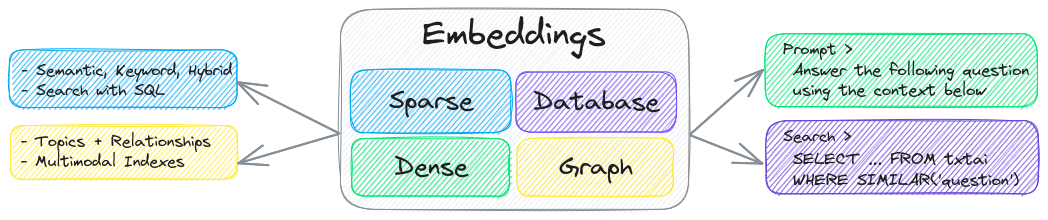
The key component of txtai is an embeddings database, which is a union of vector indexes (sparse and dense), graph networks and relational databases.
This foundation enables vector search and/or serves as a powerful knowledge source for large language model (LLM) applications.
Build autonomous agents, retrieval augmented generation (RAG) processes, multi-model workflows and more.
Summary of txtai features:
- 🔎 Vector search with SQL, object storage, topic modeling, graph analysis and multimodal indexing
- 📄 Create embeddings for text, documents, audio, images and video
- 💡 Pipelines powered by language models that run LLM prompts, question-answering, labeling, transcription, translation, summarization and more
- ↪️️ Workflows to join pipelines together and aggregate business logic. txtai processes can be simple microservices or multi-model workflows.
- 🤖 Agents that intelligently connect embeddings, pipelines, workflows and other agents together to autonomously solve complex problems
- ⚙️ Web and Model Context Protocol (MCP) APIs. Bindings available for [JavaScript](https://github.com/neuml/txtai.js), [Java](https://github.com/neuml/txtai.java), [Rust](https://github.com/neuml/txtai.rs) and [Go](https://github.com/neuml/txtai.go).
- 🔋 Batteries included with defaults to get up and running fast
- ☁️ Run local or scale out with container orchestration
txtai is built with Python 3.10+, [Hugging Face Transformers](https://github.com/huggingface/transformers), [Sentence Transformers](https://github.com/UKPLab/sentence-transformers) and [FastAPI](https://github.com/tiangolo/fastapi). txtai is open-source under an Apache 2.0 license.
> [!NOTE]
>
> [NeuML](https://neuml.com) is the company behind txtai and we provide AI consulting services around our stack. [Schedule a meeting](https://cal.com/neuml/intro) or [send a message](mailto:info@neuml.com) to learn more.
>
> We're also building an easy and secure way to run hosted txtai applications with [txtai.cloud](https://txtai.cloud).
## Why txtai?
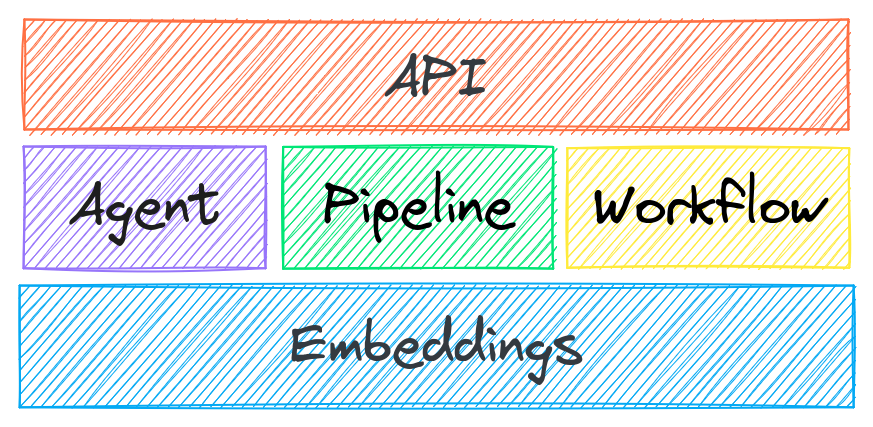
New vector databases, LLM frameworks and everything in between are sprouting up daily. Why build with txtai?
- Up and running in minutes with [pip](https://neuml.github.io/txtai/install/) or [Docker](https://neuml.github.io/txtai/cloud/)
```python
# Get started in a couple lines
import txtai
embeddings = txtai.Embeddings()
embeddings.index(["Correct", "Not what we hoped"])
embeddings.search("positive", 1)
#[(0, 0.29862046241760254)]
```
- Built-in API makes it easy to develop applications using your programming language of choice
```yaml
# app.yml
embeddings:
path: sentence-transformers/all-MiniLM-L6-v2
```
```bash
CONFIG=app.yml uvicorn "txtai.api:app"
curl -X GET "http://localhost:8000/search?query=positive"
```
- Run local - no need to ship data off to disparate remote services
- Work with micromodels all the way up to large language models (LLMs)
- Low footprint - install additional dependencies and scale up when needed
- [Learn by example](https://neuml.github.io/txtai/examples) - notebooks cover all available functionality
## Use Cases
The following sections introduce common txtai use cases. A comprehensive set of over 70 [example notebooks and applications](https://neuml.github.io/txtai/examples) are also available.
### Semantic Search
Build semantic/similarity/vector/neural search applications.

Traditional search systems use keywords to find data. Semantic search has an understanding of natural language and identifies results that have the same meaning, not necessarily the same keywords.
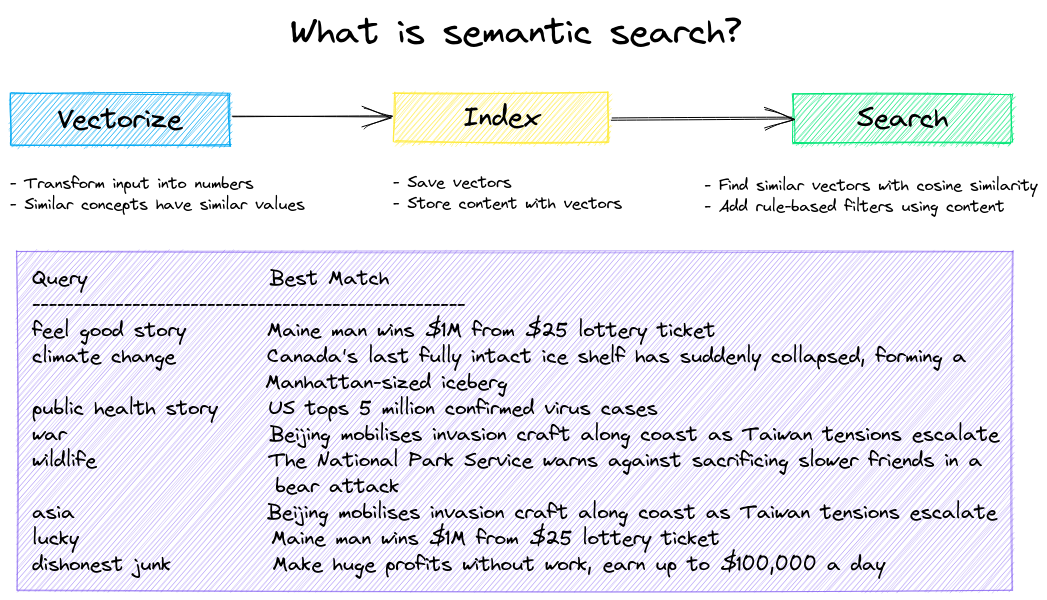
Get started with the following examples.
| Notebook | Description | |
|:----------|:-------------|------:|
| [Introducing txtai](https://github.com/neuml/txtai/blob/master/examples/01_Introducing_txtai.ipynb) [▶️](https://www.youtube.com/watch?v=SIezMnVdmMs) | Overview of the functionality provided by txtai | [](https://colab.research.google.com/github/neuml/txtai/blob/master/examples/01_Introducing_txtai.ipynb) |
| [Similarity search with images](https://github.com/neuml/txtai/blob/master/examples/13_Similarity_search_with_images.ipynb) | Embed images and text into the same space for search | [](https://colab.research.google.com/github/neuml/txtai/blob/master/examples/13_Similarity_search_with_images.ipynb) |
| [Build a QA database](https://github.com/neuml/txtai/blob/master/examples/34_Build_a_QA_database.ipynb) | Question matching with semantic search | [](https://colab.research.google.com/github/neuml/txtai/blob/master/examples/34_Build_a_QA_database.ipynb) |
| [Semantic Graphs](https://github.com/neuml/txtai/blob/master/examples/38_Introducing_the_Semantic_Graph.ipynb) | Explore topics, data connectivity and run network analysis| [](https://colab.research.google.com/github/neuml/txtai/blob/master/examples/38_Introducing_the_Semantic_Graph.ipynb) |
### LLM Orchestration
Autonomous agents, retrieval augmented generation (RAG), chat with your data, pipelines and workflows that interface with large language models (LLMs).
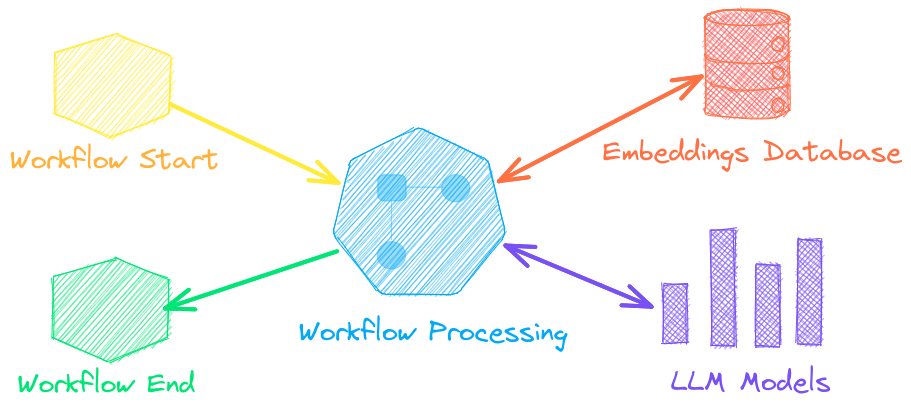
See below to learn more.
| Notebook | Description | |
|:----------|:-------------|------:|
| [Prompt templates and task chains](https://github.com/neuml/txtai/blob/master/examples/44_Prompt_templates_and_task_chains.ipynb) | Build model prompts and connect tasks together with workflows | [](https://colab.research.google.com/github/neuml/txtai/blob/master/examples/44_Prompt_templates_and_task_chains.ipynb) |
| [Integrate LLM frameworks](https://github.com/neuml/txtai/blob/master/examples/53_Integrate_LLM_Frameworks.ipynb) | Integrate llama.cpp, LiteLLM and custom generation frameworks | [](https://colab.research.google.com/github/neuml/txtai/blob/master/examples/53_Integrate_LLM_Frameworks.ipynb) |
| [Build knowledge graphs with LLMs](https://github.com/neuml/txtai/blob/master/examples/57_Build_knowledge_graphs_with_LLM_driven_entity_extraction.ipynb) | Build knowledge graphs with LLM-driven entity extraction | [](https://colab.research.google.com/github/neuml/txtai/blob/master/examples/57_Build_knowledge_graphs_with_LLM_driven_entity_extraction.ipynb) |
| [Parsing the stars with txtai](https://github.com/neuml/txtai/blob/master/examples/72_Parsing_the_stars_with_txtai.ipynb) | Explore an astronomical knowledge graph of known stars, planets, galaxies | [](https://colab.research.google.com/github/neuml/txtai/blob/master/examples/72_Parsing_the_stars_with_txtai.ipynb) |
#### Agents
Agents connect embeddings, pipelines, workflows and other agents together to autonomously solve complex problems.
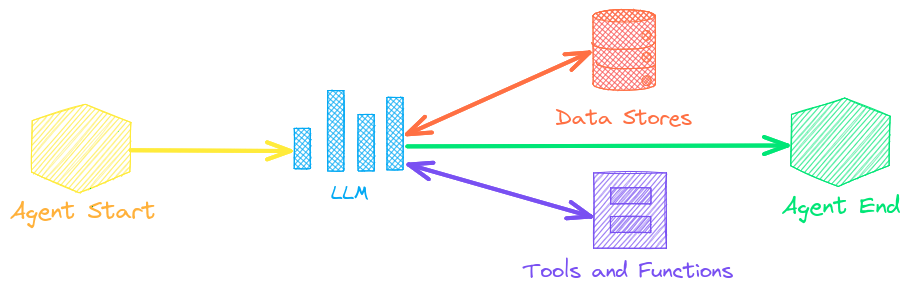
txtai agents are built on top of the [smolagents](https://github.com/huggingface/smolagents) framework. This supports all LLMs txtai supports (Hugging Face, llama.cpp, OpenAI / Claude / AWS Bedrock via LiteLLM). Agent prompting with [`agents.md`](https://github.com/agentsmd/agents.md) and [`skill.md`](https://agentskills.io/specification) are also supported.
Check out this [Agent Quickstart Example](https://github.com/neuml/txtai/blob/master/examples/agent_quickstart.py). Additional examples are listed below.
| Notebook | Description | |
|:----------|:-------------|------:|
| [Granting autonomy to agents](https://github.com/neuml/txtai/blob/master/examples/69_Granting_autonomy_to_agents.ipynb) | Agents that iteratively solve problems as they see fit | [](https://colab.research.google.com/github/neuml/txtai/blob/master/examples/69_Granting_autonomy_to_agents.ipynb) |
| [TxtAI got skills](https://github.com/neuml/txtai/blob/master/examples/83_TxtAI_got_skills.ipynb) | Integrate skill.md files with your agent | [](https://colab.research.google.com/github/neuml/txtai/blob/master/examples/83_TxtAI_got_skills.ipynb) |
| [Agent Tools](https://github.com/neuml/txtai/blob/master/examples/84_Agent_Tools.ipynb) [▶️](https://www.youtube.com/watch?v=RDNaFXQy3GQ) | Learn about the txtai agent toolkit | [](https://colab.research.google.com/github/neuml/txtai/blob/master/examples/84_Agent_Tools.ipynb) |
| [Analyzing LinkedIn Company Posts with Graphs and Agents](https://github.com/neuml/txtai/blob/master/examples/71_Analyzing_LinkedIn_Company_Posts_with_Graphs_and_Agents.ipynb) | Exploring how to improve social media engagement with AI | [](https://colab.research.google.com/github/neuml/txtai/blob/master/examples/71_Analyzing_LinkedIn_Company_Posts_with_Graphs_and_Agents.ipynb) |
#### Retrieval augmented generation
Retrieval augmented generation (RAG) reduces the risk of LLM hallucinations by constraining the output with a knowledge base as context. RAG is commonly used to "chat with your data".


Check out this [RAG Quickstart Example](https://github.com/neuml/txtai/blob/master/examples/rag_quickstart.py). Additional examples are listed below.
| Notebook | Description | |
|:----------|:-------------|------:|
| [Build RAG pipelines with txtai](https://github.com/neuml/txtai/blob/master/examples/52_Build_RAG_pipelines_with_txtai.ipynb) [▶️](https://www.youtube.com/watch?v=t_OeAc8NVfQ) | Guide on retrieval augmented generation including how to create citations | [](https://colab.research.google.com/github/neuml/txtai/blob/master/examples/52_Build_RAG_pipelines_with_txtai.ipynb) |
| [RAG is more than Vector Search](https://github.com/neuml/txtai/blob/master/examples/79_RAG_is_more_than_Vector_Search.ipynb) | Context retrieval via Web, SQL and other sources | [](https://colab.research.google.com/github/neuml/txtai/blob/master/examples/79_RAG_is_more_than_Vector_Search.ipynb) |
| [GraphRAG with Wikipedia and GPT OSS](https://github.com/neuml/txtai/blob/master/examples/77_GraphRAG_with_Wikipedia_and_GPT_OSS.ipynb) | Deep graph search powered RAG | [](https://colab.research.google.com/github/neuml/txtai/blob/master/examples/77_GraphRAG_with_Wikipedia_and_GPT_OSS.ipynb) |
| [Speech to Speech RAG](https://github.com/neuml/txtai/blob/master/examples/65_Speech_to_Speech_RAG.ipynb) [▶️](https://www.youtube.com/watch?v=tH8QWwkVMKA) | Full cycle speech to speech workflow with RAG | [](https://colab.research.google.com/github/neuml/txtai/blob/master/examples/65_Speech_to_Speech_RAG.ipynb) |
### Language Model Workflows
Language model workflows, also known as semantic workflows, connect language models together to build intelligent applications.
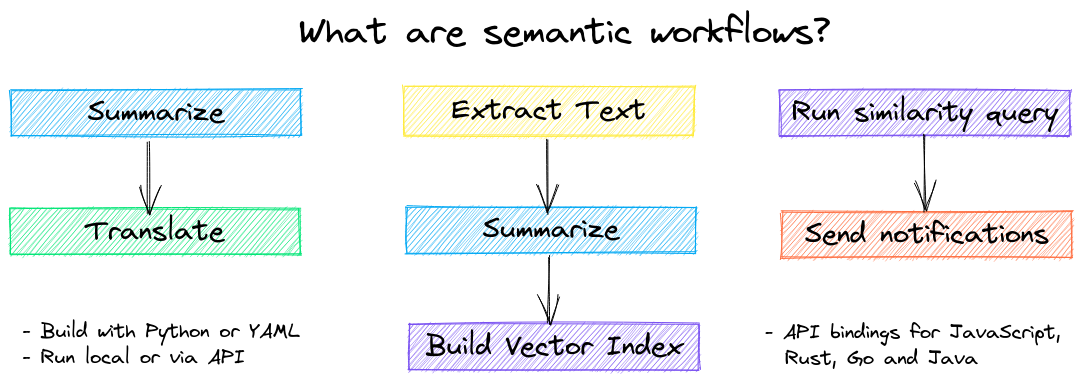
While LLMs are powerful, there are plenty of smaller, more specialized models that work better and faster for specific tasks. This includes models for extractive question-answering, automatic summarization, text-to-speech, transcription and translation.
Check out this [Workflow Quickstart Example](https://github.com/neuml/txtai/blob/master/examples/workflow_quickstart.py). Additional examples are listed below.
| Notebook | Description | |
|:----------|:-------------|------:|
| [Run pipeline workflows](https://github.com/neuml/txtai/blob/master/examples/14_Run_pipeline_workflows.ipynb) [▶️](https://www.youtube.com/watch?v=UBMPDCn1gEU) | Simple yet powerful constructs to efficiently process data | [](https://colab.research.google.com/github/neuml/txtai/blob/master/examples/14_Run_pipeline_workflows.ipynb) |
| [Building abstractive text summaries](https://github.com/neuml/txtai/blob/master/examples/09_Building_abstractive_text_summaries.ipynb) | Run abstractive text summarization | [](https://colab.research.google.com/github/neuml/txtai/blob/master/examples/09_Building_abstractive_text_summaries.ipynb) |
| [Transcribe audio to text](https://github.com/neuml/txtai/blob/master/examples/11_Transcribe_audio_to_text.ipynb) | Convert audio files to text | [](https://colab.research.google.com/github/neuml/txtai/blob/master/examples/11_Transcribe_audio_to_text.ipynb) |
| [Translate text between languages](https://github.com/neuml/txtai/blob/master/examples/12_Translate_text_between_languages.ipynb) | Streamline machine translation and language detection | [](https://colab.research.google.com/github/neuml/txtai/blob/master/examples/12_Translate_text_between_languages.ipynb) |
## Installation


The easiest way to install is via pip and PyPI
```
pip install txtai
```
Python 3.10+ is supported. Using a Python [virtual environment](https://docs.python.org/3/library/venv.html) is recommended.
See the detailed [install instructions](https://neuml.github.io/txtai/install) for more information covering [optional dependencies](https://neuml.github.io/txtai/install/#optional-dependencies), [environment specific prerequisites](https://neuml.github.io/txtai/install/#environment-specific-prerequisites), [installing from source](https://neuml.github.io/txtai/install/#install-from-source), [conda support](https://neuml.github.io/txtai/install/#conda) and how to [run with containers](https://neuml.github.io/txtai/cloud).
## Model guide

See the table below for the current recommended models. These models all allow commercial use and offer a blend of speed and performance.
| Component | Model(s) |
| ----------------------------------------------------------------------------- | ------------------------------------------------------------------------ |
| [Embeddings](https://neuml.github.io/txtai/embeddings) | [all-MiniLM-L6-v2](https://hf.co/sentence-transformers/all-MiniLM-L6-v2) |
| [Image Captions](https://neuml.github.io/txtai/pipeline/image/caption) | [BLIP](https://hf.co/Salesforce/blip-image-captioning-base) |
| [Labels - Zero Shot](https://neuml.github.io/txtai/pipeline/text/labels) | [BART-Large-MNLI](https://hf.co/facebook/bart-large) |
| [Labels - Fixed](https://neuml.github.io/txtai/pipeline/text/labels) | Fine-tune with [training pipeline](https://neuml.github.io/txtai/pipeline/train/trainer) |
| [Large Language Model (LLM)](https://neuml.github.io/txtai/pipeline/text/llm) | [gpt-oss-20b](https://huggingface.co/openai/gpt-oss-20b) |
| [Summarization](https://neuml.github.io/txtai/pipeline/text/summary) | [DistilBART](https://hf.co/sshleifer/distilbart-cnn-12-6) |
| [Text-to-Speech](https://neuml.github.io/txtai/pipeline/audio/texttospeech) | [ESPnet JETS](https://hf.co/NeuML/ljspeech-jets-onnx) |
| [Transcription](https://neuml.github.io/txtai/pipeline/audio/transcription) | [Whisper](https://hf.co/openai/whisper-base) |
| [Translation](https://neuml.github.io/txtai/pipeline/text/translation) | [OPUS Model Series](https://hf.co/Helsinki-NLP) |
Models can be loaded as either a path from the Hugging Face Hub or a local directory. Model paths are optional, defaults are loaded when not specified. For tasks with no recommended model, txtai uses the default models as shown in the Hugging Face Tasks guide.
See the following links to learn more.
- [Hugging Face Tasks](https://hf.co/tasks)
- [Hugging Face Model Hub](https://hf.co/models)
- [MTEB Leaderboard](https://hf.co/spaces/mteb/leaderboard)
- [LMSYS LLM Leaderboard](https://chat.lmsys.org/?leaderboard)
- [Open LLM Leaderboard](https://hf.co/spaces/HuggingFaceH4/open_llm_leaderboard)
## Powered by txtai
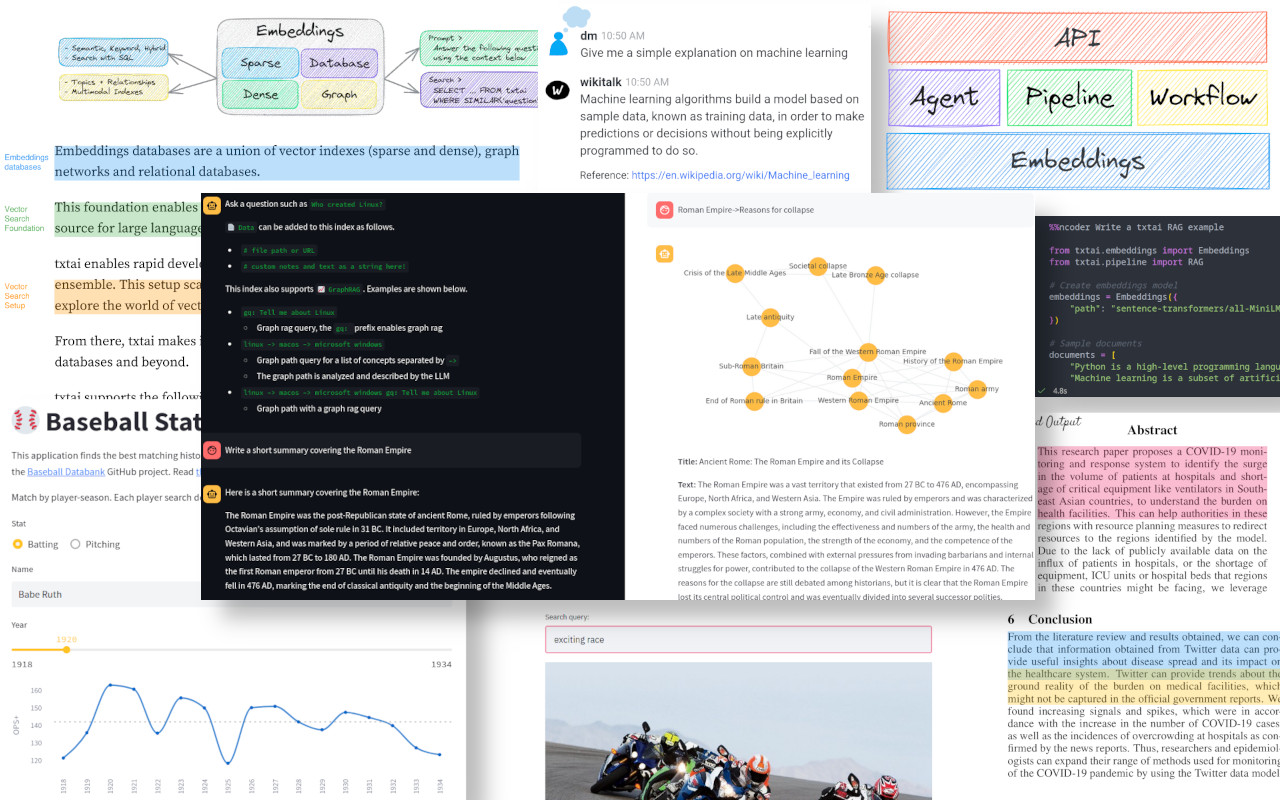
The following applications are powered by txtai.
| Application | Description |
|:------------ |:-------------|
| [rag](https://github.com/neuml/rag) | Retrieval Augmented Generation (RAG) application |
| [ncoder](https://github.com/neuml/ncoder) | Open-Source AI coding agent |
| [paperai](https://github.com/neuml/paperai) | AI for medical and scientific papers |
| [annotateai](https://github.com/neuml/annotateai) | Automatically annotate papers with LLMs |
In addition to this list, there are also many other [open-source projects](https://github.com/neuml/txtai/network/dependents), [published research](https://scholar.google.com/scholar?q=txtai&hl=en&as_ylo=2022) and closed proprietary/commercial projects that have built on txtai in production.
## Further Reading


- [Introducing txtai, the all-in-one AI framework](https://medium.com/neuml/introducing-txtai-the-all-in-one-ai-framework-0660ecfc39d7)
- [Tutorial series on Hashnode](https://neuml.hashnode.dev/series/txtai-tutorial) | [dev.to](https://dev.to/neuml/tutorial-series-on-txtai-ibg)
- [What's new in txtai 9.0](https://medium.com/neuml/whats-new-in-txtai-9-0-d522bb150afa) | [8.0](https://medium.com/neuml/whats-new-in-txtai-8-0-2d7d0ab4506b) | [7.0](https://medium.com/neuml/whats-new-in-txtai-7-0-855ad6a55440) | [6.0](https://medium.com/neuml/whats-new-in-txtai-6-0-7d93eeedf804) | [5.0](https://medium.com/neuml/whats-new-in-txtai-5-0-e5c75a13b101) | [4.0](https://medium.com/neuml/whats-new-in-txtai-4-0-bbc3a65c3d1c)
- [Getting started with semantic search](https://medium.com/neuml/getting-started-with-semantic-search-a9fd9d8a48cf) | [workflows](https://medium.com/neuml/getting-started-with-semantic-workflows-2fefda6165d9) | [rag](https://medium.com/neuml/getting-started-with-rag-9a0cca75f748)
- [Running txtai at scale](https://medium.com/neuml/running-at-scale-with-txtai-71196cdd99f9)
- [Vector search & RAG Landscape: A review with txtai](https://medium.com/neuml/vector-search-rag-landscape-a-review-with-txtai-a7f37ad0e187)
## Documentation
[Full documentation on txtai](https://neuml.github.io/txtai) including configuration settings for embeddings, pipelines, workflows, API and a FAQ with common questions/issues is available.
## Contributing
For those who would like to contribute to txtai, please see [this guide](https://github.com/neuml/.github/blob/master/CONTRIBUTING.md).
================================================
FILE: docker/api/Dockerfile
================================================
# Set base image
ARG BASE_IMAGE=neuml/txtai-cpu
FROM $BASE_IMAGE
# Copy configuration
COPY config.yml .
# Run local API instance to cache models in container
RUN python -c "from txtai.api import API; API('config.yml', False)"
# Start server and listen on all interfaces
ENV CONFIG "config.yml"
ENTRYPOINT ["uvicorn", "--host", "0.0.0.0", "txtai.api:app"]
================================================
FILE: docker/aws/Dockerfile
================================================
# Set base image
ARG BASE_IMAGE=neuml/txtai-cpu
FROM $BASE_IMAGE
# Application script to copy into image
ARG APP=api.py
# Install Lambda Runtime Interface Client and Mangum ASGI bindings
RUN pip install awslambdaric mangum
# Copy configuration
COPY config.yml .
# Run local API instance to cache models in container
RUN python -c "from txtai.api import API; API('config.yml', False)"
# Copy application
COPY $APP ./app.py
# Start runtime client using default application handler
ENV CONFIG "config.yml"
ENTRYPOINT ["python", "-m", "awslambdaric"]
CMD ["app.handler"]
================================================
FILE: docker/aws/api.py
================================================
"""
Lambda handler for a txtai API instance
"""
from mangum import Mangum
from txtai.api import app, start
# pylint: disable=C0103
# Create FastAPI application instance wrapped by Mangum
handler = None
if not handler:
# Start application
start()
# Create handler
handler = Mangum(app, lifespan="off")
================================================
FILE: docker/aws/workflow.py
================================================
"""
Lambda handler for txtai workflows
"""
import json
from txtai.api import API
APP = None
# pylint: disable=W0603,W0613
def handler(event, context):
"""
Runs a workflow using input event parameters.
Args:
event: input event
context: input context
Returns:
Workflow results
"""
# Create (or get) global app instance
global APP
APP = APP if APP else API("config.yml")
# Get parameters from event body
event = json.loads(event["body"])
# Run workflow and return results
return {"statusCode": 200, "headers": {"Content-Type": "application/json"}, "body": list(APP.workflow(event["name"], event["elements"]))}
================================================
FILE: docker/base/Dockerfile
================================================
# Set base image
ARG BASE_IMAGE=python:3.10-slim
FROM $BASE_IMAGE
# Install GPU-enabled version of PyTorch if set
ARG GPU
# Target CPU architecture
ARG TARGETARCH
# Set Python version (i.e. 3, 3.10)
ARG PYTHON_VERSION=3
# List of txtai components to install
ARG COMPONENTS=[all]
# Locale environment variables
ENV LC_ALL=C.UTF-8
ENV LANG=C.UTF-8
RUN \
# Install required packages
apt-get update && \
apt-get -y --no-install-recommends install libgomp1 libportaudio2 libsndfile1 git gcc g++ python${PYTHON_VERSION} python${PYTHON_VERSION}-dev python3-pip && \
rm -rf /var/lib/apt/lists && \
\
# Install txtai project and dependencies
ln -s /usr/bin/python${PYTHON_VERSION} /usr/bin/python && \
python -m pip install --no-cache-dir -U pip wheel setuptools && \
if [ -z ${GPU} ] && { [ -z ${TARGETARCH} ] || [ ${TARGETARCH} = "amd64" ] ;}; then pip install --no-cache-dir torch==2.10.0+cpu torchvision==0.25.0+cpu -f https://download.pytorch.org/whl/torch -f https://download.pytorch.org/whl/torchvision; fi && \
python -m pip install --no-cache-dir txtai${COMPONENTS} && \
python -c "import sys, importlib.util as util; 1 if util.find_spec('nltk') else sys.exit(); import nltk; nltk.download(['punkt', 'punkt_tab', 'averaged_perceptron_tagger_eng'])" && \
\
# Cleanup build packages
apt-get -y purge git gcc g++ python${PYTHON_VERSION}-dev && apt-get -y autoremove
# Set default working directory
WORKDIR /app
================================================
FILE: docker/schedule/Dockerfile
================================================
# Set base image
ARG BASE_IMAGE=neuml/txtai-cpu
FROM $BASE_IMAGE
# Copy configuration
COPY config.yml .
# Run local API instance to cache models in container
RUN python -c "from txtai.api import API; API('config.yml', False)"
# Start application and wait for completion. Scheduled workflows can run indefinitely.
ENTRYPOINT ["python", "-c", "from txtai.api import API; API('config.yml').wait()"]
================================================
FILE: docker/workflow/Dockerfile
================================================
# Set base image
ARG BASE_IMAGE=neuml/txtai-cpu
FROM $BASE_IMAGE
# Copy configuration
COPY config.yml .
# Run local API instance to cache models in container
RUN python -c "from txtai.api import API; API('config.yml', False)"
# Run workflow. Requires two command line arguments: name of workflow and input elements
ENTRYPOINT ["python", "-c", "import sys; from txtai.api import API\nfor _ in API('config.yml').workflow(sys.argv[1], sys.argv[2:]): pass"]
CMD ["workflow"]
================================================
FILE: docs/agent/configuration.md
================================================
# Configuration
An agent takes two main arguments, an LLM and a list of tools.
The txtai agent framework is built with [smolagents](https://github.com/huggingface/smolagents). Additional options can be passed in the `Agent` constructor.
```python
from datetime import datetime
from txtai import Agent
wikipedia = {
"name": "wikipedia",
"description": "Searches a Wikipedia database",
"provider": "huggingface-hub",
"container": "neuml/txtai-wikipedia"
}
arxiv = {
"name": "arxiv",
"description": "Searches a database of scientific papers",
"provider": "huggingface-hub",
"container": "neuml/txtai-arxiv"
}
def today() -> str:
"""
Gets the current date and time
Returns:
current date and time
"""
return datetime.today().isoformat()
agent = Agent(
model="Qwen/Qwen3-4B-Instruct-2507",
tools=[today, wikipedia, arxiv, "websearch"],
)
```
## model
```yaml
model: string|llm instance
```
LLM model path or LLM pipeline instance. The `llm` parameter is also supported for backwards compatibility.
See the [LLM pipeline](../../pipeline/text/llm) for more information.
## tools
```yaml
tools: list
```
List of tools to supply to the agent. Supports the following configurations.
### function
A function tool takes the following dictionary fields.
| Field | Description |
|:------------|:-------------------------|
| name | name of the tool |
| description | tool description |
| target | target method / callable |
A function or callable method can also be directly supplied in the `tools` list. In this case, the fields are inferred from the method documentation.
### embeddings
Embeddings indexes have built-in support. Provide the following dictionary configuration to add an embeddings index as a tool.
| Field | Description |
|:------------|:-------------------------------------------|
| name | embeddings index name |
| description | embeddings index description |
| **kwargs | Parameters to pass to [embeddings.load](../../embeddings/methods/#txtai.embeddings.Embeddings.load) |
### tool
The following shortcut strings load tools directly. Passing a Tool instance is also supported.
| Tool | Description |
|:------------|:----------------------------------------------------------|
| bash | Runs a shell command through subprocess |
| defaults | Loads all of these tools as the default toolkit |
| edit | Edits a file in place and returns a diff |
| glob | Finds matching file patterns in a directory |
| grep | Finds matching file content in a directory |
| http.* | HTTP Path to a [Model Context Protocol (MCP)](https://modelcontextprotocol.io/docs/getting-started/intro) server |
| python | Runs a Python action |
| read | Reads file or url content, supports text extraction |
| todowrite | Generates a task list to organize complex tasks |
| websearch | Runs a websearch using the built-in websearch tool |
| webview | Extracts content from a web page. Alias for `read` tool |
| write | Writes content to file |
| *.md | Loads a [`skill.md`](https://agentskills.io/specification) file |
## instructions
```yaml
instructions: string|path
```
Supports loading an `agents.md` file. Can be provided directly as a string or as a path to a file.
[Read more about agents.md here](https://github.com/agentsmd/agents.md)
## template
```yaml
template: string
```
Customize the prompt template used by this agent. Supports Jinja templates. Uses a default template when this parameter is not provided.
Must include `{{ text }}` and `{{ memory }}` placeholders.
## memory
```yaml
memory: int
```
Keeps a rolling window of `memory` inputs and outputs. These are added to future prompts and serve as "agent memory".
Supports storing memory by `session` to enable multiple conversation threads. Defaults to shared memory when not set. See the [method documentation](../methods#txtai.agent.base.Agent.__call__) for more information.
## method
```yaml
method: code|tool
```
Sets the agent method. Supports either a `code` or `tool` (default) calling agent. A code agent generates Python code and executes that. A tool calling agent generates JSON blocks and calls the agents within those blocks.
Additional options can be directly passed. See [CodeAgent](https://huggingface.co/docs/smolagents/main/en/reference/agents#smolagents.CodeAgent) or [ToolCallingAgent](https://huggingface.co/docs/smolagents/main/en/reference/agents#smolagents.ToolCallingAgent) for a list of parameters.
[Read more here](https://huggingface.co/docs/smolagents/main/en/guided_tour).
================================================
FILE: docs/agent/index.md
================================================
# Agent

An agent automatically creates workflows to answer multi-faceted user requests. Agents iteratively prompt and/or interface with tools to
step through a process and ultimately come to an answer for a request.
Agent prompting with [`agents.md`](https://github.com/agentsmd/agents.md) and [`skill.md`](https://agentskills.io/specification) are also supported. [Read the configuration](./configuration/#tool) for more on how to setup those up.
Agents excel at complex tasks where multiple tools and/or methods are required. They incorporate a level of randomness similar to different
people working on the same task. When the request is simple and/or there is a rule-based process, other methods such as RAG and Workflows
should be explored.
The following code snippet defines a basic agent.
```python
from datetime import datetime
from txtai import Agent
wikipedia = {
"name": "wikipedia",
"description": "Searches a Wikipedia database",
"provider": "huggingface-hub",
"container": "neuml/txtai-wikipedia"
}
arxiv = {
"name": "arxiv",
"description": "Searches a database of scientific papers",
"provider": "huggingface-hub",
"container": "neuml/txtai-arxiv"
}
def today() -> str:
"""
Gets the current date and time
Returns:
current date and time
"""
return datetime.today().isoformat()
agent = Agent(
model="Qwen/Qwen3-4B-Instruct-2507",
tools=[today, wikipedia, arxiv, "websearch"],
max_steps=10,
)
```
The agent above has access to two embeddings databases (Wikipedia and ArXiv) and the web. Given the user's input request, the agent decides the best tool to solve the task.
## Example
The first example will solve a problem with multiple data points. See below.
```python
agent("Which city has the highest population, Boston or New York?")
```
This requires looking up the population of each city before knowing how to answer the question. Multiple search requests are run to generate a final answer.
## Agentic RAG
Standard retrieval augmented generation (RAG) runs a single vector search to obtain a context and builds a prompt with the context + input question. Agentic RAG is a more complex process that goes through multiple iterations. It can also utilize multiple databases to come to a final conclusion.
The example below aggregates information from multiple sources and builds a report on a topic.
```python
researcher = """
You're an expert researcher looking to write a paper on {topic}.
Search for websites, scientific papers and Wikipedia related to the topic.
Write a report with summaries and references (with hyperlinks).
Write the text as Markdown.
"""
agent(researcher.format(topic="alien life"))
```
## Agent Teams
Agents can also be tools. This enables the concept of building "Agent Teams" to solve problems. The previous example can be rewritten as a list of agents.
```python
from txtai import Agent, LLM
llm = LLM("Qwen/Qwen3-4B-Instruct-2507")
websearcher = Agent(
model=llm,
tools=["websearch"],
)
wikiman = Agent(
model=llm,
tools=[{
"name": "wikipedia",
"description": "Searches a Wikipedia database",
"provider": "huggingface-hub",
"container": "neuml/txtai-wikipedia"
}],
)
researcher = Agent(
model=llm,
tools=[{
"name": "arxiv",
"description": "Searches a database of scientific papers",
"provider": "huggingface-hub",
"container": "neuml/txtai-arxiv"
}],
)
agent = Agent(
model=llm,
tools=[{
"name": "websearcher",
"description": "I run web searches, there is no answer a web search can't solve!",
"target": websearcher
}, {
"name": "wikiman",
"description": "Wikipedia has all the answers, I search Wikipedia and answer questions",
"target": wikiman
}, {
"name": "researcher",
"description": "I'm a science guy. I search arXiv to get all my answers.",
"target": researcher
}],
max_steps=10
)
```
This provides another level of intelligence to the process. Instead of just a single tool execution, each agent-tool combination has it's own reasoning engine.
```python
agent("""
Research fundamental concepts about Signal Processing and build a comprehensive report.
Write the output in Markdown.
""")
```
# More examples
Check out this [Agent Quickstart Example](https://github.com/neuml/txtai/blob/master/examples/agent_quickstart.py). Additional examples are listed below.
| Notebook | Description | |
|:----------|:-------------|------:|
| [What's new in txtai 8.0](https://github.com/neuml/txtai/blob/master/examples/67_Whats_new_in_txtai_8_0.ipynb) | Agents with txtai | [](https://colab.research.google.com/github/neuml/txtai/blob/master/examples/67_Whats_new_in_txtai_8_0.ipynb) |
| [Analyzing Hugging Face Posts with Graphs and Agents](https://github.com/neuml/txtai/blob/master/examples/68_Analyzing_Hugging_Face_Posts_with_Graphs_and_Agents.ipynb) | Explore a rich dataset with Graph Analysis and Agents | [](https://colab.research.google.com/github/neuml/txtai/blob/master/examples/68_Analyzing_Hugging_Face_Posts_with_Graphs_and_Agents.ipynb) |
| [Granting autonomy to agents](https://github.com/neuml/txtai/blob/master/examples/69_Granting_autonomy_to_agents.ipynb) | Agents that iteratively solve problems as they see fit | [](https://colab.research.google.com/github/neuml/txtai/blob/master/examples/69_Granting_autonomy_to_agents.ipynb) |
| [Analyzing LinkedIn Company Posts with Graphs and Agents](https://github.com/neuml/txtai/blob/master/examples/71_Analyzing_LinkedIn_Company_Posts_with_Graphs_and_Agents.ipynb) | Exploring how to improve social media engagement with AI | [](https://colab.research.google.com/github/neuml/txtai/blob/master/examples/71_Analyzing_LinkedIn_Company_Posts_with_Graphs_and_Agents.ipynb) |
| [Parsing the stars with txtai](https://github.com/neuml/txtai/blob/master/examples/72_Parsing_the_stars_with_txtai.ipynb) | Explore an astronomical knowledge graph of known stars, planets, galaxies | [](https://colab.research.google.com/github/neuml/txtai/blob/master/examples/72_Parsing_the_stars_with_txtai.ipynb) |
| [Agentic College Search](https://github.com/neuml/txtai/blob/master/examples/82_Agentic_College_Search.ipynb) | Identify list of strong engineering colleges | [](https://colab.research.google.com/github/neuml/txtai/blob/master/examples/82_Agentic_College_Search.ipynb) |
| [TxtAI got skills](https://github.com/neuml/txtai/blob/master/examples/83_TxtAI_got_skills.ipynb) | Integrate skill.md files with your agent | [](https://colab.research.google.com/github/neuml/txtai/blob/master/examples/83_TxtAI_got_skills.ipynb) |
| [Agent Tools](https://github.com/neuml/txtai/blob/master/examples/84_Agent_Tools.ipynb) [▶️](https://www.youtube.com/watch?v=RDNaFXQy3GQ) | Learn about the txtai agent toolkit | [](https://colab.research.google.com/github/neuml/txtai/blob/master/examples/84_Agent_Tools.ipynb) |
================================================
FILE: docs/agent/methods.md
================================================
# Methods
## ::: txtai.agent.base.Agent.__init__
## ::: txtai.agent.base.Agent.__call__
================================================
FILE: docs/api/cluster.md
================================================
# Distributed embeddings clusters
The API supports combining multiple API instances into a single logical embeddings index. An example configuration is shown below.
```yaml
cluster:
shards:
- http://127.0.0.1:8002
- http://127.0.0.1:8003
```
This configuration aggregates the API instances above as index shards. Data is evenly split among each of the shards at index time. Queries are run in parallel against each shard and the results are joined together. This method allows horizontal scaling and supports very large index clusters.
This method is only recommended for data sets in the 1 billion+ records. The ANN libraries can easily support smaller data sizes and this method is not worth the additional complexity. At this time, new shards can not be added after building the initial index.
See the link below for a detailed example covering distributed embeddings clusters.
| Notebook | Description | |
|:----------|:-------------|------:|
| [Distributed embeddings cluster](https://github.com/neuml/txtai/blob/master/examples/15_Distributed_embeddings_cluster.ipynb) | Distribute an embeddings index across multiple data nodes | [](https://colab.research.google.com/github/neuml/txtai/blob/master/examples/15_Distributed_embeddings_cluster.ipynb) |
================================================
FILE: docs/api/configuration.md
================================================
# Configuration
Configuration is set through YAML. In most cases, YAML keys map to fields names in Python. The [example in the previous section](../) gave a full-featured example covering a wide array of configuration options.
Each section below describes the available configuration settings.
## Embeddings
The configuration parser expects a top level `embeddings` key to be present in the YAML. All [embeddings configuration](../../embeddings/configuration) is supported.
The following example defines an embeddings index.
```yaml
path: index path
writable: true
embeddings:
path: vector model
content: true
```
Three top level settings are available to control where indexes are saved and if an index is a read-only index.
### path
```yaml
path: string
```
Path to save and load the embeddings index. Each API instance can only access a single index at a time.
### writable
```yaml
writable: boolean
```
Determines if the input embeddings index is writable (true) or read-only (false). This allows serving a read-only index.
### cloud
[Cloud storage settings](../../embeddings/configuration/cloud) can be set under a `cloud` top level configuration group.
## Agent
Agents are defined under a top level `agent` key. Each key under the `agent` key is the name of the agent. Constructor parameters can be passed under this key.
The following example defines an agent.
```yaml
agent:
researcher:
tools:
- websearch
llm:
path: Qwen/Qwen3-4B-Instruct-2507
```
## Pipeline
Pipelines are loaded as top level configuration parameters. Pipeline names are automatically detected in the YAML configuration and created upon startup. All [pipelines](../../pipeline) are supported.
The following example defines a series of pipelines. Note that entries below are the lower-case names of the pipeline class.
```yaml
caption:
extractor:
path: model path
labels:
summary:
tabular:
translation:
```
Under each pipeline name, configuration settings for the pipeline can be set.
## Workflow
Workflows are defined under a top level `workflow` key. Each key under the `workflow` key is the name of the workflow. Under that is a `tasks` key with each task definition.
The following example defines a workflow.
```yaml
workflow:
sumtranslate:
tasks:
- action: summary
- action: translation
```
### schedule
Schedules a workflow using a [cron expression](../../workflow/schedule).
```yaml
workflow:
index:
schedule:
cron: 0/10 * * * * *
elements: ["api params"]
tasks:
- task: service
url: api url
- action: index
```
### tasks
```yaml
tasks: list
```
Expects a list of workflow tasks. Each element defines a single workflow task. All [task configuration](../../workflow/task) is supported.
A shorthand syntax for creating tasks is supported. This syntax will automatically map task strings to an `action:value` pair.
Example below.
```yaml
workflow:
index:
tasks:
- action1
- action2
```
Each task element supports the following additional arguments.
#### action
```yaml
action: string|list
```
Both single and multi-action tasks are supported.
The action parameter works slightly different when passed via configuration. The parameter(s) needs to be converted into callable method(s). If action is a pipeline that has been defined in the current configuration, it will use that pipeline as the action.
There are three special action names `index`, `upsert` and `search`. If `index` or `upsert` are used as the action, the task will collect workflow data elements and load them into defined the embeddings index. If `search` is used, the task will execute embeddings queries for each input data element.
Otherwise, the action must be a path to a callable object or function. The configuration parser will resolve the function name and use that as the task action.
#### task
```yaml
task: string
```
Optionally sets the type of task to create. For example, this could be a `file` task or a `retrieve` task. If this is not specified, a generic task is created. [The list of workflow tasks can be found here](../../workflow).
#### args
```yaml
args: list
```
Optional list of static arguments to pass to the workflow task. These are combined with workflow data to pass to each `__call__`.
================================================
FILE: docs/api/customization.md
================================================
# Customization
The txtai API has a number of features out of the box that are designed to help get started quickly. API services can also be augmented with custom code and functionality. The two main ways to do this are with extensions and dependencies.
Extensions add a custom endpoint. Dependencies add middleware that executes with each request. See the sections below for more.
## Extensions
While the API is extremely flexible and complex logic can be executed through YAML-driven workflows, some may prefer to create an endpoint in Python. API extensions define custom Python endpoints that interact with txtai applications.
See the link below for a detailed example.
| Notebook | Description | |
|:----------|:-------------|------:|
| [Custom API Endpoints](https://github.com/neuml/txtai/blob/master/examples/51_Custom_API_Endpoints.ipynb) | Extend the API with custom endpoints | [](https://colab.research.google.com/github/neuml/txtai/blob/master/examples/51_Custom_API_Endpoints.ipynb) |
## Dependencies
txtai has a default API token authorization method that works well in many cases. Dependencies can also add custom logic with each request. This could be an additional authorization step and/or an authentication method.
See the link below for a detailed example.
| Notebook | Description | |
|:----------|:-------------|------:|
| [API Authorization and Authentication](https://github.com/neuml/txtai/blob/master/examples/54_API_Authorization_and_Authentication.ipynb) | Add authorization, authentication and middleware dependencies to the API | [](https://colab.research.google.com/github/neuml/txtai/blob/master/examples/54_API_Authorization_and_Authentication.ipynb) |
================================================
FILE: docs/api/index.md
================================================
# API


txtai has a full-featured API, backed by [FastAPI](https://github.com/tiangolo/fastapi), that can optionally be enabled for any txtai process. All functionality found in txtai can be accessed via the API.
The following is an example configuration and startup script for the API.
Note: This configuration file enables all functionality. For memory-bound systems, splitting pipelines into multiple instances is a best practice.
```yaml
# Index file path
path: /tmp/index
# Allow indexing of documents
writable: True
# Enbeddings index
embeddings:
path: sentence-transformers/nli-mpnet-base-v2
# Extractive QA
extractor:
path: distilbert-base-cased-distilled-squad
# Zero-shot labeling
labels:
# Similarity
similarity:
# Text segmentation
segmentation:
sentences: true
# Text summarization
summary:
# Text extraction
textractor:
paragraphs: true
minlength: 100
join: true
# Transcribe audio to text
transcription:
# Translate text between languages
translation:
# Workflow definitions
workflow:
sumfrench:
tasks:
- action: textractor
task: url
- action: summary
- action: translation
args: ["fr"]
sumspanish:
tasks:
- action: textractor
task: url
- action: summary
- action: translation
args: ["es"]
```
Assuming this YAML content is stored in a file named config.yml, the following command starts the API process.
```bash
CONFIG=config.yml uvicorn "txtai.api:app"
```
Uvicorn is a full-featured production-ready server. See the [Uvicorn deployment guide](https://www.uvicorn.org/deployment/) for more on configuration options.
## Connect to API
The default port for the API is 8000. See the uvicorn link above to change this.
txtai has a number of language bindings which abstract the API (see links below). Alternatively, code can be written to connect directly to the API. Documentation for a live running instance can be found at the `/docs` url (i.e. http://localhost:8000/docs). The following example runs a workflow using cURL.
```bash
curl \
-X POST "http://localhost:8000/workflow" \
-H "Content-Type: application/json" \
-d '{"name":"sumfrench", "elements": ["https://github.com/neuml/txtai"]}'
```
## Local instance
A local instance can be instantiated. In this case, a txtai application runs internally, without any network connections, providing the same consolidated functionality. This enables running txtai in Python with configuration.
The configuration above can be run in Python with:
```python
from txtai import Application
# Load and run workflow
app = Application(config.yml)
app.workflow("sumfrench", ["https://github.com/neuml/txtai"])
```
See this [link for a full list of methods](./methods).
## Run with containers
The API can be containerized and run. This will bring up an API instance without having to install Python, txtai or any dependencies on your machine!
[See this section for more information](../cloud/#api).
## Supported language bindings
The following programming languages have bindings with the txtai API:
- [Python](https://github.com/neuml/txtai.py)
- [JavaScript](https://github.com/neuml/txtai.js)
- [Java](https://github.com/neuml/txtai.java)
- [Rust](https://github.com/neuml/txtai.rs)
- [Go](https://github.com/neuml/txtai.go)
The API also supports hosting [OpenAI-compatible](./openai) and [Model Context Protocol (MCP)](./mcp) endpoints.
See the links below for detailed examples covering the API.
| Notebook | Description | |
|:----------|:-------------|------:|
| [API Gallery](https://github.com/neuml/txtai/blob/master/examples/08_API_Gallery.ipynb) | Using txtai in JavaScript, Java, Rust and Go | [](https://colab.research.google.com/github/neuml/txtai/blob/master/examples/08_API_Gallery.ipynb) |
| [Distributed embeddings cluster](https://github.com/neuml/txtai/blob/master/examples/15_Distributed_embeddings_cluster.ipynb) | Distribute an embeddings index across multiple data nodes | [](https://colab.research.google.com/github/neuml/txtai/blob/master/examples/15_Distributed_embeddings_cluster.ipynb) |
| [Embeddings in the Cloud](https://github.com/neuml/txtai/blob/master/examples/43_Embeddings_in_the_Cloud.ipynb) | Load and use an embeddings index from the Hugging Face Hub | [](https://colab.research.google.com/github/neuml/txtai/blob/master/examples/43_Embeddings_in_the_Cloud.ipynb) |
| [Custom API Endpoints](https://github.com/neuml/txtai/blob/master/examples/51_Custom_API_Endpoints.ipynb) | Extend the API with custom endpoints | [](https://colab.research.google.com/github/neuml/txtai/blob/master/examples/51_Custom_API_Endpoints.ipynb) |
| [API Authorization and Authentication](https://github.com/neuml/txtai/blob/master/examples/54_API_Authorization_and_Authentication.ipynb) | Add authorization, authentication and middleware dependencies to the API | [](https://colab.research.google.com/github/neuml/txtai/blob/master/examples/54_API_Authorization_and_Authentication.ipynb) |
| [OpenAI Compatible API](https://github.com/neuml/txtai/blob/master/examples/74_OpenAI_Compatible_API.ipynb) | Connect to txtai with a standard OpenAI client library | [](https://colab.research.google.com/github/neuml/txtai/blob/master/examples/74_OpenAI_Compatible_API.ipynb) |
================================================
FILE: docs/api/mcp.md
================================================
# Model Context Protocol
The [Model Context Protocol (MCP)](https://modelcontextprotocol.io/introduction) is an open standard that enables developers to build secure, two-way connections between their data sources and AI-powered tools.
The API can be configured to handle MCP requests. All enabled endpoints set in the API configuration are automatically added as MCP tools.
```yaml
mcp: True
```
Once this configuration option is added, a new route is added to the application `/mcp`.
The [Model Context Protocol Inspector tool](https://www.npmjs.com/package/@modelcontextprotocol/inspector) is a quick way to explore how the MCP tools are exported through this interface.
Run the following and go to the local URL specified.
```
npx @modelcontextprotocol/inspector node build/index.js
```
Enter `http://localhost:8000/mcp` to see the full list of tools available.
================================================
FILE: docs/api/methods.md
================================================
# Methods
::: txtai.api.API
options:
inherited_members: true
filters:
- "!__del__"
- "!flows"
- "!function"
- "!indexes"
- "!limit"
- "!pipes"
- "!read"
- "!resolve"
- "!weights"
================================================
FILE: docs/api/openai.md
================================================
# OpenAI-compatible API
The API can be configured to serve an OpenAI-compatible API as shown below.
```yaml
openai: True
```
See the link below for a detailed example.
| Notebook | Description | |
|:----------|:-------------|------:|
| [OpenAI Compatible API](https://github.com/neuml/txtai/blob/master/examples/74_OpenAI_Compatible_API.ipynb) | Connect to txtai with a standard OpenAI client library | [](https://colab.research.google.com/github/neuml/txtai/blob/master/examples/74_OpenAI_Compatible_API.ipynb) |
================================================
FILE: docs/api/security.md
================================================
# Security
The default implementation of an API service runs via HTTP and is fully open. If the service is being run as a prototype on an internal network, that may be fine. In most scenarios, the connection should at least be encrypted. Authorization is another built-in feature that requires a valid API token with each request. See below for more.
## HTTPS
The default API service command starts a Uvicorn server as a HTTP service on port 8000. To run a HTTPS service, consider the following options.
- [TLS Proxy Server](https://fastapi.tiangolo.com/deployment/https/). *Recommended choice*. With this configuration, the txtai API service runs as a HTTP service only accessible on the localhost/local network. The proxy server handles all encryption and redirects requests to local services. See this [example configuration](https://www.uvicorn.org/deployment/#running-behind-nginx) for more.
- [Uvicorn SSL Certificate](https://www.uvicorn.org/deployment/). Another option is setting the SSL certificate on the Uvicorn service. This works in simple situations but gets complex when hosting multiple txtai or other related services.
## Authorization
Authorization requires a valid API token with each API request. This token is sent as a HTTP `Authorization` header.
*Server*
```bash
CONFIG=config.yml TOKEN=<sha256 encoded token> uvicorn "txtai.api:app"
```
*Client*
```bash
curl \
-X POST "http://localhost:8000/workflow" \
-H "Content-Type: application/json" \
-H "Authorization: Bearer <token>" \
-d '{"name":"sumfrench", "elements": ["https://github.com/neuml/txtai"]}'
```
It's important to note that HTTPS **must** be enabled using one of the methods mentioned above. Otherwise, tokens will be exchanged as clear text.
Authentication and Authorization can be fully customized. See the [dependencies](../customization#dependencies) section for more.
================================================
FILE: docs/cloud.md
================================================
# Cloud


Scalable cloud-native applications can be built with txtai. The following cloud runtimes are supported.
- Container Orchestration Systems (i.e. Kubernetes)
- Docker Engine
- Serverless Compute
- txtai.cloud (planned for future)
Images for txtai are available on Docker Hub for [CPU](https://hub.docker.com/r/neuml/txtai-cpu) and [GPU](https://hub.docker.com/r/neuml/txtai-gpu) installs. The CPU install is recommended when GPUs aren't available given the image is significantly smaller.
The base txtai images have no models installed and models will be downloaded each time the container starts. Caching the models is recommended as that will significantly reduce container start times. This can be done a couple different ways.
- Create a container with the [models cached](#container-image-model-caching)
- Set the transformers cache environment variable and mount that volume when starting the image
```bash
docker run -v <local dir>:/models -e TRANSFORMERS_CACHE=/models --rm -it <docker image>
```
## Build txtai images
The txtai images found on Docker Hub are configured to support most situations. This image can be locally built with different options as desired.
Examples build commands below.
```bash
# Get Dockerfile
wget https://raw.githubusercontent.com/neuml/txtai/master/docker/base/Dockerfile
# Build Ubuntu 22.04 image running Python 3.10
docker build -t txtai --build-arg BASE_IMAGE=ubuntu:22.04 --build-arg PYTHON_VERSION=3.10 .
# Build image with GPU support
docker build -t txtai --build-arg GPU=1 .
# Build minimal image with the base txtai components
docker build -t txtai --build-arg COMPONENTS= .
```
## Container image model caching
As mentioned previously, model caching is recommended to reduce container start times. The following commands demonstrate this. In all cases, it is assumed a config.yml file is present in the local directory with the desired configuration set.
### API
This section builds an image that caches models and starts an API service. The config.yml file should be configured with the desired components to expose via the API.
The following is a sample config.yml file that creates an Embeddings API service.
```yaml
# config.yml
writable: true
embeddings:
path: sentence-transformers/nli-mpnet-base-v2
content: true
```
The next section builds the image and starts an instance.
```bash
# Get Dockerfile
wget https://raw.githubusercontent.com/neuml/txtai/master/docker/api/Dockerfile
# CPU build
docker build -t txtai-api .
# GPU build
docker build -t txtai-api --build-arg BASE_IMAGE=neuml/txtai-gpu .
# Run
docker run -p 8000:8000 --rm -it txtai-api
```
### Service
This section builds a scheduled workflow service. [More on scheduled workflows can be found here.](../workflow/schedule)
```bash
# Get Dockerfile
wget https://raw.githubusercontent.com/neuml/txtai/master/docker/service/Dockerfile
# CPU build
docker build -t txtai-service .
# GPU build
docker build -t txtai-service --build-arg BASE_IMAGE=neuml/txtai-gpu .
# Run
docker run --rm -it txtai-service
```
### Workflow
This section builds a single run workflow. [Example workflows can be found here.](../examples/#workflows)
```bash
# Get Dockerfile
wget https://raw.githubusercontent.com/neuml/txtai/master/docker/workflow/Dockerfile
# CPU build
docker build -t txtai-workflow .
# GPU build
docker build -t txtai-workflow --build-arg BASE_IMAGE=neuml/txtai-gpu .
# Run
docker run --rm -it txtai-workflow <workflow name> <workflow parameters>
```
## Serverless Compute
One of the most powerful features of txtai is building YAML-configured applications with the "build once, run anywhere" approach. API instances and workflows can run locally, on a server, on a cluster or serverless.
Serverless instances of txtai are supported on frameworks such as [AWS Lambda](https://aws.amazon.com/lambda/), [Google Cloud Functions](https://cloud.google.com/functions), [Azure Cloud Functions](https://azure.microsoft.com/en-us/services/functions/) and [Kubernetes](https://kubernetes.io/) with [Knative](https://knative.dev/docs/).
### AWS Lambda
The following steps show a basic example of how to build a serverless API instance with [AWS SAM](https://github.com/aws/serverless-application-model).
- Create config.yml and template.yml
```yaml
# config.yml
writable: true
embeddings:
path: sentence-transformers/nli-mpnet-base-v2
content: true
```
```yaml
# template.yml
Resources:
txtai:
Type: AWS::Serverless::Function
Properties:
PackageType: Image
MemorySize: 3000
Timeout: 20
Events:
Api:
Type: Api
Properties:
Path: "/{proxy+}"
Method: ANY
Metadata:
Dockerfile: Dockerfile
DockerContext: ./
DockerTag: api
```
- Install [AWS SAM](https://pypi.org/project/aws-sam-cli/)
- Run following
```bash
# Get Dockerfile and application
wget https://raw.githubusercontent.com/neuml/txtai/master/docker/aws/api.py
wget https://raw.githubusercontent.com/neuml/txtai/master/docker/aws/Dockerfile
# Build the docker image
sam build
# Start API gateway and Lambda instance locally
sam local start-api -p 8000 --warm-containers LAZY
# Verify instance running (should return 0)
curl http://localhost:8080/count
```
If successful, a local API instance is now running in a "serverless" fashion. This configuration can be deployed to AWS using SAM. [See this link for more information.](https://docs.aws.amazon.com/serverless-application-model/latest/developerguide/sam-cli-command-reference-sam-deploy.html)
### Kubernetes with Knative
txtai scales with container orchestration systems. This can be self-hosted or with a cloud provider such as [Amazon Elastic Kubernetes Service](https://aws.amazon.com/eks/), [Google Kubernetes Engine](https://cloud.google.com/kubernetes-engine) and [Azure Kubernetes Service](https://azure.microsoft.com/en-us/services/kubernetes-service/). There are also other smaller providers with a managed Kubernetes offering.
A full example covering how to build a serverless txtai application on Kubernetes with Knative [can be found here](https://medium.com/neuml/serverless-vector-search-with-txtai-96f6163ab972).
## txtai.cloud
[txtai.cloud](https://txtai.cloud) is a planned effort that will offer an easy and secure way to run hosted txtai applications.
================================================
FILE: docs/embeddings/configuration/ann.md
================================================
# ANN
Approximate Nearest Neighbor (ANN) index configuration for storing vector embeddings.
## backend
```yaml
backend: faiss|hnsw|annoy|ggml|numpy|torch|pgvector|sqlite|custom
```
Sets the ANN backend. Defaults to `faiss`. Additional backends are available via the [ann](../../../install/#ann) extras package. Set custom backends via setting this parameter to the fully resolvable class string.
Backend-specific settings are set with a corresponding configuration object having the same name as the backend (i.e. annoy, faiss, or hnsw). These are optional and set to defaults if omitted.
### faiss
```yaml
faiss:
components: comma separated list of components - defaults to "IDMap,Flat" for small
indices and "IVFx,Flat" for larger indexes where
x = min(4 * sqrt(embeddings count), embeddings count / 39)
automatically calculates number of IVF cells when omitted (supports "IVF,Flat")
nprobe: search probe setting (int) - defaults to x/16 (as defined above)
for larger indexes
nflip: same as nprobe - only used with binary hash indexes
quantize: store vectors with x-bit precision vs 32-bit (boolean|int)
true sets 8-bit precision, false disables, int sets specified
precision
mmap: load as on-disk index (boolean) - trade query response time for a
smaller RAM footprint, defaults to false
sample: percent of data to use for model training (0.0 - 1.0)
reduces indexing time for larger (>1M+ row) indexes, defaults to 1.0
```
Faiss supports both floating point and binary indexes. Floating point indexes are the default. Binary indexes are used when indexing scalar-quantized datasets.
See the following Faiss documentation links for more information.
- [Guidelines for choosing an index](https://github.com/facebookresearch/faiss/wiki/Guidelines-to-choose-an-index)
- [Index configuration summary](https://github.com/facebookresearch/faiss/wiki/Faiss-indexes)
- [Index Factory](https://github.com/facebookresearch/faiss/wiki/The-index-factory)
- [Binary Indexes](https://github.com/facebookresearch/faiss/wiki/Binary-indexes)
- [Search Tuning](https://github.com/facebookresearch/faiss/wiki/Faster-search)
Note: For macOS users, an existing bug in an upstream package restricts the number of processing threads to 1. This limitation is managed internally to prevent system crashes.
### hnsw
```yaml
hnsw:
efconstruction: ef_construction param for init_index (int) - defaults to 200
m: M param for init_index (int) - defaults to 16
randomseed: random-seed param for init_index (int) - defaults to 100
efsearch: ef search param (int) - defaults to None and not set
```
See [Hnswlib documentation](https://github.com/nmslib/hnswlib/blob/master/ALGO_PARAMS.md) for more information on these parameters.
### annoy
```yaml
annoy:
ntrees: number of trees (int) - defaults to 10
searchk: search_k search setting (int) - defaults to -1
```
See [Annoy documentation](https://github.com/spotify/annoy#full-python-api) for more information on these parameters. Note that annoy indexes can not be modified after creation, upserts/deletes and other modifications are not supported.
### ggml
```yaml
ggml:
gpu: enable GPU - defaults to True
quantize: sets the tensor quantization - defaults to F32
querysize: query buffer size - defaults to 64
```
The [GGML](https://github.com/ggml-org/ggml) backend is a k-nearest neighbors backend. It stores tensors using GGML and [GGUF](https://huggingface.co/docs/hub/en/gguf). It supports GPU-enabled operations and supports quantization. GGML is the framework used by [llama.cpp](https://github.com/ggml-org/llama.cpp).
[See this](https://github.com/ggml-org/ggml/blob/master/include/ggml.h#L379) for a list of quantization types.
### numpy
The NumPy backend is a k-nearest neighbors backend. It's designed for simplicity and works well with smaller datasets that fit into memory.
```yaml
numpy:
safetensors: stores vectors using the safetensors format
defaults to NumPy array storage
```
### torch
The Torch backend is a k-nearest neighbors backend like NumPy. It supports GPU-enabled operations. It also has support for quantization which enables fitting larger arrays into GPU memory.
When quantization is enabled, vectors are _always_ stored in safetensors. _Note that macOS support for quantization is limited._
```yaml
torch:
safetensors: stores vectors using the safetensors format - defaults
to NumPy array storage if quantization is disabled
quantize:
type: quantization type (fp4, nf4, int8)
blocksize: quantization block size parameter
```
### pgvector
```yaml
pgvector:
url: database url connection string, alternatively can be set via
ANN_URL environment variable
schema: database schema to store vectors - defaults to being
determined by the database
table: database table to store vectors - defaults to `vectors`
precision: vector float precision (half or full) - defaults to `full`
efconstruction: ef_construction param (int) - defaults to 200
m: M param for init_index (int) - defaults to 16
```
The pgvector backend stores embeddings in a Postgres database. See the [pgvector documentation](https://github.com/pgvector/pgvector-python?tab=readme-ov-file#sqlalchemy) for more information on these parameters. See the [SQLAlchemy](https://docs.sqlalchemy.org/en/20/core/engines.html#database-urls) documentation for more information on how to construct url connection strings.
### sqlite
```yaml
sqlite:
quantize: store vectors with x-bit precision vs 32-bit (boolean|int)
true sets 8-bit precision, false disables, int sets specified
precision
table: database table to store vectors - defaults to `vectors`
```
The SQLite backend stores embeddings in a SQLite database using [sqlite-vec](https://github.com/asg017/sqlite-vec). This backend supports 1-bit and 8-bit quantization at the storage level.
See [this note](https://alexgarcia.xyz/sqlite-vec/python.html#macos-blocks-sqlite-extensions-by-default) on how to run this ANN on MacOS.
================================================
FILE: docs/embeddings/configuration/cloud.md
================================================
# Cloud
The following describes parameters used to sync indexes with cloud storage. Cloud object storage, the [Hugging Face Hub](https://huggingface.co/models) and custom providers are all supported.
Parameters are set via the [embeddings.load](../../methods/#txtai.embeddings.base.Embeddings.load) and [embeddings.save](../../methods/#txtai.embeddings.base.Embeddings.save) methods.
## provider
```yaml
provider: string
```
Cloud provider. Can be one of the following:
- Cloud object storage. Set to one of these [providers](https://libcloud.readthedocs.io/en/stable/storage/supported_providers.html). Use the text shown in the `Provider Constant` column as lower case.
- Hugging Face Hub. Set to `huggingface-hub`.
- Custom providers. Set to the full class path of the custom provider.
## container
```yaml
container: string
```
Container/bucket/directory/repository name. Embeddings will be stored in the container with the filename specified by the `path` configuration.
## Cloud object storage configuration
In addition to the above common configuration, the cloud object storage provider has the following additional configuration parameters. Note that some cloud providers do not need any of these parameters and can use implicit authentication with service accounts.
See the [libcloud documentation](https://libcloud.readthedocs.io/en/stable/apidocs/libcloud.common.html#module-libcloud.common.base) for more information on these parameters.
### key
```yaml
key: string
```
Provider-specific access key. Can also be set via `ACCESS_KEY` environment variable. Ensure the configuration file is secured if added to the file. When using implicit authentication, set this to a value such as 'using-implicit-auth'.
### secret
```yaml
secret: string
```
Provider-specific access secret. Can also be set via `ACCESS_SECRET` environment variable. Ensure the configuration file is secured if added to the file. When using implicit authentication, this option is not required.
### prefix
```yaml
prefix: string
```
Optional object prefix. Object storage doesn't have the concept of a directory but a prefix is similar. For example, a prefix could be `base/dir`. This helps with organizing data in an object storage bucket.
More can be found at the following links.
- [Organizing objects using prefixes](https://docs.aws.amazon.com/AmazonS3/latest/userguide/using-prefixes.html)
- [libcloud container method documentation](https://libcloud.readthedocs.io/en/stable/storage/api.html#libcloud.storage.base.StorageDriver.iterate_container_objects)
### host
```yaml
host: string
```
Optional server host name. Set when using a local cloud storage server.
### port
```yaml
port: int
```
Optional server port. Set when using a local cloud storage server.
### token
```yaml
token: string
```
Optional temporary session token
### region
```yaml
region: string
```
Optional parameter to specify the storage region, provider-specific.
## Hugging Face Hub configuration
The huggingface-hub provider supports the following additional configuration parameters. More on these parameters can be found in the [Hugging Face Hub's documentation](https://huggingface.co/docs/huggingface_hub/main/en/package_reference/overview).
### revision
```yaml
revision: string
```
Optional Git revision id which can be a branch name, a tag, or a commit hash
### cache
```yaml
cache: string
```
Path to the folder where cached files are stored
### token
```yaml
token: string|boolean
```
Token to be used for the download. If set to True, the token will be read from the Hugging Face config folder.
================================================
FILE: docs/embeddings/configuration/database.md
================================================
# Database
Databases store metadata, text and binary content.
## content
```yaml
content: boolean|sqlite|duckdb|client|url|custom
```
Enables content storage. When true, the default storage engine, `sqlite` will be used to save metadata.
Client-server connections are supported with either `client` or a full connection URL. When set to `client`, the CLIENT_URL environment variable must be set to the full connection URL. See the [SQLAlchemy](https://docs.sqlalchemy.org/en/20/core/engines.html#database-urls) documentation for more information on how to construct connection strings for client-server databases.
Add custom storage engines via setting this parameter to the fully resolvable class string.
Content storage specific settings are set with a corresponding configuration object having the same name as the content storage engine (i.e. duckdb or sqlite). These are optional and set to defaults if omitted.
### client
```yaml
schema: default database schema for the session - defaults to being
determined by the database
```
Additional settings for client-server databases. Also supported when the `content=url`.
### sqlite
```yaml
sqlite:
wal: enable write-ahead logging - allows concurrent read/write operations,
defaults to false
```
Additional settings for SQLite.
## objects
```yaml
objects: boolean|image|pickle
```
Enables object storage. Supports storing binary content. Requires content storage to also be enabled.
Object encoding options are:
- `standard`: Default encoder when boolean set. Encodes and decodes objects as byte arrays.
- `image`: Image encoder. Encodes and decodes objects as image objects.
- `pickle`: Pickle encoder. Encodes and decodes objects with the pickle module. Supports arbitrary objects.
## functions
```yaml
functions: list
```
List of functions with user-defined SQL functions. Each list element must be one of the following:
- function
- callable object
- dict with fields for name, argcount, function and deterministic
[An example can be found here](../../query#custom-sql-functions).
## expressions
```yaml
expressions: list
```
List of expression shortcuts. Each list element must be a dict with the following fields.
- `name`: name of the expression
- `expression`: SQL expression, defaults to `name` when empty
- `index`: if this expression should have a database index, defaults to False when not provided
The expression can be a json data column, sql function or anything that can be run as a SQL snippet.
## query
```yaml
query:
path: sets the path for the query model - this can be any model on the
Hugging Face Model Hub or a local file path.
prefix: text prefix to prepend to all inputs
maxlength: maximum generated sequence length
```
Query translation model. Translates natural language queries to txtai compatible SQL statements.
================================================
FILE: docs/embeddings/configuration/general.md
================================================
# General
General configuration options.
## keyword
```yaml
keyword: boolean|string
```
Enables sparse keyword indexing for this embeddings.
When set to a boolean, this parameter creates a BM25 index for full text search. When set to a string, it expects a [keyword method](../scoring#method).
It also implicitly disables the [defaults](#defaults) setting for vector search.
## sparse
```yaml
sparse: boolean|path
```
Enables sparse vector indexing for this embeddings.
When set to `True`, this parameter creates a sparse vector index using the [default sparse index model](https://huggingface.co/prithivida/Splade_PP_en_v2). When set to a string, it expects a local or Hugging Face model path.
It also implicitly disables the [defaults](#defaults) setting for vector search.
## dense
```yaml
dense: boolean|string
```
Alias for the [vector model path](../vectors/#path). When set to `True`, the [default transformers vector model](https://huggingface.co/sentence-transformers/all-MiniLM-L6-v2) is used.
## hybrid
```yaml
hybrid: boolean
```
Enables hybrid (sparse + dense) indexing for this embeddings.
When enabled, this parameter creates a BM25 index for full text search. It has no effect on the [defaults](#defaults) or [path](../vectors/#path) settings.
## defaults
```yaml
defaults: boolean
```
Uses default vector model path when enabled (default setting is True) and `path` is not provided. See [this link](../) for an example.
## indexes
```yaml
indexes: dict
```
Key value pairs defining subindexes for this embeddings. Each key is the index name and the value is the full configuration. This configuration can use any of the available configurations in a standard embeddings instance.
## autoid
```yaml
format: int|uuid function
```
Sets the auto id generation method. When this is not set, an autogenerated numeric sequence is used. This also supports [UUID generation functions](https://docs.python.org/3/library/uuid.html#uuid.uuid1). For example, setting this value to `uuid4` will generate random UUIDs. Setting this to `uuid5` will generate deterministic UUIDs for each input data row.
## columns
```yaml
columns:
text: name of the text column
object: name of the object column
store: limit json data fields to this list of columns
```
Sets the `text` and `object` column names. Defaults to `text` and `object` if not provided.
`store` sets a list of columns to store in the JSON data field. When this isn't provided, all columns are stored (default). When `store` is set to `None`, no JSON columns are stored. This is useful is a field is only needed at indexing time but not search time.
## format
```yaml
format: json|pickle
```
Sets the configuration storage format. Defaults to `json`.
================================================
FILE: docs/embeddings/configuration/graph.md
================================================
# Graph
Enable graph storage via the `graph` parameter. This component requires the [graph](../../../install/#graph) extras package.
When enabled, a graph network is built using the embeddings index. Graph nodes are synced with each embeddings index operation (index/upsert/delete). Graph edges are created using the embeddings index upon completion of each index/upsert/delete embeddings index call.
## backend
```yaml
backend: networkx|rdbms|custom
```
Sets the graph backend. Defaults to `networkx`.
Add custom graph storage engines via setting this parameter to the fully resolvable class string.
The `rdbms` backend has the following additional settings.
### rdbms
```yaml
url: database url connection string, alternatively can be set via the
GRAPH_URL environment variable
schema: database schema to store graph - defaults to being
determined by the database
nodes: table to store node data, defaults to `nodes`
edges: table to store edge data, defaults to `edges`
```
## batchsize
```yaml
batchsize: int
```
Batch query size, used to query embeddings index - defaults to 256.
## limit
```yaml
limit: int
```
Maximum number of results to return per embeddings query - defaults to 15.
## minscore
```yaml
minscore: float
```
Minimum score required to consider embeddings query matches - defaults to 0.1.
## approximate
```yaml
approximate: boolean
```
When true, queries only run for nodes without edges - defaults to true.
## topics
```yaml
topics:
algorithm: community detection algorithm (string), options are
louvain (default), greedy, lpa
level: controls number of topics (string), options are best (default) or first
resolution: controls number of topics (int), larger values create more
topics (int), defaults to 100
labels: scoring index method used to build topic labels (string)
options are bm25 (default), tfidf, sif
terms: number of frequent terms to use for topic labels (int), defaults to 4
stopwords: optional list of stop words to exclude from topic labels
categories: optional list of categories used to group topics, allows
granular topics with broad categories grouping topics
```
Enables topic modeling. Defaults are tuned so that in most cases these values don't need to be changed (except for categories). These parameters are available for advanced use cases where one wants full control over the community detection process.
## copyattributes
```yaml
copyattributes: boolean|list
```
Copy these attributes from input dictionaries in the `insert` method. If this is set to `True`, all attributes are copied. Otherwise, only the
attributes specified in this list are copied to the graph as attributes.
================================================
FILE: docs/embeddings/configuration/index.md
================================================
# Configuration
The following describes available embeddings configuration. These parameters are set in the [Embeddings constructor](../methods#txtai.embeddings.base.Embeddings.__init__) via either the `config` parameter or as keyword arguments.
Configuration is designed to be optional and set only when needed. Out of the box, sensible defaults are picked to get up and running fast. For example:
```python
from txtai import Embeddings
embeddings = Embeddings()
```
Creates a new embeddings instance, using [all-MiniLM-L6-v2](https://hf.co/sentence-transformers/all-MiniLM-L6-v2) as the vector model, [Faiss](https://faiss.ai/) as the ANN index backend and content disabled.
```python
from txtai import Embeddings
embeddings = Embeddings(content=True)
```
Is the same as above except it adds in [SQLite](https://www.sqlite.org/index.html) for content storage.
The following sections link to all the available configuration options.
## [ANN](./ann)
The default vector index backend is Faiss.
## [Cloud](./cloud)
Embeddings databases can optionally be synced with cloud storage.
## [Database](./database)
Content storage is disabled by default. When enabled, SQLite is the default storage engine.
## [General](./general)
General configuration that doesn't fit elsewhere.
## [Graph](./graph)
An accomplying graph index can be created with an embeddings database. This enables topic modeling, path traversal and more. [NetworkX](https://github.com/networkx/networkx) is the default graph index.
## [Scoring](./scoring)
Sparse keyword indexing and word vectors term weighting.
## [Vectors](./vectors)
Vector search is enabled by converting text and other binary data into embeddings vectors. These vectors are then stored in an ANN index. The vector model is optional and a default model is used when not provided.
================================================
FILE: docs/embeddings/configuration/scoring.md
================================================
# Scoring
Enable scoring support via the `scoring` parameter.
This scoring instance can serve two purposes, depending on the settings.
One use case is building sparse/keyword indexes. This occurs when the `terms` parameter is set to `True`.
The other use case is with word vector term weighting. This feature has been available since the initial version but isn't quite as common anymore.
The following covers the available options.
## method
```yaml
method: bm25|tfidf|sif|pgtext|sparse|custom
```
Sets the scoring method. Add custom scoring via setting this parameter to the fully resolvable class string.
### pgtext
```yaml
schema: database schema to store keyword index - defaults to being
determined by the database
```
Additional settings for Postgres full-text keyword indexes.
### sparse
```yaml
path: sparse vector model path
vectormethod: vector embeddings method
vectornormalize: enable vector embeddings normalization (boolean)
gpu: boolean|int|string|device
normalize: enable score normalization (boolean|float|string|dict)
batch: Sets the transform batch size
encodebatch: Sets the encode batch size
vectors: additional model init args
encodeargs: additional encode() args
backend: ivfsparse|pgsparse
```
Sparse vector scoring options. The sparse scoring instance combines a sparse vector model with a sparse approximate nearest neighbor index (ANN). This method supports both vector normalization and score normalization.
Vector normalization normalizes all vectors to have a magnitude of 1. By extension, all generated scores will be 0 to 1.
Score normalization scales the output between 0 and 1. This setting supports:
- `True` for default scale normalization
- `float` normalize using this as the scale factor
- `"bayes"` for Bayesian normalization using dynamic candidate score statistics
- `{method: "bayes", alpha: 1.0, beta: null}` for Bayesian normalization with optional custom parameters
#### ivfsparse
```yaml
ivfsparse:
sample: percent of data to use for model training (0.0 - 1.0)
nfeatures: top n features to use for model training (int)
nlist: desired number of clusters (int)
nprobe: search probe setting (int)
minpoints: minimum number of points for a cluster (int)
```
Inverted file (IVF) index with flat vector file storage and sparse array support.
#### pgsparse
Sparse ANN backed by Postgres. Supports same options as the [pgvector](../ann/#pgvector) ANN.
## terms
```yaml
terms: boolean|dict
```
Enables term frequency sparse arrays for a scoring instance. This is the backend for sparse keyword indexes.
Supports a `dict` with the parameters `cachelimit` and `cutoff`.
`cachelimit` is the maximum amount of resident memory in bytes to use during indexing before flushing to disk. This parameter is an `int`.
`cutoff` is used during search to determine what constitutes a common term. This parameter is a `float`, i.e. 0.1 for a cutoff of 10%.
When `terms` is set to `True`, default parameters are used for the `cachelimit` and `cutoff`. Normally, these defaults are sufficient.
## normalize
```yaml
normalize: boolean|str|dict
```
Enables normalized scoring (ranging from 0 to 1). This setting supports:
- `True` for standard score normalization
- `"bayes"` | `"bb25"` for Bayesian normalization using dynamic candidate score statistics
- `{method: "bayes", alpha: 1.0, beta: null}` for Bayesian normalization with optional custom parameters
When standard normalization is enabled, statistics from the index are used to calculate normalized scores.
When Bayesian/BB25 normalization is enabled, it uses positive-score candidates, dynamic `beta=median(scores)`, adaptive
`alpha_eff=alpha/std(scores)` and a sigmoid transform (likelihood-only variant with flat prior) to map scores to `[0, 1]`.
Bayesian normalization references:
- [https://github.com/instructkr/bb25](https://github.com/instructkr/bb25)
- [https://github.com/cognica-io/bayesian-bm25](https://github.com/cognica-io/bayesian-bm25)
## tokenizer
```yaml
tokenizer: dict
```
Set tokenization rules. Passes these arguments to the underlying [Tokenization pipeline](../../../pipeline/data/tokenizer#txtai.pipeline.Tokenizer.__init__).
================================================
FILE: docs/embeddings/configuration/vectors.md
================================================
# Vectors
The following covers available vector model configuration options.
## path
```yaml
path: string
```
Sets the path for a vectors model. When using a transformers/sentence-transformers model, this can be any model on the
[Hugging Face Hub](https://huggingface.co/models) or a local file path. Otherwise, it must be a local file path to a word embeddings model.
## method
```yaml
method: transformers|sentence-transformers|llama.cpp|litellm|model2vec|external|words
```
Embeddings method to use. If the method is not provided, it is inferred using the `path`.
`sentence-transformers`, `llama.cpp`, `litellm`, `model2vec` and `words` require the [vectors](../../../install/#vectors) extras package to be installed.
### transformers
Builds embeddings using a transformers model. While this can be any transformers model, it works best with
[models trained](https://huggingface.co/models?pipeline_tag=sentence-similarity) to build embeddings.
`mean`, `cls` and `late` pooling are supported and automatically inferred from the model. The pooling method can be overwritten by changing the method
from `transformers` to `meanpooling`, `clspooling` or `latepooling` respectively.
Setting `maxlength` to `True` enables truncating inputs to the `max_seq_length`. Setting `maxlength` to an integer will truncate inputs to that value. When omitted (default), the `maxlength` will be set to either the model or tokenizer maxlength.
### sentence-transformers
Same as transformers but loads models with the [sentence-transformers](https://github.com/UKPLab/sentence-transformers) library.
### llama.cpp
Builds embeddings using a [llama.cpp](https://github.com/abetlen/llama-cpp-python) model. Supports both local and remote GGUF paths on the HF Hub.
### litellm
Builds embeddings using a LiteLLM model. See the [LiteLLM documentation](https://litellm.vercel.app/docs/providers) for the options available with LiteLLM models.
### model2vec
Builds embeddings using a [Model2Vec](https://github.com/MinishLab/model2vec) model. Model2Vec is a knowledge-distilled version of a transformers model with static vectors.
### words
Builds embeddings using a word embeddings model and static vectors. While Transformers models are preferred in most cases, this method can be useful for low resource and historical languages where there isn't much linguistic data available.
#### pca
```yaml
pca: int
```
Removes _n_ principal components from generated embeddings. When enabled, a TruncatedSVD model is built to help with dimensionality reduction. After pooling of vectors creates a single embedding, this method is applied.
### external
Embeddings are created via an external model or API. Requires setting the [transform](#transform) parameter to a function that translates data into embeddings.
#### transform
```yaml
transform: function
```
When method is `external`, this function transforms input content into embeddings. The input to this function is a list of data. This method must return either a numpy array or list of numpy arrays.
## gpu
```yaml
gpu: boolean|int|string|device
```
Set the target device. Supports true/false, device id, device string and torch device instance. This is automatically derived if omitted.
The `sentence-transformers` method supports encoding with multiple GPUs. This can be enabled by setting the gpu parameter to `all`.
## batch
```yaml
batch: int
```
Sets the transform batch size. This parameter controls how input streams are chunked and vectorized.
## encodebatch
```yaml
encodebatch: int
```
Sets the encode batch size. This parameter controls the underlying vector model batch size. This often corresponds to a GPU batch size, which controls GPU memory usage.
## dimensionality
```yaml
dimensionality: int
```
Enables truncation of vectors to this dimensionality. This is only useful for models trained to store more important information in earlier dimensions such as [Matryoshka Representation Learning (MRL)](https://huggingface.co/blog/matryoshka).
## quantize
```yaml
quantize: int|boolean
```
Enables scalar vector quantization at the specified precision. Supports 1-bit through 8-bit quantization. Scalar quantization transforms continuous floating point values to discrete unsigned integers. The `faiss`, `pgvector`, `numpy` and `torch` ANN backends support storing these vectors.
This parameter supports booleans for backwards compatability. When set to true/false, this flag sets [faiss.quantize](../ann/#faiss).
In addition to vector-level quantization, some ANN backends have the ability to quantize vectors at the storage layer. See the [ANN](../ann) configuration options for more.
## instructions
```yaml
instructions:
query: prefix for queries
data: prefix for indexing
```
Instruction-based models use prefixes to modify how embeddings are computed. This is especially useful with asymmetric search, which is when the query and indexed data are of vastly different lengths. In other words, short queries with long documents.
`txtai` automatically loads prompts stored in `config_sentence_transformers.json` except if this parameter is set. For some older models such as [E5-base](https://huggingface.co/intfloat/e5-base), instructions still need to be provided via this parameter.
## models
```yaml
models: dict
```
Loads and stores vector models in this cache. This is primarily used with subindexes but can be set on any embeddings instance. This prevents the same model from being loaded multiple times when working with multiple embeddings instances.
## tokenize
```yaml
tokenize: boolean
```
Enables string tokenization (defaults to false). This method applies tokenization rules that only work with English language text. It's not recommended for use with recent vector models.
## vectors
```yaml
vectors: dict
```
Passes these additional parameters to the underlying vector model.
### muvera
```yaml
muvera:
repetitions: defaults 20
hashes: defaults to 5
projection: defaults 16
```
Settings to control the size of MUVERA fixed dimensional outputs. Default is 20 * 2^5 * 16 = 10,240 dimensions.
### trust_remote_code
```yaml
trust_remote_code: boolean
```
Parameter for trusting the code from Hugging Face models with custom implementations.
================================================
FILE: docs/embeddings/format.md
================================================
# Index format


This section documents the txtai index format. Each component is designed to ensure open access to the underlying data in a programmatic and platform independent way
If an underlying library has an index format, that is used. Otherwise, txtai persists content with [MessagePack](https://msgpack.org/index.html) serialization.
To learn more about how these components work together, read the [Index Guide](../indexing) and [Query Guide](../query).
## ANN
Approximate Nearest Neighbor (ANN) index configuration for storing vector embeddings.
| Component | Storage Format |
| ------------------------------------------------------------- | ---------------------------------------------------------------------------- |
| [Faiss](https://github.com/facebookresearch/faiss) | Local file format provided by library |
| [Hnswlib](https://github.com/nmslib/hnswlib) | Local file format provided by library |
| [Annoy](https://github.com/spotify/annoy) | Local file format provided by library |
| [NumPy](https://github.com/numpy/numpy) | Local NumPy array files via np.save / np.load |
| [Postgres via pgvector](https://github.com/pgvector/pgvector) | Vector tables in a Postgres database |
## Core
Core embeddings index files.
| Component | Storage Format |
| ------------------------------------------------------------- | ---------------------------------------------------------------------------- |
| [Configuration](https://www.json.org/) | Embeddings index configuration stored as JSON |
| [Index Ids](https://msgpack.org/index.html) | Embeddings index ids serialized with MessagePack. Only enabled when when content storage (database) is disabled. |
## Database
Databases store metadata, text and binary content.
| Component | Storage Format |
| ------------------------------------------------------------- | ---------------------------------------------------------------------------- |
| [SQLite](https://www.sqlite.org/) | Local database files with SQLite |
| [DuckDB](https://github.com/duckdb/duckdb) | Local database files with DuckDB |
| [Postgres](https://www.postgresql.org/) | Postgres relational database via [SQLAlchemy](https://github.com/sqlalchemy/sqlalchemy). Supports additional databases via this library. |
## Graph
Graph nodes and edges for an embeddings index
| Component | Storage Format |
| ------------------------------------------------------------- | ----------------------------------------------------------------------------- |
| [NetworkX](https://github.com/networkx/networkx) | Nodes and edges exported to local file serialized with MessagePack |
| [Postgres](https://github.com/aplbrain/grand) | Nodes and edges stored in a Postgres database. Supports additional databases. |
## Scoring
Sparse/keyword indexing
| Component | Storage Format |
| ------------------------------------------------------------- | ----------------------------------------------------------------------------- |
| [Local index](https://www.sqlite.org/) | Metadata serialized with MessagePack. Terms stored in SQLite. |
| [Postgres](https://www.postgresql.org/docs/current/textsearch.html) | Text indexed with Postgres Full Text Search (FTS) |
================================================
FILE: docs/embeddings/index.md
================================================
# Embeddings


Embeddings databases are the engine that delivers semantic search. Data is transformed into embeddings vectors where similar concepts will produce similar vectors. Indexes both large and small are built with these vectors. The indexes are used to find results that have the same meaning, not necessarily the same keywords.
The following code snippet shows how to build and search an embeddings index.
```python
from txtai import Embeddings
# Create embeddings model, backed by sentence-transformers & transformers
embeddings = Embeddings(path="sentence-transformers/nli-mpnet-base-v2")
data = [
"US tops 5 million confirmed virus cases",
"Canada's last fully intact ice shelf has suddenly collapsed, " +
"forming a Manhattan-sized iceberg",
"Beijing mobilises invasion craft along coast as Taiwan tensions escalate",
"The National Park Service warns against sacrificing slower friends " +
"in a bear attack",
"Maine man wins $1M from $25 lottery ticket",
"Make huge profits without work, earn up to $100,000 a day"
]
# Index the list of text
embeddings.index(data)
print(f"{'Query':20} Best Match")
print("-" * 50)
# Run an embeddings search for each query
for query in ("feel good story", "climate change", "public health story", "war",
"wildlife", "asia", "lucky", "dishonest junk"):
# Extract uid of first result
# search result format: (uid, score)
uid = embeddings.search(query, 1)[0][0]
# Print text
print(f"{query:20} {data[uid]}")
```
## Build
An embeddings instance is [configuration-driven](configuration) based on what is passed in the constructor. Vectors are stored with the option to also [store content](configuration/database#content). Content storage enables additional filtering and data retrieval options.
The example above sets a specific embeddings vector model via the [path](configuration/vectors/#path) parameter. An embeddings instance with no configuration can also be created.
```python
embeddings = Embeddings()
```
In this case, when loading and searching for data, the [default transformers vector model](https://huggingface.co/sentence-transformers/all-MiniLM-L6-v2) is used to vectorize data. See the [model guide](../models) for current model recommentations.
## Index
After creating a new embeddings instance, the next step is adding data to it.
```python
embeddings.index(rows)
```
The index method takes an iterable and supports the following formats for each element.
- `(id, data, tags)` - default processing format
| Element | Description |
| ----------- | ------------------------------------------------------------- |
| id | unique record id |
| data | input data to index, can be text, a dictionary or object |
| tags | optional tags string, used to mark/label data as it's indexed |
- `(id, data)`
Same as above but without tags.
- `data`
Single element to index. In this case, unique id's will automatically be generated. Note that for generated id's, [upsert](methods/#txtai.embeddings.base.Embeddings.upsert) and [delete](methods/#txtai.embeddings.base.Embeddings.delete) calls require a separate search to get the target ids.
When the data field is a dictionary, text is passed via the `text` key, binary objects via the `object` key. Note that [content](configuration/database#content) must be enabled to store metadata and [objects](configuration/database#objects) to store binary object data. The `id` and `tags` keys will be extracted, if provided.
The input iterable can be a list or generator. [Generators](https://wiki.python.org/moin/Generators) help with indexing very large datasets as only portions of the data is in memory at any given time.
More information on indexing can be found in the [index guide](indexing).
## Search
Once data is indexed, it is ready for search.
```python
embeddings.search(query, limit)
```
The search method takes two parameters, the query and query limit. The results format is different based on whether [content](configuration/database#content) is stored or not.
- List of `(id, score)` when content is _not_ stored
- List of `{**query columns}` when content is stored
Both natural language and SQL queries are supported. More information can be found in the [query guide](query).
## Resource management
Embeddings databases are context managers. The following blocks automatically [close](methods/#txtai.embeddings.base.Embeddings.close) and free resources upon completion.
```python
# Create a new Embeddings database, index data and save
with Embeddings() as embeddings:
embeddings.index(rows)
embeddings.save(path)
# Search a saved Embeddings database
with Embeddings().load(path) as embeddings:
embeddings.search(query)
```
While calling `close` isn't always necessary (resources will be garbage collected), it's best to free shared resources like database connections as soon as they aren't needed.
## More examples
See [this link](../examples/#semantic-search) for a full list of embeddings examples.
================================================
FILE: docs/embeddings/indexing.md
================================================
# Index guide


This section gives an in-depth overview on how to index data with txtai. We'll cover vectorization, indexing/updating/deleting data and the various components of an embeddings database.
## Vectorization
The most compute intensive step in building an index is vectorization. The [path](../configuration/vectors#path) parameter sets the path to the vector model. There is logic to automatically detect the vector model [method](../configuration/vectors#method) but it can also be set directly.
The [batch](../configuration/vectors#batch) and [encodebatch](../configuration/vectors#encodebatch) parameters control the vectorization process. Larger values for `batch` will pass larger batches to the vectorization method. Larger values for `encodebatch` will pass larger batches for each vector encode call. In the case of GPU vector models, larger values will consume more GPU memory.
Data is buffered to temporary storage during indexing as embeddings vectors can be quite large (for example 768 dimensions of float32 is 768 * 4 = 3072 bytes per vector). Once vectorization is complete, a mmapped array is created with all vectors for [Approximate Nearest Neighbor (ANN)](../configuration/vectors#backend) indexing.
The terms `ANN` and `dense vector index` are used interchangeably throughout txtai's documentation.
## Setting a backend
As mentioned above, computed vectors are stored in an ANN. There are various index [backends](../configuration/ann#backend) that can be configured. Faiss is the default backend.
## Content storage
Embeddings indexes can optionally [store content](../configuration/database#content). When this is enabled, the input content is saved in a database alongside the computed vectors. This enables filtering on additional fields and content retrieval.
The columns used for text, object and JSON data storage are set via [column configuration](../configuration/general#columns).
## Index vs Upsert
Data is loaded into an index with either an [index](../methods#txtai.embeddings.base.Embeddings.index) or [upsert](../methods#txtai.embeddings.base.Embeddings.upsert) call.
```python
embeddings.index([(uid, text, None) for uid, text in enumerate(data)])
embeddings.upsert([(uid, text, None) for uid, text in enumerate(data)])
```
The `index` call will build a brand new index replacing an existing one. `upsert` will insert or update records. `upsert` ops do _not_ require a full index rebuild.
## Save
Indexes can be stored in a directory using the [save](../methods/#txtai.embeddings.base.Embeddings.save) method.
```python
embeddings.save("/path/to/save")
```
Compressed indexes are also supported.
```python
embeddings.save("/path/to/save/index.tar.gz")
```
In addition to saving indexes locally, they can also be persisted to [cloud storage](../configuration/cloud).
```python
embeddings.save("/path/to/save/index.tar.gz", cloud={...})
```
This is especially useful when running in a serverless context or otherwise running on temporary compute. Cloud storage is only supported with compressed indexes.
Embeddings indexes can be restored using the [load](../methods/#txtai.embeddings.base.Embeddings.load) method.
```python
embeddings.load("/path/to/load")
```
## Delete
Content can be removed from the index with the [delete](../methods#txtai.embeddings.base.Embeddings.delete) method. This method takes a list of ids to delete.
```python
embeddings.delete(ids)
```
## Reindex
When [content storage](../configuration/database#content) is enabled, [reindex](../methods#txtai.embeddings.base.Embeddings.reindex) can be called to rebuild the index with new settings. For example, the backend can be switched from faiss to hnsw or the vector model can be updated. This prevents having to go back to the original raw data.
```python
embeddings.reindex(path="sentence-transformers/all-MiniLM-L6-v2", backend="hnsw")
```
## Graph
Enabling a [graph network](../configuration/graph) adds a semantic graph at index time as data is being vectorized. Vector embeddings are used to automatically create relationships in the graph. Relationships can also be manually specified at index time.
```python
# Manual relationships by id
embeddings.index([{"id": "0", "text": "...", "relationships": ["2"]}])
# Manual relationships with additional edge attributes
embeddings.index(["id": "0", "text": "...", "relationships": [
{"id": "2", "type": "MEMBER_OF"}
]])
```
Additionally, graphs can be used for topic modeling. Dimensionality reduction with UMAP combined with HDBSCAN is a popular topic modeling method found in a number of libraries. txtai takes a different approach using community detection algorithms to build topic clusters.
This approach has the advantage of only having to vectorize data once. It also has the advantage of better topic precision given there isn't a dimensionality reduction operation (UMAP). Semantic graph examples are shown below.
Get a mapping of discovered topics to associated ids.
```python
embeddings.graph.topics
```
Show the most central nodes in the index.
```python
embeddings.graph.centrality()
```
Graphs are persisted alongside an embeddings index. Each save and load will also save and load the graph.
## Sparse vectors
Scoring instances can create a standalone [sparse keyword indexes](../configuration/general#keyword) (BM25, TF-IDF) and [sparse vector indexes](../configuration/general#sparse) (SPLADE). This enables [hybrid](../configuration/general/#hybrid) search when there is an available dense vector index.
The terms `sparse vector index`, `keyword index`, `terms index` and `scoring index` are used interchangeably throughout txtai's documentation.
See [this link](../../examples/#semantic-search) to learn more.
## Subindexes
An embeddings instance can optionally have associated [subindexes](../configuration/general/#indexes), which are also embeddings databases. This enables indexing additional fields, vector models and much more.
## Word vectors
When using [word vector backed models](../configuration/vectors#words) with scoring set, a separate call is required before calling `index` as follows:
```python
embeddings.score(rows)
embeddings.index(rows)
```
Both calls are required to support generator-backed iteration of data with word vectors models.
================================================
FILE: docs/embeddings/methods.md
================================================
# Methods
::: txtai.embeddings.Embeddings
options:
filters:
- "!columns"
- "!createann"
- "!createcloud"
- "!createdatabase"
- "!creategraph"
- "!createids"
- "!createindexes"
- "!createscoring"
- "!checkarchive"
- "!configure"
- "!defaultallowed"
- "!defaults"
- "!initindex"
- "!loadquery"
- "!loadvectors"
================================================
FILE: docs/embeddings/query.md
================================================
# Query guide


This section covers how to query data with txtai. The simplest way to search for data is building a natural language string with the desired content to find. txtai also supports querying with SQL. We'll cover both methods here.
## Natural language queries
In the simplest case, the query is text and the results are index text that is most similar to the query text.
```python
embeddings.search("feel good story")
embeddings.search("wildlife")
```
The queries above [search](../methods#txtai.embeddings.base.Embeddings.search) the index for similarity matches on `feel good story` and `wildlife`. If content storage is enabled, a list of `{**query columns}` is returned. Otherwise, a list of `(id, score)` tuples are returned.
## SQL
txtai supports more complex queries with SQL. This is only supported if [content storage](../configuration/database#content) is enabled. txtai has a translation layer that analyzes input SQL statements and combines similarity results with content stored in a relational database.
SQL queries are run through `embeddings.search` like natural language queries but the examples below only show the SQL query for conciseness.
```python
embeddings.search("SQL query")
```
### Similar clause
The similar clause is a txtai function that enables similarity searches with SQL.
```sql
SELECT id, text, score FROM txtai WHERE similar('feel good story')
```
The similar clause takes the following arguments:
```sql
similar("query", "number of candidates", "index", "weights")
```
| Argument | Description |
| --------------------- | ---------------------------------------|
| query | natural language query to run |
| number of candidates | number of candidate results to return |
| index | target index name |
| weights | hybrid score weights |
The txtai query layer joins results from two separate components, a relational store and a similarity index. With a similar clause, a similarity search is run and those ids are fed to the underlying database query.
The number of candidates should be larger than the desired number of results when applying additional filter clauses. This ensures that `limit` results are still returned after applying additional filters. If the number of candidates is not specified, it is defaulted as follows:
- For a single query filter clause, the default is the query limit
- With multiple filtering clauses, the default is 10x the query limit
The index name is only applicable when [subindexes](../configuration/general/#indexes) are enabled. This specifies the index to use for the query.
Weights sets the hybrid score weights when an index has both a sparse and dense index.
### Dynamic columns
Content can be indexed in multiple ways when content storage is enabled. [Remember that input documents](../#index) take the form of `(id, data, tags)` tuples. If data is a string or binary content, it's indexed and searchable with `similar()` clauses.
If data is a dictionary, then all fields in the dictionary are stored and available via SQL. The `text` field or [field specified in the index configuration](../configuration/general/#columns) is indexed and searchable with `similar()` clauses.
For example:
```python
embeddings.index([{"text": "text to index", "flag": True,
"actiondate": "2022-01-01"}])
```
With the above input data, queries can now have more complex filters.
```sql
SELECT text, flag, actiondate FROM txtai WHERE similar('query') AND flag = 1
AND actiondate >= '2022-01-01'
```
txtai's query layer automatically detects columns and translates queries into a format that can be understood by the underlying database.
Nested dictionaries/JSON is supported and can be escaped with bracket statements.
```python
embeddings.index([{"text": "text to index",
"parent": {"child element": "abc"}}])
```
```sql
SELECT text FROM txtai WHERE [parent.child element] = 'abc'
```
Note the bracket statement escaping the nested column with spaces in the name.
### Bind parameters
txtai has support for SQL bind parameters.
```python
# Query with a bind parameter for similar clause
query = "SELECT id, text, score FROM txtai WHERE similar(:x)"
results = embeddings.search(query, parameters={"x": "feel good story"})
# Query with a bind parameter for column filter
query = "SELECT text, flag, actiondate FROM txtai WHERE flag = :x"
results = embeddings.search(query, parameters={"x": 1})
```
### Aggregation queries
The goal of txtai's query language is to closely support all functions in the underlying database engine. The main challenge is ensuring dynamic columns are properly escaped into the engines native query function.
Aggregation query examples.
```sql
SELECT count(*) FROM txtai WHERE similar('feel good story') AND score >= 0.15
SELECT max(length(text)) FROM txtai WHERE similar('feel good story')
AND score >= 0.15
SELECT count(*), flag FROM txtai GROUP BY flag ORDER BY count(*) DESC
```
## Binary objects
txtai has support for storing and retrieving binary objects. Binary objects can be retrieved as shown in the example below.
```python
# Create embeddings index with content and object storage enabled
embeddings = Embeddings(content=True, objects=True)
# Get an image
request = open("demo.gif", "rb")
# Insert record
embeddings.index([(
"txtai",
{"text": "txtai executes machine-learning workflows.",
"object": request.read()}
)])
# Query txtai and get associated object
query = "SELECT object FROM txtai WHERE similar('machine learning') LIMIT 1"
result = embeddings.search(query)[0]["object"]
# Query binary content with a bind parameter
query = "SELECT object FROM txtai WHERE similar(:x) LIMIT 1"
results = embeddings.search(query, parameters={"x": request.read()})
```
## Custom SQL functions
Custom, user-defined SQL functions extend selection, filtering and ordering clauses with additional logic. For example, the following snippet defines a function that translates text using a translation pipeline.
```python
# Translation pipeline
translate = Translation()
# Create embeddings index
embeddings = Embeddings(path="sentence-transformers/nli-mpnet-base-v2",
content=True,
functions=[translate]})
# Run a search using a custom SQL function
embeddings.search("""
SELECT
text,
translation(text, 'de', null) 'text (DE)',
translation(text, 'es', null) 'text (ES)',
translation(text, 'fr', null) 'text (FR)'
FROM txtai WHERE similar('feel good story')
LIMIT 1
""")
```
## Expressions
Expression shortcuts expand into more complex SQL snippets. This is useful for making SQL queries more concise. Indexing is also available on expressions as a performance improvement.
The following example indexes a json extraction field (`filepath`) and the length of each field.
```python
# Create embeddings index
embeddings = Embeddings(
path="sentence-transformers/nli-mpnet-base-v2",
content=True,
expressions=[
{"name": "filepath", "index": True},
{"name": "textlength", "expression": "length(text)", "index": True}
]
)
embeddings.search("SELECT textlength, filepath FROM txtai LIMIT 1")
```
## Query translation
Natural language queries with filters can be converted to txtai-compatible SQL statements with query translation. For example:
```python
embeddings.search("feel good story since yesterday")
```
can be converted to a SQL statement with a similar clause and date filter.
```sql
select id, text, score from txtai where similar('feel good story') and
entry >= date('now', '-1 day')
```
This requires setting a [query translation model](../configuration/database#query). The default query translation model is [t5-small-txtsql](https://huggingface.co/NeuML/t5-small-txtsql) but this can easily be finetuned to handle different use cases.
## Hybrid search
When an embeddings database has both a sparse and dense index, both indexes will be queried and the results will be equally weighted unless otherwise specified.
```python
embeddings.search("query", weights=0.5)
embeddings.search(
"SELECT id, text, score FROM txtai WHERE similar('query', 0.5)"
)
```
## Graph search
If an embeddings database has an associated graph network, graph searches can be run. The search syntax below uses [openCypher](https://github.com/opencypher/openCypher). Follow the preceding link to learn more about this syntax.
Additionally, standard embeddings searches can be returned as graphs.
```python
# Find all paths between id: 0 and id: 5 between 1 and 3 hops away
embeddings.graph.search("""
MATCH P=({id: 0})-[*1..3]->({id: 5})
RETURN P
""")
# Standard embeddings search as graph
embeddings.search("query", graph=True)
```
## Subindexes
Subindexes can be queried as follows:
```python
# Build index with subindexes
embeddings = Embeddings(
content=True,
defaults=False,
indexes={
"keyword": {
"keyword": True
},
"dense":{
"dense": True
}
}
)
embeddings.index(stream())
# Query with index parameter
embeddings.search("query", index="keyword")
# Specify with SQL
embeddings.search("""
SELECT id, text, score FROM txtai
WHERE similar('query', 'keyword')
""")
```
## Combined index architecture
txtai has multiple storage and indexing components. Content is stored in an underlying database along with an approximate nearest neighbor (ANN) index, keyword index and graph network. These components combine to deliver similarity search alongside traditional structured search.
The ANN index stores ids and vectors for each input element. When a natural language query is run, the query is translated into a vector and a similarity query finds the best matching ids. When a database is added into the mix, an additional step is executed. This step takes those ids and effectively inserts them as part of the underlying database query. The same steps apply with keyword indexes except a term frequency index is used to find the best matching ids.
Dynamic columns are supported via the underlying engine. For SQLite, data is stored as JSON and dynamic columns are converted into `json_extract` clauses. Client-server databases are supported via [SQLAlchemy](https://docs.sqlalchemy.org/en/20/dialects/) and dynamic columns are supported provided the underlying engine has [JSON](https://docs.sqlalchemy.org/en/20/core/type_basics.html#sqlalchemy.types.JSON) support.
================================================
FILE: docs/examples.md
================================================
# Examples


See below for a comprehensive series of example notebooks and applications covering txtai.
## Semantic Search
Build semantic/similarity/vector/neural search applications.
| Notebook | Description | |
|:----------|:-------------|------:|
| [Introducing txtai](https://github.com/neuml/txtai/blob/master/examples/01_Introducing_txtai.ipynb) [▶️](https://www.youtube.com/watch?v=SIezMnVdmMs) | Overview of the functionality provided by txtai | [](https://colab.research.google.com/github/neuml/txtai/blob/master/examples/01_Introducing_txtai.ipynb) |
| [Build an Embeddings index with Hugging Face Datasets](https://github.com/neuml/txtai/blob/master/examples/02_Build_an_Embeddings_index_with_Hugging_Face_Datasets.ipynb) | Index and search Hugging Face Datasets | [](https://colab.research.google.com/github/neuml/txtai/blob/master/examples/02_Build_an_Embeddings_index_with_Hugging_Face_Datasets.ipynb) |
| [Build an Embeddings index from a data source](https://github.com/neuml/txtai/blob/master/examples/03_Build_an_Embeddings_index_from_a_data_source.ipynb) | Index and search a data source with word embeddings | [](https://colab.research.google.com/github/neuml/txtai/blob/master/examples/03_Build_an_Embeddings_index_from_a_data_source.ipynb) |
| [Add semantic search to Elasticsearch](https://github.com/neuml/txtai/blob/master/examples/04_Add_semantic_search_to_Elasticsearch.ipynb) | Add semantic search to existing search systems | [](https://colab.research.google.com/github/neuml/txtai/blob/master/examples/04_Add_semantic_search_to_Elasticsearch.ipynb) |
| [Similarity search with images](https://github.com/neuml/txtai/blob/master/examples/13_Similarity_search_with_images.ipynb) | Embed images and text into the same space for search | [](https://colab.research.google.com/github/neuml/txtai/blob/master/examples/13_Similarity_search_with_images.ipynb) |
| [Custom Embeddings SQL functions](https://github.com/neuml/txtai/blob/master/examples/30_Embeddings_SQL_custom_functions.ipynb) | Add user-defined functions to Embeddings SQL | [](https://colab.research.google.com/github/neuml/txtai/blob/master/examples/30_Embeddings_SQL_custom_functions.ipynb) |
| [Model explainability](https://github.com/neuml/txtai/blob/master/examples/32_Model_explainability.ipynb) | Explainability for semantic search | [](https://colab.research.google.com/github/neuml/txtai/blob/master/examples/32_Model_explainability.ipynb) |
| [Query translation](https://github.com/neuml/txtai/blob/master/examples/33_Query_translation.ipynb) | Domain-specific natural language queries with query translation | [](https://colab.research.google.com/github/neuml/txtai/blob/master/examples/33_Query_translation.ipynb) |
| [Build a QA database](https://github.com/neuml/txtai/blob/master/examples/34_Build_a_QA_database.ipynb) | Question matching with semantic search | [](https://colab.research.google.com/github/neuml/txtai/blob/master/examples/34_Build_a_QA_database.ipynb) |
| [Semantic Graphs](https://github.com/neuml/txtai/blob/master/examples/38_Introducing_the_Semantic_Graph.ipynb) | Explore topics, data connectivity and run network analysis| [](https://colab.research.google.com/github/neuml/txtai/blob/master/examples/38_Introducing_the_Semantic_Graph.ipynb) |
| [Topic Modeling with BM25](https://github.com/neuml/txtai/blob/master/examples/39_Classic_Topic_Modeling_with_BM25.ipynb) | Topic modeling backed by a BM25 index | [](https://colab.research.google.com/github/neuml/txtai/blob/master/examples/39_Classic_Topic_Modeling_with_BM25.ipynb) |
## LLM
Autonomous agents, retrieval augmented generation (RAG), chat with your data, pipelines and workflows that interface with large language models (LLMs).
| Notebook | Description | |
|:----------|:-------------|------:|
| [Prompt-driven search with LLMs](https://github.com/neuml/txtai/blob/master/examples/42_Prompt_driven_search_with_LLMs.ipynb) | Embeddings-guided and Prompt-driven search with Large Language Models (LLMs) | [](https://colab.research.google.com/github/neuml/txtai/blob/master/examples/42_Prompt_driven_search_with_LLMs.ipynb) |
| [Prompt templates and task chains](https://github.com/neuml/txtai/blob/master/examples/44_Prompt_templates_and_task_chains.ipynb) | Build model prompts and connect tasks together with workflows | [](https://colab.research.google.com/github/neuml/txtai/blob/master/examples/44_Prompt_templates_and_task_chains.ipynb) |
| [Build RAG pipelines with txtai](https://github.com/neuml/txtai/blob/master/examples/52_Build_RAG_pipelines_with_txtai.ipynb) [▶️](https://www.youtube.com/watch?v=t_OeAc8NVfQ) | Guide on retrieval augmented generation including how to create citations | [](https://colab.research.google.com/github/neuml/txtai/blob/master/examples/52_Build_RAG_pipelines_with_txtai.ipynb) |
| [Integrate LLM frameworks](https://github.com/neuml/txtai/blob/master/examples/53_Integrate_LLM_Frameworks.ipynb) | Integrate llama.cpp, LiteLLM and custom generation frameworks | [](https://colab.research.google.com/github/neuml/txtai/blob/master/examples/53_Integrate_LLM_Frameworks.ipynb) |
| [Generate knowledge with Semantic Graphs and RAG](https://github.com/neuml/txtai/blob/master/examples/55_Generate_knowledge_with_Semantic_Graphs_and_RAG.ipynb) | Knowledge exploration and discovery with Semantic Graphs and RAG | [](https://colab.research.google.com/github/neuml/txtai/blob/master/examples/55_Generate_knowledge_with_Semantic_Graphs_and_RAG.ipynb) |
| [Build knowledge graphs with LLMs](https://github.com/neuml/txtai/blob/master/examples/57_Build_knowledge_graphs_with_LLM_driven_entity_extraction.ipynb) | Build knowledge graphs with LLM-driven entity extraction | [](https://colab.research.google.com/github/neuml/txtai/blob/master/examples/57_Build_knowledge_graphs_with_LLM_driven_entity_extraction.ipynb) |
| [Advanced RAG with graph path traversal](https://github.com/neuml/txtai/blob/master/examples/58_Advanced_RAG_with_graph_path_traversal.ipynb) | Graph path traversal to collect complex sets of data for advanced RAG | [](https://colab.research.google.com/github/neuml/txtai/blob/master/examples/58_Advanced_RAG_with_graph_path_traversal.ipynb) |
| [Advanced RAG with guided generation](https://github.com/neuml/txtai/blob/master/examples/60_Advanced_RAG_with_guided_generation.ipynb) | Retrieval Augmented and Guided Generation | [](https://colab.research.google.com/github/neuml/txtai/blob/master/examples/60_Advanced_RAG_with_guided_generation.ipynb) |
| [RAG with llama.cpp and external API services](https://github.com/neuml/txtai/blob/master/examples/62_RAG_with_llama_cpp_and_external_API_services.ipynb) | RAG with additional vector and LLM frameworks | [](https://colab.research.google.com/github/neuml/txtai/blob/master/examples/62_RAG_with_llama_cpp_and_external_API_services.ipynb) |
| [How RAG with txtai works](https://github.com/neuml/txtai/blob/master/examples/63_How_RAG_with_txtai_works.ipynb) | Create RAG processes, API services and Docker instances | [](https://colab.research.google.com/github/neuml/txtai/blob/master/examples/63_How_RAG_with_txtai_works.ipynb) |
| [Speech to Speech RAG](https://github.com/neuml/txtai/blob/master/examples/65_Speech_to_Speech_RAG.ipynb) [▶️](https://www.youtube.com/watch?v=tH8QWwkVMKA) | Full cycle speech to speech workflow with RAG | [](https://colab.research.google.com/github/neuml/txtai/blob/master/examples/65_Speech_to_Speech_RAG.ipynb) |
| [Analyzing Hugging Face Posts with Graphs and Agents](https://github.com/neuml/txtai/blob/master/examples/68_Analyzing_Hugging_Face_Posts_with_Graphs_and_Agents.ipynb) | Explore a rich dataset with Graph Analysis and Agents | [](https://colab.research.google.com/github/neuml/txtai/blob/master/examples/68_Analyzing_Hugging_Face_Posts_with_Graphs_and_Agents.ipynb) |
| [Granting autonomy to agents](https://github.com/neuml/txtai/blob/master/examples/69_Granting_autonomy_to_agents.ipynb) | Agents that iteratively solve problems as they see fit | [](https://colab.research.google.com/github/neuml/txtai/blob/master/examples/69_Granting_autonomy_to_agents.ipynb) |
| [Getting started with LLM APIs](https://github.com/neuml/txtai/blob/master/examples/70_Getting_started_with_LLM_APIs.ipynb) | Generate embeddings and run LLMs with OpenAI, Claude, Gemini, Bedrock and more | [](https://colab.research.google.com/github/neuml/txtai/blob/master/examples/70_Getting_started_with_LLM_APIs.ipynb) |
| [Analyzing LinkedIn Company Posts with Graphs and Agents](https://github.com/neuml/txtai/blob/master/examples/71_Analyzing_LinkedIn_Company_Posts_with_Graphs_and_Agents.ipynb) | Exploring how to improve social media engagement with AI | [](https://colab.research.google.com/github/neuml/txtai/blob/master/examples/71_Analyzing_LinkedIn_Company_Posts_with_Graphs_and_Agents.ipynb) |
| [Parsing the stars with txtai](https://github.com/neuml/txtai/blob/master/examples/72_Parsing_the_stars_with_txtai.ipynb) | Explore an astronomical knowledge graph of known stars, planets, galaxies | [](https://colab.research.google.com/github/neuml/txtai/blob/master/examples/72_Parsing_the_stars_with_txtai.ipynb) |
| [Chunking your data for RAG](https://github.com/neuml/txtai/blob/master/examples/73_Chunking_your_data_for_RAG.ipynb) | Extract, chunk and index content for effective retrieval | [](https://colab.research.google.com/github/neuml/txtai/blob/master/examples/73_Chunking_your_data_for_RAG.ipynb) |
| [Medical RAG Research with txtai](https://github.com/neuml/txtai/blob/master/examples/75_Medical_RAG_Research_with_txtai.ipynb) | Analyze PubMed article metadata with RAG | [](https://colab.research.google.com/github/neuml/txtai/blob/master/examples/75_Medical_RAG_Research_with_txtai.ipynb) |
| [GraphRAG with Wikipedia and GPT OSS](https://github.com/neuml/txtai/blob/master/examples/77_GraphRAG_with_Wikipedia_and_GPT_OSS.ipynb) | Deep graph search powered RAG | [](https://colab.research.google.com/github/neuml/txtai/blob/master/examples/77_GraphRAG_with_Wikipedia_and_GPT_OSS.ipynb) |
| [RAG is more than Vector Search](https://github.com/neuml/txtai/blob/master/examples/79_RAG_is_more_than_Vector_Search.ipynb) | Context retrieval via Web, SQL and other sources | [](https://colab.research.google.com/github/neuml/txtai/blob/master/examples/79_RAG_is_more_than_Vector_Search.ipynb) |
| [OpenCode as a txtai LLM](https://github.com/neuml/txtai/blob/master/examples/81_OpenCode_as_a_txtai_LLM.ipynb) | Integrate OpenCode with the txtai ecosystem | [](https://colab.research.google.com/github/neuml/txtai/blob/master/examples/81_OpenCode_as_a_txtai_LLM.ipynb) |
| [Agentic College Search](https://github.com/neuml/txtai/blob/master/examples/82_Agentic_College_Search.ipynb) | Identify a list of strong engineering colleges | [](https://colab.research.google.com/github/neuml/txtai/blob/master/examples/82_Agentic_College_Search.ipynb) |
| [TxtAI got skills](https://github.com/neuml/txtai/blob/master/examples/83_TxtAI_got_skills.ipynb) | Integrate skill.md files with your agent | [](https://colab.research.google.com/github/neuml/txtai/blob/master/examples/83_TxtAI_got_skills.ipynb) |
| [Agent Tools](https://github.com/neuml/txtai/blob/master/examples/84_Agent_Tools.ipynb) [▶️](https://www.youtube.com/watch?v=RDNaFXQy3GQ) | Learn about the txtai agent toolkit | [](https://colab.research.google.com/github/neuml/txtai/blob/master/examples/84_Agent_Tools.ipynb) |
## Pipelines
Transform data with language model backed pipelines.
| Notebook | Description | |
|:----------|:-------------|------:|
| [Extractive QA with txtai](https://github.com/neuml/txtai/blob/master/examples/05_Extractive_QA_with_txtai.ipynb) | Introduction to extractive question-answering with txtai | [](https://colab.research.google.com/github/neuml/txtai/blob/master/examples/05_Extractive_QA_with_txtai.ipynb) |
| [Extractive QA with Elasticsearch](https://github.com/neuml/txtai/blob/master/examples/06_Extractive_QA_with_Elasticsearch.ipynb) | Run extractive question-answering queries with Elasticsearch | [](https://colab.research.google.com/github/neuml/txtai/blob/master/examples/06_Extractive_QA_with_Elasticsearch.ipynb) |
| [Extractive QA to build structured data](https://github.com/neuml/txtai/blob/master/examples/20_Extractive_QA_to_build_structured_data.ipynb) | Build structured datasets using extractive question-answering | [](https://colab.research.google.com/github/neuml/txtai/blob/master/examples/20_Extractive_QA_to_build_structured_data.ipynb) |
| [Apply labels with zero shot classification](https://github.com/neuml/txtai/blob/master/examples/07_Apply_labels_with_zero_shot_classification.ipynb) | Use zero shot learning for labeling, classification and topic modeling | [](https://colab.research.google.com/github/neuml/txtai/blob/master/examples/07_Apply_labels_with_zero_shot_classification.ipynb) |
| [Building abstractive text summaries](https://github.com/neuml/txtai/blob/master/examples/09_Building_abstractive_text_summaries.ipynb) | Run abstractive text summarization | [](https://colab.research.google.com/github/neuml/txtai/blob/master/examples/09_Building_abstractive_text_summaries.ipynb) |
| [Extract text from documents](https://github.com/neuml/txtai/blob/master/examples/10_Extract_text_from_documents.ipynb) | Extract text from PDF, Office, HTML and more | [](https://colab.research.google.com/github/neuml/txtai/blob/master/examples/10_Extract_text_from_documents.ipynb) |
| [Text to speech generation](https://github.com/neuml/txtai/blob/master/examples/40_Text_to_Speech_Generation.ipynb) | Generate speech from text | [](https://colab.research.google.com/github/neuml/txtai/blob/master/examples/40_Text_to_Speech_Generation.ipynb) |
| [Transcribe audio to text](https://github.com/neuml/txtai/blob/master/examples/11_Transcribe_audio_to_text.ipynb) | Convert audio files to text | [](https://colab.research.google.com/github/neuml/txtai/blob/master/examples/11_Transcribe_audio_to_text.ipynb) |
| [Translate text between languages](https://github.com/neuml/txtai/blob/master/examples/12_Translate_text_between_languages.ipynb) | Streamline machine translation and language detection | [](https://colab.research.google.com/github/neuml/txtai/blob/master/examples/12_Translate_text_between_languages.ipynb) |
| [Generate image captions and detect objects](https://github.com/neuml/txtai/blob/master/examples/25_Generate_image_captions_and_detect_objects.ipynb) | Captions and object detection for images | [](https://colab.research.google.com/github/neuml/txtai/blob/master/examples/25_Generate_image_captions_and_detect_objects.ipynb) |
| [Near duplicate image detection](https://github.com/neuml/txtai/blob/master/examples/31_Near_duplicate_image_detection.ipynb) | Identify duplicate and near-duplicate images | [](https://colab.research.google.com/github/neuml/txtai/blob/master/examples/31_Near_duplicate_image_detection.ipynb) |
## Workflows
Efficiently process data at scale.
| Notebook | Description | |
|:----------|:-------------|------:|
| [Run pipeline workflows](https://github.com/neuml/txtai/blob/master/examples/14_Run_pipeline_workflows.ipynb) [▶️](https://www.youtube.com/watch?v=UBMPDCn1gEU) | Simple yet powerful constructs to efficiently process data | [](https://colab.research.google.com/github/neuml/txtai/blob/master/examples/14_Run_pipeline_workflows.ipynb) |
| [Transform tabular data with composable workflows](https://github.com/neuml/txtai/blob/master/examples/22_Transform_tabular_data_with_composable_workflows.ipynb) | Transform, index and search tabular data | [](https://colab.research.google.com/github/neuml/txtai/blob/master/examples/22_Transform_tabular_data_with_composable_workflows.ipynb) |
| [Tensor workflows](https://github.com/neuml/txtai/blob/master/examples/23_Tensor_workflows.ipynb) | Performant processing of large tensor arrays | [](https://colab.research.google.com/github/neuml/txtai/blob/master/examples/23_Tensor_workflows.ipynb) |
| [Entity extraction workflows](https://github.com/neuml/txtai/blob/master/examples/26_Entity_extraction_workflows.ipynb) | Identify entity/label combinations | [](https://colab.research.google.com/github/neuml/txtai/blob/master/examples/26_Entity_extraction_workflows.ipynb) |
| [Workflow Scheduling](https://github.com/neuml/txtai/blob/master/examples/27_Workflow_scheduling.ipynb) | Schedule workflows with cron expressions | [](https://colab.research.google.com/github/neuml/txtai/blob/master/examples/27_Workflow_scheduling.ipynb) |
| [Push notifications with workflows](https://github.com/neuml/txtai/blob/master/examples/28_Push_notifications_with_workflows.ipynb) | Generate and push notifications with workflows | [](https://colab.research.google.com/github/neuml/txtai/blob/master/examples/28_Push_notifications_with_workflows.ipynb) |
| [Pictures are a worth a thousand words](https://github.com/neuml/txtai/blob/master/examples/35_Pictures_are_worth_a_thousand_words.ipynb) | Generate webpage summary images with DALL-E mini | [](https://colab.research.google.com/github/neuml/txtai/blob/master/examples/35_Pictures_are_worth_a_thousand_words.ipynb) |
| [Run txtai with native code](https://github.com/neuml/txtai/blob/master/examples/36_Run_txtai_in_native_code.ipynb) | Execute workflows in native code with the Python C API | [](https://colab.research.google.com/github/neuml/txtai/blob/master/examples/36_Run_txtai_in_native_code.ipynb) |
| [Generative Audio](https://github.com/neuml/txtai/blob/master/examples/66_Generative_Audio.ipynb) | Storytelling with generative audio workflows | [](https://colab.research.google.com/github/neuml/txtai/blob/master/examples/66_Generative_Audio.ipynb) |
## Model Training
Train, distill, fine-tune and export models.
| Notebook | Description | |
|:----------|:-------------|------:|
| [Train a text labeler](https://github.com/neuml/txtai/blob/master/examples/16_Train_a_text_labeler.ipynb) | Build text sequence classification models | [](https://colab.research.google.com/github/neuml/txtai/blob/master/examples/16_Train_a_text_labeler.ipynb) |
| [Train without labels](https://github.com/neuml/txtai/blob/master/examples/17_Train_without_labels.ipynb) | Use zero-shot classifiers to train new models | [](https://colab.research.google.com/github/neuml/txtai/blob/master/examples/17_Train_without_labels.ipynb) |
| [Train a QA model](https://github.com/neuml/txtai/blob/master/examples/19_Train_a_QA_model.ipynb) | Build and fine-tune question-answering models | [](https://colab.research.google.com/github/neuml/txtai/blob/master/examples/19_Train_a_QA_model.ipynb) |
| [Train a language model from scratch](https://github.com/neuml/txtai/blob/master/examples/41_Train_a_language_model_from_scratch.ipynb) | Build new language models | [](https://colab.research.google.com/github/neuml/txtai/blob/master/examples/41_Train_a_language_model_from_scratch.ipynb) |
| [Distilling Knowledge into Tiny LLMs](https://github.com/neuml/txtai/blob/master/examples/80_Distilling_Knowledge_into_Tiny_LLMs.ipynb) [▶️](https://www.youtube.com/watch?v=Ol560ktgkf0) | Finetune tiny LLMs to enable inference using less resources | [](https://colab.research.google.com/github/neuml/txtai/blob/master/examples/80_Distilling_Knowledge_into_Tiny_LLMs.ipynb) |
| [Export and run models with ONNX](https://github.com/neuml/txtai/blob/master/examples/18_Export_and_run_models_with_ONNX.ipynb) | Export models with ONNX, run natively in JavaScript, Java and Rust | [](https://colab.research.google.com/github/neuml/txtai/blob/master/examples/18_Export_and_run_models_with_ONNX.ipynb) |
| [Export and run other machine learning models](https://github.com/neuml/txtai/blob/master/examples/21_Export_and_run_other_machine_learning_models.ipynb) | Export and run models from scikit-learn, PyTorch and more | [](https://colab.research.google.com/github/neuml/txtai/blob/master/examples/21_Export_and_run_other_machine_learning_models.ipynb) |
## API
Run distributed txtai, integrate with the API and cloud endpoints.
| Notebook | Description | |
|:----------|:-------------|------:|
| [API Gallery](https://github.com/neuml/txtai/blob/master/examples/08_API_Gallery.ipynb) | Using txtai in JavaScript, Java, Rust and Go | [](https://colab.research.google.com/github/neuml/txtai/blob/master/examples/08_API_Gallery.ipynb) |
| [Distributed embeddings cluster](https://github.com/neuml/txtai/blob/master/examples/15_Distributed_embeddings_cluster.ipynb) | Distribute an embeddings index across multiple data nodes | [](https://colab.research.google.com/github/neuml/txtai/blob/master/examples/15_Distributed_embeddings_cluster.ipynb) |
| [Embeddings in the Cloud](https://github.com/neuml/txtai/blob/master/examples/43_Embeddings_in_the_Cloud.ipynb) | Load and use an embeddings index from the Hugging Face Hub | [](https://colab.research.google.com/github/neuml/txtai/blob/master/examples/43_Embeddings_in_the_Cloud.ipynb) |
| [Custom API Endpoints](https://github.com/neuml/txtai/blob/master/examples/51_Custom_API_Endpoints.ipynb) | Extend the API with custom endpoints | [](https://colab.research.google.com/github/neuml/txtai/blob/master/examples/51_Custom_API_Endpoints.ipynb) |
| [API Authorization and Authentication](https://github.com/neuml/txtai/blob/master/examples/54_API_Authorization_and_Authentication.ipynb) | Add authorization, authentication and middleware dependencies to the API | [](https://colab.research.google.com/github/neuml/txtai/blob/master/examples/54_API_Authorization_and_Authentication.ipynb) |
| [OpenAI Compatible API](https://github.com/neuml/txtai/blob/master/examples/74_OpenAI_Compatible_API.ipynb) | Connect to txtai with a standard OpenAI client library | [](https://colab.research.google.com/github/neuml/txtai/blob/master/examples/74_OpenAI_Compatible_API.ipynb) |
## Architecture
Project architecture, data formats, external integrations, scale to production, benchmarks, and performance.
| Notebook | Description | |
|:----------|:-------------|------:|
| [Anatomy of a txtai index](https://github.com/neuml/txtai/blob/master/examples/29_Anatomy_of_a_txtai_index.ipynb) | Deep dive into the file formats behind a txtai embeddings index | [](https://colab.research.google.com/github/neuml/txtai/blob/master/examples/29_Anatomy_of_a_txtai_index.ipynb) |
| [Embeddings components](https://github.com/neuml/txtai/blob/master/examples/37_Embeddings_index_components.ipynb) | Composable search with vector, SQL and scoring components | [](https://colab.research.google.com/github/neuml/txtai/blob/master/examples/37_Embeddings_index_components.ipynb) |
| [Customize your own embeddings database](https://github.com/neuml/txtai/blob/master/examples/45_Customize_your_own_embeddings_database.ipynb) | Ways to combine vector indexes with relational databases | [](https://colab.research.google.com/github/neuml/txtai/blob/master/examples/45_Customize_your_own_embeddings_database.ipynb) |
| [Building an efficient sparse keyword index in Python](https://github.com/neuml/txtai/blob/master/examples/47_Building_an_efficient_sparse_keyword_index_in_Python.ipynb) | Fast and accurate sparse keyword indexing | [](https://colab.research.google.com/github/neuml/txtai/blob/master/examples/47_Building_an_efficient_sparse_keyword_index_in_Python.ipynb) |
| [Benefits of hybrid search](https://github.com/neuml/txtai/blob/master/examples/48_Benefits_of_hybrid_search.ipynb) | Improve accuracy with a combination of semantic and keyword search | [](https://colab.research.google.com/github/neuml/txtai/blob/master/examples/48_Benefits_of_hybrid_search.ipynb) |
| [External database integration](https://github.com/neuml/txtai/blob/master/examples/49_External_database_integration.ipynb) | Store metadata in PostgreSQL, MariaDB, MySQL and more | [](https://colab.research.google.com/github/neuml/txtai/blob/master/examples/49_External_database_integration.ipynb) |
| [All about vector quantization](https://github.com/neuml/txtai/blob/master/examples/50_All_about_vector_quantization.ipynb) | Benchmarking scalar and product quantization methods | [](https://colab.research.google.com/github/neuml/txtai/blob/master/examples/50_All_about_vector_quantization.ipynb) |
| [External vectorization](https://github.com/neuml/txtai/blob/master/examples/56_External_vectorization.ipynb) | Vectorization with precomputed embeddings datasets and APIs | [](https://colab.research.google.com/github/neuml/txtai/blob/master/examples/56_External_vectorization.ipynb) |
| [Integrate txtai with Postgres](https://github.com/neuml/txtai/blob/master/examples/61_Integrate_txtai_with_Postgres.ipynb) | Persist content, vectors and graph data in Postgres | [](https://colab.research.google.com/github/neuml/txtai/blob/master/examples/61_Integrate_txtai_with_Postgres.ipynb) |
| [Embeddings index format for open data access](https://github.com/neuml/txtai/blob/master/examples/64_Embeddings_index_format_for_open_data_access.ipynb) | Platform and programming language independent data storage with txtai | [](https://colab.research.google.com/github/neuml/txtai/blob/master/examples/64_Embeddings_index_format_for_open_data_access.ipynb) |
| [Accessing Low Level Vector APIs](https://github.com/neuml/txtai/blob/master/examples/78_Accessing_Low_Level_Vector_APIs.ipynb) | Build a vector database using txtai's low-level APIs | [](https://colab.research.google.com/github/neuml/txtai/blob/master/examples/78_Accessing_Low_Level_Vector_APIs.ipynb) |
## Releases
New functionality added in major releases.
| Notebook | Description | |
|:----------|:-------------|------:|
| [What's new in txtai 4.0](https://github.com/neuml/txtai/blob/master/examples/24_Whats_new_in_txtai_4_0.ipynb) | Content storage, SQL, object storage, reindex and compressed indexes | [](https://colab.research.google.com/github/neuml/txtai/blob/master/examples/24_Whats_new_in_txtai_4_0.ipynb) |
| [What's new in txtai 6.0](https://github.com/neuml/txtai/blob/master/examples/46_Whats_new_in_txtai_6_0.ipynb) | Sparse, hybrid and subindexes for embeddings, LLM improvements | [](https://colab.research.google.com/github/neuml/txtai/blob/master/examples/46_Whats_new_in_txtai_6_0.ipynb) |
| [What's new in txtai 7.0](https://github.com/neuml/txtai/blob/master/examples/59_Whats_new_in_txtai_7_0.ipynb) | Semantic graph 2.0, LoRA/QLoRA training and binary API support | [](https://colab.research.google.com/github/neuml/txtai/blob/master/examples/59_Whats_new_in_txtai_7_0.ipynb) |
| [What's new in txtai 8.0](https://github.com/neuml/txtai/blob/master/examples/67_Whats_new_in_txtai_8_0.ipynb) | Agents with txtai | [](https://colab.research.google.com/github/neuml/txtai/blob/master/examples/67_Whats_new_in_txtai_8_0.ipynb) |
| [What's new in txtai 9.0](https://github.com/neuml/txtai/blob/master/examples/76_Whats_new_in_txtai_9_0.ipynb) | Learned sparse vectors, late interaction models and rerankers | [](https://colab.research.google.com/github/neuml/txtai/blob/master/examples/76_Whats_new_in_txtai_9_0.ipynb) |
## Applications
Series of example applications with txtai. Links to hosted versions on [Hugging Face Spaces](https://hf.co/spaces) are also provided, when available.
| Application | Description | |
|:-------------|:-------------|------:|
| [Basic similarity search](https://github.com/neuml/txtai/blob/master/examples/similarity.py) | Basic similarity search example. Data from the original txtai demo. |[🤗](https://hf.co/spaces/NeuML/similarity)|
| [Baseball stats](https://github.com/neuml/txtai/blob/master/examples/baseball.py) | Match historical baseball player stats using vector search. |[🤗](https://hf.co/spaces/NeuML/baseball)|
| [Benchmarks](https://github.com/neuml/txtai/blob/master/examples/benchmarks.py) | Calculate performance metrics for the BEIR datasets. |*Local run only*|
| [Book search](https://github.com/neuml/txtai/blob/master/examples/books.py) | Book similarity search application. Index book descriptions and query using natural language statements. |*Local run only*|
| [Image search](https://github.com/neuml/txtai/blob/master/examples/images.py) | Image similarity search application. Index a directory of images and run searches to identify images similar to the input query. |[🤗](https://hf.co/spaces/NeuML/imagesearch)|
| [Retrieval Augmented Generation](https://github.com/neuml/rag/) | RAG with txtai embeddings databases. Ask questions and get answers from LLMs bound by a context. |*Local run only*|
| [Summarize an article](https://github.com/neuml/txtai/blob/master/examples/article.py) | Summarize an article. Workflow that extracts text from a webpage and builds a summary. |[🤗](https://hf.co/spaces/NeuML/articlesummary)|
| [Wiki search](https://github.com/neuml/txtai/blob/master/examples/wiki.py) | Wikipedia search application. Queries Wikipedia API and summarizes the top result. |[🤗](https://hf.co/spaces/NeuML/wikisummary)|
| [Workflow builder](https://github.com/neuml/txtai/blob/master/examples/workflows.py) | Build and execute txtai workflows. Connect summarization, text extraction, transcription, translation and similarity search pipelines together to run unified workflows. |[🤗](https://hf.co/spaces/NeuML/txtai)|
================================================
FILE: docs/faq.md
================================================
# FAQ

Below is a list of frequently asked questions and common issues encountered.
## Questions
----------
__Question__
What models are recommended?
__Answer__
See the [model guide](../models).
----------
__Question__
What is the best way to track the progress of an `embeddings.index` call?
__Answer__
Wrap the list or generator passed to the index call with tqdm. See [#478](https://github.com/neuml/txtai/issues/478) for more.
----------
__Question__
What is the best way to analyze and debug a txtai process?
__Answer__
See the [observability](../observability) section for more on how this can be enabled in txtai processes.
txtai also has a console application. [This article](https://medium.com/neuml/insights-from-the-txtai-console-d307c28e149e) has more details.
----------
__Question__
How can models be externally loaded and passed to embeddings and pipelines?
__Answer__
Embeddings example.
```python
from transformers import AutoModel, AutoTokenizer
from txtai import Embeddings
# Load model externally
model = AutoModel.from_pretrained("sentence-transformers/all-MiniLM-L6-v2")
tokenizer = AutoTokenizer.from_pretrained("sentence-transformers/all-MiniLM-L6-v2")
# Pass to embeddings instance
embeddings = Embeddings(path=model, tokenizer=tokenizer)
```
LLM pipeline example.
```python
import torch
from transformers import AutoModelForCausalLM, AutoTokenizer
from txtai import LLM
# Load Qwen3 0.6B
path = "Qwen/Qwen3-0.6B"
model = AutoModelForCausalLM.from_pretrained(
path,
dtype=torch.bfloat16,
)
tokenizer = AutoTokenizer.from_pretrained(path)
llm = LLM((model, tokenizer))
```
## Common issues
----------
__Issue__
Embeddings query errors like this:
```
SQLError: no such function: json_extract
```
__Solution__
Upgrade Python version as it doesn't have SQLite support for `json_extract`
----------
__Issue__
Segmentation faults and similar errors on macOS
__Solution__
Set the following environment parameters.
- Disable OpenMP multithreading via `export OMP_NUM_THREADS=1`
- Workaround `OMP: Error #15` errors via `export KMP_DUPLICATE_LIB_OK=TRUE`
- Disable PyTorch MPS device via `export PYTORCH_MPS_DISABLE=1`
- Disable llama.cpp metal via `export LLAMA_NO_METAL=1`
For more details, refer to [this issue on GitHub](https://github.com/kyamagu/faiss-wheels/issues/73).
----------
__Issue__
Error running SQLite ANN on macOS
```
AttributeError: 'sqlite3.Connection' object has no attribute 'enable_load_extension'
```
__Solution__
See [this note](https://alexgarcia.xyz/sqlite-vec/python.html#macos-blocks-sqlite-extensions-by-default) for options on how to fix this.
----------
__Issue__
`ContextualVersionConflict` and/or package METADATA exception while running one of the [examples](../examples) notebooks on Google Colab
__Solution__
Restart the kernel. See issue [#409](https://github.com/neuml/txtai/issues/409) for more on this issue.
----------
__Issue__
Error installing optional/extra dependencies such as `pipeline`
__Solution__
The default MacOS shell (zsh) and Windows PowerShell require escaping square brackets
```
pip install 'txtai[pipeline]'
```
================================================
FILE: docs/further.md
================================================
# Further reading


- [Introducing txtai, the all-in-one AI framework](https://medium.com/neuml/introducing-txtai-the-all-in-one-ai-framework-0660ecfc39d7)
- [Tutorial series on Hashnode](https://neuml.hashnode.dev/series/txtai-tutorial) | [dev.to](https://dev.to/neuml/tutorial-series-on-txtai-ibg)
- [What's new in txtai 9.0](https://medium.com/neuml/whats-new-in-txtai-9-0-d522bb150afa) | [8.0](https://medium.com/neuml/whats-new-in-txtai-8-0-2d7d0ab4506b) | [7.0](https://medium.com/neuml/whats-new-in-txtai-7-0-855ad6a55440) | [6.0](https://medium.com/neuml/whats-new-in-txtai-6-0-7d93eeedf804) | [5.0](https://medium.com/neuml/whats-new-in-txtai-5-0-e5c75a13b101) | [4.0](https://medium.com/neuml/whats-new-in-txtai-4-0-bbc3a65c3d1c)
- [Getting started with semantic search](https://medium.com/neuml/getting-started-with-semantic-search-a9fd9d8a48cf) | [workflows](https://medium.com/neuml/getting-started-with-semantic-workflows-2fefda6165d9) | [rag](https://medium.com/neuml/getting-started-with-rag-9a0cca75f748)
- [Running txtai at scale](https://medium.com/neuml/running-at-scale-with-txtai-71196cdd99f9)
- [Vector search & RAG Landscape: A review with txtai](https://medium.com/neuml/vector-search-rag-landscape-a-review-with-txtai-a7f37ad0e187)
================================================
FILE: docs/images/agent.excalidraw
================================================
{
"type": "excalidraw",
"version": 2,
"source": "https://excalidraw.com",
"elements": [
{
"type": "text",
"version": 1781,
"versionNonce": 1504167660,
"isDeleted": false,
"id": "yF7ftUwr3mnAwOlC59RMi",
"fillStyle": "solid",
"strokeWidth": 1,
"strokeStyle": "solid",
"roughness": 0,
"opacity": 100,
"angle": 0,
"x": 1746.949005220418,
"y": 32.708022189384565,
"strokeColor": "#7950f2",
"backgroundColor": "transparent",
"width": 212.06666666666666,
"height": 25.420547029684837,
"seed": 376471794,
"groupIds": [],
"roundness": null,
"boundElements": [],
"updated": 1731090696250,
"link": null,
"locked": false,
"fontSize": 21.18378919140403,
"fontFamily": 1,
"text": "Tools and Functions",
"textAlign": "center",
"verticalAlign": "top",
"containerId": null,
"originalText": "Tools and Functions",
"index": "a1",
"frameId": null,
"autoResize": true,
"lineHeight": 1.2
},
{
"type": "line",
"version": 5394,
"versionNonce": 1005349228,
"isDeleted": false,
"id": "aEfZn91vFxUsNoiS_231h",
"fillStyle": "cross-hatch",
"strokeWidth": 1,
"strokeStyle": "solid",
"roughness": 0,
"opacity": 100,
"angle": 0,
"x": 1818.1429109642538,
"y": -209.6883063766287,
"strokeColor": "#ff7043",
"backgroundColor": "#fa5252",
"width": 62.46534181999921,
"height": 80.62144046844392,
"seed": 283082348,
"groupIds": [
"YlFNaYy8uxiVBIOqH078l"
],
"roundness": {
"type": 2
},
"boundElements": [],
"updated": 1731090626713,
"link": null,
"locked": false,
"startBinding": null,
"endBinding": null,
"lastCommittedPoint": null,
"startArrowhead": null,
"endArrowhead": null,
"points": [
[
0,
0
],
[
0.20597861858336483,
60.93324773178684
],
[
0.009639315807164919,
67.87023338578067
],
[
3.2171032549927925,
70.86761910642136
],
[
14.386936381131346,
73.4043779800946
],
[
33.26711841453209,
74.19428679833626
],
[
51.30588383530208,
72.93308166143258
],
[
60.89001271988386,
69.91693238712155
],
[
62.241724409786244,
67.37428690837503
],
[
62.431567423392536,
61.78937034530568
],
[
62.2825627324806,
5.111959380832905
],
[
61.946658330498884,
-0.24301167156979483
],
[
57.93575321694209,
-3.2359402189020954
],
[
49.489643010028544,
-4.969286064540119
],
[
30.242099023560478,
-6.427153670107652
],
[
14.810450273983571,
-5.557823934240758
],
[
2.6735633343171465,
-2.609163541657122
],
[
-0.033774396606671454,
-0.03661258119549431
],
[
0,
0
]
],
"index": "a3",
"frameId": null
},
{
"type": "line",
"version": 3136,
"versionNonce": 1274305516,
"isDeleted": false,
"id": "JSkCiTP6nfh3_0WXfktLt",
"fillStyle": "cross-hatch",
"strokeWidth": 1,
"strokeStyle": "solid",
"roughness": 0,
"opacity": 100,
"angle": 0,
"x": 1821.286624574959,
"y": -163.7331019656284,
"strokeColor": "#ff7043",
"backgroundColor": "transparent",
"width": 57.79381935156673,
"height": 6.618955975035558,
"seed": 465359084,
"groupIds": [
"YlFNaYy8uxiVBIOqH078l"
],
"roundness": {
"type": 2
},
"boundElements": [],
"updated": 1731090626713,
"link": null,
"locked": false,
"startBinding": null,
"endBinding": null,
"lastCommittedPoint": null,
"startArrowhead": null,
"endArrowhead": null,
"points": [
[
0,
0
],
[
1.6474005758537682,
2.765528506120729
],
[
8.751958185556267,
5.085781507915724
],
[
18.205684820748022,
6.490912696060695
],
[
33.01612829072934,
6.618955975035558
],
[
50.29940758591302,
5.724372353349996
],
[
57.79381935156673,
3.769506661359109
],
[
56.89849492771129,
4.013173323127235
]
],
"index": "a4",
"frameId": null
},
{
"type": "line",
"version": 3222,
"versionNonce": 727318124,
"isDeleted": false,
"id": "XbZa4_v84aJkwUbHNYtWo",
"fillStyle": "cross-hatch",
"strokeWidth": 1,
"strokeStyle": "solid",
"roughness": 0,
"opacity": 100,
"angle": 0,
"x": 1817.0033279434713,
"y": -183.2009370605118,
"strokeColor": "#ff7043",
"backgroundColor": "transparent",
"width": 62.53013535500473,
"height": 6.9378137498265104,
"seed": 877384556,
"groupIds": [
"YlFNaYy8uxiVBIOqH078l"
],
"roundness": {
"type": 2
},
"boundElements": [],
"updated": 1731090626713,
"link": null,
"locked": false,
"startBinding": null,
"endBinding": null,
"lastCommittedPoint": null,
"startArrowhead": null,
"endArrowhead": null,
"points": [
[
0,
0
],
[
1.647400575853768,
2.765528506120729
],
[
8.751958185556267,
5.085781507915719
],
[
18.20568482074802,
6.490912696060696
],
[
33.016128290729334,
6.618955975035559
],
[
50.29940758591301,
5.7243723533499935
],
[
60.393038010317625,
2.4698973319836566
],
[
62.53013535500473,
-0.3188577747909514
]
],
"index": "a5",
"frameId": null
},
{
"type": "ellipse",
"version": 6241,
"versionNonce": 48713964,
"isDeleted": false,
"id": "WgZ_UNGw6chJCNh_YqBCg",
"fillStyle": "cross-hatch",
"strokeWidth": 1,
"strokeStyle": "solid",
"roughness": 0,
"opacity": 100,
"angle": 0,
"x": 1818.1477872422097,
"y": -216.22048622222513,
"strokeColor": "#ff7043",
"backgroundColor": "#ff7043",
"width": 62.06467888763865,
"height": 12.55211437327341,
"seed": 416712172,
"groupIds": [
"YlFNaYy8uxiVBIOqH078l"
],
"roundness": null,
"boundElements": [],
"updated": 1731090626713,
"link": null,
"locked": false,
"index": "a6",
"frameId": null
},
{
"type": "ellipse",
"version": 1583,
"versionNonce": 1378243436,
"isDeleted": false,
"id": "5zDzUgYAzqCuHz5y0fEbO",
"fillStyle": "cross-hatch",
"strokeWidth": 1,
"strokeStyle": "solid",
"roughness": 0,
"opacity": 100,
"angle": 0,
"x": 1867.2486508066536,
"y": -195.2355116320403,
"strokeColor": "#ff7043",
"backgroundColor": "#ff7043",
"width": 9.096173632176203,
"height": 9.872132933859838,
"seed": 778496108,
"groupIds": [
"YlFNaYy8uxiVBIOqH078l"
],
"roundness": null,
"boundElements": [],
"updated": 1731090626713,
"link": null,
"locked": false,
"index": "a7",
"frameId": null
},
{
"type": "ellipse",
"version": 1632,
"versionNonce": 392234476,
"isDeleted": false,
"id": "VtzlusDzgSLcDDBt5hG2x",
"fillStyle": "cross-hatch",
"strokeWidth": 1,
"strokeStyle": "solid",
"roughness": 0,
"opacity": 100,
"angle": 0,
"x": 1867.2486508066536,
"y": -173.56619840583764,
"strokeColor": "#ff7043",
"backgroundColor": "#ff7043",
"width": 9.096173632176203,
"height": 9.872132933859838,
"seed": 684129004,
"groupIds": [
"YlFNaYy8uxiVBIOqH078l"
],
"roundness": null,
"boundElements": [],
"updated": 1731090626713,
"link": null,
"locked": false,
"index": "a8",
"frameId": null
},
{
"type": "ellipse",
"version": 1685,
"versionNonce": 2007066732,
"isDeleted": false,
"id": "B_0DhVcOs-USQL4XV0QRo",
"fillStyle": "cross-hatch",
"strokeWidth": 1,
"strokeStyle": "solid",
"roughness": 0,
"opacity": 100,
"angle": 0,
"x": 1867.2486508066536,
"y": -150.01453414636433,
"strokeColor": "#ff7043",
"backgroundColor": "#ff7043",
"width": 9.096173632176203,
"height": 9.872132933859838,
"seed": 847297900,
"groupIds": [
"YlFNaYy8uxiVBIOqH078l"
],
"roundness": null,
"boundElements": [],
"updated": 1731090626713,
"link": null,
"locked": false,
"index": "a9",
"frameId": null
},
{
"type": "text",
"version": 1457,
"versionNonce": 1722907372,
"isDeleted": false,
"id": "4zMdwTCbTrrgg-ITOMXC0",
"fillStyle": "hachure",
"strokeWidth": 4,
"strokeStyle": "solid",
"roughness": 0,
"opacity": 100,
"angle": 0,
"x": 1779.9259357205947,
"y": -120.42699264611412,
"strokeColor": "#ff7043",
"backgroundColor": "transparent",
"width": 136.73556714551438,
"height": 25.535793939087647,
"seed": 1848588206,
"groupIds": [],
"roundness": null,
"boundElements": [
{
"id": "leDc6Y5qdU0OH3j90C072",
"type": "arrow"
}
],
"updated": 1731090626713,
"link": null,
"locked": false,
"fontSize": 21.27982828257304,
"fontFamily": 1,
"text": "Data Stores",
"textAlign": "center",
"verticalAlign": "top",
"containerId": null,
"originalText": "Data Stores",
"index": "aA",
"frameId": null,
"autoResize": true,
"lineHeight": 1.2
},
{
"type": "arrow",
"version": 3697,
"versionNonce": 368624620,
"isDeleted": false,
"id": "iPTphyfJkvqyMptaZS0ge",
"fillStyle": "hachure",
"strokeWidth": 4,
"strokeStyle": "solid",
"roughness": 0,
"opacity": 100,
"angle": 0,
"x": 1814.6382080826127,
"y": -173.3228158450134,
"strokeColor": "#ff7043",
"backgroundColor": "#7950f2",
"width": 182.4871709755887,
"height": 81.80578637477413,
"seed": 1965679388,
"groupIds": [],
"roundness": {
"type": 2
},
"boundElements": [],
"updated": 1731090676915,
"link": null,
"locked": false,
"startBinding": null,
"endBinding": {
"elementId": "V54vdkZmQeI13AEahvNPV",
"focus": 0.1525458549344351,
"gap": 4.034063550289034,
"fixedPoint": null
},
"lastCommittedPoint": null,
"startArrowhead": "arrow",
"endArrowhead": "arrow",
"points": [
[
0,
0
],
[
-182.4871709755887,
81.80578637477413
]
],
"index": "aB",
"frameId": null
},
{
"type": "text",
"version": 1522,
"versionNonce": 2052237012,
"isDeleted": false,
"id": "YCEwpQiKAjRS3zIG3_E8s",
"fillStyle": "hachure",
"strokeWidth": 2,
"strokeStyle": "solid",
"roughness": 1,
"opacity": 100,
"angle": 0,
"x": 1555.5109174458237,
"y": -43.50932007711572,
"strokeColor": "#03a9f4",
"backgroundColor": "#03a9f4",
"width": 38.06666666666666,
"height": 23.223174527172613,
"seed": 676249636,
"groupIds": [],
"roundness": null,
"boundElements": [],
"updated": 1731090662600,
"link": null,
"locked": false,
"fontSize": 19.35264543931051,
"fontFamily": 1,
"text": "LLM",
"textAlign": "left",
"verticalAlign": "top",
"containerId": null,
"originalText": "LLM",
"index": "aC",
"frameId": null,
"autoResize": true,
"lineHeight": 1.2
},
{
"type": "arrow",
"version": 5294,
"versionNonce": 1355936620,
"isDeleted": false,
"id": "leDc6Y5qdU0OH3j90C072",
"fillStyle": "hachure",
"strokeWidth": 4,
"strokeStyle": "solid",
"roughness": 0,
"opacity": 100,
"angle": 0,
"x": 1816.227500619918,
"y": -9.184012279360502,
"strokeColor": "#7950f2",
"backgroundColor": "#7950f2",
"width": 182.7150865033991,
"height": 52.05945128870996,
"seed": 241264412,
"groupIds": [],
"roundness": {
"type": 2
},
"boundElements": [],
"updated": 1731090696850,
"link": null,
"locked": false,
"startBinding": {
"elementId": "qzVAVN6sXRxG16958WgBM",
"focus": -0.358596672811187,
"gap": 2.5501158014194516,
"fixedPoint": null
},
"endBinding": {
"elementId": "V54vdkZmQeI13AEahvNPV",
"focus": 0.704166265794774,
"gap": 5.395440559783879,
"fixedPoint": null
},
"lastCommittedPoint": null,
"startArrowhead": "arrow",
"endArrowhead": "arrow",
"points": [
[
0,
0
],
[
-182.7150865033991,
-52.05945128870996
]
],
"index": "aD",
"frameId": null
},
{
"type": "line",
"version": 2515,
"versionNonce": 679390292,
"isDeleted": false,
"id": "aFBJSnHUVo8ZDTb0uAkQ2",
"fillStyle": "hachure",
"strokeWidth": 1,
"strokeStyle": "solid",
"roughness": 1,
"opacity": 100,
"angle": 0,
"x": 1310.644313207792,
"y": -121.5611895708457,
"strokeColor": "#ffeb3b",
"backgroundColor": "#ffeb3b",
"width": 99.33023905537627,
"height": 88.43543879744573,
"seed": 1963890941,
"groupIds": [],
"roundness": null,
"boundElements": [],
"updated": 1731090662600,
"link": null,
"locked": false,
"startBinding": null,
"endBinding": null,
"lastCommittedPoint": null,
"startArrowhead": null,
"endArrowhead": null,
"points": [
[
0,
0
],
[
-53.27565065744737,
16.38089846974506
],
[
-53.90255959959227,
67.77711223685318
],
[
-6.4999879824429385,
88.43543879744573
],
[
44.3351035833632,
67.53847405928806
],
[
45.42767945578399,
18.161010280772913
],
[
0,
0
]
],
"index": "aE",
"frameId": null
},
{
"type": "text",
"version": 1046,
"versionNonce": 235798996,
"isDeleted": false,
"id": "eqOUg003X-50uDJ_XGUnB",
"fillStyle": "solid",
"strokeWidth": 4,
"strokeStyle": "solid",
"roughness"
gitextract_nm3aplsu/
├── .coveragerc
├── .github/
│ └── workflows/
│ ├── build.yml
│ ├── docs.yml
│ └── minimal.yml
├── .gitignore
├── .pre-commit-config.yaml
├── .pylintrc
├── CITATION.cff
├── LICENSE
├── Makefile
├── README.md
├── docker/
│ ├── api/
│ │ └── Dockerfile
│ ├── aws/
│ │ ├── Dockerfile
│ │ ├── api.py
│ │ └── workflow.py
│ ├── base/
│ │ └── Dockerfile
│ ├── schedule/
│ │ └── Dockerfile
│ └── workflow/
│ └── Dockerfile
├── docs/
│ ├── agent/
│ │ ├── configuration.md
│ │ ├── index.md
│ │ └── methods.md
│ ├── api/
│ │ ├── cluster.md
│ │ ├── configuration.md
│ │ ├── customization.md
│ │ ├── index.md
│ │ ├── mcp.md
│ │ ├── methods.md
│ │ ├── openai.md
│ │ └── security.md
│ ├── cloud.md
│ ├── embeddings/
│ │ ├── configuration/
│ │ │ ├── ann.md
│ │ │ ├── cloud.md
│ │ │ ├── database.md
│ │ │ ├── general.md
│ │ │ ├── graph.md
│ │ │ ├── index.md
│ │ │ ├── scoring.md
│ │ │ └── vectors.md
│ │ ├── format.md
│ │ ├── index.md
│ │ ├── indexing.md
│ │ ├── methods.md
│ │ └── query.md
│ ├── examples.md
│ ├── faq.md
│ ├── further.md
│ ├── images/
│ │ ├── agent.excalidraw
│ │ ├── api.excalidraw
│ │ ├── architecture.excalidraw
│ │ ├── cloud.excalidraw
│ │ ├── embeddings.excalidraw
│ │ ├── examples.excalidraw
│ │ ├── faq.excalidraw
│ │ ├── flows.excalidraw
│ │ ├── format.excalidraw
│ │ ├── further.excalidraw
│ │ ├── indexing.excalidraw
│ │ ├── install.excalidraw
│ │ ├── llm.excalidraw
│ │ ├── models.excalidraw
│ │ ├── pipeline.excalidraw
│ │ ├── query.excalidraw
│ │ ├── rag.excalidraw
│ │ ├── schedule.excalidraw
│ │ ├── search.excalidraw
│ │ ├── task.excalidraw
│ │ ├── why.excalidraw
│ │ └── workflow.excalidraw
│ ├── index.md
│ ├── install.md
│ ├── models.md
│ ├── observability.md
│ ├── overrides/
│ │ └── main.html
│ ├── pipeline/
│ │ ├── audio/
│ │ │ ├── audiomixer.md
│ │ │ ├── audiostream.md
│ │ │ ├── microphone.md
│ │ │ ├── texttoaudio.md
│ │ │ ├── texttospeech.md
│ │ │ └── transcription.md
│ │ ├── data/
│ │ │ ├── filetohtml.md
│ │ │ ├── htmltomd.md
│ │ │ ├── segmentation.md
│ │ │ ├── tabular.md
│ │ │ ├── textractor.md
│ │ │ └── tokenizer.md
│ │ ├── image/
│ │ │ ├── caption.md
│ │ │ ├── imagehash.md
│ │ │ └── objects.md
│ │ ├── index.md
│ │ ├── llm/
│ │ │ ├── llm.md
│ │ │ └── rag.md
│ │ ├── text/
│ │ │ ├── entity.md
│ │ │ ├── labels.md
│ │ │ ├── reranker.md
│ │ │ ├── similarity.md
│ │ │ ├── summary.md
│ │ │ └── translation.md
│ │ └── train/
│ │ ├── hfonnx.md
│ │ ├── mlonnx.md
│ │ └── trainer.md
│ ├── poweredby.md
│ ├── usecases.md
│ ├── why.md
│ └── workflow/
│ ├── index.md
│ ├── schedule.md
│ └── task/
│ ├── console.md
│ ├── export.md
│ ├── file.md
│ ├── image.md
│ ├── index.md
│ ├── retrieve.md
│ ├── service.md
│ ├── storage.md
│ ├── template.md
│ ├── url.md
│ └── workflow.md
├── examples/
│ ├── 01_Introducing_txtai.ipynb
│ ├── 02_Build_an_Embeddings_index_with_Hugging_Face_Datasets.ipynb
│ ├── 03_Build_an_Embeddings_index_from_a_data_source.ipynb
│ ├── 04_Add_semantic_search_to_Elasticsearch.ipynb
│ ├── 05_Extractive_QA_with_txtai.ipynb
│ ├── 06_Extractive_QA_with_Elasticsearch.ipynb
│ ├── 07_Apply_labels_with_zero_shot_classification.ipynb
│ ├── 08_API_Gallery.ipynb
│ ├── 09_Building_abstractive_text_summaries.ipynb
│ ├── 10_Extract_text_from_documents.ipynb
│ ├── 11_Transcribe_audio_to_text.ipynb
│ ├── 12_Translate_text_between_languages.ipynb
│ ├── 13_Similarity_search_with_images.ipynb
│ ├── 14_Run_pipeline_workflows.ipynb
│ ├── 15_Distributed_embeddings_cluster.ipynb
│ ├── 16_Train_a_text_labeler.ipynb
│ ├── 17_Train_without_labels.ipynb
│ ├── 18_Export_and_run_models_with_ONNX.ipynb
│ ├── 19_Train_a_QA_model.ipynb
│ ├── 20_Extractive_QA_to_build_structured_data.ipynb
│ ├── 21_Export_and_run_other_machine_learning_models.ipynb
│ ├── 22_Transform_tabular_data_with_composable_workflows.ipynb
│ ├── 23_Tensor_workflows.ipynb
│ ├── 24_Whats_new_in_txtai_4_0.ipynb
│ ├── 25_Generate_image_captions_and_detect_objects.ipynb
│ ├── 26_Entity_extraction_workflows.ipynb
│ ├── 27_Workflow_scheduling.ipynb
│ ├── 28_Push_notifications_with_workflows.ipynb
│ ├── 29_Anatomy_of_a_txtai_index.ipynb
│ ├── 30_Embeddings_SQL_custom_functions.ipynb
│ ├── 31_Near_duplicate_image_detection.ipynb
│ ├── 32_Model_explainability.ipynb
│ ├── 33_Query_translation.ipynb
│ ├── 34_Build_a_QA_database.ipynb
│ ├── 35_Pictures_are_worth_a_thousand_words.ipynb
│ ├── 36_Run_txtai_in_native_code.ipynb
│ ├── 37_Embeddings_index_components.ipynb
│ ├── 38_Introducing_the_Semantic_Graph.ipynb
│ ├── 39_Classic_Topic_Modeling_with_BM25.ipynb
│ ├── 40_Text_to_Speech_Generation.ipynb
│ ├── 41_Train_a_language_model_from_scratch.ipynb
│ ├── 42_Prompt_driven_search_with_LLMs.ipynb
│ ├── 43_Embeddings_in_the_Cloud.ipynb
│ ├── 44_Prompt_templates_and_task_chains.ipynb
│ ├── 45_Customize_your_own_embeddings_database.ipynb
│ ├── 46_Whats_new_in_txtai_6_0.ipynb
│ ├── 47_Building_an_efficient_sparse_keyword_index_in_Python.ipynb
│ ├── 48_Benefits_of_hybrid_search.ipynb
│ ├── 49_External_database_integration.ipynb
│ ├── 50_All_about_vector_quantization.ipynb
│ ├── 51_Custom_API_Endpoints.ipynb
│ ├── 52_Build_RAG_pipelines_with_txtai.ipynb
│ ├── 53_Integrate_LLM_Frameworks.ipynb
│ ├── 54_API_Authorization_and_Authentication.ipynb
│ ├── 55_Generate_knowledge_with_Semantic_Graphs_and_RAG.ipynb
│ ├── 56_External_vectorization.ipynb
│ ├── 57_Build_knowledge_graphs_with_LLM_driven_entity_extraction.ipynb
│ ├── 58_Advanced_RAG_with_graph_path_traversal.ipynb
│ ├── 59_Whats_new_in_txtai_7_0.ipynb
│ ├── 60_Advanced_RAG_with_guided_generation.ipynb
│ ├── 61_Integrate_txtai_with_Postgres.ipynb
│ ├── 62_RAG_with_llama_cpp_and_external_API_services.ipynb
│ ├── 63_How_RAG_with_txtai_works.ipynb
│ ├── 64_Embeddings_index_format_for_open_data_access.ipynb
│ ├── 65_Speech_to_Speech_RAG.ipynb
│ ├── 66_Generative_Audio.ipynb
│ ├── 67_Whats_new_in_txtai_8_0.ipynb
│ ├── 68_Analyzing_Hugging_Face_Posts_with_Graphs_and_Agents.ipynb
│ ├── 69_Granting_autonomy_to_agents.ipynb
│ ├── 70_Getting_started_with_LLM_APIs.ipynb
│ ├── 71_Analyzing_LinkedIn_Company_Posts_with_Graphs_and_Agents.ipynb
│ ├── 72_Parsing_the_stars_with_txtai.ipynb
│ ├── 73_Chunking_your_data_for_RAG.ipynb
│ ├── 74_OpenAI_Compatible_API.ipynb
│ ├── 75_Medical_RAG_Research_with_txtai.ipynb
│ ├── 76_Whats_new_in_txtai_9_0.ipynb
│ ├── 77_GraphRAG_with_Wikipedia_and_GPT_OSS.ipynb
│ ├── 78_Accessing_Low_Level_Vector_APIs.ipynb
│ ├── 79_RAG_is_more_than_Vector_Search.ipynb
│ ├── 80_Distilling_Knowledge_into_Tiny_LLMs.ipynb
│ ├── 81_OpenCode_as_a_txtai_LLM.ipynb
│ ├── 82_Agentic_College_Search.ipynb
│ ├── 83_TxtAI_got_skills.ipynb
│ ├── 84_Agent_Tools.ipynb
│ ├── agent_quickstart.py
│ ├── article.py
│ ├── baseball.py
│ ├── benchmarks.py
│ ├── books.py
│ ├── images.py
│ ├── rag_quickstart.py
│ ├── similarity.py
│ ├── wiki.py
│ ├── workflow_quickstart.py
│ └── workflows.py
├── mkdocs.yml
├── pyproject.toml
├── setup.py
├── src/
│ └── python/
│ └── txtai/
│ ├── __init__.py
│ ├── agent/
│ │ ├── __init__.py
│ │ ├── base.py
│ │ ├── factory.py
│ │ ├── model.py
│ │ ├── placeholder.py
│ │ └── tool/
│ │ ├── __init__.py
│ │ ├── bash.py
│ │ ├── edit.py
│ │ ├── embeddings.py
│ │ ├── factory.py
│ │ ├── function.py
│ │ ├── glob.py
│ │ ├── grep.py
│ │ ├── read.py
│ │ ├── skill.py
│ │ ├── todo.py
│ │ └── write.py
│ ├── ann/
│ │ ├── __init__.py
│ │ ├── base.py
│ │ ├── dense/
│ │ │ ├── __init__.py
│ │ │ ├── annoy.py
│ │ │ ├── factory.py
│ │ │ ├── faiss.py
│ │ │ ├── ggml.py
│ │ │ ├── hnsw.py
│ │ │ ├── numpy.py
│ │ │ ├── pgvector.py
│ │ │ ├── sqlite.py
│ │ │ └── torch.py
│ │ └── sparse/
│ │ ├── __init__.py
│ │ ├── factory.py
│ │ ├── ivfsparse.py
│ │ └── pgsparse.py
│ ├── api/
│ │ ├── __init__.py
│ │ ├── application.py
│ │ ├── authorization.py
│ │ ├── base.py
│ │ ├── cluster.py
│ │ ├── extension.py
│ │ ├── factory.py
│ │ ├── responses/
│ │ │ ├── __init__.py
│ │ │ ├── factory.py
│ │ │ ├── json.py
│ │ │ └── messagepack.py
│ │ ├── route.py
│ │ └── routers/
│ │ ├── __init__.py
│ │ ├── agent.py
│ │ ├── caption.py
│ │ ├── embeddings.py
│ │ ├── entity.py
│ │ ├── extractor.py
│ │ ├── labels.py
│ │ ├── llm.py
│ │ ├── objects.py
│ │ ├── openai.py
│ │ ├── rag.py
│ │ ├── reranker.py
│ │ ├── segmentation.py
│ │ ├── similarity.py
│ │ ├── summary.py
│ │ ├── tabular.py
│ │ ├── textractor.py
│ │ ├── texttospeech.py
│ │ ├── transcription.py
│ │ ├── translation.py
│ │ ├── upload.py
│ │ └── workflow.py
│ ├── app/
│ │ ├── __init__.py
│ │ └── base.py
│ ├── archive/
│ │ ├── __init__.py
│ │ ├── base.py
│ │ ├── compress.py
│ │ ├── factory.py
│ │ ├── tar.py
│ │ └── zip.py
│ ├── cloud/
│ │ ├── __init__.py
│ │ ├── base.py
│ │ ├── factory.py
│ │ ├── hub.py
│ │ └── storage.py
│ ├── console/
│ │ ├── __init__.py
│ │ ├── __main__.py
│ │ └── base.py
│ ├── data/
│ │ ├── __init__.py
│ │ ├── base.py
│ │ ├── labels.py
│ │ ├── questions.py
│ │ ├── sequences.py
│ │ ├── texts.py
│ │ └── tokens.py
│ ├── database/
│ │ ├── __init__.py
│ │ ├── base.py
│ │ ├── client.py
│ │ ├── duckdb.py
│ │ ├── embedded.py
│ │ ├── encoder/
│ │ │ ├── __init__.py
│ │ │ ├── base.py
│ │ │ ├── factory.py
│ │ │ ├── image.py
│ │ │ └── serialize.py
│ │ ├── factory.py
│ │ ├── rdbms.py
│ │ ├── schema/
│ │ │ ├── __init__.py
│ │ │ ├── orm.py
│ │ │ └── statement.py
│ │ ├── sql/
│ │ │ ├── __init__.py
│ │ │ ├── aggregate.py
│ │ │ ├── base.py
│ │ │ ├── expression.py
│ │ │ └── token.py
│ │ └── sqlite.py
│ ├── embeddings/
│ │ ├── __init__.py
│ │ ├── base.py
│ │ ├── index/
│ │ │ ├── __init__.py
│ │ │ ├── action.py
│ │ │ ├── autoid.py
│ │ │ ├── configuration.py
│ │ │ ├── documents.py
│ │ │ ├── functions.py
│ │ │ ├── indexes.py
│ │ │ ├── indexids.py
│ │ │ ├── reducer.py
│ │ │ ├── stream.py
│ │ │ └── transform.py
│ │ └── search/
│ │ ├── __init__.py
│ │ ├── base.py
│ │ ├── errors.py
│ │ ├── explain.py
│ │ ├── hybrid.py
│ │ ├── ids.py
│ │ ├── query.py
│ │ ├── scan.py
│ │ └── terms.py
│ ├── graph/
│ │ ├── __init__.py
│ │ ├── base.py
│ │ ├── factory.py
│ │ ├── networkx.py
│ │ ├── query.py
│ │ ├── rdbms.py
│ │ └── topics.py
│ ├── models/
│ │ ├── __init__.py
│ │ ├── models.py
│ │ ├── onnx.py
│ │ ├── pooling/
│ │ │ ├── __init__.py
│ │ │ ├── base.py
│ │ │ ├── cls.py
│ │ │ ├── factory.py
│ │ │ ├── late.py
│ │ │ ├── mean.py
│ │ │ └── muvera.py
│ │ ├── registry.py
│ │ └── tokendetection.py
│ ├── pipeline/
│ │ ├── __init__.py
│ │ ├── audio/
│ │ │ ├── __init__.py
│ │ │ ├── audiomixer.py
│ │ │ ├── audiostream.py
│ │ │ ├── microphone.py
│ │ │ ├── signal.py
│ │ │ ├── texttoaudio.py
│ │ │ ├── texttospeech.py
│ │ │ └── transcription.py
│ │ ├── base.py
│ │ ├── data/
│ │ │ ├── __init__.py
│ │ │ ├── filetohtml.py
│ │ │ ├── htmltomd.py
│ │ │ ├── segmentation.py
│ │ │ ├── tabular.py
│ │ │ ├── textractor.py
│ │ │ └── tokenizer.py
│ │ ├── factory.py
│ │ ├── hfmodel.py
│ │ ├── hfpipeline.py
│ │ ├── image/
│ │ │ ├── __init__.py
│ │ │ ├── caption.py
│ │ │ ├── imagehash.py
│ │ │ └── objects.py
│ │ ├── llm/
│ │ │ ├── __init__.py
│ │ │ ├── factory.py
│ │ │ ├── generation.py
│ │ │ ├── huggingface.py
│ │ │ ├── litellm.py
│ │ │ ├── llama.py
│ │ │ ├── llm.py
│ │ │ ├── opencode.py
│ │ │ └── rag.py
│ │ ├── nop.py
│ │ ├── tensors.py
│ │ ├── text/
│ │ │ ├── __init__.py
│ │ │ ├── crossencoder.py
│ │ │ ├── entity.py
│ │ │ ├── labels.py
│ │ │ ├── lateencoder.py
│ │ │ ├── questions.py
│ │ │ ├── reranker.py
│ │ │ ├── similarity.py
│ │ │ ├── summary.py
│ │ │ └── translation.py
│ │ └── train/
│ │ ├── __init__.py
│ │ ├── hfonnx.py
│ │ ├── hftrainer.py
│ │ └── mlonnx.py
│ ├── scoring/
│ │ ├── __init__.py
│ │ ├── base.py
│ │ ├── bm25.py
│ │ ├── factory.py
│ │ ├── normalize.py
│ │ ├── pgtext.py
│ │ ├── sif.py
│ │ ├── sparse.py
│ │ ├── terms.py
│ │ └── tfidf.py
│ ├── serialize/
│ │ ├── __init__.py
│ │ ├── base.py
│ │ ├── errors.py
│ │ ├── factory.py
│ │ ├── messagepack.py
│ │ ├── pickle.py
│ │ └── serializer.py
│ ├── util/
│ │ ├── __init__.py
│ │ ├── resolver.py
│ │ ├── sparsearray.py
│ │ └── template.py
│ ├── vectors/
│ │ ├── __init__.py
│ │ ├── base.py
│ │ ├── dense/
│ │ │ ├── __init__.py
│ │ │ ├── external.py
│ │ │ ├── factory.py
│ │ │ ├── huggingface.py
│ │ │ ├── litellm.py
│ │ │ ├── llama.py
│ │ │ ├── m2v.py
│ │ │ ├── sbert.py
│ │ │ └── words.py
│ │ ├── recovery.py
│ │ └── sparse/
│ │ ├── __init__.py
│ │ ├── base.py
│ │ ├── factory.py
│ │ └── sbert.py
│ ├── version.py
│ └── workflow/
│ ├── __init__.py
│ ├── base.py
│ ├── execute.py
│ ├── factory.py
│ └── task/
│ ├── __init__.py
│ ├── base.py
│ ├── console.py
│ ├── export.py
│ ├── factory.py
│ ├── file.py
│ ├── image.py
│ ├── retrieve.py
│ ├── service.py
│ ├── storage.py
│ ├── stream.py
│ ├── template.py
│ ├── url.py
│ └── workflow.py
└── test/
└── python/
├── testagent.py
├── testann/
│ ├── __init__.py
│ ├── testdense.py
│ └── testsparse.py
├── testapi/
│ ├── __init__.py
│ ├── testapiagent.py
│ ├── testapiembeddings.py
│ ├── testapipipeline.py
│ ├── testapiworkflow.py
│ ├── testauthorization.py
│ ├── testcluster.py
│ ├── testencoding.py
│ ├── testextension.py
│ ├── testmcp.py
│ └── testopenai.py
├── testapp.py
├── testarchive.py
├── testcloud.py
├── testconsole.py
├── testdatabase/
│ ├── __init__.py
│ ├── testclient.py
│ ├── testcustom.py
│ ├── testdatabase.py
│ ├── testduckdb.py
│ ├── testencoder.py
│ ├── testrdbms.py
│ ├── testsql.py
│ └── testsqlite.py
├── testembeddings.py
├── testgraph.py
├── testmodels/
│ ├── __init__.py
│ ├── testmodels.py
│ └── testpooling.py
├── testoptional.py
├── testpipeline/
│ ├── __init__.py
│ ├── testaudio/
│ │ ├── __init__.py
│ │ ├── testaudiomixer.py
│ │ ├── testaudiostream.py
│ │ ├── testmicrophone.py
│ │ ├── testtexttoaudio.py
│ │ ├── testtexttospeech.py
│ │ └── testtranscription.py
│ ├── testdata/
│ │ ├── __init__.py
│ │ ├── testfiletohtml.py
│ │ ├── testtabular.py
│ │ ├── testtextractor.py
│ │ └── testtokenizer.py
│ ├── testimage/
│ │ ├── __init__.py
│ │ ├── testcaption.py
│ │ ├── testimagehash.py
│ │ └── testobjects.py
│ ├── testllm/
│ │ ├── __init__.py
│ │ ├── testgenerator.py
│ │ ├── testlitellm.py
│ │ ├── testllama.py
│ │ ├── testllm.py
│ │ ├── testopencode.py
│ │ ├── testrag.py
│ │ └── testsequences.py
│ ├── testtext/
│ │ ├── __init__.py
│ │ ├── testentity.py
│ │ ├── testlabels.py
│ │ ├── testreranker.py
│ │ ├── testsimilarity.py
│ │ ├── testsummary.py
│ │ └── testtranslation.py
│ └── testtrain/
│ ├── __init__.py
│ ├── testonnx.py
│ ├── testquantization.py
│ └── testtrainer.py
├── testscoring/
│ ├── __init__.py
│ ├── testkeyword.py
│ └── testsparse.py
├── testserialize.py
├── testvectors/
│ ├── __init__.py
│ ├── testdense/
│ │ ├── __init__.py
│ │ ├── testcustom.py
│ │ ├── testexternal.py
│ │ ├── testhuggingface.py
│ │ ├── testlitellm.py
│ │ ├── testllama.py
│ │ ├── testm2v.py
│ │ ├── testsbert.py
│ │ ├── testvectors.py
│ │ └── testwordvectors.py
│ └── testsparse/
│ ├── __init__.py
│ ├── testsbert.py
│ └── testvectors.py
├── testworkflow.py
└── utils.py
SYMBOL INDEX (1 symbols across 1 files)

FILE: docker/aws/workflow.py
  function handler (line 13) | def handler(event, context):
Copy disabled (too large)
Download .json
Condensed preview — 562 files, each showing path, character count, and a content snippet. Download the .json file for the full structured content (17,728K chars).
[
{
"path": ".coveragerc",
"chars": 170,
"preview": "[run]\nsource = src/python\nconcurrency = multiprocessing,thread\ndisable_warnings = no-data-collected\nomit = **/__main__.p"
},
{
"path": ".github/workflows/build.yml",
"chars": 2082,
"preview": "# GitHub Actions build workflow\nname: build\n\non: [\"push\", \"pull_request\"]\n\njobs:\n build:\n runs-on: ${{ matrix.os }}\n"
},
{
"path": ".github/workflows/docs.yml",
"chars": 347,
"preview": "name: docs\non:\n push:\n branches:\n - master\njobs:\n deploy:\n runs-on: ubuntu-latest\n steps:\n - uses: "
},
{
"path": ".github/workflows/minimal.yml",
"chars": 358,
"preview": "# GitHub Actions minimal build\nname: minimal\n\non: [\"push\", \"pull_request\"]\n\njobs:\n deploy:\n runs-on: ubuntu-latest\n "
},
{
"path": ".gitignore",
"chars": 99,
"preview": "build/\ndist/\ndocker/**/*.yml\nhtmlcov/\n*egg-info/\n__pycache__/\n.coverage\n.coverage.*\n*.pyc\n.vscode/\n"
},
{
"path": ".pre-commit-config.yaml",
"chars": 312,
"preview": "repos:\n - repo: https://github.com/pycqa/pylint\n rev: v3.3.1\n hooks:\n - id: pylint\n args:\n - -d impo"
},
{
"path": ".pylintrc",
"chars": 354,
"preview": "[BASIC]\nmodule-rgx=[a-z_][a-zA-Z0-9_]{2,30}$\nmethod-rgx=[a-z_][a-zA-Z0-9_]{2,30}$\nfunction-rgx=[a-z_][a-zA-Z0-9_]{2,30}$"
},
{
"path": "CITATION.cff",
"chars": 417,
"preview": "cff-version: 1.2.0\ndate-released: 2020-08-11\nmessage: \"If you use this software, please cite it as below.\"\ntitle: \"txtai"
},
{
"path": "LICENSE",
"chars": 10754,
"preview": " Apache License\n Version 2.0, January 2004\n "
},
{
"path": "Makefile",
"chars": 2416,
"preview": "# Project utility scripts\n.PHONY: test\n\n# Setup environment\nexport SRC_DIR := ./src/python\nexport TEST_DIR := ./test/pyt"
},
{
"path": "README.md",
"chars": 22447,
"preview": "<p align=\"center\">\n <img src=\"https://raw.githubusercontent.com/neuml/txtai/master/logo.png\"/>\n</p>\n\n<p align=\"center"
},
{
"path": "docker/api/Dockerfile",
"chars": 358,
"preview": "# Set base image\nARG BASE_IMAGE=neuml/txtai-cpu\nFROM $BASE_IMAGE\n\n# Copy configuration\nCOPY config.yml .\n\n# Run local AP"
},
{
"path": "docker/aws/Dockerfile",
"chars": 573,
"preview": "# Set base image\nARG BASE_IMAGE=neuml/txtai-cpu\nFROM $BASE_IMAGE\n\n# Application script to copy into image\nARG APP=api.py"
},
{
"path": "docker/aws/api.py",
"chars": 321,
"preview": "\"\"\"\nLambda handler for a txtai API instance\n\"\"\"\n\nfrom mangum import Mangum\n\nfrom txtai.api import app, start\n\n# pylint: "
},
{
"path": "docker/aws/workflow.py",
"chars": 689,
"preview": "\"\"\"\nLambda handler for txtai workflows\n\"\"\"\n\nimport json\n\nfrom txtai.api import API\n\nAPP = None\n\n\n# pylint: disable=W0603"
},
{
"path": "docker/base/Dockerfile",
"chars": 1471,
"preview": "# Set base image\nARG BASE_IMAGE=python:3.10-slim\nFROM $BASE_IMAGE\n\n# Install GPU-enabled version of PyTorch if set\nARG G"
},
{
"path": "docker/schedule/Dockerfile",
"chars": 400,
"preview": "# Set base image\nARG BASE_IMAGE=neuml/txtai-cpu\nFROM $BASE_IMAGE\n\n# Copy configuration\nCOPY config.yml .\n\n# Run local AP"
},
{
"path": "docker/workflow/Dockerfile",
"chars": 474,
"preview": "# Set base image\nARG BASE_IMAGE=neuml/txtai-cpu\nFROM $BASE_IMAGE\n\n# Copy configuration\nCOPY config.yml .\n\n# Run local AP"
},
{
"path": "docs/agent/configuration.md",
"chars": 4981,
"preview": "# Configuration\n\nAn agent takes two main arguments, an LLM and a list of tools.\n\nThe txtai agent framework is built with"
},
{
"path": "docs/agent/index.md",
"chars": 7634,
"preview": "# Agent\n\n\n\nAn agent automatically creates workflows to answer multi-faceted user requests. "
},
{
"path": "docs/agent/methods.md",
"chars": 89,
"preview": "# Methods\n\n## ::: txtai.agent.base.Agent.__init__\n## ::: txtai.agent.base.Agent.__call__\n"
},
{
"path": "docs/api/cluster.md",
"chars": 1365,
"preview": "# Distributed embeddings clusters\n\nThe API supports combining multiple API instances into a single logical embeddings in"
},
{
"path": "docs/api/configuration.md",
"chars": 4331,
"preview": "# Configuration\n\nConfiguration is set through YAML. In most cases, YAML keys map to fields names in Python. The [example"
},
{
"path": "docs/api/customization.md",
"chars": 1864,
"preview": "# Customization\n\nThe txtai API has a number of features out of the box that are designed to help get started quickly. AP"
},
{
"path": "docs/api/index.md",
"chars": 5887,
"preview": "# API\n\n\n\n\ntxtai has a full-featured API, bac"
},
{
"path": "docs/api/mcp.md",
"chars": 875,
"preview": "# Model Context Protocol\n\nThe [Model Context Protocol (MCP)](https://modelcontextprotocol.io/introduction) is an open st"
},
{
"path": "docs/api/methods.md",
"chars": 308,
"preview": "# Methods\n\n::: txtai.api.API\n options:\n inherited_members: true\n filters:\n - \"!__del__\"\n "
},
{
"path": "docs/api/openai.md",
"chars": 600,
"preview": "# OpenAI-compatible API\n\nThe API can be configured to serve an OpenAI-compatible API as shown below.\n\n```yaml\nopenai: Tr"
},
{
"path": "docs/api/security.md",
"chars": 1882,
"preview": "# Security\n\nThe default implementation of an API service runs via HTTP and is fully open. If the service is being run as"
},
{
"path": "docs/cloud.md",
"chars": 6448,
"preview": "# Cloud\n\n\n\n\nScalable cloud-native applicat"
},
{
"path": "docs/embeddings/configuration/ann.md",
"chars": 6225,
"preview": "# ANN\n\nApproximate Nearest Neighbor (ANN) index configuration for storing vector embeddings.\n\n## backend\n```yaml\nbackend"
},
{
"path": "docs/embeddings/configuration/cloud.md",
"chars": 3600,
"preview": "# Cloud\n\nThe following describes parameters used to sync indexes with cloud storage. Cloud object storage, the [Hugging "
},
{
"path": "docs/embeddings/configuration/database.md",
"chars": 2863,
"preview": "# Database\n\nDatabases store metadata, text and binary content.\n\n## content\n```yaml\ncontent: boolean|sqlite|duckdb|client"
},
{
"path": "docs/embeddings/configuration/general.md",
"chars": 2746,
"preview": "# General\n\nGeneral configuration options.\n\n## keyword\n```yaml\nkeyword: boolean|string\n```\n\nEnables sparse keyword indexi"
},
{
"path": "docs/embeddings/configuration/graph.md",
"chars": 2748,
"preview": "# Graph\n\nEnable graph storage via the `graph` parameter. This component requires the [graph](../../../install/#graph) ex"
},
{
"path": "docs/embeddings/configuration/index.md",
"chars": 1836,
"preview": "# Configuration\n\nThe following describes available embeddings configuration. These parameters are set in the [Embeddings"
},
{
"path": "docs/embeddings/configuration/scoring.md",
"chars": 4182,
"preview": "# Scoring\n\nEnable scoring support via the `scoring` parameter.\n\nThis scoring instance can serve two purposes, depending "
},
{
"path": "docs/embeddings/configuration/vectors.md",
"chars": 6269,
"preview": "# Vectors\n\nThe following covers available vector model configuration options.\n\n## path\n```yaml\npath: string\n```\n\nSets th"
},
{
"path": "docs/embeddings/format.md",
"chars": 4444,
"preview": "# Index format\n\n\n\n\nThis section "
},
{
"path": "docs/embeddings/index.md",
"chars": 5243,
"preview": "# Embeddings\n\n\n\n"
},
{
"path": "docs/embeddings/indexing.md",
"chars": 6401,
"preview": "# Index guide\n\n\n\n\nThis s"
},
{
"path": "docs/embeddings/methods.md",
"chars": 502,
"preview": "# Methods\n\n::: txtai.embeddings.Embeddings\n options:\n filters:\n - \"!columns\"\n - \"!create"
},
{
"path": "docs/embeddings/query.md",
"chars": 10600,
"preview": "# Query guide\n\n\n\n\nThis section cover"
},
{
"path": "docs/examples.md",
"chars": 35556,
"preview": "# Examples\n\n\n\n\nSee below for a"
},
{
"path": "docs/faq.md",
"chars": 3178,
"preview": "# FAQ\n\n\n\nBelow is a list of frequently asked questions and common issues encountered.\n\n## Question"
},
{
"path": "docs/further.md",
"chars": 1346,
"preview": "# Further reading\n\n\n\n\n- [Introduci"
},
{
"path": "docs/images/agent.excalidraw",
"chars": 27391,
"preview": "{\n \"type\": \"excalidraw\",\n \"version\": 2,\n \"source\": \"https://excalidraw.com\",\n \"elements\": [\n {\n \"type\": \"tex"
},
{
"path": "docs/images/api.excalidraw",
"chars": 34212,
"preview": "{\n \"type\": \"excalidraw\",\n \"version\": 2,\n \"source\": \"https://excalidraw.com\",\n \"elements\": [\n {\n \"type\": \"rec"
},
{
"path": "docs/images/architecture.excalidraw",
"chars": 24927,
"preview": "{\n \"type\": \"excalidraw\",\n \"version\": 2,\n \"source\": \"https://excalidraw.com\",\n \"elements\": [\n {\n \"type\": \"rec"
},
{
"path": "docs/images/cloud.excalidraw",
"chars": 9437,
"preview": "{\n \"type\": \"excalidraw\",\n \"version\": 2,\n \"source\": \"https://excalidraw.com\",\n \"elements\": [\n {\n \"type\": \"rec"
},
{
"path": "docs/images/embeddings.excalidraw",
"chars": 14180,
"preview": "{\n \"type\": \"excalidraw\",\n \"version\": 2,\n \"source\": \"https://excalidraw.com\",\n \"elements\": [\n {\n \"type\": \"rec"
},
{
"path": "docs/images/examples.excalidraw",
"chars": 30145,
"preview": "{\n \"type\": \"excalidraw\",\n \"version\": 2,\n \"source\": \"https://excalidraw.com\",\n \"elements\": [\n {\n \"type\": \"rec"
},
{
"path": "docs/images/faq.excalidraw",
"chars": 9031,
"preview": "{\n \"type\": \"excalidraw\",\n \"version\": 2,\n \"source\": \"https://excalidraw.com\",\n \"elements\": [\n {\n \"type\": \"ell"
},
{
"path": "docs/images/flows.excalidraw",
"chars": 19081,
"preview": "{\n \"type\": \"excalidraw\",\n \"version\": 2,\n \"source\": \"https://excalidraw.com\",\n \"elements\": [\n {\n \"type\": \"tex"
},
{
"path": "docs/images/format.excalidraw",
"chars": 11323,
"preview": "{\n \"type\": \"excalidraw\",\n \"version\": 2,\n \"source\": \"https://excalidraw.com\",\n \"elements\": [\n {\n \"type\": \"rec"
},
{
"path": "docs/images/further.excalidraw",
"chars": 45224,
"preview": "{\n \"type\": \"excalidraw\",\n \"version\": 2,\n \"source\": \"https://excalidraw.com\",\n \"elements\": [\n {\n \"type\": \"rec"
},
{
"path": "docs/images/indexing.excalidraw",
"chars": 43487,
"preview": "{\n \"type\": \"excalidraw\",\n \"version\": 2,\n \"source\": \"https://excalidraw.com\",\n \"elements\": [\n {\n \"id\": \"gu5_x"
},
{
"path": "docs/images/install.excalidraw",
"chars": 2620,
"preview": "{\n \"type\": \"excalidraw\",\n \"version\": 2,\n \"source\": \"https://excalidraw.com\",\n \"elements\": [\n {\n \"type\": \"rec"
},
{
"path": "docs/images/llm.excalidraw",
"chars": 31171,
"preview": "{\n \"type\": \"excalidraw\",\n \"version\": 2,\n \"source\": \"https://excalidraw.com\",\n \"elements\": [\n {\n \"type\": \"tex"
},
{
"path": "docs/images/models.excalidraw",
"chars": 11811,
"preview": "{\n \"type\": \"excalidraw\",\n \"version\": 2,\n \"source\": \"https://excalidraw.com\",\n \"elements\": [\n {\n \"type\": \"lin"
},
{
"path": "docs/images/pipeline.excalidraw",
"chars": 35379,
"preview": "{\n \"type\": \"excalidraw\",\n \"version\": 2,\n \"source\": \"https://excalidraw.com\",\n \"elements\": [\n {\n \"type\": \"rec"
},
{
"path": "docs/images/query.excalidraw",
"chars": 6232,
"preview": "{\n \"type\": \"excalidraw\",\n \"version\": 2,\n \"source\": \"https://excalidraw.com\",\n \"elements\": [\n {\n \"type\": \"rec"
},
{
"path": "docs/images/rag.excalidraw",
"chars": 39354,
"preview": "{\n \"type\": \"excalidraw\",\n \"version\": 2,\n \"source\": \"https://excalidraw.com\",\n \"elements\": [\n {\n \"type\": \"tex"
},
{
"path": "docs/images/schedule.excalidraw",
"chars": 92874,
"preview": "{\n \"type\": \"excalidraw\",\n \"version\": 2,\n \"source\": \"https://excalidraw.com\",\n \"elements\": [\n {\n \"type\": \"rec"
},
{
"path": "docs/images/search.excalidraw",
"chars": 15377,
"preview": "{\n \"type\": \"excalidraw\",\n \"version\": 2,\n \"source\": \"https://excalidraw.com\",\n \"elements\": [\n {\n \"type\": \"tex"
},
{
"path": "docs/images/task.excalidraw",
"chars": 26743,
"preview": "{\n \"type\": \"excalidraw\",\n \"version\": 2,\n \"source\": \"https://excalidraw.com\",\n \"elements\": [\n {\n \"type\": \"rec"
},
{
"path": "docs/images/why.excalidraw",
"chars": 9752,
"preview": "{\n \"type\": \"excalidraw\",\n \"version\": 2,\n \"source\": \"https://excalidraw.com\",\n \"elements\": [\n {\n \"type\": \"rec"
},
{
"path": "docs/images/workflow.excalidraw",
"chars": 18217,
"preview": "{\n \"type\": \"excalidraw\",\n \"version\": 2,\n \"source\": \"https://excalidraw.com\",\n \"elements\": [\n {\n \"type\": \"rec"
},
{
"path": "docs/index.md",
"chars": 3568,
"preview": "#\n\n<p align=\"center\">\n <img src=\"https://raw.githubusercontent.com/neuml/txtai/master/logo.png\"/>\n</p>\n\n<p align=\"cen"
},
{
"path": "docs/install.md",
"chars": 4194,
"preview": "# Installation\n\n\n\n\nThe easiest way"
},
{
"path": "docs/models.md",
"chars": 2239,
"preview": "# Model guide\n\n\n\nSee the table below for the current recommended models. These models all al"
},
{
"path": "docs/observability.md",
"chars": 5042,
"preview": "# Observability\n\n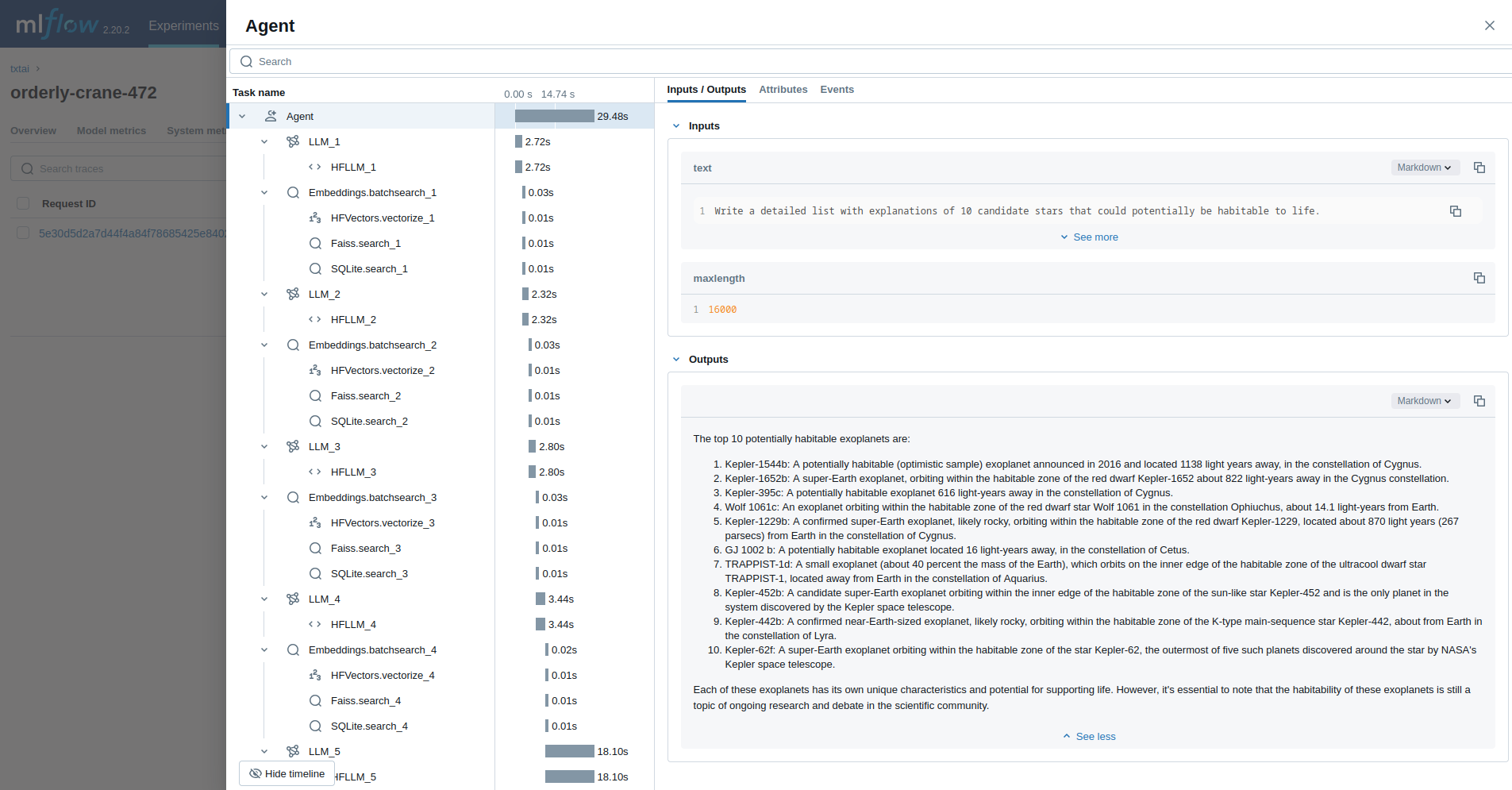\n\nObservability e"
},
{
"path": "docs/overrides/main.html",
"chars": 1236,
"preview": "{% extends \"base.html\" %}\n\n{% block extrahead %}\n {% set title = config.site_name %}\n {% if page and page.meta and"
},
{
"path": "docs/pipeline/audio/audiomixer.md",
"chars": 1999,
"preview": "# Audio Mixer\n\n\n\n\n"
},
{
"path": "docs/pipeline/audio/audiostream.md",
"chars": 2284,
"preview": "# Audio Stream\n\n\n\n"
},
{
"path": "docs/pipeline/audio/microphone.md",
"chars": 2220,
"preview": "# Microphone\n\n\n\n\nT"
},
{
"path": "docs/pipeline/audio/texttoaudio.md",
"chars": 1969,
"preview": "# Text To Audio\n\n\n"
},
{
"path": "docs/pipeline/audio/texttospeech.md",
"chars": 3659,
"preview": "# Text To Speech\n\n\n\n"
},
{
"path": "docs/pipeline/data/filetohtml.md",
"chars": 2513,
"preview": "# File To HTML\n\n\n\n"
},
{
"path": "docs/pipeline/data/htmltomd.md",
"chars": 1962,
"preview": "# HTML To Markdown \n\n\n\n\n"
},
{
"path": "docs/pipeline/data/tabular.md",
"chars": 2169,
"preview": "# Tabular\n\n\n\n\nThe "
},
{
"path": "docs/pipeline/data/textractor.md",
"chars": 3259,
"preview": "# Textractor\n\n\n\n\nT"
},
{
"path": "docs/pipeline/data/tokenizer.md",
"chars": 2129,
"preview": "# Tokenizer\n\n\n\n\nTh"
},
{
"path": "docs/pipeline/image/caption.md",
"chars": 2021,
"preview": "# Caption\n\n\n\n\nThe "
},
{
"path": "docs/pipeline/image/imagehash.md",
"chars": 2136,
"preview": "# ImageHash\n\n\n\n\nTh"
},
{
"path": "docs/pipeline/image/objects.md",
"chars": 2012,
"preview": "# Objects\n\n\n\n\nThe "
},
{
"path": "docs/pipeline/index.md",
"chars": 2270,
"preview": "# Pipeline\n\n\n\n\ntxtai pro"
},
{
"path": "docs/pipeline/llm/llm.md",
"chars": 14813,
"preview": "# LLM\n\n\n\n\nThe LLM "
},
{
"path": "docs/pipeline/llm/rag.md",
"chars": 10050,
"preview": "# RAG\n\n\n\n\nThe Retr"
},
{
"path": "docs/pipeline/text/entity.md",
"chars": 2865,
"preview": "# Entity\n\n\n\n\nThe E"
},
{
"path": "docs/pipeline/text/labels.md",
"chars": 2273,
"preview": "# Labels\n\n\n\n\nThe L"
},
{
"path": "docs/pipeline/text/reranker.md",
"chars": 2378,
"preview": "# Reranker\n\n\n\n\nThe"
},
{
"path": "docs/pipeline/text/similarity.md",
"chars": 2784,
"preview": "# Similarity\n\n\n\n\nT"
},
{
"path": "docs/pipeline/text/summary.md",
"chars": 2107,
"preview": "# Summary\n\n\n\n\nThe "
},
{
"path": "docs/pipeline/text/translation.md",
"chars": 2333,
"preview": "# Translation\n\n\n\n\n"
},
{
"path": "docs/pipeline/train/hfonnx.md",
"chars": 1335,
"preview": "# HFOnnx\n\n\n\n\nExpor"
},
{
"path": "docs/pipeline/train/mlonnx.md",
"chars": 839,
"preview": "# MLOnnx\n\n\n\n\nExpor"
},
{
"path": "docs/pipeline/train/trainer.md",
"chars": 5366,
"preview": "# HFTrainer\n\n\n\n\nTr"
},
{
"path": "docs/poweredby.md",
"chars": 851,
"preview": "# Powered by txtai\n\nThe following applications are powered by txtai. \n\n\n\n\nNew vector databases, LLM framewo"
},
{
"path": "docs/workflow/index.md",
"chars": 5023,
"preview": "# Workflow\n\n\n\n\nWorkflows"
},
{
"path": "docs/workflow/schedule.md",
"chars": 2169,
"preview": "# Schedule\n\n\n\n\nWorkflows"
},
{
"path": "docs/workflow/task/console.md",
"chars": 715,
"preview": "# Console Task\n\n\n\n\nThe Console Tas"
},
{
"path": "docs/workflow/task/export.md",
"chars": 656,
"preview": "# Export Task\n\n\n\n\nThe Export Task "
},
{
"path": "docs/workflow/task/file.md",
"chars": 709,
"preview": "# File Task\n\n\n\n\nThe File Task vali"
},
{
"path": "docs/workflow/task/image.md",
"chars": 705,
"preview": "# Image Task\n\n\n\n\nThe Image Task re"
},
{
"path": "docs/workflow/task/index.md",
"chars": 3548,
"preview": "# Tasks\n\n\n\n\nWorkflows execute task"
},
{
"path": "docs/workflow/task/retrieve.md",
"chars": 845,
"preview": "# Retrieve Task\n\n\n\n\nThe Retrieve T"
},
{
"path": "docs/workflow/task/service.md",
"chars": 726,
"preview": "# Service Task\n\n\n\n\nThe Service Tas"
},
{
"path": "docs/workflow/task/storage.md",
"chars": 694,
"preview": "# Storage Task\n\n\n\n\nThe Storage Tas"
},
{
"path": "docs/workflow/task/template.md",
"chars": 825,
"preview": "# Template Task\n\n\n\n\nThe Template T"
},
{
"path": "docs/workflow/task/url.md",
"chars": 644,
"preview": "# Url Task\n\n\n\n\nThe Url Task valida"
},
{
"path": "docs/workflow/task/workflow.md",
"chars": 506,
"preview": "# Workflow Task\n\n\n\n\nThe Workflow T"
},
{
"path": "examples/01_Introducing_txtai.ipynb",
"chars": 94534,
"preview": "{\n \"cells\": [\n {\n \"cell_type\": \"markdown\",\n \"metadata\": {\n \"id\": \"POWZoSJR6XzK\"\n },\n \"sou"
},
{
"path": "examples/02_Build_an_Embeddings_index_with_Hugging_Face_Datasets.ipynb",
"chars": 13452,
"preview": "{\n \"nbformat\": 4,\n \"nbformat_minor\": 0,\n \"metadata\": {\n \"colab\": {\n \"provenance\": []\n },\n \"kernelspec\":"
},
{
"path": "examples/03_Build_an_Embeddings_index_from_a_data_source.ipynb",
"chars": 17871,
"preview": "{\n \"cells\": [\n {\n \"cell_type\": \"markdown\",\n \"metadata\": {\n \"id\": \"WDbhGHtG8jFE\"\n },\n \"sou"
},
{
"path": "examples/04_Add_semantic_search_to_Elasticsearch.ipynb",
"chars": 22312,
"preview": "{\n \"nbformat\": 4,\n \"nbformat_minor\": 0,\n \"metadata\": {\n \"accelerator\": \"GPU\",\n \"colab\": {\n \"provenance\": ["
},
{
"path": "examples/05_Extractive_QA_with_txtai.ipynb",
"chars": 5158,
"preview": "{\n \"nbformat\": 4,\n \"nbformat_minor\": 0,\n \"metadata\": {\n \"colab\": {\n \"provenance\": []\n },\n \"kernelspec\":"
},
{
"path": "examples/06_Extractive_QA_with_Elasticsearch.ipynb",
"chars": 18073,
"preview": "{\n \"nbformat\": 4,\n \"nbformat_minor\": 0,\n \"metadata\": {\n \"colab\": {\n \"provenance\": []\n },\n \"kernelspec\":"
},
{
"path": "examples/07_Apply_labels_with_zero_shot_classification.ipynb",
"chars": 9016,
"preview": "{\n \"nbformat\": 4,\n \"nbformat_minor\": 0,\n \"metadata\": {\n \"colab\": {\n \"provenance\": []\n },\n \"kernelspec\":"
},
{
"path": "examples/08_API_Gallery.ipynb",
"chars": 25592,
"preview": "{\n \"nbformat\": 4,\n \"nbformat_minor\": 0,\n \"metadata\": {\n \"colab\": {\n \"provenance\": []\n },\n \"kernelspec\":"
},
{
"path": "examples/09_Building_abstractive_text_summaries.ipynb",
"chars": 6911,
"preview": "{\n \"nbformat\": 4,\n \"nbformat_minor\": 0,\n \"metadata\": {\n \"colab\": {\n \"provenance\": []\n },\n \"kernelspec\":"
},
{
"path": "examples/10_Extract_text_from_documents.ipynb",
"chars": 18768,
"preview": "{\n \"nbformat\": 4,\n \"nbformat_minor\": 0,\n \"metadata\": {\n \"colab\": {\n \"provenance\": []\n },\n \"kernelspec\":"
},
{
"path": "examples/11_Transcribe_audio_to_text.ipynb",
"chars": 1326796,
"preview": "{\n \"nbformat\": 4,\n \"nbformat_minor\": 0,\n \"metadata\": {\n \"colab\": {\n \"provenance\": []\n },\n \"kernelspec\":"
},
{
"path": "examples/12_Translate_text_between_languages.ipynb",
"chars": 11945,
"preview": "{\n \"nbformat\": 4,\n \"nbformat_minor\": 0,\n \"metadata\": {\n \"colab\": {\n \"provenance\": []\n },\n \"kernelspec\":"
},
{
"path": "examples/13_Similarity_search_with_images.ipynb",
"chars": 5430864,
"preview": "{\n \"cells\": [\n {\n \"cell_type\": \"markdown\",\n \"metadata\": {\n \"id\": \"4Pjmz-RORV8E\"\n },\n \"sou"
},
{
"path": "examples/14_Run_pipeline_workflows.ipynb",
"chars": 19893,
"preview": "{\n \"nbformat\": 4,\n \"nbformat_minor\": 0,\n \"metadata\": {\n \"colab\": {\n \"provenance\": []\n },\n \"kernelspec\":"
},
{
"path": "examples/15_Distributed_embeddings_cluster.ipynb",
"chars": 16855,
"preview": "{\n \"nbformat\": 4,\n \"nbformat_minor\": 0,\n \"metadata\": {\n \"colab\": {\n \"provenance\": []\n },\n \"kernelspec\":"
},
{
"path": "examples/16_Train_a_text_labeler.ipynb",
"chars": 12772,
"preview": "{\n \"nbformat\": 4,\n \"nbformat_minor\": 0,\n \"metadata\": {\n \"colab\": {\n \"provenance\": []\n },\n \"kernelspec\":"
},
{
"path": "examples/17_Train_without_labels.ipynb",
"chars": 11375,
"preview": "{\n \"nbformat\": 4,\n \"nbformat_minor\": 0,\n \"metadata\": {\n \"colab\": {\n \"provenance\": []\n },\n \"kernelspec\":"
},
{
"path": "examples/18_Export_and_run_models_with_ONNX.ipynb",
"chars": 47246,
"preview": "{\n \"nbformat\": 4,\n \"nbformat_minor\": 0,\n \"metadata\": {\n \"colab\": {\n \"provenance\": [],\n \"collapsed_sectio"
},
{
"path": "examples/19_Train_a_QA_model.ipynb",
"chars": 11461,
"preview": "{\n \"nbformat\": 4,\n \"nbformat_minor\": 0,\n \"metadata\": {\n \"colab\": {\n \"provenance\": []\n },\n \"kernelspec\":"
},
{
"path": "examples/20_Extractive_QA_to_build_structured_data.ipynb",
"chars": 23563,
"preview": "{\n \"nbformat\": 4,\n \"nbformat_minor\": 0,\n \"metadata\": {\n \"colab\": {\n \"provenance\": []\n },\n \"kernelspec\":"
},
{
"path": "examples/21_Export_and_run_other_machine_learning_models.ipynb",
"chars": 23813,
"preview": "{\n \"nbformat\": 4,\n \"nbformat_minor\": 0,\n \"metadata\": {\n \"accelerator\": \"GPU\",\n \"colab\": {\n \"name\": \"21 - E"
},
{
"path": "examples/22_Transform_tabular_data_with_composable_workflows.ipynb",
"chars": 41944,
"preview": "{\n \"nbformat\": 4,\n \"nbformat_minor\": 0,\n \"metadata\": {\n \"accelerator\": \"GPU\",\n \"colab\": {\n \"name\": \"22 - T"
},
{
"path": "examples/23_Tensor_workflows.ipynb",
"chars": 17920,
"preview": "{\n \"nbformat\": 4,\n \"nbformat_minor\": 0,\n \"metadata\": {\n \"accelerator\": \"GPU\",\n \"colab\": {\n \"name\": \"23 - T"
},
{
"path": "examples/24_Whats_new_in_txtai_4_0.ipynb",
"chars": 85634,
"preview": "{\n \"nbformat\": 4,\n \"nbformat_minor\": 0,\n \"metadata\": {\n \"kernelspec\": {\n \"name\": \"python3\",\n \"display_na"
},
{
"path": "examples/25_Generate_image_captions_and_detect_objects.ipynb",
"chars": 8350584,
"preview": "{\n \"cells\": [\n {\n \"cell_type\": \"markdown\",\n \"metadata\": {\n \"id\": \"4Pjmz-RORV8E\"\n },\n \"sou"
},
{
"path": "examples/26_Entity_extraction_workflows.ipynb",
"chars": 9187,
"preview": "{\n \"nbformat\": 4,\n \"nbformat_minor\": 0,\n \"metadata\": {\n \"kernelspec\": {\n \"name\": \"python3\",\n \"display_na"
},
{
"path": "examples/27_Workflow_scheduling.ipynb",
"chars": 17344,
"preview": "{\n \"nbformat\": 4,\n \"nbformat_minor\": 0,\n \"metadata\": {\n \"colab\": {\n \"name\": \"27 - Workflow scheduling\",\n "
},
{
"path": "examples/28_Push_notifications_with_workflows.ipynb",
"chars": 80260,
"preview": "{\n \"nbformat\": 4,\n \"nbformat_minor\": 0,\n \"metadata\": {\n \"colab\": {\n \"name\": \"28 - Push notifications with wor"
},
{
"path": "examples/29_Anatomy_of_a_txtai_index.ipynb",
"chars": 41242,
"preview": "{\n \"nbformat\": 4,\n \"nbformat_minor\": 0,\n \"metadata\": {\n \"kernelspec\": {\n \"name\": \"python3\",\n \"display_na"
},
{
"path": "examples/30_Embeddings_SQL_custom_functions.ipynb",
"chars": 12594,
"preview": "{\n \"nbformat\": 4,\n \"nbformat_minor\": 0,\n \"metadata\": {\n \"kernelspec\": {\n \"name\": \"python3\",\n \"display_na"
},
{
"path": "examples/32_Model_explainability.ipynb",
"chars": 190024,
"preview": "{\n \"nbformat\": 4,\n \"nbformat_minor\": 0,\n \"metadata\": {\n \"kernelspec\": {\n \"name\": \"python3\",\n \"display_na"
},
{
"path": "examples/33_Query_translation.ipynb",
"chars": 15314,
"preview": "{\n \"cells\": [\n {\n \"cell_type\": \"markdown\",\n \"metadata\": {\n \"id\": \"POWZoSJR6XzK\"\n },\n \"sou"
},
{
"path": "examples/36_Run_txtai_in_native_code.ipynb",
"chars": 23226,
"preview": "{\n \"nbformat\": 4,\n \"nbformat_minor\": 0,\n \"metadata\": {\n \"colab\": {\n \"provenance\": []\n },\n \"kernelspec\":"
},
{
"path": "examples/37_Embeddings_index_components.ipynb",
"chars": 21068,
"preview": "{\n \"nbformat\": 4,\n \"nbformat_minor\": 0,\n \"metadata\": {\n \"colab\": {\n \"provenance\": []\n },\n \"kernelspec\":"
},
{
"path": "examples/39_Classic_Topic_Modeling_with_BM25.ipynb",
"chars": 16419,
"preview": "{\n \"nbformat\": 4,\n \"nbformat_minor\": 0,\n \"metadata\": {\n \"colab\": {\n \"provenance\": []\n },\n \"kernelspec\":"
},
{
"path": "examples/40_Text_to_Speech_Generation.ipynb",
"chars": 324626,
"preview": "{\n \"cells\": [\n {\n \"cell_type\": \"markdown\",\n \"metadata\": {\n \"id\": \"4Pjmz-RORV8E\"\n },\n \"sou"
},
{
"path": "examples/41_Train_a_language_model_from_scratch.ipynb",
"chars": 16363,
"preview": "{\n \"nbformat\": 4,\n \"nbformat_minor\": 0,\n \"metadata\": {\n \"colab\": {\n \"provenance\": []\n },\n \"kernelspec\":"
},
{
"path": "examples/42_Prompt_driven_search_with_LLMs.ipynb",
"chars": 13028,
"preview": "{\n \"cells\": [\n {\n \"cell_type\": \"markdown\",\n \"metadata\": {\n \"id\": \"vwELCooy4ljr\"\n },\n \"sou"
},
{
"path": "examples/44_Prompt_templates_and_task_chains.ipynb",
"chars": 13696,
"preview": "{\n \"cells\": [\n {\n \"cell_type\": \"markdown\",\n \"metadata\": {\n \"id\": \"vwELCooy4ljr\"\n },\n \"sou"
},
{
"path": "examples/45_Customize_your_own_embeddings_database.ipynb",
"chars": 35557,
"preview": "{\n \"nbformat\": 4,\n \"nbformat_minor\": 0,\n \"metadata\": {\n \"colab\": {\n \"provenance\": []\n },\n \"kernelspec\":"
},
{
"path": "examples/47_Building_an_efficient_sparse_keyword_index_in_Python.ipynb",
"chars": 139708,
"preview": "{\n \"nbformat\": 4,\n \"nbformat_minor\": 0,\n \"metadata\": {\n \"colab\": {\n \"provenance\": []\n },\n \"kernelspec\":"
},
{
"path": "examples/52_Build_RAG_pipelines_with_txtai.ipynb",
"chars": 22342,
"preview": "{\n \"cells\": [\n {\n \"cell_type\": \"markdown\",\n \"metadata\": {\n \"id\": \"VGeVB8M41jqW\"\n },\n \"sou"
},
{
"path": "test/python/testann/__init__.py",
"chars": 0,
"preview": ""
},
{
"path": "test/python/testapi/__init__.py",
"chars": 0,
"preview": ""
},
{
"path": "test/python/testdatabase/__init__.py",
"chars": 0,
"preview": ""
},
{
"path": "test/python/testmodels/__init__.py",
"chars": 0,
"preview": ""
},
{
"path": "test/python/testpipeline/__init__.py",
"chars": 0,
"preview": ""
},
{
"path": "test/python/testpipeline/testaudio/__init__.py",
"chars": 0,
"preview": ""
},
{
"path": "test/python/testpipeline/testdata/__init__.py",
"chars": 0,
"preview": ""
},
{
"path": "test/python/testpipeline/testimage/__init__.py",
"chars": 0,
"preview": ""
},
{
"path": "test/python/testpipeline/testllm/__init__.py",
"chars": 0,
"preview": ""
},
{
"path": "test/python/testpipeline/testtext/__init__.py",
"chars": 0,
"preview": ""
},
{
"path": "test/python/testpipeline/testtrain/__init__.py",
"chars": 0,
"preview": ""
},
{
"path": "test/python/testscoring/__init__.py",
"chars": 0,
"preview": ""
},
{
"path": "test/python/testvectors/__init__.py",
"chars": 0,
"preview": ""
},
{
"path": "test/python/testvectors/testdense/__init__.py",
"chars": 0,
"preview": ""
},
{
"path": "test/python/testvectors/testsparse/__init__.py",
"chars": 0,
"preview": ""
}
]
// ... and 389 more files (download for full content)
About this extraction
This page contains the full source code of the neuml/txtai GitHub repository, extracted and formatted as plain text for AI agents and large language models (LLMs). The extraction includes 562 files (30.8 MB), approximately 4.4M tokens, and a symbol index with 1 extracted functions, classes, methods, constants, and types. Use this with OpenClaw, Claude, ChatGPT, Cursor, Windsurf, or any other AI tool that accepts text input. You can copy the full output to your clipboard or download it as a .txt file.
Extracted by GitExtract — free GitHub repo to text converter for AI. Built by Nikandr Surkov.