Repository: nicolaka/netshoot
Branch: master
Commit: 8bef2a7629cc
Files: 12
Total size: 38.8 KB
Directory structure:
gitextract_gf_4ggdi/

├── .github/
│   ├── dependabot.yml
│   └── workflows/
│       ├── release-buildx.yml
│       └── test-pr-buildx.yml
├── Dockerfile
├── LICENSE
├── Makefile
├── README.md
├── build/
│   └── fetch_binaries.sh
├── configs/
│   ├── netshoot-calico.yaml
│   └── netshoot-sidecar.yaml
├── motd
└── zshrc
================================================
FILE CONTENTS
================================================
================================================
FILE: .github/dependabot.yml
================================================
version: 2
updates:
- package-ecosystem: docker
directory: /
schedule:
interval: daily
- package-ecosystem: github-actions
directory: /
schedule:
interval: daily
================================================
FILE: .github/workflows/release-buildx.yml
================================================
name: release-buildx
on:
push:
tags:
- 'v*' # Push events to matching v*, i.e. v1.0, v20.15.10
jobs:
buildx:
runs-on: ubuntu-latest
steps:
-
name: Checkout
uses: actions/checkout@v6
with:
ref: ${{ github.ref }}
-
name: Set up QEMU
uses: docker/setup-qemu-action@v3
with:
platforms: arm64,amd64
-
name: Set up Docker Buildx
id: buildx
uses: docker/setup-buildx-action@v3
-
name: Available platforms
run: echo ${{ steps.buildx.outputs.platforms }}
- name: Set Release Tag Env
run: echo "RELEASE_VERSION=${GITHUB_REF#refs/*/}" >> $GITHUB_ENV
-
name: docker hub login
env:
DOCKER_USER: ${{secrets.DOCKER_USER}}
DOCKER_PASSWORD: ${{secrets.DOCKER_PASSWORD}}
run: |
docker login -u $DOCKER_USER -p $DOCKER_PASSWORD
-
name: docker ghcr login
env:
GHCR_USER: ${{secrets.GHCR_USER}}
GHCR_TOKEN: ${{secrets.GHCR_TOKEN}}
run: |
docker login ghcr.io -u $GHCR_USER -p $GHCR_TOKEN
-
name: Run Buildx
run: |
docker buildx build \
--platform linux/amd64,linux/arm64 \
--output "type=image,push=true" \
--file ./Dockerfile \
--tag $GITHUB_REPOSITORY:$GITHUB_SHA \
--tag $GITHUB_REPOSITORY:$RELEASE_VERSION \
--tag $GITHUB_REPOSITORY:latest \
--tag ghcr.io/$GITHUB_REPOSITORY:$GITHUB_SHA \
--tag ghcr.io/$GITHUB_REPOSITORY:$RELEASE_VERSION \
--tag ghcr.io/$GITHUB_REPOSITORY:latest .
================================================
FILE: .github/workflows/test-pr-buildx.yml
================================================
name: test-pr-buildx
on:
pull_request:
branches: master
jobs:
buildx:
runs-on: ubuntu-latest
steps:
-
name: Checkout
uses: actions/checkout@v6
-
name: Set up QEMU
uses: docker/setup-qemu-action@v3
with:
platforms: arm64,amd64
-
name: Set up Docker Buildx
id: buildx
uses: docker/setup-buildx-action@v3
-
name: Available platforms
run: echo ${{ steps.buildx.outputs.platforms }}
-
name: Run Buildx
run: |
docker buildx build \
--platform linux/amd64,linux/arm64 \
--output "type=image,push=false" \
--file ./Dockerfile .
================================================
FILE: Dockerfile
================================================
FROM debian:stable-slim as fetcher
COPY build/fetch_binaries.sh /tmp/fetch_binaries.sh
RUN apt-get update && apt-get install -y \
curl \
wget
RUN /tmp/fetch_binaries.sh
FROM alpine:3.23.2
RUN set -ex \
&& echo "http://dl-cdn.alpinelinux.org/alpine/edge/main" >> /etc/apk/repositories \
&& echo "http://dl-cdn.alpinelinux.org/alpine/edge/testing" >> /etc/apk/repositories \
&& echo "http://dl-cdn.alpinelinux.org/alpine/edge/community" >> /etc/apk/repositories \
&& apk update \
&& apk upgrade \
&& apk add --no-cache \
apache2-utils \
bash \
bind-tools \
bird \
bridge-utils \
busybox-extras \
conntrack-tools \
curl \
dhcping \
drill \
ethtool \
file\
fping \
iftop \
iperf \
iperf3 \
iproute2 \
ipset \
iptables \
iptraf-ng \
iputils \
ipvsadm \
httpie \
jq \
libc6-compat \
liboping \
ltrace \
mtr \
net-snmp-tools \
netcat-openbsd \
nftables \
ngrep \
nmap \
nmap-nping \
nmap-scripts \
openssl \
py3-pip \
py3-setuptools \
scapy \
socat \
speedtest-cli \
openssh \
oh-my-zsh \
strace \
tcpdump \
tcptraceroute \
trippy \
tshark \
util-linux \
vim \
git \
zsh \
websocat \
swaks \
perl-crypt-ssleay \
perl-net-ssleay
# Installing ctop - top-like container monitor
COPY --from=fetcher /tmp/ctop /usr/local/bin/ctop
# Installing calicoctl
COPY --from=fetcher /tmp/calicoctl /usr/local/bin/calicoctl
# Installing termshark
COPY --from=fetcher /tmp/termshark /usr/local/bin/termshark
# Installing grpcurl
COPY --from=fetcher /tmp/grpcurl /usr/local/bin/grpcurl
# Installing fortio
COPY --from=fetcher /tmp/fortio /usr/local/bin/fortio
# Setting User and Home
USER root
WORKDIR /root
ENV HOSTNAME netshoot
# ZSH Themes
RUN curl -fsSL https://raw.githubusercontent.com/ohmyzsh/ohmyzsh/master/tools/install.sh | sh
RUN git clone https://github.com/zsh-users/zsh-autosuggestions ${ZSH_CUSTOM:-~/.oh-my-zsh/custom}/plugins/zsh-autosuggestions
RUN git clone --depth=1 https://github.com/romkatv/powerlevel10k.git ${ZSH_CUSTOM:-$HOME/.oh-my-zsh/custom}/themes/powerlevel10k
COPY zshrc .zshrc
COPY motd motd
# Fix permissions for OpenShift and tshark
RUN chmod -R g=u /root
RUN chown root:root /usr/bin/dumpcap
# Running ZSH
CMD ["zsh"]
================================================
FILE: LICENSE
================================================
Apache License
Version 2.0, January 2004
http://www.apache.org/licenses/
TERMS AND CONDITIONS FOR USE, REPRODUCTION, AND DISTRIBUTION
1. Definitions.
"License" shall mean the terms and conditions for use, reproduction,
and distribution as defined by Sections 1 through 9 of this document.
"Licensor" shall mean the copyright owner or entity authorized by
the copyright owner that is granting the License.
"Legal Entity" shall mean the union of the acting entity and all
other entities that control, are controlled by, or are under common
control with that entity. For the purposes of this definition,
"control" means (i) the power, direct or indirect, to cause the
direction or management of such entity, whether by contract or
otherwise, or (ii) ownership of fifty percent (50%) or more of the
outstanding shares, or (iii) beneficial ownership of such entity.
"You" (or "Your") shall mean an individual or Legal Entity
exercising permissions granted by this License.
"Source" form shall mean the preferred form for making modifications,
including but not limited to software source code, documentation
source, and configuration files.
"Object" form shall mean any form resulting from mechanical
transformation or translation of a Source form, including but
not limited to compiled object code, generated documentation,
and conversions to other media types.
"Work" shall mean the work of authorship, whether in Source or
Object form, made available under the License, as indicated by a
copyright notice that is included in or attached to the work
(an example is provided in the Appendix below).
"Derivative Works" shall mean any work, whether in Source or Object
form, that is based on (or derived from) the Work and for which the
editorial revisions, annotations, elaborations, or other modifications
represent, as a whole, an original work of authorship. For the purposes
of this License, Derivative Works shall not include works that remain
separable from, or merely link (or bind by name) to the interfaces of,
the Work and Derivative Works thereof.
"Contribution" shall mean any work of authorship, including
the original version of the Work and any modifications or additions
to that Work or Derivative Works thereof, that is intentionally
submitted to Licensor for inclusion in the Work by the copyright owner
or by an individual or Legal Entity authorized to submit on behalf of
the copyright owner. For the purposes of this definition, "submitted"
means any form of electronic, verbal, or written communication sent
to the Licensor or its representatives, including but not limited to
communication on electronic mailing lists, source code control systems,
and issue tracking systems that are managed by, or on behalf of, the
Licensor for the purpose of discussing and improving the Work, but
excluding communication that is conspicuously marked or otherwise
designated in writing by the copyright owner as "Not a Contribution."
"Contributor" shall mean Licensor and any individual or Legal Entity
on behalf of whom a Contribution has been received by Licensor and
subsequently incorporated within the Work.
2. Grant of Copyright License. Subject to the terms and conditions of
this License, each Contributor hereby grants to You a perpetual,
worldwide, non-exclusive, no-charge, royalty-free, irrevocable
copyright license to reproduce, prepare Derivative Works of,
publicly display, publicly perform, sublicense, and distribute the
Work and such Derivative Works in Source or Object form.
3. Grant of Patent License. Subject to the terms and conditions of
this License, each Contributor hereby grants to You a perpetual,
worldwide, non-exclusive, no-charge, royalty-free, irrevocable
(except as stated in this section) patent license to make, have made,
use, offer to sell, sell, import, and otherwise transfer the Work,
where such license applies only to those patent claims licensable
by such Contributor that are necessarily infringed by their
Contribution(s) alone or by combination of their Contribution(s)
with the Work to which such Contribution(s) was submitted. If You
institute patent litigation against any entity (including a
cross-claim or counterclaim in a lawsuit) alleging that the Work
or a Contribution incorporated within the Work constitutes direct
or contributory patent infringement, then any patent licenses
granted to You under this License for that Work shall terminate
as of the date such litigation is filed.
4. Redistribution. You may reproduce and distribute copies of the
Work or Derivative Works thereof in any medium, with or without
modifications, and in Source or Object form, provided that You
meet the following conditions:
(a) You must give any other recipients of the Work or
Derivative Works a copy of this License; and
(b) You must cause any modified files to carry prominent notices
stating that You changed the files; and
(c) You must retain, in the Source form of any Derivative Works
that You distribute, all copyright, patent, trademark, and
attribution notices from the Source form of the Work,
excluding those notices that do not pertain to any part of
the Derivative Works; and
(d) If the Work includes a "NOTICE" text file as part of its
distribution, then any Derivative Works that You distribute must
include a readable copy of the attribution notices contained
within such NOTICE file, excluding those notices that do not
pertain to any part of the Derivative Works, in at least one
of the following places: within a NOTICE text file distributed
as part of the Derivative Works; within the Source form or
documentation, if provided along with the Derivative Works; or,
within a display generated by the Derivative Works, if and
wherever such third-party notices normally appear. The contents
of the NOTICE file are for informational purposes only and
do not modify the License. You may add Your own attribution
notices within Derivative Works that You distribute, alongside
or as an addendum to the NOTICE text from the Work, provided
that such additional attribution notices cannot be construed
as modifying the License.
You may add Your own copyright statement to Your modifications and
may provide additional or different license terms and conditions
for use, reproduction, or distribution of Your modifications, or
for any such Derivative Works as a whole, provided Your use,
reproduction, and distribution of the Work otherwise complies with
the conditions stated in this License.
5. Submission of Contributions. Unless You explicitly state otherwise,
any Contribution intentionally submitted for inclusion in the Work
by You to the Licensor shall be under the terms and conditions of
this License, without any additional terms or conditions.
Notwithstanding the above, nothing herein shall supersede or modify
the terms of any separate license agreement you may have executed
with Licensor regarding such Contributions.
6. Trademarks. This License does not grant permission to use the trade
names, trademarks, service marks, or product names of the Licensor,
except as required for reasonable and customary use in describing the
origin of the Work and reproducing the content of the NOTICE file.
7. Disclaimer of Warranty. Unless required by applicable law or
agreed to in writing, Licensor provides the Work (and each
Contributor provides its Contributions) on an "AS IS" BASIS,
WITHOUT WARRANTIES OR CONDITIONS OF ANY KIND, either express or
implied, including, without limitation, any warranties or conditions
of TITLE, NON-INFRINGEMENT, MERCHANTABILITY, or FITNESS FOR A
PARTICULAR PURPOSE. You are solely responsible for determining the
appropriateness of using or redistributing the Work and assume any
risks associated with Your exercise of permissions under this License.
8. Limitation of Liability. In no event and under no legal theory,
whether in tort (including negligence), contract, or otherwise,
unless required by applicable law (such as deliberate and grossly
negligent acts) or agreed to in writing, shall any Contributor be
liable to You for damages, including any direct, indirect, special,
incidental, or consequential damages of any character arising as a
result of this License or out of the use or inability to use the
Work (including but not limited to damages for loss of goodwill,
work stoppage, computer failure or malfunction, or any and all
other commercial damages or losses), even if such Contributor
has been advised of the possibility of such damages.
9. Accepting Warranty or Additional Liability. While redistributing
the Work or Derivative Works thereof, You may choose to offer,
and charge a fee for, acceptance of support, warranty, indemnity,
or other liability obligations and/or rights consistent with this
License. However, in accepting such obligations, You may act only
on Your own behalf and on Your sole responsibility, not on behalf
of any other Contributor, and only if You agree to indemnify,
defend, and hold each Contributor harmless for any liability
incurred by, or claims asserted against, such Contributor by reason
of your accepting any such warranty or additional liability.
END OF TERMS AND CONDITIONS
APPENDIX: How to apply the Apache License to your work.
To apply the Apache License to your work, attach the following
boilerplate notice, with the fields enclosed by brackets "{}"
replaced with your own identifying information. (Don't include
the brackets!) The text should be enclosed in the appropriate
comment syntax for the file format. We also recommend that a
file or class name and description of purpose be included on the
same "printed page" as the copyright notice for easier
identification within third-party archives.
Copyright 2017 Google Inc.
Licensed under the Apache License, Version 2.0 (the "License");
you may not use this file except in compliance with the License.
You may obtain a copy of the License at
http://www.apache.org/licenses/LICENSE-2.0
Unless required by applicable law or agreed to in writing, software
distributed under the License is distributed on an "AS IS" BASIS,
WITHOUT WARRANTIES OR CONDITIONS OF ANY KIND, either express or implied.
See the License for the specific language governing permissions and
limitations under the License.
================================================
FILE: Makefile
================================================
.PHONY: build-x86 build-arm64 push all
# Build Vars
IMAGENAME=nicolaka/netshoot
VERSION=0.1
.DEFAULT_GOAL := all
build-x86:
@docker build --platform linux/amd64 -t ${IMAGENAME}:${VERSION} .
build-arm64:
@docker build --platform linux/arm64 -t ${IMAGENAME}:${VERSION} .
build-all:
@docker buildx build --platform linux/amd64,linux/arm64 --output "type=image,push=false" --file ./Dockerfile .
push:
@docker push ${IMAGENAME}:${VERSION}
all: build-all push
================================================
FILE: README.md
================================================
## netshoot: a Docker + Kubernetes network trouble-shooting swiss-army container
```
dP dP dP
88 88 88
88d888b. .d8888b. d8888P .d8888b. 88d888b. .d8888b. .d8888b. d8888P
88' `88 88ooood8 88 Y8ooooo. 88' `88 88' `88 88' `88 88
88 88 88. ... 88 88 88 88 88. .88 88. .88 88
dP dP `88888P' dP `88888P' dP dP `88888P' `88888P' dP
```
**Purpose:** Docker and Kubernetes network troubleshooting can become complex. With proper understanding of how Docker and Kubernetes networking works and the right set of tools, you can troubleshoot and resolve these networking issues. The `netshoot` container has a set of powerful networking troubleshooting tools that can be used to troubleshoot Docker networking issues. Along with these tools come a set of use-cases that show how this container can be used in real-world scenarios.
**Network Namespaces:** Before starting to use this tool, it's important to go over one key topic: **Network Namespaces**. Network namespaces provide isolation of the system resources associated with networking. Docker uses network and other type of namespaces (`pid`,`mount`,`user`..etc) to create an isolated environment for each container. Everything from interfaces, routes, and IPs is completely isolated within the network namespace of the container.
Kubernetes also uses network namespaces. Kubelets creates a network namespace per pod where all containers in that pod share that same network namespace (eths,IP, tcp sockets...etc). This is a key difference between Docker containers and Kubernetes pods.
Cool thing about namespaces is that you can switch between them. You can enter a different container's network namespace, perform some troubleshooting on its network's stack with tools that aren't even installed on that container. Additionally, `netshoot` can be used to troubleshoot the host itself by using the host's network namespace. This allows you to perform any troubleshooting without installing any new packages directly on the host or your application's package.
## Netshoot with Docker
* **Container's Network Namespace:** If you're having networking issues with your application's container, you can launch `netshoot` with that container's network namespace like this:
`$ docker run -it --net container:<container_name> nicolaka/netshoot`
* **Host's Network Namespace:** If you think the networking issue is on the host itself, you can launch `netshoot` with that host's network namespace:
`$ docker run -it --net host nicolaka/netshoot`
* **Network's Network Namespace:** If you want to troubleshoot a Docker network, you can enter the network's namespace using `nsenter`. This is explained in the `nsenter` section below.
## Netshoot with Docker Compose
You can easily deploy `netshoot` using Docker Compose using something like this:
```
version: "3.6"
services:
tcpdump:
image: nicolaka/netshoot
depends_on:
- nginx
command: tcpdump -i eth0 -w /data/nginx.pcap
network_mode: service:nginx
volumes:
- $PWD/data:/data
nginx:
image: nginx:alpine
ports:
- 80:80
```
## Netshoot with Kubernetes
* if you want to debug using an [ephemeral container](https://kubernetes.io/docs/tasks/debug/debug-application/debug-running-pod/#ephemeral-container-example) in an existing pod:
`$ kubectl debug mypod -it --image=nicolaka/netshoot`
* if you want to spin up a throw away pod for debugging.
`$ kubectl run tmp-shell --rm -i --tty --image nicolaka/netshoot`
* if you want to spin up a container on the host's network namespace.
`$ kubectl run tmp-shell --rm -i --tty --overrides='{"spec": {"hostNetwork": true}}' --image nicolaka/netshoot`
* if you want to use netshoot as a sidecar container to troubleshoot your application container
```yaml
# netshoot-sidecar.yaml
---
apiVersion: apps/v1
kind: Deployment
metadata:
name: nginx-netshoot
labels:
app: nginx-netshoot
spec:
replicas: 1
selector:
matchLabels:
app: nginx-netshoot
template:
metadata:
labels:
app: nginx-netshoot
spec:
containers:
- name: nginx
image: nginx:1.14.2
ports:
- containerPort: 80
- name: netshoot
image: nicolaka/netshoot
command: ["/bin/bash"]
args: ["-c", "while true; do ping localhost; sleep 60;done"]
```
```bash
$ kubectl apply -f netshoot-sidecar.yaml
deployment.apps/nginx-netshoot created
$ kubectl get pod
NAME READY STATUS RESTARTS AGE
nginx-netshoot-7f9c6957f8-kr8q6 2/2 Running 0 4m27s
$ kubectl exec -it nginx-netshoot-7f9c6957f8-kr8q6 -c netshoot -- /bin/zsh
dP dP dP
88 88 88
88d888b. .d8888b. d8888P .d8888b. 88d888b. .d8888b. .d8888b. d8888P
88' `88 88ooood8 88 Y8ooooo. 88' `88 88' `88 88' `88 88
88 88 88. ... 88 88 88 88 88. .88 88. .88 88
dP dP `88888P' dP `88888P' dP dP `88888P' `88888P' dP
Welcome to Netshoot! (github.com/nicolaka/netshoot)
nginx-netshoot-7f9c6957f8-kr8q6 $
```
## The netshoot kubectl plugin
To easily troubleshoot networking issues in your k8s environment, you can leverage the [Netshoot Kubectl Plugin](https://github.com/nilic/kubectl-netshoot) (shout out to Nebojsa Ilic for creating it!). Using this kubectl plugin, you can easily create ephemeral `netshoot` containers to troubleshoot existing pods, k8s controller or worker nodes. To install the plugin, follow [these steps](https://github.com/nilic/kubectl-netshoot#installation).
Sample Usage:
```
# spin up a throwaway pod for troubleshooting
kubectl netshoot run tmp-shell
# debug using an ephemeral container in an existing pod
kubectl netshoot debug my-existing-pod
# create a debug session on a node
kubectl netshoot debug node/my-node
```
**Network Problems**
Many network issues could result in application performance degradation. Some of those issues could be related to the underlying networking infrastructure(underlay). Others could be related to misconfiguration at the host or Docker level. Let's take a look at common networking issues:
* latency
* routing
* DNS resolution
* firewall
* incomplete ARPs
To troubleshoot these issues, `netshoot` includes a set of powerful tools as recommended by this diagram.
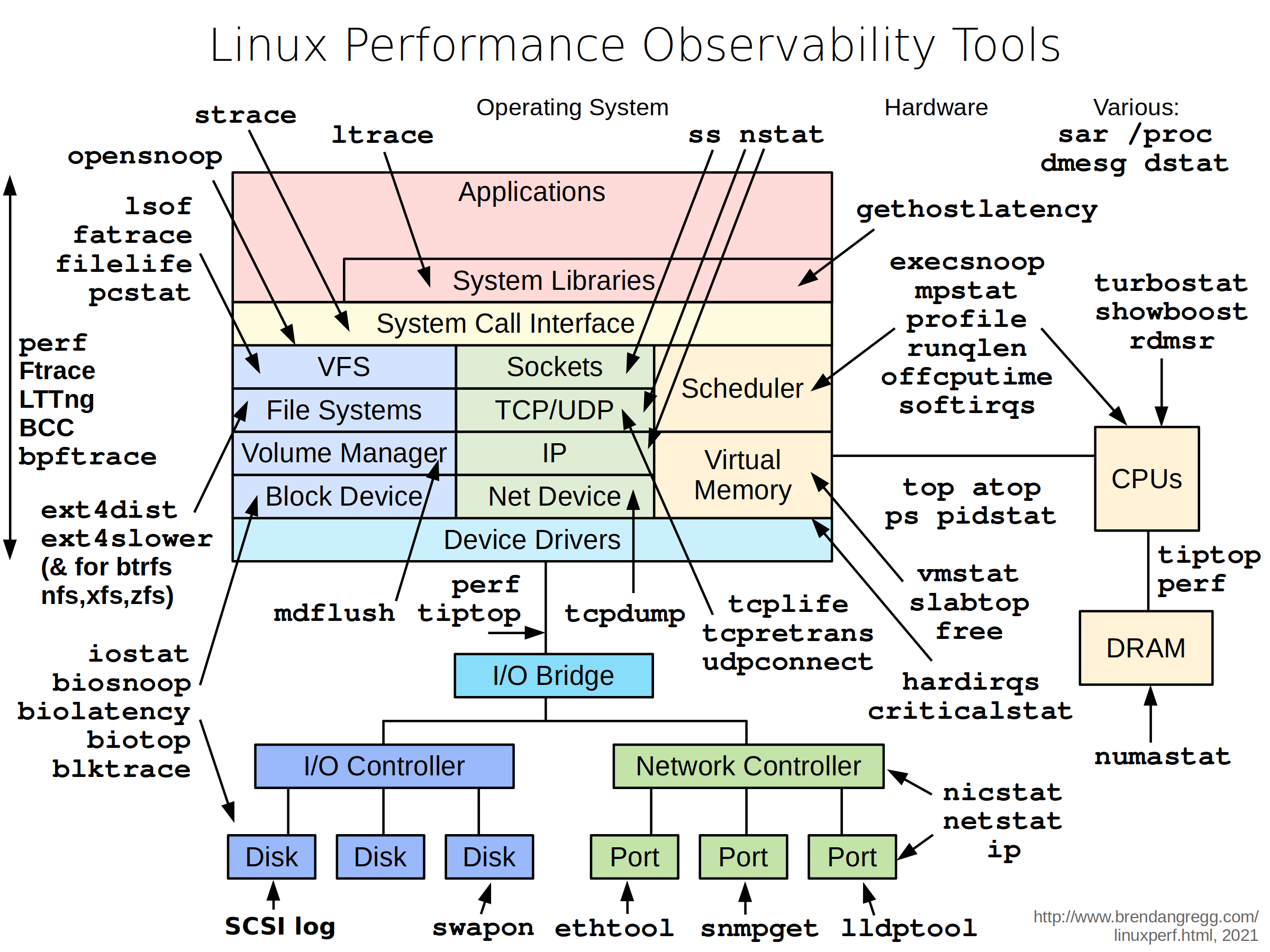
**Included Packages:** The following packages and binaries are included in `netshoot`:
apache2-utils \
bash \
bind-tools \
bird \
bridge-utils \
busybox-extras \
conntrack-tools \
curl \
dhcping \
drill \
ethtool \
file \
fping \
iftop \
iperf \
iperf3 \
iproute2 \
ipset \
iptables \
iptraf-ng \
iputils \
ipvsadm \
httpie \
jq \
libc6-compat \
liboping \
ltrace \
mtr \
net-snmp-tools \
netcat-openbsd \
nftables \
ngrep \
nmap \
nmap-nping \
nmap-scripts \
openssl \
py3-pip \
py3-setuptools \
scapy \
socat \
speedtest-cli \
openssh \
oh-my-zsh \
strace \
tcpdump \
tcptraceroute \
trippy \
tshark \
util-linux \
vim \
git \
zsh \
websocat \
swaks \
perl-crypt-ssleay \
perl-net-ssleay
Additionally, the following binaries are included:
ctop
calicoctl
termshark
grpcurl
fortio
## **Sample Use-cases**
### iperf
Purpose: test networking performance between two containers/hosts.
Example:
```
$ docker network create -d bridge perf-test
$ docker run -d --rm --net perf-test --name perf-test-a nicolaka/netshoot iperf -s -p 9999
$ docker run -it --rm --net perf-test --name perf-test-b nicolaka/netshoot iperf -c perf-test-a -p 9999
```
### tcpdump
**tcpdump** is a powerful and common packet analyzer that runs under the command line. It allows the user to display TCP/IP and other packets being transmitted or received over an attached network interface.
```
$ docker run -it --net container:perf-test-a nicolaka/netshoot
/ # tcpdump -i eth0 port 9999 -c 1 -Xvv
```
### netstat
Purpose: `netstat` is a useful tool for checking your network configuration and activity.
```
$ docker run -it --net container:perf-test-a nicolaka/netshoot
/ # netstat -tulpn
```
### nmap
`nmap` ("Network Mapper") is an open source tool for network exploration and security auditing. It is very useful for scanning to see which ports are open between a given set of hosts.
```
$ docker run -it --privileged nicolaka/netshoot nmap -p 12376-12390 -dd 172.31.24.25
```
### iftop
Purpose: iftop does for network usage what top does for CPU usage. It listens to network traffic on a named interface and displays a table of current bandwidth usage by pairs of hosts.
```
$ docker run -it --net container:perf-test-a nicolaka/netshoot iftop -i eth0
```
### drill
Purpose: drill is a tool to designed to get all sorts of information out of the DNS.
```
$ docker run -it --net container:perf-test-a nicolaka/netshoot drill -V 5 perf-test-b
```
### netcat
Purpose: a simple Unix utility that reads and writes data across network connections, using the TCP or UDP protocol. It's useful for testing and troubleshooting TCP/UDP connections. `netcat` can be used to detect if there's a firewall rule blocking certain ports.
```
$ docker network create -d bridge my-br
$ docker run -d --rm --net my-br --name service-a nicolaka/netshoot nc -l 8080
$ docker run -it --rm --net my-br --name service-b nicolaka/netshoot nc -vz service-a 8080
```
### iproute2
Purpose: a collection of utilities for controlling TCP / IP networking and traffic control in Linux.
```
$ docker run -it --net host nicolaka/netshoot
/ # ip route show
/ # ip neigh show
```
### nsenter
Purpose: `nsenter` is a powerful tool allowing you to enter into any namespaces. `nsenter` is available inside `netshoot` but requires `netshoot` to be run as a privileged container. Additionally, you may want to mount the `/var/run/docker/netns` directory to be able to enter any network namespace including bridge networks.
```
$ docker run -it --rm -v /var/run/docker/netns:/var/run/docker/netns --privileged=true nicolaka/netshoot
/ # cd /var/run/docker/netns/
/var/run/docker/netns # ls
/ # nsenter --net=/var/run/docker/netns/<namespace> sh
```
### CTOP
ctop is a free open source, simple and cross-platform top-like command-line tool for monitoring container metrics in real-time. It allows you to get an overview of metrics concerning CPU, memory, network, I/O for multiple containers and also supports inspection of a specific container.
```
$ docker run -it --rm -v /var/run/docker.sock:/var/run/docker.sock nicolaka/netshoot ctop
```
### Termshark
Termshark is a terminal user-interface for tshark. It allows user to read pcap files or sniff live interfaces with Wireshark's display filters.
```
$ docker run --rm --cap-add=NET_ADMIN --cap-add=NET_RAW -it nicolaka/netshoot termshark -i eth0 icmp
$ docker run --rm --cap-add=NET_ADMIN --cap-add=NET_RAW -v /tmp/ipv4frags.pcap:/tmp/ipv4frags.pcap -it nicolaka/netshoot termshark -r /tmp/ipv4frags.pcap
```
### Swaks
Swaks (Swiss Army Knife for SMTP) is a featureful, flexible, scriptable, transaction-oriented SMTP test tool. It is free to use and licensed under the GNU GPLv2.
```
swaks --to user@example.com \
--from fred@example.com --h-From: '"Fred Example" <fred@example.com>' \
--auth CRAM-MD5 --auth-user me@example.com \
--header-X-Test "test email" \
--tls \
--data "Example body"
```
### Grpcurl
grpcurl is a command-line tool that lets you interact with gRPC servers. It's basically curl for gRPC servers.
```
grpcurl grpc.server.com:443 my.custom.server.Service/Method
# no TLS
grpcurl -plaintext grpc.server.com:80 my.custom.server.Service/Method
```
### Fortio
Fortio is a fast, small, reusable, embeddable go library as well as a command line tool and server process, the server includes a simple web UI and REST API to trigger run and see graphical representation of the results.
```
$ fortio load http://www.google.com
```
## Contribution
Feel free to contribute networking troubleshooting tools and use-cases by opening PRs. If you would like to add any package, please follow these steps:
* In the PR, please include some rationale as to why this tool is useful to be included in netshoot.
> Note: If the functionality of the tool is already addressed by an existing tool, I might not accept the PR
* Change the Dockerfile to include the new package/tool
* If you're building the tool from source, make sure you leverage the multi-stage build process and update the `build/fetch_binaries.sh` script
* Update the README's list of included packages AND include a section on how to use the tool
* If the tool you're adding supports multi-platform, please make sure you highlight that.
================================================
FILE: build/fetch_binaries.sh
================================================
#!/usr/bin/env bash
set -euo pipefail
get_latest_release() {
curl --silent "https://api.github.com/repos/$1/releases/latest" | # Get latest release from GitHub api
grep '"tag_name":' | # Get tag line
sed -E 's/.*"([^"]+)".*/\1/' # Pluck JSON value
}
ARCH=$(uname -m)
case $ARCH in
x86_64)
ARCH=amd64
;;
aarch64)
ARCH=arm64
;;
esac
get_ctop() {
VERSION=$(get_latest_release bcicen/ctop | sed -e 's/^v//')
LINK="https://github.com/bcicen/ctop/releases/download/v${VERSION}/ctop-${VERSION}-linux-${ARCH}"
wget "$LINK" -O /tmp/ctop && chmod +x /tmp/ctop
}
get_calicoctl() {
VERSION=$(get_latest_release projectcalico/calico)
LINK="https://github.com/projectcalico/calico/releases/download/${VERSION}/calicoctl-linux-${ARCH}"
wget "$LINK" -O /tmp/calicoctl && chmod +x /tmp/calicoctl
}
get_termshark() {
case "$ARCH" in
*)
VERSION=$(get_latest_release gcla/termshark | sed -e 's/^v//')
if [ "$ARCH" == "amd64" ]; then
TERM_ARCH=x64
else
TERM_ARCH="$ARCH"
fi
LINK="https://github.com/gcla/termshark/releases/download/v${VERSION}/termshark_${VERSION}_linux_${TERM_ARCH}.tar.gz"
wget "$LINK" -O /tmp/termshark.tar.gz && \
tar -zxvf /tmp/termshark.tar.gz && \
mv "termshark_${VERSION}_linux_${TERM_ARCH}/termshark" /tmp/termshark && \
chmod +x /tmp/termshark
;;
esac
}
get_grpcurl() {
if [ "$ARCH" == "amd64" ]; then
TERM_ARCH=x86_64
else
TERM_ARCH="$ARCH"
fi
VERSION=$(get_latest_release fullstorydev/grpcurl | sed -e 's/^v//')
LINK="https://github.com/fullstorydev/grpcurl/releases/download/v${VERSION}/grpcurl_${VERSION}_linux_${TERM_ARCH}.tar.gz"
wget "$LINK" -O /tmp/grpcurl.tar.gz && \
tar --no-same-owner -zxvf /tmp/grpcurl.tar.gz && \
mv "grpcurl" /tmp/grpcurl && \
chmod +x /tmp/grpcurl
chown root:root /tmp/grpcurl
}
get_fortio() {
if [ "$ARCH" == "amd64" ]; then
TERM_ARCH=x86_64
else
TERM_ARCH="$ARCH"
fi
VERSION=$(get_latest_release fortio/fortio | sed -e 's/^v//')
LINK="https://github.com/fortio/fortio/releases/download/v${VERSION}/fortio-linux_${ARCH}-${VERSION}.tgz"
wget "$LINK" -O /tmp/fortio.tgz && \
tar -zxvf /tmp/fortio.tgz && \
mv "usr/bin/fortio" /tmp/fortio && \
chmod +x /tmp/fortio
}
get_ctop
get_calicoctl
get_termshark
get_grpcurl
get_fortio
================================================
FILE: configs/netshoot-calico.yaml
================================================
---
# NOTE: use apps/v1beta1 before 1.9.x and apps/v1beta2 before v1.16.x
apiVersion: apps/v1
kind: Deployment
metadata:
namespace: kube-system
name: netshoot-calico-deploy
labels:
app: netshoot-calico
spec:
selector:
matchLabels:
app: netshoot
strategy:
type: Recreate
template:
metadata:
labels:
app: netshoot
spec:
serviceAccount: cni-plugin
serviceAccountName: cni-plugin
hostNetwork: true
containers:
- image: nicolaka/netshoot
name: netshoot
command: ["ping","localhost"]
volumeMounts:
- mountPath: /calico-secrets
name: etcd-certs
- mountPath: /var/run/calico/bird.ctl
name: bird-ctl
env:
- name: ETCD_ENDPOINTS
value: "https://localhost:12378"
- name: ETCD_CA_CERT_FILE
valueFrom:
configMapKeyRef:
key: etcd_ca
name: calico-config
- name: ETCD_KEY_FILE
valueFrom:
configMapKeyRef:
key: etcd_key
name: calico-config
- name: ETCD_CERT_FILE
valueFrom:
configMapKeyRef:
key: etcd_cert
name: calico-config
volumes:
- name: etcd-certs
secret:
defaultMode: 420
secretName: calico-etcd-secrets
- name: bird-ctl
hostPath:
path: /var/run/calico/bird.ctl
nodeSelector:
node-role.kubernetes.io/master: ""
================================================
FILE: configs/netshoot-sidecar.yaml
================================================
apiVersion: apps/v1
kind: Deployment
metadata:
name: nginx-netshoot
labels:
app: nginx-netshoot
spec:
replicas: 1
selector:
matchLabels:
app: nginx-netshoot
template:
metadata:
labels:
app: nginx-netshoot
spec:
containers:
- name: nginx
image: nginx:1.14.2
ports:
- containerPort: 80
- name: netshoot
image: nicolaka/netshoot
command: ["/bin/bash"]
args: ["-c", "while true; do ping localhost; sleep 60;done"]
================================================
FILE: motd
================================================
dP dP dP
88 88 88
88d888b. .d8888b. d8888P .d8888b. 88d888b. .d8888b. .d8888b. d8888P
88' `88 88ooood8 88 Y8ooooo. 88' `88 88' `88 88' `88 88
88 88 88. ... 88 88 88 88 88. .88 88. .88 88
dP dP `88888P' dP `88888P' dP dP `88888P' `88888P' dP
Welcome to Netshoot! (github.com/nicolaka/netshoot)
Version: 0.14
================================================
FILE: zshrc
================================================
# If you come from bash you might have to change your $PATH.
# export PATH=$HOME/bin:/usr/local/bin:$PATH
# Path to your oh-my-zsh installation.
export ZSH=$HOME/.oh-my-zsh
# Set name of the theme to load. Optionally, if you set this to "random"
# it'll load a random theme each time that oh-my-zsh is loaded.
# See https://github.com/robbyrussell/oh-my-zsh/wiki/Themes
#export TERM="xterm-256color"
ZSH_THEME="powerlevel10k/powerlevel10k"
ZSH_DISABLE_COMPFIX="true"
# Set list of themes to load
# Setting this variable when ZSH_THEME=random
# cause zsh load theme from this variable instead of
# looking in ~/.oh-my-zsh/themes/
# An empty array have no effect
# ZSH_THEME_RANDOM_CANDIDATES=( "robbyrussell" "agnoster" )
# Uncomment the following line to use case-sensitive completion.
# CASE_SENSITIVE="true"
# Uncomment the following line to use hyphen-insensitive completion. Case
# sensitive completion must be off. _ and - will be interchangeable.
# HYPHEN_INSENSITIVE="true"
# Uncomment the following line to disable bi-weekly auto-update checks.
# DISABLE_AUTO_UPDATE="true"
# Uncomment the following line to change how often to auto-update (in days).
# export UPDATE_ZSH_DAYS=13
# Uncomment the following line to disable colors in ls.
# DISABLE_LS_COLORS="true"
# Uncomment the following line to disable auto-setting terminal title.
# DISABLE_AUTO_TITLE="true"
# Uncomment the following line to enable command auto-correction.
# ENABLE_CORRECTION="true"
# Uncomment the following line to display red dots whilst waiting for completion.
# COMPLETION_WAITING_DOTS="true"
# Uncomment the following line if you want to disable marking untracked files
# under VCS as dirty. This makes repository status check for large repositories
# much, much faster.
# DISABLE_UNTRACKED_FILES_DIRTY="true"
# Uncomment the following line if you want to change the command execution time
# stamp shown in the history command output.
# The optional three formats: "mm/dd/yyyy"|"dd.mm.yyyy"|"yyyy-mm-dd"
# HIST_STAMPS="mm/dd/yyyy"
# Would you like to use another custom folder than $ZSH/custom?
# ZSH_CUSTOM=/path/to/new-custom-folder
# Which plugins would you like to load? (plugins can be found in ~/.oh-my-zsh/plugins/*)
# Custom plugins may be added to ~/.oh-my-zsh/custom/plugins/
# Example format: plugins=(rails git textmate ruby lighthouse)
# Add wisely, as too many plugins slow down shell startup.
plugins=(
git
zsh-autosuggestions
yarn
web-search
jsontools
macports
node
sudo
docker
)
source $ZSH/oh-my-zsh.sh
# User configuration
cat motd
# export MANPATH="/usr/local/man:$MANPATH"
# You may need to manually set your language environment
# export LANG=en_US.UTF-8
# Preferred editor for local and remote sessions
# if [[ -n $SSH_CONNECTION ]]; then
# export EDITOR='vim'
# else
# export EDITOR='mvim'
# fi
# Compilation flags
# export ARCHFLAGS="-arch x86_64"
# ssh
# export SSH_KEY_PATH="~/.ssh/rsa_id"
# Set personal aliases, overriding those provided by oh-my-zsh libs,
# plugins, and themes. Aliases can be placed here, though oh-my-zsh
# users are encouraged to define aliases within the ZSH_CUSTOM folder.
# For a full list of active aliases, run `alias`.
#
# Example aliases
# alias zshconfig="mate ~/.zshrc"
# alias ohmyzsh="mate ~/.oh-my-zsh"
# test -e "${HOME}/.iterm2_shell_integration.zsh" && source "${HOME}/.iterm2_shell_integration.zsh"
# Reload the plugin to highlight the commands each time Iterm2 starts
#source /usr/local/share/zsh-syntax-highlighting/zsh-syntax-highlighting.zsh
### VISUAL CUSTOMISATION ###
# Elements options of left prompt (remove the @username context)
POWERLEVEL9K_LEFT_PROMPT_ELEMENTS=(host dir rbenv)
# Elements options of right prompt
POWERLEVEL9K_RIGHT_PROMPT_ELEMENTS=()
# Add a second prompt line for the command
POWERLEVEL9K_PROMPT_ON_NEWLINE=false
# Add a space in the first prompt
POWERLEVEL9K_MULTILINE_FIRST_PROMPT_PREFIX=''
# Visual customisation of the second prompt line
#local user_symbol="$"
#if [[ $(print -P "%#") =~ "#" ]]; then
# user_symbol = "#"
#fi
#POWERLEVEL9K_MULTILINE_LAST_PROMPT_PREFIX="%{%B%F{black}%K{yellow}%} $user_symbol%{%b%f%k%F{yellow}%} %{%f%}"
# Change the git status to red when something isn't committed and pushed
POWERLEVEL9K_VCS_MODIFIED_BACKGROUND='red'
# Add a new line after the global prompt
POWERLEVEL9K_PROMPT_ADD_NEWLINE=true
# Colorise the top Tabs of Iterm2 with the same color as background
# Just change the 18/26/33 wich are the rgb values
echo -e "\033]6;1;bg;red;brightness;18\a"
echo -e "\033]6;1;bg;green;brightness;26\a"
echo -e "\033]6;1;bg;blue;brightness;33\a"
gitextract_gf_4ggdi/ ├── .github/ │ ├── dependabot.yml │ └── workflows/ │ ├── release-buildx.yml │ └── test-pr-buildx.yml ├── Dockerfile ├── LICENSE ├── Makefile ├── README.md ├── build/ │ └── fetch_binaries.sh ├── configs/ │ ├── netshoot-calico.yaml │ └── netshoot-sidecar.yaml ├── motd └── zshrc
Condensed preview — 12 files, each showing path, character count, and a content snippet. Download the .json file or copy for the full structured content (42K chars).
[
  {
    "path": ".github/dependabot.yml",
    "chars": 195,
    "preview": "version: 2\nupdates:\n  - package-ecosystem: docker\n    directory: /\n    schedule:\n      interval: daily\n\n  - package-ecos"
  },
  {
    "path": ".github/workflows/release-buildx.yml",
    "chars": 1719,
    "preview": "name: release-buildx\n\non:\n  push:\n    tags:\n      - 'v*' # Push events to matching v*, i.e. v1.0, v20.15.10\n\njobs:\n  bui"
  },
  {
    "path": ".github/workflows/test-pr-buildx.yml",
    "chars": 739,
    "preview": "name: test-pr-buildx\n\non:\n  pull_request:\n    branches: master\n    \njobs:\n  buildx:\n    runs-on: ubuntu-latest\n    steps"
  },
  {
    "path": "Dockerfile",
    "chars": 2394,
    "preview": "FROM debian:stable-slim as fetcher\nCOPY build/fetch_binaries.sh /tmp/fetch_binaries.sh\n\nRUN apt-get update && apt-get in"
  },
  {
    "path": "LICENSE",
    "chars": 11341,
    "preview": "                                 Apache License\n                           Version 2.0, January 2004\n                   "
  },
  {
    "path": "Makefile",
    "chars": 476,
    "preview": ".PHONY: build-x86 build-arm64 push all\n\n# Build Vars\nIMAGENAME=nicolaka/netshoot\nVERSION=0.1\n\n\n.DEFAULT_GOAL := all\n\nbui"
  },
  {
    "path": "README.md",
    "chars": 13130,
    "preview": "## netshoot: a Docker + Kubernetes network trouble-shooting swiss-army container\n\n```\n                    dP            "
  },
  {
    "path": "build/fetch_binaries.sh",
    "chars": 2455,
    "preview": "#!/usr/bin/env bash\nset -euo pipefail\n\nget_latest_release() {\n  curl --silent \"https://api.github.com/repos/$1/releases/"
  },
  {
    "path": "configs/netshoot-calico.yaml",
    "chars": 1534,
    "preview": "---\n# NOTE: use apps/v1beta1 before 1.9.x and apps/v1beta2 before v1.16.x\napiVersion: apps/v1\nkind: Deployment\nmetadata:"
  },
  {
    "path": "configs/netshoot-sidecar.yaml",
    "chars": 547,
    "preview": "apiVersion: apps/v1\nkind: Deployment\nmetadata:\n    name: nginx-netshoot\n    labels:\n        app: nginx-netshoot\nspec:\n r"
  },
  {
    "path": "motd",
    "chars": 592,
    "preview": "                    dP            dP                           dP   \n                    88            88               "
  },
  {
    "path": "zshrc",
    "chars": 4624,
    "preview": "# If you come from bash you might have to change your $PATH.\n# export PATH=$HOME/bin:/usr/local/bin:$PATH\n\n# Path to you"
  }
]
About this extraction
This page contains the full source code of the nicolaka/netshoot GitHub repository, extracted and formatted as plain text for AI agents and large language models (LLMs). The extraction includes 12 files (38.8 KB), approximately 10.3k tokens. Use this with OpenClaw, Claude, ChatGPT, Cursor, Windsurf, or any other AI tool that accepts text input. You can copy the full output to your clipboard or download it as a .txt file.
Extracted by GitExtract — free GitHub repo to text converter for AI. Built by Nikandr Surkov.