[
{
"path": ".github/ISSUE_TEMPLATE/issue-bug-report.md",
"content": "---\nname: Issue/Bug report\nabout: Create a report to help us improve. or resolve any issue\ntitle: \"[ERROR] Node.js XX on UbuntuXX Installation fail\"\nlabels: bug\nassignees: ''\n\n---\n\n**Describe your bug**\nA clear and concise description of what the bug is.\n\n**Distribution Information:**\n\n- OS: [e.g. Ubuntu]\n- Version [e.g. focal (20.04)]\n- Other info if applicable [e.g. Docker image XXX, AWS AMI ID]\n\n**Node Version:**\n\n- Node: [e.g. Node.js v18.x:]\n\n**To Reproduce**\nSteps to reproduce the behavior:\n\n1. Execute Ubuntu Docker Image XX\n2. Execute Installation instructions for Node.js v1x.x:\n3. ....\n\n**Expected behavior**\nA clear and concise description of what you expected to happen.\n\n**Screenshots**\nIf applicable, add screenshots to help explain your problem.\n\n**Additional context**\nAdd any other context about the problem here, specify if already has another NodeJS version or if trying to re-install the current version.\n"
},
{
"path": ".github/workflows/ci.yaml",
"content": "name: \"Test Installation Scripts\"\n\non:\n schedule:\n - cron: \"00 00 * * *\"\n push:\n branches:\n - master\n pull_request:\n branches:\n - master\n\njobs:\n deb:\n name: \"NodeJS ${{ matrix.version }}(${{ matrix.os }})\"\n runs-on: ubuntu-latest\n strategy:\n matrix:\n version: [ 20, 22, 24, 25 ]\n os: [ \"ubuntu:24.04\", \"ubuntu:22.04\", \"debian:13\", \"debian:11\" ]\n container:\n image: ${{ matrix.os }}\n defaults:\n run:\n shell: bash\n steps:\n - name: Checkout Repo\n uses: actions/checkout@v4\n\n - name: Run Installation Script\n run: ./scripts/deb/setup_${{ matrix.version }}.x\n\n - name: Audit Repository\n if: matrix.os == 'debian:13'\n run: apt update --audit\n\n - name: Install Nodejs\n run: apt install nodejs -y\n\n - name: Validate Node Version\n run: |\n node -e \"console.log(process.version)\"\n NODE_VERSION=$(node -e \"console.log(process.version.split('.')[0])\")\n \n if [[ ${NODE_VERSION} != \"v${{ matrix.version }}\" ]]; then\n echo \"Node version is not ${{ matrix.version }}. It is $NODE_VERSION\"\n exit 1\n fi\n\n - name: Install NSolid\n if: matrix.version != 25\n run: |\n apt remove nodejs -y\n apt install nsolid -y\n\n - name: Validate NSolid Version\n if: matrix.version != 25\n run: |\n nsolid -e \"console.log(process.version)\"\n NSOLID_VERSION=$(nsolid -e \"console.log(process.version.split('.')[0])\")\n \n if [[ ${NSOLID_VERSION} != \"v${{ matrix.version }}\" ]]; then\n echo \"NSolid version is not ${{ matrix.version }}. It is $NSOLID_VERSION\"\n exit 1\n fi\n\n rpm:\n name: \"NodeJS ${{ matrix.version }}(${{ matrix.os }})\"\n runs-on: ubuntu-latest\n strategy:\n matrix:\n version: [ 20, 22, 24, 25 ]\n os: [ \"fedora:41\", \"amazonlinux:2023\", \"rockylinux:9\", \"rockylinux:8\", \"redhat/ubi9:latest\" ]\n container:\n image: ${{ matrix.os }}\n defaults:\n run:\n shell: bash\n steps:\n - name: install git\n run: |\n dnf update -y\n dnf install git -y\n\n - name: Checkout Repo\n uses: actions/checkout@v4\n\n - name: Run Istallation Script\n run: ./scripts/rpm/setup_${{ matrix.version }}.x\n\n - name: Audit Repository\n run: dnf repolist\n\n - name: Install Nodejs\n run: |\n dnf install nodejs -y\n\n - name: Validate Node Version\n run: |\n node -e \"console.log(process.version)\"\n NODE_VERSION=$(node -e \"console.log((process.version).split('.')[0])\")\n if [[ ${NODE_VERSION} != \"v${{ matrix.version }}\" ]]; then\n echo \"Node version is not ${{ matrix.version }}. It is $NODE_VERSION\"\n exit 1\n fi\n\n - name: Install NSolid\n if: matrix.version != 25\n run: |\n dnf remove nodejs -y\n dnf install nsolid -y\n\n - name: Validate NSolid Version\n if: matrix.version != 25\n run: |\n nsolid -e \"console.log(process.version)\"\n NSOLID_VERSION=$(nsolid -e \"console.log((process.version).split('.')[0])\")\n if [[ ${NSOLID_VERSION} != \"v${{ matrix.version }}\" ]]; then\n echo \"NSolid version is not ${{ matrix.version }}. It is $NSOLID_VERSION\"\n exit 1\n fi\n\n rpm-minimal:\n name: \"NodeJS ${{ matrix.version }}(${{ matrix.os }})\"\n runs-on: ubuntu-latest\n strategy:\n matrix:\n version: [ 20, 22, 24, 25]\n os: [ \"rockylinux:9-minimal\", \"rockylinux:8-minimal\", \"redhat/ubi9-minimal:latest\" ]\n container:\n image: ${{ matrix.os }}\n defaults:\n run:\n shell: bash\n steps:\n - name: install git\n run: |\n microdnf update -y\n microdnf install git -y\n\n - name: Checkout Repo\n uses: actions/checkout@v4\n\n - name: Run Istallation Script\n run: ./scripts/rpm/setup_${{ matrix.version }}.x\n\n - name: Audit Repository\n run: microdnf repolist\n\n - name: Install Nodejs\n run: |\n microdnf install nodejs -y\n\n - name: Validate Node Version\n run: |\n node -e \"console.log(process.version)\"\n NODE_VERSION=$(node -e \"console.log((process.version).split('.')[0])\")\n if [[ ${NODE_VERSION} != \"v${{ matrix.version }}\" ]]; then\n echo \"Node version is not ${{ matrix.version }}. It is $NODE_VERSION\"\n exit 1\n fi\n\n - name: Install NSolid\n if: matrix.version != 25\n run: |\n microdnf remove nodejs -y\n microdnf install nsolid -y\n\n - name: Validate NSolid Version\n if: matrix.version != 25\n run: |\n nsolid -e \"console.log(process.version)\"\n NSOLID_VERSION=$(nsolid -e \"console.log((process.version).split('.')[0])\")\n if [[ ${NSOLID_VERSION} != \"v${{ matrix.version }}\" ]]; then\n echo \"NSolid version is not ${{ matrix.version }}. It is $NSOLID_VERSION\"\n exit 1\n fi\n"
},
{
"path": ".github/workflows/deprecated.yaml",
"content": "name: \"Test Installation Scripts DEPRECATED VERSIONS\"\n\non:\n schedule:\n - cron: \"00 00 * * *\" # Run every day at midnight\n push:\n branches:\n - master\n pull_request:\n branches:\n - master\n\njobs:\n deb:\n name: \"NodeJS ${{ matrix.version }}(${{ matrix.os }})\"\n runs-on: ubuntu-latest\n strategy:\n matrix:\n version: [ 16, 18 ]\n os: [ \"ubuntu:20.04\", \"debian:10\" ]\n container:\n image: ${{ matrix.os }}\n defaults:\n run:\n shell: bash\n steps:\n - name: Checkout Repo\n uses: actions/checkout@v4\n\n - name: Fix sources.list for Debian 10\n if: contains(matrix.os, 'debian:10')\n run: |\n echo \"deb http://archive.debian.org/debian buster main\" > /etc/apt/sources.list\n apt-get -o Acquire::Check-Valid-Until=false -o Acquire::AllowInsecureRepositories=true update\n\n - name: Run Installation Script\n run: ./scripts/deb/setup_${{ matrix.version }}.x\n\n - name: Install Nodejs\n run: |\n apt install nodejs -y\n\n - name: Validate Node Version\n run: |\n node -e \"console.log(process.version)\"\n NODE_VERSION=$(node -e \"console.log(process.version.split('.')[0])\")\n if [[ ${NODE_VERSION} != \"v${{ matrix.version }}\" ]]; then\n echo \"Node version is not ${{ matrix.version }}. It is $NODE_VERSION\"\n exit 1\n fi\n rpm:\n name: \"NodeJS ${{ matrix.version }}(${{ matrix.os }})\"\n runs-on: ubuntu-latest\n strategy:\n matrix:\n version: [ 16, 18 ]\n os: [ \"fedora:29\", \"amazonlinux:2023\" ]\n container:\n image: ${{ matrix.os }}\n defaults:\n run:\n shell: bash\n steps:\n - name: install git\n run: |\n yum update -y\n yum install git -y\n\n - name: Checkout Repo\n uses: actions/checkout@v4\n\n - name: Run Istallation Script\n run: ./scripts/rpm/setup_${{ matrix.version }}.x\n\n - name: Install Nodejs\n run: |\n yum install nodejs -y\n\n - name: Validate Node Version\n run: |\n node -e \"console.log(process.version)\"\n NODE_VERSION=$(node -e \"console.log((process.version).split('.')[0])\")\n if [[ ${NODE_VERSION} != \"v${{ matrix.version }}\" ]]; then\n echo \"Node version is not ${{ matrix.version }}. It is $NODE_VERSION\"\n exit 1\n fi\n"
},
{
"path": ".gitignore",
"content": ".DS_Store\n.idea"
},
{
"path": "DEV_README.md",
"content": "# [NodeSource](https://nodesource.com) N|Solid & Node.js Binary Distributions\n\n[](https://nodesource.com)\n\n[](https://circleci.com/gh/nodesource/distributions/tree/master)\n\n[](https://github.com/nodesource/distributions/actions/workflows/ci.yaml)\n\nThis repository contains the instructions to install the **[NodeSource N|solid](https://nodesource.com/products/runtime)** and **[Node.js](http://nodejs.org)** Binary Distributions via .rpm and .deb as well as their setup and support scripts.\n\nIf you're looking for more information on NodeSource's low-impact Node.js performance monitoring platform, **[Learn more here](https://nodesource.com/products/nsolid).**\n\n## **New Update ⚠️**\n\nWe'd like to inform you of important changes to our distribution repository [nodesource/distributions](https://github.com/nodesource/distributions).\n\n**What's New:**\n\n- _**Package Changes:** DEB and RPM packages are now available under the `nodistro` codename. We no longer package the installer coupled to specific versions. This means you can install Node.js on almost any distro that meets the minimum requirements._\n- **Installation Scripts:** Back by popular demand, the installation scripts have returned and are better than ever. See the installation instructions below for details on how to use them.\n- **RPM Package Signing Key:** The key used to sign RPM packages has changed. We now sign packages using SHA256, providing better support to the community.\n- **Questions and concerns:** To resolve questions and discuss concerns about this update we've opened this discussion space [New distribution's packages](https://github.com/nodesource/distributions/discussions/#123456)\n\nLooking for the previous Documentation [README.md](./OLD_README.md)\n\n## Table of Contents\n\n- **[Debian and Ubuntu based distributions](#debian-and-ubuntu-based-distributions)** (deb)\n - [Available architectures](#deb-available-architectures)\n - [Supported Versions](#deb-supported-versions)\n - [Ubuntu versions](#ubuntu-versions)\n - [Debian versions](#debian-versions)\n - [Installation instructions](#installation-instructions)\n - [Uninstall instructions](#uninstall-nodejs-ubuntu--debian-packages)\n- **[Enterprise Linux based distributions](#enterprise-linux-based-distributions)** (rpm)\n - [Available architectures](#rpm-available-architectures)\n - [Supported Versions](#rpm-supported-versions)\n - [Fedora versions](#fedora-versions)\n - [Redhat versions](#redhat-versions)\n - [Amazon Linux versions](#amazon-linux-versions)\n - [Uninstall instructions](#uninstall-nodejs-enterprise-linux-packages)\n- **[Nodejs Release Calendar](#nodejs-release-calendar)**\n- [FAQ](#faq)\n- [Authors and Contributors](#authors-and-contributors)\n- [License](#license)\n\n## Debian and Ubuntu based distributions\n\n### DEB Available architectures\n\nNodeSource will continue to maintain the following architectures and may add additional ones in the future.\n\n- **amd64** (64-bit)\n- **armhf** (ARM 32-bit hard-float, ARMv7 and up: _arm-linux-gnueabihf_)\n- **arm64** (ARM 64-bit, ARMv8 and up: _aarch64-linux-gnu_)\n\n### DEB Supported Versions\n\n#### **Ubuntu versions**\n\n| Distro Name | Node 18x | Node 20x | Node 21x | Node 22x | Node 23x | Node 24x |\n| :------------------- | :------: | :------: | :------: | :------: | :------: | :------: |\n| Ubuntu Bionic ^18.04 | ❌ | ❌ | ❌ | ❌ | ❌ | ❌ |\n| Ubuntu Focal ^20.04 | ✅ | ✅ | ✅ | ✅ | ✅ | ✅ |\n| Ubuntu Jammy ^22.04 | ✅ | ✅ | ✅ | ✅ | ✅ | ✅ |\n| Ubuntu Noble ^24.04 | ✅ | ✅ | ✅ | ✅ | ✅ | ✅ |\n\n#### **Debian versions**\n\n| Distro Name | Node 18x | Node 20x | Node 21x | Node 22x | Node 23x | Node 24x |\n| :----------------- | :------: | :------: | :------: | :------: | :------: | :------: |\n| Debian 8 Jessie | ❌ | ❌ | ❌ | ❌ | ❌ | ❌ |\n| Debian 9 Stretch | ❌ | ❌ | ❌ | ❌ | ❌ | ❌ |\n| Debian 10 Buster | ✅ | ✅ | ✅ | ✅ | ✅ | ✅ |\n| Debian 11 Bullseye | ✅ | ✅ | ✅ | ✅ | ✅ | ✅ |\n| Debian 12 Bookworm | ✅ | ✅ | ✅ | ✅ | ✅ | ✅ |\n\n> [!NOTE]\n> If you are looking to run Node.js in a non-supported Linux version [contact NodeSource](https://nodesource.com/pages/contact-us.html) to get enterprise support for your specific needs.\n\n### Installation Instructions (DEB)\n\n**Node.js 23.x**:\n\n##### Using Ubuntu (Node.js 23)\n\nBefore you begin, ensure that `curl` is installed on your system. If `curl` is not installed, you can install it using the following command:\n\n```sh\nsudo apt install -y curl\n```\n\n1. **Download the setup script:**\n\n ```sh\n curl -fsSL https://deb.nodesource.com/setup_23.x -o nodesource_setup.sh\n ```\n\n2. **Run the setup script with sudo:**\n\n ```sh\n sudo -E bash nodesource_setup.sh\n ```\n\n3. **Install Node.js:**\n\n ```sh\n sudo apt install -y nodejs\n ```\n\n4. **Verify the installation:**\n\n ```sh\n node -v\n ```\n\n##### Using Debian, as root (Node.js 23)\n\nBefore you begin, ensure that `curl` is installed on your system. If `curl` is not installed, you can install it using the following command:\n\n```sh\napt install -y curl\n```\n\n1. **Download the setup script:**\n\n ```sh\n curl -fsSL https://deb.nodesource.com/setup_23.x -o nodesource_setup.sh\n ```\n\n2. **Run the setup script with sudo:**\n\n ```sh\n bash nodesource_setup.sh\n ```\n\n3. **Install Node.js:**\n\n ```sh\n apt install -y nodejs\n ```\n\n4. **Verify the installation:**\n\n ```sh\n node -v\n ```\n\n\n**Node.js v22.x**:\n\n##### Using Ubuntu (Node.js 22)\n\nBefore you begin, ensure that `curl` is installed on your system. If `curl` is not installed, you can install it using the following command:\n\n```sh\nsudo apt install -y curl\n```\n\n1. **Download the setup script:**\n\n ```sh\n curl -fsSL https://deb.nodesource.com/setup_22.x -o nodesource_setup.sh\n ```\n\n2. **Run the setup script with sudo:**\n\n ```sh\n sudo -E bash nodesource_setup.sh\n ```\n\n3. **Install N|Solid or Node.js:**\n \n N|Solid
\n \n **Install N|Solid:**\n \n ```sh\n sudo apt install -y nsolid\n ```\n \n **Verify the installation:**\n \n ```sh\n nsolid -v\n ```\n \n \n Node.js
\n\n **Install Node.js:**\n\n ```sh\n sudo apt install -y nodejs\n ```\n\n **Verify the installation:**\n\n ```sh\n node -v\n ```\n \n\n##### Using Debian, as root (Node.js 22)\n\nBefore you begin, ensure that `curl` is installed on your system. If `curl` is not installed, you can install it using the following command:\n\n```sh\napt install -y curl\n```\n\n1. **Download the setup script:**\n\n ```sh\n curl -fsSL https://deb.nodesource.com/setup_22.x -o nodesource_setup.sh\n ```\n\n2. **Run the setup script with sudo:**\n\n ```sh\n bash nodesource_setup.sh\n ```\n\n3. **Install N|Solid or Node.js:**\n \n N|Solid
\n \n **Install N|Solid:**\n \n ```sh\n apt install -y nsolid\n ```\n \n **Verify the installation:**\n \n ```sh\n nsolid -v\n ```\n \n \n Node.js
\n\n **Install Node.js:**\n\n ```sh\n apt install -y nodejs\n ```\n\n **Verify the installation:**\n\n ```sh\n node -v\n ```\n \n\n**Node.js v20.x**:\n\n##### Using Ubuntu (Node.js 20)\n\nBefore you begin, ensure that `curl` is installed on your system. If `curl` is not installed, you can install it using the following command:\n\n```sh\nsudo apt install -y curl\n```\n\n1. **Download the setup script:**\n\n ```sh\n curl -fsSL https://deb.nodesource.com/setup_20.x -o nodesource_setup.sh\n ```\n\n2. **Run the setup script with sudo:**\n\n ```sh\n sudo -E bash nodesource_setup.sh\n ```\n\n3. **Install N|Solid or Node.js:**\n \n N|Solid
\n \n **Install N|Solid:**\n \n ```sh\n sudo apt install -y nsolid\n ```\n \n **Verify the installation:**\n \n ```sh\n nsolid -v\n ```\n \n \n Node.js
\n\n **Install Node.js:**\n\n ```sh\n sudo apt install -y nodejs\n ```\n\n **Verify the installation:**\n\n ```sh\n node -v\n ```\n \n\n##### Using Debian, as root (Node.js 20)\n\nBefore you begin, ensure that `curl` is installed on your system. If `curl` is not installed, you can install it using the following command:\n\n```sh\napt install -y curl\n```\n\n1. **Download the setup script:**\n\n ```sh\n curl -fsSL https://deb.nodesource.com/setup_20.x -o nodesource_setup.sh\n ```\n\n2. **Run the setup script with sudo:**\n\n ```sh\n bash nodesource_setup.sh\n ```\n\n3. **Install N|Solid or Node.js:**\n \n N|Solid
\n \n **Install N|Solid:**\n \n ```sh\n apt install -y nsolid\n ```\n \n **Verify the installation:**\n \n ```sh\n nsolid -v\n ```\n \n \n Node.js
\n\n **Install Node.js:**\n\n ```sh\n apt install -y nodejs\n ```\n\n **Verify the installation:**\n\n ```sh\n node -v\n ```\n \n\n**Node.js v18.x**:\n\n##### Using Ubuntu (Node.js 18)\n\nBefore you begin, ensure that `curl` is installed on your system. If `curl` is not installed, you can install it using the following command:\n\n```sh\nsudo apt install -y curl\n```\n\n1. **Download the setup script:**\n\n ```sh\n curl -fsSL https://deb.nodesource.com/setup_18.x -o nodesource_setup.sh\n ```\n\n2. **Run the setup script with sudo:**\n\n ```sh\n sudo -E bash nodesource_setup.sh\n ```\n\n3. **Install N|Solid or Node.js:**\n \n N|Solid
\n \n **Install N|Solid:**\n \n ```sh\n sudo apt install -y nsolid\n ```\n \n **Verify the installation:**\n \n ```sh\n nsolid -v\n ```\n \n \n Node.js
\n\n **Install Node.js:**\n\n ```sh\n sudo apt install -y nodejs\n ```\n\n **Verify the installation:**\n\n ```sh\n node -v\n ```\n \n\n##### Using Debian, as root (Node.js 18)\n\nBefore you begin, ensure that `curl` is installed on your system. If `curl` is not installed, you can install it using the following command:\n\n```sh\napt install -y curl\n```\n\n1. **Download the setup script:**\n\n ```sh\n curl -fsSL https://deb.nodesource.com/setup_18.x -o nodesource_setup.sh\n ```\n\n2. **Run the setup script with sudo:**\n\n ```sh\n bash nodesource_setup.sh\n ```\n\n3. **Install N|Solid or Node.js:**\n \n N|Solid
\n \n **Install N|Solid:**\n \n ```sh\n apt install -y nsolid\n ```\n \n **Verify the installation:**\n \n ```sh\n nsolid -v\n ```\n \n \n Node.js
\n\n **Install Node.js:**\n\n ```sh\n apt install -y nodejs\n ```\n\n **Verify the installation:**\n\n ```sh\n node -v\n ```\n \n\n**Node.js LTS (v22.x)**:\n\n##### Using Ubuntu (Node.js LTS)\n\nBefore you begin, ensure that `curl` is installed on your system. If `curl` is not installed, you can install it using the following command:\n\n```sh\nsudo apt install -y curl\n```\n\n1. **Download the setup script:**\n\n ```sh\n curl -fsSL https://deb.nodesource.com/setup_lts.x -o nodesource_setup.sh\n ```\n\n2. **Run the setup script with sudo:**\n\n ```sh\n sudo -E bash nodesource_setup.sh\n ```\n\n3. **Install N|Solid or Node.js:**\n \n N|Solid
\n \n **Install N|Solid:**\n \n ```sh\n sudo apt install -y nsolid\n ```\n \n **Verify the installation:**\n \n ```sh\n nsolid -v\n ```\n \n \n Node.js
\n\n **Install Node.js:**\n\n ```sh\n sudo apt install -y nodejs\n ```\n\n **Verify the installation:**\n\n ```sh\n node -v\n ```\n \n\n##### Using Debian, as root (N|Solid or Node.js LTS)\n\nBefore you begin, ensure that `curl` is installed on your system. If `curl` is not installed, you can install it using the following command:\n\n```sh\napt install -y curl\n```\n\n1. **Download the setup script:**\n\n ```sh\n curl -fsSL https://deb.nodesource.com/setup_lts.x -o nodesource_setup.sh\n ```\n\n2. **Run the setup script with sudo:**\n\n ```sh\n bash nodesource_setup.sh\n ```\n\n3. **Install N|Solid or Node.js:**\n \n N|Solid
\n \n **Install N|Solid:**\n \n ```sh\n apt install -y nsolid\n ```\n \n **Verify the installation:**\n \n ```sh\n nsolid -v\n ```\n \n \n Node.js
\n\n **Install Node.js:**\n\n ```sh\n apt install -y nodejs\n ```\n\n **Verify the installation:**\n\n ```sh\n node -v\n ```\n \n\n**Node.js Current (24)**:\n\n##### Using Ubuntu (Node.js Current)\n\nBefore you begin, ensure that `curl` is installed on your system. If `curl` is not installed, you can install it using the following command:\n\n```sh\nsudo apt install -y curl\n```\n\n1. **Download the setup script:**\n\n ```sh\n curl -fsSL https://deb.nodesource.com/setup_current.x -o nodesource_setup.sh\n ```\n\n2. **Run the setup script with sudo:**\n\n ```sh\n sudo -E bash nodesource_setup.sh\n ```\n\n3. **Install Node.js:**\n\n ```sh\n sudo apt install -y nodejs\n ```\n\n4. **Verify the installation:**\n\n ```sh\n node -v\n ```\n\n##### Using Debian, as root (Node.js Current)\n\nBefore you begin, ensure that `curl` is installed on your system. If `curl` is not installed, you can install it using the following command:\n\n```sh\napt install -y curl\n```\n\n1. **Download the setup script:**\n\n ```sh\n curl -fsSL https://deb.nodesource.com/setup_current.x -o nodesource_setup.sh\n ```\n\n2. **Run the setup script with sudo:**\n\n ```sh\n bash nodesource_setup.sh\n ```\n\n3. **Install Node.js:**\n\n ```sh\n apt install -y nodejs\n ```\n\n4. **Verify the installation:**\n\n ```sh\n node -v\n ```\n\n\n### Uninstall `nsolid` or `nodejs` Ubuntu & Debian packages\n\nTo completely remove Node.js or N|solid installed from the deb.nodesource.com package methods above:\n\n#### use `sudo` on Ubuntu or run this as root on debian\n\n N|Solid
\n\n```sh\napt purge nsolid &&\\\nrm -r /etc/apt/sources.list.d/nodesource.list &&\\\nrm -r /etc/apt/keyrings/nodesource.gpg\n```\n\n \n\n\nNode.js
\n\n```sh\napt purge nodejs &&\\\nrm -r /etc/apt/sources.list.d/nodesource.list &&\\\nrm -r /etc/apt/keyrings/nodesource.gpg\n```\n\n \n\n\n## Enterprise Linux Based Distributions\n\n### RPM Available architectures\n\nNodeSource will continue to maintain the following architectures and may add additional ones in the future.\n\n- **x86_64** (64-bit)\n- **arm64** (ARM 64-bit, ARMv8 and up: _aarch64-linux-gnu_)\n\n### RPM Supported Versions\n\n#### **Fedora versions**\n\n| Distro Name | Node 18x | Node 20x | Node 21x | Node 22x | Node 23x |\n| :-------------------- | :------: | :------: | :------: | :------: | :------: |\n| Fedora >= 20 (20->28) | ❌ | ❌ | ❌ | ❌ | ❌ |\n| Fedora >= 29 | ✅ | ✅ | ✅ | ✅ | ✅ |\n| Fedora >= 36 | ✅ | ✅ | ✅ | ✅ | ✅ |\n\n#### **Redhat versions**\n\n| Distro Name | Node 18x | Node 20x | Node 21x | Node 22x | Node 23x |\n|:-----------------| :------: | :------: | :------: | :------: | :------: |\n| Redhat 7 | ❌ | ❌ | ❌ | ❌ | ❌ |\n| Redhat 8 | ✅ | ✅ | ✅ | ✅ | ✅ |\n| Redhat 9 | ✅ | ✅ | ✅ | ✅ | ✅ |\n| Redhat 9-minimal | ✅ | ✅ | ✅ | ✅ | ✅ |\n\n#### **Amazon Linux versions**\n\n| Distro Name | Node 18x | Node 20x | Node 21x | Node 22x |\n| :---------------- | :------: | :------: | :------: | :------: |\n| Amazon Linux 2 | ❌ | ❌ | ❌ | ❌ |\n| Amazon Linux 2023 | ✅ | ✅ | ✅ | ✅ |\n\n> [!NOTE]\n> If you are looking to run Node.js in a non-supported Linux version [contact NodeSource](https://nodesource.com/pages/contact-us.html) to get enterprise support for your specific needs.\n\n### RPM Installation Instructions\n\n### Installation Instructions (RPM)\n\n**Node.js v23.x**\n\n##### Using RPM-based Systems (Node.js 23)\n\nBefore you begin, ensure that `curl` is installed on your system. If `curl` is not installed, you can install it using the following command:\n\n```sh\nsudo yum install -y curl\n```\n\n1. **Download the setup script:**\n\n ```sh\n curl -fsSL https://rpm.nodesource.com/setup_23.x -o nodesource_setup.sh\n ```\n\n2. **Run the setup script as root:**\n\n ```sh\n sudo bash nodesource_setup.sh\n ```\n\n3. **Install Node.js:**\n\n ```sh\n sudo yum install -y nodejs\n ```\n\n4. **Verify the installation:**\n\n ```sh\n node -v\n ```\n\n##### No root privileges (Node.js 23)\n\nBefore you begin, ensure that `curl` is installed on your system. If `curl` is not installed, you can install it using the following command:\n\n```sh\nyum install -y curl\n```\n\n1. **Download the setup script:**\n\n ```sh\n curl -fsSL https://rpm.nodesource.com/setup_23.x -o nodesource_setup.sh\n ```\n\n2. **Run the setup script as root:**\n\n ```sh\n bash nodesource_setup.sh\n ```\n\n3. **Install Node.js:**\n\n ```sh\n yum install -y nodejs\n ```\n\n4. **Verify the installation:**\n\n ```sh\n node -v\n ```\n\n**Node.js v22.x**\n\n##### Using RPM-based Systems (Node.js 22)\n\nBefore you begin, ensure that `curl` is installed on your system. If `curl` is not installed, you can install it using the following command:\n\n```sh\nsudo yum install -y curl\n```\n\n1. **Download the setup script:**\n\n ```sh\n curl -fsSL https://rpm.nodesource.com/setup_22.x -o nodesource_setup.sh\n ```\n\n2. **Run the setup script as root:**\n\n ```sh\n sudo bash nodesource_setup.sh\n ```\n\n3. **Install Node.js:**\n\n ```sh\n sudo yum install -y nodejs\n ```\n\n4. **Verify the installation:**\n\n ```sh\n node -v\n ```\n\n##### No root privileges (Node.js 22)\n\nBefore you begin, ensure that `curl` is installed on your system. If `curl` is not installed, you can install it using the following command:\n\n```sh\nyum install -y curl\n```\n\n1. **Download the setup script:**\n\n ```sh\n curl -fsSL https://rpm.nodesource.com/setup_22.x -o nodesource_setup.sh\n ```\n\n2. **Run the setup script as root:**\n\n ```sh\n bash nodesource_setup.sh\n ```\n\n3. **Install Node.js:**\n\n ```sh\n yum install -y nodejs\n ```\n\n4. **Verify the installation:**\n\n ```sh\n node -v\n ```\n\n**Node.js v20.x**\n\n##### As root (Node.js 20)\n\nBefore you begin, ensure that `curl` is installed on your system. If `curl` is not installed, you can install it using the following command:\n\n```sh\nsudo yum install -y curl\n```\n\n1. **Download the setup script:**\n\n ```sh\n curl -fsSL https://rpm.nodesource.com/setup_20.x -o nodesource_setup.sh\n ```\n\n2. **Run the setup script as root:**\n\n ```sh\n bash nodesource_setup.sh\n ```\n\n3. **Install N|Solid or Node.js:**\n \n N|Solid
\n \n **Install N|Solid:**\n \n ```sh\n yum install -y nsolid\n ```\n \n **Verify the installation:**\n \n ```sh\n nsolid -v\n ```\n \n \n Node.js
\n\n **Install Node.js:**\n\n ```sh\n yum install -y nodejs\n ```\n\n **Verify the installation:**\n\n ```sh\n node -v\n ```\n \n\n##### No root privileges (Node.js 20)\n\nBefore you begin, ensure that `curl` is installed on your system. If `curl` is not installed, you can install it using the following command:\n\n```sh\nyum install -y curl\n```\n\n1. **Download the setup script:**\n\n ```sh\n curl -fsSL https://rpm.nodesource.com/setup_20.x -o nodesource_setup.sh\n ```\n\n2. **Run the setup script as root:**\n\n ```sh\n bash nodesource_setup.sh\n ```\n\n3. **Install N|Solid or Node.js:**\n \n N|Solid
\n \n **Install N|Solid:**\n \n ```sh\n sudo yum install -y nsolid\n ```\n \n **Verify the installation:**\n \n ```sh\n nsolid -v\n ```\n \n \n Node.js
\n\n **Install Node.js:**\n\n ```sh\n sudo yum install -y nodejs\n ```\n\n **Verify the installation:**\n\n ```sh\n node -v\n ```\n \n\n**Node.js v18.x**\n\n##### As root (Node.js 18)\n\nBefore you begin, ensure that `curl` is installed on your system. If `curl` is not installed, you can install it using the following command:\n\n```sh\nsudo yum install -y curl\n```\n\n1. **Download the setup script:**\n\n ```sh\n curl -fsSL https://rpm.nodesource.com/setup_18.x -o nodesource_setup.sh\n ```\n\n2. **Run the setup script as root:**\n\n ```sh\n bash nodesource_setup.sh\n ```\n\n3. **Install N|Solid or Node.js:**\n \n N|Solid
\n \n **Install N|Solid:**\n \n ```sh\n sudo yum install -y nsolid\n ```\n \n **Verify the installation:**\n \n ```sh\n nsolid -v\n ```\n \n \n Node.js
\n\n **Install Node.js:**\n\n ```sh\n sudo yum install -y nodejs\n ```\n\n **Verify the installation:**\n\n ```sh\n node -v\n ```\n \n\n##### No root privileges (Node.js 18)\n\nBefore you begin, ensure that `curl` is installed on your system. If `curl` is not installed, you can install it using the following command:\n\n```sh\nyum install -y curl\n```\n\n1. **Download the setup script:**\n\n ```sh\n curl -fsSL https://rpm.nodesource.com/setup_18.x -o nodesource_setup.sh\n ```\n\n2. **Run the setup script as root:**\n\n ```sh\n sudo bash nodesource_setup.sh\n ```\n\n3. **Install N|Solid or Node.js:**\n \n N|Solid
\n \n **Install N|Solid:**\n \n ```sh\n sudo yum install -y nsolid\n ```\n \n **Verify the installation:**\n \n ```sh\n nsolid -v\n ```\n \n \n Node.js
\n\n **Install Node.js:**\n\n ```sh\n sudo yum install -y nodejs\n ```\n\n **Verify the installation:**\n\n ```sh\n node -v\n ```\n \n\n**N|Solid or Node.js LTS (22.x)**\n\n##### As root (N|Solid or Node.js LTS)\n\nBefore you begin, ensure that `curl` is installed on your system. If `curl` is not installed, you can install it using the following command:\n\n```sh\nyum install -y curl\n```\n\n1. **Download the setup script:**\n\n ```sh\n curl -fsSL https://rpm.nodesource.com/setup_lts.x -o nodesource_setup.sh\n ```\n\n2. **Run the setup script as root:**\n\n ```sh\n bash nodesource_setup.sh\n ```\n\n3. **Install N|Solid or Node.js:**\n \n N|Solid
\n \n **Install N|Solid:**\n \n ```sh\n yum install -y nsolid\n ```\n \n **Verify the installation:**\n \n ```sh\n nsolid -v\n ```\n \n \n Node.js
\n\n **Install Node.js:**\n\n ```sh\n yum install -y nodejs\n ```\n\n **Verify the installation:**\n\n ```sh\n node -v\n ```\n \n\n##### No root privileges (N|Solid or Node.js LTS)\n\nBefore you begin, ensure that `curl` is installed on your system. If `curl` is not installed, you can install it using the following command:\n\n```sh\nsudo yum install -y curl\n```\n\n1. **Download the setup script:**\n\n ```sh\n curl -fsSL https://rpm.nodesource.com/setup_lts.x -o nodesource_setup.sh\n ```\n\n2. **Run the setup script as root:**\n\n ```sh\n sudo bash nodesource_setup.sh\n ```\n\n3. **Install N|Solid or Node.js:**\n \n N|Solid
\n \n **Install N|Solid:**\n \n ```sh\n sudo yum install -y nsolid\n ```\n \n **Verify the installation:**\n \n ```sh\n nsolid -v\n ```\n \n \n Node.js
\n\n **Install Node.js:**\n\n ```sh\n sudo yum install -y nodejs\n ```\n\n **Verify the installation:**\n\n ```sh\n node -v\n ```\n \n\n**Node.js Current (24.x)**\n\n##### As root (Node.js Current)\n\nBefore you begin, ensure that `curl` is installed on your system. If `curl` is not installed, you can install it using the following command:\n\n```sh\nyum install -y curl\n```\n\n1. **Download the setup script:**\n\n ```sh\n curl -fsSL https://rpm.nodesource.com/setup_current.x -o nodesource_setup.sh\n ```\n\n2. **Run the setup script as root:**\n\n ```sh\n bash nodesource_setup.sh\n ```\n\n3. **Install Node.js:**\n\n ```sh\n yum install -y nodejs\n ```\n\n4. **Verify the installation:**\n\n ```sh\n node -v\n ```\n\n##### No root privileges (Node.js Current)\n\nBefore you begin, ensure that `curl` is installed on your system. If `curl` is not installed, you can install it using the following command:\n\n```sh\nsudo yum install -y curl\n```\n\n1. **Download the setup script:**\n\n ```sh\n curl -fsSL https://rpm.nodesource.com/setup_current.x -o nodesource_setup.sh\n ```\n\n2. **Run the setup script as root:**\n\n ```sh\n sudo bash nodesource_setup.sh\n ```\n\n3. **Install Node.js:**\n\n ```sh\n sudo yum install -y nodejs\n ```\n\n4. **Verify the installation:**\n\n ```sh\n node -v\n ```\n\n_**Optional**_: install build tools\n\nTo compile and install native addons from npm you may also need to install build tools:\n\n```text\nyum install gcc-c++ make\n# or: yum groupinstall 'Development Tools'\n```\n\n### Uninstall `nsolid` or `nodejs` Enterprise Linux packages\n\nTo completely remove Node.js installed from the rpm.nodesource.com package methods above:\n\n#### use `sudo` or run this as root\n\n N|Solid
\n\n```sh\nyum remove nsolid &&\\\nrm -r /etc/yum.repos.d/nodesource*.repo &&\\\nyum clean all\n```\n\n \n\n\nNode.js
\n\n```sh\nyum remove nodejs &&\\\nrm -r /etc/yum.repos.d/nodesource*.repo &&\\\nyum clean all\n```\n \n\n\n\n## Nodejs Release Calendar\n\n[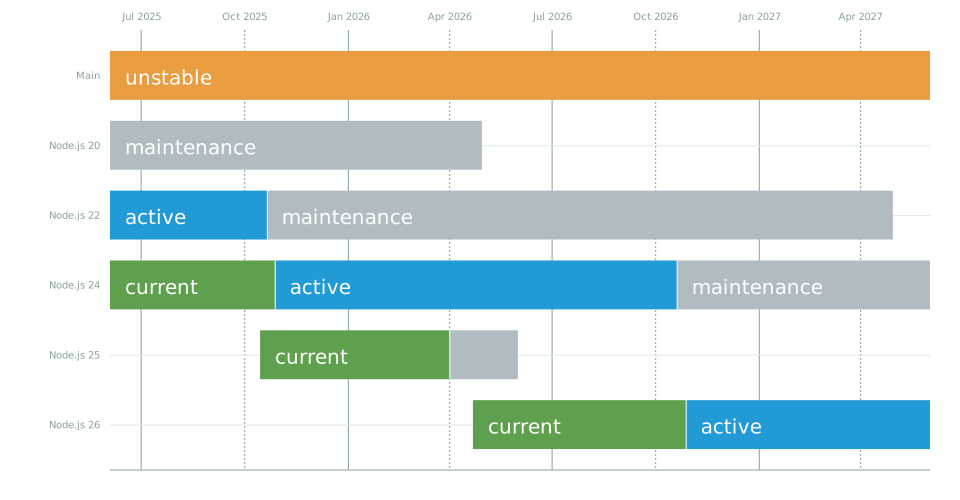](https://nodejs.dev/en/about/releases)\n_source: _\n\n## FAQ\n\nQ: Are the scripts deprecated?\n\nA: The scripts are deprecated for the versions of Node.js that are currently outdated. While the packages for these versions still exist, we no longer provide support for them. Our support is exclusively dedicated to the active Node.js versions, which, as of today, are 18, 20, and 21. Users utilizing these versions can confidently use our scripts, but we encourage those using older versions to upgrade for continued support and the best experience.\n\n---\n\nQ: How can I configure the repository manually?\n\nA: If you prefer to manually configure the repository, we have a detailed guide to assist you through the process. Please visit our [Repository Manual Installation Guide](https://github.com/nodesource/distributions/wiki/Repository-Manual-Installation) for comprehensive instructions. This guide is designed to provide step-by-step directions to ensure a smooth and successful manual setup of the repository for your Node.js environment.\n\n---\n\nQ: How do I pin to specific versions of Node.js?\n\nA: Please take a look at [wiki](https://github.com/nodesource/distributions/wiki/How-to-select-the-Node.js-version-to-install)\n\n---\n\n---\n\nQ: Why is there no folder listing available when I visit the following URLs?\n \n\n \n\nA: This issue may arise because some users utilize the above URLs to download specific versions of Node.js or create mirrors of our repository.\n\nFor more information and possible solutions, please refer to the following resources:\n\n- [Github issue](https://github.com/nodesource/distributions/issues/1633)\n- [Creating a Repository Mirror](https://github.com/nodesource/distributions/wiki/Creating-a-Repository-Mirror:-A-Step%E2%80%90by%E2%80%90Step-Guide)\n\n---\n\n## Authors and Contributors\n\n### Current Members\n\n\n\n### Past Members\n\n\n\nContributions are welcomed from anyone wanting to improve this project!\n\n## License\n\nThis material is Copyright (c) NodeSource and licensed under the MIT license. All rights not explicitly granted in the MIT license are reserved. See the included [LICENSE.md](./LICENSE.md) file for more details.\n\n---\n\n_Supported with love by the [NodeSource](https://nodesource.com) team_\n\n_This project is not affiliated with Debian, Ubuntu, Red Hat, CentOS or Fedora._\n\n_Ubuntu is a registered trademark of Canonical Ltd._\n\n_Debian is a registered trademark owned by Software in the Public Interest, Inc._\n\n_Red Hat, CentOS and Fedora are trademarks of Red Hat, Inc._\n\n_Amazon Linux is a trademark of Amazon Web Services, Inc._\n\n_CloudLinux is a trademark of CloudLinux, Inc_\n"
},
{
"path": "LICENSE.md",
"content": "The MIT License (MIT)\n=====================\n\nCopyright (c) 2024 NodeSource LLC\n---------------------------------\n\nPermission is hereby granted, free of charge, to any person obtaining a copy of this software and associated documentation files (the \"Software\"), to deal in the Software without restriction, including without limitation the rights to use, copy, modify, merge, publish, distribute, sublicense, and/or sell copies of the Software, and to permit persons to whom the Software is furnished to do so, subject to the following conditions:\n\nThe above copyright notice and this permission notice shall be included in all copies or substantial portions of the Software.\n\nTHE SOFTWARE IS PROVIDED \"AS IS\", WITHOUT WARRANTY OF ANY KIND, EXPRESS OR IMPLIED, INCLUDING BUT NOT LIMITED TO THE WARRANTIES OF MERCHANTABILITY, FITNESS FOR A PARTICULAR PURPOSE AND NONINFRINGEMENT. IN NO EVENT SHALL THE AUTHORS OR COPYRIGHT HOLDERS BE LIABLE FOR ANY CLAIM, DAMAGES OR OTHER LIABILITY, WHETHER IN AN ACTION OF CONTRACT, TORT OR OTHERWISE, ARISING FROM, OUT OF OR IN CONNECTION WITH THE SOFTWARE OR THE USE OR OTHER DEALINGS IN THE SOFTWARE.\n"
},
{
"path": "OLDER_DISTROS.md",
"content": "## [Node.js](https://nodejs.org) on Older Linux Distributions\n\nAt [NodeSource](https://nodesource.com), one of our primary missions is to encourage adoption of Node.js as much as possible. One of the ways we do this is by supplying binary packages of Node in formats compatible with the package management systems of various [Linux Distributions](https://github.com/nodesource/distributions/), so long as those distributions are still getting security updates from their respective sponsor entities.\n\nUnfortunately, this is more complicated in certain instances than in others. Due to the extremely long support cycles of some releases, such as LTS releases for Ubuntu, the components that the distributions ship with are not always sufficient to build or sometimes even to run very new and fast-moving software such as Node.\n\n### Debian Style Distributions\n\nTwo such examples that highlight this situation are the Debian Wheezy and Ubuntu Precise releases. Both are still currently receiving security updates. However, the default versions of the `C++` compilers that each ships with are not modern enough to build the current iterations of the V8 Javascript engine.\n\nIn order to get around this issue, we build the packages <= v6.x for Debian Wheezy with [clang-3.4](http://clang.llvm.org/). Ubuntu Precise ships with [clang-3.4](http://clang.llvm.org) available, so we use that instead of GCC.\n\nThe current expectation for v7.x of Node is that going forward, it will require use of even newer parts of the C++ standard than v6.x did. This will in turn require a compiler newer than both the `gcc` that ships on these distributions and `clang-3.4`. For this reason, we do not support Wheezy or Precise on version 7.x of Node.\n\nThe relevant bits of our build scripts to install the needed compilers looks like this:\n\n```bash\n#!/bin/bash\n\nif [ \"x${DIST}\" == \"xprecise\" ]; then\n echo \"Calling $0\"\n apt update\n apt install -y clang-3.4\nfi\n\nif [ \"x${DIST}\" == \"xwheezy\" ]; then\n echo \"Calling $0\"\n apt update\n apt -y install curl apt-transport-https ca-certificates\n echo \"deb https://deb.nodesource.com/clang-3.4 wheezy main\" >> /etc/apt/sources.list\n curl -s https://deb.nodesource.com/gpgkey/nodesource.gpg.key | apt-key add -\n apt update\n apt install -y clang-3.4\nfi\n```\n\nTo actually use these compilers during the build, the scripts look like this:\n\n```bash\nif [ \"x${DIST}\" == \"xprecise\" ]; then\n CC=/usr/bin/clang\n export CC\n CXX=/usr/bin/clang++\n export CXX\nfi\n\nif [ \"x${DIST}\" == \"xwheezy\" ]; then\n CC=/usr/bin/clang\n export CC\n CXX=/usr/bin/clang++\n export CXX\nfi\n```\n\nPlease note that `arm` builds are not available for these two distributions, as we don't have compilers available for that target.\n\n### RedHat Style Distributions\n\nAnother example of this circumstance is RHEL6 / CentOS6 which use `rpm` packages. Much like in the Debian Style examples above, EL6 does not ship with a `C++` compiler that can build a modern version of V8. Additionally, the version of `python` in the distribution is not new enough to properly execute the `configure` script for the build.\n\nFortunately, RedHat supports [SoftwareCollections.org](https://www.softwarecollections.org) and these collections can provide EL6 with newer versions of `GCC` and `python`.\n\n - The [Devtoolset-3](https://www.softwarecollections.org/en/scls/rhscl/devtoolset-3/) collection provides `GCC`\n - The [Python27](https://www.softwarecollections.org/en/scls/rhscl/python27/) collection provides `python`\n\nIf you are running EL6 with our `rpm` packages for Node, and you intend to build any native add-on modules, you need to install and enable both of these collections by following the instructions at the links above.\n\nAlso please note that for EL6, only the `x86_64` architecture is supported, as the aforementioned software collections do not have 32bit support.\n"
},
{
"path": "OLD_README.md",
"content": "# [NodeSource](https://nodesource.com) Node.js Binary Distributions\n\n[](https://nodesource.com)\n\n[](https://circleci.com/gh/nodesource/distributions/tree/master)\n\nThis repository contains documentation for using the **[NodeSource](https://nodesource.com)** **[Node.js](http://nodejs.org)** Binary Distributions via .rpm and .deb as well as their setup and support scripts.\n\nIf you are looking for NodeSource's low-impact Node.js performance monitoring platform, please **[get started here](https://accounts.nodesource.com/sign-up-linuxdistro).**\n\nPlease file an issue if you are experiencing a problem or would like to discuss something related to the distributions.\n\nPull requests are encouraged if you have changes you believe would improve the setup process or increase compatibility across Linux distributions.\n\nLooking for the oldversion of [README.md](./OLD_README.md)\n\n## Table of Contents\n\n* **[Debian and Ubuntu based distributions](#deb)** (deb)\n * [Installation instructions](#debinstall)\n * [Uninstall instructions](#debuninstall)\n * [Manual installation](#debmanual)\n* **[Enterprise Linux based distributions](#rpm)** (rpm)\n * [Installation instructions](#rpminstall)\n * [Uninstall instructions](#rpmuninstall)\n* **[Tests](#tests)**\n* **[FAQ](#questions)**\n* **[Requested Distributions](#requests)**\n* **[License](#project-license)**\n\n``\n\n## Debian and Ubuntu based distributions\n\n**Available architectures:**\n\nNodeSource will continue to maintain the following architectures and may add additional ones in the future.\n\n* **amd64** (64-bit)\n* **armhf** (ARM 32-bit hard-float, ARMv7 and up: _arm-linux-gnueabihf_)\n* **arm64** (ARM 64-bit, ARMv8 and up: _aarch64-linux-gnu_)\n\n**Supported Ubuntu versions:**\n\nNodeSource will maintain Ubuntu distributions in active support by Canonical, including LTS and the intermediate releases.\n\n* ~~**Ubuntu 16.04 LTS** (Xenial Xerus)~~ *WARNING: BUILD SYSTEM CURRENTLY BROKEN FOR NODEJS 18+*\n* ~~**Ubuntu 18.04 LTS** (Bionic Beaver)~~ *WARNING: BUILD SYSTEM CURRENTLY BROKEN FOR NODEJS 18+*\n* ~~**Ubuntu 18.10** (Cosmic Cuttlefish)~~ *WARNING: BUILD SYSTEM CURRENTLY BROKEN FOR NODEJS 18+*\n* ~~**Ubuntu 19.04** (Disco Dingo)~~ *WARNING: BUILD SYSTEM CURRENTLY BROKEN FOR NODEJS 18+*\n* ~~**Ubuntu 19.10** (Eoan Ermine)~~ *WARNING: BUILD SYSTEM CURRENTLY BROKEN FOR NODEJS 18+*\n* **Ubuntu 20.04 LTS** (Focal Fossa)\n* **Ubuntu 20.10** (Groovy Gorilla)\n* **Ubuntu 21.04** (Hirsute Hippo)\n* **Ubuntu 21.10** (Impish Indri)\n* **Ubuntu 22.04** (Jammy Jellyfish)\n* **Ubuntu 22.10** (Kinetic Kudu)\n\n**Supported Debian versions:**\n\nNodeSource will maintain support for stable, testing and unstable releases of Debian, due to the long release cycle a considerable number of users are running unstable and testing.\n\n* ~~**Debian 9 / oldoldstable** (Stretch)~~ *WARNING: BUILD SYSTEM CURRENTLY BROKEN FOR NODEJS 18+*\n* **Debian 10 / oldstable** (Buster)\n* **Debian 11 / stable** (Bullseye)\n* **Debian unstable** (Sid)\n* **Debian testing** (Bookworm)\n\n**Supported Linux Mint versions:**\n\n* ~~**Linux Mint 18 \"Sarah\"** (via Ubuntu 16.04 LTS)~~ *WARNING: BUILD SYSTEM CURRENTLY BROKEN FOR NODEJS 18+*\n* ~~**Linux Mint 18.1 \"Serena\"** (via Ubuntu 16.04 LTS)~~ *WARNING: BUILD SYSTEM CURRENTLY BROKEN FOR NODEJS 18+*\n* ~~**Linux Mint 18.2 \"Sonya\"** (via Ubuntu 16.04 LTS)~~ *WARNING: BUILD SYSTEM CURRENTLY BROKEN FOR NODEJS 18+*\n* ~~**Linux Mint 18.3 \"Sylvia\"** (via Ubuntu 16.04 LTS)~~ *WARNING: BUILD SYSTEM CURRENTLY BROKEN FOR NODEJS 18+*\n* ~~**Linux Mint Debian Edition (LMDE) 2 \"Betsy\"** (via Debian 8)~~ *WARNING: BUILD SYSTEM CURRENTLY BROKEN FOR NODEJS 18+*\n* ~~**Linux Mint 19 \"Tara\"** (via Ubuntu 18.04 LTS)~~ *WARNING: BUILD SYSTEM CURRENTLY BROKEN FOR NODEJS 18+*\n* ~~**Linux Mint 19.1 \"Tessa\"** (via Ubuntu 18.04 LTS)~~ *WARNING: BUILD SYSTEM CURRENTLY BROKEN FOR NODEJS 18+*\n* ~~**Linux Mint 19.2 \"Tina\"** (via Ubuntu 18.04 LTS)~~ *WARNING: BUILD SYSTEM CURRENTLY BROKEN FOR NODEJS 18+*\n* ~~**Linux Mint 19.3 \"Tricia\"** (via Ubuntu 18.04 LTS)~~ *WARNING: BUILD SYSTEM CURRENTLY BROKEN FOR NODEJS 18+*\n* **Linux Mint 20 \"Ulyana\"** (via Ubuntu 20.04 LTS)\n* **Linux Mint 20.1 \"Ulyssa\"** (via Ubuntu 20.04 LTS)\n* **Linux Mint 20.2 \"Uma\"** (via Ubuntu 20.04 LTS)\n* **Linux Mint 20.3 \"Una\"** (via Ubuntu 20.04 LTS)\n* **Linux Mint 21 \"Vanessa\"** (via Ubuntu 22.04 LTS)\n* **Linux Mint 21.1 \"Vera\"** (via Ubuntu 22.04 LTS)\n* ~~**Linux Mint Debian Edition (LMDE) 3 \"Cindy\"** (via Debian 9)~~ *WARNING: BUILD SYSTEM CURRENTLY BROKEN FOR NODEJS 18+*\n* **Linux Mint Debian Edition (LMDE) 4 \"Debbie\"** (via Debian 10)\n* **Linux Mint Debian Edition (LMDE) 5 \"Elsie\"** (via Debian 11)\n\n**Supported Devuan versions:**\n\n* ~~**Ascii / oldoldstable** (via Debian 9)~~ *WARNING: BUILD SYSTEM CURRENTLY BROKEN FOR NODEJS 18+*\n* **Beowulf / oldstable** (via Debian 10)\n* **Chimaera / stable** (via Debian 11)\n* **Ceres / unstable** (via Debian unstable)\n\n**Supported elementary OS versions:**\n\n* ~~**elementary OS 0.4 Loki** (via Ubuntu 16.04 LTS)~~ *WARNING: BUILD SYSTEM CURRENTLY BROKEN FOR NODEJS 18+*\n* ~~**elementary OS 5 Juno** (via Ubuntu 18.04 LTS)~~ *WARNING: BUILD SYSTEM CURRENTLY BROKEN FOR NODEJS 18+*\n* ~~**elementary OS 5.1 Hera** (via Ubuntu 18.04 LTS)~~ *WARNING: BUILD SYSTEM CURRENTLY BROKEN FOR NODEJS 18+*\n* **elementary OS 6 Odin** (via Ubuntu 20.04 LTS)\n* **elementary OS 6.1 Jolnir** (via Ubuntu 20.04 LTS)\n* **elementary OS 7 horus** (via Ubuntu 22.04 LTS)\n\n**Supported Trisquel versions:**\n\n* ~~**Trisquel 8 \"Flidas\"** (via Ubuntu 16.04 LTS)~~ *WARNING: BUILD SYSTEM CURRENTLY BROKEN FOR NODEJS 18+*\n* ~~**Trisquel 9 \"Etiona\"** (via Ubuntu 18.04 LTS)~~ *WARNING: BUILD SYSTEM CURRENTLY BROKEN FOR NODEJS 18+*\n\n**Supported BOSS versions:**\n\n* ~~**BOSS 7.0 \"Drishti\"** (via Debian 9)~~ *WARNING: BUILD SYSTEM CURRENTLY BROKEN FOR NODEJS 18+*\n* **BOSS 8.0 \"Unnati\"** (via Debian 10)\n* **BOSS 9.0 \"Urja\"** (via Debian 11)\n\n**Supported BunsenLabs versions:**\n\n* ~~**Helium** (via Debian 9)~~ *WARNING: BUILD SYSTEM CURRENTLY BROKEN FOR NODEJS 18+*\n* **Lithium** (via Debian 10)\n\n**Supported MX Linux versions:**\n\n* ~~**MX-17 Horizon** (via Debian 9)~~ *WARNING: BUILD SYSTEM CURRENTLY BROKEN FOR NODEJS 18+*\n* ~~**MX-18 Continuum** (via Debian 9)~~ *WARNING: BUILD SYSTEM CURRENTLY BROKEN FOR NODEJS 18+*\n* **MX-19 Patito Feo** (via Debian 10)\n* **MX-21 Wildflower** (via Debian 11)\n\n**Supported Sparky Linux versions:**\n\n* ~~**Sparky 4.x \"Tyche\"** (via Debian 9)~~ *WARNING: BUILD SYSTEM CURRENTLY BROKEN FOR NODEJS 18+*\n* **Sparky 5.x \"Nibiru\"** (via Debian 10)\n* **Sparky 6.x \"Po Tolo\"** (via Debian 11)\n\n**Supported PureOS Linux versions:**\n\n* **PureOS 9.0 \"Amber\"** (via Debian 10)\n* **PureOS 10.0 \"Byzantium\"** (via Debian 11)\n\n**Supported Astra Linux CE versions:**\n\n* ~~**Astra Linux CE 2.12 \"Orel\"** (via Debian 9)~~ *WARNING: BUILD SYSTEM CURRENTLY BROKEN FOR NODEJS 18+*\n\n**Supported Ubilinux versions:**\n\n* ~~**Ubilinux 4.0 \"Dolcetto\"** (via Debian 9)~~ *WARNING: BUILD SYSTEM CURRENTLY BROKEN FOR NODEJS 18+*\n\n**Supported Parrot OS Linux versions:**\n\n* **Parrot OS 5.0 \"Electro Ara\"** (via Debian 11)\n\n**Supported Deepin Linux versions:**\n\n* **Deepin 20 \"Apricot\"** (via Debian 10)\n\n``\n\n### Installation instructions\n\n**Node.js v20.x**:\n\n##### Using Ubuntu\n\n```sh\ncurl -fsSL https://deb.nodesource.com/setup_20.x | sudo -E bash - &&\\\nsudo apt install -y nodejs\n```\n\n##### Using Debian, as root\n\n```sh\ncurl -fsSL https://deb.nodesource.com/setup_20.x | bash - &&\\\napt install -y nodejs\n```\n\n**Node.js v19.x**:\n\n##### Using Ubuntu\n\n```sh\ncurl -fsSL https://deb.nodesource.com/setup_19.x | sudo -E bash - &&\\\nsudo apt install -y nodejs\n```\n\n##### Using Debian, as root\n\n```sh\ncurl -fsSL https://deb.nodesource.com/setup_19.x | bash - &&\\\napt install -y nodejs\n```\n\n**Node.js v18.x**:\n\n##### Using Ubuntu\n\n```sh\ncurl -fsSL https://deb.nodesource.com/setup_18.x | sudo -E bash - &&\\\nsudo apt install -y nodejs\n```\n\n##### Using Debian, as root\n\n```sh\ncurl -fsSL https://deb.nodesource.com/setup_18.x | bash - &&\\\napt install -y nodejs\n```\n\n**Node.js v16.x**:\n\n##### Using Ubuntu\n\n```sh\ncurl -fsSL https://deb.nodesource.com/setup_16.x | sudo -E bash - &&\\\nsudo apt install -y nodejs\n```\n\n##### Using Debian, as root\n\n```sh\ncurl -fsSL https://deb.nodesource.com/setup_16.x | bash - &&\\\napt install -y nodejs\n```\n\n**Node.js LTS (v18.x)**:\n\n##### Using Ubuntu\n\n```sh\ncurl -fsSL https://deb.nodesource.com/setup_lts.x | sudo -E bash - &&\\\nsudo apt install -y nodejs\n```\n\n##### Using Debian, as root\n\n```sh\ncurl -fsSL https://deb.nodesource.com/setup_lts.x | bash - &&\\\napt install -y nodejs\n```\n\n**Node.js Current (v20.x)**:\n\n##### Using Ubuntu\n\n```sh\ncurl -fsSL https://deb.nodesource.com/setup_current.x | sudo -E bash - &&\\\nsudo apt install -y nodejs\n```\n\n##### Using Debian, as root\n\n```sh\ncurl -fsSL https://deb.nodesource.com/setup_current.x | bash - &&\\\napt install -y nodejs\n```\n\n***Optional***: install build tools\n\nTo compile and install native addons from npm you may also need to install build tools:\n\n##### use `sudo` on Ubuntu or run this as root on debian\n\n```sh\napt install -y build-essential\n```\n\n``\n\n### Uninstall `nodejs` Ubuntu & Debian packages\n\nTo completely remove Node.js installed from the deb.nodesource.com package methods above:\n\n##### use `sudo` on Ubuntu or run this as root on debian\n\n```sh\napt purge nodejs &&\\\nrm -r /etc/apt/sources.list.d/nodesource.list\n```\n\n``\n\n### Manual installation\n\nIf you're not a fan of `curl | bash -`, or are using an unsupported distribution, you can try a manual installation.\n\nThese instructions assume `sudo` is present, however some distributions do not include this command by default, particularly those focused on a minimal environment. In this case, you should install `sudo` or `su` to root to run the commands directly.\n\n**1. Remove the old PPA if it exists**\n\nThis step is only required if you previously used Chris Lea's Node.js PPA.\n\n```sh\n# add-apt-repository may not be present on some Ubuntu releases:\n# sudo apt install python-software-properties\nsudo add-apt-repository -y -r ppa:chris-lea/node.js &&\\\nsudo rm -f /etc/apt/sources.list.d/chris-lea-node_js-*.list &&\\\nsudo rm -f /etc/apt/sources.list.d/chris-lea-node_js-*.list.save\n```\n\n**2. Add the NodeSource package signing key**\n\n```sh\nKEYRING=/usr/share/keyrings/nodesource.gpg\ncurl -fsSL https://deb.nodesource.com/gpgkey/nodesource.gpg.key | gpg --dearmor | sudo tee \"$KEYRING\" >/dev/null\n# wget can also be used:\n# wget --quiet -O - https://deb.nodesource.com/gpgkey/nodesource.gpg.key | gpg --dearmor | sudo tee \"$KEYRING\" >/dev/null\ngpg --no-default-keyring --keyring \"$KEYRING\" --list-keys\nchmod a+r /usr/share/keyrings/nodesource.gpg\n```\n\nThe key ID is `9FD3B784BC1C6FC31A8A0A1C1655A0AB68576280`.\n\n**3. Add the desired NodeSource repository**\n\n```sh\n# Replace with the branch of Node.js or io.js you want to install: node_8.x, node_16.x, etc...\nVERSION=node_16.x\n# Replace with the keyring above, if different\nKEYRING=/usr/share/keyrings/nodesource.gpg\n# The below command will set this correctly, but if lsb_release isn't available, you can set it manually:\n# - For Debian distributions: jessie, sid, etc...\n# - For Ubuntu distributions: xenial, bionic, etc...\n# - For Debian or Ubuntu derived distributions your best option is to use the codename corresponding to the upstream release your distribution is based off. This is an advanced scenario and unsupported if your distribution is not listed as supported per earlier in this README.\nDISTRO=\"$(lsb_release -s -c)\"\necho \"deb [signed-by=$KEYRING] https://deb.nodesource.com/$VERSION $DISTRO main\" | sudo tee /etc/apt/sources.list.d/nodesource.list\necho \"deb-src [signed-by=$KEYRING] https://deb.nodesource.com/$VERSION $DISTRO main\" | sudo tee -a /etc/apt/sources.list.d/nodesource.list\n\n```\n\n**4. Update package lists and install Node.js**\n\n```sh\nsudo apt update\nsudo apt install nodejs\n```\n\n``\n\n## Enterprise Linux based distributions\n\n**Available architectures:**\n\nNodeSource will continue to maintain the following architectures and may add additional ones in the future.\n\n* **x86_64** (64-bit)\n* **arm64** (ARM 64-bit, ARMv8 and up: _aarch64-linux-gnu_)\n\n**Supported Red Hat® Enterprise Linux® versions:**\n\n* ~~**RHEL 7** (64-bit)~~ *WARNING: BUILD SYSTEM CURRENTLY BROKEN FOR NODEJS 18+*\n* **RHEL 8** (64-bit)\n\n**Supported CentOS versions:**\n\n* ~~**CentOS 7** (64-bit)~~ *WARNING: BUILD SYSTEM CURRENTLY BROKEN FOR NODEJS 18+*\n* **CentOS 8** (64-bit)\n* **CentOS 8 Stream** (64-bit)\n\n**Supported AlmaLinux OS versions:**\n\n* **AlmaLinux 8** (64-bit)\n\n**Supported Mageia Linux versions:**\n\n* ~~**Mageia 7** (64-bit)~~ *WARNING: BUILD SYSTEM CURRENTLY BROKEN FOR NODEJS 18+*\n* **Mageia 8** (64-bit)\n\n**Supported Rocky Linux OS versions:**\n\n* **Rocky 8** (64-bit)\n\n**Supported CloudLinux versions:**\n\n* **CloudLinux 6** (32-bit for Node <= 10.x and 64-bit)\n\n**Supported Fedora versions:**\n\n* **Fedora 33** (64-bit)\n* **Fedora 34** (64-bit)\n* **Fedora 35** (64-bit)\n* **Fedora 36** (64-bit)\n\n**Supported Amazon Linux versions:**\n\n* ~~**Amazon Linux** (64-bit)~~ *WARNING: BUILD SYSTEM CURRENTLY BROKEN FOR NODEJS 18+*\n* ~~**Amazon Linux 2** (64-bit)~~ *WARNING: BUILD SYSTEM CURRENTLY BROKEN FOR NODEJS 18+*\n* ~~**Amazon Linux 2023** (64-bit)\n\n``\n\n### Installation instructions\n\n_NOTE: If you are using RHEL 6 or CentOS 6, you might want to read about [running Node.js on older distros](https://github.com/nodesource/distributions/blob/master/OLDER_DISTROS.md)._\n\nThe Nodesource RPM package signing key is available here: \n\nRun on RHEL, CentOS, CloudLinux, Amazon Linux or Fedora:\n\n**Node.js v20.x**\n\n##### As root\n\n```sh\ncurl -fsSL https://rpm.nodesource.com/setup_20.x | bash -\n```\n\n##### No root privileges\n\n```sh\ncurl -fsSL https://rpm.nodesource.com/setup_20.x | sudo bash -\n```\n\n**Node.js v19.x**\n\n##### As root\n\n```sh\ncurl -fsSL https://rpm.nodesource.com/setup_19.x | bash -\n```\n\n##### No root privileges\n\n```sh\ncurl -fsSL https://rpm.nodesource.com/setup_19.x | sudo bash -\n```\n\n**Node.js v18.x**\n\n##### As root\n\n```sh\ncurl -fsSL https://rpm.nodesource.com/setup_18.x | bash -\n```\n\n##### No root privileges\n\n```sh\ncurl -fsSL https://rpm.nodesource.com/setup_18.x | sudo bash -\n```\n\n**Node.js v16.x**\n\n##### As root\n\n```sh\ncurl -fsSL https://rpm.nodesource.com/setup_16.x | bash -\n```\n\n##### No root privileges\n\n```sh\ncurl -fsSL https://rpm.nodesource.com/setup_16.x | sudo bash -\n```\n\n**Node.js LTS (18.x)**\n\n##### As root\n\n```sh\ncurl -fsSL https://rpm.nodesource.com/setup_lts.x | bash -\n```\n\n##### No root privileges\n\n```sh\ncurl -fsSL https://rpm.nodesource.com/setup_lts.x | sudo bash -\n```\n\n**Node.js Current (20.x)**\n\n##### As root\n\n```sh\ncurl -fsSL https://rpm.nodesource.com/setup_current.x | bash -\n```\n\n##### No root privileges\n\n```sh\ncurl -fsSL https://rpm.nodesource.com/setup_current.x | sudo bash -\n```\n\n***Optional***: install build tools\n\nTo compile and install native addons from npm you may also need to install build tools:\n\n```text\nyum install gcc-c++ make\n# or: yum groupinstall 'Development Tools'\n```\n\n``\n\n### Uninstall `nodejs` Enterprise Linux packages\n\nTo completely remove Node.js installed from the rpm.nodesource.com package methods above:\n\n#### use `sudo` or run this as root\n\n```sh\nyum remove nodejs &&\\\nrm -r /etc/yum.repos.d/nodesource*.repo &&\\\nyum clean all\n```\n\n``\n\n## Tests\n\nTo test an installation is working (and that the setup scripts are working!) use:\n\n```sh\ncurl -fsSL https://deb.nodesource.com/test | bash -\n\n```\n\n``\n\n# FAQ\n\nQ: How do I use this repo when behind a proxy?\n\nA: Please take a look at [issue #9](https://github.com/nodesource/distributions/issues/9)\n\n---\n\nQ: How do I pin to specific versions of Node.js?\n\nA: Please take a look at [issue #33](https://github.com/nodesource/distributions/issues/33#issuecomment-169345680)\n\n---\n\nQ: I upgraded to a new major version of Node.js using the scripts, but the old version is still being installed, what is going on?\n\nA: You probably need to clear out your package manager's cache. Take a look at [issue #191](https://github.com/nodesource/distributions/issues/191)\n\n---\n\nQ: I'm trying to install Node.js on CentOS 5 / RHEL 5 and it is failing, why?\n\nA: Due to the limitations of the compiler toolchain on EL 5 and its end of general support, we no longer support. See [issue #190](https://github.com/nodesource/distributions/issues/190)\n\n---\n\nQ: I'm seeing \"Your distribution, identified as \"_.i686\" or \"_.i386, is not currently supported, why?\n\nA: Node.js 4.x and newer require a 64bit os for rpms. See [issue #268](https://github.com/nodesource/distributions/issues/268)\n\n---\n\nQ: Why have certain versions of platforms/releases stopped receiving updates to Node.js?\n\nA: Unfortunately, newer versions of V8 require a modern compiler toolchain. On some platforms, such as ARM wheezy, that toolchain is not available. See [issue #247](https://github.com/nodesource/distributions/issues/247)\n\n---\n\nQ: Why is my Node.js version newer than the one of the script I’ve run?\n\nA: Your package manager is probably installing a newer Node.js version from a different source. See [issue #657](https://github.com/nodesource/distributions/issues/657)\n\n---\n\nQ: What is the current status of IPv6 support?\n\nA: See [issue #170](https://github.com/nodesource/distributions/issues/170)\n\n---\n\nQ: I cannot install Node.js on Debian Jessie or Ubuntu Trusty Tahr: GPG error, why?\n\nA: See [issue #1181](https://github.com/nodesource/distributions/issues/1181)\n\n``\n\n# Requested Distributions\n\nWe, unfortunately, do not have the resources necessary to support and test the plethora of Linux releases in the wild, so we rely on community members such as yourself to get support on your favorite distributions! This is a list of releases that have been requested by the community. If you are interested in contributing to this project, this would be a great place to start!\n\n* OpenSUSE - [Issue #199](https://github.com/nodesource/distributions/issues/199)\n* Scientific Linux - [Issue #251](https://github.com/nodesource/distributions/issues/251)\n* TANGLU Bartholomea - [Issue #81](https://github.com/nodesource/distributions/issues/81)\n* Korora - [Issue #130](https://github.com/nodesource/distributions/issues/130)\n* FreePBX - [Issue #257](https://github.com/nodesource/distributions/issues/257)\n* PopOS - [Issue #924](https://github.com/nodesource/distributions/issues/924)\n* Kylin - [Issue #1011](https://github.com/nodesource/distributions/issues/1011)\n* MakuluLinux - [Issue #1012](https://github.com/nodesource/distributions/issues/1012)\n* GuixSD - [Issue #1297](https://github.com/nodesource/distributions/issues/1297)\n* XCP-ng - [Issue #1061](https://github.com/nodesource/distributions/issues/1061)\n* VzLinux - [Issue #1060](https://github.com/nodesource/distributions/issues/1060)\n\n``\n\n## Authors and Contributors\n\n\n\nContributions are welcomed from anyone wanting to improve this project!\n\n``\n\n## License\n\nThis material is Copyright (c) NodeSource and licensed under the MIT license. All rights not explicitly granted in the MIT license are reserved. See the included [LICENSE.md](./LICENSE.md) file for more details.\n\n---\n\n*Supported with love by the [NodeSource](https://nodesource.com) team*\n\n*This project is not affiliated with Debian, Ubuntu, Red Hat, CentOS or Fedora.*`
`\n*Ubuntu is a registered trademark of Canonical Ltd.*`
`\n*Debian is a registered trademark owned by Software in the Public Interest, Inc.*`
`\n*Red Hat, CentOS and Fedora are trademarks of Red Hat, Inc.*`
`\n*CloudLinux is a trademark of Cloud Linux, Inc*\n"
},
{
"path": "README.md",
"content": "[](https://nodesource.com/products/distributions)\n\nSee the old documentation in the ➡️ [DEV_README.md](./DEV_README.md)"
},
{
"path": "scripts/deb/script_generator/README.md",
"content": "# Node.js Version Setup Scripts\n\nThis repository contains scripts for setting up different versions of Node.js on Debian based Linux systems.\n\n## Modifying the Scripts\n\nEach script in this repository sets up a specific version of Node.js. The version is specified in the line `NODE_VERSION=\"XX.x\"` in each script. To modify the version, simply replace `\"XX.x\"` with the desired version, e.g., `\"18.x\"`.\n\nFor example, to modify the `setup_18.x` script to install Node.js version 20.x instead, you would change the line to `NODE_VERSION=\"20.x\"`.\n\n## Running the Scripts\n\nTo run a script, navigate to the directory containing the script and run the following command:\n\n```bash\nsudo bash setup_XX.x\n```\n\nReplace `XX.x` with the version number of the script you want to run. For example, to run the `setup_18.x` script, you would use the command `sudo bash setup_18.x`.\n\n## How It Works\n\nEach script in this repository performs the following steps:\n\n1. Checks if the system is an Debian based Linux distribution.\n2. Configures the NodeSource Node.js DEB repository for the specified version of Node.js.\n3. Logs a message indicating that the repository is configured and updated, and instructs the user to run `apt install nodejs -y` to complete the installation.\n\nThe `setup_current` and `setup_latest` scripts are special scripts that install the current and latest versions of Node.js, respectively. The current version is 20.x and the latest version is 21.x.\n\n## Updating the Scripts\n\nIf you make a change to the base script, you can regenerate all the version-specific scripts by running the generator script:\n\n```bash\nbash generator.sh\n```\n\nThis script iterates over a list of versions (currently 18.x, 20.x, and 21.x), and creates a new script for each version with the updated base script. It also creates setup_current and setup_latest scripts for the current and latest versions of Node.js, respectively.\n\n## Deploying the Scripts\n\nAfter generating the scripts, you can deploy them to an S3 bucket using the AWS CLI. Here is the command to do so:\n\n```bash\naws s3 sync scripts/deb/ s3://deb.nodesource.com/ --exclude \"*/**\"\n```\n\nThis command syncs all the files in the scripts/deb/ directory (but not its subdirectories) with the s3://deb.nodesource.com/ bucket. Make sure to replace s3://deb.nodesource.com/ with the path to your own S3 bucket.\n"
},
{
"path": "scripts/deb/script_generator/base_script.sh",
"content": "#!/bin/bash\n\n# Logger Function\nlog() {\n local message=\"$1\"\n local type=\"$2\"\n local timestamp=$(date '+%Y-%m-%d %H:%M:%S')\n local color\n local endcolor=\"\\033[0m\"\n\n case \"$type\" in\n \"info\") color=\"\\033[38;5;79m\" ;;\n \"success\") color=\"\\033[1;32m\" ;;\n \"error\") color=\"\\033[1;31m\" ;;\n *) color=\"\\033[1;34m\" ;;\n esac\n\n echo -e \"${color}${timestamp} - ${message}${endcolor}\"\n}\n\n# Error handler function \nhandle_error() {\n local exit_code=$1\n local error_message=\"$2\"\n log \"Error: $error_message (Exit Code: $exit_code)\" \"error\"\n exit $exit_code\n}\n\n# Function to check for command availability\ncommand_exists() {\n command -v \"$1\" &> /dev/null\n}\n\ncheck_os() {\n if ! [ -f \"/etc/debian_version\" ]; then\n echo \"Error: This script is only supported on Debian-based systems.\"\n exit 1\n fi\n}\n\n# Function to Install the script pre-requisites\ninstall_pre_reqs() {\n log \"Installing pre-requisites\" \"info\"\n\n # Run 'apt update'\n if ! apt update -y; then\n handle_error \"$?\" \"Failed to run 'apt update'\"\n fi\n\n # Run 'apt install'\n if ! apt install -y apt-transport-https ca-certificates curl gnupg; then\n handle_error \"$?\" \"Failed to install packages\"\n fi\n\n if ! mkdir -p /usr/share/keyrings; then\n handle_error \"$?\" \"Makes sure the path /usr/share/keyrings exist or run ' mkdir -p /usr/share/keyrings' with sudo\"\n fi\n\n rm -f /usr/share/keyrings/nodesource.gpg || true\n rm -f /etc/apt/sources.list.d/nodesource.list || true\n rm -f /etc/apt/sources.list.d/nodesource.sources || true\n\n # Run 'curl' and 'gpg' to download and import the NodeSource signing key\n if ! curl -fsSL https://deb.nodesource.com/gpgkey/nodesource-repo.gpg.key | gpg --dearmor -o /usr/share/keyrings/nodesource.gpg; then\n handle_error \"$?\" \"Failed to download and import the NodeSource signing key\"\n fi\n\n # Explicitly set the permissions to ensure the file is readable by all\n if ! chmod 644 /usr/share/keyrings/nodesource.gpg; then\n handle_error \"$?\" \"Failed to set correct permissions on /usr/share/keyrings/nodesource.gpg\"\n fi\n}\n\n# Function to configure the Repo\nconfigure_repo() {\n local node_version=$1\n\n arch=$(dpkg --print-architecture)\n if [ \"$arch\" != \"amd64\" ] && [ \"$arch\" != \"arm64\" ]; then\n handle_error \"1\" \"Unsupported architecture: $arch. Only amd64, arm64 are supported. Contact Nodesource for an extended support version https://nodesource.com/pages/contact-us.html.\"\n fi\n\n cat < /dev/null\nTypes: deb\nURIs: https://deb.nodesource.com/node_$node_version\nSuites: nodistro\nComponents: main\nArchitectures: $arch\nSigned-By: /usr/share/keyrings/nodesource.gpg\nEOF\n\n # N|solid Config\n echo \"Package: nsolid\" | tee /etc/apt/preferences.d/nsolid > /dev/null\n echo \"Pin: origin deb.nodesource.com\" | tee -a /etc/apt/preferences.d/nsolid > /dev/null\n echo \"Pin-Priority: 600\" | tee -a /etc/apt/preferences.d/nsolid > /dev/null\n\n # Nodejs Config\n echo \"Package: nodejs\" | tee /etc/apt/preferences.d/nodejs > /dev/null\n echo \"Pin: origin deb.nodesource.com\" | tee -a /etc/apt/preferences.d/nodejs > /dev/null\n echo \"Pin-Priority: 600\" | tee -a /etc/apt/preferences.d/nodejs > /dev/null\n\n # Run 'apt update'\n if ! apt update -y; then\n handle_error \"$?\" \"Failed to run 'apt update'\"\n else\n log \"Repository configured successfully.\"\n log \"To install Node.js, run: apt install nodejs -y\" \"info\"\n log \"You can use N|solid Runtime as a node.js alternative\" \"info\"\n log \"To install N|solid Runtime, run: apt install nsolid -y \\n\" \"success\"\n fi\n}\n\n# Define Node.js version\nNODE_VERSION=\"XX.x\"\n\n# Check OS\ncheck_os\n\n# Main execution\ninstall_pre_reqs || handle_error $? \"Failed installing pre-requisites\"\nconfigure_repo \"$NODE_VERSION\" || handle_error $? \"Failed configuring repository\"\n"
},
{
"path": "scripts/deb/script_generator/generator.sh",
"content": "#!/bin/bash\n\n# Function to create a script for a given Node.js version\ncreate_script() {\n local version=$1\n local script_name=$2\n local target_script=\"../setup_$script_name.x\"\n\n echo \"Creating script for Node.js version $version.x\"\n if sed \"s/NODE_VERSION=\\\"XX.x\\\"/NODE_VERSION=\\\"$version.x\\\"/g\" \"$base_script\" > \"$target_script\"; then\n echo \"Script created successfully: $target_script\"\n chmod +x \"$target_script\"\n echo \"Execute permissions set for: $target_script\"\n else\n echo \"Error: Failed to create script for version $version.x\"\n return 1\n fi\n}\n\n# Check if the base script exists\nbase_script=\"./base_script.sh\"\nif [ ! -f \"$base_script\" ]; then\n echo \"Error: Base script not found at $base_script\"\n exit 1\nfi\n\n# List of versions\nversions=(\"20\" \"22\" \"24\" \"25\")\n\n# Iterate over the versions and create scripts\nfor version in \"${versions[@]}\"; do\n create_script \"$version\" \"$version\"\ndone\n\n# Define LTS and current Node.js versions\nlts_version=\"24\"\ncurrent_version=\"25\"\n\n# Create setup_lts and setup_current scripts\ncreate_script \"$lts_version\" \"lts\"\ncreate_script \"$current_version\" \"current\"\n"
},
{
"path": "scripts/deb/setup_16.x",
"content": "#!/bin/bash\n\nif test -t 1; then # if terminal\n ncolors=$(which tput > /dev/null && tput colors) # supports color\n if test -n \"$ncolors\" && test $ncolors -ge 8; then\n termcols=$(tput cols)\n bold=\"$(tput bold)\"\n underline=\"$(tput smul)\"\n standout=\"$(tput smso)\"\n normal=\"$(tput sgr0)\"\n black=\"$(tput setaf 0)\"\n red=\"$(tput setaf 1)\"\n green=\"$(tput setaf 2)\"\n yellow=\"$(tput setaf 3)\"\n blue=\"$(tput setaf 4)\"\n magenta=\"$(tput setaf 5)\"\n cyan=\"$(tput setaf 6)\"\n white=\"$(tput setaf 7)\"\n fi\nfi\n\nprint_bold() {\n title=\"$1\"\n text=\"$2\"\n\n echo\n echo \"${red}================================================================================${normal}\"\n echo \"${red}================================================================================${normal}\"\n echo\n echo -e \" ${bold}${yellow}${title}${normal}\"\n echo\n echo -en \" ${text}\"\n echo\n echo \"${red}================================================================================${normal}\"\n echo \"${red}================================================================================${normal}\"\n}\n\n\n# Logger Function\nlog() {\n local message=\"$1\"\n local type=\"$2\"\n local timestamp=$(date '+%Y-%m-%d %H:%M:%S')\n local color\n local endcolor=\"\\033[0m\"\n\n case \"$type\" in\n \"info\") color=\"\\033[38;5;79m\" ;;\n \"success\") color=\"\\033[1;32m\" ;;\n \"error\") color=\"\\033[1;31m\" ;;\n *) color=\"\\033[1;34m\" ;;\n esac\n\n echo -e \"${color}${timestamp} - ${message}${endcolor}\"\n}\n\n# Send deprecation Warning\nnode_deprecation_warning() {\nprint_bold \\\n\" DEPRECATION WARNING \" \"\\\n ${bold}${underline} Node.js 16.x is no longer actively supported!${normal}\n\n ${bold}You will not receive security or critical stability updates${normal} for this version.\n\n You should migrate to a supported version of Node.js as soon as possible.\n Use the installation script that corresponds to the version of Node.js you\n wish to install. e.g.\n \n * ${red}https://deb.nodesource.com/setup_16.x — Node.js 16 \\\"Gallium\\\" ${bold}(deprecated)${normal}\n * ${green}https://deb.nodesource.com/setup_18.x — Node.js 18 \\\"Hydrogen\\\" (Maintenance)${normal}\n * ${red}https://deb.nodesource.com/setup_19.x — Node.js 19 \\\"Nineteen\\\" ${bold}(deprecated)${normal}\n * ${bold}${green}https://deb.nodesource.com/setup_20.x — Node.js 20 LTS \\\"Iron\\\" (recommended)${normal}\n * ${green}https://deb.nodesource.com/setup_21.x — Node.js 21 \\\"Iron\\\" (current)${normal}\n \n\n\n Please see ${bold}https://github.com/nodejs/Release${normal} for details about which\n version may be appropriate for you.\n\n The ${green}${bold}NodeSource${normal} Node.js distributions repository contains\n information both about supported versions of Node.js and supported Linux\n distributions. To learn more about usage, see the repository:\n ${underline}${bold}https://github.com/nodesource/distributions${normal}\n\"\n echo\n echo \"Continuing in 10 seconds ...\"\n echo\n sleep 10\n\n}\n\n# Error handler function \nhandle_error() {\n local exit_code=$1\n local error_message=\"$2\"\n log \"Error: $error_message (Exit Code: $exit_code)\" \"error\"\n exit $exit_code\n}\n\n# Function to check for command availability\ncommand_exists() {\n command -v \"$1\" &> /dev/null\n}\n\ncheck_os() {\n if ! [ -f \"/etc/debian_version\" ]; then\n echo \"Error: This script is only supported on Debian-based systems.\"\n exit 1\n fi\n}\n\n# Function to Install the script pre-requisites\ninstall_pre_reqs() {\n log \"Installing pre-requisites\" \"info\"\n\n # Run 'apt update'\n if ! apt update -y; then\n handle_error \"$?\" \"Failed to run 'apt update'\"\n fi\n\n # Run 'apt install'\n if ! apt install -y apt-transport-https ca-certificates curl gnupg; then\n handle_error \"$?\" \"Failed to install packages\"\n fi\n\n if ! mkdir -p /usr/share/keyrings; then\n handle_error \"$?\" \"Makes sure the path /usr/share/keyrings exist or run 'mkdir -p /usr/share/keyrings' with sudo\"\n fi\n\n rm -f /usr/share/keyrings/nodesource.gpg || true\n rm -f /etc/apt/sources.list.d/nodesource.list || true\n\n # Run 'curl' and 'gpg'\n if ! curl -fsSL https://deb.nodesource.com/gpgkey/nodesource-repo.gpg.key | gpg --dearmor -o /usr/share/keyrings/nodesource.gpg; then\n handle_error \"$?\" \"Failed to download and import the NodeSource signing key\"\n fi\n}\n\n# Function to configure the Repo\nconfigure_repo() {\n local node_version=$1\n\n arch=$(dpkg --print-architecture)\n if [ \"$arch\" != \"amd64\" ] && [ \"$arch\" != \"arm64\" ] && [ \"$arch\" != \"armhf\" ]; then\n handle_error \"1\" \"Unsupported architecture: $arch. Only amd64, arm64, and armhf are supported.\"\n fi\n\n echo \"deb [arch=$arch signed-by=/usr/share/keyrings/nodesource.gpg] https://deb.nodesource.com/node_$node_version nodistro main\" | tee /etc/apt/sources.list.d/nodesource.list > /dev/null\n\n # Nodejs Config\n echo \"Package: nodejs\" | tee /etc/apt/preferences.d/nodejs > /dev/null\n echo \"Pin: origin deb.nodesource.com\" | tee -a /etc/apt/preferences.d/nodejs > /dev/null\n echo \"Pin-Priority: 600\" | tee -a /etc/apt/preferences.d/nodejs > /dev/null\n\n # Run 'apt update'\n if ! apt update -y; then\n handle_error \"$?\" \"Failed to run 'apt update'\"\n else\n log \"Repository configured successfully. To install Node.js, run: apt install nodejs -y\" \"success\"\n fi\n}\n\n# Define Node.js version\nNODE_VERSION=\"16.x\"\n\n# Check OS\ncheck_os\n\n# Main execution\nnode_deprecation_warning\ninstall_pre_reqs || handle_error $? \"Failed installing pre-requisites\"\nconfigure_repo \"$NODE_VERSION\" || handle_error $? \"Failed configuring repository\"\n"
},
{
"path": "scripts/deb/setup_18.x",
"content": "#!/bin/bash\n\n# Send deprecation Warning\nnode_deprecation_warning() {\n log \"\n===============================================================================\n DEPRECATION WARNING \n===============================================================================\nNode.js 18.x is no longer actively supported!\nYou will not receive security or critical stability updates for this version.\n\nYou should migrate to a supported version of Node.js as soon as possible.\n\nPlease see https://nodesource.com/products/distributions for details about which\nversion may be appropriate for you.\n\nThe NodeSource Node.js distributions site contains\ninformation both about supported versions of Node.js and N|Solid supported Linux\ndistributions. To learn more about usage, see:\nhttps://nodesource.com/products/distributions\n\n===============================================================================\n\nContinuing in 10 seconds ...\n\" \"error\"\n sleep 10\n}\n\n# Logger Function\nlog() {\n local message=\"$1\"\n local type=\"$2\"\n local timestamp=$(date '+%Y-%m-%d %H:%M:%S')\n local color\n local endcolor=\"\\033[0m\"\n\n case \"$type\" in\n \"info\") color=\"\\033[38;5;79m\" ;;\n \"success\") color=\"\\033[1;32m\" ;;\n \"error\") color=\"\\033[1;31m\" ;;\n *) color=\"\\033[1;34m\" ;;\n esac\n\n echo -e \"${color}${timestamp} - ${message}${endcolor}\"\n}\n\n# Error handler function \nhandle_error() {\n local exit_code=$1\n local error_message=\"$2\"\n log \"Error: $error_message (Exit Code: $exit_code)\" \"error\"\n exit $exit_code\n}\n\n# Function to check for command availability\ncommand_exists() {\n command -v \"$1\" &> /dev/null\n}\n\ncheck_os() {\n if ! [ -f \"/etc/debian_version\" ]; then\n echo \"Error: This script is only supported on Debian-based systems.\"\n exit 1\n fi\n}\n\n# Function to Install the script pre-requisites\ninstall_pre_reqs() {\n log \"Installing pre-requisites\" \"info\"\n\n # Run 'apt update'\n if ! apt update -y; then\n handle_error \"$?\" \"Failed to run 'apt update'\"\n fi\n\n # Run 'apt install'\n if ! apt install -y apt-transport-https ca-certificates curl gnupg; then\n handle_error \"$?\" \"Failed to install packages\"\n fi\n\n if ! mkdir -p /usr/share/keyrings; then\n handle_error \"$?\" \"Makes sure the path /usr/share/keyrings exist or run ' mkdir -p /usr/share/keyrings' with sudo\"\n fi\n\n rm -f /usr/share/keyrings/nodesource.gpg || true\n rm -f /etc/apt/sources.list.d/nodesource.list || true\n\n # Run 'curl' and 'gpg' to download and import the NodeSource signing key\n if ! curl -fsSL https://deb.nodesource.com/gpgkey/nodesource-repo.gpg.key | gpg --dearmor -o /usr/share/keyrings/nodesource.gpg; then\n handle_error \"$?\" \"Failed to download and import the NodeSource signing key\"\n fi\n\n # Explicitly set the permissions to ensure the file is readable by all\n if ! chmod 644 /usr/share/keyrings/nodesource.gpg; then\n handle_error \"$?\" \"Failed to set correct permissions on /usr/share/keyrings/nodesource.gpg\"\n fi\n}\n\n# Function to configure the Repo\nconfigure_repo() {\n local node_version=$1\n\n arch=$(dpkg --print-architecture)\n if [ \"$arch\" != \"amd64\" ] && [ \"$arch\" != \"arm64\" ] && [ \"$arch\" != \"armhf\" ]; then\n handle_error \"1\" \"Unsupported architecture: $arch. Only amd64, arm64, and armhf are supported.\"\n fi\n\n echo \"deb [arch=$arch signed-by=/usr/share/keyrings/nodesource.gpg] https://deb.nodesource.com/node_$node_version nodistro main\" | tee /etc/apt/sources.list.d/nodesource.list > /dev/null\n\n # N|solid Config\n echo \"Package: nsolid\" | tee /etc/apt/preferences.d/nsolid > /dev/null\n echo \"Pin: origin deb.nodesource.com\" | tee -a /etc/apt/preferences.d/nsolid > /dev/null\n echo \"Pin-Priority: 600\" | tee -a /etc/apt/preferences.d/nsolid > /dev/null\n\n # Nodejs Config\n echo \"Package: nodejs\" | tee /etc/apt/preferences.d/nodejs > /dev/null\n echo \"Pin: origin deb.nodesource.com\" | tee -a /etc/apt/preferences.d/nodejs > /dev/null\n echo \"Pin-Priority: 600\" | tee -a /etc/apt/preferences.d/nodejs > /dev/null\n\n # Run 'apt update'\n if ! apt update -y; then\n handle_error \"$?\" \"Failed to run 'apt update'\"\n else\n log \"Repository configured successfully.\"\n log \"To install Node.js, run: apt install nodejs -y\" \"info\"\n log \"You can use N|solid Runtime as a node.js alternative\" \"info\"\n log \"To install N|solid Runtime, run: apt install nsolid -y \\n\" \"success\"\n fi\n}\n\n# Define Node.js version\nNODE_VERSION=\"18.x\"\n\n# Check OS\ncheck_os\n\n# Main execution\nnode_deprecation_warning\ninstall_pre_reqs || handle_error $? \"Failed installing pre-requisites\"\nconfigure_repo \"$NODE_VERSION\" || handle_error $? \"Failed configuring repository\"\n"
},
{
"path": "scripts/deb/setup_20.x",
"content": "#!/bin/bash\n\n# Logger Function\nlog() {\n local message=\"$1\"\n local type=\"$2\"\n local timestamp=$(date '+%Y-%m-%d %H:%M:%S')\n local color\n local endcolor=\"\\033[0m\"\n\n case \"$type\" in\n \"info\") color=\"\\033[38;5;79m\" ;;\n \"success\") color=\"\\033[1;32m\" ;;\n \"error\") color=\"\\033[1;31m\" ;;\n *) color=\"\\033[1;34m\" ;;\n esac\n\n echo -e \"${color}${timestamp} - ${message}${endcolor}\"\n}\n\n# Error handler function \nhandle_error() {\n local exit_code=$1\n local error_message=\"$2\"\n log \"Error: $error_message (Exit Code: $exit_code)\" \"error\"\n exit $exit_code\n}\n\n# Function to check for command availability\ncommand_exists() {\n command -v \"$1\" &> /dev/null\n}\n\ncheck_os() {\n if ! [ -f \"/etc/debian_version\" ]; then\n echo \"Error: This script is only supported on Debian-based systems.\"\n exit 1\n fi\n}\n\n# Function to Install the script pre-requisites\ninstall_pre_reqs() {\n log \"Installing pre-requisites\" \"info\"\n\n # Run 'apt update'\n if ! apt update -y; then\n handle_error \"$?\" \"Failed to run 'apt update'\"\n fi\n\n # Run 'apt install'\n if ! apt install -y apt-transport-https ca-certificates curl gnupg; then\n handle_error \"$?\" \"Failed to install packages\"\n fi\n\n if ! mkdir -p /usr/share/keyrings; then\n handle_error \"$?\" \"Makes sure the path /usr/share/keyrings exist or run ' mkdir -p /usr/share/keyrings' with sudo\"\n fi\n\n rm -f /usr/share/keyrings/nodesource.gpg || true\n rm -f /etc/apt/sources.list.d/nodesource.list || true\n rm -f /etc/apt/sources.list.d/nodesource.sources || true\n\n # Run 'curl' and 'gpg' to download and import the NodeSource signing key\n if ! curl -fsSL https://deb.nodesource.com/gpgkey/nodesource-repo.gpg.key | gpg --dearmor -o /usr/share/keyrings/nodesource.gpg; then\n handle_error \"$?\" \"Failed to download and import the NodeSource signing key\"\n fi\n\n # Explicitly set the permissions to ensure the file is readable by all\n if ! chmod 644 /usr/share/keyrings/nodesource.gpg; then\n handle_error \"$?\" \"Failed to set correct permissions on /usr/share/keyrings/nodesource.gpg\"\n fi\n}\n\n# Function to configure the Repo\nconfigure_repo() {\n local node_version=$1\n\n arch=$(dpkg --print-architecture)\n if [ \"$arch\" != \"amd64\" ] && [ \"$arch\" != \"arm64\" ]; then\n handle_error \"1\" \"Unsupported architecture: $arch. Only amd64, arm64 are supported. Contact Nodesource for an extended support version https://nodesource.com/pages/contact-us.html.\"\n fi\n\n cat < /dev/null\nTypes: deb\nURIs: https://deb.nodesource.com/node_$node_version\nSuites: nodistro\nComponents: main\nArchitectures: $arch\nSigned-By: /usr/share/keyrings/nodesource.gpg\nEOF\n\n # N|solid Config\n echo \"Package: nsolid\" | tee /etc/apt/preferences.d/nsolid > /dev/null\n echo \"Pin: origin deb.nodesource.com\" | tee -a /etc/apt/preferences.d/nsolid > /dev/null\n echo \"Pin-Priority: 600\" | tee -a /etc/apt/preferences.d/nsolid > /dev/null\n\n # Nodejs Config\n echo \"Package: nodejs\" | tee /etc/apt/preferences.d/nodejs > /dev/null\n echo \"Pin: origin deb.nodesource.com\" | tee -a /etc/apt/preferences.d/nodejs > /dev/null\n echo \"Pin-Priority: 600\" | tee -a /etc/apt/preferences.d/nodejs > /dev/null\n\n # Run 'apt update'\n if ! apt update -y; then\n handle_error \"$?\" \"Failed to run 'apt update'\"\n else\n log \"Repository configured successfully.\"\n log \"To install Node.js, run: apt install nodejs -y\" \"info\"\n log \"You can use N|solid Runtime as a node.js alternative\" \"info\"\n log \"To install N|solid Runtime, run: apt install nsolid -y \\n\" \"success\"\n fi\n}\n\n# Define Node.js version\nNODE_VERSION=\"20.x\"\n\n# Check OS\ncheck_os\n\n# Main execution\ninstall_pre_reqs || handle_error $? \"Failed installing pre-requisites\"\nconfigure_repo \"$NODE_VERSION\" || handle_error $? \"Failed configuring repository\"\n"
},
{
"path": "scripts/deb/setup_21.x",
"content": "#!/bin/bash\n\n# Logger Function\nlog() {\n local message=\"$1\"\n local type=\"$2\"\n local timestamp=$(date '+%Y-%m-%d %H:%M:%S')\n local color\n local endcolor=\"\\033[0m\"\n\n case \"$type\" in\n \"info\") color=\"\\033[38;5;79m\" ;;\n \"success\") color=\"\\033[1;32m\" ;;\n \"error\") color=\"\\033[1;31m\" ;;\n *) color=\"\\033[1;34m\" ;;\n esac\n\n echo -e \"${color}${timestamp} - ${message}${endcolor}\"\n}\n\n# Error handler function \nhandle_error() {\n local exit_code=$1\n local error_message=\"$2\"\n log \"Error: $error_message (Exit Code: $exit_code)\" \"error\"\n exit $exit_code\n}\n\n# Function to check for command availability\ncommand_exists() {\n command -v \"$1\" &> /dev/null\n}\n\ncheck_os() {\n if ! [ -f \"/etc/debian_version\" ]; then\n echo \"Error: This script is only supported on Debian-based systems.\"\n exit 1\n fi\n}\n\n# Function to Install the script pre-requisites\ninstall_pre_reqs() {\n log \"Installing pre-requisites\" \"info\"\n\n # Run 'apt update'\n if ! apt update -y; then\n handle_error \"$?\" \"Failed to run 'apt update'\"\n fi\n\n # Run 'apt install'\n if ! apt install -y apt-transport-https ca-certificates curl gnupg; then\n handle_error \"$?\" \"Failed to install packages\"\n fi\n\n if ! mkdir -p /usr/share/keyrings; then\n handle_error \"$?\" \"Makes sure the path /usr/share/keyrings exist or run ' mkdir -p /usr/share/keyrings' with sudo\"\n fi\n\n rm -f /usr/share/keyrings/nodesource.gpg || true\n rm -f /etc/apt/sources.list.d/nodesource.list || true\n\n # Run 'curl' and 'gpg' to download and import the NodeSource signing key\n if ! curl -fsSL https://deb.nodesource.com/gpgkey/nodesource-repo.gpg.key | gpg --dearmor -o /usr/share/keyrings/nodesource.gpg; then\n handle_error \"$?\" \"Failed to download and import the NodeSource signing key\"\n fi\n\n # Explicitly set the permissions to ensure the file is readable by all\n if ! chmod 644 /usr/share/keyrings/nodesource.gpg; then\n handle_error \"$?\" \"Failed to set correct permissions on /usr/share/keyrings/nodesource.gpg\"\n fi\n}\n\n# Function to configure the Repo\nconfigure_repo() {\n local node_version=$1\n\n arch=$(dpkg --print-architecture)\n if [ \"$arch\" != \"amd64\" ] && [ \"$arch\" != \"arm64\" ] && [ \"$arch\" != \"armhf\" ]; then\n handle_error \"1\" \"Unsupported architecture: $arch. Only amd64, arm64, and armhf are supported.\"\n fi\n\n echo \"deb [arch=$arch signed-by=/usr/share/keyrings/nodesource.gpg] https://deb.nodesource.com/node_$node_version nodistro main\" | tee /etc/apt/sources.list.d/nodesource.list > /dev/null\n\n # N|solid Config\n echo \"Package: nsolid\" | tee /etc/apt/preferences.d/nsolid > /dev/null\n echo \"Pin: origin deb.nodesource.com\" | tee -a /etc/apt/preferences.d/nsolid > /dev/null\n echo \"Pin-Priority: 600\" | tee -a /etc/apt/preferences.d/nsolid > /dev/null\n\n # Nodejs Config\n echo \"Package: nodejs\" | tee /etc/apt/preferences.d/nodejs > /dev/null\n echo \"Pin: origin deb.nodesource.com\" | tee -a /etc/apt/preferences.d/nodejs > /dev/null\n echo \"Pin-Priority: 600\" | tee -a /etc/apt/preferences.d/nodejs > /dev/null\n\n # Run 'apt update'\n if ! apt update -y; then\n handle_error \"$?\" \"Failed to run 'apt update'\"\n else\n log \"Repository configured successfully.\"\n log \"To install Node.js, run: apt install nodejs -y\" \"info\"\n log \"You can use N|solid Runtime as a node.js alternative\" \"info\"\n log \"To install N|solid Runtime, run: apt install nsolid -y \\n\" \"success\"\n fi\n}\n\n# Define Node.js version\nNODE_VERSION=\"21.x\"\n\n# Check OS\ncheck_os\n\n# Main execution\ninstall_pre_reqs || handle_error $? \"Failed installing pre-requisites\"\nconfigure_repo \"$NODE_VERSION\" || handle_error $? \"Failed configuring repository\"\n"
},
{
"path": "scripts/deb/setup_22.x",
"content": "#!/bin/bash\n\n# Logger Function\nlog() {\n local message=\"$1\"\n local type=\"$2\"\n local timestamp=$(date '+%Y-%m-%d %H:%M:%S')\n local color\n local endcolor=\"\\033[0m\"\n\n case \"$type\" in\n \"info\") color=\"\\033[38;5;79m\" ;;\n \"success\") color=\"\\033[1;32m\" ;;\n \"error\") color=\"\\033[1;31m\" ;;\n *) color=\"\\033[1;34m\" ;;\n esac\n\n echo -e \"${color}${timestamp} - ${message}${endcolor}\"\n}\n\n# Error handler function \nhandle_error() {\n local exit_code=$1\n local error_message=\"$2\"\n log \"Error: $error_message (Exit Code: $exit_code)\" \"error\"\n exit $exit_code\n}\n\n# Function to check for command availability\ncommand_exists() {\n command -v \"$1\" &> /dev/null\n}\n\ncheck_os() {\n if ! [ -f \"/etc/debian_version\" ]; then\n echo \"Error: This script is only supported on Debian-based systems.\"\n exit 1\n fi\n}\n\n# Function to Install the script pre-requisites\ninstall_pre_reqs() {\n log \"Installing pre-requisites\" \"info\"\n\n # Run 'apt update'\n if ! apt update -y; then\n handle_error \"$?\" \"Failed to run 'apt update'\"\n fi\n\n # Run 'apt install'\n if ! apt install -y apt-transport-https ca-certificates curl gnupg; then\n handle_error \"$?\" \"Failed to install packages\"\n fi\n\n if ! mkdir -p /usr/share/keyrings; then\n handle_error \"$?\" \"Makes sure the path /usr/share/keyrings exist or run ' mkdir -p /usr/share/keyrings' with sudo\"\n fi\n\n rm -f /usr/share/keyrings/nodesource.gpg || true\n rm -f /etc/apt/sources.list.d/nodesource.list || true\n rm -f /etc/apt/sources.list.d/nodesource.sources || true\n\n # Run 'curl' and 'gpg' to download and import the NodeSource signing key\n if ! curl -fsSL https://deb.nodesource.com/gpgkey/nodesource-repo.gpg.key | gpg --dearmor -o /usr/share/keyrings/nodesource.gpg; then\n handle_error \"$?\" \"Failed to download and import the NodeSource signing key\"\n fi\n\n # Explicitly set the permissions to ensure the file is readable by all\n if ! chmod 644 /usr/share/keyrings/nodesource.gpg; then\n handle_error \"$?\" \"Failed to set correct permissions on /usr/share/keyrings/nodesource.gpg\"\n fi\n}\n\n# Function to configure the Repo\nconfigure_repo() {\n local node_version=$1\n\n arch=$(dpkg --print-architecture)\n if [ \"$arch\" != \"amd64\" ] && [ \"$arch\" != \"arm64\" ]; then\n handle_error \"1\" \"Unsupported architecture: $arch. Only amd64, arm64 are supported. Contact Nodesource for an extended support version https://nodesource.com/pages/contact-us.html.\"\n fi\n\n cat < /dev/null\nTypes: deb\nURIs: https://deb.nodesource.com/node_$node_version\nSuites: nodistro\nComponents: main\nArchitectures: $arch\nSigned-By: /usr/share/keyrings/nodesource.gpg\nEOF\n\n # N|solid Config\n echo \"Package: nsolid\" | tee /etc/apt/preferences.d/nsolid > /dev/null\n echo \"Pin: origin deb.nodesource.com\" | tee -a /etc/apt/preferences.d/nsolid > /dev/null\n echo \"Pin-Priority: 600\" | tee -a /etc/apt/preferences.d/nsolid > /dev/null\n\n # Nodejs Config\n echo \"Package: nodejs\" | tee /etc/apt/preferences.d/nodejs > /dev/null\n echo \"Pin: origin deb.nodesource.com\" | tee -a /etc/apt/preferences.d/nodejs > /dev/null\n echo \"Pin-Priority: 600\" | tee -a /etc/apt/preferences.d/nodejs > /dev/null\n\n # Run 'apt update'\n if ! apt update -y; then\n handle_error \"$?\" \"Failed to run 'apt update'\"\n else\n log \"Repository configured successfully.\"\n log \"To install Node.js, run: apt install nodejs -y\" \"info\"\n log \"You can use N|solid Runtime as a node.js alternative\" \"info\"\n log \"To install N|solid Runtime, run: apt install nsolid -y \\n\" \"success\"\n fi\n}\n\n# Define Node.js version\nNODE_VERSION=\"22.x\"\n\n# Check OS\ncheck_os\n\n# Main execution\ninstall_pre_reqs || handle_error $? \"Failed installing pre-requisites\"\nconfigure_repo \"$NODE_VERSION\" || handle_error $? \"Failed configuring repository\"\n"
},
{
"path": "scripts/deb/setup_23.x",
"content": "#!/bin/bash\n\n# Logger Function\nlog() {\n local message=\"$1\"\n local type=\"$2\"\n local timestamp=$(date '+%Y-%m-%d %H:%M:%S')\n local color\n local endcolor=\"\\033[0m\"\n\n case \"$type\" in\n \"info\") color=\"\\033[38;5;79m\" ;;\n \"success\") color=\"\\033[1;32m\" ;;\n \"error\") color=\"\\033[1;31m\" ;;\n *) color=\"\\033[1;34m\" ;;\n esac\n\n echo -e \"${color}${timestamp} - ${message}${endcolor}\"\n}\n\n# Error handler function \nhandle_error() {\n local exit_code=$1\n local error_message=\"$2\"\n log \"Error: $error_message (Exit Code: $exit_code)\" \"error\"\n exit $exit_code\n}\n\n# Function to check for command availability\ncommand_exists() {\n command -v \"$1\" &> /dev/null\n}\n\ncheck_os() {\n if ! [ -f \"/etc/debian_version\" ]; then\n echo \"Error: This script is only supported on Debian-based systems.\"\n exit 1\n fi\n}\n\n# Function to Install the script pre-requisites\ninstall_pre_reqs() {\n log \"Installing pre-requisites\" \"info\"\n\n # Run 'apt update'\n if ! apt update -y; then\n handle_error \"$?\" \"Failed to run 'apt update'\"\n fi\n\n # Run 'apt install'\n if ! apt install -y apt-transport-https ca-certificates curl gnupg; then\n handle_error \"$?\" \"Failed to install packages\"\n fi\n\n if ! mkdir -p /usr/share/keyrings; then\n handle_error \"$?\" \"Makes sure the path /usr/share/keyrings exist or run ' mkdir -p /usr/share/keyrings' with sudo\"\n fi\n\n rm -f /usr/share/keyrings/nodesource.gpg || true\n rm -f /etc/apt/sources.list.d/nodesource.list || true\n rm -f /etc/apt/sources.list.d/nodesource.sources || true\n\n # Run 'curl' and 'gpg' to download and import the NodeSource signing key\n if ! curl -fsSL https://deb.nodesource.com/gpgkey/nodesource-repo.gpg.key | gpg --dearmor -o /usr/share/keyrings/nodesource.gpg; then\n handle_error \"$?\" \"Failed to download and import the NodeSource signing key\"\n fi\n\n # Explicitly set the permissions to ensure the file is readable by all\n if ! chmod 644 /usr/share/keyrings/nodesource.gpg; then\n handle_error \"$?\" \"Failed to set correct permissions on /usr/share/keyrings/nodesource.gpg\"\n fi\n}\n\n# Function to configure the Repo\nconfigure_repo() {\n local node_version=$1\n\n arch=$(dpkg --print-architecture)\n if [ \"$arch\" != \"amd64\" ] && [ \"$arch\" != \"arm64\" ]; then\n handle_error \"1\" \"Unsupported architecture: $arch. Only amd64, arm64 are supported. Contact Nodesource for an extended support version https://nodesource.com/pages/contact-us.html.\"\n fi\n\n cat < /dev/null\nTypes: deb\nURIs: https://deb.nodesource.com/node_$node_version\nSuites: nodistro\nComponents: main\nArchitectures: $arch\nSigned-By: /usr/share/keyrings/nodesource.gpg\nEOF\n\n # N|solid Config\n echo \"Package: nsolid\" | tee /etc/apt/preferences.d/nsolid > /dev/null\n echo \"Pin: origin deb.nodesource.com\" | tee -a /etc/apt/preferences.d/nsolid > /dev/null\n echo \"Pin-Priority: 600\" | tee -a /etc/apt/preferences.d/nsolid > /dev/null\n\n # Nodejs Config\n echo \"Package: nodejs\" | tee /etc/apt/preferences.d/nodejs > /dev/null\n echo \"Pin: origin deb.nodesource.com\" | tee -a /etc/apt/preferences.d/nodejs > /dev/null\n echo \"Pin-Priority: 600\" | tee -a /etc/apt/preferences.d/nodejs > /dev/null\n\n # Run 'apt update'\n if ! apt update -y; then\n handle_error \"$?\" \"Failed to run 'apt update'\"\n else\n log \"Repository configured successfully.\"\n log \"To install Node.js, run: apt install nodejs -y\" \"info\"\n log \"You can use N|solid Runtime as a node.js alternative\" \"info\"\n log \"To install N|solid Runtime, run: apt install nsolid -y \\n\" \"success\"\n fi\n}\n\n# Define Node.js version\nNODE_VERSION=\"23.x\"\n\n# Check OS\ncheck_os\n\n# Main execution\ninstall_pre_reqs || handle_error $? \"Failed installing pre-requisites\"\nconfigure_repo \"$NODE_VERSION\" || handle_error $? \"Failed configuring repository\"\n"
},
{
"path": "scripts/deb/setup_24.x",
"content": "#!/bin/bash\n\n# Logger Function\nlog() {\n local message=\"$1\"\n local type=\"$2\"\n local timestamp=$(date '+%Y-%m-%d %H:%M:%S')\n local color\n local endcolor=\"\\033[0m\"\n\n case \"$type\" in\n \"info\") color=\"\\033[38;5;79m\" ;;\n \"success\") color=\"\\033[1;32m\" ;;\n \"error\") color=\"\\033[1;31m\" ;;\n *) color=\"\\033[1;34m\" ;;\n esac\n\n echo -e \"${color}${timestamp} - ${message}${endcolor}\"\n}\n\n# Error handler function \nhandle_error() {\n local exit_code=$1\n local error_message=\"$2\"\n log \"Error: $error_message (Exit Code: $exit_code)\" \"error\"\n exit $exit_code\n}\n\n# Function to check for command availability\ncommand_exists() {\n command -v \"$1\" &> /dev/null\n}\n\ncheck_os() {\n if ! [ -f \"/etc/debian_version\" ]; then\n echo \"Error: This script is only supported on Debian-based systems.\"\n exit 1\n fi\n}\n\n# Function to Install the script pre-requisites\ninstall_pre_reqs() {\n log \"Installing pre-requisites\" \"info\"\n\n # Run 'apt update'\n if ! apt update -y; then\n handle_error \"$?\" \"Failed to run 'apt update'\"\n fi\n\n # Run 'apt install'\n if ! apt install -y apt-transport-https ca-certificates curl gnupg; then\n handle_error \"$?\" \"Failed to install packages\"\n fi\n\n if ! mkdir -p /usr/share/keyrings; then\n handle_error \"$?\" \"Makes sure the path /usr/share/keyrings exist or run ' mkdir -p /usr/share/keyrings' with sudo\"\n fi\n\n rm -f /usr/share/keyrings/nodesource.gpg || true\n rm -f /etc/apt/sources.list.d/nodesource.list || true\n rm -f /etc/apt/sources.list.d/nodesource.sources || true\n\n # Run 'curl' and 'gpg' to download and import the NodeSource signing key\n if ! curl -fsSL https://deb.nodesource.com/gpgkey/nodesource-repo.gpg.key | gpg --dearmor -o /usr/share/keyrings/nodesource.gpg; then\n handle_error \"$?\" \"Failed to download and import the NodeSource signing key\"\n fi\n\n # Explicitly set the permissions to ensure the file is readable by all\n if ! chmod 644 /usr/share/keyrings/nodesource.gpg; then\n handle_error \"$?\" \"Failed to set correct permissions on /usr/share/keyrings/nodesource.gpg\"\n fi\n}\n\n# Function to configure the Repo\nconfigure_repo() {\n local node_version=$1\n\n arch=$(dpkg --print-architecture)\n if [ \"$arch\" != \"amd64\" ] && [ \"$arch\" != \"arm64\" ]; then\n handle_error \"1\" \"Unsupported architecture: $arch. Only amd64, arm64 are supported. Contact Nodesource for an extended support version https://nodesource.com/pages/contact-us.html.\"\n fi\n\n cat < /dev/null\nTypes: deb\nURIs: https://deb.nodesource.com/node_$node_version\nSuites: nodistro\nComponents: main\nArchitectures: $arch\nSigned-By: /usr/share/keyrings/nodesource.gpg\nEOF\n\n # N|solid Config\n echo \"Package: nsolid\" | tee /etc/apt/preferences.d/nsolid > /dev/null\n echo \"Pin: origin deb.nodesource.com\" | tee -a /etc/apt/preferences.d/nsolid > /dev/null\n echo \"Pin-Priority: 600\" | tee -a /etc/apt/preferences.d/nsolid > /dev/null\n\n # Nodejs Config\n echo \"Package: nodejs\" | tee /etc/apt/preferences.d/nodejs > /dev/null\n echo \"Pin: origin deb.nodesource.com\" | tee -a /etc/apt/preferences.d/nodejs > /dev/null\n echo \"Pin-Priority: 600\" | tee -a /etc/apt/preferences.d/nodejs > /dev/null\n\n # Run 'apt update'\n if ! apt update -y; then\n handle_error \"$?\" \"Failed to run 'apt update'\"\n else\n log \"Repository configured successfully.\"\n log \"To install Node.js, run: apt install nodejs -y\" \"info\"\n log \"You can use N|solid Runtime as a node.js alternative\" \"info\"\n log \"To install N|solid Runtime, run: apt install nsolid -y \\n\" \"success\"\n fi\n}\n\n# Define Node.js version\nNODE_VERSION=\"24.x\"\n\n# Check OS\ncheck_os\n\n# Main execution\ninstall_pre_reqs || handle_error $? \"Failed installing pre-requisites\"\nconfigure_repo \"$NODE_VERSION\" || handle_error $? \"Failed configuring repository\"\n"
},
{
"path": "scripts/deb/setup_25.x",
"content": "#!/bin/bash\n\n# Logger Function\nlog() {\n local message=\"$1\"\n local type=\"$2\"\n local timestamp=$(date '+%Y-%m-%d %H:%M:%S')\n local color\n local endcolor=\"\\033[0m\"\n\n case \"$type\" in\n \"info\") color=\"\\033[38;5;79m\" ;;\n \"success\") color=\"\\033[1;32m\" ;;\n \"error\") color=\"\\033[1;31m\" ;;\n *) color=\"\\033[1;34m\" ;;\n esac\n\n echo -e \"${color}${timestamp} - ${message}${endcolor}\"\n}\n\n# Error handler function \nhandle_error() {\n local exit_code=$1\n local error_message=\"$2\"\n log \"Error: $error_message (Exit Code: $exit_code)\" \"error\"\n exit $exit_code\n}\n\n# Function to check for command availability\ncommand_exists() {\n command -v \"$1\" &> /dev/null\n}\n\ncheck_os() {\n if ! [ -f \"/etc/debian_version\" ]; then\n echo \"Error: This script is only supported on Debian-based systems.\"\n exit 1\n fi\n}\n\n# Function to Install the script pre-requisites\ninstall_pre_reqs() {\n log \"Installing pre-requisites\" \"info\"\n\n # Run 'apt update'\n if ! apt update -y; then\n handle_error \"$?\" \"Failed to run 'apt update'\"\n fi\n\n # Run 'apt install'\n if ! apt install -y apt-transport-https ca-certificates curl gnupg; then\n handle_error \"$?\" \"Failed to install packages\"\n fi\n\n if ! mkdir -p /usr/share/keyrings; then\n handle_error \"$?\" \"Makes sure the path /usr/share/keyrings exist or run ' mkdir -p /usr/share/keyrings' with sudo\"\n fi\n\n rm -f /usr/share/keyrings/nodesource.gpg || true\n rm -f /etc/apt/sources.list.d/nodesource.list || true\n rm -f /etc/apt/sources.list.d/nodesource.sources || true\n\n # Run 'curl' and 'gpg' to download and import the NodeSource signing key\n if ! curl -fsSL https://deb.nodesource.com/gpgkey/nodesource-repo.gpg.key | gpg --dearmor -o /usr/share/keyrings/nodesource.gpg; then\n handle_error \"$?\" \"Failed to download and import the NodeSource signing key\"\n fi\n\n # Explicitly set the permissions to ensure the file is readable by all\n if ! chmod 644 /usr/share/keyrings/nodesource.gpg; then\n handle_error \"$?\" \"Failed to set correct permissions on /usr/share/keyrings/nodesource.gpg\"\n fi\n}\n\n# Function to configure the Repo\nconfigure_repo() {\n local node_version=$1\n\n arch=$(dpkg --print-architecture)\n if [ \"$arch\" != \"amd64\" ] && [ \"$arch\" != \"arm64\" ]; then\n handle_error \"1\" \"Unsupported architecture: $arch. Only amd64, arm64 are supported. Contact Nodesource for an extended support version https://nodesource.com/pages/contact-us.html.\"\n fi\n\n cat < /dev/null\nTypes: deb\nURIs: https://deb.nodesource.com/node_$node_version\nSuites: nodistro\nComponents: main\nArchitectures: $arch\nSigned-By: /usr/share/keyrings/nodesource.gpg\nEOF\n\n # N|solid Config\n echo \"Package: nsolid\" | tee /etc/apt/preferences.d/nsolid > /dev/null\n echo \"Pin: origin deb.nodesource.com\" | tee -a /etc/apt/preferences.d/nsolid > /dev/null\n echo \"Pin-Priority: 600\" | tee -a /etc/apt/preferences.d/nsolid > /dev/null\n\n # Nodejs Config\n echo \"Package: nodejs\" | tee /etc/apt/preferences.d/nodejs > /dev/null\n echo \"Pin: origin deb.nodesource.com\" | tee -a /etc/apt/preferences.d/nodejs > /dev/null\n echo \"Pin-Priority: 600\" | tee -a /etc/apt/preferences.d/nodejs > /dev/null\n\n # Run 'apt update'\n if ! apt update -y; then\n handle_error \"$?\" \"Failed to run 'apt update'\"\n else\n log \"Repository configured successfully.\"\n log \"To install Node.js, run: apt install nodejs -y\" \"info\"\n log \"You can use N|solid Runtime as a node.js alternative\" \"info\"\n log \"To install N|solid Runtime, run: apt install nsolid -y \\n\" \"success\"\n fi\n}\n\n# Define Node.js version\nNODE_VERSION=\"25.x\"\n\n# Check OS\ncheck_os\n\n# Main execution\ninstall_pre_reqs || handle_error $? \"Failed installing pre-requisites\"\nconfigure_repo \"$NODE_VERSION\" || handle_error $? \"Failed configuring repository\"\n"
},
{
"path": "scripts/deb/setup_current.x",
"content": "#!/bin/bash\n\n# Logger Function\nlog() {\n local message=\"$1\"\n local type=\"$2\"\n local timestamp=$(date '+%Y-%m-%d %H:%M:%S')\n local color\n local endcolor=\"\\033[0m\"\n\n case \"$type\" in\n \"info\") color=\"\\033[38;5;79m\" ;;\n \"success\") color=\"\\033[1;32m\" ;;\n \"error\") color=\"\\033[1;31m\" ;;\n *) color=\"\\033[1;34m\" ;;\n esac\n\n echo -e \"${color}${timestamp} - ${message}${endcolor}\"\n}\n\n# Error handler function \nhandle_error() {\n local exit_code=$1\n local error_message=\"$2\"\n log \"Error: $error_message (Exit Code: $exit_code)\" \"error\"\n exit $exit_code\n}\n\n# Function to check for command availability\ncommand_exists() {\n command -v \"$1\" &> /dev/null\n}\n\ncheck_os() {\n if ! [ -f \"/etc/debian_version\" ]; then\n echo \"Error: This script is only supported on Debian-based systems.\"\n exit 1\n fi\n}\n\n# Function to Install the script pre-requisites\ninstall_pre_reqs() {\n log \"Installing pre-requisites\" \"info\"\n\n # Run 'apt update'\n if ! apt update -y; then\n handle_error \"$?\" \"Failed to run 'apt update'\"\n fi\n\n # Run 'apt install'\n if ! apt install -y apt-transport-https ca-certificates curl gnupg; then\n handle_error \"$?\" \"Failed to install packages\"\n fi\n\n if ! mkdir -p /usr/share/keyrings; then\n handle_error \"$?\" \"Makes sure the path /usr/share/keyrings exist or run ' mkdir -p /usr/share/keyrings' with sudo\"\n fi\n\n rm -f /usr/share/keyrings/nodesource.gpg || true\n rm -f /etc/apt/sources.list.d/nodesource.list || true\n rm -f /etc/apt/sources.list.d/nodesource.sources || true\n\n # Run 'curl' and 'gpg' to download and import the NodeSource signing key\n if ! curl -fsSL https://deb.nodesource.com/gpgkey/nodesource-repo.gpg.key | gpg --dearmor -o /usr/share/keyrings/nodesource.gpg; then\n handle_error \"$?\" \"Failed to download and import the NodeSource signing key\"\n fi\n\n # Explicitly set the permissions to ensure the file is readable by all\n if ! chmod 644 /usr/share/keyrings/nodesource.gpg; then\n handle_error \"$?\" \"Failed to set correct permissions on /usr/share/keyrings/nodesource.gpg\"\n fi\n}\n\n# Function to configure the Repo\nconfigure_repo() {\n local node_version=$1\n\n arch=$(dpkg --print-architecture)\n if [ \"$arch\" != \"amd64\" ] && [ \"$arch\" != \"arm64\" ]; then\n handle_error \"1\" \"Unsupported architecture: $arch. Only amd64, arm64 are supported. Contact Nodesource for an extended support version https://nodesource.com/pages/contact-us.html.\"\n fi\n\n cat < /dev/null\nTypes: deb\nURIs: https://deb.nodesource.com/node_$node_version\nSuites: nodistro\nComponents: main\nArchitectures: $arch\nSigned-By: /usr/share/keyrings/nodesource.gpg\nEOF\n\n # N|solid Config\n echo \"Package: nsolid\" | tee /etc/apt/preferences.d/nsolid > /dev/null\n echo \"Pin: origin deb.nodesource.com\" | tee -a /etc/apt/preferences.d/nsolid > /dev/null\n echo \"Pin-Priority: 600\" | tee -a /etc/apt/preferences.d/nsolid > /dev/null\n\n # Nodejs Config\n echo \"Package: nodejs\" | tee /etc/apt/preferences.d/nodejs > /dev/null\n echo \"Pin: origin deb.nodesource.com\" | tee -a /etc/apt/preferences.d/nodejs > /dev/null\n echo \"Pin-Priority: 600\" | tee -a /etc/apt/preferences.d/nodejs > /dev/null\n\n # Run 'apt update'\n if ! apt update -y; then\n handle_error \"$?\" \"Failed to run 'apt update'\"\n else\n log \"Repository configured successfully.\"\n log \"To install Node.js, run: apt install nodejs -y\" \"info\"\n log \"You can use N|solid Runtime as a node.js alternative\" \"info\"\n log \"To install N|solid Runtime, run: apt install nsolid -y \\n\" \"success\"\n fi\n}\n\n# Define Node.js version\nNODE_VERSION=\"25.x\"\n\n# Check OS\ncheck_os\n\n# Main execution\ninstall_pre_reqs || handle_error $? \"Failed installing pre-requisites\"\nconfigure_repo \"$NODE_VERSION\" || handle_error $? \"Failed configuring repository\"\n"
},
{
"path": "scripts/deb/setup_lts.x",
"content": "#!/bin/bash\n\n# Logger Function\nlog() {\n local message=\"$1\"\n local type=\"$2\"\n local timestamp=$(date '+%Y-%m-%d %H:%M:%S')\n local color\n local endcolor=\"\\033[0m\"\n\n case \"$type\" in\n \"info\") color=\"\\033[38;5;79m\" ;;\n \"success\") color=\"\\033[1;32m\" ;;\n \"error\") color=\"\\033[1;31m\" ;;\n *) color=\"\\033[1;34m\" ;;\n esac\n\n echo -e \"${color}${timestamp} - ${message}${endcolor}\"\n}\n\n# Error handler function \nhandle_error() {\n local exit_code=$1\n local error_message=\"$2\"\n log \"Error: $error_message (Exit Code: $exit_code)\" \"error\"\n exit $exit_code\n}\n\n# Function to check for command availability\ncommand_exists() {\n command -v \"$1\" &> /dev/null\n}\n\ncheck_os() {\n if ! [ -f \"/etc/debian_version\" ]; then\n echo \"Error: This script is only supported on Debian-based systems.\"\n exit 1\n fi\n}\n\n# Function to Install the script pre-requisites\ninstall_pre_reqs() {\n log \"Installing pre-requisites\" \"info\"\n\n # Run 'apt update'\n if ! apt update -y; then\n handle_error \"$?\" \"Failed to run 'apt update'\"\n fi\n\n # Run 'apt install'\n if ! apt install -y apt-transport-https ca-certificates curl gnupg; then\n handle_error \"$?\" \"Failed to install packages\"\n fi\n\n if ! mkdir -p /usr/share/keyrings; then\n handle_error \"$?\" \"Makes sure the path /usr/share/keyrings exist or run ' mkdir -p /usr/share/keyrings' with sudo\"\n fi\n\n rm -f /usr/share/keyrings/nodesource.gpg || true\n rm -f /etc/apt/sources.list.d/nodesource.list || true\n rm -f /etc/apt/sources.list.d/nodesource.sources || true\n\n # Run 'curl' and 'gpg' to download and import the NodeSource signing key\n if ! curl -fsSL https://deb.nodesource.com/gpgkey/nodesource-repo.gpg.key | gpg --dearmor -o /usr/share/keyrings/nodesource.gpg; then\n handle_error \"$?\" \"Failed to download and import the NodeSource signing key\"\n fi\n\n # Explicitly set the permissions to ensure the file is readable by all\n if ! chmod 644 /usr/share/keyrings/nodesource.gpg; then\n handle_error \"$?\" \"Failed to set correct permissions on /usr/share/keyrings/nodesource.gpg\"\n fi\n}\n\n# Function to configure the Repo\nconfigure_repo() {\n local node_version=$1\n\n arch=$(dpkg --print-architecture)\n if [ \"$arch\" != \"amd64\" ] && [ \"$arch\" != \"arm64\" ]; then\n handle_error \"1\" \"Unsupported architecture: $arch. Only amd64, arm64 are supported. Contact Nodesource for an extended support version https://nodesource.com/pages/contact-us.html.\"\n fi\n\n cat < /dev/null\nTypes: deb\nURIs: https://deb.nodesource.com/node_$node_version\nSuites: nodistro\nComponents: main\nArchitectures: $arch\nSigned-By: /usr/share/keyrings/nodesource.gpg\nEOF\n\n # N|solid Config\n echo \"Package: nsolid\" | tee /etc/apt/preferences.d/nsolid > /dev/null\n echo \"Pin: origin deb.nodesource.com\" | tee -a /etc/apt/preferences.d/nsolid > /dev/null\n echo \"Pin-Priority: 600\" | tee -a /etc/apt/preferences.d/nsolid > /dev/null\n\n # Nodejs Config\n echo \"Package: nodejs\" | tee /etc/apt/preferences.d/nodejs > /dev/null\n echo \"Pin: origin deb.nodesource.com\" | tee -a /etc/apt/preferences.d/nodejs > /dev/null\n echo \"Pin-Priority: 600\" | tee -a /etc/apt/preferences.d/nodejs > /dev/null\n\n # Run 'apt update'\n if ! apt update -y; then\n handle_error \"$?\" \"Failed to run 'apt update'\"\n else\n log \"Repository configured successfully.\"\n log \"To install Node.js, run: apt install nodejs -y\" \"info\"\n log \"You can use N|solid Runtime as a node.js alternative\" \"info\"\n log \"To install N|solid Runtime, run: apt install nsolid -y \\n\" \"success\"\n fi\n}\n\n# Define Node.js version\nNODE_VERSION=\"24.x\"\n\n# Check OS\ncheck_os\n\n# Main execution\ninstall_pre_reqs || handle_error $? \"Failed installing pre-requisites\"\nconfigure_repo \"$NODE_VERSION\" || handle_error $? \"Failed configuring repository\"\n"
},
{
"path": "scripts/rpm/script_generator/README.md",
"content": "# Node.js Version Setup Scripts\n\nThis repository contains scripts for setting up different versions of Node.js on RPM-based Linux systems.\n\n## Modifying the Scripts\n\nEach script in this repository sets up a specific version of Node.js. The version is specified in the line `NODE_VERSION=\"XX.x\"` in each script. To modify the version, simply replace `\"XX.x\"` with the desired version, e.g., `\"18.x\"`.\n\nFor example, to modify the `setup_18.x` script to install Node.js version 20.x instead, you would change the line to `NODE_VERSION=\"20.x\"`.\n\n## Running the Scripts\n\nTo run a script, navigate to the directory containing the script and run the following command:\n\n```bash\nsudo bash setup_XX.x\n```\n\nReplace `XX.x` with the version number of the script you want to run. For example, to run the `setup_18.x` script, you would use the command `sudo bash setup_18.x`.\n\n## How It Works\n\nEach script in this repository performs the following steps:\n\n1. Checks if the system is an RPM-based Linux distribution.\n2. Configures the NodeSource Node.js RPM repository for the specified version of Node.js.\n3. Checks if `dnf`, `yum` or `microdnf` is available and updates the system using the available package manager.\n4. Logs a message indicating that the repository is configured and updated, and instructs the user to run `dnf install nodejs -y`, `yum install nodejs -y` or `microdnf install nodejs -y` to complete the installation.\n\nThe `setup_current` and `setup_latest` scripts are special scripts that install the current and latest versions of Node.js, respectively. The current version is 20.x and the latest version is 21.x.\n\n## Updating the Scripts\n\nIf you make a change to the base script, you can regenerate all the version-specific scripts by running the generator script:\n\n```bash\nbash generator.sh\n```\n\nThis script iterates over a list of versions (currently 18.x, 20.x, and 21.x), and creates a new script for each version with the updated base script. It also creates setup_current and setup_latest scripts for the current and latest versions of Node.js, respectively.\n\n## Deploying the Scripts\n\nAfter generating the scripts, you can deploy them to an S3 bucket using the AWS CLI. Here is the command to do so:\n\n```bash\naws s3 sync scripts/rpm/ s3://rpm.nodesource.com/ --exclude \"*/**\"\n```\n\nThis command syncs all the files in the scripts/rpm/ directory (but not its subdirectories) with the s3://rpm.nodesource.com/ bucket. Make sure to replace s3://rpm.nodesource.com/ with the path to your own S3 bucket.\n"
},
{
"path": "scripts/rpm/script_generator/base_script.sh",
"content": "#!/bin/bash\n\n# Logger Function\nlog() {\n local message=\"$1\"\n local type=\"$2\"\n local timestamp=$(date '+%Y-%m-%d %H:%M:%S')\n local color\n local endcolor=\"\\033[0m\"\n\n case \"$type\" in\n \"info\") color=\"\\033[38;5;79m\" ;;\n \"success\") color=\"\\033[1;32m\" ;;\n \"error\") color=\"\\033[1;31m\" ;;\n *) color=\"\\033[1;34m\" ;;\n esac\n\n echo -e \"${color}${timestamp} - ${message}${endcolor}\"\n}\n\n# Error handler function\nhandle_error() {\n local exit_code=$1\n local error_message=\"$2\"\n log \"Error: $error_message (Exit Code: $exit_code)\" \"error\"\n exit $exit_code\n}\n\n# Function to check for command availability\ncommand_exists() {\n command -v \"$1\" &> /dev/null\n}\n\n# Check if we are on an RPM-based system\nif ! [ -f /etc/redhat-release ] && ! grep -q \"Amazon Linux\" /etc/system-release 2>/dev/null; then\n handle_error 1 \"This script is intended for RPM-based systems. Please run it on an RPM-based system.\"\nfi\n\nlog \"Cleaning up old repositories...\" \"info\"\nrm -f /etc/yum.repos.d/nodesource*.repo\nlog \"Old repositories removed\" \"info\"\n\n# Define Node.js version\nNODE_VERSION=\"XX.x\"\n\n# Get system architecture\nSYS_ARCH=$(uname -m)\n\n# Validate system architecture\ncase \"$SYS_ARCH\" in\n aarch64|x86_64) log \"Supported architecture: $SYS_ARCH\" \"info\" ;;\n *) handle_error 1 \"Unsupported architecture: $SYS_ARCH. Only aarch64 and x86_64 are supported.\" ;;\nesac\n\n# Repository content for Node.js\nNODEJS_REPO_CONTENT=\"[nodesource-nodejs]\nname=Node.js Packages for Linux RPM based distros - $SYS_ARCH\nbaseurl=https://rpm.nodesource.com/pub_${NODE_VERSION}/nodistro/nodejs/$SYS_ARCH\npriority=9\nenabled=1\ngpgcheck=1\ngpgkey=https://rpm.nodesource.com/gpgkey/ns-operations-public.key\nmodule_hotfixes=1\"\n\n# Write Node.js repository content\necho \"$NODEJS_REPO_CONTENT\" | tee /etc/yum.repos.d/nodesource-nodejs.repo > /dev/null\n\n# Check if Node.js version is an LTS version\nif [[ \"$NODE_VERSION\" == \"20.x\" ]] || [[ \"$NODE_VERSION\" == \"22.x\" ]] || [[ \"$NODE_VERSION\" == \"24.x\" ]]; then\n # Repository content for N|Solid\n NSOLID_REPO_CONTENT=\"[nodesource-nsolid]\nname=N|Solid Packages for Linux RPM based distros - $SYS_ARCH\nbaseurl=https://rpm.nodesource.com/pub_${NODE_VERSION}/nodistro/nsolid/$SYS_ARCH\npriority=9\nenabled=1\ngpgcheck=1\ngpgkey=https://rpm.nodesource.com/gpgkey/ns-operations-public.key\nmodule_hotfixes=1\"\n\n # Write N|Solid repository content\n echo \"$NSOLID_REPO_CONTENT\" | tee /etc/yum.repos.d/nodesource-nsolid.repo > /dev/null\n log \"Added N|Solid repository for LTS version: $NODE_VERSION\" \"info\"\nfi\n\n# Check for availability of dnf, yum or microdnf\nif command_exists dnf; then\n log \"dnf available, updating...\" \"info\"\n dnf makecache --disablerepo=\"*\" --enablerepo=\"nodesource-nodejs\"\n \n # Update N|Solid repository if it's LTS\n if [[ \"$NODE_VERSION\" == \"20.x\" ]] || [[ \"$NODE_VERSION\" == \"22.x\" ]] || [[ \"$NODE_VERSION\" == \"24.x\" ]]; then\n dnf makecache --disablerepo=\"*\" --enablerepo=\"nodesource-nsolid\"\n log \"Repository is configured and updated.\" \"info\"\n log \"You can use N|solid Runtime as a node.js alternative\" \"info\"\n log \"To install N|solid Runtime, run: dnf install nsolid -y\" \"success\"\n else\n log \"Repository is configured and updated.\" \"info\"\n fi\n \n log \"Run 'dnf install nodejs -y' to complete the installation.\" \"info\"\n exit 0\nelif command_exists yum; then\n log \"yum available, updating...\" \"info\"\n yum makecache --disablerepo=\"*\" --enablerepo=\"nodesource-nodejs\"\n\n # Update N|Solid repository if it's LTS\n if [[ \"$NODE_VERSION\" == \"20.x\" ]] || [[ \"$NODE_VERSION\" == \"22.x\" ]] || [[ \"$NODE_VERSION\" == \"24.x\" ]]; then\n yum makecache --disablerepo=\"*\" --enablerepo=\"nodesource-nsolid\"\n log \"Repository is configured and updated.\" \"info\"\n log \"You can use N|solid Runtime as a node.js alternative\" \"info\"\n log \"Run 'yum install nsolid -y' to complete the installation.\" \"success\"\n else\n log \"Repository is configured and updated.\" \"info\"\n fi\n \n log \"Run 'yum install nodejs -y' to complete the installation.\" \"info\"\nelif command_exists microdnf; then\n log \"microdnf available, updating...\" \"info\"\n microdnf makecache --disablerepo=\"*\" --enablerepo=\"nodesource-nodejs\"\n\n # Update N|Solid repository if it's LTS\n if [[ \"$NODE_VERSION\" == \"20.x\" ]] || [[ \"$NODE_VERSION\" == \"22.x\" ]] || [[ \"$NODE_VERSION\" == \"24.x\" ]]; then\n microdnf makecache --disablerepo=\"*\" --enablerepo=\"nodesource-nsolid\"\n log \"Repository is configured and updated. Run 'microdnf install nsolid -y' to complete the installation.\" \"info\"\n else\n log \"Repository is configured and updated.\" \"info\"\n fi\n \n log \"Run 'microdnf install nodejs -y' to complete the installation.\" \"info\"\nelse\n handle_error 1 \"Neither yum, dnf nor microdnf package manager was found. Please update your system using your package manager.\"\nfi\n"
},
{
"path": "scripts/rpm/script_generator/generator.sh",
"content": "#!/bin/bash\n\n# Function to create a script for a given Node.js version\ncreate_script() {\n local version=$1\n local script_name=$2\n local target_script=\"../setup_$script_name.x\"\n\n echo \"Creating script for Node.js version $version.x\"\n if sed \"s/NODE_VERSION=\\\"XX.x\\\"/NODE_VERSION=\\\"$version.x\\\"/g\" \"$base_script\" > \"$target_script\"; then\n echo \"Script created successfully: $target_script\"\n chmod +x \"$target_script\"\n echo \"Execute permissions set for: $target_script\"\n else\n echo \"Error: Failed to create script for version $version.x\"\n return 1\n fi\n}\n\n# Check if the base script exists\nbase_script=\"./base_script.sh\"\nif [ ! -f \"$base_script\" ]; then\n echo \"Error: Base script not found at $base_script\"\n exit 1\nfi\n\n# List of versions\nversions=(\"23\" \"24\" \"25\")\n\n# Iterate over the versions and create scripts\nfor version in \"${versions[@]}\"; do\n create_script \"$version\" \"$version\"\ndone\n\n# Define LTS and current Node.js versions\nlts_version=\"24\"\ncurrent_version=\"25\"\n\n# Create setup_lts and setup_current scripts\ncreate_script \"$lts_version\" \"lts\"\ncreate_script \"$current_version\" \"current\"\n"
},
{
"path": "scripts/rpm/setup_16.x",
"content": "#!/bin/bash\n\nif test -t 1; then # if terminal\n ncolors=$(which tput > /dev/null && tput colors) # supports color\n if test -n \"$ncolors\" && test $ncolors -ge 8; then\n termcols=$(tput cols)\n bold=\"$(tput bold)\"\n underline=\"$(tput smul)\"\n standout=\"$(tput smso)\"\n normal=\"$(tput sgr0)\"\n black=\"$(tput setaf 0)\"\n red=\"$(tput setaf 1)\"\n green=\"$(tput setaf 2)\"\n yellow=\"$(tput setaf 3)\"\n blue=\"$(tput setaf 4)\"\n magenta=\"$(tput setaf 5)\"\n cyan=\"$(tput setaf 6)\"\n white=\"$(tput setaf 7)\"\n fi\nfi\n\nprint_bold() {\n title=\"$1\"\n text=\"$2\"\n\n echo\n echo \"${red}================================================================================${normal}\"\n echo \"${red}================================================================================${normal}\"\n echo\n echo -e \" ${bold}${yellow}${title}${normal}\"\n echo\n echo -en \" ${text}\"\n echo\n echo \"${red}================================================================================${normal}\"\n echo \"${red}================================================================================${normal}\"\n}\n\n\n# Logger Function\nlog() {\n local message=\"$1\"\n local type=\"$2\"\n local timestamp=$(date '+%Y-%m-%d %H:%M:%S')\n local color\n local endcolor=\"\\033[0m\"\n\n case \"$type\" in\n \"info\") color=\"\\033[38;5;79m\" ;;\n \"success\") color=\"\\033[1;32m\" ;;\n \"error\") color=\"\\033[1;31m\" ;;\n *) color=\"\\033[1;34m\" ;;\n esac\n\n echo -e \"${color}${timestamp} - ${message}${endcolor}\"\n}\n\n# Send deprecation Warning\nnode_deprecation_warning() {\nprint_bold \\\n\" DEPRECATION WARNING \" \"\\\n ${bold}${underline} Node.js 16.x is no longer actively supported!${normal}\n\n ${bold}You will not receive security or critical stability updates${normal} for this version.\n\n You should migrate to a supported version of Node.js as soon as possible.\n Use the installation script that corresponds to the version of Node.js you\n wish to install. e.g.\n \n * ${red}https://rpm.nodesource.com/setup_16.x — Node.js 16 \\\"Gallium\\\" ${bold}(deprecated)${normal}\n * ${green}https://rpm.nodesource.com/setup_18.x — Node.js 18 \\\"Hydrogen\\\" (Maintenance)${normal}\n * ${red}https://rpm.nodesource.com/setup_19.x — Node.js 19 \\\"Nineteen\\\" ${bold}(deprecated)${normal}\n * ${bold}${green}https://rpm.nodesource.com/setup_20.x — Node.js 20 LTS \\\"Iron\\\" (recommended)${normal}\n * ${green}https://rpm.nodesource.com/setup_21.x — Node.js 21 \\\"Iron\\\" (current)${normal}\n \n\n\n Please see ${bold}https://github.com/nodejs/Release${normal} for details about which\n version may be appropriate for you.\n\n The ${green}${bold}NodeSource${normal} Node.js distributions repository contains\n information both about supported versions of Node.js and supported Linux\n distributions. To learn more about usage, see the repository:\n ${underline}${bold}https://github.com/nodesource/distributions${normal}\n\"\n echo\n echo \"Continuing in 10 seconds ...\"\n echo\n sleep 10\n\n}\n\n\n# Error handler function \nhandle_error() {\n local exit_code=$1\n local error_message=\"$2\"\n log \"Error: $error_message (Exit Code: $exit_code)\" \"error\"\n exit $exit_code\n}\n\n# Function to check for command availability\ncommand_exists() {\n command -v \"$1\" &> /dev/null\n}\n\n# Check if we are on an RPM-based system\nif ! [ -f /etc/redhat-release ] && ! grep -q \"Amazon Linux\" /etc/system-release 2>/dev/null; then\n handle_error 1 \"This script is intended for RPM-based systems. Please run it on an RPM-based system.\"\nfi\nnode_deprecation_warning\nlog \"Cleaning up old repositories...\" \"info\"\nrm -f /etc/yum.repos.d/nodesource*.repo\nlog \"Old repositories removed\" \"info\"\n\n# Define Node.js version\nNODE_VERSION=\"16.x\"\n\n# Get system architecture\nSYS_ARCH=$(uname -m)\n\n# Validate system architecture\ncase \"$SYS_ARCH\" in\n aarch64|x86_64) log \"Supported architecture: $SYS_ARCH\" \"info\" ;;\n *) handle_error 1 \"Unsupported architecture: $SYS_ARCH. Only aarch64 and x86_64 are supported.\" ;;\nesac\n\n# Repository content for Node.js\nNODEJS_REPO_CONTENT=\"[nodesource-nodejs]\nname=Node.js Packages for Linux RPM based distros - $SYS_ARCH\nbaseurl=https://rpm.nodesource.com/pub_${NODE_VERSION}/nodistro/nodejs/$SYS_ARCH\npriority=9\nenabled=1\ngpgcheck=1\ngpgkey=https://rpm.nodesource.com/gpgkey/NODESOURCE-GPG-SIGNING-KEY-EL\nmodule_hotfixes=1\"\n\n# Write Node.js repository content\necho \"$NODEJS_REPO_CONTENT\" | tee /etc/yum.repos.d/nodesource-nodejs.repo > /dev/null\n\n# Check for availability of dnf or yum\nif command_exists dnf; then\n log \"dnf available, updating...\" \"info\"\n dnf makecache --disablerepo=\"*\" --enablerepo=\"nodesource-nodejs\"\n log \"Repository is configured and updated. Run 'dnf install nodejs -y' to complete the installation.\" \"info\"\n exit 0\nelif command_exists yum; then\n log \"yum available, updating...\" \"info\"\n yum makecache --disablerepo=\"*\" --enablerepo=\"nodesource-nodejs\"\n log \"Repository is configured and updated. Run 'yum install nodejs -y' to complete the installation.\" \"info\"\nelse\n handle_error 1 \"Neither yum nor dnf package manager was found. Please update your system using your package manager.\"\nfi\n"
},
{
"path": "scripts/rpm/setup_18.x",
"content": "#!/bin/bash\n\n# Send deprecation Warning\nnode_deprecation_warning() {\n log \"\n===============================================================================\n DEPRECATION WARNING \n===============================================================================\nNode.js 18.x is no longer actively supported!\nYou will not receive security or critical stability updates for this version.\n\nYou should migrate to a supported version of Node.js as soon as possible.\n\nPlease see https://nodesource.com/products/distributions for details about which\nversion may be appropriate for you.\n\nThe NodeSource Node.js distributions site contains\ninformation both about supported versions of Node.js and N|Solid supported Linux\ndistributions. To learn more about usage, see:\nhttps://nodesource.com/products/distributions\n\n===============================================================================\n\nContinuing in 10 seconds ...\n\" \"error\"\n sleep 10\n}\n\n# Logger Function\nlog() {\n local message=\"$1\"\n local type=\"$2\"\n local timestamp=$(date '+%Y-%m-%d %H:%M:%S')\n local color\n local endcolor=\"\\033[0m\"\n\n case \"$type\" in\n \"info\") color=\"\\033[38;5;79m\" ;;\n \"success\") color=\"\\033[1;32m\" ;;\n \"error\") color=\"\\033[1;31m\" ;;\n *) color=\"\\033[1;34m\" ;;\n esac\n\n echo -e \"${color}${timestamp} - ${message}${endcolor}\"\n}\n\n# Error handler function\nhandle_error() {\n local exit_code=$1\n local error_message=\"$2\"\n log \"Error: $error_message (Exit Code: $exit_code)\" \"error\"\n exit $exit_code\n}\n\n# Function to check for command availability\ncommand_exists() {\n command -v \"$1\" &> /dev/null\n}\n\n# Check if we are on an RPM-based system\nif ! [ -f /etc/redhat-release ] && ! grep -q \"Amazon Linux\" /etc/system-release 2>/dev/null; then\n handle_error 1 \"This script is intended for RPM-based systems. Please run it on an RPM-based system.\"\nfi\n\n# Send deprecation Warning\nnode_deprecation_warning\n\nlog \"Cleaning up old repositories...\" \"info\"\nrm -f /etc/yum.repos.d/nodesource*.repo\nlog \"Old repositories removed\" \"info\"\n\n# Define Node.js version\nNODE_VERSION=\"18.x\"\n\n# Get system architecture\nSYS_ARCH=$(uname -m)\n\n# Validate system architecture\ncase \"$SYS_ARCH\" in\n aarch64|x86_64) log \"Supported architecture: $SYS_ARCH\" \"info\" ;;\n *) handle_error 1 \"Unsupported architecture: $SYS_ARCH. Only aarch64 and x86_64 are supported.\" ;;\nesac\n\n# Repository content for Node.js\nNODEJS_REPO_CONTENT=\"[nodesource-nodejs]\nname=Node.js Packages for Linux RPM based distros - $SYS_ARCH\nbaseurl=https://rpm.nodesource.com/pub_${NODE_VERSION}/nodistro/nodejs/$SYS_ARCH\npriority=9\nenabled=1\ngpgcheck=1\ngpgkey=https://rpm.nodesource.com/gpgkey/ns-operations-public.key\nmodule_hotfixes=1\"\n\n# Write Node.js repository content\necho \"$NODEJS_REPO_CONTENT\" | tee /etc/yum.repos.d/nodesource-nodejs.repo > /dev/null\n\n# Check if Node.js version is an LTS version\nif [[ \"$NODE_VERSION\" == \"18.x\" ]] || [[ \"$NODE_VERSION\" == \"20.x\" ]] || [[ \"$NODE_VERSION\" == \"22.x\" ]]; then\n # Repository content for N|Solid\n NSOLID_REPO_CONTENT=\"[nodesource-nsolid]\nname=N|Solid Packages for Linux RPM based distros - $SYS_ARCH\nbaseurl=https://rpm.nodesource.com/pub_${NODE_VERSION}/nodistro/nsolid/$SYS_ARCH\npriority=9\nenabled=1\ngpgcheck=1\ngpgkey=https://rpm.nodesource.com/gpgkey/ns-operations-public.key\nmodule_hotfixes=1\"\n\n # Write N|Solid repository content\n echo \"$NSOLID_REPO_CONTENT\" | tee /etc/yum.repos.d/nodesource-nsolid.repo > /dev/null\n log \"Added N|Solid repository for LTS version: $NODE_VERSION\" \"info\"\nfi\n\n# Check for availability of dnf, yum or microdnf\nif command_exists dnf; then\n log \"dnf available, updating...\" \"info\"\n dnf makecache --disablerepo=\"*\" --enablerepo=\"nodesource-nodejs\"\n \n # Update N|Solid repository if it's LTS\n if [[ \"$NODE_VERSION\" == \"18.x\" ]] || [[ \"$NODE_VERSION\" == \"20.x\" ]] || [[ \"$NODE_VERSION\" == \"22.x\" ]]; then\n dnf makecache --disablerepo=\"*\" --enablerepo=\"nodesource-nsolid\"\n log \"Repository is configured and updated.\" \"info\"\n log \"You can use N|solid Runtime as a node.js alternative\" \"info\"\n log \"To install N|solid Runtime, run: dnf install nsolid -y\" \"success\"\n else\n log \"Repository is configured and updated.\" \"info\"\n fi\n \n log \"Run 'dnf install nodejs -y' to complete the installation.\" \"info\"\n exit 0\nelif command_exists yum; then\n log \"yum available, updating...\" \"info\"\n yum makecache --disablerepo=\"*\" --enablerepo=\"nodesource-nodejs\"\n\n # Update N|Solid repository if it's LTS\n if [[ \"$NODE_VERSION\" == \"18.x\" ]] || [[ \"$NODE_VERSION\" == \"20.x\" ]] || [[ \"$NODE_VERSION\" == \"22.x\" ]]; then\n yum makecache --disablerepo=\"*\" --enablerepo=\"nodesource-nsolid\"\n log \"Repository is configured and updated.\" \"info\"\n log \"You can use N|solid Runtime as a node.js alternative\" \"info\"\n log \"Run 'yum install nsolid -y' to complete the installation.\" \"success\"\n else\n log \"Repository is configured and updated.\" \"info\"\n fi\n \n log \"Run 'yum install nodejs -y' to complete the installation.\" \"info\"\nelif command_exists microdnf; then\n log \"microdnf available, updating...\" \"info\"\n microdnf makecache --disablerepo=\"*\" --enablerepo=\"nodesource-nodejs\"\n\n # Update N|Solid repository if it's LTS\n if [[ \"$NODE_VERSION\" == \"18.x\" ]] || [[ \"$NODE_VERSION\" == \"20.x\" ]] || [[ \"$NODE_VERSION\" == \"22.x\" ]]; then\n microdnf makecache --disablerepo=\"*\" --enablerepo=\"nodesource-nsolid\"\n log \"Repository is configured and updated. Run 'microdnf install nsolid -y' to complete the installation.\" \"info\"\n else\n log \"Repository is configured and updated.\" \"info\"\n fi\n \n log \"Run 'microdnf install nodejs -y' to complete the installation.\" \"info\"\nelse\n handle_error 1 \"Neither yum, dnf nor microdnf package manager was found. Please update your system using your package manager.\"\nfi\n"
},
{
"path": "scripts/rpm/setup_20.x",
"content": "#!/bin/bash\n\n# Logger Function\nlog() {\n local message=\"$1\"\n local type=\"$2\"\n local timestamp=$(date '+%Y-%m-%d %H:%M:%S')\n local color\n local endcolor=\"\\033[0m\"\n\n case \"$type\" in\n \"info\") color=\"\\033[38;5;79m\" ;;\n \"success\") color=\"\\033[1;32m\" ;;\n \"error\") color=\"\\033[1;31m\" ;;\n *) color=\"\\033[1;34m\" ;;\n esac\n\n echo -e \"${color}${timestamp} - ${message}${endcolor}\"\n}\n\n# Error handler function\nhandle_error() {\n local exit_code=$1\n local error_message=\"$2\"\n log \"Error: $error_message (Exit Code: $exit_code)\" \"error\"\n exit $exit_code\n}\n\n# Function to check for command availability\ncommand_exists() {\n command -v \"$1\" &> /dev/null\n}\n\n# Check if we are on an RPM-based system\nif ! [ -f /etc/redhat-release ] && ! grep -q \"Amazon Linux\" /etc/system-release 2>/dev/null; then\n handle_error 1 \"This script is intended for RPM-based systems. Please run it on an RPM-based system.\"\nfi\n\nlog \"Cleaning up old repositories...\" \"info\"\nrm -f /etc/yum.repos.d/nodesource*.repo\nlog \"Old repositories removed\" \"info\"\n\n# Define Node.js version\nNODE_VERSION=\"20.x\"\n\n# Get system architecture\nSYS_ARCH=$(uname -m)\n\n# Validate system architecture\ncase \"$SYS_ARCH\" in\n aarch64|x86_64) log \"Supported architecture: $SYS_ARCH\" \"info\" ;;\n *) handle_error 1 \"Unsupported architecture: $SYS_ARCH. Only aarch64 and x86_64 are supported.\" ;;\nesac\n\n# Repository content for Node.js\nNODEJS_REPO_CONTENT=\"[nodesource-nodejs]\nname=Node.js Packages for Linux RPM based distros - $SYS_ARCH\nbaseurl=https://rpm.nodesource.com/pub_${NODE_VERSION}/nodistro/nodejs/$SYS_ARCH\npriority=9\nenabled=1\ngpgcheck=1\ngpgkey=https://rpm.nodesource.com/gpgkey/ns-operations-public.key\nmodule_hotfixes=1\"\n\n# Write Node.js repository content\necho \"$NODEJS_REPO_CONTENT\" | tee /etc/yum.repos.d/nodesource-nodejs.repo > /dev/null\n\n# Check if Node.js version is an LTS version\nif [[ \"$NODE_VERSION\" == \"18.x\" ]] || [[ \"$NODE_VERSION\" == \"20.x\" ]] || [[ \"$NODE_VERSION\" == \"22.x\" ]]; then\n # Repository content for N|Solid\n NSOLID_REPO_CONTENT=\"[nodesource-nsolid]\nname=N|Solid Packages for Linux RPM based distros - $SYS_ARCH\nbaseurl=https://rpm.nodesource.com/pub_${NODE_VERSION}/nodistro/nsolid/$SYS_ARCH\npriority=9\nenabled=1\ngpgcheck=1\ngpgkey=https://rpm.nodesource.com/gpgkey/ns-operations-public.key\nmodule_hotfixes=1\"\n\n # Write N|Solid repository content\n echo \"$NSOLID_REPO_CONTENT\" | tee /etc/yum.repos.d/nodesource-nsolid.repo > /dev/null\n log \"Added N|Solid repository for LTS version: $NODE_VERSION\" \"info\"\nfi\n\n# Check for availability of dnf, yum or microdnf\nif command_exists dnf; then\n log \"dnf available, updating...\" \"info\"\n dnf makecache --disablerepo=\"*\" --enablerepo=\"nodesource-nodejs\"\n \n # Update N|Solid repository if it's LTS\n if [[ \"$NODE_VERSION\" == \"18.x\" ]] || [[ \"$NODE_VERSION\" == \"20.x\" ]] || [[ \"$NODE_VERSION\" == \"22.x\" ]]; then\n dnf makecache --disablerepo=\"*\" --enablerepo=\"nodesource-nsolid\"\n log \"Repository is configured and updated.\" \"info\"\n log \"You can use N|solid Runtime as a node.js alternative\" \"info\"\n log \"To install N|solid Runtime, run: dnf install nsolid -y\" \"success\"\n else\n log \"Repository is configured and updated.\" \"info\"\n fi\n \n log \"Run 'dnf install nodejs -y' to complete the installation.\" \"info\"\n exit 0\nelif command_exists yum; then\n log \"yum available, updating...\" \"info\"\n yum makecache --disablerepo=\"*\" --enablerepo=\"nodesource-nodejs\"\n\n # Update N|Solid repository if it's LTS\n if [[ \"$NODE_VERSION\" == \"18.x\" ]] || [[ \"$NODE_VERSION\" == \"20.x\" ]] || [[ \"$NODE_VERSION\" == \"22.x\" ]]; then\n yum makecache --disablerepo=\"*\" --enablerepo=\"nodesource-nsolid\"\n log \"Repository is configured and updated.\" \"info\"\n log \"You can use N|solid Runtime as a node.js alternative\" \"info\"\n log \"Run 'yum install nsolid -y' to complete the installation.\" \"success\"\n else\n log \"Repository is configured and updated.\" \"info\"\n fi\n \n log \"Run 'yum install nodejs -y' to complete the installation.\" \"info\"\nelif command_exists microdnf; then\n log \"microdnf available, updating...\" \"info\"\n microdnf makecache --disablerepo=\"*\" --enablerepo=\"nodesource-nodejs\"\n\n # Update N|Solid repository if it's LTS\n if [[ \"$NODE_VERSION\" == \"18.x\" ]] || [[ \"$NODE_VERSION\" == \"20.x\" ]] || [[ \"$NODE_VERSION\" == \"22.x\" ]]; then\n microdnf makecache --disablerepo=\"*\" --enablerepo=\"nodesource-nsolid\"\n log \"Repository is configured and updated. Run 'microdnf install nsolid -y' to complete the installation.\" \"info\"\n else\n log \"Repository is configured and updated.\" \"info\"\n fi\n \n log \"Run 'microdnf install nodejs -y' to complete the installation.\" \"info\"\nelse\n handle_error 1 \"Neither yum, dnf nor microdnf package manager was found. Please update your system using your package manager.\"\nfi\n"
},
{
"path": "scripts/rpm/setup_21.x",
"content": "#!/bin/bash\n\n# Logger Function \nlog() {\n local message=\"$1\"\n local type=\"$2\"\n local timestamp=$(date '+%Y-%m-%d %H:%M:%S')\n local color\n local endcolor=\"\\033[0m\"\n\n case \"$type\" in\n \"info\") color=\"\\033[38;5;79m\" ;;\n \"success\") color=\"\\033[1;32m\" ;;\n \"error\") color=\"\\033[1;31m\" ;;\n *) color=\"\\033[1;34m\" ;;\n esac\n\n echo -e \"${color}${timestamp} - ${message}${endcolor}\"\n}\n\n# Error handler function \nhandle_error() {\n local exit_code=$1\n local error_message=\"$2\"\n log \"Error: $error_message (Exit Code: $exit_code)\" \"error\"\n exit $exit_code\n}\n\n# Function to check for command availability\ncommand_exists() {\n command -v \"$1\" &> /dev/null\n}\n\n# Check if we are on an RPM-based system\nif ! [ -f /etc/redhat-release ] && ! grep -q \"Amazon Linux\" /etc/system-release 2>/dev/null; then\n handle_error 1 \"This script is intended for RPM-based systems. Please run it on an RPM-based system.\"\nfi\n\nlog \"Cleaning up old repositories...\" \"info\"\nrm -f /etc/yum.repos.d/nodesource*.repo\nlog \"Old repositories removed\" \"info\"\n\n# Define Node.js version\nNODE_VERSION=\"21.x\"\n\n# Get system architecture\nSYS_ARCH=$(uname -m)\n\n# Validate system architecture\ncase \"$SYS_ARCH\" in\n aarch64|x86_64) log \"Supported architecture: $SYS_ARCH\" \"info\" ;;\n *) handle_error 1 \"Unsupported architecture: $SYS_ARCH. Only aarch64 and x86_64 are supported.\" ;;\nesac\n\n# Repository content for Node.js\nNODEJS_REPO_CONTENT=\"[nodesource-nodejs]\nname=Node.js Packages for Linux RPM based distros - $SYS_ARCH\nbaseurl=https://rpm.nodesource.com/pub_${NODE_VERSION}/nodistro/nodejs/$SYS_ARCH\npriority=9\nenabled=1\ngpgcheck=1\ngpgkey=https://rpm.nodesource.com/gpgkey/ns-operations-public.key\nmodule_hotfixes=1\"\n\n# Write Node.js repository content\necho \"$NODEJS_REPO_CONTENT\" | tee /etc/yum.repos.d/nodesource-nodejs.repo > /dev/null\n\n# Repository content for N|Solid\nNSOLID_REPO_CONTENT=\"[nodesource-nsolid]\nname=N|Solid Packages for Linux RPM based distros - $SYS_ARCH\nbaseurl=https://rpm.nodesource.com/pub_${NODE_VERSION}/nodistro/nsolid/$SYS_ARCH\npriority=9\nenabled=1\ngpgcheck=1\ngpgkey=https://rpm.nodesource.com/gpgkey/ns-operations-public.key\nmodule_hotfixes=1\"\n\n# Check if Node.js version is an LTS version\nif [[ \"$NODE_VERSION\" == \"18.x\" ]] || [[ \"$NODE_VERSION\" == \"20.x\" ]]; then\n # Write N|Solid repository content\n echo \"$NSOLID_REPO_CONTENT\" | tee /etc/yum.repos.d/nodesource-nsolid.repo > /dev/null\n log \"Added N|Solid repository for LTS version: $NODE_VERSION\" \"info\"\nfi\n\n# Check for availability of dnf, yum or microdnf\nif command_exists dnf; then\n log \"dnf available, updating...\" \"info\"\n dnf makecache --disablerepo=\"*\" --enablerepo=\"nodesource-nodejs\" --enablerepo=\"nodesource-nsolid\"\n log \"Repository is configured and updated.\" \"info\"\n log \"Run 'dnf install nodejs -y' to complete the installation.\" \"info\"\n log \"You can use N|solid Runtime as a node.js alternative\" \"info\"\n log \"To install N|solid Runtime, run: dnf install nsolid -y\\n\" \"success\"\n exit 0\nelif command_exists yum; then\n log \"yum available, updating...\" \"info\"\n yum makecache --disablerepo=\"*\" --enablerepo=\"nodesource-nodejs\" --enablerepo=\"nodesource-nsolid\"\n log \"Repository is configured and updated.\" \"info\"\n log \"Run 'yum install nodejs -y' to complete the installation.\" \"info\"\n log \"You can use N|solid Runtime as a node.js alternative\" \"info\"\n log \"Run 'yum install nsolid -y' to complete the installation.\" \"success\"\nelif command_exists microdnf; then\n log \"microdnf available, updating...\" \"info\"\n microdnf makecache --disablerepo=\"*\" --enablerepo=\"nodesource-nodejs\" --enablerepo=\"nodesource-nsolid\"\n log \"Repository is configured and updated. Run 'microdnf install nodejs -y' to complete the installation.\" \"info\"\nelse\n handle_error 1 \"Neither yum, dnf nor microdnf package manager was found. Please update your system using your package manager.\"\nfi\n"
},
{
"path": "scripts/rpm/setup_22.x",
"content": "#!/bin/bash\n\n# Logger Function\nlog() {\n local message=\"$1\"\n local type=\"$2\"\n local timestamp=$(date '+%Y-%m-%d %H:%M:%S')\n local color\n local endcolor=\"\\033[0m\"\n\n case \"$type\" in\n \"info\") color=\"\\033[38;5;79m\" ;;\n \"success\") color=\"\\033[1;32m\" ;;\n \"error\") color=\"\\033[1;31m\" ;;\n *) color=\"\\033[1;34m\" ;;\n esac\n\n echo -e \"${color}${timestamp} - ${message}${endcolor}\"\n}\n\n# Error handler function\nhandle_error() {\n local exit_code=$1\n local error_message=\"$2\"\n log \"Error: $error_message (Exit Code: $exit_code)\" \"error\"\n exit $exit_code\n}\n\n# Function to check for command availability\ncommand_exists() {\n command -v \"$1\" &> /dev/null\n}\n\n# Check if we are on an RPM-based system\nif ! [ -f /etc/redhat-release ] && ! grep -q \"Amazon Linux\" /etc/system-release 2>/dev/null; then\n handle_error 1 \"This script is intended for RPM-based systems. Please run it on an RPM-based system.\"\nfi\n\nlog \"Cleaning up old repositories...\" \"info\"\nrm -f /etc/yum.repos.d/nodesource*.repo\nlog \"Old repositories removed\" \"info\"\n\n# Define Node.js version\nNODE_VERSION=\"22.x\"\n\n# Get system architecture\nSYS_ARCH=$(uname -m)\n\n# Validate system architecture\ncase \"$SYS_ARCH\" in\n aarch64|x86_64) log \"Supported architecture: $SYS_ARCH\" \"info\" ;;\n *) handle_error 1 \"Unsupported architecture: $SYS_ARCH. Only aarch64 and x86_64 are supported.\" ;;\nesac\n\n# Repository content for Node.js\nNODEJS_REPO_CONTENT=\"[nodesource-nodejs]\nname=Node.js Packages for Linux RPM based distros - $SYS_ARCH\nbaseurl=https://rpm.nodesource.com/pub_${NODE_VERSION}/nodistro/nodejs/$SYS_ARCH\npriority=9\nenabled=1\ngpgcheck=1\ngpgkey=https://rpm.nodesource.com/gpgkey/ns-operations-public.key\nmodule_hotfixes=1\"\n\n# Write Node.js repository content\necho \"$NODEJS_REPO_CONTENT\" | tee /etc/yum.repos.d/nodesource-nodejs.repo > /dev/null\n\n# Check if Node.js version is an LTS version\nif [[ \"$NODE_VERSION\" == \"18.x\" ]] || [[ \"$NODE_VERSION\" == \"20.x\" ]] || [[ \"$NODE_VERSION\" == \"22.x\" ]]; then\n # Repository content for N|Solid\n NSOLID_REPO_CONTENT=\"[nodesource-nsolid]\nname=N|Solid Packages for Linux RPM based distros - $SYS_ARCH\nbaseurl=https://rpm.nodesource.com/pub_${NODE_VERSION}/nodistro/nsolid/$SYS_ARCH\npriority=9\nenabled=1\ngpgcheck=1\ngpgkey=https://rpm.nodesource.com/gpgkey/ns-operations-public.key\nmodule_hotfixes=1\"\n\n # Write N|Solid repository content\n echo \"$NSOLID_REPO_CONTENT\" | tee /etc/yum.repos.d/nodesource-nsolid.repo > /dev/null\n log \"Added N|Solid repository for LTS version: $NODE_VERSION\" \"info\"\nfi\n\n# Check for availability of dnf, yum or microdnf\nif command_exists dnf; then\n log \"dnf available, updating...\" \"info\"\n dnf makecache --disablerepo=\"*\" --enablerepo=\"nodesource-nodejs\"\n \n # Update N|Solid repository if it's LTS\n if [[ \"$NODE_VERSION\" == \"18.x\" ]] || [[ \"$NODE_VERSION\" == \"20.x\" ]] || [[ \"$NODE_VERSION\" == \"22.x\" ]]; then\n dnf makecache --disablerepo=\"*\" --enablerepo=\"nodesource-nsolid\"\n log \"Repository is configured and updated.\" \"info\"\n log \"You can use N|solid Runtime as a node.js alternative\" \"info\"\n log \"To install N|solid Runtime, run: dnf install nsolid -y\" \"success\"\n else\n log \"Repository is configured and updated.\" \"info\"\n fi\n \n log \"Run 'dnf install nodejs -y' to complete the installation.\" \"info\"\n exit 0\nelif command_exists yum; then\n log \"yum available, updating...\" \"info\"\n yum makecache --disablerepo=\"*\" --enablerepo=\"nodesource-nodejs\"\n\n # Update N|Solid repository if it's LTS\n if [[ \"$NODE_VERSION\" == \"18.x\" ]] || [[ \"$NODE_VERSION\" == \"20.x\" ]] || [[ \"$NODE_VERSION\" == \"22.x\" ]]; then\n yum makecache --disablerepo=\"*\" --enablerepo=\"nodesource-nsolid\"\n log \"Repository is configured and updated.\" \"info\"\n log \"You can use N|solid Runtime as a node.js alternative\" \"info\"\n log \"Run 'yum install nsolid -y' to complete the installation.\" \"success\"\n else\n log \"Repository is configured and updated.\" \"info\"\n fi\n \n log \"Run 'yum install nodejs -y' to complete the installation.\" \"info\"\nelif command_exists microdnf; then\n log \"microdnf available, updating...\" \"info\"\n microdnf makecache --disablerepo=\"*\" --enablerepo=\"nodesource-nodejs\"\n\n # Update N|Solid repository if it's LTS\n if [[ \"$NODE_VERSION\" == \"18.x\" ]] || [[ \"$NODE_VERSION\" == \"20.x\" ]] || [[ \"$NODE_VERSION\" == \"22.x\" ]]; then\n microdnf makecache --disablerepo=\"*\" --enablerepo=\"nodesource-nsolid\"\n log \"Repository is configured and updated. Run 'microdnf install nsolid -y' to complete the installation.\" \"info\"\n else\n log \"Repository is configured and updated.\" \"info\"\n fi\n \n log \"Run 'microdnf install nodejs -y' to complete the installation.\" \"info\"\nelse\n handle_error 1 \"Neither yum, dnf nor microdnf package manager was found. Please update your system using your package manager.\"\nfi\n"
},
{
"path": "scripts/rpm/setup_23.x",
"content": "#!/bin/bash\n\n# Logger Function\nlog() {\n local message=\"$1\"\n local type=\"$2\"\n local timestamp=$(date '+%Y-%m-%d %H:%M:%S')\n local color\n local endcolor=\"\\033[0m\"\n\n case \"$type\" in\n \"info\") color=\"\\033[38;5;79m\" ;;\n \"success\") color=\"\\033[1;32m\" ;;\n \"error\") color=\"\\033[1;31m\" ;;\n *) color=\"\\033[1;34m\" ;;\n esac\n\n echo -e \"${color}${timestamp} - ${message}${endcolor}\"\n}\n\n# Error handler function\nhandle_error() {\n local exit_code=$1\n local error_message=\"$2\"\n log \"Error: $error_message (Exit Code: $exit_code)\" \"error\"\n exit $exit_code\n}\n\n# Function to check for command availability\ncommand_exists() {\n command -v \"$1\" &> /dev/null\n}\n\n# Check if we are on an RPM-based system\nif ! [ -f /etc/redhat-release ] && ! grep -q \"Amazon Linux\" /etc/system-release 2>/dev/null; then\n handle_error 1 \"This script is intended for RPM-based systems. Please run it on an RPM-based system.\"\nfi\n\nlog \"Cleaning up old repositories...\" \"info\"\nrm -f /etc/yum.repos.d/nodesource*.repo\nlog \"Old repositories removed\" \"info\"\n\n# Define Node.js version\nNODE_VERSION=\"23.x\"\n\n# Get system architecture\nSYS_ARCH=$(uname -m)\n\n# Validate system architecture\ncase \"$SYS_ARCH\" in\n aarch64|x86_64) log \"Supported architecture: $SYS_ARCH\" \"info\" ;;\n *) handle_error 1 \"Unsupported architecture: $SYS_ARCH. Only aarch64 and x86_64 are supported.\" ;;\nesac\n\n# Repository content for Node.js\nNODEJS_REPO_CONTENT=\"[nodesource-nodejs]\nname=Node.js Packages for Linux RPM based distros - $SYS_ARCH\nbaseurl=https://rpm.nodesource.com/pub_${NODE_VERSION}/nodistro/nodejs/$SYS_ARCH\npriority=9\nenabled=1\ngpgcheck=1\ngpgkey=https://rpm.nodesource.com/gpgkey/ns-operations-public.key\nmodule_hotfixes=1\"\n\n# Write Node.js repository content\necho \"$NODEJS_REPO_CONTENT\" | tee /etc/yum.repos.d/nodesource-nodejs.repo > /dev/null\n\n# Check if Node.js version is an LTS version\nif [[ \"$NODE_VERSION\" == \"20.x\" ]] || [[ \"$NODE_VERSION\" == \"22.x\" ]] || [[ \"$NODE_VERSION\" == \"24.x\" ]]; then\n # Repository content for N|Solid\n NSOLID_REPO_CONTENT=\"[nodesource-nsolid]\nname=N|Solid Packages for Linux RPM based distros - $SYS_ARCH\nbaseurl=https://rpm.nodesource.com/pub_${NODE_VERSION}/nodistro/nsolid/$SYS_ARCH\npriority=9\nenabled=1\ngpgcheck=1\ngpgkey=https://rpm.nodesource.com/gpgkey/ns-operations-public.key\nmodule_hotfixes=1\"\n\n # Write N|Solid repository content\n echo \"$NSOLID_REPO_CONTENT\" | tee /etc/yum.repos.d/nodesource-nsolid.repo > /dev/null\n log \"Added N|Solid repository for LTS version: $NODE_VERSION\" \"info\"\nfi\n\n# Check for availability of dnf, yum or microdnf\nif command_exists dnf; then\n log \"dnf available, updating...\" \"info\"\n dnf makecache --disablerepo=\"*\" --enablerepo=\"nodesource-nodejs\"\n \n # Update N|Solid repository if it's LTS\n if [[ \"$NODE_VERSION\" == \"20.x\" ]] || [[ \"$NODE_VERSION\" == \"22.x\" ]] || [[ \"$NODE_VERSION\" == \"24.x\" ]]; then\n dnf makecache --disablerepo=\"*\" --enablerepo=\"nodesource-nsolid\"\n log \"Repository is configured and updated.\" \"info\"\n log \"You can use N|solid Runtime as a node.js alternative\" \"info\"\n log \"To install N|solid Runtime, run: dnf install nsolid -y\" \"success\"\n else\n log \"Repository is configured and updated.\" \"info\"\n fi\n \n log \"Run 'dnf install nodejs -y' to complete the installation.\" \"info\"\n exit 0\nelif command_exists yum; then\n log \"yum available, updating...\" \"info\"\n yum makecache --disablerepo=\"*\" --enablerepo=\"nodesource-nodejs\"\n\n # Update N|Solid repository if it's LTS\n if [[ \"$NODE_VERSION\" == \"20.x\" ]] || [[ \"$NODE_VERSION\" == \"22.x\" ]] || [[ \"$NODE_VERSION\" == \"24.x\" ]]; then\n yum makecache --disablerepo=\"*\" --enablerepo=\"nodesource-nsolid\"\n log \"Repository is configured and updated.\" \"info\"\n log \"You can use N|solid Runtime as a node.js alternative\" \"info\"\n log \"Run 'yum install nsolid -y' to complete the installation.\" \"success\"\n else\n log \"Repository is configured and updated.\" \"info\"\n fi\n \n log \"Run 'yum install nodejs -y' to complete the installation.\" \"info\"\nelif command_exists microdnf; then\n log \"microdnf available, updating...\" \"info\"\n microdnf makecache --disablerepo=\"*\" --enablerepo=\"nodesource-nodejs\"\n\n # Update N|Solid repository if it's LTS\n if [[ \"$NODE_VERSION\" == \"20.x\" ]] || [[ \"$NODE_VERSION\" == \"22.x\" ]] || [[ \"$NODE_VERSION\" == \"24.x\" ]]; then\n microdnf makecache --disablerepo=\"*\" --enablerepo=\"nodesource-nsolid\"\n log \"Repository is configured and updated. Run 'microdnf install nsolid -y' to complete the installation.\" \"info\"\n else\n log \"Repository is configured and updated.\" \"info\"\n fi\n \n log \"Run 'microdnf install nodejs -y' to complete the installation.\" \"info\"\nelse\n handle_error 1 \"Neither yum, dnf nor microdnf package manager was found. Please update your system using your package manager.\"\nfi\n"
},
{
"path": "scripts/rpm/setup_24.x",
"content": "#!/bin/bash\n\n# Logger Function\nlog() {\n local message=\"$1\"\n local type=\"$2\"\n local timestamp=$(date '+%Y-%m-%d %H:%M:%S')\n local color\n local endcolor=\"\\033[0m\"\n\n case \"$type\" in\n \"info\") color=\"\\033[38;5;79m\" ;;\n \"success\") color=\"\\033[1;32m\" ;;\n \"error\") color=\"\\033[1;31m\" ;;\n *) color=\"\\033[1;34m\" ;;\n esac\n\n echo -e \"${color}${timestamp} - ${message}${endcolor}\"\n}\n\n# Error handler function\nhandle_error() {\n local exit_code=$1\n local error_message=\"$2\"\n log \"Error: $error_message (Exit Code: $exit_code)\" \"error\"\n exit $exit_code\n}\n\n# Function to check for command availability\ncommand_exists() {\n command -v \"$1\" &> /dev/null\n}\n\n# Check if we are on an RPM-based system\nif ! [ -f /etc/redhat-release ] && ! grep -q \"Amazon Linux\" /etc/system-release 2>/dev/null; then\n handle_error 1 \"This script is intended for RPM-based systems. Please run it on an RPM-based system.\"\nfi\n\nlog \"Cleaning up old repositories...\" \"info\"\nrm -f /etc/yum.repos.d/nodesource*.repo\nlog \"Old repositories removed\" \"info\"\n\n# Define Node.js version\nNODE_VERSION=\"24.x\"\n\n# Get system architecture\nSYS_ARCH=$(uname -m)\n\n# Validate system architecture\ncase \"$SYS_ARCH\" in\n aarch64|x86_64) log \"Supported architecture: $SYS_ARCH\" \"info\" ;;\n *) handle_error 1 \"Unsupported architecture: $SYS_ARCH. Only aarch64 and x86_64 are supported.\" ;;\nesac\n\n# Repository content for Node.js\nNODEJS_REPO_CONTENT=\"[nodesource-nodejs]\nname=Node.js Packages for Linux RPM based distros - $SYS_ARCH\nbaseurl=https://rpm.nodesource.com/pub_${NODE_VERSION}/nodistro/nodejs/$SYS_ARCH\npriority=9\nenabled=1\ngpgcheck=1\ngpgkey=https://rpm.nodesource.com/gpgkey/ns-operations-public.key\nmodule_hotfixes=1\"\n\n# Write Node.js repository content\necho \"$NODEJS_REPO_CONTENT\" | tee /etc/yum.repos.d/nodesource-nodejs.repo > /dev/null\n\n# Check if Node.js version is an LTS version\nif [[ \"$NODE_VERSION\" == \"20.x\" ]] || [[ \"$NODE_VERSION\" == \"22.x\" ]] || [[ \"$NODE_VERSION\" == \"24.x\" ]]; then\n # Repository content for N|Solid\n NSOLID_REPO_CONTENT=\"[nodesource-nsolid]\nname=N|Solid Packages for Linux RPM based distros - $SYS_ARCH\nbaseurl=https://rpm.nodesource.com/pub_${NODE_VERSION}/nodistro/nsolid/$SYS_ARCH\npriority=9\nenabled=1\ngpgcheck=1\ngpgkey=https://rpm.nodesource.com/gpgkey/ns-operations-public.key\nmodule_hotfixes=1\"\n\n # Write N|Solid repository content\n echo \"$NSOLID_REPO_CONTENT\" | tee /etc/yum.repos.d/nodesource-nsolid.repo > /dev/null\n log \"Added N|Solid repository for LTS version: $NODE_VERSION\" \"info\"\nfi\n\n# Check for availability of dnf, yum or microdnf\nif command_exists dnf; then\n log \"dnf available, updating...\" \"info\"\n dnf makecache --disablerepo=\"*\" --enablerepo=\"nodesource-nodejs\"\n \n # Update N|Solid repository if it's LTS\n if [[ \"$NODE_VERSION\" == \"20.x\" ]] || [[ \"$NODE_VERSION\" == \"22.x\" ]] || [[ \"$NODE_VERSION\" == \"24.x\" ]]; then\n dnf makecache --disablerepo=\"*\" --enablerepo=\"nodesource-nsolid\"\n log \"Repository is configured and updated.\" \"info\"\n log \"You can use N|solid Runtime as a node.js alternative\" \"info\"\n log \"To install N|solid Runtime, run: dnf install nsolid -y\" \"success\"\n else\n log \"Repository is configured and updated.\" \"info\"\n fi\n \n log \"Run 'dnf install nodejs -y' to complete the installation.\" \"info\"\n exit 0\nelif command_exists yum; then\n log \"yum available, updating...\" \"info\"\n yum makecache --disablerepo=\"*\" --enablerepo=\"nodesource-nodejs\"\n\n # Update N|Solid repository if it's LTS\n if [[ \"$NODE_VERSION\" == \"20.x\" ]] || [[ \"$NODE_VERSION\" == \"22.x\" ]] || [[ \"$NODE_VERSION\" == \"24.x\" ]]; then\n yum makecache --disablerepo=\"*\" --enablerepo=\"nodesource-nsolid\"\n log \"Repository is configured and updated.\" \"info\"\n log \"You can use N|solid Runtime as a node.js alternative\" \"info\"\n log \"Run 'yum install nsolid -y' to complete the installation.\" \"success\"\n else\n log \"Repository is configured and updated.\" \"info\"\n fi\n \n log \"Run 'yum install nodejs -y' to complete the installation.\" \"info\"\nelif command_exists microdnf; then\n log \"microdnf available, updating...\" \"info\"\n microdnf makecache --disablerepo=\"*\" --enablerepo=\"nodesource-nodejs\"\n\n # Update N|Solid repository if it's LTS\n if [[ \"$NODE_VERSION\" == \"20.x\" ]] || [[ \"$NODE_VERSION\" == \"22.x\" ]] || [[ \"$NODE_VERSION\" == \"24.x\" ]]; then\n microdnf makecache --disablerepo=\"*\" --enablerepo=\"nodesource-nsolid\"\n log \"Repository is configured and updated. Run 'microdnf install nsolid -y' to complete the installation.\" \"info\"\n else\n log \"Repository is configured and updated.\" \"info\"\n fi\n \n log \"Run 'microdnf install nodejs -y' to complete the installation.\" \"info\"\nelse\n handle_error 1 \"Neither yum, dnf nor microdnf package manager was found. Please update your system using your package manager.\"\nfi\n"
},
{
"path": "scripts/rpm/setup_25.x",
"content": "#!/bin/bash\n\n# Logger Function\nlog() {\n local message=\"$1\"\n local type=\"$2\"\n local timestamp=$(date '+%Y-%m-%d %H:%M:%S')\n local color\n local endcolor=\"\\033[0m\"\n\n case \"$type\" in\n \"info\") color=\"\\033[38;5;79m\" ;;\n \"success\") color=\"\\033[1;32m\" ;;\n \"error\") color=\"\\033[1;31m\" ;;\n *) color=\"\\033[1;34m\" ;;\n esac\n\n echo -e \"${color}${timestamp} - ${message}${endcolor}\"\n}\n\n# Error handler function\nhandle_error() {\n local exit_code=$1\n local error_message=\"$2\"\n log \"Error: $error_message (Exit Code: $exit_code)\" \"error\"\n exit $exit_code\n}\n\n# Function to check for command availability\ncommand_exists() {\n command -v \"$1\" &> /dev/null\n}\n\n# Check if we are on an RPM-based system\nif ! [ -f /etc/redhat-release ] && ! grep -q \"Amazon Linux\" /etc/system-release 2>/dev/null; then\n handle_error 1 \"This script is intended for RPM-based systems. Please run it on an RPM-based system.\"\nfi\n\nlog \"Cleaning up old repositories...\" \"info\"\nrm -f /etc/yum.repos.d/nodesource*.repo\nlog \"Old repositories removed\" \"info\"\n\n# Define Node.js version\nNODE_VERSION=\"25.x\"\n\n# Get system architecture\nSYS_ARCH=$(uname -m)\n\n# Validate system architecture\ncase \"$SYS_ARCH\" in\n aarch64|x86_64) log \"Supported architecture: $SYS_ARCH\" \"info\" ;;\n *) handle_error 1 \"Unsupported architecture: $SYS_ARCH. Only aarch64 and x86_64 are supported.\" ;;\nesac\n\n# Repository content for Node.js\nNODEJS_REPO_CONTENT=\"[nodesource-nodejs]\nname=Node.js Packages for Linux RPM based distros - $SYS_ARCH\nbaseurl=https://rpm.nodesource.com/pub_${NODE_VERSION}/nodistro/nodejs/$SYS_ARCH\npriority=9\nenabled=1\ngpgcheck=1\ngpgkey=https://rpm.nodesource.com/gpgkey/ns-operations-public.key\nmodule_hotfixes=1\"\n\n# Write Node.js repository content\necho \"$NODEJS_REPO_CONTENT\" | tee /etc/yum.repos.d/nodesource-nodejs.repo > /dev/null\n\n# Check if Node.js version is an LTS version\nif [[ \"$NODE_VERSION\" == \"20.x\" ]] || [[ \"$NODE_VERSION\" == \"22.x\" ]] || [[ \"$NODE_VERSION\" == \"24.x\" ]]; then\n # Repository content for N|Solid\n NSOLID_REPO_CONTENT=\"[nodesource-nsolid]\nname=N|Solid Packages for Linux RPM based distros - $SYS_ARCH\nbaseurl=https://rpm.nodesource.com/pub_${NODE_VERSION}/nodistro/nsolid/$SYS_ARCH\npriority=9\nenabled=1\ngpgcheck=1\ngpgkey=https://rpm.nodesource.com/gpgkey/ns-operations-public.key\nmodule_hotfixes=1\"\n\n # Write N|Solid repository content\n echo \"$NSOLID_REPO_CONTENT\" | tee /etc/yum.repos.d/nodesource-nsolid.repo > /dev/null\n log \"Added N|Solid repository for LTS version: $NODE_VERSION\" \"info\"\nfi\n\n# Check for availability of dnf, yum or microdnf\nif command_exists dnf; then\n log \"dnf available, updating...\" \"info\"\n dnf makecache --disablerepo=\"*\" --enablerepo=\"nodesource-nodejs\"\n \n # Update N|Solid repository if it's LTS\n if [[ \"$NODE_VERSION\" == \"20.x\" ]] || [[ \"$NODE_VERSION\" == \"22.x\" ]] || [[ \"$NODE_VERSION\" == \"24.x\" ]]; then\n dnf makecache --disablerepo=\"*\" --enablerepo=\"nodesource-nsolid\"\n log \"Repository is configured and updated.\" \"info\"\n log \"You can use N|solid Runtime as a node.js alternative\" \"info\"\n log \"To install N|solid Runtime, run: dnf install nsolid -y\" \"success\"\n else\n log \"Repository is configured and updated.\" \"info\"\n fi\n \n log \"Run 'dnf install nodejs -y' to complete the installation.\" \"info\"\n exit 0\nelif command_exists yum; then\n log \"yum available, updating...\" \"info\"\n yum makecache --disablerepo=\"*\" --enablerepo=\"nodesource-nodejs\"\n\n # Update N|Solid repository if it's LTS\n if [[ \"$NODE_VERSION\" == \"20.x\" ]] || [[ \"$NODE_VERSION\" == \"22.x\" ]] || [[ \"$NODE_VERSION\" == \"24.x\" ]]; then\n yum makecache --disablerepo=\"*\" --enablerepo=\"nodesource-nsolid\"\n log \"Repository is configured and updated.\" \"info\"\n log \"You can use N|solid Runtime as a node.js alternative\" \"info\"\n log \"Run 'yum install nsolid -y' to complete the installation.\" \"success\"\n else\n log \"Repository is configured and updated.\" \"info\"\n fi\n \n log \"Run 'yum install nodejs -y' to complete the installation.\" \"info\"\nelif command_exists microdnf; then\n log \"microdnf available, updating...\" \"info\"\n microdnf makecache --disablerepo=\"*\" --enablerepo=\"nodesource-nodejs\"\n\n # Update N|Solid repository if it's LTS\n if [[ \"$NODE_VERSION\" == \"20.x\" ]] || [[ \"$NODE_VERSION\" == \"22.x\" ]] || [[ \"$NODE_VERSION\" == \"24.x\" ]]; then\n microdnf makecache --disablerepo=\"*\" --enablerepo=\"nodesource-nsolid\"\n log \"Repository is configured and updated. Run 'microdnf install nsolid -y' to complete the installation.\" \"info\"\n else\n log \"Repository is configured and updated.\" \"info\"\n fi\n \n log \"Run 'microdnf install nodejs -y' to complete the installation.\" \"info\"\nelse\n handle_error 1 \"Neither yum, dnf nor microdnf package manager was found. Please update your system using your package manager.\"\nfi\n"
},
{
"path": "scripts/rpm/setup_current.x",
"content": "#!/bin/bash\n\n# Logger Function\nlog() {\n local message=\"$1\"\n local type=\"$2\"\n local timestamp=$(date '+%Y-%m-%d %H:%M:%S')\n local color\n local endcolor=\"\\033[0m\"\n\n case \"$type\" in\n \"info\") color=\"\\033[38;5;79m\" ;;\n \"success\") color=\"\\033[1;32m\" ;;\n \"error\") color=\"\\033[1;31m\" ;;\n *) color=\"\\033[1;34m\" ;;\n esac\n\n echo -e \"${color}${timestamp} - ${message}${endcolor}\"\n}\n\n# Error handler function\nhandle_error() {\n local exit_code=$1\n local error_message=\"$2\"\n log \"Error: $error_message (Exit Code: $exit_code)\" \"error\"\n exit $exit_code\n}\n\n# Function to check for command availability\ncommand_exists() {\n command -v \"$1\" &> /dev/null\n}\n\n# Check if we are on an RPM-based system\nif ! [ -f /etc/redhat-release ] && ! grep -q \"Amazon Linux\" /etc/system-release 2>/dev/null; then\n handle_error 1 \"This script is intended for RPM-based systems. Please run it on an RPM-based system.\"\nfi\n\nlog \"Cleaning up old repositories...\" \"info\"\nrm -f /etc/yum.repos.d/nodesource*.repo\nlog \"Old repositories removed\" \"info\"\n\n# Define Node.js version\nNODE_VERSION=\"25.x\"\n\n# Get system architecture\nSYS_ARCH=$(uname -m)\n\n# Validate system architecture\ncase \"$SYS_ARCH\" in\n aarch64|x86_64) log \"Supported architecture: $SYS_ARCH\" \"info\" ;;\n *) handle_error 1 \"Unsupported architecture: $SYS_ARCH. Only aarch64 and x86_64 are supported.\" ;;\nesac\n\n# Repository content for Node.js\nNODEJS_REPO_CONTENT=\"[nodesource-nodejs]\nname=Node.js Packages for Linux RPM based distros - $SYS_ARCH\nbaseurl=https://rpm.nodesource.com/pub_${NODE_VERSION}/nodistro/nodejs/$SYS_ARCH\npriority=9\nenabled=1\ngpgcheck=1\ngpgkey=https://rpm.nodesource.com/gpgkey/ns-operations-public.key\nmodule_hotfixes=1\"\n\n# Write Node.js repository content\necho \"$NODEJS_REPO_CONTENT\" | tee /etc/yum.repos.d/nodesource-nodejs.repo > /dev/null\n\n# Check if Node.js version is an LTS version\nif [[ \"$NODE_VERSION\" == \"20.x\" ]] || [[ \"$NODE_VERSION\" == \"22.x\" ]] || [[ \"$NODE_VERSION\" == \"24.x\" ]]; then\n # Repository content for N|Solid\n NSOLID_REPO_CONTENT=\"[nodesource-nsolid]\nname=N|Solid Packages for Linux RPM based distros - $SYS_ARCH\nbaseurl=https://rpm.nodesource.com/pub_${NODE_VERSION}/nodistro/nsolid/$SYS_ARCH\npriority=9\nenabled=1\ngpgcheck=1\ngpgkey=https://rpm.nodesource.com/gpgkey/ns-operations-public.key\nmodule_hotfixes=1\"\n\n # Write N|Solid repository content\n echo \"$NSOLID_REPO_CONTENT\" | tee /etc/yum.repos.d/nodesource-nsolid.repo > /dev/null\n log \"Added N|Solid repository for LTS version: $NODE_VERSION\" \"info\"\nfi\n\n# Check for availability of dnf, yum or microdnf\nif command_exists dnf; then\n log \"dnf available, updating...\" \"info\"\n dnf makecache --disablerepo=\"*\" --enablerepo=\"nodesource-nodejs\"\n \n # Update N|Solid repository if it's LTS\n if [[ \"$NODE_VERSION\" == \"20.x\" ]] || [[ \"$NODE_VERSION\" == \"22.x\" ]] || [[ \"$NODE_VERSION\" == \"24.x\" ]]; then\n dnf makecache --disablerepo=\"*\" --enablerepo=\"nodesource-nsolid\"\n log \"Repository is configured and updated.\" \"info\"\n log \"You can use N|solid Runtime as a node.js alternative\" \"info\"\n log \"To install N|solid Runtime, run: dnf install nsolid -y\" \"success\"\n else\n log \"Repository is configured and updated.\" \"info\"\n fi\n \n log \"Run 'dnf install nodejs -y' to complete the installation.\" \"info\"\n exit 0\nelif command_exists yum; then\n log \"yum available, updating...\" \"info\"\n yum makecache --disablerepo=\"*\" --enablerepo=\"nodesource-nodejs\"\n\n # Update N|Solid repository if it's LTS\n if [[ \"$NODE_VERSION\" == \"20.x\" ]] || [[ \"$NODE_VERSION\" == \"22.x\" ]] || [[ \"$NODE_VERSION\" == \"24.x\" ]]; then\n yum makecache --disablerepo=\"*\" --enablerepo=\"nodesource-nsolid\"\n log \"Repository is configured and updated.\" \"info\"\n log \"You can use N|solid Runtime as a node.js alternative\" \"info\"\n log \"Run 'yum install nsolid -y' to complete the installation.\" \"success\"\n else\n log \"Repository is configured and updated.\" \"info\"\n fi\n \n log \"Run 'yum install nodejs -y' to complete the installation.\" \"info\"\nelif command_exists microdnf; then\n log \"microdnf available, updating...\" \"info\"\n microdnf makecache --disablerepo=\"*\" --enablerepo=\"nodesource-nodejs\"\n\n # Update N|Solid repository if it's LTS\n if [[ \"$NODE_VERSION\" == \"20.x\" ]] || [[ \"$NODE_VERSION\" == \"22.x\" ]] || [[ \"$NODE_VERSION\" == \"24.x\" ]]; then\n microdnf makecache --disablerepo=\"*\" --enablerepo=\"nodesource-nsolid\"\n log \"Repository is configured and updated. Run 'microdnf install nsolid -y' to complete the installation.\" \"info\"\n else\n log \"Repository is configured and updated.\" \"info\"\n fi\n \n log \"Run 'microdnf install nodejs -y' to complete the installation.\" \"info\"\nelse\n handle_error 1 \"Neither yum, dnf nor microdnf package manager was found. Please update your system using your package manager.\"\nfi\n"
},
{
"path": "scripts/rpm/setup_lts.x",
"content": "#!/bin/bash\n\n# Logger Function\nlog() {\n local message=\"$1\"\n local type=\"$2\"\n local timestamp=$(date '+%Y-%m-%d %H:%M:%S')\n local color\n local endcolor=\"\\033[0m\"\n\n case \"$type\" in\n \"info\") color=\"\\033[38;5;79m\" ;;\n \"success\") color=\"\\033[1;32m\" ;;\n \"error\") color=\"\\033[1;31m\" ;;\n *) color=\"\\033[1;34m\" ;;\n esac\n\n echo -e \"${color}${timestamp} - ${message}${endcolor}\"\n}\n\n# Error handler function\nhandle_error() {\n local exit_code=$1\n local error_message=\"$2\"\n log \"Error: $error_message (Exit Code: $exit_code)\" \"error\"\n exit $exit_code\n}\n\n# Function to check for command availability\ncommand_exists() {\n command -v \"$1\" &> /dev/null\n}\n\n# Check if we are on an RPM-based system\nif ! [ -f /etc/redhat-release ] && ! grep -q \"Amazon Linux\" /etc/system-release 2>/dev/null; then\n handle_error 1 \"This script is intended for RPM-based systems. Please run it on an RPM-based system.\"\nfi\n\nlog \"Cleaning up old repositories...\" \"info\"\nrm -f /etc/yum.repos.d/nodesource*.repo\nlog \"Old repositories removed\" \"info\"\n\n# Define Node.js version\nNODE_VERSION=\"24.x\"\n\n# Get system architecture\nSYS_ARCH=$(uname -m)\n\n# Validate system architecture\ncase \"$SYS_ARCH\" in\n aarch64|x86_64) log \"Supported architecture: $SYS_ARCH\" \"info\" ;;\n *) handle_error 1 \"Unsupported architecture: $SYS_ARCH. Only aarch64 and x86_64 are supported.\" ;;\nesac\n\n# Repository content for Node.js\nNODEJS_REPO_CONTENT=\"[nodesource-nodejs]\nname=Node.js Packages for Linux RPM based distros - $SYS_ARCH\nbaseurl=https://rpm.nodesource.com/pub_${NODE_VERSION}/nodistro/nodejs/$SYS_ARCH\npriority=9\nenabled=1\ngpgcheck=1\ngpgkey=https://rpm.nodesource.com/gpgkey/ns-operations-public.key\nmodule_hotfixes=1\"\n\n# Write Node.js repository content\necho \"$NODEJS_REPO_CONTENT\" | tee /etc/yum.repos.d/nodesource-nodejs.repo > /dev/null\n\n# Check if Node.js version is an LTS version\nif [[ \"$NODE_VERSION\" == \"20.x\" ]] || [[ \"$NODE_VERSION\" == \"22.x\" ]] || [[ \"$NODE_VERSION\" == \"24.x\" ]]; then\n # Repository content for N|Solid\n NSOLID_REPO_CONTENT=\"[nodesource-nsolid]\nname=N|Solid Packages for Linux RPM based distros - $SYS_ARCH\nbaseurl=https://rpm.nodesource.com/pub_${NODE_VERSION}/nodistro/nsolid/$SYS_ARCH\npriority=9\nenabled=1\ngpgcheck=1\ngpgkey=https://rpm.nodesource.com/gpgkey/ns-operations-public.key\nmodule_hotfixes=1\"\n\n # Write N|Solid repository content\n echo \"$NSOLID_REPO_CONTENT\" | tee /etc/yum.repos.d/nodesource-nsolid.repo > /dev/null\n log \"Added N|Solid repository for LTS version: $NODE_VERSION\" \"info\"\nfi\n\n# Check for availability of dnf, yum or microdnf\nif command_exists dnf; then\n log \"dnf available, updating...\" \"info\"\n dnf makecache --disablerepo=\"*\" --enablerepo=\"nodesource-nodejs\"\n \n # Update N|Solid repository if it's LTS\n if [[ \"$NODE_VERSION\" == \"20.x\" ]] || [[ \"$NODE_VERSION\" == \"22.x\" ]] || [[ \"$NODE_VERSION\" == \"24.x\" ]]; then\n dnf makecache --disablerepo=\"*\" --enablerepo=\"nodesource-nsolid\"\n log \"Repository is configured and updated.\" \"info\"\n log \"You can use N|solid Runtime as a node.js alternative\" \"info\"\n log \"To install N|solid Runtime, run: dnf install nsolid -y\" \"success\"\n else\n log \"Repository is configured and updated.\" \"info\"\n fi\n \n log \"Run 'dnf install nodejs -y' to complete the installation.\" \"info\"\n exit 0\nelif command_exists yum; then\n log \"yum available, updating...\" \"info\"\n yum makecache --disablerepo=\"*\" --enablerepo=\"nodesource-nodejs\"\n\n # Update N|Solid repository if it's LTS\n if [[ \"$NODE_VERSION\" == \"20.x\" ]] || [[ \"$NODE_VERSION\" == \"22.x\" ]] || [[ \"$NODE_VERSION\" == \"24.x\" ]]; then\n yum makecache --disablerepo=\"*\" --enablerepo=\"nodesource-nsolid\"\n log \"Repository is configured and updated.\" \"info\"\n log \"You can use N|solid Runtime as a node.js alternative\" \"info\"\n log \"Run 'yum install nsolid -y' to complete the installation.\" \"success\"\n else\n log \"Repository is configured and updated.\" \"info\"\n fi\n \n log \"Run 'yum install nodejs -y' to complete the installation.\" \"info\"\nelif command_exists microdnf; then\n log \"microdnf available, updating...\" \"info\"\n microdnf makecache --disablerepo=\"*\" --enablerepo=\"nodesource-nodejs\"\n\n # Update N|Solid repository if it's LTS\n if [[ \"$NODE_VERSION\" == \"20.x\" ]] || [[ \"$NODE_VERSION\" == \"22.x\" ]] || [[ \"$NODE_VERSION\" == \"24.x\" ]]; then\n microdnf makecache --disablerepo=\"*\" --enablerepo=\"nodesource-nsolid\"\n log \"Repository is configured and updated. Run 'microdnf install nsolid -y' to complete the installation.\" \"info\"\n else\n log \"Repository is configured and updated.\" \"info\"\n fi\n \n log \"Run 'microdnf install nodejs -y' to complete the installation.\" \"info\"\nelse\n handle_error 1 \"Neither yum, dnf nor microdnf package manager was found. Please update your system using your package manager.\"\nfi\n"
}
]