Showing preview only (887K chars total). Download the full file or copy to clipboard to get everything.
Repository: oleg-shilo/shell-x
Branch: master
Commit: d4677db7ad87
Files: 20
Total size: 863.4 KB
Directory structure:
gitextract_oyec51wb/

├── .gitignore
├── Program.cs
├── README.md
├── shell-x/
│   ├── GenericExtensions.cs
│   ├── Program.cs
│   ├── Properties/
│   │   └── AssemblyInfo.cs
│   ├── Regasm.cs
│   ├── Resources.Designer.cs
│   ├── Resources.resx
│   ├── TestForm.Designer.cs
│   ├── TestForm.cs
│   ├── TestForm.resx
│   ├── app.config
│   ├── app.manifest
│   ├── packages.config
│   ├── shell-x.csproj
│   ├── shell-x.ruleset
│   ├── sign_key.snk
│   └── tools/
│       └── SharpShell.xml
└── shell-x.sln
================================================
FILE CONTENTS
================================================
================================================
FILE: .gitignore
================================================
## Ignore Visual Studio temporary files, build results, and
## files generated by popular Visual Studio add-ons.
# User-specific files
*.suo
*.user
*.userosscache
*.sln.docstates
# User-specific files (MonoDevelop/Xamarin Studio)
*.userprefs
# Build results
[Dd]ebug/
[Dd]ebugPublic/
[Rr]elease/
[Rr]eleases/
x64/
x86/
bld/
[Bb]in/
[Oo]bj/
# Visual Studio 2015 cache/options directory
.vs/
# Uncomment if you have tasks that create the project's static files in wwwroot
#wwwroot/
# MSTest test Results
[Tt]est[Rr]esult*/
[Bb]uild[Ll]og.*
# NUNIT
*.VisualState.xml
TestResult.xml
# Build Results of an ATL Project
[Dd]ebugPS/
[Rr]eleasePS/
dlldata.c
# DNX
project.lock.json
artifacts/
*_i.c
*_p.c
*_i.h
*.ilk
*.meta
*.obj
*.pch
*.pdb
*.pgc
*.pgd
*.rsp
*.sbr
*.tlb
*.tli
*.tlh
*.tmp
*.tmp_proj
*.log
*.vspscc
*.vssscc
.builds
*.pidb
*.svclog
*.scc
# Chutzpah Test files
_Chutzpah*
# Visual C++ cache files
ipch/
*.aps
*.ncb
*.opendb
*.opensdf
*.sdf
*.cachefile
# Visual Studio profiler
*.psess
*.vsp
*.vspx
*.sap
# TFS 2012 Local Workspace
$tf/
# Guidance Automation Toolkit
*.gpState
# ReSharper is a .NET coding add-in
_ReSharper*/
*.[Rr]e[Ss]harper
*.DotSettings.user
# JustCode is a .NET coding add-in
.JustCode
# TeamCity is a build add-in
_TeamCity*
# DotCover is a Code Coverage Tool
*.dotCover
# NCrunch
_NCrunch_*
.*crunch*.local.xml
nCrunchTemp_*
# MightyMoose
*.mm.*
AutoTest.Net/
# Web workbench (sass)
.sass-cache/
# Installshield output folder
[Ee]xpress/
# DocProject is a documentation generator add-in
DocProject/buildhelp/
DocProject/Help/*.HxT
DocProject/Help/*.HxC
DocProject/Help/*.hhc
DocProject/Help/*.hhk
DocProject/Help/*.hhp
DocProject/Help/Html2
DocProject/Help/html
# Click-Once directory
publish/
# Publish Web Output
*.[Pp]ublish.xml
*.azurePubxml
# TODO: Comment the next line if you want to checkin your web deploy settings
# but database connection strings (with potential passwords) will be unencrypted
*.pubxml
*.publishproj
# NuGet Packages
*.nupkg
# The packages folder can be ignored because of Package Restore
**/packages/*
# except build/, which is used as an MSBuild target.
!**/packages/build/
# Uncomment if necessary however generally it will be regenerated when needed
#!**/packages/repositories.config
# Microsoft Azure Build Output
csx/
*.build.csdef
# Microsoft Azure Emulator
ecf/
rcf/
# Microsoft Azure ApplicationInsights config file
ApplicationInsights.config
# Windows Store app package directory
AppPackages/
BundleArtifacts/
# Visual Studio cache files
# files ending in .cache can be ignored
*.[Cc]ache
# but keep track of directories ending in .cache
!*.[Cc]ache/
# Others
ClientBin/
~$*
*~
*.dbmdl
*.dbproj.schemaview
*.pfx
*.publishsettings
node_modules/
orleans.codegen.cs
# RIA/Silverlight projects
Generated_Code/
# Backup & report files from converting an old project file
# to a newer Visual Studio version. Backup files are not needed,
# because we have git ;-)
_UpgradeReport_Files/
Backup*/
UpgradeLog*.XML
UpgradeLog*.htm
# SQL Server files
*.mdf
*.ldf
# Business Intelligence projects
*.rdl.data
*.bim.layout
*.bim_*.settings
# Microsoft Fakes
FakesAssemblies/
# GhostDoc plugin setting file
*.GhostDoc.xml
# Node.js Tools for Visual Studio
.ntvs_analysis.dat
# Visual Studio 6 build log
*.plg
# Visual Studio 6 workspace options file
*.opt
# Visual Studio LightSwitch build output
**/*.HTMLClient/GeneratedArtifacts
**/*.DesktopClient/GeneratedArtifacts
**/*.DesktopClient/ModelManifest.xml
**/*.Server/GeneratedArtifacts
**/*.Server/ModelManifest.xml
_Pvt_Extensions
# Paket dependency manager
.paket/paket.exe
# FAKE - F# Make
.fake/
/support
================================================
FILE: Program.cs
================================================
public static void Execute(string item, string invokeArguments)
{
lock (typeof(App))
{
// Debug.Assert(false);
bool showConsole = item.Contains(".c.");
bool handleMultiselect = item.Contains(".ms.");
bool isPS = item.EndsWithAny(".ps1");
var arguments = new List<string>();
arguments.AddRange(invokeArguments.SplitCommandLine());
arguments = arguments.Select(x => $"\"{x}\"").ToList();
if (!handleMultiselect)
arguments = new[] { string.Join(" ", arguments.ToArray()) }.ToList();
foreach (var arg in arguments)
{
try
{
var p = new Process();
p.StartInfo.WorkingDirectory = Path.GetDirectoryName(item);
p.StartInfo.FileName = item;
p.StartInfo.Arguments = arg;
if (isPS)
{
p.StartInfo.FileName = "powershell.exe";
p.StartInfo.Arguments = $"-File \"{item}\" {arg}";
}
// save arguments to temp file
var tempDir = Path.Combine(Path.GetTempPath(), "shell-x");
Directory.CreateDirectory(tempDir);
var tempFile = Path.Combine(tempDir, Path.GetRandomFileName() + ".args.txt");
File.WriteAllText(tempFile, p.StartInfo.Arguments ?? string.Empty);
p.StartInfo.Arguments = (p.StartInfo.Arguments ?? string.Empty)
.Replace("%ARGS_FILE%", $"\"{tempFile\"")
.Replace(" % ARGS_FILE % ", $"\"{tempFile\"");
if (showConsole)
{
// code below works very well though it unconditionally waits. Thus an orthodox execution as
// above is adequate particularly because it lets user to pause (with `pause` or with `$null = $Host.UI.RawUI.ReadKey('NoEcho,IncludeKeyDown')`)
// in the batch file or path through to the exit.
//
// if (item.EndsWithAny(".ps1"))
// {
// p.StartInfo.FileName = "cmd.exe";
// p.StartInfo.Arguments = $"/K powershell.exe -File \"\"{item}\"\" {arg}";
// }
// else
// {
// p.StartInfo.FileName = "cmd.exe";
// p.StartInfo.Arguments = $"/K \"\"{item}\"\" {arg}";
// }
}
else
{
p.StartInfo.UseShellExecute = false;
p.StartInfo.RedirectStandardOutput = true;
p.StartInfo.CreateNoWindow = true;
p.StartInfo.EnvironmentVariables["SHELLX.SCRIPTDIR"] = Path.GetDirectoryName(item);
}
if (!p.StartInfo.UseShellExecute)
p.StartInfo.EnvironmentVariables["ARGS_FILE"] = tempFile;
p.EnableRaisingEvents = true;
p.Exited += (s, e) =>
{
Task.Run(async () =>
{
await Task.Delay(5000);
try { File.Delete(tempFile); } catch { }
});
};
Debug.WriteLine($"Run: {p.StartInfo.FileName} {p.StartInfo.Arguments}");
p.Start();
}
catch (Exception ex)
{
MessageBox.Show($"Error: {ex}", App.Name);
}
;
Task.Run(Cleanup);
}
}
}
================================================
FILE: README.md
================================================
# Shell-X
[](https://oleg-shilo.github.io/cs-script/Donation.html)
<img align="right" src="https://raw.githubusercontent.com/oleg-shilo/shell-x/master/images/shell_x_logo.png" height="128" width="128" alt="" style="float:right">
_**Dynamic customizable file context menu solution for Windows.
Allows creating context menus of any complexity without the need to compile COM shell extensions. The solution is based on the same concept as Windows Explorer native "Send to" context menu.**_
## Overview
In Windows Explorer, context menus are an extremely important part of the User Experience (UX). Just a single right-click on the file allows convenient access to the file type-specific operations.
Unfortunately, the creation and customization of context menus were always a pain point. The problem is that Windows implements explorer context menus as so-called _Shell Extensions_. They are a heavy-weight COM servers that is not trivial to implement. And what is even more important they are components that must be rebuilt/recompiled every time user wants to change the menu structure or the associated menu action. And this in turn dramatically affects the user adoption of context menus as an operating system feature.
Interestingly enough Windows has introduced an alternative light way for managing a very specific context menu - "Send to".

The customisation of the "Send to" is dead simple. The user simply goes to the special folder and creates their shortcut(s) to the desired application. Then at runtime, the shortcut name will become the content menu item. And shortcut itself will be invoked (with the selected file path passed as an argument) when the user selects this menu item.

This means that the creation and customization of the "Send to" context menu is a simple file creation/editing activity that does not even require user to be an admin (elevated).
Shell-X applies the same simplified approach but extends it by allowing the creation of any context menu for any file type.
Below are some of Shell-X features that extend Windows "Send to" approach:
* Support for complex nested context menus.
* Support for console and Windows menu actions.
* Support for both batch files and PowerShell scripts as an action associated with a menu item.
* Support for custom icons in the menu items.
* The action definition is no longer a shortcut but a batch file so a menu action can have multiple steps.
* Definitive menu items order thanks to the use of the sortable prefixes in the file names.
* Individual context menu definitions for file types based on the file extension.
_Note, that intensive use of icons may lead to memory exhaustion. This is a Windows Explorer bug/design flaw. Thus don't overuse this feature. You can read more about this in [this therad](https://github.com/oleg-shilo/shell-x/issues/22)._
## Installation
_With Chocolatey_
Install package _Shell-X_:
```PS
choco install shell-x
```
_Manually_
- Download the release package and unzip its content in any location.
- Execute the following two commands in the command prompt
```
shell-x -r
shell-x -init
```
To uninstall just execute:
```
shell-x -unregister
```
Note, the explorer may lock the extension file so you may need to restart it before you can delete the file.
_Configuration_
After the installation, the sample context menu (as described in the next section) will be created. Do modify and extend it as you wish by creating properly named batch files in the configuration folder as described in the next section.
You can open the configuration folder at any time by executing the _open_ command in the command prompt:
```
shell-x -open
```
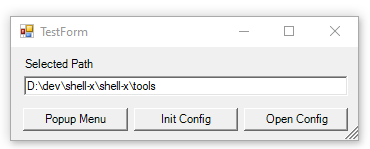
There is also an option (v1.4.0+) for testing the configuration outside of the Windows explorer
```
shell-x -test [path]
```
It is helpful for refining the mapping of the configuration to the selected item (path) actions.
## How it works
Shell-X maintains a global directory, whose file tree structure defines the complex context menu tree to be displayed at runtime on right click.
The root folders are named according to the file extension that the context menu is for. Thus the folder `txt` contains context menu definition for all text files, and the `dll` folder is for all DLLs. There are special folder names:
- `[any]` that defines the context menu for any selected file or folder.
- `[folder]` that defines the context menu for any selected folder.
- `[file]` that defines the context menu for any selected file.
**Note A**, if you want multiple extension files to be handled the same way (by a single handler) you can achieve this by naming the special folder with the comma-separated extension names enclosed in the square brackets. IE for menu item associated with editing JPEG and BMP Files the folder name should be `[jpeg,bmp]`:
**Note B** All special folders have their name enclosed in square brackets (e.g. `[any]` or `[txt,md]`) and all folders for specific file extension have their names exactly matching the extension text (e.g. `txt`).

Below is an example of the configuration for for text files (`txt` file extension).

This is how the menu for text files looks at runtime.

In the example above the context menu for txt files has a complex structure containing sub-menus for opening the selected file with Notepad and other file handling operations.
The content of _00.Notepad.cmd_ file is an ordinary batch file content:
```
notepad.exe %*
```
Since the menu items are composed according to the configuration folder file structure naming the files it is vital the proper naming convention is followed:
* File name
```
<two_digits_order_prefix>.<menu_item_name>[.c][.ms].<cmd|bat|ps1>
```
* By default the batch file is executed with the console window hidden. If you prefer console being visible include `.c` suffix before the batch file extension.
* `.ms` in the file name has special meaning. It indicates that the batch file supports a multi-select scenario. Thus if multiple files are selected and executed against the shell extension menu item then every file will be executed in its own process of the corresponding batch file. Otherwise, by default, all files are passed to a single batch file.
* If you want the menu item to have the icon then place the icon file in the same folder where the corresponding batch file is and give it the same file name as the batch file but with the _".ico"_ extension:
```
05.Shell-X configure.cmd
05.Shell-X configure.ico
```
Note, you can use wild card expression as the folder name that encodes the pattern for the file name (of the file that is right-clicked).
However, since the wild card characters are prohibited by the file system you will need to use special characters that look like the special wild card characters but are in fact special Unicode characters that are safe to use as folder names:
```C#
// The Unicode characters that look like ? and * but still allowed in dir and file names
string safeQuestionMark = "?";
string safeAsterisk = "⁎";
```
Simply copy the characters from this description, compose the desired pattern in the text editor and then paste the pattern in the file explorer as a folder name.
Thus your desired pattern for files cmn.ar.00, cmn.ar.01,. . .
will look like this: ⁎.ar.⁎.
## Naming Convention
The naming convention for configuration folders:
- `<extension>`<br>
Any selected file, whose extension is the same as the name of the folder (e.g. `txt`).
- `[any]`<br>
Any selected path
- `[file]`<br>
Any selected file
- `[folder]`<br>
Any selected folder
- `[<extension1>,<extension2>,..<extensionN>]`<br>
A selected file, whose extension is one of the comma-delimited values in the folder name (e.g. `[png,bmp,jpeg]`).
## Limitations
* When the user right-clicks a file and the plugin is loaded for the very first time there is a noticeable delay (~3-5 seconds) before the menu pops up. This is a Windows Explorer one-off limitation and any subsequent right-clicks bring the context menu instantly.
* Be aware of the problems caused by the excessive number of selected files. Windows limits the number of files that can be selected for shell extension or batch operations: https://learn.microsoft.com/en-us/troubleshoot/windows-client/shell-experience/command-line-string-limitation<br>
If you configure a custom application to receive the explorer selection input that can exceed the size limt for starting the process with CLI command line (e.g. see #34) then you can specify in the cmd file (cmd/bat/ps1) the environment variable `ARGS_FILE` that will be set at runtime to the path to the temporary file containing list of all arguments that you can read from the application invoked by the shell extension. Passing normal arguments to your command script will be suppressed to avoid the excessive-arguments exception.
IE:
- **cmd/bat**:
*00.TestLongSelection.cmd (00.TestLongSelection.bat)*
```ps1
my_app.exe %ARGS_FILE%
```
- **ps1**:
*00.TestLongSelection.ps1*
```ps1
# Expand the environment variable
$argsFilePath = [Environment]::ExpandEnvironmentVariables("%ARGS_FILE%")
# Check if the file exists
if (-not (Test-Path $argsFilePath)) {
Write-Error "File not found: $argsFilePath"
exit 1
}
# Read and print every line
Get-Content $argsFilePath | ForEach-Object {
Write-Output $_
}
```
================================================
FILE: shell-x/GenericExtensions.cs
================================================
using System;
using System.Collections.Generic;
using System.Drawing;
using System.IO;
using System.Linq;
using System.Reflection;
using System.Runtime.InteropServices;
using System.Text;
using System.Text.RegularExpressions;
using System.Windows.Forms;
using ShellX;
static class DSLExtensions
{
public static string ExpandEnvars(this string text) => Environment.ExpandEnvironmentVariables(text);
public static string EnsureDirectory(this string dir)
{
Directory.CreateDirectory(dir); return dir;
}
public static bool ContainsAny<T>(this IEnumerable<T> items, params T[] patterns)
=> patterns.Any(x => items.Contains(x));
public static bool IsRegeiteredComServer(this Type type)
{
var registered = false;
try
{
Type comType = Type.GetTypeFromCLSID(type.GUID);
object instance = Activator.CreateInstance(comType);
registered = true;
}
catch { }
return registered;
}
public static string[][] ParseMultipleExt(this string[] items)
{
return items.Select(x => !Globals.IsSpecialFolder(x) && x.StartsWith("[") && x.EndsWith("]") ? x.Substring(1, x.Length - 2).Split(',') : null).Where(x => x != null).ToArray();
}
public static bool Matching(this string text, string pattern, bool ignoreCase = true)
=> string.Compare(text, pattern, ignoreCase) == 0;
public static bool MatchingAsExpression(this string text, string rawPattern, bool ignoreCase = true)
{
string safeQuestionMark = "?"; // The unicode characters that look like ? and * but still allowed in dir and file names
string safeAsterisk = "⁎";
if (rawPattern.IndexOfAny((safeQuestionMark + safeAsterisk).ToArray()) != -1)
{
var pattern = rawPattern.Replace(safeQuestionMark, "?").Replace(safeAsterisk, "*");
var wildcard = new Regex(pattern.ConvertSimpleExpToRegExp(), ignoreCase ? RegexOptions.IgnoreCase : RegexOptions.None);
return wildcard.IsMatch(text);
}
return false;
}
internal static bool EndsWithAny(this string text, params string[] patterns)
=> patterns.Any(x => text.EndsWith(x, StringComparison.OrdinalIgnoreCase));
public static string GetPath(this Environment.SpecialFolder folder) => Environment.GetFolderPath(folder);
public static string PathJoin(this string path, params string[] paths)
=> Path.Combine(new[] { path }.Concat(paths).ToArray());
public static IEnumerable<T> ForEach<T>(this IEnumerable<T> collection, Action<T> action)
{
foreach (var item in collection)
action(item);
return collection;
}
public static string GetTitle(this Assembly assembly) => assembly.GetCustomAttribute<AssemblyTitleAttribute>()?.Title;
public static bool IsDir(this string path) => File.GetAttributes(path).HasFlag(FileAttributes.Directory);
public static bool IsFile(this string path) => !path.IsDir();
public static string ToArgumentsString(this IEnumerable<string> args) => string.Join(" ", args.Select(x => $"\"{x}\"").ToArray());
public static string GetDirName(this string path) => Path.GetDirectoryName(path);
public static string GetFileName(this string path) => Path.GetFileName(path);
public static string GetExtension(this string path) => Path.GetExtension(path);
public static void Save(this Icon icon, string file)
{
using (var fs = new FileStream(file, FileMode.Create))
icon.Save(fs);
}
public static string ChangeExtensionTo(this string path, string newExtension) => Path.ChangeExtension(path, newExtension);
public static string ToFileMenuText(this string path) => path.GetFileName()
.Split(new[] { '.' }, 2)
.Last()
.Replace(".c.", ".")
.Replace(".ms.", ".")
.Replace(".cmd", "")
.Replace(".bat", "")
.Replace(".ps1", "");
public static string ToDirMenuText(this string path) => path.GetFileName().Split(new[] { '.' }, 2).Last();
public static int FromLogicalToPhysical(this int logicalHeight, float dpiY)
{
float scalingFactor = dpiY / 96f;
float physicalHeight = logicalHeight * scalingFactor;
return (int)physicalHeight;
}
[DllImport("user32.dll")]
static extern uint GetDpiForSystem();
[DllImport("user32.dll")]
static extern IntPtr GetForegroundWindow();
[DllImport("user32.dll")]
static extern uint GetDpiForWindow(IntPtr hWnd);
[DllImport("kernel32.dll")]
private static extern IntPtr GetModuleHandle(string lpModuleName);
[DllImport("kernel32.dll", CharSet = CharSet.Ansi)]
private static extern IntPtr GetProcAddress(IntPtr hModule, string procName);
public static float GetCurrentDpi(this ToolStripItem item)
{
// cannot use CreateGraphics since there is no owner window, so using interop to get the system DPI
IntPtr user32 = GetModuleHandle("user32.dll");
IntPtr proc = GetProcAddress(user32, "GetDpiForWindow");
if (proc == IntPtr.Zero)
{
// Fallback to system DPI
return GetDpiForSystem();
}
else
{
// Per-monitor DPI
IntPtr hwnd = GetForegroundWindow();
return GetDpiForWindow(hwnd);
}
// float dpiY = 96f; // Default DPI
// if (item.Owner != null)
// {
// using (Graphics g = item.Owner.CreateGraphics())
// {
// dpiY = g.DpiY;
// }
// }
// else if (item.OwnerItem != null && item.OwnerItem.Owner != null)
// {
// using (Graphics g = item.OwnerItem.Owner.CreateGraphics())
// {
// dpiY = g.DpiY;
// }
// }
// return dpiY;
}
public static int ToStandardIconSize(this int customSize)
{
var standardSizes = new[] { 16, 32, 48, 256 };
return standardSizes.OrderBy(x => Math.Abs((long)x - customSize)).First();
}
public static string GetFileNameWithoutExtension(this string path) => Path.GetFileNameWithoutExtension(path);
//Credit to MDbg team: https://github.com/SymbolSource/Microsoft.Samples.Debugging/blob/master/src/debugger/mdbg/mdbgCommands.cs
public static string ConvertSimpleExpToRegExp(this string simpleExp)
{
//
// string pattern = ConvertSimpleExpToRegExp();
// var wildcard = new Regex(pattern, RegexOptions.IgnoreCase);
// if (wildcard.IsMatch(dir))
// //
var sb = new StringBuilder();
sb.Append("^");
foreach (char c in simpleExp)
{
switch (c)
{
case '\\':
case '{':
case '|':
case '+':
case '[':
case '(':
case ')':
case '^':
case '$':
case '.':
case '#':
case ' ':
sb.Append('\\').Append(c);
break;
case '*':
sb.Append(".*");
break;
case '?':
sb.Append(".");
break;
default:
sb.Append(c);
break;
}
}
sb.Append("$");
return sb.ToString();
}
}
public static class CLIExtensions
{
public static string TrimMatchingQuotes(this string input, char quote)
{
if (input.Length >= 2)
{
//"-sconfig:My Script.cs.config"
if (input.First() == quote && input.Last() == quote)
{
return input.Substring(1, input.Length - 2);
}
//-sconfig:"My Script.cs.config"
else if (input.Last() == quote)
{
var firstQuote = input.IndexOf(quote);
if (firstQuote != input.Length - 1) //not the last one
return input.Substring(0, firstQuote) + input.Substring(firstQuote + 1, input.Length - 2 - firstQuote);
}
}
return input;
}
public static IEnumerable<string> Split(this string str, Func<char, bool> controller)
{
int nextPiece = 0;
for (int c = 0; c < str.Length; c++)
{
if (controller(str[c]))
{
yield return str.Substring(nextPiece, c - nextPiece);
nextPiece = c + 1;
}
}
yield return str.Substring(nextPiece);
}
public static string[] SplitCommandLine(this string commandLine)
{
bool inQuotes = false;
bool isEscaping = false;
return commandLine.Split(c =>
{
if (c == '\\' && !isEscaping) { isEscaping = true; return false; }
if (c == '\"' && !isEscaping)
inQuotes = !inQuotes;
isEscaping = false;
return !inQuotes && Char.IsWhiteSpace(c)/*c == ' '*/;
})
.Select(arg => arg.Trim().TrimMatchingQuotes('\"').Replace("\\\"", "\""))
.Where(arg => !string.IsNullOrEmpty(arg))
.ToArray();
}
}
class ExplorerStub
{
public static int Test(string path)
{
TestForm.Show(path);
return 0;
}
}
================================================
FILE: shell-x/Program.cs
================================================
using System;
using System.Collections.Generic;
using System.Diagnostics;
using System.Drawing;
using System.Drawing.Drawing2D;
using System.Drawing.Imaging;
using static System.Environment;
using System.IO;
using System.Linq;
using System.Reflection;
using System.Runtime.InteropServices;
using System.Text;
using System.Text.RegularExpressions;
using System.Threading.Tasks;
using System.Windows.Forms;
using static System.Windows.Forms.VisualStyles.VisualStyleElement;
using SharpShell;
using SharpShell.Attributes;
using SharpShell.SharpContextMenu;
using ShellX;
class App
{
public static int Main(string[] args)
{
if (args.Contains("-open"))
{
Console.WriteLine($"Opening config directory: '{ConfigDir}'");
Process.Start("explorer", $"\"{ConfigDir}\"");
}
else if (args.ContainsAny("-init"))
{
var dir = ConfigDir.PathJoin("txt", "01.=== Shell-X for .txt file ===").EnsureDirectory();
File.WriteAllText(dir.PathJoin("..", "00.separator"), "");
File.WriteAllText(dir.PathJoin("..", "02.separator"), "");
File.WriteAllText(dir.PathJoin("00.Notepad.cmd"), "notepad.exe %*");
File.WriteAllText(dir.PathJoin("01.Notepad++.cmd"), "notepad++.exe %*");
File.WriteAllText(dir.PathJoin("02.separator"), "");
File.WriteAllText(dir.PathJoin("03.Show Info.c.cmd"), $"dir %*{NewLine}pause");
File.WriteAllText(dir.PathJoin("03.Show Path.c.ps1"), $"Write-Host \"File: $($args[0])\" \n" +
$"Write-Host -NoNewLine 'Press any key to continue...'; " +
$"$null = $Host.UI.RawUI.ReadKey('NoEcho,IncludeKeyDown');");
File.WriteAllText(dir.PathJoin("04.separator"), "");
File.WriteAllText(dir.PathJoin("05.Shell-X configure.cmd"), $"explorer \"{ConfigDir}\"");
Resources.logo.Save(dir.PathJoin("05.Shell-X configure.ico"));
dir = ConfigDir.PathJoin(Globals.AnyPath).EnsureDirectory();
File.WriteAllText(dir.PathJoin("01.Shell-X configure.cmd"), $"explorer \"{ConfigDir}\"");
Resources.logo.Save(dir.PathJoin("01.Shell-X configure.ico"));
dir = ConfigDir.PathJoin("txt");
Console.WriteLine($"Configured context menu for '*.*' and '*.txt' files: '{ConfigDir}'");
if (!args.ContainsAny("-noui"))
Process.Start("explorer", $"\"{ConfigDir}\"");
}
else if (args.ContainsAny("-test"))
{
return ExplorerStub.Test(args.Where(x => x != "-test").FirstOrDefault());
}
else if (args.ContainsAny("-register", "-r"))
{
return Regasm.Register(Assembly.GetExecutingAssembly().Location, Is64BitOperatingSystem) ? 0 : -1;
}
else if (args.ContainsAny("-unregister", "-u"))
{
return Regasm.Unregister(Assembly.GetExecutingAssembly().Location, Is64BitOperatingSystem) ? 0 : -1;
}
else
{
var serverType = typeof(DynamicContextMenuExtension);
string cpuType = Environment.Is64BitProcess ? "x64" : "x32";
Console.WriteLine($"Dynamic context menu manager. Version {Assembly.GetExecutingAssembly().GetName().Version}");
Console.WriteLine($"Copyright (C) 2019-2020 Oleg Shilo (github.com/oleg-shilo/shell-x)");
Console.WriteLine();
Console.WriteLine("==================================================================");
Console.WriteLine($" Config directory: {ConfigDir}");
Console.WriteLine($" Shell Extension server: {serverType.GUID}");
Console.WriteLine($" Registered ({cpuType}): {serverType.IsRegeiteredComServer()}");
Console.WriteLine("==================================================================");
// Console.WriteLine("-----------------------");
Console.WriteLine();
Console.WriteLine($"Options:");
Console.WriteLine($" -open Opens configuration folder.");
Console.WriteLine($" You can edit the context menus by changing the content of this folder");
Console.WriteLine($" -init Creates the sample configuration (e.g. for *.txt files).");
Console.WriteLine($" -test <path> Creates the context menu for a given path and shows it without the need to " +
$" interact with the explorer.");
Console.WriteLine($" -register|-r Registers shell extension server");
Console.WriteLine($" -unregister|-u Unregisters shell extension server");
Console.WriteLine("-----------------------");
Console.WriteLine();
Console.WriteLine($"The naming convention for configuration folders:");
Console.WriteLine($"Read more at https://github.com/oleg-shilo/shell-x/blob/master/README.md#how-it-works");
Console.WriteLine("");
Console.WriteLine($"- <extension>");
Console.WriteLine($" Any selected file, whose extension is the same as the name of the folder (e.g. `txt`).");
Console.WriteLine($"- [any]");
Console.WriteLine($" Any selected path");
Console.WriteLine($"- [file]");
Console.WriteLine($" Any selected file");
Console.WriteLine($"- [folder]");
Console.WriteLine($" Any selected folder");
Console.WriteLine($"- [<extension1>,<extension2>,..<extensionN>]");
Console.WriteLine($" A selected file, whose extension is one of the comma-delimited values in the folder " +
$"name (e.g. `[png,bmp,jpeg]`).");
}
return 0;
}
static public string Name = Assembly.GetExecutingAssembly().GetTitle();
static public string ConfigDir => SpecialFolder.ApplicationData
.GetPath()
.PathJoin(Name.ToLower())
.EnsureDirectory();
}
public class ExplorerSelectionStub
{
DynamicContextMenuExtension extension = new DynamicContextMenuExtension();
public ExplorerSelectionStub(params string[] selection)
{
SetItemPaths(selection.ToList());
}
public void SetItemPaths(List<string> selection)
{
var field = typeof(ShellExtInitServer).GetField("selectedItemPaths", BindingFlags.NonPublic | BindingFlags.Instance);
var paths = (List<string>)field.GetValue(extension);
paths.AddRange(selection);
}
public bool CanShowMenu()
{
var result = (bool)
extension.GetType()
.GetMethod("CanShowMenu", BindingFlags.NonPublic | BindingFlags.Instance)
.Invoke(extension, new object[0]);
return result;
}
public ContextMenuStrip CreateMenu()
{
var result = (ContextMenuStrip)
extension.GetType()
.GetMethod("CreateMenu", BindingFlags.NonPublic | BindingFlags.Instance)
.Invoke(extension, new object[0]);
return result;
}
}
class Globals
{
public const string AnyPath = "[any]";
public const string AnyFile = "[file]";
public const string AnyFolder = "[folder]";
public static bool IsSpecialFolder(string path)
=> path.Matching(AnyPath) || path.Matching(AnyFile) || path.Matching(AnyFolder);
}
[ComVisible(true)]
// [COMServerAssociation(AssociationType.ClassOfExtension, ".dll", ".txt", ".cs")]
[COMServerAssociation(AssociationType.AllFiles)]
[COMServerAssociation(AssociationType.DirectoryBackground)]
[COMServerAssociation(AssociationType.Folder)]
public class DynamicContextMenuExtension : SharpContextMenu
{
static int lastPopupTime = 0;
protected override bool CanShowMenu()
{
// Debug.Assert(true);
// MessageBox.Show("CanShowMenu", Process.GetCurrentProcess().Id.ToString());
if ((Environment.TickCount - lastPopupTime) < 1000)
{
Debug.WriteLine("Ignoring duplicate query");
return false; // the query is executed twice if the clicked item is a folder on the folder tree. so exit to avoid duplication
}
lastPopupTime = Environment.TickCount;
#if DEBUG
Debug.WriteLine("--------------------");
Debug.WriteLine("this.SelectedItemPaths.Count: " + this.SelectedItemPaths.Count());
Debug.WriteLine("this.FolderPath: " + this.FolderPath);
Debug.WriteLine("ConfiguredFileExtensions: " + String.Join(", ", this.ConfiguredFileExtensions));
Debug.WriteLine("Configured Multi File Extensions: " + String.Join(", ", new DynamicContextMenuExtension().ConfiguredFileExtensions.ParseMultipleExt().Select(x => "group(" + String.Join(", ", x) + ")")));
Debug.WriteLine("--------------------");
#endif
bool result;
if (this.SelectedItemPaths.Count() == 1)
{
// Debug.Assert(false);
var path = this.SelectedItemPaths.First();
// Debug.Assert(false, "file/folder\n" + path);
var ext = Path.GetExtension(path).Replace(".", "");
result =
Directory.Exists(path) || // always allow for folders as it is the only way to invoke shell-x config (single menu item)
ConfiguredFileExtensions.Any(x => x.Matching(ext)) ||
ConfiguredFileExtensions.Any(x => Path.GetFileName(path).MatchingAsExpression(x)) ||
ConfiguredFileExtensions.Any(x => x.Matching(Globals.AnyPath)) ||
(ConfiguredFileExtensions.Any(x => x.Matching(Globals.AnyFile)) && path.IsFile()) ||
(ConfiguredFileExtensions.Any(x => x.Matching(Globals.AnyFolder)) && path.IsDir()) ||
ConfiguredFileExtensions.ParseMultipleExt().Any(x => x != null ? x.Any(e => e.Matching(ext)) : false);
}
else
{
var extensions = ConfiguredFileExtensions.SelectMany(x =>
{
if (x.StartsWith("[") && x.EndsWith("]") && x.Contains(","))
return x.Substring(1, x.Length - 2).Split(',');
else
return new[] { x };
});
foreach (string item in extensions)
{
var ext = "." + item;
if (this.SelectedItemPaths.All(x => x.EndsWith(ext, StringComparison.OrdinalIgnoreCase)))
{
result = true;
break;
}
}
if (this.SelectedItemPaths.Any())
result = ConfiguredFileExtensions.Any(x => x.Matching(Globals.AnyPath));
else
result = ConfiguredFileExtensions.Any(x => x.Matching(Globals.AnyFolder));
}
Debug.WriteLine("CanShowMenu: " + result);
return result;
}
protected override ContextMenuStrip CreateMenu()
{
// if we are here then every selected item is guaranteed to:
// - have an extension
// - all extensions are the same
// - extension is configured for having context menu
// Debug.Assert(false);
var selectedItemPaths = new List<string>(this.SelectedItemPaths);
if (!selectedItemPaths.Any() && this.FolderPath.Any())
selectedItemPaths.Add(this.FolderPath);
var configDir = GetConfigDirFor(selectedItemPaths.First());
var items = BuildMenuFrom(configDir, selectedItemPaths.ToArgumentsString());
try
{
if (ConfiguredFileExtensions.Any(x => x.Matching(Globals.AnyPath)))
{
var extraItems = BuildMenuFrom(GetConfigDirForAny(), selectedItemPaths.ToArgumentsString());
items = items.Concat(extraItems).ToArray();
}
if (ConfiguredFileExtensions.Any(x => x.Matching("[file]")) && selectedItemPaths[0].IsFile())
{
var extraItems = BuildMenuFrom(GetConfigDirByPath("[file]"), selectedItemPaths.ToArgumentsString());
items = items.Concat(extraItems).ToArray();
}
var multiItemConfiguredFileExt = ConfiguredFileExtensions.ParseMultipleExt().Where(x => x.Any(xe => selectedItemPaths.All(e => Path.GetExtension(e)?.Matching(xe) != null)));
if (multiItemConfiguredFileExt.Count() > 0)
{
multiItemConfiguredFileExt.ForEach(extList =>
{
if (selectedItemPaths.All(File.Exists)) // all files, not dirs
{
var configuredExtensions = extList.Select(x => x.ToLower()).ToArray(); // ensure matching is case-insensitive
bool selectedExtensionIsConfigured = selectedItemPaths.Select(Path.GetExtension) // .ext
.Select(x => x.TrimStart('.').ToLower()) // ext
.All(x => configuredExtensions.Contains(x)); // present in the configured extensions
if (selectedExtensionIsConfigured)
{
var extraItems = BuildMenuFrom(GetConfigDirByPath("[" + string.Join(",", extList) + "]"), selectedItemPaths.ToArgumentsString());
items = items.Concat(extraItems).ToArray();
}
}
});
}
}
catch { }
var menu = new ContextMenuStrip();
menu.Items.AddRange(items);
DisposeLastMenu();
lastOpenedMenu = menu;
return menu;
}
static ContextMenuStrip lastOpenedMenu;
void DisposeLastMenu()
{
if (lastOpenedMenu != null)
{
foreach (var item in lastOpenedMenu.Items.OfType<ToolStripMenuItem>())
{
try
{
var img = item.Image;
item.Image = null;
img?.Dispose();
}
catch { }
}
lastOpenedMenu.Close();
lastOpenedMenu.Dispose();
}
}
static Image LookupImageFor(string path)
{
return LookupImageFor(path, ".ico") ??
LookupImageFor(path, ".png") ??
LookupImageFor(path, ".gif");
}
static Image LookupImageFor(string path, string imgExtension)
{
var imgFile = path.IsDir() ?
path + imgExtension :
path.ChangeExtensionTo(imgExtension);
var img = File.Exists(imgFile) ? imgFile.ReadImage() : null;
return img;
}
internal static ToolStripItem[] BuildMenuFrom(string configDir, string invokeArguments)
{
var menus = new List<ToolStripItem>();
var dirsToProcess = new Queue<BuildItem>();
dirsToProcess.Enqueue(new BuildItem { AddItem = menus.Add, dir = configDir });
while (dirsToProcess.Any())
{
BuildItem current = dirsToProcess.Dequeue();
if (!Directory.Exists(current.dir))
continue;
var items = Directory.GetFiles(current.dir)
.Concat(Directory.GetDirectories(current.dir))
.OrderBy(Path.GetFileName);
foreach (var item in items)
{
if (item.IsDir())
{
var parentMenu = new ToolStripMenuItem
{
Text = item.ToDirMenuText(),
Image = LookupImageFor(item)
};
try
{
var dpi = parentMenu.GetCurrentDpi();
var size = parentMenu.ContentRectangle.Height
.FromLogicalToPhysical(dpi)
.ToStandardIconSize();
parentMenu.Image = parentMenu.Image?.Resize(size, size);
}
catch { }
current.AddItem(parentMenu);
dirsToProcess.Enqueue(new BuildItem
{
AddItem = x => parentMenu.DropDownItems.Add(x),
dir = item
});
}
else
{
if (item.EndsWithAny(".separator"))
{
current.AddItem(new ToolStripSeparator());
}
else if (item.EndsWithAny(".cmd", ".bat", ".ps1"))
{
var menu = new ToolStripMenuItem
{
Text = item.ToFileMenuText(),
Image = LookupImageFor(item)
};
try
{
var dpi = menu.GetCurrentDpi();
var size = menu.ContentRectangle.Height
.FromLogicalToPhysical(dpi)
.ToStandardIconSize();
menu.Image = menu.Image?.Resize(size, size);
}
catch { }
menu.Click += (s, e) =>
{
Execute(item, invokeArguments);
};
current.AddItem(menu);
}
}
}
}
return menus.ToArray();
}
public static void Cleanup()
{
try
{
var except = Process.GetCurrentProcess().Id.ToString();
Directory.GetFiles(App.ConfigDir.PathJoin(".run").EnsureDirectory(), "*.*.ps1")
.Select(x => new { path = x, pid = x.GetFileName().Split('.').First() })
.Where(x => x.pid != except)
.ToList()
.ForEach(x =>
{
try
{
File.Delete(x.path);
}
catch { }
});
}
catch { }
}
public static string CloneScript(string script)
{
var hash = (Path.GetFullPath(script) + File.GetLastWriteTimeUtc(script)).GetHashCode();
var clone = App.ConfigDir.PathJoin(".run")
.EnsureDirectory()
.PathJoin($"{Process.GetCurrentProcess().Id}.{hash}.ps1");
if (!File.Exists(clone))
{
var content = File.ReadAllBytes(script);
File.WriteAllBytes(clone, content);
}
return clone;
}
static bool ReferencesArgsFileEnvVar(string filePath)
{
try
{
if (string.IsNullOrWhiteSpace(filePath) || !File.Exists(filePath))
return false;
var ext = Path.GetExtension(filePath);
bool isCmd = ext.Equals(".cmd", StringComparison.OrdinalIgnoreCase) ||
ext.Equals(".bat", StringComparison.OrdinalIgnoreCase);
bool isPs1 = ext.Equals(".ps1", StringComparison.OrdinalIgnoreCase);
if (!isCmd && !isPs1)
return false;
var content = File.ReadAllText(filePath);
if (isCmd)
{
// %ARGS_FILE% or !ARGS_FILE!
return Regex.IsMatch(content, @"%ARGS_FILE%|!ARGS_FILE!", RegexOptions.IgnoreCase);
}
// PowerShell: $env:ARGS_FILE or ${env:ARGS_FILE} or %ARGS_FILE% (in case of using env var in the script without $env: prefix)
return Regex.IsMatch(content, @"\$env:ARGS_FILE|\$\{env:ARGS_FILE\|%ARGS_FILE%", RegexOptions.IgnoreCase);
}
catch
{
return false;
}
}
public static void Execute(string item, string invokeArguments)
{
lock (typeof(App))
{
// Debug.Assert(false);
bool showConsole = item.Contains(".c.");
bool handleMultiselect = item.Contains(".ms.");
bool isPS = item.EndsWithAny(".ps1");
var arguments = new List<string>();
arguments.AddRange(invokeArguments.SplitCommandLine());
arguments = arguments.Select(x => $"\"{x}\"").ToList();
if (!handleMultiselect)
arguments = new[] { string.Join(" ", arguments.ToArray()) }.ToList();
foreach (var arg in arguments)
{
try
{
var p = new Process();
p.StartInfo.WorkingDirectory = Path.GetDirectoryName(item);
p.StartInfo.FileName = item;
p.StartInfo.Arguments = arg;
p.StartInfo.UseShellExecute = false; // needed to allow setting envars fro the child process
if (isPS)
{
p.StartInfo.FileName = "powershell.exe";
p.StartInfo.Arguments = $"-File \"{item}\" {arg}";
}
// save arguments to temp file
var tempDir = Path.Combine(Path.GetTempPath(), "shell-x");
Directory.CreateDirectory(tempDir);
var tempFile = Path.Combine(tempDir, Path.GetRandomFileName() + ".args.txt");
File.WriteAllText(tempFile, p.StartInfo.Arguments ?? string.Empty);
if (ReferencesArgsFileEnvVar(p.StartInfo.FileName))
{
// arguments are passed through environment variable, so clear them to avoid duplication
p.StartInfo.Arguments = "";
}
if (showConsole)
{
// code below works very well though it unconditionally waits. Thus an orthodox execution
// is adequate particularly because it lets user to pause (with `pause` or with `$null = $Host.UI.RawUI.ReadKey('NoEcho,IncludeKeyDown')`)
// in the batch file or path through to the exit.
//
// if (item.EndsWithAny(".ps1"))
// {
// p.StartInfo.FileName = "cmd.exe";
// p.StartInfo.Arguments = $"/K powershell.exe -File \"\"{item}\"\" {arg}";
// }
// else
// {
// p.StartInfo.FileName = "cmd.exe";
// p.StartInfo.Arguments = $"/K \"\"{item}\"\" {arg}";
// }
}
else
{
p.StartInfo.UseShellExecute = false;
p.StartInfo.RedirectStandardOutput = true;
p.StartInfo.CreateNoWindow = true;
}
if (!p.StartInfo.UseShellExecute)
{
p.StartInfo.EnvironmentVariables["SHELLX.SCRIPTDIR"] = Path.GetDirectoryName(item);
p.StartInfo.EnvironmentVariables["ARGS_FILE"] = tempFile;
}
p.EnableRaisingEvents = true;
p.Exited += (s, e) =>
{
Task.Run(async () =>
{
await Task.Delay(5000);
try { File.Delete(tempFile); } catch { }
});
};
Debug.WriteLine($"Run: {p.StartInfo.FileName} {p.StartInfo.Arguments}");
p.Start();
}
catch (Exception ex)
{
MessageBox.Show($"Error: {ex}", App.Name);
}
;
Task.Run(Cleanup);
}
}
}
class BuildItem
{
public Action<ToolStripItem> AddItem;
public string dir;
}
#if DEBUG
public string[] ConfiguredFileExtensions
#else
string[] ConfiguredFileExtensions
#endif
=> Directory.GetDirectories(App.ConfigDir)
.Select(x => x.GetFileName()) // gets dir name only without the rest of the path
.ToArray();
string GetConfigDirFor(string file)
{
var dir = (Directory.Exists(file)) ? App.ConfigDir.PathJoin("[folder]") : App.ConfigDir.PathJoin(file.GetExtension().Replace(".", ""));
if (Directory.Exists(dir))
return dir;
var match = Directory
.GetDirectories(App.ConfigDir)
.Where(x => Path.GetFileName(file).MatchingAsExpression(Path.GetFileName(x)))
.FirstOrDefault();
return match;
}
string GetConfigDirForAny() => App.ConfigDir.PathJoin(Globals.AnyPath);
string GetConfigDirByPath(string dir) => App.ConfigDir.PathJoin(dir);
}
static class Utils
{
static Dictionary<string, Image> loadedImages = new Dictionary<string, Image>();
public static Image ReadImage(this string file)
{
var imageId = $"{file}{File.GetLastWriteTimeUtc(file).ToFileTimeUtc()}";
if (loadedImages.ContainsKey(imageId))
return loadedImages[imageId];
using (var ms = new MemoryStream(File.ReadAllBytes(file)))
{
Image image;
if (string.Compare(Path.GetExtension(file), ".ico", StringComparison.OrdinalIgnoreCase) == 0)
{
using (var temp = new Icon(ms))
image = temp.ToBitmap();
}
else
{
image = Image.FromStream(ms);
}
loadedImages[imageId] = image;
return image;
}
}
public static Bitmap Resize(this Image image, int width, int height)
{
var destRect = new Rectangle(0, 0, width, height);
var destImage = new Bitmap(width, height);
destImage.SetResolution(image.HorizontalResolution, image.VerticalResolution);
using (var graphics = Graphics.FromImage(destImage))
{
graphics.CompositingMode = CompositingMode.SourceCopy;
graphics.CompositingQuality = CompositingQuality.HighQuality;
graphics.InterpolationMode = InterpolationMode.HighQualityBicubic;
graphics.SmoothingMode = SmoothingMode.HighQuality;
graphics.PixelOffsetMode = PixelOffsetMode.HighQuality;
using (var wrapMode = new ImageAttributes())
{
wrapMode.SetWrapMode(WrapMode.TileFlipXY);
graphics.DrawImage(image, destRect, 0, 0, image.Width, image.Height, GraphicsUnit.Pixel, wrapMode);
}
}
return destImage;
}
}
================================================
FILE: shell-x/Properties/AssemblyInfo.cs
================================================
using System.Reflection;
using System.Runtime.CompilerServices;
using System.Runtime.InteropServices;
// General Information about an assembly is controlled through the following
// set of attributes. Change these attribute values to modify the information
// associated with an assembly.
[assembly: AssemblyTitle("Shell-X")]
[assembly: AssemblyDescription("")]
[assembly: AssemblyConfiguration("")]
[assembly: AssemblyCompany("")]
[assembly: AssemblyProduct("Shell-X")]
[assembly: AssemblyCopyright("Copyright © Oleg Shilo 2019-2024")]
[assembly: AssemblyTrademark("")]
[assembly: AssemblyCulture("")]
// Setting ComVisible to false makes the types in this assembly not visible
// to COM components. If you need to access a type in this assembly from
// COM, set the ComVisible attribute to true on that type.
[assembly: ComVisible(false)]
// The following GUID is for the ID of the typelib if this project is exposed to COM
[assembly: Guid("b80a4faa-4c08-4057-b9f0-57fd692be278")]
// Version information for an assembly consists of the following four values:
//
// Major Version
// Minor Version
// Build Number
// Revision
//
// You can specify all the values or you can default the Build and Revision Numbers
// by using the '*' as shown below:
// [assembly: AssemblyVersion("1.0.*")]
[assembly: AssemblyVersion("1.6.0.0")]
[assembly: AssemblyFileVersion("1.6.0.0")]
================================================
FILE: shell-x/Regasm.cs
================================================
using System;
using System.Diagnostics;
using System.IO;
using System.Linq;
using Microsoft.Win32;
using SharpShell.Extensions;
using SharpShell.ServerRegistration;
static class Regasm
{
public static Action<string> OnError = Console.WriteLine;
public static Action<string> OnOut;
static bool Run(string exe, string arguments)
{
var regasm = new Process
{
StartInfo =
{
FileName = exe,
Arguments = arguments,
UseShellExecute = false,
RedirectStandardOutput = true,
RedirectStandardError = true,
CreateNoWindow = true
}
};
regasm.Start();
regasm.WaitForExit();
if (regasm.ExitCode == 0)
OnOut?.Invoke(regasm.StandardOutput.ReadToEnd());
else
OnError?.Invoke(regasm.StandardError.ReadToEnd());
return regasm.ExitCode == 0;
}
public static bool Register(string assemblyPath, bool is64)
=> Run(GetRegasm(is64), $"/codebase \"{assemblyPath}\"");
public static bool Unregister(string assemblyPath, bool is64)
=> Run(GetRegasm(is64), $"/u \"{assemblyPath}\"");
static string GetRegasm(bool is64)
{
// C:\WINDOWS\Microsoft.Net\Framework\v1.1.4322\regasm.exe
// C:\WINDOWS\Microsoft.Net\Framework\v2.0.50727\regasm.exe
// C:\WINDOWS\Microsoft.Net\Framework\v4.0.30319\regasm.exe
var frameworkFolder = is64 ? "Framework64" : "Framework";
var searchRoot = Path.Combine("%WINDIR%", "Microsoft.Net", frameworkFolder).ExpandEnvars();
var path = Directory.GetDirectories(searchRoot, "v*")
.OrderByDescending(s => s)
.Select(c => c.PathJoin("regasm.exe"))
.FirstOrDefault(File.Exists);
if (path == null)
throw new InvalidOperationException($@"Failed to find regasm in '{searchRoot}\v*\regasm.exe'.");
return path;
}
}
public class ServerRegistration
{
public static bool IsExtensionApproved(Guid serverClsid, bool is64)
{
// Open the approved extensions key.
using (var approvedKey = RegistryKey.OpenBaseKey(RegistryHive.LocalMachine,
is64 ? RegistryView.Registry64 : RegistryView.Registry32)
.OpenSubKey(@"Software\Microsoft\Windows\CurrentVersion\Shell Extensions\Approved", RegistryKeyPermissionCheck.ReadSubTree))
{
// If we can't open the key, we're going to have problems.
if (approvedKey == null)
throw new InvalidOperationException("Failed to open the Approved Extensions key.");
return approvedKey.GetValueNames().Any(vn => vn.Equals(serverClsid.ToRegistryString(), StringComparison.OrdinalIgnoreCase));
}
}
// public static ShellExtensionRegistrationInfo GetServerRegistrationInfo(Guid serverCLSID, RegistrationType registrationType)
// {
// // We can very quickly check to see if the server is approved.
// bool serverApproved = IsExtensionApproved(serverCLSID, registrationType);
// // Open the classes.
// using (var classesKey = OpenClassesKey(registrationType, RegistryKeyPermissionCheck.ReadSubTree))
// {
// // Do we have a subkey for the server?
// using (var serverClassKey = classesKey.OpenSubKey(serverCLSID.ToRegistryString()))
// {
// // If there's no subkey, the server isn't registered.
// if (serverClassKey == null)
// return null;
// // Do we have an InProc32 server?
// using (var inproc32ServerKey = serverClassKey.OpenSubKey(KeyName_InProc32))
// {
// // If we do, we can return the server info for an inproc 32 server.
// if (inproc32ServerKey != null)
// {
// // Get the default value.
// var defaultValue = GetValueOrEmpty(inproc32ServerKey, null);
// // If we default value is null or empty, we've got a partially registered server.
// if (string.IsNullOrEmpty(defaultValue))
// return new ShellExtensionRegistrationInfo(ServerRegistationType.PartiallyRegistered, serverCLSID);
// // Get the threading model.
// var threadingModel = GetValueOrEmpty(inproc32ServerKey, KeyName_ThreadingModel);
// // Is it a .NET server?
// if (defaultValue == KeyValue_NetFrameworkServer)
// {
// // We've got a .NET server. We should have one subkey, with the assembly version.
// var subkeyName = inproc32ServerKey.GetSubKeyNames().FirstOrDefault();
// // If we have no subkey name, we've got a partially registered server.
// if (subkeyName == null)
// return new ShellExtensionRegistrationInfo(ServerRegistationType.PartiallyRegistered, serverCLSID);
// // Otherwise we now have the assembly version.
// var assemblyVersion = subkeyName;
// // Open the assembly subkey.
// using (var assemblySubkey = inproc32ServerKey.OpenSubKey(assemblyVersion))
// {
// // If we can't open the key, we've got a problem.
// if (assemblySubkey == null)
// throw new InvalidOperationException("Can't open the details of the server.");
// // Read the managed server details.
// var assembly = GetValueOrEmpty(assemblySubkey, KeyName_Assembly);
// var @class = GetValueOrEmpty(assemblySubkey, KeyName_Class);
// var runtimeVersion = GetValueOrEmpty(assemblySubkey, KeyName_RuntimeVersion);
// var codeBase = assemblySubkey.GetValue(KeyName_CodeBase, null);
// // Return the server info.
// return new ShellExtensionRegistrationInfo(ServerRegistationType.ManagedInProc32, serverCLSID)
// {
// ThreadingModel = threadingModel,
// Assembly = assembly,
// AssemblyVersion = assemblyVersion,
// Class = @class,
// RuntimeVersion = runtimeVersion,
// CodeBase = codeBase != null ? codeBase.ToString() : null,
// IsApproved = serverApproved
// };
// }
// }
// // We've got a native COM server.
// // Return the server info.
// return new ShellExtensionRegistrationInfo(ServerRegistationType.NativeInProc32, serverCLSID)
// {
// ThreadingModel = threadingModel,
// ServerPath = defaultValue,
// IsApproved = serverApproved
// };
// }
// }
// // If by this point we haven't return server info, we've got a partially registered server.
// return new ShellExtensionRegistrationInfo(ServerRegistationType.PartiallyRegistered, serverCLSID);
// }
}
================================================
FILE: shell-x/Resources.Designer.cs
================================================
//------------------------------------------------------------------------------
// <auto-generated>
// This code was generated by a tool.
// Runtime Version:4.0.30319.42000
//
// Changes to this file may cause incorrect behavior and will be lost if
// the code is regenerated.
// </auto-generated>
//------------------------------------------------------------------------------
namespace ShellX {
using System;
/// <summary>
/// A strongly-typed resource class, for looking up localized strings, etc.
/// </summary>
// This class was auto-generated by the StronglyTypedResourceBuilder
// class via a tool like ResGen or Visual Studio.
// To add or remove a member, edit your .ResX file then rerun ResGen
// with the /str option, or rebuild your VS project.
[global::System.CodeDom.Compiler.GeneratedCodeAttribute("System.Resources.Tools.StronglyTypedResourceBuilder", "15.0.0.0")]
[global::System.Diagnostics.DebuggerNonUserCodeAttribute()]
[global::System.Runtime.CompilerServices.CompilerGeneratedAttribute()]
internal class Resources {
private static global::System.Resources.ResourceManager resourceMan;
private static global::System.Globalization.CultureInfo resourceCulture;
[global::System.Diagnostics.CodeAnalysis.SuppressMessageAttribute("Microsoft.Performance", "CA1811:AvoidUncalledPrivateCode")]
internal Resources() {
}
/// <summary>
/// Returns the cached ResourceManager instance used by this class.
/// </summary>
[global::System.ComponentModel.EditorBrowsableAttribute(global::System.ComponentModel.EditorBrowsableState.Advanced)]
internal static global::System.Resources.ResourceManager ResourceManager {
get {
if (object.ReferenceEquals(resourceMan, null)) {
global::System.Resources.ResourceManager temp = new global::System.Resources.ResourceManager("ShellX.Resources", typeof(Resources).Assembly);
resourceMan = temp;
}
return resourceMan;
}
}
/// <summary>
/// Overrides the current thread's CurrentUICulture property for all
/// resource lookups using this strongly typed resource class.
/// </summary>
[global::System.ComponentModel.EditorBrowsableAttribute(global::System.ComponentModel.EditorBrowsableState.Advanced)]
internal static global::System.Globalization.CultureInfo Culture {
get {
return resourceCulture;
}
set {
resourceCulture = value;
}
}
/// <summary>
/// Looks up a localized resource of type System.Drawing.Icon similar to (Icon).
/// </summary>
internal static System.Drawing.Icon logo {
get {
object obj = ResourceManager.GetObject("logo", resourceCulture);
return ((System.Drawing.Icon)(obj));
}
}
}
}
================================================
FILE: shell-x/Resources.resx
================================================
<?xml version="1.0" encoding="utf-8"?>
<root>
<!--
Microsoft ResX Schema
Version 2.0
The primary goals of this format is to allow a simple XML format
that is mostly human readable. The generation and parsing of the
various data types are done through the TypeConverter classes
associated with the data types.
Example:
... ado.net/XML headers & schema ...
<resheader name="resmimetype">text/microsoft-resx</resheader>
<resheader name="version">2.0</resheader>
<resheader name="reader">System.Resources.ResXResourceReader, System.Windows.Forms, ...</resheader>
<resheader name="writer">System.Resources.ResXResourceWriter, System.Windows.Forms, ...</resheader>
<data name="Name1"><value>this is my long string</value><comment>this is a comment</comment></data>
<data name="Color1" type="System.Drawing.Color, System.Drawing">Blue</data>
<data name="Bitmap1" mimetype="application/x-microsoft.net.object.binary.base64">
<value>[base64 mime encoded serialized .NET Framework object]</value>
</data>
<data name="Icon1" type="System.Drawing.Icon, System.Drawing" mimetype="application/x-microsoft.net.object.bytearray.base64">
<value>[base64 mime encoded string representing a byte array form of the .NET Framework object]</value>
<comment>This is a comment</comment>
</data>
There are any number of "resheader" rows that contain simple
name/value pairs.
Each data row contains a name, and value. The row also contains a
type or mimetype. Type corresponds to a .NET class that support
text/value conversion through the TypeConverter architecture.
Classes that don't support this are serialized and stored with the
mimetype set.
The mimetype is used for serialized objects, and tells the
ResXResourceReader how to depersist the object. This is currently not
extensible. For a given mimetype the value must be set accordingly:
Note - application/x-microsoft.net.object.binary.base64 is the format
that the ResXResourceWriter will generate, however the reader can
read any of the formats listed below.
mimetype: application/x-microsoft.net.object.binary.base64
value : The object must be serialized with
: System.Runtime.Serialization.Formatters.Binary.BinaryFormatter
: and then encoded with base64 encoding.
mimetype: application/x-microsoft.net.object.soap.base64
value : The object must be serialized with
: System.Runtime.Serialization.Formatters.Soap.SoapFormatter
: and then encoded with base64 encoding.
mimetype: application/x-microsoft.net.object.bytearray.base64
value : The object must be serialized into a byte array
: using a System.ComponentModel.TypeConverter
: and then encoded with base64 encoding.
-->
<xsd:schema id="root" xmlns="" xmlns:xsd="http://www.w3.org/2001/XMLSchema" xmlns:msdata="urn:schemas-microsoft-com:xml-msdata">
<xsd:import namespace="http://www.w3.org/XML/1998/namespace" />
<xsd:element name="root" msdata:IsDataSet="true">
<xsd:complexType>
<xsd:choice maxOccurs="unbounded">
<xsd:element name="metadata">
<xsd:complexType>
<xsd:sequence>
<xsd:element name="value" type="xsd:string" minOccurs="0" />
</xsd:sequence>
<xsd:attribute name="name" use="required" type="xsd:string" />
<xsd:attribute name="type" type="xsd:string" />
<xsd:attribute name="mimetype" type="xsd:string" />
<xsd:attribute ref="xml:space" />
</xsd:complexType>
</xsd:element>
<xsd:element name="assembly">
<xsd:complexType>
<xsd:attribute name="alias" type="xsd:string" />
<xsd:attribute name="name" type="xsd:string" />
</xsd:complexType>
</xsd:element>
<xsd:element name="data">
<xsd:complexType>
<xsd:sequence>
<xsd:element name="value" type="xsd:string" minOccurs="0" msdata:Ordinal="1" />
<xsd:element name="comment" type="xsd:string" minOccurs="0" msdata:Ordinal="2" />
</xsd:sequence>
<xsd:attribute name="name" type="xsd:string" use="required" msdata:Ordinal="1" />
<xsd:attribute name="type" type="xsd:string" msdata:Ordinal="3" />
<xsd:attribute name="mimetype" type="xsd:string" msdata:Ordinal="4" />
<xsd:attribute ref="xml:space" />
</xsd:complexType>
</xsd:element>
<xsd:element name="resheader">
<xsd:complexType>
<xsd:sequence>
<xsd:element name="value" type="xsd:string" minOccurs="0" msdata:Ordinal="1" />
</xsd:sequence>
<xsd:attribute name="name" type="xsd:string" use="required" />
</xsd:complexType>
</xsd:element>
</xsd:choice>
</xsd:complexType>
</xsd:element>
</xsd:schema>
<resheader name="resmimetype">
<value>text/microsoft-resx</value>
</resheader>
<resheader name="version">
<value>2.0</value>
</resheader>
<resheader name="reader">
<value>System.Resources.ResXResourceReader, System.Windows.Forms, Version=4.0.0.0, Culture=neutral, PublicKeyToken=b77a5c561934e089</value>
</resheader>
<resheader name="writer">
<value>System.Resources.ResXResourceWriter, System.Windows.Forms, Version=4.0.0.0, Culture=neutral, PublicKeyToken=b77a5c561934e089</value>
</resheader>
<assembly alias="System.Windows.Forms" name="System.Windows.Forms, Version=4.0.0.0, Culture=neutral, PublicKeyToken=b77a5c561934e089" />
<data name="logo" type="System.Resources.ResXFileRef, System.Windows.Forms">
<value>logo.ico;System.Drawing.Icon, System.Drawing, Version=4.0.0.0, Culture=neutral, PublicKeyToken=b03f5f7f11d50a3a</value>
</data>
</root>
================================================
FILE: shell-x/TestForm.Designer.cs
================================================
namespace ShellX
{
partial class TestForm
{
/// <summary>
/// Required designer variable.
/// </summary>
private System.ComponentModel.IContainer components = null;
/// <summary>
/// Clean up any resources being used.
/// </summary>
/// <param name="disposing">true if managed resources should be disposed; otherwise, false.</param>
protected override void Dispose(bool disposing)
{
if (disposing && (components != null))
{
components.Dispose();
}
base.Dispose(disposing);
}
#region Windows Form Designer generated code
/// <summary>
/// Required method for Designer support - do not modify
/// the contents of this method with the code editor.
/// </summary>
private void InitializeComponent()
{
this.components = new System.ComponentModel.Container();
this.contextMenuStrip1 = new System.Windows.Forms.ContextMenuStrip(this.components);
this.button1 = new System.Windows.Forms.Button();
this.pathTextBox = new System.Windows.Forms.TextBox();
this.button2 = new System.Windows.Forms.Button();
this.button3 = new System.Windows.Forms.Button();
this.label1 = new System.Windows.Forms.Label();
this.selectionCount = new System.Windows.Forms.NumericUpDown();
this.label2 = new System.Windows.Forms.Label();
((System.ComponentModel.ISupportInitialize)(this.selectionCount)).BeginInit();
this.SuspendLayout();
//
// contextMenuStrip1
//
this.contextMenuStrip1.Name = "contextMenuStrip1";
this.contextMenuStrip1.Size = new System.Drawing.Size(61, 4);
//
// button1
//
this.button1.Location = new System.Drawing.Point(12, 61);
this.button1.Name = "button1";
this.button1.Size = new System.Drawing.Size(105, 23);
this.button1.TabIndex = 1;
this.button1.Text = "Popup Menu";
this.button1.UseVisualStyleBackColor = true;
this.button1.Click += new System.EventHandler(this.button1_Click);
//
// pathTextBox
//
this.pathTextBox.Location = new System.Drawing.Point(13, 29);
this.pathTextBox.Name = "pathTextBox";
this.pathTextBox.Size = new System.Drawing.Size(235, 20);
this.pathTextBox.TabIndex = 2;
this.pathTextBox.TextChanged += new System.EventHandler(this.pathTextBox_TextChanged);
//
// button2
//
this.button2.Location = new System.Drawing.Point(123, 61);
this.button2.Name = "button2";
this.button2.Size = new System.Drawing.Size(104, 23);
this.button2.TabIndex = 3;
this.button2.Text = "Init Config";
this.button2.UseVisualStyleBackColor = true;
this.button2.Click += new System.EventHandler(this.button2_Click);
//
// button3
//
this.button3.Location = new System.Drawing.Point(233, 61);
this.button3.Name = "button3";
this.button3.Size = new System.Drawing.Size(104, 23);
this.button3.TabIndex = 4;
this.button3.Text = "Open Config";
this.button3.UseVisualStyleBackColor = true;
this.button3.Click += new System.EventHandler(this.button3_Click);
//
// label1
//
this.label1.AutoSize = true;
this.label1.Location = new System.Drawing.Point(12, 10);
this.label1.Name = "label1";
this.label1.Size = new System.Drawing.Size(74, 13);
this.label1.TabIndex = 5;
this.label1.Text = "Selected Path";
//
// selectionCount
//
this.selectionCount.Location = new System.Drawing.Point(272, 29);
this.selectionCount.Maximum = new decimal(new int[] {
10000,
0,
0,
0});
this.selectionCount.Minimum = new decimal(new int[] {
1,
0,
0,
0});
this.selectionCount.Name = "selectionCount";
this.selectionCount.Size = new System.Drawing.Size(63, 20);
this.selectionCount.TabIndex = 6;
this.selectionCount.Value = new decimal(new int[] {
1,
0,
0,
0});
//
// label2
//
this.label2.AutoSize = true;
this.label2.Location = new System.Drawing.Point(254, 32);
this.label2.Name = "label2";
this.label2.Size = new System.Drawing.Size(12, 13);
this.label2.TabIndex = 7;
this.label2.Text = "x";
//
// TestForm
//
this.AutoScaleDimensions = new System.Drawing.SizeF(6F, 13F);
this.AutoScaleMode = System.Windows.Forms.AutoScaleMode.Font;
this.ClientSize = new System.Drawing.Size(347, 93);
this.Controls.Add(this.label2);
this.Controls.Add(this.selectionCount);
this.Controls.Add(this.label1);
this.Controls.Add(this.button3);
this.Controls.Add(this.button2);
this.Controls.Add(this.pathTextBox);
this.Controls.Add(this.button1);
this.Name = "TestForm";
this.StartPosition = System.Windows.Forms.FormStartPosition.CenterParent;
this.Text = "TestForm";
((System.ComponentModel.ISupportInitialize)(this.selectionCount)).EndInit();
this.ResumeLayout(false);
this.PerformLayout();
}
#endregion
private System.Windows.Forms.ContextMenuStrip contextMenuStrip1;
private System.Windows.Forms.Button button1;
private System.Windows.Forms.TextBox pathTextBox;
private System.Windows.Forms.Button button2;
private System.Windows.Forms.Button button3;
private System.Windows.Forms.Label label1;
private System.Windows.Forms.NumericUpDown selectionCount;
private System.Windows.Forms.Label label2;
}
}
================================================
FILE: shell-x/TestForm.cs
================================================
using System;
using System.Collections.Generic;
using System.ComponentModel;
using System.Data;
using System.Diagnostics;
using System.Drawing;
using System.IO;
using System.Linq;
using System.Text;
using System.Threading.Tasks;
using System.Windows.Forms;
namespace ShellX
{
public partial class TestForm : Form
{
public static void Show(string path)
{
new TestForm() { initialPath = path }.ShowDialog();
}
public TestForm()
{
InitializeComponent();
this.VisibleChanged += (s, e)
=> pathTextBox.Text = initialPath ?? Environment.CurrentDirectory;
}
string initialPath;
void Popup()
{
var selection = new List<string>();
for (int i = 0; i < selectionCount.Value; i++)
selection.Add(pathTextBox.Text);
var explorerSelction = new ExplorerSelectionStub(selection.ToArray());
if (!explorerSelction.CanShowMenu())
{
MessageBox.Show("No menu is configured for the specified path");
return;
}
var cm = explorerSelction.CreateMenu();
cm.Items.Add(new ToolStripSeparator());
var screen = Screen.FromPoint(Cursor.Position);
var left = screen.Bounds.X + screen.Bounds.Width / 2 - 200;
var top = screen.Bounds.Y + 150;
cm.Show(new Point(left, top));
cm.Focus();
}
void button1_Click(object sender, EventArgs e) => Popup();
void button2_Click(object sender, EventArgs e)
{
if (Directory.Exists(App.ConfigDir) && Directory.GetDirectories(App.ConfigDir).Any())
MessageBox.Show("Directory already exists and it is not empty.");
else
App.Main(new[] { "-init" });
}
void button3_Click(object sender, EventArgs e)
{
App.Main(new[] { "-open" });
}
private void pathTextBox_TextChanged(object sender, EventArgs e)
{
}
}
}
================================================
FILE: shell-x/TestForm.resx
================================================
<?xml version="1.0" encoding="utf-8"?>
<root>
<!--
Microsoft ResX Schema
Version 2.0
The primary goals of this format is to allow a simple XML format
that is mostly human readable. The generation and parsing of the
various data types are done through the TypeConverter classes
associated with the data types.
Example:
... ado.net/XML headers & schema ...
<resheader name="resmimetype">text/microsoft-resx</resheader>
<resheader name="version">2.0</resheader>
<resheader name="reader">System.Resources.ResXResourceReader, System.Windows.Forms, ...</resheader>
<resheader name="writer">System.Resources.ResXResourceWriter, System.Windows.Forms, ...</resheader>
<data name="Name1"><value>this is my long string</value><comment>this is a comment</comment></data>
<data name="Color1" type="System.Drawing.Color, System.Drawing">Blue</data>
<data name="Bitmap1" mimetype="application/x-microsoft.net.object.binary.base64">
<value>[base64 mime encoded serialized .NET Framework object]</value>
</data>
<data name="Icon1" type="System.Drawing.Icon, System.Drawing" mimetype="application/x-microsoft.net.object.bytearray.base64">
<value>[base64 mime encoded string representing a byte array form of the .NET Framework object]</value>
<comment>This is a comment</comment>
</data>
There are any number of "resheader" rows that contain simple
name/value pairs.
Each data row contains a name, and value. The row also contains a
type or mimetype. Type corresponds to a .NET class that support
text/value conversion through the TypeConverter architecture.
Classes that don't support this are serialized and stored with the
mimetype set.
The mimetype is used for serialized objects, and tells the
ResXResourceReader how to depersist the object. This is currently not
extensible. For a given mimetype the value must be set accordingly:
Note - application/x-microsoft.net.object.binary.base64 is the format
that the ResXResourceWriter will generate, however the reader can
read any of the formats listed below.
mimetype: application/x-microsoft.net.object.binary.base64
value : The object must be serialized with
: System.Runtime.Serialization.Formatters.Binary.BinaryFormatter
: and then encoded with base64 encoding.
mimetype: application/x-microsoft.net.object.soap.base64
value : The object must be serialized with
: System.Runtime.Serialization.Formatters.Soap.SoapFormatter
: and then encoded with base64 encoding.
mimetype: application/x-microsoft.net.object.bytearray.base64
value : The object must be serialized into a byte array
: using a System.ComponentModel.TypeConverter
: and then encoded with base64 encoding.
-->
<xsd:schema id="root" xmlns="" xmlns:xsd="http://www.w3.org/2001/XMLSchema" xmlns:msdata="urn:schemas-microsoft-com:xml-msdata">
<xsd:import namespace="http://www.w3.org/XML/1998/namespace" />
<xsd:element name="root" msdata:IsDataSet="true">
<xsd:complexType>
<xsd:choice maxOccurs="unbounded">
<xsd:element name="metadata">
<xsd:complexType>
<xsd:sequence>
<xsd:element name="value" type="xsd:string" minOccurs="0" />
</xsd:sequence>
<xsd:attribute name="name" use="required" type="xsd:string" />
<xsd:attribute name="type" type="xsd:string" />
<xsd:attribute name="mimetype" type="xsd:string" />
<xsd:attribute ref="xml:space" />
</xsd:complexType>
</xsd:element>
<xsd:element name="assembly">
<xsd:complexType>
<xsd:attribute name="alias" type="xsd:string" />
<xsd:attribute name="name" type="xsd:string" />
</xsd:complexType>
</xsd:element>
<xsd:element name="data">
<xsd:complexType>
<xsd:sequence>
<xsd:element name="value" type="xsd:string" minOccurs="0" msdata:Ordinal="1" />
<xsd:element name="comment" type="xsd:string" minOccurs="0" msdata:Ordinal="2" />
</xsd:sequence>
<xsd:attribute name="name" type="xsd:string" use="required" msdata:Ordinal="1" />
<xsd:attribute name="type" type="xsd:string" msdata:Ordinal="3" />
<xsd:attribute name="mimetype" type="xsd:string" msdata:Ordinal="4" />
<xsd:attribute ref="xml:space" />
</xsd:complexType>
</xsd:element>
<xsd:element name="resheader">
<xsd:complexType>
<xsd:sequence>
<xsd:element name="value" type="xsd:string" minOccurs="0" msdata:Ordinal="1" />
</xsd:sequence>
<xsd:attribute name="name" type="xsd:string" use="required" />
</xsd:complexType>
</xsd:element>
</xsd:choice>
</xsd:complexType>
</xsd:element>
</xsd:schema>
<resheader name="resmimetype">
<value>text/microsoft-resx</value>
</resheader>
<resheader name="version">
<value>2.0</value>
</resheader>
<resheader name="reader">
<value>System.Resources.ResXResourceReader, System.Windows.Forms, Version=4.0.0.0, Culture=neutral, PublicKeyToken=b77a5c561934e089</value>
</resheader>
<resheader name="writer">
<value>System.Resources.ResXResourceWriter, System.Windows.Forms, Version=4.0.0.0, Culture=neutral, PublicKeyToken=b77a5c561934e089</value>
</resheader>
<metadata name="contextMenuStrip1.TrayLocation" type="System.Drawing.Point, System.Drawing, Version=4.0.0.0, Culture=neutral, PublicKeyToken=b03f5f7f11d50a3a">
<value>17, 17</value>
</metadata>
</root>
================================================
FILE: shell-x/app.config
================================================
<?xml version="1.0" encoding="utf-8"?>
<configuration>
<runtime>
<assemblyBinding xmlns="urn:schemas-microsoft-com:asm.v1">
<dependentAssembly>
<assemblyIdentity name="SharpShell" publicKeyToken="f14dc899472fe6fb" culture="neutral" />
<bindingRedirect oldVersion="0.0.0.0-2.7.2.0" newVersion="2.7.2.0" />
</dependentAssembly>
</assemblyBinding>
</runtime>
</configuration>
================================================
FILE: shell-x/app.manifest
================================================
<?xml version="1.0" encoding="utf-8"?>
<assembly manifestVersion="1.0" xmlns="urn:schemas-microsoft-com:asm.v1">
<assemblyIdentity version="1.0.0.0" name="MyApplication.app" />
<trustInfo xmlns="urn:schemas-microsoft-com:asm.v2">
<security>
<requestedPrivileges xmlns="urn:schemas-microsoft-com:asm.v3">
<!-- UAC Manifest Options
If you want to change the Windows User Account Control level replace the
requestedExecutionLevel node with one of the following.
<requestedExecutionLevel level="asInvoker" uiAccess="false" />
<requestedExecutionLevel level="requireAdministrator" uiAccess="false" />
<requestedExecutionLevel level="highestAvailable" uiAccess="false" />
Specifying requestedExecutionLevel element will disable file and registry virtualization.
Remove this element if your application requires this virtualization for backwards
compatibility.
-->
<requestedExecutionLevel level="requireAdministrator" uiAccess="false" />
</requestedPrivileges>
</security>
</trustInfo>
<compatibility xmlns="urn:schemas-microsoft-com:compatibility.v1">
<application>
<!-- A list of the Windows versions that this application has been tested on
and is designed to work with. Uncomment the appropriate elements
and Windows will automatically select the most compatible environment. -->
<!-- Windows Vista -->
<!--<supportedOS Id="{e2011457-1546-43c5-a5fe-008deee3d3f0}" />-->
<!-- Windows 7 -->
<!--<supportedOS Id="{35138b9a-5d96-4fbd-8e2d-a2440225f93a}" />-->
<!-- Windows 8 -->
<!--<supportedOS Id="{4a2f28e3-53b9-4441-ba9c-d69d4a4a6e38}" />-->
<!-- Windows 8.1 -->
<!--<supportedOS Id="{1f676c76-80e1-4239-95bb-83d0f6d0da78}" />-->
<!-- Windows 10 -->
<!--<supportedOS Id="{8e0f7a12-bfb3-4fe8-b9a5-48fd50a15a9a}" />-->
</application>
</compatibility>
<!-- Indicates that the application is DPI-aware and will not be automatically scaled by Windows at higher
DPIs. Windows Presentation Foundation (WPF) applications are automatically DPI-aware and do not need
to opt in. Windows Forms applications targeting .NET Framework 4.6 that opt into this setting, should
also set the 'EnableWindowsFormsHighDpiAutoResizing' setting to 'true' in their app.config. -->
<application xmlns="urn:schemas-microsoft-com:asm.v3">
<windowsSettings>
<!--<dpiAware xmlns="http://schemas.microsoft.com/SMI/2005/WindowsSettings">true</dpiAware>-->
<dpiAwareness xmlns="http://schemas.microsoft.com/SMI/2016/WindowsSettings">PerMonitorV2</dpiAwareness>
</windowsSettings>
</application>
<!-- Enable themes for Windows common controls and dialogs (Windows XP and later) -->
<!--
<dependency>
<dependentAssembly>
<assemblyIdentity
type="win32"
name="Microsoft.Windows.Common-Controls"
version="6.0.0.0"
processorArchitecture="*"
publicKeyToken="6595b64144ccf1df"
language="*" />
</dependentAssembly>
</dependency>
-->
</assembly>
================================================
FILE: shell-x/packages.config
================================================
<?xml version="1.0" encoding="utf-8"?>
<packages>
<package id="ServerRegistrationManager" version="2.7.2" targetFramework="net461" />
<package id="SharpShell" version="2.7.2" targetFramework="net461" />
</packages>
================================================
FILE: shell-x/shell-x.csproj
================================================
<?xml version="1.0" encoding="utf-8"?>
<Project ToolsVersion="15.0" xmlns="http://schemas.microsoft.com/developer/msbuild/2003">
<Import Project="$(MSBuildExtensionsPath)\$(MSBuildToolsVersion)\Microsoft.Common.props" Condition="Exists('$(MSBuildExtensionsPath)\$(MSBuildToolsVersion)\Microsoft.Common.props')" />
<PropertyGroup>
<Configuration Condition=" '$(Configuration)' == '' ">Debug</Configuration>
<Platform Condition=" '$(Platform)' == '' ">AnyCPU</Platform>
<ProjectGuid>{B80A4FAA-4C08-4057-B9F0-57FD692BE278}</ProjectGuid>
<OutputType>Exe</OutputType>
<AppDesignerFolder>Properties</AppDesignerFolder>
<RootNamespace>ShellX</RootNamespace>
<AssemblyName>shell-x</AssemblyName>
<TargetFrameworkVersion>v4.6.1</TargetFrameworkVersion>
<FileAlignment>512</FileAlignment>
<Deterministic>true</Deterministic>
</PropertyGroup>
<PropertyGroup Condition=" '$(Configuration)|$(Platform)' == 'Debug|AnyCPU' ">
<DebugSymbols>true</DebugSymbols>
<DebugType>full</DebugType>
<Optimize>false</Optimize>
<OutputPath>bin\Debug\</OutputPath>
<DefineConstants>DEBUG;TRACE</DefineConstants>
<ErrorReport>prompt</ErrorReport>
<WarningLevel>4</WarningLevel>
<RegisterForComInterop>false</RegisterForComInterop>
<PlatformTarget>AnyCPU</PlatformTarget>
<Prefer32Bit>false</Prefer32Bit>
<CodeAnalysisRuleSet>shell-x.ruleset</CodeAnalysisRuleSet>
</PropertyGroup>
<PropertyGroup Condition=" '$(Configuration)|$(Platform)' == 'Release|AnyCPU' ">
<DebugType>pdbonly</DebugType>
<Optimize>true</Optimize>
<OutputPath>bin\Release\</OutputPath>
<DefineConstants>TRACE</DefineConstants>
<ErrorReport>prompt</ErrorReport>
<WarningLevel>4</WarningLevel>
<Prefer32Bit>true</Prefer32Bit>
<CodeAnalysisRuleSet>shell-x.ruleset</CodeAnalysisRuleSet>
</PropertyGroup>
<PropertyGroup>
<SignAssembly>true</SignAssembly>
</PropertyGroup>
<PropertyGroup>
<AssemblyOriginatorKeyFile>sign_key.snk</AssemblyOriginatorKeyFile>
</PropertyGroup>
<PropertyGroup>
<StartupObject />
</PropertyGroup>
<PropertyGroup>
<ApplicationManifest>app.manifest</ApplicationManifest>
</PropertyGroup>
<PropertyGroup>
<ApplicationIcon>logo.ico</ApplicationIcon>
</PropertyGroup>
<ItemGroup>
<Reference Include="ServerRegistrationManager, Version=2.7.2.0, Culture=neutral, PublicKeyToken=68bd4561cc3495fc, processorArchitecture=MSIL">
<HintPath>..\packages\ServerRegistrationManager.2.7.2\lib\net45\ServerRegistrationManager.exe</HintPath>
</Reference>
<Reference Include="SharpShell, Version=2.7.2.0, Culture=neutral, PublicKeyToken=f14dc899472fe6fb, processorArchitecture=MSIL">
<HintPath>..\packages\SharpShell.2.7.2\lib\net40-client\SharpShell.dll</HintPath>
</Reference>
<Reference Include="System" />
<Reference Include="System.Core" />
<Reference Include="System.Drawing" />
<Reference Include="System.Windows.Forms" />
<Reference Include="System.Xml.Linq" />
<Reference Include="System.Data.DataSetExtensions" />
<Reference Include="Microsoft.CSharp" />
<Reference Include="System.Data" />
<Reference Include="System.Net.Http" />
<Reference Include="System.Xml" />
</ItemGroup>
<ItemGroup>
<Compile Include="GenericExtensions.cs" />
<Compile Include="Program.cs" />
<Compile Include="Properties\AssemblyInfo.cs" />
<Compile Include="Regasm.cs" />
<Compile Include="Resources.Designer.cs">
<AutoGen>True</AutoGen>
<DesignTime>True</DesignTime>
<DependentUpon>Resources.resx</DependentUpon>
</Compile>
<Compile Include="TestForm.cs">
<SubType>Form</SubType>
</Compile>
<Compile Include="TestForm.Designer.cs">
<DependentUpon>TestForm.cs</DependentUpon>
</Compile>
</ItemGroup>
<ItemGroup>
<None Include="app.config" />
<None Include="app.manifest" />
<None Include="packages.config" />
<None Include="shell-x.ruleset" />
<None Include="sign_key.snk" />
</ItemGroup>
<ItemGroup>
<Content Include="logo.ico" />
</ItemGroup>
<ItemGroup>
<EmbeddedResource Include="Resources.resx">
<Generator>ResXFileCodeGenerator</Generator>
<LastGenOutput>Resources.Designer.cs</LastGenOutput>
</EmbeddedResource>
<EmbeddedResource Include="TestForm.resx">
<DependentUpon>TestForm.cs</DependentUpon>
</EmbeddedResource>
</ItemGroup>
<Import Project="$(MSBuildToolsPath)\Microsoft.CSharp.targets" />
<PropertyGroup>
<PostBuildEvent>copy "$(TargetPath)" "$(SolutionDir)bin\$(TargetFileName)"
copy "$(TargetDir)SharpShell.dll" "$(SolutionDir)bin\SharpShell.dll"</PostBuildEvent>
</PropertyGroup>
</Project>
================================================
FILE: shell-x/shell-x.ruleset
================================================
<?xml version="1.0" encoding="utf-8"?>
<RuleSet Name="SonarQube - test Sonar way" ToolsVersion="16.0">
<Include Path="..\.sonarlint\testcsharp.ruleset" Action="Default" />
</RuleSet>
================================================
FILE: shell-x/tools/SharpShell.xml
================================================
<?xml version="1.0"?>
<doc>
<assembly>
<name>SharpShell</name>
</assembly>
<members>
<member name="T:SharpShell.Attributes.AssociationType">
<summary>
The AssociationType determines what kind of associate a COM
server is made to a class, such as a file class or a drive.
</summary>
</member>
<member name="F:SharpShell.Attributes.AssociationType.None">
<summary>
No server association.
</summary>
</member>
<member name="F:SharpShell.Attributes.AssociationType.FileExtension">
<summary>
Create an association to a specific file extension.
This attribute is deprecated. Shell extensions should not be registered directly on file extensions,
but on the class of the extension.
</summary>
</member>
<member name="F:SharpShell.Attributes.AssociationType.ClassOfExtension">
<summary>
Create an association to the class of a specific file extension.
</summary>
</member>
<member name="F:SharpShell.Attributes.AssociationType.Class">
<summary>
Create an association to a class.
</summary>
</member>
<member name="F:SharpShell.Attributes.AssociationType.AllFiles">
<summary>
Create an association to the 'all files' class.
</summary>
</member>
<member name="F:SharpShell.Attributes.AssociationType.AllFilesAndFolders">
<summary>
Create an association to the 'all files and folders' class.
</summary>
</member>
<member name="F:SharpShell.Attributes.AssociationType.Directory">
<summary>
Create an association to the 'directory' class, i.e. file-system folders.
</summary>
</member>
<member name="F:SharpShell.Attributes.AssociationType.DirectoryBackground">
<summary>
Create an association to the background of folders and the desktop
</summary>
</member>
<member name="F:SharpShell.Attributes.AssociationType.DesktopBackground">
<summary>
Create an association to the background of the desktop (Windows 7 and higher)
</summary>
</member>
<member name="F:SharpShell.Attributes.AssociationType.Drive">
<summary>
Create an association to the drive class.
</summary>
</member>
<member name="F:SharpShell.Attributes.AssociationType.Folder">
<summary>
Create an association to the 'folder' class, i.e. all containers.
</summary>
</member>
<member name="F:SharpShell.Attributes.AssociationType.UnknownFiles">
<summary>
Create an association to the unknown files class.
</summary>
</member>
<member name="T:SharpShell.Attributes.PredefinedShellObjectAttribute">
<summary>
Provides metadata for a predefined shell object.
</summary>
</member>
<member name="M:SharpShell.Attributes.PredefinedShellObjectAttribute.#ctor(System.String)">
<summary>
Initializes a new instance of the <see cref="T:SharpShell.Attributes.PredefinedShellObjectAttribute"/> class.
</summary>
<param name="className">Name of the class in the registry for this object.</param>
</member>
<member name="M:SharpShell.Attributes.PredefinedShellObjectAttribute.GetClassName(System.Enum)">
<summary>
Gets the class name for a type with a <see cref="T:SharpShell.Attributes.PredefinedShellObjectAttribute"/> set, or null if none is set.
</summary>
<param name="value">The value.</param>
<returns></returns>
</member>
<member name="P:SharpShell.Attributes.PredefinedShellObjectAttribute.ClassName">
<summary>
Gets the class name.
</summary>
</member>
<member name="T:SharpShell.Attributes.RegistrationNameAttribute">
<summary>
Specify the registry key name under which a SharpShell server should be registered.
By default (without this attribute) a server is registered under the classname.
Since each server needs its own registry key name, this attribute does not inherit.
</summary>
</member>
<member name="M:SharpShell.Attributes.RegistrationNameAttribute.#ctor(System.String)">
<summary>
Initializes a new instance of the <see cref="T:SharpShell.Attributes.RegistrationNameAttribute"/> class.
</summary>
<param name="registrationName">The registry key name under which the SharpShell server should be registered. Cannot be null or whitespace.</param>
</member>
<member name="P:SharpShell.Attributes.RegistrationNameAttribute.RegistrationName">
<summary>
Gets the registry key name under which to register the SharpShell server.
</summary>
</member>
<member name="M:SharpShell.Attributes.RegistrationNameAttribute.GetRegistrationName(System.Type)">
<summary>
Gets the registration name for a type if defined.
</summary>
<param name="type">The type.</param>
<returns>The registration name of the type if defined, or <value>null</value> otherwise.</returns>
</member>
<member name="M:SharpShell.Attributes.RegistrationNameAttribute.GetRegistrationNameOrTypeName(System.Type)">
<summary>
Gets the registration name for a type.
</summary>
<param name="type">The type.</param>
<returns>The registration name of the type if defined, or <value>type.Name</value> otherwise.</returns>
</member>
<member name="T:SharpShell.Attributes.COMServerAssociationAttribute">
<summary>
Attribute to associate a SharpShell server with a file extension.
</summary>
</member>
<member name="M:SharpShell.Attributes.COMServerAssociationAttribute.#ctor(SharpShell.Attributes.AssociationType,System.String[])">
<summary>
Initializes a new instance of the <see cref="T:SharpShell.Attributes.COMServerAssociationAttribute"/> class.
</summary>
<param name="associationType">Type of the association.</param>
<param name="associations">The associations.</param>
</member>
<member name="M:SharpShell.Attributes.COMServerAssociationAttribute.GetAssociations(System.Type)">
<summary>
Gets the file extension associations for a specified type.
</summary>
<param name="type">The type.</param>
<returns>The set of file extension assocations.</returns>
</member>
<member name="M:SharpShell.Attributes.COMServerAssociationAttribute.GetAssociationType(System.Type)">
<summary>
Gets the type of the association.
</summary>
<param name="type">The type.</param>
<returns></returns>
</member>
<member name="F:SharpShell.Attributes.COMServerAssociationAttribute.associationType">
<summary>
The association type.
</summary>
</member>
<member name="F:SharpShell.Attributes.COMServerAssociationAttribute.associations">
<summary>
The extensions.
</summary>
</member>
<member name="P:SharpShell.Attributes.COMServerAssociationAttribute.AssociationType">
<summary>
Gets the type of the association.
</summary>
<value>
The type of the association.
</value>
</member>
<member name="P:SharpShell.Attributes.COMServerAssociationAttribute.Associations">
<summary>
Gets the associations.
</summary>
</member>
<member name="T:SharpShell.Attributes.CustomUnregisterFunctionAttribute">
<summary>
Identifies a function as being a static custom registration function.
</summary>
</member>
<member name="M:SharpShell.Attributes.CustomUnregisterFunctionAttribute.ExecuteIfExists(System.Type,SharpShell.ServerRegistration.RegistrationType)">
<summary>
Executes the CustomUnregisterFunction if it exists for a type.
</summary>
<param name="type">The type.</param>
<param name="registrationType">Type of the registration.</param>
</member>
<member name="T:SharpShell.Attributes.CustomRegisterFunctionAttribute">
<summary>
Identifies a function as being a static custom registration function.
</summary>
</member>
<member name="M:SharpShell.Attributes.CustomRegisterFunctionAttribute.ExecuteIfExists(System.Type,SharpShell.ServerRegistration.RegistrationType)">
<summary>
Executes the CustomRegisterFunction if it exists for a type.
</summary>
<param name="type">The type.</param>
<param name="registrationType">Type of the registration.</param>
</member>
<member name="T:SharpShell.Attributes.DisplayNameAttribute">
<summary>
The name attribute can be used to give a class display name.
</summary>
</member>
<member name="M:SharpShell.Attributes.DisplayNameAttribute.#ctor(System.String)">
<summary>
Initializes a new instance of the <see cref="T:SharpShell.Attributes.DisplayNameAttribute"/> class.
</summary>
<param name="displayName">The display name.</param>
</member>
<member name="M:SharpShell.Attributes.DisplayNameAttribute.GetDisplayName(System.Type)">
<summary>
Gets the display name for a type, if defined.
</summary>
<param name="type">The type.</param>
<returns>The display name of the type, if defined.</returns>
</member>
<member name="M:SharpShell.Attributes.DisplayNameAttribute.GetDisplayNameOrTypeName(System.Type)">
<summary>
Gets the display name of the (if defined and not empty) for a type.
If there is no display name, or it is empty, the type name is returned.
</summary>
<param name="type">The type.</param>
<returns>The display name of the (if defined and not empty) for a type, otherwise the type name.</returns>
</member>
<member name="P:SharpShell.Attributes.DisplayNameAttribute.DisplayName">
<summary>
Gets the display name.
</summary>
</member>
<member name="T:SharpShell.Attributes.HandlerSubkeyAttribute">
<summary>
Attribute to describe handler subkey config.
</summary>
</member>
<member name="M:SharpShell.Attributes.HandlerSubkeyAttribute.#ctor(System.Boolean,System.String)">
<summary>
Initializes a new instance of the <see cref="T:SharpShell.Attributes.HandlerSubkeyAttribute" /> class.
</summary>
<param name="allowMultipleEntries">if set to <c>true</c> [allow multiple entries].</param>
<param name="handlerSubkey">The handler subkey.</param>
</member>
<member name="P:SharpShell.Attributes.HandlerSubkeyAttribute.AllowMultipleEntries">
<summary>
Gets a value indicating whether multiple entries are allowed.
</summary>
<value>
<c>true</c> if multiple entries are allowed; otherwise, <c>false</c>.
</value>
</member>
<member name="P:SharpShell.Attributes.HandlerSubkeyAttribute.HandlerSubkey">
<summary>
Gets the handler subkey.
</summary>
<value>
The handler subkey.
</value>
</member>
<member name="T:SharpShell.Attributes.ServerTypeAttribute">
<summary>
The ServerTypeAttribute can be used internally by SharpShell
to mark the type of a server base class. By setting this type,
classes derived from the decorated class will be able to use
the COMServerAssociationAttribute without any extra configuration.
</summary>
</member>
<member name="M:SharpShell.Attributes.ServerTypeAttribute.#ctor(SharpShell.ServerType)">
<summary>
Initializes a new instance of the <see cref="T:SharpShell.Attributes.ServerTypeAttribute"/> class.
</summary>
<param name="serverType">Type of the server.</param>
</member>
<member name="M:SharpShell.Attributes.ServerTypeAttribute.GetServerType(System.Type)">
<summary>
Gets the server type of a type of the association.
</summary>
<param name="type">The type.</param>
<returns>The ServerType of the type, or None if not set.</returns>
</member>
<member name="P:SharpShell.Attributes.ServerTypeAttribute.ServerType">
<summary>
Gets the type of the server.
</summary>
<value>
The type of the server.
</value>
</member>
<member name="T:SharpShell.Attributes.SpecialClassKeyAttribute">
<summary>
Allows the special class key to be defined.
</summary>
</member>
<member name="M:SharpShell.Attributes.SpecialClassKeyAttribute.#ctor(System.String)">
<summary>
Initializes a new instance of the <see cref="T:SharpShell.Attributes.SpecialClassKeyAttribute"/> class.
</summary>
<param name="key">The key.</param>
</member>
<member name="P:SharpShell.Attributes.SpecialClassKeyAttribute.SpecialClassKey">
<summary>
Gets the special class key.
</summary>
<value>
The special class key.
</value>
</member>
<member name="T:SharpShell.Components.CategoryManager">
<summary>
The CategoryManager class provides methods which allow us to register COM categories for components. It manages the
instantiation of an <see cref="T:SharpShell.Interop.ICatRegister"/> type.
</summary>
</member>
<member name="M:SharpShell.Components.CategoryManager.RegisterComCategory(System.Guid,System.Guid)">
<summary>
Registers a COM category for a given type.
</summary>
<param name="clsid">The CLSID.</param>
<param name="categoryId">The category identifier.</param>
<exception cref="T:System.Runtime.InteropServices.ExternalException"></exception>
</member>
<member name="M:SharpShell.Components.CategoryManager.UnregisterComCategory(System.Guid,System.Guid)">
<summary>
Unregisters a COM category for a given type.
</summary>
<param name="clsid">The CLSID.</param>
<param name="categoryId">The category identifier.</param>
</member>
<member name="M:SharpShell.Components.CategoryManager.CreateCategoryRegistrationManager">
<summary>
Creates the category registration manager object.
</summary>
<returns>An <see cref="T:SharpShell.Interop.ICatRegister"/> instance.</returns>
</member>
<member name="F:SharpShell.Components.CategoryManager.CLSID_StdComponentCategoriesMgr">
<summary>
The CLSID for the standard component category manager.
</summary>
</member>
<member name="F:SharpShell.Components.CategoryManager.CATID_BrowsableShellExt">
<summary>
Browsable shell extensions category id.
</summary>
</member>
<member name="F:SharpShell.Components.CategoryManager.CATID_BrowseInPlace">
<summary>
Browse in place category id.
</summary>
</member>
<member name="F:SharpShell.Components.CategoryManager.CATID_DeskBand">
<summary>
The desk band category id.
</summary>
</member>
<member name="F:SharpShell.Components.CategoryManager.CATID_InfoBand">
<summary>
The info band band category id.
</summary>
</member>
<member name="F:SharpShell.Components.CategoryManager.CATID_CommBand">
<summary>
The Comm band category id.
</summary>
</member>
<member name="T:SharpShell.Components.ExtractIconImpl">
<summary>
The ExtractIconImpl class is an implementation of <see cref="T:SharpShell.Interop.IExtractIconA"/>
and <see cref="T:SharpShell.Interop.IExtractIconW"/> which can return a .NET <see cref="T:System.Drawing.Icon" />
that contains multiple images sizes to the shell.
</summary>
</member>
<member name="M:SharpShell.Components.ExtractIconImpl.SharpShell#Interop#IExtractIconA#GetIconLocation(SharpShell.Interop.GILInFlags,System.Text.StringBuilder,System.Int32,System.Int32@,SharpShell.Interop.GILOutFlags@)">
<summary>
Gets the location and index of an icon.
</summary>
<param name="uFlags">One or more of the following values. This parameter can also be NULL.</param>
<param name="szIconFile">A pointer to a buffer that receives the icon location. The icon location is a null-terminated string that identifies the file that contains the icon.</param>
<param name="cchMax">The size of the buffer, in characters, pointed to by pszIconFile.</param>
<param name="piIndex">A pointer to an int that receives the index of the icon in the file pointed to by pszIconFile.</param>
<param name="pwFlags">A pointer to a UINT value that receives zero or a combination of the following value</param>
<returns>Returns S_OK if the function returned a valid location, or S_FALSE if the Shell should use a default icon. If the GIL_ASYNC flag is set in uFlags, the method can return E_PENDING to indicate that icon extraction will be time-consuming.</returns>
</member>
<member name="M:SharpShell.Components.ExtractIconImpl.SharpShell#Interop#IExtractIconW#GetIconLocation(SharpShell.Interop.GILInFlags,System.Text.StringBuilder,System.Int32,System.Int32@,SharpShell.Interop.GILOutFlags@)">
<summary>
Gets the location and index of an icon.
</summary>
<param name="uFlags">One or more of the following values. This parameter can also be NULL.</param>
<param name="szIconFile">A pointer to a buffer that receives the icon location. The icon location is a null-terminated string that identifies the file that contains the icon.</param>
<param name="cchMax">The size of the buffer, in characters, pointed to by pszIconFile.</param>
<param name="piIndex">A pointer to an int that receives the index of the icon in the file pointed to by pszIconFile.</param>
<param name="pwFlags">A pointer to a UINT value that receives zero or a combination of the following value</param>
<returns>Returns S_OK if the function returned a valid location, or S_FALSE if the Shell should use a default icon. If the GIL_ASYNC flag is set in uFlags, the method can return E_PENDING to indicate that icon extraction will be time-consuming.</returns>
</member>
<member name="M:SharpShell.Components.ExtractIconImpl.SharpShell#Interop#IExtractIconA#Extract(System.String,System.UInt32,System.IntPtr@,System.IntPtr@,System.UInt32)">
<summary>
Extracts an icon image from the specified location.
</summary>
<param name="pszFile">A pointer to a null-terminated string that specifies the icon location.</param>
<param name="nIconIndex">The index of the icon in the file pointed to by pszFile.</param>
<param name="phiconLarge">A pointer to an HICON value that receives the handle to the large icon. This parameter may be NULL.</param>
<param name="phiconSmall">A pointer to an HICON value that receives the handle to the small icon. This parameter may be NULL.</param>
<param name="nIconSize">The desired size of the icon, in pixels. The low word contains the size of the large icon, and the high word contains the size of the small icon. The size specified can be the width or height. The width of an icon always equals its height.</param>
<returns>
Returns S_OK if the function extracted the icon, or S_FALSE if the calling application should extract the icon.
</returns>
</member>
<member name="M:SharpShell.Components.ExtractIconImpl.SharpShell#Interop#IExtractIconW#Extract(System.String,System.UInt32,System.IntPtr@,System.IntPtr@,System.UInt32)">
<summary>
Extracts an icon image from the specified location.
</summary>
<param name="pszFile">A pointer to a null-terminated string that specifies the icon location.</param>
<param name="nIconIndex">The index of the icon in the file pointed to by pszFile.</param>
<param name="phiconLarge">A pointer to an HICON value that receives the handle to the large icon. This parameter may be NULL.</param>
<param name="phiconSmall">A pointer to an HICON value that receives the handle to the small icon. This parameter may be NULL.</param>
<param name="nIconSize">The desired size of the icon, in pixels. The low word contains the size of the large icon, and the high word contains the size of the small icon. The size specified can be the width or height. The width of an icon always equals its height.</param>
<returns>
Returns S_OK if the function extracted the icon, or S_FALSE if the calling application should extract the icon.
</returns>
</member>
<member name="M:SharpShell.Components.ExtractIconImpl.GetIconSpecificSize(System.Drawing.Size)">
<summary>
Return an Icon of the requested size.
</summary>
<param name="size">The requested icon size.</param>
<returns>An Icon of the requested size.</returns>
</member>
<member name="P:SharpShell.Components.ExtractIconImpl.DoNotCacheIcons">
<summary>
Gets or sets a value indicating whether or not to cache icons.
</summary>
<value>
<c>true</c> if icons should not be cached; otherwise, <c>false</c>.
</value>
</member>
<member name="P:SharpShell.Components.ExtractIconImpl.Icon">
<summary>
Gets or sets the underlying icon.
</summary>
<value>
The icon.
</value>
</member>
<member name="T:SharpShell.Configuration.LoggingMode">
<summary>
Represents the SharpShell logging mode.
</summary>
</member>
<member name="F:SharpShell.Configuration.LoggingMode.Disabled">
<summary>
Logging is disabled.
</summary>
</member>
<member name="F:SharpShell.Configuration.LoggingMode.Debug">
<summary>
Win32 debug output, suitable for dbmon or DbgView.
</summary>
</member>
<member name="F:SharpShell.Configuration.LoggingMode.EventLog">
<summary>
Log to the Event Log.
</summary>
</member>
<member name="F:SharpShell.Configuration.LoggingMode.File">
<summary>
Log to file.
</summary>
</member>
<member name="T:SharpShell.Configuration.SystemConfiguration">
<summary>
Represents SharpShell system configuration.
Load and save system configuration via the <see cref="T:SharpShell.Configuration.SystemConfigurationProvider"/>.
</summary>
</member>
<member name="M:SharpShell.Configuration.SystemConfiguration.#ctor">
<summary>
Initializes a new instance of the <see cref="T:SharpShell.Configuration.SystemConfiguration"/> class.
Only ever created by <see cref="T:SharpShell.Configuration.SystemConfigurationProvider"/>.
</summary>
</member>
<member name="P:SharpShell.Configuration.SystemConfiguration.IsConfigurationPresent">
<summary>
Gets a value indicating whether configuration is present.
This is a purely informational value that indicates whether
there is SharpShell configuration in the registry.
</summary>
<value>
<c>true</c> if configuration is present; otherwise, <c>false</c>.
</value>
</member>
<member name="P:SharpShell.Configuration.SystemConfiguration.LoggingMode">
<summary>
Gets or sets the logging mode.
</summary>
<value>
The logging mode.
</value>
</member>
<member name="P:SharpShell.Configuration.SystemConfiguration.LogPath">
<summary>
Gets or sets the log path.
Only used if <see cref="P:SharpShell.Configuration.SystemConfiguration.LoggingMode"/> is set to File.
</summary>
<value>
The log path.
</value>
</member>
<member name="T:SharpShell.Configuration.SystemConfigurationProvider">
<summary>
Represents SharpShell System Configuration on the local machine.
This class can be used to read and write the system configuration.
</summary>
</member>
<member name="F:SharpShell.Configuration.SystemConfigurationProvider.systemConfiguration">
<summary>
The system configuration data itself.
</summary>
</member>
<member name="M:SharpShell.Configuration.SystemConfigurationProvider.#cctor">
<summary>
Initializes the <see cref="T:SharpShell.Configuration.SystemConfigurationProvider"/> class.
</summary>
</member>
<member name="M:SharpShell.Configuration.SystemConfigurationProvider.LoadConfiguration">
<summary>
Loads the configuration.
</summary>
<returns>The system configuration.</returns>
</member>
<member name="M:SharpShell.Configuration.SystemConfigurationProvider.Save">
<summary>
Saves the configuration.
</summary>
</member>
<member name="P:SharpShell.Configuration.SystemConfigurationProvider.Configuration">
<summary>
Gets the configuration.
</summary>
<value>
The configuration.
</value>
</member>
<member name="T:SharpShell.Diagnostics.Loggers.DebugLogger">
<summary>
A logger which logs to standard debug output.
</summary>
</member>
<member name="M:SharpShell.Diagnostics.Loggers.DebugLogger.LogError(System.String)">
<summary>
Logs an error.
</summary>
<param name="error">The error.</param>
</member>
<member name="M:SharpShell.Diagnostics.Loggers.DebugLogger.LogWarning(System.String)">
<summary>
Logs a warning.
</summary>
<param name="warning">The warning.</param>
</member>
<member name="M:SharpShell.Diagnostics.Loggers.DebugLogger.LogMessage(System.String)">
<summary>
Logs a message.
</summary>
<param name="message">The message.</param>
</member>
<member name="T:SharpShell.Diagnostics.Loggers.EventLogLogger">
<summary>
A logger which logs to the Windows Event Log.
</summary>
</member>
<member name="F:SharpShell.Diagnostics.Loggers.EventLogLogger.sourceCreated">
<summary>
The source created flag. If true, we have a source.
</summary>
</member>
<member name="M:SharpShell.Diagnostics.Loggers.EventLogLogger.#ctor">
<summary>
Initializes a new instance of the <see cref="T:SharpShell.Diagnostics.Loggers.EventLogLogger" /> class.
</summary>
</member>
<member name="M:SharpShell.Diagnostics.Loggers.EventLogLogger.LogError(System.String)">
<summary>
Logs an error.
</summary>
<param name="error">The error.</param>
</member>
<member name="M:SharpShell.Diagnostics.Loggers.EventLogLogger.LogWarning(System.String)">
<summary>
Logs a warning.
</summary>
<param name="warning">The warning.</param>
</member>
<member name="M:SharpShell.Diagnostics.Loggers.EventLogLogger.LogMessage(System.String)">
<summary>
Logs a message.
</summary>
<param name="message">The message.</param>
</member>
<member name="F:SharpShell.Diagnostics.Loggers.EventLogLogger.EventLog_Log">
<summary>
The event log log.
</summary>
</member>
<member name="F:SharpShell.Diagnostics.Loggers.EventLogLogger.EventLog_Source">
<summary>
The EventLog Source for SharpShell.
</summary>
</member>
<member name="T:SharpShell.Diagnostics.Loggers.FileLogger">
<summary>
SharpShell logger to write to a log file. Safe across processes.
</summary>
</member>
<member name="F:SharpShell.Diagnostics.Loggers.FileLogger.mutex">
<summary>
Mutex to allow multiple processes to write to the file.
</summary>
</member>
<member name="F:SharpShell.Diagnostics.Loggers.FileLogger.logPath">
<summary>
The log file path.
</summary>
</member>
<member name="M:SharpShell.Diagnostics.Loggers.FileLogger.#ctor(System.String)">
<summary>
Initializes a new instance of the <see cref="T:SharpShell.Diagnostics.Loggers.FileLogger"/> class.
</summary>
<param name="logPath">The log path.</param>
<exception cref="T:System.NotImplementedException"></exception>
</member>
<member name="M:SharpShell.Diagnostics.Loggers.FileLogger.Write(System.String)">
<summary>
Writes the specified line to the log file.
</summary>
<param name="line">The line.</param>
</member>
<member name="M:SharpShell.Diagnostics.Loggers.FileLogger.LogError(System.String)">
<summary>
Logs an error.
</summary>
<param name="error">The error.</param>
</member>
<member name="M:SharpShell.Diagnostics.Loggers.FileLogger.LogWarning(System.String)">
<summary>
Logs a warning.
</summary>
<param name="warning">The warning.</param>
</member>
<member name="M:SharpShell.Diagnostics.Loggers.FileLogger.LogMessage(System.String)">
<summary>
Logs a message.
</summary>
<param name="message">The message.</param>
</member>
<member name="T:SharpShell.Diagnostics.Loggers.ILogger">
<summary>
Defines a contract for a type which can log messages.
</summary>
</member>
<member name="M:SharpShell.Diagnostics.Loggers.ILogger.LogError(System.String)">
<summary>
Logs an error.
</summary>
<param name="error">The error.</param>
</member>
<member name="M:SharpShell.Diagnostics.Loggers.ILogger.LogWarning(System.String)">
<summary>
Logs a warning.
</summary>
<param name="warning">The warning.</param>
</member>
<member name="M:SharpShell.Diagnostics.Loggers.ILogger.LogMessage(System.String)">
<summary>
Logs a message.
</summary>
<param name="message">The message.</param>
</member>
<member name="T:SharpShell.Diagnostics.ExplorerManager">
<summary>
A Helper Class for managing certain features of Windows Explorer
</summary>
</member>
<member name="M:SharpShell.Diagnostics.ExplorerManager.RestartExplorer">
<summary>
Restarts the explorer process.
</summary>
</member>
<member name="T:SharpShell.Diagnostics.Logging">
<summary>
The logging class is used for SharpShell logging.
</summary>
</member>
<member name="F:SharpShell.Diagnostics.Logging.loggers">
<summary>
The loggers used.
</summary>
</member>
<member name="M:SharpShell.Diagnostics.Logging.#cctor">
<summary>
Initializes the <see cref="T:SharpShell.Diagnostics.Logging"/> class.
</summary>
</member>
<member name="M:SharpShell.Diagnostics.Logging.Log(System.String)">
<summary>
Logs the specified message.
</summary>
<param name="message">The message.</param>
</member>
<member name="M:SharpShell.Diagnostics.Logging.Error(System.String,System.Exception)">
<summary>
Errors the specified message as an error.
</summary>
<param name="message">The message.</param>
<param name="exception">The exception.</param>
</member>
<member name="T:SharpShell.Diagnostics.ExplorerConfigurationManager">
<summary>
The ExplorerConfigurationManager can be used to manage explorer configuration relating to the shell.
</summary>
</member>
<member name="M:SharpShell.Diagnostics.ExplorerConfigurationManager.#ctor">
<summary>
Initializes a new instance of the <see cref="T:SharpShell.Diagnostics.ExplorerConfigurationManager"/> class.
</summary>
</member>
<member name="M:SharpShell.Diagnostics.ExplorerConfigurationManager.CheckAlwaysUnloadDll">
<summary>
Checks the always unload DLL value.
</summary>
<returns>True if always unload dll is set.</returns>
</member>
<member name="M:SharpShell.Diagnostics.ExplorerConfigurationManager.CheckDesktopProcess">
<summary>
Checks the desktop process value.
</summary>
<returns>True if check desktop process is set.</returns>
</member>
<member name="M:SharpShell.Diagnostics.ExplorerConfigurationManager.ReadConfiguration">
<summary>
Reads the configuration.
</summary>
</member>
<member name="M:SharpShell.Diagnostics.ExplorerConfigurationManager.SetAlwaysUnloadDll">
<summary>
Sets the always unload DLL value.
</summary>
</member>
<member name="M:SharpShell.Diagnostics.ExplorerConfigurationManager.SetDesktopProcess">
<summary>
Sets the desktop process value.
</summary>
</member>
<member name="M:SharpShell.Diagnostics.ExplorerConfigurationManager.OpenExporerSubkey(SharpShell.Registry.IRegistryKey,Microsoft.Win32.RegistryKeyPermissionCheck)">
<summary>
Opens the exporer subkey.
</summary>
<param name="hiveKey">The hive key.</param>
<param name="permissionCheck">The permission check.</param>
<returns>
The explorer subkey.
</returns>
</member>
<member name="F:SharpShell.Diagnostics.ExplorerConfigurationManager.KeyName_AlwaysUnloadDll">
<summary>
The AlwaysUnloadDLL key name.
</summary>
</member>
<member name="F:SharpShell.Diagnostics.ExplorerConfigurationManager.SubKeyName_AlwaysUnloadDLL">
<summary>
The AlwaysUnloadDLL sub key name.
</summary>
</member>
<member name="F:SharpShell.Diagnostics.ExplorerConfigurationManager.KeyName_Explorer">
<summary>
The windows explorer key namme.
</summary>
</member>
<member name="F:SharpShell.Diagnostics.ExplorerConfigurationManager.ValueName_DesktopProcess">
<summary>
The dekstop process value name.
</summary>
</member>
<member name="F:SharpShell.Diagnostics.ExplorerConfigurationManager.alwaysUnloadDll">
<summary>
The always unload dll flag.
</summary>
</member>
<member name="F:SharpShell.Diagnostics.ExplorerConfigurationManager.desktopProcess">
<summary>
The desktop process flag.
</summary>
</member>
<member name="P:SharpShell.Diagnostics.ExplorerConfigurationManager.AlwaysUnloadDll">
<summary>
Gets or sets a value indicating whether always unload DLL is set.
</summary>
<value>
<c>true</c> if always unload DLL is set; otherwise, <c>false</c>.
</value>
</member>
<member name="P:SharpShell.Diagnostics.ExplorerConfigurationManager.DesktopProcess">
<summary>
Gets or sets a value indicating whether desktop process is set.
</summary>
<value>
<c>true</c> if desktop process is set; otherwise, <c>false</c>.
</value>
</member>
<member name="T:SharpShell.Extensions.EnumExtensions">
<summary>
Extension methods for enumerations.
</summary>
</member>
<member name="M:SharpShell.Extensions.EnumExtensions.GetAttribute``1(System.Enum)">
<summary>
Gets the first value of an attribute of the given type, or null.
</summary>
<typeparam name="T">The attribute type.</typeparam>
<param name="enumValue">The enum value.</param>
<returns>The first value of the given type, or null.</returns>
</member>
<member name="T:SharpShell.Extensions.GuidExtensions">
<summary>
Extensions for the Guid type.
</summary>
</member>
<member name="M:SharpShell.Extensions.GuidExtensions.ToRegistryString(System.Guid)">
<summary>
Returns the GUID as a string suitable for the registry.
</summary>
<param name="this">The Guid.</param>
<returns>The GUID as a string suitable for the registry</returns>
</member>
<member name="T:SharpShell.Extensions.IDataObjectExtensions">
<summary>
Extensions for the IDataObject interface.
</summary>
</member>
<member name="M:SharpShell.Extensions.IDataObjectExtensions.GetFileList(System.Runtime.InteropServices.ComTypes.IDataObject)">
<summary>
Gets the file list.
</summary>
<param name="this">The IDataObject instance.</param>
<returns>The file list in the data object.</returns>
</member>
<member name="T:SharpShell.Extensions.ControlExtensions">
<summary>
Extensions for cotrols.
</summary>
</member>
<member name="M:SharpShell.Extensions.ControlExtensions.WindowProc(System.Windows.Forms.Control,System.IntPtr,System.UInt32,System.IntPtr,System.IntPtr)">
<summary>
Calls the window proc.
</summary>
<param name="me">Me.</param>
<param name="hWnd">The window handle.</param>
<param name="uMessage">The message.</param>
<param name="wParam">The w param.</param>
<param name="lParam">The l param.</param>
<returns>True if the message was handled.</returns>
</member>
<member name="M:SharpShell.Extensions.ControlExtensions.FindFocusedControl(System.Windows.Forms.Control)">
<summary>
Finds the control inside this control which has focus, if any.
</summary>
<param name="this">The the parent control.</param>
<returns>The child control with focus, or null.</returns>
</member>
<member name="T:SharpShell.Helpers.ComStream">
<summary>
A ComStream is a wrapper around the COM IStream interface,
providing direct .NET style access to a COM IStream.
</summary>
</member>
<member name="M:SharpShell.Helpers.ComStream.#ctor(System.Runtime.InteropServices.ComTypes.IStream)">
<summary>
Initializes a new instance of the <see cref="T:SharpShell.Helpers.ComStream" /> class.
</summary>
<param name="comStream">The source COM stream.</param>
</member>
<member name="M:SharpShell.Helpers.ComStream.Finalize">
<summary>
Finalizes an instance of the <see cref="T:SharpShell.Helpers.ComStream"/> class.
</summary>
</member>
<member name="M:SharpShell.Helpers.ComStream.Dispose(System.Boolean)">
<summary>
Releases all resources used by the Com Stream.
</summary>
<param name="disposing"></param>
</member>
<member name="M:SharpShell.Helpers.ComStream.Flush">
<summary>
When overridden in a derived class, clears all buffers for this stream and causes
any buffered data to be written to the underlying device.
</summary>
</member>
<member name="M:SharpShell.Helpers.ComStream.Read(System.Byte[],System.Int32,System.Int32)">
<summary>
When overridden in a derived class, reads a sequence of bytes from the current stream and advances the position within the stream by the number of bytes read.
</summary>
<param name="buffer">An array of bytes. When this method returns, the buffer contains the specified byte array with the values between <paramref name="offset" /> and (<paramref name="offset" /> + <paramref name="count" /> - 1) replaced by the bytes read from the current source.</param>
<param name="offset">The zero-based byte offset in <paramref name="buffer" /> at which to begin storing the data read from the current stream.</param>
<param name="count">The maximum number of bytes to be read from the current stream.</param>
<returns>
The total number of bytes read into the buffer. This can be less than the number of bytes requested if that many bytes are not currently available, or zero (0) if the end of the stream has been reached.
</returns>
<exception cref="T:System.NotImplementedException"></exception>
</member>
<member name="M:SharpShell.Helpers.ComStream.Seek(System.Int64,System.IO.SeekOrigin)">
<summary>
When overridden in a derived class, sets the position within the current stream.
</summary>
<param name="offset">A byte offset relative to the <paramref name="origin" /> parameter.</param>
<param name="origin">A value of type <see cref="T:System.IO.SeekOrigin" /> indicating the reference point used to obtain the new position.</param>
<returns>
The new position within the current stream.
</returns>
</member>
<member name="M:SharpShell.Helpers.ComStream.SetLength(System.Int64)">
<summary>
When overridden in a derived class, sets the length of the current stream.
</summary>
<param name="value">The desired length of the current stream in bytes.</param>
</member>
<member name="M:SharpShell.Helpers.ComStream.Write(System.Byte[],System.Int32,System.Int32)">
<summary>
When overridden in a derived class, writes a sequence of bytes to the current stream and advances the current position within this stream by the number of bytes written.
</summary>
<param name="buffer">An array of bytes. This method copies <paramref name="count" /> bytes from <paramref name="buffer" /> to the current stream.</param>
<param name="offset">The zero-based byte offset in <paramref name="buffer" /> at which to begin copying bytes to the current stream.</param>
<param name="count">The number of bytes to be written to the current stream.</param>
<exception cref="T:System.NotImplementedException"></exception>
</member>
<member name="F:SharpShell.Helpers.ComStream.comStream">
<summary>
The COM stream instance.
</summary>
</member>
<member name="F:SharpShell.Helpers.ComStream.bufferPointer">
<summary>
The buffer pointer.
</summary>
</member>
<member name="F:SharpShell.Helpers.ComStream.position">
<summary>
The position of the pointer in the stream.
</summary>
</member>
<member name="P:SharpShell.Helpers.ComStream.CanRead">
<summary>
When overridden in a derived class, gets a value indicating whether the current stream supports reading.
</summary>
<returns>true if the stream supports reading; otherwise, false.</returns>
</member>
<member name="P:SharpShell.Helpers.ComStream.CanSeek">
<summary>
When overridden in a derived class, gets a value indicating whether the current stream supports seeking.
</summary>
<returns>true if the stream supports seeking; otherwise, false.</returns>
</member>
<member name="P:SharpShell.Helpers.ComStream.CanWrite">
<summary>
When overridden in a derived class, gets a value indicating whether the current stream supports writing.
</summary>
<returns>true if the stream supports writing; otherwise, false.</returns>
</member>
<member name="P:SharpShell.Helpers.ComStream.Length">
<summary>
When overridden in a derived class, gets the length in bytes of the stream.
</summary>
<returns>A long value representing the length of the stream in bytes.</returns>
</member>
<member name="P:SharpShell.Helpers.ComStream.Position">
<summary>
When overridden in a derived class, gets or sets the position within the current stream.
</summary>
<returns>The current position within the stream.</returns>
<exception cref="T:System.NotImplementedException">
</exception>
</member>
<member name="T:SharpShell.Helpers.RegAsm">
<summary>
RegAsm provides a simple interface to find and run a locally installed 'regasm.exe' executable.
</summary>
</member>
<member name="P:SharpShell.Helpers.RegAsm.StandardOutput">
<summary>
The standard output from the most recent execution.
</summary>
</member>
<member name="P:SharpShell.Helpers.RegAsm.StandardError">
<summary>
The standard error from the most recent execution.
</summary>
</member>
<member name="M:SharpShell.Helpers.RegAsm.Register32(System.String,System.Boolean)">
<summary>
Registers the given assembly, as 32 bit.
</summary>
<param name="assemblyPath">The assembly path.</param>
<param name="codebase">if set to <c>true</c> set the codebase flag.</param>
<returns><c>true</c> if registration succeeded, <c>false</c> otherwise.</returns>
</member>
<member name="M:SharpShell.Helpers.RegAsm.Register64(System.String,System.Boolean)">
<summary>
Registers the given assembly, as 64 bit.
</summary>
<param name="assemblyPath">The assembly path.</param>
<param name="codebase">if set to <c>true</c> set the codebase flag.</param>
<returns><c>true</c> if registration succeeded, <c>false</c> otherwise.</returns>
</member>
<member name="M:SharpShell.Helpers.RegAsm.Unregister32(System.String)">
<summary>
Unregisters the given assembly, as 32 bit.
</summary>
<param name="assemblyPath">The assembly path.</param>
<returns><c>true</c> if unregistration succeeded, <c>false</c> otherwise.</returns>
</member>
<member name="M:SharpShell.Helpers.RegAsm.Unregister64(System.String)">
<summary>
Unregisters the given assembly, as 64 bit.
</summary>
<param name="assemblyPath">The assembly path.</param>
<returns><c>true</c> if unregistration succeeded, <c>false</c> otherwise.</returns>
</member>
<member name="M:SharpShell.Helpers.RegAsm.FindRegAsmPath(System.String)">
<summary>
Finds the 'regasm.exe' path, from the given framework folder.
</summary>
<param name="frameworkFolder">The framework folder, which would normally be <code>%WINDIR%\Microsoft.NET\Framework</code> or
<code>%WINDIR%\Microsoft.NET\Framework64</code>.</param>
<returns>The path to the regasm.exe executable, from the most recent .NET Framework installation.</returns>
<exception cref="T:System.InvalidOperationException">Thrown if a valid regasm path cannot be found.</exception>
</member>
<member name="T:SharpShell.Helpers.Win32Helper">
<summary>
Helper for Win32, providing access to some of the key macros which are often used.
</summary>
</member>
<member name="M:SharpShell.Helpers.Win32Helper.LoWord(System.IntPtr)">
<summary>
Gets the LoWord of an IntPtr.
</summary>
<param name="ptr">The int pointer.</param>
<returns>The LoWord of an IntPtr.</returns>
</member>
<member name="M:SharpShell.Helpers.Win32Helper.HiWord(System.IntPtr)">
<summary>
Gets the HiWord of an IntPtr.
</summary>
<param name="ptr">The int pointer.</param>
<returns>The HiWord of an IntPtr.</returns>
</member>
<member name="M:SharpShell.Helpers.Win32Helper.IS_INTRESOURCE(System.IntPtr)">
<summary>
Determines whether a value is an integer identifier for a resource.
</summary>
<param name="resource">The pointer to be tested whether it contains an integer resource identifier.</param>
<returns>
<c>true</c> if all bits except the least 16 bits are zero, indicating 'resource' is an integer identifier for a resource. Otherwise it is typically a pointer to a string.
</returns>
</member>
<member name="T:SharpShell.InitializeWithStreamServer">
<summary>
InitializeWithStreamServer provides a base for SharpShell Servers that must implement
IInitializeWithStream (thumbnail handlers, etc).
</summary>
</member>
<member name="M:SharpShell.InitializeWithStreamServer.Initialize(System.Runtime.InteropServices.ComTypes.IStream,System.UInt32)">
<summary>
Initializes a handler with a stream.
</summary>
<param name="pstream">A pointer to an IStream interface that represents the stream source.</param>
<param name="grfMode">One of the following STGM values that indicates the access mode for pstream. STGM_READ or STGM_READWRITE.</param>
</member>
<member name="P:SharpShell.InitializeWithStreamServer.SelectedItemStream">
<summary>
Gets the selected item stream.
</summary>
<value>
The selected item stream.
</value>
</member>
<member name="T:SharpShell.Interop.ASSOCCLASS">
<summary>
Where to obtain association data and the form the data is stored in. One of the following values from the ASSOCCLASS enumeration.
</summary>
</member>
<member name="F:SharpShell.Interop.ASSOCCLASS.ASSOCCLASS_SHELL_KEY">
<summary>
The hkClass member names a key found as HKEY_CLASSES_ROOT\SystemFileAssociations\hkClass.
</summary>
</member>
<member name="F:SharpShell.Interop.ASSOCCLASS.ASSOCCLASS_PROGID_KEY">
<summary>
The hkClass member provides the full registry path of a ProgID.
</summary>
</member>
<member name="F:SharpShell.Interop.ASSOCCLASS.ASSOCCLASS_PROGID_STR">
<summary>
The pszClass member names a ProgID found as HKEY_CLASSES_ROOT\pszClass.
</summary>
</member>
<member name="F:SharpShell.Interop.ASSOCCLASS.ASSOCCLASS_CLSID_KEY">
<summary>
The hkClass member provides the full registry path of a CLSID.
</summary>
</member>
<member name="F:SharpShell.Interop.ASSOCCLASS.ASSOCCLASS_CLSID_STR">
<summary>
The hkClass member names a CLSID found as HKEY_CLASSES_ROOT\CLSID\pszClass.
</summary>
</member>
<member name="F:SharpShell.Interop.ASSOCCLASS.ASSOCCLASS_APP_KEY">
<summary>
The hkClass member provides the full registry path of an application identifier (APPID).
</summary>
</member>
<member name="F:SharpShell.Interop.ASSOCCLASS.ASSOCCLASS_APP_STR">
<summary>
The APPID storing the application information is found at HKEY_CLASSES_ROOT\Applications\FileName where FileName is obtained by sending pszClass to PathFindFileName.
</summary>
</member>
<member name="F:SharpShell.Interop.ASSOCCLASS.ASSOCCLASS_SYSTEM_STR">
<summary>
The pszClass member names a key found as HKEY_CLASSES_ROOT\SystemFileAssociations\pszClass.
</summary>
</member>
<member name="F:SharpShell.Interop.ASSOCCLASS.ASSOCCLASS_FOLDER">
<summary>
Use the association information for folders stored under HKEY_CLASSES_ROOT\Folder. When this flag is set, hkClass and pszClass are ignored.
</summary>
</member>
<member name="F:SharpShell.Interop.ASSOCCLASS.ASSOCCLASS_STAR">
<summary>
Use the association information stored under the HKEY_CLASSES_ROOT\* subkey. When this flag is set, hkClass and pszClass are ignored.
</summary>
</member>
<member name="F:SharpShell.Interop.ASSOCCLASS.ASSOCCLASS_FIXED_PROGID_STR">
<summary>
Introduced in Windows 8. Do not use the user defaults to apply the mapping of the class specified by the pszClass member.
</summary>
</member>
<member name="F:SharpShell.Interop.ASSOCCLASS.ASSOCCLASS_PROTOCOL_STR">
<summary>
Introduced in Windows 8. Use the user defaults to apply the mapping of the class specified by the pszClass member; the class is a protocol.
</summary>
</member>
<member name="T:SharpShell.Interop.ASSOCIATIONELEMENT">
<summary>
Defines information used by AssocCreateForClasses to retrieve an IQueryAssociations interface for a given file association.
</summary>
</member>
<member name="F:SharpShell.Interop.ASSOCIATIONELEMENT.ac">
<summary>
Where to obtain association data and the form the data is stored in. One of the following values from the ASSOCCLASS enumeration.
</summary>
</member>
<member name="F:SharpShell.Interop.ASSOCIATIONELEMENT.hkClass">
<summary>
A registry key that specifies a class that contains association information.
</summary>
</member>
<member name="F:SharpShell.Interop.ASSOCIATIONELEMENT.pszClass">
<summary>
A pointer to the name of a class that contains association information.
</summary>
</member>
<member name="F:SharpShell.Interop.BITMAPINFO.bmiHeader">
<summary>
A BITMAPINFOHEADER structure that contains information about the dimensions of color format.
</summary>
</member>
<member name="F:SharpShell.Interop.BITMAPINFO.bmiColors">
<summary>
An array of RGBQUAD. The elements of the array that make up the color table.
</summary>
</member>
<member name="T:SharpShell.Interop.CATEGORYINFO">
<summary>
Describes a component category.
</summary>
</member>
<member name="F:SharpShell.Interop.CATEGORYINFO.catid">
<summary>
The category identifier for the component.
</summary>
</member>
<member name="F:SharpShell.Interop.CATEGORYINFO.lcid">
<summary>
The locale identifier. See Language Identifier Constants and Strings.
</summary>
</member>
<member name="F:SharpShell.Interop.CATEGORYINFO.szDescription">
<summary>
The description of the category (cannot exceed 128 characters).
</summary>
</member>
<member name="T:SharpShell.Interop.COLORREF">
<summary>
The COLORREF value is used to specify an RGB color.
</summary>
</member>
<member name="M:SharpShell.Interop.COLORREF.#ctor(System.Drawing.Color)">
<summary>
Initializes a new instance of a <see cref="T:SharpShell.Interop.COLORREF"/> from a <see cref="P:SharpShell.Interop.COLORREF.Color"/>.
</summary>
<param name="color">The color.</param>
</member>
<member name="F:SharpShell.Interop.COLORREF.Dword">
<summary>
The DWORD representation of the color.
</summary>
</member>
<member name="P:SharpShell.Interop.COLORREF.Color">
<summary>
Gets the color.
</summary>
<value>
The color.
</value>
</member>
<member name="T:SharpShell.Interop.DEFCONTEXTMENU">
<summary>
Contains context menu information used by SHCreateDefaultContextMenu.
</summary>
</member>
<member name="F:SharpShell.Interop.DEFCONTEXTMENU.hwnd">
<summary>
A handle to the context menu. Set this member to the handle returned from CreateMenu.
</summary>
</member>
<member name="F:SharpShell.Interop.DEFCONTEXTMENU.pcmcb">
<summary>
A pointer to the IContextMenuCB interface supported by the callback object. This value is optional and can be NULL.
</summary>
</member>
<member name="F:SharpShell.Interop.DEFCONTEXTMENU.pidlFolder">
<summary>
The PIDL of the folder that contains the selected file object(s) or the folder of the context menu if no file objects are selected. This value is optional and can be NULL, in which case the PIDL is computed from the psf member.
</summary>
</member>
<member name="F:SharpShell.Interop.DEFCONTEXTMENU.psf">
<summary>
A pointer to the IShellFolder interface of the folder object that contains the selected file objects, or the folder that contains the context menu if no file objects are selected.
</summary>
</member>
<member name="F:SharpShell.Interop.DEFCONTEXTMENU.cidl">
<summary>
The count of items in member apidl.
</summary>
</member>
<member name="F:SharpShell.Interop.DEFCONTEXTMENU.apidl">
<summary>
A pointer to a constant array of ITEMIDLIST structures. Each entry in the array describes a child item to which the context menu applies, for instance, a selected file the user wants to Open.
</summary>
</member>
<member name="F:SharpShell.Interop.DEFCONTEXTMENU.punkAssociationInfo">
<summary>
A pointer to the IQueryAssociations interface on the object from which to load extensions. This parameter is optional and thus can be NULL. If this value is NULL and members aKeys and cKeys are also NULL (see Remarks), punkAssociationInfo is computed from the apidl member and cidl via a request for IQueryAssociations through IShellFolder::GetUIObjectOf.
If IShellFolder::GetUIObjectOf returns E_NOTIMPL, a default implementation is provided based on the SFGAO_FOLDER and SFGAO_FILESYSTEM attributes returned from IShellFolder::GetAttributesOf.
</summary>
</member>
<member name="F:SharpShell.Interop.DEFCONTEXTMENU.cKeys">
<summary>
The count of items in member aKeys. This value can be zero. If the value is zero, the extensions are loaded based on the object that supports interface IQueryAssociations as specified by member punkAssociationInfo. If the value is non-NULL, the extensions are loaded based only on member aKeys and not member punkAssociationInfo.
Note: The maximum number of keys is 16. Callers must enforce this limit as the API does not. Failing to do so can result in memory corruption.
</summary>
</member>
<member name="F:SharpShell.Interop.DEFCONTEXTMENU.aKeys">
<summary>
A pointer to an HKEY that specifies the registry key from which to load extensions. This parameter is optional and can be NULL. If the value is NULL, the extensions are loaded based on the object that supports interface IQueryAssociations as specified in punkAssociationInfo.
</summary>
</member>
<member name="T:SharpShell.Interop.DESKBANDINFO">
<summary>
Receives information about a band object. This structure is used with the deprecated IDeskBand::GetBandInfo method.
</summary>
</member>
<member name="F:SharpShell.Interop.DESKBANDINFO.dwMask">
<summary>
Set of flags that determine which members of this structure are being requested.
</summary>
<remarks>
This will be a combination of the following values:
DBIM_MINSIZE ptMinSize is being requested.
DBIM_MAXSIZE ptMaxSize is being requested.
DBIM_INTEGRAL ptIntegral is being requested.
DBIM_ACTUAL ptActual is being requested.
DBIM_TITLE wszTitle is being requested.
DBIM_MODEFLAGS dwModeFlags is being requested.
DBIM_BKCOLOR crBkgnd is being requested.
</remarks>
</member>
<member name="F:SharpShell.Interop.DESKBANDINFO.ptMinSize">
<summary>
Point structure that receives the minimum size of the band object.
The minimum width is placed in the x member and the minimum height
is placed in the y member.
</summary>
</member>
<member name="F:SharpShell.Interop.DESKBANDINFO.ptMaxSize">
<summary>
Point structure that receives the maximum size of the band object.
The maximum height is placed in the y member and the x member is ignored.
If there is no limit for the maximum height, (LONG)-1 should be used.
</summary>
</member>
<member name="F:SharpShell.Interop.DESKBANDINFO.ptIntegral">
<summary>
Point structure that receives the sizing step value of the band object.
The vertical step value is placed in the y member, and the x member is ignored.
The step value determines in what increments the band will be resized.
</summary>
<remarks>
This member is ignored if dwModeFlags does not contain DBIMF_VARIABLEHEIGHT.
</remarks>
</member>
<member name="F:SharpShell.Interop.DESKBANDINFO.ptActual">
<summary>
Point structure that receives the ideal size of the band object.
The ideal width is placed in the x member and the ideal height is placed in the y member.
The band container will attempt to use these values, but the band is not guaranteed to be this size.
</summary>
</member>
<member name="F:SharpShell.Interop.DESKBANDINFO.wszTitle">
<summary>
The title of the band.
</summary>
</member>
<member name="F:SharpShell.Interop.DESKBANDINFO.dwModeFlags">
<summary>
A value that receives a set of flags that define the mode of operation for the band object.
</summary>
<remarks>
This must be one or a combination of the following values.
DBIMF_NORMAL
The band is normal in all respects. The other mode flags modify this flag.
DBIMF_VARIABLEHEIGHT
The height of the band object can be changed. The ptIntegral member defines the
step value by which the band object can be resized.
DBIMF_DEBOSSED
The band object is displayed with a sunken appearance.
DBIMF_BKCOLOR
The band will be displayed with the background color specified in crBkgnd.
</remarks>
</member>
<member name="F:SharpShell.Interop.DESKBANDINFO.crBkgnd">
<summary>
The background color of the band.
</summary>
<remarks>
This member is ignored if dwModeFlags does not contain the DBIMF_BKCOLOR flag.
</remarks>
</member>
<member name="T:SharpShell.Interop.DESKBANDINFO.DBIF">
<summary>
The view mode of the band object. This is one of the following values.
</summary>
</member>
<member name="F:SharpShell.Interop.DESKBANDINFO.DBIF.DBIF_VIEWMODE_NORMAL">
<summary>
Band object is displayed in a horizontal band.
</summary>
</member>
<member name="F:SharpShell.Interop.DESKBANDINFO.DBIF.DBIF_VIEWMODE_VERTICAL">
<summary>
Band object is displayed in a vertical band.
</summary>
</member>
<member name="F:SharpShell.Interop.DESKBANDINFO.DBIF.DBIF_VIEWMODE_FLOATING">
<summary>
Band object is displayed in a floating band.
</summary>
</member>
<member name="F:SharpShell.Interop.DESKBANDINFO.DBIF.DBIF_VIEWMODE_TRANSPARENT">
<summary>
Band object is displayed in a transparent band.
</summary>
</member>
<member name="T:SharpShell.Interop.DESKBANDINFO.DBIM">
<summary>
The set of flags that determine which members of this structure are being requested by the caller. One or more of the following values:
</summary>
</member>
<member name="F:SharpShell.Interop.DESKBANDINFO.DBIM.DBIM_MINSIZE">
<summary>
ptMinSize is requested.
</summary>
</member>
<member name="F:SharpShell.Interop.DESKBANDINFO.DBIM.DBIM_MAXSIZE">
<summary>
ptMaxSize is requested.
</summary>
</member>
<member name="F:SharpShell.Interop.DESKBANDINFO.DBIM.DBIM_INTEGRAL">
<summary>
ptIntegral is requested.
</summary>
</member>
<member name="F:SharpShell.Interop.DESKBANDINFO.DBIM.DBIM_ACTUAL">
<summary>
ptActual is requested.
</summary>
</member>
<member name="F:SharpShell.Interop.DESKBANDINFO.DBIM.DBIM_TITLE">
<summary>
wszTitle is requested.
</summary>
</member>
<member name="F:SharpShell.Interop.DESKBANDINFO.DBIM.DBIM_MODEFLAGS">
<summary>
dwModeFlags is requested.
</summary>
</member>
<member name="F:SharpShell.Interop.DESKBANDINFO.DBIM.DBIM_BKCOLOR">
<summary>
crBkgnd is requested.
</summary>
</member>
<member name="T:SharpShell.Interop.DESKBANDINFO.DBIMF">
<summary>
A value that receives a set of flags that specify the mode of operation for the band object. One or more of the following values:
</summary>
</member>
<member name="F:SharpShell.Interop.DESKBANDINFO.DBIMF.DBIMF_NORMAL">
<summary>
The band uses default properties. The other mode flags modify this flag.
</summary>
</member>
<member name="F:SharpShell.Interop.DESKBANDINFO.DBIMF.DBIMF_FIXED">
<summary>
Windows XP and later: The band object is of a fixed sized and position. With this flag, a sizing grip is not displayed on the band object.
</summary>
</member>
<member name="F:SharpShell.Interop.DESKBANDINFO.DBIMF.DBIMF_FIXEDBMP">
<summary>
DBIMF_FIXEDBMP
Windows XP and later: The band object uses a fixed bitmap (.bmp) file as its background. Note that backgrounds are not supported in all cases, so the bitmap may not be seen even when this flag is set.
</summary>
</member>
<member name="F:SharpShell.Interop.DESKBANDINFO.DBIMF.DBIMF_VARIABLEHEIGHT">
<summary>
The height of the band object can be changed. The ptIntegral member defines the step value by which the band object can be resized.
</summary>
</member>
<member name="F:SharpShell.Interop.DESKBANDINFO.DBIMF.DBIMF_UNDELETEABLE">
<summary>
Windows XP and later: The band object cannot be removed from the band container.
</summary>
</member>
<member name="F:SharpShell.Interop.DESKBANDINFO.DBIMF.DBIMF_DEBOSSED">
<summary>
The band object is displayed with a sunken appearance.
</summary>
</member>
<member name="F:SharpShell.Interop.DESKBANDINFO.DBIMF.DBIMF_BKCOLOR">
<summary>
The band is displayed with the background color specified in crBkgnd.
</summary>
</member>
<member name="F:SharpShell.Interop.DESKBANDINFO.DBIMF.DBIMF_USECHEVRON">
<summary>
Windows XP and later: If the full band object cannot be displayed (that is, the band object is smaller than ptActual, a chevron is shown to indicate that there are more options available. These options are displayed when the chevron is clicked.
</summary>
</member>
<member name="F:SharpShell.Interop.DESKBANDINFO.DBIMF.DBIMF_BREAK">
<summary>
Windows XP and later: The band object is displayed in a new row in the band container.
</summary>
</member>
<member name="F:SharpShell.Interop.DESKBANDINFO.DBIMF.DBIMF_ADDTOFRONT">
<summary>
Windows XP and later: The band object is the first object in the band container.
</summary>
</member>
<member name="F:SharpShell.Interop.DESKBANDINFO.DBIMF.DBIMF_TOPALIGN">
<summary>
Windows XP and later: The band object is displayed in the top row of the band container.
</summary>
</member>
<member name="F:SharpShell.Interop.DESKBANDINFO.DBIMF.DBIMF_NOGRIPPER">
<summary>
Windows Vista and later: No sizing grip is ever displayed to allow the user to move or resize the band object.
</summary>
</member>
<member name="F:SharpShell.Interop.DESKBANDINFO.DBIMF.DBIMF_ALWAYSGRIPPER">
<summary>
Windows Vista and later: A sizing grip that allows the user to move or resize the band object is always shown, even if that band object is the only one in the container.
</summary>
</member>
<member name="F:SharpShell.Interop.DESKBANDINFO.DBIMF.DBIMF_NOMARGINS">
<summary>
Windows Vista and later: The band object should not display margins.
</summary>
</member>
<member name="T:SharpShell.Interop.Gdi32">
<summary>
Imports from gdi32.dll.
</summary>
</member>
<member name="M:SharpShell.Interop.Gdi32.DeleteObject(System.IntPtr)">
<summary>
Deletes a logical pen, brush, font, bitmap, region, or palette, freeing all system resources associated with the object. After the object is deleted, the specified handle is no longer valid.
</summary>
<param name="hObject">A handle to a logical pen, brush, font, bitmap, region, or palette.</param>
<returns>
If the function succeeds, the return value is <c>true</c>. If the specified handle is not valid or is currently selected into a DC, the return value is <c>false</c>.
</returns>
</member>
<member name="M:SharpShell.Interop.Gdi32.DeleteDC(System.IntPtr)">
<summary>
Deletes the specified device context (DC).
</summary>
<param name="hdc">A handle to the device context.</param>
<returns>If the function succeeds, the return value is <c>true</c>. If the function fails, the return value is <c>false</c>.</returns>
</member>
<member name="M:SharpShell.Interop.Gdi32.GetDIBits(System.IntPtr,System.IntPtr,System.UInt32,System.UInt32,System.Byte[],SharpShell.Interop.BITMAPINFO@,System.UInt32)">
<summary>
Retrieves the bits of the specified compatible bitmap and copies them into a buffer as a DIB using the specified format.
</summary>
<param name="hdc">A handle to the device context.</param>
<param name="hbmp">A handle to the bitmap. This must be a compatible bitmap (DDB).</param>
<param name="uStartScan">The first scan line to retrieve.</param>
<param name="cScanLines">The number of scan lines to retrieve.</param>
<param name="lpvBits">A pointer to a buffer to receive the bitmap data. If this parameter is <see cref="F:System.IntPtr.Zero"/>, the function passes the dimensions and format of the bitmap to the <see cref="T:SharpShell.Interop.BITMAPINFO"/> structure pointed to by the <paramref name="lpbi"/> parameter.</param>
<param name="lpbi">A pointer to a <see cref="T:SharpShell.Interop.BITMAPINFO"/> structure that specifies the desired format for the DIB data.</param>
<param name="uUsage">The format of the bmiColors member of the <see cref="T:SharpShell.Interop.BITMAPINFO"/> structure. It must be one of the following values.</param>
<returns>If the lpvBits parameter is non-NULL and the function succeeds, the return value is the number of scan lines copied from the bitmap.
If the lpvBits parameter is NULL and GetDIBits successfully fills the <see cref="T:SharpShell.Interop.BITMAPINFO"/> structure, the return value is nonzero.
If the function fails, the return value is zero.
This function can return the following value: ERROR_INVALID_PARAMETER (87 (0×57))</returns>
</member>
<member name="T:SharpShell.Interop.GILInFlags">
<summary>
Input GIL flags.
</summary>
</member>
<member name="F:SharpShell.Interop.GILInFlags.GIL_ASYNC">
<summary>
Set this flag to determine whether the icon should be extracted asynchronously. If the icon can be extracted rapidly, this flag is usually ignored. If extraction will take more time, GetIconLocation should return E_PENDING
</summary>
</member>
<member name="F:SharpShell.Interop.GILInFlags.GIL_DEFAULTICON">
<summary>
Retrieve information about the fallback icon. Fallback icons are usually used while the desired icon is extracted and added to the cache.
</summary>
</member>
<member name="F:SharpShell.Interop.GILInFlags.GIL_FORSHELL">
<summary>
The icon is displayed in a Shell folder.
</summary>
</member>
<member name="F:SharpShell.Interop.GILInFlags.GIL_FORSHORTCUT">
<summary>
The icon indicates a shortcut. However, the icon extractor should not apply the shortcut overlay; that will be done later. Shortcut icons are state-independent.
</summary>
</member>
<member name="F:SharpShell.Interop.GILInFlags.GIL_OPENICON">
<summary>
The icon is in the open state if both open-state and closed-state images are available. If this flag is not specified, the icon is in the normal or closed state. This flag is typically used for folder objects.
</summary>
</member>
<member name="F:SharpShell.Interop.GILInFlags.GIL_CHECKSHIELD">
<summary>
Explicitly return either GIL_SHIELD or GIL_FORCENOSHIELD in pwFlags. Do not block if GIL_ASYNC is set.
</summary>
</member>
<member name="T:SharpShell.Interop.ICatRegister">
<summary>
provides methods for registering and unregistering component category
information in the registry. This includes both the human-readable
names of categories and the categories implemented or required by a
given component or class.
</summary>
</member>
<member name="M:SharpShell.Interop.ICatRegister.RegisterCategories(System.UInt32,SharpShell.Interop.CATEGORYINFO[])">
<summary>
Registers one or more component categories. Each component category
consists of a CATID and a list of locale-dependent description strings.
</summary>
<param name="cCategories">The number of component categories to register.</param>
<param name="rgCategoryInfo">
The array of cCategories CATEGORYINFO structures. By providing the same
CATID for multiple CATEGORYINFO structures, multiple locales can be
registered for the same component category.
</param>
</member>
<member name="M:SharpShell.Interop.ICatRegister.UnRegisterCategories(System.UInt32,System.Guid[])">
<summary>
Removes the registration of one or more component categories. Each component
category consists of a CATID and a list of locale-dependent description strings.
</summary>
<param name="cCategories">The number of cCategories CATIDs to be removed.</param>
<param name="rgcatid">Identifies the categories to be removed.</param>
</member>
<member name="M:SharpShell.Interop.ICatRegister.RegisterClassImplCategories(System.Guid@,System.UInt32,System.Guid[])">
<summary>
Registers the class as implementing one or more component categories.
</summary>
<param name="rclsid">The class ID of the relevent class for which category information will be set.</param>
<param name="cCategories">The number of categories to associate as category identifiers for the class.</param>
<param name="rgcatid">The array of cCategories CATIDs to associate as category identifiers for the class.</param>
</member>
<member name="M:SharpShell.Interop.ICatRegister.UnRegisterClassImplCategories(System.Guid@,System.UInt32,System.Guid[])">
<summary>
Removes one or more implemented category identifiers from a class.
</summary>
<param name="rclsid">The class ID of the relevant class to be manipulated.</param>
<param name="cCategories">The number of category CATIDs to remove.</param>
<param name="rgcatid">The array of cCategories CATID that are to be removed. Only the category IDs specified in this array are removed.</param>
</member>
<member name="M:SharpShell.Interop.ICatRegister.RegisterClassReqCategories(System.Guid@,System.UInt32,System.Guid[])">
<summary>
Registers the class as requiring one or more component categories.
</summary>
<param name="rclsid">The class ID of the relevent class for which category information will be set.</param>
<param name="cCategories">The number of category CATIDs to associate as category identifiers for the class.</param>
<param name="rgcatid">The array of cCategories CATID to associate as category identifiers for the class.</param>
</member>
<member name="M:SharpShell.Interop.ICatRegister.UnRegisterClassReqCategories(System.Guid@,System.UInt32,System.Guid[])">
<summary>
Removes one or more required category identifiers from a class.
</summary>
<param name="rclsid">The class ID of the relevent class to be manipulated.</param>
<param name="cCategories">The number of category CATIDs to remove.</param>
<param name="rgcatid">The array of cCategories CATID that are to be removed. Only the category IDs specified in this array are removed.</param>
</member>
<member name="T:SharpShell.Interop.ICommDlgBrowser">
<summary>
Exposed by the common file dialog boxes to be used when they host a Shell browser. If supported, ICommDlgBrowser exposes methods that allow a Shell view to handle several cases that require different behavior in a dialog box than in a normal Shell view. You obtain an ICommDlgBrowser interface pointer by calling QueryInterface on the IShellBrowser object.
</summary>
</member>
<member name="M:SharpShell.Interop.ICommDlgBrowser.OnDefaultCommand(System.IntPtr)">
<summary>
Called when a user double-clicks in the view or presses the ENTER key.
</summary>
<param name="ppshv">A pointer to the view's IShellView interface.</param>
<returns>If this method succeeds, it returns S_OK. Otherwise, it returns an HRESULT error code.</returns>
</member>
<member name="M:SharpShell.Interop.ICommDlgBrowser.OnStateChange(System.IntPtr,System.IntPtr)">
<summary>
Called after a state, identified by the uChange parameter, has changed in the IShellView interface.
</summary>
<param name="ppshv">A pointer to the view's IShellView interface.</param>
<param name="uChange">Change in the selection state. This parameter can be one of the following values.</param>
<returns>If this method succeeds, it returns S_OK. Otherwise, it returns an HRESULT error code.</returns>
</member>
<member name="M:SharpShell.Interop.ICommDlgBrowser.IncludeObject(System.IntPtr,System.IntPtr)">
<summary>
Allows the common dialog box to filter objects that the view displays.
</summary>
<param name="ppshv">A pointer to the view's IShellView interface.</param>
<param name="pidl">A PIDL, relative to the folder, that identifies the object.</param>
<returns>The browser should return S_OK to include the object in the view, or S_FALSE to hide it.</returns>
</member>
<member name="T:SharpShell.Interop.IContextMenuCB">
<summary>
Exposes a method that enables the callback of a context menu. For example, to add a shield icon to a menuItem that requires elevation.
</summary>
</member>
<member name="M:SharpShell.Interop.IContextMenuCB.CallBack(SharpShell.Interop.IShellFolder,System.IntPtr,System.Runtime.InteropServices.ComTypes.IDataObject,System.UInt32,System.IntPtr,System.IntPtr)">
<summary>
Enables the callback function for a context menu.
</summary>
<param name="psf">A pointer to the IShellFolder interface of the object that supports the IContextMenuCB::CallBack interface. The context menu interface is returned on a call to GetUIObjectOf.</param>
<param name="hwndOwner">A handle to the owner of the context menu. This value can be NULL.</param>
<param name="pdtobj">A pointer to an IDataObject that contains information about a menu selection. Implement interface IDataObject, or call SHCreateDataObject for the default implementation.</param>
<param name="uMsg">A notification from the Shell's default menu implementation. For example, the default menu implementation calls DFM_MERGECONTEXTMENU to allow the implementer of IContextMenuCB::CallBack to remove, add, or disable context menu items in this callback. Use one of the following notifications.</param>
<param name="wParam">Data specific to the notification specified in uMsg. See the individual notification page for specific requirements.</param>
<param name="lParam">Data specific to the notification specified in uMsg. See the individual notification page for specific requirements.</param>
<returns>If this method succeeds, it returns S_OK. Otherwise, it returns an HRESULT error code.</returns>
</member>
<member name="T:SharpShell.Interop.IDefaultExtractIconInit">
<summary>
Exposes methods to set default icons associated with an object.
</summary>
</member>
<member name="M:SharpShell.Interop.IDefaultExtractIconInit.SetFlags(System.UInt32)">
<summary>
Sets GIL_XXX flags. See GetIconLocation
</summary>
<param name="uFlags">Specifies return flags to get icon location.</param>
<returns>If this method succeeds, it returns S_OK. Otherwise, it returns an HRESULT error code.</returns>
</member>
<member name="M:SharpShell.Interop.IDefaultExtractIconInit.SetKey(System.IntPtr)">
<summary>
Sets the registry key from which to load the "DefaultIcon" value.
</summary>
<param name="hkey">A handle to the registry key.</param>
<returns>If this method succeeds, it returns S_OK. Otherwise, it returns an HRESULT error code.</returns>
</member>
<member name="M:SharpShell.Interop.IDefaultExtractIconInit.SetNormalIcon(System.String,System.Int32)">
<summary>
Sets the normal icon.
</summary>
<param name="pszFile">A pointer to a buffer that contains the full icon path, including the file name and extension, as a Unicode string. This pointer can be NULL.</param>
<param name="iIcon">A Shell icon ID.</param>
<returns>If this method succeeds, it returns S_OK. Otherwise, it returns an HRESULT error code.</returns>
</member>
<member name="M:SharpShell.Interop.IDefaultExtractIconInit.SetOpenIcon(System.String,System.Int32)">
<summary>
Sets the icon that allows containers to specify an "open" look.
</summary>
<param name="pszFile">A pointer to a buffer that contains the full icon path, including the file name and extension, as a Unicode string. This pointer can be NULL.</param>
<param name="iIcon">Shell icon ID.</param>
<returns>If this method succeeds, it returns S_OK. Otherwise, it returns an HRESULT error code.</returns>
</member>
<member name="M:SharpShell.Interop.IDefaultExtractIconInit.SetShortcutIcon(System.String,System.Int32)">
<summary>
Sets the icon for a shortcut to the object.
</summary>
<param name="pszFile">A pointer to a buffer that contains the full icon path, including the file name and extension, as a Unicode string. This pointer can be NULL.</param>
<param name="iIcon">Shell icon ID.</param>
<returns>If this method succeeds, it returns S_OK. Otherwise, it returns an HRESULT error code.</returns>
</member>
<member name="M:SharpShell.Interop.IDefaultExtractIconInit.SetDefaultIcon(System.String,System.Int32)">
<summary>
Sets the default icon.
</summary>
<param name="pszFile">A pointer to a buffer that contains the full icon path, including the file name and extension, as a Unicode string. This pointer can be NULL.</param>
<param name="iIcon">The Shell icon ID.</param>
<returns>If this method succeeds, it returns S_OK. Otherwise, it returns an HRESULT error code.</returns>
</member>
<member name="T:SharpShell.Interop.IDeskBand">
<summary>
Gets information about a band object.
</summary>
</member>
<member name="M:SharpShell.Interop.IDeskBand.GetWindow(System.IntPtr@)">
<summary>
Retrieves a handle to one of the windows participating in in-place activation (frame, document, parent, or in-place object window).
</summary>
<param name="phwnd">A pointer to a variable that receives the window handle.</param>
<returns>
This method returns S_OK on success.
</returns>
</member>
<member name="M:SharpShell.Interop.IDeskBand.ContextSensitiveHelp(System.Boolean)">
<summary>
Determines whether context-sensitive help mode should be entered during an in-place activation session.
</summary>
<param name="fEnterMode">TRUE if help mode should be entered; FALSE if it should be exited.</param>
<returns>
This method returns S_OK if the help mode was entered or exited successfully, depending on the value passed in fEnterMode.
</returns>
</member>
<member name="M:SharpShell.Interop.IDeskBand.ShowDW(System.Boolean)">
<summary>
Instructs the docking window object to show or hide itself.
</summary>
<param name="bShow">TRUE if the docking window object should show its window.
FALSE if the docking window object should hide its window and return its border space by calling SetBorderSpaceDW with zero values.</param>
<returns>
If this method succeeds, it returns S_OK. Otherwise, it returns an HRESULT error code.
</returns>
</member>
<member name="M:SharpShell.Interop.IDeskBand.CloseDW(System.UInt32)">
<summary>
Notifies the docking window object that it is about to be removed from the frame.
The docking window object should save any persistent information at this time.
</summary>
<param name="dwReserved">Reserved. This parameter should always be zero.</param>
<returns>
If this method succeeds, it returns S_OK. Otherwise, it returns an HRESULT error code.
</returns>
</member>
<member name="M:SharpShell.Interop.IDeskBand.ResizeBorderDW(SharpShell.Interop.RECT,System.IntPtr,System.Boolean)">
<summary>
Notifies the docking window object that the frame's border space has changed.
In response to this method, the IDockingWindow implementation must call SetBorderSpaceDW, even if no border space is required or a change is not necessary.
</summary>
<param name="rcBorder">Pointer to a RECT structure that contains the frame's available border space.</param>
<param name="punkToolbarSite">Pointer to the site's IUnknown interface. The docking window object should call the QueryInterface method for this interface, requesting IID_IDockingWindowSite.
The docking window object then uses that interface to negotiate its border space. It is the docking window object's responsibility to release this interface when it is no longer needed.</param>
<param name="fReserved">Reserved. This parameter should always be zero.</param>
<returns>
If this method succeeds, it returns S_OK. Otherwise, it returns an HRESULT error code.
</returns>
</member>
<member name="M:SharpShell.Interop.IDeskBand.GetBandInfo(System.UInt32,SharpShell.Interop.DESKBANDINFO.DBIF,SharpShell.Interop.DESKBANDINFO@)">
<summary>
Gets state information for a band object.
</summary>
<param name="dwBandID">The identifier of the band, assigned by the container. The band object can retain this value if it is required.</param>
<param name="dwViewMode">The view mode of the band object. One of the following values: DBIF_VIEWMODE_NORMAL, DBIF_VIEWMODE_VERTICAL, DBIF_VIEWMODE_FLOATING, DBIF_VIEWMODE_TRANSPARENT.</param>
<param name="pdbi">The pdbi.</param>
<returns></returns>
</member>
<member name="T:SharpShell.Interop.IDeskBand2">
<summary>
Exposes methods to enable and query translucency effects in a deskband object.
</summary>
</member>
<member name="M:SharpShell.Interop.IDeskBand2.GetWindow(System.IntPtr@)">
<summary>
Retrieves a handle to one of the windows participating in in-place activation (frame, document, parent, or in-place object window).
</summary>
<param name="phwnd">A pointer to a variable that receives the window handle.</param>
<returns>
This method returns S_OK on success.
</returns>
</member>
<member name="M:SharpShell.Interop.IDeskBand2.ContextSensitiveHelp(System.Boolean)">
<summary>
Determines whether context-sensitive help mode should be entered during an in-place activation session.
</summary>
<param name="fEnterMode">TRUE if help mode should be entered; FALSE if it should be exited.</param>
<returns>
This method returns S_OK if the help mode was entered or exited successfully, depending on the value passed in fEnterMode.
</returns>
</member>
<member name="M:SharpShell.Interop.IDeskBand2.ShowDW(System.Boolean)">
<summary>
Instructs the docking window object to show or hide itself.
</summary>
<param name="bShow">TRUE if the docking window object should show its window.
FALSE if the docking window object should hide its window and return its border space by calling SetBorderSpaceDW with zero values.</param>
<returns>
If this method succeeds, it returns S_OK. Otherwise, it returns an HRESULT error code.
</returns>
</member>
<member name="M:SharpShell.Interop.IDeskBand2.CloseDW(System.UInt32)">
<summary>
Notifies the docking window object that it is about to be removed from the frame.
The docking window object should save any persistent information at this time.
</summary>
<param name="dwReserved">Reserved. This parameter should always be zero.</param>
<returns>
If this method succeeds, it returns S_OK. Otherwise, it returns an HRESULT error code.
</returns>
</member>
<member name="M:SharpShell.Interop.IDeskBand2.ResizeBorderDW(SharpShell.Interop.RECT,System.IntPtr,System.Boolean)">
<summary>
Notifies the docking window object that the frame's border space has changed.
In response to this method, the IDockingWindow implementation must call SetBorderSpaceDW, even if no border space is required or a change is not necessary.
</summary>
<param name="rcBorder">Pointer to a RECT structure that contains the frame's available border space.</param>
<param name="punkToolbarSite">Pointer to the site's IUnknown interface. The docking window object should call the QueryInterface method for this interface, requesting IID_IDockingWindowSite.
The docking window object then uses that interface to negotiate its border space. It is the docking window object's responsibility to release this interface when it is no longer needed.</param>
<param name="fReserved">Reserved. This parameter should always be zero.</param>
<returns>
If this method succeeds, it returns S_OK. Otherwise, it returns an HRESULT error code.
</returns>
</member>
<member name="M:SharpShell.Interop.IDeskBand2.GetBandInfo(System.UInt32,SharpShell.Interop.DESKBANDINFO.DBIF,SharpShell.Interop.DESKBANDINFO@)">
<summary>
Gets state information for a band object.
</summary>
<param name="dwBandID">The identifier of the band, assigned by the container. The band object can retain this value if it is required.</param>
<param name="dwViewMode">The view mode of the band object. One of the following values: DBIF_VIEWMODE_NORMAL, DBIF_VIEWMODE_VERTICAL, DBIF_VIEWMODE_FLOATING, DBIF_VIEWMODE_TRANSPARENT.</param>
<param name="pdbi">The pdbi.</param>
<returns></returns>
</member>
<member name="M:SharpShell.Interop.IDeskBand2.CanRenderComposited(System.Boolean@)">
<summary>
Indicates the deskband's ability to be displayed as translucent.
</summary>
<param name="pfCanRenderComposited">When this method returns, contains a BOOL indicating ability.</param>
<returns>If this method succeeds, it returns S_OK. Otherwise, it returns an HRESULT error code.</returns>
</member>
<member name="M:SharpShell.Interop.IDeskBand2.SetCompositionState(System.Boolean)">
<summary>
Sets the composition state.
</summary>
<param name="fCompositionEnabled">TRUE to enable the composition state; otherwise, FALSE.</param>
<returns>If this method succeeds, it returns S_OK. Otherwise, it returns an HRESULT error code.</returns>
</member>
<member name="M:SharpShell.Interop.IDeskBand2.GetCompositionState(System.Boolean@)">
<summary>
Gets the composition state.
</summary>
<param name="pfCompositionEnabled">When this method returns, contains a BOOL that ind
gitextract_oyec51wb/ ├── .gitignore ├── Program.cs ├── README.md ├── shell-x/ │ ├── GenericExtensions.cs │ ├── Program.cs │ ├── Properties/ │ │ └── AssemblyInfo.cs │ ├── Regasm.cs │ ├── Resources.Designer.cs │ ├── Resources.resx │ ├── TestForm.Designer.cs │ ├── TestForm.cs │ ├── TestForm.resx │ ├── app.config │ ├── app.manifest │ ├── packages.config │ ├── shell-x.csproj │ ├── shell-x.ruleset │ ├── sign_key.snk │ └── tools/ │ └── SharpShell.xml └── shell-x.sln
SYMBOL INDEX (85 symbols across 6 files)

FILE: shell-x/GenericExtensions.cs
  class DSLExtensions (line 13) | static class DSLExtensions
    method ExpandEnvars (line 15) | public static string ExpandEnvars(this string text) => Environment.Exp...
    method EnsureDirectory (line 17) | public static string EnsureDirectory(this string dir)
    method ContainsAny (line 22) | public static bool ContainsAny<T>(this IEnumerable<T> items, params T[...
    method IsRegeiteredComServer (line 25) | public static bool IsRegeiteredComServer(this Type type)
    method ParseMultipleExt (line 38) | public static string[][] ParseMultipleExt(this string[] items)
    method Matching (line 43) | public static bool Matching(this string text, string pattern, bool ign...
    method MatchingAsExpression (line 46) | public static bool MatchingAsExpression(this string text, string rawPa...
    method EndsWithAny (line 61) | internal static bool EndsWithAny(this string text, params string[] pat...
    method GetPath (line 64) | public static string GetPath(this Environment.SpecialFolder folder) =>...
    method PathJoin (line 66) | public static string PathJoin(this string path, params string[] paths)
    method ForEach (line 69) | public static IEnumerable<T> ForEach<T>(this IEnumerable<T> collection...
    method GetTitle (line 76) | public static string GetTitle(this Assembly assembly) => assembly.GetC...
    method IsDir (line 78) | public static bool IsDir(this string path) => File.GetAttributes(path)...
    method IsFile (line 80) | public static bool IsFile(this string path) => !path.IsDir();
    method ToArgumentsString (line 82) | public static string ToArgumentsString(this IEnumerable<string> args) ...
    method GetDirName (line 84) | public static string GetDirName(this string path) => Path.GetDirectory...
    method GetFileName (line 86) | public static string GetFileName(this string path) => Path.GetFileName...
    method GetExtension (line 88) | public static string GetExtension(this string path) => Path.GetExtensi...
    method Save (line 90) | public static void Save(this Icon icon, string file)
    method ChangeExtensionTo (line 96) | public static string ChangeExtensionTo(this string path, string newExt...
    method ToFileMenuText (line 98) | public static string ToFileMenuText(this string path) => path.GetFileN...
    method ToDirMenuText (line 107) | public static string ToDirMenuText(this string path) => path.GetFileNa...
    method FromLogicalToPhysical (line 109) | public static int FromLogicalToPhysical(this int logicalHeight, float ...
    method GetDpiForSystem (line 116) | [DllImport("user32.dll")]
    method GetForegroundWindow (line 119) | [DllImport("user32.dll")]
    method GetDpiForWindow (line 122) | [DllImport("user32.dll")]
    method GetModuleHandle (line 125) | [DllImport("kernel32.dll")]
    method GetProcAddress (line 128) | [DllImport("kernel32.dll", CharSet = CharSet.Ansi)]
    method GetCurrentDpi (line 131) | public static float GetCurrentDpi(this ToolStripItem item)
    method ToStandardIconSize (line 169) | public static int ToStandardIconSize(this int customSize)
    method GetFileNameWithoutExtension (line 175) | public static string GetFileNameWithoutExtension(this string path) => ...
    method ConvertSimpleExpToRegExp (line 178) | public static string ConvertSimpleExpToRegExp(this string simpleExp)
  class CLIExtensions (line 226) | public static class CLIExtensions
    method TrimMatchingQuotes (line 228) | public static string TrimMatchingQuotes(this string input, char quote)
    method Split (line 248) | public static IEnumerable<string> Split(this string str, Func<char, bo...
    method SplitCommandLine (line 264) | public static string[] SplitCommandLine(this string commandLine)
  class ExplorerStub (line 286) | class ExplorerStub
    method Test (line 288) | public static int Test(string path)

FILE: shell-x/Program.cs
  class App (line 22) | class App
    method Main (line 24) | public static int Main(string[] args)
  class ExplorerSelectionStub (line 123) | public class ExplorerSelectionStub
    method ExplorerSelectionStub (line 127) | public ExplorerSelectionStub(params string[] selection)
    method SetItemPaths (line 132) | public void SetItemPaths(List<string> selection)
    method CanShowMenu (line 140) | public bool CanShowMenu()
    method CreateMenu (line 150) | public ContextMenuStrip CreateMenu()
  class Globals (line 161) | class Globals
    method IsSpecialFolder (line 167) | public static bool IsSpecialFolder(string path)
  method CanShowMenu (line 180) | protected override bool CanShowMenu()
  method CreateMenu (line 247) | protected override ContextMenuStrip CreateMenu()
  method DisposeLastMenu (line 314) | void DisposeLastMenu()
  method LookupImageFor (line 333) | static Image LookupImageFor(string path)
  method LookupImageFor (line 340) | static Image LookupImageFor(string path, string imgExtension)
  method BuildMenuFrom (line 350) | internal static ToolStripItem[] BuildMenuFrom(string configDir, string i...
  method Cleanup (line 434) | public static void Cleanup()
  method CloneScript (line 455) | public static string CloneScript(string script)
  method ReferencesArgsFileEnvVar (line 472) | static bool ReferencesArgsFileEnvVar(string filePath)
  method Execute (line 504) | public static void Execute(string item, string invokeArguments)
  class BuildItem (line 603) | class BuildItem
  method GetConfigDirFor (line 622) | string GetConfigDirFor(string file)
  method GetConfigDirForAny (line 636) | string GetConfigDirForAny() => App.ConfigDir.PathJoin(Globals.AnyPath);
  method GetConfigDirByPath (line 638) | string GetConfigDirByPath(string dir) => App.ConfigDir.PathJoin(dir);
  class Utils (line 641) | static class Utils
    method ReadImage (line 645) | public static Image ReadImage(this string file)
    method Resize (line 669) | public static Bitmap Resize(this Image image, int width, int height)

FILE: shell-x/Regasm.cs
  class Regasm (line 9) | static class Regasm
    method Run (line 14) | static bool Run(string exe, string arguments)
    method Register (line 40) | public static bool Register(string assemblyPath, bool is64)
    method Unregister (line 43) | public static bool Unregister(string assemblyPath, bool is64)
    method GetRegasm (line 46) | static string GetRegasm(bool is64)
  class ServerRegistration (line 66) | public class ServerRegistration
    method IsExtensionApproved (line 68) | public static bool IsExtensionApproved(Guid serverClsid, bool is64)

FILE: shell-x/Resources.Designer.cs
  class Resources (line 22) | [global::System.CodeDom.Compiler.GeneratedCodeAttribute("System.Resource...
    method Resources (line 31) | [global::System.Diagnostics.CodeAnalysis.SuppressMessageAttribute("Mic...

FILE: shell-x/TestForm.Designer.cs
  class TestForm (line 3) | partial class TestForm
    method Dispose (line 14) | protected override void Dispose(bool disposing)
    method InitializeComponent (line 29) | private void InitializeComponent()

FILE: shell-x/TestForm.cs
  class TestForm (line 15) | public partial class TestForm : Form
    method Show (line 17) | public static void Show(string path)
    method TestForm (line 22) | public TestForm()
    method Popup (line 31) | void Popup()
    method button1_Click (line 58) | void button1_Click(object sender, EventArgs e) => Popup();
    method button2_Click (line 60) | void button2_Click(object sender, EventArgs e)
    method button3_Click (line 68) | void button3_Click(object sender, EventArgs e)
    method pathTextBox_TextChanged (line 73) | private void pathTextBox_TextChanged(object sender, EventArgs e)
Condensed preview — 20 files, each showing path, character count, and a content snippet. Download the .json file or copy for the full structured content (909K chars).
[
{
"path": ".gitignore",
"chars": 3657,
"preview": "## Ignore Visual Studio temporary files, build results, and\n## files generated by popular Visual Studio add-ons.\n\n# User"
},
{
"path": "Program.cs",
"chars": 3635,
"preview": "public static void Execute(string item, string invokeArguments)\n{\n lock (typeof(App))\n {\n // Debug.Assert(f"
},
{
"path": "README.md",
"chars": 9860,
"preview": "# Shell-X\n\n[](https://oleg-shilo.github.io/cs-sc"
},
{
"path": "shell-x/GenericExtensions.cs",
"chars": 10356,
"preview": "using System;\r\nusing System.Collections.Generic;\r\nusing System.Drawing;\r\nusing System.IO;\r\nusing System.Linq;\r\nusing Sy"
},
{
"path": "shell-x/Program.cs",
"chars": 27675,
"preview": "using System;\nusing System.Collections.Generic;\nusing System.Diagnostics;\nusing System.Drawing;\nusing System.Drawing.Dr"
},
{
"path": "shell-x/Properties/AssemblyInfo.cs",
"chars": 1396,
"preview": "using System.Reflection;\nusing System.Runtime.CompilerServices;\nusing System.Runtime.InteropServices;\n\n// General Infor"
},
{
"path": "shell-x/Regasm.cs",
"chars": 7977,
"preview": "using System;\nusing System.Diagnostics;\nusing System.IO;\nusing System.Linq;\nusing Microsoft.Win32;\nusing SharpShell.Exte"
},
{
"path": "shell-x/Resources.Designer.cs",
"chars": 3126,
"preview": "//------------------------------------------------------------------------------\n// <auto-generated>\n// This code w"
},
{
"path": "shell-x/Resources.resx",
"chars": 6055,
"preview": "<?xml version=\"1.0\" encoding=\"utf-8\"?>\n<root>\n <!-- \n Microsoft ResX Schema \n \n Version 2.0\n \n The prim"
},
{
"path": "shell-x/TestForm.Designer.cs",
"chars": 6433,
"preview": "namespace ShellX\n{\n partial class TestForm\n {\n /// <summary>\n /// Required designer variable.\n "
},
{
"path": "shell-x/TestForm.cs",
"chars": 2112,
"preview": "using System;\nusing System.Collections.Generic;\nusing System.ComponentModel;\nusing System.Data;\nusing System.Diagnostic"
},
{
"path": "shell-x/TestForm.resx",
"chars": 5898,
"preview": "<?xml version=\"1.0\" encoding=\"utf-8\"?>\n<root>\n <!-- \n Microsoft ResX Schema \n \n Version 2.0\n \n The prim"
},
{
"path": "shell-x/app.config",
"chars": 413,
"preview": "<?xml version=\"1.0\" encoding=\"utf-8\"?>\n<configuration>\n <runtime>\n <assemblyBinding xmlns=\"urn:schemas-microsoft-co"
},
{
"path": "shell-x/app.manifest",
"chars": 3331,
"preview": "<?xml version=\"1.0\" encoding=\"utf-8\"?>\n<assembly manifestVersion=\"1.0\" xmlns=\"urn:schemas-microsoft-com:asm.v1\">\n <a"
},
{
"path": "shell-x/packages.config",
"chars": 219,
"preview": "<?xml version=\"1.0\" encoding=\"utf-8\"?>\n<packages>\n <package id=\"ServerRegistrationManager\" version=\"2.7.2\" targetFrame"
},
{
"path": "shell-x/shell-x.csproj",
"chars": 4733,
"preview": "<?xml version=\"1.0\" encoding=\"utf-8\"?>\n<Project ToolsVersion=\"15.0\" xmlns=\"http://schemas.microsoft.com/developer/msbui"
},
{
"path": "shell-x/shell-x.ruleset",
"chars": 185,
"preview": "<?xml version=\"1.0\" encoding=\"utf-8\"?>\n<RuleSet Name=\"SonarQube - test Sonar way\" ToolsVersion=\"16.0\">\n <Include Path="
},
{
"path": "shell-x/tools/SharpShell.xml",
"chars": 785924,
"preview": "<?xml version=\"1.0\"?>\n<doc>\n <assembly>\n <name>SharpShell</name>\n </assembly>\n <members>\n <member"
},
{
"path": "shell-x.sln",
"chars": 1092,
"preview": "\nMicrosoft Visual Studio Solution File, Format Version 12.00\n# Visual Studio 15\nVisualStudioVersion = 15.0.28307.168\nMi"
}
]
// ... and 1 more files (download for full content)
About this extraction
This page contains the full source code of the oleg-shilo/shell-x GitHub repository, extracted and formatted as plain text for AI agents and large language models (LLMs). The extraction includes 20 files (863.4 KB), approximately 187.4k tokens, and a symbol index with 85 extracted functions, classes, methods, constants, and types. Use this with OpenClaw, Claude, ChatGPT, Cursor, Windsurf, or any other AI tool that accepts text input. You can copy the full output to your clipboard or download it as a .txt file.
Extracted by GitExtract — free GitHub repo to text converter for AI. Built by Nikandr Surkov.