Showing preview only (959K chars total). Download the full file or copy to clipboard to get everything.
Repository: omerbsezer/Fast-Terraform
Branch: main
Commit: 5ff4bbac8abd
Files: 179
Total size: 895.7 KB
Directory structure:
gitextract_h9ee0hq9/

├── LAB00-Terraform-Install-AWS-Configuration.md
├── LAB01-Terraform-Docker-Without-Cloud.md
├── LAB02-Resources-Basic-EC2.md
├── LAB03-Variables-Locals-Output-EC2.md
├── LAB04-Meta-Arguments-IAM-User-Group-Policy.md
├── LAB05-Dynamic-Blocks-Security-Groups-EC2.md
├── LAB06-Data-Sources-EC2.md
├── LAB07-Provisioners-Null-Resources.md
├── LAB08-Modules-EC2.md
├── LAB09-Workspaces-EC2.md
├── LAB10-Templates-User-Policy.md
├── LAB11-Backend-Remote-State.md
├── LICENSE
├── README.md
├── SAMPLE01-EC2-VPC-Ubuntu-Win-SSH-RDP.md
├── SAMPLE02-Lambda-API-Gateway-Python.md
├── SAMPLE03-EC2-EBS-EFS.md
├── SAMPLE04-ECR-ECS-ELB-VPC-ECS-Service.md
├── SAMPLE05-Lambda-Container-ApiGateway-FlaskApp.md
├── SAMPLE06-EKS-ManagedNodes-Blueprint.md
├── SAMPLE07-CodeCommit-Pipeline-Build-Deploy-Lambda.md
├── SAMPLE08-S3-CloudFront-Static-WebSite.md
├── SAMPLE09-GitlabServer-on-Premise-GitlabRunner-on-EC2.md
├── SAMPLE10-MLOps-SageMaker-GitHub-Codepipeline-CodeBuild-CodeDeploy.md
├── Terraform-Cheatsheet.md
├── labs/
│   ├── backend-remote-state/
│   │   └── main.tf
│   ├── basic-resource-ec2-ubuntu/
│   │   └── main.tf
│   ├── data-sources/
│   │   └── main.tf
│   ├── dynamic-blocks/
│   │   └── main.tf
│   ├── iamuser-metaargs-count-for-foreach-map/
│   │   ├── count/
│   │   │   └── main.tf
│   │   ├── for_each/
│   │   │   └── main.tf
│   │   └── map/
│   │       └── main.tf
│   ├── modules/
│   │   ├── main.tf
│   │   ├── module1/
│   │   │   ├── main.tf
│   │   │   └── variables.tf
│   │   └── module2/
│   │       ├── main.tf
│   │       └── variables.tf
│   ├── provisioners-nullresources/
│   │   ├── main.tf
│   │   └── test-file.txt
│   ├── template/
│   │   ├── main.tf
│   │   └── policy.tftpl
│   ├── terraform-docker-without-cloud/
│   │   └── main.tf
│   ├── variables-locals-output/
│   │   ├── main.tf
│   │   ├── terraform-dev.tfvars
│   │   ├── terraform-prod.tfvars
│   │   └── variables.tf
│   └── workspace/
│       ├── main.tf
│       ├── terraform-dev.tfvars
│       ├── terraform-prod.tfvars
│       └── variables.tf
└── samples/
    ├── codecommit-codepipeline-codebuild-codedeploy-lambda-container/
    │   ├── lambda_bootstrap/
    │   │   ├── lambda/
    │   │   │   ├── Dockerfile
    │   │   │   ├── aws-lambda-url.py
    │   │   │   ├── docker-test.sh
    │   │   │   └── requirements.txt
    │   │   ├── main.tf
    │   │   ├── outputs.tf
    │   │   ├── providers.tf
    │   │   ├── terraform.tfvars
    │   │   └── variables.tf
    │   ├── main.tf
    │   ├── modules/
    │   │   ├── codecommit/
    │   │   │   ├── main.tf
    │   │   │   ├── outputs.tf
    │   │   │   └── variables.tf
    │   │   ├── codepipeline/
    │   │   │   ├── main.tf
    │   │   │   ├── outputs.tf
    │   │   │   ├── roles.tf
    │   │   │   ├── templates/
    │   │   │   │   ├── buildspec_build.yml
    │   │   │   │   └── buildspec_deploy.yml
    │   │   │   └── variables.tf
    │   │   └── ecr/
    │   │       ├── main.tf
    │   │       ├── outputs.tf
    │   │       └── variables.tf
    │   ├── outputs.tf
    │   ├── providers.tf
    │   ├── terraform.tfvars
    │   └── variables.tf
    ├── ec2-ebs-efs/
    │   ├── ebs.tf
    │   ├── efs.tf
    │   └── main.tf
    ├── ec2-vpc-ubuntu-win-ssh-rdp/
    │   └── main.tf
    ├── ecr-ecs-elb-vpc-ecsservice-container/
    │   ├── 1_vpc.tf
    │   ├── 2_ecs.tf
    │   ├── 3_elb.tf
    │   ├── 4_ecs_service.tf
    │   ├── ecr/
    │   │   └── 0_ecr.tf
    │   └── flask-app/
    │       ├── Dockerfile
    │       ├── README.md
    │       ├── app/
    │       │   ├── app.py
    │       │   ├── hello.py
    │       │   ├── init_db.py
    │       │   ├── schema.sql
    │       │   ├── static/
    │       │   │   └── css/
    │       │   │       └── style.css
    │       │   └── templates/
    │       │       ├── base.html
    │       │       ├── create.html
    │       │       ├── edit.html
    │       │       ├── index.html
    │       │       └── post.html
    │       └── requirements.txt
    ├── eks-managed-node-blueprint/
    │   ├── README.md
    │   └── main.tf
    ├── gitlabserver-on-premise-runner-on-EC2/
    │   ├── docker-compose.yml
    │   ├── main.tf
    │   └── test-gitlab-runner/
    │       ├── docker-windows/
    │       │   └── Dockerfile
    │       ├── gitlab-ci.yml
    │       ├── requirements.txt
    │       ├── src/
    │       │   ├── __init__.py
    │       │   └── main.py
    │       └── test/
    │           ├── __init__.py
    │           └── test_main.py
    ├── lambda-container-apigateway-flaskapp/
    │   ├── 1_lambda.tf
    │   ├── 2_api_gateway.tf
    │   ├── ecr/
    │   │   └── 0_ecr.tf
    │   └── flask-app-serverless/
    │       ├── Dockerfile
    │       ├── README.md
    │       ├── app/
    │       │   ├── app.py
    │       │   ├── hello.py
    │       │   ├── init_db.py
    │       │   ├── schema.sql
    │       │   ├── static/
    │       │   │   └── css/
    │       │   │       └── style.css
    │       │   └── templates/
    │       │       ├── base.html
    │       │       ├── create.html
    │       │       ├── edit.html
    │       │       ├── index.html
    │       │       └── post.html
    │       └── requirements.txt
    ├── lambda-role-policy-apigateway-python/
    │   ├── api-gateway.tf
    │   ├── code/
    │   │   └── main.py
    │   └── lambda.tf
    ├── mlops-sagemaker-github-codepipeline-codebuild-codedeploy/
    │   ├── Notebooks/
    │   │   ├── SageMaker_Customer_Churn_XGB_Pipeline.ipynb
    │   │   ├── SageMaker_Customer_Churn_XGB_end2end.ipynb
    │   │   ├── assume-role.json
    │   │   ├── preprocess.py
    │   │   └── test.csv
    │   ├── modelbuild_pipeline/
    │   │   ├── README.md
    │   │   ├── pipelines/
    │   │   │   ├── __init__.py
    │   │   │   ├── __version__.py
    │   │   │   ├── _utils.py
    │   │   │   ├── customer_churn/
    │   │   │   │   ├── __init__.py
    │   │   │   │   ├── evaluate.py
    │   │   │   │   ├── pipeline.py
    │   │   │   │   └── preprocess.py
    │   │   │   ├── get_pipeline_definition.py
    │   │   │   └── run_pipeline.py
    │   │   ├── setup.cfg
    │   │   ├── setup.py
    │   │   ├── tests/
    │   │   │   └── test_pipelines.py
    │   │   └── tox.ini
    │   ├── modeldeploy_pipeline/
    │   │   ├── README.md
    │   │   ├── build.py
    │   │   ├── endpoint-config-template.yml
    │   │   ├── fix_model_permission.py
    │   │   ├── prod-config.json
    │   │   ├── setup.py
    │   │   ├── staging-config.json
    │   │   └── test/
    │   │       ├── test.py
    │   │       ├── test_buildspec.yml
    │   │       ├── test_buildspec_singleaccount.yml
    │   │       └── test_singleaccount.py
    │   └── terraform/
    │       ├── events.tf
    │       ├── iam_roles.tf
    │       ├── main.tf
    │       ├── modelbuild_buildspec.yml
    │       ├── modelbuild_ci_pipeline.tf
    │       ├── modelbuild_codebuild.tf
    │       ├── modelbuild_hooks.tf
    │       ├── modeldeploy_buildspec.yml
    │       ├── modeldeploy_cd_pipeline.tf
    │       ├── modeldeploy_codebuild.tf
    │       ├── modeldeploy_hooks.tf
    │       ├── modeldeploy_testbuild.tf
    │       ├── s3.tf
    │       ├── terraform.tfvars
    │       └── variables.tf
    └── s3-cloudfront-static-website/
        ├── cloudfront.tf
        ├── s3.tf
        └── website/
            ├── css/
            │   └── styles.css
            ├── error.html
            ├── index.html
            └── js/
                └── scripts.js
================================================
FILE CONTENTS
================================================
================================================
FILE: LAB00-Terraform-Install-AWS-Configuration.md
================================================
## LAB: Terraform Install, AWS Configuration with Terraform
This scenario shows:
- how to configure your Terraform with AWS
## Steps
- Install Terraform:
- https://developer.hashicorp.com/terraform/tutorials/aws-get-started/install-cli
- For Windows:
```
choco install terraform
```
- Then, add Terraform app into the Environment Variables.

- Download AWS CLI:
- https://docs.aws.amazon.com/cli/latest/userguide/getting-started-install.html
- For Windows:
```
msiexec.exe /i https://awscli.amazonaws.com/AWSCLIV2.msi
```

- Create AWS Root Account:
- https://repost.aws/knowledge-center/create-and-activate-aws-account
- Create IAM Admin User:

- Create AWS Access Keys.
- Access keys consist of two parts:
- an access key ID (for example, AKIAIOSFODNN7EXAMPLE),
- a secret access key (for example, wJalrXUtnFEMI/K7MDENG/bPxRfiCYEXAMPLEKEY).
- You must use both the access key ID and secret access key together to authenticate your requests.

- Configure AWS with AWS CLI (use command: aws configure):
```
$ aws configure
AWS Access Key ID [None]: AKIAIOSFODNN7EXAMPLE
AWS Secret Access Key [None]: wJalrXUtnFEMI/K7MDENG/bPxRfiCYEXAMPLEKEY
Default region name [None]: eu-central-1
Default output format [None]: json
```
- After command, AWS creates:
- Credentials file => C:\Users\username\.aws\credentials
- Config file => C:\Users\username\.aws\config
```
# credentials file
[default]
aws_access_key_id = AKIAIOSFODNN7EXAMPLE
aws_secret_access_key = wJalrXUtnFEMI/K7MDENG/bPxRfiCYEXAMPLEKEY
```
```
# config file
[default]
region = eu-central-1
output = json
```
- Now, it is your ready to run Terraform!
## Reference
- Terraform Install: https://developer.hashicorp.com/terraform/tutorials/aws-get-started/install-cli
- AWS CLI Install: https://docs.aws.amazon.com/cli/latest/userguide/getting-started-install.html
- AWS Access Keys: https://docs.aws.amazon.com/IAM/latest/UserGuide/id_credentials_access-keys.html
- AWS CLI Configuration: https://docs.aws.amazon.com/cli/latest/userguide/cli-configure-files.html
================================================
FILE: LAB01-Terraform-Docker-Without-Cloud.md
================================================
## LAB-01: Terraform Docker => Pull Docker Image, Create Docker Container on Local Machine
This scenario shows:
- how to use Terraform to manage Docker commands (image pull, container create, etc.)
- without using any cloud, with Terraform Docker module, learning Terraform and making more practice could be easier.
**Code:** https://github.com/omerbsezer/Fast-Terraform/blob/main/labs/terraform-docker-without-cloud/main.tf
### Prerequisite
- You should have a look following lab:
- [LAB-00: Terraform Install, AWS Configuration with Terraform](https://github.com/omerbsezer/Fast-Terraform/blob/main/LAB00-Terraform-Install-AWS-Configuration.md)
- Install Docker on your system.
- Ubuntu: https://docs.docker.com/engine/install/ubuntu/
- Windows: https://docs.docker.com/desktop/install/windows-install/
- Mac: https://docs.docker.com/desktop/install/mac-install/
## Steps
- Create main.tf and copy the code:
```
# main.tf
terraform {
required_providers {
docker = {
source = "kreuzwerker/docker"
version = "~> 3.0.2"
}
}
}
provider "docker" {
host = "npipe:////.//pipe//docker_engine"
}
resource "docker_image" "windows" {
name = "mcr.microsoft.com/powershell:lts-windowsservercore-1809"
keep_locally = true
}
# docker container run -p 80:8000 --name=tutorial -it mcr.microsoft.com/powershell:lts-windowsservercore-1809 powershell
resource "docker_container" "windows" {
image = docker_image.windows.image_id
name = "tutorial"
stdin_open = true # docker run -i
tty = true # docker run -t
entrypoint = ["powershell"]
ports {
internal = 80
external = 8000
}
}
```
**Code:** https://github.com/omerbsezer/Fast-Terraform/blob/main/labs/terraform-docker-without-cloud/main.tf

- Run init command:
```
terraform init
```

- Validate file:
```
terraform validate
```
- Run plan command:
```
terraform plan
```

- Run apply command to create resources. Then, Terraform asks to confirm, write "yes":
```
terraform apply
```

- With "docker container ls -a", running container is viewed:

- Run following command to connect container powershell:
```
docker container exec -it tutorial powershell
```
- Now, we are in the container, to prove it, we are looking at the users in the container (ContainerAdministrator, ContainerUser)

- Before Terraform runs the container, it pulls the image:

- When "keep_locally = true" in image part, image will be kept after terraform destroy.
```
terraform destroy
```

- After destroy command, container is deleted, but image is still kept

- With Terraform, we can manage docker images, containers..
- More information: https://registry.terraform.io/providers/kreuzwerker/docker/latest/docs/resources/container
================================================
FILE: LAB02-Resources-Basic-EC2.md
================================================
## LAB-02: Resources => Provision Basic EC2 (Ubuntu 22.04)
This scenario shows:
- how to create EC2 with Ubuntu 22.04
**Code:** https://github.com/omerbsezer/Fast-Terraform/blob/main/labs/basic-resource-ec2-ubuntu/main.tf
### Prerequisite
- You should have a look following lab:
- [LAB-00: Terraform Install, AWS Configuration with Terraform](https://github.com/omerbsezer/Fast-Terraform/blob/main/LAB00-Terraform-Install-AWS-Configuration.md)
## Steps
- Create main.tf and copy the code
```
# main.tf
terraform {
required_providers {
aws = {
source = "hashicorp/aws"
version = "~> 4.16"
}
}
required_version = ">= 1.2.0"
}
provider "aws" {
region = "eu-central-1"
}
resource "aws_instance" "instance" {
ami = "ami-0d1ddd83282187d18" # Ubuntu 22.04 eu-central-1 Frankfurt
instance_type = "t2.nano"
tags = {
Name = "Basic Instance"
}
}
```
**Code:** https://github.com/omerbsezer/Fast-Terraform/blob/main/labs/basic-resource-ec2-ubuntu/main.tf

- Run init command:
```
terraform init
```

- Init command downloads required executable files from Terraform (.terraform):

- Validate file:
```
terraform validate
```

- Run plan command:
```
terraform plan
```


- Run apply command to create resources. Then, Terraform asks to confirm, write "yes":
```
terraform apply
```

- It creates the resources that are defined in the main.tf:

- After apply command, terraform creates state files:

- On AWS, go to EC2 services:

- On EC2 Dashboard:

- Security Group Configuration is configured as default, inbound ports are defined as "all" (this is not good for security, but for now, it's ok!), egress ports are defined as "all"

- Network Configuration is configured as default, but availability zone is defined as "eu-central-1"

- Storage Configuration is configured as default, 8GB EBS (Elastic Block Storage) is attached:

- Delete all resources. Then, Terraform asks to confirm, write "yes"::
```
terraform destroy
```


- On AWS EC2 Instances, EC2 was terminated, it'll be disappeared in max. 1 hour. Once an EC2 is terminated, that EC2 is deleted permanently:

- Destroy command is important to terminate the resources.
- If you forget the destroy command, your EC2 runs until termination and you MUST pay the usage price of EC2.

- It is really IMPORTANT to check whether unnecessary paid services are closed or not.

================================================
FILE: LAB03-Variables-Locals-Output-EC2.md
================================================
## LAB-03: Variables, Locals, Output => Provision EC2s
This scenario shows:
- how to create EC2 using Variables, Locals and Output
**Code:** https://github.com/omerbsezer/Fast-Terraform/tree/main/labs/variables-locals-output
### Prerequisite
- You should have a look following lab:
- [LAB-00: Terraform Install, AWS Configuration with Terraform](https://github.com/omerbsezer/Fast-Terraform/blob/main/LAB00-Terraform-Install-AWS-Configuration.md)
## Steps
- Create main.tf and copy the code:
```
# main.tf
terraform {
required_providers {
aws = {
source = "hashicorp/aws"
version = "~> 4.16"
}
}
required_version = ">= 1.2.0"
}
provider "aws" {
region = var.location
}
locals {
staging_env = "staging"
}
resource "aws_vpc" "my_vpc" {
cidr_block = "10.0.0.0/16"
enable_dns_hostnames = true
tags = {
Name = "${local.staging_env}-vpc-tag"
}
}
resource "aws_subnet" "my_subnet" {
vpc_id = aws_vpc.my_vpc.id
cidr_block = "10.0.0.0/16"
availability_zone = var.availability_zone
tags = {
Name = "${local.staging_env}-subnet-tag"
}
}
resource "aws_internet_gateway" "my_vpc_igw" {
vpc_id = aws_vpc.my_vpc.id
tags = {
Name = "${local.staging_env}-Internet Gateway"
}
}
resource "aws_route_table" "my_vpc_eu_central_1c_public" {
vpc_id = aws_vpc.my_vpc.id
route {
cidr_block = "0.0.0.0/0"
gateway_id = aws_internet_gateway.my_vpc_igw.id
}
tags = {
Name = "${local.staging_env}- Public Subnet Route Table"
}
}
resource "aws_route_table_association" "my_vpc_eu_central_1c_public" {
subnet_id = aws_subnet.my_subnet.id
route_table_id = aws_route_table.my_vpc_eu_central_1c_public.id
}
resource "aws_instance" "ec2_example" {
ami = var.ami
instance_type = var.instance_type
subnet_id = aws_subnet.my_subnet.id
associate_public_ip_address = true
tags = {
Name = var.tag
}
}
# output single values
output "public_ip" {
value = aws_instance.ec2_example.public_ip
}
# output single values
output "public_dns" {
value = aws_instance.ec2_example.public_dns
}
# output multiple values
output "instance_ips" {
value = {
public_ip = aws_instance.ec2_example.public_ip
private_ip = aws_instance.ec2_example.private_ip
}
}
```
- Code: https://github.com/omerbsezer/Fast-Terraform/blob/main/labs/variables-locals-output/main.tf

- Create variables.tf:
```
variable "instance_type" {
type = string
description = "EC2 Instance Type"
}
variable "tag" {
type = string
description = "The tag for the EC2 instance"
}
variable "location" {
type = string
description = "The project region"
default = "eu-central-1"
}
variable "availability_zone" {
type = string
description = "The project availability zone"
default = "eu-central-1c"
}
variable "ami" {
type = string
description = "The project region"
}
```
- Code: https://github.com/omerbsezer/Fast-Terraform/blob/main/labs/variables-locals-output/variables.tf

- Create terraform-dev.tfvars:
```
instance_type = "t2.nano"
tag = "EC2 Instance for DEV"
location = "eu-central-1"
availability_zone = "eu-central-1c"
ami = "ami-0e067cc8a2b58de59" # Ubuntu 20.04 eu-central-1 Frankfurt
```
- Code: https://github.com/omerbsezer/Fast-Terraform/blob/main/labs/variables-locals-output/terraform-dev.tfvars

- Create terraform-prod.tfvars:
```
instance_type = "t2.micro"
tag = "EC2 Instance for PROD"
location = "eu-central-1"
availability_zone = "eu-central-1c"
ami = "ami-0d1ddd83282187d18" # Ubuntu 22.04 eu-central-1 Frankfurt
```
- Code: https://github.com/omerbsezer/Fast-Terraform/blob/main/labs/variables-locals-output/terraform-prod.tfvars

- Run init command:
```
terraform init
```

- Validate file:
```
terraform validate
```

- Run plan command with DEV tfvar file:
```
terraform plan --var-file="terraform-dev.tfvars"
```

- Run apply command to create resources, with DEV tfvar file. Then, Terraform asks to confirm, write "yes":
```
terraform apply --var-file="terraform-dev.tfvars"
```


- On AWS EC2 Instances:

- On VPC Section:

- Destroy DEV Environment:
```
terraform destroy --var-file="terraform-dev.tfvars"
```


- Update locals for PROD in main.tf:
```
....
locals {
staging_env = "product"
}
.....
```

- Run plan command with PROD tfvar file:
```
terraform plan --var-file="terraform-prod.tfvars"
```

- Run apply command to create resources, with PROD tfvar file. Then, Terraform asks to confirm, write "yes":
```
terraform apply --var-file="terraform-prod.tfvars"
```

- On AWS EC2 Instances:

- On VPC Section:

- Destroy PROD Environment:
```
terraform destroy --var-file="terraform-prod.tfvars"
```


- On EC2 Instances, all instances are terminated:

================================================
FILE: LAB04-Meta-Arguments-IAM-User-Group-Policy.md
================================================
## LAB-04: Meta Arguments (Count, For_Each, Map) => Provision IAM Users, User Groups, Policies, Attachment Policy-User Group
This scenario shows:
- how to create IAM User, User Groups, Permission Policies, Attachment Policy-User Group
- how to use Count, For_Each, Map
**Code:** https://github.com/omerbsezer/Fast-Terraform/tree/main/labs/iamuser-metaargs-count-for-foreach-map
### Prerequisite
- You should have a look following lab:
- [LAB-00: Terraform Install, AWS Configuration with Terraform](https://github.com/omerbsezer/Fast-Terraform/blob/main/LAB00-Terraform-Install-AWS-Configuration.md)
## Steps
### Count
- Create main.tf under count directory and copy the code:
```
# main.tf
terraform {
required_providers {
aws = {
source = "hashicorp/aws"
version = "~> 4.16"
}
}
required_version = ">= 1.2.0"
}
#####################################################
# User - User Group Attachment (With Index Count)
resource "aws_iam_user_group_membership" "user1_group_attach" {
user = aws_iam_user.user_example[0].name
groups = [
aws_iam_group.admin_group.name,
aws_iam_group.dev_group.name,
]
}
resource "aws_iam_user_group_membership" "user2_group_attach" {
user = aws_iam_user.user_example[1].id
groups = [
aws_iam_group.admin_group.name
]
}
resource "aws_iam_user_group_membership" "user3_group_attach" {
user = aws_iam_user.user_example[2].name
groups = [
aws_iam_group.dev_group.name
]
}
#####################################################
# User Group Definition
resource "aws_iam_group" "admin_group" {
name = "admin_group"
}
resource "aws_iam_group" "dev_group" {
name = "dev_group"
}
#####################################################
# Policy Definition, Policy-Group Attachment
data "aws_iam_policy_document" "admin_policy" {
statement {
effect = "Allow"
actions = ["*"]
resources = ["*"]
}
}
resource "aws_iam_policy" "admin_policy" {
name = "admin-policy"
description = "Admin policy"
policy = data.aws_iam_policy_document.admin_policy.json
}
data "aws_iam_policy_document" "ec2_policy" {
statement {
effect = "Allow"
actions = ["ec2:Describe*"]
resources = ["*"]
}
}
resource "aws_iam_policy" "ec2_policy" {
name = "ec2-policy"
description = "EC2 policy"
policy = data.aws_iam_policy_document.ec2_policy.json
}
#####################################################
# Policy Attachment to the Admin, Dev Group
resource "aws_iam_group_policy_attachment" "admin_group_admin_policy_attach" {
group = aws_iam_group.admin_group.name
policy_arn = aws_iam_policy.admin_policy.arn
}
resource "aws_iam_group_policy_attachment" "dev_group_ec2_policy_attach" {
group = aws_iam_group.dev_group.name
policy_arn = aws_iam_policy.ec2_policy.arn
}
#####################################################
# Username Definition
# With Count
resource "aws_iam_user" "user_example" {
count = length(var.user_names)
name = var.user_names[count.index]
}
# count, use list
variable "user_names" {
description = "IAM usernames"
type = list(string)
default = ["username1_admin_dev", "username2_admin", "username3_dev_ec2"]
}
#####################################################
# With for loop
output "print_the_names" {
value = [for name in var.user_names : name]
}
```
**File:** https://github.com/omerbsezer/Fast-Terraform/blob/main/labs/iamuser-metaargs-count-for-foreach-map/count/main.tf

- Run init command:
```
terraform init
```
- Validate file:
```
terraform validate
```

- Run plan command:
```
terraform plan
```

- Run apply command:
```
terraform apply
```


- On AWS > IAM > Users, users are created:

- Click on "username1_admin_dev" to see the policies:

- To see user groups membership:

- Users in the "admin_group":

- EC2 Policy for "username3_dev_ec2":

- Destroy resources:
```
terraform destroy
```

### For Each
- To test "for_each", main.tf under for_each.
- Some differents from previous one:
- not index, with name. e.g. aws_iam_user.user_example["username1_admin_dev"].name
- s3 policy, attachment
- for_each implementation
```
terraform {
required_providers {
aws = {
source = "hashicorp/aws"
version = "~> 4.16"
}
}
required_version = ">= 1.2.0"
}
#####################################################
# User - User Group Attachment (With Index Count)
resource "aws_iam_user_group_membership" "user1_group_attach" {
user = aws_iam_user.user_example["username1_admin_dev"].name
groups = [
aws_iam_group.admin_group.name,
aws_iam_group.dev_group.name,
]
}
resource "aws_iam_user_group_membership" "user2_group_attach" {
user = aws_iam_user.user_example["username2_admin"].id
groups = [
aws_iam_group.admin_group.name
]
}
resource "aws_iam_user_group_membership" "user3_group_attach" {
user = aws_iam_user.user_example["username3_dev_s3"].name
groups = [
aws_iam_group.dev_group.name
]
}
#####################################################
# User Group Definition
resource "aws_iam_group" "admin_group" {
name = "admin_group"
}
resource "aws_iam_group" "dev_group" {
name = "dev_group"
}
#####################################################
# Policy Definition, Policy-Group Attachment
data "aws_iam_policy_document" "admin_policy" {
statement {
effect = "Allow"
actions = ["*"]
resources = ["*"]
}
}
resource "aws_iam_policy" "admin_policy" {
name = "admin-policy"
description = "Admin policy"
policy = data.aws_iam_policy_document.admin_policy.json
}
data "aws_iam_policy_document" "s3_policy" {
statement {
effect = "Allow"
actions = ["s3:*"]
resources = [
"arn:aws:s3:::mybucket",
"arn:aws:s3:::mybucket/*"
]
}
}
resource "aws_iam_policy" "s3_policy" {
name = "s3-policy"
description = "S3 policy"
policy = data.aws_iam_policy_document.s3_policy.json
}
#####################################################
# Policy Attachment to the Admin, Dev Group
resource "aws_iam_group_policy_attachment" "admin_group_admin_policy_attach" {
group = aws_iam_group.admin_group.name
policy_arn = aws_iam_policy.admin_policy.arn
}
resource "aws_iam_group_policy_attachment" "dev_group_s3_policy_attach" {
group = aws_iam_group.dev_group.name
policy_arn = aws_iam_policy.s3_policy.arn
}
#####################################################
# With for_each
resource "aws_iam_user" "user_example" {
for_each = var.user_names
name = each.value
}
# for each, use set instead of list
variable "user_names" {
description = "IAM usernames"
type = set(string)
default = ["username1_admin_dev", "username2_admin", "username3_dev_s3"]
}
#####################################################
# With for loop
output "print_the_names" {
value = [for name in var.user_names : name]
}
```
**File:** https://github.com/omerbsezer/Fast-Terraform/blob/main/labs/iamuser-metaargs-count-for-foreach-map/for_each/main.tf
- This time, for dev groups, it creates S3 Permission Policy
- Run init command:
```
terraform init
```
- Validate file:
```
terraform validate
```
- Run plan command:
```
terraform plan
```
- Run apply command:
```
terraform apply
```


On AWS, the different from previous example, s3 policy is created:


- Destroy resources:
```
terraform destroy
```

### Map
- You can also use map to define usernames, following yaml file shows how to use maps
```
terraform {
required_providers {
aws = {
source = "hashicorp/aws"
version = "~> 4.16"
}
}
required_version = ">= 1.2.0"
}
#####################################################
# With for_each
resource "aws_iam_user" "example" {
for_each = var.user_names
name = each.value
}
# With Map
variable "user_names" {
description = "map"
type = map(string)
default = {
user1 = "username1"
user2 = "username2"
user3 = "username3"
}
}
# with for loop on map
output "user_with_roles" {
value = [for name, role in var.user_names : "${name} is the ${role}"]
}
```
**File:** https://github.com/omerbsezer/Fast-Terraform/blob/main/labs/iamuser-metaargs-count-for-foreach-map/map/main.tf
================================================
FILE: LAB05-Dynamic-Blocks-Security-Groups-EC2.md
================================================
## LAB-05: Dynamic Blocks => Provision Security Groups, EC2, VPC
This scenario shows:
- how to create Dynamic Blocks for Security Group Definition
**Code:** https://github.com/omerbsezer/Fast-Terraform/blob/main/labs/dynamic-blocks/main.tf
### Prerequisite
- You should have a look following lab:
- [LAB-00: Terraform Install, AWS Configuration with Terraform](https://github.com/omerbsezer/Fast-Terraform/blob/main/LAB00-Terraform-Install-AWS-Configuration.md)
## Steps
- With Dynamic Blocks, preventing repetition same code.
```
...
locals {
ingress_rules = [{
port = 22
description = "Ingress rules for port SSH"
},
{
port = 80
description = "Ingress rules for port HTTP"
},
{
port = 443
description = "Ingress rules for port HTTPS"
}]
}
resource "aws_security_group" "main" {
...
dynamic "ingress" {
for_each = local.ingress_rules
content {
description = ingress.value.description
from_port = ingress.value.port
to_port = ingress.value.port
protocol = "tcp"
cidr_blocks = ["0.0.0.0/0"]
}
}
...
}
...
```

- Copy the following main.tf:
```
terraform {
required_providers {
aws = {
source = "hashicorp/aws"
version = "~> 4.16"
}
}
required_version = ">= 1.2.0"
}
provider "aws" {
region = "eu-central-1"
}
resource "aws_vpc" "my_vpc" {
cidr_block = "10.0.0.0/16"
enable_dns_hostnames = true
tags = {
Name = "My VPC"
}
}
resource "aws_subnet" "public" {
vpc_id = aws_vpc.my_vpc.id
cidr_block = "10.0.0.0/24"
availability_zone = "eu-central-1c"
tags = {
Name = "Public Subnet"
}
}
resource "aws_internet_gateway" "my_vpc_igw" {
vpc_id = aws_vpc.my_vpc.id
tags = {
Name = "My VPC - Internet Gateway"
}
}
resource "aws_route_table" "my_vpc_eu_central_1c_public" {
vpc_id = aws_vpc.my_vpc.id
route {
cidr_block = "0.0.0.0/0"
gateway_id = aws_internet_gateway.my_vpc_igw.id
}
tags = {
Name = "Public Subnet Route Table"
}
}
resource "aws_route_table_association" "my_vpc_eu_central_1c_public" {
subnet_id = aws_subnet.public.id
route_table_id = aws_route_table.my_vpc_eu_central_1c_public.id
}
locals {
ingress_rules = [{
port = 22
description = "Ingress rules for port SSH"
},
{
port = 80
description = "Ingress rules for port HTTP"
},
{
port = 443
description = "Ingress rules for port HTTPS"
}]
}
resource "aws_security_group" "main" {
name = "resource_with_dynamic_block"
description = "Allow SSH inbound connections"
vpc_id = aws_vpc.my_vpc.id
dynamic "ingress" {
for_each = local.ingress_rules
content {
description = ingress.value.description
from_port = ingress.value.port
to_port = ingress.value.port
protocol = "tcp"
cidr_blocks = ["0.0.0.0/0"]
}
}
egress {
from_port = 0
to_port = 0
protocol = "-1"
cidr_blocks = ["0.0.0.0/0"]
}
tags = {
Name = "AWS security group dynamic block"
}
}
resource "aws_instance" "ubuntu2204" {
ami = "ami-0d1ddd83282187d18" # Ubuntu 22.04 eu-central-1 Frankfurt
instance_type = "t2.nano"
key_name = "testkey"
vpc_security_group_ids = [aws_security_group.main.id]
subnet_id = aws_subnet.public.id
associate_public_ip_address = true
tags = {
Name = "Ubuntu 22.04"
}
}
output "instance_ubuntu2204_public_ip" {
value = "${aws_instance.ubuntu2204.public_ip}"
}
```
**Code:** https://github.com/omerbsezer/Fast-Terraform/blob/main/labs/dynamic-blocks/main.tf
- Run init, validate command:
```
terraform init
terraform validate
```
- Run plan, apply command:
```
terraform plan
terraform apply
```


- On AWS EC2 Instances:

- Security groups are created with Dynamic Blocks:

- Destroy infrastructure:
```
terraform destroy
```


================================================
FILE: LAB06-Data-Sources-EC2.md
================================================
## LAB-06: Data Sources with Depends_on => Provision EC2
This scenario shows:
- how to use Data Source to fetch/retrieve data (existed resource information) from AWS
**Code:** https://github.com/omerbsezer/Fast-Terraform/blob/main/labs/data-sources/main.tf
### Prerequisite
- You should have a look following lab:
- [LAB-00: Terraform Install, AWS Configuration with Terraform](https://github.com/omerbsezer/Fast-Terraform/blob/main/LAB00-Terraform-Install-AWS-Configuration.md)
## Steps
- With data sources, existed resource information can be fetched/retrieved.
- "filter" provide to select/filter the existed instances
- "depends_on" provide to run the data block after resource created
```
...
data "aws_instance" "data_instance" {
filter {
name = "tag:Name"
values = ["Basic Instance"]
}
depends_on = [
aws_instance.instance
]
}
output "instance_info" {
value = data.aws_instance.data_instance
}
...
```

- Create main.tf:
```
terraform {
required_providers {
aws = {
source = "hashicorp/aws"
version = "~> 4.16"
}
}
required_version = ">= 1.2.0"
}
provider "aws" {
region = "eu-central-1"
}
resource "aws_instance" "instance" {
ami = "ami-0d1ddd83282187d18" # Ubuntu 22.04 eu-central-1 Frankfurt
instance_type = "t2.nano"
tags = {
Name = "Basic Instance"
}
}
# filter/select the existed instances
# depends_on if aws_instance.instance is created
data "aws_instance" "data_instance" {
filter {
name = "tag:Name"
values = ["Basic Instance"]
}
depends_on = [
aws_instance.instance
]
}
output "instance_info" {
value = data.aws_instance.data_instance
}
output "instance_public_ip" {
value = data.aws_instance.data_instance.public_ip
}
```
**Code:** https://github.com/omerbsezer/Fast-Terraform/blob/main/labs/data-sources/main.tf

- Run init, validate command:
```
terraform init
terraform validate
```
- Run plan, apply command:
```
terraform plan
terraform apply
```


- With output, details can be viewed:


- Destroy infrastructure:
```
terraform destroy
```


================================================
FILE: LAB07-Provisioners-Null-Resources.md
================================================
## LAB-07: Provisioners (file, remote-exec), Null Resources (local-exec) => Provision Key-Pair, SSH Connection
This scenario shows:
- how to create file, run command using "remote-exec" provisioners on remote instance,
- how to create file using provisioner "file" on remote instance,
- how to create file, run command using "local-exec" on local pc,
- how to create key-pairs for SSH connection.
**Code:** https://github.com/omerbsezer/Fast-Terraform/blob/main/labs/provisioners-nullresources/main.tf
### Prerequisite
- You should have a look following lab:
- [LAB-00: Terraform Install, AWS Configuration with Terraform](https://github.com/omerbsezer/Fast-Terraform/blob/main/LAB00-Terraform-Install-AWS-Configuration.md)
## Steps
- SSH key-pairs (public and private key) are used to connect remote server. Public key (xx.pub) is on the remote server, with private key, user can connect using SSH.
- There are 2 ways of creating key-pairs (public and private key):
- Creating them on cloud (AWS)
- EC2 > Key-pairs > Create Key-Pair
- Creating them on on-premise
- "ssh-keygen -t rsa -b 2048"
- Creating key-pairs on AWS: Go to EC2 > Key-pairs

- After creating key-pairs, public key is listed on AWS:

- Private key (testkey.pem) is downloaded on your PC:

- Copy this testkey.pem into your directory on which main.tf exists.

- With provisioner "file", on the remote instance, new file can be created
- With provisioner "remote-exec", on the remote instance, any command can be run
- With provisioner "local-exec", on the local PC, any command can be run on any shell (bash, powershell)
- With "null_resource", without creating any resource, any command can be run.
- Provisioners in the resource only runs once while creating resource on remote instance
- Provisioners in the "null_resource" run multiple times and it doesn't depend on the resource.
```
...
resource "aws_instance" "ubuntu2204" {
...
provisioner "file" {
source = "test-file.txt"
destination = "/home/ubuntu/test-file.txt"
}
provisioner "file" {
content = "I want to copy this string to the destination file => server.txt (using provisioner file content)"
destination = "/home/ubuntu/server.txt"
}
provisioner "remote-exec" {
inline = [
"touch hello.txt",
"echo helloworld remote-exec provisioner >> hello.txt",
]
}
connection {
type = "ssh"
host = self.public_ip
user = "ubuntu"
private_key = file("testkey.pem")
timeout = "4m"
}
}
resource "null_resource" "example" {
provisioner "local-exec" {
command = "'This is test file for null resource local-exec' >> nullresource-generated.txt"
interpreter = ["PowerShell", "-Command"]
}
}
...
```

- Create main.tf
```
terraform {
required_providers {
aws = {
source = "hashicorp/aws"
version = "~> 4.16"
}
}
required_version = ">= 1.2.0"
}
provider "aws" {
region = "eu-central-1"
}
resource "aws_vpc" "my_vpc" {
cidr_block = "10.0.0.0/16"
enable_dns_hostnames = true
tags = {
Name = "My VPC"
}
}
resource "aws_subnet" "public" {
vpc_id = aws_vpc.my_vpc.id
cidr_block = "10.0.0.0/24"
availability_zone = "eu-central-1c"
tags = {
Name = "Public Subnet"
}
}
resource "aws_internet_gateway" "my_vpc_igw" {
vpc_id = aws_vpc.my_vpc.id
tags = {
Name = "My VPC - Internet Gateway"
}
}
resource "aws_route_table" "my_vpc_eu_central_1c_public" {
vpc_id = aws_vpc.my_vpc.id
route {
cidr_block = "0.0.0.0/0"
gateway_id = aws_internet_gateway.my_vpc_igw.id
}
tags = {
Name = "Public Subnet Route Table"
}
}
resource "aws_route_table_association" "my_vpc_eu_central_1c_public" {
subnet_id = aws_subnet.public.id
route_table_id = aws_route_table.my_vpc_eu_central_1c_public.id
}
resource "aws_security_group" "allow_ssh" {
name = "allow_ssh_sg"
description = "Allow SSH inbound connections"
vpc_id = aws_vpc.my_vpc.id
# for SSH
ingress {
from_port = 22
to_port = 22
protocol = "tcp"
cidr_blocks = ["0.0.0.0/0"]
}
egress {
from_port = 0
to_port = 0
protocol = "-1"
cidr_blocks = ["0.0.0.0/0"]
}
tags = {
Name = "allow_ssh_sg"
}
}
resource "aws_instance" "ubuntu2204" {
ami = "ami-0d1ddd83282187d18" # Ubuntu 22.04 eu-central-1 Frankfurt
instance_type = "t2.nano"
key_name = "testkey"
vpc_security_group_ids = [aws_security_group.allow_ssh.id]
subnet_id = aws_subnet.public.id
associate_public_ip_address = true
tags = {
Name = "Ubuntu 22.04"
}
provisioner "file" {
source = "test-file.txt"
destination = "/home/ubuntu/test-file.txt"
}
provisioner "file" {
content = "I want to copy this string to the destination file => server.txt (using provisioner file content)"
destination = "/home/ubuntu/server.txt"
}
provisioner "remote-exec" {
inline = [
"touch hello.txt",
"echo helloworld remote-exec provisioner >> hello.txt",
]
}
connection {
type = "ssh"
host = self.public_ip
user = "ubuntu"
private_key = file("testkey.pem")
timeout = "4m"
}
}
resource "null_resource" "example" {
provisioner "local-exec" {
command = "'This is test file for null resource local-exec' >> nullresource-generated.txt"
interpreter = ["PowerShell", "-Command"]
}
}
```
**Code:** https://github.com/omerbsezer/Fast-Terraform/blob/main/labs/provisioners-nullresources/main.tf
- Run init, validate command:
```
terraform init
terraform validate
```
- Run plan, apply command:
```
terraform plan
terraform apply
```


- On AWS EC2 Instance:

- Make SSH connection:
```
ssh -i testkey.pem ubuntu@<PublicIP>
```
- Provisioners run and files were created on remote instance:

- On local PC, local provisioner also created file:

- Destroy infrastructure:
```
terraform destroy
```


- On AWS EC2 Instance:

================================================
FILE: LAB08-Modules-EC2.md
================================================
## LAB-08: Modules => Provision EC2
This scenario shows:
- how to create and use modules
**Code:** https://github.com/omerbsezer/Fast-Terraform/tree/main/labs/modules
### Prerequisite
- You should have a look following lab:
- [LAB-00: Terraform Install, AWS Configuration with Terraform](https://github.com/omerbsezer/Fast-Terraform/blob/main/LAB00-Terraform-Install-AWS-Configuration.md)
## Steps
- With modules, it helps:
- organize configuration
- encapsulation
- re-usability
- consistency
- Main.tf refers modules (directories)
- Each modules have variables.tf
### Module Calls (Main.tf)
**Main.tf Code:** https://github.com/omerbsezer/Fast-Terraform/blob/main/labs/modules/main.tf
```
...
module "webserver-1" {
source = ".//module1"
instance_type = "t2.nano"
tag = "Webserver1 - Module1 - 20.04"
location = "eu-central-1"
availability_zone = "eu-central-1c"
ami = "ami-0e067cc8a2b58de59" # Ubuntu 20.04 eu-central-1 Frankfurt
}
module "webserver-2" {
source = ".//module2"
instance_type = "t2.micro"
tag = "Webserver2 - Module2 - 22.04"
location = "eu-central-1"
availability_zone = "eu-central-1a"
ami = "ami-0d1ddd83282187d18" # Ubuntu 22.04 eu-central-1 Frankfurt
}
```

### Module1
**Module1 Variables.tf Code:** https://github.com/omerbsezer/Fast-Terraform/blob/main/labs/modules/module1/variables.tf
```
variable "instance_type" {
type = string
description = "EC2 Instance Type"
}
variable "tag" {
type = string
description = "The tag for the EC2 instance"
}
variable "location" {
type = string
description = "The project region"
default = "eu-central-1"
}
variable "availability_zone" {
type = string
description = "The project availability zone"
default = "eu-central-1c"
}
variable "ami" {
type = string
description = "The project region"
}
```
**Module1 Main.tf Code:** https://github.com/omerbsezer/Fast-Terraform/blob/main/labs/modules/module1/main.tf
### Module2
- Module2 variables.tf is same as module1 variables.tf
**Module2 Variables.tf Code:** https://github.com/omerbsezer/Fast-Terraform/blob/main/labs/modules/module2/variables.tf
- Module2 main.tf code is different from module1 main.tf
**Module2 Main.tf Code:** https://github.com/omerbsezer/Fast-Terraform/blob/main/labs/modules/module2/main.tf
### Terraform Run
- Run init, validate command:
```
terraform init
terraform validate
```


- Run plan, apply command:
```
terraform plan
terraform apply
```


- On AWS, 2 EC2 Instances:


- On AWS, 2 VPCs:


- On Browser:


- Destroy infrastructure:
```
terraform destroy
```


- On AWS, EC2s are terminated:

================================================
FILE: LAB09-Workspaces-EC2.md
================================================
## LAB-09: Workspaces => Provision EC2 with Different tfvars Files
This scenario shows:
- how to create, manage workspaces using EC2 and variables.
**Code:** https://github.com/omerbsezer/Fast-Terraform/tree/main/labs/workspace
### Prerequisite
- You should have a look following lab:
- [LAB-00: Terraform Install, AWS Configuration with Terraform](https://github.com/omerbsezer/Fast-Terraform/blob/main/LAB00-Terraform-Install-AWS-Configuration.md)
## Steps
- With workspaces,
- a parallel, distinct copy of your infrastructure which you can test and verify in the development, test, and staging
- like git, you are working on different workspaces (like branch)
- single code but different workspaces
- it creates multiple state files
- Workspace commands:
```
terraform workspace help # help for workspace commands
terraform workspace new [WorkspaceName] # create new workspace
terraform workspace select [WorkspaceName] # change/select another workspace
terraform workspace show # show current workspace
terraform workspace list # list all workspaces
terraform workspace delete [WorkspaceName] # delete existed workspace
```

- We have basic main.tf file with EC2, variables:
```
terraform {
required_providers {
aws = {
source = "hashicorp/aws"
version = "~> 4.16"
}
}
required_version = ">= 1.2.0"
}
provider "aws" {
region = var.location
}
locals {
tag = "${terraform.workspace} EC2"
}
resource "aws_instance" "instance" {
ami = var.ami
instance_type = var.instance_type
tags = {
Name = local.tag
}
}
```
**Code:** https://github.com/omerbsezer/Fast-Terraform/blob/main/labs/workspace/main.tf

- Variables.tf file:
```
variable "instance_type" {
type = string
description = "EC2 Instance Type"
}
variable "location" {
type = string
description = "The project region"
default = "eu-central-1"
}
variable "ami" {
type = string
description = "The project region"
}
```
**Code:** https://github.com/omerbsezer/Fast-Terraform/blob/main/labs/workspace/variables.tf

- For development workspace, terraform-dev.tfvars:
```
instance_type = "t2.nano"
location = "eu-central-1"
ami = "ami-0e067cc8a2b58de59" # Ubuntu 20.04 eu-central-1 Frankfurt
```
**Code:** https://github.com/omerbsezer/Fast-Terraform/blob/main/labs/workspace/terraform-dev.tfvars

- For product workspace, terraform-prod.tfvars:
```
instance_type = "t2.micro"
location = "eu-central-1"
ami = "ami-0d1ddd83282187d18" # Ubuntu 22.04 eu-central-1 Frankfurt
```
**Code:** https://github.com/omerbsezer/Fast-Terraform/blob/main/labs/workspace/terraform-prod.tfvars

- To list current workspaces on the local:
```
terraform workspace list
```

- 2 workspaces are created (DEV, PROD):
```
terraform workspace new dev
terraform workspace new prod
terraform workspace list
```

- Switch to DEV workspace, show current workspace and initialize terraform:
```
terraform workspace select dev
terraform workspace show
terraform init
```

- Create infrastructure in DEV workspace:
```
terraform plan -var-file="terraform-dev.tfvars" # for test, dry-run
terraform apply -var-file="terraform-dev.tfvars"
```
- On AWS, it creates dev EC2:

- Switch to PROD workspace, create infrastructure in PROD workspace:
```
terraform workspace select prod
terraform plan -var-file="terraform-prod.tfvars" # for test, dry-run
terraform apply -var-file="terraform-prod.tfvars"
```

- On AWS, it creates prod EC2:

- With workspace, 2 state files are created for each workspace:

- Switch to DEV workspace, destroy infrastructure only in DEV workspace:
```
terraform workspace select dev
terraform destroy -var-file="terraform-dev.tfvars"
```

- On AWS, ONLY dev EC2 is terminated:

- Switch to PROD workspace, destroy infrastructure only in PROD workspace:
```
terraform workspace select prod
terraform destroy -var-file="terraform-prod.tfvars"
```

- On AWS, ONLY prod EC2 is terminated:

## References
- https://jhooq.com/terraform-workspaces/
================================================
FILE: LAB10-Templates-User-Policy.md
================================================
## LAB-10: Templates => Provision IAM User, User Access Key, Policy
This scenario shows:
- how to use templates while creating policy
**Code:** https://github.com/omerbsezer/Fast-Terraform/tree/main/labs/template
### Prerequisite
- You should have a look following lab:
- [LAB-00: Terraform Install, AWS Configuration with Terraform](https://github.com/omerbsezer/Fast-Terraform/blob/main/LAB00-Terraform-Install-AWS-Configuration.md)
## Steps
- With templates,
- avoid to write same code snippets multiple time,
- provide to shorten the code
- Create main.tf file.
- This file creates IAM user, user access key, give some permission policy for EC2, S3, Lambda, DynamoDb.
```
# main.tf
terraform {
required_providers {
aws = {
source = "hashicorp/aws"
version = "~> 4.16"
}
}
required_version = ">= 1.2.0"
}
provider "aws" {
region = "eu-central-1"
}
resource "aws_iam_user" "newuser" {
name = "New-User" # must only contain alphanumeric characters, hyphens, underscores, commas, periods, @ symbols, plus and equals signs
}
resource "aws_iam_access_key" "access_key" {
user = aws_iam_user.newuser.name
}
resource "aws_iam_user_policy" "instanceManageUser_assume_role" {
name = "EC2-S3-Lambda-DynamoDb-Policy"
user = "${aws_iam_user.newuser.name}"
policy = templatefile("${path.module}/policy.tftpl", {
ec2_policies = [
"ec2:RunInstances",
"ec2:StopInstances",
"ec2:StartInstances",
"ec2:TerminateInstances",
"ec2:TerminateInstances",
"ec2:Describe*",
"ec2:CreateTags",
"ec2:RequestSpotInstances"
],
s3_policies = [
"s3:Get*",
"s3:List*",
"s3:Describe*",
"s3-object-lambda:Get*",
"s3-object-lambda:List*"
],
lambda_policies = [
"lambda:Create*",
"lambda:List*",
"lambda:Delete*",
"lambda:Get*"
],
dynamodb_policies = [
"dynamodb:Describe*",
"dynamodb:Update*",
"dynamodb:Get*",
"dynamodb:List*",
"dynamodb:BatchGetItem",
"dynamodb:Query",
"dynamodb:Scan",
"dynamodb:PartiQLSelect"
],
})
}
output "secret_key" {
value = aws_iam_access_key.access_key.secret
sensitive = true
}
output "access_key" {
value = aws_iam_access_key.access_key.id
}
```
**Code:** https://github.com/omerbsezer/Fast-Terraform/blob/main/labs/template/main.tf

- Template file => Policy.tftpl:
```
{
"Version": "2012-10-17",
"Statement": [
{
"Effect": "Allow",
"Action": ${jsonencode(ec2_policies)},
"Resource": "*"
},
{
"Effect": "Allow",
"Action": ${jsonencode(s3_policies)},
"Resource": "*"
},
{
"Effect": "Allow",
"Action": ${jsonencode(lambda_policies)},
"Resource": "*"
},
{
"Effect": "Allow",
"Action": ${jsonencode(dynamodb_policies)},
"Resource": "*"
}
]
}
```
**Code:** https://github.com/omerbsezer/Fast-Terraform/blob/main/labs/template/policy.tftpl

- Run init, validate command:
```
terraform init
terraform validate
```

- Run plan, apply command:
```
terraform plan # for dry-run
terraform apply
```


- On AWS IAM:


- Run destroy command to delete user:
```
terraform destroy
```

================================================
FILE: LAB11-Backend-Remote-State.md
================================================
## LAB-11: Backend - Remote States => Provision EC2 and Save State File on S3
This scenario shows:
- how to use backend and save Terraform state file on S3
**Code:** https://github.com/omerbsezer/Fast-Terraform/blob/main/labs/backend-remote-state/
### Prerequisite
- You should have a look following lab:
- [LAB-00: Terraform Install, AWS Configuration with Terraform](https://github.com/omerbsezer/Fast-Terraform/blob/main/LAB00-Terraform-Install-AWS-Configuration.md)
## Steps
- With enabling remote state file using backend:
- multiple user can work on the same state file
- saving common state file on S3 is possible
- Create S3 bucket on AWS


- Create basic main.tf file.
```
# main.tf
terraform {
required_providers {
aws = {
source = "hashicorp/aws"
version = "~> 4.16"
}
}
required_version = ">= 1.2.0"
backend "s3" {
bucket = "terraform-state"
key = "key/terraform.tfstate"
region = "eu-central-1"
}
}
provider "aws" {
region = "eu-central-1"
}
resource "aws_instance" "instance" {
ami = "ami-0d1ddd83282187d18" # Ubuntu 22.04 eu-central-1 Frankfurt
instance_type = "t2.nano"
tags = {
Name = "Basic Instance"
}
}
```
**Code:** https://github.com/omerbsezer/Fast-Terraform/blob/main/labs/backend-remote-state/main.tf

- Run init, validate command:
```
terraform init
terraform validate
```

- Run plan, apply command:
```
terraform plan # for dry-run
terraform apply
```
- On AWS S3, tfstate file is created:

- On local machine, state file is not saved now:

- On AWS, state file can be viewed, downloaded:

- With pull command, state file can be download on local machine:
```
terraform state pull > terraform.tfstate
```

- Run destroy command:
```
terraform destroy
```
- After destroy command, all resources are deleted in state file on S3:

- To download updated state file:
```
terraform state pull > terraform.tfstate
```
================================================
FILE: LICENSE
================================================
MIT License
Copyright (c) 2023 Ömer Berat Sezer
Permission is hereby granted, free of charge, to any person obtaining a copy
of this software and associated documentation files (the "Software"), to deal
in the Software without restriction, including without limitation the rights
to use, copy, modify, merge, publish, distribute, sublicense, and/or sell
copies of the Software, and to permit persons to whom the Software is
furnished to do so, subject to the following conditions:
The above copyright notice and this permission notice shall be included in all
copies or substantial portions of the Software.
THE SOFTWARE IS PROVIDED "AS IS", WITHOUT WARRANTY OF ANY KIND, EXPRESS OR
IMPLIED, INCLUDING BUT NOT LIMITED TO THE WARRANTIES OF MERCHANTABILITY,
FITNESS FOR A PARTICULAR PURPOSE AND NONINFRINGEMENT. IN NO EVENT SHALL THE
AUTHORS OR COPYRIGHT HOLDERS BE LIABLE FOR ANY CLAIM, DAMAGES OR OTHER
LIABILITY, WHETHER IN AN ACTION OF CONTRACT, TORT OR OTHERWISE, ARISING FROM,
OUT OF OR IN CONNECTION WITH THE SOFTWARE OR THE USE OR OTHER DEALINGS IN THE
SOFTWARE.
================================================
FILE: README.md
================================================
# Fast-Terraform (with AWS)
This repo covers Terraform with Hands-on LABs and Samples using AWS (comprehensive, but simple):
- Resources, Data Sources, Variables, Meta Arguments, Provisioners, Dynamic Blocks, Modules, Workspaces, Templates, Remote State.
- Provisioning AWS Components (EC2, EBS, EFS, IAM Roles, IAM Policies, Key-Pairs, VPC with Network Components, Lambda, ECR, ECS with Fargate, EKS with Managed Nodes, ASG, ELB, API Gateway, S3, CloudFront CodeCommit, CodePipeline, CodeBuild, CodeDeploy), use cases and details. Possible usage scenarios are aimed to update over time.
Why was this repo created?
- **Shows Terraform details in short with simple, clean demos and Hands-on LABs**
- **Shows Terraform AWS Hands-on Samples, Use Cases**
**Keywords:** Terraform, Infrastructure as Code, AWS, Cloud Provisioning
# Quick Look (How-To): Terraform Hands-on LABs
These LABs focus on Terraform features, help to learn Terraform:
- [LAB-00: Installing Terraform, AWS Configuration with Terraform](https://github.com/omerbsezer/Fast-Terraform/blob/main/LAB00-Terraform-Install-AWS-Configuration.md)
- [LAB-01: Terraform Docker => Pull Docker Image, Create Docker Container on Local Machine](https://github.com/omerbsezer/Fast-Terraform/blob/main/LAB01-Terraform-Docker-Without-Cloud.md)
- [LAB-02: Resources => Provision Basic EC2 (Ubuntu 22.04)](https://github.com/omerbsezer/Fast-Terraform/blob/main/LAB02-Resources-Basic-EC2.md)
- [LAB-03: Variables, Locals, Output => Provision EC2s](https://github.com/omerbsezer/Fast-Terraform/blob/main/LAB03-Variables-Locals-Output-EC2.md)
- [LAB-04: Meta Arguments (Count, For_Each, Map) => Provision IAM Users, Groups, Policies, Attachment Policy-User](https://github.com/omerbsezer/Fast-Terraform/blob/main/LAB04-Meta-Arguments-IAM-User-Group-Policy.md)
- [LAB-05: Dynamic Blocks => Provision Security Groups, EC2, VPC](https://github.com/omerbsezer/Fast-Terraform/blob/main/LAB05-Dynamic-Blocks-Security-Groups-EC2.md)
- [LAB-06: Data Sources with Depends_on => Provision EC2](https://github.com/omerbsezer/Fast-Terraform/blob/main/LAB06-Data-Sources-EC2.md)
- [LAB-07: Provisioners (file, remote-exec), Null Resources (local-exec) => Provision Key-Pair, SSH Connection](https://github.com/omerbsezer/Fast-Terraform/blob/main/LAB07-Provisioners-Null-Resources.md)
- [LAB-08: Modules => Provision EC2](https://github.com/omerbsezer/Fast-Terraform/blob/main/LAB08-Modules-EC2.md)
- [LAB-09: Workspaces => Provision EC2 with Different tfvars Files](https://github.com/omerbsezer/Fast-Terraform/blob/main/LAB09-Workspaces-EC2.md)
- [LAB-10: Templates => Provision IAM User, User Access Key, Policy](https://github.com/omerbsezer/Fast-Terraform/blob/main/LAB10-Templates-User-Policy.md)
- [LAB-11: Backend - Remote States => Provision EC2 and Save State File on S3](https://github.com/omerbsezer/Fast-Terraform/blob/main/LAB11-Backend-Remote-State.md)
- [Terraform Cheatsheet](https://github.com/omerbsezer/Fast-Terraform/blob/main/Terraform-Cheatsheet.md)
# Quick Look (How-To): AWS Terraform Hands-on Samples
These samples focus on how to create and use AWS components (EC2, EBS, EFS, IAM Roles, IAM Policies, Key-Pairs, VPC with Network Components, Lambda, ECR, ECS with Fargate, EKS with Managed Nodes, ASG, ELB, API Gateway, S3, CloudFront, CodeCommit, CodePipeline, CodeBuild, CodeDeploy) with Terraform:
- [SAMPLE-01: Provisioning EC2s (Windows 2019 Server, Ubuntu 20.04) on VPC (Subnet), Creating Key-Pair, Connecting Ubuntu using SSH, and Connecting Windows Using RDP](https://github.com/omerbsezer/Fast-Terraform/blob/main/SAMPLE01-EC2-VPC-Ubuntu-Win-SSH-RDP.md)
- [SAMPLE-02: Provisioning Lambda Function, API Gateway and Reaching HTML Page in Python Code From Browser](https://github.com/omerbsezer/Fast-Terraform/blob/main/SAMPLE02-Lambda-API-Gateway-Python.md)
- [SAMPLE-03: EBS (Elastic Block Storage: HDD, SDD) and EFS (Elastic File System: NFS) Configuration with EC2s (Ubuntu and Windows Instances)](https://github.com/omerbsezer/Fast-Terraform/blob/main/SAMPLE03-EC2-EBS-EFS.md)
- [SAMPLE-04: Provisioning ECR (Elastic Container Repository), Pushing Image to ECR, Provisioning ECS (Elastic Container Service), VPC (Virtual Private Cloud), ELB (Elastic Load Balancer), ECS Tasks and Service on Fargate Cluster](https://github.com/omerbsezer/Fast-Terraform/blob/main/SAMPLE04-ECR-ECS-ELB-VPC-ECS-Service.md)
- [SAMPLE-05: Provisioning ECR, Lambda Function and API Gateway to run Flask App Container on Lambda](https://github.com/omerbsezer/Fast-Terraform/blob/main/SAMPLE05-Lambda-Container-ApiGateway-FlaskApp.md)
- [SAMPLE-06: Provisioning EKS (Elastic Kubernetes Service) with Managed Nodes using Blueprint and Modules](https://github.com/omerbsezer/Fast-Terraform/blob/main/SAMPLE06-EKS-ManagedNodes-Blueprint.md)
- [SAMPLE-07: CI/CD on AWS => Provisioning CodeCommit and CodePipeline, Triggering CodeBuild and CodeDeploy, Running on Lambda Container](https://github.com/omerbsezer/Fast-Terraform/blob/main/SAMPLE07-CodeCommit-Pipeline-Build-Deploy-Lambda.md)
- [SAMPLE-08: Provisioning S3 and CloudFront to serve Static Web Site](https://github.com/omerbsezer/Fast-Terraform/blob/main/SAMPLE08-S3-CloudFront-Static-WebSite.md)
- [SAMPLE-09: Running Gitlab Server using Docker on Local Machine and Making Connection to Provisioned Gitlab Runner on EC2 in Home Internet without Using VPN](https://github.com/omerbsezer/Fast-Terraform/blob/main/SAMPLE09-GitlabServer-on-Premise-GitlabRunner-on-EC2.md)
# Table of Contents
- [Motivation](#motivation)
- [What is Terraform?](#what_is_terraform)
- [How Terraform Works?](#how_terrafom_works)
- [Terraform File Components](#terrafom_file_components)
- [Providers](#providers)
- [Resources](#resources)
- [Variables (tfvar)](#variables)
- [Values (Locals, Outputs)](#values)
- [Meta Arguments](#meta_arguments)
- [Dynamic Blocks](#dynamic_blocks)
- [Data Sources](#datasources)
- [Provisioners (file, remote_exec, local_exec), Null Resource](#provisioners)
- [Modules](#modules)
- [Workspaces](#workspaces)
- [Templates](#templates)
- [Backends and Remote States](#backends_remote_states)
- [Terraform Best Practices](#best_practice)
- [AWS Terraform Hands-on Samples](#samples)
- [SAMPLE-01: EC2s (Windows 2019 Server, Ubuntu 20.04), VPC, Key-Pairs for SSH, RDP connections](#ec2_vpc_key_pair_ssh_rdp)
- [SAMPLE-02: Provisioning Lambda Function, API Gateway and Reaching HTML Page in Python Code From Browsers](#lambda_apigateway_python)
- [SAMPLE-03: EBS (Elastic Block Storage: HDD, SDD) and EFS (Elastic File System: NFS) Configuration with EC2s (Ubuntu and Windows Instances)](#ebs_efs_ec2)
- [SAMPLE-04: Provisioning ECR (Elastic Container Repository), Pushing Image to ECR, Provisioning ECS (Elastic Container Service), VPC (Virtual Private Cloud), ELB (Elastic Load Balancer), ECS Tasks and Service on Fargate Cluster](#ecr_ecs_elb_vpc_ecs_service_fargate)
- [SAMPLE-05: Provisioning ECR, Lambda Function and API Gateway to run Flask App Container on Lambda](#ecr_lambda_apigateway_container)
- [SAMPLE-06: Provisioning EKS (Elastic Kubernetes Service) with Managed Nodes using Blueprint and Modules](#eks_managednodes_blueprint)
- [SAMPLE-07: CI/CD on AWS => Provisioning CodeCommit and CodePipeline, Triggering CodeBuild and CodeDeploy, Running on Lambda Container](#ci_cd)
- [SAMPLE-08: Provisioning S3 and CloudFront to serve Static Web Site](#s3_cloudfront)
- [SAMPLE-09: Running Gitlab Server using Docker on Local Machine and Making Connection to Provisioned Gitlab Runner on EC2 in Home Internet without Using VPN](#gitlabrunner)
- [Details](#details)
- [Terraform Cheatsheet](#cheatsheet)
- [Other Useful Resources Related Terraform](#resource)
- [References](#references)
## Motivation <a name="motivation"></a>
Why should we use / learn Terraform?
- Terraform is cloud-agnostic and popular tool to create/provision Cloud Infrastructure resources/objects (e.g. Virtual Private Cloud, Virtual Machines, Lambda, etc.)
- Manage any infrastructure
- Similar to Native Infrastructure as Code (IaC): CloudFormation (AWS), Resource Manager (Azure), Google Cloud Deployment Manager (Google Cloud)
- It is free, open source (https://github.com/hashicorp/terraform) and has a large community with enterprise support options.
- Commands, tasks, codes turn into the IaC.
- With IaC, tasks is savable, versionable, repetable and testable.
- With IaC, desired configuration is defined as 'Declerative Way'.
- **Agentless:** Terraform doesn’t require any software to be installed on the managed infrastructure
- It has well-designed documentation:
- https://developer.hashicorp.com/terraform/language
- https://registry.terraform.io/providers/hashicorp/aws/latest/docs
- Terraform uses a modular structure.
- Terraform tracks your infrastructure with TF state file.
(ref: Redis)
## What is Terraform? <a name="what_is_terraform"></a>
- Terraform is cloud-independent provisioning tool to create Cloud infrastructure.
- Creating infrastructure code with HCL (Hashicorp Language) that is similar to YAML, JSON, Python.
- Terraform Basic Tutorial for AWS:
- https://developer.hashicorp.com/terraform/tutorials/aws-get-started
- Reference and Details:
- https://developer.hashicorp.com/terraform/intro
(ref: Terraform)
## How Terraform Works? <a name="how_terrafom_works"></a>
- Terraform works with different providers (AWS, Google CLoud, Azure, Docker, K8s, etc.)
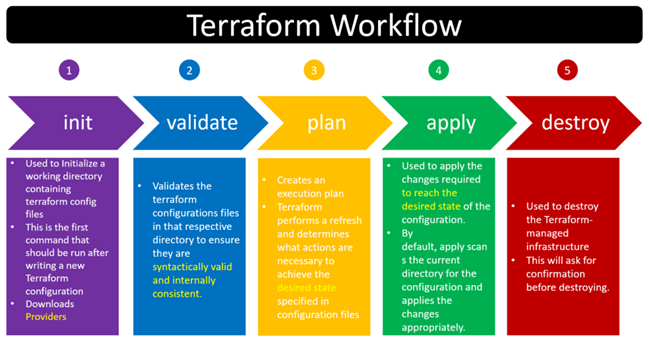
- After creating Terraform Files (tf), terraform commands:
- **init**: downloads the required executable apps dependent on providers.
- **validate**: confirms the tf files.
- **plan**: dry-run for the infrastructure, not actually running/provisioning the infrastructure
- **apply**: runs/provisions the infrastructure
- **destroy**: deletes the infrastructure
- Main Commands:
```
terraform init
terraform validate
terraform plan # ask for confirmation (yes/no), after running command
terraform apply # ask for confirmation (yes/no), after running command
terraform destroy # ask for confirmation (yes/no), after running command
```
- Command Variants:
```
terraform plan --var-file="terraform-dev.tfvars" # specific variable files
terraform apply -auto-approve # no ask for confirmation
terraform apply --var-file="terraform-prod.tfvars" # specific variable files
terraform destroy --var-file="terraform-prod.tfvars" # specific variable files
```
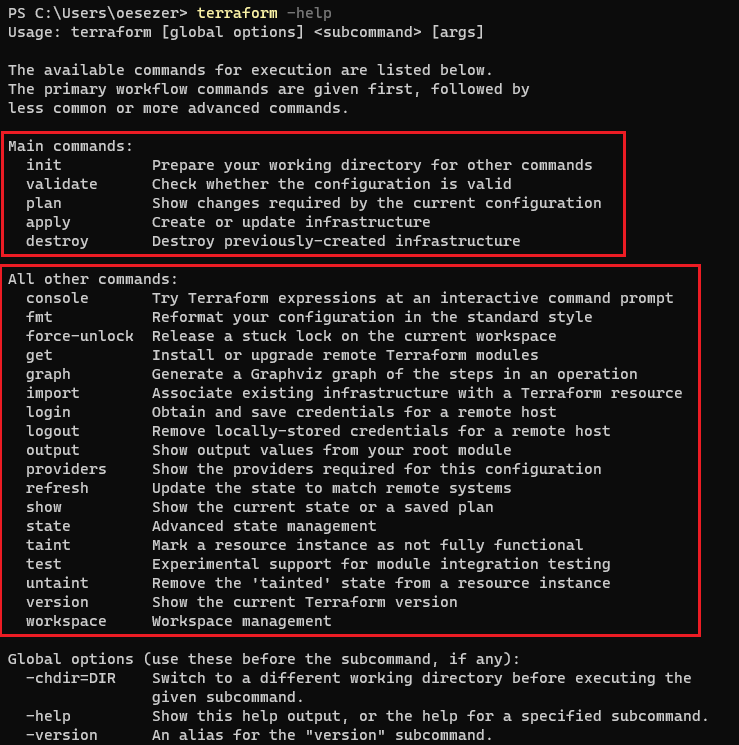
- Terraform Command Structure:
- Terraform Workflow:
- TF state file stores the latest status of the infrastructure after running "apply" command.
- TF state file deletes the status of the infrastructure after running "destroy" command.
- TF state files are stored:
- on local PC
- on remote cloud (AWS S3, Terraform Cloud)
- Please have a look LABs and SAMPLEs to learn how Terraform works in real scenarios.
## Terraform File Components <a name="terrafom_file_components"></a>
- Terraform file has different components to define infrastructure for different purposes.
- Providers,
- Resources,
- Variables,
- Values (locals, outputs),
- Meta Argurments (for, for_each, map, depends_on, life_cycle),
- Dynamic Blocks,
- Data Sources,
- Provisioners,
- Workspaces,
- Modules,
- Templates.
### Providers <a name="providers"></a>
- Terraform supposes for different providers (AWS, Google Cloud, Azure).
- Terraform downloads required executable files from own cloud to run IaC (code) for the corresponding providers.
- AWS (https://registry.terraform.io/providers/hashicorp/aws/latest/docs):

- Google Cloud (GCP) (https://registry.terraform.io/providers/hashicorp/google/latest/docs):

- Azure (https://registry.terraform.io/providers/hashicorp/azurerm/latest/docs):

- Docker (https://registry.terraform.io/providers/kreuzwerker/docker/latest/docs/resources/container):

### Resources <a name="resources"></a>
- Resources are used to define for different cloud components and objects (e.g. EC2 instances, VPC, VPC Compoenents: Router Tables, Subnets, IGW, .., Lambda, API Gateway, S3 Buckets, etc.).
- To learn the details, features of the cloud components, you should know how the cloud works, which components cloud have, how to configure the cloud components.
- Syntax:
- **resource <AWS_Object> <User_Defined_Variable_Name_With_Underscore> {}**
- e.g. resource "aws_instance" "instance" {}
- e.g. resource "aws_vpc" "my_vpc" {}
- e.g. resource "aws_subnet" "public" {}
- e.g. resource "aws_security_group" "allow_ssh" {}

- Important part is to check the usage of the resources (shows which arguments are optional, or required) from Terraform Registry page by searching the "Object" terms like "instance", "vpc", "security groups"
- https://registry.terraform.io/providers/hashicorp/aws/latest/docs/resources/instance
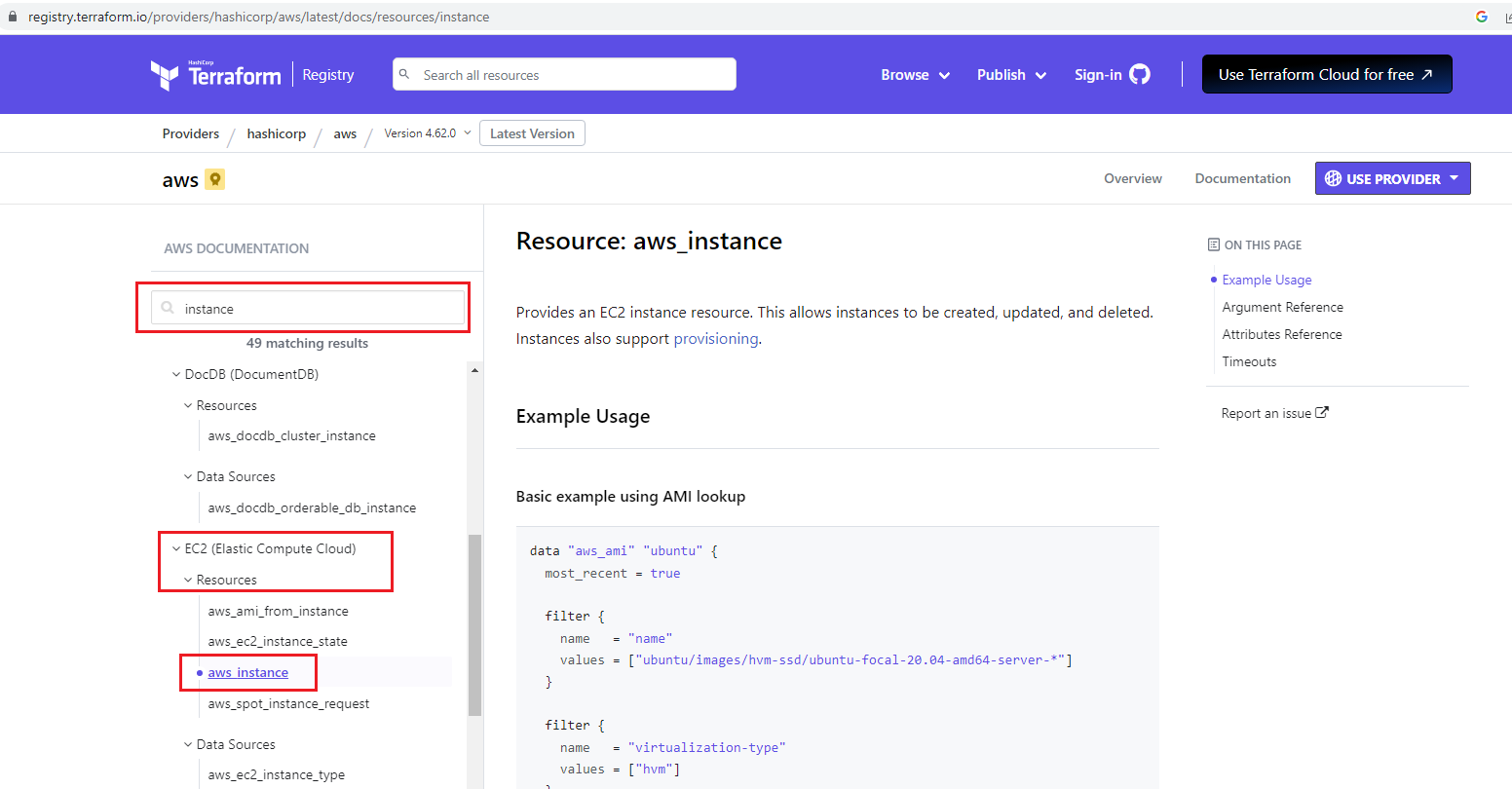
- There are different parts:
- **Argument References (inputs)** (some parts are optional, or required)
- **Attributes References (outputs)**
- **Example code snippet** to show how it uses
- **Others** (e.g. timeouts, imports)
- Go to LAB to learn resources:
- [LAB-02: Resources => Provision Basic EC2 (Ubuntu 22.04)](https://github.com/omerbsezer/Fast-Terraform/blob/main/LAB02-Resources-Basic-EC2.md)
### Variables (tfvar) <a name="variables"></a>
- Variables help to avoid hard coding on the infrastructure code.
- The Terraform language uses the following types for its values:
- **string:** a sequence of Unicode characters representing some text, like "hello".
- **number:** a numeric value. The number type can represent both whole numbers like 15 and fractional values like 6.283185.
- **bool:** a boolean value, either true or false. bool values can be used in conditional logic.
- **list (or tuple):** a sequence of values, like ["one", "two"]. Elements in a list or tuple are identified by consecutive whole numbers, starting with zero.
- **map (or object):** a group of values identified by named labels, like {name = "Mabel", age = 52}.
- Strings, numbers, and bools are sometimes called primitive types. Lists/tuples and maps/objects are sometimes called complex types, structural types, or collection types.
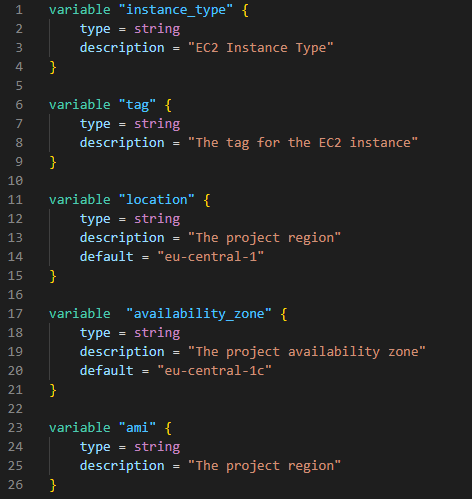
- Normally, if you define variables, after running "terraform apply" command, on the terminal, stdout requests from the user to enter variables.
- But, if the "tfvar" file is defined, variables in the "tfvar" file are entered automatically in the corresponding variable fields.
- Tfvar files for development ("DEV") environment:

- Tfvar files for production ("PROD") environment:

- Go to LAB to learn variables and tfvar file, and provisioning EC2 for different environments:
- [LAB-03: Variables, Locals, Output => Provision EC2s](https://github.com/omerbsezer/Fast-Terraform/blob/main/LAB03-Variables-Locals-Output-EC2.md)
### Values (Locals, Outputs) <a name="values"></a>
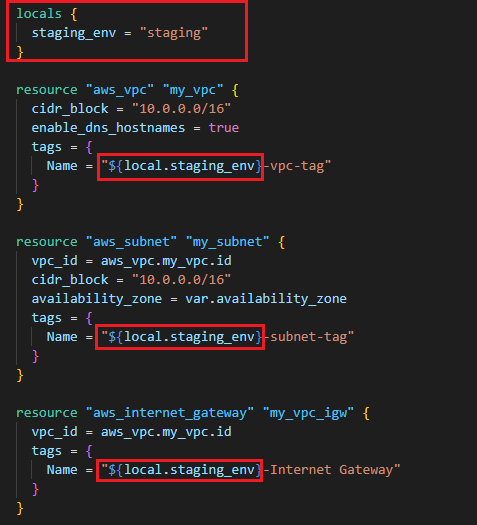
- "Locals" are also the variables that are mostly used as place-holder variables.
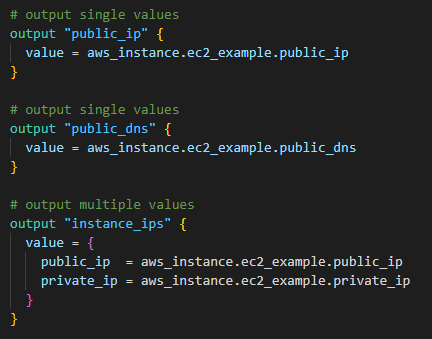
- "Outputs" are used to put the cloud objects' information (e.g. public IP, DNS, detailed info) out as stdout.
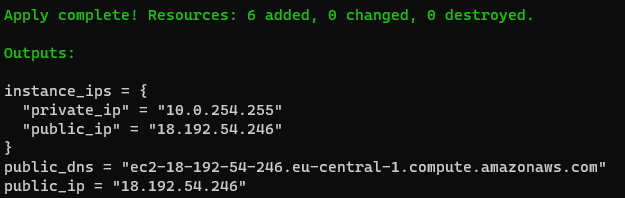
- "Outputs" after running "terraform apply" command on the terminal stdout:
- Go to LAB to learn more about variables, locals, outputs and provisioning EC2:
- [LAB-03: Variables, Locals, Output => Provision EC2s](https://github.com/omerbsezer/Fast-Terraform/blob/main/LAB03-Variables-Locals-Output-EC2.md)
### Meta Arguments <a name="meta_arguments"></a>
- Different meta arguments are used for different purposes:
- **count:** the number of objects (e.g. variables, resources, etc.)
- https://developer.hashicorp.com/terraform/language/meta-arguments/count
- **for:** iteration over the list of objects (e.g. variables, resources, etc.)
- **for_each:** iteration over the set of objects (e.g. variables, resources, etc.)
- https://developer.hashicorp.com/terraform/language/meta-arguments/for_each
- **depends_on:** shows the priority order of creation of the resource. If "A" should be created before "B", user should write "depends_on= A" as an argument under "B".
- https://developer.hashicorp.com/terraform/language/meta-arguments/depends_on
- **life_cycle:** uses to make life cycle relationship between objects (e.g. variables, resources, etc.)
- https://developer.hashicorp.com/terraform/language/meta-arguments/lifecycle
- **providers:** specifies which provider configuration to use for a resource, overriding Terraform's default behavior.
- https://developer.hashicorp.com/terraform/language/meta-arguments/resource-provider
- Count:

- For_each, For:

- Go to LAB to learn:
- [LAB-04: Meta Arguments (Count, For_Each, Map) => Provision IAM Users, Groups, Policies, Attachment Policy-User](https://github.com/omerbsezer/Fast-Terraform/blob/main/LAB04-Meta-Arguments-IAM-User-Group-Policy.md)
### Dynamic Blocks <a name="dynamic_blocks"></a>
- "Dynamic blocks" creates small code template that reduces the code repetition.
- In the example below, it isn't needed to create parameters (description, from_port, to_port, protocol, cidr_blocks) for each ingress ports:
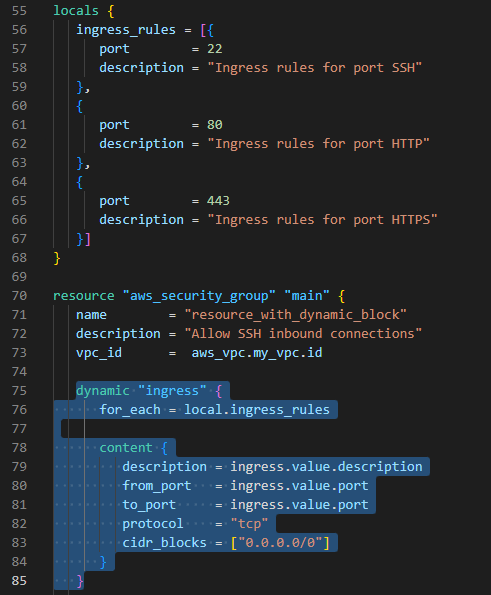
- Go to LAB to learn:
- [LAB-05: Dynamic Blocks => Provision Security Groups, EC2, VPC](https://github.com/omerbsezer/Fast-Terraform/blob/main/LAB05-Dynamic-Blocks-Security-Groups-EC2.md)
### Data Sources <a name="datasources"></a>
- "Data Sources" helps to retrieve/fetch/get data/information from previously created/existed cloud objects/resources.
- In the example below:
- "filter" keyword is used to select/filter the existed objects (reources, instances, etc.)
- "depends_on" keyword provides to run the data block after resource created.

- Go to LAB to learn:
- [LAB-06: Data Sources with Depends_on => Provision EC2](https://github.com/omerbsezer/Fast-Terraform/blob/main/LAB06-Data-Sources-EC2.md)
### Provisioners <a name="provisioners"></a>
- "Provisioners" provides to run any commands on the remote instance/virtual machine, or on the local machine.
- "Provisioners" in the resource block runs only once while creating the resource on remote instance. If the resource is created/provisioned before, "provisioner" block in the resource block doesn't run again.
- With "null_resource":
- Without creating any resource,
- Without depending any resource,
- Any commands can be run.
- Provisioners in the "null_resource" run multiple times and it doesn't depend on the resource.
- With provisioner "file", on the remote instance, new file can be created
- With provisioner "remote-exec", on the remote instance, any command can be run
- With provisioner "local-exec", on the local PC, any command can be run on any shell (bash, powershell)
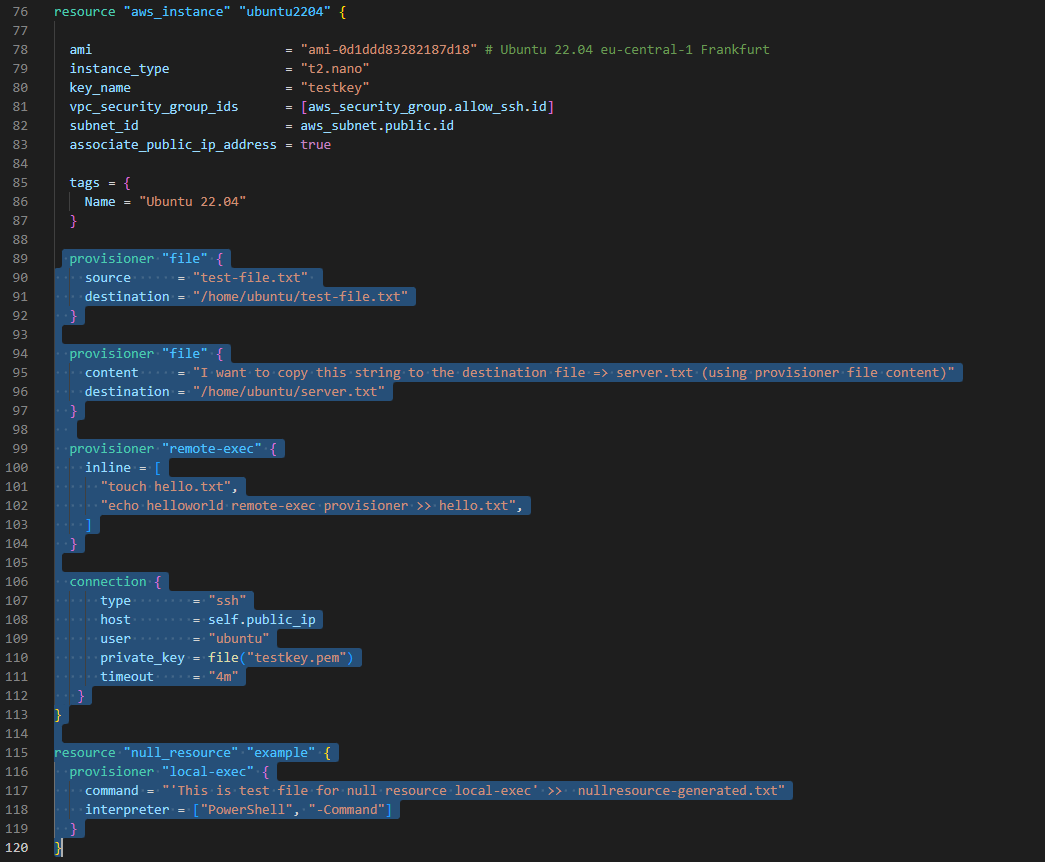
- Go to LAB to learn about different provisioners:
- [LAB-07: Provisioners (file, remote-exec), Null Resources (local-exec) => Provision Key-Pair, SSH Connection](https://github.com/omerbsezer/Fast-Terraform/blob/main/LAB07-Provisioners-Null-Resources.md)
### Modules <a name="modules"></a>
- "Modules" helps organize configuration, encapsulation, re-usability and consistency.
- "Modules" is the structure/container for multiple resources that are used together.
- Each modules usually have variables.tf that is configured from the parent tf file.
- Details: https://developer.hashicorp.com/terraform/language/modules
- AWS modules for different components (VPC, IAM, SG, EKS, S3, Lambda, RDS, etc.)
- https://registry.terraform.io/browse/modules?provider=aws

- Go to LAB to learn:
- [LAB-08: Modules => Provision EC2](https://github.com/omerbsezer/Fast-Terraform/blob/main/LAB08-Modules-EC2.md)
### Workspaces <a name="workspaces"></a>
- With "Workspaces":
- a parallel, distinct copy of your infrastructure which you can test and verify in the development, test, and staging,
- like git, you are working on different workspaces (like branch),
- single code but different workspaces,
- it creates multiple state files on different workspace directories.
- Workspace commands:
```
terraform workspace help # help for workspace commands
terraform workspace new [WorkspaceName] # create new workspace
terraform workspace select [WorkspaceName] # change/select another workspace
terraform workspace show # show current workspace
terraform workspace list # list all workspaces
terraform workspace delete [WorkspaceName] # delete existed workspace
```
- "dev" and "prod" workspaces are created:

- Go to LAB to learn:
- [LAB-09: Workspaces => Provision EC2 with Different tfvars Files](https://github.com/omerbsezer/Fast-Terraform/blob/main/LAB09-Workspaces-EC2.md)
### Templates <a name="templates"></a>
- With "Templates" (.tftpl files):
- avoid to write same code snippets multiple times,
- provide to shorten the code
- In the example below, templates fields are filled with list in the resource code block:
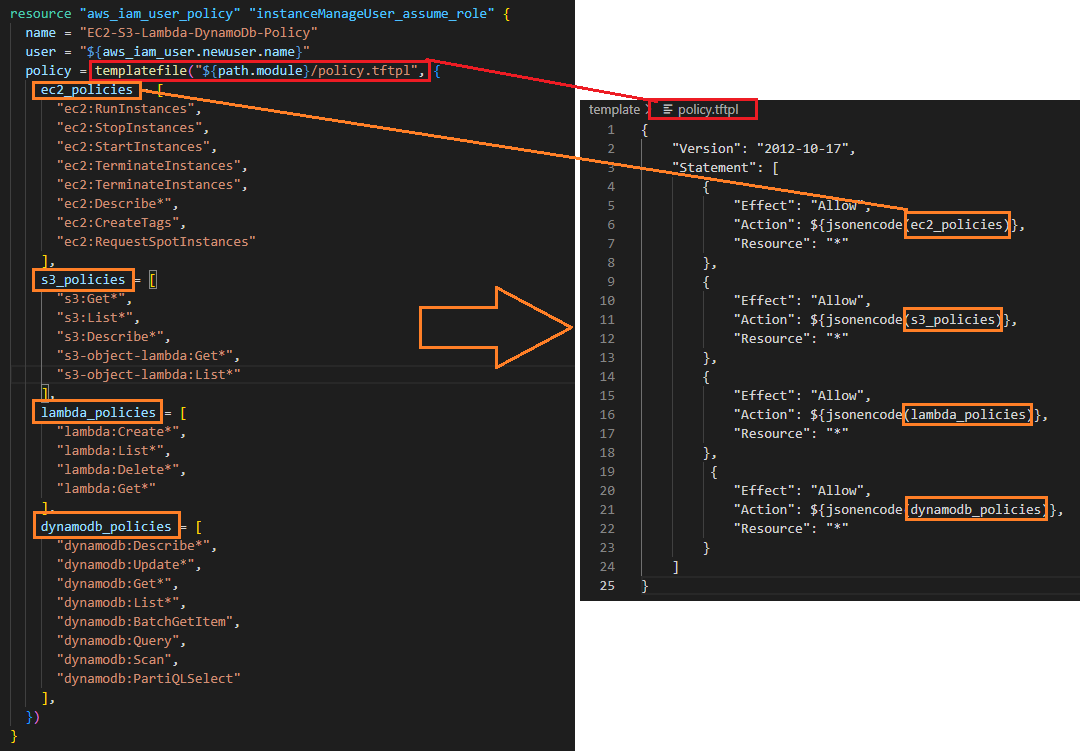
- Go to LAB to learn "Templates":
- [LAB-10: Templates => Provision IAM User, User Access Key, Policy](https://github.com/omerbsezer/Fast-Terraform/blob/main/LAB10-Templates-User-Policy.md)
### Backend and Remote States <a name="backends_remote_states"></a>
- With enabling remote state file using backend:
- multiple user can work on the same state file
- saving common state file on S3 is possible
- With backend part ("s3"), state file is stored on S3:
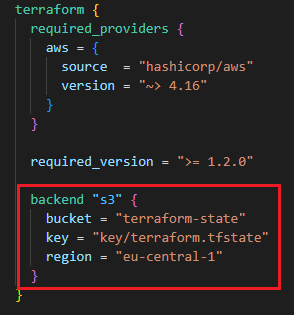
- On AWS S3 Bucket, terraform.tfstate file is saved:
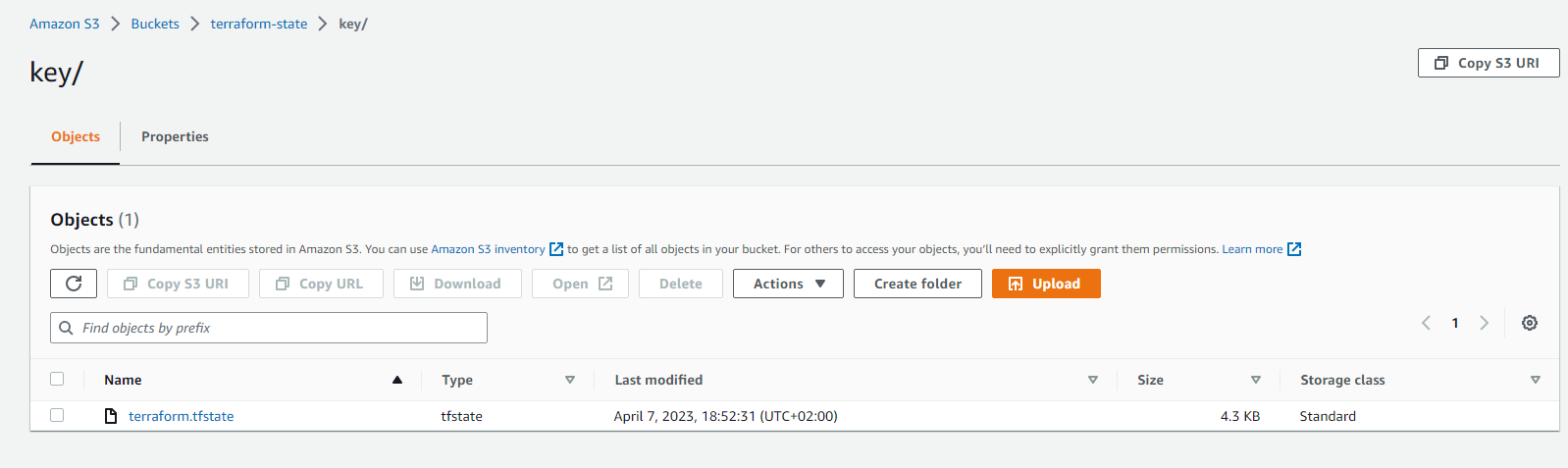
- Go to LAB to learn:
- [LAB-11: Backend - Remote States => Provision EC2 and Save State File on S3](https://github.com/omerbsezer/Fast-Terraform/blob/main/LAB11-Backend-Remote-State.md)
## Terraform Best Practices <a name="best_practice"></a>
- Don't change/edit anything on state file manually. Manipulate state file only through TF commands (e.g. terraform apply, terraform state).
- Use remote state file to share the file with other users. Keep state file on the Cloud (S3, Terraform Cloud, etc.)
- To prevent concurrent changes, state locking is important. Hence concurrent change from multiple user can be avoided.
- S3 supports state locking and consistency via DynamoDB.
- Backing up state file is also important to save the status. S3 enables versioning. Versioning state file can provide you backing up the state file.
- If you use multiple environment (dev, test, staging, production), use 1 state file per environment. Terraform workspace provide multiple state files for different environments.
- Use Git repositories (Github, Gitlab) to host TF codes to share other users.
- Behave your Infrastructure code as like your application code. Create CI pipeline/process for your TF Code (review tf code, run automated tests). This will shift your infrastructure code high quality.
- Execute Terraform only in an automated build, CD pipeline/process. This helps to run code automatically and run from one/single place.
- For naming conventions: https://www.terraform-best-practices.com/naming
## AWS Terraform Hands-on Samples <a name="samples"></a>
### SAMPLE-01: EC2s (Windows 2019 Server, Ubuntu 20.04), VPC, Key-Pairs for SSH, RDP connections <a name="ec2_vpc_key_pair_ssh_rdp"></a>
- This sample shows:
- how to create Key-pairs (public and private keys) on AWS,
- how to create EC2s (Ubuntu 20.04, Windows 2019 Server),
- how to create Virtual Private Cloud (VPC), VPC Components (Public Subnet, Internet Gateway, Route Table) and link to each others,
- how to create Security Groups (for SSH and Remote Desktop).
- **Code:** https://github.com/omerbsezer/Fast-Terraform/tree/main/samples/ec2-vpc-ubuntu-win-ssh-rdp
- **Go to the Hands-On Sample:**
- [SAMPLE-01: Provisioning EC2s (Windows 2019 Server, Ubuntu 20.04) on VPC (Subnet), Creating Key-Pair, Connecting Ubuntu using SSH, and Connecting Windows Using RDP](https://github.com/omerbsezer/Fast-Terraform/blob/main/SAMPLE01-EC2-VPC-Ubuntu-Win-SSH-RDP.md)

### SAMPLE-02: Provisioning Lambda Function, API Gateway and Reaching HTML Page in Python Code From Browsers <a name="lambda_apigateway_python"></a>
- This sample shows:
- how to create Lambda function with Python code,
- how to create lambda role, policy, policy-role attachment, lambda api gateway permission, zipping code,
- how to create api-gateway resource and method definition, lambda - api gateway connection, deploying api gateway, api-gateway deployment URL as output
- details on AWS Lambda, API-Gateway, IAM.
- **Code:** https://github.com/omerbsezer/Fast-Terraform/tree/main/samples/lambda-role-policy-apigateway-python
- **Go to the Hands-On Sample:**
- [SAMPLE-02: Provisioning Lambda Function, API Gateway and Reaching HTML Page in Python Code From Browser](https://github.com/omerbsezer/Fast-Terraform/blob/main/SAMPLE02-Lambda-API-Gateway-Python.md)

### SAMPLE-03: EBS (Elastic Block Storage: HDD, SDD) and EFS (Elastic File System: NFS) Configuration with EC2s (Ubuntu and Windows Instances) <a name="ebs_efs_ec2"></a>
- This sample shows:
- how to create EBS, mount on Ubuntu and Windows Instances,
- how to create EFS, mount on Ubuntu Instance,
- how to provision VPC, subnet, IGW, route table, security group.
- **Code:** https://github.com/omerbsezer/Fast-Terraform/tree/main/samples/ec2-ebs-efs
- **Go to the Hands-On Sample:**
- [SAMPLE-03: EBS (Elastic Block Storage: HDD, SDD) and EFS (Elastic File System: NFS) Configuration with EC2s (Ubuntu and Windows Instances)](https://github.com/omerbsezer/Fast-Terraform/blob/main/SAMPLE03-EC2-EBS-EFS.md)

### SAMPLE-04: Provisioning ECR (Elastic Container Repository), Pushing Image to ECR, Provisioning ECS (Elastic Container Service), VPC (Virtual Private Cloud), ELB (Elastic Load Balancer), ECS Tasks and Service on Fargate Cluster <a name="ecr_ecs_elb_vpc_ecs_service_fargate"></a>
- This sample shows:
- how to create Flask-app Docker image,
- how to provision ECR and push to image to this ECR,
- how to provision VPC, Internet Gateway, Route Table, 3 Public Subnets,
- how to provision ALB (Application Load Balancer), Listener, Target Group,
- how to provision ECS Fargate Cluster, Task and Service (running container as Service).
- **Code:** https://github.com/omerbsezer/Fast-Terraform/tree/main/samples/ecr-ecs-elb-vpc-ecsservice-container
- **Go to the Hands-On Sample:**
- [SAMPLE-04: Provisioning ECR (Elastic Container Repository), Pushing Image to ECR, Provisioning ECS (Elastic Container Service), VPC (Virtual Private Cloud), ELB (Elastic Load Balancer), ECS Tasks and Service on Fargate Cluster](https://github.com/omerbsezer/Fast-Terraform/blob/main/SAMPLE04-ECR-ECS-ELB-VPC-ECS-Service.md)

### SAMPLE-05: Provisioning ECR, Lambda Function and API Gateway to run Flask App Container on Lambda <a name="ecr_lambda_apigateway_container"></a>
- This sample shows:
- how to create Flask-app-serverless image to run on Lambda,
- how to create ECR and to push image to ECR,
- how to create Lambda function, Lambda role, policy, policy-role attachment, Lambda API Gateway permission,
- how to create API Gateway resource and method definition, Lambda - API Gateway connection, deploying API Gateway.
- **Code:** https://github.com/omerbsezer/Fast-Terraform/tree/main/samples/lambda-container-apigateway-flaskapp
- **Go to the Hands-On Sample:**
- [SAMPLE-05: Provisioning ECR, Lambda Function and API Gateway to run Flask App Container on Lambda](https://github.com/omerbsezer/Fast-Terraform/blob/main/SAMPLE05-Lambda-Container-ApiGateway-FlaskApp.md)


### SAMPLE-06: Provisioning EKS (Elastic Kubernetes Service) with Managed Nodes using Blueprint and Modules <a name="eks_managednodes_blueprint"></a>
- This sample shows:
- how to create EKS cluster with managed nodes using BluePrints and Modules.
- EKS Blueprint is used to provision EKS cluster with managed nodes easily.
- EKS Blueprint is used from:
- https://github.com/aws-ia/terraform-aws-eks-blueprints
- **Code:** https://github.com/omerbsezer/Fast-Terraform/tree/main/samples/eks-managed-node-blueprint
- **Go to the Hands-On Sample:**
- [SAMPLE-06: Provisioning EKS (Elastic Kubernetes Service) with Managed Nodes using Blueprint and Modules](https://github.com/omerbsezer/Fast-Terraform/blob/main/SAMPLE06-EKS-ManagedNodes-Blueprint.md)


### SAMPLE-07: CI/CD on AWS => Provisioning CodeCommit and CodePipeline, Triggering CodeBuild and CodeDeploy, Running on Lambda Container <a name="ci_cd"></a>
- This sample shows:
- how to create code repository using CodeCommit,
- how to create pipeline with CodePipeline, create S3 bucket to store Artifacts for codepipeline stages' connection (source, build, deploy),
- how to create builder with CodeBuild ('buildspec_build.yaml'), build the source code, create a Docker image,
- how to create ECR (Elastic Container Repository) and push the build image into the ECR,
- how to create Lambda Function (by CodeBuild automatically) and run/deploy container on Lambda ('buildspec_deploy.yaml').
- Source code is pulled from:
- https://github.com/aws-samples/codepipeline-for-lambda-using-terraform
- Some of the fields are updated.
- It works with 'hashicorp/aws ~> 4.15.1', 'terraform >= 0.15'
- **Code:** https://github.com/omerbsezer/Fast-Terraform/tree/main/samples/codecommit-codepipeline-codebuild-codedeploy-lambda-container
- **Go to the Hands-On Sample:**
- [SAMPLE-07: CI/CD on AWS => Provisioning CodeCommit and CodePipeline, Triggering CodeBuild and CodeDeploy, Running on Lambda Container](https://github.com/omerbsezer/Fast-Terraform/blob/main/SAMPLE07-CodeCommit-Pipeline-Build-Deploy-Lambda.md)
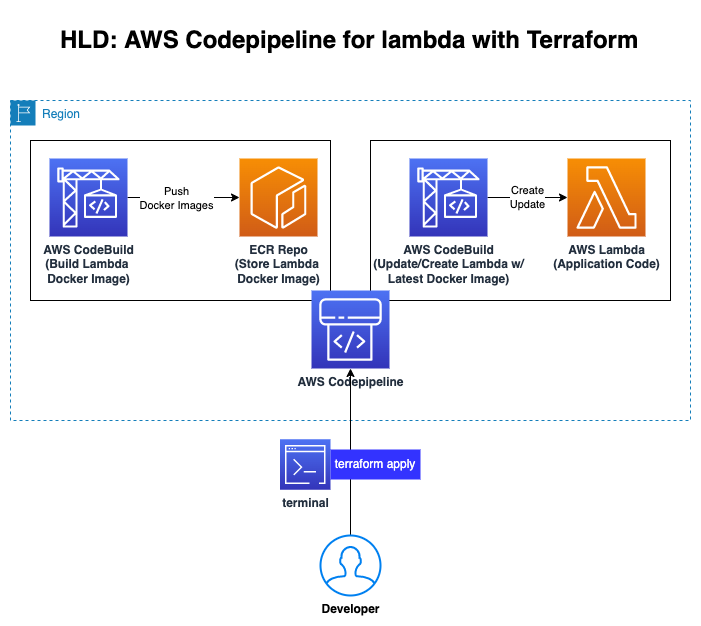
### SAMPLE-08: Provisioning S3 and CloudFront to serve Static Web Site <a name="s3_cloudfront"></a>
- This sample shows:
- how to create S3 Bucket,
- how to to copy the website to S3 Bucket,
- how to configure S3 bucket policy,
- how to create CloudFront distribution to refer S3 Static Web Site,
- how to configure CloudFront (default_cache_behavior, ordered_cache_behavior, ttl, price_class, restrictions, viewer_certificate).
- **Code:** https://github.com/omerbsezer/Fast-Terraform/blob/main/samples/s3-cloudfront-static-website/
- **Go to the Hands-On Sample:**
- [SAMPLE-08: Provisioning S3 and CloudFront to serve Static Web Site](https://github.com/omerbsezer/Fast-Terraform/blob/main/SAMPLE08-S3-CloudFront-Static-WebSite.md)

### SAMPLE-09: Running Gitlab Server using Docker on Local Machine and Making Connection to Provisioned Gitlab Runner on EC2 in Home Internet without Using VPN <a name="gitlabrunner"></a>
- This sample shows:
- how to run Gitlab Server using Docker on WSL2 on-premise,
- how to redirect external traffic to docker container port (Gitlab server),
- how to configure on-premise PC network configuration,
- how to run EC2 and install docker, gitlab-runner on EC2,
- how to register Gitlab runner on EC2 to Gitlab Server on-premise (in Home),
- how to run job on EC2 and returns artifacts to Gitlab Server on-premise (in Home).
- **Code:** https://github.com/omerbsezer/Fast-Terraform/blob/main/samples/gitlabserver-on-premise-runner-on-EC2/
- **Go to the Hands-On Sample:**
- [SAMPLE-09: Running Gitlab Server using Docker on Local Machine and Making Connection to Provisioned Gitlab Runner on EC2 in Home Internet without Using VPN](https://github.com/omerbsezer/Fast-Terraform/blob/main/SAMPLE09-GitlabServer-on-Premise-GitlabRunner-on-EC2.md)
## Details <a name="details"></a>
- To validate the Terraform files:
- "terraform validate"
- For dry-run:
- "terraform plan"
- For formatting:
- "terraform fmt"
- For debugging:
- **Bash:** export TF_LOG="DEBUG"
- **PowerShell:** $env:TF_LOG="DEBUG"
- For debug logging:
- **Bash:** export TF_LOG_PATH="tmp/terraform.log"
- **PowerShell:** $env:TF_LOG_PATH="C:\tmp\terraform.log"
## Terraform Cheatsheet <a name="cheatsheet"></a>
- [Terraform Cheatsheet](https://github.com/omerbsezer/Fast-Terraform/blob/main/Terraform-Cheatsheet.md)
## Other Useful Resources Related Terraform <a name="resource"></a>
- **AWS Samples (Advanced):**
- https://github.com/aws-samples
- **AWS Samples with Terraform (Advanced):**
- https://github.com/orgs/aws-samples/repositories?q=Terraform&type=all&language=&sort=
- **AWS Integration and Automation (Advanced):**
- https://github.com/aws-ia
- **Reference Guide: Terraform Registry Documents**
- https://registry.terraform.io/providers/hashicorp/aws/latest/docs
## References <a name="references"></a>
- Redis: https://developer.redis.com/create/aws/terraform/
- https://developer.hashicorp.com/terraform/intro
- https://github.com/aws-samples
- https://github.com/orgs/aws-samples/repositories?q=Terraform&type=all&language=&sort=
- https://github.com/aws-ia/terraform-aws-eks-blueprints
- https://github.com/aws-ia
================================================
FILE: SAMPLE01-EC2-VPC-Ubuntu-Win-SSH-RDP.md
================================================
## SAMPLE-01: Provisioning EC2s (Windows 2019 Server, Ubuntu 20.04) on VPC (Subnet), Creating Key-Pair, Connecting Ubuntu using SSH, and Connecting Windows Using RDP
This sample shows:
- how to create Key-pairs (public and private keys) on AWS.
- how to create EC2s (Ubuntu 20.04, Windows 2019 Server).
- how to create Virtual Private Cloud (VPC), VPC Components (Public Subnet, Internet Gateway, Route Table) and link to each others.
- how to create Security Groups (for SSH and Remote Desktop).
**Code:** https://github.com/omerbsezer/Fast-Terraform/tree/main/samples/ec2-vpc-ubuntu-win-ssh-rdp

### Prerequisite
- You should have a look following lab:
- [LAB-00: Terraform Install, AWS Configuration with Terraform](https://github.com/omerbsezer/Fast-Terraform/blob/main/LAB00-Terraform-Install-AWS-Configuration.md)
## Steps
- SSH key-pairs (public and private key) are used to connect remote server. Public key (xx.pub) is on the remote server, with private key, user can connect using SSH.
- There are 2 ways of creating key-pairs (public and private key):
- Creating them on cloud (AWS)
- EC2 > Key-pairs > Create Key-Pair
- Creating them on on-premise
- "ssh-keygen -t rsa -b 2048"
- Creating key-pairs on AWS: Go to EC2 > Key-pairs

- After creating key-pairs, public key is listed on AWS:

- Private key (testkey.pem) is downloaded on your PC:

- Copy this testkey.pem into your directory on which main.tf exists.

- Create main.tf under count directory and copy the code:
```
# main.tf
terraform {
required_providers {
aws = {
source = "hashicorp/aws"
version = "~> 4.16"
}
}
required_version = ">= 1.2.0"
}
provider "aws" {
region = "eu-central-1"
}
resource "aws_vpc" "my_vpc" {
cidr_block = "10.0.0.0/16"
enable_dns_hostnames = true
tags = {
Name = "My VPC"
}
}
resource "aws_subnet" "public" {
vpc_id = aws_vpc.my_vpc.id
cidr_block = "10.0.0.0/24"
availability_zone = "eu-central-1c"
tags = {
Name = "Public Subnet"
}
}
resource "aws_internet_gateway" "my_vpc_igw" {
vpc_id = aws_vpc.my_vpc.id
tags = {
Name = "My VPC - Internet Gateway"
}
}
resource "aws_route_table" "my_vpc_eu_central_1c_public" {
vpc_id = aws_vpc.my_vpc.id
route {
cidr_block = "0.0.0.0/0"
gateway_id = aws_internet_gateway.my_vpc_igw.id
}
tags = {
Name = "Public Subnet Route Table"
}
}
resource "aws_route_table_association" "my_vpc_eu_central_1c_public" {
subnet_id = aws_subnet.public.id
route_table_id = aws_route_table.my_vpc_eu_central_1c_public.id
}
resource "aws_security_group" "allow_ssh" {
name = "allow_ssh_sg"
description = "Allow SSH inbound connections"
vpc_id = aws_vpc.my_vpc.id
# for SSH
ingress {
from_port = 22
to_port = 22
protocol = "tcp"
cidr_blocks = ["0.0.0.0/0"]
}
# for HTTP Apache Server
ingress {
from_port = 80
to_port = 80
protocol = "tcp"
cidr_blocks = ["0.0.0.0/0"]
}
# for RDP
ingress {
from_port = 3389
to_port = 3389
protocol = "tcp"
cidr_blocks = ["0.0.0.0/0"]
}
# for ping
ingress {
from_port = -1
to_port = -1
protocol = "icmp"
cidr_blocks = ["10.0.0.0/16"]
}
egress {
from_port = 0
to_port = 0
protocol = "-1"
cidr_blocks = ["0.0.0.0/0"]
}
tags = {
Name = "allow_ssh_sg"
}
}
resource "aws_instance" "ubuntu2004" {
ami = "ami-0e067cc8a2b58de59" # Ubuntu 20.04 eu-central-1 Frankfurt
instance_type = "t2.nano"
key_name = "testkey"
vpc_security_group_ids = [aws_security_group.allow_ssh.id]
subnet_id = aws_subnet.public.id
associate_public_ip_address = true
user_data = <<-EOF
#! /bin/bash
sudo apt-get update
sudo apt-get install -y apache2
sudo systemctl start apache2
sudo systemctl enable apache2
echo "<h1>Deployed via Terraform from $(hostname -f)</h1>" | sudo tee /var/www/html/index.html
EOF
tags = {
Name = "Ubuntu 20.04"
}
}
resource "aws_instance" "win2019" {
ami = "ami-02c2da541ae36c6fc" # Windows 2019 Server eu-central-1 Frankfurt
instance_type = "t2.micro"
key_name = "testkey"
vpc_security_group_ids = [aws_security_group.allow_ssh.id]
subnet_id = aws_subnet.public.id
associate_public_ip_address = true
tags = {
Name = "Win 2019 Server"
}
}
output "instance_ubuntu2004_public_ip" {
value = "${aws_instance.ubuntu2004.public_ip}"
}
output "instance_win2019_public_ip" {
value = "${aws_instance.win2019.public_ip}"
}
```
**Code:** https://github.com/omerbsezer/Fast-Terraform/blob/main/samples/ec2-vpc-ubuntu-win-ssh-rdp/main.tf

- Run init command:
```
terraform init
```

- Validate file:
```
terraform validate
```

- Run plan command:
```
terraform plan
```
- Run apply command to create resources. Then, Terraform asks to confirm, write "yes":
```
terraform apply
```


- On AWS EC2 > Instances, Ubuntu 20.04:

- Security groups (SSG), for SSH (port 22), RDP (port 3389), HTTP (80), ICMP (for ping):


- On AWS EC2 > Instances, Window 2019 Server:

- Windows has same SSG like Ubuntu.
- Storage, Elastic Block Storage default:

- On AWS VPC (Virtual Private Cloud) Service:

- While installing Ubuntu20.04, userdata is used to install Apache Server on it. With SSG Port 80, using public IP, we can see the index.html, like hosting server:

- SSH to Ubuntu 20.04 (ssh -i testkey.pem ubuntu@<PublicIPAddress>):

- Run:
```
sudo apt install net-tools
ifconfig
```
- Private IP can be seen:

- Make remote connection to Windows (RDP):

- Download RDP App:

- To get password, upload testkey.pem file:


- Now, we reach Windows using RDP:

- Pinging to Ubuntu20.04 from Windows:

- Opening firewall rules to ping from Ubuntu to Windows:
- Windows Defender -> Advance Settings -> Inbound Rules -> File and Printer Sharing (Echo Request - ICMPv4 - In) -> Right Click (Enable)

- Pinging to Windows 2019 Server from Ubuntu20.04:

- Viewing Ubuntu CPU, RAM:


- Destroy infrastructure:
```
terraform destroy
```


- Be sure that instances are terminated. Because if they works, we pay the fee of them:

- We can also monitor the CPU, Disk, Network Usage on AWS EC2:

================================================
FILE: SAMPLE02-Lambda-API-Gateway-Python.md
================================================
## SAMPLE-02: Provisioning Lambda Function, API Gateway and Reaching HTML Page in Python Code From Browser
This sample shows:
- how to create Lambda function with Python code,
- how to create Lambda Role, Policy, Policy-Role attachment, Lambda API-gateway permission, uploading code,
- how to create API-gateway resource and method definition, Lambda-API-gateway connection, deploying API-gateway,
- details on AWS Lambda, API-Gateway, IAM

There are 3 main parts:
- lambda.tf: It includes lambda function, lambda role, policy, policy-role attachment, lambda api gateway permission, zipping code
- api-gateway.tf: It includes api-gateway resource and method definition, lambda - api gateway connection, deploying api gateway, api-gateway deployment URL as output
- code/main.py: It includes basic lambda handler with basic HTML code, and REST API response.
**Code:** https://github.com/omerbsezer/Fast-Terraform/tree/main/samples/lambda-role-policy-apigateway-python
### Prerequisite
- You should have a look following lab:
- [LAB-00: Terraform Install, AWS Configuration with Terraform](https://github.com/omerbsezer/Fast-Terraform/blob/main/LAB00-Terraform-Install-AWS-Configuration.md)
## Steps
- Create lambda.tf:
- **Terraform Configuration:** Specifies the AWS provider version and Terraform version.
- **IAM Role and Policy:** Creates an IAM role for the Lambda function and attaches a policy that allows the Lambda function to write logs to CloudWatch.
- **Zipping Lambda Code:** Prepares the Python code by zipping it into a format that Lambda can execute.
- **Lambda Function:** Creates a Lambda function using the specified IAM role, code, and runtime.
- **API Gateway Integration:** Grants API Gateway permission to invoke the Lambda function.
```
terraform {
required_providers {
aws = {
source = "hashicorp/aws"
version = "~> 4.16"
}
}
required_version = ">= 1.2.0"
}
# Create IAM Role for lambda
resource "aws_iam_role" "lambda_role" {
name = "aws_lambda_role"
assume_role_policy = <<EOF
{
"Version": "2012-10-17",
"Statement": [
{
"Action": "sts:AssumeRole",
"Principal": {
"Service": "lambda.amazonaws.com"
},
"Effect": "Allow",
"Sid": ""
}
]
}
EOF
}
# IAM policy for the lambda
resource "aws_iam_policy" "iam_policy_for_lambda" {
name = "aws_iam_policy_for_aws_lambda_role"
path = "/"
description = "AWS IAM Policy for managing aws lambda role"
policy = <<EOF
{
"Version": "2012-10-17",
"Statement": [
{
"Action": [
"logs:CreateLogGroup",
"logs:CreateLogStream",
"logs:PutLogEvents"
],
"Resource": "arn:aws:logs:*:*:*",
"Effect": "Allow"
}
]
}
EOF
}
# Role - Policy Attachment
resource "aws_iam_role_policy_attachment" "attach_iam_policy_to_iam_role" {
role = aws_iam_role.lambda_role.name
policy_arn = aws_iam_policy.iam_policy_for_lambda.arn
}
# Zipping the code, lambda wants the code as zip file
data "archive_file" "zip_the_python_code" {
type = "zip"
source_dir = "${path.module}/code/"
output_path = "${path.module}/code/main.zip"
}
# Lambda Function, in terraform ${path.module} is the current directory.
resource "aws_lambda_function" "lambda_function" {
filename = "${path.module}/code/main.zip"
function_name = "Lambda-Function"
role = aws_iam_role.lambda_role.arn
handler = "main.lambda_handler"
runtime = "python3.8"
depends_on = [aws_iam_role_policy_attachment.attach_iam_policy_to_iam_role]
}
# With Lambda permission, API Gateway can invoke Lambda
resource "aws_lambda_permission" "apigw" {
statement_id = "AllowAPIGatewayInvoke"
action = "lambda:InvokeFunction"
function_name = aws_lambda_function.lambda_function.function_name
principal = "apigateway.amazonaws.com"
# The "/*/*" portion grants access from any method on any resource within the API Gateway REST API.
source_arn = "${aws_api_gateway_rest_api.example.execution_arn}/*/*"
}
```
**Code:** https://github.com/omerbsezer/Fast-Terraform/blob/main/samples/lambda-role-policy-apigateway-python/lambda.tf

- Create api-gateway.tf:
- **Proxy Usage:** The {proxy+} path is used to dynamically route all requests to the Lambda function, eliminating the need to define individual paths and methods.
- **Flexibility:** The ANY method allows all HTTP methods, making the API flexible.
- **AWS_PROXY Integration:** Simplifies the interaction between API Gateway and Lambda by passing the entire request data to Lambda, allowing it to process dynamically.
```
# Create API Gateway with Rest API type
resource "aws_api_gateway_rest_api" "example" {
name = "Serverless"
description = "Serverless Application using Terraform"
}
resource "aws_api_gateway_resource" "proxy" {
rest_api_id = aws_api_gateway_rest_api.example.id
parent_id = aws_api_gateway_rest_api.example.root_resource_id
path_part = "{proxy+}" # with proxy, this resource will match any request path
}
resource "aws_api_gateway_method" "proxy" {
rest_api_id = aws_api_gateway_rest_api.example.id
resource_id = aws_api_gateway_resource.proxy.id
http_method = "ANY" # with ANY, it allows any request method to be used, all incoming requests will match this resource
authorization = "NONE"
}
# API Gateway - Lambda Connection
resource "aws_api_gateway_integration" "lambda" {
rest_api_id = aws_api_gateway_rest_api.example.id
resource_id = aws_api_gateway_method.proxy.resource_id
http_method = aws_api_gateway_method.proxy.http_method
integration_http_method = "POST"
type = "AWS_PROXY" # With AWS_PROXY, it causes API gateway to call into the API of another AWS service
uri = aws_lambda_function.lambda_function.invoke_arn
}
# The proxy resource cannot match an empty path at the root of the API.
# To handle that, a similar configuration must be applied to the root resource that is built in to the REST API object
resource "aws_api_gateway_method" "proxy_root" {
rest_api_id = aws_api_gateway_rest_api.example.id
resource_id = aws_api_gateway_rest_api.example.root_resource_id
http_method = "ANY"
authorization = "NONE"
}
resource "aws_api_gateway_integration" "lambda_root" {
rest_api_id = aws_api_gateway_rest_api.example.id
resource_id = aws_api_gateway_method.proxy_root.resource_id
http_method = aws_api_gateway_method.proxy_root.http_method
integration_http_method = "POST"
type = "AWS_PROXY" # With AWS_PROXY, it causes API gateway to call into the API of another AWS service
uri = aws_lambda_function.lambda_function.invoke_arn
}
# Deploy API Gateway
resource "aws_api_gateway_deployment" "example" {
depends_on = [
aws_api_gateway_integration.lambda,
aws_api_gateway_integration.lambda_root,
]
rest_api_id = aws_api_gateway_rest_api.example.id
stage_name = "test"
}
# Output to the URL
output "base_url" {
value = aws_api_gateway_deployment.example.invoke_url
}
```
**Code:** https://github.com/omerbsezer/Fast-Terraform/blob/main/samples/lambda-role-policy-apigateway-python/api-gateway.tf

- Create main.py under code directory:
```
def lambda_handler(event, context):
content = """
<html>
<h1> Hello Website running on Lambda! Deployed via Terraform </h1>
</html>
"""
response ={
"statusCode": 200,
"body": content,
"headers": {"Content-Type": "text/html",},
}
return response
```
**Code:** https://github.com/omerbsezer/Fast-Terraform/blob/main/samples/lambda-role-policy-apigateway-python/code/main.py

- Run init, validate command:
```
terraform init
terraform validate
```

- Run plan, apply command:
```
terraform plan # for dry-run
terraform apply
```


- On AWS Lambda:


- Create a test by clicking "Test" for lambda function:

- Status code 200, OK is returned successfully:

- Execution Role is created, seen on Lambda

- Role on IAM:

- Policy on IAM:

- On AWS Lambda: With Lambda permission, API Gateway can invoke Lambda

- Lambda is triggered by API-Gateway:

- On AWS API-Gateway:


- By clicking "Test" to test api-gateway


- HTML page that runs on Lambda Function using API-Gateway can be reached. With API-Gateway, lambda function gets DNS and traffic from internet comes to the Lambda function.

- Run destroy command:
```
terraform destroy
```

- On AWS Lambda, function is deleted:

## References
- https://www.tecracer.com/blog/2021/08/iam-what-happens-when-you-assume-a-role.html
- https://medium.com/paul-zhao-projects/serverless-applications-with-aws-lambda-and-api-gateway-using-terraform-37d3de435d21
- https://github.com/rahulwagh/Terraform-Topics/tree/master/aws-lambda
================================================
FILE: SAMPLE03-EC2-EBS-EFS.md
================================================
## SAMPLE-03: EBS (Elastic Block Store: HDD, SDD) and EFS (Elastic File System: NFS) Configuration with EC2s (Ubuntu and Windows Instances)
This sample shows:
- how to provision EBS, mount on Ubuntu and Windows Instances.
- how to provision EFS, mount on Ubuntu Instance.
- EFS is not supported on Windows Instance: https://docs.aws.amazon.com/AWSEC2/latest/WindowsGuide/AmazonEFS.html
- how to provision VPC, subnet, IGW, route table, security group.

There are 3 main parts:
- **main.tf**: It includes 2 EC2 (Ubuntu, Windows), VPC, subnet, IGW, route table, security group implementation.
- **efs.tf**: It includes EFS configuration for Ubuntu EC2.
- **ebs.tf**: It includes EBS configuration for both Ubuntu and Windows EC2s.

**Code:** https://github.com/omerbsezer/Fast-Terraform/tree/main/samples/ec2-ebs-efs
# Table of Contents
- [Key-Pair](#keypair)
- [VPC, EC2, SG Implementation](#vpc)
- [EBS Implementation](#ebs)
- [EFS Implementation](#efs)
- [Terraform Run](#run)
- [EBS Final Setup and Test on Ubuntu](#ebsfinalubuntu)
- [EFS Final Setup and Test on Ubuntu](#efsfinalubuntu)
- [EBS Final Setup and Test on Windows](#ebsfinalwindows)
### Prerequisite
- You should have a look following lab:
- [LAB-00: Terraform Install, AWS Configuration with Terraform](https://github.com/omerbsezer/Fast-Terraform/blob/main/LAB00-Terraform-Install-AWS-Configuration.md)
## Steps
### Key-Pair <a name="keypair"></a>
SSH key-pairs (public and private key) are used to connect remote server. Public key (xx.pub) is on the remote server, with private key, user can connect using SSH.
- There are 2 ways of creating key-pairs (public and private key):
- Creating them on cloud (AWS)
- EC2 > Key-pairs > Create Key-Pair
- Creating them on on-premise
- "ssh-keygen -t rsa -b 2048"
- Creating key-pairs on AWS: Go to EC2 > Key-pairs

- After creating key-pairs, public key is listed on AWS:

- Private key (testkey.pem) is downloaded on your PC:

- Copy this testkey.pem into your directory on which main.tf exists.

### VPC, EC2, SG Implementation <a name="vpc"></a>
- Create main.tf:
```
terraform {
required_providers {
aws = {
source = "hashicorp/aws"
version = "~> 5.81.0"
}
}
required_version = ">= 1.10.2"
}
provider "aws" {
region = "eu-central-1"
}
resource "aws_vpc" "my_vpc" {
cidr_block = "10.0.0.0/16"
enable_dns_hostnames = true
tags = {
Name = "My VPC"
}
}
resource "aws_subnet" "public" {
vpc_id = aws_vpc.my_vpc.id
cidr_block = "10.0.0.0/24"
availability_zone = "eu-central-1c"
tags = {
Name = "Public Subnet"
}
}
resource "aws_internet_gateway" "my_vpc_igw" {
vpc_id = aws_vpc.my_vpc.id
tags = {
Name = "My VPC - Internet Gateway"
}
}
resource "aws_route_table" "my_vpc_eu_central_1c_public" {
vpc_id = aws_vpc.my_vpc.id
route {
cidr_block = "0.0.0.0/0"
gateway_id = aws_internet_gateway.my_vpc_igw.id
}
tags = {
Name = "Public Subnet Route Table"
}
}
resource "aws_route_table_association" "my_vpc_eu_central_1c_public" {
subnet_id = aws_subnet.public.id
route_table_id = aws_route_table.my_vpc_eu_central_1c_public.id
}
resource "aws_security_group" "sg_config" {
name = "allow_ssh_sg"
description = "Allow SSH inbound connections"
vpc_id = aws_vpc.my_vpc.id
# for SSH
ingress {
from_port = 22
to_port = 22
protocol = "tcp"
cidr_blocks = ["0.0.0.0/0"]
}
# for HTTP Apache Server
ingress {
from_port = 80
to_port = 80
protocol = "tcp"
cidr_blocks = ["0.0.0.0/0"]
}
# for RDP
ingress {
from_port = 3389
to_port = 3389
protocol = "tcp"
cidr_blocks = ["0.0.0.0/0"]
}
# for ping
ingress {
from_port = -1
to_port = -1
protocol = "icmp"
cidr_blocks = ["10.0.0.0/16"]
}
# EFS mount target, important to connect with NFS file system, it must be added.
ingress {
from_port = 2049
to_port = 2049
protocol = "tcp"
cidr_blocks = ["0.0.0.0/0"]
}
egress {
from_port = 0
to_port = 0
protocol = "-1"
cidr_blocks = ["0.0.0.0/0"]
}
tags = {
Name = "allow_ssh_sg"
}
}
resource "aws_instance" "ubuntu2004" {
ami = "ami-0e067cc8a2b58de59" # Ubuntu 20.04 eu-central-1 Frankfurt
instance_type = "t2.nano"
key_name = "testkey"
vpc_security_group_ids = [aws_security_group.sg_config.id]
subnet_id = aws_subnet.public.id
associate_public_ip_address = true
tags = {
Name = "Ubuntu 20.04"
}
}
resource "aws_instance" "win2019" {
ami = "ami-02c2da541ae36c6fc" # Windows 2019 Server eu-central-1 Frankfurt
instance_type = "t2.micro"
key_name = "testkey"
vpc_security_group_ids = [aws_security_group.allow_ssh.id]
subnet_id = aws_subnet.public.id
associate_public_ip_address = true
tags = {
Name = "Win 2019 Server"
}
}
output "instance_ubuntu2004_public_ip" {
value = "${aws_instance.ubuntu2004.public_ip}"
}
output "instance_win2019_public_ip" {
value = "${aws_instance.win2019.public_ip}"
}
```
**Code:** https://github.com/omerbsezer/Fast-Terraform/blob/main/samples/ec2-ebs-efs/main.tf

### EBS Implementation <a name="ebs"></a>
- Create ebs.tf:
```
# Creating EBS for Ubuntu
# details: https://registry.terraform.io/providers/hashicorp/aws/latest/docs/resources/ebs_volume
resource "aws_ebs_volume" "ebs_ubuntu" {
availability_zone = "eu-central-1c"
size = 20 # The size of the drive in GiBs.
type= "gp2" # default gp2. others: standard, gp2, gp3, io1, io2, sc1 or st1
}
# EBS-Ubuntu attachment
resource "aws_volume_attachment" "ubuntu2004_ebs_ubuntu" {
device_name = "/dev/sdh"
volume_id = "${aws_ebs_volume.ebs_ubuntu.id}"
instance_id = "${aws_instance.ubuntu2004.id}"
}
# Creating EBS for Windows
# details: https://registry.terraform.io/providers/hashicorp/aws/latest/docs/resources/ebs_volume
resource "aws_ebs_volume" "ebs_windows" {
availability_zone = "eu-central-1c"
size = 15 # The size of the drive in GiBs.
type= "gp2" # default gp2. others: standard, gp2, gp3, io1, io2, sc1 or st1
}
# EBS-Windows attachment
resource "aws_volume_attachment" "win2019_ebs_windows" {
device_name = "/dev/sdg"
volume_id = "${aws_ebs_volume.ebs_windows.id}"
instance_id = "${aws_instance.win2019.id}"
}
```
**Code:** https://github.com/omerbsezer/Fast-Terraform/blob/main/samples/ec2-ebs-efs/ebs.tf

### EFS Implementation <a name="efs"></a>
- Create efs.tf:
```
# Creating Amazon EFS File system
# Amazon EFS supports two lifecycle policies. Transition into IA and Transition out of IA
resource "aws_efs_file_system" "efs" {
lifecycle_policy {
transition_to_ia = "AFTER_30_DAYS"
}
tags = {
Name = "efs-example"
}
}
# Creating the EFS access point for AWS EFS File system
resource "aws_efs_access_point" "access_point" {
file_system_id = aws_efs_file_system.efs.id
}
# Creating the AWS EFS System policy to transition files into and out of the file system.
# The EFS System Policy allows clients to mount, read and perform, write operations on File system
# The communication of client and EFS is set using aws:secureTransport Option
resource "aws_efs_file_system_policy" "policy" {
file_system_id = aws_efs_file_system.efs.id
policy = <<POLICY
{
"Version": "2012-10-17",
"Id": "Policy01",
"Statement": [
{
"Sid": "Statement",
"Effect": "Allow",
"Principal": {
"AWS": "*"
},
"Resource": "${aws_efs_file_system.efs.arn}",
"Action": [
"elasticfilesystem:ClientMount",
"elasticfilesystem:ClientRootAccess",
"elasticfilesystem:ClientWrite"
],
"Condition": {
"Bool": {
"aws:SecureTransport": "false"
}
}
}
]
}
POLICY
}
# Creating the AWS EFS Mount point in a specified Subnet
resource "aws_efs_mount_target" "mount" {
file_system_id = aws_efs_file_system.efs.id
subnet_id = aws_subnet.public.id
security_groups = [aws_security_group.sg_config.id] # open ingress 2049 port for EFS
}
resource "null_resource" "configure_nfs" {
depends_on = [aws_efs_mount_target.mount]
connection {
type = "ssh"
user = "ubuntu"
private_key = file("testkey.pem")
host = aws_instance.ubuntu2004.public_ip
}
provisioner "remote-exec" {
inline = [
"sudo apt install nfs-common -y",
"mkdir ~/efs",
"cd ~/efs",
"df -kh"
]
}
}
```
**Code:** https://github.com/omerbsezer/Fast-Terraform/blob/main/samples/ec2-ebs-efs/efs.tf

### Terraform Run <a name="run"></a>
- Run init, validate, plan, apply commands:
```
terraform init
terraform validate
terraform plan
terraform apply
```


### EBS Final Setup and Test on Ubuntu <a name="ebsfinalubuntu"></a>
- On AWS EC2:

- On AWS EC2 Volumes, EC2 have default root volumes (8GB, 30GB).
- New addition volumes (15GB, 20GB) are added as a second volume of EC2s.

- Connect to the Ubuntu via SSH:
```
ssh -i .\testkey.pem ubuntu@3.69.53.254
lsblk
```

- Formatting disk, mounting EBS:
```
sudo file -s /dev/xvdh # “/dev/xvdf: data“, it means your volume is empty.
#format, Format the volume to the ext4 or xfs
sudo mkfs -t ext4 /dev/xvdh # prefer ext4
# sudo mkfs -t xfs /dev/xvdh
# mounting EBS
sudo mkdir newvolume
sudo mount /dev/xvdh newvolume
cd newvolume
df -h .
```

### EFS Final Setup and Test on Ubuntu <a name="efsfinalubuntu"></a>
- Go to EFS Service, new EFS filesystem:

- Click "Attach" to attach EFS to EC2:

- Copy the command:

- Mount the EFS:
```
e.g. sudo mount -t nfs4 -o nfsvers=4.1,rsize=1048576,wsize=1048576,hard,timeo=600,retrans=2,noresvport fs-0adf50bc47d99ff95.efs.eu-central-1.amazonaws.com:/ efs
```
- After mounting EFS, EFS mounted directory can be seen in the list.
- Although creating 2 x 200MB files, root part's size does not change. It shows that EFS is mounted successfully, files are created on EFS part.

### EBS Final Setup and Test on Windows <a name="ebsfinalwindows"></a>
- Connect Windows with RDP, get password using pem key:


- For mounting disk on Windows:
- Folow: https://docs.aws.amazon.com/AWSEC2/latest/WindowsGuide/ebs-using-volumes.html, open disk management utility
- Make "Online" the disk:

- Make "Initialize" the disk, with MBR:

- New Simple Volume:

- Final configuration:

- New EBS disk is mounted successfully:

- Destroy infrastructure:
```
terraform destroy
```
- It is easy to manage 17 resources:

## References:
- https://adamtheautomator.com/terraform-efs/
- https://docs.aws.amazon.com/AWSEC2/latest/WindowsGuide/ebs-using-volumes.html
================================================
FILE: SAMPLE04-ECR-ECS-ELB-VPC-ECS-Service.md
================================================
## SAMPLE-04: Provisioning ECR (Elastic Container Repository), Pushing Image to ECR, Provisioning ECS (Elastic Container Service), VPC (Virtual Private Cloud), ELB (Elastic Load Balancer), ECS Tasks and Service on Fargate Cluster
This sample shows:
- how to create Flask-app Docker image,
- how to provision ECR and push to image to this ECR,
- how to provision VPC, Internet Gateway, Route Table, 3 Public Subnets,
- how to provision ALB (Application Load Balancer), Listener, Target Group,
- how to provision ECS Fargate Cluster, Task and Service (running container as Service)
There are 5 main parts:
- **0_ecr.tf**: includes private ECR code
- **1_vpc.tf**: includes VPC, IGW, Route Table, Subnets code
- **2_ecs.tf**: includes ECS Cluster, Task Definition, Role and Policy code
- **3_elb.tf**: includes to ALB, Listener, Target Group, Security Group code
- **4_ecs_service.tf**: includes ECS Fargate Service code with linking to loadbalancer, subnets, task definition.

**Code:** https://github.com/omerbsezer/Fast-Terraform/tree/main/samples/ecr-ecs-elb-vpc-ecsservice-container
**ECS Pricing:**
- For the ECS Cluster:
- **Free**
- For the ECS on 1 EC2 Instance (e.g. m5.large => 2 vCPU, 8 GB RAM):
- **Per Hour:** $0.096
- **Per Day:** $2.304
- **For 30 days:** $69.12
- Please have look for instance pricing: https://aws.amazon.com/ec2/pricing/on-demand/
- For the Fargate:
- AWS Fargate pricing is calculated based on the **vCPU and memory** resources used from the time you start to download your container image until the ECS Task (Container) terminate.
- e.g. 2 x (1vCPU, 4GB RAM) on Linux:
- **Per Hour:** 2 x ($0,0665) = $0.133
- **Per Day:** $3,18
- **Per 30 Days:** $95.67
- e.g. 2 x (1vCPU, 4GB RAM) on Win:
- **Per Hour:** 2 x ($0,199) = $0.398
- **Per Day:** $9.55
- **Per 30 Days:** $286.56
- Please have look for fargate pricing: https://aws.amazon.com/fargate/pricing/
# Table of Contents
- [Flask App Docker Image Creation](#app)
- [Creating ECR (Elastic Container Repository), Pushing Image into ECR](#ecr)
- [Creating VPC (Virtual Private Cloud)](#vpc)
- [Creating ECS (Elastic Container Service)](#ecs)
- [Creating ELB (Elastic Load Balancer)](#elb)
- [Creating ECS Service](#ecsservice)
- [Demo: Terraform Run](#run)
### Prerequisite
- You should have a look following lab:
- [LAB-00: Terraform Install, AWS Configuration with Terraform](https://github.com/omerbsezer/Fast-Terraform/blob/main/LAB00-Terraform-Install-AWS-Configuration.md)
## Steps
### Flask App Docker Image Creation <a name="app"></a>
- We have Flask-App to run on AWS ECS. To build image, please have a look:
- https://github.com/omerbsezer/Fast-Terraform/tree/main/samples/ecr-ecs-elb-vpc-ecsservice-container/flask-app
### Creating ECR (Elastic Container Repository), Pushing Image into ECR <a name="ecr"></a>
- Create 0_ecr.tf:
```
terraform {
required_providers {
aws = {
source = "hashicorp/aws"
version = "~> 4.16"
}
}
required_version = ">= 1.2.0"
}
# Creating Elastic Container Repository for application
resource "aws_ecr_repository" "flask_app" {
name = "flask-app"
}
```
**Code:** https://github.com/omerbsezer/Fast-Terraform/blob/main/samples/ecr-ecs-elb-vpc-ecsservice-container/ecr/0_ecr.tf

```
cd /ecr
terraform init
terraform plan
terraform apply
```
- On AWS ECR:

- To see the pushing docker commands, click "View Push Commands"
```
aws ecr get-login-password --region eu-central-1 | docker login --username AWS --password-stdin <UserID>.dkr.ecr.eu-central-1.amazonaws.com
docker tag flask-app:latest <UserID>.ecr.eu-central-1.amazonaws.com/flask-app:latest
docker push <UserID>.dkr.ecr.eu-central-1.amazonaws.com/flask-app:latest
```
- Image was pushed:

- On AWS ECR:

### Creating VPC (Virtual Private Cloud) <a name="vpc"></a>
- Create 1_vpc.tf:
```
# Internet Access -> IGW -> Route Table -> Subnets
terraform {
required_providers {
aws = {
source = "hashicorp/aws"
version = "~> 4.16"
}
}
required_version = ">= 1.2.0"
}
provider "aws" {
region = "eu-central-1"
}
resource "aws_vpc" "my_vpc" {
cidr_block = "10.0.0.0/16"
enable_dns_hostnames = true
tags = {
Name = "My VPC"
}
}
resource "aws_subnet" "public_subnet_a" {
availability_zone = "eu-central-1a"
vpc_id = aws_vpc.my_vpc.id
cidr_block = "10.0.0.0/24"
tags = {
Name = "Public Subnet A"
}
}
resource "aws_subnet" "public_subnet_b" {
availability_zone = "eu-central-1b"
vpc_id = aws_vpc.my_vpc.id
cidr_block = "10.0.1.0/24"
tags = {
Name = "Public Subnet B"
}
}
resource "aws_subnet" "public_subnet_c" {
availability_zone = "eu-central-1c"
vpc_id = aws_vpc.my_vpc.id
cidr_block = "10.0.2.0/24"
tags = {
Name = "Public Subnet C"
}
}
resource "aws_internet_gateway" "igw" {
vpc_id = aws_vpc.my_vpc.id
tags = {
Name = "My VPC - Internet Gateway"
}
}
resource "aws_route_table" "route_table" {
vpc_id = aws_vpc.my_vpc.id
route {
cidr_block = "0.0.0.0/0"
gateway_id = aws_internet_gateway.igw.id
}
tags = {
Name = "Public Subnet Route Table"
}
}
resource "aws_route_table_association" "route_table_association1" {
subnet_id = aws_subnet.public_subnet_a.id
route_table_id = aws_route_table.route_table.id
}
resource "aws_route_table_association" "route_table_association2" {
subnet_id = aws_subnet.public_subnet_b.id
route_table_id = aws_route_table.route_table.id
}
resource "aws_route_table_association" "route_table_association3" {
subnet_id = aws_subnet.public_subnet_c.id
route_table_id = aws_route_table.route_table.id
}
```
**Code:** https://github.com/omerbsezer/Fast-Terraform/blob/main/samples/ecr-ecs-elb-vpc-ecsservice-container/1_vpc.tf

### Creating ECS (Elastic Container Service) <a name="ecs"></a>
- Create 2_ecs.tf:
```
# Getting data existed ECR
data "aws_ecr_repository" "flask_app" {
name = "flask-app"
}
# Creating ECS Cluster
resource "aws_ecs_cluster" "my_cluster" {
name = "my-cluster" # Naming the cluster
}
# Creating ECS Task
resource "aws_ecs_task_definition" "flask_app_task" {
family = "flask-app-task"
container_definitions = <<DEFINITION
[
{
"name": "flask-app-task",
"image": "${data.aws_ecr_repository.flask_app.repository_url}",
"essential": true,
"portMappings": [
{
"containerPort": 5000,
"hostPort": 5000
}
],
"memory": 512,
"cpu": 256
}
]
DEFINITION
requires_compatibilities = ["FARGATE"] # Stating that we are using ECS Fargate
network_mode = "awsvpc" # Using awsvpc as our network mode as this is required for Fargate
memory = 512 # Specifying the memory our container requires
cpu = 256 # Specifying the CPU our container requires
execution_role_arn = "${aws_iam_role.ecsTaskExecutionRole.arn}"
}
# Creating Role for ECS
resource "aws_iam_role" "ecsTaskExecutionRole" {
name = "ecsTaskExecutionRole"
assume_role_policy = "${data.aws_iam_policy_document.assume_role_policy.json}"
}
data "aws_iam_policy_document" "assume_role_policy" {
statement {
actions = ["sts:AssumeRole"]
principals {
type = "Service"
identifiers = ["ecs-tasks.amazonaws.com"]
}
}
}
# Role - Policy Attachment for ECS
resource "aws_iam_role_policy_attachment" "ecsTaskExecutionRole_policy" {
role = "${aws_iam_role.ecsTaskExecutionRole.name}"
policy_arn = "arn:aws:iam::aws:policy/service-role/AmazonECSTaskExecutionRolePolicy"
}
```
**Code:** https://github.com/omerbsezer/Fast-Terraform/blob/main/samples/ecr-ecs-elb-vpc-ecsservice-container/2_ecs.tf

### Creating ELB (Elastic Load Balancer) <a name="elb"></a>
- Create 3_elb.tf:
```
# Internet Access -> IGW -> LB Security Groups -> Application Load Balancer (Listener 80) -> Target Groups -> ECS Service -> ECS SG -> Tasks on each subnets
# Creating Load Balancer (LB)
resource "aws_alb" "application_load_balancer" {
name = "test-lb-tf" # Naming our load balancer
load_balancer_type = "application"
subnets = [
"${aws_subnet.public_subnet_a.id}",
"${aws_subnet.public_subnet_b.id}",
"${aws_subnet.public_subnet_c.id}"
]
# Referencing the security group
security_groups = ["${aws_security_group.load_balancer_security_group.id}"]
}
# Creating a security group for LB
resource "aws_security_group" "load_balancer_security_group" {
vpc_id = aws_vpc.my_vpc.id
ingress {
from_port = 80
to_port = 80
protocol = "tcp"
cidr_blocks = ["0.0.0.0/0"] # Allowing traffic in from all sources
}
egress {
from_port = 0
to_port = 0
protocol = "-1"
cidr_blocks = ["0.0.0.0/0"]
}
}
# Creating LB Target Group
resource "aws_lb_target_group" "target_group" {
name = "target-group"
port = 80
protocol = "HTTP"
target_type = "ip"
vpc_id = "${aws_vpc.my_vpc.id}"
}
# Creating LB Listener
resource "aws_lb_listener" "listener" {
load_balancer_arn = "${aws_alb.application_load_balancer.arn}" # Referencing our load balancer
port = "80"
protocol = "HTTP"
default_action {
type = "forward"
target_group_arn = "${aws_lb_target_group.target_group.arn}" # Referencing our target group
}
}
```
**Code:** https://github.com/omerbsezer/Fast-Terraform/blob/main/samples/ecr-ecs-elb-vpc-ecsservice-container/3_elb.tf

### Creating ECS Service <a name="ecsservice"></a>
- Create 4_ecs_service.tf:
```
# Creating ECS Service
resource "aws_ecs_service" "my_first_service" {
name = "my-first-service" # Naming our first service
cluster = "${aws_ecs_cluster.my_cluster.id}" # Referencing our created Cluster
task_definition = "${aws_ecs_task_definition.flask_app_task.arn}" # Referencing the task our service will spin up
launch_type = "FARGATE"
desired_count = 3 # Setting the number of containers to 3
load_balancer {
target_group_arn = "${aws_lb_target_group.target_group.arn}" # Referencing our target group
container_name = "${aws_ecs_task_definition.flask_app_task.family}"
container_port = 5000 # Specifying the container port
}
network_configuration {
subnets = ["${aws_subnet.public_subnet_a.id}", "${aws_subnet.public_subnet_b.id}", "${aws_subnet.public_subnet_c.id}"]
assign_public_ip = true # Providing our containers with public IPs
security_groups = ["${aws_security_group.service_security_group.id}"] # Setting the security group
}
}
# Creating SG for ECS Container Service, referencing the load balancer security group
resource "aws_security_group" "service_security_group" {
vpc_id = aws_vpc.my_vpc.id
ingress {
from_port = 0
to_port = 0
protocol = "-1"
# Only allowing traffic in from the load balancer security group
security_groups = ["${aws_security_group.load_balancer_security_group.id}"]
}
egress {
from_port = 0
to_port = 0
protocol = "-1"
cidr_blocks = ["0.0.0.0/0"]
}
}
#Log the load balancer app URL
output "app_url" {
value = aws_alb.application_load_balancer.dns_name
}
```
**Code:** https://github.com/omerbsezer/Fast-Terraform/blob/main/samples/ecr-ecs-elb-vpc-ecsservice-container/4_ecs_service.tf

### Demo: Terraform Run <a name="run"></a>
- Run:
```
terraform init
terraform validate
terraform plan
terraform apply
```


- On AWS ECS Cluster:

- On AWS ECS Service (service runs on the cluster):

- ECS Service Tasks (task includes running 3 containers):

- Running Container Details (CPU, Memory Usage, Network, Environment Variable, Volume Configuration, Logs):

- On AWS EC2 > LoadBalancer:

- Target Groups:

- On AWS VPC:

- When go to the output of the ELB DNS: http://test-lb-tf-634023821.eu-central-1.elb.amazonaws.com/

- LB redirects 3 different containers. Each container has own SQLlite. So, each refresh to LB page, it shows 3 different page:
- Container 0:

- Container 1:

- Container 2:

- Destroy the infra:
```
terraform destroy
```

- Delete the ECR Repo:
```
cd ecr
terraform destroy
```

================================================
FILE: SAMPLE05-Lambda-Container-ApiGateway-FlaskApp.md
================================================
## SAMPLE-05: Provisioning ECR, Lambda Function and API Gateway to run Flask App Container on Lambda
This sample shows:
- how to create Flask-app-serverless image to run on Lambda,
- how to create ECR and to push image to ECR,
- how to create Lambda function, Lambda role, policy, policy-role attachment, Lambda API Gateway permission
- how to create API Gateway resource and method definition, Lambda - API Gateway connection, deploying API Gateway
There are 3 main parts:
- **0_ecr.tf**: includes private ECR code.
- **1_lambda.tf**: includes lambda function, lambda role, policy, policy-role attachment, lambda api gateway permission code.
- **2_api_gateway.tf**: includes api-gateway resource and method definition, lambda - api gateway connection, deploying api gateway code.

**Code:** https://github.com/omerbsezer/Fast-Terraform/tree/main/samples/lambda-container-apigateway-flaskapp
# Table of Contents
- [Flask App Docker Image Creation](#app)
- [Creating ECR (Elastic Container Repository), Pushing Image into ECR](#ecr)
- [Creating Lambda](#lambda)
- [Creating API Gateway](#apigateway)
- [Demo: Terraform Run](#run)
### Prerequisite
- You should have a look following lab:
- [LAB-00: Terraform Install, AWS Configuration with Terraform](https://github.com/omerbsezer/Fast-Terraform/blob/main/LAB00-Terraform-Install-AWS-Configuration.md)
## Steps
### Flask App Docker Image Creation <a name="app"></a>
- We have Flask-App to run on AWS ECS. To build image, please have a look:
- https://github.com/omerbsezer/Fast-Terraform/tree/main/samples/lambda-container-apigateway-flaskapp/flask-app-serverless
### Creating ECR (Elastic Container Repository), Pushing Image into ECR <a name="ecr"></a>
- Create 0_ecr.tf:
```
terraform {
required_providers {
aws = {
source = "hashicorp/aws"
version = "~> 4.16"
}
}
required_version = ">= 1.2.0"
}
# Creating Elastic Container Repository for application
resource "aws_ecr_repository" "flask_app_serverless" {
name = "flask-app-serverless"
}
```
**Code:** https://github.com/omerbsezer/Fast-Terraform/blob/main/samples/lambda-container-apigateway-flaskapp/ecr/0_ecr.tf
```
cd /ecr
terraform init
terraform plan
terraform apply
```
- On AWS ECR:

- To see the pushing docker commands, click "View Push Commands"
```
aws ecr get-login-password --region eu-central-1 | docker login --username AWS --password-stdin <UserID>.dkr.ecr.eu-central-1.amazonaws.com
docker tag flask-app-serverless:latest <UserID>.ecr.eu-central-1.amazonaws.com/flask-app-serverless:latest
docker push <UserID>.dkr.ecr.eu-central-1.amazonaws.com/flask-app-serverless:latest
```
- Image on AWS ECR:

### Creating Lambda <a name="lambda"></a>
- Difference between Lambda function code and Lambda container: Defining the image on the Lambda Function.
```
# Getting data existed ECR
data "aws_ecr_repository" "flask_app_serverless" {
name = "flask-app-serverless"
}
# Lambda Function, in terraform ${path.module} is the current directory.
resource "aws_lambda_function" "lambda_function" {
function_name = "Lambda-Function"
role = aws_iam_role.lambda_role.arn
# tag is required, "source image ... is not valid" error will pop up
image_uri = "${data.aws_ecr_repository.flask_app_serverless.repository_url}:latest" # lambda image on ECR
package_type = "Image"
depends_on = [aws_iam_role_policy_attachment.attach_iam_policy_to_iam_role]
}
```

- Create 1_lambda.tf:
```
terraform {
required_providers {
aws = {
source = "hashicorp/aws"
version = "~> 4.16"
}
}
required_version = ">= 1.2.0"
}
# Create IAM Role for lambda
resource "aws_iam_role" "lambda_role" {
name = "aws_lambda_role"
assume_role_policy = <<EOF
{
"Version": "2012-10-17",
"Statement": [
{
"Action": "sts:AssumeRole",
"Principal": {
"Service": "lambda.amazonaws.com"
},
"Effect": "Allow",
"Sid": ""
}
]
}
EOF
}
# IAM policy for the lambda
resource "aws_iam_policy" "iam_policy_for_lambda" {
name = "aws_iam_policy_for_aws_lambda_role"
path = "/"
description = "AWS IAM Policy for managing aws lambda role"
policy = <<EOF
{
"Version": "2012-10-17",
"Statement": [
{
"Action": [
"logs:CreateLogGroup",
"logs:CreateLogStream",
"logs:PutLogEvents"
],
"Resource": "arn:aws:logs:*:*:*",
"Effect": "Allow"
}
]
}
EOF
}
# Role - Policy Attachment
resource "aws_iam_role_policy_attachment" "attach_iam_policy_to_iam_role" {
role = aws_iam_role.lambda_role.name
policy_arn = aws_iam_policy.iam_policy_for_lambda.arn
}
# Getting data existed ECR
data "aws_ecr_repository" "flask_app_serverless" {
name = "flask-app-serverless"
}
# Lambda Function, in terraform ${path.module} is the current directory.
resource "aws_lambda_function" "lambda_function" {
function_name = "Lambda-Function"
role = aws_iam_role.lambda_role.arn
# tag is required, "source image ... is not valid" error will pop up
image_uri = "${data.aws_ecr_repository.flask_app_serverless.repository_url}:latest"
package_type = "Image"
depends_on = [aws_iam_role_policy_attachment.attach_iam_policy_to_iam_role]
}
# With Lambda permission, API Gateway can invoke Lambda
resource "aws_lambda_permission" "apigw" {
statement_id = "AllowAPIGatewayInvoke"
action = "lambda:InvokeFunction"
function_name = aws_lambda_function.lambda_function.function_name
principal = "apigateway.amazonaws.com"
# The "/*/*" portion grants access from any method on any resource within the API Gateway REST API.
source_arn = "${aws_api_gateway_rest_api.example.execution_arn}/*/*"
}
```
**Code:** https://github.com/omerbsezer/Fast-Terraform/blob/main/samples/lambda-container-apigateway-flaskapp/1_lambda.tf

### Creating API Gateway <a name="apigateway"></a>
- Create 2_api_gateway.tf:
```
# Create API Gateway with Rest API type
resource "aws_api_gateway_rest_api" "example" {
name = "Serverless"
description = "Serverless Application using Terraform"
}
resource "aws_api_gateway_resource" "proxy" {
rest_api_id = aws_api_gateway_rest_api.example.id
parent_id = aws_api_gateway_rest_api.example.root_resource_id
path_part = "{proxy+}" # with proxy, this resource will match any request path
}
resource "aws_api_gateway_method" "proxy" {
rest_api_id = aws_api_gateway_rest_api.example.id
resource_id = aws_api_gateway_resource.proxy.id
http_method = "ANY" # with ANY, it allows any request method to be used, all incoming requests will match this resource
authorization = "NONE"
}
# API Gateway - Lambda Connection
resource "aws_api_gateway_integration" "lambda" {
rest_api_id = aws_api_gateway_rest_api.example.id
resource_id = aws_api_gateway_method.proxy.resource_id
http_method = aws_api_gateway_method.proxy.http_method
integration_http_method = "POST"
type = "AWS_PROXY" # With AWS_PROXY, it causes API gateway to call into the API of another AWS service
uri = aws_lambda_function.lambda_function.invoke_arn
}
# The proxy resource cannot match an empty path at the root of the API.
# To handle that, a similar configuration must be applied to the root resource that is built in to the REST API object
resource "aws_api_gateway_method" "proxy_root" {
rest_api_id = aws_api_gateway_rest_api.example.id
resource_id = aws_api_gateway_rest_api.example.root_resource_id
http_method = "ANY"
authorization = "NONE"
}
resource "aws_api_gateway_integration" "lambda_root" {
rest_api_id = aws_api_gateway_rest_api.example.id
resource_id = aws_api_gateway_method.proxy_root.resource_id
http_method = aws_api_gateway_method.proxy_root.http_method
integration_http_method = "POST"
type = "AWS_PROXY" # With AWS_PROXY, it causes API gateway to call into the API of another AWS service
uri = aws_lambda_function.lambda_function.invoke_arn
}
# Deploy API Gateway
resource "aws_api_gateway_deployment" "example" {
depends_on = [
aws_api_gateway_integration.lambda,
aws_api_gateway_integration.lambda_root,
]
rest_api_id = aws_api_gateway_rest_api.example.id
stage_name = "test"
}
# Output to the URL
output "base_url" {
value = aws_api_gateway_deployment.example.invoke_url
}
```
**Code:** https://github.com/omerbsezer/Fast-Terraform/blob/main/samples/lambda-container-apigateway-flaskapp/2_api_gateway.tf

### Demo: Terraform Run <a name="run"></a>
- Run:
```
terraform init
terraform validate
terraform plan
terraform apply
```

- On AWS Lambda, new Lambda function is created:

- This time, Container is running on the Lambda:

- On AWS API-Gateway, new API is created:

- Flask App is running in container, container is running on Lambda:

- Edit posts with "Edit" button, new post with "New Post", Delete post with "Delete Post".
- Copied DB file into the "/tmp/" directory to get write permission. Lambda allows only the files under "/tmp/" to have write permission.


- CloudWatch automatically logs the Lambda. If there is a debug issue, view the log groups under the Cloud Watch.

- Destroy the infra:
```
terraform destroy
```

- Delete the ECR Repo:
```
cd ecr
terraform destroy
```

================================================
FILE: SAMPLE06-EKS-ManagedNodes-Blueprint.md
================================================
## SAMPLE-06: Provisioning EKS (Elastic Kubernetes Service) with Managed Nodes using Blueprint and Modules
This sample shows:
- how to create EKS cluster with managed nodes using BluePrints and Modules.
**Notes:**
- EKS Blueprint is used to provision EKS cluster with managed nodes easily.
- TF file creates 65 Resources, it takes ~30 mins to provision cluster.
- EKS Blueprint is used from:
- https://github.com/aws-ia/terraform-aws-eks-blueprints
- Gameserver example is updated and run:
- https://github.com/aws-ia/terraform-aws-eks-blueprints/tree/main/examples/agones-game-controller
There are 1 main part:
- **main.tf**: includes:
- EKS module: 2 managed nodes, 1 ASG for managed nodes, 1 Elastic IP, 3 SGs
- EKS addon module: metrics_server, cluster_autoscaler
- VPC module: 1 VPC, 6 Subnets (3 Public, 3 Private), 3 Route Tables, 1 IGW, 1 NAT, 1 NACL
**Code:** https://github.com/omerbsezer/Fast-Terraform/tree/main/samples/eks-managed-node-blueprint
**EKS Pricing:**
- For the Cluster (Managed Control Plane):
- **Per Hour:** $0.10 per for each Amazon EKS cluster
- **Per Day:** $2.4
- **For 30 days:** $72
- For the 1 Worker Node Linux (e.g. m5.large => 2 vCPU, 8 GB RAM):
- **Per Hour:** $0.096
- **Per Day:** $2.304
- **For 30 days:** $69.12
- Please have look for instance pricing: https://aws.amazon.com/ec2/pricing/on-demand/
- For the Fargate:
- AWS Fargate pricing is calculated based on the **vCPU and memory** resources used from the time you start to download your container image until the EKS Pod terminate.
- e.g. 2 x (1vCPU, 4GB RAM) on Linux:
- **Per Hour:** 2 x ($0,0665) = $0.133
- **Per Day:** $3,18
- **Per 30 Days:** $95.67
- e.g. 2 x (1vCPU, 4GB RAM) on Win:
- **Per Hour:** 2 x ($0,199) = $0.398
- **Per Day:** $9.55
- **Per 30 Days:** $286.56
- Please have look for fargate pricing: https://aws.amazon.com/fargate/pricing/
- https://cloudonaut.io/versus/docker-containers/eks-fargate-vs-eks-managed-node-group/
- https://cloudonaut.io/versus/docker-containers/ecs-fargate-vs-eks-managed-node-group/
### Prerequisite
- You should have a look following lab:
- [LAB-00: Terraform Install, AWS Configuration with Terraform](https://github.com/omerbsezer/Fast-Terraform/blob/main/LAB00-Terraform-Install-AWS-Configuration.md)
## Steps
- Create main.tf:
```
terraform {
required_providers {
aws = {
source = "hashicorp/aws"
version = ">= 4.47"
}
kubernetes = {
source = "hashicorp/kubernetes"
version = ">= 2.10"
}
helm = {
source = "hashicorp/helm"
version = ">= 2.4.1"
}
}
required_version = ">= 1.2.0"
}
provider "aws" {
region = local.region
}
provider "kubernetes" {
host = module.eks.cluster_endpoint
cluster_ca_certificate = base64decode(module.eks.cluster_certificate_authority_data)
token = data.aws_eks_cluster_auth.this.token
}
provider "helm" {
kubernetes {
host = module.eks.cluster_endpoint
cluster_ca_certificate = base64decode(module.eks.cluster_certificate_authority_data)
token = data.aws_eks_cluster_auth.this.token
}
}
data "aws_eks_cluster_auth" "this" {
name = module.eks.cluster_name
}
data "aws_availability_zones" "available" {}
locals {
name = basename(path.cwd)
region = "eu-central-1"
cluster_version = "1.24"
vpc_cidr = "10.0.0.0/16"
azs = slice(data.aws_availability_zones.available.names, 0, 3)
tags = {
Blueprint = local.name
GithubRepo = "github.com/aws-ia/terraform-aws-eks-blueprints"
}
}
################################################################################
# Cluster
################################################################################
#tfsec:ignore:aws-eks-enable-control-plane-logging
module "eks" {
source = "terraform-aws-modules/eks/aws"
version = "~> 19.12"
cluster_name = local.name
cluster_version = local.cluster_version
cluster_endpoint_public_access = true
# EKS Addons
cluster_addons = {
coredns = {}
kube-proxy = {}
vpc-cni = {}
}
vpc_id = module.vpc.vpc_id
subnet_ids = module.vpc.private_subnets
eks_managed_node_groups = {
initial = {
instance_types = ["m5.large"]
min_size = 1
max_size = 3
desired_size = 2
}
}
tags = local.tags
}
################################################################################
# Kubernetes Addons
################################################################################
module "eks_blueprints_kubernetes_addons" {
source = "github.com/aws-ia/terraform-aws-eks-blueprints/modules/kubernetes-addons"
eks_cluster_id = module.eks.cluster_name
eks_cluster_endpoint = module.eks.cluster_endpoint
eks_oidc_provider = module.eks.oidc_provider
eks_cluster_version = module.eks.cluster_version
# Add-ons
enable_metrics_server = true
enable_cluster_autoscaler = true
eks_worker_security_group_id = module.eks.cluster_security_group_id
tags = local.tags
}
################################################################################
# Supporting Resources
################################################################################
module "vpc" {
source = "terraform-aws-modules/vpc/aws"
version = "~> 4.0"
name = local.name
cidr = local.vpc_cidr
azs = local.azs
private_subnets = [for k, v in local.azs : cidrsubnet(local.vpc_cidr, 4, k)]
public_subnets = [for k, v in local.azs : cidrsubnet(local.vpc_cidr, 8, k + 48)]
enable_nat_gateway = true
single_nat_gateway = true
public_subnet_tags = {
"kubernetes.io/role/elb" = 1
}
private_subnet_tags = {
"kubernetes.io/role/internal-elb" = 1
}
tags = local.tags
}
output "configure_kubectl" {
description = "Configure kubectl: make sure you're logged in with the correct AWS profile and run the following command to update your kubeconfig"
value = "aws eks --region ${local.region} update-kubeconfig --name ${module.eks.cluster_name}"
}
```
**Code:** https://github.com/omerbsezer/Fast-Terraform/blob/main/samples/eks-managed-node-blueprint/main.tf

### Demo: Terraform Run <a name="run"></a>
- Run:
```
terraform init
terraform validate
terraform plan
terraform apply
```

- Run to add cluster into your kubeconfig:
```
aws eks --region eu-central-1 update-kubeconfig --name eks-managed-node
```

- To see nodes, pods
```
kubectl get nodes -o wide
kubectl get pods -o wide --all-namespaces
```

- Create test pod (nginx)
```
kubectl run my-nginx --image=nginx
kubectl get pods -o wide --all-namespaces
```


- Enter the pod using sh:
```
kubectl exec -it my-nginx -- sh
```

- On AWS EKS:

- Cluster Pod:

- Cluster Deployments:

- By using kubectl, details can be viewed:

- Cluster Nodes:

- Because of the min_size=1, one of the managed node was terminated automatically.
```
eks_managed_node_groups = {
initial = {
instance_types = ["m5.large"]
min_size = 1
max_size = 3
desired_size = 2
}
}
```
- On AWS EKS:

- API Services:

- All details about the K8s can be viewed on AWS GUI:

- On AWS VPC (1 VPC, 3 public subnets, 3 private subnets):

- On AWS EC2 Instance:

- On AWS Elastic IP:

- In addition, these are created: 3 Route Tables, 1 IGW, 1 NAT, 1 Elastic IP, 1 NACL, 1 ASG for managed nodes

- To clean up your environment, destroy the Terraform modules in reverse order.
- Destroy the Kubernetes Add-ons, EKS cluster with Node groups and VPC:
```
terraform destroy -target="module.eks_blueprints_kubernetes_addons" -auto-approve
```

- Destroy EKS (managed node) (takes ~12-15 mins):
```
terraform destroy -target="module.eks" -auto-approve
```

- Destroy VPC:
```
terraform destroy -target="module.vpc" -auto-approve
```

- Finally, destroy any additional resources that are not in the above modules
```
terraform destroy -auto-approve
```
## References
- https://github.com/aws-ia/terraform-aws-eks-blueprints
- https://github.com/aws-ia/terraform-aws-eks-blueprints/tree/main/examples/agones-game-controller
================================================
FILE: SAMPLE07-CodeCommit-Pipeline-Build-Deploy-Lambda.md
================================================
## SAMPLE-07: CI/CD on AWS => Provisioning CodeCommit and CodePipeline, Triggering CodeBuild and CodeDeploy on Lambda Container
This sample shows:
- how to create code repository using CodeCommit,
- how to create pipeline with CodePipeline, create S3 bucket to store Artifacts for codepipeline stages' connection (source, build, deploy),
- how to create builder with CodeBuild ('buildspec_build.yaml'), build the source code, create a Docker image,
- how to create ECR (Elastic Container Repository) and push the build image into the ECR,
- how to create Lambda Function (by CodeBuild automatically) and run/deploy container on Lambda ('buildspec_deploy.yaml').
**Notes:**
- Source code is pulled from:
- https://github.com/aws-samples/codepipeline-for-lambda-using-terraform
- Some of the fields are updated.
- It works with 'hashicorp/aws ~> 4.15.1', 'terraform >= 0.15'
**Code:** https://github.com/omerbsezer/Fast-Terraform/tree/main/samples/codecommit-codepipeline-codebuild-codedeploy-lambda-container

# Table of Contents
- [Main Part](#main_part)
- [CodeCommit Module](#codecommit)
- [CodePipeline Module](#codepipeline)
- [ECR Module](#ecr)
- [Lambda Part](#lambda)
- [Demo: Terraform Run](#run)
### Prerequisite
- You should have a look following lab:
- [LAB-00: Terraform Install, AWS Configuration with Terraform](https://github.com/omerbsezer/Fast-Terraform/blob/main/LAB00-Terraform-Install-AWS-Configuration.md)
## Steps
- Code:

### Main Part <a name="main_part"></a>
- Create main.tf:
```
locals {
env_namespace = join("_", [var.org_name, var.team_name, var.project_id, var.env["dev"]])
general_namespace = join("_", [var.org_name, var.team_name, var.project_id])
#s3 bucket naming based on best practices: https://docs.aws.amazon.com/AmazonS3/latest/userguide/bucketnamingrules.html
s3_bucket_namespace = join("-", [var.org_name, var.team_name, var.project_id, var.env["dev"]])
}
data "aws_caller_identity" "current" {}
module "codepipeline" {
source = "./modules/codepipeline"
general_namespace = local.general_namespace
env_namespace = local.env_namespace
s3_bucket_namespace = local.s3_bucket_namespace
codecommit_repo = module.codecommit.codecommit_configs.repository_name
codecommit_branch = module.codecommit.codecommit_configs.default_branch
codebuild_image = var.codebuild_image
codebuild_type = var.codebuild_type
codebuild_compute_type = var.codebuild_compute_type
ecr_repo_arn = module.ecr.ecr_configs.ecr_repo_arn
build_args = [
{
name = "REPO_URI"
value = module.ecr.ecr_configs.ecr_repo_url
},
{
name = "REPO_ARN"
value = module.ecr.ecr_configs.ecr_repo_arn
},
{
name = "TERRAFORM_VERSION"
value = var.terraform_ver
},
{
name = "ENV_NAMESPACE"
value = local.env_namespace
},
{
name = "AWS_ACCOUNT_ID"
value = data.aws_caller_identity.current.account_id
}
]
}
module "codecommit" {
source = "./modules/codecommit"
general_namespace = local.general_namespace
env_namespace = local.env_namespace
codecommit_branch = var.codecommit_branch
}
module "ecr" {
source = "./modules/ecr"
general_namespace = local.general_namespace
env_namespace = local.env_namespace
}
```
**Code:** https://github.com/omerbsezer/Fast-Terraform/blob/main/samples/codecommit-codepipeline-codebuild-codedeploy-lambda-container/main.tf

- Create output.tf:
```
output "codepipeline" {
value = module.codepipeline.codepipeline_configs.codepipeline
}
output "codecommit" {
value = module.codecommit.codecommit_configs.clone_repository_url
}
output "ecrrepo" {
value = module.ecr.ecr_configs.ecr_repo_url
}
```
**Code:** https://github.com/omerbsezer/Fast-Terraform/blob/main/samples/codecommit-codepipeline-codebuild-codedeploy-lambda-container/outputs.tf

- Create providers.tf:
```
provider "aws" {
region = "eu-central-1"
}
terraform {
required_version = ">= 0.15"
required_providers {
aws = {
source = "hashicorp/aws"
version = "~> 4.15.1"
# Will allow installation of 4.15.1 and 4.15.10 but not 4.16.0
# Get error when using 4.16.0
}
}
}
```
**Code:** https://github.com/omerbsezer/Fast-Terraform/blob/main/samples/codecommit-codepipeline-codebuild-codedeploy-lambda-container/providers.tf

- Create terraform.tfvars:
```
org_name = "org"
team_name = "awsteam"
project_id = "lambda"
region = "eu-central-1"
env = {
"dev" = "dev"
"qa" = "qa"
}
codebuild_compute_type = "BUILD_GENERAL1_MEDIUM"
codebuild_image = "aws/codebuild/amazonlinux2-x86_64-standard:3.0"
codebuild_type = "LINUX_CONTAINER"
codecommit_branch = "master"
```
**Code:** https://github.com/omerbsezer/Fast-Terraform/blob/main/samples/codecommit-codepipeline-codebuild-codedeploy-lambda-container/terraform.tfvars

- Create variables.tf:
```
variable "org_name" {
description = "Your Organization name"
type = string
}
variable "team_name" {
description = "Your Team name"
type = string
}
variable "project_id" {
description = "Your Project ID"
type = string
}
variable "env" {
description = "Your deployment environment"
type = map(any)
default = {
"dev" = "dev"
}
}
variable "region" {
description = "Your AWS Region"
type = string
}
variable "codebuild_type" {
description = "Your CodeBuild Project Type"
type = string
}
variable "codebuild_image" {
description = "Your CodeBuild Project Image"
type = string
}
variable "codebuild_compute_type" {
description = "Your CodeBuild Project Compute Type"
type = string
}
variable "codecommit_branch" {
description = "Your CodeCommit Branch"
type = string
}
variable "terraform_ver" {
description = "Terraform Version number for passing it to codebuild"
default = "1.2.2"
type = string
}
```
**Code:** https://github.com/omerbsezer/Fast-Terraform/blob/main/samples/codecommit-codepipeline-codebuild-codedeploy-lambda-container/variables.tf

### CodeCommit Module <a name="codecommit"></a>
- Create main.tf:
```
data "aws_caller_identity" "current" {}
resource "aws_codecommit_repository" "codecommit_repo" {
repository_name = "${var.general_namespace}_code_repo"
default_branch = "${var.codecommit_branch}"
description = "Application repo for lambda ${var.general_namespace}"
}
```
**Code:** https://github.com/omerbsezer/Fast-Terraform/blob/main/samples/codecommit-codepipeline-codebuild-codedeploy-lambda-container/modules/codecommit/main.tf

- Create outputs.tf:
```
output "codecommit_configs" {
value = {
repository_name = aws_codecommit_repository.codecommit_repo.repository_name
default_branch = aws_codecommit_repository.codecommit_repo.default_branch
clone_repository_url = aws_codecommit_repository.codecommit_repo.clone_url_http
}
}
```
**Code:** https://github.com/omerbsezer/Fast-Terraform/blob/main/samples/codecommit-codepipeline-codebuild-codedeploy-lambda-container/modules/codecommit/outputs.tf

- Create variables.tf:
```
variable "codecommit_branch" {
type = string
default = "master"
}
variable "general_namespace" {
type = string
}
variable "env_namespace" {
type = string
}
```
**Code:** https://github.com/omerbsezer/Fast-Terraform/blob/main/samples/codecommit-codepipeline-codebuild-codedeploy-lambda-container/modules/codecommit/variables.tf

### CodePipeline Module <a name="codepipeline"></a>
- Create main.tf
```
locals {
projects = ["build", "deploy"]
}
resource "aws_s3_bucket" "codepipeline_bucket" {
bucket = "${var.s3_bucket_namespace}-codepipeline-bucket"
}
resource "aws_s3_bucket_acl" "codepipeline_bucket_acl" {
bucket = aws_s3_bucket.codepipeline_bucket.id
acl = "private"
}
resource "aws_codebuild_project" "project" {
count = length(local.projects)
name = "${var.env_namespace}_${local.projects[count.index]}"
#name = "${var.org}_${var.name}_${var.attribute}_${var.env["dev"]}_codebuild_docker_build"
build_timeout = "5" #The default is 60 minutes.
service_role = aws_iam_role.lambda_codebuild_role.arn
artifacts {
type = "CODEPIPELINE"
}
environment {
compute_type = var.codebuild_compute_type
image = var.codebuild_image
type = var.codebuild_type
#compute_type = "BUILD_GENERAL1_MEDIUM"
#image = "aws/codebuild/amazonlinux2-x86_64-standard:3.0"
#type = "LINUX_CONTAINER"
image_pull_credentials_type = "CODEBUILD"
privileged_mode = true
dynamic "environment_variable" {
for_each = var.build_args
content {
name = environment_variable.value.name
value = environment_variable.value.value
}
}
}
source {
type = "CODEPIPELINE"
buildspec = file("${path.module}/templates/buildspec_${local.projects[count.index]}.yml")
#buildspec = file("${path.module}/stage1-buildspec.yml")
}
source_version = "master"
tags = {
env = var.env_namespace
}
}
resource "aws_codepipeline" "codepipeline" {
name = "${var.env_namespace}_pipeline"
role_arn = aws_iam_role.lambda_codepipeline_role.arn
artifact_store {
location = aws_s3_bucket.codepipeline_bucket.bucket
type = "S3"
}
stage {
name = "Source"
action {
name = "Source"
category = "Source"
owner = "AWS"
provider = "CodeCommit"
version = "1"
output_artifacts = [
"source_output"]
configuration = {
#BranchName = aws_codecommit_repository.lambda_codecommit_repo.default_branch
BranchName = var.codecommit_branch
RepositoryName = var.codecommit_repo
#RepositoryName = aws_codecommit_repository.lambda_codecommit_repo.repository_name
}
}
}
stage {
name = "Build"
action {
name = "Docker_Build"
category = "Build"
owner = "AWS"
provider = "CodeBuild"
input_artifacts = [
"source_output"]
version = "1"
configuration = {
ProjectName = aws_codebuild_project.project[0].name
}
}
}
stage {
name = "Deploy"
action {
name = "Deploy_Docker"
category = "Build"
owner = "AWS"
provider = "CodeBuild"
input_artifacts = [
"source_output"]
version = "1"
configuration = {
ProjectName = aws_codebuild_project.project[1].name
}
}
}
}
```
**Code:** https://github.com/omerbsezer/Fast-Terraform/blob/main/samples/codecommit-codepipeline-codebuild-codedeploy-lambda-container/modules/codepipeline/main.tf


- Create outputs.tf
```
output "codepipeline_configs" {
value = {
codepipeline = aws_codepipeline.codepipeline.arn
}
}
output "deployment_role_arn" {
value = aws_iam_role.lambda_codebuild_role.arn
}
```
**Code:** https://github.com/omerbsezer/Fast-Terraform/blob/main/samples/codecommit-codepipeline-codebuild-codedeploy-lambda-container/modules/codepipeline/outputs.tf

- Create roles.tf
```
resource "aws_iam_role" "lambda_codepipeline_role" {
name = "${var.env_namespace}_codepipeline_role"
assume_role_policy = <<EOF
{
"Version": "2012-10-17",
"Statement": [
{
"Effect": "Allow",
"Principal": {
"Service": "codepipeline.amazonaws.com"
},
"Action": "sts:AssumeRole"
}
]
}
EOF
}
resource "aws_iam_role_policy" "lambda_codepipeline_policy" {
name = "${var.env_namespace}_codepipeline_policy"
role = aws_iam_role.lambda_codepipeline_role.id
policy = <<EOF
{
"Version": "2012-10-17",
"Statement": [
{
"Effect":"Allow",
"Action": [
"s3:GetObject",
"s3:GetObjectVersion",
"s3:GetBucketVersioning",
"s3:PutObject"
],
"Resource": [
"${aws_s3_bucket.codepipeline_bucket.arn}",
"${aws_s3_bucket.codepipeline_bucket.arn}/*"
]
},
{
"Effect": "Allow",
"Action": [
"codebuild:*",
"codecommit:*"
],
"Resource": "*"
}
]
}
EOF
}
resource "aws_iam_role" "lambda_codebuild_role" {
name = "${var.env_namespace}_codebuild_role"
assume_role_policy = <<EOF
{
"Version": "2012-10-17",
"Statement": [
{
"Effect": "Allow",
"Principal": {
"Service": "codebuild.amazonaws.com"
},
"Action": "sts:AssumeRole"
}
]
}
EOF
}
resource "aws_iam_role_policy" "lambda_codebuild_role_policy" {
role = aws_iam_role.lambda_codebuild_role.name
policy = <<POLICY
{
"Version": "2012-10-17",
"Statement": [
{
"Effect": "Allow",
"Resource": [
"*"
],
"Action": [
"logs:CreateLogGroup",
"logs:CreateLogStream",
"logs:PutLogEvents",
"sts:AssumeRole",
"codebuild:*",
"lambda:*",
"iam:AddRoleToInstanceProfile",
"iam:AttachRolePolicy",
"iam:CreateInstanceProfile",
"iam:CreatePolicy",
"iam:CreateRole",
"iam:GetRole",
"iam:ListAttachedRolePolicies",
"iam:ListPolicies",
"iam:ListRolePolicies",
"iam:ListRoles",
"iam:PassRole",
"iam:PutRolePolicy",
"iam:UpdateAssumeRolePolicy",
"iam:GetRolePolicy"
]
},
{
"Effect": "Allow",
"Resource": [
"${var.ecr_repo_arn}"
],
"Action": [
"ecr:*"
]
},
{
"Effect": "Allow",
"Resource": [
"*"
],
"Action": [
"ecr:GetAuthorizationToken"
]
},
{
"Effect": "Allow",
"Action": [
"s3:*"
],
"Resource": [
"${aws_s3_bucket.codepipeline_bucket.arn}",
"${aws_s3_bucket.codepipeline_bucket.arn}/*",
"arn:aws:s3:::BUCKET_NAME",
"arn:aws:s3:::BUCKET_NAME/*"
]
}
]
}
POLICY
}
```
**Code:** https://github.com/omerbsezer/Fast-Terraform/blob/main/samples/codecommit-codepipeline-codebuild-codedeploy-lambda-container/modules/codepipeline/roles.tf

- Create variables.tf
```
variable "codecommit_branch" {
type = string
}
variable "codecommit_repo" {
type = string
}
variable "general_namespace" {
type = string
}
variable "env_namespace" {
type = string
}
variable "s3_bucket_namespace" {
type = string
}
variable "ecr_repo_arn" {
type = string
}
variable "codebuild_image" {
type = string
default = "aws/codebuild/amazonlinux2-x86_64-standard:3.0"
}
variable "codebuild_type" {
type = string
default = "LINUX_CONTAINER"
}
variable "codebuild_compute_type" {
type = string
default = "BUILD_GENERAL1_MEDIUM"
}
variable "build_args" {
type = any
}
```
**Code:** https://github.com/omerbsezer/Fast-Terraform/blob/main/samples/codecommit-codepipeline-codebuild-codedeploy-lambda-container/modules/codepipeline/variables.tf

- Create buildspec_build.yml under templates:
```
version: 0.2
phases:
pre_build:
commands:
- echo Logging in to Amazon ECR...
- aws ecr get-login-password --region $AWS_DEFAULT_REGION | docker login --username AWS --password-stdin $AWS_ACCOUNT_ID.dkr.ecr.$AWS_DEFAULT_REGION.amazonaws.com
- IMAGE_URI=$REPO_URI:latest
- echo $IMAGE_URI
build:
commands:
- echo `ls -lrt`
- echo Build started on `date`
- echo Building the Docker image...
- docker build -t $IMAGE_URI ./lambda_bootstrap/lambda/
post_build:
commands:
- bash -c "if [ /"$CODEBUILD_BUILD_SUCCEEDING/" == /"0/" ]; then exit 1; fi"
- echo Build completed on `date`
- echo Pushing the Docker image...
- docker push $IMAGE_URI
```
**Code:** https://github.com/omerbsezer/Fast-Terraform/blob/main/samples/codecommit-codepipeline-codebuild-codedeploy-lambda-container/modules/codepipeline/templates/buildspec_build.yml

- Create buildspec_deploy.yml under templates:
```
version: 0.2
phases:
install:
runtime-versions:
python: 3.7
commands:
- tf_version=$TERRAFORM_VERSION
- wget https://releases.hashicorp.com/terraform/"$TERRAFORM_VERSION"/terraform_"$TERRAFORM_VERSION"_linux_amd64.zip
- unzip terraform_"$TERRAFORM_VERSION"_linux_amd64.zip
- mv terraform /usr/local/bin/
- curl -sSLo install.sh https://install.hclq.sh
- sh install.sh
pre_build:
commands:
- echo Logging into Amazon ECR...
- aws ecr get-login-password --region $AWS_DEFAULT_REGION | docker login --username AWS --password-stdin $AWS_ACCOUNT_ID.dkr.ecr.$AWS_DEFAULT_REGION.amazonaws.com
build:
commands:
- echo Build started on `date`
- terraform --version
- cd lambda_bootstrap/
- echo Updating ENV_namespace in terraform.tfvars
- cat terraform.tfvars | hclq set 'env_namespace' $ENV_NAMESPACE | hclq set 'ecr_repo_url' $REPO_URI | hclq set 'ecr_repo_arn' $REPO_ARN | tee terraform.tfvars
- terraform init -input=false
- terraform validate
- terraform apply -auto-approve
```
**Code:** https://github.com/omerbsezer/Fast-Terraform/blob/main/samples/codecommit-codepipeline-codebuild-codedeploy-lambda-container/modules/codepipeline/templates/buildspec_deploy.yml

### ECR Module <a name="ecr"></a>
- Create main.tf:
```
data "aws_caller_identity" "current" {}
resource "aws_ecr_repository" "ecr_repo" {
name = "${var.general_namespace}_docker_repo"
#image_tag_mutability = "IMMUTABLE" #a capability that prevents image tags from being overwritten
image_scanning_configuration {
scan_on_push = true #https://docs.aws.amazon.com/AmazonECR/latest/userguide/image-scanning.html
}
tags = {
env = var.env_namespace
}
}
```
**Code:** https://github.com/omerbsezer/Fast-Terraform/blob/main/samples/codecommit-codepipeline-codebuild-codedeploy-lambda-container/modules/ecr/main.tf

- Create outputs.tf:
```
output "ecr_configs" {
value = {
ecr_repo_url = aws_ecr_repository.ecr_repo.repository_url
ecr_repo_arn = aws_ecr_repository.ecr_repo.arn
}
}
```
**Code:** https://github.com/omerbsezer/Fast-Terraform/blob/main/samples/codecommit-codepipeline-codebuild-codedeploy-lambda-container/modules/ecr/outputs.tf

- Create variables.tf:
```
variable "general_namespace" {
type = string
}
variable "env_namespace" {
type = string
}
```
**Code:** https://github.com/omerbsezer/Fast-Terraform/blob/main/samples/codecommit-codepipeline-codebuild-codedeploy-lambda-container/modules/ecr/variables.tf

### Lambda Part <a name="lambda"></a>
- Create main.tf:
```
data "aws_ecr_image" "lambda_image_latest" {
repository_name = split("/", var.ecr_repo_url)[1]
image_tag = "latest"
}
resource "aws_iam_role" "iam_for_lambda" {
name = "${var.env_namespace}_lambda_role"
assume_role_policy = <<EOF
{
"Version": "2012-10-17",
"Statement": [
{
"Effect": "Allow",
"Principal": {
"Service": "lambda.amazonaws.com"
},
"Action": "sts:AssumeRole"
}
]
}
EOF
}
resource "aws_iam_role_policy" "iam_policy_for_lambda" {
role = aws_iam_role.iam_for_lambda.name
policy = <<POLICY
{
"Version": "2012-10-17",
"Statement": [
{
"Effect": "Allow",
"Resource": [
"${var.ecr_repo_arn}"
],
"Action": [
"ecr:*"
]
},
{
"Effect": "Allow",
"Resource": [
"*"
],
"Action": [
"ecr:GetAuthorizationToken"
]
}
]
}
POLICY
}
resource "aws_lambda_function" "main" {
function_name = "${var.env_namespace}_lambda"
image_uri = "${var.ecr_repo_url}:latest"
package_type = "Image"
role = aws_iam_role.iam_for_lambda.arn
source_code_hash = data.aws_ecr_image.lambda_image_latest.id
}
```
**Code:** https://github.com/omerbsezer/Fast-Terraform/blob/main/samples/codecommit-codepipeline-codebuild-codedeploy-lambda-container/lambda_bootstrap/main.tf

- Create outputs.tf:
```
output "lambda_arn" {
value = aws_lambda_function.main.arn
}
```
**Code:** https://github.com/omerbsezer/Fast-Terraform/blob/main/samples/codecommit-codepipeline-codebuild-codedeploy-lambda-container/lambda_bootstrap/outputs.tf

- Create providers.tf:
```
provider "aws" {
region = "eu-central-1"
}
terraform {
required_version = ">= 0.15"
required_providers {
aws = {
source = "hashicorp/aws"
version = "~> 4.15.1"
# Will allow installation of 4.15.1 and 4.15.10 but not 4.16.0
# Get error when using 4.16.0
}
}
}
```
**Code:** https://github.com/omerbsezer/Fast-Terraform/blob/main/samples/codecommit-codepipeline-codebuild-codedeploy-lambda-container/lambda_bootstrap/providers.tf

- Create terraform.tfvars:
```
env_namespace = ""
ecr_repo_url = ""
ecr_repo_arn = ""
```
**Code:** https://github.com/omerbsezer/Fast-Terraform/blob/main/samples/codecommit-codepipeline-codebuild-codedeploy-lambda-container/lambda_bootstrap/terraform.tfvars
- Create variables.tf:
```
variable "env_namespace" {
type = string
description = "Value is coming from tfvars file that is being updated by buildspec environment variables"
}
variable "ecr_repo_url" {
type = string
description = "Value is coming from tfvars file that is being updated by buildspec environment variables"
}
variable "ecr_repo_arn" {
type = string
description = "Value is coming from tfvars file that is being updated by buildspec environment variables"
}
```
**Code
gitextract_h9ee0hq9/
├── LAB00-Terraform-Install-AWS-Configuration.md
├── LAB01-Terraform-Docker-Without-Cloud.md
├── LAB02-Resources-Basic-EC2.md
├── LAB03-Variables-Locals-Output-EC2.md
├── LAB04-Meta-Arguments-IAM-User-Group-Policy.md
├── LAB05-Dynamic-Blocks-Security-Groups-EC2.md
├── LAB06-Data-Sources-EC2.md
├── LAB07-Provisioners-Null-Resources.md
├── LAB08-Modules-EC2.md
├── LAB09-Workspaces-EC2.md
├── LAB10-Templates-User-Policy.md
├── LAB11-Backend-Remote-State.md
├── LICENSE
├── README.md
├── SAMPLE01-EC2-VPC-Ubuntu-Win-SSH-RDP.md
├── SAMPLE02-Lambda-API-Gateway-Python.md
├── SAMPLE03-EC2-EBS-EFS.md
├── SAMPLE04-ECR-ECS-ELB-VPC-ECS-Service.md
├── SAMPLE05-Lambda-Container-ApiGateway-FlaskApp.md
├── SAMPLE06-EKS-ManagedNodes-Blueprint.md
├── SAMPLE07-CodeCommit-Pipeline-Build-Deploy-Lambda.md
├── SAMPLE08-S3-CloudFront-Static-WebSite.md
├── SAMPLE09-GitlabServer-on-Premise-GitlabRunner-on-EC2.md
├── SAMPLE10-MLOps-SageMaker-GitHub-Codepipeline-CodeBuild-CodeDeploy.md
├── Terraform-Cheatsheet.md
├── labs/
│ ├── backend-remote-state/
│ │ └── main.tf
│ ├── basic-resource-ec2-ubuntu/
│ │ └── main.tf
│ ├── data-sources/
│ │ └── main.tf
│ ├── dynamic-blocks/
│ │ └── main.tf
│ ├── iamuser-metaargs-count-for-foreach-map/
│ │ ├── count/
│ │ │ └── main.tf
│ │ ├── for_each/
│ │ │ └── main.tf
│ │ └── map/
│ │ └── main.tf
│ ├── modules/
│ │ ├── main.tf
│ │ ├── module1/
│ │ │ ├── main.tf
│ │ │ └── variables.tf
│ │ └── module2/
│ │ ├── main.tf
│ │ └── variables.tf
│ ├── provisioners-nullresources/
│ │ ├── main.tf
│ │ └── test-file.txt
│ ├── template/
│ │ ├── main.tf
│ │ └── policy.tftpl
│ ├── terraform-docker-without-cloud/
│ │ └── main.tf
│ ├── variables-locals-output/
│ │ ├── main.tf
│ │ ├── terraform-dev.tfvars
│ │ ├── terraform-prod.tfvars
│ │ └── variables.tf
│ └── workspace/
│ ├── main.tf
│ ├── terraform-dev.tfvars
│ ├── terraform-prod.tfvars
│ └── variables.tf
└── samples/
├── codecommit-codepipeline-codebuild-codedeploy-lambda-container/
│ ├── lambda_bootstrap/
│ │ ├── lambda/
│ │ │ ├── Dockerfile
│ │ │ ├── aws-lambda-url.py
│ │ │ ├── docker-test.sh
│ │ │ └── requirements.txt
│ │ ├── main.tf
│ │ ├── outputs.tf
│ │ ├── providers.tf
│ │ ├── terraform.tfvars
│ │ └── variables.tf
│ ├── main.tf
│ ├── modules/
│ │ ├── codecommit/
│ │ │ ├── main.tf
│ │ │ ├── outputs.tf
│ │ │ └── variables.tf
│ │ ├── codepipeline/
│ │ │ ├── main.tf
│ │ │ ├── outputs.tf
│ │ │ ├── roles.tf
│ │ │ ├── templates/
│ │ │ │ ├── buildspec_build.yml
│ │ │ │ └── buildspec_deploy.yml
│ │ │ └── variables.tf
│ │ └── ecr/
│ │ ├── main.tf
│ │ ├── outputs.tf
│ │ └── variables.tf
│ ├── outputs.tf
│ ├── providers.tf
│ ├── terraform.tfvars
│ └── variables.tf
├── ec2-ebs-efs/
│ ├── ebs.tf
│ ├── efs.tf
│ └── main.tf
├── ec2-vpc-ubuntu-win-ssh-rdp/
│ └── main.tf
├── ecr-ecs-elb-vpc-ecsservice-container/
│ ├── 1_vpc.tf
│ ├── 2_ecs.tf
│ ├── 3_elb.tf
│ ├── 4_ecs_service.tf
│ ├── ecr/
│ │ └── 0_ecr.tf
│ └── flask-app/
│ ├── Dockerfile
│ ├── README.md
│ ├── app/
│ │ ├── app.py
│ │ ├── hello.py
│ │ ├── init_db.py
│ │ ├── schema.sql
│ │ ├── static/
│ │ │ └── css/
│ │ │ └── style.css
│ │ └── templates/
│ │ ├── base.html
│ │ ├── create.html
│ │ ├── edit.html
│ │ ├── index.html
│ │ └── post.html
│ └── requirements.txt
├── eks-managed-node-blueprint/
│ ├── README.md
│ └── main.tf
├── gitlabserver-on-premise-runner-on-EC2/
│ ├── docker-compose.yml
│ ├── main.tf
│ └── test-gitlab-runner/
│ ├── docker-windows/
│ │ └── Dockerfile
│ ├── gitlab-ci.yml
│ ├── requirements.txt
│ ├── src/
│ │ ├── __init__.py
│ │ └── main.py
│ └── test/
│ ├── __init__.py
│ └── test_main.py
├── lambda-container-apigateway-flaskapp/
│ ├── 1_lambda.tf
│ ├── 2_api_gateway.tf
│ ├── ecr/
│ │ └── 0_ecr.tf
│ └── flask-app-serverless/
│ ├── Dockerfile
│ ├── README.md
│ ├── app/
│ │ ├── app.py
│ │ ├── hello.py
│ │ ├── init_db.py
│ │ ├── schema.sql
│ │ ├── static/
│ │ │ └── css/
│ │ │ └── style.css
│ │ └── templates/
│ │ ├── base.html
│ │ ├── create.html
│ │ ├── edit.html
│ │ ├── index.html
│ │ └── post.html
│ └── requirements.txt
├── lambda-role-policy-apigateway-python/
│ ├── api-gateway.tf
│ ├── code/
│ │ └── main.py
│ └── lambda.tf
├── mlops-sagemaker-github-codepipeline-codebuild-codedeploy/
│ ├── Notebooks/
│ │ ├── SageMaker_Customer_Churn_XGB_Pipeline.ipynb
│ │ ├── SageMaker_Customer_Churn_XGB_end2end.ipynb
│ │ ├── assume-role.json
│ │ ├── preprocess.py
│ │ └── test.csv
│ ├── modelbuild_pipeline/
│ │ ├── README.md
│ │ ├── pipelines/
│ │ │ ├── __init__.py
│ │ │ ├── __version__.py
│ │ │ ├── _utils.py
│ │ │ ├── customer_churn/
│ │ │ │ ├── __init__.py
│ │ │ │ ├── evaluate.py
│ │ │ │ ├── pipeline.py
│ │ │ │ └── preprocess.py
│ │ │ ├── get_pipeline_definition.py
│ │ │ └── run_pipeline.py
│ │ ├── setup.cfg
│ │ ├── setup.py
│ │ ├── tests/
│ │ │ └── test_pipelines.py
│ │ └── tox.ini
│ ├── modeldeploy_pipeline/
│ │ ├── README.md
│ │ ├── build.py
│ │ ├── endpoint-config-template.yml
│ │ ├── fix_model_permission.py
│ │ ├── prod-config.json
│ │ ├── setup.py
│ │ ├── staging-config.json
│ │ └── test/
│ │ ├── test.py
│ │ ├── test_buildspec.yml
│ │ ├── test_buildspec_singleaccount.yml
│ │ └── test_singleaccount.py
│ └── terraform/
│ ├── events.tf
│ ├── iam_roles.tf
│ ├── main.tf
│ ├── modelbuild_buildspec.yml
│ ├── modelbuild_ci_pipeline.tf
│ ├── modelbuild_codebuild.tf
│ ├── modelbuild_hooks.tf
│ ├── modeldeploy_buildspec.yml
│ ├── modeldeploy_cd_pipeline.tf
│ ├── modeldeploy_codebuild.tf
│ ├── modeldeploy_hooks.tf
│ ├── modeldeploy_testbuild.tf
│ ├── s3.tf
│ ├── terraform.tfvars
│ └── variables.tf
└── s3-cloudfront-static-website/
├── cloudfront.tf
├── s3.tf
└── website/
├── css/
│ └── styles.css
├── error.html
├── index.html
└── js/
└── scripts.js
SYMBOL INDEX (39 symbols across 18 files)

FILE: samples/codecommit-codepipeline-codebuild-codedeploy-lambda-container/lambda_bootstrap/lambda/aws-lambda-url.py
  function lambda_handler (line 9) | def lambda_handler(event, context):

FILE: samples/ecr-ecs-elb-vpc-ecsservice-container/flask-app/app/app.py
  function get_db_connection (line 6) | def get_db_connection():
  function get_post (line 12) | def get_post(post_id):
  function index (line 27) | def index():
  function post (line 35) | def post(post_id):
  function create (line 41) | def create():
  function edit (line 60) | def edit(id):
  function delete (line 82) | def delete(id):

FILE: samples/ecr-ecs-elb-vpc-ecsservice-container/flask-app/app/hello.py
  function hello (line 7) | def hello():
  function greet (line 12) | def greet():

FILE: samples/ecr-ecs-elb-vpc-ecsservice-container/flask-app/app/schema.sql
  type posts (line 3) | CREATE TABLE posts (

FILE: samples/gitlabserver-on-premise-runner-on-EC2/test-gitlab-runner/src/main.py
  function func (line 5) | def func(number: int) -> int:

FILE: samples/gitlabserver-on-premise-runner-on-EC2/test-gitlab-runner/test/test_main.py
  function test_answer (line 4) | def test_answer():

FILE: samples/lambda-container-apigateway-flaskapp/flask-app-serverless/app/app.py
  function get_db_connection (line 14) | def get_db_connection():
  function get_post (line 20) | def get_post(post_id):
  function index (line 35) | def index():
  function post (line 43) | def post(post_id):
  function create (line 49) | def create():
  function edit (line 68) | def edit(id):
  function delete (line 90) | def delete(id):
  function handler (line 100) | def handler(event, context):

FILE: samples/lambda-container-apigateway-flaskapp/flask-app-serverless/app/hello.py
  function hello (line 7) | def hello():
  function greet (line 12) | def greet():

FILE: samples/lambda-container-apigateway-flaskapp/flask-app-serverless/app/schema.sql
  type posts (line 3) | CREATE TABLE posts (

FILE: samples/lambda-role-policy-apigateway-python/code/main.py
  function lambda_handler (line 1) | def lambda_handler(event, context):

FILE: samples/mlops-sagemaker-github-codepipeline-codebuild-codedeploy/modelbuild_pipeline/pipelines/_utils.py
  function get_pipeline_driver (line 19) | def get_pipeline_driver(module_name, passed_args=None):
  function convert_struct (line 36) | def convert_struct(str_struct=None):

FILE: samples/mlops-sagemaker-github-codepipeline-codebuild-codedeploy/modelbuild_pipeline/pipelines/customer_churn/pipeline.py
  function get_session (line 46) | def get_session(region, default_bucket):
  function get_pipeline (line 69) | def get_pipeline(

FILE: samples/mlops-sagemaker-github-codepipeline-codebuild-codedeploy/modelbuild_pipeline/pipelines/get_pipeline_definition.py
  function main (line 22) | def main():  # pragma: no cover

FILE: samples/mlops-sagemaker-github-codepipeline-codebuild-codedeploy/modelbuild_pipeline/pipelines/run_pipeline.py
  function main (line 23) | def main():  # pragma: no cover

FILE: samples/mlops-sagemaker-github-codepipeline-codebuild-codedeploy/modelbuild_pipeline/tests/test_pipelines.py
  function test_that_you_wrote_tests (line 5) | def test_that_you_wrote_tests():
  function test_pipelines_importable (line 9) | def test_pipelines_importable():

FILE: samples/mlops-sagemaker-github-codepipeline-codebuild-codedeploy/modeldeploy_pipeline/build.py
  function get_approved_package (line 13) | def get_approved_package(model_package_group_name):
  function extend_config (line 62) | def extend_config(args, model_package_arn, stage_config):

FILE: samples/mlops-sagemaker-github-codepipeline-codebuild-codedeploy/modeldeploy_pipeline/test/test.py
  function invoke_endpoint (line 13) | def invoke_endpoint(endpoint_name):
  function test_endpoint (line 20) | def test_endpoint(endpoint_name):

FILE: samples/mlops-sagemaker-github-codepipeline-codebuild-codedeploy/modeldeploy_pipeline/test/test_singleaccount.py
  function invoke_endpoint (line 13) | def invoke_endpoint(endpoint_name):
  function test_endpoint (line 20) | def test_endpoint(endpoint_name):
Condensed preview — 179 files, each showing path, character count, and a content snippet. Download the .json file or copy for the full structured content (982K chars).
[
  {
    "path": "LAB00-Terraform-Install-AWS-Configuration.md",
    "chars": 2532,
    "preview": "## LAB: Terraform Install, AWS Configuration with Terraform\n\nThis scenario shows:\n- how to configure your Terraform with"
  },
  {
    "path": "LAB01-Terraform-Docker-Without-Cloud.md",
    "chars": 3810,
    "preview": "## LAB-01: Terraform Docker => Pull Docker Image, Create Docker Container on Local Machine\n\nThis scenario shows:\n- how t"
  },
  {
    "path": "LAB02-Resources-Basic-EC2.md",
    "chars": 4559,
    "preview": "## LAB-02: Resources => Provision Basic EC2 (Ubuntu 22.04)\n\nThis scenario shows:\n- how to create EC2 with Ubuntu 22.04\n\n"
  },
  {
    "path": "LAB03-Variables-Locals-Output-EC2.md",
    "chars": 7321,
    "preview": "## LAB-03: Variables, Locals, Output => Provision EC2s\n\nThis scenario shows:\n- how to create EC2 using Variables, Locals"
  },
  {
    "path": "LAB04-Meta-Arguments-IAM-User-Group-Policy.md",
    "chars": 10105,
    "preview": "## LAB-04: Meta Arguments (Count, For_Each, Map) => Provision IAM Users, User Groups, Policies, Attachment Policy-User G"
  },
  {
    "path": "LAB05-Dynamic-Blocks-Security-Groups-EC2.md",
    "chars": 4938,
    "preview": "## LAB-05: Dynamic Blocks => Provision Security Groups, EC2, VPC\n\nThis scenario shows:\n- how to create Dynamic Blocks fo"
  },
  {
    "path": "LAB06-Data-Sources-EC2.md",
    "chars": 3026,
    "preview": "## LAB-06: Data Sources with Depends_on => Provision EC2\n\nThis scenario shows:\n- how to use Data Source to fetch/retriev"
  },
  {
    "path": "LAB07-Provisioners-Null-Resources.md",
    "chars": 7635,
    "preview": "## LAB-07: Provisioners (file, remote-exec), Null Resources (local-exec) => Provision Key-Pair, SSH Connection\n\nThis sce"
  },
  {
    "path": "LAB08-Modules-EC2.md",
    "chars": 4345,
    "preview": "## LAB-08: Modules => Provision EC2\n\nThis scenario shows:\n- how to create and use modules \n\n**Code:** https://github.com"
  },
  {
    "path": "LAB09-Workspaces-EC2.md",
    "chars": 5990,
    "preview": "## LAB-09: Workspaces => Provision EC2 with Different tfvars Files\n\nThis scenario shows:\n- how to create, manage workspa"
  },
  {
    "path": "LAB10-Templates-User-Policy.md",
    "chars": 4269,
    "preview": "## LAB-10: Templates => Provision IAM User, User Access Key, Policy\n\nThis scenario shows:\n- how to use templates while c"
  },
  {
    "path": "LAB11-Backend-Remote-State.md",
    "chars": 2976,
    "preview": "## LAB-11: Backend - Remote States => Provision EC2 and Save State File on S3\n\nThis scenario shows:\n- how to use backend"
  },
  {
    "path": "LICENSE",
    "chars": 1073,
    "preview": "MIT License\n\nCopyright (c) 2023 Ömer Berat Sezer\n\nPermission is hereby granted, free of charge, to any person obtaining "
  },
  {
    "path": "README.md",
    "chars": 36974,
    "preview": "# Fast-Terraform (with AWS)\nThis repo covers Terraform with Hands-on LABs and Samples using AWS (comprehensive, but simp"
  },
  {
    "path": "SAMPLE01-EC2-VPC-Ubuntu-Win-SSH-RDP.md",
    "chars": 10323,
    "preview": "## SAMPLE-01: Provisioning EC2s (Windows 2019 Server, Ubuntu 20.04) on VPC (Subnet), Creating Key-Pair, Connecting Ubunt"
  },
  {
    "path": "SAMPLE02-Lambda-API-Gateway-Python.md",
    "chars": 11509,
    "preview": "## SAMPLE-02: Provisioning Lambda Function, API Gateway and Reaching HTML Page in Python Code From Browser\n\nThis sample "
  },
  {
    "path": "SAMPLE03-EC2-EBS-EFS.md",
    "chars": 14099,
    "preview": "## SAMPLE-03: EBS (Elastic Block Store: HDD, SDD) and EFS (Elastic File System: NFS) Configuration with EC2s (Ubuntu and"
  },
  {
    "path": "SAMPLE04-ECR-ECS-ELB-VPC-ECS-Service.md",
    "chars": 15207,
    "preview": "## SAMPLE-04: Provisioning ECR (Elastic Container Repository), Pushing Image to ECR, Provisioning ECS (Elastic Container"
  },
  {
    "path": "SAMPLE05-Lambda-Container-ApiGateway-FlaskApp.md",
    "chars": 11180,
    "preview": "## SAMPLE-05: Provisioning ECR, Lambda Function and API Gateway to run Flask App Container on Lambda\n\nThis sample shows:"
  },
  {
    "path": "SAMPLE06-EKS-ManagedNodes-Blueprint.md",
    "chars": 10739,
    "preview": "## SAMPLE-06: Provisioning EKS (Elastic Kubernetes Service) with Managed Nodes using Blueprint and Modules \n\nThis sample"
  },
  {
    "path": "SAMPLE07-CodeCommit-Pipeline-Build-Deploy-Lambda.md",
    "chars": 28951,
    "preview": "## SAMPLE-07: CI/CD on AWS => Provisioning CodeCommit and CodePipeline, Triggering CodeBuild and CodeDeploy on Lambda Co"
  },
  {
    "path": "SAMPLE08-S3-CloudFront-Static-WebSite.md",
    "chars": 10067,
    "preview": "## SAMPLE-08: Provisioning S3 and CloudFront to serve Static Web Site\n\nThis sample shows:\n- how to create S3 Bucket, \n- "
  },
  {
    "path": "SAMPLE09-GitlabServer-on-Premise-GitlabRunner-on-EC2.md",
    "chars": 5866,
    "preview": "## SAMPLE-09: Running Gitlab Server using Docker on Local Machine and Making Connection to Provisioned Gitlab Runner on "
  },
  {
    "path": "SAMPLE10-MLOps-SageMaker-GitHub-Codepipeline-CodeBuild-CodeDeploy.md",
    "chars": 8511,
    "preview": "## SAMPLE-10: Implementing MLOps Pipeline using GitHub, AWS CodePipeline, AWS CodeBuild, AWS CodeDeploy, and AWS Sagemak"
  },
  {
    "path": "Terraform-Cheatsheet.md",
    "chars": 10279,
    "preview": "## Terraform Cheatsheet\n\n### Table of Contents\n- [Help, Version](#help)\n- [Formatting](#formatting)\n- [Initialization](#"
  },
  {
    "path": "labs/backend-remote-state/main.tf",
    "chars": 539,
    "preview": "terraform {\r\n  required_providers {\r\n    aws = {\r\n      source  = \"hashicorp/aws\"\r\n      version = \"~> 4.16\"\r\n    }\r\n  }"
  },
  {
    "path": "labs/basic-resource-ec2-ubuntu/main.tf",
    "chars": 402,
    "preview": "terraform {\r\n  required_providers {\r\n    aws = {\r\n      source  = \"hashicorp/aws\"\r\n      version = \"~> 4.16\"\r\n    }\r\n  }"
  },
  {
    "path": "labs/data-sources/main.tf",
    "chars": 964,
    "preview": "terraform {\r\n  required_providers {\r\n    aws = {\r\n      source  = \"hashicorp/aws\"\r\n      version = \"~> 4.16\"\r\n    }\r\n  }"
  },
  {
    "path": "labs/dynamic-blocks/main.tf",
    "chars": 2709,
    "preview": "terraform {\r\n  required_providers {\r\n    aws = {\r\n      source  = \"hashicorp/aws\"\r\n      version = \"~> 4.16\"\r\n    }\r\n  }"
  },
  {
    "path": "labs/iamuser-metaargs-count-for-foreach-map/count/main.tf",
    "chars": 3105,
    "preview": "# https://registry.terraform.io/providers/hashicorp/aws/latest/docs/resources/iam_role\r\n# https://registry.terraform.io/"
  },
  {
    "path": "labs/iamuser-metaargs-count-for-foreach-map/for_each/main.tf",
    "chars": 3130,
    "preview": "# https://registry.terraform.io/providers/hashicorp/aws/latest/docs/resources/iam_role\r\n# https://registry.terraform.io/"
  },
  {
    "path": "labs/iamuser-metaargs-count-for-foreach-map/map/main.tf",
    "chars": 660,
    "preview": "terraform {\r\n  required_providers {\r\n    aws = {\r\n      source  = \"hashicorp/aws\"\r\n      version = \"~> 4.16\"\r\n    }\r\n  }"
  },
  {
    "path": "labs/modules/main.tf",
    "chars": 793,
    "preview": "terraform {\r\n  required_providers {\r\n    aws = {\r\n      source  = \"hashicorp/aws\"\r\n      version = \"~> 4.16\"\r\n    }\r\n  }"
  },
  {
    "path": "labs/modules/module1/main.tf",
    "chars": 2796,
    "preview": "terraform {\r\n  required_providers {\r\n    aws = {\r\n      source  = \"hashicorp/aws\"\r\n      version = \"~> 4.16\"\r\n    }\r\n  }"
  },
  {
    "path": "labs/modules/module1/variables.tf",
    "chars": 522,
    "preview": "variable \"instance_type\" {\r\n    type = string\r\n    description = \"EC2 Instance Type\"\r\n}\r\n\r\nvariable \"tag\" {\r\n    type = "
  },
  {
    "path": "labs/modules/module2/main.tf",
    "chars": 2796,
    "preview": "terraform {\r\n  required_providers {\r\n    aws = {\r\n      source  = \"hashicorp/aws\"\r\n      version = \"~> 4.16\"\r\n    }\r\n  }"
  },
  {
    "path": "labs/modules/module2/variables.tf",
    "chars": 522,
    "preview": "variable \"instance_type\" {\r\n    type = string\r\n    description = \"EC2 Instance Type\"\r\n}\r\n\r\nvariable \"tag\" {\r\n    type = "
  },
  {
    "path": "labs/provisioners-nullresources/main.tf",
    "chars": 2931,
    "preview": "terraform {\r\n  required_providers {\r\n    aws = {\r\n      source  = \"hashicorp/aws\"\r\n      version = \"~> 4.16\"\r\n    }\r\n  }"
  },
  {
    "path": "labs/provisioners-nullresources/test-file.txt",
    "chars": 85,
    "preview": "this is test file \r\ntransferring this file to remote instance with \"provisioner file\""
  },
  {
    "path": "labs/template/main.tf",
    "chars": 1659,
    "preview": "terraform {\r\n  required_providers {\r\n    aws = {\r\n      source  = \"hashicorp/aws\"\r\n      version = \"~> 4.16\"\r\n    }\r\n  }"
  },
  {
    "path": "labs/template/policy.tftpl",
    "chars": 612,
    "preview": "{\r\n    \"Version\": \"2012-10-17\",\r\n    \"Statement\": [\r\n        {\r\n            \"Effect\": \"Allow\",\r\n            \"Action\": ${"
  },
  {
    "path": "labs/terraform-docker-without-cloud/main.tf",
    "chars": 1072,
    "preview": "# windows, prerequisite: install docker on your system\r\n# details, usage: https://registry.terraform.io/providers/kreuzw"
  },
  {
    "path": "labs/variables-locals-output/main.tf",
    "chars": 2277,
    "preview": "terraform {\r\n  required_providers {\r\n    aws = {\r\n      source  = \"hashicorp/aws\"\r\n      version = \"~> 4.16\"\r\n    }\r\n  }"
  },
  {
    "path": "labs/variables-locals-output/terraform-dev.tfvars",
    "chars": 247,
    "preview": " instance_type     =   \"t2.nano\"\r\n tag               =   \"EC2 Instance for DEV\"\r\n location          =   \"eu-central-1\"\r\n"
  },
  {
    "path": "labs/variables-locals-output/terraform-prod.tfvars",
    "chars": 249,
    "preview": " instance_type     =   \"t2.micro\"\r\n tag               =   \"EC2 Instance for PROD\"\r\n location          =   \"eu-central-1\""
  },
  {
    "path": "labs/variables-locals-output/variables.tf",
    "chars": 522,
    "preview": "variable \"instance_type\" {\r\n    type = string\r\n    description = \"EC2 Instance Type\"\r\n}\r\n\r\nvariable \"tag\" {\r\n    type = "
  },
  {
    "path": "labs/workspace/main.tf",
    "chars": 404,
    "preview": "terraform {\r\n  required_providers {\r\n    aws = {\r\n      source  = \"hashicorp/aws\"\r\n      version = \"~> 4.16\"\r\n    }\r\n  }"
  },
  {
    "path": "labs/workspace/terraform-dev.tfvars",
    "chars": 156,
    "preview": "instance_type     =   \"t2.nano\"\r\nlocation          =   \"eu-central-1\"\r\nami               =   \"ami-0e067cc8a2b58de59\" # U"
  },
  {
    "path": "labs/workspace/terraform-prod.tfvars",
    "chars": 157,
    "preview": "instance_type     =   \"t2.micro\"\r\nlocation          =   \"eu-central-1\"\r\nami               =   \"ami-0d1ddd83282187d18\" # "
  },
  {
    "path": "labs/workspace/variables.tf",
    "chars": 288,
    "preview": "variable \"instance_type\" {\r\n    type = string\r\n    description = \"EC2 Instance Type\"\r\n}\r\n\r\nvariable \"location\" {\r\n    ty"
  },
  {
    "path": "samples/codecommit-codepipeline-codebuild-codedeploy-lambda-container/lambda_bootstrap/lambda/Dockerfile",
    "chars": 213,
    "preview": "FROM public.ecr.aws/lambda/python:3.8\nCOPY requirements.txt ${LAMBDA_TASK_ROOT}\nRUN pip3 install --no-cache-dir -r requi"
  },
  {
    "path": "samples/codecommit-codepipeline-codebuild-codedeploy-lambda-container/lambda_bootstrap/lambda/aws-lambda-url.py",
    "chars": 810,
    "preview": "from bs4 import BeautifulSoup\nimport requests\nimport boto3\n\nurl=\"https://search.longhornrealty.com/idx/results/listings?"
  },
  {
    "path": "samples/codecommit-codepipeline-codebuild-codedeploy-lambda-container/lambda_bootstrap/lambda/docker-test.sh",
    "chars": 316,
    "preview": "#!bin/bash\n\n#aws sts get-caller-identity\n\ndocker build . -t aws-lambda-url:0.0.1\n\ndocker run \\\n    -p 9000:8080 \\\n    -e"
  },
  {
    "path": "samples/codecommit-codepipeline-codebuild-codedeploy-lambda-container/lambda_bootstrap/lambda/requirements.txt",
    "chars": 23,
    "preview": "beautifulsoup4\nrequests"
  },
  {
    "path": "samples/codecommit-codepipeline-codebuild-codedeploy-lambda-container/lambda_bootstrap/main.tf",
    "chars": 1254,
    "preview": "data \"aws_ecr_image\" \"lambda_image_latest\" {\n  repository_name = split(\"/\", var.ecr_repo_url)[1]\n  image_tag       = \"la"
  },
  {
    "path": "samples/codecommit-codepipeline-codebuild-codedeploy-lambda-container/lambda_bootstrap/outputs.tf",
    "chars": 64,
    "preview": "output \"lambda_arn\" {\n    value = aws_lambda_function.main.arn\n}"
  },
  {
    "path": "samples/codecommit-codepipeline-codebuild-codedeploy-lambda-container/lambda_bootstrap/providers.tf",
    "chars": 503,
    "preview": "provider \"aws\" {\r\n  region = \"eu-central-1\"\r\n}\r\n\r\nterraform {\r\n  required_version = \">= 0.15\"\r\n  required_providers {\r\n "
  },
  {
    "path": "samples/codecommit-codepipeline-codebuild-codedeploy-lambda-container/lambda_bootstrap/terraform.tfvars",
    "chars": 54,
    "preview": "env_namespace = \"\"\necr_repo_url = \"\"\necr_repo_arn = \"\""
  },
  {
    "path": "samples/codecommit-codepipeline-codebuild-codedeploy-lambda-container/lambda_bootstrap/variables.tf",
    "chars": 468,
    "preview": "variable \"env_namespace\" {\n    type = string\n    description = \"Value is coming from tfvars file that is being updated b"
  },
  {
    "path": "samples/codecommit-codepipeline-codebuild-codedeploy-lambda-container/main.tf",
    "chars": 1851,
    "preview": "locals {\n  env_namespace         = join(\"_\", [var.org_name, var.team_name, var.project_id, var.env[\"dev\"]])\n  general_na"
  },
  {
    "path": "samples/codecommit-codepipeline-codebuild-codedeploy-lambda-container/modules/codecommit/main.tf",
    "chars": 278,
    "preview": "\ndata \"aws_caller_identity\" \"current\" {}\nresource \"aws_codecommit_repository\" \"codecommit_repo\" {\n  repository_name = \"$"
  },
  {
    "path": "samples/codecommit-codepipeline-codebuild-codedeploy-lambda-container/modules/codecommit/outputs.tf",
    "chars": 325,
    "preview": "output \"codecommit_configs\" {\n    value = {\n        repository_name         = aws_codecommit_repository.codecommit_repo."
  },
  {
    "path": "samples/codecommit-codepipeline-codebuild-codedeploy-lambda-container/modules/codecommit/variables.tf",
    "chars": 171,
    "preview": "variable \"codecommit_branch\" {\n    type = string\n    default = \"master\"\n}\nvariable \"general_namespace\" {\n    type = stri"
  },
  {
    "path": "samples/codecommit-codepipeline-codebuild-codedeploy-lambda-container/modules/codepipeline/main.tf",
    "chars": 3430,
    "preview": "locals {\n  projects  = [\"build\", \"deploy\"]\n}\nresource \"aws_s3_bucket\" \"codepipeline_bucket\" {\n  bucket = \"${var.s3_bucke"
  },
  {
    "path": "samples/codecommit-codepipeline-codebuild-codedeploy-lambda-container/modules/codepipeline/outputs.tf",
    "chars": 194,
    "preview": "output \"codepipeline_configs\" {\n    value = {\n        codepipeline = aws_codepipeline.codepipeline.arn\n    }\n}\noutput \"d"
  },
  {
    "path": "samples/codecommit-codepipeline-codebuild-codedeploy-lambda-container/modules/codepipeline/roles.tf",
    "chars": 2824,
    "preview": "resource \"aws_iam_role\" \"lambda_codepipeline_role\" {\n  name = \"${var.env_namespace}_codepipeline_role\"\n\n  assume_role_po"
  },
  {
    "path": "samples/codecommit-codepipeline-codebuild-codedeploy-lambda-container/modules/codepipeline/templates/buildspec_build.yml",
    "chars": 738,
    "preview": "\nversion: 0.2\n\nphases:\n  pre_build:\n    commands:\n      - echo Logging in to Amazon ECR...\n      - aws ecr get-login-pas"
  },
  {
    "path": "samples/codecommit-codepipeline-codebuild-codedeploy-lambda-container/modules/codepipeline/templates/buildspec_deploy.yml",
    "chars": 1097,
    "preview": "\nversion: 0.2\n\nphases:\n  install:\n    runtime-versions:\n      python: 3.7\n    commands:\n      - tf_version=$TERRAFORM_VE"
  },
  {
    "path": "samples/codecommit-codepipeline-codebuild-codedeploy-lambda-container/modules/codepipeline/variables.tf",
    "chars": 630,
    "preview": "variable \"codecommit_branch\" {\n    type = string\n}\nvariable \"codecommit_repo\" {\n    type = string\n}\nvariable \"general_na"
  },
  {
    "path": "samples/codecommit-codepipeline-codebuild-codedeploy-lambda-container/modules/ecr/main.tf",
    "chars": 429,
    "preview": "\ndata \"aws_caller_identity\" \"current\" {}\nresource \"aws_ecr_repository\" \"ecr_repo\" {\n  name                 = \"${var.gene"
  },
  {
    "path": "samples/codecommit-codepipeline-codebuild-codedeploy-lambda-container/modules/ecr/outputs.tf",
    "chars": 165,
    "preview": "output \"ecr_configs\" {\n    value = {\n        ecr_repo_url = aws_ecr_repository.ecr_repo.repository_url\n        ecr_repo_"
  },
  {
    "path": "samples/codecommit-codepipeline-codebuild-codedeploy-lambda-container/modules/ecr/variables.tf",
    "chars": 97,
    "preview": "variable \"general_namespace\" {\n    type = string\n}\nvariable \"env_namespace\" {\n    type = string\n}"
  },
  {
    "path": "samples/codecommit-codepipeline-codebuild-codedeploy-lambda-container/outputs.tf",
    "chars": 254,
    "preview": "output \"codepipeline\" {\n    value = module.codepipeline.codepipeline_configs.codepipeline\n}\noutput \"codecommit\" {\n    va"
  },
  {
    "path": "samples/codecommit-codepipeline-codebuild-codedeploy-lambda-container/providers.tf",
    "chars": 479,
    "preview": "provider \"aws\" {\n  region = \"eu-central-1\"\n}\n\nterraform {\n  required_version = \">= 0.15\"\n  required_providers {\n    aws "
  },
  {
    "path": "samples/codecommit-codepipeline-codebuild-codedeploy-lambda-container/terraform.tfvars",
    "chars": 333,
    "preview": "org_name   = \"org\"\nteam_name  = \"awsteam\"\nproject_id = \"lambda\"\nregion     = \"eu-central-1\"\nenv = {\n  \"dev\" = \"dev\"\n  \"q"
  },
  {
    "path": "samples/codecommit-codepipeline-codebuild-codedeploy-lambda-container/variables.tf",
    "chars": 1069,
    "preview": "#Values are retrived from terraform.tfvars file\nvariable \"org_name\" {\n  description = \"Your Organization name\"\n  type   "
  },
  {
    "path": "samples/ec2-ebs-efs/ebs.tf",
    "chars": 1109,
    "preview": "# Creating EBS for Ubuntu\r\n# details: https://registry.terraform.io/providers/hashicorp/aws/latest/docs/resources/ebs_vo"
  },
  {
    "path": "samples/ec2-ebs-efs/efs.tf",
    "chars": 2177,
    "preview": "# Creating Amazon EFS File system\r\n# Amazon EFS supports two lifecycle policies. Transition into IA and Transition out o"
  },
  {
    "path": "samples/ec2-ebs-efs/main.tf",
    "chars": 3419,
    "preview": "terraform {\r\n  required_providers {\r\n    aws = {\r\n      source  = \"hashicorp/aws\"\r\n      version = \"~> 5.81.0\"\r\n    }\r\n "
  },
  {
    "path": "samples/ec2-vpc-ubuntu-win-ssh-rdp/main.tf",
    "chars": 4862,
    "preview": "terraform {\r\n  required_providers {\r\n    aws = {\r\n      source  = \"hashicorp/aws\"\r\n      version = \"~> 4.16\"\r\n    }\r\n  }"
  },
  {
    "path": "samples/ecr-ecs-elb-vpc-ecsservice-container/1_vpc.tf",
    "chars": 1959,
    "preview": "# Internet Access -> IGW ->  Route Table -> Subnets\r\nterraform {\r\n  required_providers {\r\n    aws = {\r\n      source  = \""
  },
  {
    "path": "samples/ecr-ecs-elb-vpc-ecsservice-container/2_ecs.tf",
    "chars": 1840,
    "preview": "# Getting data existed ECR\r\ndata \"aws_ecr_repository\" \"flask_app\" {\r\n  name = \"flask-app\"\r\n}\r\n\r\n# Creating ECS Cluster\r\n"
  },
  {
    "path": "samples/ecr-ecs-elb-vpc-ecsservice-container/3_elb.tf",
    "chars": 1625,
    "preview": "# Internet Access -> IGW -> LB Security Groups -> Application Load Balancer  (Listener 80) -> Target Groups  -> ECS Serv"
  },
  {
    "path": "samples/ecr-ecs-elb-vpc-ecsservice-container/4_ecs_service.tf",
    "chars": 1775,
    "preview": "# Creating ECS Service\r\nresource \"aws_ecs_service\" \"my_first_service\" {\r\n  name            = \"my-first-service\"         "
  },
  {
    "path": "samples/ecr-ecs-elb-vpc-ecsservice-container/ecr/0_ecr.tf",
    "chars": 583,
    "preview": "terraform {\r\n  required_providers {\r\n    aws = {\r\n      source  = \"hashicorp/aws\"\r\n      version = \"~> 4.16\"\r\n    }\r\n  }"
  },
  {
    "path": "samples/ecr-ecs-elb-vpc-ecsservice-container/flask-app/Dockerfile",
    "chars": 306,
    "preview": "FROM python:3.8-slim-buster\r\n\r\nWORKDIR /app\r\n\r\nCOPY requirements.txt requirements.txt\r\n\r\nRUN pip3 install -r requirement"
  },
  {
    "path": "samples/ecr-ecs-elb-vpc-ecsservice-container/flask-app/README.md",
    "chars": 797,
    "preview": "## Flask-App Docker Image\r\n\r\n- Dockerfile is created for this sample.\r\n- App code is open source and taken:\r\n  - https:/"
  },
  {
    "path": "samples/ecr-ecs-elb-vpc-ecsservice-container/flask-app/app/app.py",
    "chars": 2364,
    "preview": "import sqlite3\nfrom flask import Flask, render_template, request, url_for, flash, redirect\nfrom werkzeug.exceptions impo"
  },
  {
    "path": "samples/ecr-ecs-elb-vpc-ecsservice-container/flask-app/app/hello.py",
    "chars": 406,
    "preview": "from flask import Flask, request, escape\n\napp = Flask(__name__)\n\n\n@app.route('/')\ndef hello():\n    return 'Hello, World!"
  },
  {
    "path": "samples/ecr-ecs-elb-vpc-ecsservice-container/flask-app/app/init_db.py",
    "chars": 472,
    "preview": "import sqlite3\n\nconnection = sqlite3.connect('database.db')\n\n\nwith open('schema.sql') as f:\n    connection.executescript"
  },
  {
    "path": "samples/ecr-ecs-elb-vpc-ecsservice-container/flask-app/app/schema.sql",
    "chars": 204,
    "preview": "DROP TABLE IF EXISTS posts;\n\nCREATE TABLE posts (\n    id INTEGER PRIMARY KEY AUTOINCREMENT,\n    created TIMESTAMP NOT NU"
  },
  {
    "path": "samples/ecr-ecs-elb-vpc-ecsservice-container/flask-app/app/static/css/style.css",
    "chars": 97,
    "preview": "h1 {\n    border: 2px #eee solid;\n    color: brown;\n    text-align: center;\n    padding: 10px;\n}\n\n"
  },
  {
    "path": "samples/ecr-ecs-elb-vpc-ecsservice-container/flask-app/app/templates/base.html",
    "chars": 2218,
    "preview": "<!doctype html>\n<html lang=\"en\">\n  <head>\n    <!-- Required meta tags -->\n    <meta charset=\"utf-8\">\n    <meta name=\"vie"
  },
  {
    "path": "samples/ecr-ecs-elb-vpc-ecsservice-container/flask-app/app/templates/create.html",
    "chars": 730,
    "preview": "{% extends 'base.html' %}\n\n{% block content %}\n<h1>{% block title %} Create a New Post {% endblock %}</h1>\n\n<form method"
  },
  {
    "path": "samples/ecr-ecs-elb-vpc-ecsservice-container/flask-app/app/templates/edit.html",
    "chars": 1038,
    "preview": "{% extends 'base.html' %}\n\n{% block content %}\n<h1>{% block title %} Edit \"{{ post['title'] }}\" {% endblock %}</h1>\n\n<fo"
  },
  {
    "path": "samples/ecr-ecs-elb-vpc-ecsservice-container/flask-app/app/templates/index.html",
    "chars": 500,
    "preview": "{% extends 'base.html' %}\n\n{% block content %}\n    <h1>{% block title %} Welcome to FlaskBlog {% endblock %}</h1>\n    {%"
  },
  {
    "path": "samples/ecr-ecs-elb-vpc-ecsservice-container/flask-app/app/templates/post.html",
    "chars": 228,
    "preview": "{% extends 'base.html' %}\n\n{% block content %}\n    <h2>{% block title %} {{ post['title'] }} {% endblock %}</h2>\n    <sp"
  },
  {
    "path": "samples/ecr-ecs-elb-vpc-ecsservice-container/flask-app/requirements.txt",
    "chars": 27,
    "preview": "flask\r\ndb-sqlite3\r\nWerkzeug"
  },
  {
    "path": "samples/eks-managed-node-blueprint/README.md",
    "chars": 455,
    "preview": "## Modules\n\n- Terraform EKS Module:\n  - https://registry.terraform.io/modules/terraform-aws-modules/eks/aws/latest\n  - h"
  },
  {
    "path": "samples/eks-managed-node-blueprint/main.tf",
    "chars": 3930,
    "preview": "terraform {\r\n  required_providers {\r\n   aws = {\r\n      source  = \"hashicorp/aws\"\r\n      version = \">= 4.47\"\r\n    }\r\n    "
  },
  {
    "path": "samples/gitlabserver-on-premise-runner-on-EC2/docker-compose.yml",
    "chars": 575,
    "preview": "# Gitlab Server on WSL2 (Linux)\r\nversion: '3.6'\r\nservices:\r\n  web:\r\n    image: 'gitlab/gitlab-ee:latest'\r\n    restart: a"
  },
  {
    "path": "samples/gitlabserver-on-premise-runner-on-EC2/main.tf",
    "chars": 3977,
    "preview": "terraform {\r\n  required_providers {\r\n    aws = {\r\n      source  = \"hashicorp/aws\"\r\n      version = \"~> 4.16\"\r\n    }\r\n  }"
  },
  {
    "path": "samples/gitlabserver-on-premise-runner-on-EC2/test-gitlab-runner/docker-windows/Dockerfile",
    "chars": 709,
    "preview": "# escape=`\r\n\r\nFROM mcr.microsoft.com/windows/servercore:1809\r\n\r\n# Restore the default Windows shell for correct batch pr"
  },
  {
    "path": "samples/gitlabserver-on-premise-runner-on-EC2/test-gitlab-runner/gitlab-ci.yml",
    "chars": 1356,
    "preview": ".image-linux: &image-linux\r\n  image: 'python:3.7'\r\n\r\n.image-windows: &image-windows\r\n  image: 'omerbsezer/python:3.7-win"
  },
  {
    "path": "samples/gitlabserver-on-premise-runner-on-EC2/test-gitlab-runner/requirements.txt",
    "chars": 28,
    "preview": "pylint==2.4.4\r\npytest==5.3.5"
  },
  {
    "path": "samples/gitlabserver-on-premise-runner-on-EC2/test-gitlab-runner/src/__init__.py",
    "chars": 0,
    "preview": ""
  },
  {
    "path": "samples/gitlabserver-on-premise-runner-on-EC2/test-gitlab-runner/src/main.py",
    "chars": 247,
    "preview": "'''\r\nThis file is example\r\n'''\r\n\r\ndef func(number: int) -> int:\r\n    '''\r\n    This function increases\r\n    '''\r\n    retu"
  },
  {
    "path": "samples/gitlabserver-on-premise-runner-on-EC2/test-gitlab-runner/test/__init__.py",
    "chars": 0,
    "preview": ""
  },
  {
    "path": "samples/gitlabserver-on-premise-runner-on-EC2/test-gitlab-runner/test/test_main.py",
    "chars": 90,
    "preview": "import pytest \r\nfrom src.main import func\r\n\r\ndef test_answer():\r\n    assert func(3) == 4\r\n"
  },
  {
    "path": "samples/lambda-container-apigateway-flaskapp/1_lambda.tf",
    "chars": 2359,
    "preview": "terraform {\r\n  required_providers {\r\n    aws = {\r\n      source  = \"hashicorp/aws\"\r\n      version = \"~> 4.16\"\r\n    }\r\n  }"
  },
  {
    "path": "samples/lambda-container-apigateway-flaskapp/2_api_gateway.tf",
    "chars": 2553,
    "preview": "# Create API Gateway with Rest API type\r\nresource \"aws_api_gateway_rest_api\" \"example\" {\r\n  name        = \"Serverless\"\r\n"
  },
  {
    "path": "samples/lambda-container-apigateway-flaskapp/ecr/0_ecr.tf",
    "chars": 649,
    "preview": "terraform {\r\n  required_providers {\r\n    aws = {\r\n      source  = \"hashicorp/aws\"\r\n      version = \"~> 4.16\"\r\n    }\r\n  }"
  },
  {
    "path": "samples/lambda-container-apigateway-flaskapp/flask-app-serverless/Dockerfile",
    "chars": 326,
    "preview": "FROM public.ecr.aws/lambda/python:3.7\r\n\r\nWORKDIR ${LAMBDA_TASK_ROOT}\r\n\r\nCOPY app ${LAMBDA_TASK_ROOT}\r\n\r\nCOPY requirement"
  },
  {
    "path": "samples/lambda-container-apigateway-flaskapp/flask-app-serverless/README.md",
    "chars": 932,
    "preview": "## Flask-App Serverless Docker Image for Lambda Container\r\n\r\n- Dockerfile is created for this sample, for specific Lambd"
  },
  {
    "path": "samples/lambda-container-apigateway-flaskapp/flask-app-serverless/app/app.py",
    "chars": 2954,
    "preview": "import serverless_wsgi  # https://pypi.org/project/serverless-wsgi/\nimport sqlite3\nfrom flask import Flask, render_templ"
  },
  {
    "path": "samples/lambda-container-apigateway-flaskapp/flask-app-serverless/app/hello.py",
    "chars": 406,
    "preview": "from flask import Flask, request, escape\n\napp = Flask(__name__)\n\n\n@app.route('/')\ndef hello():\n    return 'Hello, World!"
  },
  {
    "path": "samples/lambda-container-apigateway-flaskapp/flask-app-serverless/app/init_db.py",
    "chars": 472,
    "preview": "import sqlite3\n\nconnection = sqlite3.connect('database.db')\n\n\nwith open('schema.sql') as f:\n    connection.executescript"
  },
  {
    "path": "samples/lambda-container-apigateway-flaskapp/flask-app-serverless/app/schema.sql",
    "chars": 204,
    "preview": "DROP TABLE IF EXISTS posts;\n\nCREATE TABLE posts (\n    id INTEGER PRIMARY KEY AUTOINCREMENT,\n    created TIMESTAMP NOT NU"
  },
  {
    "path": "samples/lambda-container-apigateway-flaskapp/flask-app-serverless/app/static/css/style.css",
    "chars": 97,
    "preview": "h1 {\n    border: 2px #eee solid;\n    color: brown;\n    text-align: center;\n    padding: 10px;\n}\n\n"
  },
  {
    "path": "samples/lambda-container-apigateway-flaskapp/flask-app-serverless/app/templates/base.html",
    "chars": 2218,
    "preview": "<!doctype html>\n<html lang=\"en\">\n  <head>\n    <!-- Required meta tags -->\n    <meta charset=\"utf-8\">\n    <meta name=\"vie"
  },
  {
    "path": "samples/lambda-container-apigateway-flaskapp/flask-app-serverless/app/templates/create.html",
    "chars": 730,
    "preview": "{% extends 'base.html' %}\n\n{% block content %}\n<h1>{% block title %} Create a New Post {% endblock %}</h1>\n\n<form method"
  },
  {
    "path": "samples/lambda-container-apigateway-flaskapp/flask-app-serverless/app/templates/edit.html",
    "chars": 1038,
    "preview": "{% extends 'base.html' %}\n\n{% block content %}\n<h1>{% block title %} Edit \"{{ post['title'] }}\" {% endblock %}</h1>\n\n<fo"
  },
  {
    "path": "samples/lambda-container-apigateway-flaskapp/flask-app-serverless/app/templates/index.html",
    "chars": 500,
    "preview": "{% extends 'base.html' %}\n\n{% block content %}\n    <h1>{% block title %} Welcome to FlaskBlog {% endblock %}</h1>\n    {%"
  },
  {
    "path": "samples/lambda-container-apigateway-flaskapp/flask-app-serverless/app/templates/post.html",
    "chars": 228,
    "preview": "{% extends 'base.html' %}\n\n{% block content %}\n    <h2>{% block title %} {{ post['title'] }} {% endblock %}</h2>\n    <sp"
  },
  {
    "path": "samples/lambda-container-apigateway-flaskapp/flask-app-serverless/requirements.txt",
    "chars": 59,
    "preview": "flask\r\ndb-sqlite3\r\nWerkzeug\r\nserverless-wsgi>=2.0.2\r\nushlex"
  },
  {
    "path": "samples/lambda-role-policy-apigateway-python/api-gateway.tf",
    "chars": 3506,
    "preview": "# Create API Gateway with Rest API type\r\nresource \"aws_api_gateway_rest_api\" \"example\" {\r\n  name        = \"Serverless\"\r\n"
  },
  {
    "path": "samples/lambda-role-policy-apigateway-python/code/main.py",
    "chars": 295,
    "preview": "def lambda_handler(event, context):\r\n   content = \"\"\"\r\n   <html>\r\n   <h1> Hello Website running on Lambda! Deployed via "
  },
  {
    "path": "samples/lambda-role-policy-apigateway-python/lambda.tf",
    "chars": 2932,
    "preview": "terraform {\r\n  required_providers {\r\n    aws = {\r\n      source  = \"hashicorp/aws\"\r\n      version = \"~> 4.16\"\r\n    }\r\n  }"
  },
  {
    "path": "samples/mlops-sagemaker-github-codepipeline-codebuild-codedeploy/Notebooks/SageMaker_Customer_Churn_XGB_Pipeline.ipynb",
    "chars": 33020,
    "preview": "{\n \"cells\": [\n  {\n   \"attachments\": {},\n   \"cell_type\": \"markdown\",\n   \"metadata\": {},\n   \"source\": [\n    \"## SageMaker "
  },
  {
    "path": "samples/mlops-sagemaker-github-codepipeline-codebuild-codedeploy/Notebooks/SageMaker_Customer_Churn_XGB_end2end.ipynb",
    "chars": 27256,
    "preview": "{\n \"cells\": [\n  {\n   \"attachments\": {},\n   \"cell_type\": \"markdown\",\n   \"metadata\": {},\n   \"source\": [\n    \"## SageMaker "
  },
  {
    "path": "samples/mlops-sagemaker-github-codepipeline-codebuild-codedeploy/Notebooks/assume-role.json",
    "chars": 201,
    "preview": "{\r\n    \"Version\": \"2012-10-17\",\r\n    \"Statement\": {\r\n      \"Effect\": \"Allow\",\r\n      \"Principal\": {\r\n        \"Service\": "
  },
  {
    "path": "samples/mlops-sagemaker-github-codepipeline-codebuild-codedeploy/Notebooks/preprocess.py",
    "chars": 2230,
    "preview": "\r\n\"\"\"Preprocess the customer churn dataset.\"\"\"\r\n\r\nimport argparse\r\nimport logging\r\nimport pathlib\r\n\r\nimport boto3\r\nimpor"
  },
  {
    "path": "samples/mlops-sagemaker-github-codepipeline-codebuild-codedeploy/Notebooks/test.csv",
    "chars": 134812,
    "preview": "0,62,0,5.072152061281491,5,6.600411338234018,2,3.5335010789441563,300,4.3952998987652565,7,6,0,0,0,0,0,0,0,0,0,0,0,0,0,0"
  },
  {
    "path": "samples/mlops-sagemaker-github-codepipeline-codebuild-codedeploy/modelbuild_pipeline/README.md",
    "chars": 22,
    "preview": "# modelbuild_pipeline\n"
  },
  {
    "path": "samples/mlops-sagemaker-github-codepipeline-codebuild-codedeploy/modelbuild_pipeline/pipelines/__init__.py",
    "chars": 0,
    "preview": ""
  },
  {
    "path": "samples/mlops-sagemaker-github-codepipeline-codebuild-codedeploy/modelbuild_pipeline/pipelines/__version__.py",
    "chars": 272,
    "preview": "\"\"\"Metadata for the pipelines package.\"\"\"\n\n__title__ = \"pipelines\"\n__description__ = \"pipelines - template package\"\n__ve"
  },
  {
    "path": "samples/mlops-sagemaker-github-codepipeline-codebuild-codedeploy/modelbuild_pipeline/pipelines/_utils.py",
    "chars": 1330,
    "preview": "# Copyright 2020 Amazon.com, Inc. or its affiliates. All Rights Reserved.\n#\n# Licensed under the Apache License, Version"
  },
  {
    "path": "samples/mlops-sagemaker-github-codepipeline-codebuild-codedeploy/modelbuild_pipeline/pipelines/customer_churn/__init__.py",
    "chars": 0,
    "preview": ""
  },
  {
    "path": "samples/mlops-sagemaker-github-codepipeline-codebuild-codedeploy/modelbuild_pipeline/pipelines/customer_churn/evaluate.py",
    "chars": 2573,
    "preview": "# Copyright 2020 Amazon.com, Inc. or its affiliates. All Rights Reserved.\n#\n# Licensed under the Apache License, Version"
  },
  {
    "path": "samples/mlops-sagemaker-github-codepipeline-codebuild-codedeploy/modelbuild_pipeline/pipelines/customer_churn/pipeline.py",
    "chars": 9928,
    "preview": "# Copyright 2020 Amazon.com, Inc. or its affiliates. All Rights Reserved.\n#\n# Licensed under the Apache License, Version"
  },
  {
    "path": "samples/mlops-sagemaker-github-codepipeline-codebuild-codedeploy/modelbuild_pipeline/pipelines/customer_churn/preprocess.py",
    "chars": 2726,
    "preview": "# Copyright 2020 Amazon.com, Inc. or its affiliates. All Rights Reserved.\n#\n# Licensed under the Apache License, Version"
  },
  {
    "path": "samples/mlops-sagemaker-github-codepipeline-codebuild-codedeploy/modelbuild_pipeline/pipelines/get_pipeline_definition.py",
    "chars": 2107,
    "preview": "# Copyright 2020 Amazon.com, Inc. or its affiliates. All Rights Reserved.\n#\n# Licensed under the Apache License, Version"
  },
  {
    "path": "samples/mlops-sagemaker-github-codepipeline-codebuild-codedeploy/modelbuild_pipeline/pipelines/run_pipeline.py",
    "chars": 3205,
    "preview": "# Copyright 2020 Amazon.com, Inc. or its affiliates. All Rights Reserved.\n#\n# Licensed under the Apache License, Version"
  },
  {
    "path": "samples/mlops-sagemaker-github-codepipeline-codebuild-codedeploy/modelbuild_pipeline/setup.cfg",
    "chars": 160,
    "preview": "[tool:pytest]\naddopts =\n    -vv\ntestpaths = tests\n\n[aliases]\ntest=pytest\n\n[metadata]\ndescription-file = README.md\nlicens"
  },
  {
    "path": "samples/mlops-sagemaker-github-codepipeline-codebuild-codedeploy/modelbuild_pipeline/setup.py",
    "chars": 1569,
    "preview": "import os\nimport setuptools\n\n\nabout = {}\nhere = os.path.abspath(os.path.dirname(__file__))\nwith open(os.path.join(here, "
  },
  {
    "path": "samples/mlops-sagemaker-github-codepipeline-codebuild-codedeploy/modelbuild_pipeline/tests/test_pipelines.py",
    "chars": 175,
    "preview": "import pytest\n\n\n@pytest.mark.xfail\ndef test_that_you_wrote_tests():\n    assert False, \"No tests written\"\n\n\ndef test_pipe"
  },
  {
    "path": "samples/mlops-sagemaker-github-codepipeline-codebuild-codedeploy/modelbuild_pipeline/tox.ini",
    "chars": 1342,
    "preview": "# Tox (http://tox.testrun.org/) is a tool for running tests\n# in multiple virtualenvs. This configuration file will run "
  },
  {
    "path": "samples/mlops-sagemaker-github-codepipeline-codebuild-codedeploy/modeldeploy_pipeline/README.md",
    "chars": 23,
    "preview": "# modeldeploy_pipeline\n"
  },
  {
    "path": "samples/mlops-sagemaker-github-codepipeline-codebuild-codedeploy/modeldeploy_pipeline/build.py",
    "chars": 5035,
    "preview": "import argparse\nimport json\nimport logging\nimport os\n\nimport boto3\nfrom botocore.exceptions import ClientError\n\nlogger ="
  },
  {
    "path": "samples/mlops-sagemaker-github-codepipeline-codebuild-codedeploy/modeldeploy_pipeline/endpoint-config-template.yml",
    "chars": 1788,
    "preview": "Description:\n  This template is built and deployed by the infrastructure pipeline in various stages (staging/production)"
  },
  {
    "path": "samples/mlops-sagemaker-github-codepipeline-codebuild-codedeploy/modeldeploy_pipeline/fix_model_permission.py",
    "chars": 1807,
    "preview": "import argparse\nimport boto3\nimport json\nimport os\nimport logging\nfrom botocore.exceptions import ClientError\n\n# this sc"
  },
  {
    "path": "samples/mlops-sagemaker-github-codepipeline-codebuild-codedeploy/modeldeploy_pipeline/prod-config.json",
    "chars": 131,
    "preview": "{\n  \"Parameters\": {\n    \"StageName\": \"prod-0306\",\n    \"EndpointInstanceCount\": \"1\",\n    \"EndpointInstanceType\": \"ml.m5.l"
  },
  {
    "path": "samples/mlops-sagemaker-github-codepipeline-codebuild-codedeploy/modeldeploy_pipeline/setup.py",
    "chars": 3150,
    "preview": "import argparse\nimport json\nimport logging\nimport os\nimport argparse\nimport boto3\nfrom botocore.exceptions import Client"
  },
  {
    "path": "samples/mlops-sagemaker-github-codepipeline-codebuild-codedeploy/modeldeploy_pipeline/staging-config.json",
    "chars": 135,
    "preview": "{\n  \"Parameters\": {\n    \"StageName\": \"staging-0306\",\n    \"EndpointInstanceCount\": \"1\",\n    \"EndpointInstanceType\": \"ml.m"
  },
  {
    "path": "samples/mlops-sagemaker-github-codepipeline-codebuild-codedeploy/modeldeploy_pipeline/test/test.py",
    "chars": 2644,
    "preview": "import argparse\nimport json\nimport logging\nimport os\n\nimport boto3\nfrom botocore.exceptions import ClientError\n\nlogger ="
  },
  {
    "path": "samples/mlops-sagemaker-github-codepipeline-codebuild-codedeploy/modeldeploy_pipeline/test/test_buildspec.yml",
    "chars": 405,
    "preview": "version: 0.2\n\nphases:\n  install:\n    runtime-versions:\n      python: 3.8\n  build:\n    commands:\n      # Call the test py"
  },
  {
    "path": "samples/mlops-sagemaker-github-codepipeline-codebuild-codedeploy/modeldeploy_pipeline/test/test_buildspec_singleaccount.yml",
    "chars": 405,
    "preview": "version: 0.2\n\nphases:\n  install:\n    runtime-versions:\n      python: 3.8\n  build:\n    commands:\n      # Call the test py"
  },
  {
    "path": "samples/mlops-sagemaker-github-codepipeline-codebuild-codedeploy/modeldeploy_pipeline/test/test_singleaccount.py",
    "chars": 2644,
    "preview": "import argparse\nimport json\nimport logging\nimport os\n\nimport boto3\nfrom botocore.exceptions import ClientError\n\nlogger ="
  },
  {
    "path": "samples/mlops-sagemaker-github-codepipeline-codebuild-codedeploy/terraform/events.tf",
    "chars": 679,
    "preview": "resource \"aws_cloudwatch_event_rule\" \"sm_model_registry_rule\" {\n  name        = \"sm-model-registry-event-rule\"\n  descrip"
  },
  {
    "path": "samples/mlops-sagemaker-github-codepipeline-codebuild-codedeploy/terraform/iam_roles.tf",
    "chars": 9181,
    "preview": "\nresource \"aws_iam_role\" \"tf_mlops_role\" {\n  assume_role_policy = jsonencode(\n    {\n      Statement = [\n        {\n      "
  },
  {
    "path": "samples/mlops-sagemaker-github-codepipeline-codebuild-codedeploy/terraform/main.tf",
    "chars": 394,
    "preview": "terraform {\n  required_providers {\n    aws = {\n      source  = \"hashicorp/aws\"\n      version = \"~> 4.16\"\n    }\n  }\n  req"
  },
  {
    "path": "samples/mlops-sagemaker-github-codepipeline-codebuild-codedeploy/terraform/modelbuild_buildspec.yml",
    "chars": 1149,
    "preview": "version: 0.2\n\nphases:\n  install:\n    runtime-versions:\n      python: 3.8\n    commands:\n      - pip install --upgrade --f"
  },
  {
    "path": "samples/mlops-sagemaker-github-codepipeline-codebuild-codedeploy/terraform/modelbuild_ci_pipeline.tf",
    "chars": 1296,
    "preview": "#data \"aws_caller_identity\" \"current\" {}\nresource \"aws_codepipeline\" \"sm_ci_pipeline\" {\n  name     = \"modelbuild-pipelin"
  },
  {
    "path": "samples/mlops-sagemaker-github-codepipeline-codebuild-codedeploy/terraform/modelbuild_codebuild.tf",
    "chars": 2389,
    "preview": "data \"template_file\" \"buildspec\" {\n  template = file(\"modelbuild_buildspec.yml\")  # connect to buildspec file\n  vars = {"
  },
  {
    "path": "samples/mlops-sagemaker-github-codepipeline-codebuild-codedeploy/terraform/modelbuild_hooks.tf",
    "chars": 862,
    "preview": "resource \"aws_codepipeline_webhook\" \"buildpipeline_webhook\" {\n  authentication  = \"GITHUB_HMAC\"\n  name            = \"cod"
  },
  {
    "path": "samples/mlops-sagemaker-github-codepipeline-codebuild-codedeploy/terraform/modeldeploy_buildspec.yml",
    "chars": 1356,
    "preview": "version: 0.2\n\nphases:\n  install:\n    runtime-versions:\n      python: 3.8\n    commands:\n      # Upgrade AWS CLI to the la"
  },
  {
    "path": "samples/mlops-sagemaker-github-codepipeline-codebuild-codedeploy/terraform/modeldeploy_cd_pipeline.tf",
    "chars": 3513,
    "preview": "#data \"aws_caller_identity\" \"current\" {}\nresource \"aws_codepipeline\" \"sm_cd_pipeline\" {\n  name     = \"modeldeploy-pipeli"
  },
  {
    "path": "samples/mlops-sagemaker-github-codepipeline-codebuild-codedeploy/terraform/modeldeploy_codebuild.tf",
    "chars": 3160,
    "preview": "data \"template_file\" \"deploybuildspec\" {\n  template = file(\"modeldeploy_buildspec.yml\")  # connect to buildspec file\n  v"
  },
  {
    "path": "samples/mlops-sagemaker-github-codepipeline-codebuild-codedeploy/terraform/modeldeploy_hooks.tf",
    "chars": 848,
    "preview": "resource \"aws_codepipeline_webhook\" \"deploy_webhook\" {\n  authentication  = \"GITHUB_HMAC\"\n  name            = \"deploypipe"
  },
  {
    "path": "samples/mlops-sagemaker-github-codepipeline-codebuild-codedeploy/terraform/modeldeploy_testbuild.tf",
    "chars": 1891,
    "preview": "resource \"aws_codebuild_project\" \"tf_mlops_testbuild\" {\n  badge_enabled  = false\n  build_timeout  = 60\n  name           "
  },
  {
    "path": "samples/mlops-sagemaker-github-codepipeline-codebuild-codedeploy/terraform/s3.tf",
    "chars": 115,
    "preview": "resource \"aws_s3_bucket\" \"artifacts_bucket\" {\n  bucket        = var.artifacts_bucket_name\n  force_destroy = true\n}\n"
  },
  {
    "path": "samples/mlops-sagemaker-github-codepipeline-codebuild-codedeploy/terraform/terraform.tfvars",
    "chars": 568,
    "preview": "repository_branch      = \"main\" #\"<your branch>\"\nenv                    = \"dev\"\nproject_name           = \"<project_name>"
  },
  {
    "path": "samples/mlops-sagemaker-github-codepipeline-codebuild-codedeploy/terraform/variables.tf",
    "chars": 1009,
    "preview": "variable \"repository_branch\" {\n  description = \"Repository branch to connect to\"\n  default     = \"<your branch>\"\n}\nvaria"
  },
  {
    "path": "samples/s3-cloudfront-static-website/cloudfront.tf",
    "chars": 3102,
    "preview": "locals {\r\n  s3_origin_id = \"s3-my-website2023\"\r\n}\r\n\r\nresource \"aws_cloudfront_origin_access_identity\" \"origin_access_ide"
  },
  {
    "path": "samples/s3-cloudfront-static-website/s3.tf",
    "chars": 4065,
    "preview": "terraform {\r\n  required_providers {\r\n    aws = {\r\n      source  = \"hashicorp/aws\"\r\n      version = \"~> 4.16\"\r\n    }\r\n  }"
  },
  {
    "path": "samples/s3-cloudfront-static-website/website/css/styles.css",
    "chars": 241506,
    "preview": "@charset \"UTF-8\";\n/*!\n* Start Bootstrap - Freelancer v7.0.7 (https://startbootstrap.com/theme/freelancer)\n* Copyright 20"
  },
  {
    "path": "samples/s3-cloudfront-static-website/website/error.html",
    "chars": 19838,
    "preview": "<!DOCTYPE html>\r\n<html lang=\"en\">\r\n    <head>\r\n        <meta charset=\"utf-8\" />\r\n        <meta name=\"viewport\" content=\""
  },
  {
    "path": "samples/s3-cloudfront-static-website/website/index.html",
    "chars": 30997,
    "preview": "<!DOCTYPE html>\n<html lang=\"en\">\n    <head>\n        <meta charset=\"utf-8\" />\n        <meta name=\"viewport\" content=\"widt"
  },
  {
    "path": "samples/s3-cloudfront-static-website/website/js/scripts.js",
    "chars": 1664,
    "preview": "/*!\n* Start Bootstrap - Freelancer v7.0.7 (https://startbootstrap.com/theme/freelancer)\n* Copyright 2013-2023 Start Boot"
  }
]
About this extraction
This page contains the full source code of the omerbsezer/Fast-Terraform GitHub repository, extracted and formatted as plain text for AI agents and large language models (LLMs). The extraction includes 179 files (895.7 KB), approximately 341.3k tokens, and a symbol index with 39 extracted functions, classes, methods, constants, and types. Use this with OpenClaw, Claude, ChatGPT, Cursor, Windsurf, or any other AI tool that accepts text input. You can copy the full output to your clipboard or download it as a .txt file.
Extracted by GitExtract — free GitHub repo to text converter for AI. Built by Nikandr Surkov.