Repository: onesine/react-tailwindcss-select
Branch: master
Commit: c187e4e06963
Files: 39
Total size: 84.0 KB
Directory structure:
gitextract_exwwbg6a/
├── .eslintignore
├── .eslintrc.json
├── .gitignore
├── .npmignore
├── .prettierignore
├── .prettierrc
├── CONTRIBUTING.md
├── LICENSE
├── README.md
├── next-env.d.ts
├── next.config.js
├── package.json
├── page-components/
│ ├── Alert.jsx
│ ├── Button.jsx
│ ├── Checkbox.jsx
│ ├── Header.jsx
│ ├── Link.jsx
│ ├── SelectContainer.jsx
│ └── TailwindColors.jsx
├── pages/
│ ├── _app.js
│ └── index.js
├── postcss.config.js
├── rollup.config.js
├── src/
│ ├── components/
│ │ ├── DisabledItem.tsx
│ │ ├── GroupItem.tsx
│ │ ├── Icons.tsx
│ │ ├── Item.tsx
│ │ ├── Options.tsx
│ │ ├── SearchInput.tsx
│ │ ├── Select.tsx
│ │ ├── SelectProvider.tsx
│ │ ├── Spinner.tsx
│ │ └── type.ts
│ ├── constants/
│ │ └── index.ts
│ ├── hooks/
│ │ └── use-onclick-outside.ts
│ ├── index.css
│ └── index.tsx
├── tailwind.config.js
└── tsconfig.json
================================================
FILE CONTENTS
================================================
================================================
FILE: .eslintignore
================================================
# Folders
dist/
assets/
pages/
components/
styles/
# Files
README.md
================================================
FILE: .eslintrc.json
================================================
{
"root": true,
"env": {
"browser": true,
"es2021": true,
"node": true
},
"extends": [
"eslint:recommended",
"plugin:react/recommended",
"plugin:@typescript-eslint/recommended",
"plugin:prettier/recommended",
"plugin:react-hooks/recommended",
"next/core-web-vitals"
],
"overrides": [],
"parser": "@typescript-eslint/parser",
"parserOptions": {
"ecmaVersion": "latest",
"ecmaFeatures": {
"jsx": true
},
"sourceType": "module"
},
"settings": {
"react": {
"version": "detect"
}
},
"plugins": ["react", "@typescript-eslint", "import", "prettier", "@next/eslint-plugin-next"],
"rules": {
"indent": ["error", 4],
"linebreak-style": ["error", "unix"],
"quotes": ["error", "double"],
"semi": ["error", "always"],
"import/order": [
"error",
{
"alphabetize": {
"order": "asc",
"caseInsensitive": true
},
"newlines-between": "always"
}
],
"react/prop-types": "off",
"react/jsx-uses-react": "off",
"react/react-in-jsx-scope": "off",
"react-hooks/rules-of-hooks": "error",
"react-hooks/exhaustive-deps": "warn",
"@typescript-eslint/no-var-requires": 0,
"prettier/prettier": ["error", { "endOfLine": "auto" }, { "usePrettierrc": true }]
}
}
================================================
FILE: .gitignore
================================================
# See https://help.github.com/ignore-files/ for more about ignoring files.
# dependencies
node_modules
/.next/
/.rollup.cache/
# test coverage
coverage
# builds
build
dist
.rpt2_cache
.eslintcache
tsconfig.tsbuildinfo
# misc
.DS_Store
.env
.env.local
.env.development.local
.env.test.local
.env.production.local
.yarn
.yarnrc.yml
npm-debug.log*
yarn-debug.log*
yarn-error.log*
.vscode
.idea
================================================
FILE: .npmignore
================================================
## Folders
src
node_modules
.vscode
.idea
assets
.git
pages
page-components
styles
.next
.rollup.cache
## Files
babel.config.json
tsconfig.json
rollup.config.js
next.config.js
next-env.d.ts
.gitignore
.eslintignore
.eslintrc.json
.prettierrc
.prettierignore
.DS_Store
npm-debug.log
package-lock.json
yarn.lock
tailwind.config.js
postcss.config.js
tsconfig.tsbuildinfo
================================================
FILE: .prettierignore
================================================
# Folders
dist/
assets/
.next/
.rollup.cache/
# Files
README.md
================================================
FILE: .prettierrc
================================================
{
"semi": true,
"tabWidth": 4,
"printWidth": 100,
"singleQuote": false,
"trailingComma": "none",
"quoteProps": "as-needed",
"jsxSingleQuote": false,
"bracketSpacing": true,
"arrowParens": "avoid",
"proseWrap": "always"
}
================================================
FILE: CONTRIBUTING.md
================================================
# Contributing
Thanks for your interest in contributing to `react-tailwindcss-select`! Please take a moment to
review this document **before submitting a pull request**.
- [Pull requests](#pull-requests)
- [Installation](#installation)
- [Coding standards](#coding-standards)
- [Running playground](#running-playgrounds)
- [Before you make a Pull Request](#before-you-make-a-pull-request)
## Pull requests
**Please ask first before starting work on any significant new features.**
It's never a fun experience to have your pull request declined after investing a lot of time and
effort into a new feature. To avoid this from happening, we request that contributors create
[an issue](https://github.com/onesine/react-tailwindcss-select/issues) to first discuss any
significant new features.
## Installation
You only require a `yarn install` in the root directory to install everything you need.
```sh
yarn install
```
## Coding standards
We use `prettier` for making sure that the codebase is formatted consistently. To automatically fix
any style violations in your code, you can run:
**Using yarn**
```sh
yarn pret:fix
```
**Using npm**
```sh
npm pret:fix
```
## Running playground
We currently use `next.js` as server for live testing.
You can run the `dev` script and open your browser to `http://localhost:8888`.
See complete `props` usage in `pages/index.js` file.
**Using yarn**
```sh
yarn dev
```
**Using npm**
```sh
npm dev
```
## Before you make a Pull Request
We recommend to run these scripts in sequence before you make your commit message amd open a Pull
Request
**Let's clean the code first**
```sh
yarn pret:fix
```
**Test a build of your changes**
```sh
yarn build
```
================================================
FILE: LICENSE
================================================
MIT License
Copyright (c) 2020 Onesine
Permission is hereby granted, free of charge, to any person obtaining a copy
of this software and associated documentation files (the "Software"), to deal
in the Software without restriction, including without limitation the rights
to use, copy, modify, merge, publish, distribute, sublicense, and/or sell
copies of the Software, and to permit persons to whom the Software is
furnished to do so, subject to the following conditions:
The above copyright notice and this permission notice shall be included in all
copies or substantial portions of the Software.
THE SOFTWARE IS PROVIDED "AS IS", WITHOUT WARRANTY OF ANY KIND, EXPRESS OR
IMPLIED, INCLUDING BUT NOT LIMITED TO THE WARRANTIES OF MERCHANTABILITY,
FITNESS FOR A PARTICULAR PURPOSE AND NONINFRINGEMENT. IN NO EVENT SHALL THE
AUTHORS OR COPYRIGHT HOLDERS BE LIABLE FOR ANY CLAIM, DAMAGES OR OTHER
LIABILITY, WHETHER IN AN ACTION OF CONTRACT, TORT OR OTHERWISE, ARISING FROM,
OUT OF OR IN CONNECTION WITH THE SOFTWARE OR THE USE OR OTHER DEALINGS IN THE
SOFTWARE.
================================================
FILE: README.md
================================================
📦 React tailwindcss select
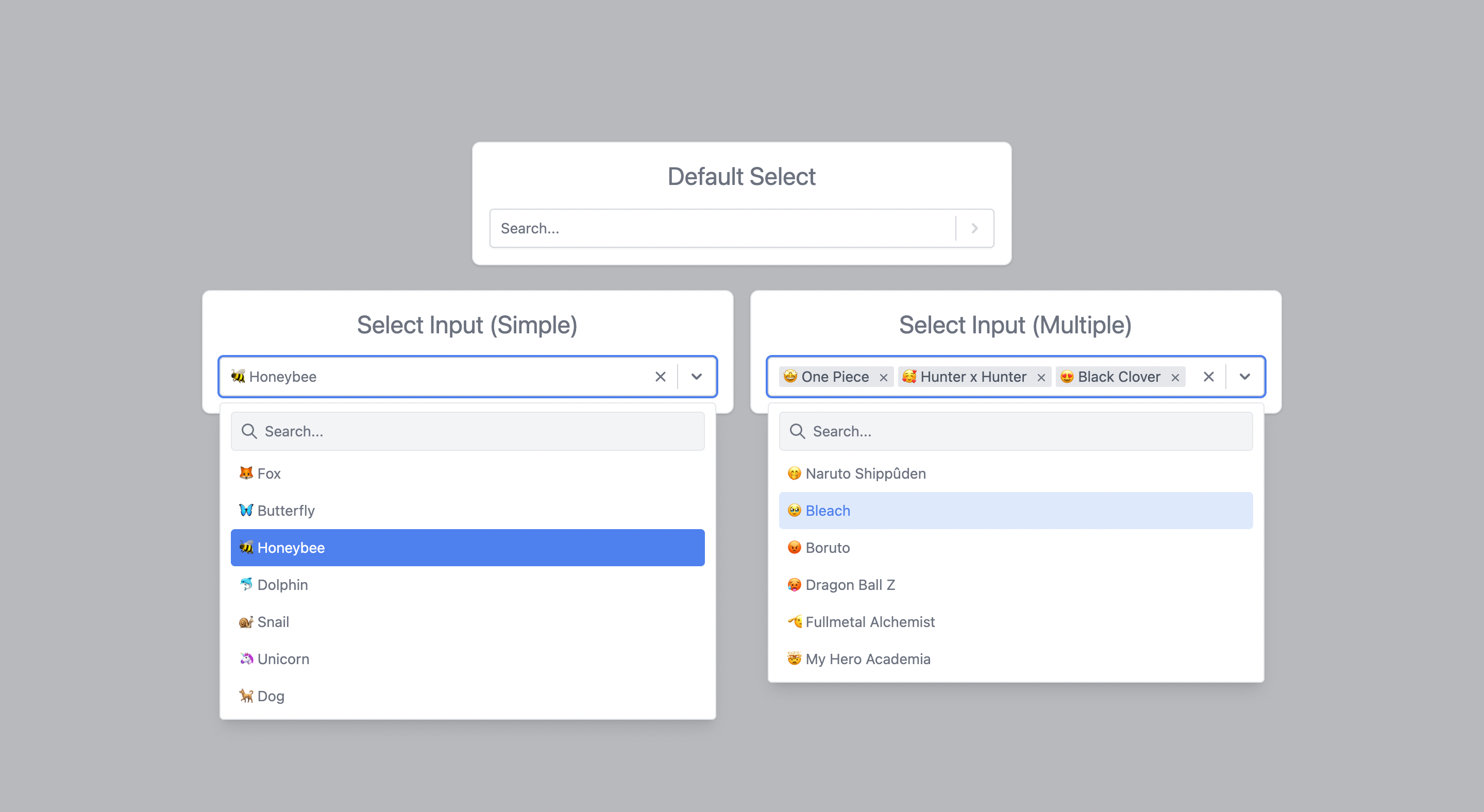
React-tailwindcss-select is a simple component ready to be inserted into your project This component inspired by React-select is a select input made with Tailwindcss and React.
## Features
- ✅ Select field for a single item
- ✅ Selection field for multiple items
- ✅ Optional button to clear the field
- ✅ Optional search for an item
- ✅ Optional deactivation of an option
- ✅ TypeScript support
- ✅ Group options
- ✅ Customization of the select field style
- ⬜ Fixed Options (multiple items select)
## Why ❔
A select with the above features is above all indispensable in many projects. On a project using
tailwindcss, when I install [react-select](https://react-select.com) or other such packages, the
style of the latter is affected by that of [tailwind](https://tailwindcss.com/).
Rather than looking for a component that uses [tailwind](https://tailwindcss.com/), I preferred to
make my own based on react-select which I like (and also because I generally like to reinvent the
wheel 😅).
## Online Demo
You can find the online demo at [here](https://demo-react-tailwindcss-select.vercel.app/)
## Install
You can use yarn
```bash
yarn add react-tailwindcss-select
```
Or via npm
```bash
npm install react-tailwindcss-select
```
make sure you have installed the peer dependencies as well with the below versions.
```
"react": "^18.2.0"
```
## Usage
This component also exports a tiny CSS file built by tailwind. All CSS classes used in designing and
customizing the select component are all custom tailwind classes which ensures that an existing
tailwind project would not need to include this CSS file again.
### Tailwind Project
A tailwind project would only have to import the react component using
`import Select from 'react-tailwindcss-select'` and specify the component in the tailwind
configuration to generate the styles of the classes used by react-tailwindcss-select.
Use this code to add the component to the tailwind configuration
```javascript
// in your tailwind.config.js
module.exports = {
// ...
content: [
"./src/**/*.{js,jsx,ts,tsx}",
"./node_modules/react-tailwindcss-select/dist/index.esm.js"
]
// ...
};
```
### None Tailwind Project
On a project that does not use tailwind, you need to import the component's CSS as well. To do this
use these two codes: `import Select from 'react-tailwindcss-select'` and
`import 'react-tailwindcss-select/dist/index.css'`
> **Warning**
>
> In this case when you don't use tailwind on your project, think about isolating the component and
> its style so that tailwind doesn't affect the style of the elements in your project. For this, you
> can use the
> [shadow dom](https://developer.mozilla.org/en-US/docs/Web/Web_Components/Using_shadow_DOM).
Then use react-tailwindcss-select in your app:
#### With React Component
```javascript
import React from "react";
import Select from "react-tailwindcss-select";
const options = [
{ value: "fox", label: "🦊 Fox" },
{ value: "Butterfly", label: "🦋 Butterfly" },
{ value: "Honeybee", label: "🐝 Honeybee" }
];
class App extends React.Component {
constructor(props) {
super(props);
this.state = { animal: null };
this.handleChange = this.handleChange.bind(this);
}
handleChange(value) {
console.log("value:", value);
this.setState({ animal: value });
}
render() {
const { animal } = this.state;
return (
);
}
}
```
#### With React Hooks
```javascript
import { useState } from "react";
import Select from "react-tailwindcss-select";
const options = [
{ value: "fox", label: "🦊 Fox" },
{ value: "Butterfly", label: "🦋 Butterfly" },
{ value: "Honeybee", label: "🐝 Honeybee" }
];
const App = () => {
const [animal, setAnimal] = useState(null);
const handleChange = value => {
console.log("value:", value);
setAnimal(value);
};
return (
);
};
export default App;
```
## Theming options
**Supported themes**

To change the default theme, simply add the `primaryColor` props to your select field with the theme
value. By default, the `primaryColor` is set to `blue`
### Indigo example
```javascript
import { useState } from "react";
import Select from "react-tailwindcss-select";
const options = [
{ value: "fox", label: "🦊 Fox" },
{ value: "Butterfly", label: "🦋 Butterfly" },
{ value: "Honeybee", label: "🐝 Honeybee" }
];
const App = () => {
const [animal, setAnimal] = useState(null);
const handleChange = value => {
console.log("value:", value);
setAnimal(value);
};
return (
);
};
export default App;
```
## Props
This table shows all the options available in react-tailwindcss-select.
| Option | Type | Default | Description |
|-----------------------------------------------|------------|--------------------|----------------------------------------------------------------------------------------|
| [`classNames`](#classNames) | `Object` | `undefined` | This prop allows you to style most of the components used by this library. |
| `isClearable` | `Boolean` | `true` | Indicates if you can empty the select field. |
| `isDisabled` | `Boolean` | `false` | Indicates if you can disable the select field. |
| `isMultiple` | `Boolean` | `false` | Indicates if you can do a multiple selection. |
| `isSearchable` | `Boolean` | `false` | Indicates if you can search the elements of the select field. |
| [`formatGroupLabel`](#formatGroupLabel) | `Function` | `null` | Allows you to use a custom rendering template for each subgroup title |
| [`formatOptionLabel`](#formatOptionLabel) | `Function` | `null` | Allows you to use a custom rendering template for each option in the list |
| `loading` | `Boolean` | `false` | Indicates if you want a loader to appear in the field. |
| `menuIsOpen` | `Boolean` | `false` | Indicates if you want the options menu to be displayed by default. |
| `noOptionsMessage` | `String` | `No results found` | Default message when there is no option in the select field. |
| [`onChange`](#onChange) | `Function` | | This callback, if present, is triggered when the select field value is modified. |
| [`onSearchInputChange`](#onSearchInputChange) | `Function` | | This callback, if present, is triggered when the search input field value is modified. |
| [`options`](#options) | `Array` | `[]` | All options or options groups available in the selection field. |
| `placeholder` | `String` | `Select...` | The placeholder shown for the select field. |
| `primaryColor` | `String` | `blue` | Default theme of the field. |
| `searchInputPlaceholder` | `String` | `Search...` | The placeholder shown for the search input field. |
| [`value`](#value) | `Object` | `null` | Current value of select field. |
### onChange
This callback, if present, is triggered when the select field value is modified. This callback takes
as a parameter the current value(s) selected. These values respect the same structure as the
elements of the options.
```js
currentValue => {
console.log("currentValue:", currentValue);
};
```
### onSearchInputChange
This callback, if present, is triggered when the search input field value is modified. This callback takes
as parameter a `React.ChangeEvent`.
```js
e => {
console.log("value:", e.target.value);
};
```
### options
All options are available in the select field. Each option element must have a `value` property that
serves as an identifier for the element, a `label` property that is the text that is displayed in
the options list, and an optional `disabled` property to specify whether the element is active.
```js
// default element
const options = [{ value: "fox", label: "🦊 Fox" }];
// default element with `disabled`
const options = [{ value: "fox", label: "🦊 Fox", disabled: true }];
```
#### Group item
If you want to group options you can use the following code.
```js
const options = [
{
label: "Mammal",
options: [
{ value: "Dolphin", label: "🐬 Dolphin" },
{ value: "Giraffe", label: "🦒 Giraffe" }
]
},
{
label: "Carnivore",
options: [
{ value: "Tiger", label: "🐅 Tiger" },
{ value: "Lion", label: "🦁 Lion" }
]
},
// 👉 You can put the grouped and ungrouped options together
{ value: "Zombie", label: "🧟 Zombie" }
];
```
> **Info**
>
> 👉 You can put the grouped and ungrouped options together.
### value
The current value of the select field. These objects must follow the same structure as an `options`
element. Thus, the following would work:
```js
// default element Simple Select
const value = { value: "fox", label: "🦊 Fox" };
// default element with `disabled` Simple Select
const value = { value: "fox", label: "🦊 Fox", disabled: true };
// default element Multiple Select
const value = [{ value: "fox", label: "🦊 Fox" }];
// default element with `disabled` Multiple Select
const value = [{ value: "fox", label: "🦊 Fox", disabled: true }];
```
### formatGroupLabel
`formatGroupLabel` allows you to use a custom rendering template for each subgroup title
```jsx
import { useState } from "react";
import Select from "react-tailwindcss-select";
const options = [
{
label: "Mammal",
options: [
{ value: "Dolphin", label: "🐬 Dolphin" },
{ value: "Giraffe", label: "🦒 Giraffe" }
]
},
{
label: "Carnivore",
options: [
{ value: "Tiger", label: "🐅 Tiger" },
{ value: "Lion", label: "🦁 Lion" }
]
}
];
const App = () => {
const [animal, setAnimal] = useState(null);
const handleChange = value => {
console.log("value:", value);
setAnimal(value);
};
return (