Showing preview only (509K chars total). Download the full file or copy to clipboard to get everything.
Repository: openatx/uiautomator2
Branch: master
Commit: e53484d6898a
Files: 114
Total size: 479.6 KB
Directory structure:
gitextract_lso4f4th/

├── .coveragerc
├── .github/
│   ├── ISSUE_TEMPLATE.md
│   ├── copilot-instructions.md
│   └── workflows/
│       ├── main.yml
│       └── release.yml
├── .gitignore
├── CHANGELOG
├── DEVELOP.md
├── HISTORY.md
├── LICENSE
├── Makefile
├── QUICK_REFERENCE.md
├── README.md
├── README_CN.md
├── XPATH.md
├── XPATH_CN.md
├── _archived/
│   ├── aircv/
│   │   ├── README.md
│   │   └── __init__.py
│   ├── init.py
│   ├── messagebox.py
│   ├── ocr/
│   │   ├── README.md
│   │   ├── __init__.py
│   │   └── baiduOCR.py
│   ├── webview.py
│   └── widget.py
├── demo_tests/
│   ├── conftest.py
│   ├── test_app.py
│   ├── test_core.py
│   ├── test_device.py
│   ├── test_input.py
│   ├── test_selector.py
│   └── test_watcher.py
├── docs/
│   ├── 2to3.md
│   ├── Makefile
│   └── conf.py
├── examples/
│   ├── adbkit-init/
│   │   ├── README.md
│   │   ├── main.js
│   │   └── package.json
│   ├── apk_install.py
│   ├── batteryweb/
│   │   ├── README.md
│   │   ├── main.py
│   │   └── templates/
│   │       └── index.html
│   ├── com.codeskyblue.remotecamera/
│   │   └── main_test.py
│   ├── com.netease.cloudmusic/
│   │   ├── README.txt
│   │   └── main.py
│   ├── minitouch.py
│   ├── multi-thread-example.py
│   ├── runyaml/
│   │   ├── run.py
│   │   └── test.yml
│   ├── test_simple_example.py
│   └── u2iniit-standalone/
│       ├── README.txt
│       ├── init-vendor.sh
│       ├── main.go
│       ├── proxyhttp.go
│       └── uiautomator2-init-standalone.bat
├── mobile_tests/
│   ├── conftest.py
│   ├── runtest.sh
│   ├── skip_test_image.py
│   ├── test_push_pull.py
│   ├── test_screenrecord.py
│   ├── test_session.py
│   ├── test_settings.py
│   ├── test_simple.py
│   ├── test_swipe.py
│   ├── test_watcher.py
│   └── test_xpath.py
├── poetry.toml
├── pyproject.toml
├── tests/
│   ├── test_core.py
│   ├── test_import.py
│   ├── test_input.py
│   ├── test_logger.py
│   ├── test_settings.py
│   ├── test_utils.py
│   └── test_xpath.py
├── uiautomator2/
│   ├── __init__.py
│   ├── __main__.py
│   ├── _input.py
│   ├── _proto.py
│   ├── _selector.py
│   ├── abstract.py
│   ├── assets/
│   │   ├── .gitignore
│   │   └── sync.sh
│   ├── base.py
│   ├── core.py
│   ├── exceptions.py
│   ├── ext/
│   │   ├── __init__.py
│   │   ├── htmlreport/
│   │   │   ├── README.md
│   │   │   ├── __init__.py
│   │   │   └── assets/
│   │   │       ├── index.html
│   │   │       ├── simplehttpserver.py
│   │   │       └── start.bat
│   │   ├── info/
│   │   │   ├── __init__.py
│   │   │   └── conf.py
│   │   └── perf/
│   │       ├── README.md
│   │       └── __init__.py
│   ├── image.py
│   ├── screenrecord.py
│   ├── settings.py
│   ├── swipe.py
│   ├── utils.py
│   ├── version.py
│   ├── watcher.py
│   └── xpath.py
└── uibox/
    ├── LICENSE
    ├── Makefile
    ├── README.md
    ├── cmd/
    │   ├── httpcheck.go
    │   ├── nohup.go
    │   └── root.go
    ├── go.mod
    ├── go.sum
    ├── go.work
    └── main.go
================================================
FILE CONTENTS
================================================
================================================
FILE: .coveragerc
================================================
[run]
branch = True
omit =
/tests/**
/docs/*
/*_tests/**
[report]
; Regexes for lines to exclude from consideration
exclude_also =
; Don't complain about missing debug-only code:
def __repr__
if self\.debug
; Don't complain if tests don't hit defensive assertion code:
raise AssertionError
raise NotImplementedError
; Don't complain if non-runnable code isn't run:
if 0:
if __name__ == .__main__.:
; Don't complain about abstract methods, they aren't run:
@(abc\.)?abstractmethod
except adbutils.AdbError
@deprecated
ignore_errors = True
================================================
FILE: .github/ISSUE_TEMPLATE.md
================================================
**看完请删掉该内容**
*提Bug需要注意的事项*
请务必提供详细的信息,能够复现你的问题,否则很难帮你解决。没用的Issue将自动被机器人打上`Invalid`标签并且自动关闭!!。
- 手机型号
- uiautomator2的版本号(`pip show uiautomator2`)
- 手机截图
- 相关日志(Python控制台错误信息, adb logcat完整信息, atxagent.log日志)
- 最好能附上可能复现问题的代码。
================================================
FILE: .github/copilot-instructions.md
================================================
# uiautomator2
uiautomator2 is a Python library providing a simple, easy-to-use, and stable Android automation framework. It consists of a Python client that communicates with an HTTP service running on Android devices based on UiAutomator.
**ALWAYS follow these instructions first and completely. Only fallback to additional search and context gathering if the information in these instructions is incomplete or found to be in error.**
Always reference these instructions first and fallback to search or bash commands only when you encounter unexpected information that does not match the info here.
## Working Effectively
### Initial Setup
- `pip install poetry` -- Install Poetry dependency manager
- `poetry install` -- Install all dependencies in virtual environment. NEVER CANCEL: Takes 3-5 minutes. Set timeout to 8+ minutes.
- Poetry will create a virtual environment in `.venv/` directory
### Build and Test Process
- `poetry run pytest tests/ -v` -- Run unit tests (25 tests). Takes ~3 seconds. All tests should pass.
- `make cov` -- Run coverage tests. Takes ~3 seconds. Should show ~27% coverage.
- `make format` -- Format code with isort. Takes ~1 second. ALWAYS run before committing.
- `poetry build` -- Build distribution packages. Takes ~5 seconds. Creates wheel and sdist in `dist/`.
- `poetry run uiautomator2 version` -- Check CLI functionality. Should output version number.
### Asset Synchronization (Optional)
- `make sync` -- Download required APK and JAR assets. FAILS due to network restrictions in sandboxed environment. This is EXPECTED and not required for development.
- Asset sync downloads Android APK and u2.jar from external hosts which are blocked in this environment.
### Commands That Will Fail (Expected)
- `make test` -- Mobile tests require Android device via ADB. Will fail with "Can't find any android device/emulator" - this is EXPECTED.
- `make build` -- Full build with poetry plugin. May fail due to system package conflicts. Use `poetry build` instead.
- `make sync` -- Asset download fails due to network restrictions. Not required for core development.
## Validation Scenarios
After making changes, ALWAYS run this validation sequence:
1. **Unit Tests**: `poetry run pytest tests/ -v` -- Must pass all 25 tests
2. **Coverage**: `make cov` -- Should complete without errors
3. **Formatting**: `make format` -- Always format before committing
4. **Build**: `poetry build` -- Must complete successfully
5. **CLI Test**: `poetry run uiautomator2 --help` -- Should show help output
### Manual Testing Scenarios
- Test version command: `poetry run uiautomator2 version`
- Test CLI help: `poetry run uiautomator2 --help`
- Verify core imports: `poetry run python -c "import uiautomator2; print('Import successful')"`
## Key Components and Structure
### Core Modules (uiautomator2/)
- `__init__.py` -- Main API and connection functions (426 lines, 27% coverage)
- `xpath.py` -- XPath selector implementation (411 lines, 62% coverage)
- `_selector.py` -- UI element selectors (320 lines, 19% coverage)
- `core.py` -- Core device interaction (214 lines, 21% coverage)
- `watcher.py` -- Event watchers (212 lines, 20% coverage)
### Test Directories
- `tests/` -- Unit tests (25 tests, no device required)
- `mobile_tests/` -- Integration tests (30 tests, require Android device)
- `demo_tests/` -- Example/demo tests
### Build Configuration
- `pyproject.toml` -- Poetry configuration and dependencies
- `Makefile` -- Build automation (format, test, build, sync commands)
- `.coveragerc` -- Coverage configuration
### Additional Components
- `uibox/` -- Go component for Android binary tools (separate build system)
### Documentation
- `README.md` -- Main documentation with usage examples
- `DEVELOP.md` -- Development setup instructions
- `XPATH.md` -- XPath selector documentation
- `CHANGELOG` -- Version history
## Common Development Tasks
### Adding New Features
1. Run existing tests to ensure baseline: `poetry run pytest tests/ -v`
2. Implement changes in appropriate module under `uiautomator2/`
3. Add unit tests in `tests/` directory
4. Run tests: `poetry run pytest tests/ -v`
5. Format code: `make format`
6. Check coverage: `make cov`
7. Build to verify: `poetry build`
### Debugging Issues
- Enable debug logging: Use `-d` flag with CLI commands
- Check import issues: `poetry run python -c "import uiautomator2"`
- Device connection issues require actual Android device (expected to fail in this environment)
### Code Style
- Uses isort for import sorting with HANGING_INDENT mode and 120 character line length
- Coverage requirement: Tests should maintain or improve the ~27% coverage baseline
- All code must pass existing unit tests
## Environment Limitations
**CANNOT DO (Expected Failures):**
- Mobile testing without Android device
- Asset synchronization (network blocked)
- Full make build (dependency conflicts)
**CAN DO:**
- Unit testing (tests/ directory)
- Code formatting and linting
- Building with `poetry build`
- CLI testing and development
- Core library development
## Time Expectations
- **NEVER CANCEL**: Poetry install takes 3-5 minutes. Set timeout to 8+ minutes.
- Unit tests: ~2.5 seconds
- Coverage tests: ~3.5 seconds
- Code formatting: ~0.5 seconds
- Poetry build: ~3 seconds
- Full validation sequence: ~12 seconds
## Key Commands Reference
```bash
# Essential development workflow
poetry install # Setup (3-5 min, NEVER CANCEL)
poetry run pytest tests/ -v # Unit tests (2.5s)
make format # Format (0.5s)
make cov # Coverage (3.5s)
poetry build # Build (3s)
# CLI testing
poetry run uiautomator2 version # Version check
poetry run uiautomator2 --help # Help system
# Known failures (expected in sandboxed environment)
make test # Requires Android device
make sync # Network blocked
make build # Dependency conflicts
```
Always validate changes with the full sequence: tests → format → coverage → build → CLI test.
## Validation Guarantee
**Every command in these instructions has been validated to work correctly.** If any command fails unexpectedly:
1. First check that you're in the correct directory: `/path/to/uiautomator2`
2. Ensure Poetry virtual environment is properly set up: `poetry install`
3. Check for environment issues: `poetry run python -c "import uiautomator2; print('OK')"`
4. If problems persist, the issue may be with your environment or changes you've made
Expected validation results:
- Unit tests: 25 tests should pass
- Coverage: Should show ~27% total coverage
- Format: Should complete without errors (may show "Skipped N files")
- Build: Should create `dist/` directory with wheel and sdist
- CLI: Should display help text starting with "usage: uiautomator2"
================================================
FILE: .github/workflows/main.yml
================================================
name: Python application
on:
push:
branches:
- master
tags-ignore:
- '*'
pull_request:
branches:
- master
jobs:
build-and-publish:
name: ${{ matrix.os }} / ${{ matrix.python-version }}
runs-on: ${{ matrix.image }}
strategy:
matrix:
os: [Ubuntu, Windows]
python-version: ["3.8", "3.11"]
include:
- os: Ubuntu
image: ubuntu-latest
- os: Windows
image: windows-2022
- os: macOS
image: macos-12
fail-fast: false
steps:
- uses: actions/checkout@v4
- name: Set up Python ${{ matrix.python-version }}
uses: actions/setup-python@v5
with:
python-version: ${{ matrix.python-version }}
- name: Get full Python version
id: full-python-version
run: echo version=$(python -c "import sys; print('-'.join(str(v) for v in sys.version_info))") >> $GITHUB_OUTPUT
- name: Update PATH
if: ${{ matrix.os != 'Windows' }}
run: echo "$HOME/.local/bin" >> $GITHUB_PATH
- name: Update Path for Windows
if: ${{ matrix.os == 'Windows' }}
run: echo "$APPDATA\Python\Scripts" >> $GITHUB_PATH
- name: Enable long paths for git on Windows
if: ${{ matrix.os == 'Windows' }}
# Enable handling long path names (+260 char) on the Windows platform
# https://docs.microsoft.com/en-us/windows/win32/fileio/naming-a-file#maximum-path-length-limitation
run: git config --system core.longpaths true
- name: Install dependencies
run: |
python -m pip install --upgrade pip
pip install poetry
poetry install
- name: Run tests with coverage
run: |
make cov
- name: Upload test results to Codecov
if: ${{ !cancelled() }} # Run even if tests fail
uses: codecov/test-results-action@v1
with:
token: ${{ secrets.CODECOV_TOKEN }}
- name: Upload coverage reports to Codecov
uses: codecov/codecov-action@v4.0.1
with:
token: ${{ secrets.CODECOV_TOKEN }}
slug: openatx/uiautomator2
================================================
FILE: .github/workflows/release.yml
================================================
name: Release
on:
push:
tags:
- '*.*.*'
jobs:
release:
name: Release
runs-on: ubuntu-latest
steps:
- uses: actions/checkout@v4
- name: Set up Python
uses: actions/setup-python@v4
with:
python-version: 3.8
- name: Install dependencies
run: |
python -m pip install --upgrade pip
pip install poetry
- name: Build
run: |
make build
- name: Publish distribution 📦 to PyPI
uses: pypa/gh-action-pypi-publish@release/v1
with:
skip-existing: true
password: ${{ secrets.PYPI_API_TOKEN }}
================================================
FILE: .gitignore
================================================
# Byte-compiled / optimized / DLL files
__pycache__/
*.py[cod]
*$py.class
# C extensions
*.so
# Distribution / packaging
.idea/
.Python
env/
build/
develop-eggs/
dist/
downloads/
eggs/
.eggs/
lib/
lib64/
parts/
sdist/
var/
wheels/
*.egg-info/
.installed.cfg
*.egg
# PyInstaller
# Usually these files are written by a python script from a template
# before PyInstaller builds the exe, so as to inject date/other infos into it.
*.manifest
*.spec
# Installer logs
pip-log.txt
pip-delete-this-directory.txt
# Unit test / coverage reports
htmlcov/
.tox/
.coverage
.coverage.*
.cache
nosetests.xml
coverage.xml
*.cover
.hypothesis/
# Translations
*.mo
*.pot
# Django stuff:
*.log
local_settings.py
# Flask stuff:
instance/
.webassets-cache
# Scrapy stuff:
.scrapy
# Sphinx documentation
docs/_build/
# PyBuilder
target/
# Jupyter Notebook
.ipynb_checkpoints
# pyenv
.python-version
# celery beat schedule file
celerybeat-schedule
# SageMath parsed files
*.sage.py
# dotenv
.env
# virtualenv
.venv
venv/
ENV/
# Spyder project settings
.spyderproject
.spyproject
# Rope project settings
.ropeproject
# mkdocs documentation
/site
# mypy
.mypy_cache/
AUTHORS
ChangeLog
.vscode/
report/
*.apk
*.exe
node_modules/
vendor/
docs/*.rst
.DS_Store
*.lock
junit.xml
================================================
FILE: CHANGELOG
================================================
CHANGES
=======
2.16.10
-------
* try not to reinstall apk when atx-agent is not installed
2.16.9
------
* little fix for vivo and oppo, do not reinstall uiautomator apk
2.16.8
------
* fix dump\_hierarchy error when recovered in a minute
* update logic for tmq
* fixed: 增加app\_install的超时时间 (#736)
2.16.7
------
* use filelock to prevent multi process reset\_uiautomator
2.16.6
------
* remove process\_safe\_wrapper since not allow multi device operation
2.16.5
------
* use filelock to make process call process safe
2.16.4
------
* skip uninstall uiautomator apk for tmq platform
* add link
2.16.3
------
* use github actions to publish lib instead of trivis
2.16.2
------
* fix tests
* Update init.py (#618)
2.16.1
------
* hotfix for multiprocess call reset\_uiautomator
* update ISSUE\_TEMPLATE for REQUIRED logs
* update doc
2.16.0
------
* add cli:doctor
* add doc
2.15.2
------
* add support reconnect when device disconnect
* update requirements
* Update \_\_init\_\_.py (#679)
2.15.1
------
* try to fix when wifi connect device still try to upgrade atx-agent bug
* add multi thread example
2.15.0
------
* add init --addr support
* update func doc
2.14.1
------
* fix init error
2.14.0
------
* mark useless tests
* add atx-agent version check when something when wrong
* update apk and atx-agent version
* skip flake8 check
2.13.2
------
* update atx-agent to fix security error, ref openatx/atx-agent#82
2.13.1
------
* update minicap download address to devicefarmer group, which support sdk:30
2.13.0
------
* add d.xpath(..).child support
2.12.3
------
* show float window in tmq platform
2.12.2
------
* fix bug #650
* add typing for image, commented findit
2.12.1
------
* fix d.settings to self.settings
* change localhost to 127.0.0.1
2.12.0
------
* add open\_url method
2.11.5
------
* fix swipe set duration no effect, close #591
2.11.4
------
* xpath: %xxx% support content-desc
2.11.3
------
* add missing builtin arg
* add builtin and autostart to watch\_context
* add hire doc
2.11.2
------
* update requirements
2.11.1
------
* fix settings props check
2.11.0
------
* add watch\_context which may replace watcher
* fix reset-uiautomator on windows error
2.10.2
------
* add retry for app\_current, fix #572
* update sponsor link
2.10.1
------
* update tests, prevent atx-agent log too large
2.10.0
------
* add more tests
* add Direction, support scroll\_to, update some doc
* d.xpath add scroll support
2.9.6
-----
* fix support for d(resourceId='android:id/text1')[-1].get\_text()
2.9.5
-----
* support change to production use os.environ['TMQ'] = true
* raise EnvironmentError directly when connected with wifi, but atx-agent is down
2.9.4
-----
* fix recover logic when atx-agent is not responsing
2.9.3
-----
* enable screenrecord test
* fix screenrecord
2.9.2
-----
* fix wait\_for\_device not finished error
2.9.1
-----
* fix selector long\_click bug
* update doc
2.9.0
-----
* add operation\_delay support
2.8.6
-----
* add init into connect\_usb for compability
2.8.5
-----
* remove humanize
* add support d(description=我的淘宝).screenshot()
2.8.4
-----
* hotfix for set\_new\_command\_timeout error
2.8.3
-----
* hot fix for connect error when atx-agent not installed
2.8.2
-----
* support fallback to WiFi when usb disconnected, add deprecated method :service
2.8.1
-----
* fix app\_start missing stop=True error
* support push url
2.8.0
-----
* change property serial back
* add double\_click, set click\_pre and post delay to 0
* fix bugs reported in qq
* remove useless code
* add missing swipe\_ext and @address(teditor)
* finally version
* add missing toast
* add more method
* rewrite uiautomator2, too complex
2.7.3
-----
* add timeout(60s) in init.py to prevent hang on apk install page
2.7.2
-----
* update adbutils which buildin adb.exe for windows
* rewrite part of init code
2.7.1
-----
* upgrade adbutils: support download adb.exe when missing on windows
2.7.0
-----
* add click\_exists to xpath
2.6.2
-----
* fix with reinstall apks when meet signature not matched error
* add image.click doc and tests
2.6.1
-----
* screenrecord support horizontal and vertical, support limit fps
* add screenrecord usage
2.6.0
-----
* add screenrecord code
* add screenrecord sample
2.5.9
-----
* upgrade atx-agent to 0.9.4 to fix go panic on go12
2.5.8
-----
* update minicap sync method
* update atx-agent version and apk version
* call watcher when d.xpath calls
* let d.touch.down support percent position, remove stop-app when reset-uiautomator
* update doc
* support Android Q minicap, show debug log when image search
2.5.7
-----
* fix click on infinitly display not working bug
* add recommended article
* support generate all docs by sphinx
* fix docs generate with sphinx, not very well
* add missing file
* fix retry when take screenshot, update readthedocs
* add readthedocs for test
2.5.6
-----
* add match and scroll\_to to xpath object, update atx-agent version
2.5.5
-----
* change connect\_usb not start uiautomator automatically
2.5.4
-----
* update atx-agent and apk version to use minitouchagent
2.5.3
-----
2.5.2
-----
* fix pull error
* add readTimeout handle
2.5.1
-----
* fix \_request func recursive error
2.5.0
-----
* add d.alibaba support
* update scale and wait-for-device timeout to 70s
* fix when device replugin, d.shell fails
2.4.6
-----
* fix wait am instrument too short, change timeout from 20 to 40
* fix adbutils shell decode error
* add retry in push\_url
2.4.5
-----
* fix usb cable replug raise ConnectionError bug
2.4.4
-----
* update apk version, and atx-agent version
* update atx-agent to 0.8.1, do lot of code format
* fix Android Q screenshot error
* fix init may raise FileNotFoundError bug
* add uiautomator2 version in command line
* add session test
2.4.3
-----
* add fallback and session add some missing method
* fix github workflow
* fix flake8 warning
* test github actions
* change callback to fallback
* add d.xpath(xxxxx).callback(click, px, py).click() support
* add back token again
* check if travis notification is working
* add d.xpath.position方法
2.4.2
-----
* change am instrument logic again
* rewrite jsonrpc\_retry\_call logic
* make recover uiautomator logic more simple
2.4.1
-----
* add taobao plugin for internal network
* add long\_click to d.xpath
2.4.0
-----
* change logic of start uiautomator, upgrade apk version
* fix bug, reported by h.t
* am start apk twice to make sure, uiautomator can be recovered
2.3.4
-----
* show lib version when init for easily debug
* support config service recover behavior
2.3.3
-----
* fix d.serial return None bug, fix tests on large screen
* update doc, add quick-reference.md
* add quick ref guide
2.3.2
-----
* fix init command not resolve signature mismatch bug, fix uninstall can not uninstall apk bug
2.3.1
-----
* add xpath\_debug to settings, fix xpath %xx and xx%
* update watcher doc
2.3.0
-----
* add d.watcher method to handle popups
* add settings code
* add basic settings.py
* Update README.md
* hotfix for windows
* remove timeout for function: pull
2.2.0
-----
* add cmd\_purge, add set\_new\_command\_timeout api
2.1.0
-----
* add image.py, change uiautomator from v1 to v2
* add uauto
* typo (#476)
* fix missing \_parent error, close #477
* hot fix for #475
* fix spell error
* fix logo not show error in readme
* add hogwarts sponsor
* add wait to image.py
* fix xpath start-with and ends-with, add image click
2.0.0
-----
* remove toast from readme
* add app list api
* support multi xpath(xx).xpath(xx), and add .info in xpath
* add clipboard doc
* change to uiautomator 1.0
* Fixes #451
* add clipboard support
* Update README.md
* fix d.xpath.when(..).when(..), thread-safe reset-uiautomator
1.3.6
-----
* use monkey command to install apk on TMQ platform
* fix d.xpath.watcher, fix d.shell can not handle & and ? bug
1.3.5
-----
* add xpath.apply\_watch\_from\_yaml, support xpath.when(1).when(2)
* fix homepage link
* fix atx-agent version compare check
1.3.4
-----
* remove useless cli
* use jsonrpc.dumpWindowsHierarchy instead of http GET /dump/hierarchy
* assert file\_size when cache\_download
1.3.3
-----
* fix uiautomator start error
1.3.2
-----
* update atx-agent to fix UIAutomation not connected error
* upgrade apk version
* enhance reset\_uiautomator()
1.3.1
-----
* fix adbutils dep version
1.3.0
-----
* fix check atx-agent
* fix last commit
* add function to check atx-agent version
* update atx-agent version
* update dingtalk webhook again
* update dingtalk webhook
1.2.6
-----
* fix when uiautomator not alive, func connect can not auto init error
1.2.5
-----
* update dingtalk robot webhook url
* set init as default, set default screenshot name when use cli:uiautomator2 screenshot
* rename current\_app to app\_current
* add webview for future develop
1.2.4
-----
* fix app\_start without activity not launch error
* add adcd.py(abstract class about device) and implement pure adb to run test
* implement pure adb to run test
* use Baidu OCR to select element (#419)
1.2.3
-----
* update androidbinary to fix momo can not start error #393
* add support u2.connect\_usb(serial, init=False)
* change function behavior d.touch.up() to d.touch.up(x, y)
1.2.2
-----
* fix app\_list\_running() only show 3rd party apps bug, add support to read from env-var ANDROID\_SERIAL
1.2.1
-----
* fix and add doc for app\_start #425, add uiautomator check in dump\_hierarchy
* add thread lock in dump\_hierarchy
* fix session restart
* Update README.md
* add notification about dingtalk travis
1.2.0
-----
* add wait gone
* add strict argument to session()
* rename UIAutomatorServer to Device, add session.restart() method
* change http://tool.appetizer.io to https protocol
* add swipe\_ext('right', 0.9) method
* add app\_wait, app\_list\_running
1.1.0
-----
* add swipe and screenshot to d.xpath element
* fix init with serial
* update changelog, remove d.watchers.watched, use IPython.embed first in cmd:uiautomator2 console
* add console in command line
* fix shell(stream=True) timeout error, close #394
1.0.3
-----
* fix android Q support again
1.0.2
-----
* replace google-fire with argparse, add current, stop, start subcommand in command line
* remove useless u2cli
1.0.1
-----
* fix init unknown host service, close #373
* add develop.md
1.0.0
-----
* upgrade atx-agent version, and android-uiautomator-version, update doc
* fix swipe\_points usage in readme
* init add mirror of appetizer
* fix str decode error
* fix debug mode decode error
0.3.3
-----
* add watch\_clear and address
* add xpath.watch\_stop()
0.3.2
-----
* fix debug curl print
* fix shell calls in connect
0.3.1
-----
* fix #370
* test with 3.5
0.3.0
-----
* fix fix
* fix travis again
* fix travis
* update readme
* add missing dep:adbutils
* update xpath doc, add set\_text to xpath
* remove uiautomator2/adbutils.py, use thirdparty adbutils
* add quickstart, fix healthcheck for OnePlus
* fix screenshot method
* say goodbye to python2 and welcome python3
* Update ISSUE\_TEMPLATE.md
* use /dump/hierarchy to instead of call:dumpHierarchy
* update atx-agent version
0.2.3
-----
* xpath element support click
* add http\_timeout for shell function, resolve #353
* add xpath quicksheet
* resolve #348
* remove code which leads to minicap install error
* add get method of xpath
* add xpath::get\_text(), close #337
* add connect\_adb\_wifi function
* add probot link
* auto stale issue when tagged as invalid
* serial support none
* 修复多台设备时,list-forward失败 (#327)
* \`python -m uiautomator2 init\`初始化403报错,增加header atx\_agent\_url中报错变量错误修复
0.2.2
-----
* update atx-agent version
* typo (#318)
* fix connect\_usb error
0.2.1
-----
* fix #317, fix #316
0.2.0
-----
* merge change
* remove pure-python-adb dependency, use adbutils.py instead
* format \_\_init\_\_.py, update adbutils with ADB Protocol
* update changelog
* part of job
0.1.11
------
* limit pure-python-adb version, to fix from adb.client import error
* support args
0.1.10
------
* remove cmd:init from fire.Fire, fix forward error when muti device connect to one machine
* upgrade atx-agent
* ext\_xpath support
* remove 3.7
* fix travis test again
* fix travis
* sort imports
* split code to different files
* Update README.md
* Update README.md
* remove debug with dict: which will lead misunderstanding
* update atx-agent version
* appveyor
* exedir detection everywhere
* fix
* come at me
* need android components nowadays
* travis 2018 switches from android-21 to android-22
* fix pip install requirements
* fix travis lang
* add emulator and tests to travis and update README
* fix typo. (#278)
0.1.9
-----
* fix connect\_usb init error, close #276
* fix typo
* add set\_fail\_prompt function
* add d.touch.(down|move|up) in readme
* fix atxagent version code
0.1.8
-----
* update atx-agent add api app\_info, and app\_icon
* update atx-agent version to 0.5.1, fix session timeout error
* update atx-agent version and netease music example
* add wait\_activity
* raise IndexError when UiObject returned by child\_by\_xxx, close #261
* fix xpath py2 py3 compatibale
* fix xpath ext resource-id error
* Update README.md (#260)
* update weditor install method
0.1.7
-----
* sem-ver:bugfix, fix init with PATH env error on windows
* fix doc
* update apk to 1.1.7 to fix dumpHierarchy, close #207
0.1.6
-----
* use atx-agent server -stop before launch
* force stop atx-agent when init
* fix launch atx-agent with wrong PATH, which may cause /info get wrong info
* fix test on android P emulator
* 加入aricv图像识别插件 (#250)
* update atx-agent version
0.1.5
-----
* fix init, because of mirror down
* fix xpath python2 support, perf create dir if not exists
* fix little bug
* update readme
* first xpath plugin version
* add more comment about xpath plugin
* add xpath plugin
0.1.4
-----
* update install method
* update install part
* add install test code
* fix fps collect
* update atx-agent version
* fix if log bug in ext/info
* 修改info插件调用模式 (#245)
* add test info plugin (#240)
* fix perf get data error (#239)
* Update README.md
* open python 3.7 support
* 更改一处类型提示错误 (#229)
* add beta method hooks\_register
* fix #206, init gives 'inf' as serial <class 'float'> (#216)
* 修改init不成功的问题 (#221)
* update to new atx-agent
* fix current\_app in sumsung, add tcp and udp in perf
* add images
* add fps
* swipe duration default 0.1(old 0.5), add swipe ui
* fix perf uiautomator in python2
* update doc
* fix perf d not exists bug
* add traffic into perf plugin
* update atx-agent version
* catch AttributeError in UIAutomatorServer
* add back implicitly wait
* add perf doc
* add perf plugin
* runyaml fix
* add plugin\_register and ocr plugin
* add plugin support
* let shell return namedtuple, remove outdated docs
* use q|query instead of xpath in steps
* add send\_action support
* fix #200
* add with into session, update oppo support
* fix merge conflict
* click add offset, support oppo install with browser
* add oppo install method, not finished yet
* fix str(err.data) encode error
* Update \_\_init\_\_.py
* add some comment
* 1.修改截图定位线
* raise error when error found in uiautomator2.cli install
* catch NullPointerExceptionError on jsonrpc call
* patch to catch UiAutomation not connect
* use github-mirror for update-apk command
* fix healthcheck
* add unlock screen for healthcheck
* add retry for objInfo
* fix conflict
* hot fix for update\_instance
* add implicit\_wait function
* remove pid file when stop atx-agent
0.1.3
-----
* fix init twice error, update atx-agent t0 0.4.1
* support vivo install
* add cancel request support
* fix python requires
* update to new version
* exclude py 3.7 version
* make u2cli work
* fix when no progress
* update uiautomator2.cli install
* show progress
* add missing file
* add u2cli entry
* add qrcode of qq
* add fail reason
* todo: add push folder support
* add --mirror document, ref #173
* add retry for dump\_hierarchy, because of UiDevice NullPointer Exception
* support github-mirror to make download faster
* chmod +x report bad mode on xiaomi HMNote3
* Change method of detecting executable dir
* merge openatx
* fix push to /data/local/tmp/mini... instead of /data/local/tmp
* fix requests RemoteDisconnected error
* Use pure-python-adb to get serials of all android devices when initializing
* If adb client can't connect to the adb server, try to use adb cli to start adb server
* Use pure-python-adb package to replace adb wrapper
* support --mirror
* fix get toast error
* hot fix for executable dir
* replace $ into -, fix #152
* update document
* use /data/local/tmp as default exec dir
* forgot to update apk version
* manually merge pr 46
* parens are necessary to catch multi exception in python3
* add screenshot(format=raw), fix init timeoutError, close #114
* Replace os.path.join with string format, so can run as normal on windows
* Revert changes to install\_atx\_agent
* Provide alternative execute directory to /data/local/tmp, so can install to devices like 'ZUK's Z2
* Solve ZUK's no permission to /data/local/tmp problem
* fix xpath wait, fix connect simulator bug, update apk, to make watchers faster
* Replace os.path.join with string format, so can run as normal on windows
* Revert changes to install\_atx\_agent
* Provide alternative execute directory to /data/local/tmp, so can install to devices like 'ZUK's Z2
* hot fix for session launch
* fix fix
* update apk version to fix #138 #137
* update view
* add xpath support
* fix session can not start app error
* start atx-agent if atx-agent dead when connect\_usb
* fix ext/htmlreport unpatch
* exists return class, fix watchers.watched not working bug
* add toast capture support
* add d.watchers.watched = True support
0.1.2
-----
* Import update on uiautomator-server, fix current app function fix #41
* \_wait\_install\_finished 增加 hasattr(sys.stdout, 'isatty')判断
* fix current\_ime() failed
* Solve ZUK's no permission to /data/local/tmp problem
* add shell function in order to replace adb\_shell one day
* support long running command
* package info should return None
* comment useless code
* update apk version, try to catch NullException
* run code again for NullObjectException and StaleObjectException
* fix install -g error
* handle StaleObjectException
* fix dns when network change
* only build in python 2.7
* add healthcheck in command line
* update travis
* format code, add click\_gone function
* change prompt
* add double click support
* add proxyhttp.go not finished yet
* stash code
* add support to patch long\_click
* add fancybox into htmlreport
* add qqicon
0.1.1
-----
* fix message in None error
* try to fix #73
* update atx-agent version
* add screenshot into cli
* fix for failed to init
* modified for android simulator
* add docstring for swipe\_points
* add swipe points description
* add --ignore-apk-check option
* add issue template
* little fix
* wait disable\_popups for fix
* UiObject support long\_click with duration
* add issue robot
* support back to init multi devices
* if adb without -g, remove -g and try again
* add DeleteImmediatelly in disable\_popups
* update apk version to support toast
* add support to show toast
* add how to do with popups
* update version
* add disable\_popups support
* update atx agent
* change TMPDIR to support upload large file
* fix UINotFoundEncoding error
* check if apk installed after init
* open u2 github URL after success init
* add adbkit-init
* fix raise exception unicode code encode error
* fix click\_nowait missing error
* support stop uiautomator keeper
* fix htmlreport
* add some useful link
* add htmlreport support, remove click\_nowait and tap
0.1.0
-----
* add session support
* add syntax error retry on screenshot error
* hot fix to fix atx-agent screenshot bug
* 修改import错误 :ImportError: cannot import name popup
* update atx-agent version
* send\_keys use adb shell input text when set\_fast\_ime failed. upgrade pos\_rel2abs function
* add tkgui for experiment
* show better app\_install progress on noatty, make healthcheck better
* update TOC
* sync to atx-agent new download logic
* travis fight
* no android for now
* boring travis non-python pip problem
* fix travis build
* add Android emulator to travis and deploy only once on py2.7
* clarify adb\_shell; fix typos
* Update README.md
* fix healthcheck on xiaomi device
0.0.3
-----
* fix apk version name
* hot fix
* not raise RuntimeError in current\_app()
* add window\_size api
* remove ReadTimeout from jsonrpc\_retry\_call
* update logic, when uiautomator2 is down, restart apk
* fix input method
* add timeout in screenshot and restart uiautomator.apk shen connect 502
* hot fix for weditor
* stop uiautomator before start when do healthcheck()
* open identify activity with am start -n
* fix deprecated warn error
* deprecated set\_click\_post\_delay
* add deault wait\_timeout set support
* add retry to prevent screenshot error on some special conditions
* update screenshot to support opencv
* update atx agent version
* update the connect method
* update atx-agent version
* add push\_url api
* 增加init时对代理的支持
* support install on emulator
* suppress warning when uninstall error
* rename examples/powerweb to webbattery
* add webpower ^\_^
* fix displayHeight error on Huawei
* update atx\_agent version to 0.1.1
* make pos\_rel2abs a little faster
* modify http\_timeout according to wait(timeout..)
0.0.2
-----
* update doc
* update doc
* support oppo auto install
* add app\_install\_local, handle serial contains &
* swipe\_points support percent points
* long click support seconds
* add minitouch install support
* add minitouch but not tested
* add FastInputIME
* add send\_keys method
* guesture relative pos to real, close #12
* fix click\_exists
* add gesture and pinch
* add select count and fling, scroll
* update ABOUT.rst addr
0.0.1
-----
* setup travis build on all\_branches
* add skip cleanup
* update doc again
* check com.github.uiautotor.test when init
* update badge link
* fix datetime error
* add debug
* add identify method
* add default timeout to requests
* update to new version
* change healthcheck logic, launch com.github.uiautomator and then HOME
* update atx-agent version to 0.0.9
* sync with atx-agent code
* when device ip is empty, connect\_usb will be called
* add pull support
* support stop in app\_start
* add app-stop-all method
* add unlock cli
* add watcher support
* update install guide
* add pypi version badge
* add readme
* am\_start add stop param
* click when exists
* add healthcheck and connect\_usb, close #3
* add unlock method
* add delay after click
* fix abilist is empty error
* add session check(check if app is alive when test is running
* fix atx-agent install error
* add clear cache support
* add pushfile support
* support kill all apps
* support percent positions
* fix detect device from adb devices -l error
* remove useless print
* support init multi devices
* support percent tap, recode init logic
* fix raise UiObjectNotFoundError error
* fix incompatible in py3
* tired, want to sleep
* add output
* fix auto install method
* add auto install requirements scripts
* update document
* screenshot return PIL.Image
* ref |> update function app\_start(..) can input packagename and activity to start app
* update doc to lastest
* add selector long\_click, update some doc
* add example test
* set default port to 7912
* update readme
* add connect(..) and add some doc
* fix some error
* initial project
* Initial commit
================================================
FILE: DEVELOP.md
================================================
## Local development
```
git clone https://github.com/openatx/uiautomator2
cd uiautomator2
pip install poetry
poetry install
# download apk to assets/
make sync
# run python shell after device or emulator connected
poetry run uiautomator2 console
```
## ViewConfiguration
Default configuration can retrived from [/android/view/ViewConfiguration.java](https://android.googlesource.com/platform/frameworks/base/+/master/core/java/android/view/ViewConfiguration.java)
> Unit: ms
- TAP_TIMEOUT: 100
- LONG_PRESS_TIMEOUT: 500
- DOUBLE_TAP_TIMEOUT: 300
================================================
FILE: HISTORY.md
================================================
## 项目背景
大约在2017年的时候,我在做Android自动化相关的工作,当时的脚本是用的Python写的,所以去网上找了下相关的开源项目。
刚好找到了 https://github.com/xiaocong/uiautomator
原理是在手机上运行了一个http rpc服务,将uiautomator中的功能开放出来,然后再将这些http接口封装成Python库。这个库写的实在是太好了,爱不释手。
但是这个项目很久也没更新了,也联系不上作者,于是我就fork了一个版本
为了方便做区分我们就在后面加了个2,从uiautomator变成了uiautomator2
- [openatx/uiautomator2](https://github.com/openatx/uiautomator2)
- [openatx/android-uiautomator-server](https://github.com/openatx/android-uiautomator-server)
增加了各种各样的代码,对其中的bug做了修复。
期间也衍生出来的很多其他项目
- 自动化工具 https://github.com/NeteaseGame/ATX 废弃
- 设备管理平台(也支持iOS) [atxserver2](https://github.com/openatx/atxserver2) 废弃
- 纯Python的ADB客户端 https://github.com/openatx/adbutils 这个还健康的存活着
- https://github.com/openatx/weditor 不维护了,不过有开发了一个新的。 https://uiauto.dev
- [uiauto.dev](https://uiauto.dev) 用于查看UI层级结构,类似于uiautomatorviewer(用于替代之前写的weditor),用于查看UI层级结构
================================================
FILE: LICENSE
================================================
MIT License
Copyright (c) 2017 openatx
Permission is hereby granted, free of charge, to any person obtaining a copy
of this software and associated documentation files (the "Software"), to deal
in the Software without restriction, including without limitation the rights
to use, copy, modify, merge, publish, distribute, sublicense, and/or sell
copies of the Software, and to permit persons to whom the Software is
furnished to do so, subject to the following conditions:
The above copyright notice and this permission notice shall be included in all
copies or substantial portions of the Software.
THE SOFTWARE IS PROVIDED "AS IS", WITHOUT WARRANTY OF ANY KIND, EXPRESS OR
IMPLIED, INCLUDING BUT NOT LIMITED TO THE WARRANTIES OF MERCHANTABILITY,
FITNESS FOR A PARTICULAR PURPOSE AND NONINFRINGEMENT. IN NO EVENT SHALL THE
AUTHORS OR COPYRIGHT HOLDERS BE LIABLE FOR ANY CLAIM, DAMAGES OR OTHER
LIABILITY, WHETHER IN AN ACTION OF CONTRACT, TORT OR OTHERWISE, ARISING FROM,
OUT OF OR IN CONNECTION WITH THE SOFTWARE OR THE USE OR OTHER DEALINGS IN THE
SOFTWARE.
================================================
FILE: Makefile
================================================
.PHONY: build
format:
poetry run isort . -m HANGING_INDENT -l 120
test:
poetry run pytest -v mobile_tests/
covtest:
poetry run coverage run -m pytest -v demo_tests tests
poetry run coverage html --include 'uiautomator2/**'
cov:
poetry run pytest -v tests/ \
--cov-config=.coveragerc \
--cov uiautomator2 \
--cov-report xml \
--cov-report term \
--junitxml=junit.xml -o junit_family=legacy
sync:
cd uiautomator2/assets; ./sync.sh; cd -
build:
poetry self add "poetry-dynamic-versioning[plugin]"
cd uiautomator2/assets; ./sync.sh; cd -
rm -fr dist
poetry build -vvv
init:
if [ ! -f "ApiDemos-debug.apk" ]; then \
wget https://github.com/appium/appium/raw/master/packages/appium/sample-code/apps/ApiDemos-debug.apk; \
fi
poetry run python -m adbutils -i ./ApiDemos-debug.apk
================================================
FILE: QUICK_REFERENCE.md
================================================
# QUICK REFENRECE GUIDE
```python
import uiautomator2 as u2
d = u2.connect("--serial-here--") # 只有一个设备也可以省略参数
d = u2.connect() # 一个设备时, read env-var ANDROID_SERIAL
# 信息获取
print(d.info)
print(d.device_info)
width, height = d.window_size()
print(d.wlan_ip)
print(d.serial)
## 截图
d.screenshot() # Pillow.Image.Image格式
d.screenshot().save("current_screen.jpg")
# 获取hierarchy
d.dump_hierarchy() # str
# 设置查找元素等待时间,单位秒
d.implicitly_wait(10)
d.app_current() # 获取前台应用 packageName, activity
d.app_start("io.appium.android.apis") # 启动应用
d.app_start("io.appium.android.apis", stop=True) # 启动应用前停止应用
d.app_stop("io.appium.android.apis") # 停止应用
app = d.session("io.appium.android.apis") # 启动应用并获取session
# session的用途是操作的同时监控应用是否闪退,当闪退时操作,会抛出SessionBrokenError
app.click(10, 20) # 坐标点击
# 无session状态下操作
d.click(10, 20) # 坐标点击
d.long_click(10, 10)
d.double_click(10, 20)
d.swipe(10, 20, 80, 90) # 从(10, 20)滑动到(80, 90)
d.swipe_ext("right") # 整个屏幕右滑动
d.swipe_ext("right", scale=0.9) # 屏幕右滑,滑动距离为屏幕宽度的90%
d.drag(10, 10, 80, 80)
d.press("back") # 模拟点击返回键
d.press("home") # 模拟Home键
d.long_press("volume_up")
d.send_keys("hello world") # 模拟输入,需要光标已经在输入框中才可以
d.clear_text() # 清空输入框
d.screen_on() # wakeUp
d.screen_off() # sleep screen
print(d.orientation) # left|right|natural|upsidedown
d.orientation = 'natural'
d.freeze_rotation(True)
print(d.last_toast) # 获取显示的toast文本
d.clear_toast() # 重置一下
d.open_notification()
d.open_quick_settings()
d.open_url("https://www.baidu.com")
d.keyevent("HOME") # same as: input keyevent HOME
# 执行shell命令
output, exit_code = d.shell("ps -A", timeout=60) # 执行shell命令,获取输出和exitCode
output = d.shell("pwd").output # 这样也可以
exit_code = d.shell("pwd").exit_code # 这样也可以
# Selector操作
sel = d(text="Gmail")
sel.wait()
sel.click()
```
```python
# XPath操作
# 元素操作
d.xpath("立即开户").wait() # 等待元素,最长等10s(默认)
d.xpath("立即开户").wait(timeout=10) # 修改默认等待时间
# 常用配置
d.settings['wait_timeout'] = 20 # 控件查找默认等待时间(默认20s)
d.xpath("立即开户").click() # 包含查找等待+点击操作,匹配text或者description等于立即开户的按钮
d.xpath("//*[@text='私人FM']/../android.widget.ImageView").click()
d.xpath('//*[@text="私人FM"]').get().info # 获取控件信息
for el in d.xpath('//android.widget.EditText').all():
print("rect:", el.rect) # output tuple: (left_x, top_y, width, height)
print("bounds:", el.bounds) # output tuple: (left, top, right, bottom)
print("center:", el.center())
el.click() # click operation
print(el.elem) # 输出lxml解析出来的Node
# 监控弹窗(在线程中监控)
d.watcher.when("跳过").click()
d.watcher.start()
```
**欢迎多提意见。更欢迎Pull Request**
================================================
FILE: README.md
================================================
<!-- filepath: /Users/codeskyblue/Codes/uiautomator2/README.md -->
# uiautomator2
[](https://pypi.python.org/pypi/uiautomator2)

[](https://codecov.io/gh/openatx/uiautomator2)
[📖 Read the Chinese version](README_CN.md)
A simple, easy-to-use, and stable Android automation library.
- QQ Group: 815453846
- Discord: <https://discord.gg/PbJhnZJKDd>
> Users still on version 2.x.x, please check [2to3](docs/2to3.md) before deciding to upgrade to 3.x.x (Upgrade is highly recommended).
## How it Works
This framework mainly consists of two parts:
1. **Device Side**: Runs an HTTP service based on UiAutomator, providing various interfaces for Android automation.
2. **Python Client**: Communicates with the device side via HTTP protocol, invoking UiAutomator's various functions.
Simply put, it exposes Android automation capabilities to Python through HTTP interfaces. This design makes Python-side code writing simpler and more intuitive.
# Dependencies
- Android version 4.4+
- Python 3.8+
# Installation
```sh
pip install uiautomator2
# Check if installation was successful, normally it will output the library version
uiautomator2 version
# or: python -m uiautomator2 version
```
Install element inspection tool (optional, but highly recommended):
> For more detailed usage instructions, refer to: https://github.com/codeskyblue/uiautodev QQ:536481989
```sh
pip install uiautodev
# After starting from the command line, it will automatically open the browser
uiautodev
# or: python -m uiautodev
```
Alternatives: uiautomatorviewer, Appium Inspector
# Quick Start
Prepare an Android phone with `Developer options` enabled, connect it to the computer, and ensure that `adb devices` shows the connected device.
Open a Python interactive window. Then, input the following commands into the window.
```python
import uiautomator2 as u2
d = u2.connect() # Specify device serial number if multiple devices are connected
print(d.info)
# Expected output
# {'currentPackageName': 'net.oneplus.launcher', 'displayHeight': 1920, 'displayRotation': 0, 'displaySizeDpX': 411, 'displaySizeDpY': 731, 'displayWidth': 1080, 'productName': 'OnePlus5', 'screenOn': True, 'sdkInt': 27, 'naturalOrientation': True}
```
Example script:
```python
import uiautomator2 as u2
d = u2.connect('Q5S5T19611004599')
d.app_start('tv.danmaku.bili', stop=True) # Start Bilibili
d.wait_activity('.MainActivityV2')
d.sleep(5) # Wait for splash screen ad to disappear
d.xpath('//*[@text="我的"]').click() # Click "My"
# Get fan count
fans_count = d.xpath('//*[@resource-id="tv.danmaku.bili:id/fans_count"]').text
print(f"Fan count: {fans_count}")
```
# Documentation
## Connecting to Device
Method 1: Connect using device serial number, e.g., `Q5S5T19611004599` (seen from `adb devices`)
```python
import uiautomator2 as u2
d = u2.connect('Q5S5T19611004599') # alias for u2.connect_usb('123456f')
print(d.info)
```
Method 2: Serial number can be passed via environment variable `ANDROID_SERIAL`
```python
# export ANDROID_SERIAL=Q5S5T19611004599
d = u2.connect()
```
Method 3: Specify device via transport_id
```sh
$ adb devices -l
Q5S5T19611004599 device 0-1.2.2 product:ELE-AL00 model:ELE_AL00 device:HWELE transport_id:6
```
Here you can see `transport_id:6`.
> You can also get all connected transport_ids via `adbutils.adb.list(extended=True)`
> Refer to https://github.com/openatx/adbutils
```python
import adbutils # Requires version >=2.9.1
import uiautomator2 as u2
dev = adbutils.device(transport_id=6)
d = u2.connect(dev)
```
## Operating Elements with XPath
What is XPath:
XPath is a query language for locating content in XML or HTML documents. It uses simple syntax rules to establish a path from the root node to the desired element.
Basic Syntax:
- `/` - Select from the root node
- `//` - Select from any position starting from the current node
- `.` - Select the current node
- `..` - Select the parent of the current node
- `@` - Select attributes
- `[]` - Predicate expression, used for filtering conditions
You can quickly generate XPath using [UIAutoDev](https://uiauto.dev).
Common Usage:
```python
d.xpath('//*[@text="私人FM"]').click() # Click element with text "私人FM"
# Syntactic sugar
d.xpath('@personal-fm') # Equivalent to d.xpath('//*[@resource-id="personal-fm"]')
sl = d.xpath("@com.example:id/home_searchedit") # sl is an XPathSelector object
sl.click()
sl.click(timeout=10) # Specify timeout, throws XPathElementNotFoundError if not found
sl.click_exists() # Click if exists, returns whether click was successful
sl.click_exists(timeout=10) # Wait up to 10s
# Wait for the corresponding element to appear, returns XMLElement
# Default wait time is 10s
el = sl.wait()
el = sl.wait(timeout=15) # Wait 15s, returns None if not found
# Wait for element to disappear
sl.wait_gone()
sl.wait_gone(timeout=15)
# Similar to wait, but throws XPathElementNotFoundError if not found
el = sl.get()
el = sl.get(timeout=15)
sl.get_text() # Get component text
sl.set_text("") # Clear input field
sl.set_text("hello world") # Input "hello world" into input field
```
For more usage, refer to [XPath Interface Document](XPATH.md)
## Plugins
- webview: https://github.com/YuYoungG/uiautomator2-webview
To maintain the project's simplicity and extensibility, future plugins will be integrated as third-party libraries.
## Operating Elements with UiAutomator API
### Element Wait Timeout
Set element search wait time (default 20s)
```python
d.implicitly_wait(10.0) # Can also be modified via d.settings['wait_timeout'] = 10.0
print("wait timeout", d.implicitly_wait()) # get default implicit wait
# Throws UiObjectNotFoundError if "Settings" does not appear in 10s
d(text="Settings").click()
```
Wait timeout affects the following functions: `click`, `long_click`, `drag_to`, `get_text`, `set_text`, `clear_text`.
### Get Device Information
Information obtained via UiAutomator:
```python
d.info
# Output
{'currentPackageName': 'com.android.systemui',
'displayHeight': 1560,
'displayRotation': 0,
'displaySizeDpX': 360,
'displaySizeDpY': 780,
'displayWidth': 720,
'naturalOrientation': True,
'productName': 'ELE-AL00',
'screenOn': True,
'sdkInt': 29}
```
Get device information (based on `adb shell getprop` command):
```python
print(d.device_info)
# output
{'arch': 'arm64-v8a',
'brand': 'google',
'model': 'sdk_gphone64_arm64',
'sdk': 34,
'serial': 'EMULATOR34X1X19X0',
'version': 14}
```
Get screen physical size (depends on `adb shell wm size`):
```python
print(d.window_size())
# device upright output example: (1080, 1920)
# device horizontal output example: (1920, 1080)
```
Get current App (depends on `adb shell`):
```python
print(d.app_current())
# Output example 1: {'activity': '.Client', 'package': 'com.netease.example', 'pid': 23710}
# Output example 2: {'activity': '.Client', 'package': 'com.netease.example'}
# Output example 3: {'activity': None, 'package': None}
```
Wait for Activity (depends on `adb shell`):
```python
d.wait_activity(".ApiDemos", timeout=10) # default timeout 10.0 seconds
# Output: true or false
```
Get device serial number:
```python
print(d.serial)
# output example: 74aAEDR428Z9
```
Get device WLAN IP (depends on `adb shell`):
```python
print(d.wlan_ip)
# output example: 10.0.0.1 or None
```
### Clipboard
Set or get clipboard content.
* clipboard/set_clipboard
```python
# Set clipboard
d.clipboard = 'hello-world'
# or
d.set_clipboard('hello-world', 'label')
# Get clipboard
# Depends on input method (com.github.uiautomator/.AdbKeyboard)
d.set_input_ime()
print(d.clipboard)
```
### Key Events
* Turn on/off screen
```python
d.screen_on() # turn on the screen
d.screen_off() # turn off the screen
```
* Get current screen status
```python
d.info.get('screenOn')
```
* Press hard/soft key
```python
d.press("home") # press the home key, with key name
d.press("back") # press the back key, with key name
d.press(0x07, 0x02) # press keycode 0x07('0') with META ALT(0x02)
```
* These key names are currently supported:
- home
- back
- left
- right
- up
- down
- center
- menu
- search
- enter
- delete ( or del)
- recent (recent apps)
- volume_up
- volume_down
- volume_mute
- camera
- power
You can find all key code definitions at [Android KeyEvent](https://developer.android.com/reference/android/view/KeyEvent.html)
* Unlock screen
```python
d.unlock()
# This is equivalent to
# 1. press("power")
# 2. swipe from left-bottom to right-top
```
### Gesture interaction with the device
* Click on the screen
```python
d.click(x, y)
```
* Double click
```python
d.double_click(x, y)
d.double_click(x, y, 0.1) # default duration between two clicks is 0.1s
```
* Long click on the screen
```python
d.long_click(x, y)
d.long_click(x, y, 0.5) # long click 0.5s (default)
```
* Swipe
```python
d.swipe(sx, sy, ex, ey)
d.swipe(sx, sy, ex, ey, 0.5) # swipe for 0.5s (default)
```
* SwipeExt (Extended functionality)
```python
d.swipe_ext("right") # Swipe right, 4 options: "left", "right", "up", "down"
d.swipe_ext("right", scale=0.9) # Default 0.9, swipe distance is 90% of screen width
d.swipe_ext("right", box=(0, 0, 100, 100)) # Swipe within the area (0,0) -> (100, 100)
# In practice, starting swipe from the midpoint for up/down swipes has a higher success rate
d.swipe_ext("up", scale=0.8)
# Can also use Direction as a parameter
from uiautomator2 import Direction
d.swipe_ext(Direction.FORWARD) # Scroll down page, equivalent to d.swipe_ext("up"), but easier to understand
d.swipe_ext(Direction.BACKWARD) # Scroll up page
d.swipe_ext(Direction.HORIZ_FORWARD) # Scroll page horizontally right
d.swipe_ext(Direction.HORIZ_BACKWARD) # Scroll page horizontally left
```
* Drag
```python
d.drag(sx, sy, ex, ey)
d.drag(sx, sy, ex, ey, 0.5) # drag for 0.5s (default)
```
* Swipe points
```python
# swipe from point(x0, y0) to point(x1, y1) then to point(x2, y2)
# time will be 0.2s between two points
d.swipe_points([(x0, y0), (x1, y1), (x2, y2)], 0.2)
```
Often used for pattern unlock, get relative coordinates of each point beforehand (supports percentages).
For more detailed usage, refer to this post [Using u2 to implement pattern unlock](https://testerhome.com/topics/11034)
* Touch and drag (Beta)
This is a lower-level raw interface, feels incomplete but usable. Note: percentages are not supported here.
```python
d.touch.down(10, 10) # Simulate press down
time.sleep(.01) # Delay between down and move, control it yourself
d.touch.move(15, 15) # Simulate move
d.touch.up(10, 10) # Simulate release
```
Note: click, swipe, drag operations support percentage position values. Example:
`d.long_click(0.5, 0.5)` means long click center of screen.
### Screen Related APIs
* Retrieve/Set device orientation
The possible orientations:
- `natural` or `n`
- `left` or `l`
- `right` or `r`
- `upsidedown` or `u` (cannot be set)
```python
# retrieve orientation. the output could be "natural" or "left" or "right" or "upsidedown"
orientation = d.orientation
# WARNING: did not pass testing on my TT-M1
# set orientation and freeze rotation.
# notes: setting "upsidedown" requires Android>=4.3.
d.set_orientation('l') # or "left"
d.set_orientation("r") # or "right"
d.set_orientation("n") # or "natural"
```
* Freeze/Un-freeze rotation
```python
# freeze rotation
d.freeze_rotation()
# un-freeze rotation
d.freeze_rotation(False)
```
* Take screenshot
```python
# take screenshot and save to a file on the computer, requires Android>=4.2.
d.screenshot("home.jpg")
# get PIL.Image formatted images. Naturally, you need Pillow installed first
image = d.screenshot() # default format="pillow"
image.save("home.jpg") # or home.png. Currently, only png and jpg are supported
# get OpenCV formatted images. Naturally, you need numpy and cv2 installed first
import cv2
image = d.screenshot(format='opencv')
cv2.imwrite('home.jpg', image)
# get raw jpeg data
imagebin = d.screenshot(format='raw')
with open("some.jpg", "wb") as f:
f.write(imagebin)
```
* Dump UI hierarchy
```python
# get the UI hierarchy dump content
xml = d.dump_hierarchy()
# compressed=True: include non-important nodes (default False)
# pretty: format xml (default False)
# max_depth: limit xml depth, default 50
xml = d.dump_hierarchy(compressed=False, pretty=True, max_depth=30)
```
* Open notification or quick settings
```python
d.open_notification()
d.open_quick_settings()
```
* Show touch trace on device screen
```python
# show touch trace on device screen
d.show_touch_trace()
# hide touch trace
d.show_touch_trace(pointer_location=False, show_touches=False)
```
### Selector
Selector is a handy mechanism to identify a specific UI object in the current window.
```python
# Select the object with text 'Clock' and its className is 'android.widget.TextView'
d(text='Clock', className='android.widget.TextView')
```
Selector supports the below parameters. Refer to [UiSelector Java doc](http://developer.android.com/tools/help/uiautomator/UiSelector.html) for detailed information.
* `text`, `textContains`, `textMatches`, `textStartsWith`
* `className`, `classNameMatches`
* `description`, `descriptionContains`, `descriptionMatches`, `descriptionStartsWith`
* `checkable`, `checked`, `clickable`, `longClickable`
* `scrollable`, `enabled`,`focusable`, `focused`, `selected`
* `packageName`, `packageNameMatches`
* `resourceId`, `resourceIdMatches`
* `index`, `instance`
#### Children and siblings
* children
```python
# get the children or grandchildren
d(className="android.widget.ListView").child(text="Bluetooth")
```
* siblings
```python
# get siblings
d(text="Google").sibling(className="android.widget.ImageView")
```
* children by text or description or instance
```python
# get the child matching the condition className="android.widget.LinearLayout"
# and also its children or grandchildren with text "Bluetooth"
d(className="android.widget.ListView", resourceId="android:id/list") \
.child_by_text("Bluetooth", className="android.widget.LinearLayout")
# get children by allowing scroll search
d(className="android.widget.ListView", resourceId="android:id/list") \
.child_by_text(
"Bluetooth",
allow_scroll_search=True, # default False
className="android.widget.LinearLayout"
)
```
- `child_by_description` is to find children whose grandchildren have
the specified description, other parameters being similar to `child_by_text`.
- `child_by_instance` is to find children which have a child UI element anywhere
within its sub-hierarchy that is at the instance specified. It is performed
on visible views **without scrolling**.
See below links for detailed information:
- [UiScrollable](http://developer.android.com/tools/help/uiautomator/UiScrollable.html), `getChildByDescription`, `getChildByText`, `getChildByInstance`
- [UiCollection](http://developer.android.com/tools/help/uiautomator/UiCollection.html), `getChildByDescription`, `getChildByText`, `getChildByInstance`
Above methods support chained invoking, e.g. for the below hierarchy:
```xml
<node index="0" text="" resource-id="android:id/list" class="android.widget.ListView" ...>
<node index="0" text="WIRELESS & NETWORKS" resource-id="" class="android.widget.TextView" .../>
<node index="1" text="" resource-id="" class="android.widget.LinearLayout" ...>
<node index="1" text="" resource-id="" class="android.widget.RelativeLayout" ...>
<node index="0" text="Wi‑Fi" resource-id="android:id/title" class="android.widget.TextView" .../>
</node>
<node index="2" text="ON" resource-id="com.android.settings:id/switchWidget" class="android.widget.Switch" .../>
</node>
...
</node>
```
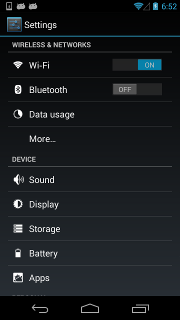
To click the switch widget right to the TextView 'Wi‑Fi', we need to select the switch widget first. However, according to the UI hierarchy, more than one switch widget exists and has almost the same properties. Selecting by className will not work. Alternatively, the below selecting strategy would help:
```python
d(className="android.widget.ListView", resourceId="android:id/list") \
.child_by_text("Wi‑Fi", className="android.widget.LinearLayout") \
.child(className="android.widget.Switch") \
.click()
```
* relative positioning
Also, we can use the relative positioning methods to get the view: `left`, `right`, `up`, `down`.
- `d(A).left(B)`, selects B on the left side of A.
- `d(A).right(B)`, selects B on the right side of A.
- `d(A).up(B)`, selects B above A.
- `d(A).down(B)`, selects B under A.
So for the above cases, we can alternatively select it with:
```python
## select "switch" on the right side of "Wi‑Fi"
d(text="Wi‑Fi").right(className="android.widget.Switch").click()
```
* Multiple instances
Sometimes the screen may contain multiple views with the same properties, e.g. text. Then you will
have to use the "instance" property in the selector to pick one of the qualifying instances, like below:
```python
d(text="Add new", instance=0) # which means the first instance with text "Add new"
```
In addition, uiautomator2 provides a list-like API (similar to jQuery):
```python
# get the count of views with text "Add new" on current screen
print(d(text="Add new").count)
# same as count property
print(len(d(text="Add new")))
# get the instance via index
obj = d(text="Add new")[0]
obj = d(text="Add new")[1]
# ...
# iterator
for view in d(text="Add new"):
print(view.info) # ...
```
**Notes**: when using selectors in a code block that walks through the result list, you must ensure that the UI elements on the screen
remain unchanged. Otherwise, an Element-Not-Found error could occur when iterating through the list.
#### Get the selected UI object status and its information
* Check if the specific UI object exists
```python
if d(text="Settings").exists: # True if exists, else False
print("Settings button exists")
# alias of above property.
if d.exists(text="Settings"):
print("Settings button exists")
# advanced usage
if d(text="Settings").exists(timeout=3): # wait for Settings to appear in 3s, same as .wait(3)
print("Settings button appeared within 3 seconds")
```
* Retrieve the info of the specific UI object
```python
info = d(text="Settings").info
print(info)
```
Below is a possible output:
```json
{
"contentDescription": "",
"checked": false,
"scrollable": false,
"text": "Settings",
"packageName": "com.android.launcher",
"selected": false,
"enabled": true,
"bounds": {
"top": 385,
"right": 360,
"bottom": 585,
"left": 200
},
"className": "android.widget.TextView",
"focused": false,
"focusable": true,
"clickable": true,
"childCount": 0,
"longClickable": true,
"visibleBounds": {
"top": 385,
"right": 360,
"bottom": 585,
"left": 200
},
"checkable": false
}
```
* Get/Set/Clear text of an editable field (e.g., EditText widgets)
```python
text_content = d(className="android.widget.EditText").get_text() # get widget text
d(className="android.widget.EditText").set_text("My text...") # set the text
d(className="android.widget.EditText").clear_text() # clear the text
```
* Get Widget center point
```python
x, y = d(text="Settings").center()
# x, y = d(text="Settings").center(offset=(0, 0)) # left-top x, y
```
* Take screenshot of widget
```python
im = d(text="Settings").screenshot()
im.save("settings.jpg")
```
#### Perform the click action on the selected UI object
* Perform click on the specific object
```python
# click on the center of the specific ui object
d(text="Settings").click()
# wait for element to appear for at most 10 seconds and then click
d(text="Settings").click(timeout=10)
# click with offset(x_offset_ratio, y_offset_ratio) from top-left of the element
# click_x = x_offset_ratio * width + x_left_top
# click_y = y_offset_ratio * height + y_left_top
d(text="Settings").click(offset=(0.5, 0.5)) # Default: center
d(text="Settings").click(offset=(0, 0)) # click left-top
d(text="Settings").click(offset=(1, 1)) # click right-bottom
# click if exists within 10s, default timeout 0s
clicked = d(text='Skip').click_exists(timeout=10.0) # returns bool
# click until element is gone, return bool
is_gone = d(text="Skip").click_gone(maxretry=10, interval=1.0) # maxretry default 10, interval default 1.0s
```
* Perform long click on the specific UI object
```python
# long click on the center of the specific UI object
d(text="Settings").long_click()
# long click with duration
d(text="Settings").long_click(duration=1.0) # duration in seconds, default 0.5s
```
#### Gesture actions for the specific UI object
* Drag the UI object towards another point or another UI object
```python
# notes : drag cannot be used for Android<4.3.
# drag the UI object to a screen point (x, y), in 0.5 seconds
d(text="Settings").drag_to(x, y, duration=0.5)
# drag the UI object to (the center position of) another UI object, in 0.25 seconds
d(text="Settings").drag_to(text="Clock", duration=0.25)
```
* Swipe from the center of the UI object to its edge
Swipe supports 4 directions:
- `left`
- `right`
- `up` (Previously 'top')
- `down` (Previously 'bottom')
```python
d(text="Settings").swipe("right")
d(text="Settings").swipe("left", steps=10) # steps control smoothness/speed
d(text="Settings").swipe("up", steps=20) # 1 step is about 5ms, so 20 steps is about 0.1s
d(text="Settings").swipe("down", steps=20)
```
* Two-point gesture from one pair of points to another (for pinch/zoom)
```python
# ((start_x1, start_y1), (start_x2, start_y2)) are initial touch points
# ((end_x1, end_y1), (end_x2, end_y2)) are final touch points
# steps is the number of move steps to take
d(text="Settings").gesture((sx1, sy1), (sx2, sy2), (ex1, ey1), (ex2, ey2), steps=100)
```
* Two-point gesture on the specific UI object (pinch in/out)
Supports two gestures:
- `in`: from edge to center (pinch in)
- `out`: from center to edge (pinch out)
```python
# notes : pinch cannot be set until Android 4.3.
# from edge to center.
d(text="Settings").pinch_in(percent=100, steps=10) # percent of object size, steps for smoothness
# from center to edge
d(text="Settings").pinch_out(percent=100, steps=10)
```
* Wait until the specific UI appears or disappears
```python
# wait until the ui object appears
appeared = d(text="Settings").wait(timeout=3.0) # return bool
if appeared:
print("Settings appeared")
# wait until the ui object is gone
gone = d(text="Settings").wait_gone(timeout=1.0) # return bool
if gone:
print("Settings disappeared")
```
The default timeout is 20s. See **Global Settings** for more details.
* Perform fling on the specific UI object (scrollable)
Possible properties:
- `horizontal` or `vertical` (or `horiz`, `vert`)
- `forward` or `backward` or `toBeginning` or `toEnd`
```python
# fling forward(default) vertically(default)
d(scrollable=True).fling()
# fling forward horizontally
d(scrollable=True).fling.horizontal.forward()
# fling backward vertically
d(scrollable=True).fling.vertical.backward()
# fling to beginning horizontally
d(scrollable=True).fling.horizontal.toBeginning(max_swipes=1000)
# fling to end vertically
d(scrollable=True).fling.vertical.toEnd()
```
* Perform scroll on the specific UI object (scrollable)
Possible properties:
- `horizontal` or `vertical` (or `horiz`, `vert`)
- `forward` or `backward` or `toBeginning` or `toEnd`, or `to(selector)`
```python
# scroll forward(default) vertically(default)
d(scrollable=True).scroll(steps=10)
# scroll forward horizontally
d(scrollable=True).scroll.horizontal.forward(steps=100)
# scroll backward vertically
d(scrollable=True).scroll.vertical.backward()
# scroll to beginning horizontally
d(scrollable=True).scroll.horizontal.toBeginning(steps=100, max_swipes=1000)
# scroll to end vertically
d(scrollable=True).scroll.vertical.toEnd()
# scroll forward vertically until specific ui object appears
d(scrollable=True).scroll.vertical.to(text="Security")
```
### Input Method (IME)
> IME APK: https://github.com/openatx/android-uiautomator-server/releases (Install this for reliable text input)
```python
d.send_keys("Hello123abcEFG") # Send text
d.send_keys("Hello123abcEFG", clear=True) # Clear existing text then send
d.clear_text() # Clear all content in the input field
# Automatically performs Enter, Search, etc., based on input field requirements. Added in version 3.1
d.send_action()
# Can also specify the IME action, e.g., d.send_action("search"). Supports go, search, send, next, done, previous.
d.hide_keyboard() # Hide the soft keyboard
```
When `send_keys` is used, it prioritizes using the clipboard for input. If the clipboard interface is unavailable, it will attempt to install and use an auxiliary IME.
```python
print(d.current_ime()) # Get current IME ID (package/class)
```
> For more, refer to: [IME_ACTION_CODE](https://developer.android.com/reference/android/view/inputmethod/EditorInfo)
### Toast
```python
last_toast_message = d.toast.get_message(wait_timeout=5, default=None) # Get last toast message text within 5s
print(last_toast_message)
d.toast.reset() # Clear last toast message cache
# d.toast.show("Hello", duration=3) # Show a toast (requires special permissions)
```
### WatchContext (Deprecated)
Note: This interface is not highly recommended. It's better to check for pop-ups before clicking elements.
The current `watch_context` uses threading and checks every 2 seconds.
Currently, only `click` is a trigger operation.
```python
with d.watch_context() as ctx:
# When "Download Now" or "Update Now" and "Cancel" buttons appear simultaneously, click "Cancel"
ctx.when("^(立即下载|立即更新)$").when("取消").click()
ctx.when("同意").click()
ctx.when("确定").click()
# The above three lines execute immediately without waiting.
ctx.wait_stable() # Start pop-up monitoring and wait for the interface to stabilize (stable if no pop-ups in two check cycles)
# Use the call function to trigger a callback
# call supports two parameters, d and el, order doesn't matter, can be omitted. If passed, variable names must be correct.
# e.g., When an element matching "Midsummer Night" appears, click the back button
ctx.when("仲夏之夜").call(lambda d: d.press("back"))
ctx.when("确定").call(lambda el: el.click())
# Other operations
# For convenience, you can also use the default pop-up monitoring logic in the code
# Below is the current built-in default logic. You can join the group and @ the owner to add new logic, or submit a PR directly.
# when("继续使用").click()
# when("移入管控").when("取消").click()
# when("^(立即下载|立即更新)$").when("取消").click()
# when("同意").click()
# when("^(好的|确定)$").click()
with d.watch_context(builtin=True) as ctx:
# Add on top of existing logic
ctx.when("@tb:id/jview_view").when('//*[@content-desc="图片"]').click()
# Other script logic
```
Alternative way:
```python
ctx = d.watch_context()
ctx.when("设置").click()
ctx.wait_stable() # Wait until the interface no longer has pop-ups
ctx.start() # if not using with statement
# ... do something ...
ctx.stop() # or ctx.close()
```
### Global Settings
```python
import uiautomator2 as u2
u2.settings['HTTP_TIMEOUT'] = 60 # Default 60s, http default request timeout
```
Other configurations are mostly centralized in `d.settings`. Configurations may be added or removed based on future needs.
```python
print(d.settings)
# Output example:
# {'operation_delay': (0, 0), # (before_op_delay, after_op_delay) in seconds
# 'operation_delay_methods': ['click', 'swipe'], # methods to apply delay
# 'wait_timeout': 20.0, # default element wait timeout (native operations, xpath plugin wait time)
# 'xpath_debug': False, # enable xpath debug
# 'xpath_timeout': 10.0 # default xpath wait timeout
# }
# Configure 0.5s delay before click, 1s delay after click
d.settings['operation_delay'] = (0.5, 1)
# Modify methods affected by delay
# double_click, long_click correspond to 'click'
d.settings['operation_delay_methods'] = ['click', 'swipe', 'drag', 'press']
d.settings['wait_timeout'] = 20.0 # Default control wait time
d.settings['max_depth'] = 50 # Default 50, limits dump_hierarchy returned element depth
```
When settings are deprecated due to version upgrades, a DeprecatedWarning will be shown, but no exception will be raised.
```python
>>> d.settings['click_before_delay'] = 1
# [W 200514 14:55:59 settings:72] d.settings['click_before_delay'] is deprecated: Use operation_delay instead
```
UiAutomator timeout settings (hidden methods):
```python
>>> d.jsonrpc.setConfigurator({"waitForIdleTimeout": 100, "waitForSelectorTimeout": 0})
# Check current configurator settings
>>> print(d.jsonrpc.getConfigurator())
# {'actionAcknowledgmentTimeout': 3000,
# 'keyInjectionDelay': 0,
# 'scrollAcknowledgmentTimeout': 200,
# 'waitForIdleTimeout': 100,
# 'waitForSelectorTimeout': 0}
```
To prevent client program timeouts, `waitForIdleTimeout` and `waitForSelectorTimeout` are currently set to `0` by default by uiautomator2 itself (not by the underlying uiautomator server).
Refs: [Google uiautomator Configurator](https://developer.android.com/reference/android/support/test/uiautomator/Configurator)
## Application Management
This part showcases how to perform app management.
### Install Application
We only support installing an APK from a URL or local path.
```python
# From URL
d.app_install('http://some-domain.com/some.apk')
# From local path
# d.app_install('/path/to/your/app.apk') # This functionality might depend on adbutils or direct adb calls.
# For local path, usually you'd use adbutils:
# adb = adbutils.AdbClient(host="127.0.0.1", port=5037)
# device = adb.device(serial=d.serial)
# device.install("/path/to/your/app.apk")
# Or ensure atx-agent is installed and use its features if available.
# The simplest way with uiautomator2 if atx-agent is present:
# d.shell(['pm', 'install', '/path/to/app.apk']) # if apk is already on device
# d.push('/local/path/app.apk', '/data/local/tmp/app.apk')
# d.shell(['pm', 'install', '/data/local/tmp/app.apk'])
```
### Start Application
```python
# Default method: first parses APK's mainActivity via atx-agent, then calls am start -n $package/$activity
d.app_start("com.example.hello_world")
# Use monkey -p com.example.hello_world -c android.intent.category.LAUNCHER 1 to start
# This method has a side effect: it automatically turns off the phone's rotation lock.
d.app_start("com.example.hello_world", use_monkey=True) # start with package name
# Start app by specifying main activity, equivalent to calling am start -n com.example.hello_world/.MainActivity
d.app_start("com.example.hello_world", ".MainActivity")
# Stop app before starting
d.app_start("com.example.hello_world", stop=True)
```
### Stop Application
```python
# equivalent to `am force-stop`, thus you could lose data
d.app_stop("com.example.hello_world")
# equivalent to `pm clear` (clears app data)
d.app_clear('com.example.hello_world')
```
### Stop All Applications
```python
# stop all
d.app_stop_all()
# stop all apps except for com.examples.demo
d.app_stop_all(excludes=['com.examples.demo'])
```
### Get Application Information
```python
info = d.app_info("com.example.demo")
print(info)
# expect output
# {
# "mainActivity": "com.github.uiautomator.MainActivity",
# "label": "ATX",
# "versionName": "1.1.7",
# "versionCode": 1001007,
# "size": 1760809 # size in bytes
# }
# save app icon
img = d.app_icon("com.example.demo") # Returns a PIL.Image object
if img:
img.save("icon.png")
```
### List All Running Applications
```python
running_apps = d.app_list_running()
print(running_apps)
# expect output
# ["com.xxxx.xxxx", "com.github.uiautomator", "xxxx"]
```
### Wait for Application to Run
```python
pid = d.app_wait("com.example.android") # Wait for app to run, returns pid (int) or 0 if timeout
if not pid:
print("com.example.android is not running")
else:
print(f"com.example.android pid is {pid}")
# Wait for app to be in the foreground
pid = d.app_wait("com.example.android", front=True)
if pid:
print("com.example.android is in foreground")
# Set custom timeout (default 20.0 seconds)
pid = d.app_wait("com.example.android", timeout=10.0)
```
### Push and Pull Files
* Push a file to the device
```python
# push to a folder (src can be local path or BytesIO)
d.push("foo.txt", "/sdcard/") # Pushes foo.txt to /sdcard/foo.txt
# push and rename
d.push("foo.txt", "/sdcard/bar.txt")
# push fileobj
import io
with io.BytesIO(b"file content") as f:
d.push(f, "/sdcard/from_io.txt")
# push and change file access mode (mode is int, e.g., 0o755)
d.push("foo.sh", "/data/local/tmp/", mode=0o755) # Pushes to /data/local/tmp/foo.sh
```
* Pull a file from the device
```python
# pull /sdcard/tmp.txt to local file tmp.txt
d.pull("/sdcard/tmp.txt", "tmp.txt")
# FileNotFoundError will raise if the file is not found on the device
try:
d.pull("/sdcard/some-file-not-exists.txt", "tmp.txt")
except FileNotFoundError:
print("File not found on device")
# Pull file content as bytes
# content_bytes = d.pull("/sdcard/tmp.txt") # This is not a standard feature, use sync.read_bytes for this
# For reading content directly, use the sync object:
# content = d.sync.read_bytes("/sdcard/tmp.txt")
```
### Other Application Operations
```python
# Grant all runtime permissions (requires Android 6.0+ and atx-agent)
# d.app_auto_grant_permissions("io.appium.android.apis") # This might be an older or specific helper
# A more common way to grant permissions is via adb shell:
# d.shell(['pm', 'grant', 'io.appium.android.apis', 'android.permission.READ_CONTACTS'])
# Open URL scheme
d.open_url("appname://appnamehost")
# same as
# adb shell am start -a android.intent.action.VIEW -d "appname://appnamehost"
```
### Session (Beta)
Session represents an app lifecycle. Can be used to start app, detect app crash.
* Launch and close app
```python
sess = d.session("com.netease.cloudmusic") # Starts NetEase Cloud Music
# ... perform operations within the session context ...
# sess(text="Play").click()
sess.close() # Stops NetEase Cloud Music
# sess.restart() # Cold starts NetEase Cloud Music (stops then starts)
```
* Use python `with` to launch and close app
```python
with d.session("com.netease.cloudmusic") as sess:
# sess(text="Play").click()
# App will be closed automatically when exiting the 'with' block
pass
```
* Attach to the running app
```python
# Launch app if not running, skip launch if already running
sess = d.session("com.netease.cloudmusic", attach=True)
```
* Detect app crash
```python
# When app is still running
# sess(text="Music").click() # operation goes normal
# If app crashes or quits
# sess(text="Music").click() # raises SessionBrokenError
# other function calls under session will raise SessionBrokenError too
```
```python
# check if session is ok.
# Warning: function name may change in the future
if sess.running(): # True or False
print("Session is active")
else:
print("Session is not active (app might have crashed or closed)")
```
## Other APIs
### Stop Background HTTP Service
Normally, when the Python program exits, the UiAutomator service on the device also exits.
However, you can also stop the service via an API call.
```python
d.uiautomator.stop() # Stops the uiautomator service on the device
# or d.service("uiautomator").stop()
```
### Enable Debugging
Print out the HTTP request information behind the code.
```python
>>> d.debug = True # This enables logging for uiautomator2 library
>>> print(d.info)
# Example output showing HTTP request/response
# 12:32:47.182 $ curl -X POST -d '{"jsonrpc": "2.0", "id": "...", "method": "deviceInfo"}' 'http://127.0.0.1:PORT/jsonrpc/0'
# 12:32:47.225 Response >>>
# {"jsonrpc":"2.0","id":"...","result":{...}}
# <<< END
```
For more structured logging:
```python
import logging
from uiautomator2 import set_log_level
set_log_level(logging.DEBUG) # or logging.INFO
# Or configure manually
# logger = logging.getLogger("uiautomator2")
# logger.setLevel(logging.DEBUG)
# # setup handler, formatter etc.
```
## Command Line Functions
`$device_ip` represents the device's IP address.
To specify a device, pass `--serial`, e.g., `python -m uiautomator2 --serial bff1234 <SubCommand>`. SubCommand can be `screenshot`, `current`, etc.
> 1.0.3 Added: `python -m uiautomator2` is equivalent to `uiautomator2`
- `screenshot`: Take a screenshot
```bash
uiautomator2 screenshot screenshot.jpg
# With specific device
uiautomator2 --serial <YOUR_DEVICE_SERIAL> screenshot screenshot.jpg
```
- `copy-assets`: Copy assets/ to current directory
Used for pyinstaller、nuitka
- `current`: Get current package name and activity
```bash
uiautomator2 current
# Output example:
# {
# "package": "com.android.settings",
# "activity": ".Settings",
# "pid": 12345
# }
```
- `uninstall`: Uninstall app
```bash
uiautomator2 uninstall <package-name> # Uninstall one package
uiautomator2 uninstall <package-name-1> <package-name-2> # Uninstall multiple packages
# uiautomator2 uninstall --all # Uninstall all third-party apps (Be careful!)
```
- `stop`: Stop app
```bash
uiautomator2 stop com.example.app # Stop one app
# uiautomator2 stop --all # Stop all apps (Be careful!)
```
- `doctor`: Check uiautomator2 environment
```bash
uiautomator2 doctor
# Example output:
# [I 2024-04-25 19:53:36,288 __main__:101 pid:15596] uiautomator2 is OK
```
- `install`: Install APK from URL or local path
```bash
uiautomator2 install http://example.com/app.apk
uiautomator2 install /path/to/local/app.apk
```
- `clear`: Clear app data
```bash
uiautomator2 clear <package-name>
```
- `start`: Start app
```bash
uiautomator2 start <package-name>
uiautomator2 start <package-name>/<activity-name>
```
- `version`: Show uiautomator2 version
```bash
uiautomator2 version
```
## Differences between Google UiAutomator 2.0 and 1.x
Reference: https://www.cnblogs.com/insist8089/p/6898181.html (Chinese)
- **New APIs**: UiObject2, Until, By, BySelector (in UiAutomator 2.x Java library)
- **Import Style**: In 2.0, `com.android.uiautomator.core.*` is deprecated. Use `android.support.test.uiautomator.*` (now `androidx.test.uiautomator.*`).
- **Build System**: Maven and/or Ant (1.x); Gradle (2.0).
- **Test Package Format**: From zip/jar (1.x) to APK (2.0).
- **Running Tests via ADB**:
- 1.x: `adb shell uiautomator runtest UiTest.jar -c package.name.ClassName`
- 2.0: `adb shell am instrument -w -r -e debug false -e class package.name.ClassName#methodName package.name.test/androidx.test.runner.AndroidJUnitRunner`
- **Access to Android Services/APIs**: 1.x: No; 2.0: Yes.
- **Log Output**: 1.x: `System.out.print` echoes to the execution terminal; 2.0: Output to Logcat.
- **Execution**: 2.0: Test cases do not need to inherit from any parent class, method names are not restricted, uses Annotations; 1.x: Needs to inherit `UiAutomatorTestCase`, test methods must start with `test`.
(Note: uiautomator2 Python library abstracts away many of these Java-level differences, but understanding the underlying UiAutomator evolution can be helpful.)
## Dependent Projects
- uiautomator-jsonrpc-server: <https://github.com/openatx/android-uiautomator-server/> (The core server running on the Android device)
- adbutils: <https://github.com/openatx/adbutils> (For ADB communication)
# Contributors
[contributors](../../graphs/contributors)
# Other Excellent Projects
- <https://github.com/ecnusse/Kea2>: Fusing automated UI testing with scripts for effectively fuzzing Android apps.
- <https://github.com/atinfo/awesome-test-automation>: A collection of excellent test automation frameworks.
- [google/mobly](https://github.com/google/mobly): Google's internal test framework.
- <https://github.com/zhangzhao4444/Maxim>: A monkey test tool based on UiAutomator.
- <http://www.sikulix.com/>: A well-established image-based automation framework.
- <http://airtest.netease.com/>: The predecessor of this project, later taken over and optimized by NetEase Guangzhou team. Features a good IDE. (archived)
(Order matters, additions welcome)
# LICENSE
[MIT](LICENSE)
================================================
FILE: README_CN.md
================================================
# uiautomator2
[](https://pypi.python.org/pypi/uiautomator2)

[](https://codecov.io/gh/openatx/uiautomator2)
[📖 Read the English version](README.md)
一个简单、好用、稳定的Android自动化的库
## 工作原理
本框架主要包含两个部分:
1. 手机端: 运行一个基于UiAutomator的HTTP服务,提供Android自动化的各种接口
2. Python客户端: 通过HTTP协议与手机端通信,调用UiAutomator的各种功能
简单来说就是把Android自动化的能力通过HTTP接口的方式暴露给Python使用。这种设计使得Python端的代码编写更加简单直观。
> 还在用2.x.x版本的用户,可以先看一下[2to3](docs/2to3.md) 再决定是否要升级3.x.x (强烈建议升级)
## 交流群
- QQ交流群: 1群:815453846 2群:943964182
- Discord: <https://discord.gg/PbJhnZJKDd>
# 依赖
- Android版本 4.4+
- Python 3.8+
# 安装
```sh
pip install uiautomator2
# 检查是否安装成功,正常情况下会输出库的版本好
uiautomator2 version
# or: python -m uiautomator2 version
```
安装元素查看工具(可选,但是强烈推荐)
> 更详细的使用说明参考: https://github.com/codeskyblue/uiautodev QQ:536481989
```sh
pip install uiautodev
# 命令行启动后会自动打开浏览器
uiautodev
# or: python -m uiautodev
```
代替品: uiautomatorviewer, Appium Inspector
# 快速入门
准备一台开启了`开发者选项`的安卓手机,连接上电脑,确保执行`adb devices`可以看到连接上的设备。
打开python交互窗口。然后将下面的命令输入到窗口中。
```python
import uiautomator2 as u2
d = u2.connect() # 连接多台设备需要指定设备序列号
print(d.info)
# 期望输出
# {'currentPackageName': 'net.oneplus.launcher', 'displayHeight': 1920, 'displayRotation': 0, 'displaySizeDpX': 411, 'displaySizeDpY': 731, 'displayWidth': 1080, 'productName': 'OnePlus5', 'screenOn': True, 'sdkInt': 27, 'naturalOrientation': True}
```
脚本例子
```python
import uiautomator2 as u2
d = u2.connect('Q5S5T19611004599')
d.app_start('tv.danmaku.bili', stop=True) # 启动Bilibili
d.wait_activity('.MainActivityV2')
d.sleep(5) # 等待开屏广告消失
d.xpath('//*[@text="我的"]').click()
# 获取粉丝数量
fans_count = d.xpath('//*[@resource-id="tv.danmaku.bili:id/fans_count"]').text
print(f"粉丝数量: {fans_count}")
```
# 使用文档
## 连接设备
方法1: 使用设备序列号链接设备 例如序列号. `Q5S5T19611004599` (seen from `adb devices`)
```python
import uiautomator2 as u2
d = u2.connect('Q5S5T19611004599') # alias for u2.connect_usb('123456f')
print(d.info)
```
方法2: 序列号可以通过环境变量传递 `ANDROID_SERIAL`
```python
# export ANDROID_SERIAL=Q5S5T19611004599
d = u2.connect()
```
方法3: 通过transport_id指定设备
```sh
$ adb devices -l
Q5S5T19611004599 device 0-1.2.2 product:ELE-AL00 model:ELE_AL00 device:HWELE transport_id:6
```
这里可以看到transport_id:6
> 也可以通过 adbutils.adb.list(extended=True)获取所有连接的transport_id
> 参考 https://github.com/openatx/adbutils
```python
import adbutils # 需要版本>=2.9.1
import uiautomator2 as u2
dev = adbutils.device(transport_id=6)
d = u2.connect(dev)
```
## 通过XPath操作元素
什么是XPath:
XPath 是一种在 XML 或 HTML 文档中定位内容的查询语言。它使用简单的语法规则建立从根节点到所需元素的路径。
基本语法:
- `/` - 从根节点开始选择
- `//` - 从当前节点开始选择任意位置
- `.` - 选择当前节点
- `..` - 选择当前节点的父节点
- `@` - 选择属性
- `[]` - 谓语表达式,用于过滤条件
通过[UIAutoDev](https://uiauto.dev)可以快速的生成XPath
常用用法
```python
d.xpath('//*[@text="私人FM"]').click()
# 语法糖
d.xpath('@personal-fm') # 等价于 d.xpath('//*[@resource-id="personal-fm"]')
sl = d.xpath("@com.example:id/home_searchedit") # sl为XPathSelector对象
sl.click()
sl.click(timeout=10) # 指定超时时间, 找不到抛出异常 XPathElementNotFoundError
sl.click_exists() # 存在即点击,返回是否点击成功
sl.click_exists(timeout=10) # 等待最多10s钟
# 等到对应的元素出现,返回XMLElement
# 默认的等待时间是10s
el = sl.wait()
el = sl.wait(timeout=15) # 等待15s, 没有找到会返回None
# 等待元素消失
sl.wait_gone()
sl.wait_gone(timeout=15)
# 跟wait用法类似,区别是如果没找到直接抛出 XPathElementNotFoundError 异常
el = sl.get()
el = sl.get(timeout=15)
sl.get_text() # 获取组件名
sl.set_text("") # 清空输入框
sl.set_text("hello world") # 输入框输入 hello world
```
更多用法参考 [XPath接口文档](XPATH_CN.md)
## 插件
- webview: https://github.com/YuYoungG/uiautomator2-webview
为了保持项目的简洁与可扩展性,后续插件将以第三方库的形式接入。
## 通过UiAutomator接口操作元素
### 元素等待时长
设置元素查找等待时间(默认20s)
```python
d.implicitly_wait(10.0) # 也可以通过d.settings['wait_timeout'] = 10.0 修改
print("wait timeout", d.implicitly_wait()) # get default implicit wait
# 如果Settings 10s没有出现就抛出异常 UiObjectNotFoundError
d(text="Settings").click()
```
等待时长影响如下函数 `click`, `long_click`, `drag_to`, `get_text`, `set_text`, `clear_text`
### 获取设备信息
通过UiAutomator获取到的信息
```python
d.info
# Output
{'currentPackageName': 'com.android.systemui',
'displayHeight': 1560,
'displayRotation': 0,
'displaySizeDpX': 360,
'displaySizeDpY': 780,
'displayWidth': 720,
'naturalOrientation': True,
'productName': 'ELE-AL00',
'screenOn': True,
'sdkInt': 29}
```
获取设备信息(基于adb shell getprop命令)
```python
print(d.device_info)
# output
{'arch': 'arm64-v8a',
'brand': 'google',
'model': 'sdk_gphone64_arm64',
'sdk': 34,
'serial': 'EMULATOR34X1X19X0',
'version': 14}
```
获取屏幕物理尺寸 (依赖adb shell wm size)
```python
print(d.window_size())
# device upright output example: (1080, 1920)
# device horizontal output example: (1920, 1080)
```
获取当前App (依赖adb shell)
```python
print(d.app_current())
# Output example 1: {'activity': '.Client', 'package': 'com.netease.example', 'pid': 23710}
# Output example 2: {'activity': '.Client', 'package': 'com.netease.example'}
# Output example 3: {'activity': None, 'package': None}
```
等待Activity (依赖adb shell)
```python
d.wait_activity(".ApiDemos", timeout=10) # default timeout 10.0 seconds
# Output: true of false
```
获取设备序列号
```python
print(d.serial)
# output example: 74aAEDR428Z9
```
获取设备WLAN IP (依赖adb shell)
```python
print(d.wlan_ip)
# output example: 10.0.0.1 or None
```
### 剪贴板
设置粘贴板内容或获取内容
* clipboard/set_clipboard
```python
# 设置剪贴板
d.clipboard = 'hello-world'
# or
d.set_clipboard('hello-world', 'label')
# 获取剪贴板
# 依赖输入法(com.github.uiautomator/.AdbKeyboard)
d.set_input_ime()
print(d.clipboard)
```
### Key Events
* Turn on/off screen
```python
d.screen_on() # turn on the screen
d.screen_off() # turn off the screen
```
* Get current screen status
```python
d.info.get('screenOn')
```
* Press hard/soft key
```python
d.press("home") # press the home key, with key name
d.press("back") # press the back key, with key name
d.press(0x07, 0x02) # press keycode 0x07('0') with META ALT(0x02)
```
* These key names are currently supported:
- home
- back
- left
- right
- up
- down
- center
- menu
- search
- enter
- delete ( or del)
- recent (recent apps)
- volume_up
- volume_down
- volume_mute
- camera
- power
You can find all key code definitions at [Android KeyEvnet](https://developer.android.com/reference/android/view/KeyEvent.html)
* Unlock screen
```python
d.unlock()
# This is equivalent to
# 1. press("power")
# 2. swipe from left-bottom to right-top
```
### Gesture interaction with the device
* Click on the screen
```python
d.click(x, y)
```
* Double click
```python
d.double_click(x, y)
d.double_click(x, y, 0.1) # default duration between two click is 0.1s
```
* Long click on the screen
```python
d.long_click(x, y)
d.long_click(x, y, 0.5) # long click 0.5s (default)
```
* Swipe
```python
d.swipe(sx, sy, ex, ey)
d.swipe(sx, sy, ex, ey, 0.5) # swipe for 0.5s(default)
```
* SwipeExt 扩展功能
```python
d.swipe_ext("right") # 手指右滑,4选1 "left", "right", "up", "down"
d.swipe_ext("right", scale=0.9) # 默认0.9, 滑动距离为屏幕宽度的90%
d.swipe_ext("right", box=(0, 0, 100, 100)) # 在 (0,0) -> (100, 100) 这个区域做滑动
# 实践发现上滑或下滑的时候,从中点开始滑动成功率会高一些
d.swipe_ext("up", scale=0.8) # 代码会vkk
# 还可以使用Direction作为参数
from uiautomator2 import Direction
d.swipe_ext(Direction.FORWARD) # 页面下翻, 等价于 d.swipe_ext("up"), 只是更好理解
d.swipe_ext(Direction.BACKWARD) # 页面上翻
d.swipe_ext(Direction.HORIZ_FORWARD) # 页面水平右翻
d.swipe_ext(Direction.HORIZ_BACKWARD) # 页面水平左翻
```
* Drag
```python
d.drag(sx, sy, ex, ey)
d.drag(sx, sy, ex, ey, 0.5) # swipe for 0.5s(default)
* Swipe points
```python
# swipe from point(x0, y0) to point(x1, y1) then to point(x2, y2)
# time will speed 0.2s bwtween two points
d.swipe_points([(x0, y0), (x1, y1), (x2, y2)], 0.2))
```
多用于九宫格解锁,提前获取到每个点的相对坐标(这里支持百分比),
更详细的使用参考这个帖子 [使用u2实现九宫图案解锁](https://testerhome.com/topics/11034)
* Touch and drap (Beta)
这个接口属于比较底层的原始接口,感觉并不完善,不过凑合能用。注:这个地方并不支持百分比
```python
d.touch.down(10, 10) # 模拟按下
time.sleep(.01) # down 和 move 之间的延迟,自己控制
d.touch.move(15, 15) # 模拟移动
d.touch.up(10, 10) # 模拟抬起
```
Note: click, swipe, drag operations support percentage position values. Example:
`d.long_click(0.5, 0.5)` means long click center of screen
### 屏幕相关接口
* Retrieve/Set device orientation
The possible orientations:
- `natural` or `n`
- `left` or `l`
- `right` or `r`
- `upsidedown` or `u` (can not be set)
```python
# retrieve orientation. the output could be "natural" or "left" or "right" or "upsidedown"
orientation = d.orientation
# WARNING: not pass testing in my TT-M1
# set orientation and freeze rotation.
# notes: setting "upsidedown" requires Android>=4.3.
d.set_orientation('l') # or "left"
d.set_orientation("l") # or "left"
d.set_orientation("r") # or "right"
d.set_orientation("n") # or "natural"
```
* Freeze/Un-freeze rotation
```python
# freeze rotation
d.freeze_rotation()
# un-freeze rotation
d.freeze_rotation(False)
```
* Take screenshot
```python
# take screenshot and save to a file on the computer, require Android>=4.2.
d.screenshot("home.jpg")
# get PIL.Image formatted images. Naturally, you need pillow installed first
image = d.screenshot() # default format="pillow"
image.save("home.jpg") # or home.png. Currently, only png and jpg are supported
# get opencv formatted images. Naturally, you need numpy and cv2 installed first
import cv2
image = d.screenshot(format='opencv')
cv2.imwrite('home.jpg', image)
# get raw jpeg data
imagebin = d.screenshot(format='raw')
open("some.jpg", "wb").write(imagebin)
```
* Dump UI hierarchy
```python
# get the UI hierarchy dump content
xml = d.dump_hierarchy()
# compressed=True: include not import nodes
# pretty: format xml
# max_depth: limit xml depth, default 50
xml = d.dump_hierarchy(compressed=False, pretty=False, max_depth=50)
```
* Open notification or quick settings
```python
d.open_notification()
d.open_quick_settings()
```
### Selector
Selector is a handy mechanism to identify a specific UI object in the current window.
```python
# Select the object with text 'Clock' and its className is 'android.widget.TextView'
d(text='Clock', className='android.widget.TextView')
```
Selector supports below parameters. Refer to [UiSelector Java doc](http://developer.android.com/tools/help/uiautomator/UiSelector.html) for detailed information.
* `text`, `textContains`, `textMatches`, `textStartsWith`
* `className`, `classNameMatches`
* `description`, `descriptionContains`, `descriptionMatches`, `descriptionStartsWith`
* `checkable`, `checked`, `clickable`, `longClickable`
* `scrollable`, `enabled`,`focusable`, `focused`, `selected`
* `packageName`, `packageNameMatches`
* `resourceId`, `resourceIdMatches`
* `index`, `instance`
#### Children and siblings
* children
```python
# get the children or grandchildren
d(className="android.widget.ListView").child(text="Bluetooth")
```
* siblings
```python
# get siblings
d(text="Google").sibling(className="android.widget.ImageView")
```
* children by text or description or instance
```python
# get the child matching the condition className="android.widget.LinearLayout"
# and also its children or grandchildren with text "Bluetooth"
d(className="android.widget.ListView", resourceId="android:id/list") \
.child_by_text("Bluetooth", className="android.widget.LinearLayout")
# get children by allowing scroll search
d(className="android.widget.ListView", resourceId="android:id/list") \
.child_by_text(
"Bluetooth",
allow_scroll_search=True,
className="android.widget.LinearLayout"
)
```
- `child_by_description` is to find children whose grandchildren have
the specified description, other parameters being similar to `child_by_text`.
- `child_by_instance` is to find children with has a child UI element anywhere
within its sub hierarchy that is at the instance specified. It is performed
on visible views **without scrolling**.
See below links for detailed information:
- [UiScrollable](http://developer.android.com/tools/help/uiautomator/UiScrollable.html), `getChildByDescription`, `getChildByText`, `getChildByInstance`
- [UiCollection](http://developer.android.com/tools/help/uiautomator/UiCollection.html), `getChildByDescription`, `getChildByText`, `getChildByInstance`
Above methods support chained invoking, e.g. for below hierarchy
```xml
<node index="0" text="" resource-id="android:id/list" class="android.widget.ListView" ...>
<node index="0" text="WIRELESS & NETWORKS" resource-id="" class="android.widget.TextView" .../>
<node index="1" text="" resource-id="" class="android.widget.LinearLayout" ...>
<node index="1" text="" resource-id="" class="android.widget.RelativeLayout" ...>
<node index="0" text="Wi‑Fi" resource-id="android:id/title" class="android.widget.TextView" .../>
</node>
<node index="2" text="ON" resource-id="com.android.settings:id/switchWidget" class="android.widget.Switch" .../>
</node>
...
</node>
```

To click the switch widget right to the TextView 'Wi‑Fi', we need to select the switch widgets first. However, according to the UI hierarchy, more than one switch widgets exist and have almost the same properties. Selecting by className will not work. Alternatively, the below selecting strategy would help:
```python
d(className="android.widget.ListView", resourceId="android:id/list") \
.child_by_text("Wi‑Fi", className="android.widget.LinearLayout") \
.child(className="android.widget.Switch") \
.click()
```
* relative positioning
Also we can use the relative positioning methods to get the view: `left`, `right`, `top`, `bottom`.
- `d(A).left(B)`, selects B on the left side of A.
- `d(A).right(B)`, selects B on the right side of A.
- `d(A).up(B)`, selects B above A.
- `d(A).down(B)`, selects B under A.
So for above cases, we can alternatively select it with:
```python
## select "switch" on the right side of "Wi‑Fi"
d(text="Wi‑Fi").right(className="android.widget.Switch").click()
```
* Multiple instances
Sometimes the screen may contain multiple views with the same properties, e.g. text, then you will
have to use the "instance" property in the selector to pick one of qualifying instances, like below:
```python
d(text="Add new", instance=0) # which means the first instance with text "Add new"
```
In addition, uiautomator2 provides a list-like API (similar to jQuery):
```python
# get the count of views with text "Add new" on current screen
d(text="Add new").count
# same as count property
len(d(text="Add new"))
# get the instance via index
d(text="Add new")[0]
d(text="Add new")[1]
...
# iterator
for view in d(text="Add new"):
view.info # ...
```
**Notes**: when using selectors in a code block that walk through the result list, you must ensure that the UI elements on the screen
keep unchanged. Otherwise, when Element-Not-Found error could occur when iterating through the list.
#### Get the selected ui object status and its information
* Check if the specific UI object exists
```python
d(text="Settings").exists # True if exists, else False
d.exists(text="Settings") # alias of above property.
# advanced usage
d(text="Settings").exists(timeout=3) # wait Settings appear in 3s, same as .wait(3)
```
* Retrieve the info of the specific UI object
```python
d(text="Settings").info
```
Below is a possible output:
```
{ u'contentDescription': u'',
u'checked': False,
u'scrollable': False,
u'text': u'Settings',
u'packageName': u'com.android.launcher',
u'selected': False,
u'enabled': True,
u'bounds': {u'top': 385,
u'right': 360,
u'bottom': 585,
u'left': 200},
u'className': u'android.widget.TextView',
u'focused': False,
u'focusable': True,
u'clickable': True,
u'chileCount': 0,
u'longClickable': True,
u'visibleBounds': {u'top': 385,
u'right': 360,
u'bottom': 585,
u'left': 200},
u'checkable': False
}
```
* Get/Set/Clear text of an editable field (e.g., EditText widgets)
```python
d(text="Settings").get_text() # get widget text
d(text="Settings").set_text("My text...") # set the text
d(text="Settings").clear_text() # clear the text
```
* Get Widget center point
```python
x, y = d(text="Settings").center()
# x, y = d(text="Settings").center(offset=(0, 0)) # left-top x, y
```
* Take screenshot of widget
```python
im = d(text="Settings").screenshot()
im.save("settings.jpg")
```
#### Perform the click action on the selected UI object
* Perform click on the specific object
```python
# click on the center of the specific ui object
d(text="Settings").click()
# wait element to appear for at most 10 seconds and then click
d(text="Settings").click(timeout=10)
# click with offset(x_offset, y_offset)
# click_x = x_offset * width + x_left_top
# click_y = y_offset * height + y_left_top
d(text="Settings").click(offset=(0.5, 0.5)) # Default center
d(text="Settings").click(offset=(0, 0)) # click left-top
d(text="Settings").click(offset=(1, 1)) # click right-bottom
# click when exists in 10s, default timeout 0s
clicked = d(text='Skip').click_exists(timeout=10.0)
# click until element gone, return bool
is_gone = d(text="Skip").click_gone(maxretry=10, interval=1.0) # maxretry default 10, interval default 1.0
```
* Perform long click on the specific UI object
```python
# long click on the center of the specific UI object
d(text="Settings").long_click()
```
#### Gesture actions for the specific UI object
* Drag the UI object towards another point or another UI object
```python
# notes : drag can not be used for Android<4.3.
# drag the UI object to a screen point (x, y), in 0.5 second
d(text="Settings").drag_to(x, y, duration=0.5)
# drag the UI object to (the center position of) another UI object, in 0.25 second
d(text="Settings").drag_to(text="Clock", duration=0.25)
```
* Swipe from the center of the UI object to its edge
Swipe supports 4 directions:
- left
- right
- top
- bottom
```python
d(text="Settings").swipe("right")
d(text="Settings").swipe("left", steps=10)
d(text="Settings").swipe("up", steps=20) # 1 steps is about 5ms, so 20 steps is about 0.1s
d(text="Settings").swipe("down", steps=20)
```
* Two-point gesture from one point to another
```python
d(text="Settings").gesture((sx1, sy1), (sx2, sy2), (ex1, ey1), (ex2, ey2))
```
* Two-point gesture on the specific UI object
Supports two gestures:
- `In`, from edge to center
- `Out`, from center to edge
```python
# notes : pinch can not be set until Android 4.3.
# from edge to center. here is "In" not "in"
d(text="Settings").pinch_in(percent=100, steps=10)
# from center to edge
d(text="Settings").pinch_out()
```
* Wait until the specific UI appears or disappears
```python
# wait until the ui object appears
d(text="Settings").wait(timeout=3.0) # return bool
# wait until the ui object gone
d(text="Settings").wait_gone(timeout=1.0)
```
The default timeout is 20s. see **global settings** for more details
* Perform fling on the specific ui object(scrollable)
Possible properties:
- `horiz` or `vert`
- `forward` or `backward` or `toBeginning` or `toEnd`
```python
# fling forward(default) vertically(default)
d(scrollable=True).fling()
# fling forward horizontally
d(scrollable=True).fling.horiz.forward()
# fling backward vertically
d(scrollable=True).fling.vert.backward()
# fling to beginning horizontally
d(scrollable=True).fling.horiz.toBeginning(max_swipes=1000)
# fling to end vertically
d(scrollable=True).fling.toEnd()
```
* Perform scroll on the specific ui object(scrollable)
Possible properties:
- `horiz` or `vert`
- `forward` or `backward` or `toBeginning` or `toEnd`, or `to`
```python
# scroll forward(default) vertically(default)
d(scrollable=True).scroll(steps=10)
# scroll forward horizontally
d(scrollable=True).scroll.horiz.forward(steps=100)
# scroll backward vertically
d(scrollable=True).scroll.vert.backward()
# scroll to beginning horizontally
d(scrollable=True).scroll.horiz.toBeginning(steps=100, max_swipes=1000)
# scroll to end vertically
d(scrollable=True).scroll.toEnd()
# scroll forward vertically until specific ui object appears
d(scrollable=True).scroll.to(text="Security")
```
### 输入法
> 输入法APK: https://github.com/openatx/android-uiautomator-server/releases
```python
d.send_keys("你好123abcEFG")
d.send_keys("你好123abcEFG", clear=True)
d.clear_text() # 清除输入框所有内容
d.send_action() # 根据输入框的需求,自动执行回车、搜索等指令, Added in version 3.1
# 也可以指定发送的输入法action, eg: d.send_action("search") 支持 go, search, send, next, done, previous
d.hide_keyboard() # 隐藏输入法
```
输入法send_keys的时候,优先使用剪贴板进行输入。如果剪贴板接口无法使用,会安装辅助输入法进行输入。
```python
print(d.current_ime()) # 获取当前输入法ID
```
> 更多参考: [IME_ACTION_CODE](https://developer.android.com/reference/android/view/inputmethod/EditorInfo)
### Toast
```python
print(d.last_toast) # get last toast, if not toast return None
d.clear_toast()
```
### WatchContext (废弃)
注: 这里不是很推荐用这个接口,最好点击元素前检查一下是否有弹窗
目前的这个watch_context是用threading启动的,每2s检查一次
目前还只有click这一种触发操作
```python
with d.watch_context() as ctx:
# 当同时出现 (立即下载 或 立即更新)和 取消 按钮的时候,点击取消
ctx.when("^立即(下载|更新)").when("取消").click()
ctx.when("同意").click()
ctx.when("确定").click()
# 上面三行代码是立即执行完的,不会有什么等待
ctx.wait_stable() # 开启弹窗监控,并等待界面稳定(两个弹窗检查周期内没有弹窗代表稳定)
# 使用call函数来触发函数回调
# call 支持两个参数,d和el,不区分参数位置,可以不传参,如果传参变量名不能写错
# eg: 当有元素匹配仲夏之夜,点击返回按钮
ctx.when("仲夏之夜").call(lambda d: d.press("back"))
ctx.when("确定").call(lambda el: el.click())
# 其他操作
# 为了方便也可以使用代码中默认的弹窗监控逻辑
# 下面是目前内置的默认逻辑,可以加群at群主,增加新的逻辑,或者直接提pr
# when("继续使用").click()
# when("移入管控").when("取消").click()
# when("^立即(下载|更新)").when("取消").click()
# when("同意").click()
# when("^(好的|确定)").click()
with d.watch_context(builtin=True) as ctx:
# 在已有的基础上增加
ctx.when("@tb:id/jview_view").when('//*[@content-desc="图片"]').click()
# 其他脚本逻辑
```
另外一种写法
```python
ctx = d.watch_context()
ctx.when("设置").click()
ctx.wait_stable() # 等待界面不在有弹窗了
ctx.close()
```
### 全局设置
```python
u2.HTTP_TIMEOUT = 60 # 默认值60s, http默认请求超时时间
```
其他的配置,目前已大部分集中到 `d.settings` 中,根据后期的需求配置可能会有增减。
```python
print(d.settings)
{'operation_delay': (0, 0),
'operation_delay_methods': ['click', 'swipe'],
'wait_timeout': 20.0}
# 配置点击前延时0.5s,点击后延时1s
d.settings['operation_delay'] = (.5, 1)
# 修改延迟生效的方法
# 其中 double_click, long_click 都对应click
d.settings['operation_delay_methods'] = ['click', 'swipe', 'drag', 'press']
d.settings['wait_timeout'] = 20.0 # 默认控件等待时间(原生操作,xpath插件的等待时间)
d.settings['max_depth'] = 50 # 默认50,限制dump_hierarchy返回的元素层级
```
对于随着版本升级,设置过期的配置时,会提示Deprecated,但是不会抛异常。
```bash
>>> d.settings['click_before_delay'] = 1
[W 200514 14:55:59 settings:72] d.settings[click_before_delay] deprecated: Use operation_delay instead
```
UiAutomator中的超时设置(隐藏方法)
```python
>> d.jsonrpc.getConfigurator()
{'actionAcknowledgmentTimeout': 500,
'keyInjectionDelay': 0,
'scrollAcknowledgmentTimeout': 200,
'waitForIdleTimeout': 0,
'waitForSelectorTimeout': 0}
>> d.jsonrpc.setConfigurator({"waitForIdleTimeout": 100})
{'actionAcknowledgmentTimeout': 500,
'keyInjectionDelay': 0,
'scrollAcknowledgmentTimeout': 200,
'waitForIdleTimeout': 100,
'waitForSelectorTimeout': 0}
```
为了防止客户端程序响应超时,`waitForIdleTimeout`和`waitForSelectorTimeout`目前已改为`0`
Refs: [Google uiautomator Configurator](https://developer.android.com/reference/android/support/test/uiautomator/Configurator)
## 应用管理
This part showcases how to perform app management
### 安装应用
We only support installing an APK from a URL
```python
d.app_install('http://some-domain.com/some.apk')
```
### 启动应用
```python
# 默认的这种方法是先通过atx-agent解析apk包的mainActivity,然后调用am start -n $package/$activity启动
d.app_start("com.example.hello_world")
# 使用 monkey -p com.example.hello_world -c android.intent.category.LAUNCHER 1 启动
# 这种方法有个副作用,它自动会将手机的旋转锁定给关掉
d.app_start("com.example.hello_world", use_monkey=True) # start with package name
# 通过指定main activity的方式启动应用,等价于调用am start -n com.example.hello_world/.MainActivity
d.app_start("com.example.hello_world", ".MainActivity")
```
### 停止应用
```python
# equivalent to `am force-stop`, thus you could lose data
d.app_stop("com.example.hello_world")
# equivalent to `pm clear`
d.app_clear('com.example.hello_world')
```
### 停止所有应用
```python
# stop all
d.app_stop_all()
# stop all app except for com.examples.demo
d.app_stop_all(excludes=['com.examples.demo'])
```
### 获取应用信息
```python
d.app_info("com.examples.demo")
# expect output
#{
# "mainActivity": "com.github.uiautomator.MainActivity",
# "label": "ATX",
# "versionName": "1.1.7",
# "versionCode": 1001007,
# "size":1760809
#}
# save app icon
img = d.app_icon("com.examples.demo")
img.save("icon.png")
```
### 列出所有运行的应用
```python
d.app_list_running()
# expect output
# ["com.xxxx.xxxx", "com.github.uiautomator", "xxxx"]
```
### 等待应用运行
```python
pid = d.app_wait("com.example.android") # 等待应用运行, return pid(int)
if not pid:
print("com.example.android is not running")
else:
print("com.example.android pid is %d" % pid)
d.app_wait("com.example.android", front=True) # 等待应用前台运行
d.app_wait("com.example.android", timeout=20.0) # 最长等待时间20s(默认)
```
### 拉取和推送文件
* push a file to the device
```python
# push to a folder
d.push("foo.txt", "/sdcard/")
# push and rename
d.push("foo.txt", "/sdcard/bar.txt")
# push fileobj
with open("foo.txt", 'rb') as f:
d.push(f, "/sdcard/")
# push and change file access mode
d.push("foo.sh", "/data/local/tmp/", mode=0o755)
```
* pull a file from the device
```python
d.pull("/sdcard/tmp.txt", "tmp.txt")
# FileNotFoundError will raise if the file is not found on the device
d.pull("/sdcard/some-file-not-exists.txt", "tmp.txt")
```
### 其他应用操作
```python
# grant all the permissions
d.app_auto_grant_permissions("io.appium.android.apis")
# open scheme
d.open_url("appname://appnamehost")
# same as
# adb shell am start -a android.intent.action.VIEW -d "appname://appnamehost"
```
### Session (Beta)
Session represent an app lifecycle. Can be used to start app, detect app crash.
* Launch and close app
```python
sess = d.session("com.netease.cloudmusic") # start 网易云音乐
sess.close() # 停止网易云音乐
sess.restart() # 冷启动网易云音乐
```
* Use python `with` to launch and close app
```python
with d.session("com.netease.cloudmusic") as sess:
sess(text="Play").click()
```
* Attach to the running app
```python
# launch app if not running, skip launch if already running
sess = d.session("com.netease.cloudmusic", attach=True)
```
* Detect app crash
```python
# When app is still running
sess(text="Music").click() # operation goes normal
# If app crash or quit
sess(text="Music").click() # raise SessionBrokenError
# other function calls under session will raise SessionBrokenError too
```
```python
# check if session is ok.
# Warning: function name may change in the future
sess.running() # True or False
```
## 其他接口
### 停止后台HTTP服务
通常情况下Python程序退出了,UiAutomation就退出了。
不过也可以通过接口的方法停止服务
```python
d.stop_uiautomator()
```
### 开启调试
打印出代码背后的HTTP请求信息
```python
>>> d.debug = True
>>> d.info
12:32:47.182 $ curl -X POST -d '{"jsonrpc": "2.0", "id": "b80d3a488580be1f3e9cb3e926175310", "method": "deviceInfo", "params": {}}' 'http://127.0.0.1:54179/jsonrpc/0'
12:32:47.225 Response >>>
{"jsonrpc":"2.0","id":"b80d3a488580be1f3e9cb3e926175310","result":{"currentPackageName":"com.android.mms","displayHeight":1920,"displayRotation":0,"displaySizeDpX":360,"displaySizeDpY":640,"displayWidth":1080,"productName"
:"odin","screenOn":true,"sdkInt":25,"naturalOrientation":true}}
<<< END
```
```python
from uiautomator2 import enable_pretty_logging
enable_pretty_logging()
```
Or
```
logger = logging.getLogger("uiautomator2")
# setup logger
```
## 命令行功能
其中的`$device_ip`代表设备的ip地址
如需指定设备需要传入`--serial` 如 `python3 -m uiautomator2 --serial bff1234 <SubCommand>`, SubCommand为子命令(screenshot, current 等)
> 1.0.3 Added: `python3 -m uiautomator2` equals to `uiautomator2`
- screenshot: 截图
```bash
$ uiautomator2 screenshot screenshot.jpg
```
- current: 获取当前包名和activity
```bash
$ uiautomator2 current
{
"package": "com.android.browser",
"activity": "com.uc.browser.InnerUCMobile",
"pid": 28478
}
```
- uninstall: Uninstall app
```bash
$ uiautomator2 uninstall <package-name> # 卸载一个包
$ uiautomator2 uninstall <package-name-1> <package-name-2> # 卸载多个包
$ uiautomator2 uninstall --all # 全部卸载
```
- stop: Stop app
```bash
$ uiautomator2 stop com.example.app # 停止一个app
$ uiautomator2 stop --all # 停止所有的app
```
- doctor:
```bash
$ uiautomator2 doctor
[I 2024-04-25 19:53:36,288 __main__:101 pid:15596] uiautomator2 is OK
```
## Google UiAutomator 2.0和1.x的区别
https://www.cnblogs.com/insist8089/p/6898181.html
- 新增接口:UiObject2、Until、By、BySelector
- 引入方式:2.0中,com.android.uiautomator.core.* 引入方式被废弃。改为android.support.test.uiautomator
- 构建系统:Maven 和/或 Ant(1.x);Gradle(2.0)
- 产生的测试包的形式:从zip /jar(1.x) 到 apk(2.0)
- 在本地环境以adb命令运行UIAutomator测试,启动方式的差别:
adb shell uiautomator runtest UiTest.jar -c package.name.ClassName(1.x)
adb shell am instrument -e class com.example.app.MyTest
com.example.app.test/android.support.test.runner.AndroidJUnitRunner(2.0)
- 能否使用Android服务及接口? 1.x~不能;2.0~能。
- og输出? 使用System.out.print输出流回显至执行端(1.x); 输出至Logcat(2.0)
- 执行?测试用例无需继承于任何父类,方法名不限,使用注解 Annotation进行(2.0); 需要继承UiAutomatorTestCase,测试方法需要以test开头(1.x)
## 依赖项目
- [](https://github.com/openatx/adbutils)
- [](https://github.com/openatx/android-uiautomator-server) 已迁移到私有仓库,需要合作开发进QQ群联系群主
# Contributors
[contributors](../../graphs/contributors)
# 其他优秀的项目
- https://github.com/ecnusse/Kea2: 面向安卓的自动化界面遍历与脚本协同测试框架
- https://github.com/atinfo/awesome-test-automation 所有优秀测试框架的集合,包罗万象
- [google/mobly](https://github.com/google/mobly) 谷歌内部的测试框架,虽然我不太懂,但是感觉很好用
- https://github.com/zhangzhao4444/Maxim 基于Uiautomator的monkey
- http://www.sikulix.com/ 基于图像识别的自动化测试框架,非常的老牌
- http://airtest.netease.com/ 本项目的前身,后来被网易广州团队接手并继续优化。实现有一个不错的IDE (archived)
排名有先后,欢迎补充
# LICENSE
[MIT](LICENSE)
================================================
FILE: XPATH.md
================================================
# uiautomator2 XPath Extension
[📖 阅读中文版](XPATH_CN.md)
Before using this plugin, you need to understand some XPath knowledge. Fortunately, there are many convenient resources available online. Below are some examples:
- [W3CSchool XPath Tutorial](http://www.w3school.com.cn/xpath/index.asp)
- [XPath Tutorial](http://www.zvon.org/xxl/XPathTutorial/)
- [Ruan Yifeng’s XPath Learning Notes](http://www.ruanyifeng.com/blog/2009/07/xpath_path_expressions.html)
- [Website for Testing XPath](https://www.freeformatter.com/xpath-tester.html)
- [XPath Tester](https://extendsclass.com/xpath-tester.html)
The code has not been fully tested and may still have bugs. Feedback is welcome.
## How It Works
1. Use the `dump_hierarchy` interface from the `uiautomator2` library to obtain the current UI screen (a comprehensive XML).
2. Then use the `lxml` library to parse and search for matching XPath expressions, and perform click operations using the `click` command.
> Currently, `lxml` only supports XPath 1.0. If anyone knows how to support XPath 2.0, please let me know.
**Popup Monitoring Principle**
The hierarchy provides information about all elements on the screen (including popups and buttons to be clicked). Suppose there are two popup buttons: `Skip` and `Got It`. The button to be clicked is `Play`.
1. Obtain the current screen’s XML (using the `dump_hierarchy` function).
2. Check if the `Skip` or `Got It` buttons are present. If they are, click them and return to step 1.
3. Check if the `Play` button is present. If it is, click it and finish. If not found, return to step 1 and keep executing until the search attempts exceed the limit.
## Installation
```bash
pip3 install -U uiautomator2
```
## Usage
### Simple Usage
Check out the following simple example to understand how to use it:
```python
import uiautomator2 as u2
def main():
d = u2.connect()
d.app_start("com.netease.cloudmusic", stop=True)
d.xpath('//*[@text="Private FM"]').click()
#
# Advanced Usage (Element Positioning)
#
# Starting with @
d.xpath('@personal-fm') # Equivalent to d.xpath('//*[@resource-id="personal-fm"]')
# Multiple condition positioning, similar to AND
d.xpath('//android.widget.Button').xpath('//*[@text="Private FM"]')
d.xpath('//*[@text="Private FM"]').parent() # Position to the parent element
d.xpath('//*[@text="Private FM"]').parent("@android:list") # Position to the parent element that meets the condition
# When using child, it is not recommended to use multiple condition XPath because it can be confusing
d.xpath('@android:id/list').child('/android.widget.TextView').click()
# Equivalent to the following
# d.xpath('//*[@resource-id="android:id/list"]/android.widget.TextView').click()
```
> For convenience, the following code does not include `import` and `main`. It is assumed that the variable `d` exists.
### Operations of `XPathSelector`
```python
sl = d.xpath("@com.example:id/home_searchedit") # sl is an XPathSelector object
# Click
sl.click()
sl.click(timeout=10) # Specify a timeout, throws XPathElementNotFoundError if not found
sl.click_exists() # Click if exists, returns whether the click was successful
sl.click_exists(timeout=10) # Wait up to 10 seconds
sl.match() # Returns None if not matched, otherwise returns an XMLElement
# Wait for the corresponding element to appear, returns XMLElement
# The default waiting time is 10 seconds
el = sl.wait()
el = sl.wait(timeout=15) # Wait for 15 seconds, returns None if not found
# Wait for the element to disappear
sl.wait_gone()
sl.wait_gone(timeout=15)
# Similar to wait, but throws XPathElementNotFoundError if not found
el = sl.get()
el = sl.get(timeout=15)
# Change the default waiting time to 15 seconds
d.xpath.global_set("timeout", 15)
d.xpath.implicitly_wait(15) # Equivalent to the previous line (TODO: Removed)
print(sl.exists) # Returns whether it exists (bool)
sl.get_last_match() # Get the last matched XMLElement
sl.get_text() # Get the component name
sl.set_text("") # Clear the input box
sl.set_text("hello world") # Input "hello world" into the input box
# Iterate through all matched elements
for el in d.xpath('//android.widget.EditText').all():
print("rect:", el.rect) # Output tuple: (x, y, width, height)
print("center:", el.center())
el.click() # Click operation
print(el.elem) # Output the Node parsed by lxml
print(el.text)
# Child operation
d.xpath('@android:id/list').child('/android.widget.TextView').click()
# Equivalent to d.xpath('//*[@resource-id="android:id/list"]/android.widget.TextView').all()
```
### Advanced Search Syntax
> Added in version 3.1
```python
# Find text=NFC AND id=android:id/item
(d.xpath("NFC") & d.xpath("@android:id/item")).get()
# Find text=NFC OR id=android:id/item
(d.xpath("NFC") | d.xpath("App") | d.xpath("Content")).get()
# Supports more complex queries
((d.xpath("NFC") | d.xpath("@android:id/item")) & d.xpath("//android.widget.TextView")).get()
```
### Operations of `XMLElement`
```python
# The object returned by XPathSelector.get() is called XMLElement
el = d.xpath("@com.example:id/home_searchedit").get()
lx, ly, width, height = el.rect # Get the top-left coordinates and size
lx, ly, rx, ry = el.bounds # Top-left and bottom-right coordinates
x, y = el.center() # Get the element’s center position
x, y = el.offset(0.5, 0.5) # Same as center()
# Send click
el.click()
# Print text content
print(el.text)
# Get the attributes within the group, as a dict
print(el.attrib)
# Take a screenshot of the control (the principle is to take a full screenshot first, then crop)
el.screenshot()
# Swipe the control
el.swipe("right") # left, right, up, down
el.swipe("right", scale=0.9) # scale defaults to 0.9, meaning the swipe distance is 90% of the control's width. Swiping up uses 90% of the height.
print(el.info)
# Output example
{
'index': '0',
'text': '',
'resourceId': 'com.example:id/home_searchedit',
'checkable': 'true',
'checked': 'true',
'clickable': 'true',
'enabled': 'true',
'focusable': 'false',
'focused': 'false',
'scrollable': 'false',
'longClickable': 'false',
'password': 'false',
'selected': 'false',
'visibleToUser': 'true',
'childCount': 0,
'className': 'android.widget.Switch',
'bounds': {'left': 882, 'top': 279, 'right': 1026, 'bottom': 423},
'packageName': 'com.android.settings',
'contentDescription': '',
'resourceName': 'android:id/switch_widget'
}
```
### Swipe to a Specified Position
> The `scroll_to` feature is newly added and may not be fully polished (for example, it cannot detect if it has scrolled to the bottom).
First, see the example:
```python
from uiautomator2 import connect_usb, Direction
d = connect_usb()
d.scroll_to("Place Order")
d.scroll_to("Place Order", Direction.FORWARD) # Defaults to scrolling down. Other options include BACKWARD, HORIZ_FORWARD (horizontal), HORIZ_BACKWARD (horizontal reverse)
d.scroll_to("Place Order", Direction.HORIZ_FORWARD, max_swipes=5)
# Additionally, you can scroll within a specified element
d.xpath('@com.taobao.taobao:id/dx_root').scroll(Direction.HORIZ_FORWARD)
d.xpath('@com.taobao.taobao:id/dx_root').scroll_to("Place Order", Direction.HORIZ_FORWARD)
```
**A More Complete Example**
```python
import uiautomator2 as u2
from uiautomator2 import Direction
def main():
d = u2.connect()
d.app_start("com.netease.cloudmusic", stop=True)
# Steps
d.xpath("//*[@text='Private FM']/../android.widget.ImageView").click()
d.xpath("Next Song").click()
# Monitor popups for 2 seconds, the time may exceed 2 seconds
d.xpath.sleep_watch(2)
d.xpath("Go to Previous Level").click()
d.xpath("Go to Previous Level").click(watch=False) # Click without triggering watch
d.xpath("Go to Previous Level").click(timeout=5.0) # Wait timeout 5 seconds
d.xpath.watch_background() # Enable background monitoring mode, checks every 4 seconds by default
d.xpath.watch_background(interval=2.0) # Check every 2 seconds
d.xpath.watch_stop() # Stop monitoring
for el in d.xpath('//android.widget.EditText').all():
print("rect:", el.rect) # Output tuple: (left_x, top_y, width, height)
print("bounds:", el.bounds) # Output tuple: (left, top, right, bottom)
print("center:", el.center())
el.click() # Click operation
print(el.elem) # Output the Node parsed by lxml
# Swiping
el = d.xpath('@com.taobao.taobao:id/fl_banner_container').get()
# Swipe from right to left
el.swipe(Direction.HORIZ_FORWARD)
el.swipe(Direction.LEFT) # Swipe from right to left
# Swipe from bottom to top
el.swipe(Direction.FORWARD)
el.swipe(Direction.UP)
el.swipe("right", scale=0.9) # scale defaults to 0.9, swipe distance is 80% of the control's width, the swipe center aligns with the control's center
el.swipe("up", scale=0.5) # Swipe distance is 50% of the control's height
# scroll is different from swipe; scroll returns a bool indicating whether new elements appeared
el.scroll(Direction.FORWARD) # Swipe down
el.scroll(Direction.BACKWARD) # Swipe up
el.scroll(Direction.HORIZ_FORWARD) # Swipe horizontally forward
el.scroll(Direction.HORIZ_BACKWARD) # Swipe horizontally backward
if el.scroll("forward"):
print("Can continue scrolling")
```
### `PageSource` Object
> Added in version 3.1
This is an advanced usage, but this object is also the most fundamental, as almost all functions depend on it.
**What is PageSource?**
PageSource is initialized from the return value of `d.dump_hierarchy()`. It is mainly used to find elements through XPath.
**Usage:**
```python
source = d.xpath.get_page_source()
# find_elements is the core method
elements = source.find_elements('//android.widget.TextView') # List[XMLElement]
for el in elements:
print(el.text)
# Get coordinates and click
x, y = elements[0].center()
d.click(x, y)
# Multiple condition query syntax
es1 = source.find_elements('//android.widget.TextView')
es2 = source.find_elements(XPath('@android:id/content').joinpath("//*"))
# Find TextViews that do not belong to nodes under id=android:id/content
els = set(es1) - set(es2)
# Find TextViews that belong to nodes under id=android:id/content
els = set(es1) & set(es2)
```
## XPath Rules
To write scripts faster, we have customized some simplified XPath rules.
**Rule 1**
Starting with `//` represents native XPath.
**Rule 2**
Starting with `@` represents resourceId positioning.
`@smartisanos:id/right_container` is equivalent to `//*[@resource-id="smartisanos:id/right_container"]`
**Rule 3**
Starting with `^` represents a regular expression.
`^.*done` is equivalent to `//*[re:match(text(), '^.*done')]`
**Rule 4**
> Inspired by SQL LIKE
`Know%` matches text starting with `Know`, equivalent to `//*[starts-with(text(), 'Know')]`
`%Know` matches text ending with `Know`, equivalent to `//*[ends-with(text(), 'Know')]`
`%Know%` matches text containing `Know`, equivalent to `//*[contains(text(), 'Know')]`
**Last Rule**
Matches both `text` and `description` fields.
For example, `Search` is equivalent to XPath `//*[@text="Search" or @content-desc="Search" or @resource-id="Search"]`
## Special Notes
- Sometimes, `className` contains characters like `$@#&`, which are invalid in XML. Therefore, they are all replaced with `.`.
## Some Advanced Uses of XPath
```
# All elements
//*
# Elements where resource-id contains 'login'
//*[contains(@resource-id, 'login')]
# Buttons containing 'Account' or 'Account Number'
/android.widget.Button[contains(@text, 'Account') or contains(@text, 'Account Number')]
# The second element among all ImageViews
(//android.widget.ImageView)[2]
# The last element among all ImageViews
(//android.widget.ImageView)[last()]
# Elements where className contains 'ImageView'
//*[contains(name(), "ImageView")]
```
## Some Useful Websites
- [XPath Playground](https://scrapinghub.github.io/xpath-playground/)
- [Some Advanced Uses of XPath - JianShu](https://www.jianshu.com/p/4fef4142b33f)
- [XPath Quicksheet](https://devhints.io/xpath)
If you have other resources, feel free to submit [Issues](https://github.com/openatx/uiautomator2/issues/new) to contribute.
================================================
FILE: XPATH_CN.md
================================================
# uiautomator2 xpath extension
[📖 Read the English version](XPATH.md)
用这个插件前,要先了解一些XPath知识。
好在网上这方便的资料很多。下面列举一些
- [W3CSchool XPath教程](http://www.w3school.com.cn/xpath/index.asp)
- [XPath tutorial](http://www.zvon.org/xxl/XPathTutorial/)
- [阮一峰的XPath学习笔记](http://www.ruanyifeng.com/blog/2009/07/xpath_path_expressions.html)
- [测试XPath的网站](https://www.freeformatter.com/xpath-tester.html)
- [XPath tester](https://extendsclass.com/xpath-tester.html)
代码并没有完全测试完,可能还有bug,欢迎跟我反馈。
## 工作原理
1. 通过uiautomator2库的`dump_hierarchy`接口,获取到当前的UI界面(一个很丰富的XML)。
2. 然后使用`lxml`库解析,寻找匹配的xpath,然后使用click指令完后操作
>目前发现lxml只支持XPath1.0, 有了解的可以告诉我下怎么支持XPath2.0
**弹窗监控原理**
通过hierarchy可以知道界面上的所有元素信息(包括弹窗和要点击的按钮)。
假设有 `跳过`, `知道了` 这两个弹窗按钮。需要点击的按钮名是 `播放`
1. 获取到当前界面的XML(通过dump_hierarchy函数)
2. 检查有没有`跳过`, `知道了` 这两个按钮,如果有就点击,然后回到第一步
3. 检查有没有`播放`按钮, 有就点击,结束。没有找到在回到第一步,一直执行到查找次数超标。
## 安装方法
```
pip3 install -U uiautomator2
```
## 使用方法
### 简单用法
看下面的这个简单的例子了解下如何使用
```python
import uiautomator2 as u2
def main():
d = u2.connect()
d.app_start("com.netease.cloudmusic", stop=True)
d.xpath('//*[@text="私人FM"]').click()
#
# 高级用法(元素定位)
#
# @开头
d.xpath('@personal-fm') # 等价于 d.xpath('//*[@resource-id="personal-fm"]')
# 多个条件定位, 类似于AND
d.xpath('//android.widget.Button').xpath('//*[@text="私人FM"]')
d.xpath('//*[@text="私人FM"]').parent() # 定位到父元素
d.xpath('//*[@text="私人FM"]').parent("@android:list") # 定位到符合条件的父元素
# 包含child的时候,不建议在使用多条件的xpath,因为容易搞混
d.xpath('@android:id/list').child('/android.widget.TextView').click()
# 等价于下面这个
# d.xpath('//*[@resource-id="android:id/list"]/android.widget.TextView').click()
```
>下面的代码为了方便就不写`import`和`main`了,默认存在`d`这个变量
### `XPathSelector`的操作
```python
sl = d.xpath("@com.example:id/home_searchedit") # sl为XPathSelector对象
# 点击
sl.click()
sl.click(timeout=10) # 指定超时时间, 找不到抛出异常 XPathElementNotFoundError
sl.click_exists() # 存在即点击,返回是否点击成功
sl.click_exists(timeout=10) # 等待最多10s钟
sl.match() # 不匹配返回None, 否则返回XMLElement
# 等到对应的元素出现,返回XMLElement
# 默认的等待时间是10s
el = sl.wait()
el = sl.wait(timeout=15) # 等待15s, 没有找到会返回None
# 等待元素消失
sl.wait_gone()
sl.wait_gone(timeout=15)
# 跟wait用法类似,区别是如果没找到直接抛出 XPathElementNotFoundError 异常
el = sl.get()
el = sl.get(timeout=15)
# 修改默认的等待时间为15s
d.xpath.global_set("timeout", 15)
d.xpath.implicitly_wait(15) # 与上一行代码等价 (TODO: Removed)
print(sl.exists) # 返回是否存在 (bool)
sl.get_last_match() # 获取上次匹配的XMLElement
sl.get_text() # 获取组件名
sl.set_text("") # 清空输入框
sl.set_text("hello world") # 输入框输入 hello world
# 遍历所有匹配的元素
for el in d.xpath('//android.widget.EditText').all():
print("rect:", el.rect) # output tuple: (x, y, width, height)
print("center:", el.center())
el.click() # click operation
print(el.elem) # 输出lxml解析出来的Node
print(el.text)
# child操作
d.xpath('@android:id/list').child('/android.widget.TextView').click()
等价于 d.xpath('//*[@resource-id="android:id/list"]/android.widget.TextView').all()
```
高级查找语法
> Added in version 3.1
```python
# 查找 text=NFC AND id=android:id/item
(d.xpath("NFC") & d.xpath("@android:id/item")).get()
# 查找 text=NFC OR id=android:id/item
(d.xpath("NFC") | d.xpath("App") | d.xpath("Content")).get()
# 复杂一点也支持
((d.xpath("NFC") | d.xpath("@android:id/item")) & d.xpath("//android.widget.TextView")).get()
### `XMLElement`的操作
```python
# 通过XPathSelector.get() 返回的对象叫做 XMLElement
el = d.xpath("@com.example:id/home_searchedit").get()
lx, ly, width, height = el.rect # 获取左上角坐标和宽高
lx, ly, rx, ry = el.bounds # 左上角与右下角的坐标
x, y = el.center() # get element center position
x, y = el.offset(0.5, 0.5) # same as center()
# send click
el.click()
# 打印文本内容
print(el.text)
# 获取组内的属性, dict类型
print(el.attrib)
# 控件截图 (原理为先整张截图,然后再crop)
el.screenshot()
# 控件滑动
el.swipe("right") # left, right, up, down
el.swipe("right", scale=0.9) # scale默认0.9, 意思是滑动距离为控件宽度的90%, 上滑则为高度的90%
print(el.info)
# output example
{'index': '0',
'text': '',
'resourceId': 'com.example:id/home_searchedit',
'checkable': 'true',
'checked': 'true',
'clickable': 'true',
'enabled': 'true',
'focusable': 'false',
'focused': 'false',
'scrollable': 'false',
'longClickable': 'false',
'password': 'false',
'selected': 'false',
'visibleToUser': 'true',
'childCount': 0,
'className': 'android.widget.Switch',
'bounds': {'left': 882, 'top': 279, 'right': 1026, 'bottom': 423},
'packageName': 'com.android.settings',
'contentDescription': '',
'resourceName': 'android:id/switch_widget'}
```
### 滑动到指定位置
> `scroll_to` 这个功能属于新增加的,可能不这么完善(比如不能检测是否滑动到底部了)
先看例子
```python
from uiautomator2 import connect_usb, Direction
d = connect_usb()
d.scroll_to("下单")
d.scroll_to("下单", Direction.FORWARD) # 默认就是向下滑动,除此之外还可以BACKWARD, HORIZ_FORWARD(水平), HORIZ_BACKWARD(水平反向)
d.scroll_to("下单", Direction.HORIZ_FORWARD, max_swipes=5)
# 除此之外还可以在指定在某个元素内滑动
d.xpath('@com.taobao.taobao:id/dx_root').scroll(Direction.HORIZ_FORWARD)
d.xpath('@com.taobao.taobao:id/dx_root').scroll_to("下单", Direction.HORIZ_FORWARD)
```
**比较完整的例子**
```python
import uiautomator2 as u2
from uiautomator2 import Direction
def main():
d = u2.connect()
d.app_start("com.netease.cloudmusic", stop=True)
# steps
d.xpath("//*[@text='私人FM']/../android.widget.ImageView").click()
d.xpath("下一首").click()
# 监控弹窗2s钟,时间可能大于2s
d.xpath.sleep_watch(2)
d.xpath("转到上一层级").click()
d.xpath("转到上一层级").click(watch=False) # click without trigger watch
d.xpath("转到上一层级").click(timeout=5.0) # wait timeout 5s
d.xpath.watch_background() # 开启后台监控模式,默认每4s检查一次
d.xpath.watch_background(interval=2.0) # 每2s检查一次
d.xpath.watch_stop() # 停止监控
for el in d.xpath('//android.widget.EditText').all():
print("rect:", el.rect) # output tuple: (left_x, top_y, width, height)
print("bounds:", el.bounds) # output tuple: (left, top, right, bottom)
print("center:", el.center())
el.click() # click operation
print(el.elem) # 输出lxml解析出来的Node
# 滑动
el = d.xpath('@com.taobao.taobao:id/fl_banner_container').get()
# 从右滑到左
el.swipe(Direction.HORIZ_FORWARD)
el.swipe(Direction.LEFT) # 从右滑到左
# 从下滑到上
el.swipe(Direction.FORWARD)
el.swipe(Direction.UP)
el.swipe("right", scale=0.9) # scale 默认0.9, 滑动距离为控件宽度的80%, 滑动的中心点与控件中心点一致
el.swipe("up", scale=0.5) # 滑动距离为控件高度的50%
# scroll同swipe不一样,scroll返回bool值,表示是否还有新元素出现
el.scroll(Direction.FORWARD) # 向下滑动
el.scroll(Direction.BACKWARD) # 向上滑动
el.scroll(Direction.HORIZ_FORWARD) # 水平向前
el.scroll(Direction.HORIZ_BACKWARD) # 水平向后
if el.scroll("forward"):
print("还可以继续滚动")
```
### `PageSource`对象
> Added in version 3.1
这个属于高级用法,但是这个对象也最初级,几乎所有的函数都依赖它。
什么是PageSource?
PageSource是从d.dump_hierarchy()的返回值初始化来的。主要用于通过XPATH完成元素的查找工作。
用法?
```python
source = d.xpath.get_page_source()
# find_elements 是核心方法
elements = source.find_elements('//android.widget.TextView') # List[XMLElement]
for el in elements:
print(el.text)
# 获取坐标后点击
x, y = elements[0].center()
d.click(x, y)
# 多种条件的查询写法
es1 = source.find_elements('//android.widget.TextView')
es2 = source.find_elements(XPath('@android:id/content').joinpath("//*"))
# 寻找是TextView但不属于id=android:id/content下的节点
els = set(es1) - set(es2)
# 寻找是TextView同事属于id=android:id/content下的节点
els = set(es1) & set(es2)
```
## XPath规则
为了写起脚本来更快,我们自定义了一些简化的xpath规则
**规则1**
`//` 开头代表原生xpath
**规则2**
`@` 开头代表resourceId定位
`@smartisanos:id/right_container` 相当于
`//*[@resource-id="smartisanos:id/right_container"]`
**规则3**
`^`开头代表正则表达式
`^.*道了` 相当于 `//*[re:match(text(), '^.*道了')]`
**规则4**
> 灵感来自SQL like
`知道%` 匹配`知道`开始的文本, 相当于 `//*[starts-with(text(), '知道')]`
`%知道` 匹配`知道`结束的文本,相当于 `//*[ends-with(text(), '知道')]`
`%知道%` 匹配包含`知道`的文本,相当于 `//*[contains(text(), '知道')]`
**规则 Last**
会匹配text 和 description字段
如 `搜索` 相当于 XPath `//*[@text="搜索" or @content-desc="搜索" or @resource-id="搜索"]`
## 特殊说明
- 有时className中包含有`$@#&`字符,这个字符在XML中是不合法的,所以全部替换成了`.`
## XPath的一些高级用法
```
# 所有元素
//*
# resource-id包含login字符
//*[contains(@resource-id, 'login')]
# 按钮包含账号或帐号
//android.widget.Button[contains(@text, '账号') or contains(@text, '帐号')]
# 所有ImageView中的第二个
(//android.widget.ImageView)[2]
# 所有ImageView中的最后一个
(//android.widget.ImageView)[last()]
# className包含ImageView
//*[contains(name(), "ImageView")]
```
## 一些有用的网站
- [XPath playground](https://scrapinghub.github.io/xpath-playground/)
- [XPath的一些高级用法-简书](https://www.jianshu.com/p/4fef4142b33f)
- [XPath Quicksheet](https://devhints.io/xpath)
如有其他资料,欢迎提[Issues](https://github.com/openatx/uiautomator2/issues/new)补充
================================================
FILE: _archived/aircv/README.md
================================================
# 前言
这是一个 uiautimator2 的一个插件,使得 uiautimator2 可以支持通过图像识别来对手机进行操作
代码集成了开源库: [aircv](https://github.com/NetEaseGame/aircv)
# 注意
1. 只能支持常宽比为 16:9 的手机
2. 截图是以 atx-agent 传过来的图像为基准,图片大小为 800*450
因为分辨率小了,会有失真,所以匹配阈值可适当减小(下面有说明)
3. 因为基准图为 800*450 分辨率,area 区域范围不能大于该分辨率(下面有说明)
4. 有时候确实有但是查找不到,或者查找错误,可适当截图截的大一点
# 环境
opencv3.x
1. 安装opencv3 支持py2和py3(测试环境 python2.7.15 和 python3.7.0)
```bash
pip install opencv_python
```
2. 安装 websocket
```bash
pip install websocket
```
3. 安装 numpy
```bash
pip install numpy
```
# 设置
```python
# 启用支持网络下载图片选项
Aircv.support_network = True # 默认 False,不启用
# 设置 host,支持 http
Aircv.host = "127.0.0.1:8000"
# 请求路径,固定
Aircv.path = "/image_service/download/"
# 示例,图片请求地址
img_url = "http://127.0.0.1:8000/image_service/download/@img1"
# 全局设置操作的超时时间,大于该值时间没有找到图像,会报异常
# timeout 可以在每个函数调用时单独设置
Aircv.timeout = 30
# 全局设置操作的等待时间,该值为在查找到图像后,等待多久再操作(等待UI元素渲染完成)
# 例如点击操作,查找到图像后,等待 1秒,然后才点击
Aircv.wait_before_operation = 1
# 全局设置读取图像的频率,间隔几秒读取一张图像,默认为 2秒
# 手机端的服务会 atx-agent 会以较高频率不断发送 800*450 的图像过来,设置该值限制频率
Aircv.rcv_interval = 2
# 图像查找采用模板匹配的方式
# 该设置定义阈值,大于该阈值,则认为图像相同,即找到图像
# 一般来说大于0.999认为图像一样,阈值默认值为0.95
CVHandler.template_threshold = 0.95
```
# 图像传输
> 一般来说,图像传输会在连接上设备开始传输,程序结束会自动关闭传输
> 如果需要主动关闭,开启图像传输的话,可参考如下
```python
import uiautomator2 as u2
from aircv import Aircv
u2.plugin_register('aircv', Aircv)
d = u2.connect()
# 关闭图像传输
d.ext_aircv.stop_get_scren()
# 开启图像传输
d.ext_aircv.start_get_screen()
```
# 示例
```python
import uiautomator2 as u2
from aircv import Aircv
u2.plugin_register('aircv', Aircv)
d = u2.connect()
# 判断是否存在
d.ext_aircv.exists('tmp.jpg')
d.ext_aircv.exists('tmp.jpg', timeout=60) # 设置超时时间
# 点击
d.ext_aircv.click('tmp.jpg')
d.ext_aircv.click('tmp.jpg', timeout=60) # 设置超时时间
# 原图像中指定查找范围,安卓以左上角为原点即(0,0)
# 参数传入左上角坐标和右下角坐标(x1, y1, x2, y2)
d.ext_aircv.click('tmp.jpg', area=(100, 100, 300, 200))
# 长按
d.ext_aircv.long_click('tmp.jpg')
d.ext_aircv.long_click('tmp.jpg', duration=5) # 设置长按时间
d.ext_aircv.long_click('tmp.jpg', timeout=60) # 设置超时时间
d.ext_aircv.long_click('tmp.jpg', area=(100, 100, 300, 200)) # 设置查找范围
# 滑动
d.ext_aircv.swipe('tmp1.jpg', 'tmp2.jpg')
#设置持续时间,0.1 表示持续 1秒, 默认 1秒
d.ext_aircv.swipe('tmp1.jpg', 'tmp2.jpg', duration=0.1)
d.ext_aircv.swipe('tmp1.jpg', 'tmp2.jpg', timeout=60) # 设置超时时间
d.ext_aircv.swipe('tmp1.jpg', 'tmp2.jpg', area=(100, 100, 300, 200)) # 设置查找范围
# 多点滑动
# duration 的值, 0.1 表示持续 1秒, 默认 1秒
img_list = ['tmp1.jpg', 'tmp2.jpg', 'tmp3.jpg']
d.ext_aircv.swipe_points(img_list, duration=0.5, timeout=60)
# 拖动(按住一会再滑动)
d.ext_aircv.drag('tmp1.jpg', 'tmp2.jpg', duration=0.1, timeout=60)
d.ext_aircv.drag('tmp1.jpg', 'tmp2.jpg', area=(100, 100, 300, 200)) # 设置查找范围
# 获取坐标(x, y)(返回查找到图像的中心坐标)
d.ext_aircv.get_point('tmp1.jpg', timeout=60, area=(100, 100, 300, 200))
```
================================================
FILE: _archived/aircv/__init__.py
================================================
#!/usr/bin/env python
# -*- coding: utf-8 -*-
import threading
import time
import cv2
import numpy as np
import requests
import websocket
__version__ = "0.0.1"
class CVHandler(object):
template_threshold = 0.95 # 模板匹配的阈值
def show(self, img):
''' 显示一个图片 '''
cv2.imshow('image', img)
cv2.waitKey(0)
cv2.destroyAllWindows()
def imread(self, filename):
'''
Like cv2.imread
This function will make sure filename exists
'''
im = cv2.imread(filename)
if im is None:
raise RuntimeError("file: '%s' not exists" % filename)
return im
def imdecode(self, img_data):
'''
Like cv2.imdecode
This function will make sure filename exists
直接读取从网络下载的图片数据
'''
im = np.asarray(bytearray(img_data), dtype="uint8")
im = cv2.imdecode(im, cv2.IMREAD_COLOR)
if im is None:
raise RuntimeError("img_data is can not decode")
return im
def find_template(self, im_source, im_search, threshold=template_threshold, rgb=False, bgremove=False):
'''
@return find location
if not found; return None
'''
result = self.find_all_template(im_source, im_search, threshold, 1, rgb, bgremove)
return result[0] if result else None
def find_all_template(self, im_source, im_search, threshold=template_threshold, maxcnt=0, rgb=False,
bgremove=False):
'''
Locate image position with cv2.templateFind
Use pixel match to find pictures.
Args:
im_source(string): 图像、素材
im_search(string): 需要查找的图片
threshold: 阈值,当相识度小于该阈值的时候,就忽略掉
Returns:
A tuple of found [(point, score), ...]
Raises:
IOError: when file read error
'''
# method = cv2.TM_CCORR_NORMED
# method = cv2.TM_SQDIFF_NORMED
method = cv2.TM_CCOEFF_NORMED
if rgb:
s_bgr = cv2.split(im_search) # Blue Green Red
i_bgr = cv2.split(im_source)
weight = (0.3, 0.3, 0.4)
resbgr = [0, 0, 0]
for i in range(3): # bgr
resbgr[i] = cv2.matchTemplate(i_bgr[i], s_bgr[i], method)
res = resbgr[0] * weight[0] + resbgr[1] * weight[1] + resbgr[2] * weight[2]
else:
s_gray = cv2.cvtColor(im_search, cv2.COLOR_BGR2GRAY)
i_gray = cv2.cvtColor(im_source, cv2.COLOR_BGR2GRAY)
# 边界提取(来实现背景去除的功能)
if bgremove:
s_gray = cv2.Canny(s_gray, 100, 200)
i_gray = cv2.Canny(i_gray, 100, 200)
res = cv2.matchTemplate(i_gray, s_gray, method)
w, h = im_search.shape[1], im_search.shape[0]
result = []
while True:
min_val, max_val, min_loc, max_loc = cv2.minMaxLoc(res)
if method in [cv2.TM_SQDIFF, cv2.TM_SQDIFF_NORMED]:
top_left = min_loc
else:
top_left = max_loc
if max_val < threshold:
break
# calculator middle point
middle_point = (top_left[0] + w / 2, top_left[1] + h / 2)
result.append(dict(
result=middle_point,
rectangle=(top_left, (top_left[0], top_left[1] + h), (top_left[0] + w, top_left[1]),
(top_left[0] + w, top_left[1] + h)),
confidence=max_val
))
if maxcnt and len(result) >= maxcnt:
break
# floodfill the already found area
cv2.floodFill(res, None, max_loc, (-1000,), max_val - threshold + 0.1, 1, flags=cv2.FLOODFILL_FIXED_RANGE)
return result
def _sift_instance(self, edge_threshold=100):
if hasattr(cv2, 'SIFT'):
return cv2.SIFT(edgeThreshold=edge_threshold)
return cv2.xfeatures2d.SIFT_create(edgeThreshold=edge_threshold)
def sift_count(self, img):
sift = self._sift_instance()
kp, des = sift.detectAndCompute(img, None)
return len(kp)
def find_sift(self, im_source, im_search, min_match_count=4):
'''
SIFT特征点匹配
'''
res = self.find_all_sift(im_source, im_search, min_match_count, maxcnt=1)
if not res:
return None
return res[0]
def find_all_sift(self, im_source, im_search, min_match_count=4, maxcnt=0):
'''
使用sift算法进行多个相同元素的查找
Args:
im_source(string): 图像、素材
im_search(string): 需要查找的图片
threshold: 阈值,当相识度小于该阈值的时候,就忽略掉
maxcnt: 限制匹配的数量
Returns:
A tuple of found [(point, rectangle), ...]
A tuple of found [{"point": point, "rectangle": rectangle, "confidence": 0.76}, ...]
rectangle is a 4 points list
'''
sift = self._sift_instance()
flann = cv2.FlannBasedMatcher({'algorithm': self.FLANN_INDEX_KDTREE, 'trees': 5}, dict(checks=50))
kp_sch, des_sch = sift.detectAndCompute(im_search, None)
if len(kp_sch) < min_match_count:
return None
kp_src, des_src = sift.detectAndCompute(im_source, None)
if len(kp_src) < min_match_count:
return None
h, w = im_search.shape[1:]
result = []
while True:
# 匹配两个图片中的特征点,k=2表示每个特征点取2个最匹配的点
matches = flann.knnMatch(des_sch, des_src, k=2)
good = []
for m, n in matches:
# 剔除掉跟第二匹配太接近的特征点
if m.distance < 0.9 * n.distance:
good.append(m)
if len(good) < min_match_count:
break
sch_pts = np.float32([kp_sch[m.queryIdx].pt for m in good]).reshape(-1, 1, 2)
img_pts = np.float32([kp_src[m.trainIdx].pt for m in good]).reshape(-1, 1, 2)
# M是转化矩阵
M, mask = cv2.findHomography(sch_pts, img_pts, cv2.RANSAC, 5.0)
matches_mask = mask.ravel().tolist()
# 计算四个角矩阵变换后的坐标,也就是在大图中的坐标
h, w = im_search.shape[:2]
pts = np.float32([[0, 0], [0, h - 1], [w - 1, h - 1], [w - 1, 0]]).reshape(-1, 1, 2)
dst = cv2.perspectiveTransform(pts, M)
# trans numpy arrary to python list
# [(a, b), (a1, b1), ...]
pypts = []
for npt in dst.astype(int).tolist():
pypts.append(tuple(npt[0]))
lt, br = pypts[0], pypts[2]
middle_point = (lt[0] + br[0]) / 2, (lt[1] + br[1]) / 2
result.append(dict(
result=middle_point,
rectangle=pypts,
confidence=(matches_mask.count(1), len(good)) # min(1.0 * matches_mask.count(1) / 10, 1.0)
))
if maxcnt and len(result) >= maxcnt:
break
# 从特征点中删掉那些已经匹配过的, 用于寻找多个目标
qindexes, tindexes = [], []
for m in good:
qindexes.append(m.queryIdx) # need to remove from kp_sch
tindexes.append(m.trainIdx) # need to remove from kp_img
def filter_index(indexes, arr):
r = np.ndarray(0, np.float32)
for i, item in enumerate(arr):
if i not in qindexes:
r = np.append(r, item)
return r
kp_src = filter_index(tindexes, kp_src)
des_src = filter_index(tindexes, des_src)
return result
def find_all(self, im_source, im_search, maxcnt=0):
'''
优先Template,之后Sift
@ return [(x,y), ...]
'''
result = self.find_all_template(im_source, im_search, maxcnt=maxcnt)
if not result:
result = self.find_all_sift(im_source, im_search, maxcnt=maxcnt)
if not result:
return []
return [match["result"] for match in result]
def find(self, im_source, im_search):
'''
Only find maximum one object
'''
r = self.find_all(im_source, im_search, maxcnt=1)
return r[0] if r else None
def brightness(self, im):
'''
Return the brightness of an image
Args:
im(numpy): image
Returns:
float, average brightness of an image
'''
im_hsv = cv2.cvtColor(im, cv2.COLOR_BGR2HSV)
h, s, v = cv2.split(im_hsv)
height, weight = v.shape[:2]
total_bright = 0
for i in v:
total_bright = total_bright + sum(i)
return float(total_bright) / (height * weight)
class Aircv(object):
timeout = 30
wait_before_operation = 1 # 操作前等待时间 秒
rcv_interval = 2 # 接收图片的间隔时间 秒
# temporary_directory = "./" # 临时保存截图的目录路径
support_network = False # 是否启用网络下载图片
url = ""
host = "127.0.0.1:8000"
path = "/image_service/download/"
def __init__(self, d):
self.__rcv_interva_time_cache = 0
self.d = d
self.cvHandler = CVHandler()
self.FLANN_INDEX_KDTREE = 0
# self.aircv_cache_image_name = Aircv.temporary_directory + self.d._host + "_aircv_cache_image.jpg"
self.debug = True
self.aircv_cache_image = None
self.ws_screen = None
self.zoom_out = None
# 下面三个函数放在最后,而且顺序不能变
self.detection_screen()
self.start_get_screen()
self.get_scaling_ratio()
def detection_screen(self):
"""检测设备屏幕比例,必须为 16:9"""
display_height = self.d.info['displayHeight']
display_width = self.d.info['displayWidth']
if display_height / display_width != 16 / 9 and display_width / display_height != 16 / 9:
raise RuntimeError("Does not support current mobile phones, The screen ratio is not 16:9")
def get_scaling_ratio(self):
"""计算缩放比"""
while True:
if self.aircv_cache_image is not None:
self.zoom_out = 1.0 * self.d.info['displayHeight'] / self.aircv_cache_image.shape[0]
break
def start_get_screen(self):
def on_message(ws, message):
this = self
if isinstance(message, bytes):
if int(time.time()) - this.__rcv_interva_time_cache >= Aircv.rcv_interval:
# with open(this.aircv_cache_image_name, 'wb') as f:
# f.write(message)
# this.aircv_cache_image = this.cvHandler.imread(self.aircv_cache_image_name)
this.aircv_cache_image = this.cvHandler.imdecode(message)
this.__rcv_interva_time_cache = int(time.time())
def on_error(ws, error):
raise RuntimeError(error)
def on_close(ws):
print("### ws_screen closed ###")
def on_open(ws):
print("### ws_screen on_open ###")
if not self.ws_screen or not self.ws_screen.keep_running:
self.ws_screen = websocket.WebSocketApp("ws://" + self.d._host + ":" + str(self.d._port) + "/minicap",
on_open=on_open,
on_message=on_message,
on_error=on_error,
on_close=on_close)
ws_thread = threading.Thread(target=self.ws_screen.run_forever)
ws_thread.daemon = True
ws_thread.start()
def stop_get_scren(self):
if self.ws_screen and self.ws_screen.keep_running:
self.ws_screen.close()
# operating
def find_template_by_crop(self, img, area=None):
if Aircv.support_network:
img_url = "".join(["http://", Aircv.host, Aircv.path, img])
data = requests.get(img_url)
img_serch = self.cvHandler.imdecode(data.content)
else:
img_serch = self.cvHandler.imread(img)
if area:
crop_img = self.aircv_cache_image[area[1]:area[3], area[0]:area[2]]
result = self.cvHandler.find_template(crop_img, img_serch)
point = result['result'] if result else None
if point:
point = (point[0] + area[0], point[1] + area[1])
else:
crop_img = self.aircv_cache_image
result = self.cvHandler.find_template(crop_img, img_serch)
point = result['result'] if result else None
return (int(point[0] * self.zoom_out), int(point[1] * self.zoom_out)) if point else None
def exists(self, img, timeout=timeout, area=None):
point = None
is_exists = False
while timeout:
if self.debug:
print(timeout)
if self.aircv_cache_image is not None:
point = self.find_template_by_crop(img, area)
if point:
is_exists = True
break
else:
timeout -= 1
time.sleep(1)
return is_exists
def click(self, img, timeout=timeout, area=None):
point = None
while timeout:
if self.debug:
print(timeout)
if self.aircv_cache_image is not None:
point = self.find_template_by_crop(img, area)
if point:
time.sleep(Aircv.wait_before_operation)
self.d.click(point[0], point[1])
break
else:
timeout -= 1
time.sleep(1)
if not timeout:
raise RuntimeError('No image found')
def click_index(self, img, index=1, maxcnt=20, timeout=timeout):
point = None
img_serch = self.cvHandler.imread(img)
while timeout:
if self.debug:
print(timeout)
if self.aircv_cache_image is not None:
result_list = self.cvHandler.find_all_template(self.aircv_cache_image, img_serch, maxcnt=maxcnt)
point = result_list[index - 1]['result'] if result_list else None
if point:
time.sleep(Aircv.wait_before_operation)
self.d.click(point[0], point[1])
break
else:
timeout -= 1
time.sleep(1)
if not timeout:
raise RuntimeError('No image found')
def long_click(self, img, duration=None, timeout=timeout, area=None):
point = None
while timeout:
if self.debug:
print(timeout)
if self.aircv_cache_image is not None:
point = self.find_template_by_crop(img, area)
if point:
time.sleep(Aircv.wait_before_operation)
self.d.long_click(point[0], point[1], duration)
break
else:
timeout -= 1
time.sleep(1)
if not timeout:
raise RuntimeError('No image found')
def swipe(self, img_from, img_to, duration=0.1, steps=None, timeout=timeout, area=None):
point_from = None
point_to = None
while timeout:
if self.debug:
print(timeout)
if self.aircv_cache_image is not None:
point_from = self.find_template_by_crop(img_from, area)
point_to = self.find_template_by_crop(img_to, area)
if point_from and point_to:
time.sleep(Aircv.wait_before_operation)
self.d.swipe(point_from[0], point_from[1], point_to[0], point_to[1], duration, steps)
break
else:
timeout -= 1
time.sleep(1)
if not timeout:
raise RuntimeError('No image found')
def swipe_points(self, img_list, duration=0.5, timeout=timeout, area=None):
point_list = []
while timeout:
if self.debug:
print(timeout)
if self.aircv_cache_image is not None:
for img in img_list:
point = self.find_template_by_crop(img, area)
if not point:
break
point_list.append(point)
if len(point_list) == len(img_list):
time.sleep(Aircv.wait_before_operation)
self.d.swipe_points(point_list, duration)
break
else:
timeout -= 1
time.sleep(1)
if not timeout:
raise RuntimeError('No image found')
def drag(self, img_from, img_to, duration=0.1, steps=None, timeout=timeout, area=None):
point_from = None
point_to = None
while timeout:
if self.debug:
print(timeout)
if self.aircv_cache_image is not None:
point_from = self.find_template_by_crop(img_from, area)
point_to = self.find_template_by_crop(img_to, area)
if point_from and point_to:
time.sleep(Aircv.wait_before_operation)
self.d.drag(point_from[0], point_from[1], point_to[0], point_to[1], duration, steps)
break
else:
timeout -= 1
time.sleep(1)
if not timeout:
raise RuntimeError('No image found')
def get_point(self, img, timeout=timeout, area=None):
point = None
while timeout:
if self.debug:
print(timeout)
if self.aircv_cache_image is not None:
point = self.find_template_by_crop(img, area)
if point:
break
else:
timeout -= 1
time.sleep(1)
if not timeout:
raise RuntimeError('No image found')
return point
================================================
FILE: _archived/init.py
================================================
# coding: utf-8
#
import datetime
import hashlib
import logging
import os
import shutil
import tarfile
from pathlib import Path
import adbutils
import progress.bar
import requests
from retry import retry
from uiautomator2.utils import natualsize
from uiautomator2.version import __apk_version__, __atx_agent_version__, __jar_version__, __version__
appdir = os.path.join(os.path.expanduser("~"), '.uiautomator2')
GITHUB_BASEURL = "https://github.com/openatx"
logger = logging.getLogger(__name__)
assets_dir = Path(__file__).absolute().parent.joinpath("assets")
class DownloadBar(progress.bar.PixelBar):
message = "Downloading"
suffix = '%(current_size)s/%(total_size)s'
width = 10
@property
def total_size(self):
return natualsize(self.max)
@property
def current_size(self):
return natualsize(self.index)
def gen_cachepath(url: str) -> str:
filename = os.path.basename(url)
storepath = os.path.join(
appdir, "cache",
filename.replace(" ", "_") + "-" +
hashlib.sha224(url.encode()).hexdigest()[:10], filename)
return storepath
def cache_download(url, filename=None, timeout=None, storepath=None, logger=logger):
""" return downloaded filepath """
# check cache
if not filename:
filename = os.path.basename(url)
if not storepath:
storepath = gen_cachepath(url)
storedir = os.path.dirname(storepath)
if not os.path.isdir(storedir):
os.makedirs(storedir)
if os.path.exists(storepath) and os.path.getsize(storepath) > 0:
logger.debug("Use cached assets: %s", storepath)
return storepath
logger.debug("Download %s", url)
# download from url
headers = {
'Accept': '*/*',
'Accept-Encoding': 'gzip, deflate, br',
'Accept-Language': 'zh-CN,zh;q=0.8,zh-TW;q=0.7,zh-HK;q=0.5,en-US;q=0.3,en;q=0.2',
'Connection': 'keep-alive',
'Origin': 'https://github.com',
'User-agent': 'Mozilla/5.0 (Macintosh; Intel Mac OS X 10_14_3) AppleWebKit/537.36 (KHTML, like Gecko) Chrome/73.0.3683.86 Safari/537.36'
} # yapf: disable
r = requests.get(url, stream=True, headers=headers, timeout=None)
r.raise_for_status()
file_size = int(r.headers.get("Content-Length"))
bar = DownloadBar(filename, max=file_size)
with open(storepath + '.part', 'wb') as f:
chunk_length = 16 * 1024
while 1:
buf = r.raw.read(chunk_length)
if not buf:
break
f.write(buf)
bar.next(len(buf))
bar.finish()
assert file_size == os.path.getsize(storepath +
".part") # may raise FileNotFoundError
shutil.move(storepath + '.part', storepath)
return storepath
def mirror_download(url: str, filename=None):
"""
Download from mirror, then fallback to origin url
"""
storepath = gen_cachepath(url)
if not filename:
filename = os.path.basename(url)
github_host = "https://github.com"
if url.startswith(github_host):
mirror_url = "https://tool.appetizer.io" + url[len(
github_host):] # mirror of github
try:
return cache_download(mirror_url,
filename,
timeout=60,
storepath=storepath,
logger=logger)
except (requests.RequestException, FileNotFoundError,
AssertionError) as e:
logger.debug("download error from mirror(%s), use origin source", e)
return cache_download(url, filename, storepath=storepath, logger=logger)
def app_uiautomator_apk_urls():
ret = []
for name in ["app-uiautomator.apk", "app-uiautomator-test.apk"]:
ret.append((name, "".join([
GITHUB_BASEURL, "/android-uiautomator-server/releases/download/",
__apk_version__, "/", name
])))
return ret
def parse_apk(path: str):
"""
Parse APK
Returns:
dict contains "package" and "main_activity"
"""
import apkutils2
apk = apkutils2.APK(path)
package_name = apk.manifest.package_name
main_activity = apk.manifest.main_activity
return {
"package": package_name,
"main_activity": main_activity,
}
class Initer():
def __init__(self, device: adbutils.AdbDevice, loglevel=logging.DEBUG):
d = self._device = device
self.sdk = d.getprop('ro.build.version.sdk')
self.abi = d.getprop('ro.product.cpu.abi')
self.pre = d.getprop('ro.build.version.preview_sdk')
self.arch = d.getprop('ro.arch')
self.abis = (d.getprop('ro.product.cpu.abilist').strip()
or self.abi).split(",")
self.__atx_listen_addr = "127.0.0.1:7912"
logger.info("uiautomator2 version: %s", __version__)
def set_atx_agent_addr(self, addr: str):
assert ":" in addr
self.__atx_listen_addr = addr
@property
def atx_agent_path(self):
return "/data/local/tmp/atx-agent"
def shell(self, *args, timeout=60):
logger.debug("Shell: %s", args)
return self._device.shell(args, timeout=60)
@property
def jar_urls(self):
"""
Returns:
iter([name, url], [name, url])
"""
for name in ['bundle.jar', 'uiautomator-stub.jar']:
yield (name, "".join([
GITHUB_BASEURL,
"/android-uiautomator-jsonrpcserver/releases/download/",
__jar_version__, "/", name
]))
@property
def atx_agent_url(self):
files = {
'armeabi-v7a': 'atx-agent_{v}_linux_armv7.tar.gz',
'arm64-v8a': 'atx-agent_{v}_linux_arm64.tar.gz',
'armeabi': 'atx-agent_{v}_linux_armv6.tar.gz',
'x86': 'atx-agent_{v}_linux_386.tar.gz',
'x86_64': 'atx-agent_{v}_linux_386.tar.gz',
}
name = None
for abi in self.abis:
name = files.get(abi)
if name:
break
if not name:
raise Exception(
"arch(%s) need to be supported yet, please report an issue in github"
% self.abis)
return GITHUB_BASEURL + '/atx-agent/releases/download/%s/%s' % (
__atx_agent_version__, name.format(v=__atx_agent_version__))
@property
def minicap_urls(self):
"""
binary from https://github.com/openatx/stf-binaries
only got abi: armeabi-v7a and arm64-v8a
"""
base_url = GITHUB_BASEURL + \
"/stf-binaries/raw/0.3.0/node_modules/@devicefarmer/minicap-prebuilt/prebuilt/"
sdk = self.sdk
yield base_url + self.abi + "/lib/android-" + sdk + "/minicap.so"
yield base_url + self.abi + "/bin/minicap"
@property
def minitouch_url(self):
return ''.join([
GITHUB_BASEURL + "/stf-binaries",
"/raw/0.3.0/node_modules/@devicefarmer/minitouch-prebuilt/prebuilt/",
self.abi + "/bin/minitouch"
])
@retry(tries=2, logger=logger)
def push_url(self, url, dest=None, mode=0o755, tgz=False, extract_name=None): # yapf: disable
path = mirror_download(url, filename=os.path.basename(url))
if tgz:
tar = tarfile.open(path, 'r:gz')
path = os.path.join(os.path.dirname(path), extract_name)
tar.extract(extract_name,
os.path.dirname(path)) # zlib.error may raise
if not dest:
dest = "/data/local/tmp/" + os.path.basename(path)
logger.debug("Push to %s:0%o", dest, mode)
self._device.sync.push(path, dest, mode=mode)
return dest
def is_apk_outdated(self):
"""
If apk signature mismatch, the uiautomator test will fail to start
command: am instrument -w -r -e debug false \
-e class com.github.uiautomator.stub.Stub \
com.github.uiautomator.test/android.support.test.runner.AndroidJUnitRunner
java.lang.SecurityException: Permission Denial: \
starting instrumentation ComponentInfo{com.github.uiautomator.test/android.support.test.runner.AndroidJUnitRunner} \
from pid=7877, uid=7877 not allowed \
because package com.github.uiautomator.test does not have a signature matching the target com.github.uiautomator
"""
apk_debug = self._device.package_info("com.github.uiautomator")
apk_debug_test = self._device.package_info(
"com.github.uiautomator.test")
logger.debug("apk-debug package-info: %s", apk_debug)
logger.debug("apk-debug-test package-info: %s", apk_debug_test)
if not apk_debug or not apk_debug_test:
return True
if apk_debug['version_name'] != __apk_version__:
logger.info(
"package com.github.uiautomator version %s, latest %s",
apk_debug['version_name'], __apk_version__)
return True
if apk_debug['signature'] != apk_debug_test['signature']:
# On vivo-Y67 signature might not same, but signature matched.
# So here need to check first_install_time again
max_delta = datetime.timedelta(minutes=3)
if abs(apk_debug['first_install_time'] -
apk_debug_test['first_install_time']) > max_delta:
logger.debug(
"package com.github.uiautomator does not have a signature matching the target com.github.uiautomator"
)
return True
return False
def is_atx_agent_outdated(self):
"""
Returns:
bool
"""
agent_version = self._device.shell([self.atx_agent_path, "version"]).strip()
if agent_version == "dev":
logger.info("skip version check for atx-agent dev")
return False
# semver major.minor.patch
try:
real_ver = list(map(int, agent_version.split(".")))
want_ver = list(map(int, __atx_agent_version__.split(".")))
except ValueError:
return True
logger.debug("Real version: %s, Expect version: %s", real_ver,
want_ver)
if real_ver[:2] != want_ver[:2]:
return True
return real_ver[2] < want_ver[2]
def check_install(self):
"""
Only check atx-agent and test apks (Do not check minicap and minitouch)
Returns:
True if everything is fine, else False
"""
d = self._device
if d.sync.stat(self.atx_agent_path).size == 0:
return False
if self.is_atx_agent_outdated():
return False
if self.is_apk_outdated():
return False
return True
def _install_uiautomator_apks(self):
""" use uiautomator 2.0 to run uiautomator test
通常在连接USB数据线的情况下调用
"""
self.shell("pm", "uninstall", "com.github.uiautomator")
self.shell("pm", "uninstall", "com.github.uiautomator.test")
for filename, url in app_uiautomator_apk_urls():
path = self.push_url(url, mode=0o644)
self.shell("pm", "install", "-r", "-t", path)
logger.info("- %s installed", filename)
def _install_jars(self):
""" use uiautomator 1.0 to run uiautomator test """
for (name, url) in self.jar_urls:
self.push_url(url, "/data/local/tmp/" + name, mode=0o644)
def _install_atx_agent(self):
logger.info("Install atx-agent %s", __atx_agent_version__)
if 'armeabi' in self.abis:
local_atx_agent_path = assets_dir.joinpath("atx-agent")
if local_atx_agent_path.exists():
logger.info("Use local atx-agent[armeabi]: %s", local_atx_agent_path)
dest = '/data/local/tmp/atx-agent'
self._device.sync.push(local_atx_agent_path, dest, mode=0o755)
return
self.push_url(self.atx_agent_url, tgz=True, extract_name="atx-agent")
def setup_atx_agent(self):
# stop atx-agent first
self.shell(self.atx_agent_path, "server", "--stop")
if self.is_atx_agent_outdated():
self._install_atx_agent()
self.shell(self.atx_agent_path, 'server', '--nouia', '-d', "--addr", self.__atx_listen_addr)
logger.info("Check atx-agent version")
self.check_atx_agent_version()
@retry(
(requests.ConnectionError, requests.ReadTimeout, requests.HTTPError),
delay=.5,
tries=10)
def check_atx_agent_version(self):
port = self._device.forward_port(7912)
logger.debug("Forward: local:tcp:%d -> remote:tcp:%d", port, 7912)
version = requests.get("http://%s:%d/version" %
(self._device._client.host, port)).text.strip()
logger.debug("atx-agent version %s", version)
wlan_ip = requests.get("http://%s:%d/wlan/ip" %
(self._device._client.host, port)).text.strip()
logger.debug("device wlan ip: %s", wlan_ip)
return version
def install(self):
"""
TODO: push minicap and minitouch from tgz file
"""
logger.info("Install minicap, minitouch")
self.push_url(self.minitouch_url)
if self.abi == "x86":
logger.info(
"abi:x86 not supported well, skip install minicap")
elif int(self.sdk) > 30:
logger.info("Android R (sdk:30) has no minicap resource")
else:
for url in self.minicap_urls:
self.push_url(url)
# self._install_jars() # disable jars
if self.is_apk_outdated():
logger.info(
"Install com.github.uiautomator, com.github.uiautomator.test %s",
__apk_version__)
self._install_uiautomator_apks()
else:
logger.info("Already installed com.github.uiautomator apks")
self.setup_atx_agent()
print("Successfully init %s" % self._device)
def uninstall(self):
self._device.shell([self.atx_agent_path, "server", "--stop"])
self._device.shell(["rm", self.atx_agent_path])
logger.info("atx-agent stopped and removed")
self._device.shell(["rm", "/data/local/tmp/minicap"])
self._device.shell(["rm", "/data/local/tmp/minicap.so"])
self._device.shell(["rm", "/data/local/tmp/minitouch"])
logger.info("minicap, minitouch removed")
self._device.shell(["pm", "uninstall", "com.github.uiautomator"])
self._device.shell(["pm", "uninstall", "com.github.uiautomator.test"])
logger.info("com.github.uiautomator uninstalled, all done !!!")
if __name__ == "__main__":
import adbutils
serial = None
device = adbutils.adb.device(serial)
init = Initer(device, loglevel=logging.DEBUG)
print(init.check_install())
================================================
FILE: _archived/messagebox.py
================================================
# coding: utf-8
#
import time
try:
import Tkinter as tk
except ImportError:
import tkinter as tk
def retryskipabort(message, timeout=20):
"""
Show dialog of RETRY,SKIP,ABORT
Returns:
one of "retry", "skip", "abort"
"""
root = tk.Tk()
root.geometry("400x200")
root.title("Exception handle")
root.eval('tk::PlaceWindow %s center' % root.winfo_pathname(root.winfo_id()))
root.attributes("-topmost", True)
_kvs = {"result": "abort"}
def cancel_timer(*args):
root.after_cancel(_kvs['root'])
root.title("Manual")
def update_prompt():
cancel_timer()
def f(result):
def _inner():
_kvs['result'] = result
root.destroy()
return _inner
tk.Label(root, text=message).pack(side=tk.TOP, fill=tk.X, pady=10)
frmbtns = tk.Frame(root)
tk.Button(frmbtns, text="Skip", command=f('skip')).pack(side=tk.LEFT)
tk.Button(frmbtns, text="Retry", command=f('retry')).pack(side=tk.LEFT)
tk.Button(frmbtns, text="ABORT", command=f('abort')).pack(side=tk.LEFT)
frmbtns.pack(side=tk.BOTTOM)
prompt = tk.StringVar()
label1 = tk.Label(root, textvariable=prompt) #, width=len(prompt))
label1.pack()
deadline = time.time() + timeout
def _refresh_timer():
leftseconds = deadline - time.time()
if leftseconds <= 0:
root.destroy()
return
root.title("Test will stop after " + str(int(leftseconds)) + " s")
_kvs['root'] = root.after(500, _refresh_timer)
_kvs['root'] = root.after(0, _refresh_timer)
root.bind('<Button-1>', cancel_timer)
root.mainloop()
return _kvs['result']
if __name__ == '__main__':
print(retryskipabort('LKJSDF\nlkjj\what?lkjsdlfjaskdfjlasdkjflnice'))
================================================
FILE: _archived/ocr/README.md
================================================
# 使用百度OCR选取文字元素
## 前提条件
1.需要有百度云账号,百度云注册账号: https://cloud.baidu.com/?from=console
2.创建一个文字识别的应用: https://console.bce.baidu.com/ai/#/ai/ocr/overview/index
记住三个值 AppID 、API_Key、Secret_Key
3.需要安装百度OCR Python SDK:`pip install baidu-aip`
百度OCR具体应用见百度文档:https://cloud.baidu.com/doc/OCR/s/ejwvxzls6
## 示例
```python
import uiautomator2 as u2
import uiautomator2.ext.ocr.baiduOCR as ocr
APP_ID = '创建应用的APP_ID'
API_KEY = '创建应用的API_KEY'
SECRECT_KEY = '创建应用的SECRECT_KEY'
# options = {"templateSign": ''} # iOCR财会票据识别模板id
u2.plugin_add("ocr", ocr.OCR, APP_ID, API_KEY, SECRECT_KEY)
# u2.plugin_add("ocrCustom", ocr.OCRCustom, APP_ID, API_KEY, SECRECT_KEY, options)
d = u2.connect()
d.ext_ocr("对战模式").click()
# d.ext_ocrCustom("对战模式").click()
```
================================================
FILE: _archived/ocr/__init__.py
================================================
# coding: utf-8
#
"""
import uiautomator2 as u2
import uiautomator2.ext.ocr as ocr
u2.plugin_add("ocr", ocr.OCR)
d = u2.connect()
d.ext_ocr("对战模式").click()
"""
import time
import requests
API = ""
class OCRObjectNotFound(Exception):
pass
class OCR(object):
def __init__(self, d):
"""
Args:
d: uiautomator2 instance
"""
self._d = d
if not API:
raise EnvironmentError("set API var before using OCR")
def all(self):
rawdata = self._d.screenshot(format='raw')
r = requests.post(API, files={"file": ("tmp.jpg", rawdata)})
r.raise_for_status()
resp = r.json()
assert resp['success']
result = []
for item in resp['data']:
lx, ly, rx, ry = item['coords']
x, y = (lx + rx) // 2, (ly + ry) // 2
ocr_text = item['text']
result.append((ocr_text, x, y))
result.sort(key=lambda v: (v[2], v[1]))
return result
def __call__(self, text):
return OCRSelector(self, text)
class OCRSelector(object):
def __init__(self, server, text=None, textContains=None):
self._server = server
self._d = server._d
self._text = text
self._text_contains = textContains
def all(self):
result = []
for (ocr_text, x, y) in self._server.all():
matched = False
if self._text == ocr_text: # exactly match
matched = True
elif self._text_contains and self._text_contains in ocr_text:
matched = True
if matched:
result.append((ocr_text, x, y))
return result
def wait(self, timeout=10):
"""
Args:
timeout: seconds to wait
Returns:
List of recognition (text, x, y)
Raises:
OCRObjectNotFound
"""
deadline = time.time() + timeout
first = True
while first or time.time() < deadline:
first = False
all = self.all()
if all:
return all
raise OCRObjectNotFound(self._text)
def click(self, timeout=10):
result = self.wait(timeout=timeout)
_, x, y = result[0]
self._d.click(x, y)
if __name__ == '__main__':
import uiautomator2 as u2
import uiautomator2.ext.ocr as ocr
d = u2.connect()
print(ocr.OCR(d)("王者峡谷").click())
================================================
FILE: _archived/ocr/baiduOCR.py
================================================
#!/usr/bin/env python3
"""
@version: 1.0.0
@author: rainy008
@description: 使用百度OCR实现截屏选取元素
"""
from aip import AipOcr
from uiautomator2.ext.ocr import OCR as u2OCR
from uiautomator2.ext.ocr import OCRSelector as u2OCRSelector
class OCR(u2OCR):
def __init__(self, d, app_id, api_key, secrect_key):
self._d = d
self._APP_ID = app_id
self._API_KEY = api_key
self._SECRECT_KEY = secrect_key
self._client = AipOcr(self._APP_ID, self._API_KEY, self._SECRECT_KEY)
def all(self):
img = self._d.screenshot(format='raw')
resp = self._client.general(img) # 通用文字识别(含位置信息版),每天 500 次免费
result = []
for item in resp['words_result']:
left = item['location'].get('left')
top = item['location'].get('top')
width = item['location'].get('width')
height = item['location'].get('height')
x, y = left + width // 2, top + height // 2
ocr_text = item['words']
result.append((ocr_text, x, y))
result.sort(key=lambda v: (v[2], v[1]))
# print(result)
return result
def __call__(self, text, exact=True):
return OCRSelector(self, text, exact)
class OCRSelector(u2OCRSelector):
def __init__(self, server, text, exact=True):
self._server = server
self._d = server._d
self._text = text
self._exact = exact
def all(self):
result = []
for (ocr_text, x, y) in self._server.all():
if self._exact and self._text == ocr_text: # exactly match
result.append((ocr_text, x, y))
elif self._text in ocr_text:
result.append((ocr_text, x, y))
return result
def get_text(self, timeout=10):
result = self.wait(timeout=timeout)
word = result[0][0]
return word
class OCRCustom(OCR):
def __init__(self, d, app_id, api_key, secrect_key, options):
super(OCRCustom, self).__init__(d, app_id, api_key, secrect_key)
self.options = options
def get_words(self):
img = self._d.screenshot(format='raw')
resp = self._client.custom(img, self.options) # iocr财会票据文字识别(含位置信息版),每天 500 次免费
return resp
def all(self):
resp = self.get_words()
result = []
for item in resp['data']['ret']:
left = item['location'].get('left')
top = item['location'].get('top')
width = item['location'].get('width')
height = item['location'].get('height')
x, y = left + width // 2, top + height // 2
ocr_text = item['word']
ocr_text_name = item['word_name']
result.append((ocr_text, x, y))
result.append((ocr_text_name, x, y))
result.sort(key=lambda v: (v[2], v[1]))
# print(result)
return result
def get(self, option):
"""
返回自定义字段的值
:param option: 自定义的字段,现仅有score和name
:return:
"""
resp = self.get_words()
for item in resp['data']['ret']:
if item['word_name'] == option:
return item['word']
================================================
FILE: _archived/webview.py
================================================
# coding: utf-8
#
# Not implemented yet.
#
import json
import logging
import string
from pprint import pprint
import adbutils
import pychrome
import requests
logger = logging.getLogger(__name__)
class WebviewDriver():
def __init__(self, url):
self._url = url
self._browser = pychrome.Browser(self._url)
@property
def browser(self):
""" new Browser all the time to clear history data """
return self._browser
def get_active_tab_list(self):
tabs = []
for tab in self.browser.list_tab():
logger.debug("tab: %s", tab)
tab.start()
t = BrowserTab(tab)
if t.is_activate():
tabs.append(t)
else:
tab.stop()
return tabs
def get_activate_tab(self):
pass
class BrowserTab():
def __init__(self, tab):
self._tab = tab
# I donot know why should call, Runtime.enable() ..., as I know, chromedriver call that.
# self._call("Runtime.enable")
# self._call("Page.enable")
self._evaluate("_C = {}")
def is_activate(self):
""" is page activate """
height = self._evaluate("window.innerHeight")
hidden = self._evaluate("document.hidden")
return not hidden and height > 0
def close(self):
self._tab.stop()
def _evaluate(self, expression, **kwargs):
if kwargs:
d = {}
for k, v in kwargs.items():
d[k] = json.dumps(v)
t = string.Template(expression)
expression = t.substitute(d)
return self._call("Runtime.evaluate", expression=expression)
def _call(self, method, **kwargs):
logger.debug("call: %s, kwargs: %s", method, kwargs)
response = self._tab.call_method(method, **kwargs)
logger.debug("response: %s", response)
return response.get('result', {}).get('value')
def current_url(self):
return self._evaluate("window.location.href")
def set_current_url(self, url: str):
return self._evaluate("""(function(url) {
window.location.href = ${url}
})""", url=url)
def find_element_by_xpath(self, xpath: str):
self._evaluate('''(function(xpath){
var obj = document.evaluate(xpath, document, null, XPathResult.ANY_TYPE, null);
var button = obj.iterateNext();
_C[1] = button;
})($xpath)
''')
def coord_by_xpath(self, xpath: str):
coord = self._evaluate('''(function(xpath){
var obj = document.evaluate(xpath, document, null, XPathResult.ANY_TYPE, null);
var button = obj.iterateNext();
var rect = button.getBoundingClientRect()
// [rect.left, rect.top, rect.right, rect.bottom]
var x = (rect.left + rect.right)/2
var y = (rect.top + rect.bottom)/2;
return JSON.stringify([x, y])
})(${xpath})''', xpath=xpath)
return json.loads(coord)
def click(self, x, y, duration=0.2, tap_count=1):
mills = int(1000*duration) # convert to ms
self._call("Input.synthesizeTapGesture", x=x, y=y, duration=mills, tapCount=tap_count)
def click_by_xpath(self, xpath):
x, y = self.coord_by_xpath(xpath)
self.click(x, y)
def clear_text_by_xpath(self, xpath):
self._evaluate("""(function(xpath){
var obj = document.evaluate(xpath, document, null, XPathResult.ANY_TYPE, null);
var button = obj.iterateNext();
button.value = ""
})($xpath)""", xpath=xpath)
def send_keys(self, text):
"""
Input text
Refs:
https://github.com/Tencent/FAutoTest/blob/58766fcb98d135ebb6be88893d10c789a1a50e18/fastAutoTest/core/h5/h5PageOperator.py#L40
http://compatibility.remotedebug.org/Input/Chrome%20(CDP%201.2)/commands/dispatchKeyEvent
"""
for c in text:
self._call("Input.dispatchKeyEvent", type="char", text=c)
def screenshot(self):
""" always stuck """
raise NotImplementedError()
from contextlib import contextmanager
from selenium import webdriver
@contextmanager
def driver(package_name):
serial = adbutils.adb.device().serial
capabilities = {
"androidDeviceSerial": serial,
"androidPackage": package_name,
"androidUseRunningApp": True,
}
dr = webdriver.Remote("http://localhost:9515", {
"chromeOptions": capabilities
})
try:
yield dr
finally:
dr.quit()
def chromedriver():
package_name = "io.appium.android.apis"
package_name = "com.xueqiu.android"
with driver(package_name) as dr:
print(dr.current_url)
elem = dr.find_element_by_xpath('//*[@id="phone-number"]')
elem.click()
elem.send_keys("123456")
#dr.save_screenshot("s.png"
def test_self_driver():
d = adbutils.adb.device()
package_name = "com.xueqiu.android"
# package_name = "io.appium.android.apis"
d.forward("tcp:7912", "tcp:7912")
ret = requests.get(f"http://localhost:7912/proc/{package_name}/webview").json()
for data in ret:
pprint(data)
lport = d.forward_port("localabstract:"+data["socketPath"])
wd = WebviewDriver(f"http://localhost:{lport}")
tabs = wd.get_active_tab_list()
pprint(tabs)
for tab in tabs:
print(tab.current_url())
tab.click_by_xpath('//*[@id="phone-number"]')
tab.clear_text_by_xpath('//*[@id="phone-number"]')
tab.send_keys("123456789")
break
def runtest():
import uiautomator2 as u2
d = u2.connect_usb()
pprint(d.request_agent("/webviews").json())
port = d.adb_device.forward_port("localabstract:chrome_devtools_remote")
wd = WebviewDriver(f"http://localhost:{port}")
tabs = wd.get_active_tab_list()
pprint(tabs)
def main():
import argparse
parser = argparse.ArgumentParser()
parser.add_argument("-t", "--test", action="store_true", help="run test_self_driver")
args = parser.parse_args()
# WebviewDriver()
import uiautomator2 as u2
d = u2.connect_usb()
assert d.adb_device, "must connect with usb"
for socket_path in d.request_agent("/webviews").json():
port = d.adb_device.forward_port("localabstract:"+socket_path)
data = requests.get(f"http://localhost:{port}/json/version").json()
import pprint
pprint.pprint(data)
if __name__ == "__main__":
main()
# if args.test:
# print("---- test ----")
# test_self_driver()
# else:
# chromedriver()
================================================
FILE: _archived/widget.py
================================================
# coding: utf-8
#
# DEPRECATED
#
# This file is deprecated and will be removed in the future.
import logging
import re
import time
from collections import defaultdict, namedtuple
from functools import partial
from pprint import pprint
from typing import Union
import requests
from lxml import etree
import uiautomator2 as u2
from uiautomator2.image import compare_ssim, draw_point, imread
logger = logging.getLogger(__name__)
def xml2nodes(xml_content: Union[str, bytes]):
if isinstance(xml_content, str):
xml_content = xml_content.encode("utf-8")
root = etree.fromstring(xml_content)
nodes = []
for _, n in etree.iterwalk(root):
attrib = dict(n.attrib)
if "bounds" in attrib:
bounds = re.findall(r"(\d+)", attrib.pop("bounds"))
if len(bounds) != 4:
continue
lx, ly, rx, ry = map(int, bounds)
attrib['size'] = (rx - lx, ry - ly)
attrib.pop("index", None)
ok = False
for attrname in ("text", "resource-id", "content-desc"):
if attrname in attrib:
ok = True
break
if ok:
items = []
for k, v in sorted(attrib.items()):
items.append(k + ":" + str(v))
nodes.append('|'.join(items))
return nodes
def hierarchy_sim(xml1: str, xml2: str):
ns1 = xml2nodes(xml1)
ns2 = xml2nodes(xml2)
from collections import Counter
c1 = Counter(ns1)
c2 = Counter(ns2)
same_count = sum(
[min(c1[k], c2[k]) for k in set(c1.keys()).intersection(c2.keys())])
logger.debug("Same count: %d ns1: %d ns2: %d", same_count, len(ns1), len(ns2))
return same_count / (len(ns1) + len(ns2)) * 2
def read_file_content(filename: str) -> bytes:
with open(filename, "rb") as f:
return f.read()
def safe_xmlstr(s):
return s.replace("$", "-")
def frozendict(d: dict):
items = []
for k, v in sorted(d.items()):
items.append(k + ":" + str(v))
return '|'.join(items)
CompareResult = namedtuple("CompareResult", ["score", "detail"])
Point = namedtuple("Point", ['x', 'y'])
class Widget(object):
__domains = {
"lo": "http://localhost:17310",
}
def __init__(self, d: "u2.Device"):
self._d = d
self._widgets = {}
self._compare_results = {}
self.popups = []
@property
def wait_timeout(self):
return self._d.settings['wait_timeout']
def _get_widget(self, id: str):
if id in self._widgets:
return self._widgets[id]
widget_url = self._id2url(id)
r = requests.get(widget_url, timeout=3)
data = r.json()
self._widgets[id] = data
return data
def _id2url(self, id: str):
fields = re.sub("#.*", "", id).split(
"/") # remove chars after # and split host and id
assert len(fields) <= 2
if len(fields) == 1:
return f"http://localhost:17310/api/v1/widgets/{id}"
host = self.__domains.get(fields[0])
id = fields[1] # ignore the third part
if not re.match("^https?://", host):
host = "http://" + host
return f"{host}/api/v1/widgets/{id}"
def _eq(self, precision: float, a, b):
return abs(a - b) < precision
def _percent_equal(self, precision: float, a, b, asize, bsize):
return abs(a / min(asize) - b / min(bsize)) < precision
def _bounds2rect(self, bounds: str):
"""
Returns:
tuple: (lx, ly, width, height)
"""
if not bounds:
return 0, 0, 0, 0
lx, ly, rx, ry = map(int, re.findall(r"\d+", bounds))
return (lx, ly, rx - lx, ry - ly)
def _compare_node(self, node_a, node_b, size_a, size_b) -> float:
"""
Args:
node_a, node_b: etree.Element
size_a, size_b: tuple size
Returns:
CompareResult
"""
result_key = (node_a, node_b)
if result_key in self._compare_results:
return self._compare_results[result_key]
scores = defaultdict(dict)
# max 1
if node_a.tag == node_b.tag:
scores['class'] = 1
# max 3
for key in ('text', 'resource-id', 'content-desc'):
if node_a.attrib.get(key) == node_b.attrib.get(key):
scores[key] = 1 if node_a.attrib.get(key) else 0.1
# bounds = node_a.attrib.get("bounds")
# pprint(list(map(int, re.findall(r"\d+", bounds))))
ax, ay, aw, ah = self._bounds2rect(node_a.attrib.get("bounds"))
bx, by, bw, bh = self._bounds2rect(node_b.attrib.get("bounds"))
# max 2
peq = partial(self._percent_equal, 1 / 20, asize=size_a, bsize=size_b)
if peq(ax, bx) and peq(ay, by):
scores['left_top'] = 1
if peq(aw, bw) and peq(ah, bh):
scores['size'] = 1
score = round(sum(scores.values()), 1)
result = self._compare_results[result_key] = CompareResult(
score, scores)
return result
def node2string(self, node: etree.Element):
return node.tag + ":" + '|'.join([
node.attrib.get(key, "")
for key in ["text", "resource-id", "content-desc"]
])
def hybird_compare_node(self, node_a, node_b, size_a, size_b):
"""
Returns:
(scores, results)
Return example:
【3.0, 3.2], [CompareResult(score=3.0), CompareResult(score=3.2)]
"""
cmp_node = partial(self._compare_node, size_a=size_a, size_b=size_b)
results = []
results.append(cmp_node(node_a, node_b))
results.append(cmp_node(node_a.getparent(), node_b.getparent()))
a_children = node_a.getparent().getchildren()
b_children = node_b.getparent().getchildren()
if len(a_children) != len(b_children):
return results
children_result = []
a_children.remove(node_a)
b_children.remove(node_b)
for i in range(len(a_children)):
children_result.append(cmp_node(a_children[i], b_children[i]))
results.append(children_result)
return results
def _hybird_result_to_score(self, obj: Union[list, CompareResult]):
"""
Convert hybird_compare_node returns to score
"""
if isinstance(obj, CompareResult):
return obj.score
ret = []
for item in obj:
ret.append(self._hybird_result_to_score(item))
return ret
def replace_etree_node_to_class(self, root: etree.ElementTree):
for node in root.xpath("//node"):
node.tag = safe_xmlstr(node.attrib.pop("class", "") or "node")
return root
def compare_hierarchy(self, node, root, node_wsize, root_wsize):
results = {}
for node2 in root.xpath("/hierarchy//*"):
result = self.hybird_compare_node(node, node2, node_wsize, root_wsize)
results[node2] = result #score
return results
def etree_fromstring(self, s: str):
root = etree.fromstring(s.encode('utf-8'))
return self.replace_etree_node_to_class(root)
def node_center_point(self, node) -> Point:
lx, ly, rx, ry = map(int, re.findall(r"\d+",
node.attrib.get("bounds")))
return Point((lx + rx) // 2, (ly + ry) // 2)
def match(self, widget: dict, hierarchy=None, window_size: tuple = None):
"""
Args:
widget: widget id
hierarchy (optional): current page hierarchy
window_size (tuple): width and height
Returns:
None or MatchResult(point, score, detail, xpath, node, next_result)
"""
window_size = window_size or self._d.window_size()
hierarchy = hierarchy or self._d.dump_hierarchy()
w = widget.copy()
widget_root = self.etree_fromstring(w['hierarchy'])
widget_node = widget_root.xpath(w['xpath'])[0]
# 节点打分
target_root = self.etree_fromstring(hierarchy)
results = self.compare_hierarchy(widget_node, target_root, w['window_size'], window_size) # yapf: disable
# score结构调整
scores = {}
for node, result in results.items():
scores[node] = self._hybird_result_to_score(result) # score eg: [3.2, 2.2, [1.0, 1.2]]
# 打分排序
nodes = list(scores.keys())
nodes.sort(key=lambda n: scores[n], reverse=True)
possible_nodes = nodes[:10]
# compare image
# screenshot = self._d.screenshot()
# for node in possible_nodes:
# bounds = node.attrib.get("bounds")
# lx, ly, rx, ry = bounds = list(map(int, re.findall(r"\d+", bounds)))
# w, h = rx - lx, ry - ly
# crop_image = screenshot.crop(bounds)
# template = imread(w['target_image']['url'])
# try:
# score = compare_ssim(template, crop_image)
# scores[node][0] += score
# except ValueError:
# pass
# nodes.sort(key=lambda n: scores[n], reverse=True)
first, second = nodes[:2]
MatchResult = namedtuple(
"MatchResult",
["point", "score", "detail", "xpath", "node", "next_result"])
def get_result(node, next_result=None):
point = self.node_center_point(node)
xpath = node.getroottree().getpath(node)
return MatchResult(point, scores[node], results[node], xpath,
node, next_result)
return get_result(first, get_result(second))
def exists(self, id: str) -> bool:
pass
def update_widget(self, id, hierarchy, xpath):
url = self._id2url(id)
r = requests.put(url, json={"hierarchy": hierarchy, "xpath": xpath})
print(r.json())
def wait(self, id: str, timeout=None):
"""
Args:
timeout (float): seconds to wait
Returns:
None or Result
"""
timeout = timeout or self.wait_timeout
widget = self._get_widget(id) # 获取节点信息
begin_time = time.time()
deadline = time.time() + timeout
while time.time() < deadline:
hierarchy = self._d.dump_hierarchy()
hsim = hierarchy_sim(hierarchy, widget['hierarchy'])
app = self._d.app_current()
is_same_activity = widget['activity'] == app['activity']
gitextract_lso4f4th/
├── .coveragerc
├── .github/
│ ├── ISSUE_TEMPLATE.md
│ ├── copilot-instructions.md
│ └── workflows/
│ ├── main.yml
│ └── release.yml
├── .gitignore
├── CHANGELOG
├── DEVELOP.md
├── HISTORY.md
├── LICENSE
├── Makefile
├── QUICK_REFERENCE.md
├── README.md
├── README_CN.md
├── XPATH.md
├── XPATH_CN.md
├── _archived/
│ ├── aircv/
│ │ ├── README.md
│ │ └── __init__.py
│ ├── init.py
│ ├── messagebox.py
│ ├── ocr/
│ │ ├── README.md
│ │ ├── __init__.py
│ │ └── baiduOCR.py
│ ├── webview.py
│ └── widget.py
├── demo_tests/
│ ├── conftest.py
│ ├── test_app.py
│ ├── test_core.py
│ ├── test_device.py
│ ├── test_input.py
│ ├── test_selector.py
│ └── test_watcher.py
├── docs/
│ ├── 2to3.md
│ ├── Makefile
│ └── conf.py
├── examples/
│ ├── adbkit-init/
│ │ ├── README.md
│ │ ├── main.js
│ │ └── package.json
│ ├── apk_install.py
│ ├── batteryweb/
│ │ ├── README.md
│ │ ├── main.py
│ │ └── templates/
│ │ └── index.html
│ ├── com.codeskyblue.remotecamera/
│ │ └── main_test.py
│ ├── com.netease.cloudmusic/
│ │ ├── README.txt
│ │ └── main.py
│ ├── minitouch.py
│ ├── multi-thread-example.py
│ ├── runyaml/
│ │ ├── run.py
│ │ └── test.yml
│ ├── test_simple_example.py
│ └── u2iniit-standalone/
│ ├── README.txt
│ ├── init-vendor.sh
│ ├── main.go
│ ├── proxyhttp.go
│ └── uiautomator2-init-standalone.bat
├── mobile_tests/
│ ├── conftest.py
│ ├── runtest.sh
│ ├── skip_test_image.py
│ ├── test_push_pull.py
│ ├── test_screenrecord.py
│ ├── test_session.py
│ ├── test_settings.py
│ ├── test_simple.py
│ ├── test_swipe.py
│ ├── test_watcher.py
│ └── test_xpath.py
├── poetry.toml
├── pyproject.toml
├── tests/
│ ├── test_core.py
│ ├── test_import.py
│ ├── test_input.py
│ ├── test_logger.py
│ ├── test_settings.py
│ ├── test_utils.py
│ └── test_xpath.py
├── uiautomator2/
│ ├── __init__.py
│ ├── __main__.py
│ ├── _input.py
│ ├── _proto.py
│ ├── _selector.py
│ ├── abstract.py
│ ├── assets/
│ │ ├── .gitignore
│ │ └── sync.sh
│ ├── base.py
│ ├── core.py
│ ├── exceptions.py
│ ├── ext/
│ │ ├── __init__.py
│ │ ├── htmlreport/
│ │ │ ├── README.md
│ │ │ ├── __init__.py
│ │ │ └── assets/
│ │ │ ├── index.html
│ │ │ ├── simplehttpserver.py
│ │ │ └── start.bat
│ │ ├── info/
│ │ │ ├── __init__.py
│ │ │ └── conf.py
│ │ └── perf/
│ │ ├── README.md
│ │ └── __init__.py
│ ├── image.py
│ ├── screenrecord.py
│ ├── settings.py
│ ├── swipe.py
│ ├── utils.py
│ ├── version.py
│ ├── watcher.py
│ └── xpath.py
└── uibox/
├── LICENSE
├── Makefile
├── README.md
├── cmd/
│ ├── httpcheck.go
│ ├── nohup.go
│ └── root.go
├── go.mod
├── go.sum
├── go.work
└── main.go
SYMBOL INDEX (802 symbols across 65 files)

FILE: _archived/aircv/__init__.py
  class CVHandler (line 15) | class CVHandler(object):
    method show (line 18) | def show(self, img):
    method imread (line 24) | def imread(self, filename):
    method imdecode (line 34) | def imdecode(self, img_data):
    method find_template (line 46) | def find_template(self, im_source, im_search, threshold=template_thres...
    method find_all_template (line 54) | def find_all_template(self, im_source, im_search, threshold=template_t...
    method _sift_instance (line 118) | def _sift_instance(self, edge_threshold=100):
    method sift_count (line 123) | def sift_count(self, img):
    method find_sift (line 128) | def find_sift(self, im_source, im_search, min_match_count=4):
    method find_all_sift (line 137) | def find_all_sift(self, im_source, im_search, min_match_count=4, maxcn...
    method find_all (line 225) | def find_all(self, im_source, im_search, maxcnt=0):
    method find (line 237) | def find(self, im_source, im_search):
    method brightness (line 244) | def brightness(self, im):
  class Aircv (line 262) | class Aircv(object):
    method __init__ (line 272) | def __init__(self, d):
    method detection_screen (line 288) | def detection_screen(self):
    method get_scaling_ratio (line 295) | def get_scaling_ratio(self):
    method start_get_screen (line 302) | def start_get_screen(self):
    method stop_get_scren (line 334) | def stop_get_scren(self):
    method find_template_by_crop (line 339) | def find_template_by_crop(self, img, area=None):
    method exists (line 359) | def exists(self, img, timeout=timeout, area=None):
    method click (line 375) | def click(self, img, timeout=timeout, area=None):
    method click_index (line 392) | def click_index(self, img, index=1, maxcnt=20, timeout=timeout):
    method long_click (line 411) | def long_click(self, img, duration=None, timeout=timeout, area=None):
    method swipe (line 428) | def swipe(self, img_from, img_to, duration=0.1, steps=None, timeout=ti...
    method swipe_points (line 447) | def swipe_points(self, img_list, duration=0.5, timeout=timeout, area=N...
    method drag (line 468) | def drag(self, img_from, img_to, duration=0.1, steps=None, timeout=tim...
    method get_point (line 487) | def get_point(self, img, timeout=timeout, area=None):

FILE: _archived/init.py
  class DownloadBar (line 28) | class DownloadBar(progress.bar.PixelBar):
    method total_size (line 34) | def total_size(self):
    method current_size (line 38) | def current_size(self):
  function gen_cachepath (line 42) | def gen_cachepath(url: str) -> str:
  function cache_download (line 50) | def cache_download(url, filename=None, timeout=None, storepath=None, log...
  function mirror_download (line 94) | def mirror_download(url: str, filename=None):
  function app_uiautomator_apk_urls (line 118) | def app_uiautomator_apk_urls():
  function parse_apk (line 128) | def parse_apk(path: str):
  class Initer (line 144) | class Initer():
    method __init__ (line 145) | def __init__(self, device: adbutils.AdbDevice, loglevel=logging.DEBUG):
    method set_atx_agent_addr (line 158) | def set_atx_agent_addr(self, addr: str):
    method atx_agent_path (line 163) | def atx_agent_path(self):
    method shell (line 166) | def shell(self, *args, timeout=60):
    method jar_urls (line 171) | def jar_urls(self):
    method atx_agent_url (line 184) | def atx_agent_url(self):
    method minicap_urls (line 205) | def minicap_urls(self):
    method minitouch_url (line 217) | def minitouch_url(self):
    method push_url (line 225) | def push_url(self, url, dest=None, mode=0o755, tgz=False, extract_name...
    method is_apk_outdated (line 240) | def is_apk_outdated(self):
    method is_atx_agent_outdated (line 276) | def is_atx_agent_outdated(self):
    method check_install (line 301) | def check_install(self):
    method _install_uiautomator_apks (line 320) | def _install_uiautomator_apks(self):
    method _install_jars (line 331) | def _install_jars(self):
    method _install_atx_agent (line 336) | def _install_atx_agent(self):
    method setup_atx_agent (line 347) | def setup_atx_agent(self):
    method check_atx_agent_version (line 361) | def check_atx_agent_version(self):
    method install (line 373) | def install(self):
    method uninstall (line 400) | def uninstall(self):

FILE: _archived/messagebox.py
  function retryskipabort (line 12) | def retryskipabort(message, timeout=20):

FILE: _archived/ocr/__init__.py
  class OCRObjectNotFound (line 20) | class OCRObjectNotFound(Exception):
  class OCR (line 24) | class OCR(object):
    method __init__ (line 25) | def __init__(self, d):
    method all (line 34) | def all(self):
    method __call__ (line 49) | def __call__(self, text):
  class OCRSelector (line 53) | class OCRSelector(object):
    method __init__ (line 54) | def __init__(self, server, text=None, textContains=None):
    method all (line 60) | def all(self):
    method wait (line 72) | def wait(self, timeout=10):
    method click (line 92) | def click(self, timeout=10):

FILE: _archived/ocr/baiduOCR.py
  class OCR (line 15) | class OCR(u2OCR):
    method __init__ (line 16) | def __init__(self, d, app_id, api_key, secrect_key):
    method all (line 23) | def all(self):
    method __call__ (line 39) | def __call__(self, text, exact=True):
  class OCRSelector (line 43) | class OCRSelector(u2OCRSelector):
    method __init__ (line 44) | def __init__(self, server, text, exact=True):
    method all (line 50) | def all(self):
    method get_text (line 59) | def get_text(self, timeout=10):
  class OCRCustom (line 65) | class OCRCustom(OCR):
    method __init__ (line 66) | def __init__(self, d, app_id, api_key, secrect_key, options):
    method get_words (line 70) | def get_words(self):
    method all (line 75) | def all(self):
    method get (line 92) | def get(self, option):

FILE: _archived/webview.py
  class WebviewDriver (line 16) | class WebviewDriver():
    method __init__ (line 17) | def __init__(self, url):
    method browser (line 22) | def browser(self):
    method get_active_tab_list (line 26) | def get_active_tab_list(self):
    method get_activate_tab (line 38) | def get_activate_tab(self):
  class BrowserTab (line 42) | class BrowserTab():
    method __init__ (line 43) | def __init__(self, tab):
    method is_activate (line 51) | def is_activate(self):
    method close (line 57) | def close(self):
    method _evaluate (line 60) | def _evaluate(self, expression, **kwargs):
    method _call (line 69) | def _call(self, method, **kwargs):
    method current_url (line 75) | def current_url(self):
    method set_current_url (line 78) | def set_current_url(self, url: str):
    method find_element_by_xpath (line 83) | def find_element_by_xpath(self, xpath: str):
    method coord_by_xpath (line 91) | def coord_by_xpath(self, xpath: str):
    method click (line 103) | def click(self, x, y, duration=0.2, tap_count=1):
    method click_by_xpath (line 108) | def click_by_xpath(self, xpath):
    method clear_text_by_xpath (line 112) | def clear_text_by_xpath(self, xpath):
    method send_keys (line 119) | def send_keys(self, text):
    method screenshot (line 130) | def screenshot(self):
  function driver (line 141) | def driver(package_name):
  function chromedriver (line 156) | def chromedriver():
  function test_self_driver (line 168) | def test_self_driver():
  function runtest (line 188) | def runtest():
  function main (line 199) | def main():

FILE: _archived/widget.py
  function xml2nodes (line 23) | def xml2nodes(xml_content: Union[str, bytes]):
  function hierarchy_sim (line 52) | def hierarchy_sim(xml1: str, xml2: str):
  function read_file_content (line 66) | def read_file_content(filename: str) -> bytes:
  function safe_xmlstr (line 71) | def safe_xmlstr(s):
  function frozendict (line 75) | def frozendict(d: dict):
  class Widget (line 86) | class Widget(object):
    method __init__ (line 91) | def __init__(self, d: "u2.Device"):
    method wait_timeout (line 99) | def wait_timeout(self):
    method _get_widget (line 102) | def _get_widget(self, id: str):
    method _id2url (line 111) | def _id2url(self, id: str):
    method _eq (line 124) | def _eq(self, precision: float, a, b):
    method _percent_equal (line 127) | def _percent_equal(self, precision: float, a, b, asize, bsize):
    method _bounds2rect (line 130) | def _bounds2rect(self, bounds: str):
    method _compare_node (line 140) | def _compare_node(self, node_a, node_b, size_a, size_b) -> float:
    method node2string (line 181) | def node2string(self, node: etree.Element):
    method hybird_compare_node (line 187) | def hybird_compare_node(self, node_a, node_b, size_a, size_b):
    method _hybird_result_to_score (line 215) | def _hybird_result_to_score(self, obj: Union[list, CompareResult]):
    method replace_etree_node_to_class (line 226) | def replace_etree_node_to_class(self, root: etree.ElementTree):
    method compare_hierarchy (line 231) | def compare_hierarchy(self, node, root, node_wsize, root_wsize):
    method etree_fromstring (line 238) | def etree_fromstring(self, s: str):
    method node_center_point (line 242) | def node_center_point(self, node) -> Point:
    method match (line 247) | def match(self, widget: dict, hierarchy=None, window_size: tuple = None):
    method exists (line 307) | def exists(self, id: str) -> bool:
    method update_widget (line 310) | def update_widget(self, id, hierarchy, xpath):
    method wait (line 315) | def wait(self, id: str, timeout=None):
    method click (line 360) | def click(self, id: str, debug: bool = False, timeout=10):
  function show_click_position (line 396) | def show_click_position(d: u2.Device, point: Point):
  function main (line 403) | def main():

FILE: demo_tests/conftest.py
  function d (line 10) | def d():
  function app (line 17) | def app(d: u2.Device):

FILE: demo_tests/test_app.py
  function test_wait_activity (line 11) | def test_wait_activity(d: u2.Device):
  function test_app_wait (line 19) | def test_app_wait(app: u2.Device):
  function test_app_start_stop (line 23) | def test_app_start_stop(d: u2.Device):
  function test_app_clear (line 31) | def test_app_clear(d: u2.Device):
  function test_app_info (line 36) | def test_app_info(d: u2.Device):
  function test_auto_grant_permissions (line 42) | def test_auto_grant_permissions(d: u2.Device):
  function test_session (line 46) | def test_session(d: u2.Device):

FILE: demo_tests/test_core.py
  function get_app_process_pid (line 9) | def get_app_process_pid(d: u2.Device) -> Optional[int]:
  function kill_app_process (line 18) | def kill_app_process(d: u2.Device) -> bool:
  function test_uiautomator_keeper (line 26) | def test_uiautomator_keeper(d: u2.Device):
  function test_debug (line 39) | def test_debug(d: u2.Device):

FILE: demo_tests/test_device.py
  function test_info (line 13) | def test_info(d: u2.Device):
  function test_dump_hierarchy (line 23) | def test_dump_hierarchy(d: u2.Device):
  function test_screenshot (line 28) | def test_screenshot(d: u2.Device, tmp_path: Path):
  function test_settings (line 36) | def test_settings(d: u2.Device):
  function test_click (line 40) | def test_click(app: u2.Device):
  function test_swipe_drag (line 47) | def test_swipe_drag(app: u2.Device):
  function test_swipe_ext (line 59) | def test_swipe_ext(d: u2.Device, direction: str):
  function test_swipe_ext_inside_box (line 63) | def test_swipe_ext_inside_box(app: u2.Device):
  function test_press (line 68) | def test_press(d: u2.Device):
  function test_screen (line 80) | def test_screen(d: u2.Device):
  function test_orientation (line 85) | def test_orientation(d: u2.Device):
  function test_traversed_text (line 95) | def test_traversed_text(d: u2.Device):
  function test_open (line 100) | def test_open(d: u2.Device):
  function test_toast (line 106) | def test_toast(app: u2.Device):
  function test_clipboard (line 119) | def test_clipboard(d: u2.Device):
  function test_push_pull (line 126) | def test_push_pull(d: u2.Device, tmp_path: Path):

FILE: demo_tests/test_input.py
  function test_set_ime (line 9) | def test_set_ime(d: u2.Device):
  function test_send_keys (line 14) | def test_send_keys(app: u2.Device):
  function test_send_action (line 39) | def test_send_action(): # TODO

FILE: demo_tests/test_selector.py
  function test_selector_magic (line 12) | def test_selector_magic():
  function test_exists (line 20) | def test_exists(app: u2.Device):
  function test_selector_info (line 27) | def test_selector_info(app: u2.Device):
  function test_child_by (line 33) | def test_child_by(app: u2.Device):
  function test_screenshot (line 47) | def test_screenshot(app: u2.Device):
  function test_center (line 53) | def test_center(app: u2.Device):
  function test_click_exists (line 58) | def test_click_exists(app: u2.Device):
  function test_swipe (line 65) | def test_swipe(app: u2.Device, direction: str):
  function test_pinch_gesture (line 69) | def test_pinch_gesture(app: u2.Device):

FILE: examples/adbkit-init/main.js
  function initDevice (line 12) | function initDevice(device) {

FILE: examples/apk_install.py
  function oppo_verify (line 12) | def oppo_verify(u):
  function main (line 31) | def main():

FILE: examples/batteryweb/main.py
  function index (line 11) | def index():
  function battery_level (line 16) | def battery_level(ip):

FILE: examples/com.codeskyblue.remotecamera/main_test.py
  function setup_function (line 9) | def setup_function():
  function test_simple (line 13) | def test_simple():

FILE: examples/com.netease.cloudmusic/main.py
  function main (line 6) | def main():

FILE: examples/minitouch.py
  class Minitouch (line 11) | class Minitouch:
    method __init__ (line 13) | def __init__(self, d: Device):
    method _prepare (line 17) | def _prepare(self):
    method down (line 23) | def down(self, x, y, index: int = 0):
    method move (line 29) | def move(self, x, y, index: int = 0):
    method up (line 34) | def up(self, x, y, index: int = 0):
    method click (line 38) | def click(self, x, y):
    method pinch_in (line 42) | def pinch_in(self, x, y, radius: int, steps: int = 10):
    method _reset (line 49) | def _reset(self):
    method _commit (line 52) | def _commit(self):
    method _ws_send (line 55) | def _ws_send(self, payload: dict):

FILE: examples/multi-thread-example.py
  function worker (line 15) | def worker(d: u2.Device):

FILE: examples/runyaml/run.py
  function split_step (line 29) | def split_step(text: str):
  function read_file_content (line 49) | def read_file_content(path: str, mode:str = "r") -> str:
  function run_step (line 53) | def run_step(cf: bunch.Bunch, app: u2.Device, step: str):
  function run_conf (line 101) | def run_conf(d, conf_filename: str):
  function test_entry (line 135) | def test_entry():

FILE: examples/test_simple_example.py
  function test_simple (line 7) | def test_simple():

FILE: examples/u2iniit-standalone/main.go
  constant stfBinariesDir (line 17) | stfBinariesDir = "vendor/stf-binaries-master/node_modules"
  function init (line 19) | func init() {
  function initUiAutomator2 (line 32) | func initUiAutomator2(device *goadb.Device, serverAddr string) error {
  function writeFileToDevice (line 74) | func writeFileToDevice(device *goadb.Device, src, dst string, mode os.Fi...
  function initMiniTouch (line 91) | func initMiniTouch(device *goadb.Device, abi string) error {
  function initSTFMiniTools (line 96) | func initSTFMiniTools(device *goadb.Device, abi, sdk string) error {
  function installAPK (line 111) | func installAPK(device *goadb.Device, localPath string) error {
  function initUiAutomatorAPK (line 127) | func initUiAutomatorAPK(device *goadb.Device) (err error) {
  function startService (line 141) | func startService(device *goadb.Device) (err error) {
  function watchAndInit (line 146) | func watchAndInit(serverAddr string) {
  function main (line 170) | func main() {

FILE: examples/u2iniit-standalone/proxyhttp.go
  type HTTPWSProxy (line 13) | type HTTPWSProxy struct
    method ServeHTTP (line 31) | func (p *HTTPWSProxy) ServeHTTP(w http.ResponseWriter, r *http.Request) {
  function NewHTTPWSProxy (line 20) | func NewHTTPWSProxy(forwardedAddr string) *HTTPWSProxy {

FILE: mobile_tests/conftest.py
  function d (line 10) | def d(device):
  function package_name (line 18) | def package_name():
  function dev (line 23) | def dev(d: u2.Device, package_name) -> u2.Device: # type: ignore
  function device (line 51) | def device(request):

FILE: mobile_tests/skip_test_image.py
  function path_ae86 (line 16) | def path_ae86():
  function im_ae86 (line 22) | def im_ae86(path_ae86: str) -> np.ndarray:
  function test_imread (line 28) | def test_imread(im_ae86, path_ae86):
  function test_image_match (line 50) | def test_image_match():

FILE: mobile_tests/test_push_pull.py
  function test_push_and_pull (line 10) | def test_push_and_pull(d: u2.Device):

FILE: mobile_tests/test_screenrecord.py
  function test_screenrecord (line 12) | def test_screenrecord(d: u2.Device):

FILE: mobile_tests/test_session.py
  function test_session_function_exists (line 10) | def test_session_function_exists(dev: u2.Device):
  function test_app_mixin (line 19) | def test_app_mixin(dev: u2.Device, package_name: str):
  function test_session_app (line 35) | def test_session_app(dev: u2.Device, package_name):
  function test_session_window_size (line 56) | def test_session_window_size(dev: u2.Device):
  function test_auto_grant_permissions (line 60) | def test_auto_grant_permissions(dev: u2.Device):

FILE: mobile_tests/test_settings.py
  function test_set_xpath_debug (line 11) | def test_set_xpath_debug(dev: u2.Device):
  function test_wait_timeout (line 22) | def test_wait_timeout(d: u2.Device):
  function test_operation_delay (line 33) | def test_operation_delay(dev: u2.Session):

FILE: mobile_tests/test_simple.py
  function test_toast_get_message (line 15) | def test_toast_get_message(dev: u2.Device):
  function test_scroll (line 32) | def test_scroll(dev: u2.Device):
  function test_watchers (line 41) | def test_watchers(self):
  function test_count (line 75) | def test_count(self):
  function test_get_text (line 86) | def test_get_text(dev):
  function test_xpath (line 93) | def test_xpath(dev):
  function test_implicitly_wait (line 103) | def test_implicitly_wait(d):
  function test_select_iter (line 116) | def test_select_iter(d):
  function test_plugin (line 128) | def test_plugin(self):
  function test_send_keys (line 139) | def test_send_keys(dev):

FILE: mobile_tests/test_swipe.py
  function test_swipe_duration (line 9) | def test_swipe_duration(d: u2.Device):

FILE: mobile_tests/test_watcher.py
  function test_watch_context (line 7) | def test_watch_context(dev: u2.Device):
  function teardown_function (line 15) | def teardown_function(d: u2.Device):

FILE: mobile_tests/test_xpath.py
  function test_get_text (line 12) | def test_get_text(dev: u2.Device):
  function test_click (line 16) | def test_click(dev: u2.Device):
  function test_swipe (line 22) | def test_swipe(dev: u2.Device):
  function test_xpath_query (line 31) | def test_xpath_query(dev: u2.Device):
  function test_element_all (line 37) | def test_element_all(dev: u2.Device):
  function test_watcher (line 44) | def test_watcher(dev: u2.Device, request):
  function test_xpath_scroll_to (line 57) | def test_xpath_scroll_to(dev: u2.Device):
  function test_xpath_parent (line 64) | def test_xpath_parent(dev: u2.Device):

FILE: tests/test_core.py
  function mock_server (line 13) | def mock_server():
  class TestCheckDeviceFileHash (line 22) | class TestCheckDeviceFileHash:
    method test_toybox_md5sum_success (line 25) | def test_toybox_md5sum_success(self, mock_server):
    method test_toybox_not_found_fallback_to_md5 (line 46) | def test_toybox_not_found_fallback_to_md5(self, mock_server):
    method test_hash_mismatch (line 73) | def test_hash_mismatch(self, mock_server):
    method test_md5_command_also_fails (line 91) | def test_md5_command_also_fails(self, mock_server):

FILE: tests/test_import.py
  function test_import (line 10) | def test_import():

FILE: tests/test_input.py
  class MockInputMethodMixIn (line 14) | class MockInputMethodMixIn(InputMethodMixIn):
    method __init__ (line 17) | def __init__(self):
    method adb_device (line 25) | def adb_device(self):
    method jsonrpc (line 29) | def jsonrpc(self):
    method shell (line 32) | def shell(self, args):
    method _broadcast (line 39) | def _broadcast(self, action, extras=None):
    method __call__ (line 45) | def __call__(self, **kwargs):
  function test_send_keys_hides_keyboard_when_using_custom_ime (line 53) | def test_send_keys_hides_keyboard_when_using_custom_ime():
  function test_send_keys_fallback_does_not_hide_keyboard (line 76) | def test_send_keys_fallback_does_not_hide_keyboard():
  function test_hide_keyboard_method (line 102) | def test_hide_keyboard_method():

FILE: tests/test_logger.py
  function test_enable_pretty_logging (line 14) | def test_enable_pretty_logging(caplog: pytest.LogCaptureFixture):

FILE: tests/test_settings.py
  function test_settings (line 9) | def test_settings():

FILE: tests/test_utils.py
  function test_list2cmdline (line 13) | def test_list2cmdline():
  function test_inject_call (line 25) | def test_inject_call():
  function test_threadsafe_wrapper (line 36) | def test_threadsafe_wrapper():
  function test_is_version_compatiable (line 57) | def test_is_version_compatiable():
  function test_naturalsize (line 69) | def test_naturalsize():
  function test_image_convert (line 76) | def test_image_convert():
  function test_depreacated (line 85) | def test_depreacated():
  function test_with_package_resource (line 94) | def test_with_package_resource():

FILE: tests/test_xpath.py
  function test_safe_xmlstr (line 30) | def test_safe_xmlstr():
  function test_str2bytes (line 39) | def test_str2bytes():
  function test_is_xpath_syntax_ok (line 44) | def test_is_xpath_syntax_ok():
  function test_convert_to_camel_case (line 51) | def test_convert_to_camel_case():
  function test_strict_xpath (line 55) | def test_strict_xpath():
  function test_XPath (line 66) | def test_XPath():
  function test_xpath_selector (line 73) | def test_xpath_selector():
  function test_xpath_with_instance (line 87) | def test_xpath_with_instance():
  function test_xpath_click (line 93) | def test_xpath_click():
  function test_xpath_exists (line 107) | def test_xpath_exists():
  function test_xpath_wait_and_wait_gone (line 112) | def test_xpath_wait_and_wait_gone():
  function test_xpath_get (line 120) | def test_xpath_get():
  function test_xpath_all (line 128) | def test_xpath_all():
  function test_xpath_element (line 138) | def test_xpath_element():

FILE: uiautomator2/__init__.py
  function enable_pretty_logging (line 39) | def enable_pretty_logging(level=logging.DEBUG):
  class _Device (line 49) | class _Device(_BaseClient):
    method show_touch_trace (line 54) | def show_touch_trace(self, pointer_location: bool = True, show_touches...
    method window_size (line 65) | def window_size(self):
    method screenshot (line 70) | def screenshot(self, filename: Optional[str] = None, format="pillow", ...
    method dump_hierarchy (line 103) | def dump_hierarchy(self, compressed=False, pretty=False, max_depth: Op...
    method _do_dump_hierarchy (line 130) | def _do_dump_hierarchy(self, compressed=False, max_depth=None) -> str:
    method implicitly_wait (line 144) | def implicitly_wait(self, seconds: Optional[float] = None) -> float:
    method pos_rel2abs (line 160) | def pos_rel2abs(self):
    method _operation_delay (line 183) | def _operation_delay(self, operation_name: str = None):
    method touch (line 198) | def touch(self):
    method click (line 234) | def click(self, x: Union[float, int], y: Union[float, int]):
    method double_click (line 239) | def double_click(self, x, y, duration=0.1):
    method long_click (line 248) | def long_click(self, x, y, duration: float = .5):
    method swipe (line 258) | def swipe(self, fx, fy, tx, ty, duration: Optional[float] = None, step...
    method swipe_points (line 288) | def swipe_points(self, points: List[Tuple[int, int]], duration: float ...
    method drag (line 307) | def drag(self, sx, sy, ex, ey, duration=0.5):
    method press (line 315) | def press(self, key: Union[int, str], meta=None):
    method long_press (line 329) | def long_press(self, key: Union[int, str]):
    method screen_on (line 346) | def screen_on(self):
    method screen_off (line 349) | def screen_off(self):
    method orientation (line 353) | def orientation(self) -> str:
    method orientation (line 364) | def orientation(self, value: str):
    method freeze_rotation (line 374) | def freeze_rotation(self, freezed: bool = True):
    method last_traversed_text (line 378) | def last_traversed_text(self):
    method clear_traversed_text (line 382) | def clear_traversed_text(self):
    method last_toast (line 387) | def last_toast(self) -> Optional[str]:
    method clear_toast (line 390) | def clear_toast(self):
    method open_notification (line 393) | def open_notification(self):
    method open_quick_settings (line 396) | def open_quick_settings(self):
    method open_url (line 399) | def open_url(self, url: str):
    method exists (line 403) | def exists(self, **kwargs):
    method clipboard (line 407) | def clipboard(self) -> Optional[str]:
    method clipboard (line 411) | def clipboard(self, text: str):
    method set_clipboard (line 414) | def set_clipboard(self, text, label=None):
    method clear_text (line 422) | def clear_text(self):
    method send_keys (line 426) | def send_keys(self, text: str):
    method keyevent (line 441) | def keyevent(self, v):
    method serial (line 450) | def serial(self) -> str:
    method __call__ (line 466) | def __call__(self, **kwargs) -> 'UiObject':
  class _AppMixIn (line 470) | class _AppMixIn(AbstractShell):
    method session (line 471) | def session(self, package_name: str, attach: bool = False) -> "Session":
    method _compat_shell_ps (line 485) | def _compat_shell_ps(self) -> str:
    method _pidof_app (line 494) | def _pidof_app(self, package_name) -> Optional[int]:
    method app_current (line 508) | def app_current(self):
    method app_install (line 524) | def app_install(self, data: str):
    method wait_activity (line 533) | def wait_activity(self, activity, timeout=10) -> bool:
    method app_start (line 550) | def app_start(self, package_name: str, activity: Optional[str] = None,...
    method app_wait (line 595) | def app_wait(self,
    method app_list (line 623) | def app_list(self, filter: str = None) -> List[str]:
    method app_list_running (line 637) | def app_list_running(self) -> List[str]:
    method app_stop (line 648) | def app_stop(self, package_name: str):
    method app_stop_all (line 652) | def app_stop_all(self, excludes=[]):
    method app_clear (line 667) | def app_clear(self, package_name: str):
    method app_uninstall (line 671) | def app_uninstall(self, package_name: str) -> bool:
    method app_uninstall_all (line 680) | def app_uninstall_all(self, excludes=[], verbose=False):
    method app_info (line 696) | def app_info(self, package_name: str) -> Dict[str, Any]:
    method app_auto_grant_permissions (line 720) | def app_auto_grant_permissions(self, package_name: str):
  class _DeprecatedMixIn (line 765) | class _DeprecatedMixIn: # pragma: no cover
    method wait_timeout (line 767) | def wait_timeout(self):  # wait element timeout
    method wait_timeout (line 771) | def wait_timeout(self, v: Union[int, float]):
    method click_post_delay (line 775) | def click_post_delay(self):
    method click_post_delay (line 780) | def click_post_delay(self, v: Union[int, float]):
    method unlock (line 783) | def unlock(self):
    method show_float_window (line 790) | def show_float_window(self, show=True):
    method make_toast (line 795) | def make_toast(self, text, duration=1.0):
    method toast (line 804) | def toast(self):
    method set_orientation (line 838) | def set_orientation(self, value: str):
  class _PluginMixIn (line 843) | class _PluginMixIn:
    method watch_context (line 844) | def watch_context(self, autostart: bool = True, builtin: bool = False)...
    method watcher (line 851) | def watcher(self) -> Watcher:
    method xpath (line 855) | def xpath(self) -> xpath.XPathEntry:
    method image (line 859) | def image(self):
    method screenrecord (line 864) | def screenrecord(self):
    method swipe_ext (line 869) | def swipe_ext(self) -> SwipeExt:
  class Device (line 873) | class Device(_Device, _AppMixIn, _PluginMixIn, InputMethodMixIn, _Deprec...
    method clear_text (line 876) | def clear_text(self):
    method send_keys (line 883) | def send_keys(self, text: str, clear: bool = False):
  class Session (line 903) | class Session(Device):
    method __init__ (line 907) | def __init__(self, dev: adbutils.AdbDevice, package_name: str):
    method running (line 912) | def running(self) -> bool:
    method pid (line 916) | def pid(self) -> int:
    method jsonrpc_call (line 919) | def jsonrpc_call(self, method: str, params: Any = None, timeout: float...
    method restart (line 924) | def restart(self):
    method close (line 929) | def close(self):
    method __enter__ (line 934) | def __enter__(self):
    method __exit__ (line 937) | def __exit__(self, exc_type, exc_val, exc_tb):
  function connect (line 941) | def connect(serial: Union[str, adbutils.AdbDevice] = None) -> Device:
  function connect_usb (line 961) | def connect_usb(serial: Optional[str] = None) -> Device:

FILE: uiautomator2/__main__.py
  function cmd_init (line 23) | def cmd_init(args):
  function cmd_purge (line 37) | def cmd_purge(args):
  function cmd_copy_assets (line 54) | def cmd_copy_assets(args):
  function cmd_screenshot (line 66) | def cmd_screenshot(args):
  function cmd_install (line 72) | def cmd_install(args):
  function cmd_uninstall (line 78) | def cmd_uninstall(args):
  function cmd_start (line 89) | def cmd_start(args):
  function cmd_stop (line 94) | def cmd_stop(args):
  function cmd_current (line 105) | def cmd_current(args):
  function cmd_doctor (line 110) | def cmd_doctor(args):
  function cmd_version (line 122) | def cmd_version(args):
  function cmd_console (line 127) | def cmd_console(args):
  function main (line 235) | def main():

FILE: uiautomator2/_input.py
  class BroadcastResult (line 26) | class BroadcastResult:
  class InputMethodMixIn (line 36) | class InputMethodMixIn(AbstractShell):
    method __ime_id (line 46) | def __ime_id(self) -> str:
    method set_input_ime (line 49) | def set_input_ime(self, enable: bool = True):
    method is_input_ime_installed (line 66) | def is_input_ime_installed(self) -> bool:
    method _setup_ime (line 69) | def _setup_ime(self):
    method _broadcast (line 85) | def _broadcast(self, action: str, extras: Dict[str, str] = {}) -> Broa...
    method _must_broadcast (line 102) | def _must_broadcast(self, action: str, extras: Dict[str, str] = {}):
    method send_keys (line 107) | def send_keys(self, text: str):
    method send_action (line 123) | def send_action(self, code: Union[str, int] = None):
    method clear_text (line 152) | def clear_text(self):
    method current_ime (line 156) | def current_ime(self) -> str:
    method _wait_ime_ready (line 172) | def _wait_ime_ready(self, timeout: float = 5.0) -> bool:
    method __get_ime_list (line 181) | def __get_ime_list(self) -> List[str]:
    method hide_keyboard (line 185) | def hide_keyboard(self):
    method set_fastinput_ime (line 191) | def set_fastinput_ime(self, enable: bool = True):
    method wait_fastinput_ime (line 195) | def wait_fastinput_ime(self, timeout=5.0):

FILE: uiautomator2/_proto.py
  class Direction (line 6) | class Direction(str, enum.Enum):

FILE: uiautomator2/_selector.py
  class Selector (line 14) | class Selector(dict):
    method __init__ (line 46) | def __init__(self, **kwargs):
    method __str__ (line 53) | def __str__(self):
    method __setitem__ (line 65) | def __setitem__(self, k, v):
    method __delitem__ (line 74) | def __delitem__(self, k):
    method clone (line 81) | def clone(self):
    method child (line 92) | def child(self, **kwargs):
    method sibling (line 97) | def sibling(self, **kwargs):
    method update_instance (line 102) | def update_instance(self, i):
  class UiObject (line 110) | class UiObject(object):
    method __init__ (line 111) | def __init__(self, session, selector: Selector):
    method wait_timeout (line 117) | def wait_timeout(self):
    method exists (line 121) | def exists(self):
    method info (line 126) | def info(self):
    method info_list (line 130) | def info_list(self) -> List[Dict]:
    method screenshot (line 134) | def screenshot(self, display_id: Optional[int] = None) -> Image.Image:
    method click (line 138) | def click(self, timeout=None, offset=None):
    method bounds (line 157) | def bounds(self) -> Tuple[int, int, int, int]:
    method center (line 167) | def center(self, offset=(0.5, 0.5)):
    method click_gone (line 184) | def click_gone(self, maxretry=10, interval=1.0):
    method click_exists (line 204) | def click_exists(self, timeout=0) -> bool:
    method long_click (line 211) | def long_click(self, duration: float = 0.5, timeout=None):
    method drag_to (line 224) | def drag_to(self, *args, **kwargs):
    method swipe (line 240) | def swipe(self, direction, steps=10):
    method gesture (line 271) | def gesture(self, start1, start2, end1, end2, steps=100):
    method pinch_in (line 289) | def pinch_in(self, percent=100, steps=50):
    method pinch_out (line 292) | def pinch_out(self, percent=100, steps=50):
    method wait (line 295) | def wait(self, exists=True, timeout=None):
    method wait_gone (line 328) | def wait_gone(self, timeout=None):
    method must_wait (line 339) | def must_wait(self, exists=True, timeout=None):
    method send_keys (line 344) | def send_keys(self, text):
    method set_text (line 348) | def set_text(self, text, timeout=None):
    method get_text (line 355) | def get_text(self, timeout=None):
    method clear_text (line 360) | def clear_text(self, timeout=None):
    method child (line 364) | def child(self, **kwargs):
    method sibling (line 367) | def sibling(self, **kwargs):
    method child_by_text (line 372) | def child_by_text(self, txt, **kwargs):
    method child_by_description (line 382) | def child_by_description(self, txt, **kwargs):
    method child_by_instance (line 394) | def child_by_instance(self, inst, **kwargs):
    method parent (line 401) | def parent(self):
    method __getitem__ (line 408) | def __getitem__(self, instance: int):
    method count (line 429) | def count(self):
    method __len__ (line 432) | def __len__(self):
    method __iter__ (line 435) | def __iter__(self):
    method right (line 453) | def right(self, **kwargs):
    method left (line 460) | def left(self, **kwargs):
    method up (line 467) | def up(self, **kwargs):
    method down (line 474) | def down(self, **kwargs):
    method __view_beside (line 481) | def __view_beside(self, onsideof, **kwargs):
    method fling (line 494) | def fling(self):
    method scroll (line 537) | def scroll(self):

FILE: uiautomator2/abstract.py
  class ShellResponse (line 17) | class ShellResponse(NamedTuple):
  class AbstractUiautomatorServer (line 23) | class AbstractUiautomatorServer(abc.ABC):
    method start_uiautomator (line 25) | def start_uiautomator(self):
    method stop_uiautomator (line 29) | def stop_uiautomator(self):
    method jsonrpc_call (line 33) | def jsonrpc_call(self, method: str, params: Any = None) -> Any:
  class AbstractShell (line 38) | class AbstractShell(abc.ABC):
    method shell (line 40) | def shell(self, cmdargs: Union[List[str], str]) -> ShellResponse:
    method adb_device (line 45) | def adb_device(self) -> adbutils.AdbDevice:
    method jsonrpc (line 50) | def jsonrpc(self) -> typing.Any:
  class AbstractXPathBasedDevice (line 54) | class AbstractXPathBasedDevice(metaclass=abc.ABCMeta):
    method click (line 56) | def click(self, x: int, y: int):
    method long_click (line 60) | def long_click(self, x: int, y: int):
    method send_keys (line 64) | def send_keys(self, text: str):
    method swipe (line 68) | def swipe(self, fx: int, fy: int, tx: int, ty: int, duration: float):
    method swipe_ext (line 72) | def swipe_ext(self, direction: Direction, scale: float):
    method window_size (line 76) | def window_size(self) -> Tuple[int, int]:
    method dump_hierarchy (line 80) | def dump_hierarchy(self) -> str:
    method screenshot (line 84) | def screenshot(self) -> Image.Image:

FILE: uiautomator2/base.py
  class _BaseClient (line 21) | class _BaseClient(BasicUiautomatorServer):
    method __init__ (line 26) | def __init__(self, serial: Optional[Union[str, adbutils.AdbDevice]] = ...
    method _serial (line 41) | def _serial(self) -> str:
    method _wait_for_device (line 44) | def _wait_for_device(self, timeout=10) -> adbutils.AdbDevice:
    method adb_device (line 82) | def adb_device(self) -> adbutils.AdbDevice:
    method settings (line 86) | def settings(self) -> Settings:
    method sleep (line 89) | def sleep(self, seconds: float):
    method shell (line 93) | def shell(self, cmdargs: Union[str, List[str]], timeout=60) -> ShellRe...
    method info (line 117) | def info(self) -> Dict[str, Any]:
    method device_info (line 121) | def device_info(self) -> Dict[str, Any]:
    method wlan_ip (line 138) | def wlan_ip(self) -> Optional[str]:
    method jsonrpc (line 145) | def jsonrpc(self):
    method reset_uiautomator (line 162) | def reset_uiautomator(self):
    method push (line 175) | def push(self, src, dst: str, mode=0o644):
    method pull (line 186) | def pull(self, src: str, dst: str):

FILE: uiautomator2/core.py
  class MockAdbProcess (line 31) | class MockAdbProcess:
    method __init__ (line 32) | def __init__(self, conn: adbutils.AdbConnection) -> None:
    method output (line 51) | def output(self) -> bytes:
    method wait (line 55) | def wait(self) -> bool:
    method pool (line 58) | def pool(self) -> Optional[int]:
    method kill (line 63) | def kill(self):
  function launch_uiautomator (line 68) | def launch_uiautomator(dev: adbutils.AdbDevice) -> MockAdbProcess:
  class HTTPResponse (line 77) | class HTTPResponse:
    method __init__ (line 78) | def __init__(self, content: bytes) -> None:
    method json (line 81) | def json(self):
    method text (line 85) | def text(self):
  class AdbHTTPConnection (line 89) | class AdbHTTPConnection(HTTPConnection):
    method __init__ (line 90) | def __init__(self, device: adbutils.AdbDevice, port=9008):
    method connect (line 95) | def connect(self):
    method __enter__ (line 101) | def __enter__(self) -> HTTPConnection:
    method __exit__ (line 104) | def __exit__(self, exc_type, exc_value, traceback):
  function _http_request (line 108) | def _http_request(dev: adbutils.AdbDevice, device_port: int, method: str...
  function _jsonrpc_call (line 161) | def _jsonrpc_call(dev: adbutils.AdbDevice, device_port: int, method: str...
  class BasicUiautomatorServer (line 201) | class BasicUiautomatorServer(AbstractUiautomatorServer):
    method __init__ (line 207) | def __init__(self, dev: adbutils.AdbDevice, device_server_port: int = ...
    method debug (line 216) | def debug(self) -> bool:
    method debug (line 220) | def debug(self, value: bool):
    method start_uiautomator (line 223) | def start_uiautomator(self):
    method _setup_jar (line 239) | def _setup_jar(self):
    method _check_device_file_hash (line 248) | def _check_device_file_hash(self, local_file: Union[str, Path], remote...
    method _wait_ready (line 260) | def _wait_ready(self, launch_timeout=30):
    method _wait_app_process_ready (line 264) | def _wait_app_process_ready(self, timeout: float):
    method _check_alive (line 290) | def _check_alive(self) -> bool:
    method stop_uiautomator (line 297) | def stop_uiautomator(self, wait=True):
    method jsonrpc_call (line 310) | def jsonrpc_call(self, method: str, params: Any = None, timeout: float...

FILE: uiautomator2/exceptions.py
  class BaseException (line 28) | class BaseException(Exception):
  class DeviceError (line 32) | class DeviceError(BaseException): ...
  class AdbShellError (line 33) | class AdbShellError(DeviceError):...
  class ConnectError (line 34) | class ConnectError(DeviceError):...
  class HTTPError (line 35) | class HTTPError(DeviceError):...
  class HTTPTimeoutError (line 36) | class HTTPTimeoutError(HTTPError):...
  class AdbBroadcastError (line 37) | class AdbBroadcastError(DeviceError):...
  class UiAutomationError (line 39) | class UiAutomationError(DeviceError):...
  class InputIMEError (line 40) | class InputIMEError(DeviceError):...
  class UiAutomationNotConnectedError (line 42) | class UiAutomationNotConnectedError(UiAutomationError):...
  class InjectPermissionError (line 43) | class InjectPermissionError(UiAutomationError):... #开发者选项中: 模拟点击没有打开
  class APKSignatureError (line 44) | class APKSignatureError(UiAutomationError):...
  class LaunchUiAutomationError (line 45) | class LaunchUiAutomationError(UiAutomationError):...
  class AccessibilityServiceAlreadyRegisteredError (line 46) | class AccessibilityServiceAlreadyRegisteredError(UiAutomationError):...
  class RPCError (line 50) | class RPCError(BaseException):
  class RPCUnknownError (line 53) | class RPCUnknownError(RPCError):...
  class RPCInvalidError (line 54) | class RPCInvalidError(RPCError):...
  class HierarchyEmptyError (line 55) | class HierarchyEmptyError(RPCError):...
  class RPCStackOverflowError (line 56) | class RPCStackOverflowError(RPCError):...
  class NormalError (line 59) | class NormalError(RPCError):
  class XPathElementNotFoundError (line 62) | class XPathElementNotFoundError(NormalError):...
  class SessionBrokenError (line 63) | class SessionBrokenError(NormalError):... #only happens when app quit or...
  class UiObjectNotFoundError (line 64) | class UiObjectNotFoundError(NormalError):...
  class AppNotFoundError (line 65) | class AppNotFoundError(NormalError):...

FILE: uiautomator2/ext/htmlreport/__init__.py
  function mark_point (line 20) | def mark_point(im, x, y):
  class HTMLReport (line 39) | class HTMLReport(object):
    method __init__ (line 40) | def __init__(self, driver, target_dir='report'):
    method _copy_assets (line 47) | def _copy_assets(self):
    method _record_screenshot (line 58) | def _record_screenshot(self, pos=None):
    method _addtosteps (line 82) | def _addtosteps(self, data):
    method _flush (line 119) | def _flush(self):
    method _patch_instance_func (line 124) | def _patch_instance_func(self, obj, name, newfunc):
    method _patch_class_func (line 132) | def _patch_class_func(self, obj, funcname, newfunc):
    method _unpatch_func (line 142) | def _unpatch_func(self, obj, funcname):
    method patch_click (line 148) | def patch_click(self):
    method unpatch_click (line 167) | def unpatch_click(self):

FILE: uiautomator2/ext/htmlreport/assets/simplehttpserver.py
  function is_port_avaiable (line 11) | def is_port_avaiable(port):
  function free_port (line 17) | def free_port():
  function main (line 26) | def main():

FILE: uiautomator2/ext/info/__init__.py
  class Info (line 10) | class Info(object):
    method __init__ (line 11) | def __init__(self, driver, package_name=None):
    method read_file (line 18) | def read_file(self, filename):
    method get_basic_info (line 25) | def get_basic_info(self):
    method get_app_icon (line 33) | def get_app_icon(self):
    method get_record_info (line 37) | def get_record_info(self):
    method get_result_info (line 51) | def get_result_info(self):
    method start (line 70) | def start(self):
    method write_info (line 74) | def write_info(self):

FILE: uiautomator2/ext/perf/__init__.py
  class Perf (line 28) | class Perf(object):
    method __init__ (line 29) | def __init__(self, d, package_name=None):
    method shell (line 40) | def shell(self, *args, **kwargs):
    method memory (line 44) | def memory(self):
    method _cpu_rawdata_collect (line 52) | def _cpu_rawdata_collect(self, pid):
    method cpu (line 73) | def cpu(self, pid):
    method netstat (line 102) | def netstat(self, pid):
    method _current_view (line 144) | def _current_view(self, app=None):
    method _dump_surfaceflinger (line 156) | def _dump_surfaceflinger(self, view):
    method _fps_init (line 173) | def _fps_init(self):
    method fps (line 180) | def fps(self, app=None):
    method collect (line 202) | def collect(self):
    method continue_collect (line 225) | def continue_collect(self, f):
    method start (line 254) | def start(self):
    method stop (line 280) | def stop(self):
    method csv2images (line 288) | def csv2images(self, src=None, target_dir='.'):

FILE: uiautomator2/image.py
  function color_bgr2gray (line 31) | def color_bgr2gray(image: ImageType):
  function template_ssim (line 44) | def template_ssim(image_a: ImageType, image_b: ImageType):
  function cv2crop (line 56) | def cv2crop(im: np.ndarray, bounds: tuple = None):
  function compare_ssim (line 66) | def compare_ssim(image_a: ImageType, image_b: ImageType, full=False, bou...
  function compare_ssim_debug (line 74) | def compare_ssim_debug(image_a: ImageType, image_b: ImageType, color=(25...
  function show_image (line 100) | def show_image(im: Union[np.ndarray, Image.Image]):
  function pil2cv (line 105) | def pil2cv(pil_image) -> np.ndarray:
  function pil2base64 (line 115) | def pil2base64(pil_image, format="JPEG") -> str:
  function cv2pil (line 122) | def cv2pil(cv_image):
  function iscv2 (line 127) | def iscv2(im):
  function ispil (line 131) | def ispil(im):
  function conv2cv (line 135) | def conv2cv(im: Union[np.ndarray, Image.Image]) -> np.ndarray:
  function conv2pil (line 143) | def conv2pil(im: Union[np.ndarray, Image.Image]) -> Image.Image:
  function _open_data_url (line 152) | def _open_data_url(data, flag=cv2.IMREAD_COLOR):
  function _open_image_url (line 164) | def _open_image_url(url: str, flag=cv2.IMREAD_COLOR):
  function draw_point (line 173) | def draw_point(im: Image.Image, x: int, y: int) -> Image.Image:
  function imread (line 192) | def imread(data) -> np.ndarray:
  class ImageX (line 220) | class ImageX(object):
    method __init__ (line 221) | def __init__(self, d: "uiautomator2.Device"):
    method send_click (line 230) | def send_click(self, x, y):
    method getpixel (line 233) | def getpixel(self, x, y):
    method match (line 241) | def match(self, imdata: Union[np.ndarray, str, Image.Image]):
    method __wait (line 269) | def __wait(self, imdata, timeout=30.0, threshold=0.8):
    method wait (line 282) | def wait(self, imdata, timeout=30.0, threshold=0.9):
    method click (line 287) | def click(self, imdata, timeout=30.0, threshold=0.9):
  function _main (line 299) | def _main():

FILE: uiautomator2/screenrecord.py
  function iter_image_from_minicap (line 16) | def iter_image_from_minicap(uri):
  class Screenrecord (line 29) | class Screenrecord:
    method __init__ (line 30) | def __init__(self, d: u2.Device):
    method __call__ (line 38) | def __call__(self, *args, **kwargs):
    method _iter_minicap (line 42) | def _iter_minicap(self):
    method _resize_to (line 57) | def _resize_to(self, im, framesize):
    method _pipe_resize (line 75) | def _pipe_resize(self, image_iter):
    method _pipe_convert (line 85) | def _pipe_convert(self, raw_iter):
    method _pipe_limit (line 90) | def _pipe_limit(self, raw_iter):
    method _run (line 100) | def _run(self):
    method _start (line 111) | def _start(self, filename: str, fps: int = 20):
    method stop (line 124) | def stop(self):

FILE: uiautomator2/settings.py
  class Settings (line 10) | class Settings(object):
    method __init__ (line 12) | def __init__(self, d):
    method __set_operation_delay (line 49) | def __set_operation_delay(self, value: tuple):
    method get (line 62) | def get(self, key: str) -> Any:
    method _set (line 65) | def _set(self, key: str, val: Any):
    method __setitem__ (line 88) | def __setitem__(self, key: str, val: Any):
    method __getitem__ (line 91) | def __getitem__(self, key: str) -> Any:
    method __repr__ (line 96) | def __repr__(self):

FILE: uiautomator2/swipe.py
  class SwipeExt (line 8) | class SwipeExt(object):
    method __init__ (line 9) | def __init__(self, d):
    method __call__ (line 16) | def __call__(self,

FILE: uiautomator2/utils.py
  function with_package_resource (line 22) | def with_package_resource(filename: str) -> typing.Generator[pathlib.Pat...
  function check_alive (line 57) | def check_alive(fn):
  function cache_return (line 70) | def cache_return(fn):
  function hooks_wrap (line 84) | def hooks_wrap(fn):
  function wrap_wait_exists (line 96) | def wrap_wait_exists(fn):
  function intersect (line 110) | def intersect(rect1, rect2):
  class Exists (line 120) | class Exists(object):
    method __init__ (line 122) | def __init__(self, uiobject):
    method __nonzero__ (line 125) | def __nonzero__(self):
    method __bool__ (line 129) | def __bool__(self):
    method __call__ (line 133) | def __call__(self, timeout=0):
    method __repr__ (line 143) | def __repr__(self):
  function list2cmdline (line 147) | def list2cmdline(args: Union[str, list, tuple]) -> str:
  function inject_call (line 153) | def inject_call(fn, *args, **kwargs):
  function natualsize (line 177) | def natualsize(size: int) -> str:
  function swipe_in_bounds (line 190) | def swipe_in_bounds(d: "uiautomator2.Device",
  function thread_safe_wrapper (line 233) | def thread_safe_wrapper(fn: typing.Callable):
  function is_version_compatiable (line 246) | def is_version_compatiable(expect_version: str, actual_version: str) -> ...
  function deprecated (line 271) | def deprecated(reason):
  function image_convert (line 281) | def image_convert(im: Image.Image, format: str):

FILE: uiautomator2/watcher.py
  function _callback_click (line 19) | def _callback_click(el):
  class WatchContext (line 23) | class WatchContext:
    method __init__ (line 24) | def __init__(self, d: "uiautomator2.Device", builtin: bool = False):
    method wait_stable (line 47) | def wait_stable(self, seconds: float = 5.0, timeout: float = 60.0):
    method when (line 67) | def when(self, xpath: str):
    method call (line 72) | def call(self, fn: typing.Callable):
    method click (line 84) | def click(self):
    method _run (line 87) | def _run(self) -> bool:
    method _run_callback (line 107) | def _run_callback(self, func, element):
    method _run_forever (line 111) | def _run_forever(self, interval: float):
    method start (line 120) | def start(self):
    method stop (line 131) | def stop(self):
    method close (line 136) | def close(self):
    method __enter__ (line 140) | def __enter__(self):
    method __exit__ (line 143) | def __exit__(self, type, value, traceback):
  class Watcher (line 148) | class Watcher():
    method __init__ (line 149) | def __init__(self, d: "uiautomator2.Device"):
    method _xpath (line 159) | def _xpath(self) -> XPathEntry:
    method _dump_hierarchy (line 162) | def _dump_hierarchy(self):
    method when (line 165) | def when(self, xpath=None):
    method start (line 168) | def start(self, interval: float = 2.0):
    method stop (line 181) | def stop(self):
    method reset (line 198) | def reset(self):
    method running (line 204) | def running(self) -> bool:
    method triggering (line 208) | def triggering(self) -> bool:
    method _watch_forever (line 211) | def _watch_forever(self, interval: float):
    method run (line 220) | def run(self, source: Optional[PageSource] = None):
    method _run_watchers (line 233) | def _run_watchers(self, source=None) -> bool:
    method __call__ (line 273) | def __call__(self, name: str) -> "XPathWatcher":
    method remove (line 276) | def remove(self, name=None):
  class XPathWatcher (line 287) | class XPathWatcher():
    method __init__ (line 288) | def __init__(self, parent: Watcher, xpath: str, name: str = ''):
    method when (line 293) | def when(self, xpath: str = None):
    method call (line 297) | def call(self, func: callable):
    method click (line 308) | def click(self):
    method press (line 314) | def press(self, key):

FILE: uiautomator2/xpath.py
  class TimeoutException (line 26) | class TimeoutException(Exception):
  class XPathError (line 30) | class XPathError(Exception):
  function safe_xmlstr (line 35) | def safe_xmlstr(s: str) -> str:
  function string_quote (line 44) | def string_quote(s: str) -> str:
  function str2bytes (line 49) | def str2bytes(v: Union[str, bytes]) -> bytes:
  function is_xpath_syntax_ok (line 57) | def is_xpath_syntax_ok(xpath_expression: str) -> bool:
  function convert_to_camel_case (line 65) | def convert_to_camel_case(s: str) -> str:
  function strict_xpath (line 78) | def strict_xpath(xpath: str) -> str:
  class XPath (line 118) | class XPath(str):
    method __new__ (line 119) | def __new__(cls, value, *args):
    method __repr__ (line 128) | def __repr__(self):
    method __and__ (line 131) | def __and__(self, value: 'XPath') -> 'XPathSelector':
    method joinpath (line 134) | def joinpath(self, subpath: str) -> "XPath":
    method all (line 139) | def all(self, source: "PageSource"):
  class PageSource (line 143) | class PageSource:
    method __init__ (line 144) | def __init__(self, xml_content: str):
    method parse (line 150) | def parse(data: Union[str, "PageSource"]) -> "PageSource":
    method root (line 156) | def root(self) -> etree._Element:
    method find_elements (line 162) | def find_elements(self, xpath: str) -> List["XMLElement"]:
  class XPathEntry (line 167) | class XPathEntry(object):
    method __init__ (line 168) | def __init__(self, d: AbstractXPathBasedDevice):
    method global_set (line 177) | def global_set(self, key, value):
    method implicitly_wait (line 188) | def implicitly_wait(self, timeout):
    method wait_timeout (line 193) | def wait_timeout(self):
    method _watcher (line 197) | def _watcher(self):
    method get_page_source (line 200) | def get_page_source(self) -> PageSource:
    method match (line 203) | def match(self, xpath, source=None):
    method when (line 207) | def when(self, xquery: str):
    method run_watchers (line 211) | def run_watchers(self, source=None):
    method watch_background (line 215) | def watch_background(self, interval: float = 4.0):
    method watch_stop (line 219) | def watch_stop(self):
    method watch_clear (line 224) | def watch_clear(self):
    method sleep_watch (line 228) | def sleep_watch(self, seconds):
    method click (line 236) | def click(self, xpath: str, timeout: Optional[float]=None):
    method scroll_to (line 251) | def scroll_to(
    method __call__ (line 285) | def __call__(self, xpath: str, source: Optional[Union[str, PageSource]...
  class Operator (line 289) | class Operator(str, enum.Enum):
  class AbstractSelector (line 294) | class AbstractSelector(abc.ABC):
    method all (line 296) | def all(self, source: PageSource) -> List['XMLElement']:
  class XPathSelector (line 300) | class XPathSelector(AbstractSelector):
    method __init__ (line 301) | def __init__(self, value: Union[str, XPath, AbstractSelector]):
    method copy (line 311) | def copy(self):
    method create (line 316) | def create(cls, value: Union[str, 'XPathSelector']) -> 'XPathSelector':
    method __repr__ (line 324) | def __repr__(self):
    method __and__ (line 330) | def __and__(self, value) -> 'XPathSelector':
    method __or__ (line 336) | def __or__(self, value) -> 'XPathSelector':
    method xpath (line 343) | def xpath(self, _xpath: Union[list, tuple, str]) -> 'XPathSelector':
    method child (line 353) | def child(self, _xpath: str) -> "XPathSelector":
    method all (line 363) | def all(self, source: PageSource) -> List["XMLElement"]:
  class DeviceXPathSelector (line 378) | class DeviceXPathSelector(XPathSelector):
    method __init__ (line 379) | def __init__(self, xpath: Union[str, AbstractSelector], parent: XPathE...
    method from_parent (line 386) | def from_parent(self, p: XPathSelector):
    method __and__ (line 392) | def __and__(self, value) -> 'DeviceXPathSelector':
    method __or__ (line 396) | def __or__(self, value) -> 'DeviceXPathSelector':
    method fallback (line 400) | def fallback(self, func: Optional[Callable[..., bool]] = None, *args, ...
    method _global_timeout (line 413) | def _global_timeout(self) -> float:
    method _get_page_source (line 418) | def _get_page_source(self) -> PageSource:
    method all (line 426) | def all(self, source: Optional[PageSource] = None) -> List["DeviceXMLE...
    method exists (line 435) | def exists(self) -> bool:
    method get (line 438) | def get(self, timeout=None):
    method get_last_match (line 455) | def get_last_match(self) -> "DeviceXMLElement":
    method get_text (line 458) | def get_text(self) -> Optional[str]:
    method set_text (line 470) | def set_text(self, text: str):
    method wait (line 476) | def wait(self, timeout=None) -> bool:
    method match (line 486) | def match(self) -> Optional["DeviceXMLElement"]:
    method wait_gone (line 494) | def wait_gone(self, timeout=None) -> bool:
    method click_nowait (line 509) | def click_nowait(self):
    method click (line 514) | def click(self, timeout=None):
    method click_exists (line 525) | def click_exists(self, timeout=None) -> bool:
    method long_click (line 534) | def long_click(self):
    method screenshot (line 538) | def screenshot(self) -> Image.Image:
    method __getattr__ (line 543) | def __getattr__(self, key: str):
  class XMLElement (line 556) | class XMLElement(object):
    method __init__ (line 557) | def __init__(self, elem: etree._Element):
    method __hash__ (line 565) | def __hash__(self):
    method __eq__ (line 568) | def __eq__(self, value):
    method __repr__ (line 571) | def __repr__(self):
    method get_xpath (line 577) | def get_xpath(self, strip_index: bool = False):
    method center (line 585) | def center(self):
    method offset (line 592) | def offset(self, px: float = 0.0, py: float = 0.0):
    method parent (line 606) | def parent(self, xpath: Optional[str] = None) -> Union["XMLElement", N...
    method bounds (line 630) | def bounds(self) -> Tuple[int, int, int, int]:
    method rect (line 642) | def rect(self) -> Tuple[int, int, int, int]:
    method text (line 651) | def text(self):
    method attrib (line 655) | def attrib(self) -> Dict[str, str]:
    method info (line 659) | def info(self) -> Dict[str, Any]:
  class DeviceXMLElement (line 684) | class DeviceXMLElement(XMLElement):
    method __init__ (line 685) | def __init__(self, el: XMLElement, parent: XPathEntry):
    method click (line 689) | def click(self):
    method long_click (line 696) | def long_click(self):
    method screenshot (line 703) | def screenshot(self):
    method swipe (line 710) | def swipe(self, direction: Union[Direction, str], scale: float = 0.6):
    method scroll (line 721) | def scroll(self, direction: Union[Direction, str] = Direction.FORWARD)...
    method scroll_to (line 743) | def scroll_to(
    method percent_bounds (line 755) | def percent_bounds(self, wsize: Optional[tuple] = None):
    method percent_size (line 767) | def percent_size(self):

FILE: uibox/cmd/httpcheck.go
  function init (line 26) | func init() {
  function httpcheckRun (line 32) | func httpcheckRun(_ *cobra.Command, args []string) {
  function checkSite (line 38) | func checkSite(url string, wg *sync.WaitGroup, resultChan chan<- bool, d...
  function doHttpCheck (line 90) | func doHttpCheck() {

FILE: uibox/cmd/nohup.go
  function init (line 27) | func init() {
  function nohupRun (line 33) | func nohupRun(_ *cobra.Command, args []string) {

FILE: uibox/cmd/root.go
  function Execute (line 32) | func Execute() {
  function init (line 39) | func init() {

FILE: uibox/main.go
  function main (line 8) | func main() {
Condensed preview — 114 files, each showing path, character count, and a content snippet. Download the .json file or copy for the full structured content (524K chars).
[
{
"path": ".coveragerc",
"chars": 609,
"preview": "[run]\nbranch = True\n\nomit =\n /tests/**\n /docs/*\n /*_tests/**\n\n[report]\n; Regexes for lines to exclude from cons"
},
{
"path": ".github/ISSUE_TEMPLATE.md",
"chars": 227,
"preview": "**看完请删掉该内容**\n\n*提Bug需要注意的事项*\n\n请务必提供详细的信息,能够复现你的问题,否则很难帮你解决。没用的Issue将自动被机器人打上`Invalid`标签并且自动关闭!!。\n\n- 手机型号\n- uiautomator2的版"
},
{
"path": ".github/copilot-instructions.md",
"chars": 6883,
"preview": "# uiautomator2\n\nuiautomator2 is a Python library providing a simple, easy-to-use, and stable Android automation framewor"
},
{
"path": ".github/workflows/main.yml",
"chars": 2108,
"preview": "name: Python application\n\non:\n push:\n branches:\n - master\n tags-ignore:\n - '*'\n pull_request:\n bran"
},
{
"path": ".github/workflows/release.yml",
"chars": 613,
"preview": "name: Release\n\non:\n push:\n tags:\n - '*.*.*'\n\njobs:\n release:\n name: Release\n runs-on: ubuntu-latest\n "
},
{
"path": ".gitignore",
"chars": 1273,
"preview": "# Byte-compiled / optimized / DLL files\n__pycache__/\n*.py[cod]\n*$py.class\n\n# C extensions\n*.so\n\n# Distribution / packagi"
},
{
"path": "CHANGELOG",
"chars": 23576,
"preview": "CHANGES\n=======\n\n2.16.10\n-------\n\n* try not to reinstall apk when atx-agent is not installed\n\n2.16.9\n------\n\n* little fi"
},
{
"path": "DEVELOP.md",
"chars": 555,
"preview": "## Local development\n\n```\ngit clone https://github.com/openatx/uiautomator2\ncd uiautomator2\n\npip install poetry\npoetry i"
},
{
"path": "HISTORY.md",
"chars": 842,
"preview": "## 项目背景\n\n大约在2017年的时候,我在做Android自动化相关的工作,当时的脚本是用的Python写的,所以去网上找了下相关的开源项目。\n\n刚好找到了 https://github.com/xiaocong/uiautomator"
},
{
"path": "LICENSE",
"chars": 1064,
"preview": "MIT License\n\nCopyright (c) 2017 openatx\n\nPermission is hereby granted, free of charge, to any person obtaining a copy\nof"
},
{
"path": "Makefile",
"chars": 812,
"preview": ".PHONY: build\n\nformat:\n\tpoetry run isort . -m HANGING_INDENT -l 120\n\ntest:\n\tpoetry run pytest -v mobile_tests/\n\ncovtest:"
},
{
"path": "QUICK_REFERENCE.md",
"chars": 2518,
"preview": "# QUICK REFENRECE GUIDE\n\n```python\nimport uiautomator2 as u2\n\nd = u2.connect(\"--serial-here--\") # 只有一个设备也可以省略参数\nd = u2.c"
},
{
"path": "README.md",
"chars": 42228,
"preview": "<!-- filepath: /Users/codeskyblue/Codes/uiautomator2/README.md -->\n# uiautomator2\n\n[](https://pypi.python.org/pypi/uiautomator2)\n\n\nBefore using this plugin, you need to understand some XPath know"
},
{
"path": "XPATH_CN.md",
"chars": 8492,
"preview": "# uiautomator2 xpath extension\n\n[📖 Read the English version](XPATH.md)\n\n用这个插件前,要先了解一些XPath知识。\n好在网上这方便的资料很多。下面列举一些\n\n- [W3"
},
{
"path": "_archived/aircv/README.md",
"chars": 2828,
"preview": "# 前言\n\n这是一个 uiautimator2 的一个插件,使得 uiautimator2 可以支持通过图像识别来对手机进行操作 \n代码集成了开源库: [aircv](https://github.com/NetEaseGame/airc"
},
{
"path": "_archived/aircv/__init__.py",
"chars": 17848,
"preview": "#!/usr/bin/env python\n# -*- coding: utf-8 -*-\n\nimport threading\nimport time\n\nimport cv2\nimport numpy as np\nimport reques"
},
{
"path": "_archived/init.py",
"chars": 15066,
"preview": "# coding: utf-8\n#\n\nimport datetime\nimport hashlib\nimport logging\nimport os\nimport shutil\nimport tarfile\nfrom pathlib imp"
},
{
"path": "_archived/messagebox.py",
"chars": 1801,
"preview": "# coding: utf-8\n#\n\nimport time\n\ntry:\n import Tkinter as tk\nexcept ImportError:\n import tkinter as tk\n\n\ndef retrysk"
},
{
"path": "_archived/ocr/README.md",
"chars": 747,
"preview": "# 使用百度OCR选取文字元素\n\n## 前提条件\n\n1.需要有百度云账号,百度云注册账号: https://cloud.baidu.com/?from=console\n\n2.创建一个文字识别的应用: https://console.bce."
},
{
"path": "_archived/ocr/__init__.py",
"chars": 2479,
"preview": "# coding: utf-8\n#\n\"\"\"\nimport uiautomator2 as u2\nimport uiautomator2.ext.ocr as ocr\n\nu2.plugin_add(\"ocr\", ocr.OCR)\n\nd = u"
},
{
"path": "_archived/ocr/baiduOCR.py",
"chars": 3166,
"preview": "#!/usr/bin/env python3\n\n\"\"\"\n@version: 1.0.0\n@author: rainy008\n@description: 使用百度OCR实现截屏选取元素\n\"\"\"\n\nfrom aip import AipOcr\n"
},
{
"path": "_archived/webview.py",
"chars": 6707,
"preview": "# coding: utf-8\n#\n# Not implemented yet.\n#\nimport json\nimport logging\nimport string\nfrom pprint import pprint\n\nimport ad"
},
{
"path": "_archived/widget.py",
"chars": 14347,
"preview": "# coding: utf-8\n#\n# DEPRECATED\n#\n# This file is deprecated and will be removed in the future.\nimport logging\nimport re"
},
{
"path": "demo_tests/conftest.py",
"chars": 342,
"preview": "# coding: utf-8\n# author: codeskyblue\n\nimport pytest\n\nimport uiautomator2 as u2\n\n\n@pytest.fixture(scope=\"function\")\ndef "
},
{
"path": "demo_tests/test_app.py",
"chars": 1291,
"preview": "# coding: utf-8\n# author: codeskyblue\n\nimport pytest\n\nimport uiautomator2 as u2\n\nPACKAGE = \"com.example.u2testdemo\"\n\n\nde"
},
{
"path": "demo_tests/test_core.py",
"chars": 888,
"preview": "# coding: utf-8\n# author: codeskyblue\n\nfrom typing import Optional\n\nimport uiautomator2 as u2\n\n\ndef get_app_process_pid("
},
{
"path": "demo_tests/test_device.py",
"chars": 3033,
"preview": "# coding: utf-8\n# author: codeskyblue\n\nimport random\nfrom pathlib import Path\n\nimport pytest\nfrom PIL import Image\n\nimpo"
},
{
"path": "demo_tests/test_input.py",
"chars": 953,
"preview": "# coding: utf-8\n# author: codeskyblue\n\nimport pytest\n\nimport uiautomator2 as u2\n\n\ndef test_set_ime(d: u2.Device):\n d."
},
{
"path": "demo_tests/test_selector.py",
"chars": 2683,
"preview": "# coding: utf-8\n# author: codeskyblue\n\nimport time\n\nimport pytest\n\nimport uiautomator2 as u2\nfrom uiautomator2 import Se"
},
{
"path": "demo_tests/test_watcher.py",
"chars": 45,
"preview": "# coding: utf-8\n# author: codeskyblue\n\n# TODO"
},
{
"path": "docs/2to3.md",
"chars": 4930,
"preview": "# 2.x到3.x升级说明\n\n## 变更内容简介\n\n- 移除atx-agent,常驻服务移除,改为运行时启动手机内的uiautomator服务\n- 直接通过atx-agent地址连接的方法不再支持,connect函数目前只支持本地的USB设"
},
{
"path": "docs/Makefile",
"chars": 928,
"preview": "# Minimal makefile for Sphinx documentation\n#\n\n# You can set these variables from the command line, and also\n# from the "
},
{
"path": "docs/conf.py",
"chars": 2023,
"preview": "# Configuration file for the Sphinx documentation builder.\n#\n# This file only contains a selection of the most common op"
},
{
"path": "examples/adbkit-init/README.md",
"chars": 414,
"preview": "# adbkit-init\nrun `python -m uiautomator2 init` once android device plugin.\n\n## Installation\n1. Install nodejs\n2. Instal"
},
{
"path": "examples/adbkit-init/main.js",
"chars": 1627,
"preview": "'use strict'\n\nvar Promise = require('bluebird')\nvar adb = require('adbkit')\nvar client = adb.createClient()\nvar util = r"
},
{
"path": "examples/adbkit-init/package.json",
"chars": 341,
"preview": "{\n \"name\": \"adbkit-init\",\n \"version\": \"1.0.0\",\n \"description\": \"run `python -m uiautomator2 init` once android device"
},
{
"path": "examples/apk_install.py",
"chars": 1035,
"preview": "# coding: utf-8\n#\n# Install problems\n#\n# OPPO need password\n\nimport time\n\nimport uiautomator2 as u2\n\n\ndef oppo_verify(u)"
},
{
"path": "examples/batteryweb/README.md",
"chars": 272,
"preview": "# batteryweb\nEasy watch device battery\n\n# Install\n```bash\npip install -r requirements.txt\n```\n\n# Usage\n\n```bash\nexport F"
},
{
"path": "examples/batteryweb/main.py",
"chars": 314,
"preview": "# coding: utf-8\n#\n\nimport flask\nimport requests\n\napp = flask.Flask(__name__)\n\n\n@app.route('/')\ndef index():\n return f"
},
{
"path": "examples/batteryweb/templates/index.html",
"chars": 2367,
"preview": "<!DOCTYPE html>\n<html lang=\"en\">\n\n<head>\n <meta charset=\"UTF-8\">\n <meta http-equiv=\"X-UA-Compatible\" content=\"ie=edge\""
},
{
"path": "examples/com.codeskyblue.remotecamera/main_test.py",
"chars": 216,
"preview": "# coding: utf-8\n\nimport uiautomator2 as u2\n\npkg_name = 'com.codeskyblue.remotecamera'\nd = u2.connect()\n\n\ndef setup_funct"
},
{
"path": "examples/com.netease.cloudmusic/README.txt",
"chars": 51,
"preview": "网易云音乐 测试用例\n================\n\n## P0用例\n- 歌曲(播放、暂停、播放)"
},
{
"path": "examples/com.netease.cloudmusic/main.py",
"chars": 411,
"preview": "# coding: utf-8\n\nimport uiautomator2 as u2\n\n\ndef main():\n u = u2.connect_usb()\n u.app_start('com.netease.cloudmusi"
},
{
"path": "examples/minitouch.py",
"chars": 1456,
"preview": "# coding: utf-8\n#\n# 半成品\nimport json\n\nfrom websocket import create_connection\n\nfrom . import Device\n\n\nclass Minitouch:\n "
},
{
"path": "examples/multi-thread-example.py",
"chars": 749,
"preview": "# coding: utf-8\n#\n# GIL limit python multi-thread effectiveness.\n# But is seems fine, because these operation have so ma"
},
{
"path": "examples/runyaml/run.py",
"chars": 3942,
"preview": "#!/usr/bin/env python3\n# coding: utf-8\n#\n\nimport argparse\nimport logging\nimport os\nimport re\nimport time\n\nimport bunch\ni"
},
{
"path": "examples/runyaml/test.yml",
"chars": 351,
"preview": "---\nauthor: shengxiang.ssx 圣翔\ndescription: 扫一扫测试\npackage: com.taobao.taobao\nlink: https://aone.xxx.com/xxxx\noutput_direc"
},
{
"path": "examples/test_simple_example.py",
"chars": 152,
"preview": "# coding: utf-8\n#\n\nimport uiautomator2 as u2\n\n\ndef test_simple():\n d = u2.connect()\n print(d.info)\n\n\nif __name__ ="
},
{
"path": "examples/u2iniit-standalone/README.txt",
"chars": 180,
"preview": "## atx uiautomator2-init standalone\n该版本不用联网下载依赖\n\n## 使用方法\n使用notepad打开`设备初始化.bat` 修改其中的atx-server地址\n\n1. 双击脚本\n2. 插入安卓手机,会自动"
},
{
"path": "examples/u2iniit-standalone/init-vendor.sh",
"chars": 1039,
"preview": "#!/bin/bash -\n#\n\nset -e\n\n# Verisons modify here\nATX_AGENT_VERSION=0.3.0\nUIAUTOMATOR_APK_VERSION=1.0.13\n\n# Download resou"
},
{
"path": "examples/u2iniit-standalone/main.go",
"chars": 5206,
"preview": "package main\n\nimport (\n\t\"flag\"\n\t\"fmt\"\n\t\"log\"\n\t\"os\"\n\t\"path/filepath\"\n\t\"strings\"\n\n\t\"github.com/pkg/errors\"\n\tgoadb \"github."
},
{
"path": "examples/u2iniit-standalone/proxyhttp.go",
"chars": 926,
"preview": "package main\n\nimport (\n\t\"log\"\n\t\"net/http\"\n\t\"net/http/httputil\"\n\t\"net/url\"\n\n\t\"github.com/koding/websocketproxy\"\n)\n\n// TOD"
},
{
"path": "examples/u2iniit-standalone/uiautomator2-init-standalone.bat",
"chars": 115,
"preview": "@echo off\n\necho \"ֻԶʼ\"\nu2init.exe\n\nrem Ҫatx-server, עӵ\nrem u2init.exe -server \"REPLACE-ATX-SERVER-ADDR-HERE\"\n\npause\n"
},
{
"path": "mobile_tests/conftest.py",
"chars": 1522,
"preview": "# coding: utf-8\n\nimport adbutils\nimport pytest\n\nimport uiautomator2 as u2\n\n\n@pytest.fixture(scope=\"module\")\ndef d(device"
},
{
"path": "mobile_tests/runtest.sh",
"chars": 312,
"preview": "#!/bin/bash\n#\n\nset -e\n\nif [[ $# -eq 0 ]]\nthen\n\tURL=\"https://github.com/appium/java-client/raw/v7.3.0/src/test/java/io/ap"
},
{
"path": "mobile_tests/skip_test_image.py",
"chars": 1810,
"preview": "# coding: utf-8\n#\n\nimport os\n\nimport cv2\nimport numpy as np\nimport pytest\nfrom PIL import Image\n\nimport uiautomator2.ima"
},
{
"path": "mobile_tests/test_push_pull.py",
"chars": 395,
"preview": "# coding: utf-8\n#\n\nimport io\nimport os\n\nimport uiautomator2 as u2\n\n\ndef test_push_and_pull(d: u2.Device):\n device_tar"
},
{
"path": "mobile_tests/test_screenrecord.py",
"chars": 652,
"preview": "# coding: utf-8\n#\n\nimport time\n\nimport pytest\n\nimport uiautomator2 as u2\n\n\n@pytest.mark.skip(\"deprecated\")\ndef test_scre"
},
{
"path": "mobile_tests/test_session.py",
"chars": 1704,
"preview": "# coding: utf-8\n#\n\nimport pytest\n\nimport uiautomator2 as u2\nfrom uiautomator2.exceptions import SessionBrokenError\n\n\ndef"
},
{
"path": "mobile_tests/test_settings.py",
"chars": 1363,
"preview": "# coding: utf-8\n#\n\nimport time\n\nimport pytest\n\nimport uiautomator2 as u2\n\n\ndef test_set_xpath_debug(dev: u2.Device):\n "
},
{
"path": "mobile_tests/test_simple.py",
"chars": 4244,
"preview": "# coding: utf-8\n#\n# Test apk Download from\n# https://github.com/appium/java-client/raw/master/src/test/java/io/appium/ja"
},
{
"path": "mobile_tests/test_swipe.py",
"chars": 293,
"preview": "# coding: utf-8\n#\n\nimport time\n\nimport uiautomator2 as u2\n\n\ndef test_swipe_duration(d: u2.Device):\n w, h = d.window_s"
},
{
"path": "mobile_tests/test_watcher.py",
"chars": 325,
"preview": "# coding: utf-8\n#\n\nimport uiautomator2 as u2\n\n\ndef test_watch_context(dev: u2.Device):\n with dev.watch_context(builti"
},
{
"path": "mobile_tests/test_xpath.py",
"chars": 1572,
"preview": "# coding: utf-8\n#\n\nimport threading\nfrom functools import partial\n\nimport pytest\n\nimport uiautomator2 as u2\n\n\ndef test_g"
},
{
"path": "poetry.toml",
"chars": 46,
"preview": "[virtualenvs]\ncreate = true\nin-project = true\n"
},
{
"path": "pyproject.toml",
"chars": 1014,
"preview": "[tool.poetry]\nname = \"uiautomator2\"\nversion = \"3.2.0\"\ndescription = \"uiautomator for android device\"\nhomepage = \"https:/"
},
{
"path": "tests/test_core.py",
"chars": 4455,
"preview": "# coding: utf-8\n#\n\nimport hashlib\nfrom unittest.mock import Mock, mock_open, patch\n\nimport pytest\n\nfrom uiautomator2.cor"
},
{
"path": "tests/test_import.py",
"chars": 568,
"preview": "#!/usr/bin/env python3\n# -*- coding: utf-8 -*-\n\n\"\"\"Created on Wed Mar 20 2024 14:51:03 by codeskyblue\n\"\"\"\n\nimport uiauto"
},
{
"path": "tests/test_input.py",
"chars": 3749,
"preview": "#!/usr/bin/env python3\n# -*- coding: utf-8 -*-\n\n\"\"\"Tests for input method functionality\"\"\"\n\nfrom unittest.mock import Mo"
},
{
"path": "tests/test_logger.py",
"chars": 700,
"preview": "#!/usr/bin/env python3\n# -*- coding: utf-8 -*-\n\n\"\"\"Created on Thu Apr 04 2024 16:57:34 by codeskyblue\n\"\"\"\n\nimport loggin"
},
{
"path": "tests/test_settings.py",
"chars": 422,
"preview": "# coding: utf-8\n# author: codeskyblue\n\nimport pytest\n\nfrom uiautomator2 import Settings\n\n\ndef test_settings():\n setti"
},
{
"path": "tests/test_utils.py",
"chars": 2694,
"preview": "# coding: utf-8\n#\n\nimport threading\nimport time\n\nimport pytest\nfrom PIL import Image\n\nfrom uiautomator2 import utils\n\n\nd"
},
{
"path": "tests/test_xpath.py",
"chars": 4690,
"preview": "#!/usr/bin/env python3\n# -*- coding: utf-8 -*-\n\n\"\"\"Created on Thu Apr 04 2024 16:41:25 by codeskyblue\n\"\"\"\n\nfrom unittest"
},
{
"path": "uiautomator2/__init__.py",
"chars": 32516,
"preview": "#!/usr/bin/env python\n# -*- coding: utf-8 -*-\n\nfrom __future__ import absolute_import, print_function\n\nimport base64\nimp"
},
{
"path": "uiautomator2/__main__.py",
"chars": 8007,
"preview": "# coding: utf-8\n#\n\nfrom __future__ import absolute_import, print_function\n\nimport argparse\nimport json\nimport logging\nim"
},
{
"path": "uiautomator2/_input.py",
"chars": 6833,
"preview": "#!/usr/bin/env python3\n# -*- coding: utf-8 -*-\n\n\"\"\"Created on Wed May 22 2024 16:23:56 by codeskyblue\n\"\"\"\n\nimport base64"
},
{
"path": "uiautomator2/_proto.py",
"chars": 274,
"preview": "import enum\n\nSCROLL_STEPS = 55\nHTTP_TIMEOUT = 300\n\nclass Direction(str, enum.Enum):\n LEFT = \"left\"\n RIGHT = \"right"
},
{
"path": "uiautomator2/_selector.py",
"chars": 21497,
"preview": "import logging\nimport time\nimport warnings\nfrom typing import Optional, Tuple, List, Dict\n\nfrom PIL import Image\nfrom re"
},
{
"path": "uiautomator2/abstract.py",
"chars": 1847,
"preview": "#!/usr/bin/env python3\n# -*- coding: utf-8 -*-\n\n\"\"\"Created on Thu Apr 25 2024 15:08:43 by codeskyblue\n\"\"\"\n\nimport abc\nim"
},
{
"path": "uiautomator2/assets/.gitignore",
"chars": 34,
"preview": "*.apk\natx-agent\nversion.json\n*.jar"
},
{
"path": "uiautomator2/assets/sync.sh",
"chars": 925,
"preview": "#!/bin/bash\n#\n\nset -e\n\nAPK_VERSION=$(cat ../version.py| grep apk_version | awk '{print $NF}')\nAPK_VERSION=${APK_VERSION/"
},
{
"path": "uiautomator2/base.py",
"chars": 6132,
"preview": "from __future__ import absolute_import, print_function\n\nimport logging\nimport re\nimport time\nfrom functools import cache"
},
{
"path": "uiautomator2/core.py",
"chars": 12240,
"preview": "#!/usr/bin/env python3\n# -*- coding: utf-8 -*-\n\n\"\"\"Created on Thu Apr 25 2024 14:50:05 by codeskyblue\n\"\"\"\n\nimport atexit"
},
{
"path": "uiautomator2/exceptions.py",
"chars": 1853,
"preview": "# coding: utf-8\n#\n# BaseException\n# +- RPCError\n# | +- RPCUnknownError\n# | +- RPCInvalidError\n# | +- Hiera"
},
{
"path": "uiautomator2/ext/__init__.py",
"chars": 0,
"preview": ""
},
{
"path": "uiautomator2/ext/htmlreport/README.md",
"chars": 405,
"preview": "# HTMLReport for uiautomator2\n\nDemo code\n\n```python\n# coding: utf-8\n\nimport uiautomator2 as u2\nimport uiautomator2.ext.h"
},
{
"path": "uiautomator2/ext/htmlreport/__init__.py",
"chars": 5574,
"preview": "# coding: utf-8\n#\n\nfrom __future__ import print_function\n\nimport functools\nimport inspect\nimport json\nimport os\nimport s"
},
{
"path": "uiautomator2/ext/htmlreport/assets/index.html",
"chars": 4768,
"preview": "<!DOCTYPE html>\n<html>\n\n<head>\n <meta charset=\"utf-8\">\n <meta http-equiv=\"X-UA-Compatible\" content=\"IE=edge\">\n <meta "
},
{
"path": "uiautomator2/ext/htmlreport/assets/simplehttpserver.py",
"chars": 1100,
"preview": "#!/usr/bin/env python\n# coding: utf-8\n\nimport http.server as SimpleHTTPServer\nimport socket\nimport socketserver as Socke"
},
{
"path": "uiautomator2/ext/htmlreport/assets/start.bat",
"chars": 29,
"preview": "python -u simplehttpserver.py"
},
{
"path": "uiautomator2/ext/info/__init__.py",
"chars": 2645,
"preview": "import atexit\nimport datetime\nimport json\nimport os\n\nfrom uiautomator2 import UIAutomatorServer\nfrom uiautomator2.ext.in"
},
{
"path": "uiautomator2/ext/info/conf.py",
"chars": 25489,
"preview": "#! /usr/bin/env python\n# -*- coding:utf-8 -*-\n# Author: ljw\n\nphones = {\"1107\": \"OPPO 1107\",\n \"15 Plus\": \"魅族 15 "
},
{
"path": "uiautomator2/ext/perf/README.md",
"chars": 2358,
"preview": "# Performance 性能采集\n自动记录测试过程中的CPU,PSS, NET\n\n使用方法\n```python\nimport uiautomator2 as u2\nimport uiautomator2.ext.perf as perf"
},
{
"path": "uiautomator2/ext/perf/__init__.py",
"chars": 12352,
"preview": "# coding: utf-8\n#\n\nfrom __future__ import absolute_import, print_function\n\nimport atexit\nimport csv\nimport datetime\nimpo"
},
{
"path": "uiautomator2/image.py",
"chars": 10470,
"preview": "# coding: utf-8\n#\n# Refs:\n# - https://opencv-python-tutroals.readthedocs.io/en/latest/\n\nimport base64\nimport io\nimport l"
},
{
"path": "uiautomator2/screenrecord.py",
"chars": 3776,
"preview": "# coding: utf-8\n#\n\nimport re\nimport threading\nimport time\n\nimport cv2\nimport imageio\nimport numpy as np\nfrom websocket i"
},
{
"path": "uiautomator2/settings.py",
"chars": 3299,
"preview": "# coding: utf-8\n#\n\nimport logging\nimport pprint\nfrom typing import Any\n\nlogger = logging.getLogger(__name__)\n\nclass Sett"
},
{
"path": "uiautomator2/swipe.py",
"chars": 1794,
"preview": "# coding: utf-8\n\nfrom typing import Optional, Tuple, Union\n\nfrom ._proto import Direction\n\n\nclass SwipeExt(object):\n "
},
{
"path": "uiautomator2/utils.py",
"chars": 7855,
"preview": "# coding: utf-8\n#\n\nimport contextlib\nimport functools\nimport inspect\nimport pathlib\nimport shlex\nimport sys\nimport threa"
},
{
"path": "uiautomator2/version.py",
"chars": 4993,
"preview": "# coding: utf-8\n#\n\n# version managed by poetry\n__version__ = '0.0.0'\n\n\n# see release note for details <https://github.co"
},
{
"path": "uiautomator2/watcher.py",
"chars": 9511,
"preview": "# coding: utf-8\n#\n\nimport inspect\nimport logging\nimport threading\nimport time\nimport typing\nfrom collections import Orde"
},
{
"path": "uiautomator2/xpath.py",
"chars": 23707,
"preview": "# coding: utf-8\n#\n\nfrom __future__ import absolute_import\n\nimport abc\nimport copy\nimport enum\nimport functools\nimport lo"
},
{
"path": "uibox/LICENSE",
"chars": 0,
"preview": ""
},
{
"path": "uibox/Makefile",
"chars": 533,
"preview": "build:\n\t@go work use .\n\t@GOOS=linux GOARCH=arm64 go build -o uibox main.go\n\n\n# Define color codes\nGREEN := \\033[32m\nYELL"
},
{
"path": "uibox/README.md",
"chars": 54,
"preview": "# uibox\n\nAdd new command\n\n```\ncobra-init add nohup\n```"
},
{
"path": "uibox/cmd/httpcheck.go",
"chars": 2729,
"preview": "/*\nCopyright © 2024 NAME HERE <EMAIL ADDRESS>\n*/\npackage cmd\n\nimport (\n\t\"context\"\n\t\"crypto/tls\"\n\t\"fmt\"\n\t\"net\"\n\t\"net/http"
},
{
"path": "uibox/cmd/nohup.go",
"chars": 1278,
"preview": "/*\nCopyright © 2024 NAME HERE <EMAIL ADDRESS>\n*/\npackage cmd\n\nimport (\n\t\"fmt\"\n\t\"os\"\n\t\"os/exec\"\n\t\"syscall\"\n\n\t\"github.com/"
},
{
"path": "uibox/cmd/root.go",
"chars": 1435,
"preview": "/*\nCopyright © 2024 NAME HERE <EMAIL ADDRESS>\n\n*/\npackage cmd\n\nimport (\n\t\"os\"\n\n\t\"github.com/spf13/cobra\"\n)\n\n\n\n// rootCmd"
},
{
"path": "uibox/go.mod",
"chars": 208,
"preview": "module github.com/openatx/uiautomator2/uibox\n\ngo 1.22.1\n\nrequire github.com/spf13/cobra v1.8.0\n\nrequire (\n\tgithub.com/in"
},
{
"path": "uibox/go.sum",
"chars": 896,
"preview": "github.com/cpuguy83/go-md2man/v2 v2.0.3/go.mod h1:tgQtvFlXSQOSOSIRvRPT7W67SCa46tRHOmNcaadrF8o=\ngithub.com/inconshreveabl"
},
{
"path": "uibox/go.work",
"chars": 17,
"preview": "go 1.22.1\n\nuse .\n"
},
{
"path": "uibox/main.go",
"chars": 146,
"preview": "/*\nCopyright © 2024 NAME HERE <EMAIL ADDRESS>\n*/\npackage main\n\nimport \"github.com/openatx/uiautomator2/uibox/cmd\"\n\nfunc "
}
]
About this extraction
This page contains the full source code of the openatx/uiautomator2 GitHub repository, extracted and formatted as plain text for AI agents and large language models (LLMs). The extraction includes 114 files (479.6 KB), approximately 137.0k tokens, and a symbol index with 802 extracted functions, classes, methods, constants, and types. Use this with OpenClaw, Claude, ChatGPT, Cursor, Windsurf, or any other AI tool that accepts text input. You can copy the full output to your clipboard or download it as a .txt file.
Extracted by GitExtract — free GitHub repo to text converter for AI. Built by Nikandr Surkov.